Repository: RAUI-labs/raui
Branch: master
Commit: f236b369ff5a
Files: 243
Total size: 1.1 MB
Directory structure:
gitextract_g9lhrpyd/
├── .github/
│ └── workflows/
│ ├── readme.yml
│ ├── rust.yml
│ └── website.yml
├── .gitignore
├── .gitmodules
├── Cargo.toml
├── LICENSE
├── README.md
├── README.tpl
├── crates/
│ ├── _/
│ │ ├── Cargo.toml
│ │ ├── build.rs
│ │ ├── examples/
│ │ │ ├── anchor_box.rs
│ │ │ ├── app.rs
│ │ │ ├── button_external.rs
│ │ │ ├── button_internal.rs
│ │ │ ├── canvas.rs
│ │ │ ├── content_box.rs
│ │ │ ├── context_box.rs
│ │ │ ├── flex_box.rs
│ │ │ ├── flex_box_content_size.rs
│ │ │ ├── flex_box_wrapping.rs
│ │ │ ├── float_view.rs
│ │ │ ├── grid_box.rs
│ │ │ ├── horizontal_box.rs
│ │ │ ├── image_box_color.rs
│ │ │ ├── image_box_frame.rs
│ │ │ ├── image_box_image.rs
│ │ │ ├── image_box_procedural.rs
│ │ │ ├── immediate_mode.rs
│ │ │ ├── immediate_mode_access_and_tests.rs
│ │ │ ├── immediate_mode_stack_props.rs
│ │ │ ├── immediate_mode_states_and_effects.rs
│ │ │ ├── immediate_text_field_paper.rs
│ │ │ ├── input_field.rs
│ │ │ ├── navigation.rs
│ │ │ ├── options_view.rs
│ │ │ ├── options_view_map.rs
│ │ │ ├── portal_box.rs
│ │ │ ├── render_workers.rs
│ │ │ ├── resources/
│ │ │ │ └── long_text.txt
│ │ │ ├── responsive_box.rs
│ │ │ ├── responsive_props_box.rs
│ │ │ ├── retained_mode.rs
│ │ │ ├── scroll_box.rs
│ │ │ ├── scroll_box_adaptive.rs
│ │ │ ├── setup.rs
│ │ │ ├── size_box.rs
│ │ │ ├── size_box_aspect_ratio.rs
│ │ │ ├── slider_view.rs
│ │ │ ├── space_box.rs
│ │ │ ├── switch_box.rs
│ │ │ ├── tabs_box.rs
│ │ │ ├── text_box.rs
│ │ │ ├── text_box_content_size.rs
│ │ │ ├── text_field_paper.rs
│ │ │ ├── tooltip_box.rs
│ │ │ ├── tracking.rs
│ │ │ ├── variant_box.rs
│ │ │ ├── vertical_box.rs
│ │ │ ├── view_model.rs
│ │ │ ├── view_model_hierarchy.rs
│ │ │ ├── view_model_widget.rs
│ │ │ └── wrap_box.rs
│ │ └── src/
│ │ ├── import_all.rs
│ │ └── lib.rs
│ ├── app/
│ │ ├── Cargo.toml
│ │ └── src/
│ │ ├── app/
│ │ │ ├── declarative.rs
│ │ │ ├── immediate.rs
│ │ │ ├── mod.rs
│ │ │ └── retained.rs
│ │ ├── asset_manager.rs
│ │ ├── components/
│ │ │ ├── canvas.rs
│ │ │ └── mod.rs
│ │ ├── interactions.rs
│ │ ├── lib.rs
│ │ ├── render_worker.rs
│ │ └── text_measurements.rs
│ ├── core/
│ │ ├── Cargo.toml
│ │ └── src/
│ │ ├── animator.rs
│ │ ├── application.rs
│ │ ├── interactive/
│ │ │ ├── default_interactions_engine.rs
│ │ │ └── mod.rs
│ │ ├── layout/
│ │ │ ├── default_layout_engine.rs
│ │ │ └── mod.rs
│ │ ├── lib.rs
│ │ ├── messenger.rs
│ │ ├── props.rs
│ │ ├── renderer.rs
│ │ ├── signals.rs
│ │ ├── state.rs
│ │ ├── tester.rs
│ │ ├── view_model.rs
│ │ └── widget/
│ │ ├── component/
│ │ │ ├── containers/
│ │ │ │ ├── anchor_box.rs
│ │ │ │ ├── area_box.rs
│ │ │ │ ├── content_box.rs
│ │ │ │ ├── context_box.rs
│ │ │ │ ├── flex_box.rs
│ │ │ │ ├── float_box.rs
│ │ │ │ ├── grid_box.rs
│ │ │ │ ├── hidden_box.rs
│ │ │ │ ├── horizontal_box.rs
│ │ │ │ ├── mod.rs
│ │ │ │ ├── portal_box.rs
│ │ │ │ ├── responsive_box.rs
│ │ │ │ ├── scroll_box.rs
│ │ │ │ ├── size_box.rs
│ │ │ │ ├── switch_box.rs
│ │ │ │ ├── tabs_box.rs
│ │ │ │ ├── tooltip_box.rs
│ │ │ │ ├── variant_box.rs
│ │ │ │ ├── vertical_box.rs
│ │ │ │ └── wrap_box.rs
│ │ │ ├── image_box.rs
│ │ │ ├── interactive/
│ │ │ │ ├── button.rs
│ │ │ │ ├── float_view.rs
│ │ │ │ ├── input_field.rs
│ │ │ │ ├── mod.rs
│ │ │ │ ├── navigation.rs
│ │ │ │ ├── options_view.rs
│ │ │ │ ├── scroll_view.rs
│ │ │ │ └── slider_view.rs
│ │ │ ├── mod.rs
│ │ │ ├── space_box.rs
│ │ │ └── text_box.rs
│ │ ├── context.rs
│ │ ├── mod.rs
│ │ ├── node.rs
│ │ ├── unit/
│ │ │ ├── area.rs
│ │ │ ├── content.rs
│ │ │ ├── flex.rs
│ │ │ ├── grid.rs
│ │ │ ├── image.rs
│ │ │ ├── mod.rs
│ │ │ ├── portal.rs
│ │ │ ├── size.rs
│ │ │ └── text.rs
│ │ └── utils.rs
│ ├── derive/
│ │ ├── Cargo.toml
│ │ └── src/
│ │ └── lib.rs
│ ├── immediate/
│ │ ├── Cargo.toml
│ │ └── src/
│ │ └── lib.rs
│ ├── immediate-widgets/
│ │ ├── Cargo.toml
│ │ └── src/
│ │ └── lib.rs
│ ├── json-renderer/
│ │ ├── Cargo.toml
│ │ └── src/
│ │ └── lib.rs
│ ├── material/
│ │ ├── Cargo.toml
│ │ └── src/
│ │ ├── component/
│ │ │ ├── containers/
│ │ │ │ ├── context_paper.rs
│ │ │ │ ├── flex_paper.rs
│ │ │ │ ├── grid_paper.rs
│ │ │ │ ├── horizontal_paper.rs
│ │ │ │ ├── mod.rs
│ │ │ │ ├── modal_paper.rs
│ │ │ │ ├── paper.rs
│ │ │ │ ├── scroll_paper.rs
│ │ │ │ ├── text_tooltip_paper.rs
│ │ │ │ ├── tooltip_paper.rs
│ │ │ │ ├── vertical_paper.rs
│ │ │ │ ├── window_paper.rs
│ │ │ │ └── wrap_paper.rs
│ │ │ ├── icon_paper.rs
│ │ │ ├── interactive/
│ │ │ │ ├── button_paper.rs
│ │ │ │ ├── icon_button_paper.rs
│ │ │ │ ├── mod.rs
│ │ │ │ ├── slider_paper.rs
│ │ │ │ ├── switch_button_paper.rs
│ │ │ │ ├── text_button_paper.rs
│ │ │ │ └── text_field_paper.rs
│ │ │ ├── mod.rs
│ │ │ ├── switch_paper.rs
│ │ │ └── text_paper.rs
│ │ ├── lib.rs
│ │ └── theme.rs
│ ├── retained/
│ │ ├── Cargo.toml
│ │ └── src/
│ │ └── lib.rs
│ └── tesselate-renderer/
│ ├── Cargo.toml
│ └── src/
│ └── lib.rs
├── demos/
│ ├── hello-world/
│ │ ├── Cargo.toml
│ │ └── src/
│ │ ├── main.rs
│ │ └── ui/
│ │ ├── components/
│ │ │ ├── app.rs
│ │ │ ├── color_rect.rs
│ │ │ ├── content.rs
│ │ │ ├── image_button.rs
│ │ │ ├── mod.rs
│ │ │ └── title_bar.rs
│ │ ├── mod.rs
│ │ └── view_models.rs
│ ├── in-game/
│ │ ├── Cargo.toml
│ │ ├── README.md
│ │ ├── resources/
│ │ │ ├── items.json
│ │ │ └── quests.json
│ │ └── src/
│ │ ├── main.rs
│ │ ├── model/
│ │ │ ├── inventory.rs
│ │ │ ├── menu.rs
│ │ │ ├── mod.rs
│ │ │ ├── quests.rs
│ │ │ └── settings.rs
│ │ └── ui/
│ │ ├── app.rs
│ │ ├── inventory.rs
│ │ ├── mod.rs
│ │ ├── quests.rs
│ │ └── settings.rs
│ └── todo-app/
│ ├── .gitignore
│ ├── Cargo.toml
│ ├── resources/
│ │ └── fonts/
│ │ └── Roboto/
│ │ └── LICENSE.txt
│ └── src/
│ ├── main.rs
│ ├── model.rs
│ └── ui/
│ ├── components/
│ │ ├── app.rs
│ │ ├── app_bar.rs
│ │ ├── confirm_box.rs
│ │ ├── mod.rs
│ │ └── tasks_list.rs
│ └── mod.rs
├── justfile
└── site/
├── .gitignore
├── .markdownlint.yml
├── config.toml
├── content/
│ ├── authors/
│ │ ├── _index.md
│ │ ├── psichix.md
│ │ └── zicklag.md
│ ├── blog/
│ │ ├── _index.md
│ │ └── new-documentation-site.md
│ ├── docs/
│ │ ├── _index.md
│ │ ├── about/
│ │ │ ├── _index.md
│ │ │ └── introduction.md
│ │ ├── getting-started/
│ │ │ ├── 01-setting-up.md
│ │ │ ├── 02-your-first-widget/
│ │ │ │ └── index.md
│ │ │ ├── 03-containers/
│ │ │ │ └── index.md
│ │ │ └── _index.md
│ │ └── layout/
│ │ ├── 01-layout-in-depth.md
│ │ └── _index.md
│ └── examples/
│ └── _index.md
├── rust/
│ ├── guide_01/
│ │ ├── Cargo.toml
│ │ └── src/
│ │ └── main.rs
│ ├── guide_02/
│ │ ├── Cargo.toml
│ │ └── src/
│ │ └── main.rs
│ └── guide_03/
│ ├── Cargo.toml
│ └── src/
│ └── main.rs
├── static/
│ └── .nojekyll
└── templates/
└── shortcodes/
├── code_snippet.md
├── include_markdown.md
├── rust_code_snippet.md
├── rustdoc_test.md
└── toml_code_snippet.md
================================================
FILE CONTENTS
================================================
================================================
FILE: .github/workflows/readme.yml
================================================
name: Check README
on:
push:
branches: [ master ]
pull_request:
branches: [ master ]
jobs:
# Make sure that the readme has been generated from the `lib.rs` docs
# and is not out-of-sync.
check-readme:
runs-on: ubuntu-latest
container:
image: ghcr.io/msrd0/cargo-readme:latest
steps:
- uses: actions/checkout@v2
- name: Copy README
run: cp README.md README.md.ref
- name: Generate README from lib.rs
run: cargo readme > README.md
- name: Diff Generated README and Copied README
run: diff README.md README.md.ref
================================================
FILE: .github/workflows/rust.yml
================================================
name: Rust
on: [push, pull_request, workflow_dispatch]
env:
CARGO_TERM_COLOR: always
jobs:
build:
runs-on: ubuntu-latest
steps:
- name: Checkout
uses: actions/checkout@v2
- name: Install alsa and udev
run: sudo apt-get update; sudo apt-get install --no-install-recommends libasound2-dev libudev-dev
- name: Build
run: cargo build --all --features all
- name: Run tests
run: cargo test --all --features all
================================================
FILE: .github/workflows/website.yml
================================================
name: "Build & Deploy Website"
on:
push:
branches:
- master
pull_request:
jobs:
test:
runs-on: ubuntu-latest
steps:
- name: Checkout
uses: actions/checkout@master
- name: Install Just
run: curl --proto '=https' --tlsv1.2 -sSf https://just.systems/install.sh | sudo bash -s -- --to /usr/local/bin
- name: Run Website Doc Tests
run: just website-doc-tests
build:
runs-on: ubuntu-latest
if: github.ref != 'refs/heads/master'
steps:
- name: Checkout
uses: actions/checkout@master
- name: Build only
uses: shalzz/zola-deploy-action@master
env:
BUILD_DIR: site
GITHUB_TOKEN : ${{ secrets.GITHUB_TOKEN }}
BUILD_ONLY: true
build_and_deploy:
runs-on: ubuntu-latest
if: github.ref == 'refs/heads/master'
steps:
- name: Checkout
uses: actions/checkout@master
- name: Build and Deploy
uses: shalzz/zola-deploy-action@master
env:
PAGES_BRANCH: gh-pages
BUILD_DIR: site
GITHUB_TOKEN : ${{ secrets.GITHUB_TOKEN }}
================================================
FILE: .gitignore
================================================
/target
Cargo.lock
*.sh
*gitignore*
!.gitignore
================================================
FILE: .gitmodules
================================================
[submodule "site/themes/adidoks"]
path = site/themes/adidoks
url = https://github.com/RAUI-labs/raui_site_theme.git
================================================
FILE: Cargo.toml
================================================
[workspace]
members = [
"crates/*",
"demos/*",
"site/rust/guide_*"
]
resolver = "2"
================================================
FILE: LICENSE
================================================
MIT License
Copyright (C) 2025 Patryk 'PsichiX' Budzyński
Permission is hereby granted, free of charge, to any person obtaining a copy
of this software and associated documentation files (the "Software"), to deal
in the Software without restriction, including without limitation the rights
to use, copy, modify, merge, publish, distribute, sublicense, and/or sell
copies of the Software, and to permit persons to whom the Software is
furnished to do so, subject to the following conditions:
The above copyright notice and this permission notice shall be included in all
copies or substantial portions of the Software.
THE SOFTWARE IS PROVIDED "AS IS", WITHOUT WARRANTY OF ANY KIND, EXPRESS OR
IMPLIED, INCLUDING BUT NOT LIMITED TO THE WARRANTIES OF MERCHANTABILITY,
FITNESS FOR A PARTICULAR PURPOSE AND NONINFRINGEMENT. IN NO EVENT SHALL THE
AUTHORS OR COPYRIGHT HOLDERS BE LIABLE FOR ANY CLAIM, DAMAGES OR OTHER
LIABILITY, WHETHER IN AN ACTION OF CONTRACT, TORT OR OTHERWISE, ARISING FROM,
OUT OF OR IN CONNECTION WITH THE SOFTWARE OR THE USE OR OTHER DEALINGS IN THE
SOFTWARE.
================================================================================
Apache License
Version 2.0, January 2004
http://www.apache.org/licenses/
Copyright (C) 2025 Patryk 'PsichiX' Budzyński
TERMS AND CONDITIONS FOR USE, REPRODUCTION, AND DISTRIBUTION
1. Definitions.
"License" shall mean the terms and conditions for use, reproduction,
and distribution as defined by Sections 1 through 9 of this document.
"Licensor" shall mean the copyright owner or entity authorized by
the copyright owner that is granting the License.
"Legal Entity" shall mean the union of the acting entity and all
other entities that control, are controlled by, or are under common
control with that entity. For the purposes of this definition,
"control" means (i) the power, direct or indirect, to cause the
direction or management of such entity, whether by contract or
otherwise, or (ii) ownership of fifty percent (50%) or more of the
outstanding shares, or (iii) beneficial ownership of such entity.
"You" (or "Your") shall mean an individual or Legal Entity
exercising permissions granted by this License.
"Source" form shall mean the preferred form for making modifications,
including but not limited to software source code, documentation
source, and configuration files.
"Object" form shall mean any form resulting from mechanical
transformation or translation of a Source form, including but
not limited to compiled object code, generated documentation,
and conversions to other media types.
"Work" shall mean the work of authorship, whether in Source or
Object form, made available under the License, as indicated by a
copyright notice that is included in or attached to the work
(an example is provided in the Appendix below).
"Derivative Works" shall mean any work, whether in Source or Object
form, that is based on (or derived from) the Work and for which the
editorial revisions, annotations, elaborations, or other modifications
represent, as a whole, an original work of authorship. For the purposes
of this License, Derivative Works shall not include works that remain
separable from, or merely link (or bind by name) to the interfaces of,
the Work and Derivative Works thereof.
"Contribution" shall mean any work of authorship, including
the original version of the Work and any modifications or additions
to that Work or Derivative Works thereof, that is intentionally
submitted to Licensor for inclusion in the Work by the copyright owner
or by an individual or Legal Entity authorized to submit on behalf of
the copyright owner. For the purposes of this definition, "submitted"
means any form of electronic, verbal, or written communication sent
to the Licensor or its representatives, including but not limited to
communication on electronic mailing lists, source code control systems,
and issue tracking systems that are managed by, or on behalf of, the
Licensor for the purpose of discussing and improving the Work, but
excluding communication that is conspicuously marked or otherwise
designated in writing by the copyright owner as "Not a Contribution."
"Contributor" shall mean Licensor and any individual or Legal Entity
on behalf of whom a Contribution has been received by Licensor and
subsequently incorporated within the Work.
2. Grant of Copyright License. Subject to the terms and conditions of
this License, each Contributor hereby grants to You a perpetual,
worldwide, non-exclusive, no-charge, royalty-free, irrevocable
copyright license to reproduce, prepare Derivative Works of,
publicly display, publicly perform, sublicense, and distribute the
Work and such Derivative Works in Source or Object form.
3. Grant of Patent License. Subject to the terms and conditions of
this License, each Contributor hereby grants to You a perpetual,
worldwide, non-exclusive, no-charge, royalty-free, irrevocable
(except as stated in this section) patent license to make, have made,
use, offer to sell, sell, import, and otherwise transfer the Work,
where such license applies only to those patent claims licensable
by such Contributor that are necessarily infringed by their
Contribution(s) alone or by combination of their Contribution(s)
with the Work to which such Contribution(s) was submitted. If You
institute patent litigation against any entity (including a
cross-claim or counterclaim in a lawsuit) alleging that the Work
or a Contribution incorporated within the Work constitutes direct
or contributory patent infringement, then any patent licenses
granted to You under this License for that Work shall terminate
as of the date such litigation is filed.
4. Redistribution. You may reproduce and distribute copies of the
Work or Derivative Works thereof in any medium, with or without
modifications, and in Source or Object form, provided that You
meet the following conditions:
(a) You must give any other recipients of the Work or
Derivative Works a copy of this License; and
(b) You must cause any modified files to carry prominent notices
stating that You changed the files; and
(c) You must retain, in the Source form of any Derivative Works
that You distribute, all copyright, patent, trademark, and
attribution notices from the Source form of the Work,
excluding those notices that do not pertain to any part of
the Derivative Works; and
(d) If the Work includes a "NOTICE" text file as part of its
distribution, then any Derivative Works that You distribute must
include a readable copy of the attribution notices contained
within such NOTICE file, excluding those notices that do not
pertain to any part of the Derivative Works, in at least one
of the following places: within a NOTICE text file distributed
as part of the Derivative Works; within the Source form or
documentation, if provided along with the Derivative Works; or,
within a display generated by the Derivative Works, if and
wherever such third-party notices normally appear. The contents
of the NOTICE file are for informational purposes only and
do not modify the License. You may add Your own attribution
notices within Derivative Works that You distribute, alongside
or as an addendum to the NOTICE text from the Work, provided
that such additional attribution notices cannot be construed
as modifying the License.
You may add Your own copyright statement to Your modifications and
may provide additional or different license terms and conditions
for use, reproduction, or distribution of Your modifications, or
for any such Derivative Works as a whole, provided Your use,
reproduction, and distribution of the Work otherwise complies with
the conditions stated in this License.
5. Submission of Contributions. Unless You explicitly state otherwise,
any Contribution intentionally submitted for inclusion in the Work
by You to the Licensor shall be under the terms and conditions of
this License, without any additional terms or conditions.
Notwithstanding the above, nothing herein shall supersede or modify
the terms of any separate license agreement you may have executed
with Licensor regarding such Contributions.
6. Trademarks. This License does not grant permission to use the trade
names, trademarks, service marks, or product names of the Licensor,
except as required for reasonable and customary use in describing the
origin of the Work and reproducing the content of the NOTICE file.
7. Disclaimer of Warranty. Unless required by applicable law or
agreed to in writing, Licensor provides the Work (and each
Contributor provides its Contributions) on an "AS IS" BASIS,
WITHOUT WARRANTIES OR CONDITIONS OF ANY KIND, either express or
implied, including, without limitation, any warranties or conditions
of TITLE, NON-INFRINGEMENT, MERCHANTABILITY, or FITNESS FOR A
PARTICULAR PURPOSE. You are solely responsible for determining the
appropriateness of using or redistributing the Work and assume any
risks associated with Your exercise of permissions under this License.
8. Limitation of Liability. In no event and under no legal theory,
whether in tort (including negligence), contract, or otherwise,
unless required by applicable law (such as deliberate and grossly
negligent acts) or agreed to in writing, shall any Contributor be
liable to You for damages, including any direct, indirect, special,
incidental, or consequential damages of any character arising as a
result of this License or out of the use or inability to use the
Work (including but not limited to damages for loss of goodwill,
work stoppage, computer failure or malfunction, or any and all
other commercial damages or losses), even if such Contributor
has been advised of the possibility of such damages.
9. Accepting Warranty or Additional Liability. While redistributing
the Work or Derivative Works thereof, You may choose to offer,
and charge a fee for, acceptance of support, warranty, indemnity,
or other liability obligations and/or rights consistent with this
License. However, in accepting such obligations, You may act only
on Your own behalf and on Your sole responsibility, not on behalf
of any other Contributor, and only if You agree to indemnify,
defend, and hold each Contributor harmless for any liability
incurred by, or claims asserted against, such Contributor by reason
of your accepting any such warranty or additional liability.
END OF TERMS AND CONDITIONS
APPENDIX: How to apply the Apache License to your work.
To apply the Apache License to your work, attach the following
boilerplate notice, with the fields enclosed by brackets "[]"
replaced with your own identifying information. (Don't include
the brackets!) The text should be enclosed in the appropriate
comment syntax for the file format. We also recommend that a
file or class name and description of purpose be included on the
same "printed page" as the copyright notice for easier
identification within third-party archives.
Copyright [yyyy] [name of copyright owner]
Licensed under the Apache License, Version 2.0 (the "License");
you may not use this file except in compliance with the License.
You may obtain a copy of the License at
http://www.apache.org/licenses/LICENSE-2.0
Unless required by applicable law or agreed to in writing, software
distributed under the License is distributed on an "AS IS" BASIS,
WITHOUT WARRANTIES OR CONDITIONS OF ANY KIND, either express or implied.
See the License for the specific language governing permissions and
limitations under the License.
================================================
FILE: README.md
================================================
# raui
RAUI is a renderer agnostic UI system that is heavily inspired by **React**'s declarative UI
composition and the **Unreal Engine Slate** widget components system.
> 🗣 **Pronunciation:** RAUI is pronounced like **"ra"** ( the Egyptian god ) + **"oui"**
> (french for "yes" ) — [Audio Example][pronounciation].
[pronounciation]: https://itinerarium.github.io/phoneme-synthesis/?w=/%27rawi/
The main idea behind RAUI architecture is to treat UI as another data source that you transform
into your target renderable data format used by your rendering engine of choice.
## Architecture
### [`Application`]
[`Application`] is the central point of user interest. It performs whole UI processing logic.
There you apply widget tree that wil be processed, send messages from host application to
widgets and receive signals sent from widgets to host application.
### Widgets
Widgets are divided into three categories:
- **[`WidgetNode`]** - used as source UI trees (variant that can be either a component, unit or
none)
- **[`WidgetComponent`]** - you can think of them as Virtual DOM nodes, they store:
- pointer to _component function_ (that process their data)
- unique _key_ (that is a part of widget ID and will be used to tell the system if it should
carry its _state_ to next processing run)
- boxed cloneable _properties_ data
- _listed slots_ (simply: widget children)
- _named slots_ (similar to listed slots: widget children, but these ones have names assigned
to them, so you can access them by name instead of by index)
- **[`WidgetUnit`]** - an atomic element that renderers use to convert into target renderable
data format for rendering engine of choice.
### Component Function
Component functions are static functions that transforms input data (properties, state or
neither of them) into output widget tree (usually used to simply wrap another components tree
under one simple component, where at some point the simplest components returns final
_[`WidgetUnit`]'s_). They work together as a chain of transforms - root component applies some
properties into children components using data from its own properties or state.
#### States
This may bring up a question: _**"If i use only functions and no objects to tell how to
visualize UI, how do i keep some data between each render run?"**_. For that you use _states_.
State is a data that is stored between each processing calls as long as given widget is alive
(that means: as long as widget id stays the same between two processing calls, to make sure your
widget stays the same, you use keys - if no key is assigned, system will generate one for your
widget but that will make it possible to die at any time if for example number of widget
children changes in your common parent, your widget will change its id when key wasn't
assigned). Some additional notes: While you use _properties_ to send information down the tree
and _states_ to store widget data between processing cals, you can communicate with another
widgets and host application using messages and signals! More than that, you can use hooks to
listen for widget life cycle and perform actions there. It's worth noting that state uses
_properties_ to hold its data, so by that you can for example attach multiple hooks that each of
them uses different data type as widget state, this opens the doors to be very creative when
combining different hooks that operate on the same widget.
### Hooks
Hooks are used to put common widget logic into separate functions that can be chained in widgets
and another hooks (you can build a reusable dependency chain of logic with that). Usually it is
used to listen for life cycle events such as mount, change and unmount, additionally you can
chain hooks to be processed sequentially in order they are chained in widgets and other hooks.
What happens under the hood:
- Application calls `button` on a node
- `button` calls `use_button` hook
- `use_button` calls `use_empty` hook
- `use_button` logic is executed
- `button` logic is executed
### Layouting
RAUI exposes the [`Application::layout()`][core::application::Application::layout] API to allow
use of virtual-to-real coords mapping and custom layout engines to perform widget tree
positioning data, which is later used by custom UI renderers to specify boxes where given
widgets should be placed. Every call to perform layouting will store a layout data inside
Application, you can always access that data at any time. There is a [`DefaultLayoutEngine`]
that does this in a generic way. If you find some part of its pipeline working different than
what you've expected, feel free to create your custom layout engine!
### Interactivity
RAUI allows you to ease and automate interactions with UI by use of Interactions Engine - this
is just a struct that implements [`perform_interactions`] method with reference to Application,
and all you should do there is to send user input related messages to widgets. There is
[`DefaultInteractionsEngine`] that covers widget navigation, button and input field - actions
sent from input devices such as mouse (or any single pointer), keyboard and gamepad. When it
comes to UI navigation you can send raw [`NavSignal`] messages to the default interactions
engine and despite being able to select/unselect widgets at will, you have typical navigation
actions available: up, down, left, right, previous tab/screen, next tab/screen, also being able
to focus text inputs and send text input changes to focused input widget. All interactive widget
components that are provided by RAUI handle all [`NavSignal`] actions in their hooks, so all
user has to do is to just activate navigation features for them (using [`NavItemActive`] unit
props). RAUI integrations that want to just use use default interactions engine should make use
of this struct composed in them and call its [`interact`] method with information about what
input change was made. There is an example of that feature covered in RAUI App crate
(`AppInteractionsEngine` struct).
**NOTE: Interactions engines should use layout for pointer events so make sure that you rebuild
layout before you perform interactions!**
[`Application`]: core::application::Application
[`WidgetNode`]: core::widget::node::WidgetNode
[`WidgetComponent`]: core::widget::component::WidgetComponent
[`WidgetUnit`]: core::widget::unit::WidgetUnit
[`DefaultLayoutEngine`]: core::layout::default_layout_engine::DefaultLayoutEngine
[`NavSignal`]: core::widget::component::interactive::navigation::NavSignal
[`NavItemActive`]: core::widget::component::interactive::navigation::NavItemActive
[`perform_interactions`]: core::interactive::InteractionsEngine::perform_interactions
[`interact`]:
core::interactive::default_interactions_engine::DefaultInteractionsEngine::interact
[`DefaultInteractionsEngine`]:
core::interactive::default_interactions_engine::DefaultInteractionsEngine
License: MIT OR Apache-2.0
================================================
FILE: README.tpl
================================================
# RAUI [](https://crates.io/crates/raui)[](https://docs.rs/raui)
## About
{{readme}}
[`Application`]: https://docs.rs/raui/latest/raui/core/application/struct.Application.html
[`WidgetNode`]: https://docs.rs/raui/latest/raui/core/widget/node/enum.WidgetNode.html
[`WidgetComponent`]: https://docs.rs/raui/latest/raui/core/widget/component/struct.WidgetComponent.html
[`WidgetUnit`]: https://docs.rs/raui/latest/raui/core/widget/unit/enum.WidgetUnit.html
[`DefaultLayoutEngine`]: https://docs.rs/raui/latest/raui/core/layout/default_layout_engine/struct.DefaultLayoutEngine.html
[`NavSignal`]: https://docs.rs/raui/latest/raui/core/widget/component/interactive/navigation/enum.NavSignal.html
[`NavItemActive`]: https://docs.rs/raui/latest/raui/core/widget/component/interactive/navigation/struct.NavItemActive.html
[`perform_interactions`]: https://docs.rs/raui/latest/raui/core/interactive/trait.InteractionsEngine.html#tymethod.perform_interactions
[`interact`]: https://docs.rs/raui/latest/raui/interactive/struct.DefaultInteractionsEngine.html#method.interact
[`DefaultInteractionsEngine`]: https://docs.rs/raui/latest/raui/interactive/struct.DefaultInteractionsEngine.html
## Media
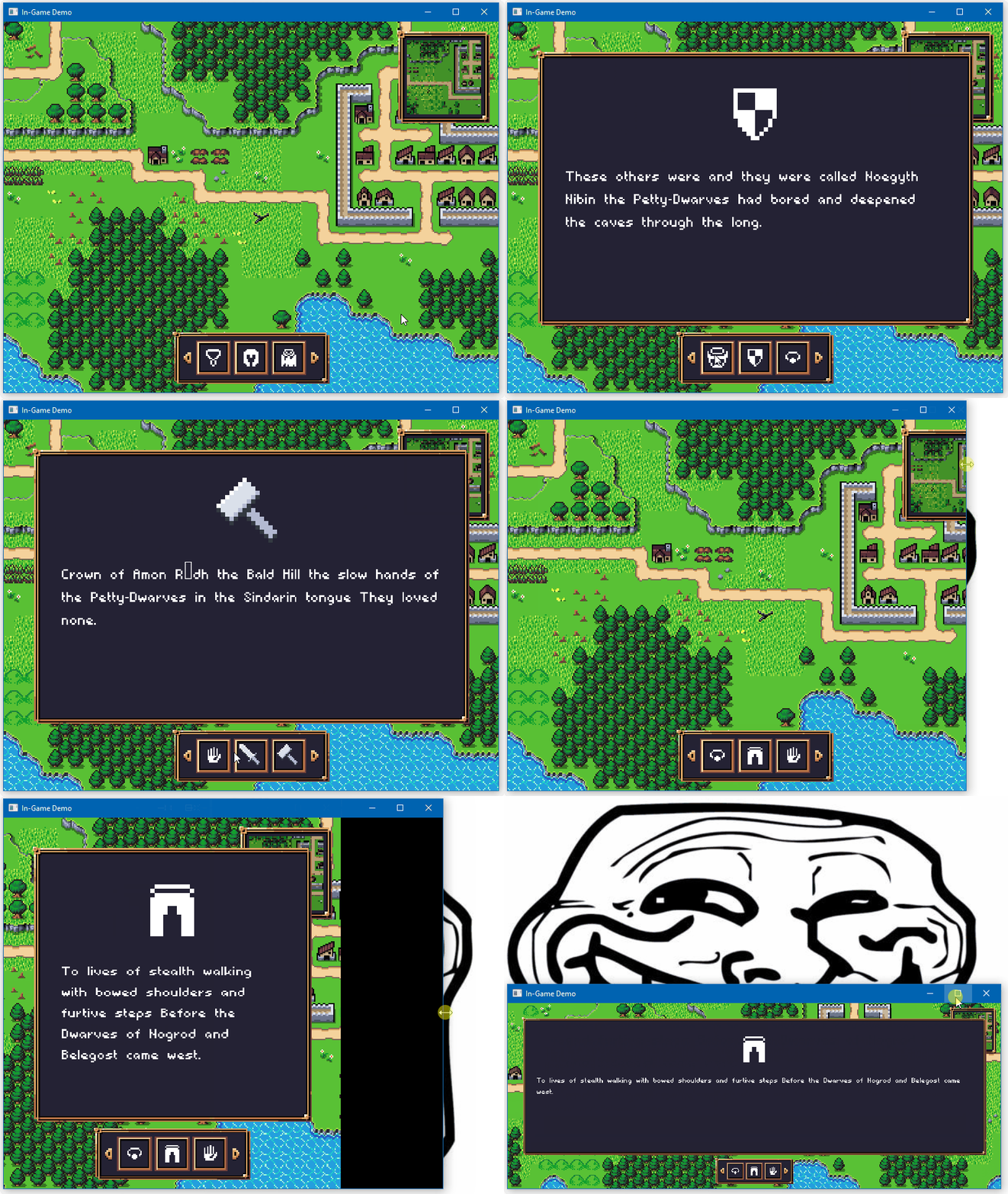
- [`RAUI + Spitfire In-Game`](https://github.com/RAUI-labs/raui/tree/master/demos/in-game)
An example of an In-Game integration of RAUI with custom Material theme, using Spitfire as a renderer.
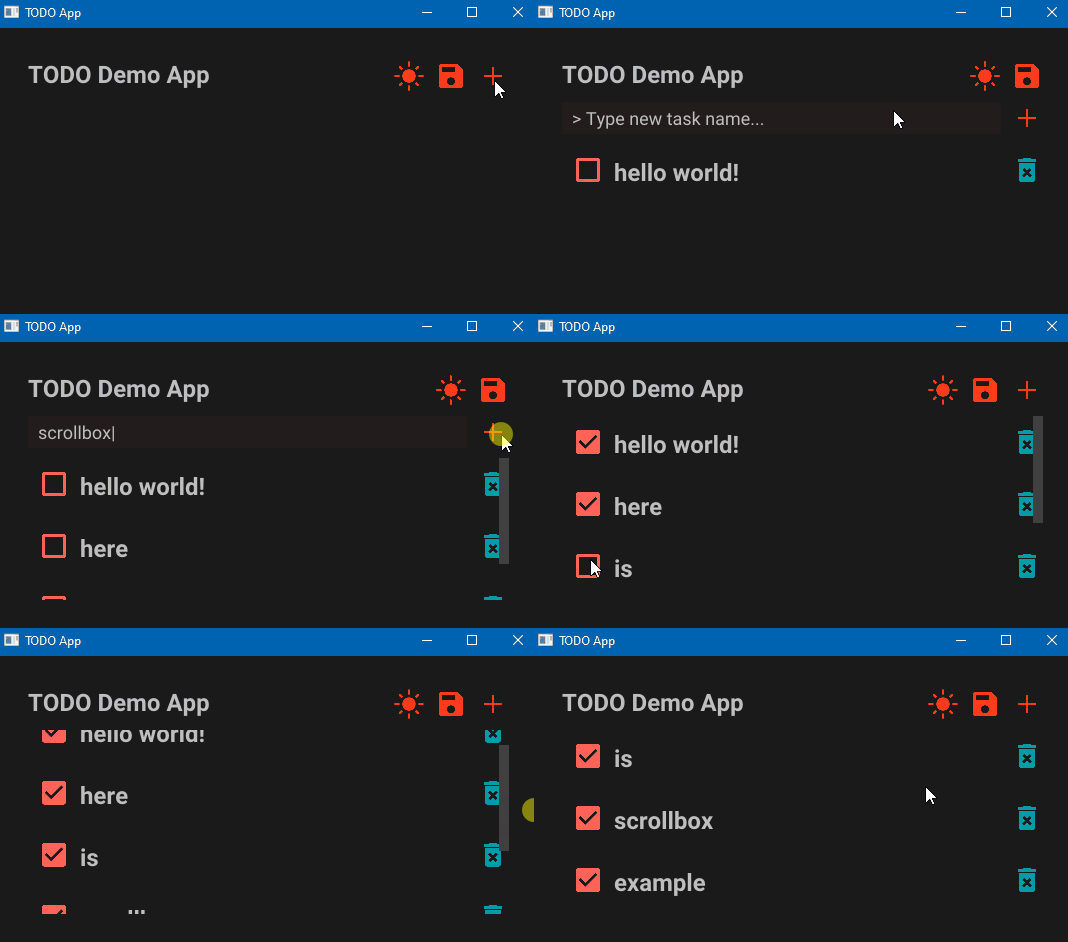
- [`RAUI Todo App`](https://github.com/RAUI-labs/raui/tree/master/demos/todo-app)
An example of TODO app with dark theme Material component library.
## Contribute
Any contribution that improves quality of the RAUI toolset is highly appreciated.
- If you have a feature request, create an Issue post and explain the goal of the feature along with the reason why it is needed and its pros and cons.
- Whenever you would like to create na PR, please create your feature branch from `next` branch so when it gets approved it can be simply merged using GitHub merge button
- All changes are staged into `next` branch and new versions are made out of its commits, master is considered stable/release branch.
- Changes should pass tests, you run tests with: `cargo test --all --features all`.
- This readme file is generated from the `lib.rs` documentation and can be re-generated by using [`cargo readme`][cargo_readme].
[cargo_readme]: https://github.com/livioribeiro/cargo-readme
## Milestones
RAUI is still in early development phase, so prepare for these changes until v1.0:
- [ ] Integrate RAUI into one public open source Rust game.
- [ ] Write documentation.
- [ ] Write MD book about how to use RAUI properly and make UI efficient.
- [ ] Implement VDOM diffing algorithm for tree rebuilding optimizations.
- [ ] Find a solution (or make it a feature) for moving from trait objects data into strongly typed data for properties and states.
Things that now are done:
- [x] Add suport for layouting.
- [x] Add suport for interactions (user input).
- [x] Create renderer for GGEZ game framework.
- [x] Create basic user components.
- [x] Create basic Hello World example application.
- [x] Decouple shared props from props (don't merge them, put shared props in context).
- [x] Create TODO app as an example.
- [x] Create In-Game app as an example.
- [x] Create renderer for Oxygengine game engine.
- [x] Add complex navigation system.
- [x] Create scroll box widget.
- [x] Add "immediate mode UI" builder to give alternative to macros-based declarative mode UI building (with zero overhead, it is an equivalent to declarative macros used by default, immediate mode and declarative mode widgets can talk to each other without a hassle).
- [x] Add data binding property type to easily mutate data from outside of the application.
- [x] Create tesselation renderer that produces Vertex + Index + Batch buffers ready for mesh renderers.
- [x] Move from `widget_component!` and `widget_hook!` macro rules to `pre_hooks` and `post_hooks` function attributes.
- [x] Add derive `PropsData` and `MessageData` procedural macros to gradually replace the need to call `implement_props_data!` and `implement_message_data!` macros.
- [x] Add support for portals - an easy way to "teleport" sub-tree into another tree node (useful for modals and drag & drop).
- [x] Add support for View-Model for sharing data between host app and UI.
================================================
FILE: crates/_/Cargo.toml
================================================
[package]
name = "raui"
version = "0.70.17"
authors = ["Patryk 'PsichiX' Budzynski "]
edition = "2024"
description = "Renderer Agnostic User Interface"
readme = "../../README.md"
license = "MIT OR Apache-2.0"
repository = "https://github.com/RAUI-labs/raui"
keywords = ["renderer", "agnostic", "ui", "interface", "gamedev"]
categories = ["gui", "rendering::graphics-api"]
[features]
material = ["raui-material"]
retained = ["raui-retained"]
immediate = ["raui-immediate"]
immediate-widgets = ["raui-immediate-widgets"]
json = ["raui-json-renderer"]
tesselate = ["raui-tesselate-renderer"]
app = ["raui-app"]
all = [
"material",
"retained",
"immediate",
"immediate-widgets",
"tesselate",
"json",
"app",
]
import-all = []
[dependencies]
raui-core = { path = "../core", version = "0.70" }
[dependencies.raui-material]
path = "../material"
version = "0.70"
optional = true
[dependencies.raui-retained]
path = "../retained"
version = "0.70"
optional = true
[dependencies.raui-immediate]
path = "../immediate"
version = "0.70"
optional = true
[dependencies.raui-immediate-widgets]
path = "../immediate-widgets"
version = "0.70"
optional = true
[dependencies.raui-json-renderer]
path = "../json-renderer"
version = "0.70"
optional = true
[dependencies.raui-tesselate-renderer]
path = "../tesselate-renderer"
version = "0.70"
optional = true
[dependencies.raui-app]
path = "../app"
version = "0.70"
optional = true
[dev-dependencies]
raui-core = { path = "../core" }
raui-material = { path = "../material" }
raui-immediate = { path = "../immediate" }
raui-immediate-widgets = { path = "../immediate-widgets" }
raui-retained = { path = "../retained" }
raui-app = { path = "../app" }
raui-json-renderer = { path = "../json-renderer" }
serde = { version = "1", features = ["derive"] }
serde_json = "1"
[package.metadata.docs.rs]
features = ["all"]
================================================
FILE: crates/_/build.rs
================================================
use std::fs::File;
use std::io::Write;
use std::path::Path;
fn main() {
let mut output = String::new();
output.push_str("#![allow(ambiguous_glob_reexports)]\n");
output.push_str("#![allow(unused_variables)]\n");
visit_dirs(
Path::new("../core/src"),
"raui_core",
None,
&mut output,
&[],
);
visit_dirs(
Path::new("../material/src"),
"raui_material",
Some("material"),
&mut output,
&[],
);
visit_dirs(
Path::new("../retained/src"),
"raui_retained",
Some("retained"),
&mut output,
&[],
);
visit_dirs(
Path::new("../immediate/src"),
"raui_immediate",
Some("immediate"),
&mut output,
&[],
);
visit_dirs(
Path::new("../immediate-widgets/src"),
"raui_immediate_widgets",
Some("immediate-widgets"),
&mut output,
&[],
);
visit_dirs(
Path::new("../tesselate-renderer/src"),
"raui_tesselate_renderer",
Some("tesselate"),
&mut output,
&[],
);
visit_dirs(
Path::new("../json-renderer/src"),
"raui_json_renderer",
Some("json"),
&mut output,
&[],
);
visit_dirs(
Path::new("../app/src"),
"raui_app",
Some("app"),
&mut output,
&[
"asset_manager.rs",
"interactions.rs",
"text_measurements.rs",
],
);
let out_path = Path::new("src").join("import_all.rs");
let mut file = File::create(&out_path).expect("Failed to create import_all.rs");
file.write_all(output.as_bytes()).expect("Write failed");
}
fn visit_dirs(
dir: &Path,
prefix: &str,
feature: Option<&str>,
output: &mut String,
ignore: &[&str],
) {
for entry in std::fs::read_dir(dir).unwrap() {
let entry = entry.unwrap();
let path = entry.path();
if path.is_dir() {
if path.join("mod.rs").exists() {
let mod_path = path.strip_prefix(dir).unwrap();
let mod_name = mod_path.to_string_lossy().replace("/", "::");
if let Some(feature) = feature {
output.push_str(&format!("#[cfg(feature = \"{feature}\")]\n"));
}
output.push_str(&format!("pub use {prefix}::{mod_name}::*;\n"));
visit_dirs(
&path,
&format!("{prefix}::{mod_name}"),
feature,
output,
ignore,
);
}
} else if let Some(ext) = path.extension()
&& ext == "rs"
{
if path.file_name().unwrap() == "lib.rs" {
if let Some(feature) = feature {
output.push_str(&format!("#[cfg(feature = \"{feature}\")]\n"));
}
output.push_str(&format!("pub use {prefix}::*;\n"));
continue;
}
if path.file_name().unwrap() == "mod.rs"
|| path.file_name().unwrap() == "import_all.rs"
|| ignore.iter().any(|name| path.file_name().unwrap() == *name)
{
continue;
}
let mod_path = path.strip_prefix(dir).unwrap();
let mut mod_name = mod_path.to_string_lossy().replace("/", "::");
mod_name = mod_name.trim_end_matches(".rs").to_string();
if let Some(feature) = feature {
output.push_str(&format!("#[cfg(feature = \"{feature}\")]\n"));
}
output.push_str(&format!("pub use {prefix}::{mod_name}::*;\n"));
}
}
}
================================================
FILE: crates/_/examples/anchor_box.rs
================================================
use raui_app::app::declarative::DeclarativeApp;
use raui_core::{
make_widget,
widget::{
WidgetRef,
component::{
RelativeLayoutProps,
containers::{anchor_box::anchor_box, content_box::content_box},
image_box::{ImageBoxProps, image_box},
},
context::WidgetContext,
node::WidgetNode,
unit::content::ContentBoxItemLayout,
utils::Color,
},
};
fn preview(ctx: WidgetContext) -> WidgetNode {
// we print this widget props to show how AnchorProps values change relative to window resize.
println!("Preview props: {:#?}", ctx.props);
// we create simple colored image that fills available space just to make you see the values.
make_widget!(image_box)
.with_props(ImageBoxProps::colored(Color {
r: 1.0,
g: 0.25,
b: 0.25,
a: 1.0,
}))
.into()
}
fn main() {
// we create widget reference first so we can apply it to some widget and and reference
//that widget in another place - basically what widget reference is, it is a way to read
// some other widget ID in some other place outside the referenced widget scope.
let idref = WidgetRef::default();
let tree = make_widget!(content_box)
// we apply widget reference to the root content box so we can reference that root widget
// later in anchor box to enable it to calculate how anchor box content is lay out relative
// to the root widget - this is the most important thing to setup, because if we won't do
// that, anchor box would not be able to give its content a proper data about its layout
// relative to the referenced widget. Note that, you can reference ANY widget in the widget
// tree - it will always give you a relative location to any widget you provide.
.idref(idref.clone())
.listed_slot(
make_widget!(anchor_box)
// we pass widget reference to anchor box via RelativeLayoutProps, because anchor
// uses relative layout hook to perform calculations of relative layout box.
.with_props(RelativeLayoutProps {
relative_to: idref.into(),
})
// we apply margin to anchor box just to make it not fill entire space by default.
.with_props(ContentBoxItemLayout {
margin: 100.0.into(),
..Default::default()
})
.named_slot("content", make_widget!(preview)),
);
DeclarativeApp::simple("Anchor Box", tree);
}
================================================
FILE: crates/_/examples/app.rs
================================================
use raui_app::app::declarative::DeclarativeApp;
use raui_core::{
make_widget,
widget::{
component::{
containers::{flex_box::FlexBoxProps, vertical_box::vertical_box},
image_box::{ImageBoxProps, image_box},
text_box::{TextBoxProps, text_box},
},
unit::{
flex::FlexBoxItemLayout,
text::{TextBoxFont, TextBoxHorizontalAlign, TextBoxSizeValue},
},
utils::Color,
},
};
fn main() {
let tree = make_widget!(vertical_box)
.with_props(FlexBoxProps {
separation: 50.0,
..Default::default()
})
.listed_slot(
make_widget!(image_box).with_props(ImageBoxProps::image_aspect_ratio(
"./demos/hello-world/resources/cats.jpg",
false,
)),
)
.listed_slot(
make_widget!(text_box)
.with_props(FlexBoxItemLayout::no_growing_and_shrinking())
.with_props(TextBoxProps {
text: "RAUI application example".to_owned(),
font: TextBoxFont {
name: "./demos/hello-world/resources/verdana.ttf".to_owned(),
size: 64.0,
},
color: Color {
r: 0.0,
g: 0.0,
b: 0.5,
a: 1.0,
},
horizontal_align: TextBoxHorizontalAlign::Center,
height: TextBoxSizeValue::Content,
..Default::default()
}),
);
DeclarativeApp::simple("RAUI application example", tree);
}
================================================
FILE: crates/_/examples/button_external.rs
================================================
// Make sure you have seen `button_internal` code example first, because this is an evolution of that.
use raui_app::app::declarative::DeclarativeApp;
use raui_core::{
make_widget, pre_hooks,
widget::{
component::{
image_box::{ImageBoxProps, image_box},
interactive::{
button::{ButtonNotifyMessage, ButtonNotifyProps, button},
navigation::{NavItemActive, use_nav_container_active},
},
},
context::WidgetContext,
node::WidgetNode,
unit::image::{ImageBoxColor, ImageBoxMaterial, ImageBoxSizeValue},
utils::Color,
},
};
// we create app hook that just receives button state change messages and prints them.
fn use_app(ctx: &mut WidgetContext) {
ctx.life_cycle.change(|ctx| {
for msg in ctx.messenger.messages {
if let Some(msg) = msg.as_any().downcast_ref::() {
println!("Button message: {msg:#?}");
}
}
});
}
#[pre_hooks(use_nav_container_active, use_app)]
fn app(mut ctx: WidgetContext) -> WidgetNode {
make_widget!(button)
.with_props(NavItemActive)
// we tell button to notify this component (send messages to it) whenever button state changes.
.with_props(ButtonNotifyProps(ctx.id.to_owned().into()))
.named_slot(
"content",
make_widget!(image_box).with_props(ImageBoxProps {
material: ImageBoxMaterial::Color(ImageBoxColor {
color: Color {
r: 1.0,
g: 0.25,
b: 0.25,
a: 1.0,
},
..Default::default()
}),
width: ImageBoxSizeValue::Exact(400.0),
height: ImageBoxSizeValue::Exact(300.0),
..Default::default()
}),
)
.into()
}
fn main() {
DeclarativeApp::simple("Button - Sending state to other widget", make_widget!(app));
}
================================================
FILE: crates/_/examples/button_internal.rs
================================================
use raui_app::app::declarative::DeclarativeApp;
use raui_core::{
make_widget, pre_hooks,
widget::{
component::{
image_box::{ImageBoxProps, image_box},
interactive::{
button::{ButtonProps, button},
navigation::{NavItemActive, use_nav_container_active},
},
},
context::WidgetContext,
node::WidgetNode,
unit::image::{ImageBoxColor, ImageBoxMaterial, ImageBoxSizeValue},
utils::Color,
},
};
// mark the root widget as navigable container to allow button to subscribe to navigation system.
#[pre_hooks(use_nav_container_active)]
fn app(mut ctx: WidgetContext) -> WidgetNode {
// button is the simplest and the most common in use navigable item that can react to user input.
make_widget!(button)
// enable button navigation (it is disabled by default).
.with_props(NavItemActive)
// by default button state of the button is passed to the content widget with
// `ButtonProps` props data, so content widget can read it and change its appearance.
.named_slot("content", make_widget!(internal))
.into()
}
fn internal(ctx: WidgetContext) -> WidgetNode {
// first we unpack button state from button props.
let ButtonProps {
// selected state means, well..widget has got selected. selection in navigation is more
// complex than that and it deserves separate deeper explanation, but in essence: whenever
// user navigate over the UI, RAUI performs selection on navigable items, navigable items
// may be nested and whenever some widget gets selected, all of its navigable parents
// receive selection event too, so there is not only one widget that might be selected at
// a time, but there might be a chain of selected items, as long as they are on the way
// toward actually selected navigable item in the widget tree.
selected,
// trigger state means navigable item got Accept event, which in context of the button
// means: button is selected and user performed "left mouse button click".
trigger,
// context state is similar to trigger state, in this case it means user performed "right
// mouse button click".
context,
..
} = ctx.props.read_cloned_or_default();
let color = if trigger {
Color {
r: 1.0,
g: 0.25,
b: 0.25,
a: 1.0,
}
} else if context {
Color {
r: 0.25,
g: 1.0,
b: 0.25,
a: 1.0,
}
} else if selected {
Color {
r: 0.25,
g: 0.25,
b: 1.0,
a: 1.0,
}
} else {
Color {
r: 0.25,
g: 0.25,
b: 0.25,
a: 1.0,
}
};
make_widget!(image_box)
.with_props(ImageBoxProps {
material: ImageBoxMaterial::Color(ImageBoxColor {
color,
..Default::default()
}),
width: ImageBoxSizeValue::Exact(400.0),
height: ImageBoxSizeValue::Exact(300.0),
..Default::default()
})
.into()
}
fn main() {
DeclarativeApp::simple("Button - Pass state to its child", make_widget!(app));
}
================================================
FILE: crates/_/examples/canvas.rs
================================================
// Make sure you have seen `render_workers` code example first, because this is an evolution of that.
use raui_app::{
Vertex,
app::declarative::DeclarativeApp,
components::canvas::{CanvasProps, DrawOnCanvasMessage, RequestCanvasRedrawMessage, canvas},
render_worker::RenderWorkerTaskContext,
third_party::spitfire_glow::{
graphics::GraphicsBatch,
renderer::{GlowBlending, GlowUniformValue},
},
};
use raui_core::{
make_widget, pre_hooks,
widget::{context::WidgetContext, node::WidgetNode, utils::Color},
};
fn use_my_canvas(ctx: &mut WidgetContext) {
ctx.life_cycle.change(|ctx| {
// canvas will send redraw request on mount and resize.
// we can react with sending drawing task message to canvas.
for msg in ctx.messenger.messages {
if msg
.as_any()
.downcast_ref::()
.is_some()
{
ctx.messenger.write(
ctx.id.to_owned(),
DrawOnCanvasMessage::function(render_task),
);
}
}
});
}
#[pre_hooks(use_my_canvas)]
fn my_canvas(mut ctx: WidgetContext) -> WidgetNode {
// we are specializing canvas widget by simply executing canvas
// widget function in place, so we have easier times sending
// drawing task to canvas by its id.
canvas(ctx)
}
fn main() {
let tree = make_widget!(my_canvas).with_props(CanvasProps {
color: Color {
r: 0.0,
g: 0.0,
b: 0.0,
a: 0.5,
},
clear: true,
});
DeclarativeApp::simple("Canvas", tree);
}
fn render_task(ctx: RenderWorkerTaskContext) {
ctx.graphics.state.stream.batch_optimized(GraphicsBatch {
shader: Some(ctx.colored_shader.clone()),
uniforms: [(
"u_projection_view".into(),
GlowUniformValue::M4(
ctx.graphics
.state
.main_camera
.world_matrix()
.into_col_array(),
),
)]
.into_iter()
.collect(),
textures: Default::default(),
blending: GlowBlending::Alpha,
scissor: None,
wireframe: false,
});
ctx.graphics.state.stream.quad([
Vertex {
position: [50.0, 50.0],
uv: [0.0, 0.0, 0.0],
color: [1.0, 0.0, 0.0, 1.0],
},
Vertex {
position: [ctx.graphics.state.main_camera.screen_size.x - 50.0, 50.0],
uv: [0.0, 0.0, 0.0],
color: [0.0, 1.0, 0.0, 1.0],
},
Vertex {
position: [
ctx.graphics.state.main_camera.screen_size.x - 50.0,
ctx.graphics.state.main_camera.screen_size.y - 50.0,
],
uv: [0.0, 0.0, 0.0],
color: [0.0, 0.0, 1.0, 1.0],
},
Vertex {
position: [50.0, ctx.graphics.state.main_camera.screen_size.y - 50.0],
uv: [0.0, 0.0, 0.0],
color: [1.0, 1.0, 0.0, 1.0],
},
]);
}
================================================
FILE: crates/_/examples/content_box.rs
================================================
use raui_app::app::declarative::DeclarativeApp;
use raui_core::{
make_widget,
widget::{
component::{
containers::content_box::content_box,
image_box::{ImageBoxProps, image_box},
},
unit::content::ContentBoxItemLayout,
utils::{Color, Rect},
},
};
fn main() {
let tree = make_widget!(content_box)
.listed_slot(
make_widget!(image_box)
.with_props(ImageBoxProps::colored(Color {
r: 1.0,
g: 0.25,
b: 0.25,
a: 1.0,
}))
.with_props(ContentBoxItemLayout {
anchors: Rect {
left: -1.0,
right: 2.0,
top: -1.0,
bottom: 2.0,
},
keep_in_bounds: true.into(),
..Default::default()
}),
)
.listed_slot(
make_widget!(image_box)
.with_props(ImageBoxProps::colored(Color {
r: 0.25,
g: 1.0,
b: 0.25,
a: 1.0,
}))
.with_props(ContentBoxItemLayout {
margin: 64.0.into(),
..Default::default()
}),
)
.listed_slot(
make_widget!(image_box)
.with_props(ImageBoxProps::colored(Color {
r: 0.25,
g: 0.25,
b: 1.0,
a: 1.0,
}))
.with_props(ContentBoxItemLayout {
anchors: Rect {
left: 0.5,
right: 0.75,
top: 0.25,
bottom: 0.75,
},
..Default::default()
}),
);
DeclarativeApp::simple("Content Box", tree);
}
================================================
FILE: crates/_/examples/context_box.rs
================================================
// Make sure you have seen `portal_box` code example first, because this is an evolution of that.
use raui_app::{
app::{App, AppConfig, declarative::DeclarativeApp},
event::{ElementState, Event, VirtualKeyCode, WindowEvent},
};
use raui_core::{
make_widget, pre_hooks,
view_model::ViewModel,
widget::{
WidgetRef,
component::{
containers::{
anchor_box::PivotBoxProps,
content_box::content_box,
context_box::{ContextBoxProps, portals_context_box},
horizontal_box::{HorizontalBoxProps, horizontal_box},
portal_box::PortalsContainer,
},
image_box::{ImageBoxProps, image_box},
},
context::WidgetContext,
node::WidgetNode,
unit::{
flex::FlexBoxItemLayout,
image::{ImageBoxColor, ImageBoxMaterial, ImageBoxSizeValue},
},
utils::Color,
},
};
const DATA: &str = "data";
fn use_app(ctx: &mut WidgetContext) {
ctx.life_cycle.mount(|mut ctx| {
ctx.view_models
.bindings(DATA, "")
.unwrap()
.bind(ctx.id.to_owned());
});
}
#[pre_hooks(use_app)]
fn app(mut ctx: WidgetContext) -> WidgetNode {
let idref = WidgetRef::default();
// we read value from view model created with app builder.
let data = ctx
.view_models
.view_model(DATA)
.unwrap()
.read::<(bool, bool, bool)>()
.unwrap();
make_widget!(content_box)
.idref(idref.clone())
.with_shared_props(PortalsContainer(idref))
.listed_slot(
make_widget!(horizontal_box)
.with_props(HorizontalBoxProps {
separation: 25.0,
..Default::default()
})
.listed_slot(
make_widget!(icon)
// clear this flex box item layout (no growing, shrinking or filling).
.with_props(FlexBoxItemLayout::cleared())
// pass context box state read from app data.
.with_props(data.0)
// set icon color.
.with_props(Color {
r: 1.0,
g: 0.25,
b: 0.25,
a: 1.0,
})
// tell context widget how to position it relative to the content widget.
.with_props(PivotBoxProps {
pivot: 0.0.into(),
align: 0.0.into(),
}),
)
.listed_slot(
make_widget!(icon)
.with_props(FlexBoxItemLayout::cleared())
.with_props(data.1)
.with_props(Color {
r: 0.25,
g: 1.0,
b: 0.25,
a: 1.0,
})
.with_props(PivotBoxProps {
pivot: 0.5.into(),
align: 0.5.into(),
}),
)
.listed_slot(
make_widget!(icon)
.with_props(FlexBoxItemLayout::cleared())
.with_props(data.2)
.with_props(Color {
r: 0.25,
g: 0.25,
b: 1.0,
a: 1.0,
})
.with_props(PivotBoxProps {
pivot: 1.0.into(),
align: 1.0.into(),
}),
),
)
.into()
}
// custom icon component composed out of icon image as its content and context image that we show
// when bool props value is true.
fn icon(ctx: WidgetContext) -> WidgetNode {
// we use `portals_context_box` to allow this context box properly calculate context widget
// relative to the portals container.
make_widget!(portals_context_box)
// pass pivot props to context box,
.with_props(ctx.props.read_cloned_or_default::())
.with_props(ContextBoxProps {
// read bool props value and use it to tell if context widget is gonna be shown.
show: ctx.props.read_cloned_or_default::(),
})
// put colored image box as content widget.
.named_slot(
"content",
make_widget!(image_box).with_props(ImageBoxProps {
material: ImageBoxMaterial::Color(ImageBoxColor {
color: ctx.props.read_cloned_or_default::(),
..Default::default()
}),
width: ImageBoxSizeValue::Exact(100.0),
height: ImageBoxSizeValue::Exact(100.0),
..Default::default()
}),
)
// put gray image box as context widget.
.named_slot(
"context",
make_widget!(image_box).with_props(ImageBoxProps {
material: ImageBoxMaterial::Color(ImageBoxColor {
color: Color {
r: 0.25,
g: 0.25,
b: 0.25,
a: 1.0,
},
..Default::default()
}),
width: ImageBoxSizeValue::Exact(150.0),
height: ImageBoxSizeValue::Exact(50.0),
..Default::default()
}),
)
.into()
}
fn main() {
let app = DeclarativeApp::default()
.tree(make_widget!(app))
// we use tuple of 3 bools that will represent state of individual context box.
.view_model(DATA, ViewModel::new_object((false, true, false)))
.event(move |application, event, _, _| {
let mut data = application
.view_models
.get_mut(DATA)
.unwrap()
.write_notified::<(bool, bool, bool)>()
.unwrap();
if let Event::WindowEvent {
event: WindowEvent::KeyboardInput { input, .. },
..
} = event
&& input.state == ElementState::Pressed
&& let Some(key) = input.virtual_keycode
{
match key {
VirtualKeyCode::Key1 | VirtualKeyCode::Numpad1 => {
// change state of given context box in app data.
data.0 = !data.0;
}
VirtualKeyCode::Key2 | VirtualKeyCode::Numpad2 => {
data.1 = !data.1;
}
VirtualKeyCode::Key3 | VirtualKeyCode::Numpad3 => {
data.2 = !data.2;
}
_ => {}
}
}
true
});
App::new(AppConfig::default().title("Context Box")).run(app);
}
================================================
FILE: crates/_/examples/flex_box.rs
================================================
use raui_app::app::declarative::DeclarativeApp;
use raui_core::{
make_widget,
widget::{
component::{
containers::flex_box::{FlexBoxProps, flex_box},
image_box::{ImageBoxProps, image_box},
},
unit::flex::{FlexBoxDirection, FlexBoxItemLayout},
utils::Color,
},
};
fn main() {
let tree = make_widget!(flex_box)
.with_props(FlexBoxProps {
direction: FlexBoxDirection::VerticalBottomToTop,
..Default::default()
})
.listed_slot(
make_widget!(image_box)
.with_props(ImageBoxProps::colored(Color {
r: 1.0,
g: 0.25,
b: 0.25,
a: 1.0,
}))
.with_props(FlexBoxItemLayout {
// basis sets exact size of the item in main axis.
basis: Some(100.0),
// weight of the item when its layout box has to grow.
grow: 0.5,
// weight of the item when its layout box has to shrink (0.0 means no shrinking).
shrink: 0.0,
// percentage of the item size in cross axis (here how much of horizontal space it fills).
fill: 0.75,
// tells how much to which side item is aligned when there is free space available.
align: 1.0,
..Default::default()
}),
)
.listed_slot(
make_widget!(image_box)
.with_props(ImageBoxProps::colored(Color {
r: 0.25,
g: 1.0,
b: 0.25,
a: 1.0,
}))
.with_props(FlexBoxItemLayout {
margin: 10.0.into(),
..Default::default()
}),
)
.listed_slot(
make_widget!(image_box)
.with_props(ImageBoxProps::colored(Color {
r: 0.25,
g: 0.25,
b: 1.0,
a: 1.0,
}))
.with_props(FlexBoxItemLayout {
basis: Some(100.0),
grow: 0.0,
shrink: 0.5,
fill: 0.5,
align: 0.5,
..Default::default()
}),
);
DeclarativeApp::simple("Flex Box", tree);
}
================================================
FILE: crates/_/examples/flex_box_content_size.rs
================================================
use raui_app::app::declarative::DeclarativeApp;
use raui_core::{
make_widget,
widget::{
component::{
containers::{
flex_box::{FlexBoxProps, flex_box},
size_box::{SizeBoxProps, size_box},
},
image_box::{ImageBoxProps, image_box},
text_box::{TextBoxProps, text_box},
},
unit::{
flex::{FlexBoxDirection, FlexBoxItemLayout},
image::{ImageBoxColor, ImageBoxMaterial, ImageBoxSizeValue},
size::SizeBoxSizeValue,
text::{TextBoxFont, TextBoxSizeValue},
},
utils::Color,
},
};
fn main() {
let tree = make_widget!(size_box)
.with_props(SizeBoxProps {
width: SizeBoxSizeValue::Fill,
height: SizeBoxSizeValue::Content,
..Default::default()
})
.named_slot(
"content",
make_widget!(flex_box)
.with_props(FlexBoxProps {
direction: FlexBoxDirection::VerticalTopToBottom,
..Default::default()
})
.listed_slot(
make_widget!(text_box)
.with_props(FlexBoxItemLayout::no_growing_and_shrinking())
.with_props(TextBoxProps {
text: "Hello\nWorld!".to_owned(),
font: TextBoxFont {
name: "./demos/hello-world/resources/verdana.ttf".to_owned(),
size: 64.0,
},
color: Color {
r: 0.0,
g: 0.0,
b: 0.0,
a: 1.0,
},
height: TextBoxSizeValue::Content,
..Default::default()
}),
)
.listed_slot(
make_widget!(image_box)
.with_props(FlexBoxItemLayout::no_growing_and_shrinking())
.with_props(ImageBoxProps {
height: ImageBoxSizeValue::Exact(100.0),
material: ImageBoxMaterial::Color(ImageBoxColor {
color: Color {
r: 1.0,
g: 0.5,
b: 0.0,
a: 1.0,
},
..Default::default()
}),
..Default::default()
}),
)
// this image should not be visible at all, a zero size layout.
.listed_slot(
make_widget!(image_box).with_props(ImageBoxProps::colored(Color {
r: 0.5,
g: 0.5,
b: 0.5,
a: 1.0,
})),
),
);
DeclarativeApp::simple("Flex Box - Adaptive content size", tree);
}
================================================
FILE: crates/_/examples/flex_box_wrapping.rs
================================================
use raui_app::app::declarative::DeclarativeApp;
use raui_core::{
make_widget,
widget::{
component::{
containers::{
flex_box::{FlexBoxProps, flex_box},
size_box::{SizeBoxProps, size_box},
},
image_box::{ImageBoxProps, image_box},
},
unit::{
flex::{FlexBoxDirection, FlexBoxItemLayout},
size::SizeBoxSizeValue,
},
utils::Color,
},
};
fn main() {
let tree = make_widget!(flex_box)
.with_props(FlexBoxProps {
direction: FlexBoxDirection::VerticalTopToBottom,
// Wrapping makes children fit into multiple rows/columns.
wrap: true,
..Default::default()
})
.listed_slots((0..18).map(|_| {
make_widget!(size_box)
.with_props(FlexBoxItemLayout::cleared())
.with_props(SizeBoxProps {
width: SizeBoxSizeValue::Exact(100.0),
height: SizeBoxSizeValue::Exact(100.0),
margin: 20.0.into(),
..Default::default()
})
.named_slot(
"content",
make_widget!(image_box).with_props(ImageBoxProps::colored(Color {
r: 0.25,
g: 0.25,
b: 0.25,
a: 1.0,
})),
)
}));
DeclarativeApp::simple("Flex Box - Wrapping content", tree);
}
================================================
FILE: crates/_/examples/float_view.rs
================================================
use raui_app::app::{App, AppConfig, declarative::DeclarativeApp};
use raui_core::{
make_widget, pre_hooks,
view_model::{ViewModel, ViewModelValue},
widget::{
component::{
containers::float_box::{
FloatBoxChange, FloatBoxChangeMessage, FloatBoxNotifyProps, FloatBoxProps,
FloatBoxState, float_box,
},
image_box::{ImageBoxProps, image_box},
interactive::{
float_view::float_view_control,
navigation::{NavItemActive, use_nav_container_active},
},
},
context::WidgetContext,
node::WidgetNode,
unit::{
content::ContentBoxItemLayout,
image::{ImageBoxColor, ImageBoxMaterial, ImageBoxSizeValue},
},
utils::{Color, Rect, Vec2},
},
};
const DATA: &str = "data";
const PANELS: &str = "panels";
// AppData holds list of floating panels positions and their color.
struct AppData {
panels: ViewModelValue>,
}
fn use_app(ctx: &mut WidgetContext) {
ctx.life_cycle.mount(|mut ctx| {
ctx.view_models
.bindings(DATA, PANELS)
.unwrap()
.bind(ctx.id.to_owned());
});
ctx.life_cycle.unmount(|mut ctx| {
ctx.view_models
.bindings(DATA, PANELS)
.unwrap()
.unbind(ctx.id);
});
ctx.life_cycle.change(|mut ctx| {
let mut view_model = ctx
.view_models
.view_model_mut(DATA)
.unwrap()
.write::()
.unwrap();
for msg in ctx.messenger.messages {
// We listen for float box change messages sent from `float_view_control`
// widgets and move sender panel by delta of change.
if let Some(msg) = msg.as_any().downcast_ref::()
&& let Ok(index) = msg.sender.key().parse::()
&& let FloatBoxChange::RelativePosition(delta) = msg.change
&& let Some((position, _)) = view_model.panels.get_mut(index)
{
position.x += delta.x;
position.y += delta.y;
}
}
});
}
#[pre_hooks(use_nav_container_active, use_app)]
fn app(mut ctx: WidgetContext) -> WidgetNode {
let view_model = ctx
.view_models
.view_model(DATA)
.unwrap()
.read::()
.unwrap();
make_widget!(float_box)
.with_props(FloatBoxProps {
bounds_left: Some(-300.0),
bounds_right: Some(600.0),
bounds_top: Some(-300.0),
bounds_bottom: Some(400.0),
})
.with_props(FloatBoxState {
position: Vec2 { x: 0.0, y: 0.0 },
zoom: 2.0,
})
.listed_slot(
// `float_view_control` widget reacts to dragging action and sends
// that dragging movement delta to widget that wants to be notified.
// In this case, we want to notify `float_box` widget so it will
// reposition its content panels.
make_widget!(float_view_control)
.key("panning")
.with_props(NavItemActive)
// we make sure panning control fills entire area and stays
// in its bounds no matter how content gets repositioned.
.with_props(ContentBoxItemLayout {
anchors: Rect {
left: 0.0,
top: 0.0,
right: 1.0,
bottom: 1.0,
},
keep_in_bounds: true.into(),
..Default::default()
})
.named_slot(
"content",
make_widget!(image_box).with_props(ImageBoxProps::colored(Color {
r: 0.3,
g: 0.3,
b: 0.3,
a: 1.0,
})),
),
)
.listed_slots(
view_model
.panels
.iter()
.enumerate()
.map(|(index, (position, color))| {
// we also use `float_view_control` widget for panels so
// they can be dragged around float box.
make_widget!(float_view_control)
.key(index)
.with_props(NavItemActive)
.with_props(FloatBoxNotifyProps(ctx.id.to_owned().into()))
.with_props(ContentBoxItemLayout {
offset: *position,
..Default::default()
})
.named_slot(
"content",
make_widget!(image_box).with_props(ImageBoxProps {
width: ImageBoxSizeValue::Exact(200.0),
height: ImageBoxSizeValue::Exact(150.0),
material: ImageBoxMaterial::Color(ImageBoxColor {
color: *color,
..Default::default()
}),
..Default::default()
}),
)
}),
)
.into()
}
fn main() {
let panels = vec![
(
Vec2 { x: 0.0, y: 0.0 },
Color {
r: 1.0,
g: 0.5,
b: 0.5,
a: 1.0,
},
),
(
Vec2 { x: 100.0, y: 100.0 },
Color {
r: 0.5,
g: 1.0,
b: 0.5,
a: 1.0,
},
),
(
Vec2 { x: 200.0, y: 200.0 },
Color {
r: 0.5,
g: 0.5,
b: 1.0,
a: 1.0,
},
),
];
let app = DeclarativeApp::default()
.tree(make_widget!(app))
.view_model(
DATA,
ViewModel::produce(|properties| AppData {
panels: ViewModelValue::new(panels, properties.notifier(PANELS)),
}),
);
App::new(AppConfig::default().title("Float View")).run(app);
}
================================================
FILE: crates/_/examples/grid_box.rs
================================================
use raui_app::app::declarative::DeclarativeApp;
use raui_core::{
make_widget,
widget::{
component::{
containers::grid_box::{GridBoxProps, grid_box},
image_box::{ImageBoxProps, image_box},
},
unit::grid::GridBoxItemLayout,
utils::{Color, IntRect},
},
};
fn main() {
let tree = make_widget!(grid_box)
.with_props(GridBoxProps {
cols: 2,
rows: 2,
..Default::default()
})
.listed_slot(
make_widget!(image_box)
.with_props(ImageBoxProps::colored(Color {
r: 1.0,
g: 0.25,
b: 0.25,
a: 1.0,
}))
.with_props(GridBoxItemLayout {
space_occupancy: IntRect {
left: 0,
right: 1,
top: 0,
bottom: 1,
},
..Default::default()
}),
)
.listed_slot(
make_widget!(image_box)
.with_props(ImageBoxProps::colored(Color {
r: 0.25,
g: 1.0,
b: 0.25,
a: 1.0,
}))
.with_props(GridBoxItemLayout {
space_occupancy: IntRect {
left: 1,
right: 2,
top: 0,
bottom: 1,
},
..Default::default()
}),
)
.listed_slot(
make_widget!(image_box)
.with_props(ImageBoxProps::colored(Color {
r: 0.25,
g: 0.25,
b: 1.0,
a: 1.0,
}))
.with_props(GridBoxItemLayout {
space_occupancy: IntRect {
left: 0,
right: 2,
top: 1,
bottom: 2,
},
..Default::default()
}),
);
DeclarativeApp::simple("Grid Box", tree);
}
================================================
FILE: crates/_/examples/horizontal_box.rs
================================================
use raui_app::app::declarative::DeclarativeApp;
use raui_core::{
make_widget,
widget::{
component::{
containers::horizontal_box::{HorizontalBoxProps, horizontal_box},
image_box::{ImageBoxProps, image_box},
},
unit::flex::FlexBoxItemLayout,
utils::Color,
},
};
fn main() {
let tree = make_widget!(horizontal_box)
.with_props(HorizontalBoxProps {
separation: 50.0,
..Default::default()
})
.listed_slot(
make_widget!(image_box)
.with_props(ImageBoxProps::colored(Color {
r: 1.0,
g: 0.25,
b: 0.25,
a: 1.0,
}))
.with_props(FlexBoxItemLayout {
// basis sets exact width of the item.
basis: Some(100.0),
// weight of the item when its layout box has to grow in width.
grow: 0.5,
// weight of the item when its layout box has to shrink in width (0.0 means no shrinking).
shrink: 0.0,
..Default::default()
}),
)
.listed_slot(
make_widget!(image_box).with_props(ImageBoxProps::colored(Color {
r: 0.25,
g: 1.0,
b: 0.25,
a: 1.0,
})),
)
.listed_slot(
make_widget!(image_box)
.with_props(ImageBoxProps::colored(Color {
r: 0.25,
g: 0.25,
b: 1.0,
a: 1.0,
}))
.with_props(FlexBoxItemLayout {
basis: Some(100.0),
grow: 0.0,
shrink: 0.5,
..Default::default()
}),
);
DeclarativeApp::simple("Horizontal Box", tree);
}
================================================
FILE: crates/_/examples/image_box_color.rs
================================================
use raui_app::app::declarative::DeclarativeApp;
use raui_core::{
make_widget,
widget::{
component::image_box::{ImageBoxProps, image_box},
unit::image::{ImageBoxColor, ImageBoxMaterial},
utils::Color,
},
};
fn main() {
let tree = make_widget!(image_box).with_props(ImageBoxProps {
material: ImageBoxMaterial::Color(ImageBoxColor {
color: Color {
r: 1.0,
g: 0.25,
b: 0.25,
a: 1.0,
},
..Default::default()
}),
..Default::default()
});
DeclarativeApp::simple("Image Box - Color", tree);
}
================================================
FILE: crates/_/examples/image_box_frame.rs
================================================
use raui_app::app::declarative::DeclarativeApp;
use raui_core::{
make_widget,
widget::{
component::image_box::{ImageBoxProps, image_box},
unit::image::{ImageBoxFrame, ImageBoxImage, ImageBoxImageScaling, ImageBoxMaterial},
},
};
fn main() {
let tree = make_widget!(image_box).with_props(ImageBoxProps {
material: ImageBoxMaterial::Image(ImageBoxImage {
id: "./demos/in-game/resources/images/slider-background.png".to_owned(),
// enable nine-slice by setting Frame scaling.
scaling: ImageBoxImageScaling::Frame(ImageBoxFrame {
// rectangle that describes margins of the frame of the source image texture.
source: 3.0.into(),
// rectangle that describes margins of the frame of the UI image being presented.
destination: 64.0.into(),
..Default::default()
}),
..Default::default()
}),
..Default::default()
});
DeclarativeApp::simple("Image Box - Frame", tree);
}
================================================
FILE: crates/_/examples/image_box_image.rs
================================================
use raui_app::app::declarative::DeclarativeApp;
use raui_core::{
make_widget,
widget::{
component::image_box::{ImageBoxProps, image_box},
unit::image::{ImageBoxAspectRatio, ImageBoxImage, ImageBoxMaterial},
},
};
fn main() {
let tree = make_widget!(image_box).with_props(ImageBoxProps {
material: ImageBoxMaterial::Image(ImageBoxImage {
id: "./demos/hello-world/resources/cats.jpg".to_owned(),
..Default::default()
}),
// makes internal image size keeping its aspect ratio.
content_keep_aspect_ratio: Some(ImageBoxAspectRatio {
// horizontal alignment of the content relative to the horizontal free space.
horizontal_alignment: 0.5,
// vertical alignment of the content relative to the vertical free space.
vertical_alignment: 0.5,
// if set to true then content instead of getting smaller to fit inside the layout box,
// it will "leak" outside of the layout box.
outside: true,
}),
..Default::default()
});
DeclarativeApp::simple("Image Box - Image", tree);
}
================================================
FILE: crates/_/examples/image_box_procedural.rs
================================================
use raui_app::app::declarative::DeclarativeApp;
use raui_core::{
layout::CoordsMappingScaling,
make_widget,
widget::{
component::image_box::{ImageBoxProps, image_box},
unit::image::{ImageBoxMaterial, ImageBoxProcedural, ImageBoxProceduralVertex},
utils::{Color, Vec2},
},
};
fn main() {
let tree = make_widget!(image_box).with_props(ImageBoxProps {
// procedural image material allows to draw custom mesh with dedicated
// shader either from statics or from file.
// available static shaders:
// - `@pass`: simple pass through shader that ignores camera matrix.
// - `@colored`: shader that applies camera transform and color vertices.
// - `@textured`: shader that applies camera transform and texture with color vertices.
// if we want to use shader from files, assuming we have two files:
// - `path/to/shader.vs`
// - `path/to/shader.fs`
// then our id would be: `path/to/shader`.
material: ImageBoxMaterial::Procedural(
ImageBoxProcedural::new("@colored")
// if we tell material to remap vertices from its local
// coordinate space to rendered screen space.
// Here we keep mesh inside image box keeping aspect ratio.
.vertex_mapping(CoordsMappingScaling::FitToView(
Vec2 { x: 1.0, y: 1.0 },
true,
))
.quad([
ImageBoxProceduralVertex {
position: Vec2 { x: 0.5, y: 0.0 },
color: Color {
r: 1.0,
g: 0.0,
b: 0.0,
a: 1.0,
},
..Default::default()
},
ImageBoxProceduralVertex {
position: Vec2 { x: 1.0, y: 0.5 },
color: Color {
r: 0.0,
g: 1.0,
b: 0.0,
a: 1.0,
},
..Default::default()
},
ImageBoxProceduralVertex {
position: Vec2 { x: 0.5, y: 1.0 },
color: Color {
r: 1.0,
g: 1.0,
b: 0.0,
a: 1.0,
},
..Default::default()
},
ImageBoxProceduralVertex {
position: Vec2 { x: 0.0, y: 0.5 },
color: Color {
r: 0.0,
g: 0.0,
b: 1.0,
a: 1.0,
},
..Default::default()
},
]),
),
..Default::default()
});
DeclarativeApp::simple("Image Box - Procedural", tree);
}
================================================
FILE: crates/_/examples/immediate_mode.rs
================================================
// Example of immediate mode UI on top of RAUI.
// It's goal is to bring more ergonomics to RAUI by hiding
// declarative interface under simple nested function calls.
// As with retained mode, immediate mode UI can be mixed with
// declarative mode and retained mode widgets.
use raui_app::app::immediate::ImmediateApp;
use raui_core::{
Scalar,
widget::{
component::{
containers::{
horizontal_box::HorizontalBoxProps, vertical_box::VerticalBoxProps,
wrap_box::WrapBoxProps,
},
image_box::ImageBoxProps,
interactive::{
input_field::{TextInputMode, input_text_with_cursor},
navigation::NavItemActive,
},
text_box::TextBoxProps,
},
unit::{flex::FlexBoxItemLayout, text::TextBoxFont},
utils::Color,
},
};
use raui_immediate::{ImProps, apply};
use raui_immediate_widgets::core::{
containers::{content_box, horizontal_box, nav_vertical_box, wrap_box},
image_box,
interactive::{ImmediateButton, button, input_field, self_tracking},
text_box,
};
const FONT: &str = "./demos/hello-world/resources/verdana.ttf";
// app function widget, we pass application state there.
pub fn app(value: &mut usize) {
let props = WrapBoxProps {
margin: 20.0.into(),
..Default::default()
};
wrap_box(props, || {
let props = VerticalBoxProps {
separation: 50.0,
..Default::default()
};
// we can use any "immedietified" RAUI widget we want.
// we can pass Props to parameterize RAUI widget in first param.
// BTW. we should make sure to use any `nav_*` container widget
// somewhere in the app root to make app interactive.
nav_vertical_box(props, || {
let layout = FlexBoxItemLayout {
basis: Some(48.0),
grow: 0.0,
shrink: 0.0,
..Default::default()
};
// we can also apply props on all produced widgets in the scope.
apply(ImProps(layout), || {
counter(value);
let props = HorizontalBoxProps {
separation: 50.0,
..Default::default()
};
horizontal_box(props, || {
// we can react to button-like behavior by reading what
// button-like widgets return of their tracked state.
if text_button("Increment").trigger_start() {
*value = value.saturating_add(1);
}
if text_button("Decrement").trigger_start() {
*value = value.saturating_sub(1);
}
});
});
self_tracking((), |tracking| {
image_box(ImageBoxProps::colored(Color {
r: tracking.state.factor.x,
g: 0.0,
b: tracking.state.factor.y,
a: 1.0,
}));
});
});
});
}
fn text_button(text: &str) -> ImmediateButton {
// buttons use `use_state` hook under the hood to track
// declarative mode button state, that's copy of being
// returned from button function and passed into its
// group closure for children widgets to use.
// BTW. don't forget to apply `NavItemActive` props on
// button if you want to have it enabled for navigation.
button(NavItemActive, |state| {
content_box((), || {
image_box(ImageBoxProps::colored(Color {
r: if state.state.selected { 1.0 } else { 0.75 },
g: if state.state.trigger { 1.0 } else { 0.75 },
b: if state.state.context { 1.0 } else { 0.75 },
a: 1.0,
}));
text_box(TextBoxProps {
text: text.to_string(),
font: TextBoxFont {
name: FONT.to_owned(),
size: 32.0,
},
color: Color {
r: 0.0,
g: 0.0,
b: 0.0,
a: 1.0,
},
..Default::default()
});
});
})
}
fn counter(value: &mut usize) {
// counter widget is a text box wrapped in an input field.
// it works like combination of button (can be focused by
// selection/navigation) and text field (collects keyboard
// text characters when focused).
let props = (NavItemActive, TextInputMode::UnsignedInteger);
let (result, ..) = input_field(value, props, |text, state, button| {
text_box(TextBoxProps {
text: if state.focused {
input_text_with_cursor(text, state.cursor_position, '|')
} else if text.is_empty() {
"...".to_owned()
} else {
text.to_owned()
},
font: TextBoxFont {
name: FONT.to_owned(),
size: 32.0,
},
color: Color {
r: Scalar::from(button.state.trigger),
g: Scalar::from(button.state.selected),
b: Scalar::from(state.focused),
a: 1.0,
},
..Default::default()
});
});
if let Some(result) = result {
*value = result;
}
}
fn main() {
// some applciation state.
let mut counter = 0usize;
ImmediateApp::simple("Immediate mode UI", move |_| {
app(&mut counter);
});
}
================================================
FILE: crates/_/examples/immediate_mode_access_and_tests.rs
================================================
use raui_app::app::immediate::ImmediateApp;
use raui_core::widget::{
component::{image_box::ImageBoxProps, interactive::navigation::NavItemActive},
utils::Color,
};
use raui_immediate::{register_access, use_access};
use raui_immediate_widgets::core::{
containers::nav_content_box,
image_box,
interactive::{ImmediateButton, button},
};
pub fn app() {
nav_content_box((), || {
clickable_button();
});
}
pub fn clickable_button() {
if colored_button().trigger_start() {
// we use access point to some host data
let clicked = use_access::("clicked");
*clicked.write().unwrap() = true;
}
}
fn colored_button() -> ImmediateButton {
button(NavItemActive, |state| {
let props = ImageBoxProps::colored(if state.state.trigger {
Color {
r: 0.5,
g: 0.0,
b: 0.0,
a: 1.0,
}
} else {
Color {
r: 0.0,
g: 0.5,
b: 0.0,
a: 1.0,
}
});
image_box(props);
})
}
fn main() {
let mut clicked = false;
ImmediateApp::simple("Immediate mode UI - Access and tests", move |_| {
// here we register access point to some game state
let _lifetime = register_access("clicked", &mut clicked);
app();
});
}
#[cfg(test)]
mod tests {
use super::*;
use raui_core::{
interactive::default_interactions_engine::{Interaction, PointerButton},
layout::CoordsMapping,
tester::AppCycleTester,
widget::utils::Rect,
};
use raui_immediate::ImmediateContext;
#[test]
fn test_tracked_button() {
let mut tester = AppCycleTester::new(
CoordsMapping::new(Rect {
left: 0.0,
right: 1024.0,
top: 0.0,
bottom: 576.0,
}),
ImmediateContext::default(),
);
let mut mock = false;
tester
.interactions_engine
.interact(Interaction::PointerDown(
PointerButton::Trigger,
[100.0, 100.0].into(),
));
// since RAUI has deferred UI resolution, signal will take
// few frames to go through declarative layer to immediate
// layer and then back to user site.
for _ in 0..4 {
tester.run_frame(ImmediateApp::test_frame(|| {
// and here we register access point to mock data
let _lifetime = register_access("clicked", &mut mock);
app();
}));
}
assert_eq!(mock, true);
}
}
================================================
FILE: crates/_/examples/immediate_mode_stack_props.rs
================================================
use raui_app::app::immediate::ImmediateApp;
use raui_core::widget::{
component::text_box::TextBoxProps,
unit::{
flex::FlexBoxItemLayout,
text::{TextBoxFont, TextBoxHorizontalAlign},
},
utils::Color,
};
use raui_immediate::{ImProps, ImStackProps, apply, use_stack_props};
use raui_immediate_widgets::core::{containers::nav_vertical_box, text_box};
pub fn app() {
let props = TextBoxProps {
font: TextBoxFont {
name: "./demos/hello-world/resources/verdana.ttf".to_owned(),
size: 96.0,
},
color: Color {
r: 1.0,
g: 0.0,
b: 0.0,
a: 1.0,
},
..Default::default()
};
// We can create cascaded styling with stack props.
// The difference between stack props and applied props
// is that applied props are applied directly do its
// children nodes, while stack props are stacked so any
// widget in hierarchy can access the top of the props
// stack - we can easily share style down the hierarchy!
apply(ImStackProps::new(props), || {
nav_vertical_box((), || {
let layout = FlexBoxItemLayout {
basis: Some(100.0),
grow: 0.0,
shrink: 0.0,
margin: 32.0.into(),
..Default::default()
};
// These props apply only to label widgets.
apply(ImProps(layout), || {
label("Hey!");
label("Hi!");
let props = TextBoxProps {
font: TextBoxFont {
name: "./demos/in-game/resources/fonts/MiKrollFantasy.ttf".to_owned(),
size: 100.0,
},
color: Color {
r: 0.0,
g: 0.0,
b: 1.0,
a: 1.0,
},
horizontal_align: TextBoxHorizontalAlign::Center,
..Default::default()
};
// By pushing new props on stack props we override
// what's gonna be used in all chidren in hierarchy.
apply(ImStackProps::new(props), || {
label("Hello!");
label("Ohayo?");
});
});
});
});
}
pub fn label(text: impl ToString) {
// Accessing props from the stack to achieve cascading styles.
let mut props = use_stack_props::().unwrap_or_default();
props.text = text.to_string();
text_box(props);
}
fn main() {
ImmediateApp::simple("Immediate mode UI - Stack props", |_| app());
}
================================================
FILE: crates/_/examples/immediate_mode_states_and_effects.rs
================================================
// Make sure you have seen `immediate_mode` code example first, because this is a continuation of that.
use raui_app::app::immediate::ImmediateApp;
use raui_core::widget::{
component::{
containers::wrap_box::WrapBoxProps, image_box::ImageBoxProps,
interactive::navigation::NavItemActive, text_box::TextBoxProps,
},
unit::text::TextBoxFont,
utils::Color,
};
use raui_immediate::{ImmediateOnMount, ImmediateOnUnmount, use_effects, use_state};
use raui_immediate_widgets::core::{
containers::{content_box, nav_vertical_box, wrap_box},
image_box,
interactive::{ImmediateButton, button},
text_box,
};
const FONT: &str = "./demos/hello-world/resources/verdana.ttf";
pub fn app() {
let props = WrapBoxProps {
margin: 20.0.into(),
..Default::default()
};
wrap_box(props, || {
nav_vertical_box((), || {
// `use_state` allows to keep persistent state across
// multiple frames, as long as order of calls and types
// match between frames.
let flag = use_state(|| false);
let mut flag = flag.write().unwrap();
let counter = use_state(|| 0usize);
let counter_mount = counter.clone();
if text_button("Toggle").trigger_start() {
*flag = !*flag;
}
if *flag {
// effects are passed as props, these are callbacks
// that get executed whenever RAUI widget gets mounted,
// unmounted or changed.
// There is also `ImmediateHooks` props that allow to
// apply RAUI hooks to rendered widget, useful for example
// to render effects widget with any custom behavior.
let effects = (
ImmediateOnMount::new(move || {
println!("Mounted!");
*counter_mount.write().unwrap() += 1;
}),
ImmediateOnUnmount::new(|| {
println!("Unmounted!");
}),
);
use_effects(effects, || {
label(format!("Mounted {} times!", *counter.read().unwrap()));
});
}
});
});
}
fn label(text: impl ToString) {
text_box(TextBoxProps {
text: text.to_string(),
font: TextBoxFont {
name: crate::FONT.to_owned(),
size: 32.0,
},
color: Color {
r: 0.0,
g: 0.0,
b: 0.0,
a: 1.0,
},
..Default::default()
});
}
fn text_button(text: &str) -> ImmediateButton {
button(NavItemActive, |state| {
content_box((), || {
image_box(ImageBoxProps::colored(Color {
r: if state.state.selected { 1.0 } else { 0.75 },
g: if state.state.trigger { 1.0 } else { 0.75 },
b: if state.state.context { 1.0 } else { 0.75 },
a: 1.0,
}));
text_box(TextBoxProps {
text: text.to_string(),
font: TextBoxFont {
name: crate::FONT.to_owned(),
size: 32.0,
},
color: Color {
r: 0.0,
g: 0.0,
b: 0.0,
a: 1.0,
},
..Default::default()
});
});
})
}
fn main() {
ImmediateApp::simple("Immediate mode UI - States and Effects", |_| {
app();
});
}
================================================
FILE: crates/_/examples/immediate_text_field_paper.rs
================================================
use raui_app::app::immediate::ImmediateApp;
use raui_core::widget::{
component::{containers::size_box::SizeBoxProps, interactive::navigation::NavItemActive},
unit::{size::SizeBoxSizeValue, text::TextBoxFont},
utils::Rect,
};
use raui_immediate::{ImSharedProps, apply, use_state};
use raui_immediate_widgets::{
core::containers::size_box,
material::{containers::nav_paper, interactive::text_field_paper},
};
use raui_material::{
component::interactive::text_field_paper::TextFieldPaperProps,
theme::{ThemeColor, ThemeProps, ThemedTextMaterial, ThemedWidgetProps, new_dark_theme},
};
// Create a new theme with a custom text variant for input fields.
fn new_theme() -> ThemeProps {
let mut theme = new_dark_theme();
theme.text_variants.insert(
"input".to_owned(),
ThemedTextMaterial {
font: TextBoxFont {
name: "./demos/hello-world/resources/verdana.ttf".to_owned(),
size: 24.0,
},
..Default::default()
},
);
theme
}
fn main() {
ImmediateApp::simple("Immediate mode Text Field Paper", |_| {
// Apply the custom theme for all UI widgets.
apply(ImSharedProps(new_theme()), || {
// Make navigable paper container for the text field.
// Navigable containers are required to make interactive widgets work.
nav_paper((), || {
let props = SizeBoxProps {
width: SizeBoxSizeValue::Fill,
height: SizeBoxSizeValue::Exact(50.0),
margin: 20.0.into(),
..Default::default()
};
size_box(props, || {
let props = (
TextFieldPaperProps {
hint: "> Type some text...".to_owned(),
paper_theme: ThemedWidgetProps {
color: ThemeColor::Primary,
..Default::default()
},
padding: Rect {
left: 10.0,
right: 10.0,
top: 6.0,
bottom: 6.0,
},
variant: "input".to_owned(),
..Default::default()
},
NavItemActive,
);
// Make state holding the text input value.
let text = use_state(|| "Hello!".to_owned());
// Make the text field paper with the text input state and
// override existing value on change.
let value = text_field_paper(&*text.read().unwrap(), props).0;
if let Some(value) = value {
*text.write().unwrap() = value;
}
});
});
});
});
}
================================================
FILE: crates/_/examples/input_field.rs
================================================
use raui_app::app::{App, AppConfig, declarative::DeclarativeApp};
use raui_core::{
Managed, Scalar, make_widget, pre_hooks,
view_model::{ViewModel, ViewModelValue},
widget::{
component::{
containers::vertical_box::vertical_box,
interactive::{
button::{
ButtonNotifyMessage, ButtonNotifyProps, ButtonProps, use_button_notified_state,
},
input_field::{
TextInputControlNotifyMessage, TextInputControlNotifyProps, TextInputMode,
TextInputNotifyMessage, TextInputNotifyProps, TextInputProps, TextInputState,
input_field, input_text_with_cursor, use_text_input_notified_state,
},
navigation::{NavItemActive, use_nav_container_active},
},
text_box::{TextBoxProps, text_box},
},
context::WidgetContext,
node::WidgetNode,
unit::text::{TextBoxFont, TextBoxSizeValue},
utils::Color,
},
};
const DATA: &str = "data";
const TEXT_INPUT: &str = "text-input";
const NUMBER_INPUT: &str = "number-input";
const INTEGER_INPUT: &str = "integer-input";
const UNSIGNED_INTEGER_INPUT: &str = "unsigned-integer-input";
const FILTER_INPUT: &str = "filter-input";
struct AppData {
text_input: Managed>,
number_input: Managed>,
integer_input: Managed>,
unsigned_integer_input: Managed>,
filter_input: Managed>,
}
fn use_app(ctx: &mut WidgetContext) {
ctx.life_cycle.mount(|mut ctx| {
ctx.view_models
.bindings(DATA, TEXT_INPUT)
.unwrap()
.bind(ctx.id.to_owned());
ctx.view_models
.bindings(DATA, NUMBER_INPUT)
.unwrap()
.bind(ctx.id.to_owned());
ctx.view_models
.bindings(DATA, INTEGER_INPUT)
.unwrap()
.bind(ctx.id.to_owned());
ctx.view_models
.bindings(DATA, UNSIGNED_INTEGER_INPUT)
.unwrap()
.bind(ctx.id.to_owned());
ctx.view_models
.bindings(DATA, FILTER_INPUT)
.unwrap()
.bind(ctx.id.to_owned());
});
}
// we mark root widget as navigable container to let user focus and type in text inputs.
#[pre_hooks(use_nav_container_active, use_app)]
fn app(mut ctx: WidgetContext) -> WidgetNode {
let mut app_data = ctx
.view_models
.view_model_mut(DATA)
.unwrap()
.write::()
.unwrap();
// put inputs with all different types modes.
make_widget!(vertical_box)
.listed_slot(
make_widget!(input)
.with_props(TextInputMode::Text)
.with_props(TextInputProps {
allow_new_line: false,
text: Some(app_data.text_input.lazy().into()),
}),
)
.listed_slot(
make_widget!(input)
.with_props(TextInputMode::Number)
.with_props(TextInputProps {
allow_new_line: false,
text: Some(app_data.number_input.lazy().into()),
}),
)
.listed_slot(
make_widget!(input)
.with_props(TextInputMode::Integer)
.with_props(TextInputProps {
allow_new_line: false,
text: Some(app_data.integer_input.lazy().into()),
}),
)
.listed_slot(
make_widget!(input)
.with_props(TextInputMode::UnsignedInteger)
.with_props(TextInputProps {
allow_new_line: false,
text: Some(app_data.unsigned_integer_input.lazy().into()),
}),
)
.listed_slot(
make_widget!(input)
.with_props(TextInputMode::Filter(|_, character| {
character.is_uppercase()
}))
.with_props(TextInputProps {
allow_new_line: false,
text: Some(app_data.filter_input.lazy().into()),
}),
)
.into()
}
fn use_input(ctx: &mut WidgetContext) {
ctx.life_cycle.change(|ctx| {
for msg in ctx.messenger.messages {
if let Some(msg) = msg.as_any().downcast_ref::() {
println!("* Text input: {msg:#?}");
} else if let Some(msg) = msg.as_any().downcast_ref::() {
println!("* Text input control: {msg:#?}");
} else if let Some(msg) = msg.as_any().downcast_ref::() {
println!("* Button: {msg:#?}");
}
}
});
}
// this component will receive and store button and input text state changes.
#[pre_hooks(use_button_notified_state, use_text_input_notified_state, use_input)]
fn input(mut ctx: WidgetContext) -> WidgetNode {
let ButtonProps {
selected, trigger, ..
} = ctx.state.read_cloned_or_default();
let TextInputState {
cursor_position,
focused,
} = ctx.state.read_cloned_or_default();
let TextInputProps {
allow_new_line,
text,
} = ctx.props.read_cloned_or_default();
let mode = ctx.props.read_cloned_or_default::();
let value = text
.as_ref()
.and_then(|text| mode.process(&text.get()))
.unwrap_or_default();
// input field is an evolution of input text, what changes is input field can be focused
// because it is input text plus button.
make_widget!(input_field)
// as usually we enable this navigation item.
.with_props(NavItemActive)
// pass text input mode to the input field (by default Text mode is used).
.with_props(mode)
// setup text input.
.with_props(TextInputProps {
allow_new_line,
text,
})
// notify this component about input text state change.
.with_props(TextInputNotifyProps(ctx.id.to_owned().into()))
// notify this component about input control characters it receives.
// useful for reacting to Tab key for example.
.with_props(TextInputControlNotifyProps(ctx.id.to_owned().into()))
// notify this component about button state change.
.with_props(ButtonNotifyProps(ctx.id.to_owned().into()))
.named_slot(
"content",
// input field and input text components doesn't assume any content widget for you so
// that's why we create custom input component to make it work and look exactly as we
// want - here we just put a text box.
make_widget!(text_box).with_props(TextBoxProps {
text: if focused {
input_text_with_cursor(&value, cursor_position, '|')
} else if value.is_empty() {
match mode {
TextInputMode::Text => "> Type text...".to_owned(),
TextInputMode::Number => "> Type number...".to_owned(),
TextInputMode::Integer => "> Type integer...".to_owned(),
TextInputMode::UnsignedInteger => "> Type unsigned integer...".to_owned(),
TextInputMode::Filter(_) => "> Type uppercase text...".to_owned(),
}
} else {
value
},
width: TextBoxSizeValue::Fill,
height: TextBoxSizeValue::Exact(48.0),
font: TextBoxFont {
name: "./demos/hello-world/resources/verdana.ttf".to_owned(),
size: 32.0,
},
color: Color {
r: Scalar::from(trigger),
g: Scalar::from(selected),
b: Scalar::from(focused),
a: 1.0,
},
..Default::default()
}),
)
.into()
}
fn main() {
let app = DeclarativeApp::default()
.tree(make_widget!(app))
.view_model(
DATA,
ViewModel::produce(|properties| AppData {
text_input: Managed::new(ViewModelValue::new(
Default::default(),
properties.notifier(TEXT_INPUT),
)),
number_input: Managed::new(ViewModelValue::new(
Default::default(),
properties.notifier(NUMBER_INPUT),
)),
integer_input: Managed::new(ViewModelValue::new(
Default::default(),
properties.notifier(INTEGER_INPUT),
)),
unsigned_integer_input: Managed::new(ViewModelValue::new(
Default::default(),
properties.notifier(UNSIGNED_INTEGER_INPUT),
)),
filter_input: Managed::new(ViewModelValue::new(
Default::default(),
properties.notifier(FILTER_INPUT),
)),
}),
);
App::new(AppConfig::default().title("Input Field")).run(app);
}
================================================
FILE: crates/_/examples/navigation.rs
================================================
use raui_app::app::{App, AppConfig, declarative::DeclarativeApp};
use raui_core::{
make_widget, pre_hooks,
widget::{
component::{
containers::{
horizontal_box::{HorizontalBoxProps, horizontal_box},
vertical_box::{VerticalBoxProps, vertical_box},
},
image_box::{ImageBoxProps, image_box},
interactive::{
button::{ButtonProps, button},
navigation::{
NavAutoSelect, NavItemActive, use_nav_container_active,
use_nav_jump_direction_active,
},
},
},
context::WidgetContext,
node::WidgetNode,
unit::flex::FlexBoxItemLayout,
utils::Color,
},
};
#[pre_hooks(use_nav_container_active, use_nav_jump_direction_active)]
fn app(mut ctx: WidgetContext) -> WidgetNode {
let slots_layout = FlexBoxItemLayout {
margin: 20.0.into(),
..Default::default()
};
make_widget!(vertical_box)
.key("vertical")
.with_props(VerticalBoxProps {
override_slots_layout: Some(slots_layout.clone()),
..Default::default()
})
.listed_slot(
make_widget!(horizontal_box)
.key("horizontal")
.with_props(HorizontalBoxProps {
override_slots_layout: Some(slots_layout),
..Default::default()
})
.listed_slot(make_widget!(button_item).key("a").with_props(NavAutoSelect))
.listed_slot(make_widget!(button_item).key("b"))
.listed_slot(make_widget!(button_item).key("c")),
)
.listed_slot(make_widget!(button_item).key("d"))
.listed_slot(make_widget!(button_item).key("e"))
.into()
}
fn button_item(ctx: WidgetContext) -> WidgetNode {
make_widget!(button)
.key("button")
.merge_props(ctx.props.clone())
.with_props(NavItemActive)
.named_slot("content", make_widget!(button_content))
.into()
}
fn button_content(ctx: WidgetContext) -> WidgetNode {
let ButtonProps {
selected,
trigger,
context,
..
} = ctx.props.read_cloned_or_default();
let color = if trigger {
Color {
r: 1.0,
g: 0.25,
b: 0.25,
a: 1.0,
}
} else if context {
Color {
r: 0.25,
g: 1.0,
b: 0.25,
a: 1.0,
}
} else if selected {
Color {
r: 0.25,
g: 0.25,
b: 1.0,
a: 1.0,
}
} else {
Color {
r: 0.25,
g: 0.25,
b: 0.25,
a: 1.0,
}
};
make_widget!(image_box)
.key("image")
.with_props(ImageBoxProps::colored(color))
.into()
}
fn main() {
App::new(AppConfig::default().title("Navigation")).run(
DeclarativeApp::default()
.tree(make_widget!(app).key("app"))
.setup_interactions(|interactions| {
interactions.engine.deselect_when_no_button_found = false;
}),
);
}
================================================
FILE: crates/_/examples/options_view.rs
================================================
use raui_app::app::{App, AppConfig, declarative::DeclarativeApp};
use raui_core::{
Managed, make_widget, pre_hooks,
view_model::{ViewModel, ViewModelValue},
widget::{
WidgetRef,
component::{
containers::{
anchor_box::PivotBoxProps, content_box::content_box, portal_box::PortalsContainer,
size_box::SizeBoxProps, vertical_box::vertical_box,
},
image_box::{ImageBoxProps, image_box},
interactive::{
button::ButtonProps,
navigation::{NavItemActive, use_nav_container_active},
options_view::{OptionsViewMode, OptionsViewProps, options_view},
},
text_box::{TextBoxProps, text_box},
},
context::WidgetContext,
node::WidgetNode,
unit::{
content::ContentBoxItemLayout,
size::SizeBoxSizeValue,
text::{TextBoxFont, TextBoxHorizontalAlign, TextBoxVerticalAlign},
},
utils::{Color, Rect},
},
};
const DATA: &str = "data";
const INDEX: &str = "index";
struct AppData {
index: Managed>,
}
fn use_app(ctx: &mut WidgetContext) {
ctx.life_cycle.mount(|mut ctx| {
ctx.view_models
.bindings(DATA, INDEX)
.unwrap()
.bind(ctx.id.to_owned());
});
}
#[pre_hooks(use_nav_container_active, use_app)]
fn app(mut ctx: WidgetContext) -> WidgetNode {
let idref = WidgetRef::default();
let mut app_data = ctx
.view_models
.view_model_mut(DATA)
.unwrap()
.write::()
.unwrap();
// We use content box marked with portals container as root to provide space
// for option views to anchor thier content into.
make_widget!(content_box)
.idref(idref.clone())
.with_shared_props(PortalsContainer(idref))
.listed_slot(
// Options view is basically a button that toggles its content anchored
// to itself. You can think of dropdown/context menus, but actually it
// can present any user widgets, not only in a list - content widget can
// be anything that takes listed slots and layouts them in some fashion.
make_widget!(options_view)
.with_props(ContentBoxItemLayout {
anchors: 0.25.into(),
margin: Rect {
left: -150.0,
right: -150.0,
top: -30.0,
bottom: -30.0,
},
..Default::default()
})
// Here we provide options view index source, which tells which option
// has to be shown.
.with_props(OptionsViewProps {
input: Some(app_data.index.lazy().into()),
})
.with_props(NavItemActive)
// Here we tell how to anchor content relatively to options box button.
.with_props(PivotBoxProps {
pivot: [0.0, 1.0].into(),
align: 0.0.into(),
})
// Additionally we might want to provide size of the content.
.with_props(SizeBoxProps {
width: SizeBoxSizeValue::Exact(300.0),
height: SizeBoxSizeValue::Exact(400.0),
..Default::default()
})
// Here we provide content widget. Preferably without existing children,
// because options will be appended, not replacing old children.
// Lists are obvious choice but you could also put slots into a grid,
// or even freeform content box to for example make a map with city
// icons to select!
.named_slot(
"content",
// Since this list will be injected into portal container, which is
// content box, we can make that list kept in bounds of the container.
make_widget!(vertical_box).with_props(ContentBoxItemLayout {
keep_in_bounds: true.into(),
..Default::default()
}),
)
// And last but not least, we provide items as listed slots.
// Each provided widget will be wrapped in button that will notify
// options view about selected option.
.listed_slot(
make_widget!(option)
.with_props("Hello".to_owned())
.with_props(NavItemActive),
)
.listed_slot(
make_widget!(option)
.with_props("World".to_owned())
.with_props(NavItemActive),
)
.listed_slot(
make_widget!(option)
.with_props("this".to_owned())
.with_props(NavItemActive),
)
.listed_slot(
make_widget!(option)
.with_props("is".to_owned())
.with_props(NavItemActive),
)
.listed_slot(
make_widget!(option)
.with_props("dropdown".to_owned())
.with_props(NavItemActive),
),
)
.into()
}
fn option(ctx: WidgetContext) -> WidgetNode {
// Since options are wrapped in buttons, we can read their button state and use it.
let ButtonProps {
selected, trigger, ..
} = ctx.props.read_cloned_or_default();
let color = if trigger {
Color {
r: 1.0,
g: 0.0,
b: 0.0,
a: 1.0,
}
} else if selected {
Color {
r: 0.0,
g: 0.0,
b: 1.0,
a: 1.0,
}
} else {
Color {
r: 0.0,
g: 0.0,
b: 0.0,
a: 1.0,
}
};
let text = ctx.props.read_cloned_or_default::();
// We can also read options view mode property to render our option widget
// diferently, depending if option is shown as selected or as content item.
let text = match ctx.props.read_cloned_or_default::() {
OptionsViewMode::Selected => format!("> {text}"),
OptionsViewMode::Option => format!("# {text}"),
};
make_widget!(content_box)
.listed_slot(make_widget!(image_box).with_props(ImageBoxProps::colored(color)))
.listed_slot(make_widget!(text_box).with_props(TextBoxProps {
text,
font: TextBoxFont {
name: "./demos/hello-world/resources/verdana.ttf".to_owned(),
size: 32.0,
},
horizontal_align: TextBoxHorizontalAlign::Center,
vertical_align: TextBoxVerticalAlign::Middle,
color: Color {
r: 1.0,
g: 1.0,
b: 1.0,
a: 1.0,
},
..Default::default()
}))
.into()
}
fn main() {
let app = DeclarativeApp::default()
.tree(make_widget!(app))
.view_model(
DATA,
ViewModel::produce(|properties| AppData {
index: Managed::new(ViewModelValue::new(
Default::default(),
properties.notifier(INDEX),
)),
}),
);
App::new(AppConfig::default().title("Options View")).run(app);
}
================================================
FILE: crates/_/examples/options_view_map.rs
================================================
// Make sure you have seen `options_view` code example first, because this is an evolution of that.
use raui_app::app::{App, AppConfig, declarative::DeclarativeApp};
use raui_core::{
Managed, Scalar, make_widget, pre_hooks,
view_model::{ViewModel, ViewModelValue},
widget::{
WidgetRef,
component::{
containers::{
anchor_box::PivotBoxProps, content_box::content_box, portal_box::PortalsContainer,
size_box::SizeBoxProps,
},
image_box::{ImageBoxProps, image_box},
interactive::{
button::ButtonProps,
navigation::{NavItemActive, use_nav_container_active},
options_view::{OptionsViewMode, OptionsViewProps, options_view},
},
text_box::{TextBoxProps, text_box},
},
context::WidgetContext,
node::WidgetNode,
unit::{
content::ContentBoxItemLayout,
size::SizeBoxSizeValue,
text::{TextBoxFont, TextBoxHorizontalAlign, TextBoxVerticalAlign},
},
utils::{Color, Rect},
},
};
const DATA: &str = "data";
const INDEX: &str = "index";
struct AppData {
index: Managed>,
}
fn use_app(ctx: &mut WidgetContext) {
ctx.life_cycle.mount(|mut ctx| {
ctx.view_models
.bindings(DATA, INDEX)
.unwrap()
.bind(ctx.id.to_owned());
});
}
#[pre_hooks(use_nav_container_active, use_app)]
fn app(mut ctx: WidgetContext) -> WidgetNode {
let idref = WidgetRef::default();
let mut app_data = ctx
.view_models
.view_model_mut(DATA)
.unwrap()
.write::()
.unwrap();
make_widget!(content_box)
.idref(idref.clone())
.with_shared_props(PortalsContainer(idref))
.listed_slot(
make_widget!(options_view)
.with_props(ContentBoxItemLayout {
anchors: 0.1.into(),
margin: [-200.0, -40.0].into(),
..Default::default()
})
.with_props(OptionsViewProps {
input: Some(app_data.index.lazy().into()),
})
.with_props(NavItemActive)
.with_props(PivotBoxProps {
pivot: [0.0, 1.0].into(),
align: 0.0.into(),
})
.with_props(SizeBoxProps {
width: SizeBoxSizeValue::Exact(500.0),
height: SizeBoxSizeValue::Exact(500.0),
..Default::default()
})
.named_slot(
"content",
make_widget!(content_box)
.with_props(ContentBoxItemLayout {
keep_in_bounds: true.into(),
..Default::default()
})
.listed_slot(make_widget!(image_box).with_props(ImageBoxProps::image(
"./crates/_/examples/resources/map.png",
))),
)
.listed_slot(
make_widget!(option)
.with_props("Vidence".to_owned())
.with_props(NavItemActive)
.with_props(marker_content_layout(0.1, 0.3)),
)
.listed_slot(
make_widget!(option)
.with_props("Yrale".to_owned())
.with_props(NavItemActive)
.with_props(marker_content_layout(0.6, 0.2)),
)
.listed_slot(
make_widget!(option)
.with_props("Qock".to_owned())
.with_props(NavItemActive)
.with_props(marker_content_layout(0.9, 0.6)),
)
.listed_slot(
make_widget!(option)
.with_props("Eryphia".to_owned())
.with_props(NavItemActive)
.with_props(marker_content_layout(0.3, 0.7)),
),
)
.into()
}
fn marker_content_layout(x: Scalar, y: Scalar) -> ContentBoxItemLayout {
ContentBoxItemLayout {
anchors: Rect {
left: x,
right: x,
top: y,
bottom: y,
},
margin: Rect {
left: -50.0,
right: -50.0,
top: -10.0,
bottom: -10.0,
},
align: 0.5.into(),
..Default::default()
}
}
fn option(ctx: WidgetContext) -> WidgetNode {
match ctx.props.read_cloned_or_default::() {
OptionsViewMode::Selected => option_selected(ctx),
OptionsViewMode::Option => option_marker(ctx),
}
}
fn option_selected(ctx: WidgetContext) -> WidgetNode {
let ButtonProps {
selected, trigger, ..
} = ctx.props.read_cloned_or_default();
let color = if trigger {
Color {
r: 1.0,
g: 0.0,
b: 0.0,
a: 1.0,
}
} else if selected {
Color {
r: 0.0,
g: 0.0,
b: 1.0,
a: 1.0,
}
} else {
Color {
r: 0.0,
g: 0.0,
b: 0.0,
a: 1.0,
}
};
let text = ctx.props.read_cloned_or_default::();
make_widget!(content_box)
.listed_slot(make_widget!(image_box).with_props(ImageBoxProps::colored(color)))
.listed_slot(make_widget!(text_box).with_props(TextBoxProps {
text,
font: TextBoxFont {
name: "./demos/hello-world/resources/verdana.ttf".to_owned(),
size: 32.0,
},
horizontal_align: TextBoxHorizontalAlign::Center,
vertical_align: TextBoxVerticalAlign::Middle,
color: Color {
r: 1.0,
g: 1.0,
b: 1.0,
a: 1.0,
},
..Default::default()
}))
.into()
}
fn option_marker(ctx: WidgetContext) -> WidgetNode {
let ButtonProps {
selected, trigger, ..
} = ctx.props.read_cloned_or_default();
let color = if trigger {
Color {
r: 1.0,
g: 1.0,
b: 1.0,
a: 1.0,
}
} else if selected {
Color {
r: 0.5,
g: 0.5,
b: 0.5,
a: 1.0,
}
} else {
Color {
r: 0.0,
g: 0.0,
b: 0.0,
a: 1.0,
}
};
let text = ctx.props.read_cloned_or_default::();
make_widget!(text_box)
.with_props(TextBoxProps {
text,
font: TextBoxFont {
name: "./demos/hello-world/resources/verdana.ttf".to_owned(),
size: 20.0,
},
horizontal_align: TextBoxHorizontalAlign::Center,
vertical_align: TextBoxVerticalAlign::Middle,
color,
..Default::default()
})
.into()
}
fn main() {
let app = DeclarativeApp::default()
.tree(make_widget!(app))
.view_model(
DATA,
ViewModel::produce(|properties| AppData {
index: Managed::new(ViewModelValue::new(
Default::default(),
properties.notifier(INDEX),
)),
}),
);
App::new(AppConfig::default().title("Options View")).run(app);
}
================================================
FILE: crates/_/examples/portal_box.rs
================================================
// Make sure you have seen `anchor_box` code example first, because this is an evolution of that.
use raui_app::app::declarative::DeclarativeApp;
use raui_core::{
make_widget, pre_hooks,
widget::{
WidgetRef,
component::{
RelativeLayoutProps,
containers::{
anchor_box::{
AnchorNotifyProps, AnchorProps, PivotBoxProps, anchor_box, pivot_box,
use_anchor_box_notified_state,
},
content_box::content_box,
portal_box::{PortalsContainer, portal_box},
},
image_box::{ImageBoxProps, image_box},
},
context::WidgetContext,
node::WidgetNode,
unit::{
content::ContentBoxItemLayout,
image::{ImageBoxColor, ImageBoxMaterial, ImageBoxSizeValue},
},
utils::Color,
},
};
// we use this hook that receives anchor box state change and store that in this component state.
#[pre_hooks(use_anchor_box_notified_state)]
fn app(mut ctx: WidgetContext) -> WidgetNode {
let idref = WidgetRef::default();
make_widget!(content_box)
.idref(idref.clone())
// widget rederence marked as portals container and put into root shared props for any
// portal box down the widget tree. More about how portal box works later.
.with_shared_props(PortalsContainer(idref.to_owned()))
.listed_slot(
make_widget!(anchor_box)
.with_props(RelativeLayoutProps {
relative_to: idref.to_owned().into(),
})
// we make this anchor box notify this component about anchor box state change.
.with_props(AnchorNotifyProps(ctx.id.to_owned().into()))
.with_props(ContentBoxItemLayout {
margin: 100.0.into(),
..Default::default()
})
.named_slot(
"content",
make_widget!(image_box).with_props(ImageBoxProps::colored(Color {
r: 0.25,
g: 0.25,
b: 0.25,
a: 1.0,
})),
),
)
.listed_slot(
// pivot box is used to calculate ContentBoxItemLayout that is later passed to its
// content so it works best with things like portal box which then uses that layout to
// position its content in portals container - in other words pivot box and portal box
// works best together.
make_widget!(pivot_box)
// pivot box uses AnchorProps for PivotBoxProps data to calculate a place to
// position the content relative to that area.
.with_props(ctx.state.read_cloned_or_default::())
.with_props(PivotBoxProps {
// percentage of the anchored area to position at.
pivot: 0.0.into(),
// percentage of content area to align relative to pivot position.
align: 0.75.into(),
})
.named_slot(
"content",
// portal box reads PortalsContainer from shared props and use its widget
// reference to "teleport" portal box content into referenced container widget
// (best container to use is content box) - what actually happen, RAUI sees
// portal box, unwraps it, find referenced container and injects that unwrapped
// content widget there.
make_widget!(portal_box).named_slot(
"content",
make_widget!(image_box).with_props(ImageBoxProps {
material: ImageBoxMaterial::Color(ImageBoxColor {
color: Color {
r: 1.0,
g: 0.25,
b: 0.25,
a: 1.0,
},
..Default::default()
}),
width: ImageBoxSizeValue::Exact(100.0),
height: ImageBoxSizeValue::Exact(100.0),
..Default::default()
}),
),
),
)
.listed_slot(
make_widget!(pivot_box)
.with_props(ctx.state.read_cloned_or_default::())
.with_props(PivotBoxProps {
pivot: 0.5.into(),
align: 0.5.into(),
})
.named_slot(
"content",
make_widget!(portal_box).named_slot(
"content",
make_widget!(image_box).with_props(ImageBoxProps {
material: ImageBoxMaterial::Color(ImageBoxColor {
color: Color {
r: 0.25,
g: 1.0,
b: 0.25,
a: 1.0,
},
..Default::default()
}),
width: ImageBoxSizeValue::Exact(200.0),
height: ImageBoxSizeValue::Exact(200.0),
..Default::default()
}),
),
),
)
.listed_slot(
make_widget!(pivot_box)
.with_props(ctx.state.read_cloned_or_default::())
.with_props(PivotBoxProps {
pivot: 1.0.into(),
align: 0.25.into(),
})
.named_slot(
"content",
make_widget!(portal_box).named_slot(
"content",
make_widget!(image_box).with_props(ImageBoxProps {
material: ImageBoxMaterial::Color(ImageBoxColor {
color: Color {
r: 0.25,
g: 0.25,
b: 1.0,
a: 1.0,
},
..Default::default()
}),
width: ImageBoxSizeValue::Exact(100.0),
height: ImageBoxSizeValue::Exact(100.0),
..Default::default()
}),
),
),
)
.into()
}
fn main() {
DeclarativeApp::simple("Portal Box", make_widget!(app));
}
================================================
FILE: crates/_/examples/render_workers.rs
================================================
// This example shows how to render arbitrary geometry "raw" way into a texture
// that can be used as image in the UI - useful for more demanding rendering.
use raui_app::{
Vertex,
app::declarative::DeclarativeApp,
render_worker::{RenderWorkerDescriptor, RenderWorkerTaskContext, RenderWorkersViewModel},
third_party::spitfire_glow::{
graphics::GraphicsBatch,
renderer::{GlowBlending, GlowTextureFormat, GlowUniformValue},
},
};
use raui_core::{
make_widget, pre_hooks,
widget::{
component::image_box::{ImageBoxProps, image_box},
context::WidgetContext,
node::WidgetNode,
},
};
fn use_app(ctx: &mut WidgetContext) {
ctx.life_cycle.mount(|mut ctx| {
// RenderWorkersViewModel is a special view model that stores render worker
// surfaces that we can schedule render tasks to.
let mut workers = ctx
.view_models
.view_model_mut(RenderWorkersViewModel::VIEW_MODEL)
.unwrap()
.write::()
.unwrap();
// First we add worker with the same id as the widget id, to ensure its
// uniqueness - we can use whatever id we want, but if workers are
// intended to be personalized to widgets, it's good to use widget id.
workers.add_worker(RenderWorkerDescriptor {
id: ctx.id.to_string(),
width: 256,
height: 256,
format: GlowTextureFormat::Rgba,
color: [1.0, 1.0, 1.0, 0.0],
});
// Once we added worker, we schedule to render its content first time.
workers.schedule_task(ctx.id.as_ref(), true, render_task);
});
ctx.life_cycle.unmount(|mut ctx| {
let mut workers = ctx
.view_models
.view_model_mut(RenderWorkersViewModel::VIEW_MODEL)
.unwrap()
.write::()
.unwrap();
// When widget is unmounted, we need to remove the worker,
// otherwise it will be left in the view model for ever.
workers.remove_worker(ctx.id.as_ref());
});
ctx.life_cycle.change(|mut ctx| {
let mut workers = ctx
.view_models
.view_model_mut(RenderWorkersViewModel::VIEW_MODEL)
.unwrap()
.write::()
.unwrap();
// When widget is changed, we need to update the worker surface content.
workers.schedule_task(ctx.id.as_ref(), true, render_task);
});
}
#[pre_hooks(use_app)]
fn app(mut ctx: WidgetContext) -> WidgetNode {
// Show rendered worker surface as image with aspect ratio to not stretch it.
make_widget!(image_box)
.with_props(ImageBoxProps::image_aspect_ratio(ctx.id.as_ref(), false))
.into()
}
fn main() {
DeclarativeApp::simple("Render Workers", make_widget!(app));
}
// Function representing render task that will paint some surface content.
fn render_task(ctx: RenderWorkerTaskContext) {
ctx.graphics.state.stream.batch_optimized(GraphicsBatch {
shader: Some(ctx.colored_shader.clone()),
uniforms: [(
"u_projection_view".into(),
GlowUniformValue::M4(
ctx.graphics
.state
.main_camera
.world_matrix()
.into_col_array(),
),
)]
.into_iter()
.collect(),
textures: Default::default(),
blending: GlowBlending::Alpha,
scissor: None,
wireframe: false,
});
ctx.graphics.state.stream.quad([
Vertex {
position: [
ctx.graphics.state.main_camera.screen_size.x * 0.25,
ctx.graphics.state.main_camera.screen_size.y * 0.25,
],
uv: [0.0, 0.0, 0.0],
color: [1.0, 0.0, 0.0, 1.0],
},
Vertex {
position: [
ctx.graphics.state.main_camera.screen_size.x * 0.75,
ctx.graphics.state.main_camera.screen_size.y * 0.25,
],
uv: [0.0, 0.0, 0.0],
color: [0.0, 1.0, 0.0, 1.0],
},
Vertex {
position: [
ctx.graphics.state.main_camera.screen_size.x * 0.75,
ctx.graphics.state.main_camera.screen_size.y * 0.75,
],
uv: [0.0, 0.0, 0.0],
color: [0.0, 0.0, 1.0, 1.0],
},
Vertex {
position: [
ctx.graphics.state.main_camera.screen_size.x * 0.25,
ctx.graphics.state.main_camera.screen_size.y * 0.75,
],
uv: [0.0, 0.0, 0.0],
color: [1.0, 1.0, 0.0, 1.0],
},
]);
}
================================================
FILE: crates/_/examples/resources/long_text.txt
================================================
Lorem Ipsum is simply dummy text of the printing and typesetting industry. Lorem Ipsum has been the industry's standard dummy text ever since the 1500s, when an unknown printer took a galley of type and scrambled it to make a type specimen book. It has survived not only five centuries, but also the leap into electronic typesetting, remaining essentially unchanged. It was popularised in the 1960s with the release of Letraset sheets containing Lorem Ipsum passages, and more recently with desktop publishing software like Aldus PageMaker including versions of Lorem Ipsum.
================================================
FILE: crates/_/examples/responsive_box.rs
================================================
use raui_app::app::declarative::DeclarativeApp;
use raui_core::{
make_widget,
widget::{
component::{
containers::{
content_box::content_box,
responsive_box::{MediaQueryExpression, MediaQueryOrientation, responsive_box},
},
image_box::{ImageBoxProps, image_box},
text_box::{TextBoxProps, text_box},
},
unit::text::{TextBoxFont, TextBoxHorizontalAlign, TextBoxVerticalAlign},
utils::Color,
},
};
fn main() {
let tree = make_widget!(content_box)
.listed_slot(
// responsive box allows to select one of listed slot widgets to
// present, depending on which slot widget's media query expression
// passes. ordering of listed slots is important, the first one that
// passes will be used. media query expressions can be combined with
// logical operator expressions such as `and`, `or` and `not`.
// in case of default case, use `any` expression.
make_widget!(responsive_box)
.listed_slot(
make_widget!(image_box)
.key("landscape")
.with_props(MediaQueryExpression::ScreenOrientation(
MediaQueryOrientation::Landscape,
))
.with_props(ImageBoxProps::colored(Color {
r: 0.25,
g: 1.0,
b: 0.25,
a: 1.0,
})),
)
.listed_slot(make_widget!(image_box).key("portrait").with_props(
ImageBoxProps::colored(Color {
r: 0.25,
g: 0.25,
b: 1.0,
a: 1.0,
}),
)),
)
.listed_slot(make_widget!(text_box).with_props(TextBoxProps {
text: "Change window size to observe responsiveness".to_owned(),
font: TextBoxFont {
name: "./demos/hello-world/resources/verdana.ttf".to_owned(),
size: 64.0,
},
color: Color {
r: 0.25,
g: 0.0,
b: 0.0,
a: 1.0,
},
horizontal_align: TextBoxHorizontalAlign::Center,
vertical_align: TextBoxVerticalAlign::Middle,
..Default::default()
}));
DeclarativeApp::simple("Responsive Box", tree);
}
================================================
FILE: crates/_/examples/responsive_props_box.rs
================================================
// Make sure you have seen `responsive_box` code example first, because this is an evolution of that.
use raui_app::app::declarative::DeclarativeApp;
use raui_core::{
make_widget,
widget::{
component::{
containers::{
content_box::content_box,
responsive_box::{
MediaQueryExpression, MediaQueryOrientation, responsive_props_box,
},
},
image_box::{ImageBoxProps, image_box},
text_box::{TextBoxProps, text_box},
},
context::WidgetContext,
node::WidgetNode,
none_widget,
unit::text::{TextBoxFont, TextBoxHorizontalAlign, TextBoxVerticalAlign},
utils::Color,
},
};
fn widget(context: WidgetContext) -> WidgetNode {
let WidgetContext { key, props, .. } = context;
let landscape = props.read_cloned_or_default::();
let color = if landscape {
Color {
r: 0.25,
g: 1.0,
b: 0.25,
a: 1.0,
}
} else {
Color {
r: 0.25,
g: 0.25,
b: 1.0,
a: 1.0,
}
};
let text = if landscape {
"Landscape".to_owned()
} else {
"Portrait".to_owned()
};
make_widget!(content_box)
.key(key)
.listed_slot(
make_widget!(image_box)
.key("image")
.with_props(ImageBoxProps::colored(color)),
)
.listed_slot(make_widget!(text_box).with_props(TextBoxProps {
text,
font: TextBoxFont {
name: "./demos/hello-world/resources/verdana.ttf".to_owned(),
size: 64.0,
},
color: Color {
r: 0.25,
g: 0.0,
b: 0.0,
a: 1.0,
},
horizontal_align: TextBoxHorizontalAlign::Center,
vertical_align: TextBoxVerticalAlign::Middle,
..Default::default()
}))
.into()
}
fn main() {
// responsive props box allows to select listed slot with media query, but
// instead of selecting that slot as content, it only grabs its props and
// applies them to named `content` slot - this is quite useful if we have
// single kind of widget we wanna present, but its props are what's different.
let tree = make_widget!(responsive_props_box)
.listed_slot(
// since because slot widget is not used, we need use `none_widget`
// to not pollute UI with complex widgets that won't be ever used.
make_widget!(none_widget)
.with_props(MediaQueryExpression::ScreenOrientation(
MediaQueryOrientation::Portrait,
))
.with_props(false),
)
.listed_slot(make_widget!(none_widget).with_props(true))
.named_slot("content", make_widget!(widget));
DeclarativeApp::simple("Responsive Props Box", tree);
}
================================================
FILE: crates/_/examples/retained_mode.rs
================================================
// Example of retained mode UI on top of RAUI.
// It's goals are very similar to Unreal's UMG on top of Slate.
// Evolution of this approach allows to use retained mode views
// within declarative mode widgets and vice versa - they
// interleave quite seamingly.
use std::any::Any;
use raui_app::app::retained::RetainedApp;
use raui_core::{
application::ChangeNotifier,
make_widget,
widget::{
component::{
containers::{
content_box::content_box,
horizontal_box::{HorizontalBoxProps, horizontal_box},
vertical_box::{VerticalBoxProps, vertical_box},
},
image_box::{ImageBoxProps, image_box},
interactive::{
button::{ButtonNotifyMessage, ButtonNotifyProps, button},
navigation::{NavItemActive, use_nav_container_active},
},
text_box::{TextBoxProps, text_box},
},
context::{WidgetContext, WidgetMountOrChangeContext},
node::WidgetNode,
unit::{flex::FlexBoxItemLayout, text::TextBoxFont},
utils::Color,
},
};
use raui_retained::{View, ViewState, ViewValue};
const FONT: &str = "./demos/hello-world/resources/verdana.ttf";
// root view of an application.
struct AppView {
pub counter: View,
pub increment_button: View>,
pub decrement_button: View>,
}
impl ViewState for AppView {
// `on_render` method constructs declarative nodes out of
// retained node. this is similar to how Unreal's UMG builds
// Slate widgets tree. you can do here whatever you would do
// normally in RAUI widget component functions.
fn on_render(&self, mut context: WidgetContext) -> WidgetNode {
// as usual, at least root view should produce navigable
// container to enable navigation on the UI, here navigation
// being button clicks.
context.use_hook(use_nav_container_active);
make_widget!(vertical_box)
.with_props(VerticalBoxProps {
override_slots_layout: Some(FlexBoxItemLayout {
basis: Some(48.0),
grow: 0.0,
shrink: 0.0,
..Default::default()
}),
..Default::default()
})
.listed_slot(self.counter.component().key("counter"))
.listed_slot(
make_widget!(horizontal_box)
.with_props(HorizontalBoxProps {
separation: 50.0,
..Default::default()
})
.listed_slot(self.increment_button.component().key("increment"))
.listed_slot(self.decrement_button.component().key("decrement")),
)
.into()
}
fn as_any(&self) -> &dyn Any {
self
}
fn as_any_mut(&mut self) -> &mut dyn Any {
self
}
}
// counter view stores value that can notify RAUI about this
// widget being changed, so it will get re-renderred.
// if we don't wrap data that has to be observed in `ViewValue`,
// then we would need to find other way to notify RAUI app
// about the change in data whenever it happen, usually manually.
// alternatively we could use View-Model feature as we would
// normally do with RAUI, if we don't want to store host data in
// views (which is always good approach to take).
struct CounterView {
pub counter: ViewValue,
}
impl ViewState for CounterView {
fn on_render(&self, _: WidgetContext) -> WidgetNode {
make_widget!(text_box)
// to allow `ViewValue` notify RAUI app about changes,
// we need to pass its widget ref to RAUI component.
// `ViewValue` pass that widget id to change notifications.
.idref(self.counter.widget_ref())
.with_props(TextBoxProps {
text: self.counter.to_string(),
font: TextBoxFont {
name: FONT.to_owned(),
size: 32.0,
},
color: Color {
r: 0.0,
g: 0.0,
b: 0.0,
a: 1.0,
},
..Default::default()
})
.into()
}
fn as_any(&self) -> &dyn Any {
self
}
fn as_any_mut(&mut self) -> &mut dyn Any {
self
}
}
struct LabelView {
pub text: String,
}
impl LabelView {
fn new(text: impl ToString) -> Self {
Self {
text: text.to_string(),
}
}
}
impl ViewState for LabelView {
fn on_render(&self, _: WidgetContext) -> WidgetNode {
make_widget!(text_box)
.with_props(TextBoxProps {
text: self.text.to_owned(),
font: TextBoxFont {
name: FONT.to_owned(),
size: 32.0,
},
color: Color {
r: 0.0,
g: 0.0,
b: 0.0,
a: 1.0,
},
..Default::default()
})
.into()
}
fn as_any(&self) -> &dyn Any {
self
}
fn as_any_mut(&mut self) -> &mut dyn Any {
self
}
}
// button that can store `on click` callback that
// gets called whenever RAUI button detects click.
struct Button {
pub content: View,
on_click: Option>,
}
impl Button {
fn new(content: View) -> Self {
Self {
content,
on_click: None,
}
}
fn on_click(mut self, on_click: impl Fn() + Send + Sync + 'static) -> Self {
self.on_click = Some(Box::new(on_click));
self
}
}
impl ViewState for Button {
fn on_change(&mut self, context: WidgetMountOrChangeContext) {
// as usual, we listen for button messages sent to this
// widget and call stored callback.
if let Some(on_click) = self.on_click.take() {
for message in context.messenger.messages {
if let Some(message) = message.as_any().downcast_ref::()
&& message.trigger_start()
{
on_click();
}
}
self.on_click = Some(on_click);
}
}
fn on_render(&self, context: WidgetContext) -> WidgetNode {
make_widget!(button)
.with_props(NavItemActive)
// this enables RAUI interaction system to send button
// events to same widget
.with_props(ButtonNotifyProps(context.id.to_owned().into()))
.named_slot(
"content",
make_widget!(content_box)
.listed_slot(make_widget!(image_box).with_props(ImageBoxProps::colored(
Color {
r: 0.75,
g: 0.75,
b: 0.75,
a: 1.0,
},
)))
.listed_slot(self.content.component()),
)
.into()
}
fn as_any(&self) -> &dyn Any {
self
}
fn as_any_mut(&mut self) -> &mut dyn Any {
self
}
}
// here we construct application view tree out of view objects.
fn create_app(notifier: ChangeNotifier) -> View {
// create counter view and get lazy handles to it for buttons to use.
// nice thing about lazy views is that they can be shared across
// entire application - think of them just as handles/references to
// any view you create, that can be accessed from whatever place.
let counter = View::new(CounterView {
counter: ViewValue::new(0).with_notifier(notifier),
});
let lazy_counter_increment = counter.lazy();
let lazy_counter_decrement = counter.lazy();
let increment_button = View::new(Button::new(View::new(LabelView::new("Add"))).on_click(
move || {
// we can access other views using lazy views.
*lazy_counter_increment.write().unwrap().counter += 1;
},
));
let decrement_button = View::new(Button::new(View::new(LabelView::new("Subtract"))).on_click(
move || {
let mut access = lazy_counter_decrement.write().unwrap();
*access.counter = access.counter.saturating_sub(1);
},
));
View::new(AppView {
counter,
increment_button,
decrement_button,
})
}
fn main() {
RetainedApp::simple("Retained mode UI", create_app);
}
================================================
FILE: crates/_/examples/scroll_box.rs
================================================
use raui_app::app::declarative::DeclarativeApp;
use raui_core::{
make_widget, pre_hooks,
widget::{
component::{
containers::{
scroll_box::{SideScrollbarsProps, nav_scroll_box, nav_scroll_box_side_scrollbars},
size_box::{SizeBoxProps, size_box},
vertical_box::{VerticalBoxProps, vertical_box},
wrap_box::{WrapBoxProps, wrap_box},
},
image_box::{ImageBoxProps, image_box},
interactive::{
button::{ButtonNotifyMessage, ButtonNotifyProps, button},
navigation::{NavItemActive, use_nav_container_active},
scroll_view::ScrollViewRange,
},
},
context::WidgetContext,
node::WidgetNode,
unit::{
flex::FlexBoxItemLayout,
image::{ImageBoxColor, ImageBoxMaterial},
size::SizeBoxSizeValue,
},
utils::{Color, Rect},
},
};
// we make this root widget a navigable container to let scrol box perform scrolling.
#[pre_hooks(use_nav_container_active)]
fn app(mut ctx: WidgetContext) -> WidgetNode {
make_widget!(wrap_box)
.with_props(WrapBoxProps {
margin: Rect {
left: 50.0,
right: 50.0,
top: 75.0,
bottom: 25.0,
},
..Default::default()
})
.named_slot(
"content",
make_widget!(nav_scroll_box)
// we activate scroll box navigation - it is disabled by default.
.with_props(NavItemActive)
// apply scroll view range to limit scrolling area (without it you could scroll infinitely).
.with_props(ScrollViewRange::default())
.named_slot(
"content",
// typical use of scroll box is to wrap around some kind of list but we can actually
// put there anything and scroll box will scroll that content.
make_widget!(vertical_box)
.with_props(VerticalBoxProps {
override_slots_layout: Some(FlexBoxItemLayout {
grow: 0.0,
shrink: 0.0,
..Default::default()
}),
..Default::default()
})
.listed_slot(make_widget!(item).key(0).with_props(true))
.listed_slot(make_widget!(item).key(1).with_props(false))
.listed_slot(make_widget!(item).key(2).with_props(true))
.listed_slot(make_widget!(item).key(3).with_props(false))
.listed_slot(make_widget!(item).key(4).with_props(true))
.listed_slot(make_widget!(item).key(5).with_props(false)),
)
.named_slot(
"scrollbars",
// scrollbars used here are side buttons that you can drag to scroll content on
// separate axes, but you could make a custom scrollbars component that for example
// uses single button that allows to scroll in both axes at once with dragging.
make_widget!(nav_scroll_box_side_scrollbars).with_props(SideScrollbarsProps {
size: 20.0,
back_material: Some(ImageBoxMaterial::Color(ImageBoxColor {
color: Color {
r: 0.15,
g: 0.15,
b: 0.15,
a: 1.0,
},
..Default::default()
})),
front_material: ImageBoxMaterial::Color(ImageBoxColor {
color: Color {
r: 0.85,
g: 0.85,
b: 0.85,
a: 1.0,
},
..Default::default()
}),
}),
),
)
.into()
}
fn use_item(ctx: &mut WidgetContext) {
ctx.life_cycle.change(|ctx| {
for msg in ctx.messenger.messages {
if let Some(msg) = msg.as_any().downcast_ref::()
&& msg.trigger_start()
{
println!("Button clicked: {:?}", msg.sender.key());
}
}
});
}
#[pre_hooks(use_item)]
fn item(mut ctx: WidgetContext) -> WidgetNode {
let color = if ctx.props.read_cloned_or_default::() {
Color {
r: 0.5,
g: 0.5,
b: 0.5,
a: 1.0,
}
} else {
Color {
r: 0.25,
g: 0.25,
b: 0.25,
a: 1.0,
}
};
make_widget!(button)
.with_props(NavItemActive)
.with_props(ButtonNotifyProps(ctx.id.to_owned().into()))
.named_slot(
"content",
make_widget!(size_box)
.with_props(SizeBoxProps {
width: SizeBoxSizeValue::Fill,
height: SizeBoxSizeValue::Exact(136.0),
..Default::default()
})
.named_slot(
"content",
make_widget!(image_box).with_props(ImageBoxProps::colored(color)),
),
)
.into()
}
fn main() {
DeclarativeApp::simple("Scroll Box", make_widget!(app));
}
================================================
FILE: crates/_/examples/scroll_box_adaptive.rs
================================================
use raui_app::app::declarative::DeclarativeApp;
use raui_core::{
make_widget, pre_hooks,
widget::{
component::{
containers::{
scroll_box::{SideScrollbarsProps, nav_scroll_box, nav_scroll_box_side_scrollbars},
size_box::{SizeBoxProps, size_box},
vertical_box::{VerticalBoxProps, vertical_box},
wrap_box::{WrapBoxProps, wrap_box},
},
image_box::{ImageBoxProps, image_box},
interactive::{
navigation::{NavItemActive, use_nav_container_active},
scroll_view::ScrollViewRange,
},
text_box::{TextBoxProps, text_box},
},
context::WidgetContext,
node::WidgetNode,
unit::{
flex::FlexBoxItemLayout,
image::{
ImageBoxAspectRatio, ImageBoxColor, ImageBoxImage, ImageBoxMaterial,
ImageBoxSizeValue,
},
size::SizeBoxSizeValue,
text::{TextBoxFont, TextBoxSizeValue},
},
utils::{Color, Rect},
},
};
#[pre_hooks(use_nav_container_active)]
fn app(mut ctx: WidgetContext) -> WidgetNode {
make_widget!(wrap_box)
.with_props(WrapBoxProps {
margin: Rect {
left: 100.0,
right: 50.0,
top: 75.0,
bottom: 25.0,
},
..Default::default()
})
.named_slot(
"content",
make_widget!(nav_scroll_box)
.with_props(NavItemActive)
.with_props(ScrollViewRange::default())
.named_slot(
"content",
make_widget!(size_box)
.with_props(SizeBoxProps {
width: SizeBoxSizeValue::Fill,
// first we make sure to put content in size box that
// uses content height to make it take minimal space.
height: SizeBoxSizeValue::Content,
..Default::default()
})
.named_slot(
"content",
make_widget!(vertical_box)
.with_props(VerticalBoxProps {
// we need to make sure all items are not
// growing and shrinking to let size box
// calculate correct content size. growing
// and shrinking would make items take all
// available space, filling all container.
override_slots_layout: Some(
FlexBoxItemLayout::no_growing_and_shrinking(),
),
..Default::default()
})
.listed_slot(make_widget!(image_box).with_props(ImageBoxProps {
height: ImageBoxSizeValue::Exact(300.0),
material: ImageBoxMaterial::Image(ImageBoxImage {
id: "./crates/_/examples/resources/map.png".to_owned(),
..Default::default()
}),
content_keep_aspect_ratio: Some(ImageBoxAspectRatio {
horizontal_alignment: 0.5,
vertical_alignment: 0.5,
outside: false,
}),
..Default::default()
}))
.listed_slot(make_widget!(text_box).with_props(TextBoxProps {
text: include_str!("./resources/long_text.txt").to_owned(),
font: TextBoxFont {
name:
"./demos/hello-world/resources/verdana.ttf".to_owned(),
size: 64.0,
},
color: Color {
r: 0.0,
g: 0.0,
b: 0.5,
a: 1.0,
},
height: TextBoxSizeValue::Content,
..Default::default()
})),
),
)
.named_slot(
"scrollbars",
make_widget!(nav_scroll_box_side_scrollbars).with_props(SideScrollbarsProps {
size: 20.0,
back_material: Some(ImageBoxMaterial::Color(ImageBoxColor {
color: Color {
r: 0.15,
g: 0.15,
b: 0.15,
a: 1.0,
},
..Default::default()
})),
front_material: ImageBoxMaterial::Color(ImageBoxColor {
color: Color {
r: 0.85,
g: 0.85,
b: 0.85,
a: 1.0,
},
..Default::default()
}),
}),
),
)
.into()
}
fn main() {
DeclarativeApp::simple("Scroll Box - Adaptive content size", make_widget!(app));
}
================================================
FILE: crates/_/examples/setup.rs
================================================
use raui_core::{
application::Application,
interactive::default_interactions_engine::{
DefaultInteractionsEngine, Interaction, PointerButton,
},
layout::{CoordsMapping, default_layout_engine::DefaultLayoutEngine},
make_widget,
widget::{
component::{
containers::content_box::nav_content_box,
image_box::image_box,
interactive::{button::button, navigation::NavItemActive},
},
setup,
utils::{Rect, Vec2},
},
};
use raui_json_renderer::JsonRenderer;
fn main() {
// Create the application
let mut application = Application::default();
// We need to run the "setup" functions for the application to register components and
// properties if we want to support serialization of the UI. We pass it a function that
// will do the actual registration
application.setup(setup);
// application.setup(raui_material::setup /* and the raui_material setup if we need it */);
// Create the renderer. In this case we render the UI to JSON for simplicity, but usually
// you would have a custom renderer for your game engine or renderer.
let mut renderer = JsonRenderer { pretty: true };
// Create the interactions engine. The default interactions engine covers typical
// pointer + keyboard + gamepad navigation/interactions.
let mut interactions = DefaultInteractionsEngine::default();
// We create our widget tree
let tree = make_widget!(nav_content_box).key("app").listed_slot(
make_widget!(button)
.key("button")
.with_props(NavItemActive)
.named_slot("content", make_widget!(image_box).key("icon")),
);
// We apply the tree to the application. This must be done again if we wish to change the
// tree.
application.apply(tree);
// This scope content would need to be called every frame
{
// Telling the app to `process` will make it perform any necessary updates.
application.process();
// To properly handle layout we need to create a mapping of the screen coordinates to
// the RAUI coordinates. We would update this with the size of the window every frame.
let mapping = CoordsMapping::new(Rect {
left: 0.0,
right: 1024.0,
top: 0.0,
bottom: 576.0,
});
// we interact with UI by sending interaction messages to the engine. You would hook this up
// to whatever game engine or window event loop to perform the proper interactions when
// different events are emitted.
interactions.interact(Interaction::PointerMove(Vec2 { x: 200.0, y: 100.0 }));
interactions.interact(Interaction::PointerDown(
PointerButton::Trigger,
Vec2 { x: 200.0, y: 100.0 },
));
// We apply the application layout.
// We use the default layout engine, but you could make your own layout engine.
let mut layout_engine = DefaultLayoutEngine::<()>::default();
application.layout(&mapping, &mut layout_engine).unwrap();
// Since interactions engines require constructed layout to process interactions we
// have to process interactions after we layout the UI.
application.interact(&mut interactions).unwrap();
// Now we render the app
println!(
"{}",
application
.render::<_, String, _>(&mapping, &mut renderer)
.unwrap()
);
}
}
================================================
FILE: crates/_/examples/size_box.rs
================================================
use raui_app::app::declarative::DeclarativeApp;
use raui_core::{
make_widget,
widget::{
component::{
containers::size_box::{SizeBoxProps, size_box},
image_box::{ImageBoxProps, image_box},
},
unit::size::SizeBoxSizeValue,
utils::Color,
},
};
fn main() {
let tree = make_widget!(size_box)
.with_props(SizeBoxProps {
// takes the layout box size from its children size. content size is the default one.
width: SizeBoxSizeValue::Content,
height: SizeBoxSizeValue::Content,
..Default::default()
})
.named_slot(
"content",
make_widget!(size_box)
.with_props(SizeBoxProps {
// exact size resets layout available size into size defined here.
// it simply ignores available size and uses this one down the widget tree.
width: SizeBoxSizeValue::Exact(400.0),
height: SizeBoxSizeValue::Exact(300.0),
..Default::default()
})
.named_slot(
"content",
make_widget!(size_box)
.with_props(SizeBoxProps {
// uses layout available size defined by this widget parent node.
width: SizeBoxSizeValue::Fill,
height: SizeBoxSizeValue::Fill,
// we can additionally set margin.
margin: 50.0.into(),
..Default::default()
})
.named_slot(
"content",
make_widget!(image_box).with_props(ImageBoxProps::colored(Color {
r: 1.0,
g: 0.25,
b: 0.25,
a: 1.0,
})),
),
),
);
DeclarativeApp::simple("Size Box", tree);
}
================================================
FILE: crates/_/examples/size_box_aspect_ratio.rs
================================================
// Make sure you have seen `size_box` code example first, because this is an evolution of that.
use raui_app::app::declarative::DeclarativeApp;
use raui_core::{
make_widget,
widget::{
component::{
containers::size_box::{SizeBoxProps, size_box},
image_box::{ImageBoxProps, image_box},
},
unit::size::{SizeBoxAspectRatio, SizeBoxSizeValue},
utils::Color,
},
};
fn main() {
let tree = make_widget!(size_box)
.with_props(SizeBoxProps {
width: SizeBoxSizeValue::Fill,
height: SizeBoxSizeValue::Fill,
// enforce width to be percentage of height.
keep_aspect_ratio: SizeBoxAspectRatio::WidthOfHeight(0.5),
..Default::default()
})
.named_slot(
"content",
make_widget!(image_box).with_props(ImageBoxProps::colored(Color {
r: 1.0,
g: 0.25,
b: 0.25,
a: 1.0,
})),
);
DeclarativeApp::simple("Size Box - Keep Aspect Ratio", tree);
}
================================================
FILE: crates/_/examples/slider_view.rs
================================================
use raui_app::app::{App, AppConfig, declarative::DeclarativeApp};
use raui_core::{
Managed, make_widget, pre_hooks,
view_model::{ViewModel, ViewModelValue},
widget::{
component::{
containers::{
content_box::content_box,
horizontal_box::horizontal_box,
vertical_box::{VerticalBoxProps, vertical_box},
},
image_box::{ImageBoxProps, image_box},
interactive::{
navigation::{NavItemActive, use_nav_container_active},
slider_view::{SliderViewDirection, SliderViewProps, slider_view},
},
text_box::{TextBoxProps, text_box},
},
context::WidgetContext,
node::WidgetNode,
unit::{
content::ContentBoxItemLayout,
flex::FlexBoxItemLayout,
text::{TextBoxFont, TextBoxHorizontalAlign, TextBoxVerticalAlign},
},
utils::{Color, Rect},
},
};
const DATA: &str = "data";
const FLOAT_INPUT: &str = "float-input";
const INTEGER_INPUT: &str = "integer-input";
const UNSIGNED_INTEGER_INPUT: &str = "unsigned-integer-input";
struct AppData {
float_input: Managed>,
integer_input: Managed>,
unsigned_integer_input: Managed>,
}
fn use_app(ctx: &mut WidgetContext) {
ctx.life_cycle.mount(|mut ctx| {
ctx.view_models
.bindings(DATA, FLOAT_INPUT)
.unwrap()
.bind(ctx.id.to_owned());
ctx.view_models
.bindings(DATA, INTEGER_INPUT)
.unwrap()
.bind(ctx.id.to_owned());
ctx.view_models
.bindings(DATA, UNSIGNED_INTEGER_INPUT)
.unwrap()
.bind(ctx.id.to_owned());
});
}
#[pre_hooks(use_nav_container_active, use_app)]
fn app(mut ctx: WidgetContext) -> WidgetNode {
let mut app_data = ctx
.view_models
.view_model_mut(DATA)
.unwrap()
.write::()
.unwrap();
make_widget!(horizontal_box)
.listed_slot(
make_widget!(input)
.with_props(FlexBoxItemLayout {
margin: 50.0.into(),
..Default::default()
})
.with_props(SliderViewProps {
input: Some(app_data.float_input.lazy().into()),
from: -10.0,
to: 10.0,
direction: SliderViewDirection::BottomToTop,
}),
)
.listed_slot(
make_widget!(vertical_box)
.with_props(VerticalBoxProps {
override_slots_layout: Some(FlexBoxItemLayout {
margin: 50.0.into(),
..Default::default()
}),
..Default::default()
})
.listed_slot(make_widget!(input).with_props(SliderViewProps {
input: Some(app_data.integer_input.lazy().into()),
from: -2.0,
to: 2.0,
..Default::default()
}))
.listed_slot(make_widget!(input).with_props(SliderViewProps {
input: Some(app_data.unsigned_integer_input.lazy().into()),
from: -3.0,
to: 7.0,
direction: SliderViewDirection::RightToLeft,
})),
)
.into()
}
fn input(ctx: WidgetContext) -> WidgetNode {
let props = ctx.props.read_cloned_or_default::();
let percentage = props.get_percentage();
let value = props.get_value();
let anchors = match props.direction {
SliderViewDirection::LeftToRight => Rect {
left: 0.0,
right: percentage,
top: 0.0,
bottom: 1.0,
},
SliderViewDirection::RightToLeft => Rect {
left: 1.0 - percentage,
right: 1.0,
top: 0.0,
bottom: 1.0,
},
SliderViewDirection::TopToBottom => Rect {
left: 0.0,
right: 1.0,
top: 0.0,
bottom: percentage,
},
SliderViewDirection::BottomToTop => Rect {
left: 0.0,
right: 1.0,
top: 1.0 - percentage,
bottom: 1.0,
},
};
make_widget!(slider_view)
.with_props(NavItemActive)
.with_props(props)
.named_slot(
"content",
make_widget!(content_box)
.listed_slot(
make_widget!(image_box).with_props(ImageBoxProps::colored(Color {
r: 0.0,
g: 0.0,
b: 1.0,
a: 1.0,
})),
)
.listed_slot(
make_widget!(image_box)
.with_props(ContentBoxItemLayout {
anchors,
..Default::default()
})
.with_props(ImageBoxProps::colored(Color {
r: 1.0,
g: 0.0,
b: 0.0,
a: 1.0,
})),
)
.listed_slot(make_widget!(text_box).with_props(TextBoxProps {
text: value.to_string(),
horizontal_align: TextBoxHorizontalAlign::Center,
vertical_align: TextBoxVerticalAlign::Middle,
font: TextBoxFont {
name: "./demos/hello-world/resources/verdana.ttf".to_owned(),
size: 64.0,
},
color: Color {
r: 1.0,
g: 1.0,
b: 1.0,
a: 1.0,
},
..Default::default()
})),
)
.into()
}
fn main() {
let app = DeclarativeApp::default()
.tree(make_widget!(app))
.view_model(
DATA,
ViewModel::produce(|properties| AppData {
float_input: Managed::new(ViewModelValue::new(
Default::default(),
properties.notifier(FLOAT_INPUT),
)),
integer_input: Managed::new(ViewModelValue::new(
Default::default(),
properties.notifier(INTEGER_INPUT),
)),
unsigned_integer_input: Managed::new(ViewModelValue::new(
Default::default(),
properties.notifier(UNSIGNED_INTEGER_INPUT),
)),
}),
);
App::new(AppConfig::default().title("Slider View")).run(app);
}
================================================
FILE: crates/_/examples/space_box.rs
================================================
use raui_app::app::declarative::DeclarativeApp;
use raui_core::{
make_widget,
widget::{
component::{
containers::horizontal_box::horizontal_box,
image_box::{ImageBoxProps, image_box},
space_box::{SpaceBoxProps, space_box},
},
unit::flex::FlexBoxItemLayout,
utils::Color,
},
};
fn main() {
let tree = make_widget!(horizontal_box)
.listed_slot(
make_widget!(image_box).with_props(ImageBoxProps::colored(Color {
r: 1.0,
g: 0.25,
b: 0.25,
a: 1.0,
})),
)
.listed_slot(
make_widget!(space_box)
// cube spacing means we set same separation both horizontally and vertically.
.with_props(SpaceBoxProps::cube(64.0))
// we set clear flex box layout to disallow space box fluidity.
.with_props(FlexBoxItemLayout::cleared()),
)
.listed_slot(
make_widget!(image_box).with_props(ImageBoxProps::colored(Color {
r: 0.25,
g: 0.25,
b: 1.0,
a: 1.0,
})),
);
DeclarativeApp::simple("Space Box", tree);
}
================================================
FILE: crates/_/examples/switch_box.rs
================================================
use raui_app::{
app::{App, AppConfig, declarative::DeclarativeApp},
event::{ElementState, Event, VirtualKeyCode, WindowEvent},
};
use raui_core::{
make_widget, pre_hooks,
view_model::ViewModel,
widget::{
component::{
containers::switch_box::{SwitchBoxProps, switch_box},
image_box::{ImageBoxProps, image_box},
},
context::WidgetContext,
node::WidgetNode,
utils::Color,
},
};
const DATA: &str = "data";
fn use_app(ctx: &mut WidgetContext) {
ctx.life_cycle.mount(|mut ctx| {
ctx.view_models
.bindings(DATA, "")
.unwrap()
.bind(ctx.id.to_owned());
});
}
#[pre_hooks(use_app)]
fn app(mut ctx: WidgetContext) -> WidgetNode {
// we read value from view model created with app builder.
let active_index = ctx
.view_models
.view_model(DATA)
.unwrap()
.read::()
.map(|value| *value % 3)
.unwrap_or_default();
make_widget!(switch_box)
.with_props(SwitchBoxProps {
active_index: Some(active_index),
..Default::default()
})
.listed_slot(
make_widget!(image_box).with_props(ImageBoxProps::colored(Color {
r: 1.0,
g: 0.25,
b: 0.25,
a: 1.0,
})),
)
.listed_slot(
make_widget!(image_box).with_props(ImageBoxProps::colored(Color {
r: 0.25,
g: 1.0,
b: 0.25,
a: 1.0,
})),
)
.listed_slot(
make_widget!(image_box).with_props(ImageBoxProps::colored(Color {
r: 0.25,
g: 0.25,
b: 1.0,
a: 1.0,
})),
)
.into()
}
fn main() {
let app = DeclarativeApp::default()
.tree(make_widget!(app))
.view_model(DATA, ViewModel::new_object(0usize))
.event(move |application, event, _, _| {
let mut data = application
.view_models
.get_mut(DATA)
.unwrap()
.write_notified::()
.unwrap();
if let Event::WindowEvent {
event: WindowEvent::KeyboardInput { input, .. },
..
} = event
&& input.state == ElementState::Pressed
&& let Some(key) = input.virtual_keycode
{
match key {
VirtualKeyCode::Key1 | VirtualKeyCode::Numpad1 => {
// we modify app data with value that represent active switch index.
*data = 0;
}
VirtualKeyCode::Key2 | VirtualKeyCode::Numpad2 => {
*data = 1;
}
VirtualKeyCode::Key3 | VirtualKeyCode::Numpad3 => {
*data = 2;
}
_ => {}
}
}
true
});
App::new(AppConfig::default().title("Switch Box")).run(app);
}
================================================
FILE: crates/_/examples/tabs_box.rs
================================================
use raui_app::app::declarative::DeclarativeApp;
use raui_core::{
make_widget, pre_hooks,
widget::{
component::{
containers::tabs_box::{
TabPlateProps, TabsBoxProps, TabsBoxTabsLocation, nav_tabs_box,
},
image_box::{ImageBoxProps, image_box},
interactive::navigation::{NavItemActive, use_nav_container_active},
},
context::WidgetContext,
node::WidgetNode,
utils::Color,
},
};
#[pre_hooks(use_nav_container_active)]
fn app(mut ctx: WidgetContext) -> WidgetNode {
make_widget!(nav_tabs_box)
.with_props(NavItemActive)
.with_props(TabsBoxProps {
// top tabs location is default one but we can change tabs bar to be on either side of
// the tabs box area.
tabs_location: TabsBoxTabsLocation::Top,
// we set tabs basis to let tabs itself fill into the area that tabs bar gives to layout.
tabs_basis: Some(50.0),
..Default::default()
})
// we pack pairs of tab plate and its content using tuples and then put them in listed slots.
.listed_slot(WidgetNode::pack_tuple([
// first tiple item is always the tab plate that's gonna be put on tabs bar (it's gonna
// be wrapped with button component so it's better to not put other buttons in tab plate
// widget tree).
make_widget!(tab_plate)
.with_props(Color {
r: 1.0,
g: 0.25,
b: 0.25,
a: 1.0,
})
.into(),
// second tuple item is always the tab contents (all tabs contents are put into inner
// switch box so we make sure there is always only one tab content present at a time).
make_widget!(image_box)
.with_props(ImageBoxProps::colored(Color {
r: 0.75,
g: 0.25,
b: 0.25,
a: 1.0,
}))
.into(),
]))
.listed_slot(WidgetNode::pack_tuple([
make_widget!(tab_plate)
.with_props(Color {
r: 0.25,
g: 1.0,
b: 0.25,
a: 1.0,
})
.into(),
make_widget!(image_box)
.with_props(ImageBoxProps::colored(Color {
r: 0.25,
g: 0.75,
b: 0.25,
a: 1.0,
}))
.into(),
]))
.listed_slot(WidgetNode::pack_tuple([
make_widget!(tab_plate)
.with_props(Color {
r: 0.25,
g: 0.25,
b: 1.0,
a: 1.0,
})
.into(),
make_widget!(image_box)
.with_props(ImageBoxProps::colored(Color {
r: 0.25,
g: 0.25,
b: 0.75,
a: 1.0,
}))
.into(),
]))
.into()
}
fn tab_plate(ctx: WidgetContext) -> WidgetNode {
let mut color = ctx.props.read_cloned_or_default::();
if !ctx.props.read_cloned_or_default::().active {
color.r *= 0.5;
color.g *= 0.5;
color.b *= 0.5;
}
make_widget!(image_box)
.with_props(ImageBoxProps::colored(color))
.into()
}
fn main() {
DeclarativeApp::simple("Tabs Box", make_widget!(app));
}
================================================
FILE: crates/_/examples/text_box.rs
================================================
use raui_app::app::declarative::DeclarativeApp;
use raui_core::{
make_widget,
widget::{
component::text_box::{TextBoxProps, text_box},
unit::text::{TextBoxFont, TextBoxHorizontalAlign, TextBoxVerticalAlign},
utils::Color,
},
};
fn main() {
let tree = make_widget!(text_box).with_props(TextBoxProps {
text: "RAUI\nText Box".to_owned(),
font: TextBoxFont {
name: "./demos/hello-world/resources/verdana.ttf".to_owned(),
size: 64.0,
},
color: Color {
r: 0.0,
g: 0.0,
b: 0.5,
a: 1.0,
},
horizontal_align: TextBoxHorizontalAlign::Center,
vertical_align: TextBoxVerticalAlign::Middle,
..Default::default()
});
DeclarativeApp::simple("Text Box", tree);
}
================================================
FILE: crates/_/examples/text_box_content_size.rs
================================================
use raui_app::app::declarative::DeclarativeApp;
use raui_core::{
make_widget,
widget::{
component::{
containers::horizontal_box::horizontal_box,
image_box::{ImageBoxProps, image_box},
text_box::{TextBoxProps, text_box},
},
unit::{
flex::FlexBoxItemLayout,
text::{TextBoxFont, TextBoxHorizontalAlign, TextBoxSizeValue},
},
utils::Color,
},
};
fn main() {
let tree = make_widget!(horizontal_box)
.listed_slot(
make_widget!(text_box)
.with_props(FlexBoxItemLayout {
// Disable growing and shrinking of the text box to allow it to
// take the size of its content in the list.
grow: 0.0,
shrink: 0.0,
margin: 20.0.into(),
..Default::default()
})
.with_props(TextBoxProps {
text: "RAUI\nContent Size".to_owned(),
font: TextBoxFont {
name: "./demos/hello-world/resources/verdana.ttf".to_owned(),
size: 64.0,
},
color: Color {
r: 0.0,
g: 0.0,
b: 0.5,
a: 1.0,
},
horizontal_align: TextBoxHorizontalAlign::Right,
// Setting text size to its content allows for fitting other
// widgets nicely around that text box.
width: TextBoxSizeValue::Content,
height: TextBoxSizeValue::Content,
..Default::default()
}),
)
.listed_slot(
make_widget!(image_box).with_props(ImageBoxProps::colored(Color {
r: 0.5,
g: 0.0,
b: 0.0,
a: 1.0,
})),
);
DeclarativeApp::simple("Text Box - Content Size", tree);
}
================================================
FILE: crates/_/examples/text_field_paper.rs
================================================
use raui_app::app::declarative::DeclarativeApp;
use raui_core::{
ManagedGc, make_widget, pre_hooks,
view_model::ViewModel,
widget::{
component::{
containers::size_box::{SizeBoxProps, size_box},
interactive::{
button::ButtonNotifyProps,
input_field::{TextInput, TextInputProps},
navigation::{NavItemActive, use_nav_container_active},
},
},
context::WidgetContext,
node::WidgetNode,
unit::{size::SizeBoxSizeValue, text::TextBoxFont},
utils::Rect,
},
};
use raui_material::{
component::{
containers::paper::paper,
interactive::text_field_paper::{TextFieldPaperProps, text_field_paper},
},
theme::{ThemeColor, ThemeProps, ThemedTextMaterial, ThemedWidgetProps, new_dark_theme},
};
const TEXT_INPUT: &str = "text-input";
// Create a new theme with a custom text variant for input fields.
fn new_theme() -> ThemeProps {
let mut theme = new_dark_theme();
theme.text_variants.insert(
"input".to_owned(),
ThemedTextMaterial {
font: TextBoxFont {
name: "./demos/hello-world/resources/verdana.ttf".to_owned(),
size: 24.0,
},
..Default::default()
},
);
theme
}
fn use_app(ctx: &mut WidgetContext) {
ctx.life_cycle.mount(|mut ctx| {
// Initialize the view model for the text input field.
let mut view_model = ViewModel::produce(|_| ManagedGc::new("Hello!".to_owned()));
view_model
.properties
.bindings(TEXT_INPUT)
.unwrap()
.bind(ctx.id.to_owned());
ctx.view_models.widget_register(TEXT_INPUT, view_model);
});
}
#[pre_hooks(use_nav_container_active, use_app)]
fn app(mut ctx: WidgetContext) -> WidgetNode {
let WidgetContext {
id,
mut view_models,
..
} = ctx;
// Turn the view model into a lazy TextInput for the text field props.
let text = view_models.widget_view_model_mut(TEXT_INPUT).and_then(|v| {
v.read::>()
.map(|v| TextInput::new(v.lazy()))
});
make_widget!(paper)
.with_shared_props(new_theme())
.listed_slot(
make_widget!(size_box)
.with_props(SizeBoxProps {
width: SizeBoxSizeValue::Fill,
height: SizeBoxSizeValue::Exact(50.0),
margin: 20.0.into(),
..Default::default()
})
.named_slot(
"content",
make_widget!(text_field_paper)
.key("name")
.with_props(TextFieldPaperProps {
hint: "> Type some text...".to_owned(),
paper_theme: ThemedWidgetProps {
color: ThemeColor::Primary,
..Default::default()
},
padding: Rect {
left: 10.0,
right: 10.0,
top: 6.0,
bottom: 6.0,
},
variant: "input".to_owned(),
..Default::default()
})
// Make input text editable.
.with_props(NavItemActive)
// Notify this widget about changes made by input text.
.with_props(ButtonNotifyProps(id.to_owned().into()))
// Pass the lazy TextInput to the text field paper to edit.
.with_props(TextInputProps {
text,
..Default::default()
}),
),
)
.into()
}
fn main() {
DeclarativeApp::simple("Text Field Paper", make_widget!(app));
}
================================================
FILE: crates/_/examples/tooltip_box.rs
================================================
// Make sure you have seen `context_box` code example first, because this is an evolution of that.
use raui_app::app::declarative::DeclarativeApp;
use raui_core::{
make_widget, pre_hooks,
widget::{
WidgetRef,
component::{
containers::{
anchor_box::PivotBoxProps,
content_box::content_box,
horizontal_box::{HorizontalBoxProps, horizontal_box},
portal_box::PortalsContainer,
tooltip_box::portals_tooltip_box,
},
image_box::{ImageBoxProps, image_box},
interactive::{
button::button,
navigation::{NavItemActive, use_nav_container_active},
},
},
context::WidgetContext,
node::WidgetNode,
unit::{
flex::FlexBoxItemLayout,
image::{ImageBoxColor, ImageBoxMaterial, ImageBoxSizeValue},
},
utils::{Color, Vec2},
},
};
// we mark app as an active navigable container to let all buttons down the tree register to the
// navigation system so they can react on mouse hovering for example.
#[pre_hooks(use_nav_container_active)]
fn app(mut ctx: WidgetContext) -> WidgetNode {
let idref = WidgetRef::default();
make_widget!(content_box)
.idref(idref.clone())
.with_shared_props(PortalsContainer(idref))
.listed_slot(
make_widget!(horizontal_box)
.with_props(HorizontalBoxProps {
separation: 25.0,
override_slots_layout: Some(FlexBoxItemLayout::cleared()),
..Default::default()
})
.listed_slot(make_widget!(icon).with_props(Color {
r: 1.0,
g: 0.25,
b: 0.25,
a: 1.0,
}))
.listed_slot(
make_widget!(icon)
.with_props(Color {
r: 0.25,
g: 1.0,
b: 0.25,
a: 1.0,
})
.with_props(PivotBoxProps {
pivot: Vec2 { x: 0.5, y: 1.0 },
align: Vec2 { x: 0.5, y: 0.0 },
}),
)
.listed_slot(
make_widget!(icon)
.with_props(Color {
r: 0.25,
g: 0.25,
b: 1.0,
a: 1.0,
})
.with_props(PivotBoxProps {
pivot: Vec2 { x: 1.0, y: 1.0 },
align: Vec2 { x: 1.0, y: 0.0 },
}),
),
)
.into()
}
fn icon(ctx: WidgetContext) -> WidgetNode {
// tooltip box is basically an evolution of context box - what changes is tooltip box is shown
// only if this its content gets selected by navigation system (and since buttons can be
// selected for example by mouse hover, this tooltip is shown whenever mouse gets over the
// widget it wraps).
make_widget!(portals_tooltip_box)
.with_props(ctx.props.read_cloned_or_default::())
// put colored image box as content widget.
.named_slot(
"content",
// we wrap content with button to allow automated widget selection that will show tooltip,
make_widget!(button)
// remember that buttons has to be activated to make them receive selection
// navigation messages - they are inactive by default.
.with_props(NavItemActive)
.named_slot(
"content",
make_widget!(image_box).with_props(ImageBoxProps {
material: ImageBoxMaterial::Color(ImageBoxColor {
color: ctx.props.read_cloned_or_default::(),
..Default::default()
}),
width: ImageBoxSizeValue::Exact(100.0),
height: ImageBoxSizeValue::Exact(100.0),
..Default::default()
}),
),
)
// put gray image box as tooltip widget.
.named_slot(
"tooltip",
make_widget!(image_box).with_props(ImageBoxProps {
material: ImageBoxMaterial::Color(ImageBoxColor {
color: Color {
r: 0.25,
g: 0.25,
b: 0.25,
a: 1.0,
},
..Default::default()
}),
width: ImageBoxSizeValue::Exact(150.0),
height: ImageBoxSizeValue::Exact(50.0),
..Default::default()
}),
)
.into()
}
fn main() {
DeclarativeApp::simple("Tooltip Box", make_widget!(app));
}
================================================
FILE: crates/_/examples/tracking.rs
================================================
use raui_app::app::declarative::DeclarativeApp;
use raui_core::{
make_widget, pre_hooks,
widget::{
component::{
containers::horizontal_box::horizontal_box,
image_box::{ImageBoxProps, image_box},
interactive::navigation::{
NavTrackingNotifyMessage, NavTrackingNotifyProps, self_tracking,
use_nav_container_active,
},
},
context::WidgetContext,
node::WidgetNode,
unit::flex::FlexBoxItemLayout,
utils::Color,
},
};
fn use_app(ctx: &mut WidgetContext) {
// whenever we receive tracking message, we store it's horizontal
// component in state for rendering to use.
ctx.life_cycle.change(|ctx| {
for msg in ctx.messenger.messages {
if let Some(msg) = msg.as_any().downcast_ref::() {
let _ = ctx.state.write_with(msg.state.factor.x);
}
}
});
}
#[pre_hooks(use_nav_container_active, use_app)]
fn app(mut ctx: WidgetContext) -> WidgetNode {
// possibly read stored horizontal tracking value.
let factor = ctx.state.read_cloned::().unwrap_or(0.5);
// we use `self_tracking` wrapper widget to allow it to automatically
// track pointer position relative to itself.
make_widget!(self_tracking)
// we tell widget to notify app widget about tracking changes.
.with_props(NavTrackingNotifyProps(ctx.id.to_owned().into()))
.named_slot(
"content",
// we make horizontal box items have weights proportional to
// horizontal tracking value.
make_widget!(horizontal_box)
.listed_slot(
make_widget!(image_box)
.with_props(FlexBoxItemLayout {
grow: factor,
shrink: factor,
..Default::default()
})
.with_props(ImageBoxProps::colored(Color {
r: 1.0,
g: 0.0,
b: 0.0,
a: 1.0,
})),
)
.listed_slot(
make_widget!(image_box)
.with_props(FlexBoxItemLayout {
grow: 1.0 - factor,
shrink: 1.0 - factor,
..Default::default()
})
.with_props(ImageBoxProps::colored(Color {
r: 0.0,
g: 0.0,
b: 1.0,
a: 1.0,
})),
),
)
.into()
}
fn main() {
DeclarativeApp::simple("Tracking", make_widget!(app));
}
================================================
FILE: crates/_/examples/variant_box.rs
================================================
use raui_app::{
app::{App, AppConfig, declarative::DeclarativeApp},
event::{ElementState, Event, VirtualKeyCode, WindowEvent},
};
use raui_core::{
make_widget, pre_hooks,
view_model::ViewModel,
widget::{
component::{
containers::variant_box::{VariantBoxProps, variant_box},
image_box::{ImageBoxProps, image_box},
},
context::WidgetContext,
node::WidgetNode,
utils::Color,
},
};
const DATA: &str = "data";
fn use_app(ctx: &mut WidgetContext) {
ctx.life_cycle.mount(|mut ctx| {
ctx.view_models
.bindings(DATA, "")
.unwrap()
.bind(ctx.id.to_owned());
});
}
#[pre_hooks(use_app)]
fn app(mut ctx: WidgetContext) -> WidgetNode {
// we read value from view model created with app builder.
let variant_name = ctx
.view_models
.view_model(DATA)
.unwrap()
.read::()
.map(|value| value.to_owned());
make_widget!(variant_box)
.with_props(VariantBoxProps { variant_name })
.named_slot(
"A",
make_widget!(image_box).with_props(ImageBoxProps::colored(Color {
r: 1.0,
g: 0.25,
b: 0.25,
a: 1.0,
})),
)
.named_slot(
"S",
make_widget!(image_box).with_props(ImageBoxProps::colored(Color {
r: 0.25,
g: 1.0,
b: 0.25,
a: 1.0,
})),
)
.named_slot(
"D",
make_widget!(image_box).with_props(ImageBoxProps::colored(Color {
r: 0.25,
g: 0.25,
b: 1.0,
a: 1.0,
})),
)
.into()
}
fn main() {
let app = DeclarativeApp::default()
.tree(make_widget!(app))
.view_model(DATA, ViewModel::new_object("A".to_owned()))
.event(move |application, event, _, _| {
let mut data = application
.view_models
.get_mut(DATA)
.unwrap()
.write_notified::()
.unwrap();
if let Event::WindowEvent {
event: WindowEvent::KeyboardInput { input, .. },
..
} = event
&& input.state == ElementState::Pressed
&& let Some(key) = input.virtual_keycode
{
match key {
VirtualKeyCode::A => {
// we modify app data with value that represent active variant name.
*data = "A".to_owned();
}
VirtualKeyCode::S => {
*data = "S".to_owned();
}
VirtualKeyCode::D => {
*data = "D".to_owned();
}
_ => {}
}
};
true
});
App::new(AppConfig::default().title("Variant Box")).run(app);
}
================================================
FILE: crates/_/examples/vertical_box.rs
================================================
use raui_app::app::declarative::DeclarativeApp;
use raui_core::{
make_widget,
widget::{
component::{
containers::vertical_box::{VerticalBoxProps, vertical_box},
image_box::{ImageBoxProps, image_box},
},
unit::flex::FlexBoxItemLayout,
utils::Color,
},
};
fn main() {
let tree = make_widget!(vertical_box)
.with_props(VerticalBoxProps {
separation: 50.0,
..Default::default()
})
.listed_slot(
make_widget!(image_box)
.with_props(ImageBoxProps::colored(Color {
r: 1.0,
g: 0.25,
b: 0.25,
a: 1.0,
}))
.with_props(FlexBoxItemLayout {
// basis sets exact height of the item.
basis: Some(100.0),
// weight of the item when its layout box has to grow in height.
grow: 0.5,
// weight of the item when its layout box has to shrink in height (0.0 means no shrinking).
shrink: 0.0,
..Default::default()
}),
)
.listed_slot(
make_widget!(image_box).with_props(ImageBoxProps::colored(Color {
r: 0.25,
g: 1.0,
b: 0.25,
a: 1.0,
})),
)
.listed_slot(
make_widget!(image_box)
.with_props(ImageBoxProps::colored(Color {
r: 0.25,
g: 0.25,
b: 1.0,
a: 1.0,
}))
.with_props(FlexBoxItemLayout {
basis: Some(100.0),
grow: 0.0,
shrink: 0.5,
..Default::default()
}),
);
DeclarativeApp::simple("Vertical Box", tree);
}
================================================
FILE: crates/_/examples/view_model.rs
================================================
// Make sure you have seen `text_box` code example first, because this is an evolution of that.
use raui_app::{
app::{App, AppConfig, declarative::DeclarativeApp},
event::{ElementState, Event, VirtualKeyCode, WindowEvent},
};
use raui_core::{
make_widget, pre_hooks,
view_model::{ViewModel, ViewModelValue},
widget::{
component::text_box::{TextBoxProps, text_box},
context::WidgetContext,
node::WidgetNode,
unit::text::TextBoxFont,
utils::Color,
},
};
// Name of View-Model instance.
const DATA: &str = "data";
// Name of View-Model property notification.
const COUNTER: &str = "counter";
// View-Model data type.
struct AppData {
// View-Model value wrapper that automatically notifies View-Model
// about change on mutation.
counter: ViewModelValue,
}
// We use hook to bind widget to and unbind from View-Model instance.
// This will make RAUI application automatically rebuild widgets tree
// on change in View-Model data.
// BTW. We could omit unbinding, since widgets unbind automatically
// on unmount, but this is here to showcase how to do it manually.
fn use_app(ctx: &mut WidgetContext) {
ctx.life_cycle.mount(|mut ctx| {
ctx.view_models
.bindings(DATA, COUNTER)
.unwrap()
.bind(ctx.id.to_owned());
});
ctx.life_cycle.unmount(|mut ctx| {
ctx.view_models
.bindings(DATA, COUNTER)
.unwrap()
.unbind(ctx.id);
});
}
#[pre_hooks(use_app)]
fn app(mut ctx: WidgetContext) -> WidgetNode {
// We read app data from view model created with app builder.
let app_data = ctx
.view_models
.view_model(DATA)
.unwrap()
.read::()
.unwrap();
make_widget!(text_box)
.with_props(TextBoxProps {
// Use View-Model data to render widget on change.
text: format!("Counter: {}", *app_data.counter),
font: TextBoxFont {
name: "./demos/hello-world/resources/verdana.ttf".to_owned(),
size: 48.0,
},
color: Color {
r: 0.0,
g: 0.0,
b: 0.0,
a: 1.0,
},
..Default::default()
})
.into()
}
fn main() {
// Create View-Model for `AppData`.
let view_model = ViewModel::produce(|properties| AppData {
// We use View-Model properties to create notifiers for properties.
counter: ViewModelValue::new(0, properties.notifier(COUNTER)),
});
// Get lazy shared reference to View-Model data for later use
// on the host side of application.
let app_data = view_model.lazy::().unwrap();
let app = DeclarativeApp::default()
.tree(make_widget!(app))
.view_model(DATA, view_model)
.event(move |_, event, _, _| {
if let Event::WindowEvent {
event: WindowEvent::KeyboardInput { input, .. },
..
} = event
&& let Some(key) = input.virtual_keycode
&& input.state == ElementState::Pressed
&& key == VirtualKeyCode::Space
{
// Here we use that shared reference to `AppData`
// to mutate it and notify UI.
*app_data.write().unwrap().counter += 1;
};
true
});
App::new(AppConfig::default().title("View-Model")).run(app);
}
================================================
FILE: crates/_/examples/view_model_hierarchy.rs
================================================
// Make sure you have seen `view_model_widget` code example first, because this is an evolution of that.
use raui_app::app::declarative::DeclarativeApp;
use raui_core::{
make_widget, pre_hooks,
view_model::{ViewModel, ViewModelValue},
widget::{
component::{
containers::vertical_box::nav_vertical_box,
image_box::{ImageBoxProps, image_box},
interactive::{
button::{ButtonNotifyMessage, ButtonNotifyProps, button},
navigation::NavItemActive,
},
text_box::{TextBoxProps, text_box},
},
context::WidgetContext,
node::WidgetNode,
unit::text::TextBoxFont,
utils::Color,
},
};
const DATA: &str = "data";
const COUNTER: &str = "counter";
struct AppData {
counter: ViewModelValue,
}
fn use_app(ctx: &mut WidgetContext) {
ctx.life_cycle.mount(|mut ctx| {
// We register View-Model to `app` widget.
let mut view_model = ViewModel::produce(|properties| AppData {
counter: ViewModelValue::new(0, properties.notifier(COUNTER)),
});
view_model
.properties
.bindings(COUNTER)
.unwrap()
.bind(ctx.id.to_owned());
ctx.view_models.widget_register(DATA, view_model);
});
}
#[pre_hooks(use_app)]
fn app(mut ctx: WidgetContext) -> WidgetNode {
// We read View-Model from `app` widget.
let counter = ctx
.view_models
.widget_view_model(DATA)
.and_then(|view_model| view_model.read::().map(|data| *data.counter))
.unwrap_or_default();
make_widget!(nav_vertical_box)
.listed_slot(make_widget!(text_box).with_props(TextBoxProps {
text: format!("Counter: {counter}"),
font: TextBoxFont {
name: "./demos/hello-world/resources/verdana.ttf".to_owned(),
size: 48.0,
},
color: Color {
r: 0.0,
g: 0.0,
b: 0.0,
a: 1.0,
},
..Default::default()
}))
.listed_slot(make_widget!(trigger))
.into()
}
fn use_trigger(ctx: &mut WidgetContext) {
ctx.life_cycle.change(|mut ctx| {
// We write to View-Model in hierarchy of `app` widget branch,
// that happen to be parent of this `trigger` widget.
// Useful for data storages cascading down the hierarchy tree.
// Each level of the hierarchy can also "override" View-Models.
let mut app_data = ctx
.view_models
.hierarchy_view_model_mut(DATA)
.unwrap()
.write::()
.unwrap();
for msg in ctx.messenger.messages {
if let Some(msg) = msg.as_any().downcast_ref::() {
if msg.trigger_start() {
*app_data.counter = app_data.counter.saturating_add(1);
} else if msg.context_start() {
*app_data.counter = app_data.counter.saturating_sub(1);
}
}
}
});
}
#[pre_hooks(use_trigger)]
fn trigger(mut ctx: WidgetContext) -> WidgetNode {
make_widget!(button)
.with_props(NavItemActive)
.with_props(ButtonNotifyProps(ctx.id.to_owned().into()))
.named_slot(
"content",
make_widget!(image_box).with_props(ImageBoxProps::colored(Color {
r: 0.5,
g: 1.0,
b: 1.0,
a: 1.0,
})),
)
.into()
}
fn main() {
DeclarativeApp::simple("View-Model - Hierarchy", make_widget!(app));
}
================================================
FILE: crates/_/examples/view_model_widget.rs
================================================
// Make sure you have seen `view_model` code example first, because this is an evolution of that.
use raui_app::app::declarative::DeclarativeApp;
use raui_core::{
animator::{AnimatedValue, Animation, AnimationMessage},
make_widget, pre_hooks,
view_model::{ViewModel, ViewModelValue},
widget::{
component::text_box::{TextBoxProps, text_box},
context::WidgetContext,
node::WidgetNode,
unit::text::TextBoxFont,
utils::Color,
},
};
// animation message name used to trigger counter change.
const TICK: &str = "tick";
// View-Model name.
const DATA: &str = "data";
// View-Model proeprty name.
const COUNTER: &str = "counter";
struct AppData {
counter: ViewModelValue,
}
fn use_app(ctx: &mut WidgetContext) {
ctx.life_cycle.mount(|mut ctx| {
// First we register View-Model owned by this widget.
// Widget View-Models are replacements for widget state useful
// in situations where widget state should not be serializable props.
let mut view_model = ViewModel::produce(|properties| AppData {
counter: ViewModelValue::new(0, properties.notifier(COUNTER)),
});
view_model
.properties
.bindings(COUNTER)
.unwrap()
.bind(ctx.id.to_owned());
ctx.view_models.widget_register(DATA, view_model);
// Then we register new looped tick animation to trigger counter ticks.
let _ = ctx.animator.change(
TICK,
Some(Animation::Looped(Box::new(Animation::Sequence(vec![
Animation::Value(AnimatedValue {
duration: 1.0,
..Default::default()
}),
Animation::Message(TICK.to_owned()),
])))),
);
});
ctx.life_cycle.change(|mut ctx| {
// We get View-Model of this widget.
let mut app_data = ctx
.view_models
.widget_view_model_mut(DATA)
.unwrap()
.write::()
.unwrap();
// And then we react for tick messages from animation.
for msg in ctx.messenger.messages {
if let Some(msg) = msg.as_any().downcast_ref::()
&& msg.0 == TICK
{
*app_data.counter += 1;
}
}
});
}
#[pre_hooks(use_app)]
fn app(mut ctx: WidgetContext) -> WidgetNode {
// Because widget rendering can happen before widget mount,
// we need to fallback to some default value in case View-Model
// is not yet available.
let counter = ctx
.view_models
.widget_view_model(DATA)
.and_then(|view_model| view_model.read::().map(|data| *data.counter))
.unwrap_or_default();
make_widget!(text_box)
.with_props(TextBoxProps {
text: format!("Counter: {counter}"),
font: TextBoxFont {
name: "./demos/hello-world/resources/verdana.ttf".to_owned(),
size: 48.0,
},
color: Color {
r: 0.0,
g: 0.0,
b: 0.0,
a: 1.0,
},
..Default::default()
})
.into()
}
fn main() {
DeclarativeApp::simple("View-Model - Widget", make_widget!(app));
}
================================================
FILE: crates/_/examples/wrap_box.rs
================================================
use raui_app::app::declarative::DeclarativeApp;
use raui_core::{
make_widget,
widget::{
component::{
containers::wrap_box::{WrapBoxProps, wrap_box},
image_box::{ImageBoxProps, image_box},
},
utils::Color,
},
};
fn main() {
let tree = make_widget!(wrap_box)
.with_props(WrapBoxProps {
// wrap box just wraps its content with margin.
margin: 50.0.into(),
..Default::default()
})
.named_slot(
"content",
make_widget!(image_box).with_props(ImageBoxProps::colored(Color {
r: 1.0,
g: 0.25,
b: 0.25,
a: 1.0,
})),
);
DeclarativeApp::simple("Wrap Box", tree);
}
================================================
FILE: crates/_/src/import_all.rs
================================================
#![allow(ambiguous_glob_reexports)]
#![allow(unused_variables)]
pub use raui_core::animator::*;
pub use raui_core::application::*;
pub use raui_core::interactive::*;
pub use raui_core::interactive::default_interactions_engine::*;
pub use raui_core::layout::*;
pub use raui_core::layout::default_layout_engine::*;
pub use raui_core::*;
pub use raui_core::messenger::*;
pub use raui_core::props::*;
pub use raui_core::renderer::*;
pub use raui_core::signals::*;
pub use raui_core::state::*;
pub use raui_core::tester::*;
pub use raui_core::view_model::*;
pub use raui_core::widget::*;
pub use raui_core::widget::component::*;
pub use raui_core::widget::component::containers::*;
pub use raui_core::widget::component::containers::anchor_box::*;
pub use raui_core::widget::component::containers::area_box::*;
pub use raui_core::widget::component::containers::content_box::*;
pub use raui_core::widget::component::containers::context_box::*;
pub use raui_core::widget::component::containers::flex_box::*;
pub use raui_core::widget::component::containers::float_box::*;
pub use raui_core::widget::component::containers::grid_box::*;
pub use raui_core::widget::component::containers::hidden_box::*;
pub use raui_core::widget::component::containers::horizontal_box::*;
pub use raui_core::widget::component::containers::portal_box::*;
pub use raui_core::widget::component::containers::responsive_box::*;
pub use raui_core::widget::component::containers::scroll_box::*;
pub use raui_core::widget::component::containers::size_box::*;
pub use raui_core::widget::component::containers::switch_box::*;
pub use raui_core::widget::component::containers::tabs_box::*;
pub use raui_core::widget::component::containers::tooltip_box::*;
pub use raui_core::widget::component::containers::variant_box::*;
pub use raui_core::widget::component::containers::vertical_box::*;
pub use raui_core::widget::component::containers::wrap_box::*;
pub use raui_core::widget::component::image_box::*;
pub use raui_core::widget::component::interactive::*;
pub use raui_core::widget::component::interactive::button::*;
pub use raui_core::widget::component::interactive::float_view::*;
pub use raui_core::widget::component::interactive::input_field::*;
pub use raui_core::widget::component::interactive::navigation::*;
pub use raui_core::widget::component::interactive::options_view::*;
pub use raui_core::widget::component::interactive::scroll_view::*;
pub use raui_core::widget::component::interactive::slider_view::*;
pub use raui_core::widget::component::space_box::*;
pub use raui_core::widget::component::text_box::*;
pub use raui_core::widget::context::*;
pub use raui_core::widget::node::*;
pub use raui_core::widget::unit::*;
pub use raui_core::widget::unit::area::*;
pub use raui_core::widget::unit::content::*;
pub use raui_core::widget::unit::flex::*;
pub use raui_core::widget::unit::grid::*;
pub use raui_core::widget::unit::image::*;
pub use raui_core::widget::unit::portal::*;
pub use raui_core::widget::unit::size::*;
pub use raui_core::widget::unit::text::*;
pub use raui_core::widget::utils::*;
#[cfg(feature = "material")]
pub use raui_material::component::*;
#[cfg(feature = "material")]
pub use raui_material::component::containers::*;
#[cfg(feature = "material")]
pub use raui_material::component::containers::context_paper::*;
#[cfg(feature = "material")]
pub use raui_material::component::containers::flex_paper::*;
#[cfg(feature = "material")]
pub use raui_material::component::containers::grid_paper::*;
#[cfg(feature = "material")]
pub use raui_material::component::containers::horizontal_paper::*;
#[cfg(feature = "material")]
pub use raui_material::component::containers::modal_paper::*;
#[cfg(feature = "material")]
pub use raui_material::component::containers::paper::*;
#[cfg(feature = "material")]
pub use raui_material::component::containers::scroll_paper::*;
#[cfg(feature = "material")]
pub use raui_material::component::containers::text_tooltip_paper::*;
#[cfg(feature = "material")]
pub use raui_material::component::containers::tooltip_paper::*;
#[cfg(feature = "material")]
pub use raui_material::component::containers::vertical_paper::*;
#[cfg(feature = "material")]
pub use raui_material::component::containers::window_paper::*;
#[cfg(feature = "material")]
pub use raui_material::component::containers::wrap_paper::*;
#[cfg(feature = "material")]
pub use raui_material::component::icon_paper::*;
#[cfg(feature = "material")]
pub use raui_material::component::interactive::*;
#[cfg(feature = "material")]
pub use raui_material::component::interactive::button_paper::*;
#[cfg(feature = "material")]
pub use raui_material::component::interactive::icon_button_paper::*;
#[cfg(feature = "material")]
pub use raui_material::component::interactive::slider_paper::*;
#[cfg(feature = "material")]
pub use raui_material::component::interactive::switch_button_paper::*;
#[cfg(feature = "material")]
pub use raui_material::component::interactive::text_button_paper::*;
#[cfg(feature = "material")]
pub use raui_material::component::interactive::text_field_paper::*;
#[cfg(feature = "material")]
pub use raui_material::component::switch_paper::*;
#[cfg(feature = "material")]
pub use raui_material::component::text_paper::*;
#[cfg(feature = "material")]
pub use raui_material::*;
#[cfg(feature = "material")]
pub use raui_material::theme::*;
#[cfg(feature = "retained")]
pub use raui_retained::*;
#[cfg(feature = "immediate")]
pub use raui_immediate::*;
#[cfg(feature = "immediate-widgets")]
pub use raui_immediate_widgets::*;
#[cfg(feature = "tesselate")]
pub use raui_tesselate_renderer::*;
#[cfg(feature = "json")]
pub use raui_json_renderer::*;
#[cfg(feature = "app")]
pub use raui_app::app::*;
#[cfg(feature = "app")]
pub use raui_app::app::declarative::*;
#[cfg(feature = "app")]
pub use raui_app::app::immediate::*;
#[cfg(feature = "app")]
pub use raui_app::app::retained::*;
#[cfg(feature = "app")]
pub use raui_app::components::*;
#[cfg(feature = "app")]
pub use raui_app::components::canvas::*;
#[cfg(feature = "app")]
pub use raui_app::*;
#[cfg(feature = "app")]
pub use raui_app::render_worker::*;
================================================
FILE: crates/_/src/lib.rs
================================================
//! RAUI is a renderer agnostic UI system that is heavily inspired by **React**'s declarative UI
//! composition and the **Unreal Engine Slate** widget components system.
//!
//! > 🗣 **Pronunciation:** RAUI is pronounced like **"ra"** ( the Egyptian god ) + **"oui"**
//! > (french for "yes" ) — [Audio Example][pronounciation].
//!
//! [pronounciation]: https://itinerarium.github.io/phoneme-synthesis/?w=/%27rawi/
//!
//! The main idea behind RAUI architecture is to treat UI as another data source that you transform
//! into your target renderable data format used by your rendering engine of choice.
//!
//! # Architecture
//!
//! ## [`Application`]
//!
//! [`Application`] is the central point of user interest. It performs whole UI processing logic.
//! There you apply widget tree that wil be processed, send messages from host application to
//! widgets and receive signals sent from widgets to host application.
//!
//!
//! ## Widgets
//!
//! Widgets are divided into three categories:
//! - **[`WidgetNode`]** - used as source UI trees (variant that can be either a component, unit or
//! none)
//!
//!
//! - **[`WidgetComponent`]** - you can think of them as Virtual DOM nodes, they store:
//! - pointer to _component function_ (that process their data)
//! - unique _key_ (that is a part of widget ID and will be used to tell the system if it should
//! carry its _state_ to next processing run)
//! - boxed cloneable _properties_ data
//! - _listed slots_ (simply: widget children)
//! - _named slots_ (similar to listed slots: widget children, but these ones have names assigned
//! to them, so you can access them by name instead of by index)
//! - **[`WidgetUnit`]** - an atomic element that renderers use to convert into target renderable
//! data format for rendering engine of choice.
//!
//! ## Component Function
//!
//! Component functions are static functions that transforms input data (properties, state or
//! neither of them) into output widget tree (usually used to simply wrap another components tree
//! under one simple component, where at some point the simplest components returns final
//! _[`WidgetUnit`]'s_). They work together as a chain of transforms - root component applies some
//! properties into children components using data from its own properties or state.
//!
//! ### States
//!
//! This may bring up a question: _**"If i use only functions and no objects to tell how to
//! visualize UI, how do i keep some data between each render run?"**_. For that you use _states_.
//! State is a data that is stored between each processing calls as long as given widget is alive
//! (that means: as long as widget id stays the same between two processing calls, to make sure your
//! widget stays the same, you use keys - if no key is assigned, system will generate one for your
//! widget but that will make it possible to die at any time if for example number of widget
//! children changes in your common parent, your widget will change its id when key wasn't
//! assigned). Some additional notes: While you use _properties_ to send information down the tree
//! and _states_ to store widget data between processing cals, you can communicate with another
//! widgets and host application using messages and signals! More than that, you can use hooks to
//! listen for widget life cycle and perform actions there. It's worth noting that state uses
//! _properties_ to hold its data, so by that you can for example attach multiple hooks that each of
//! them uses different data type as widget state, this opens the doors to be very creative when
//! combining different hooks that operate on the same widget.
//!
//! ## Hooks
//!
//! Hooks are used to put common widget logic into separate functions that can be chained in widgets
//! and another hooks (you can build a reusable dependency chain of logic with that). Usually it is
//! used to listen for life cycle events such as mount, change and unmount, additionally you can
//! chain hooks to be processed sequentially in order they are chained in widgets and other hooks.
//!
//! What happens under the hood:
//! - Application calls `button` on a node
//! - `button` calls `use_button` hook
//! - `use_button` calls `use_empty` hook
//! - `use_button` logic is executed
//! - `button` logic is executed
//!
//! ## Layouting
//!
//! RAUI exposes the [`Application::layout()`][core::application::Application::layout] API to allow
//! use of virtual-to-real coords mapping and custom layout engines to perform widget tree
//! positioning data, which is later used by custom UI renderers to specify boxes where given
//! widgets should be placed. Every call to perform layouting will store a layout data inside
//! Application, you can always access that data at any time. There is a [`DefaultLayoutEngine`]
//! that does this in a generic way. If you find some part of its pipeline working different than
//! what you've expected, feel free to create your custom layout engine!
//!
//! ## Interactivity
//!
//! RAUI allows you to ease and automate interactions with UI by use of Interactions Engine - this
//! is just a struct that implements [`perform_interactions`] method with reference to Application,
//! and all you should do there is to send user input related messages to widgets. There is
//! [`DefaultInteractionsEngine`] that covers widget navigation, button and input field - actions
//! sent from input devices such as mouse (or any single pointer), keyboard and gamepad. When it
//! comes to UI navigation you can send raw [`NavSignal`] messages to the default interactions
//! engine and despite being able to select/unselect widgets at will, you have typical navigation
//! actions available: up, down, left, right, previous tab/screen, next tab/screen, also being able
//! to focus text inputs and send text input changes to focused input widget. All interactive widget
//! components that are provided by RAUI handle all [`NavSignal`] actions in their hooks, so all
//! user has to do is to just activate navigation features for them (using [`NavItemActive`] unit
//! props). RAUI integrations that want to just use use default interactions engine should make use
//! of this struct composed in them and call its [`interact`] method with information about what
//! input change was made. There is an example of that feature covered in RAUI App crate
//! (`AppInteractionsEngine` struct).
//!
//! **NOTE: Interactions engines should use layout for pointer events so make sure that you rebuild
//! layout before you perform interactions!**
//!
//! [`Application`]: core::application::Application
//! [`WidgetNode`]: core::widget::node::WidgetNode
//! [`WidgetComponent`]: core::widget::component::WidgetComponent
//! [`WidgetUnit`]: core::widget::unit::WidgetUnit
//! [`DefaultLayoutEngine`]: core::layout::default_layout_engine::DefaultLayoutEngine
//! [`NavSignal`]: core::widget::component::interactive::navigation::NavSignal
//! [`NavItemActive`]: core::widget::component::interactive::navigation::NavItemActive
//! [`perform_interactions`]: core::interactive::InteractionsEngine::perform_interactions
//! [`interact`]:
//! core::interactive::default_interactions_engine::DefaultInteractionsEngine::interact
//! [`DefaultInteractionsEngine`]:
//! core::interactive::default_interactions_engine::DefaultInteractionsEngine
#[doc(inline)]
pub use raui_core as core;
#[doc(inline)]
#[cfg(feature = "material")]
pub use raui_material as material;
/// Renderer implementations
pub mod renderer {
#[cfg(feature = "json")]
pub mod json {
pub use raui_json_renderer::*;
}
#[cfg(feature = "tesselate")]
pub mod tesselate {
pub use raui_tesselate_renderer::*;
}
}
#[doc(inline)]
#[cfg(feature = "app")]
pub use raui_app as app;
#[doc(hidden)]
#[cfg(feature = "import-all")]
pub mod import_all;
================================================
FILE: crates/app/Cargo.toml
================================================
[package]
name = "raui-app"
version = "0.70.17"
authors = ["Patryk 'PsichiX' Budzynski "]
edition = "2024"
description = "RAUI application layer to focus only on making UI"
readme = "../../README.md"
license = "MIT OR Apache-2.0"
repository = "https://github.com/RAUI-labs/raui"
keywords = ["renderer", "agnostic", "ui", "interface", "gamedev"]
categories = ["gui", "rendering::graphics-api"]
[dependencies]
raui-core = { path = "../core", version = "0.70" }
raui-material = { path = "../material", version = "0.70" }
raui-immediate = { path = "../immediate", version = "0.70" }
raui-retained = { path = "../retained", version = "0.70" }
raui-tesselate-renderer = { path = "../tesselate-renderer", version = "0.70" }
spitfire-core = "0.36"
spitfire-glow = "0.36"
spitfire-fontdue = "0.36"
bytemuck = { version = "1", features = ["derive"] }
glutin = "0.28"
fontdue = "0.9"
image = "0.25"
vek = "0.17"
serde = { version = "1", features = ["derive"] }
toml = "0.9"
================================================
FILE: crates/app/src/app/declarative.rs
================================================
use crate::{Vertex, app::SharedApp, interactions::AppInteractionsEngine};
use glutin::{event::Event, window::Window};
use raui_core::{
application::Application,
interactive::default_interactions_engine::DefaultInteractionsEngine,
layout::CoordsMappingScaling,
view_model::ViewModel,
widget::{node::WidgetNode, utils::Color},
};
use spitfire_fontdue::TextRenderer;
use spitfire_glow::{
app::{App, AppConfig, AppControl, AppState},
graphics::Graphics,
};
#[derive(Default)]
pub struct DeclarativeApp {
shared: SharedApp,
}
impl DeclarativeApp {
pub fn simple(title: impl ToString, root: impl Into) {
App::::new(AppConfig::default().title(title)).run(Self::default().tree(root));
}
pub fn simple_scaled(
title: impl ToString,
scaling: CoordsMappingScaling,
root: impl Into,
) {
App::::new(AppConfig::default().title(title))
.run(Self::default().coords_mapping_scaling(scaling).tree(root));
}
pub fn simple_fullscreen(title: impl ToString, root: impl Into) {
App::::new(AppConfig::default().title(title).fullscreen(true))
.run(Self::default().tree(root));
}
pub fn simple_fullscreen_scaled(
title: impl ToString,
scaling: CoordsMappingScaling,
root: impl Into,
) {
App::::new(AppConfig::default().title(title).fullscreen(true))
.run(Self::default().coords_mapping_scaling(scaling).tree(root));
}
pub fn update(mut self, f: impl FnMut(&mut Application, &mut AppControl) + 'static) -> Self {
self.shared.on_update = Some(Box::new(f));
self
}
pub fn redraw(
mut self,
f: impl FnMut(f32, &mut Graphics, &mut TextRenderer, &mut AppControl) + 'static,
) -> Self {
self.shared.on_redraw = Some(Box::new(f));
self
}
pub fn event(
mut self,
f: impl FnMut(&mut Application, Event<()>, &mut Window, &mut DefaultInteractionsEngine) -> bool
+ 'static,
) -> Self {
self.shared.on_event = Some(Box::new(f));
self
}
pub fn setup(mut self, mut f: impl FnMut(&mut Application)) -> Self {
f(&mut self.shared.application);
self
}
pub fn setup_interactions(mut self, mut f: impl FnMut(&mut AppInteractionsEngine)) -> Self {
f(&mut self.shared.interactions);
self
}
pub fn view_model(mut self, name: impl ToString, view_model: ViewModel) -> Self {
self.shared
.application
.view_models
.insert(name.to_string(), view_model);
self
}
pub fn tree(mut self, root: impl Into) -> Self {
self.shared.application.apply(root);
self
}
pub fn coords_mapping_scaling(mut self, value: CoordsMappingScaling) -> Self {
self.shared.coords_mapping_scaling = value;
self
}
}
impl AppState for DeclarativeApp {
fn on_init(&mut self, graphics: &mut Graphics, _: &mut AppControl) {
self.shared.init(graphics);
}
fn on_redraw(&mut self, graphics: &mut Graphics, control: &mut AppControl) {
self.shared.redraw(graphics, control);
}
fn on_event(&mut self, event: Event<()>, window: &mut Window) -> bool {
self.shared.event(event, window)
}
}
================================================
FILE: crates/app/src/app/immediate.rs
================================================
use crate::{Vertex, app::SharedApp, interactions::AppInteractionsEngine};
use glutin::{event::Event, window::Window};
use raui_core::{
application::Application,
interactive::default_interactions_engine::DefaultInteractionsEngine,
layout::CoordsMappingScaling,
make_widget,
tester::{AppCycleFrameRunner, AppCycleTester},
widget::{component::containers::content_box::content_box, utils::Color},
};
use raui_immediate::{ImmediateContext, make_widgets};
use spitfire_fontdue::TextRenderer;
use spitfire_glow::{
app::{App, AppConfig, AppControl, AppState},
graphics::Graphics,
};
#[derive(Default)]
pub struct ImmediateApp {
shared: SharedApp,
}
impl ImmediateApp {
pub fn simple(title: impl ToString, callback: impl FnMut(&mut AppControl) + 'static) {
App::::new(AppConfig::default().title(title)).run(Self::default().update(callback));
}
pub fn simple_scaled(
title: impl ToString,
scaling: CoordsMappingScaling,
callback: impl FnMut(&mut AppControl) + 'static,
) {
App::::new(AppConfig::default().title(title)).run(
Self::default()
.coords_mapping_scaling(scaling)
.update(callback),
);
}
pub fn simple_fullscreen(
title: impl ToString,
callback: impl FnMut(&mut AppControl) + 'static,
) {
App::::new(AppConfig::default().title(title).fullscreen(true))
.run(Self::default().update(callback));
}
pub fn simple_fullscreen_scaled(
title: impl ToString,
scaling: CoordsMappingScaling,
callback: impl FnMut(&mut AppControl) + 'static,
) {
App::::new(AppConfig::default().title(title).fullscreen(true)).run(
Self::default()
.coords_mapping_scaling(scaling)
.update(callback),
);
}
pub fn test_frame(f: F) -> ImmediateAppCycleFrameRunner {
ImmediateAppCycleFrameRunner(f)
}
pub fn update(mut self, callback: impl FnMut(&mut AppControl) + 'static) -> Self {
let mut callback = Box::new(callback);
let context = ImmediateContext::default();
self.shared.on_update = Some(Box::new(move |application, control| {
raui_immediate::reset();
let widgets = make_widgets(&context, || {
callback(control);
});
application.apply(make_widget!(content_box).listed_slots(widgets));
}));
self
}
pub fn redraw(
mut self,
f: impl FnMut(f32, &mut Graphics, &mut TextRenderer, &mut AppControl) + 'static,
) -> Self {
self.shared.on_redraw = Some(Box::new(f));
self
}
pub fn event(
mut self,
f: impl FnMut(&mut Application, Event<()>, &mut Window, &mut DefaultInteractionsEngine) -> bool
+ 'static,
) -> Self {
self.shared.on_event = Some(Box::new(f));
self
}
pub fn setup(mut self, mut f: impl FnMut(&mut Application)) -> Self {
f(&mut self.shared.application);
self
}
pub fn setup_interactions(mut self, mut f: impl FnMut(&mut AppInteractionsEngine)) -> Self {
f(&mut self.shared.interactions);
self
}
pub fn coords_mapping_scaling(mut self, value: CoordsMappingScaling) -> Self {
self.shared.coords_mapping_scaling = value;
self
}
}
impl AppState for ImmediateApp {
fn on_init(&mut self, graphics: &mut Graphics, _: &mut AppControl) {
self.shared.init(graphics);
}
fn on_redraw(&mut self, graphics: &mut Graphics, control: &mut AppControl) {
self.shared.redraw(graphics, control);
}
fn on_event(&mut self, event: Event<()>, window: &mut Window) -> bool {
self.shared.event(event, window)
}
}
pub struct ImmediateAppCycleFrameRunner(F);
impl AppCycleFrameRunner for ImmediateAppCycleFrameRunner {
fn run_frame(mut self, tester: &mut AppCycleTester) {
raui_immediate::reset();
let widgets = make_widgets(&tester.user_data, || {
(self.0)();
});
tester
.application
.apply(make_widget!(content_box).listed_slots(widgets));
}
}
================================================
FILE: crates/app/src/app/mod.rs
================================================
pub mod declarative;
pub mod immediate;
pub mod retained;
use crate::{
TesselateToGraphics, Vertex, asset_manager::AssetsManager, interactions::AppInteractionsEngine,
render_worker::RenderWorkersViewModel, text_measurements::AppTextMeasurementsEngine,
};
use glutin::{
event::{ElementState, Event, VirtualKeyCode, WindowEvent},
window::Window,
};
use raui_core::{
application::Application,
interactive::default_interactions_engine::DefaultInteractionsEngine,
layout::{CoordsMapping, CoordsMappingScaling, default_layout_engine::DefaultLayoutEngine},
view_model::ViewModel,
widget::utils::{Color, Rect},
};
use raui_tesselate_renderer::{TesselateRenderer, TessselateRendererDebug};
use spitfire_fontdue::TextRenderer;
use spitfire_glow::{
app::AppControl,
graphics::{Graphics, GraphicsBatch, Shader, Texture},
renderer::{GlowTextureFormat, GlowUniformValue},
};
use std::{collections::HashMap, time::Instant};
pub use spitfire_glow::app::{App, AppConfig};
#[cfg(debug_assertions)]
const DEBUG_VERTEX: &str = r#"#version 300 es
layout(location = 0) in vec2 a_position;
out vec4 v_color;
uniform mat4 u_projection_view;
void main() {
gl_Position = u_projection_view * vec4(a_position, 0.0, 1.0);
}
"#;
#[cfg(debug_assertions)]
const DEBUG_FRAGMENT: &str = r#"#version 300 es
precision highp float;
precision highp int;
out vec4 o_color;
uniform float u_time;
vec3 hsv2rgb(vec3 c) {
vec4 K = vec4(1.0, 2.0/3.0, 1.0/3.0, 3.0);
vec3 p = abs(fract(c.xxx + K.xyz) * 6.0 - K.www);
return c.z * mix(K.xxx, clamp(p - K.xxx, 0.0, 1.0), c.y);
}
void main() {
vec2 pixel = floor(gl_FragCoord.xy);
float hue = fract((floor(pixel.x) + floor(pixel.y)) * 0.01 + u_time);
o_color = vec4(hsv2rgb(vec3(hue, 1.0, 1.0)), 1.0);
}
"#;
macro_rules! hash_map {
($($key:ident => $value:expr),* $(,)?) => {{
let mut result = HashMap::default();
$(
result.insert(stringify!($key).into(), $value);
)*
result
}};
}
pub(crate) struct SharedApp {
#[allow(clippy::type_complexity)]
on_update: Option>,
/// fn(delta time, graphics interface)
#[allow(clippy::type_complexity)]
on_redraw: Option<
Box, &mut TextRenderer, &mut AppControl)>,
>,
#[allow(clippy::type_complexity)]
on_event: Option<
Box<
dyn FnMut(
&mut Application,
Event<()>,
&mut Window,
&mut DefaultInteractionsEngine,
) -> bool,
>,
>,
application: Application,
interactions: AppInteractionsEngine,
text_renderer: TextRenderer,
timer: Instant,
time: f32,
assets: AssetsManager,
coords_mapping: CoordsMapping,
pub coords_mapping_scaling: CoordsMappingScaling,
missing_texutre: Option,
glyphs_texture: Option,
colored_shader: Option,
textured_shader: Option,
text_shader: Option,
#[cfg(debug_assertions)]
debug_shader: Option,
#[cfg(debug_assertions)]
pub show_raui_aabb_mode: u8,
#[cfg(debug_assertions)]
pub show_raui_aabb_key: VirtualKeyCode,
#[cfg(debug_assertions)]
pub print_raui_tree_key: VirtualKeyCode,
#[cfg(debug_assertions)]
pub print_raui_layout_key: VirtualKeyCode,
#[cfg(debug_assertions)]
pub print_raui_interactions_key: VirtualKeyCode,
}
impl Default for SharedApp {
fn default() -> Self {
let mut application = Application::default();
application.setup(raui_core::widget::setup);
application.setup(raui_material::setup);
application.view_models.insert(
RenderWorkersViewModel::VIEW_MODEL.to_owned(),
ViewModel::new(RenderWorkersViewModel::default(), Default::default()),
);
Self {
on_update: None,
on_redraw: None,
on_event: None,
application,
interactions: Default::default(),
text_renderer: TextRenderer::new(1024, 1024),
timer: Instant::now(),
time: 0.0,
assets: Default::default(),
coords_mapping: Default::default(),
coords_mapping_scaling: Default::default(),
missing_texutre: None,
glyphs_texture: None,
colored_shader: None,
textured_shader: None,
text_shader: None,
#[cfg(debug_assertions)]
debug_shader: None,
#[cfg(debug_assertions)]
show_raui_aabb_mode: 0,
#[cfg(debug_assertions)]
show_raui_aabb_key: VirtualKeyCode::F9,
#[cfg(debug_assertions)]
print_raui_tree_key: VirtualKeyCode::F10,
#[cfg(debug_assertions)]
print_raui_layout_key: VirtualKeyCode::F11,
#[cfg(debug_assertions)]
print_raui_interactions_key: VirtualKeyCode::F12,
}
}
}
impl SharedApp {
fn init(&mut self, graphics: &mut Graphics) {
self.missing_texutre = Some(graphics.pixel_texture([255, 255, 255]).unwrap());
self.glyphs_texture = Some(graphics.pixel_texture([0, 0, 0]).unwrap());
self.colored_shader = Some(
graphics
.shader(Shader::COLORED_VERTEX_2D, Shader::PASS_FRAGMENT)
.unwrap(),
);
self.textured_shader = Some(
graphics
.shader(Shader::TEXTURED_VERTEX_2D, Shader::TEXTURED_FRAGMENT)
.unwrap(),
);
self.text_shader = Some(
graphics
.shader(Shader::TEXT_VERTEX, Shader::TEXT_FRAGMENT)
.unwrap(),
);
#[cfg(debug_assertions)]
{
self.debug_shader = Some(graphics.shader(DEBUG_VERTEX, DEBUG_FRAGMENT).unwrap());
}
}
fn redraw(&mut self, graphics: &mut Graphics, control: &mut AppControl) {
let elapsed = self.timer.elapsed();
self.timer = Instant::now();
self.time += elapsed.as_secs_f32();
if let Some(callback) = self.on_update.as_mut() {
callback(&mut self.application, control);
}
self.text_renderer.clear();
if let Some(callback) = self.on_redraw.as_mut() {
callback(
elapsed.as_secs_f32(),
graphics,
&mut self.text_renderer,
control,
);
}
{
self.application
.view_models
.get_mut(RenderWorkersViewModel::VIEW_MODEL)
.unwrap()
.write::()
.unwrap()
.maintain(
graphics,
&mut self.assets,
self.colored_shader.as_ref().unwrap(),
self.textured_shader.as_ref().unwrap(),
self.text_shader.as_ref().unwrap(),
);
}
self.assets.maintain();
self.application.animations_delta_time = elapsed.as_secs_f32();
self.coords_mapping = CoordsMapping::new_scaling(
Rect {
left: 0.0,
right: graphics.state.main_camera.screen_size.x,
top: 0.0,
bottom: graphics.state.main_camera.screen_size.y,
},
self.coords_mapping_scaling,
);
if self.application.process() {
self.assets.load(self.application.rendered_tree(), graphics);
let mut layout_engine = DefaultLayoutEngine::new(AppTextMeasurementsEngine {
assets: &self.assets,
});
let _ = self
.application
.layout(&self.coords_mapping, &mut layout_engine);
} else {
self.assets.load(self.application.rendered_tree(), graphics);
}
let _ = self.application.interact(&mut self.interactions);
self.application.consume_signals();
let matrix = graphics
.state
.main_camera
.world_projection_matrix()
.into_col_array();
graphics.state.stream.batch_end();
for shader in [
self.colored_shader.clone(),
self.textured_shader.clone(),
self.text_shader.clone(),
#[cfg(debug_assertions)]
self.debug_shader.clone(),
] {
graphics.state.stream.batch(GraphicsBatch {
shader,
uniforms: hash_map! {
u_image => GlowUniformValue::I1(0),
u_projection_view => GlowUniformValue::M4(matrix),
u_time => GlowUniformValue::F1(self.time),
},
..Default::default()
});
graphics.state.stream.batch_end();
}
let mut converter = TesselateToGraphics {
colored_shader: self.colored_shader.as_ref().unwrap(),
textured_shader: self.textured_shader.as_ref().unwrap(),
text_shader: self.text_shader.as_ref().unwrap(),
#[cfg(debug_assertions)]
debug_shader: self.debug_shader.as_ref(),
glyphs_texture: self.glyphs_texture.as_ref().unwrap(),
missing_texture: self.missing_texutre.as_ref().unwrap(),
assets: &self.assets,
clip_stack: Vec::with_capacity(64),
viewport_height: graphics.state.main_camera.screen_size.y as _,
projection_view_matrix: matrix,
};
let mut renderer = TesselateRenderer::new(
&self.assets,
&mut converter,
&mut graphics.state.stream,
&mut self.text_renderer,
if cfg!(debug_assertions) {
match self.show_raui_aabb_mode {
0 => None,
1 => Some(TessselateRendererDebug {
render_non_visual_nodes: false,
}),
2 => Some(TessselateRendererDebug {
render_non_visual_nodes: true,
}),
_ => unreachable!(),
}
} else {
None
},
);
let _ = self.application.render(&self.coords_mapping, &mut renderer);
let [w, h, d] = self.text_renderer.atlas_size();
self.glyphs_texture.as_mut().unwrap().upload(
w as _,
h as _,
d as _,
GlowTextureFormat::Monochromatic,
Some(self.text_renderer.image()),
);
}
fn event(&mut self, event: Event<()>, window: &mut Window) -> bool {
self.interactions.event(&event, &self.coords_mapping);
if let Event::WindowEvent {
event: WindowEvent::Resized(_),
..
} = &event
{
self.application.mark_dirty();
}
#[cfg(debug_assertions)]
if let Event::WindowEvent {
event: WindowEvent::KeyboardInput { input, .. },
..
} = &event
&& input.state == ElementState::Pressed
&& let Some(key) = input.virtual_keycode
{
if key == self.show_raui_aabb_key {
self.show_raui_aabb_mode = (self.show_raui_aabb_mode + 1) % 3;
println!(
"* SHOW RAUI LAYOUT AABB MODE: {:#?}",
self.show_raui_aabb_mode
);
} else if key == self.print_raui_tree_key {
println!("* RAUI TREE: {:#?}", self.application.rendered_tree());
} else if key == self.print_raui_layout_key {
println!("* RAUI LAYOUT: {:#?}", self.application.layout_data());
} else if key == self.print_raui_interactions_key {
println!("* RAUI INTERACTIONS: {:#?}", self.interactions);
}
}
self.on_event
.as_mut()
.map(|callback| {
callback(
&mut self.application,
event,
window,
&mut self.interactions.engine,
)
})
.unwrap_or(true)
}
}
================================================
FILE: crates/app/src/app/retained.rs
================================================
use crate::{Vertex, app::SharedApp, interactions::AppInteractionsEngine};
use glutin::{event::Event, window::Window};
use raui_core::{
application::{Application, ChangeNotifier},
interactive::default_interactions_engine::DefaultInteractionsEngine,
layout::CoordsMappingScaling,
widget::utils::Color,
};
use raui_retained::{View, ViewState};
use spitfire_fontdue::TextRenderer;
use spitfire_glow::{
app::{App, AppConfig, AppControl, AppState},
graphics::Graphics,
};
pub struct RetainedApp {
shared: SharedApp,
root: Option>,
}
impl Default for RetainedApp {
fn default() -> Self {
Self {
shared: Default::default(),
root: None,
}
}
}
impl RetainedApp {
pub fn simple(title: impl ToString, producer: impl FnMut(ChangeNotifier) -> View) {
App::::new(AppConfig::default().title(title)).run(Self::default().tree(producer));
}
pub fn simple_scaled(
title: impl ToString,
scaling: CoordsMappingScaling,
producer: impl FnMut(ChangeNotifier) -> View,
) {
App::::new(AppConfig::default().title(title)).run(
Self::default()
.coords_mapping_scaling(scaling)
.tree(producer),
);
}
pub fn simple_fullscreen(
title: impl ToString,
producer: impl FnMut(ChangeNotifier) -> View,
) {
App::::new(AppConfig::default().title(title).fullscreen(true))
.run(Self::default().tree(producer));
}
pub fn simple_fullscreen_scaled(
title: impl ToString,
scaling: CoordsMappingScaling,
producer: impl FnMut(ChangeNotifier) -> View,
) {
App::::new(AppConfig::default().title(title).fullscreen(true)).run(
Self::default()
.coords_mapping_scaling(scaling)
.tree(producer),
);
}
pub fn redraw(
mut self,
f: impl FnMut(f32, &mut Graphics, &mut TextRenderer, &mut AppControl) + 'static,
) -> Self {
self.shared.on_redraw = Some(Box::new(f));
self
}
pub fn event(
mut self,
f: impl FnMut(&mut Application, Event<()>, &mut Window, &mut DefaultInteractionsEngine) -> bool
+ 'static,
) -> Self {
self.shared.on_event = Some(Box::new(f));
self
}
pub fn setup(mut self, mut f: impl FnMut(&mut Application)) -> Self {
f(&mut self.shared.application);
self
}
pub fn setup_interactions(mut self, mut f: impl FnMut(&mut AppInteractionsEngine)) -> Self {
f(&mut self.shared.interactions);
self
}
pub fn tree(mut self, mut producer: impl FnMut(ChangeNotifier) -> View) -> Self {
let root = producer(self.shared.application.notifier());
self.shared.application.apply(root.component().key("root"));
self.root = Some(root);
self
}
pub fn coords_mapping_scaling(mut self, value: CoordsMappingScaling) -> Self {
self.shared.coords_mapping_scaling = value;
self
}
}
impl AppState for RetainedApp {
fn on_init(&mut self, graphics: &mut Graphics, _: &mut AppControl) {
self.shared.init(graphics);
}
fn on_redraw(&mut self, graphics: &mut Graphics, control: &mut AppControl) {
self.shared.redraw(graphics, control);
}
fn on_event(&mut self, event: Event<()>, window: &mut Window) -> bool {
self.shared.event(event, window)
}
}
================================================
FILE: crates/app/src/asset_manager.rs
================================================
use crate::Vertex;
use fontdue::Font;
use image::EncodableLayout;
use raui_core::widget::{
unit::{WidgetUnit, image::ImageBoxMaterial, portal::PortalBoxSlot},
utils::{Rect, Vec2},
};
use raui_tesselate_renderer::TesselateResourceProvider;
use serde::{Deserialize, Serialize};
use spitfire_glow::{
graphics::{Graphics, Shader, Texture},
renderer::GlowTextureFormat,
};
use std::{collections::HashMap, path::PathBuf};
#[derive(Serialize, Deserialize)]
pub struct AssetAtlasRegion {
x: u32,
y: u32,
width: u32,
height: u32,
}
#[derive(Serialize, Deserialize)]
struct AssetAtlas {
image: PathBuf,
regions: HashMap,
}
pub(crate) struct AssetTexture {
pub(crate) texture: Texture,
/// {name: uvs}
regions: HashMap,
frames_left: usize,
forever_alive: bool,
}
pub(crate) struct AssetFont {
hash: usize,
frames_left: usize,
forever_alive: bool,
}
pub(crate) struct AssetShader {
pub(crate) shader: Shader,
frames_left: usize,
forever_alive: bool,
}
pub(crate) struct AssetsManager {
pub frames_alive: usize,
pub(crate) root_path: PathBuf,
pub(crate) textures: HashMap,
pub(crate) font_map: HashMap,
pub(crate) fonts: Vec,
pub(crate) shaders: HashMap,
}
impl Default for AssetsManager {
fn default() -> Self {
Self::new("./", 1024)
}
}
impl AssetsManager {
fn new(root_path: impl Into, frames_alive: usize) -> Self {
Self {
frames_alive,
root_path: root_path.into(),
textures: Default::default(),
font_map: Default::default(),
fonts: Default::default(),
shaders: Default::default(),
}
}
pub(crate) fn maintain(&mut self) {
let to_remove = self
.textures
.iter_mut()
.filter(|(_, texture)| !texture.forever_alive)
.filter_map(|(id, texture)| {
if texture.frames_left > 0 {
texture.frames_left -= 1;
None
} else {
Some(id.to_owned())
}
})
.collect::>();
for id in to_remove {
self.textures.remove(&id);
}
let to_remove = self
.font_map
.iter_mut()
.filter(|(_, font)| !font.forever_alive)
.filter_map(|(id, font)| {
if font.frames_left > 0 {
font.frames_left -= 1;
None
} else {
Some(id.to_owned())
}
})
.collect::>();
for id in to_remove {
let hash = self.font_map.remove(&id).unwrap().hash;
if let Some(index) = self.fonts.iter().position(|font| font.file_hash() == hash) {
self.fonts.swap_remove(index);
}
}
let to_remove = self
.shaders
.iter_mut()
.filter(|(_, shader)| !shader.forever_alive)
.filter_map(|(id, shader)| {
if shader.frames_left > 0 {
shader.frames_left -= 1;
None
} else {
Some(id.to_owned())
}
})
.collect::>();
for id in to_remove {
self.shaders.remove(&id);
}
}
pub(crate) fn load(&mut self, node: &WidgetUnit, graphics: &Graphics) {
match node {
WidgetUnit::None => {}
WidgetUnit::AreaBox(node) => {
self.load(&node.slot, graphics);
}
WidgetUnit::PortalBox(node) => match &*node.slot {
PortalBoxSlot::Slot(node) => {
self.load(node, graphics);
}
PortalBoxSlot::ContentItem(node) => {
self.load(&node.slot, graphics);
}
PortalBoxSlot::FlexItem(node) => {
self.load(&node.slot, graphics);
}
PortalBoxSlot::GridItem(node) => {
self.load(&node.slot, graphics);
}
},
WidgetUnit::ContentBox(node) => {
for item in &node.items {
self.load(&item.slot, graphics);
}
}
WidgetUnit::FlexBox(node) => {
for item in &node.items {
self.load(&item.slot, graphics);
}
}
WidgetUnit::GridBox(node) => {
for item in &node.items {
self.load(&item.slot, graphics);
}
}
WidgetUnit::SizeBox(node) => {
self.load(&node.slot, graphics);
}
WidgetUnit::ImageBox(node) => match &node.material {
ImageBoxMaterial::Image(image) => {
let id = Self::parse_image_id(&image.id).0;
self.try_load_image(id, graphics, false);
}
ImageBoxMaterial::Procedural(procedural) => {
for id in &procedural.images {
self.try_load_image(id, graphics, false);
}
if !procedural.id.is_empty() {
self.try_load_shader(&procedural.id, graphics, false);
}
}
_ => {}
},
WidgetUnit::TextBox(node) => {
self.try_load_font(&node.font.name, false);
}
}
}
pub(crate) fn parse_image_id(id: &str) -> (&str, Option<&str>) {
match id.find('@') {
Some(index) => (&id[..index], Some(&id[(index + b"@".len())..])),
None => (id, None),
}
}
pub(crate) fn add_texture(&mut self, id: impl ToString, texture: Texture) {
self.textures.insert(
id.to_string(),
AssetTexture {
texture,
regions: Default::default(),
frames_left: self.frames_alive,
forever_alive: true,
},
);
}
pub(crate) fn remove_texture(&mut self, id: impl ToString) {
self.textures.remove(&id.to_string());
}
// pub(crate) fn add_shader(&mut self, id: impl ToString, shader: Shader) {
// self.shaders.insert(
// id.to_string(),
// AssetShader {
// shader,
// frames_left: self.frames_alive,
// forever_alive: true,
// },
// );
// }
// pub(crate) fn remove_shader(&mut self, id: impl ToString) {
// self.shaders.remove(&id.to_string());
// }
// pub(crate) fn add_font(&mut self, id: impl ToString, font: Font) {
// self.font_map.insert(
// id.to_string(),
// AssetFont {
// hash: font.file_hash(),
// frames_left: self.frames_alive,
// forever_alive: true,
// },
// );
// self.fonts.push(font);
// }
// pub(crate) fn remove_font(&mut self, id: impl ToString) {
// if let Some(font) = self.font_map.remove(&id.to_string()) {
// if let Some(index) = self.fonts.iter().position(|f| f.file_hash() == font.hash) {
// self.fonts.swap_remove(index);
// }
// }
// }
fn try_load_image(&mut self, id: &str, graphics: &Graphics, forever_alive: bool) {
if let Some(texture) = self.textures.get_mut(id) {
texture.frames_left = self.frames_alive;
} else {
let mut path = self.root_path.join(id);
match path.extension().and_then(|ext| ext.to_str()).unwrap_or("") {
"toml" => {
let content = match std::fs::read_to_string(&path) {
Ok(content) => content,
_ => {
eprintln!("Could not load image atlas file: {path:?}");
return;
}
};
let atlas = match toml::from_str::(&content) {
Ok(atlas) => atlas,
_ => {
eprintln!("Could not parse image atlas file: {path:?}");
return;
}
};
path.pop();
let path = path.join(atlas.image);
let image = match image::open(&path) {
Ok(image) => image.to_rgba8(),
_ => {
eprintln!("Could not load image file: {path:?}");
return;
}
};
let texture = match graphics.texture(
image.width(),
image.height(),
1,
GlowTextureFormat::Rgba,
Some(image.as_bytes()),
) {
Ok(texture) => texture,
_ => {
eprintln!("Could not create texture for image file: {path:?}");
return;
}
};
let regions = atlas
.regions
.into_iter()
.map(|(name, region)| {
let left = region.x as f32 / image.width() as f32;
let right = (region.x + region.width) as f32 / image.width() as f32;
let top = region.y as f32 / image.height() as f32;
let bottom = (region.y + region.height) as f32 / image.height() as f32;
(
name,
Rect {
left,
right,
top,
bottom,
},
)
})
.collect();
self.textures.insert(
id.to_owned(),
AssetTexture {
texture,
regions,
frames_left: self.frames_alive,
forever_alive,
},
);
}
_ => {
let image = match image::open(&path) {
Ok(image) => image.to_rgba8(),
_ => {
eprintln!("Could not load image file: {path:?}");
return;
}
};
let texture = match graphics.texture(
image.width(),
image.height(),
1,
GlowTextureFormat::Rgba,
Some(image.as_bytes()),
) {
Ok(texture) => texture,
_ => {
eprintln!("Could not create texture for image file: {path:?}");
return;
}
};
self.textures.insert(
id.to_owned(),
AssetTexture {
texture,
regions: Default::default(),
frames_left: self.frames_alive,
forever_alive,
},
);
}
}
}
}
fn try_load_font(&mut self, id: &str, forever_alive: bool) {
if let Some(font) = self.font_map.get_mut(id) {
font.frames_left = self.frames_alive;
} else {
let path = self.root_path.join(id);
let content = match std::fs::read(&path) {
Ok(content) => content,
_ => {
eprintln!("Could not load font file: {path:?}");
return;
}
};
let font = match Font::from_bytes(content, Default::default()) {
Ok(font) => font,
_ => return,
};
self.font_map.insert(
id.to_owned(),
AssetFont {
hash: font.file_hash(),
frames_left: self.frames_alive,
forever_alive,
},
);
self.fonts.push(font);
}
}
fn try_load_shader(&mut self, id: &str, graphics: &Graphics, forever_alive: bool) {
if let Some(shader) = self.shaders.get_mut(id) {
shader.frames_left = self.frames_alive;
} else {
let shader = match id {
"@pass" => match graphics.shader(Shader::PASS_VERTEX_2D, Shader::PASS_FRAGMENT) {
Ok(shader) => shader,
_ => {
eprintln!("Could not create shader for: {id:?}");
return;
}
},
"@colored" => {
match graphics.shader(Shader::COLORED_VERTEX_2D, Shader::PASS_FRAGMENT) {
Ok(shader) => shader,
_ => {
eprintln!("Could not create shader for: {id:?}");
return;
}
}
}
"@textured" => {
match graphics.shader(Shader::TEXTURED_VERTEX_2D, Shader::TEXTURED_FRAGMENT) {
Ok(shader) => shader,
_ => {
eprintln!("Could not create shader for: {id:?}");
return;
}
}
}
_ => {
let path = self.root_path.join(format!("{id}.vs"));
let vertex = match std::fs::read_to_string(&path) {
Ok(content) => content,
_ => {
eprintln!("Could not load vertex shader file: {path:?}");
return;
}
};
let path = self.root_path.join(format!("{id}.fs"));
let fragment = match std::fs::read_to_string(&path) {
Ok(content) => content,
_ => {
eprintln!("Could not load fragment shader file: {path:?}");
return;
}
};
match graphics.shader(&vertex, &fragment) {
Ok(shader) => shader,
_ => {
eprintln!("Could not create shader for: {id:?}");
return;
}
}
}
};
self.shaders.insert(
id.to_owned(),
AssetShader {
shader,
frames_left: self.frames_alive,
forever_alive,
},
);
}
}
}
impl TesselateResourceProvider for AssetsManager {
fn image_id_and_uv_and_size_by_atlas_id(&self, id: &str) -> Option<(String, Rect, Vec2)> {
let (id, region) = Self::parse_image_id(id);
let texture = self.textures.get(id)?;
let uvs = region
.and_then(|region| texture.regions.get(region))
.copied()
.unwrap_or(Rect {
left: 0.0,
right: 1.0,
top: 0.0,
bottom: 1.0,
});
let size = Vec2 {
x: texture.texture.width() as _,
y: texture.texture.height() as _,
};
Some((id.to_owned(), uvs, size))
}
fn fonts(&self) -> &[Font] {
&self.fonts
}
fn font_index_by_id(&self, id: &str) -> Option {
let hash = self.font_map.get(id)?.hash;
self.fonts.iter().position(|font| font.file_hash() == hash)
}
}
================================================
FILE: crates/app/src/components/canvas.rs
================================================
use crate::render_worker::{
RenderWorkerDescriptor, RenderWorkerTaskContext, RenderWorkersViewModel,
};
use raui_core::{
MessageData, Prefab, PropsData, make_widget,
messenger::MessageData,
pre_hooks,
props::PropsData,
widget::{
component::{
ResizeListenerSignal,
image_box::{ImageBoxProps, image_box},
use_resize_listener,
},
context::WidgetContext,
node::WidgetNode,
unit::area::AreaBoxNode,
utils::Color,
},
};
use serde::{Deserialize, Serialize};
use spitfire_glow::renderer::GlowTextureFormat;
use std::sync::Arc;
#[derive(PropsData, Debug, Default, Copy, Clone, Serialize, Deserialize)]
pub struct CanvasProps {
#[serde(default)]
pub color: Color,
#[serde(default)]
pub clear: bool,
}
#[derive(MessageData, Debug, Clone)]
pub struct RequestCanvasRedrawMessage;
#[derive(MessageData, Clone)]
pub enum DrawOnCanvasMessage {
Function(fn(RenderWorkerTaskContext)),
#[allow(clippy::type_complexity)]
Generator(Arc Box + Send + Sync>),
}
impl DrawOnCanvasMessage {
pub fn function(callback: fn(RenderWorkerTaskContext)) -> Self {
Self::Function(callback)
}
pub fn generator(
callback: impl Fn() -> Box + Send + Sync + 'static,
) -> Self {
Self::Generator(Arc::new(callback))
}
}
impl std::fmt::Debug for DrawOnCanvasMessage {
fn fmt(&self, f: &mut std::fmt::Formatter<'_>) -> std::fmt::Result {
f.debug_struct("DrawOnCanvasMessage")
.finish_non_exhaustive()
}
}
pub fn use_canvas(ctx: &mut WidgetContext) {
ctx.life_cycle.mount(|mut ctx| {
let props = ctx.props.read_cloned_or_default::();
let mut workers = ctx
.view_models
.view_model_mut(RenderWorkersViewModel::VIEW_MODEL)
.unwrap()
.write::()
.unwrap();
workers.add_worker(RenderWorkerDescriptor {
id: ctx.id.to_string(),
width: 1,
height: 1,
format: GlowTextureFormat::Rgba,
color: [props.color.r, props.color.g, props.color.b, props.color.a],
});
ctx.messenger
.write(ctx.id.to_owned(), RequestCanvasRedrawMessage);
});
ctx.life_cycle.unmount(|mut ctx| {
let mut workers = ctx
.view_models
.view_model_mut(RenderWorkersViewModel::VIEW_MODEL)
.unwrap()
.write::()
.unwrap();
workers.remove_worker(ctx.id.as_ref());
});
ctx.life_cycle.change(|mut ctx| {
let props = ctx.props.read_cloned_or_default::();
let mut workers = ctx
.view_models
.view_model_mut(RenderWorkersViewModel::VIEW_MODEL)
.unwrap()
.write::()
.unwrap();
for msg in ctx.messenger.messages {
if let Some(ResizeListenerSignal::Change(size)) = msg.as_any().downcast_ref() {
workers.add_worker(RenderWorkerDescriptor {
id: ctx.id.to_string(),
width: size.x as u32,
height: size.y as u32,
format: GlowTextureFormat::Rgba,
color: [props.color.r, props.color.g, props.color.b, props.color.a],
});
ctx.messenger
.write(ctx.id.to_owned(), RequestCanvasRedrawMessage);
} else if let Some(msg) = msg.as_any().downcast_ref::() {
match msg {
DrawOnCanvasMessage::Function(task) => {
workers.schedule_task(ctx.id.as_ref(), props.clear, *task);
}
DrawOnCanvasMessage::Generator(task) => {
workers.schedule_task(ctx.id.as_ref(), props.clear, (*task)());
}
}
}
}
});
}
#[pre_hooks(use_resize_listener, use_canvas)]
pub fn canvas(mut context: WidgetContext) -> WidgetNode {
let WidgetContext { id, idref, key, .. } = context;
let content = make_widget!(image_box)
.key(key)
.maybe_idref(idref.cloned())
.with_props(ImageBoxProps::image(id))
.into();
AreaBoxNode {
id: id.to_owned(),
slot: Box::new(content),
}
.into()
}
================================================
FILE: crates/app/src/components/mod.rs
================================================
pub mod canvas;
================================================
FILE: crates/app/src/interactions.rs
================================================
use glutin::event::{
ElementState, Event, ModifiersState, MouseButton, MouseScrollDelta, VirtualKeyCode, WindowEvent,
};
use raui_core::{
application::Application,
interactive::{
InteractionsEngine,
default_interactions_engine::{
DefaultInteractionsEngine, DefaultInteractionsEngineResult, Interaction, PointerButton,
},
},
layout::CoordsMapping,
widget::{
component::interactive::navigation::{NavJump, NavScroll, NavSignal, NavTextChange},
utils::Vec2,
},
};
#[derive(Debug)]
pub struct AppInteractionsEngine {
pub engine: DefaultInteractionsEngine,
pub single_scroll_units: Vec2,
pointer_position: Vec2,
modifiers: ModifiersState,
}
impl Default for AppInteractionsEngine {
fn default() -> Self {
Self::with_capacity(32, 32, 1024, 32, 32, 32, 32, 32, 32)
}
}
impl AppInteractionsEngine {
fn default_single_scroll_units() -> Vec2 {
Vec2 { x: 10.0, y: 10.0 }
}
#[allow(clippy::too_many_arguments)]
pub fn with_capacity(
resize_listeners: usize,
relative_layout_listeners: usize,
interactions_queue: usize,
containers: usize,
buttons: usize,
text_inputs: usize,
scroll_views: usize,
tracking: usize,
selected_chain: usize,
) -> Self {
let mut engine = DefaultInteractionsEngine::with_capacity(
resize_listeners,
relative_layout_listeners,
interactions_queue,
containers,
buttons,
text_inputs,
scroll_views,
tracking,
selected_chain,
);
engine.deselect_when_no_button_found = true;
Self {
engine,
single_scroll_units: Self::default_single_scroll_units(),
pointer_position: Default::default(),
modifiers: Default::default(),
}
}
pub fn event(&mut self, event: &Event<()>, mapping: &CoordsMapping) {
if let Event::WindowEvent { event, .. } = event {
match event {
WindowEvent::ModifiersChanged(modifiers) => {
self.modifiers = *modifiers;
}
WindowEvent::ReceivedCharacter(character) => {
self.engine
.interact(Interaction::Navigate(NavSignal::TextChange(
NavTextChange::InsertCharacter(*character),
)));
}
WindowEvent::CursorMoved { position, .. } => {
self.pointer_position = mapping.real_to_virtual_vec2(
Vec2 {
x: position.x as _,
y: position.y as _,
},
false,
);
self.engine
.interact(Interaction::PointerMove(self.pointer_position));
}
WindowEvent::MouseWheel { delta, .. } => {
let value = match delta {
MouseScrollDelta::LineDelta(x, y) => Vec2 {
x: -self.single_scroll_units.x * *x,
y: -self.single_scroll_units.y * *y,
},
MouseScrollDelta::PixelDelta(delta) => Vec2 {
x: -delta.x as _,
y: -delta.y as _,
},
};
self.engine
.interact(Interaction::Navigate(NavSignal::Jump(NavJump::Scroll(
NavScroll::Units(value, true),
))));
}
WindowEvent::MouseInput { state, button, .. } => match state {
ElementState::Pressed => match button {
MouseButton::Left => {
self.engine.interact(Interaction::PointerDown(
PointerButton::Trigger,
self.pointer_position,
));
}
MouseButton::Right => {
self.engine.interact(Interaction::PointerDown(
PointerButton::Context,
self.pointer_position,
));
}
_ => {}
},
ElementState::Released => match button {
MouseButton::Left => {
self.engine.interact(Interaction::PointerUp(
PointerButton::Trigger,
self.pointer_position,
));
}
MouseButton::Right => {
self.engine.interact(Interaction::PointerUp(
PointerButton::Context,
self.pointer_position,
));
}
_ => {}
},
},
WindowEvent::KeyboardInput { input, .. } => {
if input.state == ElementState::Pressed {
if let Some(key) = input.virtual_keycode {
if self.engine.focused_text_input().is_some() {
match key {
VirtualKeyCode::Left => {
self.engine.interact(Interaction::Navigate(
NavSignal::TextChange(NavTextChange::MoveCursorLeft),
))
}
VirtualKeyCode::Right => {
self.engine.interact(Interaction::Navigate(
NavSignal::TextChange(NavTextChange::MoveCursorRight),
))
}
VirtualKeyCode::Home => {
self.engine.interact(Interaction::Navigate(
NavSignal::TextChange(NavTextChange::MoveCursorStart),
))
}
VirtualKeyCode::End => {
self.engine.interact(Interaction::Navigate(
NavSignal::TextChange(NavTextChange::MoveCursorEnd),
))
}
VirtualKeyCode::Back => {
self.engine.interact(Interaction::Navigate(
NavSignal::TextChange(NavTextChange::DeleteLeft),
))
}
VirtualKeyCode::Delete => {
self.engine.interact(Interaction::Navigate(
NavSignal::TextChange(NavTextChange::DeleteRight),
))
}
VirtualKeyCode::Return | VirtualKeyCode::NumpadEnter => {
self.engine.interact(Interaction::Navigate(
NavSignal::TextChange(NavTextChange::NewLine),
))
}
VirtualKeyCode::Escape => {
self.engine.interact(Interaction::Navigate(
NavSignal::FocusTextInput(().into()),
));
}
_ => {}
}
} else {
match key {
VirtualKeyCode::Up => {
self.engine.interact(Interaction::Navigate(NavSignal::Up))
}
VirtualKeyCode::Down => {
self.engine.interact(Interaction::Navigate(NavSignal::Down))
}
VirtualKeyCode::Left => {
if self.modifiers.shift() {
self.engine
.interact(Interaction::Navigate(NavSignal::Prev));
} else {
self.engine
.interact(Interaction::Navigate(NavSignal::Left));
}
}
VirtualKeyCode::Right => {
if self.modifiers.shift() {
self.engine
.interact(Interaction::Navigate(NavSignal::Next));
} else {
self.engine
.interact(Interaction::Navigate(NavSignal::Right));
}
}
VirtualKeyCode::Return
| VirtualKeyCode::NumpadEnter
| VirtualKeyCode::Space => {
self.engine.interact(Interaction::Navigate(
NavSignal::Accept(true),
));
}
VirtualKeyCode::Escape | VirtualKeyCode::Back => {
self.engine.interact(Interaction::Navigate(
NavSignal::Cancel(true),
));
}
_ => {}
}
}
}
} else if input.state == ElementState::Released
&& let Some(key) = input.virtual_keycode
&& self.engine.focused_text_input().is_none()
{
match key {
VirtualKeyCode::Return
| VirtualKeyCode::NumpadEnter
| VirtualKeyCode::Space => {
self.engine
.interact(Interaction::Navigate(NavSignal::Accept(false)));
}
VirtualKeyCode::Escape | VirtualKeyCode::Back => {
self.engine
.interact(Interaction::Navigate(NavSignal::Cancel(false)));
}
_ => {}
}
}
}
_ => {}
}
}
}
}
impl InteractionsEngine for AppInteractionsEngine {
fn perform_interactions(
&mut self,
app: &mut Application,
) -> Result {
self.engine.perform_interactions(app)
}
}
================================================
FILE: crates/app/src/lib.rs
================================================
pub mod app;
pub(crate) mod asset_manager;
pub mod components;
pub(crate) mod interactions;
pub mod render_worker;
pub(crate) mod text_measurements;
use crate::{
asset_manager::AssetsManager,
components::canvas::{CanvasProps, canvas},
};
use bytemuck::{Pod, Zeroable};
use raui_core::{
application::Application,
widget::{FnWidget, utils::Color},
};
use raui_tesselate_renderer::{TesselateBatch, TesselateBatchConverter, TesselateVertex};
use spitfire_fontdue::TextVertex;
use spitfire_glow::{
graphics::{
Texture, {GraphicsBatch, Shader},
},
renderer::{
GlowBlending, GlowTextureFiltering, GlowUniformValue, GlowVertexAttrib, GlowVertexAttribs,
},
};
use vek::Rect;
#[cfg(not(target_arch = "wasm32"))]
pub use glutin::{dpi, event, window};
#[cfg(target_arch = "wasm32")]
pub use winit::{dpi, event, window};
pub mod third_party {
pub use spitfire_fontdue;
pub use spitfire_glow;
}
#[derive(Debug, Clone, Copy, Pod, Zeroable)]
#[repr(C)]
pub struct Vertex {
pub position: [f32; 2],
pub uv: [f32; 3],
pub color: [f32; 4],
}
impl Default for Vertex {
fn default() -> Self {
Self {
position: Default::default(),
uv: Default::default(),
color: [1.0, 1.0, 1.0, 1.0],
}
}
}
impl GlowVertexAttribs for Vertex {
const ATTRIBS: &'static [(&'static str, GlowVertexAttrib)] = &[
(
"a_position",
GlowVertexAttrib::Float {
channels: 2,
normalized: false,
},
),
(
"a_uv",
GlowVertexAttrib::Float {
channels: 3,
normalized: false,
},
),
(
"a_color",
GlowVertexAttrib::Float {
channels: 4,
normalized: false,
},
),
];
}
impl TesselateVertex for Vertex {
fn apply(&mut self, position: [f32; 2], tex_coord: [f32; 3], color: [f32; 4]) {
self.position = position;
self.uv = tex_coord;
self.color = color;
}
fn transform(&mut self, matrix: vek::Mat4) {
let result = matrix.mul_point(vek::Vec3 {
x: self.position[0],
y: self.position[1],
z: 0.0,
});
self.position[0] = result.x;
self.position[1] = result.y;
}
}
impl TextVertex for Vertex {
fn apply(&mut self, position: [f32; 2], tex_coord: [f32; 3], color: Color) {
self.position = position;
self.uv = tex_coord;
self.color = [color.r, color.g, color.b, color.a];
}
}
pub(crate) struct TesselateToGraphics<'a> {
colored_shader: &'a Shader,
textured_shader: &'a Shader,
text_shader: &'a Shader,
#[cfg(debug_assertions)]
debug_shader: Option<&'a Shader>,
glyphs_texture: &'a Texture,
missing_texture: &'a Texture,
assets: &'a AssetsManager,
clip_stack: Vec>,
viewport_height: i32,
projection_view_matrix: [f32; 16],
}
impl TesselateBatchConverter for TesselateToGraphics<'_> {
fn convert(&mut self, batch: TesselateBatch) -> Option {
match batch {
TesselateBatch::Color => Some(GraphicsBatch {
shader: Some(self.colored_shader.clone()),
blending: GlowBlending::Alpha,
scissor: self.clip_stack.last().copied(),
..Default::default()
}),
TesselateBatch::Image { id } => {
let id = AssetsManager::parse_image_id(&id).0;
Some(GraphicsBatch {
shader: Some(self.textured_shader.clone()),
textures: vec![(
self.assets
.textures
.get(id)
.map(|texture| texture.texture.clone())
.unwrap_or_else(|| self.missing_texture.clone()),
GlowTextureFiltering::Linear,
)],
blending: GlowBlending::Alpha,
scissor: self.clip_stack.last().copied(),
..Default::default()
})
}
TesselateBatch::Text => Some(GraphicsBatch {
shader: Some(self.text_shader.clone()),
textures: vec![(self.glyphs_texture.clone(), GlowTextureFiltering::Linear)],
blending: GlowBlending::Alpha,
scissor: self.clip_stack.last().copied(),
..Default::default()
}),
TesselateBatch::Procedural {
id,
images,
parameters,
} => Some(GraphicsBatch {
shader: self
.assets
.shaders
.get(&id)
.map(|shader| shader.shader.clone()),
uniforms: parameters
.into_iter()
.map(|(k, v)| (k.into(), GlowUniformValue::F1(v)))
.chain((0..images.len()).map(|index| {
(
if index > 0 {
format!("u_image{index}").into()
} else {
"u_image".into()
},
GlowUniformValue::I1(index as _),
)
}))
.chain(std::iter::once((
"u_projection_view".into(),
GlowUniformValue::M4(self.projection_view_matrix),
)))
.collect(),
textures: images
.into_iter()
.filter_map(|id| {
Some((
self.assets.textures.get(&id)?.texture.to_owned(),
GlowTextureFiltering::Linear,
))
})
.collect(),
scissor: self.clip_stack.last().copied(),
..Default::default()
}),
TesselateBatch::ClipPush { x, y, w, h } => {
self.clip_stack.push(vek::Rect {
x: x as _,
y: self.viewport_height - y as i32 - h as i32,
w: w as _,
h: h as _,
});
None
}
TesselateBatch::ClipPop => {
self.clip_stack.pop();
None
}
TesselateBatch::Debug => Some(GraphicsBatch {
shader: self.debug_shader.cloned(),
wireframe: true,
..Default::default()
}),
}
}
}
pub fn setup(app: &mut Application) {
app.register_props::("CanvasProps");
app.register_component("canvas", FnWidget::pointer(canvas));
}
================================================
FILE: crates/app/src/render_worker.rs
================================================
use crate::{AssetsManager, Vertex};
use spitfire_glow::{
graphics::{Graphics, Shader, Surface},
renderer::GlowTextureFormat,
};
use std::collections::HashMap;
pub struct RenderWorkerDescriptor {
pub id: String,
pub width: u32,
pub height: u32,
pub format: GlowTextureFormat,
pub color: [f32; 4],
}
#[derive(Default)]
pub struct RenderWorkersViewModel {
surfaces: HashMap,
commands: Vec,
}
impl RenderWorkersViewModel {
pub const VIEW_MODEL: &str = "RenderWorkersViewModel";
pub fn workers(&self) -> impl Iterator- {
self.surfaces.keys().map(|s| s.as_str())
}
pub fn add_worker(&mut self, worker: RenderWorkerDescriptor) {
self.commands.push(Command::Create { worker });
}
pub fn add_worker_surface(&mut self, id: impl ToString, surface: Surface) {
self.commands.push(Command::Add {
id: id.to_string(),
surface,
});
}
pub fn remove_worker(&mut self, worker: &str) {
self.commands.push(Command::Remove {
worker: worker.to_owned(),
});
}
pub fn schedule_task(
&mut self,
worker: &str,
clear: bool,
task: impl FnOnce(RenderWorkerTaskContext) + 'static,
) {
self.commands.push(Command::Schedule {
worker: worker.to_owned(),
clear,
task: Box::new(task),
});
}
pub(crate) fn maintain(
&mut self,
graphics: &mut Graphics,
assets: &mut AssetsManager,
colored_shader: &Shader,
textured_shader: &Shader,
text_shader: &Shader,
) {
for command in self.commands.drain(..) {
match command {
Command::Create { worker } => {
let Ok(texture) =
graphics.texture(worker.width, worker.height, 1, worker.format, None)
else {
continue;
};
let Ok(mut surface) = graphics.surface(vec![texture.clone().into()]) else {
continue;
};
surface.set_color(worker.color);
self.surfaces.insert(worker.id.clone(), surface);
assets.add_texture(worker.id, texture);
}
Command::Add { id, surface } => {
self.surfaces.insert(id, surface);
}
Command::Remove { worker } => {
self.surfaces.remove(&worker);
assets.remove_texture(&worker);
}
Command::Schedule {
worker,
clear,
task,
} => {
if let Some(surface) = self.surfaces.get(&worker) {
let _ = graphics.draw();
let _ = graphics.push_surface(surface.clone());
let _ = graphics.prepare_frame(clear);
(task)(RenderWorkerTaskContext {
width: surface.width(),
height: surface.height(),
format: surface.attachments()[0].texture.format(),
graphics,
colored_shader,
textured_shader,
text_shader,
});
let _ = graphics.draw();
let _ = graphics.pop_surface();
let _ = graphics.prepare_frame(false);
}
}
}
}
}
}
pub struct RenderWorkerTaskContext<'a> {
pub width: u32,
pub height: u32,
pub format: GlowTextureFormat,
pub graphics: &'a mut Graphics,
pub colored_shader: &'a Shader,
pub textured_shader: &'a Shader,
pub text_shader: &'a Shader,
}
enum Command {
Create {
worker: RenderWorkerDescriptor,
},
Add {
id: String,
surface: Surface,
},
Remove {
worker: String,
},
Schedule {
worker: String,
clear: bool,
#[allow(clippy::type_complexity)]
task: Box,
},
}
================================================
FILE: crates/app/src/text_measurements.rs
================================================
use crate::AssetsManager;
use fontdue::layout::{
CoordinateSystem, HorizontalAlign, Layout, LayoutSettings, TextStyle, VerticalAlign,
};
use raui_core::{
layout::{CoordsMapping, default_layout_engine::TextMeasurementEngine},
widget::{
unit::text::{TextBox, TextBoxHorizontalAlign, TextBoxSizeValue, TextBoxVerticalAlign},
utils::{Rect, Vec2},
},
};
use raui_tesselate_renderer::*;
use spitfire_fontdue::TextRenderer;
pub struct AppTextMeasurementsEngine<'a> {
pub assets: &'a AssetsManager,
}
impl TextMeasurementEngine for AppTextMeasurementsEngine<'_> {
fn measure_text(
&self,
size_available: Vec2,
mapping: &CoordsMapping,
unit: &TextBox,
) -> Option {
let font_index = self.assets.font_index_by_id(&unit.font.name)?;
let text = TextStyle::with_user_data(
&unit.text,
unit.font.size * mapping.scalar_scale(false),
font_index,
unit.color,
);
let max_width = match unit.width {
TextBoxSizeValue::Content => None,
TextBoxSizeValue::Fill => Some(size_available.x),
TextBoxSizeValue::Exact(v) => Some(v),
};
let max_height = match unit.height {
TextBoxSizeValue::Content => None,
TextBoxSizeValue::Fill => Some(size_available.y),
TextBoxSizeValue::Exact(v) => Some(v),
};
let mut layout = Layout::new(CoordinateSystem::PositiveYDown);
layout.reset(&LayoutSettings {
max_width,
max_height,
horizontal_align: match unit.horizontal_align {
TextBoxHorizontalAlign::Left => HorizontalAlign::Left,
TextBoxHorizontalAlign::Center => HorizontalAlign::Center,
TextBoxHorizontalAlign::Right => HorizontalAlign::Right,
},
vertical_align: match unit.vertical_align {
TextBoxVerticalAlign::Top => VerticalAlign::Top,
TextBoxVerticalAlign::Middle => VerticalAlign::Middle,
TextBoxVerticalAlign::Bottom => VerticalAlign::Bottom,
},
..Default::default()
});
layout.append(self.assets.fonts(), &text);
let aabb = TextRenderer::measure(&layout, self.assets.fonts(), false);
if aabb.iter().all(|v| v.is_finite()) {
Some(Rect {
left: aabb[0],
top: aabb[1],
right: aabb[2],
bottom: aabb[3],
})
} else {
None
}
}
}
================================================
FILE: crates/core/Cargo.toml
================================================
[package]
name = "raui-core"
version = "0.70.17"
authors = ["Patryk 'PsichiX' Budzynski "]
edition = "2024"
description = "RAUI application layer"
readme = "../../README.md"
license = "MIT OR Apache-2.0"
repository = "https://github.com/RAUI-labs/raui"
keywords = ["renderer", "agnostic", "ui", "interface", "gamedev"]
categories = ["gui", "rendering::graphics-api"]
[dependencies]
raui-derive = { version = "0.70", path = "../derive" }
serde = { version = "1", features = ["derive", "rc"] }
serde_json = "1"
intuicio-data = "0.51"
================================================
FILE: crates/core/src/animator.rs
================================================
//! Animation engine
//!
//! RAUI widget components can be animated by updating and adding animations using the [`Animator`]
//! inside of widget lifecycle hooks and by reading the progress of those animations from the
//! [`AnimatorStates`] provided by the [`WidgetContext`].
//!
//! See [`Animator`] and [`AnimatorStates`] for code samples.
//!
//! [`WidgetContext`]: crate::widget::context::WidgetContext
use crate::{MessageData, Scalar, messenger::MessageSender, widget::WidgetId};
use serde::{Deserialize, Serialize};
use std::{collections::HashMap, sync::mpsc::Sender};
/// An error that may occur when animating a value
pub enum AnimationError {
/// Could not read animation data
CouldNotReadData,
/// Could not write animation data
CouldNotWriteData,
}
/// Handle to an animation sending channel used internally to update widget animations values in
/// lifecycle hooks
#[derive(Clone)]
pub(crate) struct AnimationUpdate(Sender<(String, Option)>);
impl AnimationUpdate {
pub fn new(sender: Sender<(String, Option)>) -> Self {
Self(sender)
}
pub fn change(&self, name: &str, data: Option) -> Result<(), AnimationError> {
if self.0.send((name.to_owned(), data)).is_err() {
Err(AnimationError::CouldNotWriteData)
} else {
Ok(())
}
}
}
/// Allows manipulating widget animations
///
/// An [`Animator`] can be used inside of the [`WidgetMountOrChangeContext`] that is provided when
/// setting widget lifecycle handlers.
///
/// # Animations & Values
///
/// The animator can manage any number of different animations identified by a string `anim_id`.
/// Additionally each animation can have more than one _value_ that is animated and each of these
/// values has a `value_name` that can be used to get the animated value.
///
/// [`WidgetMountOrChangeContext`]: crate::widget::context::WidgetMountOrChangeContext
pub struct Animator<'a> {
states: &'a AnimatorStates,
update: AnimationUpdate,
}
impl<'a> Animator<'a> {
/// Create a new [`Animator`]
#[inline]
pub(crate) fn new(states: &'a AnimatorStates, update: AnimationUpdate) -> Self {
Self { states, update }
}
/// Check whether or not the widget has an animation with the given `anim_id`
#[inline]
pub fn has(&self, anim_id: &str) -> bool {
self.states.has(anim_id)
}
/// Change the animation associated to a given `anim_id`
#[inline]
pub fn change(
&self,
anim_id: &str,
animation: Option,
) -> Result<(), AnimationError> {
self.update.change(anim_id, animation)
}
/// Get the current progress of the animation of a given value
///
/// This will return [`None`] if the value is not currently being animated.
#[inline]
pub fn value_progress(&self, anim_id: &str, value_name: &str) -> Option {
self.states.value_progress(anim_id, value_name)
}
/// Get the current progress factor of the animation of a given value
///
/// If the value is currently being animated this will return [`Some`] [`Scalar`] between `0`
/// and `1` with `0` meaning just started and `1` meaning finished.
///
/// If the value is **not** currently being animated [`None`] will be returned
#[inline]
pub fn value_progress_factor(&self, anim_id: &str, value_name: &str) -> Option {
self.states
.value_progress(anim_id, value_name)
.map(|x| x.progress_factor)
}
/// Same as [`value_progress_factor`][Self::value_progress_factor] but returning `default` instead of [`None`]
#[inline]
pub fn value_progress_factor_or(
&self,
anim_id: &str,
value_name: &str,
default: Scalar,
) -> Scalar {
self.value_progress_factor(anim_id, value_name)
.unwrap_or(default)
}
/// Same as [`value_progress_factor`][Self::value_progress_factor] but returning `0` instead of [`None`]
#[inline]
pub fn value_progress_factor_or_zero(&self, anim_id: &str, value_name: &str) -> Scalar {
self.value_progress_factor(anim_id, value_name)
.unwrap_or(0.)
}
}
/// The amount of progress made for a value in an animation
#[derive(Debug, Default, Clone, Copy)]
pub struct AnimatedValueProgress {
/// How far along this animation is from 0 to 1
pub progress_factor: Scalar,
/// The amount of time this animation has been running
pub time: Scalar,
/// The amount of time that this animation will run for
pub duration: Scalar,
}
/// The current state of animations in a component
///
/// The [`AnimatorStates`] can be accessed from the [`WidgetContext`] to get information about the
/// current state of all component animations.
///
/// # Animations & Values
///
/// A component may have any number of different animations identified by a string `anim_id`.
/// Additionally each animation can have more than one _value_ that is animated and each of these
/// values has a `value_name` that can be used to get the animated value.
///
/// [`WidgetContext`]: crate::widget::context::WidgetContext
#[derive(Debug, Default, Clone, Serialize, Deserialize)]
pub struct AnimatorStates(
#[serde(default)]
#[serde(skip_serializing_if = "HashMap::is_empty")]
pub HashMap,
);
impl AnimatorStates {
/// Initialize a new [`AnimatorStates`] that contains a single animation
pub(crate) fn new(anim_id: String, animation: Animation) -> Self {
let mut result = HashMap::with_capacity(1);
result.insert(anim_id, AnimatorState::new(animation));
Self(result)
}
/// Returns whether or not _any_ of the animations for this component are in-progress
pub fn in_progress(&self) -> bool {
self.0.values().any(|s| s.in_progress())
}
/// Returns `true` if none of this component's animations are currently running
#[inline]
pub fn is_done(&self) -> bool {
!self.in_progress()
}
/// Returns true if the widget has an animation with the given `anim_id`
#[inline]
pub fn has(&self, anim_id: &str) -> bool {
self.0.contains_key(anim_id)
}
/// Get the current progress of the animation of a given value
///
/// This will return [`None`] if the value is not currently being animated.
#[inline]
pub fn value_progress(&self, anim_id: &str, value_name: &str) -> Option {
if let Some(state) = self.0.get(anim_id) {
state.value_progress(value_name)
} else {
None
}
}
/// Get the current progress factor of the animation of a given value
///
/// If the value is currently being animated this will return [`Some`] [`Scalar`] between `0`
/// and `1` with `0` meaning just started and `1` meaning finished.
///
/// If the value is **not** currently being animated [`None`] will be returned
#[inline]
pub fn value_progress_factor(&self, anim_id: &str, value_name: &str) -> Option {
if let Some(state) = self.0.get(anim_id) {
state.value_progress_factor(value_name)
} else {
None
}
}
/// Same as [`value_progress_factor`][Self::value_progress_factor] but returning `default` instead of [`None`]
#[inline]
pub fn value_progress_factor_or(
&self,
anim_id: &str,
value_name: &str,
default: Scalar,
) -> Scalar {
self.value_progress_factor(anim_id, value_name)
.unwrap_or(default)
}
/// Same as [`value_progress_factor`][Self::value_progress_factor] but returning `0` instead of [`None`]
#[inline]
pub fn value_progress_factor_or_zero(&self, anim_id: &str, value_name: &str) -> Scalar {
self.value_progress_factor(anim_id, value_name)
.unwrap_or(0.)
}
/// Update the animation with the given `anim_id`
///
/// If `animation` is [`None`] the animation will be removed.
pub fn change(&mut self, anim_id: String, animation: Option) {
if let Some(animation) = animation {
self.0.insert(anim_id, AnimatorState::new(animation));
} else {
self.0.remove(&anim_id);
}
}
/// Processes the animations, updating the values of each animation baed on the progressed time
pub(crate) fn process(
&mut self,
delta_time: Scalar,
owner: &WidgetId,
message_sender: &MessageSender,
) {
for state in self.0.values_mut() {
state.process(delta_time, owner, message_sender);
}
}
}
/// The state of a single animation in a component
///
/// This is most often accessed though [`AnimatorStates`] in the [`WidgetContext`].
///
/// [`WidgetContext`]: crate::widget::context::WidgetContext
#[derive(Debug, Default, Clone, Serialize, Deserialize)]
pub struct AnimatorState {
#[serde(default)]
#[serde(skip_serializing_if = "HashMap::is_empty")]
sheet: HashMap,
#[serde(default)]
#[serde(skip_serializing_if = "Vec::is_empty")]
messages: Vec<(Scalar, String)>,
#[serde(default)]
time: Scalar,
#[serde(default)]
duration: Scalar,
#[serde(default)]
looped: bool,
}
impl AnimatorState {
/// Initialize a new [`AnimatorState`] given an animation
pub(crate) fn new(animation: Animation) -> Self {
let mut sheet = HashMap::new();
let mut messages = vec![];
let (time, looped) = Self::include_animation(animation, &mut sheet, &mut messages, 0.0);
Self {
sheet,
messages,
time: 0.0,
duration: time,
looped,
}
}
/// Returns whether or not the animations is in-progress
#[inline]
pub fn in_progress(&self) -> bool {
self.looped || (self.time <= self.duration && !self.sheet.is_empty())
}
/// Returns `true` if this animation is not in-progress
#[inline]
pub fn is_done(&self) -> bool {
!self.in_progress()
}
/// Get the current progress of the animation of a given value
///
/// This will return [`None`] if the value is not currently being animated.
#[inline]
pub fn value_progress(&self, name: &str) -> Option {
self.sheet.get(name).map(|p| AnimatedValueProgress {
progress_factor: p.cached_progress,
time: p.cached_time,
duration: p.duration,
})
}
/// Get the current progress factor of the animation of a given value
///
/// If the value is currently being animated this will return [`Some`] [`Scalar`] between `0`
/// and `1` with `0` meaning just started and `1` meaning finished.
///
/// If the value is **not** currently being animated [`None`] will be returned
#[inline]
pub fn value_progress_factor(&self, name: &str) -> Option {
self.sheet.get(name).map(|p| p.cached_progress)
}
/// Same as [`value_progress_factor`][Self::value_progress_factor] but returning `default` instead of [`None`]
#[inline]
pub fn value_progress_factor_or(&self, name: &str, default: Scalar) -> Scalar {
self.value_progress_factor(name).unwrap_or(default)
}
/// Same as [`value_progress_factor`][Self::value_progress_factor] but returning `0` instead of [`None`]
#[inline]
pub fn value_progress_factor_or_zero(&self, name: &str) -> Scalar {
self.value_progress_factor(name).unwrap_or(0.)
}
/// Processes the animations, updating the values of each animation baed on the progressed time
pub(crate) fn process(
&mut self,
delta_time: Scalar,
owner: &WidgetId,
message_sender: &MessageSender,
) {
if delta_time > 0.0 {
if self.looped && self.time > self.duration {
self.time = 0.0;
}
let old_time = self.time;
self.time += delta_time;
for phase in self.sheet.values_mut() {
phase.cached_time = (self.time - phase.start).min(phase.duration).max(0.0);
phase.cached_progress = if phase.duration > 0.0 {
phase.cached_time / phase.duration
} else {
0.0
};
}
for (time, message) in &self.messages {
if *time >= old_time && *time < self.time {
message_sender.write(owner.to_owned(), AnimationMessage(message.to_owned()));
}
}
}
}
// Add an animation to this [`AnimatorState`] recursively
fn include_animation(
animation: Animation,
sheet: &mut HashMap,
messages: &mut Vec<(Scalar, String)>,
mut time: Scalar,
) -> (Scalar, bool) {
match animation {
Animation::Value(value) => {
let duration = value.duration.max(0.0);
let phase = AnimationPhase {
start: time,
duration,
cached_time: 0.0,
cached_progress: 0.0,
};
sheet.insert(value.name, phase);
(time + duration, false)
}
Animation::Sequence(anims) => {
for anim in anims {
time = Self::include_animation(anim, sheet, messages, time).0;
}
(time, false)
}
Animation::Parallel(anims) => {
let mut result = time;
for anim in anims {
result = Self::include_animation(anim, sheet, messages, time)
.0
.max(result);
}
(result, false)
}
Animation::Looped(anim) => {
let looped = sheet.is_empty();
time = Self::include_animation(*anim, sheet, messages, time).0;
(time, looped)
}
Animation::TimeShift(v) => ((time - v).max(0.0), false),
Animation::Message(message) => {
messages.push((time, message));
(time, false)
}
}
}
}
#[derive(Debug, Default, Clone, Serialize, Deserialize)]
struct AnimationPhase {
#[serde(default)]
pub start: Scalar,
#[serde(default)]
pub duration: Scalar,
#[serde(default)]
pub cached_time: Scalar,
#[serde(default)]
pub cached_progress: Scalar,
}
/// Defines a widget animation
///
/// [`Animation`]'s can be added to widget component's [`AnimatorStates`] to animate values.
///
/// Creating an [`Animation`] doesn't actually animate a specific value, but instead gives you a way
/// to track the _progress_ of an animated value using the
/// [`value_progress`][AnimatorStates::value_progress] function. This allows you to use the progress
/// to calculate how to interpolate the real values when you build your widget.
#[derive(Debug, Clone, Serialize, Deserialize)]
pub enum Animation {
/// A single animated value with a name and a duration
Value(AnimatedValue),
/// A sequence of animations that will be run in a row
Sequence(Vec),
/// A set of animations that will be run at the same time
Parallel(Vec),
/// An animation that will play in a loop
Looped(Box),
/// TODO: Document `TimeShift`
TimeShift(Scalar),
/// Send an [`AnimationMessage`]
Message(String),
}
impl Default for Animation {
fn default() -> Self {
Self::TimeShift(0.0)
}
}
/// A single, animated value with a name and a duration
#[derive(Debug, Default, Clone, Serialize, Deserialize)]
pub struct AnimatedValue {
/// The name of the animated value
///
/// This is used to get the progress of the animation value with the
/// [`value_progress`][AnimatorStates::value_progress] function.
#[serde(default)]
pub name: String,
/// The duration of the animation
#[serde(default)]
pub duration: Scalar,
}
/// A [`MessageData`][crate::messenger::MessageData] implementation sent by running an
/// [`Animation::Message`] animation
#[derive(MessageData, Debug, Default, Clone)]
#[message_data(crate::messenger::MessageData)]
pub struct AnimationMessage(pub String);
#[cfg(test)]
mod tests {
use super::*;
use std::{str::FromStr, sync::mpsc::channel};
#[test]
fn test_animator() {
let animation = Animation::Sequence(vec![
Animation::Value(AnimatedValue {
name: "fade-in".to_owned(),
duration: 0.2,
}),
Animation::Value(AnimatedValue {
name: "delay".to_owned(),
duration: 0.6,
}),
Animation::Value(AnimatedValue {
name: "fade-out".to_owned(),
duration: 0.2,
}),
Animation::Message("next".to_owned()),
]);
println!("Animation: {animation:#?}");
let mut states = AnimatorStates::new("".to_owned(), animation);
println!("States 0: {states:#?}");
let id = WidgetId::from_str("type:/widget").unwrap();
let (sender, receiver) = channel();
let sender = MessageSender::new(sender);
states.process(0.5, &id, &sender);
println!("States 1: {states:#?}");
states.process(0.6, &id, &sender);
println!("States 2: {states:#?}");
println!(
"Message: {:#?}",
receiver
.try_recv()
.unwrap()
.1
.as_any()
.downcast_ref::()
.unwrap()
);
}
}
================================================
FILE: crates/core/src/application.rs
================================================
//! Application foundation used to drive the RAUI interface
//!
//! An [`Application`] is the struct that pulls together all the pieces of a RAUI ui such as layout,
//! interaction, animations, etc.
//!
//! In most cases users will not need to manually create and manage an [`Application`]. That will
//! usually be handled by renderer integration crates like [`raui-tesselation-renderer`].
//!
//! [`raui-tesselation-renderer`]: https://docs.rs/raui-tesselation-renderer/
//!
//! You _will_ need to interact with [`Application`] if you are building your own RAUI integration
//! with another renderer or game engine.
//! ```
use crate::{
Prefab, PrefabError, PrefabValue, Scalar,
animator::{AnimationUpdate, Animator, AnimatorStates},
interactive::InteractionsEngine,
layout::{CoordsMapping, Layout, LayoutEngine},
messenger::{Message, MessageData, MessageSender, Messages, Messenger},
props::{Props, PropsData, PropsRegistry},
renderer::Renderer,
signals::{Signal, SignalSender},
state::{State, StateChange, StateUpdate},
view_model::{ViewModel, ViewModelCollection, ViewModelCollectionView},
widget::{
FnWidget, WidgetId, WidgetIdCommon, WidgetLifeCycle,
component::{
WidgetComponent, WidgetComponentPrefab, containers::responsive_box::MediaQueryViewModel,
},
context::{WidgetContext, WidgetMountOrChangeContext, WidgetUnmountContext},
node::{WidgetNode, WidgetNodePrefab},
unit::{
WidgetUnit, WidgetUnitNode, WidgetUnitNodePrefab,
area::{AreaBoxNode, AreaBoxNodePrefab},
content::{
ContentBoxItem, ContentBoxItemNode, ContentBoxItemNodePrefab, ContentBoxNode,
ContentBoxNodePrefab,
},
flex::{
FlexBoxItem, FlexBoxItemNode, FlexBoxItemNodePrefab, FlexBoxNode, FlexBoxNodePrefab,
},
grid::{
GridBoxItem, GridBoxItemNode, GridBoxItemNodePrefab, GridBoxNode, GridBoxNodePrefab,
},
image::{ImageBoxNode, ImageBoxNodePrefab},
portal::{
PortalBox, PortalBoxNode, PortalBoxNodePrefab, PortalBoxSlot, PortalBoxSlotNode,
PortalBoxSlotNodePrefab,
},
size::{SizeBoxNode, SizeBoxNodePrefab},
text::{TextBoxNode, TextBoxNodePrefab},
},
},
};
use std::{
borrow::Cow,
collections::{HashMap, HashSet},
convert::TryInto,
sync::{
Arc, RwLock,
mpsc::{Sender, channel},
},
};
/// Errors that can occur while interacting with an application
#[derive(Debug, Clone)]
pub enum ApplicationError {
Prefab(PrefabError),
ComponentMappingNotFound(String),
}
impl From for ApplicationError {
fn from(error: PrefabError) -> Self {
Self::Prefab(error)
}
}
/// Indicates the reason that an [`Application`] state was invalidated and had to be re-rendered
///
/// You can get the last invalidation cause of an application using [`last_invalidation_cause`]
///
/// [`last_invalidation_cause`]: Application::last_invalidation_cause
#[derive(Debug, Default, Clone)]
pub enum InvalidationCause {
/// Application not invalidated
#[default]
None,
/// Application update caused by change in widgets common root.
CommonRootUpdate(WidgetIdCommon),
}
#[derive(Clone)]
pub struct ChangeNotifier(Arc>>);
impl ChangeNotifier {
pub fn notify(&self, id: WidgetId) {
if let Ok(mut ids) = self.0.write() {
ids.insert(id);
}
}
}
/// Contains and orchestrates application layout, animations, interactions, etc.
///
/// See the [`application`][self] module for more information and examples.
pub struct Application {
component_mappings: HashMap,
props_registry: PropsRegistry,
tree: WidgetNode,
rendered_tree: WidgetUnit,
layout: Layout,
states: HashMap,
state_changes: HashMap>,
animators: HashMap,
messages: HashMap,
pending_stack: Vec,
done_stack: Vec,
signals: Vec,
pub view_models: ViewModelCollection,
changes: ChangeNotifier,
#[allow(clippy::type_complexity)]
unmount_closures: HashMap>>,
dirty: WidgetIdCommon,
render_changed: bool,
last_invalidation_cause: InvalidationCause,
/// The amount of time between the last update, used when calculating animation progress
pub animations_delta_time: Scalar,
}
impl Default for Application {
fn default() -> Self {
let mut view_models = ViewModelCollection::default();
view_models.insert(
MediaQueryViewModel::VIEW_MODEL.to_string(),
ViewModel::produce(MediaQueryViewModel::new),
);
Self {
component_mappings: Default::default(),
props_registry: Default::default(),
tree: Default::default(),
rendered_tree: Default::default(),
layout: Default::default(),
states: Default::default(),
state_changes: Default::default(),
animators: Default::default(),
messages: Default::default(),
pending_stack: Default::default(),
done_stack: Default::default(),
signals: Default::default(),
view_models,
changes: ChangeNotifier(Default::default()),
unmount_closures: Default::default(),
dirty: Default::default(),
render_changed: false,
last_invalidation_cause: Default::default(),
animations_delta_time: 0.0,
}
}
}
impl Application {
/// Setup the application with a given a setup function
///
/// We need to run the `setup` function for the application to register components and
/// properties if we want to support serialization of the UI. We pass it a function that will do
/// the actual registration.
///
/// > **Note:** RAUI will work fine without running any `setup` if UI serialization is not
/// > required.
#[inline]
pub fn setup(&mut self, mut f: F)
where
F: FnMut(&mut Self),
{
(f)(self);
}
pub fn notifier(&self) -> ChangeNotifier {
self.changes.clone()
}
/// Register's a component under a string name used when serializing the UI
///
/// This function is often used in [`setup`][Self::setup] functions for registering batches of
/// components.
#[inline]
pub fn register_component(&mut self, type_name: &str, processor: FnWidget) {
self.component_mappings
.insert(type_name.to_owned(), processor);
}
/// Unregisters a component
///
/// See [`register_component`][Self::register_component]
#[inline]
pub fn unregister_component(&mut self, type_name: &str) {
self.component_mappings.remove(type_name);
}
/// Register's a property type under a string name used when serializing the UI
///
/// This function is often used in [`setup`][Self::setup] functions for registering batches of
/// properties.
#[inline]
pub fn register_props(&mut self, name: &str)
where
T: 'static + Prefab + PropsData,
{
self.props_registry.register_factory::(name);
}
/// Unregisters a property type
///
/// See [`register_props`][Self::register_props]
#[inline]
pub fn unregister_props(&mut self, name: &str) {
self.props_registry.unregister_factory(name);
}
/// Serialize the given [`Props`] to a [`PrefabValue`]
#[inline]
pub fn serialize_props(&self, props: &Props) -> Result {
self.props_registry.serialize(props)
}
/// Deserialize [`Props`] from a [`PrefabValue`]
#[inline]
pub fn deserialize_props(&self, data: PrefabValue) -> Result {
self.props_registry.deserialize(data)
}
/// Serialize a [`WidgetNode`] to a [`PrefabValue`]
#[inline]
pub fn serialize_node(&self, data: &WidgetNode) -> Result {
Ok(self.node_to_prefab(data)?.to_prefab()?)
}
/// Deserialize a [`WidgetNode`] from a [`PrefabValue`]
#[inline]
pub fn deserialize_node(&self, data: PrefabValue) -> Result {
self.node_from_prefab(WidgetNodePrefab::from_prefab(data)?)
}
/// Get the reason that the application state was last invalidated and caused to re-process
#[inline]
pub fn last_invalidation_cause(&self) -> &InvalidationCause {
&self.last_invalidation_cause
}
/// Return's common root widget ID of widgets that has to be to be re-processed
#[inline]
pub fn dirty(&self) -> &WidgetIdCommon {
&self.dirty
}
/// Force mark the application as needing to re-process its root
#[inline]
pub fn mark_dirty(&mut self) {
self.dirty = WidgetIdCommon::new(WidgetId::empty());
}
#[inline]
pub fn does_render_changed(&self) -> bool {
self.render_changed
}
/// Get the [`WidgetNode`] for the application tree
#[inline]
pub fn tree(&self) -> &WidgetNode {
&self.tree
}
/// Get the application widget tree rendered to raw [`WidgetUnit`]'s
#[inline]
pub fn rendered_tree(&self) -> &WidgetUnit {
&self.rendered_tree
}
/// Get the application [`Layout`] data
#[inline]
pub fn layout_data(&self) -> &Layout {
&self.layout
}
#[inline]
pub fn has_layout_widget(&self, id: &WidgetId) -> bool {
self.layout.items.keys().any(|k| k == id)
}
/// Update the application widget tree
#[inline]
pub fn apply(&mut self, tree: impl Into) {
self.mark_dirty();
self.tree = tree.into();
}
/// Render the application
#[inline]
pub fn render(&self, mapping: &CoordsMapping, renderer: &mut R) -> Result
where
R: Renderer,
{
renderer.render(&self.rendered_tree, mapping, &self.layout)
}
/// Render the application, but only if something effecting the rendering has changed and it
/// _needs_ to be re-rendered
#[inline]
pub fn render_change(
&mut self,
mapping: &CoordsMapping,
renderer: &mut R,
) -> Result, E>
where
R: Renderer,
{
if self.render_changed {
Ok(Some(self.render(mapping, renderer)?))
} else {
Ok(None)
}
}
/// Calculate application layout
#[inline]
pub fn layout(&mut self, mapping: &CoordsMapping, layout_engine: &mut L) -> Result<(), E>
where
L: LayoutEngine,
{
self.layout = layout_engine.layout(mapping, &self.rendered_tree)?;
if let Some(view_model) = self.view_models.get_mut(MediaQueryViewModel::VIEW_MODEL)
&& let Some(mut view_model) = view_model.write::()
{
view_model
.screen_size
.set_unique_notify(self.layout.ui_space.size());
}
Ok(())
}
/// Calculate application layout, but only if something effecting application layout has changed
/// and the layout _needs_ to be re-done
#[inline]
pub fn layout_change(
&mut self,
mapping: &CoordsMapping,
layout_engine: &mut L,
) -> Result
where
L: LayoutEngine,
{
if self.render_changed {
self.layout(mapping, layout_engine)?;
Ok(true)
} else {
Ok(false)
}
}
/// Perform interactions on the application using the given interaction engine
#[inline]
pub fn interact(&mut self, interactions_engine: &mut I) -> Result
where
I: InteractionsEngine,
{
interactions_engine.perform_interactions(self)
}
/// Send a message to the given widget
#[inline]
pub fn send_message(&mut self, id: &WidgetId, data: T)
where
T: 'static + MessageData,
{
self.send_message_raw(id, Box::new(data));
}
/// Send raw message data to the given widget
#[inline]
pub fn send_message_raw(&mut self, id: &WidgetId, data: Message) {
if let Some(list) = self.messages.get_mut(id) {
list.push(data);
} else {
self.messages.insert(id.to_owned(), vec![data]);
}
}
/// Get the list of [signals][crate::signals] that have been sent by widgets
#[inline]
pub fn signals(&self) -> &[Signal] {
&self.signals
}
/// Get the list of [signals][crate::signals] that have been sent by widgets, consuming the
/// current list so that further calls will not include previously sent signals
#[inline]
pub fn consume_signals(&mut self) -> Vec {
std::mem::take(&mut self.signals)
}
/// [`process()`][Self::process] application, even if no changes have been detected
#[inline]
pub fn forced_process(&mut self) -> bool {
self.mark_dirty();
self.process()
}
/// [Process][Self::process] the application.
pub fn process(&mut self) -> bool {
self.dirty
.include_other(&self.view_models.consume_notified_common_root());
if let Ok(mut ids) = self.changes.0.write() {
for id in ids.drain() {
self.dirty.include(&id);
}
}
self.animations_delta_time = self.animations_delta_time.max(0.0);
self.last_invalidation_cause = InvalidationCause::None;
self.render_changed = false;
let changed_states = std::mem::take(&mut self.state_changes);
for id in changed_states.keys() {
self.dirty.include(id);
}
let mut messages = std::mem::take(&mut self.messages);
for id in messages.keys() {
self.dirty.include(id);
}
for (id, animator) in &self.animators {
if animator.in_progress() {
self.dirty.include(id);
}
}
if !self.dirty.is_valid() {
return false;
}
self.last_invalidation_cause = InvalidationCause::CommonRootUpdate(self.dirty.to_owned());
let (message_sender, message_receiver) = channel();
let message_sender = MessageSender::new(message_sender);
for (k, a) in &mut self.animators {
a.process(self.animations_delta_time, k, &message_sender);
}
let mut states = std::mem::take(&mut self.states);
for (id, changes) in changed_states {
let state = states.entry(id).or_default();
for change in changes {
match change {
StateChange::Set(props) => {
*state = props;
}
StateChange::Include(props) => {
state.merge_from(props);
}
StateChange::Exclude(type_id) => unsafe {
state.remove_by_type(type_id);
},
}
}
}
let (signal_sender, signal_receiver) = channel();
let tree = self.tree.clone();
let mut used_ids = HashSet::new();
let mut new_states = HashMap::new();
let rendered_tree = self.process_nodes_stack(
tree,
&states,
&mut messages,
&mut new_states,
&mut used_ids,
&message_sender,
&signal_sender,
);
self.states = states
.into_iter()
.chain(new_states)
.filter(|(id, state)| {
if used_ids.contains(id) {
true
} else {
if let Some(closures) = self.unmount_closures.remove(id) {
for mut closure in closures {
let messenger = &message_sender;
let signals = SignalSender::new(id.clone(), signal_sender.clone());
let view_models =
ViewModelCollectionView::new(id, &mut self.view_models);
let context = WidgetUnmountContext {
id,
state,
messenger,
signals,
view_models,
};
(closure)(context);
}
}
self.animators.remove(id);
self.view_models.unbind_all(id);
self.view_models.remove_widget_view_models(id);
false
}
})
.collect();
while let Ok((id, message)) = message_receiver.try_recv() {
if let Some(list) = self.messages.get_mut(&id) {
list.push(message);
} else {
self.messages.insert(id, vec![message]);
}
}
self.signals.clear();
while let Ok(data) = signal_receiver.try_recv() {
self.signals.push(data);
}
self.animators = std::mem::take(&mut self.animators)
.into_iter()
.filter_map(|(k, a)| if a.in_progress() { Some((k, a)) } else { None })
.collect();
self.dirty = Default::default();
if let Ok(tree) = rendered_tree.try_into() {
self.rendered_tree = Self::teleport_portals(tree);
true
} else {
false
}
}
#[allow(clippy::too_many_arguments)]
fn process_nodes_stack(
&mut self,
root_node: WidgetNode,
states: &HashMap,
messages: &mut HashMap,
new_states: &mut HashMap,
used_ids: &mut HashSet,
message_sender: &MessageSender,
signal_sender: &Sender,
) -> WidgetNode {
self.pending_stack.clear();
self.pending_stack.push(WidgetStackItem::Node {
node: root_node,
path: vec![],
possible_key: "<*>".to_string(),
master_shared_props: None,
});
self.done_stack.clear();
while let Some(item) = self.pending_stack.pop() {
match item {
WidgetStackItem::Node {
node,
mut path,
possible_key,
master_shared_props,
} => match node {
WidgetNode::None | WidgetNode::Tuple(_) => {
self.done_stack.push(node);
}
WidgetNode::Component(component) => {
let WidgetComponent {
processor,
type_name,
key,
mut idref,
mut props,
shared_props,
listed_slots,
named_slots,
} = component;
let mut shared_props = match (master_shared_props, shared_props) {
(Some(master_shared_props), Some(shared_props)) => {
master_shared_props.merge(shared_props)
}
(None, Some(shared_props)) => shared_props,
(Some(master_shared_props), None) => master_shared_props,
_ => Default::default(),
};
let key = match &key {
Some(key) => key.to_owned(),
None => possible_key.to_owned(),
};
path.push(key.clone().into());
let id = WidgetId::new(&type_name, &path);
used_ids.insert(id.clone());
if let Some(idref) = &mut idref {
idref.write(id.to_owned());
}
let (state_sender, state_receiver) = channel();
let (animation_sender, animation_receiver) = channel();
let messages_list = messages.remove(&id).unwrap_or_default();
let mut life_cycle = WidgetLifeCycle::default();
let default_animator_state = AnimatorStates::default();
let (new_node, mounted) = match states.get(&id) {
Some(state) => {
let state =
State::new(state, StateUpdate::new(state_sender.clone()));
let animator =
self.animators.get(&id).unwrap_or(&default_animator_state);
let view_models =
ViewModelCollectionView::new(&id, &mut self.view_models);
let context = WidgetContext {
id: &id,
idref: idref.as_ref(),
key: &key,
props: &mut props,
shared_props: &mut shared_props,
state,
animator,
life_cycle: &mut life_cycle,
named_slots,
listed_slots,
view_models,
};
(processor.call(context), false)
}
None => {
let state_data = Props::default();
let state =
State::new(&state_data, StateUpdate::new(state_sender.clone()));
let animator =
self.animators.get(&id).unwrap_or(&default_animator_state);
let view_models =
ViewModelCollectionView::new(&id, &mut self.view_models);
let context = WidgetContext {
id: &id,
idref: idref.as_ref(),
key: &key,
props: &mut props,
shared_props: &mut shared_props,
state,
animator,
life_cycle: &mut life_cycle,
named_slots,
listed_slots,
view_models,
};
let node = processor.call(context);
new_states.insert(id.clone(), state_data);
(node, true)
}
};
let (mount, change, unmount) = life_cycle.unwrap();
if mounted {
if !mount.is_empty()
&& let Some(state) = new_states.get(&id)
{
for mut closure in mount {
let state =
State::new(state, StateUpdate::new(state_sender.clone()));
let messenger =
Messenger::new(message_sender.clone(), &messages_list);
let signals =
SignalSender::new(id.clone(), signal_sender.clone());
let animator = Animator::new(
self.animators.get(&id).unwrap_or(&default_animator_state),
AnimationUpdate::new(animation_sender.clone()),
);
let view_models =
ViewModelCollectionView::new(&id, &mut self.view_models);
let context = WidgetMountOrChangeContext {
id: &id,
props: &props,
shared_props: &shared_props,
state,
messenger,
signals,
animator,
view_models,
};
(closure)(context);
}
}
} else if !change.is_empty()
&& let Some(state) = states.get(&id)
{
for mut closure in change {
let state =
State::new(state, StateUpdate::new(state_sender.clone()));
let messenger =
Messenger::new(message_sender.clone(), &messages_list);
let signals = SignalSender::new(id.clone(), signal_sender.clone());
let animator = Animator::new(
self.animators.get(&id).unwrap_or(&default_animator_state),
AnimationUpdate::new(animation_sender.clone()),
);
let view_models =
ViewModelCollectionView::new(&id, &mut self.view_models);
let context = WidgetMountOrChangeContext {
id: &id,
props: &props,
shared_props: &shared_props,
state,
messenger,
signals,
animator,
view_models,
};
(closure)(context);
}
}
if !unmount.is_empty() {
self.unmount_closures.insert(id.clone(), unmount);
}
while let Ok((name, data)) = animation_receiver.try_recv() {
if let Some(states) = self.animators.get_mut(&id) {
states.change(name, data);
} else if let Some(data) = data {
self.animators
.insert(id.to_owned(), AnimatorStates::new(name, data));
}
}
while let Ok(data) = state_receiver.try_recv() {
self.state_changes
.entry(id.to_owned())
.or_default()
.push(data);
}
self.pending_stack.push(WidgetStackItem::Node {
node: new_node,
path,
possible_key,
master_shared_props: Some(shared_props),
});
}
WidgetNode::Unit(unit) => match unit {
WidgetUnitNode::None
| WidgetUnitNode::ImageBox(_)
| WidgetUnitNode::TextBox(_) => {
self.done_stack.push(WidgetNode::Unit(unit));
}
WidgetUnitNode::AreaBox(mut unit) => {
let slot = *std::mem::take(&mut unit.slot);
self.pending_stack
.push(WidgetStackItem::AreaBox { node: unit });
self.pending_stack.push(WidgetStackItem::Node {
node: slot,
path,
possible_key: ".".to_owned(),
master_shared_props,
});
}
WidgetUnitNode::PortalBox(mut unit) => match &mut *unit.slot {
PortalBoxSlotNode::Slot(data) => {
let slot = std::mem::take(data);
self.pending_stack
.push(WidgetStackItem::PortalBox { node: unit });
self.pending_stack.push(WidgetStackItem::Node {
node: slot,
path,
possible_key: ".".to_owned(),
master_shared_props,
});
}
PortalBoxSlotNode::ContentItem(item) => {
let slot = std::mem::take(&mut item.slot);
self.pending_stack
.push(WidgetStackItem::PortalBox { node: unit });
self.pending_stack.push(WidgetStackItem::Node {
node: slot,
path,
possible_key: ".".to_owned(),
master_shared_props,
});
}
PortalBoxSlotNode::FlexItem(item) => {
let slot = std::mem::take(&mut item.slot);
self.pending_stack
.push(WidgetStackItem::PortalBox { node: unit });
self.pending_stack.push(WidgetStackItem::Node {
node: slot,
path,
possible_key: ".".to_owned(),
master_shared_props,
});
}
PortalBoxSlotNode::GridItem(item) => {
let slot = std::mem::take(&mut item.slot);
self.pending_stack
.push(WidgetStackItem::PortalBox { node: unit });
self.pending_stack.push(WidgetStackItem::Node {
node: slot,
path,
possible_key: ".".to_owned(),
master_shared_props,
});
}
},
WidgetUnitNode::ContentBox(mut unit) => {
let items = unit
.items
.iter_mut()
.map(|node| std::mem::take(&mut node.slot))
.collect::>();
self.pending_stack
.push(WidgetStackItem::ContentBox { node: unit });
for (index, node) in items.into_iter().enumerate() {
self.pending_stack.push(WidgetStackItem::Node {
node,
path: path.clone(),
possible_key: format!("<{index}>"),
master_shared_props: master_shared_props.clone(),
});
}
}
WidgetUnitNode::FlexBox(mut unit) => {
let items = unit
.items
.iter_mut()
.map(|node| std::mem::take(&mut node.slot))
.collect::>();
self.pending_stack
.push(WidgetStackItem::FlexBox { node: unit });
for (index, node) in items.into_iter().enumerate() {
self.pending_stack.push(WidgetStackItem::Node {
node,
path: path.clone(),
possible_key: format!("<{index}>"),
master_shared_props: master_shared_props.clone(),
});
}
}
WidgetUnitNode::GridBox(mut unit) => {
let items = unit
.items
.iter_mut()
.map(|node| std::mem::take(&mut node.slot))
.collect::>();
self.pending_stack
.push(WidgetStackItem::GridBox { node: unit });
for (index, node) in items.into_iter().enumerate() {
self.pending_stack.push(WidgetStackItem::Node {
node,
path: path.clone(),
possible_key: format!("<{index}>"),
master_shared_props: master_shared_props.clone(),
});
}
}
WidgetUnitNode::SizeBox(mut unit) => {
let slot = *std::mem::take(&mut unit.slot);
self.pending_stack
.push(WidgetStackItem::SizeBox { node: unit });
self.pending_stack.push(WidgetStackItem::Node {
node: slot,
path,
possible_key: ".".to_owned(),
master_shared_props,
});
}
},
},
WidgetStackItem::AreaBox { mut node } => {
node.slot = Box::new(self.done_stack.pop().unwrap_or_default());
self.done_stack
.push(WidgetNode::Unit(WidgetUnitNode::AreaBox(node)));
}
WidgetStackItem::PortalBox { mut node } => {
match &mut *node.slot {
PortalBoxSlotNode::Slot(node) => {
*node = self.done_stack.pop().unwrap_or_default();
}
PortalBoxSlotNode::ContentItem(node) => {
node.slot = self.done_stack.pop().unwrap_or_default();
}
PortalBoxSlotNode::FlexItem(node) => {
node.slot = self.done_stack.pop().unwrap_or_default();
}
PortalBoxSlotNode::GridItem(node) => {
node.slot = self.done_stack.pop().unwrap_or_default();
}
}
self.done_stack
.push(WidgetNode::Unit(WidgetUnitNode::PortalBox(node)));
}
WidgetStackItem::ContentBox { mut node } => {
for item in node.items.iter_mut() {
item.slot = self.done_stack.pop().unwrap_or_default();
}
self.done_stack
.push(WidgetNode::Unit(WidgetUnitNode::ContentBox(node)));
}
WidgetStackItem::FlexBox { mut node } => {
for item in node.items.iter_mut() {
item.slot = self.done_stack.pop().unwrap_or_default();
}
self.done_stack
.push(WidgetNode::Unit(WidgetUnitNode::FlexBox(node)));
}
WidgetStackItem::GridBox { mut node } => {
for item in node.items.iter_mut() {
item.slot = self.done_stack.pop().unwrap_or_default();
}
self.done_stack
.push(WidgetNode::Unit(WidgetUnitNode::GridBox(node)));
}
WidgetStackItem::SizeBox { mut node } => {
node.slot = Box::new(self.done_stack.pop().unwrap_or_default());
self.done_stack
.push(WidgetNode::Unit(WidgetUnitNode::SizeBox(node)));
}
}
}
assert!(
self.pending_stack.is_empty(),
"Pending stack should be empty after processing"
);
assert_eq!(
self.done_stack.len(),
1,
"Done stack should have exactly one item after processing"
);
self.done_stack.pop().unwrap_or_default()
}
fn teleport_portals(mut root: WidgetUnit) -> WidgetUnit {
let count = Self::estimate_portals(&root);
if count == 0 {
return root;
}
let mut portals = Vec::with_capacity(count);
Self::consume_portals(&mut root, &mut portals);
Self::inject_portals(&mut root, &mut portals);
root
}
fn estimate_portals(unit: &WidgetUnit) -> usize {
let mut count = 0;
match unit {
WidgetUnit::None | WidgetUnit::ImageBox(_) | WidgetUnit::TextBox(_) => {}
WidgetUnit::AreaBox(b) => count += Self::estimate_portals(&b.slot),
WidgetUnit::PortalBox(b) => {
count += Self::estimate_portals(match &*b.slot {
PortalBoxSlot::Slot(slot) => slot,
PortalBoxSlot::ContentItem(item) => &item.slot,
PortalBoxSlot::FlexItem(item) => &item.slot,
PortalBoxSlot::GridItem(item) => &item.slot,
}) + 1
}
WidgetUnit::ContentBox(b) => {
for item in &b.items {
count += Self::estimate_portals(&item.slot);
}
}
WidgetUnit::FlexBox(b) => {
for item in &b.items {
count += Self::estimate_portals(&item.slot);
}
}
WidgetUnit::GridBox(b) => {
for item in &b.items {
count += Self::estimate_portals(&item.slot);
}
}
WidgetUnit::SizeBox(b) => count += Self::estimate_portals(&b.slot),
}
count
}
fn consume_portals(unit: &mut WidgetUnit, bucket: &mut Vec<(WidgetId, PortalBoxSlot)>) {
match unit {
WidgetUnit::None | WidgetUnit::ImageBox(_) | WidgetUnit::TextBox(_) => {}
WidgetUnit::AreaBox(b) => Self::consume_portals(&mut b.slot, bucket),
WidgetUnit::PortalBox(b) => {
let PortalBox {
owner, mut slot, ..
} = std::mem::take(b);
Self::consume_portals(
match &mut *slot {
PortalBoxSlot::Slot(slot) => slot,
PortalBoxSlot::ContentItem(item) => &mut item.slot,
PortalBoxSlot::FlexItem(item) => &mut item.slot,
PortalBoxSlot::GridItem(item) => &mut item.slot,
},
bucket,
);
bucket.push((owner, *slot));
}
WidgetUnit::ContentBox(b) => {
for item in &mut b.items {
Self::consume_portals(&mut item.slot, bucket);
}
}
WidgetUnit::FlexBox(b) => {
for item in &mut b.items {
Self::consume_portals(&mut item.slot, bucket);
}
}
WidgetUnit::GridBox(b) => {
for item in &mut b.items {
Self::consume_portals(&mut item.slot, bucket);
}
}
WidgetUnit::SizeBox(b) => Self::consume_portals(&mut b.slot, bucket),
}
}
fn inject_portals(unit: &mut WidgetUnit, portals: &mut Vec<(WidgetId, PortalBoxSlot)>) -> bool {
if portals.is_empty() {
return false;
}
while let Some(data) = unit.as_data() {
let found = portals.iter().position(|(id, _)| data.id() == id);
if let Some(index) = found {
let slot = portals.swap_remove(index).1;
match unit {
WidgetUnit::None
| WidgetUnit::PortalBox(_)
| WidgetUnit::ImageBox(_)
| WidgetUnit::TextBox(_) => {}
WidgetUnit::AreaBox(b) => {
match slot {
PortalBoxSlot::Slot(slot) => *b.slot = slot,
PortalBoxSlot::ContentItem(item) => *b.slot = item.slot,
PortalBoxSlot::FlexItem(item) => *b.slot = item.slot,
PortalBoxSlot::GridItem(item) => *b.slot = item.slot,
}
if !Self::inject_portals(&mut b.slot, portals) {
return false;
}
}
WidgetUnit::ContentBox(b) => {
b.items.push(match slot {
PortalBoxSlot::Slot(slot) => ContentBoxItem {
slot,
..Default::default()
},
PortalBoxSlot::ContentItem(item) => item,
PortalBoxSlot::FlexItem(item) => ContentBoxItem {
slot: item.slot,
..Default::default()
},
PortalBoxSlot::GridItem(item) => ContentBoxItem {
slot: item.slot,
..Default::default()
},
});
for item in &mut b.items {
if !Self::inject_portals(&mut item.slot, portals) {
return false;
}
}
}
WidgetUnit::FlexBox(b) => {
b.items.push(match slot {
PortalBoxSlot::Slot(slot) => FlexBoxItem {
slot,
..Default::default()
},
PortalBoxSlot::ContentItem(item) => FlexBoxItem {
slot: item.slot,
..Default::default()
},
PortalBoxSlot::FlexItem(item) => item,
PortalBoxSlot::GridItem(item) => FlexBoxItem {
slot: item.slot,
..Default::default()
},
});
for item in &mut b.items {
if !Self::inject_portals(&mut item.slot, portals) {
return false;
}
}
}
WidgetUnit::GridBox(b) => {
b.items.push(match slot {
PortalBoxSlot::Slot(slot) => GridBoxItem {
slot,
..Default::default()
},
PortalBoxSlot::ContentItem(item) => GridBoxItem {
slot: item.slot,
..Default::default()
},
PortalBoxSlot::FlexItem(item) => GridBoxItem {
slot: item.slot,
..Default::default()
},
PortalBoxSlot::GridItem(item) => item,
});
for item in &mut b.items {
if !Self::inject_portals(&mut item.slot, portals) {
return false;
}
}
}
WidgetUnit::SizeBox(b) => {
match slot {
PortalBoxSlot::Slot(slot) => *b.slot = slot,
PortalBoxSlot::ContentItem(item) => *b.slot = item.slot,
PortalBoxSlot::FlexItem(item) => *b.slot = item.slot,
PortalBoxSlot::GridItem(item) => *b.slot = item.slot,
}
if !Self::inject_portals(&mut b.slot, portals) {
return false;
}
}
}
} else {
break;
}
}
true
}
fn node_to_prefab(&self, data: &WidgetNode) -> Result {
Ok(match data {
WidgetNode::None => WidgetNodePrefab::None,
WidgetNode::Component(data) => {
WidgetNodePrefab::Component(self.component_to_prefab(data)?)
}
WidgetNode::Unit(data) => WidgetNodePrefab::Unit(self.unit_to_prefab(data)?),
WidgetNode::Tuple(data) => WidgetNodePrefab::Tuple(self.tuple_to_prefab(data)?),
})
}
fn component_to_prefab(
&self,
data: &WidgetComponent,
) -> Result {
if self.component_mappings.contains_key(&data.type_name) {
Ok(WidgetComponentPrefab {
type_name: data.type_name.to_owned(),
key: data.key.clone(),
props: self.props_registry.serialize(&data.props)?,
shared_props: match &data.shared_props {
Some(p) => Some(self.props_registry.serialize(p)?),
None => None,
},
listed_slots: data
.listed_slots
.iter()
.map(|v| self.node_to_prefab(v))
.collect::>()?,
named_slots: data
.named_slots
.iter()
.map(|(k, v)| Ok((k.to_owned(), self.node_to_prefab(v)?)))
.collect::