Repository: RealCorebb/bbPOV-P
Branch: main
Commit: 57612c10df30
Files: 30
Total size: 103.6 KB
Directory structure:
gitextract_fwat9f3h/

├── .gitignore
├── API/
│   ├── NewConvert/
│   │   └── NewConvert.py
│   ├── Serverless/
│   │   ├── app.py
│   │   ├── requirements.txt
│   │   └── serverless.yml
│   ├── convert.py
│   ├── convertAPI.py
│   ├── screen.py
│   └── sender.py
├── Arduino/
│   ├── HardwareTest/
│   │   ├── DivSpeedtest/
│   │   │   └── DivSpeedtest.ino
│   │   ├── FreeRTOS/
│   │   │   └── FreeRTOS.ino
│   │   ├── ImgDivSpeedtest/
│   │   │   ├── ImgDivSpeedtest.ino
│   │   │   └── webpage.h
│   │   ├── JPEGDEC/
│   │   │   └── JPEGDEC.ino
│   │   ├── MultiThreadDivSpeedtest/
│   │   │   └── MultiThreadDivSpeedtest.ino
│   │   ├── NeoPixelBitmap/
│   │   │   └── NeoPixelBitmap.ino
│   │   ├── NeoPixelFunLoop/
│   │   │   └── NeoPixelFunLoop.ino
│   │   ├── NeoPixelRainbow/
│   │   │   └── NeoPixelRainbow.ino
│   │   ├── NeoPixelStatic/
│   │   │   └── NeoPixelStatic.ino
│   │   ├── SDMMC_Test/
│   │   │   └── SDMMC_Test.ino
│   │   ├── TCPReceive/
│   │   │   └── TCPReceive.ino
│   │   ├── UDPReceive/
│   │   │   └── UDPReceive.ino
│   │   ├── WebServer/
│   │   │   ├── WebServer.ino
│   │   │   └── data/
│   │   │       ├── .exclude.files
│   │   │       └── index.htm
│   │   └── strandtest/
│   │       └── strandtest.ino
│   └── bbPOV-P/
│       ├── bbPOV-P.ino
│       ├── webpage.h
│       └── webpage.html
└── README.md
================================================
FILE CONTENTS
================================================
================================================
FILE: .gitignore
================================================
API/Serverless/.env
Arduino/HardwareTest/NeoPixelRainbow/NeoPixelRainbow.ino.esp32.bin
*.jpg
*.bmp
*.gif
*.bmp
*.bmp
*.png
API/magic.gif
*.bin
API/sb.py
*.bmp
API/sb.txt
*.mov
*.mp4
================================================
FILE: API/NewConvert/NewConvert.py
================================================
from dearpygui.core import *
from dearpygui.simple import *
import numpy as np
import os
import math
import time
import cv2
from dearpygui.core import *
from dearpygui.simple import *
#配置
NUMPIXELS = 80 #单边LED数量
Div = 320 #1圈分割数
Bright = 60 #輝度
Led0Bright = 15 #中心LEDの輝度 [%]
last_time = time.time()
#Global
gammaCorrection = False
identity = np.arange(256, dtype = np.dtype('uint8'))
gammatable = np.array([0, 0, 0, 0, 0, 0, 0, 0, 0, 0, 0, 0, 0, 0, 0, 0,
1, 1, 1, 1, 1, 1, 1, 1, 1, 1, 2, 2, 2, 2, 2, 2,
3, 3, 3, 3, 3, 3, 4, 4, 4, 4, 5, 5, 5, 5, 6, 6,
6, 7, 7, 7, 7, 8, 8, 8, 9, 9, 9, 10, 10, 11, 11, 11,
12, 12, 13, 13, 14, 14, 14, 15, 15, 16, 16, 17, 17, 18, 18, 19,
19, 20, 20, 21, 22, 22, 23, 23, 24, 25, 25, 26, 26, 27, 28, 28,
29, 30, 30, 31, 32, 33, 33, 34, 35, 35, 36, 37, 38, 39, 39, 40,
41, 42, 43, 43, 44, 45, 46, 47, 48, 49, 50, 50, 51, 52, 53, 54,
55, 56, 57, 58, 59, 60, 61, 62, 63, 64, 65, 66, 67, 68, 69, 71,
72, 73, 74, 75, 76, 77, 78, 80, 81, 82, 83, 84, 86, 87, 88, 89,
91, 92, 93, 94, 96, 97, 98, 100, 101, 102, 104, 105, 106, 108, 109, 110,
112, 113, 115, 116, 118, 119, 121, 122, 123, 125, 126, 128, 130, 131, 133, 134,
136, 137, 139, 140, 142, 144, 145, 147, 149, 150, 152, 154, 155, 157, 159, 160,
162, 164, 166, 167, 169, 171, 173, 175, 176, 178, 180, 182, 184, 186, 187, 189,
191, 193, 195, 197, 199, 201, 203, 205, 207, 209, 211, 213, 215, 217, 219, 221,
223, 225, 227, 229, 231, 233, 235, 238, 240, 242, 244, 246, 248, 251, 253, 255])
lut = np.dstack((identity, identity, gammatable))
media_path = ""
save_path = ""
def polarConv(imgOrgin,outputName):
global gammaCorrection
h = imgOrgin.shape[0] #帧尺寸
w = imgOrgin.shape[1]
#画像縮小
imgRedu = cv2.resize(imgOrgin,(math.floor((NUMPIXELS * 2 -1)/h *w), NUMPIXELS * 2 -1))
#顺时针旋转90度 因为下一步的极坐标转换的0度是正东方向,而我们的POV正北方向为0度
imgRedu = cv2.rotate(imgRedu,cv2.ROTATE_90_CLOCKWISE)
polar_image = cv2.warpPolar(imgRedu,(NUMPIXELS , Div ), (imgRedu.shape[1]/2,imgRedu.shape[0]/2) ,min(imgRedu.shape[0], imgRedu.shape[1]) / 2, 0)
for i in range(NUMPIXELS): #亮度处理
polar_image[:,i,0] = polar_image[:,i,0] * ((100 - Led0Bright) / NUMPIXELS * i + Led0Bright) / 100 * Bright /100
polar_image[:,i,1] = polar_image[:,i,1] * ((100 - Led0Bright) / NUMPIXELS * i + Led0Bright) / 100 * Bright /100
polar_image[:,i,2] = polar_image[:,i,2] * ((100 - Led0Bright) / NUMPIXELS * i + Led0Bright) / 100 * Bright /100
#polar_image[:,i,2] = hsv[:,i,2] * ((100 - Led0Bright) / NUMPIXELS * i + Led0Bright) / 100 * Bright /100
if(gammaCorrection):
polar_image = cv2.LUT(polar_image, lut)
cv2.imwrite(outputName+'.jpg',polar_image,[int(cv2.IMWRITE_JPEG_QUALITY), 100]+[int(cv2.IMWRITE_JPEG_OPTIMIZE), True])
frameNum = 0
def start_convert():
global frameNum
startTime = time.time()
if (media_path.endswith(".jpg") or media_path.endswith(".png") or media_path.endswith(".bmp")):
frame = cv2.imread(media_path)
polarConv(frame,save_path+'\\'+str(0))
else:
media = cv2.VideoCapture(media_path)
while True:
ret, frame = media.read()
if ret == False:
frameNum = 0
break
polarConv(frame,save_path+'\\'+str(frameNum))
frameNum=frameNum+1
print(time.time() - startTime)
def file_picker(sender, data):
open_file_dialog(callback=apply_selected_file, extensions=".*,.gif,.jpg,.png,.mp4,.avi,.mov")
def directory_picker(sender, data):
select_directory_dialog(callback=apply_selected_directory)
def apply_selected_directory(sender, data):
global save_path
log_debug(data) # so we can see what is inside of data
directory = data[0]
folder = data[1]
set_value("directory", directory)
save_path = f"{directory}"
print(save_path)
def apply_selected_file(sender, data):
global media_path
log_debug(data) # so we can see what is inside of data
directory = data[0]
file = data[1]
set_value("file_path", f"{directory}\\{file}")
media_path = f"{directory}\\{file}"
print(media_path)
def gamma_switch(sender,data):
global gammaCorrection
gammaCorrection = get_value("Gamma Correction")
print(gammaCorrection)
with window("Main"):
add_button("Select Image or Video", callback=file_picker)
add_text("Input Path: ", color=[128, 255, 0])
add_same_line()
add_label_text("##filepath", source="file_path", color=[0, 255, 0])
add_button("Select Output Folder", callback=directory_picker)
add_text("Output Folder: " , color=[0, 255, 255])
add_same_line()
add_label_text("##dir", source="directory", color=[128, 255, 255])
add_checkbox("Gamma Correction",default_value=gammaCorrection,callback=gamma_switch)
add_button("Go!",callback=start_convert,width=100,height=50)
add_text("Ctrl + Click to diretly edit:" , color=[200,150,255])
add_slider_int("single-sided LEDs",default_value=NUMPIXELS,max_value=200)
add_slider_int("Divide",default_value=Div,max_value=1000)
add_slider_int("Center Brightness",default_value=Led0Bright,max_value=100)
add_slider_int("Edge Brightness",default_value=Bright,max_value=100)
add_text("Author: Corebb" , color=[255,255,0])
add_drawing("Drawing_1", width=256, height=256)
add_same_line()
add_drawing("Drawing_2", width=256, height=256)
def resource_path(relative_path):
""" Get absolute path to resource, works for dev and for PyInstaller """
try:
# PyInstaller creates a temp folder and stores path in _MEIPASS
base_path = sys._MEIPASS
except Exception:
base_path = os.path.abspath(".")
return os.path.join(base_path, relative_path)
set_main_window_size(800, 800)
set_main_window_title("bbPOV-P Converter")
draw_image("Drawing_1", resource_path('data/Corebb.jpg'), [0, 0], pmax=[256,256], uv_min=[0, 0], uv_max=[1, 1], tag="image")
draw_image("Drawing_2", resource_path('data/logo.jpg'), [0, 0], pmax=[256,256], uv_min=[0, 0], uv_max=[1, 1], tag="image2")
set_theme("Cherry")
start_dearpygui(primary_window="Main")
================================================
FILE: API/Serverless/app.py
================================================
#Based on homemadegarbage.com
#Thanks for the knowledge
#Developed by Corebb
import numpy as np
import os
import math
from PIL import Image
import base64
from io import BytesIO
import flask
from flask import request,json,make_response
import gzip
app = flask.Flask(__name__)
data = []
@app.route("/")
def index():
return "Hello Flask"
#画像変換関数
def polarConv(imgOrgin, frame,NUMPIXELS,Div):
h = imgOrgin.height #帧尺寸
w = imgOrgin.width
#画像縮小
imgRedu = imgOrgin.resize((math.floor((NUMPIXELS * 2 -1)/h *w), NUMPIXELS * 2 -1))
#imgRedu.save(str(frame)+'.png') #输出缩小后的原图像
imgArray=np.array(imgRedu)
#縮小画像中心座標
h2 = imgRedu.height
w2 = imgRedu.width
wC = math.floor(w2 / 2)
hC = math.floor(h2 / 2)
#極座標変換画像準備
imgPolar = Image.new('RGB', (NUMPIXELS, Div))
#極座標変換
for j in range(0, Div):
for i in range(0, hC+1):
#座標色取得
rP = imgArray[hC + math.ceil(i * math.cos(2*math.pi/Div*j)),
wC - math.ceil(i * math.sin(2*math.pi/Div*j)), 0]
gP = imgArray[hC + math.ceil(i * math.cos(2*math.pi/Div*j)),
wC - math.ceil(i * math.sin(2*math.pi/Div*j)), 1]
bP = imgArray[hC + math.ceil(i * math.cos(2*math.pi/Div*j)),
wC - math.ceil(i * math.sin(2*math.pi/Div*j)), 2]
imgPolar.putpixel((i,j), (rP, gP, bP))
buffered = BytesIO()
imgPolar.save(buffered,format="BMP") #输出极坐标变换后的图像
data.append(base64.b64encode(buffered.getvalue()).decode('utf-8'))
@app.route('/', methods=['POST'])
def convert():
data.clear()
img = request.form['img']
NUMPIXELS = int(request.form['NUMPIXELS']) #半径灯条数
Div = int(request.form['Div']) #1圈分割数
im = Image.open(BytesIO(base64.b64decode(img)))
print(im.is_animated)
print(im.n_frames)
Frame=im.n_frames
for i in range(Frame):
#输出每一帧
frame = im.convert('RGBA') #如果是RGB的话,有的透明背景GIF不兼容
polarConv(frame, i, NUMPIXELS, Div)
if i != Frame-1:
im.seek(im.tell()+1)
response = make_response(json.dumps(data))
response.headers['Content-Type'] = 'application/json'
return response
================================================
FILE: API/Serverless/requirements.txt
================================================
Flask==1.1.2
numpy==1.17.2
Pillow==6.2.1
================================================
FILE: API/Serverless/serverless.yml
================================================
# serverless.yml
component: flask
name: flashDemo
org: orgDemo
app: appDemo
stage: dev
inputs:
src:
hook: 'pip -V'
dist: ./
exclude:
- .env
region: ap-guangzhou
runtime: Python3.6
apigatewayConf:
protocols:
- http
- https
environment: release
================================================
FILE: API/convert.py
================================================
#Based on homemadegarbage.com
#Thanks for the knowledge
#Developed by Corebb
import numpy as np
import os
import math
from PIL import Image
#配置
#Frame = 5 #指定帧数量
NUMPIXELS = 80 #单边LED数量
Div = 320#1圈分割数
Bright = 60 #輝度
Led0Bright = 15 #中心LEDの輝度 [%]
gif_file_name = "jellyfish.gif"
im = Image.open(gif_file_name)
print(im.is_animated)
print(im.n_frames)
Frame=im.n_frames
#画像変換関数
def polarConv(imgOrgin, frame):
h = imgOrgin.height #帧尺寸
w = imgOrgin.width
#画像縮小
imgRedu = imgOrgin.resize((math.floor((NUMPIXELS * 2 -1)/h *w), NUMPIXELS * 2 -1)).rotate(180)
#imgRedu.save(str(frame)+'.png') #输出缩小后的原图像
imgArray=np.array(imgRedu)
#縮小画像中心座標
h2 = imgRedu.height
w2 = imgRedu.width
wC = math.floor(w2 / 2)
hC = math.floor(h2 / 2)
#極座標変換画像準備
imgPolar = Image.new('RGB', (NUMPIXELS, Div))
#極座標変換
for j in range(0, Div):
for i in range(0, hC+1):
#座標色取得
rP = int(imgArray[hC + math.ceil(i * math.cos(2*math.pi/Div*j)),
wC - math.ceil(i * math.sin(2*math.pi/Div*j)), 0] * ((100 - Led0Bright) / NUMPIXELS * i + Led0Bright) / 100 * Bright /100)
gP = int(imgArray[hC + math.ceil(i * math.cos(2*math.pi/Div*j)),
wC - math.ceil(i * math.sin(2*math.pi/Div*j)), 1] * ((100 - Led0Bright) / NUMPIXELS * i + Led0Bright) / 100 * Bright /100)
bP = int(imgArray[hC + math.ceil(i * math.cos(2*math.pi/Div*j)),
wC - math.ceil(i * math.sin(2*math.pi/Div*j)), 2] * ((100 - Led0Bright) / NUMPIXELS * i + Led0Bright) / 100 * Bright /100)
imgPolar.putpixel((i,j), (rP, gP, bP))
imgPolar.save(str(frame)+'.jpg',quality=95, optimize=True) #输出极坐标变换后的图像
for i in range(Frame):
#输出每一帧
frame = im.convert('RGBA') #如果是RGB的话,有的透明背景GIF不兼容
polarConv(frame, i)
if i != Frame-1:
im.seek(im.tell()+1)
================================================
FILE: API/convertAPI.py
================================================
#Based on homemadegarbage.com
#Thanks for the knowledge
#Developed by Corebb
import numpy as np
import os
import math
from PIL import Image
import base64
from io import BytesIO
import flask
from flask import request,json,make_response
import gzip
app = flask.Flask(__name__)
data = []
#画像変換関数
def polarConv(imgOrgin, frame,NUMPIXELS,Div):
h = imgOrgin.height #帧尺寸
w = imgOrgin.width
#画像縮小
imgRedu = imgOrgin.resize((math.floor((NUMPIXELS * 2 -1)/h *w), NUMPIXELS * 2 -1))
#imgRedu.save(str(frame)+'.png') #输出缩小后的原图像
imgArray=np.array(imgRedu)
#縮小画像中心座標
h2 = imgRedu.height
w2 = imgRedu.width
wC = math.floor(w2 / 2)
hC = math.floor(h2 / 2)
#極座標変換画像準備
imgPolar = Image.new('RGB', (NUMPIXELS, Div))
#極座標変換
for j in range(0, Div):
for i in range(0, hC+1):
#座標色取得
rP = imgArray[hC + math.ceil(i * math.cos(2*math.pi/Div*j)),
wC - math.ceil(i * math.sin(2*math.pi/Div*j)), 0]
gP = imgArray[hC + math.ceil(i * math.cos(2*math.pi/Div*j)),
wC - math.ceil(i * math.sin(2*math.pi/Div*j)), 1]
bP = imgArray[hC + math.ceil(i * math.cos(2*math.pi/Div*j)),
wC - math.ceil(i * math.sin(2*math.pi/Div*j)), 2]
imgPolar.putpixel((i,j), (rP, gP, bP))
buffered = BytesIO()
imgPolar.save(buffered,format="BMP") #输出极坐标变换后的图像
data.append(base64.b64encode(buffered.getvalue()).decode('utf-8'))
@app.route('/', methods=['POST'])
def convert():
data.clear()
gif_file_name = request.files['img']
NUMPIXELS = int(request.form['NUMPIXELS']) #半径灯条数
Div = int(request.form['Div']) #1圈分割数
im = Image.open(gif_file_name)
print(im.is_animated)
print(im.n_frames)
Frame=im.n_frames
for i in range(Frame):
#输出每一帧
frame = im.convert('RGBA') #如果是RGB的话,有的透明背景GIF不兼容
polarConv(frame, i, NUMPIXELS, Div)
if i != Frame-1:
im.seek(im.tell()+1)
content = gzip.compress(json.dumps(data).encode('utf8'),5)
response = make_response(content)
response.headers['Content-Type'] = 'application/json'
response.headers['Content-length'] = len(content)
response.headers['Content-Encoding'] = 'gzip'
return response
app.run()
================================================
FILE: API/screen.py
================================================
#Based on homemadegarbage.com
#Thanks for the knowledge
#Developed by Corebb
import numpy as np
import os
import math
from PIL import Image
from PIL import ImageGrab
from datetime import datetime
import cv2
#配置
#Frame = 5 #指定帧数量
NUMPIXELS = 80 #单边LED数量
Div = 360 #1圈分割数
Bright = 100 #輝度
Led0Bright = 3 #中心LEDの輝度 [%]
i = 0
#画像変換関数
def polarConv(imgOrgin, frame):
h = imgOrgin.height #帧尺寸
w = imgOrgin.width
#画像縮小
# imgRedu = imgOrgin.resize((math.floor((NUMPIXELS * 2 -1)/h *w), NUMPIXELS * 2 -1))
# imgRedu = cv2.cvtColor(np.array(imgRedu), cv2.COLOR_BGR2GRAY)
#polar_image = cv2.warpPolar(imgRedu,(NUMPIXELS , Div ), (w/2,h/2) ,min(h, w) / 2, 0)
#cv2.imwrite('sb.jpg',polar_image)
dateTimeObj = datetime.now()
print(dateTimeObj)
while 1:
#捕捉屏幕
frame = ImageGrab.grab(bbox=(100,100,160,160))
polarConv(frame, i)
#frame.save('1.bmp')
================================================
FILE: API/sender.py
================================================
import tkinter as tk
from tkinter import ttk
from tkinter import *
import numpy as np
import os
import math
from mss import mss
import time
from threading import Thread
import cv2
import time
import tkinter.font as font
import socket
import requests
#配置
NUMPIXELS = 80 #单边LED数量
Div = 320 #1圈分割数
Bright = 50 #輝度
Led0Bright = 15 #中心LEDの輝度 [%]
last_time = time.time()
MAX_FPS=38
MIN_FRAME_TIME=1/MAX_FPS
#Global
running = False
posX = 0
posY = 0
posX2 = 160
posY2 = 160
TCP_IP = '10.0.0.212'
TCP_PORT = 22333
s = socket.socket(socket.AF_INET, socket.SOCK_STREAM)
def resource_path(relative_path):
""" Get absolute path to resource, works for dev and for PyInstaller """
try:
# PyInstaller creates a temp folder and stores path in _MEIPASS
base_path = sys._MEIPASS
except Exception:
base_path = os.path.abspath(".")
return os.path.join(base_path, relative_path)
def polarConv(imgOrgin):
h = imgOrgin.height #帧尺寸
w = imgOrgin.width
#画像縮小
imgRedu = cv2.resize(np.array(imgOrgin),(math.floor((NUMPIXELS * 2 -1)/h *w), NUMPIXELS * 2 -1))
#顺时针旋转90度 因为下一步的极坐标转换的0度是正东方向,而我们的POV正北方向为0度
imgRedu = cv2.rotate(imgRedu,cv2.ROTATE_90_CLOCKWISE)
polar_image = cv2.warpPolar(imgRedu,(NUMPIXELS , Div ), (imgRedu.shape[1]/2,imgRedu.shape[0]/2) ,min(imgRedu.shape[0], imgRedu.shape[1]) / 2, 0)
for i in range(NUMPIXELS): #亮度处理
polar_image[:,i,0] = polar_image[:,i,0] * ((100 - Led0Bright) / NUMPIXELS * i + Led0Bright) / 100 * Bright /100
polar_image[:,i,1] = polar_image[:,i,1] * ((100 - Led0Bright) / NUMPIXELS * i + Led0Bright) / 100 * Bright /100
polar_image[:,i,2] = polar_image[:,i,2] * ((100 - Led0Bright) / NUMPIXELS * i + Led0Bright) / 100 * Bright /100
#polar_image[:,i,2] = hsv[:,i,2] * ((100 - Led0Bright) / NUMPIXELS * i + Led0Bright) / 100 * Bright /100
#cv2.imwrite(outputName+'.jpg',polar_image,[int(cv2.IMWRITE_JPEG_OPTIMIZE), True])
ret,img_encode = cv2.imencode('.jpg',polar_image,[int(cv2.IMWRITE_JPEG_QUALITY), 50]+[int(cv2.IMWRITE_JPEG_OPTIMIZE), True])
data = np.array(img_encode)
stringData = data.tobytes()
print(str(len(stringData)))
s.send(str.encode(str(len(stringData)).ljust(5)+'\r'));
s.sendall(stringData)
def capture():
global posX
global posY
global posX2
global posY2
global last_time
while running:
#if(s.recv(1).decode("utf-8") == "N"):
#捕捉屏幕
start = time.time()
frame = mss().grab({'top': posY, 'left': posX, 'width': posX2-posX, 'height': posY2-posY})
polarConv(frame)
print('FPS:'+str(int(1 / (time.time()-last_time))))
last_time=time.time()
time.sleep(max(0, MIN_FRAME_TIME - (time.time() - start)))
def startCapture():
global running
alpha = 0
running=True
s.connect((TCP_IP, TCP_PORT))
t = Thread (target = capture)
t.start()
def stopCapture():
global running
running=False
class Main(tk.Tk):
def __init__(self):
tk.Tk.__init__(self)
icon = """ iVBORw0KGgoAAAANSUhEUgAAAEAAAABACAIAAAAlC+aJAAAABGdBTUEAALGPC/xhBQAAACBjSFJNAAB6JgAAgIQAAPoAAACA6AAAdTAAAOpgAAA6mAAAF3CculE8AAAABmJLR0QA/wD/AP+gvaeTAAAACXBIWXMAAA7zAAAO8wEcU5k6AAAAB3RJTUUH5QIJDg05baDnNAAAHkFJREFUaN7NemeTXldyXnefc2544+Q8gwFmAAwyASIQYFou4waJa1tSecWVbdWW7SqV/M1VKn31f7BdcpVK1pbSbnm1QRu0u+SSBCMCEQgQYQDMIE8Ob773nnO6/WEGJECAu/I333prpmZOvfeE7n76PE83Vn92GBAAGL7oEQCE/28fEpDfMIwAqEXwizaBAgIgII8aFRSR3/B+QQGULxgWkS8+UwAWZEEAIaNCQgWAAPTwW0B8Vg8BNIh6xByImkJiJYjwwEIJQCFhGEZKIT5qjQRKScAehfxDp4OIKogM4iPnBQEwoegAhZX6ek/v1Nn6hp2xiDywCAFUmDbDX//lcldXUOxl7wHvnwgBRb3/D9VmA/vHAm89fjaMSJC2/IffrWkdtA2ht3j/dwWEUH/4D9WZKTe6O+fdfd8VQC2Niv7we/W2/jhXcvzgvAKgFCxeULYuuU5Uf/baUKFoyr1rtpT71yciSnO5FBT7jQ7kc9EgAISIVpV7MS6D8H1LFBBg9iqrQ7knMGUBlgf3Dh48UNA5pOOyBuAHRlGY2TaofRBNJMD3TSuEBOLkve+1wrLq3qiw9uZ+w0GWMiA+FMoCgDoEb+FRDokiGMTiPEAKQOveLAKkRSv0LDowLnOcKSD/kAsxxYqFpQFCBJ/zM6QgApuyeAS8fwcEICicJqRD0Iiam5SCR3rw+D87KcgSIAB4RBwLoqQtACAiXl+8EBEmdajPqLhDcmUt4hD9A8YTJCWcYpYwA8YlAbbOmgdiRThtACI+NC8DgCCEeWEWFtSI+JtRkvCzzawdMKAACALdG/3UOgRghYPj368uXcaoLNtezo3vJ2dFZN3HhEHFOPWBvfqumBiyTDpHcOvTcanLO/uAr3/Bmd4zvgdEFJTfAqOfNzuA0powJK0AEB9wbAJAHSqWcOdz7TueLSarxEnkfFBfJJ8Giu6BBHr2ktS4sUBZVd04Lm/9ZXNp2usAROhfuhZc+4Hqz18bfAAgvvgRARPoqVPZmR/X66vUu8kIuPsto7WaOuHP/aS1esdXl6ytuNXZ7NqJ5rWj2eJNN7w7BmIEFMc9m6LKDDaW8Ylv6XI33v1E1Zbd8C6FxGuhBbLmor99Yfr/Jc0KoFeoVm6KTdNtT0YUKpD10CfiLMXJkxU3m2uAxYLd/pXOfDdU5mxjgaN2BMUigACAqlb1yzNMxPku1Tsm8zezmUm1dEf6xyRJWIdkCIWVc56ZEL/Il1AECD+LEnxgrY8ymnPSP0G5HjJaI4Hc50LCqAN56T8NDOwy3rh9r/SvVpo3z9rGssv10q6XzJrFGUAb8vMmWc46RjiXhyCggS2RtzB73iMEJgyat/T0ST9/xbmMdADyyGsOCiACohZWqFJEEjYAIiIAa5COD+9APIR56R4Ibl9OWhUs9ILLhAhAgBTWVmjy7drKLVvsCs/+eqFvLM7Y3T2dRjm3aVchKAkLKeK0Cadeb4gE1sG196Sy4hauCQEFRa8IPvppevOkNKqsDLb32T1fDXs2g0sEke4dqwgo8CgCaIR0gMgFl0ZrYBQEFEYxovkNnjSyz1jnp46lgTYmIGb2LKioMeunP0o27S9vORLbmmdIB7dHG3ZEopCIAFlETKhmJnHpJkRlWZqC4z+2109J0pTxp/3E04WPf+UnjzodwI7ngrEDVF2AY9/llStkDMm9S5MwhDFOfehP/KAWaNCzN/n0D1a2Pxdt2hOkKd36WC3O1bfuLwQl/7kcvu4DDHFJ5wrhrfNpq5aNHgj7dmhkYev7ttEr/7Vc7ubrpxIvSlOuGIczSR3Ee7KGSWupz/GFN5tKm72vGqVUc9GW+zVE3Nmvpj9unvulFLrpyDd157AB1mLd1ElXWYbOcSUMqAiAgcBZ2zEUFnty7EmL5a2H8oOblWWfNen0T6vJIitp7XrZsHtoB2voICjCQGr6o2ZUQAsmWdBDu3WYy/IlyxwuTBOksHSr0VhpLd7M4lKA6zAFtz/h6qzaeAj6thCip82aPTODOLV4iZCyHS/kOoagUXW5glIalIL2bq2NZnHeCgAQIGfUPuaJxKZe929CtRVsmrGjXEk27oon3625GiGiMALA/eEgIqgkqXHSkA27ac/X20jpM/9Uy+bx8jF75Jtt3aP6wlvplaPp8O5gy9Oqsy/3wd+vLN32goAKveU7V23Yph57PhLnrUMAQFBKS2XFzVyx+TbVt5W8+FwHzF7l6fNZvkObEp/8UVrswdHHFHsQECCWTDwggqg/++agtwBrkIu+Z3M0f8Ou3Eh7tsXlLoUEAMzrMECAQspceqNVuet3vRxtfFybHBfbw9pqK9+mNuyNUDvlgnwb7HulVBpkNqBDE7epro1AKIDYMayHJ1S+U3kWIkQERBTwZPzsFUwXFBiJIqrN4qXXfeUO7HqRujeqD/+OW5Vs4+OGRUAEEe59BKs/P3QfFIKOYOlKcPQ7y/mBYHibiop6YDwOShZABEQpf+ccvP+dZs+Yeerf5b04Igkiqq+CMjoIU5sxGYwL4eSHzUKb6hhRzKINWcfaGYbUREwYtBqGBBVlnlhEhCWMaeYyf/APNm1wmCPvwWd+aLt6+o/yn3zYPPMj2P4M7vtq1Eoc0gN+rUU+S3hI4FLpHMdN+wvXjzcv3sq8QLGnXu4xiNI+oLc9G0PApkM2PRnqOOMEBDFJ0rgQMifOQhAZZ71rSW0RtCg9htBiZHfrAjSWWtteMqtTZAF6hvjEz5qjE1HHKLNHFeosdT2b1VPfDu98ktRuudTJ5gP5we2AGpYnkYi7xgMxrBkQwTn59AKnP59sBUhlhTIJSfdICIbF4eJ111yQxUE/up8Gtwbtf9IeRi5tIrAyRbt4k+5c8I89T4h0+YTv7lU9m12pg1YXk4FW/vK7dteXw+pMpVlRoS5+8vbyyGO5euTmp1s7n8kD2MacunvbjR/U1mWdg9w7EthUeydBLEh88W03d80NbQ7bO7E647xDRMx1KWAGEIG12+j9QEngLM7cTD3yzldyncPkHVbn/a0LadcgRTlavsFtXVopW50zx/6p8eTvF9s7+MzV6sp4vmsXLE6l2YLp266DSAOAt/raR8sj+3LVeWob1rVVn1nVt0Wd/lFjeEtXVAATmpMnGgA6NtiysW2x1x5AkNB7WJzUl35tjTGVRfvGX1iXaSRrM973O8H4EypLAEk0CAise5UIKA31Ci7fcAMbo2KfT9NEvC72wOMbAo8ZZ/rSe7UoDh7/12H7oO8d0Kd+Un/lv+Q3Hyycezv78kR+aEcw/b71iREQECTwogAchCUzuMkQusdfDUxIkAVzF+u3Ps6GdoRbn2ozudSm8N4/NgZH9dZnVFbRolLwwfm3642minIexZgcdI9467FRIUHmNecH1KSRFLhM7m0A5877pOmH9hYCg8woBoVh6iNXr9POw7Tv5fwv/2ctLprdr5gdL+Ev/1frk7fUpv3RuePpzKWwf8xcfjOpr5AJPJJTQbDjmUJYsHu/EoCAUIoQzV5ha5LysOnuL1x8f9UyPf478eykz+VhbE98+1xrZtLu+7pCBfu/VlyYtrqgejcQKYlyoRdmNogpeYlymCZe/elXB5ZuY7FjXZVA0pePt4JI73whROJrZ31W0x0bsFFX53/Rqs7DpoNBV1905hfLjk3vdpWLomY969tI5a4giHy+Tcoj+XybbdWxtsADW0x7v4gwA7PnKAzf+25DCTzxtVL3Fuoah6Hx4plfVOdvuPF90cad6A28/lerfZuiwS3BlWNS7KLh7VLqVMogaXCeAVjEk6G5q35uyncMGfUfnxy8fS4d2KYBEBGFuXfMbNwRom6ggvqCOvuzFrdw4ik1ujP38ZuVtCGbn1JhEFQWWj0jqtzD3RuCLPHFdglz6JzkiwqJxXNtUTqHyDqPSMAY5GD2It0609jxYqzjzGViMzCx37Ct1Dlkps8k599s9I/mu0eD4fH4wtH0xoXGhh2h0plwwF4AZS1VgYg2evGW1Cq+dzSHtZ8fJiLP7r44FgBglkCFQWxXb5jTbzcFZNtT+VKbrq9kcb8zqBSCdSxCAB6R1jwSkGHtNwKwEhQABkEkERe98VcLE/vzm46oVg1JCYCIAClAA7aiz7/h0sw++8fR9Q/c1OnsqW8WTIGXpvGjNyr7XiwUe5ndPcQRVEYRYZY6YvHuvtUDgHcIgr4Wv/vd6s3TujwqT/5hrtxNi3frppgV+qxy7KxjYlJEao2lCOI94n8PD+QeSRfhIFAf/XClmMuNHQmSuiVaF8IQQTxIA4KObPRQ4OqStYK+XdETfxCpnLtxmt/6Xq13JGofAqM1fcpsEJ31WeoQ4X5KucZZtQ7Je6dCNmJOvb66eps6R2hga1DuAxExJlABUhBc/8BOvpe0D4VxScQxPIL+fUqCUQBio25ezoLQtA1o7/k+EQzWTsAmPH2ipSVavJNGJeVT3ar74Ylo+5fjuav+419Vip1xVALxsOZOa2+4P5EhongL89ey3g2hKcrwQV8e6vz4F5V6JTBRFpKavxFMHV8RFzmpL9+2g7vb7k4KXOBtT+WyrAVfQGERxKYysD/XqIdTx6uDu4qfF6AQ2Em5F7a/ULp8tIoBlNtyJ99dfe7b7UnafPevV6ozPLwnzLchf16GlAcysYD3Xk+ebE6+4wYm9IbHTK43feoPi07SNNHn3re3L6z0bIjy7arYHe/7SlvcBckSvvE3TRTa+ixliTzq9s0CYApm6Va2eDtl4UczRESXyfBuGdiWF6SbJxNugnNZaxHCIj31YqHQi7bG1ipAAfh0H6gflO3CQrv60n8oL0yp66frr/9VY98rbb2b2WUmqeZX5+4efrWzczOwdyjgMt9q+FI37XmuNP1xY6uEIAyIIgggIEIaEcGzaCxcfbc5+V7SPYI7Xsx55kdaCgFdygIuKgY2sd5ZYejol/4txdoqXD3ur52s73w+7hogd5/SqtdJvYAysDonN0+ng1tV97j0bynMXixQ7EzEUyeyuankuW/1Za6aVgnWUcZrzY0GTp5c7OrPR3niRDyINkyaEKW+TGwlKum3/nY5XeaDv1/uGyObOXb+i5QQRAQ24jBpUqE7DCKxibn4i8ads2ncrkZ3hMV2Yu8Q13VMRNCfKgvMaAw5l5096vDXsuUwje41acv7NH/746yjz3hIfabpfrlbhJQulvOrM3j2563BbVFYpJVZXL6bEarFG3bhTuvw7+Y37w87B02xK0tTjQgMQr9By0FhhuXbac9opDQmVldX3MQz+aHHjA5t1rDsAkEXRCQiNhWNiCYka50XKfTqI68VfAtW7zoHtlVXOsDZ6SxL/NZnCt5lRPSgBK8Akz1fC8/8U3LnWja4rfDxW/W7n7hSl+hY7XmuA3WI2nWNGu+4umxsXTmftQ8rzvghoRVEFAKASZorhazlhybIWUtGjvxBgRS2KrB6E8KC0QUgDdfPeB1A/1atpRVMX0wHNpIJ5NgPGsW8ivLSORjF5Vh8SgFNnWi09UeFPqwvidKf05CBrQZMnvgjI0khqaYTh83Wx6N8N+iIaosNQhXG2lpfm1fHvtewTXbMO5/Pjx0wztv7I54UEIl1nIvimTNcGtFtGyhreQKcu8p3zmWV+dSi3vVs3FHyiGJTTBJHpNR/fql78lg6MKbDHCaZ8XWqLrvbF9JLH9Tbu4JyH+ksvnqqVe7WpQH0Gd4LHwJBEdaBqFDPXfDHf1xVWvrGAgqs83DhLT7/k9qN0zbNZGBzeHcyu/lREmjFGTHLhj2GmT9NP6SgsQKVOSm2x+feSNKW2vlsxJCZ0Nw87U/8sBZEtPVgYcczJtcG4oE9dI9Q56B2GePKPx+KSFuw3mNcIB2S9+hbWF20sSGIvSK4dQaufpR2jejdX448ZsAkgmggMLIyJxePNm1Txg8Ve0fRsTWhunZMzv2wFeWJHUjon/+TUhBzo6auvp/ePNHKdaln/n1kCiIeAUGEtVbHv5/MXYMg4mbV7nw53no4yFpCipMmso+6ByGxkC4jBRZJAFjuiaeaRDKfgaBWMD8pjcVMBSqIUeUhl/cgaJ0ffyIol8N3/n6h2E6bDpFNMCxAfZZPH00qS3bssdzoY4pCzhIgJGFz58JqGJEY0BrTRC3cyDbsoXIOhneFM2eariW2ZYKSFQ8gQJpqK5jW4OnXCnOzzcGRYr5HstQhITPly7J4J3vn75K0yrUKH/m3HcVO6x2sX+wANAqupXoirK5K5aasLjeadSmU8cC/KoUFp7yqV7POCdM3HreWXJgPXIKXXm/OXLWL0zLyWLj1mbC+arG5Bm6MyCYkm/kwUN4iky135Lx3PnVRhwpKQWM+vTOZbB8I0swBoiJIW9CouXIftg/HDAiJx/WaDbpMAkP9m3JKs8lTvmzZy4OkHgQBEclZHt0tem8uS0NnvSJE5dgLACslaRNn55LtG+MbZ/Hi0dWOPtr39fJ7f78qAGnTgQiuK/vEku14Pj65nNQWXFTy2w8FpUFkEBVQuQRt/VSfxZVbzvsAUQGyt9LerXL58OhfNBrNdPTx3K7ngzS1pBCRQbDY69uGgAVAnGuu8ZbPsOTTq4QorYjYWk8KIqOFFaIICKJ4n6HgM691GI1zU8nu5wp9E6a16m0qURxpo9kJ0To19Q6isjzz7fZb57Mwpo4BrM56ReHqErZWXVJjMkJq/WKJAMIY5Ll/O9z6JN11oHPudlav2zCGtB4Ii4h3LSFSWoNznOskwAfKbRoARcSEePm9dPZyS6nANddthMheiAJ+/Gu58iDeeKvZWpYnX4uzjNOaNJcAUN251qx/RzGDEhCRtQJjbdUXO8Ikc+k8gBdAQMXWKp9xGJL3REoUgRWPiEhgW7Jhr9l62CCkFz5o1edjM4onftqUxBmjhRwprMzaQltw4PdiE6HI5ywg4L209WtxsaIYJV07HURh0GJcUFa3zmc3zvJz3yqkifUpRgW8ccHbJlAqc3c8kgjiOm8ijiK9vOwAUet1XdI7xxlqVC7zbaO4cW/O+/vrsqA0JtabUHePBtdOJkfG8/tfDozSpBQHBgBbK7k4p1XUFNFrGuc6CqHGQCubcfeo6h/X2ggpLQiACKlYZmYNmiuzljLbqvp8N4mxmcORndH1M0mgoXNUsWeLXGyPwlhqFbs8BcbTerUBRbxWIUw8FaOSIPb9OyMdptbifRtYK6QKOMi3GZ0wAEYlBkClBbQGlKjsbOrFwhqGmjBgYZ9ZXV/S1dvcPS4mylymZmd8c0Vp4+enpHPEDO9Bl3oi3Hw4CkN96qcrHYPxgW+UHLXiQqqNbR+LjnwjThMGJNQE4JTOnflZ89o7SZRfK0AJOwkLavxIiLlUvHaptalaI66fZXQPQailZSZPLT73e2Vm9p5U6OYn1eVjlXJHVB4JO/sgalMMoo2c/WW92K7G9ofqjw/23DrXGtpRIGXJmKvHk6vHGuLRaD0wYcKyA0eAKOh7xvTIrtLkB7W7V5L+iZzSPLwz6tpIAswiAuw9e4uALsyru+c9e9GIgIpBVAzDO7WA8xYRER+oXYMViEJdnaOT/6dmQrXpYCRkEQQRBMmlaMWv3HK3LiVdG02Y84Lo6zpfwrADsfqzpwJSDlNmFgTgMDBiigoBF6YtsuS6hJlRgBlU4CWL3/rrZmkAn/jdMMsyIlrXrtfrtcQgSutj30kWptNcqBjJOzEl+dK38xRbeIgLCIMJIVmK3/zefGd3uOflvM5bdgAowmSMqIAAtHeYJqzIIooAmEALg8+8FrSZZGsMGxiV8bcv8/zVrFVNF6678Sejbc9qcAgEpNhbCuJk39fLb/3NXPXJINemvEUkFgFE1poAhFnC2PVthrkpWe9EElCBiKKHu3KERWmVNPSxH1SGhuL9v19q1OvslABqTaTFtdhmHoGBROtPlQCwqVujD3qt9P6pPQkgbblmww5uDbY+G7f1G0MODTnnEZEIXcqlnkZXn770duvQ7xWcy1BAaRAOlmdQgwKGxKDJOR1kIIAEznP7oI5yNkvwftcXkSBWtcXo1/97Kc6p7S/mmtUEhIBYG1y8BK0abNgXYS5xGbMD4M/WievFV9H3M3FEsdZv2huNHQi1FhCpL9np07AwW9//9SKYDAQEkJQc/jflf/4fSxffd1ufJNe0thqd+HlzaTrTqEDWZGNQqDwAghdGRAIEQAYgWBdiQFFw5QO49N7c0Jb4wKtlywmnDohAEAWZ6NzJ6rVzraFtamRHbIpOLH8uDT+iUo8I3gtbWLkJ53+VTh3LTEwDE2Ghcx3sEIE9qpzrGy58/GYjDFXPuL74azv9YasQK2FCQIUKGUjRWiJ3FtsGdN9W7awnBUgoDCoHK9fg6onal77VrTSef7NWm4feTYFnR0hofb4bNu7Ol7tUdZavnKpEubDUHbD3n9MNHq4PsInwxmmZPlUf2ZHf/GxU7FRA3lsGu94UQwQ+pZ5x7OqDc28ko7u7u0arJlYeGDSjV9amRNq2UgAd5xSSBwCtSXKUJSAtHcZEVl98ZyUuRdfP1u9cSwe2dEx+tNw/AeVe5a2gUoqIdaNzI/ZtCWpLXc6n7B8hPWHlZwcfbKYSUJDWjA44V5asJaSotaq8s/kO+UxPEAKCtKrf/ttlyujAN7qmztZvH0uHDkZ7XohrtcS2olaSLF+zc594m8HQIbX9SGH6dHb3fKvZzNq7oyThKK/GDrbNXF7d/HjbmbeWciXa/WKOgpRdfPr1Sls5nngqdN46b7WmNcvfz0DX6vHqz18bune1vudDgkHMSJIlYrSpzcD7318utMXt/cq7e1dZFBbWRR7ZWJq7bmsrWbnPLEyl7CHuVMpI34TqGTGtZTN7pQGeesZz1y+2Jt9cKHXFY0/nh7ebvjGz69l46mJj5RbNTle7N0Z7XghM7G2mtIG2djN1pnnlRNY/Gkdl9pkCIUAGUGv4qgzpUHnHWP/VQQB8UB29x/Q0VJfl3K/cxL6weytlaab0eu31HgiiNgCiQaC2CEe/UyHL5ZHSzNTS7uc6K8vZnTOtMFRiTdgNI3uLnd1Y3pDp2LMFBHLeJ7Xw8vutwY16ZJ9avmNX54OhCcjSTAcQUHz5WPPy8daBl0o9WyTL1igoiaAJ/ew5qlTclsOk/vSlIdvUQf6hviEEAGBHI9uj0oCkmQ8D7RuEak0UWgdkZmBwDBAXpbVMty82BneFe14oXj/VLPcEvePRwrRlJwM7gnJncP7oYtdAbGLPljwLCAahDG8Lcx1oU5821PvfXSiW4o5hzJrk2fVu1B1Dkc5LEH/aOYcCSBoa81ibt32jRr3Q1uGa1LeFvJWHtc0gElLOphgX1JUP/OSJ2obdOfbyaXvYWtOTOK2Ms0JANDiu+neY/h16aI/UF/TdCxkB9O+IFu60rrybxe0wOBE47wEQAYHJOXbOA1Cu7DoHO078eLmtp9TWz86idz5fhjBm9nIP7hERxEmpD/omtLOg/vt/29w9qvlzfZGfhTQyQ67gZy/pj35R2fdSKW7z67lPSNb6K4WVUYCq2MGb9uaK3ZS2MhEvoKdPJpW7IuTGD0WlHgHSW57IBQXLDNpoQGGWMKITP6g6qzqHVL4Dwjg68ePl/tFcvsOxR+YH8te64o3gPTjHQKJVYGUNVR71iEAQ4uxldfxHq4deLfZs5rQJ7ENER1qM0S4Tiuju2QycGXqMWs2MCEmhCKDzaYWEbZRXQQHah1T/5oC9zVIIIrp5PuvojHO9VoBL7fmp91vDO9sQs417SanCO99fOfJqW/uIc/bRHVmI69cHYoZHNw5/hrTYamSHXi33b8O0KeKikz+s2qaA0IV3bH3F6QCvnHLNuiUNiLjmXUiYplhbSg2iCjAqi7OcpqlnCSJUSnxDzvyySkicptuei4T15HvNqGhaTd6wlw7+bp5Chn9BPx/95pYzRPApD+6OOsYla3CYM9ePtdKGL/TpuYty4fXVKKbZy+hqfvTxfGZBKVlHMGJuElly4gt9Oow0e1Aakoa+8r6zKY0eCFs1nLssGERM2f5vlK+fTuYugIlVq849o1DqRm+R8Ldv4LftEpEzzxkrDY0Kz8+lh7/R7lp88YPVfS+3l/vCK8eSwYkoLtusKTZbSySelGouYW2l5Z10bwqUccAEooMQp89w5Q7qvB8/EF77OCFEl0rXWLbtyfzybIYKFYBLkb0nAGQgBrpXUiBZ//Oz//xLOgMREXFddNj31UKxV878JDVBuOkZPT/tmrMwvDsQyObv0OqiURq8DWyK5WHY/pW2jYejoXHjBWYuQaPCubL0DqvVGQ8ORnZHzdV0+ZYEIaYNN3ZIjR/S0nReoxAAgkNwCrwCp8ASOAKH4Gj9s/b8XzZoDXU3lhHxAAAAE3RFWHRBdXRob3IAUERGIFRvb2xzIEFHG893MAAAACV0RVh0ZGF0ZTpjcmVhdGUAMjAyMS0wMi0wOVQxNDoxMzo1Ny0wNTowMKm0xvsAAAAldEVYdGRhdGU6bW9kaWZ5ADIwMjEtMDItMDlUMTQ6MTM6NTctMDU6MDDY6X5HAAAAJHRFWHREZXNjcmlwdGlvbgBodHRwOi8vd3d3LnBkZi10b29scy5jb21fEmayAAAAEXRFWHRUaXRsZQBQREYgQ3JlYXRvckFevCgAAAAASUVORK5CYII=
"""
iconImg=PhotoImage(data=icon)
self.wm_iconphoto(True, iconImg)
self.title('bbPOV-P Sender')
self.configure(background='#222222')
self.resizable(0,0)
w = 200
h = 100
ws = self.winfo_screenwidth()
hs = self.winfo_screenheight()
x = (ws/2) - (w/2)
y = (hs/2) - (h/2)
self.geometry('%dx%d+%d+%d' % (w, h, x, y))
self.floater = CaptureArea(self)
ip = tk.Entry(self,justify='center',bg="#222222",highlightbackground="white",fg="white")
ip.insert(0,'IP地址')
buttonFont = font.Font(family="微软雅黑",size=16)
start = tk.Button(self, text="开始", command=startCapture , bg="green",fg="white")
stop = tk.Button(self, text="停止", command=stopCapture , bg="red",fg="white")
start['font'] = buttonFont
stop['font'] = buttonFont
ip.pack(pady=10,anchor="center")
start.pack(padx=10,pady=5,ipadx=10,ipady=5,side="left")
stop.pack(padx=10,pady=5,ipadx=10,ipady=5,side="left")
class ResizingCanvas(tk.Canvas):
def __init__(self, parent, **kwargs):
tk.Canvas.__init__(self, parent, **kwargs)
self.bind("<Configure>", self.on_resize)
self.height = self.winfo_reqheight()
self.width = self.winfo_reqwidth()
def on_resize(self,event):
# determine the ratio of old width/height to new width/height
wscale = event.width/self.width
hscale = event.height/self.height
self.width = event.width
self.height = event.height
# rescale all the objects
self.scale("all", 0, 0, wscale, hscale)
class CaptureArea(tk.Toplevel):
def __init__(self, *args, **kwargs):
tk.Toplevel.__init__(self, *args, **kwargs)
self.overrideredirect(1)
self.attributes("-alpha", 0.3)
self.attributes("-transparentcolor", 'purple')
self.attributes("-topmost", True)
myCanvas = ResizingCanvas(self, bg="purple", height=300, width=300,highlightthickness=8, highlightbackground="red")
myCanvas.pack(fill=tk.BOTH, expand=tk.YES)
self.move = tk.Label(self, bitmap="gray25")
self.move.place(x=0,y=0,height=8,width=8)
self.move.bind("<ButtonPress-1>", self.start_move)
self.move.bind("<ButtonRelease-1>", self.stop_move)
self.move.bind("<B1-Motion>", self.do_move)
self.grip = ttk.Sizegrip(self)
self.grip.place(height=8,width=8,relx=1.0, rely=1.0, anchor="se")
self.grip.bind("<B1-Motion>", self.OnMotion)
def OnMotion(self, event):
global posX2
global posY2
x1 = self.winfo_pointerx()
y1 = self.winfo_pointery()
x0 = self.winfo_rootx()
y0 = self.winfo_rooty()
posX2 = x0+self.winfo_width()-8
posY2 = y0+self.winfo_height()-8
self.geometry("%sx%s" % ((x1-x0),(y1-y0)))
return
def start_move(self, event):
self.x = event.x
self.y = event.y
def stop_move(self, event):
self.x = None
self.y = None
def do_move(self, event):
global posX
global posY
global posX2
global posY2
deltax = event.x - self.x
deltay = event.y - self.y
x = self.winfo_x() + deltax
y = self.winfo_y() + deltay
posX = self.winfo_rootx()+8
posY = self.winfo_rooty()+8
posX2 = x+self.winfo_width()-8
posY2 = y+self.winfo_height()-8
self.geometry(f"+{x}+{y}")
app=Main()
app.mainloop()
================================================
FILE: Arduino/HardwareTest/DivSpeedtest/DivSpeedtest.ino
================================================
#include <WiFi.h>
#include <AsyncTCP.h>
#include <ESPAsyncWebServer.h>
#include <AsyncElegantOTA.h>
#include <NeoPixelBus.h>
#include <SPI.h>
#include <ESPmDNS.h>
#include "SD_MMC.h"
#include "JPEGDEC.h"
#include <Ticker.h>
#include "soc/timer_group_struct.h"
#include "soc/timer_group_reg.h"
//显示相关
#define PixelCount 80 //单边LED数量
#define LedStripCount 2 //LED条数
uint32_t Frame = 0;
byte Hall = 0; //到达顶端的霍尔传感器代号
uint32_t Div = 360;
//一些机制需要用到的全局变量
Ticker hallHit;
JPEGDEC jpeg;
File myfile;
AsyncWebServer server(80);
int numRot= 0;
int numDiv = 0;
int stateDiv = 0;
int spinstae = 1;
volatile unsigned long rotTime, timeOld, timeNow, opeTime, spinTime;
NeoPixelBus<DotStarBgrFeature, DotStarSpiMethod2> strip2(PixelCount);
NeoPixelBus<DotStarBgrFeature, DotStarSpiMethod> strip(PixelCount);
//Adafruit_DotStar_VSPI stripA(PixelCount,DOTSTAR_BRG);
//CRGB leds[PixelCount];
AsyncWebSocket ws("/ws");
RgbColor black(0);
void RotCountCommon(){
static unsigned long last_interrupt_time = 0;
unsigned long interrupt_time = millis(); //deBounce,as the signal not stable sometimes 去抖动
if (interrupt_time - last_interrupt_time > 20)
{
numDiv=0;
timeNow = micros();
rotTime = timeNow - timeOld;
timeOld = timeNow;
//Serial.println("RotCount");
}
last_interrupt_time = interrupt_time;
}
void setup()
{
pinMode(34,INPUT);
pinMode(35,INPUT);
Serial.begin(115200);
if(!SD_MMC.begin("/sdcard")){
Serial.println("Card Mount Failed");
}
WiFi.mode(WIFI_AP);
WiFi.softAP("bbPOV-P");
MDNS.begin("bbPOV");
MDNS.addService("bbPOV", "tcp", 80);
strip.Begin();
strip.Show();
strip2.Begin(32,25,33,26);
strip2.Show();
//stripA.begin(); // Initialize pins for output
//stripA.show(); // Turn all LEDs off ASAP
// FastLED.addLeds<APA102,23,18,BGR,DATA_RATE_MHZ(30)>(leds, PixelCount);
// FastLED.show();
hallHit.attach(0.033,RotCountCommon);
Serial.println("Setup Done");
xTaskCreatePinnedToCore(
webloop
, "webloop"
, 1000 // Stack size
, NULL
, 2 // Priority
, NULL
, 0);
xTaskCreatePinnedToCore(
ledloop
, "ledloop"
, 1000 // Stack size
, NULL
, 5 // Priority
, NULL
, 1);
}
void loop() {
//AsyncElegantOTA.loop();
}
void ledloop(void *pvParameters)
{
for (;;)
{
TIMERG0.wdt_wprotect=TIMG_WDT_WKEY_VALUE;
TIMERG0.wdt_feed=1;
TIMERG0.wdt_wprotect=0;
if(stateDiv == 1 && micros() - timeOld > (rotTime / (Div/LedStripCount)) * (numDiv)){
stateDiv = 0;
}
if(stateDiv == 0 && micros() - timeOld < (rotTime / (Div/LedStripCount)) * (numDiv + 1 )){
// long stripshowtime=micros();
stateDiv = 1;
// long donetime=micros();
// switch(Hall){
// case 0:
strip.ClearTo(black);
strip2.ClearTo(black);
// long nowtime=micros();
RgbColor Divcolor (0,0,0);
if(numDiv%3==0)
// CHOU = CRGB::Red;
Divcolor.R=16;
if(numDiv%3==1)
//CHOU = CRGB::Green;
Divcolor.G=16;
if(numDiv%3==2)
// CHOU = CRGB::Blue;
Divcolor.B=16;
for(int i = 0; i < PixelCount; i++){
strip.SetPixelColor(i, Divcolor);
strip2.SetPixelColor(i, Divcolor);
}
// Serial.printf("FUcking setpixel tiime:%d",int(micros()-nowtime));
// FastLED.show();
strip.Show();
strip2.Show();
// stripA.show();
// break;
/*
case 1:
strip.ClearTo(black);
strip2.ClearTo(black);
for(int i = 0; i < PixelCount; i++){
strip2.SetPixelColor(i, RgbColor(uint8_t((imgBuffer[numDiv][i] & 0xF800)>>8),uint8_t((imgBuffer[numDiv][i] & 0x07C0)>>3),uint8_t((imgBuffer[numDiv][i] & 0x001F)<<3)));
strip.SetPixelColor(i, RgbColor(uint8_t((imgBuffer[numDiv+Div/LedStripCount][i] & 0xF800)>>8),uint8_t((imgBuffer[numDiv+Div/LedStripCount][i] & 0x07C0)>>3),uint8_t((imgBuffer[numDiv+Div/LedStripCount][i] & 0x001F)<<3)));
}
strip2.Show();
strip.Show();
break;
}
*/
numDiv++;
if(numDiv >= (Div / LedStripCount)) numDiv = 0;
// donetime=micros()-donetime;
//Serial.printf("FUcking done tiime:%d",int(donetime));
// stripshowtime=micros()-stripshowtime;
// Serial.printf("FUcking stripshow tiime:%d",int(stripshowtime));
}
if(stateDiv == 0 ){
//strip.ClearTo(black);
/// strip.Show();
// strip2.ClearTo(black);
// strip2.Show();
}
}
}
void webloop(void *pvParameters)
{
server.on("/", HTTP_GET, [](AsyncWebServerRequest *request) {
request->send(200, "text/plain", "Hi! I am bbPOV-P.");
});
AsyncElegantOTA.begin(&server); // Start ElegantOTA
server.serveStatic("/", SD_MMC, "/");
server.begin();
Serial.println("HTTP server started");
vTaskDelete(NULL);
}
================================================
FILE: Arduino/HardwareTest/FreeRTOS/FreeRTOS.ino
================================================
// the setup function runs once when you press reset or power the board
TaskHandle_t loop1Handle,loop2Handle;
#include "soc/timer_group_struct.h"
#include "soc/timer_group_reg.h"
void setup() {
// initialize serial communication at 115200 bits per second:
Serial.begin(115200);
// Now set up two tasks to run independently.
xTaskCreatePinnedToCore(
loop1
, "loop1" // A name just for humans
, 1024 // This stack size can be checked & adjusted by reading the Stack Highwater
, NULL
, 20 // Priority, with 3 (configMAX_PRIORITIES - 1) being the highest, and 0 being the lowest.
, &loop1Handle
, 0);
xTaskCreatePinnedToCore(
loop2
, "loop2"
, 1024 // Stack size
, NULL
, 20 // Priority
, &loop2Handle
, 0);
// Now the task scheduler, which takes over control of scheduling individual tasks, is automatically started.
}
void loop()
{
// Empty. Things are done in Tasks.
}
void loop1(void *pvParameters) // This is a task.
{
for (;;)
{
TIMERG0.wdt_wprotect=TIMG_WDT_WKEY_VALUE;
TIMERG0.wdt_feed=1;
TIMERG0.wdt_wprotect=0;
Serial.println("loop1");
Serial.println("loop1Done");
}
}
void loop2(void *pvParameters) // This is a task.
{
for (;;)
{
TIMERG0.wdt_wprotect=TIMG_WDT_WKEY_VALUE;
TIMERG0.wdt_feed=1;
TIMERG0.wdt_wprotect=0;
Serial.println("loop2");
Serial.println("loop2Done");
}
}
================================================
FILE: Arduino/HardwareTest/ImgDivSpeedtest/ImgDivSpeedtest.ino
================================================
#include <Ticker.h>
Ticker hallHit;
#include <WiFi.h>
#include <AsyncTCP.h>
#include <WebServer.h>
#include <ElegantOTA.h>
#include <NeoPixelBus.h>
#include <SPI.h>
#include <ESPmDNS.h>
#include "SD_MMC.h"
#include "JPEGDEC.h"
#include "soc/timer_group_struct.h"
#include "soc/timer_group_reg.h"
#include <ArduinoJson.h>
#include "webpage.h"
//显示相关
#define PixelCount 80 //单边LED数量
#define LedStripCount 2 //LED条数
#define BufferNum 2
#define Div 320
#define MaxStreamBuffer 10*1024
#define OFFSET_34 0
#define OFFSET_35 0
uint16_t (*imgBuffer)[320][PixelCount];
uint8_t streamBuffer[MaxStreamBuffer];
//一些机制需要用到的全局变量
JPEGDEC jpeg;
File root;
File dir;
File myfile;
TaskHandle_t nextFileHandle;
int bufferRot=-1;
WebServer server(80);
int numRot= 0;
int numDiv = 0;
int stateDiv = 0;
int spinstae = 1;
volatile unsigned long rotTime, timeOld, timeNow, opeTime, spinTime;
NeoPixelBus<DotStarBgrFeature, DotStarSpiMethod2> strip2(PixelCount);
NeoPixelBus<DotStarBgrFeature, DotStarSpiMethod> strip(PixelCount);
DynamicJsonDocument doc(4096);
JsonArray avaliableMedia = doc.to<JsonArray>();
int displayMode = 0;
int curMedia = 0;
WiFiServer tcpStream; //声明服务器对象
WiFiClient client;
bool autoNext = true;
RgbColor black(0);
void IRAM_ATTR RotCount(){
static unsigned long last_interrupt_time = 0;
unsigned long interrupt_time = millis(); //deBounce,as the signal not stable sometimes 去抖动
if (interrupt_time - last_interrupt_time > 20)
{
numDiv = 0;
bufferRot++;
if(bufferRot>=BufferNum-1) bufferRot=0;
timeNow = micros();
rotTime = timeNow - timeOld;
timeOld = timeNow;
xTaskNotifyGive( nextFileHandle );
}
last_interrupt_time = interrupt_time;
}
void setup()
{
pinMode(34,INPUT);
pinMode(35,INPUT);
Serial.begin(115200);
if(imgBuffer = (uint16_t(*)[320][PixelCount]) calloc(PixelCount*Div*BufferNum,sizeof(uint16_t)))
Serial.println("Alloc IMG Memory OK");
if(!SD_MMC.begin("/sdcard",true)){
Serial.println("Card Mount Failed");
}
/*
WiFi.mode(WIFI_AP);
WiFi.softAP("bbPOV-P");
MDNS.begin("bbPOV");
MDNS.addService("bbPOV", "tcp", 80);*/
WiFi.begin("Hollyshit_A", "00197633");
while (WiFi.status() != WL_CONNECTED) {
delay(500);
Serial.print(".");
}
Serial.println("");
Serial.println("WiFi connected");
Serial.println("IP address: ");
Serial.println(WiFi.localIP());
server.on("/", []() {
server.send_P(200, "text/html", index_html);
});
server.on("/avaliableMedia", []() {
String json;
serializeJson(doc, json);
server.send(200, "text/plain", json);
});
server.on("/changeMedia",[]() {
int mediaID = server.arg(0).toInt();
Serial.println(mediaID);
dir=SD_MMC.open("/bbPOV-P/"+avaliableMedia[mediaID].as<String>());
server.send(200, "text/plain", "OK");
});
server.on("/changeAutoNext",[]() {
autoNext = !autoNext;
if(autoNext) server.send(200, "text/plain", "True");
else server.send(200, "text/plain", "False");
});
ElegantOTA.begin(&server);
server.begin();
Serial.println("HTTP server started");
tcpStream.begin(22333); //服务器启动监听端口号22333
strip.Begin();
strip.Show();
strip2.Begin(32,25,33,26);
strip2.Show();
long lTime;
root=SD_MMC.open("/bbPOV-P");
while(true){
File entry = root.openNextFile();
if(!entry) break;
if(entry.isDirectory()){
avaliableMedia.add(String(entry.name()).substring(9));
}
}
dir=SD_MMC.open("/bbPOV-P/"+avaliableMedia[0].as<String>());
if (jpeg.open("", myOpen, myClose, myRead, mySeek, JPEGDraw))
{
lTime = micros();
if (jpeg.decode(0,0,0))
{
lTime = micros() - lTime;
Serial.printf("Successfully decoded image in %d us\n", (int)lTime);
}
jpeg.close();
}
bufferRot=0;
hallHit.attach(0.04,RotCount);
attachInterrupt(35, RotCount, FALLING );
xTaskCreatePinnedToCore(
nextFile
, "nextFile"
, 5000 // Stack size
, NULL
, 4 // Priority
, &nextFileHandle
, 0);
xTaskCreatePinnedToCore(
webloop
, "webloop"
, 5000 // Stack size
, NULL
, 2 // Priority
, NULL
, 0);
Serial.println("Setup Done");
vTaskPrioritySet(NULL, 5);
}
void loop() {
if(stateDiv == 1 && micros() - timeOld > (rotTime / Div) * (numDiv)){
stateDiv = 0;
}
if(stateDiv == 0 && micros() - timeOld < (rotTime / Div) * (numDiv + 1 )){
stateDiv = 1;
// long donetime=micros();
int showNumDiv = numDiv;
if(showNumDiv<Div/LedStripCount){
for(int i = 0; i < PixelCount; i++){
uint16_t color = imgBuffer[bufferRot][showNumDiv][i];
uint16_t color2 = imgBuffer[bufferRot][showNumDiv+Div/LedStripCount][i];
strip.SetPixelColor(i, RgbColor(uint8_t((color & 0xF800)>>8),uint8_t((color & 0x07C0)>>3),uint8_t((color & 0x001F)<<3)));
strip2.SetPixelColor(i, RgbColor(uint8_t((color2 & 0xF800)>>8),uint8_t((color2 & 0x07C0)>>3),uint8_t((color2 & 0x001F)<<3)));
}
}
else{
for(int i = 0; i < PixelCount; i++){
uint16_t color = imgBuffer[bufferRot][showNumDiv][i];
uint16_t color2 = imgBuffer[bufferRot][showNumDiv-Div/LedStripCount][i];
strip.SetPixelColor(i, RgbColor(uint8_t((color & 0xF800)>>8),uint8_t((color & 0x07C0)>>3),uint8_t((color & 0x001F)<<3)));
strip2.SetPixelColor(i, RgbColor(uint8_t((color2 & 0xF800)>>8),uint8_t((color2 & 0x07C0)>>3),uint8_t((color2 & 0x001F)<<3)));
}
}
strip.Show();
strip2.Show();
numDiv++;
if(numDiv == (Div / LedStripCount)){
bufferRot++;
if(bufferRot>=BufferNum-1) bufferRot=0;
xTaskNotifyGive( nextFileHandle );
}
if(numDiv >= Div) numDiv=0;
/*
if(stateDiv == 0 ){
strip.ClearTo(black);
strip.Show();
strip2.ClearTo(black);
strip2.Show();
}*/
}
}
void webloop(void *pvParameters)
{
for (;;)
{
TIMERG0.wdt_wprotect=TIMG_WDT_WKEY_VALUE;
TIMERG0.wdt_feed=1;
TIMERG0.wdt_wprotect=0;
server.handleClient();
}
}
void * myOpen(const char *filename, int32_t *size) {
Serial.print("Open:");
myfile = dir.openNextFile();
if(!myfile){
if(autoNext){
curMedia++;
if(curMedia>=avaliableMedia.size()) curMedia=0;
dir=SD_MMC.open("/bbPOV-P/"+avaliableMedia[curMedia].as<String>());
}
else dir.rewindDirectory();
myfile = dir.openNextFile();
}
Serial.println(myfile.name());
*size = myfile.size();
return &myfile;
}
void myClose(void *handle) {
if (myfile) myfile.close();
}
int32_t myRead(JPEGFILE *handle, uint8_t *buffer, int32_t length) {
if (!myfile) return 0;
return myfile.read(buffer, length);
}
int32_t mySeek(JPEGFILE *handle, int32_t position) {
if (!myfile) return 0;
return myfile.seek(position);
}
int JPEGDraw(JPEGDRAW *pDraw) {
// Serial.printf("jpeg draw: x,y=%d,%d, cx,cy = %d,%d\n",pDraw->x, pDraw->y, pDraw->iWidth, pDraw->iHeight);
//Serial.printf("Before Pixel 80 = 0x%04x\n", pDraw->pPixels[80]);
int sdbufferRot = bufferRot+1;
if(sdbufferRot >= BufferNum-1) sdbufferRot=0;
int pixels=pDraw->iWidth*pDraw->iHeight;
memcpy(&imgBuffer[sdbufferRot][pDraw->y][pDraw->x],pDraw->pPixels,sizeof(uint16_t)*pixels);
// Serial.println(ESP.getFreeHeap());
return 1;
}
void nextFile(void *pvParameters){
for (;;)
{
TIMERG0.wdt_wprotect=TIMG_WDT_WKEY_VALUE;
TIMERG0.wdt_feed=1;
TIMERG0.wdt_wprotect=0;
client = tcpStream.available(); //尝试建立客户对象
// client.setNoDelay(true);
if (client) //如果当前客户可用
{
Serial.println("[Client connected]");
while (client.connected()) //如果客户端处于连接状态
{
TIMERG0.wdt_wprotect=TIMG_WDT_WKEY_VALUE;
TIMERG0.wdt_feed=1;
TIMERG0.wdt_wprotect=0;
ulTaskNotifyTake( pdTRUE, portMAX_DELAY );
if (client.available()) //如果有可读数据
{
String buff = client.readStringUntil('\r');
int len = buff.toInt();
client.readBytes(streamBuffer,len);
if (jpeg.openRAM(streamBuffer, len, JPEGDraw)) {
// Serial.printf("Image size: %d x %d, orientation: %d, bpp: %d\n", jpeg.getWidth(),
// jpeg.getHeight(), jpeg.getOrientation(), jpeg.getBpp());
if (jpeg.decode(0,0,0)) { // full sized decode
}
jpeg.close();
}
}
}
// client.stop(); //结束当前连接:
// Serial.println("[Client disconnected]");
}
else{
ulTaskNotifyTake( pdTRUE, portMAX_DELAY );
// Serial.println("File");
//long lTime=micros();
if (jpeg.open("", myOpen, myClose, myRead, mySeek, JPEGDraw))
{
if (jpeg.decode(0,0,0))
{
// lTime = micros() - lTime;
Serial.println("Successfully decoded ");
}
jpeg.close();
}
}
}
}
================================================
FILE: Arduino/HardwareTest/ImgDivSpeedtest/webpage.h
================================================
const char index_html[] PROGMEM = R"rawliteral(<html>
<meta http-equiv="Content-Type" content="text/html; charset=utf-8" />
<head>
<style>
big{
font-size:68px;
}
ul{
}
li{
text-align:center;
line-height:50px;
font-size:20px;
margin:2%;
float:left;
width:15%;
height:50px;
color:white;
padding:8px 20px 8px 20px;
background-color:#666666;
border-radius:8px;
}
table{
table-layout:fixed;
}
</style>
<script>
var xhttp = new XMLHttpRequest();
xhttp.onreadystatechange = function() {
if (this.readyState == 4 && this.status == 200) {
var avaliableMedia = JSON.parse(this.responseText);
for (const [key, value] of Object.entries(avaliableMedia)) {
console.log(`${key}: ${value}`);
var newitem=document.createElement("li");
newitem.setAttribute("id", "media"+`${key}`);
newitem.appendChild(document.createTextNode(value));
newitem.onclick = function() {changeMedia(key)};
document.getElementById("avaliableMedia").appendChild(newitem);
}
}
};
xhttp.open("GET", "/avaliableMedia", true);
xhttp.send();
function changeMedia(id){
xhttp.onreadystatechange = function() {
if (this.readyState == 4 && this.status == 200) {
var allButton = document.getElementsByTagName("li");
for (var i = 0; i<allButton.length; i++) {
allButton[i].style.backgroundColor = "#666666";
}
document.getElementById('media'+id).style.backgroundColor = "#68e884";
}
};
xhttp.open("GET", "/changeMedia?id="+id, true);
xhttp.send();
}
function changeAutoNext(){
xhttp.onreadystatechange = function() {
if (this.readyState == 4 && this.status == 200) {
if(this.response == "True") document.getElementById("autoNextStatus").innerHTML = "⏸️"
else if(this.response == "False") document.getElementById("autoNextStatus").innerHTML = "▶️"
}
};
xhttp.open("GET", "/changeAutoNext", true);
xhttp.send();
}
</script>
</head>
<body>
<div style="width:80%;margin:0 auto;text-align:center">
<big>bbPOV-P</big>
<div style="font-size:40px" id="autoNextStatus" onclick="changeAutoNext()">⏸️</div>
<p>可用图像:</p>
<ul id="avaliableMedia">
</ul>
</div>
</body>
</html>)rawliteral";
================================================
FILE: Arduino/HardwareTest/JPEGDEC/JPEGDEC.ino
================================================
#include "SD_MMC.h"
#include "JPEGDEC.h"
JPEGDEC jpeg;
File myfile;
void * myOpen(const char *filename, int32_t *size) {
Serial.println("Open");
myfile = SD_MMC.open(filename);
*size = myfile.size();
return &myfile;
}
void myClose(void *handle) {
if (myfile) myfile.close();
}
int32_t myRead(JPEGFILE *handle, uint8_t *buffer, int32_t length) {
if (!myfile) return 0;
return myfile.read(buffer, length);
}
int32_t mySeek(JPEGFILE *handle, int32_t position) {
if (!myfile) return 0;
return myfile.seek(position);
}
uint16_t (*imgBuffer)[80];
uint16_t (*imgBuffer2)[80];
// Function to draw pixels to the display
int JPEGDraw(JPEGDRAW *pDraw) {
Serial.printf("jpeg draw: x,y=%d,%d, cx,cy = %d,%d\n",pDraw->x, pDraw->y, pDraw->iWidth, pDraw->iHeight);
//Serial.printf("Before Pixel 80 = 0x%04x\n", pDraw->pPixels[80]);
int pixels=pDraw->iWidth*pDraw->iHeight;
if(pDraw->x+pDraw->y*80+pixels>=360*80){
pixels=pDraw->x+pDraw->y*80+pixels-360*80;
}
else{
memcpy(&imgBuffer[pDraw->y][pDraw->x],pDraw->pPixels,sizeof(uint16_t)*pixels);
// Serial.println(ESP.getFreeHeap());
}
return 1;
}
void setup()
{
pinMode(2, INPUT_PULLUP);
Serial.begin(115200);
if(imgBuffer = (uint16_t(*)[80]) calloc(80*360,sizeof(uint16_t)))
Serial.println("Alloc memory1 OK");
else
Serial.println("FUC KXJP");
if(imgBuffer2 = (uint16_t(*)[80]) calloc(80*360,sizeof(uint16_t)))
Serial.println("Alloc memory2 OK");
else
Serial.println("FUC KPLY");
if(!SD_MMC.begin("/sdcard",true)){
Serial.println("Card Mount Failed");
}
Serial.println("setup done");
} /* setup() */
void loop() {
long lTime;
if (jpeg.open("/sb.jpg", myOpen, myClose, myRead, mySeek, JPEGDraw))
{
Serial.println("Successfully opened JPEG image");
Serial.printf("Image size: %d x %d, orientation: %d, bpp: %d\n", jpeg.getWidth(),
jpeg.getHeight(), jpeg.getOrientation(), jpeg.getBpp());
if (jpeg.hasThumb())
Serial.printf("Thumbnail present: %d x %d\n", jpeg.getThumbWidth(), jpeg.getThumbHeight());
lTime = micros();
if (jpeg.decode(0,0,0))
{
lTime = micros() - lTime;
Serial.printf("Successfully decoded image in %d us\n", (int)lTime);
}
jpeg.close();
}
Serial.printf("After Pixel 80 = 0x%04x\n", imgBuffer[160][50]);
Serial.printf("\n\navailable heap in main %i\n", ESP.getFreeHeap());
Serial.printf("biggest free block: %i\n\”", heap_caps_get_largest_free_block(MALLOC_CAP_8BIT));
delay(10000);
}
================================================
FILE: Arduino/HardwareTest/MultiThreadDivSpeedtest/MultiThreadDivSpeedtest.ino
================================================
#include <WiFi.h>
#include <AsyncTCP.h>
#include <ESPAsyncWebServer.h>
#include <AsyncElegantOTA.h>
#include <NeoPixelBus.h>
#include <SPI.h>
#include <ESPmDNS.h>
#include "SD_MMC.h"
#include "JPEGDEC.h"
#include <Ticker.h>
#include "soc/timer_group_struct.h"
#include "soc/timer_group_reg.h"
//显示相关
#define PixelCount 80 //单边LED数量
#define LedStripCount 2 //LED条数
uint32_t Frame = 0;
byte Hall = 0; //到达顶端的霍尔传感器代号
uint32_t Div = 320;
//一些机制需要用到的全局变量
Ticker hallHit;
JPEGDEC jpeg;
File myfile;
AsyncWebServer server(80);
int numRot= 0;
int numDiv = 0;
int stateDiv = 0;
int spinstae = 1;
volatile unsigned long rotTime, timeOld, timeNow, opeTime, spinTime;
NeoPixelBus<DotStarBgrFeature, DotStarSpiMethod2> strip2(PixelCount);
NeoPixelBus<DotStarBgrFeature, DotStarSpiMethod> strip(PixelCount);
//Adafruit_DotStar_VSPI stripA(PixelCount,DOTSTAR_BRG);
//CRGB leds[PixelCount];
AsyncWebSocket ws("/ws");
RgbColor black(0);
void RotCountCommon(){
static unsigned long last_interrupt_time = 0;
unsigned long interrupt_time = millis(); //deBounce,as the signal not stable sometimes 去抖动
if (interrupt_time - last_interrupt_time > 20)
{
numDiv=0;
timeNow = micros();
rotTime = timeNow - timeOld;
timeOld = timeNow;
//Serial.println("RotCount");
}
last_interrupt_time = interrupt_time;
}
TaskHandle_t loop1Handle,loop2Handle,loopSetledHandle;
void setup()
{
pinMode(34,INPUT);
pinMode(35,INPUT);
Serial.begin(115200);
WiFi.mode(WIFI_AP);
WiFi.softAP("bbPOV-P");
MDNS.begin("bbPOV");
MDNS.addService("bbPOV", "tcp", 80);
server.on("/", HTTP_GET, [](AsyncWebServerRequest *request) {
request->send(200, "text/plain", "Hi! I am bbPOV-P.");
});
AsyncElegantOTA.begin(&server); // Start ElegantOTA
if(!SD_MMC.begin("/sdcard")){
Serial.println("Card Mount Failed");
}
server.serveStatic("/", SD_MMC, "/");
server.begin();
Serial.println("HTTP server started");
strip.Begin();
strip.Show();
strip2.Begin(32,25,33,26);
strip2.Show();
RgbColor Divcolor (0,20,0);
for(int i = 0; i < PixelCount; i++){
strip.SetPixelColor(i, Divcolor);
strip2.SetPixelColor(i, Divcolor);
}
//stripA.begin(); // Initialize pins for output
//stripA.show(); // Turn all LEDs off ASAP
// FastLED.addLeds<APA102,23,18,BGR,DATA_RATE_MHZ(30)>(leds, PixelCount);
// FastLED.show();
hallHit.attach(0.033,RotCountCommon);
Serial.println("Setup Done");
xTaskCreatePinnedToCore(
loop1
, "loop1" // A name just for humans
, 5000 // This stack size can be checked & adjusted by reading the Stack Highwater
, NULL
, 5 // Priority, with 3 (configMAX_PRIORITIES - 1) being the highest, and 0 being the lowest.
, &loop1Handle
, 1);
xTaskCreatePinnedToCore(
loop2
, "loop2"
, 5000 // Stack size
, NULL
, 5 // Priority
, &loop2Handle
, 1);
xTaskCreatePinnedToCore(
loopSetled
, "loopSetled"
, 10000 // Stack size
, NULL
, 5 // Priority
, &loopSetledHandle
, 1);
}
void loop() {
//AsyncElegantOTA.loop();
//Serial.println("mainloop");
}
void loopSetled(void *pvParameters){
for (;;)
{
TIMERG0.wdt_wprotect=TIMG_WDT_WKEY_VALUE;
TIMERG0.wdt_feed=1;
TIMERG0.wdt_wprotect=0;
if(stateDiv == 1 && micros() - timeOld > (rotTime / (Div/LedStripCount)) * (numDiv)){
stateDiv = 0;
}
if(stateDiv == 0 && micros() - timeOld < (rotTime / (Div/LedStripCount)) * (numDiv + 1 )){
stateDiv = 1;
// long donetime=micros();
// switch(Hall){
// case 0:
strip.ClearTo(black);
strip2.ClearTo(black);
RgbColor Divcolor (0,0,0);
if(numDiv%3==0)
// CHOU = CRGB::Red;
Divcolor.R=16;
if(numDiv%3==1)
//CHOU = CRGB::Green;
Divcolor.G=16;
if(numDiv%3==2)
// CHOU = CRGB::Blue;
Divcolor.B=16;
// long nowtime=micros();
for(int i = 0; i < PixelCount; i++){
strip.SetPixelColor(i, Divcolor);
strip2.SetPixelColor(i, Divcolor);
}
// Serial.printf("FUcking setpixel tiime:%d",int(micros()-nowtime));
// FastLED.show();
//stripshowtime=micros();
//strip.Show();
//strip2.Show();
xTaskNotifyGive( loop1Handle );
xTaskNotifyGive( loop2Handle );
//ulTaskNotifyTake( pdTRUE, portMAX_DELAY );
// ulTaskNotifyTake( pdTRUE, portMAX_DELAY );
// stripshowtime=micros()-stripshowtime;
// Serial.printf("FUcking stripshow tiime:%d",int(stripshowtime));
// stripA.show();
// break;
/*
case 1:
strip.ClearTo(black);
strip2.ClearTo(black);
for(int i = 0; i < PixelCount; i++){
strip2.SetPixelColor(i, RgbColor(uint8_t((imgBuffer[numDiv][i] & 0xF800)>>8),uint8_t((imgBuffer[numDiv][i] & 0x07C0)>>3),uint8_t((imgBuffer[numDiv][i] & 0x001F)<<3)));
strip.SetPixelColor(i, RgbColor(uint8_t((imgBuffer[numDiv+Div/LedStripCount][i] & 0xF800)>>8),uint8_t((imgBuffer[numDiv+Div/LedStripCount][i] & 0x07C0)>>3),uint8_t((imgBuffer[numDiv+Div/LedStripCount][i] & 0x001F)<<3)));
}
strip2.Show();
strip.Show();
break;
}
*/
numDiv++;
if(numDiv >= (Div / LedStripCount)) numDiv = 0;
// donetime=micros()-donetime;
//Serial.printf("FUcking done tiime:%d",int(donetime));
}
if(stateDiv == 0 ){
strip.ClearTo(black);
strip2.ClearTo(black);
}
}
}
void loop1(void *pvParameters) // This is a task.
{
for (;;)
{
TIMERG0.wdt_wprotect=TIMG_WDT_WKEY_VALUE;
TIMERG0.wdt_feed=1;
TIMERG0.wdt_wprotect=0;
ulTaskNotifyTake( pdTRUE, portMAX_DELAY );
//long stripshowtime=micros();
//Serial.println("Strip1 Show");
strip.Show();
// Serial.printf("[1]:%d\n",int(micros()-stripshowtime));
//Serial.println("[Strip1 Done]");
//stripshowtime=micros()-stripshowtime;
// Serial.printf("[strip1]:%d",int(stripshowtime));
//ESP_LOGD("[1]:%ld\n",micros()-stripshowtime);
}
}
void loop2(void *pvParameters) // This is a task.
{
for (;;)
{
TIMERG0.wdt_wprotect=TIMG_WDT_WKEY_VALUE;
TIMERG0.wdt_feed=1;
TIMERG0.wdt_wprotect=0;
ulTaskNotifyTake( pdTRUE, portMAX_DELAY );
// long stripshowtime=micros();
//Serial.println("Strip2 Show");
strip2.Show();
// Serial.printf("[2]:%d\n",int(micros()-stripshowtime));
// xTaskNotifyGive( loopSetledHandle );
// Serial.println("[Strip2 Done]");
// stripshowtime=micros()-stripshowtime;
// Serial.printf("[strip2]:%d",int(stripshowtime));
//Serial.printf("[2]:%d\n",int(micros()-stripshowtime));
// ESP_LOGD("[2]:%ld\n",micros()-stripshowtime);
}
}
================================================
FILE: Arduino/HardwareTest/NeoPixelBitmap/NeoPixelBitmap.ino
================================================
// NeoPixelBuffer
// This example will animate pixels using a bitmap stored on a SD card
//
//
// This will demonstrate the use of the NeoBitmapFile object
// NOTE: The images provided in the example directory should be copied to
// the root of the SD card so the below code will find it.
// NOTE: This sample and the included images were built for a 144 pixel strip so
// running this with a smaller string may not look as interesting. Try providing
// your own 24 bit bitmap for better results.
#include <NeoPixelBrightnessBus.h>
#include <NeoPixelAnimator.h>
#include <SPI.h>
#include <FS.h>
#include "SD_MMC.h"
const uint16_t PixelCount = 32;
#include "SD_MMC.h"
NeoPixelBrightnessBus<DotStarBgrFeature, DotStarSpiMethod2> strip2(PixelCount);
NeoPixelBrightnessBus<DotStarBgrFeature, DotStarSpiMethod> strip(PixelCount);
NeoBitmapFile<DotStarBgrFeature, File> image;
File bitmapFile;
void setup() {
pinMode(2, INPUT_PULLUP);
delay(3000);
Serial.begin(115200);
if(!SD_MMC.begin("/sdcard",true)){
Serial.println("Card Mount Failed");
return;
}
strip.Begin();
strip.SetBrightness(10);
strip.Show();
strip2.Begin(32,25,33,26);
strip2.SetBrightness(10);
strip2.Show();
// open the file
bitmapFile = SD_MMC.open("/1.bmp", "r");
image.Begin(bitmapFile);
image.Blt(strip, 0, 1, 1, 32);
strip.SetBrightness(1);
strip.Show();
image.Blt(strip2, 0, 1, 280, 32);
strip2.SetBrightness(10);
strip2.Show();
Serial.println(millis());
}
void loop() {
/*
bitmapFile = SD_MMC.open("/1.bmp", "r");
image.Begin(bitmapFile);
image.Blt(strip, 0, 1, 1, 32);
strip.Show();
image.Blt(strip2, 0, 1, 280, 32);
strip2.Show();
Serial.println(millis());
bitmapFile = SD_MMC.open("/2.bmp", "r");
image.Begin(bitmapFile);
image.Blt(strip, 0, 0, 1, 32);
strip.Show();
image.Blt(strip2, 0, 1, 280, 32);
strip2.Show();
Serial.println(millis());
*/
}
================================================
FILE: Arduino/HardwareTest/NeoPixelFunLoop/NeoPixelFunLoop.ino
================================================
// NeoPixelFunLoop
// This example will move a trail of light around a series of pixels.
// A ring formation of pixels looks best.
// The trail will have a slowly fading tail.
//
// This will demonstrate the use of the NeoPixelAnimator.
// It shows the advanced use an animation to control the modification and
// starting of other animations.
// It also shows the normal use of animating colors.
// It also demonstrates the ability to share an animation channel rather than
// hard code them to pixels.
//
#include <WiFi.h>
#include <AsyncTCP.h>
#include <ESPAsyncWebServer.h>
#include <AsyncElegantOTA.h>
#include "SD_MMC.h"
AsyncWebServer server(80);
#include <NeoPixelBus.h>
#include <NeoPixelAnimator.h>
const uint16_t PixelCount = 32; // make sure to set this to the number of pixels in your strip
const uint16_t PixelPin = 2; // make sure to set this to the correct pin, ignored for Esp8266
const uint16_t AnimCount = PixelCount / 4 * 2 + 1; // we only need enough animations for the tail and one extra
const uint16_t PixelFadeDuration = 200; // third of a second
// one second divide by the number of pixels = loop once a second
const uint16_t NextPixelMoveDuration = 500 / PixelCount; // how fast we move through the pixels
NeoGamma<NeoGammaTableMethod> colorGamma;
NeoPixelBus<DotStarBgrFeature, DotStarSpiMethod> strip2(PixelCount);
NeoPixelBus<DotStarBgrFeature, DotStarSpiMethod> strip(PixelCount);
// For Esp8266, the Pin is omitted and it uses GPIO3 due to DMA hardware use.
// There are other Esp8266 alternative methods that provide more pin options, but also have
// other side effects.
// for details see wiki linked here https://github.com/Makuna/NeoPixelBus/wiki/ESP8266-NeoMethods
// what is stored for state is specific to the need, in this case, the colors and
// the pixel to animate;
// basically what ever you need inside the animation update function
struct MyAnimationState
{
RgbColor StartingColor;
RgbColor EndingColor;
uint16_t IndexPixel; // which pixel this animation is effecting
};
NeoPixelAnimator animations(AnimCount); // NeoPixel animation management object
MyAnimationState animationState[AnimCount];
uint16_t frontPixel = 0; // the front of the loop
RgbColor frontColor; // the color at the front of the loop
void SetRandomSeed()
{
uint32_t seed;
// random works best with a seed that can use 31 bits
// analogRead on a unconnected pin tends toward less than four bits
seed = analogRead(0);
delay(1);
for (int shifts = 3; shifts < 31; shifts += 3)
{
seed ^= analogRead(0) << shifts;
delay(1);
}
// Serial.println(seed);
randomSeed(seed);
}
void FadeOutAnimUpdate(const AnimationParam& param)
{
// this gets called for each animation on every time step
// progress will start at 0.0 and end at 1.0
// we use the blend function on the RgbColor to mix
// color based on the progress given to us in the animation
RgbColor updatedColor = RgbColor::LinearBlend(
animationState[param.index].StartingColor,
animationState[param.index].EndingColor,
param.progress);
// apply the color to the strip
strip.SetPixelColor(animationState[param.index].IndexPixel,
colorGamma.Correct(updatedColor));
strip2.SetPixelColor(animationState[param.index].IndexPixel,
colorGamma.Correct(updatedColor));
}
void LoopAnimUpdate(const AnimationParam& param)
{
// wait for this animation to complete,
// we are using it as a timer of sorts
if (param.state == AnimationState_Completed)
{
// done, time to restart this position tracking animation/timer
animations.RestartAnimation(param.index);
// pick the next pixel inline to start animating
//
frontPixel = (frontPixel + 1) % PixelCount; // increment and wrap
if (frontPixel == 0)
{
// we looped, lets pick a new front color
frontColor = HslColor(random(360) / 360.0f, 1.0f, 0.25f);
}
uint16_t indexAnim;
// do we have an animation available to use to animate the next front pixel?
// if you see skipping, then either you are going to fast or need to increase
// the number of animation channels
if (animations.NextAvailableAnimation(&indexAnim, 1))
{
animationState[indexAnim].StartingColor = frontColor;
animationState[indexAnim].EndingColor = RgbColor(0, 0, 0);
animationState[indexAnim].IndexPixel = frontPixel;
animations.StartAnimation(indexAnim, PixelFadeDuration, FadeOutAnimUpdate);
}
}
}
void setup()
{
Serial.begin(115200);
WiFi.mode(WIFI_AP);
WiFi.softAP("bbPOV-P");
server.on("/", HTTP_GET, [](AsyncWebServerRequest *request) {
request->send(200, "text/plain", "Hi! I am ESP32.");
});
AsyncElegantOTA.begin(&server); // Start ElegantOTA
if(!SD_MMC.begin("/sdcard")){
Serial.println("Card Mount Failed");
// return;
}
server.serveStatic("/", SD_MMC, "/");
server.begin();
Serial.println("HTTP server started");
strip2.Begin(32,25,33,26);
strip.Begin();
SetRandomSeed();
// we use the index 0 animation to time how often we move to the next
// pixel in the strip
animations.StartAnimation(0, NextPixelMoveDuration, LoopAnimUpdate);
}
void loop()
{
// this is all that is needed to keep it running
// and avoiding using delay() is always a good thing for
// any timing related routines
animations.UpdateAnimations();
strip.Show();
strip2.Show();
AsyncElegantOTA.loop();
}
================================================
FILE: Arduino/HardwareTest/NeoPixelRainbow/NeoPixelRainbow.ino
================================================
#include <WiFi.h>
#include <AsyncTCP.h>
#include <ESPAsyncWebServer.h>
#include <AsyncElegantOTA.h>
#include <NeoPixelBrightnessBus.h>
#include <ESPmDNS.h>
AsyncWebServer server(80);
const uint16_t PixelCount = 80;
#include "SD_MMC.h"
NeoPixelBrightnessBus<DotStarBgrFeature, DotStarSpiMethod2> strip2(PixelCount);
NeoPixelBrightnessBus<DotStarBgrFeature, DotStarSpiMethod> strip(PixelCount);
RgbColor color;
uint8_t pos;
AsyncWebSocket ws("/ws");
void IRAM_ATTR RotCount1() {
static unsigned long last_interrupt_time = 0;
unsigned long interrupt_time = millis(); //deBounce,as the signal not stable sometimes 去抖动
if (interrupt_time - last_interrupt_time > 20)
{
Serial.println("RotCount1");
}
last_interrupt_time = interrupt_time;
}
void IRAM_ATTR RotCount2() {
static unsigned long last_interrupt_time = 0;
unsigned long interrupt_time = millis();
if (interrupt_time - last_interrupt_time > 20)
{
Serial.println("RotCount2");
}
last_interrupt_time = interrupt_time;
}
void setup()
{
pinMode(34, INPUT);
pinMode(35, INPUT);
pinMode(2, INPUT_PULLUP);
pinMode(4, INPUT_PULLUP);
pinMode(15, INPUT_PULLUP);
pinMode(13, INPUT_PULLUP);
pinMode(12, INPUT_PULLUP);
Serial.begin(115200);
WiFi.mode(WIFI_AP);
WiFi.softAP("bbPOV-P");
MDNS.begin("bbclock");
MDNS.addService("bbclock", "tcp", 80);
server.on("/", HTTP_GET, [](AsyncWebServerRequest * request) {
request->send(200, "text/plain", "Hi! I am ESP32.");
});
AsyncElegantOTA.begin(&server); // Start ElegantOTA
if (!SD_MMC.begin("/sdcard")) {
Serial.println("Card Mount Failed");
// return;
server.on("/fuck", HTTP_GET, [](AsyncWebServerRequest * request) {
request->send(200, "text/plain", "Fuck.");
});
}
server.serveStatic("/", SD_MMC, "/");
server.begin();
Serial.println("HTTP server started");
strip.Begin();
strip.SetBrightness(16);
strip.Show();
strip2.Begin(32, 25, 33, 26);
strip2.SetBrightness(16);
strip2.Show();
Serial.println("Setup Done");
attachInterrupt(34, RotCount1, FALLING );
attachInterrupt(35, RotCount2, FALLING );
}
int Rainbowperiod = 5;
unsigned long Rainbowtime_now = 0;
uint16_t j = 0;
void loop() {
AsyncElegantOTA.loop();
if (millis() > Rainbowtime_now + Rainbowperiod) {
Rainbowtime_now = millis();
if (j < 256 * 5) j++;
else j = 0;
for (uint16_t i = 0; i < PixelCount; i++)
{
// generate a value between 0~255 according to the position of the pixel
// along the strip
pos = ((i * 256 / PixelCount) + j) & 0xFF;
// calculate the color for the ith pixel
color = Wheel( pos );
// set the color of the ith pixel
strip.SetPixelColor(i, color);
strip2.SetPixelColor(i, color);
}
strip.Show();
strip2.Show();
}
}
// Input a value 0 to 255 to get a color value.
// The colours are a transition r - g - b - back to r.
RgbColor Wheel(uint8_t WheelPos)
{
WheelPos = 255 - WheelPos;
if (WheelPos < 85)
{
return RgbColor(255 - WheelPos * 3, 0, WheelPos * 3);
} else if (WheelPos < 170)
{
WheelPos -= 85;
return RgbColor(0, WheelPos * 3, 255 - WheelPos * 3);
} else
{
WheelPos -= 170;
return RgbColor(WheelPos * 3, 255 - WheelPos * 3, 0);
}
}
================================================
FILE: Arduino/HardwareTest/NeoPixelStatic/NeoPixelStatic.ino
================================================
#include <WiFi.h>
#include <AsyncTCP.h>
#include <ESPAsyncWebServer.h>
#include <AsyncElegantOTA.h>
AsyncWebServer server(80);
#include <NeoPixelBus.h>
const uint16_t PixelCount = 4;
NeoPixelBus<DotStarBgrFeature, DotStarSpiMethod> strip2(PixelCount);
NeoPixelBus<DotStarBgrFeature, DotStarSpiMethod> strip(PixelCount);
#define colorSaturation 128
RgbColor red(colorSaturation, 0, 0);
RgbColor green(0, colorSaturation, 0);
RgbColor blue(0, 0, colorSaturation);
RgbColor white(colorSaturation);
RgbColor black(0);
void setup()
{
Serial.begin(115200);
WiFi.mode(WIFI_AP);
WiFi.softAP("bbPOV-P");
server.on("/", HTTP_GET, [](AsyncWebServerRequest *request) {
request->send(200, "text/plain", "Hi! I am ESP32.");
});
AsyncElegantOTA.begin(&server); // Start ElegantOTA
server.begin();
Serial.println("HTTP server started");
strip2.Begin(32,25,33,26);
strip.Begin();
strip.SetPixelColor(0, red);
strip.SetPixelColor(1, green);
strip.SetPixelColor(2, blue);
strip.SetPixelColor(3, white);
strip.Show();
}
void loop()
{
AsyncElegantOTA.loop();
}
================================================
FILE: Arduino/HardwareTest/SDMMC_Test/SDMMC_Test.ino
================================================
/*
* Connect the SD card to the following pins:
*
* SD Card | ESP32 //Actually all add 1K pull up except the CLK/VSS/VDD
* D2 12
* D3 13
* CMD 15
* VSS GND
* VDD 3.3V
* CLK 14
* VSS GND
* D0 2 (add 1K pull up after flashing)
* D1 4
*/
#include "FS.h"
#include "SD_MMC.h"
File root;
void setup(){
pinMode(15, INPUT_PULLUP);
pinMode(2, INPUT_PULLUP);
pinMode(4, INPUT_PULLUP);
pinMode(12, INPUT_PULLUP);
pinMode(13, INPUT_PULLUP);
Serial.begin(115200);
if(!SD_MMC.begin("/sdcard",true)){
Serial.println("Card Mount Failed");
return;
}
uint8_t cardType = SD_MMC.cardType();
if(cardType == CARD_NONE){
Serial.println("No SD_MMC card attached");
return;
}
Serial.print("SD_MMC Card Type: ");
if(cardType == CARD_MMC){
Serial.println("MMC");
} else if(cardType == CARD_SD){
Serial.println("SDSC");
} else if(cardType == CARD_SDHC){
Serial.println("SDHC");
} else {
Serial.println("UNKNOWN");
}
uint64_t cardSize = SD_MMC.cardSize() / (1024 * 1024);
Serial.printf("SD_MMC Card Size: %lluMB\n", cardSize);
Serial.printf("Total space: %lluMB\n", SD_MMC.totalBytes() / (1024 * 1024));
Serial.printf("Used space: %lluMB\n", SD_MMC.usedBytes() / (1024 * 1024));
root=SD_MMC.open("/");
}
void loop(){
File file = root.openNextFile();
Serial.println(file.name());
if(!file){
root.rewindDirectory();
}
}
================================================
FILE: Arduino/HardwareTest/TCPReceive/TCPReceive.ino
================================================
#include <WiFi.h>
const char *ssid = "Hollyshit_A";
const char *password = "00197633";
WiFiServer server; //声明服务器对象
#include <JPEGDEC.h>
JPEGDEC jpeg;
int JPEGDraw(JPEGDRAW *pDraw)
{
// do nothing
return 1; // continue decode
}
void setup()
{
Serial.begin(115200);
Serial.println();
WiFi.mode(WIFI_STA);
// WiFi.setSleep(false); //关闭STA模式下wifi休眠,提高响应速度
WiFi.begin(ssid, password);
while (WiFi.status() != WL_CONNECTED)
{
delay(500);
Serial.print(".");
}
Serial.println("Connected");
Serial.print("IP Address:");
Serial.println(WiFi.localIP());
server.begin(22333); //服务器启动监听端口号22333
}
uint8_t streamBuffer[15*1024];
void loop()
{
WiFiClient client = server.available(); //尝试建立客户对象
if (client) //如果当前客户可用
{
Serial.println("[Client connected]");
while (client.connected()) //如果客户端处于连接状态
{
if (client.available()) //如果有可读数据
{
String buff = client.readStringUntil('\r');
int len = buff.toInt();
client.readBytes(streamBuffer,len);
if(streamBuffer[len-2]==0xFF && streamBuffer[len-1]==0xD9){ //JPG结尾
if (jpeg.openRAM(streamBuffer, len, JPEGDraw)) {
Serial.printf("Image size: %d x %d, orientation: %d, bpp: %d\n", jpeg.getWidth(),
jpeg.getHeight(), jpeg.getOrientation(), jpeg.getBpp());
if (jpeg.decode(0,0,0)) { // full sized decode
}
jpeg.close();
}
}
}
}
// client.stop(); //结束当前连接:
// Serial.println("[Client disconnected]");
}
}
================================================
FILE: Arduino/HardwareTest/UDPReceive/UDPReceive.ino
================================================
#include "WiFi.h"
#include "AsyncUDP.h"
const char * ssid = "Hollyshit_A";
const char * password = "00197633";
AsyncUDP udp;
void setup()
{
Serial.begin(115200);
WiFi.mode(WIFI_STA);
WiFi.begin(ssid, password);
if (WiFi.waitForConnectResult() != WL_CONNECTED) {
Serial.println("WiFi Failed");
while(1) {
delay(1000);
}
}
if(udp.listen(1234)) {
Serial.print("UDP Listening on IP: ");
Serial.println(WiFi.localIP());
udp.onPacket([](AsyncUDPPacket packet) {
Serial.print("UDP Packet Type: ");
Serial.print(packet.isBroadcast()?"Broadcast":packet.isMulticast()?"Multicast":"Unicast");
Serial.print(", From: ");
Serial.print(packet.remoteIP());
Serial.print(":");
Serial.print(packet.remotePort());
Serial.print(", To: ");
Serial.print(packet.localIP());
Serial.print(":");
Serial.print(packet.localPort());
Serial.print(", Length: ");
Serial.print(packet.length());
Serial.print(", Data: ");
Serial.write(packet.data(), packet.length());
Serial.println();
//reply to the client
packet.printf("Got %u bytes of data", packet.length());
});
}
}
void loop()
{
delay(1000);
//Send broadcast
udp.broadcast("Anyone here?");
}
================================================
FILE: Arduino/HardwareTest/WebServer/WebServer.ino
================================================
#include <ArduinoOTA.h>
#ifdef ESP32
#include <FS.h>
#include "SD_MMC.h"
#include <ESPmDNS.h>
#include <WiFi.h>
#include <AsyncTCP.h>
#elif defined(ESP8266)
#include <ESP8266WiFi.h>
#include <ESPAsyncTCP.h>
#include <ESP8266mDNS.h>
#endif
#include <ESPAsyncWebServer.h>
#include <JPEGDEC.h>
JPEGDEC jpeg;
int JPEGDraw(JPEGDRAW *pDraw)
{
// do nothing
return 1; // continue decode
}
// SKETCH BEGIN
AsyncWebServer server(80);
AsyncWebSocket ws("/ws");
AsyncEventSource events("/events");
void onWsEvent(AsyncWebSocket * server, AsyncWebSocketClient * client, AwsEventType type, void * arg, uint8_t *data, size_t len){
if(type == WS_EVT_CONNECT){
Serial.printf("ws[%s][%u] connect\n", server->url(), client->id());
client->printf("Hello Client %u :)", client->id());
client->ping();
} else if(type == WS_EVT_DISCONNECT){
Serial.printf("ws[%s][%u] disconnect\n", server->url(), client->id());
} else if(type == WS_EVT_ERROR){
Serial.printf("ws[%s][%u] error(%u): %s\n", server->url(), client->id(), *((uint16_t*)arg), (char*)data);
} else if(type == WS_EVT_PONG){
Serial.printf("ws[%s][%u] pong[%u]: %s\n", server->url(), client->id(), len, (len)?(char*)data:"");
} else if(type == WS_EVT_DATA){
AwsFrameInfo * info = (AwsFrameInfo*)arg;
String msg = "";
if(info->final && info->index == 0 && info->len == len){
//the whole message is in a single frame and we got all of it's data
// Serial.printf("ws[%s][%u] %s-message[%llu]: ", server->url(), client->id(), (info->opcode == WS_TEXT)?"text":"binary", info->len);
if(info->opcode == WS_TEXT){
for(size_t i=0; i < info->len; i++) {
msg += (char) data[i];
}
} else {
char buff[3];
for(size_t i=0; i < info->len; i++) {
sprintf(buff, "%02x ", (uint8_t) data[i]);
msg += buff ;
}
}
// Serial.printf("%s\n",msg.c_str());
if(info->opcode == WS_TEXT)
client->text("I got your text message");
else
client->binary("I got your binary message");
} else {
//message is comprised of multiple frames or the frame is split into multiple packets
if(info->index == 0){
// if(info->num == 0)
// Serial.printf("ws[%s][%u] %s-message start\n", server->url(), client->id(), (info->message_opcode == WS_TEXT)?"text":"binary");
// Serial.printf("ws[%s][%u] frame[%u] start[%llu]\n", server->url(), client->id(), info->num, info->len);
}
// Serial.printf("ws[%s][%u] frame[%u] %s[%llu - %llu]: ", server->url(), client->id(), info->num, (info->message_opcode == WS_TEXT)?"text":"binary", info->index, info->index + len);
if(info->opcode == WS_TEXT){
for(size_t i=0; i < len; i++) {
msg += (char) data[i];
}
} else {
char buff[3];
for(size_t i=0; i < len; i++) {
sprintf(buff, "%02x ", (uint8_t) data[i]);
msg += buff ;
}
}
// Serial.printf("%s\n",msg.c_str());
if((info->index + len) == info->len){
// Serial.printf("ws[%s][%u] frame[%u] end[%llu]\n", server->url(), client->id(), info->num, info->len);
if(info->final){
// Serial.printf("ws[%s][%u] %s-message end\n", server->url(), client->id(), (info->message_opcode == WS_TEXT)?"text":"binary");
if(info->message_opcode == WS_TEXT)
client->text("I got your text message");
else
client->binary("I got your binary message");
}
}
}
}
}
const char* ssid = "Hollyshit_A";
const char* password = "00197633";
const char * hostName = "esp-async";
const char* http_username = "admin";
const char* http_password = "admin";
void setup(){
Serial.begin(115200);
Serial.setDebugOutput(true);
WiFi.mode(WIFI_AP_STA);
WiFi.softAP(hostName);
WiFi.begin(ssid, password);
if (WiFi.waitForConnectResult() != WL_CONNECTED) {
Serial.printf("STA: Failed!\n");
WiFi.disconnect(false);
delay(1000);
WiFi.begin(ssid, password);
}
//Send OTA events to the browser
ArduinoOTA.onStart([]() { events.send("Update Start", "ota"); });
ArduinoOTA.onEnd([]() { events.send("Update End", "ota"); });
ArduinoOTA.onProgress([](unsigned int progress, unsigned int total) {
char p[32];
sprintf(p, "Progress: %u%%\n", (progress/(total/100)));
events.send(p, "ota");
});
ArduinoOTA.onError([](ota_error_t error) {
if(error == OTA_AUTH_ERROR) events.send("Auth Failed", "ota");
else if(error == OTA_BEGIN_ERROR) events.send("Begin Failed", "ota");
else if(error == OTA_CONNECT_ERROR) events.send("Connect Failed", "ota");
else if(error == OTA_RECEIVE_ERROR) events.send("Recieve Failed", "ota");
else if(error == OTA_END_ERROR) events.send("End Failed", "ota");
});
ArduinoOTA.setHostname(hostName);
ArduinoOTA.begin();
MDNS.addService("http","tcp",80);
if(!SD_MMC.begin("/sdcard",true)){
Serial.println("Card Mount Failed");
}
ws.onEvent(onWsEvent);
server.addHandler(&ws);
events.onConnect([](AsyncEventSourceClient *client){
client->send("hello!",NULL,millis(),1000);
});
server.addHandler(&events);
server.on("/heap", HTTP_GET, [](AsyncWebServerRequest *request){
request->send(200, "text/plain", String(ESP.getFreeHeap()));
});
server.serveStatic("/", SD_MMC, "/").setDefaultFile("index.htm");
server.onNotFound([](AsyncWebServerRequest *request){
});
server.onFileUpload(handleUpload);
server.onRequestBody([](AsyncWebServerRequest *request, uint8_t *data, size_t len, size_t index, size_t total){
if(!index)
Serial.printf("BodyStart: %u\n", total);
Serial.printf("%s", (const char*)data);
if(index + len == total)
Serial.printf("BodyEnd: %u\n", total);
});
server.begin();
}
void loop(){
ArduinoOTA.handle();
ws.cleanupClients();
}
uint8_t streamBuffer[10*1024];
long lTime;
void handleUpload(AsyncWebServerRequest *request, String filename, size_t index, uint8_t *data, size_t len, bool final){
if(!index){
lTime=micros();
Serial.println((String)"UploadStart: " + filename);
// open the file on first call and store the file handle in the request object
//request->_tempFile = SD_MMC.open("/bbPOV-P/Stream/"+filename, "w");
}
if(len) {
//Serial.print("index:");
//Serial.println(index);
// Serial.print("len:");
// Serial.println(len);
memcpy(&streamBuffer[index],data,len);
// stream the incoming chunk to the opened file
// request->_tempFile.write(data,len);
}
if(final){
Serial.print("All length:");
Serial.println(index+len);
if (jpeg.openRAM(streamBuffer, index+len, JPEGDraw)) {
Serial.printf("Image size: %d x %d, orientation: %d, bpp: %d\n", jpeg.getWidth(),
jpeg.getHeight(), jpeg.getOrientation(), jpeg.getBpp());
if (jpeg.decode(0,0,0)) { // full sized decode
lTime = micros() - lTime;
Serial.printf("Total time %d us\n", (int)lTime);
}
jpeg.close();
}
// close the file handle as the upload is now done
//request->_tempFile.close();
// request->send(200);
}
}
================================================
FILE: Arduino/HardwareTest/WebServer/data/.exclude.files
================================================
/*.js.gz
/.exclude.files
================================================
FILE: Arduino/HardwareTest/WebServer/data/index.htm
================================================
<!--
FSWebServer - Example Index Page
Copyright (c) 2015 Hristo Gochkov. All rights reserved.
This file is part of the ESP8266WebServer library for Arduino environment.
This library is free software; you can redistribute it and/or
modify it under the terms of the GNU Lesser General Public
License as published by the Free Software Foundation; either
version 2.1 of the License, or (at your option) any later version.
This library is distributed in the hope that it will be useful,
but WITHOUT ANY WARRANTY; without even the implied warranty of
MERCHANTABILITY or FITNESS FOR A PARTICULAR PURPOSE. See the GNU
Lesser General Public License for more details.
You should have received a copy of the GNU Lesser General Public
License along with this library; if not, write to the Free Software
Foundation, Inc., 51 Franklin St, Fifth Floor, Boston, MA 02110-1301 USA
-->
<!DOCTYPE html>
<html>
<head>
<meta http-equiv="Content-type" content="text/html; charset=utf-8">
<title>WebSocketTester</title>
<style type="text/css" media="screen">
body {
margin:0;
padding:0;
background-color: black;
}
#dbg, #input_div, #input_el {
font-family: monaco;
font-size: 12px;
line-height: 13px;
color: #AAA;
}
#dbg, #input_div {
margin:0;
padding:0;
padding-left:4px;
}
#input_el {
width:98%;
background-color: rgba(0,0,0,0);
border: 0px;
}
#input_el:focus {
outline: none;
}
</style>
<script type="text/javascript">
var ws = null;
function ge(s){ return document.getElementById(s);}
function ce(s){ return document.createElement(s);}
function stb(){ window.scrollTo(0, document.body.scrollHeight || document.documentElement.scrollHeight); }
function sendBlob(str){
var buf = new Uint8Array(str.length);
for (var i = 0; i < str.length; ++i) buf[i] = str.charCodeAt(i);
ws.send(buf);
}
function addMessage(m){
var msg = ce("div");
msg.innerText = m;
ge("dbg").appendChild(msg);
stb();
}
function startSocket(){
ws = new WebSocket('ws://'+document.location.host+'/ws',['arduino']);
ws.binaryType = "arraybuffer";
ws.onopen = function(e){
addMessage("Connected");
};
ws.onclose = function(e){
addMessage("Disconnected");
};
ws.onerror = function(e){
console.log("ws error", e);
addMessage("Error");
};
ws.onmessage = function(e){
var msg = "";
if(e.data instanceof ArrayBuffer){
msg = "BIN:";
var bytes = new Uint8Array(e.data);
for (var i = 0; i < bytes.length; i++) {
msg += String.fromCharCode(bytes[i]);
}
} else {
msg = "TXT:"+e.data;
}
addMessage(msg);
};
ge("input_el").onkeydown = function(e){
stb();
if(e.keyCode == 13 && ge("input_el").value != ""){
ws.send(ge("input_el").value);
ge("input_el").value = "";
}
}
}
function startEvents(){
var es = new EventSource('/events');
es.onopen = function(e) {
addMessage("Events Opened");
};
es.onerror = function(e) {
if (e.target.readyState != EventSource.OPEN) {
addMessage("Events Closed");
}
};
es.onmessage = function(e) {
addMessage("Event: " + e.data);
};
es.addEventListener('ota', function(e) {
addMessage("Event[ota]: " + e.data);
}, false);
}
function onBodyLoad(){
startSocket();
startEvents();
}
</script>
</head>
<body id="body" onload="onBodyLoad()">
<pre id="dbg"></pre>
<div id="input_div">
$<input type="text" value="" id="input_el">
</div>
</body>
</html>
================================================
FILE: Arduino/HardwareTest/strandtest/strandtest.ino
================================================
// Simple strand test for Adafruit Dot Star RGB LED strip.
// This is a basic diagnostic tool, NOT a graphics demo...helps confirm
// correct wiring and tests each pixel's ability to display red, green
// and blue and to forward data down the line. By limiting the number
// and color of LEDs, it's reasonably safe to power a couple meters off
// the Arduino's 5V pin. DON'T try that with other code!
#include <WiFi.h>
#include <AsyncTCP.h>
#include <ESPAsyncWebServer.h>
#include <AsyncElegantOTA.h>
#include <Adafruit_DotStar_VSPI.h>
// Because conditional #includes don't work w/Arduino sketches...
#include <SPI.h> // COMMENT OUT THIS LINE FOR GEMMA OR TRINKET
//#include <avr/power.h> // ENABLE THIS LINE FOR GEMMA OR TRINKET
#define NUMPIXELS 80 // Number of LEDs in strip
// Here's how to control the LEDs from any two pins:
#define DATAPIN 23
#define CLOCKPIN 18
//Adafruit_DotStar strip(NUMPIXELS, DATAPIN, CLOCKPIN, DOTSTAR_BRG);
// The last parameter is optional -- this is the color data order of the
// DotStar strip, which has changed over time in different production runs.
// Your code just uses R,G,B colors, the library then reassigns as needed.
// Default is DOTSTAR_BRG, so change this if you have an earlier strip.
// Hardware SPI is a little faster, but must be wired to specific pins
// (Arduino Uno = pin 11 for data, 13 for clock, other boards are different).
Adafruit_DotStar_VSPI strip(NUMPIXELS, DOTSTAR_BRG);
AsyncWebServer server(80);
void setup() {
WiFi.mode(WIFI_AP);
WiFi.softAP("bbPOV-P");
server.on("/", HTTP_GET, [](AsyncWebServerRequest *request) {
request->send(200, "text/plain", "Hi! I am bbPOV-P.");
});
AsyncElegantOTA.begin(&server);
server.begin();
Serial.println("HTTP server started");
strip.begin(); // Initialize pins for output
strip.show(); // Turn all LEDs off ASAP
}
// Runs 10 LEDs at a time along strip, cycling through red, green and blue.
// This requires about 200 mA for all the 'on' pixels + 1 mA per 'off' pixel.
int head = 0, tail = -10; // Index of first 'on' and 'off' pixels
uint32_t color = 0xFF0000; // 'On' color (starts red)
void loop() {
AsyncElegantOTA.loop();
strip.setPixelColor(head, color); // 'On' pixel at head
strip.setPixelColor(tail, 0); // 'Off' pixel at tail
strip.show(); // Refresh strip
delay(20); // Pause 20 milliseconds (~50 FPS)
if(++head >= NUMPIXELS) { // Increment head index. Off end of strip?
head = 0; // Yes, reset head index to start
if((color >>= 8) == 0) // Next color (R->G->B) ... past blue now?
color = 0xFF0000; // Yes, reset to red
}
if(++tail >= NUMPIXELS) tail = 0; // Increment, reset tail index
}
================================================
FILE: Arduino/bbPOV-P/bbPOV-P.ino
================================================
#include <WiFi.h>
#include <AsyncTCP.h>
#include <WebServer.h>
#include <ElegantOTA.h>
#include <NeoPixelBus.h>
#include <SPI.h>
#include <ESPmDNS.h>
#include "SD_MMC.h"
#include "JPEGDEC.h"
#include "soc/timer_group_struct.h"
#include "soc/timer_group_reg.h"
#include <ArduinoJson.h>
#include "webpage.h"
//显示相关
#define PixelCount 80 //单边LED数量
#define LedStripCount 2 //LED条数
#define BufferNum 2
#define Div 320
#define MaxStreamBuffer 10*1024
#define OFFSET_34 0
#define OFFSET_35 0
uint16_t (*imgBuffer)[320][PixelCount];
uint8_t streamBuffer[MaxStreamBuffer];
//一些机制需要用到的全局变量
JPEGDEC jpeg;
File root;
File dir;
File myfile;
TaskHandle_t nextFileHandle;
int bufferRot=-1;
WebServer server(80);
int numRot= 0;
int numDiv = 0;
int stateDiv = 0;
int spinstae = 1;
volatile unsigned long rotTime, timeOld, timeNow, opeTime, spinTime;
NeoPixelBus<DotStarBgrFeature, DotStarSpiMethod2> strip2(PixelCount);
NeoPixelBus<DotStarBgrFeature, DotStarSpiMethod> strip(PixelCount);
DynamicJsonDocument doc(4096);
JsonArray avaliableMedia = doc.to<JsonArray>();
int displayMode = 0;
int curMedia = 0;
WiFiServer tcpStream; //声明服务器对象
WiFiClient client;
bool autoNext = true;
RgbColor black(0);
void IRAM_ATTR RotCount(){
static unsigned long last_interrupt_time = 0;
unsigned long interrupt_time = millis(); //deBounce,as the signal not stable sometimes 去抖动
if (interrupt_time - last_interrupt_time > 20)
{
numDiv = 0;
bufferRot++;
if(bufferRot>=BufferNum-1) bufferRot=0;
timeNow = micros();
rotTime = timeNow - timeOld;
timeOld = timeNow;
xTaskNotifyGive( nextFileHandle );
}
last_interrupt_time = interrupt_time;
}
void setup()
{
pinMode(34,INPUT);
pinMode(35,INPUT);
Serial.begin(115200);
if(imgBuffer = (uint16_t(*)[320][PixelCount]) calloc(PixelCount*Div*BufferNum,sizeof(uint16_t)))
Serial.println("Alloc IMG Memory OK");
if(!SD_MMC.begin("/sdcard")){
Serial.println("Card Mount Failed");
}
/*
WiFi.mode(WIFI_AP);
WiFi.softAP("bbPOV-P");
MDNS.begin("bbPOV");
MDNS.addService("bbPOV", "tcp", 80);*/
WiFi.begin("Hollyshit_A", "00197633");
while (WiFi.status() != WL_CONNECTED) {
delay(500);
Serial.print(".");
}
Serial.println("");
Serial.println("WiFi connected");
Serial.println("IP address: ");
Serial.println(WiFi.localIP());
server.on("/", []() {
server.send_P(200, "text/html", index_html);
});
server.on("/avaliableMedia", []() {
String json;
serializeJson(doc, json);
server.send(200, "text/plain", json);
});
server.on("/changeMedia",[]() {
int mediaID = server.arg(0).toInt();
Serial.println(mediaID);
dir=SD_MMC.open("/bbPOV-P/"+avaliableMedia[mediaID].as<String>());
server.send(200, "text/plain", "OK");
});
server.on("/changeAutoNext",[]() {
autoNext = !autoNext;
if(autoNext) server.send(200, "text/plain", "True");
else server.send(200, "text/plain", "False");
});
ElegantOTA.begin(&server);
server.begin();
Serial.println("HTTP server started");
tcpStream.begin(22333); //服务器启动监听端口号22333
strip.Begin();
strip.Show();
strip2.Begin(32,25,33,26);
strip2.Show();
long lTime;
root=SD_MMC.open("/bbPOV-P");
while(true){
File entry = root.openNextFile();
if(!entry) break;
if(entry.isDirectory()){
avaliableMedia.add(String(entry.name()).substring(9));
}
}
dir=SD_MMC.open("/bbPOV-P/"+avaliableMedia[0].as<String>());
if (jpeg.open("", myOpen, myClose, myRead, mySeek, JPEGDraw))
{
lTime = micros();
if (jpeg.decode(0,0,0))
{
lTime = micros() - lTime;
Serial.printf("Successfully decoded image in %d us\n", (int)lTime);
}
jpeg.close();
}
bufferRot=0;
attachInterrupt(35, RotCount, FALLING );
xTaskCreatePinnedToCore(
nextFile
, "nextFile"
, 5000 // Stack size
, NULL
, 4 // Priority
, &nextFileHandle
, 0);
xTaskCreatePinnedToCore(
webloop
, "webloop"
, 5000 // Stack size
, NULL
, 2 // Priority
, NULL
, 0);
Serial.println("Setup Done");
vTaskPrioritySet(NULL, 5);
}
void loop() {
if(stateDiv == 1 && micros() - timeOld > (rotTime / Div) * (numDiv)){
stateDiv = 0;
}
if(stateDiv == 0 && micros() - timeOld < (rotTime / Div) * (numDiv + 1 )){
stateDiv = 1;
// long donetime=micros();
int showNumDiv = numDiv;
if(showNumDiv<Div/LedStripCount){
for(int i = 0; i < PixelCount; i++){
uint16_t color = imgBuffer[bufferRot][showNumDiv][i];
uint16_t color2 = imgBuffer[bufferRot][showNumDiv+Div/LedStripCount][i];
strip.SetPixelColor(i, RgbColor(uint8_t((color & 0xF800)>>8),uint8_t((color & 0x07C0)>>3),uint8_t((color & 0x001F)<<3)));
strip2.SetPixelColor(i, RgbColor(uint8_t((color2 & 0xF800)>>8),uint8_t((color2 & 0x07C0)>>3),uint8_t((color2 & 0x001F)<<3)));
}
}
else{
for(int i = 0; i < PixelCount; i++){
uint16_t color = imgBuffer[bufferRot][showNumDiv][i];
uint16_t color2 = imgBuffer[bufferRot][showNumDiv-Div/LedStripCount][i];
strip.SetPixelColor(i, RgbColor(uint8_t((color & 0xF800)>>8),uint8_t((color & 0x07C0)>>3),uint8_t((color & 0x001F)<<3)));
strip2.SetPixelColor(i, RgbColor(uint8_t((color2 & 0xF800)>>8),uint8_t((color2 & 0x07C0)>>3),uint8_t((color2 & 0x001F)<<3)));
}
}
strip.Show();
strip2.Show();
numDiv++;
if(numDiv == (Div / LedStripCount)){
bufferRot++;
if(bufferRot>=BufferNum-1) bufferRot=0;
xTaskNotifyGive( nextFileHandle );
}
if(numDiv >= Div) numDiv=0;
/*
if(stateDiv == 0 ){
strip.ClearTo(black);
strip.Show();
strip2.ClearTo(black);
strip2.Show();
}*/
}
}
void webloop(void *pvParameters)
{
for (;;)
{
TIMERG0.wdt_wprotect=TIMG_WDT_WKEY_VALUE;
TIMERG0.wdt_feed=1;
TIMERG0.wdt_wprotect=0;
server.handleClient();
}
}
void * myOpen(const char *filename, int32_t *size) {
// Serial.println("Open");
myfile = dir.openNextFile();
if(!myfile){
if(autoNext){
curMedia++;
if(curMedia>=avaliableMedia.size()) curMedia=0;
dir=SD_MMC.open("/bbPOV-P/"+avaliableMedia[curMedia].as<String>());
}
else dir.rewindDirectory();
myfile = dir.openNextFile();
}
// Serial.println(myfile.name());
*size = myfile.size();
return &myfile;
}
void myClose(void *handle) {
if (myfile) myfile.close();
}
int32_t myRead(JPEGFILE *handle, uint8_t *buffer, int32_t length) {
if (!myfile) return 0;
return myfile.read(buffer, length);
}
int32_t mySeek(JPEGFILE *handle, int32_t position) {
if (!myfile) return 0;
return myfile.seek(position);
}
int JPEGDraw(JPEGDRAW *pDraw) {
// Serial.printf("jpeg draw: x,y=%d,%d, cx,cy = %d,%d\n",pDraw->x, pDraw->y, pDraw->iWidth, pDraw->iHeight);
//Serial.printf("Before Pixel 80 = 0x%04x\n", pDraw->pPixels[80]);
int sdbufferRot = bufferRot+1;
if(sdbufferRot >= BufferNum-1) sdbufferRot=0;
int pixels=pDraw->iWidth*pDraw->iHeight;
memcpy(&imgBuffer[sdbufferRot][pDraw->y][pDraw->x],pDraw->pPixels,sizeof(uint16_t)*pixels);
// Serial.println(ESP.getFreeHeap());
return 1;
}
void nextFile(void *pvParameters){
for (;;)
{
TIMERG0.wdt_wprotect=TIMG_WDT_WKEY_VALUE;
TIMERG0.wdt_feed=1;
TIMERG0.wdt_wprotect=0;
client = tcpStream.available(); //尝试建立客户对象
// client.setNoDelay(true);
if (client) //如果当前客户可用
{
Serial.println("[Client connected]");
while (client.connected()) //如果客户端处于连接状态
{
TIMERG0.wdt_wprotect=TIMG_WDT_WKEY_VALUE;
TIMERG0.wdt_feed=1;
TIMERG0.wdt_wprotect=0;
ulTaskNotifyTake( pdTRUE, portMAX_DELAY );
if (client.available()) //如果有可读数据
{
String buff = client.readStringUntil('\r');
int len = buff.toInt();
client.readBytes(streamBuffer,len);
if (jpeg.openRAM(streamBuffer, len, JPEGDraw)) {
// Serial.printf("Image size: %d x %d, orientation: %d, bpp: %d\n", jpeg.getWidth(),
// jpeg.getHeight(), jpeg.getOrientation(), jpeg.getBpp());
if (jpeg.decode(0,0,0)) { // full sized decode
}
jpeg.close();
}
}
}
// client.stop(); //结束当前连接:
// Serial.println("[Client disconnected]");
}
else{
ulTaskNotifyTake( pdTRUE, portMAX_DELAY );
// Serial.println("File");
//long lTime=micros();
if (jpeg.open("", myOpen, myClose, myRead, mySeek, JPEGDraw))
{
if (jpeg.decode(0,0,0))
{
// lTime = micros() - lTime;
// Serial.printf("Successfully decoded image in %d us\n", (int)lTime);
}
jpeg.close();
}
}
}
}
================================================
FILE: Arduino/bbPOV-P/webpage.h
================================================
const char index_html[] PROGMEM = R"rawliteral(<html>
<meta http-equiv="Content-Type" content="text/html; charset=utf-8" />
<head>
<style>
big{
font-size:68px;
}
ul{
}
li{
text-align:center;
line-height:50px;
font-size:20px;
margin:2%;
float:left;
width:15%;
height:50px;
color:white;
padding:8px 20px 8px 20px;
background-color:#666666;
border-radius:8px;
}
table{
table-layout:fixed;
}
</style>
<script>
var xhttp = new XMLHttpRequest();
xhttp.onreadystatechange = function() {
if (this.readyState == 4 && this.status == 200) {
var avaliableMedia = JSON.parse(this.responseText);
for (const [key, value] of Object.entries(avaliableMedia)) {
console.log(`${key}: ${value}`);
var newitem=document.createElement("li");
newitem.setAttribute("id", "media"+`${key}`);
newitem.appendChild(document.createTextNode(value));
newitem.onclick = function() {changeMedia(key)};
document.getElementById("avaliableMedia").appendChild(newitem);
}
}
};
xhttp.open("GET", "/avaliableMedia", true);
xhttp.send();
function changeMedia(id){
xhttp.onreadystatechange = function() {
if (this.readyState == 4 && this.status == 200) {
var allButton = document.getElementsByTagName("li");
for (var i = 0; i<allButton.length; i++) {
allButton[i].style.backgroundColor = "#666666";
}
document.getElementById('media'+id).style.backgroundColor = "#68e884";
}
};
xhttp.open("GET", "/changeMedia?id="+id, true);
xhttp.send();
}
function changeAutoNext(){
xhttp.onreadystatechange = function() {
if (this.readyState == 4 && this.status == 200) {
if(this.response == "True") document.getElementById("autoNextStatus").innerHTML = "⏸️"
else if(this.response == "False") document.getElementById("autoNextStatus").innerHTML = "▶️"
}
};
xhttp.open("GET", "/changeAutoNext", true);
xhttp.send();
}
</script>
</head>
<body>
<div style="width:80%;margin:0 auto;text-align:center">
<big>bbPOV-P</big>
<div style="font-size:40px" id="autoNextStatus" onclick="changeAutoNext()">⏸️</div>
<p>可用图像:</p>
<ul id="avaliableMedia">
</ul>
</div>
</body>
</html>)rawliteral";
================================================
FILE: Arduino/bbPOV-P/webpage.html
================================================
<html>
<meta http-equiv="Content-Type" content="text/html; charset=utf-8" />
<head>
<style>
big{
font-size:68px;
}
ul{
}
li{
text-align:center;
line-height:50px;
font-size:20px;
margin:2%;
float:left;
width:15%;
height:50px;
color:white;
padding:8px 20px 8px 20px;
background-color:#666666;
border-radius:8px;
}
table{
table-layout:fixed;
}
</style>
<script>
var xhttp = new XMLHttpRequest();
xhttp.onreadystatechange = function() {
if (this.readyState == 4 && this.status == 200) {
var avaliableMedia = JSON.parse(this.responseText);
for (const [key, value] of Object.entries(avaliableMedia)) {
console.log(`${key}: ${value}`);
var newitem=document.createElement("li");
newitem.setAttribute("id", "media"+`${key}`);
newitem.appendChild(document.createTextNode(value));
newitem.onclick = function() {changeMedia(key)};
document.getElementById("avaliableMedia").appendChild(newitem);
}
}
};
xhttp.open("GET", "/avaliableMedia", true);
xhttp.send();
function changeMedia(id){
xhttp.onreadystatechange = function() {
if (this.readyState == 4 && this.status == 200) {
var allButton = document.getElementsByTagName("li");
for (var i = 0; i<allButton.length; i++) {
allButton[i].style.backgroundColor = "#666666";
}
document.getElementById('media'+id).style.backgroundColor = "#68e884";
}
};
xhttp.open("GET", "/changeMedia?id="+id, true);
xhttp.send();
}
function changeAutoNext(){
xhttp.onreadystatechange = function() {
if (this.readyState == 4 && this.status == 200) {
if(this.response == "True") document.getElementById("autoNextStatus").innerHTML = "⏸️"
else document.getElementById("autoNextStatus").innerHTML = "▶️"
}
};
xhttp.open("GET", "/changeMedia", true);
xhttp.send();
}
</script>
</head>
<body>
<div style="width:80%;margin:0 auto;text-align:center">
<big>bbPOV-P</big>
<div style="font-size:40px" id="autoNextStatus" onclick="changeAutoNext()">⏸️</div>
<p>可用图像:</p>
<ul id="avaliableMedia">
</ul>
</div>
</body>
</html>
================================================
FILE: README.md
================================================
# bbPOV-P [English](https://github.com/RealCorebb/bbPOV-P/blob/main/README_EN.md "English")
A new milestone?
# ⭐ 100 Stars!!! Thank You!!!
🔗[PCB工程文件地址](https://oshwhub.com/Corebb/bbpov-mcu_copy_copy_copy "PCB工程文件地址")
😄[3D模型、更详细的教程](https://www.afdian.com/@kuruibb "3D模型、更详细的教程")
🧵[Threads](https://www.threads.net/@coreoobb "@coreoobb") @coreoobb
🐧QQ 群(仅供交流,人满请加Discord):647186542
😈Discord 频道:[加入](https://discord.gg/gvbcCtdQrk "加入")
▶️视频(Video):[Youtube](https://www.youtube.com/watch?v=HpYd48YgSek&t=5s "Youtube")[ Bilibili](https://www.bilibili.com/video/BV1Wy4y1a7t6 " Bilibili")
# 禁止搬运到Gitee

新的自我突破
# 目录结构:
**API** 包含取模软件、串流软件,都在NewConvert目录下,其它为一些早期的版本
**Arduino--HardwareTest** 开发过程中用来测试LED是否正常、硬件性能的一些硬件测试的软件,最终的主程序中用不到
**Arduino--bbPOV-P** 主程序
# 依赖库
除了[NeoPixelBus](https://github.com/RealCorebb/NeoPixelBus "NeoPixelBus")需要用我修改过的版本以外,其它的一般找对应名字就能找到
# 备选LED芯片
APA102-2020(好像有的版本IC芯片比较小,PWM速度不够) 价格¥0.67
HD107S-2020(查看了Datasheet,应该是无论5050还是2020版本都有着27khz的PWM) 价格¥0.80
LC8822-2020(~~有的地方说是26khz的PWM,但Datasheet里没看到,不清楚~~已发现其就是APA107) 价格¥0.68
LC8823-2020(~~规格跟HD107S相似,但找不到购买地址~~已发现其就是HD107S又名NS107S)
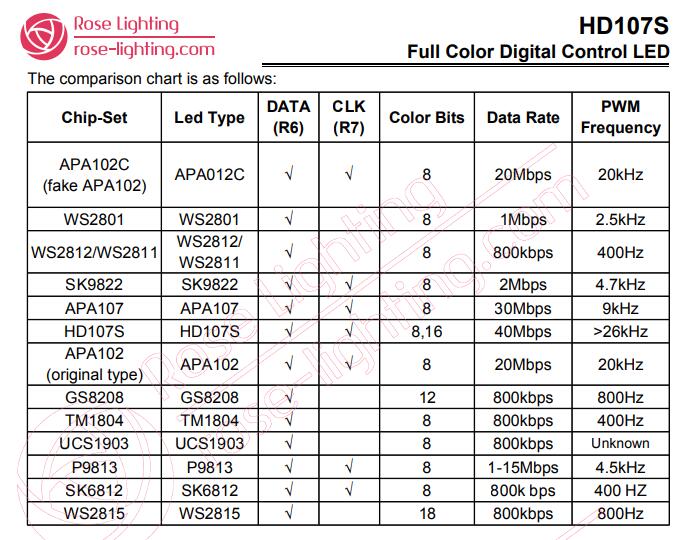
gitextract_fwat9f3h/ ├── .gitignore ├── API/ │ ├── NewConvert/ │ │ └── NewConvert.py │ ├── Serverless/ │ │ ├── app.py │ │ ├── requirements.txt │ │ └── serverless.yml │ ├── convert.py │ ├── convertAPI.py │ ├── screen.py │ └── sender.py ├── Arduino/ │ ├── HardwareTest/ │ │ ├── DivSpeedtest/ │ │ │ └── DivSpeedtest.ino │ │ ├── FreeRTOS/ │ │ │ └── FreeRTOS.ino │ │ ├── ImgDivSpeedtest/ │ │ │ ├── ImgDivSpeedtest.ino │ │ │ └── webpage.h │ │ ├── JPEGDEC/ │ │ │ └── JPEGDEC.ino │ │ ├── MultiThreadDivSpeedtest/ │ │ │ └── MultiThreadDivSpeedtest.ino │ │ ├── NeoPixelBitmap/ │ │ │ └── NeoPixelBitmap.ino │ │ ├── NeoPixelFunLoop/ │ │ │ └── NeoPixelFunLoop.ino │ │ ├── NeoPixelRainbow/ │ │ │ └── NeoPixelRainbow.ino │ │ ├── NeoPixelStatic/ │ │ │ └── NeoPixelStatic.ino │ │ ├── SDMMC_Test/ │ │ │ └── SDMMC_Test.ino │ │ ├── TCPReceive/ │ │ │ └── TCPReceive.ino │ │ ├── UDPReceive/ │ │ │ └── UDPReceive.ino │ │ ├── WebServer/ │ │ │ ├── WebServer.ino │ │ │ └── data/ │ │ │ ├── .exclude.files │ │ │ └── index.htm │ │ └── strandtest/ │ │ └── strandtest.ino │ └── bbPOV-P/ │ ├── bbPOV-P.ino │ ├── webpage.h │ └── webpage.html └── README.md
SYMBOL INDEX (35 symbols across 8 files)

FILE: API/NewConvert/NewConvert.py
  function polarConv (line 41) | def polarConv(imgOrgin,outputName):
  function start_convert (line 59) | def start_convert():
  function file_picker (line 77) | def file_picker(sender, data):
  function directory_picker (line 80) | def directory_picker(sender, data):
  function apply_selected_directory (line 82) | def apply_selected_directory(sender, data):
  function apply_selected_file (line 91) | def apply_selected_file(sender, data):
  function gamma_switch (line 100) | def gamma_switch(sender,data):
  function resource_path (line 126) | def resource_path(relative_path):

FILE: API/Serverless/app.py
  function index (line 18) | def index():
  function polarConv (line 22) | def polarConv(imgOrgin, frame,NUMPIXELS,Div):
  function convert (line 59) | def convert():

FILE: API/convert.py
  function polarConv (line 27) | def polarConv(imgOrgin, frame):

FILE: API/convertAPI.py
  function polarConv (line 18) | def polarConv(imgOrgin, frame,NUMPIXELS,Div):
  function convert (line 55) | def convert():

FILE: API/screen.py
  function polarConv (line 25) | def polarConv(imgOrgin, frame):

FILE: API/sender.py
  function resource_path (line 35) | def resource_path(relative_path):
  function polarConv (line 45) | def polarConv(imgOrgin):
  function capture (line 65) | def capture():
  function startCapture (line 80) | def startCapture():
  function stopCapture (line 87) | def stopCapture():
  class Main (line 90) | class Main(tk.Tk):
    method __init__ (line 91) | def __init__(self):
  class ResizingCanvas (line 118) | class ResizingCanvas(tk.Canvas):
    method __init__ (line 119) | def __init__(self, parent, **kwargs):
    method on_resize (line 125) | def on_resize(self,event):
  class CaptureArea (line 134) | class CaptureArea(tk.Toplevel):
    method __init__ (line 135) | def __init__(self, *args, **kwargs):
    method OnMotion (line 154) | def OnMotion(self, event):
    method start_move (line 165) | def start_move(self, event):
    method stop_move (line 169) | def stop_move(self, event):
    method do_move (line 173) | def do_move(self, event):

FILE: Arduino/HardwareTest/ImgDivSpeedtest/webpage.h
  function function (line 48) | function changeMedia(id){
  function function (line 61) | function changeAutoNext(){

FILE: Arduino/bbPOV-P/webpage.h
  function function (line 48) | function changeMedia(id){
  function function (line 61) | function changeAutoNext(){
Condensed preview — 30 files, each showing path, character count, and a content snippet. Download the .json file or copy for the full structured content (115K chars).
[
  {
    "path": ".gitignore",
    "chars": 183,
    "preview": "\nAPI/Serverless/.env\nArduino/HardwareTest/NeoPixelRainbow/NeoPixelRainbow.ino.esp32.bin\n*.jpg\n*.bmp\n*.gif\n*.bmp\n*.bmp\n*."
  },
  {
    "path": "API/NewConvert/NewConvert.py",
    "chars": 6398,
    "preview": "from dearpygui.core import *\nfrom dearpygui.simple import *\nimport numpy as np\nimport os\nimport math\nimport time\nimport "
  },
  {
    "path": "API/Serverless/app.py",
    "chars": 2267,
    "preview": "#Based on homemadegarbage.com\n#Thanks for the knowledge\n#Developed by Corebb\n\nimport numpy as np\nimport os\nimport math\nf"
  },
  {
    "path": "API/Serverless/requirements.txt",
    "chars": 40,
    "preview": "Flask==1.1.2\nnumpy==1.17.2\nPillow==6.2.1"
  },
  {
    "path": "API/Serverless/serverless.yml",
    "chars": 290,
    "preview": "# serverless.yml\n\ncomponent: flask\nname: flashDemo\norg: orgDemo\napp: appDemo\nstage: dev\n\ninputs:\n  src:\n    hook: 'pip -"
  },
  {
    "path": "API/convert.py",
    "chars": 1946,
    "preview": "#Based on homemadegarbage.com\n#Thanks for the knowledge\n#Developed by Corebb\n\nimport numpy as np\nimport os\nimport math\nf"
  },
  {
    "path": "API/convertAPI.py",
    "chars": 2389,
    "preview": "#Based on homemadegarbage.com\n#Thanks for the knowledge\n#Developed by Corebb\n\nimport numpy as np\nimport os\nimport math\nf"
  },
  {
    "path": "API/screen.py",
    "chars": 922,
    "preview": "#Based on homemadegarbage.com\n#Thanks for the knowledge\n#Developed by Corebb\n\nimport numpy as np\nimport os\nimport math\nf"
  },
  {
    "path": "API/sender.py",
    "chars": 17502,
    "preview": "import tkinter as tk\nfrom tkinter import ttk\nfrom tkinter import *\nimport numpy as np\nimport os\nimport math\nfrom mss imp"
  },
  {
    "path": "Arduino/HardwareTest/DivSpeedtest/DivSpeedtest.ino",
    "chars": 5373,
    "preview": "#include <WiFi.h>\n#include <AsyncTCP.h>\n#include <ESPAsyncWebServer.h>\n#include <AsyncElegantOTA.h>\n#include <NeoPixelBu"
  },
  {
    "path": "Arduino/HardwareTest/FreeRTOS/FreeRTOS.ino",
    "chars": 1430,
    "preview": "// the setup function runs once when you press reset or power the board\nTaskHandle_t loop1Handle,loop2Handle;\n#include \""
  },
  {
    "path": "Arduino/HardwareTest/ImgDivSpeedtest/ImgDivSpeedtest.ino",
    "chars": 9369,
    "preview": "#include <Ticker.h>\nTicker hallHit;\n#include <WiFi.h>\n#include <AsyncTCP.h>\n#include <WebServer.h>\n#include <ElegantOTA."
  },
  {
    "path": "Arduino/HardwareTest/ImgDivSpeedtest/webpage.h",
    "chars": 2291,
    "preview": "const char index_html[] PROGMEM = R\"rawliteral(<html>\n<meta http-equiv=\"Content-Type\" content=\"text/html; charset=utf-8\""
  },
  {
    "path": "Arduino/HardwareTest/JPEGDEC/JPEGDEC.ino",
    "chars": 2502,
    "preview": "#include \"SD_MMC.h\"\n#include \"JPEGDEC.h\"\nJPEGDEC jpeg;\nFile myfile;\nvoid * myOpen(const char *filename, int32_t *size) {"
  },
  {
    "path": "Arduino/HardwareTest/MultiThreadDivSpeedtest/MultiThreadDivSpeedtest.ino",
    "chars": 7308,
    "preview": "#include <WiFi.h>\n#include <AsyncTCP.h>\n#include <ESPAsyncWebServer.h>\n#include <AsyncElegantOTA.h>\n#include <NeoPixelBu"
  },
  {
    "path": "Arduino/HardwareTest/NeoPixelBitmap/NeoPixelBitmap.ino",
    "chars": 1997,
    "preview": "// NeoPixelBuffer\n// This example will animate pixels using a bitmap stored on a SD card\n// \n//\n// This will demonstrate"
  },
  {
    "path": "Arduino/HardwareTest/NeoPixelFunLoop/NeoPixelFunLoop.ino",
    "chars": 5655,
    "preview": "// NeoPixelFunLoop\n// This example will move a trail of light around a series of pixels.  \n// A ring formation of pixels"
  },
  {
    "path": "Arduino/HardwareTest/NeoPixelRainbow/NeoPixelRainbow.ino",
    "chars": 3265,
    "preview": "#include <WiFi.h>\n#include <AsyncTCP.h>\n#include <ESPAsyncWebServer.h>\n#include <AsyncElegantOTA.h>\n#include <NeoPixelBr"
  },
  {
    "path": "Arduino/HardwareTest/NeoPixelStatic/NeoPixelStatic.ino",
    "chars": 1116,
    "preview": "\n#include <WiFi.h>\n#include <AsyncTCP.h>\n#include <ESPAsyncWebServer.h>\n#include <AsyncElegantOTA.h>\n\n\nAsyncWebServer se"
  },
  {
    "path": "Arduino/HardwareTest/SDMMC_Test/SDMMC_Test.ino",
    "chars": 1585,
    "preview": "/*\n * Connect the SD card to the following pins:\n *\n * SD Card | ESP32               //Actually all add 1K pull up excep"
  },
  {
    "path": "Arduino/HardwareTest/TCPReceive/TCPReceive.ino",
    "chars": 1753,
    "preview": "\n#include <WiFi.h>\n\nconst char *ssid = \"Hollyshit_A\";\nconst char *password = \"00197633\";\n\nWiFiServer server; //声明服务器对象\n\n"
  },
  {
    "path": "Arduino/HardwareTest/UDPReceive/UDPReceive.ino",
    "chars": 1432,
    "preview": "#include \"WiFi.h\"\n#include \"AsyncUDP.h\"\n\nconst char * ssid = \"Hollyshit_A\";\nconst char * password = \"00197633\";\n\nAsyncUD"
  },
  {
    "path": "Arduino/HardwareTest/WebServer/WebServer.ino",
    "chars": 7281,
    "preview": "#include <ArduinoOTA.h>\n#ifdef ESP32\n#include <FS.h>\n#include \"SD_MMC.h\"\n#include <ESPmDNS.h>\n#include <WiFi.h>\n#include"
  },
  {
    "path": "Arduino/HardwareTest/WebServer/data/.exclude.files",
    "chars": 25,
    "preview": "/*.js.gz\n/.exclude.files\n"
  },
  {
    "path": "Arduino/HardwareTest/WebServer/data/index.htm",
    "chars": 3880,
    "preview": "<!--\n  FSWebServer - Example Index Page\n  Copyright (c) 2015 Hristo Gochkov. All rights reserved.\n  This file is part of"
  },
  {
    "path": "Arduino/HardwareTest/strandtest/strandtest.ino",
    "chars": 2801,
    "preview": "// Simple strand test for Adafruit Dot Star RGB LED strip.\n// This is a basic diagnostic tool, NOT a graphics demo...hel"
  },
  {
    "path": "Arduino/bbPOV-P/bbPOV-P.ino",
    "chars": 9327,
    "preview": "#include <WiFi.h>\n#include <AsyncTCP.h>\n#include <WebServer.h>\n#include <ElegantOTA.h>\n#include <NeoPixelBus.h>\n#include"
  },
  {
    "path": "Arduino/bbPOV-P/webpage.h",
    "chars": 2291,
    "preview": "const char index_html[] PROGMEM = R\"rawliteral(<html>\n<meta http-equiv=\"Content-Type\" content=\"text/html; charset=utf-8\""
  },
  {
    "path": "Arduino/bbPOV-P/webpage.html",
    "chars": 2104,
    "preview": "<html>\n<meta http-equiv=\"Content-Type\" content=\"text/html; charset=utf-8\" />\n<head>\n\t<style>\n\tbig{\n\t\tfont-size:68px;\n\t}\n"
  },
  {
    "path": "README.md",
    "chars": 1343,
    "preview": "# bbPOV-P  [English](https://github.com/RealCorebb/bbPOV-P/blob/main/README_EN.md \"English\")\nA new milestone?  \n# ⭐ 100 "
  }
]
About this extraction
This page contains the full source code of the RealCorebb/bbPOV-P GitHub repository, extracted and formatted as plain text for AI agents and large language models (LLMs). The extraction includes 30 files (103.6 KB), approximately 36.6k tokens, and a symbol index with 35 extracted functions, classes, methods, constants, and types. Use this with OpenClaw, Claude, ChatGPT, Cursor, Windsurf, or any other AI tool that accepts text input. You can copy the full output to your clipboard or download it as a .txt file.
Extracted by GitExtract — free GitHub repo to text converter for AI. Built by Nikandr Surkov.