Repository: Savjee/home-energy-monitor Branch: master Commit: 70fd234b305f Files: 97 Total size: 130.7 KB Directory structure: gitextract_udkxjzlu/ ├── .github/ │ └── workflows/ │ ├── aws.yml │ └── firmware.yml ├── .gitignore ├── 3D-designs/ │ ├── 01 - Case.stl │ └── 02 - Top lid.stl ├── README.md ├── _stuff/ │ └── Sketch icon.sketch ├── src-app/ │ ├── .gitignore │ ├── angular.json │ ├── config.xml │ ├── e2e/ │ │ ├── protractor.conf.js │ │ ├── src/ │ │ │ ├── app.e2e-spec.ts │ │ │ └── app.po.ts │ │ └── tsconfig.e2e.json │ ├── ionic.config.json │ ├── package.json │ ├── resources/ │ │ ├── README.md │ │ ├── icon.png.md5 │ │ └── splash.png.md5 │ ├── src/ │ │ ├── app/ │ │ │ ├── app-routing.module.ts │ │ │ ├── app.component.html │ │ │ ├── app.component.ts │ │ │ ├── app.module.ts │ │ │ ├── components/ │ │ │ │ ├── components.module.ts │ │ │ │ └── loading-indicator/ │ │ │ │ ├── loading-indicator.component.html │ │ │ │ ├── loading-indicator.component.scss │ │ │ │ └── loading-indicator.component.ts │ │ │ ├── services/ │ │ │ │ └── energy-service.service.ts │ │ │ ├── tab-home/ │ │ │ │ ├── tab-home.module.ts │ │ │ │ ├── tab-home.page.html │ │ │ │ ├── tab-home.page.scss │ │ │ │ └── tab-home.page.ts │ │ │ ├── tab-readings/ │ │ │ │ ├── tab-readings.module.ts │ │ │ │ ├── tab-readings.page.html │ │ │ │ ├── tab-readings.page.scss │ │ │ │ └── tab-readings.page.ts │ │ │ ├── tab-statistics/ │ │ │ │ ├── tab-statistics.module.ts │ │ │ │ ├── tab-statistics.page.html │ │ │ │ ├── tab-statistics.page.scss │ │ │ │ └── tab-statistics.page.ts │ │ │ ├── tabs/ │ │ │ │ ├── tabs.module.ts │ │ │ │ ├── tabs.page.html │ │ │ │ ├── tabs.page.scss │ │ │ │ ├── tabs.page.ts │ │ │ │ └── tabs.router.module.ts │ │ │ └── utils/ │ │ │ └── chart-defaults.ts │ │ ├── environments/ │ │ │ ├── environment.prod.ts │ │ │ └── environment.ts │ │ ├── global.scss │ │ ├── index.html │ │ ├── karma.conf.js │ │ ├── main.ts │ │ ├── polyfills.ts │ │ ├── test.ts │ │ ├── theme/ │ │ │ └── variables.scss │ │ ├── tsconfig.app.json │ │ └── tsconfig.spec.json │ ├── tsconfig.json │ └── tslint.json ├── src-aws/ │ ├── core/ │ │ ├── aws-connections.js │ │ ├── config.js │ │ ├── helpers/ │ │ │ ├── CalculateKwh.js │ │ │ ├── CalculateKwh.test.js │ │ │ ├── IsNightTarif.js │ │ │ └── IsNightTarif.test.js │ │ └── helpers.js │ ├── dashboard/ │ │ ├── img/ │ │ │ └── favicons/ │ │ │ ├── browserconfig.xml │ │ │ └── site.webmanifest │ │ ├── index.html │ │ ├── main.css │ │ └── main.js │ ├── functions/ │ │ ├── cron-rotate-daily.js │ │ └── graphql/ │ │ ├── graphql.js │ │ └── resolvers/ │ │ ├── realtime.js │ │ ├── stats.js │ │ └── usageData.js │ ├── package.json │ ├── serverless.yml │ └── webpack.config.js └── src-esp32/ ├── .gitignore ├── .travis.yml ├── certificates/ │ └── .gitKeep ├── include/ │ └── README ├── lib/ │ └── README ├── platformio.ini ├── src/ │ ├── config/ │ │ ├── config.dist.h │ │ └── enums.h │ ├── functions/ │ │ └── drawFunctions.h │ ├── main.cpp │ └── tasks/ │ ├── fetch-time-from-ntp.h │ ├── measure-electricity.h │ ├── mqtt-aws.h │ ├── mqtt-home-assistant.h │ ├── updateDisplay.h │ ├── wifi-connection.h │ └── wifi-update-signalstrength.h └── test/ └── README ================================================ FILE CONTENTS ================================================ ================================================ FILE: .github/workflows/aws.yml ================================================ name: aws on: pull_request: push: paths: - 'src-aws/**' jobs: build: runs-on: ubuntu-latest strategy: matrix: node-version: [12.x] steps: - uses: actions/checkout@v1 - name: Use Node.js ${{ matrix.node-version }} uses: actions/setup-node@v1 with: node-version: ${{ matrix.node-version }} - name: npm install run: | cd src-aws npm ci npm install -g serverless mocha env: CI: true - name: package run: | cd src-aws serverless package ================================================ FILE: .github/workflows/firmware.yml ================================================ name: firmware on: pull_request: push: paths: - 'src-esp32/**' jobs: build: runs-on: ubuntu-latest steps: - uses: actions/checkout@v1 - name: Setup Python uses: actions/setup-python@master with: python-version: '3.x' - name: Install Platform IO run: | python -m pip install --upgrade pip pip install -U platformio - name: Build run: | cd src-esp32 cp src/config/config.dist.h src/config/config.h mkdir -p certificates echo "a" > certificates/amazonrootca1.pem echo "a" > certificates/certificate.pem.crt echo "a" > certificates/private.pem.key echo "a" > certificates/public.pem.key platformio run env: CI: true ================================================ FILE: .gitignore ================================================ .DS_Store src-aws/.serverless src-esp32/.vscode node_modules src-esp32/certificates/*.pem src-esp32/certificates/*.crt src-esp32/certificates/*.key .vscode ================================================ FILE: README.md ================================================

Home Energy Monitor

Home Energy Monitor (v2)

[![GitHub Issues](https://img.shields.io/github/issues/Savjee/home-energy-monitor.svg)](https://github.com/Savjee/home-energy-monitor/issues) [![GitHub Pull Requests](https://img.shields.io/github/issues-pr/Savjee/home-energy-monitor.svg)](https://github.com/Savjee/home-energy-monitor/pulls) [![License](https://img.shields.io/badge/license-MIT-blue.svg)](/LICENSE) **⚠️ This is a work in progress. By no means is this production ready.**

--- ESP32-based Home Energy Monitor: monitors electricity consumption of your entire house with a single CT sensor. ## Structure This project consists out of multiple components: | Folder | Description | Build status | | ----------------- | ------------------- | ------------ | | `src-app` | Mobile app (Ionic) | n/a | | `src-aws` | Serverless AWS backend + GraphQL API | ![AWS Build Status](https://github.com/Savjee/home-energy-monitor/workflows/aws/badge.svg) | | `src-esp32` | Firmware for the ESP32 (measuring device) | ![Firmware Build Status](https://github.com/Savjee/home-energy-monitor/workflows/firmware/badge.svg) | (TODO: add instructions on how to deploy all of this. 😅) ## Video explanation

[![IMAGE ALT TEXT HERE](https://img.youtube.com/vi/ah3ezprtgmc/0.jpg)](https://www.youtube.com/watch?v=ah3ezprtgmc) *[https://www.youtube.com/watch?v=ah3ezprtgmc](https://www.youtube.com/watch?v=ah3ezprtgmc)*
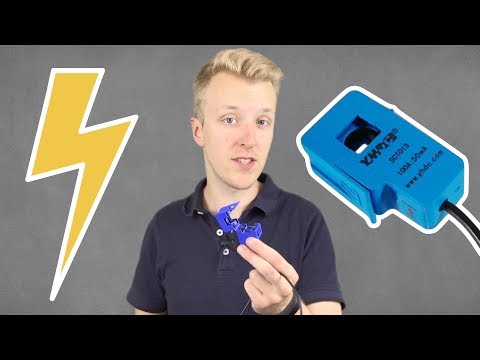
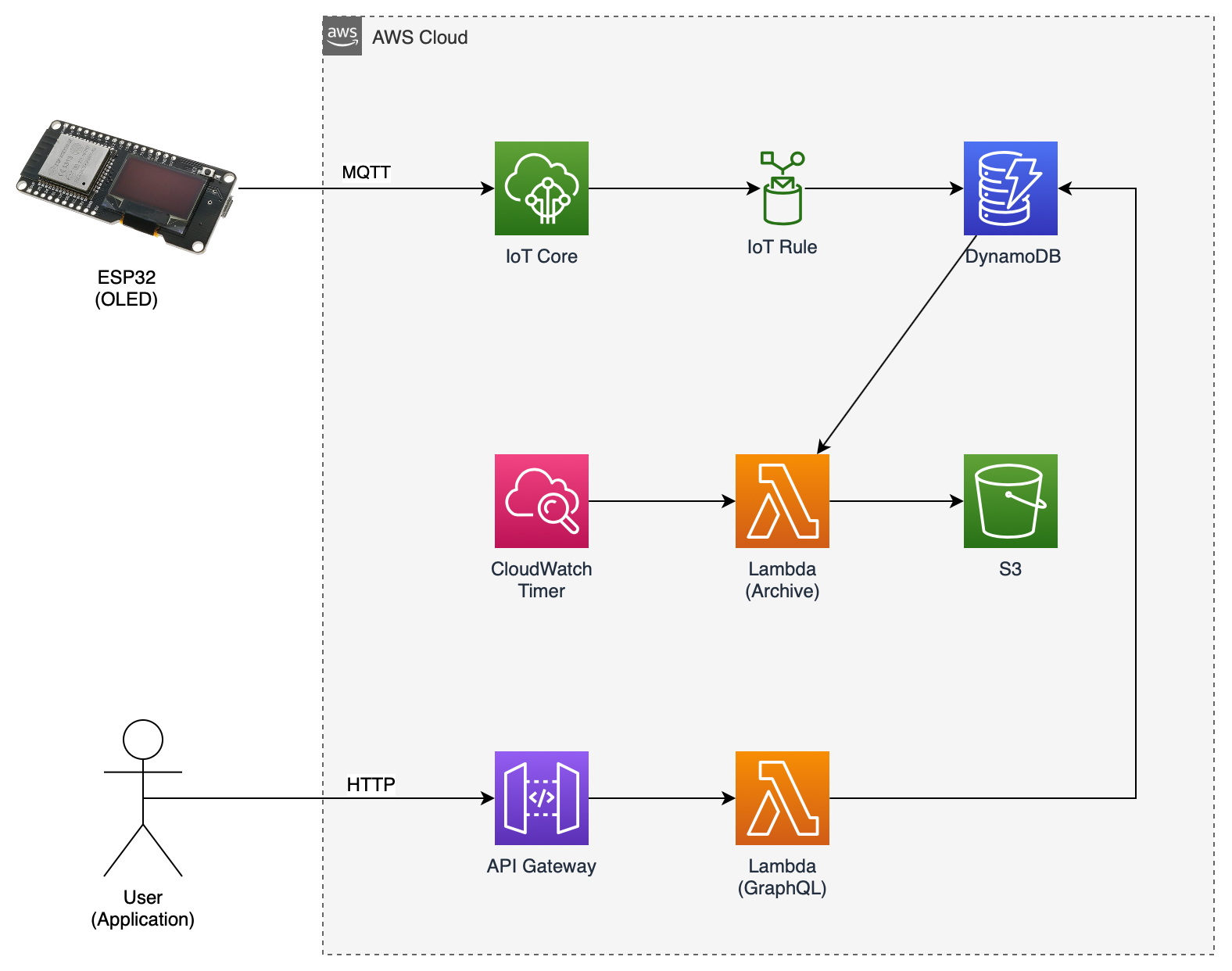
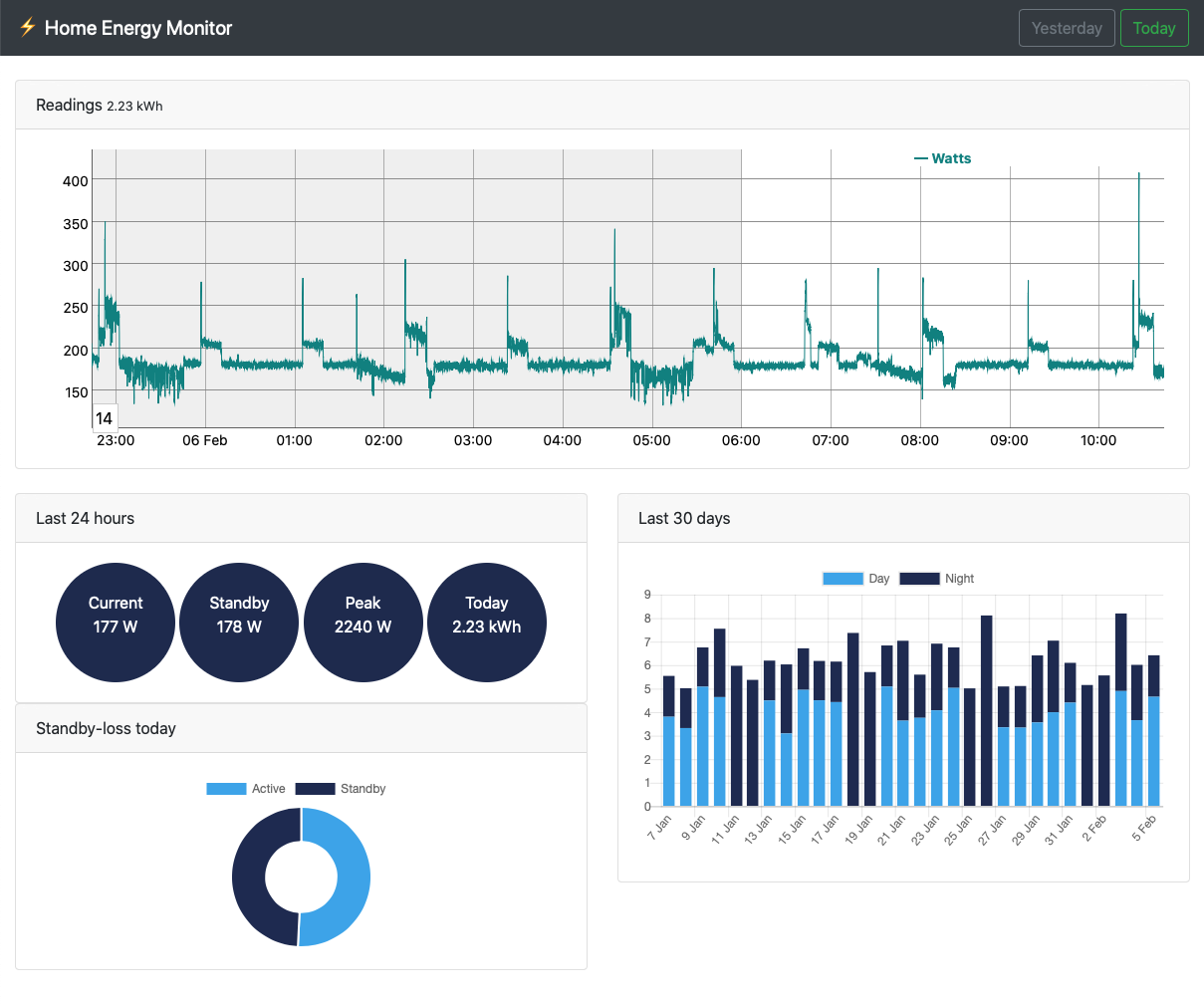
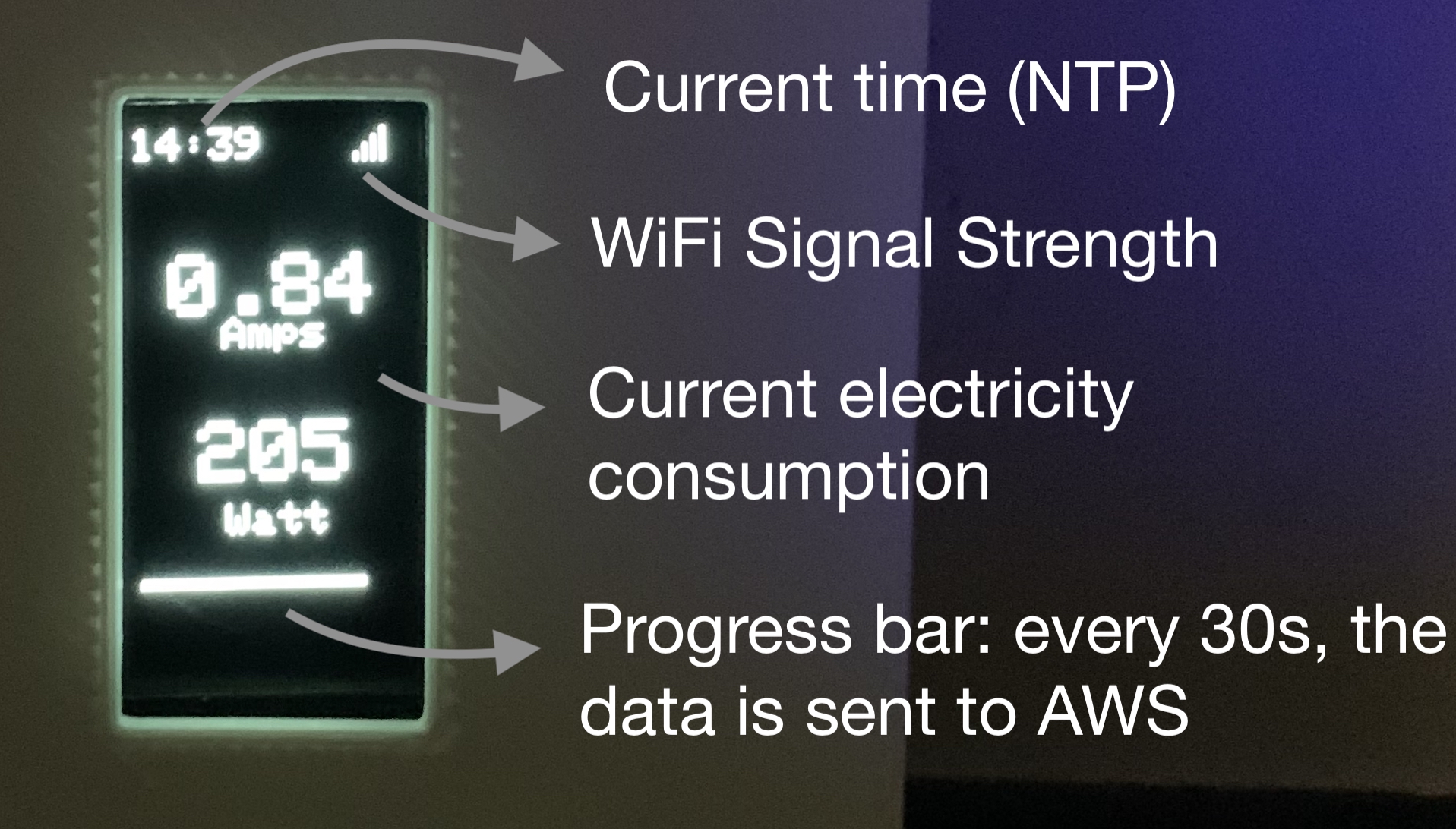
Read my blog post for more instructions: [https://savjee.be/2019/07/Home-Energy-Monitor-ESP32-CT-Sensor-Emonlib/](https://savjee.be/2019/07/Home-Energy-Monitor-ESP32-CT-Sensor-Emonlib/) ## Cloud Architecture This is the cloud architecture that powers the energy meter and the app: ![AWS Cloud Architecture](https://savjee.github.io/home-energy-monitor/readme-images/architecture.png) In a nutshell: * The ESP32 has a MQTT connection with AWS IoT Core * Every 30 seconds, 30 measurements are sent to AWS * These measurements are stored in DynamoDB (IoT Rule) * Once a day, all readings from the previous day are archived to S3 * A GraphQL API (hosted on Lambda) exposes the data stored in DynamoDB ## Screenshots Web dashboard, built on top of the GraphQL API: ![Screenshot Web Dashboard](https://savjee.github.io/home-energy-monitor/readme-images/web-dashboard.png) What is displayed on the ESP32 OLED display: ![Screenshot ESP32 OLED](https://savjee.github.io/home-energy-monitor/readme-images/esp32-oled.jpg) ## DIY Requirements To build your own Energy Monitor you need the following hardware: * ESP32 * CT sensor: YHDC SCT-013-030 (30A/1V) * 10µF capacitor * 2 resistors (between 10k-470kΩ) Other requirements: * AWS Account (Should be able to run in free-tier) * Install [PlatformIO](https://platformio.org) on your system * Drivers for your ESP32 board Read my blog post for more instructions: [https://savjee.be/2019/07/Home-Energy-Monitor-ESP32-CT-Sensor-Emonlib/](https://savjee.be/2019/07/Home-Energy-Monitor-ESP32-CT-Sensor-Emonlib/) ## Contribute I'm happy to merge in any pull requests. Also feel free to report bugs or feature requests. ================================================ FILE: src-app/.gitignore ================================================ # Specifies intentionally untracked files to ignore when using Git # http://git-scm.com/docs/gitignore *~ *.sw[mnpcod] *.log *.tmp *.tmp.* log.txt *.sublime-project *.sublime-workspace .vscode/ npm-debug.log* .idea/ .ionic/ .sourcemaps/ .sass-cache/ .tmp/ .versions/ coverage/ www/ node_modules/ tmp/ temp/ platforms/ plugins/ plugins/android.json plugins/ios.json $RECYCLE.BIN/ .DS_Store Thumbs.db UserInterfaceState.xcuserstate ================================================ FILE: src-app/angular.json ================================================ { "$schema": "./node_modules/@angular-devkit/core/src/workspace/workspace-schema.json", "version": 1, "defaultProject": "app", "newProjectRoot": "projects", "projects": { "app": { "root": "", "sourceRoot": "src", "projectType": "application", "prefix": "app", "schematics": {}, "architect": { "build": { "builder": "@angular-devkit/build-angular:browser", "options": { "outputPath": "www", "index": "src/index.html", "main": "src/main.ts", "polyfills": "src/polyfills.ts", "tsConfig": "src/tsconfig.app.json", "assets": [ { "glob": "**/*", "input": "src/assets", "output": "assets" }, { "glob": "**/*.svg", "input": "node_modules/ionicons/dist/ionicons/svg", "output": "./svg" } ], "styles": [ { "input": "src/theme/variables.scss" }, { "input": "src/global.scss" } ], "scripts": [] }, "configurations": { "production": { "fileReplacements": [ { "replace": "src/environments/environment.ts", "with": "src/environments/environment.prod.ts" } ], "optimization": true, "outputHashing": "all", "sourceMap": false, "extractCss": true, "namedChunks": false, "aot": true, "extractLicenses": true, "vendorChunk": false, "buildOptimizer": true, "budgets": [ { "type": "initial", "maximumWarning": "2mb", "maximumError": "5mb" } ] }, "ci": { "progress": false } } }, "serve": { "builder": "@angular-devkit/build-angular:dev-server", "options": { "browserTarget": "app:build" }, "configurations": { "production": { "browserTarget": "app:build:production" }, "ci": { "progress": false } } }, "extract-i18n": { "builder": "@angular-devkit/build-angular:extract-i18n", "options": { "browserTarget": "app:build" } }, "test": { "builder": "@angular-devkit/build-angular:karma", "options": { "main": "src/test.ts", "polyfills": "src/polyfills.ts", "tsConfig": "src/tsconfig.spec.json", "karmaConfig": "src/karma.conf.js", "styles": [], "scripts": [], "assets": [ { "glob": "favicon.ico", "input": "src/", "output": "/" }, { "glob": "**/*", "input": "src/assets", "output": "/assets" } ] }, "configurations": { "ci": { "progress": false, "watch": false } } }, "lint": { "builder": "@angular-devkit/build-angular:tslint", "options": { "tsConfig": ["src/tsconfig.app.json", "src/tsconfig.spec.json"], "exclude": ["**/node_modules/**"] } }, "ionic-cordova-build": { "builder": "@ionic/angular-toolkit:cordova-build", "options": { "browserTarget": "app:build" }, "configurations": { "production": { "browserTarget": "app:build:production" } } }, "ionic-cordova-serve": { "builder": "@ionic/angular-toolkit:cordova-serve", "options": { "cordovaBuildTarget": "app:ionic-cordova-build", "devServerTarget": "app:serve" }, "configurations": { "production": { "cordovaBuildTarget": "app:ionic-cordova-build:production", "devServerTarget": "app:serve:production" } } } } }, "app-e2e": { "root": "e2e/", "projectType": "application", "architect": { "e2e": { "builder": "@angular-devkit/build-angular:protractor", "options": { "protractorConfig": "e2e/protractor.conf.js", "devServerTarget": "app:serve" }, "configurations": { "ci": { "devServerTarget": "app:serve:ci" } } }, "lint": { "builder": "@angular-devkit/build-angular:tslint", "options": { "tsConfig": "e2e/tsconfig.e2e.json", "exclude": ["**/node_modules/**"] } } } } }, "cli": { "defaultCollection": "@ionic/angular-toolkit" }, "schematics": { "@ionic/angular-toolkit:component": { "styleext": "scss" }, "@ionic/angular-toolkit:page": { "styleext": "scss" } } } ================================================ FILE: src-app/config.xml ================================================ Home Energy Measuring home energy usage. Xavier Decuyper ================================================ FILE: src-app/e2e/protractor.conf.js ================================================ // Protractor configuration file, see link for more information // https://github.com/angular/protractor/blob/master/lib/config.ts const { SpecReporter } = require('jasmine-spec-reporter'); exports.config = { allScriptsTimeout: 11000, specs: [ './src/**/*.e2e-spec.ts' ], capabilities: { 'browserName': 'chrome' }, directConnect: true, baseUrl: 'http://localhost:4200/', framework: 'jasmine', jasmineNodeOpts: { showColors: true, defaultTimeoutInterval: 30000, print: function() {} }, onPrepare() { require('ts-node').register({ project: require('path').join(__dirname, './tsconfig.e2e.json') }); jasmine.getEnv().addReporter(new SpecReporter({ spec: { displayStacktrace: true } })); } }; ================================================ FILE: src-app/e2e/src/app.e2e-spec.ts ================================================ import { AppPage } from './app.po'; describe('new App', () => { let page: AppPage; beforeEach(() => { page = new AppPage(); }); it('should display welcome message', () => { page.navigateTo(); expect(page.getPageTitle()).toContain('Tab One'); }); }); ================================================ FILE: src-app/e2e/src/app.po.ts ================================================ import { browser, by, element } from 'protractor'; export class AppPage { navigateTo() { return browser.get('/'); } getPageTitle() { return element(by.css('ion-title')).getText(); } } ================================================ FILE: src-app/e2e/tsconfig.e2e.json ================================================ { "extends": "../tsconfig.json", "compilerOptions": { "outDir": "../out-tsc/app", "module": "commonjs", "target": "es5", "types": [ "jasmine", "jasminewd2", "node" ] } } ================================================ FILE: src-app/ionic.config.json ================================================ { "name": "src-app", "integrations": { "cordova": {} }, "type": "angular" } ================================================ FILE: src-app/package.json ================================================ { "name": "src-app", "version": "0.0.1", "author": "Ionic Framework", "homepage": "https://ionicframework.com/", "scripts": { "ng": "ng", "start": "ng serve", "build": "ng build", "test": "ng test", "lint": "ng lint", "e2e": "ng e2e" }, "private": true, "dependencies": { "@angular/common": "^7.2.2", "@angular/core": "^7.2.2", "@angular/forms": "^7.2.2", "@angular/http": "^7.2.2", "@angular/platform-browser": "^7.2.2", "@angular/platform-browser-dynamic": "^7.2.2", "@angular/router": "^7.2.2", "@ionic-native/core": "^5.0.0", "@ionic-native/splash-screen": "^5.0.0", "@ionic-native/status-bar": "^5.0.0", "@ionic/angular": "^4.11.10", "cordova-ios": "4.5.5", "cordova-plugin-device": "^2.0.2", "cordova-plugin-ionic-keyboard": "^2.1.3", "cordova-plugin-ionic-webview": "^3.1.2", "cordova-plugin-splashscreen": "^5.0.2", "cordova-plugin-statusbar": "^2.4.2", "cordova-plugin-whitelist": "^1.3.3", "core-js": "^2.5.4", "highcharts": "^7.0.3", "rxjs": "~6.3.3", "zone.js": "~0.8.29" }, "devDependencies": { "@angular-devkit/architect": "~0.12.3", "@angular-devkit/build-angular": "^0.803.25", "@angular-devkit/core": "~7.2.3", "@angular-devkit/schematics": "~7.2.3", "@angular/cli": "~7.2.3", "@angular/compiler": "~7.2.2", "@angular/compiler-cli": "~7.2.2", "@angular/language-service": "~7.2.2", "@ionic/angular-toolkit": "~1.4.0", "@types/chart.js": "^2.7.45", "@types/jasmine": "~2.8.8", "@types/jasminewd2": "~2.0.3", "@types/node": "~10.12.0", "codelyzer": "~4.5.0", "jasmine-core": "~2.99.1", "jasmine-spec-reporter": "~4.2.1", "karma": "~3.1.4", "karma-chrome-launcher": "~2.2.0", "karma-coverage-istanbul-reporter": "~2.0.1", "karma-jasmine": "~1.1.2", "karma-jasmine-html-reporter": "^0.2.2", "protractor": "~5.4.0", "ts-node": "~8.0.0", "tslint": "~5.12.0", "typescript": "~3.1.6" }, "description": "An Ionic project", "cordova": { "plugins": { "cordova-plugin-whitelist": {}, "cordova-plugin-statusbar": {}, "cordova-plugin-device": {}, "cordova-plugin-splashscreen": {}, "cordova-plugin-ionic-webview": {}, "cordova-plugin-ionic-keyboard": {} }, "platforms": [ "ios" ] } } ================================================ FILE: src-app/resources/README.md ================================================ These are Cordova resources. You can replace icon.png and splash.png and run `ionic cordova resources` to generate custom icons and splash screens for your app. See `ionic cordova resources --help` for details. Cordova reference documentation: - Icons: https://cordova.apache.org/docs/en/latest/config_ref/images.html - Splash Screens: https://cordova.apache.org/docs/en/latest/reference/cordova-plugin-splashscreen/ ================================================ FILE: src-app/resources/icon.png.md5 ================================================ 3cb62ec167ca6dc5a30560cac2e8caf4 ================================================ FILE: src-app/resources/splash.png.md5 ================================================ 7108a139271bfc1712907b3291a2b454 ================================================ FILE: src-app/src/app/app-routing.module.ts ================================================ import { NgModule } from '@angular/core'; import { PreloadAllModules, RouterModule, Routes } from '@angular/router'; const routes: Routes = [ { path: '', loadChildren: './tabs/tabs.module#TabsPageModule' }, ]; @NgModule({ imports: [ RouterModule.forRoot(routes, { preloadingStrategy: PreloadAllModules }) ], exports: [RouterModule] }) export class AppRoutingModule {} ================================================ FILE: src-app/src/app/app.component.html ================================================ ================================================ FILE: src-app/src/app/app.component.ts ================================================ import { Component } from '@angular/core'; import { Platform } from '@ionic/angular'; import { SplashScreen } from '@ionic-native/splash-screen/ngx'; import { StatusBar } from '@ionic-native/status-bar/ngx'; @Component({ selector: 'app-root', templateUrl: 'app.component.html' }) export class AppComponent { constructor( private platform: Platform, private splashScreen: SplashScreen, private statusBar: StatusBar ) { this.initializeApp(); } initializeApp() { this.platform.ready().then(() => { this.statusBar.styleDefault(); this.splashScreen.hide(); }); } } ================================================ FILE: src-app/src/app/app.module.ts ================================================ import { NgModule } from '@angular/core'; import { BrowserModule } from '@angular/platform-browser'; import { RouteReuseStrategy } from '@angular/router'; import { IonicModule, IonicRouteStrategy } from '@ionic/angular'; import { SplashScreen } from '@ionic-native/splash-screen/ngx'; import { StatusBar } from '@ionic-native/status-bar/ngx'; import { AppRoutingModule } from './app-routing.module'; import { AppComponent } from './app.component'; import { EnergyService } from './services/energy-service.service'; import { HttpClientModule } from '@angular/common/http'; import { DecimalPipe } from '@angular/common'; @NgModule({ declarations: [AppComponent], entryComponents: [], imports: [BrowserModule, IonicModule.forRoot(), AppRoutingModule, HttpClientModule], providers: [ StatusBar, SplashScreen, EnergyService, DecimalPipe, { provide: RouteReuseStrategy, useClass: IonicRouteStrategy } ], bootstrap: [AppComponent] }) export class AppModule {} ================================================ FILE: src-app/src/app/components/components.module.ts ================================================ import { NgModule } from '@angular/core'; import { CommonModule } from '@angular/common'; import { LoadingIndicatorComponent } from './loading-indicator/loading-indicator.component'; import { IonicModule } from '@ionic/angular'; @NgModule({ declarations: [ LoadingIndicatorComponent ], exports: [ LoadingIndicatorComponent, ], imports: [ CommonModule, IonicModule, ] }) export class ComponentsModule { } ================================================ FILE: src-app/src/app/components/loading-indicator/loading-indicator.component.html ================================================
================================================ FILE: src-app/src/app/components/loading-indicator/loading-indicator.component.scss ================================================ div{ // margin-bottom: -7px; &.hidden{ opacity: 0; } } ================================================ FILE: src-app/src/app/components/loading-indicator/loading-indicator.component.ts ================================================ import { Component, OnInit, Input } from '@angular/core'; @Component({ selector: 'app-loading-indicator', templateUrl: './loading-indicator.component.html', styleUrls: ['./loading-indicator.component.scss'], }) export class LoadingIndicatorComponent implements OnInit { @Input() show = false; constructor() { } ngOnInit() {} } ================================================ FILE: src-app/src/app/services/energy-service.service.ts ================================================ import { Injectable } from '@angular/core'; import { HttpClient } from '@angular/common/http'; import { ToastController } from '@ionic/angular'; import { start } from 'repl'; @Injectable({ providedIn: 'root' }) export class EnergyService { /** * The URL to the main GraphQL API. This will be used to make all requests. */ private BASE_URL = "*** YOUR GRAPHQL ENDPOINT HERE ***"; private pendingRequests = []; constructor(private http: HttpClient, private toastCtrl: ToastController) { } public isLoading() { return this.pendingRequests.length !== 0; } public async getStatistics(): Promise{ // Calculate the start and ending dates const startDate = new Date(); startDate.setDate(startDate.getDate() - 31); // Convert these to timestamps and make them whole (no floats) const start = Math.floor(startDate.getTime() / 1000); const end = Math.ceil(Date.now() / 1000); // Make the request const data = await this.makeGraphQLRequest(` query{ usageData(startDate:${start}, endDate:${end}){ timestamp, dayUse, nightUse } } `); console.log('Fetched stats:', data); return data; } public async getYearlyStats(): Promise{ const startDate = new Date(); startDate.setDate(1); startDate.setMonth(0); startDate.setHours(0); startDate.setMinutes(0); const start = Math.floor(startDate.getTime() / 1000); const end = Math.ceil(Date.now() / 1000); const data = await this.makeGraphQLRequest(` query{ usageData(startDate:${start}, endDate:${end}){ timestamp, dayUse, nightUse, } } `); console.log('yearly stats', data); const beginDates = []; const outputData = []; for (let i = 0; i <= 11; i++){ startDate.setMonth(i); beginDates.push( Math.floor(startDate.getTime() / 1000) ); } for (let i = 0; i <= 11; i++){ const readingsInMonth = data.data.usageData.filter( item => item.timestamp > beginDates[i] && item.timestamp < beginDates[i + 1] ); if (readingsInMonth.length === 0) { outputData.push(0); continue; } console.log(readingsInMonth); const total = readingsInMonth.reduce((total, currentVal) => total + currentVal.dayUse + currentVal.nightUse); outputData.push(total); } console.log(outputData); } public async getHomePageStatistics(all?: boolean): Promise{ const timestamp = Math.floor(Date.now() / 1000 - 60); let additionalQueries = ''; if (all === true) { additionalQueries = ` stats{ always_on today_so_far }` } const data = await this.makeGraphQLRequest(` query{ realtime(sinceTimestamp: ${timestamp}){ timestamp reading }, ${additionalQueries} } `); console.log('realtime', data); return data; } public async getReadings(since?: number): Promise { if (!since) { const date = new Date(); date.setHours(date.getHours() - 6); since = date.getTime(); } console.log('since', since); const data = await this.makeGraphQLRequest(` query{ realtime(sinceTimestamp: ${Math.floor(since / 1000)}){ timestamp, reading } }` ); console.log('readings', data.data.realtime); return data.data.realtime; } /** * Makes a request to the GraphQL API and returns a promise that should * be awaited. * * @param query The GraphQL query that should be executed */ private async makeGraphQLRequest(query: string): Promise { const req = this.http.post( this.BASE_URL, query ).toPromise(); // Push the request into the array so we can show load spinners // in the application at various places. this.pendingRequests.push(req); req .then((data) => { return data; }) .catch(async (err) => { console.error('Error making GraphQL request', err); const toast = await this.toastCtrl.create({ message: 'Could not fetch data from server. Try again later.', duration: 5000, showCloseButton: true, position: 'top', color: 'dark' }); toast.present(); }) .finally(() => { // After any request, regardless of wether it was successfull // or not, we have to remove it from the pendingRequests array // so that all loading spinners dissapear in the UI. this.pendingRequests.splice( this.pendingRequests.indexOf(req), 1 ); }); // Return the pending requests so other methods can await it. return req; } } export interface MainStats { data: any; } ================================================ FILE: src-app/src/app/tab-home/tab-home.module.ts ================================================ import { NgModule } from '@angular/core'; import { CommonModule } from '@angular/common'; import { FormsModule } from '@angular/forms'; import { Routes, RouterModule } from '@angular/router'; import { IonicModule } from '@ionic/angular'; import { TabHomePage } from './tab-home.page'; import { ComponentsModule } from '../components/components.module'; const routes: Routes = [ { path: '', component: TabHomePage } ]; @NgModule({ imports: [ CommonModule, FormsModule, IonicModule, RouterModule.forChild(routes), ComponentsModule, ], declarations: [TabHomePage] }) export class TabHomeModule {} ================================================ FILE: src-app/src/app/tab-home/tab-home.page.html ================================================ Home

{{stats.current | number:'1.0-0' }}W ⌁ W real-time

{{stats.always_on | number:'1.0-0' }} W ⌁ W always-on

{{stats.today_so_far | number:'1.0-1'}} kWh ⌁ kWh today so far

================================================ FILE: src-app/src/app/tab-home/tab-home.page.scss ================================================ .center{ display: flex; justify-content: center; flex-direction: column; text-align: center; height: 100%; } .container{ position: relative; height: 455px; width: 340px; align-self: center; .circle{ border-radius: 100%; background-blend-mode: color-burn; justify-content: center; align-items: center; border-radius: 100%; text-align: center; display: flex; flex-wrap: wrap; color: #fff; .label, .value{ display: block; } .label{ font-weight: 100; font-size: 19px; text-transform: lowercase; } .value{ font-weight: 500; } &.current{ background-color: rgba(#1D6CFF, 0.9); width: 300px; height: 300px; margin: 0 auto; .value{ font-size: 60px; } } &.alwayson{ background-color: rgba(#8440FF, 0.9); width: 152px; height: 152px; position:absolute; top: 250px; left: 0; .value{ font-size: 30px; } } &.today{ background-color: rgba(#C324FF, 0.9); width: 210px; height: 210px; position:absolute; top: 244px; right: 0; .value{ font-size: 35px; } } } } ================================================ FILE: src-app/src/app/tab-home/tab-home.page.ts ================================================ import { Component, OnInit } from '@angular/core'; import { EnergyService } from '../services/energy-service.service'; @Component({ selector: 'app-tab-home', templateUrl: './tab-home.page.html', styleUrls: ['./tab-home.page.scss'], }) export class TabHomePage { public stats = { current: '?', always_on: '?', today_so_far: '?', } private intervalTimer = null; private scheduledTimeout = null; private lastUpdate = null; constructor(public energyService: EnergyService) { } /** * Called when the page has been loaded for the very first time. Does not * re-fire when the page is opened a second time. */ async ionViewDidLoad() { // When the app resumes from the background we should see if we have to // refresh the data or not. Same logic as when the app first boots. document.addEventListener("resume", async () => { await this.refreshDataIfNeeded(); }, false); } /** * Called everytime the screen enters the view, regardless of wether it has * been loaded before or not. */ async ionViewWillEnter() { await this.refreshDataIfNeeded(); } /** * Called when the user leaves the main screen. Here we should cancel the * timer that automatically refreshes the screen. */ async ionViewDidLeave() { clearInterval(this.intervalTimer); } /** * Determns what should happen with the background refresh operations * (cancel them or schedule new ones). This function should be called * everytime the page is opened or when the app is resumed. */ private async refreshDataIfNeeded() { // Define how long we should wait in between refreshed (30 seconds) const minimumWaitTime = 30 * 1000; if (this.intervalTimer !== null) { clearInterval(this.intervalTimer); } // If we haven't updated before, we can do it straight away and not // care about anything else. if (this.lastUpdate === null) { await this.fetchData(true); this.scheduleTimer(); return; } const updateTimeDelta = Date.now() - this.lastUpdate; // If we updated before but it was more then 30 seconds ago, refresh it // now again and don't continue executing code. if (updateTimeDelta > minimumWaitTime) { await this.fetchData(); this.scheduleTimer(); return; } // If we get here it means we updates less then 30 seconds but the user // has reopened the dashboard. Calculate how long we must wait to reach 30 // seconds and then schedule a timer to do the refresh. this.scheduleTimer(minimumWaitTime - updateTimeDelta); return; } /** * Schedules a refresh action after a given delay of waitMs milliseconds. * Also cancels any pending timeout should there be one. * @param waitMs Time to wait in milliseconds */ private scheduleTimer(waitMs = 0) { if (this.scheduledTimeout) { clearTimeout(this.scheduledTimeout); } this.scheduledTimeout = setTimeout(async () => { this.intervalTimer = setInterval(async () => { await this.fetchData(); }, 30 * 1000); }, waitMs); } /** * Actually fetches data from the backend. Should not be called more then * once every 30 seconds because there are no new datapoints anyway. * * @param all Wether or not to fetch the "always_on" and "today_so_far" * Best to set these to false if not needed (better performance) */ private async fetchData(all?: boolean) { const realtime = await this.energyService.getHomePageStatistics(all); this.stats.current = realtime.data.realtime[realtime.data.realtime.length - 1].reading; if (all === true) { this.stats.always_on = realtime.data.stats.always_on; this.stats.today_so_far = realtime.data.stats.today_so_far; } this.lastUpdate = Date.now(); } } ================================================ FILE: src-app/src/app/tab-readings/tab-readings.module.ts ================================================ import { NgModule } from '@angular/core'; import { CommonModule } from '@angular/common'; import { FormsModule } from '@angular/forms'; import { Routes, RouterModule } from '@angular/router'; import { IonicModule } from '@ionic/angular'; import { TabReadingsPage } from './tab-readings.page'; import { ComponentsModule } from '../components/components.module'; const routes: Routes = [ { path: '', component: TabReadingsPage } ]; @NgModule({ imports: [ CommonModule, FormsModule, IonicModule, RouterModule.forChild(routes), ComponentsModule ], declarations: [TabReadingsPage] }) export class TabReadingsModule {} ================================================ FILE: src-app/src/app/tab-readings/tab-readings.page.html ================================================ Readings
================================================ FILE: src-app/src/app/tab-readings/tab-readings.page.scss ================================================ .datePicker{ ion-title{ font-weight: normal !important; } } .graph-wrapper{ display: flex; flex-direction: column; height: 100%; div{ width: 100%; height: 100%; } } ================================================ FILE: src-app/src/app/tab-readings/tab-readings.page.ts ================================================ import { Component, OnInit, ElementRef, ViewChild } from '@angular/core'; import { EnergyService } from '../services/energy-service.service'; import * as Highcharts from 'highcharts'; import { ChartDefaults } from '../utils/chart-defaults'; @Component({ selector: 'app-tab-readings', templateUrl: './tab-readings.page.html', styleUrls: ['./tab-readings.page.scss'], }) export class TabReadingsPage { public selectedDate = new Date().toISOString(); public todaysDate = new Date().toISOString(); public showForwardArrow = false; @ViewChild('chart') private mainChartRef: ElementRef; // The JS timestamp of when we last updated the data in the chart private lastUpdated = null; // Data that is used to plot the chart private chartData = []; constructor(public energyService: EnergyService) { } public async ionViewWillEnter() { // If we don't have any data in memory, go out and fetch them if (this.chartData.length === 0) { await this.refreshReadings(); return; } // If the data we have is older then 30 minutes, refresh them! if (this.lastUpdated < Date.now() - 30*60*1000) { await this.refreshReadings(); return; } } /** * Refreshes the data in the graph. If we already have downloaded data before, * it only fetches new data, after the lastUpdated timestamp. */ private async refreshReadings() { const data = await this.energyService.getReadings(this.lastUpdated); this.lastUpdated = Date.now(); const filtered = data.filter(item => item.timestamp % 30 === 0); this.chartData = this.chartData.concat(filtered); this.renderChart(); } /** * Called when the date was changed through the picker or with * the arrows next to it. */ public dateChanged() { // Show the forward arrow when the selected date is not equal to // todays date this.showForwardArrow = this.selectedDate.substring(0, 10) !== this.todaysDate.substring(0, 10); } /** * Called when the user clicks on the forward arrow */ public goToTomorrow() { this.manipulateSelectedDateBy(1); } /** * Called when the user clicks on the backwards arrow */ public goToYesterday() { this.manipulateSelectedDateBy(-1); } /** * Responsible for fetching the required data from the API and * storing it in the private "chartData" field. Also calls the * "renderChart" function to update if necessary. */ private fetchDataForDate() { } private renderChart() { const data = this.chartData.map(item => [item.timestamp * 1000, item.reading]); const values = data.map(item => item[1]); Highcharts.chart(this.mainChartRef.nativeElement, { ...ChartDefaults, chart: { type: "line", panning: true, pinchType: 'x', events: { load() { this.xAxis[0].setExtremes(Date.now() - 4 * 60 * 60 * 1000, Date.now()) } } }, xAxis: { type: 'datetime', }, yAxis: { max: Math.max(...values), title: { text: null, } }, series: [{ type: null, name: 'Usage', color: '#8440FF', data: data }], tooltip: { valueSuffix: 'W', followTouchMove: false, }, }); } /** * Takes the currently selected date and increments it by a given * amount of days. If given a negative number it goes backwards. */ private manipulateSelectedDateBy(amount: number) { const date = new Date(this.selectedDate); date.setDate(date.getDate() + amount); this.selectedDate = date.toISOString(); } } ================================================ FILE: src-app/src/app/tab-statistics/tab-statistics.module.ts ================================================ import { NgModule } from '@angular/core'; import { CommonModule } from '@angular/common'; import { FormsModule } from '@angular/forms'; import { Routes, RouterModule } from '@angular/router'; import { IonicModule } from '@ionic/angular'; import { TabStatisticsPage } from './tab-statistics.page'; import { ComponentsModule } from '../components/components.module'; const routes: Routes = [ { path: '', component: TabStatisticsPage } ]; @NgModule({ imports: [ CommonModule, FormsModule, IonicModule, RouterModule.forChild(routes), ComponentsModule, ], declarations: [TabStatisticsPage] }) export class TabStatisticsModule {} ================================================ FILE: src-app/src/app/tab-statistics/tab-statistics.page.html ================================================ Statistics Last 30 days Last 12 months Breakdown per day

Day vs. Night


More Daily average {{ moreStats.daily_average | number:'1.0-2' }} kWh Total last 30 days {{ moreStats.total_30days | number:'1.0-2' }} kWh
================================================ FILE: src-app/src/app/tab-statistics/tab-statistics.page.scss ================================================ $chartHeight: 180px; div.chart{ width: 100%; height: $chartHeight; max-height: $chartHeight; &.height260{ height: 260px; max-height: 260px; } &.fullheight{ height: 100%; max-height: none; width: 100%; } } ion-content{ &.hidden{ display:none; } } ion-item{ --padding-start: 0; } ion-segment-button{ min-width: 120px; } .full-graph-wrapper{ display: flex; flex-direction: column; height: 100%; } ================================================ FILE: src-app/src/app/tab-statistics/tab-statistics.page.ts ================================================ import { Component, OnInit, ElementRef, ViewChild, AfterViewInit } from '@angular/core'; import { EnergyService } from '../services/energy-service.service'; import * as Highcharts from 'highcharts'; import { DecimalPipe } from '@angular/common'; import { ChartDefaults } from '../utils/chart-defaults'; @Component({ selector: 'app-tab-statistics', templateUrl: './tab-statistics.page.html', styleUrls: ['./tab-statistics.page.scss'], }) export class TabStatisticsPage implements OnInit, AfterViewInit { @ViewChild('usageChart') private usageChartRef: ElementRef; @ViewChild('dayVsNight') private dayVsNightChartRef: ElementRef; @ViewChild('yearlyChart') private yearlyChartRef: ElementRef; public activeSegmentControl = "30days"; public moreStats = { daily_average: null, total_30days: null, } // Keeps track of which segments we already rendered and did all the // network requests for. This to prevent multiple calls to the backend. private segmentsRendered = { '30days': false, '12months': false, } constructor(public energyService: EnergyService, private decimalPipe: DecimalPipe) { } ngOnInit() { } async ngAfterViewInit() { await this.segment30daysWasOpened(); } /** * Called whenever the user switches to another segment. Responsible * for calling the correct function based on this event. */ public segmentChanged(event) { this.activeSegmentControl = event.detail.value; if (this.activeSegmentControl === '30days') { this.segment30daysWasOpened(); } if (this.activeSegmentControl === '12months') { this.segmentYearlyOverviewWasOpened(); } } /** * Called when the user wants to open the "Last 30 days" summary * segment. It fetches the required data from the server and renders * a few charts on the screens asynchrounously. */ private async segment30daysWasOpened() { // If we already rendered the charts we shouldn't do it again! if (this.segmentsRendered["30days"]) { return; } // Fetch the data we need const data = await this.energyService.getStatistics(); // Calculate total day/night usage let totalDay = 0; let totalNight = 0; for (const entry of data.data.usageData) { totalDay += entry.dayUse; totalNight += entry.nightUse; } // Simultanuously draw all our charts on screen await Promise.all([ this.drawDayVsNightChart(totalDay, totalNight), this.drawDailyUsageChart(data), this.calculateMoreStats(data), ]); this.segmentsRendered["30days"] = true; } private async segmentYearlyOverviewWasOpened() { if (this.segmentsRendered['12months']) { return; } setTimeout(async () => { await this.drawYearlyOverviewChart(); this.segmentsRendered["12months"] = true; }, 0); } private formatTimestampForChartAxis(rawTimestamp){ const date = new Date(rawTimestamp * 1000); const months = ["Jan", 'Feb', 'Mar', 'Apr', 'May', 'Jun', 'Jul', 'Aug', 'Sep', 'Oct', 'Nov', 'Dec']; return date.getDate() + ' ' + months[date.getMonth()]; } /** * Calculate additional statistics that are displayed as text. This is based on * the data given to the function (return data from the API). */ private async calculateMoreStats(data) { const dailyTotals = data.data.usageData.map(item => item.dayUse + item.nightUse); const total = dailyTotals.reduce((a, b) => a + b); this.moreStats.daily_average = total / dailyTotals.length; this.moreStats.total_30days = total; } private async drawYearlyOverviewChart() { await this.energyService.getYearlyStats(); Highcharts.chart(this.yearlyChartRef.nativeElement, { ...ChartDefaults, chart: { type: 'bar' }, xAxis: { categories: ['Jan', 'Feb', 'Mar', 'Apr', 'May', 'Jun', 'Jul', 'Aug', 'Sept', 'Oct', 'Nov', 'Dec'], }, yAxis: { visible: false, }, plotOptions: { series: { color: '#8440FF', stacking: 'normal' } }, series: [ { type: 'bar', name: 'All months', data: [5, 3, 4, 7, 2, 0, 0, 0, 0, 0, 0, 0] }, ], }); } /** * Draw the pie chart that shows the difference between day and night usage. */ private async drawDayVsNightChart(dayUsage: number, nightUsage: number) { const self = this; Highcharts.chart(this.dayVsNightChartRef.nativeElement, { ...ChartDefaults, chart: { type: 'pie' }, plotOptions:{ pie: { colors: ['#534B62', '#8440FF'], dataLabels:{ enabled: true, distance: -30, style:{ color: 'white' } } } }, tooltip: { formatter: function(){ return `${this.point.name} usage:
${self.decimalPipe.transform(this.y, '1.1-2')} kWh`; } }, series: [{ type: 'pie', name: 'Day vs Night', data: [ ['Night', nightUsage], ['Day', dayUsage], ] }] }); } private async drawDailyUsageChart(data) { // Reference to our page instance for use inside the formatter // of Highcharts (arrow functions not allowed) const self = this; Highcharts.chart(this.usageChartRef.nativeElement, { ...ChartDefaults, chart: { type: 'column', }, xAxis:{ categories: data.data.usageData.map(el => this.formatTimestampForChartAxis(el.timestamp)), }, yAxis:{ allowDecimals: false, title:{ text: null, } }, tooltip: { formatter: function(){ return `${this.x} - ${this.series.name} usage:
${self.decimalPipe.transform(this.y, '1.1-2')} kWh`; } }, plotOptions: { column: { stacking: 'normal', pointPadding: 0, borderWidth: 0 } }, series: [ { type: 'column', name: 'Night', color: '#534B62', data: data.data.usageData.map(el => el.nightUse), }, { type: 'column', name: 'Day', color: '#8440FF', data: data.data.usageData.map(el => el.dayUse), }, ] }); } } ================================================ FILE: src-app/src/app/tabs/tabs.module.ts ================================================ import { IonicModule } from '@ionic/angular'; import { NgModule } from '@angular/core'; import { CommonModule } from '@angular/common'; import { FormsModule } from '@angular/forms'; import { TabsPageRoutingModule } from './tabs.router.module'; import { TabsPage } from './tabs.page'; @NgModule({ imports: [ IonicModule, CommonModule, FormsModule, TabsPageRoutingModule ], declarations: [TabsPage] }) export class TabsPageModule {} ================================================ FILE: src-app/src/app/tabs/tabs.page.html ================================================ Home Readings Statistics ================================================ FILE: src-app/src/app/tabs/tabs.page.scss ================================================ ================================================ FILE: src-app/src/app/tabs/tabs.page.ts ================================================ import { Component } from '@angular/core'; @Component({ selector: 'app-tabs', templateUrl: 'tabs.page.html', styleUrls: ['tabs.page.scss'] }) export class TabsPage {} ================================================ FILE: src-app/src/app/tabs/tabs.router.module.ts ================================================ import { NgModule } from '@angular/core'; import { RouterModule, Routes } from '@angular/router'; import { TabsPage } from './tabs.page'; const routes: Routes = [ { path: 'tabs', component: TabsPage, children: [ { path: 'home', children: [ { path: '', loadChildren: '../tab-home/tab-home.module#TabHomeModule' } ] }, { path: 'readings', children: [ { path: '', loadChildren: '../tab-readings/tab-readings.module#TabReadingsModule' } ] }, { path: 'statistics', children: [ { path: '', loadChildren: '../tab-statistics/tab-statistics.module#TabStatisticsModule' } ] }, { path: '', redirectTo: '/tabs/home', pathMatch: 'full' } ] }, { path: '', redirectTo: '/tabs/home', pathMatch: 'full' } ]; @NgModule({ imports: [ RouterModule.forChild(routes) ], exports: [RouterModule] }) export class TabsPageRoutingModule {} ================================================ FILE: src-app/src/app/utils/chart-defaults.ts ================================================ export const ChartDefaults = { title: { text: null, }, yAxis: { min: 0, }, legend: { enabled: false, }, credits: { enabled: false, }, } ================================================ FILE: src-app/src/environments/environment.prod.ts ================================================ export const environment = { production: true }; ================================================ FILE: src-app/src/environments/environment.ts ================================================ // This file can be replaced during build by using the `fileReplacements` array. // `ng build --prod` replaces `environment.ts` with `environment.prod.ts`. // The list of file replacements can be found in `angular.json`. export const environment = { production: false }; /* * For easier debugging in development mode, you can import the following file * to ignore zone related error stack frames such as `zone.run`, `zoneDelegate.invokeTask`. * * This import should be commented out in production mode because it will have a negative impact * on performance if an error is thrown. */ // import 'zone.js/dist/zone-error'; // Included with Angular CLI. ================================================ FILE: src-app/src/global.scss ================================================ // http://ionicframework.com/docs/theming/ @import '~@ionic/angular/css/core.css'; @import '~@ionic/angular/css/normalize.css'; @import '~@ionic/angular/css/structure.css'; @import '~@ionic/angular/css/typography.css'; @import '~@ionic/angular/css/padding.css'; @import '~@ionic/angular/css/float-elements.css'; @import '~@ionic/angular/css/text-alignment.css'; @import '~@ionic/angular/css/text-transformation.css'; @import '~@ionic/angular/css/flex-utils.css'; ================================================ FILE: src-app/src/index.html ================================================ Home Energy ================================================ FILE: src-app/src/karma.conf.js ================================================ // Karma configuration file, see link for more information // https://karma-runner.github.io/1.0/config/configuration-file.html module.exports = function (config) { config.set({ basePath: '', frameworks: ['jasmine', '@angular-devkit/build-angular'], plugins: [ require('karma-jasmine'), require('karma-chrome-launcher'), require('karma-jasmine-html-reporter'), require('karma-coverage-istanbul-reporter'), require('@angular-devkit/build-angular/plugins/karma') ], client: { clearContext: false // leave Jasmine Spec Runner output visible in browser }, coverageIstanbulReporter: { dir: require('path').join(__dirname, '../coverage'), reports: ['html', 'lcovonly', 'text-summary'], fixWebpackSourcePaths: true }, reporters: ['progress', 'kjhtml'], port: 9876, colors: true, logLevel: config.LOG_INFO, autoWatch: true, browsers: ['Chrome'], singleRun: false }); }; ================================================ FILE: src-app/src/main.ts ================================================ import { enableProdMode } from '@angular/core'; import { platformBrowserDynamic } from '@angular/platform-browser-dynamic'; import { AppModule } from './app/app.module'; import { environment } from './environments/environment'; if (environment.production) { enableProdMode(); } platformBrowserDynamic().bootstrapModule(AppModule) .catch(err => console.log(err)); ================================================ FILE: src-app/src/polyfills.ts ================================================ /** * This file includes polyfills needed by Angular and is loaded before the app. * You can add your own extra polyfills to this file. * * This file is divided into 2 sections: * 1. Browser polyfills. These are applied before loading ZoneJS and are sorted by browsers. * 2. Application imports. Files imported after ZoneJS that should be loaded before your main * file. * * The current setup is for so-called "evergreen" browsers; the last versions of browsers that * automatically update themselves. This includes Safari >= 10, Chrome >= 55 (including Opera), * Edge >= 13 on the desktop, and iOS 10 and Chrome on mobile. * * Learn more in https://angular.io/guide/browser-support */ /*************************************************************************************************** * BROWSER POLYFILLS */ /** IE9, IE10, IE11, and Chrome <55 requires all of the following polyfills. * This also includes Android Emulators with older versions of Chrome and Google Search/Googlebot */ // import 'core-js/es6/symbol'; // import 'core-js/es6/object'; // import 'core-js/es6/function'; // import 'core-js/es6/parse-int'; // import 'core-js/es6/parse-float'; // import 'core-js/es6/number'; // import 'core-js/es6/math'; // import 'core-js/es6/string'; // import 'core-js/es6/date'; // import 'core-js/es6/array'; // import 'core-js/es6/regexp'; // import 'core-js/es6/map'; // import 'core-js/es6/weak-map'; // import 'core-js/es6/set'; /** IE10 and IE11 requires the following for NgClass support on SVG elements */ // import 'classlist.js'; // Run `npm install --save classlist.js`. /** IE10 and IE11 requires the following for the Reflect API. */ // import 'core-js/es6/reflect'; /** * Web Animations `@angular/platform-browser/animations` * Only required if AnimationBuilder is used within the application and using IE/Edge or Safari. * Standard animation support in Angular DOES NOT require any polyfills (as of Angular 6.0). */ // import 'web-animations-js'; // Run `npm install --save web-animations-js`. /** * By default, zone.js will patch all possible macroTask and DomEvents * user can disable parts of macroTask/DomEvents patch by setting following flags * because those flags need to be set before `zone.js` being loaded, and webpack * will put import in the top of bundle, so user need to create a separate file * in this directory (for example: zone-flags.ts), and put the following flags * into that file, and then add the following code before importing zone.js. * import './zone-flags.ts'; * * The flags allowed in zone-flags.ts are listed here. * * The following flags will work for all browsers. * * (window as any).__Zone_disable_requestAnimationFrame = true; // disable patch requestAnimationFrame * (window as any).__Zone_disable_on_property = true; // disable patch onProperty such as onclick * (window as any).__zone_symbol__BLACK_LISTED_EVENTS = ['scroll', 'mousemove']; // disable patch specified eventNames * * in IE/Edge developer tools, the addEventListener will also be wrapped by zone.js * with the following flag, it will bypass `zone.js` patch for IE/Edge * * (window as any).__Zone_enable_cross_context_check = true; * */ /*************************************************************************************************** * Zone JS is required by default for Angular itself. */ import 'zone.js/dist/zone'; // Included with Angular CLI. /*************************************************************************************************** * APPLICATION IMPORTS */ ================================================ FILE: src-app/src/test.ts ================================================ // This file is required by karma.conf.js and loads recursively all the .spec and framework files import 'zone.js/dist/zone-testing'; import { getTestBed } from '@angular/core/testing'; import { BrowserDynamicTestingModule, platformBrowserDynamicTesting } from '@angular/platform-browser-dynamic/testing'; declare const require: any; // First, initialize the Angular testing environment. getTestBed().initTestEnvironment( BrowserDynamicTestingModule, platformBrowserDynamicTesting() ); // Then we find all the tests. const context = require.context('./', true, /\.spec\.ts$/); // And load the modules. context.keys().map(context); ================================================ FILE: src-app/src/theme/variables.scss ================================================ // Ionic Variables and Theming. For more info, please see: // http://ionicframework.com/docs/theming/ /** Ionic CSS Variables **/ :root { /** primary **/ --ion-color-primary: #8440FF; --ion-color-primary-rgb: 56, 128, 255; --ion-color-primary-contrast: #ffffff; --ion-color-primary-contrast-rgb: 255, 255, 255; --ion-color-primary-shade: #3171e0; --ion-color-primary-tint: #4c8dff; /** secondary **/ --ion-color-secondary: #0cd1e8; --ion-color-secondary-rgb: 12, 209, 232; --ion-color-secondary-contrast: #ffffff; --ion-color-secondary-contrast-rgb: 255, 255, 255; --ion-color-secondary-shade: #0bb8cc; --ion-color-secondary-tint: #24d6ea; /** tertiary **/ --ion-color-tertiary: #7044ff; --ion-color-tertiary-rgb: 112, 68, 255; --ion-color-tertiary-contrast: #ffffff; --ion-color-tertiary-contrast-rgb: 255, 255, 255; --ion-color-tertiary-shade: #633ce0; --ion-color-tertiary-tint: #7e57ff; /** success **/ --ion-color-success: #10dc60; --ion-color-success-rgb: 16, 220, 96; --ion-color-success-contrast: #ffffff; --ion-color-success-contrast-rgb: 255, 255, 255; --ion-color-success-shade: #0ec254; --ion-color-success-tint: #28e070; /** warning **/ --ion-color-warning: #ffce00; --ion-color-warning-rgb: 255, 206, 0; --ion-color-warning-contrast: #ffffff; --ion-color-warning-contrast-rgb: 255, 255, 255; --ion-color-warning-shade: #e0b500; --ion-color-warning-tint: #ffd31a; /** danger **/ --ion-color-danger: #f04141; --ion-color-danger-rgb: 245, 61, 61; --ion-color-danger-contrast: #ffffff; --ion-color-danger-contrast-rgb: 255, 255, 255; --ion-color-danger-shade: #d33939; --ion-color-danger-tint: #f25454; /** dark **/ --ion-color-dark: #222428; --ion-color-dark-rgb: 34, 34, 34; --ion-color-dark-contrast: #ffffff; --ion-color-dark-contrast-rgb: 255, 255, 255; --ion-color-dark-shade: #1e2023; --ion-color-dark-tint: #383a3e; /** medium **/ --ion-color-medium: #989aa2; --ion-color-medium-rgb: 152, 154, 162; --ion-color-medium-contrast: #ffffff; --ion-color-medium-contrast-rgb: 255, 255, 255; --ion-color-medium-shade: #86888f; --ion-color-medium-tint: #a2a4ab; /** light **/ --ion-color-light: #f4f5f8; --ion-color-light-rgb: 244, 244, 244; --ion-color-light-contrast: #000000; --ion-color-light-contrast-rgb: 0, 0, 0; --ion-color-light-shade: #d7d8da; --ion-color-light-tint: #f5f6f9; } ================================================ FILE: src-app/src/tsconfig.app.json ================================================ { "extends": "../tsconfig.json", "compilerOptions": { "outDir": "../out-tsc/app", "types": [] }, "exclude": [ "test.ts", "**/*.spec.ts" ] } ================================================ FILE: src-app/src/tsconfig.spec.json ================================================ { "extends": "../tsconfig.json", "compilerOptions": { "outDir": "../out-tsc/spec", "types": [ "jasmine", "node" ] }, "files": [ "test.ts", "polyfills.ts" ], "include": [ "**/*.spec.ts", "**/*.d.ts" ] } ================================================ FILE: src-app/tsconfig.json ================================================ { "compileOnSave": false, "compilerOptions": { "baseUrl": "./", "outDir": "./dist/out-tsc", "sourceMap": true, "declaration": false, "module": "es2015", "moduleResolution": "node", "emitDecoratorMetadata": true, "experimentalDecorators": true, "importHelpers": true, "target": "es5", "typeRoots": [ "node_modules/@types" ], "lib": [ "es2018", "dom" ] } } ================================================ FILE: src-app/tslint.json ================================================ { "rulesDirectory": [ "codelyzer" ], "rules": { "arrow-return-shorthand": true, "callable-types": true, "class-name": true, "comment-format": [ true, "check-space" ], "curly": true, "deprecation": { "severity": "warn" }, "eofline": true, "forin": true, "import-blacklist": [ true, "rxjs/Rx" ], "import-spacing": true, "indent": [ true, "spaces" ], "interface-over-type-literal": true, "label-position": true, "max-line-length": [ true, 140 ], "member-access": false, "member-ordering": [ true, { "order": [ "static-field", "instance-field", "static-method", "instance-method" ] } ], "no-arg": true, "no-bitwise": true, "no-console": [ true, "debug", "info", "time", "timeEnd", "trace" ], "no-construct": true, "no-debugger": true, "no-duplicate-super": true, "no-empty": false, "no-empty-interface": true, "no-eval": true, "no-inferrable-types": [ true, "ignore-params" ], "no-misused-new": true, "no-non-null-assertion": true, "no-redundant-jsdoc": true, "no-shadowed-variable": true, "no-string-literal": false, "no-string-throw": true, "no-switch-case-fall-through": true, "no-trailing-whitespace": true, "no-unnecessary-initializer": true, "no-unused-expression": true, "no-use-before-declare": true, "no-var-keyword": true, "object-literal-sort-keys": false, "one-line": [ true, "check-open-brace", "check-catch", "check-else", "check-whitespace" ], "prefer-const": true, "quotemark": [ true, "single" ], "radix": true, "semicolon": [ true, "always" ], "triple-equals": [ true, "allow-null-check" ], "typedef-whitespace": [ true, { "call-signature": "nospace", "index-signature": "nospace", "parameter": "nospace", "property-declaration": "nospace", "variable-declaration": "nospace" } ], "unified-signatures": true, "variable-name": false, "whitespace": [ true, "check-branch", "check-decl", "check-operator", "check-separator", "check-type" ], "no-output-on-prefix": true, "use-input-property-decorator": true, "use-output-property-decorator": true, "use-host-property-decorator": true, "no-input-rename": true, "no-output-rename": true, "use-life-cycle-interface": true, "use-pipe-transform-interface": true, "directive-class-suffix": true } } ================================================ FILE: src-aws/core/aws-connections.js ================================================ const AWS = require("aws-sdk"); module.exports.dynamoDocClient = new AWS.DynamoDB.DocumentClient({ region: "eu-west-1" }); module.exports.s3 = new AWS.S3(); ================================================ FILE: src-aws/core/config.js ================================================ module.exports.config = { deviceName: 'xd-home-energy-monitor-2', dynamoDb: { table: process.env.DYNAMO_DB_TABLE, }, s3: { bucket: process.env.S3_STORAGE_BUCKET } }; ================================================ FILE: src-aws/core/helpers/CalculateKwh.js ================================================ /** * Calculates how many kWh has been used in the given dataset. * Returns an object with two fields: "day" and "night" to * know how much was used under which tarif. * * Used to archive these statistics on a daily basis to Dynamo * and to show a counter in the front-end. * * Input format: * [ * [timestamp, wattage], * [timestamp, wattage], * ... * ] */ module.exports.calculateKWH = function (dataset) { const { isNightTarif } = require('./IsNightTarif'); const output = { day: 0, night: 0, }; for(let i = 0; i < dataset.length-1; i++){ const current = dataset[i]; const next = dataset[i+1]; // Seconds between the two measurements const seconds = (next[0].getTime() - current[0].getTime()) / 1000; // Kilowatts used between those points const kWh = (current[1] * seconds * (1/(60*60))) / 1000; if(isNightTarif(current[0])){ output.night += kWh; }else{ output.day += kWh; } } return output; } ================================================ FILE: src-aws/core/helpers/CalculateKwh.test.js ================================================ const {calculateKWH} = require('./CalculateKwh'); const assert = require('assert'); describe('Calculate kWh', function() { it('should return 1 when consuming 1000W for 1 hour', function() { // Consume 1000W for exactly 1 hour const data = [ [new Date(1*1000), 1000], [new Date(60*60*1000 +1000), 0], ]; // Should be 1kWh (at night) assert.equal(calculateKWH(data).night, 1); }); it('should return 0.5 when consuming 1000W for 30min', function() { // Consume 1000W for exactly 30min const data = [ [new Date(1*1000), 1000], [new Date(30*60*1000 +1000), 0], ]; // Should be 1kWh (at night) assert.equal(calculateKWH(data).night, 0.5); }); }); ================================================ FILE: src-aws/core/helpers/IsNightTarif.js ================================================ /** * Checks if a given date object is within night tarif or not. * For us that is between 21:00 and 06:00 and every weekend day. */ module.exports.isNightTarif = function(dateObj) { if (typeof dateObj === 'number') { dateObj = new Date(dateObj * 1000); } if((dateObj.getHours() >= 21 && dateObj.getHours() <= 23) || (dateObj.getHours() >= 0 && dateObj.getHours() <= 5)){ return true; } if(dateObj.getDay() === 0 || dateObj.getDay() === 6){ return true; } return false; } ================================================ FILE: src-aws/core/helpers/IsNightTarif.test.js ================================================ const { isNightTarif } = require('./IsNightTarif'); const assert = require('assert'); describe('IsNightTarif', function() { it('should return true for night hours', function () { // 01/01/2019 @ 03:00 (UTC) assert.equal(isNightTarif(new Date(1546311600000)), true); }); it('should return false for day hours', function () { // 01/01/2019 @ 13:00 (UTC) assert.equal(isNightTarif(new Date(1546347600000)), false); }); it('should return true for weekends', function () { // 01/05/2019 @ 13:00 (UTC) -> Saturday assert.equal(isNightTarif(new Date(1546693200000)), true); }); it('should also work when we pass integers instead of date objects', function () { // 01/05/2019 @ 13:00 (UTC) -> Saturday assert.equal(isNightTarif(1546693200), true); }); }); ================================================ FILE: src-aws/core/helpers.js ================================================ module.exports.getYesterdayDate = function(){ const yesterday = new Date(); yesterday.setHours(0); yesterday.setMinutes(0); yesterday.setSeconds(0); yesterday.setDate(yesterday.getDate() -1); const string = yesterday .toISOString() .substring(0,10) .replace(/-/g, ''); return { dateObj: yesterday, unixTimestamp: parseInt(yesterday.getTime() / 1000), string: string, year: string.substring(0,4), month: string.substring(4,6), day: string.substring(6,8) } } module.exports.getTodaysDate = function(){ const today = new Date(); today.setHours(0); today.setMinutes(0); today.setSeconds(0); const string = today .toISOString() .substring(0,10) .replace(/-/g, ''); return { dateObj: today, unixTimestamp: parseInt(today.getTime() / 1000), string: string, year: string.substring(0,4), month: string.substring(4,6), day: string.substring(6,8) } } module.exports.parseDynamoDBReadingsToJson = function(data){ const output = []; for(const entry of data.Items){ const timestamp = entry.sortkey; const readings = entry.readings; // Calculate the time of the first entry, assuming that a // measurement is taken every second. We do -2 because js // starts counting from 0 and because the last element should // not be included. let timeForEntry = entry.sortkey - readings.length -2; for(const reading of readings){ output.push({ timestamp: timeForEntry, reading: reading }); timeForEntry++; } } return output; } /** * Convert the output from DynamoDB (which is a JSON object) * into a string containing a CSV document with timestamp and * measurement column. */ module.exports.parseDynamoDBItemsToCSV = function(dynamoData){ let output = 'Timestamp,Watts\n'; const json = module.exports.parseDynamoDBReadingsToJson(dynamoData); for(const reading of json){ output += reading.timestamp + ',' + reading.reading + '\n'; } return output; } module.exports.getReadingsFromDynamoDBSince = async function(deviceId, timestamp){ const { dynamoDocClient } = require('./aws-connections'); const { config } = require('./config'); const data = await dynamoDocClient.query({ TableName : config.dynamoDb.table, KeyConditionExpression: '#key = :key and #sortkey > :timestamp', ScanIndexForward: true, // DESC order ConsistentRead: false, ExpressionAttributeNames:{ '#key': 'primarykey', '#sortkey': 'sortkey', }, ExpressionAttributeValues: { ':key': 'reading-' + deviceId, ':timestamp': timestamp }, }).promise(); return module.exports.parseDynamoDBReadingsToJson(data); } module.exports.getUsageDataFromDynamoDB = async function(deviceId, startDate, endDate){ const { dynamoDocClient } = require('./aws-connections'); const { config } = require('./config'); const data = await dynamoDocClient.query({ TableName : config.dynamoDb.table, KeyConditionExpression: '#key = :key and #sortkey BETWEEN :start AND :end', ScanIndexForward: true, // DESC order ConsistentRead: false, ExpressionAttributeNames:{ '#key': 'primarykey', '#sortkey': 'sortkey', }, ExpressionAttributeValues: { ':key': 'summary-day-' + deviceId, ':start': startDate, ':end': endDate }, }).promise(); console.log(data); return data.Items; } module.exports.writeToS3 = async function(filename, contents){ const { s3 } = require('./aws-connections'); const { config } = require('./config'); const util = require('util'); const zlib = require('zlib'); const gzip = util.promisify(zlib.gzip); const compressedBody = await gzip(contents); return s3.putObject({ Body: compressedBody, Bucket: config.s3.bucket, Key: filename + '.gz' }).promise(); } module.exports.readFromS3 = function(filename){ const { s3 } = require('./aws-connections'); const { config } = require('./config'); return s3.getObject({ Bucket: config.s3.bucket, Key: filename, }).promise(); } module.exports.getDatesBetween = function(startDate, endDate){ const dateArray = []; let currentDate = startDate; while (currentDate <= endDate) { dateArray.push(new Date (currentDate)); currentDate = currentDate.addDays(1); } return dateArray; } /** * Write a given object to the given table name. Returns a * promise that should be awaited. */ module.exports.writeToDynamoDB = function(tableName, object){ const { dynamoDocClient } = require('./aws-connections'); return dynamoDocClient.put({ TableName: tableName, Item: object }).promise(); } ================================================ FILE: src-aws/dashboard/img/favicons/browserconfig.xml ================================================ #da532c ================================================ FILE: src-aws/dashboard/img/favicons/site.webmanifest ================================================ { "name": "", "short_name": "", "icons": [ { "src": "android-chrome-192x192.png", "sizes": "192x192", "type": "image/png" }, { "src": "android-chrome-512x512.png", "sizes": "512x512", "type": "image/png" } ], "theme_color": "#ffffff", "background_color": "#ffffff", "display": "standalone" } ================================================ FILE: src-aws/dashboard/index.html ================================================ Home Energy
Readings ? kWh Last Reading ?

Last 24 hours

Current
? W

Standby
? W

Peak
? W

Today
? kWh

Standby-loss today
Last 30 days
================================================ FILE: src-aws/dashboard/main.css ================================================ .dygraph-legend{ /* left: 60px !important; right: 0px; top: -17px !important; width: 100%;*/ } .circle{ display:block; background-color: #1D294E; color: #fff; width: 120px; height: 120px; justify-content: center; align-items: center; border-radius: 100%; text-align: center; display: inline-flex; } .circle.big{ /*width: 200px;*/ /*height:200px;*/ } ================================================ FILE: src-aws/dashboard/main.js ================================================ const BASE_URL = '*** YOUR GRAPHQL ENDPOINT HERE ***'; let data = []; let chart; let animateDuration = 1500; function toggleLoadingIndicator(visible){ const $el = document.getElementById('loading-indicator'); if(visible){ $el.style.display = 'block'; }else{ $el.style.display = 'none'; } } function formatTimestampForChartAxis(rawTimestamp){ const date = new Date(rawTimestamp * 1000); const months = ["Jan", 'Feb', 'Mar', 'Apr', 'May', 'Jun', 'Jul', 'Aug', 'Sep', 'Oct', 'Nov', 'Dec']; return date.getDate() + ' ' + months[date.getMonth()]; } function fetchChartDataForDailyUsage(){ return new Promise((resolve, reject) => { const xhr = new XMLHttpRequest(); xhr.onload = function () { if (xhr.status >= 200 && xhr.status < 300) { const json = JSON.parse(xhr.response); // Process that data for chartjs var chartData = { labels: json.data.usageData.map(el => formatTimestampForChartAxis(el.timestamp)), datasets: [ { label: 'Day', backgroundColor: 'rgb(54, 162, 235)', data: json.data.usageData.map(el => el.dayUse) }, { label: 'Night', backgroundColor: 'rgb(29, 41, 81)', data: json.data.usageData.map(el => el.nightUse) }, ] } return resolve(chartData); } else { console.log('The request failed!'); return reject(); } }; const startDate = new Date(); startDate.setDate(startDate.getDate() - 31); const start = parseInt(startDate.getTime() / 1000); const end = parseInt(Date.now() / 1000); const query = `query{usageData(startDate:${start}, endDate:${end}){timestamp, dayUse, nightUse}}`; xhr.open('POST', BASE_URL); xhr.send(query); }); } function fetchData(since){ if(!since){ const yesterday = new Date(); yesterday.setDate(yesterday.getDate() -1); yesterday.setHours(yesterday.getHours() + 12); since = yesterday.getTime() / 1000; } since = parseInt(since); return new Promise((resolve, reject) => { const xhr = new XMLHttpRequest(); xhr.onload = function () { if (xhr.status >= 200 && xhr.status < 300) { console.time("Parse JSON"); const json = JSON.parse(xhr.response); console.timeEnd("Parse JSON"); console.time("Process data"); processData(json); console.timeEnd("Process data"); return resolve(); } else { console.log('The request failed!'); return reject(); } }; const query = `query{ realtime(sinceTimestamp: ${since}){timestamp, reading} }`; xhr.open('POST', BASE_URL); xhr.send(query); }); } function processData(rawData){ if(!rawData || !rawData.data || !rawData.data.realtime){ return; } for(const entry of rawData.data.realtime){ const date = entry.timestamp * 1000; // If this entries timestamp is before the last entry // in our dataset, then we skip it because it's data // we already have! This reduces the time it takes to // process all the data by a LOT! if(data.length > 1 && date < data[data.length -1 ][0].getTime()){ continue; } const watts = parseFloat(entry.reading); data.push([ new Date(date), watts, ]); } if(chart){ chart.updateOptions({ file: data, }); } // Update metrics const $current = document.getElementById('stats-current'); const $todayKwh = document.getElementById('stats-kwh'); const $standbyPower = document.getElementById('stats-standby'); const $max = document.getElementById('stats-max'); const $lastreading = document.getElementById('last-reading'); var utcSeconds = rawData.data.realtime[rawData.data.realtime.length-1]["timestamp"]; // Get the latest UTC timestamp var d = new Date(0); // The 0 there is the key, which sets the date to the epoch d.setUTCSeconds(utcSeconds); // Convert epoch to local timezone $lastreading.innerHTML = d.toLocaleString(); //Update HTML const totalKwh = calculateKWH(data); $current.innerHTML = data[data.length-1][1] + ' W'; $todayKwh.innerHTML = (Math.round(totalKwh * 100) / 100) + ' kWh'; const readings = data.map(el => el[1]); const standbyWatts = jStat.mode(readings); $standbyPower.innerHTML = parseInt(standbyWatts) + ' W'; $max.innerHTML = jStat.max(readings) + ' W'; // Calculate total standby kWh const hours = (data[data.length-1][0].getTime() - data[0][0].getTime()) / 1000 / 3600; const standbyKwh = (standbyWatts/1000) * hours; initStandbyChart({ activePower: totalKwh - (standbyKwh/1000 * hours), standbyPower: standbyKwh }); } function initStandbyChart({activePower, standbyPower}){ const barChartData = { labels: ['Today'], datasets: [{ data: [ activePower, standbyPower ], backgroundColor: ['rgb(54, 162, 235)', 'rgb(29, 41, 81)'] }], labels: ['Active', 'Standby'] }; const ctx = document.getElementById('chart-standby').getContext('2d'); new Chart(ctx, { type: 'doughnut', data: barChartData, options: { animation: { duration: animateDuration }, responsive: true, } }); animateDuration = 0; } /** * Calculates the consumed kWh based on the given * dataset. More accurate when interval of measurements * is higher. */ function calculateKWH(dataset){ let total = 0; for(let i = 0; i < dataset.length-1; i++){ const current = dataset[i]; const next = dataset[i+1]; const seconds = (next[0].getTime() - current[0].getTime()) / 1000; total += (current[1] * seconds * (1/(60*60))) / 1000; } return total; } /** * Calculates the min, max and used kwh based of the highlighted * range in the chart. If nothing was highlighted, we make a * complete overview */ function getMetricsForSelectedRange(chart, initial_draw){ let startDate = 0; let endDate = Number.MAX_SAFE_INTEGER; if(chart.dateWindow_){ startDate = chart.dateWindow_[0]; endDate = chart.dateWindow_[1]; } // Extract the data between start & end date const dataInScope = data.filter( el => el[0] > startDate && el[0] < endDate ); return { usage: calculateKWH(dataInScope), } } /** * Is called by Dygraphs when the user has selected a range in * the chart. We then have to update the metrics for the newly * selected range. */ function updateMetricsForSelectedRange(chart, initial_draw){ const metrics = getMetricsForSelectedRange(chart, initial_draw); const $kwh = document.getElementById('usage-kwh'); $kwh.innerHTML = parseFloat(metrics.usage).toFixed(2) + ' kWh'; } /** * Between 21:00 and 06:00 there is a special "night hour" tarif for * electricity. Also all hours on Saturday and Sunday. Reflect that * by highlighting these areas in grey. */ function highlightNightHours(canvas, area, chart){ let foundStart = false; let foundEnd = false; let startHighlight = null; let endHighlight = null; canvas.fillStyle = "#efefef"; for(let i = 0; i < chart.file_.length; i++){ const entry = chart.file_[i]; const date = entry[0]; // Assume this is also going to be our last item to highlight endHighlight = chart.toDomXCoord(date); if(foundStart === false && isNightTarif(date)){ // We now found our start! foundStart = true; startHighlight = chart.toDomXCoord(date); } // If this entry is not night tarif, but we did find the start // before then this is the end! if(foundStart === true && isNightTarif(date) === false){ foundEnd = true; } // If we found both, draw them! if(foundStart === true && foundEnd === true){ const width = endHighlight - startHighlight; canvas.fillRect(startHighlight, area.y, width, area.h); foundStart = false; foundEnd = false; startHighlight = null; endHighlight = null; } i += 30; } // It could be that we found a start but not an end (in that case we're // actively in night hours and we should draw these as well!) if(foundStart && foundEnd === false){ const lastPosition = chart.toDomXCoord(chart.file_[chart.file_.length -1][0]); const width = lastPosition - startHighlight; canvas.fillRect(startHighlight, area.y, width, area.h); } } /** * Checks if a given date object is within night tarif or not. * For us that is between 21:00 and 06:00 and every weekend day. */ function isNightTarif(dateObj){ if((dateObj.getHours() >= 21 && dateObj.getHours() <= 23) || (dateObj.getHours() >= 0 && dateObj.getHours() <= 5)){ return true; } if(dateObj.getDay() === 0 || dateObj.getDay() === 6){ return true; } return false; } async function initUsageChart(){ const chartdata = await fetchChartDataForDailyUsage(); var ctx = document.getElementById('canvas').getContext('2d'); new Chart(ctx, { type: 'bar', data: chartdata, options: { responsive: true, maintainAspectRatio: false, scales: { xAxes: [{ stacked: true, }], yAxes: [{ stacked: true }] } } }) } async function initChart(){ // First fetch some data from ThingSpeak await fetchData(); // Initialize the chart chart = new Dygraph( document.getElementById("graphdiv"), data, { legend: 'always', labels: ['Timestamp', 'Watts'], underlayCallback: highlightNightHours, drawCallback: updateMetricsForSelectedRange, showRoller: true, rollPeriod: 14, } ); // Add callbacks to the buttons "yesterday" and "today" document.getElementById('btnYesterday').addEventListener('click', () => { const start = new Date(); start.setDate(start.getDate() - 1); start.setHours(0); start.setMinutes(0); chart.updateOptions({ dateWindow: [start.getTime(), start.getTime() + 24*60*60*1000] }) }); document.getElementById('btnToday').addEventListener('click', () => { const start = new Date(); start.setHours(0); start.setMinutes(0); chart.updateOptions({ dateWindow: [start.getTime(), start.getTime() + 24*60*60*1000] }) }); // document.getElementById('btnGetSignature').addEventListener('click', () => { // if(chart.dateWindow_){ // const startDate = chart.dateWindow_[0]; // const endDate = chart.dateWindow_[1]; // const filteredData = data.filter(el => el[0] < endDate && el[0] > startDate); // console.log(filteredData.map(el => '['+ el[1] + '/10000]\n').toString()); // } // }); // Every 30 seconds: fetch new data from the GraphQL endpoint. // Fetch new records since the last record's timestamp. setInterval(async () => { await fetchData(data[data.length-1][0].getTime() / 1000); }, 30 * 1000); } ================================================ FILE: src-aws/functions/cron-rotate-daily.js ================================================ 'use strict'; const { dynamoDocClient } = require('../core/aws-connections'); const { config } = require('../core/config'); const { getYesterdayDate, getTodaysDate, writeToS3, writeToDynamoDB, parseDynamoDBItemsToCSV} = require('../core/helpers'); const { calculateKWH } = require('../core/helpers/CalculateKwh'); const deviceName = config.deviceName; /** * Fetches all of yesterday's readings of a certain * device from DynamoDB. */ async function fetchYesterdaysData(){ const timerLabel = '[PERF] Get history data'; console.time(timerLabel); try{ const startRange = getYesterdayDate().unixTimestamp; const endRange = getTodaysDate().unixTimestamp; const prefix = 'reading-' + deviceName; const data = await dynamoDocClient.query({ TableName : config.dynamoDb.table, KeyConditionExpression: '#key = :key and #sortKey BETWEEN :start AND :end', ScanIndexForward: true, // DESC order ConsistentRead: false, ExpressionAttributeNames:{ '#key': 'primarykey', '#sortKey': 'sortkey', }, ExpressionAttributeValues: { ':key': prefix, ':start': startRange, ':end': endRange, }, }).promise(); console.timeEnd(timerLabel); console.log('Item count for yesterday', data.Items.length); return data; }catch(e){ console.log('Error fetching historical data'); console.log(e); // To prevent the application from crashing completely, we // return an valid DynamoDB result object with no entries. return { Items: [] }; } } function calculateKwhSummary(csvData){ // Transform the data const measurements = []; for(const line of csvData.split('\n')){ if(line === '') continue; const parts = line.split(','); if(parts[0] === 'Timestamp') continue; measurements.push( [new Date(parseInt(parts[0]) * 1000), parseInt(parts[1])] ); } // Calculate the usage return calculateKWH(measurements); } async function writeUsageToDynamoDB(usageObj){ const timerLabel = '[PERF] Write daily summary to DynamoDB'; console.time(timerLabel); try{ const key = 'summary-day-' + deviceName; const sortkey = getYesterdayDate().unixTimestamp; const data = await writeToDynamoDB(config.dynamoDb.table, { primarykey: key, sortkey: sortkey, usage: usageObj }); console.timeEnd(timerLabel); return data; }catch(e){ console.log('Error writing daily usage to DynamoDB:'); console.log(e); // To prevent the application from crashing completely, we // return an valid DynamoDB result object with no entries. return false } } module.exports.handler = async(event, context, callback) => { const data = await fetchYesterdaysData(); // Convert to CSV const csv = parseDynamoDBItemsToCSV(data); const time = getYesterdayDate(); // Write to S3 await writeToS3(`archived-readings/${deviceName}/${time.year}/${time.month}/${time.string}.csv`, csv); // Calculate the kWh consumed & write it to DynamoDB const usageData = calculateKwhSummary(csv); console.log('usage data', usageData); await writeUsageToDynamoDB(usageData); }; ================================================ FILE: src-aws/functions/graphql/graphql.js ================================================ const { graphql, buildSchema } = require('graphql/index'); const { realtime } = require('./resolvers/realtime'); const { usageData } = require('./resolvers/usageData'); const { stats } = require('./resolvers/stats'); // Construct a schema, using GraphQL schema language const schema = buildSchema(` type Query { usageData(startDate: Int!, endDate: Int!): [DailySummary]! stats: Stats! realtime(sinceTimestamp: Int!): [Reading]! readings(startDate: Int!, endDate: Int!): [Reading]! } type Stats{ always_on: Float today_so_far: Float } type Reading { timestamp: Int! reading: Int! } type DailySummary{ timestamp: Int! dayUse: Float! nightUse: Float! } `); // The root provides a resolver function for each API endpoint const resolvers = { usageData: usageData, realtime: realtime, stats: stats, }; module.exports.handler = async function(event, context, callback){ const query = event.body; const response = await graphql( schema, query, resolvers ); return { statusCode: 200, headers: { 'Content-Type': 'application/json', 'Access-Control-Allow-Origin': '*', 'Access-Control-Allow-Credentials': true, }, body: JSON.stringify(response), } }; ================================================ FILE: src-aws/functions/graphql/resolvers/realtime.js ================================================ const { getReadingsFromDynamoDBSince } = require('../../../core/helpers'); const { config } = require('../../../core/config'); /** * Fetches the collected readings from DynamoDB. * * To prevent the user from consuming too many read units, we limit * the amount of data you can request here to the last 24 hours. * * @param {int} sinceTimestamp Timestamp in ms */ module.exports.realtime = async ({ sinceTimestamp }) => { const lowestTimestampAllowed = (new Date() / 1000) - 24 * 60 * 60; if (sinceTimestamp && sinceTimestamp < lowestTimestampAllowed) { throw new Error('This endpoint can only return data from the last 24 hours'); } // If no timestamp was given, return the data from the last minute if (!sinceTimestamp) { console.log('No timestamp provided, going default'); sinceTimestamp = (new Date() / 1000) - 60; } return await getReadingsFromDynamoDBSince(config.deviceName, sinceTimestamp); } ================================================ FILE: src-aws/functions/graphql/resolvers/stats.js ================================================ const graphqlFields = require('graphql-fields'); const { getReadingsFromDynamoDBSince, getTodaysDate } = require('../../../core/helpers'); const { calculateKWH } = require('../../../core/helpers/CalculateKwh'); const jStat = require('jStat').jStat; const { config } = require('../../../core/config'); module.exports.stats = async ({ sinceTimestamp }, context, info) => { const lowestTimestampAllowed = (new Date() / 1000) - 20 * 60 * 60; const todayStartTimestamp = getTodaysDate().unixTimestamp; const requestedFields = graphqlFields(info); const output = {}; const allReadings = await getReadingsFromDynamoDBSince(config.deviceName, todayStartTimestamp); if (requestedFields.always_on) { const readingsOnly = allReadings.map(el => el.reading); const standbyWatts = jStat.mode(readingsOnly); output.always_on = standbyWatts; } // TODO: If only the today_so_far field is requested, we can get away by only loading // the records from today, potentially saving us a lot of DynamoDB read capacity. if (requestedFields.today_so_far) { // Tranform the readings into something the calculateKWH function expects const input = allReadings.map(item => [new Date(item.timestamp * 1000), item.reading]); const usage = calculateKWH(input); output.today_so_far = usage.day + usage.night; } return output; } ================================================ FILE: src-aws/functions/graphql/resolvers/usageData.js ================================================ const { getUsageDataFromDynamoDB } = require('../../../core/helpers'); const { config } = require('../../../core/config'); module.exports.usageData = async ({ startDate, endDate }) => { // Fetch the data from DynamoDB const data = await getUsageDataFromDynamoDB( config.deviceName, startDate, endDate ); // Tanform the usage data to a format that GraphQL expects return data.map(el => { return { timestamp: el.sortkey, dayUse: el.usage.day, nightUse: el.usage.night, } }); } ================================================ FILE: src-aws/package.json ================================================ { "name": "src-aws", "version": "1.0.0", "description": "", "main": "index.js", "directories": { "test": "tests" }, "scripts": { "test": "mocha \"tests\" \"./core/helpers/*.test.js\"" }, "author": "", "license": "ISC", "devDependencies": { "aws-sdk": "^2.612.0", "serverless-finch": "^2.5.2", "serverless-scriptable-plugin": "^1.0.5", "serverless-webpack": "^5.3.1", "webpack": "^4.41.5", "webpack-node-externals": "^1.7.2" }, "dependencies": { "graphql": "^14.6.0", "graphql-fields": "^2.0.3", "jStat": "^1.8.6" } } ================================================ FILE: src-aws/serverless.yml ================================================ service: xd-home-energy-monitor provider: name: aws runtime: nodejs12.x stage: prod region: eu-west-1 profile: serverless-personal memorySize: 256 deploymentBucket: name: "xd-serverless-deployments" environment: TZ: Europe/Brussels DYNAMO_DB_TABLE: !Ref dynamoDataStore S3_STORAGE_BUCKET: !Ref datastoreReadings apiGateway: minimumCompressionSize: 1024 stackTags: client: "xd-home-energy-monitor" iamRoleStatements: - Effect: "Allow" Action: - dynamodb:Query - dynamodb:GetItem - dynamodb:PutItem - dynamodb:DeleteItem Resource: !GetAtt [dynamoDataStore, Arn] - Effect: "Allow" Action: - s3:GetObject - s3:PutObject Resource: - !GetAtt [datastoreReadings, Arn] - !Join ['', [!GetAtt [datastoreReadings, Arn], '/*']] plugins: - serverless-webpack - serverless-finch - serverless-scriptable-plugin package: individually: true exclude: - functions/graphql/node_modules/** - dashboard/** - tests/** functions: dailyDataArchive: handler: functions/cron-rotate-daily.handler description: Archive and aggregate yesterday's data to S3 and DynamoDB timeout: 30 events: - schedule: description: "Archive the data generated yesterday to S3" rate: cron(0 2 * * ? *) graphql: description: GraphQL endpoint to query readings from devices handler: functions/graphql/graphql.handler memorySize: 512 package: include: - functions/graphql/node_modules/** events: - http: path: graphql method: post cors: true resources: Description: Monitoring home energy usage over time Resources: ### # S3 Bucket to store daily/monthly files containing all raw measurements. # Used to batch data up, reduce load on DynamoDB, reduce costs and allow # for fasting charting of our data with Dygraphs. ### datastoreReadings: Type: AWS::S3::Bucket Properties: BucketName: ${self:service}-datastore ### # S3 Bucket to store our front-end dashboard HTML code! ### wwwBucket: Type: AWS::S3::Bucket Properties: BucketName: ${self:service}-www ### # DynamoDB table that stores recent raw messages from the devices # as well as computed usage information per sensor, per day, per month. ### dynamoDataStore: Type: AWS::DynamoDB::Table Properties: TableName: ${self:service} AttributeDefinitions: - AttributeName: "primarykey" AttributeType: S - AttributeName: "sortkey" AttributeType: N KeySchema: - AttributeName: "primarykey" KeyType: HASH - AttributeName: "sortkey" KeyType: RANGE ProvisionedThroughput: ReadCapacityUnits: 1 WriteCapacityUnits: 1 TimeToLiveSpecification: AttributeName: ttl Enabled: true ### # This IoT rule takes incoming messages and stores them straight # into DynamoDB with the current timestamp (when we received the # message) as well as a calculated TTL for the item (30 days) # # WARNING: if we update this, the name of the rule will change # and then the iotPolicyForDevices should also be changed to # reflect it! ### iotRule: Type: AWS::IoT::TopicRule Properties: TopicRulePayload: Actions: - DynamoDBv2: PutItem: TableName: ${self:service} RoleArn: !GetAtt [iotRuleAllowDynamoWrites, Arn] AwsIotSqlVersion: "2016-03-23" Description: "Forwards incoming sensor messages to DynamoDB for analysis" RuleDisabled: false Sql: >- SELECT * , 'reading-' + clientid() as primarykey, (timestamp() / 1000) as sortkey, ((timestamp() / 1000) + 2592000) as ttl FROM '*** YOUR AWS IOT CORE THING ARN ***' ### # Policy that defines what each sensor is allowed to do. On basic # level it should be allowed to publish directly to the rule # topic. We also only allow a device to connect if the used # certificate is attached to the thing that is trying to connect. ### iotPolicyForDevices: Type: AWS::IoT::Policy Properties: PolicyDocument: Version: "2012-10-17" Statement: - Effect: "Allow" Action: - "iot:Connect" Resource: "*" Condition: Bool: "iot:Connection.Thing.IsAttached": [true] - Effect: "Allow" Action: - "iot:Publish" Resource: - Fn::Join: - "" - - "arn:aws:iot:" - Ref: AWS::Region - ":" - Ref: AWS::AccountId - ":topic/$aws/rules/" - Ref: iotRule ### # Role that allows the IoT Topic Rule to write items to our # DynamoDB table (and only that table) ### iotRuleAllowDynamoWrites: Type: AWS::IAM::Role Properties: AssumeRolePolicyDocument: Version: "2012-10-17" Statement: - Effect: "Allow" Principal: Service: - "iot.amazonaws.com" Action: - "sts:AssumeRole" Path: "/" Policies: - PolicyName: ${self:service}-firehose-role PolicyDocument: Version: "2012-10-17" Statement: - Effect: "Allow" Action: - "dynamodb:PutItem" Resource: !GetAtt [dynamoDataStore, Arn] custom: scriptHooks: before:deploy:createDeploymentArtifacts: npm run test client: bucketName: ${self:service}-www distributionFolder: dashboard/ indexDocument: index.html webpack: webpackConfig: 'webpack.config.js' # Name of webpack configuration file includeModules: true # Node modules configuration for packaging packager: 'npm' # Packager that will be used to package your external modules ================================================ FILE: src-aws/webpack.config.js ================================================ const slsw = require('serverless-webpack'); const nodeExternals = require('webpack-node-externals'); module.exports = { mode: 'production', entry: slsw.lib.entries, target: 'node', externals: [nodeExternals({ whitelist: ['graphql', 'graphql-fields'] })] // exclude external modules }; ================================================ FILE: src-esp32/.gitignore ================================================ .pio .pioenvs .piolibdeps .vscode/.browse.c_cpp.db* .vscode/c_cpp_properties.json .vscode/launch.json src/config/config.h ================================================ FILE: src-esp32/.travis.yml ================================================ # Continuous Integration (CI) is the practice, in software # engineering, of merging all developer working copies with a shared mainline # several times a day < https://docs.platformio.org/page/ci/index.html > # # Documentation: # # * Travis CI Embedded Builds with PlatformIO # < https://docs.travis-ci.com/user/integration/platformio/ > # # * PlatformIO integration with Travis CI # < https://docs.platformio.org/page/ci/travis.html > # # * User Guide for `platformio ci` command # < https://docs.platformio.org/page/userguide/cmd_ci.html > # # # Please choose one of the following templates (proposed below) and uncomment # it (remove "# " before each line) or use own configuration according to the # Travis CI documentation (see above). # # # Template #1: General project. Test it using existing `platformio.ini`. # # language: python # python: # - "2.7" # # sudo: false # cache: # directories: # - "~/.platformio" # # install: # - pip install -U platformio # - platformio update # # script: # - platformio run # # Template #2: The project is intended to be used as a library with examples. # # language: python # python: # - "2.7" # # sudo: false # cache: # directories: # - "~/.platformio" # # env: # - PLATFORMIO_CI_SRC=path/to/test/file.c # - PLATFORMIO_CI_SRC=examples/file.ino # - PLATFORMIO_CI_SRC=path/to/test/directory # # install: # - pip install -U platformio # - platformio update # # script: # - platformio ci --lib="." --board=ID_1 --board=ID_2 --board=ID_N ================================================ FILE: src-esp32/certificates/.gitKeep ================================================ ================================================ FILE: src-esp32/include/README ================================================ This directory is intended for project header files. A header file is a file containing C declarations and macro definitions to be shared between several project source files. You request the use of a header file in your project source file (C, C++, etc) located in `src` folder by including it, with the C preprocessing directive `#include'. ```src/main.c #include "header.h" int main (void) { ... } ``` Including a header file produces the same results as copying the header file into each source file that needs it. Such copying would be time-consuming and error-prone. With a header file, the related declarations appear in only one place. If they need to be changed, they can be changed in one place, and programs that include the header file will automatically use the new version when next recompiled. The header file eliminates the labor of finding and changing all the copies as well as the risk that a failure to find one copy will result in inconsistencies within a program. In C, the usual convention is to give header files names that end with `.h'. It is most portable to use only letters, digits, dashes, and underscores in header file names, and at most one dot. Read more about using header files in official GCC documentation: * Include Syntax * Include Operation * Once-Only Headers * Computed Includes https://gcc.gnu.org/onlinedocs/cpp/Header-Files.html ================================================ FILE: src-esp32/lib/README ================================================ This directory is intended for project specific (private) libraries. PlatformIO will compile them to static libraries and link into executable file. The source code of each library should be placed in a an own separate directory ("lib/your_library_name/[here are source files]"). For example, see a structure of the following two libraries `Foo` and `Bar`: |--lib | | | |--Bar | | |--docs | | |--examples | | |--src | | |- Bar.c | | |- Bar.h | | |- library.json (optional, custom build options, etc) https://docs.platformio.org/page/librarymanager/config.html | | | |--Foo | | |- Foo.c | | |- Foo.h | | | |- README --> THIS FILE | |- platformio.ini |--src |- main.c and a contents of `src/main.c`: ``` #include #include int main (void) { ... } ``` PlatformIO Library Dependency Finder will find automatically dependent libraries scanning project source files. More information about PlatformIO Library Dependency Finder - https://docs.platformio.org/page/librarymanager/ldf.html ================================================ FILE: src-esp32/platformio.ini ================================================ ; PlatformIO Project Configuration File ; ; Build options: build flags, source filter ; Upload options: custom upload port, speed and extra flags ; Library options: dependencies, extra library storages ; Advanced options: extra scripting ; ; Please visit documentation for the other options and examples ; https://docs.platformio.org/page/projectconf.html [env:esp32doit-devkit-v1] platform = espressif32 board = lolin32 framework = arduino monitor_speed = 115200 build_flags = -DCOMPONENT_EMBED_TXTFILES=certificates/certificate.pem.crt:certificates/private.pem.key:certificates/amazonrootca1.pem -DCORE_DEBUG_LEVEL=0 lib_deps = https://github.com/Savjee/EmonLib-esp32.git Adafruit GFX Library Adafruit SSD1306 adafruit/Adafruit BusIO @ ^1.7.2 MQTT NTPClient ================================================ FILE: src-esp32/src/config/config.dist.h ================================================ #ifndef CONFIG #define CONFIG /** * Set this to false to disable Serial logging */ #define DEBUG true /** * The name of this device (as defined in the AWS IOT console). * Also used to set the hostname on the network */ #define DEVICE_NAME "*****YOUR AWS IOT DEVICE NAME******" /** * ADC input pin that is used to read out the CT sensor */ #define ADC_INPUT 36 /** * The voltage of your home, used to calculate the wattage. * Try setting this as accurately as possible. */ #define HOME_VOLTAGE 245.0 /** * WiFi credentials */ #define WIFI_NETWORK "****** YOUR WIFI NETWORK NAME *******" #define WIFI_PASSWORD "****** YOUR WIFI PASSWORD *******" /** * Timeout for the WiFi connection. When this is reached, * the ESP goes into deep sleep for 30seconds to try and * recover. */ #define WIFI_TIMEOUT 20000 // 20 seconds /** * How long should we wait after a failed WiFi connection * before trying to set one up again. */ #define WIFI_RECOVER_TIME_MS 20000 // 20 seconds /** * Dimensions of the OLED display attached to the ESP */ #define SCREEN_WIDTH 128 #define SCREEN_HEIGHT 64 /** * Force Emonlib to assume a 3.3V supply to the CT sensor */ #define emonTxV3 1 /** * Local measurements */ #define LOCAL_MEASUREMENTS 30 /** * The MQTT endpoint of the service we should connect to and receive messages * from. */ #define AWS_ENABLED true #define AWS_IOT_ENDPOINT "**** YOUR AWS IOT ENDPOINT ****" #define AWS_IOT_TOPIC "**** YOUR AWS IOT RULE ARN ****" #define MQTT_CONNECT_DELAY 200 #define MQTT_CONNECT_TIMEOUT 20000 // 20 seconds /** * Syncing time with an NTP server */ #define NTP_TIME_SYNC_ENABLED true #define NTP_SERVER "pool.ntp.org" #define NTP_OFFSET_SECONDS 3600 #define NTP_UPDATE_INTERVAL_MS 60000 /** * Wether or not you want to enable Home Assistant integration */ #define HA_ENABLED false #define HA_ADDRESS "*** YOUR HOME ASSISTANT IP ADDRESSS ***" #define HA_PORT 8883 #define HA_USER "*** MQTT USER ***" #define HA_PASSWORD "*** MQTT PASSWORD ***" // Check which core Arduino is running on. This is done because updating the // display only works from the Arduino core. #if CONFIG_FREERTOS_UNICORE #define ARDUINO_RUNNING_CORE 0 #else #define ARDUINO_RUNNING_CORE 1 #endif #endif ================================================ FILE: src-esp32/src/config/enums.h ================================================ #ifndef ENUMS #define ENUMS #include // The state in which the device can be. This mainly affects what // is drawn on the display. enum DEVICE_STATE { CONNECTING_WIFI, CONNECTING_AWS, FETCHING_TIME, UP, }; // Place to store all the variables that need to be displayed. // All other functions should update these! struct DisplayValues { double watt; double amps; int8_t wifi_strength; DEVICE_STATE currentState; String time; }; #if DEBUG == true #define serial_print(x) Serial.print (x) #define serial_println(x) Serial.println (x) #else #define serial_print(x) #define serial_println(x) #endif #endif ================================================ FILE: src-esp32/src/functions/drawFunctions.h ================================================ #ifndef DRAW_FUNCTIONS #define DRAW_FUNCTIONS #include #include #include "../config/enums.h" #include "../config/config.h" extern Adafruit_SSD1306 display; extern DisplayValues gDisplayValues; extern unsigned char measureIndex; void drawTime(){ display.setTextSize(1); display.setCursor(0, 0); display.print(gDisplayValues.time); } void drawSignalStrength(){ const byte X = 51; const byte X_SPACING = 2; // Draw the four base rectangles display.fillRect(X, 8-2, 1, 2, WHITE); // Bar 1 display.fillRect(X + X_SPACING, 8-2, 1, 2, WHITE); // Bar 2 display.fillRect(X + X_SPACING*2, 8-2, 1, 2, WHITE); // Bar 3 display.fillRect(X + X_SPACING*3, 8-2, 1, 2, WHITE); // Bar 4 // Draw bar 2 if(gDisplayValues.wifi_strength > -70){ display.fillRect(X+X_SPACING, 8-4, 1, 4, WHITE); } // Draw bar 3 if(gDisplayValues.wifi_strength > -60){ display.fillRect(X+X_SPACING*2, 8-6, 1, 6, WHITE); } // Draw bar 4 if(gDisplayValues.wifi_strength >= -50){ display.fillRect(X+X_SPACING*3, 8-8, 1, 8, WHITE); } } void drawMeasurementProgress(){ const byte Y = SCREEN_WIDTH - 20; display.drawRect(0, Y, measureIndex*2, 2, WHITE); } /** * The screen that is displayed when the ESP has just booted * and is connecting to WiFi & AWS. */ void drawBootscreen(){ byte X = 14; byte Y = 70; byte WIDTH = 6; byte MAX_HEIGHT = 35; byte HEIGHT_STEP = 10; byte X_SPACING = 10; display.fillRect(X , Y, WIDTH, MAX_HEIGHT - HEIGHT_STEP*3, WHITE); display.fillRect(X + X_SPACING , Y - HEIGHT_STEP, WIDTH, MAX_HEIGHT - HEIGHT_STEP*2, WHITE); display.fillRect(X + X_SPACING*2, Y - HEIGHT_STEP*2, WIDTH, MAX_HEIGHT - HEIGHT_STEP, WHITE); display.fillRect(X + X_SPACING*3, Y - HEIGHT_STEP*3, WIDTH, MAX_HEIGHT, WHITE); display.setTextSize(1); display.setCursor(0, Y + MAX_HEIGHT / 2); display.println("Connecting"); if(gDisplayValues.currentState == CONNECTING_WIFI){ display.println(" WiFi"); } if(gDisplayValues.currentState == CONNECTING_AWS){ display.println(" AWS"); } } /** * Draw the current amps & watts in the middle of the display. */ void drawAmpsWatts(){ String watts = String(gDisplayValues.watt, 0); String amps = String(gDisplayValues.amps, 2); String lblWatts = "Watt"; String lblAmps = "Amps"; const int startY = 30; // Calculate how wide (pixels) the text will be once rendered. // Each character = 6 pixels, with font size 2, that is 12 pixels. // -1 because of the spacing between letters (last one doesn't) int widthAmps = (amps.length() * 12) -1; int widthLblAmps = lblAmps.length() * 6 - 1; int widthWatts = watts.length() * 12 - 1; int widthLblWatts = lblWatts.length() * 6 -1; display.setTextSize(2); display.setCursor((SCREEN_HEIGHT - widthAmps) / 2, startY); display.print(amps); display.setTextSize(1); display.setCursor((SCREEN_HEIGHT - widthLblAmps) / 2, startY + 15); display.print(lblAmps); display.setTextSize(2); display.setCursor((SCREEN_HEIGHT - widthWatts) / 2, startY + 40); display.print(watts); display.setTextSize(1); display.setCursor((SCREEN_HEIGHT - widthLblWatts) / 2, startY + 60); display.print(lblWatts); } #endif ================================================ FILE: src-esp32/src/main.cpp ================================================ #include #include "EmonLib.h" #include "WiFi.h" #include #include "config/config.h" #include "config/enums.h" #include #include #include #include "tasks/updateDisplay.h" #include "tasks/fetch-time-from-ntp.h" #include "tasks/mqtt-aws.h" #include "tasks/wifi-connection.h" #include "tasks/wifi-update-signalstrength.h" #include "tasks/measure-electricity.h" #include "tasks/mqtt-home-assistant.h" Adafruit_SSD1306 display(SCREEN_WIDTH, SCREEN_HEIGHT, &Wire, -1); DisplayValues gDisplayValues; EnergyMonitor emon1; // Place to store local measurements before sending them off to AWS unsigned short measurements[LOCAL_MEASUREMENTS]; unsigned char measureIndex = 0; void setup() { #if DEBUG == true Serial.begin(115200); #endif // Setup the ADC adc1_config_channel_atten(ADC1_CHANNEL_0, ADC_ATTEN_DB_11); analogReadResolution(ADC_BITS); pinMode(ADC_INPUT, INPUT); // i2c for the OLED panel Wire.begin(5, 4); // Initialize the display if(!display.begin(SSD1306_SWITCHCAPVCC, 0x3C, false, false)) { serial_println(F("SSD1306 allocation failed")); delay(10*1000); ESP.restart(); } // Init the display display.clearDisplay(); display.setRotation(3); display.setTextSize(1); display.setTextColor(WHITE); display.setTextWrap(false); // Initialize emon library emon1.current(ADC_INPUT, 30); // ---------------------------------------------------------------- // TASK: Connect to WiFi & keep the connection alive. // ---------------------------------------------------------------- xTaskCreatePinnedToCore( keepWiFiAlive, "keepWiFiAlive", // Task name 5000, // Stack size (bytes) NULL, // Parameter 1, // Task priority NULL, // Task handle ARDUINO_RUNNING_CORE ); // ---------------------------------------------------------------- // TASK: Connect to AWS & keep the connection alive. // ---------------------------------------------------------------- #if AWS_ENABLED == true xTaskCreate( keepAWSConnectionAlive, "MQTT-AWS", // Task name 5000, // Stack size (bytes) NULL, // Parameter 5, // Task priority NULL // Task handle ); #endif // ---------------------------------------------------------------- // TASK: Update the display every second // This is pinned to the same core as Arduino // because it would otherwise corrupt the OLED // ---------------------------------------------------------------- xTaskCreatePinnedToCore( updateDisplay, "UpdateDisplay", // Task name 10000, // Stack size (bytes) NULL, // Parameter 3, // Task priority NULL, // Task handle ARDUINO_RUNNING_CORE ); // ---------------------------------------------------------------- // Task: measure electricity consumption ;) // ---------------------------------------------------------------- xTaskCreate( measureElectricity, "Measure electricity", // Task name 5000, // Stack size (bytes) NULL, // Parameter 4, // Task priority NULL // Task handle ); // ---------------------------------------------------------------- // TASK: update time from NTP server. // ---------------------------------------------------------------- #if NTP_TIME_SYNC_ENABLED == true xTaskCreate( fetchTimeFromNTP, "Update NTP time", 5000, // Stack size (bytes) NULL, // Parameter 1, // Task priority NULL // Task handle ); #endif // ---------------------------------------------------------------- // TASK: update WiFi signal strength // ---------------------------------------------------------------- xTaskCreate( updateWiFiSignalStrength, "Update WiFi strength", 1000, // Stack size (bytes) NULL, // Parameter 2, // Task priority NULL // Task handle ); #if HA_ENABLED == true xTaskCreate( HADiscovery, "MQTT-HA Discovery", // Task name 5000, // Stack size (bytes) NULL, // Parameter 5, // Task priority NULL // Task handle ); xTaskCreate( keepHAConnectionAlive, "MQTT-HA Connect", 5000, NULL, 4, NULL ); #endif } void loop() { vTaskDelay(10000 / portTICK_PERIOD_MS); } ================================================ FILE: src-esp32/src/tasks/fetch-time-from-ntp.h ================================================ #ifndef TASK_FETCH_TIME_NTP #define TASK_FETCH_TIME_NTP #if NTP_TIME_SYNC_ENABLED == true #include #include #include #include #include #include "../config/enums.h" extern void reconnectWifiIfNeeded(); extern DisplayValues gDisplayValues; WiFiUDP ntpUDP; // TODO: this does not take timezones into account! Only UTC for now. NTPClient timeClient(ntpUDP, NTP_SERVER, NTP_OFFSET_SECONDS, NTP_UPDATE_INTERVAL_MS); void fetchTimeFromNTP(void * parameter){ for(;;){ if(!WiFi.isConnected()){ vTaskDelay(10*1000 / portTICK_PERIOD_MS); continue; } serial_println("[NTP] Updating..."); timeClient.update(); String timestring = timeClient.getFormattedTime(); short tIndex = timestring.indexOf("T"); gDisplayValues.time = timestring.substring(tIndex + 1, timestring.length() -3); serial_println("[NTP] Done"); // Sleep for a minute before checking again vTaskDelay(NTP_UPDATE_INTERVAL_MS / portTICK_PERIOD_MS); } } #endif #endif ================================================ FILE: src-esp32/src/tasks/measure-electricity.h ================================================ #ifndef TASK_MEASURE_ELECTRICITY #define TASK_MEASURE_ELECTRICITY #include #include "EmonLib.h" #include "../config/config.h" #include "../config/enums.h" #include "mqtt-aws.h" #include "mqtt-home-assistant.h" extern DisplayValues gDisplayValues; extern EnergyMonitor emon1; extern unsigned short measurements[]; extern unsigned char measureIndex; void measureElectricity(void * parameter) { for(;;){ serial_println("[ENERGY] Measuring..."); long start = millis(); double amps = emon1.calcIrms(1480); double watts = amps * HOME_VOLTAGE; gDisplayValues.amps = amps; gDisplayValues.watt = watts; measurements[measureIndex] = watts; measureIndex++; if(measureIndex == LOCAL_MEASUREMENTS){ #if AWS_ENABLED == true xTaskCreate( uploadMeasurementsToAWS, "Upload measurements to AWS", 10000, // Stack size (bytes) NULL, // Parameter 5, // Task priority NULL // Task handle ); #endif #if HA_ENABLED == true xTaskCreate( sendEnergyToHA, "HA-MQTT Upload", 10000, // Stack size (bytes) NULL, // Parameter 5, // Task priority NULL // Task handle ); #endif measureIndex = 0; } long end = millis(); // Schedule the task to run again in 1 second (while // taking into account how long measurement took) vTaskDelay((1000-(end-start)) / portTICK_PERIOD_MS); } } #endif ================================================ FILE: src-esp32/src/tasks/mqtt-aws.h ================================================ #ifndef TASK_MQTT_AWS #define TASK_MQTT_AWS #if AWS_ENABLED == true #include #include #include #include "../config/config.h" extern unsigned short measurements[]; #define AWS_MAX_MSG_SIZE_BYTES 300 WiFiClientSecure AWS_net; MQTTClient AWS_mqtt = MQTTClient(AWS_MAX_MSG_SIZE_BYTES); extern const uint8_t aws_root_ca_pem_start[] asm("_binary_certificates_amazonrootca1_pem_start"); extern const uint8_t aws_root_ca_pem_end[] asm("_binary_certificates_amazonrootca1_pem_end"); extern const uint8_t certificate_pem_crt_start[] asm("_binary_certificates_certificate_pem_crt_start"); extern const uint8_t certificate_pem_crt_end[] asm("_binary_certificates_certificate_pem_crt_end"); extern const uint8_t private_pem_key_start[] asm("_binary_certificates_private_pem_key_start"); extern const uint8_t private_pem_key_end[] asm("_binary_certificates_private_pem_key_end"); void keepAWSConnectionAlive(void * parameter){ for(;;){ if(AWS_mqtt.connected()){ AWS_mqtt.loop(); vTaskDelay(500 / portTICK_PERIOD_MS); continue; } if(!WiFi.isConnected()){ vTaskDelay(1000 / portTICK_PERIOD_MS); continue; } // Configure certificates AWS_net.setCACert((const char *) aws_root_ca_pem_start); AWS_net.setCertificate((const char *) certificate_pem_crt_start); AWS_net.setPrivateKey((const char *) private_pem_key_start); serial_println(F("[MQTT] Connecting to AWS...")); AWS_mqtt.begin(AWS_IOT_ENDPOINT, 8883, AWS_net); long startAttemptTime = millis(); while (!AWS_mqtt.connect(DEVICE_NAME, HA_USER, HA_PASSWORD) && millis() - startAttemptTime < MQTT_CONNECT_TIMEOUT) { vTaskDelay(MQTT_CONNECT_DELAY); } if(!AWS_mqtt.connected()){ serial_println(F("[MQTT] AWS connection timeout. Retry in 30s.")); vTaskDelay(30000 / portTICK_PERIOD_MS); } serial_println(F("[MQTT] AWS Connected!")); } } /** * TASK: Upload measurements to AWS. This only works when there are enough * local measurements. It's called by the measurement function. */ void uploadMeasurementsToAWS(void * parameter){ if(!WiFi.isConnected() || !AWS_mqtt.connected()){ serial_println("[MQTT] AWS: no connection. Discarding data.."); vTaskDelete(NULL); } char msg[AWS_MAX_MSG_SIZE_BYTES]; strcpy(msg, "{\"readings\":["); for (short i = 0; i < LOCAL_MEASUREMENTS-1; i++){ strcat(msg, String(measurements[i]).c_str()); strcat(msg, ","); } strcat(msg, String(measurements[LOCAL_MEASUREMENTS-1]).c_str()); strcat(msg, "]}"); serial_print("[MQTT] AWS publish: "); serial_println(msg); AWS_mqtt.publish(AWS_IOT_TOPIC, msg); // Task is done! vTaskDelete(NULL); } #endif #endif ================================================ FILE: src-esp32/src/tasks/mqtt-home-assistant.h ================================================ #ifndef TASK_HOME_ASSISTANT #define TASK_HOME_ASSISTANT #if HA_ENABLED == true #include #include #include #include "../config/config.h" WiFiClientSecure HA_net; MQTTClient HA_mqtt(1024); extern unsigned short measurements[]; const char* PROGMEM HA_discovery_msg = "{" "\"name\":\"" DEVICE_NAME "\"," "\"device_class\":\"power\"," "\"unit_of_measurement\":\"W\"," "\"icon\":\"mdi:transmission-tower\"," "\"state_topic\":\"homeassistant/sensor/" DEVICE_NAME "/state\"," "\"value_template\":\"{{ value_json.power}}\"," "\"device\": {" "\"name\":\"" DEVICE_NAME "\"," "\"sw_version\":\"2.0\"," "\"model\":\"HW V2\"," "\"manufacturer\":\"Xavier Decuyper\"," "\"identifiers\":[\"" DEVICE_NAME "\"]" "}" "}"; /** * Established a connection to Home Assistant MQTT broker. * * This task should run continously. It will check if an * MQTT connection is active and if so, will sleep for 1 * minute. If not, a new connection will be established. */ void keepHAConnectionAlive(void * parameter){ for(;;){ // When we are connected, loop the MQTT client and sleep for 0,5s if(HA_mqtt.connected()){ HA_mqtt.loop(); vTaskDelay(250 / portTICK_PERIOD_MS); continue; } if(!WiFi.isConnected()){ vTaskDelay(1000 / portTICK_PERIOD_MS); continue; } serial_println(F("[MQTT] Connecting to HA...")); HA_mqtt.begin(HA_ADDRESS, HA_PORT, HA_net); long startAttemptTime = millis(); while (!HA_mqtt.connect(DEVICE_NAME, HA_USER, HA_PASSWORD) && millis() - startAttemptTime < MQTT_CONNECT_TIMEOUT) { vTaskDelay(MQTT_CONNECT_DELAY / portTICK_PERIOD_MS); } if(!HA_mqtt.connected()){ serial_println(F("[MQTT] HA connection failed. Waiting 30s..")); vTaskDelay(30000 / portTICK_PERIOD_MS); } serial_println(F("[MQTT] HA Connected!")); } } /** * TASK: Every 15 minutes we send Home Assistant a discovery message * so that the energy monitor shows up in the device registry. */ void HADiscovery(void * parameter){ for(;;){ if(!HA_mqtt.connected()){ serial_println("[MQTT] HA: no MQTT connection."); vTaskDelay(30 * 1000 / portTICK_PERIOD_MS); continue; } serial_println("[MQTT] HA sending auto discovery"); HA_mqtt.publish("homeassistant/sensor/" DEVICE_NAME "/config", HA_discovery_msg); vTaskDelay(15 * 60 * 1000 / portTICK_PERIOD_MS); } } void sendEnergyToHA(void * parameter){ if(!HA_mqtt.connected()){ serial_println("[MQTT] Can't send to HA without MQTT. Abort."); vTaskDelete(NULL); } char msg[30]; strcpy(msg, "{\"power\":"); strcat(msg, String(measurements[LOCAL_MEASUREMENTS-1]).c_str()); strcat(msg, "}"); serial_print("[MQTT] HA publish: "); serial_println(msg); HA_mqtt.publish("homeassistant/sensor/" DEVICE_NAME "/state", msg); // Task is done! vTaskDelete(NULL); } #endif #endif ================================================ FILE: src-esp32/src/tasks/updateDisplay.h ================================================ #ifndef TASK_UPDATE_DISPLAY #define TASK_UPDATE_DISPLAY #include #include #include "functions/drawFunctions.h" #include "../config/config.h" extern Adafruit_SSD1306 display; extern DisplayValues gDisplayValues; /** * Metafunction that takes care of drawing all the different * parts of the display (or not if it's turned off). */ void updateDisplay(void * parameter){ for (;;){ serial_println(F("[LCD] Updating...")); display.clearDisplay(); if(gDisplayValues.currentState == CONNECTING_WIFI || gDisplayValues.currentState == CONNECTING_AWS){ drawBootscreen(); } if(gDisplayValues.currentState == UP){ drawTime(); drawSignalStrength(); drawAmpsWatts(); drawMeasurementProgress(); } display.display(); // Sleep for 2 seconds, then update display again! vTaskDelay(2000 / portTICK_PERIOD_MS); } } #endif ================================================ FILE: src-esp32/src/tasks/wifi-connection.h ================================================ #ifndef TASK_WIFI_CONNECTION #define TASK_WIFI_CONNECTION #include #include "WiFi.h" #include "../config/enums.h" #include "../config/config.h" extern DisplayValues gDisplayValues; extern void goToDeepSleep(); /** * Task: monitor the WiFi connection and keep it alive! * * When a WiFi connection is established, this task will check it every 10 seconds * to make sure it's still alive. * * If not, a reconnect is attempted. If this fails to finish within the timeout, * the ESP32 is send to deep sleep in an attempt to recover from this. */ void keepWiFiAlive(void * parameter){ for(;;){ if(WiFi.status() == WL_CONNECTED){ vTaskDelay(10000 / portTICK_PERIOD_MS); continue; } serial_println(F("[WIFI] Connecting")); gDisplayValues.currentState = CONNECTING_WIFI; WiFi.mode(WIFI_STA); WiFi.setHostname(DEVICE_NAME); WiFi.begin(WIFI_NETWORK, WIFI_PASSWORD); unsigned long startAttemptTime = millis(); // Keep looping while we're not connected and haven't reached the timeout while (WiFi.status() != WL_CONNECTED && millis() - startAttemptTime < WIFI_TIMEOUT){} // Make sure that we're actually connected, otherwise go to deep sleep if(WiFi.status() != WL_CONNECTED){ serial_println(F("[WIFI] FAILED")); vTaskDelay(WIFI_RECOVER_TIME_MS / portTICK_PERIOD_MS); } serial_print(F("[WIFI] Connected: ")); serial_println(WiFi.localIP()); gDisplayValues.currentState = UP; } } #endif ================================================ FILE: src-esp32/src/tasks/wifi-update-signalstrength.h ================================================ #ifndef TASK_UPDATE_WIFI_SIGNAL #define TASK_UPDATE_WIFI_SIGNAL #include #include "WiFi.h" #include "../config/enums.h" extern DisplayValues gDisplayValues; /** * TASK: Get the current WiFi signal strength and write it to the * displayValues so it can be shown by the updateDisplay task */ void updateWiFiSignalStrength(void * parameter){ for(;;){ if(WiFi.isConnected()){ serial_println(F("[WIFI] Updating signal strength...")); gDisplayValues.wifi_strength = WiFi.RSSI(); } // Sleep for 10 seconds vTaskDelay(10000 / portTICK_PERIOD_MS); } } #endif ================================================ FILE: src-esp32/test/README ================================================ This directory is intended for PIO Unit Testing and project tests. Unit Testing is a software testing method by which individual units of source code, sets of one or more MCU program modules together with associated control data, usage procedures, and operating procedures, are tested to determine whether they are fit for use. Unit testing finds problems early in the development cycle. More information about PIO Unit Testing: - https://docs.platformio.org/page/plus/unit-testing.html