Repository: Tencent/VasSonic
Branch: master
Commit: 59936beff656
Files: 288
Total size: 2.1 MB
Directory structure:
gitextract_nx2cxqfl/
├── .gitignore
├── CONTRIBUTING.md
├── ISSUE_TEMPLATE
├── LICENSE
├── README.md
├── assets/
│ ├── Sonic2.0.md
│ ├── VasSonic3.0_preload.md
│ └── sonic发展历程.md
├── checkstyle.xml
├── sonic-android/
│ ├── .gitignore
│ ├── README.md
│ ├── build.gradle
│ ├── docs/
│ │ ├── Sonic Quick模式实现原理.md
│ │ ├── Sonic Standard模式实现原理.md
│ │ ├── Sonic接入指引.md
│ │ ├── Sonic框架介绍.md
│ │ ├── javadoc/
│ │ │ ├── allclasses-frame.html
│ │ │ ├── allclasses-noframe.html
│ │ │ ├── com/
│ │ │ │ └── tencent/
│ │ │ │ └── sonic/
│ │ │ │ └── sdk/
│ │ │ │ ├── QuickSonicSession.html
│ │ │ │ ├── SonicCacheInterceptor.html
│ │ │ │ ├── SonicConfig.Builder.html
│ │ │ │ ├── SonicConfig.html
│ │ │ │ ├── SonicConstants.html
│ │ │ │ ├── SonicDBHelper.html
│ │ │ │ ├── SonicDiffDataCallback.html
│ │ │ │ ├── SonicEngine.html
│ │ │ │ ├── SonicFileUtils.html
│ │ │ │ ├── SonicResourceDataHelper.ResourceData.html
│ │ │ │ ├── SonicResourceDataHelper.html
│ │ │ │ ├── SonicRuntime.html
│ │ │ │ ├── SonicServer.html
│ │ │ │ ├── SonicSession.Callback.html
│ │ │ │ ├── SonicSession.html
│ │ │ │ ├── SonicSessionClient.html
│ │ │ │ ├── SonicSessionConfig.Builder.html
│ │ │ │ ├── SonicSessionConfig.html
│ │ │ │ ├── SonicSessionConnection.SessionConnectionDefaultImpl.html
│ │ │ │ ├── SonicSessionConnection.html
│ │ │ │ ├── SonicSessionConnectionInterceptor.html
│ │ │ │ ├── SonicSessionStatistics.html
│ │ │ │ ├── SonicSessionStream.Callback.html
│ │ │ │ ├── SonicSessionStream.html
│ │ │ │ ├── SonicUtils.html
│ │ │ │ ├── StandardSonicSession.html
│ │ │ │ ├── download/
│ │ │ │ │ ├── SonicDownloadCache.SonicResourceCache.html
│ │ │ │ │ ├── SonicDownloadCache.html
│ │ │ │ │ ├── SonicDownloadCallback.SimpleDownloadCallback.html
│ │ │ │ │ ├── SonicDownloadCallback.html
│ │ │ │ │ ├── SonicDownloadClient.DownloadTask.html
│ │ │ │ │ ├── SonicDownloadClient.SonicDownloadConnection.html
│ │ │ │ │ ├── SonicDownloadClient.SubResourceDownloadCallback.html
│ │ │ │ │ ├── SonicDownloadClient.html
│ │ │ │ │ ├── SonicDownloadEngine.html
│ │ │ │ │ ├── package-frame.html
│ │ │ │ │ ├── package-summary.html
│ │ │ │ │ └── package-tree.html
│ │ │ │ ├── package-frame.html
│ │ │ │ ├── package-summary.html
│ │ │ │ └── package-tree.html
│ │ │ ├── constant-values.html
│ │ │ ├── deprecated-list.html
│ │ │ ├── help-doc.html
│ │ │ ├── index-all.html
│ │ │ ├── index.html
│ │ │ ├── overview-frame.html
│ │ │ ├── overview-summary.html
│ │ │ ├── overview-tree.html
│ │ │ ├── package-list
│ │ │ ├── script.js
│ │ │ └── stylesheet.css
│ │ └── sdk-3.0.0-javadoc.jar
│ ├── gradle/
│ │ └── wrapper/
│ │ ├── gradle-wrapper.jar
│ │ └── gradle-wrapper.properties
│ ├── gradlew
│ ├── gradlew.bat
│ ├── sample/
│ │ ├── .gitignore
│ │ ├── build.gradle
│ │ ├── proguard-rules.pro
│ │ └── src/
│ │ └── main/
│ │ ├── AndroidManifest.xml
│ │ ├── assets/
│ │ │ └── sonic-demo-index.html
│ │ ├── java/
│ │ │ └── com/
│ │ │ └── tencent/
│ │ │ └── sonic/
│ │ │ └── demo/
│ │ │ ├── BrowserActivity.java
│ │ │ ├── MainActivity.java
│ │ │ ├── SonicJavaScriptInterface.java
│ │ │ ├── SonicRuntimeImpl.java
│ │ │ ├── SonicSessionClientImpl.java
│ │ │ ├── UrlListAdapter.java
│ │ │ └── UrlSelector.java
│ │ └── res/
│ │ ├── drawable/
│ │ │ ├── ic_add_circle_accent_24dp.xml
│ │ │ ├── ic_add_circle_black_24dp.xml
│ │ │ ├── ic_add_circle_selector.xml
│ │ │ ├── ic_remove_circle_accent_24dp.xml
│ │ │ └── sonic_button_round_mask.xml
│ │ ├── layout/
│ │ │ ├── activity_browser.xml
│ │ │ ├── activity_main.xml
│ │ │ ├── dialog_url.xml
│ │ │ └── list_item_url.xml
│ │ └── values/
│ │ ├── colors.xml
│ │ ├── strings.xml
│ │ └── styles.xml
│ ├── sdk/
│ │ ├── .gitignore
│ │ ├── build.gradle
│ │ ├── proguard-rules.pro
│ │ └── src/
│ │ ├── androidTest/
│ │ │ └── java/
│ │ │ └── com/
│ │ │ └── tencent/
│ │ │ └── sonic/
│ │ │ └── sdk/
│ │ │ ├── BaseSonicTest.java
│ │ │ ├── ExampleInstrumentedTest.java
│ │ │ ├── QuickSonicSessionTest.java
│ │ │ ├── SonicRuntimeImplTest.java
│ │ │ ├── SonicSessionClientImplTest.java
│ │ │ └── SonicTestData.java
│ │ └── main/
│ │ ├── AndroidManifest.xml
│ │ ├── java/
│ │ │ └── com/
│ │ │ └── tencent/
│ │ │ └── sonic/
│ │ │ └── sdk/
│ │ │ ├── QuickSonicSession.java
│ │ │ ├── SonicCacheInterceptor.java
│ │ │ ├── SonicConfig.java
│ │ │ ├── SonicConstants.java
│ │ │ ├── SonicDBHelper.java
│ │ │ ├── SonicDataHelper.java
│ │ │ ├── SonicDiffDataCallback.java
│ │ │ ├── SonicEngine.java
│ │ │ ├── SonicFileUtils.java
│ │ │ ├── SonicResourceDataHelper.java
│ │ │ ├── SonicRuntime.java
│ │ │ ├── SonicServer.java
│ │ │ ├── SonicSession.java
│ │ │ ├── SonicSessionCallback.java
│ │ │ ├── SonicSessionClient.java
│ │ │ ├── SonicSessionConfig.java
│ │ │ ├── SonicSessionConnection.java
│ │ │ ├── SonicSessionConnectionInterceptor.java
│ │ │ ├── SonicSessionStatistics.java
│ │ │ ├── SonicSessionStream.java
│ │ │ ├── SonicSessionThreadPool.java
│ │ │ ├── SonicSniSSLSocketFactory.java
│ │ │ ├── SonicUtils.java
│ │ │ ├── StandardSonicSession.java
│ │ │ └── download/
│ │ │ ├── SonicDownloadCache.java
│ │ │ ├── SonicDownloadCallback.java
│ │ │ ├── SonicDownloadClient.java
│ │ │ └── SonicDownloadEngine.java
│ │ └── res/
│ │ └── values/
│ │ └── strings.xml
│ └── settings.gradle
├── sonic-iOS/
│ ├── .gitignore
│ ├── README.md
│ ├── Sonic/
│ │ ├── Cache/
│ │ │ ├── SonicCache.h
│ │ │ ├── SonicCache.m
│ │ │ ├── SonicCacheItem.h
│ │ │ ├── SonicCacheItem.m
│ │ │ ├── SonicDatabase.h
│ │ │ └── SonicDatabase.m
│ │ ├── Engine/
│ │ │ ├── SonicConfiguration.h
│ │ │ ├── SonicConfiguration.m
│ │ │ ├── SonicEngine.h
│ │ │ └── SonicEngine.m
│ │ ├── Info.plist
│ │ ├── Network/
│ │ │ ├── SonicConnection.h
│ │ │ ├── SonicConnection.m
│ │ │ ├── SonicServer.h
│ │ │ ├── SonicServer.m
│ │ │ ├── SonicURLProtocol.h
│ │ │ └── SonicURLProtocol.m
│ │ ├── ResourceLoader/
│ │ │ ├── SonicResourceLoadOperation.h
│ │ │ ├── SonicResourceLoadOperation.m
│ │ │ ├── SonicResourceLoader.h
│ │ │ └── SonicResourceLoader.m
│ │ ├── Session/
│ │ │ ├── SonicSession.h
│ │ │ ├── SonicSession.m
│ │ │ ├── SonicSessionConfiguration.h
│ │ │ └── SonicSessionConfiguration.m
│ │ ├── Sonic.h
│ │ ├── SonicConstants.h
│ │ ├── SonicProtocol.h
│ │ ├── Statistics/
│ │ │ ├── SonicEventConstants.h
│ │ │ ├── SonicEventStatistics.h
│ │ │ └── SonicEventStatistics.m
│ │ └── Util/
│ │ ├── SonicUtil.h
│ │ └── SonicUtil.m
│ ├── Sonic.xcodeproj/
│ │ ├── project.pbxproj
│ │ └── project.xcworkspace/
│ │ └── contents.xcworkspacedata
│ ├── Sonic.xcworkspace/
│ │ └── contents.xcworkspacedata
│ ├── SonicSample/
│ │ ├── SonicSample/
│ │ │ ├── 36f620dddab622727b270e6b79b20a98/
│ │ │ │ └── main.html
│ │ │ ├── AppDelegate.h
│ │ │ ├── AppDelegate.m
│ │ │ ├── Assets.xcassets/
│ │ │ │ ├── AppIcon.appiconset/
│ │ │ │ │ └── Contents.json
│ │ │ │ └── Contents.json
│ │ │ ├── Info.plist
│ │ │ ├── LaunchScreen.storyboard
│ │ │ ├── RootViewController.h
│ │ │ ├── RootViewController.m
│ │ │ ├── SonicEventObserver.h
│ │ │ ├── SonicEventObserver.m
│ │ │ ├── SonicJSContext.h
│ │ │ ├── SonicJSContext.m
│ │ │ ├── SonicOfflineCacheConnection.h
│ │ │ ├── SonicOfflineCacheConnection.m
│ │ │ ├── SonicWebViewController.h
│ │ │ ├── SonicWebViewController.m
│ │ │ └── main.m
│ │ ├── SonicSample.xcodeproj/
│ │ │ ├── project.pbxproj
│ │ │ └── project.xcworkspace/
│ │ │ └── contents.xcworkspacedata
│ │ └── SonicSampleUITests/
│ │ ├── Info.plist
│ │ └── SonicSampleUITests.m
│ └── docs/
│ ├── iOS终端实现原理.md
│ └── 终端接入指引-iOS版本.md
├── sonic-java/
│ ├── README.md
│ ├── apidocs/
│ │ ├── allclasses-frame.html
│ │ ├── allclasses-noframe.html
│ │ ├── com/
│ │ │ └── github/
│ │ │ └── tencent/
│ │ │ ├── AbstractReplaceCallBack.html
│ │ │ ├── HttpServletResponseCopier.html
│ │ │ ├── ReplaceCallBack.html
│ │ │ ├── ServletOutputStreamCopier.html
│ │ │ ├── SonicFilter.html
│ │ │ ├── SonicUtil.html
│ │ │ ├── class-use/
│ │ │ │ ├── AbstractReplaceCallBack.html
│ │ │ │ ├── HttpServletResponseCopier.html
│ │ │ │ ├── ReplaceCallBack.html
│ │ │ │ ├── ServletOutputStreamCopier.html
│ │ │ │ ├── SonicFilter.html
│ │ │ │ └── SonicUtil.html
│ │ │ ├── package-frame.html
│ │ │ ├── package-summary.html
│ │ │ ├── package-tree.html
│ │ │ └── package-use.html
│ │ ├── constant-values.html
│ │ ├── deprecated-list.html
│ │ ├── help-doc.html
│ │ ├── index-all.html
│ │ ├── index.html
│ │ ├── overview-tree.html
│ │ ├── package-list
│ │ ├── script.js
│ │ └── stylesheet.css
│ ├── lib/
│ │ ├── VasSonic-1.1-javadoc.jar
│ │ ├── VasSonic-1.1-sources.jar
│ │ └── VasSonic-1.1.jar
│ ├── sample/
│ │ └── webapp/
│ │ ├── WEB-INF/
│ │ │ ├── lib/
│ │ │ │ └── VasSonic-1.1.jar
│ │ │ └── web.xml
│ │ └── index.jsp
│ └── src/
│ └── main/
│ └── java/
│ └── com/
│ └── github/
│ └── tencent/
│ ├── AbstractReplaceCallBack.java
│ ├── HttpServletResponseCopier.java
│ ├── ReplaceCallBack.java
│ ├── ServletOutputStreamCopier.java
│ ├── SonicFilter.java
│ └── SonicUtil.java
├── sonic-nodejs/
│ ├── .gitignore
│ ├── README.md
│ ├── README_CN.md
│ ├── app.js
│ ├── assets/
│ │ ├── build/
│ │ │ └── gulpfile.js
│ │ ├── package.json
│ │ ├── page/
│ │ │ ├── demo1.ejs
│ │ │ ├── demo1.js
│ │ │ ├── demo2-data.js
│ │ │ ├── demo2.ejs
│ │ │ ├── demo2.js
│ │ │ ├── demo3-data.js
│ │ │ ├── demo3.ejs
│ │ │ ├── demo3.js
│ │ │ ├── index.ejs
│ │ │ ├── index.js
│ │ │ └── tpls/
│ │ │ ├── common_body_header.ejs
│ │ │ ├── common_body_header.js
│ │ │ ├── common_header.ejs
│ │ │ ├── common_header.js
│ │ │ ├── common_meta.ejs
│ │ │ └── common_meta.js
│ │ └── project.config.js
│ ├── common/
│ │ └── diff.js
│ ├── middleware/
│ │ └── compress.js
│ ├── package.json
│ └── router/
│ ├── config.js
│ └── index.js
├── sonic-php/
│ ├── README.md
│ ├── sample/
│ │ ├── README.md
│ │ ├── controller/
│ │ │ └── demo.php
│ │ ├── index.php
│ │ ├── js/
│ │ │ └── sonic-3.js
│ │ ├── util/
│ │ │ └── sonic.php
│ │ └── view/
│ │ └── demo_template.php
│ └── sdk/
│ └── sonic.php
└── sonic-react/
├── README.md
├── README_CN.md
├── components/
│ ├── GameArea.js
│ ├── GameFooter.js
│ └── GameHeader.js
├── containers/
│ └── GameContainer.js
├── package.json
├── pages/
│ └── demo.js
├── redux/
│ └── duck.js
├── server.js
└── static/
└── js/
└── flexible.js
================================================
FILE CONTENTS
================================================
================================================
FILE: .gitignore
================================================
# MacOS
.DS_Store
# Windows
*.txt
.idea/
================================================
FILE: CONTRIBUTING.md
================================================
# Contributing to VasSonic
Welcome to [report Issues](https://github.com/Tencent/VasSonic/issues) or [pull requests](https://github.com/Tencent/VasSonic/pulls). It's recommended to read the following Contributing Guide first before contributing.
## Issues
We use Github Issues to track public bugs and feature requests.
### Search Known Issues First
Please search the existing issues to see if any similar issue or feature request has already been filed. You should make sure your issue isn't redundant.
### Reporting New Issues
If you open an issue, the more information the better. Such as detailed description, screenshot or video of your problem, logcat or code blocks for your crash.
## Pull Requests
We strongly welcome your pull request to make VasSonic better.
### Branch Management
There are two main branches here:
1. `master` branch.
1. It is the latest (pre-)release branch. We use `master` for tags, with version number `1.1.0`, `1.2.0`, `1.3.0`...
2. **Don't submit any PR on `master` branch.**
2. `dev` branch.
1. It is our stable developing branch. After full testing, `dev` will be merged to `master` branch for the next release.
2. **You are recommended to submit bugfix or feature PR on `dev` branch.**
Normal bugfix or feature request should be submitted to `dev` branch. After full testing, we will merge them to `master` branch for the next release.
```
master
↑
dev
↑
feature/bugfix PR
```
### Make Pull Requests
The code team will monitor all pull request, we run some code check and test on it. After all tests passed, we will accecpt this PR. But it won't merge to `master` branch at once, which have some delay.
Before submitting a pull request, please make sure the followings are done:
1. Fork the repo and create your branch from `master`.
2. Update code or documentation if you have changed APIs.
3. Add the copyright notice to the top of any new files you've added.
4. Check your code lints and checkstyles.
5. Test and test again your code.
6. Now, you can submit your pull request on `dev`.
## Code Style Guide
Use [Code Style](https://github.com/Tencent/VasSonic/blob/master/checkstyle.xml) for Java and Android.
* 4 spaces for indentation rather than tabs
## License
By contributing to VasSonic, you agree that your contributions will be licensed
under its [BSD LICENSE](https://github.com/Tencent/VasSonic/blob/master/LICENSE)
================================================
FILE: ISSUE_TEMPLATE
================================================
What steps will reproduce the problem?
该问题的重现步骤是什么?
1.
2.
3.
What is the expected output? What do you see instead?
你期待的结果是什么?实际看到的又是什么?
What version of the product are you using? On what operating system?
你正在使用产品的哪个版本?在什么操作系统上?
Please provide any additional information below.
如果有的话,请在下面提供更多信息。
================================================
FILE: LICENSE
================================================
Tencent is pleased to support the open source community by making VasSonic available.
Copyright (C) 2017 THL A29 Limited, a Tencent company. All rights reserved.
If you have downloaded a copy of the VasSonic binary from Tencent, please note that the VasSonic binary is licensed under the
BSD 3-Clause License.
If you have downloaded a copy of the VasSonic source code from Tencent, please note that VasSonic source code is licensed under
the BSD 3-Clause License, except for the third-party components listed below which are subject to different license terms.
Your integration of VasSonic into your own projects may require compliance with the BSD 3-Clause License, as well as the other
licenses applicable to the third-party components included within VasSonic.
A copy of the BSD 3-Clause License is included in this file.
Other dependencies and licenses:
Open Source Software Licensed Under the Apache License, Version 2.0:
----------------------------------------------------------------------------------------
1. Android Source Code 4.4_r1
Copyright (C) 2005-2015 The Android Open Source Project
Terms of the Apache License, Version 2.0:
--------------------------------------------------------------------
Apache License
Version 2.0, January 2004
http://www.apache.org/licenses/
TERMS AND CONDITIONS FOR USE, REPRODUCTION, AND DISTRIBUTION
1. Definitions.
“License” shall mean the terms and conditions for use, reproduction, and distribution as defined by Sections 1 through 9
of this document.
“Licensor” shall mean the copyright owner or entity authorized by the copyright owner that is granting the License.
“Legal Entity” shall mean the union of the acting entity and all other entities that control, are controlled by, or are
under common control with that entity. For the purposes of this definition, “control” means (i) the power, direct or indirect,
to cause the direction or management of such entity, whether by contract or otherwise, or (ii) ownership of fifty percent (50%)
or more of the outstanding shares, or (iii) beneficial ownership of such entity.
“You” (or “Your”) shall mean an individual or Legal Entity exercising permissions granted by this License.
“Source” form shall mean the preferred form for making modifications, including but not limited to software source code,
documentation source, and configuration files.
“Object” form shall mean any form resulting from mechanical transformation or translation of a Source form, including but
not limited to compiled object code, generated documentation, and conversions to other media types.
“Work” shall mean the work of authorship, whether in Source or Object form, made available under the License, as indicated by
a copyright notice that is included in or attached to the work (an example is provided in the Appendix below).
“Derivative Works” shall mean any work, whether in Source or Object form, that is based on (or derived from) the Work and for
which the editorial revisions, annotations, elaborations, or other modifications represent, as a whole, an original work of authorship.
For the purposes of this License, Derivative Works shall not include works that remain separable from, or merely link (or bind by name)
to the interfaces of, the Work and Derivative Works thereof.
“Contribution” shall mean any work of authorship, including the original version of the Work and any modifications or
additions to that Work or Derivative Works thereof, that is intentionally submitted to Licensor for inclusion in the Work by the
copyright owner or by an individual or Legal Entity authorized to submit on behalf of the copyright owner. For the purposes of this
definition, “submitted” means any form of electronic, verbal, or written communication sent to the Licensor or its representatives,
including but not limited to communication on electronic mailing lists, source code control systems, and issue tracking systems
that are managed by, or on behalf of, the Licensor for the purpose of discussing and improving the Work, but excluding communication
that is conspicuously marked or otherwise designated in writing by the copyright owner as “Not a Contribution.”
“Contributor” shall mean Licensor and any individual or Legal Entity on behalf of whom a Contribution has been received by Licensor
and subsequently incorporated within the Work.
2. Grant of Copyright License. Subject to the terms and conditions of this License, each Contributor hereby grants to You a perpetual,
worldwide, non-exclusive, no-charge, royalty-free, irrevocable copyright license to reproduce, prepare Derivative Works of,
publicly display, publicly perform, sublicense, and distribute the Work and such Derivative Works in Source or Object form.
3. Grant of Patent License. Subject to the terms and conditions of this License, each Contributor hereby grants to You a perpetual,
worldwide, non-exclusive, no-charge, royalty-free, irrevocable (except as stated in this section) patent license to make, have made,
use, offer to sell, sell, import, and otherwise transfer the Work, where such license applies only to those patent claims
licensable by such Contributor that are necessarily infringed by their Contribution(s) alone or by combination of their Contribution(s)
with the Work to which such Contribution(s) was submitted. If You institute patent litigation against any entity (including
a cross-claim or counterclaim in a lawsuit) alleging that the Work or a Contribution incorporated within the Work constitutes direct
or contributory patent infringement, then any patent licenses granted to You under this License for that Work shall terminate
as of the date such litigation is filed.
4. Redistribution. You may reproduce and distribute copies of the Work or Derivative Works thereof in any medium, with or without
modifications, and in Source or Object form, provided that You meet the following conditions:
a) You must give any other recipients of the Work or Derivative Works a copy of this License; and
b) You must cause any modified files to carry prominent notices stating that You changed the files; and
c) You must retain, in the Source form of any Derivative Works that You distribute, all copyright, patent, trademark,
and attribution notices from the Source form of the Work, excluding those notices that do not pertain to any part of the Derivative Works; and
d) If the Work includes a “NOTICE” text file as part of its distribution, then any Derivative Works that You distribute must
include a readable copy of the attribution notices contained within such NOTICE file, excluding those notices that do not pertain
to any part of the Derivative Works, in at least one of the following places: within a NOTICE text file distributed as part of the
Derivative Works; within the Source form or documentation, if provided along with the Derivative Works; or, within a display generated
by the Derivative Works, if and wherever such third-party notices normally appear. The contents of the NOTICE file are for informational
purposes only and do not modify the License. You may add Your own attribution notices within Derivative Works that You distribute,
alongside or as an addendum to the NOTICE text from the Work, provided that such additional attribution notices cannot be construed as
modifying the License.
You may add Your own copyright statement to Your modifications and may provide additional or different license terms and conditions
for use, reproduction, or distribution of Your modifications, or for any such Derivative Works as a whole, provided Your use,
reproduction, and distribution of the Work otherwise complies with the conditions stated in this License.
5. Submission of Contributions. Unless You explicitly state otherwise, any Contribution intentionally submitted for inclusion in the
Work by You to the Licensor shall be under the terms and conditions of this License, without any additional terms or conditions.
Notwithstanding the above, nothing herein shall supersede or modify the terms of any separate license agreement you may have executed
with Licensor regarding such Contributions.
6. Trademarks. This License does not grant permission to use the trade names, trademarks, service marks, or product names of
the Licensor, except as required for reasonable and customary use in describing the origin of the Work and reproducing the content of
the NOTICE file.
7. Disclaimer of Warranty. Unless required by applicable law or agreed to in writing, Licensor provides the Work (and each Contributor
provides its Contributions) on an “AS IS” BASIS, WITHOUT WARRANTIES OR CONDITIONS OF ANY KIND, either express or implied, including,
without limitation, any warranties or conditions of TITLE, NON-INFRINGEMENT, MERCHANTABILITY, or FITNESS FOR A PARTICULAR PURPOSE.
You are solely responsible for determining the appropriateness of using or redistributing the Work and assume any risks associated
with Your exercise of permissions under this License.
8. Limitation of Liability. In no event and under no legal theory, whether in tort (including negligence), contract, or otherwise,
unless required by applicable law (such as deliberate and grossly negligent acts) or agreed to in writing, shall any Contributor
be liable to You for damages, including any direct, indirect, special, incidental, or consequential damages of any character arising as
a result of this License or out of the use or inability to use the Work (including but not limited to damages for loss of goodwill,
work stoppage, computer failure or malfunction, or any and all other commercial damages or losses), even if such Contributor has been
advised of the possibility of such damages.
9. Accepting Warranty or Additional Liability. While redistributing the Work or Derivative Works thereof, You may choose to offer,
and charge a fee for, acceptance of support, warranty, indemnity, or other liability obligations and/or rights consistent with
this License. However, in accepting such obligations, You may act only on Your own behalf and on Your sole responsibility,
not on behalf of any other Contributor, and only if You agree to indemnify, defend, and hold each Contributor harmless for
any liability incurred by, or claims asserted against, such Contributor by reason of your accepting any such warranty or
additional liability.
END OF TERMS AND CONDITIONS
APPENDIX: How to apply the Apache License to your work
To apply the Apache License to your work, attach the following boilerplate notice, with the fields enclosed by
brackets "[]" replaced with your own identifying information. (Don't include the brackets!) The text should be enclosed in the
appropriate comment syntax for the file format. We also recommend that a file or class name and description of purpose be included
on the same "printed page" as the copyright notice for easier identification within third-party archives.
Copyright [yyyy] [name of copyright owner]
Licensed under the Apache License, Version 2.0 (the "License");
you may not use this file except in compliance with the License.
You may obtain a copy of the License at
http://www.apache.org/licenses/LICENSE-2.0
Unless required by applicable law or agreed to in writing, software
distributed under the License is distributed on an "AS IS" BASIS,
WITHOUT WARRANTIES OR CONDITIONS OF ANY KIND, either express or implied.
See the License for the specific language governing permissions and
limitations under the License.
Terms of the BSD 3-Clause License:
--------------------------------------------------------------------
Redistribution and use in source and binary forms, with or without modification, are permitted provided that the
following conditions are met:
1. Redistributions of source code must retain the above copyright notice, this list of conditions and the following disclaimer.
2. Redistributions in binary form must reproduce the above copyright notice, this list of conditions and the following disclaimer
in the documentation and/or other materials provided with the distribution.
3. Neither the name of [copyright holder] nor the names of its contributors may be used to endorse or promote products derived from
this software without specific prior written permission.
THIS SOFTWARE IS PROVIDED BY THE COPYRIGHT HOLDERS AND CONTRIBUTORS "AS IS" AND ANY EXPRESS OR IMPLIED WARRANTIES, INCLUDING,
BUT NOT LIMITED TO, THE IMPLIED WARRANTIES OF MERCHANTABILITY AND FITNESS FOR A PARTICULAR PURPOSE ARE DISCLAIMED. IN NO EVENT SHALL
THE COPYRIGHT HOLDER OR CONTRIBUTORS BE LIABLE FOR ANY DIRECT, INDIRECT, INCIDENTAL, SPECIAL, EXEMPLARY, OR CONSEQUENTIAL DAMAGES
(INCLUDING, BUT NOT LIMITED TO, PROCUREMENT OF SUBSTITUTE GOODS OR SERVICES; LOSS OF USE, DATA, OR PROFITS; OR BUSINESS INTERRUPTION)
HOWEVER CAUSED AND ON ANY THEORY OF LIABILITY, WHETHER IN CONTRACT, STRICT LIABILITY, OR TORT (INCLUDING NEGLIGENCE OR OTHERWISE)
ARISING IN ANY WAY OUT OF THE USE OF THIS SOFTWARE, EVEN IF ADVISED OF THE POSSIBILITY OF SUCH DAMAGE.
================================================
FILE: README.md
================================================
## VasSonic: A Lightweight And High-performance Hybrid Framework
[](https://github.com/Tencent/VasSonic/blob/master/LICENSE)
[](https://github.com/Tencent/VasSonic/pulls)
[](https://github.com/Tencent/VasSonic/wiki)
---
VasSonic is a lightweight and high-performance Hybrid framework developed by tencent VAS team, which is intended to speed up the first screen of websites working on Android and iOS platform.
Not only does VasSonic supports the static or dynamic websites which are rendered by server, but it is also compatible with web offline resource perfectly.
VasSonic uses custom url connection instead of original network connection to request the index html, so it can request resource in advance or parallel to avoid waiting for the view initialization.
In this parallel case, VasSonic can read and render partial data by WebKit or Blink kernel without spending too much time waiting for the end of data stream.
VasSonic can cache html cleverly according to VasSonic Specification obeyed by client and server.
VasSonic Specification specify template and data by inserting different comment anchor, templates are bigger parts of html which stay the same or changed rarely , in contradiction data, which is the smaller and constantly change part of html.
According to this, VasSonic request less data by incremental updating templates and data, the websites are faster and feel more like native application.
In conclusion, VasSonic effectively enhance the user experience and increase click rate, retention rate and other indicators.
Sonic is called for short in project.
### Before VS After Using VasSonic
Pic 1: Before Using VasSonic | Pic 2: After Using VasSonic
:-------------------------:|:-------------------------:
![default mode][1] | ![VasSonic mode][2]
## Getting started
[Getting started with Android](https://github.com/Tencent/VasSonic/blob/master/sonic-android/README.md)
[Getting started with iOS](https://github.com/Tencent/VasSonic/blob/master/sonic-iOS/README.md)
[Getting started with Java](https://github.com/Tencent/VasSonic/blob/dev/sonic-java/README.md)
[Getting started with Node.js](https://github.com/Tencent/VasSonic/blob/master/sonic-nodejs/README.md)
[Getting started with PHP](https://github.com/Tencent/VasSonic/blob/master/sonic-php/README.md)
[Getting started with React](https://github.com/Tencent/VasSonic/blob/master/sonic-react/README.md)
## Demo Downloads
1. [Here](https://github.com/Tencent/VasSonic/releases) are the latest sample demo for Android and iOS.
## Support
Any problem?
1. Learn more from the following sample.
[Android sample](https://github.com/Tencent/VasSonic/tree/master/sonic-android/sample)
[iOS sample](https://github.com/Tencent/VasSonic/tree/master/sonic-iOS/SonicSample)
[Java sample](https://github.com/Tencent/VasSonic/tree/dev/sonic-java/sample/webapp)
[Node.js sample](https://github.com/Tencent/VasSonic/tree/master/sonic-nodejs)
[PHP sample](https://github.com/Tencent/VasSonic/tree/master/sonic-php/sample)
[React sample](https://github.com/Tencent/VasSonic/tree/master/sonic-react)
2. Read the following source code
[Android source code](https://github.com/Tencent/VasSonic/tree/master/sonic-android/sdk)
[iOS source code](https://github.com/Tencent/VasSonic/tree/master/sonic-iOS/Sonic)
[Java source code](https://github.com/Tencent/VasSonic/tree/dev/sonic-java/src/main/java/com/github/tencent)
[Node.js source code](https://github.com/Tencent/VasSonic/tree/master/sonic-nodejs)
[PHP source code](https://github.com/Tencent/VasSonic/tree/master/sonic-php/sdk)
[React source code](https://github.com/Tencent/VasSonic/tree/master/sonic-react)
3. Read the [wiki](https://github.com/Tencent/VasSonic/wiki) for help.
4. Contact [us](https://jq.qq.com/?_wv=1027&k=4EaxB4K) or scan QR code for help.
![QR code][3]
## Contributing
For more information about contributing issues or pull requests, see our [VasSonic Contributing Guide](https://github.com/Tencent/VasSonic/blob/master/CONTRIBUTING.md).
## License
VasSonic is under the BSD license. See the [LICENSE](https://github.com/Tencent/VasSonic/blob/master/LICENSE) file for details.
## The End
If you are interested in VasSonic, don't forget to STAR [it](https://github.com/Tencent/VasSonic).
VasSonic's mission is MAKING WEB MUCH BETTER!
Thank you for reading ~
[1]: https://github.com/Tencent/VasSonic/blob/master/assets/20170705120005424.gif
[2]: https://github.com/Tencent/VasSonic/blob/master/assets/20170705120029897.gif
[3]: https://github.com/Tencent/VasSonic/blob/master/assets/QR.JPG
[4]: https://github.com/Tencent/VasSonic/blob/master/assets/logo.png
================================================
FILE: assets/Sonic2.0.md
================================================
Sonic 2.0相比1.0,主要新增了以下几个特性:
* 支持纯终端模式(Local Server模式),在该模式下无需后台配合亦可完成秒开;
* 支持自定义请求头和自定义响应头;
* 支持Cache-Control来控制缓存生命周期;
* 支持非utf-8编码。
# Local Server模式
## Local Server模式介绍
Local Server模式是Sonic 2.0新增的纯终端模式,相比于Sonic 1.0需要终端、前端、后台全部改造接入Sonic,Local Server模式可以在业务后台无法及时支持时,通过终端模拟Server实现Sonic逻辑,从而降低接入成本。
Local Server的开启方式如下:
SonicSessionConfig.Builder sessionConfigBuilder = new SonicSessionConfig.Builder();
sessionConfigBuilder.setSupportLocalServer(true);
sessionConfigBuilder.build();
开启Local Server模式后,对于一般页面的请求,Sonic会模拟Sonic后台,对返回的页面数据进行eTag的计算,以及模板和数据的拆分,对比本地缓存的数据,添加sonic响应头(eTag、template-change、template-tag)。最后根据Server数据和本地缓存数据的对比结果,来决定此次请求模式是完全缓存、局部刷新还是模板更新,从而执行不同的刷新逻辑。后台无需接入sonic,也能体验页面秒开。
## Local Server执行流程
### 1、首次请求
首次请求也就是无缓存情况下发起的请求,与普通Sonic无缓存模式流程一致。具体细节可参考QuickSonicSession和StandardSonicSession的无缓存模式流程。
### 2、非首次请求
非首次请求也就是有缓存情况下发起的请求,分为完全缓存、局部刷新、模板变更三种情况。
#### (1) 完全缓存
完全缓存就是本地的数据跟服务器的数据是完全一样的。以Quick模式为例,Local Server的执行流程如下图:

上图主要展示了两条并行线,左边是在主线程执行的Webview流程,右边是在子线程执行Sonic流程。
**Sonic线程:**
Sonic会话创建完成后,首先获取url对应的本地缓存数据,并通知主线程Webview加载该数据。接着Sonic会与Server建立连接,如果Server返回304,则Server数据没有变更,直接使用本地缓存,Sonic流程结束;否则,Sonic拉取到完整的Server数据,计算其SHA1作为eTag,如果与请求头中的eTag相同,就确定本次请求是完全缓存模式,Sonic流程结束。
**主线程:**
主线程在收到Sonic通知后,加载本地缓存数据,交给Webview渲染。
#### (2) 局部刷新
局部刷新就是本地的数据跟服务器的数据相比,只有data部分有变化,模板与服务器一样。

**Sonic线程:**
Sonic会话创建完成后,首先获取url对应的本地缓存数据,并通知主线程Webview加载该数据。接着Sonic与Server建立连接,读取到完整的Server数据,计算其SHA1作为eTag,如果与请求头中的eTag不同,Sonic将Server数据拆分为template和data,计算template的SHA1作为template-tag,如果与请求头中的template-tag相同,则说明模板没有变更,此时确定本次请求是局部刷新,将拆分得到的data与本地保存的data做对比计算,得到增量数据。最后通知Webview进行局部刷新,并更新本地缓存。
**主线程:**
局部刷新模式下主线程会先收到加载本地缓存数据的通知,而Sonic线程通知主线程刷新data时,主线程可能还未开始加载本地缓存,也可能已经开始渲染本地缓存。如果WebView还未开始加载本地缓存,就会直接加载最新的数据(拆分得到的data跟本地模版合成的数据);如果主线程已经加载本地缓存,就会直接通过Js接口让WebView用增量数据刷新页面。
#### (3) 模板更新
模板更新是本地的模板跟服务器的模板不一致。

**Sonic线程:**
Sonic会话创建完成后,首先获取url对应的本地缓存数据,并通知主线程Webview加载该数据。接着Sonic与Server建立连接,读取到完整的Server数据,计算其SHA1作为eTag,如果与请求头中的eTag不同,Sonic将Server数据拆分为template和data,计算template的SHA1作为template-tag,如果与请求头中的template-tag不同则说明模板发生了变更,此时确定本次请求是模板刷新模式,通知主线程Webview进行模板刷新,并更新本地缓存。
**主线程:**
主线程会先收到加载本地缓存数据的通知,之后Sonic线程通知主线程进行模板刷新时,无论WebView是否已经开始加载本地缓存数据,都会直接重新加载最新的Server数据,完成模板刷新。
# 其他新增特性
### 1、支持自定义请求头和自定义响应头
Sonic 2.0支持添加自定义请求头和自定义响应头,添加方式如下:
SonicSessionConfig.Builder sessionConfigBuilder = new SonicSessionConfig.Builder();
sessionConfigBuilder.setCustomRequestHeaders(requestHeaderMap);
sessionConfigBuilder.setCustomResponseHeaders(responseHeaderMap);
sessionConfigBuilder.build();
### 2、支持Cache-Control来控制缓存生命周期
Sonic 2.0支持在Http响应头部添加Cache-Control字段来控制缓存生命周期,目前支持max-age、private、public三个可选值。
### 3、支持非UTF-8编码
Sonic 2.0优化了字符编码的使用。如果http响应头中包含"Content-Type"字段,则优先使用该字段的值作为字符编码,否则默认使用UTF-8编码。
# FAQ
### 1、Sonic后台返回的数据与非sonic后台返回的数据的区别?
接入了Sonic的Server返回的数据,http响应头会包含"cache-offline"、"template-change"或者"template-tag"字段,而未接入Sonic的Server返回的数据,响应头中不会包含以上三个字段。
### 2、Local Server模式的优缺点?
**优点:**
Local Server模式下,简化了终端执行逻辑;而且无需后台接入Sonic,大大减少了接入成本。
**缺点:**
Local Server模式相比后台接入,损失了一定的性能。因为终端模拟后台的话,非首次请求场景需要等Server数据全部返回才能计算eTag,template-tag,template-change,从而判断是哪种模式(完全缓存、局部刷新还是模板更新)。
================================================
FILE: assets/VasSonic3.0_preload.md
================================================
# Sonic 3.0 子资源预下载功能特性介绍
## 1 子资源预下载
VasSonic中子资源预下载功能的灵感就来源于Chrome中的\。
> \:\元素的rel属性的属性值preload能够让你在你的HTML页面中\元素内部书写一些声明式的资源获取请求,可以指明哪些资源是在页面加载完成后即刻需要的。对于这种即刻需要的资源,你可能希望在页面加载的生命周期的早期阶段就开始获取,在浏览器的主渲染机制介入前就进行预加载。这一机制使得资源可以更早的得到加载并可用,且更不易阻塞页面的初步渲染,进而提升性能。
### 1.1 子资源预下载开启方式
想要开启VasSonic 3.0中的子资源预下载功能,需要终端或者后台参与。在请求主资源时,由后台在Response Header中添加一个名为```sonic-link```的响应头部字段,这个字段的值指定了期望得到预下载的子资源,不同的子资源url之间由";"区分。可以预下载的子资源类型包括图片、css样式文件、js脚本文件等等。示例如下:
```http
sonic-link: http://test.js;http://test.css;http://test.jpg
```
除了后台返回```sonic-link```相应头,也可以通过终端指定```sonic-link```,方式如下:
```java
SonicSessionConfig.Builder sessionConfigBuilder = new SonicSessionConfig.Builder();
Map headers = new HashMap();
headers.put("sonic-link", "http://test.js;http://test.css;http://test.jpg");
sessionConfigBuilder.setCustomResponseHeaders(headers);
sessionConfigBuilder.build();
```
### 1.2 子资源预下载的流程说明
VasSonic检测到主资源响应头中的```sonic-link```字段时,子资源预下载模块就会开始工作,具体执行流程如下图:

1. 对```sonic-link```字段中的字资源进行下载是在单独的预下载线程中进行;
2. 当内核请求的子资源url不在```sonic-link```头中时,VasSonic不做处理,完全抛给内核;
3. 当内核请求的子资源url在```sonic-link```头中时,有以下四种情况:
- 如果对应的子资源有缓存且缓存不过期,则直接加载该缓存;
- 如果对应的子资源没有缓存,且子资源下载处于排队状态,抛给内核处理(Sonic仍会完成该资源的下载并进行缓存);
- 如果对应的子资源没有缓存,且子资源正在下载,则将已下载的内存数据和未下载的网络流数据组成桥接流给内核;
- 如果对应的子资源没有缓存,且子资源已下载完成,则将下载完成的子资源数据给内核。
### 1.3 子资源缓存相关
子资源完成预下载之后会在本地进行缓存,缓存规则如下:
1. 子资源数据和子资源响应头数据会分别进行缓存,子资源url的MD5作为子资源数据缓存文件名,子资源url的MD5.header作为子资源响应头缓存的文件名。
2. 子资源和子资源响应头的缓存数据都保存在```/sdcard/SonicResource/```目录下;
2. 子资源缓存的过期过期时间由```sonic-link```头中子资源url参数```max-age```唯一决定;
3. 一旦本地子资源缓存被恶意篡改,被篡改过的子资源不会通过VasSonic校验,该缓存会被删除;
4. 默认每隔24小时进行一次缓存检查,如果超过大小限制(默认60M,可设置),会进行一次缓存清理。
使用如下方式进行缓存相关设置:
```java
SonicConfig.Builder builder = new SonicConfig.Builder();
// 设置缓存校验方式为校验文件大小,默认为对文件内容进行Sha1校验
builder.setCacheVerifyWithSha1(false);
// 设置子资源缓存最大为100M,默认为60M
builder.setResourceCacheMaxSize(100 * 1024 * 1024);
// 设置缓存大小检查时间间隔为12小时,默认为24小时
builder.setCacheCheckTimeInterval(12 * 60 * 60 * 1000L);
builder.build();
```
================================================
FILE: assets/sonic发展历程.md
================================================
# VasSonic成长历程
## 1.前言
2017年8月8日,腾讯SNG增值产品部技术团队(以下简称VAS)研发的轻量级高性能Hybrid框架VasSonic通过了公司最终审核,作为腾讯开源组件的一份子分享给大家。从当初立项优化页面加载速度,到不断摸索、优化,再到整理代码、文档,最终在Github上开源,并且在24小时内获取star数超过1600。我们非常高兴看到我们的成果收到这么多的关注,趁此机会,正好回顾一下VasSonic的成长历程,也希望能够让大家更了解VasSonic。
## 2.项目背景
Web相信大家再熟悉不过了,它具有快速迭代发布的天然优势,但也存在一些让人诟病的问题,比如加载速度慢,体验差等。在此之前,手Q上很多页面首屏打开速度居高不下,甚至有些耗时达到3s以上,这意味着用户打开页面必须经过3秒之后才能进行交互操作,体验相当差,很多用户忍受不了这个漫长的时间直接流失掉了。
为了提升用户体验和业务用户留存率,我们很多业务一开始通过Web开发,等页面模型验证符合预期后,再将H5页面转化成原生界面。我们很快意识到这不是一种健康的可持续的开发模式,一方面存在重复人力浪费,另外一方面原生商城除了速度快一点,要运营活动改版都很难。
所以后来团队改了切入方向,安排人力专心研究如何加快页面打开速度。经过了一系列的摸爬滚打和优化探索,最终我们研发出了VasSonic框架,让H5页面首屏达到秒开,给用户一个更好的H5体验。期间也曾和空间技术团队共同合作将空间的首屏优化方案wns-html引入到手Q中(共同命名为webso方案)进行尝试,虽然在我们业务使用过程中存在部分场景体验较差,但webso中页面模板和数据分离等思路给VasSonic框架的发展提供了很好的帮助,在此特别感谢webso技术团队的贡献。下面就和大家分享VasSonic框架的发展历程。
## 3.业务形态
任何一个技术框架都是结合具体的业务形态来进行发展优化的,技术是为了更好地服务业务,业务也会驱动技术的发展。因此在此首先介绍一下业务形态,我们是来自手Q增值产品部门的VAS团队,负责手机QQ上很多深受年轻人喜欢的个性化增值服务,比如气泡、挂件、主题等等。手Q上大部分的业务还是基于H5开发的,大家对手Q的业务形态可能有简单的了解。比如游戏分发中心、会员特权中心、个性化装扮商城等。这部分商城的特点比较明显,页面的很多数据都是动态的,是由我们的产品经理在后台配置的。
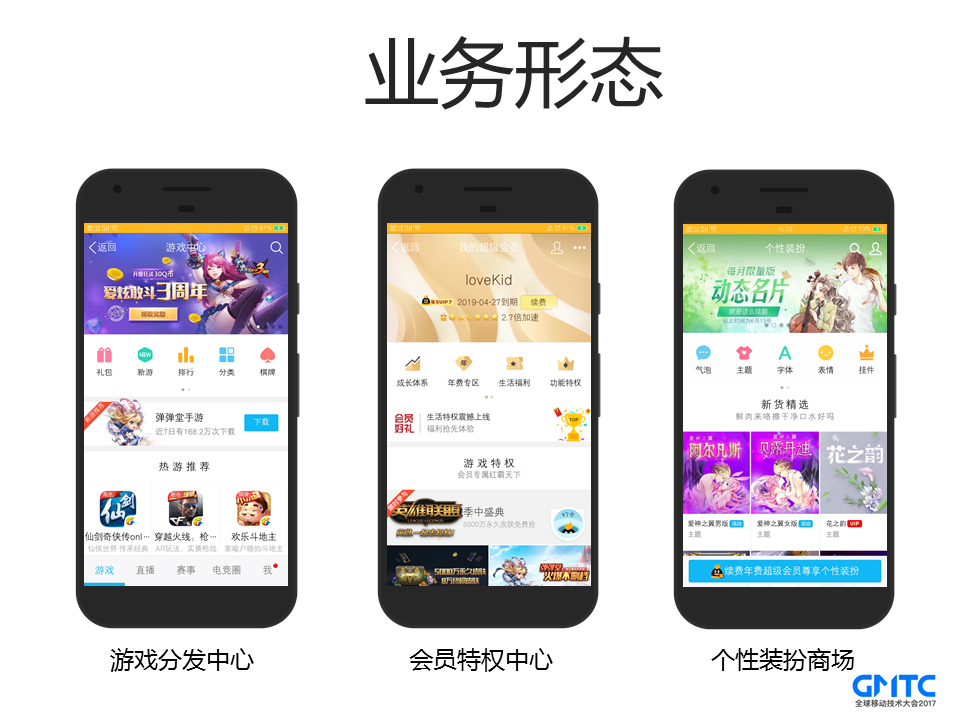
这些都是很常见页面,我们通常将html/js/css等静态资源放到CDN上,然后页面加载后,再通过CGI去拉取最新的数据,进行拼接展示, 这样子可以利用到CDN的多地部署和就近接入等优势,同时提高了服务器的并发能力。这种传统模式的加载流程如下所示:
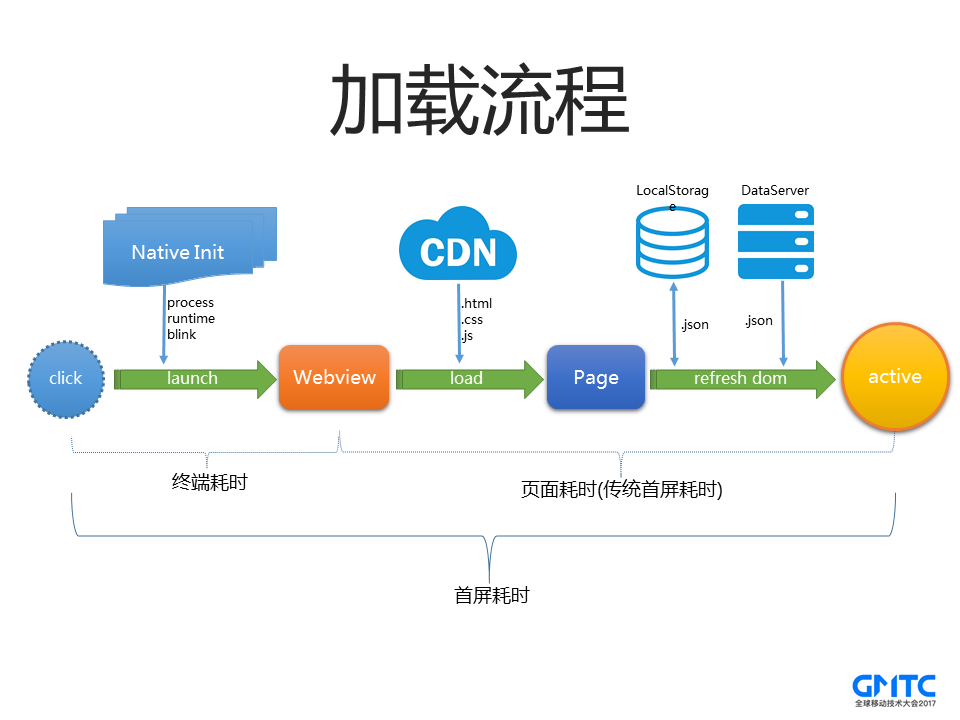
1. 用户点击后,经过终端一系列初始化流程,比如进程启动、Runtime初始化、创建WebView等等。
2. 完成初始化后,WebView开始去CDN上面请求Html加载页面。
3. 页面发起CGI请求对应的数据或者通过localStorage获取数据,数据回来后再对DOM进行操作更新
可以看出上述流程存在着几个问题:
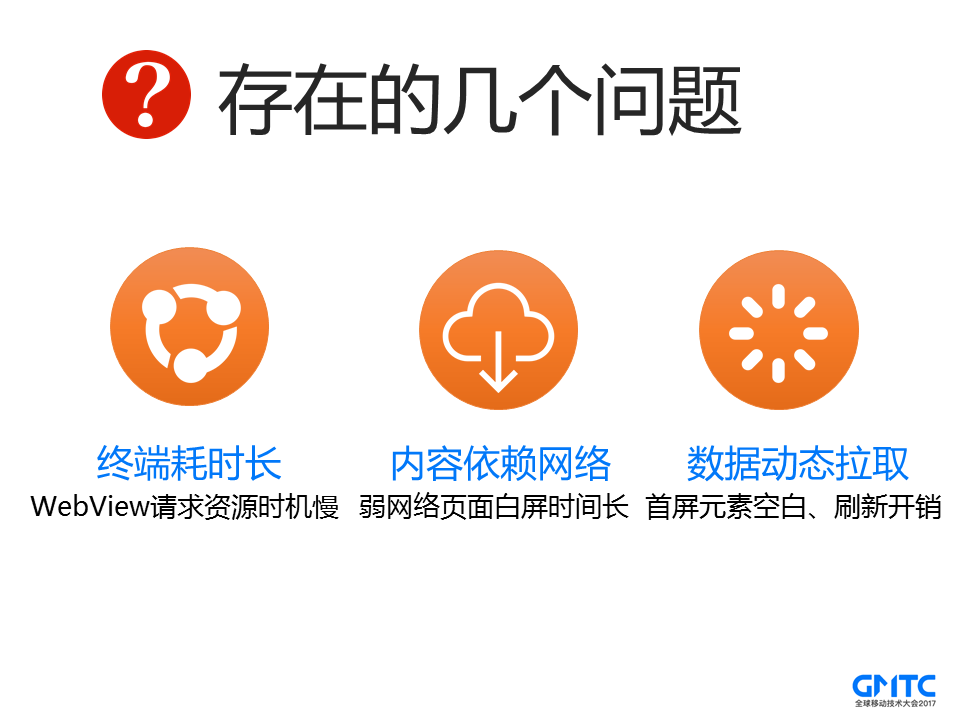
1. 从外网统计数据来看,用户的终端耗时在1s以上,这意味着在这1s多的时间里,网络完全是空闲在等待的,非常浪费;
2. 页面的资源和数据完全依赖于网络,特别是用户在弱网络场景下,页面会出现很长时间的白屏,体验非常差;
3. 因为页面的数据依赖于动态拉取,加载完页面后,往往是看到一些模块先转菊花,再展示,体验也是不好的。同时这里涉及到较多数据更新,经常要更新DOM,性能上也有不少开销。
所以针对以上几个问题,我们也对应做了很多优化和探索。
## 4.VasSonic的前世
基于传统模式的加载流程存在的种种问题,我们做了以下优化:
### 4.1 终端优化
针对终端耗时1s以上的情况,我们对手Q WebView框架进行了重构:
1. 启动流程彻底拆分,设计为一个状态机按序按需执行
2. View相关拆分模块化设计,尽可能懒加载,IO异步化
3. X5内核在手Q中的独立进程中提前预加载
4. 创建WebView对象复用池
关于第四点,我们想分享一些Android平台上的细节,由于Android系统的生态原因,导致用户的系统版本和系统Webkit内核处于极其分裂状态,所以我们公司在手Q和微信统一使用X5内核。相对系统WebView来说,首次启动X5内核时,创建WebView比较耗时,因此我们尽量想复用WebView,但是WebView却是与Activity Context绑定。销毁复用的时候,需要释放Activity的Context,否则会内存泄露。针对这种情况,有没有一种两全其美的办法呢?
计算机有一句经典的名言:```计算机领域任何一个问题都可以通过引入中间层来解决```。于是我们通过包装的方式,实现了一个Context的壳,真正的实现体包装在里面,逻辑调用真正调用到对应的实现体的函数。 经过实验发现,Android系统本身提供了这么一个```MutableContextWrapper```,作为Context的一个中间层。
我们会将Activity context包在MutableContextWrapper里面,destory的时候,会将WebView的Context设置为Application的Context,从而释放Activity Context。
类似如下:
```Java
//precreate WebView
MutableContextWrapper contextWrapper = new MutableContextWrapper(BaseApplicationImpl.sApplication);
mPool[0] = new WebView(contextWrapper);
//reset WebView
ct =(MutableContextWrapper)webview.getContext();
ct.setBaseContext(getApplication());
//reuse WebView
((MutableContextWrapper)webview.getContext()).setBaseContext(activityContext);
```
### 4.2 静态直出
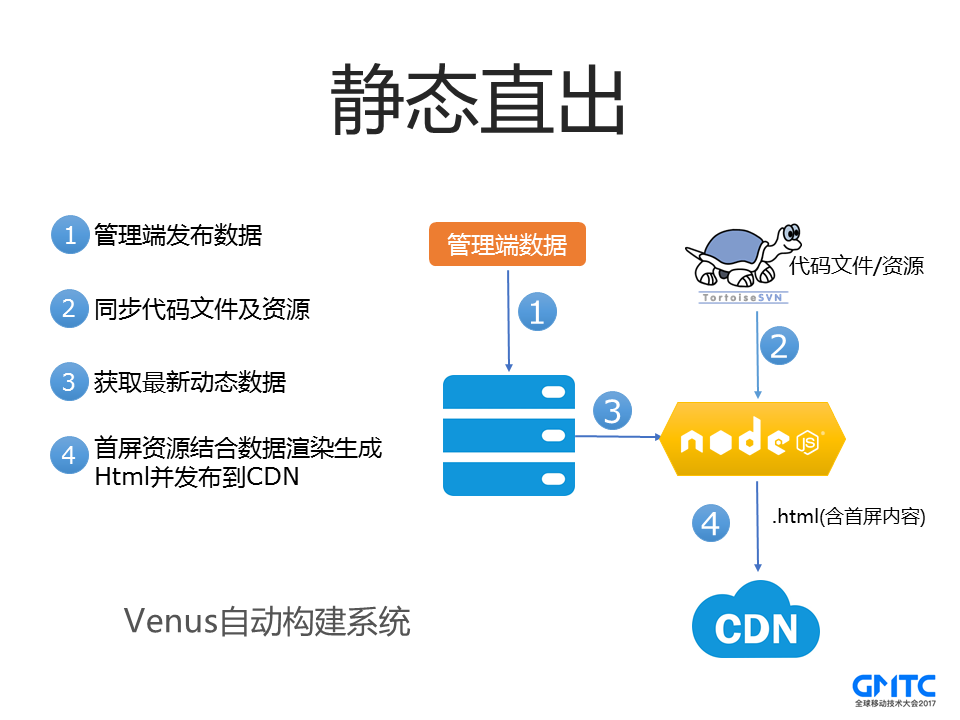
“直出”这个概念对前端同学来说,并不陌生。为了优化首屏体验,大部分主流的页面都会在服务器端拉取首屏数据后通过NodeJs进行渲染,然后生成一个包含了首屏数据的Html文件,这样子展示首屏的时候,就可以解决内容转菊花的问题了。
当然这种页面“直出”的方式也会带来一个问题,服务器需要拉取首屏数据,意味着服务端处理耗时增加。
不过因为现在Html都会发布到CDN上,WebView直接从CDN上面获取,这块耗时没有对用户造成影响。
手Q里面有一套自动化的构建系统Vnues,当产品经理修改数据发布后,可以一键启动构建任务,Vnues系统就会自动同步最新的代码和数据,然后生成新的含首屏Html,并发布到CDN上面去。
### 4.3 离线预推
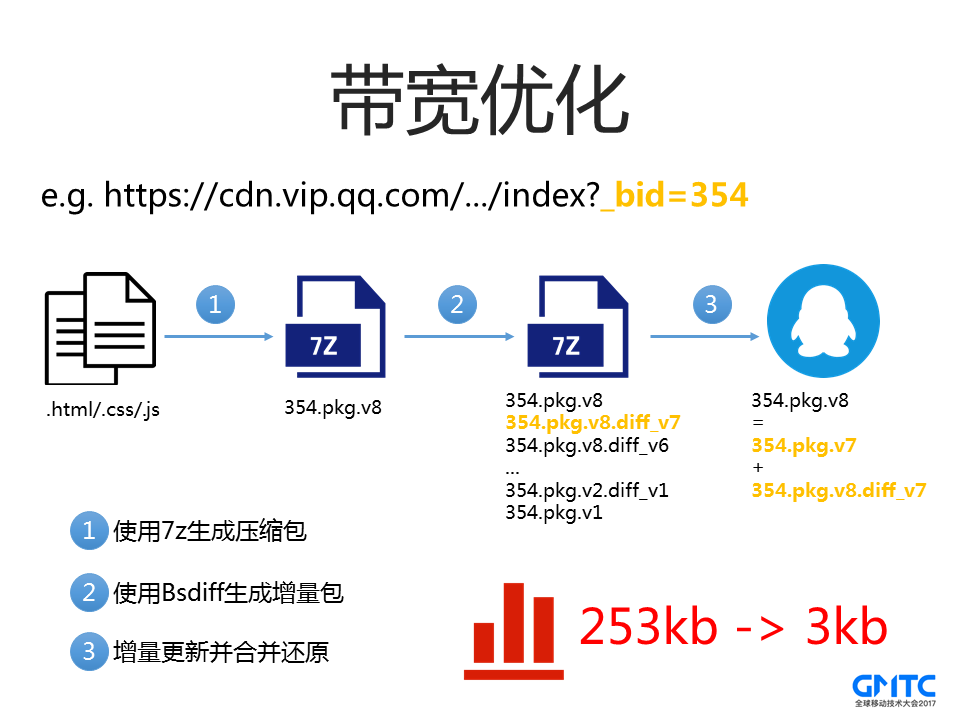
页面发布到CDN上面去后,那么WebView需要发起网络请求去拉取。当用户在弱网络或者网速比较差的环境下,这个加载时间会很长。于是我们通过离线预推的方式,把页面的资源提前拉取到本地,当用户加载资源的时候,相当于从本地加载,即使没有网络,也能展示首屏页面。这个也就是大家熟悉的离线包。
手Q使用7Z生成离线包, 同时离线包服务器将新的离线包跟业务对应的历史离线包进行BsDiff做二进制差分,生成增量包,进一步降低下载离线包时的带宽成本,下载所消耗的流量从一个完整的离线包(253KB)降低为一个增量包(3KB)。
经过一系列优化后,在Android平台上,点击到页面首屏展示的耗时从平均*3s*多降低为*1.8s*,优化*40% 以上*。
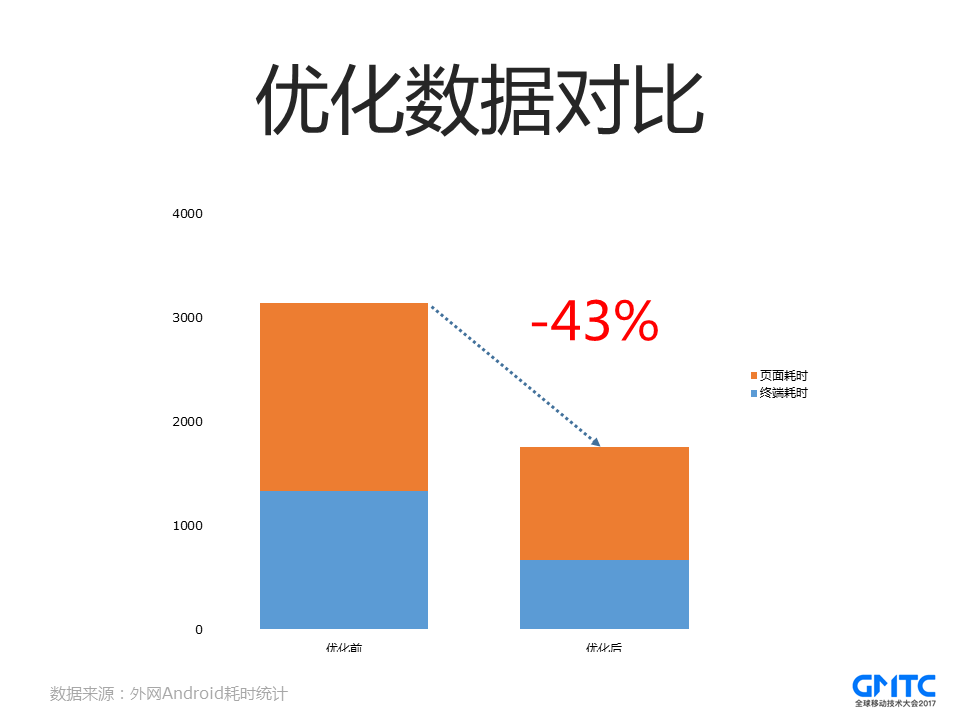
所以针对以上几个问题,我们对应做了很多优化和探索,这些优化帮助我们形成VasSonic的最初构想。
### 4.4 业务形态变化
虽然通过静态直出和离线预推等方式优化后,速度已经达到1.8s,但还存在很大的优化空间,当我们准备持续深入优化时,我们的业务形态发生了新的变化。
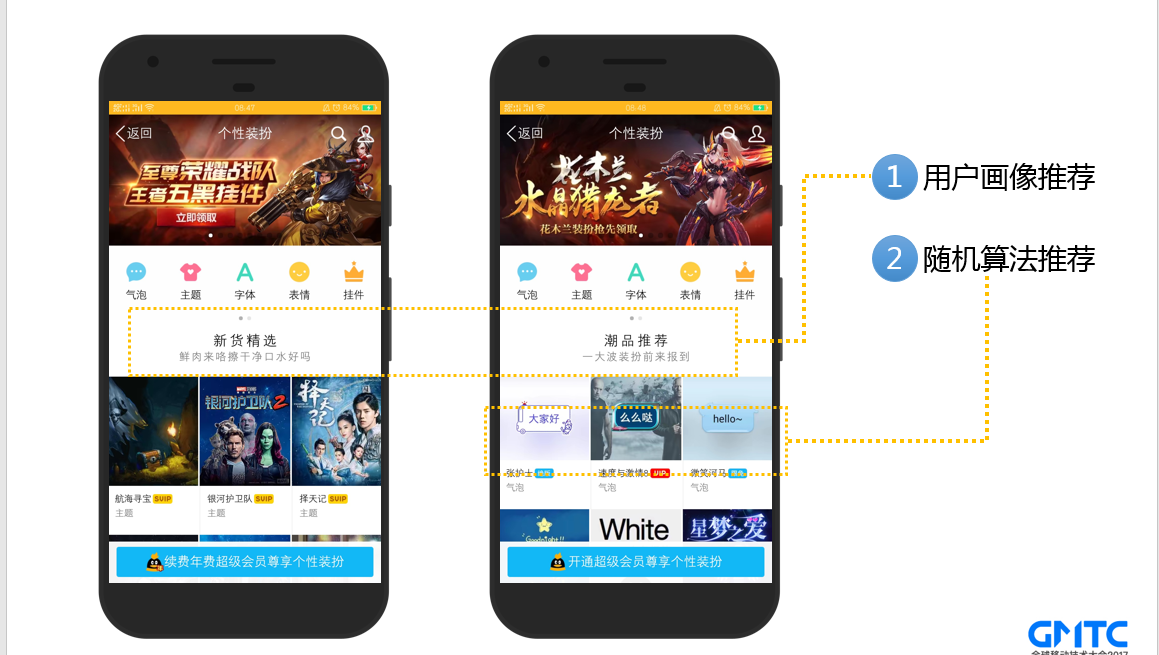
之前我们页面内容的数据主要是由产品经理要配置的,用户看到的内容基本都是一样的。而现在页面为了更好地为用户推荐喜欢的内容,我们后台引入机器学习和随机算法来做智能个性化推荐。比如左边新用户推荐的是新货精选,而右边活跃用户展示的是潮品推荐。另外还有部分的内容是随机算法推荐的。这意味着不同用户看到的内容是不同的,同一个用户不同时间看到的内容也有可能不同。
### 4.5 动态直出
所以为了满足业务的需求,我们只能实时拉取用户数据并在服务端渲染后返回给客户端,也就是动态直出的方案。
但是动态直出方案存在几个比较明显的问题:
1. 服务端实时拉取数据渲染导致白屏时间长,因为服务器要先实时拉取个人数据,然后进行渲染直出,这个耗时不可控;
2. 首屏无法使用离线预推等缓存策略,因为每个用户看到的内容不一样,我们无法通过静态直出的方式那样把Html全部发布到CDN;
虽然动态直出方案下,页面首屏无法通过离线预推等方式进行加载优化,但前面离线包优化积累的经验给我们提供了思路:要优化白屏问题,核心还是减少对网络的依赖,加速资源加载方向入手。所以,此时的技术挑战为:如何缓存动态直出页面和如何在缓存页面的基础上更新页面。(注:动态直出页面可能内部有用户实时数据,不更新页面会导致看到过时的数据导致投诉)。
### 4.6 webso的尝试
在我们准备进一步优化的时候,了解到了QQ空间技术团队在动态直出方面做的一些实践尝试,他们提出了wns+html的解决方案:通过主动缓存首屏数据来获得加速,于是我们和QQ空间技术团队一起进行优化合作,将wns+html的解决方引入到手Q平台并命名为webso,其原理如图:
![image.png-103.9kB][1]
但我们使用过程中,发现页面在首次加载和模板变更场景加载耗时比较高,且在页面有内容变化的场景下需要重刷整个页面,对于变化频繁的页面体验较差,特别是在低端安卓机器上,白屏过程非常明显。于是我们分析背后的原因,发现主要有以下几个问题:
1、采用了sso+wns腾讯私有协议传输,虽然节省了服务器连接耗时,但需要经过跨进程、服务器中转、信令排队、加解密等步骤,导致传输效率变差(注:传输通道由之前的http->node.js变成了ipc->sso->wns->wns-proxy->node.js,同时也增加了额外的代理服务器和排查定位问题成本);
2、需要下载完整模板和数据并拼接html之后才能交给内核渲染,在内容没有完整下载之前,内核无法进行渲染,处于空闲等待状态,与内核边加载边渲染的特性冲突;
3、页面一旦发生内容变化(模板和数据),需要进行合并html重刷整个页面(或下次展示),无法进行局部刷新,仅更新变化的元素节点。
综上,webso方案更加适合变化较少的简单页面,无法满足我们业务变化频繁的场景(每次进入页面数据都有变化,我们的产品和用户都无法接受重刷页面的体验)。于是我们需要一个新的通用的解决方案,通过深入内核分析结合内核特性和不断的优化探索,最终提出了更轻量更高性能的解决方案:VasSonic。
## 5. VasSonic的诞生
接下来详细介绍VasSonic的解决方案
### 5.1 并行加载
首先在加载流程方面,我们发现这里WebView访问依然是串行的, WebView要等终端初始化完成之后,才发起请求。虽然终端耗时优化了不少,但是从外网的统计数据来看,终端初始化还是存在几百毫秒的耗时,而这段时间内网络是在空等的。
(注:在传输通道方面,我们选择了标准的http/https通道,原因是http/https通道支持流式传输,也支持chunk等特性,同时接入成本低,更加通用。)

因此性能上不够极致,我们优化代码,这两个操作并行处理,流程改为:
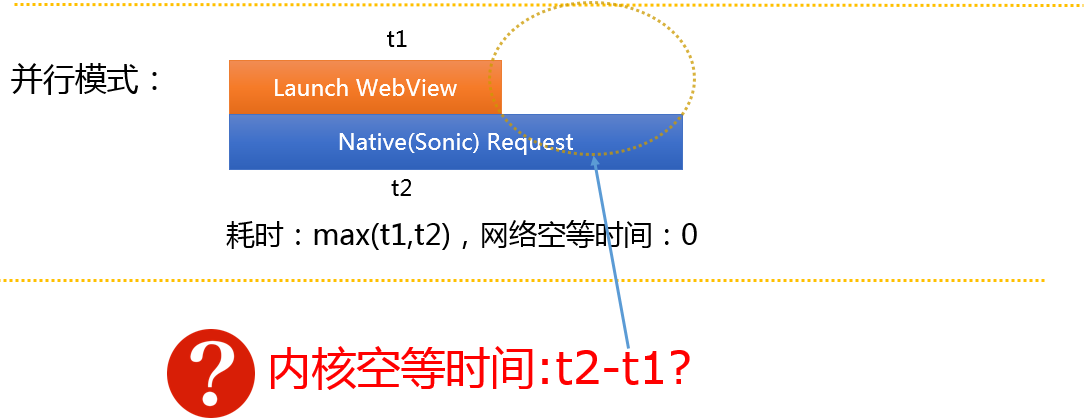
并行处理后速度有所改善,但我们发现在某些场景下,终端初始化比较快,但数据没有完成返回,这意味着内核在空等,而内核是支持边加载边渲染的,我们在并行的同时,能否也利用内核的这个特性呢?
于是我们加入了一个中间层来桥接内核和数据,内部称为流式拦截:
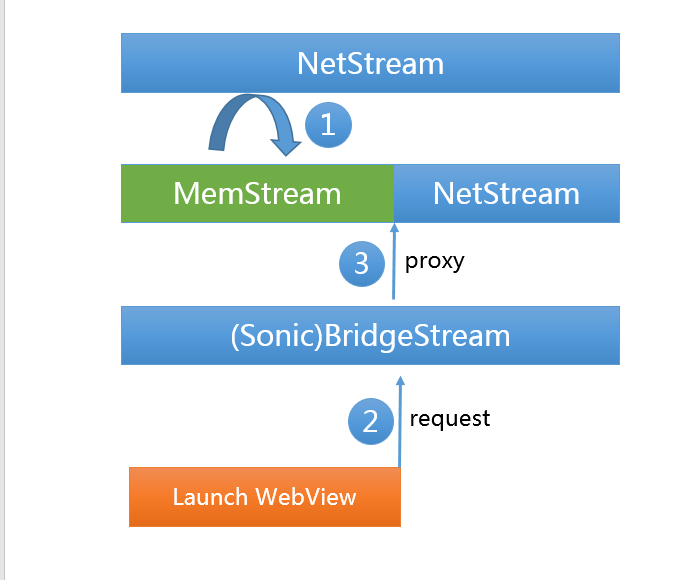
1. 启动子线程请求页面主资源,子线程中不断讲网络数据读取到内存中,也就是网络流(NetStream)和内存流(MemStream)之间的转换;
2. 当WebView初始化完成的时候,提供一个中间层BridgeStream来连接WebView和数据流;
3. 当WebView读取数据的时候,中间层BridgeStream会先把内存的数据读取返回后,再继续读取网络的数据。
通过这种桥接流的方式,整个内核无需等待,继续做到边加载边解析。这种并行的方式让首屏的速度优化*15%以上*,进一步提升了页面加载速度。
### 5.2 动态缓存
通过并行加载,我们极大地提升了WebView请求的速度,但是在弱网络场景下白屏时间还是非常长,用户体验非常糟糕。基于离线包和webso方案的优化实践经验,我们首先将用户的已经加载的页面内容缓存下来,等用户下此点击页面的时候,我们先加载展示页面缓存,第一时间让用户看到内容,然后同时去请求新的页面数据,等新的页面数据拉取下来之后,我们再重新加载一遍即可。
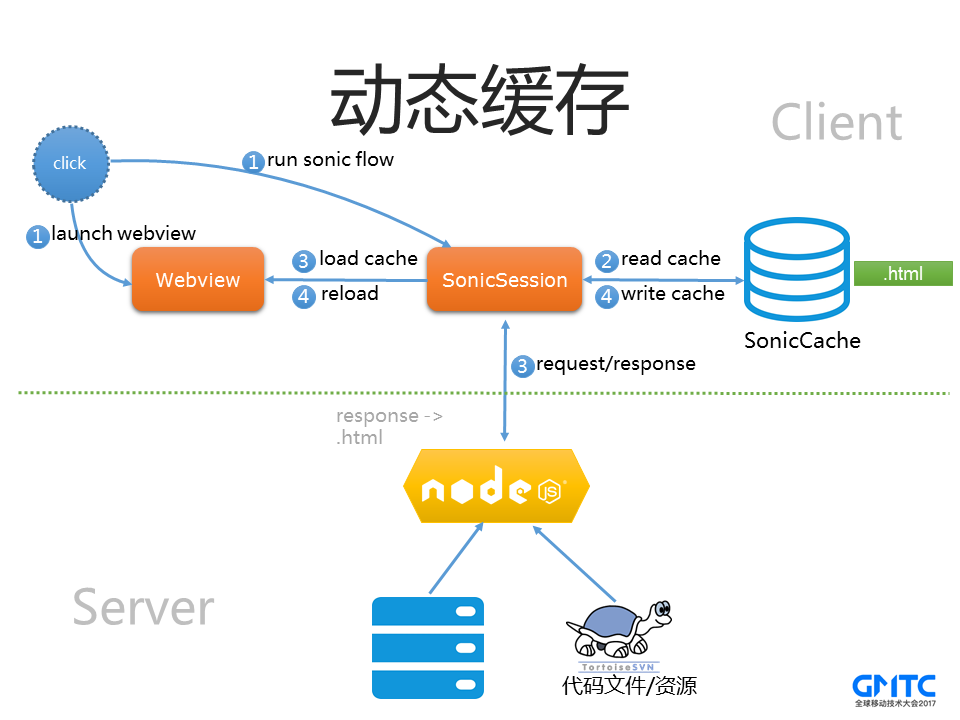
保存页面内容这个工作很简单,因为现在我们资源读取都是通过中间层BridgeStream来管理的,只需要将整个读取的内容缓存下来即可。
于是我们就按动态缓存这种方案去实现了,但很快就发现了问题。用户打开页面之后,先是看到历史页面,等用户准备去操作的时候,突然页面白闪一下,重新加载了一遍,这种体验非常差,特别在一些低端机器上,这个白闪的过程太明显,非常影响体验,这是用户和产品经理都不能接受的。于是我们在思考,能否只做局部的刷新,仅刷新变化的元素呢?
通过分析,我们发现同一个用户的页面,大部分数据都是不变的,经常变化的只有少量数据,于是我们提出了模板(template)和数据块(data)的概念:页面中经常变化的数据我们称为数据块,除了数据块之外的数据称为模板。
### 5.3 页面分离
在页面分离这块,我们沿用了webso方案中的动静分离的思想,并扩展了部分新的字段。首先我们将整个页面html通过VasSonic标签进行划分,包裹在标签中的内容为data,标签外的内容为模版。
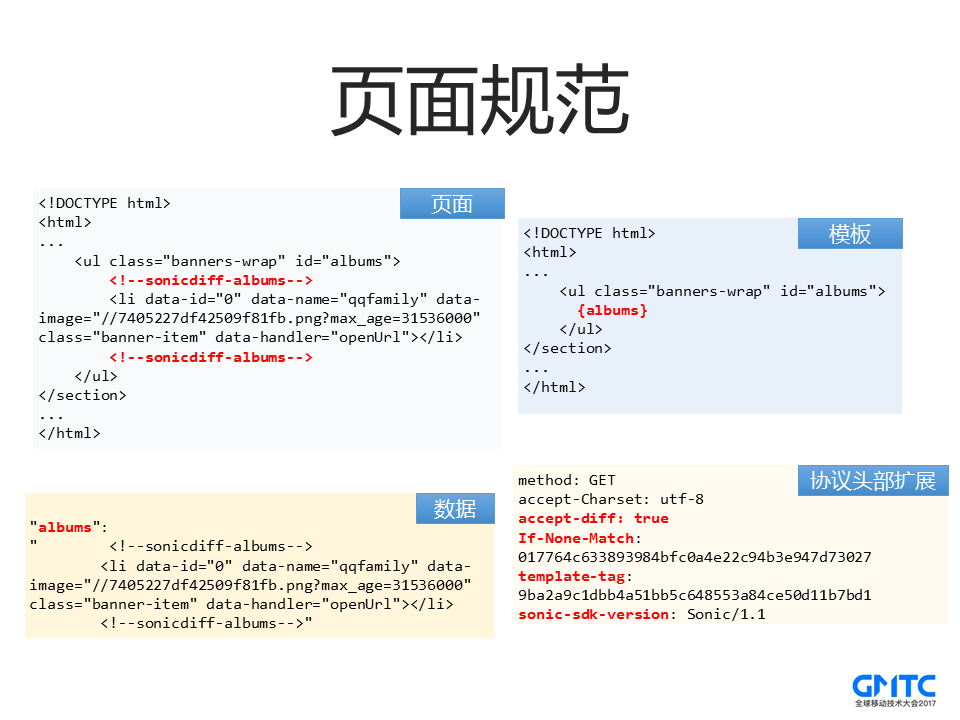
首先我们对Html内容进行了扩展,通过代码注释的方式,增加了“sonicdiff-xxx”来标注一个数据块的开始与结束。
而模板就是将数据块抠掉之后的Html,然后通过{albums}来表示这个是一个数据块占位。
数据就是JSON格式,直接Key-Value。
当然,为了完美地兼容Html,我们对协议头部进行了扩展,比如增加accept-diff来标注是否支持增量更新、template-tag来标注模板的md5是多少等。OK,有了上面这个规则或者公式后,我们就可以实现增量更新了。
### 5.4 请求规范约定
VasSonic为了支持区分客户端是否支持增量更新等能力,对头部字段进行了扩展
字段 | 说明 | 请求头(Y/N) | 响应头(Y/N)
:-------------------------:|:-------------------------:|:-------------------------:|:-------------------------:
accept-diff | 表示终端是否支持VasSonic模式,true为支持,否则不支持 | Y | N
If-none-match | 本地缓存的etag,给服务端判断是否命中304 | Y | N
etag | 页面内容的唯一标识(哈希值) | N | Y
template-tag | 模版唯一标识(哈希值),客户端使用本地校验 或 服务端使用判断是模板有变更 | Y | Y
template-change | 标记模版是否变更,客户端使用 | N | Y
cache-offline | 客户端端使用,根据不同类型进行不同行为 | N |Y
### 5.5 cache-offline字段说明
字段 | 说明
:-------------------------:|:-------------------------:
true | 缓存到磁盘并展示返回内容
false | 展示返回内容,无需缓存到磁盘
store | 缓存到磁盘,如果已经加载缓存,则下次加载,否则展示返回内容
http | 容灾字段,如果http表示终端六个小时之内不会采用sonic请求该URL
### 5.6 模式介绍
VasSonic根据本地是否有缓存以及本地缓存数据跟服务器数据的差异情况分为以下四种模式。
模式 | 说明 | 条件
:-------------------------:|:-------------------------:|:-------------------------:
**首次加载** | 本地没有缓存,即第一次加载页面 | etag为空值或template_tag为空值
**完全缓存** | 本地有缓存,且缓存内容跟服务器内容完全一样 | etag一致
**数据更新** | 本地有缓存,本地模版内容跟服务器模版内容一样,但数据块有变化 | etag不一致 且 template_tag一致
**模版更新** | 本地有缓存,缓存的模版内容跟服务器的模版内容不一样 | etag不一致 且 template_tag不一致
#### 首次加载
我们会在请求头部带上支持accept-diff为true和sdk版本号等标识着首次加载的信息。当请求返回后,VasSonic会在延迟几秒后(避免激烈IO竞争)将页面抽离成模板和数据并保存到本地。此时终端缓存目录下,该页面将对应三个缓存文件xxx.html、xxx.template、xxx.data,其中xxx是该页面的唯一标识(即sonicSessionId)。
对于页面非首次加载场景,VasSonic优先加载本地缓存, 同时我们会在请求头部带上当前缓存和模板的md5,后台进行模板md5对比之后,分为以下几种情况:
#### 非首次加载之完全缓存
本地有缓存,且缓存内容跟服务器内容完全一样.
#### 非首次加载之增量数据
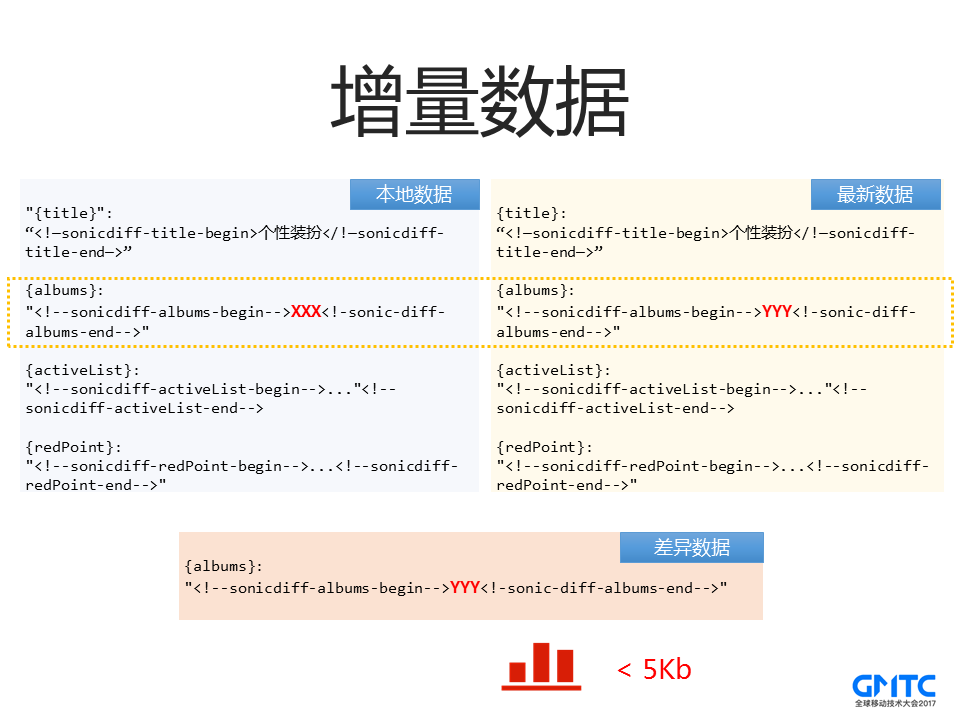
如果模板发现没有变化,那么会在响应头部返回template-change=false,同时响应包体返回的数据不再是完整的html,而是一段JSON数据,及全部的数据块。我们现在需要跟本地数据进行差分,找出真正的增量数据,如上图中,后台返回了N个数据,实际上仅有一个数据是有变化的,那么我们仅需要将这个变化的数据提交到页面即可。一般场景下,这个差异的数据比全部数据要小很多。如果页面拆分数据得更细,那么页面的变动就更小,这个取决于前端同学对数据块的细化程度。
获得变化数据块(diff_data)后,客户端只需要通知页面页面设置的回调接口(getDiffDataCallback)进行界面元素更新即可。这里javascript的通信方式也可以自由定义(可以使用webview标准的javascript通信方式,也可以使用伪协议的方式),只要页面跟终端协商一致就可以。
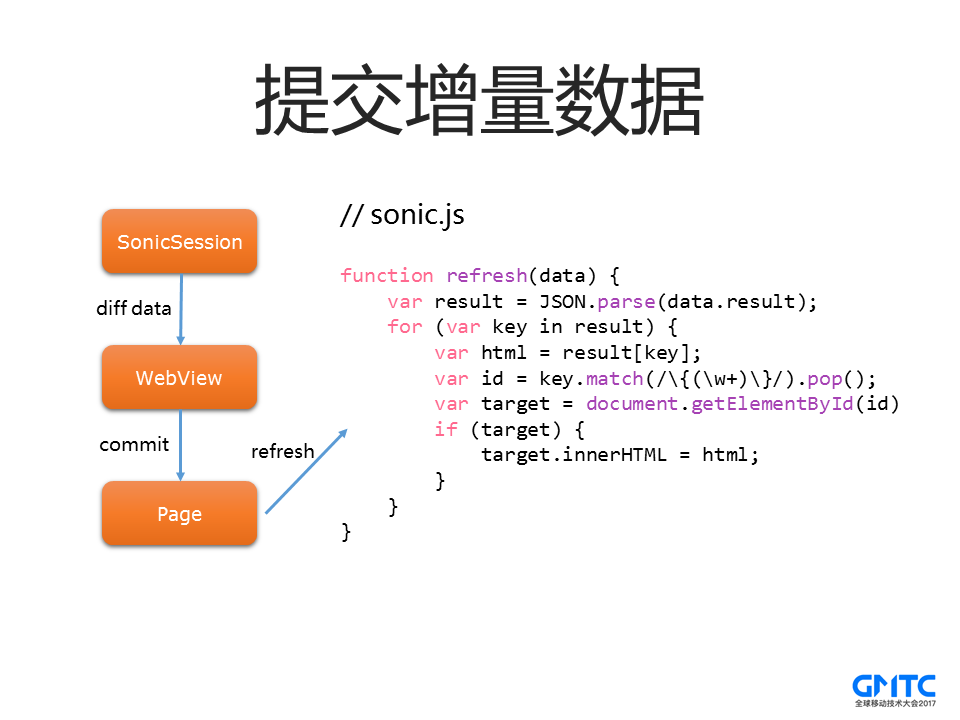
对于数据更新这种场景,终端还会将新的数据和模板拼接成为新的页面,保持缓存最新。当终端初始化比较慢的时候,WebView去加载缓存的时候,这个页面可能已经是最新的了,连数据刷新都不需要。
#### 非首次加载之模板更新
与数据更新模式不一样,由于业务需求,页面的模板会发生更改。当终端在获取到新的模板和数据后,本地在子线程中进行合并,生成一个新的缓存,然后回调通知终端,刷新WebView来加载新的缓存。
我们来看一下最终的流程图,跟动态缓存对比,有不少细节优化:
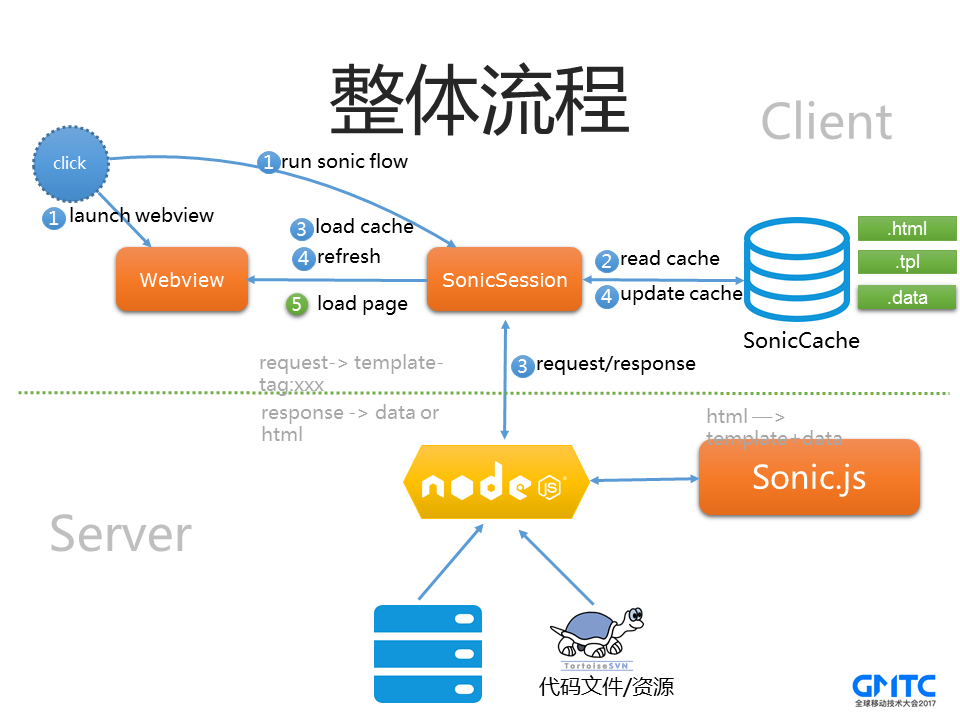
我们从第2步开始,SonicSession首先会去读取缓存。会抛个消息通知WebView读取缓存,如果Webview已经准备好,则直接加载缓存,如果没有,则缓存先放在内存里面。同时SonicSession也会带上模板等信息到后台拉取新的内容,后台经过Sonic-Diff之后,会返回新的数据。SonicSession拿到新的数据后,首先会跟本地数据进行Diff,如果发现WebView已经加载缓存,则直接提交增量数据给页面。否则继续拼接最新的页面,替换掉内存里面的缓存,同时保存到本地。这个时候WebView如果Ready,则直接进行第5步load最新的内容即可。
#### 效果统计
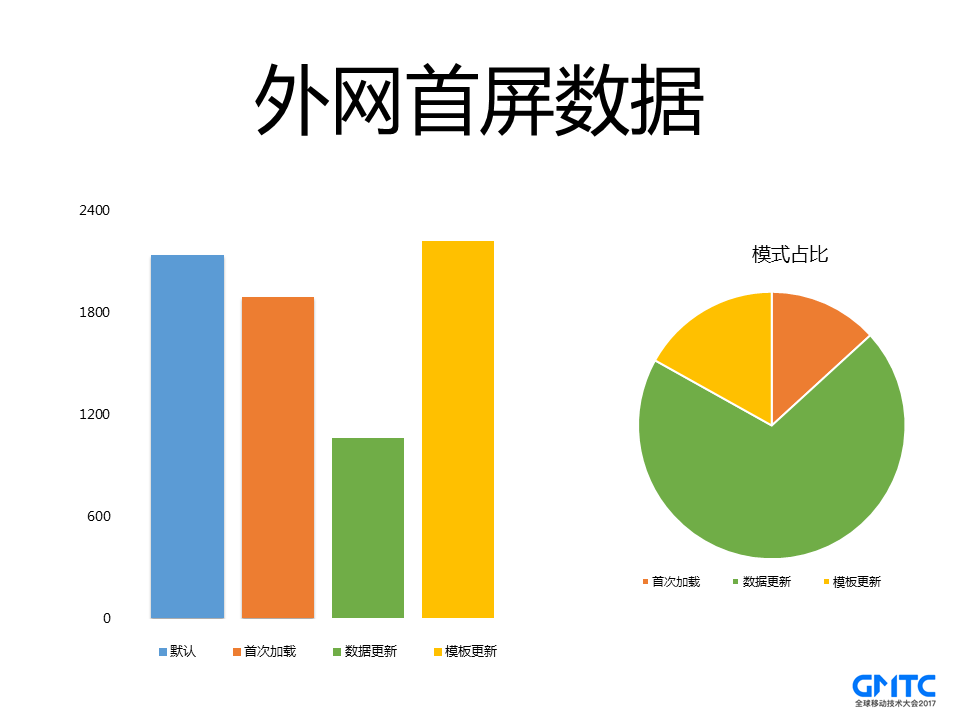
这个是我们外网的统计数据。在数据更新模式下,首屏的耗时在1s左右,相比普通的动态直出,优化了50%以上。模板更新这个会比首次高,是因为加载了两次页面,不过从模式占比上来看,我们大部分页面都是数据更新。针对模板更新这种耗时比较高的情况,前面优化积累的经验给我们提供了思路,核心还是从提前获取资源方向入手,因此我们优先考虑如何预加载模板更新。
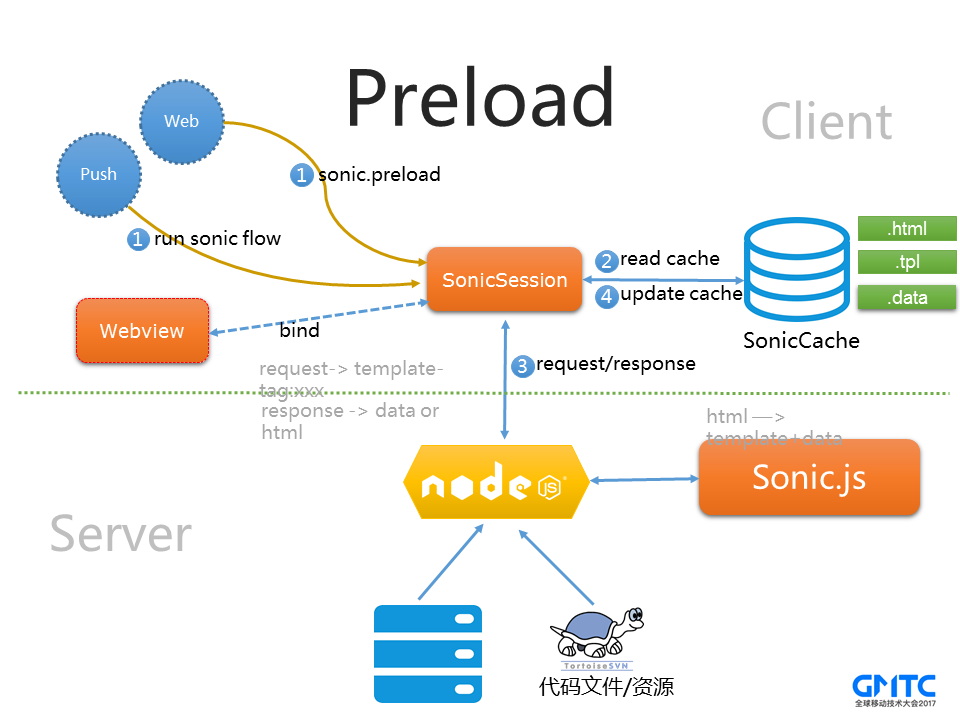
#### 预加载
实际上整个SonicSession在没有WebView的情况下,也是可以独立完成所有逻辑的,当用户点击页面的时候,我们在将WebView和SonicSession绑定起来即可。于是我们支持了两种预加载的模式,一种是通过后台push的方式,来提前获取数据。还有一种就是JSAPI,页面可以调用JSAPI来预加载用户可能操作的下一个页面。通过这两种方式,我们可以把需要的增量更新数据提前拉取回来
## 6. 效果对比
Pic 1: 没有使用VasSonic | Pic 2: 使用VasSonic
:-------------------------:|:-------------------------:
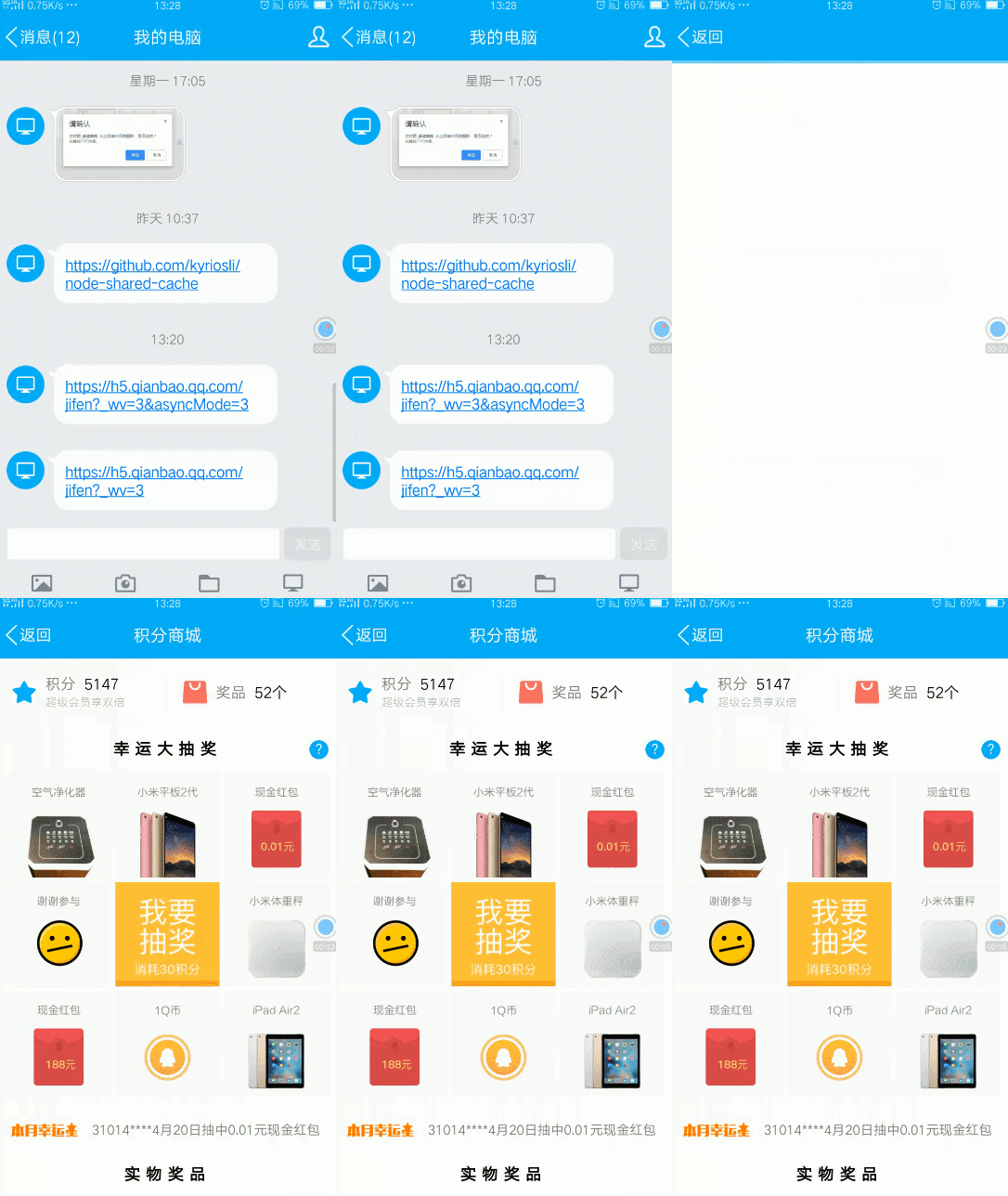
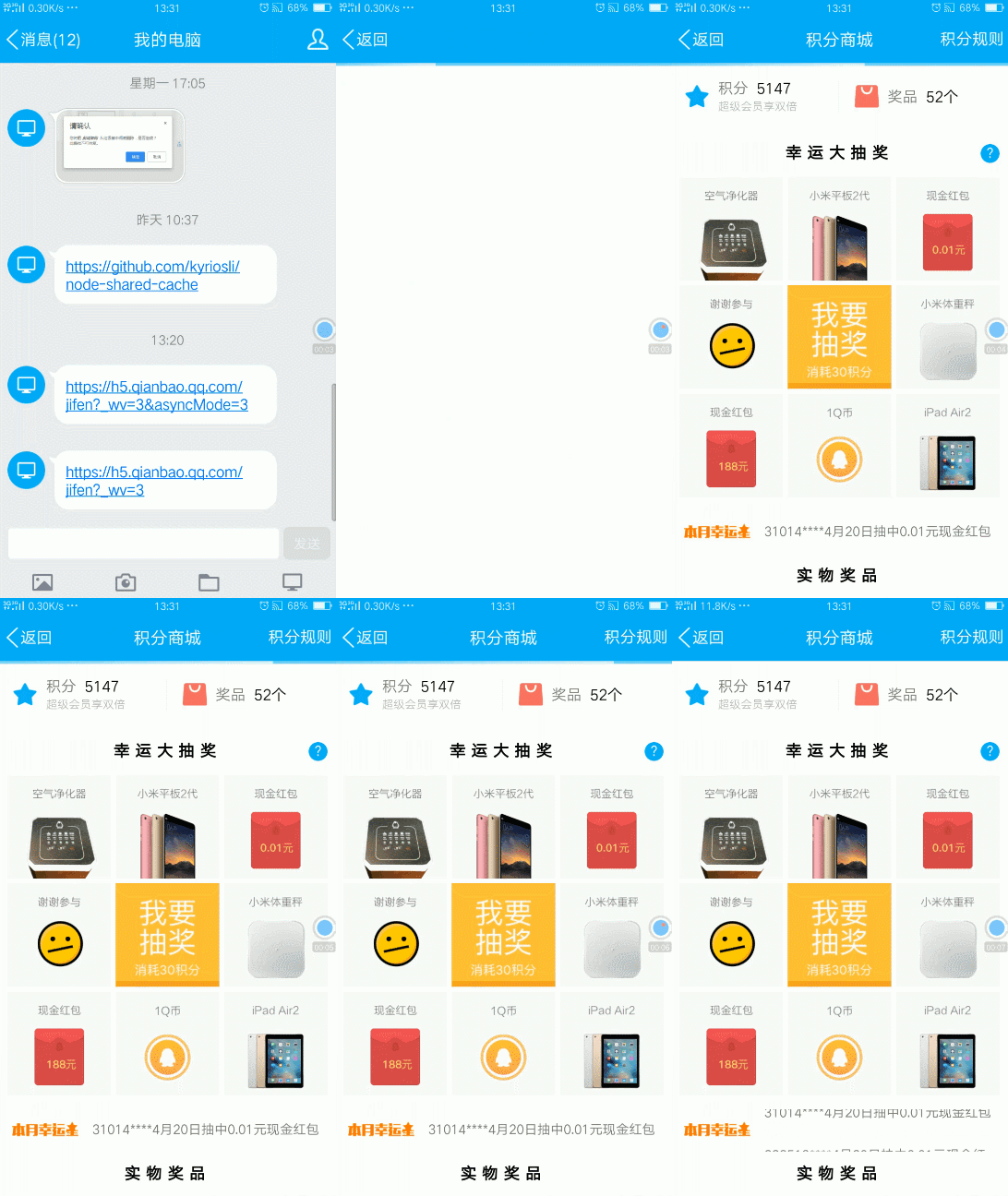 | 
## 7. 展望未来
开源只是故事的开始,我们仍会持续对 VasSonic 做改进,包括更易用的接口、更好的性能、更高的可靠性,同时快速响应解决开源后的issue和PR。这些改进最终也会原封不动地在手Q内使用,这一切都是为了更快的WebView加载速度。
Talk is cheap,read the fucking code. If you are interested in VasSonic, don't forget to STAR [VasSonic](https://github.com/Tencent/VasSonic).
Thank you for reading ~
## 8. 特别感谢
最后再次感谢qq空间技术团队的贡献及webso技术带来的启发,感谢infoQ,腾讯开源,bugly等媒体团队对vasSonic的开源支持。
[1]: http://static.zybuluo.com/feilang/7l6ptf1cl5k3qxl0o55a4cxq/image.png
================================================
FILE: checkstyle.xml
================================================
================================================
FILE: sonic-android/.gitignore
================================================
.gradle
/build
# Ignore Gradle GUI config
gradle-app.setting
# Avoid ignoring Gradle wrapper jar file (.jar files are usually ignored)
!gradle-wrapper.jar
# Cache of project
.gradletasknamecache
.DS_Store
node_modules
# Built application files
*.apk
*.ap_
# Java class files
*.class
# Generated files
bin/
gen/
# Gradle files
.gradle/
*.iml
/*/*.iml
.idea
/*/.idea/
# Local configuration file (sdk path, etc)
local.properties
gradle.properties
# Proguard folder generated by Eclipse
proguard/
# Log Files
*.log
/*/.idea
/buildSdk
================================================
FILE: sonic-android/README.md
================================================
## Getting started with Android
[](https://github.com/Tencent/VasSonic/blob/master/LICENSE)
[](https://github.com/Tencent/VasSonic/pulls)
[](https://github.com/Tencent/VasSonic/wiki)
---
## Dependencies:
Add VasSonic gradle plugin as a dependency in your module's build.gradle
```gradle
compile 'com.tencent.sonic:sdk:3.1.0'
```
## Implement sonic interface:
1. Implement a class which extends from ```SonicRuntime```
> SonicRuntime is a class which interacts with the overall running information in the system, including Context, UA, ID (which is the unique identification for the saved data) and other information.
```Java
/**
* Here is a sample subclass of SonicRuntime
*/
public class HostSonicRuntime extends SonicRuntime {
public HostSonicRuntime(Context context) {
super(context);
}
/**
* @return User's UA
*/
@Override
public String getUserAgent() {
return "";
}
/**
* @return the ID of user.
*/
@Override
public String getCurrentUserAccount() {
return "";
}
/**
* @return the file path which is used to save Sonic caches.
*/
@Override
public File getSonicCacheDir() {
String path = Environment.getExternalStorageDirectory().getAbsolutePath() + File.separator + "sonic/";
File file = new File(path.trim());
if(!file.exists()){
file.mkdir();
}
return file;
}
}
```
2. Implement a subclass which extends from ```SonicSessionClient```
```Java
/**
*
* SonicSessionClient is a thin API class that delegates its public API to a backend WebView class instance, such as loadUrl and loadDataWithBaseUrl.
*/
public class SonicSessionClientImpl extends SonicSessionClient {
private WebView webView;
public void bindWebView(WebView webView) {
this.webView = webView;
}
@Override
public void loadUrl(String url, Bundle extraData) {
webView.loadUrl(url);
}
@Override
public void loadDataWithBaseUrl(String baseUrl, String data, String mimeType, String encoding,
String historyUrl) {
webView.loadDataWithBaseURL(baseUrl, data, mimeType, encoding, historyUrl);
}
}
```
## Android Demo
Here is a simple demo shows how to create an Android activity which uses the VasSonic Framework
```Java
public class BrowserActivity extends Activity {
public final static String PARAM_URL = "param_url";
public final static String PARAM_MODE = "param_mode";
private SonicSession sonicSession;
@Override
protected void onCreate(Bundle savedInstanceState) {
super.onCreate(savedInstanceState);
Intent intent = getIntent();
String url = intent.getStringExtra(PARAM_URL);
int mode = intent.getIntExtra(PARAM_MODE, -1);
if (TextUtils.isEmpty(url) || -1 == mode) {
finish();
return;
}
getWindow().addFlags(WindowManager.LayoutParams.FLAG_HARDWARE_ACCELERATED);
// step 1: Initialize sonic engine if necessary, or maybe u can do this when application created
if (!SonicEngine.isGetInstanceAllowed()) {
SonicEngine.createInstance(new SonicRuntimeImpl(getApplication()), new SonicConfig.Builder().build());
}
SonicSessionClientImpl sonicSessionClient = null;
// step 2: Create SonicSession
sonicSession = SonicEngine.getInstance().createSession(url, new SonicSessionConfig.Builder().build());
if (null != sonicSession) {
sonicSession.bindClient(sonicSessionClient = new SonicSessionClientImpl());
} else {
// this only happen when a same sonic session is already running,
// u can comment following codes to feedback as a default mode.
throw new UnknownError("create session fail!");
}
// step 3: BindWebView for sessionClient and bindClient for SonicSession
// in the real world, the init flow may cost a long time as startup
// runtime、init configs....
setContentView(R.layout.activity_browser);
WebView webView = (WebView) findViewById(R.id.webview);
webView.setWebViewClient(new WebViewClient() {
@Override
public void onPageFinished(WebView view, String url) {
super.onPageFinished(view, url);
if (sonicSession != null) {
sonicSession.getSessionClient().pageFinish(url);
}
}
@TargetApi(21)
@Override
public WebResourceResponse shouldInterceptRequest(WebView view, WebResourceRequest request) {
return shouldInterceptRequest(view, request.getUrl().toString());
}
@Override
public WebResourceResponse shouldInterceptRequest(WebView view, String url) {
if (sonicSession != null) {
//step 6: Call sessionClient.requestResource when host allow the application
// to return the local data .
return (WebResourceResponse) sonicSession.getSessionClient().requestResource(url);
}
return null;
}
});
WebSettings webSettings = webView.getSettings();
// step 4: bind javascript
// note:if api level lower than 17(android 4.2), addJavascriptInterface has security
// issue, please use x5 or see https://developer.android.com/reference/android/webkit/
// WebView.html#addJavascriptInterface(java.lang.Object, java.lang.String)
webSettings.setJavaScriptEnabled(true);
webView.removeJavascriptInterface("searchBoxJavaBridge_");
intent.putExtra(SonicJavaScriptInterface.PARAM_LOAD_URL_TIME, System.currentTimeMillis());
webView.addJavascriptInterface(new SonicJavaScriptInterface(sonicSessionClient, intent), "sonic");
// init webview settings
webSettings.setAllowContentAccess(true);
webSettings.setDatabaseEnabled(true);
webSettings.setDomStorageEnabled(true);
webSettings.setAppCacheEnabled(true);
webSettings.setSavePassword(false);
webSettings.setSaveFormData(false);
webSettings.setUseWideViewPort(true);
webSettings.setLoadWithOverviewMode(true);
// step 5: webview is ready now, just tell session client to bind
if (sonicSessionClient != null) {
sonicSessionClient.bindWebView(webView);
sonicSessionClient.clientReady();
} else { // default mode
webView.loadUrl(url);
}
}
@Override
public void onBackPressed() {
super.onBackPressed();
}
@Override
protected void onDestroy() {
if (null != sonicSession) {
sonicSession.destroy();
sonicSession = null;
}
super.onDestroy();
}
```
## Support
Any problem?
1. Learn more from [sample](https://github.com/Tencent/VasSonic/tree/master/sonic-android/sample).
4. Contact us for help.
## License
VasSonic is under the BSD license. See the [LICENSE](https://github.com/Tencent/VasSonic/blob/master/LICENSE) file for details.
[1]: https://github.com/Tencent/VasSonic/blob/master/article/20170705120005424.gif
[2]: https://github.com/Tencent/VasSonic/blob/master/article/20170705120029897.gif
================================================
FILE: sonic-android/build.gradle
================================================
// Top-level build file where you can add configuration options common to all sub-projects/modules.
buildscript {
repositories {
jcenter()
}
dependencies {
classpath 'com.android.tools.build:gradle:2.3.0'
classpath 'com.github.dcendents:android-maven-gradle-plugin:1.5'
classpath 'com.jfrog.bintray.gradle:gradle-bintray-plugin:1.6'
// NOTE: Do not place your application dependencies here; they belong
// in the individual module build.gradle files
}
}
allprojects {
repositories {
jcenter()
}
}
task clean(type: Delete) {
delete rootProject.buildDir
}
================================================
FILE: sonic-android/docs/Sonic Quick模式实现原理.md
================================================
# Sonic Quick模式实现原理
---
根据本地是否有缓存数据可以将Quick模式下的sonic分为无缓存和有缓存模式。对于有缓存模式又可以分为完全缓存、局部刷新和全局刷新(也就是模版变更),下面就看下这几种模式的执行流程。
无论是哪种执行模式,核心的思想都是并行,即充分利用webview初始化的时间进行一些数据的处理(webview的初始化耗时还是挺多的)。在包含webview的activity启动时会一边进行webview的初始化逻辑,一边并行的执行sonic的逻辑。
## 一,无缓存模式
无缓存模式下的核心思想就是在webview初始化之前建立自己的网络连接,利用webview初始化的时间尽可能多的读取网络的数据,在webview需要数据的时候将自己从网络读取的数据交给webview处理。
代码的主要执行流程
这里主要有两条并行线,左边是webview的执行流程,右边是sonic的执行流程。Webview的执行流程比较简单,主要是进行webview的初始化,以及在初始化完之后调用SonicSession(这里的SonicSession对象是activity onCreate的时候通过SonicEngine创建的)的onClientReady方法,告知其webview已经init完毕。剩下的事情交给sonic那边处理。
右边这条sonic的执行流程线相对会复杂一些,首先,在activity create之后通过SonicEngine创建SonicSession对象。接着调用SonicCacheInterceptor来获取本地缓存的url对应的数据。由于是首次加载即本地无缓存数据,所以这里的数据是为空的。获取的数据为空之后会post一个CLIENT_CORE_MSG_PRE_LOAD(arg1 = PRE_LOAD_NO_CACHE )的消息到主线程中,同时继续执行下面的逻辑。主线程的逻辑后面统一分析,这里先分析sonic所在子线程中的逻辑。
Sonic在post消息到主线程之后会通过SonicSessionConnection建立一个URLConnection,接着通过这个连接获取服务器返回的数据。由于获取网络数据是个耗时的过程,所以在读取网络数据的过程中会不断的判断webView是否发起资源拦截请求(通过SonicSession的wasInterceptInvoked来判断),如果webview已经发起资源拦截请求,就中断网络数据的读取,将已经读取的数据和未读取的网络数据拼接成桥接流SonicSessionStream,并将其赋值给SonicSession的pendingWebResourceStream。如果整个网络数据读取完毕之后webview还没有初始化完,那么就会把之前post的CLIENT_CORE_MSG_PRE_LOAD的消息cancel调。同时post一个CLIENT_CORE_MSG_FIRST_LOAD的消息到主线程。之后再对html内容进行模版分割及数据保存。
接下来看看主线程的执行逻辑。之前说过sonic在本地无缓存的时候会先post一个CLIENT_CORE_MSG_PRE_LOAD的消息到主线程,如果主线程有执行到这个消息的话(之前也介绍过这个消息有可能被cancel掉)就会调用webview的loadUrl,发起真正的网络请求,之后webview会调用本身的资源拦截方法,在这个方法中sonic会将之前保存的pendingWebResourceStream返回给webview,有了这个pendingWebResourceStream之后webview就可以进行解析渲染逻辑了。同时webview在展示完页面之后会调SonicSessionStream的onClose方法进行关闭数据流,在这个onClose中我们会进行html内容的数据分割以及数据保存操作。
如果主线程处理的是CLIENT_CORE_MSG_FIRST_LOAD消息,则会先判断webview之前是否有发生过loadUrl(通过wasLoadUrlInvoked来判断),如果没有,调用webview的loadDataWithBaseUrl方法去加载之前读取的网络数据,这样webview就可以根据这个数据直接做解析渲染的逻辑了;如果有就不做任何的逻辑处理了。
以上就是在quick模式下sonic首次的基本逻辑。这里有个问题要注意,就是主线程在处理sonic post的消息之前都会判断webview是否ready(初始化完毕),只有webview ready的情况才会执行对应的操作。如果webview没有ready的话就会把对应的消息存起来,直到webview ready的时候再执行对应的逻辑。
## 二,有缓存模式
有缓存模式的核心思想也是在webview初始化之前先读取本地的数据,同时建立自己的网络连接,通过网络连接获取服务器最新的数据。在webview需要数据的时候将本地或服务器返回的新的数据交给webview处理。
有缓存模式又可以分为完全缓存、局部刷新、模板变更。下面依次介绍这几种模式。
###1,完全缓存:
所谓完全缓存就是本地的数据跟服务器的数据是完全一样的。
代码的主要执行流程:
左边webview的执行跟无缓存模式下没什么区别,右边sonic执行流程中前两步跟首次的逻辑一样,在完全缓存模式下通过SonicCacheInterceptor获取的url对应的本地数据是不为空的,这时候会post一个CLIENT_CORE_MSG_PRE_LOAD(arg1 = PRE_LOAD_WITH_CACHE)的消息到主线程中,同时服务器返回304,sonic流程就走完了。主线程在收到CLIENT_CORE_MSG_PRE_LOAD消息时通过loadDataWithBaseUrl加载本地数据给webview渲染。
###2,局部刷新:
局部刷新就是本地的数据跟服务器的数据相比,只有data部分有变化,模板跟服务器一样。
代码的主要执行流程:
左边webview的执行跟无缓存模式下没什么区别,右边sonic执行流程中前两步跟首次的逻辑一样,在局部刷新模式下通过SonicCacheInterceptor获取的url对应的本地数据是不为空的,这时候会post一个CLIENT_CORE_MSG_PRE_LOAD(arg1 = PRE_LOAD_WITH_CACHE)的消息到主线程中(主线程的执行逻辑后面再分析)。接着通过SonicSessionConnection获取服务器返回的数据,在这种模式下服务器返回的内容就是html的data部分。拿到data之后跟本地保存的data做diff,得到页面需要刷新的diffData。再post一个CLIENT_CORE_MSG_DATA_UPDATE的消息到主线程中,接着将服务器返回的data跟本地保存的模版进行合并,生成最新的html内容。之后将CLIENT_CORE_MSG_PRE_LOAD的消息移除(如果这个消息没有被执行的话)。最后将新合并的数据,以及服务器返回的data保存在本地。
下面看下主线程的执行逻辑。
之前说过在数据刷新模式下会post一个CLIENT_CORE_MSG_PRE_LOAD的消息到主线程,主线程如果有执行到这个消息(因为有可能被remove掉)的话就会调用webview的loadDataWithBaseUrl将本地的数据交给内核渲染,同时将本地变量wasLoadDataInvoked置为true。
当主线程接收到CLIENT_CORE_MSG_DATA_UPDATE的消息时会先判断wasLoadDataInvoked是否为true,即判断webview之前是否有掉过loadDataWithBaseUrl方法,如果有的话就会调用SonicSessionClient的callJacaScript方法将diffData给到页面,从而刷新页面如果wasLoadDataInvoked为false的话就调loadDataWithBaseUrl把最新的数据(服务器返回的数据跟本地模版合成的数据)给到webview去渲染。
### 3,模版变更
模板变更是本地的数据跟服务器数据相比,本地的模板跟服务器的模板不一样。
代码执行流程:
同样,左边webview的执行跟之前的模式相比也没什么区别。右边sonic流程的前面几步跟数据更新时候的逻辑是一样的。模版更新模式跟数据更新模式的不同点在于模版更新的时候服务器返回的是完整的html数据内容,sonic这边会先把html的内容读到内存中。由于读取网络数据耗时比较长,为了可以让页面更快的刷新,在读取网络数据的时候会不断判断之前load的本地缓存的数据的页面有没有finish(通过SonicSession的wasOnPageFinishInvoked来判断,这个值会在SonicSessionClient在webview onpagefinish的时候设置),如果wasOnPageFinishInvoked为true就不再读取网络数据了,而是将已读的数据和未读的数据组成桥接流SonicSessionStream,接着post CLIENT_CORE_MSG_TEMPLATE_CHANGE(msg.obj == null)的消息到主线程;如果整个网络数据读完wasOnPageFinishInvoked还是为false的话,就将已读的网络数据拼接成输入流。然后将CLIENT_CORE_MSG_PRE_LOAD的消息移除(如果这个消息没有被执行的话),post CLIENT_CORE_MSG_TEMPLATE_CHANGE(msg.obj == new html)的消息到主线程中,最后进行模版的分割以及数据的保存等操作。
跟前面一样,接下来分析下主线程的执行逻辑。
主线程执行逻辑比较简单,如果是CLIENT_CORE_MSG_PRE_LOAD消息的话就通过loadDataWithBaseUrl加载本地的数据,如果是CLIENT_CORE_MSG_TEMPLATE_CHANGE消息先判断msg.obj是否为空,如果为空发起loadUrl重新加载数据,同时在资源拦截的时候将本地建立的桥接流交给内核渲染。等待内核渲染完毕之后进行模版分割和模版拆分等操作。如果不为空就通过loadDataWithBaseUrl加载最新的数据。
这里解释下为什么在模版更新的时候需要判读之前load的本地页面是否有pagefinish。假设本地的页面已经展示完了,而sonic这边还在读取网络的数据,如果没有这个逻辑的话就会等sonic这边读完网络数据之后才能刷新页面;而有了这个逻辑之后就可以在pageFinish的时候直接发起loadUrl,利用webview边下载边解析的功能减少内核的等待时间,从而减少整个页面刷新的耗时。
以上就是sonic在Quick模式下的的大概流程
================================================
FILE: sonic-android/docs/Sonic Standard模式实现原理.md
================================================
# Sonic Standard模式实现原理
---
从前面介绍的sonic的基本原理可以知道,sonic分为Quick模式和Standard模式。本文介绍Standard模式的基本实现原理。
根据本地缓存的数据情况可以将Quick模式下的sonic分为无缓存和有缓存模式。对于有缓存模式又可以分为完全缓存、局部刷新和全局刷新(也就是模版变更),下面就看下这几种模式的执行流程。
无论是哪种执行模式,核心的思想都是并行,即充分利用webview初始化的时间进行一些数据的处理(webview的初始化耗时还是挺多的)。在包含webview的activity启动时会一边进行webview的初始化逻辑,一边并行的执行sonic的逻辑。
## 一,无缓存模式
无缓存模式下的核心思想就是在webview初始化之前建立自己的网络连接,利用webview初始化的时间尽可能多的读取网络的数据,在webview需要数据的时候将自己从网络读取的数据交给webview处理。
代码执行流程为:
这里主要有两条并行线,左边是webview的执行流程,右边是sonic的执行流程。Webview的执行流程比较简单,主要是进行webview的初始话,以及在初始化完之后调用SonicSession(这里的SonicSession对象是activity onCreate的时候通过SonicEngine创建的)的onClientReady方法,告知其webview已经init完毕,之后就开始调webview的laodUrl方法,等待webview资源拦截的回调。剩下的事情交给sonic那边处理。
右边表示sonic的执行流程。首先调用SonicEngine.createSession创建SonicSession对象,接着调用SonicCacheIterceptor的getSonicCache方法来获取要加载的url对应的本地数据,由于是首次加载,所以这里的cache数据是为空的。之后会通过SonicSessionConnection建立一个URLConnection,接着通过这个连接获取服务器返回的数据。由于获取网络数据是个耗时的过程,所以在读取网络数据的过程中会不断判断webView是否发起资源拦截请求(通过SonicSession的wasInterceptInvoked来判断),如果webview已经发起资源拦截请求,就中断网络数据的读取,将已经读取的数据和未读取的网络数据拼接成桥接流SonicSessionStream,并将其赋值给SonicSession的pendingWebResourceStream。
因此在webview发起资源拦截时pendingWebResourceStream存在两种可能,一种时网络数据还没完全读完的桥接流,另一种是网络数据已经完全读完的数据流。如果是桥接流的话在webview渲染完成关闭桥接流的时候会进行模版分割,数据保存等操作。如果是已读完的数据流的话就会在将pendingWebResourceStream数据给内核之后继续在子线程中执行模版分割,数据保存等操作。
## 二,有缓存模式:
有缓存模式的核心思想也是在webview初始化之前先读取本地的数据,同时建立自己的网络连接,通过网络连接获取服务器最新的数据。在webview需要数据的时候将本地或服务器返回的新的数据交给webview处理。
有缓存模式又可以分为完全缓存、局部刷新、模板变更。下面依次介绍这几种模式。
### 1,完全缓存:
所谓完全缓存就是本地的数据跟服务器的数据是完全一样的。
代码执行流程为
左边webview的执行逻辑跟首次基本一致。右边sonic的执行逻辑前面几步跟首次的逻辑也基本一致,不同的地方开始于通过SonicCacheInterceptor获取的本地cacahe数据是不为空的,会将本地的数据包装为一个InputStream,在webview发起资源拦截的时候将这个InputStream交给内核渲染。同时通过SonicSessionConnection向服务器请求最新数据,由于服务器返回304,没有数据更新,整个sonic的流程执行完毕。
### 2,局部刷新:
局部刷新就是本地的数据跟服务器的数据相比,只有data部分有变化,模板跟服务器一样。
代码执行流程为:
左边webview的流程跟前面介绍的基本一样,不一样的地方后面会讲。右边sonic的逻辑前面几步跟完全缓存的时候一样,会先讲本地的数据包装成一个InputStream赋值给SonicSession 的pendingWebResourceStream,接着通过SonicSessionConnection获取服务器的回包数据。这种模式下服务器的回包数据是html的data部分的内容。将这个data跟本地的data做diff,就会得到页面刷新需要的diffData,有了这个diffData之后会将它保存在SonicSession的pendingDiffData变量中。接着通过SonicUtils的buildHtml将服务器返回的data跟本地的模版数据拼接成新的html内容。有了新的html内容之后判断webview的资源拦截是否有发起(通过SonicSession的wasInterceptInvoked来判断),如果有发起的话就将新的html内容保存在本地,然后流程执行完毕。如果这是webview还没有发起资源拦截的话就会将pendingDiffData置空,同时将新的html包装成一个InputStream赋值给pendingWebResourceStream,然后执行最后的数据保存等操作。
通过上面的介绍可以知道在数据更新模式下,webview发起资源拦截的时候有可能得到两种值,一种是之前本地数据组成的输入流,在这种情况下页面调用js获取diffData的时候会将保存的diffData给到页面,让页面执行刷新操作;另一种是由服务器返回的data跟本地模版组成的最新的html包装成的输入流,这种情况下页面展示的就是最新的数据,在获取diffData的时候就不会有返回值了。
### 3,模版变更
模板变更是本地的数据跟服务器数据相比,本地的模板跟服务器的模板不一样。
代码执行流程为:
左边webview的逻辑跟首次差不多,不一样的地方后面再讲。右边sonic的逻辑前面几个跟数据更新基本一致,不一样的地方开始于服务器的回包数据不同。在模版更新模式下服务器会返回最新的完整的html内容,由于读取网络数据耗时比较长,为了可以让页面更快的刷新,在读取网络数据的时候会不断判断之前load的本地缓存的数据的页面有没有finish(通过SonicSession的wasOnPageFinishInvoked来判断,这个值会在SonicSessionClient在webview onpagefinish的时候设置),如果wasOnPageFinishInvoked为true就不再读取网络数据了,而是将已读的数据和未读的数据组成桥接流SonicSessionStream,然后在主线程中发起loadUrl。同时在webview资源拦截的时候将刚才建立的桥接流交给内核渲染。
如果整个网络数据读取过程wasOnPageFinishInvoked都没有被设置为true的话sonic就会将读取完的最新的数据包装成一个输入流放在pendingWebResourceStream里。接下来判断wevbiew是否有发起资源拦截。如果没有的话就执行最后的保存数据操作,因为这时已经将pendingWebResourceStream更新为最新的数据了,当webview发起资源拦截的时候sonic给到内核的就是最新的数据了;如果此时webview的资源拦截已经发起了,就是说webview已经加载过之前本地的数据了,那么这时候sonic会主动再调一次webview的loadUrl方法进行刷新页面,等到webview第二次发起资源拦截请求的时候再把最新的数据给到内核去渲染,这种情况sonic在发起webview的loadUrl之后就会继续在子线程执行文件保存等收尾的工作。
这里解释下为什么在模版更新的时候需要判读之前load的本地页面是否有pagefinish。假设本地的页面已经展示完了,而sonic这边还在读取网络的数据,如果没有这个逻辑的话就会等sonic这边读完网络数据之后才能刷新页面;而有了这个逻辑之后就可以在pageFinish的时候直接发起loadUrl,利用webview边下载边解析的功能减少内核的等待时间,从而减少整个页面刷新的耗时。
以上就是sonic在Standard模式下的的大概流程
================================================
FILE: sonic-android/docs/Sonic接入指引.md
================================================
# 终端接入指引-Android版本
----
## 1.Sdk引入配置
在模块的build.gradle文件里面加入
```
compile 'com.tencent.sonic:sdk:3.0.0-alpha'
```
## 2.代码接入
### (1).创建一个类继承SonicRuntime
SonicRuntime类主要提供sonic运行时环境,包括Context、用户UA、ID(用户唯一标识,存放数据时唯一标识对应用户)等等信息。以下代码展示了SonicRuntime的几个方法。
```java
public class HostSonicRuntime extends SonicRuntime {
public HostSonicRuntime(Context context) {
super(context);
}
/**
* 获取用户UA信息
* @return
*/
@Override
public String getUserAgent() {
return "";
}
/**
* 获取用户ID信息
* @return
*/
@Override
public String getCurrentUserAccount() {
return "";
}
/**
* 创建sonic文件存放的路径
* @return
*/
@Override
public File getSonicCacheDir() {
String path = Environment.getExternalStorageDirectory().getAbsolutePath() + File.separator + "sonic/";
File file = new File(path.trim());
if(!file.exists()){
file.mkdir();
}
return file;
}
}
```
### (2).创建一个类继承SonicSessionClient
SonicSessionClient主要负责跟webView的通信,比如调用webView的loadUrl、loadDataWithBaseUrl等方法。
```java
public class SonicSessionClientImpl extends SonicSessionClient {
private WebView webView;
public void bindWebView(WebView webView) {
this.webView = webView;
}
/**
* 调用webView的loadUrl
*/
@Override
public void loadUrl(String url, Bundle extraData) {
webView.loadUrl(url);
}
/**
* 调用webView的loadDataWithBaseUrl方法
*/
@Override
public void loadDataWithBaseUrl(String baseUrl, String data, String mimeType, String encoding,
String historyUrl) {
webView.loadDataWithBaseURL(baseUrl, data, mimeType, encoding, historyUrl);
}
}
```
### (3).新建包含webView的Activity(或者Fragment等),在activity中完成sonic的接入。这里通过简单的demo展示如何接入
```java
public class SonicTestActivity extends Activity {
public final static String PARAM_URL = "param_url";
public final static String PARAM_MODE = "param_mode";
private SonicSession sonicSession;
@Override
protected void onCreate(Bundle savedInstanceState) {
super.onCreate(savedInstanceState);
Intent intent = getIntent();
String url = intent.getStringExtra(PARAM_URL);
getWindow().addFlags(WindowManager.LayoutParams.FLAG_HARDWARE_ACCELERATED);
// init sonic engine if necessary, or maybe u can do this when application created
if (!SonicEngine.isGetInstanceAllowed()) {
SonicEngine.createInstance(new SonicRuntimeImpl(getApplication()), new SonicConfig.Builder().build());
}
SonicSessionClientImpl sonicSessionClient = null;
// if it's sonic mode , startup sonic session at first time
SonicSessionConfig.Builder sessionConfigBuilder = new SonicSessionConfig.Builder();
// create sonic session and run sonic flow
sonicSession = SonicEngine.getInstance().createSession(url, sessionConfigBuilder.build());
if (null != sonicSession) {
sonicSession.bindClient(sonicSessionClient = new SonicSessionClientImpl());
} else {
// this only happen when a same sonic session is already running,
// u can comment following code to feedback for default mode to
throw new UnknownError("create session fail!");
}
// start init flow ... in the real world, the init flow may cost a long time as startup
// runtime、init configs....
setContentView(R.layout.activity_browser);
// init webview
WebView webView = (WebView) findViewById(R.id.webview);
webView.setWebViewClient(new WebViewClient() {
@Override
public void onPageFinished(WebView view, String url) {
super.onPageFinished(view, url);
if (sonicSession != null) {
sonicSession.getSessionClient().pageFinish(url);
}
}
@TargetApi(21)
@Override
public WebResourceResponse shouldInterceptRequest(WebView view, WebResourceRequest request) {
return shouldInterceptRequest(view, request.getUrl().toString());
}
@Override
public WebResourceResponse shouldInterceptRequest(WebView view, String url) {
if (sonicSession != null) {
return (WebResourceResponse) sonicSession.getSessionClient().requestResource(url);
}
return null;
}
});
WebSettings webSettings = webView.getSettings();
// add java script interface
// note:if api level if lower than 17(android 4.2), addJavascriptInterface has security
// issue, please use x5 or see https://developer.android.com/reference/android/webkit/
// WebView.html#addJavascriptInterface(java.lang.Object, java.lang.String)
webSettings.setJavaScriptEnabled(true);
webView.removeJavascriptInterface("searchBoxJavaBridge_");
intent.putExtra(SonicJavaScriptInterface.PARAM_LOAD_URL_TIME, System.currentTimeMillis());
webView.addJavascriptInterface(new SonicJavaScriptInterface(sonicSessionClient, intent), "sonic");
// init webview settings
webSettings.setAllowContentAccess(true);
webSettings.setDatabaseEnabled(true);
webSettings.setDomStorageEnabled(true);
webSettings.setAppCacheEnabled(true);
webSettings.setSavePassword(false);
webSettings.setSaveFormData(false);
webSettings.setUseWideViewPort(true);
webSettings.setLoadWithOverviewMode(true);
// webview is ready now, just tell session client to bind
if (sonicSessionClient != null) {
sonicSessionClient.bindWebView(webView);
sonicSessionClient.clientReady();
} else { // default mode
webView.loadUrl(url);
}
}
@Override
public void onBackPressed() {
super.onBackPressed();
}
@Override
protected void onDestroy() {
if (null != sonicSession) {
sonicSession.destroy();
sonicSession = null;
}
super.onDestroy();
}
}
```
SonicTestActivity是一个含有webView的demo代码,里面展示了sonic的整体流程。主要分为6个步骤:
**Step1**:在activity onCreate的时候创建SonicRuntime并且初始化SonicEngine。为sonic初始化运行时需要的环境
```java
if (!SonicEngine.isGetInstanceAllowed()) {
SonicEngine.createInstance(new SonicRuntimeImpl(getApplication()), new SonicConfig.Builder().build());
}
```
**Setp2**:通过SonicEngine.getInstance().createSession来为要加载的url创建一个SonicSession对象,同时为session绑定client。session创建之后sonic就会异步加载数据了。
```java
SonicSessionConfig.Builder sessionConfigBuilder = new SonicSessionConfig.Builder();
// create sonic session and run sonic flow
sonicSession = SonicEngine.getInstance().createSession(url, sessionConfigBuilder.build());
if (null != sonicSession) {
sonicSession.bindClient(sonicSessionClient = new SonicSessionClientImpl());
}
```
**Step3**:设置javascript,这个主要是设置页面跟终端的js交互方式。
按照sonic的规范,webView打开页面之后页面会通过js来获取sonic提供的一些数据(比如页面需要刷新的数据)。Demo里使用的是标准的js交互代码,第三方可以替换为自己的js交互实现方式(比如提供jsbridge伪协议等)。
```java
webSettings.setJavaScriptEnabled(true);
webView.removeJavascriptInterface("searchBoxJavaBridge_");
webView.addJavascriptInterface(new SonicJavaScriptInterface(sonicSessionClient, intent), "sonic");
```
**Step4**:为clinet绑定webview,在webView准备发起loadUrl的时候通过SonicSession的onClientReady方法通知sonicSession: webView ready可以开始loadUrl了。这时sonic内部就会根据本地的数据情况执行webView相应的逻辑(执行loadUrl或者loadData等)。
```java
if (sonicSessionClient != null) {
sonicSessionClient.bindWebView(webView);
sonicSessionClient.clientReady();
}
```
**Step5**:在webView资源拦截的回调中调用session.onClientRequestResource(url)。通过这个方法向sonic获取url对应的WebResourceResponse数据。这样内核就可以根据这个返回的response的内容进行渲染了。(如果sonic在webView ready的时候执行的是loadData的话,是不会走到资源拦截这里的)
```java
public WebResourceResponse shouldInterceptRequest(WebView view, String url) {
if (sonicSession != null) {
return (WebResourceResponse) sonicSession.getSessionClient().requestResource(url);
}
return null;
}
```
================================================
FILE: sonic-android/docs/Sonic框架介绍.md
================================================
# Sonic框架介绍
---
本文主要介绍sonic的整个框架设置,包括这个框架的类图结构以及各个类的主要职责介绍。
sonicSdk类图结构:
sonic类职责说明:
SonicSession:负责sonic的核心逻辑:包括缓存数据的获取,服务器回包数据的处理,页面展示数据的生成以及数据模版的拆分、拼接等。
QuickSonicSession:SonicSession的子类,这种类型的session会使用webview的loadData方式来加载页面。这种方式加载速度比较快,但是由于不能带header(例如csp等),可能会有一些安全问题。
StandardSonicSession:SonicSession的子类,这种类型的session只是通过loadUrl,并且在资源拦截的时候返回数据。这种类型相比于QuickSonicSession速度上可能会慢一些(因为资源拦截需要内核底层派发,再到终端进行拦截)。但是这种方式支持在数据返回的时候添加header,所以不存在安全问题。
SonicEngine:sonic引擎初始化,主要初始化sonic运行需要的runtime和context等信息。
SonicRuntime:提供sonic运行环境需要的一些数据,比如context,文件的保存路径,页面的cookie等信息。
SonicSessionClient:提供sonic与webview交互需要的功能,例如loadUrl,loadDataWithBaseUrl等
SonicCacheInterceptor:sonic缓存数据的提供者,第三方可以提供自定义的缓存内容,也可以使用sonic默认提供的缓存数据。
SonicSessionConnection:sonic底层连接的提供者,通过SonicSessionConnection去获取服务器的回包数据。
SonicSessionStream:为sonic提供数据流,SonicSessionStream会将已读取的网络数据和未读取的网络数据组合成一个桥接流,将这个桥接的数据提供给webview内核进行渲染。利用webview流式加载功能减少耗时。
SonicUtils:sonic工具类,主要负责sonic数据的模版分割,数据重组,diffdata计算等
SonicFileUtils:sonic文件操作工具类,主要负责文件的读写
SonicDataHelper:sonic数据帮助类,主要负责管理sonic除去文件内容之外的其它数据,比如html的md5值,模版的tag等等。
================================================
FILE: sonic-android/docs/javadoc/allclasses-frame.html
================================================
所有类 (sdk 3.0.0 API)
In this case sonic obtains the difference data between the server and the local
data first,then sonic will build the template and server data into html,
then send a CLIENT_CORE_MSG_DATA_UPDATE message.
In this case sonic will always read the new data from the server until the local page finish.
If the server data is read finished, sonic will send a CLIENT_CORE_MSG_TEMPLATE_CHANGE
message.
If the server data is not read finished sonic will split the read and unread data into a
bridgedStreamSonicSessionStream. When the client initiates a resource interception,
sonic will provide the bridgedStream to the kernel.
If need save and separate data, sonic will save the server data and separate the server data to template and data.
In this case sonic will always read the new data from the server until the client
initiates a resource interception.
If the server data is read finished, sonic will send CLIENT_CORE_MSG_FIRST_LOAD
message with the new html content from server.
If the server data is not read finished sonic will split the read and unread data into
a bridgedStreamSonicSessionStream.When client initiates a resource interception,
sonic will provide the bridgedStream to the kernel.
If need save and separate data, sonic will save the server data and separate the server data
to template and data.
In this case sonic obtains the difference data between the server and the local
data first,then sonic will build the template and server data into html,
then send a CLIENT_CORE_MSG_DATA_UPDATE message.
The max number of tasks which is downloading in the same time.
VERIFY_CACHE_FILE_WITH_SHA1
public boolean VERIFY_CACHE_FILE_WITH_SHA1
Whether verify file by compare SHA1. If this value is false, sonic will verify file by file's size.
Verify the file size is less time consuming than checking SHA1.
Called when sonic processes the local data and the server data.
方法详细资料
callback
void callback(java.lang.String resultData)
Called when sonic processes the local data and the server data.
When the page requests the latest data, sonic will send the latest
data to page by this method.
Interacts with the overall SonicSessions running in the system.
Instances of this class can be used to query or fetch the information, such as SonicSession SonicRuntime.
public boolean preCreateSession(@NonNull
                                java.lang.String url,
                                @NonNull
                                SonicSessionConfig sessionConfig)
This method will preCreate sonic session .
And maps the specified session id to the specified value in this table preloadSessionPool if there is no same sonic session.
At the same time, if the number of preloadSessionPool exceeds SonicConfig.MAX_PRELOAD_SESSION_COUNT,
preCreateSession will return false and not create any sonic session.
Note: this method is intended for preload scene.
参数:
url - url for preCreate sonic session
sessionConfig - SonicSession config
返回:
If this method preCreate sonic session and associated with sessionId in this table preloadSessionPool successfully,
it will return true,
false otherwise.
public abstract class SonicRuntime
extends java.lang.Object
SonicRuntime is a class which interacts with the overall running information in the system,
including Context, UA, ID (which is the unique identification for the saved data) and other information.
This method is used to judge the input url is support sonic or not, when this method return
true, it means it's allow to create a sonic session for this url.
abstract void
log(java.lang.String tag,
   int level,
   java.lang.String message)
public SonicRuntime(android.content.Context context)
方法详细资料
getContext
public android.content.Context getContext()
makeSessionId
public java.lang.String makeSessionId(java.lang.String url,
                                      boolean isAccountRelated)
Make a unique session id for the url, it can be account related.
参数:
url - Url which need to make session id
isAccountRelated - Is account related or not
返回:
A unique session id
getQueryParameterNames
public java.util.Set<java.lang.String> getQueryParameterNames(android.net.Uri uri)
Returns a set of the unique names of all query parameters. Iterating
over the set will return the names in order of their first occurrence.
参数:
uri - The uri
返回:
A set of decoded names
抛出:
java.lang.UnsupportedOperationException - if this isn't a hierarchical URI
shouldLog
public boolean shouldLog(int level)
Logger function
参数:
level - Level of this log,such like Log.DEBUG.
返回:
Should log or not
log
public abstract void log(java.lang.String tag,
                         int level,
                         java.lang.String message)
getCookie
public abstract java.lang.String getCookie(java.lang.String url)
Get cookies of the input url, this method will be called before sonic session make a
session connection to request data.
参数:
url - The url which need to get cookies
返回:
The cookies for current input url
setCookie
public abstract boolean setCookie(java.lang.String url,
                                  java.util.List<java.lang.String> cookies)
Set cookies to webview after session connection response with cookies in it's headers.
参数:
url - The url which need to set cookies
cookies - The cookies for current input url
返回:
Set cookie success or not
getUserAgent
public abstract java.lang.String getUserAgent()
Get user agent of current runtime, this method will be called before sonic session make a
session connection to request data.(sonic sdk info such like "sonic-sdk-version/2.0.0" will
be added to this user agent.)
返回:
The user agent
getSonicCacheDir
public java.io.File getSonicCacheDir()
The sonic cache root dir which sonic cache such like .html/.template/.data will be storage.
it's expected to be a dir in /data dir for security.
返回:
The root cache dir.
getSonicResourceCacheDir
public java.io.File getSonicResourceCacheDir()
The resource cache root dir which resource cache will be storage.
it's expected to be a dir in /sdcard dir for security.
返回:
The root cache dir.
getSonicSharedPreferences
public android.content.SharedPreferences getSonicSharedPreferences()
get SharedPreferences of sonic.
返回:
the sp
getCurrentUserAccount
public abstract java.lang.String getCurrentUserAccount()
Get the current user account, this method will be called when makeSessionId's params is
account related.
返回:
Current user account
isSonicUrl
public abstract boolean isSonicUrl(java.lang.String url)
This method is used to judge the input url is support sonic or not, when this method return
true, it means it's allow to create a sonic session for this url.
e.g. In mobile QQ, it will judge url params contain sonic=1 or not, if contains it will return
true, others return false.
We add this method to decoupling webview since some application may use x5 webview or others.
e.g. If u use a system webview, just call new android.webkit.WebResourceResponse
Constructs a resource response with the given MIME type, encoding, and
input stream. Callers must implement
InputStream.read(byte[]) for the input
stream.
参数:
mimeType - The resource response's MIME type, for example text/html
encoding - The resource response's encoding
data - The input stream that provides the resource response's data. Must not be a
StringBufferInputStream.
headers - The headers
返回:
The response to kernel
isNetworkValid
public abstract boolean isNetworkValid()
This method is used to judge is network valid or not
返回:
Network valid or not
getHostDirectAddress
public java.lang.String getHostDirectAddress(java.lang.String url)
Get the direct address of a url(host),format as[ip:port],the default http port is 80 and
443 for https.
参数:
url - The input url which need to get direct address
返回:
Return a valid direct address or null.
showToast
public abstract void showToast(java.lang.CharSequence text,
                               int duration)
Show toast
参数:
text - Content
duration - See Toast.LENGTH_SHORT/Toast.LENGTH_LONG
postTaskToThread
public abstract void postTaskToThread(java.lang.Runnable task,
                                      long delayMillis)
Post a task to the thread(a io thread is better) which used to separate template and data.
参数:
task - A runnable task
delayMillis - The delay (in milliseconds) until the Runnable
will be executed.
postTaskToSessionThread
public void postTaskToSessionThread(java.lang.Runnable task)
Post a task to session thread(a high priority thread is better)
参数:
task - A runnable task
postTaskToMainThread
public void postTaskToMainThread(java.lang.Runnable task,
                                 long delayMillis)
Post a task in main thread
参数:
task - A runnable task
delayMillis - Delay millis
getFileThreadLooper
public android.os.Looper getFileThreadLooper()
Return the looper of HandleThread which use to save sonic cache.
返回:
The looper of HandleThread which use to save sonic cache.
notifyError
public abstract void notifyError(SonicSessionClient client,
                                 java.lang.String url,
                                 int errorCode)
Notify error for host application to do report or statics
Instances of this class can be used to read server response from SonicSessionConnection.
If this request support Local Sonic Server, it will separate html into template and data file.
return response headers which contains response headers from server and custom response headers from
com.tencent.sonic.sdk.SonicSessionConfig
note: server response headers have high priority than custom headers!
Read all of data from SonicSessionConnection.getResponseStream() into byte array output stream outputStream until
breakCondition is true when breakCondition is not null.
Cached response headers which contains response headers from server and custom response headers from
com.tencent.sonic.sdk.SonicSessionConfig
构造器详细资料
SonicServer
public SonicServer(SonicSession session,
                   android.content.Intent requestIntent)
方法详细资料
connect
protected int connect()
Opens a communications link to the resource referenced by Sonic session.
If this request support Local Sonic Server, it will separate html into template and data file.
返回:
Returns the response code of connection
getResponseCode
public int getResponseCode()
disconnect
public void disconnect()
Disconnect the communications link to the resource referenced by Sonic session
getResponseHeaderFields
public java.util.Map<java.lang.String,java.util.List<java.lang.String>> getResponseHeaderFields()
return response headers which contains response headers from server and custom response headers from
com.tencent.sonic.sdk.SonicSessionConfig
note: server response headers have high priority than custom headers!
返回:
a Map of header fields
getResponseHeaderField
public java.lang.String getResponseHeaderField(java.lang.String key)
参数:
key - the name of a header field.
返回:
Returns the value of the named header field from SonicSessionConnection.
getResponseStream
public java.io.InputStream getResponseStream(java.util.concurrent.atomic.AtomicBoolean breakConditions)
Read all of data from SonicSessionConnection.getResponseStream() into byte array output stream outputStream until
breakCondition is true when breakCondition is not null.
Then return a SonicSessionStream obtains input bytes
from outputStream and a netStream when there is unread data from network.
Returns a SonicSessionStream obtains input bytes
from outputStream and a netStream when there is unread data from network.
getResponseData
public java.lang.String getResponseData(boolean readUntilEnd)
Return current cached server response data.
If @{code readUntilEnd} is true and current cached response data is empty, read all of data from SonicSessionConnection.getResponseStream() into byte array output stream outputStream.
And then this method convert outputStream into response string serverRsp.
Note: This method blocks until the end of the input stream has been reached or breakCondition has been reset to true.
public abstract class SonicSession
extends java.lang.Object
implements android.os.Handler.Callback
In Sonic, SonicSessions are used to manage the entire process,include
obtain the latest data from the server, provide local and latest
data to kernel, separate html to template and data, build template
and data to html and so on. Each url involves one session at a time,
that session will be destroyed when the page is destroyed.
Resource intercept state, include RESOURCE_INTERCEPT_STATE_NONE,
RESOURCE_INTERCEPT_STATE_IN_FILE_THREAD,
RESOURCE_INTERCEPT_STATE_IN_OTHER_THREAD
More about it at {https://codereview.chromium.org/1350553005/#ps20001}
If the kernel obtain inputStream from a SonicSessionStream, the inputStream
will be closed when the kernel reads the data.This method is invoked when the sonicSessionStream
close.
Whether should set cookie asynchronous or not , if onClientRequestResource is calling
in IOThread, it should not call set cookie synchronous which will handle in IOThread as it may
cause deadlock
More about it see {https://issuetracker.google.com/issues/36989494#c8}
Fix VasSonic issue {https://github.com/Tencent/VasSonic/issues/90}
public static final java.lang.String OFFLINE_MODE_HTTP
The value of "cache-offline" in http(s) response headers.
This value means sonic server unavailable, the terminal
does not take sonic logic for the next period of time,the
value of time is defined in SonicConfig.SONIC_UNAVAILABLE_TIME
public static final java.lang.String OFFLINE_MODE_STORE
The value of "cache-offline" in http(s) response headers.
This value means sonic will save the latest data, but not refresh
page.For example, when sonic mode is data update, sonic will not
provide the difference data between local and server to page to refresh
the content.
For example, when local data does not exist, the value is
SONIC_RESULT_CODE_FIRST_LOAD
finalResultCode
protected int finalResultCode
Sonic final mode.
For example, when local data does not exist, the srcResultCode
value is SONIC_RESULT_CODE_FIRST_LOAD. If the server data is read
finished, sonic will provide the latest data to kernel when the kernel
initiates a resource interception.This effect is the same as loading local data,
so the sonic mode will be set as SONIC_RESULT_CODE_HIT_CACHE
protected final java.util.concurrent.atomic.AtomicInteger sessionState
Session state, include STATE_NONE, STATE_RUNNING,
STATE_READY and STATE_DESTROY.
wasInterceptInvoked
protected final java.util.concurrent.atomic.AtomicBoolean wasInterceptInvoked
Whether the client initiates a resource interception.
clientIsReady
protected final java.util.concurrent.atomic.AtomicBoolean clientIsReady
Whether the client is ready.
isWaitingForSaveFile
protected final java.util.concurrent.atomic.AtomicBoolean isWaitingForSaveFile
Whether it is waiting for the file to be saved. If it is true, the session can not
be destroyed.
isWaitingForDestroy
protected final java.util.concurrent.atomic.AtomicBoolean isWaitingForDestroy
Whether the session is waiting for destroy.
isWaitingForSessionThread
protected final java.util.concurrent.atomic.AtomicBoolean isWaitingForSessionThread
Whether the session is waiting for data. If it is true, the session can not
be destroyed.
wasOnPageFinishInvoked
protected final java.util.concurrent.atomic.AtomicBoolean wasOnPageFinishInvoked
Whether the local html is loaded, it is used only the template changes.
resourceInterceptState
protected final java.util.concurrent.atomic.AtomicInteger resourceInterceptState
Resource intercept state, include RESOURCE_INTERCEPT_STATE_NONE,
RESOURCE_INTERCEPT_STATE_IN_FILE_THREAD,
RESOURCE_INTERCEPT_STATE_IN_OTHER_THREAD
More about it at {https://codereview.chromium.org/1350553005/#ps20001}
clientIsReload
protected final java.util.concurrent.atomic.AtomicBoolean clientIsReload
public boolean addSessionCallback(com.tencent.sonic.sdk.SonicSessionCallback callback)
removeSessionCallback
public boolean removeSessionCallback(com.tencent.sonic.sdk.SonicSessionCallback callback)
getCurrentUrl
public java.lang.String getCurrentUrl()
getFinalResultCode
public int getFinalResultCode()
getSrcResultCode
public int getSrcResultCode()
isDestroyedOrWaitingForDestroy
public boolean isDestroyedOrWaitingForDestroy()
postForceDestroyIfNeed
protected boolean postForceDestroyIfNeed()
Destroy the session if it is waiting for destroy and it is can be destroyed.
返回:
Return true if the session is waiting for destroy and it is can be destroyed.
canDestroy
protected boolean canDestroy()
switchState
protected boolean switchState(int fromState,
                              int toState,
                              boolean notify)
onServerClosed
public void onServerClosed(SonicServer sonicServer,
                           boolean readComplete)
If the kernel obtain inputStream from a SonicSessionStream, the inputStream
will be closed when the kernel reads the data.This method is invoked when the sonicSessionStream
close.
If the html is read complete, sonic will separate the html to template and data, and save these
data.
参数:
sonicServer - The actual server connection of current SonicSession.
Client informs sonic that it is ready.
Client ready means it's webview has been initialized, can start load url or load data.
返回:
True if it is set for the first time
onClientRequestResource
public final java.lang.Object onClientRequestResource(java.lang.String url)
When the webview initiates a resource interception, the client invokes the method to retrieve the data
参数:
url - The url of this session
返回:
Return the data to kernel
shouldSetCookieAsynchronous
protected boolean shouldSetCookieAsynchronous()
Whether should set cookie asynchronous or not , if onClientRequestResource is calling
in IOThread, it should not call set cookie synchronous which will handle in IOThread as it may
cause deadlock
More about it see {https://issuetracker.google.com/issues/36989494#c8}
Fix VasSonic issue {https://github.com/Tencent/VasSonic/issues/90}
The page execute a java script function to invoke a native method by javascript interface,
this callback will be called when sonic has finished diff data.
The page execute a java script function to invoke a native method by javascript interface,
this callback will be called when sonic has finished diff data.
参数:
callback - A callback of web page
pageFinish
public void pageFinish(java.lang.String url)
We need to tell the session when onPageFinished is called by WebViewClient since to make a
better reload when current hit template-changed case.
We add this method to decoupling webview since some application may use x5 webview or others.
参数:
baseUrl - The URL to use as the page's base URL. If null defaults to
'about:blank'.
data - A String of data in the given encoding
mimeType - The MIMEType of the data, e.g. 'text/html'. If null,
defaults to 'text/html'.
encoding - The encoding of the data
historyUrl - The URL to use as the history entry. If null defaults
to 'about:blank'. If non-null, this must be a valid URL.
headers - The headers
clearHistory
public void clearHistory()
We add this method to decoupling webview since some application may use x5 webview or others.
When we hit template-change case, webview may load twice(first load:local cache second load:new page)
when user press back button, if we do not clear history,it will return to the first load case
which will make user feel unsure about the action. So we need to clear history if need.
public class SonicSessionConfig
extends java.lang.Object
The sonicSession configurations. A sonicSession configuration describes
the http(s) connection time out, the way sonicSession's id be generated and
so on
public abstract class SonicSessionConnection
extends java.lang.Object
The abstract class SonicSessionConnection is the superclass
of all classes that represent a communications link between the
application and a URL. Instances of this class can be used both to
read from and to write to the resource referenced by the URL
public static final java.lang.String DNS_PREFETCH_ADDRESS
HTTP header:dns-prefetch-address
This header represents the ip address of the server.
Sonic Connection will use this ip to connect to server to avoid the cost time of DNS resolution.
public class SonicSessionStatistics
extends java.lang.Object
The Statistic model specifies the data models which are required to be used to provide
the performance data described by the specific attributes in a SonicSession.
public SonicSessionStream(SonicSessionStream.Callback callback,
java.io.ByteArrayOutputStream outputStream,
java.io.BufferedInputStream netStream)
Constructor
参数:
callback - Callback
outputStream - Read data from network
netStream - Unread data from network
方法详细资料
close
public void close()
throws java.io.IOException
Closes this input stream and releases any system resources
associated with the stream and invoke the callback's onClose method
指定者:
close 在接口中 java.io.Closeable
指定者:
close 在接口中 java.lang.AutoCloseable
覆盖:
close 在类中 java.io.InputStream
抛出:
java.io.IOException
read
public int read()
throws java.io.IOException
Reads a single byte from this stream and returns it as an integer in the
range from 0 to 255. Returns -1 if the end of the stream has been
reached. Blocks until one byte has been read, the end of the source
stream is detected or an exception is thrown.
指定者:
read 在类中 java.io.InputStream
抛出:
java.io.IOException - if the stream is closed or another IOException occurs.
read
public int read(@NonNull
byte[] buffer)
throws java.io.IOException
Reads a byte of data from this input stream
Equivalent to read(buffer, 0, buffer.length).
覆盖:
read 在类中 java.io.InputStream
抛出:
java.io.IOException
read
public int read(@NonNull
byte[] buffer,
int byteOffset,
int byteCount)
throws java.io.IOException
Reads up to byteCount bytes from this stream and stores them in
the byte array buffer starting at byteOffset.
Returns the number of bytes actually read or -1 if the end of the stream
has been reached.
public static final java.lang.String DEFAULT_CHARSET
the default charset is UTF-8.
构造器详细资料
SonicUtils
public SonicUtils()
方法详细资料
shouldLog
public static boolean shouldLog(int level)
Logger function
参数:
level - Level of this log,such like Log.DEBUG.
返回:
Should log or not
log
public static void log(java.lang.String tag,
int level,
java.lang.String message)
Logger function
参数:
tag - Used to identify the source of a log message. It usually identifies
the class or activity where the log call occurs.
level - Level of this log,such like Log.DEBUG.
message - The message you would like logged.
saveSonicResourceData
public static void saveSonicResourceData(java.lang.String resourceUrl,
java.lang.String resourceSha1,
long resourceSize)
save resource data to database, such as resource sha1, resource size etc.
参数:
resourceUrl - the resource url
resourceSha1 - the resource sha1
resourceSize - the resource size
saveResourceFiles
public static boolean saveResourceFiles(java.lang.String resourceName,
byte[] resourceBytes,
java.util.Map<java.lang.String,java.util.List<java.lang.String>> headers)
save resource files, including resource and headers.
参数:
resourceName - resource file name
resourceBytes - resource bytes content
headers - resource headers
返回:
The result of save files. true if all data is saved successfully.
getFilteredHeaders
public static java.util.HashMap<java.lang.String,java.lang.String> getFilteredHeaders(java.util.Map<java.lang.String,java.util.List<java.lang.String>> srcHeaders)
Get filtered headers by session id, this method will return a map of header(k-v) which
will not contains "Set-Cookie", "Cache-Control", "Expires".
参数:
srcHeaders - The source headers
返回:
The headers of sessionId
removeResourceCache
public static void removeResourceCache(java.lang.String resourceId)
Remove a unique resource cache.
参数:
resourceId - a unique resource id
getMime
public static java.lang.String getMime(java.lang.String url)
Get mime type for url simply.
(Maybe android.webkit.MimeTypeMap.getMimeTypeFromExtension is better.)
参数:
url - target url
返回:
mime type
getSHA1
public static java.lang.String getSHA1(byte[] contentBytes)
getMD5
public static java.lang.String getMD5(java.lang.String content)
public class StandardSonicSession
extends SonicSession
implements android.os.Handler.Callback
A subclass of SonicSession.
StandardSonicSession only uses the way of SonicSessionClient.loadUrl(String, Bundle)
(not loadData). When client initiates a resource interception, the user can set response and header
information (such as csp) for the kernel.
Sonic obtains the difference data between the server and the local data first,then sonic will
build the template and server data into html.If client did not load url before, the new html
will be encapsulated as an inputStreamByteArrayInputStream,When client initiates
a resource interception, sonic provides the inputStream to the kernel.
Sonic will always read the new data from the server until client initiates a resource interception
If the server data is not read finished sonic will split the read and unread data into a
bridgedStreamSonicSessionStream, otherwise all the read data will be encapsulated as an
inputStreamByteArrayInputStream.
Sonic will always read the new data from the server until the local page finish.
If the server data is not read finished sonic will split the read and unread data
into a bridgedStreamSonicSessionStream, otherwise all the read data will be
encapsulated as an inputStreamByteArrayInputStream. When client
initiates a resource interception, sonic will provide the bridgedStream or inputStream to
the kernel.
If need save and separate data, sonic will save the server data and separate the server
data to template and data.
Sonic will always read the new data from the server until client initiates a resource interception
If the server data is not read finished sonic will split the read and unread data into a
bridgedStreamSonicSessionStream, otherwise all the read data will be encapsulated as an
inputStreamByteArrayInputStream. When client initiates a resource interception,
sonic will provide the bridgedStream or inputStream to the kernel.
If need save and separate data, sonic will save the server data and separate the server data to template and data
Sonic obtains the difference data between the server and the local data first,then sonic will
build the template and server data into html.If client did not load url before, the new html
will be encapsulated as an inputStreamByteArrayInputStream,When client initiates
a resource interception, sonic provides the inputStream to the kernel.
If client did load url before, sonic provides the diff data to page when page obtains the diff data.
start downloading one resource.
if the responding cache exists and isn't expire, will use the cache directly and won't launch a http request;
if the number of downloading tasks is bigger than config, the task will be delayed before downloading pool is free.
参数:
resourceUrl - the resource's url
ipAddress - if dns prefetch the ip address, will use the ip instead of host
cookie - set the cookie for the download http request
callback - a callback used for notify the download progress and result
返回:
the download task info
onRequestSubResource
public java.lang.Object onRequestSubResource(java.lang.String url,
SonicSession session)
When the webview initiates a sub resource interception, the client invokes this method to retrieve the data
参数:
url - The url of sub resource
session - current sonic session
返回:
Return the data to kernel
addSubResourcePreloadTask
public void addSubResourcePreloadTask(java.util.List<java.lang.String> preloadLinks)
preload the sub resource in the "sonic-link" header.
参数:
preloadLinks - The links which need to be preloaded.
SonicRuntime is a class which interacts with the overall running information in the system,
including Context, UA, ID (which is the unique identification for the saved data) and other information.
In Sonic, SonicSessions are used to manage the entire process,include
obtain the latest data from the server, provide local and latest
data to kernel, separate html to template and data, build template
and data to html and so on.
The Statistic model specifies the data models which are required to be used to provide
the performance data described by the specific attributes in a SonicSession.
The page execute a java script function to invoke a native method by javascript interface,
this callback will be called when sonic has finished diff data.
return response headers which contains response headers from server and custom response headers from
com.tencent.sonic.sdk.SonicSessionConfig
note: server response headers have high priority than custom headers!
Read all of data from SonicSessionConnection.getResponseStream() into byte array output stream outputStream until
breakCondition is true when breakCondition is not null.
In this case sonic obtains the difference data between the server and the local
data first,then sonic will build the template and server data into html,
then send a CLIENT_CORE_MSG_DATA_UPDATE message.
Sonic obtains the difference data between the server and the local data first,then sonic will
build the template and server data into html.If client did not load url before, the new html
will be encapsulated as an inputStreamByteArrayInputStream,When client initiates
a resource interception, sonic provides the inputStream to the kernel.
Sonic will always read the new data from the server until client initiates a resource interception
If the server data is not read finished sonic will split the read and unread data into a
bridgedStreamSonicSessionStream, otherwise all the read data will be encapsulated as an
inputStreamByteArrayInputStream.
This method is used to judge the input url is support sonic or not, when this method return
true, it means it's allow to create a sonic session for this url.
If the kernel obtain inputStream from a SonicSessionStream, the inputStream
will be closed when the kernel reads the data.This method is invoked when the sonicSessionStream
close.
Resource intercept state, include RESOURCE_INTERCEPT_STATE_NONE,
RESOURCE_INTERCEPT_STATE_IN_FILE_THREAD,
RESOURCE_INTERCEPT_STATE_IN_OTHER_THREAD
More about it at {https://codereview.chromium.org/1350553005/#ps20001}
Whether should set cookie asynchronous or not , if onClientRequestResource is calling
in IOThread, it should not call set cookie synchronous which will handle in IOThread as it may
cause deadlock
More about it see {https://issuetracker.google.com/issues/36989494#c8}
Fix VasSonic issue {https://github.com/Tencent/VasSonic/issues/90}
SonicRuntime is a class which interacts with the overall running information in the system,
including Context, UA, ID (which is the unique identification for the saved data) and other information.
In Sonic, SonicSessions are used to manage the entire process,include
obtain the latest data from the server, provide local and latest
data to kernel, separate html to template and data, build template
and data to html and so on.
The Statistic model specifies the data models which are required to be used to provide
the performance data described by the specific attributes in a SonicSession.
================================================
FILE: sonic-android/sample/src/main/java/com/tencent/sonic/demo/BrowserActivity.java
================================================
/*
* Tencent is pleased to support the open source community by making VasSonic available.
*
* Copyright (C) 2017 THL A29 Limited, a Tencent company. All rights reserved.
* Licensed under the BSD 3-Clause License (the "License"); you may not use this file except in compliance with the License. You may obtain a copy of the License at
*
* https://opensource.org/licenses/BSD-3-Clause
*
* Unless required by applicable law or agreed to in writing, software distributed under the License is distributed on an "AS IS" BASIS, WITHOUT WARRANTIES OR CONDITIONS OF ANY KIND, either express or implied. See the License for the specific language governing permissions and limitations under the License.
*
*
*/
package com.tencent.sonic.demo;
import android.annotation.TargetApi;
import android.app.Activity;
import android.content.Context;
import android.content.Intent;
import android.os.Bundle;
import android.support.design.widget.FloatingActionButton;
import android.text.TextUtils;
import android.view.View;
import android.view.WindowManager;
import android.webkit.WebResourceRequest;
import android.webkit.WebResourceResponse;
import android.webkit.WebSettings;
import android.webkit.WebView;
import android.webkit.WebViewClient;
import android.widget.Toast;
import com.tencent.sonic.R;
import com.tencent.sonic.sdk.SonicCacheInterceptor;
import com.tencent.sonic.sdk.SonicConfig;
import com.tencent.sonic.sdk.SonicConstants;
import com.tencent.sonic.sdk.SonicEngine;
import com.tencent.sonic.sdk.SonicSession;
import com.tencent.sonic.sdk.SonicSessionConfig;
import com.tencent.sonic.sdk.SonicSessionConnection;
import com.tencent.sonic.sdk.SonicSessionConnectionInterceptor;
import java.io.BufferedInputStream;
import java.io.IOException;
import java.io.InputStream;
import java.lang.ref.WeakReference;
import java.util.HashMap;
import java.util.List;
import java.util.Map;
/**
* A demo browser activity
* In this demo there are three modes,
* sonic mode: sonic mode means webview loads html by sonic,
* offline mode: offline mode means webview loads html from local offline packages,
* default mode: default mode means webview loads html in the normal way.
*
*/
public class BrowserActivity extends Activity {
public final static String PARAM_URL = "param_url";
public final static String PARAM_MODE = "param_mode";
private SonicSession sonicSession;
@Override
protected void onCreate(Bundle savedInstanceState) {
super.onCreate(savedInstanceState);
Intent intent = getIntent();
String url = intent.getStringExtra(PARAM_URL);
int mode = intent.getIntExtra(PARAM_MODE, -1);
if (TextUtils.isEmpty(url) || -1 == mode) {
finish();
return;
}
getWindow().addFlags(WindowManager.LayoutParams.FLAG_HARDWARE_ACCELERATED);
// init sonic engine if necessary, or maybe u can do this when application created
if (!SonicEngine.isGetInstanceAllowed()) {
SonicEngine.createInstance(new SonicRuntimeImpl(getApplication()), new SonicConfig.Builder().build());
}
SonicSessionClientImpl sonicSessionClient = null;
// if it's sonic mode , startup sonic session at first time
if (MainActivity.MODE_DEFAULT != mode) { // sonic mode
SonicSessionConfig.Builder sessionConfigBuilder = new SonicSessionConfig.Builder();
sessionConfigBuilder.setSupportLocalServer(true);
// if it's offline pkg mode, we need to intercept the session connection
if (MainActivity.MODE_SONIC_WITH_OFFLINE_CACHE == mode) {
sessionConfigBuilder.setCacheInterceptor(new SonicCacheInterceptor(null) {
@Override
public String getCacheData(SonicSession session) {
return null; // offline pkg does not need cache
}
});
sessionConfigBuilder.setConnectionInterceptor(new SonicSessionConnectionInterceptor() {
@Override
public SonicSessionConnection getConnection(SonicSession session, Intent intent) {
return new OfflinePkgSessionConnection(BrowserActivity.this, session, intent);
}
});
}
// create sonic session and run sonic flow
sonicSession = SonicEngine.getInstance().createSession(url, sessionConfigBuilder.build());
if (null != sonicSession) {
sonicSession.bindClient(sonicSessionClient = new SonicSessionClientImpl());
} else {
// this only happen when a same sonic session is already running,
// u can comment following codes to feedback as a default mode.
// throw new UnknownError("create session fail!");
Toast.makeText(this, "create sonic session fail!", Toast.LENGTH_LONG).show();
}
}
// start init flow ...
// in the real world, the init flow may cost a long time as startup
// runtime、init configs....
setContentView(R.layout.activity_browser);
FloatingActionButton btnFab = (FloatingActionButton) findViewById(R.id.btn_refresh);
btnFab.setOnClickListener(new View.OnClickListener() {
@Override
public void onClick(View view) {
if (sonicSession != null) {
sonicSession.refresh();
}
}
});
// init webview
WebView webView = (WebView) findViewById(R.id.webview);
webView.setWebViewClient(new WebViewClient() {
@Override
public void onPageFinished(WebView view, String url) {
super.onPageFinished(view, url);
if (sonicSession != null) {
sonicSession.getSessionClient().pageFinish(url);
}
}
@TargetApi(21)
@Override
public WebResourceResponse shouldInterceptRequest(WebView view, WebResourceRequest request) {
return shouldInterceptRequest(view, request.getUrl().toString());
}
@Override
public WebResourceResponse shouldInterceptRequest(WebView view, String url) {
if (sonicSession != null) {
return (WebResourceResponse) sonicSession.getSessionClient().requestResource(url);
}
return null;
}
});
WebSettings webSettings = webView.getSettings();
// add java script interface
// note:if api level lower than 17(android 4.2), addJavascriptInterface has security
// issue, please use x5 or see https://developer.android.com/reference/android/webkit/
// WebView.html#addJavascriptInterface(java.lang.Object, java.lang.String)
webSettings.setJavaScriptEnabled(true);
webView.removeJavascriptInterface("searchBoxJavaBridge_");
intent.putExtra(SonicJavaScriptInterface.PARAM_LOAD_URL_TIME, System.currentTimeMillis());
webView.addJavascriptInterface(new SonicJavaScriptInterface(sonicSessionClient, intent), "sonic");
// init webview settings
webSettings.setAllowContentAccess(true);
webSettings.setDatabaseEnabled(true);
webSettings.setDomStorageEnabled(true);
webSettings.setAppCacheEnabled(true);
webSettings.setSavePassword(false);
webSettings.setSaveFormData(false);
webSettings.setUseWideViewPort(true);
webSettings.setLoadWithOverviewMode(true);
// webview is ready now, just tell session client to bind
if (sonicSessionClient != null) {
sonicSessionClient.bindWebView(webView);
sonicSessionClient.clientReady();
} else { // default mode
webView.loadUrl(url);
}
}
@Override
public void onBackPressed() {
super.onBackPressed();
}
@Override
protected void onDestroy() {
if (null != sonicSession) {
sonicSession.destroy();
sonicSession = null;
}
super.onDestroy();
}
private static class OfflinePkgSessionConnection extends SonicSessionConnection {
private final WeakReference context;
public OfflinePkgSessionConnection(Context context, SonicSession session, Intent intent) {
super(session, intent);
this.context = new WeakReference(context);
}
@Override
protected int internalConnect() {
Context ctx = context.get();
if (null != ctx) {
try {
InputStream offlineHtmlInputStream = ctx.getAssets().open("sonic-demo-index.html");
responseStream = new BufferedInputStream(offlineHtmlInputStream);
return SonicConstants.ERROR_CODE_SUCCESS;
} catch (Throwable e) {
e.printStackTrace();
}
}
return SonicConstants.ERROR_CODE_UNKNOWN;
}
@Override
protected BufferedInputStream internalGetResponseStream() {
return responseStream;
}
@Override
protected String internalGetCustomHeadFieldEtag() {
return SonicSessionConnection.CUSTOM_HEAD_FILED_ETAG;
}
@Override
public void disconnect() {
if (null != responseStream) {
try {
responseStream.close();
} catch (IOException e) {
e.printStackTrace();
}
}
}
@Override
public int getResponseCode() {
return 200;
}
@Override
public Map> getResponseHeaderFields() {
return new HashMap<>(0);
}
@Override
public String getResponseHeaderField(String key) {
return "";
}
}
}
================================================
FILE: sonic-android/sample/src/main/java/com/tencent/sonic/demo/MainActivity.java
================================================
/*
* Tencent is pleased to support the open source community by making VasSonic available.
*
* Copyright (C) 2017 THL A29 Limited, a Tencent company. All rights reserved.
* Licensed under the BSD 3-Clause License (the "License"); you may not use this file except in compliance with the License. You may obtain a copy of the License at
*
* https://opensource.org/licenses/BSD-3-Clause
*
* Unless required by applicable law or agreed to in writing, software distributed under the License is distributed on an "AS IS" BASIS, WITHOUT WARRANTIES OR CONDITIONS OF ANY KIND, either express or implied. See the License for the specific language governing permissions and limitations under the License.
*
*
*/
package com.tencent.sonic.demo;
import android.Manifest;
import android.app.Activity;
import android.content.Intent;
import android.content.pm.PackageManager;
import android.os.Build;
import android.os.Bundle;
import android.support.annotation.NonNull;
import android.support.design.widget.FloatingActionButton;
import android.view.View;
import android.view.Window;
import android.view.WindowManager;
import android.widget.Button;
import android.widget.Toast;
import com.tencent.sonic.R;
import com.tencent.sonic.sdk.SonicConfig;
import com.tencent.sonic.sdk.SonicEngine;
import com.tencent.sonic.sdk.SonicSessionConfig;
/**
* main activity of this sample
*/
public class MainActivity extends Activity {
public static final int MODE_DEFAULT = 0;
public static final int MODE_SONIC = 1;
public static final int MODE_SONIC_WITH_OFFLINE_CACHE = 2;
private static final int PERMISSION_REQUEST_CODE_STORAGE = 1;
private String DEMO_URL;
@Override
protected void onCreate(Bundle savedInstanceState) {
super.onCreate(savedInstanceState);
// full screen
requestWindowFeature(Window.FEATURE_NO_TITLE);
getWindow().setFlags(WindowManager.LayoutParams.FLAG_FULLSCREEN,
WindowManager.LayoutParams.FLAG_FULLSCREEN);
setContentView(R.layout.activity_main);
// clean up cache btn
Button btnReset = (Button) findViewById(R.id.btn_reset);
btnReset.setOnClickListener(new View.OnClickListener() {
@Override
public void onClick(View view) {
SonicEngine.getInstance().cleanCache();
}
});
// default btn
Button btnDefault = (Button) findViewById(R.id.btn_default_mode);
btnDefault.setOnClickListener(new View.OnClickListener() {
@Override
public void onClick(View view) {
startBrowserActivity(MODE_DEFAULT);
}
});
// preload btn
Button btnSonicPreload = (Button) findViewById(R.id.btn_sonic_preload);
btnSonicPreload.setOnClickListener(new View.OnClickListener() {
@Override
public void onClick(View view) {
SonicSessionConfig.Builder sessionConfigBuilder = new SonicSessionConfig.Builder();
sessionConfigBuilder.setSupportLocalServer(true);
// preload session
boolean preloadSuccess = SonicEngine.getInstance().preCreateSession(DEMO_URL, sessionConfigBuilder.build());
Toast.makeText(getApplicationContext(), preloadSuccess ? "Preload start up success!" : "Preload start up fail!", Toast.LENGTH_LONG).show();
}
});
// sonic mode load btn
Button btnSonic = (Button) findViewById(R.id.btn_sonic);
btnSonic.setOnClickListener(new View.OnClickListener() {
@Override
public void onClick(View view) {
startBrowserActivity(MODE_SONIC);
}
});
// load sonic with offline cache
Button btnSonicWithOfflineCache = (Button) findViewById(R.id.btn_sonic_with_offline);
btnSonicWithOfflineCache.setOnClickListener(new View.OnClickListener() {
@Override
public void onClick(View view) {
startBrowserActivity(MODE_SONIC_WITH_OFFLINE_CACHE);
}
});
if (hasPermission()) {
init();
} else {
requestPermission();
}
final UrlListAdapter urlListAdapter = new UrlListAdapter(MainActivity.this);
FloatingActionButton btnFab = (FloatingActionButton) findViewById(R.id.btn_fab);
btnFab.setOnClickListener(new View.OnClickListener() {
@Override
public void onClick(View view) {
UrlSelector.launch(MainActivity.this, urlListAdapter, new UrlSelector.OnUrlChangedListener() {
@Override
public void urlChanged(String url) {
DEMO_URL = url;
}
});
}
});
DEMO_URL = urlListAdapter.getCheckedUrl();
}
private void init() {
// init sonic engine
if (!SonicEngine.isGetInstanceAllowed()) {
SonicEngine.createInstance(new SonicRuntimeImpl(getApplication()), new SonicConfig.Builder().build());
}
}
private boolean hasPermission() {
if (Build.VERSION.SDK_INT >= Build.VERSION_CODES.M) {
return checkSelfPermission(Manifest.permission.WRITE_EXTERNAL_STORAGE) == PackageManager.PERMISSION_GRANTED;
}
return true;
}
private void requestPermission() {
if (Build.VERSION.SDK_INT >= Build.VERSION_CODES.M) {
requestPermissions(new String[]{Manifest.permission.WRITE_EXTERNAL_STORAGE}, PERMISSION_REQUEST_CODE_STORAGE);
}
}
@Override
public void onRequestPermissionsResult(int requestCode, @NonNull String[] permissions, @NonNull int[] grantResults) {
if (PERMISSION_REQUEST_CODE_STORAGE == requestCode) {
if (grantResults[0] != PackageManager.PERMISSION_GRANTED) {
requestPermission();
} else {
init();
}
return;
}
super.onRequestPermissionsResult(requestCode, permissions, grantResults);
}
private void startBrowserActivity(int mode) {
Intent intent = new Intent(this, BrowserActivity.class);
intent.putExtra(BrowserActivity.PARAM_URL, DEMO_URL);
intent.putExtra(BrowserActivity.PARAM_MODE, mode);
intent.putExtra(SonicJavaScriptInterface.PARAM_CLICK_TIME, System.currentTimeMillis());
startActivityForResult(intent, -1);
}
}
================================================
FILE: sonic-android/sample/src/main/java/com/tencent/sonic/demo/SonicJavaScriptInterface.java
================================================
/*
* Tencent is pleased to support the open source community by making VasSonic available.
*
* Copyright (C) 2017 THL A29 Limited, a Tencent company. All rights reserved.
* Licensed under the BSD 3-Clause License (the "License"); you may not use this file except in compliance with the License. You may obtain a copy of the License at
*
* https://opensource.org/licenses/BSD-3-Clause
*
* Unless required by applicable law or agreed to in writing, software distributed under the License is distributed on an "AS IS" BASIS, WITHOUT WARRANTIES OR CONDITIONS OF ANY KIND, either express or implied. See the License for the specific language governing permissions and limitations under the License.
*
*
*/
package com.tencent.sonic.demo;
import android.content.Intent;
import android.os.Handler;
import android.os.Looper;
import android.webkit.JavascriptInterface;
import com.tencent.sonic.sdk.SonicDiffDataCallback;
import org.json.JSONObject;
/**
* Sonic javaScript Interface (Android API Level >= 17)
*/
public class SonicJavaScriptInterface {
private final SonicSessionClientImpl sessionClient;
private final Intent intent;
public static final String PARAM_CLICK_TIME = "clickTime";
public static final String PARAM_LOAD_URL_TIME = "loadUrlTime";
public SonicJavaScriptInterface(SonicSessionClientImpl sessionClient, Intent intent) {
this.sessionClient = sessionClient;
this.intent = intent;
}
@JavascriptInterface
public void getDiffData() {
// the callback function of demo page is hardcode as 'getDiffDataCallback'
getDiffData2("getDiffDataCallback");
}
@JavascriptInterface
public void getDiffData2(final String jsCallbackFunc) {
if (null != sessionClient) {
sessionClient.getDiffData(new SonicDiffDataCallback() {
@Override
public void callback(final String resultData) {
Runnable callbackRunnable = new Runnable() {
@Override
public void run() {
String jsCode = "javascript:" + jsCallbackFunc + "('"+ toJsString(resultData) + "')";
sessionClient.getWebView().loadUrl(jsCode);
}
};
if (Looper.getMainLooper() == Looper.myLooper()) {
callbackRunnable.run();
} else {
new Handler(Looper.getMainLooper()).post(callbackRunnable);
}
}
});
}
}
@JavascriptInterface
public String getPerformance() {
long clickTime = intent.getLongExtra(PARAM_CLICK_TIME, -1);
long loadUrlTime = intent.getLongExtra(PARAM_LOAD_URL_TIME, -1);
try {
JSONObject result = new JSONObject();
result.put(PARAM_CLICK_TIME, clickTime);
result.put(PARAM_LOAD_URL_TIME, loadUrlTime);
return result.toString();
} catch (Exception e) {
}
return "";
}
/*
* * From RFC 4627, "All Unicode characters may be placed within the quotation marks except
* for the characters that must be escaped: quotation mark,
* reverse solidus, and the control characters (U+0000 through U+001F)."
*/
private static String toJsString(String value) {
if (value == null) {
return "null";
}
StringBuilder out = new StringBuilder(1024);
for (int i = 0, length = value.length(); i < length; i++) {
char c = value.charAt(i);
switch (c) {
case '"':
case '\\':
case '/':
out.append('\\').append(c);
break;
case '\t':
out.append("\\t");
break;
case '\b':
out.append("\\b");
break;
case '\n':
out.append("\\n");
break;
case '\r':
out.append("\\r");
break;
case '\f':
out.append("\\f");
break;
default:
if (c <= 0x1F) {
out.append(String.format("\\u%04x", (int) c));
} else {
out.append(c);
}
break;
}
}
return out.toString();
}
}
================================================
FILE: sonic-android/sample/src/main/java/com/tencent/sonic/demo/SonicRuntimeImpl.java
================================================
/*
* Tencent is pleased to support the open source community by making VasSonic available.
*
* Copyright (C) 2017 THL A29 Limited, a Tencent company. All rights reserved.
* Licensed under the BSD 3-Clause License (the "License"); you may not use this file except in compliance with the License. You may obtain a copy of the License at
*
* https://opensource.org/licenses/BSD-3-Clause
*
* Unless required by applicable law or agreed to in writing, software distributed under the License is distributed on an "AS IS" BASIS, WITHOUT WARRANTIES OR CONDITIONS OF ANY KIND, either express or implied. See the License for the specific language governing permissions and limitations under the License.
*
*
*/
package com.tencent.sonic.demo;
import android.content.Context;
import android.os.Build;
import android.os.Environment;
import android.text.TextUtils;
import android.util.Log;
import android.webkit.CookieManager;
import android.webkit.CookieSyncManager;
import android.webkit.WebResourceResponse;
import com.tencent.sonic.BuildConfig;
import com.tencent.sonic.sdk.SonicRuntime;
import com.tencent.sonic.sdk.SonicSessionClient;
import java.io.File;
import java.io.InputStream;
import java.util.List;
import java.util.Map;
/**
* the sonic host application must implement SonicRuntime to do right things.
*/
public class SonicRuntimeImpl extends SonicRuntime {
public SonicRuntimeImpl(Context context) {
super(context);
}
/**
* 获取用户UA信息
* @return
*/
@Override
public String getUserAgent() {
return "Mozilla/5.0 (Linux; Android 5.1.1; Nexus 6 Build/LYZ28E) AppleWebKit/537.36 (KHTML, like Gecko) Chrome/61.0.3163.100 Mobile Safari/537.36";
}
/**
* 获取用户ID信息
* @return
*/
@Override
public String getCurrentUserAccount() {
return "sonic-demo-master";
}
@Override
public String getCookie(String url) {
CookieManager cookieManager = CookieManager.getInstance();
return cookieManager.getCookie(url);
}
@Override
public void log(String tag, int level, String message) {
switch (level) {
case Log.ERROR:
Log.e(tag, message);
break;
case Log.INFO:
Log.i(tag, message);
break;
default:
Log.d(tag, message);
}
}
@Override
public Object createWebResourceResponse(String mimeType, String encoding, InputStream data, Map headers) {
WebResourceResponse resourceResponse = new WebResourceResponse(mimeType, encoding, data);
if (Build.VERSION.SDK_INT >= Build.VERSION_CODES.LOLLIPOP) {
resourceResponse.setResponseHeaders(headers);
}
return resourceResponse;
}
@Override
public void showToast(CharSequence text, int duration) {
}
@Override
public void notifyError(SonicSessionClient client, String url, int errorCode) {
}
@Override
public boolean isSonicUrl(String url) {
return true;
}
@Override
public boolean setCookie(String url, List cookies) {
if (!TextUtils.isEmpty(url) && cookies != null && cookies.size() > 0) {
CookieManager cookieManager = CookieManager.getInstance();
for (String cookie : cookies) {
cookieManager.setCookie(url, cookie);
}
return true;
}
return false;
}
@Override
public boolean isNetworkValid() {
return true;
}
@Override
public void postTaskToThread(Runnable task, long delayMillis) {
Thread thread = new Thread(task, "SonicThread");
thread.start();
}
@Override
public File getSonicCacheDir() {
if (BuildConfig.DEBUG) {
String path = Environment.getExternalStorageDirectory().getAbsolutePath() + File.separator + "sonic/";
File file = new File(path.trim());
if(!file.exists()){
file.mkdir();
}
return file;
}
return super.getSonicCacheDir();
}
@Override
public String getHostDirectAddress(String url) {
return null;
}
}
================================================
FILE: sonic-android/sample/src/main/java/com/tencent/sonic/demo/SonicSessionClientImpl.java
================================================
/*
* Tencent is pleased to support the open source community by making VasSonic available.
*
* Copyright (C) 2017 THL A29 Limited, a Tencent company. All rights reserved.
* Licensed under the BSD 3-Clause License (the "License"); you may not use this file except in compliance with the License. You may obtain a copy of the License at
*
* https://opensource.org/licenses/BSD-3-Clause
*
* Unless required by applicable law or agreed to in writing, software distributed under the License is distributed on an "AS IS" BASIS, WITHOUT WARRANTIES OR CONDITIONS OF ANY KIND, either express or implied. See the License for the specific language governing permissions and limitations under the License.
*
*
*/
package com.tencent.sonic.demo;
import android.os.Bundle;
import android.webkit.WebView;
import com.tencent.sonic.sdk.SonicSessionClient;
import java.util.HashMap;
/**
* a implement of SonicSessionClient which need to connect webview and content data.
*/
public class SonicSessionClientImpl extends SonicSessionClient {
private WebView webView;
public void bindWebView(WebView webView) {
this.webView = webView;
}
public WebView getWebView() {
return webView;
}
@Override
public void loadUrl(String url, Bundle extraData) {
webView.loadUrl(url);
}
@Override
public void loadDataWithBaseUrl(String baseUrl, String data, String mimeType, String encoding, String historyUrl) {
webView.loadDataWithBaseURL(baseUrl, data, mimeType, encoding, historyUrl);
}
@Override
public void loadDataWithBaseUrlAndHeader(String baseUrl, String data, String mimeType, String encoding, String historyUrl, HashMap headers) {
loadDataWithBaseUrl(baseUrl, data, mimeType, encoding, historyUrl);
}
public void destroy() {
if (null != webView) {
webView.destroy();
webView = null;
}
}
}
================================================
FILE: sonic-android/sample/src/main/java/com/tencent/sonic/demo/UrlListAdapter.java
================================================
/*
* Tencent is pleased to support the open source community by making VasSonic available.
*
* Copyright (C) 2017 THL A29 Limited, a Tencent company. All rights reserved.
* Licensed under the BSD 3-Clause License (the "License"); you may not use this file except in compliance with the License. You may obtain a copy of the License at
*
* https://opensource.org/licenses/BSD-3-Clause
*
* Unless required by applicable law or agreed to in writing, software distributed under the License is distributed on an "AS IS" BASIS, WITHOUT WARRANTIES OR CONDITIONS OF ANY KIND, either express or implied. See the License for the specific language governing permissions and limitations under the License.
*
*
*/
package com.tencent.sonic.demo;
import android.content.Context;
import android.content.SharedPreferences;
import android.text.TextUtils;
import android.view.LayoutInflater;
import android.view.View;
import android.view.ViewGroup;
import android.widget.BaseAdapter;
import android.widget.ImageButton;
import android.widget.RadioButton;
import android.widget.TextView;
import com.tencent.sonic.R;
import java.util.ArrayList;
import java.util.Arrays;
public class UrlListAdapter extends BaseAdapter {
public static final String PREFERENCE_URLS = "urls";
public static final String PREFERENCE_CHECKED_INDEX = "checked_index";
public static final int MODE_NORMAL = 1;
public static final int MODE_EDIT = 2;
private static final String DEFAULT_URL = "http://mc.vip.qq.com/demo/indexv3";
private ArrayList urls;
private LayoutInflater mInflater;
private int checkedIndex;
private int mode = MODE_NORMAL;
private SharedPreferences sharedPreferences;
public UrlListAdapter(Context context) {
mInflater = LayoutInflater.from(context);
sharedPreferences = context.getSharedPreferences("list_adapter", 0);
init();
}
void init() {
restore();
toggleNormalMode();
}
private void restore() {
urls = deserialize(sharedPreferences.getString(PREFERENCE_URLS, ""));
if (urls.isEmpty()) {
urls.add(DEFAULT_URL);
}
checkedIndex = sharedPreferences.getInt(PREFERENCE_CHECKED_INDEX, 0);
}
private String serialize(ArrayList stringArrayList) {
return TextUtils.join(";", stringArrayList);
}
private ArrayList deserialize(String serializedString) {
if (serializedString.isEmpty()) {
return new ArrayList<>();
}
return new ArrayList<>(Arrays.asList(serializedString.split(";")));
}
String getCheckedUrl() {
return (checkedIndex >= 0 && checkedIndex < urls.size()) ? urls.get(checkedIndex) : DEFAULT_URL;
}
void addNewItem(String url) {
urls.add(url);
notifyDataSetChanged();
}
void toggleNormalMode() {
mode = MODE_NORMAL;
notifyDataSetChanged();
}
void toggleEditMode() {
mode = MODE_EDIT;
notifyDataSetChanged();
}
void setChecked(int index) {
if (mode == MODE_NORMAL) {
checkedIndex = index;
notifyDataSetChanged();
}
}
@Override
public int getCount() {
return urls.size();
}
@Override
public Object getItem(int position) {
return null;
}
@Override
public long getItemId(int position) {
return 0;
}
@Override
public View getView(final int position, View convertView, ViewGroup parent) {
ViewHolder holder;
if (convertView == null) {
holder = new ViewHolder();
convertView = mInflater.inflate(R.layout.list_item_url, null);
holder.radioButton = (RadioButton) convertView.findViewById(R.id.radio);
holder.textUrl = (TextView) convertView.findViewById(R.id.text_url);
holder.btnDelete = (ImageButton) convertView.findViewById(R.id.btn_delete);
convertView.setTag(holder);
} else {
holder = (ViewHolder) convertView.getTag();
}
if (mode == MODE_EDIT && position == 0) {
holder.btnDelete.setVisibility(View.INVISIBLE);
} else {
holder.btnDelete.setVisibility(mode == MODE_EDIT ? View.VISIBLE : View.INVISIBLE);
}
if (mode == MODE_EDIT) {
holder.radioButton.setVisibility(View.GONE);
} else {
holder.radioButton.setChecked(checkedIndex == position);
holder.radioButton.setVisibility(View.VISIBLE);
}
holder.textUrl.setText(urls.get(position));
holder.btnDelete.setOnClickListener(new View.OnClickListener() {
@Override
public void onClick(View view) {
if (position == checkedIndex) {
checkedIndex = 0;
}
urls.remove(position);
notifyDataSetChanged();
}
});
return convertView;
}
void persist() {
SharedPreferences.Editor editor = sharedPreferences.edit();
editor.putString(PREFERENCE_URLS, serialize(urls));
editor.putInt(PREFERENCE_CHECKED_INDEX, checkedIndex);
editor.apply();
}
private class ViewHolder {
RadioButton radioButton;
TextView textUrl;
ImageButton btnDelete;
}
}
================================================
FILE: sonic-android/sample/src/main/java/com/tencent/sonic/demo/UrlSelector.java
================================================
/*
* Tencent is pleased to support the open source community by making VasSonic available.
*
* Copyright (C) 2017 THL A29 Limited, a Tencent company. All rights reserved.
* Licensed under the BSD 3-Clause License (the "License"); you may not use this file except in compliance with the License. You may obtain a copy of the License at
*
* https://opensource.org/licenses/BSD-3-Clause
*
* Unless required by applicable law or agreed to in writing, software distributed under the License is distributed on an "AS IS" BASIS, WITHOUT WARRANTIES OR CONDITIONS OF ANY KIND, either express or implied. See the License for the specific language governing permissions and limitations under the License.
*
*
*/
package com.tencent.sonic.demo;
import android.app.AlertDialog;
import android.content.Context;
import android.content.DialogInterface;
import android.text.Editable;
import android.text.TextWatcher;
import android.util.Patterns;
import android.view.LayoutInflater;
import android.view.View;
import android.view.WindowManager;
import android.widget.AdapterView;
import android.widget.Button;
import android.widget.EditText;
import android.widget.ImageButton;
import android.widget.ListView;
import android.widget.Toast;
import com.tencent.sonic.R;
public class UrlSelector {
static void launch(final Context context, final UrlListAdapter urlListAdapter, final OnUrlChangedListener listener) {
urlListAdapter.init();
final View view = LayoutInflater.from(context).inflate(R.layout.dialog_url, null);
ListView listView = (ListView) view.findViewById(R.id.listView);
listView.setAdapter(urlListAdapter);
listView.setOnItemClickListener(new AdapterView.OnItemClickListener() {
@Override
public void onItemClick(AdapterView parent, View view, int position, long id) {
urlListAdapter.setChecked(position);
}
});
final ImageButton btnAddItem = (ImageButton) view.findViewById(R.id.btn_add_item);
btnAddItem.setActivated(false);
final EditText textNewUrl = (EditText) view.findViewById(R.id.text_new_url);
textNewUrl.addTextChangedListener(new TextWatcher() {
@Override
public void beforeTextChanged(CharSequence s, int start, int count, int after) {
}
@Override
public void onTextChanged(CharSequence s, int start, int before, int count) {
}
@Override
public void afterTextChanged(Editable s) {
btnAddItem.setActivated(Patterns.WEB_URL.matcher(s.toString()).matches());
}
});
btnAddItem.setOnClickListener(new View.OnClickListener() {
@Override
public void onClick(View v) {
if (btnAddItem.isActivated()) {
urlListAdapter.addNewItem(textNewUrl.getText().toString());
textNewUrl.setText(R.string.http_prefix);
textNewUrl.setSelection(textNewUrl.getText().length());
} else {
Toast.makeText(context, R.string.illegal_url, Toast.LENGTH_SHORT).show();
}
}
});
AlertDialog.Builder builder = new AlertDialog.Builder(context);
builder.setTitle(R.string.set_custom_url);
builder.setCancelable(false);
builder.setView(view);
builder.setPositiveButton(R.string.close, null);
final AlertDialog alertDialog = builder.create();
final View viewAddItem = view.findViewById(R.id.add_item);
final Button btnEdit = (Button) view.findViewById(R.id.btn_edit);
btnEdit.setOnClickListener(new View.OnClickListener() {
@Override
public void onClick(View v) {
btnEdit.setVisibility(View.INVISIBLE);
urlListAdapter.toggleEditMode();
viewAddItem.setVisibility(View.VISIBLE);
alertDialog.getButton(AlertDialog.BUTTON_POSITIVE).setText(R.string.finish);
}
});
alertDialog.setOnShowListener(new DialogInterface.OnShowListener() {
@Override
public void onShow(final DialogInterface dialog) {
final Button okButton = alertDialog.getButton(AlertDialog.BUTTON_POSITIVE);
okButton.setOnClickListener(new View.OnClickListener() {
@Override
public void onClick(View v) {
if (okButton.getText().equals(context.getString(R.string.finish))) {
urlListAdapter.toggleNormalMode();
viewAddItem.setVisibility(View.GONE);
btnEdit.setVisibility(View.VISIBLE);
okButton.setText(R.string.close);
} else if (okButton.getText().equals(context.getString(R.string.close))) {
urlListAdapter.persist();
listener.urlChanged(urlListAdapter.getCheckedUrl());
dialog.dismiss();
}
}
});
}
});
alertDialog.show();
// prevent keyboard from not showing
alertDialog.getWindow().clearFlags(WindowManager.LayoutParams.FLAG_NOT_FOCUSABLE | WindowManager.LayoutParams.FLAG_ALT_FOCUSABLE_IM);
alertDialog.getWindow().setSoftInputMode(WindowManager.LayoutParams.SOFT_INPUT_STATE_VISIBLE);
}
interface OnUrlChangedListener {
void urlChanged(String url);
}
}
================================================
FILE: sonic-android/sample/src/main/res/drawable/ic_add_circle_accent_24dp.xml
================================================
================================================
FILE: sonic-android/sample/src/main/res/drawable/ic_add_circle_black_24dp.xml
================================================
================================================
FILE: sonic-android/sample/src/main/res/drawable/ic_add_circle_selector.xml
================================================
================================================
FILE: sonic-android/sample/src/main/res/drawable/ic_remove_circle_accent_24dp.xml
================================================
================================================
FILE: sonic-android/sample/src/main/res/drawable/sonic_button_round_mask.xml
================================================
================================================
FILE: sonic-android/sample/src/main/res/layout/activity_browser.xml
================================================
================================================
FILE: sonic-android/sample/src/main/res/layout/activity_main.xml
================================================
================================================
FILE: sonic-android/sample/src/main/res/layout/dialog_url.xml
================================================
================================================
FILE: sonic-android/sample/src/main/res/layout/list_item_url.xml
================================================
================================================
FILE: sonic-android/sample/src/main/res/values/colors.xml
================================================
#3F51B5#303F9F#FF4081#049DFF#FFFFFF#808080
================================================
FILE: sonic-android/sample/src/main/res/values/strings.xml
================================================
sonicLoad Without SonicLoad With SonicDO Sonic PreloadLoad Sonic With Offline CacheLoad Sonic With No ETagClean Up Cache腾讯增值技术团队出品设置自定义URL关闭http://完成不合法的URL编辑
================================================
FILE: sonic-android/sample/src/main/res/values/styles.xml
================================================
================================================
FILE: sonic-android/sdk/.gitignore
================================================
.gradle
/build
# Ignore Gradle GUI config
gradle-app.setting
# Avoid ignoring Gradle wrapper jar file (.jar files are usually ignored)
!gradle-wrapper.jar
# Cache of project
.gradletasknamecache
.DS_Store
node_modules
# Built application files
*.apk
*.ap_
# Java class files
*.class
# Generated files
bin/
gen/
# Gradle files
.gradle/
*.iml
/*/*.iml
.idea
/*/.idea/
# Local configuration file (sdk path, etc)
local.properties
gradle.properties
# Proguard folder generated by Eclipse
proguard/
# Log Files
*.log
/*/.idea
/buildSdk
================================================
FILE: sonic-android/sdk/build.gradle
================================================
apply plugin: 'com.android.library'
apply plugin: 'com.github.dcendents.android-maven'
apply plugin: 'com.jfrog.bintray'
apply plugin: 'maven'
android {
compileSdkVersion 25
buildToolsVersion "25.0.2"
defaultConfig {
minSdkVersion 9
targetSdkVersion 25
versionCode 3
versionName "3.1.0"
testInstrumentationRunner "android.support.test.runner.AndroidJUnitRunner"
}
buildTypes {
release {
minifyEnabled false
proguardFiles getDefaultProguardFile('proguard-android.txt'), 'proguard-rules.pro'
}
}
}
dependencies {
compile fileTree(dir: 'libs', include: ['*.jar'])
androidTestCompile('com.android.support.test.espresso:espresso-core:2.2.2', {
exclude group: 'com.android.support', module: 'support-annotations'
})
testCompile 'junit:junit:4.12'
// Required for instrumented tests
androidTestCompile 'com.android.support:support-annotations:24.0.0'
androidTestCompile 'com.android.support.test:runner:0.5'
compile 'com.android.support:support-annotations:25.2.0'
androidTestCompile 'com.squareup.okhttp3:mockwebserver:3.9.1'
}
// sdk info
version = "3.1.0" // sdk version num
group = "com.tencent.sonic" // maven group id for the artifact
def SITE_URL = "https://github.com/Tencent/VasSonic" // web site url
def GIT_URL = "https://github.com/Tencent/VasSonic.git" // git url
// maven task
install {
repositories.mavenInstaller {
// This generates POM.xml with proper parameters
pom {
project {
// default configs
packaging 'jar'
description 'a lightweight and high-performance hybrid framework'
name 'VasSonic Hybrid Framework'
url SITE_URL
// set up licenses
licenses {
license {
name 'BSD 3-Clause License'
url 'https://github.com/Tencent/VasSonic/blob/master/LICENSE'
}
}
// developers
developers {
developer {
id 'Tencent VAS'
name 'Tencent VAS'
}
}
// scm
scm {
connection GIT_URL
developerConnection GIT_URL
url SITE_URL
}
}
}
}
}
task sourcesJar(type: Jar) {
from android.sourceSets.main.java.srcDirs
classifier = 'sources'
}
task javadoc(type: Javadoc) {
source = android.sourceSets.main.java.srcDirs
classpath += project.files(android.getBootClasspath().join(File.pathSeparator))
}
afterEvaluate {
javadoc.classpath += files(android.libraryVariants.collect { variant ->
variant.javaCompile.classpath.files
})
}
task javadocJar(type: Jar, dependsOn: javadoc) {
classifier = 'javadoc'
from javadoc.destinationDir
}
artifacts {
archives sourcesJar
archives javadocJar
}
Properties properties = new Properties()
properties.load(project.rootProject.file('local.properties').newDataInputStream())
bintray {
user = properties.getProperty("bintray.user")
key = properties.getProperty("bintray.apikey")
configurations = ['archives']
pkg {
repo = "sonic"
name = "sonic-sdk"
websiteUrl = SITE_URL
vcsUrl = GIT_URL
licenses = ["BSD 3-Clause"]
publish = true
}
}
================================================
FILE: sonic-android/sdk/proguard-rules.pro
================================================
# Add project specific ProGuard rules here.
# By default, the flags in this file are appended to flags specified
# in /Users/lovekidchen/Library/Android/sdk/tools/proguard/proguard-android.txt
# You can edit the include path and order by changing the proguardFiles
# directive in build.gradle.
#
# For more details, see
# http://developer.android.com/guide/developing/tools/proguard.html
# Add any project specific keep options here:
# If your project uses WebView with JS, uncomment the following
# and specify the fully qualified class name to the JavaScript interface
# class:
#-keepclassmembers class fqcn.of.javascript.interface.for.webview {
# public *;
#}
# Uncomment this to preserve the line number information for
# debugging stack traces.
#-keepattributes SourceFile,LineNumberTable
# If you keep the line number information, uncomment this to
# hide the original source file name.
#-renamesourcefileattribute SourceFile
================================================
FILE: sonic-android/sdk/src/androidTest/java/com/tencent/sonic/sdk/BaseSonicTest.java
================================================
/*
* Tencent is pleased to support the open source community by making VasSonic available.
*
* Copyright (C) 2017 THL A29 Limited, a Tencent company. All rights reserved.
* Licensed under the BSD 3-Clause License (the "License"); you may not use this file except in compliance with the License. You may obtain a copy of the License at
*
* https://opensource.org/licenses/BSD-3-Clause
*
* Unless required by applicable law or agreed to in writing, software distributed under the License is distributed on an "AS IS" BASIS, WITHOUT WARRANTIES OR CONDITIONS OF ANY KIND, either express or implied. See the License for the specific language governing permissions and limitations under the License.
*
*
*/
package com.tencent.sonic.sdk;
import android.os.Handler;
import android.os.Looper;
import android.os.Message;
import android.support.test.InstrumentationRegistry;
import android.util.Log;
import android.webkit.WebResourceResponse;
import org.json.JSONObject;
import org.junit.After;
import org.junit.Before;
import org.junit.Rule;
import org.junit.runner.RunWith;
import org.junit.runners.JUnit4;
import java.io.BufferedInputStream;
import java.io.ByteArrayOutputStream;
import java.io.IOException;
import java.util.HashMap;
import java.util.Map;
import java.util.Set;
import java.util.concurrent.atomic.AtomicBoolean;
import okhttp3.mockwebserver.MockResponse;
import okhttp3.mockwebserver.MockWebServer;
import static org.junit.Assert.assertEquals;
@RunWith(JUnit4.class)
public class BaseSonicTest implements Handler.Callback {
private static final String TAG = "SonicSdk_BaseSonicTest";
protected SonicSession sonicSession;
protected SonicSessionClientImplTest sonicSessionClient;
protected final Handler mainHandler = new Handler(Looper.getMainLooper(), this);
protected String url;
final AtomicBoolean destroyLock = new AtomicBoolean(false);
final AtomicBoolean finishLock = new AtomicBoolean(false);
@Rule
public final MockWebServer server = new MockWebServer();
protected void initSonicSession() {
// init sonic engine if necessary, or maybe u can do this when application created
// step 1: Initialize sonic engine if necessary, or maybe u can do this when application created
sonicSessionClient = null;
// step 2: Create SonicSession
url = server.url("/").toString();
sonicSession = SonicEngine.getInstance().createSession(url, new SonicSessionConfig.Builder().build());
if (null != sonicSession) {
sonicSession.bindClient(sonicSessionClient = new SonicSessionClientImplTest());
} else {
// this only happen when a same sonic session is already running,
// u can comment following codes to feedback as a default mode.
throw new UnknownError("create session fail!");
}
}
@Before
public void setUp() throws Exception {
Log.d(TAG, "setUp() clear all sonic cache.");
if (!SonicEngine.isGetInstanceAllowed()) {
SonicEngine.createInstance(new SonicRuntimeImplTest(InstrumentationRegistry.getContext()), new SonicConfig.Builder().build());
}
SonicEngine.getInstance().cleanCache();
}
@After
public void tearDown() throws Exception {
desroySonicSession();
}
protected void desroySonicSession() throws InterruptedException {
if (sonicSession != null) {
mainHandler.post(new Runnable() {
@Override
public void run() {
sonicSession.destroy();
}
});
if (!destroyLock.get()) {
synchronized (destroyLock) {
destroyLock.wait();
}
}
sonicSession = null;
}
destroyLock.set(false);
finishLock.set(false);
}
protected MockResponse mockFirstLoadResponse() {
final String etag = SonicUtils.getSHA1(SonicTestData.htmlString);
final String templateTag = SonicUtils.getSHA1(SonicTestData.templateString);
Map headers = new HashMap<>();
headers.put(SonicSessionConnection.CUSTOM_HEAD_FILED_ETAG, etag);
headers.put(SonicSessionConnection.CUSTOM_HEAD_FILED_TEMPLATE_TAG, templateTag);
headers.put(SonicSessionConnection.CUSTOM_HEAD_FILED_CACHE_OFFLINE, "true");
headers.put(SonicSessionConnection.CUSTOM_HEAD_FILED_TEMPLATE_CHANGE, "true");
MockResponse response = new MockResponse();
Set> entrySet = headers.entrySet();
for (Map.Entry entry : entrySet) {
response.addHeader(entry.getKey(), entry.getValue());
}
response.setBody(SonicTestData.htmlString);
return response;
}
protected MockResponse mock304Response() {
final String etag = SonicUtils.getSHA1(SonicTestData.htmlString);
final String templateTag = SonicUtils.getSHA1(SonicTestData.templateString);
Map headers = new HashMap<>();
headers.put(SonicSessionConnection.CUSTOM_HEAD_FILED_ETAG, etag);
headers.put(SonicSessionConnection.CUSTOM_HEAD_FILED_TEMPLATE_TAG, templateTag);
headers.put(SonicSessionConnection.CUSTOM_HEAD_FILED_CACHE_OFFLINE, "true");
headers.put(SonicSessionConnection.CUSTOM_HEAD_FILED_TEMPLATE_CHANGE, "false");
MockResponse response = new MockResponse();
Set> entrySet = headers.entrySet();
for (Map.Entry entry : entrySet) {
response.addHeader(entry.getKey(), entry.getValue());
}
response.setBody("");
response.setResponseCode(304);
return response;
}
protected MockResponse mockTemplateChangedResponse() {
String newHtml = SonicTestData.htmlString.replace("maxAge: 2592000", "maxAge: 3592000");
String newTemplateHtml = SonicTestData.templateString.replace("maxAge: 2592000", "maxAge: 3592000");
final String etag = SonicUtils.getSHA1(newHtml);
final String templateTag = SonicUtils.getSHA1(newTemplateHtml);
Map headers = new HashMap<>();
headers.put(SonicSessionConnection.CUSTOM_HEAD_FILED_ETAG, etag);
headers.put(SonicSessionConnection.CUSTOM_HEAD_FILED_TEMPLATE_TAG, templateTag);
headers.put(SonicSessionConnection.CUSTOM_HEAD_FILED_CACHE_OFFLINE, "true");
headers.put(SonicSessionConnection.CUSTOM_HEAD_FILED_TEMPLATE_CHANGE, "true");
MockResponse response = new MockResponse();
Set> entrySet = headers.entrySet();
for (Map.Entry entry : entrySet) {
response.addHeader(entry.getKey(), entry.getValue());
}
response.setBody(newHtml);
return response;
}
protected MockResponse mockDataUpdatedResponse() {
String newHtml = SonicTestData.htmlString.replace("img-1.png?max_age=2592000", "img-2.png?max_age=2592000");
String newDataString = SonicTestData.dataString.replace("img-1.png?max_age=2592000", "img-2.png?max_age=2592000");
final String templateTag = SonicUtils.getSHA1(SonicTestData.templateString);
final String newHtmlSha1 = SonicUtils.getSHA1(newHtml);
JSONObject testServerRspJson = null;
try {
testServerRspJson = new JSONObject(newDataString);
testServerRspJson.put("template-tag", templateTag);
testServerRspJson.put("html-sha1", newHtmlSha1);
} catch (Exception e) {
}
Map headers = new HashMap<>();
headers.put(SonicSessionConnection.CUSTOM_HEAD_FILED_ETAG, newHtmlSha1);
headers.put(SonicSessionConnection.CUSTOM_HEAD_FILED_TEMPLATE_TAG, templateTag);
headers.put(SonicSessionConnection.CUSTOM_HEAD_FILED_CACHE_OFFLINE, "true");
headers.put(SonicSessionConnection.CUSTOM_HEAD_FILED_TEMPLATE_CHANGE, "false");
MockResponse response = new MockResponse();
Set> entrySet = headers.entrySet();
for (Map.Entry entry : entrySet) {
response.addHeader(entry.getKey(), entry.getValue());
}
response.setBody(testServerRspJson.toString());
return response;
}
protected void mockLoadUrl() {
mainHandler.post(new Runnable() {
@Override
public void run() {
sonicSessionClient.clientReady();
}
});
}
protected void mockInterceptRequest(String html) throws IOException {
WebResourceResponse resourceResponse = (WebResourceResponse) sonicSession.getSessionClient().requestResource(url);
if (resourceResponse != null) {
BufferedInputStream bufferedInputStream = new BufferedInputStream(resourceResponse.getData());
byte[] buffer = new byte[1024];
ByteArrayOutputStream outputStream = new ByteArrayOutputStream();
String data = null;
int n = 0;
while (-1 != (n = bufferedInputStream.read(buffer))) {
outputStream.write(buffer, 0, n);
}
if (n == -1) {
data = outputStream.toString("UTF-8");
}
assertEquals(data, html);
bufferedInputStream.close();
}
}
@Override
public boolean handleMessage(Message msg) {
return false;
}
}
================================================
FILE: sonic-android/sdk/src/androidTest/java/com/tencent/sonic/sdk/ExampleInstrumentedTest.java
================================================
/*
* Tencent is pleased to support the open source community by making VasSonic available.
*
* Copyright (C) 2017 THL A29 Limited, a Tencent company. All rights reserved.
* Licensed under the BSD 3-Clause License (the "License"); you may not use this file except in compliance with the License. You may obtain a copy of the License at
*
* https://opensource.org/licenses/BSD-3-Clause
*
* Unless required by applicable law or agreed to in writing, software distributed under the License is distributed on an "AS IS" BASIS, WITHOUT WARRANTIES OR CONDITIONS OF ANY KIND, either express or implied. See the License for the specific language governing permissions and limitations under the License.
*
*
*/
package com.tencent.sonic.sdk;
import android.content.Context;
import android.support.test.InstrumentationRegistry;
import android.support.test.runner.AndroidJUnit4;
import org.junit.Test;
import org.junit.runner.RunWith;
import static org.junit.Assert.assertEquals;
/**
* Instrumentation test, which will execute on an Android device.
*
* @see Testing documentation
*/
@RunWith(AndroidJUnit4.class)
public class ExampleInstrumentedTest {
@Test
public void useAppContext() throws Exception {
// Context of the app under test.
Context appContext = InstrumentationRegistry.getTargetContext();
assertEquals("com.tencent.sonic.sdk.test", appContext.getPackageName());
}
}
================================================
FILE: sonic-android/sdk/src/androidTest/java/com/tencent/sonic/sdk/QuickSonicSessionTest.java
================================================
/*
* Tencent is pleased to support the open source community by making VasSonic available.
*
* Copyright (C) 2017 THL A29 Limited, a Tencent company. All rights reserved.
* Licensed under the BSD 3-Clause License (the "License"); you may not use this file except in compliance with the License. You may obtain a copy of the License at
*
* https://opensource.org/licenses/BSD-3-Clause
*
* Unless required by applicable law or agreed to in writing, software distributed under the License is distributed on an "AS IS" BASIS, WITHOUT WARRANTIES OR CONDITIONS OF ANY KIND, either express or implied. See the License for the specific language governing permissions and limitations under the License.
*
*
*/
package com.tencent.sonic.sdk;
import android.text.TextUtils;
import org.json.JSONException;
import org.json.JSONObject;
import org.junit.Test;
import org.junit.runner.RunWith;
import org.junit.runners.JUnit4;
import java.nio.charset.Charset;
import okhttp3.mockwebserver.MockResponse;
import okhttp3.mockwebserver.RecordedRequest;
import static org.junit.Assert.assertEquals;
import static org.junit.Assert.assertFalse;
import static org.junit.Assert.assertTrue;
@RunWith(JUnit4.class)
public class QuickSonicSessionTest extends BaseSonicTest{
@Test
public void handleFlow_NotModified() throws Exception {
handleFlow_FirstLoad();
desroySonicSession();
final String etag = SonicUtils.getSHA1(SonicTestData.htmlString);
final String templateTag = SonicUtils.getSHA1(SonicTestData.templateString);
server.enqueue(mock304Response());
initSonicSession();
sonicSession.addSessionCallback(new SonicSessionCallback.SimpleCallbackImpl() {
@Override
public void onSessionLoadLocalCache(String cacheHtml) {
assertTrue(!TextUtils.isEmpty(cacheHtml));
assertEquals(cacheHtml, SonicTestData.htmlString);
}
@Override
public void onSessionHitCache() {
if (finishLock.compareAndSet(false, true)) {
synchronized (finishLock) {
finishLock.notify();
}
}
}
@Override
public void onSessionDestroy() {
if (destroyLock.compareAndSet(false, true)) {
synchronized (destroyLock) {
destroyLock.notify();
}
}
}
});
mockLoadUrl();
if (!finishLock.get()) {
synchronized (finishLock) {
finishLock.wait();
}
}
RecordedRequest request = server.takeRequest();
assertEquals("true", request.getHeader(SonicSessionConnection.CUSTOM_HEAD_FILED_ACCEPT_DIFF));
assertEquals(etag, request.getHeader(SonicSessionConnection.HTTP_HEAD_FILED_IF_NOT_MATCH));
}
@Test
public void handleFlow_DataUpdate() throws Exception {
handleFlow_FirstLoad();
desroySonicSession();
final MockResponse dataUpdatedResponse = mockDataUpdatedResponse();
server.enqueue(dataUpdatedResponse);
final String newTag = dataUpdatedResponse.getHeaders().get(SonicSessionConnection.CUSTOM_HEAD_FILED_ETAG);
final String etag = SonicUtils.getSHA1(SonicTestData.htmlString);
final String templateTag = SonicUtils.getSHA1(SonicTestData.templateString);
initSonicSession();
sonicSessionClient.getDiffData(new SonicDiffDataCallback() {
@Override
public void callback(String resultData) {
try {
JSONObject callbackJson = new JSONObject(resultData);
assertTrue(callbackJson.optInt(SonicSession.WEB_RESPONSE_SRC_CODE) == SonicSession.SONIC_RESULT_CODE_DATA_UPDATE);
} catch (Exception e) {
e.printStackTrace();
assertFalse(e != null);
}
}
});
sonicSession.addSessionCallback(new SonicSessionCallback.SimpleCallbackImpl() {
@Override
public void onSessionLoadLocalCache(String cacheHtml) {
assertTrue(!TextUtils.isEmpty(cacheHtml));
assertEquals(cacheHtml, SonicTestData.htmlString);
}
public void onSessionDataUpdated(String serverRsp) {
assertEquals(serverRsp, dataUpdatedResponse.getBody().clone().readString(Charset.forName("UTF-8")));
}
public void onSessionSaveCache(String htmlString, String templateString, String dataString) {
assertEquals(SonicUtils.getSHA1(htmlString), newTag);
try {
JSONObject serverRsp = new JSONObject(dataUpdatedResponse.getBody().clone().readString(Charset.forName("UTF-8")));
assertEquals(dataString, serverRsp.optString("data"));
} catch (Exception e) {
assertFalse(e != null);
}
if (finishLock.compareAndSet(false, true)) {
synchronized (finishLock) {
finishLock.notify();
}
}
}
@Override
public void onSessionDestroy() {
if (destroyLock.compareAndSet(false, true)) {
synchronized (destroyLock) {
destroyLock.notify();
}
}
}
});
mockLoadUrl();
if (!finishLock.get()) {
synchronized (finishLock) {
finishLock.wait();
}
}
RecordedRequest request = server.takeRequest();
assertEquals("true", request.getHeader(SonicSessionConnection.CUSTOM_HEAD_FILED_ACCEPT_DIFF));
assertEquals(etag, request.getHeader(SonicSessionConnection.HTTP_HEAD_FILED_IF_NOT_MATCH));
assertEquals(templateTag, request.getHeader(SonicSessionConnection.CUSTOM_HEAD_FILED_TEMPLATE_TAG));
}
@Test
public void handleFlow_TemplateChange() throws Exception {
handleFlow_FirstLoad();
desroySonicSession();
final String etag = SonicUtils.getSHA1(SonicTestData.htmlString);
final String templateTag = SonicUtils.getSHA1(SonicTestData.templateString);
MockResponse templateChangedResponse = mockTemplateChangedResponse();
final String newTag = templateChangedResponse.getHeaders().get(SonicSessionConnection.CUSTOM_HEAD_FILED_ETAG);
final String newTemplateTag = templateChangedResponse.getHeaders().get(SonicSessionConnection.CUSTOM_HEAD_FILED_TEMPLATE_TAG);
server.enqueue(templateChangedResponse);
initSonicSession();
sonicSessionClient.getDiffData(new SonicDiffDataCallback() {
@Override
public void callback(String resultData) {
try {
JSONObject callbackJson = new JSONObject(resultData);
assertTrue(callbackJson.optInt(SonicSession.WEB_RESPONSE_SRC_CODE) == SonicSession.SONIC_RESULT_CODE_TEMPLATE_CHANGE);
} catch (Exception e) {
assertFalse(e != null);
}
}
});
sonicSession.addSessionCallback(new SonicSessionCallback.SimpleCallbackImpl() {
@Override
public void onSessionLoadLocalCache(String cacheHtml) {
assertTrue(!TextUtils.isEmpty(cacheHtml));
assertEquals(cacheHtml, SonicTestData.htmlString);
}
public void onSessionTemplateChanged(String newHtml) {
assertEquals(SonicUtils.getSHA1(newHtml), newTag);
}
public void onSessionSaveCache(String htmlString, String templateString, String dataString) {
assertEquals(SonicUtils.getSHA1(htmlString), newTag);
assertEquals(SonicUtils.getSHA1(templateString), newTemplateTag);
if (finishLock.compareAndSet(false, true)) {
synchronized (finishLock) {
finishLock.notify();
}
}
}
@Override
public void onSessionDestroy() {
if (destroyLock.compareAndSet(false, true)) {
synchronized (destroyLock) {
destroyLock.notify();
}
}
}
});
mockLoadUrl();
if (!finishLock.get()) {
synchronized (finishLock) {
finishLock.wait();
}
}
RecordedRequest request = server.takeRequest();
assertEquals("true", request.getHeader(SonicSessionConnection.CUSTOM_HEAD_FILED_ACCEPT_DIFF));
assertEquals(etag, request.getHeader(SonicSessionConnection.HTTP_HEAD_FILED_IF_NOT_MATCH));
assertEquals(templateTag, request.getHeader(SonicSessionConnection.CUSTOM_HEAD_FILED_TEMPLATE_TAG));
}
@Test
public void handleFlow_HttpError() throws Exception {
}
@Test
public void handleFlow_ServiceUnavailable() throws Exception {
}
@Test
public void handleFlow_FirstLoad() throws Exception {
initSonicSession();
final String etag = SonicUtils.getSHA1(SonicTestData.htmlString);
final String templateTag = SonicUtils.getSHA1(SonicTestData.templateString);
server.enqueue(mockFirstLoadResponse());
sonicSessionClient.getDiffData(new SonicDiffDataCallback() {
@Override
public void callback(final String resultData) {
try {
JSONObject callbackJson = new JSONObject(resultData);
assertTrue(callbackJson.optInt(SonicSession.WEB_RESPONSE_SRC_CODE) == SonicSession.SONIC_RESULT_CODE_FIRST_LOAD);
} catch (Exception e) {
assertFalse(e != null);
}
}
});
sonicSession.addSessionCallback(new SonicSessionCallback.SimpleCallbackImpl() {
@Override
public void onSessionLoadLocalCache(String cacheHtml) {
assertTrue(TextUtils.isEmpty(cacheHtml));
}
public void onSessionSaveCache(String htmlString, String templateString, String dataString) {
assertEquals(SonicTestData.htmlString, htmlString);
assertEquals(SonicTestData.templateString, templateString);
JSONObject serverRspJson = null;
JSONObject testServerRspJson = null;
try {
serverRspJson = new JSONObject(dataString);
testServerRspJson = new JSONObject(SonicTestData.dataString);
} catch (JSONException e) {
e.printStackTrace();
}
String htmlSha1 = serverRspJson.optString("html-sha1");
String templateTag1 = serverRspJson.optString("template-tag");
assertEquals(etag, htmlSha1);
assertEquals(templateTag, templateTag1);
assertEquals(testServerRspJson.optString("data").toString(), serverRspJson.optJSONObject("data").toString());
if (finishLock.compareAndSet(false, true)) {
synchronized (finishLock) {
finishLock.notify();
}
}
}
@Override
public void onSessionDestroy() {
if (destroyLock.compareAndSet(false, true)) {
synchronized (destroyLock) {
destroyLock.notify();
}
}
}
});
mockLoadUrl();
mockInterceptRequest(SonicTestData.htmlString);
if (!finishLock.get()) {
synchronized (finishLock) {
finishLock.wait();
}
}
RecordedRequest request = server.takeRequest();
assertEquals("true", request.getHeader("accept-diff"));
assertTrue(TextUtils.isEmpty(request.getHeader(SonicSessionConnection.HTTP_HEAD_FILED_IF_NOT_MATCH)));
assertTrue(TextUtils.isEmpty(request.getHeader(SonicSessionConnection.CUSTOM_HEAD_FILED_TEMPLATE_TAG)));
}
}
================================================
FILE: sonic-android/sdk/src/androidTest/java/com/tencent/sonic/sdk/SonicRuntimeImplTest.java
================================================
/*
* Tencent is pleased to support the open source community by making VasSonic available.
*
* Copyright (C) 2017 THL A29 Limited, a Tencent company. All rights reserved.
* Licensed under the BSD 3-Clause License (the "License"); you may not use this file except in compliance with the License. You may obtain a copy of the License at
*
* https://opensource.org/licenses/BSD-3-Clause
*
* Unless required by applicable law or agreed to in writing, software distributed under the License is distributed on an "AS IS" BASIS, WITHOUT WARRANTIES OR CONDITIONS OF ANY KIND, either express or implied. See the License for the specific language governing permissions and limitations under the License.
*
*
*/
package com.tencent.sonic.sdk;
import android.content.Context;
import android.os.Build;
import android.text.TextUtils;
import android.util.Log;
import android.webkit.CookieManager;
import android.webkit.WebResourceResponse;
import java.io.File;
import java.io.InputStream;
import java.util.List;
import java.util.Map;
import static org.junit.Assert.assertEquals;
/**
* the sonic host application must implement SonicRuntime to do right things.
*/
public class SonicRuntimeImplTest extends SonicRuntime {
public SonicRuntimeImplTest(Context context) {
super(context);
}
/**
* 获取用户UA信息
* @return
*/
@Override
public String getUserAgent() {
return "Mozilla/5.0 (Linux; Android 5.1.1; Nexus 6 Build/LYZ28E) AppleWebKit/537.36 (KHTML, like Gecko) Chrome/61.0.3163.100 Mobile Safari/537.36";
}
/**
* 获取用户ID信息
* @return
*/
@Override
public String getCurrentUserAccount() {
return "sonic-junit-test";
}
@Override
public String getCookie(String url) {
CookieManager cookieManager = CookieManager.getInstance();
return cookieManager.getCookie(url);
}
@Override
public void log(String tag, int level, String message) {
switch (level) {
case Log.ERROR:
Log.e(tag, message);
break;
case Log.INFO:
Log.i(tag, message);
break;
default:
Log.d(tag, message);
}
}
@Override
public Object createWebResourceResponse(String mimeType, String encoding, InputStream data, Map headers) {
WebResourceResponse resourceResponse = new WebResourceResponse(mimeType, encoding, data);
if (Build.VERSION.SDK_INT >= Build.VERSION_CODES.LOLLIPOP) {
resourceResponse.setResponseHeaders(headers);
}
return resourceResponse;
}
@Override
public void showToast(CharSequence text, int duration) {
}
@Override
public void notifyError(SonicSessionClient client, String url, int errorCode) {
assertEquals(0, errorCode);
}
@Override
public boolean isSonicUrl(String url) {
return true;
}
@Override
public boolean setCookie(String url, List cookies) {
if (!TextUtils.isEmpty(url) && cookies != null && cookies.size() > 0) {
CookieManager cookieManager = CookieManager.getInstance();
for (String cookie : cookies) {
cookieManager.setCookie(url, cookie);
}
return true;
}
return false;
}
@Override
public boolean isNetworkValid() {
return true;
}
@Override
public void postTaskToThread(Runnable task, long delayMillis) {
Thread thread = new Thread(task, "SonicThread");
thread.start();
}
@Override
public File getSonicCacheDir() {
return super.getSonicCacheDir();
}
@Override
public String getHostDirectAddress(String url) {
return null;
}
}
================================================
FILE: sonic-android/sdk/src/androidTest/java/com/tencent/sonic/sdk/SonicSessionClientImplTest.java
================================================
/*
* Tencent is pleased to support the open source community by making VasSonic available.
*
* Copyright (C) 2017 THL A29 Limited, a Tencent company. All rights reserved.
* Licensed under the BSD 3-Clause License (the "License"); you may not use this file except in compliance with the License. You may obtain a copy of the License at
*
* https://opensource.org/licenses/BSD-3-Clause
*
* Unless required by applicable law or agreed to in writing, software distributed under the License is distributed on an "AS IS" BASIS, WITHOUT WARRANTIES OR CONDITIONS OF ANY KIND, either express or implied. See the License for the specific language governing permissions and limitations under the License.
*
*
*/
package com.tencent.sonic.sdk;
import android.os.Bundle;
import java.util.HashMap;
public class SonicSessionClientImplTest extends SonicSessionClient{
@Override
public void loadUrl(String url, Bundle extraData) {
}
@Override
public void loadDataWithBaseUrl(String baseUrl, String data, String mimeType, String encoding, String historyUrl) {
}
@Override
public void loadDataWithBaseUrlAndHeader(String baseUrl, String data, String mimeType, String encoding, String historyUrl, HashMap headers) {
}
}
================================================
FILE: sonic-android/sdk/src/androidTest/java/com/tencent/sonic/sdk/SonicTestData.java
================================================
/*
* Tencent is pleased to support the open source community by making VasSonic available.
*
* Copyright (C) 2017 THL A29 Limited, a Tencent company. All rights reserved.
* Licensed under the BSD 3-Clause License (the "License"); you may not use this file except in compliance with the License. You may obtain a copy of the License at
*
* https://opensource.org/licenses/BSD-3-Clause
*
* Unless required by applicable law or agreed to in writing, software distributed under the License is distributed on an "AS IS" BASIS, WITHOUT WARRANTIES OR CONDITIONS OF ANY KIND, either express or implied. See the License for the specific language governing permissions and limitations under the License.
*
*
*/
package com.tencent.sonic.sdk;
public interface SonicTestData {
String htmlString = "\n" +
"\n" +
"\n" +
" \n" +
" \n" +
" \n" +
" \n" +
" SONIC\n" +
" \n" +
"\n" +
"\n" +
"
SONIC<\\/title>\"},\"html-sha1\":\"\",\"template-tag\":\"\"}";
}
================================================
FILE: sonic-android/sdk/src/main/AndroidManifest.xml
================================================
<manifest
xmlns:android="http://schemas.android.com/apk/res/android"
package="com.tencent.sonic.sdk">
<uses-permission android:name="android.permission.INTERNET"/>
<uses-permission android:name="android.permission.WRITE_EXTERNAL_STORAGE"/>
</manifest>
================================================
FILE: sonic-android/sdk/src/main/java/com/tencent/sonic/sdk/QuickSonicSession.java
================================================
/*
* Tencent is pleased to support the open source community by making VasSonic available.
*
* Copyright (C) 2017 THL A29 Limited, a Tencent company. All rights reserved.
* Licensed under the BSD 3-Clause License (the "License"); you may not use this file except in compliance with the License. You may obtain a copy of the License at
*
* https://opensource.org/licenses/BSD-3-Clause
*
* Unless required by applicable law or agreed to in writing, software distributed under the License is distributed on an "AS IS" BASIS, WITHOUT WARRANTIES OR CONDITIONS OF ANY KIND, either express or implied. See the License for the specific language governing permissions and limitations under the License.
*
*
*/
package com.tencent.sonic.sdk;
import android.os.Bundle;
import android.os.Handler;
import android.os.Message;
import android.text.TextUtils;
import android.util.Log;
import org.json.JSONObject;
import java.io.File;
import java.lang.ref.WeakReference;
import java.util.HashMap;
import java.util.List;
import java.util.Map;
import java.util.concurrent.atomic.AtomicBoolean;
/**
*
* A subclass of SonicSession.
* QuickSonicSession mainly uses {@link SonicSessionClient#loadDataWithBaseUrlAndHeader(String, String, String, String, String, HashMap)}
* to load data. Sometime, it will use {@link SonicSessionClient#loadUrl(String, Bundle)} instead. By using
* {@link SonicSessionClient#loadDataWithBaseUrlAndHeader(String, String, String, String, String, HashMap)}, WebView will
* quickly load web pages without the network affecting.
*
* <p>
* ATTENTION:
* Standard WebView don't have head information (such as csp) when it calls
* {@link SonicSessionClient#loadDataWithBaseUrlAndHeader(String, String, String, String, String, HashMap)} method.
* So this session mode may cause a security risk. However, you can put the csp contents into the html to avoid this risk caused by the lack of csp.
*
* <p>
* See also {@link StandardSonicSession}
*/
public class QuickSonicSession extends SonicSession implements Handler.Callback {
/**
* Log filter
*/
private static final String TAG = SonicConstants.SONIC_SDK_LOG_PREFIX + "QuickSonicSession";
/**
* The beginning of message
*/
private static final int CLIENT_CORE_MSG_BEGIN = COMMON_MSG_END;
/**
* Message type : this message is sent after verify local data.
* This message may be removed before other messages being sent,such as <code>CLIENT_CORE_MSG_DATA_UPDATE</code>
* message.
*/
private static final int CLIENT_CORE_MSG_PRE_LOAD = CLIENT_CORE_MSG_BEGIN + 1;
/**
* Message type : this message is sent after http(s) response when local
* data does not exist.
*/
private static final int CLIENT_CORE_MSG_FIRST_LOAD = CLIENT_CORE_MSG_BEGIN + 2;
/**
* Message type : this message is sent after http(s) response when the
* local template content is the same as the server template.
*/
private static final int CLIENT_CORE_MSG_DATA_UPDATE = CLIENT_CORE_MSG_BEGIN + 3;
/**
* Message type : this message is sent after http(s) response when the
* local template content is not the same as the server template.
*/
private static final int CLIENT_CORE_MSG_TEMPLATE_CHANGE = CLIENT_CORE_MSG_BEGIN + 4;
/**
* Message type : this message is sent when http(s) connect fail.
*/
private static final int CLIENT_CORE_MSG_CONNECTION_ERROR = CLIENT_CORE_MSG_BEGIN + 5;
/**
* Message type : this message is sent when the "cache-offline" content
* of the header information is "http".This means sonic server unavailable.
*/
private static final int CLIENT_CORE_MSG_SERVICE_UNAVAILABLE = CLIENT_CORE_MSG_BEGIN + 6;
/**
* The end of message. The message which is not in the message range would not be handle.
*/
private static final int CLIENT_CORE_MSG_END = CLIENT_CORE_MSG_SERVICE_UNAVAILABLE + 1;
/**
* The pending message : before client ready, sonic will store the latest message to pendingClientCoreMessage.
* If this pendingClientCoreMessage not null, sonic will handle this message when client ready.
*/
private Message pendingClientCoreMessage;
/**
* Preload message type : local data does not exist.
*/
private static final int PRE_LOAD_NO_CACHE = 1;
/**
* Preload message type : local data exists.
*/
private static final int PRE_LOAD_WITH_CACHE = 2;
/**
* First loaded message type : server data has not finished reading when send this message.
*/
private static final int FIRST_LOAD_NO_DATA = 1;
/**
* First loaded message type : server data has finished reading when send this message.
*/
private static final int FIRST_LOAD_WITH_DATA = 2;
/**
* Whether refresh page content when template change or not.
*/
private static final int TEMPLATE_CHANGE_REFRESH = 1;
/**
* Whether client invokes loadUrl method or not.
*/
private final AtomicBoolean wasLoadUrlInvoked = new AtomicBoolean(false);
/**
* Whether client invokes loadDataWithBaseUrlAndHeader method or not.
*/
private final AtomicBoolean wasLoadDataInvoked = new AtomicBoolean(false);
QuickSonicSession(String id, String url, SonicSessionConfig config) {
super(id, url, config);
}
@Override
public boolean handleMessage(Message msg) {
// fix issue[https://github.com/Tencent/VasSonic/issues/89]
if (super.handleMessage(msg)) {
return true; // handled by super class
}
if (CLIENT_CORE_MSG_BEGIN < msg.what && msg.what < CLIENT_CORE_MSG_END && !clientIsReady.get()) {
pendingClientCoreMessage = Message.obtain(msg);
SonicUtils.log(TAG, Log.INFO, "session(" + sId + ") handleMessage: client not ready, core msg = " + msg.what + ".");
return true;
}
switch (msg.what) {
case CLIENT_CORE_MSG_PRE_LOAD:
handleClientCoreMessage_PreLoad(msg);
break;
case CLIENT_CORE_MSG_FIRST_LOAD:
handleClientCoreMessage_FirstLoad(msg);
break;
case CLIENT_CORE_MSG_CONNECTION_ERROR:
handleClientCoreMessage_ConnectionError(msg);
break;
case CLIENT_CORE_MSG_SERVICE_UNAVAILABLE:
handleClientCoreMessage_ServiceUnavailable(msg);
break;
case CLIENT_CORE_MSG_DATA_UPDATE:
handleClientCoreMessage_DataUpdate(msg);
break;
case CLIENT_CORE_MSG_TEMPLATE_CHANGE:
handleClientCoreMessage_TemplateChange(msg);
break;
case CLIENT_MSG_NOTIFY_RESULT:
setResult(msg.arg1, msg.arg2, true);
break;
case CLIENT_MSG_ON_WEB_READY: {
diffDataCallback = (SonicDiffDataCallback) msg.obj;
setResult(srcResultCode, finalResultCode, true);
break;
}
default: {
if (SonicUtils.shouldLog(Log.DEBUG)) {
SonicUtils.log(TAG, Log.DEBUG, "session(" + sId + ") can not recognize refresh type: " + msg.what);
}
return false;
}
}
return true;
}
/**
* Handle the connection error message. Client will invoke loadUrl method if this method is not
* invoked before, or do nothing.
*
* @param msg The message
*/
private void handleClientCoreMessage_ConnectionError(Message msg) {
if (wasLoadUrlInvoked.compareAndSet(false, true)) {
if (SonicUtils.shouldLog(Log.INFO)) {
SonicUtils.log(TAG, Log.INFO, "handleClientCoreMessage_ConnectionError: load src url.");
}
sessionClient.loadUrl(srcUrl, null);
}
}
/**
* Handle the server unavailable message. Client will invoke loadUrl method if this method is not
* invoked before, or do nothing.
*
* @param msg The message
*/
private void handleClientCoreMessage_ServiceUnavailable(Message msg) {
if (wasLoadUrlInvoked.compareAndSet(false, true)) {
if (SonicUtils.shouldLog(Log.INFO)) {
SonicUtils.log(TAG, Log.INFO, "handleClientCoreMessage_ServiceUnavailable:load src url.");
}
sessionClient.loadUrl(srcUrl, null);
}
}
/**
* Handle the preload message. If the type of this message is <code>PRE_LOAD_NO_CACHE</code> and client did not
* initiate request for load url,client will invoke loadUrl method. If the type of this message is
* <code>PRE_LOAD_WITH_CACHE</code> and and client did not initiate request for loadUrl,client will load local data.
*
* @param msg The message
*/
private void handleClientCoreMessage_PreLoad(Message msg) {
switch (msg.arg1) {
case PRE_LOAD_NO_CACHE: {
if (wasLoadUrlInvoked.compareAndSet(false, true)) {
SonicUtils.log(TAG, Log.INFO, "session(" + sId + ") handleClientCoreMessage_PreLoad:PRE_LOAD_NO_CACHE load url.");
sessionClient.loadUrl(srcUrl, null);
} else {
SonicUtils.log(TAG, Log.ERROR, "session(" + sId + ") handleClientCoreMessage_PreLoad:wasLoadUrlInvoked = true.");
}
}
break;
case PRE_LOAD_WITH_CACHE: {
if (wasLoadDataInvoked.compareAndSet(false, true)) {
SonicUtils.log(TAG, Log.INFO, "session(" + sId + ") handleClientCoreMessage_PreLoad:PRE_LOAD_WITH_CACHE load data.");
String html = (String) msg.obj;
sessionClient.loadDataWithBaseUrlAndHeader(srcUrl, html, "text/html",
SonicUtils.DEFAULT_CHARSET, srcUrl, getCacheHeaders());
} else {
SonicUtils.log(TAG, Log.ERROR, "session(" + sId + ") handleClientCoreMessage_PreLoad:wasLoadDataInvoked = true.");
}
}
break;
}
}
/**
* Handle first load message.If the type of this message is <code>FIRST_LOAD_NO_DATA</code> and client did not
* initiated request for load url,the quickSonicSession will do nothing but assign a value to sonic by invoke
* setResult method.
*
* If the type of this message is <code>FIRST_LOAD_WITH_DATA</code> and client did not initiated request for load url,
* client will load the html content that comes from server . In this case, the value of <code>finalResultCode</code>
* will be set as <code>SONIC_RESULT_CODE_HIT_CACHE</code>.If client has a request for load url before,the value of
* <code>finalResultCode</code> will be set as <code>SONIC_RESULT_CODE_FIRST_LOAD</code>.
*
* @param msg The message
*/
private void handleClientCoreMessage_FirstLoad(Message msg) {
switch (msg.arg1) {
case FIRST_LOAD_NO_DATA: {
if (wasInterceptInvoked.get()) {
SonicUtils.log(TAG, Log.INFO, "session(" + sId + ") handleClientCoreMessage_FirstLoad:FIRST_LOAD_NO_DATA.");
setResult(SONIC_RESULT_CODE_FIRST_LOAD, SONIC_RESULT_CODE_FIRST_LOAD, true);
} else {
SonicUtils.log(TAG, Log.ERROR, "session(" + sId + ") handleClientCoreMessage_FirstLoad:url was not invoked.");
}
}
break;
case FIRST_LOAD_WITH_DATA: {
if (wasLoadUrlInvoked.compareAndSet(false, true)) {
SonicUtils.log(TAG, Log.INFO, "session(" + sId + ") handleClientCoreMessage_FirstLoad:oh yeah, first load hit 304.");
sessionClient.loadDataWithBaseUrlAndHeader(srcUrl, (String) msg.obj, "text/html",
getCharsetFromHeaders(), srcUrl, getHeaders());
setResult(SONIC_RESULT_CODE_FIRST_LOAD, SONIC_RESULT_CODE_HIT_CACHE, false);
} else {
SonicUtils.log(TAG, Log.INFO, "session(" + sId + ") FIRST_LOAD_WITH_DATA load url was invoked.");
setResult(SONIC_RESULT_CODE_FIRST_LOAD, SONIC_RESULT_CODE_FIRST_LOAD, true);
}
}
break;
}
}
/**
* Handle data update message. If client had loaded local data before, sonic will store the difference data between
* server and local data to <code>pendingDiffData</code>. The value of <code>finalResultCode</code> will be set as
* <code>SONIC_RESULT_CODE_DATA_UPDATE</code>.
*
* If client had not loaded local data before, client will load new html content which is from the combination of local
* template content and server data.The value of <code>finalResultCode</code> will be set as <code>SONIC_RESULT_CODE_HIT_CACHE</code>.
*
* @param msg The message
*/
private void handleClientCoreMessage_DataUpdate(Message msg) {
String htmlString = (String) msg.obj;
String diffData = msg.getData().getString(DATA_UPDATE_BUNDLE_PARAMS_DIFF);
if (wasLoadDataInvoked.get()) {
pendingDiffData = diffData;
if (!TextUtils.isEmpty(diffData)) {
SonicUtils.log(TAG, Log.INFO, "handleClientCoreMessage_DataUpdate:try to notify web callback.");
setResult(SONIC_RESULT_CODE_DATA_UPDATE, SONIC_RESULT_CODE_DATA_UPDATE, true);
} else {
SonicUtils.log(TAG, Log.INFO, "handleClientCoreMessage_DataUpdate:diffData is null, cache-offline = store , do not refresh.");
setResult(SONIC_RESULT_CODE_DATA_UPDATE, SONIC_RESULT_CODE_HIT_CACHE, true);
}
return;
} else {
if (!TextUtils.isEmpty(htmlString)) {
SonicUtils.log(TAG, Log.INFO, "handleClientCoreMessage_DataUpdate:oh yeah data update hit 304, now clear pending data ->" + (null != pendingDiffData) + ".");
pendingDiffData = null;
sessionClient.loadDataWithBaseUrlAndHeader(srcUrl, htmlString, "text/html", getCharsetFromHeaders(), srcUrl, getHeaders());
setResult(SONIC_RESULT_CODE_DATA_UPDATE, SONIC_RESULT_CODE_HIT_CACHE, false);
return;
}
}
SonicUtils.log(TAG, Log.ERROR, "handleClientCoreMessage_DataUpdate error:call load url.");
sessionClient.loadUrl(srcUrl, null);
setResult(SONIC_RESULT_CODE_DATA_UPDATE, SONIC_RESULT_CODE_FIRST_LOAD, false);
}
/**
* Handle template change message.If client had loaded local data before and the page need refresh,
* client will load data or loadUrl according to whether the message has latest data. And the
* <code>finalResultCode</code> will be set as <code>SONIC_RESULT_CODE_TEMPLATE_CHANGE</code>.
*
* If client had not loaded local data before, client will load the latest html content which comes
* from server and the <code>finalResultCode</code> will be set as <code>SONIC_RESULT_CODE_HIT_CACHE</code>.
*
* @param msg The message
*/
private void handleClientCoreMessage_TemplateChange(Message msg) {
SonicUtils.log(TAG, Log.INFO, "handleClientCoreMessage_TemplateChange wasLoadDataInvoked = " + wasLoadDataInvoked.get() + ",msg arg1 = " + msg.arg1);
if (wasLoadDataInvoked.get()) {
if (TEMPLATE_CHANGE_REFRESH == msg.arg1) {
String html = (String) msg.obj;
if (TextUtils.isEmpty(html)) {
SonicUtils.log(TAG, Log.INFO, "handleClientCoreMessage_TemplateChange:load url with preload=2, webCallback is null? ->" + (null != diffDataCallback));
sessionClient.loadUrl(srcUrl, null);
} else {
SonicUtils.log(TAG, Log.INFO, "handleClientCoreMessage_TemplateChange:load data.");
sessionClient.loadDataWithBaseUrlAndHeader(srcUrl, html, "text/html",
getCharsetFromHeaders(), srcUrl, getHeaders());
}
setResult(SONIC_RESULT_CODE_TEMPLATE_CHANGE, SONIC_RESULT_CODE_TEMPLATE_CHANGE, false);
} else {
SonicUtils.log(TAG, Log.INFO, "handleClientCoreMessage_TemplateChange:not refresh.");
setResult(SONIC_RESULT_CODE_TEMPLATE_CHANGE, SONIC_RESULT_CODE_HIT_CACHE, true);
}
} else {
SonicUtils.log(TAG, Log.INFO, "handleClientCoreMessage_TemplateChange:oh yeah template change hit 304.");
if (msg.obj instanceof String) {
String html = (String) msg.obj;
sessionClient.loadDataWithBaseUrlAndHeader(srcUrl, html, "text/html",
getCharsetFromHeaders(), srcUrl, getHeaders());
setResult(SONIC_RESULT_CODE_TEMPLATE_CHANGE, SONIC_RESULT_CODE_HIT_CACHE, false);
} else {
SonicUtils.log(TAG, Log.ERROR, "handleClientCoreMessage_TemplateChange error:call load url.");
sessionClient.loadUrl(srcUrl, null);
setResult(SONIC_RESULT_CODE_TEMPLATE_CHANGE, SONIC_RESULT_CODE_FIRST_LOAD, false);
}
}
diffDataCallback = null;
mainHandler.removeMessages(CLIENT_MSG_ON_WEB_READY);
}
/**
* Handle load local cache of html if exist.
* This handle is called before connection.
*
* @param cacheHtml local cache of html
*/
@Override
protected void handleFlow_LoadLocalCache(String cacheHtml) {
Message msg = mainHandler.obtainMessage(CLIENT_CORE_MSG_PRE_LOAD);
if (!TextUtils.isEmpty(cacheHtml)) {
msg.arg1 = PRE_LOAD_WITH_CACHE;
msg.obj = cacheHtml;
} else {
SonicUtils.log(TAG, Log.INFO, "session(" + sId + ") runSonicFlow has no cache, do first load flow.");
msg.arg1 = PRE_LOAD_NO_CACHE;
}
mainHandler.sendMessage(msg);
for (WeakReference<SonicSessionCallback> ref : sessionCallbackList) {
SonicSessionCallback callback = ref.get();
if (callback != null) {
callback.onSessionLoadLocalCache(cacheHtml);
}
}
}
public boolean onWebReady(SonicDiffDataCallback callback) {
SonicUtils.log(TAG, Log.INFO, "session(" + sId + ") onWebReady: webCallback has set ? ->" + (null != diffDataCallback));
if (null != diffDataCallback) {
this.diffDataCallback = null;
SonicUtils.log(TAG, Log.WARN, "session(" + sId + ") onWebReady: call more than once.");
}
Message msg = Message.obtain();
msg.what = CLIENT_MSG_ON_WEB_READY;
msg.obj = callback;
mainHandler.sendMessage(msg);
return true;
}
public boolean onClientReady() {
if (clientIsReady.compareAndSet(false, true)) {
SonicUtils.log(TAG, Log.INFO, "session(" + sId + ") onClientReady: have pending client core message ? -> " + (null != pendingClientCoreMessage) + ".");
if (null != pendingClientCoreMessage) {
Message message = pendingClientCoreMessage;
pendingClientCoreMessage = null;
handleMessage(message);
} else if (STATE_NONE == sessionState.get()) {
start();
}
return true;
}
return false;
}
protected Object onRequestResource(String url) {
if (wasInterceptInvoked.get() || !isMatchCurrentUrl(url)) {
return null;
}
if (!wasInterceptInvoked.compareAndSet(false, true)) {
SonicUtils.log(TAG, Log.ERROR, "session(" + sId + ") onClientRequestResource error:Intercept was already invoked, url = " + url);
return null;
}
if (SonicUtils.shouldLog(Log.DEBUG)) {
SonicUtils.log(TAG, Log.DEBUG, "session(" + sId + ") onClientRequestResource:url = " + url);
}
long startTime = System.currentTimeMillis();
if (sessionState.get() == STATE_RUNNING) {
synchronized (sessionState) {
try {
if (sessionState.get() == STATE_RUNNING) {
SonicUtils.log(TAG, Log.INFO, "session(" + sId + ") now wait for pendingWebResourceStream!");
sessionState.wait(30 * 1000);
}
} catch (Throwable e) {
SonicUtils.log(TAG, Log.ERROR, "session(" + sId + ") wait for pendingWebResourceStream failed" + e.getMessage());
}
}
} else {
if (SonicUtils.shouldLog(Log.DEBUG)) {
SonicUtils.log(TAG, Log.DEBUG, "session(" + sId + ") is not in running state: " + sessionState);
}
}
SonicUtils.log(TAG, Log.INFO, "session(" + sId + ") have pending stream? -> " + (pendingWebResourceStream != null) + ", cost " + (System.currentTimeMillis() - startTime) + "ms.");
if (null != pendingWebResourceStream) {
Object webResourceResponse;
if (!isDestroyedOrWaitingForDestroy()) {
String mime = SonicUtils.getMime(srcUrl);
webResourceResponse = SonicEngine.getInstance().getRuntime().createWebResourceResponse(mime,
getCharsetFromHeaders(), pendingWebResourceStream, getHeaders());
} else {
webResourceResponse = null;
SonicUtils.log(TAG, Log.ERROR, "session(" + sId + ") onClientRequestResource error: session is destroyed!");
}
pendingWebResourceStream = null;
return webResourceResponse;
}
return null;
}
protected void handleFlow_HttpError(int responseCode){
if (config.RELOAD_IN_BAD_NETWORK) {
mainHandler.removeMessages(CLIENT_CORE_MSG_PRE_LOAD);
Message msg = mainHandler.obtainMessage(CLIENT_CORE_MSG_CONNECTION_ERROR);
msg.arg1 = responseCode;
mainHandler.sendMessage(msg);
}
for (WeakReference<SonicSessionCallback> ref : sessionCallbackList) {
SonicSessionCallback callback = ref.get();
if (callback != null) {
callback.onSessionHttpError(responseCode);
}
}
}
protected void handleFlow_ServiceUnavailable(){
mainHandler.removeMessages(CLIENT_CORE_MSG_PRE_LOAD);
Message msg = mainHandler.obtainMessage(CLIENT_CORE_MSG_SERVICE_UNAVAILABLE);
mainHandler.sendMessage(msg);
}
/**
*
* In this case sonic will always read the new data from the server until the local page finish.
* If the server data is read finished, sonic will send a <code>CLIENT_CORE_MSG_TEMPLATE_CHANGE</code>
* message.
*
* If the server data is not read finished sonic will split the read and unread data into a
* bridgedStream{@link SonicSessionStream}. When the client initiates a resource interception,
* sonic will provide the bridgedStream to the kernel.
*
* <p>
* If need save and separate data, sonic will save the server data and separate the server data to template and data.
* @param newHtml html content from server
*
*/
protected void handleFlow_TemplateChange(String newHtml) {
try {
SonicUtils.log(TAG, Log.INFO, "handleFlow_TemplateChange.");
String htmlString = newHtml;
long startTime = System.currentTimeMillis();
// When serverRsp is empty
if (TextUtils.isEmpty(htmlString)) {
pendingWebResourceStream = server.getResponseStream(wasOnPageFinishInvoked);
if (pendingWebResourceStream == null) {
SonicUtils.log(TAG, Log.ERROR, "session(" + sId + ") handleFlow_TemplateChange error:server.getResponseStream = null!");
return;
}
htmlString = server.getResponseData(clientIsReload.get());
}
String cacheOffline = server.getResponseHeaderField(SonicSessionConnection.CUSTOM_HEAD_FILED_CACHE_OFFLINE);
if (!clientIsReload.get()) {
// send CLIENT_CORE_MSG_TEMPLATE_CHANGE message
mainHandler.removeMessages(CLIENT_CORE_MSG_PRE_LOAD);
Message msg = mainHandler.obtainMessage(CLIENT_CORE_MSG_TEMPLATE_CHANGE);
msg.obj = htmlString;
if (!OFFLINE_MODE_STORE.equals(cacheOffline)) {
msg.arg1 = TEMPLATE_CHANGE_REFRESH;
}
mainHandler.sendMessage(msg);
} else {
Message msg = mainHandler.obtainMessage(CLIENT_MSG_NOTIFY_RESULT);
msg.arg1 = SONIC_RESULT_CODE_TEMPLATE_CHANGE;
msg.arg2 = SONIC_RESULT_CODE_TEMPLATE_CHANGE;
mainHandler.sendMessage(msg);
}
for (WeakReference<SonicSessionCallback> ref : sessionCallbackList) {
SonicSessionCallback callback = ref.get();
if (callback != null) {
callback.onSessionTemplateChanged(htmlString);
}
}
if (SonicUtils.shouldLog(Log.DEBUG)) {
SonicUtils.log(TAG, Log.DEBUG, "session(" + sId + ") read byte stream cost " + (System.currentTimeMillis() - startTime) + " ms, wasInterceptInvoked: " + wasInterceptInvoked.get());
}
//save and separate data
if (SonicUtils.needSaveData(config.SUPPORT_CACHE_CONTROL, cacheOffline, server.getResponseHeaderFields())) {
switchState(STATE_RUNNING, STATE_READY, true);
if (!TextUtils.isEmpty(htmlString)) {
postTaskToSaveSonicCache(htmlString);
}
} else if (OFFLINE_MODE_FALSE.equals(cacheOffline)) {
SonicUtils.removeSessionCache(id);
SonicUtils.log(TAG, Log.INFO, "handleClientCoreMessage_TemplateChange:offline mode is 'false', so clean cache.");
} else {
SonicUtils.log(TAG, Log.INFO, "session(" + sId + ") handleFlow_TemplateChange:offline->" + cacheOffline + " , so do not need cache to file.");
}
} catch (Throwable e) {
SonicUtils.log(TAG, Log.DEBUG, "session(" + sId + ") handleFlow_TemplateChange error:" + e.getMessage());
}
}
/**
*
* In this case sonic will always read the new data from the server until the client
* initiates a resource interception.
*
* If the server data is read finished, sonic will send <code>CLIENT_CORE_MSG_FIRST_LOAD</code>
* message with the new html content from server.
*
* If the server data is not read finished sonic will split the read and unread data into
* a bridgedStream{@link SonicSessionStream}.When client initiates a resource interception,
* sonic will provide the bridgedStream to the kernel.
*
* <p>
* If need save and separate data, sonic will save the server data and separate the server data
* to template and data.
*
*/
protected void handleFlow_FirstLoad() {
pendingWebResourceStream = server.getResponseStream(wasInterceptInvoked);
if (null == pendingWebResourceStream) {
SonicUtils.log(TAG, Log.ERROR, "session(" + sId + ") handleFlow_FirstLoad error:server.getResponseStream is null!");
return;
}
String htmlString = server.getResponseData(false);
boolean hasCompletionData = !TextUtils.isEmpty(htmlString);
SonicUtils.log(TAG, Log.INFO, "session(" + sId + ") handleFlow_FirstLoad:hasCompletionData=" + hasCompletionData + ".");
mainHandler.removeMessages(CLIENT_CORE_MSG_PRE_LOAD);
Message msg = mainHandler.obtainMessage(CLIENT_CORE_MSG_FIRST_LOAD);
msg.obj = htmlString;
msg.arg1 = hasCompletionData ? FIRST_LOAD_WITH_DATA : FIRST_LOAD_NO_DATA;
mainHandler.sendMessage(msg);
for (WeakReference<SonicSessionCallback> ref : sessionCallbackList) {
SonicSessionCallback callback = ref.get();
if (callback != null) {
callback.onSessionFirstLoad(htmlString);
}
}
String cacheOffline = server.getResponseHeaderField(SonicSessionConnection.CUSTOM_HEAD_FILED_CACHE_OFFLINE);
if (SonicUtils.needSaveData(config.SUPPORT_CACHE_CONTROL, cacheOffline, server.getResponseHeaderFields())) {
if (hasCompletionData && !wasLoadUrlInvoked.get() && !wasInterceptInvoked.get()) { // Otherwise will save cache in com.tencent.sonic.sdk.SonicSession.onServerClosed
switchState(STATE_RUNNING, STATE_READY, true);
postTaskToSaveSonicCache(htmlString);
}
} else {
SonicUtils.log(TAG, Log.INFO, "session(" + sId + ") handleFlow_FirstLoad:offline->" + cacheOffline + " , so do not need cache to file.");
}
}
/**
*
* In this case sonic obtains the difference data between the server and the local
* data first,then sonic will build the template and server data into html,
* then send a <code>CLIENT_CORE_MSG_DATA_UPDATE</code> message.
*
* @param serverRsp Server response data
*/
protected void handleFlow_DataUpdate(String serverRsp) {
SonicUtils.log(TAG, Log.INFO, "session(" + sId + ") handleFlow_DataUpdate: start.");
try {
String htmlString = null;
if (TextUtils.isEmpty(serverRsp)) {
serverRsp = server.getResponseData(true);
} else {
htmlString = server.getResponseData(false);
}
if (TextUtils.isEmpty(serverRsp)) {
SonicUtils.log(TAG, Log.ERROR, "handleFlow_DataUpdate:getResponseData error.");
return;
}
final String eTag = server.getResponseHeaderField(getCustomHeadFieldEtagKey());
final String templateTag = server.getResponseHeaderField(SonicSessionConnection.CUSTOM_HEAD_FILED_TEMPLATE_TAG);
String cacheOffline = server.getResponseHeaderField(SonicSessionConnection.CUSTOM_HEAD_FILED_CACHE_OFFLINE);
long startTime = System.currentTimeMillis();
JSONObject serverRspJson = new JSONObject(serverRsp);
final JSONObject serverDataJson = serverRspJson.optJSONObject("data");
String htmlSha1 = serverRspJson.optString("html-sha1");
JSONObject diffDataJson = SonicUtils.getDiffData(id, serverDataJson);
Bundle diffDataBundle = new Bundle();
if (null != diffDataJson) {
diffDataBundle.putString(DATA_UPDATE_BUNDLE_PARAMS_DIFF, diffDataJson.toString());
} else {
SonicUtils.log(TAG, Log.ERROR, "handleFlow_DataUpdate:getDiffData error.");
SonicEngine.getInstance().getRuntime().notifyError(sessionClient, srcUrl, SonicConstants.ERROR_CODE_MERGE_DIFF_DATA_FAIL);
}
if (SonicUtils.shouldLog(Log.DEBUG)) {
SonicUtils.log(TAG, Log.DEBUG, "handleFlow_DataUpdate:getDiffData cost " + (System.currentTimeMillis() - startTime) + " ms.");
}
boolean hasSentDataUpdateMessage = false;
if (wasLoadDataInvoked.get()) {
if (SonicUtils.shouldLog(Log.INFO)) {
SonicUtils.log(TAG, Log.INFO, "handleFlow_DataUpdate:loadData was invoked, quick notify web data update.");
}
Message msg = mainHandler.obtainMessage(CLIENT_CORE_MSG_DATA_UPDATE);
if (!OFFLINE_MODE_STORE.equals(cacheOffline)) {
msg.setData(diffDataBundle);
}
mainHandler.sendMessage(msg);
hasSentDataUpdateMessage = true;
}
startTime = System.currentTimeMillis();
if (TextUtils.isEmpty(htmlString)) {
htmlString = SonicUtils.buildHtml(id, serverDataJson, htmlSha1, serverRsp.length());
}
if (SonicUtils.shouldLog(Log.DEBUG)) {
SonicUtils.log(TAG, Log.DEBUG, "handleFlow_DataUpdate:buildHtml cost " + (System.currentTimeMillis() - startTime) + " ms.");
}
if (TextUtils.isEmpty(htmlString)) {
SonicEngine.getInstance().getRuntime().notifyError(sessionClient, srcUrl, SonicConstants.ERROR_CODE_BUILD_HTML_ERROR);
}
if (!hasSentDataUpdateMessage) {
mainHandler.removeMessages(CLIENT_CORE_MSG_PRE_LOAD);
Message msg = mainHandler.obtainMessage(CLIENT_CORE_MSG_DATA_UPDATE);
msg.obj = htmlString;
mainHandler.sendMessage(msg);
}
for (WeakReference<SonicSessionCallback> ref : sessionCallbackList) {
SonicSessionCallback callback = ref.get();
if (callback != null) {
callback.onSessionDataUpdated(serverRsp);
}
}
if (null == diffDataJson || null == htmlString || !SonicUtils.needSaveData(config.SUPPORT_CACHE_CONTROL, cacheOffline, server.getResponseHeaderFields())) {
SonicUtils.log(TAG, Log.INFO, "session(" + sId + ") handleFlow_DataUpdate: clean session cache.");
SonicUtils.removeSessionCache(id);
return;
}
switchState(STATE_RUNNING, STATE_READY, true);
Thread.yield();
startTime = System.currentTimeMillis();
Map<String, List<String>> headers = server.getResponseHeaderFields();
for (WeakReference<SonicSessionCallback> ref : sessionCallbackList) {
SonicSessionCallback callback = ref.get();
if (callback != null) {
callback.onSessionSaveCache(htmlString, null, serverDataJson.toString());
}
}
if (SonicUtils.saveSessionFiles(id, htmlString, null, serverDataJson.toString(), headers)) {
long htmlSize = new File(SonicFileUtils.getSonicHtmlPath(id)).length();
SonicUtils.saveSonicData(id, eTag, templateTag, htmlSha1, htmlSize, headers);
SonicUtils.log(TAG, Log.INFO, "session(" + sId + ") handleFlow_DataUpdate: finish save session cache, cost " + (System.currentTimeMillis() - startTime) + " ms.");
} else {
SonicUtils.log(TAG, Log.ERROR, "session(" + sId + ") handleFlow_DataUpdate: save session files fail.");
SonicEngine.getInstance().getRuntime().notifyError(sessionClient, srcUrl, SonicConstants.ERROR_CODE_WRITE_FILE_FAIL);
}
} catch (Throwable e) {
SonicUtils.log(TAG, Log.ERROR, "session(" + sId + ") handleFlow_DataUpdate error:" + e.getMessage());
}
}
@Override
protected void clearSessionData() {
if (null != pendingClientCoreMessage) {
pendingClientCoreMessage = null;
}
}
}
================================================
FILE: sonic-android/sdk/src/main/java/com/tencent/sonic/sdk/SonicCacheInterceptor.java
================================================
/*
* Tencent is pleased to support the open source community by making VasSonic available.
*
* Copyright (C) 2017 THL A29 Limited, a Tencent company. All rights reserved.
* Licensed under the BSD 3-Clause License (the "License"); you may not use this file except in compliance with the License. You may obtain a copy of the License at
*
* https://opensource.org/licenses/BSD-3-Clause
*
* Unless required by applicable law or agreed to in writing, software distributed under the License is distributed on an "AS IS" BASIS, WITHOUT WARRANTIES OR CONDITIONS OF ANY KIND, either express or implied. See the License for the specific language governing permissions and limitations under the License.
*
*
*/
package com.tencent.sonic.sdk;
import android.text.TextUtils;
import android.util.Log;
import java.io.File;
/**
* <code>SonicCacheInterceptor</code> provide local data.
* if a {@link SonicSessionConfig} does not set a sonicCacheInterceptor
* sonic will use {@link SonicSessionConnection.SessionConnectionDefaultImpl} as default.
*
*/
public abstract class SonicCacheInterceptor {
public static final String TAG = SonicConstants.SONIC_SDK_LOG_PREFIX + "SonicCacheInterceptor";
private final SonicCacheInterceptor nextInterceptor;
public SonicCacheInterceptor(SonicCacheInterceptor next) {
nextInterceptor = next;
}
public SonicCacheInterceptor next() {
return nextInterceptor;
}
public abstract String getCacheData(SonicSession session);
static String getSonicCacheData(SonicSession session) {
SonicCacheInterceptor interceptor = session.config.cacheInterceptor;
if (null == interceptor) {
return SonicCacheInterceptorDefaultImpl.getCacheData(session);
}
String htmlString = null;
while (null != interceptor) {
htmlString = interceptor.getCacheData(session);
if (null != htmlString) {
break;
}
interceptor = interceptor.next();
}
return htmlString;
}
/**
* <code>SonicCacheInterceptorDefaultImpl</code> provide a default implement for SonicCacheInterceptor.
*/
private static class SonicCacheInterceptorDefaultImpl {
public static final String TAG = SonicConstants.SONIC_SDK_LOG_PREFIX + "DefaultSonicCacheInterceptor";
public static String getCacheData(SonicSession session) {
if (session == null) {
SonicUtils.log(TAG, Log.INFO, "getCache is null");
return null;
}
SonicDataHelper.SessionData sessionData = SonicDataHelper.getSessionData(session.id);
boolean verifyError;
String htmlString = "";
// verify local data
if (TextUtils.isEmpty(sessionData.eTag) || TextUtils.isEmpty(sessionData.htmlSha1)) {
verifyError = true;
SonicUtils.log(TAG, Log.INFO, "session(" + session.sId + ") runSonicFlow : session data is empty.");
} else {
SonicDataHelper.updateSonicCacheHitCount(session.id);
File htmlCacheFile = new File(SonicFileUtils.getSonicHtmlPath(session.id));
htmlString = SonicFileUtils.readFile(htmlCacheFile);
verifyError = TextUtils.isEmpty(htmlString);
if (verifyError) {
SonicUtils.log(TAG, Log.ERROR, "session(" + session.sId + ") runSonicFlow error:cache data is null.");
} else {
if (SonicEngine.getInstance().getConfig().VERIFY_CACHE_FILE_WITH_SHA1) {
if (!SonicFileUtils.verifyData(htmlString, sessionData.htmlSha1)) {
verifyError = true;
htmlString = "";
SonicEngine.getInstance().getRuntime().notifyError(session.sessionClient, session.srcUrl, SonicConstants.ERROR_CODE_DATA_VERIFY_FAIL);
SonicUtils.log(TAG, Log.ERROR, "session(" + session.sId + ") runSonicFlow error:verify html cache with sha1 fail.");
} else {
SonicUtils.log(TAG, Log.INFO, "session(" + session.sId + ") runSonicFlow verify html cache with sha1 success.");
}
} else {
if (sessionData.htmlSize != htmlCacheFile.length()) {
verifyError = true;
htmlString = "";
SonicEngine.getInstance().getRuntime().notifyError(session.sessionClient, session.srcUrl, SonicConstants.ERROR_CODE_DATA_VERIFY_FAIL);
SonicUtils.log(TAG, Log.ERROR, "session(" + session.sId + ") runSonicFlow error:verify html cache with size fail.");
}
}
}
}
// if the local data is faulty, delete it
if (verifyError) {
long startTime = System.currentTimeMillis();
SonicUtils.removeSessionCache(session.id);
sessionData.reset();
SonicUtils.log(TAG, Log.INFO, "session(" + session.sId + ") runSonicFlow:verify error so remove session cache, cost " + +(System.currentTimeMillis() - startTime) + "ms.");
}
return htmlString;
}
}
}
================================================
FILE: sonic-android/sdk/src/main/java/com/tencent/sonic/sdk/SonicConfig.java
================================================
/*
* Tencent is pleased to support the open source community by making VasSonic available.
*
* Copyright (C) 2017 THL A29 Limited, a Tencent company. All rights reserved.
* Licensed under the BSD 3-Clause License (the "License"); you may not use this file except in compliance with the License. You may obtain a copy of the License at
*
* https://opensource.org/licenses/BSD-3-Clause
*
* Unless required by applicable law or agreed to in writing, software distributed under the License is distributed on an "AS IS" BASIS, WITHOUT WARRANTIES OR CONDITIONS OF ANY KIND, either express or implied. See the License for the specific language governing permissions and limitations under the License.
*
*
*/
package com.tencent.sonic.sdk;
/**
* Sonic global config
*/
public class SonicConfig {
/**
* The max number of preload session , default is 5
*/
int MAX_PRELOAD_SESSION_COUNT = 5;
/**
* When sonic server unavailable, sonic will not execute its flow and will execute
* webview normal loading process. This time control sonic how log will not execute its flow.
*/
long SONIC_UNAVAILABLE_TIME = 6 * 60 * 60 * 1000;
/**
* The max size of sonic cache, default is 30M.
*/
long SONIC_CACHE_MAX_SIZE = 30 * 1024 * 1024;
/**
* The max size of sonic resource cache, default is 60M.
*/
long SONIC_RESOURCE_CACHE_MAX_SIZE = 60 * 1024 * 1024;
/**
* The time interval between check sonic cache, default is 24 hours.
*/
long SONIC_CACHE_CHECK_TIME_INTERVAL = 24 * 60 * 60 * 1000L;
/**
* The max number of tasks which is downloading in the same time.
*/
public int SONIC_MAX_NUM_OF_DOWNLOADING_TASK = 3;
/**
* The max age of sonic cache before expired.
*/
int SONIC_CACHE_MAX_AGE = 5 * 60 * 1000;
/**
* Whether verify file by compare SHA1. If this value is false, sonic will verify file by file's size.
* Verify the file size is less time consuming than checking SHA1.
*/
public boolean VERIFY_CACHE_FILE_WITH_SHA1 = true;
/**
* Whether auto call init db when create sonicEngine or not, default is true.
*/
boolean AUTO_INIT_DB_WHEN_CREATE = true;
/**
* There will be a deadlock when ShouldInterceptRequest and getCookie are running at the same thread.
* This bug was found on Android ( < 5.0) system. @see <a href="https://github.com/Tencent/VasSonic/issues/90">Issue 90</a> <br>
* So Sonic will call getCookie before sending Sonic request If GET_COOKIE_WHEN_SESSION_CREATE is true.<br>
* The value of this property should be true unless your app uses <a href="https://x5.tencent.com/tbs">X5 kernel</a>.
*/
boolean GET_COOKIE_WHEN_SESSION_CREATE = true;
private SonicConfig() {
}
/**
* Builder for SonicConfig
*/
public static class Builder {
private final SonicConfig target;
public Builder() {
target = new SonicConfig();
}
public Builder setMaxPreloadSessionCount(int maxPreloadSessionCount) {
target.MAX_PRELOAD_SESSION_COUNT = maxPreloadSessionCount;
return this;
}
public Builder setUnavailableTime(long unavailableTime) {
target.SONIC_UNAVAILABLE_TIME = unavailableTime;
return this;
}
public Builder setCacheVerifyWithSha1(boolean enable) {
target.VERIFY_CACHE_FILE_WITH_SHA1 = enable;
return this;
}
public Builder setCacheMaxSize(long maxSize) {
target.SONIC_CACHE_MAX_SIZE = maxSize;
return this;
}
public Builder setResourceCacheMaxSize(long maxSize) {
target.SONIC_RESOURCE_CACHE_MAX_SIZE = maxSize;
return this;
}
public Builder setCacheCheckTimeInterval(long time) {
target.SONIC_CACHE_CHECK_TIME_INTERVAL = time;
return this;
}
public Builder setMaxNumOfDownloadingTasks(int num) {
target.SONIC_MAX_NUM_OF_DOWNLOADING_TASK = num;
return this;
}
public Builder setAutoInitDBWhenCreate(boolean autoInitDBWhenCreate) {
target.AUTO_INIT_DB_WHEN_CREATE = autoInitDBWhenCreate;
return this;
}
public Builder setGetCookieWhenSessionCreate(boolean value) {
target.GET_COOKIE_WHEN_SESSION_CREATE = value;
return this;
}
public Builder setSonicCacheMaxAge(int maxAge) {
target.SONIC_CACHE_MAX_AGE = maxAge;
return this;
}
public SonicConfig build() {
return target;
}
}
}
================================================
FILE: sonic-android/sdk/src/main/java/com/tencent/sonic/sdk/SonicConstants.java
================================================
/*
* Tencent is pleased to support the open source community by making VasSonic available.
*
* Copyright (C) 2017 THL A29 Limited, a Tencent company. All rights reserved.
* Licensed under the BSD 3-Clause License (the "License"); you may not use this file except in compliance with the License. You may obtain a copy of the License at
*
* https://opensource.org/licenses/BSD-3-Clause
*
* Unless required by applicable law or agreed to in writing, software distributed under the License is distributed on an "AS IS" BASIS, WITHOUT WARRANTIES OR CONDITIONS OF ANY KIND, either express or implied. See the License for the specific language governing permissions and limitations under the License.
*
*
*/
package com.tencent.sonic.sdk;
/**
* Sonic constants
*/
public class SonicConstants {
/**
* SonicSDK log prefix
*/
public final static String SONIC_SDK_LOG_PREFIX = "SonicSdk_";
/**
* SonicSDK version
*/
public final static String SONIC_VERSION_NUM = "2.0.0";
/**
* Sonic parameter prefix
*/
public final static String SONIC_PARAMETER_NAME_PREFIX = "sonic_";
/**
* This parameter in url will be as part of session id,and it is separated by SONIC_REMAIN_PARAMETER_SPLIT_CHAR.
*/
public final static String SONIC_REMAIN_PARAMETER_NAMES= "sonic_remain_params";
public final static String SONIC_REMAIN_PARAMETER_SPLIT_CHAR = ";";
/**
* SonicSession mode : StandardSonicSession
*/
public static final int SESSION_MODE_DEFAULT = 0;
/**
* SonicSession mode : QuickSonicSession
*/
public static final int SESSION_MODE_QUICK = 1;
/**
* Unknown
*/
public static final int ERROR_CODE_UNKNOWN = -1;
/**
* Success
*/
public static final int ERROR_CODE_SUCCESS = 0;
/**
* Http(s) connection error : IO Exception
*/
public static final int ERROR_CODE_CONNECT_IOE = -901;
/**
* Http(s) connection error : time out
*/
public static final int ERROR_CODE_CONNECT_TOE = -902;
/**
* Http(s) connection error : nullPointer in native
*/
public static final int ERROR_CODE_CONNECT_NPE = -903;
/**
* Verify local file failed
*/
public static final int ERROR_CODE_DATA_VERIFY_FAIL = -1001;
/**
* Failed to create sonic directory
*/
public static final int ERROR_CODE_MAKE_DIR_ERROR = -1003;
/**
* File save failed
*/
public static final int ERROR_CODE_WRITE_FILE_FAIL = -1004;
/**
* Separate html to template and data failed
*/
public static final int ERROR_CODE_SPLIT_HTML_FAIL = -1005;
/**
* Obtain difference data between server and local data failed
*/
public static final int ERROR_CODE_MERGE_DIFF_DATA_FAIL = -1006;
/**
* Server data exception
*/
public static final int ERROR_CODE_SERVER_DATA_EXCEPTION = -1007;
/**
* Build template and data to html failed
*/
public static final int ERROR_CODE_BUILD_HTML_ERROR = -1008;
}
================================================
FILE: sonic-android/sdk/src/main/java/com/tencent/sonic/sdk/SonicDBHelper.java
================================================
/*
* Tencent is pleased to support the open source community by making VasSonic available.
*
* Copyright (C) 2017 THL A29 Limited, a Tencent company. All rights reserved.
* Licensed under the BSD 3-Clause License (the "License"); you may not use this file except in compliance with the License. You may obtain a copy of the License at
*
* https://opensource.org/licenses/BSD-3-Clause
*
* Unless required by applicable law or agreed to in writing, software distributed under the License is distributed on an "AS IS" BASIS, WITHOUT WARRANTIES OR CONDITIONS OF ANY KIND, either express or implied. See the License for the specific language governing permissions and limitations under the License.
*
*
*/
package com.tencent.sonic.sdk;
import android.content.Context;
import android.database.sqlite.SQLiteDatabase;
import android.database.sqlite.SQLiteOpenHelper;
import android.util.Log;
import java.util.concurrent.atomic.AtomicBoolean;
/**
* SonicDBHelper interacts with the database, such as managing database creation and
* the version management.
*/
public class SonicDBHelper extends SQLiteOpenHelper {
/**
* log filter
*/
private static final String TAG = SonicConstants.SONIC_SDK_LOG_PREFIX + "SonicDBHelper";
/**
* name of the database file
*/
private static final String SONIC_DATABASE_NAME = "sonic.db";
/**
* the first version code of database
*/
private static final int SONIC_DATABASE_FIRST_VERSION = 1;
/**
* current version code of the database (starting at <code>SONIC_DATABASE_FIRST_VERSION</code>)
*/
private static final int SONIC_DATABASE_VERSION = 2;
private static SonicDBHelper sInstance = null;
private static AtomicBoolean isDBUpgrading = new AtomicBoolean(false);
private SonicDBHelper(Context context) {
super(context, SONIC_DATABASE_NAME, null, SONIC_DATABASE_VERSION);
}
static synchronized SonicDBHelper createInstance(Context context) {
if (null == sInstance) {
sInstance = new SonicDBHelper(context);
}
return sInstance;
}
public static synchronized SonicDBHelper getInstance() {
if (null == sInstance) {
throw new IllegalStateException("SonicDBHelper::createInstance() needs to be called before SonicDBHelper::getInstance()!");
}
return sInstance;
}
/**
* Called when the database is created for the first time. This is where the
* creation of tables and the initial population of the tables should happen.
*
* @param db The database.
*/
@Override
public void onCreate(SQLiteDatabase db) {
// create sessionData table
db.execSQL(SonicDataHelper.CREATE_TABLE_SQL);
// upgrade SP if need(session data save in SP on sdk 1.0)
onUpgrade(db, -1, SONIC_DATABASE_VERSION);
doUpgrade(db, SONIC_DATABASE_FIRST_VERSION, SONIC_DATABASE_VERSION);
}
@Override
public void onUpgrade(SQLiteDatabase db, int oldVersion, int newVersion) {
if (isDBUpgrading.compareAndSet(false, true)) {
long startTime = System.currentTimeMillis();
SonicUtils.log(TAG, Log.INFO, "onUpgrade start, from " + oldVersion + " to " + newVersion + ".");
if (-1 == oldVersion) {
SonicEngine.getInstance().getRuntime().postTaskToThread(new Runnable() {
@Override
public void run() {
SonicUtils.removeAllSessionCache();
isDBUpgrading.set(false);
}
}, 0L);
} else {
doUpgrade(db, oldVersion, newVersion);
isDBUpgrading.set(false);
}
SonicUtils.log(TAG, Log.INFO, "onUpgrade finish, cost " + (System.currentTimeMillis() - startTime) + "ms.");
}
}
/**
* Called when the database needs to be upgraded.
*
* @param db The database.
* @param oldVersion The old database version.
* @param newVersion The new database version.
*/
private void doUpgrade(SQLiteDatabase db, int oldVersion, int newVersion) {
switch (oldVersion) {
case 1: //2.0 version
upgradeToVersion_2(db);
break;
default:
break;
}
}
/**
* upgrade database from version 1 to version 2.
*
* @param db The database.
*/
private void upgradeToVersion_2(SQLiteDatabase db) {
// create resourceData table
db.execSQL(SonicResourceDataHelper.CREATE_TABLE_SQL);
}
/**
* Indicates whether is upgrading or not. If return true, It will fail to create session.
* @return is Upgrading or not
*/
public boolean isUpgrading() {
return isDBUpgrading.get();
}
}
================================================
FILE: sonic-android/sdk/src/main/java/com/tencent/sonic/sdk/SonicDataHelper.java
================================================
/*
* Tencent is pleased to support the open source community by making VasSonic available.
*
* Copyright (C) 2017 THL A29 Limited, a Tencent company. All rights reserved.
* Licensed under the BSD 3-Clause License (the "License"); you may not use this file except in compliance with the License. You may obtain a copy of the License at
*
* https://opensource.org/licenses/BSD-3-Clause
*
* Unless required by applicable law or agreed to in writing, software distributed under the License is distributed on an "AS IS" BASIS, WITHOUT WARRANTIES OR CONDITIONS OF ANY KIND, either express or implied. See the License for the specific language governing permissions and limitations under the License.
*
*
*/
package com.tencent.sonic.sdk;
import android.content.ContentValues;
import android.database.Cursor;
import android.database.sqlite.SQLiteDatabase;
import android.support.annotation.NonNull;
import java.util.ArrayList;
import java.util.List;
/**
*
* SonicDataHelper provides sonic data such as eTag, templateTag, etc.
*
*/
class SonicDataHelper {
/**
* Log filter
*/
private static final String TAG = SonicConstants.SONIC_SDK_LOG_PREFIX + "SonicDataHelper";
/**
* table name of the SessionData
*/
protected static final String Sonic_SESSION_TABLE_NAME = "SessionData";
/**
* SessionData's id
*/
protected static final String SESSION_DATA_COLUMN_SESSION_ID = "sessionID";
/**
* The key of eTag
*/
protected static final String SESSION_DATA_COLUMN_ETAG = "eTag";
/**
* The key of templateTag
*/
protected static final String SESSION_DATA_COLUMN_TEMPLATE_EAG = "templateTag";
/**
* The key of html sha1
*/
protected static final String SESSION_DATA_COLUMN_HTML_SHA1 = "htmlSha1";
/**
* The key of html size
*/
protected static final String SESSION_DATA_COLUMN_HTML_SIZE = "htmlSize";
/**
* The key of template update time
*/
protected static final String SESSION_DATA_COLUMN_TEMPLATE_UPDATE_TIME = "templateUpdateTime";
/**
* The key of Unavailable Time
*/
protected static final String SESSION_DATA_COLUMN_UNAVAILABLE_TIME = "UnavailableTime";
/**
* The key of cache expired Time
*/
protected static final String SESSION_DATA_COLUMN_CACHE_EXPIRED_TIME = "cacheExpiredTime";
/**
* The key of cache hit count
*/
protected static final String SESSION_DATA_COLUMN_CACHE_HIT_COUNT = "cacheHitCount";
/**
* The create table sql
*/
public static final String CREATE_TABLE_SQL = "CREATE TABLE IF NOT EXISTS " + Sonic_SESSION_TABLE_NAME + " ( " +
"id integer PRIMARY KEY autoincrement" +
" , " + SESSION_DATA_COLUMN_SESSION_ID + " text not null" +
" , " + SESSION_DATA_COLUMN_ETAG + " text not null" +
" , " + SESSION_DATA_COLUMN_TEMPLATE_EAG + " text" +
" , " + SESSION_DATA_COLUMN_HTML_SHA1 + " text not null" +
" , " + SESSION_DATA_COLUMN_UNAVAILABLE_TIME + " integer default 0" +
" , " + SESSION_DATA_COLUMN_HTML_SIZE + " integer default 0" +
" , " + SESSION_DATA_COLUMN_TEMPLATE_UPDATE_TIME + " integer default 0" +
" , " + SESSION_DATA_COLUMN_CACHE_EXPIRED_TIME + " integer default 0" +
" , " + SESSION_DATA_COLUMN_CACHE_HIT_COUNT + " integer default 0" +
" ); ";
/**
* Sonic data structure
*/
static class SessionData {
String sessionId;
/**
* The eTag of html
*/
String eTag;
/**
* Template tag
*/
String templateTag;
/**
* The sha1 of html
*/
String htmlSha1;
/**
* The size of html
*/
long htmlSize;
/**
* The latest time of template update
*/
long templateUpdateTime;
/**
* Indicates when local sonic cache is expired.
* If It is expired, the record of database and file on SDCard will be removed.
*/
long expiredTime;
/**
* Indicates when sonic session is unavailable.
*/
long unAvailableTime;
/**
* Indicates this cache how many times to be used.
*/
int cacheHitCount;
/**
* Reset data
*/
public void reset() {
eTag = "";
templateTag = "";
htmlSha1 = "";
htmlSize = 0;
templateUpdateTime = 0;
expiredTime = 0;
cacheHitCount = 0;
unAvailableTime = 0;
}
}
/**
*
* @return all of the column in {@code Sonic_SESSION_TABLE_NAME}
*/
static String[] getAllSessionDataColumn() {
return new String[] {SESSION_DATA_COLUMN_SESSION_ID, SESSION_DATA_COLUMN_ETAG,
SESSION_DATA_COLUMN_TEMPLATE_EAG, SESSION_DATA_COLUMN_HTML_SHA1,
SESSION_DATA_COLUMN_UNAVAILABLE_TIME, SESSION_DATA_COLUMN_HTML_SIZE,
SESSION_DATA_COLUMN_TEMPLATE_UPDATE_TIME, SESSION_DATA_COLUMN_CACHE_EXPIRED_TIME,
SESSION_DATA_COLUMN_CACHE_HIT_COUNT};
}
/**
* Get sonic sessionData by unique session id
*
* @param sessionId a unique session id
* @return SessionData
*/
@NonNull static SessionData getSessionData(String sessionId) {
SQLiteDatabase db = SonicDBHelper.getInstance().getWritableDatabase();
SessionData sessionData = getSessionData(db, sessionId);
if (null == sessionData) {
sessionData = new SessionData();
}
return sessionData;
}
/**
* Get sonic sessionData by unique session id
*
* @param db The database.
* @param sessionId a unique session id
* @return SessionData
*/
private static SessionData getSessionData(SQLiteDatabase db, String sessionId) {
Cursor cursor = db.query(Sonic_SESSION_TABLE_NAME,
getAllSessionDataColumn(),
SESSION_DATA_COLUMN_SESSION_ID + "=?",
new String[] {sessionId},
null, null, null);
SessionData sessionData = null;
if (cursor != null && cursor.moveToFirst()) {
sessionData = querySessionData(cursor);
}
if(cursor != null){
cursor.close();
}
return sessionData;
}
/**
* translate cursor to session data.
* @param cursor db cursor
*/
private static SessionData querySessionData(Cursor cursor) {
SessionData sessionData = new SessionData();
sessionData.sessionId = cursor.getString(cursor.getColumnIndex(SESSION_DATA_COLUMN_SESSION_ID));
sessionData.eTag = cursor.getString(cursor.getColumnIndex(SESSION_DATA_COLUMN_ETAG));
sessionData.htmlSha1 = cursor.getString(cursor.getColumnIndex(SESSION_DATA_COLUMN_HTML_SHA1));
sessionData.htmlSize = cursor.getLong(cursor.getColumnIndex(SESSION_DATA_COLUMN_HTML_SIZE));
sessionData.templateTag = cursor.getString(cursor.getColumnIndex(SESSION_DATA_COLUMN_TEMPLATE_EAG));
sessionData.templateUpdateTime = cursor.getLong(cursor.getColumnIndex(SESSION_DATA_COLUMN_TEMPLATE_UPDATE_TIME));
sessionData.expiredTime = cursor.getLong(cursor.getColumnIndex(SESSION_DATA_COLUMN_CACHE_EXPIRED_TIME));
sessionData.unAvailableTime = cursor.getLong(cursor.getColumnIndex(SESSION_DATA_COLUMN_UNAVAILABLE_TIME));
sessionData.cacheHitCount = cursor.getInt(cursor.getColumnIndex(SESSION_DATA_COLUMN_CACHE_HIT_COUNT));
return sessionData;
}
/**
*
* @return all of the session data order by HitCount decrease.
*/
static List<SessionData> getAllSessionByHitCount() {
List<SessionData> sessionDatas = new ArrayList<SessionData>();
SQLiteDatabase db = SonicDBHelper.getInstance().getWritableDatabase();
Cursor cursor = db.query(Sonic_SESSION_TABLE_NAME,
getAllSessionDataColumn(),
null,null,null, null, SESSION_DATA_COLUMN_CACHE_HIT_COUNT + " ASC");
while(cursor != null && cursor.moveToNext()) {
sessionDatas.add(querySessionData(cursor));
}
return sessionDatas;
}
/**
* Save or update sonic sessionData with a unique session id
*
* @param sessionId a unique session id
* @param sessionData SessionData
*/
static void saveSessionData(String sessionId, SessionData sessionData) {
SQLiteDatabase db = SonicDBHelper.getInstance().getWritableDatabase();
saveSessionData(db, sessionId, sessionData);
}
/**
* Save or update sonic sessionData with a unique session id
*
* @param db The database.
* @param sessionId a unique session id
* @param sessionData SessionData
*/
private static void saveSessionData(SQLiteDatabase db, String sessionId, SessionData sessionData) {
sessionData.sessionId = sessionId;
SessionData storedSessionData = getSessionData(db, sessionId);
if (storedSessionData != null) {
sessionData.cacheHitCount = storedSessionData.cacheHitCount;
updateSessionData(db, sessionId, sessionData);
} else {
insertSessionData(db, sessionId, sessionData);
}
}
private static void insertSessionData(SQLiteDatabase db, String sessionId, SessionData sessionData) {
ContentValues contentValues = getContentValues(sessionId, sessionData);
db.insert(Sonic_SESSION_TABLE_NAME, null, contentValues);
}
private static void updateSessionData(SQLiteDatabase db, String sessionId, SessionData sessionData) {
ContentValues contentValues = getContentValues(sessionId, sessionData);
db.update(Sonic_SESSION_TABLE_NAME, contentValues, SESSION_DATA_COLUMN_SESSION_ID + "=?",
new String[] {sessionId});
}
@NonNull
private static ContentValues getContentValues(String sessionId, SessionData sessionData) {
ContentValues contentValues = new ContentValues();
contentValues.put(SESSION_DATA_COLUMN_SESSION_ID, sessionId);
contentValues.put(SESSION_DATA_COLUMN_ETAG, sessionData.eTag);
contentValues.put(SESSION_DATA_COLUMN_HTML_SHA1, sessionData.htmlSha1);
contentValues.put(SESSION_DATA_COLUMN_HTML_SIZE, sessionData.htmlSize);
contentValues.put(SESSION_DATA_COLUMN_TEMPLATE_EAG, sessionData.templateTag);
contentValues.put(SESSION_DATA_COLUMN_TEMPLATE_UPDATE_TIME, sessionData.templateUpdateTime);
contentValues.put(SESSION_DATA_COLUMN_CACHE_EXPIRED_TIME, sessionData.expiredTime);
contentValues.put(SESSION_DATA_COLUMN_UNAVAILABLE_TIME, sessionData.unAvailableTime);
contentValues.put(SESSION_DATA_COLUMN_CACHE_HIT_COUNT, sessionData.cacheHitCount);
return contentValues;
}
/**
* Remove a unique session data
*
* @param sessionId A unique session id
*/
static void removeSessionData(String sessionId) {
SQLiteDatabase db = SonicDBHelper.getInstance().getWritableDatabase();
db.delete(Sonic_SESSION_TABLE_NAME, SESSION_DATA_COLUMN_SESSION_ID + "=?",
new String[] {sessionId});
}
/**
* Set sonic unavailable time, sonic will not execute its logic before this time.
*
* @param sessionId A unique session id.
* @param unavailableTime Unavailable time.
* @return The result of save unavailable time
*/
static boolean setSonicUnavailableTime(String sessionId, long unavailableTime) {
SQLiteDatabase db = SonicDBHelper.getInstance().getWritableDatabase();
SessionData sessionData = getSessionData(db, sessionId);
if (sessionData != null) {
sessionData.unAvailableTime = unavailableTime;
updateSessionData(db, sessionId, sessionData);
return true;
} else {
sessionData = new SessionData();
sessionData.sessionId = sessionId;
sessionData.eTag = "Unknown";
sessionData.htmlSha1 = "Unknown";
sessionData.unAvailableTime = unavailableTime;
insertSessionData(db, sessionId, sessionData);
return true;
}
}
/**
* Get the sonic unavailable time
*
* @param sessionId A unique session id
* @return The sonic unavailable time
*/
static long getLastSonicUnavailableTime(String sessionId) {
SessionData sessionData = getSessionData(sessionId);
return sessionData.unAvailableTime;
}
/**
* It will increase HitCount when local session cache is used.
* @param sessionId session id
*/
static void updateSonicCacheHitCount(String sessionId) {
SQLiteDatabase db = SonicDBHelper.getInstance().getWritableDatabase();
updateSonicCacheHitCount(db, sessionId);
}
/**
* It will increase HitCount when local session cache is used.
*
* @param sessionId session id
* @param db The database.
*/
private static void updateSonicCacheHitCount(SQLiteDatabase db, String sessionId) {
SessionData sessionData = getSessionData(db, sessionId);
if (sessionData != null) {
sessionData.cacheHitCount += 1;
updateSessionData(db, sessionId, sessionData);
}
}
/**
* Remove all sonic data
*/
static synchronized void clear() {
SQLiteDatabase db = SonicDBHelper.getInstance().getWritableDatabase();
db.delete(Sonic_SESSION_TABLE_NAME, null, null);
}
}
================================================
FILE: sonic-android/sdk/src/main/java/com/tencent/sonic/sdk/SonicDiffDataCallback.java
================================================
/*
* Tencent is pleased to support the open source community by making VasSonic available.
*
* Copyright (C) 2017 THL A29 Limited, a Tencent company. All rights reserved.
* Licensed under the BSD 3-Clause License (the "License"); you may not use this file except in compliance with the License. You may obtain a copy of the License at
*
* https://opensource.org/licenses/BSD-3-Clause
*
* Unless required by applicable law or agreed to in writing, software distributed under the License is distributed on an "AS IS" BASIS, WITHOUT WARRANTIES OR CONDITIONS OF ANY KIND, either express or implied. See the License for the specific language governing permissions and limitations under the License.
*
*
*/
package com.tencent.sonic.sdk;
/**
* This interface is used to call the difference data between local and server data
* to the client.
*
*/
public interface SonicDiffDataCallback {
/**
* Called when sonic processes the local data and the server data.
* When the page requests the latest data, sonic will send the latest
* data to page by this method.
*
* @param resultData The result to page.
*/
void callback(String resultData);
}
================================================
FILE: sonic-android/sdk/src/main/java/com/tencent/sonic/sdk/SonicEngine.java
================================================
/*
* Tencent is pleased to support the open source community by making VasSonic available.
*
* Copyright (C) 2017 THL A29 Limited, a Tencent company. All rights reserved.
* Licensed under the BSD 3-Clause License (the "License"); you may not use this file except in compliance with the License. You may obtain a copy of the License at
*
* https://opensource.org/licenses/BSD-3-Clause
*
* Unless required by applicable law or agreed to in writing, software distributed under the License is distributed on an "AS IS" BASIS, WITHOUT WARRANTIES OR CONDITIONS OF ANY KIND, either express or implied. See the License for the specific language governing permissions and limitations under the License.
*
*
*/
package com.tencent.sonic.sdk;
import android.os.Bundle;
import android.support.annotation.NonNull;
import android.text.TextUtils;
import android.util.Log;
import java.util.Collection;
import java.util.concurrent.ConcurrentHashMap;
/**
*
* Interacts with the overall SonicSessions running in the system.
* Instances of this class can be used to query or fetch the information, such as SonicSession SonicRuntime.
*/
public class SonicEngine {
/**
* Log filter
*/
private final static String TAG = SonicConstants.SONIC_SDK_LOG_PREFIX + "SonicEngine";
/**
* SonicRuntime
*/
private final SonicRuntime runtime;
/**
* Global config
*/
private final SonicConfig config;
/**
* Single instance
*/
private static SonicEngine sInstance;
/**
* Map containing preload session with capacity limits.
*/
private final ConcurrentHashMap<String, SonicSession> preloadSessionPool = new ConcurrentHashMap<String, SonicSession>(5);
/**
* Map containing weak reference of running sessions.
*/
private final ConcurrentHashMap<String, SonicSession> runningSessionHashMap = new ConcurrentHashMap<String, SonicSession>(5);
private SonicEngine(SonicRuntime runtime, SonicConfig config) {
this.runtime = runtime;
this.config = config;
}
/**
* Returns a SonicEngine instance
* <p>
* Make sure {@link #createInstance(SonicRuntime, SonicConfig)} has been called.
*
* @return SonicEngine instance
* @throws IllegalStateException if {@link #createInstance(SonicRuntime, SonicConfig)} hasn't been called
*/
public static synchronized SonicEngine getInstance() {
if (null == sInstance) {
throw new IllegalStateException("SonicEngine::createInstance() needs to be called before SonicEngine::getInstance()");
}
return sInstance;
}
/**
* Check if {@link #getInstance()} is ready or not.
* <p><b>Note: {@link #createInstance(SonicRuntime, SonicConfig)} must be called if {@code false} is returned.</b></p>
* @return
* Return <code>true</code> if {@link #sInstance} is not null, <code>false</code> otherwise
*/
public static synchronized boolean isGetInstanceAllowed() {
return null != sInstance;
}
/**
* Create SonicEngine instance. Meanwhile it will initialize engine and SonicRuntime.
* @param runtime SonicRuntime
* @param config SonicConfig
* @return SonicEngine object
*/
public static synchronized SonicEngine createInstance(@NonNull SonicRuntime runtime, @NonNull SonicConfig config) {
if (null == sInstance) {
sInstance = new SonicEngine(runtime, config);
if (config.AUTO_INIT_DB_WHEN_CREATE) {
sInstance.initSonicDB();
}
}
return sInstance;
}
/**
* Init sonic DB which will upgrade to new version of database.
*/
public void initSonicDB() {
SonicDBHelper.createInstance(getRuntime().getContext()).getWritableDatabase(); // init and update db
}
/**
* @return SonicRuntime object
*/
public SonicRuntime getRuntime() {
return runtime;
}
/**
* @return SonicConfig object
*/
public SonicConfig getConfig() {
return config;
}
/**
* Whether Sonic Service is available or not
* @return return true if Sonic Service is available , false else others.
*/
public boolean isSonicAvailable() {
return !SonicDBHelper.getInstance().isUpgrading();
}
/**
* Create session ID
*
* @param url session url
* @param isAccountRelated
* Session Id will contain {@link com.tencent.sonic.sdk.SonicRuntime#getCurrentUserAccount()} if {@code isAccountRelated } is true.
* @return String Object of session ID
*/
public static String makeSessionId(String url, boolean isAccountRelated) {
return getInstance().getRuntime().makeSessionId(url, isAccountRelated);
}
/**
* This method will preCreate sonic session .
* And maps the specified session id to the specified value in this table {@link #preloadSessionPool} if there is no same sonic session.
* At the same time, if the number of {@link #preloadSessionPool} exceeds {@link SonicConfig#MAX_PRELOAD_SESSION_COUNT},
* preCreateSession will return false and not create any sonic session.
*
* <p><b>Note: this method is intended for preload scene.</b></p>
* @param url url for preCreate sonic session
* @param sessionConfig SonicSession config
* @return
* If this method preCreate sonic session and associated with {@code sessionId} in this table {@link #preloadSessionPool} successfully,
* it will return true,
* <code>false</code> otherwise.
*/
public synchronized boolean preCreateSession(@NonNull String url, @NonNull SonicSessionConfig sessionConfig) {
if (isSonicAvailable()) {
String sessionId = makeSessionId(url, sessionConfig.IS_ACCOUNT_RELATED);
if (!TextUtils.isEmpty(sessionId)) {
SonicSession sonicSession = lookupSession(sessionConfig, sessionId, false);
if (null != sonicSession) {
runtime.log(TAG, Log.ERROR, "preCreateSession:sessionId(" + sessionId + ") is already in preload pool.");
return false;
}
if (preloadSessionPool.size() < config.MAX_PRELOAD_SESSION_COUNT) {
if (isSessionAvailable(sessionId) && runtime.isNetworkValid()) {
sonicSession = internalCreateSession(sessionId, url, sessionConfig);
if (null != sonicSession) {
preloadSessionPool.put(sessionId, sonicSession);
return true;
}
}
} else {
runtime.log(TAG, Log.ERROR, "create id(" + sessionId + ") fail for preload size is bigger than " + config.MAX_PRELOAD_SESSION_COUNT + ".");
}
}
} else {
runtime.log(TAG, Log.ERROR, "preCreateSession fail for sonic service is unavailable!");
}
return false;
}
/**
*
* @param url url for SonicSession Object
* @param sessionConfig SSonicSession config
* @return This method will create and return SonicSession Object when url is legal.
*/
public synchronized SonicSession createSession(@NonNull String url, @NonNull SonicSessionConfig sessionConfig) {
if (isSonicAvailable()) {
String sessionId = makeSessionId(url, sessionConfig.IS_ACCOUNT_RELATED);
if (!TextUtils.isEmpty(sessionId)) {
SonicSession sonicSession = lookupSession(sessionConfig, sessionId, true);
if (null != sonicSession) {
sonicSession.setIsPreload(url);
} else if (isSessionAvailable(sessionId)) { // 缓存中未存在
sonicSession = internalCreateSession(sessionId, url, sessionConfig);
}
return sonicSession;
}
} else {
runtime.log(TAG, Log.ERROR, "createSession fail for sonic service is unavailable!");
}
return null;
}
/**
*
* @param sessionId possible sessionId
* @param pick When {@code pick} is true and there is SonicSession in {@link #preloadSessionPool},
* it will remove from {@link #preloadSessionPool}
* @return
* Return valid SonicSession Object from {@link #preloadSessionPool} if the specified sessionId is a key in {@link #preloadSessionPool}.
*/
private SonicSession lookupSession(SonicSessionConfig config, String sessionId, boolean pick) {
if (!TextUtils.isEmpty(sessionId) && config != null) {
SonicSession sonicSession = preloadSessionPool.get(sessionId);
if (sonicSession != null) {
//判断session缓存是否过期,以及sessionConfig是否发生变化
if (!config.equals(sonicSession.config) ||
sonicSession.config.PRELOAD_SESSION_EXPIRED_TIME > 0 && System.currentTimeMillis() - sonicSession.createdTime > sonicSession.config.PRELOAD_SESSION_EXPIRED_TIME) {
if (runtime.shouldLog(Log.ERROR)) {
runtime.log(TAG, Log.ERROR, "lookupSession error:sessionId(" + sessionId + ") is expired.");
}
preloadSessionPool.remove(sessionId);
sonicSession.destroy();
return null;
}
if (pick) {
preloadSessionPool.remove(sessionId);
}
}
return sonicSession;
}
return null;
}
/**
* Create sonic session internal
*
* @param sessionId session id
* @param url origin url
* @param sessionConfig session config
* @return Return new SonicSession if there was no mapping for the sessionId in {@link #runningSessionHashMap}
*/
private SonicSession internalCreateSession(String sessionId, String url, SonicSessionConfig sessionConfig) {
if (!runningSessionHashMap.containsKey(sessionId)) {
SonicSession sonicSession;
if (sessionConfig.sessionMode == SonicConstants.SESSION_MODE_QUICK) {
sonicSession = new QuickSonicSession(sessionId, url, sessionConfig);
} else {
sonicSession = new StandardSonicSession(sessionId, url, sessionConfig);
}
sonicSession.addSessionStateChangedCallback(sessionCallback);
if (sessionConfig.AUTO_START_WHEN_CREATE) {
sonicSession.start();
}
return sonicSession;
}
if (runtime.shouldLog(Log.ERROR)) {
runtime.log(TAG, Log.ERROR, "internalCreateSession error:sessionId(" + sessionId + ") is running now.");
}
return null;
}
/**
* If the server fails or specifies HTTP pattern, SonicSession won't use Sonic pattern Within {@link com.tencent.sonic.sdk.SonicConfig#SONIC_UNAVAILABLE_TIME} ms
* @param sessionId session id
* @return Test if the sessionId is available.
*/
private boolean isSessionAvailable(String sessionId) {
long unavailableTime = SonicDataHelper.getLastSonicUnavailableTime(sessionId);
if (System.currentTimeMillis() > unavailableTime) {
return true;
}
if (runtime.shouldLog(Log.ERROR)) {
runtime.log(TAG, Log.ERROR, "sessionId(" + sessionId + ") is unavailable and unavailable time until " + unavailableTime + ".");
}
return false;
}
/**
* Removes all of the cache from {@link #preloadSessionPool} and deletes file caches from SDCard.
*
* @return
* Returns {@code false} if {@link #runningSessionHashMap} is not empty.
* Returns {@code true} if all of the local file cache has been deleted, <code>false</code> otherwise
*/
public synchronized boolean cleanCache() {
if (!preloadSessionPool.isEmpty()) {
runtime.log(TAG, Log.INFO, "cleanCache: remove all preload sessions, size=" + preloadSessionPool.size() + ".");
Collection<SonicSession> sonicSessions = preloadSessionPool.values();
for (SonicSession session : sonicSessions) {
session.destroy();
}
preloadSessionPool.clear();
}
if (!runningSessionHashMap.isEmpty()) {
runtime.log(TAG, Log.ERROR, "cleanCache fail, running session map's size is " + runningSessionHashMap.size() + ".");
return false;
}
runtime.log(TAG, Log.INFO, "cleanCache: remove all sessions cache.");
return SonicUtils.removeAllSessionCache();
}
/**
* Removes the sessionId and its corresponding SonicSession from {@link #preloadSessionPool}.
*
* @param sessionId A unique session id
* @return Return {@code true} If there is no specified sessionId in {@link #runningSessionHashMap}, <code>false</code> otherwise.
*/
public synchronized boolean removeSessionCache(@NonNull String sessionId) {
SonicSession sonicSession = preloadSessionPool.get(sessionId);
if (null != sonicSession) {
sonicSession.destroy();
preloadSessionPool.remove(sessionId);
runtime.log(TAG, Log.INFO, "sessionId(" + sessionId + ") removeSessionCache: remove preload session.");
}
if (!runningSessionHashMap.containsKey(sessionId)) {
runtime.log(TAG, Log.INFO, "sessionId(" + sessionId + ") removeSessionCache success.");
SonicUtils.removeSessionCache(sessionId);
return true;
}
runtime.log(TAG, Log.ERROR, "sessionId(" + sessionId + ") removeSessionCache fail: session is running.");
return false;
}
/**
* It will Post a task to trim sonic cache
* if the last time of check sonic cache exceed {@link SonicConfig#SONIC_CACHE_CHECK_TIME_INTERVAL}.
*/
public void trimSonicCache() {
SonicFileUtils.checkAndTrimCache();
SonicFileUtils.checkAndTrimResourceCache();
}
/**
* <p>A callback receives notifications from a SonicSession.
* Notifications indicate session related events, such as the running or the
* destroy of the SonicSession.
* It is intended to handle cache of SonicSession correctly to avoid concurrent modification.
* </p>
*
*/
private final SonicSession.Callback sessionCallback = new SonicSession.Callback() {
@Override
public void onSessionStateChange(SonicSession session, int oldState, int newState, Bundle extraData) {
SonicUtils.log(TAG, Log.DEBUG, "onSessionStateChange:session(" + session.sId + ") from state " + oldState + " -> " + newState);
switch (newState) {
case SonicSession.STATE_RUNNING:
runningSessionHashMap.put(session.id, session);
break;
case SonicSession.STATE_DESTROY:
runningSessionHashMap.remove(session.id);
break;
}
}
};
}
================================================
FILE: sonic-android/sdk/src/main/java/com/tencent/sonic/sdk/SonicFileUtils.java
================================================
/*
* Tencent is pleased to support the open source community by making VasSonic available.
*
* Copyright (C) 2017 THL A29 Limited, a Tencent company. All rights reserved.
* Licensed under the BSD 3-Clause License (the "License"); you may not use this file except in compliance with the License. You may obtain a copy of the License at
*
* https://opensource.org/licenses/BSD-3-Clause
*
* Unless required by applicable law or agreed to in writing, software distributed under the License is distributed on an "AS IS" BASIS, WITHOUT WARRANTIES OR CONDITIONS OF ANY KIND, either express or implied. See the License for the specific language governing permissions and limitations under the License.
*
*
*/
package com.tencent.sonic.sdk;
import android.text.TextUtils;
import android.util.Log;
import java.io.BufferedInputStream;
import java.io.ByteArrayOutputStream;
import java.io.File;
import java.io.FileInputStream;
import java.io.FileOutputStream;
import java.io.InputStreamReader;
import java.util.ArrayList;
import java.util.HashMap;
import java.util.List;
import java.util.Map;
import java.util.Set;
/**
*
* Interact with the overall file operations.
*/
public class SonicFileUtils {
/**
* Log filter
*/
private static final String TAG = SonicConstants.SONIC_SDK_LOG_PREFIX + "SonicFileUtils";
/**
* Template extensions
*/
private static final String TEMPLATE_EXT = ".tpl";
/**
* Data extensions
*/
private static final String DATA_EXT = ".data";
/**
* Html extensions
*/
private static final String HTML_EXT = ".html";
/**
* Response header extensions.
*/
private static final String HEADER_EXT = ".header";
/**
* The max percent threshold of cache.
* If the size of cache exceed max threshold, it will trim cache to{@link SonicFileUtils#THRESHOLD_OF_CACHE_MIN_PERCENT}
*/
private static final double THRESHOLD_OF_CACHE_MAX_PERCENT = 0.8;
/**
* The min percent threshold of cache.
*/
private static final double THRESHOLD_OF_CACHE_MIN_PERCENT = 0.25;
/**
*
* @return Returns the absolute path to the specific cache directory on
* the filesystem (including File.separator at the end of path).
*/
static String getSonicCacheDirPath() {
String dirPath = SonicEngine.getInstance().getRuntime().getSonicCacheDir().getAbsolutePath();
if (!dirPath.endsWith(File.separator)) {
dirPath += File.separator;
}
return dirPath;
}
/**
*
* @return Returns the absolute path to the resource cache directory on
* the filesystem (including File.separator at the end of path).
*/
static String getSonicResourceCachePath() {
String dirPath = SonicEngine.getInstance().getRuntime().getSonicResourceCacheDir().getAbsolutePath();
if (!dirPath.endsWith(File.separator)) {
dirPath += File.separator;
}
return dirPath;
}
/**
*
* @param sessionId session id
* @return The path of the directory holding sonic template cache files.
*/
static String getSonicTemplatePath(String sessionId) {
return getSonicCacheDirPath() + sessionId + TEMPLATE_EXT;
}
/**
*
* @param sessionId session id
* @return The path of the directory holding sonic data cache files.
*/
static String getSonicDataPath(String sessionId) {
return getSonicCacheDirPath() + sessionId + DATA_EXT;
}
/**
*
* @param sessionId session id
* @return he path of the directory holding sonic response http header cache files.
*/
static String getSonicHeaderPath(String sessionId) {
return getSonicCacheDirPath() + sessionId + HEADER_EXT;
}
/**
*
* @param sessionId session id
* @return The path of the directory holding sonic html cache files.
*/
static String getSonicHtmlPath(String sessionId) {
return getSonicCacheDirPath() + sessionId + HTML_EXT;
}
/**
*
* @param resourceName resource file name
* @return The path of the resource file.
*/
public static String getSonicResourcePath(String resourceName) {
return getSonicResourceCachePath() + resourceName;
}
/**
*
* @param resourceName resource file name
* @return The path of the resource header file.
*/
public static String getSonicResourceHeaderPath(String resourceName) {
return getSonicResourceCachePath() + resourceName + HEADER_EXT;
}
/**
*
* @param sessionId session id
* @return Return {@code true} if all of the cache files have been deleted, such as html template and the data cache files.
*/
static boolean deleteSonicFiles(String sessionId) {
boolean deleteSuccess = true;
File htmlFile = new File(getSonicHtmlPath(sessionId));
if (htmlFile.exists()) {
deleteSuccess = htmlFile.delete();
}
File templateFile = new File(getSonicTemplatePath(sessionId));
if (templateFile.exists()) {
deleteSuccess &= templateFile.delete();
}
File dataFile = new File(getSonicDataPath(sessionId));
if (dataFile.exists()) {
deleteSuccess &= dataFile.delete();
}
File headerFile = new File(getSonicHeaderPath(sessionId));
if (headerFile.exists()){
deleteSuccess &= headerFile.delete();
}
return deleteSuccess;
}
/**
*
* @param resourceId resource file name
* @return Return {@code true} if all of the cache files have been deleted, such as resource file and resource header file.
*/
static boolean deleteResourceFiles(String resourceId) {
boolean deleteSuccess = true;
File resourceFile = new File(getSonicResourcePath(resourceId));
if (resourceFile.exists()) {
deleteSuccess = resourceFile.delete();
}
File headerFile = new File(getSonicHeaderPath(resourceId));
if (headerFile.exists()){
deleteSuccess &= headerFile.delete();
}
return deleteSuccess;
}
/**
* This method computes hash value by using specified SHA1 digest algorithm and compares hash value to the specified hash @{code targetSha1}.
*
* @param content Data
* @param targetSha1 The specified hash value
* @return {@code true} if the given hash value
* equivalent to computed hash value, {@code false} otherwise
*/
static boolean verifyData(String content, String targetSha1) {
return !TextUtils.isEmpty(content) && !TextUtils.isEmpty(targetSha1) &&
targetSha1.equals(SonicUtils.getSHA1(content));
}
/**
* This method computes hash value by using specified SHA1 digest algorithm and compares hash value to the specified hash @{code targetSha1}.
*
* @param content Data bytes
* @param targetSha1 The specified hash value
* @return {@code true} if the given hash value
* equivalent to computed hash value, {@code false} otherwise
*/
public static boolean verifyData(byte[] content, String targetSha1) {
return content != null && !TextUtils.isEmpty(targetSha1) &&
targetSha1.equals(SonicUtils.getSHA1(content));
}
/**
*
* @param file The file path of template
* @return Returns a string containing all of the content read from template file.
*/
static String readFile(File file) {
if (file == null || !file.exists() || !file.canRead()) {
return null;
}
// read
BufferedInputStream bis = null;
InputStreamReader reader = null;
char[] buffer;
String rtn = null;
int n;
try {
bis = new BufferedInputStream(new FileInputStream(file));
reader = new InputStreamReader(bis);
int size = (int) file.length();
if (size > 1024 * 12) {
buffer = new char[1024 * 4];
StringBuilder result = new StringBuilder(1024 * 12);
while (-1 != (n = reader.read(buffer))) {
result.append(buffer, 0, n);
}
rtn = result.toString();
} else {
buffer = new char[size];
n = reader.read(buffer);
rtn = new String(buffer, 0, n);
}
} catch (Throwable e) {
SonicUtils.log(TAG, Log.ERROR, "readFile error:(" + file.getName() + ") " + e.getMessage());
} finally {
if (bis != null) {
try {
bis.close();
} catch (Exception e) {
SonicUtils.log(TAG, Log.ERROR, "readFile close error:(" + file.getName() + ") " + e.getMessage());
}
}
if (reader != null) {
try {
reader.close();
} catch (Exception e) {
SonicUtils.log(TAG, Log.ERROR, "readFile close error:(" + file.getName() + ") " + e.getMessage());
}
}
}
return rtn;
}
/**
*
* @param file path of the file to read
* @return Returns the content bytes read from the file.
*/
public static byte[] readFileToBytes(File file) {
if (file == null || !file.exists() || !file.canRead()) {
return null;
}
// read
BufferedInputStream bis = null;
ByteArrayOutputStream out = null;
byte[] rtn = null;
int n;
try {
bis = new BufferedInputStream(new FileInputStream(file));
int size = (int) file.length();
if (size > 1024 * 12) {
out = new ByteArrayOutputStream();
byte[] buffer = new byte[1024 * 4];
while ((n = bis.read(buffer)) != -1) {
out.write(buffer, 0, n);
}
rtn = out.toByteArray();
} else {
rtn = new byte[size];
n = bis.read(rtn);
}
} catch (Throwable e) {
SonicUtils.log(TAG, Log.ERROR, "readFile error:(" + file.getName() + ") " + e.getMessage());
} finally {
if (bis != null) {
try {
bis.close();
} catch (Exception e) {
SonicUtils.log(TAG, Log.ERROR, "readFile close error:(" + file.getName() + ") " + e.getMessage());
}
}
}
return rtn;
}
/**
* Write string to the file represented by
* the specified <code>File</code> object.
*
* @param str The string is to be saved
* @param filePath path to write
* @return Returns {@code true} if string is saved successfully.
*/
static boolean writeFile(String str, String filePath) {
return writeFile(str.getBytes(), filePath);
}
/**
* Write bytes to the specific file.
*
* @param content The data is to be saved
* @param filePath path to write
* @return Returns {@code true} if string is saved successfully.
*/
static boolean writeFile(byte[] content, String filePath) {
File file = new File(filePath);
FileOutputStream fos = null;
try {
if (!file.exists() && !file.createNewFile()) {
return false;
}
fos = new FileOutputStream(file);
fos.write(content);
fos.flush();
return true;
} catch (Throwable e) {
SonicUtils.log(TAG, Log.ERROR, "writeFile error:(" + filePath + ") " + e.getMessage());
} finally {
if (null != fos) {
try {
fos.close();
} catch (Throwable e) {
SonicUtils.log(TAG, Log.ERROR, "writeFile close error:(" + filePath + ") " + e.getMessage());
}
}
}
return false;
}
/**
* Deletes all of the files or directory denoted by this file path
*
* @param file The file to be deleted
*/
static boolean deleteAllChildFiles(File file) {
boolean deleteSuccess = true;
if (null != file && file.exists()) {
if (file.isFile()) {
deleteSuccess = file.delete();
} else if (file.isDirectory()) {
File[] childFiles = file.listFiles();
if (null != childFiles) {
for (File childFile : childFiles) {
deleteSuccess &= deleteAllChildFiles(childFile);
}
}
}
}
return deleteSuccess;
}
/**
* Check whether the sonic cache has been exceed the limit {@link SonicConfig#SONIC_CACHE_MAX_SIZE}.
* If the size of sonic cache exceeds, then it will remove the elder cache
* until the size is less than threshold {@link SonicFileUtils#THRESHOLD_OF_CACHE_MIN_PERCENT}.
*/
static void checkAndTrimCache() {
HashMap<String, List<String>> currentCacheFileMap = new HashMap<String, List<String>>();
long startTime = System.currentTimeMillis();
long cacheFileSize = calcCacheSize(getSonicCacheDirPath(), currentCacheFileMap);
final long MAX_CACHE_SIZE = SonicEngine.getInstance().getConfig().SONIC_CACHE_MAX_SIZE;
if (cacheFileSize > (MAX_CACHE_SIZE * THRESHOLD_OF_CACHE_MAX_PERCENT)) {
SonicUtils.log(TAG, Log.INFO, "now try clear cache, current cache size: " + (cacheFileSize / 1024 / 1024) + "m");
List<SonicDataHelper.SessionData> allSessions = SonicDataHelper.getAllSessionByHitCount();
long fileSize ;
SonicDataHelper.SessionData sessionData;
for (int i = 0; i < allSessions.size(); i++) {
sessionData = allSessions.get(i);
List<String> files = currentCacheFileMap.get(sessionData.sessionId);
if (files != null && files.size() > 0) {
for (String filePath : files) {
File file = new File(filePath);
if (file.isFile() && file.exists()) {
String fileName = file.getName();
fileSize = file.length();
if (file.delete()) {
cacheFileSize -= fileSize;
SonicDataHelper.removeSessionData(fileName);
SonicUtils.log(TAG, Log.INFO, "delete " + file.getAbsolutePath());
}
}
}
}
if (cacheFileSize <= MAX_CACHE_SIZE * THRESHOLD_OF_CACHE_MIN_PERCENT) {
break;
}
}
SonicUtils.log(TAG, Log.INFO, "checkAndTrimCache: finish , cost " + (System.currentTimeMillis() - startTime) + "ms.");
}
}
/**
* Check whether the resource cache has been exceed the limit {@link SonicConfig#SONIC_RESOURCE_CACHE_MAX_SIZE}.
* If the size of sonic cache exceeds, then it will remove the elder cache
* until the size is less than threshold {@link SonicFileUtils#THRESHOLD_OF_CACHE_MIN_PERCENT}.
*/
static void checkAndTrimResourceCache() {
HashMap<String, List<String>> currentCacheFileMap = new HashMap<String, List<String>>();
long startTime = System.currentTimeMillis();
long cacheFileSize = calcCacheSize(getSonicResourceCachePath(), currentCacheFileMap);
final long MAX_CACHE_SIZE = SonicEngine.getInstance().getConfig().SONIC_RESOURCE_CACHE_MAX_SIZE;
if (cacheFileSize > (MAX_CACHE_SIZE * THRESHOLD_OF_CACHE_MAX_PERCENT)) {
SonicUtils.log(TAG, Log.INFO, "now try clear cache, current cache size: " + (cacheFileSize / 1024 / 1024) + "m");
List<SonicResourceDataHelper.ResourceData> allSessions = SonicResourceDataHelper.getAllResourceData();
long fileSize ;
SonicResourceDataHelper.ResourceData sessionData;
for (int i = 0; i < allSessions.size(); i++) {
sessionData = allSessions.get(i);
List<String> files = currentCacheFileMap.get(sessionData.resourceId);
if (files != null && files.size() > 0) {
for (String filePath : files) {
File file = new File(filePath);
if (file.isFile() && file.exists()) {
String fileName = file.getName();
fileSize = file.length();
if (file.delete()) {
cacheFileSize -= fileSize;
SonicResourceDataHelper.removeResourceData(fileName);
SonicUtils.log(TAG, Log.INFO, "delete " + file.getAbsolutePath());
}
}
}
}
if (cacheFileSize <= MAX_CACHE_SIZE * THRESHOLD_OF_CACHE_MIN_PERCENT) {
break;
}
}
SonicUtils.log(TAG, Log.INFO, "checkAndTrimCache: finish , cost " + (System.currentTimeMillis() - startTime) + "ms.");
}
}
private static long calcCacheSize(String cacheDirPath, Map<String, List<String>> currentCacheFileMap) {
File cacheRootDir = new File(cacheDirPath);
if (cacheRootDir.exists() && cacheRootDir.isDirectory()) {
File[] childFiles = cacheRootDir.listFiles();
if (childFiles != null && childFiles.length > 0) {
long cacheFileSize = 0L;
String fileName;
File file ;
List<String> files;
for (File childFile : childFiles) {
file = childFile;
cacheFileSize += file.length();
fileName = file.getName();
files = currentCacheFileMap.get(fileName);
if (files == null) {
files = new ArrayList<String>();
}
files.add(file.getAbsolutePath());
currentCacheFileMap.put(fileName, files);
}
return cacheFileSize;
}
}
return 0;
}
/**
*
* @param headers response headers
* @return the string which represent the last response header split by "\r\n
*/
static String convertHeadersToString(Map<String, List<String>> headers) {
if (headers != null && headers.size() > 0) {
StringBuilder headerString = new StringBuilder();
Set<Map.Entry<String, List<String>>> entries = headers.entrySet();
for (Map.Entry<String, List<String>> entry : entries) {
String key = entry.getKey();
if (!TextUtils.isEmpty(key)) {
List<String> values = entry.getValue();
for (String value : values) {
if (!TextUtils.isEmpty(value)) {
headerString.append(key).append(" : ");
headerString.append(value).append("\r\n");
}
}
}
}
return headerString.toString();
}
return "";
}
/**
* Get headers from local cache file
*
* @param headerPath header file path
* @return The last http response headers from local cache.
*/
public static Map<String, List<String>> getHeaderFromLocalCache(String headerPath) {
Map<String, List<String>> headers = new HashMap<String, List<String>>();
File headerFile = new File(headerPath);
if (headerFile.exists()) {
String headerString = readFile(headerFile);
if (!TextUtils.isEmpty(headerString)) {
String[] headerArray = headerString.split("\r\n");
if (headerArray.length > 0) {
List<String> tmpHeaderList;
for (String header : headerArray) {
String[] keyValues = header.split(" : ");
if (keyValues.length == 2) {
String key = keyValues[0].trim();
tmpHeaderList = headers.get(key.toLowerCase());
if (null == tmpHeaderList) {
tmpHeaderList = new ArrayList<String>(1);
headers.put(key.toLowerCase(), tmpHeaderList);
}
tmpHeaderList.add(keyValues[1].trim());
}
}
}
}
}
return headers;
}
}
================================================
FILE: sonic-android/sdk/src/main/java/com/tencent/sonic/sdk/SonicResourceDataHelper.java
================================================
/*
* Tencent is pleased to support the open source community by making VasSonic available.
*
* Copyright (C) 2017 THL A29 Limited, a Tencent company. All rights reserved.
* Licensed under the BSD 3-Clause License (the "License"); you may not use this file except in compliance with the License. You may obtain a copy of the License at
*
* https://opensource.org/licenses/BSD-3-Clause
*
* Unless required by applicable law or agreed to in writing, software distributed under the License is distributed on an "AS IS" BASIS, WITHOUT WARRANTIES OR CONDITIONS OF ANY KIND, either express or implied. See the License for the specific language governing permissions and limitations under the License.
*
*
*/
package com.tencent.sonic.sdk;
import android.content.ContentValues;
import android.database.Cursor;
import android.database.sqlite.SQLiteDatabase;
import android.support.annotation.NonNull;
import java.util.ArrayList;
import java.util.List;
/**
* SonicResourceDataHelper manages the resource database.
*/
public class SonicResourceDataHelper {
/**
* Log filter
*/
private static final String TAG = SonicConstants.SONIC_SDK_LOG_PREFIX + "SonicResourceDataHelper";
/**
* table name of resource data.
*/
private static final String Sonic_RESOURCE_TABLE_NAME = "ResourceData";
/**
* resource data's id.
*/
private static final String RESOURCE_DATA_COLUMN_RESOURCE_ID = "resourceID";
/**
* key of resource sha1.
*/
private static final String RESOURCE_DATA_COLUMN_RESOURCE_SHA1 = "resourceSha1";
/**
* key of resource size.
*/
private static final String RESOURCE_DATA_COLUMN_RESOURCE_SIZE = "resourceSize";
/**
* key of last update time.
*/
private static final String RESOURCE_DATA_COLUMN_LAST_UPDATE_TIME = "resourceUpdateTime";
/**
* key of cache expired time.
*/
private static final String RESOURCE_DATA_COLUMN_CACHE_EXPIRED_TIME = "cacheExpiredTime";
/**
* The create table sql
*/
public static final String CREATE_TABLE_SQL = "CREATE TABLE IF NOT EXISTS " + Sonic_RESOURCE_TABLE_NAME + " ( " +
"id integer PRIMARY KEY autoincrement" +
" , " + RESOURCE_DATA_COLUMN_RESOURCE_ID + " text not null" +
" , " + RESOURCE_DATA_COLUMN_RESOURCE_SHA1 + " text not null" +
" , " + RESOURCE_DATA_COLUMN_RESOURCE_SIZE + " integer default 0" +
" , " + RESOURCE_DATA_COLUMN_LAST_UPDATE_TIME + " integer default 0" +
" , " + RESOURCE_DATA_COLUMN_CACHE_EXPIRED_TIME + " integer default 0" +
" ); ";
/**
* resource data structure
*/
public static class ResourceData {
String resourceId;
/**
* The sha1 of resource
*/
public String resourceSha1;
/**
* The size of resource
*/
public long resourceSize;
/**
* The latest time of resource update
*/
long lastUpdateTime;
/**
* Indicates when local resource cache is expired.
* If It is expired, the record of database and file on SDCard will be removed.
*/
public long expiredTime;
/**
* Reset data
*/
public void reset() {
resourceSha1 = "";
resourceSize = 0;
lastUpdateTime = 0;
expiredTime = 0;
}
}
/**
* Get sonic ResourceData by unique resource id
*
* @param resourceId a unique resource id
* @return ResourceData
*/
@NonNull
public static ResourceData getResourceData(String resourceId) {
SQLiteDatabase db = SonicDBHelper.getInstance().getWritableDatabase();
ResourceData resourceData = getResourceData(db, resourceId);
if (null == resourceData) {
resourceData = new ResourceData();
}
return resourceData;
}
/**
* Get sonic resourceData by unique resource id
*
* @param db The database.
* @param resourceId a unique resource id
* @return ResourceData
*/
private static ResourceData getResourceData(SQLiteDatabase db, String resourceId) {
Cursor cursor = db.query(Sonic_RESOURCE_TABLE_NAME,
getAllResourceDataColumn(),
RESOURCE_DATA_COLUMN_RESOURCE_ID + "=?",
new String[] {resourceId},
null, null, null);
ResourceData resourceData = null;
if (cursor != null && cursor.moveToFirst()) {
resourceData = queryResourceData(cursor);
}
if(cursor != null){
cursor.close();
}
return resourceData;
}
/**
*
* @return all of the column in {@code Sonic_RESOURCE_TABLE_NAME}
*/
public static String[] getAllResourceDataColumn() {
return new String[]{
RESOURCE_DATA_COLUMN_RESOURCE_ID,
RESOURCE_DATA_COLUMN_RESOURCE_SHA1,
RESOURCE_DATA_COLUMN_RESOURCE_SIZE,
RESOURCE_DATA_COLUMN_LAST_UPDATE_TIME,
RESOURCE_DATA_COLUMN_CACHE_EXPIRED_TIME
};
}
/**
* translate cursor to resource data.
* @param cursor db cursor
*/
private static ResourceData queryResourceData(Cursor cursor) {
ResourceData resourceData = new ResourceData();
resourceData.resourceId = cursor.getString(cursor.getColumnIndex(RESOURCE_DATA_COLUMN_RESOURCE_ID));
resourceData.resourceSha1 = cursor.getString(cursor.getColumnIndex(RESOURCE_DATA_COLUMN_RESOURCE_SHA1));
resourceData.resourceSize = cursor.getLong(cursor.getColumnIndex(RESOURCE_DATA_COLUMN_RESOURCE_SIZE));
resourceData.lastUpdateTime = cursor.getLong(cursor.getColumnIndex(RESOURCE_DATA_COLUMN_LAST_UPDATE_TIME));
resourceData.expiredTime = cursor.getLong(cursor.getColumnIndex(RESOURCE_DATA_COLUMN_CACHE_EXPIRED_TIME));
return resourceData;
}
/**
* Save or update sonic resourceData with a unique resource id
*
* @param resourceId a unique resource id
* @param resourceData ResourceData
*/
static void saveResourceData(String resourceId, ResourceData resourceData) {
SQLiteDatabase db = SonicDBHelper.getInstance().getWritableDatabase();
saveResourceData(db, resourceId, resourceData);
}
/**
* Save or update sonic resourceData with a unique resource id
*
* @param db The database.
* @param resourceId a unique resource id
* @param resourceData ResourceData
*/
private static void saveResourceData(SQLiteDatabase db, String resourceId, ResourceData resourceData) {
resourceData.resourceId = resourceId;
ResourceData storedResourceData = getResourceData(db, resourceId);
if (storedResourceData != null) {
updateResourceData(db, resourceId, resourceData);
} else {
insertResourceData(db, resourceId, resourceData);
}
}
private static void insertResourceData(SQLiteDatabase db, String resourceId, ResourceData resourceData) {
ContentValues contentValues = getContentValues(resourceId, resourceData);
db.insert(Sonic_RESOURCE_TABLE_NAME, null, contentValues);
}
private static void updateResourceData(SQLiteDatabase db, String resourceId, ResourceData resourceData) {
ContentValues contentValues = getContentValues(resourceId, resourceData);
db.update(Sonic_RESOURCE_TABLE_NAME, contentValues, RESOURCE_DATA_COLUMN_RESOURCE_ID + "=?",
new String[] {resourceId});
}
static List<ResourceData> getAllResourceData() {
List<ResourceData> resourceDataList = new ArrayList<ResourceData>();
SQLiteDatabase db = SonicDBHelper.getInstance().getWritableDatabase();
Cursor cursor = db.query(Sonic_RESOURCE_TABLE_NAME, getAllResourceDataColumn(),
null,null,null, null, "");
while(cursor != null && cursor.moveToNext()) {
resourceDataList.add(queryResourceData(cursor));
}
return resourceDataList;
}
@NonNull
private static ContentValues getContentValues(String resourceId, ResourceData resourceData) {
ContentValues contentValues = new ContentValues();
contentValues.put(RESOURCE_DATA_COLUMN_RESOURCE_ID, resourceId);
contentValues.put(RESOURCE_DATA_COLUMN_RESOURCE_SHA1, resourceData.resourceSha1);
contentValues.put(RESOURCE_DATA_COLUMN_RESOURCE_SIZE, resourceData.resourceSize);
contentValues.put(RESOURCE_DATA_COLUMN_LAST_UPDATE_TIME, resourceData.lastUpdateTime);
contentValues.put(RESOURCE_DATA_COLUMN_CACHE_EXPIRED_TIME, resourceData.expiredTime);
return contentValues;
}
/**
* Remove a unique resource data
*
* @param resourceId A unique resource id
*/
static void removeResourceData(String resourceId) {
SQLiteDatabase db = SonicDBHelper.getInstance().getWritableDatabase();
db.delete(Sonic_RESOURCE_TABLE_NAME, RESOURCE_DATA_COLUMN_RESOURCE_ID + "=?",
new String[] {resourceId});
}
/**
* Remove all sonic data
*/
static synchronized void clear() {
SQLiteDatabase db = SonicDBHelper.getInstance().getWritableDatabase();
db.delete(Sonic_RESOURCE_TABLE_NAME, null, null);
}
}
================================================
FILE: sonic-android/sdk/src/main/java/com/tencent/sonic/sdk/SonicRuntime.java
================================================
/*
* Tencent is pleased to support the open source community by making VasSonic available.
*
* Copyright (C) 2017 THL A29 Limited, a Tencent company. All rights reserved.
* Licensed under the BSD 3-Clause License (the "License"); you may not use this file except in compliance with the License. You may obtain a copy of the License at
*
* https://opensource.org/licenses/BSD-3-Clause
*
* Unless required by applicable law or agreed to in writing, software distributed under the License is distributed on an "AS IS" BASIS, WITHOUT WARRANTIES OR CONDITIONS OF ANY KIND, either express or implied. See the License for the specific language governing permissions and limitations under the License.
*
*
*/
package com.tencent.sonic.sdk;
import android.content.Context;
import android.content.SharedPreferences;
import android.net.Uri;
import android.os.Environment;
import android.os.Handler;
import android.os.HandlerThread;
import android.os.Looper;
import android.text.TextUtils;
import android.util.Log;
import java.io.File;
import java.io.InputStream;
import java.util.Collections;
import java.util.LinkedHashSet;
import java.util.List;
import java.util.Map;
import java.util.Set;
import java.util.TreeSet;
/**
* <code>SonicRuntime</code> is a class which interacts with the overall running information in the system,
* including Context, UA, ID (which is the unique identification for the saved data) and other information.
*/
public abstract class SonicRuntime {
/**
* Log filter
*/
private final static String TAG = SonicConstants.SONIC_SDK_LOG_PREFIX + "SonicRuntime";
/**
* A context for this runtime, it's expected to be ApplicationContext
*/
protected final Context context;
/**
* This handle thread use to save sonic cache.
*/
protected volatile static HandlerThread fileHandlerThread;
public SonicRuntime(Context context) {
if (null == context) {
throw new NullPointerException("SonicRuntime context con not be null!");
}
this.context = context;
}
public Context getContext() {
return context;
}
/**
* Make a unique session id for the url, it can be account related.
* @param url Url which need to make session id
* @param isAccountRelated Is account related or not
* @return A unique session id
*/
public String makeSessionId(String url, boolean isAccountRelated) {
if (isSonicUrl(url)) {
StringBuilder sessionIdBuilder = new StringBuilder();
try {
Uri uri = Uri.parse(url);
sessionIdBuilder.append(uri.getAuthority()).append(uri.getPath());
if (uri.isHierarchical()) {
String sonicRemainParams = uri.getQueryParameter(SonicConstants.SONIC_REMAIN_PARAMETER_NAMES);
TreeSet<String> remainParamTreeSet = new TreeSet<String>();
if (!TextUtils.isEmpty(sonicRemainParams)) {
Collections.addAll(remainParamTreeSet, sonicRemainParams.split(SonicConstants.SONIC_REMAIN_PARAMETER_SPLIT_CHAR));
}
TreeSet<String> parameterNamesTreeSet = new TreeSet<String>(getQueryParameterNames(uri));
if (!remainParamTreeSet.isEmpty()) {
parameterNamesTreeSet.remove(SonicConstants.SONIC_REMAIN_PARAMETER_NAMES);
}
for (String parameterName : parameterNamesTreeSet) {
if (!TextUtils.isEmpty(parameterName) && (parameterName.startsWith(SonicConstants.SONIC_PARAMETER_NAME_PREFIX) || remainParamTreeSet.contains(parameterName))) {
sessionIdBuilder.append(parameterName).append(uri.getQueryParameter(parameterName));
}
}
}
} catch (Throwable e) {
log(TAG, Log.ERROR, "makeSessionId error:" + e.getMessage() + ", url=" + url);
sessionIdBuilder.setLength(0);
sessionIdBuilder.append(url);
}
String sessionId;
if (isAccountRelated) {
sessionId = getCurrentUserAccount() + "_" + SonicUtils.getMD5(sessionIdBuilder.toString());
} else {
sessionId = SonicUtils.getMD5(sessionIdBuilder.toString());
}
return sessionId;
}
return null;
}
/**
* Returns a set of the unique names of all query parameters. Iterating
* over the set will return the names in order of their first occurrence.
*
* @throws UnsupportedOperationException if this isn't a hierarchical URI
*
* @param uri The uri
* @return A set of decoded names
*/
public Set<String> getQueryParameterNames(Uri uri) {
if (uri == null) {
return Collections.emptySet();
}
if (uri.isOpaque()) {
throw new UnsupportedOperationException("This isn't a hierarchical URI.");
}
String query = uri.getEncodedQuery();
if (query == null) {
return Collections.emptySet();
}
Set<String> names = new LinkedHashSet<String>();
int start = 0;
do {
int next = query.indexOf('&', start);
int end = (next == -1) ? query.length() : next;
int separator = query.indexOf('=', start);
if (separator > end || separator == -1) {
separator = end;
}
String name = query.substring(start, separator);
names.add(Uri.decode(name));
// Move start to end of name.
start = end + 1;
} while (start < query.length());
return Collections.unmodifiableSet(names);
}
/**
* Logger function
*
* @param level Level of this log,such like Log.DEBUG.
* @return Should log or not
*/
public boolean shouldLog(int level) {
return true;
}
public abstract void log(String tag, int level, String message);
/**
* Get cookies of the input url, this method will be called before sonic session make a
* session connection to request data.
*
* @param url The url which need to get cookies
* @return The cookies for current input url
*/
public abstract String getCookie(String url);
/**
* Set cookies to webview after session connection response with cookies in it's headers.
*
* @param url The url which need to set cookies
* @param cookies The cookies for current input url
* @return Set cookie success or not
*/
public abstract boolean setCookie(String url, List<String> cookies);
/**
* Get user agent of current runtime, this method will be called before sonic session make a
* session connection to request data.(sonic sdk info such like "sonic-sdk-version/2.0.0" will
* be added to this user agent.)
* @return The user agent
*/
public abstract String getUserAgent();
/**
* The sonic cache root dir which sonic cache such like .html/.template/.data will be storage.
* it's expected to be a dir in /data dir for security.
*
* @return The root cache dir.
*/
public File getSonicCacheDir() {
String path = context.getFilesDir() + "/Sonic/";
File file = new File(path.trim());
if (!file.exists() && !file.mkdir()) {
log(TAG, Log.ERROR, "getSonicCacheDir error:make dir(" + file.getAbsolutePath() + ") fail!");
notifyError(null, path, SonicConstants.ERROR_CODE_MAKE_DIR_ERROR);
}
return file;
}
/**
* The resource cache root dir which resource cache will be storage.
* it's expected to be a dir in /sdcard dir for security.
*
* @return The root cache dir.
*/
public File getSonicResourceCacheDir() {
File file = new File(Environment.getExternalStorageDirectory(), "/SonicResource/");
if (!file.exists() && !file.mkdir()) {
log(TAG, Log.ERROR, "getSonicResourceCacheDir error:make dir(" + file.getAbsolutePath() + ") fail!");
notifyError(null, file.getAbsolutePath(), SonicConstants.ERROR_CODE_MAKE_DIR_ERROR);
}
return file;
}
/**
* get SharedPreferences of sonic.
*
* @return the sp
*/
public SharedPreferences getSonicSharedPreferences() {
return context.getSharedPreferences("sonic", Context.MODE_PRIVATE);
}
/**
* Get the current user account, this method will be called when makeSessionId's params is
* account related.
*
* @return Current user account
*/
public abstract String getCurrentUserAccount();
/**
* This method is used to judge the input url is support sonic or not, when this method return
* true, it means it's allow to create a sonic session for this url.
* e.g. In mobile QQ, it will judge url params contain sonic=1 or not, if contains it will return
* true, others return false.
*
* @param url The url which need to judge
* @return Return is sonic url or not
*/
public abstract boolean isSonicUrl(String url);
/**
* We add this method to decoupling webview since some application may use x5 webview or others.
*
* e.g. If u use a system webview, just call new android.webkit.WebResourceResponse
*
* Constructs a resource response with the given MIME type, encoding, and
* input stream. Callers must implement
* {@link InputStream#read(byte[]) InputStream.read(byte[])} for the input
* stream.
*
* @param mimeType The resource response's MIME type, for example text/html
* @param encoding The resource response's encoding
* @param data The input stream that provides the resource response's data. Must not be a
* StringBufferInputStream.
* @param headers The headers
*
* @return The response to kernel
*/
public abstract Object createWebResourceResponse(String mimeType, String encoding, InputStream data, Map<String, String> headers);
/**
* This method is used to judge is network valid or not
*
* @return Network valid or not
*/
public abstract boolean isNetworkValid();
/**
* Get the direct address of a url(host),format as[ip:port],the default http port is 80 and
* 443 for https.
*
* @param url The input url which need to get direct address
* @return Return a valid direct address or null.
*/
public String getHostDirectAddress(String url) {
return null;
}
/**
* Show toast
*
* @param text Content
* @param duration See Toast.LENGTH_SHORT/Toast.LENGTH_LONG
*/
public abstract void showToast(CharSequence text, int duration);
/**
* Post a task to the thread(a io thread is better) which used to separate template and data.
*
* @param task A runnable task
* @param delayMillis The delay (in milliseconds) until the Runnable
* will be executed.
*/
public abstract void postTaskToThread(Runnable task, long delayMillis);
/**
* Post a task to session thread(a high priority thread is better)
*
* @param task A runnable task
*/
public void postTaskToSessionThread(Runnable task) {
SonicSessionThreadPool.postTask(task);
}
/**
* Post a task in main thread
*
* @param task A runnable task
* @param delayMillis Delay millis
*/
public void postTaskToMainThread(Runnable task, long delayMillis) {
new Handler(Looper.getMainLooper()).postDelayed(task, delayMillis);
}
/**
* Return the looper of HandleThread which use to save sonic cache.
*
* @return The looper of HandleThread which use to save sonic cache.
*/
public Looper getFileThreadLooper() {
if (fileHandlerThread == null) {
fileHandlerThread = new HandlerThread("SonicSdk_FileThread");
fileHandlerThread.start();
}
return fileHandlerThread.getLooper();
}
/**
* Notify error for host application to do report or statics
*
* @param client The error client
* @param url The error url
* @param errorCode Error code
*/
public abstract void notifyError(SonicSessionClient client, String url, int errorCode);
}
================================================
FILE: sonic-android/sdk/src/main/java/com/tencent/sonic/sdk/SonicServer.java
================================================
/*
* Tencent is pleased to support the open source community by making VasSonic available.
*
* Copyright (C) 2017 THL A29 Limited, a Tencent company. All rights reserved.
* Licensed under the BSD 3-Clause License (the "License"); you may not use this file except in compliance with the License. You may obtain a copy of the License at
*
* https://opensource.org/licenses/BSD-3-Clause
*
* Unless required by applicable law or agreed to in writing, software distributed under the License is distributed on an "AS IS" BASIS, WITHOUT WARRANTIES OR CONDITIONS OF ANY KIND, either express or implied. See the License for the specific language governing permissions and limitations under the License.
*
*
*/
package com.tencent.sonic.sdk;
import android.content.Intent;
import android.text.TextUtils;
import android.util.Log;
import org.json.JSONObject;
import java.io.BufferedInputStream;
import java.io.ByteArrayOutputStream;
import java.io.InputStream;
import java.net.HttpURLConnection;
import java.util.ArrayList;
import java.util.Collections;
import java.util.HashMap;
import java.util.List;
import java.util.Map;
import java.util.Set;
import java.util.concurrent.ConcurrentHashMap;
import java.util.concurrent.atomic.AtomicBoolean;
import static com.tencent.sonic.sdk.SonicSession.OFFLINE_MODE_HTTP;
import static com.tencent.sonic.sdk.SonicSession.OFFLINE_MODE_TRUE;
import static com.tencent.sonic.sdk.SonicSessionConnection.CUSTOM_HEAD_FILED_CACHE_OFFLINE;
import static com.tencent.sonic.sdk.SonicSessionConnection.CUSTOM_HEAD_FILED_HTML_SHA1;
import static com.tencent.sonic.sdk.SonicSessionConnection.CUSTOM_HEAD_FILED_TEMPLATE_CHANGE;
import static com.tencent.sonic.sdk.SonicSessionConnection.CUSTOM_HEAD_FILED_TEMPLATE_TAG;
/**
* Instances of this class can be used to read server response from SonicSessionConnection.
* If this request support Local Sonic Server, it will separate html into template and data file.
*/
public class SonicServer implements SonicSessionStream.Callback {
public static final String TAG = SonicConstants.SONIC_SDK_LOG_PREFIX + "SonicServer";
/**
* A session connection implement.
*/
protected final SonicSessionConnection connectionImpl;
protected String serverRsp;
protected String templateString;
protected String dataString;
protected int responseCode;
final protected SonicSession session;
final protected Intent requestIntent;
/**
* Cached response headers which contains response headers from server and custom response headers from
* {@code com.tencent.sonic.sdk.SonicSessionConfig}
*/
protected Map<String, List<String>> cachedResponseHeaders;
private final ByteArrayOutputStream outputStream = new ByteArrayOutputStream();
public SonicServer(SonicSession session, Intent requestIntent) {
this.session = session;
this.requestIntent = requestIntent;
connectionImpl = SonicSessionConnectionInterceptor.getSonicSessionConnection(session, requestIntent);
}
/**
*
* Opens a communications link to the resource referenced by Sonic session.
* If this request support Local Sonic Server, it will separate html into template and data file.
*
* @return Returns the response code of connection
*/
protected int connect() {
long startTime = System.currentTimeMillis();
int resultCode = connectionImpl.connect();
session.statistics.connectionConnectTime = System.currentTimeMillis();
if (SonicUtils.shouldLog(Log.DEBUG)) {
SonicUtils.log(TAG, Log.DEBUG, "session(" + session.id + ") server connect cost = " + (System.currentTimeMillis() - startTime) + " ms.");
}
if (SonicConstants.ERROR_CODE_SUCCESS != resultCode) {
return resultCode; // error case
}
startTime = System.currentTimeMillis();
responseCode = connectionImpl.getResponseCode(); // update response code
session.statistics.connectionRespondTime = System.currentTimeMillis();
if (SonicUtils.shouldLog(Log.DEBUG)) {
SonicUtils.log(TAG, Log.DEBUG, "session(" + session.id + ") server response cost = " + (System.currentTimeMillis() - startTime) + " ms.");
}
if (HttpURLConnection.HTTP_NOT_MODIFIED == responseCode) { // nothing needs to do
return SonicConstants.ERROR_CODE_SUCCESS;
}
if (HttpURLConnection.HTTP_OK != responseCode) { // error case
return SonicConstants.ERROR_CODE_SUCCESS;
}
// fix issue for Weak ETag case [https://github.com/Tencent/VasSonic/issues/128]
String eTag = getResponseHeaderField(getCustomHeadFieldEtagKey());
if (!TextUtils.isEmpty(eTag) && eTag.toLowerCase().startsWith("w/")) {
eTag = eTag.toLowerCase().replace("w/", "");
eTag = eTag.replace("\"", "");
addResponseHeaderFields(getCustomHeadFieldEtagKey(), eTag);
}
String requestETag = requestIntent.getStringExtra(getCustomHeadFieldEtagKey());
String responseETag = getResponseHeaderField(getCustomHeadFieldEtagKey());
if (!TextUtils.isEmpty(requestETag) && requestETag.equals(responseETag)) {
responseCode = HttpURLConnection.HTTP_NOT_MODIFIED; // fix 304 case
return SonicConstants.ERROR_CODE_SUCCESS;
}
if (isSonicResponse() || !session.config.SUPPORT_LOCAL_SERVER) {
return SonicConstants.ERROR_CODE_SUCCESS; // real sonic response or not support local server
}
String cacheOffline = getResponseHeaderField(SonicSessionConnection.CUSTOM_HEAD_FILED_CACHE_OFFLINE);
if (OFFLINE_MODE_HTTP.equalsIgnoreCase(cacheOffline)) {
// When cache-offline is "http": which means sonic server is in bad condition, need feed back to run standard http request.
return SonicConstants.ERROR_CODE_SUCCESS;
}
if (TextUtils.isEmpty(cacheOffline)) {
addResponseHeaderFields(SonicSessionConnection.CUSTOM_HEAD_FILED_CACHE_OFFLINE, OFFLINE_MODE_TRUE);
}
if (isFirstLoadRequest()) { // first load case
return SonicConstants.ERROR_CODE_SUCCESS;
}
// When eTag is empty
if (TextUtils.isEmpty(eTag)) {
readServerResponse(null);
if (!TextUtils.isEmpty(serverRsp)) {
eTag = SonicUtils.getSHA1(serverRsp);
addResponseHeaderFields(getCustomHeadFieldEtagKey(), eTag);
addResponseHeaderFields(CUSTOM_HEAD_FILED_HTML_SHA1, eTag);
} else {
return SonicConstants.ERROR_CODE_CONNECT_IOE;
}
if (requestETag.equals(eTag)) { // 304 case
responseCode = HttpURLConnection.HTTP_NOT_MODIFIED;
return SonicConstants.ERROR_CODE_SUCCESS;
}
}
// When templateTag is empty
String templateTag = getResponseHeaderField(CUSTOM_HEAD_FILED_TEMPLATE_TAG);
if (TextUtils.isEmpty(templateTag)) {
if (TextUtils.isEmpty(serverRsp)) {
readServerResponse(null);
}
if (!TextUtils.isEmpty(serverRsp)) {
separateTemplateAndData();
templateTag = getResponseHeaderField(CUSTOM_HEAD_FILED_TEMPLATE_TAG);
} else {
return SonicConstants.ERROR_CODE_CONNECT_IOE;
}
}
//check If it changes template or update data.
String requestTemplateTag = requestIntent.getStringExtra(SonicSessionConnection.CUSTOM_HEAD_FILED_TEMPLATE_TAG);
if (requestTemplateTag.equals(templateTag)) {
addResponseHeaderFields(SonicSessionConnection.CUSTOM_HEAD_FILED_TEMPLATE_CHANGE, "false");
} else {
addResponseHeaderFields(SonicSessionConnection.CUSTOM_HEAD_FILED_TEMPLATE_CHANGE, "true");
}
return SonicConstants.ERROR_CODE_SUCCESS;
}
private boolean isSonicResponse() {
Map<String, List<String>> headersFromServer = connectionImpl.getResponseHeaderFields();
if (null != headersFromServer && !headersFromServer.isEmpty()) {
Set<Map.Entry<String, List<String>>> entrySet = headersFromServer.entrySet();
String KeyInLowercase;
for (Map.Entry<String, List<String>> entry : entrySet) {
if (!TextUtils.isEmpty(entry.getKey())) {
KeyInLowercase = entry.getKey().toLowerCase();
if (KeyInLowercase.equals(CUSTOM_HEAD_FILED_CACHE_OFFLINE) ||
KeyInLowercase.equals(CUSTOM_HEAD_FILED_TEMPLATE_CHANGE) ||
KeyInLowercase.equals(CUSTOM_HEAD_FILED_TEMPLATE_TAG)) {
return true;
}
}
}
}
return false;
}
private boolean isFirstLoadRequest() {
return TextUtils.isEmpty(requestIntent.getStringExtra(getCustomHeadFieldEtagKey())) ||
TextUtils.isEmpty(requestIntent.getStringExtra(SonicSessionConnection.CUSTOM_HEAD_FILED_TEMPLATE_TAG));
}
public int getResponseCode() {
return responseCode;
}
/**
* Disconnect the communications link to the resource referenced by Sonic session
*/
public void disconnect() {
// We need to close connectionImpl.getResponseStream() manually.
// ConnectionImpl.disconnect() doesn't close the stream because doing so would require all stream
// access to be synchronized. It's expected that the thread using the
// connection will close its streams directly. If it doesn't, the worst
// case is that the GzipSource's Inflater won't be released until it's
// finalized. (This logs a warning on Android.)
try {
BufferedInputStream bufferedInputStream = connectionImpl.getResponseStream();
if (bufferedInputStream != null) {
bufferedInputStream.close();
}
} catch (Throwable e) {
SonicUtils.log(TAG, Log.ERROR, "session(" + session.sId + ") server disconnect error:" + e.getMessage() + ".");
}
connectionImpl.disconnect();
}
/**
* return response headers which contains response headers from server and custom response headers from
* {@code com.tencent.sonic.sdk.SonicSessionConfig}
* note: server response headers have high priority than custom headers!
* @return a Map of header fields
*/
public Map<String, List<String>> getResponseHeaderFields() {
if (null == cachedResponseHeaders) {
// new cachedResponseHeaders
cachedResponseHeaders = new ConcurrentHashMap<String, List<String>>();
// fill custom headers
List<String> tmpHeaderList;
if (session.config.customResponseHeaders != null && session.config.customResponseHeaders.size() > 0) {
for (Map.Entry<String, String> entry : session.config.customResponseHeaders.entrySet()) {
String key = entry.getKey();
if (!TextUtils.isEmpty(key)) {
tmpHeaderList = cachedResponseHeaders.get(key.toLowerCase());
if (null == tmpHeaderList) {
tmpHeaderList = new ArrayList<String>(1);
cachedResponseHeaders.put(key.toLowerCase(), tmpHeaderList);
}
tmpHeaderList.add(entry.getValue());
}
}
}
// fill real response headers
Map<String, List<String>> headersFromServer = connectionImpl.getResponseHeaderFields();
if (null != headersFromServer && !headersFromServer.isEmpty()) {
Set<Map.Entry<String, List<String>>> entrySet = headersFromServer.entrySet();
for (Map.Entry<String, List<String>> entry : entrySet) {
String key = entry.getKey();
if (!TextUtils.isEmpty(key)) {
cachedResponseHeaders.put(key.toLowerCase(), entry.getValue());
}
}
}
}
return cachedResponseHeaders;
}
/**
*
* @param key the name of a header field.
* @return Returns the value of the named header field from SonicSessionConnection.
*/
public String getResponseHeaderField(String key) {
Map<String, List<String>> responseHeaderFields = getResponseHeaderFields();
if (null != responseHeaderFields && 0 != responseHeaderFields.size()) {
List<String> responseHeaderValues = responseHeaderFields.get(key.toLowerCase());
if (null != responseHeaderValues && 0 != responseHeaderValues.size()) {
StringBuilder stringBuilder = new StringBuilder(responseHeaderValues.get(0));
for (int index = 1, size = responseHeaderValues.size(); index < size; ++index) {
stringBuilder.append(',');
stringBuilder.append(responseHeaderValues.get(index));
}
return stringBuilder.toString();
}
}
return null;
}
/**
* Read all of data from {@link SonicSessionConnection#getResponseStream()} into byte array output stream {@code outputStream} until
* {@code breakCondition} is true when {@code breakCondition} is not null.
* Then return a {@code SonicSessionStream} obtains input bytes
* from {@code outputStream} and a {@code netStream} when there is unread data from network.
*
* @param breakConditions This method won't read any data from {@link SonicSessionConnection#getResponseStream()} if {@code breakCondition} is true.
* @return Returns a {@code SonicSessionStream} obtains input bytes
* from {@code outputStream} and a {@code netStream} when there is unread data from network.
*/
public synchronized InputStream getResponseStream(AtomicBoolean breakConditions) {
if (readServerResponse(breakConditions)) {
BufferedInputStream netStream = !TextUtils.isEmpty(serverRsp) ? null : connectionImpl.getResponseStream();
return new SonicSessionStream(this, outputStream, netStream);
} else {
return null;
}
}
/**
* Put key and value into http header.
* @param key the name of a header field.
* @param args the value which need to put into http header.
*/
private void addResponseHeaderFields(String key, String... args) {
ArrayList<String> field = new ArrayList<>(args.length);
Collections.addAll(field, args);
getResponseHeaderFields().put(key.toLowerCase(), field);
}
/**
* Return current cached server response data.
* If @{code readUntilEnd} is true and current cached response data is empty, read all of data from {@link SonicSessionConnection#getResponseStream()} into byte array output stream {@code outputStream}.
* And then this method convert outputStream into response string {@code serverRsp}. <br>
* <p><b>Note: This method blocks until the end of the input stream has been reached or {@code breakCondition} has been reset to true.</b></p>
*
* @param readUntilEnd This method won't read any data from {@link SonicSessionConnection#getResponseStream()} if {@code readUntilEnd} is false.
*
* @return
* Returns {@code serverRsp} current cached server response data.
*/
public synchronized String getResponseData(boolean readUntilEnd) {
if (readUntilEnd && TextUtils.isEmpty(serverRsp)) {
readServerResponse(null);
}
return serverRsp;
}
/**
* If the serverRsp is not empty, It will separate serverRsp into template and data file and return template as string.
* @return The template.
*/
public synchronized String getTemplate() {
if (TextUtils.isEmpty(templateString) && !TextUtils.isEmpty(serverRsp)) {
separateTemplateAndData();
}
return templateString;
}
/**
* If the serverRsp is not empty, It will separate serverRsp into template and data file and return data as JSONObject String.
* @return the JSONObject String which represent data.
*/
public synchronized String getUpdatedData() {
if (TextUtils.isEmpty(dataString) && !TextUtils.isEmpty(serverRsp)) {
separateTemplateAndData();
}
return dataString;
}
/**
* Read all of data from {@link SonicSessionConnection#getResponseStream()} into byte array output stream {@code outputStream} until
* {@code breakCondition} is true if {@code breakCondition} is not null.
* And then this method convert outputStream into response string {@code serverRsp} at the end of response stream.
*
* @param breakCondition This method won't read any data from {@link SonicSessionConnection#getResponseStream()} if {@code breakCondition} is true.
* @return True when read any of data from {@link SonicSessionConnection#getResponseStream()} and write into {@code outputStream}
*/
private boolean readServerResponse(AtomicBoolean breakCondition) {
if (TextUtils.isEmpty(serverRsp)) {
BufferedInputStream bufferedInputStream = connectionImpl.getResponseStream();
if (null == bufferedInputStream) {
SonicUtils.log(TAG, Log.ERROR, "session(" + session.sId + ") readServerResponse error: bufferedInputStream is null!");
return false;
}
try {
byte[] buffer = new byte[session.config.READ_BUF_SIZE];
int n = 0;
while (((breakCondition == null) || !breakCondition.get()) && -1 != (n = bufferedInputStream.read(buffer))) {
outputStream.write(buffer, 0, n);
}
if (n == -1) {
serverRsp = outputStream.toString(session.getCharsetFromHeaders());
}
} catch (Exception e) {
SonicUtils.log(TAG, Log.ERROR, "session(" + session.sId + ") readServerResponse error:" + e.getMessage() + ".");
return false;
}
}
return true;
}
protected void separateTemplateAndData() {
if (!TextUtils.isEmpty(serverRsp)) {
StringBuilder templateStringBuilder = new StringBuilder();
StringBuilder dataStringBuilder = new StringBuilder();
String data = null;
if (SonicUtils.separateTemplateAndData(session.id, serverRsp, templateStringBuilder, dataStringBuilder)) {
templateString = templateStringBuilder.toString();
data = dataStringBuilder.toString();
}
String eTag = getResponseHeaderField(getCustomHeadFieldEtagKey());
String templateTag = getResponseHeaderField(CUSTOM_HEAD_FILED_TEMPLATE_TAG);
String newHtmlSha1 = null;
if (TextUtils.isEmpty(eTag)) { // When eTag is empty, fill eTag with Sha1
newHtmlSha1 = eTag = SonicUtils.getSHA1(serverRsp);
addResponseHeaderFields(getCustomHeadFieldEtagKey(), eTag);
addResponseHeaderFields(CUSTOM_HEAD_FILED_HTML_SHA1, newHtmlSha1);
}
if (TextUtils.isEmpty(templateString)) { // The same with htmlString
templateString = serverRsp;
addResponseHeaderFields(CUSTOM_HEAD_FILED_TEMPLATE_TAG, eTag);
} else if (TextUtils.isEmpty(templateTag)){ // When eTag is empty, fill templateTag with Sha1 of templateString
addResponseHeaderFields(CUSTOM_HEAD_FILED_TEMPLATE_TAG, SonicUtils.getSHA1(templateString));
}
if (!TextUtils.isEmpty(data)) {
try {
JSONObject object = new JSONObject();
object.put("data", new JSONObject(data));
if (TextUtils.isEmpty(newHtmlSha1)) {
newHtmlSha1 = SonicUtils.getSHA1(serverRsp);
addResponseHeaderFields(CUSTOM_HEAD_FILED_HTML_SHA1, newHtmlSha1);
}
object.put("html-sha1", getResponseHeaderField(CUSTOM_HEAD_FILED_HTML_SHA1));
object.put("template-tag", getResponseHeaderField(CUSTOM_HEAD_FILED_TEMPLATE_TAG));
dataString = object.toString();
} catch (Exception e) {
SonicUtils.log(TAG, Log.ERROR, "session(" + session.sId + ") parse server response data error:" + e.getMessage() + ".");
}
}
}
}
public String getCustomHeadFieldEtagKey() {
return connectionImpl != null ? connectionImpl.getCustomHeadFieldEtagKey() : SonicSessionConnection.CUSTOM_HEAD_FILED_ETAG;
}
@Override
public void onClose(boolean readComplete, ByteArrayOutputStream outputStream) {
if (TextUtils.isEmpty(serverRsp) && readComplete && outputStream != null) {
try {
serverRsp = outputStream.toString(session.getCharsetFromHeaders());
outputStream.close();
} catch (Throwable e) {
SonicUtils.log(TAG, Log.ERROR, "session(" + session.sId + "), onClose error:" + e.getMessage() + ".");
}
}
session.onServerClosed(this, readComplete);
}
}
================================================
FILE: sonic-android/sdk/src/main/java/com/tencent/sonic/sdk/SonicSession.java
================================================
/*
* Tencent is pleased to support the open source community by making VasSonic available.
*
* Copyright (C) 2017 THL A29 Limited, a Tencent company. All rights reserved.
* Licensed under the BSD 3-Clause License (the "License"); you may not use this file except in compliance with the License. You may obtain a copy of the License at
*
* https://opensource.org/licenses/BSD-3-Clause
*
* Unless required by applicable law or agreed to in writing, software distributed under the License is distributed on an "AS IS" BASIS, WITHOUT WARRANTIES OR CONDITIONS OF ANY KIND, either express or implied. See the License for the specific language governing permissions and limitations under the License.
*
*
*/
package com.tencent.sonic.sdk;
import android.content.Intent;
import android.net.Uri;
import android.os.Bundle;
import android.os.Handler;
import android.os.Looper;
import android.os.Message;
import android.support.annotation.Nullable;
import android.text.TextUtils;
import android.util.Log;
import android.widget.Toast;
import com.tencent.sonic.sdk.download.SonicDownloadCache;
import com.tencent.sonic.sdk.download.SonicDownloadEngine;
import org.json.JSONObject;
import java.io.File;
import java.io.InputStream;
import java.lang.ref.WeakReference;
import java.net.HttpURLConnection;
import java.util.Arrays;
import java.util.HashMap;
import java.util.List;
import java.util.Map;
import java.util.Random;
import java.util.concurrent.CopyOnWriteArrayList;
import java.util.concurrent.atomic.AtomicBoolean;
import java.util.concurrent.atomic.AtomicInteger;
/**
* In Sonic, <code>SonicSession</code>s are used to manage the entire process,include
* obtain the latest data from the server, provide local and latest
* data to kernel, separate html to template and data, build template
* and data to html and so on. Each url involves one session at a time,
* that session will be destroyed when the page is destroyed.
*
*/
public abstract class SonicSession implements Handler.Callback {
/**
* Log filter
*/
public static final String TAG = SonicConstants.SONIC_SDK_LOG_PREFIX + "SonicSession";
/**
* The result keyword to page : the value is <code>srcResultCode</code>
*/
public static final String WEB_RESPONSE_SRC_CODE = "srcCode";
/**
* The result keyword to page : the value is <code>finalResultCode</code>
*/
public static final String WEB_RESPONSE_CODE = "code";
public static final String WEB_RESPONSE_EXTRA = "extra";
/**
* The all data keyword to page
*/
public static final String WEB_RESPONSE_DATA = "result";
public static final String DATA_UPDATE_BUNDLE_PARAMS_DIFF = "_diff_data_";
public static final String WEB_RESPONSE_LOCAL_REFRESH_TIME = "local_refresh_time";
/**
* Name of chrome file thread
*/
public static final String CHROME_FILE_THREAD = "Chrome_FileThread";
/**
* Session state : original.
* <p>
* This state means session has not start.
*/
public static final int STATE_NONE = 0;
/**
* Session state : running.
* <p>
* This state means session has begun to request data from
* the server and is processing the data.
*
*/
public static final int STATE_RUNNING = 1;
/**
* Session state : ready.
* <p>
* This state means session data is available when the page
* initiates a resource interception. In other stats the
* client(kernel) will wait.
*
*/
public static final int STATE_READY = 2;
/**
* Session state : destroyed.
* <p>
* This state means the session is destroyed.
*/
public static final int STATE_DESTROY = 3;
/**
* The value of "cache-offline" in http(s) response headers.
* <p>
* This value means sonic server unavailable, the terminal
* does not take sonic logic for the next period of time,the
* value of time is defined in {@link SonicConfig#SONIC_UNAVAILABLE_TIME}
*
*/
public static final String OFFLINE_MODE_HTTP = "http";
/**
* The value of "cache-offline" in http(s) response headers.
* <p>
* This value means sonic will save the latest data, but not refresh
* page.For example, when sonic mode is data update, sonic will not
* provide the difference data between local and server to page to refresh
* the content.
*
*/
public static final String OFFLINE_MODE_STORE = "store";
/**
* The value of "cache-offline" in http(s) response headers.
* <p>
* This value means sonic will save the latest data and refresh page content.
*
*/
public static final String OFFLINE_MODE_TRUE = "true";
/**
* The value of "cache-offline" in http(s) response headers.
* <p>
* This value means sonic will refresh page content but not save date, sonic
* will remove the local data also.
*
*/
public static final String OFFLINE_MODE_FALSE = "false";
/**
* Sonic mode : unknown.
*/
public static final int SONIC_RESULT_CODE_UNKNOWN = -1;
/**
* Sonic mode : first load.
*/
public static final int SONIC_RESULT_CODE_FIRST_LOAD = 1000;
/**
* Sonic mode : template change.
*/
public static final int SONIC_RESULT_CODE_TEMPLATE_CHANGE = 2000;
/**
* Sonic mode : data update.
*/
public static final int SONIC_RESULT_CODE_DATA_UPDATE = 200;
/**
* Sonic mode : 304.
*/
public static final int SONIC_RESULT_CODE_HIT_CACHE = 304;
/**
* Sonic original mode.
* <p>
* For example, when local data does not exist, the value is
* <code>SONIC_RESULT_CODE_FIRST_LOAD</code>
*
*/
protected int srcResultCode = SONIC_RESULT_CODE_UNKNOWN;
/**
* Sonic final mode.
* <p>
* For example, when local data does not exist, the <code>srcResultCode</code>
* value is <code>SONIC_RESULT_CODE_FIRST_LOAD</code>. If the server data is read
* finished, sonic will provide the latest data to kernel when the kernel
* initiates a resource interception.This effect is the same as loading local data,
* so the sonic mode will be set as <code>SONIC_RESULT_CODE_HIT_CACHE</code>
*
*/
protected int finalResultCode = SONIC_RESULT_CODE_UNKNOWN;
protected static final int COMMON_MSG_BEGIN = 0;
/**
* The message to record sonic mode.
*/
protected static final int CLIENT_MSG_NOTIFY_RESULT = COMMON_MSG_BEGIN + 1;
/**
* The message of page ready, its means page want to get the latest session data.
*/
protected static final int CLIENT_MSG_ON_WEB_READY = COMMON_MSG_BEGIN + 2;
/**
* The message of forced to destroy the session.
*/
protected static final int SESSION_MSG_FORCE_DESTROY = COMMON_MSG_BEGIN + 3;
protected static final int COMMON_MSG_END = COMMON_MSG_BEGIN + 4;
protected static final int FILE_THREAD_MSG_BEGIN = 0;
/**
* The message of saving sonic cache while server close.
*/
protected static final int FILE_THREAD_SAVE_CACHE_ON_SERVER_CLOSE = FILE_THREAD_MSG_BEGIN + 1;
/**
* The message of saving sonic cache while session finish.
*/
protected static final int FILE_THREAD_SAVE_CACHE_ON_SESSION_FINISHED = FILE_THREAD_MSG_BEGIN + 2;
/**
* Resource Intercept State : none
*/
protected static final int RESOURCE_INTERCEPT_STATE_NONE = 0;
/**
* Resource Intercept State : intercepting in file thread
*/
protected static final int RESOURCE_INTERCEPT_STATE_IN_FILE_THREAD = 1;
/**
* Resource Intercept State : intercepting in other thread(may be IOThread or other else)
*/
protected static final int RESOURCE_INTERCEPT_STATE_IN_OTHER_THREAD = 2;
/**
* Session state, include <code>STATE_NONE</code>, <code>STATE_RUNNING</code>,
* <code>STATE_READY</code> and <code>STATE_DESTROY</code>.
*/
protected final AtomicInteger sessionState = new AtomicInteger(STATE_NONE);
/**
* Whether the client initiates a resource interception.
*/
protected final AtomicBoolean wasInterceptInvoked = new AtomicBoolean(false);
/**
* Whether the client is ready.
*/
protected final AtomicBoolean clientIsReady = new AtomicBoolean(false);
/**
* Whether notify the result to page.
*/
private final AtomicBoolean wasNotified = new AtomicBoolean(false);
/**
* Whether it is waiting for the file to be saved. If it is true, the session can not
* be destroyed.
*/
protected final AtomicBoolean isWaitingForSaveFile = new AtomicBoolean(false);
/**
* Whether the session is waiting for destroy.
*/
protected final AtomicBoolean isWaitingForDestroy = new AtomicBoolean(false);
/**
* Whether the session is waiting for data. If it is true, the session can not
* be destroyed.
*/
protected final AtomicBoolean isWaitingForSessionThread = new AtomicBoolean(false);
/**
* Whether the local html is loaded, it is used only the template changes.
*/
protected final AtomicBoolean wasOnPageFinishInvoked = new AtomicBoolean(false);
/**
* Resource intercept state, include <code>RESOURCE_INTERCEPT_STATE_NONE</code>,
* <code>RESOURCE_INTERCEPT_STATE_IN_FILE_THREAD</code>,
* <code>RESOURCE_INTERCEPT_STATE_IN_OTHER_THREAD</code>
* More about it at {https://codereview.chromium.org/1350553005/#ps20001}
*/
protected final AtomicInteger resourceInterceptState = new AtomicInteger(RESOURCE_INTERCEPT_STATE_NONE);
/**
* Indicate current session is reload or not.
*/
protected final AtomicBoolean clientIsReload = new AtomicBoolean(false);
/**
* Session statics var
*/
protected SonicSessionStatistics statistics = new SonicSessionStatistics();
/**
* Sonic server
*/
protected volatile SonicServer server;
/**
* Sonic sub resource downloader
*/
protected volatile SonicDownloadEngine resourceDownloaderEngine;
/**
* The response for client interception.
*/
protected volatile InputStream pendingWebResourceStream;
/**
* The difference data between local and server data.
*/
protected String pendingDiffData = "";
/**
* Log id
*/
protected static long sNextSessionLogId = new Random().nextInt(263167);
final public SonicSessionConfig config;
public final String id;
/**
* Whether current session is preload.
*/
protected boolean isPreload;
/**
* The time of current session created.
*/
public long createdTime;
/**
* The integer id of current session
*/
public final long sId;
/**
* The original url
*/
public String srcUrl;
protected volatile SonicSessionClient sessionClient;
protected final Handler mainHandler = new Handler(Looper.getMainLooper(), this);
protected final CopyOnWriteArrayList<WeakReference<Callback>> stateChangedCallbackList = new CopyOnWriteArrayList<WeakReference<Callback>>();
protected SonicDiffDataCallback diffDataCallback;
protected final Handler fileHandler;
protected List<String> preloadLinks;
protected final CopyOnWriteArrayList<WeakReference<SonicSessionCallback>> sessionCallbackList = new CopyOnWriteArrayList<WeakReference<SonicSessionCallback>>();
/**
* This intent saves all of the initialization param.
*/
protected final Intent intent = new Intent();
/**
* The interface is used to inform the listeners that the state of the
* session has changed.
*/
public interface Callback {
/**
* When the session's state changes, this method will be invoked.
*
* @param session Current session.
* @param oldState The old state.
* @param newState The next state.
* @param extraData Extra data.
*/
void onSessionStateChange(SonicSession session, int oldState, int newState, Bundle extraData);
}
/**
* Subclasses must implement this to receive messages.
*/
@Override
public boolean handleMessage(Message msg) {
if (SESSION_MSG_FORCE_DESTROY == msg.what) {
destroy(true);
SonicUtils.log(TAG, Log.INFO, "session(" + sId + ") handleMessage:force destroy.");
return true;
}
if (isDestroyedOrWaitingForDestroy()) {
SonicUtils.log(TAG, Log.ERROR, "session(" + sId + ") handleMessage error: is destroyed or waiting for destroy.");
return true;
}
if (SonicUtils.shouldLog(Log.DEBUG)) {
SonicUtils.log(TAG, Log.DEBUG, "session(" + sId + ") handleMessage: msg what = " + msg.what + ".");
}
return false;
}
private void saveSonicCacheOnServerClose(SonicServer sonicServer) {
// if the session has been destroyed or refresh, exit directly
if(isDestroyedOrWaitingForDestroy()) {
SonicUtils.log(TAG, Log.ERROR, "session(" + sId + ") doSaveSonicCache: save session files fail." +
" Current session is destroy (" + isDestroyedOrWaitingForDestroy() + ") or refresh ( " + (sonicServer != server) + ")");
return;
}
String htmlString = sonicServer.getResponseData(false);
if (SonicUtils.shouldLog(Log.DEBUG)) {
SonicUtils.log(TAG, Log.DEBUG, "session(" + sId + ") onClose:htmlString size:"
+ (!TextUtils.isEmpty(htmlString) ? htmlString.length() : 0));
}
if (!TextUtils.isEmpty(htmlString)) {
long startTime = System.currentTimeMillis();
doSaveSonicCache(sonicServer, htmlString);
SonicUtils.log(TAG, Log.INFO, "session(" + sId + ") onClose:separate And save ache finish, cost " + (System.currentTimeMillis() - startTime) + " ms.");
}
// Current session can be destroyed if it is waiting for destroy.
isWaitingForSaveFile.set(false);
if (postForceDestroyIfNeed()) {
SonicUtils.log(TAG, Log.INFO, "session(" + sId + ") onClose: postForceDestroyIfNeed send destroy message.");
}
}
SonicSession(String id, String url, SonicSessionConfig config) {
this.id = id;
this.config = config;
this.sId = (sNextSessionLogId++);
this.srcUrl = statistics.srcUrl = url.trim();
this.createdTime = System.currentTimeMillis();
fileHandler = new Handler(SonicEngine.getInstance().getRuntime().getFileThreadLooper(), new Handler.Callback() {
@Override
public boolean handleMessage(Message msg) {
switch (msg.what) {
case FILE_THREAD_SAVE_CACHE_ON_SERVER_CLOSE: {
final SonicServer sonicServer = (SonicServer) msg.obj;
saveSonicCacheOnServerClose(sonicServer);
return true;
}
case FILE_THREAD_SAVE_CACHE_ON_SESSION_FINISHED: {
final String htmlString = (String)msg.obj;
doSaveSonicCache(server, htmlString);
return true;
}
}
return false;
}
});
SonicConfig sonicConfig = SonicEngine.getInstance().getConfig();
if (sonicConfig.GET_COOKIE_WHEN_SESSION_CREATE) {
SonicRuntime runtime = SonicEngine.getInstance().getRuntime();
String cookie = runtime.getCookie(srcUrl);
if (!TextUtils.isEmpty(cookie)) {
intent.putExtra(SonicSessionConnection.HTTP_HEAD_FIELD_COOKIE, cookie);
}
}
if (SonicUtils.shouldLog(Log.INFO)) {
SonicUtils.log(TAG, Log.INFO, "session(" + sId + ") create:id=" + id + ", url = " + url + ".");
}
}
/**
* Start the sonic process
*/
public void start() {
if (!sessionState.compareAndSet(STATE_NONE, STATE_RUNNING)) {
SonicUtils.log(TAG, Log.DEBUG, "session(" + sId + ") start error:sessionState=" + sessionState.get() + ".");
return;
}
SonicUtils.log(TAG, Log.INFO, "session(" + sId + ") now post sonic flow task.");
for (WeakReference<SonicSessionCallback> ref : sessionCallbackList) {
SonicSessionCallback callback = ref.get();
if (callback != null) {
callback.onSonicSessionStart();
}
}
statistics.sonicStartTime = System.currentTimeMillis();
isWaitingForSessionThread.set(true);
SonicEngine.getInstance().getRuntime().postTaskToSessionThread(new Runnable() {
@Override
public void run() {
runSonicFlow(true);
}
});
notifyStateChange(STATE_NONE, STATE_RUNNING, null);
}
private void runSonicFlow(boolean firstRequest) {
if (STATE_RUNNING != sessionState.get()) {
SonicUtils.log(TAG, Log.ERROR, "session(" + sId + ") runSonicFlow error:sessionState=" + sessionState.get() + ".");
return;
}
statistics.sonicFlowStartTime = System.currentTimeMillis();
String cacheHtml = null;
SonicDataHelper.SessionData sessionData;
sessionData = getSessionData(firstRequest);
if (firstRequest) {
cacheHtml = SonicCacheInterceptor.getSonicCacheData(this);
statistics.cacheVerifyTime = System.currentTimeMillis();
SonicUtils.log(TAG, Log.INFO, "session(" + sId + ") runSonicFlow verify cache cost " + (statistics.cacheVerifyTime - statistics.sonicFlowStartTime) + " ms");
handleFlow_LoadLocalCache(cacheHtml); // local cache if exist before connection
}
boolean hasHtmlCache = !TextUtils.isEmpty(cacheHtml) || !firstRequest;
final SonicRuntime runtime = SonicEngine.getInstance().getRuntime();
if (!runtime.isNetworkValid()) {
//Whether the network is available
if (hasHtmlCache && !TextUtils.isEmpty(config.USE_SONIC_CACHE_IN_BAD_NETWORK_TOAST)) {
runtime.postTaskToMainThread(new Runnable() {
@Override
public void run() {
if (clientIsReady.get() && !isDestroyedOrWaitingForDestroy()) {
runtime.showToast(config.USE_SONIC_CACHE_IN_BAD_NETWORK_TOAST, Toast.LENGTH_LONG);
}
}
}, 1500);
}
SonicUtils.log(TAG, Log.ERROR, "session(" + sId + ") runSonicFlow error:network is not valid!");
} else {
handleFlow_Connection(hasHtmlCache, sessionData);
statistics.connectionFlowFinishTime = System.currentTimeMillis();
}
// Update session state
switchState(STATE_RUNNING, STATE_READY, true);
isWaitingForSessionThread.set(false);
// Current session can be destroyed if it is waiting for destroy.
if (postForceDestroyIfNeed()) {
SonicUtils.log(TAG, Log.INFO, "session(" + sId + ") runSonicFlow:send force destroy message.");
}
}
public boolean refresh() {
if (!sessionState.compareAndSet(STATE_READY, STATE_RUNNING)) {
SonicUtils.log(TAG, Log.ERROR, "session(" + sId + ") refresh error:sessionState=" + sessionState.get() + ".");
return false;
}
wasInterceptInvoked.set(false);
clientIsReload.set(true);
srcResultCode = finalResultCode = SONIC_RESULT_CODE_UNKNOWN;
SonicUtils.log(TAG, Log.INFO, "session(" + sId + ") now refresh sonic flow task.");
statistics.sonicStartTime = System.currentTimeMillis();
for (WeakReference<SonicSessionCallback> ref : sessionCallbackList) {
SonicSessionCallback callback = ref.get();
if (callback != null) {
callback.onSonicSessionRefresh();
}
}
isWaitingForSessionThread.set(true);
SonicEngine.getInstance().getRuntime().postTaskToSessionThread(new Runnable() {
@Override
public void run() {
runSonicFlow(false);
}
});
notifyStateChange(STATE_READY, STATE_RUNNING, null);
return true;
}
protected Intent createConnectionIntent(SonicDataHelper.SessionData sessionData) {
Intent connectionIntent = new Intent();
SonicUtils.log(TAG, Log.INFO, String.format("Session (%s) send sonic request, etag=(%s), templateTag=(%s)", id, sessionData.eTag, sessionData.templateTag));
connectionIntent.putExtra(getCustomHeadFieldEtagKey(), sessionData.eTag);
connectionIntent.putExtra(SonicSessionConnection.CUSTOM_HEAD_FILED_TEMPLATE_TAG, sessionData.templateTag);
String hostDirectAddress = SonicEngine.getInstance().getRuntime().getHostDirectAddress(srcUrl);
if (!TextUtils.isEmpty(hostDirectAddress)) {
connectionIntent.putExtra(SonicSessionConnection.DNS_PREFETCH_ADDRESS, hostDirectAddress);
statistics.isDirectAddress = true;
}
SonicRuntime runtime = SonicEngine.getInstance().getRuntime();
SonicConfig sonicConfig = SonicEngine.getInstance().getConfig();
if (!sonicConfig.GET_COOKIE_WHEN_SESSION_CREATE) {
String cookie = runtime.getCookie(srcUrl);
if (!TextUtils.isEmpty(cookie)) {
connectionIntent.putExtra(SonicSessionConnection.HTTP_HEAD_FIELD_COOKIE, cookie);
}
} else {
connectionIntent.putExtra(SonicSessionConnection.HTTP_HEAD_FIELD_COOKIE, intent.getStringExtra(SonicSessionConnection.HTTP_HEAD_FIELD_COOKIE));
}
String userAgent = runtime.getUserAgent();
if (!TextUtils.isEmpty(userAgent)) {
userAgent += " Sonic/" + SonicConstants.SONIC_VERSION_NUM;
} else {
userAgent = "Sonic/" + SonicConstants.SONIC_VERSION_NUM;
}
connectionIntent.putExtra(SonicSessionConnection.HTTP_HEAD_FILED_USER_AGENT, userAgent);
return connectionIntent;
}
/**
* Initiate a network request to obtain server data.
*
* @param hasCache Indicates local sonic cache is exist or not.
* @param sessionData SessionData holds eTag templateTag
*/
protected void handleFlow_Connection(boolean hasCache, SonicDataHelper.SessionData sessionData) {
// create connection for current session
statistics.connectionFlowStartTime = System.currentTimeMillis();
if (config.SUPPORT_CACHE_CONTROL && statistics.connectionFlowStartTime < sessionData.expiredTime) {
if (SonicUtils.shouldLog(Log.DEBUG)) {
SonicUtils.log(TAG, Log.DEBUG, "session(" + sId + ") won't send any request in " + (sessionData.expiredTime - statistics.connectionFlowStartTime) + ".ms");
}
for (WeakReference<SonicSessionCallback> ref : sessionCallbackList) {
SonicSessionCallback callback = ref.get();
if (callback != null) {
callback.onSessionHitCache();
}
}
return;
}
server = new SonicServer(this, createConnectionIntent(sessionData));
// Connect to web server
int responseCode = server.connect();
if (SonicConstants.ERROR_CODE_SUCCESS == responseCode) {
responseCode = server.getResponseCode();
// If the page has set cookie, sonic will set the cookie to kernel.
long startTime = System.currentTimeMillis();
Map<String, List<String>> headerFieldsMap = server.getResponseHeaderFields();
if (SonicUtils.shouldLog(Log.DEBUG)) {
SonicUtils.log(TAG, Log.DEBUG, "session(" + sId + ") connection get header fields cost = " + (System.currentTimeMillis() - startTime) + " ms.");
}
startTime = System.currentTimeMillis();
setCookiesFromHeaders(headerFieldsMap, shouldSetCookieAsynchronous());
if (SonicUtils.shouldLog(Log.DEBUG)) {
SonicUtils.log(TAG, Log.DEBUG, "session(" + sId + ") connection set cookies cost = " + (System.currentTimeMillis() - startTime) + " ms.");
}
}
SonicUtils.log(TAG, Log.INFO, "session(" + sId + ") handleFlow_Connection: respCode = " + responseCode + ", cost " + (System.currentTimeMillis() - statistics.connectionFlowStartTime) + " ms.");
// Destroy before server response
if (isDestroyedOrWaitingForDestroy()) {
SonicUtils.log(TAG, Log.ERROR, "session(" + sId + ") handleFlow_Connection error: destroy before server response!");
return;
}
// when find preload links in headers
String preloadLink = server.getResponseHeaderField(SonicSessionConnection.CUSTOM_HEAD_FILED_LINK);
if (!TextUtils.isEmpty(preloadLink)) {
preloadLinks = Arrays.asList(preloadLink.split(";"));
handleFlow_PreloadSubResource();
}
// When response code is 304
if (HttpURLConnection.HTTP_NOT_MODIFIED == responseCode) {
SonicUtils.log(TAG, Log.INFO, "session(" + sId + ") handleFlow_Connection: Server response is not modified.");
handleFlow_NotModified();
return;
}
// When response code is not 304 nor 200
if (HttpURLConnection.HTTP_OK != responseCode) {
handleFlow_HttpError(responseCode);
SonicEngine.getInstance().getRuntime().notifyError(sessionClient, srcUrl, responseCode);
SonicUtils.log(TAG, Log.ERROR, "session(" + sId + ") handleFlow_Connection error: response code(" + responseCode + ") is not OK!");
return;
}
String cacheOffline = server.getResponseHeaderField(SonicSessionConnection.CUSTOM_HEAD_FILED_CACHE_OFFLINE);
SonicUtils.log(TAG, Log.INFO, "session(" + sId + ") handleFlow_Connection: cacheOffline is " + cacheOffline + ".");
// When cache-offline is "http": which means sonic server is in bad condition, need feed back to run standard http request.
if (OFFLINE_MODE_HTTP.equalsIgnoreCase(cacheOffline)) {
if (hasCache) {
//stop loading local sonic cache.
handleFlow_ServiceUnavailable();
}
long unavailableTime = System.currentTimeMillis() + SonicEngine.getInstance().getConfig().SONIC_UNAVAILABLE_TIME;
SonicDataHelper.setSonicUnavailableTime(id, unavailableTime);
for (WeakReference<SonicSessionCallback> ref : sessionCallbackList) {
SonicSessionCallback callback = ref.get();
if (callback != null) {
callback.onSessionUnAvailable();
}
}
return;
}
// When cacheHtml is empty, run First-Load flow
if (!hasCache) {
handleFlow_FirstLoad();
return;
}
// Handle cache-offline : false or null.
if (TextUtils.isEmpty(cacheOffline) || OFFLINE_MODE_FALSE.equalsIgnoreCase(cacheOffline)) {
SonicUtils.log(TAG, Log.ERROR, "session(" + sId + ") handleFlow_Connection error: Cache-Offline is empty or false!");
SonicUtils.removeSessionCache(id);
return;
}
String eTag = server.getResponseHeaderField(getCustomHeadFieldEtagKey());
String templateChange = server.getResponseHeaderField(SonicSessionConnection.CUSTOM_HEAD_FILED_TEMPLATE_CHANGE);
// When eTag is empty, run fix logic
if (TextUtils.isEmpty(eTag) || TextUtils.isEmpty(templateChange)) {
SonicUtils.log(TAG, Log.ERROR, "session(" + sId + ") handleFlow_Connection error: eTag is ( " + eTag + " ) , templateChange is ( " + templateChange + " )!");
SonicUtils.removeSessionCache(id);
return;
}
// When templateChange is false : means data update
if ("false".equals(templateChange) || "0".equals(templateChange)) {
handleFlow_DataUpdate(server.getUpdatedData());
} else {
handleFlow_TemplateChange(server.getResponseData(clientIsReload.get()));
}
}
@Nullable
private SonicDataHelper.SessionData getSessionData(boolean firstRequest) {
SonicDataHelper.SessionData sessionData;
if (firstRequest) {
sessionData = SonicDataHelper.getSessionData(id);
} else {
//get sessionData from last connection
if (server != null) {
sessionData = new SonicDataHelper.SessionData();
sessionData.eTag = server.getResponseHeaderField(getCustomHeadFieldEtagKey());
sessionData.templateTag = server.getResponseHeaderField(SonicSessionConnection.CUSTOM_HEAD_FILED_TEMPLATE_TAG);
if ((TextUtils.isEmpty(sessionData.eTag) || TextUtils.isEmpty(sessionData.templateTag)) && config.SUPPORT_LOCAL_SERVER) {
server.separateTemplateAndData();
sessionData.eTag = server.getResponseHeaderField(getCustomHeadFieldEtagKey());
sessionData.templateTag = server.getResponseHeaderField(SonicSessionConnection.CUSTOM_HEAD_FILED_TEMPLATE_TAG);
}
sessionData.sessionId = id;
} else {
SonicUtils.log(TAG, Log.ERROR, "session(" + sId + ") runSonicFlow error:server is not valid!");
sessionData = new SonicDataHelper.SessionData();
}
}
return sessionData;
}
protected abstract void handleFlow_LoadLocalCache(String cacheHtml);
/**
* Handle sonic first {@link SonicSession#SONIC_RESULT_CODE_FIRST_LOAD} logic.
*/
protected abstract void handleFlow_FirstLoad();
/**
* Handle data update {@link SonicSession#SONIC_RESULT_CODE_DATA_UPDATE} logic.
* @param serverRsp Server response data.
*/
protected abstract void handleFlow_DataUpdate(String serverRsp);
/**
* Handle template update {@link SonicSession#SONIC_RESULT_CODE_TEMPLATE_CHANGE} logic.
* @param newHtml new Html string from web-server
*/
protected abstract void handleFlow_TemplateChange(String newHtml);
protected abstract void handleFlow_HttpError(int responseCode);
protected abstract void handleFlow_ServiceUnavailable();
protected void handleFlow_NotModified() {
Message msg = mainHandler.obtainMessage(CLIENT_MSG_NOTIFY_RESULT);
msg.arg1 = SONIC_RESULT_CODE_HIT_CACHE;
msg.arg2 = SONIC_RESULT_CODE_HIT_CACHE;
mainHandler.sendMessage(msg);
for (WeakReference<SonicSessionCallback> ref : sessionCallbackList) {
SonicSessionCallback callback = ref.get();
if (callback != null) {
callback.onSessionHitCache();
}
}
}
/**
* Handle sub resource preload when find "sonic-link" header in http response.
*/
private void handleFlow_PreloadSubResource() {
if (preloadLinks == null || preloadLinks.isEmpty()) {
return;
}
SonicEngine.getInstance().getRuntime().postTaskToThread(new Runnable() {
@Override
public void run() {
if (resourceDownloaderEngine == null) {
resourceDownloaderEngine = new SonicDownloadEngine(SonicDownloadCache.getSubResourceCache());
}
resourceDownloaderEngine.addSubResourcePreloadTask(preloadLinks);
}
}, 0);
}
void setIsPreload(String url) {
this.isPreload = true;
this.srcUrl = statistics.srcUrl = url.trim();
if (SonicUtils.shouldLog(Log.INFO)) {
SonicUtils.log(TAG, Log.INFO, "session(" + sId + ") is preload, new url=" + url + ".");
}
}
public boolean isPreload() {
return isPreload;
}
public SonicSessionStatistics getStatistics() {
return statistics;
}
protected boolean addSessionStateChangedCallback(Callback callback) {
return stateChangedCallbackList.add(new WeakReference<Callback>(callback));
}
protected boolean removeSessionStateChangedCallback(Callback callback) {
return stateChangedCallbackList.remove(new WeakReference<Callback>(callback));
}
public boolean addSessionCallback(SonicSessionCallback callback) {
return sessionCallbackList.add(new WeakReference<SonicSessionCallback>(callback));
}
public boolean removeSessionCallback(SonicSessionCallback callback) {
WeakReference<SonicSessionCallback> ref = null;
for (WeakReference<SonicSessionCallback> reference : sessionCallbackList) {
if (reference != null && reference.get() == callback) {
ref = reference;
break;
}
}
if (ref != null) {
return sessionCallbackList.remove(ref);
} else {
return false;
}
}
public String getCurrentUrl() {
return srcUrl;
}
public int getFinalResultCode() {
return finalResultCode;
}
public int getSrcResultCode() {
return srcResultCode;
}
public boolean isDestroyedOrWaitingForDestroy() {
return STATE_DESTROY == sessionState.get() || isWaitingForDestroy.get();
}
/**
* Destroy the session if it is waiting for destroy and it is can be destroyed.
*
* @return Return true if the session is waiting for destroy and it is can be destroyed.
*/
protected boolean postForceDestroyIfNeed() {
if (isWaitingForDestroy.get() && canDestroy()) {
mainHandler.sendEmptyMessage(SESSION_MSG_FORCE_DESTROY);
return true;
}
return false;
}
protected boolean canDestroy() {
if (isWaitingForSessionThread.get() || isWaitingForSaveFile.get()) {
SonicUtils.log(TAG, Log.INFO, "session(" + sId + ") canDestroy:false, isWaitingForSessionThread=" + isWaitingForDestroy.get() + ", isWaitingForSaveFile=" + isWaitingForSaveFile.get());
return false;
}
return true;
}
protected boolean switchState(int fromState, int toState, boolean notify) {
if (sessionState.compareAndSet(fromState, toState)) {
if (notify) {
synchronized (sessionState) {
sessionState.notify();
}
}
notifyStateChange(fromState, toState, null);
return true;
}
return false;
}
/**
* If the kernel obtain inputStream from a <code>SonicSessionStream</code>, the inputStream
* will be closed when the kernel reads the data.This method is invoked when the sonicSessionStream
* close.
*
* <p>
* If the html is read complete, sonic will separate the html to template and data, and save these
* data.
*
* @param sonicServer The actual server connection of current SonicSession.
* @param readComplete Whether the html is read complete.
*/
public void onServerClosed(final SonicServer sonicServer, final boolean readComplete) {
// if the session has been destroyed, exit directly
if(isDestroyedOrWaitingForDestroy()) {
return;
}
// set pendingWebResourceStream to null,or it has a problem when client reload the page.
if (null != pendingWebResourceStream) {
pendingWebResourceStream = null;
}
isWaitingForSaveFile.set(true);
long onCloseStartTime = System.currentTimeMillis();
//Separate and save html.
if (readComplete) {
String cacheOffline = sonicServer.getResponseHeaderField(SonicSessionConnection.CUSTOM_HEAD_FILED_CACHE_OFFLINE);
if (SonicUtils.needSaveData(config.SUPPORT_CACHE_CONTROL, cacheOffline, sonicServer.getResponseHeaderFields())) {
SonicUtils.log(TAG, Log.INFO, "session(" + sId + ") onClose:offline->" + cacheOffline + " , post separateAndSaveCache task.");
Message message = Message.obtain();
message.what = FILE_THREAD_SAVE_CACHE_ON_SERVER_CLOSE;
message.obj = sonicServer;
fileHandler.sendMessageDelayed(message, 1500);
return;
}
SonicUtils.log(TAG, Log.INFO, "session(" + sId + ") onClose:offline->" + cacheOffline + " , so do not need cache to file.");
} else {
SonicUtils.log(TAG, Log.ERROR, "session(" + sId + ") onClose error:readComplete = false!" );
}
// Current session can be destroyed if it is waiting for destroy.
isWaitingForSaveFile.set(false);
if (postForceDestroyIfNeed()) {
SonicUtils.log(TAG, Log.INFO, "session(" + sId + ") onClose: postForceDestroyIfNeed send destroy message in chromium_io thread.");
}
if (SonicUtils.shouldLog(Log.DEBUG)) {
SonicUtils.log(TAG, Log.ERROR, "session(" + sId + ") onClose cost " + (System.currentTimeMillis() - onCloseStartTime) + " ms.");
}
}
protected void postTaskToSaveSonicCache(final String htmlString) {
Message msg = Message.obtain();
msg.what = FILE_THREAD_SAVE_CACHE_ON_SESSION_FINISHED;
msg.obj = htmlString;
fileHandler.sendMessageDelayed(msg, 1500);
}
protected void doSaveSonicCache(SonicServer sonicServer, String htmlString) {
// if the session has been destroyed, exit directly
if(isDestroyedOrWaitingForDestroy() || server == null) {
SonicUtils.log(TAG, Log.ERROR, "session(" + sId + ") doSaveSonicCache: save session files fail. Current session is destroy!");
return;
}
long startTime = System.currentTimeMillis();
String template = sonicServer.getTemplate();
String updatedData = sonicServer.getUpdatedData();
if (!TextUtils.isEmpty(htmlString) && !TextUtils.isEmpty(template)) {
String newHtmlSha1 = sonicServer.getResponseHeaderField(SonicSessionConnection.CUSTOM_HEAD_FILED_HTML_SHA1);
if (TextUtils.isEmpty(newHtmlSha1)) {
newHtmlSha1 = SonicUtils.getSHA1(htmlString);
}
String eTag = sonicServer.getResponseHeaderField(getCustomHeadFieldEtagKey());
String templateTag = sonicServer.getResponseHeaderField(SonicSessionConnection.CUSTOM_HEAD_FILED_TEMPLATE_TAG);
Map<String, List<String>> headers = sonicServer.getResponseHeaderFields();
for (WeakReference<SonicSessionCallback> ref : sessionCallbackList) {
SonicSessionCallback callback = ref.get();
if (callback != null) {
callback.onSessionSaveCache(htmlString, template, updatedData);
}
}
if (SonicUtils.saveSessionFiles(id, htmlString, template, updatedData, headers)) {
long htmlSize = new File(SonicFileUtils.getSonicHtmlPath(id)).length();
SonicUtils.saveSonicData(id, eTag, templateTag, newHtmlSha1, htmlSize, headers);
} else {
SonicUtils.log(TAG, Log.ERROR, "session(" + sId + ") doSaveSonicCache: save session files fail.");
SonicEngine.getInstance().getRuntime().notifyError(sessionClient, srcUrl, SonicConstants.ERROR_CODE_WRITE_FILE_FAIL);
}
} else {
SonicUtils.log(TAG, Log.ERROR, "session(" + sId + ") doSaveSonicCache: save separate template and data files fail.");
SonicEngine.getInstance().getRuntime().notifyError(sessionClient, srcUrl, SonicConstants.ERROR_CODE_SPLIT_HTML_FAIL);
}
SonicUtils.log(TAG, Log.INFO, "session(" + sId + ") doSaveSonicCache: finish, cost " + (System.currentTimeMillis() - startTime) + "ms.");
}
/**
* When the session state changes, notify the listeners.
*
* @param oldState The old state.
* @param newState The nex state.
* @param extraData The extra data.
*/
protected void notifyStateChange(int oldState, int newState, Bundle extraData) {
Callback callback;
for (WeakReference<Callback> callbackWeakRef : stateChangedCallbackList) {
callback = callbackWeakRef.get();
if (null != callback) {
callback.onSessionStateChange(this, oldState, newState, extraData);
}
}
}
/**
* Record the sonic mode, notify the result to page if necessary.
*
* @param srcCode The original mode.
* @param finalCode The final mode.
* @param notify Whether notify te result to page.
*/
protected void setResult(int srcCode, int finalCode, boolean notify) {
SonicUtils.log(TAG, Log.INFO, "session(" + sId + ") setResult: srcCode=" + srcCode + ", finalCode=" + finalCode + ".");
statistics.originalMode = srcResultCode = srcCode;
statistics.finalMode = finalResultCode = finalCode;
if (!notify) return;
if (wasNotified.get()) {
SonicUtils.log(TAG, Log.ERROR, "session(" + sId + ") setResult: notify error -> already has notified!");
}
if (null == diffDataCallback) {
SonicUtils.log(TAG, Log.ERROR, "session(" + sId + ") setResult: notify fail as webCallback is not set, please wait!");
return;
}
if (this.finalResultCode == SONIC_RESULT_CODE_UNKNOWN) {
SonicUtils.log(TAG, Log.ERROR, "session(" + sId + ") setResult: notify fail finalResultCode is not set, please wait!");
return;
}
wasNotified.compareAndSet(false, true);
final JSONObject json = new JSONObject();
try {
if (finalResultCode == SONIC_RESULT_CODE_DATA_UPDATE) {
JSONObject pendingObject = new JSONObject(pendingDiffData);
if (!pendingObject.has("local_refresh_time")) {
SonicUtils.log(TAG, Log.INFO, "session(" + sId + ") setResult: no any updated data. " + pendingDiffData);
pendingDiffData = "";
return;
} else {
long timeDelta = System.currentTimeMillis() - pendingObject.optLong("local_refresh_time", 0);
if (timeDelta > 30 * 1000) {
SonicUtils.log(TAG, Log.ERROR, "session(" + sId + ") setResult: notify fail as receive js call too late, " + (timeDelta / 1000.0) + " s.");
pendingDiffData = "";
return;
} else {
if (SonicUtils.shouldLog(Log.DEBUG)) {
SonicUtils.log(TAG, Log.DEBUG, "session(" + sId + ") setResult: notify receive js call in time: " + (timeDelta / 1000.0) + " s.");
}
if (timeDelta > 0) json.put("local_refresh_time", timeDelta);
}
}
pendingObject.remove(WEB_RESPONSE_LOCAL_REFRESH_TIME);
json.put(WEB_RESPONSE_DATA, pendingObject.toString());
}
json.put(WEB_RESPONSE_CODE, finalResultCode);
json.put(WEB_RESPONSE_SRC_CODE, srcResultCode);
final JSONObject extraJson = new JSONObject();
if (server != null) {
extraJson.put(getCustomHeadFieldEtagKey(), server.getResponseHeaderField(getCustomHeadFieldEtagKey()));
extraJson.put(SonicSessionConnection.CUSTOM_HEAD_FILED_TEMPLATE_TAG, server.getResponseHeaderField(SonicSessionConnection.CUSTOM_HEAD_FILED_TEMPLATE_TAG));
extraJson.put(SonicSessionConnection.CUSTOM_HEAD_FILED_CACHE_OFFLINE, server.getResponseHeaderField(SonicSessionConnection.CUSTOM_HEAD_FILED_CACHE_OFFLINE));
}
extraJson.put("isReload", clientIsReload);
json.put(WEB_RESPONSE_EXTRA, extraJson);
} catch (Throwable e) {
e.printStackTrace();
SonicUtils.log(TAG, Log.ERROR, "session(" + sId + ") setResult: notify error -> " + e.getMessage());
}
if (SonicUtils.shouldLog(Log.DEBUG)) {
String logStr = json.toString();
if (logStr.length() > 512) {
logStr = logStr.substring(0, 512);
}
SonicUtils.log(TAG, Log.DEBUG, "session(" + sId + ") setResult: notify now call jsCallback, jsonStr = " + logStr);
}
pendingDiffData = null;
long delta = 0L;
if (clientIsReload.get()) {
delta = System.currentTimeMillis() - statistics.diffDataCallbackTime;
delta = delta >= 2000 ? 0L : delta;
}
if (delta > 0L ) {
delta = 2000L - delta;
SonicEngine.getInstance().getRuntime().postTaskToMainThread(new Runnable() {
@Override
public void run() {
if (diffDataCallback != null) {
diffDataCallback.callback(json.toString());
statistics.diffDataCallbackTime = System.currentTimeMillis();
}
}
}, delta);
} else {
diffDataCallback.callback(json.toString());
statistics.diffDataCallbackTime = System.currentTimeMillis();
}
}
public boolean bindClient(SonicSessionClient client) {
if (null == this.sessionClient) {
this.sessionClient = client;
client.bindSession(this);
SonicUtils.log(TAG, Log.INFO, "session(" + sId + ") bind client.");
return true;
}
return false;
}
/**
* Client informs sonic that it is ready.
* Client ready means it's webview has been initialized, can start load url or load data.
*
* @return True if it is set for the first time
*/
public boolean onClientReady() {
return false;
}
/**
* When the webview initiates a resource interception, the client invokes the method to retrieve the data
*
* @param url The url of this session
* @return Return the data to kernel
*/
public final Object onClientRequestResource(String url) {
String currentThreadName = Thread.currentThread().getName();
if (CHROME_FILE_THREAD.equals(currentThreadName)) {
resourceInterceptState.set(RESOURCE_INTERCEPT_STATE_IN_FILE_THREAD);
} else {
resourceInterceptState.set(RESOURCE_INTERCEPT_STATE_IN_OTHER_THREAD);
if (SonicUtils.shouldLog(Log.DEBUG)) {
SonicUtils.log(TAG, Log.DEBUG, "onClientRequestResource called in " + currentThreadName + ".");
}
}
Object object = isMatchCurrentUrl(url)
? onRequestResource(url)
: (resourceDownloaderEngine != null ? resourceDownloaderEngine.onRequestSubResource(url, this) : null);
resourceInterceptState.set(RESOURCE_INTERCEPT_STATE_NONE);
return object;
}
/**
* Whether should set cookie asynchronous or not , if {@code onClientRequestResource} is calling
* in IOThread, it should not call set cookie synchronous which will handle in IOThread as it may
* cause deadlock
* More about it see {https://issuetracker.google.com/issues/36989494#c8}
* Fix VasSonic issue {https://github.com/Tencent/VasSonic/issues/90}
*
* @return Return the data to kernel
*/
protected boolean shouldSetCookieAsynchronous() {
return RESOURCE_INTERCEPT_STATE_IN_OTHER_THREAD == resourceInterceptState.get();
}
/**
* Set cookies to webview from headers
*
* @param headers headers from server response
* @param executeInNewThread whether execute in new thread or not
* @return Set cookie success or not
*/
protected boolean setCookiesFromHeaders(Map<String, List<String>> headers, boolean executeInNewThread) {
if (null != headers) {
final List<String> cookies = headers.get(SonicSessionConnection.HTTP_HEAD_FILED_SET_COOKIE.toLowerCase());
if (null != cookies && 0 != cookies.size()) {
if (!executeInNewThread) {
return SonicEngine.getInstance().getRuntime().setCookie(getCurrentUrl(), cookies);
} else {
SonicUtils.log(TAG, Log.INFO, "setCookiesFromHeaders asynchronous in new thread.");
SonicEngine.getInstance().getRuntime().postTaskToThread(new Runnable() {
@Override
public void run() {
SonicEngine.getInstance().getRuntime().setCookie(getCurrentUrl(), cookies);
}
}, 0L);
}
return true;
}
}
return false;
}
/**
* When the webview initiates a main resource interception, the client invokes this method to retrieve the data
*
* @param url The url of this session
* @return Return the data to kernel
*/
protected Object onRequestResource(String url) {
return null;
}
/**
* Client will call this method to obtain the update data when the page shows the content.
*
* @param diffDataCallback Sonic provides the latest data to the page through this callback
* @return The result
*/
public boolean onWebReady(SonicDiffDataCallback diffDataCallback) {
return false;
}
public boolean onClientPageFinished(String url) {
if (isMatchCurrentUrl(url)) {
SonicUtils.log(TAG, Log.INFO, "session(" + sId + ") onClientPageFinished:url=" + url + ".");
wasOnPageFinishInvoked.set(true);
return true;
}
return false;
}
/**
* Whether the incoming url matches the current url,it will
* ignore url parameters
*
* @param url The incoming url.
* @return Whether the incoming url matches the current url.
*/
public boolean isMatchCurrentUrl(String url) {
try {
Uri currentUri = Uri.parse(srcUrl);
Uri uri = Uri.parse(url);
String currentPath = (currentUri.getHost() + currentUri.getPath());
String pendingPath = uri.getHost() + uri.getPath();
if (currentUri.getHost().equalsIgnoreCase(uri.getHost())) {
if (!currentPath.endsWith("/")) currentPath = currentPath + "/";
if (!pendingPath.endsWith("/")) pendingPath = pendingPath + "/";
return currentPath.equalsIgnoreCase(pendingPath);
}
} catch (Throwable e) {
SonicUtils.log(TAG, Log.ERROR, "isMatchCurrentUrl error:" + e.getMessage());
}
return false;
}
/**
* Get header info with the original url of current session.
*
* @return The header info.
*/
protected HashMap<String, String> getHeaders() {
if (null != server) {
return SonicUtils.getFilteredHeaders(server.getResponseHeaderFields());
}
return null;
}
/**
* Get the charset from the latest response http header.
* @return The charset.
*/
protected String getCharsetFromHeaders() {
HashMap<String, String> headers = getHeaders();
return getCharsetFromHeaders(headers);
}
public String getCharsetFromHeaders(Map<String, String> headers) {
String charset = SonicUtils.DEFAULT_CHARSET;
String key = SonicSessionConnection.HTTP_HEAD_FIELD_CONTENT_TYPE.toLowerCase();
if (headers != null && headers.containsKey(key)) {
String headerValue = headers.get(key);
if (!TextUtils.isEmpty(headerValue) ) {
charset = SonicUtils.getCharset(headerValue);
}
}
return charset;
}
/**
* Get header info from local cache headers
*
* @return The header info.
*/
protected HashMap<String, String> getCacheHeaders() {
String headerFilePath = SonicFileUtils.getSonicHeaderPath(id);
return SonicUtils.getFilteredHeaders(SonicFileUtils.getHeaderFromLocalCache(headerFilePath));
}
public SonicSessionClient getSessionClient() {
return sessionClient;
}
protected String getCustomHeadFieldEtagKey() {
return server != null ? server.getCustomHeadFieldEtagKey() : SonicSessionConnection.CUSTOM_HEAD_FILED_ETAG;
}
public void destroy() {
destroy(false);
}
protected void destroy(boolean force) {
int curState = sessionState.get();
if (STATE_DESTROY != curState) {
if (null != sessionClient) {
sessionClient = null;
}
if (null != pendingWebResourceStream) {
try {
pendingWebResourceStream.close();
} catch (Throwable e) {
SonicUtils.log(TAG, Log.ERROR, "pendingWebResourceStream.close error:" + e.getMessage());
}
pendingWebResourceStream = null;
}
if (null != pendingDiffData) {
pendingDiffData = null;
}
clearSessionData();
checkAndClearCacheData();
if (force || canDestroy()) {
sessionState.set(STATE_DESTROY);
synchronized (sessionState) {
sessionState.notify();
}
if (null != server && !force) {
server.disconnect();
server = null;
}
notifyStateChange(curState, STATE_DESTROY, null);
mainHandler.removeMessages(SESSION_MSG_FORCE_DESTROY);
stateChangedCallbackList.clear();
isWaitingForDestroy.set(false);
for (WeakReference<SonicSessionCallback> ref : sessionCallbackList) {
SonicSessionCallback callback = ref.get();
if (callback != null) {
callback.onSessionDestroy();
}
}
SonicUtils.log(TAG, Log.INFO, "session(" + sId + ") final destroy, force=" + force + ".");
return;
}
if (isWaitingForDestroy.compareAndSet(false, true)) {
mainHandler.sendEmptyMessageDelayed(SESSION_MSG_FORCE_DESTROY, 6000);
SonicUtils.log(TAG, Log.INFO, "session(" + sId + ") waiting for destroy, current state =" + curState + ".");
}
}
}
protected void clearSessionData() {
}
/**
* check and clear the sonic cache and resource cache
*/
private void checkAndClearCacheData() {
SonicEngine.getInstance().getRuntime().postTaskToThread(new Runnable() {
@Override
public void run() {
if (SonicUtils.shouldClearCache(SonicEngine.getInstance().getConfig().SONIC_CACHE_CHECK_TIME_INTERVAL)) {
SonicEngine.getInstance().trimSonicCache();
SonicUtils.saveClearCacheTime(System.currentTimeMillis());
}
}
}, 50);
}
}
================================================
FILE: sonic-android/sdk/src/main/java/com/tencent/sonic/sdk/SonicSessionCallback.java
================================================
/*
* Tencent is pleased to support the open source community by making VasSonic available.
*
* Copyright (C) 2017 THL A29 Limited, a Tencent company. All rights reserved.
* Licensed under the BSD 3-Clause License (the "License"); you may not use this file except in compliance with the License. You may obtain a copy of the License at
*
* https://opensource.org/licenses/BSD-3-Clause
*
* Unless required by applicable law or agreed to in writing, software distributed under the License is distributed on an "AS IS" BASIS, WITHOUT WARRANTIES OR CONDITIONS OF ANY KIND, either express or implied. See the License for the specific language governing permissions and limitations under the License.
*
*
*/
package com.tencent.sonic.sdk;
/**
* The life circle callback of SonicSession
*/
interface SonicSessionCallback {
/**
* This method will be called while sonic load local cache.
* @param cacheHtml Current sonic local cache.
*/
void onSessionLoadLocalCache(String cacheHtml);
/**
* This method will be called when sonic receive updated data from server.
* @param serverRsp Server response data.
*/
void onSessionDataUpdated(String serverRsp);
/**
* This method will be called when sonic first send request and receive server data
* @param html The new html content from server.
*/
void onSessionFirstLoad(String html);
/**
* This method will be called when sonic receive error.
* @param responseCode Http response code
*/
void onSessionHttpError(int responseCode);
/**
* This method will be called when current sonic cache is the same with remote server.
*/
void onSessionHitCache();
/**
* This method will be called when sonic request is invalid and server return "Cache-Offline: http"
*/
void onSessionUnAvailable();
/**
* This method will be called when sonic handle template change.
* @param newHtml
*/
void onSessionTemplateChanged(String newHtml);
/**
* This method will be called when sonic save cache from server.
*
* @param htmlString The whole html content.
* @param templateString The template content.
* @param dataString The data content.
*/
void onSessionSaveCache(String htmlString, String templateString, String dataString);
/**
* This method will be called when sonic start to send request.
*/
void onSonicSessionStart() ;
/**
* This method will be called when sonic session destroy.
*/
void onSessionDestroy();
/**
* This method will be called when sonic session refresh.
*/
void onSonicSessionRefresh();
/**
* an empty implementation of {@link SonicSessionCallback}
*/
public class SimpleCallbackImpl implements SonicSessionCallback {
@Override
public void onSessionLoadLocalCache(String cacheHtml) {
}
@Override
public void onSessionDataUpdated(String serverRsp) {
}
@Override
public void onSessionFirstLoad(String html) {
}
@Override
public void onSessionHttpError(int responseCode) {
}
@Override
public void onSessionHitCache() {
}
@Override
public void onSessionUnAvailable() {
}
@Override
public void onSessionTemplateChanged(String newHtml) {
}
@Override
public void onSessionSaveCache(String htmlString, String templateString, String dataString) {
}
@Override
public void onSonicSessionStart() {
}
@Override
public void onSessionDestroy() {
}
@Override
public void onSonicSessionRefresh() {
}
}
}
================================================
FILE: sonic-android/sdk/src/main/java/com/tencent/sonic/sdk/SonicSessionClient.java
================================================
/*
* Tencent is pleased to support the open source community by making VasSonic available.
*
* Copyright (C) 2017 THL A29 Limited, a Tencent company. All rights reserved.
* Licensed under the BSD 3-Clause License (the "License"); you may not use this file except in compliance with the License. You may obtain a copy of the License at
*
* https://opensource.org/licenses/BSD-3-Clause
*
* Unless required by applicable law or agreed to in writing, software distributed under the License is distributed on an "AS IS" BASIS, WITHOUT WARRANTIES OR CONDITIONS OF ANY KIND, either express or implied. See the License for the specific language governing permissions and limitations under the License.
*
*
*/
package com.tencent.sonic.sdk;
import android.os.Bundle;
import java.util.HashMap;
/**
* <code>SonicSessionClient</code> is a thin API class that delegates its public API to
* a backend WebView class instance, such as loadUrl and loadDataWithBaseUrl.
*/
public abstract class SonicSessionClient {
/**
* Sonic session of current(this) client
*/
private SonicSession session;
/**
* Notify client is ready to accept data
*/
public void clientReady() {
if (session != null) {
session.onClientReady();
}
}
/**
* Webview ask the host client to intercept request, this method should be called when webview
* call shouldInterceptRequest.
*
* @param url The target url which need to request web response
*
* @return The data to kernel.
*/
public Object requestResource(String url) {
if (session != null) {
return session.onClientRequestResource(url);
}
return null;
}
/**
* The page execute a java script function to invoke a native method by javascript interface,
* this callback will be called when sonic has finished diff data.
* @param callback A callback of web page
*/
public void getDiffData(SonicDiffDataCallback callback) {
if (session != null) {
session.onWebReady(callback);
}
}
/**
* We need to tell the session when onPageFinished is called by WebViewClient since to make a
* better reload when current hit template-changed case.
*
* @param url The target url which is page finished
*/
public void pageFinish(String url) {
if (session != null) {
session.onClientPageFinished(url);
}
}
/**
* Bind a sonic session to current client
*
* @param session A sonic session
*/
public void bindSession(SonicSession session) {
this.session = session;
}
/**
* We add this method to decoupling webview since some application may use x5 webview or others.
*
* @param url Url which need to load
* @param extraData Extra data
*/
public abstract void loadUrl(String url, Bundle extraData);
/**
* We add this method to decoupling webview since some application may use x5 webview or others.
*
* @param baseUrl The URL to use as the page's base URL. If null defaults to
* 'about:blank'.
* @param data A String of data in the given encoding
* @param mimeType the MIMEType of the data, e.g. 'text/html'. If null,
* defaults to 'text/html'.
* @param encoding The encoding of the data
* @param historyUrl The URL to use as the history entry. If null defaults
* to 'about:blank'. If non-null, this must be a valid URL.
*/
public abstract void loadDataWithBaseUrl(String baseUrl, String data, String mimeType, String encoding, String historyUrl);
/**
* We add this method to decoupling webview since some application may use x5 webview or others.
*
* @param baseUrl The URL to use as the page's base URL. If null defaults to
* 'about:blank'.
* @param data A String of data in the given encoding
* @param mimeType The MIMEType of the data, e.g. 'text/html'. If null,
* defaults to 'text/html'.
* @param encoding The encoding of the data
* @param historyUrl The URL to use as the history entry. If null defaults
* to 'about:blank'. If non-null, this must be a valid URL.
* @param headers The headers
*/
public abstract void loadDataWithBaseUrlAndHeader(String baseUrl, String data, String mimeType, String encoding, String historyUrl, HashMap<String, String> headers);
/**
* We add this method to decoupling webview since some application may use x5 webview or others.
* When we hit template-change case, webview may load twice(first load:local cache second load:new page)
* when user press back button, if we do not clear history,it will return to the first load case
* which will make user feel unsure about the action. So we need to clear history if need.
*/
public void clearHistory() {
}
}
================================================
FILE: sonic-android/sdk/src/main/java/com/tencent/sonic/sdk/SonicSessionConfig.java
================================================
/*
* Tencent is pleased to support the open source community by making VasSonic available.
*
* Copyright (C) 2017 THL A29 Limited, a Tencent company. All rights reserved.
* Licensed under the BSD 3-Clause License (the "License"); you may not use this file except in compliance with the License. You may obtain a copy of the License at
*
* https://opensource.org/licenses/BSD-3-Clause
*
* Unless required by applicable law or agreed to in writing, software distributed under the License is distributed on an "AS IS" BASIS, WITHOUT WARRANTIES OR CONDITIONS OF ANY KIND, either express or implied. See the License for the specific language governing permissions and limitations under the License.
*
*
*/
package com.tencent.sonic.sdk;
import java.util.Map;
/**
*
* The sonicSession configurations. A sonicSession configuration describes
* the http(s) connection time out, the way sonicSession's id be generated and
* so on
*
*/
public class SonicSessionConfig {
/**
* Http(s) connection time out , default 5s
*/
int CONNECT_TIMEOUT_MILLIS = 5000;
/**
* Http(s) read time out, default 15s
*/
int READ_TIMEOUT_MILLIS = 15000;
/**
* Buffer size when read data from network, default 10KB
*/
int READ_BUF_SIZE = 1024 * 10;
/**
* Preloaded session expiration time, default 3 minute
*/
long PRELOAD_SESSION_EXPIRED_TIME = 3 * 60 * 1000;
/**
* Accept diff data or not, if accept diff data server will return
* only update data when local exists html data.
*/
boolean ACCEPT_DIFF_DATA = true;
/**
* Local data is related to user id or nor, if true local data is used only by this user.
*/
boolean IS_ACCOUNT_RELATED = true;
/**
* Need reload url in bad network or not.
*/
boolean RELOAD_IN_BAD_NETWORK = false;
/**
* SonicSession start flow when created or not, if true, SonicSession will load local data
* and initiate an http request when created, or these will be do when client ready
*/
boolean AUTO_START_WHEN_CREATE = true;
/**
* Need to check the Cache-Control response header or not.
*/
boolean SUPPORT_CACHE_CONTROL = false;
/**
* Use local Sonic Server or not. If SUPPORT_LOCAL_SERVER is true, Sonic will treat normal request as sonic request
* to separate html into template and data file.
*/
boolean SUPPORT_LOCAL_SERVER = false;
/**
* The toast when network unavailable
*/
String USE_SONIC_CACHE_IN_BAD_NETWORK_TOAST = "Bad Network!";
/**
* The mode of SonicSession, include{@link QuickSonicSession} and {@link StandardSonicSession}
*/
int sessionMode = SonicConstants.SESSION_MODE_QUICK;
/**
* {@link SonicCacheInterceptor} object, provider local data
*/
SonicCacheInterceptor cacheInterceptor = null;
/**
*{@link SonicSessionConnectionInterceptor} object, provider SonicSessionConnection
*/
SonicSessionConnectionInterceptor connectionInterceptor = null;
/**
* The custom request headers which will be sent to web server
*/
Map<String, String> customRequestHeaders = null;
/**
* The custom response headers which will be sent to webView for intercept WebResourceResponse
*/
Map<String, String> customResponseHeaders = null;
@Override
public boolean equals(Object other) {
if (other instanceof SonicSessionConfig) {
SonicSessionConfig config = (SonicSessionConfig)other;
return sessionMode == config.sessionMode && SUPPORT_LOCAL_SERVER == config.SUPPORT_LOCAL_SERVER;
}
return false;
}
private SonicSessionConfig() {
}
/**
* Builder for SonicSessionConfig
*/
public static class Builder {
private final SonicSessionConfig target;
public Builder() {
target = new SonicSessionConfig();
}
public Builder setConnectTimeoutMillis(int connectTimeoutMillis) {
target.CONNECT_TIMEOUT_MILLIS = connectTimeoutMillis;
return this;
}
public Builder setReadTimeoutMillis(int readTimeoutMillis) {
target.READ_TIMEOUT_MILLIS = readTimeoutMillis;
return this;
}
public Builder setReadBufferSize(int readBufferSize) {
target.READ_BUF_SIZE = readBufferSize;
return this;
}
public Builder setPreloadSessionExpiredTimeMillis(long preloadSessionExpiredTimeMillis) {
target.PRELOAD_SESSION_EXPIRED_TIME = preloadSessionExpiredTimeMillis;
return this;
}
public Builder setAcceptDiff(boolean enable) {
target.ACCEPT_DIFF_DATA = enable;
return this;
}
public Builder setIsAccountRelated(boolean value) {
target.IS_ACCOUNT_RELATED = value;
return this;
}
public Builder setReloadInBadNetwork(boolean reloadInBadNetwork) {
target.RELOAD_IN_BAD_NETWORK = reloadInBadNetwork;
return this;
}
public Builder setAutoStartWhenCreate(boolean autoStartWhenCreate) {
target.AUTO_START_WHEN_CREATE = autoStartWhenCreate;
return this;
}
public Builder setUseSonicCacheInBadNetworkToastMessage(String toastMessage) {
target.USE_SONIC_CACHE_IN_BAD_NETWORK_TOAST = toastMessage;
return this;
}
public Builder setSessionMode(int sessionMode) {
target.sessionMode = sessionMode;
return this;
}
public Builder setCacheInterceptor(SonicCacheInterceptor interceptor) {
target.cacheInterceptor = interceptor;
return this;
}
public Builder setConnectionInterceptor(SonicSessionConnectionInterceptor interceptor) {
target.connectionInterceptor = interceptor;
return this;
}
public Builder setCustomRequestHeaders(Map<String, String> customRequestHeaders) {
target.customRequestHeaders = customRequestHeaders;
return this;
}
public Builder setCustomResponseHeaders(Map<String, String> customResponseHeaders) {
target.customResponseHeaders = customResponseHeaders;
return this;
}
public Builder setSupportCacheControl(boolean supportCacheControl) {
target.SUPPORT_CACHE_CONTROL = supportCacheControl;
return this;
}
public Builder setSupportLocalServer(boolean enable) {
target.SUPPORT_LOCAL_SERVER = enable;
return this;
}
public SonicSessionConfig build() {
return target;
}
}
}
================================================
FILE: sonic-android/sdk/src/main/java/com/tencent/sonic/sdk/SonicSessionConnection.java
================================================
/*
* Tencent is pleased to support the open source community by making VasSonic available.
*
* Copyright (C) 2017 THL A29 Limited, a Tencent company. All rights reserved.
* Licensed under the BSD 3-Clause License (the "License"); you may not use this file except in compliance with the License. You may obtain a copy of the License at
*
* https://opensource.org/licenses/BSD-3-Clause
*
* Unless required by applicable law or agreed to in writing, software distributed under the License is distributed on an "AS IS" BASIS, WITHOUT WARRANTIES OR CONDITIONS OF ANY KIND, either express or implied. See the License for the specific language governing permissions and limitations under the License.
*
*
*/
package com.tencent.sonic.sdk;
import android.content.Intent;
import android.os.Looper;
import android.text.TextUtils;
import android.util.Log;
import java.io.BufferedInputStream;
import java.io.IOException;
import java.io.InputStream;
import java.net.HttpURLConnection;
import java.net.SocketTimeoutException;
import java.net.URL;
import java.net.URLConnection;
import java.util.HashMap;
import java.util.List;
import java.util.Map;
import java.util.zip.GZIPInputStream;
import javax.net.ssl.HostnameVerifier;
import javax.net.ssl.HttpsURLConnection;
import javax.net.ssl.SSLSession;
/**
*
* The abstract class <code>SonicSessionConnection</code> is the superclass
* of all classes that represent a communications link between the
* application and a URL. Instances of this class can be used both to
* read from and to write to the resource referenced by the URL
*/
public abstract class SonicSessionConnection {
private static final String TAG = SonicConstants.SONIC_SDK_LOG_PREFIX + "SonicSessionConnection";
/**
* HTTP header:sonic-etag-key. <br>
* This header represents that the "eTag" key can be modified by service.
*/
public final static String CUSTOM_HEAD_FILED_SONIC_ETAG_KEY = "sonic-etag-key";
/**
* HTTP header:eTag. <br>
* This header represents SHA1 value of the whole website, including template and data.
*/
public final static String CUSTOM_HEAD_FILED_ETAG = "eTag";
/**
* HTTP header:accept-diff. <br>
* This header represents that client accepts data incremental scene updates or not.
*/
public final static String CUSTOM_HEAD_FILED_ACCEPT_DIFF = "accept-diff";
/**
* HTTP header:template_tag. <br>
* This header represents SHA1 value of the template file.
*/
public final static String CUSTOM_HEAD_FILED_TEMPLATE_TAG = "template-tag";
/**
* HTTP header:template_change. <br>
* This header indicates whether the template file has changed or not.
*/
public final static String CUSTOM_HEAD_FILED_TEMPLATE_CHANGE = "template-change";
/**
* HTTP header:cache-offline. <br>
* This header indicates whether the website needs to be refreshed or not.
*/
public final static String CUSTOM_HEAD_FILED_CACHE_OFFLINE = "cache-offline";
/**
* HTTP header:dns-prefetch-address <br>
* This header represents the ip address of the server. <br>
* Sonic Connection will use this ip to connect to server to avoid the cost time of DNS resolution.
*/
public final static String DNS_PREFETCH_ADDRESS = "dns-prefetch-address";
/**
* HTTP Header:sdk_version. <br>
* This header represents the version of SDK.
*/
public final static String CUSTOM_HEAD_FILED_SDK_VERSION = "sonic-sdk-version";
/**
* HTTP Header:dns-prefetch. <br>
* This header indicates that Sonic connection has used the ip represented by {@link #DNS_PREFETCH_ADDRESS}
*/
public final static String CUSTOM_HEAD_FILED_DNS_PREFETCH = "sonic-dns-prefetch";
/**
* HTTP header: . <br>
*
*/
public final static String CUSTOM_HEAD_FILED_HTML_SHA1 = "sonic-html-sha1";
/**
* HTTP Header:Content-Security-Policy. <br>
* This header represents the HTML CSP.
*/
public final static String HTTP_HEAD_CSP = "Content-Security-Policy";
/**
* HTTP Header:Content-Security-Policy-Report-Only. <br>
* This header represents the HTML Content-Security-Policy-Report-Only.
*/
public final static String HTTP_HEAD_CSP_REPORT_ONLY = "Content-Security-Policy-Report-Only";
/**
* HTTP Header:Set-Cookie. <br>
* This header represents the HTML Set-Cookie.
*/
public final static String HTTP_HEAD_FILED_SET_COOKIE = "Set-Cookie";
/**
* HTTP Header : Cache-Control. <br>
* This header represents the strategy of cache control.
*/
public final static String HTTP_HEAD_FIELD_CACHE_CONTROL = "Cache-Control";
/**
* HTTP Header : Expires. <br>
*/
public final static String HTTP_HEAD_FIELD_EXPIRES = "Expires";
/**
* HTTP 1.0 Header : Pragma. <br>
* This old header represents the old strategy of cache control.
*/
public final static String HTTP_HEAD_FIELD_PRAGMA = "Pragma"; //1.0
/**
* HTTP Header : Content-Type. <br>
*/
public final static String HTTP_HEAD_FIELD_CONTENT_TYPE = "Content-Type";
/**
* HTTP Header : Content-Length. <br>
*/
public final static String HTTP_HEAD_FIELD_CONTENT_LENGTH = "Content-Length";
/**
* HTTP Request Header : Cookie. <br>
*/
public final static String HTTP_HEAD_FIELD_COOKIE = "Cookie";
/**
* HTTP Request Header:User-Agent. <br>
*/
public final static String HTTP_HEAD_FILED_USER_AGENT = "User-Agent";
public final static String HTTP_HEAD_FILED_IF_NOT_MATCH = "If-None-Match";
/**
* HTTP Response Header: Link. <br>
*/
public final static String CUSTOM_HEAD_FILED_LINK = "sonic-link";
/**
* SonicSession Object used by SonicSessionConnection.
*/
protected final SonicSession session;
/**
* This intent saves all of the initialization param.
*/
protected final Intent intent;
/**
* The input stream that reads from this open connection.
*/
protected BufferedInputStream responseStream;
/**
* The field that reads from the headerFields of this open connection.
*/
protected String mCustomHeadFieldEtagKey;
/**
* Constructor
* @param session The SonicSession instance
* @param intent The intent
*/
public SonicSessionConnection(SonicSession session, Intent intent) {
this.session = session;
this.intent = intent != null ? intent : new Intent();
}
/**
*
* Opens a communications link to the resource referenced by Sonic session
*
* @return Returns the response code of connection
*/
public synchronized int connect() {
return internalConnect();
}
/**
* Disconnect the communications link to the resource referenced by Sonic session
*/
public abstract void disconnect();
public abstract int getResponseCode();
public abstract Map<String, List<String>> getResponseHeaderFields();
/**
*
* @param key the name of a header field.
* @return Returns the value of the named header field.
*/
public abstract String getResponseHeaderField(String key);
/**
*
* @return Returns an input stream that reads from this open connection.
*/
public synchronized BufferedInputStream getResponseStream() {
if (responseStream == null) {
responseStream = internalGetResponseStream();
}
return responseStream;
}
protected abstract int internalConnect();
protected abstract BufferedInputStream internalGetResponseStream();
public String getCustomHeadFieldEtagKey() {
if (TextUtils.isEmpty(mCustomHeadFieldEtagKey)) {
mCustomHeadFieldEtagKey = internalGetCustomHeadFieldEtag();
}
return mCustomHeadFieldEtagKey;
}
protected abstract String internalGetCustomHeadFieldEtag();
public static class SessionConnectionDefaultImpl extends SonicSessionConnection {
/**
* A default http connection referred to by the {@code com.tencent.sonic.sdk.SonicSession#currUrl}.
*/
protected final URLConnection connectionImpl;
public SessionConnectionDefaultImpl(SonicSession session, Intent intent) {
super(session, intent);
connectionImpl = createConnection();
initConnection(connectionImpl);
}
protected URLConnection createConnection() {
String currentUrl = session.srcUrl;
if (TextUtils.isEmpty(currentUrl)) {
return null;
}
URLConnection connection = null;
try {
URL url = new URL(currentUrl);
String dnsPrefetchAddress = intent.getStringExtra(SonicSessionConnection.DNS_PREFETCH_ADDRESS);
String originHost = null;
/*
* Use the ip value mapped by {@code SonicSessionConnection.DNS_PREFETCH_ADDRESS} to avoid the cost time of DNS resolution.
* Meanwhile it can reduce the risk from hijacking http session.
*/
if (!TextUtils.isEmpty(dnsPrefetchAddress)) {
originHost = url.getHost();
url = new URL(currentUrl.replace(originHost, dnsPrefetchAddress));
SonicUtils.log(TAG, Log.INFO, "create UrlConnection with DNS-Prefetch(" + originHost + " -> " + dnsPrefetchAddress + ").");
}
connection = url.openConnection();
if (connection != null) {
if (connection instanceof HttpURLConnection) {
((HttpURLConnection) connection).setInstanceFollowRedirects(false);
}
if (!TextUtils.isEmpty(originHost)) {
/*
* If originHost is not empty, that means connection uses the ip value instead of http host.
* So http header need to set the Host and {@link com.tencent.sonic.sdk.SonicSessionConnection.CUSTOM_HEAD_FILED_DNS_PREFETCH} request property.
*/
connection.setRequestProperty("Host", originHost);
connection.setRequestProperty(SonicSessionConnection.CUSTOM_HEAD_FILED_DNS_PREFETCH, url.getHost());
if (connection instanceof HttpsURLConnection) { // 如果属于https,需要特殊处理,比如支持sni
/*
* If the scheme of url is https, then it needs extra processing, such as the sni support.
*/
final String finalOriginHost = originHost;
final URL finalUrl = url;
HttpsURLConnection httpsConnection = (HttpsURLConnection) connection;
httpsConnection.setSSLSocketFactory(new SonicSniSSLSocketFactory(SonicEngine.getInstance().getRuntime().getContext(), originHost));
httpsConnection.setHostnameVerifier(new HostnameVerifier() {
@Override
public boolean verify(String hostname, SSLSession session) {
boolean verifySuccess = false;
long startTime = System.currentTimeMillis();
if (finalUrl.getHost().equals(hostname)) {
verifySuccess = HttpsURLConnection.getDefaultHostnameVerifier().verify(finalOriginHost, session);
SonicUtils.log(TAG, Log.DEBUG, "verify hostname cost " + (System.currentTimeMillis() - startTime) + " ms.");
}
return verifySuccess;
}
});
}
}
}
} catch (Throwable e) {
if (connection != null) {
connection = null;
}
SonicUtils.log(TAG, Log.ERROR, "create UrlConnection fail, error:" + e.getMessage() + ".");
}
return connection;
}
protected boolean initConnection(URLConnection connection) {
if (null != connection) {
SonicSessionConfig config = session.config;
connection.setConnectTimeout(config.CONNECT_TIMEOUT_MILLIS);
connection.setReadTimeout(config.READ_TIMEOUT_MILLIS);
/*
* {@link SonicSessionConnection#CUSTOM_HEAD_FILED_ACCEPT_DIFF} is need to be set If client accepts incrementally updates. <br>
* <p><b>Note: It doesn't support incrementally updated for template file.</b><p/>
*/
connection.setRequestProperty(CUSTOM_HEAD_FILED_ACCEPT_DIFF, config.ACCEPT_DIFF_DATA ? "true" : "false");
// String eTag = intent.getStringExtra(getCustomHeadFieldEtagKey());
String eTag = intent.getStringExtra(!TextUtils.isEmpty(mCustomHeadFieldEtagKey) ? mCustomHeadFieldEtagKey : CUSTOM_HEAD_FILED_ETAG);
if (null == eTag) eTag = "";
connection.setRequestProperty(HTTP_HEAD_FILED_IF_NOT_MATCH, eTag);
String templateTag = intent.getStringExtra(CUSTOM_HEAD_FILED_TEMPLATE_TAG);
if (null == templateTag) templateTag = "";
connection.setRequestProperty(CUSTOM_HEAD_FILED_TEMPLATE_TAG, templateTag);
connection.setRequestProperty("method", "GET");
connection.setRequestProperty("Accept-Encoding", "gzip");
connection.setRequestProperty("Accept-Language", "zh-CN,zh;");
connection.setRequestProperty(CUSTOM_HEAD_FILED_SDK_VERSION, "Sonic/" + SonicConstants.SONIC_VERSION_NUM);
// set custom request headers
if (null != config.customRequestHeaders && 0 != config.customRequestHeaders.size()) {
for (Map.Entry<String, String> entry : config.customRequestHeaders.entrySet()) {
connection.setRequestProperty(entry.getKey(), entry.getValue());
}
}
String cookie = intent.getStringExtra(HTTP_HEAD_FIELD_COOKIE);
if (!TextUtils.isEmpty(cookie)) {
connection.setRequestProperty(HTTP_HEAD_FIELD_COOKIE, cookie);
} else {
SonicUtils.log(TAG, Log.ERROR, "create UrlConnection cookie is empty");
}
connection.setRequestProperty(HTTP_HEAD_FILED_USER_AGENT, intent.getStringExtra(HTTP_HEAD_FILED_USER_AGENT));
return true;
}
return false;
}
@Override
protected synchronized int internalConnect() {
if (connectionImpl instanceof HttpURLConnection) {
HttpURLConnection httpURLConnection = (HttpURLConnection) connectionImpl;
try {
httpURLConnection.connect();
return SonicConstants.ERROR_CODE_SUCCESS;
} catch (Throwable e) {
String errMsg = e.getMessage();
SonicUtils.log(TAG, Log.ERROR, "connect error:" + errMsg);
if (e instanceof IOException) {
if (e instanceof SocketTimeoutException) {
return SonicConstants.ERROR_CODE_CONNECT_TOE;
}
if (!TextUtils.isEmpty(errMsg) && errMsg.contains("timeoutexception")) {
return SonicConstants.ERROR_CODE_CONNECT_TOE;
}
return SonicConstants.ERROR_CODE_CONNECT_IOE;
}
if (e instanceof NullPointerException) {
return SonicConstants.ERROR_CODE_CONNECT_NPE;
}
}
}
return SonicConstants.ERROR_CODE_UNKNOWN;
}
@Override
public void disconnect() {
if (connectionImpl instanceof HttpURLConnection) {
final HttpURLConnection httpURLConnection = (HttpURLConnection) connectionImpl;
if (Looper.myLooper() == Looper.getMainLooper()) {
SonicEngine.getInstance().getRuntime().postTaskToThread(new Runnable() {
@Override
public void run() {
try {
httpURLConnection.disconnect();
} catch (Throwable e) {
SonicUtils.log(TAG, Log.ERROR, "disconnect error:" + e.getMessage());
}
}
}, 0);
} else {
try {
httpURLConnection.disconnect();
} catch (Exception e) {
SonicUtils.log(TAG, Log.ERROR, "disconnect error:" + e.getMessage());
}
}
}
}
@Override
protected BufferedInputStream internalGetResponseStream() {
if (null == responseStream && null != connectionImpl) {
try {
InputStream inputStream = connectionImpl.getInputStream();
if ("gzip".equalsIgnoreCase(connectionImpl.getContentEncoding())) {
responseStream = new BufferedInputStream(new GZIPInputStream(inputStream));
} else {
responseStream = new BufferedInputStream(inputStream);
}
} catch (Throwable e) {
SonicUtils.log(TAG, Log.ERROR, "getResponseStream error:" + e.getMessage() + ".");
}
}
return responseStream;
}
@Override
public int getResponseCode() {
if (connectionImpl instanceof HttpURLConnection) {
try {
return ((HttpURLConnection) connectionImpl).getResponseCode();
} catch (Throwable e) {
String errMsg = e.getMessage();
SonicUtils.log(TAG, Log.ERROR, "getResponseCode error:" + errMsg);
if (e instanceof IOException) {
if (e instanceof SocketTimeoutException) {
return SonicConstants.ERROR_CODE_CONNECT_TOE;
}
if (!TextUtils.isEmpty(errMsg) && errMsg.contains("timeoutexception")) {
return SonicConstants.ERROR_CODE_CONNECT_TOE;
}
return SonicConstants.ERROR_CODE_CONNECT_IOE;
}
if (e instanceof NullPointerException) {
return SonicConstants.ERROR_CODE_CONNECT_NPE;
}
}
}
return SonicConstants.ERROR_CODE_UNKNOWN;
}
@Override
public Map<String, List<String>> getResponseHeaderFields() {
if (null == connectionImpl) {
return null;
}
try {
return connectionImpl.getHeaderFields();
} catch (Throwable e) {
SonicUtils.log(TAG, Log.ERROR, "getHeaderFields error:" + e.getMessage());
return new HashMap<String, List<String>>();
}
}
@Override
public String getResponseHeaderField(String key) {
Map<String, List<String>> responseHeaderFields = getResponseHeaderFields();
if (null != responseHeaderFields && 0 != responseHeaderFields.size()) {
List<String> responseHeaderValues = responseHeaderFields.get(key.toLowerCase());
if (null != responseHeaderValues && 0 != responseHeaderValues.size()) {
StringBuilder stringBuilder = new StringBuilder(responseHeaderValues.get(0));
for (int index = 1, size = responseHeaderValues.size(); index < size; ++index) {
stringBuilder.append(',');
stringBuilder.append(responseHeaderValues.get(index));
}
return stringBuilder.toString();
}
}
return null;
}
@Override
protected String internalGetCustomHeadFieldEtag() {
String sonicEtagValue = getResponseHeaderField(CUSTOM_HEAD_FILED_SONIC_ETAG_KEY);
SonicUtils.log(TAG, Log.INFO, "internalGetCustomHeadFieldEtag ~ sonicEtag:" + sonicEtagValue);
return !TextUtils.isEmpty(sonicEtagValue) ? sonicEtagValue : CUSTOM_HEAD_FILED_ETAG;
}
}
}
================================================
FILE: sonic-android/sdk/src/main/java/com/tencent/sonic/sdk/SonicSessionConnectionInterceptor.java
================================================
/*
* Tencent is pleased to support the open source community by making VasSonic available.
*
* Copyright (C) 2017 THL A29 Limited, a Tencent company. All rights reserved.
* Licensed under the BSD 3-Clause License (the "License"); you may not use this file except in compliance with the License. You may obtain a copy of the License at
*
* https://opensource.org/licenses/BSD-3-Clause
*
* Unless required by applicable law or agreed to in writing, software distributed under the License is distributed on an "AS IS" BASIS, WITHOUT WARRANTIES OR CONDITIONS OF ANY KIND, either express or implied. See the License for the specific language governing permissions and limitations under the License.
*
*
*/
package com.tencent.sonic.sdk;
import android.content.Intent;
/**
* <code>SonicSessionConnectionInterceptor</code> provide a <code>SonicSessionConnection</code>.
* If an {@link SonicSessionConfig}does not set <code>SonicSessionConnectionInterceptor</code>
* sonic will use {@link com.tencent.sonic.sdk.SonicSessionConnection.SessionConnectionDefaultImpl}
* as default.
*
*/
public abstract class SonicSessionConnectionInterceptor {
public abstract SonicSessionConnection getConnection(SonicSession session, Intent intent);
public static SonicSessionConnection getSonicSessionConnection(SonicSession session, Intent intent) {
SonicSessionConnectionInterceptor interceptor = session.config.connectionInterceptor;
if (interceptor != null) {
return interceptor.getConnection(session, intent);
}
return new SonicSessionConnection.SessionConnectionDefaultImpl(session, intent);
}
}
================================================
FILE: sonic-android/sdk/src/main/java/com/tencent/sonic/sdk/SonicSessionStatistics.java
================================================
/*
* Tencent is pleased to support the open source community by making VasSonic available.
*
* Copyright (C) 2017 THL A29 Limited, a Tencent company. All rights reserved.
* Licensed under the BSD 3-Clause License (the "License"); you may not use this file except in compliance with the License. You may obtain a copy of the License at
*
* https://opensource.org/licenses/BSD-3-Clause
*
* Unless required by applicable law or agreed to in writing, software distributed under the License is distributed on an "AS IS" BASIS, WITHOUT WARRANTIES OR CONDITIONS OF ANY KIND, either express or implied. See the License for the specific language governing permissions and limitations under the License.
*
*
*/
package com.tencent.sonic.sdk;
import java.net.HttpURLConnection;
/**
* The Statistic model specifies the data models which are required to be used to provide
* the performance data described by the specific attributes in a SonicSession.
*/
public class SonicSessionStatistics {
/**
* Original url
*/
public String srcUrl;
/**
* Sonic final mode{@link SonicSession#finalResultCode}
*/
public int finalMode;
/**
* Sonic original mode{@link SonicSession#srcResultCode}
*/
public int originalMode;
/**
* Sonic start {@link SonicSession#start()} time
*/
public long sonicStartTime;
/**
* Sonic flow start{@link SonicSession#runSonicFlow(boolean)} time
*/
public long sonicFlowStartTime;
/**
* The time that sonic begin verify local data
*/
public long cacheVerifyTime;
/**
* The time sonic initiate the http(s) request
*/
public long connectionFlowStartTime;
/**
* The http(s) connect{@link HttpURLConnection#connect()} response time
*/
public long connectionConnectTime;
/**
* The http(s) getResponseCode{@link HttpURLConnection#getResponseCode()} response time
*/
public long connectionRespondTime;
/**
* Sonic flow end time
*/
public long connectionFlowFinishTime;
/**
* Is IP direct
*/
public boolean isDirectAddress;
/**
* The time when website try get diff data.
*/
public long diffDataCallbackTime;
}
================================================
FILE: sonic-android/sdk/src/main/java/com/tencent/sonic/sdk/SonicSessionStream.java
================================================
/*
* Tencent is pleased to support the open source community by making VasSonic available.
*
* Copyright (C) 2017 THL A29 Limited, a Tencent company. All rights reserved.
* Licensed under the BSD 3-Clause License (the "License"); you may not use this file except in compliance with the License. You may obtain a copy of the License at
*
* https://opensource.org/licenses/BSD-3-Clause
*
* Unless required by applicable law or agreed to in writing, software distributed under the License is distributed on an "AS IS" BASIS, WITHOUT WARRANTIES OR CONDITIONS OF ANY KIND, either express or implied. See the License for the specific language governing permissions and limitations under the License.
*
*
*/
package com.tencent.sonic.sdk;
import android.support.annotation.NonNull;
import android.util.Log;
import java.io.BufferedInputStream;
import java.io.ByteArrayInputStream;
import java.io.ByteArrayOutputStream;
import java.io.IOException;
import java.io.InputStream;
import java.lang.ref.WeakReference;
/**
*
* A <code>SonicSessionStream</code> obtains input bytes
* from a <code>memStream</code> and a <code>netStream</code>.
* <code>memStream</code>is read data from network, <code>netStream</code>is unread data from network.
*
*/
public class SonicSessionStream extends InputStream {
/**
* Log filter
*/
private static final String TAG = SonicConstants.SONIC_SDK_LOG_PREFIX + "SonicSessionStream";
/**
* Unread data from network
*/
private BufferedInputStream netStream;
/**
* Read data from network
*/
private BufferedInputStream memStream;
/**
* OutputStream include <code>memStream</code> data and <code>netStream</code> data
*/
private ByteArrayOutputStream outputStream;
/**
* <code>netStream</code> data completed flag
*/
private boolean netStreamReadComplete = true;
/**
* <code>memStream</code> data completed flag
*/
private boolean memStreamReadComplete = true;
/**
* When <code>SonicSessionStream</code> close the stream will invoke the <code>Callback</code>
*/
public interface Callback {
/**
* Close callback
*
* @param readComplete <code>SonicSessionStream</code> data has read completed
* @param outputStream outputStream include <code>memStream</code> data and <code>netStream</code> data
*/
void onClose(boolean readComplete, ByteArrayOutputStream outputStream);
}
/**
* Callback WeakReference
*/
private final WeakReference<Callback> callbackWeakReference;
/**
* Constructor
*
* @param callback Callback
* @param outputStream Read data from network
* @param netStream Unread data from network
*/
public SonicSessionStream(Callback callback, ByteArrayOutputStream outputStream, BufferedInputStream netStream) {
if (null != netStream) {
this.netStream = netStream;
this.netStreamReadComplete = false;
}
if (outputStream != null) {
this.outputStream = outputStream;
this.memStream = new BufferedInputStream(new ByteArrayInputStream(outputStream.toByteArray()));
this.memStreamReadComplete = false;
} else {
this.outputStream = new ByteArrayOutputStream();
}
callbackWeakReference = new WeakReference<Callback>(callback);
}
/**
* Closes this input stream and releases any system resources
* associated with the stream and invoke the callback's onClose method
*
*/
@Override
public void close() throws IOException {
if (SonicUtils.shouldLog(Log.INFO)) {
SonicUtils.log(TAG, Log.INFO, "close: memory stream and socket stream, netStreamReadComplete=" + netStreamReadComplete + ", memStreamReadComplete=" + memStreamReadComplete);
}
Throwable error = null;
try {
if (null != memStream) {
memStream.close();
}
} catch (Throwable e) {
SonicUtils.log(TAG, Log.ERROR, "close memStream error:" + e.getMessage());
error = e;
} finally {
memStream = null;
}
try {
if (null != netStream) {
netStream.close();
}
} catch (Throwable e) {
SonicUtils.log(TAG, Log.ERROR, "close netStream error:" + e.getMessage());
error = e;
} finally {
netStream = null;
}
Callback callback = callbackWeakReference.get();
if (null != callback) {
callback.onClose(netStreamReadComplete && memStreamReadComplete, outputStream);
}
outputStream = null;
if (error != null) {
SonicUtils.log(TAG, Log.ERROR, "throw error:" + error.getMessage());
if (error instanceof IOException) {
throw (IOException)error;
} else { // Turn all exceptions to IO exceptions to prevent scenes that the kernel can not capture
throw new IOException(error);
}
}
}
/**
*
* <p>
* Reads a single byte from this stream and returns it as an integer in the
* range from 0 to 255. Returns -1 if the end of the stream has been
* reached. Blocks until one byte has been read, the end of the source
* stream is detected or an exception is thrown.
*
* @throws IOException if the stream is closed or another IOException occurs.
*/
@Override
public synchronized int read() throws IOException {
int c = -1;
try {
if (null != memStream && !memStreamReadComplete) {
c = memStream.read();
}
if (-1 == c) {
memStreamReadComplete = true;
if (null != netStream && !netStreamReadComplete) {
c = netStream.read();
if (-1 != c) {
outputStream.write(c);
} else {
netStreamReadComplete = true;
}
}
}
} catch (Throwable e) {
SonicUtils.log(TAG, Log.ERROR, "read error:" + e.getMessage());
if (e instanceof IOException) {
throw e;
} else {//Turn all exceptions to IO exceptions to prevent scenes that the kernel can not capture
throw new IOException(e);
}
}
return c;
}
/**
* Reads a byte of data from this input stream
* Equivalent to {@code read(buffer, 0, buffer.length)}.
*/
@Override
public synchronized int read(@NonNull byte[] buffer) throws IOException {
return read(buffer, 0, buffer.length);
}
/**
*
* Reads up to {@code byteCount} bytes from this stream and stores them in
* the byte array {@code buffer} starting at {@code byteOffset}.
* Returns the number of bytes actually read or -1 if the end of the stream
* has been reached.
*
* @throws IndexOutOfBoundsException if {@code byteOffset < 0 || byteCount < 0 || byteOffset + byteCount > buffer.length}.
* @throws IOException if the stream is closed or another IOException occurs.
*/
public synchronized int read(@NonNull byte[] buffer, int byteOffset, int byteCount) throws IOException {
int arrayLength = buffer.length;
if ((byteOffset | byteCount) < 0 || byteOffset > arrayLength || arrayLength - byteOffset < byteCount) {
throw new ArrayIndexOutOfBoundsException();
}
for (int i = 0; i < byteCount; ++i) {
int c;
try {
if ((c = read()) == -1) {
return i == 0 ? -1 : i;
}
} catch (IOException e) {
if (i != 0) {
return i;
}
throw e;
}
buffer[byteOffset + i] = (byte) c;
}
return byteCount;
}
}
================================================
FILE: sonic-android/sdk/src/main/java/com/tencent/sonic/sdk/SonicSessionThreadPool.java
================================================
/*
* Tencent is pleased to support the open source community by making VasSonic available.
*
* Copyright (C) 2017 THL A29 Limited, a Tencent company. All rights reserved.
* Licensed under the BSD 3-Clause License (the "License"); you may not use this file except in compliance with the License. You may obtain a copy of the License at
*
* https://opensource.org/licenses/BSD-3-Clause
*
* Unless required by applicable law or agreed to in writing, software distributed under the License is distributed on an "AS IS" BASIS, WITHOUT WARRANTIES OR CONDITIONS OF ANY KIND, either express or implied. See the License for the specific language governing permissions and limitations under the License.
*
*
*/
package com.tencent.sonic.sdk;
import android.support.annotation.NonNull;
import android.util.Log;
import java.util.concurrent.ExecutorService;
import java.util.concurrent.SynchronousQueue;
import java.util.concurrent.ThreadFactory;
import java.util.concurrent.ThreadPoolExecutor;
import java.util.concurrent.TimeUnit;
import java.util.concurrent.atomic.AtomicInteger;
/**
* SonicSession ThreadPool
*/
class SonicSessionThreadPool {
/**
* Log filter
*/
private final static String TAG = SonicConstants.SONIC_SDK_LOG_PREFIX + "SonicSessionThreadPool";
/**
* Singleton object
*/
private final static SonicSessionThreadPool sInstance = new SonicSessionThreadPool();
/**
* ExecutorService object (Executors.newCachedThreadPool())
*/
private final ExecutorService executorServiceImpl;
/**
* SonicSession ThreadFactory
*/
private static class SessionThreadFactory implements ThreadFactory {
/**
* Thread group
*/
private final ThreadGroup group;
/**
* Thread number
*/
private final AtomicInteger threadNumber = new AtomicInteger(1);
/**
* Thread prefix name
*/
private final static String NAME_PREFIX = "pool-sonic-session-thread-";
/**
* Constructor
*/
SessionThreadFactory() {
SecurityManager securityManager = System.getSecurityManager();
this.group = securityManager != null ? securityManager.getThreadGroup() : Thread.currentThread().getThreadGroup();
}
/**
* Constructs a new {@code Thread}. Implementations may also initialize
* priority, name, daemon status, {@code ThreadGroup}, etc.
*
* @param r A runnable to be executed by new thread instance
* @return Constructed thread, or {@code null} if the request to
* create a thread is rejected
*/
public Thread newThread(@NonNull Runnable r) {
Thread thread = new Thread(this.group, r, NAME_PREFIX + this.threadNumber.getAndIncrement(), 0L);
if (thread.isDaemon()) {
thread.setDaemon(false);
}
if (thread.getPriority() != 5) {
thread.setPriority(5);
}
return thread;
}
}
/**
* Constructor and initialize thread pool object
* default one core pool and the maximum number of threads is 6
*
*/
private SonicSessionThreadPool() {
executorServiceImpl = new ThreadPoolExecutor(1, 6,
60L, TimeUnit.SECONDS,
new SynchronousQueue<Runnable>(),
new SessionThreadFactory());
}
/**
* Executes the given command at some time in the future. The command
* may execute in a new thread, in a pooled thread, or in the calling
* thread, at the discretion of the {@code Executor} implementation.
*
* @param task The runnable task
* @return Submit success or not
*/
private boolean execute(Runnable task) {
try {
executorServiceImpl.execute(task);
return true;
} catch (Throwable e) {
SonicUtils.log(TAG, Log.ERROR, "execute task error:" + e.getMessage());
return false;
}
}
/**
* Post an runnable to the pool thread
*
* @param task The runnable task
* @return Submit success or not
*/
static boolean postTask(Runnable task) {
return sInstance.execute(task);
}
}
================================================
FILE: sonic-android/sdk/src/main/java/com/tencent/sonic/sdk/SonicSniSSLSocketFactory.java
================================================
/*
* Tencent is pleased to support the open source community by making VasSonic available.
*
* Copyright (C) 2017 THL A29 Limited, a Tencent company. All rights reserved.
* Licensed under the BSD 3-Clause License (the "License"); you may not use this file except in compliance with the License. You may obtain a copy of the License at
*
* https://opensource.org/licenses/BSD-3-Clause
*
* Unless required by applicable law or agreed to in writing, software distributed under the License is distributed on an "AS IS" BASIS, WITHOUT WARRANTIES OR CONDITIONS OF ANY KIND, either express or implied. See the License for the specific language governing permissions and limitations under the License.
*
*
*/
package com.tencent.sonic.sdk;
import android.content.Context;
import android.net.SSLCertificateSocketFactory;
import android.net.SSLSessionCache;
import android.util.Log;
import java.io.IOException;
import java.net.InetAddress;
import java.net.InetSocketAddress;
import java.net.Socket;
import java.net.UnknownHostException;
import javax.net.ssl.HttpsURLConnection;
import javax.net.ssl.SSLException;
import javax.net.ssl.SSLPeerUnverifiedException;
import javax.net.ssl.SSLSession;
import javax.net.ssl.SSLSocket;
import javax.net.ssl.SSLSocketFactory;
/**
*
* Implement IP direct support for SNI type in https scenarios
* main method{ public Socket createSocket(Socket s, String host, int port, boolean autoClose)}
*
*/
class SonicSniSSLSocketFactory extends SSLSocketFactory {
/**
* Log filter
*/
private final static String TAG = SonicConstants.SONIC_PARAMETER_NAME_PREFIX + "SonicSniSSLSocketFactory";
/**
* Host name,use to certificate validation
*/
private final String targetHostName;
/**
* SSLSocketFactory implementation class
*/
private final SSLCertificateSocketFactory sslSocketFactory;
SonicSniSSLSocketFactory(Context context, String targetHostName) {
super();
this.targetHostName = targetHostName;
this.sslSocketFactory = (SSLCertificateSocketFactory) SSLCertificateSocketFactory.getDefault(0, new SSLSessionCache(context));
}
/**
* Returns the names of the cipher suites that are enabled by default.
*
* @return The names of the cipher suites that are enabled by default.
*/
@Override
public String[] getDefaultCipherSuites() {
return sslSocketFactory.getDefaultCipherSuites();
}
/**
* Returns the names of the cipher suites that are supported and could be
* enabled for an SSL connection.
*
* @return The names of the cipher suites that are supported.
*/
@Override
public String[] getSupportedCipherSuites() {
return sslSocketFactory.getDefaultCipherSuites();
}
/**
* {@inheritDoc}
*
* <p>This method verifies the peer's certificate hostname after connecting
*/
@Override
public Socket createSocket(Socket s, String host, int port, boolean autoClose) throws IOException {
// The socket connection is completed, you need to upgrade the TLS layer, so the host will be replaced by a real domain name.
return sslSocketFactory.createSocket(s, targetHostName, port, autoClose);
}
/**
* {@inheritDoc}
*
* <p>This method verifies the peer's certificate hostname after connecting
*/
@Override
public Socket createSocket(String host, int port) throws IOException, UnknownHostException {
Socket socket = createSocket();
socket.connect(new InetSocketAddress(host, port));
verifyHostname(socket, targetHostName);
return socket;
}
/**
* Creates a new socket which is not connected to any remote host.
* You must use {@link Socket#connect} to connect the socket.
*
* <p class="caution"><b>Warning:</b> Hostname verification is not performed
* with this method. You MUST verify the server's identity after connecting
* the socket to avoid man-in-the-middle attacks.</p>
*/
@Override
public Socket createSocket() throws IOException {
return sslSocketFactory.createSocket();
}
/**
* {@inheritDoc}
*
* <p>This method verifies the peer's certificate hostname after connecting
*/
@Override
public Socket createSocket(String host, int port, InetAddress localHost, int localPort) throws IOException {
Socket socket = createSocket();
socket.bind(new InetSocketAddress(localHost, localPort));
socket.connect(new InetSocketAddress(host, port));
verifyHostname(socket, targetHostName);
return socket;
}
/**
* {@inheritDoc}
*
* <p class="caution"><b>Warning:</b> Hostname verification is not performed
* with this method. You MUST verify the server's identity after connecting
* the socket to avoid man-in-the-middle attacks.</p>
*/
@Override
public Socket createSocket(InetAddress host, int port) throws IOException {
return sslSocketFactory.createSocket(host, port);
}
/**
* {@inheritDoc}
*
* <p class="caution"><b>Warning:</b> Hostname verification is not performed
* with this method. You MUST verify the server's identity after connecting
* the socket to avoid man-in-the-middle attacks.</p>
*/
@Override
public Socket createSocket(InetAddress address, int port, InetAddress localAddress, int localPort) throws IOException {
return sslSocketFactory.createSocket(address, port, localAddress, localPort);
}
/**
* Verify the hostname of the certificate used by the other end of a
* connected socket. You MUST call this if you did not supply a hostname
* to {@link #createSocket()}. It is harmless to call this method
* redundantly if the hostname has already been verified.
*
* <p>Wildcard certificates are allowed to verify any matching hostname,
* so "foo.bar.example.com" is verified if the peer has a certificate
* for "*.example.com".
*
* @param socket An SSL socket which has been connected to a server
* @param hostname The expected hostname of the remote server
* @throws IOException if something goes wrong handshaking with the server
* @throws SSLPeerUnverifiedException if the server cannot prove its identity
*
*/
public static void verifyHostname(Socket socket, String hostname) throws IOException {
if (!(socket instanceof SSLSocket)) {
throw new IllegalArgumentException("Attempt to verify non-SSL socket");
}
// The code at the start of OpenSSLSocketImpl.startHandshake()
// ensures that the call is idempotent, so we can safely call it.
SSLSocket ssl = (SSLSocket) socket;
ssl.startHandshake();
SSLSession session = ssl.getSession();
if (session == null) {
throw new SSLException("Cannot verify SSL socket without session");
}
if (!HttpsURLConnection.getDefaultHostnameVerifier().verify(hostname, session)) {
SonicUtils.log(TAG, Log.ERROR, "sonic SSL error:Cannot verify hostname" + hostname + ")!");
throw new SSLPeerUnverifiedException("Cannot verify hostname: " + hostname);
}
}
}
================================================
FILE: sonic-android/sdk/src/main/java/com/tencent/sonic/sdk/SonicUtils.java
================================================
/*
* Tencent is pleased to support the open source community by making VasSonic available.
*
* Copyright (C) 2017 THL A29 Limited, a Tencent company. All rights reserved.
* Licensed under the BSD 3-Clause License (the "License"); you may not use this file except in compliance with the License. You may obtain a copy of the License at
*
* https://opensource.org/licenses/BSD-3-Clause
*
* Unless required by applicable law or agreed to in writing, software distributed under the License is distributed on an "AS IS" BASIS, WITHOUT WARRANTIES OR CONDITIONS OF ANY KIND, either express or implied. See the License for the specific language governing permissions and limitations under the License.
*
*
*/
package com.tencent.sonic.sdk;
import android.annotation.TargetApi;
import android.content.SharedPreferences;
import android.net.Uri;
import android.os.Build;
import android.text.TextUtils;
import android.util.Log;
import org.json.JSONObject;
import java.io.File;
import java.nio.charset.Charset;
import java.security.MessageDigest;
import java.text.DateFormat;
import java.text.SimpleDateFormat;
import java.util.Date;
import java.util.HashMap;
import java.util.Iterator;
import java.util.List;
import java.util.Locale;
import java.util.Map;
import java.util.TimeZone;
import java.util.regex.Matcher;
import java.util.regex.Pattern;
/**
* Sonic Utils
*/
public class SonicUtils {
/**
* the default charset is UTF-8.
*/
public static final String DEFAULT_CHARSET = Charset.defaultCharset().name();
/**
* Log filter
*/
private static final String TAG = SonicConstants.SONIC_SDK_LOG_PREFIX + "SonicUtils";
/**
* Sonic template tag :the beginning of title label
* title is considered part of the data in sonic
*/
private static final String SONIC_TAG_TITLE_OPEN = "<title>";
/**
* Sonic template tag :the end of title label
*/
private static final String SONIC_TAG_TITLE_CLOSE = "";
/**
* Sonic template tag:
*/
private static final String SONIC_TAG_TITLE_KEY = "{title}";
/**
* Sonic pattern : through the pattern sonic splits the html to template and data
*/
private static final String SONIC_TAG_PATTERN = "([\\s\\S]+?)";
/**
* The beginning of sonic pattern
*/
private static final String SONIC_TAG_DIFF_BEGIN = "";
/**
* The beginning of data key
*/
private static final String SONIC_TAG_KEY_BEGIN = "{";
/**
* the end of data key
*/
private static final String SONIC_TAG_KEY_END = "}";
/**
* the key of last cache check and clear time saved in SharedPreference
*/
private static final String SONIC_CLEAR_CACHE_TIME = "check_and_clear_cache_time";
/**
* Logger function
*
* @param level Level of this log,such like Log.DEBUG.
* @return Should log or not
*/
public static boolean shouldLog(int level) {
return SonicEngine.getInstance().getRuntime().shouldLog(level);
}
/**
* Logger function
*
* @param tag Used to identify the source of a log message. It usually identifies
* the class or activity where the log call occurs.
* @param level Level of this log,such like Log.DEBUG.
* @param message The message you would like logged.
*/
public static void log(String tag, int level, String message) {
SonicEngine.getInstance().getRuntime().log(tag, level, message);
}
/**
* Save sonic data to SharedPreferences, such as the eTag, template tag and so on
*
* @param sessionId A unique session id
* @param eTag Html eTag
* @param templateTag Template tag
* @param htmlSha1 Html sha1
* @param htmlSize Html size
*/
@TargetApi(Build.VERSION_CODES.GINGERBREAD)
static void saveSonicData(String sessionId, String eTag, String templateTag, String htmlSha1,
long htmlSize, Map> headers) {
if (SonicUtils.shouldLog(Log.INFO)) {
SonicUtils.log(TAG, Log.INFO, "saveSonicData sessionId = " + sessionId + ", eTag = " + eTag + ", templateTag = " + templateTag + ",htmlSha1 = " + htmlSha1 + ", htmlSize = " + htmlSize );
}
SonicDataHelper.SessionData sessionData = new SonicDataHelper.SessionData();
sessionData.sessionId = sessionId;
handleCacheControl(headers, sessionData);
sessionData.eTag = eTag;
sessionData.templateTag = templateTag;
sessionData.htmlSha1 = htmlSha1;
sessionData.htmlSize = htmlSize;
sessionData.templateUpdateTime = System.currentTimeMillis();
SonicDataHelper.saveSessionData(sessionId, sessionData);
}
/**
* Calculate the expired time of session cache depends on the response header Cache-Control.
* @param headers response headers
* @param sessionData session data
*/
private static void handleCacheControl(Map> headers, SonicDataHelper.SessionData sessionData) {
List responseHeaderValues;
if (headers.containsKey(SonicSessionConnection.HTTP_HEAD_FIELD_CACHE_CONTROL.toLowerCase())) {
responseHeaderValues = headers.get(SonicSessionConnection.HTTP_HEAD_FIELD_CACHE_CONTROL.toLowerCase());
if (responseHeaderValues != null && responseHeaderValues.size() > 0) {
String header = responseHeaderValues.get(0).toLowerCase();
if (header.contains("max-age")) {
int index = header.indexOf("max-age");
String temp = header.substring(index);
int endIndex = temp.indexOf(",");
endIndex = endIndex == -1 ? temp.length() : endIndex;
String maxAgeStr = temp.substring(8, endIndex);
try {
long maxAgeTime = Long.parseLong(maxAgeStr) * 1000;
if (maxAgeTime != 0) {
sessionData.expiredTime = maxAgeTime + System.currentTimeMillis();
}
} catch (Exception e) {
log(TAG, Log.ERROR, "handleCacheControl:sessionId(" + sessionData.sessionId + ") error:" + e.getMessage());
}
} else if (header.contains("private") || header.contains("public")) {
//max 5min
sessionData.expiredTime = System.currentTimeMillis() + SonicEngine.getInstance().getConfig().SONIC_CACHE_MAX_AGE;
}
} else if (headers.containsKey(SonicSessionConnection.HTTP_HEAD_FIELD_EXPIRES)) {
responseHeaderValues = headers.get(SonicSessionConnection.HTTP_HEAD_FIELD_EXPIRES);
if (responseHeaderValues != null && responseHeaderValues.size() > 0) {
String header = responseHeaderValues.get(0);
DateFormat df = new SimpleDateFormat("EEE, dd MMM yyyy hh:mm:ss z", Locale.US);
df.setTimeZone(TimeZone.getTimeZone("GMT"));
try {
Date date = df.parse(header);
sessionData.expiredTime = date.getTime() + 8 * 60 * 60 * 1000;
} catch (Exception e) {
log(TAG, Log.ERROR, "handleCacheControl:sessionId(" + sessionData.sessionId + ") error:" + e.getMessage());
}
}
}
//The max age of sonic cache is {@link com.tencent.sonic.sdk.SonicConfig.SONIC_CACHE_MAX_AGE}
long maxAge = System.currentTimeMillis() + SonicEngine.getInstance().getConfig().SONIC_CACHE_MAX_AGE;
if (sessionData.expiredTime > maxAge) {
sessionData.expiredTime = maxAge;
}
}
}
/**
* save resource data to database, such as resource sha1, resource size etc.
*
* @param resourceUrl the resource url
* @param resourceSha1 the resource sha1
* @param resourceSize the resource size
*/
public static void saveSonicResourceData(String resourceUrl, String resourceSha1, long resourceSize) {
if (SonicUtils.shouldLog(Log.INFO)) {
SonicUtils.log(TAG, Log.INFO, "saveSonicResourceData resourceUrl = " + resourceUrl + ", resourceSha1 = " + resourceSha1 + ", resourceSize = " + resourceSize);
}
SonicResourceDataHelper.ResourceData resourceData = new SonicResourceDataHelper.ResourceData();
resourceData.resourceId = getMD5(resourceUrl);
resourceData.resourceSha1 = resourceSha1;
resourceData.resourceSize = resourceSize;
handleResourceExpireTime(resourceUrl, resourceData);
resourceData.lastUpdateTime = System.currentTimeMillis();
SonicResourceDataHelper.saveResourceData(resourceData.resourceId, resourceData);
}
/**
* parse the cache expired time from resource url parameters.
*
* @param resourceUrl the resource url
* @param resourceData the resource data
*/
private static void handleResourceExpireTime(String resourceUrl, SonicResourceDataHelper.ResourceData resourceData) {
Uri uri = Uri.parse(resourceUrl);
String maxAgeStr = uri.getQueryParameter("max-age");
if (TextUtils.isEmpty(maxAgeStr)) {
resourceData.expiredTime = Long.MAX_VALUE;
} else {
try {
long maxAgeTime = Long.parseLong(maxAgeStr) * 1000;
if (maxAgeTime != 0) {
resourceData.expiredTime = maxAgeTime + System.currentTimeMillis();
}
} catch (Exception e) {
log(TAG, Log.ERROR, "handleResourceExpireTime:resourceUrl(" + resourceUrl + ") error:" + e.getMessage());
}
}
}
/**
* Obtain the difference data between the server and the local data
*
* @param sessionId A unique session id
* @param serverDataJson Server data
* @return Difference data between the server and the local data
*/
static JSONObject getDiffData(String sessionId, JSONObject serverDataJson) {
JSONObject diffData;
try {
String localDataString = SonicFileUtils.readFile(new File(SonicFileUtils.getSonicDataPath(sessionId)));
if (!TextUtils.isEmpty(localDataString)) {
JSONObject localDataJson = new JSONObject(localDataString);
diffData = getDiffData(localDataJson, serverDataJson);
} else {
diffData = serverDataJson;
}
if (diffData != null && diffData.length() > 0) {
diffData.put("local_refresh_time", System.currentTimeMillis());
}
} catch (Throwable e) {
diffData = null;
log(TAG, Log.ERROR, "getDiffData error1:" + e.getMessage());
}
return diffData;
}
static JSONObject getDiffData(JSONObject localDataJson, JSONObject serverDataJson){
if(localDataJson == null || serverDataJson == null){
return null;
}
JSONObject diffData = new JSONObject();
try {
Iterator iterator = serverDataJson.keys();
String key;
String serverData;
String localData;
while (iterator.hasNext()) {
key = iterator.next().toString();
serverData = serverDataJson.optString(key);
localData = localDataJson.optString(key);
if (!serverData.equals(localData)) {
diffData.put(key, serverData);
if (shouldLog(Log.DEBUG)) {
log(TAG, Log.DEBUG, "getDiffData:find diff data, key ->" + key + ", length=" + serverData.length() + ".");
}
}
}
}catch (Throwable e){
diffData = null;
log(TAG, Log.ERROR, "getDiffData error2:" + e.getMessage());
}
return diffData;
}
static String buildHtml(final String sessionId, JSONObject dataJson, String sha1, int dataMaxSize) {
File templateFile = new File(SonicFileUtils.getSonicTemplatePath(sessionId));
if (templateFile.exists()) {
String templateString = SonicFileUtils.readFile(templateFile);
if (!TextUtils.isEmpty(templateString)) {
final String htmlString = buildHtml(templateString, dataJson, dataMaxSize);
if (TextUtils.isEmpty(sha1) || sha1.equalsIgnoreCase(SonicUtils.getSHA1(htmlString))) {
return htmlString;
}
SonicEngine.getInstance().getRuntime().postTaskToThread(new Runnable() {
@Override
public void run() {
String path = SonicFileUtils.getSonicHtmlPath(sessionId) + ".tmp";
SonicFileUtils.writeFile(htmlString, path);
}
}, 0);
log(TAG, Log.ERROR, "buildHtml error: verify sha1 error.");
return null;
} else {
log(TAG, Log.ERROR, "buildHtml error: template string is empty.");
}
} else {
log(TAG, Log.ERROR, "buildHtml error: template file is not exists.");
}
return null;
}
/**
* Build the template and data into html
* @param templateString The contents of the template
* @param dataJson The contents of the data
* @param dataMaxSize the length of data.Through it to determine StringBuilder's original length
* @return final html string
*/
static String buildHtml(String templateString, JSONObject dataJson, int dataMaxSize) {
if (TextUtils.isEmpty(templateString) || dataJson == null) {
return null;
}
StringBuilder htmlStringBuilder = new StringBuilder(templateString.length() + dataMaxSize);
htmlStringBuilder.append(templateString);
String key;
String data;
int index;
Iterator iterator = dataJson.keys();
while (iterator.hasNext()) {
key = iterator.next().toString();
data = dataJson.optString(key);
index = htmlStringBuilder.indexOf(key);
if (-1 != index) {
htmlStringBuilder.replace(index, index + key.length(), data);
}
}
return htmlStringBuilder.toString();
}
/**
* Save sonic files, such as html, template and data
*
* @param sessionId A unique session id
* @param htmlString Html content
* @param templateString Template content
* @param dataString Data content
* @return The result of save files.true if all data is saved successfully
*/
static boolean saveSessionFiles(String sessionId, String htmlString, String templateString, String dataString, Map> headers) {
if (!TextUtils.isEmpty(htmlString) && !SonicFileUtils.writeFile(htmlString, SonicFileUtils.getSonicHtmlPath(sessionId))) {
log(TAG, Log.ERROR, "saveSessionData error: write html file fail.");
return false;
}
if (!TextUtils.isEmpty(templateString) && !SonicFileUtils.writeFile(templateString, SonicFileUtils.getSonicTemplatePath(sessionId))) {
log(TAG, Log.ERROR, "saveSessionData error: write template file fail.");
return false;
}
if (!TextUtils.isEmpty(dataString) && !SonicFileUtils.writeFile(dataString, SonicFileUtils.getSonicDataPath(sessionId))) {
log(TAG, Log.ERROR, "saveSessionData error: write data file fail.");
return false;
}
if (headers != null && headers.size() > 0
&&!SonicFileUtils.writeFile(SonicFileUtils.convertHeadersToString(headers), SonicFileUtils.getSonicHeaderPath(sessionId))) {
log(TAG, Log.ERROR, "saveSessionData error: write header file fail.");
return false;
}
return true;
}
/**
* save resource files, including resource and headers.
*
* @param resourceName resource file name
* @param resourceBytes resource bytes content
* @param headers resource headers
* @return The result of save files. true if all data is saved successfully.
*/
public static boolean saveResourceFiles(String resourceName, byte[] resourceBytes, Map> headers) {
if (resourceBytes != null && !SonicFileUtils.writeFile(resourceBytes, SonicFileUtils.getSonicResourcePath(resourceName))) {
log(TAG, Log.ERROR, "saveResourceFiles error: write resource data fail.");
return false;
}
if (headers != null && headers.size() > 0
&&!SonicFileUtils.writeFile(SonicFileUtils.convertHeadersToString(headers), SonicFileUtils.getSonicResourceHeaderPath(resourceName))) {
log(TAG, Log.ERROR, "saveResourceFiles error: write header file fail.");
return false;
}
return true;
}
/**
* Get filtered headers by session id, this method will return a map of header(k-v) which
* will not contains "Set-Cookie", "Cache-Control", "Expires".
*
* @param srcHeaders The source headers
* @return The headers of sessionId
*/
public static HashMap getFilteredHeaders(Map> srcHeaders) {
HashMap headers = new HashMap();
if (null != srcHeaders) {
List headerValues;
try {
for (Map.Entry> entry : srcHeaders.entrySet()) {
if ("Set-Cookie".equalsIgnoreCase(entry.getKey()) || "Cache-Control".equalsIgnoreCase(entry.getKey()) ||
"Expires".equalsIgnoreCase(entry.getKey()) || "Etag".equalsIgnoreCase(entry.getKey())) {
// forbid webview kernel to run cache related logic
continue;
}
headerValues = entry.getValue();
if (null != headerValues && 1 == headerValues.size()) {
headers.put(entry.getKey(), headerValues.get(0));
}
}
} catch (Throwable e) {
SonicUtils.log(TAG, Log.ERROR, "getFilteredHeaders error! " + e.getMessage());
}
}
return headers;
}
/**
* Find and get the charset from the Content-Type value.
* @param headerValue The value corresponding to the HTTP Header Content-Type
* @return The charset.
*/
static String getCharset(String headerValue) {
String charset = DEFAULT_CHARSET;
if (!TextUtils.isEmpty(headerValue) ) {
headerValue = headerValue.toLowerCase();
int index = headerValue.indexOf("charset");
if (index != -1) {
String temp = headerValue.substring(index);
temp = temp.replace(" ", "");
int endIndex = temp.indexOf(";");
endIndex = endIndex == -1 ? temp.length() : endIndex;
charset = temp.substring(8, endIndex);
charset = TextUtils.isEmpty(charset) ? DEFAULT_CHARSET : charset;
}
}
return charset;
}
/**
* Separate html into templates and data
*
* @param sessionId A unique session id
* @param htmlString Html content
* @param templateStringBuilder StringBuilder to save template content
* @param dataStringBuilder StringBuilder to save data content
* @return The result of separate
*/
static boolean separateTemplateAndData(String sessionId, String htmlString, StringBuilder templateStringBuilder, StringBuilder dataStringBuilder) {
long startTime = System.currentTimeMillis();
log(TAG, Log.INFO, "separateTemplateAndData:sessionId(" + sessionId + ") start, htmlString = " + (htmlString.length() > 128 ? htmlString.substring(0, 128) : htmlString));
JSONObject info = new JSONObject();
int lastEnd = 0;
try {
Pattern pattern = Pattern.compile(SONIC_TAG_PATTERN, Pattern.MULTILINE);
Matcher matcher = pattern.matcher(htmlString);
while (matcher.find()) {
String dataInfo = matcher.group();
String dataMark = SONIC_TAG_DIFF_BEGIN;
int markLen = dataMark.length();
int keyStart = dataInfo.indexOf(dataMark);
int keyEnd = dataInfo.indexOf(SONIC_TAG_DIFF_END);
String key = null;
if (keyStart != -1 && keyStart + markLen < keyEnd) {
key = dataInfo.substring(keyStart + markLen, keyEnd);
}
key = SONIC_TAG_KEY_BEGIN + key + SONIC_TAG_KEY_END;
if (SonicUtils.shouldLog(Log.DEBUG)) {
SonicUtils.log(TAG, Log.DEBUG, "separateTemplateAndData:sessionId(" + sessionId + "), key = " + key);
}
if (!TextUtils.isEmpty(key) && !TextUtils.isEmpty(dataInfo)) {
info.put(key, dataInfo);
int start = matcher.start();
templateStringBuilder.append(htmlString.substring(lastEnd, start));
templateStringBuilder.append(key);
lastEnd = matcher.end();
}
}
if (lastEnd < htmlString.length() && templateStringBuilder.length() > 0) {
templateStringBuilder.append(htmlString.substring(lastEnd, htmlString.length()));
}
int titleStart = templateStringBuilder.indexOf(SONIC_TAG_TITLE_OPEN);
int titleEnd = templateStringBuilder.indexOf(SONIC_TAG_TITLE_CLOSE, titleStart + SONIC_TAG_TITLE_OPEN.length()) + SONIC_TAG_TITLE_CLOSE.length();
if (titleStart != -1 && titleStart < titleEnd) {
String key = SONIC_TAG_TITLE_KEY;
info.put(key, templateStringBuilder.substring(titleStart, titleEnd));
templateStringBuilder.replace(titleStart, titleEnd, key);
}
dataStringBuilder.append(info.toString());
} catch (Exception e) {
log(TAG, Log.ERROR, "separateTemplateAndData:sessionId(" + sessionId + ") error:" + e.getMessage());
return false;
}
log(TAG, Log.INFO, "separateTemplateAndData:sessionId(" + sessionId + ") end, cost " + (System.currentTimeMillis() - startTime) + "ms.");
return true;
}
/**
* Remove a unique session cache, include memory cache and disk cache
*
* @param sessionId A unique session id
*/
static void removeSessionCache(String sessionId) {
SonicDataHelper.removeSessionData(sessionId);
SonicFileUtils.deleteSonicFiles(sessionId);
}
/**
* Remove a unique resource cache.
*
* @param resourceId a unique resource id
*/
public static void removeResourceCache(String resourceId) {
SonicResourceDataHelper.removeResourceData(resourceId);
SonicFileUtils.deleteResourceFiles(resourceId);
}
/**
* Remove all session cache, include memory cache and disk cache
*
*/
static boolean removeAllSessionCache() {
File cacheRootDir = new File(SonicFileUtils.getSonicCacheDirPath());
if (cacheRootDir.exists()) {
SonicDataHelper.clear();
return SonicFileUtils.deleteAllChildFiles(cacheRootDir);
}
return false;
}
/**
* According to cache-offline head and Cache-Control header to decide whether to save data
*
* @param isSupportCacheControl Indicates whether to check Cache-Control header or not
* @param cacheOffline Cache-offline head
* @param headers Response http headers
*
* @return need or not
*/
static boolean needSaveData(boolean isSupportCacheControl, String cacheOffline, Map> headers) {
boolean needSaveData = !TextUtils.isEmpty(cacheOffline) && (SonicSession.OFFLINE_MODE_STORE.equals(cacheOffline) || SonicSession.OFFLINE_MODE_TRUE.equals(cacheOffline));
if (needSaveData && isSupportCacheControl) {
//check http header Cache-Control
List responseHeaderValues = headers.get(SonicSessionConnection.HTTP_HEAD_FIELD_CACHE_CONTROL.toLowerCase());
if (headers.containsKey(SonicSessionConnection.HTTP_HEAD_FIELD_CACHE_CONTROL)) {
if (responseHeaderValues != null && responseHeaderValues.size() > 0) {
String header = responseHeaderValues.get(0).toLowerCase();
if (header.contains("no-cache") || header.contains("no-store") || header.contains("must-revalidate")) {
needSaveData = false;
}
}
} else if (headers.containsKey(SonicSessionConnection.HTTP_HEAD_FIELD_PRAGMA)) {
needSaveData = false;
}
}
return needSaveData;
}
/**
* According to cache-offline head decide whether to refresh page
*
* @param cacheOffline Cache-offline head
* @return need refresh or not
*/
static boolean needRefreshPage(String cacheOffline) {
return !TextUtils.isEmpty(cacheOffline) && (SonicSession.OFFLINE_MODE_FALSE.equals(cacheOffline) || SonicSession.OFFLINE_MODE_TRUE.equals(cacheOffline));
}
static String addSonicUrlParam(String url, String paramKey, String paramValue) {
if (!TextUtils.isEmpty(url)) {
StringBuilder stringBuilder = new StringBuilder(url);
int paramKeyIndex;
int nextParamStartIndex;
int paramStartIndex = stringBuilder.lastIndexOf("/");
if (paramStartIndex < 0) paramStartIndex = 0;
String paramKeyPattern1 = "&" + paramKey + "=";
String paramKeyPattern2 = "?" + paramKey + "=";
int paramKeyPattern = paramKeyPattern1.length();
try {
do {
paramKeyIndex = stringBuilder.indexOf(paramKeyPattern1, paramStartIndex);
if (-1 == paramKeyIndex) {
paramKeyIndex = stringBuilder.indexOf(paramKeyPattern2, paramStartIndex);
}
if (paramKeyIndex > 0) {
nextParamStartIndex = stringBuilder.indexOf("&", paramKeyIndex + paramKeyPattern);
if (nextParamStartIndex > 0) {
stringBuilder.replace(paramKeyIndex + 1, nextParamStartIndex + 1, "");
} else {
stringBuilder.replace(paramKeyIndex, stringBuilder.length(), "");
}
} else {
break;
}
} while (true);
} catch (Throwable e) {
log(TAG, Log.ERROR, "addSonicUrlParam error:" + e.getMessage());
return url;
}
if (-1 != stringBuilder.indexOf("?")) {
stringBuilder.append("&").append(paramKey).append("=").append(paramValue);
} else {
stringBuilder.append("?").append(paramKey).append("=").append(paramValue);
}
return stringBuilder.toString();
}
return url;
}
/**
* Get mime type for url simply.
* (Maybe {@code android.webkit.MimeTypeMap.getMimeTypeFromExtension} is better.)
* @param url target url
* @return mime type
*/
public static String getMime(String url) {
String mime = "text/html";
Uri currentUri = Uri.parse(url);
String path = currentUri.getPath();
if (path.endsWith(".css")) {
mime = "text/css";
} else if (path.endsWith(".js")) {
mime = "application/x-javascript";
} else if (path.endsWith(".jpg") || path.endsWith(".gif") ||
path.endsWith(".png") || path.endsWith(".jpeg") ||
path.endsWith(".webp") || path.endsWith(".bmp")) {
mime = "image/*";
}
return mime;
}
private static final char[] hexChar = {'0', '1', '2', '3', '4', '5', '6', '7',
'8', '9', 'a', 'b', 'c', 'd', 'e', 'f'};
static String getSHA1(String content) {
if (TextUtils.isEmpty(content)) {
return "";
}
return getSHA1(content.getBytes());
}
public static String getSHA1(byte[] contentBytes) {
if (contentBytes == null || contentBytes.length <= 0) {
return "";
}
try {
MessageDigest sha1 = MessageDigest.getInstance("SHA1");
sha1.update(contentBytes, 0, contentBytes.length);
return toHexString(sha1.digest());
} catch (Exception e) {
return "";
}
}
public static String getMD5(String content) {
if (TextUtils.isEmpty(content))
return "";
try {
MessageDigest sha1 = MessageDigest.getInstance("MD5");
sha1.update(content.getBytes(), 0, content.getBytes().length);
return toHexString(sha1.digest());
} catch (Exception e) {
return "";
}
}
private static String toHexString(byte b[]) {
StringBuilder sb = new StringBuilder(b.length * 2);
for (byte aB : b) {
sb.append(hexChar[(aB & 0xf0) >>> 4]);
sb.append(hexChar[aB & 0xf]);
}
return sb.toString();
}
/**
*
* @param timeInterval The time interval between check and clear sonic cache
* @return true if we should clear sonic cache.
*/
static boolean shouldClearCache(long timeInterval) {
SharedPreferences sp = SonicEngine.getInstance().getRuntime().getSonicSharedPreferences();
long lastCheckTime = sp.getLong(SONIC_CLEAR_CACHE_TIME, 0L);
return System.currentTimeMillis() - lastCheckTime > timeInterval;
}
/**
* save the clear cache time.
*
* @param timestamp time when clear the cache
*/
static void saveClearCacheTime(long timestamp) {
SharedPreferences sp = SonicEngine.getInstance().getRuntime().getSonicSharedPreferences();
sp.edit().putLong(SONIC_CLEAR_CACHE_TIME, timestamp).apply();
}
}
================================================
FILE: sonic-android/sdk/src/main/java/com/tencent/sonic/sdk/StandardSonicSession.java
================================================
/*
* Tencent is pleased to support the open source community by making VasSonic available.
*
* Copyright (C) 2017 THL A29 Limited, a Tencent company. All rights reserved.
* Licensed under the BSD 3-Clause License (the "License"); you may not use this file except in compliance with the License. You may obtain a copy of the License at
*
* https://opensource.org/licenses/BSD-3-Clause
*
* Unless required by applicable law or agreed to in writing, software distributed under the License is distributed on an "AS IS" BASIS, WITHOUT WARRANTIES OR CONDITIONS OF ANY KIND, either express or implied. See the License for the specific language governing permissions and limitations under the License.
*
*
*/
package com.tencent.sonic.sdk;
import android.os.Bundle;
import android.os.Handler;
import android.os.Looper;
import android.os.Message;
import android.text.TextUtils;
import android.util.Log;
import org.json.JSONObject;
import java.io.ByteArrayInputStream;
import java.io.File;
import java.lang.ref.WeakReference;
import java.util.List;
import java.util.Map;
import java.util.concurrent.atomic.AtomicBoolean;
/**
*
* A subclass of SonicSession.
* StandardSonicSession only uses the way of {@link SonicSessionClient#loadUrl(String, Bundle)}
* (not loadData). When client initiates a resource interception, the user can set response and header
* information (such as csp) for the kernel.
*
*
* See also {@link QuickSonicSession}
*/
public class StandardSonicSession extends SonicSession implements Handler.Callback {
/**
* Log filter
*/
private static final String TAG = SonicConstants.SONIC_SDK_LOG_PREFIX + "StandardSonicSession";
private static final String TEMPLATE_CHANGE_BUNDLE_PARAMS_REFRESH = "refresh";
private static final int CLIENT_CORE_MSG_BEGIN = COMMON_MSG_END;
/**
* The message will be sent When client is ready.
*/
private static final int CLIENT_MSG_CLIENT_READY = CLIENT_CORE_MSG_BEGIN + 1;
private final Object webResponseLock = new Object();
/**
* Whether {@link SonicSession#pendingWebResourceStream} is read from cache or not
*/
private final AtomicBoolean isCachePendingStream = new AtomicBoolean(false);
StandardSonicSession(String id, String url, SonicSessionConfig config) {
super(id, url, config);
}
public int getSrcResultCode() {
return srcResultCode;
}
@Override
public boolean handleMessage(Message msg) {
// fix issue[https://github.com/Tencent/VasSonic/issues/89]
if (super.handleMessage(msg)) {
return true; // handled by super class
}
switch (msg.what) {
case CLIENT_MSG_CLIENT_READY: {
sessionClient.loadUrl(srcUrl, new Bundle());
break;
}
case CLIENT_MSG_NOTIFY_RESULT: {
if (msg.arg2 == SONIC_RESULT_CODE_DATA_UPDATE) {
Bundle data = msg.getData();
pendingDiffData = data.getString(DATA_UPDATE_BUNDLE_PARAMS_DIFF);
} else if (msg.arg2 == SONIC_RESULT_CODE_TEMPLATE_CHANGE) {
Bundle data = msg.getData();
if (data.getBoolean(TEMPLATE_CHANGE_BUNDLE_PARAMS_REFRESH, false)) {
SonicUtils.log(TAG, Log.INFO, "handleClientCoreMessage_TemplateChange:load url with preload=2, webCallback is null? ->" + (null != diffDataCallback));
sessionClient.loadUrl(srcUrl, null);
}
}
setResult(msg.arg1, msg.arg2, true);
break;
}
case CLIENT_MSG_ON_WEB_READY: {
diffDataCallback = (SonicDiffDataCallback) msg.obj;
setResult(srcResultCode, finalResultCode, true);
break;
}
default: {
if (SonicUtils.shouldLog(Log.DEBUG)) {
SonicUtils.log(TAG, Log.DEBUG, "session(" + sId + ") can not recognize refresh type: " + msg.what);
}
return false;
}
}
return true;
}
public boolean onClientReady() {
if (STATE_NONE == sessionState.get()) {
start();
}
if (Looper.getMainLooper() == Looper.myLooper()) {
sessionClient.loadUrl(srcUrl, new Bundle());
} else {
Message msg = mainHandler.obtainMessage(CLIENT_MSG_CLIENT_READY);
mainHandler.sendMessage(msg);
}
return true;
}
public boolean onWebReady(SonicDiffDataCallback callback) {
SonicUtils.log(TAG, Log.INFO, "session(" + sId + ") onWebReady: webCallback has set ? ->" + (null != diffDataCallback));
if (null != diffDataCallback) {
diffDataCallback = null;
SonicUtils.log(TAG, Log.WARN, "session(" + sId + ") onWebReady: call more than once.");
}
Message msg = Message.obtain();
msg.what = CLIENT_MSG_ON_WEB_READY;
msg.obj = callback;
mainHandler.sendMessage(msg);
return true;
}
protected Object onRequestResource(String url) {
if (!isMatchCurrentUrl(url)) {
return null;
}
if (SonicUtils.shouldLog(Log.DEBUG)) {
SonicUtils.log(TAG, Log.DEBUG, "session(" + sId + ") onClientRequestResource:url = " + url);
}
wasInterceptInvoked.set(true);
long startTime = System.currentTimeMillis();
if (sessionState.get() == STATE_RUNNING) {
synchronized (sessionState) {
try {
if (sessionState.get() == STATE_RUNNING) {
SonicUtils.log(TAG, Log.INFO, "session(" + sId + ") now wait for pendingWebResourceStream!");
sessionState.wait(30 * 1000);
}
} catch (Throwable e) {
SonicUtils.log(TAG, Log.ERROR, "session(" + sId + ") wait for pendingWebResourceStream failed" + e.getMessage());
}
}
} else {
if (SonicUtils.shouldLog(Log.DEBUG)) {
SonicUtils.log(TAG, Log.DEBUG, "session(" + sId + ") is not in running state: " + sessionState);
}
}
SonicUtils.log(TAG, Log.INFO, "session(" + sId + ") have pending stream? -> " + (pendingWebResourceStream != null) + ", cost " + (System.currentTimeMillis() - startTime) + "ms.");
synchronized (webResponseLock) {
if (null != pendingWebResourceStream) {
Object webResourceResponse;
if (!isDestroyedOrWaitingForDestroy()) {
String mime = SonicUtils.getMime(srcUrl);
webResourceResponse = SonicEngine.getInstance().getRuntime().createWebResourceResponse(mime,
isCachePendingStream.get() ? SonicUtils.DEFAULT_CHARSET : getCharsetFromHeaders(),
pendingWebResourceStream,
isCachePendingStream.get() ? getCacheHeaders() : getHeaders());
} else {
webResourceResponse = null;
SonicUtils.log(TAG, Log.ERROR, "session(" + sId + ") onClientRequestResource error: session is destroyed!");
}
pendingWebResourceStream = null;
return webResourceResponse;
}
}
return null;
}
@Override
protected void handleFlow_LoadLocalCache(String localHtml) {
if (!TextUtils.isEmpty(localHtml)) {
synchronized (webResponseLock) {
pendingWebResourceStream = new ByteArrayInputStream(localHtml.getBytes());
isCachePendingStream.set(true);
}
switchState(STATE_RUNNING, STATE_READY, true);
}
for (WeakReference ref : sessionCallbackList) {
SonicSessionCallback callback = ref.get();
if (callback != null) {
callback.onSessionLoadLocalCache(localHtml);
}
}
}
/**
*
* Sonic will always read the new data from the server until the local page finish.
* If the server data is not read finished sonic will split the read and unread data
* into a bridgedStream{@link SonicSessionStream}, otherwise all the read data will be
* encapsulated as an inputStream{@link java.io.ByteArrayInputStream}. When client
* initiates a resource interception, sonic will provide the bridgedStream or inputStream to
* the kernel.
*
*
* If need save and separate data, sonic will save the server data and separate the server
* data to template and data.
*
*/
@Override
protected void handleFlow_TemplateChange(String newHtml) {
try {
SonicUtils.log(TAG, Log.INFO, "handleFlow_TemplateChange.");
long startTime = System.currentTimeMillis();
String htmlString = newHtml;
// When serverRsp is empty
if (TextUtils.isEmpty(htmlString)) {
pendingWebResourceStream = server.getResponseStream(wasOnPageFinishInvoked);
if (pendingWebResourceStream == null) {
SonicUtils.log(TAG, Log.ERROR, "session(" + sId + ") handleFlow_TemplateChange error:server.getResponseStream = null!");
return;
}
htmlString = server.getResponseData(false);
}
String cacheOffline = server.getResponseHeaderField(SonicSessionConnection.CUSTOM_HEAD_FILED_CACHE_OFFLINE);
Message msg = mainHandler.obtainMessage(CLIENT_MSG_NOTIFY_RESULT);
msg.arg1 = msg.arg2 = SONIC_RESULT_CODE_TEMPLATE_CHANGE;
synchronized (webResponseLock) {
if (!wasInterceptInvoked.get()) {
if (!TextUtils.isEmpty(htmlString)) {
msg.arg2 = SONIC_RESULT_CODE_HIT_CACHE;
SonicUtils.log(TAG, Log.INFO, "session(" + sId + ") handleFlow_TemplateChange:oh yeah, templateChange load hit 304.");
} else {
SonicUtils.log(TAG, Log.ERROR, "session(" + sId + ") handleFlow_TemplateChange error:responseDataTuple not complete!");
return;
}
} else {
if (SonicUtils.needRefreshPage(cacheOffline)) {
Bundle data = new Bundle();
data.putBoolean(TEMPLATE_CHANGE_BUNDLE_PARAMS_REFRESH, true);
msg.setData(data);
} else {
msg.arg2 = SONIC_RESULT_CODE_HIT_CACHE;
}
}
isCachePendingStream.set(false);
}
mainHandler.sendMessage(msg);
for (WeakReference ref : sessionCallbackList) {
SonicSessionCallback callback = ref.get();
if (callback != null) {
callback.onSessionTemplateChanged(htmlString);
}
}
if (SonicUtils.shouldLog(Log.DEBUG)) {
SonicUtils.log(TAG, Log.DEBUG, "session(" + sId + ") read byte stream cost " + (System.currentTimeMillis() - startTime) + " ms, wasInterceptInvoked: " + wasInterceptInvoked.get());
}
//save and separate data
if (SonicUtils.needSaveData(config.SUPPORT_CACHE_CONTROL, cacheOffline, server.getResponseHeaderFields())) {
switchState(STATE_RUNNING, STATE_READY, true);
if (!TextUtils.isEmpty(htmlString)) {
postTaskToSaveSonicCache(htmlString);
}
} else if (OFFLINE_MODE_FALSE.equals(cacheOffline)) {
SonicUtils.removeSessionCache(id);
SonicUtils.log(TAG, Log.INFO, "handleClientCoreMessage_TemplateChange:offline mode is 'false', so clean cache.");
} else {
SonicUtils.log(TAG, Log.INFO, "session(" + sId + ") handleFlow_TemplateChange:offline->" + cacheOffline + " , so do not need cache to file.");
}
} catch (Throwable e) {
SonicUtils.log(TAG, Log.DEBUG, "session(" + sId + ") handleFlow_TemplateChange error:" + e.getMessage());
}
}
@Override
protected void handleFlow_HttpError(int responseCode) {
for (WeakReference ref : sessionCallbackList) {
SonicSessionCallback callback = ref.get();
if (callback != null) {
callback.onSessionHttpError(responseCode);
}
}
}
@Override
protected void handleFlow_ServiceUnavailable() {
for (WeakReference ref : sessionCallbackList) {
SonicSessionCallback callback = ref.get();
if (callback != null) {
callback.onSessionUnAvailable();
}
}
}
/**
*
* Sonic will always read the new data from the server until client initiates a resource interception
* If the server data is not read finished sonic will split the read and unread data into a
* bridgedStream{@link SonicSessionStream}, otherwise all the read data will be encapsulated as an
* inputStream{@link java.io.ByteArrayInputStream}. When client initiates a resource interception,
* sonic will provide the bridgedStream or inputStream to the kernel.
*
*
// step 2: Receives diff data from mobile client through Javascript interface.
```
### Step 1:
Specify template and data by inserting different comment anchor. The data will be wrapped with anchor `````` ``````. The other part of html is template.
```Html
here is the data
data3
```
### Step 2:
Receives diff data from mobile client through JavaScript interface. The JavaScript interface of demo was involved when websites are finish. But the time when inferface was involved is not immutable, websites can decide whenever they want.
```Html
```
### Step 3:
Handle different status received from mobile client. The demo shows how to find and replace the data of specified anchor according to the diff data come from mobile client, then the website is updated.
```Html
//step 3 Handle the response from mobile client which include Sonic response code and diff data.
function getDiffDataCallback(result){
}
//step 3 Handle the response from mobile client which include Sonic response code and diff data.
function handleSonicDiffData(sonicStatus, sonicUpdateData){
}
```
## Demo
Copy the 'sample' directory into Tomcat 'webapps' directory, Then restart tomcat server, make a request [http://localhost:8080/sample/webapp/index.jsp](http://localhost:8080/sample/webapp/index.jsp).
## Support
Any problem?
1. Learn more from [sample](https://github.com/Tencent/VasSonic/tree/master/sonic-java/sample).
2. Contact us for help.
## License
VasSonic is under the BSD license. See the [LICENSE](https://github.com/Tencent/VasSonic/blob/master/LICENSE) file for details.
[1]: https://github.com/Tencent/VasSonic/blob/master/article/20170705120005424.gif
[2]: https://github.com/Tencent/VasSonic/blob/master/article/20170705120029897.gif
================================================
FILE: sonic-java/apidocs/allclasses-frame.html
================================================
所有类 (com.github.tencent:VasSonic 1.1 API)
每个已文档化的程序包, 类和接口都有各自的“使用”页面。此页面介绍了使用给定类或程序包的任何部分的程序包, 类, 方法, 构造器和字段。对于给定的类或接口 A, 其“使用”页面包含 A 的子类, 声明为 A 的字段, 返回 A 的方法, 以及带有类型为 A 的参数的方法和构造器。访问此页面的方法是: 首先转至程序包, 类或接口, 然后单击导航栏中的 "使用" 链接。
================================================
FILE: sonic-java/src/main/java/com/github/tencent/AbstractReplaceCallBack.java
================================================
package com.github.tencent;
import java.util.regex.Matcher;
public abstract class AbstractReplaceCallBack implements ReplaceCallBack {
protected Matcher matcher;
final public String replace(String text, int index, Matcher matcher) {
this.matcher = matcher;
try {
return doReplace(text, index, matcher);
} finally {
this.matcher = null;
}
}
/**
* replace string using matcher
* @param text
* @param index
* @param matcher
* @return
*/
public abstract String doReplace(String text, int index, Matcher matcher);
}
================================================
FILE: sonic-java/src/main/java/com/github/tencent/HttpServletResponseCopier.java
================================================
package com.github.tencent;
import java.io.IOException;
import java.io.OutputStreamWriter;
import java.io.PrintWriter;
import javax.servlet.ServletOutputStream;
import javax.servlet.http.HttpServletResponse;
import javax.servlet.http.HttpServletResponseWrapper;
public class HttpServletResponseCopier extends HttpServletResponseWrapper {
private PrintWriter writer;
private ServletOutputStreamCopier copier;
public HttpServletResponseCopier(HttpServletResponse response) throws IOException {
super(response);
}
@Override
public ServletOutputStream getOutputStream() throws IOException {
if (writer != null) {
throw new IllegalStateException("getWriter() has already been called on this response.");
}
copier = new ServletOutputStreamCopier();
return copier;
}
@Override
public PrintWriter getWriter() throws IOException {
if (copier != null) {
throw new IllegalStateException("getOutputStream() has already been called on this response.");
}
if (writer == null) {
copier = new ServletOutputStreamCopier();
writer = new PrintWriter(new OutputStreamWriter(copier, getResponse().getCharacterEncoding()), true);
}
return writer;
}
@Override
public void flushBuffer() throws IOException {
if (writer != null) {
writer.flush();
} else if (copier != null) {
copier.flush();
}
}
public byte[] getCopy() {
if (copier != null) {
return copier.getCopy();
} else {
return new byte[0];
}
}
}
================================================
FILE: sonic-java/src/main/java/com/github/tencent/ReplaceCallBack.java
================================================
package com.github.tencent;
import java.util.regex.Matcher;
public interface ReplaceCallBack {
/**
* replace string using matcher
* @param text
* @param index
* @param matcher
* @return
*/
public String replace(String text, int index, Matcher matcher);
}
================================================
FILE: sonic-java/src/main/java/com/github/tencent/ServletOutputStreamCopier.java
================================================
package com.github.tencent;
import java.io.ByteArrayOutputStream;
import java.io.IOException;
import javax.servlet.ServletOutputStream;
import javax.servlet.WriteListener;
public class ServletOutputStreamCopier extends ServletOutputStream {
private ByteArrayOutputStream copy;
public ServletOutputStreamCopier() {
this.copy = new ByteArrayOutputStream();
}
@Override
public void write(int b) throws IOException {
copy.write(b);
}
public byte[] getCopy() {
return copy.toByteArray();
}
@Override
public boolean isReady() {
return this.isReady();
}
@Override
public void setWriteListener(WriteListener writeListener) {
this.setWriteListener(writeListener);
}
}
================================================
FILE: sonic-java/src/main/java/com/github/tencent/SonicFilter.java
================================================
package com.github.tencent;
import java.io.IOException;
import java.util.HashMap;
import java.util.Map;
import java.util.regex.Matcher;
import java.util.regex.Pattern;
import javax.servlet.Filter;
import javax.servlet.FilterChain;
import javax.servlet.FilterConfig;
import javax.servlet.ServletException;
import javax.servlet.ServletRequest;
import javax.servlet.ServletResponse;
import javax.servlet.ServletOutputStream;
import javax.servlet.http.HttpServletRequest;
import javax.servlet.http.HttpServletResponse;
import com.google.gson.*;
class TemplateReplace extends AbstractReplaceCallBack {
public static boolean shoudSonicDiffBodyReplace = false;
public static int diffIndex = 0;
public static String tagPrefix = "auto";
public static HashMap diffTagNames = new HashMap();
public String doReplace(String text, int index, Matcher matcher) {
StringBuilder tagBuilder = new StringBuilder();
String tagName;
shoudSonicDiffBodyReplace = true;
if(matcher.groupCount() == 1) {
tagName = matcher.group(1);
}
else {
StringBuilder sb = new StringBuilder();
sb.append(tagPrefix).append(diffIndex++);
tagName = sb.toString();
}
diffTagNames.put(tagName, matcher.group(0));
return tagBuilder.append("{").append(tagName).append("}").toString();
}
public static void reset() {
shoudSonicDiffBodyReplace = false;
diffIndex = 0;
diffTagNames.clear();
}
}
public class SonicFilter implements Filter {
private FilterConfig filterConfig;
@Override
public void destroy() {
this.filterConfig = null;
}
@Override
public void doFilter(ServletRequest request, ServletResponse response, FilterChain chain)
throws IOException, ServletException {
HttpServletRequest httpRequest = (HttpServletRequest) request;
HttpServletResponse httpResponse = (HttpServletResponse) response;
Map headerMap = SonicUtil.getAllHttpHeaders(httpRequest);
String etag = "";
String htmlContent;
String htmlContentSha1 ="";
String value = headerMap.get("accept-diff");
if (headerMap.containsKey("accept-diff") && value.equals("true")) {
httpResponse.addHeader("Cache-Control", "no-cache");
httpResponse.addHeader("Cache-Offline", "true");
if (headerMap.containsKey("if-none-match") || headerMap.containsKey("If-None-Match")) {
etag = (headerMap.get("if-none-match") != null ? headerMap.get("if-none-match")
: headerMap.get("If-None-Match"));
}
}
HttpServletResponseCopier responseCopier = new HttpServletResponseCopier((HttpServletResponse) response);
try {
chain.doFilter(request, responseCopier);
responseCopier.flushBuffer();
} finally {
String contentType = responseCopier.getContentType();
byte[] copy = responseCopier.getCopy();
//sonic only filter out text
if(contentType == null || !contentType.contains("text")){
ServletOutputStream out = httpResponse.getOutputStream();
out.write(copy);
out.close();
return;
}
htmlContent = new String(copy, "UTF-8");
htmlContentSha1 = SonicUtil.encrypt(htmlContent, "sha-1");
}
// if not modified, return 304
if(etag.equalsIgnoreCase(htmlContentSha1)) {
httpResponse.addHeader("Cache-Offline", "store");
httpResponse.addHeader("Content-Length", "0");
httpResponse.setStatus(HttpServletResponse.SC_NOT_MODIFIED);
return;
}
httpResponse.setHeader("Etag", htmlContentSha1);
String htmlTitle;
String clientTemplateTag ="";
if(headerMap.containsKey("template-tag")) {
clientTemplateTag = headerMap.get("template-tag");
}
String stringTitlePattern = "";
htmlTitle = SonicUtil.pregMatch(htmlContent, stringTitlePattern);
String htmlTemplate= htmlContent.replaceAll(stringTitlePattern,"{title}");
//replace data with template
String stringTemplatePattern = "[\\s\\S]+?";
TemplateReplace templateReplace = new TemplateReplace();
Pattern pattern = Pattern.compile(stringTemplatePattern, Pattern.CASE_INSENSITIVE);
htmlTemplate = SonicUtil.replaceAllCallBack(htmlTemplate, pattern, templateReplace);
String templateMd5 = SonicUtil.encrypt(htmlTemplate, "sha-1");
httpResponse.addHeader("template-tag", templateMd5);
Map result = new HashMap();
Map dataMap = new HashMap();
dataMap.put("{title}", htmlTitle);
for (Map.Entry entry : TemplateReplace.diffTagNames.entrySet()) {
StringBuilder strKey = new StringBuilder();
strKey.append("{").append(entry.getKey()).append("}");
dataMap.put(strKey.toString(), entry.getValue());
}
TemplateReplace.reset();
result.put("data", dataMap);
result.put("template-tag", templateMd5);
result.put("html-sha1", htmlContentSha1);
String resultStr="";
if(templateMd5.equals(clientTemplateTag)) {
httpResponse.addHeader("template-change", "false");
result.put("diff", "");
Gson gson = new Gson();
resultStr = gson.toJson(result);
}
else {
httpResponse.addHeader("template-change", "true");
resultStr = htmlContent;
}
ServletOutputStream out = httpResponse.getOutputStream();
out.write(resultStr.getBytes("UTF-8"));
httpResponse.addHeader("Content-Length", String.valueOf(resultStr.getBytes("UTF-8").length));
out.close();
}
@Override
public void init(FilterConfig config) throws ServletException {
this.filterConfig = config;
}
}
================================================
FILE: sonic-java/src/main/java/com/github/tencent/SonicUtil.java
================================================
package com.github.tencent;
import java.io.UnsupportedEncodingException;
import java.security.MessageDigest;
import java.security.NoSuchAlgorithmException;
import java.util.Enumeration;
import java.util.HashMap;
import java.util.Map;
import java.util.regex.Matcher;
import java.util.regex.Pattern;
import javax.servlet.http.HttpServletRequest;
public class SonicUtil {
/**
* get hex string
*
* @param arr
* @return
*/
public static String hex(byte[] arr) {
StringBuffer sb = new StringBuffer();
for (int i = 0; i < arr.length; ++i) {
sb.append(Integer.toHexString((arr[i] & 0xFF) | 0x100).substring(1, 3));
}
return sb.toString();
}
/**
* encrypt string
* @param inputText
* @param algorithmName
* @return
*/
public static String encrypt(String inputText, String algorithmName) {
if (inputText == null || "".equals(inputText.trim())) {
return "";
}
if (algorithmName == null || "".equals(algorithmName.trim())) {
algorithmName = "md5";
}
String encryptText = null;
try {
MessageDigest m = MessageDigest.getInstance(algorithmName);
m.update(inputText.getBytes("UTF8"));
byte s[] = m.digest();
return hex(s);
} catch (NoSuchAlgorithmException e) {
e.printStackTrace();
} catch (UnsupportedEncodingException e) {
e.printStackTrace();
}
return encryptText;
}
/**
* replace string which match the pattern with callback
* @param string
* @param pattern
* @param replacement
* @return
*/
public static String replaceAllCallBack(String string, Pattern pattern, ReplaceCallBack replacement) {
if (string == null) {
return null;
}
Matcher m = pattern.matcher(string);
if (m.find()) {
StringBuffer sb = new StringBuffer();
int index = 0;
while (true) {
m.appendReplacement(sb, replacement.replace(m.group(0), index++, m));
if (!m.find()) {
break;
}
}
m.appendTail(sb);
return sb.toString();
}
return string;
}
/**
* get matched string
* @param strContent
* @param strPattern
* @return
*/
public static String pregMatch(String strContent, String strPattern) {
Pattern titlePattern = Pattern.compile(strPattern, Pattern.CASE_INSENSITIVE);
Matcher titleMatcher = titlePattern.matcher(strContent);
if(titleMatcher.find()) {
return titleMatcher.group(0);
}
return "";
}
/**
* get http headers
* @param httpRequest
* @return
*/
public static Map getAllHttpHeaders(HttpServletRequest httpRequest) {
Map headerMap = new HashMap();
Enumeration headerNames = httpRequest.getHeaderNames();
if (headerNames != null) {
while (headerNames.hasMoreElements()) {
String key = headerNames.nextElement();
String value = httpRequest.getHeader(key);
headerMap.put(key, value);
}
}
return headerMap;
}
}
================================================
FILE: sonic-nodejs/.gitignore
================================================
# Logs
logs
*.log
npm-debug.log*
yarn-debug.log*
yarn-error.log*
# Runtime data
pids
*.pid
*.seed
*.pid.lock
# Dependency directories
node_modules/
sample/node_modules/
sample/assets/node_modules/
# Optional npm cache directory
.npm
# Optional eslint cache
.eslintcache
# dotenv environment variables file
.env
================================================
FILE: sonic-nodejs/README.md
================================================
## Getting started with Node.js
[](https://github.com/Tencent/VasSonic/blob/master/LICENSE)
[](https://github.com/Tencent/VasSonic/pulls)
[](https://github.com/Tencent/VasSonic/wiki)
---
## How to use for Server
### Dependencies
1)Node Version > 7.0
2)install **sonic_differ** module
```Node.js
npm install sonic_differ --save
```
3)import **sonic_differ** module
```Node.js
const differ = require('sonic_differ');
```
### Intercept and process data from server in Sonic mode.
1)First, create a Sonic cache struct like following code.
```Node.js
let sonic = {
buffer: [],
write: function (chunk, encoding) {
let buffer = chunk;
let ecode = encoding || 'utf8';
if (!Buffer.isBuffer(chunk)) {
buffer = new Buffer(chunk, ecode);
}
sonic.buffer.push(buffer);
}
};
```
2)Second, Intercept the data from server and use `sonic_differ` module to process
```Node.js
response.on('data', (chunk, encoding) => {
sonic.write(chunk, encoding)
});
response.on('end', () => {
let result = differ(ctx, Buffer.concat(sonic.buffer));
sonic.buffer = [];
if (result.cache) {
//304 Not Modified, return nothing.
return ''
} else {
//other Sonic status.
return result.data
}
});
```
## How to use for front-end
Here is a simple demo shows how to use Sonic for front-end.
```Html
demo
// step 1: specify template and data by inserting different comment anchor.
here is the data
data3
// step 2: Receives diff data from mobile client through Javascript interface.
```
### Step 1:
Specify template and data by inserting different comment anchor. The data will be wrapped with anchor `````` ``````. The other part of html is template.
```Html
here is the data
data3
```
### Step 2:
Receives diff data from mobile client through JavaScript interface. The JavaScript interface of demo was involved when websites are finish. But the time when inferface was involved is not immutable, websites can decide whenever they want.
```Html
```
### Step 3:
Handle different status received from mobile client. The demo shows how to find and replace the data of specified anchor according to the diff data come from mobile client, then the website is updated.
```Html
//step 3 Handle the response from mobile client which include Sonic response code and diff data.
function getDiffDataCallback(result){
}
//step 3 Handle the response from mobile client which include Sonic response code and diff data.
function handleSonicDiffData(sonicStatus, sonicUpdateData){
}
```
## Support
Any problem?
1. Learn more from [sample](https://github.com/Tencent/VasSonic/tree/master/sonic-nodejs).
2. Contact us for help.
## License
VasSonic is under the BSD license. See the [LICENSE](https://github.com/Tencent/VasSonic/blob/master/LICENSE) file for details.
[1]: https://github.com/Tencent/VasSonic/blob/master/article/20170705120005424.gif
[2]: https://github.com/Tencent/VasSonic/blob/master/article/20170705120029897.gif
================================================
FILE: sonic-nodejs/README_CN.md
================================================
## 开始使用
[](https://github.com/Tencent/VasSonic/blob/master/LICENSE)
[](https://github.com/Tencent/VasSonic/pulls)
[](https://github.com/Tencent/VasSonic/wiki)
---
## Node端的使用
### 依赖关系
1)Node版本必须大于7,因为代码中使用了async/await语法
2)安装`sonic_differ`模块
```Node.js
npm install sonic_differ --save
```
简单情况下直接npm install 即可
3)后端代码中引用`sonic_differ`模块
```Node.js
const differ = require('sonic_differ');
```
### Sonic模式中,需要对数据进行拦截与加工处理
1)第一步,新建一个sonic结构体,主要是方便操作,大家理解之后可以自行修改
```Node.js
let sonic = {
buffer: [],
write: function (chunk, encoding) {
let buffer = chunk;
let ecode = encoding || 'utf8';
if (!Buffer.isBuffer(chunk)) {
buffer = new Buffer(chunk, ecode);
}
sonic.buffer.push(buffer);
}
};
```
2)第二步,拦截服务端的数据,用`sonic_differ`模块对数据进行处理,这里大家理解之后可以根据自己的后端改造,本质就是直出的内容用`sonic_differ`模块进行一次二次加工,再输出给前端
```Node.js
response.on('data', (chunk, encoding) => {
sonic.write(chunk, encoding)
});
response.on('end', () => {
let result = differ(ctx, Buffer.concat(sonic.buffer));
sonic.buffer = [];
if (result.cache) {
//304 Not Modified, return nothing.
return ''
} else {
//other Sonic status.
return result.data
}
});
```
## 前端的使用
通过一个简单的demo来说明一下前端使用方法。
```Html
demo
// step 1: 通过html注释标记模版和数据
```
### Step 2:
js调用终端接口来获取diff data。 本demo中是在页面加载完成后调用js接口,实际调用js接口的时机可以由各个业务自定。
```Html
```
### Step 3:
通过终端返回的状态来决定是否重新渲染。 在本demo中,根据终端返回的状态,来获取对应的数据块,继而重新渲染页面。
```Html
//step 3 Handle the response from mobile client which include Sonic response code and diff data.
function getDiffDataCallback(result){
}
//step 3 Handle the response from mobile client which include Sonic response code and diff data.
function handleSonicDiffData(sonicStatus, sonicUpdateData){
}
```
## 技术支持
遇到其他问题,可以:
1. 通过demo来理解 [sample](https://github.com/Tencent/VasSonic/tree/master/sonic-nodejs)。
2. 联系我们。
## License
VasSonic is under the BSD license. See the [LICENSE](https://github.com/Tencent/VasSonic/blob/master/LICENSE) file for details.
[1]: https://github.com/Tencent/VasSonic/blob/master/article/20170705120005424.gif
[2]: https://github.com/Tencent/VasSonic/blob/master/article/20170705120029897.gif
================================================
FILE: sonic-nodejs/app.js
================================================
/**
* Tencent is pleased to support the open source community by making VasSonic available.
* Copyright (C) 2017 THL A29 Limited, a Tencent company. All rights reserved.
* Licensed under the BSD 3-Clause License (the "License"); you may not use this file except in compliance with the License. You may obtain a copy of the License at
* https://opensource.org/licenses/BSD-3-Clause
* Unless required by applicable law or agreed to in writing, software distributed under the License is distributed on an "AS IS" BASIS, WITHOUT WARRANTIES OR CONDITIONS OF ANY KIND, either express or implied. See the License for the specific language governing permissions and limitations under the License.
*/
'use strict';
const koa = require('koa');
const compress = require('./middleware/compress');
const through2 = require('through2');
const router = require('./router');
const app = new koa();
app.use(compress());
app.use(router());
// app.use(async (ctx, next) => {
// ctx.body = through2();
// ctx.type = 'html';
// ctx.body.write('sonic demo')
// await next();
// });
//
// app.use(async (ctx, next) => {
// ctx.body.write(`
现在时间是:${(new Date()).toLocaleString()}
`);
// await next();
// });
//
// app.use(async (ctx, next) => {
// ctx.body.end(``);
// await next();
// });
app.listen(8080);
================================================
FILE: sonic-nodejs/assets/build/gulpfile.js
================================================
//gulp
let gulp = require('gulp');
let gutil = require('gulp-util');
let sequence = require('gulp-sequence');
let through2 = require('through2');
// let babel = require('gulp-babel');
// let plumber = require('gulp-plumber');
//路径相关
// let glob = require('glob');
let path = require('path');
let fs = require('fs');
//配置
let projectPath = '../project.config.js';
let projectConfig = require(projectPath);
let paths = projectConfig.build;
// //webpack配置及插件
// let webpackConfigDev = require('./webpack.dev.config');
// let webpackConfigProd = require('./webpack.production.config');
//
// let webpack = require('webpack');
// let webpackMerge = require('webpack-merge');
// let CleanWebpackPlugin = require('clean-webpack-plugin');
// let async = require('async');
/**----------ejs2js--------------**/
let ejs2js = require('gulp-ejs2js');
gulp.task("ejs2js", function (callback) {
console.info('执行ejs2js');
buildEjs2js(paths.ejs2js + '/**/*.ejs', paths.ejs2js, callback);
});
/**
* 构建ejs -> jsc
* @param src 源文件地址
* @param dest 生成地址
* @param callback
*/
function buildEjs2js(src, dest, callback) {
gulp.src(src)
.on('error', function handleError(err) {
console.error(err.toString());
this.emit('end');
})
.on('end', function () {
console.log('ejsEnd');
callback && callback();
})
.pipe(ejs2js())
.pipe(lf2crlf()) //LF2CRLF
.pipe(gulp.dest(dest));
}
// /**-----------uglify-------------**/
// let uglify = require('gulp-uglify');
// function buildUglify(src, dist, callback) {
// return gulp.src(src)
// .pipe(uglify())
// .pipe(gulp.dest(dist))
// .on('end', function () {
// console.log('uglify END');
// callback();
// })
// }
// gulp.task('libs', callback => {
// let buildPath = projectConfig.build;
// buildUglify(buildPath.srcLib + '/**/*.js', buildPath.distLib, callback);
// });
/**----------辅助方法-------------**/
//简易gulp插件
function modify(fn) {
return through2.obj(function (file, encoding, done) {
let content = String(file.contents);
//具体业务
content = fn(content);
file.contents = new Buffer(content);
this.push(file);
done();
})
}
/**
* gulp lf2crlf
* @returns {*}
*/
function lf2crlf() {
return modify(function (content) {
return content.replace(/\r?\n/g, '\r\n');
});
}
================================================
FILE: sonic-nodejs/assets/package.json
================================================
{
"name": "assets",
"version": "1.0.0",
"description": "",
"main": "index.js",
"scripts": {
"test": "echo \"Error: no test specified\" && exit 1"
},
"author": "",
"license": "ISC",
"devDependencies": {
"gulp-ejs2js": "0.0.1",
"gulp": "^3.9.1",
"gulp-sequence": "^0.4.6",
"gulp-util": "^3.0.8",
"through2": "^2.0.3"
}
}
================================================
FILE: sonic-nodejs/assets/page/demo1.ejs
================================================
<%- (require('./tpls/common_meta'))() %>
demo1
<%- (require('./tpls/common_header'))() %>
<%- (require('./tpls/common_body_header'))() %>
服务端时间是:
<%= (new Date()).toLocaleString() %>
================================================
FILE: sonic-nodejs/assets/page/demo1.js
================================================
;(function(){var __a={'&':'&','<':'<','>':'>','"':'"',"'":'''},
__b=/[&<>"']/g,
__e=function (s) {s = String(s);return s.replace(__b, function (m) {return __a[m]});};
module.exports = function (data, children) {
data=typeof data != "undefined"?data:{},children= typeof children != "undefined"?children:{};
var __p=[],_p=function(s){__p.push(s)};
;_p('\r\n\
\r\n\
');
;_p( (require('./tpls/common_meta'))() );
;_p(' demo1');
;_p( (require('./tpls/common_header'))() );
;_p('\r\n\
');
;_p( (require('./tpls/common_body_header'))() );
;_p('
\r\n\
服务端时间是:');
;_p(__e( (new Date()).toLocaleString() ));
;_p(' \r\n\
================================================
FILE: sonic-nodejs/assets/page/tpls/common_body_header.js
================================================
;(function(){var __a={'&':'&','<':'<','>':'>','"':'"',"'":'''},
__b=/[&<>"']/g,
__e=function (s) {s = String(s);return s.replace(__b, function (m) {return __a[m]});};
module.exports = function (data, children) {
data=typeof data != "undefined"?data:{},children= typeof children != "undefined"?children:{};
var __p=[],_p=function(s){__p.push(s)};
;_p('\r\n\
\r\n\
sonic demo
\r\n\
');
return __p.join("");
};})();
================================================
FILE: sonic-nodejs/assets/page/tpls/common_header.ejs
================================================
================================================
FILE: sonic-nodejs/assets/page/tpls/common_header.js
================================================
;(function(){var __a={'&':'&','<':'<','>':'>','"':'"',"'":'''},
__b=/[&<>"']/g,
__e=function (s) {s = String(s);return s.replace(__b, function (m) {return __a[m]});};
module.exports = function (data, children) {
data=typeof data != "undefined"?data:{},children= typeof children != "undefined"?children:{};
var __p=[],_p=function(s){__p.push(s)};
;_p('');
return __p.join("");
};})();
================================================
FILE: sonic-nodejs/assets/page/tpls/common_meta.ejs
================================================
================================================
FILE: sonic-nodejs/assets/page/tpls/common_meta.js
================================================
;(function(){var __a={'&':'&','<':'<','>':'>','"':'"',"'":'''},
__b=/[&<>"']/g,
__e=function (s) {s = String(s);return s.replace(__b, function (m) {return __a[m]});};
module.exports = function (data, children) {
data=typeof data != "undefined"?data:{},children= typeof children != "undefined"?children:{};
var __p=[],_p=function(s){__p.push(s)};
;_p('\r\n\
\r\n\
\r\n\
\r\n\
\r\n\
');
return __p.join("");
};})();
================================================
FILE: sonic-nodejs/assets/project.config.js
================================================
let path = require('path');
module.exports = {
build: {
ejs2js: path.resolve(__dirname, './page') //构建ejs2js的范围
}
};
================================================
FILE: sonic-nodejs/common/diff.js
================================================
/**
* Tencent is pleased to support the open source community by making VasSonic available.
* Copyright (C) 2017 THL A29 Limited, a Tencent company. All rights reserved.
* Licensed under the BSD 3-Clause License (the "License");
* you may not use this file except in compliance with the License.
* You may obtain a copy of the License at https://opensource.org/licenses/BSD-3-Clause
* Unless required by applicable law or agreed to in writing, software distributed under the License is distributed on an "AS IS" BASIS, WITHOUT WARRANTIES OR CONDITIONS OF ANY KIND, either express or implied. See the License for the specific language governing permissions and limitations under the License.
*/
const crypto = require('crypto');
module.exports = function (ctx, buffer, {'sonic-etag-key': sonicEtagKey = 'Etag'}) {
let etag = ctx.get('if-none-match');
let now = Date.now();
let md5 = crypto.createHash('sha1').update(buffer).digest('hex');
console.info(`请求头etag = ${etag}`);
console.info(`页面md5 = ${md5}`);
//sonicMode含义
// 0-非sonic(没有sonicdiff标签)
// 1-首次加载(本地无模板和数据)
// 2-页面刷新(模板有变)
// 3-局部数据刷新(模板不变,数据有变)
// 4-完成缓存304(模板不变,数据不变)
if (etag && md5 == etag) {
ctx.set('Cache-Offline', 'store');
ctx.set('Content-Length', 0);
ctx.status = 304;
ctx.sonicMode = 4;
return {
cache: true
}
} else {
let htmlStr = buffer.toString('utf8');
//替换 &&提取 title,body
let title = "";
let now2 = Date.now();
let templateHtml = htmlStr.replace(//i, function (titleHtml) {
title = titleHtml;
return "{title}";
});
//判断是否成功替换wnsdiffbody
let flag = false;
let tagIndex = 0, tagPrefix = 'auto';
let diffTagNames = {};
templateHtml = templateHtml.replace(/([\s\S]+?)/ig, function (diffhtml, tagName) {
flag = true;
if (!tagName) {
tagName = tagPrefix + tagIndex++;
}
diffTagNames[tagName] = diffhtml;
return '{' + tagName + '}';
});
console.info(`获取sonic diff耗时${Date.now() - now2}`);
let now3 = Date.now();
let templateMd5 = crypto.createHash('sha1').update(new Buffer(templateHtml)).digest('hex');
console.info(`获取sonic diff耗时${Date.now() - now3}`);
ctx.set('sonic-etag-key', sonicEtagKey);
ctx.set(sonicEtagKey, md5);
ctx.set('template-tag', templateMd5);
ctx.set('Cache-Offline', true);
if (flag) {
let templateTag = ctx.get('template-tag');
if (templateMd5 == templateTag) {
ctx.set('template-change', 'false');
let result = {
'data': {
'{title}': title
},
'diff': '',
'html-sha1': md5,
"template-tag": templateMd5
};
Object.keys(diffTagNames).forEach(v => {
result['data']['{' + v + '}'] = diffTagNames[v];
});
console.info(`数据更新耗时${Date.now() - now}`);
ctx.sonicMode = 3;
return {
data: new Buffer(JSON.stringify(result))
}
} else {
ctx.set('template-change', 'true');
ctx.sonicMode = templateTag ? 2 : 1;
console.info(`模版更新耗时${Date.now() - now}`);
return {
data: new Buffer(htmlStr)
}
}
} else {
ctx.set('template-change', 'true');
ctx.sonicMode = 0;
return {
data: new Buffer(htmlStr)
}
}
}
};
================================================
FILE: sonic-nodejs/middleware/compress.js
================================================
/**
* Tencent is pleased to support the open source community by making VasSonic available.
* Copyright (C) 2017 THL A29 Limited, a Tencent company. All rights reserved.
* Licensed under the BSD 3-Clause License (the "License"); you may not use this file except in compliance with the License. You may obtain a copy of the License at
* https://opensource.org/licenses/BSD-3-Clause
* Unless required by applicable law or agreed to in writing, software distributed under the License is distributed on an "AS IS" BASIS, WITHOUT WARRANTIES OR CONDITIONS OF ANY KIND, either express or implied. See the License for the specific language governing permissions and limitations under the License.
*/
const stream = require('stream');
const isJSON = require('koa-is-json');
const differ = require('sonic_differ');
const zlib = require('zlib');
const method = {
gzip: zlib.createGzip,
deflate: zlib.createDeflate
};
module.exports = () => {
return async function (ctx, next) {
await next();
let body = ctx.body;
if (!body) return;
if (isJSON(body)) body = ctx.body = JSON.stringify(body);
let encoding = ctx.acceptsEncodings('gzip', 'deflate', 'identity');
if (!encoding) ctx.throw(406, 'supported encodings: gzip, deflate, identity');
if (encoding === 'identity') return;
if (ctx.response.length < 2048) return;
ctx.set('Content-Encoding', encoding);
ctx.res.removeHeader('Content-Length');
let zip = ctx.body = method[encoding]({
flush: require('zlib').Z_SYNC_FLUSH
});
zip.on('error', err => {
console.info(err)
});
zip.on('finish', () => {
console.info('zip succ')
});
let sonic = {
buffer: [],
write: function (chunk, encoding) {
let buffer = chunk;
let ecode = encoding || 'utf8';
if (!Buffer.isBuffer(chunk)) {
buffer = new Buffer(chunk, ecode);
}
sonic.buffer.push(buffer);
}
};
function getDiff() {
console.info('sonic 开始拦截返回数据');
body.on('data', (chunk, encoding) => {
sonic.write(chunk, encoding)
});
body.on('end', () => {
let result = differ(ctx, Buffer.concat(sonic.buffer));
sonic.buffer = [];
if (result.cache) {
console.info('sonic 完全cache');
zip.end()
} else {
console.info('sonic 非缓存模式');
zip.end(result.data)
}
})
}
try {
body instanceof stream ? ctx.get('accept-diff') ? getDiff() : body.pipe(zip) : zip.end(body);
} catch (e) {
console.info('zip error');
console.error(e)
}
}
};
================================================
FILE: sonic-nodejs/package.json
================================================
{
"name": "koa-example",
"version": "1.0.0",
"description": "sonic demo with koa",
"main": "index.js",
"scripts": {
"test": "echo \"Error: no test specified\" && exit 1"
},
"keywords": [
"sonic"
],
"author": "",
"license": "ISC",
"dependencies": {
"sonic_differ": "^1.0.0",
"koa": "^2.2.0",
"koa-is-json": "^1.0.0",
"pm2": "^2.4.6",
"through2": "^2.0.3"
}
}
================================================
FILE: sonic-nodejs/router/config.js
================================================
/**
* Tencent is pleased to support the open source community by making VasSonic available.
* Copyright (C) 2017 THL A29 Limited, a Tencent company. All rights reserved.
* Licensed under the BSD 3-Clause License (the "License"); you may not use this file except in compliance with the License. You may obtain a copy of the License at
* https://opensource.org/licenses/BSD-3-Clause
* Unless required by applicable law or agreed to in writing, software distributed under the License is distributed on an "AS IS" BASIS, WITHOUT WARRANTIES OR CONDITIONS OF ANY KIND, either express or implied. See the License for the specific language governing permissions and limitations under the License.
*/
const path = require('path');
module.exports = {
'/': {
template: path.resolve(__dirname, '../assets/page/index.js')
},
'/demo1': {
template: path.resolve(__dirname, '../assets/page/demo1.js')
},
'/demo2': {
template: path.resolve(__dirname, '../assets/page/demo2.js'),
data: path.resolve(__dirname, '../assets/page/demo2-data.js')
},
'/demo3': {
template: path.resolve(__dirname, '../assets/page/demo3.js'),
data: path.resolve(__dirname, '../assets/page/demo3-data.js')
}
};
================================================
FILE: sonic-nodejs/router/index.js
================================================
/**
* Tencent is pleased to support the open source community by making VasSonic available.
* Copyright (C) 2017 THL A29 Limited, a Tencent company. All rights reserved.
* Licensed under the BSD 3-Clause License (the "License"); you may not use this file except in compliance with the License. You may obtain a copy of the License at
* https://opensource.org/licenses/BSD-3-Clause
* Unless required by applicable law or agreed to in writing, software distributed under the License is distributed on an "AS IS" BASIS, WITHOUT WARRANTIES OR CONDITIONS OF ANY KIND, either express or implied. See the License for the specific language governing permissions and limitations under the License.
*/
const routerConfig = require('./config');
const through2 = require('through2');
module.exports = () => {
return async function (ctx, next) {
let pathname = (ctx.request.url || '').split('?')[0];
if (routerConfig[pathname]) {
console.log(routerConfig[pathname]);
try {
let tpl = require(routerConfig[pathname].template), data = {};
if (routerConfig[pathname].data) {
let dataFn = require(routerConfig[pathname].data);
data = dataFn(ctx) || {};
}
ctx.body = through2();
ctx.type = 'html';
ctx.body.end(tpl(data));
} catch (e) {
console.error(e);
}
} else {
console.log('路由未配置', pathname);
}
}
};
================================================
FILE: sonic-php/README.md
================================================
## Getting started with PHP
[](https://github.com/Tencent/VasSonic/blob/master/LICENSE)
[](https://github.com/Tencent/VasSonic/pulls)
[](https://github.com/Tencent/VasSonic/wiki)
---
## How to use for Server
Download and import ```sonic.php```.
```PHP
require_once(PATH."/sonic.php");
```
Then add following code.
```
if (isset($_GET['sonic']) && $_GET['sonic'] == '1') {
// Check if Sonic is needed or not
util_sonic::start();
$this->_index_v5($uin);
util_sonic::end();
}
```
## How to use for front-end
Here is a simple demo shows how to use Sonic for front-end.
```Html
demo
// step 1: specify template and data by inserting different comment anchor.
here is the data
data3
// step 2: Receives diff data from mobile client through Javascript interface.
```
### Step 1:
Specify template and data by inserting different comment anchor. The data will be wrapped with anchor `````` ``````. The other part of html is template.
```Html
here is the data
data3
```
### Step 2:
Receives diff data from mobile client through JavaScript interface. The JavaScript interface of demo was involved when websites are finish. But the time when inferface was involved is not immutable, websites can decide whenever they want.
```Html
```
### Step 3:
Handle different status received from mobile client. The demo shows how to find and replace the data of specified anchor according to the diff data come from mobile client, then the website is updated.
```Html
//step 3 Handle the response from mobile client which include Sonic response code and diff data.
function getDiffDataCallback(result){
}
//step 3 Handle the response from mobile client which include Sonic response code and diff data.
function handleSonicDiffData(sonicStatus, sonicUpdateData){
}
```
## Support
Any problem?
1. Learn more from [sample](https://github.com/Tencent/VasSonic/tree/master/sonic-php/sample).
2. Contact us for help.
## License
VasSonic is under the BSD license. See the [LICENSE](https://github.com/Tencent/VasSonic/blob/master/LICENSE) file for details.
[1]: https://github.com/Tencent/VasSonic/blob/master/article/20170705120005424.gif
[2]: https://github.com/Tencent/VasSonic/blob/master/article/20170705120029897.gif
================================================
FILE: sonic-php/sample/README.md
================================================
将sample放在php的web目录
访问入口localhost/sample/index.php
================================================
FILE: sonic-php/sample/controller/demo.php
================================================
2,
'dataUpdate' => 3,
'cache' => 4
);
$sonicStatus = 0; //1-sonic首次 2-页面刷新 3-局部刷新 4-完全cache
if (isset($headers['accept-diff']) && $headers['accept-diff'] == 'true') {
if (isset($headers['template-tag']) && !empty($headers['template-tag'])) { //有缓存的情况随机局部刷新、模板变更、完全缓存
$sonicStatusRand = array(3,3,3,3,3,4,4,2,4,4,4);
$sonicStatus = isset($_GET['sonicStatus']) && in_array($_GET['sonicStatus'], array_keys($sonicStatusMap))
? $sonicStatusMap[$_GET['sonicStatus']] : $sonicStatusRand[array_rand($sonicStatusRand)];
switch($sonicStatus) {
case 2: //模板变更 数据不变 改模板
if (isset($_COOKIE['dataImg'])) {
$dataImg = $_COOKIE['dataImg'];
}
if (isset($_COOKIE['templateFlag'])) {
$templateFlag = !$_COOKIE['templateFlag'];
}
break;
case 3://局部刷新 数据变 模板不变
if (isset($_COOKIE['dataImg'])) {
$dataImg = !$_COOKIE['dataImg'];
}
if (isset($_COOKIE['templateFlag'])) {
$templateFlag = $templateFlag;
}
break;
case 4:
if (isset($_COOKIE['dataImg'])) {
$dataImg = $_COOKIE['dataImg'];
}
if (isset($_COOKIE['templateFlag'])) {
$templateFlag = $_COOKIE['templateFlag'];
}
break;
}
} else { //首次
$sonicStatus = 1;
}
}
setcookie('dataImg', intval($dataImg));
setcookie('templateFlag',intval($templateFlag));
/**
* 构造随机sonic状态 end
*/
/**
* 模拟后台耗时操作 begin
*/
sleep(1);
/**
* 模拟后台耗时操作 end
*/
require_once 'util/sonic.php';
util_sonic::start();
require 'view/demo_template.php';
util_sonic::end();
}
}
================================================
FILE: sonic-php/sample/index.php
================================================
$value) {
if (substr($name, 0, 5) == 'HTTP_') {
$headers[str_replace(' ', '-', strtolower(str_replace('_', ' ', substr($name, 5))))] = $value;
}
}
return $headers;
}
}
require_once 'controller/demo.php';
$demo = new controller_demo();
$demo->actionIndex();
================================================
FILE: sonic-php/sample/js/sonic-3.js
================================================
/**
*
* Tencent is pleased to support the open source community by making VasSonic available.
* Copyright (C) 2017 THL A29 Limited, a Tencent company. All rights reserved.
* Licensed under the BSD 3-Clause License (the "License"); you may not use this file except in compliance with the License. You may obtain a copy of the License at
* https://opensource.org/licenses/BSD-3-Clause
* Unless required by applicable law or agreed to in writing, software distributed under the License is distributed on an "AS IS" BASIS, WITHOUT WARRANTIES OR CONDITIONS OF ANY KIND, either express or implied. See the License for the specific language governing permissions and limitations under the License.
*
* @作者 craigchen
* @版本 2.0.0
* sonic前端JS类库
*/
;(function(){
function getSonicData(callback) {
var sonicStatus = 0, //sonic状态 0-状态获取失败 1-sonic首次 2-页面刷新 3-局部刷新 4-完全cache
reportSonicStatus = 0, //sonic上报状态
sonicHadExecute = 0, //sonic执行标志位
sonicUpdateData = {}; //sonic diff数据
window.sonic && window.sonic.getDiffData(); //执行sonicdiff
window['getDiffDataCallback'] = function (diffData) {
try{
var result = JSON.parse(diffData);
} catch (e) {}
if(result['code'] == 200){
reportSonicStatus = sonicStatus = 3;
sonicUpdateData = JSON.parse(result['result']);
//页面完全没有变化
} else if (result['code'] == 1000) {
reportSonicStatus = sonicStatus = 1;
} else if (result['code'] == 2000) {
reportSonicStatus = sonicStatus = 2;
} else if(result['code'] == 304) {
sonicStatus = 4;
switch(parseInt(result['srcCode'])) { //上报状态处理
case 304:
reportSonicStatus = 4;
break;
case 200: //局部刷新也可能返回304 但srcCode是200,当返回的局部数据足够快,终端会组装好页面返回304
reportSonicStatus = 3;
break;
case 1000:
reportSonicStatus = 1;
break;
case 2000:
reportSonicStatus = 2;
break;
default:
reportSonicStatus = sonicStatus;
}
}
if (sonicHadExecute == 0) {
callback(sonicStatus, reportSonicStatus, sonicUpdateData);
sonicHadExecute = 1;
}
}
/**
* sonic超时处理 默认5s
*/
setTimeout(function(){
if(sonicHadExecute == 0){
sonicHadExecute = 1;
callback(sonicStatus, reportSonicStatus, sonicUpdateData);
}
}, 5000);
}
if (typeof module !== 'undefined' && typeof exports === 'object') {
module.exports = getSonicData;
} else if (typeof define === 'function') {
define("lib/sonic/sonic",[], function(require, exports){ exports.getSonicData = getSonicData; });
} else if (typeof define === 'function' && define.amd) {
define(function() { return getSonicData; });
} else {
this.moduleName = getSonicData;
}
}).call(function() {
return this || (typeof window !== 'undefined' ? window : global);
});
================================================
FILE: sonic-php/sample/util/sonic.php
================================================
$value) {
if (substr($name, 0, 5) == 'HTTP_') {
$headers[str_replace(' ', '-', strtolower(str_replace('_', ' ', substr($name, 5))))] = $value;
}
}
return $headers;
}
}
class TemplateReplace{
public static $shotWnsDiffBodyReplace = false; //判断是否成功替换sonicdiffbody
public static $diffIndex = 0;
public static $tagPrefix = 'auto';
public static $diffTagNames = array(); //数据块
public function callback($matches) {
if(isset($matches) && isset($matches[0])) {
self::$shotWnsDiffBodyReplace = true;
if(isset($matches[1])) {
$tagName = $matches[1];
} else {
$tagName = self::$tagPrefix.self::$diffIndex++;
}
self::$diffTagNames[$tagName] = $matches[0];
return '{'.$tagName.'}';
}
}
}
class util_sonic {
public static function start(){
ob_start();
$_SERVER['PHP_SONIC'] = '1';
}
public static function end() {
$outContent = ob_get_clean();
$headers = getallheaders();
if(isset($headers['accept-diff']) && $headers['accept-diff'] === 'true'){
header('Cache-Control: no-cache');
$offline = 'true';
header("Cache-Offline: $offline");
$Etag = NULL;
if(isset($headers['if-none-match']) || isset($headers['If-None-Match'])){
$Etag = isset($headers['if-none-match']) ? $headers['if-none-match'] : $headers['If-None-Match'];
}
//offline值需要进入离线
if(isset($offline) && $offline !== 'false'){
//取响应内容的md5
$md5 = sha1($outContent);
//304命中离线缓存
if($Etag === $md5) {
header('Cache-Offline: store');
header('Content-Length: 0');
header('HTTP/1.1 304 Not Modified');
exit;
}
header('Etag: '.$md5);
}
$outContent = self::wnsHtmlDiffDivision($outContent);
header('Content-Length:'.strlen($outContent));
}
echo $outContent;
}
public static function wnsHtmlDiffDivision($htmlStr){
$htmlMd5 = sha1($htmlStr);
$headers = getallheaders();
$clientTemplateTag = NULL;
if(isset($headers['template-tag'])){
$clientTemplateTag = $headers['template-tag'];
}
preg_match('//i', $htmlStr, $titleMatchs);
$title = '';
if(isset($titleMatchs[0])) {
$title = $titleMatchs[0];
}
$templateHtml = preg_replace('//i', '{title}', $htmlStr);
$templateReplace = new TemplateReplace();
$templateHtml = preg_replace_callback('/[\s\S]+?/i', array($templateReplace, 'callback'),$templateHtml);
//转换模板为buffer,再获取模板md5,作为template-tag
$templateMd5 = sha1($templateHtml);
//加个头,告诉客户端,我是一个diff结构的响应
//var_dump($clientTemplateTag, $templateMd5); exit;
header('template-tag: '.$templateMd5);
//结构化数据
$result = array(
'data' =>array(),
'template-tag' => $templateMd5
);
$result['data']['{title}'] = $title;
// 设置数据块数据
$diffTagNames = TemplateReplace::$diffTagNames;
foreach($diffTagNames as $i => $diffTagName) {
if(isset($diffTagNames[$i])) {
$result['data']['{'.$i.'}'] = $diffTagNames[$i];
}
}
$result['html-sha1'] = $htmlMd5;
$resultStr = '';
if($templateMd5 === $clientTemplateTag){
header('template-change: false');
//离线模板没有差异,不用更新
$result['diff'] = '';
$resultStr = json_encode($result);
} else {
if($templateMd5 != $clientTemplateTag){
header('template-change: true');
}
//客户端没有带离线版本,直接全量即可
$resultStr = $htmlStr;
}
return $resultStr;
}
}
================================================
FILE: sonic-php/sample/view/demo_template.php
================================================
SONIC
================================================
FILE: sonic-php/sdk/sonic.php
================================================
$value) {
if (substr($name, 0, 5) == 'HTTP_') {
$headers[str_replace(' ', '-', strtolower(str_replace('_', ' ', substr($name, 5))))] = $value;
}
}
return $headers;
}
}
class TemplateReplace{
public static $shotWnsDiffBodyReplace = false; //判断是否成功替换sonicdiffbody
public static $diffIndex = 0;
public static $tagPrefix = 'auto';
public static $diffTagNames = array(); //数据块
public function callback($matches) {
if(isset($matches) && isset($matches[0])) {
self::$shotWnsDiffBodyReplace = true;
if(isset($matches[1])) {
$tagName = $matches[1];
} else {
$tagName = self::$tagPrefix.self::$diffIndex++;
}
self::$diffTagNames[$tagName] = $matches[0];
return '{'.$tagName.'}';
}
}
}
class util_sonic {
public static function start(){
ob_start();
$_SERVER['PHP_SONIC'] = '1';
}
public static function end() {
$outContent = ob_get_clean();
$headers = getallheaders();
if(isset($headers['accept-diff']) && $headers['accept-diff'] === 'true'){
header('Cache-Control: no-cache');
$offline = 'true';
header("Cache-Offline: $offline");
$Etag = NULL;
if(isset($headers['if-none-match']) || isset($headers['If-None-Match'])){
$Etag = isset($headers['if-none-match']) ? $headers['if-none-match'] : $headers['If-None-Match'];
}
//offline值需要进入离线
if(isset($offline) && $offline !== 'false'){
//取响应内容的md5
$md5 = sha1($outContent);
//304命中离线缓存
if($Etag === $md5) {
header('Cache-Offline: store');
header('Content-Length: 0');
header('HTTP/1.1 304 Not Modified');
exit;
}
header('Etag: '.$md5);
}
$outContent = self::wnsHtmlDiffDivision($outContent);
header('Content-Length:'.strlen($outContent));
}
echo $outContent;
}
public static function wnsHtmlDiffDivision($htmlStr){
$htmlMd5 = sha1($htmlStr);
$headers = getallheaders();
$clientTemplateTag = NULL;
if(isset($headers['template-tag'])){
$clientTemplateTag = $headers['template-tag'];
}
preg_match('//i', $htmlStr, $titleMatchs);
$title = '';
if(isset($titleMatchs[0])) {
$title = $titleMatchs[0];
}
$templateHtml = preg_replace('//i', '{title}', $htmlStr);
$templateReplace = new TemplateReplace();
$templateHtml = preg_replace_callback('/[\s\S]+?/i', array($templateReplace, 'callback'),$templateHtml);
//转换模板为buffer,再获取模板md5,作为template-tag
$templateMd5 = sha1($templateHtml);
//加个头,告诉客户端,我是一个diff结构的响应
//var_dump($clientTemplateTag, $templateMd5); exit;
header('template-tag: '.$templateMd5);
//结构化数据
$result = array(
'data' =>array(),
'template-tag' => $templateMd5
);
$result['data']['{title}'] = $title;
// 设置数据块数据
$diffTagNames = TemplateReplace::$diffTagNames;
foreach($diffTagNames as $i => $diffTagName) {
if(isset($diffTagNames[$i])) {
$result['data']['{'.$i.'}'] = $diffTagNames[$i];
}
}
$result['html-sha1'] = $htmlMd5;
$resultStr = '';
if($templateMd5 === $clientTemplateTag){
header('template-change: false');
//离线模板没有差异,不用更新
$result['diff'] = '';
$resultStr = json_encode($result);
} else {
if($templateMd5 != $clientTemplateTag){
header('template-change: true');
}
//客户端没有带离线版本,直接全量即可
$resultStr = $htmlStr;
}
return $resultStr;
}
}
================================================
FILE: sonic-react/README.md
================================================
## Getting started with React
[](https://github.com/Tencent/VasSonic/blob/master/LICENSE)
[](https://github.com/Tencent/VasSonic/pulls)
[](https://github.com/Tencent/VasSonic/wiki)
---
## How to use the demo
>This demo will give you a quick start for using Sonic with React.
### Dependencies
Node Version > 7.0
### Installation
```bash
git clone https://github.com/Tencent/VasSonic.git
cd /sonic-react
npm install # Install project dependencies
```
### Usage
```bash
npm run build # Builds the application to ./.next
npm start # Start the development server
```
Now you can visit http://localhost:3000/demo to view this demo using Mobile Emulation Mode in Chrome dev tools.
## How to use Sonic on server-side
>NOTE: This demo using Server Side Rendering (SSR) with [Redux](https://redux.js.org/), [Next.js](https://github.com/zeit/next.js/) and [Koa2](http://koajs.com/).
1. Add comment tags to separate **template** and **data blocks** in html files which will be published from the server. The **data blocks** should begin with a html comment like `` and close with ``(the moduleName is custom). And the other part of the html is called **template** in Sonic. In this demo, it is implemented like the code shown below.
- Below is the origin html, we will generate comment tags according to the `data-sonicdiff` attribute and the script block including `__NEXT_DATA__`:
```HTML
… …
… …
… …
```
- Then, we have a transform function at server side:
```js
function formatHtml(html) {
const $ = cheerio.load(html);
$('*[data-sonicdiff]').each(function(index, element) {
let tagName = $(this).data('sonicdiff');
return $(this).replaceWith('' + $(this).clone() + '');
});
html = $.html();
html = html.replace(/\s*__NEXT_DATA__\s*=([\s\S]+?)<\/script>/ig, function(data1) {
return '' + data1 + '';
});
return html;
}
```
- After the transform, the latest code user will received will be like:
```HTML
… …
+
… …
+
… …
+
+
```
2. Intercept the html response from server and use [sonic_differ](https://github.com/Tencent/VasSonic/blob/master/sonic-nodejs/common/diff.js) module to process the response.
```js
server.use(async (ctx, next) => {
await next();
// only intercept html request
if (!ctx.response.is('html')) {
return;
}
// process non-sonic mode
if (!ctx.request.header['accept-diff']) {
ctx.body = ctx.state.resHtml;
return;
}
// use sonic_differ module to process the response
let sonicData = sonicDiff(ctx, formatHtml(ctx.state.resHtml));
if (sonicData.cache) {
// 304 Not Modified, return nothing.
ctx.body = '';
} else {
// other Sonic status.
ctx.body = sonicData.data;
}
});
```
For more details please refer to [server.js](https://github.com/Tencent/VasSonic/blob/master/sonic-react/server.js).
## How to use Sonic on client-side
Handle the response from mobile client which include Sonic response code and diff data in `componentDidMount()`.
```js
componentDidMount() {
// handle the response from mobile client which include Sonic response code and diff data.
this.getSonicData((status, sonicUpdateData) => {
switch (status) {
// here, we only process the case when data updates
case 3:
// update the Redux store based on changes from the mobile client
let initState = sonicUpdateData['{initState}'] || '';
initState.replace(/\s*
*
*
*
*
* @param html {string} 原始 HTML 字符串
* @returns {string} 添加注释标签后的 HTML 字符串
*/
function formatHtml(html) {
const $ = cheerio.load(html);
$('*[data-sonicdiff]').each(function(index, element) {
let tagName = $(this).data('sonicdiff');
return $(this).replaceWith('' + $(this).clone() + '');
});
html = $.html();
html = html.replace(/\s*__NEXT_DATA__\s*=([\s\S]+?)<\/script>/ig, function(data1) {
return '' + data1 + '';
});
return html;
}
```
- 服务端使用 [sonic_differ](https://github.com/Tencent/VasSonic/blob/master/sonic-nodejs/common/diff.js) 模块对数据进行处理后输出给浏览器。
```js
server.use(async (ctx, next) => {
await next();
// 只拦截 html 请求
if (!ctx.response.is('html')) {
return;
}
// 非 sonic 模式不做特殊处理
if (!ctx.request.header['accept-diff']) {
ctx.body = ctx.state.resHtml;
return;
}
// 使用 sonic_differ 模块对数据进行处理
let sonicData = sonicDiff(ctx, formatHtml(ctx.state.resHtml));
if (sonicData.cache) {
// sonic 模式:完全缓存
ctx.body = '';
} else {
// 其它 sonic 状态
ctx.body = sonicData.data;
}
});
```
- 前端在执行到 componentDidMount() 阶段时,通过 js 调用终端接口来获取 sonic 状态和数据,根据终端返回的不同状态,来决定如何渲染页面。
```js
componentDidMount() {
// 获取客户端返回的 sonic 状态和数据,根据终端返回数据做出相应的处理
this.getSonicData((status, sonicUpdateData) => {
switch (status) {
// sonic 状态:数据更新
case 3:
// 使用客户端返回的数据更新页面 Store
let initState = sonicUpdateData['{initState}'] || '';
initState.replace(/\s*
);
}
}
const mapDispatchToProps = (dispatch) => {
return {
setSonicStatus: bindActionCreators(setSonicStatus, dispatch), // set sonic status
initImgArr: bindActionCreators(initImgArr, dispatch) // initialize image array
};
};
export default withRedux(initStore, null, mapDispatchToProps)(App);
================================================
FILE: sonic-react/redux/duck.js
================================================
/**
* Tencent is pleased to support the open source community by making VasSonic available.
* Copyright (C) 2017 THL A29 Limited, a Tencent company. All rights reserved.
* Licensed under the BSD 3-Clause License (the "License"); you may not use this file except in compliance with the License. You may obtain a copy of the License at
* https://opensource.org/licenses/BSD-3-Clause
* Unless required by applicable law or agreed to in writing, software distributed under the License is distributed on an "AS IS" BASIS, WITHOUT WARRANTIES OR CONDITIONS OF ANY KIND, either express or implied. See the License for the specific language governing permissions and limitations under the License.
*/
import { createStore, applyMiddleware } from 'redux';
import { composeWithDevTools } from 'redux-devtools-extension';
import thunkMiddleware from 'redux-thunk';
const defaultInitialState = {
sonicStatus: '--',
gameArea: {
initSeqArr: [],
imgArr: [],
selImgIndex: []
}
};
// ------------------------------------
// Constants
// ------------------------------------
export const actionTypes = {
GET_SONIC_STATUS: 'GET_SONIC_STATUS',
INIT_IMG_ARR: 'INIT_IMG_ARR'
};
// ------------------------------------
// Actions
// ------------------------------------
const setSonicStatusAct = (res) => ({
type: actionTypes.GET_SONIC_STATUS,
sonicStatus: res
});
const initImgArrAct = (res) => ({
type: actionTypes.INIT_IMG_ARR,
gameArea: res
});
// ------------------------------------
// Specialized Action Creator
// ------------------------------------
export const setSonicStatus = (sonicStatus) => async (dispatch, getState) => {
try {
let statusWording = '';
switch (sonicStatus) {
case 0:
statusWording = '异常';
break;
case 1:
statusWording = '首次加载';
break;
case 2:
statusWording = '模板更新';
break;
case 3:
statusWording = '数据更新';
break;
case 4:
statusWording = '完全缓存';
break;
default:
statusWording = '异常';
break;
}
await dispatch(setSonicStatusAct(statusWording));
} catch (error) {
console.log('error: ', error);
}
};
export const initImgArr = (imgArrState) => async (dispatch, getState) => {
try {
if (imgArrState) {
await dispatch(initImgArrAct(imgArrState));
return;
}
let initSeqArr = [1, 2, 3, 4];
let initSeqArrTmp = initSeqArr.slice(0);
let initImgArr = [];
while (initSeqArr.toString() === initSeqArrTmp.toString()) {
initSeqArrTmp.sort(() => {
return Math.random() - 0.5;
});
}
initSeqArrTmp.forEach((i) => {
initImgArr.push({
'src': '/static/img/jigsaw/' + i + '.jpg',
'index': i
});
});
await dispatch(initImgArrAct({
initSeqArr,
imgArr: initImgArr,
selImgIndex: []
}));
} catch (error) {
console.log('error: ', error);
}
};
// ------------------------------------
// Reducer
// ------------------------------------
export const reducer = (state = defaultInitialState, action) => {
switch (action.type) {
case actionTypes.GET_SONIC_STATUS:
return {
...state,
sonicStatus: action.sonicStatus
};
case actionTypes.INIT_IMG_ARR:
return {
...state,
gameArea: action.gameArea
};
default: return state;
}
};
export const initStore = (initialState = defaultInitialState) => {
return createStore(reducer, initialState, composeWithDevTools(applyMiddleware(thunkMiddleware)));
};
================================================
FILE: sonic-react/server.js
================================================
/**
* Tencent is pleased to support the open source community by making VasSonic available.
* Copyright (C) 2017 THL A29 Limited, a Tencent company. All rights reserved.
* Licensed under the BSD 3-Clause License (the "License"); you may not use this file except in compliance with the License. You may obtain a copy of the License at
* https://opensource.org/licenses/BSD-3-Clause
* Unless required by applicable law or agreed to in writing, software distributed under the License is distributed on an "AS IS" BASIS, WITHOUT WARRANTIES OR CONDITIONS OF ANY KIND, either express or implied. See the License for the specific language governing permissions and limitations under the License.
*/
const Koa = require('koa');
const next = require('next');
const Router = require('koa-router');
const cheerio = require('cheerio');
const sonicDiff = require('sonic_differ');
const port = parseInt(process.env.PORT, 10) || 3000;
const dev = process.env.NODE_ENV !== 'production';
const app = next({ dev });
const handle = app.getRequestHandler();
/**
* add comment tags to separate template and data blocks from the initial html
*
* Example:
*
*
*
*
* … … … …
*
=>
* … …
*
… …
* … …
*
*
*
*
*
* @param html {string} the initial html
* @returns {string} html with comment tags which help sonic to splits the html to template and data
*/
function formatHtml(html) {
const $ = cheerio.load(html);
$('*[data-sonicdiff]').each(function(index, element) {
let tagName = $(this).data('sonicdiff');
return $(this).replaceWith('' + $(this).clone() + '');
});
html = $.html();
html = html.replace(/\s*__NEXT_DATA__\s*=([\s\S]+?)<\/script>/ig, function(data1) {
return '' + data1 + '';
});
return html;
}
app.prepare().then(() => {
const server = new Koa();
const router = new Router();
// intercept request and render html string only if at a given URL
router.get('/demo', async ctx => {
ctx.set('Content-Type', 'text/html');
ctx.state.resHtml = await app.renderToHTML(ctx.req, ctx.res, ctx.path, ctx.query);
});
router.get('*', async ctx => {
ctx.set('Cache-Control', 'max-age:30');
await handle(ctx.req, ctx.res);
});
server.use(async (ctx, next) => {
await next();
// only intercept html request
if (!ctx.response.is('html')) {
return;
}
// process non-sonic mode
if (!ctx.request.header['accept-diff']) {
ctx.body = ctx.state.resHtml;
return;
}
// use sonic_differ module to process the data
let sonicData = sonicDiff(ctx, formatHtml(ctx.state.resHtml));
if (sonicData.cache) {
// 304 Not Modified, return nothing.
ctx.body = '';
} else {
// other Sonic status.
ctx.body = sonicData.data;
}
});
server.use(router.routes());
server.listen(port, (err) => {
if (err) {
throw err;
}
console.log(`> Ready on http://localhost:${port}`);
});
});
================================================
FILE: sonic-react/static/js/flexible.js
================================================
!function(a,b){function c(){var b=f.getBoundingClientRect().width;b/i>540&&(b=540*i);var c=b/10;f.style.fontSize=c+"px",k.rem=a.rem=c}var d,e=a.document,f=e.documentElement,g=e.querySelector('meta[name="viewport"]'),h=e.querySelector('meta[name="flexible"]'),i=0,j=0,k=b.flexible||(b.flexible={});if(g){console.warn("将根据已有的meta标签来设置缩放比例");var l=g.getAttribute("content").match(/initial\-scale=([\d\.]+)/);l&&(j=parseFloat(l[1]),i=parseInt(1/j))}else if(h){var m=h.getAttribute("content");if(m){var n=m.match(/initial\-dpr=([\d\.]+)/),o=m.match(/maximum\-dpr=([\d\.]+)/);n&&(i=parseFloat(n[1]),j=parseFloat((1/i).toFixed(2))),o&&(i=parseFloat(o[1]),j=parseFloat((1/i).toFixed(2)))}}if(!i&&!j){var p=a.navigator.userAgent,q=(!!p.match(/android/gi),!!p.match(/iphone/gi)),r=q&&!!p.match(/OS 9_3/),s=a.devicePixelRatio;i=q&&!r?s>=3&&(!i||i>=3)?3:s>=2&&(!i||i>=2)?2:1:1,j=1/i}if(f.setAttribute("data-dpr",i),!g)if(g=e.createElement("meta"),g.setAttribute("name","viewport"),g.setAttribute("content","initial-scale="+j+", maximum-scale="+j+", minimum-scale="+j+", user-scalable=no"),f.firstElementChild)f.firstElementChild.appendChild(g);else{var t=e.createElement("div");t.appendChild(g),e.write(t.innerHTML)}a.addEventListener("resize",function(){clearTimeout(d),d=setTimeout(c,300)},!1),a.addEventListener("pageshow",function(a){a.persisted&&(clearTimeout(d),d=setTimeout(c,300))},!1),"complete"===e.readyState?e.body.style.fontSize=12*i+"px":e.addEventListener("DOMContentLoaded",function(){e.body.style.fontSize=12*i+"px"},!1),c(),k.dpr=a.dpr=i,k.refreshRem=c,k.rem2px=function(a){var b=parseFloat(a)*this.rem;return"string"==typeof a&&a.match(/rem$/)&&(b+="px"),b},k.px2rem=function(a){var b=parseFloat(a)/this.rem;return"string"==typeof a&&a.match(/px$/)&&(b+="rem"),b}}(window,window.lib||(window.lib={}));

 这里主要有两条并行线,左边是webview的执行流程,右边是sonic的执行流程。Webview的执行流程比较简单,主要是进行webview的初始化,以及在初始化完之后调用SonicSession(这里的SonicSession对象是activity onCreate的时候通过SonicEngine创建的)的onClientReady方法,告知其webview已经init完毕。剩下的事情交给sonic那边处理。
右边这条sonic的执行流程线相对会复杂一些,首先,在activity create之后通过SonicEngine创建SonicSession对象。接着调用SonicCacheInterceptor来获取本地缓存的url对应的数据。由于是首次加载即本地无缓存数据,所以这里的数据是为空的。获取的数据为空之后会post一个CLIENT_CORE_MSG_PRE_LOAD(arg1 = PRE_LOAD_NO_CACHE )的消息到主线程中,同时继续执行下面的逻辑。主线程的逻辑后面统一分析,这里先分析sonic所在子线程中的逻辑。
Sonic在post消息到主线程之后会通过SonicSessionConnection建立一个URLConnection,接着通过这个连接获取服务器返回的数据。由于获取网络数据是个耗时的过程,所以在读取网络数据的过程中会不断的判断webView是否发起资源拦截请求(通过SonicSession的wasInterceptInvoked来判断),如果webview已经发起资源拦截请求,就中断网络数据的读取,将已经读取的数据和未读取的网络数据拼接成桥接流SonicSessionStream,并将其赋值给SonicSession的pendingWebResourceStream。如果整个网络数据读取完毕之后webview还没有初始化完,那么就会把之前post的CLIENT_CORE_MSG_PRE_LOAD的消息cancel调。同时post一个CLIENT_CORE_MSG_FIRST_LOAD的消息到主线程。之后再对html内容进行模版分割及数据保存。
接下来看看主线程的执行逻辑。之前说过sonic在本地无缓存的时候会先post一个CLIENT_CORE_MSG_PRE_LOAD的消息到主线程,如果主线程有执行到这个消息的话(之前也介绍过这个消息有可能被cancel掉)就会调用webview的loadUrl,发起真正的网络请求,之后webview会调用本身的资源拦截方法,在这个方法中sonic会将之前保存的pendingWebResourceStream返回给webview,有了这个pendingWebResourceStream之后webview就可以进行解析渲染逻辑了。同时webview在展示完页面之后会调SonicSessionStream的onClose方法进行关闭数据流,在这个onClose中我们会进行html内容的数据分割以及数据保存操作。
如果主线程处理的是CLIENT_CORE_MSG_FIRST_LOAD消息,则会先判断webview之前是否有发生过loadUrl(通过wasLoadUrlInvoked来判断),如果没有,调用webview的loadDataWithBaseUrl方法去加载之前读取的网络数据,这样webview就可以根据这个数据直接做解析渲染的逻辑了;如果有就不做任何的逻辑处理了。
以上就是在quick模式下sonic首次的基本逻辑。这里有个问题要注意,就是主线程在处理sonic post的消息之前都会判断webview是否ready(初始化完毕),只有webview ready的情况才会执行对应的操作。如果webview没有ready的话就会把对应的消息存起来,直到webview ready的时候再执行对应的逻辑。
## 二,有缓存模式
有缓存模式的核心思想也是在webview初始化之前先读取本地的数据,同时建立自己的网络连接,通过网络连接获取服务器最新的数据。在webview需要数据的时候将本地或服务器返回的新的数据交给webview处理。
有缓存模式又可以分为完全缓存、局部刷新、模板变更。下面依次介绍这几种模式。
###1,完全缓存:
所谓完全缓存就是本地的数据跟服务器的数据是完全一样的。
代码的主要执行流程:
这里主要有两条并行线,左边是webview的执行流程,右边是sonic的执行流程。Webview的执行流程比较简单,主要是进行webview的初始化,以及在初始化完之后调用SonicSession(这里的SonicSession对象是activity onCreate的时候通过SonicEngine创建的)的onClientReady方法,告知其webview已经init完毕。剩下的事情交给sonic那边处理。
右边这条sonic的执行流程线相对会复杂一些,首先,在activity create之后通过SonicEngine创建SonicSession对象。接着调用SonicCacheInterceptor来获取本地缓存的url对应的数据。由于是首次加载即本地无缓存数据,所以这里的数据是为空的。获取的数据为空之后会post一个CLIENT_CORE_MSG_PRE_LOAD(arg1 = PRE_LOAD_NO_CACHE )的消息到主线程中,同时继续执行下面的逻辑。主线程的逻辑后面统一分析,这里先分析sonic所在子线程中的逻辑。
Sonic在post消息到主线程之后会通过SonicSessionConnection建立一个URLConnection,接着通过这个连接获取服务器返回的数据。由于获取网络数据是个耗时的过程,所以在读取网络数据的过程中会不断的判断webView是否发起资源拦截请求(通过SonicSession的wasInterceptInvoked来判断),如果webview已经发起资源拦截请求,就中断网络数据的读取,将已经读取的数据和未读取的网络数据拼接成桥接流SonicSessionStream,并将其赋值给SonicSession的pendingWebResourceStream。如果整个网络数据读取完毕之后webview还没有初始化完,那么就会把之前post的CLIENT_CORE_MSG_PRE_LOAD的消息cancel调。同时post一个CLIENT_CORE_MSG_FIRST_LOAD的消息到主线程。之后再对html内容进行模版分割及数据保存。
接下来看看主线程的执行逻辑。之前说过sonic在本地无缓存的时候会先post一个CLIENT_CORE_MSG_PRE_LOAD的消息到主线程,如果主线程有执行到这个消息的话(之前也介绍过这个消息有可能被cancel掉)就会调用webview的loadUrl,发起真正的网络请求,之后webview会调用本身的资源拦截方法,在这个方法中sonic会将之前保存的pendingWebResourceStream返回给webview,有了这个pendingWebResourceStream之后webview就可以进行解析渲染逻辑了。同时webview在展示完页面之后会调SonicSessionStream的onClose方法进行关闭数据流,在这个onClose中我们会进行html内容的数据分割以及数据保存操作。
如果主线程处理的是CLIENT_CORE_MSG_FIRST_LOAD消息,则会先判断webview之前是否有发生过loadUrl(通过wasLoadUrlInvoked来判断),如果没有,调用webview的loadDataWithBaseUrl方法去加载之前读取的网络数据,这样webview就可以根据这个数据直接做解析渲染的逻辑了;如果有就不做任何的逻辑处理了。
以上就是在quick模式下sonic首次的基本逻辑。这里有个问题要注意,就是主线程在处理sonic post的消息之前都会判断webview是否ready(初始化完毕),只有webview ready的情况才会执行对应的操作。如果webview没有ready的话就会把对应的消息存起来,直到webview ready的时候再执行对应的逻辑。
## 二,有缓存模式
有缓存模式的核心思想也是在webview初始化之前先读取本地的数据,同时建立自己的网络连接,通过网络连接获取服务器最新的数据。在webview需要数据的时候将本地或服务器返回的新的数据交给webview处理。
有缓存模式又可以分为完全缓存、局部刷新、模板变更。下面依次介绍这几种模式。
###1,完全缓存:
所谓完全缓存就是本地的数据跟服务器的数据是完全一样的。
代码的主要执行流程:
 左边webview的执行跟无缓存模式下没什么区别,右边sonic执行流程中前两步跟首次的逻辑一样,在完全缓存模式下通过SonicCacheInterceptor获取的url对应的本地数据是不为空的,这时候会post一个CLIENT_CORE_MSG_PRE_LOAD(arg1 = PRE_LOAD_WITH_CACHE)的消息到主线程中,同时服务器返回304,sonic流程就走完了。主线程在收到CLIENT_CORE_MSG_PRE_LOAD消息时通过loadDataWithBaseUrl加载本地数据给webview渲染。
###2,局部刷新:
局部刷新就是本地的数据跟服务器的数据相比,只有data部分有变化,模板跟服务器一样。
代码的主要执行流程:
左边webview的执行跟无缓存模式下没什么区别,右边sonic执行流程中前两步跟首次的逻辑一样,在完全缓存模式下通过SonicCacheInterceptor获取的url对应的本地数据是不为空的,这时候会post一个CLIENT_CORE_MSG_PRE_LOAD(arg1 = PRE_LOAD_WITH_CACHE)的消息到主线程中,同时服务器返回304,sonic流程就走完了。主线程在收到CLIENT_CORE_MSG_PRE_LOAD消息时通过loadDataWithBaseUrl加载本地数据给webview渲染。
###2,局部刷新:
局部刷新就是本地的数据跟服务器的数据相比,只有data部分有变化,模板跟服务器一样。
代码的主要执行流程:
 左边webview的执行跟无缓存模式下没什么区别,右边sonic执行流程中前两步跟首次的逻辑一样,在局部刷新模式下通过SonicCacheInterceptor获取的url对应的本地数据是不为空的,这时候会post一个CLIENT_CORE_MSG_PRE_LOAD(arg1 = PRE_LOAD_WITH_CACHE)的消息到主线程中(主线程的执行逻辑后面再分析)。接着通过SonicSessionConnection获取服务器返回的数据,在这种模式下服务器返回的内容就是html的data部分。拿到data之后跟本地保存的data做diff,得到页面需要刷新的diffData。再post一个CLIENT_CORE_MSG_DATA_UPDATE的消息到主线程中,接着将服务器返回的data跟本地保存的模版进行合并,生成最新的html内容。之后将CLIENT_CORE_MSG_PRE_LOAD的消息移除(如果这个消息没有被执行的话)。最后将新合并的数据,以及服务器返回的data保存在本地。
下面看下主线程的执行逻辑。
之前说过在数据刷新模式下会post一个CLIENT_CORE_MSG_PRE_LOAD的消息到主线程,主线程如果有执行到这个消息(因为有可能被remove掉)的话就会调用webview的loadDataWithBaseUrl将本地的数据交给内核渲染,同时将本地变量wasLoadDataInvoked置为true。
当主线程接收到CLIENT_CORE_MSG_DATA_UPDATE的消息时会先判断wasLoadDataInvoked是否为true,即判断webview之前是否有掉过loadDataWithBaseUrl方法,如果有的话就会调用SonicSessionClient的callJacaScript方法将diffData给到页面,从而刷新页面如果wasLoadDataInvoked为false的话就调loadDataWithBaseUrl把最新的数据(服务器返回的数据跟本地模版合成的数据)给到webview去渲染。
### 3,模版变更
模板变更是本地的数据跟服务器数据相比,本地的模板跟服务器的模板不一样。
代码执行流程:
左边webview的执行跟无缓存模式下没什么区别,右边sonic执行流程中前两步跟首次的逻辑一样,在局部刷新模式下通过SonicCacheInterceptor获取的url对应的本地数据是不为空的,这时候会post一个CLIENT_CORE_MSG_PRE_LOAD(arg1 = PRE_LOAD_WITH_CACHE)的消息到主线程中(主线程的执行逻辑后面再分析)。接着通过SonicSessionConnection获取服务器返回的数据,在这种模式下服务器返回的内容就是html的data部分。拿到data之后跟本地保存的data做diff,得到页面需要刷新的diffData。再post一个CLIENT_CORE_MSG_DATA_UPDATE的消息到主线程中,接着将服务器返回的data跟本地保存的模版进行合并,生成最新的html内容。之后将CLIENT_CORE_MSG_PRE_LOAD的消息移除(如果这个消息没有被执行的话)。最后将新合并的数据,以及服务器返回的data保存在本地。
下面看下主线程的执行逻辑。
之前说过在数据刷新模式下会post一个CLIENT_CORE_MSG_PRE_LOAD的消息到主线程,主线程如果有执行到这个消息(因为有可能被remove掉)的话就会调用webview的loadDataWithBaseUrl将本地的数据交给内核渲染,同时将本地变量wasLoadDataInvoked置为true。
当主线程接收到CLIENT_CORE_MSG_DATA_UPDATE的消息时会先判断wasLoadDataInvoked是否为true,即判断webview之前是否有掉过loadDataWithBaseUrl方法,如果有的话就会调用SonicSessionClient的callJacaScript方法将diffData给到页面,从而刷新页面如果wasLoadDataInvoked为false的话就调loadDataWithBaseUrl把最新的数据(服务器返回的数据跟本地模版合成的数据)给到webview去渲染。
### 3,模版变更
模板变更是本地的数据跟服务器数据相比,本地的模板跟服务器的模板不一样。
代码执行流程:
 同样,左边webview的执行跟之前的模式相比也没什么区别。右边sonic流程的前面几步跟数据更新时候的逻辑是一样的。模版更新模式跟数据更新模式的不同点在于模版更新的时候服务器返回的是完整的html数据内容,sonic这边会先把html的内容读到内存中。由于读取网络数据耗时比较长,为了可以让页面更快的刷新,在读取网络数据的时候会不断判断之前load的本地缓存的数据的页面有没有finish(通过SonicSession的wasOnPageFinishInvoked来判断,这个值会在SonicSessionClient在webview onpagefinish的时候设置),如果wasOnPageFinishInvoked为true就不再读取网络数据了,而是将已读的数据和未读的数据组成桥接流SonicSessionStream,接着post CLIENT_CORE_MSG_TEMPLATE_CHANGE(msg.obj == null)的消息到主线程;如果整个网络数据读完wasOnPageFinishInvoked还是为false的话,就将已读的网络数据拼接成输入流。然后将CLIENT_CORE_MSG_PRE_LOAD的消息移除(如果这个消息没有被执行的话),post CLIENT_CORE_MSG_TEMPLATE_CHANGE(msg.obj == new html)的消息到主线程中,最后进行模版的分割以及数据的保存等操作。
跟前面一样,接下来分析下主线程的执行逻辑。
主线程执行逻辑比较简单,如果是CLIENT_CORE_MSG_PRE_LOAD消息的话就通过loadDataWithBaseUrl加载本地的数据,如果是CLIENT_CORE_MSG_TEMPLATE_CHANGE消息先判断msg.obj是否为空,如果为空发起loadUrl重新加载数据,同时在资源拦截的时候将本地建立的桥接流交给内核渲染。等待内核渲染完毕之后进行模版分割和模版拆分等操作。如果不为空就通过loadDataWithBaseUrl加载最新的数据。
这里解释下为什么在模版更新的时候需要判读之前load的本地页面是否有pagefinish。假设本地的页面已经展示完了,而sonic这边还在读取网络的数据,如果没有这个逻辑的话就会等sonic这边读完网络数据之后才能刷新页面;而有了这个逻辑之后就可以在pageFinish的时候直接发起loadUrl,利用webview边下载边解析的功能减少内核的等待时间,从而减少整个页面刷新的耗时。
以上就是sonic在Quick模式下的的大概流程
================================================
FILE: sonic-android/docs/Sonic Standard模式实现原理.md
================================================
# Sonic Standard模式实现原理
---
从前面介绍的sonic的基本原理可以知道,sonic分为Quick模式和Standard模式。本文介绍Standard模式的基本实现原理。
根据本地缓存的数据情况可以将Quick模式下的sonic分为无缓存和有缓存模式。对于有缓存模式又可以分为完全缓存、局部刷新和全局刷新(也就是模版变更),下面就看下这几种模式的执行流程。
无论是哪种执行模式,核心的思想都是并行,即充分利用webview初始化的时间进行一些数据的处理(webview的初始化耗时还是挺多的)。在包含webview的activity启动时会一边进行webview的初始化逻辑,一边并行的执行sonic的逻辑。
## 一,无缓存模式
无缓存模式下的核心思想就是在webview初始化之前建立自己的网络连接,利用webview初始化的时间尽可能多的读取网络的数据,在webview需要数据的时候将自己从网络读取的数据交给webview处理。
代码执行流程为:
同样,左边webview的执行跟之前的模式相比也没什么区别。右边sonic流程的前面几步跟数据更新时候的逻辑是一样的。模版更新模式跟数据更新模式的不同点在于模版更新的时候服务器返回的是完整的html数据内容,sonic这边会先把html的内容读到内存中。由于读取网络数据耗时比较长,为了可以让页面更快的刷新,在读取网络数据的时候会不断判断之前load的本地缓存的数据的页面有没有finish(通过SonicSession的wasOnPageFinishInvoked来判断,这个值会在SonicSessionClient在webview onpagefinish的时候设置),如果wasOnPageFinishInvoked为true就不再读取网络数据了,而是将已读的数据和未读的数据组成桥接流SonicSessionStream,接着post CLIENT_CORE_MSG_TEMPLATE_CHANGE(msg.obj == null)的消息到主线程;如果整个网络数据读完wasOnPageFinishInvoked还是为false的话,就将已读的网络数据拼接成输入流。然后将CLIENT_CORE_MSG_PRE_LOAD的消息移除(如果这个消息没有被执行的话),post CLIENT_CORE_MSG_TEMPLATE_CHANGE(msg.obj == new html)的消息到主线程中,最后进行模版的分割以及数据的保存等操作。
跟前面一样,接下来分析下主线程的执行逻辑。
主线程执行逻辑比较简单,如果是CLIENT_CORE_MSG_PRE_LOAD消息的话就通过loadDataWithBaseUrl加载本地的数据,如果是CLIENT_CORE_MSG_TEMPLATE_CHANGE消息先判断msg.obj是否为空,如果为空发起loadUrl重新加载数据,同时在资源拦截的时候将本地建立的桥接流交给内核渲染。等待内核渲染完毕之后进行模版分割和模版拆分等操作。如果不为空就通过loadDataWithBaseUrl加载最新的数据。
这里解释下为什么在模版更新的时候需要判读之前load的本地页面是否有pagefinish。假设本地的页面已经展示完了,而sonic这边还在读取网络的数据,如果没有这个逻辑的话就会等sonic这边读完网络数据之后才能刷新页面;而有了这个逻辑之后就可以在pageFinish的时候直接发起loadUrl,利用webview边下载边解析的功能减少内核的等待时间,从而减少整个页面刷新的耗时。
以上就是sonic在Quick模式下的的大概流程
================================================
FILE: sonic-android/docs/Sonic Standard模式实现原理.md
================================================
# Sonic Standard模式实现原理
---
从前面介绍的sonic的基本原理可以知道,sonic分为Quick模式和Standard模式。本文介绍Standard模式的基本实现原理。
根据本地缓存的数据情况可以将Quick模式下的sonic分为无缓存和有缓存模式。对于有缓存模式又可以分为完全缓存、局部刷新和全局刷新(也就是模版变更),下面就看下这几种模式的执行流程。
无论是哪种执行模式,核心的思想都是并行,即充分利用webview初始化的时间进行一些数据的处理(webview的初始化耗时还是挺多的)。在包含webview的activity启动时会一边进行webview的初始化逻辑,一边并行的执行sonic的逻辑。
## 一,无缓存模式
无缓存模式下的核心思想就是在webview初始化之前建立自己的网络连接,利用webview初始化的时间尽可能多的读取网络的数据,在webview需要数据的时候将自己从网络读取的数据交给webview处理。
代码执行流程为:
 这里主要有两条并行线,左边是webview的执行流程,右边是sonic的执行流程。Webview的执行流程比较简单,主要是进行webview的初始话,以及在初始化完之后调用SonicSession(这里的SonicSession对象是activity onCreate的时候通过SonicEngine创建的)的onClientReady方法,告知其webview已经init完毕,之后就开始调webview的laodUrl方法,等待webview资源拦截的回调。剩下的事情交给sonic那边处理。
右边表示sonic的执行流程。首先调用SonicEngine.createSession创建SonicSession对象,接着调用SonicCacheIterceptor的getSonicCache方法来获取要加载的url对应的本地数据,由于是首次加载,所以这里的cache数据是为空的。之后会通过SonicSessionConnection建立一个URLConnection,接着通过这个连接获取服务器返回的数据。由于获取网络数据是个耗时的过程,所以在读取网络数据的过程中会不断判断webView是否发起资源拦截请求(通过SonicSession的wasInterceptInvoked来判断),如果webview已经发起资源拦截请求,就中断网络数据的读取,将已经读取的数据和未读取的网络数据拼接成桥接流SonicSessionStream,并将其赋值给SonicSession的pendingWebResourceStream。
因此在webview发起资源拦截时pendingWebResourceStream存在两种可能,一种时网络数据还没完全读完的桥接流,另一种是网络数据已经完全读完的数据流。如果是桥接流的话在webview渲染完成关闭桥接流的时候会进行模版分割,数据保存等操作。如果是已读完的数据流的话就会在将pendingWebResourceStream数据给内核之后继续在子线程中执行模版分割,数据保存等操作。
## 二,有缓存模式:
有缓存模式的核心思想也是在webview初始化之前先读取本地的数据,同时建立自己的网络连接,通过网络连接获取服务器最新的数据。在webview需要数据的时候将本地或服务器返回的新的数据交给webview处理。
有缓存模式又可以分为完全缓存、局部刷新、模板变更。下面依次介绍这几种模式。
### 1,完全缓存:
所谓完全缓存就是本地的数据跟服务器的数据是完全一样的。
代码执行流程为
这里主要有两条并行线,左边是webview的执行流程,右边是sonic的执行流程。Webview的执行流程比较简单,主要是进行webview的初始话,以及在初始化完之后调用SonicSession(这里的SonicSession对象是activity onCreate的时候通过SonicEngine创建的)的onClientReady方法,告知其webview已经init完毕,之后就开始调webview的laodUrl方法,等待webview资源拦截的回调。剩下的事情交给sonic那边处理。
右边表示sonic的执行流程。首先调用SonicEngine.createSession创建SonicSession对象,接着调用SonicCacheIterceptor的getSonicCache方法来获取要加载的url对应的本地数据,由于是首次加载,所以这里的cache数据是为空的。之后会通过SonicSessionConnection建立一个URLConnection,接着通过这个连接获取服务器返回的数据。由于获取网络数据是个耗时的过程,所以在读取网络数据的过程中会不断判断webView是否发起资源拦截请求(通过SonicSession的wasInterceptInvoked来判断),如果webview已经发起资源拦截请求,就中断网络数据的读取,将已经读取的数据和未读取的网络数据拼接成桥接流SonicSessionStream,并将其赋值给SonicSession的pendingWebResourceStream。
因此在webview发起资源拦截时pendingWebResourceStream存在两种可能,一种时网络数据还没完全读完的桥接流,另一种是网络数据已经完全读完的数据流。如果是桥接流的话在webview渲染完成关闭桥接流的时候会进行模版分割,数据保存等操作。如果是已读完的数据流的话就会在将pendingWebResourceStream数据给内核之后继续在子线程中执行模版分割,数据保存等操作。
## 二,有缓存模式:
有缓存模式的核心思想也是在webview初始化之前先读取本地的数据,同时建立自己的网络连接,通过网络连接获取服务器最新的数据。在webview需要数据的时候将本地或服务器返回的新的数据交给webview处理。
有缓存模式又可以分为完全缓存、局部刷新、模板变更。下面依次介绍这几种模式。
### 1,完全缓存:
所谓完全缓存就是本地的数据跟服务器的数据是完全一样的。
代码执行流程为
 左边webview的执行逻辑跟首次基本一致。右边sonic的执行逻辑前面几步跟首次的逻辑也基本一致,不同的地方开始于通过SonicCacheInterceptor获取的本地cacahe数据是不为空的,会将本地的数据包装为一个InputStream,在webview发起资源拦截的时候将这个InputStream交给内核渲染。同时通过SonicSessionConnection向服务器请求最新数据,由于服务器返回304,没有数据更新,整个sonic的流程执行完毕。
### 2,局部刷新:
局部刷新就是本地的数据跟服务器的数据相比,只有data部分有变化,模板跟服务器一样。
代码执行流程为:
左边webview的执行逻辑跟首次基本一致。右边sonic的执行逻辑前面几步跟首次的逻辑也基本一致,不同的地方开始于通过SonicCacheInterceptor获取的本地cacahe数据是不为空的,会将本地的数据包装为一个InputStream,在webview发起资源拦截的时候将这个InputStream交给内核渲染。同时通过SonicSessionConnection向服务器请求最新数据,由于服务器返回304,没有数据更新,整个sonic的流程执行完毕。
### 2,局部刷新:
局部刷新就是本地的数据跟服务器的数据相比,只有data部分有变化,模板跟服务器一样。
代码执行流程为:
 左边webview的流程跟前面介绍的基本一样,不一样的地方后面会讲。右边sonic的逻辑前面几步跟完全缓存的时候一样,会先讲本地的数据包装成一个InputStream赋值给SonicSession 的pendingWebResourceStream,接着通过SonicSessionConnection获取服务器的回包数据。这种模式下服务器的回包数据是html的data部分的内容。将这个data跟本地的data做diff,就会得到页面刷新需要的diffData,有了这个diffData之后会将它保存在SonicSession的pendingDiffData变量中。接着通过SonicUtils的buildHtml将服务器返回的data跟本地的模版数据拼接成新的html内容。有了新的html内容之后判断webview的资源拦截是否有发起(通过SonicSession的wasInterceptInvoked来判断),如果有发起的话就将新的html内容保存在本地,然后流程执行完毕。如果这是webview还没有发起资源拦截的话就会将pendingDiffData置空,同时将新的html包装成一个InputStream赋值给pendingWebResourceStream,然后执行最后的数据保存等操作。
通过上面的介绍可以知道在数据更新模式下,webview发起资源拦截的时候有可能得到两种值,一种是之前本地数据组成的输入流,在这种情况下页面调用js获取diffData的时候会将保存的diffData给到页面,让页面执行刷新操作;另一种是由服务器返回的data跟本地模版组成的最新的html包装成的输入流,这种情况下页面展示的就是最新的数据,在获取diffData的时候就不会有返回值了。
### 3,模版变更
模板变更是本地的数据跟服务器数据相比,本地的模板跟服务器的模板不一样。
代码执行流程为:
左边webview的流程跟前面介绍的基本一样,不一样的地方后面会讲。右边sonic的逻辑前面几步跟完全缓存的时候一样,会先讲本地的数据包装成一个InputStream赋值给SonicSession 的pendingWebResourceStream,接着通过SonicSessionConnection获取服务器的回包数据。这种模式下服务器的回包数据是html的data部分的内容。将这个data跟本地的data做diff,就会得到页面刷新需要的diffData,有了这个diffData之后会将它保存在SonicSession的pendingDiffData变量中。接着通过SonicUtils的buildHtml将服务器返回的data跟本地的模版数据拼接成新的html内容。有了新的html内容之后判断webview的资源拦截是否有发起(通过SonicSession的wasInterceptInvoked来判断),如果有发起的话就将新的html内容保存在本地,然后流程执行完毕。如果这是webview还没有发起资源拦截的话就会将pendingDiffData置空,同时将新的html包装成一个InputStream赋值给pendingWebResourceStream,然后执行最后的数据保存等操作。
通过上面的介绍可以知道在数据更新模式下,webview发起资源拦截的时候有可能得到两种值,一种是之前本地数据组成的输入流,在这种情况下页面调用js获取diffData的时候会将保存的diffData给到页面,让页面执行刷新操作;另一种是由服务器返回的data跟本地模版组成的最新的html包装成的输入流,这种情况下页面展示的就是最新的数据,在获取diffData的时候就不会有返回值了。
### 3,模版变更
模板变更是本地的数据跟服务器数据相比,本地的模板跟服务器的模板不一样。
代码执行流程为:
 左边webview的逻辑跟首次差不多,不一样的地方后面再讲。右边sonic的逻辑前面几个跟数据更新基本一致,不一样的地方开始于服务器的回包数据不同。在模版更新模式下服务器会返回最新的完整的html内容,由于读取网络数据耗时比较长,为了可以让页面更快的刷新,在读取网络数据的时候会不断判断之前load的本地缓存的数据的页面有没有finish(通过SonicSession的wasOnPageFinishInvoked来判断,这个值会在SonicSessionClient在webview onpagefinish的时候设置),如果wasOnPageFinishInvoked为true就不再读取网络数据了,而是将已读的数据和未读的数据组成桥接流SonicSessionStream,然后在主线程中发起loadUrl。同时在webview资源拦截的时候将刚才建立的桥接流交给内核渲染。
如果整个网络数据读取过程wasOnPageFinishInvoked都没有被设置为true的话sonic就会将读取完的最新的数据包装成一个输入流放在pendingWebResourceStream里。接下来判断wevbiew是否有发起资源拦截。如果没有的话就执行最后的保存数据操作,因为这时已经将pendingWebResourceStream更新为最新的数据了,当webview发起资源拦截的时候sonic给到内核的就是最新的数据了;如果此时webview的资源拦截已经发起了,就是说webview已经加载过之前本地的数据了,那么这时候sonic会主动再调一次webview的loadUrl方法进行刷新页面,等到webview第二次发起资源拦截请求的时候再把最新的数据给到内核去渲染,这种情况sonic在发起webview的loadUrl之后就会继续在子线程执行文件保存等收尾的工作。
这里解释下为什么在模版更新的时候需要判读之前load的本地页面是否有pagefinish。假设本地的页面已经展示完了,而sonic这边还在读取网络的数据,如果没有这个逻辑的话就会等sonic这边读完网络数据之后才能刷新页面;而有了这个逻辑之后就可以在pageFinish的时候直接发起loadUrl,利用webview边下载边解析的功能减少内核的等待时间,从而减少整个页面刷新的耗时。
以上就是sonic在Standard模式下的的大概流程
================================================
FILE: sonic-android/docs/Sonic接入指引.md
================================================
# 终端接入指引-Android版本
----
## 1.Sdk引入配置
在模块的build.gradle文件里面加入
```
compile 'com.tencent.sonic:sdk:3.0.0-alpha'
```
## 2.代码接入
### (1).创建一个类继承SonicRuntime
SonicRuntime类主要提供sonic运行时环境,包括Context、用户UA、ID(用户唯一标识,存放数据时唯一标识对应用户)等等信息。以下代码展示了SonicRuntime的几个方法。
```java
public class HostSonicRuntime extends SonicRuntime {
public HostSonicRuntime(Context context) {
super(context);
}
/**
* 获取用户UA信息
* @return
*/
@Override
public String getUserAgent() {
return "";
}
/**
* 获取用户ID信息
* @return
*/
@Override
public String getCurrentUserAccount() {
return "";
}
/**
* 创建sonic文件存放的路径
* @return
*/
@Override
public File getSonicCacheDir() {
String path = Environment.getExternalStorageDirectory().getAbsolutePath() + File.separator + "sonic/";
File file = new File(path.trim());
if(!file.exists()){
file.mkdir();
}
return file;
}
}
```
### (2).创建一个类继承SonicSessionClient
SonicSessionClient主要负责跟webView的通信,比如调用webView的loadUrl、loadDataWithBaseUrl等方法。
```java
public class SonicSessionClientImpl extends SonicSessionClient {
private WebView webView;
public void bindWebView(WebView webView) {
this.webView = webView;
}
/**
* 调用webView的loadUrl
*/
@Override
public void loadUrl(String url, Bundle extraData) {
webView.loadUrl(url);
}
/**
* 调用webView的loadDataWithBaseUrl方法
*/
@Override
public void loadDataWithBaseUrl(String baseUrl, String data, String mimeType, String encoding,
String historyUrl) {
webView.loadDataWithBaseURL(baseUrl, data, mimeType, encoding, historyUrl);
}
}
```
### (3).新建包含webView的Activity(或者Fragment等),在activity中完成sonic的接入。这里通过简单的demo展示如何接入
```java
public class SonicTestActivity extends Activity {
public final static String PARAM_URL = "param_url";
public final static String PARAM_MODE = "param_mode";
private SonicSession sonicSession;
@Override
protected void onCreate(Bundle savedInstanceState) {
super.onCreate(savedInstanceState);
Intent intent = getIntent();
String url = intent.getStringExtra(PARAM_URL);
getWindow().addFlags(WindowManager.LayoutParams.FLAG_HARDWARE_ACCELERATED);
// init sonic engine if necessary, or maybe u can do this when application created
if (!SonicEngine.isGetInstanceAllowed()) {
SonicEngine.createInstance(new SonicRuntimeImpl(getApplication()), new SonicConfig.Builder().build());
}
SonicSessionClientImpl sonicSessionClient = null;
// if it's sonic mode , startup sonic session at first time
SonicSessionConfig.Builder sessionConfigBuilder = new SonicSessionConfig.Builder();
// create sonic session and run sonic flow
sonicSession = SonicEngine.getInstance().createSession(url, sessionConfigBuilder.build());
if (null != sonicSession) {
sonicSession.bindClient(sonicSessionClient = new SonicSessionClientImpl());
} else {
// this only happen when a same sonic session is already running,
// u can comment following code to feedback for default mode to
throw new UnknownError("create session fail!");
}
// start init flow ... in the real world, the init flow may cost a long time as startup
// runtime、init configs....
setContentView(R.layout.activity_browser);
// init webview
WebView webView = (WebView) findViewById(R.id.webview);
webView.setWebViewClient(new WebViewClient() {
@Override
public void onPageFinished(WebView view, String url) {
super.onPageFinished(view, url);
if (sonicSession != null) {
sonicSession.getSessionClient().pageFinish(url);
}
}
@TargetApi(21)
@Override
public WebResourceResponse shouldInterceptRequest(WebView view, WebResourceRequest request) {
return shouldInterceptRequest(view, request.getUrl().toString());
}
@Override
public WebResourceResponse shouldInterceptRequest(WebView view, String url) {
if (sonicSession != null) {
return (WebResourceResponse) sonicSession.getSessionClient().requestResource(url);
}
return null;
}
});
WebSettings webSettings = webView.getSettings();
// add java script interface
// note:if api level if lower than 17(android 4.2), addJavascriptInterface has security
// issue, please use x5 or see https://developer.android.com/reference/android/webkit/
// WebView.html#addJavascriptInterface(java.lang.Object, java.lang.String)
webSettings.setJavaScriptEnabled(true);
webView.removeJavascriptInterface("searchBoxJavaBridge_");
intent.putExtra(SonicJavaScriptInterface.PARAM_LOAD_URL_TIME, System.currentTimeMillis());
webView.addJavascriptInterface(new SonicJavaScriptInterface(sonicSessionClient, intent), "sonic");
// init webview settings
webSettings.setAllowContentAccess(true);
webSettings.setDatabaseEnabled(true);
webSettings.setDomStorageEnabled(true);
webSettings.setAppCacheEnabled(true);
webSettings.setSavePassword(false);
webSettings.setSaveFormData(false);
webSettings.setUseWideViewPort(true);
webSettings.setLoadWithOverviewMode(true);
// webview is ready now, just tell session client to bind
if (sonicSessionClient != null) {
sonicSessionClient.bindWebView(webView);
sonicSessionClient.clientReady();
} else { // default mode
webView.loadUrl(url);
}
}
@Override
public void onBackPressed() {
super.onBackPressed();
}
@Override
protected void onDestroy() {
if (null != sonicSession) {
sonicSession.destroy();
sonicSession = null;
}
super.onDestroy();
}
}
```
SonicTestActivity是一个含有webView的demo代码,里面展示了sonic的整体流程。主要分为6个步骤:
**Step1**:在activity onCreate的时候创建SonicRuntime并且初始化SonicEngine。为sonic初始化运行时需要的环境
```java
if (!SonicEngine.isGetInstanceAllowed()) {
SonicEngine.createInstance(new SonicRuntimeImpl(getApplication()), new SonicConfig.Builder().build());
}
```
**Setp2**:通过SonicEngine.getInstance().createSession来为要加载的url创建一个SonicSession对象,同时为session绑定client。session创建之后sonic就会异步加载数据了。
```java
SonicSessionConfig.Builder sessionConfigBuilder = new SonicSessionConfig.Builder();
// create sonic session and run sonic flow
sonicSession = SonicEngine.getInstance().createSession(url, sessionConfigBuilder.build());
if (null != sonicSession) {
sonicSession.bindClient(sonicSessionClient = new SonicSessionClientImpl());
}
```
**Step3**:设置javascript,这个主要是设置页面跟终端的js交互方式。
按照sonic的规范,webView打开页面之后页面会通过js来获取sonic提供的一些数据(比如页面需要刷新的数据)。Demo里使用的是标准的js交互代码,第三方可以替换为自己的js交互实现方式(比如提供jsbridge伪协议等)。
```java
webSettings.setJavaScriptEnabled(true);
webView.removeJavascriptInterface("searchBoxJavaBridge_");
webView.addJavascriptInterface(new SonicJavaScriptInterface(sonicSessionClient, intent), "sonic");
```
**Step4**:为clinet绑定webview,在webView准备发起loadUrl的时候通过SonicSession的onClientReady方法通知sonicSession: webView ready可以开始loadUrl了。这时sonic内部就会根据本地的数据情况执行webView相应的逻辑(执行loadUrl或者loadData等)。
```java
if (sonicSessionClient != null) {
sonicSessionClient.bindWebView(webView);
sonicSessionClient.clientReady();
}
```
**Step5**:在webView资源拦截的回调中调用session.onClientRequestResource(url)。通过这个方法向sonic获取url对应的WebResourceResponse数据。这样内核就可以根据这个返回的response的内容进行渲染了。(如果sonic在webView ready的时候执行的是loadData的话,是不会走到资源拦截这里的)
```java
public WebResourceResponse shouldInterceptRequest(WebView view, String url) {
if (sonicSession != null) {
return (WebResourceResponse) sonicSession.getSessionClient().requestResource(url);
}
return null;
}
```
================================================
FILE: sonic-android/docs/Sonic框架介绍.md
================================================
# Sonic框架介绍
---
本文主要介绍sonic的整个框架设置,包括这个框架的类图结构以及各个类的主要职责介绍。
sonicSdk类图结构:
左边webview的逻辑跟首次差不多,不一样的地方后面再讲。右边sonic的逻辑前面几个跟数据更新基本一致,不一样的地方开始于服务器的回包数据不同。在模版更新模式下服务器会返回最新的完整的html内容,由于读取网络数据耗时比较长,为了可以让页面更快的刷新,在读取网络数据的时候会不断判断之前load的本地缓存的数据的页面有没有finish(通过SonicSession的wasOnPageFinishInvoked来判断,这个值会在SonicSessionClient在webview onpagefinish的时候设置),如果wasOnPageFinishInvoked为true就不再读取网络数据了,而是将已读的数据和未读的数据组成桥接流SonicSessionStream,然后在主线程中发起loadUrl。同时在webview资源拦截的时候将刚才建立的桥接流交给内核渲染。
如果整个网络数据读取过程wasOnPageFinishInvoked都没有被设置为true的话sonic就会将读取完的最新的数据包装成一个输入流放在pendingWebResourceStream里。接下来判断wevbiew是否有发起资源拦截。如果没有的话就执行最后的保存数据操作,因为这时已经将pendingWebResourceStream更新为最新的数据了,当webview发起资源拦截的时候sonic给到内核的就是最新的数据了;如果此时webview的资源拦截已经发起了,就是说webview已经加载过之前本地的数据了,那么这时候sonic会主动再调一次webview的loadUrl方法进行刷新页面,等到webview第二次发起资源拦截请求的时候再把最新的数据给到内核去渲染,这种情况sonic在发起webview的loadUrl之后就会继续在子线程执行文件保存等收尾的工作。
这里解释下为什么在模版更新的时候需要判读之前load的本地页面是否有pagefinish。假设本地的页面已经展示完了,而sonic这边还在读取网络的数据,如果没有这个逻辑的话就会等sonic这边读完网络数据之后才能刷新页面;而有了这个逻辑之后就可以在pageFinish的时候直接发起loadUrl,利用webview边下载边解析的功能减少内核的等待时间,从而减少整个页面刷新的耗时。
以上就是sonic在Standard模式下的的大概流程
================================================
FILE: sonic-android/docs/Sonic接入指引.md
================================================
# 终端接入指引-Android版本
----
## 1.Sdk引入配置
在模块的build.gradle文件里面加入
```
compile 'com.tencent.sonic:sdk:3.0.0-alpha'
```
## 2.代码接入
### (1).创建一个类继承SonicRuntime
SonicRuntime类主要提供sonic运行时环境,包括Context、用户UA、ID(用户唯一标识,存放数据时唯一标识对应用户)等等信息。以下代码展示了SonicRuntime的几个方法。
```java
public class HostSonicRuntime extends SonicRuntime {
public HostSonicRuntime(Context context) {
super(context);
}
/**
* 获取用户UA信息
* @return
*/
@Override
public String getUserAgent() {
return "";
}
/**
* 获取用户ID信息
* @return
*/
@Override
public String getCurrentUserAccount() {
return "";
}
/**
* 创建sonic文件存放的路径
* @return
*/
@Override
public File getSonicCacheDir() {
String path = Environment.getExternalStorageDirectory().getAbsolutePath() + File.separator + "sonic/";
File file = new File(path.trim());
if(!file.exists()){
file.mkdir();
}
return file;
}
}
```
### (2).创建一个类继承SonicSessionClient
SonicSessionClient主要负责跟webView的通信,比如调用webView的loadUrl、loadDataWithBaseUrl等方法。
```java
public class SonicSessionClientImpl extends SonicSessionClient {
private WebView webView;
public void bindWebView(WebView webView) {
this.webView = webView;
}
/**
* 调用webView的loadUrl
*/
@Override
public void loadUrl(String url, Bundle extraData) {
webView.loadUrl(url);
}
/**
* 调用webView的loadDataWithBaseUrl方法
*/
@Override
public void loadDataWithBaseUrl(String baseUrl, String data, String mimeType, String encoding,
String historyUrl) {
webView.loadDataWithBaseURL(baseUrl, data, mimeType, encoding, historyUrl);
}
}
```
### (3).新建包含webView的Activity(或者Fragment等),在activity中完成sonic的接入。这里通过简单的demo展示如何接入
```java
public class SonicTestActivity extends Activity {
public final static String PARAM_URL = "param_url";
public final static String PARAM_MODE = "param_mode";
private SonicSession sonicSession;
@Override
protected void onCreate(Bundle savedInstanceState) {
super.onCreate(savedInstanceState);
Intent intent = getIntent();
String url = intent.getStringExtra(PARAM_URL);
getWindow().addFlags(WindowManager.LayoutParams.FLAG_HARDWARE_ACCELERATED);
// init sonic engine if necessary, or maybe u can do this when application created
if (!SonicEngine.isGetInstanceAllowed()) {
SonicEngine.createInstance(new SonicRuntimeImpl(getApplication()), new SonicConfig.Builder().build());
}
SonicSessionClientImpl sonicSessionClient = null;
// if it's sonic mode , startup sonic session at first time
SonicSessionConfig.Builder sessionConfigBuilder = new SonicSessionConfig.Builder();
// create sonic session and run sonic flow
sonicSession = SonicEngine.getInstance().createSession(url, sessionConfigBuilder.build());
if (null != sonicSession) {
sonicSession.bindClient(sonicSessionClient = new SonicSessionClientImpl());
} else {
// this only happen when a same sonic session is already running,
// u can comment following code to feedback for default mode to
throw new UnknownError("create session fail!");
}
// start init flow ... in the real world, the init flow may cost a long time as startup
// runtime、init configs....
setContentView(R.layout.activity_browser);
// init webview
WebView webView = (WebView) findViewById(R.id.webview);
webView.setWebViewClient(new WebViewClient() {
@Override
public void onPageFinished(WebView view, String url) {
super.onPageFinished(view, url);
if (sonicSession != null) {
sonicSession.getSessionClient().pageFinish(url);
}
}
@TargetApi(21)
@Override
public WebResourceResponse shouldInterceptRequest(WebView view, WebResourceRequest request) {
return shouldInterceptRequest(view, request.getUrl().toString());
}
@Override
public WebResourceResponse shouldInterceptRequest(WebView view, String url) {
if (sonicSession != null) {
return (WebResourceResponse) sonicSession.getSessionClient().requestResource(url);
}
return null;
}
});
WebSettings webSettings = webView.getSettings();
// add java script interface
// note:if api level if lower than 17(android 4.2), addJavascriptInterface has security
// issue, please use x5 or see https://developer.android.com/reference/android/webkit/
// WebView.html#addJavascriptInterface(java.lang.Object, java.lang.String)
webSettings.setJavaScriptEnabled(true);
webView.removeJavascriptInterface("searchBoxJavaBridge_");
intent.putExtra(SonicJavaScriptInterface.PARAM_LOAD_URL_TIME, System.currentTimeMillis());
webView.addJavascriptInterface(new SonicJavaScriptInterface(sonicSessionClient, intent), "sonic");
// init webview settings
webSettings.setAllowContentAccess(true);
webSettings.setDatabaseEnabled(true);
webSettings.setDomStorageEnabled(true);
webSettings.setAppCacheEnabled(true);
webSettings.setSavePassword(false);
webSettings.setSaveFormData(false);
webSettings.setUseWideViewPort(true);
webSettings.setLoadWithOverviewMode(true);
// webview is ready now, just tell session client to bind
if (sonicSessionClient != null) {
sonicSessionClient.bindWebView(webView);
sonicSessionClient.clientReady();
} else { // default mode
webView.loadUrl(url);
}
}
@Override
public void onBackPressed() {
super.onBackPressed();
}
@Override
protected void onDestroy() {
if (null != sonicSession) {
sonicSession.destroy();
sonicSession = null;
}
super.onDestroy();
}
}
```
SonicTestActivity是一个含有webView的demo代码,里面展示了sonic的整体流程。主要分为6个步骤:
**Step1**:在activity onCreate的时候创建SonicRuntime并且初始化SonicEngine。为sonic初始化运行时需要的环境
```java
if (!SonicEngine.isGetInstanceAllowed()) {
SonicEngine.createInstance(new SonicRuntimeImpl(getApplication()), new SonicConfig.Builder().build());
}
```
**Setp2**:通过SonicEngine.getInstance().createSession来为要加载的url创建一个SonicSession对象,同时为session绑定client。session创建之后sonic就会异步加载数据了。
```java
SonicSessionConfig.Builder sessionConfigBuilder = new SonicSessionConfig.Builder();
// create sonic session and run sonic flow
sonicSession = SonicEngine.getInstance().createSession(url, sessionConfigBuilder.build());
if (null != sonicSession) {
sonicSession.bindClient(sonicSessionClient = new SonicSessionClientImpl());
}
```
**Step3**:设置javascript,这个主要是设置页面跟终端的js交互方式。
按照sonic的规范,webView打开页面之后页面会通过js来获取sonic提供的一些数据(比如页面需要刷新的数据)。Demo里使用的是标准的js交互代码,第三方可以替换为自己的js交互实现方式(比如提供jsbridge伪协议等)。
```java
webSettings.setJavaScriptEnabled(true);
webView.removeJavascriptInterface("searchBoxJavaBridge_");
webView.addJavascriptInterface(new SonicJavaScriptInterface(sonicSessionClient, intent), "sonic");
```
**Step4**:为clinet绑定webview,在webView准备发起loadUrl的时候通过SonicSession的onClientReady方法通知sonicSession: webView ready可以开始loadUrl了。这时sonic内部就会根据本地的数据情况执行webView相应的逻辑(执行loadUrl或者loadData等)。
```java
if (sonicSessionClient != null) {
sonicSessionClient.bindWebView(webView);
sonicSessionClient.clientReady();
}
```
**Step5**:在webView资源拦截的回调中调用session.onClientRequestResource(url)。通过这个方法向sonic获取url对应的WebResourceResponse数据。这样内核就可以根据这个返回的response的内容进行渲染了。(如果sonic在webView ready的时候执行的是loadData的话,是不会走到资源拦截这里的)
```java
public WebResourceResponse shouldInterceptRequest(WebView view, String url) {
if (sonicSession != null) {
return (WebResourceResponse) sonicSession.getSessionClient().requestResource(url);
}
return null;
}
```
================================================
FILE: sonic-android/docs/Sonic框架介绍.md
================================================
# Sonic框架介绍
---
本文主要介绍sonic的整个框架设置,包括这个框架的类图结构以及各个类的主要职责介绍。
sonicSdk类图结构:
 sonic类职责说明:
SonicSession:负责sonic的核心逻辑:包括缓存数据的获取,服务器回包数据的处理,页面展示数据的生成以及数据模版的拆分、拼接等。
QuickSonicSession:SonicSession的子类,这种类型的session会使用webview的loadData方式来加载页面。这种方式加载速度比较快,但是由于不能带header(例如csp等),可能会有一些安全问题。
StandardSonicSession:SonicSession的子类,这种类型的session只是通过loadUrl,并且在资源拦截的时候返回数据。这种类型相比于QuickSonicSession速度上可能会慢一些(因为资源拦截需要内核底层派发,再到终端进行拦截)。但是这种方式支持在数据返回的时候添加header,所以不存在安全问题。
SonicEngine:sonic引擎初始化,主要初始化sonic运行需要的runtime和context等信息。
SonicRuntime:提供sonic运行环境需要的一些数据,比如context,文件的保存路径,页面的cookie等信息。
SonicSessionClient:提供sonic与webview交互需要的功能,例如loadUrl,loadDataWithBaseUrl等
SonicCacheInterceptor:sonic缓存数据的提供者,第三方可以提供自定义的缓存内容,也可以使用sonic默认提供的缓存数据。
SonicSessionConnection:sonic底层连接的提供者,通过SonicSessionConnection去获取服务器的回包数据。
SonicSessionStream:为sonic提供数据流,SonicSessionStream会将已读取的网络数据和未读取的网络数据组合成一个桥接流,将这个桥接的数据提供给webview内核进行渲染。利用webview流式加载功能减少耗时。
SonicUtils:sonic工具类,主要负责sonic数据的模版分割,数据重组,diffdata计算等
SonicFileUtils:sonic文件操作工具类,主要负责文件的读写
SonicDataHelper:sonic数据帮助类,主要负责管理sonic除去文件内容之外的其它数据,比如html的md5值,模版的tag等等。
================================================
FILE: sonic-android/docs/javadoc/allclasses-frame.html
================================================
sonic类职责说明:
SonicSession:负责sonic的核心逻辑:包括缓存数据的获取,服务器回包数据的处理,页面展示数据的生成以及数据模版的拆分、拼接等。
QuickSonicSession:SonicSession的子类,这种类型的session会使用webview的loadData方式来加载页面。这种方式加载速度比较快,但是由于不能带header(例如csp等),可能会有一些安全问题。
StandardSonicSession:SonicSession的子类,这种类型的session只是通过loadUrl,并且在资源拦截的时候返回数据。这种类型相比于QuickSonicSession速度上可能会慢一些(因为资源拦截需要内核底层派发,再到终端进行拦截)。但是这种方式支持在数据返回的时候添加header,所以不存在安全问题。
SonicEngine:sonic引擎初始化,主要初始化sonic运行需要的runtime和context等信息。
SonicRuntime:提供sonic运行环境需要的一些数据,比如context,文件的保存路径,页面的cookie等信息。
SonicSessionClient:提供sonic与webview交互需要的功能,例如loadUrl,loadDataWithBaseUrl等
SonicCacheInterceptor:sonic缓存数据的提供者,第三方可以提供自定义的缓存内容,也可以使用sonic默认提供的缓存数据。
SonicSessionConnection:sonic底层连接的提供者,通过SonicSessionConnection去获取服务器的回包数据。
SonicSessionStream:为sonic提供数据流,SonicSessionStream会将已读取的网络数据和未读取的网络数据组合成一个桥接流,将这个桥接的数据提供给webview内核进行渲染。利用webview流式加载功能减少耗时。
SonicUtils:sonic工具类,主要负责sonic数据的模版分割,数据重组,diffdata计算等
SonicFileUtils:sonic文件操作工具类,主要负责文件的读写
SonicDataHelper:sonic数据帮助类,主要负责管理sonic除去文件内容之外的其它数据,比如html的md5值,模版的tag等等。
================================================
FILE: sonic-android/docs/javadoc/allclasses-frame.html
================================================


 \n" +
" \n" +
" \n" +
" \n" +
"
\n" +
" \n" +
" \n" +
" \n" +
" 

 \\n \",\"{title}\":\"
 ### 2.局部刷新
有网页缓存情况下,二次进入打开页面前先载入完整的html页面缓存,并且在sonic线程发起请求获取可变的数据部分;在网络回包响应中通过template-change字段判定未发生模板更新,通过与上一次保存的(数据)部分与当次更新的(数据)部分进行对比更新;完成后与(模板)部分进行合并,拼接成新的html网页进行缓存;同时将数据的差异部分通过js回调传递给页面进行局部刷新;
### 2.局部刷新
有网页缓存情况下,二次进入打开页面前先载入完整的html页面缓存,并且在sonic线程发起请求获取可变的数据部分;在网络回包响应中通过template-change字段判定未发生模板更新,通过与上一次保存的(数据)部分与当次更新的(数据)部分进行对比更新;完成后与(模板)部分进行合并,拼接成新的html网页进行缓存;同时将数据的差异部分通过js回调传递给页面进行局部刷新;
 ### 3.模版更新
有网页缓存情况下,二次进入打开页面前先载入完整的html页面缓存,并且在sonic线程发起请求获取可变的数据部分;在网络回包响应中通过template-change字段判定发生模板更新,这里旧的模板和数据已经无法使用,模板更新返回的是一个全新全量的html网页,对网页按照首次加载的模式进行处理,对网页数据进行正则匹配,拆分成模板和数据分别保存,保存成功后保存完整的html网页,然后通过session的回调让UIWebView重新发起一次请求,以便在NSURLProtocol层将新的网页数据返回给UIWebView展示出来;
### 3.模版更新
有网页缓存情况下,二次进入打开页面前先载入完整的html页面缓存,并且在sonic线程发起请求获取可变的数据部分;在网络回包响应中通过template-change字段判定发生模板更新,这里旧的模板和数据已经无法使用,模板更新返回的是一个全新全量的html网页,对网页按照首次加载的模式进行处理,对网页数据进行正则匹配,拆分成模板和数据分别保存,保存成功后保存完整的html网页,然后通过session的回调让UIWebView重新发起一次请求,以便在NSURLProtocol层将新的网页数据返回给UIWebView展示出来;
 ### 4.完全缓存
有网页缓存的情况下,二次进入打开页面前先载入完整的html页面缓存,收到页面响应为304,终端不需要任何动作,更新一下本次操作的响应时间参数。
### 4.完全缓存
有网页缓存的情况下,二次进入打开页面前先载入完整的html页面缓存,收到页面响应为304,终端不需要任何动作,更新一下本次操作的响应时间参数。
 ================================================
FILE: sonic-iOS/docs/终端接入指引-iOS版本.md
================================================
## 终端接入指引-iOS版本
### 1. 引入头文件,声明协议
### (1.1)编译对应平台所需的Sonic.framework ,在Build目录找到.framework文件
### (1.2)将Sonic.framework引入主工程
在```AppDelegate```中注册```SonicURLProtocol```
```Objective-C
[NSURLProtocol registerClass:[SonicURLProtocol class]];
```
### (1.3)引入 @import Sonic;
```Objective-C
@interface SonicWebViewController : UIViewController
data3
// step 2: Receives diff data from mobile client through Javascript interface.
```
### Step 1:
Specify template and data by inserting different comment anchor. The data will be wrapped with anchor `````` ``````. The other part of html is template.
```Html
data3
```
### Step 2:
Receives diff data from mobile client through JavaScript interface. The JavaScript interface of demo was involved when websites are finish. But the time when inferface was involved is not immutable, websites can decide whenever they want.
```Html
```
### Step 3:
Handle different status received from mobile client. The demo shows how to find and replace the data of specified anchor according to the diff data come from mobile client, then the website is updated.
```Html
//step 3 Handle the response from mobile client which include Sonic response code and diff data.
function getDiffDataCallback(result){
}
//step 3 Handle the response from mobile client which include Sonic response code and diff data.
function handleSonicDiffData(sonicStatus, sonicUpdateData){
}
```
## Demo
Copy the 'sample' directory into Tomcat 'webapps' directory, Then restart tomcat server, make a request [http://localhost:8080/sample/webapp/index.jsp](http://localhost:8080/sample/webapp/index.jsp).
## Support
Any problem?
1. Learn more from [sample](https://github.com/Tencent/VasSonic/tree/master/sonic-java/sample).
2. Contact us for help.
## License
VasSonic is under the BSD license. See the [LICENSE](https://github.com/Tencent/VasSonic/blob/master/LICENSE) file for details.
[1]: https://github.com/Tencent/VasSonic/blob/master/article/20170705120005424.gif
[2]: https://github.com/Tencent/VasSonic/blob/master/article/20170705120029897.gif
================================================
FILE: sonic-java/apidocs/allclasses-frame.html
================================================
================================================
FILE: sonic-iOS/docs/终端接入指引-iOS版本.md
================================================
## 终端接入指引-iOS版本
### 1. 引入头文件,声明协议
### (1.1)编译对应平台所需的Sonic.framework ,在Build目录找到.framework文件
### (1.2)将Sonic.framework引入主工程
在```AppDelegate```中注册```SonicURLProtocol```
```Objective-C
[NSURLProtocol registerClass:[SonicURLProtocol class]];
```
### (1.3)引入 @import Sonic;
```Objective-C
@interface SonicWebViewController : UIViewController
data3
// step 2: Receives diff data from mobile client through Javascript interface.
```
### Step 1:
Specify template and data by inserting different comment anchor. The data will be wrapped with anchor `````` ``````. The other part of html is template.
```Html
data3
```
### Step 2:
Receives diff data from mobile client through JavaScript interface. The JavaScript interface of demo was involved when websites are finish. But the time when inferface was involved is not immutable, websites can decide whenever they want.
```Html
```
### Step 3:
Handle different status received from mobile client. The demo shows how to find and replace the data of specified anchor according to the diff data come from mobile client, then the website is updated.
```Html
//step 3 Handle the response from mobile client which include Sonic response code and diff data.
function getDiffDataCallback(result){
}
//step 3 Handle the response from mobile client which include Sonic response code and diff data.
function handleSonicDiffData(sonicStatus, sonicUpdateData){
}
```
## Demo
Copy the 'sample' directory into Tomcat 'webapps' directory, Then restart tomcat server, make a request [http://localhost:8080/sample/webapp/index.jsp](http://localhost:8080/sample/webapp/index.jsp).
## Support
Any problem?
1. Learn more from [sample](https://github.com/Tencent/VasSonic/tree/master/sonic-java/sample).
2. Contact us for help.
## License
VasSonic is under the BSD license. See the [LICENSE](https://github.com/Tencent/VasSonic/blob/master/LICENSE) file for details.
[1]: https://github.com/Tencent/VasSonic/blob/master/article/20170705120005424.gif
[2]: https://github.com/Tencent/VasSonic/blob/master/article/20170705120029897.gif
================================================
FILE: sonic-java/apidocs/allclasses-frame.html
================================================

;
;_p(__e(data.dataImg));
;_p('.png?max_age=2592000) \r\n\
\r\n\
\r\n\
\r\n\
\r\n\
\r\n\
\r\n\
\r\n\
?>.png?max_age=2592000)