Showing preview only (6,322K chars total). Download the full file or copy to clipboard to get everything.
Repository: TencentARC/PhotoMaker
Branch: main
Commit: 060b4fcb10b7
Files: 29
Total size: 6.0 MB
Directory structure:
gitextract_twmsvfid/

├── .dockerignore
├── .gitignore
├── LICENSE
├── MacGPUEnv.md
├── README.md
├── README_pmv2.md
├── cog.yaml
├── feature-extractor/
│   └── preprocessor_config.json
├── gradio_demo/
│   ├── app.py
│   ├── app_v2.py
│   ├── aspect_ratio_template.py
│   └── style_template.py
├── inference_scripts/
│   ├── inference_pmv2.py
│   ├── inference_pmv2_contronet.py
│   ├── inference_pmv2_ip_adapter.py
│   └── inference_pmv2_t2i_adapter.py
├── photomaker/
│   ├── __init__.py
│   ├── insightface_package.py
│   ├── model.py
│   ├── model_v2.py
│   ├── pipeline.py
│   ├── pipeline_controlnet.py
│   ├── pipeline_t2i_adapter.py
│   └── resampler.py
├── photomaker_demo.ipynb
├── photomaker_style_demo.ipynb
├── predict.py
├── pyproject.toml
└── requirements.txt
================================================
FILE CONTENTS
================================================
================================================
FILE: .dockerignore
================================================
# The .dockerignore file excludes files from the container build process.
#
# https://docs.docker.com/engine/reference/builder/#dockerignore-file
# Exclude Git files
.git
.github
.gitignore
# Exclude Python cache files
__pycache__
.mypy_cache
.pytest_cache
.ruff_cache
# Exclude Python virtual environment
/venv
# Exclude output files
/outputs
output*.png
# Exclude models cache
/models
================================================
FILE: .gitignore
================================================
release_results/
civitai_models/
gradio_cached_examples/
outputs/
__pycache__/
.idea/
*.bin
*.safetensors
================================================
FILE: LICENSE
================================================
Tencent is pleased to support the open source community by making PhotoMaker available.
Copyright (C) 2024 THL A29 Limited, a Tencent company. All rights reserved.
PhotoMaker is licensed under the Apache License Version 2.0 except for the third-party components listed below.
Terms of the Apache License Version 2.0:
---------------------------------------------
Apache License
Version 2.0, January 2004
http://www.apache.org/licenses/
TERMS AND CONDITIONS FOR USE, REPRODUCTION, AND DISTRIBUTION
1. Definitions.
“License” shall mean the terms and conditions for use, reproduction, and distribution as defined by Sections 1 through 9 of this document.
“Licensor” shall mean the copyright owner or entity authorized by the copyright owner that is granting the License.
“Legal Entity” shall mean the union of the acting entity and all other entities that control, are controlled by, or are under common control with that entity. For the purposes of this definition, “control” means (i) the power, direct or indirect, to cause the direction or management of such entity, whether by contract or otherwise, or (ii) ownership of fifty percent (50%) or more of the outstanding shares, or (iii) beneficial ownership of such entity.
“You” (or “Your”) shall mean an individual or Legal Entity exercising permissions granted by this License.
“Source” form shall mean the preferred form for making modifications, including but not limited to software source code, documentation source, and configuration files.
“Object” form shall mean any form resulting from mechanical transformation or translation of a Source form, including but not limited to compiled object code, generated documentation, and conversions to other media types.
“Work” shall mean the work of authorship, whether in Source or Object form, made available under the License, as indicated by a copyright notice that is included in or attached to the work (an example is provided in the Appendix below).
“Derivative Works” shall mean any work, whether in Source or Object form, that is based on (or derived from) the Work and for which the editorial revisions, annotations, elaborations, or other modifications represent, as a whole, an original work of authorship. For the purposes of this License, Derivative Works shall not include works that remain separable from, or merely link (or bind by name) to the interfaces of, the Work and Derivative Works thereof.
“Contribution” shall mean any work of authorship, including the original version of the Work and any modifications or additions to that Work or Derivative Works thereof, that is intentionally submitted to Licensor for inclusion in the Work by the copyright owner or by an individual or Legal Entity authorized to submit on behalf of the copyright owner. For the purposes of this definition, “submitted” means any form of electronic, verbal, or written communication sent to the Licensor or its representatives, including but not limited to communication on electronic mailing lists, source code control systems, and issue tracking systems that are managed by, or on behalf of, the Licensor for the purpose of discussing and improving the Work, but excluding communication that is conspicuously marked or otherwise designated in writing by the copyright owner as “Not a Contribution.”
“Contributor” shall mean Licensor and any individual or Legal Entity on behalf of whom a Contribution has been received by Licensor and subsequently incorporated within the Work.
2. Grant of Copyright License. Subject to the terms and conditions of this License, each Contributor hereby grants to You a perpetual, worldwide, non-exclusive, no-charge, royalty-free, irrevocable copyright license to reproduce, prepare Derivative Works of, publicly display, publicly perform, sublicense, and distribute the Work and such Derivative Works in Source or Object form.
3. Grant of Patent License. Subject to the terms and conditions of this License, each Contributor hereby grants to You a perpetual, worldwide, non-exclusive, no-charge, royalty-free, irrevocable (except as stated in this section) patent license to make, have made, use, offer to sell, sell, import, and otherwise transfer the Work, where such license applies only to those patent claims licensable by such Contributor that are necessarily infringed by their Contribution(s) alone or by combination of their Contribution(s) with the Work to which such Contribution(s) was submitted. If You institute patent litigation against any entity (including a cross-claim or counterclaim in a lawsuit) alleging that the Work or a Contribution incorporated within the Work constitutes direct or contributory patent infringement, then any patent licenses granted to You under this License for that Work shall terminate as of the date such litigation is filed.
4. Redistribution. You may reproduce and distribute copies of the Work or Derivative Works thereof in any medium, with or without modifications, and in Source or Object form, provided that You meet the following conditions:
You must give any other recipients of the Work or Derivative Works a copy of this License; and
You must cause any modified files to carry prominent notices stating that You changed the files; and
You must retain, in the Source form of any Derivative Works that You distribute, all copyright, patent, trademark, and attribution notices from the Source form of the Work, excluding those notices that do not pertain to any part of the Derivative Works; and
If the Work includes a “NOTICE” text file as part of its distribution, then any Derivative Works that You distribute must include a readable copy of the attribution notices contained within such NOTICE file, excluding those notices that do not pertain to any part of the Derivative Works, in at least one of the following places: within a NOTICE text file distributed as part of the Derivative Works; within the Source form or documentation, if provided along with the Derivative Works; or, within a display generated by the Derivative Works, if and wherever such third-party notices normally appear. The contents of the NOTICE file are for informational purposes only and do not modify the License. You may add Your own attribution notices within Derivative Works that You distribute, alongside or as an addendum to the NOTICE text from the Work, provided that such additional attribution notices cannot be construed as modifying the License.
You may add Your own copyright statement to Your modifications and may provide additional or different license terms and conditions for use, reproduction, or distribution of Your modifications, or for any such Derivative Works as a whole, provided Your use, reproduction, and distribution of the Work otherwise complies with the conditions stated in this License.
5. Submission of Contributions. Unless You explicitly state otherwise, any Contribution intentionally submitted for inclusion in the Work by You to the Licensor shall be under the terms and conditions of this License, without any additional terms or conditions. Notwithstanding the above, nothing herein shall supersede or modify the terms of any separate license agreement you may have executed with Licensor regarding such Contributions.
6. Trademarks. This License does not grant permission to use the trade names, trademarks, service marks, or product names of the Licensor, except as required for reasonable and customary use in describing the origin of the Work and reproducing the content of the NOTICE file.
7. Disclaimer of Warranty. Unless required by applicable law or agreed to in writing, Licensor provides the Work (and each Contributor provides its Contributions) on an “AS IS” BASIS, WITHOUT WARRANTIES OR CONDITIONS OF ANY KIND, either express or implied, including, without limitation, any warranties or conditions of TITLE, NON-INFRINGEMENT, MERCHANTABILITY, or FITNESS FOR A PARTICULAR PURPOSE. You are solely responsible for determining the appropriateness of using or redistributing the Work and assume any risks associated with Your exercise of permissions under this License.
8. Limitation of Liability. In no event and under no legal theory, whether in tort (including negligence), contract, or otherwise, unless required by applicable law (such as deliberate and grossly negligent acts) or agreed to in writing, shall any Contributor be liable to You for damages, including any direct, indirect, special, incidental, or consequential damages of any character arising as a result of this License or out of the use or inability to use the Work (including but not limited to damages for loss of goodwill, work stoppage, computer failure or malfunction, or any and all other commercial damages or losses), even if such Contributor has been advised of the possibility of such damages.
9. Accepting Warranty or Additional Liability. While redistributing the Work or Derivative Works thereof, You may choose to offer, and charge a fee for, acceptance of support, warranty, indemnity, or other liability obligations and/or rights consistent with this License. However, in accepting such obligations, You may act only on Your own behalf and on Your sole responsibility, not on behalf of any other Contributor, and only if You agree to indemnify, defend, and hold each Contributor harmless for any liability incurred by, or claims asserted against, such Contributor by reason of your accepting any such warranty or additional liability.
END OF TERMS AND CONDITIONS
================================================
FILE: MacGPUEnv.md
================================================
# How to use GPU on Mac M1/2
1. Install xcode tools
```
xcode-select --install
```
2. Install llvm
```
brew install llvm libomp
```
3. Install torch 2.1.2
```
pip install torch==2.1.2
```
================================================
FILE: README.md
================================================
<p align="center">
<img src="https://photo-maker.github.io/assets/logo.png" height=100>
</p>
<!-- ## <div align="center"><b>PhotoMaker</b></div> -->
<div align="center">
## PhotoMaker: Customizing Realistic Human Photos via Stacked ID Embedding [](https://huggingface.co/papers/2312.04461)
[[Paper](https://huggingface.co/papers/2312.04461)]   [[Project Page](https://photo-maker.github.io)]   [[Model Card](https://huggingface.co/TencentARC/PhotoMaker)] <br>
[[💥New 🤗 **Demo (PhotoMaker V2)**](https://huggingface.co/spaces/TencentARC/PhotoMaker-V2)]   [[🤗 Demo (Realistic)](https://huggingface.co/spaces/TencentARC/PhotoMaker)]   [[🤗 Demo (Stylization)](https://huggingface.co/spaces/TencentARC/PhotoMaker-Style)] <br>
[[Replicate Demo (Realistic)](https://replicate.com/jd7h/photomaker)]   [[Replicate Demo (Stylization)](https://replicate.com/yorickvp/photomaker-style)]   [[Jittor version](https://github.com/NK-JittorCV/nk-diffusion)] <be>
<img src="https://github.com/user-attachments/assets/d7d99f0b-2f1e-4d13-8ca8-e08685bcda2a" height=40>
**PhotoMaker-V2** is supported by the [HunyuanDiT](https://github.com/Tencent/HunyuanDiT) team.
🥳 We release **PhotoMaker V2**. Please refer to [comparisons](./README_pmv2.md) between PhotoMaker V1, PhotoMaker V2, IP-Adapter-FaceID-plus-V2, and InstantID. Please watch [this video](https://photo-maker.github.io/assets/demo_pm_v2_full.mp4) for how to use our demo. For PhotoMaker V2 ComfyUI nodes, please refer to the [Related Resources](https://github.com/TencentARC/PhotoMaker?tab=readme-ov-file#related-resources)
</div>
---
### 🌠 **Key Features:**
1. Rapid customization **within seconds**, with no additional LoRA training.
2. Ensures impressive ID fidelity, offering diversity, promising text controllability, and high-quality generation.
3. Can serve as an **Adapter** to collaborate with other Base Models alongside LoRA modules in community.
---
<a href="https://trendshift.io/repositories/7008" target="_blank" align=center><img src="https://trendshift.io/api/badge/repositories/7008" alt="TencentARC%2FPhotoMaker | Trendshift" style="width: 250px; height: 55px;" width="250" height="55"/></a>
❗❗ Note: If there are any PhotoMaker based resources and applications, please leave them in the [discussion](https://github.com/TencentARC/PhotoMaker/discussions/36) and we will list them in the [Related Resources](https://github.com/TencentARC/PhotoMaker?tab=readme-ov-file#related-resources) section in README file.
Now we know the implementation of **Replicate**, **Windows**, **ComfyUI**, and **WebUI**. Thank you all!
<div align="center">
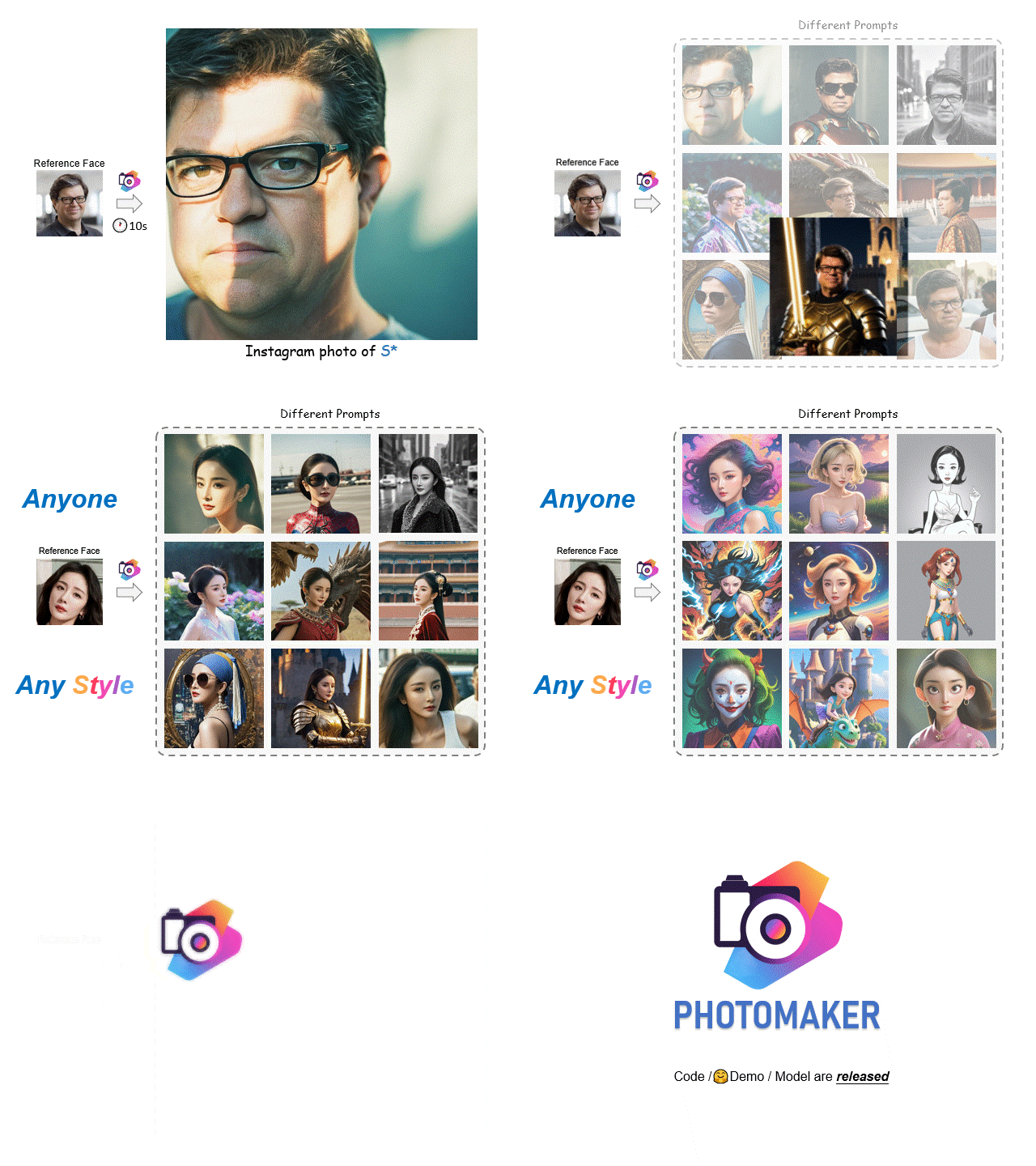
</div>
## 🚩 **New Features/Updates**
- ✅ July 22, 2024. 💥 We release PhotoMaker V2 with **improved ID fidelity**. At the same time, it still maintains the generation quality, editability, and compatibility with any plugins that PhotoMaker V1 offers. We have also provided scripts for integration with [ControlNet](./inference_scripts/inference_pmv2_contronet.py), [T2I-Adapter](./inference_scripts/inference_pmv2_t2i_adapter.py), and [IP-Adapter](./inference_scripts/inference_pmv2_ip_adapter.py) to offer excellent control capabilities. Users can further customize scripts for upgrades, such as combining with LCM for acceleration or integrating with IP-Adapter-FaceID or InstantID to further improve ID fidelity. We will release technical report of PhotoMaker V2 soon. Please refer to [this doc](./README_pmv2.md) for a quick preview.
- ✅ January 20, 2024. An **important** note: For those GPUs that do not support bfloat16, please change [this line](https://github.com/TencentARC/PhotoMaker/blob/6ec44fc13909d64a65c635b9e3b6f238eb1de9fe/gradio_demo/app.py#L39) to `torch_dtype = torch.float16`, the speed will be **greatly improved** (1min/img (before) vs. 14s/img (after) on V100). The minimum GPU memory requirement for PhotoMaker is **11G** (Please refer to [this link](https://github.com/TencentARC/PhotoMaker/discussions/114) for saving GPU memory).
- ✅ January 15, 2024. We release PhotoMaker.
---
## 🔥 **Examples**
### Realistic generation
- [](https://huggingface.co/spaces/TencentARC/PhotoMaker)
- [**PhotoMaker notebook demo**](photomaker_demo.ipynb)
<p align="center">
<img src="https://cdn-uploads.huggingface.co/production/uploads/6285a9133ab6642179158944/BYBZNyfmN4jBKBxxt4uxz.jpeg" height=450>
</p>
<p align="center">
<img src="https://cdn-uploads.huggingface.co/production/uploads/6285a9133ab6642179158944/9KYqoDxfbNVLzVKZzSzwo.jpeg" height=450>
</p>
### Stylization generation
Note: only change the base model and add the LoRA modules for better stylization
- [](https://huggingface.co/spaces/TencentARC/PhotoMaker-Style)
- [**PhotoMaker-Style notebook demo**](photomaker_style_demo.ipynb)
<p align="center">
<img src="https://cdn-uploads.huggingface.co/production/uploads/6285a9133ab6642179158944/du884lcjpqqjnJIxpATM2.jpeg" height=450>
</p>
<p align="center">
<img src="https://cdn-uploads.huggingface.co/production/uploads/6285a9133ab6642179158944/-AC7Hr5YL4yW1zXGe_Izl.jpeg" height=450>
</p>
# 🔧 Dependencies and Installation
- Python >= 3.8 (Recommend to use [Anaconda](https://www.anaconda.com/download/#linux) or [Miniconda](https://docs.conda.io/en/latest/miniconda.html))
- [PyTorch >= 2.0.0](https://pytorch.org/)
```bash
conda create --name photomaker python=3.10
conda activate photomaker
pip install -U pip
# Install requirements
pip install -r requirements.txt
# Install photomaker
pip install git+https://github.com/TencentARC/PhotoMaker.git
```
Then you can run the following command to use it
```python
from photomaker import PhotoMakerStableDiffusionXLPipeline
```
# ⏬ Download Models
The model will be automatically downloaded through the following two lines:
```python
from huggingface_hub import hf_hub_download
photomaker_path = hf_hub_download(repo_id="TencentARC/PhotoMaker", filename="photomaker-v1.bin", repo_type="model")
```
You can also choose to download manually from this [url](https://huggingface.co/TencentARC/PhotoMaker).
# 💻 How to Test
## Use like [diffusers](https://github.com/huggingface/diffusers)
- Dependency
```py
import torch
import os
from diffusers.utils import load_image
from diffusers import EulerDiscreteScheduler
from photomaker import PhotoMakerStableDiffusionXLPipeline
### Load base model
pipe = PhotoMakerStableDiffusionXLPipeline.from_pretrained(
base_model_path, # can change to any base model based on SDXL
torch_dtype=torch.bfloat16,
use_safetensors=True,
variant="fp16"
).to(device)
### Load PhotoMaker checkpoint
pipe.load_photomaker_adapter(
os.path.dirname(photomaker_path),
subfolder="",
weight_name=os.path.basename(photomaker_path),
trigger_word="img" # define the trigger word
)
pipe.scheduler = EulerDiscreteScheduler.from_config(pipe.scheduler.config)
### Also can cooperate with other LoRA modules
# pipe.load_lora_weights(os.path.dirname(lora_path), weight_name=lora_model_name, adapter_name="xl_more_art-full")
# pipe.set_adapters(["photomaker", "xl_more_art-full"], adapter_weights=[1.0, 0.5])
pipe.fuse_lora()
```
- Input ID Images
```py
### define the input ID images
input_folder_name = './examples/newton_man'
image_basename_list = os.listdir(input_folder_name)
image_path_list = sorted([os.path.join(input_folder_name, basename) for basename in image_basename_list])
input_id_images = []
for image_path in image_path_list:
input_id_images.append(load_image(image_path))
```
<div align="center">
<a href="https://github.com/TencentARC/PhotoMaker/assets/21050959/01d53dfa-7528-4f09-a1a5-96b349ae7800" align="center"><img style="margin:0;padding:0;" src="https://github.com/TencentARC/PhotoMaker/assets/21050959/01d53dfa-7528-4f09-a1a5-96b349ae7800"/></a>
</div>
- Generation
```py
# Note that the trigger word `img` must follow the class word for personalization
prompt = "a half-body portrait of a man img wearing the sunglasses in Iron man suit, best quality"
negative_prompt = "(asymmetry, worst quality, low quality, illustration, 3d, 2d, painting, cartoons, sketch), open mouth, grayscale"
generator = torch.Generator(device=device).manual_seed(42)
images = pipe(
prompt=prompt,
input_id_images=input_id_images,
negative_prompt=negative_prompt,
num_images_per_prompt=1,
num_inference_steps=num_steps,
start_merge_step=10,
generator=generator,
).images[0]
gen_images.save('out_photomaker.png')
```
<div align="center">
<a href="https://github.com/TencentARC/PhotoMaker/assets/21050959/703c00e1-5e50-4c19-899e-25ee682d2c06" align="center"><img width=400 style="margin:0;padding:0;" src="https://github.com/TencentARC/PhotoMaker/assets/21050959/703c00e1-5e50-4c19-899e-25ee682d2c06"/></a>
</div>
## Start a local gradio demo
Run the following command:
```python
python gradio_demo/app.py
```
You could customize this script in [this file](gradio_demo/app.py).
If you want to run it on MAC, you should follow [this Instruction](MacGPUEnv.md) and then run the app.py.
## Usage Tips:
- Upload more photos of the person to be customized to improve ID fidelity. If the input is Asian face(s), maybe consider adding 'Asian' before the class word, e.g., `Asian woman img`
- When stylizing, does the generated face look too realistic? Adjust the Style strength to 30-50, the larger the number, the less ID fidelity, but the stylization ability will be better. You could also try out other base models or LoRAs with good stylization effects.
- Reduce the number of generated images and sampling steps for faster speed. However, please keep in mind that reducing the sampling steps may compromise the ID fidelity.
# Related Resources
### Replicate demo of PhotoMaker:
1. [Demo link](https://replicate.com/jd7h/photomaker), run PhotoMaker on replicate, provided by [@yorickvP](https://github.com/yorickvP) and [@jd7h](https://github.com/jd7h).
2. [Demo link (style version)](https://replicate.com/yorickvp/photomaker-style).
### WebUI version of PhotoMaker:
1. **stable-diffusion-webui-forge**: https://github.com/lllyasviel/stable-diffusion-webui-forge provided by [@Lvmin Zhang](https://github.com/lllyasviel)
2. **Fooocus App**: [Fooocus-inswapper](https://github.com/machineminded/Fooocus-inswapper) provided by [@machineminded](https://github.com/machineminded)
### Windows version of PhotoMaker:
1. [bmaltais/PhotoMaker](https://github.com/bmaltais/PhotoMaker/tree/v1.0.1) by [@bmaltais](https://github.com/bmaltais), easy to deploy PhotoMaker on Windows. The description can be found in [this link](https://github.com/TencentARC/PhotoMaker/discussions/36#discussioncomment-8156199).
2. [sdbds/PhotoMaker-for-windows](https://github.com/sdbds/PhotoMaker-for-windows/tree/windows) by [@sdbds](https://github.com/sdbds).
### ComfyUI:
1. 🔥 **Official Implementation by [ComfyUI](https://github.com/comfyanonymous/ComfyUI)**: https://github.com/comfyanonymous/ComfyUI/commit/d1533d9c0f1dde192f738ef1b745b15f49f41e02
2. https://github.com/ZHO-ZHO-ZHO/ComfyUI-PhotoMaker
3. https://github.com/StartHua/Comfyui-Mine-PhotoMaker
4. https://github.com/shiimizu/ComfyUI-PhotoMaker
### ComfyUI (for PhotoMaker V2):
1. https://github.com/shiimizu/ComfyUI-PhotoMaker-Plus
2. https://github.com/edwios/ComfyUI-PhotoMakerV2-ZHO/tree/main
3. https://openart.ai/workflows/shalacai/photomakerv2/fttT4ztRM85JxBJ2eUyr
4. https://github.com/zhangp365/ComfyUI_photomakerV2_native
### Purely C/C++/CUDA version of PhotoMaker:
1. [stable-diffusion.cpp](https://github.com/leejet/stable-diffusion.cpp/pull/179) by [@bssrdf](https://github.com/bssrdf).
### Other Applications / Web Demos
1. **Wisemodel 始智 (Easy to use in China)** https://wisemodel.cn/space/gradio/photomaker
2. **OpenXLab (Easy to use in China)**: https://openxlab.org.cn/apps/detail/camenduru/PhotoMaker
[](https://openxlab.org.cn/apps/detail/camenduru/PhotoMaker)
by [@camenduru](https://github.com/camenduru).
3. **Colab**: https://github.com/camenduru/PhotoMaker-colab by [@camenduru](https://github.com/camenduru)
4. **Monster API**: https://monsterapi.ai/playground?model=photo-maker
5. **Pinokio**: https://pinokio.computer/item?uri=https://github.com/cocktailpeanutlabs/photomaker
### Graido demo in 45 lines
Provided by [@Gradio](https://twitter.com/Gradio/status/1747683500495691942)
# 🤗 Acknowledgements
- PhotoMaker is co-hosted by Tencent ARC Lab and Nankai University [MCG-NKU](https://mmcheng.net/cmm/).
- Inspired from many excellent demos and repos, including [IP-Adapter](https://github.com/tencent-ailab/IP-Adapter), [multimodalart/Ip-Adapter-FaceID](https://huggingface.co/spaces/multimodalart/Ip-Adapter-FaceID), [FastComposer](https://github.com/mit-han-lab/fastcomposer), and [T2I-Adapter](https://github.com/TencentARC/T2I-Adapter). Thanks for their great work!
- Thanks to the [HunyuanDiT](https://github.com/Tencent/HunyuanDiT) team for their generous support and suggestions!
- Thanks to the Venus team in Tencent PCG for their feedback and suggestions.
- Thanks to the HuggingFace team for their generous support!
# Disclaimer
This project strives to impact the domain of AI-driven image generation positively. Users are granted the freedom to create images using this tool, but they are expected to comply with local laws and utilize it responsibly. The developers do not assume any responsibility for potential misuse by users.
# BibTeX
If you find PhotoMaker useful for your research and applications, please cite using this BibTeX:
```BibTeX
@inproceedings{li2023photomaker,
title={PhotoMaker: Customizing Realistic Human Photos via Stacked ID Embedding},
author={Li, Zhen and Cao, Mingdeng and Wang, Xintao and Qi, Zhongang and Cheng, Ming-Ming and Shan, Ying},
booktitle={IEEE Conference on Computer Vision and Pattern Recognition (CVPR)},
year={2024}
}
================================================
FILE: README_pmv2.md
================================================
<p align="center">
<img src="https://photo-maker.github.io/assets/logo.png" height=70>
</p>
<!-- ## <div align="center"><b>PhotoMaker</b></div> -->
<div align="center">
## PhotoMaker V2: Improved ID Fidelity and Better Controllability Compared to PhotoMaker V1
[[🤗 Demo](https://huggingface.co/spaces/TencentARC/PhotoMaker-V2)]
</div>
When training PhotoMaker V2, we focused on improving ID fidelity. Compared to PhotoMaker V1, we introduced 1️⃣ new training strategies, incorporated 2️⃣ more portrait datasets, and utilized 3️⃣ a more powerful ID extraction encoder. We will release a technical report soon. Thank you all for your attention.
### 🌠 **Key improvements in PhotoMaker V2:**
1. **ID fidelity** has been **further improved**, especially for single image input and Asian facial inputs. Of course, feeding more facial images can still yield better results.
2. By integrating [ControlNet](./inference_scripts/inference_pmv2_contronet.py), [T2I-Adapter](./inference_scripts/inference_pmv2_t2i_adapter.py), and [IP-Adapter](./inference_scripts/inference_pmv2_ip_adapter.py), the generation process becomes **more controllable**. We provide corresponding scripts for reference. Additionally, PhotoMaker V2 allows users to achieve better ID consistency by combining it with IP-Adapter-FaceID, InstantID, and [character LoRA](https://github.com/TencentARC/PhotoMaker/discussions/14).
3. PhotoMaker V2 **inherits the promising features of PhotoMaker V1**, such as high-quality and diverse generation capabilities, and powerful text control. Additionally, it can still integrate previous applications like bringing characters from old photos or paintings back to reality, identity mixing, and changing age or gender.
## Comparisons with PhotoMaker V1, IP-Adapter-FaceID and InstantID
We selected the three most prevalent methods in ID personalization generation, namely PhotoMaker V1, [IP-Adapter-FaceID-Plus-V2](https://huggingface.co/h94/IP-Adapter-FaceID) ([best of IP-Adapter-FaceID](https://github.com/cubiq/ComfyUI_IPAdapter_plus/issues/195)), and [InstantID](https://github.com/InstantID/InstantID).
To ensure a fair comparison, we used the same base model ([RealVisXL-V4.0](https://huggingface.co/SG161222/RealVisXL_V4.0)) and scheduler ([Euler](https://huggingface.co/docs/diffusers/api/schedulers/euler)), and selected the best out of four randomly generated images from each method for visualization. The prompts and negative prompts were consistent:
Prompt: `instagram photo, portrait photo of a woman img holding two cats, colorful, perfect face, natural skin, hard shadows, film grain`
Negative Prompt: `(asymmetry, worst quality, low quality, illustration, 3d, 2d, painting, cartoons, sketch), open mouth`
We can see that our method has **advantages** in maintaining ID fidelity and in the quality of the generated images


## Cooperation with ControlNet / T2I-Adapter / IP-Adapter
PhotoMaker V2 can collaborate with [T2I-Adapter’s doodle mode](https://huggingface.co/TencentARC/t2i-adapter-sketch-sdxl-1.0),
allowing for controlled image generation based on user drawings and prompts.
This feature can be experienced in [[🤗 our official demo]](https://huggingface.co/spaces/TencentARC/PhotoMaker-V2).
The following video is an example of the experience process:
https://github.com/user-attachments/assets/1303d684-89e4-49d2-8e8c-4b659c8b48e7
Additionally, PhotoMaker V2 can work with [ControlNet](https://github.com/lllyasviel/ControlNet) and [T2I-Adapter](https://github.com/TencentARC/T2I-Adapter) for layout control, such as edge, pose, depth, and more.
We provide two example scripts:
1. [inference_pmv2_contronet.py](./inference_scripts/inference_pmv2_contronet.py)
2. [inference_pmv2_t2i_adapter.py](./inference_scripts/inference_pmv2_t2i_adapter.py)
The image below is an example of controlled generation using pose through ControlNet:

Our sample scripts can be referred to:
[inference_pmv2_ip_adapter.py](./inference_scripts/inference_pmv2_ip_adapter.py)
The image below is an example:

PhotoMaker V2, as a plugin, can work well with other plugins, such as IP-Adapter-FaceID or InstantID, to further improve ID fidelity, or combining with LCM for acceleration. We look forward to your exploration of more features, and welcome you to **provide PRs** or **contribute to the open-source community**
🥳 If you have built or known repositories or applications around PhotoMaker V2, please leave us a message in the discussion. We will include them in our README.
## LICENSE
Since PhotoMaker V2 relies on [InsightFace](https://github.com/deepinsight/insightface), it also needs to comply with its [license](https://github.com/deepinsight/insightface?tab=readme-ov-file#license).
================================================
FILE: cog.yaml
================================================
# Configuration for Cog ⚙️
# Reference: https://github.com/replicate/cog/blob/main/docs/yaml.md
build:
# set to true if your model requires a GPU
gpu: true
# python version in the form '3.11' or '3.11.4'
python_version: "3.11"
python_packages:
- "accelerate==0.26.1"
- "diffusers==0.25.0"
- "huggingface-hub==0.20.2"
- "numpy==1.24.4"
- "omegaconf==2.3.0"
- "peft==0.7.1"
- "safetensors==0.4.1"
- "torch==2.1.1"
- "torchvision==0.16.1"
- "transformers==4.36.2"
run:
- curl -o /usr/local/bin/pget -L "https://github.com/replicate/pget/releases/download/v0.5.6/pget_linux_x86_64" && chmod +x /usr/local/bin/pget
# predict.py defines how predictions are run on your model
predict: "predict.py:Predictor"
image: r8.im/tencentarc/photomaker
================================================
FILE: feature-extractor/preprocessor_config.json
================================================
{
"crop_size": 224,
"do_center_crop": true,
"do_convert_rgb": true,
"do_normalize": true,
"do_resize": true,
"feature_extractor_type": "CLIPFeatureExtractor",
"image_mean": [
0.48145466,
0.4578275,
0.40821073
],
"image_std": [
0.26862954,
0.26130258,
0.27577711
],
"resample": 3,
"size": 224
}
================================================
FILE: gradio_demo/app.py
================================================
import torch
import numpy as np
import random
import os
import sys
from diffusers.utils import load_image
from diffusers import EulerDiscreteScheduler
from huggingface_hub import hf_hub_download
import spaces
import gradio as gr
from photomaker import PhotoMakerStableDiffusionXLPipeline
from style_template import styles
from aspect_ratio_template import aspect_ratios
# global variable
base_model_path = 'SG161222/RealVisXL_V4.0'
try:
if torch.cuda.is_available():
device = "cuda"
elif sys.platform == "darwin" and torch.backends.mps.is_available():
device = "mps"
else:
device = "cpu"
except:
device = "cpu"
MAX_SEED = np.iinfo(np.int32).max
STYLE_NAMES = list(styles.keys())
DEFAULT_STYLE_NAME = "Photographic (Default)"
ASPECT_RATIO_LABELS = list(aspect_ratios)
DEFAULT_ASPECT_RATIO = ASPECT_RATIO_LABELS[0]
# download PhotoMaker checkpoint to cache
photomaker_ckpt = hf_hub_download(repo_id="TencentARC/PhotoMaker", filename="photomaker-v1.bin", repo_type="model")
torch_dtype = torch.bfloat16 if torch.cuda.is_bf16_supported() else torch.float16
if device == "mps":
torch_dtype = torch.float16
pipe = PhotoMakerStableDiffusionXLPipeline.from_pretrained(
base_model_path,
torch_dtype=torch_dtype,
use_safetensors=True,
variant="fp16",
# local_files_only=True,
).to(device)
pipe.load_photomaker_adapter(
os.path.dirname(photomaker_ckpt),
subfolder="",
weight_name=os.path.basename(photomaker_ckpt),
trigger_word="img",
pm_version="v1",
)
pipe.id_encoder.to(device)
pipe.scheduler = EulerDiscreteScheduler.from_config(pipe.scheduler.config)
# pipe.set_adapters(["photomaker"], adapter_weights=[1.0])
pipe.fuse_lora()
pipe.to(device)
@spaces.GPU
def generate_image(upload_images, prompt, negative_prompt, aspect_ratio_name, style_name, num_steps, style_strength_ratio, num_outputs, guidance_scale, seed, progress=gr.Progress(track_tqdm=True)):
# check the trigger word
image_token_id = pipe.tokenizer.convert_tokens_to_ids(pipe.trigger_word)
input_ids = pipe.tokenizer.encode(prompt)
if image_token_id not in input_ids:
raise gr.Error(f"Cannot find the trigger word '{pipe.trigger_word}' in text prompt! Please refer to step 2️⃣")
if input_ids.count(image_token_id) > 1:
raise gr.Error(f"Cannot use multiple trigger words '{pipe.trigger_word}' in text prompt!")
# determine output dimensions by the aspect ratio
output_w, output_h = aspect_ratios[aspect_ratio_name]
print(f"[Debug] Generate image using aspect ratio [{aspect_ratio_name}] => {output_w} x {output_h}")
# apply the style template
prompt, negative_prompt = apply_style(style_name, prompt, negative_prompt)
if upload_images is None:
raise gr.Error(f"Cannot find any input face image! Please refer to step 1️⃣")
input_id_images = []
for img in upload_images:
input_id_images.append(load_image(img))
generator = torch.Generator(device=device).manual_seed(seed)
print("Start inference...")
print(f"[Debug] Prompt: {prompt}, \n[Debug] Neg Prompt: {negative_prompt}")
start_merge_step = int(float(style_strength_ratio) / 100 * num_steps)
if start_merge_step > 30:
start_merge_step = 30
print(start_merge_step)
images = pipe(
prompt=prompt,
width=output_w,
height=output_h,
input_id_images=input_id_images,
negative_prompt=negative_prompt,
num_images_per_prompt=num_outputs,
num_inference_steps=num_steps,
start_merge_step=start_merge_step,
generator=generator,
guidance_scale=guidance_scale,
).images
return images, gr.update(visible=True)
def swap_to_gallery(images):
return gr.update(value=images, visible=True), gr.update(visible=True), gr.update(visible=False)
def upload_example_to_gallery(images, prompt, style, negative_prompt):
return gr.update(value=images, visible=True), gr.update(visible=True), gr.update(visible=False)
def remove_back_to_files():
return gr.update(visible=False), gr.update(visible=False), gr.update(visible=True)
def remove_tips():
return gr.update(visible=False)
def randomize_seed_fn(seed: int, randomize_seed: bool) -> int:
if randomize_seed:
seed = random.randint(0, MAX_SEED)
return seed
def apply_style(style_name: str, positive: str, negative: str = ""):
p, n = styles.get(style_name, styles[DEFAULT_STYLE_NAME])
return p.replace("{prompt}", positive), n + ' ' + negative
def get_image_path_list(folder_name):
image_basename_list = os.listdir(folder_name)
image_path_list = sorted([os.path.join(folder_name, basename) for basename in image_basename_list])
return image_path_list
def get_example():
case = [
[
get_image_path_list('./examples/scarletthead_woman'),
"instagram photo, portrait photo of a woman img, colorful, perfect face, natural skin, hard shadows, film grain",
"(No style)",
"(asymmetry, worst quality, low quality, illustration, 3d, 2d, painting, cartoons, sketch), open mouth",
],
[
get_image_path_list('./examples/newton_man'),
"sci-fi, closeup portrait photo of a man img wearing the sunglasses in Iron man suit, face, slim body, high quality, film grain",
"(No style)",
"(asymmetry, worst quality, low quality, illustration, 3d, 2d, painting, cartoons, sketch), open mouth",
],
]
return case
### Description and style
logo = r"""
<center><img src='https://photo-maker.github.io/assets/logo.png' alt='PhotoMaker logo' style="width:80px; margin-bottom:10px"></center>
"""
title = r"""
<h1 align="center">PhotoMaker: Customizing Realistic Human Photos via Stacked ID Embedding</h1>
"""
description = r"""
<b>Official 🤗 Gradio demo</b> for <a href='https://github.com/TencentARC/PhotoMaker' target='_blank'><b>PhotoMaker: Customizing Realistic Human Photos via Stacked ID Embedding</b></a>.<br>
<br>
For stylization, you could use our other gradio demo [PhotoMaker-Style](https://huggingface.co/spaces/TencentARC/PhotoMaker-Style).
<br>
❗️❗️❗️[<b>Important</b>] Personalization steps:<br>
1️⃣ Upload images of someone you want to customize. One image is ok, but more is better. Although we do not perform face detection, the face in the uploaded image should <b>occupy the majority of the image</b>.<br>
2️⃣ Enter a text prompt, making sure to <b>follow the class word</b> you want to customize with the <b>trigger word</b>: `img`, such as: `man img` or `woman img` or `girl img`.<br>
3️⃣ Choose your preferred style template.<br>
4️⃣ Click the <b>Submit</b> button to start customizing.
"""
article = r"""
If PhotoMaker is helpful, please help to ⭐ the <a href='https://github.com/TencentARC/PhotoMaker' target='_blank'>Github Repo</a>. Thanks!
[](https://github.com/TencentARC/PhotoMaker)
---
📝 **Citation**
<br>
If our work is useful for your research, please consider citing:
```bibtex
@article{li2023photomaker,
title={PhotoMaker: Customizing Realistic Human Photos via Stacked ID Embedding},
author={Li, Zhen and Cao, Mingdeng and Wang, Xintao and Qi, Zhongang and Cheng, Ming-Ming and Shan, Ying},
booktitle={IEEE Conference on Computer Vision and Pattern Recognition (CVPR)},
year={2024}
}
```
📋 **License**
<br>
Apache-2.0 LICENSE. Please refer to the [LICENSE file](https://huggingface.co/TencentARC/PhotoMaker/blob/main/LICENSE) for details.
📧 **Contact**
<br>
If you have any questions, please feel free to reach me out at <b>zhenli1031@gmail.com</b>.
"""
tips = r"""
### Usage tips of PhotoMaker
1. Upload more photos of the person to be customized to **improve ID fidelty**. If the input is Asian face(s), maybe consider adding 'asian' before the class word, e.g., `asian woman img`
2. When stylizing, does the generated face look too realistic? Try switching to our **other gradio demo** [PhotoMaker-Style](https://huggingface.co/spaces/TencentARC/PhotoMaker-Style). Adjust the **Style strength** to 30-50, the larger the number, the less ID fidelty, but the stylization ability will be better.
3. For **faster** speed, reduce the number of generated images and sampling steps. However, please note that reducing the sampling steps may compromise the ID fidelity.
"""
# We have provided some generate examples and comparisons at: [this website]().
# 3. Don't make the prompt too long, as we will trim it if it exceeds 77 tokens.
# 4. When generating realistic photos, if it's not real enough, try switching to our other gradio application [PhotoMaker-Realistic]().
css = '''
.gradio-container {width: 85% !important}
'''
with gr.Blocks(css=css) as demo:
gr.Markdown(logo)
gr.Markdown(title)
gr.Markdown(description)
# gr.DuplicateButton(
# value="Duplicate Space for private use ",
# elem_id="duplicate-button",
# visible=os.getenv("SHOW_DUPLICATE_BUTTON") == "1",
# )
with gr.Row():
with gr.Column():
files = gr.Files(
label="Drag (Select) 1 or more photos of your face",
file_types=["image"]
)
uploaded_files = gr.Gallery(label="Your images", visible=False, columns=5, rows=1, height=200)
with gr.Column(visible=False) as clear_button:
remove_and_reupload = gr.ClearButton(value="Remove and upload new ones", components=files, size="sm")
prompt = gr.Textbox(label="Prompt",
info="Try something like 'a photo of a man/woman img', 'img' is the trigger word.",
placeholder="A photo of a [man/woman img]...")
style = gr.Dropdown(label="Style template", choices=STYLE_NAMES, value=DEFAULT_STYLE_NAME)
aspect_ratio = gr.Dropdown(label="Output aspect ratio", choices=ASPECT_RATIO_LABELS, value=DEFAULT_ASPECT_RATIO)
submit = gr.Button("Submit")
with gr.Accordion(open=False, label="Advanced Options"):
negative_prompt = gr.Textbox(
label="Negative Prompt",
placeholder="low quality",
value="nsfw, lowres, bad anatomy, bad hands, text, error, missing fingers, extra digit, fewer digits, cropped, worst quality, low quality, normal quality, jpeg artifacts, signature, watermark, username, blurry",
)
num_steps = gr.Slider(
label="Number of sample steps",
minimum=20,
maximum=100,
step=1,
value=50,
)
style_strength_ratio = gr.Slider(
label="Style strength (%)",
minimum=15,
maximum=50,
step=1,
value=20,
)
num_outputs = gr.Slider(
label="Number of output images",
minimum=1,
maximum=4,
step=1,
value=2,
)
guidance_scale = gr.Slider(
label="Guidance scale",
minimum=0.1,
maximum=10.0,
step=0.1,
value=5,
)
seed = gr.Slider(
label="Seed",
minimum=0,
maximum=MAX_SEED,
step=1,
value=0,
)
randomize_seed = gr.Checkbox(label="Randomize seed", value=True)
with gr.Column():
gallery = gr.Gallery(label="Generated Images")
usage_tips = gr.Markdown(label="Usage tips of PhotoMaker", value=tips ,visible=False)
files.upload(fn=swap_to_gallery, inputs=files, outputs=[uploaded_files, clear_button, files])
remove_and_reupload.click(fn=remove_back_to_files, outputs=[uploaded_files, clear_button, files])
submit.click(
fn=remove_tips,
outputs=usage_tips,
).then(
fn=randomize_seed_fn,
inputs=[seed, randomize_seed],
outputs=seed,
queue=False,
api_name=False,
).then(
fn=generate_image,
inputs=[files, prompt, negative_prompt, aspect_ratio, style, num_steps, style_strength_ratio, num_outputs, guidance_scale, seed],
outputs=[gallery, usage_tips]
)
gr.Examples(
examples=get_example(),
inputs=[files, prompt, style, negative_prompt],
run_on_click=True,
fn=upload_example_to_gallery,
outputs=[uploaded_files, clear_button, files],
)
gr.Markdown(article)
demo.launch()
================================================
FILE: gradio_demo/app_v2.py
================================================
import torch
import torchvision.transforms.functional as TF
import numpy as np
import random
import os
import sys
from diffusers.utils import load_image
from diffusers import EulerDiscreteScheduler, T2IAdapter
from huggingface_hub import hf_hub_download
import spaces
import gradio as gr
from photomaker import PhotoMakerStableDiffusionXLAdapterPipeline
from photomaker import FaceAnalysis2, analyze_faces
from style_template import styles
from aspect_ratio_template import aspect_ratios
# global variable
base_model_path = 'SG161222/RealVisXL_V4.0'
face_detector = FaceAnalysis2(providers=['CUDAExecutionProvider'], allowed_modules=['detection', 'recognition'])
face_detector.prepare(ctx_id=0, det_size=(640, 640))
try:
if torch.cuda.is_available():
device = "cuda"
elif sys.platform == "darwin" and torch.backends.mps.is_available():
device = "mps"
else:
device = "cpu"
except:
device = "cpu"
MAX_SEED = np.iinfo(np.int32).max
STYLE_NAMES = list(styles.keys())
DEFAULT_STYLE_NAME = "Photographic (Default)"
ASPECT_RATIO_LABELS = list(aspect_ratios)
DEFAULT_ASPECT_RATIO = ASPECT_RATIO_LABELS[0]
enable_doodle_arg = False
photomaker_ckpt = hf_hub_download(repo_id="TencentARC/PhotoMaker-V2", filename="photomaker-v2.bin", repo_type="model")
torch_dtype = torch.bfloat16 if torch.cuda.is_bf16_supported() else torch.float16
if device == "mps":
torch_dtype = torch.float16
# load adapter
adapter = T2IAdapter.from_pretrained(
"TencentARC/t2i-adapter-sketch-sdxl-1.0", torch_dtype=torch_dtype, variant="fp16"
).to(device)
pipe = PhotoMakerStableDiffusionXLAdapterPipeline.from_pretrained(
base_model_path,
adapter=adapter,
torch_dtype=torch_dtype,
use_safetensors=True,
variant="fp16",
).to(device)
pipe.load_photomaker_adapter(
os.path.dirname(photomaker_ckpt),
subfolder="",
weight_name=os.path.basename(photomaker_ckpt),
trigger_word="img",
pm_version="v2",
)
pipe.id_encoder.to(device)
pipe.scheduler = EulerDiscreteScheduler.from_config(pipe.scheduler.config)
# pipe.set_adapters(["photomaker"], adapter_weights=[1.0])
pipe.fuse_lora()
pipe.to(device)
@spaces.GPU
def generate_image(
upload_images,
prompt,
negative_prompt,
aspect_ratio_name,
style_name,
num_steps,
style_strength_ratio,
num_outputs,
guidance_scale,
seed,
use_doodle,
sketch_image,
adapter_conditioning_scale,
adapter_conditioning_factor,
progress=gr.Progress(track_tqdm=True)
):
if use_doodle:
sketch_image = sketch_image["composite"]
r, g, b, a = sketch_image.split()
sketch_image = a.convert("RGB")
sketch_image = TF.to_tensor(sketch_image) > 0.5 # Inversion
sketch_image = TF.to_pil_image(sketch_image.to(torch.float32))
adapter_conditioning_scale = adapter_conditioning_scale
adapter_conditioning_factor = adapter_conditioning_factor
else:
adapter_conditioning_scale = 0.
adapter_conditioning_factor = 0.
sketch_image = None
# check the trigger word
image_token_id = pipe.tokenizer.convert_tokens_to_ids(pipe.trigger_word)
input_ids = pipe.tokenizer.encode(prompt)
if image_token_id not in input_ids:
raise gr.Error(f"Cannot find the trigger word '{pipe.trigger_word}' in text prompt! Please refer to step 2️⃣")
if input_ids.count(image_token_id) > 1:
raise gr.Error(f"Cannot use multiple trigger words '{pipe.trigger_word}' in text prompt!")
# determine output dimensions by the aspect ratio
output_w, output_h = aspect_ratios[aspect_ratio_name]
print(f"[Debug] Generate image using aspect ratio [{aspect_ratio_name}] => {output_w} x {output_h}")
# apply the style template
prompt, negative_prompt = apply_style(style_name, prompt, negative_prompt)
if upload_images is None:
raise gr.Error(f"Cannot find any input face image! Please refer to step 1️⃣")
input_id_images = []
for img in upload_images:
input_id_images.append(load_image(img))
id_embed_list = []
for img in input_id_images:
img = np.array(img)
img = img[:, :, ::-1]
faces = analyze_faces(face_detector, img)
if len(faces) > 0:
id_embed_list.append(torch.from_numpy((faces[0]['embedding'])))
if len(id_embed_list) == 0:
raise gr.Error(f"No face detected, please update the input face image(s)")
id_embeds = torch.stack(id_embed_list)
generator = torch.Generator(device=device).manual_seed(seed)
print("Start inference...")
print(f"[Debug] Seed: {seed}")
print(f"[Debug] Prompt: {prompt}, \n[Debug] Neg Prompt: {negative_prompt}")
start_merge_step = int(float(style_strength_ratio) / 100 * num_steps)
if start_merge_step > 30:
start_merge_step = 30
print(start_merge_step)
images = pipe(
prompt=prompt,
width=output_w,
height=output_h,
input_id_images=input_id_images,
negative_prompt=negative_prompt,
num_images_per_prompt=num_outputs,
num_inference_steps=num_steps,
start_merge_step=start_merge_step,
generator=generator,
guidance_scale=guidance_scale,
id_embeds=id_embeds,
image=sketch_image,
adapter_conditioning_scale=adapter_conditioning_scale,
adapter_conditioning_factor=adapter_conditioning_factor,
).images
return images, gr.update(visible=True)
def swap_to_gallery(images):
return gr.update(value=images, visible=True), gr.update(visible=True), gr.update(visible=False)
def upload_example_to_gallery(images, prompt, style, negative_prompt):
return gr.update(value=images, visible=True), gr.update(visible=True), gr.update(visible=False)
def remove_back_to_files():
return gr.update(visible=False), gr.update(visible=False), gr.update(visible=True)
def change_doodle_space(use_doodle):
if use_doodle:
return gr.update(visible=True)
else:
return gr.update(visible=False)
def remove_tips():
return gr.update(visible=False)
def randomize_seed_fn(seed: int, randomize_seed: bool) -> int:
if randomize_seed:
seed = random.randint(0, MAX_SEED)
return seed
def apply_style(style_name: str, positive: str, negative: str = "") -> tuple[str, str]:
p, n = styles.get(style_name, styles[DEFAULT_STYLE_NAME])
return p.replace("{prompt}", positive), n + ' ' + negative
def get_image_path_list(folder_name):
image_basename_list = os.listdir(folder_name)
image_path_list = sorted([os.path.join(folder_name, basename) for basename in image_basename_list])
return image_path_list
def get_example():
case = [
[
get_image_path_list('./examples/scarletthead_woman'),
"instagram photo, portrait photo of a woman img, colorful, perfect face, natural skin, hard shadows, film grain",
"(No style)",
"(asymmetry, worst quality, low quality, illustration, 3d, 2d, painting, cartoons, sketch), open mouth",
],
[
get_image_path_list('./examples/newton_man'),
"sci-fi, closeup portrait photo of a man img wearing the sunglasses in Iron man suit, face, slim body, high quality, film grain",
"(No style)",
"(asymmetry, worst quality, low quality, illustration, 3d, 2d, painting, cartoons, sketch), open mouth",
],
]
return case
### Description and style
logo = r"""
<center><img src='https://photo-maker.github.io/assets/logo.png' alt='PhotoMaker logo' style="width:80px; margin-bottom:10px"></center>
"""
title = r"""
<h1 align="center">PhotoMaker V2: Improved ID Fidelity and Better Controllability than PhotoMaker V1</h1>
"""
description = r"""
<b>Official 🤗 Gradio demo</b> for <a href='https://github.com/TencentARC/PhotoMaker' target='_blank'><b>PhotoMaker: Customizing Realistic Human Photos via Stacked ID Embedding</b></a>.<br>
The details of PhotoMaker V2 can be found in
<br>
<br>
For previous version of PhotoMaker, you could use our original gradio demos [PhotoMaker](https://huggingface.co/spaces/TencentARC/PhotoMaker) and [PhotoMaker-Style](https://huggingface.co/spaces/TencentARC/PhotoMaker-Style).
<br>
❗️❗️❗️[<b>Important</b>] Personalization steps:<br>
1️⃣ Upload images of someone you want to customize. One image is ok, but more is better. Although we do not perform face detection, the face in the uploaded image should <b>occupy the majority of the image</b>.<br>
2️⃣ Enter a text prompt, making sure to <b>follow the class word</b> you want to customize with the <b>trigger word</b>: `img`, such as: `man img` or `woman img` or `girl img`.<br>
3️⃣ Choose your preferred style template.<br>
4️⃣ <b>(Optional: but new feature)</b> Select the ‘Enable Drawing Doodle...’ option and draw on the canvas<br>
5️⃣ Click the <b>Submit</b> button to start customizing.
"""
article = r"""
If PhotoMaker V2 is helpful, please help to ⭐ the <a href='https://github.com/TencentARC/PhotoMaker' target='_blank'>Github Repo</a>. Thanks!
[](https://github.com/TencentARC/PhotoMaker)
---
📝 **Citation**
<br>
If our work is useful for your research, please consider citing:
```bibtex
@article{li2023photomaker,
title={PhotoMaker: Customizing Realistic Human Photos via Stacked ID Embedding},
author={Li, Zhen and Cao, Mingdeng and Wang, Xintao and Qi, Zhongang and Cheng, Ming-Ming and Shan, Ying},
booktitle={IEEE Conference on Computer Vision and Pattern Recognition (CVPR)},
year={2024}
}
```
📋 **License**
<br>
Apache-2.0 LICENSE. Please refer to the [LICENSE file](https://huggingface.co/TencentARC/PhotoMaker/blob/main/LICENSE) for details.
📧 **Contact**
<br>
If you have any questions, please feel free to reach me out at <b>zhenli1031@gmail.com</b>.
"""
tips = r"""
### Usage tips of PhotoMaker
1. Upload **more photos**of the person to be customized to **improve ID fidelty**.
2. If you find that the image quality is poor when using doodle for control, you can reduce the conditioning scale and factor of the adapter.
Besides, you could enlarge the ratio for more consistency of your doodle. <br>
If you have any issues, leave the issue in the discussion page of the space. For a more stable (queue-free) experience, you can duplicate the space.
"""
# We have provided some generate examples and comparisons at: [this website]().
css = '''
.gradio-container {width: 85% !important}
'''
with gr.Blocks(css=css) as demo:
gr.Markdown(logo)
gr.Markdown(title)
gr.Markdown(description)
# gr.DuplicateButton(
# value="Duplicate Space for private use ",
# elem_id="duplicate-button",
# visible=os.getenv("SHOW_DUPLICATE_BUTTON") == "1",
# )
with gr.Row():
with gr.Column():
files = gr.Files(
label="Drag (Select) 1 or more photos of your face",
file_types=["image"]
)
uploaded_files = gr.Gallery(label="Your images", visible=False, columns=5, rows=1, height=200)
with gr.Column(visible=False) as clear_button:
remove_and_reupload = gr.ClearButton(value="Remove and upload new ones", components=files, size="sm")
prompt = gr.Textbox(label="Prompt",
info="Try something like 'a photo of a man/woman img', 'img' is the trigger word.",
placeholder="A photo of a [man/woman img]...")
style = gr.Dropdown(label="Style template", choices=STYLE_NAMES, value=DEFAULT_STYLE_NAME)
aspect_ratio = gr.Dropdown(label="Output aspect ratio", choices=ASPECT_RATIO_LABELS, value=DEFAULT_ASPECT_RATIO)
submit = gr.Button("Submit")
enable_doodle = gr.Checkbox(
label="Enable Drawing Doodle for Control", value=enable_doodle_arg,
info="After enabling this option, PhotoMaker will generate content based on your doodle on the canvas, driven by the T2I-Adapter (Quality may be decreased)",
)
with gr.Accordion("T2I-Adapter-Doodle (Optional)", visible=False) as doodle_space:
with gr.Row():
sketch_image = gr.Sketchpad(
label="Canvas",
type="pil",
crop_size=[1024,1024],
layers=False,
canvas_size=(350, 350),
brush=gr.Brush(default_size=5, colors=["#000000"], color_mode="fixed")
)
with gr.Group():
adapter_conditioning_scale = gr.Slider(
label="Adapter conditioning scale",
minimum=0.5,
maximum=1,
step=0.1,
value=0.7,
)
adapter_conditioning_factor = gr.Slider(
label="Adapter conditioning factor",
info="Fraction of timesteps for which adapter should be applied",
minimum=0.5,
maximum=1,
step=0.1,
value=0.8,
)
with gr.Accordion(open=False, label="Advanced Options"):
negative_prompt = gr.Textbox(
label="Negative Prompt",
placeholder="low quality",
value="nsfw, lowres, bad anatomy, bad hands, text, error, missing fingers, extra digit, fewer digits, cropped, worst quality, low quality, normal quality, jpeg artifacts, signature, watermark, username, blurry",
)
num_steps = gr.Slider(
label="Number of sample steps",
minimum=20,
maximum=100,
step=1,
value=50,
)
style_strength_ratio = gr.Slider(
label="Style strength (%)",
minimum=15,
maximum=50,
step=1,
value=20,
)
num_outputs = gr.Slider(
label="Number of output images",
minimum=1,
maximum=4,
step=1,
value=2,
)
guidance_scale = gr.Slider(
label="Guidance scale",
minimum=0.1,
maximum=10.0,
step=0.1,
value=5,
)
seed = gr.Slider(
label="Seed",
minimum=0,
maximum=MAX_SEED,
step=1,
value=0,
)
randomize_seed = gr.Checkbox(label="Randomize seed", value=True)
with gr.Column():
gallery = gr.Gallery(label="Generated Images")
usage_tips = gr.Markdown(label="Usage tips of PhotoMaker", value=tips ,visible=False)
files.upload(fn=swap_to_gallery, inputs=files, outputs=[uploaded_files, clear_button, files])
remove_and_reupload.click(fn=remove_back_to_files, outputs=[uploaded_files, clear_button, files])
enable_doodle.select(fn=change_doodle_space, inputs=enable_doodle, outputs=doodle_space)
input_list = [
files,
prompt,
negative_prompt,
aspect_ratio,
style,
num_steps,
style_strength_ratio,
num_outputs,
guidance_scale,
seed,
enable_doodle,
sketch_image,
adapter_conditioning_scale,
adapter_conditioning_factor
]
submit.click(
fn=remove_tips,
outputs=usage_tips,
).then(
fn=randomize_seed_fn,
inputs=[seed, randomize_seed],
outputs=seed,
queue=False,
api_name=False,
).then(
fn=generate_image,
inputs=input_list,
outputs=[gallery, usage_tips]
)
gr.Examples(
examples=get_example(),
inputs=[files, prompt, style, negative_prompt],
run_on_click=True,
fn=upload_example_to_gallery,
outputs=[uploaded_files, clear_button, files],
)
gr.Markdown(article)
demo.launch()
================================================
FILE: gradio_demo/aspect_ratio_template.py
================================================
# Note: Since output width & height need to be divisible by 8, the w & h -values do
# not exactly match the stated aspect ratios... but they are "close enough":)
aspect_ratio_list = [
{
"name": "Instagram (1:1)",
"w": 1024,
"h": 1024,
},
{
"name": "35mm film / Landscape (3:2)",
"w": 1024,
"h": 680,
},
{
"name": "35mm film / Portrait (2:3)",
"w": 680,
"h": 1024,
},
{
"name": "CRT Monitor / Landscape (4:3)",
"w": 1024,
"h": 768,
},
{
"name": "CRT Monitor / Portrait (3:4)",
"w": 768,
"h": 1024,
},
{
"name": "Widescreen TV / Landscape (16:9)",
"w": 1024,
"h": 576,
},
{
"name": "Widescreen TV / Portrait (9:16)",
"w": 576,
"h": 1024,
},
{
"name": "Widescreen Monitor / Landscape (16:10)",
"w": 1024,
"h": 640,
},
{
"name": "Widescreen Monitor / Portrait (10:16)",
"w": 640,
"h": 1024,
},
{
"name": "Cinemascope (2.39:1)",
"w": 1024,
"h": 424,
},
{
"name": "Widescreen Movie (1.85:1)",
"w": 1024,
"h": 552,
},
{
"name": "Academy Movie (1.37:1)",
"w": 1024,
"h": 744,
},
{
"name": "Sheet-print (A-series) / Landscape (297:210)",
"w": 1024,
"h": 720,
},
{
"name": "Sheet-print (A-series) / Portrait (210:297)",
"w": 720,
"h": 1024,
},
]
aspect_ratios = {k["name"]: (k["w"], k["h"]) for k in aspect_ratio_list}
================================================
FILE: gradio_demo/style_template.py
================================================
style_list = [
{
"name": "(No style)",
"prompt": "{prompt}",
"negative_prompt": "",
},
{
"name": "Cinematic",
"prompt": "cinematic still {prompt} . emotional, harmonious, vignette, highly detailed, high budget, bokeh, cinemascope, moody, epic, gorgeous, film grain, grainy",
"negative_prompt": "anime, cartoon, graphic, text, painting, crayon, graphite, abstract, glitch, deformed, mutated, ugly, disfigured",
},
{
"name": "Disney Charactor",
"prompt": "A Pixar animation character of {prompt} . pixar-style, studio anime, Disney, high-quality",
"negative_prompt": "lowres, bad anatomy, bad hands, text, bad eyes, bad arms, bad legs, error, missing fingers, extra digit, fewer digits, cropped, worst quality, low quality, normal quality, jpeg artifacts, signature, watermark, blurry, grayscale, noisy, sloppy, messy, grainy, highly detailed, ultra textured, photo",
},
{
"name": "Digital Art",
"prompt": "concept art {prompt} . digital artwork, illustrative, painterly, matte painting, highly detailed",
"negative_prompt": "photo, photorealistic, realism, ugly",
},
{
"name": "Photographic (Default)",
"prompt": "cinematic photo {prompt} . 35mm photograph, film, bokeh, professional, 4k, highly detailed",
"negative_prompt": "drawing, painting, crayon, sketch, graphite, impressionist, noisy, blurry, soft, deformed, ugly",
},
{
"name": "Fantasy art",
"prompt": "ethereal fantasy concept art of {prompt} . magnificent, celestial, ethereal, painterly, epic, majestic, magical, fantasy art, cover art, dreamy",
"negative_prompt": "photographic, realistic, realism, 35mm film, dslr, cropped, frame, text, deformed, glitch, noise, noisy, off-center, deformed, cross-eyed, closed eyes, bad anatomy, ugly, disfigured, sloppy, duplicate, mutated, black and white",
},
{
"name": "Neonpunk",
"prompt": "neonpunk style {prompt} . cyberpunk, vaporwave, neon, vibes, vibrant, stunningly beautiful, crisp, detailed, sleek, ultramodern, magenta highlights, dark purple shadows, high contrast, cinematic, ultra detailed, intricate, professional",
"negative_prompt": "painting, drawing, illustration, glitch, deformed, mutated, cross-eyed, ugly, disfigured",
},
{
"name": "Enhance",
"prompt": "breathtaking {prompt} . award-winning, professional, highly detailed",
"negative_prompt": "ugly, deformed, noisy, blurry, distorted, grainy",
},
{
"name": "Comic book",
"prompt": "comic {prompt} . graphic illustration, comic art, graphic novel art, vibrant, highly detailed",
"negative_prompt": "photograph, deformed, glitch, noisy, realistic, stock photo",
},
{
"name": "Lowpoly",
"prompt": "low-poly style {prompt} . low-poly game art, polygon mesh, jagged, blocky, wireframe edges, centered composition",
"negative_prompt": "noisy, sloppy, messy, grainy, highly detailed, ultra textured, photo",
},
{
"name": "Line art",
"prompt": "line art drawing {prompt} . professional, sleek, modern, minimalist, graphic, line art, vector graphics",
"negative_prompt": "anime, photorealistic, 35mm film, deformed, glitch, blurry, noisy, off-center, deformed, cross-eyed, closed eyes, bad anatomy, ugly, disfigured, mutated, realism, realistic, impressionism, expressionism, oil, acrylic",
}
]
styles = {k["name"]: (k["prompt"], k["negative_prompt"]) for k in style_list}
================================================
FILE: inference_scripts/inference_pmv2.py
================================================
# !pip install opencv-python transformers accelerate
import os
import sys
import numpy as np
import torch
from diffusers.utils import load_image
from diffusers import EulerDiscreteScheduler
from huggingface_hub import hf_hub_download
from photomaker import PhotoMakerStableDiffusionXLPipeline
from photomaker import FaceAnalysis2, analyze_faces
face_detector = FaceAnalysis2(providers=['CUDAExecutionProvider'], allowed_modules=['detection', 'recognition'])
face_detector.prepare(ctx_id=0, det_size=(640, 640))
try:
if torch.cuda.is_available():
device = "cuda"
elif sys.platform == "darwin" and torch.backends.mps.is_available():
device = "mps"
else:
device = "cpu"
except:
device = "cpu"
torch_dtype = torch.bfloat16 if torch.cuda.is_bf16_supported() else torch.float16
if device == "mps":
torch_dtype = torch.float16
output_dir = "./outputs"
os.makedirs(output_dir, exist_ok=True)
photomaker_ckpt = hf_hub_download(repo_id="TencentARC/PhotoMaker-V2", filename="photomaker-v2.bin", repo_type="model")
prompt = "instagram photo, portrait photo of a woman img, colorful, perfect face, natural skin, hard shadows, film grain, best quality"
negative_prompt = "(asymmetry, worst quality, low quality, illustration, 3d, 2d, painting, cartoons, sketch), open mouth"
# initialize the models and pipeline
### Load base model
pipe = PhotoMakerStableDiffusionXLPipeline.from_pretrained(
"SG161222/RealVisXL_V4.0", torch_dtype=torch_dtype
).to("cuda")
### Load PhotoMaker checkpoint
pipe.load_photomaker_adapter(
os.path.dirname(photomaker_path),
subfolder="",
weight_name=os.path.basename(photomaker_path),
trigger_word="img" # define the trigger word
)
### Also can cooperate with other LoRA modules
# pipe.load_lora_weights(os.path.dirname(lora_path), weight_name=lora_model_name, adapter_name="lcm-lora")
# pipe.set_adapters(["photomaker", "lcm-lora"], adapter_weights=[1.0, 0.5])
pipe.fuse_lora()
pipe.scheduler = EulerDiscreteScheduler.from_config(pipe.scheduler.config)
pipe.enable_model_cpu_offload()
### define the input ID images
input_folder_name = './examples/scarletthead_woman'
image_basename_list = os.listdir(input_folder_name)
image_path_list = sorted([os.path.join(input_folder_name, basename) for basename in image_basename_list])
input_id_images = []
for image_path in image_path_list:
input_id_images.append(load_image(image_path))
id_embed_list = []
for img in input_id_images:
img = np.array(img)
img = img[:, :, ::-1]
faces = analyze_faces(face_detector, img)
if len(faces) > 0:
id_embed_list.append(torch.from_numpy((faces[0]['embedding'])))
if len(id_embed_list) == 0:
raise ValueError(f"No face detected in input image pool")
id_embeds = torch.stack(id_embed_list)
# generate image
images = pipe(
prompt,
negative_prompt=negative_prompt,
input_id_images=input_id_images,
id_embeds=id_embeds,
num_images_per_prompt=2,
start_merge_step=10,
).images
for idx, img in enumerate(images):
img.save(os.path.join(output_dir, f"output_pmv2_{idx}.jpg"))
================================================
FILE: inference_scripts/inference_pmv2_contronet.py
================================================
# !pip install opencv-python transformers accelerate
import os
import sys
import numpy as np
import torch
from diffusers.utils import load_image
from diffusers import EulerDiscreteScheduler, ControlNetModel
from huggingface_hub import hf_hub_download
from controlnet_aux import OpenposeDetector
from photomaker import PhotoMakerStableDiffusionXLControlNetPipeline
from photomaker import FaceAnalysis2, analyze_faces
face_detector = FaceAnalysis2(providers=['CUDAExecutionProvider'], allowed_modules=['detection', 'recognition'])
face_detector.prepare(ctx_id=0, det_size=(640, 640))
try:
if torch.cuda.is_available():
device = "cuda"
elif sys.platform == "darwin" and torch.backends.mps.is_available():
device = "mps"
else:
device = "cpu"
except:
device = "cpu"
torch_dtype = torch.bfloat16 if torch.cuda.is_bf16_supported() else torch.float16
if device == "mps":
torch_dtype = torch.float16
output_dir = "./outputs"
os.makedirs(output_dir, exist_ok=True)
photomaker_ckpt = hf_hub_download(repo_id="TencentARC/PhotoMaker-V2", filename="photomaker-v2.bin", repo_type="model")
openpose = OpenposeDetector.from_pretrained("lllyasviel/ControlNet")
controlnet_pose_model = "thibaud/controlnet-openpose-sdxl-1.0"
controlnet_pose = ControlNetModel.from_pretrained(
controlnet_pose_model, torch_dtype=torch_dtype,
).to("cuda")
prompt = "instagram photo, a photo of a woman img, colorful, perfect face, natural skin, hard shadows, film grain, best quality"
negative_prompt = "(asymmetry, worst quality, low quality, illustration, 3d, 2d, painting, cartoons, sketch), open mouth"
# download an image
pose_image = load_image(
"./examples/pos_ref.png"
)
pose_image = openpose(pose_image, detect_resolution=512, image_resolution=1024)
# initialize the models and pipeline
controlnet_conditioning_scale = 1.0 # recommended for good generalization
### Load base model
pipe = PhotoMakerStableDiffusionXLControlNetPipeline.from_pretrained(
"SG161222/RealVisXL_V4.0",
controlnet=controlnet_pose,
torch_dtype=torch_dtype,
).to("cuda")
### Load PhotoMaker checkpoint
pipe.load_photomaker_adapter(
os.path.dirname(photomaker_ckpt),
subfolder="",
weight_name=os.path.basename(photomaker_ckpt),
trigger_word="img" # define the trigger word
)
### Also can cooperate with other LoRA modules
# pipe.load_lora_weights(os.path.dirname(lora_path), weight_name=lora_model_name, adapter_name="lcm-lora")
# pipe.set_adapters(["photomaker", "lcm-lora"], adapter_weights=[1.0, 0.5])
pipe.fuse_lora()
pipe.scheduler = EulerDiscreteScheduler.from_config(pipe.scheduler.config)
pipe.enable_model_cpu_offload()
### define the input ID images
input_folder_name = './examples/scarletthead_woman'
image_basename_list = os.listdir(input_folder_name)
image_path_list = sorted([os.path.join(input_folder_name, basename) for basename in image_basename_list])
input_id_images = []
for image_path in image_path_list:
input_id_images.append(load_image(image_path))
### extract insightface embedding
input_id_images = []
for image_path in image_path_list:
input_id_images.append(load_image(image_path))
id_embed_list = []
for img in input_id_images:
img = np.array(img)
img = img[:, :, ::-1]
faces = analyze_faces(face_detector, img)
if len(faces) > 0:
id_embed_list.append(torch.from_numpy((faces[0]['embedding'])))
if len(id_embed_list) == 0:
raise ValueError(f"No face detected in input image pool")
id_embeds = torch.stack(id_embed_list)
# generate image
images = pipe(
prompt,
negative_prompt=negative_prompt,
input_id_images=input_id_images,
id_embeds=id_embeds,
controlnet_conditioning_scale=controlnet_conditioning_scale,
image=pose_image,
num_images_per_prompt=2,
start_merge_step=10,
).images
for idx, img in enumerate(images):
img.save(os.path.join(output_dir, f"output_pmv2_cn_{idx}.jpg"))
================================================
FILE: inference_scripts/inference_pmv2_ip_adapter.py
================================================
# !pip install opencv-python transformers accelerate
import os
import sys
import numpy as np
import torch
from diffusers.utils import load_image
from diffusers import EulerDiscreteScheduler
from huggingface_hub import hf_hub_download
from photomaker import PhotoMakerStableDiffusionXLPipeline
from photomaker import FaceAnalysis2, analyze_faces
face_detector = FaceAnalysis2(providers=['CUDAExecutionProvider'], allowed_modules=['detection', 'recognition'])
face_detector.prepare(ctx_id=0, det_size=(640, 640))
try:
if torch.cuda.is_available():
device = "cuda"
elif sys.platform == "darwin" and torch.backends.mps.is_available():
device = "mps"
else:
device = "cpu"
except:
device = "cpu"
torch_dtype = torch.bfloat16 if torch.cuda.is_bf16_supported() else torch.float16
if device == "mps":
torch_dtype = torch.float16
output_dir = "./outputs"
os.makedirs(output_dir, exist_ok=True)
photomaker_ckpt = hf_hub_download(repo_id="TencentARC/PhotoMaker-V2", filename="photomaker-v2.bin", repo_type="model")
prompt = "portrait photo of a woman img, colorful, perfect face, best quality"
negative_prompt = "(asymmetry, worst quality, low quality, illustration), open mouth"
# # initialize the models and pipeline
### Load base model
pipe = PhotoMakerStableDiffusionXLPipeline.from_pretrained(
"SG161222/RealVisXL_V4.0", torch_dtype=torch_dtype,
).to("cuda")
pipe.load_ip_adapter("h94/IP-Adapter", subfolder="sdxl_models", weight_name="ip-adapter_sdxl.bin")
pipe.set_ip_adapter_scale(0.7)
print("Loading images...")
style_images = [load_image(f"./examples/statue.png")]
### Load PhotoMaker checkpoint
pipe.load_photomaker_adapter(
os.path.dirname(photomaker_ckpt),
subfolder="",
weight_name=os.path.basename(photomaker_ckpt),
trigger_word="img" # define the trigger word
)
### Also can cooperate with other LoRA modules
# pipe.load_lora_weights(os.path.dirname(lora_path), weight_name=lora_model_name, adapter_name="lcm-lora")
# pipe.set_adapters(["photomaker", "lcm-lora"], adapter_weights=[1.0, 0.5])
pipe.fuse_lora()
pipe.scheduler = EulerDiscreteScheduler.from_config(pipe.scheduler.config)
pipe.enable_model_cpu_offload()
### define the input ID images
input_folder_name = './examples/scarletthead_woman'
image_basename_list = os.listdir(input_folder_name)
image_path_list = sorted([os.path.join(input_folder_name, basename) for basename in image_basename_list])
input_id_images = []
for image_path in image_path_list:
input_id_images.append(load_image(image_path))
id_embed_list = []
for img in input_id_images:
img = np.array(img)
img = img[:, :, ::-1]
faces = analyze_faces(face_detector, img)
if len(faces) > 0:
id_embed_list.append(torch.from_numpy((faces[0]['embedding'])))
if len(id_embed_list) == 0:
raise ValueError(f"No face detected in input image pool")
id_embeds = torch.stack(id_embed_list)
# generate image
images = pipe(
prompt,
negative_prompt=negative_prompt,
input_id_images=input_id_images,
id_embeds=id_embeds,
ip_adapter_image=[style_images],
num_images_per_prompt=2,
start_merge_step=10,
).images
for idx, img in enumerate(images):
img.save(os.path.join(output_dir, f"output_pmv2_ipa_{idx}.jpg"))
================================================
FILE: inference_scripts/inference_pmv2_t2i_adapter.py
================================================
# !pip install opencv-python transformers accelerate
import os
import sys
import numpy as np
import torch
from diffusers.utils import load_image
from diffusers import EulerDiscreteScheduler, T2IAdapter
from huggingface_hub import hf_hub_download
from controlnet_aux import OpenposeDetector
from photomaker import PhotoMakerStableDiffusionXLAdapterPipeline
from photomaker import FaceAnalysis2, analyze_faces
face_detector = FaceAnalysis2(providers=['CUDAExecutionProvider'], allowed_modules=['detection', 'recognition'])
face_detector.prepare(ctx_id=0, det_size=(640, 640))
try:
if torch.cuda.is_available():
device = "cuda"
elif sys.platform == "darwin" and torch.backends.mps.is_available():
device = "mps"
else:
device = "cpu"
except:
device = "cpu"
torch_dtype = torch.bfloat16 if torch.cuda.is_bf16_supported() else torch.float16
if device == "mps":
torch_dtype = torch.float16
output_dir = "./outputs"
os.makedirs(output_dir, exist_ok=True)
photomaker_ckpt = hf_hub_download(repo_id="TencentARC/PhotoMaker-V2", filename="photomaker-v2.bin", repo_type="model")
openpose = OpenposeDetector.from_pretrained("lllyasviel/ControlNet")
# load adapter
adapter = T2IAdapter.from_pretrained(
"TencentARC/t2i-adapter-openpose-sdxl-1.0", torch_dtype=torch_dtype,
).to("cuda")
prompt = "instagram photo, a photo of a woman img, colorful, perfect face, natural skin, hard shadows, film grain, best quality"
negative_prompt = "(asymmetry, worst quality, low quality, illustration, 3d, 2d, painting, cartoons, sketch), open mouth"
# download an image
pose_image = load_image(
"./examples/pos_ref.png"
)
pose_image = openpose(pose_image, detect_resolution=512, image_resolution=1024)
# initialize the models and pipeline
adapter_conditioning_scale = 0.8 # recommended for good generalization
adapter_conditioning_factor = 0.8
### Load base model
pipe = PhotoMakerStableDiffusionXLAdapterPipeline.from_pretrained(
"SG161222/RealVisXL_V4.0",
adapter=adapter,
torch_dtype=torch_dtype,
).to("cuda")
### Load PhotoMaker checkpoint
pipe.load_photomaker_adapter(
os.path.dirname(photomaker_ckpt),
subfolder="",
weight_name=os.path.basename(photomaker_ckpt),
trigger_word="img" # define the trigger word
)
### Also can cooperate with other LoRA modules
# pipe.load_lora_weights(os.path.dirname(lora_path), weight_name=lora_model_name, adapter_name="lcm-lora")
# pipe.set_adapters(["photomaker", "lcm-lora"], adapter_weights=[1.0, 0.5])
pipe.fuse_lora()
pipe.scheduler = EulerDiscreteScheduler.from_config(pipe.scheduler.config)
pipe.enable_model_cpu_offload()
### define the input ID images
input_folder_name = './examples/scarletthead_woman'
image_basename_list = os.listdir(input_folder_name)
image_path_list = sorted([os.path.join(input_folder_name, basename) for basename in image_basename_list])
input_id_images = []
for image_path in image_path_list:
input_id_images.append(load_image(image_path))
id_embed_list = []
for img in input_id_images:
img = np.array(img)
img = img[:, :, ::-1]
faces = analyze_faces(face_detector, img)
if len(faces) > 0:
id_embed_list.append(torch.from_numpy((faces[0]['embedding'])))
if len(id_embed_list) == 0:
raise ValueError(f"No face detected in input image pool")
id_embeds = torch.stack(id_embed_list)
# generate image
images = pipe(
prompt,
negative_prompt=negative_prompt,
input_id_images=input_id_images,
id_embeds=id_embeds,
adapter_conditioning_scale=adapter_conditioning_scale,
image=pose_image,
num_images_per_prompt=2,
start_merge_step=10,
).images
for idx, img in enumerate(images):
img.save(os.path.join(output_dir, f"output_pmv2_t2ia_{idx}.jpg"))
================================================
FILE: photomaker/__init__.py
================================================
from .model import PhotoMakerIDEncoder
from .model_v2 import PhotoMakerIDEncoder_CLIPInsightfaceExtendtoken
from .resampler import FacePerceiverResampler
from .pipeline import PhotoMakerStableDiffusionXLPipeline
from .pipeline import PhotoMakerStableDiffusionXLPipeline
from .pipeline_controlnet import PhotoMakerStableDiffusionXLControlNetPipeline
from .pipeline_t2i_adapter import PhotoMakerStableDiffusionXLAdapterPipeline
# InsightFace Package
from .insightface_package import FaceAnalysis2, analyze_faces
__all__ = [
"FaceAnalysis2",
"analyze_faces",
"FacePerceiverResampler",
"PhotoMakerIDEncoder",
"PhotoMakerIDEncoder_CLIPInsightfaceExtendtoken",
"PhotoMakerStableDiffusionXLPipeline",
"PhotoMakerStableDiffusionXLControlNetPipeline",
"PhotoMakerStableDiffusionXLAdapterPipeline",
]
================================================
FILE: photomaker/insightface_package.py
================================================
import numpy as np
# pip install insightface==0.7.3
from insightface.app import FaceAnalysis
from insightface.data import get_image as ins_get_image
###
# https://github.com/cubiq/ComfyUI_IPAdapter_plus/issues/165#issue-2055829543
###
class FaceAnalysis2(FaceAnalysis):
# NOTE: allows setting det_size for each detection call.
# the model allows it but the wrapping code from insightface
# doesn't show it, and people end up loading duplicate models
# for different sizes where there is absolutely no need to
def get(self, img, max_num=0, det_size=(640, 640)):
if det_size is not None:
self.det_model.input_size = det_size
return super().get(img, max_num)
def analyze_faces(face_analysis: FaceAnalysis, img_data: np.ndarray, det_size=(640, 640)):
# NOTE: try detect faces, if no faces detected, lower det_size until it does
detection_sizes = [None] + [(size, size) for size in range(640, 256, -64)] + [(256, 256)]
for size in detection_sizes:
faces = face_analysis.get(img_data, det_size=size)
if len(faces) > 0:
return faces
return []
================================================
FILE: photomaker/model.py
================================================
# Merge image encoder and fuse module to create an ID Encoder
# send multiple ID images, we can directly obtain the updated text encoder containing a stacked ID embedding
import torch
import torch.nn as nn
from transformers.models.clip.modeling_clip import CLIPVisionModelWithProjection
from transformers.models.clip.configuration_clip import CLIPVisionConfig
from transformers import PretrainedConfig
VISION_CONFIG_DICT = {
"hidden_size": 1024,
"intermediate_size": 4096,
"num_attention_heads": 16,
"num_hidden_layers": 24,
"patch_size": 14,
"projection_dim": 768
}
class MLP(nn.Module):
def __init__(self, in_dim, out_dim, hidden_dim, use_residual=True):
super().__init__()
if use_residual:
assert in_dim == out_dim
self.layernorm = nn.LayerNorm(in_dim)
self.fc1 = nn.Linear(in_dim, hidden_dim)
self.fc2 = nn.Linear(hidden_dim, out_dim)
self.use_residual = use_residual
self.act_fn = nn.GELU()
def forward(self, x):
residual = x
x = self.layernorm(x)
x = self.fc1(x)
x = self.act_fn(x)
x = self.fc2(x)
if self.use_residual:
x = x + residual
return x
class FuseModule(nn.Module):
def __init__(self, embed_dim):
super().__init__()
self.mlp1 = MLP(embed_dim * 2, embed_dim, embed_dim, use_residual=False)
self.mlp2 = MLP(embed_dim, embed_dim, embed_dim, use_residual=True)
self.layer_norm = nn.LayerNorm(embed_dim)
def fuse_fn(self, prompt_embeds, id_embeds):
stacked_id_embeds = torch.cat([prompt_embeds, id_embeds], dim=-1)
stacked_id_embeds = self.mlp1(stacked_id_embeds) + prompt_embeds
stacked_id_embeds = self.mlp2(stacked_id_embeds)
stacked_id_embeds = self.layer_norm(stacked_id_embeds)
return stacked_id_embeds
def forward(
self,
prompt_embeds,
id_embeds,
class_tokens_mask,
) -> torch.Tensor:
# id_embeds shape: [b, max_num_inputs, 1, 2048]
id_embeds = id_embeds.to(prompt_embeds.dtype)
num_inputs = class_tokens_mask.sum().unsqueeze(0) # TODO: check for training case
batch_size, max_num_inputs = id_embeds.shape[:2]
# seq_length: 77
seq_length = prompt_embeds.shape[1]
# flat_id_embeds shape: [b*max_num_inputs, 1, 2048]
flat_id_embeds = id_embeds.view(
-1, id_embeds.shape[-2], id_embeds.shape[-1]
)
# valid_id_mask [b*max_num_inputs]
valid_id_mask = (
torch.arange(max_num_inputs, device=flat_id_embeds.device)[None, :]
< num_inputs[:, None]
)
valid_id_embeds = flat_id_embeds[valid_id_mask.flatten()]
prompt_embeds = prompt_embeds.view(-1, prompt_embeds.shape[-1])
class_tokens_mask = class_tokens_mask.view(-1)
valid_id_embeds = valid_id_embeds.view(-1, valid_id_embeds.shape[-1])
# slice out the image token embeddings
image_token_embeds = prompt_embeds[class_tokens_mask]
stacked_id_embeds = self.fuse_fn(image_token_embeds, valid_id_embeds)
assert class_tokens_mask.sum() == stacked_id_embeds.shape[0], f"{class_tokens_mask.sum()} != {stacked_id_embeds.shape[0]}"
prompt_embeds.masked_scatter_(class_tokens_mask[:, None], stacked_id_embeds.to(prompt_embeds.dtype))
updated_prompt_embeds = prompt_embeds.view(batch_size, seq_length, -1)
return updated_prompt_embeds
class PhotoMakerIDEncoder(CLIPVisionModelWithProjection):
def __init__(self):
super().__init__(CLIPVisionConfig(**VISION_CONFIG_DICT))
self.visual_projection_2 = nn.Linear(1024, 1280, bias=False)
self.fuse_module = FuseModule(2048)
def forward(self, id_pixel_values, prompt_embeds, class_tokens_mask):
b, num_inputs, c, h, w = id_pixel_values.shape
id_pixel_values = id_pixel_values.view(b * num_inputs, c, h, w)
shared_id_embeds = self.vision_model(id_pixel_values)[1]
id_embeds = self.visual_projection(shared_id_embeds)
id_embeds_2 = self.visual_projection_2(shared_id_embeds)
id_embeds = id_embeds.view(b, num_inputs, 1, -1)
id_embeds_2 = id_embeds_2.view(b, num_inputs, 1, -1)
id_embeds = torch.cat((id_embeds, id_embeds_2), dim=-1)
updated_prompt_embeds = self.fuse_module(prompt_embeds, id_embeds, class_tokens_mask)
return updated_prompt_embeds
if __name__ == "__main__":
PhotoMakerIDEncoder()
================================================
FILE: photomaker/model_v2.py
================================================
# Merge image encoder and fuse module to create an ID Encoder
# send multiple ID images, we can directly obtain the updated text encoder containing a stacked ID embedding
import torch
import torch.nn as nn
from transformers.models.clip.modeling_clip import CLIPVisionModelWithProjection
from transformers.models.clip.configuration_clip import CLIPVisionConfig
from .resampler import FacePerceiverResampler
VISION_CONFIG_DICT = {
"hidden_size": 1024,
"intermediate_size": 4096,
"num_attention_heads": 16,
"num_hidden_layers": 24,
"patch_size": 14,
"projection_dim": 768
}
class MLP(nn.Module):
def __init__(self, in_dim, out_dim, hidden_dim, use_residual=True):
super().__init__()
if use_residual:
assert in_dim == out_dim
self.layernorm = nn.LayerNorm(in_dim)
self.fc1 = nn.Linear(in_dim, hidden_dim)
self.fc2 = nn.Linear(hidden_dim, out_dim)
self.use_residual = use_residual
self.act_fn = nn.GELU()
def forward(self, x):
residual = x
x = self.layernorm(x)
x = self.fc1(x)
x = self.act_fn(x)
x = self.fc2(x)
if self.use_residual:
x = x + residual
return x
class QFormerPerceiver(nn.Module):
def __init__(self, id_embeddings_dim, cross_attention_dim, num_tokens, embedding_dim=1024, use_residual=True, ratio=4):
super().__init__()
self.num_tokens = num_tokens
self.cross_attention_dim = cross_attention_dim
self.use_residual = use_residual
print(cross_attention_dim*num_tokens)
self.token_proj = nn.Sequential(
nn.Linear(id_embeddings_dim, id_embeddings_dim*ratio),
nn.GELU(),
nn.Linear(id_embeddings_dim*ratio, cross_attention_dim*num_tokens),
)
self.token_norm = nn.LayerNorm(cross_attention_dim)
self.perceiver_resampler = FacePerceiverResampler(
dim=cross_attention_dim,
depth=4,
dim_head=128,
heads=cross_attention_dim // 128,
embedding_dim=embedding_dim,
output_dim=cross_attention_dim,
ff_mult=4,
)
def forward(self, x, last_hidden_state):
x = self.token_proj(x)
x = x.reshape(-1, self.num_tokens, self.cross_attention_dim)
x = self.token_norm(x) # cls token
out = self.perceiver_resampler(x, last_hidden_state) # retrieve from patch tokens
if self.use_residual: # TODO: if use_residual is not true
out = x + 1.0 * out
return out
class FuseModule(nn.Module):
def __init__(self, embed_dim):
super().__init__()
self.mlp1 = MLP(embed_dim * 2, embed_dim, embed_dim, use_residual=False)
self.mlp2 = MLP(embed_dim, embed_dim, embed_dim, use_residual=True)
self.layer_norm = nn.LayerNorm(embed_dim)
def fuse_fn(self, prompt_embeds, id_embeds):
stacked_id_embeds = torch.cat([prompt_embeds, id_embeds], dim=-1)
stacked_id_embeds = self.mlp1(stacked_id_embeds) + prompt_embeds
stacked_id_embeds = self.mlp2(stacked_id_embeds)
stacked_id_embeds = self.layer_norm(stacked_id_embeds)
return stacked_id_embeds
def forward(
self,
prompt_embeds,
id_embeds,
class_tokens_mask,
) -> torch.Tensor:
# id_embeds shape: [b, max_num_inputs, 1, 2048]
id_embeds = id_embeds.to(prompt_embeds.dtype)
num_inputs = class_tokens_mask.sum().unsqueeze(0) # TODO: check for training case
batch_size, max_num_inputs = id_embeds.shape[:2]
# seq_length: 77
seq_length = prompt_embeds.shape[1]
# flat_id_embeds shape: [b*max_num_inputs, 1, 2048]
flat_id_embeds = id_embeds.view(
-1, id_embeds.shape[-2], id_embeds.shape[-1]
)
# valid_id_mask [b*max_num_inputs]
valid_id_mask = (
torch.arange(max_num_inputs, device=flat_id_embeds.device)[None, :]
< num_inputs[:, None]
)
valid_id_embeds = flat_id_embeds[valid_id_mask.flatten()]
prompt_embeds = prompt_embeds.view(-1, prompt_embeds.shape[-1])
class_tokens_mask = class_tokens_mask.view(-1)
valid_id_embeds = valid_id_embeds.view(-1, valid_id_embeds.shape[-1])
# slice out the image token embeddings
image_token_embeds = prompt_embeds[class_tokens_mask]
stacked_id_embeds = self.fuse_fn(image_token_embeds, valid_id_embeds)
assert class_tokens_mask.sum() == stacked_id_embeds.shape[0], f"{class_tokens_mask.sum()} != {stacked_id_embeds.shape[0]}"
prompt_embeds.masked_scatter_(class_tokens_mask[:, None], stacked_id_embeds.to(prompt_embeds.dtype))
updated_prompt_embeds = prompt_embeds.view(batch_size, seq_length, -1)
return updated_prompt_embeds
class PhotoMakerIDEncoder_CLIPInsightfaceExtendtoken(CLIPVisionModelWithProjection):
def __init__(self, id_embeddings_dim=512):
super().__init__(CLIPVisionConfig(**VISION_CONFIG_DICT))
self.fuse_module = FuseModule(2048)
self.visual_projection_2 = nn.Linear(1024, 1280, bias=False)
cross_attention_dim = 2048
# projection
self.num_tokens = 2
self.cross_attention_dim = cross_attention_dim
self.qformer_perceiver = QFormerPerceiver(
id_embeddings_dim,
cross_attention_dim,
self.num_tokens,
)
def forward(self, id_pixel_values, prompt_embeds, class_tokens_mask, id_embeds):
b, num_inputs, c, h, w = id_pixel_values.shape
id_pixel_values = id_pixel_values.view(b * num_inputs, c, h, w)
last_hidden_state = self.vision_model(id_pixel_values)[0]
id_embeds = id_embeds.view(b * num_inputs, -1)
id_embeds = self.qformer_perceiver(id_embeds, last_hidden_state)
id_embeds = id_embeds.view(b, num_inputs, self.num_tokens, -1)
updated_prompt_embeds = self.fuse_module(prompt_embeds, id_embeds, class_tokens_mask)
return updated_prompt_embeds
if __name__ == "__main__":
PhotoMakerIDEncoder_CLIPInsightfaceExtendtoken()
================================================
FILE: photomaker/pipeline.py
================================================
#####
# Modified from https://github.com/huggingface/diffusers/blob/v0.29.1/src/diffusers/pipelines/stable_diffusion_xl/pipeline_stable_diffusion_xl.py
# PhotoMaker v2 @ TencentARC and MCG-NKU
# Author: Zhen Li
#####
# Copyright 2024 The HuggingFace Team. All rights reserved.
#
# Licensed under the Apache License, Version 2.0 (the "License");
# you may not use this file except in compliance with the License.
# You may obtain a copy of the License at
#
# http://www.apache.org/licenses/LICENSE-2.0
#
# Unless required by applicable law or agreed to in writing, software
# distributed under the License is distributed on an "AS IS" BASIS,
# WITHOUT WARRANTIES OR CONDITIONS OF ANY KIND, either express or implied.
# See the License for the specific language governing permissions and
# limitations under the License.
import inspect
from typing import Any, Callable, Dict, List, Optional, Tuple, Union
import PIL
import torch
from transformers import CLIPImageProcessor
from safetensors import safe_open
from huggingface_hub.utils import validate_hf_hub_args
from diffusers import StableDiffusionXLPipeline
from diffusers.pipelines.stable_diffusion_xl import StableDiffusionXLPipelineOutput
from diffusers.loaders import (
StableDiffusionXLLoraLoaderMixin,
TextualInversionLoaderMixin,
)
from diffusers.callbacks import (
MultiPipelineCallbacks,
PipelineCallback,
)
from diffusers.models.lora import adjust_lora_scale_text_encoder
from diffusers.utils import (
_get_model_file,
USE_PEFT_BACKEND,
deprecate,
is_torch_xla_available,
scale_lora_layers,
unscale_lora_layers,
)
if is_torch_xla_available():
import torch_xla.core.xla_model as xm
XLA_AVAILABLE = True
else:
XLA_AVAILABLE = False
from . import (
PhotoMakerIDEncoder, # PhotoMaker v1
PhotoMakerIDEncoder_CLIPInsightfaceExtendtoken, # PhotoMaker v2
)
PipelineImageInput = Union[
PIL.Image.Image,
torch.FloatTensor,
List[PIL.Image.Image],
List[torch.FloatTensor],
]
# Copied from diffusers.pipelines.stable_diffusion.pipeline_stable_diffusion.rescale_noise_cfg
def rescale_noise_cfg(noise_cfg, noise_pred_text, guidance_rescale=0.0):
"""
Rescale `noise_cfg` according to `guidance_rescale`. Based on findings of [Common Diffusion Noise Schedules and
Sample Steps are Flawed](https://arxiv.org/pdf/2305.08891.pdf). See Section 3.4
"""
std_text = noise_pred_text.std(dim=list(range(1, noise_pred_text.ndim)), keepdim=True)
std_cfg = noise_cfg.std(dim=list(range(1, noise_cfg.ndim)), keepdim=True)
# rescale the results from guidance (fixes overexposure)
noise_pred_rescaled = noise_cfg * (std_text / std_cfg)
# mix with the original results from guidance by factor guidance_rescale to avoid "plain looking" images
noise_cfg = guidance_rescale * noise_pred_rescaled + (1 - guidance_rescale) * noise_cfg
return noise_cfg
# Copied from diffusers.pipelines.stable_diffusion.pipeline_stable_diffusion.retrieve_timesteps
def retrieve_timesteps(
scheduler,
num_inference_steps: Optional[int] = None,
device: Optional[Union[str, torch.device]] = None,
timesteps: Optional[List[int]] = None,
sigmas: Optional[List[float]] = None,
**kwargs,
):
"""
Calls the scheduler's `set_timesteps` method and retrieves timesteps from the scheduler after the call. Handles
custom timesteps. Any kwargs will be supplied to `scheduler.set_timesteps`.
Args:
scheduler (`SchedulerMixin`):
The scheduler to get timesteps from.
num_inference_steps (`int`):
The number of diffusion steps used when generating samples with a pre-trained model. If used, `timesteps`
must be `None`.
device (`str` or `torch.device`, *optional*):
The device to which the timesteps should be moved to. If `None`, the timesteps are not moved.
timesteps (`List[int]`, *optional*):
Custom timesteps used to override the timestep spacing strategy of the scheduler. If `timesteps` is passed,
`num_inference_steps` and `sigmas` must be `None`.
sigmas (`List[float]`, *optional*):
Custom sigmas used to override the timestep spacing strategy of the scheduler. If `sigmas` is passed,
`num_inference_steps` and `timesteps` must be `None`.
Returns:
`Tuple[torch.Tensor, int]`: A tuple where the first element is the timestep schedule from the scheduler and the
second element is the number of inference steps.
"""
if timesteps is not None and sigmas is not None:
raise ValueError("Only one of `timesteps` or `sigmas` can be passed. Please choose one to set custom values")
if timesteps is not None:
accepts_timesteps = "timesteps" in set(inspect.signature(scheduler.set_timesteps).parameters.keys())
if not accepts_timesteps:
raise ValueError(
f"The current scheduler class {scheduler.__class__}'s `set_timesteps` does not support custom"
f" timestep schedules. Please check whether you are using the correct scheduler."
)
scheduler.set_timesteps(timesteps=timesteps, device=device, **kwargs)
timesteps = scheduler.timesteps
num_inference_steps = len(timesteps)
elif sigmas is not None:
accept_sigmas = "sigmas" in set(inspect.signature(scheduler.set_timesteps).parameters.keys())
if not accept_sigmas:
raise ValueError(
f"The current scheduler class {scheduler.__class__}'s `set_timesteps` does not support custom"
f" sigmas schedules. Please check whether you are using the correct scheduler."
)
scheduler.set_timesteps(sigmas=sigmas, device=device, **kwargs)
timesteps = scheduler.timesteps
num_inference_steps = len(timesteps)
else:
scheduler.set_timesteps(num_inference_steps, device=device, **kwargs)
timesteps = scheduler.timesteps
return timesteps, num_inference_steps
class PhotoMakerStableDiffusionXLPipeline(StableDiffusionXLPipeline):
@validate_hf_hub_args
def load_photomaker_adapter(
self,
pretrained_model_name_or_path_or_dict: Union[str, Dict[str, torch.Tensor]],
weight_name: str,
subfolder: str = '',
trigger_word: str = 'img',
pm_version: str = 'v2',
**kwargs,
):
"""
Parameters:
pretrained_model_name_or_path_or_dict (`str` or `os.PathLike` or `dict`):
Can be either:
- A string, the *model id* (for example `google/ddpm-celebahq-256`) of a pretrained model hosted on
the Hub.
- A path to a *directory* (for example `./my_model_directory`) containing the model weights saved
with [`ModelMixin.save_pretrained`].
- A [torch state
dict](https://pytorch.org/tutorials/beginner/saving_loading_models.html#what-is-a-state-dict).
weight_name (`str`):
The weight name NOT the path to the weight.
subfolder (`str`, defaults to `""`):
The subfolder location of a model file within a larger model repository on the Hub or locally.
trigger_word (`str`, *optional*, defaults to `"img"`):
The trigger word is used to identify the position of class word in the text prompt,
and it is recommended not to set it as a common word.
This trigger word must be placed after the class word when used, otherwise, it will affect the performance of the personalized generation.
"""
# Load the main state dict first.
cache_dir = kwargs.pop("cache_dir", None)
force_download = kwargs.pop("force_download", False)
resume_download = kwargs.pop("resume_download", False)
proxies = kwargs.pop("proxies", None)
local_files_only = kwargs.pop("local_files_only", None)
token = kwargs.pop("token", None)
revision = kwargs.pop("revision", None)
user_agent = {
"file_type": "attn_procs_weights",
"framework": "pytorch",
}
if not isinstance(pretrained_model_name_or_path_or_dict, dict):
model_file = _get_model_file(
pretrained_model_name_or_path_or_dict,
weights_name=weight_name,
cache_dir=cache_dir,
force_download=force_download,
resume_download=resume_download,
proxies=proxies,
local_files_only=local_files_only,
token=token,
revision=revision,
subfolder=subfolder,
user_agent=user_agent,
)
if weight_name.endswith(".safetensors"):
state_dict = {"id_encoder": {}, "lora_weights": {}}
with safe_open(model_file, framework="pt", device="cpu") as f:
for key in f.keys():
if key.startswith("id_encoder."):
state_dict["id_encoder"][key.replace("id_encoder.", "")] = f.get_tensor(key)
elif key.startswith("lora_weights."):
state_dict["lora_weights"][key.replace("lora_weights.", "")] = f.get_tensor(key)
else:
state_dict = torch.load(model_file, map_location="cpu")
else:
state_dict = pretrained_model_name_or_path_or_dict
keys = list(state_dict.keys())
if keys != ["id_encoder", "lora_weights"]:
raise ValueError("Required keys are (`id_encoder` and `lora_weights`) missing from the state dict.")
self.num_tokens =2
self.pm_version = pm_version
self.trigger_word = trigger_word
# load finetuned CLIP image encoder and fuse module here if it has not been registered to the pipeline yet
print(f"Loading PhotoMaker {pm_version} components [1] id_encoder from [{pretrained_model_name_or_path_or_dict}]...")
self.id_image_processor = CLIPImageProcessor()
if pm_version == "v1": # PhotoMaker v1
id_encoder = PhotoMakerIDEncoder()
elif pm_version == "v2": # PhotoMaker v2
id_encoder = PhotoMakerIDEncoder_CLIPInsightfaceExtendtoken()
else:
raise NotImplementedError(f"The PhotoMaker version [{pm_version}] does not support")
id_encoder.load_state_dict(state_dict["id_encoder"], strict=True)
id_encoder = id_encoder.to(self.device, dtype=self.unet.dtype)
self.id_encoder = id_encoder
# load lora into models
print(f"Loading PhotoMaker {pm_version} components [2] lora_weights from [{pretrained_model_name_or_path_or_dict}]")
self.load_lora_weights(state_dict["lora_weights"], adapter_name="photomaker")
# Add trigger word token
if self.tokenizer is not None:
self.tokenizer.add_tokens([self.trigger_word], special_tokens=True)
self.tokenizer_2.add_tokens([self.trigger_word], special_tokens=True)
def encode_prompt_with_trigger_word(
self,
prompt: str,
prompt_2: Optional[str] = None,
device: Optional[torch.device] = None,
num_images_per_prompt: int = 1,
do_classifier_free_guidance: bool = True,
negative_prompt: Optional[str] = None,
negative_prompt_2: Optional[str] = None,
prompt_embeds: Optional[torch.Tensor] = None,
negative_prompt_embeds: Optional[torch.Tensor] = None,
pooled_prompt_embeds: Optional[torch.Tensor] = None,
negative_pooled_prompt_embeds: Optional[torch.Tensor] = None,
lora_scale: Optional[float] = None,
clip_skip: Optional[int] = None,
### Added args
num_id_images: int = 1,
class_tokens_mask: Optional[torch.LongTensor] = None,
):
device = device or self._execution_device
# set lora scale so that monkey patched LoRA
# function of text encoder can correctly access it
if lora_scale is not None and isinstance(self, StableDiffusionXLLoraLoaderMixin):
self._lora_scale = lora_scale
# dynamically adjust the LoRA scale
if self.text_encoder is not None:
if not USE_PEFT_BACKEND:
adjust_lora_scale_text_encoder(self.text_encoder, lora_scale)
else:
scale_lora_layers(self.text_encoder, lora_scale)
if self.text_encoder_2 is not None:
if not USE_PEFT_BACKEND:
adjust_lora_scale_text_encoder(self.text_encoder_2, lora_scale)
else:
scale_lora_layers(self.text_encoder_2, lora_scale)
prompt = [prompt] if isinstance(prompt, str) else prompt
if prompt is not None:
batch_size = len(prompt)
else:
batch_size = prompt_embeds.shape[0]
# Find the token id of the trigger word
image_token_id = self.tokenizer_2.convert_tokens_to_ids(self.trigger_word)
# Define tokenizers and text encoders
tokenizers = [self.tokenizer, self.tokenizer_2] if self.tokenizer is not None else [self.tokenizer_2]
text_encoders = (
[self.text_encoder, self.text_encoder_2] if self.text_encoder is not None else [self.text_encoder_2]
)
if prompt_embeds is None:
prompt_2 = prompt_2 or prompt
prompt_2 = [prompt_2] if isinstance(prompt_2, str) else prompt_2
# textual inversion: process multi-vector tokens if necessary
prompt_embeds_list = []
prompts = [prompt, prompt_2]
for prompt, tokenizer, text_encoder in zip(prompts, tokenizers, text_encoders):
if isinstance(self, TextualInversionLoaderMixin):
prompt = self.maybe_convert_prompt(prompt, tokenizer)
text_inputs = tokenizer(
prompt,
padding="max_length",
max_length=tokenizer.model_max_length,
truncation=True,
return_tensors="pt",
)
text_input_ids = text_inputs.input_ids
untruncated_ids = tokenizer(prompt, padding="longest", return_tensors="pt").input_ids
if untruncated_ids.shape[-1] >= text_input_ids.shape[-1] and not torch.equal(
text_input_ids, untruncated_ids
):
removed_text = tokenizer.batch_decode(untruncated_ids[:, tokenizer.model_max_length - 1 : -1])
print(
"The following part of your input was truncated because CLIP can only handle sequences up to"
f" {tokenizer.model_max_length} tokens: {removed_text}"
)
clean_index = 0
clean_input_ids = []
class_token_index = []
# Find out the corresponding class word token based on the newly added trigger word token
for i, token_id in enumerate(text_input_ids.tolist()[0]):
if token_id == image_token_id:
class_token_index.append(clean_index - 1)
else:
clean_input_ids.append(token_id)
clean_index += 1
if len(class_token_index) != 1:
raise ValueError(
f"PhotoMaker currently does not support multiple trigger words in a single prompt.\
Trigger word: {self.trigger_word}, Prompt: {prompt}."
)
class_token_index = class_token_index[0]
# Expand the class word token and corresponding mask
class_token = clean_input_ids[class_token_index]
clean_input_ids = clean_input_ids[:class_token_index] + [class_token] * num_id_images * self.num_tokens + \
clean_input_ids[class_token_index+1:]
# Truncation or padding
max_len = tokenizer.model_max_length
if len(clean_input_ids) > max_len:
clean_input_ids = clean_input_ids[:max_len]
else:
clean_input_ids = clean_input_ids + [tokenizer.pad_token_id] * (
max_len - len(clean_input_ids)
)
class_tokens_mask = [True if class_token_index <= i < class_token_index+(num_id_images * self.num_tokens) else False \
for i in range(len(clean_input_ids))]
clean_input_ids = torch.tensor(clean_input_ids, dtype=torch.long).unsqueeze(0)
class_tokens_mask = torch.tensor(class_tokens_mask, dtype=torch.bool).unsqueeze(0)
prompt_embeds = text_encoder(clean_input_ids.to(device), output_hidden_states=True)
# We are only ALWAYS interested in the pooled output of the final text encoder
pooled_prompt_embeds = prompt_embeds[0]
if clip_skip is None:
prompt_embeds = prompt_embeds.hidden_states[-2]
else:
# "2" because SDXL always indexes from the penultimate layer.
prompt_embeds = prompt_embeds.hidden_states[-(clip_skip + 2)]
prompt_embeds_list.append(prompt_embeds)
prompt_embeds = torch.concat(prompt_embeds_list, dim=-1)
prompt_embeds = prompt_embeds.to(dtype=self.text_encoder_2.dtype, device=device)
class_tokens_mask = class_tokens_mask.to(device=device) # TODO: ignoring two-prompt case
# get unconditional embeddings for classifier free guidance
zero_out_negative_prompt = negative_prompt is None and self.config.force_zeros_for_empty_prompt
if do_classifier_free_guidance and negative_prompt_embeds is None and zero_out_negative_prompt:
negative_prompt_embeds = torch.zeros_like(prompt_embeds)
negative_pooled_prompt_embeds = torch.zeros_like(pooled_prompt_embeds)
elif do_classifier_free_guidance and negative_prompt_embeds is None:
negative_prompt = negative_prompt or ""
negative_prompt_2 = negative_prompt_2 or negative_prompt
# normalize str to list
negative_prompt = batch_size * [negative_prompt] if isinstance(negative_prompt, str) else negative_prompt
negative_prompt_2 = (
batch_size * [negative_prompt_2] if isinstance(negative_prompt_2, str) else negative_prompt_2
)
uncond_tokens: List[str]
if prompt is not None and type(prompt) is not type(negative_prompt):
raise TypeError(
f"`negative_prompt` should be the same type to `prompt`, but got {type(negative_prompt)} !="
f" {type(prompt)}."
)
elif batch_size != len(negative_prompt):
raise ValueError(
f"`negative_prompt`: {negative_prompt} has batch size {len(negative_prompt)}, but `prompt`:"
f" {prompt} has batch size {batch_size}. Please make sure that passed `negative_prompt` matches"
" the batch size of `prompt`."
)
else:
uncond_tokens = [negative_prompt, negative_prompt_2]
negative_prompt_embeds_list = []
for negative_prompt, tokenizer, text_encoder in zip(uncond_tokens, tokenizers, text_encoders):
if isinstance(self, TextualInversionLoaderMixin):
negative_prompt = self.maybe_convert_prompt(negative_prompt, tokenizer)
max_length = prompt_embeds.shape[1]
uncond_input = tokenizer(
negative_prompt,
padding="max_length",
max_length=max_length,
truncation=True,
return_tensors="pt",
)
negative_prompt_embeds = text_encoder(
uncond_input.input_ids.to(device),
output_hidden_states=True,
)
# We are only ALWAYS interested in the pooled output of the final text encoder
negative_pooled_prompt_embeds = negative_prompt_embeds[0]
negative_prompt_embeds = negative_prompt_embeds.hidden_states[-2]
negative_prompt_embeds_list.append(negative_prompt_embeds)
negative_prompt_embeds = torch.concat(negative_prompt_embeds_list, dim=-1)
if self.text_encoder_2 is not None:
prompt_embeds = prompt_embeds.to(dtype=self.text_encoder_2.dtype, device=device)
else:
prompt_embeds = prompt_embeds.to(dtype=self.unet.dtype, device=device)
bs_embed, seq_len, _ = prompt_embeds.shape
if do_classifier_free_guidance:
# duplicate unconditional embeddings for each generation per prompt, using mps friendly method
seq_len = negative_prompt_embeds.shape[1]
if self.text_encoder_2 is not None:
negative_prompt_embeds = negative_prompt_embeds.to(dtype=self.text_encoder_2.dtype, device=device)
else:
negative_prompt_embeds = negative_prompt_embeds.to(dtype=self.unet.dtype, device=device)
negative_prompt_embeds = negative_prompt_embeds.repeat(1, num_images_per_prompt, 1)
negative_prompt_embeds = negative_prompt_embeds.view(batch_size * num_images_per_prompt, seq_len, -1)
pooled_prompt_embeds = pooled_prompt_embeds.repeat(1, num_images_per_prompt).view(
bs_embed * num_images_per_prompt, -1
)
if do_classifier_free_guidance:
negative_pooled_prompt_embeds = negative_pooled_prompt_embeds.repeat(1, num_images_per_prompt).view(
bs_embed * num_images_per_prompt, -1
)
if self.text_encoder is not None:
if isinstance(self, StableDiffusionXLLoraLoaderMixin) and USE_PEFT_BACKEND:
# Retrieve the original scale by scaling back the LoRA layers
unscale_lora_layers(self.text_encoder, lora_scale)
if self.text_encoder_2 is not None:
if isinstance(self, StableDiffusionXLLoraLoaderMixin) and USE_PEFT_BACKEND:
# Retrieve the original scale by scaling back the LoRA layers
unscale_lora_layers(self.text_encoder_2, lora_scale)
return prompt_embeds, negative_prompt_embeds, pooled_prompt_embeds, negative_pooled_prompt_embeds, class_tokens_mask
@torch.no_grad()
def __call__(
self,
prompt: Union[str, List[str]] = None,
prompt_2: Optional[Union[str, List[str]]] = None,
height: Optional[int] = None,
width: Optional[int] = None,
num_inference_steps: int = 50,
timesteps: List[int] = None,
sigmas: List[float] = None,
denoising_end: Optional[float] = None,
guidance_scale: float = 5.0,
negative_prompt: Optional[Union[str, List[str]]] = None,
negative_prompt_2: Optional[Union[str, List[str]]] = None,
num_images_per_prompt: Optional[int] = 1,
eta: float = 0.0,
generator: Optional[Union[torch.Generator, List[torch.Generator]]] = None,
latents: Optional[torch.Tensor] = None,
prompt_embeds: Optional[torch.Tensor] = None,
negative_prompt_embeds: Optional[torch.Tensor] = None,
pooled_prompt_embeds: Optional[torch.Tensor] = None,
negative_pooled_prompt_embeds: Optional[torch.Tensor] = None,
ip_adapter_image: Optional[PipelineImageInput] = None,
ip_adapter_image_embeds: Optional[List[torch.Tensor]] = None,
output_type: Optional[str] = "pil",
return_dict: bool = True,
cross_attention_kwargs: Optional[Dict[str, Any]] = None,
guidance_rescale: float = 0.0,
original_size: Optional[Tuple[int, int]] = None,
crops_coords_top_left: Tuple[int, int] = (0, 0),
target_size: Optional[Tuple[int, int]] = None,
negative_original_size: Optional[Tuple[int, int]] = None,
negative_crops_coords_top_left: Tuple[int, int] = (0, 0),
negative_target_size: Optional[Tuple[int, int]] = None,
clip_skip: Optional[int] = None,
callback_on_step_end: Optional[
Union[Callable[[int, int, Dict], None], PipelineCallback, MultiPipelineCallbacks]
] = None,
callback_on_step_end_tensor_inputs: List[str] = ["latents"],
# Added parameters (for PhotoMaker)
input_id_images: PipelineImageInput = None,
start_merge_step: int = 10, # TODO: change to `style_strength_ratio` in the future
class_tokens_mask: Optional[torch.LongTensor] = None,
id_embeds: Optional[torch.FloatTensor] = None,
prompt_embeds_text_only: Optional[torch.FloatTensor] = None,
pooled_prompt_embeds_text_only: Optional[torch.FloatTensor] = None,
**kwargs,
):
r"""
Function invoked when calling the pipeline for generation.
Only the parameters introduced by PhotoMaker are discussed here.
For explanations of the previous parameters in StableDiffusionXLPipeline, please refer to https://github.com/huggingface/diffusers/blob/v0.25.0/src/diffusers/pipelines/stable_diffusion_xl/pipeline_stable_diffusion_xl.py
Args:
input_id_images (`PipelineImageInput`, *optional*):
Input ID Image to work with PhotoMaker.
class_tokens_mask (`torch.LongTensor`, *optional*):
Pre-generated class token. When the `prompt_embeds` parameter is provided in advance, it is necessary to prepare the `class_tokens_mask` beforehand for marking out the position of class word.
prompt_embeds_text_only (`torch.FloatTensor`, *optional*):
Pre-generated text embeddings. Can be used to easily tweak text inputs, *e.g.* prompt weighting. If not
provided, text embeddings will be generated from `prompt` input argument.
pooled_prompt_embeds_text_only (`torch.FloatTensor`, *optional*):
Pre-generated pooled text embeddings. Can be used to easily tweak text inputs, *e.g.* prompt weighting.
If not provided, pooled text embeddings will be generated from `prompt` input argument.
Returns:
[`~pipelines.stable_diffusion_xl.StableDiffusionXLPipelineOutput`] or `tuple`:
[`~pipelines.stable_diffusion_xl.StableDiffusionXLPipelineOutput`] if `return_dict` is True, otherwise a
`tuple`. When returning a tuple, the first element is a list with the generated images.
"""
callback = kwargs.pop("callback", None)
callback_steps = kwargs.pop("callback_steps", None)
if callback is not None:
deprecate(
"callback",
"1.0.0",
"Passing `callback` as an input argument to `__call__` is deprecated, consider use `callback_on_step_end`",
)
if callback_steps is not None:
deprecate(
"callback_steps",
"1.0.0",
"Passing `callback_steps` as an input argument to `__call__` is deprecated, consider use `callback_on_step_end`",
)
if isinstance(callback_on_step_end, (PipelineCallback, MultiPipelineCallbacks)):
callback_on_step_end_tensor_inputs = callback_on_step_end.tensor_inputs
# 0. Default height and width to unet
height = height or self.default_sample_size * self.vae_scale_factor
width = width or self.default_sample_size * self.vae_scale_factor
original_size = original_size or (height, width)
target_size = target_size or (height, width)
# 1. Check inputs. Raise error if not correct
self.check_inputs(
prompt,
prompt_2,
height,
width,
callback_steps,
negative_prompt,
negative_prompt_2,
prompt_embeds,
negative_prompt_embeds,
pooled_prompt_embeds,
negative_pooled_prompt_embeds,
ip_adapter_image,
ip_adapter_image_embeds,
callback_on_step_end_tensor_inputs,
)
self._guidance_scale = guidance_scale
self._guidance_rescale = guidance_rescale
self._clip_skip = clip_skip
self._cross_attention_kwargs = cross_attention_kwargs
self._denoising_end = denoising_end
self._interrupt = False
#
if prompt_embeds is not None and class_tokens_mask is None:
raise ValueError(
"If `prompt_embeds` are provided, `class_tokens_mask` also have to be passed. Make sure to generate `class_tokens_mask` from the same tokenizer that was used to generate `prompt_embeds`."
)
# check the input id images
if input_id_images is None:
raise ValueError(
"Provide `input_id_images`. Cannot leave `input_id_images` undefined for PhotoMaker pipeline."
)
if not isinstance(input_id_images, list):
input_id_images = [input_id_images]
# 2. Define call parameters
if prompt is not None and isinstance(prompt, str):
batch_size = 1
elif prompt is not None and isinstance(prompt, list):
batch_size = len(prompt)
else:
batch_size = prompt_embeds.shape[0]
device = self._execution_device
# 3. Encode input prompt
lora_scale = (
self.cross_attention_kwargs.get("scale", None) if self.cross_attention_kwargs is not None else None
)
num_id_images = len(input_id_images)
(
prompt_embeds,
_,
pooled_prompt_embeds,
_,
class_tokens_mask,
) = self.encode_prompt_with_trigger_word(
prompt=prompt,
prompt_2=prompt_2,
device=device,
num_id_images=num_id_images,
class_tokens_mask=class_tokens_mask,
num_images_per_prompt=num_images_per_prompt,
do_classifier_free_guidance=self.do_classifier_free_guidance,
negative_prompt=negative_prompt,
negative_prompt_2=negative_prompt_2,
prompt_embeds=prompt_embeds,
negative_prompt_embeds=negative_prompt_embeds,
pooled_prompt_embeds=pooled_prompt_embeds,
negative_pooled_prompt_embeds=negative_pooled_prompt_embeds,
lora_scale=lora_scale,
clip_skip=self.clip_skip,
)
# 4. Encode input prompt without the trigger word for delayed conditioning
# encode, remove trigger word token, then decode
tokens_text_only = self.tokenizer.encode(prompt, add_special_tokens=False)
trigger_word_token = self.tokenizer.convert_tokens_to_ids(self.trigger_word)
tokens_text_only.remove(trigger_word_token)
prompt_text_only = self.tokenizer.decode(tokens_text_only, add_special_tokens=False)
(
prompt_embeds_text_only,
negative_prompt_embeds,
pooled_prompt_embeds_text_only, # TODO: replace the pooled_prompt_embeds with text only prompt
negative_pooled_prompt_embeds,
) = self.encode_prompt(
prompt=prompt_text_only,
prompt_2=prompt_2,
device=device,
num_images_per_prompt=num_images_per_prompt,
do_classifier_free_guidance=self.do_classifier_free_guidance,
negative_prompt=negative_prompt,
negative_prompt_2=negative_prompt_2,
prompt_embeds=prompt_embeds_text_only,
negative_prompt_embeds=negative_prompt_embeds,
pooled_prompt_embeds=pooled_prompt_embeds_text_only,
negative_pooled_prompt_embeds=negative_pooled_prompt_embeds,
lora_scale=lora_scale,
clip_skip=self.clip_skip,
)
# 5. Prepare timesteps
timesteps, num_inference_steps = retrieve_timesteps(
self.scheduler, num_inference_steps, device, timesteps, sigmas
)
# 6. Prepare the input ID images
dtype = next(self.id_encoder.parameters()).dtype
if not isinstance(input_id_images[0], torch.Tensor):
id_pixel_values = self.id_image_processor(input_id_images, return_tensors="pt").pixel_values
id_pixel_values = id_pixel_values.unsqueeze(0).to(device=device, dtype=dtype) # TODO: multiple prompts
# 7. Get the update text embedding with the stacked ID embedding
if id_embeds is not None:
id_embeds = id_embeds.unsqueeze(0).to(device=device, dtype=dtype)
prompt_embeds = self.id_encoder(id_pixel_values, prompt_embeds, class_tokens_mask, id_embeds)
else:
prompt_embeds = self.id_encoder(id_pixel_values, prompt_embeds, class_tokens_mask)
bs_embed, seq_len, _ = prompt_embeds.shape
# duplicate text embeddings for each generation per prompt, using mps friendly method
prompt_embeds = prompt_embeds.repeat(1, num_images_per_prompt, 1)
prompt_embeds = prompt_embeds.view(bs_embed * num_images_per_prompt, seq_len, -1)
# 8. Prepare latent variables
num_channels_latents = self.unet.config.in_channels
latents = self.prepare_latents(
batch_size * num_images_per_prompt,
num_channels_latents,
height,
width,
prompt_embeds.dtype,
device,
generator,
latents,
)
# 9. Prepare extra step kwargs. TODO: Logic should ideally just be moved out of the pipeline
extra_step_kwargs = self.prepare_extra_step_kwargs(generator, eta)
# 10. Prepare added time ids & embeddings
add_text_embeds = pooled_prompt_embeds
if self.text_encoder_2 is None:
text_encoder_projection_dim = int(pooled_prompt_embeds.shape[-1])
else:
text_encoder_projection_dim = self.text_encoder_2.config.projection_dim
add_time_ids = self._get_add_time_ids(
original_size,
crops_coords_top_left,
target_size,
dtype=prompt_embeds.dtype,
text_encoder_projection_dim=text_encoder_projection_dim,
)
if negative_original_size is not None and negative_target_size is not None:
negative_add_time_ids = self._get_add_time_ids(
negative_original_size,
negative_crops_coords_top_left,
negative_target_size,
dtype=prompt_embeds.dtype,
text_encoder_projection_dim=text_encoder_projection_dim,
)
else:
negative_add_time_ids = add_time_ids
if self.do_classifier_free_guidance:
add_time_ids = torch.cat([negative_add_time_ids, add_time_ids], dim=0)
prompt_embeds = prompt_embeds.to(device)
add_text_embeds = add_text_embeds.to(device)
add_time_ids = add_time_ids.to(device).repeat(batch_size * num_images_per_prompt, 1)
if ip_adapter_image is not None or ip_adapter_image_embeds is not None:
image_embeds = self.prepare_ip_adapter_image_embeds(
ip_adapter_image,
ip_adapter_image_embeds,
device,
batch_size * num_images_per_prompt,
self.do_classifier_free_guidance,
)
# 11. Denoising loop
num_warmup_steps = max(len(timesteps) - num_inference_steps * self.scheduler.order, 0)
# 11.1 Apply denoising_end
if (
self.denoising_end is not None
and isinstance(self.denoising_end, float)
and self.denoising_end > 0
and self.denoising_end < 1
):
discrete_timestep_cutoff = int(
round(
self.scheduler.config.num_train_timesteps
- (self.denoising_end * self.scheduler.config.num_train_timesteps)
)
)
num_inference_steps = len(list(filter(lambda ts: ts >= discrete_timestep_cutoff, timesteps)))
timesteps = timesteps[:num_inference_steps]
# 12. Optionally get Guidance Scale Embedding
timestep_cond = None
if self.unet.config.time_cond_proj_dim is not None:
guidance_scale_tensor = torch.tensor(self.guidance_scale - 1).repeat(batch_size * num_images_per_prompt)
timestep_cond = self.get_guidance_scale_embedding(
guidance_scale_tensor, embedding_dim=self.unet.config.time_cond_proj_dim
).to(device=device, dtype=latents.dtype)
self._num_timesteps = len(timesteps)
with self.progress_bar(total=num_inference_steps) as progress_bar:
for i, t in enumerate(timesteps):
if self.interrupt:
continue
# expand the latents if we are doing classifier free guidance
latent_model_input = torch.cat([latents] * 2) if self.do_classifier_free_guidance else latents
latent_model_input = self.scheduler.scale_model_input(latent_model_input, t)
if i <= start_merge_step:
current_prompt_embeds = torch.cat(
[negative_prompt_embeds, prompt_embeds_text_only], dim=0
) if self.do_classifier_free_guidance else prompt_embeds_text_only
add_text_embeds = torch.cat(
[negative_pooled_prompt_embeds, pooled_prompt_embeds_text_only], dim=0
) if self.do_classifier_free_guidance else pooled_prompt_embeds_text_only
else:
current_prompt_embeds = torch.cat(
[negative_prompt_embeds, prompt_embeds], dim=0
) if self.do_classifier_free_guidance else prompt_embeds
add_text_embeds = torch.cat(
[negative_pooled_prompt_embeds, pooled_prompt_embeds], dim=0
) if self.do_classifier_free_guidance else pooled_prompt_embeds
added_cond_kwargs = {"text_embeds": add_text_embeds, "time_ids": add_time_ids}
if ip_adapter_image is not None or ip_adapter_image_embeds is not None:
added_cond_kwargs["image_embeds"] = image_embeds
# predict the noise residual
noise_pred = self.unet(
latent_model_input,
t,
encoder_hidden_states=current_prompt_embeds,
timestep_cond=timestep_cond,
cross_attention_kwargs=self.cross_attention_kwargs,
added_cond_kwargs=added_cond_kwargs,
return_dict=False,
)[0]
# perform guidance
if self.do_classifier_free_guidance:
noise_pred_uncond, noise_pred_text = noise_pred.chunk(2)
noise_pred = noise_pred_uncond + self.guidance_scale * (noise_pred_text - noise_pred_uncond)
if self.do_classifier_free_guidance and self.guidance_rescale > 0.0:
# Based on 3.4. in https://arxiv.org/pdf/2305.08891.pdf
noise_pred = rescale_noise_cfg(noise_pred, noise_pred_text, guidance_rescale=self.guidance_rescale)
# compute the previous noisy sample x_t -> x_t-1
latents_dtype = latents.dtype
latents = self.scheduler.step(noise_pred, t, latents, **extra_step_kwargs, return_dict=False)[0]
if latents.dtype != latents_dtype:
if torch.backends.mps.is_available():
# some platforms (eg. apple mps) misbehave due to a pytorch bug: https://github.com/pytorch/pytorch/pull/99272
latents = latents.to(latents_dtype)
if callback_on_step_end is not None:
callback_kwargs = {}
for k in callback_on_step_end_tensor_inputs:
callback_kwargs[k] = locals()[k]
callback_outputs = callback_on_step_end(self, i, t, callback_kwargs)
latents = callback_outputs.pop("latents", latents)
prompt_embeds = callback_outputs.pop("prompt_embeds", prompt_embeds)
negative_prompt_embeds = callback_outputs.pop("negative_prompt_embeds", negative_prompt_embeds)
add_text_embeds = callback_outputs.pop("add_text_embeds", add_text_embeds)
negative_pooled_prompt_embeds = callback_outputs.pop(
"negative_pooled_prompt_embeds", negative_pooled_prompt_embeds
)
add_time_ids = callback_outputs.pop("add_time_ids", add_time_ids)
negative_add_time_ids = callback_outputs.pop("negative_add_time_ids", negative_add_time_ids)
# call the callback, if provided
if i == len(timesteps) - 1 or ((i + 1) > num_warmup_steps and (i + 1) % self.scheduler.order == 0):
progress_bar.update()
if callback is not None and i % callback_steps == 0:
step_idx = i // getattr(self.scheduler, "order", 1)
callback(step_idx, t, latents)
if XLA_AVAILABLE:
xm.mark_step()
if not output_type == "latent":
# make sure the VAE is in float32 mode, as it overflows in float16
needs_upcasting = self.vae.dtype == torch.float16 and self.vae.config.force_upcast
if needs_upcasting:
self.upcast_vae()
latents = latents.to(next(iter(self.vae.post_quant_conv.parameters())).dtype)
elif latents.dtype != self.vae.dtype:
if torch.backends.mps.is_available():
# some platforms (eg. apple mps) misbehave due to a pytorch bug: https://github.com/pytorch/pytorch/pull/99272
self.vae = self.vae.to(latents.dtype)
# unscale/denormalize the latents
# denormalize with the mean and std if available and not None
has_latents_mean = hasattr(self.vae.config, "latents_mean") and self.vae.config.latents_mean is not None
has_latents_std = hasattr(self.vae.config, "latents_std") and self.vae.config.latents_std is not None
if has_latents_mean and has_latents_std:
latents_mean = (
torch.tensor(self.vae.config.latents_mean).view(1, 4, 1, 1).to(latents.device, latents.dtype)
)
latents_std = (
torch.tensor(self.vae.config.latents_std).view(1, 4, 1, 1).to(latents.device, latents.dtype)
)
latents = latents * latents_std / self.vae.config.scaling_factor + latents_mean
else:
latents = latents / self.vae.config.scaling_factor
image = self.vae.decode(latents, return_dict=False)[0]
# cast back to fp16 if needed
if needs_upcasting:
self.vae.to(dtype=torch.float16)
else:
image = latents
return StableDiffusionXLPipelineOutput(images=image)
# apply watermark if available
# if self.watermark is not None:
# image = self.watermark.apply_watermark(image)
image = self.image_processor.postprocess(image, output_type=output_type)
# Offload all models
self.maybe_free_model_hooks()
if not return_dict:
return (image,)
return StableDiffusionXLPipelineOutput(images=image)
================================================
FILE: photomaker/pipeline_controlnet.py
================================================
#####
# Modified from https://github.com/huggingface/diffusers/blob/v0.29.1/src/diffusers/pipelines/controlnet/pipeline_controlnet_sd_xl.py
# PhotoMaker v2 @ TencentARC and MCG-NKU
# Author: Zhen Li
#####
# Copyright 2024 The HuggingFace Team. All rights reserved.
#
# Licensed under the Apache License, Version 2.0 (the "License");
# you may not use this file except in compliance with the License.
# You may obtain a copy of the License at
#
# http://www.apache.org/licenses/LICENSE-2.0
#
# Unless required by applicable law or agreed to in writing, software
# distributed under the License is distributed on an "AS IS" BASIS,
# WITHOUT WARRANTIES OR CONDITIONS OF ANY KIND, either express or implied.
# See the License for the specific language governing permissions and
# limitations under the License.
import inspect
from typing import Any, Callable, Dict, List, Optional, Tuple, Union
import numpy as np
import PIL.Image
import torch
import torch.nn.functional as F
from safetensors import safe_open
from huggingface_hub.utils import validate_hf_hub_args
from transformers import (
CLIPImageProcessor,
CLIPTextModel,
CLIPTextModelWithProjection,
CLIPTokenizer,
CLIPVisionModelWithProjection,
)
from diffusers.callbacks import MultiPipelineCallbacks, PipelineCallback
from diffusers.image_processor import PipelineImageInput, VaeImageProcessor
from diffusers.loaders import (
FromSingleFileMixin,
IPAdapterMixin,
StableDiffusionXLLoraLoaderMixin,
TextualInversionLoaderMixin,
)
from diffusers.models import AutoencoderKL, ControlNetModel, ImageProjection, UNet2DConditionModel
from diffusers.models.attention_processor import (
AttnProcessor2_0,
LoRAAttnProcessor2_0,
LoRAXFormersAttnProcessor,
XFormersAttnProcessor,
)
from diffusers.models.lora import adjust_lora_scale_text_encoder
from diffusers.schedulers import KarrasDiffusionSchedulers
from diffusers.utils import (
USE_PEFT_BACKEND,
deprecate,
logging,
replace_example_docstring,
scale_lora_layers,
unscale_lora_layers,
)
from diffusers.utils.torch_utils import is_compiled_module, is_torch_version, randn_tensor
from diffusers.pipelines.pipeline_utils import DiffusionPipeline, StableDiffusionMixin
from diffusers.pipelines.stable_diffusion_xl.pipeline_output import StableDiffusionXLPipelineOutput
from diffusers import StableDiffusionXLControlNetPipeline, ControlNetModel, AutoencoderKL
from diffusers.pipelines.controlnet.multicontrolnet import MultiControlNetModel
from diffusers.utils import _get_model_file
from . import (
PhotoMakerIDEncoder, # PhotoMaker v1
PhotoMakerIDEncoder_CLIPInsightfaceExtendtoken, # PhotoMaker v2
)
# Copied from diffusers.pipelines.stable_diffusion.pipeline_stable_diffusion.rescale_noise_cfg
def rescale_noise_cfg(noise_cfg, noise_pred_text, guidance_rescale=0.0):
"""
Rescale `noise_cfg` according to `guidance_rescale`. Based on findings of [Common Diffusion Noise Schedules and
Sample Steps are Flawed](https://arxiv.org/pdf/2305.08891.pdf). See Section 3.4
"""
std_text = noise_pred_text.std(dim=list(range(1, noise_pred_text.ndim)), keepdim=True)
std_cfg = noise_cfg.std(dim=list(range(1, noise_cfg.ndim)), keepdim=True)
# rescale the results from guidance (fixes overexposure)
noise_pred_rescaled = noise_cfg * (std_text / std_cfg)
# mix with the original results from guidance by factor guidance_rescale to avoid "plain looking" images
noise_cfg = guidance_rescale * noise_pred_rescaled + (1 - guidance_rescale) * noise_cfg
return noise_cfg
# Copied from diffusers.pipelines.stable_diffusion.pipeline_stable_diffusion.retrieve_timesteps
def retrieve_timesteps(
scheduler,
num_inference_steps: Optional[int] = None,
device: Optional[Union[str, torch.device]] = None,
timesteps: Optional[List[int]] = None,
sigmas: Optional[List[float]] = None,
**kwargs,
):
"""
Calls the scheduler's `set_timesteps` method and retrieves timesteps from the scheduler after the call. Handles
custom timesteps. Any kwargs will be supplied to `scheduler.set_timesteps`.
Args:
scheduler (`SchedulerMixin`):
The scheduler to get timesteps from.
num_inference_steps (`int`):
The number of diffusion steps used when generating samples with a pre-trained model. If used, `timesteps`
must be `None`.
device (`str` or `torch.device`, *optional*):
The device to which the timesteps should be moved to. If `None`, the timesteps are not moved.
timesteps (`List[int]`, *optional*):
Custom timesteps used to override the timestep spacing strategy of the scheduler. If `timesteps` is passed,
`num_inference_steps` and `sigmas` must be `None`.
sigmas (`List[float]`, *optional*):
Custom sigmas used to override the timestep spacing strategy of the scheduler. If `sigmas` is passed,
`num_inference_steps` and `timesteps` must be `None`.
Returns:
`Tuple[torch.Tensor, int]`: A tuple where the first element is the timestep schedule from the scheduler and the
second element is the number of inference steps.
"""
if timesteps is not None and sigmas is not None:
raise ValueError("Only one of `timesteps` or `sigmas` can be passed. Please choose one to set custom values")
if timesteps is not None:
accepts_timesteps = "timesteps" in set(inspect.signature(scheduler.set_timesteps).parameters.keys())
if not accepts_timesteps:
raise ValueError(
f"The current scheduler class {scheduler.__class__}'s `set_timesteps` does not support custom"
f" timestep schedules. Please check whether you are using the correct scheduler."
)
scheduler.set_timesteps(timesteps=timesteps, device=device, **kwargs)
timesteps = scheduler.timesteps
num_inference_steps = len(timesteps)
elif sigmas is not None:
accept_sigmas = "sigmas" in set(inspect.signature(scheduler.set_timesteps).parameters.keys())
if not accept_sigmas:
raise ValueError(
f"The current scheduler class {scheduler.__class__}'s `set_timesteps` does not support custom"
f" sigmas schedules. Please check whether you are using the correct scheduler."
)
scheduler.set_timesteps(sigmas=sigmas, device=device, **kwargs)
timesteps = scheduler.timesteps
num_inference_steps = len(timesteps)
else:
scheduler.set_timesteps(num_inference_steps, device=device, **kwargs)
timesteps = scheduler.timesteps
return timesteps, num_inference_steps
class PhotoMakerStableDiffusionXLControlNetPipeline(StableDiffusionXLControlNetPipeline):
@validate_hf_hub_args
def load_photomaker_adapter(
self,
pretrained_model_name_or_path_or_dict: Union[str, Dict[str, torch.Tensor]],
weight_name: str,
subfolder: str = '',
trigger_word: str = 'img',
pm_version: str = 'v2',
**kwargs,
):
"""
Parameters:
pretrained_model_name_or_path_or_dict (`str` or `os.PathLike` or `dict`):
Can be either:
- A string, the *model id* (for example `google/ddpm-celebahq-256`) of a pretrained model hosted on
the Hub.
- A path to a *directory* (for example `./my_model_directory`) containing the model weights saved
with [`ModelMixin.save_pretrained`].
- A [torch state
dict](https://pytorch.org/tutorials/beginner/saving_loading_models.html#what-is-a-state-dict).
weight_name (`str`):
The weight name NOT the path to the weight.
subfolder (`str`, defaults to `""`):
The subfolder location of a model file within a larger model repository on the Hub or locally.
trigger_word (`str`, *optional*, defaults to `"img"`):
The trigger word is used to identify the position of class word in the text prompt,
and it is recommended not to set it as a common word.
This trigger word must be placed after the class word when used, otherwise, it will affect the performance of the personalized generation.
"""
# Load the main state dict first.
cache_dir = kwargs.pop("cache_dir", None)
force_download = kwargs.pop("force_download", False)
resume_download = kwargs.pop("resume_download", False)
proxies = kwargs.pop("proxies", None)
local_files_only = kwargs.pop("local_files_only", None)
token = kwargs.pop("token", None)
revision = kwargs.pop("revision", None)
user_agent = {
"file_type": "attn_procs_weights",
"framework": "pytorch",
}
if not isinstance(pretrained_model_name_or_path_or_dict, dict):
model_file = _get_model_file(
pretrained_model_name_or_path_or_dict,
weights_name=weight_name,
cache_dir=cache_dir,
force_download=force_download,
resume_download=resume_download,
proxies=proxies,
local_files_only=local_files_only,
token=token,
revision=revision,
subfolder=subfolder,
user_agent=user_agent,
)
if weight_name.endswith(".safetensors"):
state_dict = {"id_encoder": {}, "lora_weights": {}}
with safe_open(model_file, framework="pt", device="cpu") as f:
for key in f.keys():
if key.startswith("id_encoder."):
state_dict["id_encoder"][key.replace("id_encoder.", "")] = f.get_tensor(key)
elif key.startswith("lora_weights."):
state_dict["lora_weights"][key.replace("lora_weights.", "")] = f.get_tensor(key)
else:
state_dict = torch.load(model_file, map_location="cpu")
else:
state_dict = pretrained_model_name_or_path_or_dict
keys = list(state_dict.keys())
if keys != ["id_encoder", "lora_weights"]:
raise ValueError("Required keys are (`id_encoder` and `lora_weights`) missing from the state dict.")
self.num_tokens = 2
self.trigger_word = trigger_word
# load finetuned CLIP image encoder and fuse module here if it has not been registered to the pipeline yet
print(f"Loading PhotoMaker {pm_version} components [1] id_encoder from [{pretrained_model_name_or_path_or_dict}]...")
self.id_image_processor = CLIPImageProcessor()
if pm_version == "v1": # PhotoMaker v1
id_encoder = PhotoMakerIDEncoder()
elif pm_version == "v2": # PhotoMaker v2
id_encoder = PhotoMakerIDEncoder_CLIPInsightfaceExtendtoken()
else:
raise NotImplementedError(f"The PhotoMaker version [{pm_version}] does not support")
id_encoder.load_state_dict(state_dict["id_encoder"], strict=True)
id_encoder = id_encoder.to(self.device, dtype=self.unet.dtype)
self.id_encoder = id_encoder
# load lora into models
print(f"Loading PhotoMaker {pm_version} components [2] lora_weights from [{pretrained_model_name_or_path_or_dict}]")
self.load_lora_weights(state_dict["lora_weights"], adapter_name="photomaker")
# Add trigger word token
if self.tokenizer is not None:
self.tokenizer.add_tokens([self.trigger_word], special_tokens=True)
self.tokenizer_2.add_tokens([self.trigger_word], special_tokens=True)
def encode_prompt_with_trigger_word(
self,
prompt: str,
prompt_2: Optional[str] = None,
device: Optional[torch.device] = None,
num_images_per_prompt: int = 1,
do_classifier_free_guidance: bool = True,
negative_prompt: Optional[str] = None,
negative_prompt_2: Optional[str] = None,
prompt_embeds: Optional[torch.Tensor] = None,
negative_prompt_embeds: Optional[torch.Tensor] = None,
pooled_prompt_embeds: Optional[torch.Tensor] = None,
negative_pooled_prompt_embeds: Optional[torch.Tensor] = None,
lora_scale: Optional[float] = None,
clip_skip: Optional[int] = None,
### Added args
num_id_images: int = 1,
class_tokens_mask: Optional[torch.LongTensor] = None,
):
device = device or self._execution_device
# set lora scale so that monkey patched LoRA
# function of text encoder can correctly access it
if lora_scale is not None and isinstance(self, StableDiffusionXLLoraLoaderMixin):
self._lora_scale = lora_scale
# dynamically adjust the LoRA scale
if self.text_encoder is not None:
if not USE_PEFT_BACKEND:
adjust_lora_scale_text_encoder(self.text_encoder, lora_scale)
else:
scale_lora_layers(self.text_encoder, lora_scale)
if self.text_encoder_2 is not None:
if not USE_PEFT_BACKEND:
adjust_lora_scale_text_encoder(self.text_encoder_2, lora_scale)
else:
scale_lora_layers(self.text_encoder_2, lora_scale)
prompt = [prompt] if isinstance(prompt, str) else prompt
if prompt is not None:
batch_size = len(prompt)
else:
batch_size = prompt_embeds.shape[0]
# Find the token id of the trigger word
image_token_id = self.tokenizer_2.convert_tokens_to_ids(self.trigger_word)
# Define tokenizers and text encoders
tokenizers = [self.tokenizer, self.tokenizer_2] if self.tokenizer is not None else [self.tokenizer_2]
text_encoders = (
[self.text_encoder, self.text_encoder_2] if self.text_encoder is not None else [self.text_encoder_2]
)
if prompt_embeds is None:
prompt_2 = prompt_2 or prompt
prompt_2 = [prompt_2] if isinstance(prompt_2, str) else prompt_2
# textual inversion: process multi-vector tokens if necessary
prompt_embeds_list = []
prompts = [prompt, prompt_2]
for prompt, tokenizer, text_encoder in zip(prompts, tokenizers, text_encoders):
if isinstance(self, TextualInversionLoaderMixin):
prompt = self.maybe_convert_prompt(prompt, tokenizer)
text_inputs = tokenizer(
prompt,
padding="max_length",
max_length=tokenizer.model_max_length,
truncation=True,
return_tensors="pt",
)
text_input_ids = text_inputs.input_ids
untruncated_ids = tokenizer(prompt, padding="longest", return_tensors="pt").input_ids
if untruncated_ids.shape[-1] >= text_input_ids.shape[-1] and not torch.equal(
text_input_ids, untruncated_ids
):
removed_text = tokenizer.batch_decode(untruncated_ids[:, tokenizer.model_max_length - 1 : -1])
print(
"The following part of your input was truncated because CLIP can only handle sequences up to"
f" {tokenizer.model_max_length} tokens: {removed_text}"
)
clean_index = 0
clean_input_ids = []
class_token_index = []
# Find out the corresponding class word token based on the newly added trigger word token
for i, token_id in enumerate(text_input_ids.tolist()[0]):
if token_id == image_token_id:
class_token_index.append(clean_index - 1)
else:
clean_input_ids.append(token_id)
clean_index += 1
if len(class_token_index) != 1:
raise ValueError(
f"PhotoMaker currently does not support multiple trigger words in a single prompt.\
Trigger word: {self.trigger_word}, Prompt: {prompt}."
)
class_token_index = class_token_index[0]
# Expand the class word token and corresponding mask
class_token = clean_input_ids[class_token_index]
clean_input_ids = clean_input_ids[:class_token_index] + [class_token] * num_id_images * self.num_tokens + \
clean_input_ids[class_token_index+1:]
# Truncation or padding
max_len = tokenizer.model_max_length
if len(clean_input_ids) > max_len:
clean_input_ids = clean_input_ids[:max_len]
else:
clean_input_ids = clean_input_ids + [tokenizer.pad_token_id] * (
max_len - len(clean_input_ids)
)
class_tokens_mask = [True if class_token_index <= i < class_token_index+(num_id_images * self.num_tokens) else False \
for i in range(len(clean_input_ids))]
clean_input_ids = torch.tensor(clean_input_ids, dtype=torch.long).unsqueeze(0)
class_tokens_mask = torch.tensor(class_tokens_mask, dtype=torch.bool).unsqueeze(0)
prompt_embeds = text_encoder(clean_input_ids.to(device), output_hidden_states=True)
# We are only ALWAYS interested in the pooled output of the final text encoder
pooled_prompt_embeds = prompt_embeds[0]
if clip_skip is None:
prompt_embeds = prompt_embeds.hidden_states[-2]
else:
# "2" because SDXL always indexes from the penultimate layer.
prompt_embeds = prompt_embeds.hidden_states[-(clip_skip + 2)]
prompt_embeds_list.append(prompt_embeds)
prompt_embeds = torch.concat(prompt_embeds_list, dim=-1)
prompt_embeds = prompt_embeds.to(dtype=self.text_encoder_2.dtype, device=device)
class_tokens_mask = class_tokens_mask.to(device=device) # TODO: ignoring two-prompt case
# get unconditional embeddings for classifier free guidance
zero_out_negative_prompt = negative_prompt is None and self.config.force_zeros_for_empty_prompt
if do_classifier_free_guidance and negative_prompt_embeds is None and zero_out_negative_prompt:
negative_prompt_embeds = torch.zeros_like(prompt_embeds)
negative_pooled_prompt_embeds = torch.zeros_like(pooled_prompt_embeds)
elif do_classifier_free_guidance and negative_prompt_embeds is None:
negative_prompt = negative_prompt or ""
negative_prompt_2 = negative_prompt_2 or negative_prompt
# normalize str to list
negative_prompt = batch_size * [negative_prompt] if isinstance(negative_prompt, str) else negative_prompt
negative_prompt_2 = (
batch_size * [negative_prompt_2] if isinstance(negative_prompt_2, str) else negative_prompt_2
)
uncond_tokens: List[str]
if prompt is not None and type(prompt) is not type(negative_prompt):
raise TypeError(
f"`negative_prompt` should be the same type to `prompt`, but got {type(negative_prompt)} !="
f" {type(prompt)}."
)
elif batch_size != len(negative_prompt):
raise ValueError(
f"`negative_prompt`: {negative_prompt} has batch size {len(negative_prompt)}, but `prompt`:"
f" {prompt} has batch size {batch_size}. Please make sure that passed `negative_prompt` matches"
" the batch size of `prompt`."
)
else:
uncond_tokens = [negative_prompt, negative_prompt_2]
negative_prompt_embeds_list = []
for negative_prompt, tokenizer, text_encoder in zip(uncond_tokens, tokenizers, text_encoders):
if isinstance(self, TextualInversionLoaderMixin):
negative_prompt = self.maybe_convert_prompt(negative_prompt, tokenizer)
max_length = prompt_embeds.shape[1]
uncond_input = tokenizer(
negative_prompt,
padding="max_length",
max_length=max_length,
truncation=True,
return_tensors="pt",
)
negative_prompt_embeds = text_encoder(
uncond_input.input_ids.to(device),
output_hidden_states=True,
)
# We are only ALWAYS interested in the pooled output of the final text encoder
negative_pooled_prompt_embeds = negative_prompt_embeds[0]
negative_prompt_embeds = negative_prompt_embeds.hidden_states[-2]
negative_prompt_embeds_list.append(negative_prompt_embeds)
negative_prompt_embeds = torch.concat(negative_prompt_embeds_list, dim=-1)
if self.text_encoder_2 is not None:
prompt_embeds = prompt_embeds.to(dtype=self.text_encoder_2.dtype, device=device)
else:
prompt_embeds = prompt_embeds.to(dtype=self.unet.dtype, device=device)
bs_embed, seq_len, _ = prompt_embeds.shape
if do_classifier_free_guidance:
# duplicate unconditional embeddings for each generation per prompt, using mps friendly method
seq_len = negative_prompt_embeds.shape[1]
if self.text_encoder_2 is not None:
negative_prompt_embeds = negative_prompt_embeds.to(dtype=self.text_encoder_2.dtype, device=device)
else:
negative_prompt_embeds = negative_prompt_embeds.to(dtype=self.unet.dtype, device=device)
negative_prompt_embeds = negative_prompt_embeds.repeat(1, num_images_per_prompt, 1)
negative_prompt_embeds = negative_prompt_embeds.view(batch_size * num_images_per_prompt, seq_len, -1)
pooled_prompt_embeds = pooled_prompt_embeds.repeat(1, num_images_per_prompt).view(
bs_embed * num_images_per_prompt, -1
)
if do_classifier_free_guidance:
negative_pooled_prompt_embeds = negative_pooled_prompt_embeds.repeat(1, num_images_per_prompt).view(
bs_embed * num_images_per_prompt, -1
)
if self.text_encoder is not None:
if isinstance(self, StableDiffusionXLLoraLoaderMixin) and USE_PEFT_BACKEND:
# Retrieve the original scale by scaling back the LoRA layers
unscale_lora_layers(self.text_encoder, lora_scale)
if self.text_encoder_2 is not None:
if isinstance(self, StableDiffusionXLLoraLoaderMixin) and USE_PEFT_BACKEND:
# Retrieve the original scale by scaling back the LoRA layers
unscale_lora_layers(self.text_encoder_2, lora_scale)
return prompt_embeds, negative_prompt_embeds, pooled_prompt_embeds, negative_pooled_prompt_embeds, class_tokens_mask
@torch.no_grad()
def __call__(
self,
prompt: Union[str, List[str]] = None,
prompt_2: Optional[Union[str, List[str]]] = None,
image: PipelineImageInput = None,
height: Optional[int] = None,
width: Optional[int] = None,
num_inference_steps: int = 50,
timesteps: List[int] = None,
sigmas: List[float] = None,
denoising_end: Optional[float] = None,
guidance_scale: float = 5.0,
negative_prompt: Optional[Union[str, List[str]]] = None,
negative_prompt_2: Optional[Union[str, List[str]]] = None,
num_images_per_prompt: Optional[int] = 1,
eta: float = 0.0,
generator: Optional[Union[torch.Generator, List[torch.Generator]]] = None,
latents: Optional[torch.Tensor] = None,
prompt_embeds: Optional[torch.Tensor] = None,
negative_prompt_embeds: Optional[torch.Tensor] = None,
pooled_prompt_embeds: Optional[torch.Tensor] = None,
negative_pooled_prompt_embeds: Optional[torch.Tensor] = None,
ip_adapter_image: Optional[PipelineImageInput] = None,
ip_adapter_image_embeds: Optional[List[torch.Tensor]] = None,
output_type: Optional[str] = "pil",
return_dict: bool = True,
cross_attention_kwargs: Optional[Dict[str, Any]] = None,
controlnet_conditioning_scale: Union[float, List[float]] = 1.0,
guess_mode: bool = False,
control_guidance_start: Union[float, List[float]] = 0.0,
control_guidance_end: Union[float, List[float]] = 1.0,
original_size: Tuple[int, int] = None,
crops_coords_top_left: Tuple[int, int] = (0, 0),
target_size: Tuple[int, int] = None,
negative_original_size: Optional[Tuple[int, int]] = None,
negative_crops_coords_top_left: Tuple[int, int] = (0, 0),
negative_target_size: Optional[Tuple[int, int]] = None,
clip_skip: Optional[int] = None,
callback_on_step_end: Optional[
Union[Callable[[int, int, Dict], None], PipelineCallback, MultiPipelineCallbacks]
] = None,
callback_on_step_end_tensor_inputs: List[str] = ["latents"],
# Added parameters (for PhotoMaker)
input_id_images: PipelineImageInput = None,
start_merge_step: int = 10, # TODO: change to `style_strength_ratio` in the future
class_tokens_mask: Optional[torch.LongTensor] = None,
id_embeds: Optional[torch.FloatTensor] = None,
prompt_embeds_text_only: Optional[torch.FloatTensor] = None,
pooled_prompt_embeds_text_only: Optional[torch.FloatTensor] = None,
**kwargs,
):
r"""
Function invoked when calling the pipeline for generation.
Only the parameters introduced by PhotoMaker are discussed here.
For explanations of the previous parameters in StableDiffusionXLControlNetPipeline, please refer to https://github.com/huggingface/diffusers/blob/v0.25.0/src/diffusers/pipelines/controlnet/pipeline_controlnet_sd_xl.py
Args:
input_id_images (`PipelineImageInput`, *optional*):
Input ID Image to work with PhotoMaker.
class_tokens_mask (`torch.LongTensor`, *optional*):
Pre-generated class token. When the `prompt_embeds` parameter is provided in advance, it is necessary to prepare the `class_tokens_mask` beforehand for marking out the position of class word.
prompt_embeds_text_only (`torch.FloatTensor`, *optional*):
Pre-generated text embeddings. Can be used to easily tweak text inputs, *e.g.* prompt weighting. If not
provided, text embeddings will be generated from `prompt` input argument.
pooled_prompt_embeds_text_only (`torch.FloatTensor`, *optional*):
Pre-generated pooled text embeddings. Can be used to easily tweak text inputs, *e.g.* prompt weighting.
If not provided, pooled text embeddings will be generated from `prompt` input argument.
Returns:
[`~pipelines.stable_diffusion_xl.StableDiffusionXLPipelineOutput`] or `tuple`:
[`~pipelines.stable_diffusion_xl.StableDiffusionXLPipelineOutput`] if `return_dict` is True, otherwise a
`tuple`. When returning a tuple, the first element is a list with the generated images.
"""
callback = kwargs.pop("callback", None)
callback_steps = kwargs.pop("callback_steps", None)
if callback is not None:
deprecate(
"callback",
"1.0.0",
"Passing `callback` as an input argument to `__call__` is deprecated, consider using `callback_on_step_end`",
)
if callback_steps is not None:
deprecate(
"callback_steps",
"1.0.0",
"Passing `callback_steps` as an input argument to `__call__` is deprecated, consider using `callback_on_step_end`",
)
if isinstance(callback_on_step_end, (PipelineCallback, MultiPipelineCallbacks)):
callback_on_step_end_tensor_inputs = callback_on_step_end.tensor_inputs
controlnet = self.controlnet._orig_mod if is_compiled_module(self.controlnet) else self.controlnet
# align format for control guidance
if not isinstance(control_guidance_start, list) and isinstance(control_guidance_end, list):
control_guidance_start = len(control_guidance_end) * [control_guidance_start]
elif not isinstance(control_guidance_end, list) and isinstance(control_guidance_start, list):
control_guidance_end = len(control_guidance_start) * [control_guidance_end]
elif not isinstance(control_guidance_start, list) and not isinstance(control_guidance_end, list):
mult = len(controlnet.nets) if isinstance(controlnet, MultiControlNetModel) else 1
control_guidance_start, control_guidance_end = (
mult * [control_guidance_start],
mult * [control_guidance_end],
)
# 1. Check inputs. Raise error if not correct
self.check_inputs(
prompt,
prompt_2,
image,
callback_steps,
negative_prompt,
negative_prompt_2,
prompt_embeds,
negative_prompt_embeds,
pooled_prompt_embeds,
ip_adapter_image,
ip_adapter_image_embeds,
negative_pooled_prompt_embeds,
controlnet_conditioning_scale,
control_guidance_start,
control_guidance_end,
callback_on_step_end_tensor_inputs,
)
self._guidance_scale = guidance_scale
self._clip_skip = clip_skip
self._cross_attention_kwargs = cross_attention_kwargs
self._denoising_end = denoising_end
#
if prompt_embeds is not None and class_tokens_mask is None:
raise ValueError(
"If `prompt_embeds` are provided, `class_tokens_mask` also have to be passed. Make sure to generate `class_tokens_mask` from the same tokenizer that was used to generate `prompt_embeds`."
)
# check the input id images
if input_id_images is None:
raise ValueError(
"Provide `input_id_images`. Cannot leave `input_id_images` undefined for PhotoMaker pipeline."
)
if not isinstance(input_id_images, list):
input_id_images = [input_id_images]
# 2. Define call parameters
if prompt is not None and isinstance(prompt, str):
batch_size = 1
elif prompt is not None and isinstance(prompt, list):
batch_size = len(prompt)
else:
batch_size = prompt_embeds.shape[0]
device = self._execution_device
if isinstance(controlnet, MultiControlNetModel) and isinstance(controlnet_conditioning_scale, float):
controlnet_conditioning_scale = [controlnet_conditioning_scale] * len(controlnet.nets)
global_pool_conditions = (
controlnet.config.global_pool_conditions
if isinstance(controlnet, ControlNetModel)
else controlnet.nets[0].config.global_pool_conditions
)
guess_mode = guess_mode or global_pool_conditions
# 3. Encode input prompt
text_encoder_lora_scale = (
self.cross_attention_kwargs.get("scale", None) if self.cross_attention_kwargs is not None else None
)
num_id_images = len(input_id_images)
(
prompt_embeds,
_,
pooled_prompt_embeds,
_,
class_tokens_mask,
) = self.encode_prompt_with_trigger_word(
prompt=prompt,
prompt_2=prompt_2,
device=device,
num_id_images=num_id_images,
class_tokens_mask=class_tokens_mask,
num_images_per_prompt=num_images_per_prompt,
do_classifier_free_guidance=self.do_classifier_free_guidance,
negative_prompt=negative_prompt,
negative_prompt_2=negative_prompt_2,
prompt_embeds=prompt_embeds,
negative_prompt_embeds=negative_prompt_embeds,
pooled_prompt_embeds=pooled_prompt_embeds,
negative_pooled_prompt_embeds=negative_pooled_prompt_embeds,
lora_scale=text_encoder_lora_scale,
clip_skip=self.clip_skip,
)
# print(negative_pooled_prompt_embeds.shape, pooled_prompt_embeds_text_only.shape)
# 4. Encode input prompt without the trigger word for delayed conditioning
# encode, remove trigger word token, then decode
tokens_text_only = self.tokenizer.encode(prompt, add_special_tokens=False)
trigger_word_token = self.tokenizer.convert_tokens_to_ids(self.trigger_word)
tokens_text_only.remove(trigger_word_token)
prompt_text_only = self.tokenizer.decode(tokens_text_only, add_special_tokens=False)
(
prompt_embeds_text_only,
negative_prompt_embeds,
pooled_prompt_embeds_text_only, # TODO: replace the pooled_prompt_embeds with text only prompt
negative_pooled_prompt_embeds,
) = self.encode_prompt(
prompt=prompt_text_only,
prompt_2=prompt_2,
device=device,
num_images_per_prompt=num_images_per_prompt,
do_classifier_free_guidance=self.do_classifier_free_guidance,
negative_prompt=negative_prompt,
negative_prompt_2=negative_prompt_2,
prompt_embeds=prompt_embeds_text_only,
negative_prompt_embeds=negative_prompt_embeds,
pooled_prompt_embeds=pooled_prompt_embeds_text_only,
negative_pooled_prompt_embeds=negative_pooled_prompt_embeds,
lora_scale=text_encoder_lora_scale,
clip_skip=self.clip_skip,
)
# 4.2 Encode ip_adapter_image
if ip_adapter_image is not None or ip_adapter_image_embeds is not None:
image_embeds = self.prepare_ip_adapter_image_embeds(
ip_adapter_image,
ip_adapter_image_embeds,
device,
batch_size * num_images_per_prompt,
self.do_classifier_free_guidance,
)
# 5. Prepare the input ID images
dtype = next(self.id_encoder.parameters()).dtype
if not isinstance(input_id_images[0], torch.Tensor):
id_pixel_values = self.id_image_processor(input_id_images, return_tensors="pt").pixel_values
id_pixel_values = id_pixel_values.unsqueeze(0).to(device=device, dtype=dtype) # TODO: multiple prompts
# 6. Get the update text embedding with the stacked ID embedding
if id_embeds is not None:
id_embeds = id_embeds.unsqueeze(0).to(device=device, dtype=dtype)
prompt_embeds = self.id_encoder(id_pixel_values, prompt_embeds, class_tokens_mask, id_embeds)
else:
prompt_embeds = self.id_encoder(id_pixel_values, prompt_embeds, class_tokens_mask)
bs_embed, seq_len, _ = prompt_embeds.shape
# duplicate text embeddings for each generation per prompt, using mps friendly method
prompt_embeds = prompt_embeds.repeat(1, num_images_per_prompt, 1)
prompt_embeds = prompt_embeds.view(bs_embed * num_images_per_prompt, seq_len, -1)
# 7. Prepare ControlNet image
if isinstance(controlnet, ControlNetModel):
image = self.prepare_image(
image=image,
width=width,
height=height,
batch_size=batch_size * num_images_per_prompt,
num_images_per_prompt=num_images_per_prompt,
device=device,
dtype=controlnet.dtype,
do_classifier_free_guidance=self.do_classifier_free_guidance,
guess_mode=guess_mode,
)
height, width = image.shape[-2:]
elif isinstance(controlnet, MultiControlNetModel):
images = []
for image_ in image:
image_ = self.prepare_image(
image=image_,
width=width,
height=height,
batch_size=batch_size * num_images_per_prompt,
num_images_per_prompt=num_images_per_prompt,
device=device,
dtype=controlnet.dtype,
do_classifier_free_guidance=self.do_classifier_free_guidance,
guess_mode=guess_mode,
)
images.append(image_)
image = images
height, width = image[0].shape[-2:]
else:
assert False
# 7. Prepare timesteps
timesteps, num_inference_steps = retrieve_timesteps(
self.scheduler, num_inference_steps, device, timesteps, sigmas
)
self._num_timesteps = len(timesteps)
# 8. Prepare latent variables
num_channels_latents = self.unet.config.in_channels
latents = self.prepare_latents(
batch_size * num_images_per_prompt,
num_channels_latents,
height,
width,
prompt_embeds.dtype,
device,
generator,
latents,
)
# 8.5 Optionally get Guidance Scale Embedding
timestep_cond = None
if self.unet.config.time_cond_proj_dim is not None:
guidance_scale_tensor = torch.tensor(self.guidance_scale - 1).repeat(batch_size * num_images_per_prompt)
timestep_cond = self.get_guidance_scale_embedding(
guidance_scale_tensor, embedding_dim=self.unet.config.time_cond_proj_dim
).to(device=device, dtype=latents.dtype)
# 9. Prepare extra step kwargs. TODO: Logic should ideally just be moved out of the pipeline
extra_step_kwargs = self.prepare_extra_step_kwargs(generator, eta)
# 9.1 Create tensor stating which controlnets to keep
controlnet_keep = []
for i in range(len(timesteps)):
keeps = [
1.0 - float(i / len(timesteps) < s or (i + 1) / len(timesteps) > e)
for s, e in zip(control_guidance_start, control_guidance_end)
]
controlnet_keep.append(keeps[0] if isinstance(controlnet, ControlNetModel) else keeps)
# 9.2 Prepare added time ids & embeddings
if isinstance(image, list):
original_size = original_size or image[0].shape[-2:]
else:
original_size = original_size or image.shape[-2:]
target_size = target_size or (height, width)
add_text_embeds = pooled_prompt_embeds
if self.text_encoder_2 is None:
text_encoder_projection_dim = int(pooled_prompt_embeds.shape[-1])
else:
text_encoder_projection_dim = self.text_encoder_2.config.projection_dim
add_time_ids = self._get_add_time_ids(
original_size,
crops_coords_top_left,
target_size,
dtype=prompt_embeds.dtype,
text_encoder_projection_dim=text_encoder_projection_dim,
)
if negative_original_size is not None and negative_target_size is not None:
negative_add_time_ids = self._get_add_time_ids(
negative_original_size,
negative_crops_coords_top_left,
negative_target_size,
dtype=prompt_embeds.dtype,
text_encoder_projection_dim=text_encoder_projection_dim,
)
else:
negative_add_time_ids = add_time_ids
if self.do_classifier_free_guidance:
add_time_ids = torch.cat([negative_add_time_ids, add_time_ids], dim=0)
prompt_embeds = prompt_embeds.to(device)
add_text_embeds = add_text_embeds.to(device)
add_time_ids = add_time_ids.to(device).repeat(batch_size * num_images_per_prompt, 1)
# 11. Denoising loop
num_warmup_steps = len(timesteps) - num_inference_steps * self.scheduler.order
if (
self.denoising_end is not None
and isinstance(self.denoising_end, float)
and self.denoising_end > 0
and self.denoising_end < 1
):
discrete_timestep_cutoff = int(
round(
self.scheduler.config.num_train_timesteps
- (self.denoising_end * self.scheduler.config.num_train_timesteps)
)
)
num_inference_steps = len(list(filter(lambda ts: ts >= discrete_timestep_cutoff, timesteps)))
timesteps = timesteps[:num_inference_steps]
is_unet_compiled = is_compiled_module(self.unet)
is_controlnet_compiled = is_compiled_module(self.controlnet)
is_torch_higher_equal_2_1 = is_torch_version(">=", "2.1")
with self.progress_bar(total=num_inference_steps) as progress_bar:
for i, t in enumerate(timesteps):
# Relevant thread:
# https://dev-discuss.pytorch.org/t/cudagraphs-in-pytorch-2-0/1428
if (is_unet_compiled and is_controlnet_compiled) and is_torch_higher_equal_2_1:
torch._inductor.cudagraph_mark_step_begin()
# expand the latents if we are doing classifier free guidance
latent_model_input = torch.cat([latents] * 2) if self.do_classifier_free_guidance else latents
latent_model_input = self.scheduler.scale_model_input(latent_model_input, t)
if i <= start_merge_step:
current_prompt_embeds = torch.cat(
[negative_prompt_embeds, prompt_embeds_text_only], dim=0
) if self.do_classifier_free_guidance else prompt_embeds_text_only
add_text_embeds = torch.cat(
[negative_pooled_prompt_embeds, pooled_prompt_embeds_text_only], dim=0
) if self.do_classifier_free_guidance else pooled_prompt_embeds_text_only
else:
current_prompt_embeds = torch.cat(
[negative_prompt_embeds, prompt_embeds], dim=0
) if self.do_classifier_free_guidance else prompt_embeds
add_text_embeds = torch.cat(
[negative_pooled_prompt_embeds, pooled_prompt_embeds], dim=0
) if self.do_classifier_free_guidance else pooled_prompt_embeds
added_cond_kwargs = {"text_embeds": add_text_embeds, "time_ids": add_time_ids}
# controlnet(s) inference
controlnet_prompt_embeds_text_only = torch.cat(
[negative_prompt_embeds, prompt_embeds_text_only], dim=0
)
if guess_mode and self.do_classifier_free_guidance:
# Infer ControlNet only for the conditional batch.
control_model_input = latents
control_model_input = self.scheduler.scale_model_input(control_model_input, t)
controlnet_prompt_embeds = controlnet_prompt_embeds_text_only.chunk(2)[1]
controlnet_added_cond_kwargs = {
"text_embeds": add_text_embeds.chunk(2)[1],
"time_ids": add_time_ids.chunk(2)[1],
}
else:
control_model_input = latent_model_input
controlnet_prompt_embeds = controlnet_prompt_embeds_text_only
controlnet_added_cond_kwargs = added_cond_kwargs
if isinstance(controlnet_keep[i], list):
cond_scale = [c * s for c, s in zip(controlnet_conditioning_scale, controlnet_keep[i])]
else:
controlnet_cond_scale = controlnet_conditioning_scale
if isinstance(controlnet_cond_scale, list):
controlnet_cond_scale = controlnet_cond_scale[0]
cond_scale = controlnet_cond_scale * controlnet_keep[i]
down_block_res_samples, mid_block_res_sample = self.controlnet(
control_model_input,
t,
encoder_hidden_states=controlnet_prompt_embeds,
controlnet_cond=image,
conditioning_scale=cond_scale,
guess_mode=guess_mode,
added_cond_kwargs=controlnet_added_cond_kwargs,
return_dict=False,
)
if guess_mode and self.do_classifier_free_guidance:
# Infered ControlNet only for the conditional batch.
# To apply the output of ControlNet to both the unconditional and conditional batches,
# add 0 to the unconditional batch to keep it unchanged.
down_block_res_samples = [torch.cat([torch.zeros_like(d), d]) for d in down_block_res_samples]
mid_block_res_sample = torch.cat([torch.zeros_like(mid_block_res_sample), mid_block_res_sample])
if ip_adapter_image is not None or ip_adapter_image_embeds is not None:
added_cond_kwargs["image_embeds"] = image_embeds
# predict the noise residual
noise_pred = self.unet(
latent_model_input,
t,
encoder_hidden_states=current_prompt_embeds,
timestep_cond=timestep_cond,
cross_attention_kwargs=self.cross_attention_kwargs,
down_block_additional_residuals=down_block_res_samples,
mid_block_additional_residual=mid_block_res_sample,
added_cond_kwargs=added_cond_kwargs,
return_dict=False,
)[0]
# perform guidance
if self.do_classifier_free_guidance:
noise_pred_uncond, noise_pred_text = noise_pred.chunk(2)
noise_pred = noise_pred_uncond + guidance_scale * (noise_pred_text - noise_pred_uncond)
# compute the previous noisy sample x_t -> x_t-1
latents = self.scheduler.step(noise_pred, t, latents, **extra_step_kwargs, return_dict=False)[0]
if callback_on_step_end is not None:
callback_kwargs = {}
for k in callback_on_step_end_tensor_inputs:
callback_kwargs[k] = locals()[k]
callback_outputs = callback_on_step_end(self, i, t, callback_kwargs)
latents = callback_outputs.pop("latents", latents)
prompt_embeds = callback_outputs.pop("prompt_embeds", prompt_embeds)
negative_prompt_embeds = callback_outputs.pop("negative_prompt_embeds", negative_prompt_embeds)
add_text_embeds = callback_outputs.pop("add_text_embeds", add_text_embeds)
negative_pooled_prompt_embeds = callback_outputs.pop(
"negative_pooled_prompt_embeds", negative_pooled_prompt_embeds
)
add_time_ids = callback_outputs.pop("add_time_ids", add_time_ids)
negative_add_time_ids = callback_outputs.pop("negative_add_time_ids", negative_add_time_ids)
# call the callback, if provided
if i == len(timesteps) - 1 or ((i + 1) > num_warmup_steps and (i + 1) % self.scheduler.order == 0):
progress_bar.update()
if callback is not None and i % callback_steps == 0:
step_idx = i // getattr(self.scheduler, "order", 1)
callback(step_idx, t, latents)
if not output_type == "latent":
# make sure the VAE is in float32 mode, as it overflows in float16
needs_upcasting = self.vae.dtype == torch.float16 and self.vae.config.force_upcast
if needs_upcasting:
self.upcast_vae()
latents = latents.to(next(iter(self.vae.post_quant_conv.parameters())).dtype)
# unscale/denormalize the latents
# denormalize with the mean and std if available and not None
has_latents_mean = hasattr(self.vae.config, "latents_mean") and self.vae.config.latents_mean is not None
has_latents_std = hasattr(self.vae.config, "latents_std") and self.vae.config.latents_std is not None
if has_latents_mean and has_latents_std:
latents_mean = (
torch.tensor(self.vae.config.latents_mean).view(1, 4, 1, 1).to(latents.device, latents.dtype)
)
latents_std = (
torch.tensor(self.vae.config.latents_std).view(1, 4, 1, 1).to(latents.device, latents.dtype)
)
latents = latents * latents_std / self.vae.config.scaling_factor + latents_mean
else:
latents = latents / self.vae.config.scaling_factor
image = self.vae.decode(latents, return_dict=False)[0]
# cast back to fp16 if needed
if needs_upcasting:
self.vae.to(dtype=torch.float16)
else:
image = latents
if not output_type == "latent":
# apply watermark if available
if self.watermark is not None:
image = self.watermark.apply_watermark(image)
image = self.image_processor.postprocess(image, output_type=output_type)
# Offload all models
self.maybe_free_model_hooks()
if not return_dict:
return (image,)
return StableDiffusionXLPipelineOutput(images=image)
================================================
FILE: photomaker/pipeline_t2i_adapter.py
================================================
#####
# Modified from https://github.com/huggingface/diffusers/blob/v0.29.1/src/diffusers/pipelines/t2i_adapter/pipeline_stable_diffusion_xl_adapter.py
# PhotoMaker v2 @ TencentARC and MCG-NKU
# Author: Zhen Li
#####
# Copyright 2024 TencentARC and The HuggingFace Team. All rights reserved.
#
# Licensed under the Apache License, Version 2.0 (the "License");
# you may not use this file except in compliance with the License.
# You may obtain a copy of the License at
#
# http://www.apache.org/licenses/LICENSE-2.0
#
# Unless required by applicable law or agreed to in writing, software
# distributed under the License is distributed on an "AS IS" BASIS,
# WITHOUT WARRANTIES OR CONDITIONS OF ANY KIND, either express or implied.
# See the License for the specific language governing permissions and
# limitations under the License.
import inspect
from typing import Any, Callable, Dict, List, Optional, Tuple, Union
import numpy as np
import PIL.Image
import torch
from transformers import (
CLIPImageProcessor,
CLIPTextModel,
CLIPTextModelWithProjection,
CLIPTokenizer,
CLIPVisionModelWithProjection,
)
from diffusers.image_processor import PipelineImageInput, VaeImageProcessor
from diffusers.loaders import (
FromSingleFileMixin,
IPAdapterMixin,
StableDiffusionXLLoraLoaderMixin,
TextualInversionLoaderMixin,
)
from diffusers.models import AutoencoderKL, ImageProjection, MultiAdapter, T2IAdapter, UNet2DConditionModel
from diffusers.models.attention_processor import (
AttnProcessor2_0,
LoRAAttnProcessor2_0,
LoRAXFormersAttnProcessor,
XFormersAttnProcessor,
)
from diffusers.models.lora import adjust_lora_scale_text_encoder
from diffusers.schedulers import KarrasDiffusionSchedulers
from diffusers.utils import (
PIL_INTERPOLATION,
USE_PEFT_BACKEND,
logging,
replace_example_docstring,
scale_lora_layers,
unscale_lora_layers,
)
from diffusers.utils.torch_utils import randn_tensor
from diffusers.pipelines.pipeline_utils import DiffusionPipeline, StableDiffusionMixin
from diffusers.pipelines.stable_diffusion_xl.pipeline_output import StableDiffusionXLPipelineOutput
from diffusers.pipelines import StableDiffusionXLAdapterPipeline
from diffusers.utils import _get_model_file
from safetensors import safe_open
from huggingface_hub.utils import validate_hf_hub_args
from . import (
PhotoMakerIDEncoder, # PhotoMaker v1
PhotoMakerIDEncoder_CLIPInsightfaceExtendtoken, # PhotoMaker v2
)
# Copied from diffusers.pipelines.stable_diffusion.pipeline_stable_diffusion.rescale_noise_cfg
def rescale_noise_cfg(noise_cfg, noise_pred_text, guidance_rescale=0.0):
"""
Rescale `noise_cfg` according to `guidance_rescale`. Based on findings of [Common Diffusion Noise Schedules and
Sample Steps are Flawed](https://arxiv.org/pdf/2305.08891.pdf). See Section 3.4
"""
std_text = noise_pred_text.std(dim=list(range(1, noise_pred_text.ndim)), keepdim=True)
std_cfg = noise_cfg.std(dim=list(range(1, noise_cfg.ndim)), keepdim=True)
# rescale the results from guidance (fixes overexposure)
noise_pred_rescaled = noise_cfg * (std_text / std_cfg)
# mix with the original results from guidance by factor guidance_rescale to avoid "plain looking" images
noise_cfg = guidance_rescale * noise_pred_rescaled + (1 - guidance_rescale) * noise_cfg
return noise_cfg
# Copied from diffusers.pipelines.stable_diffusion.pipeline_stable_diffusion.retrieve_timesteps
def retrieve_timesteps(
scheduler,
num_inference_steps: Optional[int] = None,
device: Optional[Union[str, torch.device]] = None,
timesteps: Optional[List[int]] = None,
sigmas: Optional[List[float]] = None,
**kwargs,
):
"""
Calls the scheduler's `set_timesteps` method and retrieves timesteps from the scheduler after the call. Handles
custom timesteps. Any kwargs will be supplied to `scheduler.set_timesteps`.
Args:
scheduler (`SchedulerMixin`):
The scheduler to get timesteps from.
num_inference_steps (`int`):
The number of diffusion steps used when generating samples with a pre-trained model. If used, `timesteps`
must be `None`.
device (`str` or `torch.device`, *optional*):
The device to which the timesteps should be moved to. If `None`, the timesteps are not moved.
timesteps (`List[int]`, *optional*):
Custom timesteps used to override the timestep spacing strategy of the scheduler. If `timesteps` is passed,
`num_inference_steps` and `sigmas` must be `None`.
sigmas (`List[float]`, *optional*):
Custom sigmas used to override the timestep spacing strategy of the scheduler. If `sigmas` is passed,
`num_inference_steps` and `timesteps` must be `None`.
Returns:
`Tuple[torch.Tensor, int]`: A tuple where the first element is the timestep schedule from the scheduler and the
second element is the number of inference steps.
"""
if timesteps is not None and sigmas is not None:
raise ValueError("Only one of `timesteps` or `sigmas` can be passed. Please choose one to set custom values")
if timesteps is not None:
accepts_timesteps = "timesteps" in set(inspect.signature(scheduler.set_timesteps).parameters.keys())
if not accepts_timesteps:
raise ValueError(
f"The current scheduler class {scheduler.__class__}'s `set_timesteps` does not support custom"
f" timestep schedules. Please check whether you are using the correct scheduler."
)
scheduler.set_timesteps(timesteps=timesteps, device=device, **kwargs)
timesteps = scheduler.timesteps
num_inference_steps = len(timesteps)
elif sigmas is not None:
accept_sigmas = "sigmas" in set(inspect.signature(scheduler.set_timesteps).parameters.keys())
if not accept_sigmas:
raise ValueError(
f"The current scheduler class {scheduler.__class__}'s `set_timesteps` does not support custom"
f" sigmas schedules. Please check whether you are using the correct scheduler."
)
scheduler.set_timesteps(sigmas=sigmas, device=device, **kwargs)
timesteps = scheduler.timesteps
num_inference_steps = len(timesteps)
else:
scheduler.set_timesteps(num_inference_steps, device=device, **kwargs)
timesteps = scheduler.timesteps
return timesteps, num_inference_steps
def _preprocess_adapter_image(image, height, width):
if isinstance(image, torch.Tensor):
return image
elif isinstance(image, PIL.Image.Image):
image = [image]
if isinstance(image[0], PIL.Image.Image):
image = [np.array(i.resize((width, height), resample=PIL_INTERPOLATION["lanczos"])) for i in image]
image = [
i[None, ..., None] if i.ndim == 2 else i[None, ...] for i in image
] # expand [h, w] or [h, w, c] to [b, h, w, c]
image = np.concatenate(image, axis=0)
image = np.array(image).astype(np.float32) / 255.0
image = image.transpose(0, 3, 1, 2)
image = torch.from_numpy(image)
elif isinstance(image[0], torch.Tensor):
if image[0].ndim == 3:
image = torch.stack(image, dim=0)
elif image[0].ndim == 4:
image = torch.cat(image, dim=0)
else:
raise ValueError(
f"Invalid image tensor! Expecting image tensor with 3 or 4 dimension, but recive: {image[0].ndim}"
)
return image
class PhotoMakerStableDiffusionXLAdapterPipeline(StableDiffusionXLAdapterPipeline):
@validate_hf_hub_args
def load_photomaker_adapter(
self,
pretrained_model_name_or_path_or_dict: Union[str, Dict[str, torch.Tensor]],
weight_name: str,
subfolder: str = '',
trigger_word: str = 'img',
pm_version: str = 'v2',
**kwargs,
):
"""
Parameters:
pretrained_model_name_or_path_or_dict (`str` or `os.PathLike` or `dict`):
Can be either:
- A string, the *model id* (for example `google/ddpm-celebahq-256`) of a pretrained model hosted on
the Hub.
- A path to a *directory* (for example `./my_model_directory`) containing the model weights saved
with [`ModelMixin.save_pretrained`].
- A [torch state
dict](https://pytorch.org/tutorials/beginner/saving_loading_models.html#what-is-a-state-dict).
weight_name (`str`):
The weight name NOT the path to the weight.
subfolder (`str`, defaults to `""`):
The subfolder location of a model file within a larger model repository on the Hub or locally.
trigger_word (`str`
gitextract_twmsvfid/ ├── .dockerignore ├── .gitignore ├── LICENSE ├── MacGPUEnv.md ├── README.md ├── README_pmv2.md ├── cog.yaml ├── feature-extractor/ │ └── preprocessor_config.json ├── gradio_demo/ │ ├── app.py │ ├── app_v2.py │ ├── aspect_ratio_template.py │ └── style_template.py ├── inference_scripts/ │ ├── inference_pmv2.py │ ├── inference_pmv2_contronet.py │ ├── inference_pmv2_ip_adapter.py │ └── inference_pmv2_t2i_adapter.py ├── photomaker/ │ ├── __init__.py │ ├── insightface_package.py │ ├── model.py │ ├── model_v2.py │ ├── pipeline.py │ ├── pipeline_controlnet.py │ ├── pipeline_t2i_adapter.py │ └── resampler.py ├── photomaker_demo.ipynb ├── photomaker_style_demo.ipynb ├── predict.py ├── pyproject.toml └── requirements.txt
SYMBOL INDEX (83 symbols across 10 files)

FILE: gradio_demo/app.py
  function generate_image (line 67) | def generate_image(upload_images, prompt, negative_prompt, aspect_ratio_...
  function swap_to_gallery (line 113) | def swap_to_gallery(images):
  function upload_example_to_gallery (line 116) | def upload_example_to_gallery(images, prompt, style, negative_prompt):
  function remove_back_to_files (line 119) | def remove_back_to_files():
  function remove_tips (line 122) | def remove_tips():
  function randomize_seed_fn (line 125) | def randomize_seed_fn(seed: int, randomize_seed: bool) -> int:
  function apply_style (line 130) | def apply_style(style_name: str, positive: str, negative: str = ""):
  function get_image_path_list (line 134) | def get_image_path_list(folder_name):
  function get_example (line 139) | def get_example():

FILE: gradio_demo/app_v2.py
  function generate_image (line 78) | def generate_image(
  function swap_to_gallery (line 172) | def swap_to_gallery(images):
  function upload_example_to_gallery (line 175) | def upload_example_to_gallery(images, prompt, style, negative_prompt):
  function remove_back_to_files (line 178) | def remove_back_to_files():
  function change_doodle_space (line 181) | def change_doodle_space(use_doodle):
  function remove_tips (line 187) | def remove_tips():
  function randomize_seed_fn (line 190) | def randomize_seed_fn(seed: int, randomize_seed: bool) -> int:
  function apply_style (line 195) | def apply_style(style_name: str, positive: str, negative: str = "") -> t...
  function get_image_path_list (line 199) | def get_image_path_list(folder_name):
  function get_example (line 204) | def get_example():

FILE: photomaker/insightface_package.py
  class FaceAnalysis2 (line 9) | class FaceAnalysis2(FaceAnalysis):
    method get (line 14) | def get(self, img, max_num=0, det_size=(640, 640)):
  function analyze_faces (line 20) | def analyze_faces(face_analysis: FaceAnalysis, img_data: np.ndarray, det...

FILE: photomaker/model.py
  class MLP (line 19) | class MLP(nn.Module):
    method __init__ (line 20) | def __init__(self, in_dim, out_dim, hidden_dim, use_residual=True):
    method forward (line 30) | def forward(self, x):
  class FuseModule (line 41) | class FuseModule(nn.Module):
    method __init__ (line 42) | def __init__(self, embed_dim):
    method fuse_fn (line 48) | def fuse_fn(self, prompt_embeds, id_embeds):
    method forward (line 55) | def forward(
  class PhotoMakerIDEncoder (line 89) | class PhotoMakerIDEncoder(CLIPVisionModelWithProjection):
    method __init__ (line 90) | def __init__(self):
    method forward (line 95) | def forward(self, id_pixel_values, prompt_embeds, class_tokens_mask):

FILE: photomaker/model_v2.py
  class MLP (line 21) | class MLP(nn.Module):
    method __init__ (line 22) | def __init__(self, in_dim, out_dim, hidden_dim, use_residual=True):
    method forward (line 32) | def forward(self, x):
  class QFormerPerceiver (line 43) | class QFormerPerceiver(nn.Module):
    method __init__ (line 44) | def __init__(self, id_embeddings_dim, cross_attention_dim, num_tokens,...
    method forward (line 67) | def forward(self, x, last_hidden_state):
  class FuseModule (line 77) | class FuseModule(nn.Module):
    method __init__ (line 78) | def __init__(self, embed_dim):
    method fuse_fn (line 84) | def fuse_fn(self, prompt_embeds, id_embeds):
    method forward (line 91) | def forward(
  class PhotoMakerIDEncoder_CLIPInsightfaceExtendtoken (line 126) | class PhotoMakerIDEncoder_CLIPInsightfaceExtendtoken(CLIPVisionModelWith...
    method __init__ (line 127) | def __init__(self, id_embeddings_dim=512):
    method forward (line 142) | def forward(self, id_pixel_values, prompt_embeds, class_tokens_mask, i...

FILE: photomaker/pipeline.py
  function rescale_noise_cfg (line 72) | def rescale_noise_cfg(noise_cfg, noise_pred_text, guidance_rescale=0.0):
  function retrieve_timesteps (line 87) | def retrieve_timesteps(
  class PhotoMakerStableDiffusionXLPipeline (line 146) | class PhotoMakerStableDiffusionXLPipeline(StableDiffusionXLPipeline):
    method load_photomaker_adapter (line 148) | def load_photomaker_adapter(
    method encode_prompt_with_trigger_word (line 254) | def encode_prompt_with_trigger_word(
    method __call__ (line 490) | def __call__(

FILE: photomaker/pipeline_controlnet.py
  function rescale_noise_cfg (line 80) | def rescale_noise_cfg(noise_cfg, noise_pred_text, guidance_rescale=0.0):
  function retrieve_timesteps (line 95) | def retrieve_timesteps(
  class PhotoMakerStableDiffusionXLControlNetPipeline (line 154) | class PhotoMakerStableDiffusionXLControlNetPipeline(StableDiffusionXLCon...
    method load_photomaker_adapter (line 156) | def load_photomaker_adapter(
    method encode_prompt_with_trigger_word (line 261) | def encode_prompt_with_trigger_word(
    method __call__ (line 498) | def __call__(

FILE: photomaker/pipeline_t2i_adapter.py
  function rescale_noise_cfg (line 74) | def rescale_noise_cfg(noise_cfg, noise_pred_text, guidance_rescale=0.0):
  function retrieve_timesteps (line 89) | def retrieve_timesteps(
  function _preprocess_adapter_image (line 148) | def _preprocess_adapter_image(image, height, width):
  class PhotoMakerStableDiffusionXLAdapterPipeline (line 175) | class PhotoMakerStableDiffusionXLAdapterPipeline(StableDiffusionXLAdapte...
    method load_photomaker_adapter (line 177) | def load_photomaker_adapter(
    method encode_prompt_with_trigger_word (line 282) | def encode_prompt_with_trigger_word(
    method interrupt (line 518) | def interrupt(self):
    method __call__ (line 522) | def __call__(

FILE: photomaker/resampler.py
  class FacePerceiverResampler (line 13) | class FacePerceiverResampler(torch.nn.Module):
    method __init__ (line 14) | def __init__(
    method forward (line 41) | def forward(self, latents, x):
  function FeedForward (line 50) | def FeedForward(dim, mult=4):
  function reshape_tensor (line 60) | def reshape_tensor(x, heads):
  class PerceiverAttention (line 71) | class PerceiverAttention(nn.Module):
    method __init__ (line 72) | def __init__(self, *, dim, dim_head=64, heads=8):
    method forward (line 86) | def forward(self, x, latents):
  class Resampler (line 118) | class Resampler(nn.Module):
    method __init__ (line 119) | def __init__(
    method forward (line 164) | def forward(self, x):
  function masked_mean (line 187) | def masked_mean(t, *, dim, mask=None):

FILE: predict.py
  function download_weights (line 44) | def download_weights(url, dest, extract=True):
  function apply_style (line 56) | def apply_style(style_name: str, positive: str, negative: str = "") -> t...
  class Predictor (line 60) | class Predictor(BasePredictor):
    method setup (line 61) | def setup(self) -> None:
    method predict (line 103) | def predict(
    method run_safety_checker (line 230) | def run_safety_checker(self, image):
Condensed preview — 29 files, each showing path, character count, and a content snippet. Download the .json file or copy for the full structured content (6,331K chars).
[
  {
    "path": ".dockerignore",
    "chars": 392,
    "preview": "# The .dockerignore file excludes files from the container build process.\n#\n# https://docs.docker.com/engine/reference/b"
  },
  {
    "path": ".gitignore",
    "chars": 105,
    "preview": "release_results/\ncivitai_models/\ngradio_cached_examples/\noutputs/\n__pycache__/\n.idea/\n*.bin\n*.safetensors"
  },
  {
    "path": "LICENSE",
    "chars": 9509,
    "preview": "Tencent is pleased to support the open source community by making PhotoMaker available.\n\nCopyright (C) 2024 THL A29 Limi"
  },
  {
    "path": "MacGPUEnv.md",
    "chars": 193,
    "preview": "# How to use GPU on Mac M1/2\n\n1. Install xcode tools\n\n```\nxcode-select --install\n```\n\n2. Install llvm\n\n```\nbrew install "
  },
  {
    "path": "README.md",
    "chars": 14638,
    "preview": "<p align=\"center\">\r\n  <img src=\"https://photo-maker.github.io/assets/logo.png\" height=100>\r\n\r\n</p>\r\n\r\n<!-- ## <div align"
  },
  {
    "path": "README_pmv2.md",
    "chars": 5438,
    "preview": "<p align=\"center\">\r\n  <img src=\"https://photo-maker.github.io/assets/logo.png\" height=70>\r\n\r\n</p>\r\n\r\n<!-- ## <div align="
  },
  {
    "path": "cog.yaml",
    "chars": 799,
    "preview": "# Configuration for Cog ⚙️\n# Reference: https://github.com/replicate/cog/blob/main/docs/yaml.md\n\nbuild:\n  # set to true "
  },
  {
    "path": "feature-extractor/preprocessor_config.json",
    "chars": 380,
    "preview": "{\n    \"crop_size\": 224,\n    \"do_center_crop\": true,\n    \"do_convert_rgb\": true,\n    \"do_normalize\": true,\n    \"do_resize"
  },
  {
    "path": "gradio_demo/app.py",
    "chars": 12933,
    "preview": "import torch\nimport numpy as np\nimport random\nimport os\nimport sys\n\nfrom diffusers.utils import load_image\nfrom diffuser"
  },
  {
    "path": "gradio_demo/app_v2.py",
    "chars": 16680,
    "preview": "import torch\nimport torchvision.transforms.functional as TF\nimport numpy as np\nimport random\nimport os\nimport sys\n\nfrom "
  },
  {
    "path": "gradio_demo/aspect_ratio_template.py",
    "chars": 1665,
    "preview": "# Note: Since output width & height need to be divisible by 8, the w & h -values do\n#       not exactly match the stated"
  },
  {
    "path": "gradio_demo/style_template.py",
    "chars": 3593,
    "preview": "style_list = [\n    {\n        \"name\": \"(No style)\",\n        \"prompt\": \"{prompt}\",\n        \"negative_prompt\": \"\",\n    },\n "
  },
  {
    "path": "inference_scripts/inference_pmv2.py",
    "chars": 3112,
    "preview": "# !pip install opencv-python transformers accelerate\nimport os\nimport sys\n\nimport numpy as np\nimport torch\nfrom diffuser"
  },
  {
    "path": "inference_scripts/inference_pmv2_contronet.py",
    "chars": 3940,
    "preview": "# !pip install opencv-python transformers accelerate\nimport os\nimport sys\n\nimport numpy as np\nimport torch\nfrom diffuser"
  },
  {
    "path": "inference_scripts/inference_pmv2_ip_adapter.py",
    "chars": 3276,
    "preview": "# !pip install opencv-python transformers accelerate\nimport os\nimport sys\n\nimport numpy as np\nimport torch\nfrom diffuser"
  },
  {
    "path": "inference_scripts/inference_pmv2_t2i_adapter.py",
    "chars": 3760,
    "preview": "# !pip install opencv-python transformers accelerate\nimport os\nimport sys\n\nimport numpy as np\nimport torch\nfrom diffuser"
  },
  {
    "path": "photomaker/__init__.py",
    "chars": 824,
    "preview": "from .model import PhotoMakerIDEncoder\nfrom .model_v2 import PhotoMakerIDEncoder_CLIPInsightfaceExtendtoken\nfrom .resamp"
  },
  {
    "path": "photomaker/insightface_package.py",
    "chars": 1134,
    "preview": "import numpy as np\n# pip install insightface==0.7.3\nfrom insightface.app import FaceAnalysis\nfrom insightface.data impor"
  },
  {
    "path": "photomaker/model.py",
    "chars": 4529,
    "preview": "# Merge image encoder and fuse module to create an ID Encoder\n# send multiple ID images, we can directly obtain the upda"
  },
  {
    "path": "photomaker/model_v2.py",
    "chars": 6256,
    "preview": "# Merge image encoder and fuse module to create an ID Encoder\n# send multiple ID images, we can directly obtain the upda"
  },
  {
    "path": "photomaker/pipeline.py",
    "chars": 44356,
    "preview": "#####\n# Modified from https://github.com/huggingface/diffusers/blob/v0.29.1/src/diffusers/pipelines/stable_diffusion_xl/"
  },
  {
    "path": "photomaker/pipeline_controlnet.py",
    "chars": 50552,
    "preview": "#####\n# Modified from https://github.com/huggingface/diffusers/blob/v0.29.1/src/diffusers/pipelines/controlnet/pipeline_"
  },
  {
    "path": "photomaker/pipeline_t2i_adapter.py",
    "chars": 43775,
    "preview": "#####\n# Modified from https://github.com/huggingface/diffusers/blob/v0.29.1/src/diffusers/pipelines/t2i_adapter/pipeline"
  },
  {
    "path": "photomaker/resampler.py",
    "chars": 6246,
    "preview": "#### Borrowed from https://github.com/tencent-ailab/IP-Adapter/blob/main/ip_adapter/resampler.py \n# modified from https:"
  },
  {
    "path": "photomaker_demo.ipynb",
    "chars": 2849366,
    "preview": "{\n  \"cells\": [\n    {\n      \"cell_type\": \"code\",\n      \"source\": [\n        \"!pip install diffusers\\n\",\n        \"!pip inst"
  },
  {
    "path": "photomaker_style_demo.ipynb",
    "chars": 3218747,
    "preview": "{\n \"cells\": [\n  {\n   \"cell_type\": \"code\",\n   \"execution_count\": 1,\n   \"metadata\": {},\n   \"outputs\": [\n    {\n     \"name\":"
  },
  {
    "path": "predict.py",
    "chars": 9361,
    "preview": "# Prediction interface for Cog ⚙️\n# https://github.com/replicate/cog/blob/main/docs/python.md\n\nfrom cog import BasePredi"
  },
  {
    "path": "pyproject.toml",
    "chars": 1119,
    "preview": "[tool.poetry]\nname = \"photomaker\"\nversion = \"0.2.0\"\ndescription = \"PhotoMaker: Customizing Realistic Human Photos via St"
  },
  {
    "path": "requirements.txt",
    "chars": 134,
    "preview": "torch\ntorchvision\ndiffusers\ntransformers\nhuggingface-hub\nspaces\nnumpy\naccelerate\nsafetensors\nomegaconf\npeft\ngradio\ninsig"
  }
]
About this extraction
This page contains the full source code of the TencentARC/PhotoMaker GitHub repository, extracted and formatted as plain text for AI agents and large language models (LLMs). The extraction includes 29 files (6.0 MB), approximately 1.6M tokens, and a symbol index with 83 extracted functions, classes, methods, constants, and types. Use this with OpenClaw, Claude, ChatGPT, Cursor, Windsurf, or any other AI tool that accepts text input. You can copy the full output to your clipboard or download it as a .txt file.
Extracted by GitExtract — free GitHub repo to text converter for AI. Built by Nikandr Surkov.