Repository: TheAssassin/AppImageLauncher
Branch: master
Commit: edd4ef418ece
Files: 141
Total size: 843.2 KB
Directory structure:
gitextract_j5tkd942/
├── .dockerignore
├── .github/
│ ├── ISSUE_TEMPLATE/
│ │ ├── bug_report.yml
│ │ ├── config.yml
│ │ └── feature_request.yml
│ ├── dependabot.yml
│ └── workflows/
│ └── main.yml
├── .gitignore
├── .gitmodules
├── .idea/
│ └── codeStyles/
│ ├── Project.xml
│ └── codeStyleConfig.xml
├── BUILD.md
├── CMakeLists.txt
├── CONTRIBUTING.md
├── LICENSE.txt
├── README.md
├── ci/
│ ├── .dockerignore
│ ├── Dockerfile
│ ├── build-docker-image.sh
│ ├── build-in-docker.sh
│ ├── build.sh
│ └── install-deps.sh
├── cmake/
│ ├── install.cmake
│ ├── modules/
│ │ └── FindINotify.cmake
│ ├── reproducible_builds.cmake
│ ├── scripts.cmake
│ ├── toolchains/
│ │ └── i386-linux-gnu.cmake
│ └── versioning.cmake
├── i18n/
│ ├── CMakeLists.txt
│ ├── auto-translate.py
│ ├── desktopfiles.ast.json
│ ├── desktopfiles.cs.json
│ ├── desktopfiles.de.json
│ ├── desktopfiles.en.json
│ ├── desktopfiles.es.json
│ ├── desktopfiles.fr.json
│ ├── desktopfiles.it.json
│ ├── desktopfiles.ko.json
│ ├── desktopfiles.nb_NO.json
│ ├── desktopfiles.nl.json
│ ├── desktopfiles.pl.json
│ ├── desktopfiles.pt.json
│ ├── desktopfiles.pt_BR.json
│ ├── desktopfiles.ru.json
│ ├── desktopfiles.tr.json
│ ├── desktopfiles.zh_Hans.json
│ ├── ui.ast.ts
│ ├── ui.cs.ts
│ ├── ui.de.ts
│ ├── ui.en.ts
│ ├── ui.es.ts
│ ├── ui.fr.ts
│ ├── ui.it.ts
│ ├── ui.nb_NO.ts
│ ├── ui.nl.ts
│ ├── ui.pl.ts
│ ├── ui.pt.ts
│ ├── ui.pt_BR.ts
│ ├── ui.pt_PT.ts
│ ├── ui.ru.ts
│ ├── ui.tr.ts
│ └── ui.zh_Hans.ts
├── resources/
│ ├── AppImageLauncher.1.in
│ ├── CMakeLists.txt
│ ├── ail-cli.desktop
│ ├── appimagelauncher-lite-AppRun.sh
│ ├── appimagelauncher-lite-installer-common.sh
│ ├── appimagelauncher-lite.desktop
│ ├── appimagelauncher.desktop
│ ├── appimagelauncherd.desktop
│ ├── appimagelauncherd.service.in
│ ├── appimagelaunchersettings.desktop
│ ├── binfmt.d/
│ │ └── appimagelauncher.conf.in
│ ├── fallback-icons/
│ │ └── .gitignore
│ ├── icons/
│ │ └── generate-icons.sh
│ ├── install-scripts/
│ │ ├── post-install.in
│ │ └── post-uninstall.in
│ └── mime/
│ └── packages/
│ └── appimage.xml
└── src/
├── CMakeLists.txt
├── binfmt-bypass/
│ ├── CMakeLists.txt
│ ├── bypass_main.cpp
│ ├── elf.cpp
│ ├── elf.h
│ ├── fix-preload-library.sh
│ ├── interpreter_main.cpp
│ ├── lib.cpp
│ ├── lib.h
│ ├── logging.h
│ └── preload.c
├── cli/
│ ├── CMakeLists.txt
│ ├── cli_main.cpp
│ ├── commands/
│ │ ├── CMakeLists.txt
│ │ ├── Command.h
│ │ ├── CommandFactory.cpp
│ │ ├── CommandFactory.h
│ │ ├── IntegrateCommand.cpp
│ │ ├── IntegrateCommand.h
│ │ ├── UnintegrateCommand.cpp
│ │ ├── UnintegrateCommand.h
│ │ ├── WouldIntegrateCommand.cpp
│ │ ├── WouldIntegrateCommand.h
│ │ └── exceptions.h
│ └── logging/
│ ├── CMakeLists.txt
│ └── logging.h
├── daemon/
│ ├── CMakeLists.txt
│ ├── daemon.cpp
│ ├── daemon.h
│ ├── main.cpp
│ ├── worker.cpp
│ └── worker.h
├── fswatcher/
│ ├── CMakeLists.txt
│ ├── filesystemwatcher.cpp
│ └── filesystemwatcher.h
├── i18n/
│ ├── CMakeLists.txt
│ ├── translationmanager.cpp
│ └── translationmanager.h
├── shared/
│ ├── CMakeLists.txt
│ ├── shared.cpp
│ ├── shared.h
│ ├── types.cpp
│ └── types.h
├── trashbin/
│ ├── CMakeLists.txt
│ ├── trashbin.cpp
│ └── trashbin.h
└── ui/
├── CMakeLists.txt
├── first-run.cpp
├── first-run.h
├── first-run.ui
├── integration_dialog.cpp
├── integration_dialog.h
├── integration_dialog.ui
├── main.cpp
├── remove.ui
├── remove_main.cpp
├── resources.qrc
├── settings_dialog.cpp
├── settings_dialog.h
├── settings_dialog.ui
├── settings_main.cpp
├── update.ui
├── update_main.cpp
└── update_spinner.qml
================================================
FILE CONTENTS
================================================
================================================
FILE: .dockerignore
================================================
# ignore everything but ci/ and lib/AppImageUpdate/ci/
# note that the last line that matches a file decides, so ! rules after * decide which files to include
*
!ci/
!lib/AppImageUpdate/ci/
================================================
FILE: .github/ISSUE_TEMPLATE/bug_report.yml
================================================
name: "Bug report"
description: "Report a bug to help us improve AppImageLauncher"
labels: ["bug", "needs verification"]
body:
- type: markdown
attributes:
value: |
Thank you for making AppImageLauncher better by reporting a bug. Please fill in as much information as possible about your bog so that we do not have to play "information ping-pong" but can help you immediately.
If this is the first time you report a bug, please read https://www.chiark.greenend.org.uk/~sgtatham/bugs.html.
Please note: this is an issue tracker. ***Questions may not be asked here.*** Instead, please visit the IRC channel `#appimage` on Libera.Chat. See https://docs.appimage.org/contact.html for more information.
- type: checkboxes
id: pre-submit-checks
attributes:
label: Pre-submit checks
description: |
Before submitting a bug report, please make sure you check the following boxes. Otherwise, your issue will not be processed.
options:
- label: I [checked for similar issues](https://github.com/TheAssassin/AppImageLauncher/issues?q=) beforehand, but could not find any, not even closed ones. I could not add my bug report to any existing issue.
required: true
- label: I am going to take the time to to fill in all the required details. I know that the bug report will be dismissed otherwise.
required: true
- type: textarea
id: description
attributes:
label: Describe the bug
description: Please describe the bug as precisely as possible. You cannot add too many details, every information is important!
placeholder: While clicking on button [...], the application unexpectedly [...]
validations:
required: true
- type: textarea
id: expected-behavior
attributes:
label: Expected behavior
description: Describe what you think should have happened instead as precisely as possible.
placeholder: "I expected to see [...]"
validations:
required: true
- type: textarea
id: to-reproduce
attributes:
label: Steps to reproduce the issue
description: |
We need to reproduce the issue in a neutral environment in order to understand what causes it.
Please describe the steps needed to do to trigger the bug as detailedly as possible.
placeholder: |
1. Go to [...]
2. Click on [...]
3. Scroll down to [...]
4. See the error message
- type: textarea
id: screenshots
attributes:
label: Screenshots
description: Please add screenshots if possible that visualize your problem and/or show how to reproduce the bug.
placeholder: 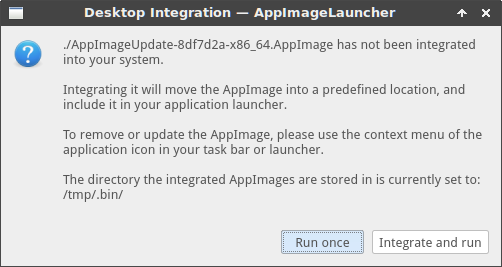
- type: textarea
id: distro
attributes:
label: Distribution and desktop environment
description: |
We need precise information about your computer's operating system. Please include version numbers.
You can find guides about varying distributions and desktop environments on [this Wiki page](https://github.com/TheAssassin/AppImageLauncher/wiki/Find-information-about-distribution-and-desktop-environment).
validations:
required: true
- type: textarea
id: appimagelauncher-version
attributes:
label: Installed AppImageLauncher version
description: Please post the output of `AppImageLauncher --appimagelauncher-version`.
placeholder: For example, AppImageLauncher version 2.2.0 (git commit ea0984c), built on 2021-12-22 22:03:21 UTC
validations:
required: true
- type: textarea
id: appimages-tried
attributes:
label: List of AppImages you tried (ideally with URL)
description: Please post a list of AppImages you tried (including the information whether they work or not, a version number or filename, ideally also a URL)
placeholder: |
- FreeCAD 0.19.3 (working), https://github.com/FreeCAD/FreeCAD/releases/download/0.19.3/FreeCAD_0.19.3-Linux-Conda_glibc2.12-x86_64.AppImage
- Subsurface Divelog 5.0.5 (broken), using download button on https://subsurface.github.io/de/download/
- type: textarea
id: additional-context
attributes:
label: Additional context
description: Any other information you'd like to include.
================================================
FILE: .github/ISSUE_TEMPLATE/config.yml
================================================
blank_issues_enabled: false
contact_links:
- name: 💬 IRC Webchat
url: https://web.libera.chat/#appimage
about: Chat with the AppImage community in `#appimage` on the Libera.Chat IRC network
- name: 💡 AppImageKit issue tracker
url: https://github.com/AppImage/AppImageKit
about: Issues regarding AppImages in general need to be opened there.
- name: 💡 libappimage issue tracker
url: https://github.com/AppImage/libappimage
about: The right place to open issues about the desktop integration of AppImages.
================================================
FILE: .github/ISSUE_TEMPLATE/feature_request.yml
================================================
name: "Feature request"
description: "Suggest an idea for this project"
labels: ["enhancement"]
body:
- type: markdown
attributes:
value: |
Thank you for making AppImageLauncher better by suggesting a feature. Your ideas are highly welcome! It's a tool for you, the users, after all.
Please try to describe your proposal as precisely as possible, including as many details as you can. Please don't hesitate to add screenshots or mockups.
Please note: this is an issue tracker. ***Questions may not be asked here.*** Instead, please visit the IRC channel `#appimage` on Libera.Chat. See https://docs.appimage.org/contact.html for more
- type: checkboxes
id: pre-submit-checks
attributes:
label: Pre-submit checks
description: |
Before submitting a bug report, please make sure you check the following boxes. Otherwise, your issue will not be processed.
options:
- label: I checked for similar issues beforehand, but could not find any. I could not add my proposal to any existing issue.
required: true
- label: I am going to take the time to to fill in all the required details. I know that the bug report will be dismissed otherwise.
required: true
- type: textarea
id: description
attributes:
label: Feature description
description: Is your feature request to a problem? Please describe your suggestion as detailedly as possible.
placeholder: I would like to have another button that [...]
validations:
required: true
- type: textarea
id: proposed-solution
attributes:
label: Proposed solution
description: Describe the solution you would like to see.
placeholder: Instead of the current blue button, I would like a yellow button that says [...]
validations:
required: true
- type: textarea
id: alternatives
attributes:
label: Alternative solutions you considered
description: |
Please list alternative solutions or features you considered to cover your use case. Ideally, include their pros and cons.
- type: textarea
id: additional-context
attributes:
label: Additional context
description: Any other information you'd like to include, for instance, screnshots, mockups, etc.
---
**Is your feature request related to a problem? Please describe.**
A clear and concise description of what the problem is. Ex. I'm always frustrated when [...]
**Describe the solution you'd like**
A clear and concise description of what you want to happen.
**Describe alternatives you've considered**
A clear and concise description of any alternative solutions or features you've considered.
**Additional context**
Add any other context or screenshots about the feature request here.
================================================
FILE: .github/dependabot.yml
================================================
version: 2
updates:
- package-ecosystem: "docker"
directory: "/ci"
schedule:
interval: "weekly"
- package-ecosystem: "github-actions"
directory: "/"
schedule:
interval: "weekly"
================================================
FILE: .github/workflows/main.yml
================================================
name: Continuous builds
on: [push, pull_request, workflow_dispatch]
jobs:
build:
strategy:
fail-fast: false
matrix:
include:
- NAME: Packages x86_64
RUNS_ON: ubuntu-24.04
DOCKER_PLATFORM: linux/amd64
- NAME: Packages aarch64
RUNS_ON: ubuntu-24.04-arm
DOCKER_PLATFORM: linux/arm64/v8
- NAME: Packages armhf
RUNS_ON: ubuntu-24.04-arm
DOCKER_PLATFORM: linux/arm/v7
- NAME: Lite AppImage x86_64
RUNS_ON: ubuntu-24.04
DOCKER_PLATFORM: linux/amd64
BUILD_LITE: 1
- NAME: Lite AppImage aarch64
RUNS_ON: ubuntu-24.04-arm
DOCKER_PLATFORM: linux/arm64/v8
BUILD_LITE: 1
- NAME: Lite AppImage armhf
RUNS_ON: ubuntu-24.04-arm
DOCKER_PLATFORM: linux/arm/v7
BUILD_LITE: 1
name: ${{ matrix.NAME }}
env:
DOCKER_PLATFORM: ${{ matrix.DOCKER_PLATFORM }}
DIST: ${{ matrix.DIST }}
BUILD_LITE: ${{ matrix.BUILD_LITE }}
runs-on: ${{ matrix.RUNS_ON }}
steps:
- uses: actions/checkout@v6
with:
submodules: 'recursive'
- name: Login to GitHub Container Registry
uses: docker/login-action@v3
with:
registry: ghcr.io
username: ${{ github.actor }}
password: ${{ secrets.GITHUB_TOKEN }}
- name: Build in Docker
run: bash -ex ci/build-in-docker.sh
- name: Archive artifacts
uses: actions/upload-artifact@v6
with:
name: build ${{ matrix.NAME }}
path: |
appimagelauncher*.deb*
appimagelauncher*.rpm*
appimagelauncher*.tar*
appimagelauncher-lite-*.AppImage*
upload:
name: Create release and upload artifacts
needs:
- build
runs-on: ubuntu-latest
steps:
- name: Download artifacts
uses: actions/download-artifact@v8
- name: Inspect directory after downloading artifacts
run: ls -alFR
- name: Create release and upload artifacts
env:
GITHUB_TOKEN: ${{ secrets.GITHUB_TOKEN }}
WEBDAV_URL: ${{ secrets.WEBDAV_URL }}
WEBDAV_USER: ${{ secrets.WEBDAV_USER }}
WEBDAV_PASSWORD: ${{ secrets.WEBDAV_PASSWORD }}
APPIMAGE_EXTRACT_AND_RUN: 1
run: |
wget -q https://github.com/TheAssassin/pyuploadtool/releases/download/continuous/pyuploadtool-x86_64.AppImage
chmod +x pyuploadtool-x86_64.AppImage
./pyuploadtool-x86_64.AppImage **/appimagelauncher*.{deb,rpm,AppImage*}
================================================
FILE: .gitignore
================================================
cmake-build-*/
build*/
*.AppImage*
*.deb*
*.tar*
cmake/GIT_COMMIT
squashfs-root/
*.qm
resources/l10n/*
*.html
*.swp
*.rpm*
================================================
FILE: .gitmodules
================================================
================================================
FILE: .idea/codeStyles/Project.xml
================================================
================================================
FILE: .idea/codeStyles/codeStyleConfig.xml
================================================
================================================
FILE: BUILD.md
================================================
# How to build AppImageLauncher
**Note:** This file was contributed by a user. It may be out of date.
If there are no pre-build binaries for your platform you may consider to build AppImageLauncher yourself. Please follow these instructions.
## Download source
This step is only required if you would like to build the source from GitHub. *If you have a local copy, please skip this section.*
You can download the source either using Git or by mannually downloading a tarball on the [Releases page](https://github.com/TheAssassin/AppImageLauncher/releases).
The branch can be customized by setting the `-b` or `--branch` argument. Select `stable` to download the current stable source or use `master` to get the most current unstable source containing the latest features.
```shell
git clone https://github.com/TheAssassin/AppImageLauncher.git -b stable
cd AppImageLauncher
git submodule update --init --recursive
```
## Dependencies
All dependencies need to be installed as development libraries. Some names may differ on your system.
- make
- cmake
- glib-2
- cairo
- librsvg
- fuse
- libarchive
- libXpm
- qt5
- libcurl
- boost
For Ubuntu/Debian systems, this might look like:
```bash
sudo apt install make cmake libglib2.0-dev libcairo2-dev librsvg2-dev libfuse-dev libarchive-dev libxpm-dev libcurl4-openssl-dev libboost-all-dev qtbase5-dev qtdeclarative5-dev qttools5-dev-tools patchelf libc6-dev libc6-dev gcc-multilib g++-multilib
```
## Build
Please update the `PREFIX` if you want. The prefix is the location the final application will be installed to. Usual locations may be `/usr/local` (default), `/usr`, `~/.local` or `/opt`.
```shell
export PREFIX="/usr/local/"
mkdir build
cd build
cmake .. -DCMAKE_INSTALL_PREFIX="$PREFIX" -DUSE_SYSTEM_BOOST=true
# See https://github.com/TheAssassin/AppImageLauncher/issues/251 for more details why this is required
make libappimage libappimageupdate libappimageupdate-qt
cmake .
make
```
Now you may create a distribution package or alternatively install the source for testing purpose.
*Note: This may harm your system. It's highly recommended to build and install distribution packages instead.*
```shell
sudo make install
```
================================================
FILE: CMakeLists.txt
================================================
cmake_minimum_required(VERSION 3.5)
project(AppImageLauncher)
# versioning
include(cmake/versioning.cmake)
set(CMAKE_MODULE_PATH ${CMAKE_MODULE_PATH} ${PROJECT_SOURCE_DIR}/cmake/modules)
include(cmake/scripts.cmake)
include(cmake/reproducible_builds.cmake)
# support for ccache
# call CMake with -DUSE_CCACHE=ON to make use of it
option(USE_CCACHE OFF)
if(USE_CCACHE)
find_program(CCACHE ccache)
if(CCACHE)
message(STATUS "Using ccache")
set_property(GLOBAL PROPERTY RULE_LAUNCH_COMPILE ${CCACHE})
set_property(GLOBAL PROPERTY RULE_LAUNCH_LINK ${CCACHE})
else()
message(WARNING "USE_CCACHE set, but could not find ccache")
endif()
endif()
# used by Debian packaging infrastructure
include(GNUInstallDirs)
# if there's a system libappimage package on the system, we can use that directly
option(USE_SYSTEM_LIBAPPIMAGE OFF)
# if the system version should be used, import globally _before_ including third-party stuff and own executables/libs
if(USE_SYSTEM_LIBAPPIMAGE)
find_package(libappimage REQUIRED)
endif()
include(FetchContent)
# AppImageUpdate is needed for the updater UI (and libappimage)
FetchContent_Declare(AppImageUpdate
GIT_REPOSITORY https://github.com/AppImageCommunity/AppImageUpdate.git
GIT_TAG 2.0.0-alpha-1-20251018
EXCLUDE_FROM_ALL
)
# work around Wimplicit-function-declaration in ancient squashfuse code
set(DEPENDENCIES_CFLAGS "-Wno-implicit-function-declaration" CACHE STRING "" FORCE)
option(ENABLE_UPDATE_HELPER ON)
if(ENABLE_UPDATE_HELPER)
# instruct AppImageUpdate to build the Qt UI
set(BUILD_QT_UI ON CACHE BOOL "" FORCE)
endif()
# note: for the time being, we require AppImageUpdate to be fetched during build, even if only to make libappimage available
FetchContent_MakeAvailable(AppImageUpdate)
# install resources, bundle libraries privately, etc.
# initializes important installation destination variables, therefore must be included before adding subdirectories
include(cmake/install.cmake)
add_subdirectory(src)
# contains install configs for resource files
add_subdirectory(resources)
# translation management
add_subdirectory(i18n)
================================================
FILE: CONTRIBUTING.md
================================================
# Contributing to AppImageLauncher
There are many ways how you can help improve the AppImageLauncher project. Everyone with some interest in technology, not just developers, can help make the project better. Any contribution is welcome!
## Translations
AppImageLauncher is developed in the English language. If you speak any other language (e.g., your mother language or a foreign language), you can help translate AppImageLauncher into that language.
To translate AppImageLauncher, you can use the very good [Weblate](https://weblate.org). We run [our own instance](https://translate.assassinate-you.net/projects/appimagelauncher/). Just sign up there and start translating strings.
You can also review and improve existing translations.
During development, strings regularly change, and new strings are added while olds are removed. Therefore, you're welcome to check from time to time whether there's new work to be done. We appreciate every contribution.
## Documentation & Tutorials
AppImageLauncher is a tool for everyone, not just tech savvy people. However, there is a lack of documentation. We invite every interested user to improve our README, add and edit our
[Wiki](https://github.com/TheAssassin/AppImageLauncher/wiki), write articles, make (video) tutorials etc. The only limit is your imagination!
The README already links to a lot of articles, videos, podcasts and potentially other media. If you find some more and want them to be added to the list, just send a
[pull request](https://help.github.com/en/github/collaborating-with-issues-and-pull-requests/about-pull-requests).
## Bug reporting
If you encounter a problem and consider it to be a bug, please do not hesitate to [open a new issue](https://github.com/TheAssassin/AppImageLauncher/issues/new). Even if you can't help fix the problem, reporting it is required
and the only way for you to receive a solution. Also, if the problem is affecting others, too, others can find the discussion online and find out how to solve the issue.
Please make sure to add as many details as possible to your bug report. This way, the developers can focus on finding a solution instead of playing information ping-pong.
See also: https://www.chiark.greenend.org.uk/~sgtatham/bugs.html (but please don't send bug reports to Simon Tatham!)
## Feature requests
You can also [open a new issue](https://github.com/TheAssassin/AppImageLauncher/issues/new) to request new features. If you have an idea and think it might help the users of the project, please don't hesitate to send it to us.
Please describe your idea as detailedly as possible.
## Fix bugs and send pull requests
If you encounter a bug and have the skill and ability to find the solution even, please feel free to send us a pull request. Any contribution is welcome!
================================================
FILE: LICENSE.txt
================================================
Copyright (C) 2018-2020 TheAssassin
Permission is hereby granted, free of charge, to any person obtaining a copy
of this software and associated documentation files (the "Software"), to deal
in the Software without restriction, including without limitation the rights
to use, copy, modify, merge, publish, distribute, sublicense, and/or sell
copies of the Software, and to permit persons to whom the Software is
furnished to do so, subject to the following conditions:
The above copyright notice and this permission notice shall be included in all
copies or substantial portions of the Software.
THE SOFTWARE IS PROVIDED "AS IS", WITHOUT WARRANTY OF ANY KIND, EXPRESS OR
IMPLIED, INCLUDING BUT NOT LIMITED TO THE WARRANTIES OF MERCHANTABILITY,
FITNESS FOR A PARTICULAR PURPOSE AND NONINFRINGEMENT. IN NO EVENT SHALL THE
AUTHORS OR COPYRIGHT HOLDERS BE LIABLE FOR ANY CLAIM, DAMAGES OR OTHER
LIABILITY, WHETHER IN AN ACTION OF CONTRACT, TORT OR OTHERWISE, ARISING FROM,
OUT OF OR IN CONNECTION WITH THE SOFTWARE OR THE USE OR OTHER DEALINGS IN THE
SOFTWARE.
================================================
FILE: README.md
================================================
# AppImageLauncher
makes your Linux desktop AppImage ready™
Integrate AppImages to your application launcher with one click, and manage, update and remove them from there.
Double-click AppImages to open them, without having to make them executable first.
AppImageLauncher plays well with other applications managing AppImages, for example app stores.
However, it doesn't depend on any of those, and can run completely standalone.
> ### :smiley: Info on how to install and use AppImageLauncher on the [wiki](https://github.com/TheAssassin/AppImageLauncher/wiki).
AppImageLauncher is a novel and unique solution of integrating with the system. It intercepts all attempts to open an AppImage to provide its integration features.
Being the launcher for AppImages, AppImageLauncher can control how the system treats AppImages. It integrates them into the system, provides helpers for updating or removing AppImages, and a lot more.
On their first execution (i.e., if they have not been integrated yet), it displays a dialog prompting the user whether to run the AppImage once, or move it to a predefined location and adding it to the application menus, launchers, etc.
## Features
### AppImage desktop integration
This core feature allows you to integrate AppImages you download into your application menu or launcher, to make it easier for you to launch them. It also takes care of moving them into a central location, where you can find them later.
Furthermore, it sets up the update and removal entries in the launcher for you.
AppImages use the term "desktop integration", as they're not "installed" in the traditional sense. They remain single, self-contained executable files. AppImageLauncher and other tools extract and patch the [desktop entry](https://specifications.freedesktop.org/desktop-entry-spec/latest/) as well as the related [icons](https://specifications.freedesktop.org/icon-theme-spec/icon-theme-spec-latest.html) into the relevant locations.
More information on desktop integration can be found in the [AppImage docs](https://docs.appimage.org/reference/desktop-integration.html).
### Update management
After desktop integration, the context menu of the AppImage's entry in the application launcher will have an "Update" entry that launches a little helper tool to apply updates.
### Remove AppImages from system
Click the "Remove" entry in the context menu in the application launcher and the removal tool will ask you to confirm.
If you choose to do so, the desktop integration is undone, and the file is removed from your system.
### CLI
The packages ship with a CLI tool called `ail-cli`, providing basic operations in the terminal, for automation in scripts etc. As of February 2020, only integration and unintegration are supported. More features planned!
## Differences between regular and Lite version
From version 1.4.0, there's a *Lite* edition of AppImageLauncher.
It provides all of AppImageLauncher you can get without having root access to your computer. AppImageLauncher Lite is shipped as an AppImage, which can be installed by users from the command-line.
Enter `./appimagelauncher-lite...AppImage install`. in a terminal, and it integrates itself in the users' home directory.
**Traditional packages are highly recommended *if possible*, as they provide many more features and provide a much better overall experience.**
*Note: if you're interested in a GUI installer, please consider sending a pull request. More information in [#243](https://github.com/TheAssassin/AppImageLauncher/issues/243).*
## About
Currently, desktop environments consider executables a security risk, and would rather have users use the app stores they include.
The ability to easily run them, however, isn't all that's needed to provide a good AppImage desktop experience. Making them accessible from the application menus and launchers is a level of "desktop integration" that can't be provided by the AppImages themselves properly (even though some AppImages ship with a "desktop integration script" prompting the user to do so). There are too many impliciations requiring external software, especially regarding cleanup and removal of AppImages. (If applications are simply made executable, they're still spread all over the users' personal files and folders.) The average user will not find a "Downloads" directory full of AppImages with cryptic filenames friendly.
Therefore, system-side ways have been developed to perform the desktop integration.
One of the first solutions was [appimaged](https://github.com/AppImage/appimaged), a daemon users could install to perform everything automagically in the background, without notifying the user in any way.
It scans a predefined set of directories including `~/Downloads` and `~/.bin`, making recognized AppImages executable and then performing the desktop integration. Those operations and monitoring produced a lot of file I/O, so were rather inefficent. Also, many users don't like the lack of control. The approach also opens attack vectors and thus can be considered a security hazard, as a vulnerability discovered in appimaged recently has shown.
## As seen in
### :movie_camera: Tutorials:
* [Eric Adams](https://invidio.us/watch?v=D2WA2zdLvVk)
### :sound: Podcasts:
* [DLN Xtend 11h](ttps://dlnxtend.com/11)
+ [Invidious](https://invidio.us/watch?v=yaZygqyN_KE)
* [DLN Xtend 14](https://dlnxtend.com/14)
+ [Invidious](https://invidio.us/watch?v=QCkJ74kOlGQ)
### :page_facing_up: Articles
* [Linux Uprising](https://www.linuxuprising.com/2018/04/easily-run-and-integrate-appimage-files.html) (English)
* [Linux-OS.net](https://linux-os.net/appimagelauncher-ejecuta-e-integra-facilmente-aplicaciones-en-appimage/) (Spanish)
+ Same article also available [here](https://blog.desdelinux.net/appimagelauncher-ejecuta-e-integra-facilmente-aplicaciones-en-appimage/).
* [Edvaldo Brito](https://www.edivaldobrito.com.br/integrador-appimagelauncher-no-linux/) (Portuguese)
* [przystajnik](https://404.g-net.pl/2018/08/appimagelauncher/) (Polish)
* [Linux Mint Magyar Közösség](https://linuxmint.hu/blog/2018/12/appimage) (Hungarian)
* [FreeYourDesktop](https://medium.com/@freeyourdesktopblog/install-manage-appimages-with-appimagelauncher-2a2078c55f37) (English)
+ Please note that AppImageLauncher could *not* be "installed" via AppImage at that time, only recently was a Lite version added, that now can be installed from an AppImage (more info to follow.)
* [Pardus forum](https://forum.pardus.org.tr/t/appimagelauncher-tek-tiklama-ile-appimage-sisteminizle-butunlestiriniz/11275) (Turkish)
* [Linux Team Vietnam](https://linuxteamvietnam.us/cach-chay-ung-dung-dinh-dang-appimage-tren-linux/) (Vietnamese)
+ Contains a few wrong assumptions: as soon as AppImageLauncher is installed, you do not have to make AppImages executable, you can just double-click them (or otherwise open them, e.g., from your file- or web-browsers' downloads).
* [RealLinuxUser](https://www.reallinuxuser.com/15-best-things-to-do-after-installing-zorin-os-15/) (English)
* [manjaro.site](https://manjaro.site/how-to-install-appimage-launcher-on-ubuntu-19-04/) (English)
* [CubicleNate's Techpad](https://cubiclenate.com/2020/01/09/appimagelauncher-appimage-manager-on-opensuse/) (English)
+ See also: [CubicleNate's Techpad](https://cubiclenate.com/2020/01/10/noodlings-lighting-the-emby-server-with-kdenlive/)
* [CHRIS R MILLER](https://chrisrmiller.com/2019/05/29/integrate-appimages-into-your-linux-distro/) (English)
* [doLys Forum](https://dolys.fr/forums/topic/gerer-les-appimage-sous-linux/) (French)
* [LINUXUSER](https://linux-user.gr/t/eykolh-chrhsh-efarmogwn-appimage/2066) (Greek)
## Installation
### System-wide Installation
AppImageLauncher integrates deeply into the system. Therefore, an installation via native system packages is the preferred way to install AppImageLauncher. This way, AppImageLauncher's package can perform the necessary steps to have your system use it for all AppImage invocations.
Compatibility table (likely incomplete.) Please, feel free to open PRs to add distributions.
| Release filename | Build system | Compatible distributions (incomplete) |
| ---------------- | ------------ | ------------------------------------- |
| `appimagelauncher-.xenial_(amd64,i386).deb` | Ubuntu Xenial | Ubuntu Xenial (16.04), Debian Stretch (9), Netrunner 17.01 |
| `appimagelauncher-.bionic_(amd64,i386).deb` | Ubuntu Bionic | Ubuntu Bionic (18.04), Ubuntu Disco (19.04), Ubuntu Eoan (19.10) and newer, Debian buster (10) and newer, Netrunner 19.01, 19.08 and newer, LMDE 6 "Faye" |
| ~~`appimagelauncher-.disco_(amd64,i386).deb`~~ | ~~Ubuntu Disco~~ | ~~Ubuntu Disco (19.04)~~ |
| ~~`appimagelauncher-.eoan_(amd64,i386).deb`~~ | ~~Ubuntu Eoan~~ | ~~Ubuntu Eoan (19.10) and newer~~ |
| ~~`appimagelauncher-.buster_(amd64,i386).deb`~~ | ~~Debian Buster~~ | ~~Debian Buster (10) and newer, Netrunner 19.01 and 19.08~~ |
| `appimagelauncher-.(i386,x86_64).rpm` | Ubuntu Xenial | openSUSE Leap 42 and newer, possibly openSUSE Tumbleweed, SUSE Enterprise Linux, RHEL 7, CentOS 7 |
- Ubuntu Trusty (14.04) and newer
- **Important:** Ubuntu Bionic (and newer) broke with the backwards compatibility of its `libcurl` packages, therefore users of these systems need to install the special `bionic` package
- Debian stable (Jessie, 8) and newer
- Netrunner 17 and newer
- openSUSE Leap 42 and newer
- openSUSE Tumbleweed
The installation of packages on systems with a set of packages similar to one of the listed ones (e.g., Linux Mint, Fedora, etc.) should work as well.
Manjaro and Netrunner Rolling users can install AppImageLauncher with a distribution-provided package called `appimagelauncher`.
Arch Linux, Manjaro, Antergos and Netrunner Rolling users can use AUR to install AppImageLauncher by installing [appimagelauncher](https://aur.archlinux.org/packages/appimagelauncher) or [appimagelauncher-git](https://aur.archlinux.org/packages/appimagelauncher-git) (possibly broken, see [#574](https://github.com/TheAssassin/AppImageLauncher/issues/574)) (thanks @NuLogicSystems for setting up the build).
Other systems derived from the listed ones, such as for instance Linux Mint (Ubuntu), should support AppImageLauncher as well.
If they don't, please don't hesitate to create an issue.
**Note:** Feel free to request support for other distributions by [opening an issue](https://github.com/TheAssassin/AppImageLauncher/issues/new).
### Build from source
Build instructions in [BUILD.md](BUILD.md).
## Background
Technical details about how AppImageLauncher registers itself on [this wiki page](https://github.com/TheAssassin/AppImageLauncher/wiki/Idea).
================================================
FILE: ci/.dockerignore
================================================
*
!install-deps.sh
================================================
FILE: ci/Dockerfile
================================================
FROM ubuntu:jammy
# tell scripts that we're building in an automated release scenario
ENV CI=1
# we re-use the DOCKER_PLATFORM to tell the build scripts about the build target architecture without the need to use uname
# the build scripts will have to map the architecture to names Debian/RPM/AppImage support
ARG DOCKER_PLATFORM
ENV DOCKER_PLATFORM="${DOCKER_PLATFORM}"
# we need to provide some writable $HOME for the (random) used ID we use in the build script
RUN install -d -m 0777 /home/user
ENV HOME=/home/user
# let the install script do the heavy lifting (easier than replicating the complex behavior in a Dockerfile)
COPY install-deps.sh /
RUN bash -xe install-deps.sh
================================================
FILE: ci/build-docker-image.sh
================================================
#! /bin/bash
if [[ "$DOCKER_PLATFORM" == "" ]]; then
echo "Usage: env DOCKER_PLATFORM=... bash $0"
exit 1
fi
set -euo pipefail
# the other script sources this script, therefore we have to support that use case
if [[ "${BASH_SOURCE[*]}" != "" ]]; then
this_dir="$(readlink -f "$(dirname "${BASH_SOURCE[0]}")")"
else
this_dir="$(readlink -f "$(dirname "$0")")"
fi
# we need a "docker-container" type builder to make use of all the buildx features regarding caching and multi-arch
# support
builder_name="appimagelauncher-builder"
if ! docker buildx inspect "$builder_name" &>/dev/null; then
echo "Docker builder $builder_name not found, creating"
docker buildx create --name="$builder_name" --driver=docker-container --bootstrap
else
echo "Using existing Docker builder $builder_name found"
fi
image=ghcr.io/theassassin/appimagelauncher-build
branch="$(git rev-parse --abbrev-ref HEAD | tr -c 'A-Za-z0-9-' '_')"
# append platform to Docker image tag since we can't push separate (multi-arch) images to the same name without
# creating the manifest manually
# see https://github.com/docker/build-push-action/issues/671
platform_suffix="$(echo -n "$DOCKER_PLATFORM" | tr -c 'A-Za-z0-9-' '_')"
current_branch_tag="${image}:${branch}_${platform_suffix}"
master_branch_tag="${image}:master_${platform_suffix}"
docker_command=(
docker buildx build
--builder "$builder_name"
--load # --output=type=docker
--pull
--platform "$DOCKER_PLATFORM"
--build-arg DOCKER_PLATFORM="$DOCKER_PLATFORM"
# cache from the current branch's image
--cache-from type=registry,ref="$current_branch_tag"
# we can always cache from the master branch's image
--cache-from type=registry,ref="$master_branch_tag"
--tag "$current_branch_tag"
)
# if we are building on GitHub actions, we can also push the resulting image
# we skip pull request builds, though; regular branch builds will push the built images (if possible)
# also, skip Dependabot builds, it is not allowed to push images
if [[ "${GITHUB_ACTIONS:-}" != "" ]] && [[ "${GITHUB_EVENT_NAME:-}" != "pull_request" ]] && [[ "${GITHUB_ACTOR:-}" != "dependabot"* ]]; then
echo "Going to push built image"
docker_command+=(
--cache-to type=inline
--push
)
fi
docker_command+=(
"$this_dir"
)
# using inline cache to speed up builds by fetching the image from the GitHub registry first
# this should speed up local builds as well
# if the image hasn't changed, this should be a no-op
"${docker_command[@]}"
================================================
FILE: ci/build-in-docker.sh
================================================
#! /bin/bash
if [[ "$DOCKER_PLATFORM" == "" ]]; then
echo "Usage: env DOCKER_PLATFORM=... bash $0"
exit 1
fi
set -x
set -euo pipefail
cd "$(readlink -f "$(dirname "${BASH_SOURCE[0]}")")"
# sets variables $image, $dockerfile
source build-docker-image.sh
DOCKER_OPTS=()
# fix for https://stackoverflow.com/questions/51195528/rcc-error-in-resource-qrc-cannot-find-file-png
if [ "${CI:-}" != "" ]; then
DOCKER_OPTS+=("--security-opt" "seccomp:unconfined")
fi
# only if there's more than 3G of free space in RAM, we can build in a RAM disk
if [[ "${GITHUB_ACTIONS:-}" != "" ]]; then
echo "Building on GitHub actions, which does not support --tmpfs flag -> building on regular disk"
elif [[ "$(env LC_ALL=C free -m | grep "Mem:" | awk '{print $4}')" -gt 3072 ]]; then
echo "Host system has enough free memory -> building in RAM disk"
DOCKER_OPTS+=("--tmpfs" "/docker-ramdisk:exec,mode=777")
else
echo "Host system does not have enough free memory -> building on regular disk"
fi
[[ -t 0 ]] && DOCKER_OPTS+=("-t")
# run the build with the current user to
# a) make sure root is not required for builds
# b) allow the build scripts to "mv" the binaries into the /out directory
uid="$(id -u)"
# run build
docker run --platform "$DOCKER_PLATFORM" -e BUILD_LITE -e DIST -e ARCH -e GITHUB_RUN_NUMBER -e GITHUB_RUN_ID --rm -i --user "$uid" -w /ws -e CI=1 \
"${DOCKER_OPTS[@]}" \
-v "$(readlink -f ..):/ws" \
"$current_branch_tag" \
bash ci/build.sh
================================================
FILE: ci/build.sh
================================================
#! /bin/bash
set -euo pipefail
# use RAM disk if possible
if [ -d /dev/shm ] && mount | grep /dev/shm | grep -v -q noexec; then
TEMP_BASE=/dev/shm
elif [ -d /docker-ramdisk ]; then
TEMP_BASE=/docker-ramdisk
else
TEMP_BASE=/tmp
fi
BUILD_DIR="$(mktemp -d -p "$TEMP_BASE" AppImageLauncher-build-XXXXXX)"
cleanup () {
if [ -d "$BUILD_DIR" ]; then
rm -rf "$BUILD_DIR"
fi
}
trap cleanup EXIT
# store repo root as variable
REPO_ROOT="$(readlink -f "$(dirname "${BASH_SOURCE[0]}")"/..)"
OLD_CWD="$(readlink -f .)"
pushd "$BUILD_DIR"
# list available versions of Qt to be able to choose the right one for the build
cat <<\EOF
##########################
# Available Qt versions: #
##########################
EOF
qtchooser -list-versions
echo
# the Docker images provide a clang/clang++ symlink to the actual clang[++] binaries
# see install-deps.sh for more information
cmake_args=(
"-DCMAKE_C_COMPILER=clang"
"-DCMAKE_CXX_COMPILER=clang++"
"-DCMAKE_INSTALL_PREFIX=/usr"
"-DCMAKE_BUILD_TYPE=RelWithDebInfo"
"-DBUILD_TESTING=OFF"
"-DCMAKE_BUILD_TYPE=RelWithDebInfo"
# TODO: we don't necessarily want to hardcode this here
"-DBINFMT_INTERPRETER_PATH_PREPEND_LD_P_NATIVE_PACKAGES_PREFIX=/opt/appimagelauncher.AppDir/"
)
if [[ "${BUILD_LITE:-}" == "" ]]; then
cmake_args+=("-DENABLE_UPDATE_HELPER=ON")
else
cmake_args+=("-DBUILD_LITE=ON")
fi
export QT_SELECT=qt5
cmake "$REPO_ROOT" "${cmake_args[@]}"
make -j$(nproc)
# prepare AppDir
make install DESTDIR=AppDir
ARCH="$(dpkg --print-architecture)"
# "translate" to linuxdeploy/AppImage architecture
# note: linuxdeploy and AppImage differ in i386/i686, but we don't support that any more anyway
case "$ARCH" in
amd64)
ARCH=x86_64
;;
arm64)
ARCH=aarch64
;;
esac
# build release formats
curl -LO https://github.com/linuxdeploy/linuxdeploy/releases/download/continuous/linuxdeploy-"$ARCH".AppImage
curl -LO https://github.com/linuxdeploy/linuxdeploy-plugin-qt/releases/download/continuous/linuxdeploy-plugin-qt-"$ARCH".AppImage
VERSION=$(src/cli/ail-cli --version | awk '{print $3}')
gha_build="${GITHUB_RUN_NUMBER:-}"
if [[ "$gha_build" != "" ]]; then
VERSION="${VERSION}-gha${gha_build}"
else
VERSION="${VERSION}-local"
fi
# should be overwritten for every output plugin below, this is a fallback only
export LINUXDEPLOY_OUTPUT_APP_NAME=appimagelauncher
LINUXDEPLOY_OUTPUT_VERSION="${VERSION}~$(cd "$REPO_ROOT" && git rev-parse --short HEAD)"
export LINUXDEPLOY_OUTPUT_VERSION
export APPIMAGE_EXTRACT_AND_RUN=1
linuxdeploy_extra_args=()
if [[ "${BUILD_LITE:-}" == "" ]]; then
# configure linuxdeploy-plugin-native_packages
export LDNP_PACKAGE_NAME=appimagelauncher
export LDNP_BUILD="deb rpm"
export LDNP_DESCRIPTION=""
export LDNP_SHORT_DESCRIPTION=""
rpm_lib_suffix=""
case "$ARCH" in
x86_64)
rpm_build_arch=x86_64
rpm_lib_suffix="()(64bit)"
deb_build_arch=amd64
;;
i?86)
rpm_build_arch=i386
deb_build_arch=i386
;;
aarch64)
rpm_build_arch=aarch64
deb_build_arch=arm64
;;
armhf)
deb_build_arch=armhf
rpm_build_arch=armv7hl
;;
*)
echo "Unsupported architecture: $ARCH"
exit 2
;;
esac
# common meta info
export LDNP_META_URL="https://github.com/TheAssassin/AppImageLauncher"
export LDNP_META_BUG_URL="https://github.com/TheAssassin/AppImageLauncher/issues"
export LDNP_META_VENDOR="TheAssassin"
export LDNP_META_DEB_DEPENDS="systemd, libgl1, libfontconfig1, libharfbuzz0b, libfribidi0"
export LDNP_META_DEB_ARCHITECTURE="$deb_build_arch"
export LDNP_META_DEB_PRE_DEPENDS="bash"
export LDNP_DEB_EXTRA_DEBIAN_FILES="${BUILD_DIR}/cmake/debian/postinst;${BUILD_DIR}/cmake/debian/postrm"
rpm_requires=(
"systemd"
"libGL.so.1${rpm_lib_suffix}"
"libfontconfig.so.1${rpm_lib_suffix}"
"libfreetype.so.6${rpm_lib_suffix}"
"libfribidi.so.0${rpm_lib_suffix}"
"libgpg-error.so.0${rpm_lib_suffix}"
"libharfbuzz.so.0${rpm_lib_suffix}"
)
export LDNP_META_RPM_REQUIRES="${rpm_requires[*]}"
export LDNP_META_RPM_BUILD_ARCH="$rpm_build_arch"
export LDNP_RPM_SCRIPTLET_POST="${BUILD_DIR}/cmake/debian/postinst"
export LDNP_RPM_SCRIPTLET_PREUN="${BUILD_DIR}/cmake/debian/postrm"
# updater is not available for the lite build
linuxdeploy_extra_args+=(
-e "$(find AppDir/usr/lib/*/appimagelauncher/update | head -n1)"
--output native_packages
)
# tools like pipx would have side effects on the build host and it's generally a bit overkill for our purpose
if which python3.13 &> /dev/null; then
# python3.13, installed from the deadsnakes PPA for the Docker builds
python3() {
python3.13 "$@"
}
fi
python3 -m venv venv
venv/bin/pip install git+https://github.com/linuxdeploy/linuxdeploy-plugin-native_packages
export PATH="$PWD/venv/bin:$PATH"
else
linuxdeploy_extra_args+=(
--custom-apprun "$REPO_ROOT"/resources/appimagelauncher-lite-AppRun.sh
--output appimage
)
LDAI_OUTPUT="$(echo appimagelauncher-lite-"$VERSION"-"$ARCH".AppImage | tr '~' -)"
export LDAI_OUTPUT
# since we extracted common parts from the installer built into the AppRun script, we have to copy the "library" script
# before building an AppImage
install "$REPO_ROOT"/resources/appimagelauncher-lite-installer-common.sh "$(readlink -f AppDir/)"
fi
chmod -v +x linuxdeploy*-"$ARCH".AppImage
# workaround for QEMU
for appimage in *.AppImage; do
dd if=/dev/zero bs=1 count=3 seek=8 conv=notrunc of="$appimage"
done
ldd AppDir/usr/bin/AppImageLauncherSettings
./linuxdeploy-"$ARCH".AppImage -v0 \
--appdir "$(readlink -f AppDir)" \
--plugin qt \
-d AppDir/usr/share/applications/appimagelauncher.desktop \
-e "$(find AppDir/usr/lib/*/appimagelauncher/remove | head -n1)" \
"${linuxdeploy_extra_args[@]}"
if [[ "${BUILD_LITE:-}" == "" ]]; then
mv "$LDNP_PACKAGE_NAME"*.{rpm,deb} "$OLD_CWD"
else
mv "$LDAI_OUTPUT" "$OLD_CWD"
fi
================================================
FILE: ci/install-deps.sh
================================================
#! /bin/bash
set -euo pipefail
if [[ "$DOCKER_PLATFORM" == "" ]]; then
echo "Usage: env DOCKER_PLATFORM=... bash $0"
exit 2
fi
if [[ "$CI" == "" ]]; then
echo "Caution: this script is supposed to run inside a (disposable) CI environment"
echo "It will alter a system, and should not be run on workstations or alike"
echo "You can export CI=1 to prevent this error from being shown again"
exit 3
fi
case "$DOCKER_PLATFORM" in
linux/amd64|linux/arm/v7|linux/arm64/v8)
;;
*)
echo "Error: unsupported architecture: $DOCKER_PLATFORM"
exit 4
;;
esac
set -x
# this array collects all the packages we want to install
# running as few operations as possible is a runtime optimization
packages=()
# install 32-bit build dependencies and multilib/cross compilers for binfmt-bypass's 32-bit preload library
# must be done before apt-get update, otherwise the packages cannot be found during installation
if [[ "$DOCKER_PLATFORM" == "linux/amd64" ]]; then
dpkg --add-architecture i386
packages+=(
libc6-dev:i386
)
elif [[ "$DOCKER_PLATFORM" == "linux/arm64/v8" ]]; then
dpkg --add-architecture armhf
packages+=(
libc6-dev:armhf
)
fi
export DEBIAN_FRONTEND=noninteractive
# allow setup of PPA
apt-get update
apt-get install -y software-properties-common
# we depend on the deadsnakes PPA to provide a sufficiently recent Python to linuxdeploy-plugin-native_packages
add-apt-repository -y ppa:deadsnakes/ppa
packages=(
libcurl4-openssl-dev
libfuse-dev
desktop-file-utils
libglib2.0-dev
libcairo2-dev
libssl-dev
ca-certificates
libbsd-dev
qttools5-dev-tools
make
build-essential
git
automake
autoconf
libtool
patch
wget
curl
vim-common
desktop-file-utils
pkg-config
libarchive-dev
libboost-filesystem-dev
librsvg2-dev
librsvg2-bin
libssl-dev
rpm
rpm2cpio
liblzma-dev
# cross-compiling for 32-bit is only really easy with clang, where we can specify the target as a compiler option
# clang -target arm-linux-gnueabihf ...
clang
qtbase5-dev
qt5-qmake
qtdeclarative5-dev
# libappimage
libgcrypt-dev
argagg-dev
nlohmann-json3-dev
libgpgme-dev
libzstd-dev
# linuxdeploy-plugin-native_packages
# see also above re. deadsnakes PPA
python3.13-venv
)
# headless install
export DEBIAN_FRONTEND=noninteractive
apt-get -y --no-install-recommends install "${packages[@]}"
# install more recent CMake and patchelf
cmake_arch="$(dpkg --print-architecture)"
case "$cmake_arch" in
amd64)
cmake_arch=x86_64
;;
arm64)
cmake_arch=aarch64
;;
armhf)
patchelf_arch=armv7l
;;
esac
patchelf_arch="${patchelf_arch:-$cmake_arch}"
curl -L https://artifacts.assassinate-you.net/prebuilt-cmake/cmake-v3.29.6-ubuntu-jammy-"${cmake_arch}".tar.gz | \
tar xz --strip-components=1 -C /usr
curl -L https://github.com/NixOS/patchelf/releases/download/0.18.0/patchelf-0.18.0-"$patchelf_arch".tar.gz | tar xz -C/usr/local
# g{cc,++}-multilib usually install these dependencies for us
# however, as the multilib stuff is not available for ARM, we have to install these dev packages ourselves
# we can't really predict the names of the packages (they differ on different distros/releases)
# therefore, we have to install the other dependencies first to be able to query them with dpkg -l
if [[ "$DOCKER_PLATFORM" == "linux/arm64/v8" ]] || [[ "$DOCKER_PLATFORM" == "linux/amd64" ]]; then
if [[ "$DOCKER_PLATFORM" == "linux/amd64" ]]; then
arch_32bit=i386
elif [[ "$DOCKER_PLATFORM" == "linux/arm64/v8" ]]; then
arch_32bit=armhf
else
echo "Cannot determine 32-bit architecture matching 64-bit architecture $ARCH"
exit 6
fi
apt-get install -y \
"$(dpkg -l | grep libgcc | grep dev | awk '{print $2}' | cut -d: -f1 | uniq)":"$arch_32bit" \
"$(dpkg -l | grep libstdc++ | grep dev | awk '{print $2}' | cut -d: -f1 | uniq)":"$arch_32bit"
fi
================================================
FILE: cmake/install.cmake
================================================
# required by file(CHMOD ...)
cmake_minimum_required(VERSION 3.19)
# define private libraries install destination
include(GNUInstallDirs)
# debugging: libdir should be lib/
message(STATUS "CMAKE_INSTALL_LIBDIR: ${CMAKE_INSTALL_LIBDIR}")
if(NOT IS_ABSOLUTE ${CMAKE_INSTALL_LIBDIR})
set(_libdir ${CMAKE_INSTALL_LIBDIR})
else()
file(RELATIVE_PATH _libdir ${CMAKE_INSTALL_LIBDIR} ${CMAKE_INSTALL_PREFIX})
endif()
set(_private_libdir ${_libdir}/appimagelauncher)
# calculate relative path from binary install destination to private library install dir
if(NOT IS_ABSOLUTE ${CMAKE_INSTALL_BINDIR})
set(_bindir ${CMAKE_INSTALL_BINDIR})
else()
file(RELATIVE_PATH _bindir ${CMAKE_INSTALL_BINDIR} ${CMAKE_INSTALL_PREFIX})
#set(_bindir ${CMAKE_INSTALL_PREFIX}/${CMAKE_INSTALL_BINDIR})
endif()
set(_abs_bindir ${CMAKE_INSTALL_PREFIX}/${_bindir})
set(_abs_private_libdir ${CMAKE_INSTALL_PREFIX}/${_private_libdir})
file(RELATIVE_PATH _rpath ${_abs_bindir} ${_abs_private_libdir})
set(_rpath "\$ORIGIN/${_rpath}")
# install libappimage.so into lib/appimagekit to avoid overwriting a libappimage potentially installed into /usr/lib
# or /usr/lib/x86_64-... or wherever the OS puts its libraries
install(
TARGETS libappimage
LIBRARY DESTINATION "${_private_libdir}" COMPONENT APPIMAGELAUNCHER
)
if(ENABLE_UPDATE_HELPER)
install(
TARGETS libappimageupdate libappimageupdate-qt
LIBRARY DESTINATION "${_private_libdir}" COMPONENT APPIMAGELAUNCHER
)
endif()
option(BINFMT_INTERPRETER_PATH_PREPEND_LD_P_NATIVE_PACKAGES_PREFIX "")
if(NOT BUILD_LITE)
# unfortunately, due to a cyclic dependency, we need to hardcode parts of this variable, which is included in the
# install scripts and the binfmt.d config
set(BINFMT_INTERPRETER_PATH ${CMAKE_INSTALL_PREFIX}/${_private_libdir}/binfmt-interpreter)
if(BINFMT_INTERPRETER_PATH_PREPEND_LD_P_NATIVE_PACKAGES_PREFIX)
message(STATUS "Prepending prefix ${BINFMT_INTERPRETER_PATH_PREPEND_LD_P_NATIVE_PACKAGES_PREFIX} to binfmt interpreter path")
set(BINFMT_INTERPRETER_PATH "${BINFMT_INTERPRETER_PATH_PREPEND_LD_P_NATIVE_PACKAGES_PREFIX}${BINFMT_INTERPRETER_PATH}")
endif()
# according to https://www.kernel.org/doc/html/latest/admin-guide/binfmt-misc.html, we must make sure the
# interpreter string does not exceed 127 characters
set(BINFMT_INTERPRETER_PATH_LENGTH_MAX 127)
string(LENGTH BINFMT_INTERPRETER_PATH BINFMT_INTERPRETER_PATH_LENGTH)
if(BINFMT_INTERPRETER_PATH_LENGTH GREATER BINFMT_INTERPRETER_PATH_LENGTH_MAX)
message(FATAL_ERROR "interpreter path exceeds maximum length of ${BINFMT_INTERPRETER_PATH_LENGTH_MAX}")
endif()
# binfmt.d config file -- used as a fallback, if update-binfmts is not available
configure_file(
${PROJECT_SOURCE_DIR}/resources/binfmt.d/appimagelauncher.conf.in
${PROJECT_BINARY_DIR}/resources/binfmt.d/appimagelauncher.conf
@ONLY
)
# caution: don't use ${CMAKE_INSTALL_LIBDIR} here, it's really just lib/binfmt.d
install(
FILES ${PROJECT_BINARY_DIR}/resources/binfmt.d/appimagelauncher.conf
DESTINATION lib/binfmt.d COMPONENT APPIMAGELAUNCHER
)
# prepare postinst and prerm hooks to Debian package
configure_file(
${PROJECT_SOURCE_DIR}/resources/install-scripts/post-install.in
${PROJECT_BINARY_DIR}/cmake/debian/postinst
@ONLY
)
configure_file(
${PROJECT_SOURCE_DIR}/resources/install-scripts/post-uninstall.in
${PROJECT_BINARY_DIR}/cmake/debian/postrm
@ONLY
)
endif()
# install systemd service configuration for appimagelauncherd
configure_file(
${PROJECT_SOURCE_DIR}/resources/appimagelauncherd.service.in
${PROJECT_BINARY_DIR}/resources/appimagelauncherd.service
@ONLY
)
# caution: don't use ${CMAKE_INSTALL_LIBDIR} here, it's really just lib/systemd/user
install(
FILES ${PROJECT_BINARY_DIR}/resources/appimagelauncherd.service
DESTINATION lib/systemd/user/ COMPONENT APPIMAGELAUNCHER
)
================================================
FILE: cmake/modules/FindINotify.cmake
================================================
find_path(INOTIFY_INCLUDE_DIR sys/inotify.h PATH_SUFFIXES inotify)
find_library(INOTIFY_LIBRARY inotify)
include(FindPackageHandleStandardArgs)
find_package_handle_standard_args(INotify DEFAULT_MSG INOTIFY_INCLUDE_DIR)
IF(INOTIFY_FOUND)
set(INotify_INCLUDE_DIRS ${INOTIFY_INCLUDE_DIR})
add_library(inotify IMPORTED INTERFACE)
set_property(TARGET inotify PROPERTY INTERFACE_INCLUDE_DIRECTORIES ${INOTIFY_INCLUDE_DIRS})
ENDIF(INOTIFY_FOUND)
================================================
FILE: cmake/reproducible_builds.cmake
================================================
# this little snippet makes sure that no absolute paths end up in the binaries built by CMake
# it will replace such paths with relative ones
# see https://reproducible-builds.org/docs/build-path/ for more information
cmake_minimum_required(VERSION 3.5)
include(CheckCCompilerFlag)
if(CMAKE_BUILD_TYPE STREQUAL Release)
message(STATUS "Release build detected, enabling reproducible builds mode")
get_filename_component(abs_source_path ${PROJECT_SOURCE_DIR} ABSOLUTE)
file(RELATIVE_PATH rel_source_path ${PROJECT_BINARY_DIR} ${PROJECT_SOURCE_DIR})
set(map_fix ${abs_source_path}=${rel_source_path})
# can only add flags when the compiler supports them
# known working compilers: GCC >= 8
foreach(type debug macro)
set(flag_name -f${type}-prefix-map)
set(flags ${flag_name}=${map_fix})
check_c_compiler_flag(${flags} ${type}_prefix_map_flag_available)
if(${type}_prefix_map_flag_available)
set(extra_flags "${extra_flags} ${flags}")
else()
message(WARNING "${flag_name} not available, cannot enable full reproducible builds mode")
endif()
endforeach()
set(CMAKE_C_FLAGS "${CMAKE_C_FLAGS} ${extra_flags}")
set(CMAKE_CXX_FLAGS "${CMAKE_CXX_FLAGS} ${extra_flags}")
set(CMAKE_EXE_LINKER_FLAGS "${CMAKE_EXE_LINKER_FLAGS} ${extra_flags}")
endif()
================================================
FILE: cmake/scripts.cmake
================================================
# borrowed from libappimage
if(NOT COMMAND check_program)
function(check_program)
set(keywords FORCE_PREFIX)
set(oneValueArgs NAME)
cmake_parse_arguments(ARG "${keywords}" "${oneValueArgs}" "" "${ARGN}")
if(NOT ARG_NAME)
message(FATAL_ERROR "NAME argument required for check_program")
endif()
if(TOOLS_PREFIX)
set(prefix ${TOOLS_PREFIX})
endif()
message(STATUS "Checking for program ${ARG_NAME}")
string(TOUPPER ${ARG_NAME} name_upper)
if(prefix)
# try prefixed version first
find_program(${name_upper} ${prefix}${ARG_NAME})
endif()
# try non-prefixed version
if(NOT ${name_upper})
if(TOOLS_PREFIX AND ARG_FORCE_PREFIX)
message(FATAL_ERROR "TOOLS_PREFIX set, but could not find program with prefix in PATH (FORCE_PREFIX is set)")
endif()
find_program(${name_upper} ${ARG_NAME})
if(NOT ${name_upper})
message(FATAL_ERROR "Could not find required program ${ARG_NAME}.")
endif()
endif()
message(STATUS "Found program ${ARG_NAME}: ${${name_upper}}")
mark_as_advanced(${name_upper})
endfunction()
endif()
================================================
FILE: cmake/toolchains/i386-linux-gnu.cmake
================================================
# this toolchain file works for cross compiling on Ubuntu when the following prerequisites are given:
# - all dependencies that would be needed for a normal build must be installed as i386 versions
# - building XZ/liblzma doesn't work yet, so one has to install liblzma-dev:i386 and set -DUSE_SYSTEM_XZ=ON
# - building GTest doesn't work yet, so one has to install libgtest-dev:i386 and set -DUSE_SYSTEM_GTEST=ON
# - building libarchive doesn't work yet, so one has to install liblzma-dev:i386 and set -DUSE_SYSTEM_LIBARCHIVE=ON (TODO: link system libarchive statically like liblzma)
# some of the packets interfere with their x86_64 version (e.g., libfuse-dev:i386, libglib2-dev:i386), so building on a
# normal system will most likely not work, but on systems like Travis it should work fine
set(CMAKE_SYSTEM_NAME Linux CACHE STRING "" FORCE)
set(CMAKE_SYSTEM_PROCESSOR i386 CACHE STRING "" FORCE)
set(CMAKE_C_FLAGS "-m32" CACHE STRING "" FORCE)
set(CMAKE_CXX_FLAGS "-m32" CACHE STRING "" FORCE)
# CMAKE_SHARED_LINKER_FLAGS, CMAKE_STATIC_LINKER_FLAGS etc. must not be set, but CMAKE_EXE_LINKER_FLAGS is necessary
set(CMAKE_EXE_LINKER_FLAGS "-m32" CACHE STRING "" FORCE)
set(DEPENDENCIES_CFLAGS "-m32" CACHE STRING "" FORCE)
set(DEPENDENCIES_CPPFLAGS "-m32" CACHE STRING "" FORCE)
set(DEPENDENCIES_LDFLAGS "-m32" CACHE STRING "" FORCE)
# host = target system
# build = build system
# both must be specified
set(EXTRA_CONFIGURE_FLAGS "--host=i686-pc-linux-gnu" "--build=x86_64-pc-linux-gnu" CACHE STRING "" FORCE)
# may help with some rare issues
set(CMAKE_PREFIX_PATH /usr/lib/i386-linux-gnu CACHE STRING "" FORCE)
# makes sure that at least on Ubuntu pkg-config will search for the :i386 packages
set(ENV{PKG_CONFIG_PATH} /usr/lib/i386-linux-gnu/pkgconfig/ CACHE STRING "" FORCE)
# make qtchooser find qt5
set(ENV{QT_SELECT} qt5 CACHE STRING "" FORCE)
================================================
FILE: cmake/versioning.cmake
================================================
set(V_MAJOR 3)
set(V_MINOR 0)
set(V_PATCH 0)
set(V_SUFFIX "-beta-2")
set(APPIMAGELAUNCHER_VERSION ${V_MAJOR}.${V_MINOR}.${V_PATCH}${V_SUFFIX})
# check whether git is available
find_program(GIT git)
set(GIT_COMMIT_CACHE_FILE "${PROJECT_SOURCE_DIR}/cmake/GIT_COMMIT")
if(NOT GIT STREQUAL "GIT-NOTFOUND")
# read Git revision ID
# WARNING: this value will be stored in the CMake cache
# to update it, you will have to reset the CMake cache
# (doesn't matter for CI builds like Travis for instance, where there's no permanent CMake cache)
execute_process(
COMMAND git rev-parse --short HEAD
WORKING_DIRECTORY ${PROJECT_SOURCE_DIR}
OUTPUT_VARIABLE APPIMAGELAUNCHER_GIT_COMMIT
OUTPUT_STRIP_TRAILING_WHITESPACE
ERROR_QUIET
RESULT_VARIABLE GIT_RESULT
)
if(GIT_RESULT EQUAL 0)
message(STATUS "Storing git commit ID in cache file")
file(WRITE "${GIT_COMMIT_CACHE_FILE}" "${APPIMAGELAUNCHER_GIT_COMMIT}")
endif()
endif()
if(NOT GIT_RESULT EQUAL 0)
# git call failed or git hasn't been found, might happen when calling CMake in an extracted source tarball
# therefore we try to find the git commit cache file
# if it doesn't exist, refuse to configure
message(WARNING "Failed to gather commit ID via git command, trying to read cache file")
if(EXISTS "${GIT_COMMIT_CACHE_FILE}")
file(READ "${GIT_COMMIT_CACHE_FILE}" APPIMAGELAUNCHER_CACHED_GIT_COMMIT)
mark_as_advanced(FORCE APPIMAGELAUNCHER_CACHED_GIT_COMMIT)
string(REPLACE "\n" "" APPIMAGELAUNCHER_GIT_COMMIT "${APPIMAGELAUNCHER_CACHED_GIT_COMMIT}")
else()
message(FATAL_ERROR "Could not find git commit cache file, git commit ID not available for versioning")
endif()
endif()
if("${APPIMAGELAUNCHER_GIT_COMMIT}" STREQUAL "")
message(FATAL_ERROR "Invalid git commit ID: ${APPIMAGELAUNCHER_GIT_COMMIT}")
endif()
message(STATUS "Git commit: ${APPIMAGELAUNCHER_GIT_COMMIT}")
mark_as_advanced(FORCE APPIMAGELAUNCHER_GIT_COMMIT)
# add build number based on GitHub actions build number if possible
if("$ENV{GITHUB_RUN_NUMBER}" STREQUAL "")
set(APPIMAGELAUNCHER_BUILD_NUMBER "")
else()
set(APPIMAGELAUNCHER_BUILD_NUMBER "$ENV{GITHUB_RUN_NUMBER}")
endif()
# get current date
execute_process(
COMMAND env LC_ALL=C date -u "+%Y-%m-%d %H:%M:%S %Z"
OUTPUT_VARIABLE APPIMAGELAUNCHER_BUILD_DATE
OUTPUT_STRIP_TRAILING_WHITESPACE
)
add_definitions(-DAPPIMAGELAUNCHER_VERSION="${APPIMAGELAUNCHER_VERSION}")
add_definitions(-DAPPIMAGELAUNCHER_GIT_COMMIT="${APPIMAGELAUNCHER_GIT_COMMIT}")
add_definitions(-DAPPIMAGELAUNCHER_BUILD_NUMBER="${APPIMAGELAUNCHER_BUILD_NUMBER}")
add_definitions(-DAPPIMAGELAUNCHER_BUILD_DATE="${APPIMAGELAUNCHER_BUILD_DATE}")
================================================
FILE: i18n/CMakeLists.txt
================================================
# lupdate must be installed and available
check_program(NAME lupdate)
check_program(NAME lrelease)
# create target calling custom commands
add_custom_target(i18n)
# create/update AppImageLauncher strings
function(ail_generate_translations)
if(ARGC LESS 2)
message(ERROR "ail_generate_translations called with wrong amount of arguments")
endif()
add_custom_command(
TARGET i18n POST_BUILD
COMMAND ${LUPDATE} "${ARGV0}" -ts "${ARGV1}" -locations relative
WORKING_DIRECTORY ${CMAKE_CURRENT_SOURCE_DIR}
)
endfunction()
ail_generate_translations(../src/ ui.en.ts)
file(GLOB TS_FILES *.ts)
foreach(TS_FILE IN LISTS TS_FILES)
get_filename_component(TS_FILENAME ${TS_FILE} NAME)
ail_generate_translations(../src/ ${TS_FILENAME})
endforeach()
add_custom_command(
TARGET i18n POST_BUILD
COMMAND ./auto-translate.py ui.en.ts
WORKING_DIRECTORY ${CMAKE_CURRENT_SOURCE_DIR}
)
add_custom_target(l10n ALL)
# generate Qt qm files from translation source files
function(ail_generate_qm)
if(ARGC LESS 2)
message(ERROR "ail_generate_translations called with wrong amount of arguments")
endif()
add_custom_command(
TARGET l10n POST_BUILD
COMMAND ${LRELEASE} "${ARGV0}" -qm "${ARGV1}"
WORKING_DIRECTORY ${CMAKE_CURRENT_SOURCE_DIR}
)
endfunction()
file(GLOB TS_FILES *.ts)
set(target_dir ${CMAKE_CURRENT_BINARY_DIR}/generated/l10n)
foreach(TS_FILE IN LISTS TS_FILES)
get_filename_component(TS_FILENAME ${TS_FILE} NAME)
string(REPLACE .ts .qm QM_FILENAME ${TS_FILENAME})
ail_generate_qm(${TS_FILENAME} ${target_dir}/${QM_FILENAME})
endforeach()
# deploy JSON files
file(GLOB JSON_FILES *.json)
foreach(JSON_FILE IN LISTS JSON_FILES)
get_filename_component(JSON_FILENAME ${JSON_FILE} NAME)
add_custom_command(
TARGET l10n POST_BUILD
COMMAND ${CMAKE_COMMAND} -E copy ${JSON_FILENAME} ${target_dir}/${JSON_FILENAME}
WORKING_DIRECTORY ${CMAKE_CURRENT_SOURCE_DIR}
)
endforeach()
# empty directories aren't tracked by Git
# therefore the directory needs to be created by CMake
file(MAKE_DIRECTORY ${target_dir})
install(
DIRECTORY ${target_dir}
DESTINATION ${CMAKE_INSTALL_DATADIR}/appimagelauncher COMPONENT APPIMAGELAUNCHER
)
================================================
FILE: i18n/auto-translate.py
================================================
#! /usr/bin/env python3
import sys
from xml.etree import ElementTree as ET
def copy_sources_to_translations(root: ET.Element):
for context in root.findall("context"):
for message in context.findall("message"):
source = message.find("source")
translation = message.find("translation")
translation.text = source.text
if "type" in translation.attrib:
if translation.attrib["type"] in ("", "unfinished"):
del translation.attrib["type"]
def main():
with open(sys.argv[1]) as f:
et = ET.parse(f)
root = et.getroot()
copy_sources_to_translations(root)
with open(sys.argv[1], "wb") as f:
f.write(ET.tostring(root))
if __name__ == "__main__":
main()
================================================
FILE: i18n/desktopfiles.ast.json
================================================
{
"Desktop Action remove/Name": "Desaniciar AppImage del sistema",
"Desktop Action update/Name": "Anovar AppImage"
}
================================================
FILE: i18n/desktopfiles.cs.json
================================================
{
"Desktop Action update/Name": "Aktualizovat AppImage",
"Desktop Action remove/Name": "Odebrat AppImage ze systému"
}
================================================
FILE: i18n/desktopfiles.de.json
================================================
{
"Desktop Action remove/Name": "Dieses AppImage löschen",
"Desktop Action update/Name": "Dieses AppImage aktualisieren"
}
================================================
FILE: i18n/desktopfiles.en.json
================================================
{
"Desktop Action remove/Name": "Delete this AppImage",
"Desktop Action update/Name": "Update this AppImage"
}
================================================
FILE: i18n/desktopfiles.es.json
================================================
{
"Desktop Action remove/Name": "Eliminar Appimage del Sistema",
"Desktop Action update/Name": "Actualizar Appimage"
}
================================================
FILE: i18n/desktopfiles.fr.json
================================================
{
"Desktop Action remove/Name": "Supprimer cette AppImage",
"Desktop Action update/Name": "Mettre à jour l'AppImage"
}
================================================
FILE: i18n/desktopfiles.it.json
================================================
{
"Desktop Action remove/Name": "Rimuovi questa AppImage",
"Desktop Action update/Name": "Aggiorna questa AppImage"
}
================================================
FILE: i18n/desktopfiles.ko.json
================================================
{
"Desktop Action remove/Name": "이 AppImage 삭제",
"Desktop Action update/Name": "이 AppImage 업데이트"
}
================================================
FILE: i18n/desktopfiles.nb_NO.json
================================================
{
"Desktop Action update/Name": "Oppdater AppImage",
"Desktop Action remove/Name": "Slett AppImage"
}
================================================
FILE: i18n/desktopfiles.nl.json
================================================
{
"Desktop Action remove/Name": "AppImage deïnstalleren",
"Desktop Action update/Name": "AppImage bijwerken"
}
================================================
FILE: i18n/desktopfiles.pl.json
================================================
{
"Desktop Action remove/Name": "Usuń AppImage z systemu",
"Desktop Action update/Name": "Uaktualnij AppImage"
}
================================================
FILE: i18n/desktopfiles.pt.json
================================================
{
"Desktop Action remove/Name": "Remover AppImage do sistema",
"Desktop Action update/Name": "Atualizar AppImage"
}
================================================
FILE: i18n/desktopfiles.pt_BR.json
================================================
{
"Desktop Action remove/Name": "Remover AppImage do sistema",
"Desktop Action update/Name": "Atualizar AppImage"
}
================================================
FILE: i18n/desktopfiles.ru.json
================================================
{
"Desktop Action remove/Name": "Удалить AppImage",
"Desktop Action update/Name": "Обновить AppImage"
}
================================================
FILE: i18n/desktopfiles.tr.json
================================================
{
"Desktop Action update/Name": "Bu AppImage uygulamasını güncelle",
"Desktop Action remove/Name": "Bu AppImage uygulamasını sil"
}
================================================
FILE: i18n/desktopfiles.zh_Hans.json
================================================
{
"Desktop Action remove/Name": "删除此 AppImage",
"Desktop Action update/Name": "更新此 AppImage"
}
================================================
FILE: i18n/ui.ast.ts
================================================
FirstRunDialogFirst run<html><head/><body><p><span style=" font-size:11pt; font-weight:600;">Welcome to AppImageLauncher!</span></p><p>This little helper is designed to improve your AppImage experience on your computer.</p><p>It appears you have never run AppImageLauncher before. Please take a minute and configure your preferences. You can always change these later on, using the control panel.</p></body></html>Ask me whether to move new AppImages into a central locationIntegration target destination directory:CustomizeChoose integration destination dir(default)IntegrationDialogDesktop IntegrationIcon<!DOCTYPE HTML PUBLIC "-//W3C//DTD HTML 4.0//EN" "http://www.w3.org/TR/REC-html40/strict.dtd">
<html><head><meta name="qrichtext" content="1" /><style type="text/css">
p, li { white-space: pre-wrap; }
</style></head><body style=" font-family:'Noto Sans'; font-size:10pt; font-weight:400; font-style:normal;">
<p style=" margin-top:0px; margin-bottom:0px; margin-left:0px; margin-right:0px; -qt-block-indent:0; text-indent:0px;">%1 has not been integrated into your system.</p>
<p style=" margin-top:0px; margin-bottom:0px; margin-left:0px; margin-right:0px; -qt-block-indent:0; text-indent:0px;"> <br />Integrating it will move the AppImage into a predefined location, and include it in your application launcher.</p>
<p style="-qt-paragraph-type:empty; margin-top:0px; margin-bottom:0px; margin-left:0px; margin-right:0px; -qt-block-indent:0; text-indent:0px;"><br /></p>
<p style=" margin-top:0px; margin-bottom:0px; margin-left:0px; margin-right:0px; -qt-block-indent:0; text-indent:0px;">To remove or update the AppImage, please use the context menu of the application icon in your task bar or launcher. </p>
<p style="-qt-paragraph-type:empty; margin-top:0px; margin-bottom:0px; margin-left:0px; margin-right:0px; -qt-block-indent:0; text-indent:0px;"><br /></p>
<p style=" margin-top:0px; margin-bottom:0px; margin-left:0px; margin-right:0px; -qt-block-indent:0; text-indent:0px;">The directory where the integrated AppImages are stored in is currently set to: %2</p></body></html>Integrate and runRun onceQMessageBoxWarningAppImage %1 has already been integrated, but it is not in the current integration destination directory.
Do you want to move it into the new destination?
Choosing No will run the AppImage once, and leave the AppImage in its current directory.
Failed to unregister AppImage before re-integrating itCould not parse desktop file translations:
Could not open file for reading:
%1Could not parse desktop file translations:
Invalid syntax:
%1File %1 is owned by another user: %2Permissions problemErrorFailed to run permissions helper, exited with return code %1Could not find suitable permissions helper, abortingQObjectErrorAppImageLauncher does not support type %1 AppImages at the moment.Could not make AppImage executable: %1execv() failed: %1Usage: %1 [options] <path>Desktop integration helper for AppImages, for use by Linux distributions.Options:Display this help and exitDisplay version and exitArguments:Path to AppImage (mandatory)Unexpected result from the integration dialog.Failed to clean up old desktop filesFailed to clean up AppImage trash bin: %1Unknown AppImageLauncher option: %1Error: no such file or directory: %1Not an AppImage: %1The directory the integrated AppImages are stored in is currently set to:
%1Helper to delete integrated AppImages easily, e.g., from the application launcher's context menuPath to AppImage<path>AppImage delete helper errorNot an AppImage:
%1Failed to unregister AppImage: %1Failed to move AppImage into trash bin directoryAppImage with same filename has already been integrated.Do you wish to overwrite the existing AppImage?Choosing No will run the AppImage once, and leave the system in its current state.WarningFailed to register AppImage in system via libappimageFailed to find integrated desktop fileCouldn't find integrated AppImage's desktop fileFailed to load desktop file:AppImage has invalid desktop fileFailed to move AppImage to target location.
Try to copy AppImage instead?Failed to call stat() on path:
%1Updates AppImages after desktop integration, for use by Linux distributionsAppImageLauncher updateupdate helper app nameNo updates foundCould not find updates for AppImage %1No update information foundCould not find update information in AppImage:
%1
The AppImage doesn't support updating. Please ask the authors to embed update information to allow for easy updating.Failed to check for updates:
%1An update has been found for the AppImage %1Do you want to perform the update?Remove old AppImage after successful updateFailed to update AppImage:
%1File reported as updated does not exist: %1Failed to register updated AppImage in systemFailed to unregister old AppImage in systemFailed to remove old AppImageTracks AppImages in applications directories (user's, system and other ones). Automatically integrates AppImages moved into those directories and unintegrates ones removed from them.Lists directories watched by this daemon and exitRemoveDialogDelete AppImage<html><head/><body><p>Are you sure you want to delete this AppImage?</p></body></html>%1SettingsDialogAppImageLauncher SettingsLauncher DialogAsk whether to move AppImage files into the applications directoryGeneral settings<html><head/><body><p>When this box is checked, AppImageLauncher automatically starts a daemon called appimagelauncherd.</p><p>This daemon automatically integrates AppImages you copy into the "Applications directory" and the additional directories you configured. When the files are deleted, the daemon will clean up the integration data.</p></body></html>Auto start auto-integration daemonAdditional directories to watchAdd new directory to listRemove selected directory from listApplications directory pathLocation where to store your AppImage files to ease their managementAvailable Featuresupdater available for AppImages supporting AppImageUpdateupdater unavailable<strong>Note: this is an AppImageLauncher Lite build, only supports a limited set of features</strong><br />Please install the full version via the provided native packages to enjoy the full AppImageLauncher experienceSelect Applications directorySelect additional directory to watch
================================================
FILE: i18n/ui.cs.ts
================================================
FirstRunDialogFirst runPrvní spuštění<html><head/><body><p><span style=" font-size:11pt; font-weight:600;">Welcome to AppImageLauncher!</span></p><p>This little helper is designed to improve your AppImage experience on your computer.</p><p>It appears you have never run AppImageLauncher before. Please take a minute and configure your preferences. You can always change these later on, using the control panel.</p></body></html><html><head/><body><p><span style=" font-size:11pt; font-weight:600;">Vítejte v aplikaci AppImageLauncher!</span></p><p>Tento malý pomocník je navržen ke zlepšení vašich zkušeností s AppImage na vašem počítači.</p><p>Zdá se, že jste aplikaci AppImageLauncher nikdy předtím nespustili. Věnujte prosím chvíli nastavení vašich předvoleb. Tato nastavení můžete kdykoliv později změnit pomocí ovládacího panelu.</p></body></html>Ask me whether to move new AppImages into a central locationPtát se, jestli přesunout nové AppImage soubory do určitého umístěníIntegration target destination directory:Cílový adresář pro integraci:CustomizePřizpůsobitChoose integration destination dirVyberte cílový adresář pro integraci(default)(výchozí)IntegrationDialogDesktop IntegrationIntegrace pracovní plochyIcon<!DOCTYPE HTML PUBLIC "-//W3C//DTD HTML 4.0//EN" "http://www.w3.org/TR/REC-html40/strict.dtd">
<html><head><meta name="qrichtext" content="1" /><style type="text/css">
p, li { white-space: pre-wrap; }
</style></head><body style=" font-family:'Noto Sans'; font-size:10pt; font-weight:400; font-style:normal;">
<p style=" margin-top:0px; margin-bottom:0px; margin-left:0px; margin-right:0px; -qt-block-indent:0; text-indent:0px;">%1 has not been integrated into your system.</p>
<p style=" margin-top:0px; margin-bottom:0px; margin-left:0px; margin-right:0px; -qt-block-indent:0; text-indent:0px;"> <br />Integrating it will move the AppImage into a predefined location, and include it in your application launcher.</p>
<p style="-qt-paragraph-type:empty; margin-top:0px; margin-bottom:0px; margin-left:0px; margin-right:0px; -qt-block-indent:0; text-indent:0px;"><br /></p>
<p style=" margin-top:0px; margin-bottom:0px; margin-left:0px; margin-right:0px; -qt-block-indent:0; text-indent:0px;">To remove or update the AppImage, please use the context menu of the application icon in your task bar or launcher. </p>
<p style="-qt-paragraph-type:empty; margin-top:0px; margin-bottom:0px; margin-left:0px; margin-right:0px; -qt-block-indent:0; text-indent:0px;"><br /></p>
<p style=" margin-top:0px; margin-bottom:0px; margin-left:0px; margin-right:0px; -qt-block-indent:0; text-indent:0px;">The directory where the integrated AppImages are stored in is currently set to: %2</p></body></html>Integrate and runIntegrovat a spustitRun onceSpustit jednouQMessageBoxWarningVarováníAppImage has already been integrated, but it is not in the current integration destination directory.
Do you want to move it into the new destination?
Choosing No will run the AppImage once, and leave the AppImage in its current directory.AppImage has already been integrated, but it is not in the current integration destination directory.
Do you want to move it into the new destination?
Choosing No will run the AppImage once, and leave the AppImage in its current directory.AppImage %1 has already been integrated, but it is not in the current integration destination directory.
Do you want to move it into the new destination?
Choosing No will run the AppImage once, and leave the AppImage in its current directory.
AppImage %1 již byl integrován, ale není v aktuálním cílovém adresáři pro integraci.
Chcete jej přesunout do nového cíle?
Vybráním Ne bude tento AppImage spuštěn jednou a ponechán ve svém aktuálním adresáři.
ErrorChybaFailed to unregister AppImage before re-integrating itSelhalo zrušení registrace AppImage před opětovnou integracíCould not parse desktop file translations:
Could not open file for reading:
%1Nelze zpracovat překlady desktop souboru:
Nelze otevřít soubor pro čtení:
%1Could not parse desktop file translations:
Invalid syntax:
%1Nelze zpracovat překlady desktop souboru:
Neplatná syntaxe:
%1File %1 is owned by another user: %2Soubor %1 je vlastněn jiným uživatelem: %2Permissions problemProblém oprávněníFile %1 is owned by another user: %2
Relaunch with their permissions?File %1 is owned by another user: %2
Relaunch with their permissions?Failed to run permissions helper, exited with return code %1Selhalo spuštění pomocníka oprávnění, ukončen s návratovým kódem %1Could not find suitable permissions helper, abortingNelze nalézt vhodný pomocník oprávnění, přerušuje seQObjectErrorChybaAppImageLauncher does not support type %1 AppImages at the moment.AppImageLauncher momentálně nepodporuje AppImage soubory typu %1.Could not make AppImage executable: %1Nelze nastavit soubor AppImage jako spustitelný: %1Failed to open AppImage for reading: %1Failed to open AppImage for reading: %1Failed to create temporary directoryFailed to create temporary directoryFailed to create temporary copy of type 1 AppImageFailed to create temporary copy of type 1 AppImageFailed to open temporary AppImage copy for writingFailed to open temporary AppImage copy for writingFailed to remove magic bytes from temporary AppImage copyFailed to remove magic bytes from temporary AppImage copyexecv() failed: %1error messageexecv() failed: %1runtime not found: no such file or directory: %1runtime not found: no such file or directory: %1execv() failed: %1execv() selhalo: %1Usage: %1 [options] <path>Použití: %1 [volby] <cesta>Desktop integration helper for AppImages, for use by Linux distributions.Pomocník s integrací pracovní plochy pro soubory AppImage, pro použití v linuxových distribucích.Options:Volby:Display this help and exitZobrazit tuto nápovědu a skončitDisplay version and exitZobrazit verzi a skončitArguments:Argumenty:Path to AppImage (mandatory)Cesta k AppImage (povinná)Unexpected result from the integration dialog.Failed to clean up old desktop filesSelhalo vyčištění starých desktop souborůFailed to register AppImage in AppImageLauncherFS: error while trying to start appimagelauncherfs.serviceSelhala registrace souboru AppImage v AppImageLauncherFS: chyba během pokusu o spuštění appimagelauncherfs.serviceFailed to register AppImage in AppImageLauncherFS: failed to register AppImage path %1Selhala registrace souboru AppImage v AppImageLauncherFS: selhala registrace AppImage cesty %1Failed to register AppImage in AppImageLauncherFS: could not open map fileSelhala registrace souboru AppImage v AppImageLauncherFS: nelze otevřít map souborFailed to register AppImage in AppImageLauncherFS: could not find virtual file for AppImageSelhala registrace souboru AppImage v AppImageLauncherFS: nelze nalézt virtuální soubor pro AppImageFailed to register AppImage in AppImageLauncherFS: unknown failureSelhala registrace souboru AppImage v AppImageLauncherFS: neznámá chybaFailed to clean up AppImage trash bin: %1Selhalo vyčištění koše souborů AppImage: %1Unknown AppImageLauncher option: %1Neznámá volba AppImageLauncher: %1Error: no such file or directory: %1Chyba: neexistující soubor nebo adresář: %1Not an AppImage: %1Není soubor AppImage: %1The directory the integrated AppImages are stored in is currently set to:
%1Adresář pro uložení integrovaných souborů AppImage je aktuálně nastaven na:
%1The directory the integrated AppImages are stored in is currently set to: %1The directory the integrated AppImages are stored in is currently set to: %1Integrating it will move the AppImage into a predefined location, and include it in your application launcher.Integrací bude soubor AppImage přesunut do předdefinovaného umístění a zahrnut ve vašem spouštěči aplikací.To remove or update the AppImage, please use the context menu of the application icon in your task bar or launcher.Pro odebrání nebo aktualizaci AppImage prosím použijte kontextové menu ikony aplikace ve vašem panelu úloh nebo spouštěči.The directory the integrated AppImages are stored in is currently set to:Adresář pro uložení integrovaných souborů AppImage je aktuálně nastaven na:%1 has not been integrated into your system.%1 nebylo integrováno do vašeho systému.Desktop IntegrationIntegrace pracovní plochyIntegrate and runIntegrovat a spustitRun onceSpustit jednouCancelZrušitRemoves AppImages after desktop integration, for use by Linux distributionsRemoves AppImages after desktop integration, for use by Linux distributionsAppImageLauncher removeremove helper app nameAppImageLauncher removeHelper to delete integrated AppImages easily, e.g., from the application launcher's context menuzHelper to delete integrated AppImages easily, e.g., from the application launcher's context menuzHelper to delete integrated AppImages easily, e.g., from the application launcher's context menuPomocník pro jednoduché odebrání integrovaných souborů AppImage, např. z kontextového menu spouštěče aplikacíPath to AppImageCesta k souboru AppImage<path><cesta>AppImage delete helper errorChyba pomocníka odebrání AppImageAppImage remove helper errorAppImage remove helper errorNot an AppImage:
%1Není soubor AppImage:
%1Refusing to work on non-integrated AppImage:
%1Refusing to work on non-integrated AppImage:
%1Please confirmPlease confirmAre you sure you want to remove this AppImage?Are you sure you want to remove this AppImage?Failed to unregister AppImage: %1Selhalo zrušení registrace AppImage: %1Failed to move AppImage into trash bin directorySelhalo přesunutí souboru AppImage do adresáře košeFailed to remove AppImage: %1Failed to remove AppImage: %1AppImage with same filename has already been integrated.AppImage se stejným jménem souboru již byl integrován.Do you wish to overwrite the existing AppImage?Přejete si přepsat existující soubor AppImage?Choosing No will run the AppImage once, and leave the system in its current state.Vybráním Ne bude tento AppImage spuštěn jednou a systém bude ponechán ve svém aktuálním stavu.WarningVarováníFailed to move AppImage to target locationFailed to move AppImage to target locationFailed to register AppImage in system via libappimageSelhala registrace AppImage v systému pomocí libappimageFailed to find integrated desktop fileNelze nalézt integrovaný desktop souborCouldn't find integrated AppImage's desktop fileNebyl nalezen desktop soubor integrovaného AppImageFailed to load desktop file:Nelze načíst desktop soubor:AppImage has invalid desktop fileAppImage má neplatný desktop souborFailed to move AppImage to target location.
Try to copy AppImage instead?Selhalo přesunutí souboru AppImage do cílového umístění.
Zkusit namísto toho soubor AppImage zkopírovat?Failed to call stat() on path:
%1Selhalo volání stat() na cestě:
%1Failed to copy AppImage to target locationFailed to copy AppImage to target locationUpdates AppImages after desktop integration, for use by Linux distributionsAktualizuje soubory AppImage po jejich integraci s pracovní plochou, pro použití v linuxových distribucíchAppImageLauncher updateupdate helper app nameAppImageLauncher aktualizaceThe AppImage hasn't been integrated before. This tool will, however, integrate the updated AppImage.The AppImage hasn't been integrated before. This tool will, however, integrate the updated AppImage.Do you wish to continue?Do you wish to continue?No updates foundNenalezeny žádné aktualizaceCould not find updates for AppImage %1Nebyly nalezeny aktualizace pro AppImage %1Failed to check for updates. Please check the command line output for details.Failed to check for updates. Please check the command line output for details.No update information foundNebyly nalezeny žádné informace o aktualizaciCould not find update information in AppImage:
%1
The AppImage doesn't support updating. Please ask the authors to set update information to allow for easy updating.Could not find update information in AppImage:
%1
The AppImage doesn't support updating. Please ask the authors to set update information to allow for easy updating.Could not find update information in AppImage:
%1
The AppImage doesn't support updating. Please ask the authors to set upupdate information to allow for easy updating.Nelze nalézt informace o aktualizaci v souboru AppImage:
%1
Tento AppImage nepodporuje aktualizace. Požádejte prosím jeho autory, aby nastavili upupdate informace pro umožnění jednoduchých aktualizací.Could not find update information in AppImage:
%1
The AppImage doesn't support updating. Please ask the authors to embed update information to allow for easy updating.Failed to check for updates:
%1Selhala kontrola aktualizací:
%1An update has been found for the AppImage %1Byla nalezena aktualizace pro AppImage %1Do you want to perform the update?Chcete provést aktualizaci?Remove old AppImage after successful updateOdebrat starý soubor AppImage po úspěšné aktualizaciFailed to update AppImage:
%1Selhala aktualizace AppImage:
%1File reported as updated does not exist: %1Soubor nahlášen jako aktualizovaný neexistuje: %1Failed to register updated AppImage in systemSelhala registrace aktualizovaného AppImage v systémuFailed to unregister old AppImage in systemSelhalo zrušení registrace starého AppImage v systémuFailed to remove old AppImageSelhalo odebrání starého AppImageTracks AppImages in applications directories (user's, system and other ones). Automatically integrates AppImages moved into those directories and unintegrates ones removed from them.Sleduje soubory AppImage v adresářích aplikací (uživatelských, systémových a dalších). Automaticky integruje soubory AppImage přesunuté do těchto adresářů a ruší integrace těch, které jsou z nich odebrány.Search for AppImages in /Applications directories in suitable mounted filesystemsSearch for AppImages in /Applications directories in suitable mounted filesystemsSearch for AppImages in /Applications directories suitable mounted filesystemsSearch for AppImages in /Applications directories suitable mounted filesystemsLists directories watched by this daemon and exitVypsat adresáře sledované tímto démonem a skončitRemoveDialogPlease confirmPlease confirm<html><head/><body><p>Are you sure you want to remove this AppImage?</body></html><html><head/><body><p>Are you sure you want to remove this AppImage?</body></html>Delete AppImageOdebrat AppImage<html><head/><body><p>Are you sure you want to delete this AppImage?</p></body></html><html><head/><body><p>Jste si jisti, že chcete odebrat tento AppImage?</p></body></html>%1%1<html><head/><body><p>Uncheck to only remove the desktop integration, but leave the file on the system.</p></body></html><html><head/><body><p>Uncheck to only remove the desktop integration, but leave the file on the system.</p></body></html>Remove AppImage file from systemRemove AppImage file from systemSettingsDialogAppImageLauncher SettingsAppImageLauncher nastaveníAppImageLauncherAppImageLauncherLauncher DialogDialog spouštěčeAsk whether to move AppImage files into the applications directoryPtát se, jestli přesunout soubory AppImage do adresáře aplikacíappimagelauncherdappimagelauncherdGeneral settingsObecná nastavení<html><head/><body><p>When this box is checked, AppImageLauncher automatically starts a daemon called appimagelauncherd.</p><p>This daemon automatically integrates AppImages you copy into the "Applications directory" and the additional directories you configured. When the files are deleted, the daemon will clean up the integration data.</p></body></html><html><head/><body><p>Když je toto políčko zaškrtnuto, AppImageLauncher automaticky spouští démona jménem appimagelauncherd.</p><p>Tento démon automaticky integruje soubory AppImage, které zkopírujete do "Adresáře aplikací" a dalších adresářů, které jste nastavili. Když jsou soubory odebrány, tento démon vyčistí data integrace.</p></body></html>Auto start auto-integration daemonAutomaticky spustit auto-integrační démonAdditional directories to watchDalší adresáře pro sledováníAdd new directory to listPřidat do seznamu nový adresářRemove selected directory from listOdebrat vybraný adresář ze seznamu--Applications directoryApplications directory<html><head/><body><p>When enabled, the daemon automatically integrates AppImages you copy into the "Applications directory". When the files are deleted, the daemon will clean up the integration data.</p></body></html><html><head/><body><p>When enabled, the daemon automatically integrates AppImages you copy into the "Applications directory". When the files are deleted, the daemon will clean up the integration data.</p></body></html>Applications directory pathCesta k adresáři aplikacíLocation where to store your AppImage files to ease their managementUmístění, kam ukládat vaše soubory AppImage pro zjednodušení jejich správyLocation where to store your AppImage files to ease their management using the file manager.Location where to store your AppImage files to ease their management using the file manager./path/pathEnable auto-integration daemonEnable auto-integration daemonAvailable FeaturesDostupné vlastnostiupdater available for AppImages supporting AppImageUpdateaktualizátor dostupný pro soubory AppImage podporující AppImageUpdateupdater unavailableaktualizátor nedostupný<strong>Note: this is an AppImageLauncher Lite build, only supports a limited set of features</strong><br />Please install the full version via the provided native packages to enjoy the full AppImageLauncher experience<strong>Poznámka: toto je sestavení AppImageLauncher Lite, podporuje pouze limitovanou sadu funkcí</strong><br />Nainstalujte prosím plnou verzi pomocí poskytnutých nativních balíčků pro plný zážitek z aplikace AppImageLauncherSelect Applications directoryVyberte adresář aplikacíSelect additional directory to watchVyberte další adresář pro sledování
================================================
FILE: i18n/ui.de.ts
================================================
FirstRunDialogFirst runErste Ausführung<html><head/><body><p><span style=" font-size:11pt; font-weight:600;">Welcome to AppImageLauncher!</span></p><p>This little helper is designed to improve your AppImage experience on your computer.</p><p>It appears you have never run AppImageLauncher before. Please take a minute and configure your preferences. You can always change these later on, using the control panel.</p></body></html><html><head/><body><p><span style=" font-size:11pt; font-weight:600;">Willkommen bei AppImageLauncher!</span></p><p>Dieses kleine Hilfsprogramm wurde entworfen, um Ihre AppImage-Erfahrung auf Ihrem Computer zu verbessern.</p><p>Es scheint, als hätten Sie AppImageLauncher nie zuvor ausgeführt. Bitte nehmen Sie sich eine Minute zeit und konfigurieren Sie Ihre Einstellungen. Sie können diese jederzeit über den Einstellungsdialog ändern.</p></body></html>Ask me whether to move new AppImages into a central locationFrage mich, ob neue AppImages in ein zentrales Verzeichnis verschoben werden sollenIntegration target destination directory:Integrations-Zielverzeichnis:CustomizeAnpassenChoose integration destination dirWähle Integrations-Zielverzeichnis(default)(Standard)IntegrationDialogDesktop IntegrationDesktop-IntegrationIconSymbol<!DOCTYPE HTML PUBLIC "-//W3C//DTD HTML 4.0//EN" "http://www.w3.org/TR/REC-html40/strict.dtd">
<html><head><meta name="qrichtext" content="1" /><style type="text/css">
p, li { white-space: pre-wrap; }
</style></head><body style=" font-family:'Noto Sans'; font-size:10pt; font-weight:400; font-style:normal;">
<p style=" margin-top:0px; margin-bottom:0px; margin-left:0px; margin-right:0px; -qt-block-indent:0; text-indent:0px;">%1 has not been integrated into your system.</p>
<p style=" margin-top:0px; margin-bottom:0px; margin-left:0px; margin-right:0px; -qt-block-indent:0; text-indent:0px;"> <br />Integrating it will move the AppImage into a predefined location, and include it in your application launcher.</p>
<p style="-qt-paragraph-type:empty; margin-top:0px; margin-bottom:0px; margin-left:0px; margin-right:0px; -qt-block-indent:0; text-indent:0px;"><br /></p>
<p style=" margin-top:0px; margin-bottom:0px; margin-left:0px; margin-right:0px; -qt-block-indent:0; text-indent:0px;">To remove or update the AppImage, please use the context menu of the application icon in your task bar or launcher. </p>
<p style="-qt-paragraph-type:empty; margin-top:0px; margin-bottom:0px; margin-left:0px; margin-right:0px; -qt-block-indent:0; text-indent:0px;"><br /></p>
<p style=" margin-top:0px; margin-bottom:0px; margin-left:0px; margin-right:0px; -qt-block-indent:0; text-indent:0px;">The directory where the integrated AppImages are stored in is currently set to: %2</p></body></html><!DOCTYPE HTML PUBLIC "-//W3C//DTD HTML 4.0//EN" "http://www.w3.org/TR/REC-html40/strict.dtd">
<html><head><meta name="qrichtext" content="1" /><style type="text/css">
p, li { white-space: pre-wrap; }
</style></head><body style=" font-family:'Noto Sans'; font-size:10pt; font-weight:400; font-style:normal;">
<p style=" margin-top:0px; margin-bottom:0px; margin-left:0px; margin-right:0px; -qt-block-indent:0; text-indent:0px;">%1 wurde noch nicht in Ihr System integriert.</p>
<p style=" margin-top:0px; margin-bottom:0px; margin-left:0px; margin-right:0px; -qt-block-indent:0; text-indent:0px;"> <br />Durch die Integration wird das AppImage in ein vordefiniertes Verzeichnis verschoben, und in das Anwendungsmenü aufgenommen.</p>
<p style="-qt-paragraph-type:empty; margin-top:0px; margin-bottom:0px; margin-left:0px; margin-right:0px; -qt-block-indent:0; text-indent:0px;"><br /></p>
<p style=" margin-top:0px; margin-bottom:0px; margin-left:0px; margin-right:0px; -qt-block-indent:0; text-indent:0px;">Um das AppImage zu aktualisieren oder zu entfernen, benutzen Sie bitte das Kontextmenü des Anwendungs-Icons in Ihrer Anwendungsleiste oder im Anwendungsmenü. </p>
<p style="-qt-paragraph-type:empty; margin-top:0px; margin-bottom:0px; margin-left:0px; margin-right:0px; -qt-block-indent:0; text-indent:0px;"><br /></p>
<p style=" margin-top:0px; margin-bottom:0px; margin-left:0px; margin-right:0px; -qt-block-indent:0; text-indent:0px;">Das Verzeichnis, in dem die integrierten AppImages gespeichert werden, ist derzeit: %2</p></body></html>Integrate and runIntegrieren und ausführenRun onceEinmalig ausführenQMessageBoxWarningWarnungAppImage has already been integrated, but it is not in the current integration destination directory.
Do you want to move it into the new destination?
Choosing No will run the AppImage once, and leave the AppImage in its current directory.AppImage wurde bereits integriert, aber befindet sich nicht im aktuell gewählten Zielverzeichnis.
Möchten Sie es in das neue Verzeichnis verschieben?
Sofern Sie Nein wählen, wird das AppImage einmal ausgeführt, und verbleibt in seinem derzeitigen Verzeichnis.AppImage %1 has already been integrated, but it is not in the current integration destination directory.
Do you want to move it into the new destination?
Choosing No will run the AppImage once, and leave the AppImage in its current directory.
Das AppImage %1 wurde bereits integriert, aber befindet sich nicht im derzeit konfigurierten Zielverzeichnis.
Möchten Sie es in das neue Zielverzeichnis verschieben?
Sollten Sie Nein wählen, wird das AppImage einmalig ausgeführt, und es wird im aktuellen Verzeichnis belassen.
ErrorFehlerFailed to unregister AppImage before re-integrating itFehler beim Deregistrieren des AppImages vor der ReintegrationCould not parse desktop file translations:
Could not open file for reading:
%1Konnte Übersetzungen für Desktop-Datei nicht parsen:
Konnte Datei nicht zum Lesen öffnen:
%1Could not parse desktop file translations:
Invalid syntax:
%1Konnte Übersetzungen für Desktop-Datei nicht parsen:
Kaputte Syntax:
%1File %1 is owned by another user: %2Datei %1 gehört einem anderen Benutzer: %2Permissions problemRechte-ProblemFile %1 is owned by another user: %2
Relaunch with their permissions?Datei %1 gehört anderem Nutzer: %2
Neu starten mit deren Rechten?Failed to run permissions helper, exited with return code %1Fehler beim Ausführen des Rechte-Hilfsprogramms, beendet mit Rückgabewert %1Could not find suitable permissions helper, abortingKonnte kein geeignetes Rechte-Hilfsprogramm finden, breche abQObjectErrorFehlerAppImageLauncher does not support type %1 AppImages at the moment.AppImageLauncher unterstützt zur Zeit keine AppImages vom Typ %1.Could not make AppImage executable: %1AppImage konnte nicht ausführbar gemacht werden: %1Failed to open AppImage for reading: %1AppImage konnte nicht lesend geöffnet werden: %1Failed to create temporary directoryFehler beim Erstellen des temporären VerzeichnissesFailed to create temporary copy of type 1 AppImageTemporäre Kopie des Typ-1-AppImages konnte nicht erstellt werdenFailed to open temporary AppImage copy for writingAppImage konnte nicht schreibend geöffnet werden: %1Failed to remove magic bytes from temporary AppImage copyEntfernen der magischen Bytes in der temporären AppImage-Kopie fehlgeschlagenexecv() failed: %1error messageexecv() fehlgeschlagen: %1runtime not found: no such file or directory: %1runtime nicht gefunden: Datei oder Verzeichnis nicht vorhanden: %1execv() failed: %1execv() fehlgeschlagen: %1Usage: %1 [options] <path>Benutzung: %1 [Optionen] <Pfad>Desktop integration helper for AppImages, for use by Linux distributions.Hilfsprogramm zur Desktop-Integration von AppImages, zur Verwendung durch Linux-Distributionen.Options:Optionen:Display this help and exitHilfetext anzeigen und beendenDisplay version and exitVersion anzeigen und beendenArguments:Argumente:Path to AppImage (mandatory)Pfad zu AppImage (erforderlich)Unexpected result from the integration dialog.Unerwartetes Ergebnis vom Integrations-Dialog.Failed to clean up old desktop filesFehler beim Aufräumen der alten Desktop-DateienFailed to register AppImage in AppImageLauncherFS: error while trying to start appimagelauncherfs.serviceFehler beim Registrieren des AppImages in AppImageLauncherFS: Fehler beim Starten von appimagelauncherfs.serviceFailed to register AppImage in AppImageLauncherFS: failed to register AppImage path %1Fehler beim Registrieren des AppImages in AppImageLauncherFS: Registrieren des AppImage-Pfades %1 fehlgeschlagenFailed to register AppImage in AppImageLauncherFS: could not open map fileFehler beim Registrieren des AppImages in AppImageLauncherFS: konnte Map-Datei nicht öffnenFailed to register AppImage in AppImageLauncherFS: could not find virtual file for AppImageFehler beim Registrieren des AppImages in AppImageLauncherFS: konnte virtuelle Datei für AppImage nicht findenFailed to register AppImage in AppImageLauncherFS: unknown failureFehler beim Registrieren des AppImages in AppImageLauncherFS: unbekannter FehlerFailed to clean up AppImage trash bin: %1Fehler beim Aufräumen des AppImage-Papierkorbs: %1Unknown AppImageLauncher option: %1Unbekannte AppImageLauncher-Option: %1Error: no such file or directory: %1Fehler: Datei oder Verzeichnis nicht gefunden: %1Not an AppImage: %1Datei ist kein AppImage: %1The directory the integrated AppImages are stored in is currently set to:
%1Das Verzeichnis zum Speichern der integrierten AppImages ist derzeit:
%1The directory the integrated AppImages are stored in is currently set to: %1Das derzeit konfigurierte Zielverzeichnis für integrierte AppImages ist: %1Integrating it will move the AppImage into a predefined location, and include it in your application launcher.Durch die Integration wird das AppImage in ein vordefiniertes Verzeichnis verschoben, und in das Applikationsmenü aufgenommen.To remove or update the AppImage, please use the context menu of the application icon in your task bar or launcher.Um das AppImage zu aktualisieren oder zu entfernen, benutzen Sie bitte das Kontextmenü des Anwendungs-Icons in Ihrer Task-Bar oder im Applikationsmenü.The directory the integrated AppImages are stored in is currently set to:Das Verzeichnis, in welchem die integrierten AppImages gespeichert werden, ist derzeit:%1 has not been integrated into your system.%1 wurde noch nicht in Ihr System integriert.Desktop IntegrationDesktop-IntegrationIntegrate and runIntegrieren und ausführenRun onceEinmalig ausführenCancelAbbruchRemoves AppImages after desktop integration, for use by Linux distributionsEntfernt AppImages nach ihrer Desktop-Integration, zur Verwendung durch Linux-DistributionenAppImageLauncher removeremove helper app nameAppImageLauncher LöschhelferHelper to delete integrated AppImages easily, e.g., from the application launcher's context menuHilfsprogramm zum einfachen Löschen integrierter AppImages, z.B. durch das Kontextmenü des Programm-MenüsPath to AppImagePfad zu AppImage<path><Pfad>AppImage delete helper errorAppImage Lösch-Hilfsprogramm FehlerAppImage remove helper errorAppImage Löschhelfer FehlerNot an AppImage:
%1Kein AppImage:
%1Refusing to work on non-integrated AppImage:
%1Verweigere Arbeit an nicht integriertem AppImage:
%1Please confirmBitte bestätigenAre you sure you want to remove this AppImage?Sind Sie sicher, dass Sie dieses AppImage entfernen möchten?Failed to unregister AppImage: %1Fehler beim Deregistrieren des AppImages: %1Failed to move AppImage into trash bin directoryFehler beim Verschieben des AppImages in das Papierkorb-VerzeichnisFailed to remove AppImage: %1Entfernen des AppImages fehlgeschlagen: %1AppImage with same filename has already been integrated.AppImage mit gleichem Dateinamen wurde bereits integriert.Do you wish to overwrite the existing AppImage?Möchten Sie das existierende AppImage überschreiben?Choosing No will run the AppImage once, and leave the system in its current state.Bei Klick auf Nein wird das AppImage einmalig ausgeführt, und das System in seinem derzeitigen Zustand belassen.WarningWarnungFailed to move AppImage to target locationVerschieben des AppImages in Zielverzeichnis fehlgeschlagenFailed to register AppImage in system via libappimageFehler beim Registrieren des AppImages im System via libappimageFailed to find integrated desktop fileSuche nach integrierter Desktop-Datei fehlgeschlagenCouldn't find integrated AppImage's desktop fileKonnte Desktop-Datei des integrierten AppImages nicht findenFailed to load desktop file:Fehler beim Laden der Desktop-Datei:AppImage has invalid desktop fileAppImage hat ungültige Desktop-DateiFailed to move AppImage to target location.
Try to copy AppImage instead?Fehler beim Verschieben des AppImages in Zielverzeichnis.
Stattdessen versuchen, das AppImage zu kopieren?Failed to call stat() on path:
%1Aufruf von stat() auf Pfad fehlgeschlagen:
%1Failed to copy AppImage to target locationFehler beim Kopieren des AppImages in ZielverzeichnisUpdates AppImages after desktop integration, for use by Linux distributionsAktualisiert AppImages nach Desktop-Integration, zur Verwendung durch Linux-DistributionenAppImageLauncher updateupdate helper app nameAppImageLauncher UpdateThe AppImage hasn't been integrated before. This tool will, however, integrate the updated AppImage.Das AppImage wurde bisher noch nicht integriert. Dieses Programm wird aber das aktualisierte AppImage integrieren.Do you wish to continue?Möchten Sie fortfahren?No updates foundKeine Aktualisierungen gefundenCould not find updates for AppImage %1Konnte keine Updates finden für AppImage %1Failed to check for updates. Please check the command line output for details.Fehler beim Update-Check. Bitte überprüfen Sie den Kommandozeilen-Log für weitere Details.No update information foundKeine Update-Informationen gefundenCould not find update information in AppImage:
%1
The AppImage doesn't support updating. Please ask the authors to set update information to allow for easy updating.Konnte keine Update-Informationen finden im AppImage:
%1
Das AppImage unterstützt keine Updates. Bitte fragen Sie die Autoren, die Update-Informationen zu setzen, um einfaches Aktualisieren zu ermöglichen.Could not find update information in AppImage:
%1
The AppImage doesn't support updating. Please ask the authors to set upupdate information to allow for easy updating.Konnte keine Update-Informationen finden im AppImage:
%1
Das AppImage unterstützt keine Updates. Bitten Sie die Autoren, die Update-Informationen zu setzen, um einfaches Aktualisieren zu ermöglichen.Could not find update information in AppImage:
%1
The AppImage doesn't support updating. Please ask the authors to embed update information to allow for easy updating.Konnte keine Update-Informationen finden im AppImage:
%1
Das AppImage unterstützt keine Aktualisierungen. Bitten Sie die Autoren, Update-Informationen einzubetten, um einfaches Aktualisieren zu ermöglichen.Failed to check for updates:
%1Fehler beim Update-Check:
%1An update has been found for the AppImage %1Eine Aktualisierung wurde gefunden für das AppImage %1Do you want to perform the update?Möchten Sie die Aktualisierung durchführen?Remove old AppImage after successful updateEntferne altes AppImage nach erfolgreicher AktualisierungFailed to update AppImage:
%1Fehler beim Aktualisieren des AppImages:
%1File reported as updated does not exist: %1Datei, die als aktualisiert angegeben wurde, existiert nicht: %1Failed to register updated AppImage in systemFehler beim Registrieren des aktualisierten AppImages im SystemFailed to unregister old AppImage in systemFehler beim Deregistrieren des alten AppImages im SystemFailed to remove old AppImageFehler beim Entfernen des alten AppImagesTracks AppImages in applications directories (user's, system and other ones). Automatically integrates AppImages moved into those directories and unintegrates ones removed from them.Überwacht AppImages in Applikations-Verzeichnissen (dem des Benutzers, des Systems und anderen). Integriert AppImages, die in diese Verzeichnisse verschoben werden, und entfernt die Integration derer, die von dort entfernt werden, automatisch.Search for AppImages in /Applications directories in suitable mounted filesystemsSuche nach AppImages in /Applications-Verzeichnis auf geeigneten, eingehängten DateisystemenLists directories watched by this daemon and exitListet Verzeichnisse auf, welche von diesem Dienst überwacht werden, und beendet sichRemoveDialogPlease confirmBitte bestätigen<html><head/><body><p>Are you sure you want to remove this AppImage?</body></html><html><head/><body><p>Sind Sie sicher, dass Sie dieses AppImage entfernen wollen?</body></html>Delete AppImageAppImage löschen<html><head/><body><p>Are you sure you want to delete this AppImage?</p></body></html><html><head/><body><p>Sind Sie sicher, dass Sie dieses AppImage löschen möchten?</p></body></html>%1%1<html><head/><body><p>Uncheck to only remove the desktop integration, but leave the file on the system.</p></body></html><html><head/><body><p>Abwählen, um nur die Desktop-Integration zu entfernen, die Datei aber auf dem System zu behalten.</p></body></html>Remove AppImage file from systemAppImage vom System entfernenSettingsDialogAppImageLauncher SettingsAppImageLauncher-EinstellungenLauncher DialogLauncher-DialogAsk whether to move AppImage files into the applications directoryFrage, ob AppImages in Applications-Verzeichnis verschoben werden sollenGeneral settingsAllgemeine Einstellungen<html><head/><body><p>When this box is checked, AppImageLauncher automatically starts a daemon called appimagelauncherd.</p><p>This daemon automatically integrates AppImages you copy into the "Applications directory" and the additional directories you configured. When the files are deleted, the daemon will clean up the integration data.</p></body></html><html><head/><body><p>Wird das Kästchen angehakt, wird AppImageLauncher automatisch einen Dienst namens appimagelauncherd starten.</p><p>Dieser Dienst integriert AppImages, die Sie in ihr " -Verzeichnis" und in die anderen überwachten Verzeichnisse kopieren, automatisch. Wenn die Dateien gelöscht werden, wird der Dienst die Integrations-Daten automatisch aufräumen.</p></body></html>Auto start auto-integration daemonAuto-Integrations-Dienst automatisch startenAdditional directories to watchZusätzlich zu überwachende VerzeichnisseAdd new directory to listNeues Verzeichnis zur Liste hinzufügenRemove selected directory from listAusgewähltes Verzeichnis aus Liste entfernenApplications directoryApplications-Verzeichnis<html><head/><body><p>When enabled, the daemon automatically integrates AppImages you copy into the "Applications directory". When the files are deleted, the daemon will clean up the integration data.</p></body></html><html><head/><body><p>Wenn aktiviert, wird der Dienst automatisch AppImages, die in das "Applikationsverzeichnis" kopiert werden, integrieren. Wenn die Dateien gelöscht werden, wird der Dienst die Integrationsdaten automatisch aufräumen.</p></body></html>Applications directory pathPfad des ApplikationsverzeichnissesLocation where to store your AppImage files to ease their managementOrt zur Speicherung der AppImage-Dateien, um sie leichter handhaben zu könnenEnable auto-integration daemonAuto-Integrations-Dienst aktivierenAvailable FeaturesVerfügbare Featuresupdater available for AppImages supporting AppImageUpdateUpdater verfügbar für AppImages, die AppImageUpdate unterstützenupdater unavailableUpdater nicht verfügbar<strong>Note: this is an AppImageLauncher Lite build, only supports a limited set of features</strong><br />Please install the full version via the provided native packages to enjoy the full AppImageLauncher experience<strong>Anmerkung: dies ist ein AppImageLauncher-Lite-Build, welcher nur ein begrenztes Spektrum an Funktionen bietet</strong><br />Bitte installieren Sie die Vollversion mittels der bereitgestellten nativen Pakete, um in den Genuss der vollständigen AppImageLauncher-Erfahrung kommen zu könnenSelect Applications directoryWähle Applications-VerzeichnisSelect additional directory to watchZusätzlich zu überwachendes Verzeichnis auswählen
================================================
FILE: i18n/ui.en.ts
================================================
FirstRunDialogFirst runFirst run<html><head/><body><p><span style=" font-size:11pt; font-weight:600;">Welcome to AppImageLauncher!</span></p><p>This little helper is designed to improve your AppImage experience on your computer.</p><p>It appears you have never run AppImageLauncher before. Please take a minute and configure your preferences. You can always change these later on, using the control panel.</p></body></html><html><head/><body><p><span style=" font-size:11pt; font-weight:600;">Welcome to AppImageLauncher!</span></p><p>This little helper is designed to improve your AppImage experience on your computer.</p><p>It appears you have never run AppImageLauncher before. Please take a minute and configure your preferences. You can always change these later on, using the control panel.</p></body></html>Ask me whether to move new AppImages into a central locationAsk me whether to move new AppImages into a central locationIntegration target destination directory:Integration target destination directory:CustomizeCustomizeChoose integration destination dirChoose integration destination dir(default)(default)IntegrationDialogDesktop IntegrationDesktop IntegrationIconIcon<!DOCTYPE HTML PUBLIC "-//W3C//DTD HTML 4.0//EN" "http://www.w3.org/TR/REC-html40/strict.dtd">
<html><head><meta name="qrichtext" content="1" /><style type="text/css">
p, li { white-space: pre-wrap; }
</style></head><body style=" font-family:'Noto Sans'; font-size:10pt; font-weight:400; font-style:normal;">
<p style=" margin-top:0px; margin-bottom:0px; margin-left:0px; margin-right:0px; -qt-block-indent:0; text-indent:0px;">%1 has not been integrated into your system.</p>
<p style=" margin-top:0px; margin-bottom:0px; margin-left:0px; margin-right:0px; -qt-block-indent:0; text-indent:0px;"> <br />Integrating it will move the AppImage into a predefined location, and include it in your application launcher.</p>
<p style="-qt-paragraph-type:empty; margin-top:0px; margin-bottom:0px; margin-left:0px; margin-right:0px; -qt-block-indent:0; text-indent:0px;"><br /></p>
<p style=" margin-top:0px; margin-bottom:0px; margin-left:0px; margin-right:0px; -qt-block-indent:0; text-indent:0px;">To remove or update the AppImage, please use the context menu of the application icon in your task bar or launcher. </p>
<p style="-qt-paragraph-type:empty; margin-top:0px; margin-bottom:0px; margin-left:0px; margin-right:0px; -qt-block-indent:0; text-indent:0px;"><br /></p>
<p style=" margin-top:0px; margin-bottom:0px; margin-left:0px; margin-right:0px; -qt-block-indent:0; text-indent:0px;">The directory where the integrated AppImages are stored in is currently set to: %2</p></body></html><!DOCTYPE HTML PUBLIC "-//W3C//DTD HTML 4.0//EN" "http://www.w3.org/TR/REC-html40/strict.dtd">
<html><head><meta name="qrichtext" content="1" /><style type="text/css">
p, li { white-space: pre-wrap; }
</style></head><body style=" font-family:'Noto Sans'; font-size:10pt; font-weight:400; font-style:normal;">
<p style=" margin-top:0px; margin-bottom:0px; margin-left:0px; margin-right:0px; -qt-block-indent:0; text-indent:0px;">%1 has not been integrated into your system.</p>
<p style=" margin-top:0px; margin-bottom:0px; margin-left:0px; margin-right:0px; -qt-block-indent:0; text-indent:0px;"> <br />Integrating it will move the AppImage into a predefined location, and include it in your application launcher.</p>
<p style="-qt-paragraph-type:empty; margin-top:0px; margin-bottom:0px; margin-left:0px; margin-right:0px; -qt-block-indent:0; text-indent:0px;"><br /></p>
<p style=" margin-top:0px; margin-bottom:0px; margin-left:0px; margin-right:0px; -qt-block-indent:0; text-indent:0px;">To remove or update the AppImage, please use the context menu of the application icon in your task bar or launcher. </p>
<p style="-qt-paragraph-type:empty; margin-top:0px; margin-bottom:0px; margin-left:0px; margin-right:0px; -qt-block-indent:0; text-indent:0px;"><br /></p>
<p style=" margin-top:0px; margin-bottom:0px; margin-left:0px; margin-right:0px; -qt-block-indent:0; text-indent:0px;">The directory where the integrated AppImages are stored in is currently set to: %2</p></body></html>Integrate and runIntegrate and runRun onceRun onceQMessageBoxWarningWarningAppImage has already been integrated, but it is not in the current integration destination directory.
Do you want to move it into the new destination?
Choosing No will run the AppImage once, and leave the AppImage in its current directory.AppImage has already been integrated, but it is not in the current integration destination directory.
Do you want to move it into the new destination?
Choosing No will run the AppImage once, and leave the AppImage in its current directory.AppImage %1 has already been integrated, but it is not in the current integration destination directory.
Do you want to move it into the new destination?
Choosing No will run the AppImage once, and leave the AppImage in its current directory.
AppImage %1 has already been integrated, but it is not in the current integration destination directory.
Do you want to move it into the new destination?
Choosing No will run the AppImage once, and leave the AppImage in its current directory.
ErrorErrorFailed to unregister AppImage before re-integrating itFailed to unregister AppImage before re-integrating itCould not parse desktop file translations:
Could not open file for reading:
%1Could not parse desktop file translations:
Could not open file for reading:
%1Could not parse desktop file translations:
Invalid syntax:
%1Could not parse desktop file translations:
Invalid syntax:
%1File %1 is owned by another user: %2File %1 is owned by another user: %2Permissions problemPermissions problemFile %1 is owned by another user: %2
Relaunch with their permissions?File %1 is owned by another user: %2
Relaunch with their permissions?Failed to run permissions helper, exited with return code %1Failed to run permissions helper, exited with return code %1Could not find suitable permissions helper, abortingCould not find suitable permissions helper, abortingQObjectErrorErrorAppImageLauncher does not support type %1 AppImages at the moment.AppImageLauncher does not support type %1 AppImages at the moment.Could not make AppImage executable: %1Could not make AppImage executable: %1Failed to open AppImage for reading: %1Failed to open AppImage for reading: %1Failed to create temporary directoryFailed to create temporary directoryFailed to create temporary copy of type 1 AppImageFailed to create temporary copy of type 1 AppImageFailed to open temporary AppImage copy for writingFailed to open temporary AppImage copy for writingFailed to remove magic bytes from temporary AppImage copyFailed to remove magic bytes from temporary AppImage copyexecv() failed: %1error messageexecv() failed: %1runtime not found: no such file or directory: %1runtime not found: no such file or directory: %1execv() failed: %1execv() failed: %1Usage: %1 [options] <path>Usage: %1 [options] <path>Desktop integration helper for AppImages, for use by Linux distributions.Desktop integration helper for AppImages, for use by Linux distributions.Options:Options:Display this help and exitDisplay this help and exitDisplay version and exitDisplay version and exitArguments:Arguments:Path to AppImage (mandatory)Path to AppImage (mandatory)Unexpected result from the integration dialog.Unexpected result from the integration dialog.Failed to clean up old desktop filesFailed to clean up old desktop filesFailed to register AppImage in AppImageLauncherFS: error while trying to start appimagelauncherfs.serviceFailed to register AppImage in AppImageLauncherFS: error while trying to start appimagelauncherfs.serviceFailed to register AppImage in AppImageLauncherFS: failed to register AppImage path %1Failed to register AppImage in AppImageLauncherFS: failed to register AppImage path %1Failed to register AppImage in AppImageLauncherFS: could not open map fileFailed to register AppImage in AppImageLauncherFS: could not open map fileFailed to register AppImage in AppImageLauncherFS: could not find virtual file for AppImageFailed to register AppImage in AppImageLauncherFS: could not find virtual file for AppImageFailed to register AppImage in AppImageLauncherFS: unknown failureFailed to register AppImage in AppImageLauncherFS: unknown failureFailed to clean up AppImage trash bin: %1Failed to clean up AppImage trash bin: %1Unknown AppImageLauncher option: %1Unknown AppImageLauncher option: %1Error: no such file or directory: %1Error: no such file or directory: %1Not an AppImage: %1Not an AppImage: %1The directory the integrated AppImages are stored in is currently set to:
%1The directory the integrated AppImages are stored in is currently set to:
%1The directory the integrated AppImages are stored in is currently set to: %1The directory the integrated AppImages are stored in is currently set to: %1Integrating it will move the AppImage into a predefined location, and include it in your application launcher.Integrating it will move the AppImage into a predefined location, and include it in your application launcher.To remove or update the AppImage, please use the context menu of the application icon in your task bar or launcher.To remove or update the AppImage, please use the context menu of the application icon in your task bar or launcher.The directory the integrated AppImages are stored in is currently set to:The directory the integrated AppImages are stored in is currently set to:%1 has not been integrated into your system.%1 has not been integrated into your system.Desktop IntegrationDesktop IntegrationIntegrate and runIntegrate and runRun onceRun onceCancelCancelRemoves AppImages after desktop integration, for use by Linux distributionsRemoves AppImages after desktop integration, for use by Linux distributionsAppImageLauncher removeremove helper app nameAppImageLauncher removeHelper to delete integrated AppImages easily, e.g., from the application launcher's context menuzHelper to delete integrated AppImages easily, e.g., from the application launcher's context menuzHelper to delete integrated AppImages easily, e.g., from the application launcher's context menuHelper to delete integrated AppImages easily, e.g., from the application launcher's context menuPath to AppImagePath to AppImage<path><path>AppImage delete helper errorAppImage delete helper errorAppImage remove helper errorAppImage remove helper errorNot an AppImage:
%1Not an AppImage:
%1Refusing to work on non-integrated AppImage:
%1Refusing to work on non-integrated AppImage:
%1Please confirmPlease confirmAre you sure you want to remove this AppImage?Are you sure you want to remove this AppImage?Failed to unregister AppImage: %1Failed to unregister AppImage: %1Failed to move AppImage into trash bin directoryFailed to move AppImage into trash bin directoryFailed to remove AppImage: %1Failed to remove AppImage: %1AppImage with same filename has already been integrated.AppImage with same filename has already been integrated.Do you wish to overwrite the existing AppImage?Do you wish to overwrite the existing AppImage?Choosing No will run the AppImage once, and leave the system in its current state.Choosing No will run the AppImage once, and leave the system in its current state.WarningWarningFailed to move AppImage to target locationFailed to move AppImage to target locationFailed to register AppImage in system via libappimageFailed to register AppImage in system via libappimageFailed to find integrated desktop fileFailed to find integrated desktop fileCouldn't find integrated AppImage's desktop fileCouldn't find integrated AppImage's desktop fileFailed to load desktop file:Failed to load desktop file:AppImage has invalid desktop fileAppImage has invalid desktop fileFailed to move AppImage to target location.
Try to copy AppImage instead?Failed to move AppImage to target location.
Try to copy AppImage instead?Failed to call stat() on path:
%1Failed to call stat() on path:
%1Failed to copy AppImage to target locationFailed to copy AppImage to target locationUpdates AppImages after desktop integration, for use by Linux distributionsUpdates AppImages after desktop integration, for use by Linux distributionsAppImageLauncher updateupdate helper app nameAppImageLauncher updateThe AppImage hasn't been integrated before. This tool will, however, integrate the updated AppImage.The AppImage hasn't been integrated before. This tool will, however, integrate the updated AppImage.Do you wish to continue?Do you wish to continue?No updates foundNo updates foundCould not find updates for AppImage %1Could not find updates for AppImage %1Failed to check for updates. Please check the command line output for details.Failed to check for updates. Please check the command line output for details.No update information foundNo update information foundCould not find update information in AppImage:
%1
The AppImage doesn't support updating. Please ask the authors to set update information to allow for easy updating.Could not find update information in AppImage:
%1
The AppImage doesn't support updating. Please ask the authors to set update information to allow for easy updating.Could not find update information in AppImage:
%1
The AppImage doesn't support updating. Please ask the authors to set upupdate information to allow for easy updating.Could not find update information in AppImage:
%1
The AppImage doesn't support updating. Please ask the authors to set upupdate information to allow for easy updating.Could not find update information in AppImage:
%1
The AppImage doesn't support updating. Please ask the authors to embed update information to allow for easy updating.Could not find update information in AppImage:
%1
The AppImage doesn't support updating. Please ask the authors to embed update information to allow for easy updating.Failed to check for updates:
%1Failed to check for updates:
%1An update has been found for the AppImage %1An update has been found for the AppImage %1Do you want to perform the update?Do you want to perform the update?Remove old AppImage after successful updateRemove old AppImage after successful updateFailed to update AppImage:
%1Failed to update AppImage:
%1File reported as updated does not exist: %1File reported as updated does not exist: %1Failed to register updated AppImage in systemFailed to register updated AppImage in systemFailed to unregister old AppImage in systemFailed to unregister old AppImage in systemFailed to remove old AppImageFailed to remove old AppImageTracks AppImages in applications directories (user's, system and other ones). Automatically integrates AppImages moved into those directories and unintegrates ones removed from them.Tracks AppImages in applications directories (user's, system and other ones). Automatically integrates AppImages moved into those directories and unintegrates ones removed from them.Search for AppImages in /Applications directories in suitable mounted filesystemsSearch for AppImages in /Applications directories in suitable mounted filesystemsSearch for AppImages in /Applications directories suitable mounted filesystemsSearch for AppImages in /Applications directories suitable mounted filesystemsLists directories watched by this daemon and exitLists directories watched by this daemon and exitRemoveDialogPlease confirmPlease confirm<html><head/><body><p>Are you sure you want to remove this AppImage?</body></html><html><head/><body><p>Are you sure you want to remove this AppImage?</body></html>Delete AppImageDelete AppImage<html><head/><body><p>Are you sure you want to delete this AppImage?</p></body></html><html><head/><body><p>Are you sure you want to delete this AppImage?</p></body></html>%1%1<html><head/><body><p>Uncheck to only remove the desktop integration, but leave the file on the system.</p></body></html><html><head/><body><p>Uncheck to only remove the desktop integration, but leave the file on the system.</p></body></html>Remove AppImage file from systemRemove AppImage file from systemSettingsDialogAppImageLauncher SettingsAppImageLauncher SettingsAppImageLauncherAppImageLauncherLauncher DialogLauncher DialogAsk whether to move AppImage files into the applications directoryAsk whether to move AppImage files into the applications directoryappimagelauncherdappimagelauncherdGeneral settingsGeneral settings<html><head/><body><p>When this box is checked, AppImageLauncher automatically starts a daemon called appimagelauncherd.</p><p>This daemon automatically integrates AppImages you copy into the "Applications directory" and the additional directories you configured. When the files are deleted, the daemon will clean up the integration data.</p></body></html><html><head/><body><p>When this box is checked, AppImageLauncher automatically starts a daemon called appimagelauncherd.</p><p>This daemon automatically integrates AppImages you copy into the "Applications directory" and the additional directories you configured. When the files are deleted, the daemon will clean up the integration data.</p></body></html>Auto start auto-integration daemonAuto start auto-integration daemonAdditional directories to watchAdditional directories to watchAdd new directory to listAdd new directory to listRemove selected directory from listRemove selected directory from list--Applications directoryApplications directory<html><head/><body><p>When enabled, the daemon automatically integrates AppImages you copy into the "Applications directory". When the files are deleted, the daemon will clean up the integration data.</p></body></html><html><head/><body><p>When enabled, the daemon automatically integrates AppImages you copy into the "Applications directory". When the files are deleted, the daemon will clean up the integration data.</p></body></html>Applications directory pathApplications directory pathLocation where to store your AppImage files to ease their managementLocation where to store your AppImage files to ease their managementLocation where to store your AppImage files to ease their management using the file manager.Location where to store your AppImage files to ease their management using the file manager./path/pathEnable auto-integration daemonEnable auto-integration daemonAvailable FeaturesAvailable Featuresupdater available for AppImages supporting AppImageUpdateupdater available for AppImages supporting AppImageUpdateupdater unavailableupdater unavailable<strong>Note: this is an AppImageLauncher Lite build, only supports a limited set of features</strong><br />Please install the full version via the provided native packages to enjoy the full AppImageLauncher experience<strong>Note: this is an AppImageLauncher Lite build, only supports a limited set of features</strong><br />Please install the full version via the provided native packages to enjoy the full AppImageLauncher experienceSelect Applications directorySelect Applications directorySelect additional directory to watchSelect additional directory to watch
================================================
FILE: i18n/ui.es.ts
================================================
FirstRunDialogFirst runPrimera ejecución<html><head/><body><p><span style=" font-size:11pt; font-weight:600;">Welcome to AppImageLauncher!</span></p><p>This little helper is designed to improve your AppImage experience on your computer.</p><p>It appears you have never run AppImageLauncher before. Please take a minute and configure your preferences. You can always change these later on, using the control panel.</p></body></html><html><head/><body><p><span style=" font-size:11pt; font-weight:600;">Le damos la bienvenida al AppImageLauncher.</span></p><p>Este auxiliar se ha diseñado para mejorar la experiencia con AppImage en su equipo.</p><p>Parece que no ha ejecutado AppImageLauncher antes. Tómese un momento para configurarlo. Siempre podrá modificar sus preferencias mediante el panel de control.</p></body></html>Ask me whether to move new AppImages into a central locationPreguntarme si deben moverse las AppImages nuevas a una ubicación centralIntegration target destination directory:Directorio de destino para imágenes integradas:CustomizePersonalizarChoose integration destination dirElija el directorio de destino de integración(default)(predeterminado)IntegrationDialogDesktop IntegrationIntegración de escritorioIcon<!DOCTYPE HTML PUBLIC "-//W3C//DTD HTML 4.0//EN" "http://www.w3.org/TR/REC-html40/strict.dtd">
<html><head><meta name="qrichtext" content="1" /><style type="text/css">
p, li { white-space: pre-wrap; }
</style></head><body style=" font-family:'Noto Sans'; font-size:10pt; font-weight:400; font-style:normal;">
<p style=" margin-top:0px; margin-bottom:0px; margin-left:0px; margin-right:0px; -qt-block-indent:0; text-indent:0px;">%1 has not been integrated into your system.</p>
<p style=" margin-top:0px; margin-bottom:0px; margin-left:0px; margin-right:0px; -qt-block-indent:0; text-indent:0px;"> <br />Integrating it will move the AppImage into a predefined location, and include it in your application launcher.</p>
<p style="-qt-paragraph-type:empty; margin-top:0px; margin-bottom:0px; margin-left:0px; margin-right:0px; -qt-block-indent:0; text-indent:0px;"><br /></p>
<p style=" margin-top:0px; margin-bottom:0px; margin-left:0px; margin-right:0px; -qt-block-indent:0; text-indent:0px;">To remove or update the AppImage, please use the context menu of the application icon in your task bar or launcher. </p>
<p style="-qt-paragraph-type:empty; margin-top:0px; margin-bottom:0px; margin-left:0px; margin-right:0px; -qt-block-indent:0; text-indent:0px;"><br /></p>
<p style=" margin-top:0px; margin-bottom:0px; margin-left:0px; margin-right:0px; -qt-block-indent:0; text-indent:0px;">The directory where the integrated AppImages are stored in is currently set to: %2</p></body></html>Integrate and runIntegrar y ejecutarRun onceEjecutar una vezQMessageBoxWarningAtenciónAppImage %1 has already been integrated, but it is not in the current integration destination directory.
Do you want to move it into the new destination?
Choosing No will run the AppImage once, and leave the AppImage in its current directory.
La AppImage %1 ya se ha integrado pero no se encuentra en el directorio de destino de integración actual.
¿Quiere trasladarlo al destino nuevo?
Si elige «No» se ejecutará la AppImage una vez y se dejará en el directorio donde se encuentra ahora.
ErrorErrorFailed to unregister AppImage before re-integrating itNo se pudo cancelar el registro de la AppImage antes de reintegrarlaCould not parse desktop file translations:
Could not open file for reading:
%1No se pudieron analizar las traducciones de archivos de escritorio:
No se pudo abrir el archivo para leerlo:
%1Could not parse desktop file translations:
Invalid syntax:
%1No se pudieron analizar las traducciones de archivos de escritorio:
La sintaxis no es válida:
%1File %1 is owned by another user: %2El archivo «%1» es propiedad de otro usuario: %2Permissions problemProblema de permisosFailed to run permissions helper, exited with return code %1No se pudo ejecutar el auxiliar de permisos; se salió con el código %1Could not find suitable permissions helper, abortingNo se pudo encontrar un auxiliar de permisos adecuado; se interrumpe la operaciónAppImage has already been integrated, but it is not in the current integration destination directory.
Do you want to move it into the new destination?
Choosing No will run the AppImage once, and leave the AppImage in its current directory.Este AppImage ya fue integrado pero no se encuentra ubicado en el "directorio de aplicaciones".
Desea mover el archivo a dicho directorio?
Si elije "No" se ejecutara la aplicación de manera normal y el archivo permanecerá en su ubicación actual.QObjectErrorAppImageLauncher does not support type %1 AppImages at the moment.Por ahora, AppImageLauncher no admite AppImages de tipo %1.Could not make AppImage executable: %1No se pudo hacer que la AppImage sea ejecutable: %1Failed to open AppImage for reading: %1Error al abrir AppImage para leer: %1Failed to create temporary directoryError al crear el directorio temporalFailed to create temporary copy of type 1 AppImageError al crear una copia temporal del tipo 1 AppImageFailed to open temporary AppImage copy for writingError al abrir la copia temporal de AppImage para escribirFailed to remove magic bytes from temporary AppImage copyError al eliminar los bytes mágicos de la copia temporal de AppImageexecv() failed: %1error messageExecv () falló: %1runtime not found: no such file or directory: %1tiempo de ejecución no encontrado: no hay tal archivo o directorio: %1execv() failed: %1execv() falló: %1Usage: %1 [options] <path>Uso: %1 [opciones] <ruta>Desktop integration helper for AppImages, for use by Linux distributions.Auxiliar de integración con el escritorio para AppImages destinado a distribuciones Linux.Options:Opciones:Display this help and exitMostrar esta ayuda y salirDisplay version and exitMostrar la versión y salirArguments:Argumentos:Path to AppImage (mandatory)Ruta a la AppImage (obligatoria)Unexpected result from the integration dialog.Failed to clean up old desktop filesNo se pudieron quitar los archivos .desktop antiguosFailed to register AppImage in AppImageLauncherFS: error while trying to start appimagelauncherfs.serviceError al registrar AppImage en AppImageLauncherFS: error al intentar iniciar appimagelauncherfs.serviceFailed to register AppImage in AppImageLauncherFS: failed to register AppImage path %1Error al registrar AppImage en AppImageLauncherFS: no se pudo registrar la ruta de AppImage %1Failed to register AppImage in AppImageLauncherFS: could not open map fileError al registrar AppImage en AppImageLauncherFS: no se pudo abrir el archivo de mapaFailed to register AppImage in AppImageLauncherFS: could not find virtual file for AppImageError al registrar AppImage en AppImageLauncherFS: no se pudo encontrar el archivo virtual para AppImageFailed to register AppImage in AppImageLauncherFS: unknown failureError al registrar AppImage en AppImageLauncherFS: error desconocidoFailed to clean up AppImage trash bin: %1Fallo al limpiar la papelera de AppImage: %1Unknown AppImageLauncher option: %1Opción de AppImageLauncher desconocida: %1Error: no such file or directory: %1Error: no hay tal archivo o directorio: %1Not an AppImage: %1No es una AppImage: %1The directory the integrated AppImages are stored in is currently set to:
%1Las AppImages integradas en el sistema son guardadas en:
%1The directory the integrated AppImages are stored in is currently set to: %1El directorio en el que están almacenadas las AppImages integradas actualmente está configurado en: %1Integrating it will move the AppImage into a predefined location, and include it in your application launcher.Integrarlo moverá el AppImage a una ubicación predefinida, y lo incluirá en su iniciador de aplicaciones.To remove or update the AppImage, please use the context menu of the application icon in your task bar or launcher.Para eliminar o actualizar AppImage, utilice el menú contextual del icono de la aplicación en su barra de tareas o iniciador.The directory the integrated AppImages are stored in is currently set to:El directorio en el que están almacenados los AppImages integrados está actualmente configurado para:%1 has not been integrated into your system.%1 no se ha integrado en su sistema.Desktop IntegrationIntegración de escritorioIntegrate and runIntegrar y ejecutarRun onceEjecutar una vezCancelCancelarRemoves AppImages after desktop integration, for use by Linux distributionsElimina AppImages después de la integración del escritorio, para ser utilizado por las distribuciones de LinuxAppImageLauncher removeremove helper app nameAppImageLauncher eliminarHelper to delete integrated AppImages easily, e.g., from the application launcher's context menuPath to AppImageRuta hacia AppImage<path><ruta>AppImage delete helper errorError en el auxiliar de eliminación de AppImagesAppImage remove helper errorAppImage eliminar error de ayudaNot an AppImage:
%1No es una AppImage:
%1Refusing to work on non-integrated AppImage:
%1Negándose a trabajar en AppImage no integrado:
%1Please confirmPor favor confirmarAre you sure you want to remove this AppImage?Seguro que desea eliminar esta AppImage?Failed to unregister AppImage: %1Error al anular el registro de AppImage: %1Failed to move AppImage into trash bin directoryNo se pudo mover la AppImage a la papeleraFailed to remove AppImage: %1Error al eliminar AppImage: %1AppImage with same filename has already been integrated.AppImage con el mismo nombre de archivo ha sido actualmente integrado.Do you wish to overwrite the existing AppImage?Desea sobreescribir la AppImage existente?Choosing No will run the AppImage once, and leave the system in its current state.Elegir No ejecutará AppImage una vez y dejará el sistema en su estado actual.WarningAdvertenciaFailed to move AppImage to target locationError al mover AppImage a la ubicación de destinoFailed to register AppImage in system via libappimageError al registrar AppImage en el sistema a través de libappimageFailed to find integrated desktop fileError al encontrar el archivo de escritorio integradoCouldn't find integrated AppImage's desktop fileNo se pudo encontrar el archivo de escritorio de AppImage integradoFailed to load desktop file:Error al cargar el archivo de escritorio:AppImage has invalid desktop fileAppImage tiene un archivo de escritorio no válidoFailed to move AppImage to target location.
Try to copy AppImage instead?Error al mover AppImage a la ubicación de destino.
Intenta copiar AppImage en su lugar?Failed to call stat() on path:
%1Error al llamar a stat () en la ruta:
%1Failed to copy AppImage to target locationError al copiar AppImage en la ubicación de destinoUpdates AppImages after desktop integration, for use by Linux distributionsActualiza AppImages después de la integración del escritorio, para ser utilizado por las distribuciones de LinuxAppImageLauncher updateupdate helper app nameActualización de AppImageLauncherThe AppImage hasn't been integrated before. This tool will, however, integrate the updated AppImage.La AppImage no se ha integrado antes. Esta herramienta, sin embargo, integrará la AppImage actualizada.Do you wish to continue?Desea continuar?No updates foundNo se encontraron actualizacionesCould not find updates for AppImage %1No se pudieron encontrar las actualizaciones para AppImage %1No update information foundNo se encontraron actualizacionesCould not find update information in AppImage:
%1
The AppImage doesn't support updating. Please ask the authors to set update information to allow for easy updating.No se encontró la información de actualización en la AppImage:
%1
Este AppImage no soporta actualizaciones. Por favor solicite al autor que incluya la información de actualizaciones.Could not find update information in AppImage:
%1
The AppImage doesn't support updating. Please ask the authors to set upupdate information to allow for easy updating.No se pudo encontrar la información de actualización en AppImage:
%1
AppImage no admite la actualización. Solicite a los autores que configuren información actualizada para permitir una fácil actualización.Could not find update information in AppImage:
%1
The AppImage doesn't support updating. Please ask the authors to embed update information to allow for easy updating.Failed to check for updates:
%1Error al buscar actualizaciones:
%1An update has been found for the AppImage %1Se ha encontrado una actualización para AppImage %1Do you want to perform the update?Desea realizar la actualización?Remove old AppImage after successful updateEliminar AppImage anterior después de una actualización exitosaFailed to update AppImage:
%1Error al actualizar AppImage:
%1File reported as updated does not exist: %1El archivo informado como actualizado no existe: %1Failed to register updated AppImage in systemError al registrar AppImage actualizado en el sistemaFailed to unregister old AppImage in systemError al anular el registro de AppImage anterior en el sistemaFailed to remove old AppImageError al eliminar la antigua AppImageFailed to check for updates. Please check the command line output for details.No se pudo comprobar la existencia de actualizaciones. Para más detalles consulte los mensajes en la linea de comandos .Tracks AppImages in applications directories (user's, system and other ones). Automatically integrates AppImages moved into those directories and unintegrates ones removed from them.Lists directories watched by this daemon and exitRemoveDialogPlease confirmPor favor confirmar<html><head/><body><p>Are you sure you want to remove this AppImage?</body></html><html><head/><body><p>Estás seguro de que quieres eliminar esta AppImage?</body></html>Delete AppImageEliminar AppImage<html><head/><body><p>Are you sure you want to delete this AppImage?</p></body></html><html><head/><body><p>¿Confirma que quiere eliminar esta AppImage?</p></body></html>%1%1<html><head/><body><p>Uncheck to only remove the desktop integration, but leave the file on the system.</p></body></html><html><head/><body><p>Desmarque solo eliminar la integración de escritorio, pero deje el archivo en el sistema.</p></body></html>Remove AppImage file from systemEliminar el archivo AppImage del sistemaSettingsDialogAppImageLauncher SettingsConfiguración de AppImageLauncherLauncher DialogDiálogo de iniciadorAsk whether to move AppImage files into the applications directoryPreguntar si mover archivos de AppImage en el directorio de aplicacionesGeneral settingsConfiguración general<html><head/><body><p>When this box is checked, AppImageLauncher automatically starts a daemon called appimagelauncherd.</p><p>This daemon automatically integrates AppImages you copy into the "Applications directory" and the additional directories you configured. When the files are deleted, the daemon will clean up the integration data.</p></body></html>Auto start auto-integration daemonIniciar automáticamente demonio de integración autom.Additional directories to watchAdd new directory to listRemove selected directory from listApplications directoryDirectorio de aplicaciones<html><head/><body><p>When enabled, the daemon automatically integrates AppImages you copy into the "Applications directory". When the files are deleted, the daemon will clean up the integration data.</p></body></html><html><head/><body><p>Cuando está habilitado, el daemon integra automáticamente AppImages que copia en el"Directorio de aplicaciones".Cuando los archivos se eliminan, el demonio limpiará los datos de integración.</p></body></html>Applications directory pathRuta del directorio de aplicacionesLocation where to store your AppImage files to ease their managementUbicación donde almacenar sus archivos de AppImage para facilitar su gestiónEnable auto-integration daemonHabilitar demonio de autointegraciónAvailable FeaturesCaracterísticas disponiblesupdater available for AppImages supporting AppImageUpdateactualizador disponible para AppImages soportando AppImageUpdateupdater unavailableactualizador no disponible<strong>Note: this is an AppImageLauncher Lite build, only supports a limited set of features</strong><br />Please install the full version via the provided native packages to enjoy the full AppImageLauncher experience<strong>Nota: esta es una compilación de AppImageLauncher Lite, solo admite un conjunto limitado de características</strong><br />Instale la versión completa a través de los paquetes nativos provistos para disfrutar de la experiencia completa de AppImageLauncherSelect Applications directorySeleccione el directorio de aplicacionesSelect additional directory to watch
================================================
FILE: i18n/ui.fr.ts
================================================
FirstRunDialogFirst runPremier lancement<html><head/><body><p><span style=" font-size:11pt; font-weight:600;">Welcome to AppImageLauncher!</span></p><p>This little helper is designed to improve your AppImage experience on your computer.</p><p>It appears you have never run AppImageLauncher before. Please take a minute and configure your preferences. You can always change these later on, using the control panel.</p></body></html><html><head/><body><p><span style=" font-size:11pt; font-weight:600;">Bienvenue dans AppImageLauncher !</span></p><p>Cet outil est conçu pour améliorer votre expérience avec les applications AppImage.</p><p>Il semblerait que vous n'ayez jamais lancé AppImageLauncher auparavant. Prenez une minute pour configurer vos préférences. Vous pourrez toujours les changer plus tard en utilisant le panneau de configuration.</p></body></html>Ask me whether to move new AppImages into a central locationDemandez-moi si je veux déplacer le nouvel AppImage dans un répertoire centraliséIntegration target destination directory:Répertoire de destination des AppImages :CustomizePersonnalisezChoose integration destination dirChoisissez le répertoire de destination des AppImages(default)(par défaut)IntegrationDialogDesktop IntegrationIntégration bureauIcon<!DOCTYPE HTML PUBLIC "-//W3C//DTD HTML 4.0//EN" "http://www.w3.org/TR/REC-html40/strict.dtd">
<html><head><meta name="qrichtext" content="1" /><style type="text/css">
p, li { white-space: pre-wrap; }
</style></head><body style=" font-family:'Noto Sans'; font-size:10pt; font-weight:400; font-style:normal;">
<p style=" margin-top:0px; margin-bottom:0px; margin-left:0px; margin-right:0px; -qt-block-indent:0; text-indent:0px;">%1 has not been integrated into your system.</p>
<p style=" margin-top:0px; margin-bottom:0px; margin-left:0px; margin-right:0px; -qt-block-indent:0; text-indent:0px;"> <br />Integrating it will move the AppImage into a predefined location, and include it in your application launcher.</p>
<p style="-qt-paragraph-type:empty; margin-top:0px; margin-bottom:0px; margin-left:0px; margin-right:0px; -qt-block-indent:0; text-indent:0px;"><br /></p>
<p style=" margin-top:0px; margin-bottom:0px; margin-left:0px; margin-right:0px; -qt-block-indent:0; text-indent:0px;">To remove or update the AppImage, please use the context menu of the application icon in your task bar or launcher. </p>
<p style="-qt-paragraph-type:empty; margin-top:0px; margin-bottom:0px; margin-left:0px; margin-right:0px; -qt-block-indent:0; text-indent:0px;"><br /></p>
<p style=" margin-top:0px; margin-bottom:0px; margin-left:0px; margin-right:0px; -qt-block-indent:0; text-indent:0px;">The directory where the integrated AppImages are stored in is currently set to: %2</p></body></html>Integrate and runIntégrer et lancerRun onceLancer une foisQMessageBoxWarningAvertissementAppImage has already been integrated, but it is not in the current integration destination directory.
Do you want to move it into the new destination?
Choosing No will run the AppImage once, and leave the AppImage in its current directory.L'AppImage a déjà été intégrée mais n'est pas dans le répertoire d'intégration actuel.
Voulez-vous la déplacer vers le nouveau répertoire ?
Sélectionner « Non » lancera l'AppImage une fois et la laissera dans son répertoire actuel.AppImage %1 has already been integrated, but it is not in the current integration destination directory.
Do you want to move it into the new destination?
Choosing No will run the AppImage once, and leave the AppImage in its current directory.
L'AppImage %1 a déjà été intégrée, mais elle n'est pas dans le répertoire de destination des intégrations actuel.
Voulez-vous la déplacer vers la nouvelle destination ?
Sélectionner Non lancera l'AppImage une fois et laissera l'AppImage dans son répertoire actuel.
ErrorErreurFailed to unregister AppImage before re-integrating itImpossible de désenregistrer l'AppImage avant de la réintégrerCould not parse desktop file translations:
Could not open file for reading:
%1Impossible d'analyser les traductions contenues dans le fichier « desktop » :
Impossible d'ouvrir le fichier pour lecture :
%1Could not parse desktop file translations:
Invalid syntax:
%1Impossible d'analyser les traductions contenues dans le fichier « desktop » :
Syntaxe invalide :
%1File %1 is owned by another user: %2Le fichier %1 appartient à un autre utilisateur : %2Permissions problemProblèmes de permissionsFailed to run permissions helper, exited with return code %1Echec de l'exécution de l'aide aux autorisations, quitté avec le code de retour %1Could not find suitable permissions helper, abortingN'a pas trouvé les aides de permissions appropriées, abandonQObjectErrorErreurAppImageLauncher does not support type %1 AppImages at the moment.AppImageLauncher ne prend pas en charge actuellement les AppImages de type %1.Could not make AppImage executable: %1Impossible de rendre l'AppImage exécutable : %1Failed to open AppImage for reading: %1Impossible de lire l'AppImage : %1Failed to create temporary directoryImpossible de créer un répertoire temporaireFailed to create temporary copy of type 1 AppImageImpossible de créer une copie temporaire d'une AppImage de type 1Failed to open temporary AppImage copy for writingImpossible d'ouvrir une copie temporaire de l'AppImage pour écritureFailed to remove magic bytes from temporary AppImage copyImpossible de supprimer les octets magiques de la copie temporaire de l'AppImageexecv() failed: %1error messageexecv() a échoué : %1runtime not found: no such file or directory: %1runtime non trouvé : pas de tel fichier ou répertoire : %1execv() failed: %1execv() a échoué : %1Usage: %1 [options] <path>Utilisation : %1 [options] <chemin>Desktop integration helper for AppImages, for use by Linux distributions.Assistant d'intégration au bureau d'AppImages, destiné à être utilisé par les distributions Linux.Options:Options :Display this help and exitAfficher cette aide et quitterDisplay version and exitAfficher la version et quitterArguments:Paramètres :Path to AppImage (mandatory)Chemin vers l'AppImage (requis)Unexpected result from the integration dialog.Failed to clean up old desktop filesImpossible de nettoyer les anciens fichiers « desktop »Failed to register AppImage in AppImageLauncherFS: error while trying to start appimagelauncherfs.serviceEchec de l'enregistrement de l'AppImage dans AppImageLauncherFS : erreur lors de l'essai de lancement de appimagelauncherfs.serviceFailed to register AppImage in AppImageLauncherFS: failed to register AppImage path %1Echec de l'enregistrement de l'AppImage dans AppImageLauncherFS : echec de l'enregistrement dans le dossier AppImage 1%Failed to register AppImage in AppImageLauncherFS: could not open map fileImpossible d'enregistrer l'AppImage dans AppImageLauncherFS : impossible d'ouvrir le fichier de la carteFailed to register AppImage in AppImageLauncherFS: could not find virtual file for AppImageImpossible d'enregistrer 'AppImage dans AppImageLauncherFS : impossible de trouver un fichier virtuel pour AppImageFailed to register AppImage in AppImageLauncherFS: unknown failureImpossible d'enregistrer l'AppImage dans AppImageLauncherFS : impossible de trouver un fichier virtuel pour AppImageFailed to clean up AppImage trash bin: %1Impossible de nettoyer la corbeille à AppImages : %1Unknown AppImageLauncher option: %1Option non reconnue par AppImageLauncher : %1Error: no such file or directory: %1Erreur : pas de tel fichier ou répertoire : %1Not an AppImage: %1Pas une AppImage : %1The directory the integrated AppImages are stored in is currently set to:
%1Le répertoire où sont stockées les AppImages intégrées est actuellement défini à :
%1The directory the integrated AppImages are stored in is currently set to: %1Le répertoire de destination des intégrations d'AppImage est actuellement défini à : %1Integrating it will move the AppImage into a predefined location, and include it in your application launcher.L'intégrer va déplacer l'AppImage dans un endroit prédéterminé et l'inclure dans votre lanceur d'application.To remove or update the AppImage, please use the context menu of the application icon in your task bar or launcher.Pour supprimer ou mettre à jour l'AppImage, utilisez le menu contextuel de l'icône d'application dans votre barre de tâches ou lanceur d'application.The directory the integrated AppImages are stored in is currently set to:Le répertoire où les AppImages intégrées sont stockées est actuellement :%1 has not been integrated into your system.%1 n'a pas été intégré à votre système.Desktop IntegrationIntégration bureauIntegrate and runIntégrer et lancerRun onceLancer une foisCancelAnnulerRemoves AppImages after desktop integration, for use by Linux distributionsSupprime les AppImages après l'intégration au bureau, destiné à être utilisé par les distributions LinuxAppImageLauncher removeremove helper app nameSuppression par AppImageLauncherHelper to delete integrated AppImages easily, e.g., from the application launcher's context menuAide pour supprimer facilement les AppImages intégrées, par exemple dans le menu contextuel du lanceur d'applicationPath to AppImageChemin vers l'AppImage<path><chemin>AppImage delete helper errorErreur de l'aide à la suppression de l'AppImageAppImage remove helper errorErreur de l'assistant de suppression d'AppImageNot an AppImage:
%1N'est pas une AppImage
%1Please confirmVeuillez confirmerAre you sure you want to remove this AppImage?Voulez-vous vraiment supprimer cette AppImage ?Failed to unregister AppImage: %1Impossible de désenregistrer l'AppImage : %1Failed to move AppImage into trash bin directoryImpossible de déplacer l'AppImage vers le répertoire de corbeilleFailed to remove AppImage: %1Impossible de supprimer l'AppImage : %1AppImage with same filename has already been integrated.Une AppImage avec le même nom de fichier a déjà été intégrée.Do you wish to overwrite the existing AppImage?Voulez-vous supprimer l'AppImage déjà existante ?Choosing No will run the AppImage once, and leave the system in its current state.Sélectionner Non lancera l'AppImage une fois et laissera votre système dans son état actuel.WarningAvertissementFailed to move AppImage to target locationImpossible de déplacer l'AppImage vers son répertoire cibleFailed to register AppImage in system via libappimageImpossible d'enregistrer l'AppImage dans le système via libappimageFailed to find integrated desktop fileImpossible de trouver le fichier « desktop » intégréCouldn't find integrated AppImage's desktop fileImpossible de trouver le fichier « desktop » de l'AppImage intégréeFailed to load desktop file:Impossible de charger le fichier «desktop» :AppImage has invalid desktop fileL'AppImage a un fichier « desktop » invalideFailed to move AppImage to target location.
Try to copy AppImage instead?Impossible de déplacer l'AppImage vers le répertoire cible.
Essayer plutôt de la copier ?Failed to call stat() on path:
%1Impossible d'appeler stat() sur le chemin :
%1Failed to copy AppImage to target locationImpossible de copier l'AppImage vers le répertoire cibleUpdates AppImages after desktop integration, for use by Linux distributionsMet à jour les AppImages après l'intégration au bureau, destiné à être utilisé par les distributions LinuxAppImageLauncher updateupdate helper app nameMise à jour par AppImageLauncherThe AppImage hasn't been integrated before. This tool will, however, integrate the updated AppImage.L'AppImage n'a pas été intégrée auparavant. Cependant, cet outil intégrera l'AppImage mise à jour.Do you wish to continue?Voulez-vous continuer ?No updates foundPas de mises à jour trouvéesCould not find updates for AppImage %1Impossible de trouver des mises à jour pour l'AppImage %1Failed to check for updates. Please check the command line output for details.Impossible de vérifier les mises à jour. Vérifiez la sortie en ligne de commandes pour plus d'informations.No update information foundAucune information de mise à jour trouvéeCould not find update information in AppImage:
%1
The AppImage doesn't support updating. Please ask the authors to set update information to allow for easy updating.Impossible de trouver des informations de mise à jour dans l'AppImage :
%1
Cette AppImage ne prend pas en charge les mises à jour. Veuillez contacter les auteurs pour qu'ils définissent des informations de mise à jour, ce qui permet les mises à jour automatiques.Could not find update information in AppImage:
%1
The AppImage doesn't support updating. Please ask the authors to set upupdate information to allow for easy updating.Impossible de trouver des informations de mises à jours dans AppImage :
%1
L'AppImage ne prend pas en charge la mise à jour. Veuillez demander aux auteurs de configurer les informations de mise à jour pour permettre une mise à jour facile.Could not find update information in AppImage:
%1
The AppImage doesn't support updating. Please ask the authors to embed update information to allow for easy updating.Failed to check for updates:
%1Impossible de vérifier la disponibilité de mises à jour :
%1An update has been found for the AppImage %1Une mise à jour a été trouvée pour l'AppImage %1Do you want to perform the update?Voulez-vous effectuer la mise à jour ?Remove old AppImage after successful updateSupprimer l'ancienne AppImage après une mise à jour réussieFailed to update AppImage:
%1La mise à jour de l'AppImage a échoué :
%1File reported as updated does not exist: %1Le fichier signalé comme mis à jour n'existe pas : %1Failed to register updated AppImage in systemImpossible d'enregistrer l'AppImage mise à jour dans le systèmeFailed to unregister old AppImage in systemImpossible de désenregistrer l'ancienne AppImage du systèmeFailed to remove old AppImageImpossible de supprimer l'ancienne AppImageTracks AppImages in applications directories (user's, system and other ones). Automatically integrates AppImages moved into those directories and unintegrates ones removed from them.Suit les AppImages dans les répertoires d'applications (utilisateur, système et autres). Intègre automatiquement les AppImages déplacées dans ces répertoires et désintégre celles qui en ont été retirées.Lists directories watched by this daemon and exitListe les répertoires surveillés par ce démon et quitterRemoveDialogPlease confirmVeuillez confirmerDelete AppImageSupprimer l'AppImage<html><head/><body><p>Are you sure you want to delete this AppImage?</p></body></html><html><head/><body><p>Etes vous sur de vouloir supprimer cette AppImage ?</p></body></html>%1%1SettingsDialogAppImageLauncher SettingsParamètres de AppImageLauncherLauncher DialogDialogue avec le lanceurAsk whether to move AppImage files into the applications directoryDemandez s'il faut déplacer les fichiers AppImage dans le répertoire des applicationsGeneral settingsParamètres généraux<html><head/><body><p>When this box is checked, AppImageLauncher automatically starts a daemon called appimagelauncherd.</p><p>This daemon automatically integrates AppImages you copy into the "Applications directory" and the additional directories you configured. When the files are deleted, the daemon will clean up the integration data.</p></body></html><html><head/><body><p>Lorsque cette case est cochée, AppImageLauncher lance automatiquement un démon appelé appimagelauncherd.</p><p>Ce démon intègre automatiquement les AppImages que vous copiez dans le répertoire "Applications et les répertoires supplémentaires que vous avez configurés. Lorsque les fichiers sont supprimés, le démon nettoie les données d'intégration.</p></body></html>Auto start auto-integration daemonDémarrage automatique du démon d'auto-intégrationAdditional directories to watchAutres répertoires à consulterAdd new directory to listAjouter un nouveau répertoire à la listeRemove selected directory from listSupprimer le répertoire sélectionné de la listeApplications directory pathChemin d'accès au répertoire des applicationsLocation where to store your AppImage files to ease their managementEmplacement où stocker vos fichiers AppImage pour faciliter leur gestionAvailable FeaturesFonctionnalités disponiblesupdater available for AppImages supporting AppImageUpdateMise à jour disponible pour les AppImages supportant AppImageUpdateupdater unavailablemise à jour non disponible<strong>Note: this is an AppImageLauncher Lite build, only supports a limited set of features</strong><br />Please install the full version via the provided native packages to enjoy the full AppImageLauncher experience<strong>Note : il s'agit d'une version AppImageLauncher Lite, qui ne supporte qu'un ensemble limité de fonctionnalités</strong><br />Veuillez installer la version complète via les paquets natifs fournis pour profiter pleinement de l'expérience d'AppImageLauncherSelect Applications directorySelectionner le répertoire d'applicationsSelect additional directory to watchSélectionner un répertoire supplémentaire à voir
================================================
FILE: i18n/ui.it.ts
================================================
FirstRunDialogFirst runPrimo avvio<html><head/><body><p><span style=" font-size:11pt; font-weight:600;">Welcome to AppImageLauncher!</span></p><p>This little helper is designed to improve your AppImage experience on your computer.</p><p>It appears you have never run AppImageLauncher before. Please take a minute and configure your preferences. You can always change these later on, using the control panel.</p></body></html><html><head/><body><p><span style=" font-size:11pt; font-weight:600;">Benvenuto su AppImageLauncher!</span></p><p>Questo piccolo assistente è progettato per migliorare la tua esperienza con le AppImage sul tuo computer.</p><p>Sembra che tu non abbia mai eseguito AppImageLauncher prima. Ti preghiamo di dedicare un minuto e configurare le tue preferenze. Puoi sempre modificarle in seguito, utilizzando il pannello di controllo.</p></body></html>Ask me whether to move new AppImages into a central locationChiedimi se spostare le nuove AppImage in una posizione centraleIntegration target destination directory:Directory di destinazione per l'integrazione:CustomizePersonalizzaChoose integration destination dirScegliere la directory di destinazione per l'integrazione(default)(predefinito)IntegrationDialogDesktop IntegrationIntegrazione DesktopIcon<!DOCTYPE HTML PUBLIC "-//W3C//DTD HTML 4.0//EN" "http://www.w3.org/TR/REC-html40/strict.dtd">
<html><head><meta name="qrichtext" content="1" /><style type="text/css">
p, li { white-space: pre-wrap; }
</style></head><body style=" font-family:'Noto Sans'; font-size:10pt; font-weight:400; font-style:normal;">
<p style=" margin-top:0px; margin-bottom:0px; margin-left:0px; margin-right:0px; -qt-block-indent:0; text-indent:0px;">%1 has not been integrated into your system.</p>
<p style=" margin-top:0px; margin-bottom:0px; margin-left:0px; margin-right:0px; -qt-block-indent:0; text-indent:0px;"> <br />Integrating it will move the AppImage into a predefined location, and include it in your application launcher.</p>
<p style="-qt-paragraph-type:empty; margin-top:0px; margin-bottom:0px; margin-left:0px; margin-right:0px; -qt-block-indent:0; text-indent:0px;"><br /></p>
<p style=" margin-top:0px; margin-bottom:0px; margin-left:0px; margin-right:0px; -qt-block-indent:0; text-indent:0px;">To remove or update the AppImage, please use the context menu of the application icon in your task bar or launcher. </p>
<p style="-qt-paragraph-type:empty; margin-top:0px; margin-bottom:0px; margin-left:0px; margin-right:0px; -qt-block-indent:0; text-indent:0px;"><br /></p>
<p style=" margin-top:0px; margin-bottom:0px; margin-left:0px; margin-right:0px; -qt-block-indent:0; text-indent:0px;">The directory where the integrated AppImages are stored in is currently set to: %2</p></body></html>Integrate and runIntegra e avviaRun onceAvvia una voltaQMessageBoxWarningAvvisoAppImage has already been integrated, but it is not in the current integration destination directory.
Do you want to move it into the new destination?
Choosing No will run the AppImage once, and leave the AppImage in its current directory.AppImage è già stato integrato, ma non si trova nella directory di destinazione dell'integrazione corrente.
Vuoi spostarlo nella nuova destinazione?
Scegliendo No verrà eseguito l'AppImage una volta e lascerà l'AppImage nella sua directory corrente.AppImage %1 has already been integrated, but it is not in the current integration destination directory.
Do you want to move it into the new destination?
Choosing No will run the AppImage once, and leave the AppImage in its current directory.
L'AppImage %1 è già stata integrata, ma non si trova nella directory di integrazione corrente.
Vuoi spostarla nella nuova destinazione?
Scegliendo No verrà eseguita l'AppImage una volta e verrà lasciata l'AppImage nella sua directory corrente.
ErrorErroreFailed to unregister AppImage before re-integrating itImpossibile annullare la registrazione dell'AppImage per reintegrarlaCould not parse desktop file translations:
Could not open file for reading:
%1Impossibile analizzare le traduzioni dei file desktop:
Impossibile aprire il file per la lettura:
%1Could not parse desktop file translations:
Invalid syntax:
%1Impossibile analizzare le traduzioni dei file desktop:
Sintassi non valida:
%1File %1 is owned by another user: %2Il file %1 è di proprietà di un altro utente: %2Permissions problemProblema con i permessiFile %1 is owned by another user: %2
Relaunch with their permissions?Il file %1 è di proprietà di un altro utente: %2
Rilanciare con i loro permessi?Failed to run permissions helper, exited with return code %1Impossibile eseguire l'assistente dei permessi, terminato con il codice di ritorno %1Could not find suitable permissions helper, abortingImpossibile trovare un assistente dei permessi adeguato, interrottoQObjectErrorErroreAppImageLauncher does not support type %1 AppImages at the moment.AppImageLauncher non supporta AppImage di tipo %1 al momento.Could not make AppImage executable: %1Impossibile rendere eseguibile l'AppImage: %1Failed to open AppImage for reading: %1Impossibile aprire AppImage per la lettura: %1Failed to create temporary directoryImpossibile creare la directory temporaneaFailed to create temporary copy of type 1 AppImageImpossibile creare una copia temporanea di AppImage di tipo 1Failed to open temporary AppImage copy for writingImpossibile aprire la copia temporanea di AppImage per la scritturaFailed to remove magic bytes from temporary AppImage copyImpossibile rimuovere i byte magici dalla copia temporanea di AppImageexecv() failed: %1error messageexecv() fallito: %1runtime not found: no such file or directory: %1runtime non trovato: nessun file o directory:% 1execv() failed: %1execv() fallito: %1Usage: %1 [options] <path>Uso: %1 [opzioni] <percorso>Desktop integration helper for AppImages, for use by Linux distributions.Assistente di integrazione desktop per AppImage, per l'utilizzo da parte di distribuzioni Linux.Options:Opzioni:Display this help and exitVisualizza questa guida ed esceDisplay version and exitVisualizza la versione ed esceArguments:Argomenti:Path to AppImage (mandatory)Percorso dell'AppImage (obbligatorio)Unexpected result from the integration dialog.Failed to clean up old desktop filesImpossibile ripulire i vecchi file desktopFailed to register AppImage in AppImageLauncherFS: error while trying to start appimagelauncherfs.serviceImpossibile registrare AppImage in AppImageLauncherFS: errore durante il tentativo di avviare appimagelauncherfs.serviceFailed to register AppImage in AppImageLauncherFS: failed to register AppImage path %1Impossibile registrare AppImage in AppImageLauncherFS: impossibile registrare il percorso AppImage %1Failed to register AppImage in AppImageLauncherFS: could not open map fileImpossibile registrare AppImage in AppImageLauncherFS: impossibile aprire la mappa del fileFailed to register AppImage in AppImageLauncherFS: could not find virtual file for AppImageImpossibile registrare AppImage in AppImageLauncherFS: impossibile trovare il file virtuale per AppImageFailed to register AppImage in AppImageLauncherFS: unknown failureImpossibile registrare AppImage in AppImageLauncherFS: errore sconosciutoFailed to clean up AppImage trash bin: %1Impossibile ripulire il cestino delle AppImage: %1Unknown AppImageLauncher option: %1Opzione AppImageLauncher sconosciuta: %1Error: no such file or directory: %1Errore: file o directory non esistente: %1Not an AppImage: %1Non un'AppImage: %1The directory the integrated AppImages are stored in is currently set to:
%1La directory in cui sono archiviate le AppImage integrate è attualmente impostata su:
%1The directory the integrated AppImages are stored in is currently set to: %1La directory in cui sono archiviati gli AppImages integrati è attualmente impostata: %1Integrating it will move the AppImage into a predefined location, and include it in your application launcher.Integrandola, l'AppImage verrà spostata in una posizione predefinita e verrà inclusa nel launcher delle applicazioni.To remove or update the AppImage, please use the context menu of the application icon in your task bar or launcher.Per rimuovere o aggiornare un'AppImage, utilizzare il menu di scelta rapida sull'icona dell'applicazione nella barra delle applicazioni o nel launcher delle applicazioni.The directory the integrated AppImages are stored in is currently set to:La directory in cui sono archiviate le AppImage integrate è attualmente impostata su:%1 has not been integrated into your system.%1 non è stata integrata nel tuo sistema.Desktop IntegrationIntegrazione DesktopIntegrate and runIntegra e avviaRun onceAvvia una voltaCancelAnnullaRemoves AppImages after desktop integration, for use by Linux distributionsRimuove AppImages dopo l'integrazione desktop, per l'utilizzo da parte delle distribuzioni LinuxAppImageLauncher removeremove helper app nameRimuovi AppImageLauncherHelper to delete integrated AppImages easily, e.g., from the application launcher's context menuAiuta ad eliminare facilmente le AppImage integrate, ad es. dal menu contestuale del launcher delle applicazioniPath to AppImagePercorso dell'AppImage<path><percorso>AppImage delete helper errorErrore assistente di rimozione AppImageAppImage remove helper errorAppImage rimuove l'errore dell'helperNot an AppImage:
%1Non è un'AppImage:
%1Refusing to work on non-integrated AppImage:
%1Rifiuto di lavorare su un AppImage non integrato:
%1Please confirmSi prega di confermareAre you sure you want to remove this AppImage?Sei sicuro di voler rimuovere questa AppImage?Failed to unregister AppImage: %1Impossibile annullare la registrazione dell'AppImage: %1Failed to move AppImage into trash bin directoryImpossibile spostare AppImage nel cestinoFailed to remove AppImage: %1Impossibile rimuovere AppImage: %1AppImage with same filename has already been integrated.Un'AppImage con lo stesso nome è già stata integrata.Do you wish to overwrite the existing AppImage?Desideri sovrascrivere l'AppImage esistente?Choosing No will run the AppImage once, and leave the system in its current state.Scegliendo No, l'AppImage verrà eseguita una volta e il sistema sarà lasciato nel suo stato corrente.WarningAvvisoFailed to move AppImage to target locationImpossibile spostare AppImage nella posizione di destinazioneFailed to register AppImage in system via libappimageImpossibile registrare AppImage nel sistema tramite libappimageFailed to find integrated desktop fileImpossibile trovare il file desktop integratoCouldn't find integrated AppImage's desktop fileImpossibile trovare il file desktop dell'AppImage integrataFailed to load desktop file:Caricamento del file desktop non riuscito:AppImage has invalid desktop fileL'AppImage ha un file desktop non validoFailed to move AppImage to target location.
Try to copy AppImage instead?Impossibile spostare l'AppImage nella posizione di destinazione.
Provare invece a copiare l'AppImage?Failed to call stat() on path:
%1Impossibile invocare stat() sul percorso:
%1Failed to copy AppImage to target locationImpossibile copiare AppImage nella posizione di destinazioneUpdates AppImages after desktop integration, for use by Linux distributionsAggiorna le AppImage dopo l'integrazione desktop, per l'utilizzo da parte delle distribuzioni LinuxAppImageLauncher updateupdate helper app nameAggiornare AppImageLauncherThe AppImage hasn't been integrated before. This tool will, however, integrate the updated AppImage.AppImage non è stato integrato prima. Questo strumento, tuttavia, integrerà l'AppImage aggiornato.Do you wish to continue?Vuoi continuare?No updates foundNessun aggiornamento trovatoCould not find updates for AppImage %1Impossibile trovare aggiornamenti per l'AppImage %1Failed to check for updates. Please check the command line output for details.Impossibile controllare gli aggiornamenti. Controllare l'output della riga di comando per i dettagli.No update information foundNessuna informazione di aggiornamento trovataCould not find update information in AppImage:
%1
The AppImage doesn't support updating. Please ask the authors to set update information to allow for easy updating.Impossibile trovare le informazioni di aggiornamento in AppImage:
%1
AppImage non supporta l'aggiornamento. Si prega di chiedere agli autori di impostare le informazioni di aggiornamento per consentire un facile aggiornamento.Could not find update information in AppImage:
%1
The AppImage doesn't support updating. Please ask the authors to set upupdate information to allow for easy updating.Impossibile trovare le informazioni di aggiornamento in AppImage:
%1
AppImage non supporta l'aggiornamento. Si prega di chiedere agli autori di impostare informazioni aggiornate per consentire un facile aggiornamento.Could not find update information in AppImage:
%1
The AppImage doesn't support updating. Please ask the authors to embed update information to allow for easy updating.Impossibile trovare le informazioni di aggiornamento nell'AppImage:
%1
L'AppImage non supporta gli aggiornamenti. Per favore chiedi agli autori di includere le informazioni di aggiornamento per facilitare gli aggiornamenti.Failed to check for updates:
%1Impossibile controllare gli aggiornamenti:
%1An update has been found for the AppImage %1È stato trovato un aggiornamento per l'AppImage %1Do you want to perform the update?Vuoi eseguire l'aggiornamento?Remove old AppImage after successful updateRimuovere la vecchia AppImage dopo un aggiornamento riuscitoFailed to update AppImage:
%1Impossibile aggiornare l'AppImage:
%1File reported as updated does not exist: %1Il file segnalato come aggiornato non esiste: %1Failed to register updated AppImage in systemImpossibile registrare l'AppImage aggiornata nel sistemaFailed to unregister old AppImage in systemImpossibile annullare la registrazione della vecchia AppImage dal sistemaFailed to remove old AppImageImpossibile rimuovere la vecchia AppImageTracks AppImages in applications directories (user's, system and other ones). Automatically integrates AppImages moved into those directories and unintegrates ones removed from them.Tiene traccia delle AppImage nelle directory delle applicazioni (dell'utente, di sistema e altre). Integra le AppImage spostate in queste directory e deintegra quelle rimosse automaticamente.Lists directories watched by this daemon and exitElenca le directory monitorate da questo demone ed esceRemoveDialogPlease confirmSi prega di confermare<html><head/><body><p>Are you sure you want to remove this AppImage?</body></html><html><head/><body><p>Sei sicuro di voler rimuovere questa AppImage?</body></html>Delete AppImageElimina AppImage<html><head/><body><p>Are you sure you want to delete this AppImage?</p></body></html><html><head/><body><p>Sei sicuro di voler eliminare questa AppImage?</p></body></html>%1%1<html><head/><body><p>Uncheck to only remove the desktop integration, but leave the file on the system.</p></body></html><html><head/><body><p>Deseleziona per rimuovere solo l'integrazione desktop, ma lascia il file sul sistema.</p></body></html>Remove AppImage file from systemRimuovere il file AppImage dal sistemaSettingsDialogAppImageLauncher SettingsImpostazioni AppImageLauncherLauncher DialogFinestra di dialogo del launcherAsk whether to move AppImage files into the applications directoryChiedere se spostare i file AppImage nella directory delle applicazioniGeneral settingsImpostazioni generali<html><head/><body><p>When this box is checked, AppImageLauncher automatically starts a daemon called appimagelauncherd.</p><p>This daemon automatically integrates AppImages you copy into the "Applications directory" and the additional directories you configured. When the files are deleted, the daemon will clean up the integration data.</p></body></html><html><head/><body><p>Quando questa checkbox è spuntata, AppImageLauncher avvia automaticamente un demone chiamato appimagelauncherd.</p><p>Questo demone integra automaticamente le AppImage che vengono copiate nella "directory delle applicazioni" e nelle directory aggiuntive configurate. Quando i file vengono eliminati, il demone pulisce automaticamente i dati d'integrazione.</p></body></html>Auto start auto-integration daemonAvviare il demone di auto-integrazione automaticamenteAdditional directories to watchDirectory aggiuntive da monitorareAdd new directory to listAggiungi nuova directory all'elencoRemove selected directory from listRimuovi directory selezionata dall'elencoApplications directoryDirectory delle applicazioni<html><head/><body><p>When enabled, the daemon automatically integrates AppImages you copy into the "Applications directory". When the files are deleted, the daemon will clean up the integration data.</p></body></html><html><head/><body><p>Se abilitato, il demone integra automaticamente le AppImages copiate dentro nel "Directory delle applicazioni". Quando i file vengono eliminati, il demone pulirà i dati di integrazione.</p></body></html>Applications directory pathPercorso della directory delle applicazioniLocation where to store your AppImage files to ease their managementPosizione in cui archiviare i file AppImage per facilitarne la gestioneEnable auto-integration daemonAbilita il demone di integrazione automaticaAvailable FeaturesFunzionalità disponibiliupdater available for AppImages supporting AppImageUpdateaggiornamenti disponibili per le AppImage che supportano AppImageUpdateupdater unavailableaggiornamenti non disponibili<strong>Note: this is an AppImageLauncher Lite build, only supports a limited set of features</strong><br />Please install the full version via the provided native packages to enjoy the full AppImageLauncher experience<strong>Nota: questa è una build di AppImageLauncher Lite, supporta solo un set limitato di funzionalità</strong><br />Installa la versione completa tramite i pacchetti nativi forniti per usufruire dell'esperienza AppImageLauncher completaSelect Applications directorySeleziona la directory ApplicazioniSelect additional directory to watchSeleziona directory aggiuntive da monitorare
================================================
FILE: i18n/ui.nb_NO.ts
================================================
FirstRunDialogFirst runFørstegangs bruk<html><head/><body><p><span style=" font-size:11pt; font-weight:600;">Welcome to AppImageLauncher!</span></p><p>This little helper is designed to improve your AppImage experience on your computer.</p><p>It appears you have never run AppImageLauncher before. Please take a minute and configure your preferences. You can always change these later on, using the control panel.</p></body></html><html><head/><body><p><span style=" font-size:11pt; font-weight:600;">Velkommen til AppImageLauncher.</span></p><p>Denne lille hjelperen er designet for å forbedre din AppImage-opplevelse på din datamaskin.</p><p>Det ser ut til at du aldri har kjørt AppImageLauncher før. Bruk litt tid på å sette opp innstillingene dine. Du kan alltid endre disse senere, ved bruk av kontrollpanelet.</p></body></html>Ask me whether to move new AppImages into a central locationSpør hvorvidt flytting til sentral plassering skal utføres for ethvert nytt AppImageIntegration target destination directory:Integrasjonsmål for målmappe:CustomizeTilpassChoose integration destination dirVelg integrasjonsmålmappe(default)(forvalg)IntegrationDialogDesktop IntegrationSkrivebordsintegrasjonIcon<!DOCTYPE HTML PUBLIC "-//W3C//DTD HTML 4.0//EN" "http://www.w3.org/TR/REC-html40/strict.dtd">
<html><head><meta name="qrichtext" content="1" /><style type="text/css">
p, li { white-space: pre-wrap; }
</style></head><body style=" font-family:'Noto Sans'; font-size:10pt; font-weight:400; font-style:normal;">
<p style=" margin-top:0px; margin-bottom:0px; margin-left:0px; margin-right:0px; -qt-block-indent:0; text-indent:0px;">%1 has not been integrated into your system.</p>
<p style=" margin-top:0px; margin-bottom:0px; margin-left:0px; margin-right:0px; -qt-block-indent:0; text-indent:0px;"> <br />Integrating it will move the AppImage into a predefined location, and include it in your application launcher.</p>
<p style="-qt-paragraph-type:empty; margin-top:0px; margin-bottom:0px; margin-left:0px; margin-right:0px; -qt-block-indent:0; text-indent:0px;"><br /></p>
<p style=" margin-top:0px; margin-bottom:0px; margin-left:0px; margin-right:0px; -qt-block-indent:0; text-indent:0px;">To remove or update the AppImage, please use the context menu of the application icon in your task bar or launcher. </p>
<p style="-qt-paragraph-type:empty; margin-top:0px; margin-bottom:0px; margin-left:0px; margin-right:0px; -qt-block-indent:0; text-indent:0px;"><br /></p>
<p style=" margin-top:0px; margin-bottom:0px; margin-left:0px; margin-right:0px; -qt-block-indent:0; text-indent:0px;">The directory where the integrated AppImages are stored in is currently set to: %2</p></body></html>Integrate and runIntegrer og kjørRun onceKjør én gangQMessageBoxWarningAdvarselAppImage has already been integrated, but it is not in the current integration destination directory.
Do you want to move it into the new destination?
Choosing No will run the AppImage once, and leave the AppImage in its current directory.AppImage has already been integrated, but it is not in the current integration destination directory.
Do you want to move it into the new destination?
Choosing No will run the AppImage once, and leave the AppImage in its current directory.AppImage %1 has already been integrated, but it is not in the current integration destination directory.
Do you want to move it into the new destination?
Choosing No will run the AppImage once, and leave the AppImage in its current directory.
AppImage %1 har allerede blitt integrert, men det er ikke å finne i nåværende integrasjonsmålmapppe.
Ønsker du å flytte det til den nye mappen?
Å velge "Nei" vil kjøre AppImage én gang, og levne det i sin nåværende mappe.
ErrorFeilFailed to unregister AppImage before re-integrating itKlarte ikke å avregistrere AppImage før re-integrering av detCould not parse desktop file translations:
Could not open file for reading:
%1Kunne ikke tolke skrivebordsfiloversettelser:
Kunne ikke åpne fil for lesing:
%1Could not parse desktop file translations:
Invalid syntax:
%1Kunne ikke tolke skrivebordsfiloversettelser:
Ugyldig syntaks:
%1File %1 is owned by another user: %2Filen %1 eies av en annen bruker: %2Permissions problemTilgangsproblemFile %1 is owned by another user: %2
Relaunch with their permissions?File %1 is owned by another user: %2
Relaunch with their permissions?Failed to run permissions helper, exited with return code %1Klarte ikke å kjøre tilgangshjelper, avsluttet med returkode %1Could not find suitable permissions helper, abortingFant ikke passende tilgangshjelper, avbryterQObjectErrorFeilAppImageLauncher does not support type %1 AppImages at the moment.AppImageLauncher støtter ikke AppImage av %1-type for øyeblikket.Could not make AppImage executable: %1Kunne ikke gjøre AppImage kjørbar: %1Failed to open AppImage for reading: %1Failed to open AppImage for reading: %1Failed to create temporary directoryFailed to create temporary directoryFailed to create temporary copy of type 1 AppImageFailed to create temporary copy of type 1 AppImageFailed to open temporary AppImage copy for writingFailed to open temporary AppImage copy for writingFailed to remove magic bytes from temporary AppImage copyFailed to remove magic bytes from temporary AppImage copyexecv() failed: %1error messageexecv() failed: %1runtime not found: no such file or directory: %1runtime not found: no such file or directory: %1execv() failed: %1execv() mislyktes: %1Usage: %1 [options] <path>Bruk: %1 [tilvalg] <sti>Desktop integration helper for AppImages, for use by Linux distributions.Skrivebordsintegrasjonshjelper for AppImage-filer for bruk i Linux-distribusjoner.Options:Tilvalg:Display this help and exitVis denne hjelpen og avsluttDisplay version and exitVis versjon og avsluttArguments:Argumenter:Path to AppImage (mandatory)Sti til AppImage (påkrevd)Unexpected result from the integration dialog.Failed to clean up old desktop filesKlarte ikke å tømme gamle skrivebordsfilerFailed to register AppImage in AppImageLauncherFS: error while trying to start appimagelauncherfs.serviceFailed to register AppImage in AppImageLauncherFS: error while trying to start appimagelauncherfs.serviceFailed to register AppImage in AppImageLauncherFS: failed to register AppImage path %1Failed to register AppImage in AppImageLauncherFS: failed to register AppImage path %1Failed to register AppImage in AppImageLauncherFS: could not open map fileFailed to register AppImage in AppImageLauncherFS: could not open map fileFailed to register AppImage in AppImageLauncherFS: could not find virtual file for AppImageFailed to register AppImage in AppImageLauncherFS: could not find virtual file for AppImageFailed to register AppImage in AppImageLauncherFS: unknown failureFailed to register AppImage in AppImageLauncherFS: unknown failureFailed to clean up AppImage trash bin: %1Klarte ikke å tømme papirkurv tilhørende AppImage: %1Unknown AppImageLauncher option: %1Ukjent AppImageLauncher-valg: %1Error: no such file or directory: %1Feil: Ingen slik fil eller mappe: %1Not an AppImage: %1Ikke et AppImage: %1The directory the integrated AppImages are stored in is currently set to:
%1Mappen integrerte AppImage-filer lagres i er satt til:
%1The directory the integrated AppImages are stored in is currently set to: %1The directory the integrated AppImages are stored in is currently set to: %1Integrating it will move the AppImage into a predefined location, and include it in your application launcher.Integrasjon vil flytte AppImage til predefinert plassering, og inkludere det i din programstarter.To remove or update the AppImage, please use the context menu of the application icon in your task bar or launcher.For å flytte eller oppdatere AppImage, bruk bindeleddsmenyen til programikonet i ditt oppgavelinje eller programstarter.The directory the integrated AppImages are stored in is currently set to:Mappen integrerte AppImage-filer lagres i er satt til:%1 has not been integrated into your system.%1 har ikke blitt integrert i systemet ditt.Desktop IntegrationSkrivebordsintegrasjonIntegrate and runIntegrer og kjørRun onceKjør én gangCancelAvbrytRemoves AppImages after desktop integration, for use by Linux distributionsRemoves AppImages after desktop integration, for use by Linux distributionsAppImageLauncher removeremove helper app nameAppImageLauncher removeHelper to delete integrated AppImages easily, e.g., from the application launcher's context menuzHelper to delete integrated AppImages easily, e.g., from the application launcher's context menuzHelper to delete integrated AppImages easily, e.g., from the application launcher's context menuHjelper for å slette integrerte AppImage-filer enkelt, fra programoppstarterens bindeleddsmenyPath to AppImageSti til AppImage<path><sti>AppImage delete helper errorSlettingsfeil for AppImage-hjelperenAppImage remove helper errorAppImage remove helper errorNot an AppImage:
%1Ikke et AppImage:
%1Refusing to work on non-integrated AppImage:
%1Refusing to work on non-integrated AppImage:
%1Please confirmPlease confirmAre you sure you want to remove this AppImage?Are you sure you want to remove this AppImage?Failed to unregister AppImage: %1Klarte ikke å avregistrere AppImage: %1Failed to move AppImage into trash bin directoryKlarte ikke å flytte AppImage til papirkurvsmappeFailed to remove AppImage: %1Failed to remove AppImage: %1AppImage with same filename has already been integrated.AppImage med samme filnavn allerede integrert.Do you wish to overwrite the existing AppImage?Ønsker du å overskrive eksisterende AppImage?Choosing No will run the AppImage once, and leave the system in its current state.Å velge "Nei" vil kjøre AppImage én gang, og levne systemet i nåværende tilstand.WarningAdvarselFailed to move AppImage to target locationFailed to move AppImage to target locationFailed to register AppImage in system via libappimageKlarte ikke å registrere AppImage i system via libappimageFailed to find integrated desktop fileKlarte ikke å finne integrert skrivebordsfilCouldn't find integrated AppImage's desktop fileKunne ikke finne den integrerte skrivebordsfilen tilhørende AppImageFailed to load desktop file:Klarte ikke å laste inn skrivebordsfil:AppImage has invalid desktop fileAppImage har ugyldig skrivebordsfilFailed to move AppImage to target location.
Try to copy AppImage instead?Klarte ikke å flytte AppImage til målmappe.
Prøve å kopiere AppImage istedenfor?Failed to call stat() on path:
%1Klarte ikke å kalle stat() i sti:
%1Failed to copy AppImage to target locationFailed to copy AppImage to target locationUpdates AppImages after desktop integration, for use by Linux distributionsOppdaterer AppImage-filer etter skrivebordsintegrasjon, for bruk i Linux-distribusjonerAppImageLauncher updateupdate helper app nameAppImageLauncher-oppdateringThe AppImage hasn't been integrated before. This tool will, however, integrate the updated AppImage.The AppImage hasn't been integrated before. This tool will, however, integrate the updated AppImage.Do you wish to continue?Do you wish to continue?No updates foundFant ingen oppdateringerCould not find updates for AppImage %1Fant ingen oppdateringer for %1-AppImageFailed to check for updates. Please check the command line output for details.Failed to check for updates. Please check the command line output for details.No update information foundFant ingen oppdateringsinfoCould not find update information in AppImage:
%1
The AppImage doesn't support updating. Please ask the authors to set update information to allow for easy updating.Could not find update information in AppImage:
%1
The AppImage doesn't support updating. Please ask the authors to set update information to allow for easy updating.Could not find update information in AppImage:
%1
The AppImage doesn't support updating. Please ask the authors to set upupdate information to allow for easy updating.Kunne ikke finne oppdateringsinfo i AppImage:
%1
AppImage støtter ikke oppdatering. Sprøv utviklerne om å sette upupdate-info for enkel oppdatering.Could not find update information in AppImage:
%1
The AppImage doesn't support updating. Please ask the authors to embed update information to allow for easy updating.Failed to check for updates:
%1Klarte ikke å sjekke oppdateringer:
%1An update has been found for the AppImage %1Oppdatering tilgjengelig for AppImage %1Do you want to perform the update?Ønsker du å utføre oppdateringen?Remove old AppImage after successful updateFjern gammelt AppImage etter oppdateringFailed to update AppImage:
%1Klarte ikke å oppdatere AppImage:
%1File reported as updated does not exist: %1Fil rapporter som oppdatert finnes ikke: %1Failed to register updated AppImage in systemKlarte ikke å registrere oppdatert AppImage i systemFailed to unregister old AppImage in systemKlarte ikke å avregistrere gammelt AppImage i systemFailed to remove old AppImageKlarte ikke å fjerne gammelt AppImageTracks AppImages in applications directories (user's, system and other ones). Automatically integrates AppImages moved into those directories and unintegrates ones removed from them.Sporer AppImage-filer i programmapper (brukerens, systemet og andre). Integrerer AppImage-filer flyttet til disse mappene automatisk, og avintegrerer de som flyttes fra dem.Search for AppImages in /Applications directories in suitable mounted filesystemsSearch for AppImages in /Applications directories in suitable mounted filesystemsSearch for AppImages in /Applications directories suitable mounted filesystemsSearch for AppImages in /Applications directories suitable mounted filesystemsLists directories watched by this daemon and exitList opp mapper denne nissen holder oppsyn med og avsluttRemoveDialogPlease confirmPlease confirm<html><head/><body><p>Are you sure you want to remove this AppImage?</body></html><html><head/><body><p>Are you sure you want to remove this AppImage?</body></html>Delete AppImageSlett AppImage<html><head/><body><p>Are you sure you want to delete this AppImage?</p></body></html><html><head/><body><p>Er du sikker på at du vil slette valgt AppImage?</p></body></html>%1%1<html><head/><body><p>Uncheck to only remove the desktop integration, but leave the file on the system.</p></body></html><html><head/><body><p>Uncheck to only remove the desktop integration, but leave the file on the system.</p></body></html>Remove AppImage file from systemRemove AppImage file from systemSettingsDialogAppImageLauncher SettingsAppImageLauncher-innstillingerAppImageLauncherAppImageLauncherLauncher DialogOppstarter-dialogAsk whether to move AppImage files into the applications directorySpør hvorvidt AppImage-filer skal flyttes til programmappenappimagelauncherdappimagelauncherdGeneral settingsGenerelle innstillinger<html><head/><body><p>When this box is checked, AppImageLauncher automatically starts a daemon called appimagelauncherd.</p><p>This daemon automatically integrates AppImages you copy into the "Applications directory" and the additional directories you configured. When the files are deleted, the daemon will clean up the integration data.</p></body></html><html><head/><body><p>AppImageLauncher starter en nisse ved navn appimagelauncherd automatisk.</p><p>Denne nissen integrerer AppImage-filer du kopierer inn i "Programmappen" og ytterligere mapper du har satt opp. Når filer slettes, vil nissen renske opp i integrasjonsdataen.</p></body></html>Auto start auto-integration daemonStart auto-integrasjonsnissen automatiskAdditional directories to watchYtterligere mapper å holde oppsyn medAdd new directory to listLegg til ny mappe i listenRemove selected directory from listFjern valgt mappe fra listen--Applications directoryApplications directory<html><head/><body><p>When enabled, the daemon automatically integrates AppImages you copy into the "Applications directory". When the files are deleted, the daemon will clean up the integration data.</p></body></html><html><head/><body><p>When enabled, the daemon automatically integrates AppImages you copy into the "Applications directory". When the files are deleted, the daemon will clean up the integration data.</p></body></html>Applications directory pathProgrammappestiLocation where to store your AppImage files to ease their managementPlassering du ønsker å lagre dine AppImage-filer for å forenkle håndteringenLocation where to store your AppImage files to ease their management using the file manager.Location where to store your AppImage files to ease their management using the file manager./path/pathEnable auto-integration daemonEnable auto-integration daemonAvailable FeaturesTilgjengelige funksjonerupdater available for AppImages supporting AppImageUpdateoppdaterer tilgjengelig for AppImage-filer som støtter AppImageUpdateupdater unavailableoppdaterer utilgjengelig<strong>Note: this is an AppImageLauncher Lite build, only supports a limited set of features</strong><br />Please install the full version via the provided native packages to enjoy the full AppImageLauncher experience<strong>Merk: Dette er et AppImageLauncher Lite-bygg, det støtter kun et begrenset sett funksjoner</strong><br />Installer fullversjonen via tilbudte inngebygde pakker for den beste AppImageLauncher-opplevelsenSelect Applications directoryVelg programmappeSelect additional directory to watchVelg ytterligere mappe å holde oppsyn med
================================================
FILE: i18n/ui.nl.ts
================================================
FirstRunDialogFirst runEerste opstart<html><head/><body><p><span style=" font-size:11pt; font-weight:600;">Welcome to AppImageLauncher!</span></p><p>This little helper is designed to improve your AppImage experience on your computer.</p><p>It appears you have never run AppImageLauncher before. Please take a minute and configure your preferences. You can always change these later on, using the control panel.</p></body></html><html><head/><body><p><span style=" font-size:11pt; font-weight:600;">Welkom bij AppImageLauncher!</span></p><p>Dit hulpprogramma is ontworpen om je AppImage-ervaring te verbeteren.</p><p>Het lijkt er op dat dit de eerste opstart is. Neem een minuutje de tijd om je voorkeuren op te geven. Je kunt alles achteraf nog aanpassen middels het configuratiescherm.</p></body></html>Ask me whether to move new AppImages into a central locationVragen of AppImages moeten worden verplaatst naar een centrale locatieIntegration target destination directory:Integratie-doelmap:CustomizeAanpassenChoose integration destination dirKies de integratie-doelmap(default)(standaard)IntegrationDialogDesktop IntegrationWerkomgevingsintegratieIcon<!DOCTYPE HTML PUBLIC "-//W3C//DTD HTML 4.0//EN" "http://www.w3.org/TR/REC-html40/strict.dtd">
<html><head><meta name="qrichtext" content="1" /><style type="text/css">
p, li { white-space: pre-wrap; }
</style></head><body style=" font-family:'Noto Sans'; font-size:10pt; font-weight:400; font-style:normal;">
<p style=" margin-top:0px; margin-bottom:0px; margin-left:0px; margin-right:0px; -qt-block-indent:0; text-indent:0px;">%1 has not been integrated into your system.</p>
<p style=" margin-top:0px; margin-bottom:0px; margin-left:0px; margin-right:0px; -qt-block-indent:0; text-indent:0px;"> <br />Integrating it will move the AppImage into a predefined location, and include it in your application launcher.</p>
<p style="-qt-paragraph-type:empty; margin-top:0px; margin-bottom:0px; margin-left:0px; margin-right:0px; -qt-block-indent:0; text-indent:0px;"><br /></p>
<p style=" margin-top:0px; margin-bottom:0px; margin-left:0px; margin-right:0px; -qt-block-indent:0; text-indent:0px;">To remove or update the AppImage, please use the context menu of the application icon in your task bar or launcher. </p>
<p style="-qt-paragraph-type:empty; margin-top:0px; margin-bottom:0px; margin-left:0px; margin-right:0px; -qt-block-indent:0; text-indent:0px;"><br /></p>
<p style=" margin-top:0px; margin-bottom:0px; margin-left:0px; margin-right:0px; -qt-block-indent:0; text-indent:0px;">The directory where the integrated AppImages are stored in is currently set to: %2</p></body></html>Integrate and runIntegreren en startenRun onceEén keer startenQMessageBoxWarningWaarschuwingAppImage has already been integrated, but it is not in the current integration destination directory.
Do you want to move it into the new destination?
Choosing No will run the AppImage once, and leave the AppImage in its current directory.AppImage is al geïntegreerd, maar staat nog niet in de integratiemap.
Wil je het daarheen verplaatsen?
Kies 'Nee' om de AppImage eenmalig op te starten en in de huidige map te laten.AppImage %1 has already been integrated, but it is not in the current integration destination directory.
Do you want to move it into the new destination?
Choosing No will run the AppImage once, and leave the AppImage in its current directory.
AppImage is al geïntegreerd, maar staat nog niet in de integratiemap.
Wil je het daarheen verplaatsen?
Kies 'Nee' om de AppImage eenmalig op te starten en in de huidige map te laten.
ErrorFoutmeldingFailed to unregister AppImage before re-integrating itKan AppImage niet weghalen alvorens opnieuw te integrerenCould not parse desktop file translations:
Could not open file for reading:
%1Kan de vertalingen niet verwerken:
Kan het volgende bestand niet uitlezen:
%1Could not parse desktop file translations:
Invalid syntax:
%1Kan de vertalingen niet verwerken:
Ongeldige syntax:
%1File %1 is owned by another user: %2Het bestand, %1, is eigendom van een andere gebruiker: %2Permissions problemMachtigingsprobleemFile %1 is owned by another user: %2
Relaunch with their permissions?Het bestand, %1, is eigendom van een andere gebruiker: %2
Wil je het openen met zijn/haar machtigingen?Failed to run permissions helper, exited with return code %1Kan de machtigingshelper niet starten: %1Could not find suitable permissions helper, abortingKan geen geschikte machtigingshelper startenQObjectErrorFoutmeldingAppImageLauncher does not support type %1 AppImages at the moment.AppImageLauncher heeft momenteel geen ondersteuning voor %1.Could not make AppImage executable: %1Kan AppImage niet uitvoerbaar maken: %1Failed to open AppImage for reading: %1Kan AppImage niet uitlezen: %1Failed to create temporary directoryKan geen tijdelijke werkmap makenFailed to create temporary copy of type 1 AppImageKan geen tijdelijke kopie maken van AppImage type 1Failed to open temporary AppImage copy for writingKan geen tijdelijke AppImage-kopie wegschrijvenFailed to remove magic bytes from temporary AppImage copyKan de magische bytes niet weghalen uit de tijdelijke AppImage-kopieexecv() failed: %1error messageexecv() mislukt: %1runtime not found: no such file or directory: %1runtime niet aangetroffen: bestand of map bestaat niet: %1execv() failed: %1execv() mislukt: %1Usage: %1 [options] <path>Gebruik: %1 [opties] <pad>Desktop integration helper for AppImages, for use by Linux distributions.Werkomgevingshelper voor AppImages, voor gebruik door Linux-distributies.Options:Opties:Display this help and exitToon dit hulpbericht en sluit afDisplay version and exitToon de versie en sluit afArguments:Argumenten:Path to AppImage (mandatory)Pad naar AppImage (vereist)Unexpected result from the integration dialog.Failed to clean up old desktop filesKan de oude .desktop-bestanden niet opruimenFailed to register AppImage in AppImageLauncherFS: error while trying to start appimagelauncherfs.serviceKan AppImage niet vastleggen in AppImageLauncherFS: fout tijdens starten van appimagelauncherfs.serviceFailed to register AppImage in AppImageLauncherFS: failed to register AppImage path %1Fout tijdens vastleggen van AppImage in AppImageLauncherFS: kan AppImage-pad %1 niet vastleggenFailed to register AppImage in AppImageLauncherFS: could not open map fileKan AppImage niet vastleggen in AppImageLauncherFS: kan kaartbestand niet openenFailed to register AppImage in AppImageLauncherFS: could not find virtual file for AppImageKan AppImage niet vastleggen in AppImageLauncherFS: kan virtueel bestand van AppImage niet vindenFailed to register AppImage in AppImageLauncherFS: unknown failureKan AppImage niet vastleggen in AppImageLauncherFS: onbekende foutFailed to clean up AppImage trash bin: %1Kan de AppImage-prullenbak niet legen: %1Unknown AppImageLauncher option: %1Onbekende AppImageLauncher-optie: %1Error: no such file or directory: %1Fout: bestand of map bestaat niet: %1Not an AppImage: %1Geen AppImage: %1The directory the integrated AppImages are stored in is currently set to:
%1De map met de opgeslagen geïntegreerde AppImages is momenteel ingesteld op:
%1The directory the integrated AppImages are stored in is currently set to: %1De map met de opgeslagen geïntegreerde AppImages is momenteel ingesteld op: %1Integrating it will move the AppImage into a predefined location, and include it in your application launcher.Door AppImages te integreren worden ze verplaatst naar een opgegeven locatie en wordt er een snelkoppeling gemaakt in je programmastarter.To remove or update the AppImage, please use the context menu of the application icon in your task bar or launcher.Wil je een AppImage bijwerken of verwijderen? Gebruik dan het rechtermuisknopmenu van de snelkoppeling in je taakbalk of programmastarter.The directory the integrated AppImages are stored in is currently set to:De map met de opgeslagen geïntegreerde AppImages is momenteel ingesteld op:%1 has not been integrated into your system.%1 is niet geïntegreerd op je systeem.Desktop IntegrationWerkomgevingsintegratieIntegrate and runIntegreren en startenRun onceEén keer startenCancelAnnulerenRemoves AppImages after desktop integration, for use by Linux distributionsVewijdert AppImages nadat ze zijn geïntegreerd, voor gebruik door Linux-distributiesAppImageLauncher removeremove helper app nameAppImageLauncher-verwijderingHelper to delete integrated AppImages easily, e.g., from the application launcher's context menuzHulpprogramma om geïntegreerde AppImages eenvoudig te verwijderen, bijv. uit rechtermuisknopmenu'sHelper to delete integrated AppImages easily, e.g., from the application launcher's context menuHulpprogramma om geïntegreerde AppImages eenvoudig te verwijderen, bijv. uit rechtermuisknopmenu'sPath to AppImagePad naar AppImage<path><pad>AppImage delete helper errorFout tijdens verwijderen van AppImageAppImage remove helper errorFout tijdens verwijderen van AppImageNot an AppImage:
%1Geen AppImage:
%1Refusing to work on non-integrated AppImage:
%1Er kan niet worden gewerkt met niet-geïntegreerde AppImages:
%1Please confirmBevestigAre you sure you want to remove this AppImage?Weet je zeker dat je deze AppImage wilt verwijderen?Failed to unregister AppImage: %1Kan AppImage niet weghalen: %1Failed to move AppImage into trash bin directoryKan AppImage niet verplaatsen naar de prullenbakFailed to remove AppImage: %1Kan AppImage niet verwijderen: %1AppImage with same filename has already been integrated.Er is al een geïntegreerde AppImage met deze naam.Do you wish to overwrite the existing AppImage?Wil je de bestaande AppImage overschrijven?Choosing No will run the AppImage once, and leave the system in its current state.Kies 'Nee' om de AppImage eenmaal te starten en het systeem verder onaangetast te laten.WarningWaarschuwingFailed to move AppImage to target locationKan AppImage niet verplaatsen naar doellocatieFailed to register AppImage in system via libappimageKan AppImage niet vastleggen in systeem middels libappimageFailed to find integrated desktop fileKan geïntegreerd .desktop-bestand niet vindenCouldn't find integrated AppImage's desktop fileKan AppImage's geïntegreerd .desktop-bestand niet vindenFailed to load desktop file:Kan .desktop-bestand niet laden:AppImage has invalid desktop fileAppImage bevat een ongeldig .desktop-bestandFailed to move AppImage to target location.
Try to copy AppImage instead?Kan AppImage niet verplaatsen naar de doellocatie.
Wil je de AppImage proberen te kopiëren?Failed to call stat() on path:
%1Kan stat() niet aanroepen op pad:
%1Failed to copy AppImage to target locationKan AppImage niet kopiëren naar doellocatieUpdates AppImages after desktop integration, for use by Linux distributionsWerkt AppImages bij na werkomgevingsintegratie, voor gebruik door Linux-distributiesAppImageLauncher updateupdate helper app nameAppImageLauncher-bijwerkingThe AppImage hasn't been integrated before. This tool will, however, integrate the updated AppImage.De AppImage is nog niet geïntegreerd. Met dit hulpmiddel wordt de bijgewerkte AppImage geïntegreerd.Do you wish to continue?Wil je doorgaan?No updates foundGeen update beschikbaarCould not find updates for AppImage %1Geen update beschikbaar voor AppImage %1Failed to check for updates. Please check the command line output for details.Kan niet controleren op updates. Bekijk de opdrachtregeluitvoer voor meer informatie.No update information foundGeen update-informatie aangetroffenCould not find update information in AppImage:
%1
The AppImage doesn't support updating. Please ask the authors to set update information to allow for easy updating.Geen update-informatie aangetroffen in AppImage:
%1
Deze AppImage heeft geen update-ondersteuning. Vraag de makers om update-informatie in te stellen zodat je makkelijk kunt updaten.Could not find update information in AppImage:
%1
The AppImage doesn't support updating. Please ask the authors to set upupdate information to allow for easy updating.Geen update-informatie aangetroffen in AppImage:
%1
Deze AppImage heeft geen update-ondersteuning. Vraag de makers om update-informatie in te stellen zodat je makkelijk kunt updaten.Could not find update information in AppImage:
%1
The AppImage doesn't support updating. Please ask the authors to embed update information to allow for easy updating.Failed to check for updates:
%1Kan niet controleren op updates:
%1An update has been found for the AppImage %1Er is een update beschikbaar van AppImage %1Do you want to perform the update?Wil je de update nu installeren?Remove old AppImage after successful updateOude AppImage verwijderen na installeren van updateFailed to update AppImage:
%1Kan AppImage niet bijwerken:
%1File reported as updated does not exist: %1Bijgewerkt bestand bestaat niet: %1Failed to register updated AppImage in systemKan bijgewerkte AppImage niet vastleggen op systeemFailed to unregister old AppImage in systemKan oude AppImage niet weghalen van systeemFailed to remove old AppImageKan oude AppImage niet verwijderenTracks AppImages in applications directories (user's, system and other ones). Automatically integrates AppImages moved into those directories and unintegrates ones removed from them.Zoekt naar AppImages in programmamappen (gebruikers-, systeem- en andere mappen). Integreert automatisch AppImages die in deze mappen worden geplaatst en maakt de integratie ongedaan als ze worden verwijderd.Search for AppImages in /Applications directories in suitable mounted filesystemsZoekt naar AppImages in de opgegeven /programmamappen op geschikte aangekoppelde bestandssystemenSearch for AppImages in /Applications directories suitable mounted filesystemsZoekt naar AppImages in de opgegeven /programmamappen op geschikte aangekoppelde bestandssystemenLists directories watched by this daemon and exitToont de door deze dienst bijgehouden mappen en sluit afRemoveDialogPlease confirmBevestig<html><head/><body><p>Are you sure you want to remove this AppImage?</body></html><html><head/><body><p>Weet je zeker dat je deze AppImage wilt verwijderen?</body></html>Delete AppImageAppImage verwijderen<html><head/><body><p>Are you sure you want to delete this AppImage?</p></body></html><html><head/><body><p>Weet je zeker dat je deze AppImage wilt verwijderen?</p></body></html>%1%1<html><head/><body><p>Uncheck to only remove the desktop integration, but leave the file on the system.</p></body></html><html><head/><body><p>Vink uit om alleen de werkomgevingsintegratie te verwijderen, maar het bestand te bewaren.</p></body></html>Remove AppImage file from systemAppImage-bestand verwijderen van systeemSettingsDialogAppImageLauncher SettingsAppImageLauncher-instellingenAppImageLauncherAppImageLauncherLauncher DialogStartvensterAsk whether to move AppImage files into the applications directoryVragen of AppImage-bestanden verplaatst moeten worden naar de programmamapappimagelauncherdappimagelauncherdGeneral settingsAlgemene instellingen<html><head/><body><p>When this box is checked, AppImageLauncher automatically starts a daemon called appimagelauncherd.</p><p>This daemon automatically integrates AppImages you copy into the "Applications directory" and the additional directories you configured. When the files are deleted, the daemon will clean up the integration data.</p></body></html><html><head/><body><p>Kruis dit aan om AppImageLauncher automatisch op te starten als achtergronddienst genaamd appimagelauncherd.</p><p>Deze dienst integreert automatisch AppImages die je kopieert naar de map "Programma's" en andere mappen die je hebt opgegeven. Als de bestanden worden verwijdert, dan schoont de dienst de integratiegegevens op.</p></body></html>Auto start auto-integration daemonIntegratiedienst automatisch startenAdditional directories to watchAanvullende bij te houden mappenAdd new directory to listMap toevoegen aan lijstRemove selected directory from listGeselecteerde map verwijderen van lijst--Applications directoryProgrammamap<html><head/><body><p>When enabled, the daemon automatically integrates AppImages you copy into the "Applications directory". When the files are deleted, the daemon will clean up the integration data.</p></body></html><html><head/><body><p>Kruis dit aan om de dienst automatisch AppImages te laten integreren die je kopieert naar de map "Programma's". Als de bestanden worden verwijdert, dan schoont de dienst de integratiegegevens op.</p></body></html>Applications directory pathPad naar programmamapLocation where to store your AppImage files to ease their managementLocatie waar je de AppImage-bestanden kunt plaatsenLocation where to store your AppImage files to ease their management using the file manager.Locatie waar je de AppImage-bestanden kunt plaatsen middels de bestandsbeheerder./path/padEnable auto-integration daemonIntegratiedienst gebruikenAvailable FeaturesBeschikbare functiesupdater available for AppImages supporting AppImageUpdateupdater beschikbaar voor AppImages die ondersteuning hebben voor AppImageUpdateupdater unavailablegeen updater beschikbaar<strong>Note: this is an AppImageLauncher Lite build, only supports a limited set of features</strong><br />Please install the full version via the provided native packages to enjoy the full AppImageLauncher experience<strong>Let op: dit is de AppImageLauncher Lite-versie. Deze ondersteunt slechts een beperkt aantal functies.</strong><br />Installeer de volledige versie om AppImageLauncher volledig te benuttenSelect Applications directoryProgrammamap kiezenSelect additional directory to watchAanvullende bij te houden mappen selecteren
================================================
FILE: i18n/ui.pl.ts
================================================
FirstRunDialogFirst runPierwsze uruchomienie<html><head/><body><p><span style=" font-size:11pt; font-weight:600;">Welcome to AppImageLauncher!</span></p><p>This little helper is designed to improve your AppImage experience on your computer.</p><p>It appears you have never run AppImageLauncher before. Please take a minute and configure your preferences. You can always change these later on, using the control panel.</p></body></html><html><head/><body><p><span style=" font-size:11pt; font-weight:600;">Witaj w AppImageLauncher!</span></p><p>Ten mały program został napisany, aby ułatwić korzystanie z plików AppImage na twoim komputerze.</p><p>Wygląda na to, że nigdy wcześniej nie korzystałeś z AppImageLauncher. Poświęć chwilę i skonfiguruj swoje preferencje. Zawsze możesz je później zmienić za pomocą panelu sterowania.</p></body></html>Ask me whether to move new AppImages into a central locationPytaj czy przenieść nowe pliki AppImages do centralnej lokalizacjiIntegration target destination directory:Docelowy katalog integracji:CustomizeDostosujChoose integration destination dirWybierz docelowy katalog do integracji(default)(domyślny)IntegrationDialogDesktop IntegrationIntegracja z pulpitemIcon<!DOCTYPE HTML PUBLIC "-//W3C//DTD HTML 4.0//EN" "http://www.w3.org/TR/REC-html40/strict.dtd">
<html><head><meta name="qrichtext" content="1" /><style type="text/css">
p, li { white-space: pre-wrap; }
</style></head><body style=" font-family:'Noto Sans'; font-size:10pt; font-weight:400; font-style:normal;">
<p style=" margin-top:0px; margin-bottom:0px; margin-left:0px; margin-right:0px; -qt-block-indent:0; text-indent:0px;">%1 has not been integrated into your system.</p>
<p style=" margin-top:0px; margin-bottom:0px; margin-left:0px; margin-right:0px; -qt-block-indent:0; text-indent:0px;"> <br />Integrating it will move the AppImage into a predefined location, and include it in your application launcher.</p>
<p style="-qt-paragraph-type:empty; margin-top:0px; margin-bottom:0px; margin-left:0px; margin-right:0px; -qt-block-indent:0; text-indent:0px;"><br /></p>
<p style=" margin-top:0px; margin-bottom:0px; margin-left:0px; margin-right:0px; -qt-block-indent:0; text-indent:0px;">To remove or update the AppImage, please use the context menu of the application icon in your task bar or launcher. </p>
<p style="-qt-paragraph-type:empty; margin-top:0px; margin-bottom:0px; margin-left:0px; margin-right:0px; -qt-block-indent:0; text-indent:0px;"><br /></p>
<p style=" margin-top:0px; margin-bottom:0px; margin-left:0px; margin-right:0px; -qt-block-indent:0; text-indent:0px;">The directory where the integrated AppImages are stored in is currently set to: %2</p></body></html>Integrate and runZintegruj i uruchomRun onceUruchom jeden razQMessageBoxWarningOstrzeżenieAppImage has already been integrated, but it is not in the current integration destination directory.
Do you want to move it into the new destination?
Choosing No will run the AppImage once, and leave the AppImage in its current directory.AppImage został już zintegrowany, ale nie ma go w bieżącym katalogu docelowym integracji.
Czy chcesz przenieść go do nowego miejsca docelowego?
Wybranie opcji Nie spowoduje uruchomienie AppImage jeden raz i pozostawienie AppImage w bieżącym katalogu.AppImage %1 has already been integrated, but it is not in the current integration destination directory.
Do you want to move it into the new destination?
Choosing No will run the AppImage once, and leave the AppImage in its current directory.
AppImage %1 został już zintegrowany, ale nie ma go w bieżącym docelowym katalogu integracji.
Czy chcesz przenieść go do nowego miejsca docelowego?
Wybranie opcji Nie spowoduje uruchomienie AppImage jeden raz i pozostawienie AppImage w bieżącym katalogu.
ErrorBłądFailed to unregister AppImage before re-integrating itNie udało się wyrejestrować AppImage przed ponownym zintegrowaniemCould not parse desktop file translations:
Could not open file for reading:
%1Nie można przeanalizować tłumaczeń plików pulpitu:
Nie można otworzyć pliku do odczytu:
%1Could not parse desktop file translations:
Invalid syntax:
%1Nie można przeanalizować tłumaczeń plików pulpitu:
Niepoprawna składnia:
%1File %1 is owned by another user: %2Plik %1 jest własnością innego użytkownika: %2Permissions problemProblem z uprawnieniamiFile %1 is owned by another user: %2
Relaunch with their permissions?Plik %1 jest własnością innego użytkownika: %2
Uruchomić ponownie z jego uprawnieniami?Failed to run permissions helper, exited with return code %1Nie udało się uruchomić pomocnika uprawnień, zakończono z błędem %1Could not find suitable permissions helper, abortingNie można znaleźć odpowiedniego pomocnika uprawnień, przerywamQObjectErrorBłądAppImageLauncher does not support type %1 AppImages at the moment.AppImageLauncher obecnie nie obsługuje plików AppImage typu %1.Could not make AppImage executable: %1Nie udało się nadać plikowi AppImage: %1 uprawnień do wykonaniaFailed to open AppImage for reading: %1Nie można otworzyć AppImage do odczytu: %1Failed to create temporary directoryNie udało się utworzyć katalogu tymczasowegoFailed to create temporary copy of type 1 AppImageNie udało się utworzyć tymczasowej kopii AppImage typu 1Failed to open temporary AppImage copy for writingNie udało się otworzyć tymczasowej kopii AppImage do zapisuFailed to remove magic bytes from temporary AppImage copyNie udało się usunąć sygnatury z tymczasowej kopii AppImageexecv() failed: %1error messageexecv() zakończył się błędem: %1runtime not found: no such file or directory: %1nie znaleziono środowiska wykonawczego: brak takiego pliku albo katalogu: %1execv() failed: %1execv() zakończył się błędem: %1Usage: %1 [options] <path>Zastosowanie: %1 [opcje] <ścieżka>Desktop integration helper for AppImages, for use by Linux distributions.Pomocnik integracji pulpitu dla plików AppImage dla dystrybucji Linuksa.Options:Opcje:Display this help and exitWyświetl tę pomoc i zakończDisplay version and exitWyświetl wersję i zakończArguments:Argumenty:Path to AppImage (mandatory)Ścieżka do AppImage (obowiązkowa)Unexpected result from the integration dialog.Failed to clean up old desktop filesNie udało się wykasować starych plików pulpituFailed to register AppImage in AppImageLauncherFS: error while trying to start appimagelauncherfs.serviceNie udało się zarejestrować AppImage w AppImageLauncherFS: błąd podczas próby uruchomienia appimagelauncherfs.serviceFailed to register AppImage in AppImageLauncherFS: failed to register AppImage path %1Nie udało się zarejestrować AppImage w AppImageLauncherFS: rejestracja ścieżki AppImage %1 nie powiodła sięFailed to register AppImage in AppImageLauncherFS: could not open map fileNie udało się zarejestrować AppImage w AppImageLauncherFS: nie można otworzyć pliku mapFailed to register AppImage in AppImageLauncherFS: could not find virtual file for AppImageNie udało się zarejestrować AppImage w AppImageLauncherFS: nie można znaleźć pliku wirtualnego dla AppImageFailed to register AppImage in AppImageLauncherFS: unknown failureNie udało się zarejestrować AppImage w AppImageLauncherFS: nieznana przyczynaFailed to clean up AppImage trash bin: %1Nie udało się wyczyścić kosza aplikacji AppImage: %1Unknown AppImageLauncher option: %1Nieznana opcja AppImageLauncher: %1Error: no such file or directory: %1Błąd: brak takiego pliku lub katalogu: %1Not an AppImage: %1To nie jest AppImage: %1The directory the integrated AppImages are stored in is currently set to:
%1Katalogiem, w którym przechowywane są zintegrowane pliki AppImage, jest obecnie:
%1The directory the integrated AppImages are stored in is currently set to: %1Katalogiem, w którym przechowywane są zintegrowane pliki AppImage, jest obecnie: %1Integrating it will move the AppImage into a predefined location, and include it in your application launcher.Integracja tego pliku spowoduje przeniesienie AppImage do predefiniowanego katalogu i dodanie go do menu aplikacji.To remove or update the AppImage, please use the context menu of the application icon in your task bar or launcher.Aby usunąć lub zaktualizować AppImage, użyj menu kontekstowego ikony aplikacji na pasku zadań lub w menu aplikacji.The directory the integrated AppImages are stored in is currently set to:Katalogiem, w którym przechowywane są zintegrowane pliki AppImage, jest obecnie:%1 has not been integrated into your system.%1 nie został zintegrowany z twoim systemem.Desktop IntegrationIntegracja z pulpitemIntegrate and runZintegruj i uruchomRun onceUruchom jeden razCancelAnulujRemoves AppImages after desktop integration, for use by Linux distributionsUsuwa pliki AppImage po integracji z komputerem, do użytku w systemach LinuksAppImageLauncher removeremove helper app nameUsuń AppImageLauncherHelper to delete integrated AppImages easily, e.g., from the application launcher's context menuzProgram do łatwego usuwania zintegrowanych plików AppImage, np. z menu kontekstowego aplikacjiHelper to delete integrated AppImages easily, e.g., from the application launcher's context menuProgram do łatwego usuwania zintegrowanych plików AppImage, np. z menu kontekstowego aplikacjiPath to AppImageŚcieżka do AppImage<path><ścieżka>AppImage delete helper errorBłąd programu kasowania AppImageAppImage remove helper errorBłąd programu usuwania AppImageNot an AppImage:
%1To nie jest AppImage:
%1Refusing to work on non-integrated AppImage:
%1Odmowa pracy z niezintegrowanym plikiem AppImage:
%1Please confirmProszę potwierdzićAre you sure you want to remove this AppImage?Czy na pewno chcesz usunąć ten plik AppImage?Failed to unregister AppImage: %1Nie udało się wyrejestrować AppImage: %1Failed to move AppImage into trash bin directoryNie udało się przenieść AppImage do katalogu kosza na śmieciFailed to remove AppImage: %1Nie udało się usunąć pliku AppImage: %1AppImage with same filename has already been integrated.AppImage z tą samą nazwą pliku został już zintegrowany.Do you wish to overwrite the existing AppImage?Czy chcesz zastąpić istniejący AppImage?Choosing No will run the AppImage once, and leave the system in its current state.Wybranie opcji Nie spowoduje uruchomienie AppImage jeden raz i pozostawienie systemu bez zmian.WarningOstrzeżenieFailed to move AppImage to target locationNie udało się przenieść AppImage do lokalizacji docelowejFailed to register AppImage in system via libappimageNie udało się zarejestrować AppImage w systemie via libappimageFailed to find integrated desktop fileNie udało się znaleźć zintegrowanego pliku pulpituCouldn't find integrated AppImage's desktop fileNie można znaleźć zintegrowanego pliku pulpitu AppImageFailed to load desktop file:Nie udało się załadować pliku pulpitu:AppImage has invalid desktop fileAppImage plik pulpitu jest nieprawidłowyFailed to move AppImage to target location.
Try to copy AppImage instead?Nie udało się przenieść AppImage do lokalizacji docelowej.
Czy zamiast tego spróbować skopiować AppImage?Failed to call stat() on path:
%1Nie można wywołać stat () na ścieżce:
%1Failed to copy AppImage to target locationNie udało się skopiować AppImage do lokalizacji docelowejUpdates AppImages after desktop integration, for use by Linux distributionsAktualizuje AppImages po integracji z komputerem, do użytku przez dystrybucje LinuksaAppImageLauncher updateupdate helper app nameAktualizacja AppImageLauncherThe AppImage hasn't been integrated before. This tool will, however, integrate the updated AppImage.AppImage nie był wcześniej zintegrowany. To narzędzie zintegruje zaktualizowany AppImage.Do you wish to continue?Czy chcesz kontynuować?No updates foundNie znaleziono aktualizacjiCould not find updates for AppImage %1Nie można znaleźć aktualizacji dla AppImage %1Failed to check for updates. Please check the command line output for details.Nie udało się sprawdzić aktualizacji. Szczegóły sprawdź w wierszu poleceń.No update information foundNie znaleziono informacji o aktualizacjiCould not find update information in AppImage:
%1
The AppImage doesn't support updating. Please ask the authors to set update information to allow for easy updating.Nie można znaleźć informacji o aktualizacji w AppImage:
%1
AppImage nie obsługuje aktualizacji. Poproś autorów o ich dodanie, aby umożliwić łatwą aktualizację.Could not find update information in AppImage:
%1
The AppImage doesn't support updating. Please ask the authors to set upupdate information to allow for easy updating.Nie można znaleźć informacji o aktualizacji w AppImage:
%1
AppImage nie obsługuje aktualizacji. Poproś autorów o ich dodanie, aby umożliwić łatwą aktualizację.Could not find update information in AppImage:
%1
The AppImage doesn't support updating. Please ask the authors to embed update information to allow for easy updating.Failed to check for updates:
%1Nie udało się sprawdzić aktualizacji:
%1An update has been found for the AppImage %1Znaleziono aktualizację dla AppImage %1Do you want to perform the update?Czy chcesz zaktualizować?Remove old AppImage after successful updateUsuń starą aplikację AppImage po udanej aktualizacjiFailed to update AppImage:
%1Nie udało się zaktualizować AppImage:
%1File reported as updated does not exist: %1Plik zgłoszony jako zaktualizowany nie istnieje: %1Failed to register updated AppImage in systemNie udało się zarejestrować zaktualizowanego AppImage w systemieFailed to unregister old AppImage in systemNie udało się wyrejestrować starej aplikacji AppImage z systemuFailed to remove old AppImageNie udało się usunąć starego AppImageTracks AppImages in applications directories (user's, system and other ones). Automatically integrates AppImages moved into those directories and unintegrates ones removed from them.Śledzi pliki AppImage w katalogach aplikacji (użytkownika, systemu i innych). Automatycznie integruje pliki AppImage przeniesione do tych katalogów i wyrejestrowuje pliki z nich usunięte.Search for AppImages in /Applications directories in suitable mounted filesystemsWyszukaj pliki AppImage w katalogach /Aplikacje w odpowiednio zamontowanych systemach plikówSearch for AppImages in /Applications directories suitable mounted filesystemsWyszukaj pliki AppImage w katalogach /Aplikacje odpowiednio zamontowanych systemach plikówLists directories watched by this daemon and exitWyświetl listę katalogów śledzonych przez proces demona i zakończ działanieRemoveDialogPlease confirmProszę potwierdzić<html><head/><body><p>Are you sure you want to remove this AppImage?</body></html><html><head/><body><p>Czy na pewno chcesz usunąć ten AppImage?</body></html>Delete AppImageWykasuj AppImage<html><head/><body><p>Are you sure you want to delete this AppImage?</p></body></html><html><head/><body><p>Czy na pewno chcesz wykasować ten AppImage?</p></body></html>%1%1<html><head/><body><p>Uncheck to only remove the desktop integration, but leave the file on the system.</p></body></html><html><head/><body><p>Odznacz, aby usunąć tylko integrację pulpitu, ale pozostaw plik w systemie.</p></body></html>Remove AppImage file from systemUsuń plik AppImage z systemuSettingsDialogAppImageLauncher SettingsUstawienia AppImageLauncherAppImageLauncherAppImageLauncherLauncher DialogOkno dialogowe uruchamianiaAsk whether to move AppImage files into the applications directoryZapytaj, czy przenieść pliki AppImage do katalogu aplikacjiappimagelauncherdappimagelauncherdGeneral settingsUstawienia główne<html><head/><body><p>When this box is checked, AppImageLauncher automatically starts a daemon called appimagelauncherd.</p><p>This daemon automatically integrates AppImages you copy into the "Applications directory" and the additional directories you configured. When the files are deleted, the daemon will clean up the integration data.</p></body></html><html><head/><body><p>Gdy to pole jest zaznaczone, AppImageLauncher automatycznie uruchamia proces demona o nazwie appimagelauncherd.</p><p>Ten demon automatycznie integruje skopiowane AppImages do "katalogu aplikacji" i skonfigurowanych dodatkowych katalogów. Po usunięciu plików demon wyczyści dane integracji.</p></body></html>Auto start auto-integration daemonAutomatycznie uruchamiaj demona integracjiAdditional directories to watchDodatkowe katalogi do śledzeniaAdd new directory to listDodaj nowy katalog do listyRemove selected directory from listUsuń wybrany katalog z listy--Applications directoryKatalog aplikacji<html><head/><body><p>When enabled, the daemon automatically integrates AppImages you copy into the "Applications directory". When the files are deleted, the daemon will clean up the integration data.</p></body></html><html><head/><body><p>Po włączeniu procesu demona automatycznie integruje pliki AppImage, które kopiujesz do "katalogu aplikacji". Po usunięciu plików demon wyczyści dane integracji.</p></body></html>Applications directory pathŚcieżka do katalogu aplikacjiLocation where to store your AppImage files to ease their managementMiejsce przechowywania plików AppImage w celu ułatwienia zarządzania nimiLocation where to store your AppImage files to ease their management using the file manager.Miejsce przechowywania plików AppImage w celu ułatwienia zarządzania nimi za pomocą menedżera plików./path/ścieżkaEnable auto-integration daemonWłącz proces demona automatycznej integracjiAvailable FeaturesDostępne funkcjeupdater available for AppImages supporting AppImageUpdateaktualizator dostępny dla plików AppImage obsługujących AppImageUpdateupdater unavailableaktualizator niedostępny<strong>Note: this is an AppImageLauncher Lite build, only supports a limited set of features</strong><br />Please install the full version via the provided native packages to enjoy the full AppImageLauncher experience<strong>Uwaga: jest to wersja AppImageLauncher Lite, obsługująca tylko ograniczony zestaw funkcji</strong><br />Zainstaluj pełną wersję korzystając z dostępnych programów instalacyjnych, aby cieszyć się pełną funkcjonalnością AppImageLauncherSelect Applications directoryWybierz katalog aplikacjiSelect additional directory to watchWybierz dodatkowy katalog do śledzenia
================================================
FILE: i18n/ui.pt.ts
================================================
FirstRunDialogFirst runPrimeira execução<html><head/><body><p><span style=" font-size:11pt; font-weight:600;">Welcome to AppImageLauncher!</span></p><p>This little helper is designed to improve your AppImage experience on your computer.</p><p>It appears you have never run AppImageLauncher before. Please take a minute and configure your preferences. You can always change these later on, using the control panel.</p></body></html><html><head/><body><p><span style=" font-size:11pt; font-weight:600;">Bem-vindo à AppImageLauncher!</span></p><p>Este mini-ajudante foi desenhado para melhorar a sua experiência da AppImage no seu computador.</p><p>Parece que nunca tinha utilizado a AppImageLauncher anteriormente. Por favor, tenha um minuto e configure as suas preferências. Pode sempre alterá-las mais tarde, com o painel de controle.</p></body></html>Ask me whether to move new AppImages into a central locationPreguntar se devo mudar as novas AppImages para uma directoria dedicadaIntegration target destination directory:Directoria para integração das suas AppImages:CustomizePersonalizarChoose integration destination dirEscolha a directoria de integração das AppImages(default)(padrão)IntegrationDialogDesktop IntegrationIntegração no desktopIcon<!DOCTYPE HTML PUBLIC "-//W3C//DTD HTML 4.0//EN" "http://www.w3.org/TR/REC-html40/strict.dtd">
<html><head><meta name="qrichtext" content="1" /><style type="text/css">
p, li { white-space: pre-wrap; }
</style></head><body style=" font-family:'Noto Sans'; font-size:10pt; font-weight:400; font-style:normal;">
<p style=" margin-top:0px; margin-bottom:0px; margin-left:0px; margin-right:0px; -qt-block-indent:0; text-indent:0px;">%1 has not been integrated into your system.</p>
<p style=" margin-top:0px; margin-bottom:0px; margin-left:0px; margin-right:0px; -qt-block-indent:0; text-indent:0px;"> <br />Integrating it will move the AppImage into a predefined location, and include it in your application launcher.</p>
<p style="-qt-paragraph-type:empty; margin-top:0px; margin-bottom:0px; margin-left:0px; margin-right:0px; -qt-block-indent:0; text-indent:0px;"><br /></p>
<p style=" margin-top:0px; margin-bottom:0px; margin-left:0px; margin-right:0px; -qt-block-indent:0; text-indent:0px;">To remove or update the AppImage, please use the context menu of the application icon in your task bar or launcher. </p>
<p style="-qt-paragraph-type:empty; margin-top:0px; margin-bottom:0px; margin-left:0px; margin-right:0px; -qt-block-indent:0; text-indent:0px;"><br /></p>
<p style=" margin-top:0px; margin-bottom:0px; margin-left:0px; margin-right:0px; -qt-block-indent:0; text-indent:0px;">The directory where the integrated AppImages are stored in is currently set to: %2</p></body></html>Integrate and runIntegrar e executarRun onceExecutar Uma VezQMessageBoxWarningAvisoAppImage has already been integrated, but it is not in the current integration destination directory.
Do you want to move it into the new destination?
Choosing No will run the AppImage once, and leave the AppImage in its current directory.AppImage has already been integrated, but it is not in the current integration destination directory.
Do you want to move it into the new destination?
Choosing No will run the AppImage once, and leave the AppImage in its current directory.AppImage %1 has already been integrated, but it is not in the current integration destination directory.
Do you want to move it into the new destination?
Choosing No will run the AppImage once, and leave the AppImage in its current directory.
AppImage %1 já foi integrada com o seu ambiente de trabalho, mas não está situada na actual directoria de integração .
Quer mudar para uma nova localização ?
Escolhendo "Não", a AppImage será executada e deixada na sua localização atual.
ErrorErroFailed to unregister AppImage before re-integrating itFalha em eliminar todas as partes da integração anterior antes de a reintegrarCould not parse desktop file translations:
Could not open file for reading:
%1Não foi possível analisar as traduções do ficheiro no ambiente de trabalho:
Não é possível abrir o ficheiro para leitura:
%1Could not parse desktop file translations:
Invalid syntax:
%1Não foi possível analisar as traduções de ficheiro no ambiente de trabalho:
Sintaxe inválida:
%1File %1 is owned by another user: %2Ficheiro %1 pertence a outro utilizador: %2Permissions problemProblema de permissõesFile %1 is owned by another user: %2
Relaunch with their permissions?File %1 is owned by another user: %2
Relaunch with their permissions?Failed to run permissions helper, exited with return code %1Falha em executar o ajudante de permissões; sair com o código de retorno %1Could not find suitable permissions helper, abortingNão foi encontrado um ajudante de permissões adequado, cancelandoQObjectErrorFalhaAppImageLauncher does not support type %1 AppImages at the moment.AppImageLauncher não suporta atualmente AppImages do tipo %1.Could not make AppImage executable: %1Não foi possível tornar a AppImage executável: %1Failed to open AppImage for reading: %1Failed to open AppImage for reading: %1Failed to create temporary directoryFailed to create temporary directoryFailed to create temporary copy of type 1 AppImageFailed to create temporary copy of type 1 AppImageFailed to open temporary AppImage copy for writingFailed to open temporary AppImage copy for writingFailed to remove magic bytes from temporary AppImage copyFailed to remove magic bytes from temporary AppImage copyexecv() failed: %1error messageexecv() failed: %1runtime not found: no such file or directory: %1runtime not found: no such file or directory: %1execv() failed: %1execv() falhou: %1Usage: %1 [options] <path>Utilização: %1 [opções] <caminho>Desktop integration helper for AppImages, for use by Linux distributions.Ajudante de integração das AppImages, para ser utilizado nas distribuições do Linux.Options:Opções:Display this help and exitMostrar esta ajuda e sairDisplay version and exitMostrar versão e sairArguments:Argumentos:Path to AppImage (mandatory)Caminho para AppImage (necessário)Unexpected result from the integration dialog.Failed to clean up old desktop filesFalha na eliminação de ficheiros antigos do ambiente de trabalhoFailed to register AppImage in AppImageLauncherFS: error while trying to start appimagelauncherfs.serviceFalha ao registar o AppImage no AppImageLauncherFS: erro ao iniciar o serviço systemd de utilizador do appimagelauncherfsFailed to register AppImage in AppImageLauncherFS: failed to register AppImage path %1Falha ao registar o AppImage no AppImageLauncherFS: incapaz de registar o caminho do AppImage %1Failed to register AppImage in AppImageLauncherFS: could not open map fileFalha ao registar o AppImage no AppImageLauncherFS: não pôde abrir o ficheiro de mapaFailed to register AppImage in AppImageLauncherFS: could not find virtual file for AppImageFalha ao registar o AppImage no AppImageLauncherFS:não foi encontrado o ficheiro virtual para AppImageFailed to register AppImage in AppImageLauncherFS: unknown failureFalha ao registar o AppImage no AppImageLauncherFS: falha desconhecidaFailed to clean up AppImage trash bin: %1Falha em limpar a directoria de reciclagem das AppImages: %1Unknown AppImageLauncher option: %1Opção de AppImageLauncher desconhecida: %1Error: no such file or directory: %1Erro: ficheiro ou directoria inexistente :%1Not an AppImage: %1Não é uma AppImage: %1The directory the integrated AppImages are stored in is currently set to:
%1A directoria das AppImages integradas esta configurada na seguinte localização:
%1The directory the integrated AppImages are stored in is currently set to: %1The directory the integrated AppImages are stored in is currently set to: %1Integrating it will move the AppImage into a predefined location, and include it in your application launcher.integrando ira mover a AppImage para uma localização predefinida, ira incluir no lançador de aplicações.To remove or update the AppImage, please use the context menu of the application icon in your task bar or launcher.Para remover ou actualizar a Appimage, devera utilizar o icone da sua aplicação no menu ou na barra de lançamento.The directory the integrated AppImages are stored in is currently set to:A directoria das AppImages integradas esta configurada para seguinte localização :%1 has not been integrated into your system.Não foi integrado no seu sistema.Desktop IntegrationIntegração no desktopIntegrate and runIntegrar e executarRun onceExecutar Uma VezCancelCancelarRemoves AppImages after desktop integration, for use by Linux distributionsRemoves AppImages after desktop integration, for use by Linux distributionsAppImageLauncher removeremove helper app nameAppImageLauncher removeHelper to delete integrated AppImages easily, e.g., from the application launcher's context menuzHelper to delete integrated AppImages easily, e.g., from the application launcher's context menuzHelper to delete integrated AppImages easily, e.g., from the application launcher's context menuAjuda para apagar facilmente as AppImages integradas, p. ex., a partir do menu do lançador de aplicativosPath to AppImageCaminho para AppImage<path><path>AppImage delete helper errorApagar AppImage erro de ajudaAppImage remove helper errorAppImage remove helper errorNot an AppImage:
%1Não é uma AppImage:
%1Refusing to work on non-integrated AppImage:
%1Refusing to work on non-integrated AppImage:
%1Please confirmPlease confirmAre you sure you want to remove this AppImage?Are you sure you want to remove this AppImage?Failed to unregister AppImage: %1Falha ao cancelar registro AppImage:% 1Failed to move AppImage into trash bin directoryFalha a mover AppImage para a directoria de reciclagemFailed to remove AppImage: %1Failed to remove AppImage: %1AppImage with same filename has already been integrated.AppImage com o mesmo nome já foi integrada.Do you wish to overwrite the existing AppImage?Deseja substituir a AppImage existente ?Choosing No will run the AppImage once, and leave the system in its current state.Se escolher "Não" executará a AppImage uma vez , e não ira fazer qualquer alteração no seu sistema.WarningAvisoFailed to move AppImage to target locationFailed to move AppImage to target locationFailed to register AppImage in system via libappimageFalha ao registrar AppImage no sistema via libappimageFailed to find integrated desktop fileFalhou encontrar o ficheiro:integrated desktopCouldn't find integrated AppImage's desktop fileNão foi encontrado o ficheiro desktop de integração da AppimageFailed to load desktop file:Falhou a carregar o ficheiro desktop :AppImage has invalid desktop fileO ficheiro desktop da AppImage não é validoFailed to move AppImage to target location.
Try to copy AppImage instead?Falha em mover a AppImage para localização alvo.
Tentar copiar AppImage ?Failed to call stat() on path:
%1Falha em ligar stat() on path:
%1Failed to copy AppImage to target locationFailed to copy AppImage to target locationUpdates AppImages after desktop integration, for use by Linux distributionsActualiza as AppImages depois da integração no ambiente de trabalho , para ser utilizado pelas distribuições LinuxAppImageLauncher updateupdate helper app nameActualizar o AppImageLauncherThe AppImage hasn't been integrated before. This tool will, however, integrate the updated AppImage.The AppImage hasn't been integrated before. This tool will, however, integrate the updated AppImage.Do you wish to continue?Do you wish to continue?No updates foundNão foram encontradas actualizaçõesCould not find updates for AppImage %1Não foi possível encontrar actualizações para esta AppImage %1Failed to check for updates. Please check the command line output for details.Failed to check for updates. Please check the command line output for details.No update information foundNão foi encontrada informação para actualizaçãoCould not find update information in AppImage:
%1
The AppImage doesn't support updating. Please ask the authors to set update information to allow for easy updating.Could not find update information in AppImage:
%1
The AppImage doesn't support updating. Please ask the authors to set update information to allow for easy updating.Could not find update information in AppImage:
%1
The AppImage doesn't support updating. Please ask the authors to embed update information to allow for easy updating.Não foi encontrada informação de atualização dentro da AppImage
%1
Esta AppImage não suporta actualização.Peça aos autores para incorporar informações de actualização para permitir uma actualização fácil.Failed to check for updates:
%1Falhou a verificação para actualizações
%1An update has been found for the AppImage %1Uma actualização foi encontrada para esta AppImage %1Do you want to perform the update?Deseja realizar a actualização ?Remove old AppImage after successful updateRemover antiga AppImage depois da actualização bem sucedidaFailed to update AppImage:
%1Falha na actualização da AppImage
%1File reported as updated does not exist: %1Ficheiro relatado como actualizado não existe: %1Failed to register updated AppImage in systemFalhou a registar actualização da AppImage no sistemaFailed to unregister old AppImage in systemFalha em remover o registro da atinga AppImage no sistemaFailed to remove old AppImageFalha em remover a antiga AppImageTracks AppImages in applications directories (user's, system and other ones). Automatically integrates AppImages moved into those directories and unintegrates ones removed from them.Procura AppImages em directorias de aplicações (de utilizador , sistema e outras). Integra automaticamente as AppImages transferidas para essas directorias e desintegra as removidas delas.Search for AppImages in /Applications directories in suitable mounted filesystemsSearch for AppImages in /Applications directories in suitable mounted filesystemsSearch for AppImages in /Applications directories suitable mounted filesystemsSearch for AppImages in /Applications directories suitable mounted filesystemsLists directories watched by this daemon and exitLista directorias observadas por este daemon e saiRemoveDialogPlease confirmPlease confirm<html><head/><body><p>Are you sure you want to remove this AppImage?</body></html><html><head/><body><p>Are you sure you want to remove this AppImage?</body></html>Delete AppImageApagar AppImage<html><head/><body><p>Are you sure you want to delete this AppImage?</p></body></html><html><head/><body><p>Tem a certeza que quer apagar esta AppImage ?</p></body></html>%1%1<html><head/><body><p>Uncheck to only remove the desktop integration, but leave the file on the system.</p></body></html><html><head/><body><p>Uncheck to only remove the desktop integration, but leave the file on the system.</p></body></html>Remove AppImage file from systemRemove AppImage file from systemSettingsDialogAppImageLauncher SettingsConfigurações do AppImageLauncherAppImageLauncherAppImageLauncherLauncher DialogGuia de iniciaçãoAsk whether to move AppImage files into the applications directoryPerguntar se quer deslocar os ficheiros AppImage para a directoria de integraçãoappimagelauncherdappimagelauncherdGeneral settingsConfigurações gerais<html><head/><body><p>When this box is checked, AppImageLauncher automatically starts a daemon called appimagelauncherd.</p><p>This daemon automatically integrates AppImages you copy into the "Applications directory" and the additional directories you configured. When the files are deleted, the daemon will clean up the integration data.</p></body></html><html><head/><body><p>Quando esta caixa é marcada, o AppImageLauncher inicia automaticamente um daemon chamado appimagelauncherd.</p><p>Este daemon integra automaticamente AppImages que você copia na "pasta de aplicações" e as pastas adicionais que você configurou. Quando as AppImages são apagadas, o daemon vai limpar os dados de integração.</p></body></html>Auto start auto-integration daemonIniciar automaticamente o daemon de integraçãoAdditional directories to watchDirectorias adicionais para observarAdd new directory to listAdicionar nova directoria à listaRemove selected directory from listRetirar a directoria seleccionada da lista--Applications directoryApplications directory<html><head/><body><p>When enabled, the daemon automatically integrates AppImages you copy into the "Applications directory". When the files are deleted, the daemon will clean up the integration data.</p></body></html><html><head/><body><p>When enabled, the daemon automatically integrates AppImages you copy into the "Applications directory". When the files are deleted, the daemon will clean up the integration data.</p></body></html>Applications directory pathCaminho da directoria de aplicaçõesLocation where to store your AppImage files to ease their managementLocalização para alojar as suas AppImages para facilitar a sua gestãoLocation where to store your AppImage files to ease their management using the file manager.Location where to store your AppImage files to ease their management using the file manager./path/pathEnable auto-integration daemonEnable auto-integration daemonAvailable FeaturesFuncionalidades disponíveisupdater available for AppImages supporting AppImageUpdateactualizador disponível para AppImages que suporta AppImageUpdateupdater unavailableactualizador indisponível<strong>Note: this is an AppImageLauncher Lite build, only supports a limited set of features</strong><br />Please install the full version via the provided native packages to enjoy the full AppImageLauncher experience<strong>Nota: esta é uma versão do AppImageLauncher Lite, que oferece um limitado conjunto de funcionalidades</strong><br />Por favor, instalar a versão completa através do gestor de pacotes do seu sistema para beneficiar da experiência completa do AppImageLauncherSelect Applications directorySeleccionar a directoria de AplicaçõesSelect additional directory to watchSeleccionar directoria adicional a observar
================================================
FILE: i18n/ui.pt_BR.ts
================================================
FirstRunDialogFirst runPrimeira execução<html><head/><body><p><span style=" font-size:11pt; font-weight:600;">Welcome to AppImageLauncher!</span></p><p>This little helper is designed to improve your AppImage experience on your computer.</p><p>It appears you have never run AppImageLauncher before. Please take a minute and configure your preferences. You can always change these later on, using the control panel.</p></body></html><html><head/><body><p><span style=" font-size:11pt; font-weight:600;">Bem-vindo ao AppImageLauncher!</span></p><p>Sou um ajudante projetado para melhorar a experiência do AppImage no seu computador.</p><p>Parece que você nunca executou o AppImageLauncher antes. Por favor, reserve um momento para configurar suas preferências antes de começar a usá-lo. Sempre pode alterá-los novamente usando o painel de controle.</p></body></html>Ask me whether to move new AppImages into a central locationPergunte-me se devo mudar os AppImages para uma localização centralIntegration target destination directory:Pasta de destino para os AppImages integrados:CustomizePersonalizarChoose integration destination dirEscolher pasta de destino para integração(default)(padrão)IntegrationDialogDesktop IntegrationIntegração no Ambiente de TrabalhoIcon<!DOCTYPE HTML PUBLIC "-//W3C//DTD HTML 4.0//EN" "http://www.w3.org/TR/REC-html40/strict.dtd">
<html><head><meta name="qrichtext" content="1" /><style type="text/css">
p, li { white-space: pre-wrap; }
</style></head><body style=" font-family:'Noto Sans'; font-size:10pt; font-weight:400; font-style:normal;">
<p style=" margin-top:0px; margin-bottom:0px; margin-left:0px; margin-right:0px; -qt-block-indent:0; text-indent:0px;">%1 has not been integrated into your system.</p>
<p style=" margin-top:0px; margin-bottom:0px; margin-left:0px; margin-right:0px; -qt-block-indent:0; text-indent:0px;"> <br />Integrating it will move the AppImage into a predefined location, and include it in your application launcher.</p>
<p style="-qt-paragraph-type:empty; margin-top:0px; margin-bottom:0px; margin-left:0px; margin-right:0px; -qt-block-indent:0; text-indent:0px;"><br /></p>
<p style=" margin-top:0px; margin-bottom:0px; margin-left:0px; margin-right:0px; -qt-block-indent:0; text-indent:0px;">To remove or update the AppImage, please use the context menu of the application icon in your task bar or launcher. </p>
<p style="-qt-paragraph-type:empty; margin-top:0px; margin-bottom:0px; margin-left:0px; margin-right:0px; -qt-block-indent:0; text-indent:0px;"><br /></p>
<p style=" margin-top:0px; margin-bottom:0px; margin-left:0px; margin-right:0px; -qt-block-indent:0; text-indent:0px;">The directory where the integrated AppImages are stored in is currently set to: %2</p></body></html>Integrate and runIntegrar e executarRun onceExecutar uma vezQMessageBoxWarningAvisoAppImage has already been integrated, but it is not in the current integration destination directory.
Do you want to move it into the new destination?
Choosing No will run the AppImage once, and leave the AppImage in its current directory.O AppImage já foi integrado, mas não se encontra no atual diretório destinado à integração.
Quer move-la para o novo destino?
Escolher Não, irá executar o AppImage uma vez e mantê-lo no diretório em que se encontra.AppImage %1 has already been integrated, but it is not in the current integration destination directory.
Do you want to move it into the new destination?
Choosing No will run the AppImage once, and leave the AppImage in its current directory.
A AppImage %1 já foi integrada, mas não se encontra no atual diretória destinado à integração.
Quer move-la para a nova directória?
Escolher Não, irá executar o AppImage uma vez e mantê-lo no diretório em que se encontra.
ErrorErroFailed to unregister AppImage before re-integrating itFalha ao desregistrar o AppImage antes de a reintegrarCould not parse desktop file translations:
Could not open file for reading:
%1Não foi possível processar as traduções do ficheiro do ambiente de trabalho:
Não foi possível abrir o ficheiro para leitura:
%1Could not parse desktop file translations:
Invalid syntax:
%1Não foi possível processar as traduções do ficheiro do ambiente de trabalho:
Sintaxe inválida:
%1File %1 is owned by another user: %2Ficheiro %1 é propriedade de outro utilizador: %2Permissions problemProblema das permissõesFailed to run permissions helper, exited with return code %1A execução do ajudante de permissões falhou com o código de saída %1Could not find suitable permissions helper, abortingNão foi encontrado um ajudante de permissões adequado, abortandoQObjectErrorErroAppImageLauncher does not support type %1 AppImages at the moment.AppImageLauncher não suporta o tipo %1 AppImages de momento.Could not make AppImage executable: %1Não foi possível tornar o AppImage em um executável: %1Failed to open AppImage for reading: %1Falha ao abrir o AppImage para leitura: %1Failed to create temporary directoryFalha ao criar o diretório temporárioFailed to create temporary copy of type 1 AppImageFalha ao criar uma cópia temporária do AppImage tipo %1Failed to open temporary AppImage copy for writingFalha ao abrir cópia temporária do AppImage para escritaFailed to remove magic bytes from temporary AppImage copyFalha ao remover bytes mágicos da cópia temporária do AppImageexecv() failed: %1error messageexecv() falhou: %1runtime not found: no such file or directory: %1runtime não encontrado: não existe o ficheiro ou directoria: %1execv() failed: %1execv() falhou: %1Usage: %1 [options] <path>Utilização: %1 [options] <path>Desktop integration helper for AppImages, for use by Linux distributions.Assistente de integração em ambiente de trabalho de AppImages, para utilização em distribuições Linux.Options:Opções:Display this help and exitMostrar esta ajuda e sairDisplay version and exitMostrar versão e sairArguments:Argumentos:Path to AppImage (mandatory)Caminho para AppImage (mandatário)Unexpected result from the integration dialog.Failed to clean up old desktop filesFalha ao limpar ficheiros de ambientes de trabalho antigosFailed to register AppImage in AppImageLauncherFS: error while trying to start appimagelauncherfs.serviceFalha ao registar AppImage no AppImageLauncherFS: erro no inicio do appimagelauncherfs.serviceFailed to register AppImage in AppImageLauncherFS: failed to register AppImage path %1Falha ao registar o AppImage no AppImageLauncherFS: não registou a AppImage caminho %1Failed to register AppImage in AppImageLauncherFS: could not open map fileFalha ao registar o AppImage no AppImageLauncherFS: não pôde abrir o ficheiro do mapaFailed to register AppImage in AppImageLauncherFS: could not find virtual file for AppImageFalha ao registar o AppImage no AppImageLauncherFS: não foi encontrado um ficheiro virtual para o AppImageFailed to register AppImage in AppImageLauncherFS: unknown failureFalha ao registar AppImage no AppImageLauncherFS: falha desconhecidaFailed to clean up AppImage trash bin: %1Falha ao limpar a lixeira AppImage: %1Unknown AppImageLauncher option: %1Opção AppImageLauncher desconhecida: %1Error: no such file or directory: %1Erro: ficheiro ou diretório não existe: %1Not an AppImage: %1Não é um AppImage: %1The directory the integrated AppImages are stored in is currently set to:
%1O diretório dos AppImages integrados está definida como:
%1The directory the integrated AppImages are stored in is currently set to: %1O diretório onde os AppImages integrados são armazenadas está actualmente definida como: %1Integrating it will move the AppImage into a predefined location, and include it in your application launcher.Ao integrar, a AppImage será movida para uma localização predefinida e incluída no seu menu de aplicações.To remove or update the AppImage, please use the context menu of the application icon in your task bar or launcher.Para remover ou atualizar a AppImage, por favor use o menu de contexto do ícone da aplicação existente na barra de tarefas ou no menu de aplicações.The directory the integrated AppImages are stored in is currently set to:A pasta em que os AppImages integradps são armazenados está configurada actualmente:%1 has not been integrated into your system.%1 não foi integrado no seu sistema.Desktop IntegrationIntegração no Ambiente de TrabalhoIntegrate and runIntegrar e executarRun onceExecutar uma vezCancelCancelarRemoves AppImages after desktop integration, for use by Linux distributionsRemove AppImages após integração no ambiente de trabalho, para usar em distribuições LinuxAppImageLauncher removeremove helper app nameRemover AppImageLauncherHelper to delete integrated AppImages easily, e.g., from the application launcher's context menuAjudante para eliminar facilmente os AppImages integrados, por exemplo, do menu de contexto do iniciador de aplicaçõesPath to AppImageCaminho para AppImage<path>AppImage delete helper errorErro do ajudante de eliminação de AppImageAppImage remove helper errorErro no Assistente de Remoção de AppImageNot an AppImage:
%1Não é um AppImage:
%1Please confirmPor favor, confirmeAre you sure you want to remove this AppImage?Tem a certeza que deseja remover este AppImage?Failed to unregister AppImage: %1Falha ao desregistrar AppImage: %1Failed to move AppImage into trash bin directoryFalha ao mover AppImage para o diretório da lixeiraFailed to remove AppImage: %1Falha a remover AppImage: %1AppImage with same filename has already been integrated.AppImage com o mesmo nome já foi integrado.Do you wish to overwrite the existing AppImage?Pretende sobrescrever o AppImage existente?Choosing No will run the AppImage once, and leave the system in its current state.Escolher Não irá executar o AppImage uma vez e deixar o sistema no seu estado actual.WarningAvisoFailed to move AppImage to target locationFalha ao mover o AppImage para a localização de destinoFailed to register AppImage in system via libappimageFalha ao registar AppImage no sistema via libappimageFailed to find integrated desktop fileFalha ao encontrar ficheiro de ambiente de trabalho integradoCouldn't find integrated AppImage's desktop fileNão foi possível encontrar o ficheiro de ambiente de trabalho integrado do AppImageFailed to load desktop file:Falha ao carregar o ficheiro de ambiente de trabalho:AppImage has invalid desktop fileAppImage tem um ficheiro de ambiente de trabalho inválidoFailed to move AppImage to target location.
Try to copy AppImage instead?Falha ao mover AppImage para a localização de destino.
Tentar copiar a AppImage em vez disso?Failed to call stat() on path:
%1Falha em ligar stat() no caminho:
%1Failed to copy AppImage to target locationFalha ao copiar o AppImage para a localização de destinoUpdates AppImages after desktop integration, for use by Linux distributionsAtualiza AppImages após a integração em ambiente de trabalho, para uso em distribuições LinuxAppImageLauncher updateupdate helper app nameAtualizar AppImageLauncherThe AppImage hasn't been integrated before. This tool will, however, integrate the updated AppImage.O AppImage não foi integrado antes. Esta ferramenta irá, porém, integrar o AppImage atualizado.Do you wish to continue?Pretende continuar?No updates foundNão foram encontradas atualizaçõesCould not find updates for AppImage %1Não existem atualizações para AppImage %1Failed to check for updates. Please check the command line output for details.Falha ao pesquisar atualizações. por favor verifique o output da linha de comandos para detalhes.No update information foundNenhuma informação de atualizações disponívelCould not find update information in AppImage:
%1
The AppImage doesn't support updating. Please ask the authors to set update information to allow for easy updating.Não foi possível encontrar informações de atualização no AppImage:
%1
Este AppImage não suporta actualização. Por favor, peça aos autores para adicionarem informações necessárias para proporcionar uma atualização mais fácil.Could not find update information in AppImage:
%1
The AppImage doesn't support updating. Please ask the authors to set upupdate information to allow for easy updating.As informações de atualização não estão disponíveis no AppImage:
%1
Este AppImage não suporta atualização. Por favor, solicitar aos desenvolvedores que adicionem suporte para atualizações automáticas em um próximo lançamento.Could not find update information in AppImage:
%1
The AppImage doesn't support updating. Please ask the authors to embed update information to allow for easy updating.Failed to check for updates:
%1Falha a pesquisar por actualizações:
%1An update has been found for the AppImage %1Uma atualização foi encontrada para o AppImage %1Do you want to perform the update?Pretende realizar a atualização?Remove old AppImage after successful updateRemover o AppImage antigo após uma atualização com sucessoFailed to update AppImage:
%1Falha ao atualizar o AppImage:
%1File reported as updated does not exist: %1Ficheiro reportado com atualizado não existe: %1Failed to register updated AppImage in systemFalha ao registar o AppImage atualizado no sistemaFailed to unregister old AppImage in systemFalha a desregistrar o AppImage antigo do sistemaFailed to remove old AppImageFalha ao remover o AppImage antigoTracks AppImages in applications directories (user's, system and other ones). Automatically integrates AppImages moved into those directories and unintegrates ones removed from them.Rastreia AppImages em pastas de aplicações (de usuário, sistema e outras). Integra automaticamente os AppImages transferidos para essas pastas e desintegra os removidos delas.Lists directories watched by this daemon and exitListar pastas observadas por este daemon e sairRemoveDialogPlease confirmPor favor confirmeDelete AppImageApagar AppImage<html><head/><body><p>Are you sure you want to delete this AppImage?</p></body></html><html><head/><body><p>Tem a certeza que quer apagar este AppImage?</p></body></html>%1%1SettingsDialogAppImageLauncher SettingsConfigurações do AppImageLauncherLauncher DialogGuia de iniciaçãoAsk whether to move AppImage files into the applications directoryPerguntar se quer deslocar os ficheiros AppImage para a pasta de integraçãoGeneral settingsConfigurações gerais<html><head/><body><p>When this box is checked, AppImageLauncher automatically starts a daemon called appimagelauncherd.</p><p>This daemon automatically integrates AppImages you copy into the "Applications directory" and the additional directories you configured. When the files are deleted, the daemon will clean up the integration data.</p></body></html><html><head/><body><p>Quando esta caixa é marcada, o AppImageLauncher inicia automaticamente um daemon chamado appimagelauncherd.</p><p>Este daemon integra automaticamente AppImages que você copia na "pasta de aplicações" e as pastas adicionais que você configurou. Quando as AppImages são apagadas, o daemon vai limpar os dados de integração.</p></body></html>Auto start auto-integration daemonIniciar automaticamente o daemon de integraçãoAdditional directories to watchPastas adicionais para observarAdd new directory to listAdicionar nova pasta à listaRemove selected directory from listRetirar a pasta seleccionada da listaApplications directory pathCaminho da pasta de aplicaçõesLocation where to store your AppImage files to ease their managementLocalização para armazenar os seus AppImages para facilitar a sua gestãoAvailable FeaturesFuncionalidades disponíveisupdater available for AppImages supporting AppImageUpdateatualizadoe disponível para AppImages que suporta AppImageUpdateupdater unavailableatualizador indisponível<strong>Note: this is an AppImageLauncher Lite build, only supports a limited set of features</strong><br />Please install the full version via the provided native packages to enjoy the full AppImageLauncher experience<strong>Nota: esta é uma versão do AppImageLauncher Lite, que oferece um limitado conjunto de funcionalidades</strong><br />Por favor, instale a versão completa através do gestor de pacotes do seu sistema para beneficiar a experiência completa do AppImageLauncherSelect Applications directorySeleccionar pasta de AplicaçõesSelect additional directory to watchSeleccionar pasta adicional para observar
================================================
FILE: i18n/ui.pt_PT.ts
================================================
FirstRunDialogFirst runPrimeira execução<html><head/><body><p><span style=" font-size:11pt; font-weight:600;">Welcome to AppImageLauncher!</span></p><p>This little helper is designed to improve your AppImage experience on your computer.</p><p>It appears you have never run AppImageLauncher before. Please take a minute and configure your preferences. You can always change these later on, using the control panel.</p></body></html><html><head/><body><p><span style=" font-size:11pt; font-weight:600;">O AppImageLauncher agora está ativo no seu sistema!</span></p><p>Esperamos que melhore a experiência AppImage no seu computador, ao armazenar as AppImages que instalar numa única pasta e ao adicionar entradas correspondentes ao seu lançador de aplicações.</p><p>Não foi possível encontrar um ficheiro de configuração; será criado um automaticamente com as suas selecções a seguir. Pode sempre alterar estas configurações mais tarde, ao lançar AppImageLauncher Settings.</p></body></html>Ask me whether to move new AppImages into a central locationPedir para mudar as AppImages detectados novamente para a pasta de gestãoIntegration target destination directory:Pasta para armazenar AppImages geridos:CustomizePersonalizarChoose integration destination dirEscolher uma pasta para armazenar AppImages geridas(default)(padrão)IntegrationDialogDesktop IntegrationIcon<!DOCTYPE HTML PUBLIC "-//W3C//DTD HTML 4.0//EN" "http://www.w3.org/TR/REC-html40/strict.dtd">
<html><head><meta name="qrichtext" content="1" /><style type="text/css">
p, li { white-space: pre-wrap; }
</style></head><body style=" font-family:'Noto Sans'; font-size:10pt; font-weight:400; font-style:normal;">
<p style=" margin-top:0px; margin-bottom:0px; margin-left:0px; margin-right:0px; -qt-block-indent:0; text-indent:0px;">%1 has not been integrated into your system.</p>
<p style=" margin-top:0px; margin-bottom:0px; margin-left:0px; margin-right:0px; -qt-block-indent:0; text-indent:0px;"> <br />Integrating it will move the AppImage into a predefined location, and include it in your application launcher.</p>
<p style="-qt-paragraph-type:empty; margin-top:0px; margin-bottom:0px; margin-left:0px; margin-right:0px; -qt-block-indent:0; text-indent:0px;"><br /></p>
<p style=" margin-top:0px; margin-bottom:0px; margin-left:0px; margin-right:0px; -qt-block-indent:0; text-indent:0px;">To remove or update the AppImage, please use the context menu of the application icon in your task bar or launcher. </p>
<p style="-qt-paragraph-type:empty; margin-top:0px; margin-bottom:0px; margin-left:0px; margin-right:0px; -qt-block-indent:0; text-indent:0px;"><br /></p>
<p style=" margin-top:0px; margin-bottom:0px; margin-left:0px; margin-right:0px; -qt-block-indent:0; text-indent:0px;">The directory where the integrated AppImages are stored in is currently set to: %2</p></body></html>Integrate and runRun onceQMessageBoxWarningAvisoAppImage has already been integrated, but it is not in the current integration destination directory.
Do you want to move it into the new destination?
Choosing No will run the AppImage once, and leave the AppImage in its current directory.AppImage has already been integrated, but it is not in the current integration destination directory.
Do you want to move it into the new destination?
Choosing No will run the AppImage once, and leave the AppImage in its current directory.AppImage %1 has already been integrated, but it is not in the current integration destination directory.
Do you want to move it into the new destination?
Choosing No will run the AppImage once, and leave the AppImage in its current directory.
O AppImage %1 já foi integrado, mas não se encontra na pasta de armazenamento para AppImages geridos.
Quer movê-la para lá agora?
Clique Não para evitar AppImageLauncher e iniciar o AppImage diretamente da sua localização atual.
ErrorErroFailed to unregister AppImage before re-integrating itFalha ao eliminar a integração do sistema para o AppImage antes de o reintegrarCould not parse desktop file translations:
Could not open file for reading:
%1Incapaz de analisar as traduções no ficheiro de ambiente de trabalho.
Não foi possível abrir o ficheiro:
%1Could not parse desktop file translations:
Invalid syntax:
%1Incapaz de analisar as traduções em ficheiro do ambiente de trabalho.
Sintaxe inválida:
%1File %1 is owned by another user: %2O ficheiro %1 pertence a outro utilizador: %2Permissions problemErro: Não há permissões necessárias do sistema de ficheirosFile %1 is owned by another user: %2
Relaunch with their permissions?File %1 is owned by another user: %2
Relaunch with their permissions?Failed to run permissions helper, exited with return code %1Falha em executar o ajudante de permissões, saído com o código de retorno %1Could not find suitable permissions helper, abortingNão foi encontrado um ajudante de permissões adequado, a cancelarQObjectErrorFalhaAppImageLauncher does not support type %1 AppImages at the moment.AppImageLauncher não apoia AppImages do tipo %1 actualmente.Could not make AppImage executable: %1Não foi possível definir permissão executável para AppImage: %1Failed to open AppImage for reading: %1Failed to open AppImage for reading: %1Failed to create temporary directoryFailed to create temporary directoryFailed to create temporary copy of type 1 AppImageFailed to create temporary copy of type 1 AppImageFailed to open temporary AppImage copy for writingFailed to open temporary AppImage copy for writingFailed to remove magic bytes from temporary AppImage copyFailed to remove magic bytes from temporary AppImage copyexecv() failed: %1error messageexecv() failed: %1runtime not found: no such file or directory: %1runtime not found: no such file or directory: %1execv() failed: %1execv() falhou: %1Usage: %1 [options] <path>Utilização: %1 [opções] <caminho>Desktop integration helper for AppImages, for use by Linux distributions.Ajudante de integração de ambiente de trabalho para AppImages, para utilização por distribuições Linux.Options:Opções:Display this help and exitMostrar esta ajuda e sairDisplay version and exitMostrar versão e sairArguments:Argumentos:Path to AppImage (mandatory)Caminho para AppImage (necessário)Unexpected result from the integration dialog.Failed to clean up old desktop filesFalha na limpeza de ficheiros de entrada no ambiente de trabalho antigosFailed to register AppImage in AppImageLauncherFS: error while trying to start appimagelauncherfs.serviceFailed to register AppImage in AppImageLauncherFS: error while trying to start appimagelauncherfs.serviceFailed to register AppImage in AppImageLauncherFS: failed to register AppImage path %1Failed to register AppImage in AppImageLauncherFS: failed to register AppImage path %1Failed to register AppImage in AppImageLauncherFS: could not open map fileFailed to register AppImage in AppImageLauncherFS: could not open map fileFailed to register AppImage in AppImageLauncherFS: could not find virtual file for AppImageFailed to register AppImage in AppImageLauncherFS: could not find virtual file for AppImageFailed to register AppImage in AppImageLauncherFS: unknown failureFailed to register AppImage in AppImageLauncherFS: unknown failureFailed to clean up AppImage trash bin: %1Falha na limpeza do caixote do lixo AppImage: %1Unknown AppImageLauncher option: %1Opção desconhecida do AppImageLauncher: %1Error: no such file or directory: %1Erro: nenhum ficheiro ou pasta: %1Not an AppImage: %1Não é um AppImage: %1The directory the integrated AppImages are stored in is currently set to:
%1Atualmente, os AppImages integrados neste sistema são armazenados na pasta:
%1The directory the integrated AppImages are stored in is currently set to: %1The directory the integrated AppImages are stored in is currently set to: %1Removes AppImages after desktop integration, for use by Linux distributionsRemoves AppImages after desktop integration, for use by Linux distributionsAppImageLauncher removeremove helper app nameAppImageLauncher removeHelper to delete integrated AppImages easily, e.g., from the application launcher's context menuzHelper to delete integrated AppImages easily, e.g., from the application launcher's context menuzHelper to delete integrated AppImages easily, e.g., from the application launcher's context menuPath to AppImage<path>AppImage delete helper errorAppImage remove helper errorAppImage remove helper errorNot an AppImage:
%1Refusing to work on non-integrated AppImage:
%1Refusing to work on non-integrated AppImage:
%1Please confirmPlease confirmAre you sure you want to remove this AppImage?Are you sure you want to remove this AppImage?Failed to unregister AppImage: %1Failed to move AppImage into trash bin directoryFailed to remove AppImage: %1Failed to remove AppImage: %1AppImage with same filename has already been integrated.Do you wish to overwrite the existing AppImage?Choosing No will run the AppImage once, and leave the system in its current state.WarningAvisoFailed to move AppImage to target locationFailed to move AppImage to target locationFailed to register AppImage in system via libappimageFailed to find integrated desktop fileCouldn't find integrated AppImage's desktop fileFailed to load desktop file:AppImage has invalid desktop fileFailed to move AppImage to target location.
Try to copy AppImage instead?Failed to call stat() on path:
%1Failed to copy AppImage to target locationFailed to copy AppImage to target locationUpdates AppImages after desktop integration, for use by Linux distributionsAppImageLauncher updateupdate helper app nameThe AppImage hasn't been integrated before. This tool will, however, integrate the updated AppImage.The AppImage hasn't been integrated before. This tool will, however, integrate the updated AppImage.Do you wish to continue?Do you wish to continue?No updates foundCould not find updates for AppImage %1Failed to check for updates. Please check the command line output for details.Failed to check for updates. Please check the command line output for details.No update information foundCould not find update information in AppImage:
%1
The AppImage doesn't support updating. Please ask the authors to set update information to allow for easy updating.Could not find update information in AppImage:
%1
The AppImage doesn't support updating. Please ask the authors to set update information to allow for easy updating.Could not find update information in AppImage:
%1
The AppImage doesn't support updating. Please ask the authors to set upupdate information to allow for easy updating.Could not find update information in AppImage:
%1
The AppImage doesn't support updating. Please ask the authors to set upupdate information to allow for easy updating.Could not find update information in AppImage:
%1
The AppImage doesn't support updating. Please ask the authors to embed update information to allow for easy updating.Failed to check for updates:
%1An update has been found for the AppImage %1Do you want to perform the update?Remove old AppImage after successful updateFailed to update AppImage:
%1File reported as updated does not exist: %1Failed to register updated AppImage in systemFailed to unregister old AppImage in systemFailed to remove old AppImageTracks AppImages in applications directories (user's, system and other ones). Automatically integrates AppImages moved into those directories and unintegrates ones removed from them.Search for AppImages in /Applications directories in suitable mounted filesystemsSearch for AppImages in /Applications directories in suitable mounted filesystemsSearch for AppImages in /Applications directories suitable mounted filesystemsSearch for AppImages in /Applications directories suitable mounted filesystemsLists directories watched by this daemon and exitRemoveDialogPlease confirmPlease confirm<html><head/><body><p>Are you sure you want to remove this AppImage?</body></html><html><head/><body><p>Are you sure you want to remove this AppImage?</body></html>Delete AppImage<html><head/><body><p>Are you sure you want to delete this AppImage?</p></body></html>%1<html><head/><body><p>Uncheck to only remove the desktop integration, but leave the file on the system.</p></body></html><html><head/><body><p>Uncheck to only remove the desktop integration, but leave the file on the system.</p></body></html>Remove AppImage file from systemRemove AppImage file from systemSettingsDialogAppImageLauncher SettingsAppImageLauncherAppImageLauncherLauncher DialogAsk whether to move AppImage files into the applications directoryappimagelauncherdappimagelauncherdGeneral settings<html><head/><body><p>When this box is checked, AppImageLauncher automatically starts a daemon called appimagelauncherd.</p><p>This daemon automatically integrates AppImages you copy into the "Applications directory" and the additional directories you configured. When the files are deleted, the daemon will clean up the integration data.</p></body></html>Auto start auto-integration daemonAdditional directories to watchAdd new directory to listRemove selected directory from list--Applications directoryApplications directory<html><head/><body><p>When enabled, the daemon automatically integrates AppImages you copy into the "Applications directory". When the files are deleted, the daemon will clean up the integration data.</p></body></html><html><head/><body><p>When enabled, the daemon automatically integrates AppImages you copy into the "Applications directory". When the files are deleted, the daemon will clean up the integration data.</p></body></html>Applications directory pathLocation where to store your AppImage files to ease their managementLocation where to store your AppImage files to ease their management using the file manager.Location where to store your AppImage files to ease their management using the file manager./path/pathEnable auto-integration daemonEnable auto-integration daemonAvailable Featuresupdater available for AppImages supporting AppImageUpdateupdater unavailable<strong>Note: this is an AppImageLauncher Lite build, only supports a limited set of features</strong><br />Please install the full version via the provided native packages to enjoy the full AppImageLauncher experienceSelect Applications directorySelect additional directory to watch
================================================
FILE: i18n/ui.ru.ts
================================================
FirstRunDialogFirst runПервый запуск<html><head/><body><p><span style=" font-size:11pt; font-weight:600;">Welcome to AppImageLauncher!</span></p><p>This little helper is designed to improve your AppImage experience on your computer.</p><p>It appears you have never run AppImageLauncher before. Please take a minute and configure your preferences. You can always change these later on, using the control panel.</p></body></html>Ask me whether to move new AppImages into a central locationIntegration target destination directory:CustomizeChoose integration destination dir(default)(по умолчанию)IntegrationDialogDesktop IntegrationИнтеграция с рабочим столомIcon<!DOCTYPE HTML PUBLIC "-//W3C//DTD HTML 4.0//EN" "http://www.w3.org/TR/REC-html40/strict.dtd">
<html><head><meta name="qrichtext" content="1" /><style type="text/css">
p, li { white-space: pre-wrap; }
</style></head><body style=" font-family:'Noto Sans'; font-size:10pt; font-weight:400; font-style:normal;">
<p style=" margin-top:0px; margin-bottom:0px; margin-left:0px; margin-right:0px; -qt-block-indent:0; text-indent:0px;">%1 has not been integrated into your system.</p>
<p style=" margin-top:0px; margin-bottom:0px; margin-left:0px; margin-right:0px; -qt-block-indent:0; text-indent:0px;"> <br />Integrating it will move the AppImage into a predefined location, and include it in your application launcher.</p>
<p style="-qt-paragraph-type:empty; margin-top:0px; margin-bottom:0px; margin-left:0px; margin-right:0px; -qt-block-indent:0; text-indent:0px;"><br /></p>
<p style=" margin-top:0px; margin-bottom:0px; margin-left:0px; margin-right:0px; -qt-block-indent:0; text-indent:0px;">To remove or update the AppImage, please use the context menu of the application icon in your task bar or launcher. </p>
<p style="-qt-paragraph-type:empty; margin-top:0px; margin-bottom:0px; margin-left:0px; margin-right:0px; -qt-block-indent:0; text-indent:0px;"><br /></p>
<p style=" margin-top:0px; margin-bottom:0px; margin-left:0px; margin-right:0px; -qt-block-indent:0; text-indent:0px;">The directory where the integrated AppImages are stored in is currently set to: %2</p></body></html>Integrate and runИнтегрировать и запуститьRun onceОдиночный запускQMessageBoxWarningПредупреждениеAppImage %1 has already been integrated, but it is not in the current integration destination directory.
Do you want to move it into the new destination?
Choosing No will run the AppImage once, and leave the AppImage in its current directory.
ErrorОшибкаFailed to unregister AppImage before re-integrating itCould not parse desktop file translations:
Could not open file for reading:
%1Could not parse desktop file translations:
Invalid syntax:
%1File %1 is owned by another user: %2Permissions problemFailed to run permissions helper, exited with return code %1Could not find suitable permissions helper, abortingQObjectErrorОшибкаAppImageLauncher does not support type %1 AppImages at the moment.AppImageLauncher в данный момент не поддерживает AppImage %1 типа.Could not make AppImage executable: %1Невозможно сделать файл AppImage исполняемым: %1Failed to open AppImage for reading: %1Не удалось открыть AppImage для чтения: %1Failed to create temporary directoryНе удалось создать временный каталогFailed to create temporary copy of type 1 AppImageНе удалось создать временную копию AppImage 1 типаFailed to open temporary AppImage copy for writingНе удалось открыть временную копию AppImage для записиFailed to remove magic bytes from temporary AppImage copyНе удалось стереть сигнатуру из временной копии AppImageexecv() failed: %1error messageexecv() не сработал: %1runtime not found: no such file or directory: %1рантайм не найден, файл или каталог не существует: %1execv() failed: %1execv() не сработал: %1Usage: %1 [options] <path>Использование: %1 [опции] <путь>Desktop integration helper for AppImages, for use by Linux distributions.Помощник интеграции AppImage-пакетов с рабочим столом, подходит для использования в любом дистрибутиве Linux.Options:Опции:Display this help and exitПоказать это сообщение и выйтиDisplay version and exitПоказать версию и выйтиArguments:Аргументы:Path to AppImage (mandatory)Путь к AppImage (обязателен)Unexpected result from the integration dialog.Failed to clean up old desktop filesНе удалось очистить старые desktop-файлыFailed to clean up AppImage trash bin: %1Unknown AppImageLauncher option: %1Неизвестная опция для AppImageLauncher: %1Error: no such file or directory: %1Ошибка, файл или каталог не существует: %1Not an AppImage: %1Это не AppImage: %1The directory the integrated AppImages are stored in is currently set to:
%1Integrating it will move the AppImage into a predefined location, and include it in your application launcher.Интеграция переместит файл AppImage в каталог, определённый заранее, и добавит пункт в меню запуска приложений.To remove or update the AppImage, please use the context menu of the application icon in your task bar or launcher.Удалить или обновить AppImage можно в контекстном меню у иконки приложения.The directory the integrated AppImages are stored in is currently set to:В данный момент файлы AppImage хранятся в каталоге:%1 has not been integrated into your system.%1 не был интегрирован с вашей системой.Desktop IntegrationИнтеграция с рабочим столомIntegrate and runИнтегрировать и запуститьRun onceОдиночный запускCancelОтменаRemoves AppImages after desktop integration, for use by Linux distributionsУдаляет AppImage-пакеты, интегрированные с рабочим столомAppImageLauncher removeremove helper app nameAppImageLauncher удалениеHelper to delete integrated AppImages easily, e.g., from the application launcher's context menuPath to AppImageПуть к AppImage<path><путь>AppImage delete helper errorAppImage remove helper errorОшибка средства удаления AppImageNot an AppImage:
%1Please confirmПодтверждениеAre you sure you want to remove this AppImage?Вы уверены, что хотите удалить этот AppImage?Failed to unregister AppImage: %1Не удалось снять регистрацию AppImage: %1Failed to move AppImage into trash bin directoryFailed to remove AppImage: %1Ошибка при удалении AppImage: %1AppImage with same filename has already been integrated.AppImage с таким же именем уже был интегрирован.Do you wish to overwrite the existing AppImage?Хотите ли вы перезаписать существующий AppImage?Choosing No will run the AppImage once, and leave the system in its current state.Выбор пункта "Нет" запустит AppImage и оставит систему без изменений.WarningПредупреждениеFailed to move AppImage to target locationНе удалось переместить AppImage в указанное местоFailed to register AppImage in system via libappimageНе удалось зарегистрировать AppImage в системе с помощью libappimageFailed to find integrated desktop fileНе удалось найти интегрированный desktop-файлCouldn't find integrated AppImage's desktop fileНе удалось найти интегрированный desktop-файлFailed to load desktop file:Не удалось загрузить desktop-файл:AppImage has invalid desktop fileУ этого AppImage некорректный desktop-файлFailed to move AppImage to target location.
Try to copy AppImage instead?Failed to call stat() on path:
%1Updates AppImages after desktop integration, for use by Linux distributionsОбновляет AppImage-пакеты, интегрированные с рабочим столомAppImageLauncher updateupdate helper app nameAppImageLauncher обновлениеThe AppImage hasn't been integrated before. This tool will, however, integrate the updated AppImage.Этот AppImage ещё не был интегрирован. Это будет сделано с обновлённым AppImage.Do you wish to continue?Хотите ли вы продолжить?No updates foundОбновления не найденыCould not find updates for AppImage %1Не удалось найти обновления для AppImage %1No update information foundCould not find update information in AppImage:
%1
The AppImage doesn't support updating. Please ask the authors to embed update information to allow for easy updating.Failed to check for updates:
%1Не удалось проверить обновления:
%1An update has been found for the AppImage %1Найдено обновление для AppImage %1Do you want to perform the update?Хотите ли вы совершить обновление?Remove old AppImage after successful updateУдалить старый AppImage после успешного обновленияFailed to update AppImage:
%1Не удалось обновить AppImage:
%1File reported as updated does not exist: %1Обновлённый файл не существует: %1Failed to register updated AppImage in systemНе удалось зарегистрировать в системе обновлённый AppImageFailed to unregister old AppImage in systemНе удалось снять регистрацию старого AppImage в системеFailed to remove old AppImageОшибка при удалении старого AppImageTracks AppImages in applications directories (user's, system and other ones). Automatically integrates AppImages moved into those directories and unintegrates ones removed from them.Lists directories watched by this daemon and exitRemoveDialogPlease confirmПодтверждениеDelete AppImageУдалить AppImage<html><head/><body><p>Are you sure you want to delete this AppImage?</p></body></html><html><head/><body><p>Вы уверены, что хотите удалить этот AppImage?</p></body></html>%1%1SettingsDialogAppImageLauncher SettingsНастройки AppImageLauncherLauncher DialogAsk whether to move AppImage files into the applications directoryGeneral settings<html><head/><body><p>When this box is checked, AppImageLauncher automatically starts a daemon called appimagelauncherd.</p><p>This daemon automatically integrates AppImages you copy into the "Applications directory" and the additional directories you configured. When the files are deleted, the daemon will clean up the integration data.</p></body></html>Auto start auto-integration daemonAdditional directories to watchAdd new directory to listRemove selected directory from listApplications directory pathLocation where to store your AppImage files to ease their managementEnable auto-integration daemonВключить демон автоматической интеграцииAvailable Featuresupdater available for AppImages supporting AppImageUpdateupdater unavailable<strong>Note: this is an AppImageLauncher Lite build, only supports a limited set of features</strong><br />Please install the full version via the provided native packages to enjoy the full AppImageLauncher experienceSelect Applications directoryВыбор директории приложенийSelect additional directory to watch
================================================
FILE: i18n/ui.tr.ts
================================================
FirstRunDialogFirst runİlk çalıştırma<html><head/><body><p><span style=" font-size:11pt; font-weight:600;">Welcome to AppImageLauncher!</span></p><p>This little helper is designed to improve your AppImage experience on your computer.</p><p>It appears you have never run AppImageLauncher before. Please take a minute and configure your preferences. You can always change these later on, using the control panel.</p></body></html><html><head/><body><p><span style=" font-size:11pt; font-weight:600;">AppImageLauncher uygulamasına hoş geldiniz!</span></p><p>Bu küçük yardımcı, bilgisayarınızdaki AppImage deneyiminizi iyileştirmek için tasarlanmıştır.</p><p>Görünüşe göre AppImageLauncher uygulamasını ilk defa çalıştırıyorsunuz. Lütfen bir dakikanızı ayırın ve tercihlerinizi yapılandırın. Bunları daha sonra kontrol panelini kullanarak istediğiniz zaman değiştirebilirsiniz.</p></body></html>Ask me whether to move new AppImages into a central locationYeni AppImages uygulamasının merkezi bir konuma taşınıp taşınmayacağını sorIntegration target destination directory:Entegrasyon hedef dizini:CustomizeÖzelleştirChoose integration destination dirEntegrasyon hedef dizinini seçin(default)(varsayılan)IntegrationDialogDesktop IntegrationIcon<!DOCTYPE HTML PUBLIC "-//W3C//DTD HTML 4.0//EN" "http://www.w3.org/TR/REC-html40/strict.dtd">
<html><head><meta name="qrichtext" content="1" /><style type="text/css">
p, li { white-space: pre-wrap; }
</style></head><body style=" font-family:'Noto Sans'; font-size:10pt; font-weight:400; font-style:normal;">
<p style=" margin-top:0px; margin-bottom:0px; margin-left:0px; margin-right:0px; -qt-block-indent:0; text-indent:0px;">%1 has not been integrated into your system.</p>
<p style=" margin-top:0px; margin-bottom:0px; margin-left:0px; margin-right:0px; -qt-block-indent:0; text-indent:0px;"> <br />Integrating it will move the AppImage into a predefined location, and include it in your application launcher.</p>
<p style="-qt-paragraph-type:empty; margin-top:0px; margin-bottom:0px; margin-left:0px; margin-right:0px; -qt-block-indent:0; text-indent:0px;"><br /></p>
<p style=" margin-top:0px; margin-bottom:0px; margin-left:0px; margin-right:0px; -qt-block-indent:0; text-indent:0px;">To remove or update the AppImage, please use the context menu of the application icon in your task bar or launcher. </p>
<p style="-qt-paragraph-type:empty; margin-top:0px; margin-bottom:0px; margin-left:0px; margin-right:0px; -qt-block-indent:0; text-indent:0px;"><br /></p>
<p style=" margin-top:0px; margin-bottom:0px; margin-left:0px; margin-right:0px; -qt-block-indent:0; text-indent:0px;">The directory where the integrated AppImages are stored in is currently set to: %2</p></body></html>Integrate and runRun onceQMessageBoxWarningUyarıAppImage has already been integrated, but it is not in the current integration destination directory.
Do you want to move it into the new destination?
Choosing No will run the AppImage once, and leave the AppImage in its current directory.AppImage has already been integrated, but it is not in the current integration destination directory.
Do you want to move it into the new destination?
Choosing No will run the AppImage once, and leave the AppImage in its current directory.AppImage %1 has already been integrated, but it is not in the current integration destination directory.
Do you want to move it into the new destination?
Choosing No will run the AppImage once, and leave the AppImage in its current directory.
ErrorHataFailed to unregister AppImage before re-integrating itCould not parse desktop file translations:
Could not open file for reading:
%1Could not parse desktop file translations:
Invalid syntax:
%1File %1 is owned by another user: %2Permissions problemİzin sorunuFile %1 is owned by another user: %2
Relaunch with their permissions?File %1 is owned by another user: %2
Relaunch with their permissions?Failed to run permissions helper, exited with return code %1Could not find suitable permissions helper, abortingQObjectErrorHataAppImageLauncher does not support type %1 AppImages at the moment.Could not make AppImage executable: %1Failed to open AppImage for reading: %1Failed to open AppImage for reading: %1Failed to create temporary directoryFailed to create temporary directoryFailed to create temporary copy of type 1 AppImageFailed to create temporary copy of type 1 AppImageFailed to open temporary AppImage copy for writingFailed to open temporary AppImage copy for writingFailed to remove magic bytes from temporary AppImage copyFailed to remove magic bytes from temporary AppImage copyexecv() failed: %1error messageexecv() failed: %1runtime not found: no such file or directory: %1runtime not found: no such file or directory: %1execv() failed: %1execv() failed: %1Usage: %1 [options] <path>Desktop integration helper for AppImages, for use by Linux distributions.Options:Display this help and exitDisplay version and exitArguments:Path to AppImage (mandatory)Unexpected result from the integration dialog.Failed to clean up old desktop filesFailed to register AppImage in AppImageLauncherFS: error while trying to start appimagelauncherfs.serviceFailed to register AppImage in AppImageLauncherFS: error while trying to start appimagelauncherfs.serviceFailed to register AppImage in AppImageLauncherFS: failed to register AppImage path %1Failed to register AppImage in AppImageLauncherFS: failed to register AppImage path %1Failed to register AppImage in AppImageLauncherFS: could not open map fileFailed to register AppImage in AppImageLauncherFS: could not open map fileFailed to register AppImage in AppImageLauncherFS: could not find virtual file for AppImageFailed to register AppImage in AppImageLauncherFS: could not find virtual file for AppImageFailed to register AppImage in AppImageLauncherFS: unknown failureFailed to register AppImage in AppImageLauncherFS: unknown failureFailed to clean up AppImage trash bin: %1Unknown AppImageLauncher option: %1Error: no such file or directory: %1Not an AppImage: %1The directory the integrated AppImages are stored in is currently set to:
%1The directory the integrated AppImages are stored in is currently set to: %1The directory the integrated AppImages are stored in is currently set to: %1Removes AppImages after desktop integration, for use by Linux distributionsRemoves AppImages after desktop integration, for use by Linux distributionsAppImageLauncher removeremove helper app nameAppImageLauncher removeHelper to delete integrated AppImages easily, e.g., from the application launcher's context menuzHelper to delete integrated AppImages easily, e.g., from the application launcher's context menuzHelper to delete integrated AppImages easily, e.g., from the application launcher's context menuPath to AppImage<path>AppImage delete helper errorAppImage remove helper errorAppImage remove helper errorNot an AppImage:
%1Refusing to work on non-integrated AppImage:
%1Refusing to work on non-integrated AppImage:
%1Please confirmPlease confirmAre you sure you want to remove this AppImage?Are you sure you want to remove this AppImage?Failed to unregister AppImage: %1Failed to move AppImage into trash bin directoryFailed to remove AppImage: %1Failed to remove AppImage: %1AppImage with same filename has already been integrated.Do you wish to overwrite the existing AppImage?Choosing No will run the AppImage once, and leave the system in its current state.WarningUyarıFailed to move AppImage to target locationFailed to move AppImage to target locationFailed to register AppImage in system via libappimageFailed to find integrated desktop fileCouldn't find integrated AppImage's desktop fileFailed to load desktop file:AppImage has invalid desktop fileFailed to move AppImage to target location.
Try to copy AppImage instead?Failed to call stat() on path:
%1Failed to copy AppImage to target locationFailed to copy AppImage to target locationUpdates AppImages after desktop integration, for use by Linux distributionsAppImageLauncher updateupdate helper app nameThe AppImage hasn't been integrated before. This tool will, however, integrate the updated AppImage.The AppImage hasn't been integrated before. This tool will, however, integrate the updated AppImage.Do you wish to continue?Do you wish to continue?No updates foundCould not find updates for AppImage %1Failed to check for updates. Please check the command line output for details.Failed to check for updates. Please check the command line output for details.No update information foundCould not find update information in AppImage:
%1
The AppImage doesn't support updating. Please ask the authors to set update information to allow for easy updating.Could not find update information in AppImage:
%1
The AppImage doesn't support updating. Please ask the authors to set update information to allow for easy updating.Could not find update information in AppImage:
%1
The AppImage doesn't support updating. Please ask the authors to set upupdate information to allow for easy updating.Could not find update information in AppImage:
%1
The AppImage doesn't support updating. Please ask the authors to set upupdate information to allow for easy updating.Could not find update information in AppImage:
%1
The AppImage doesn't support updating. Please ask the authors to embed update information to allow for easy updating.Failed to check for updates:
%1An update has been found for the AppImage %1Do you want to perform the update?Remove old AppImage after successful updateFailed to update AppImage:
%1File reported as updated does not exist: %1Failed to register updated AppImage in systemFailed to unregister old AppImage in systemFailed to remove old AppImageTracks AppImages in applications directories (user's, system and other ones). Automatically integrates AppImages moved into those directories and unintegrates ones removed from them.Search for AppImages in /Applications directories in suitable mounted filesystemsSearch for AppImages in /Applications directories in suitable mounted filesystemsSearch for AppImages in /Applications directories suitable mounted filesystemsSearch for AppImages in /Applications directories suitable mounted filesystemsLists directories watched by this daemon and exitRemoveDialogPlease confirmPlease confirm<html><head/><body><p>Are you sure you want to remove this AppImage?</body></html><html><head/><body><p>Are you sure you want to remove this AppImage?</body></html>Delete AppImage<html><head/><body><p>Are you sure you want to delete this AppImage?</p></body></html>%1<html><head/><body><p>Uncheck to only remove the desktop integration, but leave the file on the system.</p></body></html><html><head/><body><p>Uncheck to only remove the desktop integration, but leave the file on the system.</p></body></html>Remove AppImage file from systemRemove AppImage file from systemSettingsDialogAppImageLauncher SettingsAppImageLauncherAppImageLauncherLauncher DialogAsk whether to move AppImage files into the applications directoryappimagelauncherdappimagelauncherdGeneral settings<html><head/><body><p>When this box is checked, AppImageLauncher automatically starts a daemon called appimagelauncherd.</p><p>This daemon automatically integrates AppImages you copy into the "Applications directory" and the additional directories you configured. When the files are deleted, the daemon will clean up the integration data.</p></body></html>Auto start auto-integration daemonAdditional directories to watchAdd new directory to listRemove selected directory from list--Applications directoryApplications directory<html><head/><body><p>When enabled, the daemon automatically integrates AppImages you copy into the "Applications directory". When the files are deleted, the daemon will clean up the integration data.</p></body></html><html><head/><body><p>When enabled, the daemon automatically integrates AppImages you copy into the "Applications directory". When the files are deleted, the daemon will clean up the integration data.</p></body></html>Applications directory pathLocation where to store your AppImage files to ease their managementLocation where to store your AppImage files to ease their management using the file manager.Location where to store your AppImage files to ease their management using the file manager./path/pathEnable auto-integration daemonEnable auto-integration daemonAvailable Featuresupdater available for AppImages supporting AppImageUpdateupdater unavailable<strong>Note: this is an AppImageLauncher Lite build, only supports a limited set of features</strong><br />Please install the full version via the provided native packages to enjoy the full AppImageLauncher experienceSelect Applications directorySelect additional directory to watch
================================================
FILE: i18n/ui.zh_Hans.ts
================================================
FirstRunDialogFirst run首次运行<html><head/><body><p><span style=" font-size:11pt; font-weight:600;">Welcome to AppImageLauncher!</span></p><p>This little helper is designed to improve your AppImage experience on your computer.</p><p>It appears you have never run AppImageLauncher before. Please take a minute and configure your preferences. You can always change these later on, using the control panel.</p></body></html><html><head/><body><p><span style=" font-size:11pt; font-weight:600;">欢迎使用 AppImageLauncher!</span></p><p>这个小助手旨在改善您使用 AppImage 的体验。</p><p>看来您以前从未运行过 AppImageLauncher 。请花一点时间配置appimage launcher。您随后可以使用控制面板更改这些内容。</p></body></html>Ask me whether to move new AppImages into a central location询问我是否要将新的 AppImage 移动到一个中心位置Integration target destination directory:存放已集成的目标目录:Customize自定义Choose integration destination dir选择集成后appimage的存放目录(default)(默认)IntegrationDialogDesktop Integration桌面集成Icon<!DOCTYPE HTML PUBLIC "-//W3C//DTD HTML 4.0//EN" "http://www.w3.org/TR/REC-html40/strict.dtd">
<html><head><meta name="qrichtext" content="1" /><style type="text/css">
p, li { white-space: pre-wrap; }
</style></head><body style=" font-family:'Noto Sans'; font-size:10pt; font-weight:400; font-style:normal;">
<p style=" margin-top:0px; margin-bottom:0px; margin-left:0px; margin-right:0px; -qt-block-indent:0; text-indent:0px;">%1 has not been integrated into your system.</p>
<p style=" margin-top:0px; margin-bottom:0px; margin-left:0px; margin-right:0px; -qt-block-indent:0; text-indent:0px;"> <br />Integrating it will move the AppImage into a predefined location, and include it in your application launcher.</p>
<p style="-qt-paragraph-type:empty; margin-top:0px; margin-bottom:0px; margin-left:0px; margin-right:0px; -qt-block-indent:0; text-indent:0px;"><br /></p>
<p style=" margin-top:0px; margin-bottom:0px; margin-left:0px; margin-right:0px; -qt-block-indent:0; text-indent:0px;">To remove or update the AppImage, please use the context menu of the application icon in your task bar or launcher. </p>
<p style="-qt-paragraph-type:empty; margin-top:0px; margin-bottom:0px; margin-left:0px; margin-right:0px; -qt-block-indent:0; text-indent:0px;"><br /></p>
<p style=" margin-top:0px; margin-bottom:0px; margin-left:0px; margin-right:0px; -qt-block-indent:0; text-indent:0px;">The directory where the integrated AppImages are stored in is currently set to: %2</p></body></html>Integrate and run集成并运行Run once运行一次QMessageBoxWarning警告AppImage has already been integrated, but it is not in the current integration destination directory.
Do you want to move it into the new destination?
Choosing No will run the AppImage once, and leave the AppImage in its current directory.AppImage 已集成,但它不在当前集成目标文件夹。
你想要将它移至新位置吗?
选择否将运行一次 AppImage ,并将 AppImage 留在当前文件夹。AppImage %1 has already been integrated, but it is not in the current integration destination directory.
Do you want to move it into the new destination?
Choosing No will run the AppImage once, and leave the AppImage in its current directory.
AppImage %1 已集成,但它不在当前已集成的文件夹内。
你想要将它移至新位置吗?
选择否将运行一次 AppImage ,并将 AppImage 留在当前文件夹。
Error错误Failed to unregister AppImage before re-integrating it未能在重新集成 AppImage 前解除集成Could not parse desktop file translations:
Could not open file for reading:
%1无法解析桌面文件翻译:
无法读取此文件:
%1Could not parse desktop file translations:
Invalid syntax:
%1无法解析桌面文件翻译:
无效语法:
%1File %1 is owned by another user: %2文件 %1 的所有者是:%2Permissions problem权限问题Failed to run permissions helper, exited with return code %1运行权限助手失败,退出代码 %1Could not find suitable permissions helper, aborting未找到合适的权限助手,正在退出QObjectError错误AppImageLauncher does not support type %1 AppImages at the moment.AppImageLauncher 目前不支持 %1 类型的 AppImage 。Could not make AppImage executable: %1无法设置 AppImage 为可执行: %1Failed to open AppImage for reading: %1未能打开 AppImage 以读取: %1Failed to create temporary directory未能创建临时文件夹Failed to create temporary copy of type 1 AppImage未能创建 %1 类型 AppImage 的临时副本Failed to open temporary AppImage copy for writing未能打开临时 AppImage 副本以写入Failed to remove magic bytes from temporary AppImage copy未能从临时AppImage 副本中移除 magic bytesexecv() failed: %1error messageexecv() 失败: %1runtime not found: no such file or directory: %1未找到运行时:无此文件或文件夹: %1execv() failed: %1execv() 失败: %1Usage: %1 [options] <path>用法: %1 [选项] <路径>Desktop integration helper for AppImages, for use by Linux distributions.AppImage 桌面集成助手,供 Linux 发行版使用。Options:选项:Display this help and exit显示此帮助并退出Display version and exit显示版本并退出Arguments:参数:Path to AppImage (mandatory)AppImage 路径(强制)Unexpected result from the integration dialog.Failed to clean up old desktop files清除旧桌面文件失败Failed to register AppImage in AppImageLauncherFS: error while trying to start appimagelauncherfs.service在 AppImageLauncherFS 中注册 AppImage 失败:启动 appimagelauncherfs.service 时出错Failed to register AppImage in AppImageLauncherFS: failed to register AppImage path %1在 AppImageLauncherFSFailed 中注册 AppImage 失败:注册 AppImage 路径 %1 失败Failed to register AppImage in AppImageLauncherFS: could not open map file在 AppImageLauncherFSFailed 中注册 AppImage 失败:无法打开映射文件Failed to register AppImage in AppImageLauncherFS: could not find virtual file for AppImage在 AppImageLauncherFSFailed 中注册 AppImage 失败:无法找到 AppImage 虚拟文件Failed to register AppImage in AppImageLauncherFS: unknown failure在 AppImageLauncherFSFailed 中注册 AppImage 失败:未知失败Failed to clean up AppImage trash bin: %1清空 AppImage 垃圾箱失败: %1Unknown AppImageLauncher option: %1未知 AppImageLauncher 选项: %1Error: no such file or directory: %1错误:无此文件或文件夹: %1Not an AppImage: %1不是 AppImage: %1The directory the integrated AppImages are stored in is currently set to:
%1存储集成的 AppImage 的文件夹现在被设为:
%1The directory the integrated AppImages are stored in is currently set to: %1存储集成的 AppImage 的文件夹现在被设为: %1Integrating it will move the AppImage into a predefined location, and include it in your application launcher.集成它将会将 AppImage 移动到预设位置,并将它包含进你的应用启动器。To remove or update the AppImage, please use the context menu of the application icon in your task bar or launcher.请使用任务栏或启动器中应用图标的上下文菜单移除或更新 AppImage 。The directory the integrated AppImages are stored in is currently set to:存储集成的 AppImage 的文件夹现在被设为:%1 has not been integrated into your system.%1 尚未集成到你的系统。Desktop Integration桌面集成Integrate and run集成并运行Run once运行一次Cancel取消Removes AppImages after desktop integration, for use by Linux distributions桌面集成后移除 AppImage ,供 Linux 发行版使用AppImageLauncher removeremove helper app nameAppImageLauncher 移除Helper to delete integrated AppImages easily, e.g., from the application launcher's context menu用于轻松删除集成的 AppImage 的助手,例如,从应用启动器上下文菜单中删除Path to AppImageAppImage 路径<path><路径>AppImage delete helper errorAppImage 删除助手错误AppImage remove helper errorAppImage 移除助手错误Not an AppImage:
%1不是 AppImage:
%1Refusing to work on non-integrated AppImage:
%1拒绝在未集成 AppImage 上工作:
%1Please confirm请确认Are you sure you want to remove this AppImage?你确定要移除此 AppImage 吗?Failed to unregister AppImage: %1未能注销 AppImage: %1Failed to move AppImage into trash bin directory将 AppImage 移入垃圾箱文件夹失败Failed to remove AppImage: %1移除 AppImage 失败: %1AppImage with same filename has already been integrated.具有相同文件名的 AppImage 已集成。Do you wish to overwrite the existing AppImage?你想要覆盖已存在的 AppImage 吗?Choosing No will run the AppImage once, and leave the system in its current state.选择否将运行一次 AppImage ,并保留当前系统状态。Warning警告Failed to move AppImage to target location未能将 AppImage 移动到目标位置Failed to register AppImage in system via libappimage未能通过 libappimage 在系统中注册 AppImageFailed to find integrated desktop file未找到已集成桌面文件Couldn't find integrated AppImage's desktop file无法找到已集成 AppImage 的桌面文件Failed to load desktop file:加载桌面文件失败:AppImage has invalid desktop fileAppImage 有无效桌面文件Failed to move AppImage to target location.
Try to copy AppImage instead?未能移动 AppImage 到目标位置。
改为尝试复制 AppImage 吗?Failed to call stat() on path:
%1在此路径上调用 stat() 失败:
%1Failed to copy AppImage to target location未能复制 AppImage 到目标位置Updates AppImages after desktop integration, for use by Linux distributions桌面集成后更新 AppImage ,供 Linux 发行版使用AppImageLauncher updateupdate helper app nameAppImageLauncher 更新The AppImage hasn't been integrated before. This tool will, however, integrate the updated AppImage.AppImage 此前未集成。然而此工具将集成更新后的 AppImage 。Do you wish to continue?你想继续吗?No updates found未找到更新Could not find updates for AppImage %1无法找到 AppImage %1 的更新Failed to check for updates. Please check the command line output for details.检查更新失败。请检查命令行输出获取详细信息。No update information found未找到更新信息Could not find update information in AppImage:
%1
The AppImage doesn't support updating. Please ask the authors to set update information to allow for easy updating.AppImage 中未找到更新信息:
%1
此 AppImage 不支持更新。请要求作者创建更新信息以便轻松更新。Could not find update information in AppImage:
%1
The AppImage doesn't support updating. Please ask the authors to set upupdate information to allow for easy updating.无法在 AppImage 中找到更新信息:
%1
此 AppImage 不支持更新。请向作者请求设置更新信息以允许轻松更新。Could not find update information in AppImage:
%1
The AppImage doesn't support updating. Please ask the authors to embed update information to allow for easy updating.无法获取Appimage内的升级信息。
%1
此Appimage不支持升级。为了轻松升级,请联系作者在Appimage内添加升级信息。Failed to check for updates:
%1检查更新失败:
%1An update has been found for the AppImage %1已发现 AppImage %1 的一个更新Do you want to perform the update?你想要执行更新吗?Remove old AppImage after successful update更新成功后移除旧 AppImageFailed to update AppImage:
%1更新 AppImage 失败:
%1File reported as updated does not exist: %1报告为已更新的文件不存在: %1Failed to register updated AppImage in system未能在系统中注册已更新 AppImageFailed to unregister old AppImage in system未能在系统中注销旧 AppImageFailed to remove old AppImage移除旧 AppImage 失败Tracks AppImages in applications directories (user's, system and other ones). Automatically integrates AppImages moved into those directories and unintegrates ones removed from them.在应用程序文件夹(用户,系统和其他目录)中跟踪 AppImage。 自动集成移动到这些文件夹中的 AppImage,并取消集成从其中删除的 AppImage。Lists directories watched by this daemon and exit列出此守护程序监视的文件夹并退出RemoveDialogPlease confirm请确认<html><head/><body><p>Are you sure you want to remove this AppImage?</body></html><html><head/><body><p>您确定要移除此 AppImage 吗?</body></html>Delete AppImage删除 AppImage<html><head/><body><p>Are you sure you want to delete this AppImage?</p></body></html><html><head/><body><p>您确定要删除此 AppImage 吗?</p></body></html>%1%1<html><head/><body><p>Uncheck to only remove the desktop integration, but leave the file on the system.</p></body></html><html><head/><body><p>取消勾选则仅删除桌面集成,但将文件保留在系统上。</p></body></html>Remove AppImage file from system从系统中移除 AppImage 文件SettingsDialogAppImageLauncher SettingsAppImageLauncher 设置Launcher Dialog启动器对话框Ask whether to move AppImage files into the applications directory询问是否将 AppImage 文件移动到应用程序文件夹中General settings通用设置<html><head/><body><p>When this box is checked, AppImageLauncher automatically starts a daemon called appimagelauncherd.</p><p>This daemon automatically integrates AppImages you copy into the "Applications directory" and the additional directories you configured. When the files are deleted, the daemon will clean up the integration data.</p></body></html><html><head/><body><p>选中此框后,AppImageLauncher 会自动启动一个名为 appimagelauncherd 的守护程序。</p><p>此守护程序自动集成复制到 "Applications 文件夹"及其它您配置的文件夹中的 AppImage。删除文件后,守护程序将清除集成数据。</p></body></html>Auto start auto-integration daemon自动启动自动集成守护程序Additional directories to watch要监视的其文件夹Add new directory to list向列表中添加新的文件夹Remove selected directory from list从列表中删除选定的文件夹Applications directory path应用程序文件夹路径Location where to store your AppImage files to ease their management存储 AppImage 文件以简化其管理的位置Available Features可用功能updater available for AppImages supporting AppImageUpdate可用于支持 AppImageUpdate 的 AppImage 的更新程序updater unavailable有可用更新<strong>Note: this is an AppImageLauncher Lite build, only supports a limited set of features</strong><br />Please install the full version via the provided native packages to enjoy the full AppImageLauncher experience<strong>注意:这是一个 AppImageLauncher Lite 版本,仅支持有限的功能集</strong><br />请通过提供的原生软件包安装完整版,以享受完整的 AppImageLauncher 体验Select Applications directory选择应用程序文件夹Select additional directory to watch选择监视的其他文件夹
================================================
FILE: resources/AppImageLauncher.1.in
================================================
.\" Manpage for AppImageLauncher.
.\" Contact theassassin@assassinate-you.net to correct errors or typos.
.TH man 1 "28 February 2019" "@APPIMAGELAUNCHER_VERSION@" "AppImageLauncher man page"
.SH NAME
AppImageLauncher \- Desktop integration helper for AppImages, for use by Linux distributions.
.SH SYNOPSIS
AppImageLauncher [PATH]
.SH DESCRIPTION
Helper application for Linux distributions serving as a
kind of "entry point" for running and integrating AppImages.
AppImage provides a way for upstream developers to provide
“native” binaries for Linux users just the same way they could
do for other operating systems. It allows for packaging applications
for any common Linux based operating system, e.g., Debian.
AppImages come with all dependencies that cannot be assumed
to be part of each target system in a recent enough version and
will run on most Linux distributions without further modifications.
AppImageLauncher makes your Linux desktop AppImage ready™.
You can integrate AppImages with a single mouse click, and manage
them from your application launcher. Install AppImageLauncher today
for your distribution and enjoy using AppImages as easy as never before!
.SH OPTIONS
.IP --appimagelauncher-help
Display this help and exit
.IP --appimagelauncher-version
Display version and exit
.SH ARGUMENTS
Path to AppImage (mandatory)
.SH BUGS
No known bugs.
.SH AUTHOR
TheAssassin
================================================
FILE: resources/CMakeLists.txt
================================================
# install configs for resource files
# we depend on GNUInstallDirs, so let's make sure it's been loaded
include(GNUInstallDirs)
# debugging: should be share
message(STATUS "CMAKE_INSTALL_DATADIR: ${CMAKE_INSTALL_DATADIR}")
install(
DIRECTORY
${CMAKE_CURRENT_SOURCE_DIR}/mime
DESTINATION ${CMAKE_INSTALL_DATADIR} COMPONENT APPIMAGELAUNCHER
)
install(
DIRECTORY
${CMAKE_CURRENT_SOURCE_DIR}/icons/hicolor
DESTINATION ${CMAKE_INSTALL_DATADIR}/icons/ COMPONENT APPIMAGELAUNCHER
)
install(
FILES
${CMAKE_CURRENT_SOURCE_DIR}/appimagelauncher.desktop
${CMAKE_CURRENT_SOURCE_DIR}/appimagelaunchersettings.desktop
${CMAKE_CURRENT_SOURCE_DIR}/appimagelauncherd.desktop
${CMAKE_CURRENT_SOURCE_DIR}/ail-cli.desktop
DESTINATION ${CMAKE_INSTALL_DATADIR}/applications COMPONENT APPIMAGELAUNCHER
)
install(
DIRECTORY ${CMAKE_CURRENT_SOURCE_DIR}/fallback-icons
DESTINATION ${CMAKE_INSTALL_DATADIR}/appimagelauncher COMPONENT APPIMAGELAUNCHER
)
# we also need to copy the files into the binary dir to make their path predictable relative to the binary's location
file(
COPY "${CMAKE_CURRENT_SOURCE_DIR}/fallback-icons"
DESTINATION "${CMAKE_CURRENT_BINARY_DIR}"
)
set(INSTALL_MAINTAINER_SCRIPTS OFF CACHE BOOL "")
# install maintainer scripts that distro packagers might find useful
if (INSTALL_MAINTAINER_SCRIPTS)
message(STATUS "Installing maintainer scripts")
set(install_maintainer_scripts_dir ${PROJECT_BINARY_DIR}/cmake/install-maintainer-scripts/)
configure_file(
${PROJECT_SOURCE_DIR}/resources/install-scripts/post-install.in
${install_maintainer_scripts_dir}/post-install
@ONLY
)
configure_file(
${PROJECT_SOURCE_DIR}/resources/install-scripts/post-uninstall.in
${install_maintainer_scripts_dir}/post-uninstall
@ONLY
)
install(
FILES ${install_maintainer_scripts_dir}/post-install ${install_maintainer_scripts_dir}/post-uninstall
DESTINATION ${CMAKE_INSTALL_DATADIR}/appimagelauncher/maintainer-scripts
)
endif()
# install man page
set(INSTALL_MAN_PAGE ON CACHE BOOL "")
if(INSTALL_MAN_PAGE)
set(configured_man_page_path ${PROJECT_BINARY_DIR}/cmake/man/AppImageLauncher.1)
configure_file(
${PROJECT_SOURCE_DIR}/resources/AppImageLauncher.1.in
${configured_man_page_path}
)
install(
FILES ${configured_man_page_path}
DESTINATION share/man/man1 COMPONENT APPIMAGELAUNCHER
)
endif()
================================================
FILE: resources/ail-cli.desktop
================================================
[Desktop Entry]
Version=1.0
Type=Application
Exec=ail-cli
Name=AppImageLauncher CLI
Icon=AppImageLauncher
Terminal=false
Categories=Utility;
NoDisplay=true
X-AppImage-Integrate=false
StartupWMClass=AppImageLauncher
================================================
FILE: resources/appimagelauncher-lite-AppRun.sh
================================================
#! /bin/bash
set -e
if [[ "$VERBOSE" != "" ]]; then
set -x
fi
# shift does not work if no arguments have been passed, therefore we just handle that situation right now
if [[ "$1" == "" ]]; then
echo "Error: no option passed, use --help for more information"
exit 2
fi
firstarg="$1"
shift
# ensure this important variable is available, as most operations (except for install) can be done without being run
# from via AppImage runtime (e.g., while the AppImage is extracted, which is great for testing)
export APPDIR=${APPDIR:-$(readlink -f $(dirname "$0"))}
# import common script code
source "$APPDIR"/appimagelauncher-lite-installer-common.sh
print_help() {
echo "Usage: $0

