Showing preview only (3,814K chars total). Download the full file or copy to clipboard to get everything.
Repository: UTokyo-IPP/utokyo-ipp.github.io
Branch: master
Commit: 8e5f4ea052f0
Files: 104
Total size: 3.2 MB
Directory structure:
gitextract_omcyvnxe/

├── LICENSE
├── README.md
├── colab/
│   ├── 1/
│   │   ├── 1-0.ipynb
│   │   ├── 1-1.ipynb
│   │   ├── 1-2.ipynb
│   │   ├── 1-3.ipynb
│   │   └── 1-4.ipynb
│   ├── 2/
│   │   ├── 2-1.ipynb
│   │   ├── 2-2.ipynb
│   │   └── 2-3.ipynb
│   ├── 3/
│   │   ├── 3-1.ipynb
│   │   ├── 3-2.ipynb
│   │   └── 3-3.ipynb
│   ├── 4/
│   │   ├── 4-1.ipynb
│   │   ├── 4-2.ipynb
│   │   ├── 4-3.ipynb
│   │   ├── sample.txt
│   │   ├── shift_jis.txt
│   │   ├── test.txt
│   │   ├── text/
│   │   │   └── novel.txt
│   │   └── utf-8.txt
│   ├── 5/
│   │   ├── 5-1.ipynb
│   │   ├── 5-2.ipynb
│   │   ├── 5-3.ipynb
│   │   └── factorial.py
│   ├── 6/
│   │   ├── 6-1.ipynb
│   │   ├── 6-2.ipynb
│   │   ├── 6-3.ipynb
│   │   └── jugemu.txt
│   ├── 7/
│   │   ├── 7-1.ipynb
│   │   ├── 7-2.ipynb
│   │   └── iris.csv
│   ├── LICENSE
│   ├── appendix/
│   │   ├── 1-jupyter-notebook.ipynb
│   │   ├── 2-set.ipynb
│   │   ├── 3-recursion.ipynb
│   │   ├── 3-visualization.ipynb
│   │   ├── 4-csv.ipynb
│   │   ├── 5-bokeh.ipynb
│   │   ├── 5-command.ipynb
│   │   ├── 5-matplotlib.ipynb
│   │   ├── 5-re.ipynb
│   │   ├── B1S.xml
│   │   ├── argsprint.py
│   │   ├── sample.py
│   │   ├── sin.html
│   │   ├── small.csv
│   │   ├── text-sample.txt
│   │   ├── tokyo-july-temps.csv
│   │   └── tokyo-temps.csv
│   ├── index.ipynb
│   └── index_of_terms.ipynb
└── docs/
    ├── .buildinfo
    ├── .nojekyll
    ├── 1/
    │   ├── 1-0.html
    │   ├── 1-1.html
    │   ├── 1-2.html
    │   ├── 1-3.html
    │   └── 1-4.html
    ├── 2/
    │   ├── 2-1.html
    │   ├── 2-2.html
    │   └── 2-3.html
    ├── 3/
    │   ├── 3-1.html
    │   ├── 3-2.html
    │   └── 3-3.html
    ├── 4/
    │   ├── 4-1.html
    │   ├── 4-2.html
    │   └── 4-3.html
    ├── 5/
    │   ├── 5-1.html
    │   ├── 5-2.html
    │   └── 5-3.html
    ├── 6/
    │   ├── 6-1.html
    │   ├── 6-2.html
    │   └── 6-3.html
    ├── 7/
    │   ├── 7-1.html
    │   └── 7-2.html
    ├── _static/
    │   ├── alabaster.css
    │   ├── basic.css
    │   ├── custom.css
    │   ├── custom.css~
    │   ├── doctools.js
    │   ├── documentation_options.js
    │   ├── language_data.js
    │   ├── nbsphinx-code-cells.css
    │   ├── nbsphinx-gallery.css
    │   ├── pygments.css
    │   ├── searchtools.js
    │   └── sphinx_highlight.js
    ├── appendix/
    │   ├── 1-jupyter-notebook.html
    │   ├── 2-set.html
    │   ├── 3-recursion.html
    │   ├── 3-visualization.html
    │   ├── 4-csv.html
    │   ├── 5-bokeh.html
    │   ├── 5-command.html
    │   ├── 5-matplotlib.html
    │   └── 5-re.html
    ├── genindex.html
    ├── index.html
    ├── index_of_terms.html
    ├── objects.inv
    ├── search.html
    ├── searchindex.js
    └── toc.html
================================================
FILE CONTENTS
================================================
================================================
FILE: LICENSE
================================================
Copyright (c) 2020 Mathematics and Informatics Center, The University of Tokyo.
Attribution-NonCommercial-NoDerivatives 4.0 International
=======================================================================
Creative Commons Corporation ("Creative Commons") is not a law firm and
does not provide legal services or legal advice. Distribution of
Creative Commons public licenses does not create a lawyer-client or
other relationship. Creative Commons makes its licenses and related
information available on an "as-is" basis. Creative Commons gives no
warranties regarding its licenses, any material licensed under their
terms and conditions, or any related information. Creative Commons
disclaims all liability for damages resulting from their use to the
fullest extent possible.
Using Creative Commons Public Licenses
Creative Commons public licenses provide a standard set of terms and
conditions that creators and other rights holders may use to share
original works of authorship and other material subject to copyright
and certain other rights specified in the public license below. The
following considerations are for informational purposes only, are not
exhaustive, and do not form part of our licenses.
Considerations for licensors: Our public licenses are
intended for use by those authorized to give the public
permission to use material in ways otherwise restricted by
copyright and certain other rights. Our licenses are
irrevocable. Licensors should read and understand the terms
and conditions of the license they choose before applying it.
Licensors should also secure all rights necessary before
applying our licenses so that the public can reuse the
material as expected. Licensors should clearly mark any
material not subject to the license. This includes other CC-
licensed material, or material used under an exception or
limitation to copyright. More considerations for licensors:
wiki.creativecommons.org/Considerations_for_licensors
Considerations for the public: By using one of our public
licenses, a licensor grants the public permission to use the
licensed material under specified terms and conditions. If
the licensor's permission is not necessary for any reason--for
example, because of any applicable exception or limitation to
copyright--then that use is not regulated by the license. Our
licenses grant only permissions under copyright and certain
other rights that a licensor has authority to grant. Use of
the licensed material may still be restricted for other
reasons, including because others have copyright or other
rights in the material. A licensor may make special requests,
such as asking that all changes be marked or described.
Although not required by our licenses, you are encouraged to
respect those requests where reasonable. More considerations
for the public:
wiki.creativecommons.org/Considerations_for_licensees
=======================================================================
Creative Commons Attribution-NonCommercial-NoDerivatives 4.0
International Public License
By exercising the Licensed Rights (defined below), You accept and agree
to be bound by the terms and conditions of this Creative Commons
Attribution-NonCommercial-NoDerivatives 4.0 International Public
License ("Public License"). To the extent this Public License may be
interpreted as a contract, You are granted the Licensed Rights in
consideration of Your acceptance of these terms and conditions, and the
Licensor grants You such rights in consideration of benefits the
Licensor receives from making the Licensed Material available under
these terms and conditions.
Section 1 -- Definitions.
a. Adapted Material means material subject to Copyright and Similar
Rights that is derived from or based upon the Licensed Material
and in which the Licensed Material is translated, altered,
arranged, transformed, or otherwise modified in a manner requiring
permission under the Copyright and Similar Rights held by the
Licensor. For purposes of this Public License, where the Licensed
Material is a musical work, performance, or sound recording,
Adapted Material is always produced where the Licensed Material is
synched in timed relation with a moving image.
b. Copyright and Similar Rights means copyright and/or similar rights
closely related to copyright including, without limitation,
performance, broadcast, sound recording, and Sui Generis Database
Rights, without regard to how the rights are labeled or
categorized. For purposes of this Public License, the rights
specified in Section 2(b)(1)-(2) are not Copyright and Similar
Rights.
c. Effective Technological Measures means those measures that, in the
absence of proper authority, may not be circumvented under laws
fulfilling obligations under Article 11 of the WIPO Copyright
Treaty adopted on December 20, 1996, and/or similar international
agreements.
d. Exceptions and Limitations means fair use, fair dealing, and/or
any other exception or limitation to Copyright and Similar Rights
that applies to Your use of the Licensed Material.
e. Licensed Material means the artistic or literary work, database,
or other material to which the Licensor applied this Public
License.
f. Licensed Rights means the rights granted to You subject to the
terms and conditions of this Public License, which are limited to
all Copyright and Similar Rights that apply to Your use of the
Licensed Material and that the Licensor has authority to license.
g. Licensor means the individual(s) or entity(ies) granting rights
under this Public License.
h. NonCommercial means not primarily intended for or directed towards
commercial advantage or monetary compensation. For purposes of
this Public License, the exchange of the Licensed Material for
other material subject to Copyright and Similar Rights by digital
file-sharing or similar means is NonCommercial provided there is
no payment of monetary compensation in connection with the
exchange.
i. Share means to provide material to the public by any means or
process that requires permission under the Licensed Rights, such
as reproduction, public display, public performance, distribution,
dissemination, communication, or importation, and to make material
available to the public including in ways that members of the
public may access the material from a place and at a time
individually chosen by them.
j. Sui Generis Database Rights means rights other than copyright
resulting from Directive 96/9/EC of the European Parliament and of
the Council of 11 March 1996 on the legal protection of databases,
as amended and/or succeeded, as well as other essentially
equivalent rights anywhere in the world.
k. You means the individual or entity exercising the Licensed Rights
under this Public License. Your has a corresponding meaning.
Section 2 -- Scope.
a. License grant.
1. Subject to the terms and conditions of this Public License,
the Licensor hereby grants You a worldwide, royalty-free,
non-sublicensable, non-exclusive, irrevocable license to
exercise the Licensed Rights in the Licensed Material to:
a. reproduce and Share the Licensed Material, in whole or
in part, for NonCommercial purposes only; and
b. produce and reproduce, but not Share, Adapted Material
for NonCommercial purposes only.
2. Exceptions and Limitations. For the avoidance of doubt, where
Exceptions and Limitations apply to Your use, this Public
License does not apply, and You do not need to comply with
its terms and conditions.
3. Term. The term of this Public License is specified in Section
6(a).
4. Media and formats; technical modifications allowed. The
Licensor authorizes You to exercise the Licensed Rights in
all media and formats whether now known or hereafter created,
and to make technical modifications necessary to do so. The
Licensor waives and/or agrees not to assert any right or
authority to forbid You from making technical modifications
necessary to exercise the Licensed Rights, including
technical modifications necessary to circumvent Effective
Technological Measures. For purposes of this Public License,
simply making modifications authorized by this Section 2(a)
(4) never produces Adapted Material.
5. Downstream recipients.
a. Offer from the Licensor -- Licensed Material. Every
recipient of the Licensed Material automatically
receives an offer from the Licensor to exercise the
Licensed Rights under the terms and conditions of this
Public License.
b. No downstream restrictions. You may not offer or impose
any additional or different terms or conditions on, or
apply any Effective Technological Measures to, the
Licensed Material if doing so restricts exercise of the
Licensed Rights by any recipient of the Licensed
Material.
6. No endorsement. Nothing in this Public License constitutes or
may be construed as permission to assert or imply that You
are, or that Your use of the Licensed Material is, connected
with, or sponsored, endorsed, or granted official status by,
the Licensor or others designated to receive attribution as
provided in Section 3(a)(1)(A)(i).
b. Other rights.
1. Moral rights, such as the right of integrity, are not
licensed under this Public License, nor are publicity,
privacy, and/or other similar personality rights; however, to
the extent possible, the Licensor waives and/or agrees not to
assert any such rights held by the Licensor to the limited
extent necessary to allow You to exercise the Licensed
Rights, but not otherwise.
2. Patent and trademark rights are not licensed under this
Public License.
3. To the extent possible, the Licensor waives any right to
collect royalties from You for the exercise of the Licensed
Rights, whether directly or through a collecting society
under any voluntary or waivable statutory or compulsory
licensing scheme. In all other cases the Licensor expressly
reserves any right to collect such royalties, including when
the Licensed Material is used other than for NonCommercial
purposes.
Section 3 -- License Conditions.
Your exercise of the Licensed Rights is expressly made subject to the
following conditions.
a. Attribution.
1. If You Share the Licensed Material, You must:
a. retain the following if it is supplied by the Licensor
with the Licensed Material:
i. identification of the creator(s) of the Licensed
Material and any others designated to receive
attribution, in any reasonable manner requested by
the Licensor (including by pseudonym if
designated);
ii. a copyright notice;
iii. a notice that refers to this Public License;
iv. a notice that refers to the disclaimer of
warranties;
v. a URI or hyperlink to the Licensed Material to the
extent reasonably practicable;
b. indicate if You modified the Licensed Material and
retain an indication of any previous modifications; and
c. indicate the Licensed Material is licensed under this
Public License, and include the text of, or the URI or
hyperlink to, this Public License.
For the avoidance of doubt, You do not have permission under
this Public License to Share Adapted Material.
2. You may satisfy the conditions in Section 3(a)(1) in any
reasonable manner based on the medium, means, and context in
which You Share the Licensed Material. For example, it may be
reasonable to satisfy the conditions by providing a URI or
hyperlink to a resource that includes the required
information.
3. If requested by the Licensor, You must remove any of the
information required by Section 3(a)(1)(A) to the extent
reasonably practicable.
Section 4 -- Sui Generis Database Rights.
Where the Licensed Rights include Sui Generis Database Rights that
apply to Your use of the Licensed Material:
a. for the avoidance of doubt, Section 2(a)(1) grants You the right
to extract, reuse, reproduce, and Share all or a substantial
portion of the contents of the database for NonCommercial purposes
only and provided You do not Share Adapted Material;
b. if You include all or a substantial portion of the database
contents in a database in which You have Sui Generis Database
Rights, then the database in which You have Sui Generis Database
Rights (but not its individual contents) is Adapted Material; and
c. You must comply with the conditions in Section 3(a) if You Share
all or a substantial portion of the contents of the database.
For the avoidance of doubt, this Section 4 supplements and does not
replace Your obligations under this Public License where the Licensed
Rights include other Copyright and Similar Rights.
Section 5 -- Disclaimer of Warranties and Limitation of Liability.
a. UNLESS OTHERWISE SEPARATELY UNDERTAKEN BY THE LICENSOR, TO THE
EXTENT POSSIBLE, THE LICENSOR OFFERS THE LICENSED MATERIAL AS-IS
AND AS-AVAILABLE, AND MAKES NO REPRESENTATIONS OR WARRANTIES OF
ANY KIND CONCERNING THE LICENSED MATERIAL, WHETHER EXPRESS,
IMPLIED, STATUTORY, OR OTHER. THIS INCLUDES, WITHOUT LIMITATION,
WARRANTIES OF TITLE, MERCHANTABILITY, FITNESS FOR A PARTICULAR
PURPOSE, NON-INFRINGEMENT, ABSENCE OF LATENT OR OTHER DEFECTS,
ACCURACY, OR THE PRESENCE OR ABSENCE OF ERRORS, WHETHER OR NOT
KNOWN OR DISCOVERABLE. WHERE DISCLAIMERS OF WARRANTIES ARE NOT
ALLOWED IN FULL OR IN PART, THIS DISCLAIMER MAY NOT APPLY TO YOU.
b. TO THE EXTENT POSSIBLE, IN NO EVENT WILL THE LICENSOR BE LIABLE
TO YOU ON ANY LEGAL THEORY (INCLUDING, WITHOUT LIMITATION,
NEGLIGENCE) OR OTHERWISE FOR ANY DIRECT, SPECIAL, INDIRECT,
INCIDENTAL, CONSEQUENTIAL, PUNITIVE, EXEMPLARY, OR OTHER LOSSES,
COSTS, EXPENSES, OR DAMAGES ARISING OUT OF THIS PUBLIC LICENSE OR
USE OF THE LICENSED MATERIAL, EVEN IF THE LICENSOR HAS BEEN
ADVISED OF THE POSSIBILITY OF SUCH LOSSES, COSTS, EXPENSES, OR
DAMAGES. WHERE A LIMITATION OF LIABILITY IS NOT ALLOWED IN FULL OR
IN PART, THIS LIMITATION MAY NOT APPLY TO YOU.
c. The disclaimer of warranties and limitation of liability provided
above shall be interpreted in a manner that, to the extent
possible, most closely approximates an absolute disclaimer and
waiver of all liability.
Section 6 -- Term and Termination.
a. This Public License applies for the term of the Copyright and
Similar Rights licensed here. However, if You fail to comply with
this Public License, then Your rights under this Public License
terminate automatically.
b. Where Your right to use the Licensed Material has terminated under
Section 6(a), it reinstates:
1. automatically as of the date the violation is cured, provided
it is cured within 30 days of Your discovery of the
violation; or
2. upon express reinstatement by the Licensor.
For the avoidance of doubt, this Section 6(b) does not affect any
right the Licensor may have to seek remedies for Your violations
of this Public License.
c. For the avoidance of doubt, the Licensor may also offer the
Licensed Material under separate terms or conditions or stop
distributing the Licensed Material at any time; however, doing so
will not terminate this Public License.
d. Sections 1, 5, 6, 7, and 8 survive termination of this Public
License.
Section 7 -- Other Terms and Conditions.
a. The Licensor shall not be bound by any additional or different
terms or conditions communicated by You unless expressly agreed.
b. Any arrangements, understandings, or agreements regarding the
Licensed Material not stated herein are separate from and
independent of the terms and conditions of this Public License.
Section 8 -- Interpretation.
a. For the avoidance of doubt, this Public License does not, and
shall not be interpreted to, reduce, limit, restrict, or impose
conditions on any use of the Licensed Material that could lawfully
be made without permission under this Public License.
b. To the extent possible, if any provision of this Public License is
deemed unenforceable, it shall be automatically reformed to the
minimum extent necessary to make it enforceable. If the provision
cannot be reformed, it shall be severed from this Public License
without affecting the enforceability of the remaining terms and
conditions.
c. No term or condition of this Public License will be waived and no
failure to comply consented to unless expressly agreed to by the
Licensor.
d. Nothing in this Public License constitutes or may be interpreted
as a limitation upon, or waiver of, any privileges and immunities
that apply to the Licensor or You, including from the legal
processes of any jurisdiction or authority.
=======================================================================
Creative Commons is not a party to its public
licenses. Notwithstanding, Creative Commons may elect to apply one of
its public licenses to material it publishes and in those instances
will be considered the “Licensor.” The text of the Creative Commons
public licenses is dedicated to the public domain under the CC0 Public
Domain Dedication. Except for the limited purpose of indicating that
material is shared under a Creative Commons public license or as
otherwise permitted by the Creative Commons policies published at
creativecommons.org/policies, Creative Commons does not authorize the
use of the trademark "Creative Commons" or any other trademark or logo
of Creative Commons without its prior written consent including,
without limitation, in connection with any unauthorized modifications
to any of its public licenses or any other arrangements,
understandings, or agreements concerning use of licensed material. For
the avoidance of doubt, this paragraph does not form part of the
public licenses.
Creative Commons may be contacted at creativecommons.org.
================================================
FILE: README.md
================================================
# Pythonプログラミング入門の教材
東京大学における[「Pythonプログラミング入門」](https://utokyo-ipp.github.io/course/)の教材を提供する公開レポジトリ.
## 4つの形式
* HTML版: <https://utokyo-ipp.github.io/>
* PDF版: <https://utokyo-ipp.github.io/IPP_textbook.pdf>
* Colab版: <https://colab.research.google.com/github/utokyo-ipp/utokyo-ipp.github.io/blob/master/colab/index.ipynb>
* HTML版にある  から対応するノートブックを開ける.
* Jupyter版: <https://utokyo-ipp.github.io/IPP_textbook.zip>
* ローカルでipynbを実行するためのファイル一式.
## 本レポジトリの管理ポリシー
* 本レポジトリは,最新公開版の提供を目的としており,改訂履歴の提供は目的としていない.
* 履歴は予告なく削除されることがある.
* 著作権管理の都合で,全てのpull requestは機械的にrejectされる.
* ただし,提案を例示する手段として,pull requestを作成することは止めない.
* 誤植等の報告として,issueの作成は歓迎する.
* 教材改訂の際に適宜反映する予定.
## ビルドとデプロイ
Jupyter版をソースとして,他の形式がビルドされている.
ビルドとデプロイは,[ipynb_deployer](https://github.com/satoshigeyuki/ipynb_deployer)によって自動化されている.
================================================
FILE: colab/1/1-0.ipynb
================================================
{
"cells": [
{
"cell_type": "markdown",
"metadata": {},
"source": [
"# 1-0. Colaboratory (Colab) の使い方\n",
"\n",
"Colaboratory(通称 Colab)によるノートブックの操作方法について説明します。\n",
"\n",
"## Colaboratoryの立ち上げ\n",
"\n",
"ブラウザにGoogleアカウント(個人でもECCSでもどちらでもよい)でログインした後に、以下のURLを開いてください。\n",
" \n",
"- https://colab.research.google.com/"
]
},
{
"cell_type": "markdown",
"metadata": {},
"source": [
"## 教材のオープン\n",
"\n",
"HTML版の教材の「Open in Colab」をクリックしたり、\n",
"Google Drive上の教材を直接Colabratoryでオープンした場合、\n",
"指定したノートブックがオープンされますが、ノートブックを操作した結果は\n",
"Google Drive上に保存されません。\n",
"ノートブックの上方にある「ドライブにコピー」のボタンを押せば、\n",
"自分のGoogle Drive上にノートブックのコピーが作られてオープンされます。\n",
"ノートブックを操作した結果はコピーに保存されます。\n",
"\n",
"なお、ノートブックには `ipynb` という拡張子(エクステンション)が付いています。"
]
},
{
"cell_type": "markdown",
"metadata": {},
"source": [
"## ノートブックの操作\n",
"\n",
"ノートブックの上方のタイトルの下には、「ファイル」や「編集」などのメニュー、\n",
"その下には「+ コード」と「+ テキスト」というボタンが表示されています。\n",
"\n",
"Ctrl+s(Macの場合は Cmd+s)を入力することによって、\n",
"編集・操作中のノートブックを Google Drive のファイルにセーブできます。\n",
"なお、ノートブックは適当なタイミングでオートセーブされます。\n",
"ファイルメニューの右に「すべての変更を保存しました」と表示されていれば、\n",
"Ctrl+s を入力する必要はありません。\n",
"\n",
"以下の参考文献は、Jupyter Notebook に関する一般的な解説です。\n",
"jupyterコマンドを起動してブラウザでノートブックを使うのと、\n",
"Google Colaboratory によりノートブックを使うのでは、\n",
"インタフェースが大分異なっていることに注意してください。\n",
"\n",
"- https://jupyter.readthedocs.io/en/latest/"
]
},
{
"cell_type": "markdown",
"metadata": {},
"source": [
"## セル\n",
"\n",
"ノートブックはセルから成り立っています。\n",
"\n",
"主に次の二種類のセルを使います。\n",
"\n",
"* Codeセル(コードセル):\n",
"Pythonのコードが書かれたセルです。\n",
"Codeセルの左端には `[ ]` と表示されています。\n",
"Codeセルの中のコードを実行するには、\n",
"`[ ]` のところにマウスカーソルを移動してクリックします。\n",
"`[ ]` のところにマウスカーソルを移動すると、●の中に▷が表示されます。\n",
"これはプレイボタンを意味します。\n",
"プレイボタンを押すとコードが実行され、その結果がセルの下部に挿入されます。\n",
"(Shiftを押しながらEnterを押しても実行できます。)\n",
"* Markdownセル(テキストセル):\n",
"説明が書かれたセルです。\n",
"このセル自身はMarkdownセルです。"
]
},
{
"cell_type": "code",
"execution_count": null,
"metadata": {},
"outputs": [],
"source": [
"1+1"
]
},
{
"cell_type": "markdown",
"metadata": {},
"source": [
"## セルの編集\n",
"\n",
"Codeセル上のプレイボタンでないところにマウスカーソルを移動しクリックすると、\n",
"Codeセルが選択され、文字カーソルが表示されて、セルの編集が可能になります。\n",
"Ctrlの付かない文字はそのまま挿入されます。\n",
"\n",
"以下のような編集コマンドが使えます。\n",
"\n",
"* Ctrl+c: copy\n",
"* Ctrl+x: cut\n",
"* Ctrl+v: paste\n",
"* Ctrl+z: undo\n",
"* …\n",
"\n",
"Codeセルが選択されているとき、Shift+Enter(もしくはShift+Return)を入力すると、\n",
"セルの中のコードが実行されて、次のセルが選択されます。\n",
"\n",
"## 練習\n",
"\n",
"次のCodeセルを選択して `10/3` と入力して実行してください。"
]
},
{
"cell_type": "code",
"execution_count": null,
"metadata": {},
"outputs": [],
"source": []
},
{
"cell_type": "markdown",
"metadata": {},
"source": [
"Codeセルの実行が終了し、別のセルが選択されると、\n",
"セルの左端は `[2]` のようになり、`[ ]` の中に番号が入ります。\n",
"この番号は、そのCodeセルが何番目に実行されたかを示すもので、\n",
"Codeセルが実行されるたびに1ずつ増えます。\n",
"同じセルを続けて実行すれば、この番号は1ずつ増えるでしょう。\n",
"\n",
"## セルの挿入\n",
"\n",
"Codeセルを新たに挿入するには、\n",
"ファイルメニューの下の「+ コード」ボタンを押します。\n",
"現在選択されているセルの下にCodeセルが挿入されます。\n",
"\n",
"たとえば、このMarkdownセルを選択してから、\n",
"「+ コード」ボタンを押してみてください。\n",
"このMarkdownセルを選択するには、マウスカーソルをここに持って来て\n",
"クリックすればよいです。説明の全体が四角で囲まれるはずです。"
]
},
{
"cell_type": "markdown",
"metadata": {},
"source": [
"Markdownセルを新たに挿入するには、\n",
"ファイルメニューの下の「+ テキスト」ボタンを押します。\n",
"なお、ここではMarkdownセルの説明は行っていません。\n",
"\n",
"## セルの実行が止まらないとき\n",
"\n",
"Codeセルの左端の●の中に□が表示され、\n",
"その周りをノの字が回り続けているならば、セルのコードは実行中です。\n",
"いつまでたってもコードの実行が終了しない場合は、\n",
"そのアイコンを押して、コードの実行を強制終了してください。\n",
"●の中に□が表示されたアイコンはストップボタンを意味します。\n",
"\n",
"たとえば、次のような例です。\n",
"プレイボタンを押し実行中であることを確かめてから、\n",
"ストップボタンを押してください。"
]
},
{
"cell_type": "code",
"execution_count": null,
"metadata": {},
"outputs": [],
"source": [
"while True:\n",
" pass"
]
},
{
"cell_type": "markdown",
"metadata": {},
"source": [
"## セルの操作\n",
"\n",
"セルを選択するとセルの右上に色々なボタンが表示されます。\n",
"これらを押すことにより、セルの削除、セルの移動、コピーペーストなど、\n",
"セルに対する各種の操作を行うことができます。\n",
"\n",
"## ノートブックの参照\n",
"\n",
"Colaboratoryが使用するノードブックは Google Drive 上にあります。\n",
"右上の「共有」のボタンを押すことにより、\n",
"ノートブックの共有設定を変えることができます。\n",
"その上で、ノートブックが表示されているブラウザ上のURLを伝えることにより、\n",
"教員やTAにノートブックを見せることができます。"
]
},
{
"cell_type": "markdown",
"metadata": {},
"source": [
"## ノートブックのダウンロード\n",
"\n",
"Google Drive 上のノートブックをパソコンにダウンロードするには、\n",
"Colaboratoryのファイルメニューで「.ipynb をダウンロード」を選択します。\n",
"\n",
"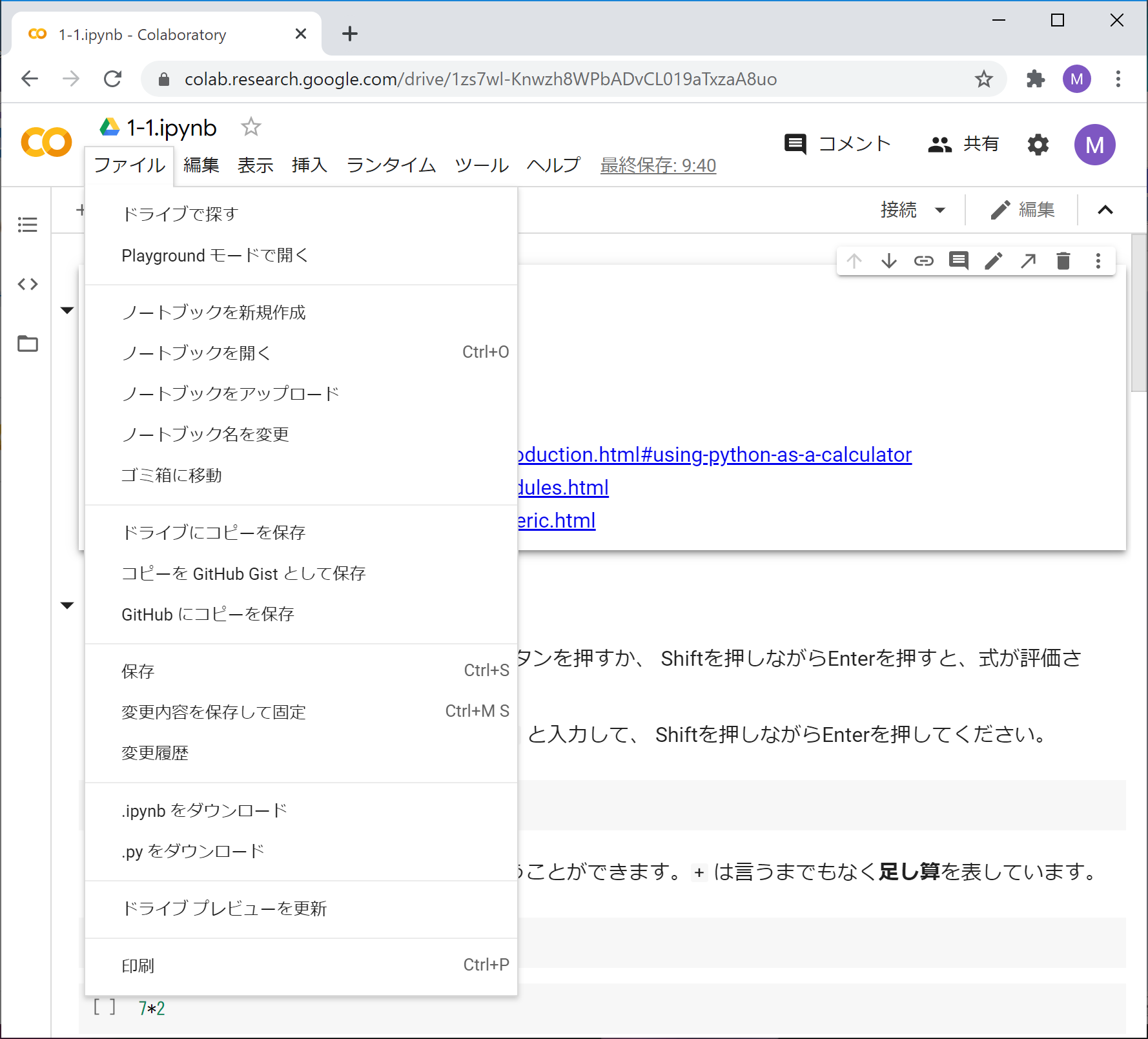"
]
}
],
"metadata": {
"kernelspec": {
"display_name": "Python 3 (ipykernel)",
"language": "python",
"name": "python3"
},
"language_info": {
"codemirror_mode": {
"name": "ipython",
"version": 3
},
"file_extension": ".py",
"mimetype": "text/x-python",
"name": "python",
"nbconvert_exporter": "python",
"pygments_lexer": "ipython3",
"version": "3.12.4"
},
"nbsphinx": {
"execute": "never"
}
},
"nbformat": 4,
"nbformat_minor": 4
}
================================================
FILE: colab/1/1-1.ipynb
================================================
{
"cells": [
{
"cell_type": "markdown",
"metadata": {},
"source": [
"# 1-1. 数値演算\n",
"数値演算について説明します。\n",
"\n",
"参考\n",
"\n",
"- https://docs.python.org/ja/3/tutorial/introduction.html#using-python-as-a-calculator\n",
"- https://docs.python.org/ja/3/tutorial/modules.html\n",
"- https://docs.python.org/ja/3/library/numeric.html\n",
"- https://docs.python.org/ja/3/library/math.html"
]
},
{
"cell_type": "markdown",
"metadata": {},
"source": [
"## 簡単な算術計算\n",
"\n",
"CodeセルにPythonの式を入力して、プレイボタンを押すか、\n",
"Shiftを押しながらEnterを押すと、式が評価され、その結果の値がセルの下に挿入されます。\n",
"\n",
"1+1 の計算をしてみましょう。次のセルに `1+1` と入力して、\n",
"Shiftを押しながらEnterを押してください。"
]
},
{
"cell_type": "code",
"execution_count": null,
"metadata": {},
"outputs": [],
"source": []
},
{
"cell_type": "markdown",
"metadata": {},
"source": [
"このようにして、電卓の代わりにPythonを使うことができます。**`+`** は言うまでもなく**足し算**を表しています。"
]
},
{
"cell_type": "code",
"execution_count": null,
"metadata": {},
"outputs": [],
"source": [
"7-2"
]
},
{
"cell_type": "code",
"execution_count": null,
"metadata": {},
"outputs": [],
"source": [
"7*2"
]
},
{
"cell_type": "code",
"execution_count": null,
"metadata": {},
"outputs": [],
"source": [
"7**2"
]
},
{
"cell_type": "markdown",
"metadata": {},
"source": [
"**`-`** は**引き算**、**`*`** は**掛け算**、**`**`** は**べき乗**を表しています。\n",
"\n",
"式を適当に書き換えてから、Shiftを押しながらEnterを押すと、\n",
"書き換えた後の式が評価されて、セルの下の値はその結果で置き換わります。\n",
"たとえば、上の `2` を `100` に書き換えて、7の100乗を求めてみてください。"
]
},
{
"cell_type": "markdown",
"metadata": {},
"source": [
"割り算はどうなるでしょうか。"
]
},
{
"cell_type": "code",
"execution_count": null,
"metadata": {},
"outputs": [],
"source": [
"7/2"
]
},
{
"cell_type": "code",
"execution_count": null,
"metadata": {},
"outputs": [],
"source": [
"7//2"
]
},
{
"cell_type": "markdown",
"metadata": {},
"source": [
"Pythonでは、**割り算**(**除算**)は **`/`** で表され、**整数除算**は **`//`** で表されます。\n",
"`//` は小数部を切り捨てた整数値(**商**)を返します。\n",
"\n",
"整数同士の `//` の結果は整数になります。"
]
},
{
"cell_type": "code",
"execution_count": null,
"metadata": {},
"outputs": [],
"source": [
"7/1"
]
},
{
"cell_type": "code",
"execution_count": null,
"metadata": {},
"outputs": [],
"source": [
"7//1"
]
},
{
"cell_type": "markdown",
"metadata": {},
"source": [
"整数除算の**余り**(**剰余**)を求めたいときは、別の演算子 **`%`** を用います。\n",
"\n",
"整数同士の `%` の結果は整数になります。"
]
},
{
"cell_type": "code",
"execution_count": null,
"metadata": {},
"outputs": [],
"source": [
"7%2"
]
},
{
"cell_type": "markdown",
"metadata": {},
"source": [
"## コメント\n",
"Pythonでは一般に、コードの中に **`#`** が出現すると、それ以降、その行の終わりまでが**コメント**になります。\n",
"コメントは行頭からも、行の途中からでも始めることができます。\n",
"\n",
"プログラムの実行時には、コメントは無視されます。"
]
},
{
"cell_type": "code",
"execution_count": null,
"metadata": {},
"outputs": [],
"source": [
"# このように行頭に '#' をおけば、行全体をコメントとすることができます。\n",
"\n",
"# 次のようにコード行に続けて直前のコードについての説明をコメントとして書くこともできます。\n",
"2**10 # 2の10乗を計算します"
]
},
{
"cell_type": "code",
"execution_count": null,
"metadata": {},
"outputs": [],
"source": [
"# 次のようにコード行自体をコメントとすることで、その行を無視させる(コメントアウトする)こともよく行われます。\n",
"# 2**10 # 2の10乗を計算します この行が「コメントアウト」された\n",
"2**12 # 実は計算したいのは2の12乗でした"
]
},
{
"cell_type": "markdown",
"metadata": {},
"source": [
"## 整数と実数\n",
"Pythonでは、**整数**と小数点のある数(**実数**)は、数学的に同じ数を表す場合でも、\n",
"コンピュータの中で異なる形式で記憶されますので、表示は異なります。\n",
"(実数は**浮動小数点数**ともいいます。)"
]
},
{
"cell_type": "code",
"execution_count": null,
"metadata": {},
"outputs": [],
"source": [
"7/1"
]
},
{
"cell_type": "code",
"execution_count": null,
"metadata": {},
"outputs": [],
"source": [
"7//1"
]
},
{
"cell_type": "markdown",
"metadata": {},
"source": [
"しかし、以下のように、比較を行うと両者は等しいものとして扱われます。\n",
"値同士が等しいかどうかを調べる `==` という演算子については、後で紹介します。"
]
},
{
"cell_type": "code",
"execution_count": null,
"metadata": {},
"outputs": [],
"source": [
"7/1 == 7//1"
]
},
{
"cell_type": "markdown",
"metadata": {},
"source": [
"`+` と `-` と `*` と `//` と `%` と `**` では、2つの数が整数ならば結果も整数になります。\n",
"2つの数が実数であったり、整数と実数が混ざっていたら、結果は実数になります。"
]
},
{
"cell_type": "code",
"execution_count": null,
"metadata": {},
"outputs": [],
"source": [
"2+5"
]
},
{
"cell_type": "code",
"execution_count": null,
"metadata": {},
"outputs": [],
"source": [
"2+5.0"
]
},
{
"cell_type": "markdown",
"metadata": {},
"source": [
"`/` の結果は必ず実数となります。"
]
},
{
"cell_type": "code",
"execution_count": null,
"metadata": {},
"outputs": [],
"source": [
"7/1"
]
},
{
"cell_type": "markdown",
"metadata": {},
"source": [
"ここで、自分で色々と式を入力してみてください。\n",
"以下に、いくつかセルを用意しておきます。\n",
"足りなければ、Insertメニューを使ってセルを追加することができます。"
]
},
{
"cell_type": "code",
"execution_count": null,
"metadata": {},
"outputs": [],
"source": []
},
{
"cell_type": "code",
"execution_count": null,
"metadata": {},
"outputs": [],
"source": []
},
{
"cell_type": "code",
"execution_count": null,
"metadata": {},
"outputs": [],
"source": []
},
{
"cell_type": "markdown",
"metadata": {},
"source": [
"### 実数のべき表示"
]
},
{
"cell_type": "code",
"execution_count": null,
"metadata": {},
"outputs": [],
"source": [
"2.0**1000"
]
},
{
"cell_type": "markdown",
"metadata": {},
"source": [
"非常に大きな実数は、10のべきとともに表示(**べき表示**)されます。\n",
"`e+301` は10の301乗を意味します。"
]
},
{
"cell_type": "code",
"execution_count": null,
"metadata": {},
"outputs": [],
"source": [
"2.0**-1000"
]
},
{
"cell_type": "markdown",
"metadata": {},
"source": [
"非常に小さな実数も、10のべきとともに表示されます。\n",
"`e-302` は10の-302乗を意味します。"
]
},
{
"cell_type": "markdown",
"metadata": {},
"source": [
"### いくらでも大きくなる整数"
]
},
{
"cell_type": "code",
"execution_count": null,
"metadata": {},
"outputs": [],
"source": [
"2**1000"
]
},
{
"cell_type": "markdown",
"metadata": {},
"source": [
"このように、Pythonでは整数はいくらでも大きくなります。\n",
"もちろん、コンピュータのメモリに納まる限りにおいてですが。"
]
},
{
"cell_type": "code",
"execution_count": null,
"metadata": {},
"outputs": [],
"source": [
"2**2**2**2**2"
]
},
{
"cell_type": "markdown",
"metadata": {},
"source": [
"### 整数と実数の間の変換\n",
"\n",
"実数を整数に変換するには、**`int`** という関数を用います。\n",
"(関数に関する一般的な説明は1-2を参照してください。)\n",
"`int(x)` は、実数 `x` を(`0` の方向に)切り下げた結果を返します。"
]
},
{
"cell_type": "code",
"execution_count": null,
"metadata": {},
"outputs": [],
"source": [
"int(2.9)"
]
},
{
"cell_type": "code",
"execution_count": null,
"metadata": {},
"outputs": [],
"source": [
"int(-2.9)"
]
},
{
"cell_type": "markdown",
"metadata": {},
"source": [
"逆に、整数を実数に変換するには、**`float`** という関数を用います。\n",
"`float(i)` は、整数 `i` を実数に変換した結果を返します。\n",
"たとえば `i+0.0` としても、`i` を実数に変換できます。"
]
},
{
"cell_type": "code",
"execution_count": null,
"metadata": {},
"outputs": [],
"source": [
"float(2)"
]
},
{
"cell_type": "code",
"execution_count": null,
"metadata": {},
"outputs": [],
"source": [
"2+0.0"
]
},
{
"cell_type": "markdown",
"metadata": {},
"source": [
"### 数値誤差\n",
"\n",
"浮動小数点数には、**数値誤差**が不可避です。\n",
"これは、有限のビット数で、無限に小さくなり得る小数刻みを表現しようとするためです。\n",
"(参照:[Wikipedia - 浮動小数点数](https://ja.wikipedia.org/wiki/%E6%B5%AE%E5%8B%95%E5%B0%8F%E6%95%B0%E7%82%B9%E6%95%B0#%E3%82%A8%E3%83%A9%E3%83%BC%EF%BC%88%E8%AA%A4%E5%B7%AE%EF%BC%89))\n",
"\n",
"Pythonでは、整数は無限桁で表現されるため、整数演算には誤差が生じません。\n",
"しかし、整数を実数に変換したときには、一般に誤差が生じます。"
]
},
{
"cell_type": "code",
"execution_count": null,
"metadata": {},
"outputs": [],
"source": [
"10**60"
]
},
{
"cell_type": "code",
"execution_count": null,
"metadata": {},
"outputs": [],
"source": [
"float(10**60)"
]
},
{
"cell_type": "code",
"execution_count": null,
"metadata": {},
"outputs": [],
"source": [
"int(float(10**60))"
]
},
{
"cell_type": "markdown",
"metadata": {},
"source": [
"数え上げのような離散的な値を扱う時には、実数を経由せずに、整数のみで演算するようにしましょう。"
]
},
{
"cell_type": "markdown",
"metadata": {},
"source": [
"## 演算子の優先順位と括弧\n",
"掛け算や割り算は足し算や引き算よりも先に評価されます。\n",
"すなわち、掛け算や割り算の方が足し算や引き算よりも**優先順位**が高いと定義されています。\n",
"\n",
"**括弧**を使って式の評価順序を指定することができます。\n",
"\n",
"なお、数式 $a(b-c)$、$(a-b)(c-d)$ は、それぞれ $a$ と $b-c$、$a-b$ と $c-d$ の積を意味しますが、\n",
"コードでは、`a*(b-c)` や `(a-b)*(c-d)` のように積の演算子である `*` を明記する必要があることに注意してください。\n",
"\n",
"また、数や演算子の間には、自由に空白を入れることができます。(後でもう一度説明します。)"
]
},
{
"cell_type": "code",
"execution_count": null,
"metadata": {},
"outputs": [],
"source": [
"7 - 2 * 3"
]
},
{
"cell_type": "code",
"execution_count": null,
"metadata": {},
"outputs": [],
"source": [
"(7 - 2) * 3"
]
},
{
"cell_type": "code",
"execution_count": null,
"metadata": {},
"outputs": [],
"source": [
"17 - 17//3*3"
]
},
{
"cell_type": "code",
"execution_count": null,
"metadata": {},
"outputs": [],
"source": [
"56 ** 4 ** 2"
]
},
{
"cell_type": "code",
"execution_count": null,
"metadata": {},
"outputs": [],
"source": [
"56 ** 16"
]
},
{
"cell_type": "markdown",
"metadata": {},
"source": [
"上の例では、`4**2` が先に評価されて、`56**16` が計算されます。\n",
"つまり、`x**y**z` = `x**(y**z)` が成り立ちます。\n",
"このことをもって、`**` は右に結合するといいます。"
]
},
{
"cell_type": "code",
"execution_count": null,
"metadata": {},
"outputs": [],
"source": [
"16/8/2"
]
},
{
"cell_type": "code",
"execution_count": null,
"metadata": {},
"outputs": [],
"source": [
"(16/8)/2"
]
},
{
"cell_type": "markdown",
"metadata": {},
"source": [
"上の例では、`16/8` が先に評価されて、`2/2` が計算されます。\n",
"つまり、`x/y/z` = `(x/y)/z` が成り立ちます。\n",
"このことをもって、`/` は左に結合するといいます。"
]
},
{
"cell_type": "markdown",
"metadata": {},
"source": [
"`*` と `/` をまぜても左に結合します。"
]
},
{
"cell_type": "code",
"execution_count": null,
"metadata": {},
"outputs": [],
"source": [
"10/2*3"
]
},
{
"cell_type": "markdown",
"metadata": {},
"source": [
"以上のように、演算子によって式の評価の順番がかわりますので注意してください。\n",
"\n",
"ではまた、自分で色々と式を入力してみてください。\n",
"以下に、いくつかセルを用意しておきます。"
]
},
{
"cell_type": "code",
"execution_count": null,
"metadata": {},
"outputs": [],
"source": []
},
{
"cell_type": "code",
"execution_count": null,
"metadata": {},
"outputs": [],
"source": []
},
{
"cell_type": "code",
"execution_count": null,
"metadata": {},
"outputs": [],
"source": []
},
{
"cell_type": "markdown",
"metadata": {},
"source": [
"### 単項の `+` と `-`"
]
},
{
"cell_type": "markdown",
"metadata": {},
"source": [
"**`+`** と **`-`** は、単項の演算子(**単項演算子**)としても使えます。\n",
"(これらの演算子の後に1つだけ数が書かれます。\n",
"前と後の両方に数が書かれる演算子は**2項演算子**と言います。)"
]
},
{
"cell_type": "code",
"execution_count": null,
"metadata": {},
"outputs": [],
"source": [
"-3"
]
},
{
"cell_type": "code",
"execution_count": null,
"metadata": {},
"outputs": [],
"source": [
"+3"
]
},
{
"cell_type": "markdown",
"metadata": {},
"source": [
"## 算術演算子のまとめ\n",
"\n",
"算術演算子を、評価の優先順位にしたがって、すなわち結合力の強い順にまとめておきましょう。\n",
"\n",
"まず、2項のべき演算子 `**` が最も強く結合します。\n",
"`**` は右の方から計算され、このことを「右に結合する」と表します。\n",
"\n",
"次に、単項の `+` と `-` が強く結合します。\n",
"なお、 `**` の右側に単項の `+` や `-` がある場合は、`+` と `-` がより強く結合します。\n",
"例えば、 `-10 ** 2` では `**` がより強く結合し `-100` となり、 `10 ** -2` では `-` がより強く結合し `0.01` となります。\n",
"\n",
"その次に、2項の `*` と `/` と `//` と `%` が強く結合します。これらは左に結合します。\n",
"\n",
"最後に、2項の `+` と `-` は最も弱く結合します。これらも左に結合します。"
]
},
{
"cell_type": "markdown",
"metadata": {},
"source": [
"## 空白\n",
"既に `7 - 2 * 3` のような例が出てきましたが、\n",
"演算子と数の間や、演算子と変数(後述)の間には、空白を入れることができます。\n",
"ここで**空白**とは、**半角の空白**のことで、英数字と同様に1バイトの文字コードに含まれているものです。\n",
"\n",
"複数の文字から成る演算子、たとえば `**` や `//` の間に空白を入れることはできません。\n",
"エラーになることでしょう。"
]
},
{
"cell_type": "code",
"execution_count": null,
"metadata": {},
"outputs": [],
"source": [
"7 **2"
]
},
{
"cell_type": "code",
"execution_count": null,
"metadata": {
"tags": [
"raises-exception"
]
},
"outputs": [],
"source": [
"7* *2"
]
},
{
"cell_type": "markdown",
"metadata": {},
"source": [
"### 全角の空白\n",
"日本語文字コードである***全角の空白***は、空白とはみなされませんので注意してください。"
]
},
{
"cell_type": "code",
"execution_count": null,
"metadata": {
"tags": [
"raises-exception"
]
},
"outputs": [],
"source": [
"7 **2"
]
},
{
"cell_type": "markdown",
"metadata": {},
"source": [
"## エラー\n",
"色々と試していると、**エラー**が起こることもあったでしょう。\n",
"以下は典型的なエラーです。"
]
},
{
"cell_type": "code",
"execution_count": null,
"metadata": {
"tags": [
"raises-exception"
]
},
"outputs": [],
"source": [
"10/0"
]
},
{
"cell_type": "markdown",
"metadata": {},
"source": [
"このエラーは、ゼロによる割り算を行ったためです。\n",
"**実行時エラー**の典型的なものです。\n",
"\n",
"エラーが起こった場合は、修正して評価し直すことができます。\n",
"上の例で、0 をたとえば 3 に書き換えて評価し直してみてください。"
]
},
{
"cell_type": "code",
"execution_count": null,
"metadata": {
"tags": [
"raises-exception"
]
},
"outputs": [],
"source": [
"10/"
]
},
{
"cell_type": "markdown",
"metadata": {},
"source": [
"こちらのエラーは**構文エラー**です。\n",
"つまり、入力がPythonの構文に違反しているため実行できなかったのです。"
]
},
{
"cell_type": "markdown",
"metadata": {},
"source": [
"## 数学関数(モジュールのインポート)"
]
},
{
"cell_type": "code",
"execution_count": null,
"metadata": {},
"outputs": [],
"source": [
"import math"
]
},
{
"cell_type": "code",
"execution_count": null,
"metadata": {},
"outputs": [],
"source": [
"math.sqrt(2)"
]
},
{
"cell_type": "markdown",
"metadata": {},
"source": [
"数学関係の各種の関数は、**モジュール**(**ライブラリ**)として提供されています。\n",
"これらの関数を使いたいときは、上のように、**`import`** で始まる\n",
"`import math` というおまじないを一度唱えます。\n",
"そうしますと、**`math`** というライブラリが読み込まれて(**インポート**されて)、\n",
"`math.関数名` という形で関数を用いることができます。\n",
"上の例では、平方根を計算する **`math.sqrt`** という関数が用いられています。"
]
},
{
"cell_type": "markdown",
"metadata": {},
"source": [
"もう少し例をあげておきましょう。sinとcosは **`math.sin`** と **`math.cos`** で求まります。"
]
},
{
"cell_type": "code",
"execution_count": null,
"metadata": {},
"outputs": [],
"source": [
"math.sin(0)"
]
},
{
"cell_type": "code",
"execution_count": null,
"metadata": {},
"outputs": [],
"source": [
"math.pi"
]
},
{
"cell_type": "markdown",
"metadata": {},
"source": [
"**`math.pi`** は、円周率を値とする変数です。\n",
"\n",
"変数については後に説明されます。"
]
},
{
"cell_type": "code",
"execution_count": null,
"metadata": {},
"outputs": [],
"source": [
"math.sin(math.pi)"
]
},
{
"cell_type": "markdown",
"metadata": {},
"source": [
"この結果は本当は 0 にならなければならないのですが、\n",
"数値誤差のためにこのようになっています。"
]
},
{
"cell_type": "code",
"execution_count": null,
"metadata": {},
"outputs": [],
"source": [
"math.sin(math.pi/2)"
]
},
{
"cell_type": "code",
"execution_count": null,
"metadata": {},
"outputs": [],
"source": [
"math.sin(math.pi/4) * 2"
]
},
{
"cell_type": "markdown",
"metadata": {},
"source": [
"## 練習"
]
},
{
"cell_type": "markdown",
"metadata": {},
"source": [
"黄金比を求めてください。黄金比とは、5 の平方根に 1 を加えて 2 で割ったものです。約 1.618 になるはずです。"
]
},
{
"cell_type": "code",
"execution_count": null,
"metadata": {},
"outputs": [],
"source": []
}
],
"metadata": {
"kernelspec": {
"display_name": "Python 3 (ipykernel)",
"language": "python",
"name": "python3"
},
"language_info": {
"codemirror_mode": {
"name": "ipython",
"version": 3
},
"file_extension": ".py",
"mimetype": "text/x-python",
"name": "python",
"nbconvert_exporter": "python",
"pygments_lexer": "ipython3",
"version": "3.12.4"
}
},
"nbformat": 4,
"nbformat_minor": 4
}
================================================
FILE: colab/1/1-2.ipynb
================================================
{
"cells": [
{
"cell_type": "markdown",
"metadata": {},
"source": [
"# 1-2. 変数と関数の基礎\n",
"変数と関数の基礎について説明します。\n",
"\n",
"参考\n",
"\n",
"- https://docs.python.org/ja/3/tutorial/introduction.html#first-steps-towards-programming\n",
"- https://docs.python.org/ja/3/tutorial/controlflow.html#defining-functions\n",
"- https://docs.python.org/ja/3/library/functions.html#print"
]
},
{
"cell_type": "markdown",
"metadata": {},
"source": [
"## 変数\n",
"プログラミング言語における**変数**とは、値に名前を付ける仕組みであり、名前はその値を指し示すことになります。"
]
},
{
"cell_type": "code",
"execution_count": null,
"metadata": {},
"outputs": [],
"source": [
"h = 188.0"
]
},
{
"cell_type": "markdown",
"metadata": {},
"source": [
"以上のように **`=`** を用いる構文によって、`188.0` という値に `h` という名前が付きます。これを**変数定義**と呼びます。\n",
"\n",
"定義された変数は、式の中で使うことができます。`h` という変数自体も式なので、`h` という式を評価することができ、変数が指し示す値が返ります。"
]
},
{
"cell_type": "code",
"execution_count": null,
"metadata": {},
"outputs": [],
"source": [
"h"
]
},
{
"cell_type": "markdown",
"metadata": {},
"source": [
"異なる変数は、いくらでも導入できます。たとえば、以下では `w` を変数定義します。"
]
},
{
"cell_type": "code",
"execution_count": null,
"metadata": {},
"outputs": [],
"source": [
"w = 104.0"
]
},
{
"cell_type": "markdown",
"metadata": {},
"source": [
"ここで、`h` を身長 (cm)、`w` を体重 (kg) の意味と考えると、次の式によってBMI(ボディマス指数)を計算できます。"
]
},
{
"cell_type": "code",
"execution_count": null,
"metadata": {},
"outputs": [],
"source": [
"w / (h/100.0) ** 2"
]
},
{
"cell_type": "markdown",
"metadata": {},
"source": [
"なお、演算子 `**` の方が `/` よりも先に評価されることに注意してください。"
]
},
{
"cell_type": "markdown",
"metadata": {},
"source": [
"変数という名前の通り、変数が指し示す値を変えることもできます。"
]
},
{
"cell_type": "code",
"execution_count": null,
"metadata": {},
"outputs": [],
"source": [
"w = 104.0-10"
]
},
{
"cell_type": "markdown",
"metadata": {},
"source": [
"このように変数を再定義すれば、元々 `w` が指し示していた値 `104.0` を忘れて、新たな値 `94.0` を指し示すようになります。\n",
"この後で、前と同じBMIの式を評価してみると、`w` の値の変化に応じて、BMIの計算結果は変わります。"
]
},
{
"cell_type": "code",
"execution_count": null,
"metadata": {},
"outputs": [],
"source": [
"w / (h/100.0) ** 2"
]
},
{
"cell_type": "markdown",
"metadata": {},
"source": [
"なお、未定義の変数(たとえば `BMI`)を式の中で用いると、次のようにエラーが生じます。\n",
"\n",
"```\n",
"---------------------------------------------------------------------------\n",
"NameError Traceback (most recent call last)\n",
"<ipython-input-1-b910749d4383> in <module>\n",
"----> 1 BMI # 未定義の変数\n",
"\n",
"NameError: name 'BMI' is not defined\n",
"```\n",
"\n",
"次のセルの行頭にある `#` を削除して実行してみましょう。"
]
},
{
"cell_type": "code",
"execution_count": null,
"metadata": {},
"outputs": [],
"source": [
"# BMI # 未定義の変数"
]
},
{
"cell_type": "markdown",
"metadata": {},
"source": [
"以降では、単純のため、変数が指し示す値を、変数の値として説明していきます。"
]
},
{
"cell_type": "markdown",
"metadata": {},
"source": [
"### 代入文\n",
"変数定義に用いた **`=`** による構文を、Pythonでは**代入文** (**assignment statement**) と呼びます。\n",
"そして、代入文を実行することを**代入** (**assignment**) と言います。\n",
"代入文は、`=` の左辺に右辺の式の評価結果の値を割り当てる文です。\n",
"上記の例のように、左辺が変数の場合には、代入文は変数定義と解釈されます。\n",
"\n",
"代入文は、右辺を評価した後に左辺に割り当てるという順番に従います。右辺に出現する変数が左辺に出て来てもかまいません。"
]
},
{
"cell_type": "code",
"execution_count": null,
"metadata": {},
"outputs": [],
"source": [
"w = w-10"
]
},
{
"cell_type": "markdown",
"metadata": {},
"source": [
"上の代入文は、`w` の値を `10` 減らす操作となります。`=` は数学的な等号ではないことに注意してください。\n",
"\n",
"もう一度BMIを計算してみると、`w` の値が減ったことで、先と結果が変わります。"
]
},
{
"cell_type": "code",
"execution_count": null,
"metadata": {},
"outputs": [],
"source": [
"w / (h/100.0) ** 2"
]
},
{
"cell_type": "markdown",
"metadata": {},
"source": [
"***注意***: 数学における代入は、substitution(置換)であり、プログラミング言語における代入 (assignment) とは異なります。代入という単語よりも、assignment(割り当て)という単語で概念を覚えましょう。"
]
},
{
"cell_type": "markdown",
"metadata": {},
"source": [
"### 累積代入文\n",
"上の例のように変数の値を減らす操作は、次のような**累算代入文** (**augmented assignment statement**) を使って簡潔に記述することができます。"
]
},
{
"cell_type": "code",
"execution_count": null,
"metadata": {},
"outputs": [],
"source": [
"w -= 10"
]
},
{
"cell_type": "markdown",
"metadata": {},
"source": [
"ここで、**`-=`** という演算子は、`-` と `=` を結合させた演算子で、`w = w - 10` という代入文と同じ意味になります。\n",
"これは代入文と2項演算が複合したものであり、`-` に限らず、他の2項演算についても同様に複合した累算代入文が利用できます。たとえば、変数の値を増やすには **`+=`** という演算子を用いることができます。"
]
},
{
"cell_type": "code",
"execution_count": null,
"metadata": {},
"outputs": [],
"source": [
"w += 10"
]
},
{
"cell_type": "markdown",
"metadata": {},
"source": [
"`=` も含めて、これらの演算子は**代入演算子**と呼ばれています。代入演算子によって変数の値がどのように変わるか、確かめてください。"
]
},
{
"cell_type": "code",
"execution_count": null,
"metadata": {},
"outputs": [],
"source": []
},
{
"cell_type": "markdown",
"metadata": {},
"source": [
"## 関数の定義と返値\n",
"前述のように、変数の値が変わるたびにBMIの式を入力するのは面倒です。以下では、身長 `height` と体重 `weight` をもらって、BMIを計算する**関数** `bmi` を定義してみましょう。関数を定義すると、BMIの式の再入力を省けて便利です。\n",
"\n",
"次のような形式で、**関数定義**を記述できます。\n",
"\n",
"関数定義など、複数行のコードセルには、**行番号**を振るのがよいかもしれません。行番号を振るかどうかは、コマンドモードでエルの文字(大文字でも小文字でもよいです)を入力することによって、スイッチできます。行番号があるかないかは、コードの実行には影響しません。"
]
},
{
"cell_type": "code",
"execution_count": null,
"metadata": {},
"outputs": [],
"source": [
"def bmi(height, weight):\n",
" return weight / (height/100.0) ** 2"
]
},
{
"cell_type": "markdown",
"metadata": {},
"source": [
"Python では、**関数定義**は、上のような形をしています。\n",
"最初の行は以下のように **`def`** で始まります。\n",
"\n",
"------\n",
"```Python\n",
" def 関数名(引数, ...):\n",
"```\n",
"------\n",
"**引数**(ひきすう)とは、関数が受け取る値を指し示す変数のことです。**仮引数**(かりひきすう)ともいいます。"
]
},
{
"cell_type": "markdown",
"metadata": {},
"source": [
"`:` 以降は関数定義の本体であり、関数の処理を記述する部分として以下の構文が続きます。\n",
"\n",
"------\n",
"```Python\n",
" return 式\n",
"```\n",
"------ \n",
"\n",
"この構文は **`return`** で始まり、**return文**と呼ばれます。return文は、`return` に続く式の評価結果を、関数の呼び出し元に返して(これを**返値**と言います)、関数を終了するという意味を持ちます。この関数を、入力となる引数とともに呼び出すと、`return` の後の式の評価結果を返値として返します。\n",
"\n",
"\n",
"ここで、Pythonでは、\n",
"`return` の前に空白が入ることに注意してください。\n",
"このような行頭の空白を**インデント**と呼びます。\n",
"Pythonでは、インデントの量によって、\n",
"構文の**入れ子**を制御するようになっています。このことについては、\n",
"より複雑な構文が出てきたときに説明しましょう。\n",
"\n",
"\n",
"上記では、`def` の後に続く `bmi` が関数名です。それに続く括弧の中に書かれた `height` と `weight` は、**引数**です。また、`return` の後にBMIの計算式を記述しているので、関数の呼び出し元にはBMIの計算結果が返値として返ります。\n",
"\n",
"\n",
"では、定義した関数 `bmi` を呼び出してみましょう。"
]
},
{
"cell_type": "code",
"execution_count": null,
"metadata": {},
"outputs": [],
"source": [
"bmi(188.0,104.0)"
]
},
{
"cell_type": "markdown",
"metadata": {},
"source": [
"第1引数を身長(cm)、第2引数を体重(kg)としたときのBMIが計算されていることがわかります。\n",
"\n",
"関数呼び出しは演算式の一種なので、引数の位置には任意の式を記述できますし、\n",
"関数呼び出し自体も式の中に記述できます。"
]
},
{
"cell_type": "code",
"execution_count": null,
"metadata": {},
"outputs": [],
"source": [
"1.1*bmi(174.0, 119.0 * 0.454)"
]
},
{
"cell_type": "markdown",
"metadata": {},
"source": [
"もう1つ関数を定義してみましょう。"
]
},
{
"cell_type": "code",
"execution_count": null,
"metadata": {},
"outputs": [],
"source": [
"def felt_air_temperature(temperature, humidity):\n",
" return temperature - 1 / 2.3 * (temperature - 10) * (0.8 - humidity / 100)"
]
},
{
"cell_type": "markdown",
"metadata": {},
"source": [
"この関数は、温度と湿度を入力として、体感温度を返します。\n",
"このように、関数名や変数名には `_` (アンダースコア)を含めることができます。\n",
"アンダースコアで始めることもできます。\n",
"\n",
"数字も関数名や変数名に含めることができますが、\n",
"名前の最初に来てはいけません。"
]
},
{
"cell_type": "code",
"execution_count": null,
"metadata": {},
"outputs": [],
"source": [
"felt_air_temperature(28, 50)"
]
},
{
"cell_type": "markdown",
"metadata": {},
"source": [
"なお、`return` の後に式を書かないと、何も返されなかったことを表現するために、「何もない」ことを表す **`None`** という特別な値が返ります。\n",
"(`None` という値は色々なところで現れることでしょう。)\n",
"\n",
"return文に到達せずに関数定義本体の最後まで行ってしまったときも、`None` という値が返ります。"
]
},
{
"cell_type": "markdown",
"metadata": {},
"source": [
"### 予約語\n",
"Pythonでの `def` や `return` は、関数定義やreturn文の始まりを記述するための特別な記号であり、それ以外の用途に用いることができません。\n",
"このように構文上で役割が予約されている語は、**予約語**と呼ばれます。\n",
"Codeセルの構文ハイライトで(太字緑色などで)強調されるものが予約語だと覚えておけば大体問題ありません。"
]
},
{
"cell_type": "markdown",
"metadata": {},
"source": [
"### 練習 `ft_to_cm`\n",
"\n",
"`f` フィート `i` インチをセンチメートルに変換する関数 `ft_to_cm(f,i)` を定義してください。\n",
"ただし、1 フィート = 12 インチ = 30.48 cm としてよい。"
]
},
{
"cell_type": "code",
"execution_count": null,
"metadata": {},
"outputs": [],
"source": [
"def ft_to_cm(f, i):\n",
" ..."
]
},
{
"cell_type": "markdown",
"metadata": {},
"source": [
"定義ができたら、次のセルを実行して、エラーがでないことを確認してください。"
]
},
{
"cell_type": "code",
"execution_count": null,
"metadata": {
"tags": [
"raises-exception"
]
},
"outputs": [],
"source": [
"assert round(ft_to_cm(5, 2) - 157.48, 6) == 0\n",
"assert round(ft_to_cm(6, 5) - 195.58, 6) == 0"
]
},
{
"cell_type": "markdown",
"metadata": {},
"source": [
"### 練習 `quadratic`\n",
"\n",
"二次関数 $f(x) = ax^2+bx+c$ の値を求める `quadratic(a,b,c,x)` を定義してください。"
]
},
{
"cell_type": "code",
"execution_count": null,
"metadata": {},
"outputs": [],
"source": [
"def quadratic(a, b, c, x):\n",
" ..."
]
},
{
"cell_type": "markdown",
"metadata": {},
"source": [
"定義ができたら、次のセルを実行して、エラーがでないことを確認してください。"
]
},
{
"cell_type": "code",
"execution_count": null,
"metadata": {},
"outputs": [],
"source": [
"assert quadratic(1, 2, 1, 3) == 16\n",
"assert quadratic(1, -5, -2, 7) == 12"
]
},
{
"cell_type": "markdown",
"metadata": {},
"source": [
"## ローカル変数\n",
"次の関数は、ヘロンの公式によって、\n",
"与えられた三辺の長さに対して三角形の面積を返すものです。"
]
},
{
"cell_type": "code",
"execution_count": null,
"metadata": {},
"outputs": [],
"source": [
"import math\n",
"\n",
"def heron(a,b,c):\n",
" s = 0.5*(a+b+c)\n",
" return math.sqrt(s * (s-a) * (s-b) * (s-c))"
]
},
{
"cell_type": "markdown",
"metadata": {},
"source": [
"`math.sqrt` を使うために `import math` を行っています。"
]
},
{
"cell_type": "markdown",
"metadata": {},
"source": [
"次の式を評価してみましょう。"
]
},
{
"cell_type": "code",
"execution_count": null,
"metadata": {},
"outputs": [],
"source": [
"heron(3,4,5)"
]
},
{
"cell_type": "markdown",
"metadata": {},
"source": [
"この関数の中では、まず、3辺の長さを足して 2 で割った(0.5 を掛けた)値を求めています。\n",
"そして、その値を `s` という変数に代入しています。\n",
"この `s` という変数は、この関数の中で代入されているので、この関数の中だけで利用可能な変数となります。\n",
"そのような変数を**ローカル変数**と呼びます。\n",
"\n",
"そして、`s` を使った式が計算されてreturn文で返されます。\n",
"ここで、関数定義のひとまとまりの本体であることを表すために、`s` への代入文もreturn文も、同じ深さでインデントされていることに注意してください。"
]
},
{
"cell_type": "markdown",
"metadata": {},
"source": [
"Pythonでは、関数の中で定義された変数は、その関数のローカル変数となります。関数の引数もローカル変数です。関数の外で同じ名前の変数を使っても、それは関数のローカル変数とは「別もの」と考えられます。"
]
},
{
"cell_type": "markdown",
"metadata": {},
"source": [
"`heron` を呼び出した後で、関数の外で `s` の値を参照しても、以下のように、`s` が未定義という扱いになります。"
]
},
{
"cell_type": "code",
"execution_count": null,
"metadata": {
"tags": [
"raises-exception"
]
},
"outputs": [],
"source": [
"s"
]
},
{
"cell_type": "markdown",
"metadata": {},
"source": [
"以下では、`heron` の中では、`s` というローカル変数の値は 3 になりますが、関数の外では、`s` という変数は別もので、その値はずっと `100` です。"
]
},
{
"cell_type": "code",
"execution_count": null,
"metadata": {},
"outputs": [],
"source": [
"s = 100\n",
"heron(3,4,5)"
]
},
{
"cell_type": "code",
"execution_count": null,
"metadata": {},
"outputs": [],
"source": [
"s"
]
},
{
"cell_type": "markdown",
"metadata": {},
"source": [
"## `print`\n",
"上の例で、ローカル変数は関数の返値を計算するのに使われますが、それが定義されている関数の外からは参照することができません。\n",
"\n",
"ローカル変数の値など、関数の実行途中の状況を確認するには、 **`print`** というPythonが最初から用意してくれている関数(**組み込み関数**)を用いることができます。この `print` を関数内から呼び出すことでローカル変数の値を確認できます。\n",
"\n",
"`print` は任意個の引数を取ることができ、コンマ `,` の区切りには空白文字が出力されます。引数を与えずに呼び出した場合には、改行のみを出力します。"
]
},
{
"cell_type": "code",
"execution_count": null,
"metadata": {},
"outputs": [],
"source": [
"def heron(a,b,c):\n",
" s = 0.5*(a+b+c)\n",
" print('The value of s is', s)\n",
" return math.sqrt(s * (s-a) * (s-b) * (s-c))"
]
},
{
"cell_type": "code",
"execution_count": null,
"metadata": {},
"outputs": [],
"source": [
"heron(1,1,1)"
]
},
{
"cell_type": "markdown",
"metadata": {},
"source": [
"このように `print` 関数を用いて変数の値を観察することは、プログラムの誤り(**バグ**)を見つけ、修正(**デバッグ**)する最も基本的な方法です。これは1-4でも改めて説明します。\n",
"\n",
"なお、以降の説明では、 `print` 関数を呼び出して値を出力することを「**印字**する」と表現します。"
]
},
{
"cell_type": "markdown",
"metadata": {},
"source": [
"## `print` と `return`\n",
"関数が値を返すことを期待されている場合は、必ず `return` を使ってください。\n",
"\n",
"関数内で値を印字しても、関数の返値として利用することはできません。\n",
"\n",
"たとえば `heron` を以下のように定義すると、`heron(1,1,1) * 2` のような計算ができなくなります。\n",
"\n",
"---\n",
"```Python\n",
"def heron(a,b,c):\n",
" s = 0.5*(a+b+c)\n",
" print('The value of s is', s)\n",
" print(math.sqrt(s * (s-a) * (s-b) * (s-c)))\n",
"```\n",
"---\n",
"\n",
"なお、\n",
"\n",
"```Python\n",
" return print(math.sqrt(s * (s-a) * (s-b) * (s-c)))\n",
"```\n",
"\n",
"のように書いても駄目です。`print` 関数は `None` という値を返しますので、これでは関数は常に `None` という値を返してしまいます。"
]
},
{
"cell_type": "markdown",
"metadata": {},
"source": [
"## コメントと空行\n",
"**コメント**については既に説明しましたが、\n",
"関数定義にはコメントを付加して、後から読んでもわかるようにしましょう。\n",
"\n",
"コメントだけの行は**空行**(空白のみから成る行)と同じに扱われます。\n",
"\n",
"関数定義の中に空行を自由に入れることができますので、\n",
"長い関数定義には、区切りとなるところに空行を入れるのがよいでしょう。"
]
},
{
"cell_type": "code",
"execution_count": null,
"metadata": {},
"outputs": [],
"source": [
"# heronの公式により三角形の面積を返す\n",
"def heron(a,b,c): # a,b,c は三辺の長さ\n",
" \n",
" # 辺の合計の半分をsに置く\n",
" s = 0.5*(a+b+c)\n",
" print('The value of s is', s)\n",
" \n",
" return math.sqrt(s * (s-a) * (s-b) * (s-c))"
]
},
{
"cell_type": "markdown",
"metadata": {},
"source": [
"## 関数の参照の書き方\n",
"\n",
"関数は、\n",
"\n",
" 関数 `heron` は、三角形の三辺の長さをもらって三角形の面積を返します。\n",
" \n",
"というように、名前だけで参照することもありますが、\n",
"\n",
" `heron(a,b,c)` は、三角形の三辺の長さ `a`, `b`, `c` をもらって三角形の面積を返します。\n",
"\n",
"というように、引数を明示して参照することもあります。\n",
"\n",
"ときには、\n",
"\n",
" `heron()` は三角形の面積を返します。\n",
" \n",
"のように、関数名に `()` を付けて参照することがあります。\n",
"この記法は、`heron` が関数であることを明示しています。\n",
"\n",
"関数には引数がゼロ個のものがあるのですが、`heron()` と参照するとき、\n",
"`heron` は必ずしも引数の数がゼロ個ではないことに注意してください。\n",
"\n",
"後に学習するメソッドという関数の親戚に対しても同様の記法が用いられます。"
]
},
{
"cell_type": "markdown",
"metadata": {},
"source": [
"### 練習 `qe_disc` `qe_solution1` `qe_solution1`\n",
"\n",
"二次方程式 $ax^2 + bx + c = 0$ に関して以下のような関数を定義してください。\n",
"\n",
"1. 判別式 $b^2 - 4ac$ を求める `qe_disc(a,b,c)`\n",
"2. 解のうち、大きくない方を求める `qe_solution1(a,b,c)`\n",
"3. 解のうち、小さくない方を求める `qe_solution2(a,b,c)`\n",
"\n",
"ただし、`qe_solution1` と `qe_solution2` は `qe_disc` を使って定義してください。\n",
"二次方程式が実数解を持つと仮定してよいです。"
]
},
{
"cell_type": "code",
"execution_count": null,
"metadata": {},
"outputs": [],
"source": [
"import math\n",
"\n",
"def qe_disc(a, b, c):\n",
" ...\n",
"\n",
"def qe_solution1(a, b, c):\n",
" ...\n",
"\n",
"def qe_solution2(a, b, c):\n",
" ..."
]
},
{
"cell_type": "markdown",
"metadata": {},
"source": [
"定義ができたら、次のセルを実行して、エラーがでないことを確認してください。"
]
},
{
"cell_type": "code",
"execution_count": null,
"metadata": {
"tags": [
"raises-exception"
]
},
"outputs": [],
"source": [
"assert qe_disc(1, -2, 1) == 0\n",
"assert qe_disc(1, -5, 6) == 1\n",
"assert round(qe_solution1(1, -2, 1) - 1, 6) == 0\n",
"assert round(qe_solution2(1, -2, 1) - 1, 6) == 0\n",
"assert round(qe_solution1(1, -5, 6) - 2, 6) == 0\n",
"assert round(qe_solution2(1, -5, 6) - 3, 6) == 0"
]
},
{
"cell_type": "markdown",
"metadata": {},
"source": [
"## ▲グローバル変数\n",
"\n",
"Pythonでは、関数の中で代入が行われない変数は、グローバル変数とみなされます。\n",
"\n",
"**グローバル変数**とは、関数の外(**トップレベル**もしくは**モジュールレベル**と呼ばれます)で定義される変数のことです。\n",
"\n",
"グローバル変数は、関数の中から参照することができます。"
]
},
{
"cell_type": "code",
"execution_count": null,
"metadata": {},
"outputs": [],
"source": [
"g = 9.8"
]
},
{
"cell_type": "code",
"execution_count": null,
"metadata": {},
"outputs": [],
"source": [
"def force(m):\n",
" return m*g"
]
},
{
"cell_type": "markdown",
"metadata": {},
"source": [
"以上のように `force` を定義すると、\n",
"`force` の中で `g` というグローバル変数を参照することができます。"
]
},
{
"cell_type": "code",
"execution_count": null,
"metadata": {},
"outputs": [],
"source": [
"force(104)"
]
},
{
"cell_type": "code",
"execution_count": null,
"metadata": {},
"outputs": [],
"source": [
"g = g/6"
]
},
{
"cell_type": "markdown",
"metadata": {},
"source": [
"以上のように、`g` の値を変更してから `force` を実行すると、\n",
"変更後の値が用いられます。"
]
},
{
"cell_type": "code",
"execution_count": null,
"metadata": {},
"outputs": [],
"source": [
"force(104)"
]
},
{
"cell_type": "markdown",
"metadata": {},
"source": [
"以下はより簡単な例です。"
]
},
{
"cell_type": "code",
"execution_count": null,
"metadata": {},
"outputs": [],
"source": [
"a = 10\n",
"def foo():\n",
" return a\n",
"def bar():\n",
" a = 3\n",
" return a"
]
},
{
"cell_type": "code",
"execution_count": null,
"metadata": {},
"outputs": [],
"source": [
"foo()"
]
},
{
"cell_type": "code",
"execution_count": null,
"metadata": {},
"outputs": [],
"source": [
"bar()"
]
},
{
"cell_type": "code",
"execution_count": null,
"metadata": {},
"outputs": [],
"source": [
"a"
]
},
{
"cell_type": "code",
"execution_count": null,
"metadata": {},
"outputs": [],
"source": [
"a = 20"
]
},
{
"cell_type": "code",
"execution_count": null,
"metadata": {},
"outputs": [],
"source": [
"foo()"
]
},
{
"cell_type": "markdown",
"metadata": {},
"source": [
"`bar` の中では `a` への代入があるので、`a` はローカル変数になります。\n",
"ローカル変数の `a` とグローバル変数の `a` は別ものと考えてください。\n",
"ローカル変数 `a` への代入があっても、グローバル変数の `a` の値は変化しません。\n",
"`foo` の中の `a` はグローバル変数です。"
]
},
{
"cell_type": "code",
"execution_count": null,
"metadata": {},
"outputs": [],
"source": [
"def boo(a):\n",
" return a"
]
},
{
"cell_type": "code",
"execution_count": null,
"metadata": {},
"outputs": [],
"source": [
"boo(5)"
]
},
{
"cell_type": "code",
"execution_count": null,
"metadata": {},
"outputs": [],
"source": [
"a"
]
},
{
"cell_type": "markdown",
"metadata": {},
"source": [
"関数の引数もローカル変数の一種と考えられ、グローバル変数とは別ものです。"
]
},
{
"cell_type": "markdown",
"metadata": {},
"source": [
"## 練習の解答"
]
},
{
"cell_type": "code",
"execution_count": null,
"metadata": {},
"outputs": [],
"source": [
"def ft_to_cm(f, i):\n",
" return 30.48*f + (30.48/12)*i"
]
},
{
"cell_type": "code",
"execution_count": null,
"metadata": {},
"outputs": [],
"source": [
"def quadratic(a, b, c, x):\n",
" return a*x*x + b*x + c"
]
},
{
"cell_type": "code",
"execution_count": null,
"metadata": {},
"outputs": [],
"source": [
"import math\n",
"\n",
"def qe_disc(a, b, c):\n",
" return b*b - 4*a*c\n",
"\n",
"def qe_solution1(a, b, c):\n",
" return (-b - math.sqrt(qe_disc(a, b, c))) / (2*a)\n",
"\n",
"def qe_solution2(a, b, c):\n",
" return (-b + math.sqrt(qe_disc(a, b, c))) / (2*a)"
]
}
],
"metadata": {
"kernelspec": {
"display_name": "Python 3",
"language": "python",
"name": "python3"
},
"language_info": {
"name": "python"
}
},
"nbformat": 4,
"nbformat_minor": 2
}
================================================
FILE: colab/1/1-3.ipynb
================================================
{
"cells": [
{
"cell_type": "markdown",
"metadata": {},
"source": [
"# 1-3. 論理・比較演算と条件分岐の基礎\n",
"論理・比較演算と条件分岐の基礎について説明します。\n",
"\n",
"参考\n",
"\n",
"- https://docs.python.org/ja/3/tutorial/controlflow.html\n",
"- https://docs.python.org/ja/3/reference/compound_stmts.html\n",
"- https://docs.python.org/ja/3/library/stdtypes.html"
]
},
{
"cell_type": "markdown",
"metadata": {},
"source": [
"## if文による条件分岐\n",
"制御構造については第2回と第3回で本格的に扱いますが、\n",
"ここでは **`if`** による**条件分岐**(**if文**)の基本的な形だけ紹介します。"
]
},
{
"cell_type": "code",
"execution_count": null,
"metadata": {},
"outputs": [],
"source": [
"def bmax(a,b):\n",
" if a > b: \n",
" return a \n",
" else:\n",
" return b"
]
},
{
"cell_type": "markdown",
"metadata": {},
"source": [
"上の関数 `bmax` は、2つの引数の大きい方\n",
"(正確には小さくない方)を返します。"
]
},
{
"cell_type": "markdown",
"metadata": {},
"source": [
"ここで `if` による条件分岐が用いられています。\n",
"\n",
"----\n",
"```Python\n",
" if a > b: \n",
" return a \n",
" else:\n",
" return b\n",
"```\n",
"----\n",
"`a` が `b` より大きければ `a` が返され、そうでなければ、`b` が返されます。\n",
"\n",
"ここで、`return a` が、`if` より右にインデントされていることに注意してください。\n",
"`return a` は、`a > b` が成り立つときのみ実行されます。\n",
"\n",
"**`else`** は `if` の右の条件が成り立たない場合を示しています。\n",
"`else:` として、必ず `:` が付くことに注意してください。\n",
"\n",
"また、`return b` も、`else` より右にインデントされていることに注意してください。\n",
"`if` と `else` は同じインデントになります。"
]
},
{
"cell_type": "code",
"execution_count": null,
"metadata": {},
"outputs": [],
"source": [
"bmax(3,5)"
]
},
{
"cell_type": "markdown",
"metadata": {},
"source": [
"関数の中で `return` と式が実行されますと、関数は即座に返りますので、\n",
"関数定義の中のその後の部分は実行されません。\n",
"\n",
"たとえば、上の条件分岐は以下のように書くこともできます。\n",
"\n",
"----\n",
"```Python\n",
" if a > b: \n",
" return a \n",
" return b\n",
"```\n",
"----\n",
"\n",
"ここでは、`if` から始まる条件分岐には `else:` の部分がありません。\n",
"条件分岐の後に `return b` が続いています。\n",
"(`if` と `return b` のインデントは同じです。)\n",
"\n",
"`a > b` が成り立っていれば、`return a` が実行されて a の値が返ります。\n",
"したがって、その次の `return b` は実行されません。\n",
"\n",
"`a > b` が成り立っていなければ、`return a` は実行されません。\n",
"これで条件分岐は終わりますので、その次にある `return b` が実行されます。"
]
},
{
"cell_type": "markdown",
"metadata": {},
"source": [
"なお、Pythonでは、`max` という関数があらかじめ定義されています。(すなわち、`max` は組み込み関数です。)"
]
},
{
"cell_type": "code",
"execution_count": null,
"metadata": {},
"outputs": [],
"source": [
"max(3,5)"
]
},
{
"cell_type": "markdown",
"metadata": {},
"source": [
"## 様々な条件\n",
"`if` の右などに来る条件として様々なものを書くことができます。これらの条件には **`>`** や **`<`** などの**比較演算子**が含まれています。\n",
"\n",
"```Python\n",
" x < y # x は y より小さい\n",
" x <= y # x は y 以下\n",
" x > y # x は y より大きい\n",
" x >= y # x は y 以上\n",
" x == y # x と y は等しい\n",
" x != y # x と y は等しくない\n",
"```\n",
"\n",
"特に等しいかどうかの比較には **`==`** という演算子が使われることに注意してください。\n",
"`=` は代入の演算子です。\n",
"\n",
"**`<=`** は小さいか等しいか、**`>=`** は大きいか等しいかを表します。\n",
"**`!=`** は等しくないことを表します。"
]
},
{
"cell_type": "markdown",
"metadata": {},
"source": [
"さらに、このような基本的な条件を、\n",
"**`and`** と **`or`** を用いて組み合わせることができます。\n",
"\n",
"```Python\n",
" i >= 0 and j > 0 # i は 0 以上で、かつ、j は 0 より大きい\n",
" i < 0 or j > 0 # i は 0 より小さいか、または、j は 0 より大きい\n",
"```\n",
"\n",
"`i` が 1 または 2 または 3 である、という条件は以下のようになります。\n",
"\n",
"```Python\n",
" i == 1 or i == 2 or i == 3\n",
"```\n",
"\n",
"これを `i == 1 or 2 or 3` と書くことはできませんので、注意してください。\n",
"\n",
"また、**`not`** によって条件の否定をとることもできます。\n",
"\n",
"```Python\n",
" not x < y # x は y より小さくない(x は y 以上)\n",
"```"
]
},
{
"cell_type": "markdown",
"metadata": {},
"source": [
"比較演算子は、以下のように連続して用いることもできます。"
]
},
{
"cell_type": "code",
"execution_count": null,
"metadata": {},
"outputs": [],
"source": [
"1 < 2 < 3"
]
},
{
"cell_type": "code",
"execution_count": null,
"metadata": {},
"outputs": [],
"source": [
"3 >= 2 < 5"
]
},
{
"cell_type": "markdown",
"metadata": {},
"source": [
"### 練習 `absolute`\n",
"\n",
"数値 `x` の絶対値を求める関数 `absolute(x)` を定義してください。\n",
"Pythonには `abs` という絶対値を求める組み込み関数が用意されていますが、それを使わずに定義してください。"
]
},
{
"cell_type": "code",
"execution_count": null,
"metadata": {},
"outputs": [],
"source": [
"def absolute(x):\n",
" ..."
]
},
{
"cell_type": "markdown",
"metadata": {},
"source": [
"定義ができたら、次のセルを実行して、エラーがでないことを確認してください。"
]
},
{
"cell_type": "code",
"execution_count": null,
"metadata": {},
"outputs": [],
"source": [
"assert absolute(5) == 5\n",
"assert absolute(-5) == 5\n",
"assert absolute(0) == 0"
]
},
{
"cell_type": "markdown",
"metadata": {
"tags": []
},
"source": [
"### 練習 `sign`\n",
"\n",
"`x` が正ならば 1、負ならば -1、ゼロならば 0 を返す関数 `sign(x)` を定義してください。"
]
},
{
"cell_type": "code",
"execution_count": null,
"metadata": {},
"outputs": [],
"source": [
"def sign(x):\n",
" ..."
]
},
{
"cell_type": "markdown",
"metadata": {},
"source": [
"定義ができたら、次のセルを実行して、エラーがでないことを確認してください。"
]
},
{
"cell_type": "code",
"execution_count": null,
"metadata": {
"tags": [
"raises-exception"
]
},
"outputs": [],
"source": [
"assert sign(5) == 1\n",
"assert sign(-5) == -1\n",
"assert sign(0) == 0"
]
},
{
"cell_type": "markdown",
"metadata": {},
"source": [
"## 真理値を返す関数\n",
"ここで、真理値を返す関数について説明します。\n",
"\n",
"Pythonが扱うデータには様々な種類があります。\n",
"数については既に見て来ました。\n",
"\n",
"**真理値**とは、 **`True`** または **`False`** のどちらかの値のことです。\n",
"これらは変数ではなく、**組み込み定数**であることに注意してください。\n",
"\n",
"- `True` は、正しいこと(**真**)を表します。\n",
"- `False` は、間違ったこと(**偽**)を表します。\n",
"\n",
"実は、`if` の後の条件の式は、`True` か `False` を値として持ちます。"
]
},
{
"cell_type": "code",
"execution_count": null,
"metadata": {},
"outputs": [],
"source": [
"x = 3"
]
},
{
"cell_type": "code",
"execution_count": null,
"metadata": {},
"outputs": [],
"source": [
"x > 1"
]
},
{
"cell_type": "markdown",
"metadata": {},
"source": [
"上のように、`x` に 3 を代入しておくと、\n",
"`x > 1` という条件は成り立ちます。\n",
"したがって、`x > 1` という式の値は `True` になるのです。"
]
},
{
"cell_type": "code",
"execution_count": null,
"metadata": {},
"outputs": [],
"source": [
"x < 1"
]
},
{
"cell_type": "code",
"execution_count": null,
"metadata": {},
"outputs": [],
"source": [
"x%2 == 0"
]
},
{
"cell_type": "markdown",
"metadata": {},
"source": [
"そして、真理値を返す関数を定義することができます。"
]
},
{
"cell_type": "code",
"execution_count": null,
"metadata": {},
"outputs": [],
"source": [
"def is_even(x):\n",
" return x%2 == 0"
]
},
{
"cell_type": "markdown",
"metadata": {},
"source": [
"この関数は、`x` を 2 で割った余りが 0 に等しいかどうかという\n",
"条件の結果である真理値を返します。\n",
"\n",
"`x == y` は、`x` と `y` が等しいかどうかという条件です。\n",
"この関数は、この条件の結果である真理値を `return` によって返しています。"
]
},
{
"cell_type": "code",
"execution_count": null,
"metadata": {},
"outputs": [],
"source": [
"is_even(2)"
]
},
{
"cell_type": "code",
"execution_count": null,
"metadata": {},
"outputs": [],
"source": [
"is_even(3)"
]
},
{
"cell_type": "markdown",
"metadata": {},
"source": [
"このような関数は、`if` の後に使うことができます。"
]
},
{
"cell_type": "code",
"execution_count": null,
"metadata": {},
"outputs": [],
"source": [
"def is_odd(x):\n",
" if is_even(x):\n",
" return False\n",
" else:\n",
" return True"
]
},
{
"cell_type": "markdown",
"metadata": {},
"source": [
"このように、直接に `True` や `False` を返すこともできます。"
]
},
{
"cell_type": "code",
"execution_count": null,
"metadata": {},
"outputs": [],
"source": [
"is_odd(2)"
]
},
{
"cell_type": "code",
"execution_count": null,
"metadata": {},
"outputs": [],
"source": [
"is_odd(3)"
]
},
{
"cell_type": "markdown",
"metadata": {},
"source": [
"## オブジェクト\n",
"\n",
"Pythonにおける値(式の評価結果)は全て**オブジェクト**と総称されます。\n",
"変数の値もオブジェクトです。\n",
"\n",
"したがって、数や真理値もオブジェクトです。\n",
"今後、文字列やリストなど、様々な種類のデータが登場しますが、\n",
"それらは全てオブジェクトです。\n",
"\n",
"今後、オブジェクトという用語がところどころで出て来ますが、\n",
"オブジェクトとデータは同義と思って差し支えありません。\n",
"正確には、式の評価結果や変数の値となるデータがオブジェクトです。"
]
},
{
"cell_type": "markdown",
"metadata": {},
"source": [
"## `None`\n",
"**`None`** というデータがあります。\n",
"\n",
"セルの中の式を評価した結果が `None` になると、\n",
"何も表示されません。"
]
},
{
"cell_type": "code",
"execution_count": null,
"metadata": {},
"outputs": [],
"source": [
"None"
]
},
{
"cell_type": "markdown",
"metadata": {},
"source": [
"`print` で無理やり表示させると以下のようになります。"
]
},
{
"cell_type": "code",
"execution_count": null,
"metadata": {},
"outputs": [],
"source": [
"print(None)"
]
},
{
"cell_type": "markdown",
"metadata": {},
"source": [
"`None` という値は、特段の値が何もない、\n",
"ということを表すために使われることがあります。"
]
},
{
"cell_type": "markdown",
"metadata": {},
"source": [
"条件としては、`None` は偽と同様に扱われます。"
]
},
{
"cell_type": "code",
"execution_count": null,
"metadata": {},
"outputs": [],
"source": [
"if None:\n",
" print('OK')\n",
"else:\n",
" print('NG')"
]
},
{
"cell_type": "markdown",
"metadata": {},
"source": [
"`return` の後に式を書かないことがあります。\n",
"\n",
"---\n",
"```Python\n",
" return\n",
"```\n",
"---\n",
"\n",
"この場合、以下のように `None` が指定されているとみなされます。\n",
"\n",
"---\n",
"```Python\n",
" return None\n",
"```\n",
"---\n",
"\n",
"このようなreturn文を実行すると、関数の実行はそこで終了して `None` が返ります。"
]
},
{
"cell_type": "markdown",
"metadata": {},
"source": [
"## ▲条件として使われる他の値\n",
"`True` と `False` の他に、他の種類のデータも、条件としても用いることができます。\n",
"\n",
"たとえば:\n",
"\n",
"- 数のうち、0 や 0.0 は偽、その他は真とみなされます。\n",
"- 文字列では、空文字列 `''` のみ偽、その他は真とみなされます。(文字列については2-1を参照。)\n",
"- 組み込み定数 `None` は偽とみなされます。(`None` については上記参照。)"
]
},
{
"cell_type": "code",
"execution_count": null,
"metadata": {},
"outputs": [],
"source": [
"if 0:\n",
" print('OK')\n",
"else:\n",
" print('NG')"
]
},
{
"cell_type": "code",
"execution_count": null,
"metadata": {},
"outputs": [],
"source": [
"if -1.1:\n",
" print('OK')\n",
"else:\n",
" print('NG')"
]
},
{
"cell_type": "markdown",
"metadata": {},
"source": [
"## ▲再帰\n",
"\n",
"一般に、定義しようとするもの自身を定義の中で参照することを、\n",
"**再帰**と言います。\n",
"再帰による定義を再帰的定義と言います。\n",
"\n",
"たとえば、数列の漸化式は再帰的定義と考えられます。\n",
"実際に、`n` 番目のフィボナッチ数を `fib(n)` とおくと、\n",
"`fib(n)` は次のような漸化式を満たします。\n",
"\n",
"```Python\n",
"fib(n) = n ただし n<2\n",
"fib(n) = fib(n-1) + fib(n-2) ただし n>=2\n",
"```\n",
"\n",
"この漸化式を用いて以下のように実際にフィボナッチ数を計算することができます。\n",
"```Python\n",
"fib(0) = 0\n",
"fib(1) = 1\n",
"fib(2) = fib(1) + fib(0) = 1 + 0 = 1\n",
"fib(3) = fib(2) + fib(1) = 1 + 1 = 2\n",
"fib(4) = fib(3) + fib(2) = 2 + 1 = 3\n",
"fib(5) = fib(4) + fib(3) = 3 + 2 = 5\n",
"...\n",
"```\n",
"\n",
"この漸化式から、以下のように `fib(n)` の再帰的定義が得られます。"
]
},
{
"cell_type": "code",
"execution_count": null,
"metadata": {},
"outputs": [],
"source": [
"def fib(n):\n",
" if n < 2:\n",
" return n\n",
" else:\n",
" return fib(n-1) + fib(n-2)"
]
},
{
"cell_type": "markdown",
"metadata": {},
"source": [
"実際に、以下のように `fib(n)` の値が求まります。"
]
},
{
"cell_type": "code",
"execution_count": null,
"metadata": {},
"outputs": [],
"source": [
"fib(10)"
]
},
{
"cell_type": "markdown",
"metadata": {},
"source": [
"## 練習の解答"
]
},
{
"cell_type": "code",
"execution_count": null,
"metadata": {},
"outputs": [],
"source": [
"def absolute(x):\n",
" if x < 0:\n",
" return -x\n",
" else:\n",
" return x"
]
},
{
"cell_type": "code",
"execution_count": null,
"metadata": {},
"outputs": [],
"source": [
"def sign(x):\n",
" if x < 0:\n",
" return -1\n",
" if x > 0:\n",
" return 1\n",
" return 0"
]
}
],
"metadata": {
"kernelspec": {
"display_name": "Python 3",
"language": "python",
"name": "python3"
},
"language_info": {
"name": "python"
}
},
"nbformat": 4,
"nbformat_minor": 2
}
================================================
FILE: colab/1/1-4.ipynb
================================================
{
"cells": [
{
"cell_type": "markdown",
"metadata": {},
"source": [
"# 1-4. テストとデバッグ\n",
"\n",
"テストとデバッグについて説明します。\n",
"\n",
"参考\n",
"\n",
"- https://docs.python.org/ja/3/tutorial/errors.html\n",
"\n",
"## 仕様・テスト・デバッグ\n",
"\n",
"プログラムを書くときに、実現しようとしている事柄を**仕様**と呼びます。\n",
"\n",
"対象のプログラムが仕様に適合しているかを、実際にプログラムを動作させて検査することを、**テスト**と呼びます。\n",
"テストの際に、テスト対象に与える入出力ペアのことを、**テストケース**と呼びます。\n",
"\n",
"書いたプログラムが仕様に適合しているかは、一般に自明ではありません。\n",
"テストによって、仕様に反したプログラムの振舞いが、しばしば浮き彫りになります。\n",
"仕様に反したプログラムの振舞いの原因を、**バグ**と呼び、それを取り除くことを**デバッグ**と呼びます。\n",
"\n",
"プログラミングでは、典型的には\n",
"\n",
"* 仕様を分析する\n",
"* プログラムを書く\n",
"* テストする\n",
"* デバッグする\n",
"\n",
"という4つの行いを、必要に応じて繰り返すことになります。"
]
},
{
"cell_type": "markdown",
"metadata": {},
"source": [
"## assert文\n",
"\n",
"テストとデバッグに有用なのが、**assert文**です。\n",
"これは、`assert` の次に書かれた条件式が真であるべきだと仕様を宣言する文です。\n",
"偽であった場合は、`AssertionError` が発生してプログラムがそこで停止します。\n",
"\n",
"与えられた引数を二乗する関数 `square` を用いた具体例を示します。"
]
},
{
"cell_type": "code",
"execution_count": null,
"metadata": {},
"outputs": [],
"source": [
"def square(x):\n",
" return x*x\n",
"\n",
"x = -2\n",
"assert square(x) >= 0"
]
},
{
"cell_type": "markdown",
"metadata": {},
"source": [
"このassert文では、仕様として条件式 `square(x) >= 0` を宣言しています。\n",
"`square` 関数が「二乗する」という仕様に沿っているなら、その条件式は真であるべきです。\n",
"そして、実際 `square` はその仕様に適合しているので、ここではassert文が実行されても何も起きません。\n",
"\n",
"しかし、`square` にバグがあった場合は、話が変わります。"
]
},
{
"cell_type": "code",
"execution_count": null,
"metadata": {
"tags": [
"raises-exception"
]
},
"outputs": [],
"source": [
"def square(x):\n",
" return x+x # バグがある\n",
"\n",
"x = -2\n",
"assert square(x) >= 0"
]
},
{
"cell_type": "markdown",
"metadata": {},
"source": [
"上のセルを実行すると、 `AssertionError` が生じます。\n",
"\n",
"このように、assert文は、それが存在する場所で、満たされていなければならない前提条件を記述するために用います。\n",
"assert文で停止したら、記述された前提条件に関わる部分にバグがあることが判明します。\n",
"\n",
"テストケースは、テスト対象が満たすべき仕様という側面があるので、assert文はテストにも用いられます。"
]
},
{
"cell_type": "code",
"execution_count": null,
"metadata": {},
"outputs": [],
"source": [
"def square(x):\n",
" return x*x\n",
"\n",
"assert square(2) == 4\n",
"assert square(-2) == 4\n",
"assert square(0) == 0"
]
},
{
"cell_type": "markdown",
"metadata": {},
"source": [
"上の例では、`square`に対する3つのテストケースについて、assert文でテストしています。テストケースが満たされた(つまりassert文で停止しなかった)からと言って、テスト対象の `square` が正しいとは言えませんが、仕様への適合度が高いことから、尤もらしいとは言えます。"
]
},
{
"cell_type": "markdown",
"metadata": {},
"source": [
"## エラーの分類\n",
"\n",
"不正なプログラムからは、様々なエラーが生じます。\n",
"\n",
"エラーには大きく分けて、構文エラー・実行時エラー・論理エラーの3つがあります。\n",
"以下では、それぞれの意味と、典型例を示します。\n",
"\n",
"### 構文エラー\n",
"\n",
"**構文エラー**(syntax error)とは、プログラムコードが、Pythonの構文に違反しているときに生じるエラーです。\n",
"\n",
"Pythonにおける構文エラーの典型例として、\n",
"\n",
"* クォートや括弧の閉じ忘れ\n",
"* コロンのつけ忘れ\n",
"* インデントの崩れ\n",
"* 全角スペースの利用\n",
"* `==` の代わりに `=` を使う\n",
"* 変数の代わりに文字列を使う(Cf. [2-1 文字列](../2/2-1.ipynb))\n",
"\n",
"などが挙げられます。"
]
},
{
"cell_type": "code",
"execution_count": null,
"metadata": {
"tags": [
"raises-exception"
]
},
"outputs": [],
"source": [
"print('This is the error) # クォートの閉じ忘れ"
]
},
{
"cell_type": "code",
"execution_count": null,
"metadata": {},
"outputs": [],
"source": [
"def f() # コロンの付け忘れ\n",
" return 1"
]
},
{
"cell_type": "code",
"execution_count": null,
"metadata": {},
"outputs": [],
"source": [
"def f():\n",
"return 1 # インデントの崩れ"
]
},
{
"cell_type": "code",
"execution_count": null,
"metadata": {
"tags": [
"raises-exception"
]
},
"outputs": [],
"source": [
"1 + 1 # 全角スペースの利用"
]
},
{
"cell_type": "markdown",
"metadata": {},
"source": [
"上の例を実行するとわかるように、構文エラーがあると `SyntaxError` や `IndentationError` などが発生します。\n",
"それに付随するエラーメッセージが、構文エラーの具体的内容とおおよその位置を説明してくれます。\n",
"\n",
"構文エラーに直面した際は、エラーメッセージをよく読んで、原因を推察しましょう。\n",
"上の例が示すように、エラーメッセージの説明は、必ずしも分かり易くないですが、原因の位置を絞りこむには有用です。\n",
"\n",
"Pythonでは、構文エラーが実行時に発生しているように見えますが、実際には、実行しようとするプログラムコードの解釈に失敗することでエラーが生じています。\n",
"つまり、構文エラーは、プログラムの実行によって生じるエラーではなく、実行できなかったことで生じるエラーです。"
]
},
{
"cell_type": "markdown",
"metadata": {},
"source": [
"### 実行時エラー\n",
"\n",
"**実行時エラー**(runtime error)とは、プログラムを実行した際に生じるエラー全般を指します。\n",
"簡単に言えば、プログラムを異常停止させるエラーです。\n",
"\n",
"実行時エラーが生じる典型的な状況として、\n",
"\n",
"* 存在しない名前の利用(変数名・関数名・メソッド名の誤植)\n",
"* グローバル変数のつもりでローカル変数を参照(Cf. [3-3 関数](../3/3-3.ipynb))\n",
"* ゼロによる除算\n",
"* 辞書に登録されていないキーに対する値を取得(Cf. [3-1 辞書](../3/3-1.ipynb))\n",
"* 存在しないファイルの読み込み(Cf. [4-1 ファイル入出力](../4/4-1.ipynb))\n",
"* assert文における条件の不成立\n",
"\n",
"などが挙げられます。"
]
},
{
"cell_type": "code",
"execution_count": null,
"metadata": {
"tags": [
"raises-exception"
]
},
"outputs": [],
"source": [
"undefined_variable # 未定義の変数の参照"
]
},
{
"cell_type": "code",
"execution_count": null,
"metadata": {},
"outputs": [],
"source": [
"x = 1\n",
"def f():\n",
" x = x # グローバル変数のつもりでローカル変数を参照\n",
"f()"
]
},
{
"cell_type": "code",
"execution_count": null,
"metadata": {},
"outputs": [],
"source": [
"1/0 # ゼロによる除算"
]
},
{
"cell_type": "code",
"execution_count": null,
"metadata": {},
"outputs": [],
"source": [
"{'a': 1}['b'] # 登録されていないキーに対する値を参照"
]
},
{
"cell_type": "code",
"execution_count": null,
"metadata": {},
"outputs": [],
"source": [
"open('non-existent.txt', 'r') # 存在しないファイルの読み込み"
]
},
{
"cell_type": "markdown",
"metadata": {},
"source": [
"実行時エラーについては、送出される例外名(上の例では `NameError`・`UnboundLocalError`・`ZeroDivisionError`・`KeyError`・`FileNotFoundError`)が自己説明的であり、それに付随するエラーメッセージも、大抵原因を分かり易く説明してくれます。\n",
"\n",
"実行時エラーに直面した際は、発生した例外名とエラーメッセージをよく読んで、エラーに関連する言語機能(たとえば辞書やファイル)の仕組みを改めて確認しましょう。"
]
},
{
"cell_type": "markdown",
"metadata": {},
"source": [
"### 論理エラー\n",
"\n",
"**論理エラー**(logic error)とは、プログラムを実行できるが、意図したように動作しないことを意味します。\n",
"これは、プログラムから発生するエラーではなく、プログラムを書いた人のエラーです。\n",
"\n",
"バグと呼ばれるものの多くは、論理エラーです。\n",
"したがって、デバッグでは、プログラムを書いた人の意図と、プログラムの振舞いを比較検証することになります。\n",
"\n",
"assert文は、仕様違反という論理エラーを、 `AssertionError` という実行時エラーに変換していると見做すことができます。"
]
},
{
"cell_type": "markdown",
"metadata": {},
"source": [
"## デバッグの具体例\n",
"\n",
"デバッグの具体的なシナリオを説明します。\n",
"次の関数 `median(x, y, z)` は、`x` と `y` と `z` の中央値(真ん中の値)を求めようとするものです。\n",
"ただし、 `x` と `y` と `z` は相異なる数であると仮定します。"
]
},
{
"cell_type": "code",
"execution_count": null,
"metadata": {},
"outputs": [],
"source": [
"def median(x, y, z):\n",
" if x > y:\n",
" x = y\n",
" y = x\n",
" if z < x:\n",
" return x\n",
" if z < y:\n",
" return z\n",
" return y\n",
"\n",
"assert median(3, 1, 2) == 2"
]
},
{
"cell_type": "markdown",
"metadata": {},
"source": [
"このように、この `median` は間違っています。\n",
"\n",
"さて、`median` は、ローカル変数の `x`・`y`・`z` のいずれかを返す関数です。\n",
"これらの変数の値が期待通りの値であるか、 `print` を入れて印字し、観察してみましょう。"
]
},
{
"cell_type": "code",
"execution_count": null,
"metadata": {},
"outputs": [],
"source": [
"def median(x, y, z):\n",
" print(x, y, z)\n",
" if x > y:\n",
" x = y\n",
" y = x\n",
" print(x, y, z)\n",
" if z < x:\n",
" return x\n",
" if z < y:\n",
" return z\n",
" return y\n",
"\n",
"assert median(3, 1, 2) == 2"
]
},
{
"cell_type": "markdown",
"metadata": {},
"source": [
"関数の入口にある最初の `print` では、期待通りに実引数となる `3`・`1`・`2` が、`x`・`y`・`z` に代入されています。\n",
"しかし、2番目の `print` では、 `3` が消えて `1` が複製されています。\n",
"このことから、この2つの `print` の間にあるif文が疑わしいことが分かります。\n",
"\n",
"問題のif文は、`x` と `y` の値を入れ替える意図があるものでした。\n",
"その意図を正しく反映すると、次のようになります。"
]
},
{
"cell_type": "code",
"execution_count": null,
"metadata": {},
"outputs": [],
"source": [
"def median(x, y, z):\n",
" print(x, y, z)\n",
" if x > y:\n",
" w = x\n",
" x = y\n",
" y = w\n",
" print(x, y, z)\n",
" if z < x:\n",
" return x\n",
" if z < y:\n",
" return z\n",
" return y\n",
"\n",
"assert median(3, 1, 2) == 2"
]
},
{
"cell_type": "markdown",
"metadata": {},
"source": [
"期待通りに動きました。 \n",
"最後に、デバッグ用に導入した `print` は、`median` の仕様には含まれないので、きちんと消しましょう。"
]
},
{
"cell_type": "code",
"execution_count": null,
"metadata": {},
"outputs": [],
"source": [
"def median(x, y, z):\n",
" if x > y:\n",
" w = x\n",
" x = y\n",
" y = w\n",
" if z < x:\n",
" return x\n",
" if z < y:\n",
" return z\n",
" return y\n",
"\n",
"assert median(3, 1, 2) == 2"
]
},
{
"cell_type": "markdown",
"metadata": {},
"source": [
"## コーディングスタイル\n",
"\n",
"実は、生じたバグを取る対処法よりも、そもそもバグが生じにくくする予防法の方が大切です。\n",
"Pythonにおいて特に重要視されているのが、**コーディングスタイル**、つまりコードの書き方です。\n",
"読みにくい(可読性の低い)コードだと、些細なミスが生じやすく、また見つけにくいからです。\n",
"\n",
"Pythonでは[**PEP8**](https://www.python.org/dev/peps/pep-0008/)([非公式日本語訳](http://pep8-ja.readthedocs.io/ja/latest/))と呼ばれる公式のスタイルガイドがあります。\n",
"PEP8には様々な側面でスタイルに関する規則があり、コードの可読性を高めることが強く推奨されています。\n",
"ここまでに扱った言語の要素について、たとえば、\n",
"\n",
"* インデントは半角スペースを4つで1レベル\n",
"* `=` `+=` `==` などの演算子の前後に半角スペースを1つ入れる\n",
"* `*` と `+` の複合式では `+` の前後に半角スペースを1つ入れる(例:`2*x + y`)\n",
"* 関数の開き括弧の前にスペースを入れない\n",
"* `l` `I` `O` を変数名として使わない\n",
"* 真理値の比較に `==` や `is` を使わない\n",
"\n",
"などが代表的です。\n",
"\n",
"PEP8に基づいたコーディングスタイルの自動検査器もあります(参照:[pycodestyle](https://pypi.org/project/pycodestyle/))。\n",
"オンラインサービスもいくつか利用できるので(例:[PEP8 online](http://pep8online.com/))、適宜活用してみましょう。\n",
"\n",
"PEP8には陽に言及されていないものの、プログラミング一般に重要なこともあります。\n",
"たとえば、\n",
"\n",
"* 自己説明的でない“マジックナンバー”ではなく記号的に意味がわかる変数を使う\n",
"* 不要なコードは削除する\n",
"* 1つの関数では1つのタスクだけを処理する\n",
"\n",
"などは、可読性を上げる代表的なポイントです。\n",
"\n",
"勘違いはバグを引き起こします。自らが勘違いしないコードを書くことが肝要です。"
]
},
{
"cell_type": "code",
"execution_count": null,
"metadata": {},
"outputs": [],
"source": []
}
],
"metadata": {
"kernelspec": {
"display_name": "Python 3",
"language": "python",
"name": "python3"
},
"language_info": {
"name": "python"
}
},
"nbformat": 4,
"nbformat_minor": 2
}
================================================
FILE: colab/2/2-1.ipynb
================================================
{
"cells": [
{
"cell_type": "markdown",
"metadata": {},
"source": [
"# 2-1. 文字列 (string)\n",
"\n",
"文書処理などに必要な文字列について説明します。\n",
"\n",
"参考\n",
"\n",
"- https://docs.python.org/ja/3/tutorial/introduction.html#strings\n",
"\n",
"Pythonが扱うデータには様々な種類がありますが、**文字列**はいくつかの文字の並びから構成されるデータです。\n",
"Pythonは標準で多言語に対応しており、\n",
"英語アルファベットだけではなく日本語をはじめとする多くの言語を取り扱えます。\n",
"\n",
"文字列は、文字の並びをシングルクォート `'...'`、もしくはダブルクォート `\"...\"` で囲んで記述します。\n",
"\n",
"以下の例では文字列をそれぞれ、変数 `word1`, `word2` に代入しています。"
]
},
{
"cell_type": "code",
"execution_count": null,
"metadata": {},
"outputs": [],
"source": [
"word1 = 'hello'\n",
"word1"
]
},
{
"cell_type": "code",
"execution_count": null,
"metadata": {},
"outputs": [],
"source": [
"word2 = 'Hello'\n",
"word2"
]
},
{
"cell_type": "markdown",
"metadata": {},
"source": [
"上の変数の値が確かに文字列であることは、組み込み関数 **`type`** によって確認できます。\n",
"`type` は、任意のデータを引数として、そのデータの種類を返します。\n",
"データの種類は、**データ型**もしくは**型**と呼ばれます。"
]
},
{
"cell_type": "code",
"execution_count": null,
"metadata": {},
"outputs": [],
"source": [
"type(word1)"
]
},
{
"cell_type": "markdown",
"metadata": {},
"source": [
"**`str`** は文字列のデータ型を意味します。"
]
},
{
"cell_type": "code",
"execution_count": null,
"metadata": {},
"outputs": [],
"source": [
"type(word2)"
]
},
{
"cell_type": "markdown",
"metadata": {},
"source": [
"`str` は組み込み関数としても用いられます。\n",
"組み込み関数 **`str`** を使えば、任意のデータを文字列に変換できます。\n",
"一般に、データ型は、そのデータ型への変換を行う関数として用いられることが多いです。\n",
"\n",
"1-1で学んだ数値を文字列に変換したい場合、次のように行います。"
]
},
{
"cell_type": "code",
"execution_count": null,
"metadata": {},
"outputs": [],
"source": [
"word3 = str(123)\n",
"word3"
]
},
{
"cell_type": "markdown",
"metadata": {},
"source": [
"逆に、`'123'` という文字列を整数に変換するには、1-1で述べた **`int`** という関数を用いることができます。\n",
"(実は `int` は整数の型でもあります。)"
]
},
{
"cell_type": "code",
"execution_count": null,
"metadata": {},
"outputs": [],
"source": [
"i = int('123')\n",
"i"
]
},
{
"cell_type": "markdown",
"metadata": {},
"source": [
"関数 **`float`** を用いれば文字列を実数に変換できます。"
]
},
{
"cell_type": "code",
"execution_count": null,
"metadata": {},
"outputs": [],
"source": [
"f = float('123.4')\n",
"f"
]
},
{
"cell_type": "markdown",
"metadata": {},
"source": [
"文字列の長さは、組み込み関数 **`len`** を用いて次のようにして求めます。"
]
},
{
"cell_type": "code",
"execution_count": null,
"metadata": {},
"outputs": [],
"source": [
"len(word1)"
]
},
{
"cell_type": "markdown",
"metadata": {},
"source": [
"複数行にわたる文字列を記述するには、トリプルクォート(`'''...'''` もしくは `\"\"\"...\"\"\"`)を用いることができます。\n",
"上記の参考URLを参照してください。\n",
"トリプルクォートはコメントとしても用いられます。\n",
"なお、1-4 のコーディングスタイルのところで紹介したスタイルガイドのPEP8では、\n",
"トリプルクォートには `\"\"\"...\"\"\"` を使うのが適切と定められています。"
]
},
{
"cell_type": "markdown",
"metadata": {},
"source": [
"## 文字列とインデックス\n",
"\n",
"文字列はいくつかの文字によって構成されています。\n",
"\n",
"文字列 `'hello'` の3番目の文字を得たい場合は、以下のような記法を用います。"
]
},
{
"cell_type": "code",
"execution_count": null,
"metadata": {},
"outputs": [],
"source": [
"'hello'[2]"
]
},
{
"cell_type": "markdown",
"metadata": {},
"source": [
"文字列を値とする変数に対しても同様の記法を用います。多くの場合は変数に対してこの記法を用います。"
]
},
{
"cell_type": "code",
"execution_count": null,
"metadata": {},
"outputs": [],
"source": [
"word1 = 'hello'\n",
"word1[2]"
]
},
{
"cell_type": "markdown",
"metadata": {},
"source": [
"この括弧内の数値のことを**インデックス**と呼びます。インデックスは `0` から始まるので、\n",
"ある文字列の `x` 番目の要素を得るには、インデックスとして `x-1` を指定する必要があります。\n",
"\n",
"こうして取得した文字は、Pythonでは長さが 1 の文字列として扱われます。\n",
"(プログラミング言語によっては、文字列ではなく別の型のデータとして扱われるものもありますので注意してください。)"
]
},
{
"cell_type": "markdown",
"metadata": {},
"source": [
"文字列に対して、インデックスを指定してその要素を変更することはできません。(次のセルはエラーとなります)\n",
"Pythonのデータは、大きく、変更可能なものと変更不可能なものに分類できますが、\n",
"文字列は変更不可能なデータです。\n",
"したがって、文字列を加工する場合は、新たに別の文字列を作成します。"
]
},
{
"cell_type": "code",
"execution_count": null,
"metadata": {
"tags": [
"raises-exception"
]
},
"outputs": [],
"source": [
"word1 = 'hello'\n",
"word1[0] = 'H'"
]
},
{
"cell_type": "markdown",
"metadata": {},
"source": [
"また、文字列の長さ以上のインデックスを指定することはできません。(次はエラーとなります)"
]
},
{
"cell_type": "code",
"execution_count": null,
"metadata": {
"tags": [
"raises-exception"
]
},
"outputs": [],
"source": [
"word1[100]"
]
},
{
"cell_type": "markdown",
"metadata": {},
"source": [
"インデックスに負数を指定すると、\n",
"文字列を後ろから数えた順序に従って文字列を構成する文字を得ます。\n",
"たとえば、文字列の最後の文字を取得するには、`-1` を指定します。"
]
},
{
"cell_type": "code",
"execution_count": null,
"metadata": {},
"outputs": [],
"source": [
"word1[-1]"
]
},
{
"cell_type": "markdown",
"metadata": {},
"source": [
"まとめると文字列 `hello` の正負のインデックスは以下の表の関係になります。 \n",
"\n",
"|インデックス|h|e|l|l|o|\n",
"|-|--|--|--|--|--|\n",
"|0か正|0|1|2|3|4|\n",
"|負|-5|-4|-3|-2|-1|"
]
},
{
"cell_type": "markdown",
"metadata": {},
"source": [
"## 文字列とスライス\n",
"**スライス**と呼ばれる機能を利用して、文字列の一部(部分文字列)を取得できます。\n",
"\n",
"具体的には、取得したい部分文字列の先頭の文字のインデックスと最後の文字のインデックスに\n",
"`1` を加えた値を指定します。\n",
"たとえば、ある文字列の2番目の文字から4番目までの文字の部分文字列を得るには次のようにします。"
]
},
{
"cell_type": "code",
"execution_count": null,
"metadata": {},
"outputs": [],
"source": [
"digits1='0123456789'\n",
"digits1[1:4]"
]
},
{
"cell_type": "markdown",
"metadata": {},
"source": [
"文字列の先頭(すなわち、インデックスが `0` の文字)を指定する場合、次のように行えます。"
]
},
{
"cell_type": "code",
"execution_count": null,
"metadata": {},
"outputs": [],
"source": [
"digits1[0:3]"
]
},
{
"cell_type": "markdown",
"metadata": {},
"source": [
"しかし、最初の `0` は省略しても同じ結果となります。"
]
},
{
"cell_type": "code",
"execution_count": null,
"metadata": {},
"outputs": [],
"source": [
"digits1[:3]"
]
},
{
"cell_type": "markdown",
"metadata": {},
"source": [
"同様に、最後尾の文字のインデックスも、値を省略することもできます。"
]
},
{
"cell_type": "code",
"execution_count": null,
"metadata": {},
"outputs": [],
"source": [
"digits1[3:]"
]
},
{
"cell_type": "code",
"execution_count": null,
"metadata": {},
"outputs": [],
"source": [
"digits1[3:5]"
]
},
{
"cell_type": "markdown",
"metadata": {},
"source": [
"スライスにおいても負数を指定して、\n",
"文字列の最後の方から部分文字列を取得できます。"
]
},
{
"cell_type": "code",
"execution_count": null,
"metadata": {},
"outputs": [],
"source": [
"digits1[-4:-1]"
]
},
{
"cell_type": "markdown",
"metadata": {},
"source": [
"スライスでは3番目の値を指定することで、とびとびの文字を指定できます。次のように `digits1[3:9:2]` と指定すると、インデックス `3` から2文字おきにインデックス `9` より小さい文字を並べた部分文字列を得ます。"
]
},
{
"cell_type": "code",
"execution_count": null,
"metadata": {},
"outputs": [],
"source": [
"digits1[3:9:2]"
]
},
{
"cell_type": "markdown",
"metadata": {},
"source": [
"3番目の値に `-1` を指定することもできます。これを使えば元の文字列の逆向きの文字列を得ることができます。"
]
},
{
"cell_type": "code",
"execution_count": null,
"metadata": {},
"outputs": [],
"source": [
"digits1[8:4:-1]"
]
},
{
"cell_type": "markdown",
"metadata": {},
"source": [
"## 空文字列\n",
"シングルクォート(もしくはダブルクォート)で、何も囲まない場合、長さ 0 の文字列(**空文字列**(くうもじれつ)もしくは、**空列**(くうれつ))となります。\n",
"具体的には、下記のように使用します。\n",
"\n",
"---\n",
"```Python\n",
"blank = ''\n",
"```\n",
"---\n",
"\n",
"空文字列は、次のように、たとえば文字列中からある部分文字列を取り除くのに使用します。\n",
"(`replace` は後で説明します。)"
]
},
{
"cell_type": "code",
"execution_count": null,
"metadata": {},
"outputs": [],
"source": [
"price = '2,980円'\n",
"price.replace(',', '')"
]
},
{
"cell_type": "markdown",
"metadata": {},
"source": [
"文字列のスライスにおいて、指定したインデックスの範囲に文字列が存在しない場合、\n",
"たとえば、最初に指定したインデックス `x` に対して、\n",
"2番目のインデックスの値に `x` 以下のインデックスの値を指定するとどうなるでしょうか?\n",
"(ただし、2つのインデックスは同じ符号を持つとし、スライスの3番目の値は用いないとします。)\n",
"このような場合、結果は次のように空文字列となります(エラーが出たり、結果が `None` にはならないことに注意してください)。"
]
},
{
"cell_type": "code",
"execution_count": null,
"metadata": {},
"outputs": [],
"source": [
"digits1='0123456789'\n",
"print('空文字列1 = ', digits1[4:2])\n",
"print('空文字列2 = ', digits1[-1:-4])\n",
"print('空文字列3 = ', digits1[3:3])\n",
"print('空文字列ではない = ', digits1[3:-1])"
]
},
{
"cell_type": "markdown",
"metadata": {},
"source": [
"## 文字列の検索\n",
"\n",
"`文字列A` が `文字列B` を含むかどうかを調べるには、**`in`** 演算子を使います。\n",
"具体的には、次のように使用します。\n",
"\n",
"---\n",
"```Python\n",
"文字列B in 文字列A\n",
"```\n",
"---\n",
"\n",
"調べたい `文字列B` が含まれていれば `True` が、そうでなければ `False` が返ります。"
]
},
{
"cell_type": "code",
"execution_count": null,
"metadata": {},
"outputs": [],
"source": [
"'lo' in 'hello'"
]
},
{
"cell_type": "code",
"execution_count": null,
"metadata": {},
"outputs": [],
"source": [
"'z' in 'hello'"
]
},
{
"cell_type": "markdown",
"metadata": {},
"source": [
"実際のプログラムでは文字列を値とする変数を用いることが多いでしょう。"
]
},
{
"cell_type": "code",
"execution_count": null,
"metadata": {},
"outputs": [],
"source": [
"word1 = 'hello'\n",
"substr1 = 'lo'\n",
"substr1 in word1"
]
},
{
"cell_type": "code",
"execution_count": null,
"metadata": {},
"outputs": [],
"source": [
"substr2 = 'z'\n",
"substr2 in word1"
]
},
{
"cell_type": "markdown",
"metadata": {},
"source": [
"**`not in`** 演算子は、`in` 演算子の逆を意味します。"
]
},
{
"cell_type": "code",
"execution_count": null,
"metadata": {},
"outputs": [],
"source": [
"word1 = 'hello'\n",
"substr2 = 'z'\n",
"substr2 not in word1"
]
},
{
"cell_type": "markdown",
"metadata": {},
"source": [
"## ▲エスケープシーケンス\n",
"文字列を作成するにはシングル `'` あるいはダブルクォート `\"` で囲むと説明しました。\n",
"これらの文字を含む文字列を作成するには、**エスケープシーケンス**と呼ばれる特殊な文字列を使う必要があります。\n",
"\n",
"たとえば、下のように文字列に `'` を含む文字列を `'` で囲むと文字列の範囲がずれてエラーとなります。"
]
},
{
"cell_type": "code",
"execution_count": null,
"metadata": {
"tags": [
"raises-exception"
]
},
"outputs": [],
"source": [
"non_escaped = 'This is 'MINE''\n",
"non_escaped"
]
},
{
"cell_type": "markdown",
"metadata": {},
"source": [
"エラーを避けるには、エスケープシーケンスで `'` を記述します、具体的には `'` の前に `\\` と記述すると、`'` を含む文字列を作成できます。"
]
},
{
"cell_type": "code",
"execution_count": null,
"metadata": {},
"outputs": [],
"source": [
"escaped1 = 'This is \\'MINE\\''\n",
"escaped1"
]
},
{
"cell_type": "markdown",
"metadata": {},
"source": [
"実は、シングルクォートで囲む代わりにダブルクォートを使えばエスケープシーケンスを使わずに記述できます。"
]
},
{
"cell_type": "code",
"execution_count": null,
"metadata": {},
"outputs": [],
"source": [
"doublequated = \"This is 'MINE'\"\n",
"doublequated"
]
},
{
"cell_type": "markdown",
"metadata": {},
"source": [
"他にも、ダブルクォートを表す `\\\"`、`\\` を表す `\\\\` 、改行を表す `\\n` など、様々なエスケープシーケンスがあります。 "
]
},
{
"cell_type": "code",
"execution_count": null,
"metadata": {},
"outputs": [],
"source": [
"escaped2 = \"時は金なり\\n\\\"Time is money\\\"\\nTime is \\\\\"\n",
"print(escaped2)"
]
},
{
"cell_type": "markdown",
"metadata": {},
"source": [
"3連のシングルクォート、もしくはダブルクォートを利用すれば、 `\\\"` や `\\n` を使わずに記述できます。"
]
},
{
"cell_type": "code",
"execution_count": null,
"metadata": {},
"outputs": [],
"source": [
"triple_single_quated = '''時は金なり\n",
"'Time is money'\n",
"Time is \\\\''' \n",
"print(triple_single_quated)"
]
},
{
"cell_type": "code",
"execution_count": null,
"metadata": {},
"outputs": [],
"source": [
"triple_double_quated = \"\"\"時は金なり\n",
"'Time is money'\n",
"Time is \\\\\"\"\" \n",
"print(triple_single_quated)"
]
},
{
"cell_type": "markdown",
"metadata": {},
"source": [
"なお、プログラムの一部を無効に(コメントアウト)したいとき、\n",
"3連のクォートで囲んで文字列にしてしまうことがあります。"
]
},
{
"cell_type": "markdown",
"metadata": {},
"source": [
"## バックスラッシュの表示と入力\n",
"\n",
"エスケープシーケンスの先頭にある文字は、バックスラッシュ `\\`(Unicode `U+005C`)です。\n",
"これはPythonに限った話ではないですが、バックスラッシュは環境(正確にはフォント)によって見え方が異なります。\n",
"Windows上のフォントでは、円記号 `¥` として見えることが多いです。\n",
"macOS上のフォントでは、そのままバックスラッシュとして見えることが多いです。\n",
"\n",
"JIS配列キーボードでは、バックスラッシュキーがないことがあります。\n",
"Windows上では、円記号 `¥` キーでバックスラッシュが入力できます。\n",
"macOS上では、`Alt` + `¥` キーでバックスラッシュが入力できます。\n",
"ただし、IME設定によっても入力方法は変わるので注意してください。"
]
},
{
"cell_type": "code",
"execution_count": null,
"metadata": {},
"outputs": [],
"source": [
"print('\\n') # 改行文字(バックスラッシュ + n)\n",
"print('¥n') # 改行文字でない(円記号 + n)\n",
"print('⧵n') # 改行文字でない(Unicode U+29F5 のバックスラッシュ演算子 + n)"
]
},
{
"cell_type": "markdown",
"metadata": {},
"source": [
"## 文字列の連結\n",
"**`+`** 演算子を用いれば文字列同士を**連結**できます。\n",
"この演算では新しい文字列が作られ、元の文字列は変化しません。"
]
},
{
"cell_type": "code",
"execution_count": null,
"metadata": {},
"outputs": [],
"source": [
"word1 = 'hello'\n",
"word2 = ' world'\n",
"text1 = word1 + word2\n",
"text1"
]
},
{
"cell_type": "markdown",
"metadata": {},
"source": [
"**`*`** 演算子で文字列の繰り返し回数を指定できます。"
]
},
{
"cell_type": "code",
"execution_count": null,
"metadata": {},
"outputs": [],
"source": [
"word1 = 'hello'\n",
"word1 * 3"
]
},
{
"cell_type": "markdown",
"metadata": {},
"source": [
"## 文字列とメソッド\n",
"文字列に対する操作を行うため、様々な**メソッド**(関数のようなもの)が用意されています。\n",
"\n",
"メソッドは必要に応じて `(...)` 内に引数を与え、以下のように使用します。\n",
"\n",
"---\n",
"```Python\n",
"文字列.メソッド名(式, ...)\n",
"# あるいは\n",
"文字列変数.メソッド名(式, ...)\n",
"```\n",
"---\n",
"\n",
"文字列には以下のようなメソッドが用意されています。"
]
},
{
"cell_type": "markdown",
"metadata": {},
"source": [
"### **置換**\n",
"\n",
"**`replace`** メソッドは、指定した `部分文字列A` を、別に指定した `文字列B` で置き換えた文字列を作成します。\n",
"この操作では、元の文字列は変化しません。具体的には、次のように使用します。\n",
"\n",
"---\n",
"```Python\n",
"文字列.replace(部分文字列A, 文字列B)\n",
"```\n",
"---"
]
},
{
"cell_type": "code",
"execution_count": null,
"metadata": {},
"outputs": [],
"source": [
"word1 = 'hello'\n",
"word1.replace('l', '123')"
]
},
{
"cell_type": "code",
"execution_count": null,
"metadata": {},
"outputs": [],
"source": [
"word1"
]
},
{
"cell_type": "markdown",
"metadata": {},
"source": [
"### 練習\n",
"\n",
"英語の文章からなる文字列 `str_engsentences` が引数として与えられたとき、`str_engsentences` 中に含まれる全ての句読点(`.`, `,`, `:`, `;`, `!`, `?`)を削除した文字列を返す関数 `remove_punctuations` を作成してください。\n",
"(練習の解答はこのノートブックの一番最後にあります。)\n",
"\n",
"次のセルの `...` のところを書き換えて `remove_punctuations(str_engsentences)` を作成してください。"
]
},
{
"cell_type": "code",
"execution_count": null,
"metadata": {},
"outputs": [],
"source": [
"def remove_punctuations(str_engsentences):\n",
" ..."
]
},
{
"cell_type": "markdown",
"metadata": {},
"source": [
"上のセルで解答を作成した後、以下のセルを実行し、実行結果が `True` になることを確認してください。"
]
},
{
"cell_type": "code",
"execution_count": null,
"metadata": {
"tags": [
"raises-exception"
]
},
"outputs": [],
"source": [
"print(remove_punctuations('Quiet, uh, donations, you want me to make a donation to the coast guard youth auxiliary?') == 'Quiet uh donations you want me to make a donation to the coast guard youth auxiliary')"
]
},
{
"cell_type": "markdown",
"metadata": {},
"source": [
"### 練習\n",
"\n",
"ATGCの4種類の文字から成る文字列 `str_atgc` が引数として与えられたとき、文字列 `str_pair` を返す関数 `atgc_bppair` を作成してください。ただし、`str_pair` は、`str_atgc` 中の各文字列に対して、\n",
"`A` を `T` に、`T` を `A` に、`G` を `C` に、`C` を `G` に置き換えたものです。\n",
"\n",
"次のセルの `...` のところを書き換えて `atgc_bppair(str_atgc)` を作成してください。"
]
},
{
"cell_type": "code",
"execution_count": null,
"metadata": {},
"outputs": [],
"source": [
"def atgc_bppair(str_atgc):\n",
" ..."
]
},
{
"cell_type": "markdown",
"metadata": {},
"source": [
"上のセルで解答を作成した後、以下のセルを実行し、実行結果が `True` になることを確認してください。"
]
},
{
"cell_type": "code",
"execution_count": null,
"metadata": {
"tags": [
"raises-exception"
]
},
"outputs": [],
"source": [
"print(atgc_bppair('AAGCCCCATGGTAA') == 'TTCGGGGTACCATT')"
]
},
{
"cell_type": "markdown",
"metadata": {},
"source": [
"### **検索**\n",
"\n",
"**`index`** メソッドにより、指定した `部分文字列B` が `文字列A` のどこに存在するか調べることができます。具体的には、次のように使用します。\n",
"\n",
"---\n",
"```Python\n",
"文字列A.index(部分文字列B)\n",
"```\n",
"---\n",
"\n",
"ただし、指定した部分文字列が文字列に複数回含まれる場合、最初のインデックスが返されます。また、指定した部分文字列が文字列に含まれない場合は、エラーとなります。"
]
},
{
"cell_type": "code",
"execution_count": null,
"metadata": {},
"outputs": [],
"source": [
"word1 = 'hello'\n",
"word1.index('lo')"
]
},
{
"cell_type": "code",
"execution_count": null,
"metadata": {},
"outputs": [],
"source": [
"word1.index('l')"
]
},
{
"cell_type": "markdown",
"metadata": {},
"source": [
"以下はエラーとなります。"
]
},
{
"cell_type": "code",
"execution_count": null,
"metadata": {
"tags": [
"raises-exception"
]
},
"outputs": [],
"source": [
"word1.index('a')"
]
},
{
"cell_type": "markdown",
"metadata": {},
"source": [
"**`find`** メソッドも `index` と同様に部分文字列を検索し、最初に出現するインデックスを返します。\n",
"\n",
"`index` との違いは、部分文字列が含まれない場合エラーとはならず `-1` が返されることです。"
]
},
{
"cell_type": "code",
"execution_count": null,
"metadata": {},
"outputs": [],
"source": [
"word1 = 'hello'\n",
"word1.find('a')"
]
},
{
"cell_type": "markdown",
"metadata": {},
"source": [
"### 練習\n",
"\n",
"コロン (`:`) を1つだけ含む文字列 `str1` を引数として与えると、コロンの左右に存在する文字列を入れ替えた文字列を返す関数 `swap_colon(str1)` を作成してください。\n",
"\n",
"次のセルの `...` のところを書き換えて `swap_colon(str1)` を作成してください。"
]
},
{
"cell_type": "code",
"execution_count": null,
"metadata": {},
"outputs": [],
"source": [
"def swap_colon(str1):\n",
" ..."
]
},
{
"cell_type": "markdown",
"metadata": {},
"source": [
"上のセルで解答を作成した後、以下のセルを実行し、実行結果が `True` になることを確認してください。"
]
},
{
"cell_type": "code",
"execution_count": null,
"metadata": {
"tags": [
"raises-exception"
]
},
"outputs": [],
"source": [
"print(swap_colon('hello:world') == 'world:hello')"
]
},
{
"cell_type": "markdown",
"metadata": {},
"source": [
"### **数え上げ**\n",
"\n",
"**`count`** メソッドにより、指定した `部分文字列B` が `文字列A` にいくつ存在するか調べることができます。\n",
"\n",
"---\n",
"```Python\n",
"文字列A.count(部分文字列B)\n",
"```\n",
"---"
]
},
{
"cell_type": "code",
"execution_count": null,
"metadata": {},
"outputs": [],
"source": [
"word1 = 'hello'\n",
"word1.count('l')"
]
},
{
"cell_type": "code",
"execution_count": null,
"metadata": {},
"outputs": [],
"source": [
"'aaaaaaa'.count('aa')"
]
},
{
"cell_type": "markdown",
"metadata": {},
"source": [
"### 練習\n",
"\n",
"ATGCの4種類の文字から成る文字列 `str_atgc` と塩基名(`A`, `T`, `G`, `C` のいずれか)を指定する文字列 `str_bpname` が引数として与えられたとき、`str_atgc` 中に含まれる塩基 `str_bpname` の数を返す関数 `atgc_count` を作成してください。\n",
"\n",
"次のセルの `...` のところを書き換えて `atgc_count(str_atgc, str_bpname)` を作成してください。"
]
},
{
"cell_type": "code",
"execution_count": null,
"metadata": {},
"outputs": [],
"source": [
"def atgc_count(str_atgc, str_bpname):\n",
" ..."
]
},
{
"cell_type": "markdown",
"metadata": {},
"source": [
"上のセルで解答を作成した後、以下のセルを実行し、実行結果が `True` になることを確認してください。"
]
},
{
"cell_type": "code",
"execution_count": null,
"metadata": {
"tags": [
"raises-exception"
]
},
"outputs": [],
"source": [
"print(atgc_count('AAGCCCCATGGTAA', 'A') == 5)"
]
},
{
"cell_type": "markdown",
"metadata": {},
"source": [
"### **大文字**・**小文字**\n",
"**`lower`**, **`capitalize`**, **`upper`** メソッドを用いると、文字列の中の英文字を小文字に変換したり、大文字に変換したりすることができます。\n",
"\n",
"これらの操作では、元の文字列は変化しません。"
]
},
{
"cell_type": "code",
"execution_count": null,
"metadata": {},
"outputs": [],
"source": [
"upper_dna = 'DNA'\n",
"upper_dna.lower() # 全ての文字を小文字にする"
]
},
{
"cell_type": "code",
"execution_count": null,
"metadata": {},
"outputs": [],
"source": [
"upper_dna"
]
},
{
"cell_type": "code",
"execution_count": null,
"metadata": {},
"outputs": [],
"source": [
"lower_text = 'hello world!'\n",
"lower_text.capitalize() # 先頭文字を大文字にする"
]
},
{
"cell_type": "code",
"execution_count": null,
"metadata": {},
"outputs": [],
"source": [
"lower_text"
]
},
{
"cell_type": "code",
"execution_count": null,
"metadata": {},
"outputs": [],
"source": [
"lower_text.upper() #全ての文字を大文字にする"
]
},
{
"cell_type": "code",
"execution_count": null,
"metadata": {},
"outputs": [],
"source": [
"lower_text"
]
},
{
"cell_type": "markdown",
"metadata": {},
"source": [
"### ▲空白文字の削除\n",
"\n",
"半角スペース `' '`・改行文字 `'\\n'`・タブ文字 `'\\t'`・全角スペース `' '` などを総称して**空白文字**と呼びます。\n",
"\n",
"`strip` メソッドを用いると、文字列の前後にある連続した空白文字を削除した文字列を取得できます。"
]
},
{
"cell_type": "code",
"execution_count": null,
"metadata": {},
"outputs": [],
"source": [
"' abc\\n'.strip()"
]
},
{
"cell_type": "code",
"execution_count": null,
"metadata": {},
"outputs": [],
"source": [
"' a b c \\n'.strip()"
]
},
{
"cell_type": "markdown",
"metadata": {},
"source": [
"左側の空白だけ削除する `lstrip` と右側の空白だけ削除する `rstrip` もあります。"
]
},
{
"cell_type": "code",
"execution_count": null,
"metadata": {},
"outputs": [],
"source": [
"' abc\\n'.lstrip()"
]
},
{
"cell_type": "code",
"execution_count": null,
"metadata": {},
"outputs": [],
"source": [
"' abc\\n'.rstrip()"
]
},
{
"cell_type": "markdown",
"metadata": {},
"source": [
"## **文字列の比較演算**\n",
"\n",
"比較演算子、`==`, `<`, `>` などを用いて、2つの文字列を比較することもできます。"
]
},
{
"cell_type": "code",
"execution_count": null,
"metadata": {},
"outputs": [],
"source": [
"print('abc' == 'abc')\n",
"print('ab' == 'abc')"
]
},
{
"cell_type": "code",
"execution_count": null,
"metadata": {},
"outputs": [],
"source": [
"print('abc' != 'abc')\n",
"print('ab' != 'abc')"
]
},
{
"cell_type": "markdown",
"metadata": {},
"source": [
"文字列の大小の比較は、いわゆる辞書式による比較で、文字列の最初の文字から順に比較して大小を決めます。\n",
"片方がもう片方を拡張したものであれば、拡張した方を大きいとします。"
]
},
{
"cell_type": "code",
"execution_count": null,
"metadata": {},
"outputs": [],
"source": [
"print('abc' <= 'abc')\n",
"print('abc' < 'abc')\n",
"print('abc' < 'abd')\n",
"print('ab' < 'abc')"
]
},
{
"cell_type": "markdown",
"metadata": {},
"source": [
"## 練習\n",
"\n",
"英語の文字列 `str_engsentences` が引数として与えられたとき、それが全て小文字である場合、`True` を返し、そうでない場合、 `False` を返す関数 `check_lower` を作成してください。\n",
"\n",
"次のセルの `...` のところを書き換えて `check_lower(str_engsentences)` を作成してください。"
]
},
{
"cell_type": "code",
"execution_count": null,
"metadata": {},
"outputs": [],
"source": [
"def check_lower(str_engsentences):\n",
" ..."
]
},
{
"cell_type": "markdown",
"metadata": {},
"source": [
"上のセルで解答を作成した後、以下のセルを実行し、実行結果が全て `True` になることを確認してください。"
]
},
{
"cell_type": "code",
"execution_count": null,
"metadata": {
"tags": [
"raises-exception"
]
},
"outputs": [],
"source": [
"print(check_lower('down down down') == True)\n",
"print(check_lower('There were doors all round the hall, but they were all locked') == False)"
]
},
{
"cell_type": "markdown",
"metadata": {},
"source": [
"## 初心者によくある誤解 --- **変数**と**文字列**の混乱\n",
"\n",
"初心者によくある誤解として、変数と文字列を混乱する例が見られます。たとえば、文字列を引数に取る次のような関数 `func` を考えます( `func` は引数として与えられた文字列を大文字にして返す関数です)。 "
]
},
{
"cell_type": "code",
"execution_count": null,
"metadata": {},
"outputs": [],
"source": [
"def func(str1):\n",
" return str1.upper()"
]
},
{
"cell_type": "markdown",
"metadata": {},
"source": [
"ここで変数 `str2` を引数として `func` を呼ぶと、`str2` に格納されている文字列が大文字になって返ってきます。"
]
},
{
"cell_type": "code",
"execution_count": null,
"metadata": {},
"outputs": [],
"source": [
"str2 = 'abc'\n",
"func(str2)"
]
},
{
"cell_type": "markdown",
"metadata": {},
"source": [
"次のように `func` を呼ぶと上とは結果が異なります。次の例では変数 `str2` (に格納されている文字列 `abc`)ではなく、文字列 `'str2'` を引数として `func` を呼び出しています。"
]
},
{
"cell_type": "code",
"execution_count": null,
"metadata": {},
"outputs": [],
"source": [
"str2 = 'abc'\n",
"func('str2')"
]
},
{
"cell_type": "markdown",
"metadata": {},
"source": [
"## 練習\n",
"\n",
"コンマ (`,`) を含む英語の文章からなる文字列 `str_engsentences` が引数として与えられたとき、`str_engsentences` 中の一番最初のコンマより後の文章のみかならなる文字列 `str_res` を返す関数 `remove_clause` を作成してください。ただし、 `str_res` の先頭は大文字のアルファベットとしてください。\n",
"\n",
"次のセルの `...` のところを書き換えて `remove_clause(str_engsentences)` を作成してください。"
]
},
{
"cell_type": "code",
"execution_count": null,
"metadata": {},
"outputs": [],
"source": [
"def remove_clause(str_engsentences):\n",
" ..."
]
},
{
"cell_type": "markdown",
"metadata": {},
"source": [
"上のセルで解答を作成した後、以下のセルを実行し、実行結果が `True` になることを確認してください。"
]
},
{
"cell_type": "code",
"execution_count": null,
"metadata": {
"tags": [
"raises-exception"
]
},
"outputs": [],
"source": [
"print(remove_clause(\"It's being seen, but you aren't observing.\") == \"But you aren't observing.\")"
]
},
{
"cell_type": "markdown",
"metadata": {},
"source": [
"## 練習の解答"
]
},
{
"cell_type": "code",
"execution_count": null,
"metadata": {},
"outputs": [],
"source": [
"def remove_punctuations(str_engsentences):\n",
" str1 = str_engsentences.replace('.', '') # 指定の文字を空文字に置換\n",
" str1 = str1.replace(',', '')\n",
" str1 = str1.replace(':', '')\n",
" str1 = str1.replace(';', '')\n",
" str1 = str1.replace('!', '')\n",
" str1 = str1.replace('?', '')\n",
" return str1\n",
"#remove_punctuations('Quiet, uh, donations, you want me to make a donation to the coast guard youth auxiliary?')"
]
},
{
"cell_type": "code",
"execution_count": null,
"metadata": {},
"outputs": [],
"source": [
"def atgc_bppair(str_atgc):\n",
" str_pair = str_atgc.replace('A', 't')# 指定の文字に置換。ただし全て小文字\n",
" str_pair = str_pair.replace('T', 'a')\n",
" str_pair = str_pair.replace('G', 'c')\n",
" str_pair = str_pair.replace('C', 'g')\n",
" str_pair = str_pair.upper() # 置換済みの小文字の列を大文字に変換\n",
" return str_pair\n",
"#atgc_bppair('AAGCCCCATGGTAA') "
]
},
{
"cell_type": "code",
"execution_count": null,
"metadata": {},
"outputs": [],
"source": [
"def swap_colon(str1):\n",
" #コロンの位置を取得する # findでもOK\n",
" col_index = str1.index(':')\n",
" #コロンの位置を基準に前半と後半の部分文字列を取得する\n",
" str2, str3 = str1[:col_index], str1[col_index+1:]\n",
" #部分文字列の順序を入れ替えて結合する\n",
" str4 = str3 + ':' + str2\n",
" return str4\n",
"#swap_colon('hello:world')"
]
},
{
"cell_type": "code",
"execution_count": null,
"metadata": {},
"outputs": [],
"source": [
"def atgc_count(str_atgc, str_bpname):\n",
" return str_atgc.count(str_bpname)\n",
"#atgc_count('AAGCCCCATGGTAA', 'A') "
]
},
{
"cell_type": "code",
"execution_count": null,
"metadata": {},
"outputs": [],
"source": [
"def check_lower(str_engsentences):\n",
" if str_engsentences == str_engsentences.lower():#元の文字列と小文字に変換した文字列を比較する\n",
" return True\n",
" return False\n",
"#check_lower('down down down')\n",
"#check_lower('There were doors all round the hall, but they were all locked')"
]
},
{
"cell_type": "code",
"execution_count": null,
"metadata": {},
"outputs": [],
"source": [
"def remove_clause(str_engsentences):\n",
" int_index = str_engsentences.find(',')\n",
" str1 = str_engsentences[int_index+2:]\n",
" return str1.capitalize()\n",
"#remove_clause(\"It's being seen, but you aren't observing.\")"
]
},
{
"cell_type": "code",
"execution_count": null,
"metadata": {},
"outputs": [],
"source": []
}
],
"metadata": {
"kernelspec": {
"display_name": "Python 3",
"language": "python",
"name": "python3"
},
"language_info": {
"name": "python"
}
},
"nbformat": 4,
"nbformat_minor": 2
}
================================================
FILE: colab/2/2-2.ipynb
================================================
{
"cells": [
{
"cell_type": "markdown",
"metadata": {},
"source": [
"# 2-2. リスト (list)\n",
"\n",
"複数のデータを要素としてまとめて取り扱うデータとして、リストとタプルについて説明します。\n",
"\n",
"参考\n",
"\n",
"- https://docs.python.org/ja/3/tutorial/introduction.html#lists\n",
"- https://docs.python.org/ja/3/tutorial/datastructures.html#tuples-and-sequences\n",
"\n",
"文字列を構成する要素は文字のみでしたが、**リスト**では構成する要素としてあらゆる型のデータを指定できます。\n",
"他のプログラミング言語では、リストに相当するものとして**配列**(もしくはアレイ)やベクターなどがあります。\n",
"\n",
"リストを作成するには、リストを構成する要素をコンマで区切り全体をかぎ括弧 `[...]` で囲みます。 \n",
"\n",
"以下のセルでは数値を要素とするリストを作成して、変数に代入しています。\n",
"さらに、文字列と同様に組み込み関数 `type` を用いて、変数の値がリストであることを確認しています。"
]
},
{
"cell_type": "code",
"execution_count": null,
"metadata": {},
"outputs": [],
"source": [
"numbers = [0, 10, 20, 30, 40, 50]\n",
"numbers"
]
},
{
"cell_type": "code",
"execution_count": null,
"metadata": {},
"outputs": [],
"source": [
"type(numbers)"
]
},
{
"cell_type": "markdown",
"metadata": {},
"source": [
"リストのデータ型は **`list`** です。\n",
"(なお、後で見るように、`list` は他のデータをリストに変換する関数としても用いられます。)\n",
"\n",
"次に文字列を構成要素とするリストを作成してみます。"
]
},
{
"cell_type": "code",
"execution_count": null,
"metadata": {},
"outputs": [],
"source": [
"fruits = ['apple', 'banana', 'chelly']\n",
"fruits"
]
},
{
"cell_type": "markdown",
"metadata": {},
"source": [
"リストの要素としてあらゆる型のデータを指定でき、それらは混在してもかまいません。\n",
"以下のセルでは、数値と文字列が混在しています。"
]
},
{
"cell_type": "code",
"execution_count": null,
"metadata": {},
"outputs": [],
"source": [
"numbers_fruits = [10, 'apple', 20, 'banana', 30]\n",
"numbers_fruits"
]
},
{
"cell_type": "markdown",
"metadata": {},
"source": [
"次のように、何も要素を格納していないリスト(**空リスト**)を作成できます。\n",
"空リストはプログラム実行の途中結果を記録する場合などによく使われています。\n",
"具体的な例については、後述する `append` メソッドの項を参照してください。"
]
},
{
"cell_type": "code",
"execution_count": null,
"metadata": {},
"outputs": [],
"source": [
"empty=[]\n",
"empty"
]
},
{
"cell_type": "markdown",
"metadata": {},
"source": [
"なお、`[]` を用いて空リストを作成するたびに、\n",
"常に新しいオブジェクト(それまでに作られたオブジェクトとは同一でないオブジェクト)が生成されます。\n",
"詳しくは「▲オブジェクトの等価性と同一性」を参照してください。"
]
},
{
"cell_type": "markdown",
"metadata": {},
"source": [
"## リストとインデックス\n",
"文字列の場合と同様に、インデックスを指定してリストの要素を取り出せます。\n",
"リストの `x` 番目の要素を取得するには次のような記法を用います。\n",
"インデックスは 0 から始まることに注意してください。\n",
"\n",
"```Python\n",
"リスト[x-1]\n",
"```"
]
},
{
"cell_type": "code",
"execution_count": null,
"metadata": {},
"outputs": [],
"source": [
"abcd = ['a', 'b', 'c', 'd']\n",
"abcd[2]"
]
},
{
"cell_type": "markdown",
"metadata": {},
"source": [
"文字列の場合とは異なり、リストは変更可能なデータです。\n",
"すなわちインデックスで指定されるリストの要素は、代入によって変更できます。"
]
},
{
"cell_type": "code",
"execution_count": null,
"metadata": {},
"outputs": [],
"source": [
"abcd = ['a', 'b', 'c', 'd']\n",
"abcd[2] = 'hello'\n",
"abcd"
]
},
{
"cell_type": "markdown",
"metadata": {},
"source": [
"文字列と同様に、スライスを使った範囲指定も可能です。"
]
},
{
"cell_type": "code",
"execution_count": null,
"metadata": {},
"outputs": [],
"source": [
"abcd = ['a', 'b', 'c', 'd']\n",
"abcd[1:3]"
]
},
{
"cell_type": "code",
"execution_count": null,
"metadata": {},
"outputs": [],
"source": [
"abcd = ['a', 'b', 'c', 'd']\n",
"abcd[0:4:2]"
]
},
{
"cell_type": "markdown",
"metadata": {},
"source": [
"リストのスライスに対しては、代入も可能です。"
]
},
{
"cell_type": "code",
"execution_count": null,
"metadata": {},
"outputs": [],
"source": [
"abcd = ['a', 'b', 'c', 'd']\n",
"abcd[1:3] = ['x', 'y', 'z']\n",
"abcd"
]
},
{
"cell_type": "markdown",
"metadata": {},
"source": [
"## 練習\n",
"リスト `ln` を引数として取り、`ln` の偶数番目のインデックスの値を削除したリストを返す関数 `remove_evenindex` を作成してください(ただし、0 は偶数として扱うものとします)。\n",
"\n",
"ヒント:スライスを使います。\n",
"\n",
"以下のセルの `...` のところを書き換えて `remove_evenindex(ln)` を作成してください。"
]
},
{
"cell_type": "code",
"execution_count": null,
"metadata": {},
"outputs": [],
"source": [
"def remove_evenindex(ln):\n",
" ..."
]
},
{
"cell_type": "markdown",
"metadata": {},
"source": [
"上のセルで解答を作成した後、以下のセルを実行し、実行結果が全て `True` になることを確認してください。"
]
},
{
"cell_type": "code",
"execution_count": null,
"metadata": {
"tags": [
"raises-exception"
]
},
"outputs": [],
"source": [
"print(remove_evenindex(['a', 'b', 'c', 'd', 'e', 'f', 'g']) == ['b', 'd', 'f'] )\n",
"print(remove_evenindex([1, 2, 3, 4, 5]) == [2, 4])"
]
},
{
"cell_type": "markdown",
"metadata": {},
"source": [
"## **多重リスト**\n",
"リストの要素としてリストを指定することもできます。\n",
"リストを要素とするリストは多重リストと呼ばれます。\n",
"次は二重リストの例です。"
]
},
{
"cell_type": "code",
"execution_count": null,
"metadata": {},
"outputs": [],
"source": [
"lns = [[1, 2, 3], [10, 20, 30], ['a', 'b', 'c']]"
]
},
{
"cell_type": "markdown",
"metadata": {},
"source": [
"多重リストの要素指定は複数のインデックスで行います。\n",
"前の例で外側の `[]` で示されるリストの2番目の要素のリスト、\n",
"すなわち `[10, 20, 30]` の最初の要素は次のように指定します。 "
]
},
{
"cell_type": "code",
"execution_count": null,
"metadata": {},
"outputs": [],
"source": [
"lns[1][0]"
]
},
{
"cell_type": "markdown",
"metadata": {},
"source": [
"3番目のリストそのものを取り出したいときは、次のように指定します。"
]
},
{
"cell_type": "code",
"execution_count": null,
"metadata": {},
"outputs": [],
"source": [
"lns[2]"
]
},
{
"cell_type": "markdown",
"metadata": {},
"source": [
"以下のようにリストの要素として、リストを値とする変数を指定することもできます。"
]
},
{
"cell_type": "code",
"execution_count": null,
"metadata": {},
"outputs": [],
"source": [
"lns2 = [lns, ['x', 1, [11, 12, 13]], ['y', [100, 120, 140]] ]\n",
"lns2"
]
},
{
"cell_type": "code",
"execution_count": null,
"metadata": {},
"outputs": [],
"source": [
"lns2[0]"
]
},
{
"cell_type": "markdown",
"metadata": {},
"source": [
"## リストに対する関数・演算子・メソッド\n",
"\n",
"### リストの要素数\n",
"\n",
"組み込み関数 **`len`** はリストの長さ、すなわち要素数、を返します。"
]
},
{
"cell_type": "code",
"execution_count": null,
"metadata": {},
"outputs": [],
"source": [
"numbers = [0, 10, 20, 30, 40, 50]\n",
"len(numbers)"
]
},
{
"cell_type": "markdown",
"metadata": {},
"source": [
"### `max` と `min`\n",
"\n",
"リストを引数とする関数は色々とあります。\n",
"関数 **`max`** は、数のリストが与えられると、その中の最大値を返します。\n",
"同様に関数 **`min`** はリストの中の最小値を返します。"
]
},
{
"cell_type": "code",
"execution_count": null,
"metadata": {},
"outputs": [],
"source": [
"numbers = [30, 50, 10, 20, 40, 60]\n",
"max(numbers)"
]
},
{
"cell_type": "code",
"execution_count": null,
"metadata": {},
"outputs": [],
"source": [
"numbers = [30, 50, 10, 20, 40, 60]\n",
"min(numbers)"
]
},
{
"cell_type": "markdown",
"metadata": {},
"source": [
"`max` と `min` は文字列のリストに対しても適用できます。文字列の比較は、いわゆる辞書順で行われます。"
]
},
{
"cell_type": "code",
"execution_count": null,
"metadata": {},
"outputs": [],
"source": [
"characters = ['e', 'd', 'a', 'c', 'f', 'b']\n",
"min(characters)"
]
},
{
"cell_type": "markdown",
"metadata": {},
"source": [
"### `sum`\n",
"\n",
"関数 **`sum`** は、数のリストが与えられると、その要素の総和を返します。"
]
},
{
"cell_type": "code",
"execution_count": null,
"metadata": {},
"outputs": [],
"source": [
"numbers = [30, 50, 10, 20, 40, 60]\n",
"sum(numbers)"
]
},
{
"cell_type": "code",
"execution_count": null,
"metadata": {},
"outputs": [],
"source": [
"sum([])"
]
},
{
"cell_type": "markdown",
"metadata": {},
"source": [
"### リストと演算子"
]
},
{
"cell_type": "markdown",
"metadata": {},
"source": [
"演算子 **`+`** によってリストの連結、**`*`** によって連結における繰り返し回数を指定することができます。"
]
},
{
"cell_type": "code",
"execution_count": null,
"metadata": {},
"outputs": [],
"source": [
"numbers = [0, 10, 20, 30, 40, 50]\n",
"numbers + ['a', 'b', 'c']"
]
},
{
"cell_type": "code",
"execution_count": null,
"metadata": {},
"outputs": [],
"source": [
"numbers*3"
]
},
{
"cell_type": "markdown",
"metadata": {},
"source": [
"要素が全て同じ値(たとえば、`0` )のリストを作る最も簡単な方法は、この `*` 演算子を使う方法です。"
]
},
{
"cell_type": "code",
"execution_count": null,
"metadata": {},
"outputs": [],
"source": [
"zero10 = [0] * 10\n",
"zero10"
]
},
{
"cell_type": "markdown",
"metadata": {},
"source": [
"`*` は `+` を繰り返し行うのと同じ結果を返します。\n",
"たとえば、`x*3` は `x+x+x` と同じ結果を返します。\n",
"\n",
"`x` が多重リストのとき、`x` の要素であるリストが `y` の中に複数回現れます。"
]
},
{
"cell_type": "code",
"execution_count": null,
"metadata": {},
"outputs": [],
"source": [
"x = [[0, 1], [2, 3]]\n",
"y = x*3\n",
"y"
]
},
{
"cell_type": "markdown",
"metadata": {},
"source": [
"このとき、`x` の要素が変更されると、`y` の中では複数箇所に変化が起こるので、注意してください。"
]
},
{
"cell_type": "code",
"execution_count": null,
"metadata": {},
"outputs": [],
"source": [
"x[0][0] = 99\n",
"y"
]
},
{
"cell_type": "markdown",
"metadata": {},
"source": [
"これは、`y` の中の複数個所にあるオブジェクトが同一だからです。\n",
"詳しくは、以下の「▲オブジェクトの等価性と同一性」を参照してください。"
]
},
{
"cell_type": "markdown",
"metadata": {},
"source": [
"演算子 **`in`** は、左辺の要素がリストに含まれれば `True` を、それ以外では `False` を返します。"
]
},
{
"cell_type": "code",
"execution_count": null,
"metadata": {},
"outputs": [],
"source": [
"10 in numbers"
]
},
{
"cell_type": "markdown",
"metadata": {},
"source": [
"リストに対する `in` 演算子は、論理演算 `or` を簡潔に記述するのに用いることもできます。 たとえば、\n",
"\n",
"---\n",
"```Python\n",
"a1 == 1 or a1 == 3 or a1 == 7:\n",
"```\n",
"---\n",
"\n",
"は\n",
"\n",
"---\n",
"```Python\n",
"a1 in [1, 3, 7]:\n",
"```\n",
"---\n",
"\n",
"と同じ結果を得られます。 `or` の数が多くなる場合は、`in` を用いた方がより読みやすいプログラムを書くことができます。"
]
},
{
"cell_type": "code",
"execution_count": null,
"metadata": {},
"outputs": [],
"source": [
"a1 = 1\n",
"print(a1 == 1 or a1 == 3 or a1 == 7, a1 in [1, 3, 7])\n",
"a1 = 3\n",
"print(a1 == 1 or a1 == 3 or a1 == 7, a1 in [1, 3, 7])\n",
"a1 = 5\n",
"print(a1 == 1 or a1 == 3 or a1 == 7, a1 in [1, 3, 7])"
]
},
{
"cell_type": "markdown",
"metadata": {},
"source": [
"`in` 演算子は、左辺の要素がリストに含まれるかどうかを、\n",
"リストの要素を最初から順に調べることで判定しています。\n",
"したがって、リストの長さに比例した時間がかかります。\n",
"つまり、リストの長さが大きければ、それなりの時間がかかることに注意してください。\n",
"\n",
"**`not in`** 演算子は、`in` 演算子の逆を意味します。"
]
},
{
"cell_type": "code",
"execution_count": null,
"metadata": {},
"outputs": [],
"source": [
"10 not in numbers"
]
},
{
"cell_type": "code",
"execution_count": null,
"metadata": {},
"outputs": [],
"source": [
"11 not in numbers"
]
},
{
"cell_type": "markdown",
"metadata": {},
"source": [
"### 指定した要素のインデックス取得と数えあげ\n",
"\n",
"**`index`** メソッドは引数で指定した要素のインデックスの番号を返します。\n",
"文字列には `index` に加えてこれと似た `find` メソッドもありましたが、リストでは使えません。"
]
},
{
"cell_type": "code",
"execution_count": null,
"metadata": {},
"outputs": [],
"source": [
"numbers = [0, 10, 20, 30, 40, 50]\n",
"numbers.index(20) "
]
},
{
"cell_type": "markdown",
"metadata": {},
"source": [
"**`count`** メソッドは指定した要素の数を返します。"
]
},
{
"cell_type": "code",
"execution_count": null,
"metadata": {},
"outputs": [],
"source": [
"all20 = [20]*3\n",
"all20.count(20) # 指定した要素のリスト内の数"
]
},
{
"cell_type": "markdown",
"metadata": {},
"source": [
"### 並べ替え(**`sort`** メソッド)\n",
"\n",
"`sort` メソッドはリスト内の要素を並べ替えます。\n",
"引数に何も指定しなければ昇順でとなります。"
]
},
{
"cell_type": "code",
"execution_count": null,
"metadata": {},
"outputs": [],
"source": [
"numbers = [30, 50, 10, 20, 40, 60]\n",
"numbers.sort()"
]
},
{
"cell_type": "code",
"execution_count": null,
"metadata": {},
"outputs": [],
"source": [
"numbers"
]
},
{
"cell_type": "code",
"execution_count": null,
"metadata": {},
"outputs": [],
"source": [
"characters = ['e', 'd', 'a', 'c', 'f', 'b']\n",
"characters.sort()\n",
"characters"
]
},
{
"cell_type": "markdown",
"metadata": {},
"source": [
"`reverse = True` オプションを指定すれば、要素を降順に並べ替えることもできます。\n",
"(これは 3.3 のキーワード引数と呼ばれるものですが、ここでは天下り的に、\n",
"並べ替えの方法を指定する情報と理解しておいてください。)"
]
},
{
"cell_type": "code",
"execution_count": null,
"metadata": {},
"outputs": [],
"source": [
"numbers = [30, 50, 10, 20, 40, 60]\n",
"numbers.sort(reverse = True)\n",
"numbers"
]
},
{
"cell_type": "markdown",
"metadata": {},
"source": [
"### 並べ替え(**`sorted`** 組み込み関数)\n",
"\n",
"関数 `sorted` ではリストを引数に取って、そのリスト内の要素を昇順に並べ替えた結果をリストとして返します。\n",
"\n",
"---\n",
"```Python\n",
"sorted(リスト)\n",
"```\n",
"---"
]
},
{
"cell_type": "code",
"execution_count": null,
"metadata": {},
"outputs": [],
"source": [
"numbers = [30, 50, 10, 20, 40, 60]\n",
"sorted(numbers)"
]
},
{
"cell_type": "markdown",
"metadata": {},
"source": [
"文字列の比較は、いわゆる辞書順で行われます。"
]
},
{
"cell_type": "code",
"execution_count": null,
"metadata": {},
"outputs": [],
"source": [
"characters = ['e', 'd', 'a', 'c', 'f', 'b']\n",
"sorted(characters)"
]
},
{
"cell_type": "markdown",
"metadata": {},
"source": [
"`sorted` においても、 `reverse = True` と記述することで要素を降順に並べ替えることができます。"
]
},
{
"cell_type": "code",
"execution_count": null,
"metadata": {},
"outputs": [],
"source": [
"numbers = [30, 50, 10, 20, 40, 60]\n",
"sorted(numbers, reverse=True)"
]
},
{
"cell_type": "markdown",
"metadata": {},
"source": [
"ついでですが、多重リストをソートするとどのような結果が得られるか確かめてみてください。"
]
},
{
"cell_type": "code",
"execution_count": null,
"metadata": {},
"outputs": [],
"source": [
"lns = [[20, 5], [10, 30], [40, 20], [30, 10]]\n",
"lns.sort()\n",
"lns"
]
},
{
"cell_type": "markdown",
"metadata": {},
"source": [
"## 破壊的(インプレース)な操作と非破壊的な生成"
]
},
{
"cell_type": "markdown",
"metadata": {},
"source": [
"上記では、`sort` メソッドと `sorted` 関数を紹介しましたが、両者の使い方が異なることに気が付きましたか?\n",
"\n",
"具体的には、` sort` メソッドでは元のリストが変更されています。\n",
"一方、`sorted` 関数では元のリストはそのままになっています。もう一度確認してみましょう。"
]
},
{
"cell_type": "code",
"execution_count": null,
"metadata": {},
"outputs": [],
"source": [
"numbers = [30, 50, 10, 20, 40, 60]\n",
"numbers.sort()\n",
"print('sortメソッドの実行後の元のリスト:', numbers)\n",
"numbers = [30, 50, 10, 20, 40, 60]\n",
"sorted(numbers)\n",
"print('sorted関数の実行後の元のリスト:', numbers)"
]
},
{
"cell_type": "markdown",
"metadata": {},
"source": [
"このように、`sort` メソッドは元のリストを変更してしまいます。\n",
"このような操作を**破壊的**あるいは**インプレース** (**in-place**) であるといいます。\n",
"\n",
"一方、`sorted` 関数は新しいリストを生成し元のリストを破壊しません、このような操作は**非破壊的**であるといいます。"
]
},
{
"cell_type": "markdown",
"metadata": {},
"source": [
"`sorted` 関数を用いた場合、その返値(並べ替えの結果)は新しい変数に代入して使うことができます。 \n",
"\n",
"一方、`sort` メソッドはリストを返さないためそのような使い方はできません。"
]
},
{
"cell_type": "code",
"execution_count": null,
"metadata": {},
"outputs": [],
"source": [
"numbers = [30, 50, 10, 20, 40, 60]\n",
"numbers1 = sorted(numbers)\n",
"print('sorted関数の返値:', numbers1)\n",
"\n",
"numbers = [30, 50, 10, 20, 40, 60]\n",
"numbers2 = numbers.sort()\n",
"print('sortメソッドの返値:', numbers2)"
]
},
{
"cell_type": "markdown",
"metadata": {},
"source": [
"## リストを操作するメソッドなど\n",
"\n",
"ここからはリストを操作するためのメソッドなどを紹介していきます。\n",
"\n",
"メソッドや組み込み関数が破壊的であるかどうかは、一般にその名称などからは判断できません。\n",
"それぞれ破壊的かどうか理解してから利用しなければなりません。\n",
"\n",
"なお、次の `append` メソッド以外は、必要に応じて参照すればよく、\n",
"それ以降タプルの項まで飛ばして構いません。\n",
"\n",
"### リストに要素を追加する\n",
"\n",
"**`append`** メソッドはリストの最後尾に指定した要素を付け加えます。\n",
"\n",
"---\n",
"```Python\n",
"リスト.append(追加する要素) \n",
"```\n",
"---"
]
},
{
"cell_type": "code",
"execution_count": null,
"metadata": {},
"outputs": [],
"source": [
"numbers = [10, 20, 30, 40, 50]\n",
"numbers.append(100)\n",
"numbers"
]
},
{
"cell_type": "markdown",
"metadata": {},
"source": [
"`append` は、上述した空のリストと組み合わせて、あるリストから特定の条件を満たす要素のみからなる新たなリストを構成する、というような状況でしばしば用いられます。たとえば、リスト `numbers1 = [10, -10, 20, 30, -20, 40, -30]` から `0` より大きい要素のみを抜き出したリスト `positives` は次のように構成することができます。"
]
},
{
"cell_type": "code",
"execution_count": null,
"metadata": {},
"outputs": [],
"source": [
"numbers1 = [10, -10, 20, 30, -20, 40, -30] \n",
"positives = [] # 空のリストを作成する\n",
"positives.append(numbers1[0])\n",
"positives.append(numbers1[2])\n",
"positives.append(numbers1[3])\n",
"positives.append(numbers1[5])\n",
"positives"
]
},
{
"cell_type": "markdown",
"metadata": {},
"source": [
"### ▲リストにリストの要素を追加する\n",
"\n",
" **`extend`** メソッドはリストの最後尾に指定したリストの要素を付け加えます。\n",
"\n",
"---\n",
"```Python\n",
"リスト.extend(追加するリスト) \n",
"```\n",
"---"
]
},
{
"cell_type": "code",
"execution_count": null,
"metadata": {},
"outputs": [],
"source": [
"numbers = [10, 20, 30, 40, 50]\n",
"numbers.extend([200, 300, 400, 200]) # numbers += [200, 300, 400, 200] と同じ\n",
"numbers"
]
},
{
"cell_type": "markdown",
"metadata": {},
"source": [
"### ▲リストに要素を挿入する\n",
"\n",
"**insert** メソッドはリストのインデックスを指定した位置に新しい要素を挿入します。 \n",
"\n",
"---\n",
"```Python\n",
"リスト.insert(インデックス, 新しい要素)\n",
"```\n",
"---"
]
},
{
"cell_type": "code",
"execution_count": null,
"metadata": {},
"outputs": [],
"source": [
"numbers = [10, 20, 30, 40, 50]\n",
"numbers.insert(1, 1000)\n",
"numbers"
]
},
{
"cell_type": "markdown",
"metadata": {},
"source": [
"### ▲リストから要素を削除する\n",
"\n",
"**`remove`** メソッドは指定した要素をリストから削除します。 \n",
"\n",
"---\n",
"```Python\n",
"リスト.remove(削除したい要素)\n",
"```\n",
"---\n",
"\n",
"ただし、指定した要素が複数個リストに含まれる場合、一番最初の要素が削除されます。また、指定した値がリストに含まれない場合はエラーとなります。"
]
},
{
"cell_type": "code",
"execution_count": null,
"metadata": {},
"outputs": [],
"source": [
"numbers = [10, 20, 30, 40, 20] \n",
"numbers.remove(30) # 指定した要素を削除\n",
"numbers"
]
},
{
"cell_type": "code",
"execution_count": null,
"metadata": {},
"outputs": [],
"source": [
"numbers.remove(20) # 指定した要素が複数個リストに含まれる場合、一番最初の要素を削除\n",
"numbers"
]
},
{
"cell_type": "code",
"execution_count": null,
"metadata": {
"tags": [
"raises-exception"
]
},
"outputs": [],
"source": [
"numbers.remove(100) # リストに含まれない値を指定するとエラー"
]
},
{
"cell_type": "markdown",
"metadata": {},
"source": [
"### ▲リストからインデックスで指定した要素を削除する\n",
"\n",
"**`pop`** メソッドはリストから指定したインデックスを削除し、その要素を返します。\n",
"\n",
"---\n",
"```Python\n",
"リスト.pop(削除したい要素のインデックス)\n",
"```\n",
"---"
]
},
{
"cell_type": "code",
"execution_count": null,
"metadata": {},
"outputs": [],
"source": [
"numbers = [10, 20, 20, 30, 20, 40]\n",
"print(numbers.pop(3))\n",
"print(numbers)"
]
},
{
"cell_type": "markdown",
"metadata": {},
"source": [
"インデックスを指定しない場合、最後尾の要素を削除して返します。\n",
"\n",
"---\n",
"```Python\n",
"リスト.pop()\n",
"```\n",
"---"
]
},
{
"cell_type": "code",
"execution_count": null,
"metadata": {},
"outputs": [],
"source": [
"ln = [10, 20, 30, 20, 40]\n",
"print(ln.pop())\n",
"print(ln)"
]
},
{
"cell_type": "markdown",
"metadata": {},
"source": [
"### ▲リスト要素を削除する\n",
"\n",
"**`del`** 文は指定するリストの要素を削除します。具体的には以下のように削除したい要素をインデックスで指定します。 \n",
"`del` も破壊的であることに注意してください。\n",
"\n",
"---\n",
"```Python\n",
"del リスト[x]\n",
"```\n",
"---"
]
},
{
"cell_type": "code",
"execution_count": null,
"metadata": {},
"outputs": [],
"source": [
"numbers = [10, 20, 30, 40, 50]\n",
"del numbers[2]\n",
"numbers"
]
},
{
"cell_type": "markdown",
"metadata": {},
"source": [
"スライスを使うことも可能です。\n",
"\n",
"---\n",
"```Python\n",
"del リスト[x:y]\n",
"```\n",
"---\n"
]
},
{
"cell_type": "code",
"execution_count": null,
"metadata": {},
"outputs": [],
"source": [
"numbers = [10, 20, 30, 40, 50]\n",
"del numbers[2:4]\n",
"numbers"
]
},
{
"cell_type": "markdown",
"metadata": {},
"source": [
"### ▲リストの要素を逆順にする\n",
"\n",
"**`reverse`** メソッドはリスト内の要素の順序を逆順にします。"
]
},
{
"cell_type": "code",
"execution_count": null,
"metadata": {},
"outputs": [],
"source": [
"characters = ['e', 'd', 'a', 'c', 'f', 'b']\n",
"characters.reverse()\n",
"characters"
]
},
{
"cell_type": "markdown",
"metadata": {},
"source": [
"### ▲ **`copy`**\n",
"リストを複製します。\n",
"すなわち、`ln` の値がリストであるとき、`ln.copy()` は `ln` と同じ長さのリストを新たに作って、\n",
"`ln` の要素を新しいリストに同じ順番で格納して、その新しいリストを返します。\n",
"\n",
"複製されたリストに変更を加えたとしても、もとのリストは影響を受けません。"
]
},
{
"cell_type": "code",
"execution_count": null,
"metadata": {},
"outputs": [],
"source": [
"numbers = [10, 20, 30, 40, 50]\n",
"numbers2 = numbers.copy()\n",
"del numbers[1:3]\n",
"numbers.reverse()\n",
"print(numbers)\n",
"print(numbers2)"
]
},
{
"cell_type": "markdown",
"metadata": {},
"source": [
"一方、代入を用いた場合には影響を受けることに注意してください。"
]
},
{
"cell_type": "code",
"execution_count": null,
"metadata": {},
"outputs": [],
"source": [
"numbers = [10, 20, 30, 40, 50]\n",
"numbers2 = numbers\n",
"del numbers[1:3]\n",
"numbers.reverse()\n",
"print(numbers)\n",
"print(numbers2)"
]
},
{
"cell_type": "markdown",
"metadata": {
"tags": []
},
"source": [
"## リストと文字列の相互変換\n",
"\n",
"文字列は変更不可能である一方、リスト変更可能です。\n",
"そのため、文字列処理をする際は、文字列のリストに一旦変換してから、変更を加えて、文字列に変換することが典型的です。\n",
"ここでは、文字列とリストの相互変換の方法を示します。\n",
"\n",
"まず、文字列 `s` を `list` 関数に渡すと、`s` を文字単位で区切ったリストが得られます。"
]
},
{
"cell_type": "code",
"execution_count": null,
"metadata": {},
"outputs": [],
"source": [
"list('abc123')"
]
},
{
"cell_type": "markdown",
"metadata": {},
"source": [
"文字単位ではなく、指定された文字列で区切ってリストにする際は、 **`split`** メソッドを使います。"
]
},
{
"cell_type": "code",
"execution_count": null,
"metadata": {},
"outputs": [],
"source": [
"'banana'.split('n')"
]
},
{
"cell_type": "code",
"execution_count": null,
"metadata": {},
"outputs": [],
"source": [
"'A and B and C'.split(' and ')"
]
},
{
"cell_type": "markdown",
"metadata": {},
"source": [
"`split` を無引数で呼び出すと、連続した空白文字を区切りと見做します。"
]
},
{
"cell_type": "code",
"execution_count": null,
"metadata": {},
"outputs": [],
"source": [
"'A B\\nC '.split()"
]
},
{
"cell_type": "markdown",
"metadata": {},
"source": [
"逆に、文字のリストを連結して1つの文字列にする際は、 **`join`** メソッドを次のように使います。\n",
"\n",
"---\n",
"```python\n",
"接合点に挿入する文字列.join(文字列のリスト)\n",
"```\n",
"---"
]
},
{
"cell_type": "code",
"execution_count": null,
"metadata": {},
"outputs": [],
"source": [
"''.join(['a', 'b', 'c', '1', '2', '3'])"
]
},
{
"cell_type": "code",
"execution_count": null,
"metadata": {},
"outputs": [],
"source": [
"'n'.join(['ba', 'a', 'a'])"
]
},
{
"cell_type": "markdown",
"metadata": {},
"source": [
"なお、 `join` の引数は、文字列のリストだけでなく、文字列のタプルでも問題ありません。\n",
"タプルについては、次で述べます。\n",
"\n",
"### 練習\n",
"\n",
"emailアドレス `email` とドメイン名 `domain` を引数に取って、`email` のドメイン名を `domain` に置き換える関数 `change_domain(email, domain)` を作成してください。\n",
"なお、emailアドレスのドメイン名とは、 `'@'` で区切られた右側の部分を意味します。\n",
"\n",
"次のセルの `...` のところを書き換えて `change_domain(email, domain)` を完成させてください。"
]
},
{
"cell_type": "code",
"execution_count": null,
"metadata": {},
"outputs": [],
"source": [
"def change_domain(email, domain):\n",
" ..."
]
},
{
"cell_type": "markdown",
"metadata": {},
"source": [
"上のセルで解答を作成した後、以下のセルを実行し、実行結果が `True` になることを確認してください。"
]
},
{
"cell_type": "code",
"execution_count": null,
"metadata": {
"tags": [
"raises-exception"
]
},
"outputs": [],
"source": [
"print(change_domain('spam@utokyo-ipp.org', 'ipp.u-tokyo.ac.jp') == 'spam@ipp.u-tokyo.ac.jp')"
]
},
{
"cell_type": "markdown",
"metadata": {},
"source": [
"## タプル (tuple)\n",
"\n",
"**タプル**は、リストと同じようにデータの並びであり、あらゆる種類のデータを要素にできます。\n",
"ただし、リストと違ってタプルは一度設定した要素を変更できません(文字列も同様でした)。\n",
"すなわち、タプルは変更不可能なデータです。\n",
"したがって、リストの項で説明したメソッドの多く、要素を操作するもの、は適用できないのですが、\n",
"逆にいうと、作成した後で要素を変更する必要がない場合は、\n",
"タプルの方が実装の効率がよいので、リストよりもタプルを使うべきです。\n",
"\n",
"たとえば、関数が複数の値をリストにして返し、呼び出し側がすぐにリストをばらばらにして値を取り出すような場合は、\n",
"リストよりもタプルを使うべきです。\n",
"また、平面上の点を表そうとするとき、x座標とy座標を別々に変化させる必要がなければ、\n",
"`(3, 5)` のようなタプルを使うのが自然です。\n",
"このように、タプルを作成するには数学におけるのと同様に要素を丸括弧 `(...)` で囲みます。\n",
"\n",
"例を見ましょう。"
]
},
{
"cell_type": "code",
"execution_count": null,
"metadata": {},
"outputs": [],
"source": [
"x = 3\n",
"y = 5\n",
"point = (x, y)"
]
},
{
"cell_type": "code",
"execution_count": null,
"metadata": {},
"outputs": [],
"source": [
"point"
]
},
{
"cell_type": "code",
"execution_count": null,
"metadata": {},
"outputs": [],
"source": [
"type(point)"
]
},
{
"cell_type": "code",
"execution_count": null,
"metadata": {},
"outputs": [],
"source": [
"numbers3 = (1, 2, 3)\n",
"numbers3"
]
},
{
"cell_type": "markdown",
"metadata": {},
"source": [
"実は、丸括弧なしでもタプルを作成できます。"
]
},
{
"cell_type": "code",
"execution_count": null,
"metadata": {},
"outputs": [],
"source": [
"numbers3 = 1,2,3\n",
"numbers3"
]
},
{
"cell_type": "markdown",
"metadata": {},
"source": [
"要素が1つだけの場合は、 `t = (1)` ではなく、次のようにします。"
]
},
{
"cell_type": "code",
"execution_count": null,
"metadata": {},
"outputs": [],
"source": [
"onlyone = (1,)\n",
"onlyone"
]
},
{
"cell_type": "markdown",
"metadata": {},
"source": [
"`t = (1)` だと、`t = 1` と同じになってしまいます。"
]
},
{
"cell_type": "code",
"execution_count": null,
"metadata": {},
"outputs": [],
"source": [
"onlyone = (1)\n",
"onlyone"
]
},
{
"cell_type": "markdown",
"metadata": {},
"source": [
"何も要素を格納していないタプル(**空タプル**)は `()` で作成できます。"
]
},
{
"cell_type": "code",
"execution_count": null,
"metadata": {},
"outputs": [],
"source": [
"empty = ()\n",
"empty"
]
},
{
"cell_type": "markdown",
"metadata": {},
"source": [
"リストや文字列と同様に、インデックスや組み込み関数を使った操作が可能です。"
]
},
{
"cell_type": "code",
"execution_count": null,
"metadata": {},
"outputs": [],
"source": [
"numbers3 = (1, 2, 3)\n",
"numbers3[1] # インデックスの指定による値の取得"
]
},
{
"cell_type": "code",
"execution_count": null,
"metadata": {},
"outputs": [],
"source": [
"len(numbers3) # lenはタプルを構成する要素の数"
]
},
{
"cell_type": "code",
"execution_count": null,
"metadata": {},
"outputs": [],
"source": [
"numbers3[1:3] # スライス"
]
},
{
"cell_type": "markdown",
"metadata": {},
"source": [
"上述しましたが、一度作成したタプルの要素を後から変更することはできません。\n",
"したがって以下のプログラムはエラーとなります。\n",
"\n",
"---\n",
"```Python\n",
"numbers3 = (1, 2, 3)\n",
"numbers3[1] = 5\n",
"```"
]
},
{
"cell_type": "markdown",
"metadata": {},
"source": [
"組み込み関数 **`list`** を使って、タプルをリストに変換できます。\n",
"(`list` はリストのデータ型でもあります。)"
]
},
{
"cell_type": "code",
"execution_count": null,
"metadata": {},
"outputs": [],
"source": [
"numbers3 = (1, 2, 3)\n",
"list(numbers3)"
]
},
{
"cell_type": "markdown",
"metadata": {},
"source": [
"組み込み関数 **`tuple`** を使って、逆にリストをタプルに変換できます。\n",
"(`tuple` はタプルのデータ型でもあります。)"
]
},
{
"cell_type": "code",
"execution_count": null,
"metadata": {},
"outputs": [],
"source": [
"numbers2 = [1, 2]\n",
"tuple(numbers2)"
]
},
{
"cell_type": "markdown",
"metadata": {},
"source": [
"## 練習\n",
"整数の要素からなるリスト `ln` を引数として取り、\n",
"`ln` に含まれる要素を逆順に格納したタプルを返す関数 `reverse_totuple` を作成してください。\n",
"\n",
"以下のセルの `...` のところを書き換えて `reverse_totuple(ln)` を作成してください。"
]
},
{
"cell_type": "code",
"execution_count": null,
"metadata": {},
"outputs": [],
"source": [
"def reverse_totuple(ln):\n",
" ..."
]
},
{
"cell_type": "markdown",
"metadata": {},
"source": [
"上のセルで解答を作成した後、以下のセルを実行し、実行結果が `True` になることを確認してください。"
]
},
{
"cell_type": "code",
"execution_count": null,
"metadata": {
"tags": [
"raises-exception"
]
},
"outputs": [],
"source": [
"print(reverse_totuple([1, 2, 3, 4, 5]) == (5, 4, 3, 2, 1))"
]
},
{
"cell_type": "markdown",
"metadata": {},
"source": [
"## 多重代入\n",
"**多重代入**では、左辺に複数の変数などを指定してタプルやリストの全ての要素を一度の操作で代入することができます。"
]
},
{
"cell_type": "code",
"execution_count": null,
"metadata": {},
"outputs": [],
"source": [
"numbers = [0, 10, 20, 30, 40]\n",
"[a, b, c, d, e] = numbers\n",
"b"
]
},
{
"cell_type": "markdown",
"metadata": {},
"source": [
"以下のようにしても同じ結果を得られます。"
]
},
{
"cell_type": "code",
"execution_count": null,
"metadata": {
"tags": [
"raises-exception"
]
},
"outputs": [],
"source": [
"a, b, c, d, e = numbers\n",
"b"
]
},
{
"cell_type": "markdown",
"metadata": {},
"source": [
"多重代入は文字列に対しても実行可能です。"
]
},
{
"cell_type": "code",
"execution_count": null,
"metadata": {},
"outputs": [],
"source": [
"a, b, c, d, e = 'hello'\n",
"d"
]
},
{
"cell_type": "markdown",
"metadata": {},
"source": [
"タプルに対しても実行可能です。"
]
},
{
"cell_type": "code",
"execution_count": null,
"metadata": {},
"outputs": [],
"source": [
"numbers3 = (1, 2, 3)\n",
"(x,y,z) = numbers3\n",
"y"
]
},
{
"cell_type": "markdown",
"metadata": {},
"source": [
"以下のように様々な書き方が可能です。"
]
},
{
"cell_type": "code",
"execution_count": null,
"metadata": {},
"outputs": [],
"source": [
"x,y,z = numbers3\n",
"print(y)\n",
"(x,y,z) = (1, 2, 3)\n",
"print(y)\n",
"x,y,z = (1, 2, 3)\n",
"print(y)\n",
"(x,y,z) = 1, 2, 3\n",
"print(y)\n",
"x,y,z = 1, 2, 3\n",
"print(y)"
]
},
{
"cell_type": "markdown",
"metadata": {},
"source": [
"多重代入を使うことで、2つの変数に格納された値の入れ替えを行う手続きはしばしば用いられます。"
]
},
{
"cell_type": "code",
"execution_count": null,
"metadata": {},
"outputs": [],
"source": [
"x = 'apple'\n",
"y = 'pen'\n",
"x, y = y, x \n",
"print(x, y) #w = x; x = y; y = w と同じ結果が得られる"
]
},
{
"cell_type": "markdown",
"metadata": {},
"source": [
"## リストやタプルの比較演算\n",
"数値などを比較するのに用いた比較演算子を用いて、2つのリストやタプルを比較することもできます。"
]
},
{
"cell_type": "code",
"execution_count": null,
"metadata": {},
"outputs": [],
"source": [
"print([1, 2, 3] == [1, 2, 3])\n",
"print([1, 2] == [1, 2, 3])"
]
},
{
"cell_type": "code",
"execution_count": null,
"metadata": {},
"outputs": [],
"source": [
"print((1, 2, 3) == (1, 2, 3))\n",
"print((1, 2) == (1, 2, 3))"
]
},
{
"cell_type": "code",
"execution_count": null,
"metadata": {},
"outputs": [],
"source": [
"print([1, 2, 3] != [1, 2, 3])\n",
"print([1, 2] != [1, 2, 3])"
]
},
{
"cell_type": "code",
"execution_count": null,
"metadata": {},
"outputs": [],
"source": [
"print((1, 2, 3) != (1, 2, 3))\n",
"print((1, 2) != (1, 2, 3))"
]
},
{
"cell_type": "markdown",
"metadata": {},
"source": [
"大小の比較は、いわゆる辞書式による比較で、リストやタプルの最初の要素から順に比較して大小を決めます。\n",
"片方がもう片方を拡張したものであれば、拡張した方を大きいとします。"
]
},
{
"cell_type": "code",
"execution_count": null,
"metadata": {},
"outputs": [],
"source": [
"print([1, 2, 3] <= [1, 2, 3])\n",
"print([1, 2, 3] < [1, 2, 3])\n",
"print([1, 2, 3] < [1, 2, 4])\n",
"print([1, 2] < [1, 2, 3])"
]
},
{
"cell_type": "code",
"execution_count": null,
"metadata": {},
"outputs": [],
"source": [
"print((1, 2, 3) <= (1, 2, 3))\n",
"print((1, 2, 3) < (1, 2, 3))\n",
"print((1, 2, 3) < (1, 2, 4))\n",
"print((1, 2) < (1, 2, 3))"
]
},
{
"cell_type": "markdown",
"metadata": {},
"source": [
"## for文による繰り返しとリスト・タプル\n",
"\n",
"きまった操作の繰り返しはコンピュータが最も得意とする処理のひとつです。\n",
"リストのそれぞれの要素にわたって操作を繰り返したい場合は**for文**を用います。\n",
"\n",
"リスト `ls` の要素全てに対して、`実行文` を繰り返すには次のように書きます。\n",
"\n",
"---\n",
"```Python\n",
"for value in ls:\n",
" 実行文\n",
"```\n",
"---\n",
"\n",
"`for` で始まる行の `in` の後に処理対象となるリスト `ls` が、`in` の前に変数 `value` が書かれます。\n",
"\n",
"`ls` の最初の要素、すなわち `ls[0]` が `value` に代入され `実行文` が処理されます。\n",
"`実行文` の処理が終われば、`ls` の次の要素が `value` に代入され、処理が繰り返されます。\n",
"このようにして、`ls` の要素に対する処理が `len(ls)` 回繰り返されると、for文の処理が終了します。 \n",
"\n",
"ここでの `in` の働きは、先に説明したリスト要素の有無を検査する `in` とは異なることに、\n",
"そして、if文と同様、 `実行文` の前にはスペースが必要であることに注意してください。\n",
"\n",
"次に具体例を示します。\n",
"3つの要素を持つリスト `ls` から1つずつ要素を取り出し、変数 `value` に代入しています。\n",
"`実行文` では `value` を用いて取り出した要素を参照しています。"
]
},
{
"cell_type": "code",
"execution_count": null,
"metadata": {},
"outputs": [],
"source": [
"ls = [0,1,2]\n",
"\n",
"for value in ls:\n",
" print('For loop:', value)"
]
},
{
"cell_type": "markdown",
"metadata": {},
"source": [
"`in` の後に直接リストを記述することもできます。"
]
},
{
"cell_type": "code",
"execution_count": null,
"metadata": {},
"outputs": [],
"source": [
"for value in [0,1,2]:\n",
" print('For loop:', value)"
]
},
{
"cell_type": "markdown",
"metadata": {},
"source": [
"`実行文` の前にスペースがないとエラーが出ます。"
]
},
{
"cell_type": "code",
"execution_count": null,
"metadata": {
"tags": [
"raises-exception"
]
},
"outputs": [],
"source": [
"for value in [0,1,2]:\n",
"print('For loop:', value)"
]
},
{
"cell_type": "markdown",
"metadata": {},
"source": [
"エラーが出れば意図した通りにプログラムが組めていないのにすぐ気が付きますが、\n",
"エラーが出ないために意図したプログラムが組めていないことに気が付かないことがあります。\n",
"たとえば、次のような内容を実行しようとしていたとします。"
]
},
{
"cell_type": "code",
"execution_count": null,
"metadata": {},
"outputs": [],
"source": [
"for value in [0,1,2]:\n",
" print('During for loop:', value)\n",
" print('During for loop, too:', value)"
]
},
{
"cell_type": "markdown",
"metadata": {},
"source": [
"後者の `print` の行のスペースの数が間違ってると、次のような結果になる場合がありますので注意してください。"
]
},
{
"cell_type": "code",
"execution_count": null,
"metadata": {},
"outputs": [],
"source": [
"for value in [0,1,2]:\n",
" print('During for loop:', value)\n",
"print('During for loop, too:', value) #この行のスペースの数が間違っていたがエラーは出ない"
]
},
{
"cell_type": "markdown",
"metadata": {},
"source": [
"タプルの要素にまたがる処理もリストと同様に行えます。"
]
},
{
"cell_type": "code",
"execution_count": null,
"metadata": {},
"outputs": [],
"source": [
"for value in (0,1,2):\n",
" print('For loop:', value)"
]
},
{
"cell_type": "markdown",
"metadata": {},
"source": [
"以下はリストに対するfor文の典型例です。`numbers` は数のリストとします。"
]
},
{
"cell_type": "code",
"execution_count": null,
"metadata": {},
"outputs": [],
"source": [
"numbers = [0,1,2,3,4,5]"
]
},
{
"cell_type": "markdown",
"metadata": {},
"source": [
"以下のようにして、このリストの要素の自乗から成るリストを求めることができます。"
]
},
{
"cell_type": "code",
"execution_count": null,
"metadata": {},
"outputs": [],
"source": [
"squares1 = []\n",
"for x in numbers:\n",
" squares1.append(x**2)\n",
"squares1"
]
},
{
"cell_type": "markdown",
"metadata": {},
"source": [
"`squares1` には最初に空リストが代入されます。\n",
"そして、`numbers` の各要素の自乗がこのリストに次々と追加されます。"
]
},
{
"cell_type": "markdown",
"metadata": {},
"source": [
"## 練習\n",
"整数の要素からなるリスト `ln` を引数として取り、`ln` の要素の総和を返す関数 `sum_list` を作成してください。\n",
"\n",
"以下のセルの `...` のところを書き換えて `sum_list(ln)` を作成してください。"
]
},
{
"cell_type": "code",
"execution_count": null,
"metadata": {},
"outputs": [],
"source": [
"def sum_list(ln):\n",
" ..."
]
},
{
"cell_type": "markdown",
"metadata": {},
"source": [
"上のセルで解答を作成した後、以下のセルを実行し、実行結果が全て True になることを確認してください。"
]
},
{
"cell_type": "code",
"execution_count": null,
"metadata": {},
"outputs": [],
"source": [
"print(sum_list([10, 20, 30]) == 60)\n",
"print(sum_list([-1, 2, -3, 4, -5]) == -3)"
]
},
{
"cell_type": "markdown",
"metadata": {},
"source": [
"## for文による繰り返しと文字列\n",
"\n",
"for文を使うと文字列全体にまたがる処理も可能です。\n",
"文字列 `str1` をまたがって一文字ずつの繰り返し処理を行う場合は次のように書きます。\n",
"ここで、`c` には取り出された一文字(の文字列)が代入されています。\n",
"\n",
"---\n",
"```Python\n",
"for c in str1:\n",
" 実行文\n",
"```\n",
"---\n",
"\n",
"`str1` で与えられる文字列を一文字ずつ大文字で出力する処理は以下のようになります。"
]
},
{
"cell_type": "code",
"execution_count": null,
"metadata": {},
"outputs": [],
"source": [
"str1 = 'Apple and pen'\n",
"for c in str1:\n",
" print(c.upper())"
]
},
{
"cell_type": "markdown",
"metadata": {},
"source": [
"## 練習\n",
"\n",
"ATGCの4種類の文字から成る文字列 `str_atgc` が引数として与えられたとき、次のようなリスト `list_count` を返す関数 `atgc_countlist` を作成してください。ただし、 `list_count` の要素は、各塩基 `bp` に対して `str_atgc` 中の `bp` の出現回数と `bp` の名前を格納した(長さ2の)リストとします。\n",
"\n",
"ヒント:文字列 `'ATGC'` に対する繰り返しを用いることができます。\n",
"\n",
"以下のセルの `...` のところを書き換えて `atgc_countlist(str_atgc)` を作成してください。"
]
},
{
"cell_type": "code",
"execution_count": null,
"metadata": {},
"outputs": [],
"source": [
"def atgc_countlist(str_atgc):\n",
" ..."
]
},
{
"cell_type": "markdown",
"metadata": {},
"source": [
"上のセルで解答を作成した後、以下のセルを実行し、実行結果が `True` になることを確認してください。"
]
},
{
"cell_type": "code",
"execution_count": null,
"metadata": {
"tags": [
"raises-exception"
]
},
"outputs": [],
"source": [
"print(sorted(atgc_countlist('AAGCCCCATGGTAA')) == sorted([[5, 'A'], [2, 'T'], [3, 'G'], [4, 'C']]))"
]
},
{
"cell_type": "markdown",
"metadata": {},
"source": [
"## for文によるリスト初期化の短縮記法\n",
"\n",
"先に、リストの要素の自乗から成るリストを求める例を説明しました。"
]
},
{
"cell_type": "code",
"execution_count": null,
"metadata": {},
"outputs": [],
"source": [
"numbers = [0,1,2,3,4,5]\n",
"\n",
"squares1 = []\n",
"for x in numbers:\n",
" squares1.append(x**2)\n",
"squares1"
]
},
{
"cell_type": "markdown",
"metadata": {},
"source": [
"詳しくは6-1で説明されますが、**内包表記**を用いて書き換えると、以下のように1行で書くことができます。"
]
},
{
"cell_type": "code",
"execution_count": null,
"metadata": {},
"outputs": [],
"source": [
"squares2 = [x**2 for x in numbers]\n",
"squares2"
]
},
{
"cell_type": "markdown",
"metadata": {},
"source": [
"すなわち、\n",
"```Python\n",
"[x を含む式 for x in リストを返す式]\n",
"```\n",
"という式は、\"リストを返す式\" が返したリストの各要素を `x` に代入して \"`x` を含む式\" を計算し、\n",
"その結果をリストにして返します。\n",
"もちろん、変数は `x` でなくてもよいです。"
]
},
{
"cell_type": "code",
"execution_count": null,
"metadata": {},
"outputs": [],
"source": [
"[y**2 for y in numbers]"
]
},
{
"cell_type": "markdown",
"metadata": {},
"source": [
"## ▲オブジェクトの等価性と同一性\n",
"\n",
"1-3で、Pythonにおける値はオブジェクトと総称されますと述べました。\n",
"ここでは、オブジェクトの等価性と同一性について説明します。\n",
"\n",
"既に見てきたように、演算子 `==` を用いて**オブジェクトの等価性**を判定できます。"
]
},
{
"cell_type": "code",
"execution_count": null,
"metadata": {},
"outputs": [],
"source": [
"a = []\n",
"b = []"
]
},
{
"cell_type": "markdown",
"metadata": {},
"source": [
"このとき、`a` と `b` の値はどちらも空リストなので、以下のように `a` の値と `b` の値は等価です。"
]
},
{
"cell_type": "code",
"execution_count": null,
"metadata": {},
"outputs": [],
"source": [
"a == b"
]
},
{
"cell_type": "markdown",
"metadata": {},
"source": [
"しかし、`[` で始まり `]` で終わる式を評価すると、\n",
"必ず新しいリスト(オブジェクト)が作られて返されるので、\n",
"`a` と `b` の値は同一ではありません。\n",
"\n",
"**オブジェクトの同一性**は演算子 **`is`** を用いて判定できます。"
]
},
{
"cell_type": "code",
"execution_count": null,
"metadata": {},
"outputs": [],
"source": [
"a is b"
]
},
{
"cell_type": "markdown",
"metadata": {},
"source": [
"リストの要素はオブジェクトなので、要素ごとに等価性と同一性が定まります。\n",
"\n",
"例として、`a` と `b` を要素とするリスト `c` を作ります。"
]
},
{
"cell_type": "code",
"execution_count": null,
"metadata": {},
"outputs": [],
"source": [
"c = [a, b]\n",
"c"
]
},
{
"cell_type": "code",
"execution_count": null,
"metadata": {},
"outputs": [],
"source": [
"c[0] is c[1]"
]
},
{
"cell_type": "markdown",
"metadata": {},
"source": [
"`a` を変化させてみましょう。"
]
},
{
"cell_type": "code",
"execution_count": null,
"metadata": {},
"outputs": [],
"source": [
"a.append(1)\n",
"a"
]
},
{
"cell_type": "markdown",
"metadata": {},
"source": [
"すると `c` は以下のようになります。"
]
},
{
"cell_type": "code",
"execution_count": null,
"metadata": {},
"outputs": [],
"source": [
"c"
]
},
{
"cell_type": "markdown",
"metadata": {},
"source": [
"ここで、`a` と `b` は等価でなくなりました。"
]
},
{
"cell_type": "code",
"execution_count": null,
"metadata": {},
"outputs": [],
"source": [
"a == b"
]
},
{
"cell_type": "markdown",
"metadata": {},
"source": [
"次に、`b` を要素として二重に含むリスト `d` を作ります。"
]
},
{
"cell_type": "code",
"execution_count": null,
"metadata": {},
"outputs": [],
"source": [
"d = [b, b]\n",
"d"
]
},
{
"cell_type": "code",
"execution_count": null,
"metadata": {},
"outputs": [],
"source": [
"d[0] is d[1]"
]
},
{
"cell_type": "markdown",
"metadata": {},
"source": [
"`b` を変化させてみましょう。"
]
},
{
"cell_type": "code",
"execution_count": null,
"metadata": {},
"outputs": [],
"source": [
"b.append(1)\n",
"b"
]
},
{
"cell_type": "markdown",
"metadata": {},
"source": [
"すると `d` は以下のようになります。"
]
},
{
"cell_type": "code",
"execution_count": null,
"metadata": {},
"outputs": [],
"source": [
"d"
]
},
{
"cell_type": "markdown",
"metadata": {},
"source": [
"演算子 `==` でリストを比較すると、要素まで見て等価性を判定します。"
]
},
{
"cell_type": "code",
"execution_count": null,
"metadata": {},
"outputs": [],
"source": [
"print(a, b)\n",
"a == b"
]
},
{
"cell_type": "markdown",
"metadata": {},
"source": [
"演算子 `==` は、要素の比較も `==` で行います。"
]
},
{
"cell_type": "code",
"execution_count": null,
"metadata": {},
"outputs": [],
"source": [
"print(c, d)\n",
"c == d"
]
},
{
"cell_type": "markdown",
"metadata": {},
"source": [
"一方、オブジェクトの同一性は変化しません。"
]
},
{
"cell_type": "code",
"execution_count": null,
"metadata": {},
"outputs": [],
"source": [
"a is b"
]
},
{
"cell_type": "markdown",
"metadata": {},
"source": [
"`==` の否定形は `!=` で、`is` の否定形は **`is not`** です。\n",
"`not x == y` は `x != y` と書けます。`not x is y` は `x is not y` と書けます。\n",
"`is not` はこれで1つの演算子なので注意してください。"
]
},
{
"cell_type": "code",
"execution_count": null,
"metadata": {},
"outputs": [],
"source": [
"c != d"
]
},
{
"cell_type": "code",
"execution_count": null,
"metadata": {},
"outputs": [],
"source": [
"a is not b"
]
},
{
"cell_type": "markdown",
"metadata": {},
"source": [
"## 練習の解答"
]
},
{
"cell_type": "code",
"execution_count": null,
"metadata": {},
"outputs": [],
"source": [
"def remove_evenindex(ln):\n",
" ln2 = ln[1::2]\n",
" return ln2\n",
"#remove_evenindex(['a', 'b', 'c', 'd', 'e', 'f', 'g'])"
]
},
{
"cell_type": "code",
"execution_count": null,
"metadata": {},
"outputs": [],
"source": [
"def change_domain(email, domain):\n",
" return '@'.join([email.split('@')[0], domain])"
]
},
{
"cell_type": "code",
"execution_count": null,
"metadata": {},
"outputs": [],
"source": [
"def reverse_totuple(ln):\n",
" ln.reverse()\n",
" tup = tuple(ln)\n",
" return tup\n",
"#reverse_totuple([1, 2, 3, 4, 5])"
]
},
{
"cell_type": "code",
"execution_count": null,
"metadata": {},
"outputs": [],
"source": [
"def sum_list(ln):\n",
" int_sum = 0\n",
" for value in ln:\n",
" int_sum += value\n",
" return int_sum\n",
"#sum_list([10, 20, 30])"
]
},
{
"cell_type": "code",
"execution_count": null,
"metadata": {},
"outputs": [],
"source": [
"def atgc_countlist(str_atgc):\n",
" list_count = []\n",
" for value in 'ATGC':\n",
" int_bpcnt = str_atgc.count(value)\n",
" list_count.append([int_bpcnt, value])\n",
" return list_count\n",
"#atgc_countlist('AAGCCCCATGGTAA') "
]
},
{
"cell_type": "code",
"execution_count": null,
"metadata": {},
"outputs": [],
"source": []
}
],
"metadata": {
"kernelspec": {
"display_name": "Python 3",
"language": "python",
"name": "python3"
},
"language_info": {
"name": "python"
}
},
"nbformat": 4,
"nbformat_minor": 2
}
================================================
FILE: colab/2/2-3.ipynb
================================================
{
"cells": [
{
"cell_type": "markdown",
"metadata": {},
"source": [
"# 2-3. 条件分岐\n",
"\n",
"制御構造のうち**条件分岐**について説明します。\n",
"\n",
"参考:\n",
"\n",
"- https://docs.python.org/ja/3/tutorial/controlflow.html#if-statements\n",
"\n",
"**`if`** で始まり条件分岐を行う制御構造によって、条件に応じてプログラムの動作を変えることができます。\n",
"\n",
"ここではまず「インデント」について説明し、そのあとで条件分岐について説明します。"
]
},
{
"cell_type": "markdown",
"metadata": {},
"source": [
"## インデントによる構文\n",
"\n",
"条件分岐の前に、Pythonの**インデント**(行頭の空白、字下げ)について説明します。\n",
"Pythonのインデントは実行文をグループにまとめる機能を持ちます。\n",
"\n",
"プログラム文はインデントレベル(深さ)の違いによって異なるグループとして扱われます。\n",
"細かく言えば、インデントレベルが進む(深くなる)とプログラム文はもとのグループの下に位置する\n",
"別のグループに属するものとして扱われます。\n",
"逆に、インデントレベルが戻る(浅くなる)までプログラム文は同じグループに属することになります。"
]
},
{
"cell_type": "markdown",
"metadata": {},
"source": [
"具体例として、第1回で定義した関数 `bmax()` を使って説明します:"
]
},
{
"cell_type": "code",
"execution_count": null,
"metadata": {},
"outputs": [],
"source": [
"def bmax(a,b):\n",
" if a > b: \n",
" return a \n",
" else:\n",
" return b\n",
"\n",
"print('Hello World')"
]
},
{
"cell_type": "markdown",
"metadata": {},
"source": [
"この例では1行目の関数定義 `def bmax(a,b):` の後から第1レベルのインデントが開始され5行目まで続きます。\n",
"すなわち、5行目までは関数 `bmax` を記述するプログラム文のグループということです。 \n",
"\n",
"次に、3行目の一行のみの第2レベルのインデントの実行文は、\n",
"if文(`if` による条件分岐)の論理式 `a > b` が `True` の場合にのみ実行されるグループに属します。 \n",
"そして、4行目の `else` ではインデントが戻されています。\n",
"5行目から再び始まる第2レベルの実行文は2行目の論理式が `False` の場合に実行されるグループに属します。 \n",
"\n",
"最後に、7行目ではインデントが戻されており、これ以降は関数 `bmax()` の定義とは関係ないことがわかります。"
]
},
{
"cell_type": "markdown",
"metadata": {},
"source": [
"Pythonではインデントとして半角スペース4つが広く利用されています。\n",
"本教材でもこの書式を利用します。\n",
"1-4 のコーディングスタイルのところで紹介したスタイルガイドのPEP8でも、\n",
"半角スペース4つが推奨されています。\n",
"\n",
"Codeセルでは行の先頭でTabを入力すれば、自動的にこの書式のインデントが挿入されます。\n",
"また、インデントを戻すときはShift-Tabが便利です。\n",
"なお、Colaboratoryでは、Tabを入力すると半角スペース2つのインデントが挿入されます。"
]
},
{
"cell_type": "markdown",
"metadata": {},
"source": [
"## **`if`** ... **`else`** による条件分岐\n",
"\n",
"これまで関数 `bmax` を例にとって説明しましたが、一般にif文では、 `式` が真であれば `if` 直後のグループが、偽であれば `else` 直後のグループが、それぞれ実行されます。(真であった場合、`else` 直後のグループは実行されません。)\n",
"\n",
"---\n",
"\n",
"```Python\n",
"if 式:\n",
" ここのグループは「式」が真のときにのみ実行される\n",
"else:\n",
" ここのグループは「式」が偽のときにのみ実行される\n",
"```\n",
"\n",
"---\n",
"\n",
"また、`else` は省略することができます。省略した場合、「式」が真のときに `if` 直後のグループが実行されるのみになります。\n",
"\n",
"---\n",
"\n",
"```Python\n",
"if 式:\n",
" ここのグループは「式」が真のときにのみ実行される\n",
"ここのグループは常に実行される\n",
"```\n",
"\n",
"---\n"
]
},
{
"cell_type": "markdown",
"metadata": {},
"source": [
"条件が複雑になってくると、if文の中にさらにif文を記述して、条件分岐を**入れ子**(**ネスト**)にすることがあります。\n",
"この場合は、インデントはさらに深くなります。\n",
"\n",
"そして、下の2つのプログラムの動作は明らかに異なることに注意が必要です。\n",
"\n",
"---\n",
"\n",
"```Python\n",
"if 式1:\n",
" ここのグループは「式1」が真のときにのみ実行される\n",
" if 式2:\n",
" ここのグループは「式1」「式2」が共に真のときにのみ実行される\n",
" if 式3:\n",
" ここのグループは「式1」「式2」「式3」が全て真のときにのみ実行される\n",
" ここのグループは「式1」と「式2」が共に真のときにのみ実行される\n",
" ここのグループは「式1」が真のときにのみ実行される\n",
"ここのグループは常に実行される\n",
"```\n",
"\n",
"---\n",
"\n",
"```Python\n",
"if 式1:\n",
" ここのグループは「式1」が真のときにのみ実行される\n",
"ここのグループは常に実行される\n",
"if 式2:\n",
" ここのグループは「式2」が真のときにのみ実行される (「式1」には影響されない)\n",
"ここのグループは常に実行される\n",
"if 式3:\n",
" ここのグループは「式3」が真のときにのみ実行される (「式1」「式2」には影響されない)\n",
"ここのグループは常に実行される\n",
"```\n",
"\n",
"---"
]
},
{
"cell_type": "markdown",
"metadata": {},
"source": [
"## **`if`** ... **`elif`** ... **`else`** による条件分岐\n",
"\n",
"ここまでで `if ... else` 文について紹介しましたが、複数の条件分岐を続けて書くことができる `elif` を紹介します。"
]
},
{
"cell_type": "markdown",
"metadata": {},
"source": [
"たとえばテストの点数から評定(優、良、可、...)を計算したい場合など、「条件1のときは処理1、条件1に該当しなくても条件2であれば処理2、更にどちらでもない場合、条件3であれば処理3、...」という処理を考えます。\n",
"`if ... else` による文のみでこの処理を行う場合、次のようなプログラムになってしまいます:\n",
"\n",
"---\n",
"\n",
"```Python\n",
"if 式1:\n",
" 「式1」が真のときにのみ実行するグループ\n",
"else:\n",
" if 式2:\n",
" 「式1」が偽 かつ「式2」が真のときにのみ実行するグループ\n",
" else:\n",
" if 式3:\n",
" 「式1」「式2」が偽 かつ「式3」が真のときにのみ実行するグループ\n",
" else:\n",
" ...\n",
"``` \n",
"\n",
"---\n",
"\n",
"このような場合には、以下のように **`elif`** を使うとより簡潔にできます:\n",
"\n",
"---\n",
"\n",
"``` Python\n",
"if 式1:\n",
" ここのグループは「式1」が真のときにのみ実行される\n",
"elif 式2:\n",
" ここのグループは「式1」が偽 かつ「式2」が真のときにのみ実行される\n",
"elif 式3:\n",
" ここのグループは「式1」「式2」が偽 かつ「式3」が真のときにのみ実行される\n",
"else:\n",
" ここのグループは「式1」「式2」「式3」がいずれも偽のときにのみ実行される\n",
"```\n",
"\n",
"---\n",
"\n",
"`if` ... `elif` ... `else` では、条件は上から順に評価され、式が真の場合、\n",
"直後の実行文グループのみが実行され終了します。\n",
"その他の場合、すなわち全ての条件が \n",
"`False` のときは、`else` 以降のグループが実行されます。\n",
" \n",
"なお、`elif` もしくは `else` 以降を省略することも可能です。"
]
},
{
"cell_type": "markdown",
"metadata": {},
"source": [
"## 練習\n",
"関数 `exception3(x,y,z)` の引数は以下の条件を満たすとします。\n",
"\n",
"- `x` と `y` と `z` の値は整数です。\n",
"- `x` と `y` と `z` のうち、2つの値は同じで、もう1つの値は他の2つの値とは異なるとします。\n",
"\n",
"その異なる値を返すように、以下のセルの `...` のところを書き換えて `exception3(x,y,z)` を定義してください。"
]
},
{
"cell_type": "code",
"execution_count": null,
"metadata": {},
"outputs": [],
"source": [
"def exception3(x,y,z):\n",
" ..."
]
},
{
"cell_type": "markdown",
"metadata": {},
"source": [
"次のセルで動作を確認してください。"
]
},
{
"cell_type": "code",
"execution_count": null,
"metadata": {
"tags": [
"raises-exception"
]
},
"outputs": [],
"source": [
"print(exception3(1,2,2))\n",
"print(exception3(4,2,4))\n",
"print(exception3(9,3,9))"
]
},
{
"cell_type": "markdown",
"metadata": {},
"source": [
"## 練習\n",
"\n",
"関数 `exception9(a)` の引数は以下の条件を満たすとします。\n",
"\n",
"- 引数 `a` には、長さが9のリストが渡されます。\n",
"- このリストの要素は整数ですが、1つの要素を除いて、残りは要素の値は全て同じとします。\n",
"\n",
"その1つの要素の値を返すように、以下のセルの `...` のところを書き換えて `exception9(a)` を定義してください。"
]
},
{
"cell_type": "code",
"execution_count": null,
"metadata": {},
"outputs": [],
"source": [
"def exception9(a):\n",
" ..."
]
},
{
"cell_type": "markdown",
"metadata": {},
"source": [
"次のセルで動作を確認してください。"
]
},
{
"cell_type": "code",
"execution_count": null,
"metadata": {
"tags": [
"raises-exception"
]
},
"outputs": [],
"source": [
"print(exception9([1,2,2,2,2,2,2,2,2]))\n",
"print(exception9([4,4,4,4,4,2,4,4,4]))\n",
"print(exception9([9,9,9,9,9,9,9,9,3]))"
]
},
{
"cell_type": "markdown",
"metadata": {},
"source": [
"## ▲複数行にまたがる条件式\n",
"\n",
"複雑な条件式では複数行に分割した方が見やすい場合もありあます。\n",
"ここでは、式を複数行にまたがって記述する1つの方法を示します。\n",
"1つ目は、丸括弧で括られた式を複数の行にまたがって記述する方法です。\n",
"2つ目は、行末にバックスラッシュ **`\\`** を置く方法です。"
]
},
{
"cell_type": "code",
"execution_count": null,
"metadata": {},
"outputs": [],
"source": [
"### 丸括弧で括る方法\n",
"x, y, z = (-1, -2, -3)\n",
"if (x < 0 and y < 0 and z < 0 and\n",
" x != y and y != z and x != z):\n",
" print('x, y and z are different and negatives.')\n",
"\n",
"### 行末にバックスラッシュ(\\) を入れる方法\n",
"\n",
"x, y, z = (-1, -2, -3)\n",
"if x < 0 and y < 0 and z < 0 and \\\n",
" x != y and y != z and x != z:\n",
" print('x, y and z are different and negatives.')"
]
},
{
"cell_type": "markdown",
"metadata": {},
"source": [
"## **`if`** ... **`elif`** ... **`else`** における条件の評価\n",
"\n",
"`if` と `elif` による条件分岐では、`if` あるいは `elif` に続く条件式が `True` の場合、\n",
"それ以降の `elif` に続く条件式の評価は行われません。\n",
"\n",
"以下のプログラムで `x` を `3`, `0`, `-4` とした際に何が表示されるかを予想したのちに実行してみましょう。\n",
"\n",
"特に、 `x = -4` としたときの動作に注意してください。(`x is zero.` は表示されません。)"
]
},
{
"cell_type": "code",
"execution_count": null,
"metadata": {},
"outputs": [],
"source": [
"x = 3 # example: 3, 0, -4\n",
"\n",
"if x > 0:\n",
" print('x is greater than zero.')\n",
"elif x < 0:\n",
" print('x is less than zero, but x will be 0')\n",
" x = 0\n",
"else:\n",
" print('x is zero.')\n",
"\n",
"print(x)"
]
},
{
"cell_type": "markdown",
"metadata": {},
"source": [
"## 練習\n",
"以下のプログラムはプログラマの意図どおりに動作しません。\n",
"`print` の出力内容から意図を判断して条件分岐を書き換えてください。"
]
},
{
"cell_type": "code",
"execution_count": null,
"metadata": {},
"outputs": [],
"source": [
"x = -1\n",
"if x < 3:\n",
" print('x is larger than or equal to 2, and less than 3')\n",
"elif x < 2:\n",
" print('x is larger than or equal to 1, and less than 2')\n",
"elif x < 1:\n",
" print('x is less than 1')\n",
"else:\n",
" print('x is larger or equal to 3')"
]
},
{
"cell_type": "markdown",
"metadata": {},
"source": [
"## `or` もしくは `and` で結合された条件の評価\n",
"\n",
"if文に与える条件が `or` もしくは `and` で結合されている場合、条件は左から順に評価され、\n",
"不要(以降の式を評価するまでもなく自明)な評価は省かれます。\n",
"\n",
"たとえば、`if a == 0 or b == 0:` において\n",
"最初の式 `a == 0` が `True` の場合、式全体の結果が `True` となることは自明なので、\n",
"二番目の式 `b == 0` を評価することなく続く実行文グループが実行されます。\n",
"\n",
"逆に、`if a == 0 and b == 0:` において、\n",
"最初の式が `False` の場合、以降の式は評価されることなく処理が進みます。"
]
},
{
"cell_type": "markdown",
"metadata": {},
"source": [
"以下のセルで示す例の1行目で、`x` の値を `0`, `-4` に変更し、表示される内容を予想し、予想通りか確認してください。"
]
},
{
"cell_type": "code",
"execution_count": null,
"metadata": {
"tags": [
"raises-exception"
]
},
"outputs": [],
"source": [
"x = 10 # del x のエラーを抑制するため\n",
"y = 10\n",
"\n",
"del x # x を未定義に\n",
"\n",
"if x > 5 or y > 5: \n",
" print(\"'x' or 'y' is larger than 5\")"
]
},
{
"cell_type": "code",
"execution_count": null,
"metadata": {},
"outputs": [],
"source": [
"x = 10\n",
"y = 10 # del y のエラーを抑制するため\n",
"\n",
"del y # y を未定義に\n",
"\n",
"if x > 5 or y > 5: \n",
" print(\"'x' or 'y' is larger than 5\")"
]
},
{
"cell_type": "markdown",
"metadata": {},
"source": [
"## ▲**3項演算子**(条件式)\n",
"\n",
"Pythonでは以下のように `if ... else` を1行に書くこともできます。"
]
},
{
"cell_type": "code",
"execution_count": null,
"metadata": {},
"outputs": [],
"source": [
"x = 0\n",
"sign = 'positive or zero' if x >= 0 else 'negative'\n",
"print(sign)"
]
},
{
"cell_type": "markdown",
"metadata": {},
"source": [
"これは、以下と等価です。"
]
},
{
"cell_type": "code",
"execution_count": null,
"metadata": {},
"outputs": [],
"source": [
"x = 0\n",
"if x >= 0 :\n",
" sign = 'positive or zero'\n",
"else:\n",
" sign = 'negative'\n",
"print(sign)"
]
},
{
"cell_type": "markdown",
"metadata": {},
"source": [
"## 練習の解答\n",
"以下は解答例です。これ以外にも様々な解答があり得ます。"
]
},
{
"cell_type": "code",
"execution_count": null,
"metadata": {},
"outputs": [],
"source": [
"def exception3(x,y,z):\n",
" if x==y:\n",
" return z\n",
" elif x==z:\n",
" return y\n",
" else:\n",
" return x"
]
},
{
"cell_type": "code",
"execution_count": null,
"metadata": {},
"outputs": [],
"source": [
"def exception9(a):\n",
" x = a[0] + a[1] + a[2]\n",
" y = a[3] + a[4] + a[5]\n",
" z = a[6] + a[7] + a[8]\n",
" if x==y:\n",
" return exception3(a[6], a[7], a[8])\n",
" elif x==z:\n",
" return exception3(a[3], a[4], a[5])\n",
" else:\n",
" return exception3(a[0], a[1], a[2])"
]
},
{
"cell_type": "markdown",
"metadata": {},
"source": [
"## 練習の解説\n",
"最後の練習では、条件文の順番を修正する必要があります。\n",
"条件は上から順に処理され、式が真の場合にその「直後の実行文グループのみ」が処理されます。"
]
},
{
"cell_type": "code",
"execution_count": null,
"metadata": {},
"outputs": [],
"source": [
"x = -1\n",
"if x < 1:\n",
" print('x is less than 1')\n",
"elif x < 2:\n",
" print('x is larger or equal to 1, and less than 2')\n",
"elif x < 3:\n",
" print('x is larger or equal to 2, and less than 3')\n",
"else:\n",
" print('x is larger or equal to 3')"
]
},
{
"cell_type": "code",
"execution_count": null,
"metadata": {},
"outputs": [],
"source": []
}
],
"metadata": {
"kernelspec": {
"display_name": "Python 3",
"language": "python",
"name": "python3"
},
"language_info": {
"name": "python"
}
},
"nbformat": 4,
"nbformat_minor": 2
}
================================================
FILE: colab/3/3-1.ipynb
================================================
{
"cells": [
{
"cell_type": "markdown",
"metadata": {},
"source": [
"# 3-1. 辞書 (dictionary)\n",
"キーと値を対応させるデータ構造である辞書について説明します。\n",
"\n",
"参考\n",
"\n",
"- https://docs.python.org/ja/3/tutorial/datastructures.html#dictionaries\n",
"\n",
"**辞書**は、**キー** (**key**) と**値** (**value**) を対応づけるデータです。\n",
"キーとしては、文字列・数値・タプルなどの変更不可能なデータを使うことができますが、\n",
"変更可能なデータであるリスト・辞書を使うことはできません。\n",
"(辞書も変更可能なデータです。)\n",
"一方、値としては、変更の可否にかかわらずあらゆる種類のデータを指定できます。\n",
"\n",
"たとえば、文字列 `'apple'` をキーとし値として数値 `3` を、`'pen'` をキーとして `5` を対応付けた辞書は、\n",
"次のように作成します。"
]
},
{
"cell_type": "code",
"execution_count": null,
"metadata": {},
"outputs": [],
"source": [
"ppap = {'apple' : 3, 'pen' : 5}\n",
"ppap"
]
},
{
"cell_type": "code",
"execution_count": null,
"metadata": {},
"outputs": [],
"source": [
"type(ppap)"
]
},
{
"cell_type": "markdown",
"metadata": {},
"source": [
"辞書の `キー1` に対応する値を得るには、リストにおけるインデックスと同様に、\n",
"\n",
"---\n",
"```Python\n",
" 辞書[キー1]\n",
"```\n",
"---\n",
"\n",
"とします。"
]
},
{
"cell_type": "code",
"execution_count": null,
"metadata": {},
"outputs": [],
"source": [
"ppap = {'apple' : 3, 'pen' : 5}\n",
"ppap['apple']"
]
},
{
"cell_type": "markdown",
"metadata": {},
"source": [
"辞書に登録されていないキーを指定すると、エラーになります。"
]
},
{
"cell_type": "code",
"execution_count": null,
"metadata": {
"tags": [
"raises-exception"
]
},
"outputs": [],
"source": [
"ppap['orange']"
]
},
{
"cell_type": "markdown",
"metadata": {},
"source": [
"キーに対する値を変更したり、新たなキーと値を登録するには代入文を用います。"
]
},
{
"cell_type": "code",
"execution_count": null,
"metadata": {},
"outputs": [],
"source": [
"ppap = {'apple' : 3, 'pen' : 5}\n",
"ppap['apple'] = 10\n",
"ppap['pinapple'] = 7\n",
"ppap"
]
},
{
"cell_type": "markdown",
"metadata": {},
"source": [
"上のようにキーから値は取り出せますが、値からキーを直接取り出すことはできません。\n",
"また、リストのようにインデックスを指定して値を取得することはできません。"
]
},
{
"cell_type": "code",
"execution_count": null,
"metadata": {
"tags": [
"raises-exception"
]
},
"outputs": [],
"source": [
"ppap[1]"
]
},
{
"cell_type": "markdown",
"metadata": {},
"source": [
"キーが辞書に登録されているかどうかは、演算子 **`in`** を用いて調べることができます。"
]
},
{
"cell_type": "code",
"execution_count": null,
"metadata": {},
"outputs": [],
"source": [
"ppap = {'apple': 3, 'pen': 5}\n",
"'apple' in ppap"
]
},
{
"cell_type": "code",
"execution_count": null,
"metadata": {},
"outputs": [],
"source": [
"'banana' in ppap"
]
},
{
"cell_type": "markdown",
"metadata": {},
"source": [
"組み込み関数 **`len`** によって、辞書に登録されている要素、キーと値のペア、の数が得られます。"
]
},
{
"cell_type": "code",
"execution_count": null,
"metadata": {},
"outputs": [],
"source": [
"ppap = {'apple': 3, 'pen': 5}\n",
"len(ppap)"
]
},
{
"cell_type": "markdown",
"metadata": {},
"source": [
"**`del`** 文によって、登録されているキーの要素を削除することができます。具体的には、次のように削除します。\n",
"\n",
"---\n",
"```Python\n",
"del 辞書[削除したいキー]\n",
"```\n",
"---"
]
},
{
"cell_type": "code",
"execution_count": null,
"metadata": {},
"outputs": [],
"source": [
"ppap = {'apple' : 3, 'pen' : 5}\n",
"del ppap['pen']\n",
"ppap"
]
},
{
"cell_type": "markdown",
"metadata": {},
"source": [
"空のリストと同様に空の辞書を作ることもできます。このような空のデータは繰り返し処理でしばしば使われます。"
]
},
{
"cell_type": "code",
"execution_count": null,
"metadata": {},
"outputs": [],
"source": [
"empty_d = {}\n",
"empty_d"
]
},
{
"cell_type": "markdown",
"metadata": {},
"source": [
"## 練習\n",
"\n",
"リスト `list1` が引数として与えられたとき、`list1` の各要素 `value` をキー、` value` の `list1` におけるインデックスをキーに対応する値とした辞書を返す関数 `reverse_lookup` を作成してください。\n",
"\n",
"以下のセルの `...` のところを書き換えて `reverse_lookup(list1)` を作成してください。"
]
},
{
"cell_type": "code",
"execution_count": null,
"metadata": {},
"outputs": [],
"source": [
"def reverse_lookup(list1):\n",
" ..."
]
},
{
"cell_type": "markdown",
"metadata": {},
"source": [
"上のセルで解答を作成した後、以下のセルを実行し、実行結果が `True` になることを確認してください。"
]
},
{
"cell_type": "code",
"execution_count": null,
"metadata": {},
"outputs": [],
"source": [
"print(reverse_lookup(['apple', 'pen', 'orange']) == {'apple': 0, 'orange': 2, 'pen': 1})"
]
},
{
"cell_type": "markdown",
"metadata": {},
"source": [
"## 辞書のメソッド\n",
"辞書のメソッドを紹介しておきます。"
]
},
{
"cell_type": "markdown",
"metadata": {},
"source": [
"### キーを指定して値を得るメソッド\n",
"\n",
"**`get`** メソッドは、引数として指定したキーが辞書に含まれてる場合にはその値を取得し、\n",
"指定したキーが含まれていない場合には `None` を返します。\n",
"`get` を利用することで、エラーを回避し、登録されているかどうかわからないキーを使うことができます。\n",
"先に説明したキーを括弧、`[...]`、で指定する方法では、\n",
"辞書にキーが存在しないとエラーとなりプログラムの実行が停止してしまいます。"
]
},
{
"cell_type": "code",
"execution_count": null,
"metadata": {
"tags": [
"raises-exception"
]
},
"outputs": [],
"source": [
"ppap = {'apple' : 3, 'pen' : 5}\n",
"print('キーappleに対応する値 = ', ppap.get('apple'))\n",
"print('キーorangeに対応する値 = ', ppap.get('orange'))\n",
"print('キーorangeに対応する値(エラー) = ', ppap['orange'])"
]
},
{
"cell_type": "markdown",
"metadata": {},
"source": [
"また、`get` に2番目の引数を与えると、その引数の値を「指定したキーが含まれていない場合」に `get` が返す値とすることができます。"
]
},
{
"cell_type": "code",
"execution_count": null,
"metadata": {},
"outputs": [],
"source": [
"ppap = {'apple' : 3, 'pen' : 5}\n",
"print('キーappleに対応する値 = ', ppap.get('apple', -1))\n",
"print('キーorangeに対応する値 = ', ppap.get('orange', -1))"
]
},
{
"cell_type": "markdown",
"metadata": {},
"source": [
"### ▲キーがない場合に登録を行う\n",
"\n",
"**`setdefault`** メソッドは、\n",
"指定したキーが辞書に含まれてる場合には、対応する値を返します。 \n",
"キーが含まれていない場合には、2番目の引数として指定した値を返すと同時に、キーに対応する値として登録します。"
]
},
{
"cell_type": "code",
"execution_count": null,
"metadata": {},
"outputs": [],
"source": [
"ppap = {'apple' : 3, 'pen' : 5}\n",
"print('キーappleに対応する値 = ', ppap.setdefault('apple', 7))\n",
"print('setdefault(\"apple\", 7)を実行後の辞書 = ', ppap)\n",
"print('キーorangeに対応する値 = ', ppap.setdefault('orange', 7))\n",
"print('setdefault(\"orange\", 7)を実行後の辞書 = ', ppap)"
]
},
{
"cell_type": "markdown",
"metadata": {},
"source": [
"上のような `setdefault` を用いた手続きを、`[...]` を用いて書き換えるとたとえば次のようになります。"
]
},
{
"cell_type": "code",
"execution_count": null,
"metadata": {},
"outputs": [],
"source": [
"ppap = {'apple' : 3, 'pen' : 5}\n",
"if 'apple' not in ppap:\n",
" ppap['apple'] = 7\n",
"print('キーappleに対応する値 = ', ppap['apple'])\n",
"print('実行後の辞書 = ', ppap)\n",
"if 'orange' not in ppap:\n",
" ppap['orange'] = 7\n",
"print('キーorangeに対応する値 = ', ppap['orange'])\n",
"print('実行後の辞書 = ', ppap)"
]
},
{
"cell_type": "markdown",
"metadata": {},
"source": [
"### ▲キーを指定した削除\n",
"\n",
"**`pop`** メソッドは指定したキーおよびそれに対応する値を削除し、削除されるキーに対応付けられた値を返します。"
]
},
{
"cell_type": "code",
"execution_count": null,
"metadata": {},
"outputs": [],
"source": [
"ppap = {'apple' : 3, 'pen' : 5}\n",
"print(ppap.pop('pen'))\n",
"print(ppap)"
]
},
{
"cell_type": "markdown",
"metadata": {},
"source": [
"### ▲全てのキーと値の削除\n",
"**`clear`** メソッドは全てのキーと値を削除します。その結果、辞書は空となります。"
]
},
{
"cell_type": "code",
"execution_count": null,
"metadata": {},
"outputs": [],
"source": [
"ppap = {'apple' : 3, 'pen' : 5}\n",
"ppap.clear()\n",
"ppap"
]
},
{
"cell_type": "markdown",
"metadata": {},
"source": [
"### キーの一覧を得る\n",
"**`keys`** メソッドはキーの一覧を返します。これはリストのようなものとして扱うことができ、\n",
"`for` ループと組み合わせて繰り返し処理で利用されます(3-2を参照してください)。\n",
"以下のように、**`keys`** メソッドが返した結果に関数 `list` を適用すると、\n",
"通常のリストになります。"
]
},
{
"cell_type": "code",
"execution_count": null,
"metadata": {},
"outputs": [],
"source": [
"ppap = {'apple' : 3, 'pen' : 5}\n",
"list(ppap.keys())"
]
},
{
"cell_type": "markdown",
"metadata": {},
"source": [
"### 値の一覧を得る\n",
"**`values`** メソッドはキーに対応する全ての値の一覧を返します。これもリストのようなものとして扱うことができます。"
]
},
{
"cell_type": "code",
"execution_count": null,
"metadata": {},
"outputs": [],
"source": [
"list(ppap.values())"
]
},
{
"cell_type": "markdown",
"metadata": {},
"source": [
"### キーと値の一覧を得る\n",
"**`items`** メソッドはキーとそれに対応する値をタプルにした一覧を返します。 これもタプルを要素とするリストのようなものとして扱うことができ、forループなどで活用します(3-2を参照してください)。"
]
},
{
"cell_type": "code",
"execution_count": null,
"metadata": {},
"outputs": [],
"source": [
"list(ppap.items())"
]
},
{
"cell_type": "markdown",
"metadata": {},
"source": [
"### ▲辞書を複製する\n",
"**`copy`** メソッドは辞書を複製します。リストの場合と同様に一方の辞書を変更してももう一方の辞書は影響を受けません。"
]
},
{
"cell_type": "code",
"execution_count": null,
"metadata": {},
"outputs": [],
"source": [
"ppap = {'apple': 3, 'pen': 5, 'orange': 7}\n",
"ppap2 = ppap.copy()\n",
"ppap['banana'] = 9\n",
"print(ppap)\n",
"print(ppap2)"
]
},
{
"cell_type": "markdown",
"metadata": {},
"source": [
"### ▲ ` keys`, `values`, `items` の返値\n",
"`keys`, `values`, `items` メソッドの一連の説明では、返値を「リストのようなもの」と表現してきました。\n",
"通常のリストとどう違うのでしょうか?\n",
"\n",
"次の例では、`ppap` の `keys`, `values`, `items` メソッドの返値をそれぞれ `ks`, `vs`, `itms` に代入し、\n",
"`print` でそれぞれの内容を表示させています。\n",
"\n",
"次いで、`ppap` に新たな要素を加えたのちに、同じ変数の内容を表示させています。 \n",
"1, 2回目の `print` で内容が異なることに注意してください。\n",
"もとの辞書が更新されると、これらの内容も動的に変わります。 "
]
},
{
"cell_type": "code",
"execution_count": null,
"metadata": {},
"outputs": [],
"source": [
"ppap = {'apple': 3, 'pen': 5, 'orange': 7}\n",
"ks = ppap.keys()\n",
"vs = ppap.values()\n",
"itms = ppap.items()\n",
"print(list(ks))\n",
"print(list(vs))\n",
"print(list(itms))\n",
"ppap['kiwi'] = 9\n",
"print(list(ks))\n",
"print(list(vs))\n",
"print(list(itms))"
]
},
{
"cell_type": "markdown",
"metadata": {},
"source": [
"## 辞書とリスト"
]
},
{
"cell_type": "markdown",
"metadata": {},
"source": [
"冒頭で述べたように、辞書では値としてあらゆる型のデータを使用できます。\n",
"すなわち、次のように値としてリストを使用する辞書を作成可能です。\n",
"リストの要素を参照するには数字インデックスをさらに指定します。"
]
},
{
"cell_type": "code",
"execution_count": null,
"metadata": {},
"outputs": [],
"source": [
"numbers = {'dozens': [10, 20, 40], 'hundreds': [100, 101, 120, 140]}\n",
"print(numbers['dozens'])\n",
"print(numbers['dozens'][1])"
]
},
{
"cell_type": "markdown",
"metadata": {},
"source": [
"逆に、辞書を要素とするリストを作成することもできます。"
]
},
{
"cell_type": "code",
"execution_count": null,
"metadata": {},
"outputs": [],
"source": [
"ppap = {'apple': 3, 'pen': 5}\n",
"pets = {'cat': 3, 'dog': 3, 'elephant': 8}\n",
"ld = [ppap, pets]\n",
"print(ld[1])\n",
"print(ld[1]['dog'])"
]
},
{
"cell_type": "markdown",
"metadata": {},
"source": [
"## 練習\n",
"\n",
"辞書 `dic1` と文字列 `str1` が引数として与えられたとき、\n",
"以下のように `dic1` を変更する関数 `handle_collision` を作成してください。\n",
"ただし、`dic1` のキーは整数、キーに対応する値は文字列を要素とするリストとします。\n",
"\n",
"1. `dic1` に `str1` の長さ `n` がキーとして登録されていない場合、`str1` のみを要素とするリスト `ls` を作成し、 `dic1` にキー `n`、`n` に対応する値 `ls` を登録します。\n",
"2. `dic1` に `str1` の長さ `n` がキーとして登録されている場合、そのキーに対応する値(リスト)に `str1` を追加します。\n",
"\n",
"以下のセルの `...` のところを書き換えて `handle_collision(dic1, str1)` を作成してください。"
]
},
{
"cell_type": "code",
"execution_count": null,
"metadata": {},
"outputs": [],
"source": [
"def handle_collision(dic1, str1):\n",
" ..."
]
},
{
"cell_type": "markdown",
"metadata": {},
"source": [
"上のセルで解答を作成した後、以下のセルを実行し、実行結果が `True` になることを確認してください。"
]
},
{
"cell_type": "code",
"execution_count": null,
"metadata": {},
"outputs": [],
"source": [
"dic1_orig = {3: ['ham', 'egg'], 6: ['coffee', 'brandy'], 9: ['port wine'], 15: ['curried chicken']}\n",
"dic1_result = {3: ['ham', 'egg', 'tea'], 6: ['coffee', 'brandy'], 9: ['port wine'], 15: ['curried chicken']}\n",
"handle_collision(dic1_orig, 'tea')\n",
"print(dic1_orig == dic1_result)"
]
},
{
"cell_type": "markdown",
"metadata": {},
"source": [
"## 練習の解答"
]
},
{
"cell_type": "code",
"execution_count": null,
"metadata": {},
"outputs": [],
"source": [
"def reverse_lookup(list1):\n",
" dic1 = {} # 空の辞書を作成する\n",
" for value in list1:\n",
" dic1[value] = list1.index(value)\n",
" return dic1\n",
"#reverse_lookup(['apple', 'pen', 'orange'])"
]
},
{
"cell_type": "code",
"execution_count": null,
"metadata": {},
"outputs": [],
"source": [
"def handle_collision(dic1, str1):\n",
" if dic1.get(len(str1)) is None:\n",
" ls = [str1]\n",
" else:\n",
" ls = dic1[len(str1)]\n",
" ls.append(str1)\n",
" dic1[len(str1)] = ls\n",
"#handle_collision({3: ['ham', 'egg'], 6: ['coffee', 'brandy'], 9: ['port wine'], 15: ['curried chicken']}, 'tea')"
]
},
{
"cell_type": "code",
"execution_count": null,
"metadata": {},
"outputs": [],
"source": []
}
],
"metadata": {
"kernelspec": {
"display_name": "Python 3",
"language": "python",
"name": "python3"
},
"language_info": {
"name": "python"
}
},
"nbformat": 4,
"nbformat_minor": 2
}
================================================
FILE: colab/3/3-2.ipynb
================================================
{
"cells": [
{
"cell_type": "markdown",
"metadata": {},
"source": [
"# 3-2. 繰り返し\n",
"\n",
"制御構造のうち**繰り返し**について説明します。\n",
"\n",
"参考:\n",
"\n",
"- https://docs.python.org/ja/3/tutorial/controlflow.html#for-statements\n",
"- https://docs.python.org/ja/3/tutorial/controlflow.html#the-range-function\n",
"- https://docs.python.org/ja/3/tutorial/introduction.html#first-steps-towards-programming\n",
"- https://docs.python.org/ja/3/tutorial/controlflow.html#break-and-continue-statements-and-else-clauses-on-loops\n",
"- https://docs.python.org/ja/3/tutorial/controlflow.html#pass-statements\n",
"\n",
"繰り返しを行う制御構造 `for` や `while` によって、同じ処理の繰り返しを簡単にプログラムすることができます。\n",
"\n",
"## for文による繰り返し\n",
"\n",
"2-2で、リストと文字列に対するfor文の繰り返しについて説明しました。\n",
"Pythonにおける**for文**の一般的な文法は以下のとおりです。\n",
"\n",
"---\n",
"```Python\n",
"for 変数 in 文字列・リスト・辞書など:\n",
" 実行文\n",
"```\n",
"\n",
"---\n",
"\n",
"if文と同様、 実行文のインデントは深くなっていることに注意してください。\n",
"\n",
"for文では `in` 以降に与えられる、`文字列・リスト・辞書など` にわたって、\n",
"`実行文` のグループを繰り返します。\n",
"一般に繰り返しの順番は文字列・リスト・辞書などに要素が現れる順番で、\n",
"要素は **`for`** と **`in`** の間の `変数` に代入されます。"
]
},
{
"cell_type": "markdown",
"metadata": {},
"source": [
"リストの場合、リストの要素が最初から順番に取り出されます。以下に具体例を示します。関数 `len` は文字列の長さを返します。"
]
},
{
"cell_type": "code",
"execution_count": null,
"metadata": {},
"outputs": [],
"source": [
"words = ['dog', 'cat', 'mouse']\n",
"for w in words:\n",
" print(w, len(w))\n",
"print('finish')"
]
},
{
"cell_type": "markdown",
"metadata": {},
"source": [
"このプログラムで、for文には3つの文字列で構成されるリスト `words` が与えられています。\n",
"リストの要素は変数 `w` に順番に代入され、文字列とその長さが印字されます。\n",
"そして、最後の要素の処理がおわればfor文の繰り返し(**ループ**)を抜け、完了メッセージを印字します。"
]
},
{
"cell_type": "markdown",
"metadata": {},
"source": [
"次は文字列に対する for文の例です。文字列を構成する文字が先頭から一文字ずつ文字列として取り出されます。"
]
},
{
"cell_type": "code",
"execution_count": null,
"metadata": {},
"outputs": [],
"source": [
"word = 'supercalifragilisticexpialidocious'\n",
"for c in word:\n",
" print(c)"
]
},
{
"cell_type": "markdown",
"metadata": {},
"source": [
"組み込み関数 **`ord`** は与えられた文字の番号(コード)を整数として返します。\n",
"組み込み関数 **`chr`** は逆に与えられた整数をコードとする文字を返します。"
]
},
{
"cell_type": "code",
"execution_count": null,
"metadata": {},
"outputs": [],
"source": [
"print(ord('a'))\n",
"print(ord('b'))\n",
"print(ord('z'))\n",
"\n",
"print(chr(97))"
]
},
{
"cell_type": "markdown",
"metadata": {},
"source": [
"上で確認しているように、文字 `'a'`, `'b'`, `'z'` のコードはそれぞれ `97`, `98`, `112` です。文字のコードは `'a'` から `'z'` までは連続して `1` ずつ増えていきます。\n",
"\n",
"これを用いて以下のように英小文字から成る文字列の中の各文字の頻度を求めることができます。"
]
},
{
"cell_type": "code",
"execution_count": null,
"metadata": {},
"outputs": [],
"source": [
"height = [0] * 26\n",
"for c in word:\n",
" height[ord(c) - ord('a')] += 1\n",
"\n",
"print(height)"
]
},
{
"cell_type": "markdown",
"metadata": {},
"source": [
"`height` を視覚化してみましょう。詳しくは、付録の 5-matplotlib を参照してください。"
]
},
{
"cell_type": "code",
"execution_count": null,
"metadata": {},
"outputs": [],
"source": [
"import matplotlib.pyplot as plt\n",
"\n",
"plt.plot(height)"
]
},
{
"cell_type": "code",
"execution_count": null,
"metadata": {},
"outputs": [],
"source": [
"left = list(range(26)) # range関数については以下を参照してください。\n",
"labels = [chr(i + ord('a')) for i in range(26)] # 内包表記については 6-1 を参照ください。\n",
"plt.bar(left,height,tick_label=labels)"
]
},
{
"cell_type": "markdown",
"metadata": {},
"source": [
"## for文による繰り返しと辞書\n",
"\n",
"辞書の要素にわたって操作を繰り返したい場合もfor文を用います。\n",
"辞書 `dic1` の全てのキーを変数 `key` に代入しながら、`実行文` を繰り返すには次のように書きます。\n",
"\n",
"---\n",
"```Python\n",
"for key in dic1:\n",
" 実行文\n",
"```\n",
"---\n",
"\n",
"`for` の行の `in` の後を、`dic1` の代わりに `dic1.keys()` としても振舞いは同等であり、辞書のキー一覧を返す **`keys`** メソッドが自動的に使われます。\n",
"\n",
"次の例では、キーを1つずつ取り出し、`key` に代入した後、 \n",
"`key` に対応する値を参照しています。"
]
},
{
"cell_type": "code",
"execution_count": null,
"metadata": {},
"outputs": [],
"source": [
"dic1 = {'cat': 3, 'dog': 3, 'elephant': 8}\n",
"for key in dic1:\n",
" print('key:', key, ', value:', dic1[key])"
]
},
{
"cell_type": "markdown",
"metadata": {},
"source": [
"**`values`** メソッドを使えば(キーを使わずに)値を1つずつ取り出すこともできます。"
]
},
{
"cell_type": "code",
"execution_count": null,
"metadata": {},
"outputs": [],
"source": [
"dic1 = {'cat': 3, 'dog': 3, 'elephant': 8}\n",
"for value in dic1.values():\n",
" print('value:', value)"
]
},
{
"cell_type": "markdown",
"metadata": {},
"source": [
"**`items`** メソッドを使えばキーと値を一度に取り出すこともできます。\n",
"次の例では、`in` の左辺に複数の変数を指定し多重代入を行っています。"
]
},
{
"cell_type": "code",
"execution_count": null,
"metadata": {},
"outputs": [],
"source": [
"dic1 = {'cat': 3, 'dog': 3, 'elephant': 8}\n",
"for key, value in dic1.items():\n",
" print('key:', key, 'value:', value)"
]
},
{
"cell_type": "markdown",
"metadata": {},
"source": [
"実は、辞書の `items` でなくとも、タプルのリストもしくはリストのリストに対しても、同様に複数の変数を指定することができます。"
]
},
{
"cell_type": "code",
"execution_count": null,
"metadata": {},
"outputs": [],
"source": [
"list1 = [[0, 10], [1, 20], [2, 30]]\n",
"for i, j in list1:\n",
" print(i, j)"
]
},
{
"cell_type": "markdown",
"metadata": {},
"source": [
"## 練習\n",
"\n",
"辞書 `dic1` が引数として与えられたとき、次のような辞書 `dic2` を返す関数 `reverse_lookup2` を作成してください。ただし、 `dic1` のキー `key` の値が `value` である場合、 `dic2` には `value` というキーが登録されており、その値は `key` であるとします。また、 `dic1` は異なる2つのキーに対応する値は必ず異なるとします。\n",
"\n",
"以下のセルの `...` のところを書き換えて `reverse_lookup2` を作成してください。"
]
},
{
"cell_type": "code",
"execution_count": null,
"metadata": {},
"outputs": [],
"source": [
"def reverse_lookup2(dic1):\n",
" ..."
]
},
{
"cell_type": "markdown",
"metadata": {},
"source": [
"上のセルで解答を作成した後、以下のセルを実行し、実行結果が `True` になることを確認してください。"
]
},
{
"cell_type": "code",
"execution_count": null,
"metadata": {
"tags": [
"raises-exception"
]
},
"outputs": [],
"source": [
gitextract_omcyvnxe/
├── LICENSE
├── README.md
├── colab/
│ ├── 1/
│ │ ├── 1-0.ipynb
│ │ ├── 1-1.ipynb
│ │ ├── 1-2.ipynb
│ │ ├── 1-3.ipynb
│ │ └── 1-4.ipynb
│ ├── 2/
│ │ ├── 2-1.ipynb
│ │ ├── 2-2.ipynb
│ │ └── 2-3.ipynb
│ ├── 3/
│ │ ├── 3-1.ipynb
│ │ ├── 3-2.ipynb
│ │ └── 3-3.ipynb
│ ├── 4/
│ │ ├── 4-1.ipynb
│ │ ├── 4-2.ipynb
│ │ ├── 4-3.ipynb
│ │ ├── sample.txt
│ │ ├── shift_jis.txt
│ │ ├── test.txt
│ │ ├── text/
│ │ │ └── novel.txt
│ │ └── utf-8.txt
│ ├── 5/
│ │ ├── 5-1.ipynb
│ │ ├── 5-2.ipynb
│ │ ├── 5-3.ipynb
│ │ └── factorial.py
│ ├── 6/
│ │ ├── 6-1.ipynb
│ │ ├── 6-2.ipynb
│ │ ├── 6-3.ipynb
│ │ └── jugemu.txt
│ ├── 7/
│ │ ├── 7-1.ipynb
│ │ ├── 7-2.ipynb
│ │ └── iris.csv
│ ├── LICENSE
│ ├── appendix/
│ │ ├── 1-jupyter-notebook.ipynb
│ │ ├── 2-set.ipynb
│ │ ├── 3-recursion.ipynb
│ │ ├── 3-visualization.ipynb
│ │ ├── 4-csv.ipynb
│ │ ├── 5-bokeh.ipynb
│ │ ├── 5-command.ipynb
│ │ ├── 5-matplotlib.ipynb
│ │ ├── 5-re.ipynb
│ │ ├── B1S.xml
│ │ ├── argsprint.py
│ │ ├── sample.py
│ │ ├── sin.html
│ │ ├── small.csv
│ │ ├── text-sample.txt
│ │ ├── tokyo-july-temps.csv
│ │ └── tokyo-temps.csv
│ ├── index.ipynb
│ └── index_of_terms.ipynb
└── docs/
├── .buildinfo
├── .nojekyll
├── 1/
│ ├── 1-0.html
│ ├── 1-1.html
│ ├── 1-2.html
│ ├── 1-3.html
│ └── 1-4.html
├── 2/
│ ├── 2-1.html
│ ├── 2-2.html
│ └── 2-3.html
├── 3/
│ ├── 3-1.html
│ ├── 3-2.html
│ └── 3-3.html
├── 4/
│ ├── 4-1.html
│ ├── 4-2.html
│ └── 4-3.html
├── 5/
│ ├── 5-1.html
│ ├── 5-2.html
│ └── 5-3.html
├── 6/
│ ├── 6-1.html
│ ├── 6-2.html
│ └── 6-3.html
├── 7/
│ ├── 7-1.html
│ └── 7-2.html
├── _static/
│ ├── alabaster.css
│ ├── basic.css
│ ├── custom.css
│ ├── custom.css~
│ ├── doctools.js
│ ├── documentation_options.js
│ ├── language_data.js
│ ├── nbsphinx-code-cells.css
│ ├── nbsphinx-gallery.css
│ ├── pygments.css
│ ├── searchtools.js
│ └── sphinx_highlight.js
├── appendix/
│ ├── 1-jupyter-notebook.html
│ ├── 2-set.html
│ ├── 3-recursion.html
│ ├── 3-visualization.html
│ ├── 4-csv.html
│ ├── 5-bokeh.html
│ ├── 5-command.html
│ ├── 5-matplotlib.html
│ └── 5-re.html
├── genindex.html
├── index.html
├── index_of_terms.html
├── objects.inv
├── search.html
├── searchindex.js
└── toc.html
SYMBOL INDEX (4 symbols across 4 files)

FILE: colab/5/factorial.py
  function fact (line 2) | def fact(n):

FILE: docs/_static/doctools.js
  constant BLACKLISTED_KEY_CONTROL_ELEMENTS (line 13) | const BLACKLISTED_KEY_CONTROL_ELEMENTS = new Set([

FILE: docs/_static/documentation_options.js
  constant DOCUMENTATION_OPTIONS (line 1) | const DOCUMENTATION_OPTIONS = {

FILE: docs/_static/sphinx_highlight.js
  constant SPHINX_HIGHLIGHT_ENABLED (line 4) | const SPHINX_HIGHLIGHT_ENABLED = true
Condensed preview — 104 files, each showing path, character count, and a content snippet. Download the .json file or copy for the full structured content (4,071K chars).
[
  {
    "path": "LICENSE",
    "chars": 19204,
    "preview": "Copyright (c) 2020 Mathematics and Informatics Center, The University of Tokyo.\n\nAttribution-NonCommercial-NoDerivatives"
  },
  {
    "path": "README.md",
    "chars": 882,
    "preview": "# Pythonプログラミング入門の教材\n\n東京大学における[「Pythonプログラミング入門」](https://utokyo-ipp.github.io/course/)の教材を提供する公開レポジトリ.\n\n## 4つの形式\n\n* HTM"
  },
  {
    "path": "colab/1/1-0.ipynb",
    "chars": 5421,
    "preview": "{\n \"cells\": [\n  {\n   \"cell_type\": \"markdown\",\n   \"metadata\": {},\n   \"source\": [\n    \"# 1-0. Colaboratory (Colab) の使い方\\n\""
  },
  {
    "path": "colab/1/1-1.ipynb",
    "chars": 17011,
    "preview": "{\n \"cells\": [\n  {\n   \"cell_type\": \"markdown\",\n   \"metadata\": {},\n   \"source\": [\n    \"# 1-1. 数値演算\\n\",\n    \"数値演算について説明します。"
  },
  {
    "path": "colab/1/1-2.ipynb",
    "chars": 21198,
    "preview": "{\n \"cells\": [\n  {\n   \"cell_type\": \"markdown\",\n   \"metadata\": {},\n   \"source\": [\n    \"# 1-2. 変数と関数の基礎\\n\",\n    \"変数と関数の基礎につ"
  },
  {
    "path": "colab/1/1-3.ipynb",
    "chars": 13257,
    "preview": "{\n \"cells\": [\n  {\n   \"cell_type\": \"markdown\",\n   \"metadata\": {},\n   \"source\": [\n    \"# 1-3. 論理・比較演算と条件分岐の基礎\\n\",\n    \"論理・"
  },
  {
    "path": "colab/1/1-4.ipynb",
    "chars": 11018,
    "preview": "{\n \"cells\": [\n  {\n   \"cell_type\": \"markdown\",\n   \"metadata\": {},\n   \"source\": [\n    \"# 1-4. テストとデバッグ\\n\",\n    \"\\n\",\n    \""
  },
  {
    "path": "colab/2/2-1.ipynb",
    "chars": 29767,
    "preview": "{\n \"cells\": [\n  {\n   \"cell_type\": \"markdown\",\n   \"metadata\": {},\n   \"source\": [\n    \"# 2-1. 文字列 (string)\\n\",\n    \"\\n\",\n "
  },
  {
    "path": "colab/2/2-2.ipynb",
    "chars": 47194,
    "preview": "{\n \"cells\": [\n  {\n   \"cell_type\": \"markdown\",\n   \"metadata\": {},\n   \"source\": [\n    \"# 2-2. リスト (list)\\n\",\n    \"\\n\",\n   "
  },
  {
    "path": "colab/2/2-3.ipynb",
    "chars": 13152,
    "preview": "{\n \"cells\": [\n  {\n   \"cell_type\": \"markdown\",\n   \"metadata\": {},\n   \"source\": [\n    \"# 2-3. 条件分岐\\n\",\n    \"\\n\",\n    \"制御構造"
  },
  {
    "path": "colab/3/3-1.ipynb",
    "chars": 13893,
    "preview": "{\n \"cells\": [\n  {\n   \"cell_type\": \"markdown\",\n   \"metadata\": {},\n   \"source\": [\n    \"# 3-1. 辞書 (dictionary)\\n\",\n    \"キーと"
  },
  {
    "path": "colab/3/3-2.ipynb",
    "chars": 44550,
    "preview": "{\n \"cells\": [\n  {\n   \"cell_type\": \"markdown\",\n   \"metadata\": {},\n   \"source\": [\n    \"# 3-2. 繰り返し\\n\",\n    \"\\n\",\n    \"制御構造"
  },
  {
    "path": "colab/3/3-3.ipynb",
    "chars": 14102,
    "preview": "{\n \"cells\": [\n  {\n   \"cell_type\": \"markdown\",\n   \"metadata\": {},\n   \"source\": [\n    \"# 3-3. 関数\\n\",\n    \"\\n\",\n    \"関数について"
  },
  {
    "path": "colab/4/4-1.ipynb",
    "chars": 17585,
    "preview": "{\n \"cells\": [\n  {\n   \"cell_type\": \"code\",\n   \"execution_count\": null,\n   \"metadata\": {},\n   \"outputs\": [],\n   \"source\": "
  },
  {
    "path": "colab/4/4-2.ipynb",
    "chars": 14189,
    "preview": "{\n \"cells\": [\n  {\n   \"cell_type\": \"code\",\n   \"execution_count\": null,\n   \"metadata\": {},\n   \"outputs\": [],\n   \"source\": "
  },
  {
    "path": "colab/4/4-3.ipynb",
    "chars": 9815,
    "preview": "{\n \"cells\": [\n  {\n   \"cell_type\": \"code\",\n   \"execution_count\": null,\n   \"metadata\": {},\n   \"outputs\": [],\n   \"source\": "
  },
  {
    "path": "colab/4/sample.txt",
    "chars": 446,
    "preview": "Lorem ipsum dolor sit amet, consectetur adipiscing elit, sed do eiusmod tempor incididunt ut labore et dolore magna aliq"
  },
  {
    "path": "colab/4/shift_jis.txt",
    "chars": 0,
    "preview": ""
  },
  {
    "path": "colab/4/test.txt",
    "chars": 446,
    "preview": "Lorem ipsum dolor sit amet, consectetur adipiscing elit, sed do eiusmod tempor incididunt ut labore et dolore magna aliq"
  },
  {
    "path": "colab/4/text/novel.txt",
    "chars": 234,
    "preview": "二人の若い紳士が、すつかりイギリスの兵隊のかたちをして、ぴか/\する鉄砲をかついで、白熊のやうな犬を二疋つれて、だいぶ山奥の、木の葉のかさ/\したとこを、こんなことを云ひながら、あるいてをりました。\n「ぜんたい、こゝらの山は怪しからんね。鳥"
  },
  {
    "path": "colab/4/utf-8.txt",
    "chars": 5,
    "preview": "あいうえお"
  },
  {
    "path": "colab/5/5-1.ipynb",
    "chars": 6665,
    "preview": "{\n \"cells\": [\n  {\n   \"cell_type\": \"code\",\n   \"execution_count\": null,\n   \"metadata\": {},\n   \"outputs\": [],\n   \"source\": "
  },
  {
    "path": "colab/5/5-2.ipynb",
    "chars": 4978,
    "preview": "{\n \"cells\": [\n  {\n   \"cell_type\": \"code\",\n   \"execution_count\": null,\n   \"metadata\": {},\n   \"outputs\": [],\n   \"source\": "
  },
  {
    "path": "colab/5/5-3.ipynb",
    "chars": 25743,
    "preview": "{\n \"cells\": [\n  {\n   \"cell_type\": \"code\",\n   \"execution_count\": null,\n   \"metadata\": {},\n   \"outputs\": [],\n   \"source\": "
  },
  {
    "path": "colab/5/factorial.py",
    "chars": 99,
    "preview": "# 階乗n!を返す\ndef fact(n):\n    prod = 1\n    for i in range(1, n + 1):\n        prod *= i\n    return prod"
  },
  {
    "path": "colab/6/6-1.ipynb",
    "chars": 12543,
    "preview": "{\n \"cells\": [\n  {\n   \"cell_type\": \"code\",\n   \"execution_count\": null,\n   \"metadata\": {},\n   \"outputs\": [],\n   \"source\": "
  },
  {
    "path": "colab/6/6-2.ipynb",
    "chars": 14754,
    "preview": "{\n \"cells\": [\n  {\n   \"cell_type\": \"code\",\n   \"execution_count\": null,\n   \"metadata\": {},\n   \"outputs\": [],\n   \"source\": "
  },
  {
    "path": "colab/6/6-3.ipynb",
    "chars": 15444,
    "preview": "{\n \"cells\": [\n  {\n   \"cell_type\": \"code\",\n   \"execution_count\": null,\n   \"metadata\": {},\n   \"outputs\": [],\n   \"source\": "
  },
  {
    "path": "colab/6/jugemu.txt",
    "chars": 130,
    "preview": "\n寿限無、寿限無、\n五劫の擦り切れ、\n海砂利水魚の、\n水行末・雲来末・風来末、\n食う寝る処に住む処、\nやぶら小路の藪柑子、\nパイポ・パイポ・パイポのシューリンガン、\nシューリンガンのグーリンダイ、\nグーリンダイのポンポコピーのポンポコナーの"
  },
  {
    "path": "colab/7/7-1.ipynb",
    "chars": 15848,
    "preview": "{\n \"cells\": [\n  {\n   \"cell_type\": \"code\",\n   \"execution_count\": null,\n   \"metadata\": {},\n   \"outputs\": [],\n   \"source\": "
  },
  {
    "path": "colab/7/7-2.ipynb",
    "chars": 15651,
    "preview": "{\n \"cells\": [\n  {\n   \"cell_type\": \"code\",\n   \"execution_count\": null,\n   \"metadata\": {},\n   \"outputs\": [],\n   \"source\": "
  },
  {
    "path": "colab/7/iris.csv",
    "chars": 3716,
    "preview": "sepal_length,sepal_width,petal_length,petal_width,species\n5.1,3.5,1.4,0.2,setosa\n4.9,3,1.4,0.2,setosa\n4.7,3.2,1.3,0.2,se"
  },
  {
    "path": "colab/LICENSE",
    "chars": 19209,
    "preview": "Copyright (c) 2020-2021 Mathematics and Informatics Center, The University of Tokyo.\n\nAttribution-NonCommercial-NoDeriva"
  },
  {
    "path": "colab/appendix/1-jupyter-notebook.ipynb",
    "chars": 7501,
    "preview": "{\n \"cells\": [\n  {\n   \"cell_type\": \"code\",\n   \"execution_count\": null,\n   \"metadata\": {},\n   \"outputs\": [],\n   \"source\": "
  },
  {
    "path": "colab/appendix/2-set.ipynb",
    "chars": 16421,
    "preview": "{\n \"cells\": [\n  {\n   \"cell_type\": \"code\",\n   \"execution_count\": null,\n   \"metadata\": {},\n   \"outputs\": [],\n   \"source\": "
  },
  {
    "path": "colab/appendix/3-recursion.ipynb",
    "chars": 9333,
    "preview": "{\n \"cells\": [\n  {\n   \"cell_type\": \"code\",\n   \"execution_count\": null,\n   \"metadata\": {},\n   \"outputs\": [],\n   \"source\": "
  },
  {
    "path": "colab/appendix/3-visualization.ipynb",
    "chars": 7563,
    "preview": "{\n \"cells\": [\n  {\n   \"cell_type\": \"code\",\n   \"execution_count\": null,\n   \"metadata\": {},\n   \"outputs\": [],\n   \"source\": "
  },
  {
    "path": "colab/appendix/4-csv.ipynb",
    "chars": 16485,
    "preview": "{\n \"cells\": [\n  {\n   \"cell_type\": \"code\",\n   \"execution_count\": null,\n   \"metadata\": {},\n   \"outputs\": [],\n   \"source\": "
  },
  {
    "path": "colab/appendix/5-bokeh.ipynb",
    "chars": 17093,
    "preview": "{\n \"cells\": [\n  {\n   \"cell_type\": \"code\",\n   \"execution_count\": null,\n   \"metadata\": {},\n   \"outputs\": [],\n   \"source\": "
  },
  {
    "path": "colab/appendix/5-command.ipynb",
    "chars": 14329,
    "preview": "{\n \"cells\": [\n  {\n   \"cell_type\": \"code\",\n   \"execution_count\": null,\n   \"metadata\": {},\n   \"outputs\": [],\n   \"source\": "
  },
  {
    "path": "colab/appendix/5-matplotlib.ipynb",
    "chars": 31716,
    "preview": "{\n \"cells\": [\n  {\n   \"cell_type\": \"code\",\n   \"execution_count\": null,\n   \"metadata\": {},\n   \"outputs\": [],\n   \"source\": "
  },
  {
    "path": "colab/appendix/5-re.ipynb",
    "chars": 60813,
    "preview": "{\n \"cells\": [\n  {\n   \"cell_type\": \"code\",\n   \"execution_count\": null,\n   \"metadata\": {},\n   \"outputs\": [],\n   \"source\": "
  },
  {
    "path": "colab/appendix/B1S.xml",
    "chars": 34029,
    "preview": "<bncDoc xml:id=\"B1S\"><teiHeader><fileDesc><titleStmt><title>  Our family has Huntington's chorea. Sample containing abou"
  },
  {
    "path": "colab/appendix/argsprint.py",
    "chars": 27,
    "preview": "import sys\nprint(sys.argv)\n"
  },
  {
    "path": "colab/appendix/sample.py",
    "chars": 46,
    "preview": "a1 = 10\nprint('a1 contains the value of', a1)\n"
  },
  {
    "path": "colab/appendix/sin.html",
    "chars": 8568,
    "preview": "<!DOCTYPE html>\n<html lang=\"en\">\n  <head>\n    <meta charset=\"utf-8\">\n    <title>Bokeh Plot</title>\n    <style>\n      htm"
  },
  {
    "path": "colab/appendix/small.csv",
    "chars": 45,
    "preview": "11,12,13,14,15\n21,22,23,24,25\n31,32,33,34,35\n"
  },
  {
    "path": "colab/appendix/text-sample.txt",
    "chars": 1779,
    "preview": "We, the Japanese People, acting through our duly elected representatives in the National Diet, determined that we shall "
  },
  {
    "path": "colab/appendix/tokyo-july-temps.csv",
    "chars": 1562,
    "preview": "1875,26.0\r\n1876,24.3\r\n1877,26.5\r\n1878,26.0\r\n1879,26.1\r\n1880,24.2\r\n1881,24.0\r\n1882,24.2\r\n1883,23.7\r\n1884,23.4\r\n1885,23.1\r"
  },
  {
    "path": "colab/appendix/tokyo-temps.csv",
    "chars": 27612,
    "preview": "_E[hF2017/08/30 17:06:00\n\n,,,\nN,ϋC(),ϋC(),ϋC()\n,,i,ώԍ\n1872/1,,0,1\n1872/2,,0,1\n1872/3,,0,1\n1872/4,,0,1\n1872/5,,0,1\n1872/6"
  },
  {
    "path": "colab/index.ipynb",
    "chars": 8719,
    "preview": "{\n \"cells\": [\n  {\n   \"cell_type\": \"markdown\",\n   \"metadata\": {},\n   \"source\": [\n    \"# Pythonプログラミング入門\\n\",\n    \"\\n\",\n   "
  },
  {
    "path": "colab/index_of_terms.ipynb",
    "chars": 35656,
    "preview": "{\n \"cells\": [\n  {\n   \"cell_type\": \"markdown\",\n   \"metadata\": {},\n   \"source\": [\n    \"# 索引\\n\",\n    \"\\n\",\n    \"- `!=` [1/1"
  },
  {
    "path": "docs/.buildinfo",
    "chars": 230,
    "preview": "# Sphinx build info version 1\n# This file hashes the configuration used when building these files. When it is not found,"
  },
  {
    "path": "docs/.nojekyll",
    "chars": 0,
    "preview": ""
  },
  {
    "path": "docs/1/1-0.html",
    "chars": 16032,
    "preview": "<!DOCTYPE html>\n\n<html lang=\"jp\" data-content_root=\"../\">\n  <head>\n    <meta charset=\"utf-8\" />\n    <meta name=\"viewport"
  },
  {
    "path": "docs/1/1-1.html",
    "chars": 65915,
    "preview": "<!DOCTYPE html>\n\n<html lang=\"jp\" data-content_root=\"../\">\n  <head>\n    <meta charset=\"utf-8\" />\n    <meta name=\"viewport"
  },
  {
    "path": "docs/1/1-2.html",
    "chars": 72214,
    "preview": "<!DOCTYPE html>\n\n<html lang=\"jp\" data-content_root=\"../\">\n  <head>\n    <meta charset=\"utf-8\" />\n    <meta name=\"viewport"
  },
  {
    "path": "docs/1/1-3.html",
    "chars": 45926,
    "preview": "<!DOCTYPE html>\n\n<html lang=\"jp\" data-content_root=\"../\">\n  <head>\n    <meta charset=\"utf-8\" />\n    <meta name=\"viewport"
  },
  {
    "path": "docs/1/1-4.html",
    "chars": 48924,
    "preview": "<!DOCTYPE html>\n\n<html lang=\"jp\" data-content_root=\"../\">\n  <head>\n    <meta charset=\"utf-8\" />\n    <meta name=\"viewport"
  },
  {
    "path": "docs/2/2-1.html",
    "chars": 100122,
    "preview": "<!DOCTYPE html>\n\n<html lang=\"jp\" data-content_root=\"../\">\n  <head>\n    <meta charset=\"utf-8\" />\n    <meta name=\"viewport"
  },
  {
    "path": "docs/2/2-2.html",
    "chars": 175058,
    "preview": "<!DOCTYPE html>\n\n<html lang=\"jp\" data-content_root=\"../\">\n  <head>\n    <meta charset=\"utf-8\" />\n    <meta name=\"viewport"
  },
  {
    "path": "docs/2/2-3.html",
    "chars": 48236,
    "preview": "<!DOCTYPE html>\n\n<html lang=\"jp\" data-content_root=\"../\">\n  <head>\n    <meta charset=\"utf-8\" />\n    <meta name=\"viewport"
  },
  {
    "path": "docs/3/3-1.html",
    "chars": 60328,
    "preview": "<!DOCTYPE html>\n\n<html lang=\"jp\" data-content_root=\"../\">\n  <head>\n    <meta charset=\"utf-8\" />\n    <meta name=\"viewport"
  },
  {
    "path": "docs/3/3-2.html",
    "chars": 157254,
    "preview": "<!DOCTYPE html>\n\n<html lang=\"jp\" data-content_root=\"../\">\n  <head>\n    <meta charset=\"utf-8\" />\n    <meta name=\"viewport"
  },
  {
    "path": "docs/3/3-3.html",
    "chars": 47347,
    "preview": "<!DOCTYPE html>\n\n<html lang=\"jp\" data-content_root=\"../\">\n  <head>\n    <meta charset=\"utf-8\" />\n    <meta name=\"viewport"
  },
  {
    "path": "docs/4/4-1.html",
    "chars": 63825,
    "preview": "<!DOCTYPE html>\n\n<html lang=\"jp\" data-content_root=\"../\">\n  <head>\n    <meta charset=\"utf-8\" />\n    <meta name=\"viewport"
  },
  {
    "path": "docs/4/4-2.html",
    "chars": 54155,
    "preview": "<!DOCTYPE html>\n\n<html lang=\"jp\" data-content_root=\"../\">\n  <head>\n    <meta charset=\"utf-8\" />\n    <meta name=\"viewport"
  },
  {
    "path": "docs/4/4-3.html",
    "chars": 30300,
    "preview": "<!DOCTYPE html>\n\n<html lang=\"jp\" data-content_root=\"../\">\n  <head>\n    <meta charset=\"utf-8\" />\n    <meta name=\"viewport"
  },
  {
    "path": "docs/5/5-1.html",
    "chars": 25243,
    "preview": "<!DOCTYPE html>\n\n<html lang=\"jp\" data-content_root=\"../\">\n  <head>\n    <meta charset=\"utf-8\" />\n    <meta name=\"viewport"
  },
  {
    "path": "docs/5/5-2.html",
    "chars": 16574,
    "preview": "<!DOCTYPE html>\n\n<html lang=\"jp\" data-content_root=\"../\">\n  <head>\n    <meta charset=\"utf-8\" />\n    <meta name=\"viewport"
  },
  {
    "path": "docs/5/5-3.html",
    "chars": 97465,
    "preview": "<!DOCTYPE html>\n\n<html lang=\"jp\" data-content_root=\"../\">\n  <head>\n    <meta charset=\"utf-8\" />\n    <meta name=\"viewport"
  },
  {
    "path": "docs/6/6-1.html",
    "chars": 53806,
    "preview": "<!DOCTYPE html>\n\n<html lang=\"jp\" data-content_root=\"../\">\n  <head>\n    <meta charset=\"utf-8\" />\n    <meta name=\"viewport"
  },
  {
    "path": "docs/6/6-2.html",
    "chars": 58952,
    "preview": "<!DOCTYPE html>\n\n<html lang=\"jp\" data-content_root=\"../\">\n  <head>\n    <meta charset=\"utf-8\" />\n    <meta name=\"viewport"
  },
  {
    "path": "docs/6/6-3.html",
    "chars": 55004,
    "preview": "<!DOCTYPE html>\n\n<html lang=\"jp\" data-content_root=\"../\">\n  <head>\n    <meta charset=\"utf-8\" />\n    <meta name=\"viewport"
  },
  {
    "path": "docs/7/7-1.html",
    "chars": 89279,
    "preview": "<!DOCTYPE html>\n\n<html lang=\"jp\" data-content_root=\"../\">\n  <head>\n    <meta charset=\"utf-8\" />\n    <meta name=\"viewport"
  },
  {
    "path": "docs/7/7-2.html",
    "chars": 57786,
    "preview": "<!DOCTYPE html>\n\n<html lang=\"jp\" data-content_root=\"../\">\n  <head>\n    <meta charset=\"utf-8\" />\n    <meta name=\"viewport"
  },
  {
    "path": "docs/_static/alabaster.css",
    "chars": 10776,
    "preview": "/* -- page layout ----------------------------------------------------------- */\n\nbody {\n    font-family: Georgia, serif"
  },
  {
    "path": "docs/_static/basic.css",
    "chars": 15096,
    "preview": "/*\n * basic.css\n * ~~~~~~~~~\n *\n * Sphinx stylesheet -- basic theme.\n *\n * :copyright: Copyright 2007-2024 by the Sphinx"
  },
  {
    "path": "docs/_static/custom.css",
    "chars": 187,
    "preview": "@import url('https://fonts.googleapis.com/css2?family=Noto+Sans+JP:wght@400;700&display=swap');\n\nbody,h1,h2,h3,h4,h5,h6,"
  },
  {
    "path": "docs/_static/custom.css~",
    "chars": 176,
    "preview": "@import url('https://fonts.googleapis.com/css2?family=Noto+Sans+JP:wght@400;700&display=swap');\n\nbody,h1,h2,h3,h4,h5,h6,"
  },
  {
    "path": "docs/_static/doctools.js",
    "chars": 4472,
    "preview": "/*\n * doctools.js\n * ~~~~~~~~~~~\n *\n * Base JavaScript utilities for all Sphinx HTML documentation.\n *\n * :copyright: Co"
  },
  {
    "path": "docs/_static/documentation_options.js",
    "chars": 323,
    "preview": "const DOCUMENTATION_OPTIONS = {\n    VERSION: '',\n    LANGUAGE: 'jp',\n    COLLAPSE_INDEX: false,\n    BUILDER: 'html',\n   "
  },
  {
    "path": "docs/_static/language_data.js",
    "chars": 545,
    "preview": "/*\n * language_data.js\n * ~~~~~~~~~~~~~~~~\n *\n * This script contains the language-specific data used by searchtools.js,"
  },
  {
    "path": "docs/_static/nbsphinx-code-cells.css",
    "chars": 6861,
    "preview": "/* remove conflicting styling from Sphinx themes */\ndiv.nbinput.container div.prompt *,\ndiv.nboutput.container div.promp"
  },
  {
    "path": "docs/_static/nbsphinx-gallery.css",
    "chars": 584,
    "preview": ".nbsphinx-gallery {\n    display: grid;\n    grid-template-columns: repeat(auto-fill, minmax(160px, 1fr));\n    gap: 5px;\n "
  },
  {
    "path": "docs/_static/pygments.css",
    "chars": 5359,
    "preview": "pre { line-height: 125%; }\ntd.linenos .normal { color: inherit; background-color: transparent; padding-left: 5px; paddin"
  },
  {
    "path": "docs/_static/searchtools.js",
    "chars": 20842,
    "preview": "/*\n * searchtools.js\n * ~~~~~~~~~~~~~~~~\n *\n * Sphinx JavaScript utilities for the full-text search.\n *\n * :copyright: C"
  },
  {
    "path": "docs/_static/sphinx_highlight.js",
    "chars": 5123,
    "preview": "/* Highlighting utilities for Sphinx HTML documentation. */\n\"use strict\";\n\nconst SPHINX_HIGHLIGHT_ENABLED = true\n\n/**\n *"
  },
  {
    "path": "docs/appendix/1-jupyter-notebook.html",
    "chars": 14825,
    "preview": "<!DOCTYPE html>\n\n<html lang=\"jp\" data-content_root=\"../\">\n  <head>\n    <meta charset=\"utf-8\" />\n    <meta name=\"viewport"
  },
  {
    "path": "docs/appendix/2-set.html",
    "chars": 55984,
    "preview": "<!DOCTYPE html>\n\n<html lang=\"jp\" data-content_root=\"../\">\n  <head>\n    <meta charset=\"utf-8\" />\n    <meta name=\"viewport"
  },
  {
    "path": "docs/appendix/3-recursion.html",
    "chars": 28069,
    "preview": "<!DOCTYPE html>\n\n<html lang=\"jp\" data-content_root=\"../\">\n  <head>\n    <meta charset=\"utf-8\" />\n    <meta name=\"viewport"
  },
  {
    "path": "docs/appendix/3-visualization.html",
    "chars": 20621,
    "preview": "<!DOCTYPE html>\n\n<html lang=\"jp\" data-content_root=\"../\">\n  <head>\n    <meta charset=\"utf-8\" />\n    <meta name=\"viewport"
  },
  {
    "path": "docs/appendix/4-csv.html",
    "chars": 49375,
    "preview": "<!DOCTYPE html>\n\n<html lang=\"jp\" data-content_root=\"../\">\n  <head>\n    <meta charset=\"utf-8\" />\n    <meta name=\"viewport"
  },
  {
    "path": "docs/appendix/5-bokeh.html",
    "chars": 169380,
    "preview": "<!DOCTYPE html>\n\n<html lang=\"jp\" data-content_root=\"../\">\n  <head>\n    <meta charset=\"utf-8\" />\n    <meta name=\"viewport"
  },
  {
    "path": "docs/appendix/5-command.html",
    "chars": 32343,
    "preview": "<!DOCTYPE html>\n\n<html lang=\"jp\" data-content_root=\"../\">\n  <head>\n    <meta charset=\"utf-8\" />\n    <meta name=\"viewport"
  },
  {
    "path": "docs/appendix/5-matplotlib.html",
    "chars": 127311,
    "preview": "<!DOCTYPE html>\n\n<html lang=\"jp\" data-content_root=\"../\">\n  <head>\n    <meta charset=\"utf-8\" />\n    <meta name=\"viewport"
  },
  {
    "path": "docs/appendix/5-re.html",
    "chars": 243942,
    "preview": "<!DOCTYPE html>\n\n<html lang=\"jp\" data-content_root=\"../\">\n  <head>\n    <meta charset=\"utf-8\" />\n    <meta name=\"viewport"
  },
  {
    "path": "docs/genindex.html",
    "chars": 7852,
    "preview": "<!DOCTYPE html>\n\n<html lang=\"jp\" data-content_root=\"./\">\n  <head>\n    <meta charset=\"utf-8\" />\n    <meta name=\"viewport\""
  },
  {
    "path": "docs/index.html",
    "chars": 45658,
    "preview": "<!DOCTYPE html>\n\n<html lang=\"jp\" data-content_root=\"./\">\n  <head>\n    <meta charset=\"utf-8\" />\n    <meta name=\"viewport\""
  },
  {
    "path": "docs/index_of_terms.html",
    "chars": 102203,
    "preview": "<!DOCTYPE html>\n\n<html lang=\"jp\" data-content_root=\"./\">\n  <head>\n    <meta charset=\"utf-8\" />\n    <meta name=\"viewport\""
  },
  {
    "path": "docs/search.html",
    "chars": 8169,
    "preview": "<!DOCTYPE html>\n\n<html lang=\"jp\" data-content_root=\"./\">\n  <head>\n    <meta charset=\"utf-8\" />\n    <meta name=\"viewport\""
  },
  {
    "path": "docs/searchindex.js",
    "chars": 173617,
    "preview": "Search.setIndex({\"alltitles\": {\"1-0. Colaboratory (Colab) \\u306e\\u4f7f\\u3044\\u65b9\": [[0, null]], \"1-1. \\u6570\\u5024\\u6f"
  },
  {
    "path": "docs/toc.html",
    "chars": 1216,
    "preview": "<!DOCTYPE html PUBLIC \"-//W3C//DTD XMHTML 1.0 Strict//EN\"\n          \"http://www.w3.org/TR/xhtml1/DTD/xhtml1-strict.dtd\">"
  }
]

// ... and 1 more files (download for full content)
About this extraction
This page contains the full source code of the UTokyo-IPP/utokyo-ipp.github.io GitHub repository, extracted and formatted as plain text for AI agents and large language models (LLMs). The extraction includes 104 files (3.2 MB), approximately 834.3k tokens, and a symbol index with 4 extracted functions, classes, methods, constants, and types. Use this with OpenClaw, Claude, ChatGPT, Cursor, Windsurf, or any other AI tool that accepts text input. You can copy the full output to your clipboard or download it as a .txt file.
Extracted by GitExtract — free GitHub repo to text converter for AI. Built by Nikandr Surkov.