Repository: VictorCazanave/react-svg-map Branch: master Commit: a3a3b0e9e5d0 Files: 38 Total size: 453.6 KB Directory structure: gitextract_79rtgsnn/ ├── .babelrc ├── .eslintignore ├── .eslintrc ├── .gitignore ├── .travis.yml ├── CHANGELOG.md ├── CONTRIBUTING.md ├── LICENSE ├── README.md ├── __tests__/ │ ├── __mocks__/ │ │ └── styleMock.js │ ├── __snapshots__/ │ │ ├── checkbox-svg-map.test.js.snap │ │ ├── radio-svg-map.test.js.snap │ │ └── svg-map.test.js.snap │ ├── checkbox-svg-map.test.js │ ├── fake-map.js │ ├── radio-svg-map.test.js │ └── svg-map.test.js ├── docs/ │ ├── index.html │ └── index.js ├── examples/ │ └── src/ │ ├── components/ │ │ ├── checkbox-map.jsx │ │ ├── examples-app.jsx │ │ ├── examples-app.scss │ │ ├── link-map.jsx │ │ ├── radio-map.jsx │ │ └── tooltip-heat-map.jsx │ ├── index.html │ ├── index.jsx │ └── utils.js ├── jest-setup.js ├── jest.config.js ├── package.json ├── src/ │ ├── checkbox-svg-map.jsx │ ├── index.js │ ├── radio-svg-map.jsx │ ├── svg-map.jsx │ └── svg-map.scss ├── webpack.config.js └── webpack.examples.config.js ================================================ FILE CONTENTS ================================================ ================================================ FILE: .babelrc ================================================ { "presets": ["env", "react"], "plugins": ["transform-object-rest-spread"] } ================================================ FILE: .eslintignore ================================================ README.md jest.config.js ================================================ FILE: .eslintrc ================================================ { "env": { "browser": true, "es6": true, "jest/globals": true }, "extends": [ "eslint:recommended", "plugin:react/recommended" ], "settings": { "react": { "version": "detect" } }, "parserOptions": { "ecmaFeatures": { "experimentalObjectRestSpread": true, "jsx": true }, "sourceType": "module" }, "plugins": [ "react", "jest" ], "rules": { "indent": [ "error", "tab", { "SwitchCase": 1 } ], "linebreak-style": [ "error", "unix" ], "quotes": [ "error", "single", { "allowTemplateLiterals": true } ], "semi": [ "error", "always" ], "react/no-find-dom-node": "off" } } ================================================ FILE: .gitignore ================================================ .DS_Store .vscode node_modules lib dist coverage ================================================ FILE: .travis.yml ================================================ language: node_js node_js: - "10" script: - npm test - npm run build after_success: - bash <(curl -s https://codecov.io/bash) ================================================ FILE: CHANGELOG.md ================================================ # Changelog All notable changes to this project will be documented in this file. The format is based on [Keep a Changelog](http://keepachangelog.com/en/1.0.0/) and this project adheres to [Semantic Versioning](http://semver.org/spec/v2.0.0.html). ## [2.2.0] ### Added - Add `locationAriaLabel` prop to customize ARIA label of each location [#49](https://github.com/VictorCazanave/react-svg-map/pull/49) ### Fixed - Add missing default values of `locationTabIndex` and locationRole` props - Use MIT license instead of GPLv3 ## [2.1.2] ### Fixed - Add missing CSS file in production ## [2.1.1] ### Fixed - Handle invalid ids in `selectedLocationIds` ## [2.1.0] ### Added - Add `selectedLocationId` and `selectedLocationIds` props to handle initial selected locations - Add `childrenBefore` and `childrenAfter` props to handle "slots" ## [2.0.2] ### Added - Add files property in package.json to reduce size of package - ### Changed - Update dependencies to fix security issues ## [2.0.1] ### Fixed - Fix tabindex of CheckboxSVGMap ## [2.0.0] ### Removed - Externalize maps ([svg-maps](https://github.com/VictorCazanave/svg-maps/)) - Remove deprecated tabIndex and type properties ### Changed - Update documentation - Update tests using fake maps ## [1.3.1] ### Changed - Use GitHub pages to host demo ## [1.3.0] ### Added - Allow function locationClassName prop of SVGMap, CheckboxSVGMap and RadioSVGMap components ### Changed - Update examples - Externalize Jest config - Update Jest config ## [1.2.0] ### Added - Create CheckboxSVGMap and RadioSVGMap components - Add unit tests ### Changed - Update examples - Deprecate tabIndex and type properties - Improve snapshot tests - Update dev dependencies ## [1.1.0] ### Added - Create Utah map ### Removed - Remove deprecated NSP badge ## [1.0.7] - 2018-08-25 ### Added - Add lint script - Create CONTRIBUTING - Create CHANGELOG ## [1.0.6] - 2018-07-11 ### Added - Add dev dependencies badge in README ### Changed - Update prop-types dependency to v15.6.2 - Update dev dependencies ### Fixed - Fix typo in README ## [1.0.5] - 2018-05-05 ### Added - Add onLocationMouseMove documentation ### Changed - Update dev dependencies ### Fixed - Fix indentation in README - Fix gif URL in README ## [1.0.4] - 2018-04-22 ### Added - Add example gif in README ## [1.0.3] - 2018-04-22 ### Added - Add USA documentation ### Fixed - Fix installation documentation ## [1.0.2] - 2018-04-22 ### Added - Create USA map - Create onMouseMove event handler - Create tooltip example ## [1.0.1] - 2018-04-03 ### Added - Add code coverage badge with [codecov](codecov.io) ================================================ FILE: CONTRIBUTING.md ================================================ # Contributing If you want to contribute to this project, here's a quick guide: 1. Fork the repository 1. Develop your code changes 1. Ensure eslint is happy: `npm run lint` 1. Ensure the tests pass: `npm test` 1. Commit your changes 1. Push to your fork 1. Submit a pull request ## Creating a new map ### Map file * Name the file `[country].js` in Kebab case. For example: `new-zealand.js` * Use `Map of [Country]` as `label` * Adjust the `viewBox` to have no empty space on each side (top, bottom, left, right) * Use English `name`s by default in `[country].js` * Create a specific `[country].[lang].js` file to use another language. For example: `taiwan.zh.js`, `france.fr.js`... * Use semantic `id`s (shortnames or full names in Kebab case). For example: `ny` for New York, `taipei-city` for Taipei City... * Add the map in `/src/maps/` * Import and export the map in `/src/index.js` ### Tests * Add a test in `/__tests__/svg-map.test.js` for this map: `displays map of [Country]` (in alphabetical order) * Update the snapshots with `npm run build-tests` * Run ESLint with `npm run lint` * Run the tests with `npm test` ### Documentation * Add the country with the list of locations alphabetically sorted in the [existing maps section](https://github.com/VictorCazanave/react-svg-map#existing-maps) ## Reporting a bug [Open an issue](https://github.com/VictorCazanave/react-svg-map/issues/new). ================================================ FILE: LICENSE ================================================ MIT License Copyright (c) 2018-present, Victor Cazanave Permission is hereby granted, free of charge, to any person obtaining a copy of this software and associated documentation files (the "Software"), to deal in the Software without restriction, including without limitation the rights to use, copy, modify, merge, publish, distribute, sublicense, and/or sell copies of the Software, and to permit persons to whom the Software is furnished to do so, subject to the following conditions: The above copyright notice and this permission notice shall be included in all copies or substantial portions of the Software. THE SOFTWARE IS PROVIDED "AS IS", WITHOUT WARRANTY OF ANY KIND, EXPRESS OR IMPLIED, INCLUDING BUT NOT LIMITED TO THE WARRANTIES OF MERCHANTABILITY, FITNESS FOR A PARTICULAR PURPOSE AND NONINFRINGEMENT. IN NO EVENT SHALL THE AUTHORS OR COPYRIGHT HOLDERS BE LIABLE FOR ANY CLAIM, DAMAGES OR OTHER LIABILITY, WHETHER IN AN ACTION OF CONTRACT, TORT OR OTHERWISE, ARISING FROM, OUT OF OR IN CONNECTION WITH THE SOFTWARE OR THE USE OR OTHER DEALINGS IN THE SOFTWARE. ================================================ FILE: README.md ================================================ # react-svg-map [![npm version](https://img.shields.io/npm/v/react-svg-map)](https://www.npmjs.com/package/react-svg-map) [![Build Status](https://travis-ci.org/VictorCazanave/react-svg-map.svg?branch=master)](https://travis-ci.org/VictorCazanave/react-svg-map) [![codecov](https://codecov.io/gh/VictorCazanave/react-svg-map/branch/master/graph/badge.svg)](https://codecov.io/gh/VictorCazanave/react-svg-map) [![Dependency Status](https://david-dm.org/VictorCazanave/react-svg-map.svg)](https://david-dm.org/VictorCazanave/react-svg-map) [![peerDependencies Status](https://david-dm.org/VictorCazanave/react-svg-map/peer-status.svg)](https://david-dm.org/VictorCazanave/react-svg-map?type=peer) _A set of React.js components to display an interactive SVG map._ ![React SVG Map](https://media.giphy.com/media/QWpIwVdhY81RL05iNo/giphy.gif) ## Demo [Take a look at the live demo!](https://victorcazanave.github.io/react-svg-map/) ## Installation ### npm `npm install --save react-svg-map` ### yarn `yarn add react-svg-map` ## Usage ### :warning: Breaking change from v1 **This package does not include maps anymore!** You have to install the map you need from [svg-maps](https://github.com/VictorCazanave/svg-maps) or you can use your own map. See [maps section](#maps) for more details. If you are still using the 1.x.x version, look at the [v1 documentation](https://github.com/VictorCazanave/react-svg-map/tree/v1.3.2#react-svg-map). ### :earth_africa: Simple SVG Map This is the base component to display an SVG map. - Import `SVGMap` component from `react-svg-map` - Import the map you want - Optionally, import `react-svg-map/lib/index.css` if you want to apply the default styles ```javascript import React from "react"; import ReactDOM from "react-dom"; import Taiwan from "@svg-maps/taiwan"; import { SVGMap } from "react-svg-map"; import "react-svg-map/lib/index.css"; class App extends React.Component { constructor(props) { super(props); } render() { return ; } } ReactDOM.render(, document.getElementById("app")); ``` #### API | Prop | Type | Default | Description | | ------------------- | ---------------- | --------------------- | ---------------------------------------------------------------------------------------------------------------- | | map | Object | **required** | Describe SVG map to display. See [maps section](#maps) for more details. | | className | String | `'svg-map'` | CSS class of ``. | | role | String | `'none'` | ARIA role of ``. | | locationClassName | String\|Function | `'svg-map__location'` | CSS class of each ``. The function parameters are the location object and the location index. | | locationTabIndex | String\|Function | `'0'` | Tabindex each ``. The function parameters are the location object and the location index. | | locationRole | String | `'none'` | ARIA role of each ``. | | locationAriaLabel | Function | `location.name` | ARIA label of each ``. The function parameters are the location object and the location index. | | onLocationMouseOver | Function | | Invoked when the user puts the mouse over a location. | | onLocationMouseOut | Function | | Invoked when the user puts the mouse out of a location. | | onLocationMouseMove | Function | | Invoked when the user moves the mouse on a location. | | onLocationClick | Function | | Invoked when the user clicks on a location. | | onLocationKeyDown | Function | | Invoked when the user hits a keyboard key on a location. | | onLocationFocus | Function | | Invoked when the user focuses a location. | | onLocationBlur | Function | | Invoked when the user unfocuses a location. | | isLocationSelected | Function | | Executed to determine if a location is selected. This property is used to set the `aria-checked` HTML attribute. | | childrenBefore | Node | | "Slot" before all the locations (``). | | childrenAfter | Node | | "Slot" after all the locations (``). | ### :ballot_box_with_check: Checkbox SVG Map This is an implementation of `SVGMap` that behaves like a group of checkboxes. It is based on this [WAI-ARIA example](https://www.w3.org/TR/wai-aria-practices/examples/checkbox/checkbox-1/checkbox-1.html) to support keyboard navigation and be accessible. - Import `CheckboxSVGMap` component from `react-svg-map` - Import the map you want - Optionally, import `react-svg-map/lib/index.css` if you want to apply the default styles ```javascript import React from "react"; import ReactDOM from "react-dom"; import Taiwan from "@svg-maps/taiwan"; import { CheckboxSVGMap } from "react-svg-map"; import "react-svg-map/lib/index.css"; class App extends React.Component { constructor(props) { super(props); } render() { return ; } } ReactDOM.render(, document.getElementById("app")); ``` #### API | Prop | Type | Default | Description | | ------------------- | ---------------- | --------------------- | ---------------------------------------------------------------------------------------------------------------------------------------- | | map | Object | **required** | Describe SVG map to display. See [maps section](#maps) for more details. | | className | String | `'svg-map'` | CSS class of ``. | | locationClassName | String\|Function | `'svg-map__location'` | CSS class of each ``. The function parameters are the location object and the location index. | | locationAriaLabel | Function | `location.name` | ARIA label of each ``. The function parameters are the location object and the location index. | | selectedLocationIds | String[] | | List of `id`s of the **initial** selected locations. It is used only when the component is mounted and is not synchronized when updated. | | onChange | Function | | Invoked when the user selects/deselects a location. The list of selected locations is passed as parameter. | | onLocationMouseOver | Function | | Invoked when the user puts the mouse over a location. | | onLocationMouseOut | Function | | Invoked when the user puts the mouse out of a location. | | onLocationMouseMove | Function | | Invoked when the user moves the mouse on a location. | | onLocationFocus | Function | | Invoked when the user focuses a location. | | onLocationBlur | Function | | Invoked when the user unfocuses a location. | | childrenBefore | Node | | "Slot" before all the locations (``). | | childrenAfter | Node | | "Slot" after all the locations (``). | ### :radio_button: Radio SVG Map This is an implementation of `SVGMap` that behaves like a group of radio buttons. It is based on this [WAI-ARIA example](https://www.w3.org/TR/wai-aria-practices/examples/radio/radio-1/radio-1.html) to support keyboard navigation and be accessible. - Import `RadioSVGMap` component from `react-svg-map` - Import the map you want - Optionally, import `react-svg-map/lib/index.css` if you want to apply the default styles ```javascript import React from "react"; import ReactDOM from "react-dom"; import Taiwan from "@svg-maps/taiwan"; import { RadioSVGMap } from "react-svg-map"; import "react-svg-map/lib/index.css"; class App extends React.Component { constructor(props) { super(props); } render() { return ; } } ReactDOM.render(, document.getElementById("app")); ``` #### API | Prop | Type | Default | Description | | ------------------- | ---------------- | --------------------- | ------------------------------------------------------------------------------------------------------------------------------ | | map | Object | **required** | Describe SVG map to display. See [maps section](#maps) for more details. | | className | String | `'svg-map'` | CSS class of ``. | | locationClassName | String\|Function | `'svg-map__location'` | CSS class of each ``. The function parameters are the location object and the location index. | | locationAriaLabel | Function | `location.name` | ARIA label of each ``. The function parameters are the location object and the location index. | | selectedLocationId | String | | `id` of the **initial** selected location. It is used only when the component is mounted and is not synchronized when updated. | | onChange | Function | | Invoked when the user selects a location. The selected location is passed as parameter. | | onLocationMouseOver | Function | | Invoked when the user puts the mouse over a location. | | onLocationMouseOut | Function | | Invoked when the user puts the mouse out of a location. | | onLocationMouseMove | Function | | Invoked when the user moves the mouse on a location. | | onLocationFocus | Function | | Invoked when the user focuses a location. | | onLocationBlur | Function | | Invoked when the user unfocuses a location. | | childrenBefore | Node | | "Slot" before all the locations (``). | | childrenAfter | Node | | "Slot" after all the locations (``). | ## Maps ### Existing maps Since v2.0.0 this package does not provide maps anymore. All the existing maps have been moved to the independant [svg-maps](https://github.com/VictorCazanave/svg-maps) project because they may be useful for other components/projects. ### Custom maps You can modify existing maps or create your own. #### Modify a map 1. Import the map to modify 1. Create a new object from this map 1. Pass this new object as `map` prop of `` component ```javascript import React from "react"; import Taiwan from "@svg-maps/taiwan"; import { SVGMap } from "react-svg-map"; class App extends React.Component { constructor(props) { super(props); // Create new map object this.customTaiwan = { ...Taiwan, label: "Custom map label", locations: Taiwan.locations.map(location => { // Modify each location }) }; } render() { return ; } } ``` It is recommended to not modify the SVG properties (viewBox, path), because it may break the map's display. #### Create a map If you create a new map (other country, city...), feel free to [contribute to svg-maps project](https://github.com/VictorCazanave/svg-maps/blob/master/CONTRIBUTING.md)! ================================================ FILE: __tests__/__mocks__/styleMock.js ================================================ export default {}; ================================================ FILE: __tests__/__snapshots__/checkbox-svg-map.test.js.snap ================================================ // Jest Snapshot v1, https://goo.gl/fbAQLP exports[`CheckboxSVGMap component Rendering displays map with custom props 1`] = ` childrenBefore childrenAfter `; exports[`CheckboxSVGMap component Rendering displays map with default props 1`] = ` `; ================================================ FILE: __tests__/__snapshots__/radio-svg-map.test.js.snap ================================================ // Jest Snapshot v1, https://goo.gl/fbAQLP exports[`RadioSVGMap component Rendering displays map with custom props 1`] = ` childrenBefore childrenAfter `; exports[`RadioSVGMap component Rendering displays map with default props 1`] = ` `; ================================================ FILE: __tests__/__snapshots__/svg-map.test.js.snap ================================================ // Jest Snapshot v1, https://goo.gl/fbAQLP exports[`SVGMap component Properties displays map with custom function location props 1`] = ` `; exports[`SVGMap component Properties displays map with custom props 1`] = ` childrenBefore childrenAfter `; exports[`SVGMap component Properties displays map with default props 1`] = ` `; ================================================ FILE: __tests__/checkbox-svg-map.test.js ================================================ import React from 'react'; import renderer from 'react-test-renderer'; import { mount } from 'enzyme'; import FakeMap from './fake-map'; import { CheckboxSVGMap } from '../src'; // TODO: Try to make it more readable // TODO: Create utility functions to avoid code duplication describe('CheckboxSVGMap component', () => { let wrapper; describe('Navigation', () => { const locationSelector = '#id0'; let location; beforeEach(() => { wrapper = mount(); location = wrapper.find(locationSelector); }); afterEach(() => { wrapper.unmount(); }); describe('Mouse', () => { test('selects location when clicking on not yet selected location', () => { expect(location.props()['aria-checked']).toBeFalsy(); location.simulate('click'); wrapper.update(); location = wrapper.find(locationSelector); expect(location.props()['aria-checked']).toBeTruthy(); }); test('deselects location when clicking on already selected location', () => { location.simulate('click'); wrapper.update(); location = wrapper.find(locationSelector); expect(location.props()['aria-checked']).toBeTruthy(); location.simulate('click'); wrapper.update(); location = wrapper.find(locationSelector); expect(location.props()['aria-checked']).toBeFalsy(); }); }); describe('Keyboard', () => { test('selects focused location when hitting spacebar', () => { expect(location.props()['aria-checked']).toBeFalsy(); location.simulate('focus'); location.simulate('keydown', { keyCode: 32 }); wrapper.update(); location = wrapper.find(locationSelector); expect(location.props()['aria-checked']).toBeTruthy(); }); test('does not select focused location when hitting other key', () => { expect(location.props()['aria-checked']).toBeFalsy(); location.simulate('focus'); location.simulate('keydown', { keyCode: 31 }); wrapper.update(); location = wrapper.find(locationSelector); expect(location.props()['aria-checked']).toBeFalsy(); }); test('deselects focused already selected location when hitting spacebar', () => { location.simulate('focus'); location.simulate('keydown', { keyCode: 32 }); wrapper.update(); location = wrapper.find(locationSelector); expect(location.props()['aria-checked']).toBeTruthy(); location.simulate('focus'); location.simulate('keydown', { keyCode: 32 }); wrapper.update(); location = wrapper.find(locationSelector); expect(location.props()['aria-checked']).toBeFalsy(); }); }); }); describe('Communication', () => { // Create element to attach component to it and avoid warnings when attached to document.body // https://stackoverflow.com/a/49025532/9826498 const container = document.createElement('div'); document.body.appendChild(container); const handleOnChange = jest.fn(); let selectedLocation; let otherSelectedLocation; let unselectedLocation; beforeEach(() => { wrapper = mount( , { attachTo: container } ); selectedLocation = wrapper.find('#id0'); otherSelectedLocation = wrapper.find('#id1'); unselectedLocation = wrapper.find('#id2'); }); afterEach(() => { wrapper.unmount(); handleOnChange.mockClear(); }); test('selects initial locations when valid ids are provided', () => { expect(selectedLocation.props()['aria-checked']).toBeTruthy(); expect(otherSelectedLocation.props()['aria-checked']).toBeTruthy(); expect(unselectedLocation.props()['aria-checked']).toBeFalsy(); }); test('calls onChange handler when selecting location', () => { unselectedLocation.simulate('click'); expect(handleOnChange).toHaveBeenCalledWith([ selectedLocation.getDOMNode(), otherSelectedLocation.getDOMNode(), unselectedLocation.getDOMNode() ]); }); test('calls onChange handler when deselecting location', () => { otherSelectedLocation.simulate('click'); expect(handleOnChange).toHaveBeenCalledWith([selectedLocation.getDOMNode()]); }); }); describe('Rendering', () => { test('displays map with default props', () => { const component = renderer.create(); const tree = component.toJSON(); expect(tree).toMatchSnapshot(); }); test('displays map with custom props', () => { const eventHandler = () => 'eventHandler'; const component = renderer.create( childrenBefore} childrenAfter={childrenAfter} /> ); const tree = component.toJSON(); expect(tree).toMatchSnapshot(); }); }); }); ================================================ FILE: __tests__/fake-map.js ================================================ export default { label: 'label', viewBox: 'viewBox', locations: [ { name: 'name0', id: 'id0', path: 'path0' }, { name: 'name1', id: 'id1', path: 'path1' }, { name: 'name2', id: 'id2', path: 'path2' } ] }; ================================================ FILE: __tests__/radio-svg-map.test.js ================================================ import React from 'react'; import ReactDOM from 'react-dom'; import renderer from 'react-test-renderer'; import { mount } from 'enzyme'; import FakeMap from './fake-map'; import { RadioSVGMap } from '../src'; // TODO: Try to make it more readable // TODO: Create utility functions to avoid code duplication describe('RadioSVGMap component', () => { const locationSelector = '#id1'; const previousLocationSelector = '#id0'; const nextLocationSelector = '#id2'; let wrapper; let location; let previousLocation; let nextLocation; describe('Navigation', () => { beforeEach(() => { wrapper = mount(); location = wrapper.find(locationSelector); previousLocation = wrapper.find(previousLocationSelector); nextLocation = wrapper.find(nextLocationSelector); }); afterEach(() => { wrapper.unmount(); }); describe('Mouse', () => { test('selects location when clicking on not yet selected location', () => { expect(location.props()['aria-checked']).toBeFalsy(); location.simulate('click'); wrapper.update(); location = wrapper.find(locationSelector); expect(location.props()['aria-checked']).toBeTruthy(); }); test('does not deselect location when clicking on already selected location', () => { location.simulate('click'); wrapper.update(); location = wrapper.find(locationSelector); expect(location.props()['aria-checked']).toBeTruthy(); location.simulate('click'); wrapper.update(); location = wrapper.find(locationSelector); expect(location.props()['aria-checked']).toBeTruthy(); }); test('selects new location and deselects former selected when clicking on new location', () => { location.simulate('click'); wrapper.update(); location = wrapper.find(locationSelector); expect(location.props()['aria-checked']).toBeTruthy(); expect(previousLocation.props()['aria-checked']).toBeFalsy(); previousLocation.simulate('click'); wrapper.update(); location = wrapper.find(locationSelector); previousLocation = wrapper.find(previousLocationSelector); expect(location.props()['aria-checked']).toBeFalsy(); expect(previousLocation.props()['aria-checked']).toBeTruthy(); }); test('makes location focusable when selected', () => { expect(location.props()['tabIndex']).toEqual('-1'); location.simulate('click'); wrapper.update(); location = wrapper.find(locationSelector); expect(location.props()['tabIndex']).toEqual('0'); }); }); describe('Keyboard', () => { test('selects focused not yet selected location when hitting spacebar', () => { expect(location.props()['aria-checked']).toBeFalsy(); location.simulate('focus'); location.simulate('keydown', { keyCode: 32 }); wrapper.update(); location = wrapper.find(locationSelector); expect(location.props()['aria-checked']).toBeTruthy(); }); test('does not deselect focused already selected location when hitting spacebar', () => { location.simulate('focus'); location.simulate('keydown', { keyCode: 32 }); wrapper.update(); location = wrapper.find(locationSelector); expect(location.props()['aria-checked']).toBeTruthy(); location.simulate('focus'); location.simulate('keydown', { keyCode: 32 }); wrapper.update(); location = wrapper.find(locationSelector); expect(location.props()['aria-checked']).toBeTruthy(); }); test('selects next/first location when hitting down/right arrow', () => { expect(location.props()['aria-checked']).toBeFalsy(); expect(nextLocation.props()['aria-checked']).toBeFalsy(); location.simulate('focus'); location.simulate('keydown', { keyCode: 39 }); wrapper.update(); location = wrapper.find(locationSelector); nextLocation = wrapper.find(nextLocationSelector); expect(location.props()['aria-checked']).toBeFalsy(); expect(nextLocation.props()['aria-checked']).toBeTruthy(); }); test('selects previous/last location when hitting up/left arrow', () => { expect(location.props()['aria-checked']).toBeFalsy(); expect(previousLocation.props()['aria-checked']).toBeFalsy(); location.simulate('focus'); location.simulate('keydown', { keyCode: 37 }); wrapper.update(); location = wrapper.find(locationSelector); previousLocation = wrapper.find(previousLocationSelector); expect(location.props()['aria-checked']).toBeFalsy(); expect(previousLocation.props()['aria-checked']).toBeTruthy(); }); }); }); describe('Communication', () => { // Create element to attach component to it and avoid warnings when attached to document.body // https://stackoverflow.com/a/49025532/9826498 const container = document.createElement('div'); document.body.appendChild(container); const handleOnChange = jest.fn(); beforeEach(() => { wrapper = mount( , { attachTo: container } ); location = wrapper.find(locationSelector); nextLocation = wrapper.find(nextLocationSelector); }); afterEach(() => { wrapper.unmount(); handleOnChange.mockClear(); }); test('selects initial location when id is provided', () => { expect(location.props()['aria-checked']).toBeTruthy(); }); test('calls onChange handler when selecting location', () => { nextLocation.simulate('click'); expect(handleOnChange).toHaveBeenCalledWith(nextLocation.getDOMNode()); }); test('does not call onChange handler when clicking on already selected location', () => { location.simulate('click'); expect(handleOnChange).toHaveBeenCalledTimes(0); }); }); describe('Rendering', () => { beforeAll(() => { // Mock ReactDOM to avoid error ReactDOM.findDOMNode = jest.fn( () => ({ getElementsByTagName: jest.fn(() => ([])) }) ); }); test('displays map with default props', () => { const component = renderer.create(); const tree = component.toJSON(); expect(tree).toMatchSnapshot(); }); test('displays map with custom props', () => { const eventHandler = () => 'eventHandler'; const component = renderer.create( childrenBefore} childrenAfter={childrenAfter} /> ); const tree = component.toJSON(); expect(tree).toMatchSnapshot(); }); }); }); ================================================ FILE: __tests__/svg-map.test.js ================================================ import React from 'react'; import renderer from 'react-test-renderer'; import FakeMap from './fake-map'; import { SVGMap } from '../src/'; describe('SVGMap component', () => { describe('Properties', () => { test('displays map with default props', () => { const component = renderer.create(); const tree = component.toJSON(); expect(tree).toMatchSnapshot(); }); test('displays map with custom props', () => { const eventHandler = () => 'eventHandler'; const isLocationSelected = () => 'isLocationSelected'; const component = renderer.create( childrenBefore} childrenAfter={childrenAfter} /> ); const tree = component.toJSON(); expect(tree).toMatchSnapshot(); }); test('displays map with custom function location props', () => { const locationClassName = (location, index) => `locationClassName-${index}`; const locationTabIndex = (location, index) => `locationTabIndex-${index}`; const locationAriaLabel = (location, index) => `${location.name}-${index}`; const component = renderer.create( ); const tree = component.toJSON(); expect(tree).toMatchSnapshot(); }); }); }); ================================================ FILE: docs/index.html ================================================ Examples of react-svg-map

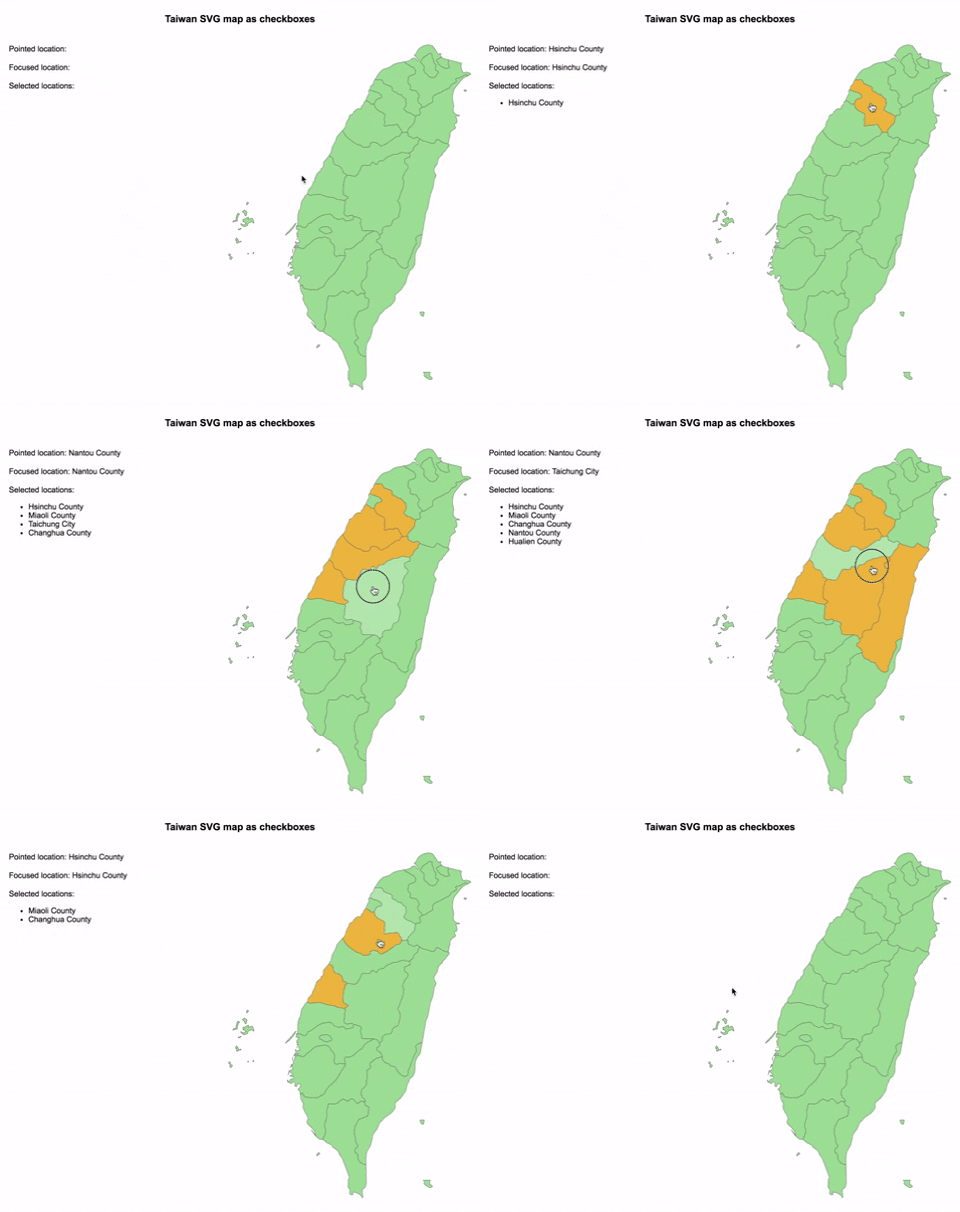
================================================ FILE: docs/index.js ================================================ !function(l){var e={};function t(n){if(e[n])return e[n].exports;var L=e[n]={i:n,l:!1,exports:{}};return l[n].call(L.exports,L,L.exports,t),L.l=!0,L.exports}t.m=l,t.c=e,t.d=function(l,e,n){t.o(l,e)||Object.defineProperty(l,e,{enumerable:!0,get:n})},t.r=function(l){"undefined"!=typeof Symbol&&Symbol.toStringTag&&Object.defineProperty(l,Symbol.toStringTag,{value:"Module"}),Object.defineProperty(l,"__esModule",{value:!0})},t.t=function(l,e){if(1&e&&(l=t(l)),8&e)return l;if(4&e&&"object"==typeof l&&l&&l.__esModule)return l;var n=Object.create(null);if(t.r(n),Object.defineProperty(n,"default",{enumerable:!0,value:l}),2&e&&"string"!=typeof l)for(var L in l)t.d(n,L,function(e){return l[e]}.bind(null,L));return n},t.n=function(l){var e=l&&l.__esModule?function(){return l.default}:function(){return l};return t.d(e,"a",e),e},t.o=function(l,e){return Object.prototype.hasOwnProperty.call(l,e)},t.p="",t(t.s=9)}([function(l,e,t){"use strict";l.exports=t(10)},function(l,e,t){"use strict";Object.defineProperty(e,"__esModule",{value:!0}),e.RadioSVGMap=e.CheckboxSVGMap=e.SVGMap=void 0;var n=r(t(3)),L=r(t(20)),o=r(t(21));function r(l){return l&&l.__esModule?l:{default:l}}e.SVGMap=n.default,e.CheckboxSVGMap=L.default,e.RadioSVGMap=o.default},function(l,e,t){"use strict";Object.defineProperty(e,"__esModule",{value:!0}),e.getLocationId=function(l){return l.target.id},e.getLocationName=function(l){return l.target.attributes.name.value},e.getLocationSelected=function(l){return"true"===l.target.attributes["aria-checked"].value}},function(l,e,t){"use strict";Object.defineProperty(e,"__esModule",{value:!0});var n=o(t(0)),L=o(t(4));function o(l){return l&&l.__esModule?l:{default:l}}function r(l){return n.default.createElement("svg",{xmlns:"http://www.w3.org/2000/svg",viewBox:l.map.viewBox,className:l.className,role:l.role,"aria-label":l.map.label},l.map.locations.map(function(e,t){return n.default.createElement("path",{id:e.id,name:e.name,d:e.path,className:"function"==typeof l.locationClassName?l.locationClassName(e,t):l.locationClassName,tabIndex:"function"==typeof l.locationTabIndex?l.locationTabIndex(e,t):l.locationTabIndex,role:l.locationRole,"aria-label":e.name,"aria-checked":l.isLocationSelected&&l.isLocationSelected(e,t),onMouseOver:l.onLocationMouseOver,onMouseOut:l.onLocationMouseOut,onMouseMove:l.onLocationMouseMove,onClick:l.onLocationClick,onKeyDown:l.onLocationKeyDown,onFocus:l.onLocationFocus,onBlur:l.onLocationBlur,key:e.id})}))}r.propTypes={map:L.default.shape({viewBox:L.default.string.isRequired,locations:L.default.arrayOf(L.default.shape({path:L.default.string.isRequired,id:L.default.string.isRequired,name:L.default.string})).isRequired,label:L.default.string}).isRequired,className:L.default.string,role:L.default.string,locationClassName:L.default.oneOfType([L.default.string,L.default.func]),locationTabIndex:L.default.oneOfType([L.default.string,L.default.func]),locationRole:L.default.string,onLocationMouseOver:L.default.func,onLocationMouseOut:L.default.func,onLocationMouseMove:L.default.func,onLocationClick:L.default.func,onLocationKeyDown:L.default.func,onLocationFocus:L.default.func,onLocationBlur:L.default.func,isLocationSelected:L.default.func},r.defaultProps={className:"svg-map",role:"none",locationClassName:"svg-map__location"},e.default=r},function(l,e,t){l.exports=t(18)()},function(l,e,t){"use strict"; /* object-assign (c) Sindre Sorhus @license MIT */var n=Object.getOwnPropertySymbols,L=Object.prototype.hasOwnProperty,o=Object.prototype.propertyIsEnumerable;l.exports=function(){try{if(!Object.assign)return!1;var l=new String("abc");if(l[5]="de","5"===Object.getOwnPropertyNames(l)[0])return!1;for(var e={},t=0;t<10;t++)e["_"+String.fromCharCode(t)]=t;if("0123456789"!==Object.getOwnPropertyNames(e).map(function(l){return e[l]}).join(""))return!1;var n={};return"abcdefghijklmnopqrst".split("").forEach(function(l){n[l]=l}),"abcdefghijklmnopqrst"===Object.keys(Object.assign({},n)).join("")}catch(l){return!1}}()?Object.assign:function(l,e){for(var t,r,a=function(l){if(null==l)throw new TypeError("Object.assign cannot be called with null or undefined");return Object(l)}(l),i=1;i=0&&c.splice(e,1)}function h(l){var e=document.createElement("style");return l.attrs.type="text/css",y(e,l.attrs),p(l,e),e}function y(l,e){Object.keys(e).forEach(function(t){l.setAttribute(t,e[t])})}function v(l,e){var t,n,L,o;if(e.transform&&l.css){if(!(o=e.transform(l.css)))return function(){};l.css=o}if(e.singleton){var r=u++;t=i||(i=h(e)),n=_.bind(null,t,r,!1),L=_.bind(null,t,r,!0)}else l.sourceMap&&"function"==typeof URL&&"function"==typeof URL.createObjectURL&&"function"==typeof URL.revokeObjectURL&&"function"==typeof Blob&&"function"==typeof btoa?(t=function(l){var e=document.createElement("link");return l.attrs.type="text/css",l.attrs.rel="stylesheet",y(e,l.attrs),p(l,e),e}(e),n=function(l,e,t){var n=t.css,L=t.sourceMap,o=void 0===e.convertToAbsoluteUrls&&L;(e.convertToAbsoluteUrls||o)&&(n=s(n));L&&(n+="\n/*# sourceMappingURL=data:application/json;base64,"+btoa(unescape(encodeURIComponent(JSON.stringify(L))))+" */");var r=new Blob([n],{type:"text/css"}),a=l.href;l.href=URL.createObjectURL(r),a&&URL.revokeObjectURL(a)}.bind(null,t,e),L=function(){m(t),t.href&&URL.revokeObjectURL(t.href)}):(t=h(e),n=function(l,e){var t=e.css,n=e.media;n&&l.setAttribute("media",n);if(l.styleSheet)l.styleSheet.cssText=t;else{for(;l.firstChild;)l.removeChild(l.firstChild);l.appendChild(document.createTextNode(t))}}.bind(null,t),L=function(){m(t)});return n(l),function(e){if(e){if(e.css===l.css&&e.media===l.media&&e.sourceMap===l.sourceMap)return;n(l=e)}else L()}}l.exports=function(l,e){if("undefined"!=typeof DEBUG&&DEBUG&&"object"!=typeof document)throw new Error("The style-loader cannot be used in a non-browser environment");(e=e||{}).attrs="object"==typeof e.attrs?e.attrs:{},e.singleton||"boolean"==typeof e.singleton||(e.singleton=r()),e.insertInto||(e.insertInto="head"),e.insertAt||(e.insertAt="bottom");var t=d(l,e);return f(t,e),function(l){for(var n=[],L=0;LO.length&&O.push(l)}function I(l,e,t){return null==l?0:function l(e,t,n,L){var a=typeof e;"undefined"!==a&&"boolean"!==a||(e=null);var i=!1;if(null===e)i=!0;else switch(a){case"string":case"number":i=!0;break;case"object":switch(e.$$typeof){case o:case r:i=!0}}if(i)return n(L,e,""===t?"."+j(e,0):t),1;if(i=0,t=""===t?".":t+":",Array.isArray(e))for(var u=0;uthis.eventPool.length&&this.eventPool.push(l)}function sl(l){l.eventPool=[],l.getPooled=ul,l.release=cl}L(il.prototype,{preventDefault:function(){this.defaultPrevented=!0;var l=this.nativeEvent;l&&(l.preventDefault?l.preventDefault():"unknown"!=typeof l.returnValue&&(l.returnValue=!1),this.isDefaultPrevented=rl)},stopPropagation:function(){var l=this.nativeEvent;l&&(l.stopPropagation?l.stopPropagation():"unknown"!=typeof l.cancelBubble&&(l.cancelBubble=!0),this.isPropagationStopped=rl)},persist:function(){this.isPersistent=rl},isPersistent:al,destructor:function(){var l,e=this.constructor.Interface;for(l in e)this[l]=null;this.nativeEvent=this._targetInst=this.dispatchConfig=null,this.isPropagationStopped=this.isDefaultPrevented=al,this._dispatchInstances=this._dispatchListeners=null}}),il.Interface={type:null,target:null,currentTarget:function(){return null},eventPhase:null,bubbles:null,cancelable:null,timeStamp:function(l){return l.timeStamp||Date.now()},defaultPrevented:null,isTrusted:null},il.extend=function(l){function e(){}function t(){return n.apply(this,arguments)}var n=this;e.prototype=n.prototype;var o=new e;return L(o,t.prototype),t.prototype=o,t.prototype.constructor=t,t.Interface=L({},n.Interface,l),t.extend=n.extend,sl(t),t},sl(il);var fl=il.extend({data:null}),dl=il.extend({data:null}),pl=[9,13,27,32],ml=$&&"CompositionEvent"in window,hl=null;$&&"documentMode"in document&&(hl=document.documentMode);var yl=$&&"TextEvent"in window&&!hl,vl=$&&(!ml||hl&&8=hl),gl=String.fromCharCode(32),bl={beforeInput:{phasedRegistrationNames:{bubbled:"onBeforeInput",captured:"onBeforeInputCapture"},dependencies:["compositionend","keypress","textInput","paste"]},compositionEnd:{phasedRegistrationNames:{bubbled:"onCompositionEnd",captured:"onCompositionEndCapture"},dependencies:"blur compositionend keydown keypress keyup mousedown".split(" ")},compositionStart:{phasedRegistrationNames:{bubbled:"onCompositionStart",captured:"onCompositionStartCapture"},dependencies:"blur compositionstart keydown keypress keyup mousedown".split(" ")},compositionUpdate:{phasedRegistrationNames:{bubbled:"onCompositionUpdate",captured:"onCompositionUpdateCapture"},dependencies:"blur compositionupdate keydown keypress keyup mousedown".split(" ")}},_l=!1;function kl(l,e){switch(l){case"keyup":return-1!==pl.indexOf(e.keyCode);case"keydown":return 229!==e.keyCode;case"keypress":case"mousedown":case"blur":return!0;default:return!1}}function wl(l){return"object"==typeof(l=l.detail)&&"data"in l?l.data:null}var xl=!1;var Ml={eventTypes:bl,extractEvents:function(l,e,t,n){var L=void 0,o=void 0;if(ml)l:{switch(l){case"compositionstart":L=bl.compositionStart;break l;case"compositionend":L=bl.compositionEnd;break l;case"compositionupdate":L=bl.compositionUpdate;break l}L=void 0}else xl?kl(l,t)&&(L=bl.compositionEnd):"keydown"===l&&229===t.keyCode&&(L=bl.compositionStart);return L?(vl&&"ko"!==t.locale&&(xl||L!==bl.compositionStart?L===bl.compositionEnd&&xl&&(o=ol()):(nl="value"in(tl=n)?tl.value:tl.textContent,xl=!0)),L=fl.getPooled(L,e,t,n),o?L.data=o:null!==(o=wl(t))&&(L.data=o),H(L),o=L):o=null,(l=yl?function(l,e){switch(l){case"compositionend":return wl(e);case"keypress":return 32!==e.which?null:(_l=!0,gl);case"textInput":return(l=e.data)===gl&&_l?null:l;default:return null}}(l,t):function(l,e){if(xl)return"compositionend"===l||!ml&&kl(l,e)?(l=ol(),Ll=nl=tl=null,xl=!1,l):null;switch(l){case"paste":return null;case"keypress":if(!(e.ctrlKey||e.altKey||e.metaKey)||e.ctrlKey&&e.altKey){if(e.char&&1