Showing preview only (579K chars total). Download the full file or copy to clipboard to get everything.
Repository: Vitosh/VBA_personal
Branch: master
Commit: 07f4aaaaea70
Files: 279
Total size: 518.8 KB
Directory structure:
gitextract_tbkq5rr1/

├── .gitattributes
├── .gitignore
├── Algorithms/
│   ├── ActivitySelectionProblem.vb
│   ├── ActivitySelectionProblem_clsActivity.vb
│   ├── AlgorithmsTesting/
│   │   ├── Modul1.bas
│   │   ├── ReadMe.md
│   │   ├── Result001.txt
│   │   ├── Result002.txt
│   │   ├── Test001.txt
│   │   └── Test002.txt
│   ├── CryptographyHashing/
│   │   ├── Base64Sha1.bas
│   │   └── string_to_hash.py
│   ├── FillNumbersInGivenRange.vb
│   ├── Games/
│   │   ├── SnakeAttempt.vb
│   │   └── SnakePrinting.vb
│   ├── GoRightAndDown.vb
│   ├── Knight.vb
│   ├── Knight.xlsm
│   ├── LongestIncreasingSubsequence.vb
│   ├── NpComplete/
│   │   ├── NestedLoops.vb
│   │   ├── RecursionLoops.vb
│   │   └── readme.md
│   ├── PwdHacks/
│   │   ├── CrackerJack.vb
│   │   ├── GhostBreakInfo.vb
│   │   └── Xlsb.PasswordRemover.vb
│   ├── QueenDrama.vb
│   ├── StringManipulations.vb
│   ├── TaxiCabNumbers.vb
│   └── TraverseGraph.vb
├── Boilerplate/
│   ├── ApplicationOnKey.vb
│   ├── Boilerplate VitoshAcademy/
│   │   ├── ConstantsAndPublic.bas
│   │   ├── ExcelAdditional.bas
│   │   ├── ExcelDates.bas
│   │   ├── ExcelFormatCell.bas
│   │   ├── ExcelLastThings.bas
│   │   ├── ExcelPrintToNotepad.bas
│   │   ├── ExcelStructure.bas
│   │   ├── ExcelVBE.bas
│   │   ├── VersionsAbout.bas
│   │   ├── formExample.bas
│   │   ├── formSummaryPresenter.cls
│   │   ├── frmExample.frm
│   │   ├── frmExample.frx
│   │   ├── frmInfo.frm
│   │   ├── frmInfo.frx
│   │   ├── tblInput.vb
│   │   ├── tddMain.bas
│   │   ├── tddSpecDefinition.cls
│   │   ├── tddSpecExpectation.cls
│   │   ├── tddSpecInlineRunner.bas
│   │   ├── tddSpecSuite.cls
│   │   └── xl_main.vb
│   ├── Boilerplate_v8.0.3.xlsb
│   ├── CodifyDecodify.vb
│   ├── ConvertNumberToLetter.vb
│   ├── ExcelGeneral.vb
│   ├── Files.vb
│   ├── Formula.vb
│   ├── GeneratePathToFolder.vb
│   ├── LastThings.vb
│   ├── Lock.vb
│   ├── MinAndMax.vb
│   ├── NamedRanges.vb
│   ├── NotepadExport.vb
│   ├── OnStartOnEnd.vb
│   ├── RegEx.vb
│   ├── StringsAlgorithms.vb
│   ├── Timer.vb
│   ├── VariousDatesFirstDay.vb
│   ├── WorksheetToCSV
│   └── readme.md
├── ExcelTdd/
│   ├── ExcelTDD.xlsb
│   ├── InlineRunner.vb
│   ├── MakeValuesSelection.vb
│   ├── README.md
│   ├── SpecDefinition.vb
│   ├── SpecExpectation.vb
│   ├── SpecSuite.vb
│   ├── TDD_example.vb
│   ├── mod_NeutralSubsAndRoutines.vb
│   ├── mod_Notepad.vb
│   ├── mod_PublicVariables.vb
│   ├── mod_TddRoutines.vb
│   └── mod_TddRoutinesB.vb
├── Financial/
│   ├── BenfordModule.vb
│   ├── BenfordModuleClass.vb
│   ├── BenfordTableTennisData.xlsb
│   ├── Binary.vb
│   ├── ByReferenceByValue.vb
│   ├── CalculateCostsWithInflation.vb
│   ├── DoubleCalculation.vb
│   ├── ExampleWithDoubles.vb
│   ├── MakeRedAndBlack.vb
│   ├── Readme.md
│   ├── ScientificNotationExplanation.vb
│   ├── SumProductCountAndSum.xlsx
│   └── VLookUpWithMultipleCriteria.vb
├── Formatting/
│   ├── Borders.vb
│   ├── ColorSaturdayAndSunday.vb
│   ├── Comments.vb
│   ├── Conditional Compilation Arguments.vb
│   ├── ConditionalFormat.vb
│   ├── CreateSheetRemoveSheet.vb
│   ├── DataCleaning.vb
│   ├── FileNameWithDialogBox.vb
│   ├── FixRangeError.vb
│   ├── GetWorkbook.vb
│   ├── IgnoreCellErrors.vb
│   ├── InsertIntoString.vb
│   ├── OpenAndClose.vb
│   ├── RangeConnector.vb
│   ├── RemoveWorksheet.vb
│   ├── Rgb2HtmlColor.vb
│   ├── SetPrintArea.vb
│   ├── Shapes.vb
│   ├── Shortcuts/
│   │   ├── README.md
│   │   └── Shortcuts.xlsx
│   ├── SplitValuesSingleColumnToCells.vb
│   └── StyleKiller.vb
├── Internet/
│   ├── AmazonInternet.bas
│   ├── ConstValues.bas
│   ├── ExcelRelated.bas
│   ├── General.bas
│   ├── GotoInternet.vb
│   ├── README.md
│   ├── StartUp.bas
│   └── XL.xlsb
├── OOP/
│   ├── AttributesInVBA/
│   │   ├── CarGlobal.cls
│   │   ├── CarWithDefaultProperty.cls
│   │   ├── ExportModule.bas
│   │   ├── MainModule.bas
│   │   ├── ReadMe.md
│   │   └── TruckWithDefaultProcedure.cls
│   ├── CopyObjectInVBA/
│   │   ├── Employee.cls.txt
│   │   ├── MainModule.vb.txt
│   │   └── ReadMe.md
│   ├── DictionaryAndArray/
│   │   ├── CollectionToArray.vb
│   │   ├── DictionaryExample.vb
│   │   ├── HttpObjectInTag.vb
│   │   ├── Internet.vb
│   │   ├── MultidimensionalArray.vb
│   │   ├── RemoveEmptyElementsFromArray.vb
│   │   └── SortArraySortList.vb
│   └── Interfaces/
│       ├── IGeneral.vb
│       ├── IUnitTypes.vb
│       ├── cls_beide.vb
│       ├── cls_carport.vb
│       ├── cls_gewerbe.vb
│       ├── cls_tg.vb
│       ├── cls_wohnungen.vb
│       ├── mod_main.vb
│       └── mod_test.vb
├── PythonExcel/
│   ├── ReadMe.md
│   └── list_to_multiple_tabs.py
├── README.md
├── Sql/
│   ├── CheckStatus.vb
│   ├── Connection.vb
│   ├── ExportFromMssqlToExcel.vb
│   ├── ImportToMSSQL.vb
│   ├── SQL_Local_Info.vb
│   ├── SQL_VBA01.vb
│   ├── SQL_VBA02.vb
│   ├── SQL_VBA03.vb
│   ├── SqlQueriesVBA/
│   │   ├── AdoValueConverter.cls
│   │   └── SqlCommand.cls
│   ├── mdx.vb
│   ├── sql_test.vb
│   └── sql_vba_excel.vb
├── VBE/
│   ├── AddOptionPrivateModule.vb
│   ├── GitSave.vb
│   ├── MovingModules.vb/
│   │   ├── ThisSheet.vb
│   │   ├── ThisWorkbook.vb
│   │   ├── cls_calendar.vb
│   │   ├── mod_gen_main.vb
│   │   ├── mod_gen_public.vb
│   │   ├── mod_main.vb
│   │   └── mod_public.vb
│   ├── Preprocessor.vb
│   ├── PrintAllProcedures.vb
│   └── SaveThis.vb
├── XML/
│   ├── XmlSimpleManualParser.txt
│   ├── readme.md
│   └── test.xml
└── __Arch/
    ├── 00.vb
    ├── 01.vb
    ├── 03.vb
    ├── 04 - Excel Objects Edition.vb
    ├── AllFormats.vb
    ├── AverageRowColumnNamedRange.vb
    ├── BorderMeBorderRange.vb
    ├── Classes/
    │   ├── Class Builder VBA/
    │   │   ├── cls_ba.cls
    │   │   ├── cls_project.cls
    │   │   └── mod_main.bas
    │   ├── class-project/
    │   │   ├── Call By Names
    │   │   ├── check_properties.vb
    │   │   ├── cls_arrCalendarSettings.vb
    │   │   ├── cls_arr_Choice.vb
    │   │   ├── mod_Properties.vb
    │   │   ├── mod_PublicAndEnums
    │   │   └── mod_current.vb
    │   ├── class-project-customized/
    │   │   └── customized_procedure.vb
    │   └── class-project-improved/
    │       ├── cls_arrCalendar.vb
    │       ├── cls_arrChoice.vb
    │       └── sandbox.vb
    ├── FixSums.vb
    ├── FormWithAnInstanceVBA/
    │   ├── Form001.xlsb
    │   ├── Form003/
    │   │   ├── clsSummaryPresenter.vb
    │   │   ├── frmMain.vb
    │   │   └── modMain.vb
    │   ├── Form011_working.xlsb
    │   ├── clsSummaryPresenter.vb
    │   ├── frmMain.vb
    │   └── modMain.vb
    ├── FormatMyCell.vb
    ├── Hex.vb
    ├── HideRange.vb
    ├── HideShowComments.vb
    ├── NamedRanges.vb
    ├── OpenedExcelInfo.vb
    ├── OutlookRelated.vb
    ├── Recursion.vb
    ├── RelativePath.vb
    ├── RemoveAllItemsFromListBox.vb
    ├── SaveAs.vb
    ├── SmallExcelFormats.vb
    ├── TDD_example.vb
    ├── UseEnvironName.vb
    ├── Userful_Application.vb
    ├── XL_password_cracker.vb
    ├── addPictureToFile.vb
    ├── all_of_a_kind.vb
    ├── browse.vb
    ├── btn_open_Click.vb
    ├── bus.vb
    ├── call_click_event_from_module.vb
    ├── cls_counter.vb
    ├── code_making_code.vb
    ├── colors.vb
    ├── copy_newsheet_new sheet.vb
    ├── delete_row.vb
    ├── errors.vb
    ├── example.hta.htm
    ├── form_VBA.vb
    ├── general_smalls.vb
    ├── hide_selected_sheets.vb
    ├── info.txt
    ├── isUserFormLoaded.vb
    ├── languages.vb
    ├── last_row_of_named_range.vb
    ├── mod_cumulative_sum.vb
    ├── mod_environ.vb
    ├── mod_excel_functions.vb
    ├── mod_from_experience_various.vb
    ├── mod_functions.vb
    ├── mod_public.vb
    ├── mod_remove_styles.vb
    ├── mod_shortcuts.vb
    ├── proposal_to_update.vb
    ├── protectsheet.vb
    ├── quick_unlock.vb
    ├── readme.md
    ├── recursive_loop.vb
    ├── refer_cell_in_named_range.vb
    ├── relevant_months.vb
    ├── removeNamedRanges.vb
    ├── remove_msgbox.txt
    ├── remove_spaces.vb
    ├── revealer.vb
    ├── selection_range_trick.vb
    ├── string_generator.vb
    ├── subsequence.vb
    ├── sum_array_with_optional.vb
    ├── sum_column.vb
    ├── todo_in_a_new_project.vb
    ├── typenameAndvartype.vb
    ├── user_form_centre.vb
    ├── vba_dictionary_example.vb
    ├── xl_docName.vb
    └── xl_main.vb
================================================
FILE CONTENTS
================================================
================================================
FILE: .gitattributes
================================================
*.vb linguist-language=vba
================================================
FILE: .gitignore
================================================
# Compiled source #
###################
*.com
*.class
*.dll
*.exe
*.o
*.so
# Packages #
############
# it's better to unpack these files and commit the raw source
# git has its own built in compression methods
*.7z
*.dmg
*.gz
*.iso
*.jar
*.rar
*.tar
*.zip
# Logs and databases #
######################
*.log
*.sql
*.sqlite
# OS generated files #
######################
.DS_Store
.DS_Store?
._*
.Spotlight-V100
.Trashes
ehthumbs.db
Thumbs.db
desktop.ini
================================================
FILE: Algorithms/ActivitySelectionProblem.vb
================================================
Option Explicit
Public Sub TestMe()
Dim objA As clsActivity
Dim colObjs As New Collection
Dim rngCell As Range
Dim strResult As String
Dim i As Long
Dim lngNextStart As Long: lngNextStart = 0
For Each rngCell In Range(Cells(1, 1), Cells(1, 11))
Set objA = Nothing
Set objA = New clsActivity
objA.StartTime = rngCell
objA.EndTime = rngCell.Offset(1, 0)
objA.Name = rngCell.Offset(2, 0)
colObjs.Add objA
Next rngCell
Set colObjs = SortedCollection(colObjs)
For i = 1 To colObjs.Count
If colObjs.Item(i).StartTime > lngNextStart Then
strResult = strResult & colObjs.Item(i).Name & vbTab & _
colObjs.Item(i).StartTime & vbTab & _
colObjs.Item(i).EndTime & vbCrLf
lngNextStart = colObjs.Item(i).EndTime
End If
Next i
Debug.Print strResult
End Sub
Public Function SortedCollection(myColl As Collection, Optional blnSortABC As Boolean = True) As Collection
Dim i As Long
Dim j As Long
For i = myColl.Count To 2 Step -1
For j = 1 To i - 1
If blnSortABC Then
If myColl(j).EndTime > myColl(j + 1).EndTime Then
myColl.Add myColl(j), after:=j + 1
myColl.Remove j
End If
Else
If myColl(j).EndTime < myColl(j + 1).EndTime Then
myColl.Add myColl(j), after:=j + 1
myColl.Remove j
End If
End If
Next j
Next i
Set SortedCollection = myColl
End Function
================================================
FILE: Algorithms/ActivitySelectionProblem_clsActivity.vb
================================================
Private pName As String
Private pStartTime As Long
Private pEndTime As Long
Public Property Get Name() As String
Name = pName
End Property
Public Property Let Name(value As String)
pName = value
End Property
Public Property Get StartTime() As Long
StartTime = pStartTime
End Property
Public Property Let StartTime(value As Long)
pStartTime = value
End Property
Public Property Get Endtime() As Long
Endtime = pEndTime
End Property
Public Property Let Endtime(value As Long)
pEndTime = value
End Property
================================================
FILE: Algorithms/AlgorithmsTesting/Modul1.bas
================================================
Attribute VB_Name = "Modul1"
Option Explicit
Public Sub Main()
Dim totalTests As Long
Dim pathInputTests As String
Dim pathOutputTests As String
Dim inputTests As Variant
Dim outputTests As Variant
Dim cntTests As Long
Dim cnt As Long
pathInputTests = "C:\Desktop\Test002.txt"
pathOutputTests = "C:\Desktop\Result002.txt"
inputTests = Split(ReadFileLineByLineToString(pathInputTests), vbCrLf)
outputTests = Split(ReadFileLineByLineToString(pathOutputTests), vbCrLf)
For cnt = LBound(inputTests) To UBound(inputTests)
Dim expectedValue As Variant
Dim receivedValue As Variant
On Error Resume Next
expectedValue = outputTests(cnt)
receivedValue = MainTest(Trim(inputTests(cnt)))
If Err.Number <> 0 Then
Debug.Print runtimeError(cnt)
Err.Clear
Else
If Trim(expectedValue) = Trim(receivedValue) Then
Debug.Print positiveResult(cnt)
Else
Debug.Print negativeResult(cnt, expectedValue, receivedValue)
End If
End If
Next cnt
End Sub
Public Function runtimeError(ByVal cnt As Long) As String
cnt = cnt + 1
runtimeError = "Runtime error on " & cnt & "!"
End Function
Public Function positiveResult(ByVal cnt As Long) As String
cnt = cnt + 1
positiveResult = "Test " & cnt & "..................................... ok!"
End Function
Public Function negativeResult(ByVal cnt As Long, expected As Variant, _
received As Variant) As String
cnt = cnt + 1
negativeResult = "Error on test " & cnt & "!" & _
" Expected -> " & vbTab & expected & vbTab & _
" Received -> " & vbTab & received
End Function
'---------------------------------------------------------------------------------------
' Method : MainTest
' Purpose: This is where the competitors paste their solution.
'---------------------------------------------------------------------------------------
Public Function MainTest(ByVal consoleInput As String) As String
Dim inputVar As Variant
Dim cnt As Long
Dim outputVar As Variant
inputVar = Split(consoleInput)
ReDim outputVar(UBound(inputVar))
For cnt = LBound(inputVar) To UBound(inputVar)
If Asc(inputVar(cnt)) = Asc("z") Then
MainTest = MainTest & " a"
Else
MainTest = MainTest & " " & Chr(Asc(inputVar(cnt)) + 1)
End If
Next cnt
' Dim a As Double
' Dim b As Double
' Dim c As Double
'
' a = Split(consoleInput)(0)
' b = Split(consoleInput)(1)
' c = Split(consoleInput)(2)
'
' If c Mod 2 = 0 Then
' MainTest = a + b + c
' Else
' MainTest = a + b - c
' End If
End Function
Public Function ReadFromFile(path As String) As String
Dim fileNo As Long
fileNo = FreeFile
Open path For Input As #fileNo
Do While Not EOF(fileNo)
Dim textRowInput As String
Line Input #fileNo, textRowInput
ReadFromFile = ReadFromFile & textRowInput
If Not EOF(fileNo) Then
ReadFromFile = ReadFromFile & vbCrLf
End If
Loop
Close #fileNo
End Function
Sub WriteToFile(filePath As String, text As String)
Dim fso As Object
Set fso = CreateObject("Scripting.FileSystemObject")
Dim oFile As Object
Set oFile = fso.CreateTextFile(filePath)
oFile.Write text
oFile.Close
End Sub
Sub TestMe()
Dim readTxt As String
Dim filePath As String: filePath = "C:\text.txt"
readTxt = ReadFromFile(filePath)
readTxt = Replace(readTxt, "name=", "")
readTxt = Replace(readTxt, "correo=", "")
WriteToFile filePath, readTxt
End Sub
================================================
FILE: Algorithms/AlgorithmsTesting/ReadMe.md
================================================
# Algorithm testing system, reading from text file with VBA
For the people, familiar with my blog, it is known that usually I am resolving problems from Codeforces.com. Codeforces supports plenty of languages, unfortunately VBA is not one of them. Thus, I have decided to build up a small algorithm testing system, which follows the following pattern – the input and the expected output are both provided via separate text files. Then, the person who writes the algorithm, should be able to write a function, reading from the first file and getting exactly the values from the other file.
Thus, let’s imagine that the task sounds like:
Take an input of 3 numbers and sum them. However, if the third number is even, do sum only the first two and subtract the third.
This is easily achievable through this function (...)
The whole article is available @ [VitoshAcademy](http://www.vitoshacademy.com/algorithm-testing-system-reading-from-text-file-with-vba/)
================================================
FILE: Algorithms/AlgorithmsTesting/Result001.txt
================================================
6
1
1
58
100
121
100
================================================
FILE: Algorithms/AlgorithmsTesting/Result002.txt
================================================
b c d e f g
c
a
d d
a a b
================================================
FILE: Algorithms/AlgorithmsTesting/Test001.txt
================================================
2 2 2
2 2
2 2 3
4 54 1
2 2
54 23 6
45 45 10
================================================
FILE: Algorithms/AlgorithmsTesting/Test002.txt
================================================
a b c d e f
b
z
c c
z z a
================================================
FILE: Algorithms/CryptographyHashing/Base64Sha1.bas
================================================
Public Function Base64Sha1(inputText As String, Optional secretKey = "") As String
Dim asc As Object
Dim enc As Object
Dim textToHash() As Byte
Dim SharedSecretKey() As Byte
Dim bytes() As Byte
If secretKey = "" Then secretKey = inputText
Set asc = CreateObject("System.Text.UTF8Encoding")
Set enc = CreateObject("System.Security.Cryptography.HMACSHA1")
textToHash = asc.GetBytes_4(inputText)
SharedSecretKey = asc.GetBytes_4(secretKey)
enc.Key = SharedSecretKey
bytes = enc.ComputeHash_2((textToHash))
Base64Sha1 = EncodeBase64(bytes)
End Function
Private Function EncodeBase64(arrData() As Byte) As String
Dim objXML As Object
Dim objNode As Object
Set objXML = CreateObject("MSXML2.DOMDocument")
Set objNode = objXML.createElement("b64")
objNode.DataType = "bin.base64"
objNode.nodeTypedValue = arrData
EncodeBase64 = objNode.text
End Function
Sub TestMe()
Debug.Print Base64Sha1("asdf", "ThisIsTheSecretKey") = "DSmGEC8dUW9xRs+YfAPji59dxCM="
Debug.Print Base64Sha1("asdf") = "qIQmNGgreJRqJroWUUu0MxLq2oo="
Debug.Print Base64Sha1("asdf", "asdf") = "qIQmNGgreJRqJroWUUu0MxLq2oo="
End Sub
================================================
FILE: Algorithms/CryptographyHashing/string_to_hash.py
================================================
import hmac
import hashlib
import base64
def string_to_hash(word):
word = word.encode('utf-8')
hash = hmac.new(word, word, hashlib.sha1).digest()
return base64.b64encode(hash).decode("utf-8")
print(string_to_hash('a')) #OQLthH/yiTC18UGr+otHFoElNnM=
================================================
FILE: Algorithms/FillNumbersInGivenRange.vb
================================================
Option Explicit
Private currentMove As Direction
Private size As Long
Public Enum Direction
Right
Down
Left
Up
End Enum
Sub Main()
Cells.Clear
size = 2
SetMatrixStars
MakeMatrix
Cells.Columns.AutoFit
End Sub
Sub SetMatrixStars()
Dim i As Long
For i = 1 To size
Cells(size + 1, i) = "*"
Cells(i, size + 1) = "*"
Next i
Cells(size + 1, size + 1) = "*"
End Sub
Sub MakeMatrix()
Dim currentCell As Range: Set currentCell = Cells(1, 1)
currentMove = Right
Dim i As Long
Do While True
i = i + 1
currentCell = i
If IsLast(currentCell) Then Exit Do
Set currentCell = nextCell(currentCell)
Loop
End Sub
Function IsLast(currentCell As Range) As Boolean
If size = 1 Then
IsLast = True
Exit Function
End If
If currentCell.Row = 1 Or currentCell.Column = 1 Then
If size = 2 And currentCell = 4 Then
IsLast = True
Else
IsLast = False
End If
Exit Function
End If
IsLast = Not IsEmpty(currentCell.Offset(1, 0)) _
And Not IsEmpty(currentCell.Offset(-1, 0)) _
And Not IsEmpty(currentCell.Offset(0, -1)) _
And Not IsEmpty(currentCell.Offset(0, 1))
End Function
Public Function nextCell(currentCell As Range) As Range
Select Case currentMove
Case Direction.Right
If IsEmpty(currentCell.Offset(, 1)) Then
Set nextCell = currentCell.Offset(, 1)
Else
Set nextCell = currentCell.Offset(1)
currentMove = Direction.Down
End If
Case Direction.Down
If IsEmpty(currentCell.Offset(1)) Then
Set nextCell = currentCell.Offset(1)
Else
Set nextCell = currentCell.Offset(, -1)
currentMove = Direction.Left
End If
Case Direction.Left
If currentCell.Column = 1 Then
Set nextCell = currentCell.Offset(-1)
currentMove = Direction.Up
Else
If IsEmpty(currentCell.Offset(, -1)) Then
Set nextCell = currentCell.Offset(, -1)
Else
Set nextCell = currentCell.Offset(-1)
currentMove = Direction.Up
End If
End If
Case Direction.Up
If IsEmpty(currentCell.Offset(-1)) Then
Set nextCell = currentCell.Offset(-1)
Else
Set nextCell = currentCell.Offset(0, 1)
currentMove = Direction.Right
End If
End Select
End Function
================================================
FILE: Algorithms/Games/SnakeAttempt.vb
================================================
Option Explicit
'https://msdn.microsoft.com/en-us/library/windows/desktop/ms646299(v=vs.85).aspx
'https://msdn.microsoft.com/en-us/library/windows/desktop/ms646293(v=vs.85).aspx
Private Declare PtrSafe Sub Sleep Lib "kernel32" (ByVal dwMilliseconds As Long)
Public Declare Function GetAsyncKeyState Lib "user32" (ByVal vKey As Long) As Long
Private Const SIZE_WIDTH As Long = 7
Private Const SIZE_HEIGTH As Long = 5
Private Const COL_WIDTH As Double = 2.3
Private Const BORDER_COL As Long = 190
Private wks As Worksheet
Private pointX As Long
Private pointY As Long
Private leadPoint As Range
Private pointField As Range
Private movingDirection As Direction
Public Enum Direction
GoUp = 1
GoRight = 2
GoDown = 3
GoLeft = 4
End Enum
Private Sub Main()
FixThePitch
InitializePoint
PrintInformation
MoveAround
End Sub
Public Sub PrintInformation()
Debug.Print "Press Home to exit."
End Sub
Private Sub ShowNewFood()
Dim positionRow As Long
Dim positionCol As Long
positionRow = 1
positionCol = 1
End Sub
Private Function MakeRandom(down As Long, up As Long) As Long
MakeRandom = CLng((up - down) * Rnd + down)
End Function
Public Sub ChangePoints(pointToChange As Long)
pointField.value = pointField + pointToChange
End Sub
Public Sub GoMove(moveDir As Direction)
Debug.Print moveDir
End Sub
Public Sub ColorSnake()
With wks
.Range(.Cells(1, 1), .Cells(SIZE_HEIGTH, SIZE_WIDTH)).Clear
End With
leadPoint.Interior.COLOR = vbWhite
End Sub
Private Sub MoveFurther()
Select Case movingDirection
Case GoUp:
If leadPoint.row = 1 Then
Set leadPoint = Cells(SIZE_HEIGTH, leadPoint.Column)
Else
Set leadPoint = Cells(leadPoint.row - 1, leadPoint.Column)
End If
Case GoRight:
If leadPoint.Column = SIZE_WIDTH Then
Set leadPoint = Cells(leadPoint.row, 1)
Else
Set leadPoint = Cells(leadPoint.row, leadPoint.Column + 1)
End If
Case GoDown:
If leadPoint.row = SIZE_HEIGTH Then
Set leadPoint = Cells(1, leadPoint.Column)
Else
Set leadPoint = Cells(leadPoint.row + 1, leadPoint.Column)
End If
Case GoLeft:
If leadPoint.Column = 1 Then
Set leadPoint = Cells(leadPoint.row, SIZE_WIDTH)
Else
Set leadPoint = Cells(leadPoint.row, leadPoint.Column - 1)
End If
End Select
End Sub
Private Sub ReadKey()
Debug.Assert Not IsEmpty(GetAsyncKeyState(vbKeyUp))
Select Case True
Case GetAsyncKeyState(vbKeyHome)
Debug.Print "Exiting..."
End
Case GetAsyncKeyState(vbKeyUp):
movingDirection = GoUp
Case GetAsyncKeyState(vbKeyRight):
movingDirection = GoRight
Case GetAsyncKeyState(vbKeyDown):
movingDirection = GoDown
Case GetAsyncKeyState(vbKeyLeft):
movingDirection = GoLeft
End Select
End Sub
Private Sub MoveAround()
movingDirection = Direction.GoRight
Do While True
DoEvents
ReadKey
ColorSnake
MoveFurther
Sleep (200)
Loop
End Sub
Private Sub InitializePoint()
Set leadPoint = wks.Cells(2, 3)
End Sub
Private Sub FixThePitch()
Set wks = tbl_Internal1
wks.visible = xlSheetVisible
wks.Activate
With wks
.Cells.Delete
.Cells(1, 1).Select
.Range(.Cells(1), .Cells(1 + SIZE_WIDTH)).ColumnWidth = COL_WIDTH
.Range(.Cells(SIZE_HEIGTH + 1, 1), .Cells(SIZE_HEIGTH + 1, SIZE_WIDTH)).Borders.COLOR = RGB(BORDER_COL, BORDER_COL, BORDER_COL)
.Range(.Cells(1, SIZE_WIDTH + 1), .Cells(SIZE_HEIGTH + 1, SIZE_WIDTH + 1)).Borders.COLOR = RGB(BORDER_COL, BORDER_COL, BORDER_COL)
End With
Set pointField = wks.Cells(8, 1)
ChangePoints (0)
End Sub
================================================
FILE: Algorithms/Games/SnakePrinting.vb
================================================
Option Explicit
Public Function SnakeMyNumbers(n As Long) As String
Dim lngCol As Long
Dim lngRow As Long
Dim str As String
For lngCol = 0 To n - 1
str = ""
For lngRow = 0 To n - 1
If lngRow Mod 2 = 0 Then
str = str & vbTab & n * lngRow + lngCol + 1
Else
str = str & vbTab & n * (lngRow + 1) - lngCol
End If
Next lngRow
SnakeMyNumbers = SnakeMyNumbers & str & vbCrLf
Next lngCol
End Function
================================================
FILE: Algorithms/GoRightAndDown.vb
================================================
Option Explicit
Sub GreedyAlgorithm()
Dim rowsCount As Long
Dim colCount As Long
Dim l_row_counter As Long
Dim l_col_counter As Long
Dim l_min_value As Long
Dim max_prev_cell As Long
Dim arr_sum As Variant
Dim arr_reverse As Variant
Dim rng As Range
Dim rng2 As Range
Calculate
Application.Calculation = xlCalculationManual
Set rng = [matrix]
Set rng2 = [matrix2]
rowsCount = [matrix].Rows.Count
colCount = [matrix].Columns.Count
rng2.Clear
l_min_value = Application.WorksheetFunction.Min([matrix]) - 1
ReDim arr_sum(rowsCount, colCount)
ReDim arr_reverse(rowsCount, colCount)
For l_row_counter = 1 To rowsCount
For l_col_counter = 1 To colCount
max_prev_cell = l_min_value
If l_row_counter > 1 Then
If arr_sum(l_row_counter - 1, l_col_counter) > max_prev_cell Then
max_prev_cell = arr_sum(l_row_counter - 1, l_col_counter)
End If
End If
If l_col_counter > 1 Then
If arr_sum(l_row_counter, l_col_counter - 1) > max_prev_cell Then
max_prev_cell = arr_sum(l_row_counter, l_col_counter - 1)
End If
End If
arr_sum(l_row_counter, l_col_counter) = rng.Item(l_row_counter, l_col_counter)
rng2.Item(l_row_counter, l_col_counter) = rng.Item(l_row_counter, l_col_counter)
If max_prev_cell <> l_min_value Then
arr_sum(l_row_counter, l_col_counter) = arr_sum(l_row_counter, l_col_counter) + max_prev_cell
rng2.Item(l_row_counter, l_col_counter) = arr_sum(l_row_counter, l_col_counter)
End If
Next l_col_counter
Next l_row_counter
l_col_counter = l_col_counter - 1
l_row_counter = l_row_counter - 1
While (l_row_counter > 0) And (l_col_counter > 0)
arr_reverse(l_row_counter, l_col_counter) = True
If arr_sum(l_row_counter - 1, l_col_counter) > arr_sum(l_row_counter, l_col_counter - 1) Then
l_row_counter = l_row_counter - 1
Else
l_col_counter = l_col_counter - 1
End If
Wend
For l_row_counter = 1 To rowsCount
For l_col_counter = 1 To colCount
If arr_reverse(l_row_counter, l_col_counter) Then
rng2.Item(l_row_counter, l_col_counter).Font.Color = vbRed
End If
Next l_col_counter
Next l_row_counter
rng.Columns.EntireColumn.AutoFit
rng2.Columns.EntireColumn.AutoFit
'Application.Calculation = xlAutomatic
End Sub
================================================
FILE: Algorithms/Knight.vb
================================================
Option Explicit
Public r_range As Range
Public r_used_range As Range
Public l_result As Long
Public Sub DeleteOthers()
Dim r_cell As Range
For Each r_cell In r_used_range
If r_cell.Interior.Color <> vbGreen Then r_cell.ClearContents
Next r_cell
End Sub
Public Sub CalculatePriceWithItalic(r_cell As Range, l_size As Long, Optional b_once As Boolean = False)
Dim r_row As Range
Dim r_col As Range
Dim my_cell As Range
Dim l_row As Long
Dim l_col As Long
l_result = 0
'RIGHT
l_row = r_cell.Row + 1
l_col = r_cell.Column + 2
Call CheckRow(l_row, l_col, l_size, r_cell, b_once)
l_row = r_cell.Row - 1
l_col = r_cell.Column + 2
Call CheckRow(l_row, l_col, l_size, r_cell, b_once)
'DOWN
l_row = r_cell.Row + 2
l_col = r_cell.Column + 1
Call CheckRow(l_row, l_col, l_size, r_cell, b_once)
l_row = r_cell.Row + 2
l_col = r_cell.Column - 1
Call CheckRow(l_row, l_col, l_size, r_cell, b_once)
'LEFT
l_row = r_cell.Row - 1
l_col = r_cell.Column - 2
Call CheckRow(l_row, l_col, l_size, r_cell, b_once)
l_row = r_cell.Row + 1
l_col = r_cell.Column - 2
Call CheckRow(l_row, l_col, l_size, r_cell, b_once)
'UP
l_row = r_cell.Row - 2
l_col = r_cell.Column - 1
Call CheckRow(l_row, l_col, l_size, r_cell, b_once)
l_row = r_cell.Row - 2
l_col = r_cell.Column + 1
Call CheckRow(l_row, l_col, l_size, r_cell, b_once)
r_cell = l_result
Set my_cell = Nothing
End Sub
Public Sub CheckRow(l_row As Long, l_col As Long, l_size As Long, r_cell As Range, b_once As Boolean)
If l_row <= l_size And l_col <= l_size And l_row > 0 And l_col > 0 Then
If Len(Cells(l_row, l_col)) < 1 And Cells(l_row, l_col).Address <> r_cell.Address Then
l_result = l_result + 1
If b_once Then Call CalculatePriceWithItalic(Cells(l_row, l_col), l_size)
End If
End If
End Sub
Sub main()
Dim my_array() As Variant
Dim my_array_b() As Variant
Dim l_counter As Long
Dim l_counter_2 As Long
Dim l_counter_moves As Long: l_counter_moves = 1
Dim my_cell As Range
Dim b_animate As Boolean
Dim l_starting_row As Long
Dim l_starting_col As Long
b_animate = True
l_counter = 8
l_starting_row = 8
l_starting_col = 8
If l_starting_row > l_counter Or l_starting_row < 1 Then l_starting_row = l_counter
If l_starting_col > l_counter Or l_starting_col < 1 Then l_starting_col = l_counter
Call OnStart(b_animate)
ReDim my_array(l_counter)
Set r_used_range = Range(Cells(1, 1), Cells(100, 100))
r_used_range.Clear
Set r_used_range = Range(Cells(1, 1), Cells(l_counter, l_counter))
r_used_range.Clear
Call FormatRangeInitially(r_used_range)
For l_counter_2 = 1 To l_counter
ReDim my_array_b(l_counter)
my_array(l_counter_2) = my_array_b
Next l_counter_2
Set my_cell = Cells(l_starting_row, l_starting_col)
While l_counter_moves <= (l_counter ^ 2)
Call CalculatePriceWithItalic(my_cell, l_counter, True)
Call FormatMyCell(my_cell, l_counter_moves, 1)
If b_animate Then Application.Wait (Now + TimeValue("00:00:01"))
Call FormatMyCell(my_cell, l_counter_moves, 2)
l_counter_moves = l_counter_moves + 1
Set my_cell = FindNextTarget
Call DeleteOthers
Wend
Set r_used_range = Nothing
Set r_range = Nothing
Set my_cell = Nothing
Call OnEnd
End Sub
Function FindNextTarget() As Range
Dim my_next As Range
Dim lowest As Long: lowest = 9999
For Each my_next In r_used_range
If my_next.Value < lowest And my_next.Value > 0 And my_next.Interior.Color <> vbGreen Then
lowest = my_next.Value
Set FindNextTarget = my_next
End If
Next my_next
End Function
Sub FormatMyCell(ByRef my_cell_range As Range, l_counter As Long, l_color As Long)
If l_color = 2 Then my_cell_range.Interior.Color = vbGreen
If l_color = 1 Then my_cell_range.Interior.Color = vbRed
my_cell_range = l_counter
End Sub
Public Sub FormatRangeInitially(r_range As Range)
r_range.HorizontalAlignment = xlCenter
r_range.Borders(xlDiagonalDown).LineStyle = xlNone
r_range.Borders(xlDiagonalUp).LineStyle = xlNone
With r_range.Borders(xlEdgeLeft)
.LineStyle = xlContinuous
.ColorIndex = 0
.TintAndShade = 0
.Weight = xlThin
End With
With r_range.Borders(xlEdgeTop)
.LineStyle = xlContinuous
.ColorIndex = 0
.TintAndShade = 0
.Weight = xlThin
End With
With r_range.Borders(xlEdgeBottom)
.LineStyle = xlContinuous
.ColorIndex = 0
.TintAndShade = 0
.Weight = xlThin
End With
With r_range.Borders(xlEdgeRight)
.LineStyle = xlContinuous
.ColorIndex = 0
.TintAndShade = 0
.Weight = xlThin
End With
With r_range.Borders(xlInsideVertical)
.LineStyle = xlContinuous
.ColorIndex = 0
.TintAndShade = 0
.Weight = xlThin
End With
With r_range.Borders(xlInsideHorizontal)
.LineStyle = xlContinuous
.ColorIndex = 0
.TintAndShade = 0
.Weight = xlThin
End With
r_range.ColumnWidth = 3.2
End Sub
Public Sub OnStart(b_animate As Boolean)
Application.DisplayAlerts = False
If Not b_animate Then Application.ScreenUpdating = False
Application.Calculation = xlAutomatic
Application.EnableEvents = False
End Sub
Public Sub OnEnd()
'Application.DisplayAlerts = True
Application.ScreenUpdating = True
Application.EnableEvents = True
Application.StatusBar = False
End Sub
================================================
FILE: Algorithms/LongestIncreasingSubsequence.vb
================================================
Option Explicit
Public Const NO_PREVIOUS = -1
Sub Main()
Dim arrSeq As Variant
Dim arrLen As Variant
Dim arrPre As Variant
Dim bestLength As Long
arrSeq = Array(1, 2, -6, -5, -3, 23, 123, 3, 2, -23, -5, 54, 100, 200, 300, 1111, 23412, 3, 4, 5, 6, 7, 8, 9, 19, 65, 2)
ReDim arrLen(UBound(arrSeq))
ReDim arrPre(UBound(arrSeq))
bestLength = CalculateLongestIncreasingSubsequence(arrSeq, arrLen, arrPre)
PrintArray arrSeq
PrintArray arrLen
PrintArray arrPre
PrintLongestIncreasingSubsequance arrSeq, arrPre, bestLength
End Sub
Public Sub PrintLongestIncreasingSubsequance(ByRef arrSeq As Variant, _
ByRef arrPre As Variant, _
bestLength As Long)
Dim arrResult As Variant
Dim counter As Long: counter = 0
ReDim arrResult(1)
While (bestLength <> NO_PREVIOUS)
ReDim Preserve arrResult(counter)
counter = counter + 1
arrResult(counter - 1) = arrSeq(bestLength)
bestLength = arrPre(bestLength)
Wend
Debug.Print Join(ReverseArray(arrResult), " ")
End Sub
Public Function CalculateLongestIncreasingSubsequence(ByRef arrSeq As Variant, _
ByRef arrLen As Variant, _
ByRef arrPre As Variant) As Long
Dim bestLengthLen As Long: bestLengthLen = 0
Dim bestLengthIndex As Long: bestLengthIndex = 0
Dim x As Long
Dim i As Long
For x = LBound(arrSeq) To (UBound(arrSeq))
arrLen(x) = 1
arrPre(x) = NO_PREVIOUS
For i = 0 To x Step 1
If (arrSeq(i) < arrSeq(x)) And (arrLen(i) + 1 > arrLen(x)) Then
arrLen(x) = arrLen(i) + 1
arrPre(x) = i
If arrLen(x) > bestLengthLen Then
bestLengthLen = arrLen(x)
bestLengthIndex = x
End If
End If
Next i
Next x
CalculateLongestIncreasingSubsequence = bestLengthIndex
End Function
Public Sub PrintArray(ByRef myArray As Variant)
Dim counter As Long
For counter = LBound(myArray) To UBound(myArray)
Debug.Print counter & " --> " & myArray(counter)
Next counter
Debug.Print "------------------------------"
End Sub
Public Function ReverseArray(ByVal myArray As Variant) As Variant
Dim counter As Long
Dim counter2 As Long
Dim arrNew As Variant
ReDim arrNew(UBound(myArray) + 1)
For counter = LBound(arrNew) To UBound(arrNew) - 1
counter2 = UBound(arrNew) - counter - 1
arrNew(counter) = myArray(counter2)
Next counter
ReverseArray = arrNew
End Function
================================================
FILE: Algorithms/NpComplete/NestedLoops.vb
================================================
Option Explicit
Sub TestMe()
Dim myArr As Variant
Dim myLoop As Variant
Dim targetValue As Long
Dim currentSum As Long
myArr = Array(215, 275, 335, 355, 420, 580)
targetValue = 1505
Dim cnt0&, cnt1&, cnt2&, cnt3&, cnt4&, cnt5&, cnt6&
Dim cnt As Long
For cnt0 = 0 To 5
For cnt1 = 0 To 5
For cnt2 = 0 To 5
For cnt3 = 0 To 5
For cnt4 = 0 To 5
For cnt5 = 0 To 5
currentSum = 0
Dim printableArray As Variant
printableArray = Array(cnt0, cnt1, cnt2, cnt3, cnt4, cnt5)
For cnt = LBound(myArr) To UBound(myArr)
IncrementSum printableArray(cnt), myArr(cnt), currentSum
Next cnt
If currentSum = targetValue Then
printValuesOfArray printableArray, myArr
End If
Next: Next: Next: Next: Next: Next
End Sub
Public Sub printValuesOfArray(myArr As Variant, initialArr As Variant)
Dim cnt As Long
Dim printVal As String
For cnt = LBound(myArr) To UBound(myArr)
If myArr(cnt) Then
printVal = printVal & myArr(cnt) & " * " & initialArr(cnt) & vbCrLf
End If
Next cnt
Debug.Print printVal
End Sub
Public Sub IncrementSum(ByVal multiplicator As Long, _
ByVal arrVal As Long, ByRef currentSum As Long)
currentSum = currentSum + arrVal * multiplicator
End Sub
================================================
FILE: Algorithms/NpComplete/RecursionLoops.vb
================================================
Option Explicit
Sub Main()
Dim posArr As Variant
Dim iniArr As Variant
Dim tryArr As Variant
Dim cnt As Long
Dim targetVal As Long: targetVal = 1505
iniArr = Array(215, 275, 335, 355, 420, 580)
ReDim posArr(UBound(iniArr))
ReDim tryArr(UBound(iniArr))
For cnt = LBound(posArr) To UBound(posArr)
posArr(cnt) = cnt
Next cnt
EmbeddedLoops 0, posArr, tryArr, iniArr, targetVal
End Sub
Function EmbeddedLoops(index As Long, posArr As Variant, tryArr As Variant, _
iniArr As Variant, targetVal As Long)
Dim myUnit As Variant
Dim cnt As Long
If index >= UBound(posArr) + 1 Then
If CheckSum(tryArr, iniArr, targetVal) Then
For cnt = LBound(tryArr) To UBound(tryArr)
If tryArr(cnt) Then Debug.Print tryArr(cnt) & " x " & iniArr(cnt)
Next cnt
End If
Else
For Each myUnit In posArr
tryArr(index) = myUnit
EmbeddedLoops index + 1, posArr, tryArr, iniArr, targetVal
Next myUnit
End If
End Function
Public Function CheckSum(posArr, iniArr, targetVal) As Boolean
Dim cnt As Long
Dim compareVal As Long
For cnt = LBound(posArr) To UBound(posArr)
compareVal = posArr(cnt) * iniArr(cnt) + compareVal
Next cnt
CheckSum = CBool(compareVal = targetVal)
End Function
================================================
FILE: Algorithms/NpComplete/readme.md
================================================
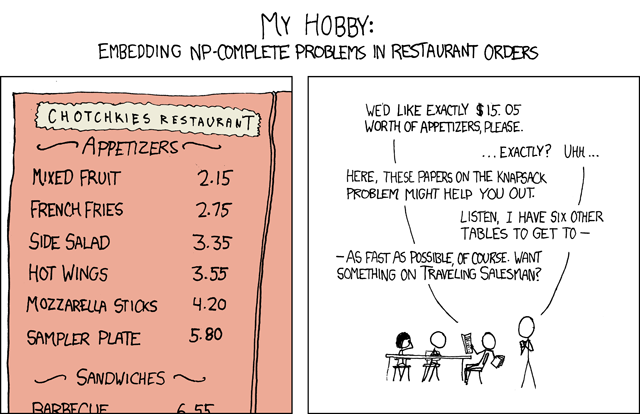
Both VBA files are a solution of this joke:
================================================
FILE: Algorithms/PwdHacks/CrackerJack.vb
================================================
'---------------------------------------------------------------------------------------
'---------------------------------------------------------------------------------------
Option Explicit
Public Sub CJ()
If CJ.Hook Then
Debug.Print "The deal is done!"
End If
End Sub
'---------------------------------------------------------------------------------------
'---------------------------------------------------------------------------------------
Option Explicit
Option Private Module
Private Const PAGE_EXECUTE_READWRITE = &H40
Private Declare Sub MoveMemory Lib "kernel32" Alias "RtlMoveMemory" _
(Destination As Long, Source As Long, ByVal Length As Long)
Private Declare Function VirtualProtect Lib "kernel32" (lpAddress As Long, _
ByVal dwSize As Long, ByVal flNewProtect As Long, lpflOldProtect As Long) As Long
Private Declare Function GetModuleHandleA Lib "kernel32" (ByVal lpModuleName As String) As Long
Private Declare Function GetProcAddress Lib "kernel32" (ByVal hModule As Long, _
ByVal lpProcName As String) As Long
Private Declare Function DialogBoxParam Lib "user32" Alias "DialogBoxParamA" (ByVal hInstance As Long, _
ByVal pTemplateName As Long, ByVal hWndParent As Long, _
ByVal lpDialogFunc As Long, ByVal dwInitParam As Long) As Integer
Dim HookBytes(0 To 5) As Byte
Dim OriginBytes(0 To 5) As Byte
Dim pFunc As Long
Dim Flag As Boolean
Private Function GetPtr(ByVal Value As Long) As Long
GetPtr = Value
End Function
Public Sub RecoverBytes()
If Flag Then MoveMemory ByVal pFunc, ByVal VarPtr(OriginBytes(0)), 6
End Sub
Public Function Hook() As Boolean
Dim TmpBytes(0 To 5) As Byte
Dim p As Long
Dim OriginProtect As Long
Hook = False
pFunc = GetProcAddress(GetModuleHandleA("user32.dll"), "DialogBoxParamA")
If VirtualProtect(ByVal pFunc, 6, PAGE_EXECUTE_READWRITE, OriginProtect) <> 0 Then
MoveMemory ByVal VarPtr(TmpBytes(0)), ByVal pFunc, 6
If TmpBytes(0) <> &H68 Then
MoveMemory ByVal VarPtr(OriginBytes(0)), ByVal pFunc, 6
p = GetPtr(AddressOf MyDialogBoxParam)
HookBytes(0) = &H68
MoveMemory ByVal VarPtr(HookBytes(1)), ByVal VarPtr(p), 4
HookBytes(5) = &HC3
MoveMemory ByVal pFunc, ByVal VarPtr(HookBytes(0)), 6
Flag = True
Hook = True
End If
End If
End Function
Private Function MyDialogBoxParam(ByVal hInstance As Long, _
ByVal pTemplateName As Long, ByVal hWndParent As Long, _
ByVal lpDialogFunc As Long, ByVal dwInitParam As Long) As Integer
If pTemplateName = 4070 Then
MyDialogBoxParam = 1
Else
RecoverBytes
MyDialogBoxParam = DialogBoxParam(hInstance, pTemplateName, _
hWndParent, lpDialogFunc, dwInitParam)
Hook
End If
End Function
'---------------------
'---------------------
'---------------------
'--------------64 bits
Option Explicit
Private Const PAGE_EXECUTE_READWRITE = &H40
Private Declare PtrSafe Sub MoveMemory Lib "kernel32" Alias "RtlMoveMemory" _
(Destination As LongPtr, Source As LongPtr, ByVal Length As LongPtr)
Private Declare PtrSafe Function VirtualProtect Lib "kernel32" (lpAddress As LongPtr, _
ByVal dwSize As LongPtr, ByVal flNewProtect As LongPtr, lpflOldProtect As LongPtr) As LongPtr
Private Declare PtrSafe Function GetModuleHandleA Lib "kernel32" (ByVal lpModuleName As String) As LongPtr
Private Declare PtrSafe Function GetProcAddress Lib "kernel32" (ByVal hModule As LongPtr, _
ByVal lpProcName As String) As LongPtr
Private Declare PtrSafe Function DialogBoxParam Lib "user32" Alias "DialogBoxParamA" (ByVal hInstance As LongPtr, _
ByVal pTemplateName As LongPtr, ByVal hWndParent As LongPtr, _
ByVal lpDialogFunc As LongPtr, ByVal dwInitParam As LongPtr) As Integer
Dim HookBytes(0 To 5) As Byte
Dim OriginBytes(0 To 5) As Byte
Dim pFunc As LongPtr
Dim Flag As Boolean
Private Function GetPtr(ByVal Value As LongPtr) As LongPtr
GetPtr = Value
End Function
Public Sub RecoverBytes()
If Flag Then MoveMemory ByVal pFunc, ByVal VarPtr(OriginBytes(0)), 6
End Sub
Public Function Hook() As Boolean
Dim TmpBytes(0 To 5) As Byte
Dim p As LongPtr
Dim OriginProtect As LongPtr
Hook = False
pFunc = GetProcAddress(GetModuleHandleA("user32.dll"), "DialogBoxParamA")
If VirtualProtect(ByVal pFunc, 6, PAGE_EXECUTE_READWRITE, OriginProtect) <> 0 Then
MoveMemory ByVal VarPtr(TmpBytes(0)), ByVal pFunc, 6
If TmpBytes(0) <> &H68 Then
MoveMemory ByVal VarPtr(OriginBytes(0)), ByVal pFunc, 6
p = GetPtr(AddressOf MyDialogBoxParam)
HookBytes(0) = &H68
MoveMemory ByVal VarPtr(HookBytes(1)), ByVal VarPtr(p), 4
HookBytes(5) = &HC3
MoveMemory ByVal pFunc, ByVal VarPtr(HookBytes(0)), 6
Flag = True
Hook = True
End If
End If
End Function
Private Function MyDialogBoxParam(ByVal hInstance As LongPtr, _
ByVal pTemplateName As LongPtr, ByVal hWndParent As LongPtr, _
ByVal lpDialogFunc As LongPtr, ByVal dwInitParam As LongPtr) As Integer
If pTemplateName = 4070 Then
MyDialogBoxParam = 1
Else
RecoverBytes
MyDialogBoxParam = DialogBoxParam(hInstance, pTemplateName, _
hWndParent, lpDialogFunc, dwInitParam)
Hook
End If
End Function
================================================
FILE: Algorithms/PwdHacks/GhostBreakInfo.vb
================================================
'http://stackoverflow.com/questions/2154699/excel-vba-app-stops-spontaneously-with-message-code-execution-has-been-halted
'Ghost break unwanted break freezing
Press "Debug" button in the popup.
Press Ctrl+Pause|Break twice.
Hit the play button to continue.
Save the file after completion.
================================================
FILE: Algorithms/PwdHacks/Xlsb.PasswordRemover.vb
================================================
Change .xlsb to .zip
Open zip
xl>vbaProject.bin
Search and replace "DPB" with "DPx", where there is a string after
Save all
Change back .zip to .xlsb
Open and click "Yes"
================================================
FILE: Algorithms/QueenDrama.vb
================================================
Option Explicit
Public Const SIZE = 8
Public b_chessboard(7, 7) As Variant
Public l_solutions_found As Long
Public attackedRows As Object ' as New Scripting.Dictionary => for early binding with Microsoft Scripting Runtime
Public attackedColumns As Object
Public attackedLeftDiagonals As Object
Public attackedRightDiagonals As Object
Sub Main()
Set attackedRows = CreateObject("Scripting.Dictionary")
Set attackedColumns = CreateObject("Scripting.Dictionary")
Set attackedLeftDiagonals = CreateObject("Scripting.Dictionary")
Set attackedRightDiagonals = CreateObject("Scripting.Dictionary")
tbl_show.Cells.Delete
l_solutions_found = 0
Call PutQueens(0)
tbl_show.Columns.ColumnWidth = 3
Set attackedRows = Nothing
Set attackedColumns = Nothing
Set attackedLeftDiagonals = Nothing
Set attackedRightDiagonals = Nothing
End Sub
Sub PutQueens(l_row As Long)
Dim l_col As Long
If l_row = SIZE Then
Call PrintSolution
l_solutions_found = l_solutions_found + 1
Else
For l_col = 0 To SIZE - 1 Step 1
If CanPlaceQueen(l_row, l_col) Then
Call MarkAllAttackedPositions(l_row, l_col)
Call PutQueens(l_row + 1)
Call UnmarkAllattackedPositions(l_row, l_col)
End If
Next l_col
End If
End Sub
Public Function CanPlaceQueen(l_row As Long, l_col As Long) As Boolean
Dim b_result As Boolean
b_result = dictionary_contains(attackedRows, l_row) Or _
dictionary_contains(attackedColumns, l_col) Or _
dictionary_contains(attackedLeftDiagonals, l_col - l_row) Or _
dictionary_contains(attackedRightDiagonals, l_col + l_row)
CanPlaceQueen = Not b_result
End Function
Public Sub PrintSolution()
Dim l_row As Long
Dim l_col As Long
Dim l_row_fixer As Long
Dim l_col_fixer As Long
Dim s_result As String
l_row_fixer = (l_solutions_found \ 9) * 9 + 1
l_col_fixer = (l_solutions_found Mod 9) * 9 + 1
For l_row = 0 To SIZE - 1 Step 1
For l_col = 0 To SIZE - 1 Step 1
If b_chessboard(l_row, l_col) Then
s_result = s_result & "*"
tbl_show.Cells(l_row + l_row_fixer, l_col + l_col_fixer).Interior.Color = vbRed
Else
s_result = s_result & "-"
tbl_show.Cells(l_row + l_row_fixer, l_col + l_col_fixer).Interior.Color = vbBlue
End If
Next l_col
s_result = s_result & vbCrLf
Next l_row
Debug.Print l_solutions_found & vbCrLf & s_result
End Sub
Public Sub MarkAllAttackedPositions(l_row As Long, l_col As Long)
attackedRows(l_row) = False
attackedColumns(l_col) = False
attackedLeftDiagonals(l_col - l_row) = False
attackedRightDiagonals(l_col + l_row) = False
b_chessboard(l_row, l_col) = True
End Sub
Public Sub UnmarkAllattackedPositions(l_row As Long, l_col As Long)
attackedRows.Remove (l_row)
attackedColumns.Remove (l_col)
attackedLeftDiagonals.Remove (l_col - l_row)
attackedRightDiagonals.Remove (l_col + l_row)
b_chessboard(l_row, l_col) = False
End Sub
Public Function dictionary_contains(dict As Object, str_element As Variant) As Boolean
Dim item As Variant
Dim b_result As Boolean
For Each item In dict
If item = str_element Then b_result = True
Next item
dictionary_contains = b_result
End Function
Public Sub TestDictionary()
attackedRows("a") = 1
attackedRows("b") = 2
attackedRows(15) = 3
Debug.Print dictionary_contains(attackedRows, "b")
Debug.Print dictionary_contains(attackedRows, "a")
Debug.Print dictionary_contains(attackedRows, "d")
Debug.Print dictionary_contains(attackedRows, "d")
Debug.Print dictionary_contains(attackedRows, 15)
Debug.Print "REMOVE"
attackedRows.Remove ("a")
Debug.Print dictionary_contains(attackedRows, "a")
Debug.Print dictionary_contains(attackedRows, "a")
End Sub
================================================
FILE: Algorithms/StringManipulations.vb
================================================
Function Insert(original As String, added As String, pos As Long) As String
If pos < 1 Then pos = 1
If Len(original) < pos Then pos = Len(original) + 1
Insert = Mid(original, 1, pos - 1) _
& added _
& Mid(original, pos, Len(original) - pos + 1)
End Function
Public Sub InsertTests()
Debug.Print Insert("abcd", "ff", 0) = "ffabcd"
Debug.Print Insert("abcd", "ff", 1) = "ffabcd"
Debug.Print Insert("abcd", "ff", 2) = "affbcd"
Debug.Print Insert("abcd", "ff", 3) = "abffcd"
Debug.Print Insert("abcd", "ff", 4) = "abcffd"
Debug.Print Insert("abcd", "ff", 100) = "abcdff"
End Sub
Public Function StringRepeater(repeatString As String, count As Long) As String
'StringBuilder String Builder
If count < 1 Or Len(repeatString) < 1 Then Exit Function
Dim cnt As Long
For cnt = 1 To count
StringRepeater = StringRepeater & repeatString
Next cnt
End Function
Public Sub StringRepeaterTests()
Debug.Print StringRepeater("ab", 3) = "ababab"
Debug.Print StringRepeater("a", 2) = "aa"
End Sub
================================================
FILE: Algorithms/TaxiCabNumbers.vb
================================================
'https://en.wikipedia.org/wiki/Taxicab_number
Option Explicit
Public Sub TaxiCabNumber()
Dim a As Long
Dim b As Long
Dim lastNumber As Long
Dim cnt As Long
lastNumber = 200
Dim arrList As Object
Set arrList = CreateObject("System.Collections.ArrayList")
For a = 1 To lastNumber
For b = a + 1 To lastNumber
Dim current As String
current = a ^ 3 + b ^ 3
'Debug.Assert (a <> 1 Or b <> 12) And (a <> 9 Or b <> 10)
If arrList.contains(current) Then
Debug.Print current
Else
arrList.Add (current)
End If
cnt = cnt + 1
Next b
Next a
End Sub
================================================
FILE: Algorithms/TraverseGraph.vb
================================================
'Exercises: graph Algorithms
'This document defines the in-class exercises assignments for the "Algorithms" course @ Software University.
'For the following exercises you are given a Visual Studio solution "Graph-Algorithms-Lab" holding portions of the source code + unit tests. You can download it from the course's page.
'Part I - Traverse a Graph to Find Its Connected Components
Option Explicit
Public visited As Variant
Public graph As Variant
Public Sub mains()
Dim l_counter As Long
Dim g1 As Variant
Dim g2 As Variant
Dim g3 As Variant
Dim g4 As Variant
Dim g5 As Variant
Dim g6 As Variant
Dim g7 As Variant
Dim g8 As Variant
Dim g9 As Variant
g1 = Array(3, 6)
g2 = Array(3, 4, 5, 6)
g3 = Array(8)
g4 = Array(0, 1, 5)
g5 = Array(1, 6)
g6 = Array(1, 3)
g7 = Array(0, 1, 4)
g8 = Array()
g9 = Array(2)
graph = Array(g1, g2, g3, g4, g5, g6, g7, g8, g9)
ReDim visited(0)
For l_counter = LBound(graph) To UBound(graph)
If UBound(graph(l_counter)) >= 0 Then
If Not b_value_in_array(graph(l_counter)(0), visited) Then
Call DFS(graph(l_counter)(0))
Debug.Print "---------------------"
End If
Else
Debug.Print l_counter
Debug.Print "---------------------"
End If
Next l_counter
End Sub
Public Sub DFS(ByVal str_node As String)
Dim nodes As Variant
Dim cur_node As String
Dim child_node As Variant
Dim k As Variant
nodes = Array(0, str_node)
ReDim Preserve visited(UBound(visited) + 1)
visited(UBound(visited)) = str_node
While UBound(nodes) > 0
cur_node = nodes(UBound(nodes))
Debug.Print cur_node
ReDim Preserve nodes(UBound(nodes) - 1)
child_node = graph(cur_node)
For Each k In child_node
If Not b_value_in_array(k, visited) Then
ReDim Preserve nodes(UBound(nodes) + 1)
nodes(UBound(nodes)) = k
ReDim Preserve visited(UBound(visited) + 1)
visited(UBound(visited)) = k
End If
Next k
Wend
End Sub
Public Function b_value_in_array(my_value As Variant, my_array As Variant, Optional b_is_string As Boolean = False) As Boolean
Dim l_counter As Long
If b_is_string Then
my_array = Split(my_array, ":")
End If
For l_counter = LBound(my_array) To UBound(my_array)
my_array(l_counter) = CStr(my_array(l_counter))
Next l_counter
b_value_in_array = Not IsError(Application.Match(CStr(my_value), my_array, 0))
End Function
================================================
FILE: Boilerplate/ApplicationOnKey.vb
================================================
'https://msdn.microsoft.com/en-us/library/office/ff197461.aspx
Public Sub EnableControls()
Application.OnKey "^{F8}", "F8_CtrlMacro"
Application.OnKey "%{F8}", "F8_AltMacro"
Application.OnKey "+{F8}", "F8_ShiftMacro"
Application.OnKey "{F8}", "F8_OnlyMacro"
End Sub
Public Sub DisableControls()
Application.OnKey "^{F8}", ""
Application.OnKey "%{F8}", ""
Application.OnKey "+{F8}", ""
Application.OnKey "{F8}", ""
End Sub
Public Sub F8_CtrlMacro()
Debug.Print "F8 with Ctrl"
End Sub
Public Sub F8_AltMacro()
Debug.Print "F8 with Alt"
End Sub
Public Sub F8_ShiftMacro()
Debug.Print "F8 with Shift"
End Sub
Public Sub F8_OnlyMacro()
Debug.Print "F8 Only"
End Sub
================================================
FILE: Boilerplate/Boilerplate VitoshAcademy/ConstantsAndPublic.bas
================================================
Attribute VB_Name = "ConstantsAndPublic"
Option Explicit
Option Private Module
Public Const SET_IN_PRODUCTION = True
Public Const WORKSHEET_UNPROTECT_PASSWORD = "shouldistayorshouldigo" 'I am never using this password anywhere, do not bother ;)
Public Const ADMINS = "vitosh:vitos"
Public Const CON_STR_APP_NAME = "Boilerplate VitoshAcademy"
Public Const CON_STR_INSTANCES_LOG = "More then one Workbook is opened in this Excel instance."
Public Const CON_STR_1904 = "You are using 1904 date system. This is probably* not what you need."
'Public variables are a bad practice and should be avoided in general...
Public PUB_STR_ERROR_REPORT As String
================================================
FILE: Boilerplate/Boilerplate VitoshAcademy/ExcelAdditional.bas
================================================
Attribute VB_Name = "ExcelAdditional"
Option Explicit
Option Private Module
Public Sub FreezeRow(Optional wsName As String = "Input", Optional cellAddress As String = "B5")
Dim ws As Worksheet
Set ws = Worksheets(wsName)
ActiveWindow.FreezePanes = False
Application.Goto ws.Range(cellAddress)
ActiveWindow.FreezePanes = True
End Sub
Public Sub UnfreezeRows(Optional wsName As String = "Input")
Dim ws As Worksheet
Set ws = Worksheets(wsName)
ActiveWindow.FreezePanes = False
End Sub
Public Function SumArray(myArray As Variant, Optional lastValuesNotToCalculate As Long = 0) As Double
Dim i As Long
For i = LBound(myArray) To UBound(myArray) - lastValuesNotToCalculate
SumArray = SumArray + myArray(i)
Next
End Function
Public Function ChangeCommas(ByVal myValue As Variant) As String
Dim temp As String
temp = CStr(myValue)
ChangeCommas = Replace(temp, ",", ".")
End Function
Public Function BubbleSort(ByRef myArray As Variant) As Variant
Dim temp As Variant
Dim i As Long
Dim noExchanges As Boolean
Do
noExchanges = True
For i = LBound(myArray) To UBound(myArray) - 1
If CDbl(myArray(i)) > CDbl(myArray(i + 1)) Then
noExchanges = False
temp = myArray(i)
myArray(i) = myArray(i + 1)
myArray(i + 1) = temp
End If
Next i
Loop While Not (noExchanges)
BubbleSort = myArray
On Error GoTo 0
Exit Function
End Function
Public Function IsArrayAllocated(varArr As Variant) As Boolean
On Error Resume Next
IsArrayAllocated = IsArray(varArr) And Not IsError(LBound(varArr, 1)) And LBound(varArr, 1) <= UBound(varArr, 1)
On Error GoTo 0
End Function
Public Function RangeIsZeroOrEmpty(myRange As Range) As Boolean
Dim myCell As Range
If myRange.Cells.Count > 1 Then
For Each myCell In myRange
If (isEmpty(myCell) Or myCell.value = 0) Then
RangeIsZeroOrEmpty = True
Else
RangeIsZeroOrEmpty = False
Exit Function
End If
Next myCell
Else
If (isEmpty(myRange) Or myRange.value = 0) Then
RangeIsZeroOrEmpty = True
Else
RangeIsZeroOrEmpty = False
End If
End If
End Function
Public Function MakeRandom(lowest As Long, highest As Long) As Long
'WorksheetFunction.randbetween for outside Excel
MakeRandom = CLng((highest - lowest) * Rnd + lowest)
End Function
Public Function IsRangeHidden(myRange As Range) As Boolean
If myRange.EntireRow.Hidden Or myRange.EntireColumn.Hidden Then
IsRangeHidden = True
End If
End Function
Public Function ColumnNumberToLetter(col As Long) As String
ColumnNumberToLetter = Split(Cells(1, col).Address, "$")(1)
End Function
Public Function IsValueInArray(varMyValue As Variant, myArray As Variant, _
Optional isValueString As Boolean = False) As Boolean
Dim i As Long
If isValueString Then
myArray = Split(myArray, ":")
End If
For i = LBound(myArray) To UBound(myArray)
myArray(i) = CStr(myArray(i))
Next i
IsValueInArray = Not IsError(Application.Match(CStr(varMyValue), myArray, 0))
End Function
Public Function Rgb2HtmlColor(r As Byte, g As Byte, b As Byte) As String
'INPUT: Numeric (Base 10) Values for R, G, and B)
'RETURNS:
'A string that can be used as an HTML Color
'(i.e., "#" + the Hexadecimal equivalent)
'For VBA the RGB is reversed. R and B are revered...
Dim varHexR As Variant
Dim varHexB As Variant
Dim varHexG As Variant
'R
varHexR = Hex(r)
If Len(varHexR) < 2 Then varHexR = "0" & varHexR
'Get Green Hex
varHexG = Hex(g)
If Len(varHexG) < 2 Then varHexG = "0" & varHexG
varHexB = Hex(b)
If Len(varHexB) < 2 Then varHexB = "0" & varHexB
Rgb2HtmlColor = "#" & varHexR & varHexG & varHexB
End Function
Function NamedRangeExists(rangeName As String) As Boolean
On Error Resume Next
Dim myRange As Range
Set myRange = Range(rangeName)
If Not myRange Is Nothing Then NamedRangeExists = True
On Error GoTo 0
End Function
Function GetRgb(lngLong) As String
Dim r As Long
Dim g As Long
Dim b As Long
r = lngLong Mod 256
g = lngLong \ 256 Mod 256
b = lngLong \ 65536 Mod 256
GetRgb = "R=" & r & ", G=" & g & ", B=" & b
End Function
Public Sub CopyValues(mySource As Range, myTarget As Range)
myTarget.Resize(mySource.Rows.Count, mySource.Columns.Count).value = mySource.value
End Sub
Public Sub OnEnd()
Application.ScreenUpdating = True
Application.EnableEvents = True
Application.AskToUpdateLinks = True
Application.DisplayAlerts = True
ActiveWindow.View = xlNormalView
Application.StatusBar = False
Application.Calculation = xlAutomatic
ThisWorkbook.Date1904 = False
End Sub
Public Sub OnStart()
Application.ScreenUpdating = False
Application.EnableEvents = False
Application.AskToUpdateLinks = False
Application.DisplayAlerts = False
ActiveWindow.View = xlNormalView
Application.StatusBar = False
Application.Calculation = xlAutomatic
ThisWorkbook.Date1904 = False
End Sub
================================================
FILE: Boilerplate/Boilerplate VitoshAcademy/ExcelDates.bas
================================================
Attribute VB_Name = "ExcelDates"
Option Explicit
Option Private Module
Public Function GetLastDayOfMonth(ByVal myDate As Date) As Date
GetLastDayOfMonth = DateSerial(Year(myDate), Month(myDate) + 1, 0)
End Function
Public Function GetFirstDayOfMonth(ByVal myDate As Date) As Date
GetFirstDayOfMonth = DateSerial(Year(myDate), Month(myDate), 1)
End Function
Public Function AddMonths(ByVal myDate As Date, ByVal lngMonth As Long) As Date
AddMonths = GetLastDayOfMonth(DateAdd("m", lngMonth, myDate))
End Function
Public Function AddMonthsAndGetFirstDate(ByVal my_date As Date, ByVal lngMonth As Long) As Date
AddMonthsAndGetFirstDate = GetFirstDayOfMonth(DateAdd("m", lngMonth, my_date))
End Function
Public Function DateDiffInMonths(a As Date, b As Date) As Long
DateDiffInMonths = DateDiff("m", a, b)
End Function
================================================
FILE: Boilerplate/Boilerplate VitoshAcademy/ExcelFormatCell.bas
================================================
Attribute VB_Name = "ExcelFormatCell"
Option Explicit
Option Private Module
Public Sub FormatAsDate(myCell As Range)
myCell.NumberFormat = "[$-407]mmm/ yy;@"
End Sub
Public Sub FormatAsPercent(myCell As Range, Optional afterComma = 2)
If afterComma = 3 Then
myCell.NumberFormat = "0.000%"
Else
myCell.NumberFormat = "0.00%"
End If
End Sub
Public Sub FormatAsCurrency(myCell As Range, _
Optional changeZero = False, _
Optional makeGray = True, _
Optional makeRound = True)
Dim isOneCell As Boolean
isOneCell = IIf(myCell.Rows.Count + myCell.Columns.Count <> 2, False, True)
If IsNumeric(myCell.value) And (Not myCell.HasFormula) Then
myCell.value = Round(myCell.value, 2)
End If
If makeRound Then
myCell.NumberFormat = "$#,##0.00_);[Red]($#,##0.00)"
Else
myCell.NumberFormat = "$#,##0.00_);($#,##0.00)"
End If
If changeZero Then
With myCell
.FormatConditions.Delete
.FormatConditions.Add Type:=xlCellValue, Operator:=xlEqual, Formula1:="=0"
.FormatConditions(1).Font.ThemeColor = xlThemeColorDark1
.FormatConditions(1).Font.TintAndShade = -0.4
End With
End If
If isOneCell Then
If makeGray And myCell.value = 0 Then
With myCell
.Cells.Font.Color = RGB(191, 191, 191)
End With
End If
End If
End Sub
Public Sub FormatAsEurProM2(myCell As Range)
myCell.NumberFormat = "#,##0.00 "" / m"""
End Sub
Public Sub FormatRedAndBold(myCell As Range, Optional isBold = True)
myCell.Font.Color = -16777063
myCell.Font.TintAndShade = 0
If isBold Then myCell.Font.Bold = True
End Sub
Public Sub WhiteRows(lines As Long, wks As Worksheet)
Dim rowLines As String
rowLines = lines & ":" & lines
With wks.Rows(rowLines).Font
.ThemeColor = xlThemeColorDark1
.TintAndShade = 0
End With
End Sub
Public Sub WhiteCell(myCell As Range)
myCell.Font.ThemeColor = xlThemeColorDark1
myCell.Font.TintAndShade = 0
End Sub
Public Sub FormatFontColorToGrey(myCell As Range)
myCell.Font.Color = RGB(128, 128, 128)
End Sub
================================================
FILE: Boilerplate/Boilerplate VitoshAcademy/ExcelLastThings.bas
================================================
Attribute VB_Name = "ExcelLastThings"
Option Explicit
Option Private Module
Public Function LastColumn(wsName As String, Optional rowToCheck As Long = 1) As Long
Dim ws As Worksheet
Set ws = ThisWorkbook.Worksheets(wsName)
LastColumn = ws.Cells(rowToCheck, ws.Columns.Count).End(xlToLeft).Column
End Function
Public Function LastRow(wsName As String, Optional columnToCheck As Long = 1) As Long
Dim ws As Worksheet
Set ws = ThisWorkbook.Worksheets(wsName)
LastRow = ws.Cells(ws.Rows.Count, columnToCheck).End(xlUp).Row
End Function
Public Function LastUsedColumn(wsName As String) As Long
Dim ws As Worksheet
Set ws = ThisWorkbook.Worksheets(wsName)
Dim lastCell As Range
Set lastCell = ActiveSheet.Cells.Find(What:="*", _
After:=ActiveSheet.Cells(1, 1), _
LookIn:=xlFormulas, _
LookAt:=xlPart, _
SearchOrder:=xlByColumns, _
SearchDirection:=xlPrevious, _
MatchCase:=False)
LastUsedColumn = lastCell.Column
End Function
Public Function LastUsedRow(wsName As String) As Long
Dim ws As Worksheet
Set ws = ThisWorkbook.Worksheets(wsName)
Dim lastCell As Range
Set lastCell = ActiveSheet.Cells.Find(What:="*", _
After:=ActiveSheet.Cells(1, 1), _
LookIn:=xlFormulas, _
LookAt:=xlPart, _
SearchOrder:=xlByRows, _
SearchDirection:=xlPrevious, _
MatchCase:=False)
LastUsedRow = lastCell.Row
End Function
Public Function LocateValueRow(ByVal textTarget As String, _
ByRef wksTarget As Worksheet, _
Optional col As Long = 1, _
Optional moreValuesFound As Long = 1, _
Optional lookForPart = False, _
Optional lookUpToBottom = True) As Long
Dim valuesFound As Long
Dim localRange As Range
Dim myCell As Range
LocateValueRow = -999
valuesFound = moreValuesFound
Set localRange = wksTarget.Range(wksTarget.Cells(1, col), wksTarget.Cells(Rows.Count, col))
For Each myCell In localRange
If lookForPart Then
If textTarget = Left(myCell, Len(textTarget)) Then
If valuesFound = 1 Then
LocateValueRow = myCell.Row
If lookUpToBottom Then Exit Function
Else
Decrement valuesFound
End If
End If
Else
If textTarget = Trim(myCell) Then
If valuesFound = 1 Then
LocateValueRow = myCell.Row
If lookUpToBottom Then Exit Function
Else
Decrement valuesFound
End If
End If
End If
Next myCell
End Function
Public Function LocateValueCol(ByVal textTarget As String, _
ByRef wksTarget As Worksheet, _
Optional rowNeeded As Long = 1, _
Optional moreValuesFound As Long = 1, _
Optional lookForPart = False, _
Optional lookUpToBottom = True) As Long
Dim valuesFound As Long
Dim localRange As Range
Dim myCell As Range
LocateValueCol = -999
valuesFound = moreValuesFound
Set localRange = wksTarget.Range(wksTarget.Cells(rowNeeded, 1), wksTarget.Cells(rowNeeded, Columns.Count))
For Each myCell In localRange
If lookForPart Then
If textTarget = Left(myCell, Len(textTarget)) Then
If valuesFound = 1 Then
LocateValueCol = myCell.Column
If lookUpToBottom Then Exit Function
Else
Decrement valuesFound
End If
End If
Else
If textTarget = Trim(myCell) Then
If valuesFound = 1 Then
LocateValueCol = myCell.Column
If lookUpToBottom Then Exit Function
Else
Decrement valuesFound
End If
End If
End If
Next myCell
End Function
Public Sub Increment(ByRef valueToIncrement As Variant, Optional incrementWith As Double = 1)
valueToIncrement = valueToIncrement + incrementWith
End Sub
Public Sub Decrement(ByRef valueToDecrement As Variant, Optional decrementWith As Double = 1)
valueToDecrement = valueToDecrement - decrementWith
End Sub
================================================
FILE: Boilerplate/Boilerplate VitoshAcademy/ExcelPrintToNotepad.bas
================================================
Attribute VB_Name = "ExcelPrintToNotepad"
Option Explicit
Option Private Module
Sub PrintToNotepad(Optional dataToPrint As String = "")
If SET_IN_PRODUCTION Then On Error GoTo CreateLogFile_Error
Dim fileSystem As Object
Dim textObject As Object
Dim fileName As String
Dim newFile As String
Dim shellPath As String
newFile = "\Info"
fileName = ThisWorkbook.path & newFile & CodifyTime(True)
If Dir(ThisWorkbook.path & newFile, vbDirectory) = vbNullString Then MkDir ThisWorkbook.path & newFile
Set fileSystem = CreateObject("Scripting.FileSystemObject")
Set textObject = fileSystem.CreateTextFile(fileName, True)
If dataToPrint <> "" Then
textObject.WriteLine dataToPrint
Else
textObject.WriteLine PUB_STR_ERROR_REPORT
End If
textObject.Close
shellPath = "C:\WINDOWS\notepad.exe "
shellPath = shellPath & fileName
shell shellPath
On Error GoTo 0
Exit Sub
CreateLogFile_Error:
MsgBox "Error " & Err.Number & " (" & Err.Description & ") in procedure CreateLogFile of Sub mod_TDD_Export"
End Sub
Public Function CodifyTime(Optional makeString As Boolean = False) As String
If SET_IN_PRODUCTION Then On Error GoTo codify_Error
Dim leftPart As Variant
Dim rightPart As Variant
Dim initialTime As Double
initialTime = Round(Now(), 8)
leftPart = Split(CStr(initialTime), ".")(0)
rightPart = Split(CStr(initialTime), ".")(1)
CodifyTime = Hex(leftPart) & "_" & Hex(rightPart)
If makeString Then CodifyTime = "\" & CodifyTime & ".txt"
On Error GoTo 0
Exit Function
codify_Error:
MsgBox "Error " & Err.Number & " (" & Err.Description & ") in procedure codify of Function TDD_Export"
End Function
Public Function DecodifyTime(hexTime As String) As String
Dim leftPart As Variant
Dim rightPart As Variant
leftPart = Split(hexTime, "_")(0)
rightPart = Split(hexTime, "_")(1)
DecodifyTime = CLng("&H" & leftPart) & "." & CLng("&H" & rightPart)
End Function
================================================
FILE: Boilerplate/Boilerplate VitoshAcademy/ExcelStructure.bas
================================================
Attribute VB_Name = "ExcelStructure"
Option Explicit
Option Private Module
Public Sub LockScroll(lockArea As Range)
Dim wks As Worksheet
For Each wks In ThisWorkbook.Worksheets
wks.ScrollArea = lockArea.Address
Next wks
End Sub
Public Sub UnlockScroll()
Dim wks As Worksheet
For Each wks In ThisWorkbook.Worksheets
wks.ScrollArea = ""
Next wks
End Sub
Sub StyleKiller()
Dim myStyle As Style
For Each myStyle In ThisWorkbook.Styles
If Not myStyle.BuiltIn Then
Debug.Print myStyle.Name
myStyle.Delete
End If
Next
End Sub
Public Sub DeleteName(myName As String)
On Error GoTo DeleteName_Error
ThisWorkbook.Names(myName).Delete
Debug.Print myName & " is deleted!"
On Error GoTo 0
Exit Sub
DeleteName_Error:
Debug.Print myName & " not present or some error"
On Error GoTo 0
End Sub
Sub CoverRange(myRange As Range, wks As Worksheet)
Dim myLeft As Long
Dim myTop As Long
Dim myWidth As Long
Dim myHeight As Long
If wks.Name <> ActiveSheet.Name Then
MsgBox "You better select the sheet you are working on..."
Exit Sub
End If
myLeft = myRange.Left
myTop = myRange.Top
myWidth = myRange.Width
myHeight = myRange.Height
With wks.Shapes
.AddTextbox(msoTextOrientationVertical, myLeft, myTop, myWidth, myHeight).Select
Selection.ShapeRange.Line.Visible = msoFalse
End With
End Sub
Public Sub PrintSheetPDF(inputPrintArea As Range, _
printedFileName As String, _
Optional isBlack As Boolean = False)
If SET_IN_PRODUCTION Then On Error GoTo PrintPDF_Error
Dim wks As Worksheet
Set wks = Worksheets(inputPrintArea.Parent.Name)
With wks
.PageSetup.Zoom = False
.PageSetup.BlackAndWhite = isBlack
inputPrintArea.ExportAsFixedFormat _
Type:=xlTypePDF, _
fileName:=printedFileName, _
Quality:=xlQualityStandard, _
IncludeDocProperties:=True, _
IgnorePrintAreas:=False, _
OpenAfterPublish:=True
End With
On Error GoTo 0
Exit Sub
PrintPDF_Error:
MsgBox "Error " & Err.Number & " (" & Err.Description & ") in procedure PrintPDF of Modul mod_Drucken"
End Sub
Public Sub PrintPage(printRange As Range, Optional isBlack As Boolean = False)
Dim wksSheet As Worksheet
Dim reducePaperTitle As String
On Error GoTo PrintPage_Error
reducePaperTitle = "Reduce printing and save trees!"
printRange.Parent.PageSetup.BlackAndWhite = isBlack
Set wksSheet = printRange.Parent
With wksSheet.PageSetup
.Orientation = xlPortrait
.Zoom = False
.FitToPagesTall = 1
.FitToPagesWide = 1
End With
Select Case MsgBox("Are you sure you would like to print the selected page?", vbYesNo Or vbQuestion Or vbDefaultButton1, reducePaperTitle)
Case vbYes
Select Case MsgBox("Really?", vbYesNo Or vbQuestion Or vbDefaultButton1, reducePaperTitle)
Case vbYes
printRange.PrintOut
End Select
End Select
On Error GoTo 0
Exit Sub
PrintPage_Error:
MsgBox "Error " & Err.Number & " (" & Err.Description & ") in procedure PrintPage of Modul mod_Drucken"
End Sub
Sub DeleteDrawingObjects(wks As Worksheet)
Dim i As Long
For i = wks.DrawingObjects().Count To 1 Step -1
wks.DrawingObjects(i).Delete
Next i
End Sub
Public Sub UnhideAll()
Dim wks As Worksheet
For Each wks In ThisWorkbook.Worksheets
wks.Visible = xlSheetVisible
Next
UnprotectAll
End Sub
Public Sub UnprotectAll()
Dim i As Long
For i = ThisWorkbook.Worksheets.Count To 1 Step -1
ThisWorkbook.Worksheets(i).Unprotect Password:=WORKSHEET_UNPROTECT_PASSWORD
Next i
End Sub
Public Sub HideNeededWorksheets()
Dim varSheet As Variant
Dim visibleSheets As Variant
Dim hiddenSheets As Variant
OnStart
visibleSheets = Array(tblInput)
hiddenSheets = Array(tblSettings)
For Each varSheet In visibleSheets
varSheet.Visible = xlSheetVisible
Next varSheet
For Each varSheet In hiddenSheets
varSheet.Visible = xlSheetVeryHidden
Next varSheet
OnEnd
End Sub
Public Sub AddCommentToSelection(myComment As Range)
Dim myCell As Range
For Each myCell In Selection
myCell.ClearComments
myCell.AddComment myComment.Text
myCell.Comment.Visible = False
myCell.Comment.Shape.ScaleWidth 4, msoFalse, msoScaleFromTopLeft
myCell.Comment.Shape.ScaleHeight 1.5, msoFalse, msoScaleFromTopLeft
Next myCell
End Sub
Sub PrintAllNames()
Dim nm As Name
For Each nm In ThisWorkbook.Names
Debug.Print nm.Name
Next nm
End Sub
Sub DeleteAllNames()
Dim nm As Name
For Each nm In ThisWorkbook.Names
Debug.Print nm.Name & " is deleted!"
nm.Delete
Next nm
End Sub
Public Sub DeleteCommentInSelection()
If SET_IN_PRODUCTION Then On Error GoTo DeleteCommentInSelection_Error
Dim myCell As Range
For Each myCell In Selection
myCell.ClearComments
Next myCell
On Error GoTo 0
Exit Sub
DeleteCommentInSelection_Error:
MsgBox "Error " & Err.Number & " (" & Err.Description & ") in procedure DeleteCommentInSelection of Sub mod_StandardSubs"
End Sub
Public Sub SelectMeA1RangeEverywhere()
If SET_IN_PRODUCTION Then On Error GoTo SelectMeA1RangeEverywhere_Error
Dim wks As Worksheet
For Each wks In ThisWorkbook.Worksheets
If wks.Visible = xlSheetVisible Then
wks.Activate
wks.Cells(1, 1).Select
End If
Next
Worksheets(1).Select
On Error GoTo 0
Exit Sub
SelectMeA1RangeEverywhere_Error:
MsgBox "Error " & Err.Number & " (" & Err.Description & ") in procedure SelectMeA1RangeEverywhere of Sub mod_StandardSubs"
End Sub
Sub HideShowComments(Optional showComments As Boolean = False, _
Optional myRange As Range = Nothing)
Dim myCell As Range
If SET_IN_PRODUCTION Then On Error GoTo HideShowComments_Error
If myRange Is Nothing Then Set myRange = Range("A1:AO1000")
For Each myCell In myRange
If Not myCell.Comment Is Nothing Then
myCell.Comment.Visible = showComments
End If
Next myCell
On Error GoTo 0
Exit Sub
HideShowComments_Error:
MsgBox "Error " & Err.Number & " (" & Err.Description & ") in procedure HideShowComments of Sub mod_StandardSubs"
End Sub
Public Sub ResetAndUnlock()
If Not IsValueInArray(Environ("Username"), ADMINS, True) Then
Debug.Print "no"
Exit Sub
End If
UnhideAll 'UnprotectAll is included
Application.ExecuteExcel4Macro "show.toolbar(""Ribbon"", true)"
ActiveWindow.DisplayHeadings = True
Application.DisplayFormulaBar = True
Debug.Print "Done."
EnableMySaves
End Sub
Public Sub EnableMySaves()
Application.OnKey "%{F11}"
Application.OnKey "^c"
Application.OnKey "^C"
Application.OnKey "^v"
Application.OnKey "^V"
Application.OnKey "^x"
Application.OnKey "^X"
Application.OnKey "^w"
Application.OnKey "^W"
Application.OnKey "^e"
Application.OnKey "^E"
End Sub
Public Sub DisabledCombination()
'This is the disabled combination for Application.OnKey
End Sub
Public Sub DisableShortcutsAndSaves()
Application.OnKey "^c", "DisabledCombination"
Application.OnKey "^C", "DisabledCombination"
Application.OnKey "^v", "DisabledCombination"
Application.OnKey "^V", "DisabledCombination"
Application.OnKey "^x", "DisabledCombination"
Application.OnKey "^X", "DisabledCombination"
Application.OnKey "^w", "DisabledCombination"
Application.OnKey "^W", "DisabledCombination"
Application.OnKey "^e", "ShowMainForm"
Application.OnKey "^E", "ShowMainForm"
End Sub
================================================
FILE: Boilerplate/Boilerplate VitoshAcademy/ExcelVBE.bas
================================================
Attribute VB_Name = "ExcelVBE"
Option Explicit
Option Private Module
Sub PrintAllCode()
Dim item As Variant
Dim textToPrint As String
Dim lineToPrint As String
For Each item In ThisWorkbook.vbProject.VBComponents
lineToPrint = item.codeModule.lines(1, item.codeModule.CountOfLines)
Debug.Print lineToPrint
textToPrint = textToPrint & vbCrLf & lineToPrint
Next item
PrintToNotepad textToPrint
End Sub
Sub PrintAllContainers()
Dim item As Variant
Dim textToPrint As String
Dim lineToPrint As String
For Each item In ThisWorkbook.vbProject.VBComponents
lineToPrint = item.Name
Debug.Print lineToPrint
textToPrint = textToPrint & vbCrLf & lineToPrint
Next item
PrintToNotepad textToPrint
End Sub
Sub ListProcedures(Optional modName As String = "ExcelAdditional", Optional withParentInfo As Boolean = False)
Dim project As VBIDE.vbProject
Dim component As VBIDE.VBComponent
Dim codeModule As VBIDE.codeModule
Dim lineNum As Long
Dim procName As String
Dim procKind As VBIDE.vbext_ProcKind
Dim subsInfo As String
Set project = ThisWorkbook.vbProject
Set component = project.VBComponents(modName)
Set codeModule = component.codeModule
With codeModule
lineNum = .CountOfDeclarationLines + 1
Do Until lineNum >= .CountOfLines
procName = .ProcOfLine(lineNum, procKind)
If withParentInfo Then
subsInfo = subsInfo & IIf(subsInfo = vbNullString, vbNullString, vbCrLf) & modName & "." & procName
Else
subsInfo = subsInfo & IIf(subsInfo = vbNullString, vbNullString, vbCrLf) & procName
End If
lineNum = .ProcStartLine(procName, procKind) + .ProcCountLines(procName, procKind) + 1
Loop
End With
Debug.Print subsInfo
PrintToNotepad subsInfo
End Sub
Sub ExportModules()
CreateFolderOnDesktop GetFolderOnDesktopPath
On Error Resume Next
Kill GetFolderOnDesktopPath & "\*.*"
On Error GoTo 0
Dim wkb As Workbook: Set wkb = Excel.Workbooks(ThisWorkbook.Name)
If wkb.vbProject.Protection = vbext_pp_locked Then
Debug.Print "The VBA in this workbook is locked."
Exit Sub
End If
Dim unitsCount As Long
Dim filePath As String
Dim component As VBIDE.VBComponent
Dim tryExport As Boolean
For Each component In wkb.vbProject.VBComponents
tryExport = True
filePath = component.Name
Select Case component.Type
Case vbext_ct_ClassModule
filePath = filePath & ".cls"
Case vbext_ct_MSForm
filePath = filePath & ".frm"
Case vbext_ct_StdModule
filePath = filePath & ".bas"
Case vbext_ct_Document
tryExport = False
End Select
If tryExport Then
Increment unitsCount
Debug.Print unitsCount & " exporting " & filePath
component.export GetFolderOnDesktopPath & filePath
End If
Next
Debug.Print "Exported at " & GetFolderOnDesktopPath
End Sub
Function GetFolderOnDesktopPath() As String
Dim shell As Object
Dim fso As Object
Dim specialFolderPath As String
Set shell = CreateObject("WScript.Shell")
Set fso = CreateObject("scripting.filesystemobject")
specialFolderPath = shell.SpecialFolders("Desktop")
If Right(specialFolderPath, 1) <> "\" Then specialFolderPath = specialFolderPath & "\"
GetFolderOnDesktopPath = specialFolderPath & CON_STR_APP_NAME & "\"
End Function
Sub CreateFolderOnDesktop(specialFolderPath As String)
On Error Resume Next
MkDir specialFolderPath
If Err.Number <> 0 Then
If Err.Number = 75 Then
Debug.Print "Folder exists - " & specialFolderPath
Else
Err.Raise Err.Number, Err.source, Err.Description
End If
Else
Debug.Print "Folder has been created - " & specialFolderPath
End If
On Error GoTo 0
End Sub
Public Sub ImportModules()
'1. The target workbook should be opened in the same Excel instance as the ThisWorkbook
'2. The target workbook should be in the same directory as ThisWorkbook
'3. The code to be added should be present in GetFolderOnDesktopPath
Dim targetName As String: targetName = "empty.xlsm"
Dim targetPath As String: targetPath = ThisWorkbook.path & "\" & targetName
Dim wkbTarget As Workbook
Dim fso As Scripting.FileSystemObject
Dim file As Scripting.file
Dim codePath As String: codePath = GetFolderOnDesktopPath
Set wkbTarget = Workbooks(targetName)
If wkbTarget.vbProject.Protection = 1 Then
Debug.Print "VBProject is protected!"
End If
Set fso = New Scripting.FileSystemObject
If fso.GetFolder(codePath).Files.Count = 0 Then
Debug.Print "Zero vba files in source workbook!"
Exit Sub
End If
DeleteAllVba wkbTarget
Dim unitsCount As Long
For Each file In fso.GetFolder(codePath).Files
Select Case fso.GetExtensionName(file.Name)
Case "cls", "frm", "bas":
Increment unitsCount
Debug.Print unitsCount & " -> in " & wkbTarget.Name & " adding " & file.Name
wkbTarget.vbProject.VBComponents.Import file.path
Case Else:
Debug.Print file.Name & " cannot be processed."
End Select
Next
Debug.Print vbCrLf & unitsCount & " units were just added to:" & vbCrLf & targetPath
End Sub
Function DeleteAllVba(wkbTarget As Workbook)
Dim project As VBIDE.vbProject
Dim component As VBIDE.VBComponent
Dim unitsCount As Long
Set project = wkbTarget.vbProject
For Each component In project.VBComponents
If component.Type <> vbext_ct_Document Then
Increment unitsCount
Debug.Print unitsCount & " from " & wkbTarget.Name & " deleting " & component.Name
project.VBComponents.Remove component
End If
Next
Debug.Print 'Empty line is good :)
End Function
================================================
FILE: Boilerplate/Boilerplate VitoshAcademy/VersionsAbout.bas
================================================
Attribute VB_Name = "VersionsAbout"
Option Explicit
Option Private Module
'==================================================================================================================
'=======================================CREDITS====================================================================
'==================================================================================================================
'TDD classes are taken with some changes from:
' https://github.com/VBA-tools/vba-test
'Form ideas are from:
' https://www.vitoshacademy.com/vba-the-perfect-userform-in-vba/
' https://codereview.stackexchange.com/questions/154401/handling-dialog-closure-in-a-vba-user-form
'Most of the code is present also at:
' https://github.com/Vitosh/VBA_personal
'The offisial site and GitHub repo of the Boilerplate:
' https://www.vitoshacademy.com/boilerplate
' https://github.com/Vitosh/VBA_personal/tree/master/Boilerplate
'==================================================================================================================
'=======================================VERSIONS===================================================================
'==================================================================================================================
'Boiler Plate Version 8.0.3:
' Vitosh - 23.12.2019
'
' Minor fixes:
' - Fix RangeIsZeroOrEmpty
' - Fix the credits with the correct url
' - Fix spaces, remove some lines, fix variables
' - Adding "DecodifyTime" to return "CodifyTime" back
'-------------------------------------------------------------------------------------------------------------------
'-------------------------------------------------------------------------------------------------------------------
'-------------------------------------------------------------------------------------------------------------------
'Boiler Plate Version 8.0.:
' Vitosh - 19.12.2019
'
' Openning the project, removing the password
' Trying to remove words like "Call" and fix variables names
' Structuring the code (that's a lot!)
'-------------------------------------------------------------------------------------------------------------------
'-------------------------------------------------------------------------------------------------------------------
'-------------------------------------------------------------------------------------------------------------------
'Boiler Plate Version 7.0.:
' Vitosh - 16.03.2017
'
' Add CON_STR_APP_NAME = "Boilerplate Project Name"
' A new form, with a new class is implemented
' Change to xlsb
' Move all named ranges from Settings as Constants
'-------------------------------------------------------------------------------------------------------------------
'-------------------------------------------------------------------------------------------------------------------
'-------------------------------------------------------------------------------------------------------------------
'Boiler Plate Version 6.0.:
' Vitosh - 01.2017
'
' Check for more opened instances
' TDD implemented
' Standard Functions and subs
' On openning:
' fixing outlook
' hiding whatever possible
' checking for another instance opened
' frmInfo with lblInfo is present
' adding new sheet is disabled
' beforeclose sheet function is present
'==================================================================================================================
'=======================================THANK YOU (YES, YOU!)======================================================
'==================================================================================================================
'As far as you are looking into these credits, most probably you are a VBA developer!
'
'As a VBA developer, you have probably heard hundres of times that you are not a real developer or anything
'like this from random people - from high end clean code gurus to java guys, who learned about programming
'some 2 weeks ago. Anyway, it does not matter. You are a developer! (and don't listen to these guys, most of them
'are deeply confused in general)
'
' Thank you for all the awesome #VBA code you have written!
' It matters! You matter!
' Stay awesome!
================================================
FILE: Boilerplate/Boilerplate VitoshAcademy/formExample.bas
================================================
Attribute VB_Name = "formExample"
Option Explicit
Option Private Module
Private presenter As formSummaryPresenter
Public Sub FormExampleMain()
presenter.ChangeLabelAndCaption "Starting and running...", "Running..."
GenerateNumbers
End Sub
Public Sub GenerateNumbers(Optional outerLoopLimit As Long = 2, Optional innerLoopLimit As Long = 4)
Dim a As Long
Dim b As Long
For a = 1 To outerLoopLimit
For b = 1 To innerLoopLimit
Debug.Print a * b
Next
Next
Debug.Print "-------END-------" & vbCrLf & Now
End Sub
Public Sub ShowMainForm()
If (presenter Is Nothing) Then
Set presenter = New formSummaryPresenter
End If
presenter.Show
End Sub
Public Sub CheckHowManyWbAreOpened()
On Error GoTo CheckHowManyWbAreOpened_Error
If Workbooks.Count > 1 Then
PUB_STR_ERROR_REPORT = True
frmInfo.Show (vbModeless)
Application.Wait (Now + TimeValue("00:00:02"))
Unload frmInfo
End If
PUB_STR_ERROR_REPORT = False
On Error GoTo 0
Exit Sub
CheckHowManyWbAreOpened_Error:
MsgBox "Error " & Err.Number & " (" & Err.Description & ") in procedure CheckHowManyWbAreOpened of Sub DieseArbeitsmappe"
End Sub
================================================
FILE: Boilerplate/Boilerplate VitoshAcademy/formSummaryPresenter.cls
================================================
VERSION 1.0 CLASS
BEGIN
MultiUse = -1 'True
END
Attribute VB_Name = "formSummaryPresenter"
Attribute VB_GlobalNameSpace = False
Attribute VB_Creatable = False
Attribute VB_PredeclaredId = False
Attribute VB_Exposed = False
Option Explicit
Private WithEvents summaryForm As frmExample
Attribute summaryForm.VB_VarHelpID = -1
Private Sub Class_Initialize()
Set summaryForm = New frmExample
End Sub
Private Sub Class_Terminate()
Set summaryForm = Nothing
End Sub
Public Sub Show()
If Not summaryForm.Visible Then
summaryForm.Show vbModeless
ChangeLabelAndCaption "Press Run to Start", "Starting"
End If
With summaryForm
.Top = CLng((Application.Height / 2 + Application.Top) - .Height / 2)
.Left = CLng((Application.Width / 2 + Application.Left) - .Width / 2)
.caption = CON_STR_APP_NAME
End With
End Sub
Private Sub Hide()
If summaryForm.Visible Then summaryForm.Hide
End Sub
Public Sub ChangeLabelAndCaption(labelInfo As String, caption As String)
summaryForm.InformationText = labelInfo
summaryForm.InformationCaption = caption
summaryForm.Repaint
End Sub
Private Sub summaryForm_OnRunReport()
FormExampleMain
Refresh
End Sub
Private Sub summaryForm_OnExit()
Hide
End Sub
Public Sub Refresh()
With summaryForm
.lblInfo = "Ready"
.caption = "Task performed"
End With
End Sub
================================================
FILE: Boilerplate/Boilerplate VitoshAcademy/frmExample.frm
================================================
VERSION 5.00
Begin {C62A69F0-16DC-11CE-9E98-00AA00574A4F} FrmExample
Caption = "UserForm1"
ClientHeight = 4404
ClientLeft = -12
ClientTop = 120
ClientWidth = 5388
OleObjectBlob = "frmExample.frx":0000
StartUpPosition = 1 'Fenstermitte
End
Attribute VB_Name = "frmExample"
Attribute VB_GlobalNameSpace = False
Attribute VB_Creatable = False
Attribute VB_PredeclaredId = True
Attribute VB_Exposed = False
Option Explicit
Public Event OnRunReport()
Public Event OnExit()
Public Property Get InformationText() As String
InformationText = lblInfo.caption
End Property
Public Property Let InformationText(ByVal value As String)
lblInfo.caption = value
End Property
Public Property Get InformationCaption() As String
InformationCaption = caption
End Property
Public Property Let InformationCaption(ByVal value As String)
caption = value
End Property
Private Sub btnRun_Click()
RaiseEvent OnRunReport
End Sub
Private Sub btnExit_Click()
RaiseEvent OnExit
End Sub
Private Sub UserForm_QueryClose(Cancel As Integer, CloseMode As Integer)
If CloseMode = vbFormControlMenu Then
Cancel = True
Hide
End If
End Sub
================================================
FILE: Boilerplate/Boilerplate VitoshAcademy/frmInfo.frm
================================================
VERSION 5.00
Begin {C62A69F0-16DC-11CE-9E98-00AA00574A4F} FrmInfo
ClientHeight = 1440
ClientLeft = -156
ClientTop = -564
ClientWidth = 2772
OleObjectBlob = "frmInfo.frx":0000
StartUpPosition = 1 'Fenstermitte
End
Attribute VB_Name = "frmInfo"
Attribute VB_GlobalNameSpace = False
Attribute VB_Creatable = False
Attribute VB_PredeclaredId = True
Attribute VB_Exposed = False
Option Explicit
Private Sub UserForm_Initialize()
If PUB_STR_ERROR_REPORT Then
Me.lblInformation = CON_STR_INSTANCES_LOG
End If
With Me
.StartUpPosition = 0
.Left = Application.Left + (0.5 * Application.Width) - (0.5 * .Width)
.Top = Application.Top + (0.5 * Application.Height) - (0.5 * .Height)
.caption = CON_STR_APP_NAME
End With
End Sub
================================================
FILE: Boilerplate/Boilerplate VitoshAcademy/tblInput.vb
================================================
Private Sub Worksheet_SelectionChange(ByVal Target As Range)
If ActiveWindow.Zoom > 100 Or ActiveWindow.Zoom < 70 Then
ActiveWindow.Zoom = 100
End If
End Sub
================================================
FILE: Boilerplate/Boilerplate VitoshAcademy/tddMain.bas
================================================
Attribute VB_Name = "tddMain"
Option Explicit
Option Private Module
Sub Tdd(Optional export As Boolean = False)
On Error Resume Next
Dim specs As New tddSpecSuite
Debug.Print "Test report from " & Environ("Username") & vbCrLf & "START: " & Now() & vbCrLf
PUB_STR_ERROR_REPORT = "Test report from " & Environ("Username") & vbCrLf & "START: " & Now() & vbCrLf
'---------------------
'Tests start here ---v
'Test Scenario #1
TestMeSample
Dim myarr(16) As Variant
Dim arrCounter As Long
Dim myCell As Range
myarr(1) = 1.81859485365136
myarr(2) = -4.79462137331569
myarr(3) = -0.713935644387188
myarr(4) = -8.38308001079428
myarr(5) = 24.9643391023361
myarr(6) = -27.4617351821139
myarr(7) = 64.2321735505502
myarr(8) = -88.9405995522673
myarr(9) = -127.858501929498
myarr(10) = 101.737867039937
myarr(11) = 146.707455130634
myarr(12) = -120.333197895024
myarr(13) = 772.275323251858
myarr(14) = 1129.5172126244
myarr(15) = 1312.97247658607
myarr(16) = -349.11864840751
For Each myCell In tblInput.Range("A1:B8")
Increment arrCounter
specs.It("Scenario 1." & CStr(arrCounter)).Expect(myarr(arrCounter)).ToEqual myCell.value
Next myCell
'Test Scenario #2
specs.It("Scenario 2.1").Expect(SumArray(Array(1, 2, 3))).ToEqual 6
specs.It("Scenario 2.2").Expect(SumArray(Array(3, 3, 3))).ToEqual 9
specs.It("Scenario 2.3").Expect(SumArray(Array(3, 4, 3))).ToNotEqual 9
specs.It("Scenario 2.4").Expect(SumArray(Array(3, 3, 100), 1)).ToEqual 6
specs.It("Scenario 2.5").Expect(SumArray(Array(3, 3, 100))).ToEqual 106
specs.It("Scenario 2.6").Expect(SumArray(Array(-3, -3))).ToEqual -6
'Tests Scenario #3
specs.It("Scenario 3.1").Expect(ColumnNumberToLetter(26)).ToEqual "Z"
specs.It("Scenario 3.2").Expect(ColumnNumberToLetter(1)).ToEqual "A"
'---------------------
'Tests end here -----^
tddSpecInlineRunner.RunSuite specs
specs.TotalTests
PUB_STR_ERROR_REPORT = PUB_STR_ERROR_REPORT & "END: " & Now() & vbCrLf
Debug.Print "END: " & Now() & vbCrLf
If export Then PrintToNotepad
On Error GoTo 0
End Sub
Public Sub MakeAllValues()
Dim myCell As Range
Dim i As Long
Dim str As String
For Each myCell In Selection
Increment i
str = vbTab & "myArr(" & i & ")= "
If Len(myCell) > 0 Then
If IsDate(myCell) Then
str = str & "CDate(""" & myCell & """)"
Else
If Not IsNumeric(myCell) Then
str = str & """" & myCell & """"
Else
str = str & ChangeCommas(myCell.value)
End If
End If
Else
If myCell.HasFormula Then
str = str & """"""
Else
str = str & 0
End If
End If
Debug.Print str
Next myCell
End Sub
Sub TestMeSample()
Dim myCell As Range
Dim myVal As Variant
For Each myCell In tblInput.Range("A1:B8")
myVal = myVal * 1.5 + 2
myCell = myVal * Sin(myVal)
Next
End Sub
================================================
FILE: Boilerplate/Boilerplate VitoshAcademy/tddSpecDefinition.cls
================================================
VERSION 1.0 CLASS
BEGIN
MultiUse = -1 'True
END
Attribute VB_Name = "tddSpecDefinition"
Attribute VB_GlobalNameSpace = False
Attribute VB_Creatable = False
Attribute VB_PredeclaredId = False
Attribute VB_Exposed = True
Option Explicit
Private pExpectations As Collection
Private pFailedExpectations As Collection
Public Description As String
Public Id As String
Public Enum SpecResult
Pass
Fail
Pending
End Enum
Public Property Get Expectations() As Collection
If pExpectations Is Nothing Then
Set pExpectations = New Collection
End If
Set Expectations = pExpectations
End Property
Private Property Let Expectations(value As Collection)
Set pExpectations = value
End Property
Public Property Get FailedExpectations() As Collection
If pFailedExpectations Is Nothing Then
Set pFailedExpectations = New Collection
End If
Set FailedExpectations = pFailedExpectations
End Property
Private Property Let FailedExpectations(value As Collection)
Set pFailedExpectations = value
End Property
Public Function Expect(Optional value As Variant) As tddSpecExpectation
Dim Exp As New tddSpecExpectation
If VarType(value) = vbObject Then
Set Exp.Actual = value
Else
Exp.Actual = value
End If
Me.Expectations.Add Exp
Set Expect = Exp
End Function
Public Function Result() As SpecResult
Dim Exp As tddSpecExpectation
FailedExpectations = New Collection
If Me.Expectations.Count < 1 Then
Result = Pending
Else
For Each Exp In Me.Expectations
If Exp.Result = Fail Then
FailedExpectations.Add Exp
End If
Next Exp
If Me.FailedExpectations.Count > 0 Then
Result = Fail
Else
Result = Pass
End If
End If
End Function
Public Function ResultName() As String
Select Case Me.Result
Case Pass:
ResultName = "Pass"
Case Fail:
ResultName = "Fail"
Case Pending:
ResultName = "Pending"
End Select
End Function
================================================
FILE: Boilerplate/Boilerplate VitoshAcademy/tddSpecExpectation.cls
================================================
VERSION 1.0 CLASS
BEGIN
MultiUse = -1 'True
END
Attribute VB_Name = "tddSpecExpectation"
Attribute VB_GlobalNameSpace = False
Attribute VB_Creatable = False
Attribute VB_PredeclaredId = False
Attribute VB_Exposed = True
Option Explicit
Public Actual As Variant
Public Expected As Variant
Public Result As ExpectResult
Public FailureMessage As String
Public Enum ExpectResult
Pass
Fail
End Enum
Public Sub ToEqual(Expected As Variant)
Check IsEqual(Me.Actual, Expected), "to equal", Expected:=Expected
End Sub
Public Sub ToNotEqual(Expected As Variant)
Check IsEqual(Me.Actual, Expected), "to not equal", Expected:=Expected, Inverse:=True
End Sub
Private Function IsEqual(Actual As Variant, Expected As Variant) As Variant
Dim l_count As Long
If IsArray(Expected) Then
If UBound(Expected) <> UBound(Actual) Then IsEqual = False: Exit Function
For l_count = LBound(Expected) To UBound(Expected)
If Not Expected(l_count) = Actual(l_count) Then IsEqual = False: Exit Function
Next l_count
IsEqual = True
End If
If IsError(Actual) Or IsError(Expected) Then
IsEqual = False
ElseIf IsObject(Actual) Or IsObject(Expected) Then
IsEqual = "Unsupported: Can't compare objects"
ElseIf VarType(Actual) = vbDouble And VarType(Expected) = vbDouble Then
IsEqual = IsCloseTo(Actual, Expected, 15)
Else
IsEqual = Actual = Expected
End If
End Function
Public Sub ToBeDefined()
Debug.Print "Excel-TDD: DEPRECATED, ToBeDefined() has been deprecated in favor of ToNotBeUndefined and will be removed in Excel-TDD v2.0.0"
Check IsUndefined(Me.Actual), "to be defined", Inverse:=True
End Sub
Public Sub ToBeUndefined()
Check IsUndefined(Me.Actual), "to be undefined"
End Sub
Public Sub ToNotBeUndefined()
Check IsUndefined(Me.Actual), "to not be undefined", Inverse:=True
End Sub
Private Function IsUndefined(Actual As Variant) As Variant
IsUndefined = IsNothing(Actual) Or isEmpty(Actual) Or IsNull(Actual) Or IsMissing(Actual)
End Function
Public Sub ToBeNothing()
Check IsNothing(Me.Actual), "to be nothing"
End Sub
Public Sub ToNotBeNothing()
Check IsNothing(Me.Actual), "to not be nothing", Inverse:=True
End Sub
Private Function IsNothing(Actual As Variant) As Variant
If IsObject(Actual) Then
If Actual Is Nothing Then
IsNothing = True
Else
IsNothing = False
End If
Else
IsNothing = False
End If
End Function
Public Sub ToBeEmpty()
Check isEmpty(Me.Actual), "to be empty"
End Sub
Public Sub ToNotBeEmpty()
Check isEmpty(Me.Actual), "to not be empty", Inverse:=True
End Sub
Public Sub ToBeNull()
Check IsNull(Me.Actual), "to be null"
End Sub
Public Sub ToNotBeNull()
Check IsNull(Me.Actual), "to not be null", Inverse:=True
End Sub
Public Sub ToBeMissing()
Check IsMissing(Me.Actual), "to be missing"
End Sub
Public Sub ToNotBeMissing()
Check IsMissing(Me.Actual), "to not be missing", Inverse:=True
End Sub
Public Sub ToBeLessThan(Expected As Variant)
Check IsLT(Me.Actual, Expected), "to be less than", Expected:=Expected
End Sub
Public Sub ToBeLT(Expected As Variant)
ToBeLessThan Expected
End Sub
Private Function IsLT(Actual As Variant, Expected As Variant) As Variant
If IsError(Actual) Or IsError(Expected) Or Actual >= Expected Then
IsLT = False
Else
IsLT = True
End If
End Function
Public Sub ToBeLessThanOrEqualTo(Expected As Variant)
Check IsLTE(Me.Actual, Expected), "to be less than or equal to", Expected:=Expected
End Sub
Public Sub ToBeLTE(Expected As Variant)
ToBeLessThanOrEqualTo Expected
End Sub
Private Function IsLTE(Actual As Variant, Expected As Variant) As Variant
If IsError(Actual) Or IsError(Expected) Or Actual > Expected Then
IsLTE = False
Else
IsLTE = True
End If
End Function
Public Sub ToBeGreaterThan(Expected As Variant)
Check IsGT(Me.Actual, Expected), "to be greater than", Expected:=Expected
End Sub
Public Sub ToBeGT(Expected As Variant)
ToBeGreaterThan Expected
End Sub
Private Function IsGT(Actual As Variant, Expected As Variant) As Variant
If IsError(Actual) Or IsError(Expected) Or Actual <= Expected Then
IsGT = False
Else
IsGT = True
End If
End Function
Public Sub ToBeGreaterThanOrEqualTo(Expected As Variant)
Check IsGTE(Me.Actual, Expected), "to be greater than or equal to", Expected:=Expected
End Sub
Public Sub ToBeGTE(Expected As Variant)
ToBeGreaterThanOrEqualTo Expected
End Sub
Private Function IsGTE(Actual As Variant, Expected As Variant) As Variant
If IsError(Actual) Or IsError(Expected) Or Actual < Expected Then
IsGTE = False
Else
IsGTE = True
End If
End Function
Public Sub ToBeCloseTo(Expected As Variant, SignificantFigures As Long)
Check IsCloseTo(Me.Actual, Expected, SignificantFigures), "to be close to", Expected:=Expected
End Sub
Public Sub ToNotBeCloseTo(Expected As Variant, SignificantFigures As Long)
Check IsCloseTo(Me.Actual, Expected, SignificantFigures), "to be close to", Expected:=Expected, Inverse:=True
End Sub
Private Function IsCloseTo(Actual As Variant, Expected As Variant, SignificantFigures As Long) As Variant
Dim ActualAsString As String
Dim ExpectedAsString As String
If SignificantFigures < 1 Or SignificantFigures > 15 Then
IsCloseTo = "ToBeCloseTo/ToNotBeClose to can only compare from 1 to 15 significant figures"""
ElseIf Not IsError(Actual) And Not IsError(Expected) Then
If Actual > 1 Then
ActualAsString = VBA.Format$(Actual, VBA.Left$("0.00000000000000", SignificantFigures + 1) & "e+0")
Else
ActualAsString = VBA.Format$(Actual, VBA.Left$("0.00000000000000", SignificantFigures + 1) & "e-0")
End If
If Expected > 1 Then
ExpectedAsString = VBA.Format$(Expected, VBA.Left$("0.00000000000000", SignificantFigures + 1) & "e+0")
Else
ExpectedAsString = VBA.Format$(Expected, VBA.Left$("0.00000000000000", SignificantFigures + 1) & "e-0")
End If
IsCloseTo = ActualAsString = ExpectedAsString
End If
End Function
Public Sub ToContain(Expected As Variant, Optional MatchCase As Boolean = True)
If VarType(Me.Actual) = vbString Then
Debug.Print "Excel-TDD: DEPRECATED ToContain has been changed to ToMatch in Excel-TDD v2.0.0"
If MatchCase Then
Check Matches(Me.Actual, Expected), "to match", Expected:=Expected
Else
Check Matches(VBA.UCase$(Me.Actual), VBA.UCase$(Expected)), "to match", Expected:=Expected
End If
Else
Check Contains(Me.Actual, Expected), "to contain", Expected:=Expected
End If
End Sub
Public Sub ToNotContain(Expected As Variant, Optional MatchCase As Boolean = True)
If VarType(Me.Actual) = vbString Then
Debug.Print "Excel-TDD: DEPRECATED ToNotContain has been changed to ToMatch in Excel-TDD v2.0.0"
If MatchCase Then
Check Matches(Me.Actual, Expected), "to not match", Expected:=Expected, Inverse:=True
Else
Check Matches(VBA.UCase$(Me.Actual), VBA.UCase$(Expected)), "to not match", Expected:=Expected, Inverse:=True
End If
Else
Check Contains(Me.Actual, Expected), "to not contain", Expected:=Expected, Inverse:=True
End If
End Sub
Private Function Contains(Actual As Variant, Expected As Variant) As Variant
If Not IsArray(Actual) Then
Contains = "Error: Actual needs to be an Array or Collection for ToContain/ToNotContain"
Else
Dim i As Long
If TypeOf Actual Is Collection Then
For i = 1 To Actual.Count
If Actual.item(i) = Expected Then
Contains = True
Exit Function
End If
Next i
Else
For i = LBound(Actual) To UBound(Actual)
If Actual(i) = Expected Then
Contains = True
Exit Function
End If
Next i
End If
End If
End Function
Public Sub ToMatch(Expected As Variant)
Check Matches(Me.Actual, Expected), "to match", Expected:=Expected
End Sub
Public Sub ToNotMatch(Expected As Variant)
Check Matches(Me.Actual, Expected), "to not match", Expected:=Expected, Inverse:=True
End Sub
Private Function Matches(Actual As Variant, Expected As Variant) As Variant
If InStr(Actual, Expected) > 0 Then
Matches = True
Else
Matches = False
End If
End Function
Public Sub RunMatcher(Name As String, Message As String, ParamArray Arguments())
Dim Expected As String
Dim i As Long
Dim HasArguments As Boolean
HasArguments = UBound(Arguments) >= 0
For i = LBound(Arguments) To UBound(Arguments)
If Expected = "" Then
Expected = GetStringForValue(Arguments(i))
ElseIf i = UBound(Arguments) Then
If (UBound(Arguments) > 1) Then
Expected = Expected & ", and " & GetStringForValue(Arguments(i))
Else
Expected = Expected & " and " & GetStringForValue(Arguments(i))
End If
Else
Expected = Expected & ", " & GetStringForValue(Arguments(i))
End If
Next i
If HasArguments Then
Check Application.Run(Name, Me.Actual, Arguments), Message, Expected:=Expected
Else
Check Application.Run(Name, Me.Actual), Message
End If
End Sub
Private Sub Check(Result As Variant, Message As String, Optional Expected As Variant, Optional Inverse As Boolean = False)
If Not IsMissing(Expected) Then
If IsObject(Expected) Then
Set Me.Expected = Expected
Else
Me.Expected = Expected
End If
End If
If VarType(Result) = vbString Then
Fails CStr(Result)
Else
If Inverse Then
Result = Not Result
End If
If Result Then
Passes
Else
Fails CreateFailureMessage(Message, Expected)
End If
End If
End Sub
Private Sub Passes()
Me.Result = ExpectResult.Pass
End Sub
Private Sub Fails(Message As String)
Me.Result = ExpectResult.Fail
Me.FailureMessage = Message
End Sub
Private Function CreateFailureMessage(Message As String, Optional Expected As Variant) As String
CreateFailureMessage = "Expected " & GetStringForValue(Me.Actual) & " " & Message
If Not IsMissing(Expected) Then
CreateFailureMessage = CreateFailureMessage & " " & GetStringForValue(Expected)
End If
End Function
Private Function GetStringForValue(value As Variant) As String
If IsObject(value) Then
If value Is Nothing Then
GetStringForValue = "(Nothing)"
Else
GetStringForValue = "(Object)"
End If
ElseIf IsArray(value) Then
GetStringForValue = "(Array)"
ElseIf isEmpty(value) Then
GetStringForValue = "(Empty)"
ElseIf IsNull(value) Then
GetStringForValue = "(Null)"
ElseIf IsMissing(value) Then
GetStringForValue = "(Missing)"
Else
GetStringForValue = CStr(value)
End If
If GetStringForValue = "" Then
GetStringForValue = "(Undefined)"
End If
End Function
Private Function IsArray(value As Variant) As Boolean
If Not isEmpty(value) Then
If IsObject(value) Then
If TypeOf value Is Collection Then
IsArray = True
End If
ElseIf VarType(value) = vbArray Or VarType(value) = 8204 Then
IsArray = True
End If
End If
End Function
================================================
FILE: Boilerplate/Boilerplate VitoshAcademy/tddSpecInlineRunner.bas
================================================
Attribute VB_Name = "tddSpecInlineRunner"
Option Explicit
Option Private Module
Public Sub RunSuite(specs As tddSpecSuite, Optional ShowFailureDetails As Boolean = True, Optional ShowPassed As Boolean = False, Optional ShowSuiteDetails As Boolean = False)
Dim SuiteCol As New Collection
SuiteCol.Add specs
RunSuites SuiteCol, ShowFailureDetails, ShowPassed, ShowSuiteDetails
End Sub
Public Sub RunSuites(SuiteCol As Collection, Optional ShowFailureDetails As Boolean = True, Optional ShowPassed As Boolean = False, Optional ShowSuiteDetails As Boolean = True)
Dim Suite As tddSpecSuite
Dim Spec As tddSpecDefinition
Dim TotalCount As Long
Dim FailedSpecs As Long
Dim PendingSpecs As Long
Dim ShowingResults As Boolean
Dim Indentation As String
For Each Suite In SuiteCol
If Not Suite Is Nothing Then
TotalCount = TotalCount + Suite.SpecsCol.Count
For Each Spec In Suite.SpecsCol
If Spec.Result = SpecResult.Fail Then
FailedSpecs = FailedSpecs + 1
ElseIf Spec.Result = SpecResult.Pending Then
PendingSpecs = PendingSpecs + 1
End If
Next Spec
End If
Next Suite
Debug.Print "= " & SummaryMessage(TotalCount, FailedSpecs, PendingSpecs) & " = " & Now & " ========================="
PUB_STR_ERROR_REPORT = PUB_STR_ERROR_REPORT & "= " & SummaryMessage(TotalCount, FailedSpecs, PendingSpecs) & " = " & Now & " =========================" & vbCrLf
For Each Suite In SuiteCol
If Not Suite Is Nothing Then
If ShowSuiteDetails Then
Debug.Print SuiteMessage(Suite)
Indentation = " "
ShowingResults = True
Else
Indentation = ""
End If
For Each Spec In Suite.SpecsCol
If Spec.Result = SpecResult.Fail Then
Debug.Print Indentation & FailureMessage(Spec, ShowFailureDetails, Indentation)
PUB_STR_ERROR_REPORT = PUB_STR_ERROR_REPORT & Indentation & FailureMessage(Spec, ShowFailureDetails, Indentation) & vbCrLf
ShowingResults = True
ElseIf Spec.Result = SpecResult.Pending Then
Debug.Print Indentation & PendingMessage(Spec)
PUB_STR_ERROR_REPORT = PUB_STR_ERROR_REPORT & Indentation & PendingMessage(Spec) & vbCrLf
ShowingResults = True
ElseIf ShowPassed Then
Debug.Print Indentation & PassingMessage(Spec)
PUB_STR_ERROR_REPORT = PUB_STR_ERROR_REPORT & Indentation & PassingMessage(Spec) & vbCrLf
ShowingResults = True
End If
Next Spec
End If
Next Suite
If ShowingResults Then
Debug.Print "==="
PUB_STR_ERROR_REPORT = PUB_STR_ERROR_REPORT & "===" & vbCrLf
End If
End Sub
Private Function SummaryMessage(TotalCount As Long, FailedSpecs As Long, PendingSpecs As Long) As String
If FailedSpecs = 0 Then
SummaryMessage = "PASS (" & TotalCount - PendingSpecs & " of " & TotalCount & " passed"
Else
SummaryMessage = "FAIL (" & FailedSpecs & " of " & TotalCount & " failed"
End If
If PendingSpecs = 0 Then
SummaryMessage = SummaryMessage & ")"
Else
SummaryMessage = SummaryMessage & ", " & PendingSpecs & " pending)"
End If
End Function
Private Function FailureMessage(Spec As tddSpecDefinition, ShowFailureDetails As Boolean, Indentation As String) As String
Dim FailedExpectation As tddSpecExpectation
Dim i As Long
FailureMessage = ResultMessage(Spec, "X")
If ShowFailureDetails Then
FailureMessage = FailureMessage & vbNewLine
For Each FailedExpectation In Spec.FailedExpectations
FailureMessage = FailureMessage & Indentation & " " & FailedExpectation.FailureMessage
If i + 1 <> Spec.FailedExpectations.Count Then: FailureMessage = FailureMessage & vbNewLine
i = i + 1
Next FailedExpectation
End If
End Function
Private Function PendingMessage(Spec As tddSpecDefinition) As String
PendingMessage = ResultMessage(Spec, ".")
End Function
Private Function PassingMessage(Spec As tddSpecDefinition) As String
PassingMessage = ResultMessage(Spec, "+")
End Function
Private Function ResultMessage(Spec As tddSpecDefinition, Symbol As String) As String
ResultMessage = Symbol & " "
If Spec.Id <> "" Then
ResultMessage = ResultMessage & Spec.Id & ": "
End If
ResultMessage = ResultMessage & Spec.Description
End Function
Private Function SuiteMessage(Suite As tddSpecSuite) As String
Dim HasFailures As Boolean
Dim Spec As tddSpecDefinition
For Each Spec In Suite.SpecsCol
If Spec.Result = SpecResult.Fail Then
HasFailures = True
Exit For
End If
Next Spec
If HasFailures Then
SuiteMessage = "X "
Else
SuiteMessage = "+ "
End If
If Suite.Description <> "" Then
SuiteMessage = SuiteMessage & Suite.Description
Else
SuiteMessage = SuiteMessage & Suite.SpecsCol.Count & " specs"
End If
End Function
================================================
FILE: Boilerplate/Boilerplate VitoshAcademy/tddSpecSuite.cls
================================================
VERSION 1.0 CLASS
BEGIN
MultiUse = -1 'True
END
Attribute VB_Name = "tddSpecSuite"
Attribute VB_GlobalNameSpace = False
Attribute VB_Creatable = False
Attribute VB_PredeclaredId = False
Attribute VB_Exposed = True
Option Explicit
Private pSpecsCol As Collection
Public Description As String
Public BeforeEachCallback As String
Public BeforeEachCallbackArgs As Variant
Private pCounter As Long
Public Property Get SpecsCol() As Collection
If pSpecsCol Is Nothing Then: Set pSpecsCol = New Collection
Set SpecsCol = pSpecsCol
End Property
Public Property Let SpecsCol(value As Collection)
Set pSpecsCol = value
End Property
Public Function It(Description As String, Optional SpecId As String = "") As tddSpecDefinition
Dim Spec As New tddSpecDefinition
pCounter = pCounter + 1
ExecuteBeforeEach
Spec.Description = Description
Spec.Id = SpecId
Me.SpecsCol.Add Spec
Set It = Spec
End Function
Public Sub TotalTests()
Debug.Print "Total tests:" & pCounter
PUB_STR_ERROR_REPORT = PUB_STR_ERROR_REPORT & "Total tests:" & pCounter & vbCrLf
End Sub
Public Sub BeforeEach(Callback As String, ParamArray CallbackArgs() As Variant)
Me.BeforeEachCallback = Callback
Me.BeforeEachCallbackArgs = CallbackArgs
End Sub
Private Sub ExecuteBeforeEach()
If Me.BeforeEachCallback <> "" Then
Dim HasArguments As Boolean
If VarType(Me.BeforeEachCallbackArgs) = vbObject Then
If Not Me.BeforeEachCallbackArgs Is Nothing Then
HasArguments = True
End If
ElseIf IsArray(Me.BeforeEachCallbackArgs) Then
If UBound(Me.BeforeEachCallbackArgs) >= 0 Then
HasArguments = True
End If
End If
If HasArguments Then
Application.Run Me.BeforeEachCallback, Me.BeforeEachCallbackArgs
Else
Application.Run Me.BeforeEachCallback
End If
End If
End Sub
================================================
FILE: Boilerplate/Boilerplate VitoshAcademy/xl_main.vb
================================================
Option Explicit
Private Sub Workbook_BeforeClose(Cancel As Boolean)
On Error GoTo Workbook_BeforeClose_Error
If Not SET_IN_PRODUCTION Then
MsgBox "SET_IN_PRODUCTION"
On Error GoTo 0
Cancel = True
End If
Cancel = False
ThisWorkbook.Save
Application.DisplayAlerts = False
HideNeededWorksheets
Application.ExecuteExcel4Macro "show.toolbar(""Ribbon"", true)"
Application.DisplayAlerts = True
ActiveWindow.DisplayHeadings = True
Application.DisplayFormulaBar = True
'ActiveSheet.PageSetup.BlackAndWhite = True
Me.Save
EnableMySaves
On Error GoTo 0
Exit Sub
Workbook_BeforeClose_Error:
MsgBox "Error " & Err.Number & " (" & Err.Description & ") in procedure Workbook_BeforeClose"
End Sub
Private Sub Workbook_BeforeSave(ByVal SaveAsUI As Boolean, Cancel As Boolean)
If Not SET_IN_PRODUCTION Then
MsgBox "SET_IN_PRODUCTION", vbInformation, CON_STR_APP_NAME
Cancel = True
End If
End Sub
Private Sub Workbook_NewSheet(ByVal Sh As Object)
If Not tblSettings.Visible Then
With Application
Application.ScreenUpdating = False
Application.DisplayAlerts = False
Sh.Delete
Application.DisplayAlerts = True
Application.ScreenUpdating = True
End With
MsgBox (Environ("UserName") & ", Sie können Blätter nicht hinzufügen."), vbInformation, ThisWorkbook.Name
End If
End Sub
Private Sub Workbook_Open()
On Error GoTo Workbook_Open_Error
HideNeededWorksheets
'Application.ExecuteExcel4Macro "show.toolbar(""Ribbon"", false)"
'Application.DisplayFormulaBar = False
If Not IsValueInArray(Environ("username"), ADMINS, True) Then
Application.OnKey "%{F11}", "DisabledCombination"
End If
DisableShortcutsAndSaves
If ThisWorkbook.Date1904 Then
MsgBox CON_STR_1904, vbInformation, CON_STR_APP_NAME
End If
Application.WindowState = xlMaximized
CheckHowManyWbAreOpened
On Error GoTo 0
Exit Sub
Workbook_Open_Error:
MsgBox "Error " & Err.Number & " (" & Err.Description & ") in procedure Workbook_Open"
Me.Save
ThisWorkbook.Close
End Sub
================================================
FILE: Boilerplate/CodifyDecodify.vb
================================================
'Encrypt, encript,
'Decrypt, decript,
'password, check hours
Option Explicit
Public Const FIRST_ASCII = 97
Public Const LETTERS_NUMBER = 26
Public Function codify_time() As String
If [set_in_production] Then On Error GoTo codify_Error
Dim dbl_01 As Variant
Dim dbl_02 As Variant
Dim dbl_now As Double
dbl_now = Round(Now(), 8)
dbl_01 = Split(CStr(dbl_now), ",")(0)
dbl_02 = Split(CStr(dbl_now), ",")(1)
codify_time = Hex(dbl_01) & "_" & Hex(dbl_02)
On Error GoTo 0
Exit Function
codify_Error:
MsgBox "Error " & Err.Number & " (" & Err.Description & ") in procedure codify of Function TDD_Export"
End Function
Public Function codify(str_name) As String
Dim l_counter As Long
Dim l_number As Long
Dim str_number As String
Dim str_char As String
Dim str_char_result As String
Dim str_first As String
Dim str_last As String
'making the time
For l_counter = 1 To Len(str_name) - 3
str_number = str_number & Mid(str_name, l_counter, 1)
Next l_counter
l_number = str_number
'making the name
For l_counter = 3 To 1 Step -1
str_char = Mid(str_name, Len(str_name) - l_counter + 1, 1)
str_char = Chr((Asc(str_char) + l_number) Mod LETTERS_NUMBER)
str_char = Chr(Asc(str_char) + FIRST_ASCII)
str_char_result = str_char_result & str_char
Next l_counter
codify = Hex(l_number) & StrReverse(str_char_result)
'now reverse first and last positions
str_first = get_in_position(codify, 1)
str_last = get_in_position(codify, 1, True)
codify = delete_in_position(codify, 1)
codify = delete_in_position(codify, Len(codify))
codify = insert_in_position(codify, str_first, Len(codify))
codify = insert_in_position(codify, str_last, 0)
codify = LCase(codify)
End Function
Public Function decodify(str_name) As String
Dim l_counter As Long
Dim str_char As String
Dim str_time As String
Dim l_left As Long
Dim str_right As String
Dim str_first As String
Dim str_last As String
'now reverse first and last positions
str_first = get_in_position(str_name, 1)
str_last = get_in_position(str_name, 1, True)
str_name = delete_in_position(str_name, 1)
str_name = delete_in_position(str_name, Len(str_name))
str_name = insert_in_position(str_name, str_first, Len(str_name))
str_name = insert_in_position(str_name, str_last, 0)
'making the time
For l_counter = 1 To Len(str_name) - 3
str_time = str_time & Mid(str_name, l_counter, 1)
Next l_counter
l_left = Val("&H" & str_time)
'making the name
For l_counter = 3 To 1 Step -1
str_char = Mid(str_name, Len(str_name) - l_counter + 1, 1)
str_char = Chr(Asc(str_char) - FIRST_ASCII)
str_right = str_right & Chr(mod_where(str_char, l_left))
Next l_counter
decodify = l_left & StrReverse(str_right)
End Function
Public Function format_decodify(str_input As String, Optional b_for_file_name As Boolean = False) As String
Dim str_exchange1 As String: str_exchange1 = ":"
Dim str_exchange2 As String: str_exchange2 = " "
If b_for_file_name Then
If Len(str_input) = 9 Then
format_decodify = insert_in_position(str_input, str_exchange2, 6)
Else
format_decodify = insert_in_position(str_input, str_exchange2, 5)
End If
Exit Function
End If
If Len(str_input) = 9 Then
format_decodify = insert_in_position(str_input, str_exchange1, 2)
format_decodify = insert_in_position(format_decodify, str_exchange1, 5)
format_decodify = insert_in_position(format_decodify, str_exchange2, 8)
Else
format_decodify = insert_in_position(str_input, str_exchange1, 1)
format_decodify = insert_in_position(format_decodify, str_exchange1, 4)
format_decodify = insert_in_position(format_decodify, str_exchange2, 7)
End If
End Function
Public Function mod_where(str As String, l_left As Long) As Long
Dim l_counter As Long
For l_counter = 0 To LETTERS_NUMBER
If ((l_left + l_counter + FIRST_ASCII) Mod LETTERS_NUMBER = Asc(str)) Then
mod_where = l_counter + FIRST_ASCII
Exit For
End If
Next l_counter
End Function
Public Function get_extension() As String
get_extension = Replace(Time, ":", "") & Replace(Left(Environ("Username"), 4), ".", "")
End Function
Function insert_in_position(ByVal source As String, str As String, l As Long) As String
'insert in position
insert_in_position = Mid(source, 1, l) & str & Mid(source, l + 1, Len(source) - l)
End Function
Function delete_in_position(ByVal source As String, l As Long) As String
'delete in position
delete_in_position = Mid(source, 1, l - 1) & Mid(source, l + 1, Len(source) - l)
End Function
Function get_in_position(ByVal str As String, l_position As Long, Optional b_is_last As Boolean = False) As String
get_in_position = Mid(str, l_position, 1)
If b_is_last Then get_in_position = Mid(str, Len(str), 1)
End Function
================================================
FILE: Boilerplate/ConvertNumberToLetter.vb
================================================
Public Function NumberToLetter(number As Long) As String
On Error GoTo NumberToLetterError
Dim remainder As Long
If number < 1 Or number > 2 ^ 14 Then
Err.Raise 999, Description:="Error on " & number
End If
Do While number > 0
remainder = (number - 1) Mod 26
NumberToLetter = Chr(65 + remainder) + NumberToLetter
number = (number - remainder) \ 26
Loop
Exit Function
NumberToLetterError:
NumberToLetter = Error
End Function
Public Sub NumberToLetterTest()
Debug.Print NumberToLetter(1) = "A"
Debug.Print NumberToLetter(26) = "Z"
Debug.Print NumberToLetter(27) = "AA"
Debug.Print NumberToLetter(100) = "CV"
Debug.Print NumberToLetter(200) = "GR"
Debug.Print NumberToLetter(701) = "ZY"
Debug.Print NumberToLetter(702) = "ZZ"
Debug.Print NumberToLetter(703) = "AAA"
Debug.Print NumberToLetter(715) = "AAM"
Debug.Print NumberToLetter(1379) = "BAA"
Debug.Print NumberToLetter(2055) = "CAA"
Debug.Print NumberToLetter(2731) = "DAA"
Debug.Print NumberToLetter(704) = "AAB"
Debug.Print NumberToLetter(1380) = "BAB"
Debug.Print NumberToLetter(2056) = "CAB"
Debug.Print NumberToLetter(2732) = "DAB"
Debug.Print NumberToLetter(2812) = "DDD"
Debug.Print NumberToLetter(5434) = "GZZ"
Debug.Print NumberToLetter(8138) = "KZZ"
Debug.Print NumberToLetter(16000) = "WQJ"
Debug.Print NumberToLetter(16251) = "XAA"
Debug.Print NumberToLetter(16384) = "XFD"
Debug.Print NumberToLetter(16386) = "Error on 16386"
Debug.Print NumberToLetter(-3) = "Error on -3"
End Sub
Public Function ConvertNumberToLetterExcel(number As Long) As String
ConvertNumberToLetterExcel = Split(Cells(1, number).Address, "$")(1)
End Function
================================================
FILE: Boilerplate/ExcelGeneral.vb
================================================
Public Sub CloseAllExcelFilesExceptCurrent()
Dim wb As Workbook
Application.ScreenUpdating = False
For Each wb In Workbooks
If Not wb.ReadOnly Then wb.Save
If wb.Name <> ThisWorkbook.Name Then
wb.Close
End If
Next wb
End Sub
Public Function ValueInArray(myValue As Variant, myArray As Variant) As Boolean
Dim cnt As Long
For cnt = LBound(myArray) To UBound(myArray)
If LCase(CStr(myValue)) = LCase(CStr(myArray(cnt))) Then
valueInArray = True
Exit Function
End If
Next cnt
End Function
Sub CheckUser()
Dim userNames As Variant
userNames = Array("User1", "User2", "User3")
If valueInArray(Environ("UserName"), userNames) Then
Debug.Print "User Present"
Else
Debug.Print "User Not Present"
End If
End Sub
Sub ChangeTheFont(lookFor As String, currentRange As Range, myColor As Long)
Dim startPosition As Long: startPosition = InStr(1, currentRange.Value2, lookFor)
Dim endPosition As Long: endPosition = startPosition + Len(currentRange.Value2)
With currentRange.Characters(startPosition, Len(lookFor)).Font
.Color = myColor
.Bold = True
End With
End Sub
Public Function PositionInArray(myValue As Variant, myArray As Variant, Optional timesSeenBefore = 0) As Long
Dim i As Long
For i = LBound(myArray) To UBound(myArray)
If Trim(myValue) = Trim(myArray(i)) Then
If timesSeenBefore = 0 Then
PositionInArray = i
Exit Function
Else
timesSeenBefore = timesSeenBefore - 1
End If
End If
Next
PositionInArray = -1
End Function
Public Sub WriteIfNotZero(myCell As Range, myValue As Variant)
If IsError(myValue) Then
Dim info As String
info = "ExcelError()->" & CStr(myValue) & "->" & myCell.Address & "->" & myCell.Parent.Name & "->" & myCell.Parent.Parent.Name
Debug.Print info
LogDescription info
ElseIf IsNumeric(myValue) Then
If CDec(myValue) <> 0 Then
myCell.Value2 = myValue
End If
End If
End Sub
================================================
FILE: Boilerplate/Files.vb
================================================
Public Function b_file_exists(ByVal str_file_path As String) As Boolean
Dim str_test As String
On Error Resume Next
str_test = Dir(str_file_path)
On Error GoTo 0
b_file_exists = (str_test <> "")
End Function
'works in eshare
'eshare file exists
Public Function EshareFileExists(filePath)
filePath = Replace(filePath, "https:", "")
filePath = Replace(filePath, "%20", " ")
filePath = Replace(filePath, "/", "\")
EshareFileExists = CreateObject("Scripting.FileSystemObject").FileExists(filePath)
End Function
================================================
FILE: Boilerplate/Formula.vb
================================================
Public Sub PrintMeUsefulFormula()
Dim selectedFormula As String
Dim parenthesis As String
parenthesis = """"
selectedFormula = Selection.Formula
selectedFormula = Replace(selectedFormula, """", """""")
selectedFormula = parenthesis & selectedFormula & parenthesis
Debug.Print selectedFormula
End Sub
'A bit untested, use with caution --------v
Public Sub PrintMeUsefulFormat()
Dim strFormula As String
Dim strParenth As String
strParenth = """"
strFormula = Selection.NumberFormat
strFormula = Replace(strFormula, """", """""")
strFormula = strParenth & strFormula & strParenth
Debug.Print strFormula
End Sub
'Column to letter letter to column
'lettertocolumn columntoletter
Function ColumnToLetter(columnNumber As Long) As String
If columnNumber < 1 Then Exit Function
ColumnToLetter = UCase(ColumnToLetter(Int((columnNumber - 1) / 26)) & Chr(((columnNumber - 1) Mod 26) + Asc("A")))
End Function
Function LetterToColumn(letters As String) As Long
Dim i As Long
letters = UCase(letters)
For i = Len(letters) To 1 Step -1
LetterToColumn = LetterToColumn + (Asc(Mid(letters, i, 1)) - 64) * 26 ^ (Len(letters) - i)
Next
End Function
Sub Tests()
Debug.Print LetterToColumn("a") = 1
Debug.Print LetterToColumn("A") = 1
Debug.Print LetterToColumn("Z") = 26
Debug.Print LetterToColumn("AA") = 27
Debug.Print LetterToColumn("AZ") = 52
Debug.Print LetterToColumn("BA") = 53
Debug.Print ColumnToLetter(1) = "A"
Debug.Print ColumnToLetter(26) = "Z"
Debug.Print ColumnToLetter(27) = "AA"
Debug.Print ColumnToLetter(52) = "AZ"
Debug.Print ColumnToLetter(53) = "BA"
End Sub
================================================
FILE: Boilerplate/GeneratePathToFolder.vb
================================================
Option Explicit
Sub myPathForFolder()
Debug.Print GetFolder(Environ("USERPROFILE"))
End Sub
Function GetFolder(Optional InitialLocation As String) As String
On Error GoTo GetFolder_Error
Dim FolderDialog As FileDialog
Dim SelectedFolder As String
If Len(InitialLocation) = 0 Then InitialLocation = ThisWorkbook.Path
Set FolderDialog = Excel.Application.FileDialog(msoFileDialogFolderPicker)
With FolderDialog
.Title = "My Title For Dialog"
.AllowMultiSelect = False
.InitialFileName = InitialLocation
If .Show <> -1 Then GoTo GetFolder_Error
SelectedFolder = .SelectedItems(1)
End With
GetFolder = SelectedFolder
On Error GoTo 0
Exit Function
GetFolder_Error:
Debug.Print "Error " & Err.Number & " (" & Err.Description & ")
End Function
'---------------------------------------------------------------------------------------------------------------
'---------------------------------------------------------------------------------------------------------------
'---------------------------------------------------------------------------------------------------------------
'---------------------------------------------------------------------------------------------------------------
'Taken from http://www.cpearson.com/excel/browsefolder.aspx
Private Declare Function SHGetPathFromIDListA Lib "shell32.dll" (ByVal pidl As Long, ByVal pszBuffer As String) As Long
Private Declare Function SHBrowseForFolderA Lib "shell32.dll" (lpBrowseInfo As BROWSEINFO) As Long
Private Const MAX_PATH = 260
Function str_BrowseFolder(Optional ByVal DialogTitle As String) As String
On Error GoTo str_BrowseFolder_Error
'''''''''''''''''''''''''''''''''''''''''''''''''''''''''''''''''''''''
' BrowseFolder
' This displays the standard Windows Browse Folder dialog. It returns
' the complete path name of the selected folder or vbNullString if the
' user cancelled.
'''''''''''''''''''''''''''''''''''''''''''''''''''''''''''''''''''''''
Application.EnableCancelKey = xlDisabled
If DialogTitle = vbNullString Then
DialogTitle = "Select A Folder"
End If
Dim uBrowseInfo As BROWSEINFO
Dim szBuffer As String
Dim lID As Long
Dim lRet As Long
With uBrowseInfo
.hOwner = 0
.pidlRoot = 0
.pszDisplayName = String$(MAX_PATH, vbNullChar)
.lpszINSTRUCTIONS = DialogTitle
.ulFlags = BIF_RETURNONLYFSDIRS ' + BIF_USENEWUI
.lpfn = 0
End With
szBuffer = String$(MAX_PATH, vbNullChar)
lID = SHBrowseForFolderA(uBrowseInfo)
If lID Then
''' Retrieve the path string.
lRet = SHGetPathFromIDListA(lID, szBuffer)
If lRet Then
str_BrowseFolder = Left$(szBuffer, InStr(szBuffer, vbNullChar) - 1)
End If
End If
Application.EnableCancelKey = xlInterrupt
On Error GoTo 0
Exit Function
str_BrowseFolder_Error:
MsgBox "Error " & Err.Number & " (" & Err.Description & ") in procedure str_BrowseFolder of Function mod_Browse"
End Function
Public Function FolderIsEmpty(myPath As String) As Boolean
'Checks whether folder is empty
FolderIsEmpty = CBool(Dir(myPath & "*.*") = "")
End Function
Public Function GetDesktopPath() As String
GetDesktopPath = CreateObject("WScript.Shell").specialfolders("Desktop") & "\"
End Function
================================================
FILE: Boilerplate/LastThings.vb
================================================
Option Explicit
Option Private Module
'locate last column
'locate last row
'last things count substrings, count strings, count stuff
Public Function LastColumn(ws As Worksheet, Optional rowToCheck As Long = 1) As Long
LastColumn = ws.Cells(rowToCheck, ws.Columns.count).End(xlToLeft).Column
End Function
Public Function LastRow(ws As Worksheet, Optional columnToCheck As Long = 1) As Long
LastRow = ws.Cells(ws.Rows.count, columnToCheck).End(xlUp).Row
End Function
Public Function LastUsedColumn(wks As Worksheet) As Long
Dim lastCell As Range
With wks
Set lastCell = .Cells.Find(What:="*", _
After:=.Cells(1, 1), _
LookIn:=xlFormulas, _
LookAt:=xlPart, _
SearchOrder:=xlByColumns, _
SearchDirection:=xlPrevious, _
MatchCase:=False)
End With
LastUsedColumn = lastCell.Column
End Function
Public Function LocateValueRow(ByVal textTarget As String, _
ByRef wksTarget As Worksheet, _
Optional col As Long = 1, _
Optional moreValuesFound As Long = 1, _
Optional lookForPart = False, _
Optional lookUpToBottom = True) As Long
Dim valuesFound As Long
Dim localRange As Range
Dim myCell As Range
Dim lastRowOnColumn1 As Long
LocateValueRow = GENERAL_NUMBERS.NF
valuesFound = moreValuesFound
lastRowOnColumn1 = LastRow(wksTarget, col)
Set localRange = wksTarget.Range(wksTarget.Cells(1, col), wksTarget.Cells(lastRowOnColumn1, col))
For Each myCell In localRange
If lookForPart Then
If UCase(textTarget) = UCase(Left(myCell, Len(textTarget))) Then
If valuesFound = 1 Then
LocateValueRow = myCell.Row
If lookUpToBottom Then Exit Function
Else
Decrement valuesFound
End If
End If
Else
If UCase(textTarget) = UCase(Trim(myCell)) Then
If valuesFound = 1 Then
LocateValueRow = myCell.Row
If lookUpToBottom Then Exit Function
Else
Decrement valuesFound
End If
End If
End If
Next myCell
End Function
Public Function LocateValueCol(ByVal textTarget As String, _
ByRef wksTarget As Worksheet, _
Optional rowNeeded As Long = 1, _
Optional moreValuesFound As Long = 1, _
Optional lookForPart = False, _
Optional lookUpToBottom = True) As Long
Dim valuesFound As Long
Dim localRange As Range
Dim myCell As Range
LocateValueCol = GENERAL_NUMBERS.NF
valuesFound = moreValuesFound
Set localRange = wksTarget.Range(wksTarget.Cells(rowNeeded, 1), wksTarget.Cells(rowNeeded, Columns.count))
For Each myCell In localRange
If lookForPart Then
If UCase(textTarget) = UCase(Left(myCell, Len(textTarget))) Then
If valuesFound = 1 Then
LocateValueCol = myCell.Column
If lookUpToBottom Then Exit Function
Else
Decrement valuesFound
End If
End If
Else
If UCase(textTarget) = UCase(Trim(myCell)) Then
If valuesFound = 1 Then
LocateValueCol = myCell.Column
If lookUpToBottom Then Exit Function
Else
Decrement valuesFound
End If
End If
End If
Next myCell
End Function
Public Function GetColumnSequence(tbl As Worksheet, tableName As String, columnName As String) As Long
Dim myCell As Range
Dim result As Long
result = 1
For Each myCell In ThisWorkbook.Worksheets(tbl.Name).Range(tableName & "[#Headers]").Cells
If UCase(Trim(myCell)) = UCase(Trim(columnName)) Then
GetColumnSequence = result
Exit Function
Else
result = result + 1
End If
Next
GetColumnSequence = -1
End Function
Private Sub Increment(ByRef valueToIncrement As Variant, Optional incrementWith As Double = 1)
valueToIncrement = valueToIncrement + incrementWith
End Sub
Private Sub Decrement(ByRef valueToDecrement As Variant, Optional decrementWith As Double = 1)
valueToDecrement = valueToDecrement - decrementWith
End Sub
Public Function CountSubstringsInRow(wks As Worksheet, substring As String, Optional myRow As Long = 1)
Dim myLastCol As Long
myLastCol = LastColumn(wks, myRow)
Dim result As Long
Dim myCell As Range
With wks
For Each myCell In .Range(.Cells(myRow, 1), .Cells(myRow, myLastCol))
If InStr(1, myCell.Text, substring, vbTextCompare) Then
result = result + 1
End If
Next
End With
CountSubstringsInRow = result
End Function
'LastRow Last Row Formula
=IFERROR(LOOKUP(2,1/(NOT(ISBLANK(A:A))),ROW(A:A)),0)
'LastColumn Last Column Formula
=IFERROR(LOOKUP(2,1/(NOT(ISBLANK(1:1))),COLUMN(1:1)),0)
'Last Row Value of Column A
=LOOKUP(2,1/(NOT(ISBLANK(A:A))),A:A)
'Last Column Value of the first row
=LOOKUP(2,1/(NOT(ISBLANK(1:1))),1:1)
================================================
FILE: Boilerplate/Lock.vb
================================================
'lock cells, lock ranges, lock cells with formulas
Sub ProtectCellsWithFormulas()
Dim wks As Worksheet
Dim myCell As Range
For Each wks In ThisWorkbook.Worksheets
With wks
If .Name = tblForwinCrest.Name Or .Name = tblForwinCrestPrefilled.Name Then
.Unprotect "v"
For Each myCell In wks.Range("A1:R102").Cells
If myCell.MergeArea.Cells.Count = 1 Then
If myCell.HasFormula Then
myCell.Locked = True
Else
myCell.Locked = False
End If
End If
Next myCell
.EnableOutlining = True
.Protect "v", contents:=True, userinterfaceonly:=True
End If
End With
Next wks
End Sub
================================================
FILE: Boilerplate/MinAndMax.vb
================================================
Function Min(ParamArray values() As Variant) As Variant
Dim minValue As Variant, Value As Variant
minValue = values(0)
For Each Value In values
If Value < minValue Then minValue = Value
Next
Min = minValue
End Function
Function Max(ParamArray values() As Variant) As Variant
Dim maxValue As Variant, Value As Variant
maxValue = values(0)
For Each Value In values
If Value > minValue Then maxValue = Value
Next
Max = maxValue
End Function
================================================
FILE: Boilerplate/NamedRanges.vb
================================================
Option Explicit
'Application.Run "Personal.xlsb!DeleteName", "NAME_HERE"
Public Sub DeleteName(sName As String)
On Error GoTo DeleteName_Error
ActiveWorkbook.Names(sName).Delete
Debug.Print sName & " is deleted!"
On Error GoTo 0
Exit Sub
DeleteName_Error:
Debug.Print sName & " not present or some error"
On Error GoTo 0
End Sub
Public Sub RemoveNamedRanges()
Dim nName As Name
Dim strNameReserved As String
On Error Resume Next
strNameReserved = "set_in_production"
For Each nName In Names
If nName.Name <> strNameReserved And Left(nName.Name, 1) <> "_" Then
Debug.Print nName.Name
nName.Delete
End If
Next nName
On Error GoTo 0
End Sub
Sub get_names_of_cells()
Dim cell As Range
On Error Resume Next
For Each cell In Selection
cell = cell.Name.Name
Next cell
On Error GoTo 0
End Sub
Sub set_names_of_cells()
Dim sample_range As Range
Dim cell As Range
Set sample_range = Selection
For Each cell In sample_range
If Not IsEmpty(cell) Then
cell.Name = cell.Text
cell.Clear
End If
Next cell
End Sub
Public Sub RemoveNamedRangesWithErrors()
Dim nName As name
Dim strNameReserved As String
On Error Resume Next
For Each nName In Names
Debug.Print nName.RefersTo
If Left(nName.RefersTo, 2) = "=#" Then
Debug.Print nName.RefersTo
'nName.Delete
End If
Next nName
On Error GoTo 0
End Sub
Sub UnhideAllNames()
Dim tempName As Name
For Each tempName In Names
'Debug.Print tempname.Name
tempName.Visible = False
Next tempName
End Sub
================================================
FILE: Boilerplate/NotepadExport.vb
================================================
' export to notepad export txt export string string to txt string to notepad
Option Explicit
Public STR_ERROR_REPORT As String
Sub CreateLogFile(Optional str_print As String)
On Error GoTo CreateLogFile_Error
Dim fs As Object
Dim obj_text As Object
Dim str_filename As String
Dim str_new_file As String
Dim str_shell As String
str_new_file = "\tests_info"
str_filename = ThisWorkbook.Path & str_new_file & codify_time(True)
If Dir(ThisWorkbook.Path & str_new_file, vbDirectory) = vbNullString Then MkDir ThisWorkbook.Path & str_new_file
Set fs = CreateObject("Scripting.FileSystemObject")
Set obj_text = fs.CreateTextFile(str_filename, True)
If Len(STR_ERROR_REPORT) > 1 Then
obj_text.writeline (STR_ERROR_REPORT)
Else
obj_text.writeline (str_print)
End If
obj_text.Close
str_shell = "C:\WINDOWS\notepad.exe "
str_shell = str_shell & str_filename
Call Shell(str_shell)
On Error GoTo 0
Exit Sub
CreateLogFile_Error:
Debug.Print "Error " & Err.Number & " (" & Err.Description & ") in procedure CreateLogFile of Sub mod_TDD_Export"
End Sub
Public Function codify_time(Optional b_make_str As Boolean = False) As String
On Error GoTo codify_Error
Dim dbl_01 As Variant
Dim dbl_02 As Variant
Dim dbl_now As Double
dbl_now = Round(Now(), 8)
dbl_01 = Split(CStr(dbl_now), ",")(0)
dbl_02 = Split(CStr(dbl_now), ",")(1)
codify_time = Hex(dbl_01) & "_" & Hex(dbl_02)
If b_make_str Then codify_time = "\" & codify_time & ".txt"
On Error GoTo 0
Exit Function
codify_Error:
MsgBox "Error " & Err.Number & " (" & Err.Description & ") in procedure codify of Function TDD_Export"
End Function
================================================
FILE: Boilerplate/OnStartOnEnd.vb
================================================
Public Sub OnEnd()
Application.ScreenUpdating = True
Application.EnableEvents = True
Application.AskToUpdateLinks = True
Application.DisplayAlerts = True
ActiveWindow.View = xlNormalView
Application.StatusBar = False
Application.Calculation = xlAutomatic
ThisWorkbook.Date1904 = False
End Sub
Public Sub OnStart()
Application.ScreenUpdating = False
Application.EnableEvents = False
Application.AskToUpdateLinks = False
Application.DisplayAlerts = False
ActiveWindow.View = xlNormalView
Application.StatusBar = False
Application.Calculation = xlAutomatic
ThisWorkbook.Date1904 = False
End Sub
================================================
FILE: Boilerplate/RegEx.vb
================================================
Option Explicit
Public Sub RegExExample()
Dim strString As String
Dim lngCounter As Long
Dim objRegex As Object
Dim arrWords As Variant
'RegEx with late binding
Set objRegex = CreateObject("VBScript.RegExp")
strString = "Lorem ipsum dolor sit amet, consectetur adipiscing elit, sed do eiusmod tempor incididunt ut labore et dolore magna aliqua."
arrWords = Split(strString)
objRegex.Pattern = "or"
For lngCounter = LBound(arrWords) To UBound(arrWords)
If objRegex.test(arrWords(lngCounter)) Then
Debug.Print arrWords(lngCounter)
End If
Next lngCounter
End Sub
'===============================================================================
'===============================================================================
'removes anything that is not a digit or word from the string===================
Public Function removeInvisibleThings(s As String) As String
Dim regEx As Object
Dim inputMatches As Object
Dim regExString As String
Set regEx = CreateObject("VBScript.RegExp")
With regEx
.pattern = "[^a-zA-Z0-9]"
.IgnoreCase = True
.Global = True
Set inputMatches = .Execute(s)
If regEx.test(s) Then
removeInvisibleThings = .Replace(s, vbNullString)
Else
removeInvisibleThings = s
End If
End With
End Function
Public Sub TestMe()
Debug.Print removeInvisibleThings("aa1 Abc 67 ( *^ 45 ")
Debug.Print removeInvisibleThings("aa1 ???!")
Debug.Print removeInvisibleThings(" aa1 Abc 1267 ( *^ 45 ")
End Sub
'===============================================================================
'===============================================================================
'===============================================================================
Public Function findTheSubString(wholeString As String, subString As String) As String
Dim regEx As Object
Dim inputMatches As Object
Dim regExString As String
Set regEx = CreateObject("VBScript.RegExp")
With regEx
.Pattern = Split(subString, "*")(0) & "[\s\S]*" & Split(subString, "*")(1)
.IgnoreCase = True
.Global = True
Set inputMatches = .Execute(wholeString)
If regEx.test(wholeString) Then
findTheSubString = inputMatches(0)
Else
findTheSubString = "Not Found!"
End If
End With
End Function
'===============================================================================
'===============================================================================
'===============================================================================
================================================
FILE: Boilerplate/StringsAlgorithms.vb
================================================
Public Function StringBetween2Strings(ByVal myText As String, _
ByVal lookBefore As String, _
ByVal repetition As Long, _
Optional ByVal lookAfter As String = "</") _
As String
On Error GoTo StringBetween2Strings_Error
Dim i As Long: i = 1
Dim startPosition As Long
Dim endPosition As Long
While repetition > 1
i = InStr(i, myText, lookBefore, vbTextCompare)
myText = Right(myText, Len(myText) - i)
repetition = repetition - 1
Wend
startPosition = InStr(1, myText, lookBefore) + Len(lookBefore)
endPosition = InStr(startPosition, myText, lookAfter, vbTextCompare)
StringBetween2Strings = Mid(myText, startPosition, endPosition - startPosition)
Exit Function
StringBetween2Strings_Error:
StringBetween2Strings = -1
End Function
Sub TestingLocateXmlData()
Dim xmlA As String
xmlA = "<FootballInfo><row><ID>1</ID><FirstName>Peter</FirstName><LastName>The Keeper</LastName><Club name =NorthClub><ClubCoach>Pesho</ClubCoach><ClubManager>Partan</ClubManager><ClubEstablishedOn>1994</ClubEstablishedOn></Club><CityID>1</CityID></row><row name=Row2><ID>2</ID><FirstName>Ivan</FirstName><LastName>Mitov</LastName><Club name = EastClub><ClubCoach>Gosho</ClubCoach><ClubManager>Goshan</ClubManager><ClubEstablishedOn>1889</ClubEstablishedOn></Club><CityID>2</CityID></row>/FootballInfo>"
Debug.Print StringBetween2Strings(xmlA, "<FirstName>", 1) 'Peter
Debug.Print StringBetween2Strings(xmlA, "<LastName>", 1) 'The Keeper
Debug.Print StringBetween2Strings(xmlA, "<ClubEstablishedOn>", 1) '1994
Debug.Print StringBetween2Strings(xmlA, "<ClubEstablishedOn>", 2) '1889
End Sub
================================================
FILE: Boilerplate/Timer.vb
================================================
Sub StartingTimer(ByRef myTime As Double)
Debug.Print "Strating at:"
Debug.Print Time
myTime = Timer
End Sub
Sub EndingTimer(ByRef myTime As Double)
Debug.Print "Ending at:"
Debug.Print Time
Debug.Print "Total time:"
Debug.Print Format((Timer - myTime) / 86400, "hh:mm:ss")
End Sub
Sub TestAll()
Dim myTime As Double
StartingTimer myTime
Stop 'PUT THE STUFF HERE!
EndingTimer myTime
End Sub
================================================
FILE: Boilerplate/VariousDatesFirstDay.vb
================================================
Option Explicit
Public Function GetLastDayOfMonth(ByVal myDate As Date) As Date
GetLastDayOfMonth = DateSerial(Year(myDate), Month(myDate) + 1, 0)
End Function
Public Function GetFirstDayOfMonth(ByVal myDate As Date) As Date
GetFirstDayOfMonth = DateSerial(Year(myDate), Month(myDate), 1)
End Function
Public Function AddMonths(ByVal myDate As Date, ByVal lngMonth As Long) As Date
AddMonths = GetLastDayOfMonth(DateAdd("m", lngMonth, myDate))
End Function
Public Function AddMonthsAndGetFirstDate(ByVal my_date As Date, ByVal lngMonth As Long) As Date
AddMonthsAndGetFirstDate = GetFirstDayOfMonth(DateAdd("m", lngMonth, my_date))
End Function
Public Function DateDiffInMonths(a As Date, b As Date) As Long
DateDiffInMonths = DateDiff("m", a, b)
End Function
Sub TestMe()
Debug.Print GetLastDayOfMonth(DateSerial(2020, 2, 22))
Debug.Print GetLastDayOfMonth(DateSerial(2021, 2, 22))
Debug.Print GetFirstDayOfMonth(DateSerial(2021, 2, 22))
Debug.Print AddMonths(DateSerial(2020, 2, 23), 3)
Debug.Print AddMonthsAndGetFirstDate(DateSerial(2020, 2, 23), 3)
Debug.Print DateDiffInMonths(DateSerial(1988, 8, 18), DateSerial(1998, 10, 18))
End Sub
================================================
FILE: Boilerplate/WorksheetToCSV
================================================
Option Explicit
Public Const CSV_NAME As String = "CSV_FILE"
Public Const MY_STEP As Long = 5
Public Const WKS_TO_KEEP As String = "Tabelle1"
'split worksheet
'worksheet to csv
'worksheets to csv
'convert to csv
'https://www.vitoshacademy.com/vba-split-worksheet-to-worksheets-save-excel-worksheets-to-csv/
Function WksToKeep() As Worksheet
Set WksToKeep = ThisWorkbook.Worksheets(WKS_TO_KEEP)
End Function
Sub SplitMe()
OnStart
Dim myLastRow As Long: myLastRow = LastRow(WksToKeep)
Dim myCell As Range, i As Long
For i = 1 To myLastRow Step MY_STEP
With WksToKeep
Dim newWks As Worksheet
Set newWks = ThisWorkbook.Worksheets.Add(ThisWorkbook.Worksheets(ThisWorkbook.Worksheets.Count))
newWks.Name = i
newWks.Rows(1).Value = .Rows(1).Value
Dim ii As Long
For ii = 2 To MY_STEP + 1
With newWks
newWks.Rows(ii).Value = WksToKeep.Rows(i + ii - 1).Value
End With
Next
End With
Next
OnEnd
End Sub
Public Sub DeleteAllButOne()
Dim wks As Worksheet
OnStart
For Each wks In ThisWorkbook.Worksheets
If wks.Name <> WKS_TO_KEEP Then
wks.Delete
End If
Next wks
OnEnd
End Sub
Public Sub MakeMeACSV()
Dim myNewWorkbook As Workbook
OnStart
Dim myWorksheet As Worksheet
For Each myWorksheet In ThisWorkbook.Worksheets
If myWorksheet.Name <> WKS_TO_KEEP Then
Set myNewWorkbook = Workbooks.Add
myWorksheet.Copy myNewWorkbook.Sheets(1)
myNewWorkbook.Worksheets(WKS_TO_KEEP).Delete
Dim myFileName As String
myFileName = ThisWorkbook.Path & "\"
myFileName = myFileName & CSV_NAME & Format(Date, "YYYYMMDD") & "_" & Format(Now(), "hhnnss") & ".csv"
myNewWorkbook.Worksheets(1).Columns(1).Delete
If myNewWorkbook.Worksheets(1).Cells(2, 1).Value = "" Then
myNewWorkbook.Worksheets(1).Rows(1).Delete
End If
Debug.Print myNewWorkbook.Path
myNewWorkbook.SaveAs Filename:=myFileName, FileFormat:=xlCSV, local:=True
myNewWorkbook.Close False
End If
Next
OnEnd
End Sub
Sub Main()
SplitMe
MakeMeACSV
End Sub
Public Sub OnStart()
Application.DisplayAlerts = False
Application.ScreenUpdating = False
Application.Calculation = xlAutomatic
Application.EnableEvents = False
End Sub
Public Sub OnEnd()
Application.DisplayAlerts = True
Application.ScreenUpdating = True
Application.EnableEvents = True
Application.StatusBar = False
End Sub
Public Function LastColumn(ws As Worksheet, Optional rowToCheck As Long = 1) As Long
LastColumn = ws.Cells(rowToCheck, ws.Columns.Count).End(xlToLeft).Column
End Function
Public Function LastRow(ws As Worksheet, Optional columnToCheck As Long = 1) As Long
LastRow = ws.Cells(ws.Rows.Count, columnToCheck).End(xlUp).Row
End Function
================================================
FILE: Boilerplate/readme.md
================================================
[The project migrated here.](https://github.com/vboilerplate)
**But** it will return back to its place (here), as I am not updating it there
🌞🥈🚛
================================================
FILE: ExcelTdd/InlineRunner.vb
================================================
Option Explicit
Option Private Module
Public Sub RunSuite(specs As SpecSuite, _
Optional ShowFailureDetails As Boolean = True, _
Optional ShowPassed As Boolean = False, _
Optional ShowSuiteDetails As Boolean = False)
Dim SuiteCol As New Collection
SuiteCol.Add specs
RunSuites SuiteCol, ShowFailureDetails, ShowPassed, ShowSuiteDetails
End Sub
Public Sub RunSuites(SuiteCol As Collection, _
Optional ShowFailureDetails As Boolean = True, _
Optional ShowPassed As Boolean = False, _
Optional ShowSuiteDetails As Boolean = True)
Dim Suite As SpecSuite
Dim Spec As SpecDefinition
Dim TotalCount As Long
Dim FailedSpecs As Long
Dim PendingSpecs As Long
Dim ShowingResults As Boolean
Dim Indentation As String
For Each Suite In SuiteCol
If Not Suite Is Nothing Then
TotalCount = TotalCount + Suite.SpecsCol.Count
For Each Spec In Suite.SpecsCol
If Spec.result = SpecResult.FAIL Then
FailedSpecs = FailedSpecs + 1
ElseIf Spec.result = SpecResult.Pending Then
PendingSpecs = PendingSpecs + 1
End If
Next Spec
End If
Next Suite
Debug.Print "= " & SummaryMessage(TotalCount, FailedSpecs, PendingSpecs) & " = " & GetDateAndTime & " =========================" & vbCrLf
str_error_report = str_error_report & "= " & SummaryMessage(TotalCount, FailedSpecs, PendingSpecs) & " = " & GetDateAndTime & " ========================="
For Each Suite In SuiteCol
If Not Suite Is Nothing Then
If ShowSuiteDetails Then
Debug.Print SuiteMessage(Suite)
Indentation = " "
ShowingResults = True
Else
Indentation = ""
End If
For Each Spec In Suite.SpecsCol
If Spec.result = SpecResult.FAIL Then
Debug.Print Indentation & FailureMessage(Spec, ShowFailureDetails, Indentation)
str_error_report = str_error_report & vbCrLf & Indentation & FailureMessage(Spec, ShowFailureDetails, Indentation)
ShowingResults = True
ElseIf Spec.result = SpecResult.Pending Then
Debug.Print Indentation & PendingMessage(Spec)
str_error_report = str_error_report & vbCrLf & Indentation & PendingMessage(Spec)
ShowingResults = True
ElseIf ShowPassed Then
Debug.Print Indentation & PassingMessage(Spec)
str_error_report = str_error_report & vbCrLf & Indentation & PassingMessage(Spec)
ShowingResults = True
End If
Next Spec
End If
Next Suite
If ShowingResults Then
Debug.Print "==="
str_error_report = str_error_report & vbCrLf & "===" & vbCrLf
End If
End Sub
Private Function SummaryMessage(TotalCount As Long, FailedSpecs As Long, PendingSpecs As Long) As String
If FailedSpecs = 0 Then
SummaryMessage = "PASS (" & TotalCount - PendingSpecs & " of " & TotalCount & " passed"
Else
SummaryMessage = "FAIL (" & FailedSpecs & " of " & TotalCount & " failed"
End If
If PendingSpecs = 0 Then
SummaryMessage = SummaryMessage & ")"
Else
SummaryMessage = SummaryMessage & ", " & PendingSpecs & " pending)"
End If
End Function
Private Function FailureMessage(Spec As SpecDefinition, ShowFailureDetails As Boolean, Indentation As String) As String
Dim FailedExpectation As SpecExpectation
Dim i As Long
FailureMessage = ResultMessage(Spec, "X")
If ShowFailureDetails Then
FailureMessage = FailureMessage & vbNewLine
For Each FailedExpectation In Spec.FailedExpectations
FailureMessage = FailureMessage & Indentation & " " & FailedExpectation.FailureMessage
If i + 1 <> Spec.FailedExpectations.Count Then FailureMessage = FailureMessage & vbNewLine
i = i + 1
Next FailedExpectation
End If
End Function
Private Function PendingMessage(Spec As SpecDefinition) As String
PendingMessage = ResultMessage(Spec, ".")
End Function
Private Function PassingMessage(Spec As SpecDefinition) As String
PassingMessage = ResultMessage(Spec, "+")
End Function
Private Function ResultMessage(Spec As SpecDefinition, Symbol As String) As String
ResultMessage = Symbol & " "
If Spec.ID <> "" Then
ResultMessage = ResultMessage & Spec.ID & ": "
End If
ResultMessage = ResultMessage & Spec.Description
End Function
Private Function SuiteMessage(Suite As SpecSuite) As String
Dim HasFailures As Boolean
Dim Spec As SpecDefinition
For Each Spec In Suite.SpecsCol
If Spec.result = SpecResult.FAIL Then
HasFailures = True
Exit For
End If
Next Spec
If HasFailures Then
SuiteMessage = "X "
Else
SuiteMessage = "+ "
End If
If Suite.Description <> "" Then
SuiteMessage = SuiteMessage & Suite.Description
Else
SuiteMessage = SuiteMessage & Suite.SpecsCol.Count & " specs"
End If
End Function
================================================
FILE: ExcelTdd/MakeValuesSelection.vb
================================================
'---------------------------------------------------------------------------------------
' Method : MakeAllValues
' Author : v.doynov
' Date : 07.11.2016
' Purpose: Select the range, for which you want the TDD code.
' Make sure that you can compile!!! (CreateLogFile and change_commas)
'---------------------------------------------------------------------------------------
Public Sub MakeAllValues()
Dim my_cell As Range
Dim l_counter As Long
Dim str As String
Dim str_result As String
STR_ERROR_REPORT = ""
For Each my_cell In Selection
Call Increment(l_counter)
str = vbTab & "my_arr(" & l_counter & ")= "
If Len(my_cell) > 0 Then
If IsDate(my_cell) Then
str = str & "CDate(""" & my_cell & """)"
Else
If Not IsNumeric(my_cell) Then
str = str & """" & my_cell & """"
Else
str = str & change_commas(my_cell.value)
End If
End If
Else
If my_cell.HasFormula Then
str = str & """"""
Else
str = str & 0
End If
End If
If Len(str_result) = 0 Then
str_result = str
Else
str_result = str_result & vbCrLf & str
End If
Next my_cell
Debug.Print str_result
Call CreateLogFile(str_result)
End Sub
================================================
FILE: ExcelTdd/README.md
================================================
Excel-TDD: Excel Testing Library
================================
In general, the library is taken from here:
https://github.com/VBA-tools/VBA-TDD
I have decided not to fork, because its easier for me to do so.
I have updated a few points, making it more suitable for my purposes:
- adding a Notepad file with information for the failures. This information is concatenated in STR_ERROR_REPORT.
- counter of the tests in real time
- checker whether an array is assigned
This is what we get in the immediate window:
**Test report from v.doynov
START: 07-07-2017 22:14:38
999 expected.**
**= PASS (2 of 2 passed) = 07-07-2017 22:14:38 =========================**
**Tests:2**
**Tests expected: 999
Total Tests:
2
END: 07-07-2017 22:14:38**
This is the original Readme from the source:
=======
Bring the reliability of other programming realms to VBA with Test-Driven Development (TDD) for VBA on Windows and Mac.
Quick example:
```vb
Function Specs() As SpecSuite
Set Specs = New SpecSuite
Specs.Description = "Add"
' Report results to the Immediate Window
' (ctrl + g or View > Immediate Window)
Dim Reporter As New ImmediateReporter
Reporter.ListenTo Specs
' Describe the desired behavior
With Specs.It("should add two numbers")
' Test the desired behavior
.Expect(Add(2, 2)).ToEqual 4
.Expect(Add(3, -1)).ToEqual 2
.Expect(Add(-1, -2)).ToEqual -3
End With
With Specs.It("should add any number of numbers")
.Expect(Add(1, 2, 3)).ToEqual 6
.Expect(Add(1, 2, 3, 4)).ToEqual 10
End With
End Sub
Public Function Add(ParamArray Values() As Variant) As Double
Dim i As Integer
Add = 0
For i = LBound(Values) To UBound(Values)
Add = Add + Values(i)
Next i
End Function
' Immediate Window:
'
' === Add ===
' + should add two numbers
' + should add any number of numbers
' = PASS (2 of 2 passed) =
```
For details of the process of reaching this example, see the [TDD Example](https://github.com/VBA-tools/VBA-TDD/wiki/TDD-Example)
### Advanced Example
For an advanced example of what is possible with VBA-TDD, check out the [specs for VBA-Web](https://github.com/VBA-tools/VBA-Web/tree/master/specs)
### Getting Started
1. Download the [latest release (v2.0.0-beta)](https://github.com/VBA-tools/VBA-TDD/releases)
2. Add `src/SpecSuite.cls`, `src/SpecDefinition.cls`, `src/SpecExpectation.cls`, add `src/ImmediateReporter.cls` to your project
3. If you're starting from scratch with Excel, you can use `VBA-TDD - Blank.xlsm`
### It and Expect
`It` is how you describe desired behavior and once a collection of specs is written, it should read like a list of requirements.
```vb
With Specs.It("should allow user to continue if they are authorized and up-to-date")
' ...
End With
With Specs.It("should show an X when the user rolls a strike")
' ...
End With
```
`Expect` is how you test desired behavior
```vb
With Specs.It("should check values")
.Expect(2 + 2).ToEqual 4
.Expect(2 + 2).ToNotEqual 5
.Expect(2 + 2).ToBeLessThan 7
.Expect(2 + 2).ToBeLT 6
.Expect(2 + 2).ToBeLessThanOrEqualTo 5
.Expect(2 + 2).ToBeLTE 4
.Expect(2 + 2).ToBeGreaterThan 1
.Expect(2 + 2).ToBeGT 2
.Expect(2 + 2).ToBeGreaterThanOrEqualTo 3
.Expect(2 + 2).ToBeGTE 4
.Expect(2 + 2).ToBeCloseTo 3.9, 0
End With
With Specs.It("should check Nothing, Empty, Missing, and Null")
.Expect(Nothing).ToBeNothing
.Expect(Empty).ToBeEmpty
.Expect().ToBeMissing
.Expect(Null).ToBeNull
' `ToBeUndefined` checks if it's Nothing or Empty or Missing or Null
.Expect(Nothing).ToBeUndefined
.Expect(Empty).ToBeUndefined
.Expect().ToBeUndefined
.Expect(Null).ToBeUndefined
' Classes are undefined until they are instantiated
Dim Sheet As Worksheet
.Expect(Sheet).ToBeNothing
.Expect("Howdy!").ToNotBeUndefined
.Expect(4).ToNotBeUndefined
Set Sheet = ThisWorkbook.Sheets(1)
.Expect(Sheet).ToNotBeUndefined
End With
With Specs.It("should test complex things")
.Expect(ThisWorkbook.Sheets("Hidden").Visible).ToNotEqual XlSheetVisibility.xlSheetVisible
.Expect(ThisWorkbook.Sheets("Main").Cells(1, 1).Interior.Color).ToEqual RGB(255, 0, 0)
End With
```
### ImmediateReporter
With your specs defined, the easiest way to display the test results is with `ImmediateReporter`. This outputs results to the Immediate Window (`ctrl+g` or View > Immediate Window) and is useful for running your tests without leaving the VBA editor.
```vb
Public Function Specs As SpecSuite
Set Specs = New SpecSuite
Specs.Description = "..."
' Create reporter and attach it to these specs
Dim Reporter As New ImmediateReporter
Reporter.ListenTo Specs
' -> Reporter will now output results as they are generated
End Function
```
### RunMatcher
For VBA applications that support `Application.Run` (which is at least Windows Excel, Word, and Access), you can create custom expect functions with `RunMatcher`.
```vb
Public Function Specs As SpecSuite
Set Specs = New SpecSuite
With Specs.It("should be within 1 and 100")
.Expect(50).RunMatcher "ToBeWithin", "to be within", 1, 100
' ^ Actual
' ^ Public Function to call
' ^ message for matcher
' ^ 0+ Args to pass to matcher
End With
End Function
Public Function ToBeWithin(Actual As Variant, Args As Variant) As Variant
If UBound(Args) - LBound(Args) < 1 Then
' Return string for specific failure message
ToBeWithin = "Need to pass in upper-bound to ToBeWithin"
Else
If Actual >= Args(0) And Actual <= Args(1) Then
' Return true for pass
ToBeWithin = True
Else
' Return false for fail or custom failure message
ToBeWithin = False
End If
End If
End Function
```
To avoid compilation issues on unsupported applications, the compiler constant `EnableRunMatcher` in `SpecExpectation.cls` should be set to `False`.
For more details, check out the [Wiki](https://github.com/VBA-tools/VBA-TDD/wiki)
- Design based heavily on the [Jasmine](https://jasmine.github.io/)
- Author: Tim Hall
- License: MIT
================================================
FILE: ExcelTdd/SpecDefinition.vb
================================================
Private pExpectations As Collection
Private pFailedExpectations As Collection
Public Enum SpecResult
PASS
FAIL
Pending
End Enum
Public Description As String
Public ID As String
Public Property Get Expectations() As Collection
If pExpectations Is Nothing Then
Set pExpectations = New Collection
End If
Set Expectations = pExpectations
End Property
Private Property Let Expectations(value As Collection)
Set pExpectations = value
End Property
Public Property Get FailedExpectations() As Collection
If pFailedExpectations Is Nothing Then
Set pFailedExpectations = New Collection
End If
Set FailedExpectations = pFailedExpectations
End Property
Private Property Let FailedExpectations(value As Collection)
Set pFailedExpectations = value
End Property
Public Function Expect(Optional value As Variant) As SpecExpectation
Dim Exp As New SpecExpectation
If VarType(value) = vbObject Then
Set Exp.Actual = value
Else
Exp.Actual = value
End If
Me.Expectations.Add Exp
Set Expect = Exp
End Function
Public Function result() As SpecResult
Dim Exp As SpecExpectation
' Reset failed expectations
FailedExpectations = New Collection
' If no expectations have been defined, return pending
If Me.Expectations.Count < 1 Then
result = Pending
Else
' Loop through all expectations
For Each Exp In Me.Expectations
' If expectation fails, store it
If Exp.result = FAIL Then
FailedExpectations.Add Exp
End If
Next Exp
' If no expectations failed, spec passes
If Me.FailedExpectations.Count > 0 Then
result = FAIL
Else
result = PASS
End If
End If
End Function
Public Function ResultName() As String
Select Case Me.result
Case PASS: ResultName = "Pass"
Case FAIL: ResultName = "Fail"
Case Pending: ResultName = "Pending"
End Select
End Function
================================================
FILE: ExcelTdd/SpecExpectation.vb
================================================
Public Enum ExpectResult
PASS
FAIL
End Enum
Public Actual As Variant
Public Expected As Variant
Public result As ExpectResult
Public FailureMessage As String
Public Sub ToEqual(Expected As Variant)
check IsEqual(Me.Actual, Expected), "to equal", Expected:=Expected
End Sub
Public Sub ToNotEqual(Expected As Variant)
check IsEqual(Me.Actual, Expected), "to not equal", Expected:=Expected, Inverse:=True
End Sub
Private Function IsEqual(Actual As Variant, Expected As Variant) As Variant
Dim l_count As Long
'here added additional value
If IsArray(Expected) Then
If UBound(Expected) <> UBound(Actual) Then IsEqual = False: Exit Function
For l_count = LBound(Expected) To UBound(Expected)
If Not Expected(l_count) = Actual(l_count) Then IsEqual = False: Exit Function
Next l_count
IsEqual = True
End If
'end of additional value
If IsError(Actual) Or IsError(Expected) Then
IsEqual = False
ElseIf IsObject(Actual) Or IsObject(Expected) Then
IsEqual = "Unsupported: Can't compare objects"
ElseIf VarType(Actual) = vbDouble And VarType(Expected) = vbDouble Then
IsEqual = IsCloseTo(Actual, Expected, 15)
Else
IsEqual = Actual = Expected
End If
End Function
Public Sub ToBeDefined()
Debug.Print "Excel-TDD: DEPRECATED, ToBeDefined() has been deprecated in favor of ToNotBeUndefined and will be removed in Excel-TDD v2.0.0"
check IsUndefined(Me.Actual), "to be defined", Inverse:=True
End Sub
Public Sub ToBeUndefined()
check IsUndefined(Me.Actual), "to be undefined"
End Sub
Public Sub ToNotBeUndefined()
check IsUndefined(Me.Actual), "to not be undefined", Inverse:=True
End Sub
Private Function IsUndefined(Actual As Variant) As Variant
IsUndefined = IsNothing(Actual) Or IsEmpty(Actual) Or IsNull(Actual) Or IsMissing(Actual)
End Function
Public Sub ToBeNothing()
check IsNothing(Me.Actual), "to be nothing"
End Sub
Public Sub ToNotBeNothing()
check IsNothing(Me.Actual), "to not be nothing", Inverse:=True
End Sub
Private Function IsNothing(Actual As Variant) As Variant
If IsObject(Actual) Then
If Actual Is Nothing Then
IsNothing = True
Else
IsNothing = False
End If
Else
IsNothing = False
End If
End Function
Public Sub ToBeEmpty()
check IsEmpty(Me.Actual), "to be empty"
End Sub
Public Sub ToNotBeEmpty()
check IsEmpty(Me.Actual), "to not be empty", Inverse:=True
End Sub
Public Sub ToBeNull()
check IsNull(Me.Actual), "to be null"
End Sub
Public Sub ToNotBeNull()
check IsNull(Me.Actual), "to not be null", Inverse:=True
End Sub
Public Sub ToBeMissing()
check IsMissing(Me.Actual), "to be missing"
End Sub
Public Sub ToNotBeMissing()
check IsMissing(Me.Actual), "to not be missing", Inverse:=True
End Sub
Public Sub ToBeLessThan(Expected As Variant)
check IsLT(Me.Actual, Expected), "to be less than", Expected:=Expected
End Sub
Public Sub ToBeLT(Expected As Variant)
ToBeLessThan Expected
End Sub
Private Function IsLT(Actual As Variant, Expected As Variant) As Variant
If IsError(Actual) Or IsError(Expected) Or Actual >= Expected Then
IsLT = False
Else
IsLT = True
End If
End Function
Public Sub ToBeLessThanOrEqualTo(Expected As Variant)
check IsLTE(Me.Actual, Expected), "to be less than or equal to", Expected:=Expected
End Sub
Public Sub ToBeLTE(Expected As Variant)
ToBeLessThanOrEqualTo Expected
End Sub
Private Function IsLTE(Actual As Variant, Expected As Variant) As Variant
If IsError(Actual) Or IsError(Expected) Or Actual > Expected Then
IsLTE = False
Else
IsLTE = True
End If
End Function
Public Sub ToBeGreaterThan(Expected As Variant)
check IsGT(Me.Actual, Expected), "to be greater than", Expected:=Expected
End Sub
Public Sub ToBeGT(Expected As Variant)
ToBeGreaterThan Expected
End Sub
Private Function IsGT(Actual As Variant, Expected As Variant) As Variant
If IsError(Actual) Or IsError(Expected) Or Actual <= Expected Then
IsGT = False
Else
IsGT = True
End If
End Function
Public Sub ToBeGreaterThanOrEqualTo(Expected As Variant)
check IsGTE(Me.Actual, Expected), "to be greater than or equal to", Expected:=Expected
End Sub
Public Sub ToBeGTE(Expected As Variant)
ToBeGreaterThanOrEqualTo Expected
End Sub
Private Function IsGTE(Actual As Variant, Expected As Variant) As Variant
If IsError(Actual) Or IsError(Expected) Or Actual < Expected Then
IsGTE = False
Else
IsGTE = True
End If
End Function
Public Sub ToBeCloseTo(Expected As Variant, SignificantFigures As Long)
check IsCloseTo(Me.Actual, Expected, SignificantFigures), "to be close to", Expected:=Expected
End Sub
Public Sub ToNotBeCloseTo(Expected As Variant, SignificantFigures As Long)
check IsCloseTo(Me.Actual, Expected, SignificantFigures), "to be close to", Expected:=Expected, Inverse:=True
End Sub
Private Function IsCloseTo(Actual As Variant, Expected As Variant, SignificantFigures As Long) As Variant
Dim ActualAsString As String
Dim ExpectedAsString As String
If SignificantFigures < 1 Or SignificantFigures > 15 Then
IsCloseTo = "ToBeCloseTo/ToNotBeClose to can only compare from 1 to 15 significant figures"""
ElseIf Not IsError(Actual) And Not IsError(Expected) Then
' Convert values to scientific notation strings and then compare strings
If Actual > 1 Then
ActualAsString = VBA.Format$(Actual, VBA.Left$("0.00000000000000", SignificantFigures + 1) & "e+0")
Else
ActualAsString = VBA.Format$(Actual, VBA.Left$("0.00000000000000", SignificantFigures + 1) & "e-0")
End If
If Expected > 1 Then
ExpectedAsString = VBA.Format$(Expected, VBA.Left$("0.00000000000000", SignificantFigures + 1) & "e+0")
Else
ExpectedAsString = VBA.Format$(Expected, VBA.Left$("0.00000000000000", SignificantFigures + 1) & "e-0")
End If
IsCloseTo = ActualAsString = ExpectedAsString
End If
End Function
Public Sub ToContain(Expected As Variant, Optional MatchCase As Boolean = True)
If VarType(Me.Actual) = vbString Then
Debug.Print "Excel-TDD: DEPRECATED ToContain has been changed to ToMatch in Excel-TDD v2.0.0"
If MatchCase Then
check Matches(Me.Actual, Expected), "to match", Expected:=Expected
Else
check Matches(VBA.UCase$(Me.Actual), VBA.UCase$(Expected)), "to match", Expected:=Expected
End If
Else
check Contains(Me.Actual, Expected), "to contain", Expected:=Expected
End If
End Sub
Public Sub ToNotContain(Expected As Variant, Optional MatchCase As Boolean = True)
If VarType(Me.Actual) = vbString Then
Debug.Print "Excel-TDD: DEPRECATED ToNotContain has been changed to ToMatch in Excel-TDD v2.0.0"
If MatchCase Then
check Matches(Me.Actual, Expected), "to not match", Expected:=Expected, Inverse:=True
Else
check Matches(VBA.UCase$(Me.Actual), VBA.UCase$(Expected)), "to not match", Expected:=Expected, Inverse:=True
End If
Else
check Contains(Me.Actual, Expected), "to not contain", Expected:=Expected, Inverse:=True
End If
End Sub
Private Function Contains(Actual As Variant, Expected As Variant) As Variant
Dim i As Long
If Not IsArray(Actual) Then
Contains = "Error: Actual needs to be an Array or Collection for ToContain/ToNotContain"
Else
If TypeOf Actual Is Collection Then
For i = 1 To Actual.Count
If Actual.item(i) = Expected Then
Contains = True
Exit Function
End If
Next i
Else
For i = LBound(Actual) To UBound(Actual)
If Actual(i) = Expected Then
Contains = True
Exit Function
End If
Next i
End If
End If
End Function
Public Sub ToMatch(Expected As Variant)
check Matches(Me.Actual, Expected), "to match", Expected:=Expected
End Sub
Public Sub ToNotMatch(Expected As Variant)
check Matches(Me.Actual, Expected), "to not match", Expected:=Expected, Inverse:=True
End Sub
Private Function Matches(Actual As Variant, Expected As Variant) As Variant
If InStr(Actual, Expected) > 0 Then
Matches = True
Else
Matches = False
End If
End Function
Public Sub RunMatcher(Name As String, Message As String, ParamArray Arguments())
Dim Expected As String
Dim i As Long
Dim HasArguments As Boolean
HasArguments = UBound(Arguments) >= 0
For i = LBound(Arguments) To UBound(Arguments)
If Expected = "" Then
Expected = GetStringForValue(Arguments(i))
ElseIf i = UBound(Arguments) Then
If (UBound(Arguments) > 1) Then
Expected = Expected & ", and " & GetStringForValue(Arguments(i))
Else
Expected = Expected & " and " & GetStringForValue(Arguments(i))
End If
Else
Expected = Expected & ", " & GetStringForValue(Arguments(i))
End If
Next i
If HasArguments Then
check Application.Run(Name, Me.Actual, Arguments), Message, Expected:=Expected
Else
check Application.Run(Name, Me.Actual), Message
End If
End Sub
Private Sub check(result As Variant, Message As String, Optional Expected As Variant, Optional Inverse As Boolean = False)
If Not IsMissing(Expected) Then
If IsObject(Expected) Then
Set Me.Expected = Expected
Else
Me.Expected = Expected
End If
End If
If VarType(result) = vbString Then
Fails CStr(result)
Else
If Inverse Then
result = Not result
End If
If result Then
Passes
Else
Fails CreateFailureMessage(Message, Expected)
End If
End If
End Sub
Private Sub Passes()
Me.result = ExpectResult.PASS
End Sub
Private Sub Fails(Message As String)
Me.result = ExpectResult.FAIL
Me.FailureMessage = Message
End Sub
Private Function CreateFailureMessage(Message As String, Optional Expected As Variant) As String
CreateFailureMessage = "Expected " & GetStringForValue(Me.Actual) & " " & Message
If Not IsMissing(Expected) Then
CreateFailureMessage = CreateFailureMessage & " " & GetStringForValue(Expected)
End If
End Function
Private Function GetStringForValue(value As Variant) As String
If IsObject(value) Then
If value Is Nothing Then
GetStringForValue = "(Nothing)"
Else
GetStringForValue = "(Object)"
End If
ElseIf IsArray(value) Then
GetStringForValue = "(Array)"
ElseIf IsEmpty(value) Then
GetStringForValue = "(Empty)"
ElseIf IsNull(value) Then
GetStringForValue = "(Null)"
ElseIf IsMissing(value) Then
GetStringForValue = "(Missing)"
Else
GetStringForValue = CStr(value)
End If
If GetStringForValue = "" Then
GetStringForValue = "(Undefined)"
End If
End Function
Private Function IsArray(value As Variant) As Boolean
If Not IsEmpty(value) Then
If IsObject(value) Then
If TypeOf value Is Collection Then
IsArray = True
End If
ElseIf VarType(value) = vbArray Or VarType(value) = 8204 Then
IsArray = True
End If
End If
End Function
================================================
FILE: ExcelTdd/SpecSuite.vb
================================================
Option Explicit
Private pSpecsCol As Collection
Public Description As String
Public BeforeEachCallback As String
Public BeforeEachCallbackArgs As Variant
Private pCounter As Long
Public Property Get SpecsCol() As Collection
If pSpecsCol Is Nothing Then Set pSpecsCol = New Collection
Set SpecsCol = pSpecsCol
End Property
Public Property Let SpecsCol(value As Collection)
Set pSpecsCol = value
End Property
Public Function It(Description As String, Optional SpecId As String = "") As SpecDefinition
Dim Spec As New SpecDefinition
pCounter = pCounter + 1
ExecuteBeforeEach
Spec.Description = Description
Spec.ID = SpecId
Me.SpecsCol.Add Spec
Set It = Spec
End Function
Public Function f_lng_number_tests() As Long
f_lng_number_tests = pCounter
End Function
Public Sub TotalTests()
Call Increment(lng_total_tests, Me.f_lng_number_tests)
Debug.Print " Tests:" & pCounter & vbCrLf
str_error_report = str_error_report & vbCrLf & " Tests:" & pCounter & vbCrLf
End Sub
Public Sub BeforeEach(Callback As String, ParamArray CallbackArgs() As Variant)
Me.BeforeEachCallback = Callback
Me.BeforeEachCallbackArgs = CallbackArgs
End Sub
Private Sub ExecuteBeforeEach()
If Me.BeforeEachCallback <> vbNullString Then
Dim HasArguments As Boolean
If VarType(Me.BeforeEachCallbackArgs) = vbObject Then
If Not Me.BeforeEachCallbackArgs Is Nothing Then
HasArguments = True
End If
ElseIf IsArray(Me.BeforeEachCallbackArgs) Then
If UBound(Me.BeforeEachCallbackArgs) >= 0 Then
HasArguments = True
End If
End If
If HasArguments Then
Application.Run Me.BeforeEachCallback, Me.BeforeEachCallbackArgs
Else
Application.Run Me.BeforeEachCallback
End If
End If
End Sub
================================================
FILE: ExcelTdd/TDD_example.vb
================================================
Public Sub Tdd_CA2()
On Error Resume Next
Dim specs As New SpecSuite
Dim myArr As Variant
Dim lngSize As Long: lngSize = 46
myArr = fnArr_CA0_002
For lngCounter = 0 To UBound(myArr)
lngRow = lngCounter \ lngSize
lngCol = lngCounter Mod lngSize
specs.It("CA0_002_F86_Row" & lngRow + 1 & "_Col" & lngCol + 1).Expect(myArr(lngCounter + 1)).ToEqual tbl_calendar.[f86].Offset(lngRow, lngCol).value
specs.It("MUST_FAIL_CA0_002_F86_Row" & lngRow + 1 & "_Col" & lngCol + 1).Expect(myArr(lngCounter + 1)).ToNotEqual tbl_calendar.[f86].Offset(lngRow, lngCol).value & "1"
specs.It("MUST_FAIL_CA0_002_F86_Row" & lngRow + 1 & "_Col" & lngCol + 1).Expect(myArr(lngCounter + 1)).ToNotEqual tbl_calendar.[f86].Offset(lngRow, lngCol).value & "2"
Next lngCounter
InlineRunner.RunSuite specs
Call specs.TotalTests
On Error GoTo 0
End Sub
Public Function fnArr_CA0_002()
Dim my_arr As Variant
ReDim my_arr(414)
my_arr(1) = 1
my_arr(2) = 2
my_arr(413) = 8059.23
my_arr(414) = 0
fnArr_CA0_002 = my_arr
End Function
Public Sub MakeAllValues()
Dim my_cell As Range
Dim l_counter As Long
Dim str As String
Dim str_result As String
STR_ERROR_REPORT = ""
For Each my_cell In Selection
Call Increment(l_counter)
str = vbTab & "my_arr(" & l_counter & ")= "
If Len(my_cell) > 0 Then
If IsDate(my_cell) Then
str = str & "CDate(""" & my_cell & """)"
Else
If Not IsNumeric(my_cell) Then
str = str & """" & my_cell & """"
Else
str = str & change_commas(my_cell.value)
End If
End If
Else
If my_cell.HasFormula Then
str = str & """"""
Else
str = str & 0
End If
End If
If Len(str_result) = 0 Then
str_result = str
Else
str_result = str_result & vbCrLf & str
End If
Next my_cell
Debug.Print str_result
Call CreateLogFile(str_result)
End Sub
Public Sub MakeColorsAllValues()
Dim myCell As Range
Dim lngCounter As Long
Dim str As String
Dim strResult As String
STR_ERROR_REPORT = ""
For Each myCell In Selection
Call Increment(lngCounter)
str = vbTab & "my_arr(" & lngCounter & ")= "
str = str & myCell.Interior.Color
If Len(strResult) = 0 Then
strResult = str
Else
strResult = strResult & vbCrLf & str
End If
Next myCell
Debug.Print strResult
Call CreateLogFile(strResult)
End Sub
Public Function codify_time(Optional b_make_str As Boolean = False) As String
If [set_in_production] Then On Error GoTo codify_Error
Dim dbl_01 As Variant
Dim dbl_02 As Variant
Dim dbl_now As Double
dbl_now = Round(Now(), 8)
dbl_01 = Split(CStr(dbl_now), ",")(0)
dbl_02 = Split(CStr(dbl_now), ",")(1)
codify_time = Hex(dbl_01) & "_" & Hex(dbl_02)
If b_make_str Then codify_time = "\" & codify_time & ".txt"
On Error GoTo 0
Exit Function
codify_Error:
MsgBox "Error " & Err.Number & " (" & Err.Description & ") in procedure codify of Function TDD_Export"
End Function
================================================
FILE: ExcelTdd/mod_NeutralSubsAndRoutines.vb
================================================
Option Explicit
Public Sub Increment(ByRef value_to_increment, Optional l_plus As Double = 1) 'optional value type changed to_double
value_to_increment = value_to_increment + l_plus
End Sub
Public Function GetDateAndTime() As String
GetDateAndTime = Format(DateValue(Date), "dd-mm-yyyy") & " " & Time
End Function
Public Sub OnStart()
Application.ScreenUpdating = False
Application.EnableEvents = False
Application.AskToUpdateLinks = False
Application.DisplayAlerts = False
Application.Calculation = xlAutomatic
ThisWorkbook.Date1904 = False
ActiveWindow.View = xlNormalView
End Sub
Public Sub OnEnd()
Application.ScreenUpdating = True
Application.EnableEvents = True
Application.AskToUpdateLinks = True
Application.DisplayAlerts = True
Application.Calculation = xlAutomatic
ThisWorkbook.Date1904 = False
Application.StatusBar = False
End Sub
Public Function codify_time(Optional b_make_str As Boolean = False) As String
If SET_IN_PRODUCTION Then On Error GoTo codify_Error
Dim dbl_01 As Variant
Dim dbl_02 As Variant
Dim dbl_now As Double
dbl_now = Round(Now(), 8)
dbl_01 = Split(CStr(dbl_now), ",")(0)
dbl_02 = Split(CStr(dbl_now), ",")(1)
codify_time = Hex(dbl_01) & "_" & Hex(dbl_02)
If b_make_str Then codify_time
gitextract_tbkq5rr1/
├── .gitattributes
├── .gitignore
├── Algorithms/
│ ├── ActivitySelectionProblem.vb
│ ├── ActivitySelectionProblem_clsActivity.vb
│ ├── AlgorithmsTesting/
│ │ ├── Modul1.bas
│ │ ├── ReadMe.md
│ │ ├── Result001.txt
│ │ ├── Result002.txt
│ │ ├── Test001.txt
│ │ └── Test002.txt
│ ├── CryptographyHashing/
│ │ ├── Base64Sha1.bas
│ │ └── string_to_hash.py
│ ├── FillNumbersInGivenRange.vb
│ ├── Games/
│ │ ├── SnakeAttempt.vb
│ │ └── SnakePrinting.vb
│ ├── GoRightAndDown.vb
│ ├── Knight.vb
│ ├── Knight.xlsm
│ ├── LongestIncreasingSubsequence.vb
│ ├── NpComplete/
│ │ ├── NestedLoops.vb
│ │ ├── RecursionLoops.vb
│ │ └── readme.md
│ ├── PwdHacks/
│ │ ├── CrackerJack.vb
│ │ ├── GhostBreakInfo.vb
│ │ └── Xlsb.PasswordRemover.vb
│ ├── QueenDrama.vb
│ ├── StringManipulations.vb
│ ├── TaxiCabNumbers.vb
│ └── TraverseGraph.vb
├── Boilerplate/
│ ├── ApplicationOnKey.vb
│ ├── Boilerplate VitoshAcademy/
│ │ ├── ConstantsAndPublic.bas
│ │ ├── ExcelAdditional.bas
│ │ ├── ExcelDates.bas
│ │ ├── ExcelFormatCell.bas
│ │ ├── ExcelLastThings.bas
│ │ ├── ExcelPrintToNotepad.bas
│ │ ├── ExcelStructure.bas
│ │ ├── ExcelVBE.bas
│ │ ├── VersionsAbout.bas
│ │ ├── formExample.bas
│ │ ├── formSummaryPresenter.cls
│ │ ├── frmExample.frm
│ │ ├── frmExample.frx
│ │ ├── frmInfo.frm
│ │ ├── frmInfo.frx
│ │ ├── tblInput.vb
│ │ ├── tddMain.bas
│ │ ├── tddSpecDefinition.cls
│ │ ├── tddSpecExpectation.cls
│ │ ├── tddSpecInlineRunner.bas
│ │ ├── tddSpecSuite.cls
│ │ └── xl_main.vb
│ ├── Boilerplate_v8.0.3.xlsb
│ ├── CodifyDecodify.vb
│ ├── ConvertNumberToLetter.vb
│ ├── ExcelGeneral.vb
│ ├── Files.vb
│ ├── Formula.vb
│ ├── GeneratePathToFolder.vb
│ ├── LastThings.vb
│ ├── Lock.vb
│ ├── MinAndMax.vb
│ ├── NamedRanges.vb
│ ├── NotepadExport.vb
│ ├── OnStartOnEnd.vb
│ ├── RegEx.vb
│ ├── StringsAlgorithms.vb
│ ├── Timer.vb
│ ├── VariousDatesFirstDay.vb
│ ├── WorksheetToCSV
│ └── readme.md
├── ExcelTdd/
│ ├── ExcelTDD.xlsb
│ ├── InlineRunner.vb
│ ├── MakeValuesSelection.vb
│ ├── README.md
│ ├── SpecDefinition.vb
│ ├── SpecExpectation.vb
│ ├── SpecSuite.vb
│ ├── TDD_example.vb
│ ├── mod_NeutralSubsAndRoutines.vb
│ ├── mod_Notepad.vb
│ ├── mod_PublicVariables.vb
│ ├── mod_TddRoutines.vb
│ └── mod_TddRoutinesB.vb
├── Financial/
│ ├── BenfordModule.vb
│ ├── BenfordModuleClass.vb
│ ├── BenfordTableTennisData.xlsb
│ ├── Binary.vb
│ ├── ByReferenceByValue.vb
│ ├── CalculateCostsWithInflation.vb
│ ├── DoubleCalculation.vb
│ ├── ExampleWithDoubles.vb
│ ├── MakeRedAndBlack.vb
│ ├── Readme.md
│ ├── ScientificNotationExplanation.vb
│ ├── SumProductCountAndSum.xlsx
│ └── VLookUpWithMultipleCriteria.vb
├── Formatting/
│ ├── Borders.vb
│ ├── ColorSaturdayAndSunday.vb
│ ├── Comments.vb
│ ├── Conditional Compilation Arguments.vb
│ ├── ConditionalFormat.vb
│ ├── CreateSheetRemoveSheet.vb
│ ├── DataCleaning.vb
│ ├── FileNameWithDialogBox.vb
│ ├── FixRangeError.vb
│ ├── GetWorkbook.vb
│ ├── IgnoreCellErrors.vb
│ ├── InsertIntoString.vb
│ ├── OpenAndClose.vb
│ ├── RangeConnector.vb
│ ├── RemoveWorksheet.vb
│ ├── Rgb2HtmlColor.vb
│ ├── SetPrintArea.vb
│ ├── Shapes.vb
│ ├── Shortcuts/
│ │ ├── README.md
│ │ └── Shortcuts.xlsx
│ ├── SplitValuesSingleColumnToCells.vb
│ └── StyleKiller.vb
├── Internet/
│ ├── AmazonInternet.bas
│ ├── ConstValues.bas
│ ├── ExcelRelated.bas
│ ├── General.bas
│ ├── GotoInternet.vb
│ ├── README.md
│ ├── StartUp.bas
│ └── XL.xlsb
├── OOP/
│ ├── AttributesInVBA/
│ │ ├── CarGlobal.cls
│ │ ├── CarWithDefaultProperty.cls
│ │ ├── ExportModule.bas
│ │ ├── MainModule.bas
│ │ ├── ReadMe.md
│ │ └── TruckWithDefaultProcedure.cls
│ ├── CopyObjectInVBA/
│ │ ├── Employee.cls.txt
│ │ ├── MainModule.vb.txt
│ │ └── ReadMe.md
│ ├── DictionaryAndArray/
│ │ ├── CollectionToArray.vb
│ │ ├── DictionaryExample.vb
│ │ ├── HttpObjectInTag.vb
│ │ ├── Internet.vb
│ │ ├── MultidimensionalArray.vb
│ │ ├── RemoveEmptyElementsFromArray.vb
│ │ └── SortArraySortList.vb
│ └── Interfaces/
│ ├── IGeneral.vb
│ ├── IUnitTypes.vb
│ ├── cls_beide.vb
│ ├── cls_carport.vb
│ ├── cls_gewerbe.vb
│ ├── cls_tg.vb
│ ├── cls_wohnungen.vb
│ ├── mod_main.vb
│ └── mod_test.vb
├── PythonExcel/
│ ├── ReadMe.md
│ └── list_to_multiple_tabs.py
├── README.md
├── Sql/
│ ├── CheckStatus.vb
│ ├── Connection.vb
│ ├── ExportFromMssqlToExcel.vb
│ ├── ImportToMSSQL.vb
│ ├── SQL_Local_Info.vb
│ ├── SQL_VBA01.vb
│ ├── SQL_VBA02.vb
│ ├── SQL_VBA03.vb
│ ├── SqlQueriesVBA/
│ │ ├── AdoValueConverter.cls
│ │ └── SqlCommand.cls
│ ├── mdx.vb
│ ├── sql_test.vb
│ └── sql_vba_excel.vb
├── VBE/
│ ├── AddOptionPrivateModule.vb
│ ├── GitSave.vb
│ ├── MovingModules.vb/
│ │ ├── ThisSheet.vb
│ │ ├── ThisWorkbook.vb
│ │ ├── cls_calendar.vb
│ │ ├── mod_gen_main.vb
│ │ ├── mod_gen_public.vb
│ │ ├── mod_main.vb
│ │ └── mod_public.vb
│ ├── Preprocessor.vb
│ ├── PrintAllProcedures.vb
│ └── SaveThis.vb
├── XML/
│ ├── XmlSimpleManualParser.txt
│ ├── readme.md
│ └── test.xml
└── __Arch/
├── 00.vb
├── 01.vb
├── 03.vb
├── 04 - Excel Objects Edition.vb
├── AllFormats.vb
├── AverageRowColumnNamedRange.vb
├── BorderMeBorderRange.vb
├── Classes/
│ ├── Class Builder VBA/
│ │ ├── cls_ba.cls
│ │ ├── cls_project.cls
│ │ └── mod_main.bas
│ ├── class-project/
│ │ ├── Call By Names
│ │ ├── check_properties.vb
│ │ ├── cls_arrCalendarSettings.vb
│ │ ├── cls_arr_Choice.vb
│ │ ├── mod_Properties.vb
│ │ ├── mod_PublicAndEnums
│ │ └── mod_current.vb
│ ├── class-project-customized/
│ │ └── customized_procedure.vb
│ └── class-project-improved/
│ ├── cls_arrCalendar.vb
│ ├── cls_arrChoice.vb
│ └── sandbox.vb
├── FixSums.vb
├── FormWithAnInstanceVBA/
│ ├── Form001.xlsb
│ ├── Form003/
│ │ ├── clsSummaryPresenter.vb
│ │ ├── frmMain.vb
│ │ └── modMain.vb
│ ├── Form011_working.xlsb
│ ├── clsSummaryPresenter.vb
│ ├── frmMain.vb
│ └── modMain.vb
├── FormatMyCell.vb
├── Hex.vb
├── HideRange.vb
├── HideShowComments.vb
├── NamedRanges.vb
├── OpenedExcelInfo.vb
├── OutlookRelated.vb
├── Recursion.vb
├── RelativePath.vb
├── RemoveAllItemsFromListBox.vb
├── SaveAs.vb
├── SmallExcelFormats.vb
├── TDD_example.vb
├── UseEnvironName.vb
├── Userful_Application.vb
├── XL_password_cracker.vb
├── addPictureToFile.vb
├── all_of_a_kind.vb
├── browse.vb
├── btn_open_Click.vb
├── bus.vb
├── call_click_event_from_module.vb
├── cls_counter.vb
├── code_making_code.vb
├── colors.vb
├── copy_newsheet_new sheet.vb
├── delete_row.vb
├── errors.vb
├── example.hta.htm
├── form_VBA.vb
├── general_smalls.vb
├── hide_selected_sheets.vb
├── info.txt
├── isUserFormLoaded.vb
├── languages.vb
├── last_row_of_named_range.vb
├── mod_cumulative_sum.vb
├── mod_environ.vb
├── mod_excel_functions.vb
├── mod_from_experience_various.vb
├── mod_functions.vb
├── mod_public.vb
├── mod_remove_styles.vb
├── mod_shortcuts.vb
├── proposal_to_update.vb
├── protectsheet.vb
├── quick_unlock.vb
├── readme.md
├── recursive_loop.vb
├── refer_cell_in_named_range.vb
├── relevant_months.vb
├── removeNamedRanges.vb
├── remove_msgbox.txt
├── remove_spaces.vb
├── revealer.vb
├── selection_range_trick.vb
├── string_generator.vb
├── subsequence.vb
├── sum_array_with_optional.vb
├── sum_column.vb
├── todo_in_a_new_project.vb
├── typenameAndvartype.vb
├── user_form_centre.vb
├── vba_dictionary_example.vb
├── xl_docName.vb
└── xl_main.vb
SYMBOL INDEX (2 symbols across 2 files)

FILE: Algorithms/CryptographyHashing/string_to_hash.py
  function string_to_hash (line 5) | def string_to_hash(word):

FILE: PythonExcel/list_to_multiple_tabs.py
  function main (line 8) | def main():
Condensed preview — 279 files, each showing path, character count, and a content snippet. Download the .json file or copy for the full structured content (574K chars).
[
{
"path": ".gitattributes",
"chars": 30,
"preview": "*.vb linguist-language=vba\n"
},
{
"path": ".gitignore",
"chars": 455,
"preview": "# Compiled source #\n###################\n*.com\n*.class\n*.dll\n*.exe\n*.o\n*.so\n\n# Packages #\n############\n# it's better to u"
},
{
"path": "Algorithms/ActivitySelectionProblem.vb",
"chars": 1812,
"preview": "Option Explicit\n\nPublic Sub TestMe()\n\n Dim objA As clsActivity\n Dim colObjs As New Collection\n "
},
{
"path": "Algorithms/ActivitySelectionProblem_clsActivity.vb",
"chars": 544,
"preview": "Private pName As String\nPrivate pStartTime As Long\nPrivate pEndTime As Long\n\nPublic Property Get Name() As Str"
},
{
"path": "Algorithms/AlgorithmsTesting/Modul1.bas",
"chars": 3832,
"preview": "Attribute VB_Name = \"Modul1\"\nOption Explicit\n\nPublic Sub Main()\n\n Dim totalTests As Long\n Dim pathInputTests As St"
},
{
"path": "Algorithms/AlgorithmsTesting/ReadMe.md",
"chars": 959,
"preview": "# Algorithm testing system, reading from text file with VBA\n\nFor the people, familiar with my blog, it is known that usu"
},
{
"path": "Algorithms/AlgorithmsTesting/Result001.txt",
"chars": 21,
"preview": "6\n1\n1\n58\n100\n121\n100\n"
},
{
"path": "Algorithms/AlgorithmsTesting/Result002.txt",
"chars": 25,
"preview": "b c d e f g\nc\na\nd d\na a b"
},
{
"path": "Algorithms/AlgorithmsTesting/Test001.txt",
"chars": 44,
"preview": "2 2 2\n2 2\n2 2 3\n4 54 1\n2 2\n54 23 6\n45 45 10\n"
},
{
"path": "Algorithms/AlgorithmsTesting/Test002.txt",
"chars": 25,
"preview": "a b c d e f\nb\nz\nc c\nz z a"
},
{
"path": "Algorithms/CryptographyHashing/Base64Sha1.bas",
"chars": 1212,
"preview": "Public Function Base64Sha1(inputText As String, Optional secretKey = \"\") As String\n\n Dim asc As Object\n Dim enc As"
},
{
"path": "Algorithms/CryptographyHashing/string_to_hash.py",
"chars": 262,
"preview": "import hmac\nimport hashlib\nimport base64\n\ndef string_to_hash(word):\n word = word.encode('utf-8')\n hash = hmac.new("
},
{
"path": "Algorithms/FillNumbersInGivenRange.vb",
"chars": 2813,
"preview": "Option Explicit\n\nPrivate currentMove As Direction\nPrivate size As Long\n\nPublic Enum Direction\n Right\n Down\n Lef"
},
{
"path": "Algorithms/Games/SnakeAttempt.vb",
"chars": 4329,
"preview": "Option Explicit\n\n'https://msdn.microsoft.com/en-us/library/windows/desktop/ms646299(v=vs.85).aspx\n'https://msdn.microsof"
},
{
"path": "Algorithms/Games/SnakePrinting.vb",
"chars": 543,
"preview": "Option Explicit\n\nPublic Function SnakeMyNumbers(n As Long) As String\n\n Dim lngCol As Long\n Dim lngRow As Long\n "
},
{
"path": "Algorithms/GoRightAndDown.vb",
"chars": 2832,
"preview": "Option Explicit\n\nSub GreedyAlgorithm()\n \n Dim rowsCount As Long\n Dim colCount As Long\n "
},
{
"path": "Algorithms/Knight.vb",
"chars": 6095,
"preview": "Option Explicit\n\nPublic r_range As Range\nPublic r_used_range As Range\nPublic l_result "
},
{
"path": "Algorithms/LongestIncreasingSubsequence.vb",
"chars": 2983,
"preview": "Option Explicit\n\nPublic Const NO_PREVIOUS = -1\n\nSub Main()\n\n Dim arrSeq As Variant\n Dim arrLen As "
},
{
"path": "Algorithms/NpComplete/NestedLoops.vb",
"chars": 1637,
"preview": "Option Explicit\n\nSub TestMe()\n\n Dim myArr As Variant\n Dim myLoop As Variant\n Dim targetValue"
},
{
"path": "Algorithms/NpComplete/RecursionLoops.vb",
"chars": 1515,
"preview": "Option Explicit\n\nSub Main()\n\n Dim posArr As Variant\n Dim iniArr As Variant\n D"
},
{
"path": "Algorithms/NpComplete/readme.md",
"chars": 106,
"preview": "Both VBA files are a solution of this joke:\n\n\n\n\n\n"
},
{
"path": "Algorithms/PwdHacks/CrackerJack.vb",
"chars": 5790,
"preview": "'---------------------------------------------------------------------------------------\n'------------------------------"
},
{
"path": "Algorithms/PwdHacks/GhostBreakInfo.vb",
"chars": 290,
"preview": "'http://stackoverflow.com/questions/2154699/excel-vba-app-stops-spontaneously-with-message-code-execution-has-been-halte"
},
{
"path": "Algorithms/PwdHacks/Xlsb.PasswordRemover.vb",
"chars": 171,
"preview": "Change .xlsb to .zip\nOpen zip\nxl>vbaProject.bin\nSearch and replace \"DPB\" with \"DPx\", where there is a string after\nSave "
},
{
"path": "Algorithms/QueenDrama.vb",
"chars": 4351,
"preview": "Option Explicit\n\nPublic Const SIZE = 8\n\nPublic b_chessboard(7, 7) As Variant\nPublic l_solutions_found "
},
{
"path": "Algorithms/StringManipulations.vb",
"chars": 1140,
"preview": "Function Insert(original As String, added As String, pos As Long) As String\n \n If pos < 1 Then pos = 1\n If Len("
},
{
"path": "Algorithms/TaxiCabNumbers.vb",
"chars": 810,
"preview": "'https://en.wikipedia.org/wiki/Taxicab_number\n\nOption Explicit\n\nPublic Sub TaxiCabNumber()\n \n Dim a As L"
},
{
"path": "Algorithms/TraverseGraph.vb",
"chars": 2924,
"preview": "'Exercises: graph Algorithms\n'This document defines the in-class exercises assignments for the \"Algorithms\" course @ Sof"
},
{
"path": "Boilerplate/ApplicationOnKey.vb",
"chars": 731,
"preview": "'https://msdn.microsoft.com/en-us/library/office/ff197461.aspx\n \nPublic Sub EnableControls()\n\n Application.OnKey \""
},
{
"path": "Boilerplate/Boilerplate VitoshAcademy/ConstantsAndPublic.bas",
"chars": 666,
"preview": "Attribute VB_Name = \"ConstantsAndPublic\"\r\nOption Explicit\r\nOption Private Module\r\n\r\nPublic Const SET_IN_PRODUCTION = Tru"
},
{
"path": "Boilerplate/Boilerplate VitoshAcademy/ExcelAdditional.bas",
"chars": 5706,
"preview": "Attribute VB_Name = \"ExcelAdditional\"\r\nOption Explicit\r\nOption Private Module\r\n\r\nPublic Sub FreezeRow(Optional wsName As"
},
{
"path": "Boilerplate/Boilerplate VitoshAcademy/ExcelDates.bas",
"chars": 863,
"preview": "Attribute VB_Name = \"ExcelDates\"\r\nOption Explicit\r\nOption Private Module\r\n\r\nPublic Function GetLastDayOfMonth(ByVal myDa"
},
{
"path": "Boilerplate/Boilerplate VitoshAcademy/ExcelFormatCell.bas",
"chars": 2380,
"preview": "Attribute VB_Name = \"ExcelFormatCell\"\r\nOption Explicit\r\nOption Private Module\r\n\r\nPublic Sub FormatAsDate(myCell As Range"
},
{
"path": "Boilerplate/Boilerplate VitoshAcademy/ExcelLastThings.bas",
"chars": 4954,
"preview": "Attribute VB_Name = \"ExcelLastThings\"\r\nOption Explicit\r\nOption Private Module\r\n\r\nPublic Function LastColumn(wsName As St"
},
{
"path": "Boilerplate/Boilerplate VitoshAcademy/ExcelPrintToNotepad.bas",
"chars": 2273,
"preview": "Attribute VB_Name = \"ExcelPrintToNotepad\"\r\nOption Explicit\r\nOption Private Module\r\n\r\nSub PrintToNotepad(Optional dataToP"
},
{
"path": "Boilerplate/Boilerplate VitoshAcademy/ExcelStructure.bas",
"chars": 8560,
"preview": "Attribute VB_Name = \"ExcelStructure\"\r\nOption Explicit\r\nOption Private Module\r\n\r\nPublic Sub LockScroll(lockArea As Range)"
},
{
"path": "Boilerplate/Boilerplate VitoshAcademy/ExcelVBE.bas",
"chars": 6612,
"preview": "Attribute VB_Name = \"ExcelVBE\"\r\nOption Explicit\r\nOption Private Module\r\n\r\nSub PrintAllCode()\r\n \r\n Dim item As Var"
},
{
"path": "Boilerplate/Boilerplate VitoshAcademy/VersionsAbout.bas",
"chars": 4513,
"preview": "Attribute VB_Name = \"VersionsAbout\"\r\nOption Explicit\r\nOption Private Module\r\n\r\n'========================================"
},
{
"path": "Boilerplate/Boilerplate VitoshAcademy/formExample.bas",
"chars": 1316,
"preview": "Attribute VB_Name = \"formExample\"\r\nOption Explicit\r\nOption Private Module\r\n\r\nPrivate presenter As formSummaryPresenter\r\n"
},
{
"path": "Boilerplate/Boilerplate VitoshAcademy/formSummaryPresenter.cls",
"chars": 1503,
"preview": "VERSION 1.0 CLASS\r\nBEGIN\r\n MultiUse = -1 'True\r\nEND\r\nAttribute VB_Name = \"formSummaryPresenter\"\r\nAttribute VB_GlobalNa"
},
{
"path": "Boilerplate/Boilerplate VitoshAcademy/frmExample.frm",
"chars": 1299,
"preview": "VERSION 5.00\r\nBegin {C62A69F0-16DC-11CE-9E98-00AA00574A4F} FrmExample \r\n Caption = \"UserForm1\"\r\n ClientHei"
},
{
"path": "Boilerplate/Boilerplate VitoshAcademy/frmInfo.frm",
"chars": 874,
"preview": "VERSION 5.00\r\nBegin {C62A69F0-16DC-11CE-9E98-00AA00574A4F} FrmInfo \r\n ClientHeight = 1440\r\n ClientLeft = "
},
{
"path": "Boilerplate/Boilerplate VitoshAcademy/tblInput.vb",
"chars": 187,
"preview": "Private Sub Worksheet_SelectionChange(ByVal Target As Range)\r\n\r\n If ActiveWindow.Zoom > 100 Or ActiveWindow.Zoom < 70"
},
{
"path": "Boilerplate/Boilerplate VitoshAcademy/tddMain.bas",
"chars": 3363,
"preview": "Attribute VB_Name = \"tddMain\"\r\nOption Explicit\r\nOption Private Module\r\n\r\nSub Tdd(Optional export As Boolean = False)\r\n "
},
{
"path": "Boilerplate/Boilerplate VitoshAcademy/tddSpecDefinition.cls",
"chars": 2255,
"preview": "VERSION 1.0 CLASS\r\nBEGIN\r\n MultiUse = -1 'True\r\nEND\r\nAttribute VB_Name = \"tddSpecDefinition\"\r\nAttribute VB_GlobalNameS"
},
{
"path": "Boilerplate/Boilerplate VitoshAcademy/tddSpecExpectation.cls",
"chars": 12366,
"preview": "VERSION 1.0 CLASS\r\nBEGIN\r\n MultiUse = -1 'True\r\nEND\r\nAttribute VB_Name = \"tddSpecExpectation\"\r\nAttribute VB_GlobalName"
},
{
"path": "Boilerplate/Boilerplate VitoshAcademy/tddSpecInlineRunner.bas",
"chars": 5590,
"preview": "Attribute VB_Name = \"tddSpecInlineRunner\"\r\nOption Explicit\r\nOption Private Module\r\n\r\nPublic Sub RunSuite(specs As tddSpe"
},
{
"path": "Boilerplate/Boilerplate VitoshAcademy/tddSpecSuite.cls",
"chars": 2103,
"preview": "VERSION 1.0 CLASS\r\nBEGIN\r\n MultiUse = -1 'True\r\nEND\r\nAttribute VB_Name = \"tddSpecSuite\"\r\nAttribute VB_GlobalNameSpace "
},
{
"path": "Boilerplate/Boilerplate VitoshAcademy/xl_main.vb",
"chars": 2341,
"preview": "Option Explicit\r\n\r\nPrivate Sub Workbook_BeforeClose(Cancel As Boolean)\r\n\r\n On Error GoTo Workbook_BeforeClose_Error\r\n"
},
{
"path": "Boilerplate/CodifyDecodify.vb",
"chars": 5495,
"preview": "'Encrypt, encript,\n'Decrypt, decript,\n'password, check hours\n\nOption Explicit\n\nPublic Const FIRST_ASCII = 97\nPublic Cons"
},
{
"path": "Boilerplate/ConvertNumberToLetter.vb",
"chars": 1785,
"preview": "Public Function NumberToLetter(number As Long) As String\n\nOn Error GoTo NumberToLetterError\n\n Dim remainder As Long\n\n"
},
{
"path": "Boilerplate/ExcelGeneral.vb",
"chars": 2214,
"preview": "Public Sub CloseAllExcelFilesExceptCurrent()\n\n Dim wb As Workbook\n \n Application.ScreenUpdating = False\n \n "
},
{
"path": "Boilerplate/Files.vb",
"chars": 565,
"preview": "Public Function b_file_exists(ByVal str_file_path As String) As Boolean\n\n Dim str_test As String\n \n On Error"
},
{
"path": "Boilerplate/Formula.vb",
"chars": 1751,
"preview": "Public Sub PrintMeUsefulFormula()\n\n Dim selectedFormula As String\n Dim parenthesis As String\n\n parenthesis = "
},
{
"path": "Boilerplate/GeneratePathToFolder.vb",
"chars": 3503,
"preview": "Option Explicit\n\nSub myPathForFolder()\n Debug.Print GetFolder(Environ(\"USERPROFILE\"))\nEnd Sub\n\nFunction GetFolder(Opt"
},
{
"path": "Boilerplate/LastThings.vb",
"chars": 5674,
"preview": "Option Explicit\nOption Private Module\n \n'locate last column \n'locate last row\n'last things count substrings, count st"
},
{
"path": "Boilerplate/Lock.vb",
"chars": 880,
"preview": "'lock cells, lock ranges, lock cells with formulas\nSub ProtectCellsWithFormulas()\n \n Dim wks As Worksheet\n Dim m"
},
{
"path": "Boilerplate/MinAndMax.vb",
"chars": 535,
"preview": "Function Min(ParamArray values() As Variant) As Variant\n \n Dim minValue As Variant, Value As Variant\n minValue "
},
{
"path": "Boilerplate/NamedRanges.vb",
"chars": 1935,
"preview": "Option Explicit\n\n\n'Application.Run \"Personal.xlsb!DeleteName\", \"NAME_HERE\"\nPublic Sub DeleteName(sName As String)\n\n On"
},
{
"path": "Boilerplate/NotepadExport.vb",
"chars": 1920,
"preview": "' export to notepad export txt export string string to txt string to notepad\n\nOption Explicit\n\nPublic STR_ERROR_REPORT "
},
{
"path": "Boilerplate/OnStartOnEnd.vb",
"chars": 675,
"preview": "Public Sub OnEnd()\n\n Application.ScreenUpdating = True\n Application.EnableEvents = True\n Application.AskToUpdat"
},
{
"path": "Boilerplate/RegEx.vb",
"chars": 2782,
"preview": "Option Explicit\n\nPublic Sub RegExExample()\n \n Dim strString As String\n Dim lngCounter As Long\n Di"
},
{
"path": "Boilerplate/StringsAlgorithms.vb",
"chars": 1844,
"preview": "Public Function StringBetween2Strings(ByVal myText As String, _\r\n ByVal lookBefore As String, _\r\n"
},
{
"path": "Boilerplate/Timer.vb",
"chars": 468,
"preview": "Sub StartingTimer(ByRef myTime As Double)\n\n Debug.Print \"Strating at:\"\n Debug.Print Time\n myTime = Timer\n \nE"
},
{
"path": "Boilerplate/VariousDatesFirstDay.vb",
"chars": 1208,
"preview": "Option Explicit\n\nPublic Function GetLastDayOfMonth(ByVal myDate As Date) As Date\n GetLastDayOfMonth = DateSerial(Year"
},
{
"path": "Boilerplate/WorksheetToCSV",
"chars": 3231,
"preview": "Option Explicit\n\nPublic Const CSV_NAME As String = \"CSV_FILE\"\nPublic Const MY_STEP As Long = 5\nPublic Const WKS_TO_KEEP "
},
{
"path": "Boilerplate/readme.md",
"chars": 147,
"preview": "[The project migrated here.](https://github.com/vboilerplate)\n\n**But** it will return back to its place (here), as I am "
},
{
"path": "ExcelTdd/InlineRunner.vb",
"chars": 5531,
"preview": "Option Explicit\nOption Private Module\n\nPublic Sub RunSuite(specs As SpecSuite, _\n Optional ShowFailur"
},
{
"path": "ExcelTdd/MakeValuesSelection.vb",
"chars": 1526,
"preview": "'---------------------------------------------------------------------------------------\n' Method : MakeAllValues\n' Auth"
},
{
"path": "ExcelTdd/README.md",
"chars": 6362,
"preview": "Excel-TDD: Excel Testing Library\n================================\n\nIn general, the library is taken from here:\nhttps://g"
},
{
"path": "ExcelTdd/SpecDefinition.vb",
"chars": 2123,
"preview": "Private pExpectations As Collection\nPrivate pFailedExpectations As Collection\n\nPublic Enum SpecResult\n "
},
{
"path": "ExcelTdd/SpecExpectation.vb",
"chars": 11922,
"preview": "Public Enum ExpectResult\n\n PASS\n FAIL\n\nEnd Enum\n\nPublic Actual As Variant\nPublic Expected "
},
{
"path": "ExcelTdd/SpecSuite.vb",
"chars": 1979,
"preview": "Option Explicit\nPrivate pSpecsCol As Collection\nPublic Description As String\nPublic BeforeEac"
},
{
"path": "ExcelTdd/TDD_example.vb",
"chars": 3714,
"preview": "Public Sub Tdd_CA2()\n \n On Error Resume Next\n \n Dim specs As New SpecSuite\n Dim myArr "
},
{
"path": "ExcelTdd/mod_NeutralSubsAndRoutines.vb",
"chars": 1630,
"preview": "Option Explicit\n\nPublic Sub Increment(ByRef value_to_increment, Optional l_plus As Double = 1) 'optional value type chan"
},
{
"path": "ExcelTdd/mod_Notepad.vb",
"chars": 1583,
"preview": "Option Explicit\n\nPublic Sub CreateLogFile(Optional report As String)\n\n On Error GoTo CreateLogFile_Error\n \n Wai"
},
{
"path": "ExcelTdd/mod_PublicVariables.vb",
"chars": 142,
"preview": "Option Explicit\n\nPublic STR_ERROR_REPORT As String\nPublic LNG_TOTAL_TESTS As Long\nPublic SET_IN_PRODUCT"
},
{
"path": "ExcelTdd/mod_TddRoutines.vb",
"chars": 1248,
"preview": "Option Explicit\nOption Private Module\n\nPublic Sub Tdd()\n\n Dim lngTestsTotalExpected As Long\n\n' Selec"
},
{
"path": "ExcelTdd/mod_TddRoutinesB.vb",
"chars": 613,
"preview": "Option Explicit\nOption Private Module\n\nPrivate lngCol As Long\nPrivate lngRow As Long\nPrivate l"
},
{
"path": "Financial/BenfordModule.vb",
"chars": 2076,
"preview": "Option Explicit\n\nPublic Sub MainBenfordCheck(myRange As Range)\n \n Dim myCell As Range\n Dim benford As Ne"
},
{
"path": "Financial/BenfordModuleClass.vb",
"chars": 2902,
"preview": "Option Explicit\n\nPrivate benfordCheckValues As Variant\nPrivate benfordCount As Long\n\nSub Class_Initialize()\n\n Dim cou"
},
{
"path": "Financial/Binary.vb",
"chars": 1208,
"preview": "Option Explicit\nOption Private Module\n\nPublic Sub TestMe()\n \n Dim arrProducts As Variant\n Dim lngCounte"
},
{
"path": "Financial/ByReferenceByValue.vb",
"chars": 890,
"preview": "Option Explicit\n\nPublic Sub TestMe()\n\n Dim var1, var2\n Dim var3, var4\n Dim var5, var6\n \n var1 = Array(1, "
},
{
"path": "Financial/CalculateCostsWithInflation.vb",
"chars": 2197,
"preview": "' If we use the optional argument, -> calculate_total_month_value_with_inflation(100,1.06,37,2),\n' "
},
{
"path": "Financial/DoubleCalculation.vb",
"chars": 649,
"preview": "'double inaccuracy example example double inaccuracy floating point accuracy\n\nSub TestMe()\n \n Dim a As D"
},
{
"path": "Financial/ExampleWithDoubles.vb",
"chars": 2777,
"preview": "Option Explicit\n\n'---------------------------------------------------------------------------------------\n' Method : Err"
},
{
"path": "Financial/MakeRedAndBlack.vb",
"chars": 9753,
"preview": "'---------------------------------------------------------------------------------------\n' Module : mod_main\n' Author"
},
{
"path": "Financial/Readme.md",
"chars": 657,
"preview": "## Financial\r\n<br/>\r\n\r\nFor the *SUMPRODUCT* formula in SumProductCountAndSum.xlsx. <br />\r\nIt looks like this:<br/>\r\n\r\n-"
},
{
"path": "Financial/ScientificNotationExplanation.vb",
"chars": 141,
"preview": "Scientific Notation:\n----------------\n0,000025\n2,50E-05\n2,5*(10^-5)\n----------------\n0,00000000000025\n2,50E-13\n2,50(10^-"
},
{
"path": "Financial/VLookUpWithMultipleCriteria.vb",
"chars": 1565,
"preview": "'https://www.vitoshacademy.com/vba-vlookup-with-multiple-criteria-in-excel-without-excel-formula-but-with-vba/\n\nFunction"
},
{
"path": "Formatting/Borders.vb",
"chars": 2063,
"preview": "Option Explicit\n\nSub MakeSelectionWithCells(my_range As Range)\n\n Dim l_line_style As Long: l_line_style = 1\n "
},
{
"path": "Formatting/ColorSaturdayAndSunday.vb",
"chars": 641,
"preview": "Public Sub ColorSS()\n \n On Error GoTo ColorSS_Error\n \n 'Colors Saturdays and Sundays.\n \n Dim r_cell "
},
{
"path": "Formatting/Comments.vb",
"chars": 1744,
"preview": "Public Sub AddCommentToSelection(myComment As String)\n \n Dim myCell As Range\n \n For Each myCell In Selection"
},
{
"path": "Formatting/Conditional Compilation Arguments.vb",
"chars": 417,
"preview": "'Conditional Compilation Arguments in Access\n'To set them this is the code:\n\nApplication.SetOption \"Conditional Compilat"
},
{
"path": "Formatting/ConditionalFormat.vb",
"chars": 1004,
"preview": "Sub ListAllConditionalFormat()\n\n Dim cf As FormatCondition\n Dim ws As Worksheet\n Dim l As Long\n"
},
{
"path": "Formatting/CreateSheetRemoveSheet.vb",
"chars": 1097,
"preview": "'Create Make Sheet Worksheet\n'Remove Sheet Worksheet\n'Delete Sheet Worksheet\n\nSub CreateWorksheet(sheetName As String)\n\n"
},
{
"path": "Formatting/DataCleaning.vb",
"chars": 449,
"preview": "Sub AddEmptyValueIfMissingInColumn()\n\n Dim myCell As Range\n Dim str As String\n \n \n For Each myCell In Sel"
},
{
"path": "Formatting/FileNameWithDialogBox.vb",
"chars": 603,
"preview": "Option Explicit\n\nPublic Sub MainBrowse(my_obj As Object)\n \n Dim str_file As String\n \n str_fil"
},
{
"path": "Formatting/FixRangeError.vb",
"chars": 3645,
"preview": "Sub ErrorInFormulas()\n\n 'Formatting condition, conditional formatting, external\n\n Dim ws As Worksheet, r As Range\n"
},
{
"path": "Formatting/GetWorkbook.vb",
"chars": 1344,
"preview": "Public Function GetWorkbook(ByVal sFullName As String) As Workbook\n \n Dim sFile As String\n Dim wbReturn As Work"
},
{
"path": "Formatting/IgnoreCellErrors.vb",
"chars": 257,
"preview": "Public Sub IgnoreCellErrors()\n \n Dim rngCell As Range\n Dim cnt As Long\n \n For Each rngCell In"
},
{
"path": "Formatting/InsertIntoString.vb",
"chars": 924,
"preview": "Function InsertIntoString(originalString As String, addedString As String, positionToAdd As Long) As String\n\n If posi"
},
{
"path": "Formatting/OpenAndClose.vb",
"chars": 2018,
"preview": "Private Sub Workbook_BeforeClose(Cancel As Boolean)\n Cancel = False\n \n ThisWorkbook.Save\n Application.Displa"
},
{
"path": "Formatting/RangeConnector.vb",
"chars": 2555,
"preview": "Sub FormatHalfOfTheSelectedCell()\n\n Dim myRange As Range\n Dim color As Long: color = RGB(0, 0, 0)\n Dim myShape "
},
{
"path": "Formatting/RemoveWorksheet.vb",
"chars": 1780,
"preview": "Option Explicit\n\nPublic Sub Main()\n\n Dim objFso As Object\n Dim objFol As Object\n Dim "
},
{
"path": "Formatting/Rgb2HtmlColor.vb",
"chars": 1665,
"preview": "Option Explicit\n'RGB2HTMLColor html htmlcolor\n'INPUT: Numeric (Base 10) Values for R, G, and B)\n'OUTPUT:\n'String to be u"
},
{
"path": "Formatting/SetPrintArea.vb",
"chars": 482,
"preview": "Public Sub SetPrintArea()\n\n Dim r_print_range As Range\n \n Set r_print_range = tbl_plan.Range(Cells(1,"
},
{
"path": "Formatting/Shapes.vb",
"chars": 3240,
"preview": "Option Explicit\n\nSub ShapeNames()\n Dim sh_shape As shape\n \n For Each sh_shape In ActiveSheet.Shapes\n Deb"
},
{
"path": "Formatting/Shortcuts/README.md",
"chars": 11088,
"preview": "# VBA Shortcusts\n\nHere are the shortcuts, that I use mainly in VBA.\nI have used the structure of [CPearson](http://www.c"
},
{
"path": "Formatting/SplitValuesSingleColumnToCells.vb",
"chars": 785,
"preview": "Option Explicit\n\nPublic Sub SplitSingleColumnToCells()\n\n Dim rngInput As Range\n Dim rngOutput As Range\n Di"
},
{
"path": "Formatting/StyleKiller.vb",
"chars": 3346,
"preview": "Option Explicit\n\nSub StyleKiller()\n\n Dim myStyle As Style\n Dim lngCounter As Long\n "
},
{
"path": "Internet/AmazonInternet.bas",
"chars": 1463,
"preview": "Attribute VB_Name = \"AmazonInternet\"\nOption Explicit\n\nPublic Function PageWithResultsExists(appIE As Object, keyword As "
},
{
"path": "Internet/ConstValues.bas",
"chars": 142,
"preview": "Attribute VB_Name = \"ConstValues\"\nOption Explicit\n\nPublic IeErrors As Long\nPublic Const MAX_IE_ERRORS = 10\nPublic Const "
},
{
"path": "Internet/ExcelRelated.bas",
"chars": 4516,
"preview": "Attribute VB_Name = \"ExcelRelated\"\nOption Explicit\n\nPublic Function GetNextKeyWord() As String\n \n With tblInput\n "
},
{
"path": "Internet/General.bas",
"chars": 1243,
"preview": "Attribute VB_Name = \"General\"\nOption Explicit\n\nPublic Declare PtrSafe Sub Sleep Lib \"kernel32\" (ByVal dwMilliseconds As "
},
{
"path": "Internet/GotoInternet.vb",
"chars": 1465,
"preview": "Public Sub Clicked(Optional b_logo As Boolean = False)\n\n Dim ie As Object\n Dim s_WebSites() "
},
{
"path": "Internet/README.md",
"chars": 630,
"preview": "This is the code from the article here:\n\nhttp://www.vitoshacademy.com/vba-data-scraping-from-internet-with-excel-part-2/"
},
{
"path": "Internet/StartUp.bas",
"chars": 1257,
"preview": "Attribute VB_Name = \"StartUp\"\nOption Explicit\n\nPublic Sub Main()\n\n If IN_PRODUCTION Then On Error GoTo Main_Error\n "
},
{
"path": "OOP/AttributesInVBA/CarGlobal.cls",
"chars": 868,
"preview": "VERSION 1.0 CLASS\nBEGIN\n MultiUse = -1 'True\nEND\nAttribute VB_Name = \"CarGlobal\"\nAttribute VB_GlobalNameSpace = False\n"
},
{
"path": "OOP/AttributesInVBA/CarWithDefaultProperty.cls",
"chars": 1004,
"preview": "VERSION 1.0 CLASS\nBEGIN\n MultiUse = -1 'True\nEND\nAttribute VB_Name = \"CarWithDefaultProperty\"\nAttribute VB_GlobalNameS"
},
{
"path": "OOP/AttributesInVBA/ExportModule.bas",
"chars": 1714,
"preview": "Attribute VB_Name = \"ExportModule\"\n'------------------------------------------------------------------------------------"
},
{
"path": "OOP/AttributesInVBA/MainModule.bas",
"chars": 874,
"preview": "Attribute VB_Name = \"MainModule\"\nOption Explicit\n\nPublic Sub Main()\n \n 'Because of\n ' Attribute VB_Predeclare"
},
{
"path": "OOP/AttributesInVBA/ReadMe.md",
"chars": 494,
"preview": "## VBTricks\n<br/>\n3 classes are in the sample:\n\n - with a default property (CarWithDefaultPropery.cls)\n - with a default"
},
{
"path": "OOP/AttributesInVBA/TruckWithDefaultProcedure.cls",
"chars": 1010,
"preview": "VERSION 1.0 CLASS\nBEGIN\n MultiUse = -1 'True\nEND\nAttribute VB_Name = \"TruckWithDefaultProcedure\"\nAttribute VB_GlobalNa"
},
{
"path": "OOP/CopyObjectInVBA/Employee.cls.txt",
"chars": 832,
"preview": "Option Explicit\n\nPrivate Memento As MyMemento\n\nFriend Sub SetMemento(NewMemento As MyMemento)\n Memento = NewMemento\nE"
},
{
"path": "OOP/CopyObjectInVBA/MainModule.vb.txt",
"chars": 700,
"preview": "Option Explicit\n\nType MyMemento\n Salary As Double\n Age As Long\n RelevantExperience As Long\nEnd Type\n\nSub Main()"
},
{
"path": "OOP/CopyObjectInVBA/ReadMe.md",
"chars": 254,
"preview": "Files for article in [VitoshAcademy](https://www.vitoshacademy.com):\n\nVBA – How to copy a new object in VBA, without cop"
},
{
"path": "OOP/DictionaryAndArray/CollectionToArray.vb",
"chars": 389,
"preview": "Public Function CollectionToArray(myCol As Collection) As Variant\n\n Dim result As Variant\n Dim cnt As Long\n "
},
{
"path": "OOP/DictionaryAndArray/DictionaryExample.vb",
"chars": 3733,
"preview": "Sub MyDictionary()\n \n 'Add\n Dim myDict As New Scripting.Dictionary\n myDict.Add \"Peter\", \"Peter is a friend.\""
},
{
"path": "OOP/DictionaryAndArray/HttpObjectInTag.vb",
"chars": 826,
"preview": "Option Explicit\n\nPublic Sub TestMe()\n\n Dim oRequest As Object\n Dim strOb As String\n Dim strInfo As"
},
{
"path": "OOP/DictionaryAndArray/Internet.vb",
"chars": 1353,
"preview": "Option Explicit\n\nPublic Sub TestMe()\n\n Dim lngCounter As Long\n Dim strURL As String\n Dim "
},
{
"path": "OOP/DictionaryAndArray/MultidimensionalArray.vb",
"chars": 2143,
"preview": "Sub PrintMultidimensionalArrayExample()\n\n Dim myRange As Range\n Set myRange = Range(\"BB1:BE9\")\n \n Dim myArra"
},
{
"path": "OOP/DictionaryAndArray/RemoveEmptyElementsFromArray.vb",
"chars": 462,
"preview": "Public Function RemoveEmptyElementsFromArray(myArray As Variant) As Variant\n \n Dim i As Long, j As Long\n ReDim "
},
{
"path": "OOP/DictionaryAndArray/SortArraySortList.vb",
"chars": 2333,
"preview": "'sort array arraysort array sort sortlist listsort sortlist bubblesort bubble sort\n\nOption Explicit\n\nPublic Const STR_SP"
},
{
"path": "OOP/Interfaces/IGeneral.vb",
"chars": 127,
"preview": "Option Explicit\n\nPublic Sub Info()\n\nEnd Sub\n\nPublic Function CalculatePrice(ByVal dbl_price As Double) As Double\n\nEnd Fu"
},
{
"path": "OOP/Interfaces/IUnitTypes.vb",
"chars": 241,
"preview": "Option Explicit\n\nPublic Sub Info()\n \nEnd Sub\n\nPublic Sub WriteTypes()\n \nEnd Sub\n\nPublic Function CalculatePrice(db"
},
{
"path": "OOP/Interfaces/cls_beide.vb",
"chars": 579,
"preview": "Option Explicit\nImplements IUnitTypes\n\nPublic Sub IUnitTypes_Info()\n Debug.Print \"Price is \" & 2000\nEnd Sub\n\nPublic S"
},
{
"path": "OOP/Interfaces/cls_carport.vb",
"chars": 261,
"preview": "Option Explicit\nImplements IGeneral\n\nPublic Sub IGeneral_Info()\n Debug.Print \"The carports are cheaper than TG.\"\nEnd "
},
{
"path": "OOP/Interfaces/cls_gewerbe.vb",
"chars": 507,
"preview": "Option Explicit\nImplements IUnitTypes\n\nPublic Sub IUnitTypes_Info()\n\n Debug.Print \"Price is \" & 1000\n \nEnd Sub\n\nPu"
},
{
"path": "OOP/Interfaces/cls_tg.vb",
"chars": 245,
"preview": "Option Explicit\nImplements IGeneral\n\nPrivate Sub IGeneral_Info()\n Debug.Print \"The TG are deep!\"\nEnd Sub\n\nPrivate Fun"
},
{
"path": "OOP/Interfaces/cls_wohnungen.vb",
"chars": 548,
"preview": "Option Explicit\nImplements IUnitTypes\n\nPublic Sub IUnitTypes_Info()\n\n Debug.Print \"Price is \" & 2000\n \nEnd Sub\n\nPu"
},
{
"path": "OOP/Interfaces/mod_main.vb",
"chars": 914,
"preview": "Option Explicit\n\nPublic Const STR_VS = \"V. und S.\"\nPublic Const STR_GF = \"G. und F.\"\nPublic Const STR_SF = \"S. und F.\"\nP"
},
{
"path": "OOP/Interfaces/mod_test.vb",
"chars": 582,
"preview": "Option Explicit\n\nSub Test()\n \n Dim arr_collection(1 To 4) As IGeneral\n Dim l_counter "
},
{
"path": "PythonExcel/ReadMe.md",
"chars": 288,
"preview": "# Python in Excel\r\n\r\nPython really has its own place, when we talk about Excel. \r\nTake a look at some of the code snippe"
},
{
"path": "PythonExcel/list_to_multiple_tabs.py",
"chars": 1099,
"preview": "import logging\r\nimport os\r\nimport shutil\r\nimport pandas as pd\r\nimport numpy as np\r\n\r\n\r\ndef main():\r\n\r\n logging.basicC"
},
{
"path": "README.md",
"chars": 9380,
"preview": "# VBA Personal\n\n\n \n' On Error Resume Next\n'\n' Dim pd As String\n' Dim "
},
{
"path": "Sql/Connection.vb",
"chars": 3984,
"preview": "Option Explicit\n\n'---------------------------------------------------------------------------------------\n' Method : Com"
},
{
"path": "Sql/ExportFromMssqlToExcel.vb",
"chars": 1552,
"preview": "Option Explicit\n\n'The part extracting the body is taken from here\n'https://support.microsoft.com/en-us/kb/306125\n\nSub Ge"
},
{
"path": "Sql/ImportToMSSQL.vb",
"chars": 1552,
"preview": "Option Explicit\n\nSub GenerateData()\n \n Dim conn As New ADODB.Connection\n Dim l_row As Lon"
},
{
"path": "Sql/SQL_Local_Info.vb",
"chars": 498,
"preview": "Servertyp:\nDatenbankmodul\n\nServername:\n(localdb)\\MSSQLLocalDB\n\nAuthentifizierung:\nWindows-Authentifizierung\n\nstr_connect"
},
{
"path": "Sql/SQL_VBA01.vb",
"chars": 2513,
"preview": "Option Explicit\n\nPublic Sub GenerateDataIntoTable()\n\n Dim str_table_name As String: str_table_name = \"Main\"\n "
},
{
"path": "Sql/SQL_VBA02.vb",
"chars": 6848,
"preview": "Option Explicit\n\nPublic Sub GenerateDataIntoTable()\n\n Dim str_table_name As String: str_table_name = \"Main\"\n "
},
{
"path": "Sql/SQL_VBA03.vb",
"chars": 4751,
"preview": "Option Explicit\n\nSub ServerUpload(str_table As String)\n\n Dim conn As Object\n Dim l_last_row As Lon"
},
{
"path": "Sql/SqlQueriesVBA/AdoValueConverter.cls",
"chars": 10242,
"preview": "VERSION 1.0 CLASS\nBEGIN\n MultiUse = -1 'True\nEND\nAttribute VB_Name = \"AdoValueConverter\"\nAttribute VB_GlobalNameSpace "
},
{
"path": "Sql/SqlQueriesVBA/SqlCommand.cls",
"chars": 4524,
"preview": "VERSION 1.0 CLASS\nBEGIN\n MultiUse = -1 'True\nEND\nAttribute VB_Name = \"SqlCommand\"\nAttribute VB_GlobalNameSpace = False"
},
{
"path": "Sql/mdx.vb",
"chars": 187,
"preview": "Sub GetTheMdx()\n\n Dim pvtTable As PivotTable\n Set pvtTable = tblFoo.PivotTables(1)\n Dim result As String\n re"
},
{
"path": "Sql/sql_test.vb",
"chars": 577,
"preview": "Option Compare Database\nOption Explicit\n\nPublic Sub TestTheseQueries()\n\n Dim rst As Recordset\n Dim"
},
{
"path": "Sql/sql_vba_excel.vb",
"chars": 1293,
"preview": "Option Explicit\n\nSub SQL()\n\nDim cn As Object\nDim rs As Object\nDim strfile As String\nDim strCon As String\nDim "
},
{
"path": "VBE/AddOptionPrivateModule.vb",
"chars": 1126,
"preview": "Option Explicit\nOption Private Module\n\n'--------------------------------------------------------------------------------"
},
{
"path": "VBE/GitSave.vb",
"chars": 3523,
"preview": "Sub GitSave()\n \n DeleteAndMake\n ExportModules\n PrintAllCode\n PrintAllContainers\n \nEnd Sub\n\nSub DeleteA"
},
{
"path": "VBE/MovingModules.vb/ThisSheet.vb",
"chars": 437,
"preview": "Private Sub chb_name_Click()\n \n txtbox_name.Enabled = Not txtbox_name.Enabled\n \nEnd Sub\n\nPrivate Sub cmd_browse"
},
{
"path": "VBE/MovingModules.vb/ThisWorkbook.vb",
"chars": 254,
"preview": "Option Explicit\n\nPrivate Sub Workbook_Open()\n\n Dim i As Long\n \n For i = ActiveWorkbook.Worksheets.Count To 1 St"
},
{
"path": "VBE/MovingModules.vb/cls_calendar.vb",
"chars": 1349,
"preview": "Option Explicit\n\nPrivate p_last_row As Long\nPrivate p_length_of_calendar As Long\nPrivate p_rightest_colu"
},
{
"path": "VBE/MovingModules.vb/mod_gen_main.vb",
"chars": 4019,
"preview": "Option Explicit\n\nPublic Sub MainGen()\n\n Dim str_file_name As String\n\n 'On Error GoTo MainGen_Error\n \n "
},
{
"path": "VBE/MovingModules.vb/mod_gen_public.vb",
"chars": 120,
"preview": "Option Explicit\n\n'Microsoft Visual Basic For Applications Extensibility Library\nPublic DestWb As Workbook\n"
},
{
"path": "VBE/MovingModules.vb/mod_main.vb",
"chars": 7440,
"preview": "Option Explicit\n\nPublic Sub main()\n \n On Error GoTo main_Error\n \n Call OnStart\n \n Call ClearWritingPla"
},
{
"path": "VBE/MovingModules.vb/mod_public.vb",
"chars": 684,
"preview": "Option Explicit\n\nPublic Const L_STARTING_ROW = 6\n\nPublic Const L_RATE6_VERTRAG_COL = 6\nPublic Const L_RATE6_TERMIN_COL ="
},
{
"path": "VBE/Preprocessor.vb",
"chars": 718,
"preview": "Option Explicit\n\n#If Win32 Then\n Sub MyTest()\n Debug.Print \"32 bits.\"\n End Sub \n#ElseIf Win64 Then\n S"
},
{
"path": "VBE/PrintAllProcedures.vb",
"chars": 3122,
"preview": "'---------------------------------------------------------------------------------------\r\n' Purpose : Prints all"
},
{
"path": "VBE/SaveThis.vb",
"chars": 968,
"preview": "Public Sub SaveThis()\n\n'saves foo.4.5.6.xlsb to foo.4.5.7.xlsb\n \n Dim mySplitter As Variant\n mySplitter = S"
},
{
"path": "XML/XmlSimpleManualParser.txt",
"chars": 937,
"preview": "Option Explicit\r\n\r\nSub TestMe()\r\n\r\n Dim xmlObj As Object\r\n Set xmlObj = CreateObject(\"MSXML2.DOMDocument\")\r\n \r\n"
},
{
"path": "XML/readme.md",
"chars": 723,
"preview": "# VBA - XML\r\n\r\nVitoshAcademy articles for XML:\r\n- [xml with php make links easily](https://www.vitoshacademy.com/xml-wit"
},
{
"path": "XML/test.xml",
"chars": 1915,
"preview": "<?xml version='1.0' encoding='UTF-8'?>\r\n <gfi_message version=\"1.0\">\r\n <header>\r\n <transactionId>123</transacti"
},
{
"path": "__Arch/00.vb",
"chars": 19920,
"preview": "Public Function change_commas(ByVal myValue As Variant) As String\n \n Dim str_temp As String\n \n str_temp = CS"
},
{
"path": "__Arch/01.vb",
"chars": 2327,
"preview": "Private Sub UserForm_QueryClose(Cancel As Integer, CloseMode As Integer)\n If CloseMode = 0 Then Cancel = True\nEnd Sub"
},
{
"path": "__Arch/03.vb",
"chars": 1183,
"preview": "Public Sub ShowErrors()\n \n Dim my_cell As Range\n Dim str_result As String\n \n For Eac"
},
{
"path": "__Arch/04 - Excel Objects Edition.vb",
"chars": 4937,
"preview": "Option Explicit\n\nSub RemoveFormulasFromAnotherSheet()\n \n Dim rng_cell As Range\n Dim str_inside "
},
{
"path": "__Arch/AllFormats.vb",
"chars": 295,
"preview": "Call FormatDin(my_cell)\nCall FormatDark(my_cell)\n\nPublic Sub FormatDark(ByRef my_cell As range)\n my_cell.Interior.Theme"
},
{
"path": "__Arch/AverageRowColumnNamedRange.vb",
"chars": 1006,
"preview": "Public Function calculate_avg_row(rng As Range, Optional l_row As Long = 1) As Double\n\n Dim my_start As Range\n "
},
{
"path": "__Arch/BorderMeBorderRange.vb",
"chars": 293,
"preview": "Public Sub BorderMe(my_range)\n\n Dim l_counter As Long\n\n For l_counter = 7 To 10 '7 to 10 are the magic numbers f"
},
{
"path": "__Arch/Classes/Class Builder VBA/cls_ba.cls",
"chars": 842,
"preview": "VERSION 1.0 CLASS\nBEGIN\n MultiUse = -1 'True\nEND\nAttribute VB_Name = \"cls_ba\"\nAttribute VB_GlobalNameSpace = False\nAtt"
},
{
"path": "__Arch/Classes/Class Builder VBA/cls_project.cls",
"chars": 498,
"preview": "VERSION 1.0 CLASS\nBEGIN\n MultiUse = -1 'True\nEND\nAttribute VB_Name = \"cls_project\"\nAttribute VB_GlobalNameSpace = Fals"
},
{
"path": "__Arch/Classes/Class Builder VBA/mod_main.bas",
"chars": 703,
"preview": "Attribute VB_Name = \"mod_main\"\nOption Explicit\n\nPublic obj_project As cls_project\n\nPublic Sub SetObjectBA()\n\n Dim l_c"
},
{
"path": "__Arch/Classes/class-project/Call By Names",
"chars": 850,
"preview": "Public Sub GetInformationPrinted()\n'Tools - References - TypeLib Information\n\n Dim k As cls_arr"
},
{
"path": "__Arch/Classes/class-project/check_properties.vb",
"chars": 1040,
"preview": "Public Sub GetInformationPrinted()\n'Tools - References - TypeLib Information\n\n Dim k As cls_arr"
},
{
"path": "__Arch/Classes/class-project/cls_arrCalendarSettings.vb",
"chars": 2318,
"preview": "Option Explicit\n\nPrivate p_top_row As Long\nPrivate p_bottom_row As Long"
},
{
"path": "__Arch/Classes/class-project/cls_arr_Choice.vb",
"chars": 1554,
"preview": "Option Explicit\n\nPrivate p_investor As String\nPrivate p_region As String\nPrivate p_s"
},
{
"path": "__Arch/Classes/class-project/mod_Properties.vb",
"chars": 844,
"preview": "Option Explicit\n\nPublic Property Get type_string_project(enum_project) As String\n \n Dim arr_helping "
},
{
"path": "__Arch/Classes/class-project/mod_PublicAndEnums",
"chars": 484,
"preview": "Option Explicit\n\nEnum enum_investors\n inv_Public\n inv_Private\nEnd Enum\n\nEnum enum_standort\n standort_Berlin\n "
},
{
"path": "__Arch/Classes/class-project/mod_current.vb",
"chars": 695,
"preview": "Option Explicit\n\nSub Load_Data_To_Object()\n\n Set my_choice = New cls_arrChoice\n \n my_choice.Investor = type_str"
},
{
"path": "__Arch/Classes/class-project-customized/customized_procedure.vb",
"chars": 804,
"preview": "Public Sub PrintProperties(my_object As Object)\n 'Tools - References - TypeLib Information\n \n Dim mi "
},
{
"path": "__Arch/Classes/class-project-improved/cls_arrCalendar.vb",
"chars": 907,
"preview": "Option Explicit\n\nPrivate p_top_row As Long\nPrivate p_bottom_row As Long"
},
{
"path": "__Arch/Classes/class-project-improved/cls_arrChoice.vb",
"chars": 1587,
"preview": "Option Explicit\n\nPrivate p_investor As String\nPrivate p_region As String\nPrivate p_s"
},
{
"path": "__Arch/Classes/class-project-improved/sandbox.vb",
"chars": 1965,
"preview": "Option Explicit\nPublic my_choice As cls_arrChoice\n'vitosh\nSub Load_Data_To_Object()\n \n Dim s_data As String\n\n S"
},
{
"path": "__Arch/FixSums.vb",
"chars": 576,
"preview": "'---------------------------------------------------------------------------------------\n' Procedure : FixSums\n' Author "
},
{
"path": "__Arch/FormWithAnInstanceVBA/Form003/clsSummaryPresenter.vb",
"chars": 1050,
"preview": " Option Explicit\n\nPrivate WithEvents objSummaryForm As frmMain\n\nPrivate Sub Class_Initialize()\n \n Set objSummaryFo"
},
{
"path": "__Arch/FormWithAnInstanceVBA/Form003/frmMain.vb",
"chars": 780,
"preview": "Option Explicit\n\nPublic Event OnRunReport()\nPublic Event OnExit()\n\nPublic Property Get InformationText() As String\n \n"
},
{
"path": "__Arch/FormWithAnInstanceVBA/Form003/modMain.vb",
"chars": 707,
"preview": "Option Explicit\n\nPrivate objPresenter As clsSummaryPresenter\n\nPublic Sub MainGenerateReport()\n \n Call objPresent"
},
{
"path": "__Arch/FormWithAnInstanceVBA/clsSummaryPresenter.vb",
"chars": 1023,
"preview": "Option Explicit\n\nPrivate WithEvents objSummaryForm As frmMain\n\nPrivate Sub Class_Initialize()\n \n Set objSummaryFor"
}
]
// ... and 79 more files (download for full content)
About this extraction
This page contains the full source code of the Vitosh/VBA_personal GitHub repository, extracted and formatted as plain text for AI agents and large language models (LLMs). The extraction includes 279 files (518.8 KB), approximately 141.1k tokens, and a symbol index with 2 extracted functions, classes, methods, constants, and types. Use this with OpenClaw, Claude, ChatGPT, Cursor, Windsurf, or any other AI tool that accepts text input. You can copy the full output to your clipboard or download it as a .txt file.
Extracted by GitExtract — free GitHub repo to text converter for AI. Built by Nikandr Surkov.