Repository: WEIFENG2333/VideoCaptioner Branch: master Commit: b38a361f6ae0 Files: 223 Total size: 1.5 MB Directory structure: gitextract_7v46ty1z/ ├── .github/ │ ├── ISSUE_TEMPLATE/ │ │ ├── 01_bug.yaml │ │ ├── 02_request.yaml │ │ └── 03_question.yaml │ └── workflows/ │ ├── claude-code-review.yml │ ├── claude.yml │ └── deploy-docs.yml ├── .gitignore ├── CHANGELOG.md ├── LICENSE ├── README.md ├── app/ │ ├── __init__.py │ ├── common/ │ │ ├── config.py │ │ └── signal_bus.py │ ├── components/ │ │ ├── DonateDialog.py │ │ ├── EditComboBoxSettingCard.py │ │ ├── FasterWhisperSettingWidget.py │ │ ├── LanguageSettingDialog.py │ │ ├── LineEditSettingCard.py │ │ ├── MySettingCard.py │ │ ├── MyVideoWidget.py │ │ ├── SimpleSettingCard.py │ │ ├── SpinBoxSettingCard.py │ │ ├── SubtitleSettingDialog.py │ │ ├── TranscriptionOutputDialog.py │ │ ├── TranscriptionSettingDialog.py │ │ ├── WhisperAPISettingWidget.py │ │ ├── WhisperCppSettingWidget.py │ │ └── transcription_setting_card.py │ ├── config.py │ ├── core/ │ │ ├── asr/ │ │ │ ├── __init__.py │ │ │ ├── asr_data.py │ │ │ ├── base.py │ │ │ ├── bcut.py │ │ │ ├── chunk_merger.py │ │ │ ├── chunked_asr.py │ │ │ ├── faster_whisper.py │ │ │ ├── jianying.py │ │ │ ├── status.py │ │ │ ├── transcribe.py │ │ │ ├── whisper_api.py │ │ │ └── whisper_cpp.py │ │ ├── constant.py │ │ ├── entities.py │ │ ├── llm/ │ │ │ ├── __init__.py │ │ │ ├── check_llm.py │ │ │ ├── check_whisper.py │ │ │ ├── client.py │ │ │ ├── context.py │ │ │ └── request_logger.py │ │ ├── optimize/ │ │ │ └── optimize.py │ │ ├── prompts/ │ │ │ ├── __init__.py │ │ │ ├── analysis/ │ │ │ │ └── video.md │ │ │ ├── optimize/ │ │ │ │ └── subtitle.md │ │ │ ├── split/ │ │ │ │ ├── semantic.md │ │ │ │ └── sentence.md │ │ │ └── translate/ │ │ │ ├── reflect.md │ │ │ ├── single.md │ │ │ └── standard.md │ │ ├── split/ │ │ │ ├── alignment.py │ │ │ ├── split.py │ │ │ └── split_by_llm.py │ │ ├── subtitle/ │ │ │ ├── README.md │ │ │ ├── __init__.py │ │ │ ├── ass_renderer.py │ │ │ ├── ass_utils.py │ │ │ ├── font_utils.py │ │ │ ├── rounded_renderer.py │ │ │ ├── styles.py │ │ │ └── text_utils.py │ │ ├── task_factory.py │ │ ├── translate/ │ │ │ ├── __init__.py │ │ │ ├── base.py │ │ │ ├── bing_translator.py │ │ │ ├── deeplx_translator.py │ │ │ ├── factory.py │ │ │ ├── google_translator.py │ │ │ ├── llm_translator.py │ │ │ └── types.py │ │ ├── tts/ │ │ │ ├── __init__.py │ │ │ ├── base.py │ │ │ ├── openai_fm.py │ │ │ ├── openai_tts.py │ │ │ ├── siliconflow.py │ │ │ ├── status.py │ │ │ └── tts_data.py │ │ └── utils/ │ │ ├── __init__.py │ │ ├── cache.py │ │ ├── logger.py │ │ ├── platform_utils.py │ │ ├── subprocess_helper.py │ │ ├── text_utils.py │ │ └── video_utils.py │ ├── thread/ │ │ ├── batch_process_thread.py │ │ ├── file_download_thread.py │ │ ├── modelscope_download_thread.py │ │ ├── subtitle_pipeline_thread.py │ │ ├── subtitle_thread.py │ │ ├── transcript_thread.py │ │ ├── version_checker_thread.py │ │ ├── video_download_thread.py │ │ ├── video_info_thread.py │ │ └── video_synthesis_thread.py │ └── view/ │ ├── batch_process_interface.py │ ├── home_interface.py │ ├── llm_logs_interface.py │ ├── log_window.py │ ├── main_window.py │ ├── setting_interface.py │ ├── subtitle_interface.py │ ├── subtitle_style_interface.py │ ├── task_creation_interface.py │ ├── transcription_interface.py │ └── video_synthesis_interface.py ├── docs/ │ ├── .vitepress/ │ │ ├── config.mts │ │ └── theme/ │ │ ├── CustomHome.vue │ │ ├── custom.css │ │ └── index.ts │ ├── README.md │ ├── config/ │ │ ├── asr.md │ │ ├── cookies.md │ │ ├── llm.md │ │ └── translator.md │ ├── dev/ │ │ ├── api.md │ │ ├── architecture.md │ │ ├── asr-chunk-merger.md │ │ ├── asr-chunked-usage.md │ │ ├── contributing.md │ │ ├── translate-module.md │ │ └── view-structure.md │ ├── en/ │ │ ├── config/ │ │ │ ├── asr.md │ │ │ ├── cookies.md │ │ │ ├── llm.md │ │ │ └── translator.md │ │ ├── dev/ │ │ │ ├── api.md │ │ │ ├── architecture.md │ │ │ └── contributing.md │ │ ├── guide/ │ │ │ ├── batch-processing.md │ │ │ ├── configuration.md │ │ │ ├── faq.md │ │ │ ├── getting-started.md │ │ │ ├── manuscript.md │ │ │ ├── subtitle-style.md │ │ │ └── workflow.md │ │ └── index.md │ ├── guide/ │ │ ├── configuration.md │ │ ├── cookies-config.md │ │ ├── faq.md │ │ ├── getting-started.md │ │ ├── llm-config.md │ │ ├── quick-example.md │ │ └── workflow.md │ ├── index.md │ ├── package-lock.json │ ├── package.json │ └── public/ │ ├── BingSiteAuth.xml │ └── robots.txt ├── legacy-docs/ │ ├── README_EN.md │ ├── README_JA.md │ ├── README_TW.md │ ├── about_chunk_merge.md │ ├── get_cookies.md │ ├── llm_config.md │ └── test.md ├── main.py ├── pyproject.toml ├── resource/ │ ├── assets/ │ │ └── qss/ │ │ ├── dark/ │ │ │ └── demo.qss │ │ └── light/ │ │ └── demo.qss │ ├── subtitle_style/ │ │ ├── default.json │ │ ├── default.txt │ │ ├── 毕导科普风.txt │ │ ├── 番剧可爱风.txt │ │ └── 竖屏.txt │ └── translations/ │ ├── VideoCaptioner_en_US.qm │ ├── VideoCaptioner_en_US.ts │ ├── VideoCaptioner_zh_CN.qm │ ├── VideoCaptioner_zh_CN.ts │ ├── VideoCaptioner_zh_HK.qm │ └── VideoCaptioner_zh_HK.ts ├── scripts/ │ ├── lint.sh │ ├── run.bat │ ├── run.sh │ ├── trans-compile.sh │ ├── trans-extract.sh │ └── translate_llm.py └── tests/ ├── README.md ├── __init__.py ├── conftest.py ├── fixtures/ │ └── README.md ├── test_asr/ │ ├── README.md │ ├── __init__.py │ ├── conftest.py │ ├── test_asr_data.py │ ├── test_bcut_asr.py │ ├── test_chunk_merger.py │ ├── test_chunked_asr.py │ ├── test_chunking.py │ ├── test_jianying_asr.py │ └── test_whisper_api_asr.py ├── test_optimize/ │ └── test_optimize.py ├── test_split/ │ ├── __init__.py │ ├── test_alignment.py │ ├── test_split.py │ ├── test_split_by_llm.py │ ├── test_split_core.py │ └── test_split_realistic.py ├── test_subtitle/ │ ├── __init__.py │ ├── conftest.py │ └── test_subtitle_thread.py ├── test_thread/ │ ├── __init__.py │ ├── conftest.py │ ├── test_subtitle_pipeline_thread.py │ ├── test_transcript_thread.py │ ├── test_video_info_thread.py │ └── test_video_synthesis_thread.py ├── test_translate/ │ ├── __init__.py │ ├── test_bing_translator.py │ ├── test_cache_validation.py │ ├── test_deeplx_translator.py │ ├── test_google_translator.py │ └── test_llm_translator.py └── test_tts/ ├── __init__.py ├── test_tts_core.py └── test_tts_integration.py ================================================ FILE CONTENTS ================================================ ================================================ FILE: .github/ISSUE_TEMPLATE/01_bug.yaml ================================================ name: 错误 | Bug description: 反馈程序出现的错误 | Report bugs labels: ["bug"] body: - type: markdown attributes: value: | 感谢您报告问题!请提供以下信息帮助我更好地解决问题。 Thank you for reporting the issue! Using English or Chinese. - type: textarea id: description attributes: label: 问题描述 | Problem Description description: | 描述您遇到的问题,如果能提供一个复现步骤将帮我更好定位修复问题。(例如:错误字幕内容、或者视频链接、或者具体报错) Please describe in detail the problem you encountered. validations: required: true - type: textarea id: logs attributes: label: 日志信息(可选)| Logs (Optional) description: | (可选)如果你在生成字幕视频过程遇到了错误,请打开根目录下的 AppData/logs/app.log 文件,根据日志的时间复制最近一次运行错误的日志信息并填写。这样可以更好帮助我排查。 (Optional) Please open the AppData/logs/app.log file in the root directory and copy the log information from the most recent run error. render: shell validations: required: false ================================================ FILE: .github/ISSUE_TEMPLATE/02_request.yaml ================================================ name: 功能请求 | Feature Request description: 提出增加新功能的请求 | Create the request for a new feature labels: ["enhancement"] body: - type: markdown attributes: value: | ✨ 感谢您提出功能建议!请描述您希望的新功能,对于有用可行的建议我会努力实现的。 🌟 Thank you for your feature suggestion! Please describe the new feature you expect. Using English or Chinese. - type: textarea id: feature attributes: label: 💡 预期的功能 | Expected Feature description: | 请详细描述您期望添加的功能,包括使用场景和希望达到的效果。 Please describe in detail the feature you want to add, including usage scenarios and desired effects. validations: required: true ================================================ FILE: .github/ISSUE_TEMPLATE/03_question.yaml ================================================ name: 问题咨询 Question description: 向作者咨询软件使用或配置相关的问题 | Consult about software usage or configuration labels: ["question"] body: - type: textarea id: problem attributes: label: 🤔 问题描述 Problem Description validations: required: true ================================================ FILE: .github/workflows/claude-code-review.yml ================================================ name: Claude Code Review on: pull_request: types: [opened, synchronize] # Optional: Only run on specific file changes # paths: # - "src/**/*.ts" # - "src/**/*.tsx" # - "src/**/*.js" # - "src/**/*.jsx" jobs: claude-review: # Optional: Filter by PR author # if: | # github.event.pull_request.user.login == 'external-contributor' || # github.event.pull_request.user.login == 'new-developer' || # github.event.pull_request.author_association == 'FIRST_TIME_CONTRIBUTOR' runs-on: ubuntu-latest permissions: contents: read pull-requests: read issues: read id-token: write steps: - name: Checkout repository uses: actions/checkout@v4 with: fetch-depth: 1 - name: Run Claude Code Review id: claude-review uses: anthropics/claude-code-action@beta with: claude_code_oauth_token: ${{ secrets.CLAUDE_CODE_OAUTH_TOKEN }} # Optional: Specify model (defaults to Claude Sonnet 4, uncomment for Claude Opus 4.1) # model: "claude-opus-4-1-20250805" # Direct prompt for automated review (no @claude mention needed) direct_prompt: | Please review this pull request and provide feedback on: - Code quality and best practices - Potential bugs or issues - Performance considerations - Security concerns - Test coverage Be constructive and helpful in your feedback. # Optional: Use sticky comments to make Claude reuse the same comment on subsequent pushes to the same PR # use_sticky_comment: true # Optional: Customize review based on file types # direct_prompt: | # Review this PR focusing on: # - For TypeScript files: Type safety and proper interface usage # - For API endpoints: Security, input validation, and error handling # - For React components: Performance, accessibility, and best practices # - For tests: Coverage, edge cases, and test quality # Optional: Different prompts for different authors # direct_prompt: | # ${{ github.event.pull_request.author_association == 'FIRST_TIME_CONTRIBUTOR' && # 'Welcome! Please review this PR from a first-time contributor. Be encouraging and provide detailed explanations for any suggestions.' || # 'Please provide a thorough code review focusing on our coding standards and best practices.' }} # Optional: Add specific tools for running tests or linting # allowed_tools: "Bash(npm run test),Bash(npm run lint),Bash(npm run typecheck)" # Optional: Skip review for certain conditions # if: | # !contains(github.event.pull_request.title, '[skip-review]') && # !contains(github.event.pull_request.title, '[WIP]') ================================================ FILE: .github/workflows/claude.yml ================================================ name: Claude Code on: issue_comment: types: [created] pull_request_review_comment: types: [created] issues: types: [opened, assigned] pull_request_review: types: [submitted] jobs: claude: if: | (github.event_name == 'issue_comment' && contains(github.event.comment.body, '@claude')) || (github.event_name == 'pull_request_review_comment' && contains(github.event.comment.body, '@claude')) || (github.event_name == 'pull_request_review' && contains(github.event.review.body, '@claude')) || (github.event_name == 'issues' && (contains(github.event.issue.body, '@claude') || contains(github.event.issue.title, '@claude'))) runs-on: ubuntu-latest permissions: contents: read pull-requests: read issues: read id-token: write actions: read # Required for Claude to read CI results on PRs steps: - name: Checkout repository uses: actions/checkout@v4 with: fetch-depth: 1 - name: Run Claude Code id: claude uses: anthropics/claude-code-action@beta with: claude_code_oauth_token: ${{ secrets.CLAUDE_CODE_OAUTH_TOKEN }} # This is an optional setting that allows Claude to read CI results on PRs additional_permissions: | actions: read # Optional: Specify model (defaults to Claude Sonnet 4, uncomment for Claude Opus 4.1) # model: "claude-opus-4-1-20250805" # Optional: Customize the trigger phrase (default: @claude) # trigger_phrase: "/claude" # Optional: Trigger when specific user is assigned to an issue # assignee_trigger: "claude-bot" # Optional: Allow Claude to run specific commands # allowed_tools: "Bash(npm install),Bash(npm run build),Bash(npm run test:*),Bash(npm run lint:*)" # Optional: Add custom instructions for Claude to customize its behavior for your project # custom_instructions: | # Follow our coding standards # Ensure all new code has tests # Use TypeScript for new files # Optional: Custom environment variables for Claude # claude_env: | # NODE_ENV: test ================================================ FILE: .github/workflows/deploy-docs.yml ================================================ name: Deploy Documentation on: push: branches: - master - main - dev paths: - "docs/**" - ".github/workflows/deploy-docs.yml" workflow_dispatch: permissions: contents: read pages: write id-token: write concurrency: group: pages cancel-in-progress: false jobs: build: runs-on: ubuntu-latest steps: - name: Checkout uses: actions/checkout@v4 with: fetch-depth: 0 - name: Setup Node.js uses: actions/setup-node@v4 with: node-version: 20 - name: Install dependencies run: npm ci working-directory: docs - name: Build documentation run: npm run docs:build working-directory: docs - name: Upload artifact uses: actions/upload-pages-artifact@v3 with: path: docs/.vitepress/dist deploy: if: github.ref == 'refs/heads/master' || github.ref == 'refs/heads/main' needs: build runs-on: ubuntu-latest environment: name: github-pages url: ${{ steps.deployment.outputs.page_url }} steps: - name: Deploy to GitHub Pages id: deployment uses: actions/deploy-pages@v4 ================================================ FILE: .gitignore ================================================ # win 二进制文件资源目录 /resource/bin/ !/resource/bin/bin_environment.txt # 开发环境 .idea/ *.pyc */__pycache__/ *.env *.env.local *.env.*.local .env.test **/.env **/.env.local venv/ .venv/ # 系统文件 .DS_Store # 测试和脚本 /test/ /release/ /my_content/ # 媒体文件 *.srt *.mp4 *.exe # 应用数据 /AppData/ **/settings.json !**/settings.json.example /output/ /work-dir/ .vscode/ .claude/ # 敏感文件 cookies.txt **/cookies.txt *.key *.pem *.p12 *.pfx *secret* *credential* # 测试相关 .pytest_cache/ .coverage htmlcov/ *.log # 项目文档 CLAUDE.md # Node.js 和 VitePress node_modules/ docs/.vitepress/cache/ docs/.vitepress/dist/ /package-lock.json !docs/package-lock.json ================================================ FILE: CHANGELOG.md ================================================ # 更新日志 ## 2025.02.07 ### Bug 修复与其他改进 - 修复谷歌翻译语言不正确的问题。 - 修部微软翻译不准确的问题。 - 修复运行设备不选择cuda时显示报 winError的错误 - 修复合成失败的问题 - 修复ass单语字幕没有内容的问题 ## 2024.2.06 ### 核心功能增强 - 完整重构代码架构,优化整体性能 - 字幕优化与翻译功能模块分离,提供更灵活的处理选项 - 新增批量处理功能:支持批量字幕、批量转录、批量字幕视频合成 - 全面优化 UI 界面与交互细节 ### AI 模型与翻译升级 - 扩展 LLM 支持:新增 SiliconCloud、DeepSeek、Ollama、Gemini、ChatGLM 等模型 - 集成多种翻译服务:DeepLx、Bing、Google、LLM - 新增 faster-whisper-large-v3-turbo 模型支持 - 新增多种 VAD(语音活动检测)方法 - 支持自定义反思翻译开关 - 字幕断句支持语义/句子两种模式 - 字幕断句、优化、翻译提示词的优化 - 字幕、转录缓存机制的优化 - 优化中文字幕自动换行功能 - 新增竖屏字幕样式 - 改进字幕时间轴切换机制,消除闪烁问题 ### Bug 修复与其他改进 - 修复 Whisper API 无法使用问题 - 新增多种字幕视频格式支持 - 修复部分情况转录错误的问题 - 优化视频工作目录结构 - 新增日志查看功能 - 新增泰语、德语等语言的字幕优化 - 修复诸多Bug... ## 2024.12.07 - 新增 Faster-whisper 支持,音频转字幕质量更优 - 支持Vad语音断点检测,大大减少幻觉现象 - 支持人声音分离,分离视频背景噪音 - 支持关闭视频合成 - 新增字幕最大长度设置 - 新增字幕末尾标点去除设置 - 优化和翻译的提示词优化 - 优化LLM字幕断句错误的情况 - 修复音频转换格式不一致问题 ## 2024.11.23 - 新增 Whisper-v3 模型支持,大幅提升语音识别准确率 - 优化字幕断句算法,提供更自然的阅读体验 - 修复检测模型可用性时的稳定性问题 ## 2024.11.20 - 支持自定义调节字幕位置和样式 - 新增字幕优化和翻译过程的实时日志查看 - 修复使用 API 时的自动翻译问题 - 优化视频工作目录结构,提升文件管理效率 ## 2024.11.17 - 支持双语/单语字幕灵活导出 - 新增文稿匹配提示对齐功能 - 修复字幕导入时的稳定性问题 - 修复非中文路径下载模型的兼容性问题 ## 2024.11.13 - 新增 Whisper API 调用支持 - 支持导入 cookie.txt 下载各大视频平台资源 - 字幕文件名自动与视频保持一致 - 软件主页新增运行日志实时查看 - 统一和完善软件内部功能 ================================================ FILE: LICENSE ================================================ GNU GENERAL PUBLIC LICENSE Version 3, 29 June 2007 Copyright (C) 2007 Free Software Foundation, Inc. Everyone is permitted to copy and distribute verbatim copies of this license document, but changing it is not allowed. Preamble The GNU General Public License is a free, copyleft license for software and other kinds of works. The licenses for most software and other practical works are designed to take away your freedom to share and change the works. By contrast, the GNU General Public License is intended to guarantee your freedom to share and change all versions of a program--to make sure it remains free software for all its users. We, the Free Software Foundation, use the GNU General Public License for most of our software; it applies also to any other work released this way by its authors. You can apply it to your programs, too. When we speak of free software, we are referring to freedom, not price. Our General Public Licenses are designed to make sure that you have the freedom to distribute copies of free software (and charge for them if you wish), that you receive source code or can get it if you want it, that you can change the software or use pieces of it in new free programs, and that you know you can do these things. To protect your rights, we need to prevent others from denying you these rights or asking you to surrender the rights. Therefore, you have certain responsibilities if you distribute copies of the software, or if you modify it: responsibilities to respect the freedom of others. For example, if you distribute copies of such a program, whether gratis or for a fee, you must pass on to the recipients the same freedoms that you received. You must make sure that they, too, receive or can get the source code. And you must show them these terms so they know their rights. Developers that use the GNU GPL protect your rights with two steps: (1) assert copyright on the software, and (2) offer you this License giving you legal permission to copy, distribute and/or modify it. For the developers' and authors' protection, the GPL clearly explains that there is no warranty for this free software. For both users' and authors' sake, the GPL requires that modified versions be marked as changed, so that their problems will not be attributed erroneously to authors of previous versions. Some devices are designed to deny users access to install or run modified versions of the software inside them, although the manufacturer can do so. This is fundamentally incompatible with the aim of protecting users' freedom to change the software. The systematic pattern of such abuse occurs in the area of products for individuals to use, which is precisely where it is most unacceptable. Therefore, we have designed this version of the GPL to prohibit the practice for those products. If such problems arise substantially in other domains, we stand ready to extend this provision to those domains in future versions of the GPL, as needed to protect the freedom of users. Finally, every program is threatened constantly by software patents. States should not allow patents to restrict development and use of software on general-purpose computers, but in those that do, we wish to avoid the special danger that patents applied to a free program could make it effectively proprietary. To prevent this, the GPL assures that patents cannot be used to render the program non-free. The precise terms and conditions for copying, distribution and modification follow. TERMS AND CONDITIONS 0. Definitions. "This License" refers to version 3 of the GNU General Public License. "Copyright" also means copyright-like laws that apply to other kinds of works, such as semiconductor masks. "The Program" refers to any copyrightable work licensed under this License. Each licensee is addressed as "you". "Licensees" and "recipients" may be individuals or organizations. To "modify" a work means to copy from or adapt all or part of the work in a fashion requiring copyright permission, other than the making of an exact copy. The resulting work is called a "modified version" of the earlier work or a work "based on" the earlier work. A "covered work" means either the unmodified Program or a work based on the Program. To "propagate" a work means to do anything with it that, without permission, would make you directly or secondarily liable for infringement under applicable copyright law, except executing it on a computer or modifying a private copy. Propagation includes copying, distribution (with or without modification), making available to the public, and in some countries other activities as well. To "convey" a work means any kind of propagation that enables other parties to make or receive copies. Mere interaction with a user through a computer network, with no transfer of a copy, is not conveying. An interactive user interface displays "Appropriate Legal Notices" to the extent that it includes a convenient and prominently visible feature that (1) displays an appropriate copyright notice, and (2) tells the user that there is no warranty for the work (except to the extent that warranties are provided), that licensees may convey the work under this License, and how to view a copy of this License. If the interface presents a list of user commands or options, such as a menu, a prominent item in the list meets this criterion. 1. Source Code. The "source code" for a work means the preferred form of the work for making modifications to it. "Object code" means any non-source form of a work. A "Standard Interface" means an interface that either is an official standard defined by a recognized standards body, or, in the case of interfaces specified for a particular programming language, one that is widely used among developers working in that language. The "System Libraries" of an executable work include anything, other than the work as a whole, that (a) is included in the normal form of packaging a Major Component, but which is not part of that Major Component, and (b) serves only to enable use of the work with that Major Component, or to implement a Standard Interface for which an implementation is available to the public in source code form. A "Major Component", in this context, means a major essential component (kernel, window system, and so on) of the specific operating system (if any) on which the executable work runs, or a compiler used to produce the work, or an object code interpreter used to run it. The "Corresponding Source" for a work in object code form means all the source code needed to generate, install, and (for an executable work) run the object code and to modify the work, including scripts to control those activities. However, it does not include the work's System Libraries, or general-purpose tools or generally available free programs which are used unmodified in performing those activities but which are not part of the work. For example, Corresponding Source includes interface definition files associated with source files for the work, and the source code for shared libraries and dynamically linked subprograms that the work is specifically designed to require, such as by intimate data communication or control flow between those subprograms and other parts of the work. The Corresponding Source need not include anything that users can regenerate automatically from other parts of the Corresponding Source. The Corresponding Source for a work in source code form is that same work. 2. Basic Permissions. All rights granted under this License are granted for the term of copyright on the Program, and are irrevocable provided the stated conditions are met. This License explicitly affirms your unlimited permission to run the unmodified Program. The output from running a covered work is covered by this License only if the output, given its content, constitutes a covered work. This License acknowledges your rights of fair use or other equivalent, as provided by copyright law. You may make, run and propagate covered works that you do not convey, without conditions so long as your license otherwise remains in force. You may convey covered works to others for the sole purpose of having them make modifications exclusively for you, or provide you with facilities for running those works, provided that you comply with the terms of this License in conveying all material for which you do not control copyright. Those thus making or running the covered works for you must do so exclusively on your behalf, under your direction and control, on terms that prohibit them from making any copies of your copyrighted material outside their relationship with you. Conveying under any other circumstances is permitted solely under the conditions stated below. Sublicensing is not allowed; section 10 makes it unnecessary. 3. Protecting Users' Legal Rights From Anti-Circumvention Law. No covered work shall be deemed part of an effective technological measure under any applicable law fulfilling obligations under article 11 of the WIPO copyright treaty adopted on 20 December 1996, or similar laws prohibiting or restricting circumvention of such measures. When you convey a covered work, you waive any legal power to forbid circumvention of technological measures to the extent such circumvention is effected by exercising rights under this License with respect to the covered work, and you disclaim any intention to limit operation or modification of the work as a means of enforcing, against the work's users, your or third parties' legal rights to forbid circumvention of technological measures. 4. Conveying Verbatim Copies. You may convey verbatim copies of the Program's source code as you receive it, in any medium, provided that you conspicuously and appropriately publish on each copy an appropriate copyright notice; keep intact all notices stating that this License and any non-permissive terms added in accord with section 7 apply to the code; keep intact all notices of the absence of any warranty; and give all recipients a copy of this License along with the Program. You may charge any price or no price for each copy that you convey, and you may offer support or warranty protection for a fee. 5. Conveying Modified Source Versions. You may convey a work based on the Program, or the modifications to produce it from the Program, in the form of source code under the terms of section 4, provided that you also meet all of these conditions: a) The work must carry prominent notices stating that you modified it, and giving a relevant date. b) The work must carry prominent notices stating that it is released under this License and any conditions added under section 7. This requirement modifies the requirement in section 4 to "keep intact all notices". c) You must license the entire work, as a whole, under this License to anyone who comes into possession of a copy. This License will therefore apply, along with any applicable section 7 additional terms, to the whole of the work, and all its parts, regardless of how they are packaged. This License gives no permission to license the work in any other way, but it does not invalidate such permission if you have separately received it. d) If the work has interactive user interfaces, each must display Appropriate Legal Notices; however, if the Program has interactive interfaces that do not display Appropriate Legal Notices, your work need not make them do so. A compilation of a covered work with other separate and independent works, which are not by their nature extensions of the covered work, and which are not combined with it such as to form a larger program, in or on a volume of a storage or distribution medium, is called an "aggregate" if the compilation and its resulting copyright are not used to limit the access or legal rights of the compilation's users beyond what the individual works permit. Inclusion of a covered work in an aggregate does not cause this License to apply to the other parts of the aggregate. 6. Conveying Non-Source Forms. You may convey a covered work in object code form under the terms of sections 4 and 5, provided that you also convey the machine-readable Corresponding Source under the terms of this License, in one of these ways: a) Convey the object code in, or embodied in, a physical product (including a physical distribution medium), accompanied by the Corresponding Source fixed on a durable physical medium customarily used for software interchange. b) Convey the object code in, or embodied in, a physical product (including a physical distribution medium), accompanied by a written offer, valid for at least three years and valid for as long as you offer spare parts or customer support for that product model, to give anyone who possesses the object code either (1) a copy of the Corresponding Source for all the software in the product that is covered by this License, on a durable physical medium customarily used for software interchange, for a price no more than your reasonable cost of physically performing this conveying of source, or (2) access to copy the Corresponding Source from a network server at no charge. c) Convey individual copies of the object code with a copy of the written offer to provide the Corresponding Source. This alternative is allowed only occasionally and noncommercially, and only if you received the object code with such an offer, in accord with subsection 6b. d) Convey the object code by offering access from a designated place (gratis or for a charge), and offer equivalent access to the Corresponding Source in the same way through the same place at no further charge. You need not require recipients to copy the Corresponding Source along with the object code. If the place to copy the object code is a network server, the Corresponding Source may be on a different server (operated by you or a third party) that supports equivalent copying facilities, provided you maintain clear directions next to the object code saying where to find the Corresponding Source. Regardless of what server hosts the Corresponding Source, you remain obligated to ensure that it is available for as long as needed to satisfy these requirements. e) Convey the object code using peer-to-peer transmission, provided you inform other peers where the object code and Corresponding Source of the work are being offered to the general public at no charge under subsection 6d. A separable portion of the object code, whose source code is excluded from the Corresponding Source as a System Library, need not be included in conveying the object code work. A "User Product" is either (1) a "consumer product", which means any tangible personal property which is normally used for personal, family, or household purposes, or (2) anything designed or sold for incorporation into a dwelling. In determining whether a product is a consumer product, doubtful cases shall be resolved in favor of coverage. For a particular product received by a particular user, "normally used" refers to a typical or common use of that class of product, regardless of the status of the particular user or of the way in which the particular user actually uses, or expects or is expected to use, the product. A product is a consumer product regardless of whether the product has substantial commercial, industrial or non-consumer uses, unless such uses represent the only significant mode of use of the product. "Installation Information" for a User Product means any methods, procedures, authorization keys, or other information required to install and execute modified versions of a covered work in that User Product from a modified version of its Corresponding Source. The information must suffice to ensure that the continued functioning of the modified object code is in no case prevented or interfered with solely because modification has been made. If you convey an object code work under this section in, or with, or specifically for use in, a User Product, and the conveying occurs as part of a transaction in which the right of possession and use of the User Product is transferred to the recipient in perpetuity or for a fixed term (regardless of how the transaction is characterized), the Corresponding Source conveyed under this section must be accompanied by the Installation Information. But this requirement does not apply if neither you nor any third party retains the ability to install modified object code on the User Product (for example, the work has been installed in ROM). The requirement to provide Installation Information does not include a requirement to continue to provide support service, warranty, or updates for a work that has been modified or installed by the recipient, or for the User Product in which it has been modified or installed. Access to a network may be denied when the modification itself materially and adversely affects the operation of the network or violates the rules and protocols for communication across the network. Corresponding Source conveyed, and Installation Information provided, in accord with this section must be in a format that is publicly documented (and with an implementation available to the public in source code form), and must require no special password or key for unpacking, reading or copying. 7. Additional Terms. "Additional permissions" are terms that supplement the terms of this License by making exceptions from one or more of its conditions. Additional permissions that are applicable to the entire Program shall be treated as though they were included in this License, to the extent that they are valid under applicable law. If additional permissions apply only to part of the Program, that part may be used separately under those permissions, but the entire Program remains governed by this License without regard to the additional permissions. When you convey a copy of a covered work, you may at your option remove any additional permissions from that copy, or from any part of it. (Additional permissions may be written to require their own removal in certain cases when you modify the work.) You may place additional permissions on material, added by you to a covered work, for which you have or can give appropriate copyright permission. Notwithstanding any other provision of this License, for material you add to a covered work, you may (if authorized by the copyright holders of that material) supplement the terms of this License with terms: a) Disclaiming warranty or limiting liability differently from the terms of sections 15 and 16 of this License; or b) Requiring preservation of specified reasonable legal notices or author attributions in that material or in the Appropriate Legal Notices displayed by works containing it; or c) Prohibiting misrepresentation of the origin of that material, or requiring that modified versions of such material be marked in reasonable ways as different from the original version; or d) Limiting the use for publicity purposes of names of licensors or authors of the material; or e) Declining to grant rights under trademark law for use of some trade names, trademarks, or service marks; or f) Requiring indemnification of licensors and authors of that material by anyone who conveys the material (or modified versions of it) with contractual assumptions of liability to the recipient, for any liability that these contractual assumptions directly impose on those licensors and authors. All other non-permissive additional terms are considered "further restrictions" within the meaning of section 10. If the Program as you received it, or any part of it, contains a notice stating that it is governed by this License along with a term that is a further restriction, you may remove that term. If a license document contains a further restriction but permits relicensing or conveying under this License, you may add to a covered work material governed by the terms of that license document, provided that the further restriction does not survive such relicensing or conveying. If you add terms to a covered work in accord with this section, you must place, in the relevant source files, a statement of the additional terms that apply to those files, or a notice indicating where to find the applicable terms. Additional terms, permissive or non-permissive, may be stated in the form of a separately written license, or stated as exceptions; the above requirements apply either way. 8. Termination. You may not propagate or modify a covered work except as expressly provided under this License. Any attempt otherwise to propagate or modify it is void, and will automatically terminate your rights under this License (including any patent licenses granted under the third paragraph of section 11). However, if you cease all violation of this License, then your license from a particular copyright holder is reinstated (a) provisionally, unless and until the copyright holder explicitly and finally terminates your license, and (b) permanently, if the copyright holder fails to notify you of the violation by some reasonable means prior to 60 days after the cessation. Moreover, your license from a particular copyright holder is reinstated permanently if the copyright holder notifies you of the violation by some reasonable means, this is the first time you have received notice of violation of this License (for any work) from that copyright holder, and you cure the violation prior to 30 days after your receipt of the notice. Termination of your rights under this section does not terminate the licenses of parties who have received copies or rights from you under this License. If your rights have been terminated and not permanently reinstated, you do not qualify to receive new licenses for the same material under section 10. 9. Acceptance Not Required for Having Copies. You are not required to accept this License in order to receive or run a copy of the Program. Ancillary propagation of a covered work occurring solely as a consequence of using peer-to-peer transmission to receive a copy likewise does not require acceptance. However, nothing other than this License grants you permission to propagate or modify any covered work. These actions infringe copyright if you do not accept this License. Therefore, by modifying or propagating a covered work, you indicate your acceptance of this License to do so. 10. Automatic Licensing of Downstream Recipients. Each time you convey a covered work, the recipient automatically receives a license from the original licensors, to run, modify and propagate that work, subject to this License. You are not responsible for enforcing compliance by third parties with this License. An "entity transaction" is a transaction transferring control of an organization, or substantially all assets of one, or subdividing an organization, or merging organizations. If propagation of a covered work results from an entity transaction, each party to that transaction who receives a copy of the work also receives whatever licenses to the work the party's predecessor in interest had or could give under the previous paragraph, plus a right to possession of the Corresponding Source of the work from the predecessor in interest, if the predecessor has it or can get it with reasonable efforts. You may not impose any further restrictions on the exercise of the rights granted or affirmed under this License. For example, you may not impose a license fee, royalty, or other charge for exercise of rights granted under this License, and you may not initiate litigation (including a cross-claim or counterclaim in a lawsuit) alleging that any patent claim is infringed by making, using, selling, offering for sale, or importing the Program or any portion of it. 11. Patents. A "contributor" is a copyright holder who authorizes use under this License of the Program or a work on which the Program is based. The work thus licensed is called the contributor's "contributor version". A contributor's "essential patent claims" are all patent claims owned or controlled by the contributor, whether already acquired or hereafter acquired, that would be infringed by some manner, permitted by this License, of making, using, or selling its contributor version, but do not include claims that would be infringed only as a consequence of further modification of the contributor version. For purposes of this definition, "control" includes the right to grant patent sublicenses in a manner consistent with the requirements of this License. Each contributor grants you a non-exclusive, worldwide, royalty-free patent license under the contributor's essential patent claims, to make, use, sell, offer for sale, import and otherwise run, modify and propagate the contents of its contributor version. In the following three paragraphs, a "patent license" is any express agreement or commitment, however denominated, not to enforce a patent (such as an express permission to practice a patent or covenant not to sue for patent infringement). To "grant" such a patent license to a party means to make such an agreement or commitment not to enforce a patent against the party. If you convey a covered work, knowingly relying on a patent license, and the Corresponding Source of the work is not available for anyone to copy, free of charge and under the terms of this License, through a publicly available network server or other readily accessible means, then you must either (1) cause the Corresponding Source to be so available, or (2) arrange to deprive yourself of the benefit of the patent license for this particular work, or (3) arrange, in a manner consistent with the requirements of this License, to extend the patent license to downstream recipients. "Knowingly relying" means you have actual knowledge that, but for the patent license, your conveying the covered work in a country, or your recipient's use of the covered work in a country, would infringe one or more identifiable patents in that country that you have reason to believe are valid. If, pursuant to or in connection with a single transaction or arrangement, you convey, or propagate by procuring conveyance of, a covered work, and grant a patent license to some of the parties receiving the covered work authorizing them to use, propagate, modify or convey a specific copy of the covered work, then the patent license you grant is automatically extended to all recipients of the covered work and works based on it. A patent license is "discriminatory" if it does not include within the scope of its coverage, prohibits the exercise of, or is conditioned on the non-exercise of one or more of the rights that are specifically granted under this License. You may not convey a covered work if you are a party to an arrangement with a third party that is in the business of distributing software, under which you make payment to the third party based on the extent of your activity of conveying the work, and under which the third party grants, to any of the parties who would receive the covered work from you, a discriminatory patent license (a) in connection with copies of the covered work conveyed by you (or copies made from those copies), or (b) primarily for and in connection with specific products or compilations that contain the covered work, unless you entered into that arrangement, or that patent license was granted, prior to 28 March 2007. Nothing in this License shall be construed as excluding or limiting any implied license or other defenses to infringement that may otherwise be available to you under applicable patent law. 12. No Surrender of Others' Freedom. If conditions are imposed on you (whether by court order, agreement or otherwise) that contradict the conditions of this License, they do not excuse you from the conditions of this License. If you cannot convey a covered work so as to satisfy simultaneously your obligations under this License and any other pertinent obligations, then as a consequence you may not convey it at all. For example, if you agree to terms that obligate you to collect a royalty for further conveying from those to whom you convey the Program, the only way you could satisfy both those terms and this License would be to refrain entirely from conveying the Program. 13. Use with the GNU Affero General Public License. Notwithstanding any other provision of this License, you have permission to link or combine any covered work with a work licensed under version 3 of the GNU Affero General Public License into a single combined work, and to convey the resulting work. The terms of this License will continue to apply to the part which is the covered work, but the special requirements of the GNU Affero General Public License, section 13, concerning interaction through a network will apply to the combination as such. 14. Revised Versions of this License. The Free Software Foundation may publish revised and/or new versions of the GNU General Public License from time to time. Such new versions will be similar in spirit to the present version, but may differ in detail to address new problems or concerns. Each version is given a distinguishing version number. If the Program specifies that a certain numbered version of the GNU General Public License "or any later version" applies to it, you have the option of following the terms and conditions either of that numbered version or of any later version published by the Free Software Foundation. If the Program does not specify a version number of the GNU General Public License, you may choose any version ever published by the Free Software Foundation. If the Program specifies that a proxy can decide which future versions of the GNU General Public License can be used, that proxy's public statement of acceptance of a version permanently authorizes you to choose that version for the Program. Later license versions may give you additional or different permissions. However, no additional obligations are imposed on any author or copyright holder as a result of your choosing to follow a later version. 15. Disclaimer of Warranty. THERE IS NO WARRANTY FOR THE PROGRAM, TO THE EXTENT PERMITTED BY APPLICABLE LAW. EXCEPT WHEN OTHERWISE STATED IN WRITING THE COPYRIGHT HOLDERS AND/OR OTHER PARTIES PROVIDE THE PROGRAM "AS IS" WITHOUT WARRANTY OF ANY KIND, EITHER EXPRESSED OR IMPLIED, INCLUDING, BUT NOT LIMITED TO, THE IMPLIED WARRANTIES OF MERCHANTABILITY AND FITNESS FOR A PARTICULAR PURPOSE. THE ENTIRE RISK AS TO THE QUALITY AND PERFORMANCE OF THE PROGRAM IS WITH YOU. SHOULD THE PROGRAM PROVE DEFECTIVE, YOU ASSUME THE COST OF ALL NECESSARY SERVICING, REPAIR OR CORRECTION. 16. Limitation of Liability. IN NO EVENT UNLESS REQUIRED BY APPLICABLE LAW OR AGREED TO IN WRITING WILL ANY COPYRIGHT HOLDER, OR ANY OTHER PARTY WHO MODIFIES AND/OR CONVEYS THE PROGRAM AS PERMITTED ABOVE, BE LIABLE TO YOU FOR DAMAGES, INCLUDING ANY GENERAL, SPECIAL, INCIDENTAL OR CONSEQUENTIAL DAMAGES ARISING OUT OF THE USE OR INABILITY TO USE THE PROGRAM (INCLUDING BUT NOT LIMITED TO LOSS OF DATA OR DATA BEING RENDERED INACCURATE OR LOSSES SUSTAINED BY YOU OR THIRD PARTIES OR A FAILURE OF THE PROGRAM TO OPERATE WITH ANY OTHER PROGRAMS), EVEN IF SUCH HOLDER OR OTHER PARTY HAS BEEN ADVISED OF THE POSSIBILITY OF SUCH DAMAGES. 17. Interpretation of Sections 15 and 16. If the disclaimer of warranty and limitation of liability provided above cannot be given local legal effect according to their terms, reviewing courts shall apply local law that most closely approximates an absolute waiver of all civil liability in connection with the Program, unless a warranty or assumption of liability accompanies a copy of the Program in return for a fee. END OF TERMS AND CONDITIONS How to Apply These Terms to Your New Programs If you develop a new program, and you want it to be of the greatest possible use to the public, the best way to achieve this is to make it free software which everyone can redistribute and change under these terms. To do so, attach the following notices to the program. It is safest to attach them to the start of each source file to most effectively state the exclusion of warranty; and each file should have at least the "copyright" line and a pointer to where the full notice is found. VideoCaptioner - A desktop application for video subtitle processing based on LLM. Copyright (C) 2025 Weifeng This program is free software: you can redistribute it and/or modify it under the terms of the GNU General Public License as published by the Free Software Foundation, either version 3 of the License, or (at your option) any later version. This program is distributed in the hope that it will be useful, but WITHOUT ANY WARRANTY; without even the implied warranty of MERCHANTABILITY or FITNESS FOR A PARTICULAR PURPOSE. See the GNU General Public License for more details. You should have received a copy of the GNU General Public License along with this program. If not, see . Also add information on how to contact you by electronic and paper mail. If the program does terminal interaction, make it output a short notice like this when it starts in an interactive mode: VideoCaptioner Copyright (C) 2025 Weifeng This program comes with ABSOLUTELY NO WARRANTY; for details type `show w'. This is free software, and you are welcome to redistribute it under certain conditions; type `show c' for details. The hypothetical commands `show w' and `show c' should show the appropriate parts of the General Public License. Of course, your program's commands might be different; for a GUI interface, you would use an "about box". You should also get your employer (if you work as a programmer) or school, if any, to sign a "copyright disclaimer" for the program, if necessary. For more information on this, and how to apply and follow the GNU GPL, see . The GNU General Public License does not permit incorporating your program into proprietary programs. If your program is a subroutine library, you may consider it more useful to permit linking proprietary applications with the library. If this is what you want to do, use the GNU Lesser General Public License instead of this License. But first, please read . ================================================ FILE: README.md ================================================
VideoCaptioner Logo

卡卡字幕助手

VideoCaptioner

一款基于大语言模型(LLM)的视频字幕处理助手,支持语音识别、字幕断句、优化、翻译全流程处理

简体中文 / [正體中文](./legacy-docs/README_TW.md) / [English](./legacy-docs/README_EN.md) / [日本語](./legacy-docs/README_JA.md) 📚 **[在线文档](https://weifeng2333.github.io/VideoCaptioner/)** | 🚀 **[快速开始](https://weifeng2333.github.io/VideoCaptioner/guide/getting-started)** | ⚙️ **[配置指南](https://weifeng2333.github.io/VideoCaptioner/config/llm)**
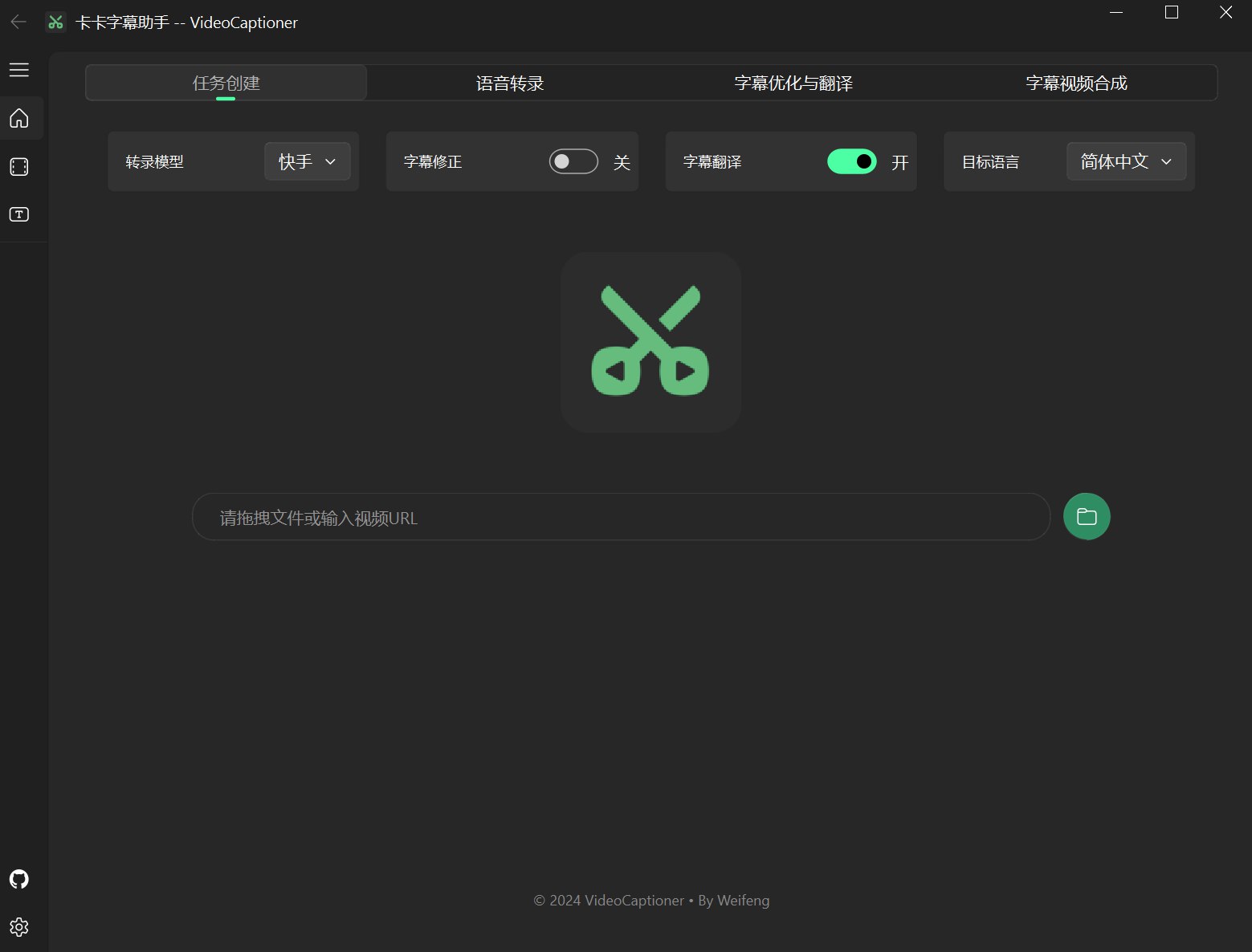
## 项目介绍 卡卡字幕助手(VideoCaptioner)操作简单且无需高配置,支持 API 和本地离线两种方式进行语音识别,利用大语言模型进行字幕智能断句、校正、翻译,字幕视频全流程一键处理。为视频配上效果惊艳的字幕。 - 支持词级时间戳与 VAD 语音活动检测,识别准确率高 - 基于 LLM 的语义理解,自动将逐字字幕重组为自然流畅的句子段落 - 结合上下文的 AI 翻译,支持反思优化机制,译文地道专业 - 支持批量视频字幕合成,提升处理效率 - 直观的字幕编辑查看界面,支持实时预览和快捷编辑 ## 界面预览
软件界面预览
![页面预览](https://h1.appinn.me/file/1731487410170_preview1.png) ![页面预览](https://h1.appinn.me/file/1731487410832_preview2.png) ## 测试 全流程处理一个14分钟1080P的 [B站英文 TED 视频](https://www.bilibili.com/video/BV1jT411X7Dz),调用本地 Whisper 模型进行语音识别,使用 `gpt-5-mini` 模型优化和翻译为中文,总共消耗时间约 **4 分钟**。 近后台计算,模型优化和翻译消耗费用不足 ¥0.01(以OpenAI官方价格为计算) 具体字幕和视频合成的效果的测试结果图片,请参考 [TED视频测试](./legacy-docs/test.md) ## 快速开始 ### Windows 用户 #### 方式一:使用打包程序(推荐) 软件较为轻量,打包大小不足 60M,已集成所有必要环境,下载后可直接运行。 1. 从 [Release](https://github.com/WEIFENG2333/VideoCaptioner/releases) 页面下载最新版本的可执行程序。或者:[蓝奏盘下载](https://wwwm.lanzoue.com/ii14G2pdsbej) 2. 打开安装包进行安装 3. LLM API 配置,(用于字幕断句、校正),可使用[本项目的中转站](https://api.videocaptioner.cn) 4. 翻译配置,选择是否启用翻译,翻译服务(默认使用微软翻译,质量一般,推荐配置自己的 API KEY 使用大模型翻译) 5. 语音识别配置(默认使用B接口网络调用语音识别服务,中英以外的语言请使用本地转录) ### macOS 用户 #### 一键安装运行(推荐) ```bash # 方式一:直接运行(自动安装 uv、克隆项目、安装相关依赖) curl -fsSL https://raw.githubusercontent.com/WEIFENG2333/VideoCaptioner/main/scripts/run.sh | bash # 方式二:先克隆再运行 git clone https://github.com/WEIFENG2333/VideoCaptioner.git cd VideoCaptioner ./scripts/run.sh ``` 脚本会自动: 1. 安装 [uv](https://docs.astral.sh/uv/) 包管理器(如果未安装) 2. 克隆项目到 `~/VideoCaptioner`(如果不在项目目录中运行) 3. 安装所有 Python 依赖 4. 启动应用
手动安装步骤 #### 1. 安装 uv 包管理器 ```bash curl -LsSf https://astral.sh/uv/install.sh | sh ``` #### 2. 安装系统依赖(macOS) ```bash brew install ffmpeg ``` #### 3. 克隆并运行 ```bash git clone https://github.com/WEIFENG2333/VideoCaptioner.git cd VideoCaptioner uv sync # 安装依赖 uv run python main.py # 运行 ```
### 开发者指南 ```bash # 安装依赖(包括开发依赖) uv sync # 运行应用 uv run python main.py # 类型检查 uv run pyright # 代码检查 uv run ruff check . ``` ## 基本配置 ### 1. LLM API 配置说明 LLM 大模型是用来字幕段句、字幕优化、以及字幕翻译(如果选择了LLM 大模型翻译)。 | 配置项 | 说明 | | -------------- | ------------------------------------------------------------------------------------------------------------------------------------------------- | | SiliconCloud | [SiliconCloud 官网](https://cloud.siliconflow.cn/i/onCHcaDx)配置方法请参考[配置文档](https://weifeng2333.github.io/VideoCaptioner/config/llm)
该并发较低,建议把线程设置为5以下。 | | DeepSeek | [DeepSeek 官网](https://platform.deepseek.com),建议使用 `deepseek-v3` 模型,
官方网站最近服务好像并不太稳定。 | | OpenAI兼容接口 | 如果有其他服务商的API,可直接在软件中填写。base_url 和api_key [VideoCaptioner API](https://api.videocaptioner.cn) | 注:如果用的 API 服务商不支持高并发,请在软件设置中将“线程数”调低,避免请求错误。 --- 如果希望高并发,或者希望在在软件内使用使用 OpenAI 或者 Claude 等优质大模型进行字幕校正和翻译。 可使用本项目的✨LLM API中转站✨: [https://api.videocaptioner.cn](https://api.videocaptioner.cn) 其支持高并发,性价比极高,且有国内外大量模型可挑选。 注册获取key之后,设置中按照下面配置: BaseURL: `https://api.videocaptioner.cn/v1` API-key: `个人中心-API 令牌页面自行获取。` 💡 模型选择建议 (本人在各质量层级中精选出的高性价比模型): - 高质量之选: `gemini-3-pro`、`claude-sonnet-4-5-20250929` (耗费比例:3) - 较高质量之选: `gpt-5-2025-08-07`、 `claude-haiku-4-5-20251001` (耗费比例:1.2) - 中质量之选: `gpt-5-mini`、`gemini-3-flash` (耗费比例:0.3) 本站支持超高并发,软件中线程数直接拉满即可~ 处理速度非常快~ 更详细的API配置教程:[中转站配置](https://weifeng2333.github.io/VideoCaptioner/config/llm) --- ## 2. 翻译配置 | 配置项 | 说明 | | -------------- | ----------------------------------------------------------------------------------------------------------------------------- | | LLM 大模型翻译 | 🌟 翻译质量最好的选择。使用 AI 大模型进行翻译,能更好理解上下文,翻译更自然。需要在设置中配置 LLM API(比如 OpenAI、DeepSeek 等) | | 微软翻译 | 使用微软的翻译服务, 速度非常快 | | 谷歌翻译 | 谷歌的翻译服务,速度快,但需要能访问谷歌的网络环境 | 推荐使用 `LLM 大模型翻译` ,翻译质量最好。 ### 3. 语音识别接口说明 | 接口名称 | 支持语言 | 运行方式 | 说明 | | ---------------- | -------------------------------------------------- | -------- | ----------------------------------------------------------------------------------------------------------------- | | B接口 | 仅支持中文、英文 | 在线 | 免费、速度较快 | | J接口 | 仅支持中文、英文 | 在线 | 免费、速度较快 | | WhisperCpp | 中文、日语、韩语、英文等 99 种语言,外语效果较好 | 本地 | (实际使用不稳定)需要下载转录模型
中文建议medium以上模型
英文等使用较小模型即可达到不错效果。 | | fasterWhisper 👍 | 中文、英文等多99种语言,外语效果优秀,时间轴更准确 | 本地 | (🌟推荐🌟)需要下载程序和转录模型
支持CUDA,速度更快,转录准确。
超级准确的时间戳字幕。
仅支持 window | ### 4. 本地 Whisper 语音识别模型 Whisper 版本有 WhisperCpp 和 fasterWhisper(推荐) 两种,后者效果更好,都需要自行在软件内下载模型。 | 模型 | 磁盘空间 | 内存占用 | 说明 | | ----------- | -------- | -------- | ----------------------------------- | | Tiny | 75 MiB | ~273 MB | 转录很一般,仅用于测试 | | Small | 466 MiB | ~852 MB | 英文识别效果已经不错 | | Medium | 1.5 GiB | ~2.1 GB | 中文识别建议至少使用此版本 | | Large-v2 👍 | 2.9 GiB | ~3.9 GB | 效果好,配置允许情况推荐使用 | | Large-v3 | 2.9 GiB | ~3.9 GB | 社区反馈可能会出现幻觉/字幕重复问题 | 推荐模型: `Large-v2` 稳定且质量较好。 ### 5. 文稿匹配 - 在"字幕优化与翻译"页面,包含"文稿匹配"选项,支持以下**一种或者多种**内容,辅助校正字幕和翻译: | 类型 | 说明 | 填写示例 | | ---------- | ------------------------------------ | ------------------------------------------------------------------------------------------------------------------------------------------------------- | | 术语表 | 专业术语、人名、特定词语的修正对照表 | 机器学习->Machine Learning
马斯克->Elon Musk
打call -> 应援
图灵斑图
公交车悖论 | | 原字幕文稿 | 视频的原有文稿或相关内容 | 完整的演讲稿、课程讲义等 | | 修正要求 | 内容相关的具体修正要求 | 统一人称代词、规范专业术语等
填写**内容相关**的要求即可,[示例参考](https://github.com/WEIFENG2333/VideoCaptioner/issues/59#issuecomment-2495849752) | - 如果需要文稿进行字幕优化辅助,全流程处理时,先填写文稿信息,再进行开始任务处理 - 注意: 使用上下文参数量不高的小型LLM模型时,建议控制文稿内容在1千字内,如果使用上下文较大的模型,则可以适当增加文稿内容。 无特殊需求,可不填写。 ### 6. Cookie 配置说明 如果使用URL下载功能时,如果遇到以下情况: 1. 下载视频网站需要登录信息才可以下载; 2. 只能下载较低分辨率的视频; 3. 网络条件较差时需要验证; - 请参考 [Cookie 配置说明](https://weifeng2333.github.io/VideoCaptioner/guide/cookies-config) 获取Cookie信息,并将cookies.txt文件放置到软件安装目录的 `AppData` 目录下,即可正常下载高质量视频。 ## 软件流程介绍 程序简单的处理流程如下: ``` 语音识别转录 -> 字幕断句(可选) -> 字幕优化翻译(可选) -> 字幕视频合成 ``` ## 软件主要功能 软件利用大语言模型(LLM)在理解上下文方面的优势,对语音识别生成的字幕进一步处理。有效修正错别字、统一专业术语,让字幕内容更加准确连贯,为用户带来出色的观看体验! #### 1. 多平台视频下载与处理 - 支持国内外主流视频平台(B站、Youtube、小红书、TikTok、X、西瓜视频、抖音等) - 自动提取视频原有字幕处理 #### 2. 专业的语音识别引擎 - 提供多种接口在线识别,效果媲美剪映(免费、高速) - 支持本地Whisper模型(保护隐私、可离线) #### 3. 字幕智能纠错 - 自动优化专业术语、代码片段和数学公式格式 - 上下文进行断句优化,提升阅读体验 - 支持文稿提示,使用原有文稿或者相关提示优化字幕断句 #### 4. 高质量字幕翻译 - 结合上下文的智能翻译,确保译文兼顾全文 - 通过Prompt指导大模型反思翻译,提升翻译质量 - 使用序列模糊匹配算法、保证时间轴完全一致 #### 5. 字幕样式调整 - 丰富的字幕样式模板(科普风、新闻风、番剧风等等) - 多种格式字幕视频(SRT、ASS、VTT、TXT) 针对小白用户,对一些软件内的选项说明: #### 1. 语音转录页面 - `VAD过滤`:开启后,VAD(语音活动检测)将过滤无人声的语音片段,从而减少幻觉现象。建议保持默认开启状态。如果不懂,其他VAD选项建议直接保持默认即可。 - `音频分离`:开启后,使用MDX-Net进行降噪处理,能够有效分离人声和背景音乐,从而提升音频质量。建议只在嘈杂的视频中开启。 #### 2. 字幕优化与翻译页面 - `智能断句`:开启后,全流程处理时生成字级时间戳,然后通过LLM大模型进行断句,从而在视频有更完美的观看体验。有按照句子断句和按照语义断句两种模式。可根据自己的需求配置。 - `字幕校正`:开启后,会通过LLM大模型对字幕内容进行校正(如:英文单词大小写、标点符号、错别字、数学公式和代码的格式等),提升字幕的质量。 - `反思翻译`:开启后,会通过LLM大模型进行反思翻译,提升翻译的质量。相应的会增加请求的时间和消耗的Token。(选项在 设置页-LLM大模型翻译-反思翻译 中开启。) - `文稿提示`:填写后,这部分也将作为提示词发送给大模型,辅助字幕优化和翻译。 #### 3. 字幕视频合成页面 - `视频合成`:开启后,会根据合成字幕视频;关闭将跳过视频合成的流程。 - `软字幕`:开启后,字幕不会烧录到视频中,处理速度极快。但是软字幕需要一些播放器(如PotPlayer)支持才可以进行显示播放。而且软字幕的样式不是软件内调整的字幕样式,而是播放器默认的白色样式。 项目主要目录结构说明如下: ``` VideoCaptioner/ ├── app/ # 应用源代码目录 │ ├── common/ # 公共模块(配置、信号总线) │ ├── components/ # UI 组件 │ ├── core/ # 核心业务逻辑(ASR、翻译、优化等) │ ├── thread/ # 异步线程 │ └── view/ # 界面视图 ├── resource/ # 资源文件目录 │ ├── assets/ # 图标、Logo 等 │ ├── bin/ # 二进制程序(FFmpeg、Whisper 等) │ ├── fonts/ # 字体文件 │ ├── subtitle_style/ # 字幕样式模板 │ └── translations/ # 多语言翻译文件 ├── work-dir/ # 工作目录(处理完成的视频和字幕) ├── AppData/ # 应用数据目录 │ ├── cache/ # 缓存目录(转录、LLM 请求) │ ├── models/ # Whisper 模型文件 │ ├── logs/ # 日志文件 │ └── settings.json # 用户设置 ├── scripts/ # 安装和运行脚本 ├── main.py # 程序入口 └── pyproject.toml # 项目配置和依赖 ``` ## 📝 说明 1. 字幕断句的质量对观看体验至关重要。软件能将逐字字幕智能重组为符合自然语言习惯的段落,并与视频画面完美同步。 2. 在处理过程中,仅向大语言模型发送文本内容,不包含时间轴信息,这大大降低了处理开销。 3. 在翻译环节,我们采用吴恩达提出的"翻译-反思-翻译"方法论。这种迭代优化的方式确保了翻译的准确性。 4. 填入 YouTube 链接时进行处理时,会自动下载视频的字幕,从而省去转录步骤,极大地节省操作时间。 ## 🤝 贡献指南 项目在不断完善中,如果在使用过程遇到的Bug,欢迎提交 [Issue](https://github.com/WEIFENG2333/VideoCaptioner/issues) 和 Pull Request 帮助改进项目。 ## 📝 更新日志 查看完整的更新历史,请访问 [CHANGELOG.md](./CHANGELOG.md) ## 💖 支持作者 如果觉得项目对你有帮助,可以给项目点个Star!
捐助支持
支付宝二维码 微信二维码
## ⭐ Star History [![Star History Chart](https://api.star-history.com/svg?repos=WEIFENG2333/VideoCaptioner&type=Date)](https://star-history.com/#WEIFENG2333/VideoCaptioner&Date) ================================================ FILE: app/__init__.py ================================================ ================================================ FILE: app/common/config.py ================================================ # coding:utf-8 from enum import Enum from PyQt5.QtCore import QLocale from PyQt5.QtGui import QColor from qfluentwidgets import ( BoolValidator, ConfigItem, ConfigSerializer, EnumSerializer, FolderValidator, OptionsConfigItem, OptionsValidator, QConfig, RangeConfigItem, RangeValidator, Theme, qconfig, ) from app.config import SETTINGS_PATH, WORK_PATH from app.core.utils.platform_utils import get_available_transcribe_models from ..core.entities import ( FasterWhisperModelEnum, LLMServiceEnum, SubtitleLayoutEnum, SubtitleRenderModeEnum, TranscribeLanguageEnum, TranscribeModelEnum, TranscribeOutputFormatEnum, TranslatorServiceEnum, VadMethodEnum, VideoQualityEnum, WhisperModelEnum, ) from ..core.translate.types import TargetLanguage class Language(Enum): """软件语言""" CHINESE_SIMPLIFIED = QLocale(QLocale.Chinese, QLocale.China) CHINESE_TRADITIONAL = QLocale(QLocale.Chinese, QLocale.HongKong) ENGLISH = QLocale(QLocale.English) AUTO = QLocale() class LanguageSerializer(ConfigSerializer): """Language serializer""" def serialize(self, language): return language.value.name() if language != Language.AUTO else "Auto" def deserialize(self, value: str): return Language(QLocale(value)) if value != "Auto" else Language.AUTO class PlatformAwareTranscribeModelValidator(OptionsValidator): """平台相关的转录模型验证器,在 macOS 上自动过滤掉 FasterWhisper""" def __init__(self): # 不调用父类的 __init__,因为我们要自定义 options self._options = get_available_transcribe_models() @property def options(self): return self._options def validate(self, value): return value in self._options def correct(self, value): return value if self.validate(value) else self._options[0] class Config(QConfig): """应用配置""" # LLM配置 llm_service = OptionsConfigItem( "LLM", "LLMService", LLMServiceEnum.OPENAI, OptionsValidator(LLMServiceEnum), EnumSerializer(LLMServiceEnum), ) openai_model = ConfigItem("LLM", "OpenAI_Model", "gpt-4o-mini") openai_api_key = ConfigItem("LLM", "OpenAI_API_Key", "") openai_api_base = ConfigItem("LLM", "OpenAI_API_Base", "https://api.openai.com/v1") silicon_cloud_model = ConfigItem("LLM", "SiliconCloud_Model", "gpt-4o-mini") silicon_cloud_api_key = ConfigItem("LLM", "SiliconCloud_API_Key", "") silicon_cloud_api_base = ConfigItem( "LLM", "SiliconCloud_API_Base", "https://api.siliconflow.cn/v1" ) deepseek_model = ConfigItem("LLM", "DeepSeek_Model", "deepseek-chat") deepseek_api_key = ConfigItem("LLM", "DeepSeek_API_Key", "") deepseek_api_base = ConfigItem( "LLM", "DeepSeek_API_Base", "https://api.deepseek.com/v1" ) ollama_model = ConfigItem("LLM", "Ollama_Model", "llama2") ollama_api_key = ConfigItem("LLM", "Ollama_API_Key", "ollama") ollama_api_base = ConfigItem("LLM", "Ollama_API_Base", "http://localhost:11434/v1") lm_studio_model = ConfigItem("LLM", "LmStudio_Model", "qwen2.5:7b") lm_studio_api_key = ConfigItem("LLM", "LmStudio_API_Key", "lmstudio") lm_studio_api_base = ConfigItem( "LLM", "LmStudio_API_Base", "http://localhost:1234/v1" ) gemini_model = ConfigItem("LLM", "Gemini_Model", "gemini-pro") gemini_api_key = ConfigItem("LLM", "Gemini_API_Key", "") gemini_api_base = ConfigItem( "LLM", "Gemini_API_Base", "https://generativelanguage.googleapis.com/v1beta/openai/", ) chatglm_model = ConfigItem("LLM", "ChatGLM_Model", "glm-4") chatglm_api_key = ConfigItem("LLM", "ChatGLM_API_Key", "") chatglm_api_base = ConfigItem( "LLM", "ChatGLM_API_Base", "https://open.bigmodel.cn/api/paas/v4" ) # ------------------- 翻译配置 ------------------- translator_service = OptionsConfigItem( "Translate", "TranslatorServiceEnum", TranslatorServiceEnum.BING, OptionsValidator(TranslatorServiceEnum), EnumSerializer(TranslatorServiceEnum), ) need_reflect_translate = ConfigItem( "Translate", "NeedReflectTranslate", False, BoolValidator() ) deeplx_endpoint = ConfigItem("Translate", "DeeplxEndpoint", "") batch_size = RangeConfigItem("Translate", "BatchSize", 10, RangeValidator(5, 50)) thread_num = RangeConfigItem("Translate", "ThreadNum", 10, RangeValidator(1, 50)) # ------------------- 转录配置 ------------------- transcribe_model = OptionsConfigItem( "Transcribe", "TranscribeModel", TranscribeModelEnum.BIJIAN, PlatformAwareTranscribeModelValidator(), EnumSerializer(TranscribeModelEnum), ) transcribe_output_format = OptionsConfigItem( "Transcribe", "OutputFormat", TranscribeOutputFormatEnum.SRT, OptionsValidator(TranscribeOutputFormatEnum), EnumSerializer(TranscribeOutputFormatEnum), ) transcribe_language = OptionsConfigItem( "Transcribe", "TranscribeLanguage", TranscribeLanguageEnum.AUTO, OptionsValidator(TranscribeLanguageEnum), EnumSerializer(TranscribeLanguageEnum), ) # ------------------- Whisper Cpp 配置 ------------------- whisper_model = OptionsConfigItem( "Whisper", "WhisperModel", WhisperModelEnum.TINY, OptionsValidator(WhisperModelEnum), EnumSerializer(WhisperModelEnum), ) # ------------------- Faster Whisper 配置 ------------------- faster_whisper_program = ConfigItem( "FasterWhisper", "Program", "faster-whisper-xxl.exe", ) faster_whisper_model = OptionsConfigItem( "FasterWhisper", "Model", FasterWhisperModelEnum.TINY, OptionsValidator(FasterWhisperModelEnum), EnumSerializer(FasterWhisperModelEnum), ) faster_whisper_model_dir = ConfigItem("FasterWhisper", "ModelDir", "") faster_whisper_device = OptionsConfigItem( "FasterWhisper", "Device", "cuda", OptionsValidator(["cuda", "cpu"]) ) # VAD 参数 faster_whisper_vad_filter = ConfigItem( "FasterWhisper", "VadFilter", True, BoolValidator() ) faster_whisper_vad_threshold = RangeConfigItem( "FasterWhisper", "VadThreshold", 0.4, RangeValidator(0, 1) ) faster_whisper_vad_method = OptionsConfigItem( "FasterWhisper", "VadMethod", VadMethodEnum.SILERO_V4, OptionsValidator(VadMethodEnum), EnumSerializer(VadMethodEnum), ) # 人声提取 faster_whisper_ff_mdx_kim2 = ConfigItem( "FasterWhisper", "FfMdxKim2", False, BoolValidator() ) # 文本处理参数 faster_whisper_one_word = ConfigItem( "FasterWhisper", "OneWord", True, BoolValidator() ) # 提示词 faster_whisper_prompt = ConfigItem("FasterWhisper", "Prompt", "") # ------------------- Whisper API 配置 ------------------- whisper_api_base = ConfigItem("WhisperAPI", "WhisperApiBase", "") whisper_api_key = ConfigItem("WhisperAPI", "WhisperApiKey", "") whisper_api_model = OptionsConfigItem("WhisperAPI", "WhisperApiModel", "") whisper_api_prompt = ConfigItem("WhisperAPI", "WhisperApiPrompt", "") # ------------------- 字幕配置 ------------------- need_optimize = ConfigItem("Subtitle", "NeedOptimize", False, BoolValidator()) need_translate = ConfigItem("Subtitle", "NeedTranslate", False, BoolValidator()) need_split = ConfigItem("Subtitle", "NeedSplit", False, BoolValidator()) target_language = OptionsConfigItem( "Subtitle", "TargetLanguage", TargetLanguage.SIMPLIFIED_CHINESE, OptionsValidator(TargetLanguage), EnumSerializer(TargetLanguage), ) max_word_count_cjk = ConfigItem( "Subtitle", "MaxWordCountCJK", 28, RangeValidator(8, 100) ) max_word_count_english = ConfigItem( "Subtitle", "MaxWordCountEnglish", 20, RangeValidator(8, 100) ) custom_prompt_text = ConfigItem("Subtitle", "CustomPromptText", "") # ------------------- 字幕合成配置 ------------------- soft_subtitle = ConfigItem("Video", "SoftSubtitle", False, BoolValidator()) need_video = ConfigItem("Video", "NeedVideo", True, BoolValidator()) video_quality = OptionsConfigItem( "Video", "VideoQuality", VideoQualityEnum.MEDIUM, OptionsValidator(VideoQualityEnum), EnumSerializer(VideoQualityEnum), ) use_subtitle_style = ConfigItem("Video", "UseSubtitleStyle", False, BoolValidator()) # ------------------- 字幕样式配置 ------------------- subtitle_style_name = ConfigItem("SubtitleStyle", "StyleName", "default") subtitle_layout = OptionsConfigItem( "SubtitleStyle", "Layout", SubtitleLayoutEnum.TRANSLATE_ON_TOP, OptionsValidator(SubtitleLayoutEnum), EnumSerializer(SubtitleLayoutEnum), ) subtitle_preview_image = ConfigItem("SubtitleStyle", "PreviewImage", "") # 字幕渲染模式 subtitle_render_mode = OptionsConfigItem( "SubtitleStyle", "RenderMode", SubtitleRenderModeEnum.ROUNDED_BG, OptionsValidator(SubtitleRenderModeEnum), EnumSerializer(SubtitleRenderModeEnum), ) # 圆角背景模式配置 rounded_bg_font_name = ConfigItem("RoundedBgStyle", "FontName", "LXGW WenKai") rounded_bg_font_size = RangeConfigItem( "RoundedBgStyle", "FontSize", 52, RangeValidator(16, 120) ) # 背景色:深灰半透明 (R=25, G=25, B=25, A=200) rounded_bg_color = ConfigItem("RoundedBgStyle", "BgColor", "#191919C8") rounded_bg_text_color = ConfigItem("RoundedBgStyle", "TextColor", "#FFFFFF") rounded_bg_corner_radius = RangeConfigItem( "RoundedBgStyle", "CornerRadius", 12, RangeValidator(0, 50) ) rounded_bg_padding_h = RangeConfigItem( "RoundedBgStyle", "PaddingH", 28, RangeValidator(4, 100) ) rounded_bg_padding_v = RangeConfigItem( "RoundedBgStyle", "PaddingV", 14, RangeValidator(4, 50) ) rounded_bg_margin_bottom = RangeConfigItem( "RoundedBgStyle", "MarginBottom", 60, RangeValidator(20, 300) ) rounded_bg_line_spacing = RangeConfigItem( "RoundedBgStyle", "LineSpacing", 10, RangeValidator(0, 50) ) rounded_bg_letter_spacing = RangeConfigItem( "RoundedBgStyle", "LetterSpacing", 0, RangeValidator(0, 20) ) # ------------------- 保存配置 ------------------- work_dir = ConfigItem("Save", "Work_Dir", WORK_PATH, FolderValidator()) # ------------------- 软件页面配置 ------------------- micaEnabled = ConfigItem("MainWindow", "MicaEnabled", False, BoolValidator()) dpiScale = OptionsConfigItem( "MainWindow", "DpiScale", "Auto", OptionsValidator([1, 1.25, 1.5, 1.75, 2, "Auto"]), restart=True, ) language = OptionsConfigItem( "MainWindow", "Language", Language.AUTO, OptionsValidator(Language), LanguageSerializer(), restart=True, ) # ------------------- 更新配置 ------------------- checkUpdateAtStartUp = ConfigItem( "Update", "CheckUpdateAtStartUp", True, BoolValidator() ) # ------------------- 缓存配置 ------------------- cache_enabled = ConfigItem("Cache", "CacheEnabled", True, BoolValidator()) cfg = Config() cfg.themeMode.value = Theme.DARK cfg.themeColor.value = QColor("#ff28f08b") qconfig.load(SETTINGS_PATH, cfg) ================================================ FILE: app/common/signal_bus.py ================================================ from PyQt5.QtCore import QObject, QUrl, pyqtSignal class SignalBus(QObject): # 字幕排布信号 subtitle_layout_changed = pyqtSignal(str) # 字幕优化信号 subtitle_optimization_changed = pyqtSignal(bool) # 字幕翻译信号 subtitle_translation_changed = pyqtSignal(bool) # 翻译语言 target_language_changed = pyqtSignal(str) # 转录模型 transcription_model_changed = pyqtSignal(str) # 软字幕信号 soft_subtitle_changed = pyqtSignal(bool) # 视频合成信号 need_video_changed = pyqtSignal(bool) # 视频质量信号 video_quality_changed = pyqtSignal(str) # 使用样式信号 use_subtitle_style_changed = pyqtSignal(bool) # 渲染模式变更信号 subtitle_render_mode_changed = pyqtSignal(str) # 新增视频控制相关信号 video_play = pyqtSignal() # 播放信号 video_pause = pyqtSignal() # 暂停信号 video_stop = pyqtSignal() # 停止信号 video_source_changed = pyqtSignal(QUrl) # 视频源改变信号 video_segment_play = pyqtSignal(int, int) # 播放片段信号,参数为开始和结束时间(ms) video_subtitle_added = pyqtSignal(str) # 添加字幕文件信号 # 新增视频控制相关方法 def play_video(self): """触发视频播放""" self.video_play.emit() def pause_video(self): """触发视频暂停""" self.video_pause.emit() def stop_video(self): """触发视频停止""" self.video_stop.emit() def set_video_source(self, url: QUrl): """设置视频源 Args: url: 视频文件的URL """ self.video_source_changed.emit(url) def play_video_segment(self, start_time: int, end_time: int): """播放指定时间段的视频 Args: start_time: 开始时间(毫秒) end_time: 结束时间(毫秒) """ self.video_segment_play.emit(start_time, end_time) def add_subtitle(self, subtitle_file: str): """添加字幕文件 Args: subtitle_file: 字幕文件路径 """ self.video_subtitle_added.emit(subtitle_file) signalBus = SignalBus() ================================================ FILE: app/components/DonateDialog.py ================================================ import os from PyQt5.QtCore import Qt from PyQt5.QtGui import QPixmap from PyQt5.QtWidgets import QHBoxLayout, QLabel, QVBoxLayout from qfluentwidgets import BodyLabel, MessageBoxBase from app.config import ASSETS_PATH class DonateDialog(MessageBoxBase): def __init__(self, parent=None): super().__init__(parent) # 定义二维码路径 self.WECHAT_QR_PATH = os.path.join(ASSETS_PATH, "donate_green.jpg") self.ALIPAY_QR_PATH = os.path.join(ASSETS_PATH, "donate_blue.jpg") self.setup_ui() self.setWindowTitle(self.tr("支持作者")) def setup_ui(self): # 创建标题标签 self.titleLabel = BodyLabel(self.tr("感谢支持"), self) # 创建说明文本 self.descLabel = BodyLabel( self.tr( "目前本人精力有限,您的支持让我有动力继续折腾这个项目!\n感谢您对开源事业的热爱与支持!" ), self, ) self.descLabel.setAlignment(Qt.AlignCenter) # type: ignore # 创建水平布局放置两个二维码 self.qrLayout = QHBoxLayout() # 创建支付宝二维码标签 self.alipayContainer = QVBoxLayout() self.alipayQR = QLabel() self.alipayQR.setPixmap( QPixmap(self.ALIPAY_QR_PATH).scaled( 300, 300, Qt.AspectRatioMode.KeepAspectRatio, Qt.SmoothTransformation, # type: ignore ) ) self.alipayLabel = BodyLabel(self.tr("支付宝")) self.alipayLabel.setAlignment(Qt.AlignCenter) # type: ignore self.alipayContainer.addWidget(self.alipayQR, alignment=Qt.AlignCenter) # type: ignore self.alipayContainer.addWidget(self.alipayLabel) # 创建微信二维码标签 self.wechatContainer = QVBoxLayout() self.wechatQR = QLabel() self.wechatQR.setPixmap( QPixmap(self.WECHAT_QR_PATH).scaled( 300, 300, Qt.AspectRatioMode.KeepAspectRatio, Qt.SmoothTransformation, # type: ignore ) ) self.wechatLabel = BodyLabel(self.tr("微信")) self.wechatLabel.setAlignment(Qt.AlignCenter) # type: ignore self.wechatContainer.addWidget(self.wechatQR, alignment=Qt.AlignCenter) # type: ignore self.wechatContainer.addWidget(self.wechatLabel) # 将二维码添加到水平布局 self.qrLayout.addLayout(self.alipayContainer) self.qrLayout.addLayout(self.wechatContainer) self.viewLayout.setSpacing(30) # 添加到主布局 self.viewLayout.addWidget(self.titleLabel) self.viewLayout.addWidget(self.descLabel) # 添加垂直间距 self.viewLayout.addLayout(self.qrLayout) # 设置对话框最小宽度 self.widget.setMinimumWidth(800) # 设置对话框最小高度 self.widget.setMinimumHeight(500) # 隐藏是按钮,只显示取消按钮 self.yesButton.hide() self.cancelButton.setText(self.tr("关闭")) ================================================ FILE: app/components/EditComboBoxSettingCard.py ================================================ from typing import List, Optional, Union from PyQt5.QtCore import Qt, pyqtSignal from PyQt5.QtGui import QIcon from PyQt5.QtWidgets import QCompleter from qfluentwidgets import EditableComboBox, SettingCard from qfluentwidgets.common.config import ConfigItem, qconfig class EditComboBoxSettingCard(SettingCard): """可编辑的下拉框设置卡片""" currentTextChanged = pyqtSignal(str) def __init__( self, configItem: ConfigItem, icon: Union[str, QIcon], title: str, content: Optional[str] = None, items: Optional[List[str]] = None, parent=None, ): super().__init__(icon, title, content, parent) self.configItem = configItem self.items = items or [] # 创建可编辑的组合框 self.comboBox = EditableComboBox(self) for item in self.items: self.comboBox.addItem(item) # 设置搜索功能 self._setupCompleter() # 设置布局 self.hBoxLayout.addWidget(self.comboBox, 1, Qt.AlignRight) # type: ignore self.hBoxLayout.addSpacing(16) # 设置最小宽度 self.comboBox.setMinimumWidth(280) # 设置初始值 self.setValue(qconfig.get(configItem)) # 连接信号 self.comboBox.currentTextChanged.connect(self.__onTextChanged) configItem.valueChanged.connect(self.setValue) def _setupCompleter(self): """设置搜索自动完成功能""" if not self.items: return completer = QCompleter(self.items, self) completer.setCaseSensitivity(Qt.CaseInsensitive) # type: ignore # 不区分大小写 completer.setFilterMode(Qt.MatchContains) # type: ignore # 包含匹配 self.comboBox.setCompleter(completer) def __onTextChanged(self, text: str): """当文本改变时触发""" self.setValue(text) self.currentTextChanged.emit(text) def setValue(self, value: str): """设置值""" qconfig.set(self.configItem, value) self.comboBox.setText(value) def addItems(self, items: List[str]): """添加选项""" for item in items: self.comboBox.addItem(item) self.items.extend(items) self._setupCompleter() def setItems(self, items: List[str]): """重新设置选项列表""" self.comboBox.clear() self.items = items for item in items: self.comboBox.addItem(item) self._setupCompleter() ================================================ FILE: app/components/FasterWhisperSettingWidget.py ================================================ import os import subprocess from pathlib import Path from PyQt5.QtCore import Qt, QThread, pyqtSignal from PyQt5.QtGui import QShowEvent from PyQt5.QtWidgets import ( QHBoxLayout, QHeaderView, QTableWidgetItem, QVBoxLayout, QWidget, ) from qfluentwidgets import ( BodyLabel, ComboBox, ComboBoxSettingCard, HyperlinkButton, HyperlinkCard, InfoBar, InfoBarPosition, MessageBoxBase, ProgressBar, PushButton, SettingCardGroup, SingleDirectionScrollArea, SubtitleLabel, SwitchSettingCard, TableItemDelegate, TableWidget, ) from qfluentwidgets import FluentIcon as FIF from app.common.config import cfg from app.components.LineEditSettingCard import LineEditSettingCard from app.components.SpinBoxSettingCard import DoubleSpinBoxSettingCard from app.config import BIN_PATH, MODEL_PATH from app.core.entities import ( FasterWhisperModelEnum, TranscribeLanguageEnum, VadMethodEnum, ) from app.core.utils.platform_utils import open_folder from app.thread.file_download_thread import FileDownloadThread from app.thread.modelscope_download_thread import ModelscopeDownloadThread # 在文件开头添加常量定义 FASTER_WHISPER_PROGRAMS = [ { "label": "GPU(cuda) + CPU 版本", "value": "faster-whisper-gpu.7z", "type": "GPU", "size": "1.35 GB", "downloadLink": "https://modelscope.cn/models/bkfengg/whisper-cpp/resolve/master/Faster-Whisper-XXL_r245.2_windows.7z", }, { "label": "CPU版本", "value": "faster-whisper.exe", "type": "CPU", "size": "78.7 MB", "downloadLink": "https://modelscope.cn/models/bkfengg/whisper-cpp/resolve/master/whisper-faster.exe", }, ] FASTER_WHISPER_MODELS = [ { "label": "Tiny", "value": "faster-whisper-tiny", "size": "77824", "downloadLink": "https://huggingface.co/Systran/faster-whisper-tiny", "modelScopeLink": "pengzhendong/faster-whisper-tiny", }, { "label": "Base", "value": "faster-whisper-base", "size": "148480", "downloadLink": "https://huggingface.co/Systran/faster-whisper-base", "modelScopeLink": "pengzhendong/faster-whisper-base", }, { "label": "Small", "value": "faster-whisper-small", "size": "495616", "downloadLink": "https://huggingface.co/Systran/faster-whisper-small", "modelScopeLink": "pengzhendong/faster-whisper-small", }, { "label": "Medium", "value": "faster-whisper-medium", "size": "1572864", "downloadLink": "https://huggingface.co/Systran/faster-whisper-medium", "modelScopeLink": "pengzhendong/faster-whisper-medium", }, { "label": "Large-v1", "value": "faster-whisper-large-v1", "size": "3145728", "downloadLink": "https://huggingface.co/Systran/faster-whisper-large-v1", "modelScopeLink": "pengzhendong/faster-whisper-large-v1", }, { "label": "Large-v2", "value": "faster-whisper-large-v2", "size": "3145728", "downloadLink": "https://huggingface.co/Systran/faster-whisper-large-v2", "modelScopeLink": "pengzhendong/faster-whisper-large-v2", }, { "label": "Large-v3", "value": "faster-whisper-large-v3", "size": "3145728", "downloadLink": "https://huggingface.co/Systran/faster-whisper-large-v3", "modelScopeLink": "pengzhendong/faster-whisper-large-v3", }, { "label": "Large-v3-turbo", "value": "faster-whisper-large-v3-turbo", "size": "1720320", "downloadLink": "https://huggingface.co/Systran/faster-whisper-large-v3-turbo", "modelScopeLink": "pengzhendong/faster-whisper-large-v3-turbo", }, ] # 在类外添加这个工具函数 def check_faster_whisper_exists() -> tuple[bool, list[str]]: """检查 faster-whisper 程序是否存在 检查以下两种情况: 1. bin目录下是否有 faster-whisper.exe 2. bin目录下是否有 Faster-Whisper-XXL/faster-whisper-xxl.exe Returns: tuple[bool, list[str]]: (是否存在程序, 已安装的版本列表) """ bin_path = Path(BIN_PATH) installed_versions = [] # 检查 faster-whisper.exe(CPU版本) if (bin_path / "faster-whisper.exe").exists(): installed_versions.append("CPU") # 检查 Faster-Whisper-XXL/faster-whisper-xxl.exe(GPU版本) xxl_path = bin_path / "Faster-Whisper-XXL" / "faster-whisper-xxl.exe" if xxl_path.exists(): installed_versions.extend(["GPU", "CPU"]) installed_versions = list(set(installed_versions)) return bool(installed_versions), installed_versions # 添加新的解压线程类 class UnzipThread(QThread): """7z解压线程""" finished = pyqtSignal() # 解压完成信号 error = pyqtSignal(str) # 解压错误信号 def __init__(self, zip_file, extract_path): super().__init__() self.zip_file = zip_file self.extract_path = extract_path def run(self): try: subprocess.run( ["7z", "x", self.zip_file, f"-o{self.extract_path}", "-y"], check=True, creationflags=subprocess.CREATE_NO_WINDOW if os.name == "nt" else 0, ) # 删除压缩包 os.remove(self.zip_file) self.finished.emit() except subprocess.CalledProcessError as e: self.error.emit(f"解压失败: {str(e)}") except Exception as e: self.error.emit(str(e)) class FasterWhisperDownloadDialog(MessageBoxBase): """Faster Whisper 下载对话框""" # 添加类变量跟踪下载状态 is_downloading = False def __init__(self, parent=None, setting_widget=None): super().__init__(parent) self.widget.setMinimumWidth(600) self.program_download_thread = None self.model_download_thread = None self._setup_ui() self._connect_signals() self.setting_widget = setting_widget def _setup_ui(self): """设置UI""" layout = QVBoxLayout() self._setup_program_section(layout) layout.addSpacing(20) self._setup_model_section(layout) self._setup_progress_section(layout) self.viewLayout.addLayout(layout) self.cancelButton.setText(self.tr("关闭")) self.yesButton.hide() def _setup_program_section(self, layout): """设置程序下载部分UI""" # 标题和按钮的水平布局 title_layout = QHBoxLayout() # 标题 faster_whisper_title = SubtitleLabel(self.tr("Faster Whisper 下载"), self) title_layout.addWidget(faster_whisper_title) # 添加打开文件夹按钮 open_folder_btn = HyperlinkButton("", self.tr("打开程序文件夹"), parent=self) open_folder_btn.setIcon(FIF.FOLDER) open_folder_btn.clicked.connect(self._open_program_folder) title_layout.addStretch() title_layout.addWidget(open_folder_btn) layout.addLayout(title_layout) layout.addSpacing(8) # 检查已安装的版本 has_program, installed_versions = check_faster_whisper_exists() if has_program: # 显示已安装版本 versions_text = " + ".join(installed_versions) program_status = BodyLabel(self.tr(f"已安装版本: {versions_text}"), self) program_status.setStyleSheet("color: green") layout.addWidget(program_status) # 添加说明标签 if len(installed_versions) == 1: desc_label = BodyLabel(self.tr("您可以继续下载其他版本:"), self) layout.addWidget(desc_label) else: desc_label = BodyLabel(self.tr("未下载Faster Whisper 程序"), self) layout.addWidget(desc_label) # 下载控件 program_layout = QHBoxLayout() self.program_combo = ComboBox(self) self.program_combo.setFixedWidth(300) self.program_combo.hide() # 只显示未安装的版本 for program in FASTER_WHISPER_PROGRAMS: version_type = program["type"] if version_type not in installed_versions: self.program_combo.addItem(f"{program['label']} ({program['size']})") # 如果还有可下载的版本,显示下载控件 if self.program_combo.count() > 0: self.program_combo.show() self.program_download_btn = PushButton(self.tr("下载程序"), self) self.program_download_btn.clicked.connect(self._start_download) program_layout.addWidget(self.program_combo) program_layout.addWidget(self.program_download_btn) program_layout.addStretch() layout.addLayout(program_layout) def _setup_model_section(self, layout): """设置模型下载部分UI""" # 标题和按钮的水平布局 title_layout = QHBoxLayout() # 标题 model_title = SubtitleLabel(self.tr("模型下载"), self) title_layout.addWidget(model_title) # 添加打开文件夹按钮 open_folder_btn = HyperlinkButton("", self.tr("打开模型文件夹"), parent=self) open_folder_btn.setIcon(FIF.FOLDER) open_folder_btn.clicked.connect(self._open_model_folder) title_layout.addStretch() title_layout.addWidget(open_folder_btn) layout.addLayout(title_layout) layout.addSpacing(8) # 模型表格 self.model_table = self._create_model_table() self._populate_model_table() layout.addWidget(self.model_table) def _create_model_table(self): """创建模型表格""" table = TableWidget(self) table.setEditTriggers(TableWidget.NoEditTriggers) table.setSelectionMode(TableWidget.NoSelection) table.setColumnCount(4) table.setHorizontalHeaderLabels( [self.tr("模型名称"), self.tr("大小"), self.tr("状态"), self.tr("操作")] ) # 设置表格样式 table.setBorderVisible(True) table.setBorderRadius(8) table.setItemDelegate(TableItemDelegate(table)) # 设置列宽 header = table.horizontalHeader() header.setSectionResizeMode(0, QHeaderView.Stretch) header.setSectionResizeMode(1, QHeaderView.Fixed) header.setSectionResizeMode(2, QHeaderView.Fixed) header.setSectionResizeMode(3, QHeaderView.Fixed) table.setColumnWidth(1, 100) table.setColumnWidth(2, 80) table.setColumnWidth(3, 150) # 设置行高 row_height = 45 table.verticalHeader().setDefaultSectionSize(row_height) # 设置表格高度 header_height = 20 max_visible_rows = 6 table_height = row_height * max_visible_rows + header_height + 15 table.setFixedHeight(table_height) return table def _setup_progress_section(self, layout): """设置进度显示部分UI""" self.progress_bar = ProgressBar(self) self.progress_label = BodyLabel("", self) self.progress_bar.hide() self.progress_label.hide() layout.addWidget(self.progress_bar) layout.addWidget(self.progress_label) def _populate_model_table(self): """填充模型表格数据""" self.model_table.setRowCount(len(FASTER_WHISPER_MODELS)) for i, model in enumerate(FASTER_WHISPER_MODELS): self._add_model_row(i, model) def _add_model_row(self, row, model): """添加模型表格行""" # 模型名称 name_item = QTableWidgetItem(model["label"]) name_item.setTextAlignment(Qt.AlignCenter) # type: ignore self.model_table.setItem(row, 0, name_item) # 大小 size_item = QTableWidgetItem(f"{int(model['size']) / 1024:.1f} MB") size_item.setTextAlignment(Qt.AlignCenter) # type: ignore self.model_table.setItem(row, 1, size_item) # 状态 - 检查model.bin文件是否存在 model_path = os.path.join(MODEL_PATH, model["value"]) model_bin_path = os.path.join(model_path, "model.bin") is_downloaded = os.path.exists(model_bin_path) status_item = QTableWidgetItem( self.tr("已下载") if is_downloaded else self.tr("未下载") ) if is_downloaded: status_item.setForeground(Qt.green) # type: ignore status_item.setTextAlignment(Qt.AlignCenter) # type: ignore self.model_table.setItem(row, 2, status_item) # 下载按钮 button_container = QWidget() button_layout = QHBoxLayout(button_container) button_layout.setContentsMargins(4, 4, 4, 4) download_btn = HyperlinkButton( "", self.tr("重新下载") if is_downloaded else self.tr("下载"), parent=self, ) download_btn.setIcon(FIF.DOWNLOAD) download_btn.clicked.connect(lambda checked, r=row: self._download_model(r)) button_layout.addStretch() button_layout.addWidget(download_btn) button_layout.addStretch() self.model_table.setCellWidget(row, 3, button_container) def _connect_signals(self): """连接信号""" self.rejected.connect(self._on_dialog_reject) def _start_download(self): """开始下载""" if FasterWhisperDownloadDialog.is_downloading: InfoBar.warning( self.tr("下载进行中"), self.tr("请等待当前下载任务完成"), duration=3000, parent=self, ) return FasterWhisperDownloadDialog.is_downloading = True # 禁用所有下载按钮 self._set_all_download_buttons_enabled(False) # 获取选中的文本 selected_text = self.program_combo.currentText() # 从显示文本中提取程序标签 selected_label = selected_text.split(" (")[0] # 根据标签找到对应的程序配置 program = next( (p for p in FASTER_WHISPER_PROGRAMS if p["label"] == selected_label), None ) if not program: InfoBar.error( self.tr("下载错误"), self.tr("未找到对应的程序配置"), duration=3000, parent=self, ) FasterWhisperDownloadDialog.is_downloading = False self._set_all_download_buttons_enabled(True) return # 确保 BIN_PATH 目录存在 os.makedirs(BIN_PATH, exist_ok=True) self.progress_bar.show() self.progress_label.show() self.program_download_btn.setEnabled(False) self.program_combo.setEnabled(False) # 直接下载到bin目录 save_path = os.path.join(BIN_PATH, program["value"]) self.program_download_thread = FileDownloadThread( program["downloadLink"], save_path ) self.program_download_thread.progress.connect( self._on_program_download_progress ) self.program_download_thread.finished.connect( lambda: self._on_program_download_finished(save_path) ) self.program_download_thread.error.connect(self._on_program_download_error) self.program_download_thread.start() def _on_program_download_progress(self, value, status_msg): """更新程序下载进度""" self.progress_bar.setValue(int(value)) self.progress_label.setText(status_msg) def _on_program_download_finished(self, save_path): """程序下载完成处理""" try: # 检查是否是 CPU 版本的直接下载 if save_path.endswith(".exe"): # 如果是exe文件,重命名为faster-whisper.exe os.rename(save_path, os.path.join(BIN_PATH, "faster-whisper.exe")) self._finish_program_installation() else: # GPU 版本需要解压 self.progress_label.setText(self.tr("正在解压文件...")) # 创建并启动解压线程 self.unzip_thread = UnzipThread(save_path, BIN_PATH) self.unzip_thread.finished.connect(self._finish_program_installation) self.unzip_thread.error.connect(self._on_unzip_error) self.unzip_thread.start() return # 提前返回,等待解压完成 except Exception as e: InfoBar.error(self.tr("安装失败"), str(e), duration=3000, parent=self) self._cleanup_installation() def _on_program_download_error(self, error): """程序下载错误处理""" InfoBar.error(self.tr("下载失败"), error, duration=3000, parent=self) FasterWhisperDownloadDialog.is_downloading = False self._set_all_download_buttons_enabled(True) self.program_download_btn.setEnabled(True) self.program_combo.setEnabled(True) self.progress_bar.hide() self.progress_label.hide() def _on_dialog_reject(self): """对话框关闭处理""" if self.program_download_thread and self.program_download_thread.isRunning(): self.program_download_thread.stop() if self.model_download_thread and self.model_download_thread.isRunning(): self.model_download_thread.terminate() FasterWhisperDownloadDialog.is_downloading = False self.reject() def closeEvent(self, event): """窗口关闭事件处理""" self._on_dialog_reject() super().closeEvent(event) def _download_model(self, row): """下载选中的模型""" if FasterWhisperDownloadDialog.is_downloading: InfoBar.warning( self.tr("下载进行中"), self.tr("请等待当前下载任务完成"), duration=3000, parent=self, ) return FasterWhisperDownloadDialog.is_downloading = True self._set_all_download_buttons_enabled(False) model = FASTER_WHISPER_MODELS[row] self.progress_bar.show() self.progress_label.show() self.progress_label.setText(self.tr(f"正在下载 {model['label']} 模型...")) # 禁用当前行的下载按钮 button_container = self.model_table.cellWidget(row, 3) download_btn = button_container.findChild(HyperlinkButton) if download_btn: download_btn.setEnabled(False) # 创建并启动下载线程,保存到类属性 self.model_download_thread = ModelscopeDownloadThread( model["modelScopeLink"], os.path.join(MODEL_PATH, model["value"]) ) def _on_model_download_progress(value, msg): self.progress_bar.setValue(value) self.progress_label.setText(msg) def _on_model_download_finished(): FasterWhisperDownloadDialog.is_downloading = False self._set_all_download_buttons_enabled(True) # 更新状态 status_item = QTableWidgetItem(self.tr("已下载")) status_item.setForeground(Qt.green) # type: ignore status_item.setTextAlignment(Qt.AlignCenter) # type: ignore self.model_table.setItem(row, 2, status_item) # 更新下载按钮文本 if download_btn: download_btn.setText(self.tr("重新下载")) download_btn.setEnabled(True) model = FASTER_WHISPER_MODELS[row] # 更新主设置对话框的模型选择 if self.setting_widget: # 保存当前值并清空 current_value = cfg.faster_whisper_model.value combo = self.setting_widget.model_card.comboBox combo.clear() # 找出已下载的模型 available = [] model_map = { m["label"].lower(): m["value"] for m in FASTER_WHISPER_MODELS } for enum_val in FasterWhisperModelEnum: if enum_val.value in model_map: if (MODEL_PATH / model_map[enum_val.value]).exists(): available.append(enum_val) # 重建下拉框 self.setting_widget.model_card.optionToText = { e: e.value for e in available } for enum_val in available: combo.addItem(enum_val.value, userData=enum_val) # 恢复选择 if current_value in available: combo.setCurrentText(current_value.value) elif combo.count() > 0: combo.setCurrentIndex(0) InfoBar.success( self.tr("下载成功"), self.tr(f"{model['label']} 模型已下载完成"), duration=3000, parent=self, ) self.progress_bar.hide() self.progress_label.hide() def _on_model_download_error(error): FasterWhisperDownloadDialog.is_downloading = False self._set_all_download_buttons_enabled(True) if download_btn: download_btn.setEnabled(True) InfoBar.error(self.tr("下载失败"), str(error), duration=3000, parent=self) self.progress_bar.hide() self.progress_label.hide() self.model_download_thread.progress.connect(_on_model_download_progress) self.model_download_thread.finished.connect(_on_model_download_finished) self.model_download_thread.error.connect(_on_model_download_error) self.model_download_thread.start() def _set_all_download_buttons_enabled(self, enabled: bool): """设置所有下载按钮的启用状态""" # 设置程序下载按钮 if hasattr(self, "program_download_btn"): self.program_download_btn.setEnabled(enabled) self.program_combo.setEnabled(enabled) # 设置所有模型下载按钮 for row in range(self.model_table.rowCount()): button_container = self.model_table.cellWidget(row, 3) if button_container: download_btn = button_container.findChild(HyperlinkButton) if download_btn: download_btn.setEnabled(enabled) def _open_model_folder(self): """打开模型文件夹""" if os.path.exists(MODEL_PATH): # 根据操作系统打开文件夹 open_folder(str(MODEL_PATH)) def _open_program_folder(self): """打开程序文件夹""" if os.path.exists(BIN_PATH): # 根据操作系统打开文件夹 open_folder(str(BIN_PATH)) def _finish_program_installation(self): """完成程序安装""" InfoBar.success( self.tr("安装完成"), self.tr("Faster Whisper 程序已安装成功"), duration=3000, parent=self, ) self.accept() self._cleanup_installation() def _on_unzip_error(self, error_msg): """处理解压错误""" InfoBar.error(self.tr("安装失败"), error_msg, duration=3000, parent=self) self._cleanup_installation() def _cleanup_installation(self): """清理安装状态""" FasterWhisperDownloadDialog.is_downloading = False self._set_all_download_buttons_enabled(True) self.progress_bar.hide() self.progress_label.hide() class FasterWhisperSettingWidget(QWidget): def __init__(self, parent=None): super().__init__(parent) self.setup_ui() self._connect_signals() def showEvent(self, a0: QShowEvent) -> None: super().showEvent(a0) # 检查Faster Whisper模型是否存在 is_faster_whisper_exists, _ = check_faster_whisper_exists() if not is_faster_whisper_exists: self.show_error_info(self.tr("Faster Whisper程序不存在,请先下载程序")) self._show_model_manager() return def setup_ui(self): self.main_layout = QVBoxLayout(self) # 创建单向滚动区域和容器 self.scrollArea = SingleDirectionScrollArea(orient=Qt.Vertical, parent=self) # type: ignore self.scrollArea.setStyleSheet( "QScrollArea{background: transparent; border: none}" ) self.container = QWidget(self) self.container.setStyleSheet("QWidget{background: transparent}") self.containerLayout = QVBoxLayout(self.container) self.setting_group = SettingCardGroup( self.tr("Faster Whisper 设置"), self ) # 模型选择 self.model_card = ComboBoxSettingCard( cfg.faster_whisper_model, FIF.ROBOT, self.tr("模型"), self.tr("选择 Faster Whisper 模型"), [model.value for model in FasterWhisperModelEnum], self.setting_group, ) # 检查未下载的模型并从下拉框中移除 for i in range(self.model_card.comboBox.count() - 1, -1, -1): model_text = self.model_card.comboBox.itemText(i).lower() model_config = next( ( model for model in FASTER_WHISPER_MODELS if model["label"].lower() == model_text ), None, ) if model_config: model_path = Path(MODEL_PATH) / model_config["value"] model_bin_path = model_path / "model.bin" if model_bin_path.exists(): continue self.model_card.comboBox.removeItem(i) # 创建管理模型卡片 self.manage_model_card = HyperlinkCard( "", # 无链接 self.tr("管理模型"), FIF.DOWNLOAD, # 使用下载图标 self.tr("模型管理"), self.tr("下载或更新 Faster Whisper 模型"), self.setting_group, # 添加到设置组 ) # 语言选择 self.language_card = ComboBoxSettingCard( cfg.transcribe_language, FIF.LANGUAGE, self.tr("源语言"), self.tr("音视频中说话的语言,默认根据前30秒自动识别"), [lang.value for lang in TranscribeLanguageEnum], self.setting_group, ) self.language_card.comboBox.setMaxVisibleItems(6) # 设备选择 self.device_card = ComboBoxSettingCard( cfg.faster_whisper_device, FIF.IOT, self.tr("运行设备"), self.tr("模型运行设备"), ["cuda", "cpu"], self.setting_group, ) # _, available_devices = check_faster_whisper_exists() # if "GPU" not in available_devices: # self.device_card.comboBox.removeItem(0) # VAD设置组 self.vad_group = SettingCardGroup(self.tr("VAD设置"), self) # VAD过滤开关 self.vad_filter_card = SwitchSettingCard( FIF.CHECKBOX, self.tr("VAD过滤"), self.tr("过滤无人声语音片断,减少幻觉"), cfg.faster_whisper_vad_filter, self.vad_group, ) # VAD阈值 self.vad_threshold_card = DoubleSpinBoxSettingCard( cfg.faster_whisper_vad_threshold, FIF.VOLUME, # type: ignore self.tr("VAD阈值"), self.tr("语音概率阈值,高于此值视为语音"), minimum=0.00, maximum=1.00, decimals=2, step=0.05, ) # VAD方法 self.vad_method_card = ComboBoxSettingCard( cfg.faster_whisper_vad_method, FIF.MUSIC, self.tr("VAD方法"), self.tr("选择VAD检测方法"), [method.value for method in VadMethodEnum], self.vad_group, ) # 其他设置组 self.other_group = SettingCardGroup(self.tr("其他设置"), self) # 音频降噪 self.ff_mdx_kim2_card = SwitchSettingCard( FIF.MUSIC, self.tr("人声分离"), self.tr("处理前使用MDX-Net降噪,分离人声和背景音乐"), cfg.faster_whisper_ff_mdx_kim2, self.other_group, ) # 单词时间戳 self.one_word_card = SwitchSettingCard( FIF.UNIT, self.tr("单字时间戳"), self.tr("开启生成单字级时间戳;关闭后使用原始分段断句"), cfg.faster_whisper_one_word, self.other_group, ) # 提示词 self.prompt_card = LineEditSettingCard( cfg.faster_whisper_prompt, FIF.CHAT, self.tr("提示词"), self.tr("可选的提示词,默认空"), "", self.other_group, ) # 添加模型设置组的卡片 self.setting_group.addSettingCard(self.model_card) self.setting_group.addSettingCard(self.manage_model_card) self.setting_group.addSettingCard(self.device_card) self.setting_group.addSettingCard(self.language_card) # 添加VAD设置组的卡片 self.vad_group.addSettingCard(self.vad_filter_card) self.vad_group.addSettingCard(self.vad_threshold_card) self.vad_group.addSettingCard(self.vad_method_card) # 添加其他设置的卡片 self.other_group.addSettingCard(self.ff_mdx_kim2_card) self.other_group.addSettingCard(self.one_word_card) self.other_group.addSettingCard(self.prompt_card) # 将所有设置组添加到容器布局 self.containerLayout.addWidget(self.setting_group) self.containerLayout.addWidget(self.vad_group) self.containerLayout.addWidget(self.other_group) self.containerLayout.addStretch(1) # 设置组件最小宽度 self.model_card.comboBox.setMinimumWidth(200) self.device_card.comboBox.setMinimumWidth(200) self.language_card.comboBox.setMinimumWidth(200) self.vad_method_card.comboBox.setMinimumWidth(200) self.prompt_card.lineEdit.setMinimumWidth(200) # 设置滚动区域 self.scrollArea.setWidget(self.container) self.scrollArea.setWidgetResizable(True) # 将滚动区域添加到主布局 self.main_layout.addWidget(self.scrollArea) def _connect_signals(self): """连接信号""" self.manage_model_card.linkButton.clicked.connect(self._show_model_manager) self.vad_filter_card.checkedChanged.connect(self._on_vad_filter_changed) def _on_vad_filter_changed(self, checked: bool): """VAD过滤开关状态改变时的处理""" self.vad_threshold_card.setEnabled(checked) self.vad_method_card.setEnabled(checked) def _show_model_manager(self): """显示模型管理对话框""" dialog = FasterWhisperDownloadDialog(self.window(), self) dialog.exec_() def show_error_info(self, error_msg): """显示错误信息""" InfoBar.error( title=self.tr("错误"), content=error_msg, parent=self.window(), duration=5000, position=InfoBarPosition.BOTTOM, ) def check_faster_whisper_model(self): """检查选定的Faster Whisper模型是否存在 Returns: bool: 如果模型存在且配置正确返回True,否则返回False """ # 检查程序是否存在 has_program, _ = check_faster_whisper_exists() if not has_program: self.show_error_info(self.tr("Faster Whisper程序不存在,请先下载程序")) return False model_value = cfg.faster_whisper_model.value.value # 检查模型配置是否存在 model_config = next( ( m for m in FASTER_WHISPER_MODELS if m["label"].lower() == model_value.lower() ), None, ) if not model_config: self.show_error_info(self.tr("模型配置不存在")) return False model_path = MODEL_PATH / model_config["value"] model_files = model_path / "model.bin" # 检查模型文件是否存在 if not model_path.exists() and not model_files.exists(): self.show_error_info(self.tr("模型文件不存在: ") + model_value) return False return True ================================================ FILE: app/components/LanguageSettingDialog.py ================================================ from PyQt5.QtWidgets import QVBoxLayout from qfluentwidgets import ( ComboBox, InfoBar, InfoBarPosition, MessageBoxBase, SettingCard, ) from qfluentwidgets import FluentIcon as FIF from app.common.config import cfg from app.core.entities import ( TranscribeLanguageEnum, TranscribeModelEnum, get_asr_language_capability, ) class LanguageSettingDialog(MessageBoxBase): """语言设置对话框""" def __init__(self, model: TranscribeModelEnum, parent=None): self.model = model super().__init__(parent) self.widget.setMinimumWidth(500) self._setup_ui() self._connect_signals() def _get_available_languages(self) -> list[str]: """获取当前模型支持的语言列表""" capability = get_asr_language_capability(self.model) languages = [lang.value for lang in capability.supported_languages] if capability.supports_auto: languages.insert(0, TranscribeLanguageEnum.AUTO.value) return languages def _setup_ui(self): """设置UI""" self.yesButton.setText(self.tr("确定")) self.cancelButton.setText(self.tr("取消")) # 主布局 layout = QVBoxLayout() # 使用自定义 SettingCard 代替 ComboBoxSettingCard(因为需要动态选项) self.language_card = SettingCard( FIF.LANGUAGE, self.tr("源语言"), self.tr("音视频中说话的语言,默认根据前30秒自动识别"), self, ) # 创建 ComboBox self.language_combo = ComboBox(self) available_languages = self._get_available_languages() self.language_combo.addItems(available_languages) self.language_combo.setMaxVisibleItems(6) self.language_combo.setMinimumWidth(160) # 设置当前值 current_lang = cfg.transcribe_language.value if current_lang.value in available_languages: self.language_combo.setCurrentText(current_lang.value) elif available_languages: # 当前选择的语言不在可选列表中,选择第一个 self.language_combo.setCurrentIndex(0) # 添加 ComboBox 到卡片 self.language_card.hBoxLayout.addWidget(self.language_combo) self.language_card.hBoxLayout.addSpacing(16) layout.addWidget(self.language_card) layout.addStretch(1) self.viewLayout.addLayout(layout) def _connect_signals(self): """连接信号""" self.yesButton.clicked.connect(self.__onYesButtonClicked) def __onYesButtonClicked(self): # 保存选中的语言到配置 selected_text = self.language_combo.currentText() for lang in TranscribeLanguageEnum: if lang.value == selected_text: cfg.set(cfg.transcribe_language, lang) break self.accept() InfoBar.success( self.tr("设置已保存"), self.tr("语言设置已更新"), duration=3000, parent=self.window(), position=InfoBarPosition.BOTTOM, ) if cfg.transcribe_language.value == TranscribeLanguageEnum.JAPANESE: InfoBar.warning( self.tr("请注意身体!!"), self.tr("小心肝儿,注意身体哦~"), duration=2000, parent=self.window(), position=InfoBarPosition.BOTTOM, ) ================================================ FILE: app/components/LineEditSettingCard.py ================================================ from typing import Optional from PyQt5.QtCore import Qt, pyqtSignal from qfluentwidgets import LineEdit, SettingCard from qfluentwidgets.common.config import ConfigItem, qconfig class LineEditSettingCard(SettingCard): """行输入卡片""" textChanged = pyqtSignal(str) def __init__( self, configItem: ConfigItem, icon, title: str, content: Optional[str] = None, placeholder: str = "", parent=None, ): super().__init__(icon, title, content, parent) self.configItem = configItem self.lineEdit = LineEdit(self) self.lineEdit.setPlaceholderText(placeholder) self.hBoxLayout.addWidget(self.lineEdit, 1, Qt.AlignRight) # type: ignore self.hBoxLayout.addSpacing(16) self.lineEdit.setMinimumWidth(280) self.setValue(qconfig.get(configItem)) self.lineEdit.textChanged.connect(self.__onTextChanged) configItem.valueChanged.connect(self.setValue) def __onTextChanged(self, text: str): self.setValue(text) self.textChanged.emit(text) def setValue(self, value: str): qconfig.set(self.configItem, value) self.lineEdit.setText(value) ================================================ FILE: app/components/MySettingCard.py ================================================ # coding:utf-8 from typing import List, Optional, Union from PyQt5.QtCore import Qt, pyqtSignal from PyQt5.QtGui import QColor, QIcon, QPainter from PyQt5.QtWidgets import QFrame, QHBoxLayout, QLabel, QToolButton, QVBoxLayout from qfluentwidgets import ColorDialog, ComboBox, CompactDoubleSpinBox, CompactSpinBox from qfluentwidgets.common.config import isDarkTheme from qfluentwidgets.common.icon import FluentIconBase, drawIcon from qfluentwidgets.common.style_sheet import FluentStyleSheet from qfluentwidgets.components.widgets.icon_widget import IconWidget class SettingIconWidget(IconWidget): def paintEvent(self, e): painter = QPainter(self) if not self.isEnabled(): painter.setOpacity(0.36) painter.setRenderHints(QPainter.Antialiasing | QPainter.SmoothPixmapTransform) drawIcon(self._icon, painter, self.rect()) class SettingCard(QFrame): """Setting card""" def __init__( self, icon: Union[str, QIcon, FluentIconBase], title, content=None, parent=None ): """ Parameters ---------- icon: str | QIcon | FluentIconBase the icon to be drawn title: str the title of card content: str the content of card parent: QWidget parent widget """ super().__init__(parent=parent) self.iconLabel = SettingIconWidget(icon, self) self.titleLabel = QLabel(title, self) self.contentLabel = QLabel(content or "", self) self.hBoxLayout = QHBoxLayout(self) self.vBoxLayout = QVBoxLayout() if not content: self.contentLabel.hide() self.setFixedHeight(70 if content else 50) self.iconLabel.setFixedSize(16, 16) # initialize layout self.hBoxLayout.setSpacing(0) self.hBoxLayout.setContentsMargins(16, 0, 0, 0) self.hBoxLayout.setAlignment(Qt.AlignVCenter) # type: ignore self.vBoxLayout.setSpacing(0) self.vBoxLayout.setContentsMargins(0, 0, 0, 0) self.vBoxLayout.setAlignment(Qt.AlignVCenter) # type: ignore self.hBoxLayout.addWidget(self.iconLabel, 0, Qt.AlignLeft) # type: ignore self.hBoxLayout.addSpacing(16) self.hBoxLayout.addLayout(self.vBoxLayout) self.vBoxLayout.addWidget(self.titleLabel, 0, Qt.AlignLeft) # type: ignore self.vBoxLayout.addWidget(self.contentLabel, 0, Qt.AlignLeft) # type: ignore self.hBoxLayout.addSpacing(16) self.hBoxLayout.addStretch(1) self.contentLabel.setObjectName("contentLabel") FluentStyleSheet.SETTING_CARD.apply(self) def setTitle(self, title: str): """set the title of card""" self.titleLabel.setText(title) def setContent(self, content: str): """set the content of card""" self.contentLabel.setText(content) self.contentLabel.setVisible(bool(content)) def setValue(self, value): """set the value of config item""" pass def setIconSize(self, width: int, height: int): """set the icon fixed size""" self.iconLabel.setFixedSize(width, height) def paintEvent(self, e): painter = QPainter(self) painter.setRenderHints(QPainter.Antialiasing) if isDarkTheme(): painter.setBrush(QColor(255, 255, 255, 13)) painter.setPen(QColor(0, 0, 0, 50)) else: painter.setBrush(QColor(255, 255, 255, 170)) painter.setPen(QColor(0, 0, 0, 19)) painter.drawRoundedRect(self.rect().adjusted(1, 1, -1, -1), 6, 6) class DoubleSpinBoxSettingCard(SettingCard): """小数输入设置卡片""" valueChanged = pyqtSignal(float) def __init__( self, icon: Union[str, QIcon, FluentIconBase], title: str, content: Optional[str] = None, minimum: float = 0.0, maximum: float = 100.0, decimals: int = 1, parent=None, ): super().__init__(icon, title, content, parent) # 创建CompactDoubleSpinBox self.spinBox = CompactDoubleSpinBox(self) self.spinBox.setRange(minimum, maximum) self.spinBox.setDecimals(decimals) self.spinBox.setMinimumWidth(60) self.spinBox.setSingleStep(0.2) # 设置步长为0.1 # 添加到布局 self.hBoxLayout.addWidget(self.spinBox, 0, Qt.AlignRight) # type: ignore self.hBoxLayout.addSpacing(8) # 设置初始值和连接信号 self.spinBox.valueChanged.connect(self.__onValueChanged) def __onValueChanged(self, value: float): """数值改变时的槽函数""" self.setValue(value) self.valueChanged.emit(value) def setValue(self, value: float): """设置数值""" self.spinBox.setValue(value) class SpinBoxSettingCard(SettingCard): """数值输入设置卡片""" valueChanged = pyqtSignal(int) def __init__( self, icon: Union[str, QIcon], title: str, content: Optional[str] = None, minimum: int = 0, maximum: int = 100, step: int = 2, parent=None, ): super().__init__(icon, title, content, parent) # 创建SpinBox self.spinBox = CompactSpinBox(self) self.spinBox.setRange(minimum, maximum) self.spinBox.setMinimumWidth(60) self.spinBox.setSingleStep(step) # 添加到布局 self.hBoxLayout.addWidget(self.spinBox, 0, Qt.AlignRight) # type: ignore self.hBoxLayout.addSpacing(8) # 设置初始值和连接信号 self.spinBox.valueChanged.connect(self.__onValueChanged) def __onValueChanged(self, value: int): """数值改变时的槽函数""" self.setValue(value) self.valueChanged.emit(value) def setValue(self, value: int): """设置数值""" self.spinBox.setValue(value) class ComboBoxSettingCard(SettingCard): """下拉框设置卡片""" currentTextChanged = pyqtSignal(str) currentIndexChanged = pyqtSignal(int) def __init__( self, icon: Union[str, QIcon], title: str, content: Optional[str] = None, texts: Optional[List[str]] = None, parent=None, ): super().__init__(icon, title, content, parent) # 创建ComboBox self.comboBox = ComboBox(self) self.hBoxLayout.addWidget(self.comboBox, 0, Qt.AlignRight) # type: ignore self.hBoxLayout.addSpacing(16) # 添加选项 if texts: for text in texts: self.comboBox.addItem(text) # 连接信号 self.comboBox.currentTextChanged.connect(self.__onCurrentTextChanged) self.comboBox.currentIndexChanged.connect(self.__onCurrentIndexChanged) def __onCurrentTextChanged(self, text: str): """当前文本改变时的槽函数""" self.currentTextChanged.emit(text) def __onCurrentIndexChanged(self, index: int): """当前索引改变时的槽函数""" self.currentIndexChanged.emit(index) def setCurrentText(self, text: str): """设置当前文本""" self.comboBox.setCurrentText(text) def setCurrentIndex(self, index: int): """设置当前索引""" self.comboBox.setCurrentIndex(index) def addItem(self, text: str): """添加选项""" self.comboBox.addItem(text) def addItems(self, texts: List[str]): """添加多个选项""" self.comboBox.addItems(texts) def clear(self): """清空所有选项""" self.comboBox.clear() class ColorSettingCard(SettingCard): """带颜色选择器的设置卡片""" colorChanged = pyqtSignal(QColor) def __init__( self, color: QColor, icon: Union[str, QIcon, FluentIconBase], title: str, content: Optional[str] = None, parent=None, enableAlpha=False, ): """ 参数 ---------- color: QColor 初始颜色 icon: str | QIcon | FluentIconBase 要绘制的图标 title: str 卡片标题 content: str 卡片内容 parent: QWidget 父组件 enableAlpha: bool 是否启用透明通道 """ super().__init__(icon, title, content, parent) self.colorPicker = ColorPickerButton(color, title, self, enableAlpha) self.colorPicker.setFixedWidth(60) self.hBoxLayout.addWidget(self.colorPicker, 0, Qt.AlignRight) # type: ignore self.hBoxLayout.addSpacing(16) self.colorPicker.colorChanged.connect(self.__onColorChanged) def __onColorChanged(self, color: QColor): """颜色改变时的槽函数""" self.colorChanged.emit(color) def setColor(self, color: QColor): """设置颜色""" self.colorPicker.setColor(color) class ColorPickerButton(QToolButton): """Color picker button""" colorChanged = pyqtSignal(QColor) def __init__(self, color: QColor, title: str, parent=None, enableAlpha=False): super().__init__(parent=parent) self.title = title self.enableAlpha = enableAlpha self.setFixedSize(96, 32) self.setAttribute(Qt.WA_TranslucentBackground) # type: ignore self.setColor(color) self.setCursor(Qt.PointingHandCursor) # type: ignore self.clicked.connect(self.__showColorDialog) def __showColorDialog(self): """show color dialog""" w = ColorDialog( self.color, self.tr("Choose ") + self.title, self.window(), self.enableAlpha ) w.colorChanged.connect(self.__onColorChanged) w.exec() def __onColorChanged(self, color): """color changed slot""" self.setColor(color) self.colorChanged.emit(color) def setColor(self, color): """set color""" self.color = QColor(color) self.update() def paintEvent(self, e): painter = QPainter(self) painter.setRenderHints(QPainter.Antialiasing) pc = QColor(255, 255, 255, 10) if isDarkTheme() else QColor(234, 234, 234) painter.setPen(pc) color = QColor(self.color) if not self.enableAlpha: color.setAlpha(255) painter.setBrush(color) painter.drawRoundedRect(self.rect().adjusted(1, 1, -1, -1), 5, 5) ================================================ FILE: app/components/MyVideoWidget.py ================================================ # coding:utf-8 import sys from enum import Enum from pathlib import Path from typing import Optional import vlc # type: ignore from PyQt5.QtCore import QObject, Qt, QTimer, QUrl, pyqtSignal from PyQt5.QtGui import QIcon from PyQt5.QtWidgets import QApplication, QHBoxLayout, QVBoxLayout, QWidget # from qfluentwidgets.multimedia.media_player import MediaPlayer, MediaPlayerBase from qfluentwidgets.common.icon import FluentIcon from qfluentwidgets.common.style_sheet import FluentStyleSheet from qfluentwidgets.components.widgets.label import CaptionLabel from qfluentwidgets.multimedia.media_play_bar import ( MediaPlayBarBase, MediaPlayBarButton, ) from app.common.signal_bus import signalBus from app.config import RESOURCE_PATH class MediaStatus(Enum): NoMedia = 0 LoadingMedia = 1 LoadedMedia = 2 BufferingMedia = 3 BufferedMedia = 4 EndOfMedia = 5 InvalidMedia = 6 UnknownMediaStatus = 7 class PlaybackState(Enum): StoppedState = 0 PlayingState = 1 PausedState = 2 class MediaPlayerBase(QObject): """Media player base class""" mediaStatusChanged = pyqtSignal(MediaStatus) playbackRateChanged = pyqtSignal(float) positionChanged = pyqtSignal(int) durationChanged = pyqtSignal(int) sourceChanged = pyqtSignal(QUrl) volumeChanged = pyqtSignal(int) mutedChanged = pyqtSignal(bool) def __init__(self, parent=None): super().__init__(parent=parent) def isPlaying(self): """Whether the media is playing""" raise NotImplementedError def mediaStatus(self) -> MediaStatus: """Return the status of the current media stream""" raise NotImplementedError def playbackState(self) -> PlaybackState: """Return the playback status of the current media stream""" raise NotImplementedError def duration(self): """Returns the duration of the current media in ms""" raise NotImplementedError def position(self): """Returns the current position inside the media being played back in ms""" raise NotImplementedError def volume(self): """Return the volume of player""" raise NotImplementedError def source(self) -> QUrl: """Return the active media source being used""" raise NotImplementedError def pause(self): """Pause playing the current source""" raise NotImplementedError def play(self): """Start or resume playing the current source""" raise NotImplementedError def stop(self): """Stop playing, and reset the play position to the beginning""" raise NotImplementedError def playbackRate(self) -> float: """Return the playback rate of the current media""" raise NotImplementedError def setPosition(self, position: int): """Sets the position of media in ms""" raise NotImplementedError def setSource(self, media: QUrl): """Sets the current source""" raise NotImplementedError def setPlaybackRate(self, rate: float): """Sets the playback rate of player""" raise NotImplementedError def setVolume(self, volume: int): """Sets the volume of player""" raise NotImplementedError def setMuted(self, isMuted: bool): raise NotImplementedError def videoOutput(self) -> QObject: """Return the video output to be used by the media player""" raise NotImplementedError def setVideoOutput(self, output: QObject) -> None: """Sets the video output to be used by the media player""" raise NotImplementedError class MediaPlayer(MediaPlayerBase): def __init__(self, parent=None): # 确保在主线程中初始化 if parent: super().__init__(parent) else: super().__init__() # 修改 VLC 参数以减少警告 vlc_args = [ "--no-xlib", "--quiet", ] # 在主线程中创建 VLC 实例 self.moveToThread(QApplication.instance().thread()) self.instance = vlc.Instance(vlc_args) self._player = self.instance.media_player_new() self._media = None self._source = None self._playback_rate = 1.0 # 创建定时器用于更新状态 self._update_timer = QTimer(self) self._update_timer.setInterval(100) # 100ms更新一次 self._update_timer.timeout.connect(self._on_timer_update) self._update_timer.start() # 保存上一次的状态,用于检测变化 self._last_position = 0 self._last_duration = 0 self._last_volume = 100 def _on_timer_update(self): """定时更新状态并发送信号""" if self._player: # 更新位置 position = self._player.get_time() if position != self._last_position: self._last_position = position self.positionChanged.emit(position) # 更新时长 duration = self._player.get_length() if duration != self._last_duration: self._last_duration = duration self.durationChanged.emit(duration) # 更新音量 volume = self._player.audio_get_volume() if volume != self._last_volume: self._last_volume = volume self.volumeChanged.emit(volume) def isPlaying(self): return bool(self._player and self._player.is_playing()) def mediaStatus(self) -> MediaStatus: if not self._player: return MediaStatus.NoMedia state = self._player.get_state() if state == vlc.State.NothingSpecial: return MediaStatus.NoMedia elif state == vlc.State.Opening: return MediaStatus.LoadingMedia elif state == vlc.State.Playing: return MediaStatus.BufferedMedia elif state == vlc.State.Paused: return MediaStatus.BufferedMedia elif state == vlc.State.Stopped: return MediaStatus.LoadedMedia elif state == vlc.State.Ended: return MediaStatus.EndOfMedia elif state == vlc.State.Error: return MediaStatus.InvalidMedia return MediaStatus.UnknownMediaStatus def playbackState(self) -> PlaybackState: if not self._player: return PlaybackState.StoppedState if self._player.is_playing(): return PlaybackState.PlayingState elif self._player.get_state() == vlc.State.Paused: return PlaybackState.PausedState return PlaybackState.StoppedState def duration(self): return self._player.get_length() if self._player else 0 def position(self): return self._player.get_time() if self._player else 0 def volume(self): return self._player.audio_get_volume() if self._player else 0 def source(self) -> QUrl: return self._source def get_subtitle(self): """获取当前使用的字幕文件路径 Returns: str: 当前字幕文件路径,如果没有字幕则返回 None """ if not self._player: return None try: # 获取当前字幕轨道ID current_spu = self._player.video_get_spu() if current_spu <= 0: # 0 表示禁用字幕,-1 表示错误 return None # 获取字幕轨道描述信息 spu_description = self._player.video_get_spu_description() if not spu_description: return None # 遍历查找当前使用的字幕轨道 for spu in spu_description: if spu[0] == current_spu: # 返回字幕文件路径 return spu[1].decode("utf-8") return None except Exception: return None def pause(self): self._player.pause() def play(self): self._player.play() def stop(self): self._player.stop() def playbackRate(self) -> float: return self._playback_rate def setPosition(self, position: int): if self._player: self._player.set_time(position) self.positionChanged.emit(position) def setSource(self, media: QUrl): """设置媒体源时重置状态""" path = media.toLocalFile() or media.toString() self._media = self.instance.media_new(path) self._player.set_media(self._media) self._source = media self.sourceChanged.emit(media) self.mediaStatusChanged.emit(self.mediaStatus()) def setPlaybackRate(self, rate: float): if self._player: self._player.set_rate(rate) self._playback_rate = rate self.playbackRateChanged.emit(rate) def setVolume(self, volume: int): if self._player: self._player.audio_set_volume(volume) self.volumeChanged.emit(volume) def setMuted(self, isMuted: bool): if self._player: self._player.audio_set_mute(isMuted) self.mutedChanged.emit(isMuted) def videoOutput(self) -> Optional[QObject]: return None # VLC不需要这个 def setVideoOutput(self, output: QObject) -> None: if isinstance(output, QWidget) and hasattr(output, "winId"): # type: ignore self._player.set_hwnd(output.winId()) def hasMedia(self): """检查是否有媒体文件加载""" return bool(self._media and self._player) def playSegment(self, start_time: int, end_time: int): """播放指定时间段的视频片段 Args: start_time: 开始时间(毫秒) end_time: 结束时间(毫秒) """ if not self._player or not self.hasMedia(): return # 确保时间范围有效 if start_time < 0 or end_time > self.duration() or start_time >= end_time: return # 创建事件管理器 event_manager = self._player.event_manager() def on_time_changed(event): # 当播放位置到达结束时间时停止播放 if self.position() >= end_time: self.pause() # 移除事件监听器 event_manager.event_detach(vlc.EventType.MediaPlayerTimeChanged) # 注册时间变化事件 event_manager.event_attach( vlc.EventType.MediaPlayerTimeChanged, on_time_changed ) # 设置开始位置并播放 self.setPosition(start_time) self.play() def add_subtitle(self, subtitle_file: str) -> bool: """添加字幕文件 Args: subtitle_file: 字幕文件的路径 Returns: bool: 是否成功添加字幕 """ if not self._player or not self.hasMedia(): return False try: # 将路径转换为 URI 格式 subtitle_uri = Path(subtitle_file).as_uri() # 添加字幕轨道 result = self._player.add_slave( vlc.MediaSlaveType.subtitle, subtitle_uri, True ) # 获取字幕轨道信息 (unused but potentially useful for debugging) # spu_description = self._player.video_get_spu_description() return result == 0 except Exception: return False def get_subtitle_tracks(self) -> list: """获取所有可用的字幕轨道""" if not self._player: return [] tracks = [] spu_count = self._player.video_get_spu_count() for i in range(spu_count): track_info = self._player.video_get_spu_description()[i] tracks.append(track_info) return tracks def set_subtitle_track(self, track_id: int): """设置当前使用的字幕轨道 Args: track_id: 字幕轨道ID,-1 表示禁用字幕 """ if self._player: self._player.video_set_spu(track_id) class StandardMediaPlayBar(MediaPlayBarBase): """Standard media play bar""" def __init__(self, parent=None): super().__init__(parent) self.vBoxLayout = QVBoxLayout(self) self.timeLayout = QHBoxLayout() self.buttonLayout = QHBoxLayout() self.leftButtonContainer = QWidget() self.centerButtonContainer = QWidget() self.rightButtonContainer = QWidget() self.leftButtonLayout = QHBoxLayout(self.leftButtonContainer) self.centerButtonLayout = QHBoxLayout(self.centerButtonContainer) self.rightButtonLayout = QHBoxLayout(self.rightButtonContainer) self.skipBackButton = MediaPlayBarButton(FluentIcon.SKIP_BACK, self) self.skipForwardButton = MediaPlayBarButton(FluentIcon.SKIP_FORWARD, self) self.currentTimeLabel = CaptionLabel("0:00:00", self) self.remainTimeLabel = CaptionLabel("0:00:00", self) self.__initWidgets() def __initWidgets(self): self.setFixedHeight(102) self.vBoxLayout.setSpacing(6) self.vBoxLayout.setContentsMargins(5, 9, 5, 9) self.vBoxLayout.addWidget(self.progressSlider, 1, Qt.AlignTop) # type: ignore self.vBoxLayout.addLayout(self.timeLayout) self.timeLayout.setContentsMargins(10, 0, 10, 0) self.timeLayout.addWidget(self.currentTimeLabel, 0, Qt.AlignLeft) # type: ignore self.timeLayout.addWidget(self.remainTimeLabel, 0, Qt.AlignRight) # type: ignore self.vBoxLayout.addStretch(1) self.vBoxLayout.addLayout(self.buttonLayout, 1) self.buttonLayout.setContentsMargins(0, 0, 0, 0) self.leftButtonLayout.setContentsMargins(4, 0, 0, 0) self.centerButtonLayout.setContentsMargins(0, 0, 0, 0) self.rightButtonLayout.setContentsMargins(0, 0, 4, 0) self.leftButtonLayout.addWidget(self.volumeButton, 0, Qt.AlignLeft) # type: ignore self.centerButtonLayout.addWidget(self.skipBackButton) self.centerButtonLayout.addWidget(self.playButton) self.centerButtonLayout.addWidget(self.skipForwardButton) self.buttonLayout.addWidget(self.leftButtonContainer, 0, Qt.AlignLeft) # type: ignore self.buttonLayout.addWidget(self.centerButtonContainer, 0, Qt.AlignHCenter) # type: ignore self.buttonLayout.addWidget(self.rightButtonContainer, 0, Qt.AlignRight) # type: ignore self.skipBackButton.clicked.connect(lambda: self.skipBack(5000)) self.skipForwardButton.clicked.connect(lambda: self.skipForward(5000)) def skipBack(self, ms: int): """Back up for specified milliseconds""" self.player.setPosition(self.player.position() - ms) def skipForward(self, ms: int): """Fast forward specified milliseconds""" self.player.setPosition(self.player.position() + ms) def _onPositionChanged(self, position: int): super()._onPositionChanged(position) self.currentTimeLabel.setText(self._formatTime(position)) self.remainTimeLabel.setText( self._formatTime(self.player.duration() - position) ) def _formatTime(self, time: int): time = int(time / 1000) s = time % 60 m = int(time / 60) h = int(time / 3600) return f"{h}:{m:02}:{s:02}" def closeEvent(self, event): self.release() super().closeEvent(event) class MyVideoWidget(QWidget): """Video widget""" def __init__(self, parent=None): super().__init__(parent) # 设置初始窗口大小 self.resize(800, 600) self.setWindowTitle("VideoCaptioner") self.setWindowIcon(QIcon(str(RESOURCE_PATH / "assets" / "logo.png"))) # 创建一个专门用于视频输出的 widget self.videoWidget = QWidget(self) self.videoWidget.setStyleSheet("background-color: rgb(24, 24, 24);") # 添加提示标签 self.tipLabel = CaptionLabel("请拖入视频文件", self.videoWidget) self.tipLabel.setStyleSheet( """ color: rgba(255, 255, 255, 0.5); font-size: 20px; font-weight: bold; letter-spacing: 2px; """ ) # 创建布局使标签居中 tipLayout = QVBoxLayout(self.videoWidget) tipLayout.addWidget(self.tipLabel, 0, Qt.AlignCenter) # type: ignore # 创建播放控制栏 self.playBar = StandardMediaPlayBar(self) self.playBar.setAttribute(Qt.WA_TranslucentBackground) # type: ignore # 设置字幕文件 self.subtitle_file = None # 创建垂直布局 self.vBoxLayout = QVBoxLayout(self) self.vBoxLayout.setContentsMargins(0, 0, 0, 0) self.vBoxLayout.setSpacing(0) self.vBoxLayout.addWidget(self.videoWidget, 1) self.vBoxLayout.addWidget(self.playBar, 0) # 创建播放器并传入优化参数 self.vlc_player = MediaPlayer(self) # 设置新的播放器 self.playBar.setMediaPlayer(self.vlc_player) # type: ignore self.playBar.setVolume(80) self.vlc_player.setVideoOutput(self.videoWidget) FluentStyleSheet.MEDIA_PLAYER.apply(self) # 设置焦点和事件过滤 self.setFocusPolicy(Qt.StrongFocus) # type: ignore self.videoWidget.setFocusPolicy(Qt.StrongFocus) # type: ignore # 安装事件过滤器 self.videoWidget.installEventFilter(self) self.playBar.installEventFilter(self) FluentStyleSheet.MEDIA_PLAYER.apply(self) self.setAcceptDrops(True) # 连接 SignalBus 信号 self._connectSignals() def _connectSignals(self): """连接 SignalBus 的信号""" # 视频控制信号 signalBus.video_play.connect(self.play) signalBus.video_pause.connect(self.pause) signalBus.video_stop.connect(self.stop) signalBus.video_source_changed.connect(self.setVideo) signalBus.video_segment_play.connect(self.playSegment) signalBus.video_subtitle_added.connect(self.addSubtitle) def addSubtitle(self, subtitle_file: str): """添加字幕文件的内部方法""" self.subtitle_file = subtitle_file self.vlc_player.add_subtitle(subtitle_file) def setVideo(self, url: QUrl): """设置视频源 Args: url: 视频文件的 QUrl """ self.setWindowTitle(url.fileName()) self.vlc_player.setSource(url) if self.subtitle_file: self.vlc_player.add_subtitle(self.subtitle_file) # 隐藏提示标签 self.tipLabel.hide() def play(self): """播放视频""" self.playBar.play() def pause(self): """暂停视频""" self.playBar.pause() def stop(self): """停止视频""" self.playBar.stop() def playSegment(self, start_time: int, end_time: int): """播放指定时间段的视频 Args: start_time: 开始时间(毫秒) end_time: 结束时间(毫秒) """ self.vlc_player.playSegment(start_time, end_time) def hideEvent(self, e): self.stop() e.accept() def wheelEvent(self, e): return def togglePlayState(self): """toggle play state""" if self.vlc_player.isPlaying(): self.pause() else: self.play() @property def player(self): return self.playBar.player def keyPressEvent(self, event): """处理键盘事件""" if event.key() == Qt.Key_Space: # type: ignore self.playBar.togglePlayState() elif event.key() == Qt.Key_Left: # type: ignore self.playBar.skipBack(3000) elif event.key() == Qt.Key_Right: # type: ignore self.playBar.skipForward(3000) else: super().keyPressEvent(event) def dragEnterEvent(self, event): """处理拖入事件""" if event.mimeData().hasUrls(): urls = event.mimeData().urls() # 检查是否为视频文件或字幕文件 if any( url.toLocalFile() .lower() .endswith( (".mp4", ".avi", ".mkv", ".mov", ".wmv", ".flv", ".srt", ".ass") ) for url in urls ): event.acceptProposedAction() def dropEvent(self, event): """处理放下事件""" urls = event.mimeData().urls() for url in urls: file_path = url.toLocalFile().lower() if file_path.endswith((".srt", ".ass")): # 处理字幕文件 self.vlc_player.add_subtitle(url.toLocalFile()) elif file_path.endswith((".mp4", ".avi", ".mkv", ".mov", ".wmv", ".flv")): # 处理视频文件 self.setVideo(url) self.play() break # 只处理第一个视频文件 def eventFilter(self, obj, event): """事件过滤器,用于捕获所有子部件的按键事件""" if event.type() == event.KeyPress: if event.key() in (Qt.Key_Left, Qt.Key_Right): # type: ignore self.keyPressEvent(event) return True return super().eventFilter(obj, event) def showEvent(self, event): """窗口显示时设置焦点""" super().showEvent(event) self.setFocus() if __name__ == "__main__": app = QApplication(sys.argv) window = MyVideoWidget() # 设置视频源 - 请替换为您的测试视频路径 # video_path = r"path/to/your/test/video.mp4" # window.setVideo(QUrl.fromLocalFile(video_path)) # 确保窗口显示在屏幕中央 window.show() window.activateWindow() window.raise_() # 开始播放视频 # window.play() sys.exit(app.exec_()) ================================================ FILE: app/components/SimpleSettingCard.py ================================================ from PyQt5.QtCore import pyqtSignal from PyQt5.QtWidgets import QHBoxLayout from qfluentwidgets import ( CaptionLabel, CardWidget, ComboBox, SwitchButton, ToolTipFilter, ToolTipPosition, ) class SimpleSettingCard(CardWidget): """基础设置卡片类""" def __init__(self, title, content, parent=None): super().__init__(parent) self.title = title self.content = content self.setup_ui() def setup_ui(self): self.hBoxLayout = QHBoxLayout(self) self.hBoxLayout.setContentsMargins(16, 10, 8, 10) self.hBoxLayout.setSpacing(8) self.label = CaptionLabel(self) self.label.setText(self.title) self.hBoxLayout.addWidget(self.label) self.hBoxLayout.addStretch(1) self.setToolTip(self.content) self.installEventFilter(ToolTipFilter(self, 100, ToolTipPosition.BOTTOM)) class ComboBoxSimpleSettingCard(SimpleSettingCard): """下拉框设置卡片""" valueChanged = pyqtSignal(str) def __init__(self, title, content, items=None, parent=None): super().__init__(title, content, parent) self.items = items or [] self.setup_combobox() def setup_combobox(self): self.comboBox = ComboBox(self) self.comboBox.addItems(self.items) self.comboBox.setMaxVisibleItems(6) self.comboBox.currentTextChanged.connect(self.valueChanged) # type: ignore self.hBoxLayout.addWidget(self.comboBox) def setValue(self, value): self.comboBox.setCurrentIndex(self.items.index(value)) def value(self): return self.comboBox.currentText() class SwitchButtonSimpleSettingCard(SimpleSettingCard): """开关设置卡片""" checkedChanged = pyqtSignal(bool) def __init__(self, title, content, parent=None): super().__init__(title, content, parent) self.setup_switch() def setup_switch(self): self.switchButton = SwitchButton(self) self.switchButton.setOnText("开") self.switchButton.setOffText("关") self.switchButton.checkedChanged.connect(self.checkedChanged) # type: ignore self.hBoxLayout.addWidget(self.switchButton) self.clicked.connect( # type: ignore lambda: self.switchButton.setChecked(not self.switchButton.isChecked()) ) def setChecked(self, checked): self.switchButton.setChecked(checked) def isChecked(self): return self.switchButton.isChecked() ================================================ FILE: app/components/SpinBoxSettingCard.py ================================================ from typing import Optional, Union from PyQt5.QtCore import Qt, pyqtSignal from PyQt5.QtGui import QIcon from qfluentwidgets import CompactDoubleSpinBox, CompactSpinBox, SettingCard from qfluentwidgets.common.config import ConfigItem, qconfig class DoubleSpinBoxSettingCard(SettingCard): """小数输入设置卡片""" valueChanged = pyqtSignal(float) def __init__( self, configItem: ConfigItem, icon: Union[str, QIcon], title: str, content: Optional[str] = None, minimum: float = 0.0, maximum: float = 100.0, decimals: int = 1, step: float = 0.1, parent=None, ): super().__init__(icon, title, content, parent) self.configItem = configItem # 创建CompactDoubleSpinBox self.spinBox = CompactDoubleSpinBox(self) self.spinBox.setRange(minimum, maximum) self.spinBox.setDecimals(decimals) self.spinBox.setMinimumWidth(60) self.spinBox.setSingleStep(step) # 设置步长为0.2 # 添加到布局 self.hBoxLayout.addWidget(self.spinBox, 0, Qt.AlignRight) # type: ignore self.hBoxLayout.addSpacing(8) # 设置初始值和连接信号 self.setValue(qconfig.get(configItem)) self.spinBox.valueChanged.connect(self.__onValueChanged) configItem.valueChanged.connect(self.setValue) def __onValueChanged(self, value: float): """数值改变时的槽函数""" self.setValue(value) self.valueChanged.emit(value) def setValue(self, value: float): """设置数值""" qconfig.set(self.configItem, value) self.spinBox.setValue(value) class SpinBoxSettingCard(SettingCard): """数值输入设置卡片""" valueChanged = pyqtSignal(int) def __init__( self, configItem: ConfigItem, icon: Union[str, QIcon], title: str, content: Optional[str] = None, minimum: int = 0, maximum: int = 100, parent=None, ): super().__init__(icon, title, content, parent) self.configItem = configItem # 创建SpinBox self.spinBox = CompactSpinBox(self) self.spinBox.setRange(minimum, maximum) self.spinBox.setMinimumWidth(60) # 添加到布局 self.hBoxLayout.addWidget(self.spinBox, 0, Qt.AlignRight) # type: ignore self.hBoxLayout.addSpacing(8) # 设置初始值和连接信号 self.setValue(qconfig.get(configItem)) self.spinBox.valueChanged.connect(self.__onValueChanged) configItem.valueChanged.connect(self.setValue) def __onValueChanged(self, value: int): """数值改变时的槽函数""" self.setValue(value) self.valueChanged.emit(value) def setValue(self, value: int): """设置数值""" qconfig.set(self.configItem, value) self.spinBox.setValue(value) ================================================ FILE: app/components/SubtitleSettingDialog.py ================================================ from qfluentwidgets import ( BodyLabel, MessageBoxBase, SwitchSettingCard, ) from qfluentwidgets import FluentIcon as FIF from app.common.config import cfg from app.components.SpinBoxSettingCard import SpinBoxSettingCard class SubtitleSettingDialog(MessageBoxBase): """字幕设置对话框""" def __init__(self, parent=None): super().__init__(parent) self.titleLabel = BodyLabel(self.tr("字幕设置"), self) # 创建设置卡片 self.split_card = SwitchSettingCard( FIF.ALIGNMENT, self.tr("字幕分割"), self.tr("字幕是否使用大语言模型进行智能断句"), cfg.need_split, self, ) self.word_count_cjk_card = SpinBoxSettingCard( cfg.max_word_count_cjk, FIF.TILES, # type: ignore self.tr("中文最大字数"), self.tr("单条字幕的最大字数 (对于中日韩等字符)"), minimum=8, maximum=50, parent=self, ) self.word_count_english_card = SpinBoxSettingCard( cfg.max_word_count_english, FIF.TILES, # type: ignore self.tr("英文最大单词数"), self.tr("单条字幕的最大单词数 (英文)"), minimum=8, maximum=50, parent=self, ) # 添加到布局 self.viewLayout.addWidget(self.titleLabel) self.viewLayout.addWidget(self.split_card) self.viewLayout.addWidget(self.word_count_cjk_card) self.viewLayout.addWidget(self.word_count_english_card) # 设置间距 self.viewLayout.setSpacing(10) # 设置窗口标题和宽度 self.setWindowTitle(self.tr("字幕设置")) self.widget.setMinimumWidth(380) # 只显示取消按钮 self.yesButton.hide() self.cancelButton.setText(self.tr("关闭")) ================================================ FILE: app/components/TranscriptionOutputDialog.py ================================================ # -*- coding: utf-8 -*- from qfluentwidgets import ( BodyLabel, ComboBoxSettingCard, MessageBoxBase, ) from qfluentwidgets import FluentIcon as FIF from app.common.config import cfg from app.core.entities import TranscribeOutputFormatEnum class TranscriptionSettingDialog(MessageBoxBase): """转录设置对话框""" def __init__(self, parent=None): super().__init__(parent) self.titleLabel = BodyLabel(self.tr("转录设置"), self) # 创建输出格式选择卡片 self.output_format_card = ComboBoxSettingCard( cfg.transcribe_output_format, FIF.SAVE, self.tr("输出格式"), self.tr("选择转录字幕的输出格式"), texts=[fmt.value for fmt in TranscribeOutputFormatEnum], parent=self, ) self.output_format_card.setMinimumWidth(420) # 添加到布局 self.viewLayout.addWidget(self.titleLabel) self.viewLayout.addWidget(self.output_format_card) # 设置间距 self.viewLayout.setSpacing(10) # 设置窗口标题 self.setWindowTitle(self.tr("转录设置")) # 只显示取消按钮 self.yesButton.hide() self.cancelButton.setText(self.tr("关闭")) ================================================ FILE: app/components/TranscriptionSettingDialog.py ================================================ # -*- coding: utf-8 -*- from qfluentwidgets import ( BodyLabel, ComboBoxSettingCard, MessageBoxBase, ) from qfluentwidgets import FluentIcon as FIF from app.common.config import cfg from app.core.entities import TranscribeOutputFormatEnum class TranscriptionSettingDialog(MessageBoxBase): """转录设置对话框""" def __init__(self, parent=None): super().__init__(parent) self.titleLabel = BodyLabel(self.tr("转录设置"), self) # 创建输出格式选择卡片 self.output_format_card = ComboBoxSettingCard( cfg.transcribe_output_format, FIF.SAVE, self.tr("输出格式"), self.tr("选择转录字幕的输出格式"), texts=[fmt.value for fmt in TranscribeOutputFormatEnum], parent=self, ) # 添加到布局 self.viewLayout.addWidget(self.titleLabel) self.viewLayout.addWidget(self.output_format_card) # 设置间距 self.viewLayout.setSpacing(10) # 设置窗口标题和宽度 self.setWindowTitle(self.tr("转录设置")) self.widget.setMinimumWidth(380) # 只显示取消按钮 self.yesButton.hide() self.cancelButton.setText(self.tr("关闭")) ================================================ FILE: app/components/WhisperAPISettingWidget.py ================================================ from PyQt5.QtCore import Qt, QThread, pyqtSignal from PyQt5.QtWidgets import ( QVBoxLayout, QWidget, ) from qfluentwidgets import ( ComboBoxSettingCard, InfoBar, InfoBarPosition, PushSettingCard, SettingCardGroup, SingleDirectionScrollArea, ) from qfluentwidgets import FluentIcon as FIF from ..common.config import cfg from ..core.constant import INFOBAR_DURATION_ERROR, INFOBAR_DURATION_SUCCESS from ..core.entities import TranscribeLanguageEnum from ..core.llm import check_whisper_connection from .EditComboBoxSettingCard import EditComboBoxSettingCard from .LineEditSettingCard import LineEditSettingCard class WhisperAPISettingWidget(QWidget): def __init__(self, parent=None): super().__init__(parent) self.setup_ui() def setup_ui(self): self.main_layout = QVBoxLayout(self) # 创建单向滚动区域和容器 self.scrollArea = SingleDirectionScrollArea(orient=Qt.Vertical, parent=self) # type: ignore self.scrollArea.setStyleSheet( "QScrollArea{background: transparent; border: none}" ) self.container = QWidget(self) self.container.setStyleSheet("QWidget{background: transparent}") self.containerLayout = QVBoxLayout(self.container) self.setting_group = SettingCardGroup(self.tr("Whisper API 设置"), self) # API Base URL self.base_url_card = LineEditSettingCard( cfg.whisper_api_base, FIF.LINK, self.tr("API Base URL"), self.tr("输入 Whisper API Base URL"), "https://api.openai.com/v1", self.setting_group, ) # API Key self.api_key_card = LineEditSettingCard( cfg.whisper_api_key, FIF.FINGERPRINT, self.tr("API Key"), self.tr("输入 Whisper API Key"), "sk-", self.setting_group, ) # Model self.model_card = EditComboBoxSettingCard( cfg.whisper_api_model, FIF.ROBOT, # type: ignore self.tr("Whisper 模型"), self.tr("选择 Whisper 模型"), ["whisper-large-v3", "whisper-large-v3-turbo", "whisper-1"], self.setting_group, ) # 添加 Language 选择 self.language_card = ComboBoxSettingCard( cfg.transcribe_language, FIF.LANGUAGE, self.tr("源语言"), self.tr("音视频中说话的语言,默认根据前30秒自动识别"), [lang.value for lang in TranscribeLanguageEnum], self.setting_group, ) # 添加 Prompt self.prompt_card = LineEditSettingCard( cfg.whisper_api_prompt, FIF.CHAT, self.tr("提示词"), self.tr("可选的提示词,默认空"), "", self.setting_group, ) # 添加测试连接按钮 self.check_connection_card = PushSettingCard( self.tr("测试连接"), FIF.CONNECT, self.tr("测试 Whisper API 连接"), self.tr("点击测试 API 连接是否正常"), self.setting_group, ) # 设置最小宽度 self.base_url_card.lineEdit.setMinimumWidth(200) self.api_key_card.lineEdit.setMinimumWidth(200) self.model_card.comboBox.setMinimumWidth(200) self.language_card.comboBox.setMinimumWidth(200) self.prompt_card.lineEdit.setMinimumWidth(200) # 使用 addSettingCard 添加所有卡片到组 self.setting_group.addSettingCard(self.base_url_card) self.setting_group.addSettingCard(self.api_key_card) self.setting_group.addSettingCard(self.model_card) self.setting_group.addSettingCard(self.language_card) self.setting_group.addSettingCard(self.prompt_card) self.setting_group.addSettingCard(self.check_connection_card) # 连接测试按钮信号 self.check_connection_card.clicked.connect(self.on_check_connection) # 将设置组添加到容器布局 self.containerLayout.addWidget(self.setting_group) self.containerLayout.addStretch(1) # 设置滚动区域 self.scrollArea.setWidget(self.container) self.scrollArea.setWidgetResizable(True) # 将滚动区域添加到主布局 self.main_layout.addWidget(self.scrollArea) def on_check_connection(self): """测试 Whisper API 连接""" # 获取配置 base_url = self.base_url_card.lineEdit.text().strip() api_key = self.api_key_card.lineEdit.text().strip() model = self.model_card.comboBox.currentText().strip() # 验证必填字段 if not base_url or not api_key or not model: InfoBar.warning( self.tr("配置不完整"), self.tr("请输入 API Base URL、API Key 和 model"), duration=INFOBAR_DURATION_ERROR, position=InfoBarPosition.TOP, parent=self.window(), ) return # 禁用按钮,显示加载状态 self.check_connection_card.button.setEnabled(False) self.check_connection_card.button.setText(self.tr("正在测试...")) # 创建并启动测试线程 self.connection_thread = WhisperConnectionThread(base_url, api_key, model) self.connection_thread.finished.connect(self.on_connection_check_finished) self.connection_thread.error.connect(self.on_connection_check_error) self.connection_thread.start() def on_connection_check_finished(self, success, result): """处理连接检查完成事件""" # 恢复按钮状态 self.check_connection_card.button.setEnabled(True) self.check_connection_card.button.setText(self.tr("测试连接")) if success: InfoBar.success( self.tr("连接成功"), self.tr("Whisper API 连接成功!") + "\n" + result, duration=INFOBAR_DURATION_SUCCESS, position=InfoBarPosition.BOTTOM, parent=self.window(), ) else: InfoBar.error( self.tr("连接失败"), self.tr(f"Whisper API 连接失败!\n{result}"), duration=INFOBAR_DURATION_ERROR, position=InfoBarPosition.BOTTOM, parent=self.window(), ) def on_connection_check_error(self, message): """处理连接检查错误事件""" # 恢复按钮状态 self.check_connection_card.button.setEnabled(True) self.check_connection_card.button.setText(self.tr("测试连接")) InfoBar.error( self.tr("测试错误"), message, duration=INFOBAR_DURATION_ERROR, position=InfoBarPosition.BOTTOM, parent=self.window(), ) class WhisperConnectionThread(QThread): """Whisper API 连接测试线程""" finished = pyqtSignal(bool, str) error = pyqtSignal(str) def __init__(self, base_url, api_key, model): super().__init__() self.base_url = base_url self.api_key = api_key self.model = model def run(self): """执行连接测试""" try: success, result = check_whisper_connection( self.base_url, self.api_key, self.model ) self.finished.emit(success, result) except Exception as e: self.error.emit(str(e)) ================================================ FILE: app/components/WhisperCppSettingWidget.py ================================================ import os from PyQt5.QtCore import Qt from PyQt5.QtWidgets import ( QHBoxLayout, QHeaderView, QTableWidgetItem, QVBoxLayout, QWidget, ) from qfluentwidgets import ( BodyLabel, ComboBox, ComboBoxSettingCard, HyperlinkButton, HyperlinkCard, InfoBar, MessageBoxBase, ProgressBar, PushButton, SettingCardGroup, SingleDirectionScrollArea, SubtitleLabel, TableItemDelegate, TableWidget, ) from qfluentwidgets import FluentIcon as FIF from app.common.config import cfg from app.config import MODEL_PATH from app.core.entities import ( TranscribeLanguageEnum, WhisperModelEnum, ) from app.core.utils.logger import setup_logger from app.core.utils.platform_utils import open_folder from app.thread.file_download_thread import FileDownloadThread logger = setup_logger("whisper_download") # 使用阿里云镜像定义模型配置 # https://www.modelscope.cn/models/cjc1887415157/whisper.cpp/resolve/master/ggml-tiny.bin # "mirrorLink": "https://hf-mirror.com/ggerganov/whisper.cpp/resolve/main/ggml-tiny.bin?download=true" # 使用阿里云镜像定义模型配置 WHISPER_CPP_MODELS = [ { "label": "Tiny", "value": "ggml-tiny.bin", "size": "77.7 MB", "downloadLink": "https://huggingface.co/ggerganov/whisper.cpp/resolve/main/ggml-tiny.bin", "mirrorLink": "https://www.modelscope.cn/models/cjc1887415157/whisper.cpp/resolve/master/ggml-tiny.bin", "sha": "bd577a113a864445d4c299885e0cb97d4ba92b5f", }, { "label": "Base", "value": "ggml-base.bin", "size": "148 MB", "downloadLink": "https://huggingface.co/ggerganov/whisper.cpp/resolve/main/ggml-base.bin", "mirrorLink": "https://www.modelscope.cn/models/cjc1887415157/whisper.cpp/resolve/master/ggml-base.bin", "sha": "465707469ff3a37a2b9b8d8f89f2f99de7299dac", }, { "label": "Small", "value": "ggml-small.bin", "size": "488 MB", "downloadLink": "https://huggingface.co/ggerganov/whisper.cpp/resolve/main/ggml-small.bin", "mirrorLink": "https://www.modelscope.cn/models/cjc1887415157/whisper.cpp/resolve/master/ggml-small.bin", "sha": "55356645c2b361a969dfd0ef2c5a50d530afd8d5", }, { "label": "Medium", "value": "ggml-medium.bin", "size": "1.53 GB", "downloadLink": "https://huggingface.co/ggerganov/whisper.cpp/resolve/main/ggml-medium.bin", "mirrorLink": "https://www.modelscope.cn/models/cjc1887415157/whisper.cpp/resolve/master/ggml-medium.bin", "sha": "fd9727b6e1217c2f614f9b698455c4ffd82463b4", }, { "label": "large-v1", "value": "ggml-large-v1.bin", "size": "3.09 GB", "downloadLink": "https://huggingface.co/ggerganov/whisper.cpp/resolve/main/ggml-large-v1.bin", "mirrorLink": "https://www.modelscope.cn/models/cjc1887415157/whisper.cpp/resolve/master/ggml-large-v1.bin", "sha": "b1caaf735c4cc1429223d5a74f0f4d0b9b59a299", }, { "label": "large-v2", "value": "ggml-large-v2.bin", "size": "3.09 GB", "downloadLink": "https://huggingface.co/ggerganov/whisper.cpp/resolve/main/ggml-large-v2.bin", "mirrorLink": "https://www.modelscope.cn/models/cjc1887415157/whisper.cpp/resolve/master/ggml-large-v2.bin", "sha": "0f4c8e34f21cf1a914c59d8b3ce882345ad349d6", }, # { # "label": "Large(v3)", # "value": "ggml-large-v3.bin", # "size": "3.09 GB", # "downloadLink": "https://huggingface.co/ggerganov/whisper.cpp/resolve/main/ggml-large-v3.bin", # "mirrorLink": "https://www.modelscope.cn/models/cjc1887415157/whisper.cpp/resolve/master/ggml-large-v3.bin", # "sha": "ad82bf6a9043ceed055076d0fd39f5f186ff8062" # }, # { # "label": "Distil Large(v3)", # "value": "ggml-distil-large-v3.bin", # "size": "1.52 GB", # "downloadLink": "https://huggingface.co/distil-whisper/distil-large-v3-ggml/resolve/main/ggml-distil-large-v3.bin?download=true", # "mirrorLink": "https://www.modelscope.cn/models/cjc1887415157/whisper.cpp/resolve/master/ggml-distil-large-v3.bin", # "sha": "5e61e98bdcf3b9a78516c59bf7d1a10d64cae67a" # } ] def check_whisper_cpp_exists(): """检查WhisperCpp程序是否存在""" return True, [] class DownloadDialog(MessageBoxBase): def __init__(self, parent=None): super().__init__(parent) self.setup_ui() self.setWindowTitle(self.tr("下载模型")) self.download_thread = None def setup_ui(self): self.titleLabel = BodyLabel(self.tr("下载模型"), self) # 添加模型选择下拉框 self.model_combo = ComboBox(self) self.model_combo.setFixedWidth(300) for model in WHISPER_CPP_MODELS: # 检查模型是否已下载 model_path = os.path.join(MODEL_PATH, model["value"]) downloaded = "✓ " if os.path.exists(model_path) else " " self.model_combo.addItem(f"{downloaded}{model['label']} ({model['size']})") # 进度条 self.progress_bar = ProgressBar() self.progress_bar.hide() # 进度标签 self.progress_label = BodyLabel() self.progress_label.hide() # 下载按钮 self.download_button = PushButton(self.tr("下载"), self) self.download_button.clicked.connect(self.start_download) # 添加到布局 self.viewLayout.addWidget(self.titleLabel) self.viewLayout.addWidget(self.model_combo) self.viewLayout.addWidget(self.progress_bar) self.viewLayout.addWidget(self.progress_label) self.viewLayout.addWidget(self.download_button) # 设置间距 self.viewLayout.setSpacing(10) # 只显示取消按钮 self.yesButton.hide() self.cancelButton.setText(self.tr("关闭")) def start_download(self): selected_index = self.model_combo.currentIndex() model = WHISPER_CPP_MODELS[selected_index] save_path = os.path.join(MODEL_PATH, model["value"]) # 检查模型文件是否已存在 if os.path.exists(save_path): InfoBar.warning( title=self.tr("提示"), content=self.tr("模型文件已存在,无需重复下载"), parent=self.window(), duration=3000, ) return self.progress_bar.show() self.progress_label.show() self.download_button.setEnabled(False) self.download_thread = FileDownloadThread(model["mirrorLink"], save_path) self.download_thread.progress.connect(self.update_progress) self.download_thread.finished.connect(self.download_finished) self.download_thread.error.connect(self.download_error) self.download_thread.start() def update_progress(self, value, status_msg): self.progress_bar.setValue(int(value)) self.progress_label.setText(status_msg) def download_finished(self): InfoBar.success( title=self.tr("完成"), content=self.tr("模型下载完成!"), parent=self.window(), duration=3000, ) self.download_button.setEnabled(True) self.progress_label.setText(self.tr("下载完成")) def download_error(self, error): InfoBar.error( title=self.tr("下载错误"), content=error, parent=self.window(), duration=5000, ) self.download_button.setEnabled(True) self.progress_label.hide() def reject(self): if self.download_thread and self.download_thread.isRunning(): logger.info("关闭下载对话框,终止下载") self.download_thread.stop() super().reject() class WhisperCppDownloadDialog(MessageBoxBase): """WhisperCpp 下载对话框""" # 添加类变量跟踪下载状态 is_downloading = False def __init__(self, parent=None, setting_widget=None): super().__init__(parent) self.widget.setMinimumWidth(600) self.program_download_thread = None self.model_download_thread = None self._setup_ui() self.setting_widget = setting_widget def _setup_ui(self): """设置UI""" layout = QVBoxLayout() self._setup_program_section(layout) layout.addSpacing(20) self._setup_model_section(layout) self._setup_progress_section(layout) self.viewLayout.addLayout(layout) self.cancelButton.setText(self.tr("关闭")) self.yesButton.hide() def _setup_program_section(self, layout): """设置程序下载部分UI""" # 标题 whisper_cpp_title = SubtitleLabel(self.tr("WhisperCpp程序"), self) layout.addWidget(whisper_cpp_title) layout.addSpacing(8) # 检查已安装的版本 has_program, installed_versions = check_whisper_cpp_exists() if has_program: # 显示已安装版本 versions_text = " + ".join(installed_versions) program_status = BodyLabel(self.tr(f"已安装版本: {versions_text}"), self) program_status.setStyleSheet("color: green") layout.addWidget(program_status) else: desc_label = BodyLabel(self.tr("未下载 WhisperCpp 程序"), self) layout.addWidget(desc_label) def _setup_model_section(self, layout): """设置模型下载部分UI""" # 标题和按钮的水平布局 title_layout = QHBoxLayout() # 标题 model_title = SubtitleLabel(self.tr("模型下载"), self) title_layout.addWidget(model_title) # 添加打开文件夹按钮 open_folder_btn = HyperlinkButton("", self.tr("打开模型文件夹"), parent=self) open_folder_btn.setIcon(FIF.FOLDER) open_folder_btn.clicked.connect(self._open_model_folder) title_layout.addStretch() title_layout.addWidget(open_folder_btn) layout.addLayout(title_layout) layout.addSpacing(8) # 模型表格 self.model_table = self._create_model_table() self._populate_model_table() layout.addWidget(self.model_table) def _create_model_table(self): """创建模型表格""" table = TableWidget(self) table.setEditTriggers(TableWidget.NoEditTriggers) table.setSelectionMode(TableWidget.NoSelection) table.setColumnCount(4) table.setHorizontalHeaderLabels( [self.tr("模型名称"), self.tr("大小"), self.tr("状态"), self.tr("操作")] ) # 设置表格样式 table.setBorderVisible(True) table.setBorderRadius(8) table.setItemDelegate(TableItemDelegate(table)) # 设置列宽 header = table.horizontalHeader() header.setSectionResizeMode(0, QHeaderView.Stretch) header.setSectionResizeMode(1, QHeaderView.Fixed) header.setSectionResizeMode(2, QHeaderView.Fixed) header.setSectionResizeMode(3, QHeaderView.Fixed) table.setColumnWidth(1, 100) table.setColumnWidth(2, 80) table.setColumnWidth(3, 150) # 设置行高 row_height = 45 table.verticalHeader().setDefaultSectionSize(row_height) # 设置表格高度 header_height = 20 max_visible_rows = 6 table_height = row_height * max_visible_rows + header_height + 15 table.setFixedHeight(table_height) return table def _setup_progress_section(self, layout): """设置进度显示部分UI""" self.progress_bar = ProgressBar(self) self.progress_label = BodyLabel("", self) self.progress_bar.hide() self.progress_label.hide() layout.addWidget(self.progress_bar) layout.addWidget(self.progress_label) def _populate_model_table(self): """填充模型表格数据""" self.model_table.setRowCount(len(WHISPER_CPP_MODELS)) for i, model in enumerate(WHISPER_CPP_MODELS): self._add_model_row(i, model) def _add_model_row(self, row, model): """添加模型表格行""" # 模型名称 name_item = QTableWidgetItem(model["label"]) name_item.setTextAlignment(Qt.AlignCenter) # type: ignore self.model_table.setItem(row, 0, name_item) # 大小 size_item = QTableWidgetItem(f"{model['size']}") size_item.setTextAlignment(Qt.AlignCenter) # type: ignore self.model_table.setItem(row, 1, size_item) # 状态 model_bin_path = os.path.join(MODEL_PATH, model["value"]) status_item = QTableWidgetItem( self.tr("已下载") if os.path.exists(model_bin_path) else self.tr("未下载") ) if os.path.exists(model_bin_path): status_item.setForeground(Qt.green) # type: ignore status_item.setTextAlignment(Qt.AlignCenter) # type: ignore self.model_table.setItem(row, 2, status_item) # 下载按钮 button_container = QWidget() button_layout = QHBoxLayout(button_container) button_layout.setContentsMargins(4, 4, 4, 4) download_btn = HyperlinkButton( "", self.tr("重新下载") if os.path.exists(model_bin_path) else self.tr("下载"), parent=self, ) download_btn.setIcon(FIF.DOWNLOAD) download_btn.clicked.connect(lambda checked, r=row: self._download_model(r)) button_layout.addStretch() button_layout.addWidget(download_btn) button_layout.addStretch() self.model_table.setCellWidget(row, 3, button_container) def _download_model(self, row): """下载选中的模型""" if WhisperCppDownloadDialog.is_downloading: InfoBar.warning( self.tr("下载进行中"), self.tr("请等待当前下载任务完成"), duration=3000, parent=self, ) return WhisperCppDownloadDialog.is_downloading = True self._set_all_download_buttons_enabled(False) model = WHISPER_CPP_MODELS[row] self.progress_bar.show() self.progress_label.show() self.progress_label.setText(self.tr(f"正在下载 {model['label']} 模型...")) # 禁用当前行的下载按钮 button_container = self.model_table.cellWidget(row, 3) download_btn = button_container.findChild(HyperlinkButton) if download_btn: download_btn.setEnabled(False) def _on_model_download_progress(value, msg): self.progress_bar.setValue(int(value)) self.progress_label.setText(msg) def _on_model_download_finished(): WhisperCppDownloadDialog.is_downloading = False self._set_all_download_buttons_enabled(True) # 更新状态 status_item = QTableWidgetItem(self.tr("已下载")) status_item.setForeground(Qt.green) # type: ignore status_item.setTextAlignment(Qt.AlignCenter) # type: ignore self.model_table.setItem(row, 2, status_item) # 更新下载按钮文本 if download_btn: download_btn.setText(self.tr("重新下载")) download_btn.setEnabled(True) # 获取当前下载的模型信息 model = WHISPER_CPP_MODELS[row] # 更新主设置对话框的模型选择 if self.setting_widget: try: # 保存当前值并清空 current_value = cfg.whisper_model.value combo = self.setting_widget.model_card.comboBox combo.clear() # 找出已下载的模型 available = [] model_map = { m["label"].lower(): m["value"] for m in WHISPER_CPP_MODELS } for enum_val in WhisperModelEnum: if enum_val.value in model_map: if (MODEL_PATH / model_map[enum_val.value]).exists(): available.append(enum_val) # 重建下拉框 self.setting_widget.model_card.optionToText = { e: e.value for e in available } for enum_val in available: combo.addItem(enum_val.value, userData=enum_val) # 恢复选择 if current_value in available: combo.setCurrentText(current_value.value) elif combo.count() > 0: combo.setCurrentIndex(0) except Exception as e: logger.error(f"更新模型选择失败: {e}") InfoBar.success( self.tr("下载成功"), self.tr(f"{model['label']} 模型已下载完成"), duration=3000, parent=self, ) self.progress_bar.hide() self.progress_label.hide() def _on_model_download_error(error): WhisperCppDownloadDialog.is_downloading = False self._set_all_download_buttons_enabled(True) if download_btn: download_btn.setEnabled(True) InfoBar.error(self.tr("下载失败"), str(error), duration=3000, parent=self) self.progress_bar.hide() self.progress_label.hide() self.model_download_thread = FileDownloadThread( model["mirrorLink"], os.path.join(MODEL_PATH, model["value"]) ) self.model_download_thread.progress.connect(_on_model_download_progress) self.model_download_thread.finished.connect(_on_model_download_finished) self.model_download_thread.error.connect(_on_model_download_error) self.model_download_thread.start() def _set_all_download_buttons_enabled(self, enabled: bool): """设置所有下载按钮的启用状态""" # 设置程序下载按钮 if hasattr(self, "program_download_btn"): self.program_download_btn.setEnabled(enabled) self.program_combo.setEnabled(enabled) # 设置所有模型下载按钮 for row in range(self.model_table.rowCount()): button_container = self.model_table.cellWidget(row, 3) if button_container: download_btn = button_container.findChild(HyperlinkButton) if download_btn: download_btn.setEnabled(enabled) def _open_model_folder(self): """打开模型文件夹""" if os.path.exists(MODEL_PATH): # 根据操作系统打开文件夹 open_folder(str(MODEL_PATH)) class WhisperCppSettingWidget(QWidget): def __init__(self, parent=None): super().__init__(parent) self.setup_ui() self.setup_signals() def setup_ui(self): self.main_layout = QVBoxLayout(self) # 创建单向滚动区域和容器 self.scrollArea = SingleDirectionScrollArea(orient=Qt.Vertical, parent=self) # type: ignore self.scrollArea.setStyleSheet( "QScrollArea{background: transparent; border: none}" ) self.container = QWidget(self) self.container.setStyleSheet("QWidget{background: transparent}") self.containerLayout = QVBoxLayout(self.container) self.setting_group = SettingCardGroup(self.tr("Whisper CPP 设置"), self) # 模型选择 self.model_card = ComboBoxSettingCard( cfg.whisper_model, FIF.ROBOT, self.tr("模型"), self.tr("选择Whisper模型"), [model.value for model in WhisperModelEnum], self.setting_group, ) # 检查未下载的模型并从下拉框中移除 for i in range(self.model_card.comboBox.count() - 1, -1, -1): model_text = self.model_card.comboBox.itemText(i).lower() model_configs = { model["label"].lower(): model for model in WHISPER_CPP_MODELS } model_config = model_configs.get(model_text) if model_config and (MODEL_PATH / model_config["value"]).exists(): continue self.model_card.comboBox.removeItem(i) # 语言选择 self.language_card = ComboBoxSettingCard( cfg.transcribe_language, FIF.LANGUAGE, self.tr("源语言"), self.tr("音视频中说话的语言,默认根据前30秒自动识别"), [language.value for language in TranscribeLanguageEnum], self.setting_group, ) # 添加模型管理卡片 self.manage_model_card = HyperlinkCard( "", # 无链接 self.tr("管理模型"), FIF.DOWNLOAD, # 使用下载图标 self.tr("模型管理"), self.tr("下载或更新 Whisper CPP 模型"), self.setting_group, # 添加到设置组 ) # 添加 setMaxVisibleItems self.language_card.comboBox.setMaxVisibleItems(6) # 使用 addSettingCard 添加卡片到组 self.setting_group.addSettingCard(self.model_card) self.setting_group.addSettingCard(self.language_card) self.setting_group.addSettingCard(self.manage_model_card) # 将设置组添加到容器布局 self.containerLayout.addWidget(self.setting_group) self.containerLayout.addStretch(1) # 设置组件最小宽度 self.model_card.comboBox.setMinimumWidth(200) self.language_card.comboBox.setMinimumWidth(200) # 设置滚动区域 self.scrollArea.setWidget(self.container) self.scrollArea.setWidgetResizable(True) # 将滚动区域添加到主布局 self.main_layout.addWidget(self.scrollArea) def setup_signals(self): self.manage_model_card.linkButton.clicked.connect(self.show_download_dialog) def show_download_dialog(self): """显示下载对话框""" download_dialog = WhisperCppDownloadDialog(self.window(), self) download_dialog.show() ================================================ FILE: app/components/transcription_setting_card.py ================================================ from typing import Optional from PyQt5.QtWidgets import ( QStackedWidget, QVBoxLayout, QWidget, ) from ..core.entities import ( TranscribeModelEnum, ) from ..core.utils.platform_utils import is_macos from .FasterWhisperSettingWidget import FasterWhisperSettingWidget from .WhisperAPISettingWidget import WhisperAPISettingWidget from .WhisperCppSettingWidget import WhisperCppSettingWidget class TranscriptionSettingCard(QWidget): def __init__(self, parent=None): super().__init__(parent) self.setup_ui() def setup_ui(self): self.main_layout = QVBoxLayout(self) self.main_layout.setContentsMargins(0, 0, 0, 0) # 设置界面堆叠 self.stacked_widget = QStackedWidget(self) # 添加各个设置界面 self.empty_widget = QWidget(self) # 添加空白页面作为默认显示 self.whisper_cpp_widget = WhisperCppSettingWidget(self) self.whisper_api_widget = WhisperAPISettingWidget(self) # FasterWhisper 在 macOS 上不可用 self.faster_whisper_widget: Optional[FasterWhisperSettingWidget] = None if not is_macos(): self.faster_whisper_widget = FasterWhisperSettingWidget(self) self.stacked_widget.addWidget(self.empty_widget) # 添加空白页面 self.stacked_widget.addWidget(self.whisper_cpp_widget) self.stacked_widget.addWidget(self.whisper_api_widget) if self.faster_whisper_widget is not None: self.stacked_widget.addWidget(self.faster_whisper_widget) self.main_layout.addWidget(self.stacked_widget) def on_model_changed(self, value): # 切换对应的设置界面 if value == TranscribeModelEnum.WHISPER_CPP.value: self.stacked_widget.setCurrentWidget(self.whisper_cpp_widget) elif value == TranscribeModelEnum.WHISPER_API.value: self.stacked_widget.setCurrentWidget(self.whisper_api_widget) elif value == TranscribeModelEnum.FASTER_WHISPER.value: self.stacked_widget.setCurrentWidget(self.faster_whisper_widget) else: self.stacked_widget.setCurrentWidget(self.empty_widget) ================================================ FILE: app/config.py ================================================ import logging import os from pathlib import Path VERSION = "v1.4.0" YEAR = 2025 APP_NAME = "VideoCaptioner" AUTHOR = "Weifeng" HELP_URL = "https://github.com/WEIFENG2333/VideoCaptioner" GITHUB_REPO_URL = "https://github.com/WEIFENG2333/VideoCaptioner" RELEASE_URL = "https://github.com/WEIFENG2333/VideoCaptioner/releases/latest" FEEDBACK_URL = "https://github.com/WEIFENG2333/VideoCaptioner/issues" # 路径 ROOT_PATH = Path(__file__).parent.parent RESOURCE_PATH = ROOT_PATH / "resource" APPDATA_PATH = ROOT_PATH / "AppData" WORK_PATH = ROOT_PATH / "work-dir" BIN_PATH = RESOURCE_PATH / "bin" ASSETS_PATH = RESOURCE_PATH / "assets" SUBTITLE_STYLE_PATH = RESOURCE_PATH / "subtitle_style" TRANSLATIONS_PATH = RESOURCE_PATH / "translations" FONTS_PATH = RESOURCE_PATH / "fonts" LOG_PATH = APPDATA_PATH / "logs" LLM_LOG_FILE = LOG_PATH / "llm_requests.jsonl" SETTINGS_PATH = APPDATA_PATH / "settings.json" CACHE_PATH = APPDATA_PATH / "cache" MODEL_PATH = APPDATA_PATH / "models" FASER_WHISPER_PATH = BIN_PATH / "Faster-Whisper-XXL" # 日志配置 LOG_LEVEL = logging.INFO LOG_FORMAT = "%(asctime)s - %(name)s - %(levelname)s - %(message)s" # 环境变量添加 bin 路径,添加到PATH开头以优先使用 os.environ["PATH"] = str(FASER_WHISPER_PATH) + os.pathsep + os.environ["PATH"] os.environ["PATH"] = str(BIN_PATH) + os.pathsep + os.environ["PATH"] # 添加 VLC 路径 os.environ["PYTHON_VLC_MODULE_PATH"] = str(BIN_PATH / "vlc") # 创建路径 for p in [CACHE_PATH, LOG_PATH, WORK_PATH, MODEL_PATH]: p.mkdir(parents=True, exist_ok=True) ================================================ FILE: app/core/asr/__init__.py ================================================ from .bcut import BcutASR from .chunked_asr import ChunkedASR from .faster_whisper import FasterWhisperASR from .jianying import JianYingASR from .status import ASRStatus from .transcribe import transcribe from .whisper_api import WhisperAPI from .whisper_cpp import WhisperCppASR __all__ = [ "BcutASR", "ChunkedASR", "FasterWhisperASR", "JianYingASR", "WhisperAPI", "WhisperCppASR", "transcribe", "ASRStatus", ] ================================================ FILE: app/core/asr/asr_data.py ================================================ import json import math import os import platform import re from pathlib import Path from typing import List, Optional, Tuple from langdetect import LangDetectException, detect from ..entities import SubtitleLayoutEnum from ..utils.text_utils import is_mainly_cjk # 多语言分词模式(支持词级和字符级语言) _WORD_SPLIT_PATTERN = ( r"[a-zA-Z\u00c0-\u00ff\u0100-\u017f']+" # 拉丁字符(含扩展) r"|[\u0400-\u04ff]+" # 西里尔字母(俄文) r"|[\u0370-\u03ff]+" # 希腊字母 r"|[\u0600-\u06ff]+" # 阿拉伯文 r"|[\u0590-\u05ff]+" # 希伯来文 r"|\d+" # 数字 r"|[\u4e00-\u9fff]" # 中文 r"|[\u3040-\u309f]" # 日文平假名 r"|[\u30a0-\u30ff]" # 日文片假名 r"|[\uac00-\ud7af]" # 韩文 r"|[\u0e00-\u0e7f][\u0e30-\u0e3a\u0e47-\u0e4e]*" # 泰文 r"|[\u0900-\u097f]" # 天城文(印地语) r"|[\u0980-\u09ff]" # 孟加拉文 r"|[\u0e80-\u0eff]" # 老挝文 r"|[\u1000-\u109f]" # 缅甸文 ) def handle_long_path(path: str) -> str: r"""Handle Windows long path limitation by adding \\?\ prefix. Args: path: Original file path Returns: Path with \\?\ prefix if needed (Windows only) """ if ( platform.system() == "Windows" and len(path) > 260 and not path.startswith(r"\\?\ ") ): return rf"\\?\{os.path.abspath(path)}" return path class ASRDataSeg: def __init__( self, text: str, start_time: int, end_time: int, translated_text: str = "" ): self.text = text self.translated_text = translated_text self.start_time = start_time self.end_time = end_time def to_srt_ts(self) -> str: """Convert to SRT timestamp format""" return f"{self._ms_to_srt_time(self.start_time)} --> {self._ms_to_srt_time(self.end_time)}" def to_lrc_ts(self) -> str: """Convert to LRC timestamp format""" return f"[{self._ms_to_lrc_time(self.start_time)}]" def to_ass_ts(self) -> Tuple[str, str]: """Convert to ASS timestamp format""" return self._ms_to_ass_ts(self.start_time), self._ms_to_ass_ts(self.end_time) @staticmethod def _ms_to_lrc_time(ms: int) -> str: """Convert milliseconds to LRC time format (MM:SS.cc)""" seconds = ms / 1000 minutes, seconds = divmod(seconds, 60) return f"{int(minutes):02}:{seconds:.2f}" @staticmethod def _ms_to_srt_time(ms: int) -> str: """Convert milliseconds to SRT time format (HH:MM:SS,mmm)""" total_seconds, milliseconds = divmod(ms, 1000) minutes, seconds = divmod(total_seconds, 60) hours, minutes = divmod(minutes, 60) return f"{int(hours):02}:{int(minutes):02}:{int(seconds):02},{int(milliseconds):03}" @staticmethod def _ms_to_ass_ts(ms: int) -> str: """Convert milliseconds to ASS timestamp format (H:MM:SS.cc)""" total_seconds, milliseconds = divmod(ms, 1000) minutes, seconds = divmod(total_seconds, 60) hours, minutes = divmod(minutes, 60) centiseconds = int(milliseconds / 10) return f"{int(hours):01}:{int(minutes):02}:{int(seconds):02}.{centiseconds:02}" @property def transcript(self) -> str: """Return segment text""" return self.text def __str__(self) -> str: return f"ASRDataSeg({self.text}, {self.start_time}, {self.end_time})" class ASRData: def __init__(self, segments: List[ASRDataSeg]): filtered_segments = [seg for seg in segments if seg.text and seg.text.strip()] filtered_segments.sort(key=lambda x: x.start_time) self.segments = filtered_segments def __iter__(self): return iter(self.segments) def __len__(self) -> int: return len(self.segments) def has_data(self) -> bool: """Check if there are any utterances""" return len(self.segments) > 0 def _is_word_level_segment(self, segment: ASRDataSeg) -> bool: """判断单个片段是否为词级 Args: segment: 待判断的字幕片段 Returns: True 如果片段符合词级模式 """ text = segment.text.strip() # CJK语言:1-2个字符 if is_mainly_cjk(text): return len(text) <= 2 # 非CJK语言(如英文):单个单词 words = text.split() return len(words) == 1 def is_word_timestamp(self) -> bool: """检查时间戳是否为词级(非句子级) 词级判定标准: - 英文: 单个单词 - CJK/亚洲语言: 1-2个字符 - 允许20%误差容忍 Returns: True 如果80%+的片段符合词级模式 """ if not self.segments: return False # 统计符合词级模式的片段数量 word_level_count = sum( 1 for seg in self.segments if self._is_word_level_segment(seg) ) WORD_LEVEL_THRESHOLD = 0.8 word_level_ratio = word_level_count / len(self.segments) return word_level_ratio >= WORD_LEVEL_THRESHOLD def split_to_word_segments(self) -> "ASRData": """将句子级字幕分割为词级字幕,并按音素估算分配时间戳 时间戳分配基于音素估算(每4个字符约1个音素) Returns: 修改后的ASRData实例 """ CHARS_PER_PHONEME = 4 new_segments = [] for seg in self.segments: text = seg.text duration = seg.end_time - seg.start_time # 使用统一的多语言分词模式 words_list = list(re.finditer(_WORD_SPLIT_PATTERN, text)) if not words_list: continue # 计算总音素数 total_phonemes = sum( math.ceil(len(w.group()) / CHARS_PER_PHONEME) for w in words_list ) time_per_phoneme = duration / max(total_phonemes, 1) # 为每个词分配时间戳 current_time = seg.start_time for word_match in words_list: word = word_match.group() word_phonemes = math.ceil(len(word) / CHARS_PER_PHONEME) word_duration = int(time_per_phoneme * word_phonemes) word_end_time = min(current_time + word_duration, seg.end_time) new_segments.append( ASRDataSeg( text=word, start_time=current_time, end_time=word_end_time ) ) current_time = word_end_time self.segments = new_segments return self def remove_punctuation(self) -> "ASRData": """Remove trailing Chinese punctuation (comma, period) from segments.""" punctuation = r"[,。]" for seg in self.segments: seg.text = re.sub(f"{punctuation}+$", "", seg.text.strip()) seg.translated_text = re.sub( f"{punctuation}+$", "", seg.translated_text.strip() ) return self def save( self, save_path: str, ass_style: Optional[str] = None, layout: SubtitleLayoutEnum = SubtitleLayoutEnum.ORIGINAL_ON_TOP, ) -> None: """Save ASRData to file in specified format. Args: save_path: Output file path ass_style: ASS style string (optional, uses default if None) layout: Subtitle layout mode """ save_path = handle_long_path(save_path) Path(save_path).parent.mkdir(parents=True, exist_ok=True) if save_path.endswith(".srt"): self.to_srt(save_path=save_path, layout=layout) elif save_path.endswith(".txt"): self.to_txt(save_path=save_path, layout=layout) elif save_path.endswith(".json"): with open(save_path, "w", encoding="utf-8") as f: json.dump(self.to_json(), f, ensure_ascii=False) elif save_path.endswith(".ass"): self.to_ass(save_path=save_path, style_str=ass_style, layout=layout) else: raise ValueError(f"Unsupported file extension: {save_path}") def to_txt( self, save_path=None, layout: SubtitleLayoutEnum = SubtitleLayoutEnum.ORIGINAL_ON_TOP, ) -> str: """Convert to plain text subtitle format (without timestamps)""" result = [] for seg in self.segments: original = seg.text translated = seg.translated_text if layout == SubtitleLayoutEnum.ORIGINAL_ON_TOP: text = f"{original}\n{translated}" if translated else original elif layout == SubtitleLayoutEnum.TRANSLATE_ON_TOP: text = f"{translated}\n{original}" if translated else original elif layout == SubtitleLayoutEnum.ONLY_ORIGINAL: text = original else: # ONLY_TRANSLATE text = translated if translated else original result.append(text) text = "\n".join(result) if save_path: save_path = handle_long_path(save_path) with open(save_path, "w", encoding="utf-8") as f: f.write("\n".join(result)) return text def to_srt( self, layout: SubtitleLayoutEnum = SubtitleLayoutEnum.ORIGINAL_ON_TOP, save_path=None, ) -> str: """Convert to SRT subtitle format""" srt_lines = [] for n, seg in enumerate(self.segments, 1): original = seg.text translated = seg.translated_text if layout == SubtitleLayoutEnum.ORIGINAL_ON_TOP: text = f"{original}\n{translated}" if translated else original elif layout == SubtitleLayoutEnum.TRANSLATE_ON_TOP: text = f"{translated}\n{original}" if translated else original elif layout == SubtitleLayoutEnum.ONLY_ORIGINAL: text = original else: # ONLY_TRANSLATE text = translated if translated else original srt_lines.append(f"{n}\n{seg.to_srt_ts()}\n{text}\n") srt_text = "\n".join(srt_lines) if save_path: save_path = handle_long_path(save_path) with open(save_path, "w", encoding="utf-8") as f: f.write(srt_text) return srt_text def to_lrc(self, save_path=None) -> str: """Convert to LRC subtitle format""" raise NotImplementedError("LRC format is not supported") def to_json(self) -> dict: """Convert to JSON format""" result_json = {} for i, segment in enumerate(self.segments, 1): result_json[str(i)] = { "start_time": segment.start_time, "end_time": segment.end_time, "original_subtitle": segment.text, "translated_subtitle": segment.translated_text, } return result_json def to_ass( self, style_str: Optional[str] = None, layout: SubtitleLayoutEnum = SubtitleLayoutEnum.ORIGINAL_ON_TOP, save_path: Optional[str] = None, video_width: int = 1280, video_height: int = 720, ) -> str: """Convert to ASS subtitle format Args: style_str: ASS style string (optional, uses default if None) layout: Subtitle layout mode save_path: Save path for ASS file (optional) video_width: Video width (default 1280) video_height: Video height (default 720) Returns: ASS format subtitle content """ if not style_str: style_str = ( "[V4+ Styles]\n" "Format: Name,Fontname,Fontsize,PrimaryColour,SecondaryColour,OutlineColour,BackColour," "Bold,Italic,Underline,StrikeOut,ScaleX,ScaleY,Spacing,Angle,BorderStyle,Outline,Shadow," "Alignment,MarginL,MarginR,MarginV,Encoding\n" "Style: Default,MicrosoftYaHei-Bold,40,&H00FFFFFF,&H000000FF,&H00000000,&H00000000,-1,0,0,0,100,100," "0,0,1,2,0,2,10,10,15,1\n" "Style: Secondary,MicrosoftYaHei-Bold,30,&H00FFFFFF,&H000000FF,&H00000000,&H00000000,-1,0,0,0,100,100," "0,0,1,2,0,2,10,10,15,1" ) ass_content = ( "[Script Info]\n" "; Script generated by VideoCaptioner\n" "; https://github.com/weifeng2333\n" "ScriptType: v4.00+\n" f"PlayResX: {video_width}\n" f"PlayResY: {video_height}\n\n" f"{style_str}\n\n" "[Events]\n" "Format: Layer, Start, End, Style, Name, MarginL, MarginR, MarginV, Effect, Text\n" ) dialogue_template = "Dialogue: 0,{},{},{},,0,0,0,,{}\n" for seg in self.segments: start_time, end_time = seg.to_ass_ts() original = seg.text translated = seg.translated_text has_translation = bool(translated and translated.strip()) if layout == SubtitleLayoutEnum.TRANSLATE_ON_TOP: if has_translation: # 先写译文(Default)显示在上,后写原文(Secondary)显示在下 ass_content += dialogue_template.format( start_time, end_time, "Default", translated ) ass_content += dialogue_template.format( start_time, end_time, "Secondary", original ) else: ass_content += dialogue_template.format( start_time, end_time, "Default", original ) elif layout == SubtitleLayoutEnum.ORIGINAL_ON_TOP: if has_translation: # 先写原文(Default)显示在上,后写译文(Secondary)显示在下 ass_content += dialogue_template.format( start_time, end_time, "Default", original ) ass_content += dialogue_template.format( start_time, end_time, "Secondary", translated ) else: ass_content += dialogue_template.format( start_time, end_time, "Default", original ) elif layout == SubtitleLayoutEnum.ONLY_ORIGINAL: ass_content += dialogue_template.format( start_time, end_time, "Default", original ) else: # ONLY_TRANSLATE text = translated if has_translation else original ass_content += dialogue_template.format( start_time, end_time, "Default", text ) if save_path: save_path = handle_long_path(save_path) with open(save_path, "w", encoding="utf-8") as f: f.write(ass_content) return ass_content def to_vtt(self, save_path=None) -> str: """Convert to WebVTT subtitle format Args: save_path: Optional save path Returns: WebVTT format subtitle content """ raise NotImplementedError("WebVTT format is not supported") # # WebVTT头部 # vtt_lines = ["WEBVTT\n"] # for n, seg in enumerate(self.segments, 1): # # 转换时间戳格式从毫秒到 HH:MM:SS.mmm # start_time = seg._ms_to_srt_time(seg.start_time).replace(",", ".") # end_time = seg._ms_to_srt_time(seg.end_time).replace(",", ".") # # 添加序号(可选)和时间戳 # vtt_lines.append(f"{n}\n{start_time} --> {end_time}\n{seg.transcript}\n") # vtt_text = "\n".join(vtt_lines) # if save_path: # with open(save_path, "w", encoding="utf-8") as f: # f.write(vtt_text) # return vtt_text def merge_segments( self, start_index: int, end_index: int, merged_text: Optional[str] = None ): """Merge segments from start_index to end_index (inclusive).""" if ( start_index < 0 or end_index >= len(self.segments) or start_index > end_index ): raise IndexError("Invalid segment index") merged_start_time = self.segments[start_index].start_time merged_end_time = self.segments[end_index].end_time if merged_text is None: merged_text = "".join( seg.text for seg in self.segments[start_index : end_index + 1] ) merged_seg = ASRDataSeg(merged_text, merged_start_time, merged_end_time) self.segments[start_index : end_index + 1] = [merged_seg] def merge_with_next_segment(self, index: int) -> None: """Merge segment at index with next segment.""" if index < 0 or index >= len(self.segments) - 1: raise IndexError("Index out of range or no next segment to merge") current_seg = self.segments[index] next_seg = self.segments[index + 1] merged_text = f"{current_seg.text} {next_seg.text}" merged_seg = ASRDataSeg(merged_text, current_seg.start_time, next_seg.end_time) self.segments[index] = merged_seg del self.segments[index + 1] def optimize_timing(self, threshold_ms: int = 1000) -> "ASRData": """Optimize subtitle display timing by adjusting adjacent segment boundaries. If gap between adjacent segments is below threshold, adjust the boundary to 3/4 point between them (reduces flicker). Args: threshold_ms: Time gap threshold in milliseconds (default 1000ms) Returns: Self for method chaining """ if self.is_word_timestamp() or not self.segments: return self for i in range(len(self.segments) - 1): current_seg = self.segments[i] next_seg = self.segments[i + 1] time_gap = next_seg.start_time - current_seg.end_time if time_gap < threshold_ms: mid_time = ( current_seg.end_time + next_seg.start_time ) // 2 + time_gap // 4 current_seg.end_time = mid_time next_seg.start_time = mid_time return self def __str__(self): return self.to_txt() @staticmethod def from_subtitle_file(file_path: str) -> "ASRData": """Load ASRData from subtitle file. Args: file_path: Subtitle file path (supports .srt, .vtt, .ass, .json) Returns: Parsed ASRData instance Raises: FileNotFoundError: File does not exist ValueError: Unsupported file format """ file_path_obj = Path(file_path) if not file_path_obj.exists(): raise FileNotFoundError(f"File not found: {file_path_obj}") try: content = file_path_obj.read_text(encoding="utf-8") except UnicodeDecodeError: content = file_path_obj.read_text(encoding="gbk") suffix = file_path_obj.suffix.lower() if suffix == ".srt": return ASRData.from_srt(content) elif suffix == ".vtt": if "" in content: return ASRData.from_youtube_vtt(content) return ASRData.from_vtt(content) elif suffix == ".ass": return ASRData.from_ass(content) elif suffix == ".json": return ASRData.from_json(json.loads(content)) else: raise ValueError(f"Unsupported file format: {suffix}") @staticmethod def from_json(json_data: dict) -> "ASRData": """Create ASRData from JSON data""" segments = [] for i in sorted(json_data.keys(), key=int): segment_data = json_data[i] segment = ASRDataSeg( text=segment_data["original_subtitle"], translated_text=segment_data["translated_subtitle"], start_time=segment_data["start_time"], end_time=segment_data["end_time"], ) segments.append(segment) return ASRData(segments) @staticmethod def from_srt(srt_str: str) -> "ASRData": """Create ASRData from SRT format string. Uses language detection to distinguish between bilingual subtitles (original + translation) and multiline single-language subtitles. Args: srt_str: SRT format subtitle string Returns: Parsed ASRData instance """ segments = [] srt_time_pattern = re.compile( r"(\d{2}):(\d{2}):(\d{1,2})[.,](\d{3})\s-->\s(\d{2}):(\d{2}):(\d{1,2})[.,](\d{3})" ) blocks = re.split(r"\n\s*\n", srt_str.strip()) # Detect bilingual mode: all 4-line + 70% different languages def is_different_lang(block: str) -> bool: lines = block.splitlines() if len(lines) != 4: return False try: return detect(lines[2]) != detect(lines[3]) except LangDetectException: return False all_four_lines = all(len(b.splitlines()) == 4 for b in blocks) is_bilingual = ( all_four_lines and sum(map(is_different_lang, blocks[:50])) / 50 >= 0.7 ) # Process all blocks based on detected mode for block in blocks: lines = block.splitlines() if len(lines) < 3: continue match = srt_time_pattern.match(lines[1]) if not match: continue time_parts = list(map(int, match.groups())) start_time = sum( [ time_parts[0] * 3600000, time_parts[1] * 60000, time_parts[2] * 1000, time_parts[3], ] ) end_time = sum( [ time_parts[4] * 3600000, time_parts[5] * 60000, time_parts[6] * 1000, time_parts[7], ] ) if is_bilingual and len(lines) == 4: segments.append(ASRDataSeg(lines[2], start_time, end_time, lines[3])) else: segments.append(ASRDataSeg(" ".join(lines[2:]), start_time, end_time)) return ASRData(segments) @staticmethod def from_vtt(vtt_str: str) -> "ASRData": """Create ASRData from VTT format string. Args: vtt_str: VTT format subtitle string Returns: ASRData instance """ segments = [] content = vtt_str.split("\n\n")[2:] timestamp_pattern = re.compile( r"(\d{2}):(\d{2}):(\d{2})\.(\d{3})\s*-->\s*(\d{2}):(\d{2}):(\d{2})\.(\d{3})" ) for block in content: lines = block.strip().split("\n") if len(lines) < 2: continue timestamp_line = lines[1] match = timestamp_pattern.match(timestamp_line) if not match: continue time_parts = list(map(int, match.groups())) start_time = sum( [ time_parts[0] * 3600000, time_parts[1] * 60000, time_parts[2] * 1000, time_parts[3], ] ) end_time = sum( [ time_parts[4] * 3600000, time_parts[5] * 60000, time_parts[6] * 1000, time_parts[7], ] ) text_line = " ".join(lines[2:]) cleaned_text = re.sub(r"<\d{2}:\d{2}:\d{2}\.\d{3}>", "", text_line) cleaned_text = re.sub(r"", "", cleaned_text) cleaned_text = cleaned_text.strip() if cleaned_text and cleaned_text != " ": segments.append(ASRDataSeg(cleaned_text, start_time, end_time)) return ASRData(segments) @staticmethod def from_youtube_vtt(vtt_str: str) -> "ASRData": """Create ASRData from YouTube VTT format with word-level timestamps. Args: vtt_str: YouTube VTT format subtitle string (contains tags) Returns: Parsed ASRData with word-level segments """ def parse_timestamp(ts: str) -> int: """Convert timestamp string to milliseconds""" h, m, s = ts.split(":") return int(float(h) * 3600000 + float(m) * 60000 + float(s) * 1000) def split_timestamped_text(text: str) -> List[ASRDataSeg]: """Extract word segments from timestamped text""" pattern = re.compile(r"<(\d{2}:\d{2}:\d{2}\.\d{3})>([^<]*)") matches = list(pattern.finditer(text)) word_segments = [] for i in range(len(matches) - 1): current_match = matches[i] next_match = matches[i + 1] start_time = parse_timestamp(current_match.group(1)) end_time = parse_timestamp(next_match.group(1)) word = current_match.group(2).strip() if word: word_segments.append(ASRDataSeg(word, start_time, end_time)) return word_segments segments = [] blocks = re.split(r"\n\n+", vtt_str.strip()) timestamp_pattern = re.compile( r"(\d{2}):(\d{2}):(\d{2}\.\d{3})\s*-->\s*(\d{2}):(\d{2}):(\d{2}\.\d{3})" ) for block in blocks: lines = block.strip().split("\n") if not lines: continue match = timestamp_pattern.match(lines[0]) if not match: continue text = "\n".join(lines) timestamp_row = re.search(r"\n(.*?.*?.*)", block) if timestamp_row: text = re.sub(r"|", "", timestamp_row.group(1)) block_start_time_string = ( f"{match.group(1)}:{match.group(2)}:{match.group(3)}" ) block_end_time_string = ( f"{match.group(4)}:{match.group(5)}:{match.group(6)}" ) text = f"<{block_start_time_string}>{text}<{block_end_time_string}>" word_segments = split_timestamped_text(text) segments.extend(word_segments) return ASRData(segments) @staticmethod def from_ass(ass_str: str) -> "ASRData": """Create ASRData from ASS format string. Args: ass_str: ASS format subtitle string Returns: ASRData instance """ segments = [] ass_time_pattern = re.compile( r"Dialogue: \d+,(\d+:\d{2}:\d{2}\.\d{2}),(\d+:\d{2}:\d{2}\.\d{2}),(.*?),.*?,\d+,\d+,\d+,.*?,(.*?)$" ) def parse_ass_time(time_str: str) -> int: """Convert ASS timestamp to milliseconds""" hours, minutes, seconds = time_str.split(":") seconds, centiseconds = seconds.split(".") return ( int(hours) * 3600000 + int(minutes) * 60000 + int(seconds) * 1000 + int(centiseconds) * 10 ) # 检查是否有翻译:同时存在Default和Secondary样式 has_default = "Dialogue:" in ass_str and ",Default," in ass_str has_secondary = ",Secondary," in ass_str has_translation = has_default and has_secondary temp_segments = {} for line in ass_str.splitlines(): if line.startswith("Dialogue:"): match = ass_time_pattern.match(line) if match: start_time = parse_ass_time(match.group(1)) end_time = parse_ass_time(match.group(2)) style = match.group(3).strip() text = match.group(4) text = re.sub(r"\{[^}]*\}", "", text) text = text.replace("\\N", "\n") text = text.strip() if not text: continue if has_translation: time_key = f"{start_time}-{end_time}" if time_key in temp_segments: if style == "Default": temp_segments[time_key].translated_text = text else: temp_segments[time_key].text = text segments.append(temp_segments[time_key]) del temp_segments[time_key] else: segment = ASRDataSeg( text="", start_time=start_time, end_time=end_time ) if style == "Default": segment.translated_text = text else: segment.text = text temp_segments[time_key] = segment else: segments.append(ASRDataSeg(text, start_time, end_time)) for segment in temp_segments.values(): segments.append(segment) return ASRData(segments) ================================================ FILE: app/core/asr/base.py ================================================ import os import threading import time import uuid import zlib from io import BytesIO from typing import Callable, Optional, Union, cast from pydub import AudioSegment from app.core.utils.cache import get_asr_cache, is_cache_enabled from app.core.utils.logger import setup_logger from .asr_data import ASRData, ASRDataSeg logger = setup_logger("asr") class BaseASR: """Base class for ASR (Automatic Speech Recognition) implementations. Provides common functionality including: - Audio file loading and validation - CRC32-based file identification - Disk caching with automatic key generation - Template method pattern for subclass implementation - Rate limiting for public charity services """ SUPPORTED_SOUND_FORMAT = ["flac", "m4a", "mp3", "wav"] _lock = threading.Lock() RATE_LIMIT_MAX_CALLS = 100 RATE_LIMIT_MAX_DURATION = 360 * 60 RATE_LIMIT_TIME_WINDOW = 12 * 3600 def __init__( self, audio_input: Optional[Union[str, bytes]] = None, use_cache: bool = False, need_word_time_stamp: bool = False, ): """Initialize ASR with audio data. Args: audio_input: Path to audio file or raw audio bytes use_cache: Whether to cache recognition results need_word_time_stamp: Whether to return word-level timestamps """ self.audio_input = audio_input self.file_binary = None self.use_cache = use_cache self._set_data() self._cache = get_asr_cache() self.audio_duration = self._get_audio_duration() def _set_data(self): """Load audio data and compute CRC32 hash for cache key.""" if isinstance(self.audio_input, bytes): self.file_binary = self.audio_input elif isinstance(self.audio_input, str): ext = self.audio_input.split(".")[-1].lower() assert ( ext in self.SUPPORTED_SOUND_FORMAT ), f"Unsupported sound format: {ext}" assert os.path.exists( self.audio_input ), f"File not found: {self.audio_input}" with open(self.audio_input, "rb") as f: self.file_binary = f.read() else: raise ValueError("audio_input must be provided as string or bytes") crc32_value = zlib.crc32(self.file_binary) & 0xFFFFFFFF self.crc32_hex = format(crc32_value, "08x") def _get_audio_duration(self) -> float: """Get audio duration in seconds using pydub.""" if not self.file_binary: return 0.01 try: audio = AudioSegment.from_file(BytesIO(self.file_binary)) return audio.duration_seconds except Exception as e: logger.warning(f"Failed to get audio duration: {e}") return 60.0 * 10 def run( self, callback: Optional[Callable[[int, str], None]] = None, **kwargs ) -> ASRData: """Run ASR with caching support. Args: callback: Optional progress callback(progress: int, message: str) **kwargs: Additional arguments passed to _run() Returns: ASRData: Recognition results with segments """ cache_key = f"{self.__class__.__name__}:{self._get_key()}" # Try cache first if self.use_cache and is_cache_enabled(): cached_result = cast( Optional[dict], self._cache.get(cache_key, default=None) ) if cached_result is not None: logger.info("找到缓存,直接返回") segments = self._make_segments(cached_result) return ASRData(segments) # Run ASR resp_data = self._run(callback, **kwargs) # Cache result self._cache.set(cache_key, resp_data, expire=86400 * 2) segments = self._make_segments(resp_data) return ASRData(segments) def _get_key(self) -> str: """Get cache key for this ASR request. Default implementation uses file CRC32. Subclasses can override to include additional parameters. Returns: Cache key string """ return self.crc32_hex def _make_segments(self, resp_data: dict) -> list[ASRDataSeg]: """Convert ASR response to segment list. Args: resp_data: Raw response from ASR service Returns: List of ASRDataSeg objects """ raise NotImplementedError( "_make_segments method must be implemented in subclass" ) def _run( self, callback: Optional[Callable[[int, str], None]] = None, **kwargs ) -> dict: """Execute ASR service and return raw response. Args: callback: Progress callback(progress: int, message: str) **kwargs: Implementation-specific parameters Returns: Raw response data (dict or str depending on implementation) """ raise NotImplementedError("_run method must be implemented in subclass") def _check_rate_limit(self) -> None: """Check rate limit for public charity services.""" service_name = self.__class__.__name__ tag = f"rate_limit:{service_name}" time_limit = time.time() - self.RATE_LIMIT_TIME_WINDOW # Query recent records try: query = "SELECT key FROM Cache WHERE tag = ? AND store_time >= ?" results = self._cache._sql(query, (tag, time_limit)).fetchall() except Exception as e: raise RuntimeError(f"Failed to query rate limit: {e}") # Get durations using cache API durations = [] for (key,) in results: duration = self._cache.get(key, default=None) if duration is not None and isinstance(duration, (int, float)): durations.append(duration) call_count = len(durations) total_duration = sum(durations) # Check duration limit if total_duration + self.audio_duration > self.RATE_LIMIT_MAX_DURATION: error_msg = f"{service_name} duration limit exceeded" logger.warning(error_msg) raise RuntimeError(error_msg) # Check call count limit if call_count >= self.RATE_LIMIT_MAX_CALLS: error_msg = f"{service_name} call count limit exceeded" logger.warning(error_msg) raise RuntimeError(error_msg) # Record current call (store duration directly as float) self._cache.set( f"rate_limit_record:{service_name}:{uuid.uuid4()}", self.audio_duration, tag=tag, expire=int(self.RATE_LIMIT_TIME_WINDOW) + 3600, ) ================================================ FILE: app/core/asr/bcut.py ================================================ import json import time from typing import Any, Callable, List, Optional, Union import requests from .asr_data import ASRDataSeg from .base import BaseASR from .status import ASRStatus __version__ = "0.0.3" API_BASE_URL = "https://member.bilibili.com/x/bcut/rubick-interface" API_REQ_UPLOAD = API_BASE_URL + "/resource/create" API_COMMIT_UPLOAD = API_BASE_URL + "/resource/create/complete" API_CREATE_TASK = API_BASE_URL + "/task" API_QUERY_RESULT = API_BASE_URL + "/task/result" class BcutASR(BaseASR): """Bilibili Bcut ASR API implementation. Uses Bilibili's cloud ASR service with multipart upload support. """ headers = { "User-Agent": "Bilibili/1.0.0 (https://www.bilibili.com)", "Content-Type": "application/json", } def __init__( self, audio_input: Union[str, bytes], use_cache: bool = True, need_word_time_stamp: bool = False, ): super().__init__(audio_input, use_cache=use_cache) self.session = requests.Session() self.task_id: Optional[str] = None self.__etags: List[str] = [] self.__in_boss_key: Optional[str] = None self.__resource_id: Optional[str] = None self.__upload_id: Optional[str] = None self.__upload_urls: List[str] = [] self.__per_size: Optional[int] = None self.__clips: Optional[int] = None self.__etags_final: Optional[List[str]] = [] self.__download_url: Optional[str] = None self.need_word_time_stamp = need_word_time_stamp def upload(self) -> None: """Request upload authorization and upload audio file.""" if not self.file_binary: raise ValueError("No audio data to upload") payload = json.dumps( { "type": 2, "name": "audio.mp3", "size": len(self.file_binary), "ResourceFileType": "mp3", "model_id": "8", } ) resp = requests.post(API_REQ_UPLOAD, data=payload, headers=self.headers) resp.raise_for_status() resp = resp.json() resp_data = resp["data"] self.__in_boss_key = resp_data["in_boss_key"] self.__resource_id = resp_data["resource_id"] self.__upload_id = resp_data["upload_id"] self.__upload_urls = resp_data["upload_urls"] self.__per_size = resp_data["per_size"] self.__clips = len(resp_data["upload_urls"]) self.__upload_part() self.__commit_upload() def __upload_part(self) -> None: """Upload audio data in multiple parts.""" if ( self.__clips is None or self.__per_size is None or self.__upload_urls is None or self.file_binary is None ): raise ValueError("Upload parameters not initialized") for clip in range(self.__clips): start_range = clip * self.__per_size end_range = (clip + 1) * self.__per_size resp = requests.put( self.__upload_urls[clip], data=self.file_binary[start_range:end_range], headers=self.headers, ) resp.raise_for_status() etag = resp.headers.get("Etag") if etag is not None: self.__etags.append(etag) def __commit_upload(self) -> None: """Commit the upload and get download URL.""" data = json.dumps( { "InBossKey": self.__in_boss_key, "ResourceId": self.__resource_id, "Etags": ",".join(self.__etags) if self.__etags else "", "UploadId": self.__upload_id, "model_id": "8", } ) resp = requests.post(API_COMMIT_UPLOAD, data=data, headers=self.headers) resp.raise_for_status() resp = resp.json() self.__download_url = resp["data"]["download_url"] def create_task(self) -> str: """Create ASR task.""" resp = requests.post( API_CREATE_TASK, json={"resource": self.__download_url, "model_id": "8"}, headers=self.headers, ) resp.raise_for_status() resp = resp.json() self.task_id = resp["data"]["task_id"] return self.task_id or "" def result(self, task_id: Optional[str] = None): """Query ASR result.""" resp = requests.get( API_QUERY_RESULT, params={"model_id": 7, "task_id": task_id or self.task_id}, headers=self.headers, ) resp.raise_for_status() resp = resp.json() return resp["data"] def _run( self, callback: Optional[Callable[[int, str], None]] = None, **kwargs: Any ) -> dict: """Execute ASR workflow: upload -> create task -> poll result.""" self._check_rate_limit() def _default_callback(x, y): pass if callback is None: callback = _default_callback callback(*ASRStatus.UPLOADING.callback_tuple()) self.upload() callback(*ASRStatus.CREATING_TASK.callback_tuple()) self.create_task() callback(*ASRStatus.TRANSCRIBING.callback_tuple()) # Poll task status until complete task_resp = None for _ in range(500): task_resp = self.result() if task_resp["state"] == 4: break time.sleep(1) if task_resp is None or task_resp["state"] != 4: raise RuntimeError("ASR task failed or timeout") callback(*ASRStatus.COMPLETED.callback_tuple()) return json.loads(task_resp["result"]) def _make_segments(self, resp_data: dict) -> List[ASRDataSeg]: if self.need_word_time_stamp: return [ ASRDataSeg(w["label"].strip(), w["start_time"], w["end_time"]) for u in resp_data["utterances"] for w in u["words"] ] else: return [ ASRDataSeg(u["transcript"], u["start_time"], u["end_time"]) for u in resp_data["utterances"] ] if __name__ == "__main__": # Example usage audio_file = r"test.mp3" asr = BcutASR(audio_file) asr_data = asr.run() print(asr_data) ================================================ FILE: app/core/asr/chunk_merger.py ================================================ """ASR 音频分块结果合并模块 基于精确/模糊文本匹配的音频分块合并算法(参考 Groq API Cookbook)。 使用滑动窗口找到最佳对齐位置,在重叠区域中点切分。 匹配策略: - 词级时间戳(字级): 精确文本匹配 - 句子级时间戳(非字级): difflib 模糊匹配(相似度 > 0.7) """ import difflib from typing import List, Optional from ..utils.logger import setup_logger from .asr_data import ASRData, ASRDataSeg logger = setup_logger("chunk_merger") class ChunkMerger: """音频分块后的 ASR 结果合并器 使用滑动窗口算法找到最佳对齐位置,在重叠区域中点切分。 适用于长音频分块识别后的结果拼接。 """ def __init__(self, min_match_count: int = 2, fuzzy_threshold: float = 0.7): """初始化合并器 Args: min_match_count: 最小匹配数阈值,低于此值视为无效匹配 fuzzy_threshold: 模糊匹配相似度阈值(仅用于句子级) """ self.min_match_count = min_match_count self.fuzzy_threshold = fuzzy_threshold def merge_chunks( self, chunks: List[ASRData], chunk_offsets: Optional[List[int]] = None, overlap_duration: int = 10000, ) -> ASRData: """合并多个音频片段的 ASR 结果 Args: chunks: ASRData 对象列表(每个 chunk 的 segments 应从 0 开始) chunk_offsets: 每个 chunk 的绝对时间偏移(毫秒),None 则自动推断 overlap_duration: 重叠时长(毫秒),默认 10 秒 Returns: 合并后的 ASRData 对象 Raises: ValueError: 如果 chunks 为空或 chunk_offsets 长度不匹配 """ if not chunks: raise ValueError("chunks 不能为空") if len(chunks) == 1: logger.info("只有一个 chunk,直接返回") return chunks[0] # 判断是否为词级时间戳(用于选择匹配策略) self._is_word_level = any(chunk.is_word_timestamp() for chunk in chunks) if self._is_word_level: logger.info("检测到词级时间戳,使用精确文本匹配") else: logger.info( f"检测到句子级时间戳,使用模糊匹配(阈值={self.fuzzy_threshold})" ) # 自动推断 offsets if chunk_offsets is None: chunk_offsets = self._infer_chunk_offsets(chunks, overlap_duration) logger.info(f"自动推断 chunk_offsets: {chunk_offsets}") if len(chunks) != len(chunk_offsets): raise ValueError( f"chunks 数量 ({len(chunks)}) 与 chunk_offsets 数量 ({len(chunk_offsets)}) 不匹配" ) # 调整所有 chunk 的时间戳到绝对时间 adjusted_chunks = [ self._adjust_timestamps(chunk.segments, offset) for chunk, offset in zip(chunks, chunk_offsets) ] # 逐对合并 merged_segments = adjusted_chunks[0] for i in range(1, len(adjusted_chunks)): logger.info(f"合并 chunk {i-1} 和 chunk {i}") merged_segments = self._merge_two_sequences( merged_segments, adjusted_chunks[i], overlap_duration, ) logger.info(f"合并完成,总片段数: {len(merged_segments)}") return ASRData(merged_segments) def _merge_two_sequences( self, left: List[ASRDataSeg], right: List[ASRDataSeg], overlap_duration: int, ) -> List[ASRDataSeg]: """合并两个 segment 序列(Groq 滑动窗口算法) Args: left: 左侧序列(已调整到绝对时间) right: 右侧序列(已调整到绝对时间) overlap_duration: 预期重叠时长(毫秒) Returns: 合并后的 segment 列表 """ if not left: return right if not right: return left left_len = len(left) # 提取重叠区域用于匹配 left_overlap = self._extract_overlap_segments( left, from_end=True, duration=overlap_duration ) right_overlap = self._extract_overlap_segments( right, from_end=False, duration=overlap_duration ) if not left_overlap or not right_overlap: # 无重叠,直接拼接 logger.info("未检测到重叠区域,直接拼接") return left + right # 滑动窗口找最佳对齐位置 best_match = self._find_best_alignment(left_overlap, right_overlap) if best_match is None: # 未找到有效匹配,使用时间边界切分 logger.warning("未找到有效文本匹配,使用时间边界切分") # 找到 left 中最后一个在 right[0].start_time 之前结束的 segment split_idx = left_len right_start = right[0].start_time for i in range(left_len - 1, -1, -1): if left[i].end_time <= right_start: split_idx = i + 1 break logger.info(f"时间边界切分: left[:{split_idx}] + right") return left[:split_idx] + right # 使用最佳匹配结果 left_start_idx, left_end_idx, right_start_idx, right_end_idx, matches = ( best_match ) # 计算中点:在重叠区域取中间��置 left_mid = (left_start_idx + left_end_idx) // 2 right_mid = (right_start_idx + right_end_idx) // 2 # 映射回原始序列的索引 left_overlap_offset = left_len - len(left_overlap) left_cut = left_overlap_offset + left_mid logger.info( f"找到最佳匹配: {matches} 个词, " f"重叠区域=[{left_start_idx}:{left_end_idx}] vs [{right_start_idx}:{right_end_idx}], " f"切分点: left[:{left_cut}] + right[{right_mid}:]" ) # 合并:左边取到中点,右边从中点开始 return left[:left_cut] + right[right_mid:] def _find_best_alignment( self, left: List[ASRDataSeg], right: List[ASRDataSeg], ) -> Optional[tuple[int, int, int, int, int]]: """使用滑动窗口找最佳对齐位置(Groq 算法) Args: left: 左侧重叠区域 right: 右侧重叠区域 Returns: (left_start, left_end, right_start, right_end, matches) 或 None - left_start/end: left 序列的匹配区域索引 - right_start/end: right 序列的匹配区域索引 - matches: 匹配数量 """ left_len = len(left) right_len = len(right) best_score = 0.0 best_result = None # 滑动窗口:尝试所有对齐位置 for i in range(1, left_len + right_len + 1): # epsilon: 偏好更长的匹配 epsilon = float(i) / 10000.0 # 计算当前对齐位置的重叠区域 left_start = max(0, left_len - i) left_end = min(left_len, left_len + right_len - i) right_start = max(0, i - left_len) right_end = min(right_len, i) # 提取重叠部分 left_slice = left[left_start:left_end] right_slice = right[right_start:right_end] if len(left_slice) != len(right_slice): raise RuntimeError( f"对齐错误: left[{left_start}:{left_end}]={len(left_slice)} " f"vs right[{right_start}:{right_end}]={len(right_slice)}" ) # 计算匹配数(词级用精确匹配,句子级用模糊匹配) if self._is_word_level: # 词级:精确匹配 matches = sum( 1 for left_seg, right_seg in zip(left_slice, right_slice) if left_seg.text == right_seg.text ) else: # 句子级:模糊匹配(difflib 相似度 > threshold) matches = sum( 1 for left_seg, right_seg in zip(left_slice, right_slice) if difflib.SequenceMatcher( None, left_seg.text, right_seg.text ).ratio() > self.fuzzy_threshold ) # 归一化得分 + epsilon(偏好长匹配) score = matches / float(i) + epsilon # 至少需要 min_match_count 个匹配 if matches >= self.min_match_count and score > best_score: best_score = score best_result = (left_start, left_end, right_start, right_end, matches) return best_result def _adjust_timestamps( self, segments: List[ASRDataSeg], offset: int ) -> List[ASRDataSeg]: """调整 segments 时间戳 Args: segments: 原始片段列表 offset: 时间偏移量(毫秒) Returns: 调整后的片段列表(新对象) """ return [ ASRDataSeg( text=seg.text, start_time=seg.start_time + offset, end_time=seg.end_time + offset, translated_text=seg.translated_text, ) for seg in segments ] def _extract_overlap_segments( self, segments: List[ASRDataSeg], from_end: bool, duration: int ) -> List[ASRDataSeg]: """提取重叠区域的 segments Args: segments: segment 列表 from_end: True=从末尾提取,False=从开头提取 duration: 提取时长(毫秒) Returns: 重叠区域的 segment 列表 """ if not segments: return [] overlap = [] if from_end: # 从末尾往前提取 threshold = segments[-1].end_time - duration for seg in reversed(segments): if seg.start_time >= threshold: overlap.insert(0, seg) else: break else: # 从开头往后提取 threshold = segments[0].start_time + duration for seg in segments: if seg.end_time <= threshold: overlap.append(seg) else: break return overlap def _infer_chunk_offsets( self, chunks: List[ASRData], overlap_duration: int ) -> List[int]: """自动推断 chunk 的时间偏移 Args: chunks: ASRData 列表 overlap_duration: 重叠时长(毫秒) Returns: 推断的时间偏移列表 """ offsets = [0] for i in range(1, len(chunks)): prev_chunk = chunks[i - 1] if prev_chunk.segments: # 下一个 chunk 的起始 = 上一个 chunk 结束 - 重叠时长 prev_end = prev_chunk.segments[-1].end_time next_offset = offsets[-1] + prev_end - overlap_duration offsets.append(max(next_offset, offsets[-1])) else: offsets.append(offsets[-1]) return offsets ================================================ FILE: app/core/asr/chunked_asr.py ================================================ """音频分块 ASR 装饰器 为任何 BaseASR 实现添加音频分块转录能力,适用于长音频处理。 使用装饰器模式实现关注点分离。 """ import io import threading from concurrent.futures import ThreadPoolExecutor, as_completed from typing import Callable, List, Optional, Tuple from pydub import AudioSegment from ..utils.logger import setup_logger from .asr_data import ASRData from .base import BaseASR from .chunk_merger import ChunkMerger logger = setup_logger("chunked_asr") # 常量定义 MS_PER_SECOND = 1000 DEFAULT_CHUNK_LENGTH_SEC = 60 * 10 # 20分钟 DEFAULT_CHUNK_OVERLAP_SEC = 10 # 10秒重叠 DEFAULT_CHUNK_CONCURRENCY = 3 # 3个并发 class ChunkedASR: """音频分块 ASR 包装器 为任何 BaseASR 子类添加音频分块能力。 适用于长音频的分块转录,避免 API 超时或内存溢出。 工作流程: 1. 将长音频切割为多个重叠的块 2. 为每个块创建独立的 ASR 实例并发转录 3. 使用 ChunkMerger 合并结果,消除重叠区域的重复内容 示例: >>> # 使用 ASR 类和参数创建分块转录器 >>> chunked_asr = ChunkedASR( ... asr_class=BcutASR, ... audio_path="long_audio.mp3", ... asr_kwargs={"need_word_time_stamp": True}, ... chunk_length=1200 ... ) >>> result = chunked_asr.run(callback) Args: asr_class: ASR 类(非实例),如 BcutASR, JianYingASR audio_path: 音频文件路径 asr_kwargs: 传递给 ASR 构造函数的参数字典 chunk_length: 每块长度(秒),默认 480 秒(8分钟) chunk_overlap: 块之间重叠时长(秒),默认 10 秒 chunk_concurrency: 并发转录数量,默认 3 """ def __init__( self, asr_class: type[BaseASR], audio_path: str, asr_kwargs: Optional[dict] = None, chunk_length: int = DEFAULT_CHUNK_LENGTH_SEC, chunk_overlap: int = DEFAULT_CHUNK_OVERLAP_SEC, chunk_concurrency: int = DEFAULT_CHUNK_CONCURRENCY, ): self.asr_class = asr_class self.audio_path = audio_path self.asr_kwargs = asr_kwargs or {} self.chunk_length_ms = chunk_length * MS_PER_SECOND self.chunk_overlap_ms = chunk_overlap * MS_PER_SECOND self.chunk_concurrency = chunk_concurrency # 读取完整音频文件(用于分块) with open(audio_path, "rb") as f: self.file_binary = f.read() def run(self, callback: Optional[Callable[[int, str], None]] = None) -> ASRData: """执行分块转录 Args: callback: 进度回调函数(progress: int, message: str) Returns: ASRData: 合并后的转录结果 """ # 1. 分块音频 chunks = self._split_audio() # 2. 如果只有一块,直接创建单个 ASR 实例转录 if len(chunks) == 1: logger.info("音频短于分块长度,直接转录") single_asr = self.asr_class(self.audio_path, **self.asr_kwargs) return single_asr.run(callback) logger.info(f"音频分为 {len(chunks)} 块,开始并发转录") # 3. 并发转录所有块 chunk_results = self._transcribe_chunks(chunks, callback) # 4. 合并结果 merged_result = self._merge_results(chunk_results, chunks) logger.info(f"分块转录完成,共 {len(merged_result.segments)} 个片段") return merged_result def _split_audio(self) -> List[Tuple[bytes, int]]: """使用 pydub 将音频切割为重叠的块 Returns: List[(chunk_bytes, offset_ms), ...] 每个元素包含音频块的字节数据和时间偏移(毫秒) """ # 从字节数据加载音频 if self.file_binary is None: raise ValueError("file_binary is None, cannot split audio") audio = AudioSegment.from_file(io.BytesIO(self.file_binary)) total_duration_ms = len(audio) logger.info( f"音频总时长: {total_duration_ms/1000:.1f}s, " f"分块长度: {self.chunk_length_ms/1000:.1f}s, " f"重叠: {self.chunk_overlap_ms/1000:.1f}s" ) chunks = [] start_ms = 0 while start_ms < total_duration_ms: end_ms = min(start_ms + self.chunk_length_ms, total_duration_ms) chunk = audio[start_ms:end_ms] buffer = io.BytesIO() chunk.export(buffer, format="mp3") chunk_bytes = buffer.getvalue() chunks.append((chunk_bytes, start_ms)) logger.debug( f"切割 chunk {len(chunks)}: " f"{start_ms/1000:.1f}s - {end_ms/1000:.1f}s ({len(chunk_bytes)} bytes)" ) # 下一个块的起始位置(有重叠) start_ms += self.chunk_length_ms - self.chunk_overlap_ms # 如果已到末尾,停止 if end_ms >= total_duration_ms: break # logger.info(f"音频切割完成,共 {len(chunks)} 个块") return chunks def _transcribe_chunks( self, chunks: List[Tuple[bytes, int]], callback: Optional[Callable[[int, str], None]], ) -> List[ASRData]: """并发转录多个音频块 Args: chunks: 音频块列表 [(chunk_bytes, offset_ms), ...] callback: 进度回调 Returns: List[ASRData]: 每个块的转录结果 """ results: List[Optional[ASRData]] = [None] * len(chunks) total_chunks = len(chunks) # 进度追踪:记录每个 chunk 的进度,确保整体进度单调递增 chunk_progress = [0] * total_chunks last_overall = 0 progress_lock = threading.Lock() def transcribe_single_chunk( idx: int, chunk_bytes: bytes, offset_ms: int ) -> Tuple[int, ASRData]: """转录单个音频块 - 为每个块创建独立的 ASR 实例""" nonlocal last_overall logger.info(f"开始转录 chunk {idx+1}/{total_chunks} (offset={offset_ms}ms)") def chunk_callback(progress: int, message: str): nonlocal last_overall if not callback: return with progress_lock: chunk_progress[idx] = progress overall = sum(chunk_progress) // total_chunks # 只允许进度单调递增 if overall > last_overall: last_overall = overall callback(overall, f"{idx+1}/{total_chunks}: {message}") # 为当前 chunk 创建独立的 ASR 实例 # 使用 chunk_bytes 作为音频输入 chunk_asr = self.asr_class(chunk_bytes, **self.asr_kwargs) # 调用 ASR 的 run() 方法转录 asr_data = chunk_asr.run(chunk_callback) logger.info( f"Chunk {idx+1}/{total_chunks} 转录完成," f"获得 {len(asr_data.segments)} 个片段" ) return idx, asr_data # 使用 ThreadPoolExecutor 并发转录 with ThreadPoolExecutor(max_workers=self.chunk_concurrency) as executor: futures = { executor.submit(transcribe_single_chunk, i, chunk_bytes, offset): i for i, (chunk_bytes, offset) in enumerate(chunks) } for future in as_completed(futures): idx, asr_data = future.result() results[idx] = asr_data logger.info(f"所有 {total_chunks} 个块转录完成") return [r for r in results if r is not None] # 过滤 None def _merge_results( self, chunk_results: List[ASRData], chunks: List[Tuple[bytes, int]] ) -> ASRData: """使用 ChunkMerger 合并转录结果 Args: chunk_results: 每个块的 ASRData 结果 chunks: 原始音频块信息(用于获取 offset) Returns: 合并后的 ASRData """ merger = ChunkMerger(min_match_count=2, fuzzy_threshold=0.7) # 提取每个 chunk 的时间偏移 chunk_offsets = [offset for _, offset in chunks] # 合并 merged = merger.merge_chunks( chunks=chunk_results, chunk_offsets=chunk_offsets, overlap_duration=self.chunk_overlap_ms, ) return merged ================================================ FILE: app/core/asr/faster_whisper.py ================================================ import hashlib import os import re import shutil import subprocess import tempfile from pathlib import Path from typing import Any, Callable, List, Optional, Union import GPUtil from ..utils.logger import setup_logger from ..utils.subprocess_helper import StreamReader from .asr_data import ASRData, ASRDataSeg from .base import BaseASR from .status import ASRStatus logger = setup_logger("faster_whisper") class FasterWhisperASR(BaseASR): """Faster-Whisper local ASR implementation. Runs whisper model locally using faster-whisper/faster-whisper-xxl binary. Supports CPU/CUDA acceleration and various VAD methods. """ def __init__( self, audio_input: Union[str, bytes], faster_whisper_program: str, whisper_model: str, model_dir: str, language: str = "zh", device: str = "cpu", output_dir: Optional[str] = None, output_format: str = "srt", use_cache: bool = False, need_word_time_stamp: bool = False, # VAD 相关参数 vad_filter: bool = True, vad_threshold: float = 0.4, vad_method: str = "", # https://github.com/Purfview/whisper-standalone-win/discussions/231 # 音频处理 ff_mdx_kim2: bool = False, # 文本处理参数 one_word: int = 0, sentence: bool = False, max_line_width: int = 100, max_line_count: int = 1, max_comma: int = 20, max_comma_cent: int = 50, prompt: Optional[str] = None, ): super().__init__(audio_input, use_cache) # 基本参数 self.model_path = whisper_model self.model_dir = model_dir self.faster_whisper_program = faster_whisper_program self.need_word_time_stamp = need_word_time_stamp self.language = language self.device = device self.output_dir = output_dir self.output_format = output_format # VAD 参数 self.vad_filter = vad_filter self.vad_threshold = vad_threshold self.vad_method = vad_method # 音频处理参数 self.ff_mdx_kim2 = ff_mdx_kim2 # 文本处理参数 self.one_word = one_word self.sentence = sentence self.max_line_width = max_line_width self.max_line_count = max_line_count self.max_comma = max_comma self.max_comma_cent = max_comma_cent self.prompt = prompt self.process = None # 断句宽度 if self.language in ["zh", "ja", "ko"]: self.max_line_width = 30 else: self.max_line_width = 90 # 断句选项 if self.need_word_time_stamp: self.one_word = 1 else: self.one_word = 0 self.sentence = True # 根据设备选择程序 if self.device == "cpu": if shutil.which("faster-whisper-xxl"): self.faster_whisper_program = "faster-whisper-xxl" else: if not shutil.which("faster-whisper"): raise EnvironmentError("faster-whisper程序未找到,请确保已经下载。") self.faster_whisper_program = "faster-whisper" self.vad_method = "" elif self.device == "cuda": if not shutil.which("faster-whisper-xxl"): raise EnvironmentError( "faster-whisper-xxl 程序未找到,请确保已经下载。" ) self.faster_whisper_program = "faster-whisper-xxl" def _build_command(self, audio_input: str) -> List[str]: """Build command line arguments for faster-whisper.""" cmd = [ str(self.faster_whisper_program), "-m", str(self.model_path), # "--verbose", "true", "--print_progress", ] # 添加模型目录参数 if self.model_dir: cmd.extend(["--model_dir", str(self.model_dir)]) cmd.extend([str(audio_input), "-d", self.device, "--output_format", self.output_format]) # 有指定语言才传 -l,空字符串让 faster-whisper 自动检测 if self.language: cmd.extend(["-l", self.language]) # 输出目录 if self.output_dir: cmd.extend(["-o", str(self.output_dir)]) else: cmd.extend(["-o", "source"]) # VAD 相关参数 if self.vad_filter: cmd.extend( [ "--vad_filter", "true", "--vad_threshold", f"{self.vad_threshold:.2f}", ] ) if self.vad_method: cmd.extend(["--vad_method", self.vad_method]) else: cmd.extend(["--vad_filter", "false"]) # 人声分离 if self.ff_mdx_kim2 and self.faster_whisper_program.startswith( "faster-whisper-xxl" ): cmd.append("--ff_mdx_kim2") # 文本处理参数 if self.one_word: self.one_word = 1 else: self.one_word = 0 if self.one_word in [0, 1, 2]: cmd.extend(["--one_word", str(self.one_word)]) if self.sentence: cmd.extend( [ "--sentence", "--max_line_width", str(self.max_line_width), "--max_line_count", str(self.max_line_count), "--max_comma", str(self.max_comma), "--max_comma_cent", str(self.max_comma_cent), ] ) # 提示词 if self.prompt: cmd.extend(["--initial_prompt", self.prompt]) # 完成的提示音 cmd.extend(["--beep_off"]) # 检测 50 系显卡,添加 compute_type 参数 if is_rtx_50_series(): cmd.extend(["--compute_type", "float16"]) return cmd def _make_segments(self, resp_data: str) -> List[ASRDataSeg]: asr_data = ASRData.from_srt(resp_data) # 幻觉文本关键词列表 hallucination_keywords = [ "请不吝点赞 订阅 转发", "打赏支持明镜", ] # 过滤掉音乐标记和幻觉文本 filtered_segments = [] for seg in asr_data.segments: text = seg.text.strip() # 跳过音乐标记 if text.startswith(("【", "[", "(", "(")): continue # 跳过包含幻觉关键词的文本 if any(keyword in text for keyword in hallucination_keywords): continue filtered_segments.append(seg) return filtered_segments def _run( self, callback: Optional[Callable[[int, str], None]] = None, **kwargs: Any ) -> str: def _default_callback(x, y): pass if callback is None: callback = _default_callback with tempfile.TemporaryDirectory() as temp_path: temp_dir = Path(temp_path) wav_path = temp_dir / "audio.wav" output_path = wav_path.with_suffix(".srt") if isinstance(self.audio_input, str): shutil.copy2(self.audio_input, wav_path) else: if self.file_binary: wav_path.write_bytes(self.file_binary) else: raise ValueError("No audio data available") cmd = self._build_command(str(wav_path)) logger.info("Faster Whisper command: %s", " ".join(cmd)) callback(*ASRStatus.TRANSCRIBING.with_progress(5)) self.process = subprocess.Popen( cmd, stdout=subprocess.PIPE, stderr=subprocess.STDOUT, text=True, encoding="utf-8", errors="ignore", creationflags=subprocess.CREATE_NO_WINDOW if os.name == "nt" else 0, ) # 使用 StreamReader 处理输出 reader = StreamReader(self.process) reader.start_reading() is_finish = False error_msg = "" last_progress = 0 # 实时处理输出 while True: # 检查进程状态 if self.process.poll() is not None: # 进程已结束,读取剩余输出 for stream_name, line in reader.get_remaining_output(): line = line.strip() if line: if "error" in line: error_msg += line else: logger.info(line) break # 读取输出 output = reader.get_output(timeout=0.1) if output: stream_name, line = output line = line.strip() if line: # 解析进度百分比 if match := re.search(r"(\d+)%", line): progress = int(match.group(1)) if progress == 100: is_finish = True mapped_progress = int(5 + (progress * 0.9)) # 只允许进度单调递增 if mapped_progress > last_progress: last_progress = mapped_progress callback(mapped_progress, f"{mapped_progress}%") if "Subtitles are written to" in line: is_finish = True callback(*ASRStatus.COMPLETED.callback_tuple()) if "error" in line or "Error" in line: error_msg += line logger.error(line) else: logger.info(line) if not is_finish: logger.error("Faster Whisper 错误: %s", error_msg) raise RuntimeError(error_msg) # 判断是否识别成功 if not output_path.exists(): logger.info("Faster Whisper 返回值: %s", self.process.returncode) raise RuntimeError(f"Faster Whisper 输出文件不存在: {output_path}") logger.info("Faster Whisper ASR completed") callback(*ASRStatus.COMPLETED.callback_tuple()) return output_path.read_text(encoding="utf-8") def _get_key(self): """获取缓存key""" cmd = self._build_command("") cmd_hash = hashlib.md5(str(cmd).encode()).hexdigest() return f"{self.crc32_hex}-{cmd_hash}" def is_rtx_50_series() -> bool: """检测是否为 RTX 50 系显卡""" if GPUtil is None: logger.debug("GPUtil 未安装,无法检测 GPU 型号") return False try: gpus = GPUtil.getGPUs() for gpu in gpus: gpu_name = gpu.name.lower() # 检测是否包含 50 系列标识,如 RTX 5090, RTX 5080 等 if re.search(r"rtx\s*50\d{2}", gpu_name): logger.info(f"检测到 RTX 50 系显卡: {gpu.name}") return True except Exception as e: logger.debug(f"无法检测 GPU 型号: {e}") return False ================================================ FILE: app/core/asr/jianying.py ================================================ import datetime import hashlib import hmac import json import os import time import uuid from typing import Any, Callable, Dict, List, Optional, Tuple, Union import requests from app.config import VERSION from .asr_data import ASRDataSeg from .base import BaseASR from .status import ASRStatus class JianYingASR(BaseASR): """JianYing (CapCut) ASR API implementation. Uses ByteDance's JianYing cloud ASR service with AWS S3-style upload. """ def __init__( self, audio_input: Union[str, bytes], use_cache: bool = False, need_word_time_stamp: bool = False, start_time: float = 0, end_time: float = 6000, ): super().__init__(audio_input, use_cache) self.audio_input = audio_input self.end_time = end_time self.start_time = start_time # AWS credentials self.session_token = None self.secret_key = None self.access_key = None # Upload details self.store_uri = None self.auth = None self.upload_id = None self.session_key = None self.upload_hosts = None self.need_word_time_stamp = need_word_time_stamp self.tdid = self._get_tid() def submit(self) -> str: """Submit the task""" url = "https://lv-pc-api-sinfonlinec.ulikecam.com/lv/v1/audio_subtitle/submit" payload = { "adjust_endtime": 200, "audio": self.store_uri, "caption_type": 2, "client_request_id": "45faf98c-160f-4fae-a649-6d89b0fe35be", "max_lines": 1, "songs_info": [ {"end_time": self.end_time, "id": "", "start_time": self.start_time} ], "words_per_line": 16, } sign, device_time = self._generate_sign_parameters( url="/lv/v1/audio_subtitle/submit", pf="4", appvr="6.6.0", tdid=self.tdid ) headers = self._build_headers(device_time, sign) response = requests.post(url, json=payload, headers=headers) resp_data = response.json() if resp_data.get("ret") != "0": error_msg = f"API Error: {resp_data.get('errmsg', 'Unknown error')} (ret: {resp_data.get('ret')})" raise ValueError(error_msg) query_id = resp_data["data"]["id"] return query_id def upload(self): """Upload the file""" self._upload_sign() self._upload_auth() self._upload_file() self._upload_check() uri = self._upload_commit() return uri def query(self, query_id: str): """Query the task""" url = "https://lv-pc-api-sinfonlinec.ulikecam.com/lv/v1/audio_subtitle/query" payload = {"id": query_id, "pack_options": {"need_attribute": True}} sign, device_time = self._generate_sign_parameters( url="/lv/v1/audio_subtitle/query", pf="4", appvr="6.6.0", tdid=self.tdid ) headers = self._build_headers(device_time, sign) response = requests.post(url, json=payload, headers=headers) resp_data = response.json() if resp_data.get("ret") != "0": error_msg = f"API Error: {resp_data.get('errmsg', 'Unknown error')} (ret: {resp_data.get('ret')})" raise ValueError(error_msg) return resp_data def _run( self, callback: Optional[Callable[[int, str], None]] = None, **kwargs: Any ) -> dict: """Execute ASR workflow: upload -> submit -> query result.""" self._check_rate_limit() if callback: callback(*ASRStatus.UPLOADING.with_progress(20)) self.upload() if callback: callback(*ASRStatus.SUBMITTING.callback_tuple()) query_id = self.submit() if callback: callback(*ASRStatus.QUERYING_RESULT.with_progress(60)) resp_data = self.query(query_id) if callback: callback(*ASRStatus.COMPLETED.callback_tuple()) return resp_data def _make_segments(self, resp_data: dict) -> List[ASRDataSeg]: if self.need_word_time_stamp: return [ ASRDataSeg(w["text"].strip(), w["start_time"], w["end_time"]) for u in resp_data["data"]["utterances"] for w in u["words"] ] else: return [ ASRDataSeg(u["text"], u["start_time"], u["end_time"]) for u in resp_data["data"]["utterances"] ] def _get_key(self): return f"{self.__class__.__name__}-{self.crc32_hex}-{self.need_word_time_stamp}" def _get_tid(self): i = str(datetime.datetime.now().year)[3] fr = 390 + int(i) ed = "3278516897751" if int(i) % 2 != 0 else f"{uuid.getnode():013d}" return f"{fr}{ed}" def _generate_sign_parameters( self, url: str, pf: str = "4", appvr: str = "6.6.0", tdid="" ) -> Tuple[str, str]: """Generate request signature and timestamp via remote service.""" current_time = str(int(time.time())) data = { "url": url, "current_time": current_time, "pf": pf, "appvr": appvr, "tdid": self.tdid, } headers = { "User-Agent": f"VideoCaptioner/{VERSION}", "tdid": self.tdid, "t": current_time, } # Replace with your actual endpoint URL get_sign_url = "https://asrtools-update.bkfeng.top/sign" try: response = requests.post(get_sign_url, json=data, headers=headers) response.raise_for_status() response_data = response.json() sign = response_data.get("sign") if not sign: raise ValueError("No 'sign' in response") except requests.exceptions.RequestException as e: raise RuntimeError(f"HTTP Request failed: {e}") except ValueError as ve: raise RuntimeError(f"Invalid response: {ve}") return sign.lower(), current_time def _build_headers(self, device_time: str, sign: str) -> Dict[str, str]: """Build request headers with signature.""" return { "User-Agent": "Cronet/TTNetVersion:d4572e53 2024-06-12 QuicVersion:4bf243e0 2023-04-17", "appvr": "6.6.0", "device-time": str(device_time), "pf": "4", "sign": sign, "sign-ver": "1", "tdid": self.tdid, } def _uplosd_headers(self): headers = { "User-Agent": "Mozilla/5.0 (Windows NT 10.0; Win64; x64) AppleWebKit/537.36 (KHTML, like Gecko) Chrome/81.0.4044.138 Safari/537.36 Thea/1.0.1", "Authorization": self.auth, "Content-CRC32": self.crc32_hex, } return headers def _upload_sign(self): """Get upload sign""" url = "https://lv-pc-api-sinfonlinec.ulikecam.com/lv/v1/upload_sign" payload = json.dumps({"biz": "pc-recognition"}) sign, device_time = self._generate_sign_parameters( url="/lv/v1/upload_sign", pf="4", appvr="6.6.0", tdid=self.tdid ) headers = self._build_headers(device_time, sign) response = requests.post(url, data=payload, headers=headers) response.raise_for_status() login_data = response.json() self.access_key = login_data["data"]["access_key_id"] self.secret_key = login_data["data"]["secret_access_key"] self.session_token = login_data["data"]["session_token"] return self.access_key, self.secret_key, self.session_token def _upload_auth(self): """Get upload authorization""" if isinstance(self.audio_input, bytes): file_size = len(self.audio_input) else: file_size = os.path.getsize(self.audio_input) request_parameters = f"Action=ApplyUploadInner&FileSize={file_size}&FileType=object&IsInner=1&SpaceName=lv-mac-recognition&Version=2020-11-19&s=5y0udbjapi" t = datetime.datetime.utcnow() amz_date = t.strftime("%Y%m%dT%H%M%SZ") datestamp = t.strftime("%Y%m%d") headers = {"x-amz-date": amz_date, "x-amz-security-token": self.session_token} if self.secret_key is None: raise ValueError("Secret key not initialized") signature = aws_signature( self.secret_key, request_parameters, headers, region="cn", service="vod" ) authorization = f"AWS4-HMAC-SHA256 Credential={self.access_key}/{datestamp}/cn/vod/aws4_request, SignedHeaders=x-amz-date;x-amz-security-token, Signature={signature}" headers["authorization"] = authorization response = requests.get( f"https://vod.bytedanceapi.com/?{request_parameters}", headers=headers ) store_infos = response.json() self.store_uri = store_infos["Result"]["UploadAddress"]["StoreInfos"][0][ "StoreUri" ] self.auth = store_infos["Result"]["UploadAddress"]["StoreInfos"][0]["Auth"] self.upload_id = store_infos["Result"]["UploadAddress"]["StoreInfos"][0][ "UploadID" ] self.session_key = store_infos["Result"]["UploadAddress"]["SessionKey"] self.upload_hosts = store_infos["Result"]["UploadAddress"]["UploadHosts"][0] self.store_uri = store_infos["Result"]["UploadAddress"]["StoreInfos"][0][ "StoreUri" ] return store_infos def _upload_file(self): """Upload the file""" url = f"https://{self.upload_hosts}/{self.store_uri}?partNumber=1&uploadID={self.upload_id}" headers = self._uplosd_headers() response = requests.put(url, data=self.file_binary, headers=headers) resp_data = response.json() assert resp_data["success"] == 0, f"File upload failed: {response.text}" return resp_data def _upload_check(self): """Check upload result""" url = f"https://{self.upload_hosts}/{self.store_uri}?uploadID={self.upload_id}" payload = f"1:{self.crc32_hex}" headers = self._uplosd_headers() response = requests.post(url, data=payload, headers=headers) resp_data = response.json() return resp_data def _upload_commit(self): """Commit the uploaded file""" url = f"https://{self.upload_hosts}/{self.store_uri}?uploadID={self.upload_id}&partNumber=1&x-amz-security-token={self.session_token}" headers = self._uplosd_headers() requests.put(url, data=self.file_binary, headers=headers) return self.store_uri def sign(key: bytes, msg: str) -> bytes: """Generate HMAC-SHA256 signature.""" return hmac.new(key, msg.encode("utf-8"), hashlib.sha256).digest() def get_signature_key( secret_key: str, date_stamp: str, region_name: str, service_name: str ) -> bytes: """Generate AWS signature key.""" k_date = sign(("AWS4" + secret_key).encode("utf-8"), date_stamp) k_region = sign(k_date, region_name) k_service = sign(k_region, service_name) k_signing = sign(k_service, "aws4_request") return k_signing def aws_signature( secret_key: str, request_parameters: str, headers: Dict[str, str], method: str = "GET", payload: str = "", region: str = "cn", service: str = "vod", ) -> str: """Generate AWS signature.""" canonical_uri = "/" canonical_querystring = request_parameters canonical_headers = ( "\n".join([f"{key}:{value}" for key, value in headers.items()]) + "\n" ) signed_headers = ";".join(headers.keys()) payload_hash = hashlib.sha256(payload.encode("utf-8")).hexdigest() canonical_request = f"{method}\n{canonical_uri}\n{canonical_querystring}\n{canonical_headers}\n{signed_headers}\n{payload_hash}" amzdate = headers["x-amz-date"] datestamp = amzdate.split("T")[0] algorithm = "AWS4-HMAC-SHA256" credential_scope = f"{datestamp}/{region}/{service}/aws4_request" string_to_sign = f"{algorithm}\n{amzdate}\n{credential_scope}\n{hashlib.sha256(canonical_request.encode('utf-8')).hexdigest()}" signing_key = get_signature_key(secret_key, datestamp, region, service) signature = hmac.new( signing_key, string_to_sign.encode("utf-8"), hashlib.sha256 ).hexdigest() return signature ================================================ FILE: app/core/asr/status.py ================================================ from enum import Enum from typing import Tuple class ASRStatus(Enum): """ASR processing status with progress percentage. Each status contains a tuple of (message, progress_percentage). Progress ranges from 0 to 100. """ # Initialization and file handling INITIALIZING = ("initializing", 0) CONVERTING_AUDIO = ("converting_audio", 5) # Upload phase (0-40%) UPLOADING = ("uploading", 10) UPLOAD_PART = ("upload_part", 20) UPLOAD_COMMIT = ("upload_commit", 30) UPLOAD_COMPLETE = ("upload_complete", 40) # Task creation phase (40-60%) CREATING_TASK = ("creating_task", 40) TASK_CREATED = ("task_created", 50) SUBMITTING = ("submitting", 50) # Processing phase (60-95%) TRANSCRIBING = ("transcribing", 60) PROCESSING = ("processing", 70) QUERYING_RESULT = ("querying_result", 80) PARSING_RESULT = ("parsing_result", 90) # Completion phase (95-100%) FINALIZING = ("finalizing", 95) COMPLETED = ("completed", 100) @property def message(self) -> str: """Get the status message.""" return self.value[0] @property def progress(self) -> int: """Get the progress percentage (0-100).""" return self.value[1] def with_progress(self, progress: int) -> Tuple[int, str]: """Create a callback tuple with custom progress. Args: progress: Progress percentage (0-100) Returns: Tuple of (progress, message) suitable for callback functions """ return (progress, self.message) def callback_tuple(self) -> Tuple[int, str]: """Get the callback tuple (progress, message).""" return (self.progress, self.message) ================================================ FILE: app/core/asr/transcribe.py ================================================ from app.core.asr.asr_data import ASRData from app.core.asr.bcut import BcutASR from app.core.asr.chunked_asr import ChunkedASR from app.core.asr.faster_whisper import FasterWhisperASR from app.core.asr.jianying import JianYingASR from app.core.asr.whisper_api import WhisperAPI from app.core.asr.whisper_cpp import WhisperCppASR from app.core.entities import TranscribeConfig, TranscribeModelEnum def transcribe(audio_path: str, config: TranscribeConfig, callback=None) -> ASRData: """Transcribe audio file using specified configuration. Args: audio_path: Path to audio file config: Transcription configuration callback: Progress callback function(progress: int, message: str) Returns: ASRData: Transcription result data """ def _default_callback(x, y): pass if callback is None: callback = _default_callback if config.transcribe_model is None: raise ValueError("Transcription model not set") # Create ASR instance based on model type asr = _create_asr_instance(audio_path, config) # Run transcription asr_data = asr.run(callback=callback) # Optimize subtitle timing if not using word timestamps if not config.need_word_time_stamp: asr_data.optimize_timing() return asr_data def _create_asr_instance(audio_path: str, config: TranscribeConfig) -> ChunkedASR: """Create appropriate ASR instance based on configuration. Args: audio_path: Path to audio file config: Transcription configuration Returns: ChunkedASR: Chunked ASR instance ready to run """ model_type = config.transcribe_model if model_type == TranscribeModelEnum.JIANYING: return _create_jianying_asr(audio_path, config) elif model_type == TranscribeModelEnum.BIJIAN: return _create_bijian_asr(audio_path, config) elif model_type == TranscribeModelEnum.WHISPER_CPP: return _create_whisper_cpp_asr(audio_path, config) elif model_type == TranscribeModelEnum.WHISPER_API: return _create_whisper_api_asr(audio_path, config) elif model_type == TranscribeModelEnum.FASTER_WHISPER: return _create_faster_whisper_asr(audio_path, config) else: raise ValueError(f"Invalid transcription model: {model_type}") def _create_jianying_asr(audio_path: str, config: TranscribeConfig) -> ChunkedASR: """Create JianYing ASR instance with chunking support.""" asr_kwargs = { "use_cache": True, "need_word_time_stamp": config.need_word_time_stamp, } return ChunkedASR( asr_class=JianYingASR, audio_path=audio_path, asr_kwargs=asr_kwargs ) def _create_bijian_asr(audio_path: str, config: TranscribeConfig) -> ChunkedASR: """Create Bijian ASR instance with chunking support.""" asr_kwargs = { "use_cache": True, "need_word_time_stamp": config.need_word_time_stamp, } return ChunkedASR(asr_class=BcutASR, audio_path=audio_path, asr_kwargs=asr_kwargs) def _create_whisper_cpp_asr(audio_path: str, config: TranscribeConfig) -> ChunkedASR: """Create WhisperCpp ASR instance with chunking support.""" asr_kwargs = { "use_cache": True, "need_word_time_stamp": config.need_word_time_stamp, "language": config.transcribe_language, "whisper_model": config.whisper_model.value if config.whisper_model else None, } return ChunkedASR( asr_class=WhisperCppASR, audio_path=audio_path, asr_kwargs=asr_kwargs, chunk_concurrency=1, # 本地转录使用单线程 chunk_length=60 * 20, # 每块20分钟 ) def _create_whisper_api_asr(audio_path: str, config: TranscribeConfig) -> ChunkedASR: """Create Whisper API ASR instance with chunking support.""" asr_kwargs = { "use_cache": True, "need_word_time_stamp": config.need_word_time_stamp, "language": config.transcribe_language, "whisper_model": config.whisper_api_model or "whisper-1", "api_key": config.whisper_api_key or "", "base_url": config.whisper_api_base or "", "prompt": config.whisper_api_prompt or "", } return ChunkedASR( asr_class=WhisperAPI, audio_path=audio_path, asr_kwargs=asr_kwargs ) def _create_faster_whisper_asr(audio_path: str, config: TranscribeConfig) -> ChunkedASR: """Create FasterWhisper ASR instance with chunking support.""" asr_kwargs = { "use_cache": True, "need_word_time_stamp": config.need_word_time_stamp, "faster_whisper_program": config.faster_whisper_program or "", "language": config.transcribe_language, "whisper_model": ( config.faster_whisper_model.value if config.faster_whisper_model else "base" ), "model_dir": config.faster_whisper_model_dir or "", "device": config.faster_whisper_device, "vad_filter": config.faster_whisper_vad_filter, "vad_threshold": config.faster_whisper_vad_threshold, "vad_method": ( config.faster_whisper_vad_method.value if config.faster_whisper_vad_method else "" ), "ff_mdx_kim2": config.faster_whisper_ff_mdx_kim2, "one_word": config.faster_whisper_one_word, "prompt": config.faster_whisper_prompt, } return ChunkedASR( asr_class=FasterWhisperASR, audio_path=audio_path, asr_kwargs=asr_kwargs, chunk_concurrency=1, # 本地转录使用单线程 chunk_length=60 * 20, # 每块20分钟 ) if __name__ == "__main__": # 示例用法 from app.core.entities import WhisperModelEnum # 创建配置 config = TranscribeConfig( transcribe_model=TranscribeModelEnum.WHISPER_CPP, transcribe_language="zh", whisper_model=WhisperModelEnum.MEDIUM, ) # 转录音频 audio_file = "test.wav" def progress_callback(progress: int, message: str): print(f"Progress: {progress}%, Message: {message}") result = transcribe(audio_file, config, callback=progress_callback) print(result) ================================================ FILE: app/core/asr/whisper_api.py ================================================ from typing import Any, Callable, List, Optional, Union from openai import OpenAI from app.core.llm.client import normalize_base_url from ..utils.logger import setup_logger from .asr_data import ASRDataSeg from .base import BaseASR logger = setup_logger("whisper_api") class WhisperAPI(BaseASR): """OpenAI-compatible Whisper API implementation. Supports any OpenAI-compatible ASR API endpoint. """ def __init__( self, audio_input: Union[str, bytes], whisper_model: str, need_word_time_stamp: bool = False, language: str = "zh", prompt: str = "", base_url: str = "", api_key: str = "", use_cache: bool = False, ): """Initialize Whisper API. Args: audio_input: Path to audio file or raw audio bytes whisper_model: Model name need_word_time_stamp: Return word-level timestamps language: Language code (default: zh) prompt: Initial prompt for model base_url: API base URL api_key: API key use_cache: Enable caching """ super().__init__(audio_input, use_cache) self.base_url = normalize_base_url(base_url) self.api_key = api_key.strip() if not self.base_url or not self.api_key: raise ValueError("Whisper BASE_URL and API_KEY must be set") self.model = whisper_model self.language = language self.prompt = prompt self.need_word_time_stamp = need_word_time_stamp self.client = OpenAI(base_url=self.base_url, api_key=self.api_key) def _run( self, callback: Optional[Callable[[int, str], None]] = None, **kwargs: Any ) -> dict: """Execute ASR via API.""" return self._submit() def _make_segments(self, resp_data: dict) -> List[ASRDataSeg]: """Convert API response to segments.""" if self.need_word_time_stamp and "words" in resp_data: return [ ASRDataSeg( text=word["word"], start_time=int(float(word["start"]) * 1000), end_time=int(float(word["end"]) * 1000), ) for word in resp_data["words"] ] else: return [ ASRDataSeg( text=seg["text"].strip(), start_time=int(float(seg["start"]) * 1000), end_time=int(float(seg["end"]) * 1000), ) for seg in resp_data["segments"] ] def _get_key(self) -> str: """Get cache key including model and language.""" return f"{self.crc32_hex}-{self.model}-{self.language}-{self.prompt}" def _submit(self) -> dict: """Submit audio for transcription.""" try: if self.language == "zh" and not self.prompt: self.prompt = "你好,我们需要使用简体中文,以下是普通话的句子" if not self.base_url: raise ValueError("Whisper BASE_URL must be set") api_kwargs: dict[str, Any] = { "model": self.model, "response_format": "verbose_json", "file": ("audio.mp3", self.file_binary or b"", "audio/mp3"), "prompt": self.prompt, "timestamp_granularities": ["word", "segment"], } # 空字符串表示自动检测,不传 language 参数让 API 自行判断 if self.language: api_kwargs["language"] = self.language completion = self.client.audio.transcriptions.create(**api_kwargs) if isinstance(completion, str): raise ValueError( "WhisperAPI returned type error, please check your base URL." ) return completion.to_dict() except Exception as e: logger.exception(f"WhisperAPI failed: {str(e)}") raise e ================================================ FILE: app/core/asr/whisper_cpp.py ================================================ import os import re import shutil import subprocess import sys import tempfile import time from pathlib import Path from typing import Any, Callable, List, Optional, Union from ...config import MODEL_PATH from ..utils.logger import setup_logger from ..utils.subprocess_helper import StreamReader from .asr_data import ASRData, ASRDataSeg from .base import BaseASR from .status import ASRStatus logger = setup_logger("whisper_asr") class WhisperCppASR(BaseASR): """Whisper.cpp local ASR implementation. Runs whisper.cpp binary for local ASR processing. """ def __init__( self, audio_input: Union[str, bytes], language="en", whisper_cpp_path=None, whisper_model=None, use_cache: bool = False, need_word_time_stamp: bool = False, ): super().__init__(audio_input, use_cache) if isinstance(audio_input, str): assert os.path.exists(audio_input), f"Audio file not found: {audio_input}" assert audio_input.endswith( ".wav" ), f"Audio must be WAV format: {audio_input}" # Auto-detect whisper executable if not provided if whisper_cpp_path is None: whisper_cpp_path = detect_whisper_executable() # Find model file in models directory if whisper_model: models_dir = Path(MODEL_PATH) model_files = list(models_dir.glob(f"*ggml*{whisper_model}*.bin")) if not model_files: raise ValueError( f"Model file not found in {models_dir} for: {whisper_model}" ) model_path = str(model_files[0]) logger.info(f"Model found: {model_path}") else: raise ValueError("whisper_model cannot be empty") self.model_path = model_path self.whisper_cpp_path = Path(whisper_cpp_path) self.need_word_time_stamp = need_word_time_stamp self.language = language self.process = None def _make_segments(self, resp_data: str) -> List[ASRDataSeg]: asr_data = ASRData.from_srt(resp_data) # 过滤掉纯音乐标记 filtered_segments = [] for seg in asr_data.segments: text = seg.text.strip() # 保留不以【、[、(、(开头的文本 if not ( text.startswith("【") or text.startswith("[") or text.startswith("(") or text.startswith("(") ): filtered_segments.append(seg) return filtered_segments def _build_command( self, wav_path, output_path, is_const_me_version: bool ) -> list[str]: """Build whisper-cpp command line arguments.""" whisper_params = [ str(self.whisper_cpp_path), "-m", str(self.model_path), "-f", str(wav_path), "-l", self.language or "auto", "--output-srt", ] if not is_const_me_version: if sys.platform != "darwin": whisper_params.append("--no-gpu") whisper_params.extend( ["--output-file", str(output_path.with_suffix(""))] ) if self.language == "zh": whisper_params.extend( ["--prompt", "你好,我们需要使用简体中文,以下是普通话的句子。"] ) return whisper_params def _run( self, callback: Optional[Callable[[int, str], None]] = None, **kwargs: Any ) -> str: def _default_callback(_progress: int, _message: str) -> None: pass if callback is None: callback = _default_callback is_const_me_version = True if os.name == "nt" else False with tempfile.TemporaryDirectory() as temp_path: temp_dir = Path(temp_path) wav_path = temp_dir / "whisper_cpp_audio.wav" output_path = wav_path.with_suffix(".srt") try: # 复制音频文件 if isinstance(self.audio_input, str): shutil.copy2(self.audio_input, wav_path) else: if self.file_binary: wav_path.write_bytes(self.file_binary) else: raise ValueError("No audio data available") # Build command whisper_params = self._build_command( wav_path, output_path, is_const_me_version ) logger.info("Whisper.cpp command: %s", " ".join(whisper_params)) # Get audio duration total_duration = self.audio_duration logger.info("Audio duration: %d seconds", total_duration) # Start process self.process = subprocess.Popen( whisper_params, stdout=subprocess.PIPE, stderr=subprocess.PIPE, text=True, encoding="utf-8", bufsize=1, ) logger.info(f"Whisper.cpp process started, PID: {self.process.pid}") # Process output with StreamReader reader = StreamReader(self.process) reader.start_reading() last_progress = 0 while True: # Check process status if self.process.poll() is not None: time.sleep(0.2) for stream_name, line in reader.get_remaining_output(): if stream_name == "stderr": logger.debug(f"[stderr] {line.strip()}") break # Non-blocking output reading output = reader.get_output(timeout=0.1) if output: stream_name, line = output if stream_name == "stdout": logger.debug(f"[stdout] {line.strip()}") # Parse progress if " --> " in line and "[" in line: try: time_str = ( line.split("[")[1].split(" -->")[0].strip() ) parts = time_str.split(":") current_time = sum( float(x) * y for x, y in zip(reversed(parts), [1, 60, 3600]) ) progress = int( min(current_time / total_duration * 100, 98) ) if progress > last_progress: last_progress = progress callback(progress, f"{progress}%") except (ValueError, IndexError) as e: logger.debug(f"Progress parse failed: {e}") else: logger.debug(f"[stderr] {line.strip()}") # Check return code if self.process.returncode != 0: raise RuntimeError( f"Whisper.cpp failed with code: {self.process.returncode}" ) callback(*ASRStatus.COMPLETED.callback_tuple()) logger.info("Whisper.cpp ASR completed") # Read result file srt_path = output_path if not srt_path.exists(): time.sleep(5) if not srt_path.exists(): raise RuntimeError(f"Output file not generated: {srt_path}") return srt_path.read_text(encoding="utf-8") except Exception as e: logger.exception("ASR processing failed") if self.process and self.process.poll() is None: self.process.terminate() try: self.process.wait(timeout=5) except subprocess.TimeoutExpired: self.process.kill() self.process.wait() raise RuntimeError(f"SRT generation failed: {str(e)}") def _get_key(self): return f"{self.crc32_hex}-{self.need_word_time_stamp}-{self.model_path}-{self.language}" def get_audio_duration(self, filepath: str) -> int: """Get audio file duration in seconds using ffmpeg.""" try: cmd = ["ffmpeg", "-i", filepath] result = subprocess.run( cmd, capture_output=True, text=True, encoding="utf-8", errors="replace", creationflags=subprocess.CREATE_NO_WINDOW if os.name == "nt" else 0, ) info = result.stderr if duration_match := re.search(r"Duration: (\d+):(\d+):(\d+\.\d+)", info): hours, minutes, seconds = map(float, duration_match.groups()) duration_seconds = hours * 3600 + minutes * 60 + seconds return int(duration_seconds) return 600 except Exception as e: logger.exception("Failed to get audio duration: %s", str(e)) return 600 def detect_whisper_executable() -> str: """Detect available whisper-cpp executable name.""" # Try new version first (whisper-cli) if shutil.which("whisper-cli"): return "whisper-cli" # Fall back to old version (whisper-cpp) if shutil.which("whisper-cpp"): return "whisper-cpp" # Neither found raise RuntimeError("Neither 'whisper-cli' nor 'whisper-cpp' found in PATH. ") if __name__ == "__main__": # 简短示例 asr = WhisperCppASR( audio_input="audio.mp3", whisper_model="tiny", whisper_cpp_path="bin/whisper-cpp.exe", language="en", need_word_time_stamp=True, ) asr_data = asr._run(callback=print) ================================================ FILE: app/core/constant.py ================================================ """ 常量配置模块 定义应用程序中使用的常量,包括 InfoBar 显示时长等 """ # InfoBar 显示时长配置(单位:毫秒) INFOBAR_DURATION_FOREVER = 24 * 60 * 60 * 1000 # 永久提示:1天 INFOBAR_DURATION_ERROR = 10000 # 错误提示:10秒 INFOBAR_DURATION_WARNING = 5000 # 警告提示:5秒 INFOBAR_DURATION_INFO = 3000 # 信息提示:3秒 INFOBAR_DURATION_SUCCESS = 2000 # 成功提示:2秒 ================================================ FILE: app/core/entities.py ================================================ import datetime import uuid from dataclasses import dataclass, field from enum import Enum from typing import TYPE_CHECKING, Literal, Optional if TYPE_CHECKING: from app.core.translate.types import TargetLanguage def _generate_task_id() -> str: """生成 8 位任务 ID""" return uuid.uuid4().hex[:8] @dataclass class SubtitleProcessData: """字幕处理数据(翻译/优化通用)""" index: int original_text: str translated_text: str = "" optimized_text: str = "" class SupportedAudioFormats(Enum): """支持的音频格式""" AAC = "aac" AC3 = "ac3" AIFF = "aiff" AMR = "amr" APE = "ape" AU = "au" FLAC = "flac" M4A = "m4a" MP2 = "mp2" MP3 = "mp3" MKA = "mka" OGA = "oga" OGG = "ogg" OPUS = "opus" RA = "ra" WAV = "wav" WMA = "wma" class SupportedVideoFormats(Enum): """支持的视频格式""" MP4 = "mp4" WEBM = "webm" OGM = "ogm" MOV = "mov" MKV = "mkv" AVI = "avi" WMV = "wmv" FLV = "flv" M4V = "m4v" TS = "ts" MPG = "mpg" MPEG = "mpeg" VOB = "vob" ASF = "asf" RM = "rm" RMVB = "rmvb" M2TS = "m2ts" MTS = "mts" DV = "dv" GXF = "gxf" TOD = "tod" MXF = "mxf" F4V = "f4v" class SupportedSubtitleFormats(Enum): """支持的字幕格式""" SRT = "srt" ASS = "ass" VTT = "vtt" class OutputSubtitleFormatEnum(Enum): """字幕输出格式""" SRT = "srt" ASS = "ass" VTT = "vtt" JSON = "json" TXT = "txt" class TranscribeOutputFormatEnum(Enum): """转录输出格式""" SRT = "SRT" ASS = "ASS" VTT = "VTT" TXT = "TXT" ALL = "All" class LLMServiceEnum(Enum): """LLM服务""" OPENAI = "OpenAI 兼容" SILICON_CLOUD = "SiliconCloud" DEEPSEEK = "DeepSeek" OLLAMA = "Ollama" LM_STUDIO = "LM Studio" GEMINI = "Gemini" CHATGLM = "ChatGLM" class TranscribeModelEnum(Enum): """转录模型""" BIJIAN = "B 接口" JIANYING = "J 接口" WHISPER_API = "Whisper [API] ✨" FASTER_WHISPER = "FasterWhisper ✨" WHISPER_CPP = "WhisperCpp" class TranslatorServiceEnum(Enum): """翻译器服务""" OPENAI = "LLM 大模型翻译" DEEPLX = "DeepLx 翻译" BING = "微软翻译" GOOGLE = "谷歌翻译" class VadMethodEnum(Enum): """VAD方法""" SILERO_V3 = "silero_v3" # 通常比 v4 准确性低,但没有 v4 的一些怪癖 SILERO_V4 = ( "silero_v4" # 与 silero_v4_fw 相同。运行原始 Silero 的代码,而不是适配过的代码 ) SILERO_V5 = ( "silero_v5" # 与 silero_v5_fw 相同。运行原始 Silero 的代码,而不是适配过的代码) ) SILERO_V4_FW = ( "silero_v4_fw" # 默认模型。最准确的 Silero 版本,有一些非致命的小问题 ) # SILERO_V5_FW = "silero_v5_fw" # 准确性差。不是 VAD,而是某种语音的随机检测器,有各种致命的小问题。避免使用! PYANNOTE_V3 = "pyannote_v3" # 最佳准确性,支持 CUDA PYANNOTE_ONNX_V3 = "pyannote_onnx_v3" # pyannote_v3 的轻量版。与 Silero v4 的准确性相似,可能稍好,支持 CUDA WEBRTC = "webrtc" # 准确性低,过时的 VAD。仅接受 'vad_min_speech_duration_ms' 和 'vad_speech_pad_ms' AUDITOK = "auditok" # 实际上这不是 VAD,而是 AAD - 音频活动检测 class SubtitleLayoutEnum(Enum): """字幕布局""" TRANSLATE_ON_TOP = "译文在上" ORIGINAL_ON_TOP = "原文在上" ONLY_ORIGINAL = "仅原文" ONLY_TRANSLATE = "仅译文" class SubtitleRenderModeEnum(Enum): """字幕渲染模式""" ASS_STYLE = "ASS 样式" # FFmpeg ASS 渲染 ROUNDED_BG = "圆角背景" # Pillow 圆角矩形背景 class VideoQualityEnum(Enum): """视频合成质量""" ULTRA_HIGH = "极高质量" HIGH = "高质量" MEDIUM = "中等质量" LOW = "低质量" def get_crf(self) -> int: """获取对应的 CRF 值(越小质量越高,文件越大)""" crf_map = { VideoQualityEnum.ULTRA_HIGH: 18, VideoQualityEnum.HIGH: 23, VideoQualityEnum.MEDIUM: 28, VideoQualityEnum.LOW: 32, } return crf_map[self] def get_preset( self, ) -> Literal[ "ultrafast", "superfast", "veryfast", "faster", "fast", "medium", "slow", "slower", "veryslow", ]: """获取对应的 FFmpeg preset 值(影响编码速度)""" preset_map: dict[ VideoQualityEnum, Literal[ "ultrafast", "superfast", "veryfast", "faster", "fast", "medium", "slow", "slower", "veryslow", ], ] = { VideoQualityEnum.ULTRA_HIGH: "slow", VideoQualityEnum.HIGH: "medium", VideoQualityEnum.MEDIUM: "medium", VideoQualityEnum.LOW: "fast", } return preset_map[self] class TranscribeLanguageEnum(Enum): """转录语言""" AUTO = "自动检测" ENGLISH = "英语" CHINESE = "中文" JAPANESE = "日本語" KOREAN = "韩语" YUE = "粤语" FRENCH = "法语" GERMAN = "德语" SPANISH = "西班牙语" RUSSIAN = "俄语" PORTUGUESE = "葡萄牙语" TURKISH = "土耳其语" POLISH = "Polish" CATALAN = "Catalan" DUTCH = "Dutch" ARABIC = "Arabic" SWEDISH = "Swedish" ITALIAN = "Italian" INDONESIAN = "Indonesian" HINDI = "Hindi" FINNISH = "Finnish" VIETNAMESE = "Vietnamese" HEBREW = "Hebrew" UKRAINIAN = "Ukrainian" GREEK = "Greek" MALAY = "Malay" CZECH = "Czech" ROMANIAN = "Romanian" DANISH = "Danish" HUNGARIAN = "Hungarian" TAMIL = "Tamil" NORWEGIAN = "Norwegian" THAI = "Thai" URDU = "Urdu" CROATIAN = "Croatian" BULGARIAN = "Bulgarian" LITHUANIAN = "Lithuanian" LATIN = "Latin" MAORI = "Maori" MALAYALAM = "Malayalam" WELSH = "Welsh" SLOVAK = "Slovak" TELUGU = "Telugu" PERSIAN = "Persian" LATVIAN = "Latvian" BENGALI = "Bengali" SERBIAN = "Serbian" AZERBAIJANI = "Azerbaijani" SLOVENIAN = "Slovenian" KANNADA = "Kannada" ESTONIAN = "Estonian" MACEDONIAN = "Macedonian" BRETON = "Breton" BASQUE = "Basque" ICELANDIC = "Icelandic" ARMENIAN = "Armenian" NEPALI = "Nepali" MONGOLIAN = "Mongolian" BOSNIAN = "Bosnian" KAZAKH = "Kazakh" ALBANIAN = "Albanian" SWAHILI = "Swahili" GALICIAN = "Galician" MARATHI = "Marathi" PUNJABI = "Punjabi" SINHALA = "Sinhala" KHMER = "Khmer" SHONA = "Shona" YORUBA = "Yoruba" SOMALI = "Somali" AFRIKAANS = "Afrikaans" OCCITAN = "Occitan" GEORGIAN = "Georgian" BELARUSIAN = "Belarusian" TAJIK = "Tajik" SINDHI = "Sindhi" GUJARATI = "Gujarati" AMHARIC = "Amharic" YIDDISH = "Yiddish" LAO = "Lao" UZBEK = "Uzbek" FAROESE = "Faroese" HAITIAN_CREOLE = "Haitian Creole" PASHTO = "Pashto" TURKMEN = "Turkmen" NYNORSK = "Nynorsk" MALTESE = "Maltese" SANSKRIT = "Sanskrit" LUXEMBOURGISH = "Luxembourgish" MYANMAR = "Myanmar" TIBETAN = "Tibetan" TAGALOG = "Tagalog" MALAGASY = "Malagasy" ASSAMESE = "Assamese" TATAR = "Tatar" HAWAIIAN = "Hawaiian" LINGALA = "Lingala" HAUSA = "Hausa" BASHKIR = "Bashkir" JAVANESE = "Javanese" SUNDANESE = "Sundanese" CANTONESE = "Cantonese" class WhisperModelEnum(Enum): TINY = "tiny" BASE = "base" SMALL = "small" MEDIUM = "medium" LARGE_V1 = "large-v1" LARGE_V2 = "large-v2" class FasterWhisperModelEnum(Enum): TINY = "tiny" BASE = "base" SMALL = "small" MEDIUM = "medium" LARGE_V1 = "large-v1" LARGE_V2 = "large-v2" LARGE_V3 = "large-v3" LARGE_V3_TURBO = "large-v3-turbo" LANGUAGES = { "自动检测": "", "英语": "en", "中文": "zh", "日本語": "ja", "德语": "de", "粤语": "yue", "西班牙语": "es", "俄语": "ru", "韩语": "ko", "法语": "fr", "葡萄牙语": "pt", "土耳其语": "tr", "English": "en", "Chinese": "zh", "German": "de", "Spanish": "es", "Russian": "ru", "Korean": "ko", "French": "fr", "Japanese": "ja", "Portuguese": "pt", "Turkish": "tr", "Polish": "pl", "Catalan": "ca", "Dutch": "nl", "Arabic": "ar", "Swedish": "sv", "Italian": "it", "Indonesian": "id", "Hindi": "hi", "Finnish": "fi", "Vietnamese": "vi", "Hebrew": "he", "Ukrainian": "uk", "Greek": "el", "Malay": "ms", "Czech": "cs", "Romanian": "ro", "Danish": "da", "Hungarian": "hu", "Tamil": "ta", "Norwegian": "no", "Thai": "th", "Urdu": "ur", "Croatian": "hr", "Bulgarian": "bg", "Lithuanian": "lt", "Latin": "la", "Maori": "mi", "Malayalam": "ml", "Welsh": "cy", "Slovak": "sk", "Telugu": "te", "Persian": "fa", "Latvian": "lv", "Bengali": "bn", "Serbian": "sr", "Azerbaijani": "az", "Slovenian": "sl", "Kannada": "kn", "Estonian": "et", "Macedonian": "mk", "Breton": "br", "Basque": "eu", "Icelandic": "is", "Armenian": "hy", "Nepali": "ne", "Mongolian": "mn", "Bosnian": "bs", "Kazakh": "kk", "Albanian": "sq", "Swahili": "sw", "Galician": "gl", "Marathi": "mr", "Punjabi": "pa", "Sinhala": "si", "Khmer": "km", "Shona": "sn", "Yoruba": "yo", "Somali": "so", "Afrikaans": "af", "Occitan": "oc", "Georgian": "ka", "Belarusian": "be", "Tajik": "tg", "Sindhi": "sd", "Gujarati": "gu", "Amharic": "am", "Yiddish": "yi", "Lao": "lo", "Uzbek": "uz", "Faroese": "fo", "Haitian Creole": "ht", "Pashto": "ps", "Turkmen": "tk", "Nynorsk": "nn", "Maltese": "mt", "Sanskrit": "sa", "Luxembourgish": "lb", "Myanmar": "my", "Tibetan": "bo", "Tagalog": "tl", "Malagasy": "mg", "Assamese": "as", "Tatar": "tt", "Hawaiian": "haw", "Lingala": "ln", "Hausa": "ha", "Bashkir": "ba", "Javanese": "jw", "Sundanese": "su", "Cantonese": "yue", } @dataclass class ASRLanguageCapability: """ASR语言支持能力""" supported_languages: list[TranscribeLanguageEnum] supports_auto: bool def _get_all_languages_except_auto() -> list[TranscribeLanguageEnum]: """获取除 AUTO 外的所有语言""" return [lang for lang in TranscribeLanguageEnum if lang != TranscribeLanguageEnum.AUTO] ASR_LANGUAGE_CAPABILITIES: dict[TranscribeModelEnum, ASRLanguageCapability] = { TranscribeModelEnum.BIJIAN: ASRLanguageCapability( supported_languages=[ TranscribeLanguageEnum.CHINESE, TranscribeLanguageEnum.ENGLISH, ], supports_auto=True, ), TranscribeModelEnum.JIANYING: ASRLanguageCapability( supported_languages=[ TranscribeLanguageEnum.CHINESE, TranscribeLanguageEnum.ENGLISH, ], supports_auto=True, ), TranscribeModelEnum.FASTER_WHISPER: ASRLanguageCapability( supported_languages=_get_all_languages_except_auto(), supports_auto=False, ), TranscribeModelEnum.WHISPER_CPP: ASRLanguageCapability( supported_languages=_get_all_languages_except_auto(), supports_auto=True, ), TranscribeModelEnum.WHISPER_API: ASRLanguageCapability( supported_languages=_get_all_languages_except_auto(), supports_auto=True, ), } def get_asr_language_capability(model: TranscribeModelEnum) -> ASRLanguageCapability: """获取指定模型的语言能力""" return ASR_LANGUAGE_CAPABILITIES.get( model, ASRLanguageCapability( supported_languages=_get_all_languages_except_auto(), supports_auto=True, ), ) @dataclass class AudioStreamInfo: """音频流信息""" index: int # 音轨在视频中的实际索引(如 0, 1, 2 或 2, 3, 4) codec: str # 音频编解码器(如 aac, mp3, opus) language: str = "" # 语言标签(如 eng, chi, deu) title: str = "" # 音轨标题(可选) @dataclass class VideoInfo: """视频信息类""" file_name: str file_path: str width: int height: int fps: float duration_seconds: float bitrate_kbps: int video_codec: str audio_codec: str audio_sampling_rate: int thumbnail_path: str audio_streams: list[AudioStreamInfo] = field(default_factory=list) # 音频流列表 @dataclass class TranscribeConfig: """转录配置类""" transcribe_model: Optional[TranscribeModelEnum] = None transcribe_language: str = "" need_word_time_stamp: bool = True output_format: Optional[TranscribeOutputFormatEnum] = None # Whisper Cpp 配置 whisper_model: Optional[WhisperModelEnum] = None # Whisper API 配置 whisper_api_key: Optional[str] = None whisper_api_base: Optional[str] = None whisper_api_model: Optional[str] = None whisper_api_prompt: Optional[str] = None # Faster Whisper 配置 faster_whisper_program: Optional[str] = None faster_whisper_model: Optional[FasterWhisperModelEnum] = None faster_whisper_model_dir: Optional[str] = None faster_whisper_device: str = "cuda" faster_whisper_vad_filter: bool = True faster_whisper_vad_threshold: float = 0.5 faster_whisper_vad_method: Optional[VadMethodEnum] = VadMethodEnum.SILERO_V3 faster_whisper_ff_mdx_kim2: bool = False faster_whisper_one_word: bool = True faster_whisper_prompt: Optional[str] = None def _mask_key(self, key: Optional[str]) -> str: """Mask sensitive key for display""" if not key or len(key) <= 12: return "****" return f"{key[:4]}...{key[-4:]}" def print_config(self) -> str: """Print transcription configuration""" lines = ["=========== Transcription Task ==========="] lines.append( f"Model: {self.transcribe_model.value if self.transcribe_model else 'None'}" ) lines.append(f"Language: {self.transcribe_language or 'Auto'}") lines.append(f"Word Timestamp: {self.need_word_time_stamp}") lines.append( f"Output Format: {self.output_format.value if self.output_format else 'None'}" ) if self.transcribe_model == TranscribeModelEnum.WHISPER_API: lines.append(f"API Base: {self.whisper_api_base}") lines.append(f"API Key: {self._mask_key(self.whisper_api_key)}") lines.append(f"API Model: {self.whisper_api_model}") if self.whisper_api_prompt: lines.append(f"Prompt: {self.whisper_api_prompt[:30]}...") elif self.transcribe_model == TranscribeModelEnum.FASTER_WHISPER: lines.append( f"Model: {self.faster_whisper_model.value if self.faster_whisper_model else 'None'}" ) lines.append(f"Device: {self.faster_whisper_device}") lines.append(f"VAD Filter: {self.faster_whisper_vad_filter}") if self.faster_whisper_vad_filter: lines.append( f"VAD Method: {self.faster_whisper_vad_method.value if self.faster_whisper_vad_method else 'None'}" ) lines.append(f"VAD Threshold: {self.faster_whisper_vad_threshold}") lines.append(f"One Word Per Segment: {self.faster_whisper_one_word}") elif self.transcribe_model == TranscribeModelEnum.WHISPER_CPP: lines.append( f"Model: {self.whisper_model.value if self.whisper_model else 'None'}" ) lines.append("=" * 42) return "\n".join(lines) @dataclass class SubtitleConfig: """字幕处理配置类""" # 翻译配置 base_url: Optional[str] = None api_key: Optional[str] = None llm_model: Optional[str] = None deeplx_endpoint: Optional[str] = None # 翻译服务 translator_service: Optional[TranslatorServiceEnum] = None need_translate: bool = False need_optimize: bool = False need_reflect: bool = False thread_num: int = 10 batch_size: int = 10 # 字幕布局和分割 subtitle_layout: SubtitleLayoutEnum = SubtitleLayoutEnum.ORIGINAL_ON_TOP max_word_count_cjk: int = 12 max_word_count_english: int = 18 need_split: bool = True target_language: Optional["TargetLanguage"] = None subtitle_style: Optional[str] = None custom_prompt_text: Optional[str] = None def _mask_key(self, key: Optional[str]) -> str: """Mask sensitive key for display""" if not key or len(key) <= 8: return "****" return f"{key[:4]}...{key[-4:]}" def print_config(self) -> str: """Print subtitle processing configuration""" lines = ["=========== Subtitle Processing Task ==========="] if self.need_split: lines.append("Split: Yes") lines.append(f" Max Words (CJK): {self.max_word_count_cjk}") lines.append(f" Max Words (English): {self.max_word_count_english}") if self.need_optimize: lines.append("Optimize: Yes") lines.append(f" Model: {self.llm_model or 'None'}") if self.custom_prompt_text: lines.append(f" Custom Prompt: {self.custom_prompt_text[:30]}...") if self.need_translate: lines.append("Translate: Yes") lines.append( f" Service: {self.translator_service.value if self.translator_service else 'None'}" ) if self.translator_service == TranslatorServiceEnum.OPENAI: lines.append(f" API Base: {self.base_url}") lines.append(f" API Key: {self._mask_key(self.api_key)}") lines.append(f" Model: {self.llm_model}") lines.append(f" Reflect Translation: {self.need_reflect}") elif self.translator_service == TranslatorServiceEnum.DEEPLX: lines.append(f" DeepLX Endpoint: {self.deeplx_endpoint}") lines.append( f" Target Language: {self.target_language.value if self.target_language else 'None'}" ) lines.append(f" Concurrency: {self.thread_num}") lines.append(f" Batch Size: {self.batch_size}") lines.append(f"Layout: {self.subtitle_layout.value}") lines.append("=" * 48) return "\n".join(lines) @dataclass class SynthesisConfig: """视频合成配置类""" need_video: bool = True soft_subtitle: bool = True render_mode: SubtitleRenderModeEnum = SubtitleRenderModeEnum.ASS_STYLE video_quality: VideoQualityEnum = VideoQualityEnum.MEDIUM subtitle_layout: SubtitleLayoutEnum = SubtitleLayoutEnum.ORIGINAL_ON_TOP # 字幕样式配置 ass_style: str = "" # ASS 样式字符串 rounded_style: Optional[dict] = None # 圆角背景样式配置 def print_config(self) -> str: """Print video synthesis configuration""" lines = ["=========== Video Synthesis Task ==========="] lines.append(f"Generate Video: {self.need_video}") if self.need_video: lines.append(f"Subtitle Type: {'Soft' if self.soft_subtitle else 'Hard'}") if not self.soft_subtitle: lines.append(f"Render Mode: {self.render_mode.value}") lines.append(f"Video Quality: {self.video_quality.value}") lines.append(f" CRF: {self.video_quality.get_crf()}") lines.append(f" Preset: {self.video_quality.get_preset()}") lines.append("=" * 44) return "\n".join(lines) @dataclass class TranscribeTask: """转录任务类""" # 任务标识 task_id: str = field(default_factory=_generate_task_id) queued_at: Optional[datetime.datetime] = None started_at: Optional[datetime.datetime] = None completed_at: Optional[datetime.datetime] = None # 输入文件 file_path: Optional[str] = None # 输出字幕文件 output_path: Optional[str] = None # 是否需要执行下一个任务(字幕处理) need_next_task: bool = False # 选中的音轨索引 selected_audio_track_index: int = 0 transcribe_config: Optional[TranscribeConfig] = None @dataclass class SubtitleTask: """字幕任务类""" # 任务标识 task_id: str = field(default_factory=_generate_task_id) queued_at: Optional[datetime.datetime] = None started_at: Optional[datetime.datetime] = None completed_at: Optional[datetime.datetime] = None # 输入原始字幕文件 subtitle_path: str = "" # 输入原始视频文件 video_path: Optional[str] = None # 输出 断句、优化、翻译 后的字幕文件 output_path: Optional[str] = None # 是否需要执行下一个任务(视频合成) need_next_task: bool = True subtitle_config: Optional[SubtitleConfig] = None @dataclass class SynthesisTask: """视频合成任务类""" # 任务标识 task_id: str = field(default_factory=_generate_task_id) queued_at: Optional[datetime.datetime] = None started_at: Optional[datetime.datetime] = None completed_at: Optional[datetime.datetime] = None # 输入 video_path: Optional[str] = None subtitle_path: Optional[str] = None # 输出 output_path: Optional[str] = None # 是否需要执行下一个任务(预留) need_next_task: bool = False synthesis_config: Optional[SynthesisConfig] = None @dataclass class TranscriptAndSubtitleTask: """转录和字幕任务类""" # 任务标识 task_id: str = field(default_factory=_generate_task_id) queued_at: Optional[datetime.datetime] = None started_at: Optional[datetime.datetime] = None completed_at: Optional[datetime.datetime] = None # 输入 file_path: Optional[str] = None # 输出 output_path: Optional[str] = None transcribe_config: Optional[TranscribeConfig] = None subtitle_config: Optional[SubtitleConfig] = None @dataclass class FullProcessTask: """完整处理任务类(转录+字幕+合成)""" # 任务标识 task_id: str = field(default_factory=_generate_task_id) queued_at: Optional[datetime.datetime] = None started_at: Optional[datetime.datetime] = None completed_at: Optional[datetime.datetime] = None # 输入 file_path: Optional[str] = None # 输出 output_path: Optional[str] = None transcribe_config: Optional[TranscribeConfig] = None subtitle_config: Optional[SubtitleConfig] = None synthesis_config: Optional[SynthesisConfig] = None class BatchTaskType(Enum): """批量处理任务类型""" TRANSCRIBE = "批量转录" SUBTITLE = "批量字幕" TRANS_SUB = "转录+字幕" FULL_PROCESS = "全流程处理" def __str__(self): return self.value class BatchTaskStatus(Enum): """批量处理任务状态""" WAITING = "等待中" RUNNING = "处理中" COMPLETED = "已完成" FAILED = "失败" def __str__(self): return self.value ================================================ FILE: app/core/llm/__init__.py ================================================ """LLM unified client module.""" from .check_llm import check_llm_connection, get_available_models from .check_whisper import check_whisper_connection from .client import call_llm, get_llm_client __all__ = [ "call_llm", "get_llm_client", "check_llm_connection", "get_available_models", "check_whisper_connection", ] ================================================ FILE: app/core/llm/check_llm.py ================================================ """LLM 连接测试工具""" from typing import Literal, Optional import openai from app.core.llm.client import normalize_base_url def check_llm_connection( base_url: str, api_key: str, model: str ) -> tuple[Literal[True], Optional[str]] | tuple[Literal[False], Optional[str]]: """测试 LLM API 连接 使用指定的API设置与LLM进行对话测试。 参数: base_url: API 基础 URL api_key: API 密钥 model: 模型名称 返回: (是否成功, 错误信息或AI助手的回复) """ try: # 创建OpenAI客户端并发送请求到API base_url = normalize_base_url(base_url) api_key = api_key.strip() response = openai.OpenAI( base_url=base_url, api_key=api_key, timeout=60 ).chat.completions.create( model=model, messages=[ {"role": "system", "content": "You are a helpful assistant."}, {"role": "user", "content": 'Just respond with "Hello"!'}, ], timeout=30, ) return True, response.choices[0].message.content except openai.APIConnectionError: return False, "API Connection Error. Please check your network or VPN." except openai.RateLimitError as e: return False, "Rate Limit Error: " + str(e) except openai.AuthenticationError: return False, "Authentication Error. Please check your API key." except openai.NotFoundError: return False, "URL Not Found Error. Please check your Base URL." except openai.OpenAIError as e: return False, "OpenAI Error: " + str(e) except Exception as e: return False, str(e) def get_available_models(base_url: str, api_key: str) -> list[str]: """获取可用的模型列表 参数: base_url: API 基础 URL api_key: API 密钥 返回: 模型ID列表,按优先级排序 """ try: base_url = normalize_base_url(base_url) # 创建OpenAI客户端并获取模型列表 models = openai.OpenAI( base_url=base_url, api_key=api_key, timeout=5 ).models.list() # 去除非文本模型 non_text_models = ( "tts", "transcribe", "realtime", "embedding", "vision", "audio", "search", "text-", "image", "audio", "whisper", "gpt-3.5", "gpt-4-", ) models = [ model for model in models if not any(keyword in model.id.lower() for keyword in non_text_models) ] # 根据不同模型设置权重进行排序 def get_model_weight(model_name: str) -> int: model_name = model_name.lower() if model_name.startswith(("gpt-5", "claude-4", "gemini-2", "gemini-3")): return 10 elif model_name.startswith(("gpt-4")): return 5 elif model_name.startswith(("deepseek", "glm", "qwen", "doubao")): return 3 return 0 sorted_models = sorted( [model.id for model in models], key=lambda x: (-get_model_weight(x), x) ) return sorted_models except Exception: return [] ================================================ FILE: app/core/llm/check_whisper.py ================================================ """Whisper API 连接测试工具""" from typing import Literal, Optional import openai from app.config import ASSETS_PATH from app.core.llm.client import normalize_base_url # 测试音频文件路径 TEST_AUDIO_PATH = ASSETS_PATH / "en.mp3" def check_whisper_connection( base_url: str, api_key: str, model: str ) -> tuple[Literal[True], Optional[str]] | tuple[Literal[False], Optional[str]]: """ 测试 Whisper API 连接 使用测试音频文件进行转录测试,并返回转录结果文本。 参数: base_url: API 基础 URL api_key: API 密钥 model: 模型名称 返回: (是否成功, 转录结果文本或错误信息) """ try: # 检查测试音频文件是否存在 if not TEST_AUDIO_PATH.exists(): return False, f"Test audio file not found: {TEST_AUDIO_PATH}" # 创建 OpenAI 客户端 base_url = normalize_base_url(base_url) api_key = api_key.strip() client = openai.OpenAI(base_url=base_url, api_key=api_key, timeout=60) # 读取音频文件 with open(TEST_AUDIO_PATH, "rb") as audio_file: # 调用 Whisper API 进行转录 response = client.audio.transcriptions.create( model=model, file=audio_file, response_format="verbose_json", timestamp_granularities=["word", "segment"], timeout=30, ) # 返回成功结果和转录文本 if isinstance(response, str): raise ValueError( "WhisperAPI returned type error, please check your base URL." ) else: resp = f"{response.text}" return True, resp except openai.APIConnectionError: return False, "API Connection Error. Please check your network or VPN." except openai.RateLimitError as e: return False, "Rate Limit Error: " + str(e) except openai.AuthenticationError: return False, "Authentication Error. Please check your API key." except openai.NotFoundError: return False, "URL Not Found Error. Please check your Base URL." except openai.BadRequestError as e: return False, "Bad Request Error: " + str(e) except openai.OpenAIError as e: return False, "OpenAI Error: " + str(e) except FileNotFoundError: return False, f"Test audio file not found: {TEST_AUDIO_PATH}" except Exception as e: return False, str(e) ================================================ FILE: app/core/llm/client.py ================================================ """Unified LLM client for the application.""" import os import threading from typing import Any, List, Optional from urllib.parse import urlparse, urlunparse import openai from openai import OpenAI from tenacity import ( RetryCallState, retry, retry_if_exception_type, stop_after_attempt, wait_random_exponential, ) from app.core.utils.cache import get_llm_cache, memoize from app.core.utils.logger import setup_logger from .request_logger import create_logging_http_client, log_llm_response _global_client: Optional[OpenAI] = None _client_lock = threading.Lock() logger = setup_logger("llm_client") def normalize_base_url(base_url: str) -> str: """Normalize API base URL by ensuring /v1 suffix when needed.""" url = base_url.strip() parsed = urlparse(url) path = parsed.path.rstrip("/") if not path: path = "/v1" normalized = urlunparse( ( parsed.scheme, parsed.netloc, path, parsed.params, parsed.query, parsed.fragment, ) ) return normalized def get_llm_client() -> OpenAI: """Get global LLM client instance (thread-safe singleton).""" global _global_client if _global_client is None: with _client_lock: if _global_client is None: base_url = os.getenv("OPENAI_BASE_URL", "").strip() base_url = normalize_base_url(base_url) api_key = os.getenv("OPENAI_API_KEY", "").strip() if not base_url or not api_key: raise ValueError( "OPENAI_BASE_URL and OPENAI_API_KEY environment variables must be set" ) _global_client = OpenAI( base_url=base_url, api_key=api_key, http_client=create_logging_http_client(), ) return _global_client def before_sleep_log(retry_state: RetryCallState) -> None: logger.warning( "Rate Limit Error, sleeping and retrying... Please lower your thread concurrency or use better OpenAI API." ) @retry( stop=stop_after_attempt(10), wait=wait_random_exponential(multiplier=1, min=5, max=60), retry=retry_if_exception_type(openai.RateLimitError), before_sleep=before_sleep_log, ) def _call_llm_api( messages: List[dict], model: str, temperature: float = 1, **kwargs: Any, ) -> Any: """实际调用 LLM API(带重试)""" client = get_llm_client() response = client.chat.completions.create( model=model, messages=messages, # pyright: ignore[reportArgumentType] temperature=temperature, **kwargs, ) # 记录响应内容 log_llm_response(response) return response @memoize(get_llm_cache(), expire=3600, typed=True) def call_llm( messages: List[dict], model: str, temperature: float = 1, **kwargs: Any, ) -> Any: """Call LLM API with automatic caching.""" response = _call_llm_api(messages, model, temperature, **kwargs) if not ( response and hasattr(response, "choices") and response.choices and len(response.choices) > 0 and hasattr(response.choices[0], "message") and response.choices[0].message.content ): raise ValueError("Invalid OpenAI API response: empty choices or content") return response ================================================ FILE: app/core/llm/context.py ================================================ """任务上下文管理 使用模块级变量存储任务上下文,确保跨线程池传递(ThreadPoolExecutor 不会自动复制 contextvars)。 """ import threading import uuid from dataclasses import dataclass from typing import Optional @dataclass class TaskContext: """任务上下文""" task_id: str # 任务唯一标识,如 "a1b2c3d4" file_name: str # 处理的文件名,如 "video.mp4" stage: str # 当前阶段: transcribe / split / optimize / translate / synthesis _lock = threading.Lock() _current_context: Optional[TaskContext] = None def generate_task_id() -> str: """生成 8 位任务 ID""" return uuid.uuid4().hex[:8] def set_task_context(task_id: str, file_name: str, stage: str) -> None: """设置当前任务上下文""" global _current_context with _lock: _current_context = TaskContext(task_id=task_id, file_name=file_name, stage=stage) def get_task_context() -> Optional[TaskContext]: """获取当前任务上下文""" with _lock: return _current_context def update_stage(stage: str) -> None: """更新当前阶段""" global _current_context with _lock: if _current_context: _current_context = TaskContext( task_id=_current_context.task_id, file_name=_current_context.file_name, stage=stage, ) def clear_task_context() -> None: """清除任务上下文""" global _current_context with _lock: _current_context = None ================================================ FILE: app/core/llm/request_logger.py ================================================ import json import threading import time from datetime import datetime from typing import Any, Dict import httpx from app.config import LOG_PATH from app.core.llm.context import get_task_context LLM_LOG_FILE = LOG_PATH / "llm_requests.jsonl" MAX_LOG_SIZE = 10 * 1024 * 1024 # 10MB _log_lock = threading.Lock() _pending_requests: Dict[int, Dict[str, Any]] = {} # 暂存请求信息,等待响应后合并 # ==================== 日志写入 ==================== def _rotate_if_needed() -> None: """日志文件过大时轮转""" if not LLM_LOG_FILE.exists(): return if LLM_LOG_FILE.stat().st_size < MAX_LOG_SIZE: return backup = LLM_LOG_FILE.with_suffix(".jsonl.old") if backup.exists(): backup.unlink() LLM_LOG_FILE.rename(backup) def _write_log(entry: Dict[str, Any]) -> None: """写入日志""" try: LOG_PATH.mkdir(parents=True, exist_ok=True) with _log_lock: _rotate_if_needed() with open(LLM_LOG_FILE, "a", encoding="utf-8") as f: f.write(json.dumps(entry, ensure_ascii=False) + "\n") except Exception: pass # ==================== HTTPX Hooks ==================== def _on_request(request: httpx.Request) -> None: """请求发送前:暂存请求信息""" if "/chat/completions" not in str(request.url): return try: request_body = json.loads(request.content.decode("utf-8")) except (json.JSONDecodeError, UnicodeDecodeError): request_body = {"raw": request.content.decode("utf-8", errors="replace")} _pending_requests[id(request)] = { "start_time": time.time(), "url": str(request.url), "request": request_body, } def _on_response(response: httpx.Response) -> None: """响应接收后:记录状态码和耗时""" request = response.request pending = _pending_requests.get(id(request)) if not pending: return pending["status"] = response.status_code pending["duration_ms"] = int((time.time() - pending["start_time"]) * 1000) pending["completed"] = True # 标记响应已完成 # ==================== 公开 API ==================== def create_logging_http_client() -> httpx.Client: """创建带日志记录的 HTTPX 客户端""" return httpx.Client( event_hooks={ "request": [_on_request], "response": [_on_response], } ) def log_llm_response(response: Any) -> None: """记录完整的请求+响应(在 SDK 解析响应后调用)""" if not _pending_requests: return # 优先选择已完成响应的请求(有 duration_ms) completed_key = None for key, pending in _pending_requests.items(): if pending.get("completed"): completed_key = key break # 如果没有已完成的,取第一个 key = completed_key if completed_key else next(iter(_pending_requests)) pending = _pending_requests.pop(key) # 序列化完整响应体 response_data = {} if response and hasattr(response, "model_dump"): response_data = response.model_dump() # 获取任务上下文 ctx = get_task_context() log_entry = { "time": datetime.now().strftime("%Y-%m-%d %H:%M:%S"), "task_id": ctx.task_id if ctx else "", "file_name": ctx.file_name if ctx else "", "stage": ctx.stage if ctx else "", "url": pending.get("url", ""), "status": pending.get("status", 0), "duration_ms": pending.get("duration_ms", 0), "request": pending.get("request", {}), "response": response_data, } _write_log(log_entry) ================================================ FILE: app/core/optimize/optimize.py ================================================ """字幕优化模块 使用LLM优化字幕内容,支持agent loop自动验证和修正。 """ import atexit import difflib import re from concurrent.futures import ThreadPoolExecutor from typing import Callable, Dict, List, Optional, Tuple, Union import json_repair from ..asr.asr_data import ASRData, ASRDataSeg from ..entities import SubtitleProcessData from ..llm import call_llm from ..prompts import get_prompt from ..split.alignment import SubtitleAligner from ..utils.logger import setup_logger from ..utils.text_utils import count_words logger = setup_logger("subtitle_optimizer") MAX_STEPS = 3 class SubtitleOptimizer: """字幕优化器 使用LLM优化字幕内容,支持: - Agent loop自动验证和修正 - 并发批量处理 - 自动对齐修复 """ def __init__( self, thread_num: int, batch_num: int, model: str, custom_prompt: str, update_callback: Optional[Callable] = None, ): """初始化优化器 Args: thread_num: 并发线程数 batch_num: 每批处理的字幕数量 model: LLM模型名称 custom_prompt: 自定义优化提示词 temperature: LLM温度参数 update_callback: 进度更新回调函数 """ self.thread_num = thread_num self.batch_num = batch_num self.model = model self.custom_prompt = custom_prompt self.update_callback = update_callback self.is_running = True self.executor: Optional[ThreadPoolExecutor] = None self._init_thread_pool() def _init_thread_pool(self) -> None: """初始化线程池并注册清理函数""" self.executor = ThreadPoolExecutor(max_workers=self.thread_num) atexit.register(self.stop) def optimize_subtitle(self, subtitle_data: Union[str, ASRData]) -> ASRData: """优化字幕 Args: subtitle_data: 字幕文件路径或ASRData对象 Returns: 优化后的ASRData对象 """ try: # 读取字幕 if isinstance(subtitle_data, str): asr_data = ASRData.from_subtitle_file(subtitle_data) else: asr_data = subtitle_data # 转换为字典格式 subtitle_dict = { str(i): seg.text for i, seg in enumerate(asr_data.segments, 1) } # 分批处理 chunks = self._split_chunks(subtitle_dict) # 并行优化 optimized_dict = self._parallel_optimize(chunks) # 创建新segments new_segments = self._create_segments(asr_data.segments, optimized_dict) return ASRData(new_segments) except Exception as e: logger.error(f"优化失败:{str(e)}") raise RuntimeError(f"优化失败:{str(e)}") def _split_chunks(self, subtitle_dict: Dict[str, str]) -> List[Dict[str, str]]: """将字幕字典分割成批次 Args: subtitle_dict: 字幕字典 {index: text} Returns: 批次列表 """ items = list(subtitle_dict.items()) return [ dict(items[i : i + self.batch_num]) for i in range(0, len(items), self.batch_num) ] def _parallel_optimize(self, chunks: List[Dict[str, str]]) -> Dict[str, str]: """并行优化所有批次 Args: chunks: 字幕批次列表 Returns: 优化后的字幕字典 """ if not self.executor: raise ValueError("线程池未初始化") futures = [] optimized_dict: Dict[str, str] = {} # 提交所有任务 for chunk in chunks: future = self.executor.submit(self._optimize_chunk, chunk) futures.append((future, chunk)) # 收集结果 for future, chunk in futures: if not self.is_running: break try: result = future.result() optimized_dict.update(result) except Exception as e: logger.error(f"优化批次失败:{str(e)}") optimized_dict.update(chunk) # 失败时保留原文 return optimized_dict def _optimize_chunk(self, subtitle_chunk: Dict[str, str]) -> Dict[str, str]: """优化单个字幕批次 Args: subtitle_chunk: 字幕批次字典 Returns: 优化后的字幕批次 """ start_idx = next(iter(subtitle_chunk)) end_idx = next(reversed(subtitle_chunk)) logger.info(f"[+]正在优化字幕:{start_idx} - {end_idx}") try: result = self.agent_loop(subtitle_chunk) if self.update_callback: callback_data = [ SubtitleProcessData( index=int(idx), original_text=subtitle_chunk[idx], optimized_text=result[idx], ) for idx in sorted(result.keys(), key=int) ] self.update_callback(callback_data) return result except Exception as e: logger.error(f"优化失败:{str(e)}") return subtitle_chunk def agent_loop(self, subtitle_chunk: Dict[str, str]) -> Dict[str, str]: """使用agent loop优化字幕 LLM → 验证 → 反馈 → 重试 (最多MAX_STEPS次) Args: subtitle_chunk: 字幕批次字典 Returns: 优化后的字幕批次 Raises: ValueError: LLM返回空结果 """ # 构建提示词 user_prompt = ( f"Correct the following subtitles. Keep the original language, do not translate:\n" f"{str(subtitle_chunk)}" ) if self.custom_prompt: user_prompt += ( f"\nReference content:\n{self.custom_prompt}" ) messages = [ {"role": "system", "content": get_prompt("optimize/subtitle")}, {"role": "user", "content": user_prompt}, ] last_result = None # Agent loop for step in range(MAX_STEPS): # 调用LLM response = call_llm( messages=messages, model=self.model, temperature=0.2, ) result_text = response.choices[0].message.content if not result_text: raise ValueError("LLM返回空结果") # 解析结果 parsed_result = json_repair.loads(result_text) if not isinstance(parsed_result, dict): raise ValueError( f"LLM返回结果类型错误,期望dict,实际{type(parsed_result)}" ) result_dict: Dict[str, str] = parsed_result last_result = result_dict # 验证结果 is_valid, error_message = self._validate_optimization_result( original_chunk=subtitle_chunk, optimized_chunk=result_dict ) if is_valid: return self._repair_subtitle(subtitle_chunk, result_dict) # 验证失败,添加反馈 logger.warning( f"优化验证失败,开始反馈循环 (第{step + 1}次尝试): {error_message}" ) messages.append({"role": "assistant", "content": result_text}) messages.append( { "role": "user", "content": ( f"Validation failed: {error_message}\n" f"Please fix the errors and output ONLY a valid JSON dictionary." ), } ) # 达到最大步数 logger.warning(f"达到最大尝试次数({MAX_STEPS}),返回最后结果") return ( self._repair_subtitle(subtitle_chunk, last_result) if last_result else subtitle_chunk ) def _validate_optimization_result( self, original_chunk: Dict[str, str], optimized_chunk: Dict[str, str] ) -> Tuple[bool, str]: """验证优化结果 检查: 1. 键是否完全匹配 2. 改动是否过大(相似度 < 0.7) Args: original_chunk: 原始字幕批次 optimized_chunk: 优化后字幕批次 Returns: (是否有效, 错误反馈) """ expected_keys = set(original_chunk.keys()) actual_keys = set(optimized_chunk.keys()) # 检查键匹配 if expected_keys != actual_keys: missing = expected_keys - actual_keys extra = actual_keys - expected_keys error_parts = [] if missing: error_parts.append(f"Missing keys: {sorted(missing)}") if extra: error_parts.append(f"Extra keys: {sorted(extra)}") error_msg = ( "\n".join(error_parts) + f"\nRequired keys: {sorted(expected_keys)}\n" f"Please return the COMPLETE optimized dictionary with ALL {len(expected_keys)} keys." ) return False, error_msg # 检查改动是否过大(逐条比较相似度) excessive_changes = [] for key in expected_keys: original_text = original_chunk[key] optimized_text = optimized_chunk[key] # 清理文本用于比较 original_cleaned = re.sub(r"\s+", " ", original_text).strip() optimized_cleaned = re.sub(r"\s+", " ", optimized_text).strip() # 计算相似度 matcher = difflib.SequenceMatcher(None, original_cleaned, optimized_cleaned) similarity = matcher.ratio() similarity_threshold = 0.3 if count_words(original_text) <= 10 else 0.7 # 相似度过低 if similarity < similarity_threshold: excessive_changes.append( f"Key '{key}': similarity {similarity:.1%} < {similarity_threshold:.0%}. " f"Original: '{original_text}' → Optimized: '{optimized_text}' " ) if excessive_changes: error_msg = ";\n".join(excessive_changes) error_msg += ( "\n\nYour optimizations changed the text too much. " "Keep high similarity (≥70% for normal text) by making MINIMAL changes: " "only fix recognition errors and improve clarity, " "but preserve the original wording, length and structure as much as possible." ) return False, error_msg return True, "" @staticmethod def _repair_subtitle( original: Dict[str, str], optimized: Dict[str, str] ) -> Dict[str, str]: """修复字幕对齐 使用SubtitleAligner对齐原文和优化后的文本, 处理优化过程中可能产生的段落合并或拆分。 Args: original: 原始字幕字典 optimized: 优化后字幕字典 Returns: 对齐后的字幕字典 """ try: aligner = SubtitleAligner() original_list = list(original.values()) optimized_list = list(optimized.values()) aligned_source, aligned_target = aligner.align_texts( original_list, optimized_list ) if len(aligned_source) != len(aligned_target): logger.warning("对齐后长度不一致,返回原优化结果") return optimized # 重建字典,保持原有索引 start_id = next(iter(original.keys())) return { str(int(start_id) + i): text for i, text in enumerate(aligned_target) } except Exception as e: logger.error(f"对齐失败:{str(e)},返回原优化结果") return optimized @staticmethod def _create_segments( original_segments: List[ASRDataSeg], optimized_dict: Dict[str, str], ) -> List[ASRDataSeg]: """从优化字典创建新的ASRDataSeg列表 Args: original_segments: 原始字幕段列表 optimized_dict: 优化后字幕字典 Returns: 新的字幕段列表 """ return [ ASRDataSeg( text=optimized_dict.get(str(i), seg.text), start_time=seg.start_time, end_time=seg.end_time, ) for i, seg in enumerate(original_segments, 1) ] def stop(self) -> None: """停止优化器并清理资源""" if not self.is_running: return self.is_running = False if self.executor: try: self.executor.shutdown(wait=False, cancel_futures=True) except Exception: pass finally: self.executor = None ================================================ FILE: app/core/prompts/__init__.py ================================================ """提示词管理模块 所有提示词以 Markdown 文件形式存储,支持模板变量替换。 使用示例: from app.core.prompts import get_prompt # 加载提示词 prompt = get_prompt("split/semantic") # 带参数替换 prompt = get_prompt("split/semantic", max_word_count_cjk=18) prompt = get_prompt("translate/reflect", target_language="简体中文") """ import functools from pathlib import Path from string import Template from typing import Dict PROMPTS_DIR = Path(__file__).parent @functools.lru_cache(maxsize=32) def _load_prompt_file(prompt_path: str) -> str: """从文件加载提示词(带LRU缓存) Args: prompt_path: 提示词相对路径,如 "split/semantic" Returns: 提示词原始文本 Raises: FileNotFoundError: 提示词文件不存在 """ file_path = PROMPTS_DIR / f"{prompt_path}.md" if not file_path.exists(): raise FileNotFoundError( f"Prompt file not found: {prompt_path}.md\n" f"Expected location: {file_path}" ) return file_path.read_text(encoding="utf-8") def get_prompt(prompt_path: str, **kwargs) -> str: """获取提示词并进行变量替换 Args: prompt_path: 提示词路径,如 "split/semantic", "optimize/subtitle" **kwargs: 模板变量,用于替换提示词中的 $variable 或 ${variable} Returns: 处理后的提示词文本 Examples: >>> get_prompt("split/semantic") >>> get_prompt("split/semantic", max_word_count_cjk=18, max_word_count_english=12) >>> get_prompt("translate/reflect", target_language="简体中文", custom_prompt="保持术语") """ # 加载原始提示词 raw_prompt = _load_prompt_file(prompt_path) # 如果没有参数,直接返回 if not kwargs: return raw_prompt # 使用 Template 进行变量替换 template = Template(raw_prompt) return template.safe_substitute(**kwargs) def list_prompts() -> list[str]: """列出所有可用的提示词路径 Returns: 提示词路径列表,如 ["split/semantic", "optimize/subtitle"] """ prompts = [] for md_file in PROMPTS_DIR.rglob("*.md"): if md_file.name == "README.md": continue # 转换为相对路径,去掉 .md 后缀 rel_path = md_file.relative_to(PROMPTS_DIR) prompt_path = str(rel_path.with_suffix("")).replace("\\", "/") prompts.append(prompt_path) return sorted(prompts) def reload_cache(): """清空提示词缓存(用于开发模式热重载)""" _load_prompt_file.cache_clear() __all__ = ["get_prompt", "list_prompts", "reload_cache"] ================================================ FILE: app/core/prompts/analysis/video.md ================================================ 你是一位专业视频分析师,擅长从视频字幕中提取关键信息并识别重要术语。 在视频翻译前,需要先理解视频内容和提取专业术语,以确保翻译准确性和一致性。这对于包含专业术语、人名、组织名的视频尤为重要。 1. 分析视频类型和内容,总结主要信息 2. 识别翻译时的关键注意事项(如专业领域、语言风格等) 3. 提取重要术语: - 实体(entities):人名、组织、产品、地点等专有名称 - 关键词(keywords):专业术语、技术词汇、核心概念 4. 纠正字幕中因同音或相似发音导致的识别错误 5. 使用原字幕语言输出(如字幕是英文则输出英文) 以JSON格式返回,包含以下字段: { "summary": "视频内容总结及翻译建议", "terms": { "entities": ["实体1", "实体2", ...], "keywords": ["关键词1", "关键词2", ...] } } 注意: - summary需包含:视频类型、主要内容、翻译注意事项 - 术语保持原文,无需翻译 - 确保JSON格式正确,可被程序解析 ================================================ FILE: app/core/prompts/optimize/subtitle.md ================================================ You are a professional subtitle correction expert. Your task is to fix errors in video subtitles while preserving the original meaning and structure. Subtitles often contain recognition errors, filler words, and formatting inconsistencies that reduce readability. Your corrections should maintain the original expression while fixing technical errors and improving clarity. You will receive: 1. A JSON object with numbered subtitle entries 2. Optional reference information containing: - Content context - Important terminology - Specific correction requirements 1. Fix errors while preserving original sentence structure (no paraphrasing or synonyms) 2. Remove filler words and non-verbal sounds: um, uh, ah, laughter markers, coughing sounds, etc. 3. Standardize formatting: - Correct punctuation - Proper English capitalization - Mathematical formulas in plain text (use ×, ÷, =, etc.) - Code syntax (variable names, function calls) 4. Maintain subtitle numbering (no merging or splitting entries) 5. Use reference information to correct terminology when provided 6. Keep original language (English stays English, Chinese stays Chinese) 7. Output only the corrected JSON, no explanations Return a pure JSON object with corrected subtitles: { "0": "[corrected subtitle]", "1": "[corrected subtitle]", ... } Do not include any commentary, explanations, or markdown formatting. { "0": "the formula is ah x squared plus y squared equals uh z squared", "1": "this is called the pathagrian theorem *laughs*", "2": "it's um used in geometry and trigonomatry" } Content: Mathematics - Pythagorean theorem Terms: Pythagorean theorem, geometry, trigonometry { "0": "The formula is x² + y² = z²", "1": "This is called the Pythagorean theorem", "2": "It's used in geometry and trigonometry" } { "0": "大家好呃今天我们来学习机器学习", "1": "首先介绍一下神经网络的几本概念", "2": "它使用反向传播算法来训练模型嗯" } Content: 机器学习基础 Terms: 机器学习, 神经网络, 反向传播算法 { "0": "大家好,今天我们来学习机器学习", "1": "首先介绍一下神经网络的基本概念", "2": "它使用反向传播算法来训练模型" } - Preserve meaning and structure - only fix errors - Use reference information to correct misrecognized terms - Output pure JSON only, no explanations or markdown - Maintain original language throughout ================================================ FILE: app/core/prompts/split/semantic.md ================================================ 你是一位专业的字幕分段专家。你的任务是将未分段的连续文本按语义断点拆分,使字幕便于阅读和理解。 1. 在语义自然断点处插入
(可在句内、句间灵活分段) 2. 字数限制: - CJK语言(中文、日语、韩语等):每段≤ $max_word_count_cjk 字 - 拉丁语言(英语、法语等):每段≤ $max_word_count_english 词 3. 每段需包含完整语义,避免过短碎片 4. 原文保持不变:不增删改,仅插入
5. 直接输出分段文本,无需解释
直接输出分段后的文本,段与段之间用
分隔,不要包含任何其他内容或解释。
大家好今天我们带来的3d创意设计作品是进制演示器我是来自中山大学附属中学的方若涵我是陈欣然我们这一次作品介绍分为三个部分第一个部分提出问题第二个部分解决方案第三个部分作品介绍当我们学习进制的时候难以掌握老师教学 也比较抽象那有没有一种教具或演示器可以将进制的原理形象生动地展现出来 大家好
今天我们带来的3d创意设计作品是
进制演示器
我是来自中山大学附属中学的方若涵
我是陈欣然
我们这一次作品介绍分为三个部分
第一个部分提出问题
第二个部分解决方案
第三个部分作品介绍
当我们学习进制的时候难以掌握
老师教学也比较抽象
那有没有一种教具或演示器
可以将进制的原理形象生动地展现出来
the upgraded claude sonnet is now available for all users developers can build with the computer use beta on the anthropic api amazon bedrock and google cloud's vertex ai the new claude haiku will be released later this month the upgraded claude sonnet is now available for all users
developers can build with the computer use beta
on the anthropic api amazon bedrock and google cloud's vertex ai
the new claude haiku will be released later this month
================================================ FILE: app/core/prompts/split/sentence.md ================================================ 你是一位专业的字幕分句专家。你的任务是将未分段的连续文本按句子结构拆分,在句子的自然停顿点或者语义断点插入分隔符。 1. 在句子边界处插入
(句号、逗号、分号等标点符号应出现的位置) 2. 分割段的字数限制: - CJK语言(中文、日语、韩语等):每段≤ ${max_word_count_cjk} 字 - 拉丁语言(英语、法语等):每段≤ ${max_word_count_english} 词 3. 在遵循字数限制的同时,保持每个分句的意思完整 4. 原文保持不变:不增删改,不要翻译,仅插入
5. 倒计时(每个数字进行分割)、关键信息揭示前及需要强调的位置需要进行适当分割
直接输出分段后的文本,句与句之间用
分隔,不要包含任何其他内容或解释。
大家好今天我们带来的3d创意设计作品是进制演示器我是来自中山大学附属中学的方若涵我是陈欣然我们这一次作品介绍分为三个部分第一个部分提出问题第二个部分解决方案第三个部分作品介绍当我们学习进制的时候难以掌握老师教学也比较抽象那有没有一种教具或演示器可以将进制的原理形象生动地展现出来 大家好
今天我们带来的3d创意设计作品是进制演示器
我是来自中山大学附属中学的方若涵
我是陈欣然
我们这一次作品介绍分为三个部分
第一个部分提出问题
第二个部分解决方案
第三个部分作品介绍
当我们学习进制的时候难以掌握
老师教学也比较抽象
那有没有一种教具或演示器可以将进制的原理形象生动地展现出来
the upgraded claude sonnet is now available for all users developers can build with the computer use beta on the anthropic api amazon bedrock and google cloud's vertex ai the new claude haiku will be released later this month the upgraded claude sonnet is now available for all users
developers can build with the computer use beta on the anthropic api amazon bedrock and google cloud's vertex ai
the new claude haiku will be released later this month
================================================ FILE: app/core/prompts/translate/reflect.md ================================================ You are a professional subtitle translator specializing in ${target_language}. Your goal is to produce translations that sound natural and native, not machine-translated. Machine translation often produces technically correct but unnatural text—it translates words rather than meaning, ignores context, and misses cultural nuances. Your task is to bridge this gap through reflective translation: identify machine-translation patterns in your initial attempt, then rewrite to match how native speakers actually communicate. ${custom_prompt} **Stage 1: Initial Translation** Translate the content, maintaining all information and subtitle numbering. **Stage 2: Machine Translation Detection & Deep Analysis** Critically examine your translation and identify: 1. **Structural rigidity**: Does it mirror source language word order unnaturally? 2. **Literal word choices**: Are there more natural/colloquial alternatives? 3. **Missing context**: What implicit meaning or tone needs to be made explicit (or vice versa)? 4. **Cultural mismatch**: Can we use local idioms(中文成语), references, or expressions to localize the translation? 5. **Register issues**: Is the formality level appropriate for the context? 6. **Native speaker test**: Would a native speaker say it this way? If not, how WOULD they say it? 7. **Cross-subtitle coherence**: Check the connection with the previous and next subtitles—does the flow feel natural and smooth when read together? For each issue found, propose specific alternatives with reasoning. **Stage 3: Native-Quality Rewrite** Based on your analysis, rewrite the translation to sound completely natural in ${target_language}. Ask yourself: "If a native speaker were explaining this idea, what exact words would they use?" { "1": { "initial_translation": "<<< First translation >>>", "reflection": "<<< Identify machine-translation patterns: What sounds unnatural? Why? What would a native speaker say instead? Consider structure, word choice, context, culture, register. Be specific about problems and alternatives. >>>", "native_translation": "<<< Natural, native-quality translation that eliminates all machine-translation artifacts >>>" }, ... } Motivational speech about life philosophy { "1": "人生就像一场马拉松", "2": "不在乎你跑得多快", "3": "而在乎你能不能跑到终点" } { "1": { "initial_translation": "Life is like a marathon.", "reflection": "The translation is accurate but feels disconnected from what follows. The original sets up a metaphor that the next two sentences develop. Consider: 1) Using an em-dash to signal continuation rather than ending with a period, 2) 'Life is a marathon' (direct metaphor) is stronger than 'like a marathon' (simile). The sentence should feel like the opening of a thought, inviting the listener to hear more.", "native_translation": "Life is a marathon—" }, "2": { "initial_translation": "It doesn't matter how fast you run.", "reflection": "Correct but breaks the flow by starting a new sentence. The original forms a parallel structure with sentence 3 (不在乎...而在乎...). To maintain this rhetorical connection: 1) Continue from the em-dash with lowercase, 2) Use 'it's not about' for better rhythm with the upcoming 'but whether', 3) End with comma to signal the contrast coming next. This creates anticipation.", "native_translation": "it's not about how fast you run," }, "3": { "initial_translation": "What matters is whether you can reach the finish line.", "reflection": "Technically correct but 'What matters is whether you can' is wordy and loses the punch of the original's parallel structure. Improvements: 1) Use 'but' to complete the 'not about X, but Y' pattern, 2) Simplify to 'whether you finish', 3) 'That finish line' adds emotional weight—it's THE finish line you've been working toward. Reading all three together: 'Life is a marathon—it's not about how fast you run, but whether you cross that finish line.' Now it flows as one powerful statement.", "native_translation": "but whether you cross that finish line." } } **Eliminate machine translation:** - Avoid word-for-word translation and source language structure - Don't translate idioms literally **Sound native:** - Use natural expressions for the context and audience - Match appropriate formality level - For Chinese: Use 成语/俗语/网络用语 when naturally fitting Goal: Natural speech, not machine translation text. ================================================ FILE: app/core/prompts/translate/single.md ================================================ You are a professional ${target_language} translator. Please translate the following text into ${target_language}. Return the translation result directly without any explanation or other content. ================================================ FILE: app/core/prompts/translate/standard.md ================================================ You are a professional subtitle translator specializing in ${target_language}. Your goal is to produce translations that are natural, fluent, and easy to understand. - Translations must follow ${target_language} expression conventions, be accessible and flow naturally - For proper nouns or technical terms, keep the original or transliterate when appropriate - Use culturally appropriate expressions, idioms, and internet slang to make content relatable to the target audience - Strictly maintain one-to-one correspondence of subtitle numbering—do not merge or split subtitles - If the last sentence is incomplete, do not add ellipsis (the next subtitle will continue) ${custom_prompt} { "0": "Translated Subtitle 1", "1": "Translated Subtitle 2", ... } ================================================ FILE: app/core/split/alignment.py ================================================ import difflib class SubtitleAligner: """ 字幕文本对齐器,用于对齐两个文本序列,支持基于相似度的匹配。当目标文本缺少某项时,会使用其上一项进行填充。 使用示例: # 输入文本 text1 = ['ab', 'b', 'c', 'd', 'e', 'f', 'g', 'h', 'i'] # 源文本 text2 = ['a', 'b', 'c', 'd', 'f', 'g', 'h', 'i'] # 目标文本 # 创建对齐器并执行对齐 text_aligner = SubtitleAligner() aligned_source, aligned_target = text_aligner.align_texts(text1, text2) # 对齐结果 aligned_source: ['ab', 'b', 'c', 'd', 'e', 'f', 'g', 'h', 'i'] # 源文本保持不变 aligned_target: ['a', 'b', 'c', 'd', 'd', 'f', 'g', 'h', 'i'] # 缺失的'e'由'd'填充 """ def __init__(self): self.line_numbers = [0, 0] def align_texts(self, source_text, target_text): """ Align two texts and return the paired lines. Args: source_text (list): List of lines from the source text. target_text (list): List of lines from the target text. Returns: tuple: Two lists containing aligned lines from source and target texts. """ diff_iterator = difflib.ndiff(source_text, target_text) return self._pair_lines(diff_iterator) def _pair_lines(self, diff_iterator): """ Pair lines from the diff iterator. Args: diff_iterator: Iterator from difflib.ndiff() Returns: tuple: Two lists containing aligned lines from source and target texts. """ source_lines = [] target_lines = [] flag = 0 for source_line, target_line, _ in self._line_iterator(diff_iterator): if source_line is not None: if source_line[1] == "\n": flag += 1 continue source_lines.append(source_line[1]) if target_line is not None: if flag > 0: flag -= 1 continue target_lines.append(target_line[1]) for i in range(1, len(target_lines)): if target_lines[i] == "\n": target_lines[i] = target_lines[i - 1] # target_lines[i] = source_lines[i] # target_lines[i + 1] = source_lines[i + 1] # target_lines[i - 1] = source_lines[i - 1] return source_lines, target_lines def _line_iterator(self, diff_iterator): """ Iterate through diff lines and yield paired lines. Args: diff_iterator: Iterator from difflib.ndiff() Yields: tuple: (source_line, target_line, has_diff) """ lines = [] blank_lines_pending = 0 blank_lines_to_yield = 0 while True: while len(lines) < 4: lines.append(next(diff_iterator, "X")) diff_type = "".join([line[0] for line in lines]) if diff_type.startswith("X"): blank_lines_to_yield = blank_lines_pending elif diff_type.startswith("-?+?"): yield ( self._format_line(lines, "?", 0), self._format_line(lines, "?", 1), True, ) continue elif diff_type.startswith("--++"): blank_lines_pending -= 1 yield self._format_line(lines, "-", 0), None, True continue elif diff_type.startswith(("--?+", "--+", "- ")): source_line, target_line = self._format_line(lines, "-", 0), None blank_lines_to_yield, blank_lines_pending = blank_lines_pending - 1, 0 elif diff_type.startswith("-+?"): yield ( self._format_line(lines, None, 0), self._format_line(lines, "?", 1), True, ) continue elif diff_type.startswith("-?+"): yield ( self._format_line(lines, "?", 0), self._format_line(lines, None, 1), True, ) continue elif diff_type.startswith("-"): blank_lines_pending -= 1 yield self._format_line(lines, "-", 0), None, True continue elif diff_type.startswith("+--"): blank_lines_pending += 1 yield None, self._format_line(lines, "+", 1), True continue elif diff_type.startswith(("+ ", "+-")): source_line, target_line = None, self._format_line(lines, "+", 1) blank_lines_to_yield, blank_lines_pending = blank_lines_pending + 1, 0 elif diff_type.startswith("+"): blank_lines_pending += 1 yield None, self._format_line(lines, "+", 1), True continue elif diff_type.startswith(" "): yield ( self._format_line(lines[:], None, 0), self._format_line(lines, None, 1), False, ) continue while blank_lines_to_yield < 0: blank_lines_to_yield += 1 yield None, ("", "\n"), True while blank_lines_to_yield > 0: blank_lines_to_yield -= 1 yield ("", "\n"), None, True if diff_type.startswith("X"): return else: yield source_line, target_line, True def _format_line(self, lines, format_key, side): """ Format a line with the appropriate markup. Args: lines (list): List of lines to process. format_key (str): Formatting key ('?', '-', '+', or None). side (int): 0 for source, 1 for target. Returns: tuple: (line_number, formatted_text) """ self.line_numbers[side] += 1 if format_key is None: return self.line_numbers[side], lines.pop(0)[2:] if format_key == "?": text = lines.pop(0) lines.pop(0) # Skip markers line text = text[2:] else: text = lines.pop(0)[2:] if not text: text = "" return self.line_numbers[side], text if __name__ == "__main__": # 简短示例 text1 = ["ab", "b", "c", "d", "e", "f", "g", "h", "i"] text2 = ["a", "b", "c", "d", "f", "g", "h", "i"] # 使用示例 text_aligner = SubtitleAligner() aligned_source, aligned_target = text_aligner.align_texts(text1, text2) print("Aligned Source:", len(aligned_source)) print("Aligned Target:", len(aligned_target)) print(aligned_source) print(aligned_target) i = 1 for l1, l2 in zip(aligned_source, aligned_target): print(f"行 {i}:") print(f"文本1: {l1}") print(f"文本2: {l2}") print(difflib.SequenceMatcher(None, l1, l2).ratio()) print("----") i += 1 # d = difflib.HtmlDiff() # html = d.make_file(text1, text2) # with open('../output/diff.html', 'w', encoding='utf-8') as f: # f.write(html) ================================================ FILE: app/core/split/split.py ================================================ import atexit import difflib from concurrent.futures import ThreadPoolExecutor, as_completed from typing import List, Union from app.core.asr.asr_data import ASRData, ASRDataSeg from app.core.split.split_by_llm import split_by_llm from app.core.utils.logger import setup_logger from app.core.utils.text_utils import ( count_words, is_mainly_cjk, is_pure_punctuation, is_space_separated_language, ) logger = setup_logger("subtitle_splitter") # ==================== 配置常量 ==================== # 字数限制 MAX_WORD_COUNT_CJK = 25 # CJK文本单行最大字数 MAX_WORD_COUNT_ENGLISH = 18 # 英文文本单行最大单词数 # 分段阈值 SEGMENT_WORD_THRESHOLD = 500 # 长文本分段阈值(字数) # 时间间隔 MAX_GAP = 1500 # 允许的最大时间间隔(毫秒) MERGE_SHORT_GAP = 200 # 短分段合并时间阈值(毫秒) MERGE_VERY_SHORT_GAP = 500 # 极短分段合并时间阈值(毫秒) # 短分段合并阈值 MERGE_MIN_WORDS = 5 # 短分段最小字数阈值 MERGE_VERY_SHORT_WORDS = 3 # 极短分段字数阈值 # 分割相关 SPLIT_SEARCH_RANGE = 30 # 分割点前后搜索范围 TIME_GAP_WINDOW_SIZE = 5 # 时间间隔窗口大小 TIME_GAP_MULTIPLIER = 3 # 大间隔判断倍数 MIN_GROUP_SIZE = 5 # 最小分组大小 # 规则分割 RULE_SPLIT_GAP = 500 # 规则分割时间间隔阈值(毫秒) RULE_MIN_SEGMENT_SIZE = 4 # 规则分割最小分段大小 # 常见词分割 PREFIX_WORD_RATIO = 0.6 # 前缀词分割比例 SUFFIX_WORD_RATIO = 0.4 # 后缀词分割比例 # 匹配相关 MATCH_SIMILARITY_THRESHOLD = 0.5 # 文本匹配相似度阈值 MATCH_MAX_SHIFT = 30 # 匹配滑动窗口最大偏移 MATCH_MAX_UNMATCHED = 5 # 允许的最大未匹配句子数 MATCH_LARGE_SHIFT = 100 # 未匹配时的大偏移量 def preprocess_segments( segments: List[ASRDataSeg], need_lower: bool = True ) -> List[ASRDataSeg]: """预处理ASR分段 1. 移除纯标点符号的分段 2. 为需要空格分隔的语言添加空格(英语、俄语、阿拉伯语等,不包括CJK) Args: segments: ASR数据分段列表 need_lower: 是否转小写(仅对拉丁和西里尔字母有效) Returns: 处理后的分段列表 """ new_segments = [] for seg in segments: if not is_pure_punctuation(seg.text): text = seg.text.strip() # 检查是否为需要空格分隔的语言(不包括CJK) if is_space_separated_language(text): if need_lower: text = text.lower() seg.text = text + " " new_segments.append(seg) return new_segments class SubtitleSplitter: """字幕智能分割器 使用LLM进行语义分段,支持缓存、并发处理和规则降级。 """ def __init__( self, thread_num, model, max_word_count_cjk: int = MAX_WORD_COUNT_CJK, max_word_count_english: int = MAX_WORD_COUNT_ENGLISH, ): """初始化分割器 Args: thread_num: 并发线程数 model: LLM模型名称 max_word_count_cjk: CJK最大字数 max_word_count_english: 英文最大单词数 """ self.thread_num = thread_num self.model = model self.max_word_count_cjk = max_word_count_cjk self.max_word_count_english = max_word_count_english self.is_running = True self._init_thread_pool() def _init_thread_pool(self): """初始化线程池并注册清理""" self.executor = ThreadPoolExecutor(max_workers=self.thread_num) atexit.register(self.stop) def split_subtitle(self, subtitle_data: Union[str, ASRData]) -> ASRData: """分割字幕(主入口) 处理流程: 1. 读取并预处理字幕 2. 按字数分段 3. 并发调用LLM处理 4. 合并结果并优化 Args: subtitle_data: 字幕文件路径或ASRData对象 Returns: 分割后的ASRData对象 Raises: RuntimeError: 分割失败时抛出 """ try: # 1. 读取字幕 if isinstance(subtitle_data, str): asr_data = ASRData.from_subtitle_file(subtitle_data) else: asr_data = subtitle_data if not asr_data.is_word_timestamp(): asr_data = asr_data.split_to_word_segments() # 2. 预处理 asr_data.segments = preprocess_segments(asr_data.segments, need_lower=False) txt = asr_data.to_txt().replace("\n", "") # 3. 确定分段数并分割 total_word_count = count_words(txt) num_segments = self._determine_num_segments(total_word_count) logger.info(f"根据字数 {total_word_count},确定断句分段数: {num_segments}") asr_data_list = self._split_asr_data(asr_data, num_segments) # 4. 并发处理 processed_segments = self._process_segments(asr_data_list) # 5. 合并并优化 final_segments = self._merge_processed_segments(processed_segments) return ASRData(final_segments) except Exception as e: logger.error(f"分割失败:{str(e)}") raise RuntimeError(f"分割失败:{str(e)}") def _determine_num_segments( self, word_count: int, threshold: int = SEGMENT_WORD_THRESHOLD ) -> int: """根据字数确定分段数 Args: word_count: 总字数 threshold: 每段目标字数 Returns: 分段数(最小为1) """ num_segments = word_count // threshold if word_count % threshold > 0: num_segments += 1 return max(1, num_segments) def _split_asr_data(self, asr_data: ASRData, num_segments: int) -> List[ASRData]: """按时间间隔智能分割长文本 策略: 1. 计算平均分割点 2. 在分割点附近寻找最大时间间隔 3. 在间隔处切分以保证语义完整 Args: asr_data: ASR数据对象 num_segments: 目标分段数 Returns: 分割后的ASRData列表 """ total_segs = len(asr_data.segments) total_word_count = count_words(asr_data.to_txt()) words_per_segment = total_word_count // num_segments if num_segments <= 1 or total_segs <= num_segments: return [asr_data] # 计算初始分割点 split_indices = [i * words_per_segment for i in range(1, num_segments)] # 调整分割点:在附近寻找最大时间间隔 adjusted_split_indices = [] for split_point in split_indices: start = max(0, split_point - SPLIT_SEARCH_RANGE) end = min(total_segs - 1, split_point + SPLIT_SEARCH_RANGE) # 寻找最大间隔点 max_gap = -1 best_index = split_point for j in range(start, end): gap = ( asr_data.segments[j + 1].start_time - asr_data.segments[j].end_time ) if gap > max_gap: max_gap = gap best_index = j adjusted_split_indices.append(best_index) # 去重并排序 adjusted_split_indices = sorted(list(set(adjusted_split_indices))) # 执行分割 segments = [] prev_index = 0 for index in adjusted_split_indices: part = ASRData(asr_data.segments[prev_index : index + 1]) segments.append(part) prev_index = index + 1 if prev_index < total_segs: part = ASRData(asr_data.segments[prev_index:]) segments.append(part) return segments def _process_segments(self, asr_data_list: List[ASRData]) -> List[List[ASRDataSeg]]: """并发处理所有分段""" futures = [] for asr_data in asr_data_list: if not self.executor: raise ValueError("线程池未初始化") future = self.executor.submit(self._process_single_segment, asr_data) futures.append(future) processed_segments = [] for future in as_completed(futures): if not self.is_running: break try: result = future.result() processed_segments.append(result) except Exception as e: logger.error(f"处理分段失败:{str(e)}") return processed_segments def _process_single_segment(self, asr_data_part: ASRData) -> List[ASRDataSeg]: """处理单个分段(带重试和降级)""" if not asr_data_part.segments: return [] try: return self._process_by_llm(asr_data_part.segments) except Exception as e: logger.warning(f"LLM处理失败,使用规则降级: {str(e)}") return self._process_by_rules(asr_data_part.segments) def _process_by_llm(self, segments: List[ASRDataSeg]) -> List[ASRDataSeg]: """使用LLM进行智能分段 Args: segments: ASR分段列表 Returns: 处理后的分段列表 """ txt = "".join([seg.text for seg in segments]) logger.info(f"开始调用API进行分段,文本长度: {count_words(txt)}") sentences = split_by_llm( text=txt, model=self.model, max_word_count_cjk=self.max_word_count_cjk, max_word_count_english=self.max_word_count_english, ) return self._merge_segments_based_on_sentences(segments, sentences) def _process_by_rules(self, segments: List[ASRDataSeg]) -> List[ASRDataSeg]: """使用规则进行基础分割(LLM降级方案) 规则: 1. 按时间间隔分组 2. 按常见词分割长句 3. 拆分超长分段 Args: segments: ASR分段列表 Returns: 处理后的分段列表 """ logger.info(f"分段: {len(segments)}") # 1. 按时间间隔分组 segment_groups = self._group_by_time_gaps( segments, max_gap=RULE_SPLIT_GAP, check_large_gaps=True ) logger.info(f"按时间间隔分组: {len(segment_groups)}") # 2. 按常见词分割长句 common_result_groups = [] for group in segment_groups: max_word_count = ( self.max_word_count_cjk if is_mainly_cjk("".join(seg.text for seg in group)) else self.max_word_count_english ) if count_words("".join(seg.text for seg in group)) > max_word_count: split_groups = self._split_by_common_words(group) common_result_groups.extend(split_groups) else: common_result_groups.append(group) # 3. 拆分超长分段 result_segments = [] for group in common_result_groups: result_segments.extend(self._split_long_segment(group)) return result_segments def _group_by_time_gaps( self, segments: List[ASRDataSeg], max_gap: int = MAX_GAP, check_large_gaps: bool = False, ) -> List[List[ASRDataSeg]]: """按时间间隔分组 Args: segments: 分段列表 max_gap: 最大允许间隔(ms) check_large_gaps: 是否检查异常大间隔 Returns: 分组后的列表 """ if not segments: return [] result = [] current_group = [segments[0]] recent_gaps = [] for i in range(1, len(segments)): time_gap = segments[i].start_time - segments[i - 1].end_time # 检查异常大间隔 if check_large_gaps: recent_gaps.append(time_gap) if len(recent_gaps) > TIME_GAP_WINDOW_SIZE: recent_gaps.pop(0) if len(recent_gaps) == TIME_GAP_WINDOW_SIZE: avg_gap = sum(recent_gaps) / len(recent_gaps) if ( time_gap > avg_gap * TIME_GAP_MULTIPLIER and len(current_group) > MIN_GROUP_SIZE ): result.append(current_group) current_group = [] recent_gaps = [] # 超过最大间隔则分组 if time_gap > max_gap: result.append(current_group) current_group = [] recent_gaps = [] current_group.append(segments[i]) if current_group: result.append(current_group) return result def _split_by_common_words( self, segments: List[ASRDataSeg] ) -> List[List[ASRDataSeg]]: """在常见连接词处分割 Args: segments: ASR分段列表 Returns: 分割后的分组列表 """ # 前缀分割词(在这些词前面分割) prefix_split_words = { # 英文 "and", "or", "but", "if", "then", "because", "as", "until", "while", "what", "when", "where", "nor", "yet", "so", "for", "however", "moreover", # 中文 "和", "及", "与", "但", "而", "或", "因", "我", "你", "他", "她", "它", "咱", "您", "这", "那", "哪", } # 后缀分割词(在这些词后面分割) suffix_split_words = { # 标点 ".", ",", "!", "?", "。", ",", "!", "?", # 中文语气词 "的", "了", "着", "过", "吗", "呢", "吧", "啊", "呀", "嘛", "啦", # 英文代词 "mine", "yours", "hers", "its", "ours", "theirs", "either", "neither", } result = [] current_group = [] for i, seg in enumerate(segments): max_word_count = ( self.max_word_count_cjk if is_mainly_cjk(seg.text) else self.max_word_count_english ) # 前缀词分割 if any( seg.text.lower().startswith(word) for word in prefix_split_words ) and len(current_group) >= int(max_word_count * PREFIX_WORD_RATIO): result.append(current_group) logger.debug(f"在前缀词 {seg.text} 前分割") current_group = [] # 后缀词分割 if ( i > 0 and any( segments[i - 1].text.lower().endswith(word) for word in suffix_split_words ) and len(current_group) >= int(max_word_count * SUFFIX_WORD_RATIO) ): result.append(current_group) logger.debug(f"在后缀词 {segments[i - 1].text} 后分割") current_group = [] current_group.append(seg) if current_group: result.append(current_group) return result def _split_long_segment(self, segments: List[ASRDataSeg]) -> List[ASRDataSeg]: """拆分超长分段 策略:寻找最大时间间隔点进行拆分 Args: segments: 分段列表 Returns: 拆分后的分段列表 """ result_segs = [] segments_to_process = [segments] while segments_to_process: current_segments = segments_to_process.pop(0) if not current_segments: continue merged_text = "".join(seg.text for seg in current_segments) max_word_count = ( self.max_word_count_cjk if is_mainly_cjk(merged_text) else self.max_word_count_english ) n = len(current_segments) # 分段足够短或无法继续拆分 if count_words(merged_text) <= max_word_count or n < RULE_MIN_SEGMENT_SIZE: merged_seg = ASRDataSeg( merged_text.strip(), current_segments[0].start_time, current_segments[-1].end_time, ) result_segs.append(merged_seg) continue # 检查时间间隔 gaps = [ current_segments[i + 1].start_time - current_segments[i].end_time for i in range(n - 1) ] all_equal = all(abs(gap - gaps[0]) < 1e-6 for gap in gaps) if all_equal: # 间隔相等:中间分割 split_index = n // 2 else: # 间隔不等:寻找最大间隔点 start_idx = max(n // 6, 1) end_idx = min((5 * n) // 6, n - 2) split_index = max( range(start_idx, end_idx), key=lambda i: current_segments[i + 1].start_time - current_segments[i].end_time, default=n // 2, ) if split_index == 0 or split_index == n - 1: split_index = n // 2 # 分割并加入处理队列 first_segs = current_segments[: split_index + 1] second_segs = current_segments[split_index + 1 :] segments_to_process.extend([first_segs, second_segs]) # 按时间排序 result_segs.sort(key=lambda seg: seg.start_time) return result_segs def _merge_processed_segments( self, processed_segments: List[List[ASRDataSeg]] ) -> List[ASRDataSeg]: """合并所有处理后的分段并排序""" final_segments = [] for segments in processed_segments: final_segments.extend(segments) final_segments.sort(key=lambda seg: seg.start_time) return final_segments def merge_short_segment(self, segments: List[ASRDataSeg]) -> None: """deprecated 合并短分段优化 合并条件: 1. 时间间隔小 + 字数少 2. 合并后不超过最大字数限制 Args: segments: 分段列表(原地修改) """ if not segments: return i = 0 while i < len(segments) - 1: current_seg = segments[i] next_seg = segments[i + 1] time_gap = abs(next_seg.start_time - current_seg.end_time) current_words = count_words(current_seg.text) next_words = count_words(next_seg.text) total_words = current_words + next_words max_word_count = ( self.max_word_count_cjk if is_mainly_cjk(current_seg.text) else self.max_word_count_english ) # 判断是否合并 should_merge = ( time_gap < MERGE_SHORT_GAP and (current_words < MERGE_MIN_WORDS or next_words < MERGE_MIN_WORDS) and total_words <= max_word_count ) or ( time_gap < MERGE_VERY_SHORT_GAP and ( current_words < MERGE_VERY_SHORT_WORDS or next_words < MERGE_VERY_SHORT_WORDS ) and total_words <= max_word_count ) if should_merge: logger.debug( f"合并短分段: {current_seg.text} + {next_seg.text} (间隔:{time_gap}ms)" ) # 合并文本 if is_mainly_cjk(current_seg.text): current_seg.text += next_seg.text else: current_seg.text += " " + next_seg.text current_seg.end_time = next_seg.end_time segments.pop(i + 1) else: i += 1 def _merge_segments_based_on_sentences( self, segments: List[ASRDataSeg], sentences: List[str], max_unmatched: int = MATCH_MAX_UNMATCHED, ) -> List[ASRDataSeg]: """基于LLM返回的句子列表合并ASR分段 使用滑动窗口匹配算法: 1. 对每个LLM句子,寻找最佳匹配的ASR分段序列 2. 使用相似度算法进行匹配 3. 合并匹配的分段 Args: segments: ASR分段列表 sentences: LLM返回的句子列表 max_unmatched: 允许的最大未匹配句子数 Returns: 合并后的分段列表 Raises: ValueError: 未匹配句子数超过阈值时 """ def preprocess_text(s: str) -> str: """文本标准化:小写+空格规范化""" return " ".join(s.lower().split()) asr_texts = [seg.text for seg in segments] asr_len = len(asr_texts) asr_index = 0 threshold = MATCH_SIMILARITY_THRESHOLD max_shift = MATCH_MAX_SHIFT unmatched_count = 0 new_segments = [] for sentence in sentences: logger.debug("==========") logger.debug(f"处理句子: {sentence}") logger.debug("后续句子:" + "".join(asr_texts[asr_index : asr_index + 10])) sentence_proc = preprocess_text(sentence) word_count = count_words(sentence_proc) best_ratio = 0.0 best_pos = None best_window_size = 0 # 滑动窗口大小 max_window_size = min(word_count * 2, asr_len - asr_index) min_window_size = max(1, word_count // 2) window_sizes = sorted( range(min_window_size, max_window_size + 1), key=lambda x: abs(x - word_count), ) # 滑动窗口匹配 for window_size in window_sizes: max_start = min(asr_index + max_shift + 1, asr_len - window_size + 1) for start in range(asr_index, max_start): substr = "".join(asr_texts[start : start + window_size]) substr_proc = preprocess_text(substr) ratio = difflib.SequenceMatcher( None, sentence_proc, substr_proc ).ratio() if ratio > best_ratio: best_ratio = ratio best_pos = start best_window_size = window_size if ratio == 1.0: break if best_ratio == 1.0: break # 处理匹配结果 if best_ratio >= threshold and best_pos is not None: start_seg_index = best_pos end_seg_index = best_pos + best_window_size - 1 segs_to_merge = segments[start_seg_index : end_seg_index + 1] # 按时间切分避免跨度过大 seg_groups = self._group_by_time_gaps(segs_to_merge, max_gap=MAX_GAP) for group in seg_groups: merged_text = "".join(seg.text for seg in group) merged_start_time = group[0].start_time merged_end_time = group[-1].end_time merged_seg = ASRDataSeg( merged_text, merged_start_time, merged_end_time ) logger.debug(f"合并分段: {merged_seg.text}") # 拆分超长分段 split_segs = self._split_long_segment(group) new_segments.extend(split_segs) max_shift = MATCH_MAX_SHIFT asr_index = end_seg_index + 1 else: logger.warning(f"无法匹配句子: {sentence}") unmatched_count += 1 if unmatched_count > max_unmatched: raise ValueError(f"未匹配句子数超过阈值 {max_unmatched},处理终止") max_shift = MATCH_LARGE_SHIFT asr_index = min(asr_index + 1, asr_len - 1) return new_segments def stop(self): """停止分割器并清理资源""" if not self.is_running: return self.is_running = False if hasattr(self, "executor") and self.executor is not None: try: self.executor.shutdown(wait=False, cancel_futures=True) except Exception as e: logger.error(f"关闭线程池时出错:{str(e)}") finally: self.executor = None ================================================ FILE: app/core/split/split_by_llm.py ================================================ import difflib import re from typing import List, Tuple from ..llm import call_llm from ..prompts import get_prompt from ..utils.logger import setup_logger from ..utils.text_utils import count_words, is_mainly_cjk logger = setup_logger("split_by_llm") MAX_WORD_COUNT = 20 # 英文单词或中文字符的最大数量 MAX_STEPS = 2 # Agent loop最大尝试次数 def split_by_llm( text: str, model: str = "gpt-4o-mini", max_word_count_cjk: int = 18, max_word_count_english: int = 12, ) -> List[str]: """使用LLM进行文本断句(固定使用句子分段) Args: text: 待断句的文本 model: LLM模型名称 max_word_count_cjk: 中文最大字符数 max_word_count_english: 英文最大单词数 Returns: 断句后的文本列表 """ try: return _split_with_agent_loop( text, model, max_word_count_cjk, max_word_count_english ) except Exception as e: logger.error(f"断句失败: {e}") return [text] def _split_with_agent_loop( text: str, model: str, max_word_count_cjk: int, max_word_count_english: int, ) -> List[str]: """使用agent loop 建立反馈循环进行文本断句,自动验证和修正""" prompt_path = "split/sentence" system_prompt = get_prompt( prompt_path, max_word_count_cjk=max_word_count_cjk, max_word_count_english=max_word_count_english, ) user_prompt = ( f"Please use multiple
tags to separate the following sentence:\n{text}" ) messages = [ {"role": "system", "content": system_prompt}, {"role": "user", "content": user_prompt}, ] last_result = None for step in range(MAX_STEPS): response = call_llm( messages=messages, model=model, temperature=0.1, ) result_text = response.choices[0].message.content # 解析结果 result_text_cleaned = re.sub(r"\n+", "", result_text) split_result = [ segment.strip() for segment in result_text_cleaned.split("
") if segment.strip() ] last_result = split_result # 验证结果 is_valid, error_message = _validate_split_result( original_text=text, split_result=split_result, max_word_count_cjk=max_word_count_cjk, max_word_count_english=max_word_count_english, ) if is_valid: return split_result # 添加反馈到对话 logger.warning( f"模型输出错误,断句验证失败,频繁出现建议更换更智能的模型或者调整最大字数限制。开始反馈循环 (第{step + 1}次尝试):\n {error_message}\n\n" ) messages.append({"role": "assistant", "content": result_text}) messages.append( { "role": "user", "content": f"Error: {error_message}\nFix the errors above and output the COMPLETE corrected text with
tags (include ALL segments, not just the fixed ones), no explanation.", } ) return last_result if last_result else [text] def _validate_split_result( original_text: str, split_result: List[str], max_word_count_cjk: int, max_word_count_english: int, ) -> Tuple[bool, str]: """验证断句结果:内容一致性、分段数量、长度限制 返回: (是否有效, 错误反馈) """ # 检查是否为空 if not split_result: return False, "No segments found. Split the text with
tags." # 检查内容是否被修改(使用difflib精确定位差异) original_cleaned = re.sub(r"\s+", " ", original_text) text_is_cjk = is_mainly_cjk(original_cleaned) merged_char = "" if text_is_cjk else " " merged = merged_char.join(split_result) merged_cleaned = re.sub(r"\s+", " ", merged) # 使用SequenceMatcher计算相似度和差异 matcher = difflib.SequenceMatcher(None, original_cleaned, merged_cleaned) similarity_ratio = matcher.ratio() # 允许98%以上的相似度(容忍少量标点或空格差异) if similarity_ratio < 0.96: differences = [] context_size = 5 if text_is_cjk else 20 for opcode, a0, a1, b0, b1 in matcher.get_opcodes(): if opcode == "replace": # 获取前后文 before = original_cleaned[max(0, a0 - context_size) : a0] orig_part = original_cleaned[a0:a1] after = original_cleaned[a1 : a1 + context_size] new_part = merged_cleaned[b0:b1] if orig_part.isspace() or new_part.isspace(): continue differences.append( f"...{before}[{orig_part}]{after}... → changed to [{new_part}]" ) elif opcode == "delete": before = original_cleaned[max(0, a0 - context_size) : a0] deleted_part = original_cleaned[a0:a1] after = original_cleaned[a1 : a1 + context_size] if deleted_part.isspace(): continue differences.append(f"...{before}[{deleted_part}]{after}... → deleted") elif opcode == "insert": # 对于插入,显示插入位置的上下文 before = merged_cleaned[max(0, b0 - context_size) : b0] inserted_part = merged_cleaned[b0:b1] after = merged_cleaned[b1 : b1 + context_size] if inserted_part.isspace(): continue differences.append( f"Wrongly inserted [{inserted_part}] between '...{before}' and '{after}...'" ) if differences: error_msg = f"Content modified (similarity: {similarity_ratio:.1%}):\n" error_msg += "\n".join(f"- {diff}" for diff in differences) error_msg += ( "\nKeep original text unchanged, only insert
between words." ) return False, error_msg # 检查每段长度是否超限 violations = [] for i, segment in enumerate(split_result, 1): word_count = count_words(segment) max_allowed = max_word_count_cjk if text_is_cjk else max_word_count_english tolerance = max_allowed * 1 # 0容差 if word_count > tolerance: segment_preview = segment[:40] + "..." if len(segment) > 40 else segment violations.append( f"Segment {i} '{segment_preview}': {word_count} {'chars' if text_is_cjk else 'words'} > {max_allowed} limit" ) if violations: error_msg = "Length violations:\n" + "\n".join(f"- {v}" for v in violations) error_msg += "\n\nSplit these long segments further with
, then output the COMPLETE text with ALL segments (not just the fixed ones)." return False, error_msg return True, "" if __name__ == "__main__": sample_text = "大家好我叫杨玉溪来自有着良好音乐氛围的福建厦门自记事起我眼中的世界就是朦胧的童话书是各色杂乱的线条电视机是颜色各异的雪花小伙伴是只听其声不便骑行的马赛克后来我才知道这是一种眼底黄斑疾病虽不至于失明但终身无法治愈" sentences = split_by_llm(sample_text) print(f"断句结果 ({len(sentences)} 段):") for i, seg in enumerate(sentences, 1): print(f" {i}. {seg}") ================================================ FILE: app/core/subtitle/README.md ================================================ # 字幕渲染模块 提供两种字幕渲染方式: - **ASS 样式**:FFmpeg + libass 渲染(支持 CUDA 加速) - **圆角背景**:PIL 绘制现代风格字幕(带圆角矩形背景) ## 模块结构 ``` app/core/subtitle/ ├── __init__.py # 统一导出接口 ├── ass_renderer.py # ASS 渲染器(视频合成、预览) ├── ass_utils.py # ASS 解析和处理(dataclass 化) ├── rounded_renderer.py # 圆角背景渲染器 ├── styles.py # 样式配置(RoundedBgStyle) ├── font_utils.py # 字体管理(内置/系统字体,LRU 缓存) └── text_utils.py # 文本处理(平衡换行算法) ``` ## 快速使用 ### 1. ASS 解析 ```python from app.core.subtitle import parse_ass_info, auto_wrap_ass_file # 解析 ASS 文件(返回类型安全的 dataclass) ass_info = parse_ass_info(ass_content) print(f"分辨率: {ass_info.video_width}x{ass_info.video_height}") for style in ass_info.styles.values(): print(f"{style.name}: {style.font_name} {style.font_size}px") # 智能换行(基于实际字体渲染宽度) auto_wrap_ass_file("input.ass", video_width=1920) ``` ### 2. 圆角背景渲染 ```python from app.core.subtitle import render_rounded_video, RoundedBgStyle style = RoundedBgStyle( font_name="Noto Sans SC", font_size=52, bg_color="#191919C8", # 半透明深灰 text_color="#FFFFFF", corner_radius=12, letter_spacing=2, # 字符间距 ) render_rounded_video( video_path="input.mp4", asr_data=asr_data, output_path="output.mp4", style=style, ) ``` ### 3. 字体和文本工具 ```python from app.core.subtitle import get_font, get_ass_to_pil_ratio, wrap_text # 获取字体(内置字体优先,系统字体后备) font = get_font(52, "Noto Sans SC") # ASS 到 PIL 字体大小转换 ratio = get_ass_to_pil_ratio("Noto Sans SC") # ≈ 1.448 pil_size = int(74 / ratio) # ASS 74px → PIL 51px # 平衡文本换行(每行长度更均衡) lines = wrap_text(text, font, max_width=1216) ``` ## 核心特性 ### 精确换行 - **实际渲染宽度**:使用 PIL 真实字体渲染,而非估算字符宽度 - **平衡算法**:先计算最小行数,再平均分配字符,避免最后一行过短 - **语言自适应**:CJK 按字符拆分,英文按单词拆分 ### 字体管理 - **内置字体优先**:`resource/fonts/` 目录的字体优先加载 - **系统字体后备**:自动检测 macOS/Windows/Linux 系统字体 - **跨平台解析**:使用 `fontTools` 提取字体家族名 - **LRU 缓存**:`@lru_cache` 装饰器优化性能 ### ASS 字体大小转换 - **问题**:ASS 使用 Windows 行高(usWinAscent + usWinDescent),PIL 使用 em 方块(unitsPerEm) - **解决**:`get_ass_to_pil_ratio()` 自动读取字体度量,计算转换比例(通常 1.4-1.5) - **效果**:ASS 74px ≈ PIL 51px(Noto Sans SC),换行准确率显著提升 ## 技术难点与解决方案 ### 1. ASS 文本提前换行问题 **现象**:直接用 ASS 字号加载 PIL 字体测量宽度,导致换行过早 **原因**:ASS 和 PIL 对 font size 的解释不同(单位不同) **方案**: - 从字体文件读取 `unitsPerEm` 和 Windows 行高 - 计算转换比例:`ratio = (usWinAscent + usWinDescent) / unitsPerEm` - 使用转换后的字号:`pil_size = ass_size / ratio` ### 2. 字幕行长度不均衡 **现象**:贪心换行导致"第1行很长,第2行很短" **原因**:每行尽可能多地放字符,未考虑整体平衡 **方案**: - 先用贪心算法计算最小行数 - 计算目标宽度:`target = total_width / num_lines` - 当前行达到 90% 目标宽度且下一个字符会超 110% 时提前换行 - 平衡度从 50% 提升到 96% ### 3. 类型安全与代码简洁 **问题**:字典 + 元组 + 手动缓存导致代码复杂 **方案**: - 使用 `@dataclass` 替代字典和元组(`AssInfo`, `AssStyle`) - 使用 `@lru_cache` 替代手动缓存管理 - 返回值类型明确(`AssInfo` 而非 `tuple[int, Dict[...]]`) ## 注意事项 1. **字体文件路径**:内置字体放在 `resource/fonts/`,优先级高于系统字体 2. **ASS 样式换行**:使用 `\q2` 禁用 libass 自动换行,完全由我们控制换行位置 3. **文本宽度计算**:默认使用 95% 视频宽度(`video_width * 0.95`)作为最大文本宽度 4. **字体度量缓存**:`get_ass_to_pil_ratio()` 结果已缓存,重复调用无性能损失 5. **圆角背景字间距**:`letter_spacing > 0` 时逐字符绘制,`= 0` 时整体绘制(性能更好) ================================================ FILE: app/core/subtitle/__init__.py ================================================ """Subtitle rendering module (ASS and rounded background styles)""" from typing import Optional from app.config import SUBTITLE_STYLE_PATH from .ass_renderer import render_ass_preview, render_ass_video from .ass_utils import ( AssInfo, AssStyle, auto_wrap_ass_file, parse_ass_info, wrap_ass_text, ) from .font_utils import ( FontType, clear_font_cache, get_ass_to_pil_ratio, get_builtin_fonts, get_font, ) from .rounded_renderer import render_preview, render_rounded_video from .styles import RoundedBgStyle from .text_utils import hex_to_rgba, is_mainly_cjk, wrap_text def get_subtitle_style(style_name: str) -> Optional[str]: """Get subtitle style content""" style_path = SUBTITLE_STYLE_PATH / f"{style_name}.txt" if style_path.exists(): return style_path.read_text(encoding="utf-8") return None __all__ = [ "render_ass_video", "render_ass_preview", "auto_wrap_ass_file", "parse_ass_info", "wrap_ass_text", "AssInfo", "AssStyle", "render_preview", "render_rounded_video", "RoundedBgStyle", "get_subtitle_style", "FontType", "get_font", "get_ass_to_pil_ratio", "get_builtin_fonts", "clear_font_cache", "hex_to_rgba", "is_mainly_cjk", "wrap_text", ] ================================================ FILE: app/core/subtitle/ass_renderer.py ================================================ """ASS subtitle renderer""" import os import re import subprocess import tempfile from pathlib import Path from typing import TYPE_CHECKING, Callable, Optional, Tuple from PIL import Image from app.config import CACHE_PATH, FONTS_PATH, RESOURCE_PATH from app.core.entities import SubtitleLayoutEnum from app.core.utils.logger import setup_logger from .ass_utils import auto_wrap_ass_file if TYPE_CHECKING: from app.core.asr.asr_data import ASRData logger = setup_logger("subtitle.ass") ASS_TEMPLATE = """[Script Info] ; Script generated by VideoCaptioner ScriptType: v4.00+ PlayResX: {video_width} PlayResY: {video_height} {style_str} [Events] Format: Layer, Start, End, Style, Name, MarginL, MarginR, MarginV, Effect, Text {dialogue} """ def _check_cuda_available() -> bool: """检查 CUDA 是否可用""" try: # 检查 ffmpeg 是否支持 cuda result = subprocess.run( ["ffmpeg", "-hwaccels"], capture_output=True, text=True, creationflags=( getattr(subprocess, "CREATE_NO_WINDOW", 0) if os.name == "nt" else 0 ), ) if "cuda" not in result.stdout.lower(): return False # 进一步检查 CUDA 设备信息 result = subprocess.run( ["ffmpeg", "-hide_banner", "-init_hw_device", "cuda"], capture_output=True, text=True, creationflags=( getattr(subprocess, "CREATE_NO_WINDOW", 0) if os.name == "nt" else 0 ), ) # 如果 stderr 中包含错误信息,说明 CUDA 不可用 if any( error in result.stderr.lower() for error in ["cannot load cuda", "failed to load", "error"] ): return False return True except Exception as e: logger.exception(f"Check CUDA available error: {str(e)}") return False def _scale_ass_style(style_str: str, scale_factor: float) -> str: """ 缩放 ASS 样式中的数值参数 Args: style_str: 原始 ASS 样式字符串(720P) scale_factor: 缩放因子 Returns: 缩放后的 ASS 样式字符串 """ if scale_factor == 1.0: return style_str lines = style_str.split("\n") scaled_lines = [] for line in lines: if line.startswith("Style:"): parts = line.split(",") if len(parts) >= 23: # parts[2]: Fontsize parts[2] = str(int(float(parts[2]) * scale_factor)) # parts[13]: Spacing parts[13] = str(float(parts[13]) * scale_factor) # parts[16]: Outline parts[16] = str(float(parts[16]) * scale_factor) # parts[21]: MarginV (垂直间距) parts[21] = str(int(float(parts[21]) * scale_factor)) line = ",".join(parts) scaled_lines.append(line) return "\n".join(scaled_lines) def render_ass_preview( style_str: str, preview_text: Tuple[str, Optional[str]], bg_image_path: str, width: Optional[int] = None, height: Optional[int] = None, reference_height: int = 720, ) -> str: """ 生成 ASS 样式字幕预览图 Args: style_str: ASS 样式字符串(包含 PlayResY) preview_text: (原文, 译文) 元组,译文可以为 None bg_image_path: 背景图片路径 width: 图片宽度(None=从bg_image_path自动获取) height: 图片高度(None=从bg_image_path自动获取) reference_height: 参考高度(固定720P) Returns: 生成的预览图路径 """ # 自动获取图片尺寸 if width is None or height is None: bg_path = Path(bg_image_path) if bg_path.exists(): with Image.open(bg_path) as img: actual_width, actual_height = img.size width = width or actual_width height = height or actual_height else: width = width or 1920 height = height or 1080 original_text, translate_text = preview_text # 构建对话行 if translate_text: dialogue = [ f"Dialogue: 0,0:00:00.00,0:00:01.00,Secondary,,0,0,0,,{translate_text}", f"Dialogue: 0,0:00:00.00,0:00:01.00,Default,,0,0,0,,{original_text}", ] else: dialogue = [ f"Dialogue: 0,0:00:00.00,0:00:01.00,Default,,0,0,0,,{original_text}" ] # 生成 ASS 内容 ass_content = ASS_TEMPLATE.format( style_str=style_str, dialogue=os.linesep.join(dialogue), video_width=width, video_height=height, ) # 从 ASS 内容中提取参考高度,根据图片高度自动缩放样式 scale_factor = height / reference_height style_str = _scale_ass_style(style_str, scale_factor) # 重新生成缩放后的 ASS 内容 ass_content = ASS_TEMPLATE.format( style_str=style_str, dialogue=os.linesep.join(dialogue), video_width=width, video_height=height, ) # 创建临时 ASS 文件 with tempfile.NamedTemporaryFile( mode="w", suffix=".ass", delete=False, encoding="utf-8" ) as f: f.write(ass_content) temp_ass_path = f.name processed_ass = temp_ass_path try: # 自动换行处理 processed_ass = auto_wrap_ass_file(temp_ass_path) # 确保背景图片存在 bg_path_obj = Path(bg_image_path) if not bg_path_obj.exists(): # 使用默认黑色背景 default_bg = RESOURCE_PATH / "assets" / "default_bg.png" if not default_bg.exists(): default_bg.parent.mkdir(parents=True, exist_ok=True) # 生成黑色背景 subprocess.run( [ "ffmpeg", "-f", "lavfi", "-i", f"color=c=black:s={width}x{height}", "-frames:v", "1", str(default_bg), ], capture_output=True, creationflags=( getattr(subprocess, "CREATE_NO_WINDOW", 0) if os.name == "nt" else 0 ), ) bg_path_obj = default_bg # 生成预览图 output_path = CACHE_PATH / "ass_preview.png" output_path.parent.mkdir(parents=True, exist_ok=True) # 处理 ASS 文件路径(Windows 兼容) ass_file_escaped = processed_ass.replace("\\", "/").replace(":", r"\\:") # 添加内置字体目录支持 fonts_dir_escaped = str(FONTS_PATH).replace("\\", "/").replace(":", r"\\:") cmd = [ "ffmpeg", "-y", "-i", str(bg_path_obj), "-vf", f"ass={ass_file_escaped}:fontsdir={fonts_dir_escaped}", "-frames:v", "1", str(output_path), ] result = subprocess.run( cmd, capture_output=True, creationflags=( getattr(subprocess, "CREATE_NO_WINDOW", 0) if os.name == "nt" else 0 ), ) if result.returncode != 0: logger.error(f"FFmpeg 预览生成失败: {result.stderr}") return str(output_path) finally: # 清理临时文件 Path(temp_ass_path).unlink(missing_ok=True) if processed_ass != temp_ass_path: Path(processed_ass).unlink(missing_ok=True) def _get_video_resolution(video_path: str) -> Tuple[int, int]: """获取视频分辨率""" result = subprocess.run( ["ffmpeg", "-i", video_path], capture_output=True, text=True, creationflags=( getattr(subprocess, "CREATE_NO_WINDOW", 0) if os.name == "nt" else 0 ), ) # 从 ffmpeg 输出中解析分辨率 pattern = r"(\d{2,5})x(\d{2,5})" match = re.search(pattern, result.stderr) if match: return int(match.group(1)), int(match.group(2)) return 1920, 1080 # 默认返回 1080P def render_ass_video( video_path: str, asr_data: "ASRData", output_path: str, style_str: str, layout: SubtitleLayoutEnum, crf: int = 23, preset: str = "medium", progress_callback: Optional[Callable] = None, reference_height: int = 720, ) -> None: """ 渲染 ASS 样式字幕到视频(硬字幕) Args: video_path: 输入视频路径 asr_data: 字幕数据 output_path: 输出视频路径 style_str: ASS 样式字符串(包含 PlayResY) layout: 字幕布局 crf: 视频质量参数 (0-51,越小越好) preset: FFmpeg 编码预设 progress_callback: 进度回调 (progress: str, message: str) -> None reference_height: 参考高度(固定720P) """ # 检查字幕数据是否为空 if not asr_data or not asr_data.segments: raise ValueError("字幕数据为空,无法渲染视频") # 获取视频分辨率 width, height = _get_video_resolution(video_path) # 根据视频高度自动缩放样式 scale_factor = height / reference_height style_str = _scale_ass_style(style_str, scale_factor) # 生成临时 ASS 文件(传入实际视频分辨率) with tempfile.NamedTemporaryFile( mode="w", suffix=".ass", delete=False, encoding="utf-8" ) as temp_file: ass_content = asr_data.to_ass( style_str=style_str, layout=layout, save_path=None, video_width=width, video_height=height, ) temp_file.write(ass_content) temp_ass_path = temp_file.name processed_subtitle = temp_ass_path try: # 自动换行处理 processed_subtitle = auto_wrap_ass_file(temp_ass_path) # 转义字幕路径 subtitle_path_escaped = Path(processed_subtitle).as_posix().replace(":", r"\:") # 构建 FFmpeg 命令 vcodec = "libx264" if Path(output_path).suffix.lower() == ".webm": vcodec = "libvpx-vp9" logger.info("WebM 格式视频,使用 libvpx-vp9 编码器") # 添加内置字体目录支持 fonts_dir_escaped = FONTS_PATH.as_posix().replace(":", r"\:") # 统一使用 ass 滤镜 vf = f"ass='{subtitle_path_escaped}':fontsdir='{fonts_dir_escaped}'" # 检查 CUDA 是否可用 use_cuda = _check_cuda_available() cmd = ["ffmpeg"] if use_cuda: logger.info("使用 CUDA 加速") cmd.extend(["-hwaccel", "cuda"]) cmd.extend( [ "-i", video_path, "-acodec", "copy", "-vcodec", vcodec, "-crf", str(crf), "-preset", preset, "-vf", vf, "-y", output_path, ] ) cmd_str = subprocess.list2cmdline(cmd) logger.info(f"添加字幕执行命令: {cmd_str}") # 执行 FFmpeg process = None try: process = subprocess.Popen( cmd, stdout=subprocess.PIPE, stderr=subprocess.PIPE, text=True, encoding="utf-8", errors="replace", creationflags=( getattr(subprocess, "CREATE_NO_WINDOW", 0) if os.name == "nt" else 0 ), ) # 实时读取输出并调用回调 total_duration = None current_time = 0 while True: output_line = process.stderr.readline() if not output_line or (process.poll() is not None): break if not progress_callback: continue # 解析总时长 if total_duration is None: duration_match = re.search( r"Duration: (\d{2}):(\d{2}):(\d{2}\.\d{2})", output_line ) if duration_match: h, m, s = map(float, duration_match.groups()) total_duration = h * 3600 + m * 60 + s # 解析当前处理时间 time_match = re.search( r"time=(\d{2}):(\d{2}):(\d{2}\.\d{2})", output_line ) if time_match: h, m, s = map(float, time_match.groups()) current_time = h * 3600 + m * 60 + s # 计算进度百分比 if total_duration: progress = (current_time / total_duration) * 100 progress_callback(f"{round(progress)}", "正在合成") if progress_callback: progress_callback("100", "合成完成") # 检查返回码 return_code = process.wait() if return_code != 0: error_info = process.stderr.read() logger.error("== ffmpeg 渲染 ASS 字幕失败 ==") logger.error(f"返回码: {return_code}") logger.error(f"命令: {cmd_str}") if error_info: logger.error(f"错误信息: {error_info}") raise Exception(f"FFmpeg 返回码: {return_code}") logger.info("ASS 字幕渲染完成") except subprocess.SubprocessError as e: logger.error("== ffmpeg 进程执行异常 ==") logger.error(f"错误: {str(e)}") if process and process.poll() is None: process.kill() raise except Exception as e: logger.error(f"ASS 字幕渲染出错: {str(e)}") if process and process.poll() is None: process.kill() raise finally: # 清理临时文件 Path(temp_ass_path).unlink(missing_ok=True) if processed_subtitle != temp_ass_path: Path(processed_subtitle).unlink(missing_ok=True) ================================================ FILE: app/core/subtitle/ass_utils.py ================================================ """ASS subtitle utilities with accurate text width calculation""" import re from dataclasses import dataclass from typing import Optional from .font_utils import get_ass_to_pil_ratio, get_font from .text_utils import is_mainly_cjk, wrap_text @dataclass class AssStyle: """ASS style information""" name: str # Style name font_name: str # Font family font_size: int # Font size primary_color: str = "&H00FFFFFF" # Primary text color secondary_color: str = "&H000000FF" # Secondary text color outline_color: str = "&H00000000" # Outline color back_color: str = "&H00000000" # Shadow color bold: int = 0 # Bold (-1 or 0) italic: int = 0 # Italic (-1 or 0) border_style: int = 1 # Border style (1 or 3) outline: float = 2.0 # Outline width shadow: float = 0.0 # Shadow depth alignment: int = 2 # Subtitle alignment (1-9) margin_l: int = 10 # Left margin margin_r: int = 10 # Right margin margin_v: int = 10 # Vertical margin spacing: float = 0.0 # Character spacing @dataclass class AssInfo: """ASS file information""" video_width: int # PlayResX video_height: int # PlayResY styles: dict[str, AssStyle] # {style_name: AssStyle} def get_style(self, style_name: str) -> AssStyle: """Get style by name, fallback to Default""" default_style = AssStyle( name="Default", font_name="Arial", font_size=40, ) return self.styles.get(style_name, self.styles.get("Default", default_style)) def parse_ass_info(ass_content: str) -> AssInfo: """ Parse ASS file information including video resolution and styles Returns: AssInfo with video dimensions and all style definitions """ video_width = 1280 video_height = 720 styles = {} # 提取视频分辨率 res_x_match = re.search(r"PlayResX:\s*(\d+)", ass_content) if res_x_match: video_width = int(res_x_match.group(1)) res_y_match = re.search(r"PlayResY:\s*(\d+)", ass_content) if res_y_match: video_height = int(res_y_match.group(1)) # 提取样式区块 [V4+ Styles] style_section = re.search(r"\[V4\+ Styles\].*?\[", ass_content, re.DOTALL) if style_section: style_content = style_section.group(0) # 解析 Format 行,建立字段名到索引的映射 format_match = re.search(r"Format:(.*?)$", style_content, re.MULTILINE) if format_match: fields = [f.strip() for f in format_match.group(1).split(",")] field_map = {field: idx for idx, field in enumerate(fields)} # 逐行解析 Style 定义 for style_line in re.finditer(r"Style:(.*?)$", style_content, re.MULTILINE): parts = [p.strip() for p in style_line.group(1).split(",")] try: style = AssStyle( name=parts[field_map["Name"]], font_name=parts[field_map["Fontname"]], font_size=int(parts[field_map["Fontsize"]]), primary_color=( parts[field_map.get("PrimaryColour", -1)] if "PrimaryColour" in field_map else "&H00FFFFFF" ), secondary_color=( parts[field_map.get("SecondaryColour", -1)] if "SecondaryColour" in field_map else "&H000000FF" ), outline_color=( parts[field_map.get("OutlineColour", -1)] if "OutlineColour" in field_map else "&H00000000" ), back_color=( parts[field_map.get("BackColour", -1)] if "BackColour" in field_map else "&H00000000" ), bold=( int(parts[field_map.get("Bold", -1)]) if "Bold" in field_map else 0 ), italic=( int(parts[field_map.get("Italic", -1)]) if "Italic" in field_map else 0 ), border_style=( int(parts[field_map.get("BorderStyle", -1)]) if "BorderStyle" in field_map else 1 ), outline=( float(parts[field_map.get("Outline", -1)]) if "Outline" in field_map else 2.0 ), shadow=( float(parts[field_map.get("Shadow", -1)]) if "Shadow" in field_map else 0.0 ), alignment=( int(parts[field_map.get("Alignment", -1)]) if "Alignment" in field_map else 2 ), margin_l=( int(parts[field_map.get("MarginL", -1)]) if "MarginL" in field_map else 10 ), margin_r=( int(parts[field_map.get("MarginR", -1)]) if "MarginR" in field_map else 10 ), margin_v=( int(parts[field_map.get("MarginV", -1)]) if "MarginV" in field_map else 10 ), spacing=( float(parts[field_map.get("Spacing", -1)]) if "Spacing" in field_map else 0.0 ), ) styles[style.name] = style except (ValueError, IndexError, KeyError): pass # 确保至少有一个 Default 样式 if "Default" not in styles: styles["Default"] = AssStyle( name="Default", font_name="Arial", font_size=40, ) return AssInfo(video_width, video_height, styles) def wrap_ass_text( text: str, max_width: int, font_name: str, font_size: int, spacing: float = 0.0 ) -> str: """ Wrap text using actual font rendering (accurate width calculation) Note: ASS font size is based on Windows line height, while PIL uses em square. We need to convert ASS font size to PIL font size for accurate measurement. For most fonts: PIL_size = ASS_size / ratio, where ratio ≈ 1.4-1.5 Args: text: Text to wrap max_width: Maximum width in pixels font_name: Font name for rendering font_size: Font size (ASS font size, will be converted to PIL size) spacing: Character spacing in ASS (affects text width) Returns: Wrapped text with \\N line breaks """ # 已有换行符或空文本,直接返回 if not text or "\\N" in text: return text # 只处理 CJK 文本(英文由 FFmpeg ASS 引擎自动换行) if not is_mainly_cjk(text): return text # Convert ASS font size to PIL font size # ASS uses Windows line height, PIL uses em square ratio = get_ass_to_pil_ratio(font_name) pil_font_size = int(round(font_size / ratio)) # Load font with converted size and call wrap function # Pass spacing directly to wrap_text for accurate width calculation font = get_font(pil_font_size, font_name) lines = wrap_text(text, font, max_width, spacing=spacing) # 用 \N 连接各行(ASS 格式的换行符) return "\\N".join(lines) def auto_wrap_ass_file( input_file: str, output_file: Optional[str] = None, video_width: Optional[int] = None, video_height: Optional[int] = None, ) -> str: """ Auto-wrap text in ASS file using accurate font rendering Args: input_file: Input ASS file path output_file: Output file path (overwrites input if None) video_width: Video width (overrides ASS settings if provided) video_height: Video height (not used, kept for compatibility) Returns: Output file path """ if output_file is None: output_file = input_file with open(input_file, "r", encoding="utf-8") as f: ass_content = f.read() # 解析 ASS 文件信息 ass_info = parse_ass_info(ass_content) if video_width is None: video_width = ass_info.video_width # 使用95%宽度作为最大文本宽度 max_text_width = int(video_width * 0.95) def process_dialogue_line(match): """处理每一行对话""" full_line = match.group(0) # 提取样式名称(Dialogue 行的第4个字段) style_pattern = r"Dialogue:[^,]*,[^,]*,[^,]*,([^,]*)," style_match = re.search(style_pattern, full_line) style_name = style_match.group(1).strip() if style_match else "Default" # 获取该样式对应的字体信息 style = ass_info.get_style(style_name) text_part = match.group(1) # 使用实际字体渲染进行换行(考虑字符间距) wrapped_text = wrap_ass_text( text_part, max_text_width, style.font_name, style.font_size, style.spacing ) return full_line.replace(text_part, wrapped_text) # 匹配所有对话行的文本部分(第10个字段) # Dialogue: Layer,Start,End,Style,Name,MarginL,MarginR,MarginV,Effect,Text pattern = r"Dialogue:[^,]*(?:,[^,]*){8},(.*?)$" processed_content = re.sub( pattern, process_dialogue_line, ass_content, flags=re.MULTILINE ) # 写入处理后的文件 with open(output_file, "w", encoding="utf-8") as f: f.write(processed_content) return output_file ================================================ FILE: app/core/subtitle/font_utils.py ================================================ """Font discovery and loading utilities""" from functools import lru_cache from pathlib import Path from typing import Dict, Optional, Union from fontTools.ttLib import TTFont from PIL import ImageFont from app.config import FONTS_PATH from app.core.utils.logger import setup_logger FontType = Union[ImageFont.FreeTypeFont, ImageFont.ImageFont] logger = setup_logger("subtitle.font") def _get_font_family_name(font_path: Path, font_index: int = 0) -> Optional[str]: """Extract font family name from font file (cross-platform)""" try: font = TTFont(str(font_path), fontNumber=font_index) name_table = font.get("name") if not name_table: return None # nameID 16: Typographic Family (preferred) # nameID 1: Font Family (fallback) for name_id in [16, 1]: for record in name_table.names: if record.nameID == name_id and record.platformID == 3: try: family_name = record.toUnicode() return family_name.split(",")[0].strip() except Exception: continue for name_id in [16, 1]: for record in name_table.names: if record.nameID == name_id: try: family_name = record.toUnicode() return family_name.split(",")[0].strip() except Exception: continue return None except Exception as e: logger.debug(f"Failed to parse font {font_path.name} (index={font_index}): {e}") return None @lru_cache(maxsize=1) def get_builtin_fonts() -> tuple[Dict[str, str], ...]: """Get built-in fonts list with actual family names""" builtin_fonts = [] if FONTS_PATH.exists(): for font_file in FONTS_PATH.glob("*.[ot]tf*"): family_name = _get_font_family_name(font_file) if family_name: builtin_fonts.append({"name": family_name, "path": str(font_file)}) logger.debug(f"Built-in font: {font_file.name} -> {family_name}") else: display_name = font_file.stem builtin_fonts.append({"name": display_name, "path": str(font_file)}) logger.debug( f"Cannot get family name for {font_file.name}, using filename" ) return tuple(builtin_fonts) @lru_cache(maxsize=64) def get_font(size: int, font_name: str = "") -> FontType: """Get font object (built-in fonts first, then system fonts)""" if font_name: builtin_fonts = get_builtin_fonts() for builtin in builtin_fonts: if builtin["name"] == font_name: try: font = ImageFont.truetype(builtin["path"], size) logger.debug(f"Loaded built-in font: '{font_name}'") return font except Exception as e: logger.warning(f"Failed to load built-in font: {e}") break try: font = ImageFont.truetype(font_name, size) logger.debug(f"Loaded system font: '{font_name}'") return font except (OSError, IOError): logger.warning(f"Cannot load font '{font_name}', using fallback") fallback_fonts = [f["name"] for f in get_builtin_fonts()] fallback_fonts.extend( [ "PingFang SC", "Hiragino Sans GB", "Microsoft YaHei", "SimHei", "Arial Unicode MS", "Arial", "Helvetica", ] ) for fallback in fallback_fonts: try: font = ImageFont.truetype(fallback, size) logger.info(f"Using fallback font: '{fallback}'") return font except Exception: continue logger.warning("All fallback fonts failed, using default") return ImageFont.load_default() @lru_cache(maxsize=128) def get_ass_to_pil_ratio(font_name: str) -> float: """ Get ASS to PIL font size conversion ratio ASS uses Windows line height (usWinAscent + usWinDescent), PIL uses em square (unitsPerEm). For Noto Sans SC: ratio = 1.448 This means: PIL_size = ASS_size / 1.448 Returns: Conversion ratio (typically 1.4-1.5 for CJK fonts) """ # Find font file font_path = None for ext in [".ttf", ".otf", ".ttc"]: candidates = list(FONTS_PATH.glob(f"**/{font_name}*{ext}")) if candidates: font_path = candidates[0] break if not font_path: candidates = list(FONTS_PATH.glob(f"**/*{font_name}*")) if candidates: font_path = candidates[0] # Default ratio for most CJK fonts if not font_path: logger.debug(f"Font file not found: {font_name}, using default ratio 1.448") return 1.448 try: font = TTFont(str(font_path)) units_per_em = font["head"].unitsPerEm # type: ignore win_ascent = font["OS/2"].usWinAscent # type: ignore win_descent = font["OS/2"].usWinDescent # type: ignore ratio = (win_ascent + win_descent) / units_per_em logger.debug(f"Font metrics for {font_name}: ratio={ratio:.3f}") return ratio except Exception as e: logger.warning(f"Failed to read font metrics for {font_name}: {e}") return 1.448 def clear_font_cache(): """Clear font cache""" get_builtin_fonts.cache_clear() get_font.cache_clear() get_ass_to_pil_ratio.cache_clear() logger.info("Font cache cleared") ================================================ FILE: app/core/subtitle/rounded_renderer.py ================================================ """Rounded background subtitle renderer""" import os import re import subprocess import tempfile from dataclasses import replace from pathlib import Path from typing import TYPE_CHECKING, Callable, List, Optional, Tuple from PIL import Image, ImageDraw from app.core.entities import SubtitleLayoutEnum from app.core.utils.logger import setup_logger from .font_utils import FontType, get_font from .styles import RoundedBgStyle from .text_utils import hex_to_rgba, wrap_text if TYPE_CHECKING: from app.core.asr.asr_data import ASRData logger = setup_logger("subtitle.rounded") def _get_video_info(video_path: str) -> Tuple[int, int, float]: """获取视频分辨率和时长""" result = subprocess.run( ["ffmpeg", "-i", video_path], capture_output=True, text=True, encoding="utf-8", errors="replace", creationflags=(getattr(subprocess, "CREATE_NO_WINDOW", 0) if os.name == "nt" else 0), ) # 解析分辨率 width, height = 0, 0 if match := re.search(r"Stream.*Video:.* (\d{2,5})x(\d{2,5})", result.stderr): width, height = int(match.group(1)), int(match.group(2)) else: raise ValueError(f"无法获取视频分辨率: {video_path}") # 解析时长 duration = 0.0 if match := re.search(r"Duration:\s*(\d+):(\d+):(\d+(?:\.\d+)?)", result.stderr): h, m, s = match.groups() duration = int(h) * 3600 + int(m) * 60 + float(s) return width, height, duration def render_text_block( draw: ImageDraw.ImageDraw, texts: List[str], font: FontType, center_x: int, top_y: float, style: RoundedBgStyle, ) -> float: """ 渲染多行文本块(共享圆角背景) Args: draw: PIL ImageDraw 对象 texts: 文本行列表 font: 字体对象 center_x: 水平中心位置 top_y: 顶部 y 坐标 style: 样式配置 Returns: 背景框高度 """ if not texts: return 0 bg_color = hex_to_rgba(style.bg_color) text_color = hex_to_rgba(style.text_color) # 计算所有行的尺寸和垂直偏移 line_sizes = [] line_offsets = [] for text in texts: bbox = font.getbbox(text) text_width = bbox[2] - bbox[0] # 如果有字符间距,需要加上额外的宽度 if style.letter_spacing > 0 and len(text) > 1: text_width += style.letter_spacing * (len(text) - 1) line_sizes.append((text_width, bbox[3] - bbox[1])) line_offsets.append(bbox[1]) # 记录垂直偏移,用于居中对齐 max_width = max(w for w, h in line_sizes) line_height = max(h for w, h in line_sizes) total_height = line_height * len(texts) + style.line_spacing * (len(texts) - 1) # 绘制共享背景 bg_width = max_width + style.padding_h * 2 bg_height = total_height + style.padding_v * 2 bg_left = center_x - bg_width // 2 bg_top = top_y draw.rounded_rectangle( [bg_left, bg_top, bg_left + bg_width, bg_top + bg_height], radius=style.corner_radius, fill=bg_color, ) # 绘制文本(补偿字体垂直偏移) y = bg_top + style.padding_v for i, text in enumerate(texts): w, h = line_sizes[i] x = center_x - w // 2 y_offset = line_offsets[i] text_y = y - y_offset # 补偿垂直偏移,使文本视觉居中 # 如果有字符间距,逐字符绘制 if style.letter_spacing > 0 and len(text) > 1: current_x = x for char in text: draw.text((current_x, text_y), char, font=font, fill=text_color) char_width = font.getbbox(char)[2] - font.getbbox(char)[0] current_x += char_width + style.letter_spacing else: # 无字符间距,一次性绘制(性能更好) draw.text((x, text_y), text, font=font, fill=text_color) y += line_height + style.line_spacing return bg_height def render_subtitle_image( primary_text: str, secondary_text: str, width: int, height: int, style: RoundedBgStyle, ) -> Image.Image: """ 渲染单帧字幕图像(透明背景) Args: primary_text: 主字幕文本 secondary_text: 副字幕文本 width: 图像宽度 height: 图像高度 style: 样式配置 Returns: PIL Image 对象(RGBA 格式) """ image = Image.new("RGBA", (width, height), (0, 0, 0, 0)) draw = ImageDraw.Draw(image) font = get_font(style.font_size, style.font_name) # 换行处理(额外留 40px 边距防止文字贴边) extra_margin = int(width * 0.1) primary_lines = ( wrap_text(primary_text, font, width, style.padding_h, extra_margin=extra_margin) if primary_text else [] ) secondary_lines = ( wrap_text(secondary_text, font, width, style.padding_h, extra_margin=extra_margin) if secondary_text else [] ) center_x = width // 2 # 计算总高度 def calc_block_height(lines: List[str]) -> float: if not lines: return 0 bbox = font.getbbox("测试Ag") line_h = bbox[3] - bbox[1] return line_h * len(lines) + style.line_spacing * (len(lines) - 1) + style.padding_v * 2 primary_height = calc_block_height(primary_lines) secondary_height = calc_block_height(secondary_lines) gap = style.line_spacing if primary_lines and secondary_lines else 0 total_height = primary_height + gap + secondary_height # 从底部计算起始位置 bottom_y = height - style.margin_bottom start_y = bottom_y - total_height # 渲染文本块 current_y = start_y if primary_lines: h = render_text_block(draw, primary_lines, font, center_x, current_y, style) current_y += h + gap if secondary_lines: render_text_block(draw, secondary_lines, font, center_x, current_y, style) return image def render_preview( primary_text: str, secondary_text: str = "", width: Optional[int] = None, height: Optional[int] = None, style: Optional[RoundedBgStyle] = None, bg_image_path: Optional[str] = None, reference_height: int = 720, ) -> str: """ 渲染圆角背景字幕预览图 Args: primary_text: 主字幕文本 secondary_text: 副字幕文本 width: 图片宽度(None=从bg_image_path自动获取) height: 图片高度(None=从bg_image_path自动获取) style: 圆角背景样式(包含reference_height,会根据height自动缩放) bg_image_path: 背景图片路径 reference_height: 参考高度(固定720P) Returns: 生成的预览图路径 """ if style is None: style = RoundedBgStyle() # 加载或创建背景 if bg_image_path and Path(bg_image_path).exists(): background = Image.open(bg_image_path).convert("RGB") # 如果未提供尺寸,从图片获取 if width is None or height is None: width, height = background.size else: # 没有背景图片,使用默认尺寸或提供的尺寸 if width is None: width = 1920 if height is None: height = 1080 background = Image.new("RGB", (width, height), (20, 20, 20)) # 确保 width 和 height 不为 None(类型收窄) assert width is not None and height is not None # 从样式中获取参考高度,根据图片高度自动缩放样式 scale_factor = height / reference_height if scale_factor != 1.0: style = replace( style, font_size=int(style.font_size * scale_factor), corner_radius=int(style.corner_radius * scale_factor), padding_h=int(style.padding_h * scale_factor), padding_v=int(style.padding_v * scale_factor), margin_bottom=int(style.margin_bottom * scale_factor), line_spacing=int(style.line_spacing * scale_factor), letter_spacing=int(style.letter_spacing * scale_factor), ) # 渲染字幕并叠加 subtitle_img = render_subtitle_image(primary_text, secondary_text, width, height, style) background.paste(subtitle_img, (0, 0), subtitle_img) # 保存到临时目录 with tempfile.NamedTemporaryFile(mode="wb", suffix=".png", delete=False) as tmp_file: background.save(tmp_file, "PNG") return tmp_file.name def render_rounded_video( video_path: str, asr_data: "ASRData", output_path: str, rounded_style: Optional[dict] = None, layout: SubtitleLayoutEnum = SubtitleLayoutEnum.ONLY_ORIGINAL, crf: int = 23, preset: str = "medium", progress_callback: Optional[Callable] = None, reference_height: int = 720, ) -> None: """ 渲染圆角背景字幕到视频(分批overlay方案) 核心流程:直接分批overlay字幕PNG到原视频 每批50个字幕,避免FFmpeg文件数量限制 Args: video_path: 输入视频路径 asr_data: 字幕数据 output_path: 输出视频路径 rounded_style: 圆角背景样式配置字典 layout: 字幕布局 crf: 视频质量参数 preset: FFmpeg编码预设 progress_callback: 进度回调 (progress: int, message: str) reference_height: 参考高度(固定720P) """ # 检查字幕数据 if not asr_data or not asr_data.segments: raise ValueError("字幕数据为空,无法渲染视频") # 检查布局合理性 if layout == SubtitleLayoutEnum.ONLY_TRANSLATE: has_translation = any( seg.translated_text and seg.translated_text.strip() for seg in asr_data.segments ) if not has_translation: layout = SubtitleLayoutEnum.ONLY_ORIGINAL elif ( layout == SubtitleLayoutEnum.TRANSLATE_ON_TOP or layout == SubtitleLayoutEnum.ORIGINAL_ON_TOP ): has_translation = any( seg.translated_text and seg.translated_text.strip() for seg in asr_data.segments ) if not has_translation: layout = SubtitleLayoutEnum.ONLY_ORIGINAL # 获取视频信息 width, height, video_duration = _get_video_info(video_path) # 构建并缩放样式 style_config = rounded_style or {} style_config["layout"] = layout style = RoundedBgStyle(**style_config) scale_factor = height / reference_height if scale_factor != 1.0: style = replace( style, font_size=int(style.font_size * scale_factor), corner_radius=int(style.corner_radius * scale_factor), padding_h=int(style.padding_h * scale_factor), padding_v=int(style.padding_v * scale_factor), margin_bottom=int(style.margin_bottom * scale_factor), line_spacing=int(style.line_spacing * scale_factor), letter_spacing=int(style.letter_spacing * scale_factor), ) with tempfile.TemporaryDirectory(prefix="rounded_subtitle_") as temp_dir: temp_path = Path(temp_dir) # 步骤1: 生成所有字幕PNG (0-30%) logger.info(f"生成字幕PNG图片(共{len(asr_data.segments)}个,布局:{layout.value})") subtitle_frames = [] for i, seg in enumerate(asr_data.segments): # 根据布局确定主副文本 if layout == SubtitleLayoutEnum.ONLY_ORIGINAL: primary, secondary = seg.text, "" elif layout == SubtitleLayoutEnum.ONLY_TRANSLATE: primary, secondary = seg.translated_text or "", "" elif layout == SubtitleLayoutEnum.ORIGINAL_ON_TOP: primary, secondary = seg.text, seg.translated_text or "" else: # TRANSLATE_ON_TOP primary, secondary = seg.translated_text or "", seg.text # 渲染字幕图片 img = render_subtitle_image(primary, secondary, width, height, style) png_path = temp_path / f"subtitle_{i:06d}.png" img.save(png_path, "PNG") # 记录时间戳 start_time = seg.start_time / 1000.0 end_time = seg.end_time / 1000.0 subtitle_frames.append((start_time, end_time, png_path)) # 进度回调 if progress_callback: progress = int((i + 1) / len(asr_data.segments) * 30) progress_callback(progress, f"生成字幕图片 {i + 1}/{len(asr_data.segments)}") if not subtitle_frames: raise ValueError("没有生成任何有效的字幕图片") # 步骤2: 分批overlay到视频 (30-100%) logger.info("分批叠加字幕到视频") BATCH_SIZE = 50 current_video = video_path total_batches = (len(subtitle_frames) + BATCH_SIZE - 1) // BATCH_SIZE for batch_idx in range(total_batches): start_idx = batch_idx * BATCH_SIZE end_idx = min((batch_idx + 1) * BATCH_SIZE, len(subtitle_frames)) batch_frames = subtitle_frames[start_idx:end_idx] # 构建overlay滤镜链 input_args = ["-i", current_video] filter_parts = [] for local_idx, (start, end, png_path) in enumerate(batch_frames): input_args.extend(["-i", str(png_path)]) prev = f"[v{local_idx}]" if local_idx > 0 else "[0:v]" curr = f"[{local_idx + 1}:v]" out = f"[v{local_idx + 1}]" filter_parts.append( f"{prev}{curr}overlay=0:0:enable='between(t,{start},{end})'{out}" ) filter_complex = ";".join(filter_parts) final_output = f"[v{len(batch_frames)}]" # 判断是否是最后一批 is_last_batch = batch_idx == total_batches - 1 batch_output = ( output_path if is_last_batch else temp_path / f"batch_{batch_idx:03d}.mp4" ) logger.info(f"处理批次 {batch_idx + 1}/{total_batches}({len(batch_frames)}个字幕)") # 构建 ffmpeg 命令 # -t 参数强制保持原视频时长,防止因 overlay 结束而截断视频 cmd = [ "ffmpeg", "-y", *input_args, "-filter_complex", filter_complex, "-map", final_output, "-map", "0:a?", "-t", str(video_duration), # 强制保持原视频时长 "-c:v", "libx264", "-preset", "ultrafast" if not is_last_batch else preset, "-crf", "0" if not is_last_batch else str(crf), "-pix_fmt", "yuv420p", "-c:a", "copy", str(batch_output), ] if batch_idx == 0 or is_last_batch: cmd_str = subprocess.list2cmdline(cmd) logger.info(f"执行命令: {cmd_str}") result = subprocess.run( cmd, capture_output=True, text=True, encoding="utf-8", errors="replace", creationflags=( getattr(subprocess, "CREATE_NO_WINDOW", 0) if os.name == "nt" else 0 ), ) if result.returncode != 0: logger.error(f"批次 {batch_idx + 1} 失败: {result.stderr}") raise RuntimeError(f"字幕处理失败(批次 {batch_idx + 1})") # 更新进度 (30-100%) if progress_callback: progress = 30 + int((batch_idx + 1) / total_batches * 70) progress_callback(progress, f"合成视频 {batch_idx + 1}/{total_batches}") # 更新当前视频 current_video = str(batch_output) logger.info("视频合成完成") ================================================ FILE: app/core/subtitle/styles.py ================================================ """Subtitle style configurations""" from dataclasses import dataclass from app.core.entities import SubtitleLayoutEnum @dataclass class RoundedBgStyle: """Rounded background subtitle style""" font_name: str = "" font_size: int = 52 # 颜色配置(支持 hex 格式,如 #RRGGBB 或 #RRGGBBAA) bg_color: str = "#191919C8" # 背景颜色 text_color: str = "#FFFFFF" # 文字颜色 # 圆角和间距 corner_radius: int = 12 # 圆角半径 padding_h: int = 28 # 水平内边距 padding_v: int = 14 # 垂直内边距 margin_bottom: int = 60 # 底部外边距 line_spacing: int = 10 # 行间距 letter_spacing: int = 0 # 字符间距 # 字幕布局 layout: SubtitleLayoutEnum = SubtitleLayoutEnum.ONLY_ORIGINAL ================================================ FILE: app/core/subtitle/text_utils.py ================================================ """Text processing utilities""" import re from typing import List, Tuple from .font_utils import FontType # CJK and Asian languages without spaces _NO_SPACE_LANGUAGES = r"[\u4e00-\u9fff\u3040-\u309f\u30a0-\u30ff\uac00-\ud7af\u0e00-\u0eff\u1000-\u109f\u1780-\u17ff\u0900-\u0dff]" def is_mainly_cjk(text: str, threshold: float = 0.5) -> bool: """Check if text is mainly CJK or Asian languages without spaces""" if not text: return False no_space_count = len(re.findall(_NO_SPACE_LANGUAGES, text)) total_chars = len("".join(text.split())) return no_space_count / total_chars > threshold if total_chars > 0 else False def hex_to_rgba(hex_color: str) -> Tuple[int, int, int, int]: """Convert hex color to RGBA tuple (#RRGGBB or #RRGGBBAA)""" hex_color = hex_color.lstrip("#") if len(hex_color) == 6: r, g, b = ( int(hex_color[0:2], 16), int(hex_color[2:4], 16), int(hex_color[4:6], 16), ) return (r, g, b, 255) elif len(hex_color) == 8: r, g, b, a = ( int(hex_color[0:2], 16), int(hex_color[2:4], 16), int(hex_color[4:6], 16), int(hex_color[6:8], 16), ) return (r, g, b, a) return (0, 0, 0, 255) def _calculate_text_width(text: str, font: FontType, spacing: float) -> int: """ Calculate text width including character spacing Args: text: Text to measure font: Font for measuring spacing: Character spacing (for N chars, adds spacing × (N-1) to width) Returns: Total width in pixels """ if not text: return 0 bbox = font.getbbox(text) base_width = bbox[2] - bbox[0] # For N characters, there are N-1 spacing gaps spacing_width = spacing * (len(text) - 1) if len(text) > 1 else 0 return int(base_width + spacing_width) def wrap_text( text: str, font: FontType, max_width: int, horizontal_padding: int = 0, extra_margin: int = 0, spacing: float = 0.0, ) -> List[str]: """ Wrap text to fit within max width with balanced line lengths Strategy: 1. Calculate minimum required lines using greedy algorithm 2. Calculate target width per line (total_width / num_lines) 3. Redistribute text to achieve balanced line lengths Args: text: Text to wrap font: Font for measuring text width max_width: Maximum width in pixels horizontal_padding: Left/right padding (reduces available width by 2x) extra_margin: Additional safety margin spacing: Character spacing (for N chars, adds spacing × (N-1) to width) """ available_width = max_width - horizontal_padding * 2 - extra_margin # 检测是否主要是 CJK 字符 if is_mainly_cjk(text): return _wrap_cjk_balanced(text, font, available_width, spacing) else: return _wrap_english_balanced(text, font, available_width, spacing) def _wrap_cjk_balanced( text: str, font: FontType, available_width: int, spacing: float = 0.0 ) -> List[str]: """Wrap CJK text with balanced line lengths""" # Step 1: Calculate minimum required lines using greedy algorithm temp_lines = [] current_line = "" for char in text: test_line = current_line + char if _calculate_text_width(test_line, font, spacing) <= available_width: current_line = test_line else: if current_line: temp_lines.append(current_line) current_line = char if current_line: temp_lines.append(current_line) if not temp_lines: return [text] # If only one line, no need to balance if len(temp_lines) == 1: return temp_lines # Step 2: Calculate total width and target width per line total_text_width = _calculate_text_width(text, font, spacing) num_lines = len(temp_lines) target_width = total_text_width / num_lines # Step 3: Redistribute text to achieve balanced lines # Important: Do not exceed the minimum line count from greedy algorithm lines = [] current_line = "" for i, char in enumerate(text): test_line = current_line + char current_width = _calculate_text_width(test_line, font, spacing) # Check if we should break the line should_break = False if current_width > available_width: # Hard limit: must break should_break = True elif ( len(lines) + 1 < num_lines and current_line and current_width >= target_width * 0.9 ): # Only balance if we haven't reached the minimum line count yet # Close to target width (90% threshold) # Check if next char would significantly exceed target if i + 1 < len(text): next_test = test_line + text[i + 1] next_width = _calculate_text_width(next_test, font, spacing) if next_width > target_width * 1.1: should_break = True if should_break: if current_line: lines.append(current_line) current_line = char else: current_line = test_line else: current_line = test_line if current_line: lines.append(current_line) return lines if lines else [text] def _wrap_english_balanced( text: str, font: FontType, available_width: int, spacing: float = 0.0 ) -> List[str]: """Wrap English text with balanced line lengths""" words = text.split() if not words: return [text] # Step 1: Calculate minimum required lines temp_lines = [] current_line = "" for word in words: test_line = f"{current_line} {word}".strip() if _calculate_text_width(test_line, font, spacing) <= available_width: current_line = test_line else: if current_line: temp_lines.append(current_line) current_line = word if current_line: temp_lines.append(current_line) if not temp_lines: return [text] # If only one line, no need to balance if len(temp_lines) == 1: return temp_lines # Step 2: Calculate target width total_text_width = _calculate_text_width(text, font, spacing) num_lines = len(temp_lines) target_width = total_text_width / num_lines # Step 3: Redistribute words to achieve balanced lines # Important: Do not exceed the minimum line count from greedy algorithm lines = [] current_line = "" for i, word in enumerate(words): test_line = f"{current_line} {word}".strip() current_width = _calculate_text_width(test_line, font, spacing) should_break = False if current_width > available_width: # Hard limit: must break should_break = True elif ( len(lines) + 1 < num_lines and current_line and current_width >= target_width * 0.9 ): # Only balance if we haven't reached the minimum line count yet # Close to target width (90% threshold) # Check if next word would significantly exceed target if i + 1 < len(words): next_test = f"{test_line} {words[i + 1]}".strip() next_width = _calculate_text_width(next_test, font, spacing) if next_width > target_width * 1.1: should_break = True if should_break: if current_line: lines.append(current_line) current_line = word else: current_line = test_line else: current_line = test_line if current_line: lines.append(current_line) return lines if lines else [text] ================================================ FILE: app/core/task_factory.py ================================================ import datetime from pathlib import Path from typing import Optional from app.common.config import cfg from app.config import MODEL_PATH, SUBTITLE_STYLE_PATH from app.core.entities import ( LANGUAGES, FullProcessTask, LLMServiceEnum, SubtitleConfig, SubtitleTask, SynthesisConfig, SynthesisTask, TranscribeConfig, TranscribeTask, TranscriptAndSubtitleTask, ) class TaskFactory: """任务工厂类,用于创建各种类型的任务""" @staticmethod def get_ass_style(style_name: str) -> str: """获取 ASS 字幕样式内容""" style_path = SUBTITLE_STYLE_PATH / f"{style_name}.txt" if style_path.exists(): return style_path.read_text(encoding="utf-8") return "" @staticmethod def get_rounded_style() -> dict: """获取圆角背景样式配置""" return { "font_name": cfg.rounded_bg_font_name.value, "font_size": cfg.rounded_bg_font_size.value, "bg_color": cfg.rounded_bg_color.value, "text_color": cfg.rounded_bg_text_color.value, "corner_radius": cfg.rounded_bg_corner_radius.value, "padding_h": cfg.rounded_bg_padding_h.value, "padding_v": cfg.rounded_bg_padding_v.value, "margin_bottom": cfg.rounded_bg_margin_bottom.value, "line_spacing": cfg.rounded_bg_line_spacing.value, "letter_spacing": cfg.rounded_bg_letter_spacing.value, } @staticmethod def create_transcribe_task( file_path: str, need_next_task: bool = False, task_id: Optional[str] = None, ) -> TranscribeTask: """创建转录任务""" # 获取文件名 file_name = Path(file_path).stem # 构建输出路径 if need_next_task: need_word_time_stamp = cfg.need_split.value output_path = str( Path(cfg.work_dir.value) / file_name / "subtitle" / f"【原始字幕】{file_name}-{cfg.transcribe_model.value.value}-{cfg.transcribe_language.value.value}.srt" ) else: need_word_time_stamp = False output_path = str(Path(file_path).parent / f"{file_name}.srt") config = TranscribeConfig( transcribe_model=cfg.transcribe_model.value, transcribe_language=LANGUAGES[cfg.transcribe_language.value.value], need_word_time_stamp=need_word_time_stamp, output_format=cfg.transcribe_output_format.value, # Whisper Cpp 配置 whisper_model=cfg.whisper_model.value, # Whisper API 配置 whisper_api_key=cfg.whisper_api_key.value, whisper_api_base=cfg.whisper_api_base.value, whisper_api_model=cfg.whisper_api_model.value, whisper_api_prompt=cfg.whisper_api_prompt.value, # Faster Whisper 配置 faster_whisper_program=cfg.faster_whisper_program.value, faster_whisper_model=cfg.faster_whisper_model.value, faster_whisper_model_dir=str(MODEL_PATH), faster_whisper_device=cfg.faster_whisper_device.value, faster_whisper_vad_filter=cfg.faster_whisper_vad_filter.value, faster_whisper_vad_threshold=cfg.faster_whisper_vad_threshold.value, faster_whisper_vad_method=cfg.faster_whisper_vad_method.value, faster_whisper_ff_mdx_kim2=cfg.faster_whisper_ff_mdx_kim2.value, faster_whisper_one_word=cfg.faster_whisper_one_word.value, faster_whisper_prompt=cfg.faster_whisper_prompt.value, ) task = TranscribeTask( queued_at=datetime.datetime.now(), file_path=file_path, output_path=output_path, transcribe_config=config, need_next_task=need_next_task, ) if task_id: task.task_id = task_id return task @staticmethod def create_subtitle_task( file_path: str, video_path: Optional[str] = None, need_next_task: bool = False, task_id: Optional[str] = None, ) -> SubtitleTask: """创建字幕任务""" output_name = ( Path(file_path).stem.replace("【原始字幕】", "").replace("【下载字幕】", "") ) # 只在需要翻译时添加翻译服务后缀 suffix = ( f"-{cfg.translator_service.value.value}" if cfg.need_translate.value else "" ) if need_next_task: output_path = str( Path(file_path).parent / f"【样式字幕】{output_name}{suffix}.ass" ) else: output_path = str( Path(file_path).parent / f"【字幕】{output_name}{suffix}.srt" ) # 根据当前选择的LLM服务获取对应的配置 current_service = cfg.llm_service.value if current_service == LLMServiceEnum.OPENAI: base_url = cfg.openai_api_base.value api_key = cfg.openai_api_key.value llm_model = cfg.openai_model.value elif current_service == LLMServiceEnum.SILICON_CLOUD: base_url = cfg.silicon_cloud_api_base.value api_key = cfg.silicon_cloud_api_key.value llm_model = cfg.silicon_cloud_model.value elif current_service == LLMServiceEnum.DEEPSEEK: base_url = cfg.deepseek_api_base.value api_key = cfg.deepseek_api_key.value llm_model = cfg.deepseek_model.value elif current_service == LLMServiceEnum.OLLAMA: base_url = cfg.ollama_api_base.value api_key = cfg.ollama_api_key.value llm_model = cfg.ollama_model.value elif current_service == LLMServiceEnum.LM_STUDIO: base_url = cfg.lm_studio_api_base.value api_key = cfg.lm_studio_api_key.value llm_model = cfg.lm_studio_model.value elif current_service == LLMServiceEnum.GEMINI: base_url = cfg.gemini_api_base.value api_key = cfg.gemini_api_key.value llm_model = cfg.gemini_model.value elif current_service == LLMServiceEnum.CHATGLM: base_url = cfg.chatglm_api_base.value api_key = cfg.chatglm_api_key.value llm_model = cfg.chatglm_model.value else: base_url = "" api_key = "" llm_model = "" config = SubtitleConfig( # 翻译配置 base_url=base_url, api_key=api_key, llm_model=llm_model, deeplx_endpoint=cfg.deeplx_endpoint.value, # 翻译服务 translator_service=cfg.translator_service.value, # 字幕处理 need_reflect=cfg.need_reflect_translate.value, need_translate=cfg.need_translate.value, need_optimize=cfg.need_optimize.value, thread_num=cfg.thread_num.value, batch_size=cfg.batch_size.value, # 字幕布局、样式 subtitle_layout=cfg.subtitle_layout.value, # Now returns SubtitleLayoutEnum subtitle_style=TaskFactory.get_ass_style(cfg.subtitle_style_name.value), # 字幕分割 max_word_count_cjk=cfg.max_word_count_cjk.value, max_word_count_english=cfg.max_word_count_english.value, need_split=cfg.need_split.value, # 字幕翻译 target_language=cfg.target_language.value, # 字幕提示 custom_prompt_text=cfg.custom_prompt_text.value, ) task = SubtitleTask( queued_at=datetime.datetime.now(), subtitle_path=file_path, video_path=video_path, output_path=output_path, subtitle_config=config, need_next_task=need_next_task, ) if task_id: task.task_id = task_id return task @staticmethod def create_synthesis_task( video_path: str, subtitle_path: str, need_next_task: bool = False, task_id: Optional[str] = None, ) -> SynthesisTask: """创建视频合成任务""" if need_next_task: output_path = str( Path(video_path).parent / f"【卡卡】{Path(video_path).stem}.mp4" ) else: output_path = str( Path(video_path).parent / f"【卡卡】{Path(video_path).stem}.mp4" ) # 只有启用样式时才传入样式配置 use_style = cfg.use_subtitle_style.value config = SynthesisConfig( need_video=cfg.need_video.value, soft_subtitle=cfg.soft_subtitle.value, render_mode=cfg.subtitle_render_mode.value, video_quality=cfg.video_quality.value, subtitle_layout=cfg.subtitle_layout.value, ass_style=TaskFactory.get_ass_style(cfg.subtitle_style_name.value) if use_style else "", rounded_style=TaskFactory.get_rounded_style() if use_style else None, ) task = SynthesisTask( queued_at=datetime.datetime.now(), video_path=video_path, subtitle_path=subtitle_path, output_path=output_path, synthesis_config=config, need_next_task=need_next_task, ) if task_id: task.task_id = task_id return task @staticmethod def create_transcript_and_subtitle_task( file_path: str, output_path: Optional[str] = None, transcribe_config: Optional[TranscribeConfig] = None, subtitle_config: Optional[SubtitleConfig] = None, ) -> TranscriptAndSubtitleTask: """创建转录和字幕任务""" if output_path is None: output_path = str( Path(file_path).parent / f"{Path(file_path).stem}_processed.srt" ) return TranscriptAndSubtitleTask( queued_at=datetime.datetime.now(), file_path=file_path, output_path=output_path, ) @staticmethod def create_full_process_task( file_path: str, output_path: Optional[str] = None, transcribe_config: Optional[TranscribeConfig] = None, subtitle_config: Optional[SubtitleConfig] = None, synthesis_config: Optional[SynthesisConfig] = None, ) -> FullProcessTask: """创建完整处理任务(转录+字幕+合成)""" if output_path is None: output_path = str( Path(file_path).parent / f"{Path(file_path).stem}_final{Path(file_path).suffix}" ) return FullProcessTask( queued_at=datetime.datetime.now(), file_path=file_path, output_path=output_path, ) ================================================ FILE: app/core/translate/__init__.py ================================================ """ 翻译模块 提供多种翻译服务:OpenAI LLM、Google、Bing、DeepLX """ from app.core.entities import SubtitleProcessData from app.core.translate.base import BaseTranslator from app.core.translate.bing_translator import BingTranslator from app.core.translate.deeplx_translator import DeepLXTranslator from app.core.translate.factory import TranslatorFactory from app.core.translate.google_translator import GoogleTranslator from app.core.translate.llm_translator import LLMTranslator from app.core.translate.types import TargetLanguage, TranslatorType __all__ = [ "BaseTranslator", "SubtitleProcessData", "TranslatorFactory", "TranslatorType", "TargetLanguage", "BingTranslator", "DeepLXTranslator", "GoogleTranslator", "LLMTranslator", ] ================================================ FILE: app/core/translate/base.py ================================================ """翻译器基类""" import atexit from abc import ABC, abstractmethod from concurrent.futures import ThreadPoolExecutor, as_completed from typing import Callable, List, Optional from app.core.asr.asr_data import ASRData, ASRDataSeg from app.core.entities import SubtitleProcessData from app.core.translate.types import TargetLanguage from app.core.utils.cache import generate_cache_key, get_translate_cache from app.core.utils.logger import setup_logger logger = setup_logger("subtitle_translator") class BaseTranslator(ABC): """翻译器基类""" def __init__( self, thread_num: int, batch_num: int, target_language: TargetLanguage, update_callback: Optional[Callable], ): self.thread_num = thread_num self.batch_num = batch_num self.target_language = target_language self.is_running = True self.update_callback = update_callback self.executor = None self._cache = get_translate_cache() self._init_thread_pool() def _init_thread_pool(self): """初始化线程池""" self.executor = ThreadPoolExecutor(max_workers=self.thread_num) atexit.register(self.stop) def translate_subtitle(self, subtitle_data: ASRData) -> ASRData: """翻译字幕文件""" try: asr_data = subtitle_data # 将ASRData转换为SubtitleProcessData列表 translate_data_list = [ SubtitleProcessData(index=i, original_text=seg.text) for i, seg in enumerate(asr_data.segments, 1) ] # 分批处理字幕 chunks = self._split_chunks(translate_data_list) # 多线程翻译 translated_list = self._parallel_translate(chunks) # 设置字幕段的翻译文本 new_segments = self._set_segments_translated_text( asr_data.segments, translated_list ) return ASRData(new_segments) except Exception as e: logger.error(f"翻译失败:{str(e)}") raise RuntimeError(f"翻译失败:{str(e)}") def _split_chunks( self, translate_data_list: List[SubtitleProcessData] ) -> List[List[SubtitleProcessData]]: """将字幕分割成块""" return [ translate_data_list[i : i + self.batch_num] for i in range(0, len(translate_data_list), self.batch_num) ] def _parallel_translate( self, chunks: List[List[SubtitleProcessData]] ) -> List[SubtitleProcessData]: """并行翻译所有块""" futures = [] translated_list = [] for chunk in chunks: future = self.executor.submit(self._safe_translate_chunk, chunk) futures.append(future) for future in as_completed(futures): if not self.is_running: break try: result = future.result() translated_list.extend(result) except Exception as e: logger.error(f"翻译块失败:{str(e)}") translated_list.extend(chunk) return translated_list def _get_cache_key(self, chunk: List[SubtitleProcessData]) -> str: """生成缓存键""" class_name = self.__class__.__name__ chunk_key = generate_cache_key(chunk) lang = self.target_language.value return f"{class_name}:{chunk_key}:{lang}" def _safe_translate_chunk( self, chunk: List[SubtitleProcessData] ) -> List[SubtitleProcessData]: """安全的翻译块""" try: cache_key = self._get_cache_key(chunk) cached_result = self._cache.get(cache_key, default=None) if cached_result is not None: return cached_result result = self._translate_chunk(chunk) if self.update_callback: self.update_callback(result) self._cache.set(cache_key, result, expire=86400 * 7) return result except Exception as e: logger.exception(f"翻译失败: {str(e)}") raise @staticmethod def _set_segments_translated_text( original_segments: List[ASRDataSeg], translated_list: List[SubtitleProcessData] ) -> List[ASRDataSeg]: """设置字幕段的翻译文本""" # 创建索引到翻译文本的映射 translation_map = {data.index: data.translated_text for data in translated_list} for i, seg in enumerate(original_segments, 1): if i not in translation_map: logger.error(f"字幕段 {i} 没有翻译") continue seg.translated_text = translation_map[i] return original_segments @abstractmethod def _translate_chunk( self, subtitle_chunk: List[SubtitleProcessData] ) -> List[SubtitleProcessData]: """翻译字幕块""" pass def stop(self): """停止翻译器""" if not self.is_running: return self.is_running = False if hasattr(self, "executor") and self.executor is not None: try: self.executor.shutdown(wait=False, cancel_futures=True) except Exception as e: logger.error(f"关闭线程池时出错:{str(e)}") finally: self.executor = None ================================================ FILE: app/core/translate/bing_translator.py ================================================ """Bing 翻译器""" from typing import Callable, List, Optional import requests from app.core.entities import SubtitleProcessData from app.core.translate.base import BaseTranslator, logger from app.core.translate.types import TargetLanguage, get_language_code from app.core.utils.cache import generate_cache_key class BingTranslator(BaseTranslator): """必应翻译器""" def __init__( self, thread_num: int, batch_num: int, target_language: TargetLanguage, update_callback: Optional[Callable], ): super().__init__( thread_num=thread_num, batch_num=batch_num, target_language=target_language, update_callback=update_callback, ) self.timeout = 20 self.session = requests.Session() self.auth_endpoint = "https://edge.microsoft.com/translate/auth" self.translate_endpoint = ( "https://api-edge.cognitive.microsofttranslator.com/translate" ) self.headers = { "User-Agent": "Mozilla/5.0 (Windows NT 10.0; Win64; x64) AppleWebKit/537.36 (KHTML, like Gecko) Chrome/131.0.0.0 Safari/537.36 Edg/131.0.0.0", } self._init_session() def _init_session(self): """初始化会话,获取必要的token""" try: response = self.session.get(self.auth_endpoint, timeout=self.timeout) response.raise_for_status() self.auth_token = response.text self.headers["authorization"] = f"Bearer {self.auth_token}" except Exception as e: logger.error(f"初始化必应翻译会话失败: {str(e)}") raise RuntimeError(f"初始化必应翻译会话失败: {str(e)}") def _translate_chunk( self, subtitle_chunk: List[SubtitleProcessData] ) -> List[SubtitleProcessData]: """翻译字幕块""" target_lang = get_language_code(self.target_language, "bing") # 准备批量翻译的数据 texts_to_translate = [ {"Text": data.original_text[:5000]} for data in subtitle_chunk ] if texts_to_translate: try: params = { "to": target_lang, "api-version": "3.0", "includeSentenceLength": "true", } response = self.session.post( self.translate_endpoint, params=params, headers=self.headers, json=texts_to_translate, timeout=self.timeout, ) response.raise_for_status() translations = response.json() # 处理翻译结果 for i, translation in enumerate(translations): subtitle_chunk[i].translated_text = translation["translations"][0][ "text" ] except Exception as e: logger.error(f"必应翻译失败: {str(e)}") if "token" in str(e).lower() or ( hasattr(response, "status_code") and response.status_code in [401, 403] ): try: self._init_session() except Exception as e: logger.error(f"重新初始化必应翻译会话失败: {str(e)}") return subtitle_chunk def _get_cache_key(self, chunk: List[SubtitleProcessData]) -> str: """生成缓存键""" class_name = self.__class__.__name__ chunk_key = generate_cache_key(chunk) lang = self.target_language.value return f"{class_name}:{chunk_key}:{lang}" ================================================ FILE: app/core/translate/deeplx_translator.py ================================================ """DeepLX 翻译器""" import os from typing import Callable, List, Optional import requests from app.core.translate.base import BaseTranslator, SubtitleProcessData, logger from app.core.translate.types import TargetLanguage, get_language_code from app.core.utils.cache import generate_cache_key class DeepLXTranslator(BaseTranslator): """DeepLX翻译器""" def __init__( self, thread_num: int, batch_num: int, target_language: TargetLanguage, timeout: int, update_callback: Optional[Callable], ): super().__init__( thread_num=thread_num, batch_num=batch_num, target_language=target_language, update_callback=update_callback, ) self.timeout = timeout self.session = requests.Session() self.endpoint = os.getenv("DEEPLX_ENDPOINT", "https://api.deeplx.org/translate") def _translate_chunk( self, subtitle_chunk: List[SubtitleProcessData] ) -> List[SubtitleProcessData]: """翻译字幕块""" target_lang = get_language_code(self.target_language, "deeplx") for data in subtitle_chunk: try: response = self.session.post( self.endpoint, json={ "text": data.original_text, "source_lang": "auto", "target_lang": target_lang, }, timeout=self.timeout, ) response.raise_for_status() data.translated_text = response.json()["data"] except Exception as e: logger.error(f"DeepLX翻译失败 {data.index}: {str(e)}") return subtitle_chunk def _get_cache_key(self, chunk: List[SubtitleProcessData]) -> str: """生成缓存键""" class_name = self.__class__.__name__ chunk_key = generate_cache_key(chunk) lang = self.target_language.value return f"{class_name}:{chunk_key}:{lang}" ================================================ FILE: app/core/translate/factory.py ================================================ """翻译器工厂""" from typing import Callable, Optional from app.core.translate.base import BaseTranslator from app.core.translate.bing_translator import BingTranslator from app.core.translate.deeplx_translator import DeepLXTranslator from app.core.translate.google_translator import GoogleTranslator from app.core.translate.llm_translator import LLMTranslator from app.core.translate.types import TargetLanguage, TranslatorType from app.core.utils.logger import setup_logger logger = setup_logger("translator_factory") class TranslatorFactory: """翻译器工厂类""" @staticmethod def create_translator( translator_type: TranslatorType, thread_num: int = 5, batch_num: int = 10, target_language: Optional[TargetLanguage] = None, model: str = "gpt-4o-mini", custom_prompt: str = "", is_reflect: bool = False, update_callback: Optional[Callable] = None, ) -> BaseTranslator: """创建翻译器实例""" try: # 如果没有指定目标语言,使用默认值 if target_language is None: target_language = TargetLanguage.SIMPLIFIED_CHINESE if translator_type == TranslatorType.OPENAI: return LLMTranslator( thread_num=thread_num, batch_num=batch_num, target_language=target_language, model=model, custom_prompt=custom_prompt, is_reflect=is_reflect, update_callback=update_callback, ) elif translator_type == TranslatorType.GOOGLE: batch_num = 5 return GoogleTranslator( thread_num=thread_num, batch_num=batch_num, target_language=target_language, timeout=20, update_callback=update_callback, ) elif translator_type == TranslatorType.BING: batch_num = 10 return BingTranslator( thread_num=thread_num, batch_num=batch_num, target_language=target_language, update_callback=update_callback, ) elif translator_type == TranslatorType.DEEPLX: batch_num = 5 return DeepLXTranslator( thread_num=thread_num, batch_num=batch_num, target_language=target_language, timeout=20, update_callback=update_callback, ) except Exception as e: logger.error(f"创建翻译器失败:{str(e)}") raise ================================================ FILE: app/core/translate/google_translator.py ================================================ """Google 翻译器""" import html import re from typing import Callable, List, Optional import requests from app.core.entities import SubtitleProcessData from app.core.translate.base import BaseTranslator, logger from app.core.translate.types import TargetLanguage, get_language_code from app.core.utils.cache import generate_cache_key class GoogleTranslator(BaseTranslator): """谷歌翻译器""" def __init__( self, thread_num: int, batch_num: int, target_language: TargetLanguage, timeout: int, update_callback: Optional[Callable], ): super().__init__( thread_num=thread_num, batch_num=batch_num, target_language=target_language, update_callback=update_callback, ) self.timeout = timeout self.session = requests.Session() self.endpoint = "http://translate.google.com/m" self.headers = { "User-Agent": "Mozilla/4.0 (compatible;MSIE 6.0;Windows NT 5.1;SV1;.NET CLR 1.1.4322;.NET CLR 2.0.50727;.NET CLR 3.0.04506.30)" } def _translate_chunk( self, subtitle_chunk: List[SubtitleProcessData] ) -> List[SubtitleProcessData]: """翻译字幕块""" target_lang = get_language_code(self.target_language, "google") for data in subtitle_chunk: try: text = data.original_text[:5000] # google translate max length response = self.session.get( self.endpoint, params={"tl": target_lang, "sl": "auto", "q": text}, headers=self.headers, timeout=self.timeout, ) if response.status_code == 400: logger.warning(f"Google翻译返回400错误 {data.index}") continue response.raise_for_status() re_result = re.findall( r'(?s)class="(?:t0|result-container)">(.*?)<', response.text ) if re_result: data.translated_text = html.unescape(re_result[0]) data.translated_text = data.translated_text else: logger.warning(f"无法从Google翻译响应中提取翻译结果: {data.index}") except Exception as e: logger.error(f"Google翻译失败 {data.index}: {str(e)}") return subtitle_chunk def _get_cache_key(self, chunk: List[SubtitleProcessData]) -> str: """生成缓存键""" class_name = self.__class__.__name__ chunk_key = generate_cache_key(chunk) lang = self.target_language.value return f"{class_name}:{chunk_key}:{lang}" ================================================ FILE: app/core/translate/llm_translator.py ================================================ """LLM 翻译器(使用 OpenAI)""" import json from typing import Any, Callable, Dict, List, Optional, Tuple import json_repair import openai from app.core.llm import call_llm from app.core.prompts import get_prompt from app.core.translate.base import BaseTranslator, SubtitleProcessData, logger from app.core.translate.types import TargetLanguage from app.core.utils.cache import generate_cache_key class LLMTranslator(BaseTranslator): """LLM 翻译器(OpenAI兼容API)""" MAX_STEPS = 3 def __init__( self, thread_num: int, batch_num: int, target_language: TargetLanguage, model: str, custom_prompt: str, is_reflect: bool, update_callback: Optional[Callable], ): super().__init__( thread_num=thread_num, batch_num=batch_num, target_language=target_language, update_callback=update_callback, ) self.model = model self.custom_prompt = custom_prompt self.is_reflect = is_reflect def _translate_chunk( self, subtitle_chunk: List[SubtitleProcessData] ) -> List[SubtitleProcessData]: """翻译字幕块""" logger.info( f"[+]正在翻译字幕:{subtitle_chunk[0].index} - {subtitle_chunk[-1].index}" ) # 转换为字典格式用于API调用 subtitle_dict = {str(data.index): data.original_text for data in subtitle_chunk} # 获取提示词 if self.is_reflect: prompt = get_prompt( "translate/reflect", target_language=self.target_language, custom_prompt=self.custom_prompt, ) else: prompt = get_prompt( "translate/standard", target_language=self.target_language, custom_prompt=self.custom_prompt, ) try: # 使用agent loop进行翻译,自动验证和修正 result_dict = self._agent_loop(prompt, subtitle_dict) # 处理反思翻译模式的结果 if self.is_reflect and isinstance(result_dict, dict): processed_result = { k: f"{v.get('native_translation', v) if isinstance(v, dict) else v}" for k, v in result_dict.items() } else: processed_result = {k: f"{v}" for k, v in result_dict.items()} # 将结果填充回SubtitleProcessData for data in subtitle_chunk: data.translated_text = processed_result.get( str(data.index), data.original_text ) return subtitle_chunk except openai.RateLimitError as e: logger.error(f"OpenAI Rate Limit Error: {str(e)}") except openai.AuthenticationError as e: logger.error(f"OpenAI Authentication Error: {str(e)}") except openai.NotFoundError as e: logger.error(f"OpenAI NotFound Error: {str(e)}") except Exception as e: logger.exception(f"Error: {str(e)}") return self._translate_chunk_single(subtitle_chunk) def _agent_loop( self, system_prompt: str, subtitle_dict: Dict[str, str] ) -> Dict[str, str]: """Agent loop翻译字幕块""" messages = [ {"role": "system", "content": system_prompt}, {"role": "user", "content": json.dumps(subtitle_dict, ensure_ascii=False)}, ] last_response_dict = None # llm 反馈循环 for _ in range(self.MAX_STEPS): response = call_llm(messages=messages, model=self.model) response_dict = json_repair.loads( response.choices[0].message.content.strip() ) last_response_dict = response_dict is_valid, error_message = self._validate_llm_response( response_dict, subtitle_dict ) if is_valid: return response_dict else: messages.append( { "role": "assistant", "content": json.dumps(response_dict, ensure_ascii=False), } ) messages.append( { "role": "user", "content": f"Error: {error_message}\n\nFix the errors above and output ONLY a valid JSON dictionary with ALL {len(subtitle_dict)} keys", } ) return last_response_dict def _validate_llm_response( self, response_dict: Any, subtitle_dict: Dict[str, str] ) -> Tuple[bool, str]: """验证LLM翻译结果(支持普通和反思模式) 返回: (是否有效, 错误反馈) """ if not isinstance(response_dict, dict): return ( False, f"Output must be a dict, got {type(response_dict).__name__}. Use format: {{'0': 'text', '1': 'text'}}", ) expected_keys = set(subtitle_dict.keys()) actual_keys = set(response_dict.keys()) def sort_keys(keys): return sorted(keys, key=lambda x: int(x) if x.isdigit() else x) # 检查键是否匹配 if expected_keys != actual_keys: missing = expected_keys - actual_keys extra = actual_keys - expected_keys error_parts = [] if missing: error_parts.append( f"Missing keys {sort_keys(missing)} - you must translate these items" ) if extra: error_parts.append( f"Extra keys {sort_keys(extra)} - these keys are not in input, remove them" ) return (False, "; ".join(error_parts)) # 如果是反思模式,检查嵌套结构 if self.is_reflect: for key, value in response_dict.items(): if not isinstance(value, dict): return ( False, f"Key '{key}': value must be a dict with 'native_translation' field. Got {type(value).__name__}.", ) if "native_translation" not in value: available_keys = list(value.keys()) return ( False, f"Key '{key}': missing 'native_translation' field. Found keys: {available_keys}. Must include 'native_translation'.", ) return True, "" def _translate_chunk_single( self, subtitle_chunk: List[SubtitleProcessData] ) -> List[SubtitleProcessData]: """单条翻译模式""" single_prompt = get_prompt( "translate/single", target_language=self.target_language ) for data in subtitle_chunk: try: response = call_llm( messages=[ {"role": "system", "content": single_prompt}, {"role": "user", "content": data.original_text}, ], model=self.model, temperature=0.7, ) translated_text = response.choices[0].message.content.strip() data.translated_text = translated_text except Exception as e: logger.error(f"单条翻译失败 {data.index}: {str(e)}") return subtitle_chunk def _get_cache_key(self, chunk: List[SubtitleProcessData]) -> str: """生成缓存键""" class_name = self.__class__.__name__ chunk_key = generate_cache_key(chunk) lang = self.target_language.value model = self.model return f"{class_name}:{chunk_key}:{lang}:{model}" ================================================ FILE: app/core/translate/types.py ================================================ """翻译器类型枚举""" from enum import Enum class TranslatorType(Enum): """翻译器类型""" OPENAI = "openai" GOOGLE = "google" BING = "bing" DEEPLX = "deeplx" class TargetLanguage(Enum): """目标语言枚举""" # 中文 SIMPLIFIED_CHINESE = "简体中文" TRADITIONAL_CHINESE = "繁体中文" # 英语 ENGLISH = "英语" ENGLISH_US = "英语(美国)" ENGLISH_UK = "英语(英国)" # 亚洲语言 JAPANESE = "日本語" KOREAN = "韩语" CANTONESE = "粤语" THAI = "泰语" VIETNAMESE = "越南语" INDONESIAN = "印尼语" MALAY = "马来语" TAGALOG = "菲律宾语" # 欧洲语言 FRENCH = "法语" GERMAN = "德语" SPANISH = "西班牙语" SPANISH_LATAM = "西班牙语(拉丁美洲)" RUSSIAN = "俄语" PORTUGUESE = "葡萄牙语" PORTUGUESE_BR = "葡萄牙语(巴西)" PORTUGUESE_PT = "葡萄牙语(葡萄牙)" ITALIAN = "意大利语" DUTCH = "荷兰语" POLISH = "波兰语" TURKISH = "土耳其语" GREEK = "希腊语" CZECH = "捷克语" SWEDISH = "瑞典语" DANISH = "丹麦语" FINNISH = "芬兰语" NORWEGIAN = "挪威语" HUNGARIAN = "匈牙利语" ROMANIAN = "罗马尼亚语" BULGARIAN = "保加利亚语" UKRAINIAN = "乌克兰语" # 中东语言 ARABIC = "阿拉伯语" HEBREW = "希伯来语" PERSIAN = "波斯语" # Google Translate 语言代码映射 GOOGLE_LANG_MAP = { # 中文 TargetLanguage.SIMPLIFIED_CHINESE: "zh-CN", TargetLanguage.TRADITIONAL_CHINESE: "zh-TW", # 英语 TargetLanguage.ENGLISH: "en", TargetLanguage.ENGLISH_US: "en", TargetLanguage.ENGLISH_UK: "en", # 亚洲语言 TargetLanguage.JAPANESE: "ja", TargetLanguage.KOREAN: "ko", TargetLanguage.CANTONESE: "yue", TargetLanguage.THAI: "th", TargetLanguage.VIETNAMESE: "vi", TargetLanguage.INDONESIAN: "id", TargetLanguage.MALAY: "ms", TargetLanguage.TAGALOG: "tl", # 欧洲语言 TargetLanguage.FRENCH: "fr", TargetLanguage.GERMAN: "de", TargetLanguage.SPANISH: "es", TargetLanguage.SPANISH_LATAM: "es", TargetLanguage.RUSSIAN: "ru", TargetLanguage.PORTUGUESE: "pt", TargetLanguage.PORTUGUESE_BR: "pt", TargetLanguage.PORTUGUESE_PT: "pt", TargetLanguage.ITALIAN: "it", TargetLanguage.DUTCH: "nl", TargetLanguage.POLISH: "pl", TargetLanguage.TURKISH: "tr", TargetLanguage.GREEK: "el", TargetLanguage.CZECH: "cs", TargetLanguage.SWEDISH: "sv", TargetLanguage.DANISH: "da", TargetLanguage.FINNISH: "fi", TargetLanguage.NORWEGIAN: "no", TargetLanguage.HUNGARIAN: "hu", TargetLanguage.ROMANIAN: "ro", TargetLanguage.BULGARIAN: "bg", TargetLanguage.UKRAINIAN: "uk", # 中东语言 TargetLanguage.ARABIC: "ar", TargetLanguage.HEBREW: "he", TargetLanguage.PERSIAN: "fa", } # Bing Translator 语言代码映射 BING_LANG_MAP = { # 中文 TargetLanguage.SIMPLIFIED_CHINESE: "zh-Hans", TargetLanguage.TRADITIONAL_CHINESE: "zh-Hant", # 英语 TargetLanguage.ENGLISH: "en", TargetLanguage.ENGLISH_US: "en", TargetLanguage.ENGLISH_UK: "en", # 亚洲语言 TargetLanguage.JAPANESE: "ja", TargetLanguage.KOREAN: "ko", TargetLanguage.CANTONESE: "yue", TargetLanguage.THAI: "th", TargetLanguage.VIETNAMESE: "vi", TargetLanguage.INDONESIAN: "id", TargetLanguage.MALAY: "ms", TargetLanguage.TAGALOG: "fil", # 欧洲语言 TargetLanguage.FRENCH: "fr", TargetLanguage.GERMAN: "de", TargetLanguage.SPANISH: "es", TargetLanguage.SPANISH_LATAM: "es", TargetLanguage.RUSSIAN: "ru", TargetLanguage.PORTUGUESE: "pt", TargetLanguage.PORTUGUESE_BR: "pt", TargetLanguage.PORTUGUESE_PT: "pt-PT", TargetLanguage.ITALIAN: "it", TargetLanguage.DUTCH: "nl", TargetLanguage.POLISH: "pl", TargetLanguage.TURKISH: "tr", TargetLanguage.GREEK: "el", TargetLanguage.CZECH: "cs", TargetLanguage.SWEDISH: "sv", TargetLanguage.DANISH: "da", TargetLanguage.FINNISH: "fi", TargetLanguage.NORWEGIAN: "nb", TargetLanguage.HUNGARIAN: "hu", TargetLanguage.ROMANIAN: "ro", TargetLanguage.BULGARIAN: "bg", TargetLanguage.UKRAINIAN: "uk", # 中东语言 TargetLanguage.ARABIC: "ar", TargetLanguage.HEBREW: "he", TargetLanguage.PERSIAN: "fa", } # DeepL 语言代码映射 DEEPL_LANG_MAP = { # 中文 TargetLanguage.SIMPLIFIED_CHINESE: "zh-Hans", TargetLanguage.TRADITIONAL_CHINESE: "zh-Hant", # 英语 TargetLanguage.ENGLISH: "en", TargetLanguage.ENGLISH_US: "en-US", TargetLanguage.ENGLISH_UK: "en-GB", # 亚洲语言 TargetLanguage.JAPANESE: "ja", TargetLanguage.KOREAN: "ko", TargetLanguage.INDONESIAN: "id", # 欧洲语言 TargetLanguage.FRENCH: "fr", TargetLanguage.GERMAN: "de", TargetLanguage.SPANISH: "es", TargetLanguage.RUSSIAN: "ru", TargetLanguage.PORTUGUESE: "pt", TargetLanguage.PORTUGUESE_BR: "pt-BR", TargetLanguage.PORTUGUESE_PT: "pt-PT", TargetLanguage.ITALIAN: "it", TargetLanguage.DUTCH: "nl", TargetLanguage.POLISH: "pl", TargetLanguage.TURKISH: "tr", TargetLanguage.GREEK: "el", TargetLanguage.CZECH: "cs", TargetLanguage.SWEDISH: "sv", TargetLanguage.DANISH: "da", TargetLanguage.FINNISH: "fi", TargetLanguage.NORWEGIAN: "nb", TargetLanguage.HUNGARIAN: "hu", TargetLanguage.ROMANIAN: "ro", TargetLanguage.BULGARIAN: "bg", TargetLanguage.UKRAINIAN: "uk", # 中东语言 TargetLanguage.ARABIC: "ar", } def get_language_code(target_language: TargetLanguage, translator_type: str) -> str: """ 获取翻译服务对应的语言代码 Args: target_language: 目标语言枚举 translator_type: 翻译器类型(google/bing/deeplx) Returns: 语言代码字符串 """ lang_map = { "google": GOOGLE_LANG_MAP, "bing": BING_LANG_MAP, "deeplx": DEEPL_LANG_MAP, } # 获取对应的语言映射 mapping = lang_map.get(translator_type, {}) # 使用枚举的 value(中文名称)查找语言代码 if target_language in mapping: return mapping[target_language] # 默认返回简体中文 return mapping.get(TargetLanguage.SIMPLIFIED_CHINESE, "zh-CN") ================================================ FILE: app/core/tts/__init__.py ================================================ """TTS (Text-To-Speech) 模块 提供多种 TTS 服务的统一接口 """ from .base import BaseTTS from .openai_fm import OpenAIFmTTS from .openai_tts import OpenAITTS from .siliconflow import SiliconFlowTTS, VoiceCloneManager from .status import TTSStatus from .tts_data import TTSConfig, TTSData, TTSDataSeg __all__ = [ "BaseTTS", "OpenAITTS", "OpenAIFmTTS", "SiliconFlowTTS", "VoiceCloneManager", "TTSStatus", "TTSConfig", "TTSData", "TTSDataSeg", ] ================================================ FILE: app/core/tts/base.py ================================================ """TTS 基类 - 提供缓存、批量处理等通用功能""" import hashlib from abc import ABC, abstractmethod from pathlib import Path from typing import Callable, Optional, cast from app.core.tts.status import TTSStatus from app.core.tts.tts_data import TTSConfig, TTSData, TTSDataSeg from app.core.utils.cache import get_tts_cache, is_cache_enabled from app.core.utils.logger import setup_logger logger = setup_logger("tts") class BaseTTS(ABC): """TTS 基类 提供通用功能: - 缓存机制(二进制数据缓存) - 批量处理(统一接口) - 配置管理 """ def __init__(self, config: TTSConfig): """初始化 Args: config: TTS 配置 """ self.config = config self.cache = get_tts_cache() # 总是初始化缓存实例 def synthesize( self, tts_data: TTSData, output_dir: str, callback: Optional[Callable[[int, str], None]] = None, ) -> TTSData: """合成语音(统一批量处理接口) Args: tts_data: TTS 数据(包含多个待合成的文本段) output_dir: 输出目录 callback: 进度回调函数 callback(progress: int, message: str) Returns: TTS 数据(segments 已填充 audio_path 等信息) """ def _default_callback(progress: int, message: str): pass if callback is None: callback = _default_callback output_path = Path(output_dir) output_path.mkdir(parents=True, exist_ok=True) total = len(tts_data.segments) if total == 0: logger.warning("TTS 数据为空,无需合成") return tts_data logger.info(f"开始批量合成 {total} 条语音") for idx, segment in enumerate(tts_data.segments): try: # 计算进度 progress = int((idx / total) * 100) callback(progress, "synthesizing") # 生成音频文件名 audio_filename = self._generate_filename(segment.text, idx) audio_path = output_path / audio_filename # 合成单条语音(带缓存) self._synthesize_segment(segment, str(audio_path)) except Exception as e: logger.error( f"TTS 失败 [{idx+1}/{total}]: {segment.text[:50]}... - {str(e)}" ) # 失败时保持 segment,但不设置 audio_path callback(*TTSStatus.COMPLETED.callback_tuple()) success_count = sum(1 for seg in tts_data.segments if seg.audio_path) logger.info(f"批量 TTS 完成: 成功 {success_count}/{total}") return tts_data def _synthesize_segment(self, segment: TTSDataSeg, output_path: str) -> None: """合成单个片段的语音(带缓存) Args: segment: TTS 数据段(会被修改,填充 audio_path 等) output_path: 输出音频路径 """ # 生成缓存键(考虑声音克隆) cache_key = self._generate_cache_key_for_segment(segment) # 检查缓存 if self.config.use_cache and is_cache_enabled(): cached_audio_data = cast(Optional[bytes], self.cache.get(cache_key)) if cached_audio_data: logger.info(f"使用缓存: {segment.text[:50]}...") # 将缓存的二进制数据写入文件 Path(output_path).parent.mkdir(parents=True, exist_ok=True) with open(output_path, "wb") as f: f.write(cached_audio_data) # 更新 segment segment.audio_path = output_path # TODO: 从缓存元数据中获取 audio_duration return # 调用子类实现的核心方法 self._synthesize(segment, output_path) # 保存二进制数据到缓存 if self.config.use_cache and is_cache_enabled(): try: with open(output_path, "rb") as f: audio_data = f.read() self.cache.set(cache_key, audio_data, expire=self.config.cache_ttl) except Exception as e: logger.warning(f"缓存保存失败: {str(e)}") @abstractmethod def _synthesize(self, segment: TTSDataSeg, output_path: str) -> None: """合成语音的核心实现(子类必须实现) Args: segment: TTS 数据段(需要填充 audio_path, voice, clone_voice_uri 等字段) output_path: 输出音频路径 """ pass def _generate_cache_key_for_segment(self, segment: TTSDataSeg) -> str: """为 segment 生成缓存键(考虑声音克隆)""" content_parts = [ segment.text, self.config.model, str(self.config.speed), str(self.config.gain), ] # 音色信息 if segment.clone_audio_path and segment.clone_audio_text: # 声音克隆:使用参考音频的哈希 try: with open(segment.clone_audio_path, "rb") as f: audio_hash = hashlib.md5(f.read()).hexdigest()[:12] content_parts.append(f"clone_{audio_hash}") except Exception: content_parts.append(f"clone_{segment.clone_audio_path}") elif segment.voice: # 指定音色 content_parts.append(f"voice_{segment.voice}") elif self.config.voice: # 默认音色 content_parts.append(f"voice_{self.config.voice}") content = "_".join(content_parts) return hashlib.md5(content.encode()).hexdigest() def _generate_filename(self, text: str, index: int) -> str: """生成音频文件名 Args: text: 文本内容 index: 索引 Returns: 文件名 """ # 使用索引和文本哈希生成文件名 text_hash = hashlib.md5(text.encode()).hexdigest()[:8] ext = self.config.response_format return f"tts_{index:04d}_{text_hash}.{ext}" ================================================ FILE: app/core/tts/openai_fm.py ================================================ """OpenAI.fm TTS 实现 OpenAI.fm 是一个免费的 TTS 服务,提供多种音色和语音风格。 API 文档: https://www.openai.fm/ """ from urllib.parse import quote import requests from app.core.tts.base import BaseTTS from app.core.tts.tts_data import TTSConfig, TTSDataSeg from app.core.utils.logger import setup_logger logger = setup_logger("tts.openai_fm") class OpenAIFmTTS(BaseTTS): """OpenAI.fm TTS API 实现 免费的云端 TTS 服务,支持多种音色和语音风格。 """ # 预定义音色 VOICES = { "alloy": "alloy", "echo": "echo", "fable": "fable", "onyx": "onyx", "nova": "nova", "shimmer": "shimmer", } # 预定义提示词模板 PROMPT_TEMPLATES = { "natural": "Natural and conversational voice with clear pronunciation.", "professional": "Professional and formal tone, suitable for business presentations.", "friendly": "Warm and friendly tone, like talking to a friend.", "storyteller": "Expressive and engaging, perfect for storytelling.", "news": "Clear and authoritative, like a news anchor.", "casual": "Relaxed and informal, everyday conversation style.", } # API 端点(固定,不可配置) API_URL = "https://www.openai.fm/api/generate" def __init__(self, config: TTSConfig): """初始化 Args: config: TTS 配置 - voice: 音色选择 (alloy, echo, fable, onyx, nova, shimmer) - 不需要 api_key 和 base_url """ super().__init__(config) # 默认音色 if not config.voice: config.voice = "fable" def _synthesize(self, segment: TTSDataSeg, output_path: str) -> None: """合成语音的核心实现 Args: segment: TTS 数据段 output_path: 输出音频路径 """ # 构建提示词 prompt = self._build_prompt() # 音色选择 voice_to_use = segment.voice or self.config.voice or "fable" # 构建请求参数 params = { "input": segment.text, "prompt": prompt, "voice": voice_to_use, } logger.info( f"调用 OpenAI.fm TTS API: {segment.text[:50]}... (voice={voice_to_use})" ) # 发送请求(使用固定 API URL) response = requests.get( self.API_URL, params=params, timeout=self.config.timeout, ) response.raise_for_status() # 保存音频文件 with open(output_path, "wb") as f: f.write(response.content) logger.info(f"TTS 成功: {output_path}") # 更新 segment segment.audio_path = output_path segment.voice = voice_to_use def _build_prompt(self) -> str: """构建提示词 Returns: 提示词字符串 """ # 如果配置中有自定义提示词,直接使用 if self.config.custom_prompt: return self.config.custom_prompt # 使用默认提示词 return self.PROMPT_TEMPLATES["natural"] @staticmethod def get_available_voices(): """获取可用音色列表 Returns: 音色列表 """ return list(OpenAIFmTTS.VOICES.keys()) @staticmethod def get_prompt_templates(): """获取预定义提示词模板 Returns: 提示词模板字典 """ return OpenAIFmTTS.PROMPT_TEMPLATES.copy() ================================================ FILE: app/core/tts/openai_tts.py ================================================ """OpenAI TTS 实现(支持 OpenAI 兼容接口)""" from openai import OpenAI from app.core.tts.base import BaseTTS from app.core.tts.tts_data import TTSConfig, TTSDataSeg from app.core.utils.logger import setup_logger logger = setup_logger("tts.openai") class OpenAITTS(BaseTTS): """OpenAI TTS API 实现 支持 OpenAI 及其兼容接口(如 SiliconFlow) """ def __init__(self, config: TTSConfig): """初始化 Args: config: TTS 配置 """ super().__init__(config) if not config.api_key: raise ValueError("API key is required for OpenAI TTS") # 初始化 OpenAI 客户端 self.client = OpenAI( api_key=config.api_key, base_url=config.base_url, ) def _synthesize(self, segment: TTSDataSeg, output_path: str) -> None: """合成语音的核心实现 Args: segment: TTS 数据段 output_path: 输出音频路径 """ logger.info(f"调用 OpenAI TTS API: {segment.text[:50]}...") # 音色选择 voice_to_use = segment.voice or self.config.voice or "alloy" # 调用 OpenAI TTS API(流式响应) with self.client.audio.speech.with_streaming_response.create( model=self.config.model, voice=voice_to_use, input=segment.text, response_format=self.config.response_format, speed=self.config.speed, ) as response: response.stream_to_file(output_path) logger.info(f"TTS 成功: {output_path}") # 更新 segment segment.audio_path = output_path segment.voice = voice_to_use ================================================ FILE: app/core/tts/siliconflow.py ================================================ """SiliconFlow TTS 实现""" import hashlib from pathlib import Path import requests from app.core.tts.base import BaseTTS from app.core.tts.tts_data import TTSConfig, TTSDataSeg from app.core.utils.cache import get_tts_cache from app.core.utils.logger import setup_logger logger = setup_logger("tts.siliconflow") class VoiceCloneManager: """声音克隆管理器 - 处理音频上传和 URI 缓存""" def __init__(self, api_key: str, base_url: str): """初始化 Args: api_key: API 密钥 base_url: API 基础 URL """ self.api_key = api_key self.base_url = base_url self.cache = get_tts_cache() def upload_voice( self, audio_path: str, text: str, model: str = "FunAudioLLM/CosyVoice2-0.5B", ) -> str: """上传音频并获取声音克隆 URI Args: audio_path: 音频文件路径 text: 对应文本内容 model: 模型名称 Returns: voice_uri: 形如 speech:your-voice-name:xxx:xxx 的 URI Raises: FileNotFoundError: 音频文件不存在 ValueError: API 返回错误 """ # 检查文件是否存在 audio_file = Path(audio_path) if not audio_file.exists(): raise FileNotFoundError(f"音频文件不存在: {audio_path}") # 检查缓存(避免重复上传) cache_key = self._generate_cache_key(audio_path, text, model) cached_uri = self.cache.get(cache_key) if cached_uri: logger.info(f"使用缓存的声音克隆 URI: {cached_uri}") return cached_uri logger.info(f"上传声音克隆音频: {audio_path}, 对应文本: {text[:50]}...") custom_name = "video_captioner" url = f"{self.base_url}/uploads/audio/voice" headers = {"Authorization": f"Bearer {self.api_key}"} with open(audio_path, "rb") as f: files = {"file": (audio_file.name, f, "audio/mpeg")} data = {"model": model, "customName": custom_name, "text": text} try: response = requests.post( url, headers=headers, files=files, data=data, timeout=60 ) response.raise_for_status() except requests.HTTPError as e: if e.response.status_code == 400: raise ValueError(f"音频上传失败(参数错误): {e.response.text}") elif e.response.status_code == 401: raise ValueError("API Key 无效") else: raise ValueError(f"音频上传失败: {e.response.text}") result = response.json() voice_uri = result.get("uri") if not voice_uri: raise ValueError(f"API 未返回 URI: {result}") logger.info(f"获得声音克隆 URI: {voice_uri}") # 缓存 URI self.cache.set(cache_key, voice_uri, expire=86400 * 2) return voice_uri def _generate_cache_key(self, audio_path: str, text: str, model: str) -> str: """生成缓存键(基于文件内容哈希)""" with open(audio_path, "rb") as f: file_hash = hashlib.md5(f.read()).hexdigest() content = f"voice_clone_{file_hash}_{text}_{model}" return hashlib.md5(content.encode()).hexdigest() class SiliconFlowTTS(BaseTTS): """SiliconFlow TTS API 实现 使用硅基流动的云端 TTS 服务 """ def __init__(self, config: TTSConfig): """初始化 Args: config: TTS 配置 """ super().__init__(config) if not config.api_key: raise ValueError("API key is required for SiliconFlow TTS") # 初始化声音克隆管理器 self.voice_manager = VoiceCloneManager(config.api_key, config.base_url) def _synthesize(self, segment: TTSDataSeg, output_path: str) -> None: """合成语音的核心实现 Args: segment: TTS 数据段(需要填充 audio_path, voice, clone_voice_uri) output_path: 输出音频路径 """ url = f"{self.config.base_url}/audio/speech" headers = { "Authorization": f"Bearer {self.config.api_key}", "Content-Type": "application/json", } # 构建请求数据 payload = { "model": self.config.model, "input": segment.text, "response_format": self.config.response_format, "sample_rate": self.config.sample_rate, "speed": self.config.speed, "gain": self.config.gain, } # 音色选择(优先级:声音克隆 > segment指定 > 全局配置) voice_to_use = None if segment.clone_audio_path and segment.clone_audio_text: # 使用声音克隆 logger.info(f"上传声音克隆音频: {segment.clone_audio_path}") voice_uri = self.voice_manager.upload_voice( audio_path=segment.clone_audio_path, text=segment.clone_audio_text, model=self.config.model, ) voice_to_use = voice_uri segment.clone_voice_uri = voice_uri logger.info(f"使用克隆音色: {voice_uri}") elif segment.voice: # segment 指定了音色 voice_to_use = segment.voice elif self.config.voice: # 使用全局配置的音色 voice_to_use = self.config.voice if voice_to_use: payload["voice"] = voice_to_use if self.config.stream: payload["stream"] = self.config.stream # 发送请求 response = requests.post( url, headers=headers, json=payload, timeout=self.config.timeout, ) response.raise_for_status() # 保存音频文件 with open(output_path, "wb") as f: f.write(response.content) logger.info(f"TTS 成功: {output_path}") # 更新 segment segment.audio_path = output_path segment.voice = voice_to_use # TODO: 获取实际音频时长 # segment.audio_duration = get_audio_duration(output_path) ================================================ FILE: app/core/tts/status.py ================================================ from enum import Enum from typing import Tuple class TTSStatus(Enum): """TTS processing status with progress percentage. Each status contains a tuple of (message, progress_percentage). Progress ranges from 0 to 100. """ # Initialization INITIALIZING = ("initializing", 0) PREPARING = ("preparing", 10) # Synthesis phase (20-90%) SYNTHESIZING = ("synthesizing", 30) PROCESSING = ("processing", 50) SAVING = ("saving", 70) # Completion phase (90-100%) FINALIZING = ("finalizing", 90) COMPLETED = ("completed", 100) @property def message(self) -> str: """Get the status message.""" return self.value[0] @property def progress(self) -> int: """Get the progress percentage (0-100).""" return self.value[1] def with_progress(self, progress: int) -> Tuple[int, str]: """Create a callback tuple with custom progress. Args: progress: Progress percentage (0-100) Returns: Tuple of (progress, message) suitable for callback functions """ return (progress, self.message) def callback_tuple(self) -> Tuple[int, str]: """Get the callback tuple (progress, message).""" return (self.progress, self.message) ================================================ FILE: app/core/tts/tts_data.py ================================================ """TTS 数据结构定义""" from dataclasses import dataclass from typing import List, Literal, Optional @dataclass class TTSConfig: """TTS 配置""" # 基础配置 model: str api_key: str base_url: str # 音频参数 voice: Optional[str] = None # 默认音色选择 custom_prompt: Optional[str] = None # 自定义提示词(用于 OpenAI.fm 等) response_format: Literal["mp3", "opus", "aac", "flac", "wav", "pcm"] = "mp3" sample_rate: int = 32000 # 采样率 speed: float = 1.0 # 语速 0.25-4.0 gain: int = 0 # 音量增益 -10 到 10 # 处理参数 stream: bool = False # 是否流式传输 cache_ttl: int = 86400 * 2 # 缓存过期时间(秒),默认2天 timeout: int = 60 # 超时时间(秒) use_cache: bool = True # 是否使用缓存 @dataclass class TTSDataSeg: """TTS 数据段 - 单条文本转音频的片段""" text: str # 要合成的文本 start_time: float = 0.0 # 开始时间(秒) end_time: float = 0.0 # 结束时间(秒) audio_path: str = "" # 生成的音频文件路径 audio_duration: float = 0.0 # 实际音频时长(秒) voice: Optional[str] = None # 使用的音色 # 声音克隆相关 clone_audio_path: Optional[str] = None # 参考音频文件路径 clone_audio_text: Optional[str] = None # 参考音频对应的文本 clone_voice_uri: Optional[str] = None # 上传后获得的 URI def __str__(self) -> str: return f"TTSDataSeg(text={self.text[:20]}..., audio_path={self.audio_path})" class TTSData: """TTS 数据 - 包含多个 TTS 片段的容器(参考 ASRData 设计)""" def __init__(self, segments: Optional[List[TTSDataSeg]] = None): """初始化 TTS 数据 Args: segments: TTS 数据段列表 """ if segments is None: segments = [] # 过滤空文本,按时间排序 filtered_segments = [seg for seg in segments if seg.text and seg.text.strip()] filtered_segments.sort(key=lambda x: x.start_time) self.segments = filtered_segments def __iter__(self): """迭代器""" return iter(self.segments) def __len__(self) -> int: """返回段落数量""" return len(self.segments) @classmethod def from_texts( cls, texts: List[str], clone_audio_path: Optional[str] = None, clone_audio_text: Optional[str] = None, ) -> "TTSData": """从文本列表创建 TTSData Args: texts: 文本列表 clone_audio_path: 统一的参考音频路径(可选) clone_audio_text: 统一的参考音频文本(可选) Returns: TTSData 实例 """ segments = [ TTSDataSeg( text=text, clone_audio_path=clone_audio_path, clone_audio_text=clone_audio_text, ) for text in texts ] return cls(segments) ================================================ FILE: app/core/utils/__init__.py ================================================ ================================================ FILE: app/core/utils/cache.py ================================================ """Disk cache utility for API responses and computation results. This module provides a simple interface for caching using diskcache. Can be used by translation, ASR, and other modules that need caching. """ import functools import hashlib import json from dataclasses import asdict, is_dataclass from typing import Any from diskcache import Cache from app.config import CACHE_PATH # Global cache switch _cache_enabled = True def enable_cache() -> None: """Enable caching globally.""" global _cache_enabled _cache_enabled = True def disable_cache() -> None: """Disable caching globally.""" global _cache_enabled _cache_enabled = False def is_cache_enabled() -> bool: """Check if caching is enabled.""" return _cache_enabled # Predefined cache instances for common use cases _llm_cache = Cache(str(CACHE_PATH / "llm_translation")) _asr_cache = Cache(str(CACHE_PATH / "asr_results"), tag_index=True) _tts_cache = Cache(str(CACHE_PATH / "tts_audio")) _translate_cache = Cache(str(CACHE_PATH / "translate_results")) _version_state_cache = Cache(str(CACHE_PATH / "version_state")) def get_llm_cache() -> Cache: """Get LLM translation cache instance.""" return _llm_cache def get_asr_cache() -> Cache: """Get ASR results cache instance.""" return _asr_cache def get_translate_cache() -> Cache: """Get translate cache instance.""" return _translate_cache def get_tts_cache() -> Cache: """Get TTS audio cache instance.""" return _tts_cache def get_version_state_cache() -> Cache: """Get version check state cache instance.""" return _version_state_cache def memoize(cache_instance: Cache, **kwargs): """Decorator to cache function results with global switch support. This is a thin wrapper around diskcache.Cache.memoize() that respects the global cache enable/disable setting. Args: cache_instance: Cache instance to use (from get_llm_cache(), etc.) **kwargs: Arguments passed to cache.memoize() (expire, typed, etc.) Returns: Decorated function Examples: @memoize(get_llm_cache(), expire=3600, typed=True) def call_api(prompt: str): response = client.chat.completions.create(...) if not response.choices: raise ValueError("Invalid response") # Exceptions are not cached return response """ def decorator(func): memoized_func = cache_instance.memoize(**kwargs)(func) @functools.wraps(func) def wrapper(*args, **kw): if _cache_enabled: return memoized_func(*args, **kw) return func(*args, **kw) return wrapper return decorator def generate_cache_key(data: Any) -> str: """Generate cache key from data (supports dataclasses, dicts, lists). Args: data: Data to generate key from Returns: SHA256 hash of the data """ def _serialize(obj: Any) -> Any: """Recursively serialize object to JSON-serializable format""" if is_dataclass(obj) and not isinstance(obj, type): return asdict(obj) # type: ignore elif isinstance(obj, list): return [_serialize(item) for item in obj] elif isinstance(obj, dict): return {k: _serialize(v) for k, v in obj.items()} else: return obj serialized_data = _serialize(data) data_str = json.dumps(serialized_data, ensure_ascii=False, sort_keys=True) return hashlib.sha256(data_str.encode()).hexdigest() ================================================ FILE: app/core/utils/logger.py ================================================ import logging import logging.handlers from pathlib import Path from ...config import LOG_LEVEL, LOG_PATH def setup_logger( name: str, level: int = LOG_LEVEL, info_fmt: str = "%(message)s", # INFO级别使用简化格式 default_fmt: str = "%(asctime)s - %(name)s - %(levelname)s - %(message)s", # 其他级别使用详细格式 datefmt: str = "%Y-%m-%d %H:%M:%S", log_file: str = str(LOG_PATH / "app.log"), console_output: bool = True, ) -> logging.Logger: """ 创建并配置一个日志记录器,INFO级别使用简化格式。 参数: - name: 日志记录器的名称 - level: 日志级别 - info_fmt: INFO级别的日志格式字符串 - default_fmt: 其他级别的日志格式字符串 - datefmt: 时间格式字符串 - log_file: 日志文件路径 """ logger = logging.getLogger(name) logger.setLevel(level) if not logger.handlers: # 创建级别特定的格式化器 class LevelSpecificFormatter(logging.Formatter): def format(self, record): if record.levelno == logging.INFO: self._style._fmt = info_fmt else: self._style._fmt = default_fmt return super().format(record) level_formatter = LevelSpecificFormatter(default_fmt, datefmt=datefmt) # 只在console_output为True时添加控制台处理器 if console_output: console_handler = logging.StreamHandler() console_handler.setLevel(level) console_handler.setFormatter(level_formatter) logger.addHandler(console_handler) # 文件处理器 if log_file: Path(log_file).parent.mkdir(parents=True, exist_ok=True) file_handler = logging.handlers.RotatingFileHandler( log_file, maxBytes=10 * 1024 * 1024, backupCount=5, encoding="utf-8" ) file_handler.setLevel(level) file_handler.setFormatter(level_formatter) logger.addHandler(file_handler) # 设置特定库的日志级别为ERROR以减少日志噪音 error_loggers = [ "urllib3", "requests", "openai", "httpx", "httpcore", "ssl", "certifi", ] for lib in error_loggers: logging.getLogger(lib).setLevel(logging.ERROR) return logger ================================================ FILE: app/core/utils/platform_utils.py ================================================ """ 跨平台工具函数 """ import logging import os import platform import subprocess from app.core.entities import TranscribeModelEnum logger = logging.getLogger(__name__) def open_folder(path): """ 跨平台打开文件夹 Args: path: 要打开的文件夹路径 """ system = platform.system() if system == "Windows": if hasattr(os, "startfile"): getattr(os, "startfile")(path) else: subprocess.Popen(["explorer", path]) elif system == "Darwin": # macOS subprocess.Popen(["open", path]) elif system == "Linux": subprocess.Popen(["xdg-open", path]) else: # 其他系统,尝试使用默认方式 try: subprocess.Popen(["xdg-open", path]) except (OSError, subprocess.SubprocessError): logger.warning(f"无法在当前系统打开文件夹: {path}") def open_file(path): """ 跨平台打开文件 Args: path: 要打开的文件路径 """ system = platform.system() if system == "Windows": if hasattr(os, "startfile"): getattr(os, "startfile")(path) else: subprocess.Popen(["start", path], shell=True) elif system == "Darwin": # macOS subprocess.Popen(["open", path]) elif system == "Linux": subprocess.Popen(["xdg-open", path]) else: # 其他系统,尝试使用默认方式 try: subprocess.Popen(["xdg-open", path]) except (OSError, subprocess.SubprocessError): logger.warning(f"无法在当前系统打开文件: {path}") def get_subprocess_kwargs(): """ 获取跨平台的subprocess参数 Returns: dict: subprocess参数字典 """ kwargs = {} # 仅在Windows上添加CREATE_NO_WINDOW标志 if platform.system() == "Windows": if hasattr(subprocess, "CREATE_NO_WINDOW"): kwargs["creationflags"] = getattr(subprocess, "CREATE_NO_WINDOW", 0) return kwargs def is_macos() -> bool: """ 检测是否为 macOS 系统 Returns: bool: 如果是 macOS 返回 True,否则返回 False """ return platform.system() == "Darwin" def is_windows() -> bool: """ 检测是否为 Windows 系统 Returns: bool: 如果是 Windows 返回 True,否则返回 False """ return platform.system() == "Windows" def is_linux() -> bool: """ 检测是否为 Linux 系统 Returns: bool: 如果是 Linux 返回 True,否则返回 False """ return platform.system() == "Linux" def get_available_transcribe_models() -> list[TranscribeModelEnum]: """ 获取当前平台可用的转录模型列表 macOS 上不支持 FasterWhisper,因为它依赖 CUDA/CuDNN Returns: list[TranscribeModelEnum]: 可用的转录模型列表 """ all_models = list(TranscribeModelEnum) # macOS 上过滤掉 FasterWhisper if is_macos(): return [ model for model in all_models if model != TranscribeModelEnum.FASTER_WHISPER ] return all_models def is_model_available(model: TranscribeModelEnum) -> bool: """ 检查指定模型是否在当前平台可用 Args: model: 要检查的转录模型 Returns: bool: 如果模型可用返回 True,否则返回 False """ # FasterWhisper 在 macOS 上不可用 if is_macos() and model == TranscribeModelEnum.FASTER_WHISPER: return False return True ================================================ FILE: app/core/utils/subprocess_helper.py ================================================ """子进程输出流处理工具模块""" import queue import subprocess import threading from typing import Callable, Optional, Tuple from ..utils.logger import setup_logger logger = setup_logger("subprocess_helper") class StreamReader: """通用的子进程输出流读取器""" def __init__(self, process: subprocess.Popen): """ 初始化流读取器 Args: process: 子进程对象 """ self.process = process self.output_queue = queue.Queue() self.threads = [] def start_reading(self) -> None: """启动异步读取stdout和stderr""" # 启动stdout读取线程 if self.process.stdout: stdout_thread = threading.Thread( target=self._read_stream, args=(self.process.stdout, "stdout"), daemon=True, ) stdout_thread.start() self.threads.append(stdout_thread) # 启动stderr读取线程 if self.process.stderr: stderr_thread = threading.Thread( target=self._read_stream, args=(self.process.stderr, "stderr"), daemon=True, ) stderr_thread.start() self.threads.append(stderr_thread) def _read_stream(self, stream, stream_name: str) -> None: """读取流并放入队列""" try: for line in iter(stream.readline, ""): if line: self.output_queue.put((stream_name, line)) except Exception as e: logger.debug(f"读取 {stream_name} 结束: {e}") finally: stream.close() def get_output(self, timeout: float = 0.1) -> Optional[Tuple[str, str]]: """ 获取输出 Args: timeout: 等待超时时间 Returns: (stream_name, line) 或 None """ try: return self.output_queue.get(timeout=timeout) except queue.Empty: return None def get_remaining_output(self) -> list: """获取队列中剩余的所有输出""" output = [] while not self.output_queue.empty(): try: output.append(self.output_queue.get_nowait()) except queue.Empty: break return output def is_empty(self) -> bool: """检查队列是否为空""" return self.output_queue.empty() def run_process_with_stream_reader( cmd: list, stdout_handler: Optional[Callable[[str], None]] = None, stderr_handler: Optional[Callable[[str], None]] = None, **popen_kwargs, ) -> subprocess.Popen: """ 运行子进程并使用StreamReader处理输出 Args: cmd: 命令列表 stdout_handler: stdout行处理函数 stderr_handler: stderr行处理函数 **popen_kwargs: 传递给subprocess.Popen的额外参数 Returns: 子进程对象 Example: ```python def handle_stdout(line): print(f"[stdout] {line.strip()}") def handle_stderr(line): print(f"[stderr] {line.strip()}") process = run_process_with_stream_reader( ["ls", "-la"], stdout_handler=handle_stdout, stderr_handler=handle_stderr ) process.wait() ``` """ # 设置默认参数 default_kwargs = { "stdout": subprocess.PIPE, "stderr": subprocess.PIPE, "text": True, "encoding": "utf-8", "bufsize": 1, # 行缓冲 } default_kwargs.update(popen_kwargs) # 启动进程 process = subprocess.Popen(cmd, **default_kwargs) # 创建流读取器 reader = StreamReader(process) reader.start_reading() # 处理输出的线程 def process_output(): while True: # 检查进程状态 if process.poll() is not None: # 进程已结束,读取剩余输出 for stream_name, line in reader.get_remaining_output(): if stream_name == "stdout" and stdout_handler: stdout_handler(line) elif stream_name == "stderr" and stderr_handler: stderr_handler(line) break # 读取输出 output = reader.get_output() if output: stream_name, line = output if stream_name == "stdout" and stdout_handler: stdout_handler(line) elif stream_name == "stderr" and stderr_handler: stderr_handler(line) # 如果提供了处理函数,启动处理线程 if stdout_handler or stderr_handler: handler_thread = threading.Thread(target=process_output, daemon=True) handler_thread.start() return process ================================================ FILE: app/core/utils/text_utils.py ================================================ """多语言文本处理工具 统一的文本分析工具,支持CJK和世界多语言字符统计。 """ import re # ==================== Unicode 字符范围定义 ==================== # 按字符计数的语言(不使用空格分词) # 包括:CJK(中日韩)+ 东南亚/南亚语言(泰文/缅甸文/高棉文/印地语等) _NO_SPACE_LANGUAGES = r"[\u4e00-\u9fff\u3040-\u309f\u30a0-\u30ff\uac00-\ud7af\u0e00-\u0eff\u1000-\u109f\u1780-\u17ff\u0900-\u0dff]" # 需要空格分隔的语言(按单词计数) # 包括:拉丁字母、西里尔字母、希腊字母、阿拉伯字母、希伯来字母、泰文 _SPACE_SEPARATED_LANGUAGES = ( r"^[a-zA-Z0-9\'\u0400-\u04ff\u0370-\u03ff\u0600-\u06ff\u0590-\u05ff\u0e00-\u0e7f]+$" ) def is_pure_punctuation(text: str) -> bool: """检查文本是否仅包含标点符号""" return not re.search(r"\w", text, re.UNICODE) def is_mainly_cjk(text: str, threshold: float = 0.5) -> bool: """判断是否主要为不使用空格的亚洲语言文本 包括:中日韩、泰文、缅甸文、高棉文、印地语等 Args: text: 待检测的文本 threshold: 阈值比例(默认0.5,即超过50%) Returns: True表示主要为不使用空格的亚洲语言,False表示其他 """ if not text: return False no_space_count = len(re.findall(_NO_SPACE_LANGUAGES, text)) total_chars = len("".join(text.split())) return no_space_count / total_chars > threshold if total_chars > 0 else False def is_space_separated_language(text: str) -> bool: """判断文本是否为需要空格分隔的语言 需要空格的语言包括: - 拉丁字母语言:英语、法语、德语、西班牙语等 - 西里尔字母语言:俄语、乌克兰语、保加利亚语等 - 希腊字母语言:希腊语 - 阿拉伯字母语言:阿拉伯语、波斯语、乌尔都语等 - 希伯来字母语言:希伯来语 不需要空格的语言(返回False): - 中文、日文、韩文(CJK) - 泰文、缅甸文、高棉文等 Args: text: 待检测的文本 Returns: True表示需要空格分隔,False表示不需要 """ if not text: return False return bool(re.match(_SPACE_SEPARATED_LANGUAGES, text.strip())) def count_words(text: str) -> int: """统计文本字符/单词数 按字符计数的语言(不使用空格分词): - CJK (中文、日文、韩文) - 泰文、缅甸文、高棉文、印地语等 按单词计数的语言(使用空格分词): - 拉丁字母语言 (英语、法语、德语、西班牙语等) - 西里尔字母语言 (俄语、乌克兰语、保加利亚语等) - 希腊字母、阿拉伯字母、希伯来字母等 混合文本处理: - 按字符计数的语言统计字符数 - 按单词计数的语言统计单词数 - 返回总和 Args: text: 待统计的文本 Returns: 字符数 + 单词数 """ if not text: return 0 # 统计不使用空格的语言的字符数(CJK + 泰文/缅甸文等) char_count = len(re.findall(_NO_SPACE_LANGUAGES, text)) # 移除不使用空格的字符后,统计使用空格的语言的单词数 word_text = re.sub(_NO_SPACE_LANGUAGES, " ", text) word_count = len(word_text.strip().split()) return char_count + word_count ================================================ FILE: app/core/utils/video_utils.py ================================================ import os import re import shutil import subprocess import tempfile from contextlib import contextmanager from pathlib import Path from typing import TYPE_CHECKING, Callable, Literal, Optional from ..entities import ( AudioStreamInfo, SubtitleLayoutEnum, SubtitleRenderModeEnum, VideoInfo, ) from ..subtitle.ass_renderer import render_ass_video from ..subtitle.ass_utils import auto_wrap_ass_file from ..subtitle.rounded_renderer import render_rounded_video from ..utils.logger import setup_logger if TYPE_CHECKING: from app.core.asr.asr_data import ASRData # FFmpeg preset 类型 PresetType = Literal[ "ultrafast", "superfast", "veryfast", "faster", "fast", "medium", "slow", "slower", "veryslow", ] logger = setup_logger("video_utils") @contextmanager def temporary_subtitle_file(subtitle_path: str): """临时字幕文件上下文管理器 自动复制字幕文件到临时位置,使用后自动清理 Args: subtitle_path: 原始字幕文件路径 Yields: 临时字幕文件路径 """ suffix = Path(subtitle_path).suffix.lower() temp_fd, temp_path = tempfile.mkstemp( suffix=suffix, prefix="VideoCaptioner_subtitle_" ) os.close(temp_fd) try: # 复制字幕到临时位置 shutil.copy2(subtitle_path, temp_path) yield temp_path finally: # 自动清理临时文件 Path(temp_path).unlink(missing_ok=True) def video2audio(input_file: str, output: str = "", audio_track_index: int = 0) -> bool: """使用 ffmpeg 将视频转换为音频 Args: input_file: 输入视频文件路径 output: 输出音频文件路径 audio_track_index: 要提取的音轨索引,默认为 0(第一条音轨) Returns: 转换是否成功 """ output_path = Path(output) output_path.parent.mkdir(parents=True, exist_ok=True) output = str(output_path) logger.info(f"提取音轨索引 {audio_track_index}") cmd = [ "ffmpeg", "-i", input_file, "-map", f"0:a:{audio_track_index}", "-vn", "-ac", "1", # 单声道 "-ar", "16000", # 采样率16kHz "-y", output, ] logger.info(f"转换为音频执行命令: {' '.join(cmd)}") try: result = subprocess.run( cmd, capture_output=True, check=True, encoding="utf-8", errors="replace", creationflags=( getattr(subprocess, "CREATE_NO_WINDOW", 0) if os.name == "nt" else 0 ), ) if result.returncode == 0 and Path(output).is_file(): logger.info("音频转换成功") return True else: logger.error("音频转换失败") return False except subprocess.CalledProcessError as e: logger.error("== ffmpeg 执行失败 ==") logger.error(f"返回码: {e.returncode}") logger.error(f"命令: {' '.join(e.cmd)}") if e.stdout: logger.error(f"标准输出: {e.stdout}") if e.stderr: logger.error(f"标准错误: {e.stderr}") return False except Exception as e: logger.exception(f"音频转换出错: {str(e)}") return False def check_cuda_available() -> bool: """检查CUDA是否可用""" logger.info("检查CUDA是否可用") try: # 首先检查ffmpeg是否支持cuda result = subprocess.run( ["ffmpeg", "-hwaccels"], capture_output=True, text=True, creationflags=( getattr(subprocess, "CREATE_NO_WINDOW", 0) if os.name == "nt" else 0 ), ) if "cuda" not in result.stdout.lower(): logger.info("CUDA不在支持的硬件加速器列表中") return False # 进一步检查CUDA设备信息 result = subprocess.run( ["ffmpeg", "-hide_banner", "-init_hw_device", "cuda"], capture_output=True, text=True, creationflags=( getattr(subprocess, "CREATE_NO_WINDOW", 0) if os.name == "nt" else 0 ), ) # 如果stderr中包含"Cannot load cuda" 或 "Failed to load"等错误信息,说明CUDA不可用 if any( error in result.stderr.lower() for error in ["cannot load cuda", "failed to load", "error"] ): logger.info("CUDA设备初始化失败") return False logger.info("CUDA可用") return True except Exception as e: logger.exception(f"检查CUDA出错: {str(e)}") return False def add_subtitles( input_file: str, subtitle_file: str, output: str, crf: int = 23, preset: Literal[ "ultrafast", "superfast", "veryfast", "faster", "fast", "medium", "slow", "slower", "veryslow", ] = "medium", vcodec: str = "libx264", soft_subtitle: bool = False, progress_callback: Optional[Callable] = None, ) -> None: assert Path(input_file).is_file(), "输入文件不存在" assert Path(subtitle_file).is_file(), "字幕文件不存在" # 使用临时文件上下文管理器处理字幕(自动清理) with temporary_subtitle_file(subtitle_file) as temp_subtitle_path: # 如果是 ASS 字幕,进行自动换行处理 suffix = Path(subtitle_file).suffix.lower() processed_subtitle = temp_subtitle_path if suffix == ".ass": processed_subtitle = auto_wrap_ass_file(temp_subtitle_path) # 如果是WebM格式,强制使用硬字幕 if Path(output).suffix.lower() == ".webm": soft_subtitle = False logger.info("WebM格式视频,强制使用硬字幕") if soft_subtitle: # 添加软字幕 cmd = [ "ffmpeg", "-i", input_file, "-i", processed_subtitle, "-c:v", "copy", "-c:a", "copy", "-c:s", "mov_text", "-y", output, ] logger.info(f"添加软字幕执行命令: {' '.join(cmd)}") try: subprocess.run( cmd, capture_output=True, check=True, text=True, encoding="utf-8", errors="replace", creationflags=( getattr(subprocess, "CREATE_NO_WINDOW", 0) if os.name == "nt" else 0 ), ) logger.info("软字幕添加成功") except subprocess.CalledProcessError as e: logger.error("== ffmpeg 添加软字幕失败 ==") logger.error(f"返回码: {e.returncode}") logger.error(f"命令: {' '.join(e.cmd)}") if e.stdout: logger.error(f"标准输出: {e.stdout}") if e.stderr: logger.error(f"标准错误: {e.stderr}") raise else: # 使用硬字幕 subtitle_path_escaped = ( Path(processed_subtitle).as_posix().replace(":", r"\:") ) # 根据输出文件后缀决定vf参数 if Path(output).suffix.lower() == ".ass": vf = f"ass='{subtitle_path_escaped}'" else: vf = f"subtitles='{subtitle_path_escaped}'" if Path(output).suffix.lower() == ".webm": vcodec = "libvpx-vp9" logger.info("WebM格式视频,使用libvpx-vp9编码器") # 检查CUDA是否可用 use_cuda = check_cuda_available() cmd = ["ffmpeg"] if use_cuda: logger.info("使用CUDA加速") cmd.extend(["-hwaccel", "cuda"]) cmd.extend( [ "-i", input_file, "-acodec", "copy", "-vcodec", vcodec, "-crf", str(crf), "-preset", preset, "-vf", vf, "-y", output, ] ) cmd_str = subprocess.list2cmdline(cmd) logger.info(f"添加硬字幕执行命令: {cmd_str}") process = None try: process = subprocess.Popen( cmd, stdout=subprocess.PIPE, stderr=subprocess.PIPE, text=True, encoding="utf-8", errors="replace", creationflags=( getattr(subprocess, "CREATE_NO_WINDOW", 0) if os.name == "nt" else 0 ), ) # 实时读取输出并调用回调函数 total_duration = None current_time = 0 while True: output_line = process.stderr.readline() if not output_line or (process.poll() is not None): break if not progress_callback: continue if total_duration is None: duration_match = re.search( r"Duration: (\d{2}):(\d{2}):(\d{2}\.\d{2})", output_line ) if duration_match: h, m, s = map(float, duration_match.groups()) total_duration = h * 3600 + m * 60 + s logger.info(f"视频总时长: {total_duration}秒") # 解析当前处理时间 time_match = re.search( r"time=(\d{2}):(\d{2}):(\d{2}\.\d{2})", output_line ) if time_match: h, m, s = map(float, time_match.groups()) current_time = h * 3600 + m * 60 + s # 计算进度百分比 if total_duration: progress = (current_time / total_duration) * 100 progress_callback(f"{round(progress)}", "正在合成") if progress_callback: progress_callback("100", "合成完成") # 检查进程的返回码 return_code = process.wait() if return_code != 0: error_info = process.stderr.read() logger.error("== ffmpeg 添加硬字幕失败 ==") logger.error(f"返回码: {return_code}") logger.error(f"命令: {cmd_str}") if error_info: logger.error(f"错误信息: {error_info}") raise Exception(f"FFmpeg 返回码: {return_code}") logger.info("视频合成完成") except subprocess.SubprocessError as e: logger.error("== ffmpeg 进程执行异常 ==") logger.error(f"错误: {str(e)}") if process and process.poll() is None: process.kill() raise except Exception as e: logger.error(f"视频合成过程出错: {str(e)}") if process and process.poll() is None: process.kill() raise def get_video_info( file_path: str, thumbnail_path: Optional[str] = None ) -> Optional["VideoInfo"]: """获取媒体文件信息(支持视频和音频文件) Args: file_path: 媒体文件路径(视频或音频) thumbnail_path: 缩略图保存路径(可选,仅对视频文件有效) Returns: VideoInfo 对象,失败返回 None 对于纯音频文件,视频相关字段(width/height/fps)将为 0 """ try: # 执行 ffmpeg 获取视频信息 result = subprocess.run( ["ffmpeg", "-i", file_path], capture_output=True, text=True, encoding="utf-8", errors="replace", creationflags=( getattr(subprocess, "CREATE_NO_WINDOW", 0) if os.name == "nt" else 0 ), ) info = result.stderr # 提取时长 duration_seconds = 0.0 if duration_match := re.search(r"Duration: (\d+):(\d+):(\d+\.\d+)", info): hours, minutes, seconds = map(float, duration_match.groups()) duration_seconds = hours * 3600 + minutes * 60 + seconds # 提取比特率 bitrate_kbps = 0 if bitrate_match := re.search(r"bitrate: (\d+) kb/s", info): bitrate_kbps = int(bitrate_match.group(1)) # 提取视频流信息 width, height, fps, video_codec = 0, 0, 0.0, "" has_video_stream = False if video_stream_match := re.search( r"Stream #.*?Video: (\w+)(?:\s*\([^)]*\))?.* (\d+)x(\d+).*?(?:(\d+(?:\.\d+)?)\s*(?:fps|tb[rn]))", info, re.DOTALL, ): video_codec = video_stream_match.group(1) width = int(video_stream_match.group(2)) height = int(video_stream_match.group(3)) fps = float(video_stream_match.group(4)) has_video_stream = True # 提取第一条音频流信息(用于兼容性) audio_codec, audio_sampling_rate = "", 0 if audio_stream_match := re.search( r"Stream #\d+:\d+.*Audio: (\w+).* (\d+) Hz", info ): audio_codec = audio_stream_match.group(1) audio_sampling_rate = int(audio_stream_match.group(2)) # 提取所有音频流信息(用于多音轨选择) audio_streams: list[AudioStreamInfo] = [] for match in re.finditer( r"Stream #\d+:(\d+)(?:\[0x[0-9a-fA-F]+\])?(?:\(([a-z]{3})\))?: Audio: (\w+)", info, ): audio_streams.append( AudioStreamInfo( index=int(match.group(1)), codec=match.group(3), language=match.group(2) or "", ) ) if audio_streams: logger.info(f"检测到 {len(audio_streams)} 条音轨") # 验证文件是否包含有效的媒体流 if not has_video_stream and not audio_streams: logger.error("文件既没有视频流也没有音频流,可能不是有效的媒体文件") return None # 提取缩略图(如果指定了路径且有视频流) final_thumbnail_path = "" if thumbnail_path and duration_seconds > 0 and has_video_stream: if _extract_thumbnail(file_path, duration_seconds * 0.3, thumbnail_path): final_thumbnail_path = thumbnail_path # 构造并返回 VideoInfo 对象 return VideoInfo( file_name=Path(file_path).stem, file_path=file_path, width=width, height=height, fps=fps, duration_seconds=duration_seconds, bitrate_kbps=bitrate_kbps, video_codec=video_codec, audio_codec=audio_codec, audio_sampling_rate=audio_sampling_rate, thumbnail_path=final_thumbnail_path, audio_streams=audio_streams, ) except Exception as e: logger.exception(f"获取视频信息时出错: {str(e)}") return None def _extract_thumbnail(video_path: str, seek_time: float, thumbnail_path: str) -> bool: """提取视频缩略图 Args: video_path: 视频文件路径 seek_time: 截取时间点(秒) thumbnail_path: 缩略图保存路径 Returns: 是否成功 """ if not Path(video_path).is_file(): logger.error(f"视频文件不存在: {video_path}") return False try: timestamp = f"{int(seek_time // 3600):02}:{int((seek_time % 3600) // 60):02}:{seek_time % 60:06.3f}" Path(thumbnail_path).parent.mkdir(parents=True, exist_ok=True) result = subprocess.run( [ "ffmpeg", "-ss", timestamp, "-i", Path(video_path).as_posix(), "-vframes", "1", "-q:v", "2", "-y", Path(thumbnail_path).as_posix(), ], capture_output=True, text=True, encoding="utf-8", errors="replace", creationflags=( getattr(subprocess, "CREATE_NO_WINDOW", 0) if os.name == "nt" else 0 ), ) return result.returncode == 0 except Exception as e: logger.exception(f"提取缩略图时出错: {str(e)}") return False def add_subtitles_with_style( video_path: str, asr_data: "ASRData", output_path: str, render_mode: SubtitleRenderModeEnum, subtitle_layout: SubtitleLayoutEnum, ass_style: str = "", rounded_style: Optional[dict] = None, crf: int = 23, preset: PresetType = "medium", progress_callback: Optional[Callable] = None, ) -> None: """ 根据渲染模式选择合成方式 Args: video_path: 输入视频路径 asr_data: 字幕数据 output_path: 输出视频路径 render_mode: 渲染模式 (ASS_STYLE 或 ROUNDED_BG) subtitle_layout: 字幕布局 ass_style: ASS 样式字符串 (仅 ASS_STYLE 模式使用) rounded_style: 圆角背景样式配置字典 (仅 ROUNDED_BG 模式使用) crf: 视频质量 preset: FFmpeg 编码预设 progress_callback: 进度回调 """ if render_mode == SubtitleRenderModeEnum.ROUNDED_BG: # 圆角背景模式 render_rounded_video( video_path=video_path, asr_data=asr_data, output_path=output_path, rounded_style=rounded_style, layout=subtitle_layout, crf=crf, preset=preset, progress_callback=progress_callback, ) else: # ASS 样式模式 render_ass_video( video_path=video_path, asr_data=asr_data, output_path=output_path, style_str=ass_style, layout=subtitle_layout, crf=crf, preset=preset, progress_callback=progress_callback, ) ================================================ FILE: app/thread/batch_process_thread.py ================================================ import queue import time from functools import partial from typing import Dict, Optional from PyQt5.QtCore import QThread, pyqtSignal from app.core.entities import ( BatchTaskStatus, BatchTaskType, TranscribeTask, ) from app.core.task_factory import TaskFactory from app.core.utils.logger import setup_logger from app.thread.subtitle_thread import SubtitleThread from app.thread.transcript_thread import TranscriptThread from app.thread.video_synthesis_thread import VideoSynthesisThread logger = setup_logger("batch_process_thread") class BatchTask: def __init__(self, file_path: str, task_type: BatchTaskType): self.file_path = file_path self.task_type = task_type self.status = BatchTaskStatus.WAITING self.progress = 0 self.error_message = "" self.current_thread: Optional[QThread] = None class BatchProcessThread(QThread): # 信号定义 task_progress = pyqtSignal(str, int, str) # file_path, progress, status task_error = pyqtSignal(str, str) # file_path, error_message task_completed = pyqtSignal(str) # file_path def __init__(self): super().__init__() self.task_queue = queue.Queue() self.current_tasks: Dict[str, BatchTask] = {} self.max_concurrent_tasks = 1 self.is_running = False self.factory = TaskFactory() self.threads = [] # 保存所有创建的线程 def add_task(self, task: BatchTask): self.task_queue.put(task) self.current_tasks[task.file_path] = task if not self.isRunning(): self.is_running = True self.start() def run(self): while self.is_running: # 检查是否有正在运行的任务数量是否达到上限 running_tasks = sum( 1 for task in self.current_tasks.values() if task.status == BatchTaskStatus.RUNNING ) if running_tasks < self.max_concurrent_tasks: try: # 非阻塞方式获取任务 task = self.task_queue.get_nowait() self._process_task(task) except queue.Empty: time.sleep(0.1) # 避免CPU过度使用 else: time.sleep(0.1) def _process_task(self, batch_task: BatchTask): try: batch_task.status = BatchTaskStatus.RUNNING self.task_progress.emit( batch_task.file_path, 0, str(BatchTaskStatus.RUNNING) ) if batch_task.task_type == BatchTaskType.TRANSCRIBE: self._handle_transcribe_task(batch_task) elif batch_task.task_type == BatchTaskType.SUBTITLE: self._handle_subtitle_task(batch_task) elif batch_task.task_type == BatchTaskType.TRANS_SUB: self._handle_trans_sub_task(batch_task) elif batch_task.task_type == BatchTaskType.FULL_PROCESS: self._handle_full_process_task(batch_task) except Exception as e: logger.exception(f"处理任务失败: {str(e)}") batch_task.status = BatchTaskStatus.FAILED batch_task.error_message = str(e) self.task_error.emit(batch_task.file_path, str(e)) def _on_progress_wrapper(self, batch_task: BatchTask, progress: int, message: str): """进度信号包装器""" self.task_progress.emit(batch_task.file_path, progress, message) def _on_error_wrapper(self, batch_task: BatchTask, error: str): """错误信号包装器""" batch_task.status = BatchTaskStatus.FAILED batch_task.error_message = error self.task_error.emit(batch_task.file_path, error) def _on_finished_wrapper(self, batch_task: BatchTask, task=None): """完成信号包装器""" batch_task.status = BatchTaskStatus.COMPLETED batch_task.progress = 100 self.task_completed.emit(batch_task.file_path) if batch_task.current_thread in self.threads: self.threads.remove(batch_task.current_thread) def _handle_transcribe_task(self, batch_task: BatchTask): # self.max_concurrent_tasks = 3 task = self.factory.create_transcribe_task(batch_task.file_path) thread = TranscriptThread(task) batch_task.current_thread = thread # 保存线程引用 self.threads.append(thread) thread.progress.connect( # type: ignore partial(self._on_progress_wrapper, batch_task) # type: ignore ) thread.error.connect( # type: ignore partial(self._on_error_wrapper, batch_task) # type: ignore ) thread.finished.connect( # type: ignore partial(self._on_finished_wrapper, batch_task) # type: ignore ) thread.start() def _handle_subtitle_task(self, batch_task: BatchTask): logger.info(f"开始处理字幕任务: {batch_task.file_path}") task = self.factory.create_subtitle_task(batch_task.file_path) thread = SubtitleThread(task) batch_task.current_thread = thread # 保存线程引用 self.threads.append(thread) thread.progress.connect( # type: ignore partial(self._on_progress_wrapper, batch_task) # type: ignore ) thread.error.connect( # type: ignore partial(self._on_error_wrapper, batch_task) # type: ignore ) thread.finished.connect( # type: ignore partial(self._on_finished_wrapper, batch_task) # type: ignore ) thread.start() def _handle_trans_sub_task(self, batch_task: BatchTask): trans_task = self.factory.create_transcribe_task( batch_task.file_path, need_next_task=True ) thread = TranscriptThread(trans_task) batch_task.current_thread = thread self.current_tasks[batch_task.file_path] = batch_task # 保存线程引用 self.threads.append(thread) thread.progress.connect( partial(self._on_trans_sub_progress_wrapper, batch_task) ) thread.error.connect(partial(self._on_error_wrapper, batch_task)) thread.finished.connect( partial(self._on_trans_sub_finished_wrapper, batch_task) ) thread.start() def _on_trans_sub_progress_wrapper( self, batch_task: BatchTask, progress: int, message: str ): """转录+字幕任务进度包装器""" progress = progress // 2 # 转录占50%进度 self.task_progress.emit(batch_task.file_path, progress, message) def _on_trans_sub_finished_wrapper( self, batch_task: BatchTask, task: TranscribeTask ): """转录+字幕任务转录完成包装器""" if batch_task.current_thread in self.threads: self.threads.remove(batch_task.current_thread) # 创建字幕任务 if not task.output_path: raise ValueError("Task output_path is None") subtitle_task = self.factory.create_subtitle_task( task.output_path, batch_task.file_path, need_next_task=True ) thread = SubtitleThread(subtitle_task) batch_task.current_thread = thread self.current_tasks[batch_task.file_path] = batch_task # 保存线程引用 self.threads.append(thread) thread.progress.connect( partial(self._on_trans_sub_subtitle_progress_wrapper, batch_task) ) thread.error.connect(partial(self._on_error_wrapper, batch_task)) thread.finished.connect(partial(self._on_finished_wrapper, batch_task)) thread.start() def _on_trans_sub_subtitle_progress_wrapper( self, batch_task: BatchTask, progress: int, message: str ): """转录+字幕任务字幕进度包装器""" progress = 50 + progress // 2 # 字幕处理占后50%进度 self.task_progress.emit(batch_task.file_path, progress, message) def _handle_full_process_task(self, batch_task: BatchTask): # 首先创建转录任务 trans_task = self.factory.create_transcribe_task( batch_task.file_path, need_next_task=True ) thread = TranscriptThread(trans_task) batch_task.current_thread = thread # 保存线程引用 self.threads.append(thread) thread.progress.connect(partial(self.on_full_process_progress, batch_task)) thread.error.connect(partial(self._on_error_wrapper, batch_task)) thread.finished.connect(partial(self.on_full_process_finished, batch_task)) thread.start() def on_full_process_progress( self, batch_task: BatchTask, progress: int, message: str ): """处理全流程任务的转录进度""" if batch_task.status == BatchTaskStatus.RUNNING: progress_value = progress // 3 # 转录占33%进度 self.task_progress.emit(batch_task.file_path, progress_value, message) def on_full_process_finished(self, batch_task: BatchTask, task: TranscribeTask): """处理转录完成后开始字幕任务""" if batch_task.current_thread in self.threads: self.threads.remove(batch_task.current_thread) # 转录完成后创建字幕任务 if not task.output_path: raise ValueError("Task output_path is None") subtitle_task = self.factory.create_subtitle_task( task.output_path, batch_task.file_path, need_next_task=True, ) thread = SubtitleThread(subtitle_task) batch_task.current_thread = thread # 保存线程引用 self.threads.append(thread) thread.progress.connect( partial(self.on_full_process_subtitle_progress, batch_task) ) thread.error.connect(partial(self._on_error_wrapper, batch_task)) thread.finished.connect( partial(self.on_full_process_subtitle_finished, batch_task) ) thread.start() def on_full_process_subtitle_progress( self, batch_task: BatchTask, progress: int, message: str ): """处理全流程任务中字幕部分的进度""" if batch_task.status == BatchTaskStatus.RUNNING: progress_value = 33 + progress // 3 # 字幕处理占中间33%进度 self.task_progress.emit(batch_task.file_path, progress_value, message) def on_full_process_subtitle_finished( self, batch_task: BatchTask, video_path: str, subtitle_path: str ): """处理字幕完成后开始视频合成任务""" if batch_task.current_thread in self.threads: self.threads.remove(batch_task.current_thread) # 字幕完成后创建视频合成任务 synthesis_task = self.factory.create_synthesis_task(video_path, subtitle_path) thread = VideoSynthesisThread(synthesis_task) batch_task.current_thread = thread # 保存线程引用 self.threads.append(thread) thread.progress.connect( partial(self.on_full_process_synthesis_progress, batch_task) ) thread.error.connect(partial(self._on_error_wrapper, batch_task)) thread.finished.connect(partial(self._on_finished_wrapper, batch_task)) thread.start() def on_full_process_synthesis_progress( self, batch_task: BatchTask, progress: int, message: str ): """处理全流程任务中视频合成部分的进度""" if batch_task.status == BatchTaskStatus.RUNNING: progress_value = 66 + progress // 3 # 视频合成占最后34%进度 self.task_progress.emit(batch_task.file_path, progress_value, message) def stop_task(self, file_path: str): if file_path in self.current_tasks: task = self.current_tasks[file_path] if task.current_thread: if hasattr(task.current_thread, "stop"): task.current_thread.stop() # type: ignore del self.current_tasks[file_path] # 从队列中移除任务 with self.task_queue.mutex: self.task_queue.queue.clear() def stop_all(self): self.is_running = False # 停止所有线程 for thread in self.threads: if hasattr(thread, "stop"): thread.stop() # type: ignore thread.wait() # 等待线程结束 self.threads.clear() self.current_tasks.clear() # 清空任务队列 with self.task_queue.mutex: self.task_queue.queue.clear() ================================================ FILE: app/thread/file_download_thread.py ================================================ import shutil import subprocess from abc import ABC, abstractmethod from pathlib import Path import requests from PyQt5.QtCore import QThread, pyqtSignal from app.config import CACHE_PATH from app.core.utils.logger import setup_logger from app.core.utils.platform_utils import get_subprocess_kwargs logger = setup_logger("download_thread") class BaseDownloader(ABC): """下载器基类""" def __init__(self, url: str, save_path: Path, progress_callback): self.url = url self.save_path = save_path self.progress_callback = progress_callback self._cancelled = False @abstractmethod def download(self) -> bool: """执行下载,返回是否成功""" pass def cancel(self): """取消下载""" self._cancelled = True class Aria2Downloader(BaseDownloader): """aria2c 多线程下载器""" def __init__(self, url: str, save_path: Path, progress_callback): super().__init__(url, save_path, progress_callback) self.process = None @staticmethod def is_available() -> bool: """检查 aria2c 是否可用""" return shutil.which("aria2c") is not None def download(self) -> bool: temp_dir = CACHE_PATH / "download_cache" temp_dir.mkdir(parents=True, exist_ok=True) temp_file = temp_dir / self.save_path.name cmd = [ "aria2c", "--no-conf", "--show-console-readout=false", "--summary-interval=1", "--max-connection-per-server=2", "--split=2", "--connect-timeout=10", "--timeout=10", "--max-tries=2", "--retry-wait=1", "--continue=true", "--auto-file-renaming=false", "--allow-overwrite=true", "--check-certificate=false", f"--dir={temp_dir}", f"--out={temp_file.name}", self.url, ] subprocess_args = { "stdout": subprocess.PIPE, "stderr": subprocess.PIPE, "universal_newlines": True, "encoding": "utf-8", **get_subprocess_kwargs(), } logger.info(f"使用 aria2c 下载: {self.url}") self.process = subprocess.Popen(cmd, **subprocess_args) while True: if self._cancelled: self.process.terminate() return False if self.process.poll() is not None: break line = self.process.stdout.readline() self._parse_progress(line) if self.process.returncode == 0: self.save_path.parent.mkdir(parents=True, exist_ok=True) shutil.move(str(temp_file), self.save_path) return True else: error = self.process.stderr.read() logger.error(f"aria2c 下载失败: {error}") return False def _parse_progress(self, line: str): """解析 aria2c 输出格式: [#40ca1b 2.4MiB/74MiB(3%) CN:2 DL:3.9MiB ETA:18s]""" if "[#" not in line or "]" not in line: return try: progress_part = line.split("(")[1].split(")")[0] percent = float(progress_part.strip("%")) speed = "0" eta = "" if "DL:" in line: speed = line.split("DL:")[1].split()[0] if "ETA:" in line: eta = line.split("ETA:")[1].split("]")[0] status = f"速度: {speed}/s, 剩余: {eta}" self.progress_callback(percent, status) except Exception: pass def cancel(self): super().cancel() if self.process: self.process.terminate() self.process.wait() class RequestsDownloader(BaseDownloader): """Python requests 下载器(回退方案)""" CHUNK_SIZE = 8192 def download(self) -> bool: logger.info(f"使用 requests 下载: {self.url}") self.progress_callback(0, "正在连接...") try: response = requests.get(self.url, stream=True, timeout=30) response.raise_for_status() total_size = int(response.headers.get("content-length", 0)) downloaded = 0 self.save_path.parent.mkdir(parents=True, exist_ok=True) temp_file = self.save_path.with_suffix(".tmp") with open(temp_file, "wb") as f: for chunk in response.iter_content(chunk_size=self.CHUNK_SIZE): if self._cancelled: temp_file.unlink(missing_ok=True) return False f.write(chunk) downloaded += len(chunk) if total_size > 0: percent = (downloaded / total_size) * 100 speed = self._format_size(downloaded) status = f"已下载: {speed} / {self._format_size(total_size)}" self.progress_callback(percent, status) # 下载完成后重命名 shutil.move(str(temp_file), self.save_path) return True except requests.RequestException as e: logger.error(f"requests 下载失败: {e}") return False @staticmethod def _format_size(bytes_size: int) -> str: """格式化文件大小""" size = float(bytes_size) for unit in ["B", "KB", "MB", "GB"]: if size < 1024: return f"{size:.1f}{unit}" size /= 1024 return f"{size:.1f}TB" class FileDownloadThread(QThread): """文件下载线程""" progress = pyqtSignal(float, str) finished = pyqtSignal() error = pyqtSignal(str) def __init__(self, url: str, save_path: str): super().__init__() self.url = url self.save_path = Path(save_path) self.downloader: BaseDownloader | None = None def run(self): try: self.progress.emit(0, self.tr("正在连接...")) # 选择下载器:优先 aria2c,否则回退到 requests if Aria2Downloader.is_available(): self.downloader = Aria2Downloader( self.url, self.save_path, self._on_progress ) else: logger.info("aria2c 不可用,使用 requests 下载") self.downloader = RequestsDownloader( self.url, self.save_path, self._on_progress ) success = self.downloader.download() if success: self.finished.emit() else: self.error.emit(self.tr("下载失败")) except Exception as e: logger.exception("下载异常") self.error.emit(str(e)) def _on_progress(self, percent: float, status: str): """进度回调""" self.progress.emit(percent, status) def stop(self): """停止下载""" if self.downloader: self.downloader.cancel() ================================================ FILE: app/thread/modelscope_download_thread.py ================================================ import io import logging import sys from typing import Callable from modelscope.hub.callback import ProgressCallback from modelscope.hub.snapshot_download import snapshot_download from PyQt5.QtCore import QThread, pyqtSignal class SuppressOutput: """上下文管理器:抑制 stdout/stderr 和 modelscope 日志""" def __enter__(self): self._stdout = sys.stdout self._stderr = sys.stderr sys.stdout = io.StringIO() sys.stderr = io.StringIO() self._loggers: dict[str, int] = {} for name in ["modelscope", "tqdm"]: logger = logging.getLogger(name) self._loggers[name] = logger.level logger.setLevel(logging.CRITICAL) return self def __exit__(self, *args): sys.stdout = self._stdout sys.stderr = self._stderr for name, level in self._loggers.items(): logging.getLogger(name).setLevel(level) def create_progress_callback_class( progress_callback: Callable[[int, str], None], ) -> type[ProgressCallback]: """创建一个自定义的 ProgressCallback 类,用于接收下载进度""" class CustomProgressCallback(ProgressCallback): def __init__(self, filename: str, file_size: int): super().__init__(filename, file_size) self.downloaded = 0 def update(self, size: int): self.downloaded += size if self.file_size > 0: percentage = min(int(self.downloaded * 100 / self.file_size), 99) progress_callback(percentage, f"{self.filename}: {percentage}%") def end(self): pass return CustomProgressCallback class ModelscopeDownloadThread(QThread): progress = pyqtSignal(int, str) error = pyqtSignal(str) def __init__(self, model_id: str, save_path: str): super().__init__() self.model_id = model_id self.save_path = save_path def run(self): try: self.progress.emit(0, self.tr("开始下载...")) callback_class = create_progress_callback_class(self.progress.emit) with SuppressOutput(): snapshot_download( self.model_id, local_dir=self.save_path, progress_callbacks=[callback_class], ) self.progress.emit(100, self.tr("下载完成")) except Exception as e: self.error.emit(str(e)) if __name__ == "__main__": import sys from PyQt5.QtCore import QCoreApplication app = QCoreApplication(sys.argv) model_id = "pengzhendong/faster-whisper-tiny" save_path = r"models/faster-whisper-tiny" downloader = ModelscopeDownloadThread(model_id, save_path) def on_progress(percentage, message): print(f"进度: {message}") def on_error(error_msg): print(f"错误: {error_msg}") app.quit() def on_finished(): print("下载完成!") app.quit() downloader.progress.connect(on_progress) downloader.error.connect(on_error) downloader.finished.connect(on_finished) print(f"开始下载模型 {model_id}") downloader.start() sys.exit(app.exec_()) ================================================ FILE: app/thread/subtitle_pipeline_thread.py ================================================ import datetime from PyQt5.QtCore import QThread, pyqtSignal from app.core.entities import ( FullProcessTask, SubtitleTask, SynthesisTask, TranscribeTask, ) from app.core.utils.logger import setup_logger from .subtitle_thread import SubtitleThread from .transcript_thread import TranscriptThread from .video_synthesis_thread import VideoSynthesisThread logger = setup_logger("subtitle_pipeline_thread") class SubtitlePipelineThread(QThread): """字幕处理全流程线程,包含: 1. 转录生成字幕 2. 字幕优化/翻译 3. 视频合成 """ progress = pyqtSignal(int, str) # 进度值, 进度描述 finished = pyqtSignal(FullProcessTask) error = pyqtSignal(str) def __init__(self, task: FullProcessTask): super().__init__() self.task = task self.has_error = False def run(self): try: def handle_error(error_msg): logger.error("pipeline 发生错误: %s", error_msg) self.has_error = True self.error.emit(error_msg) # 1. 转录生成字幕 self.task.started_at = datetime.datetime.now() logger.info(f"\n{self.task.transcribe_config.print_config()}") logger.info(f"\n{self.task.subtitle_config.print_config()}") if self.task.synthesis_config: logger.info(f"\n{self.task.synthesis_config.print_config()}") self.progress.emit(0, self.tr("开始转录")) # 创建转录任务 transcribe_task = TranscribeTask( file_path=self.task.file_path, transcribe_config=self.task.transcribe_config, need_next_task=True, queued_at=self.task.queued_at, started_at=self.task.started_at, completed_at=self.task.completed_at, ) transcript_thread = TranscriptThread(transcribe_task) transcript_thread.progress.connect( lambda value, msg: self.progress.emit(int(value * 0.4), msg) ) transcript_thread.error.connect(handle_error) transcript_thread.run() if self.has_error: logger.info("转录过程中发生错误,终止流程") return # 2. 字幕优化/翻译 # self.task.status = Task.Status.OPTIMIZING self.progress.emit(40, self.tr("开始优化字幕")) # 创建字幕任务 subtitle_task = SubtitleTask( subtitle_path=transcribe_task.output_path or "", video_path=self.task.file_path, output_path=self.task.output_path, subtitle_config=self.task.subtitle_config, need_next_task=True, queued_at=self.task.queued_at, started_at=self.task.started_at, completed_at=self.task.completed_at, ) optimization_thread = SubtitleThread(subtitle_task) optimization_thread.progress.connect( lambda value, msg: self.progress.emit(int(40 + value * 0.2), msg) ) optimization_thread.error.connect(handle_error) optimization_thread.run() if self.has_error: logger.info("字幕优化过程中发生错误,终止流程") return # 3. 视频合成 # self.task.status = Task.Status.GENERATING self.progress.emit(80, self.tr("开始合成视频")) # 创建合成任务 synthesis_task = SynthesisTask( video_path=self.task.file_path, subtitle_path=subtitle_task.output_path, output_path=self.task.output_path, synthesis_config=self.task.synthesis_config, queued_at=self.task.queued_at, started_at=self.task.started_at, completed_at=self.task.completed_at, ) synthesis_thread = VideoSynthesisThread(synthesis_task) synthesis_thread.progress.connect( lambda value, msg: self.progress.emit(int(70 + value * 0.3), msg) ) synthesis_thread.error.connect(handle_error) synthesis_thread.run() if self.has_error: logger.info("视频合成过程中发生错误,终止流程") return # self.task.status = FullProcessTask.Status.COMPLETED # type: ignore logger.info("处理完成") self.progress.emit(100, self.tr("处理完成")) self.finished.emit(self.task) except Exception as e: # self.task.status = FullProcessTask.Status.FAILED # type: ignore logger.exception("处理失败: %s", str(e)) self.error.emit(str(e)) ================================================ FILE: app/thread/subtitle_thread.py ================================================ import os from pathlib import Path from typing import List, Optional from PyQt5.QtCore import QThread, pyqtSignal from app.core.asr.asr_data import ASRData from app.core.entities import ( SubtitleConfig, SubtitleLayoutEnum, SubtitleProcessData, SubtitleTask, TranslatorServiceEnum, ) from app.core.llm.check_llm import check_llm_connection from app.core.llm.context import clear_task_context, set_task_context, update_stage from app.core.optimize.optimize import SubtitleOptimizer from app.core.split.split import SubtitleSplitter from app.core.translate import ( BingTranslator, DeepLXTranslator, GoogleTranslator, LLMTranslator, ) from app.core.utils.logger import setup_logger # 配置日志 logger = setup_logger("subtitle_optimization_thread") class SubtitleThread(QThread): finished = pyqtSignal(str, str) progress = pyqtSignal(int, str) update = pyqtSignal(dict) update_all = pyqtSignal(dict) error = pyqtSignal(str) def __init__(self, task: SubtitleTask): super().__init__() self.task: SubtitleTask = task self.subtitle_length = 0 self.finished_subtitle_length = 0 self.custom_prompt_text = "" self.optimizer = None def set_custom_prompt_text(self, text: str): self.custom_prompt_text = text def _setup_llm_config(self) -> Optional[SubtitleConfig]: """设置API配置,返回SubtitleConfig""" if ( self.task.subtitle_config.base_url and self.task.subtitle_config.api_key and self.task.subtitle_config.llm_model ): success, message = check_llm_connection( self.task.subtitle_config.base_url, self.task.subtitle_config.api_key, self.task.subtitle_config.llm_model, ) if not success: raise Exception(f"{self.tr('LLM API 测试失败: ')}{message or ''}") # 设置环境变量 if self.task.subtitle_config.base_url: os.environ["OPENAI_BASE_URL"] = self.task.subtitle_config.base_url if self.task.subtitle_config.api_key: os.environ["OPENAI_API_KEY"] = self.task.subtitle_config.api_key return self.task.subtitle_config else: raise Exception(self.tr("LLM API 未配置, 请检查LLM配置")) def run(self): # 设置任务上下文 task_file = ( Path(self.task.video_path) if self.task.video_path else Path(self.task.subtitle_path) ) set_task_context( task_id=self.task.task_id, file_name=task_file.name, stage="subtitle", ) try: logger.info(f"\n{self.task.subtitle_config.print_config()}") # 字幕文件路径检查、对断句字幕路径进行定义 subtitle_path = self.task.subtitle_path assert subtitle_path is not None, self.tr("字幕文件路径为空") subtitle_config = self.task.subtitle_config assert subtitle_config is not None, self.tr("字幕配置为空") asr_data = ASRData.from_subtitle_file(subtitle_path) # 1. 分割成字词级时间戳(对于非断句字幕且开启分割选项) if subtitle_config.need_split and not asr_data.is_word_timestamp(): asr_data.split_to_word_segments() self.update_all.emit(asr_data.to_json()) # 验证 LLM 配置 if self.need_llm(subtitle_config, asr_data): self.progress.emit(2, self.tr("开始验证 LLM 配置...")) subtitle_config = self._setup_llm_config() # 2. 重新断句(对于字词级字幕) if asr_data.is_word_timestamp(): update_stage("split") self.progress.emit(5, self.tr("字幕断句...")) logger.info("正在字幕断句...") splitter = SubtitleSplitter( thread_num=subtitle_config.thread_num, model=subtitle_config.llm_model, max_word_count_cjk=subtitle_config.max_word_count_cjk, max_word_count_english=subtitle_config.max_word_count_english, ) asr_data = splitter.split_subtitle(asr_data) self.update_all.emit(asr_data.to_json()) # 3. 优化字幕 context_info = f'The subtitles below are from a file named "{task_file}". Use this context to improve accuracy if needed.\n' custom_prompt = context_info + (subtitle_config.custom_prompt_text or "") + "\n" self.subtitle_length = len(asr_data.segments) if subtitle_config.need_optimize: update_stage("optimize") self.progress.emit(0, self.tr("优化字幕...")) logger.info("正在优化字幕...") self.finished_subtitle_length = 0 if not subtitle_config.llm_model: raise Exception(self.tr("LLM 模型未配置")) optimizer = SubtitleOptimizer( thread_num=subtitle_config.thread_num, batch_num=subtitle_config.batch_size, model=subtitle_config.llm_model, custom_prompt=custom_prompt or "", update_callback=self.callback, ) asr_data = optimizer.optimize_subtitle(asr_data) asr_data.remove_punctuation() self.update_all.emit(asr_data.to_json()) # 4. 翻译字幕 if subtitle_config.need_translate: update_stage("translate") self.progress.emit(0, self.tr("翻译字幕...")) logger.info("正在翻译字幕...") self.finished_subtitle_length = 0 translator_service = subtitle_config.translator_service if not subtitle_config.target_language: raise Exception(self.tr("目标语言未配置")) if translator_service == TranslatorServiceEnum.OPENAI: if not subtitle_config.llm_model: raise Exception(self.tr("LLM 模型未配置")) translator = LLMTranslator( thread_num=subtitle_config.thread_num, batch_num=subtitle_config.batch_size, target_language=subtitle_config.target_language, model=subtitle_config.llm_model, custom_prompt=custom_prompt or "", is_reflect=subtitle_config.need_reflect, update_callback=self.callback, ) elif translator_service == TranslatorServiceEnum.GOOGLE: translator = GoogleTranslator( thread_num=subtitle_config.thread_num, batch_num=5, target_language=subtitle_config.target_language, timeout=20, update_callback=self.callback, ) elif translator_service == TranslatorServiceEnum.BING: translator = BingTranslator( thread_num=subtitle_config.thread_num, batch_num=10, target_language=subtitle_config.target_language, update_callback=self.callback, ) elif translator_service == TranslatorServiceEnum.DEEPLX: os.environ["DEEPLX_ENDPOINT"] = subtitle_config.deeplx_endpoint or "" translator = DeepLXTranslator( thread_num=subtitle_config.thread_num, batch_num=5, target_language=subtitle_config.target_language, timeout=20, update_callback=self.callback, ) else: raise Exception(self.tr(f"不支持的翻译服务: {translator_service}")) asr_data = translator.translate_subtitle(asr_data) # 移除末尾标点符号 asr_data.remove_punctuation() self.update_all.emit(asr_data.to_json()) # 保存翻译结果(单语、双语) if self.task.need_next_task and self.task.video_path: for layout in SubtitleLayoutEnum: save_path = str( Path(self.task.subtitle_path).parent / f"{Path(self.task.video_path).stem}-{layout.value}.srt" ) asr_data.save( save_path=save_path, ass_style=subtitle_config.subtitle_style or "", layout=layout, ) logger.info(f"翻译字幕保存到:{save_path}") # 5. 保存字幕 asr_data.save( save_path=self.task.output_path or "", ass_style=subtitle_config.subtitle_style or "", layout=subtitle_config.subtitle_layout or SubtitleLayoutEnum.ONLY_TRANSLATE, ) logger.info(f"字幕保存到 {self.task.output_path}") # 6. 文件移动与清理 if self.task.need_next_task and self.task.video_path: # 保存srt/ass文件到视频目录(对于全流程任务) save_srt_path = ( Path(self.task.video_path).parent / f"{Path(self.task.video_path).stem}.srt" ) asr_data.to_srt( save_path=str(save_srt_path), layout=subtitle_config.subtitle_layout, ) save_ass_path = ( Path(self.task.video_path).parent / f"{Path(self.task.video_path).stem}.ass" ) asr_data.to_ass( save_path=str(save_ass_path), layout=subtitle_config.subtitle_layout, style_str=subtitle_config.subtitle_style, ) self.progress.emit(100, self.tr("优化完成")) logger.info("优化完成") self.finished.emit(self.task.video_path, self.task.output_path) except Exception as e: logger.exception(f"字幕处理失败: {str(e)}") self.error.emit(str(e)) self.progress.emit(100, self.tr("字幕处理失败")) finally: clear_task_context() def need_llm(self, subtitle_config: SubtitleConfig, asr_data: ASRData): return ( subtitle_config.need_optimize or asr_data.is_word_timestamp() or ( subtitle_config.need_translate and subtitle_config.translator_service not in [ TranslatorServiceEnum.DEEPLX, TranslatorServiceEnum.BING, TranslatorServiceEnum.GOOGLE, ] ) ) def callback(self, result: List[SubtitleProcessData]): self.finished_subtitle_length += len(result) # 简单计算当前进度(0-100%) progress = min(int((self.finished_subtitle_length / self.subtitle_length) * 100), 100) self.progress.emit(progress, self.tr("{0}% 处理字幕").format(progress)) # 转换为字典格式供UI使用 result_dict = { str(data.index): data.translated_text or data.optimized_text or data.original_text for data in result } self.update.emit(result_dict) def stop(self): """停止所有处理""" try: # 先停止优化器 if hasattr(self, "optimizer") and self.optimizer: try: self.optimizer.stop() # type: ignore except Exception as e: logger.error(f"停止优化器时出错:{str(e)}") # 终止线程 self.terminate() # 等待最多3秒 if not self.wait(3000): logger.warning("线程未能在3秒内正常停止") # 发送进度信号 self.progress.emit(100, self.tr("已终止")) except Exception as e: logger.error(f"停止线程时出错:{str(e)}") self.progress.emit(100, self.tr("终止时发生错误")) ================================================ FILE: app/thread/transcript_thread.py ================================================ import datetime import tempfile from pathlib import Path from PyQt5.QtCore import QThread, pyqtSignal from app.core.asr import transcribe from app.core.entities import TranscribeOutputFormatEnum, TranscribeTask from app.core.utils.logger import setup_logger from app.core.utils.video_utils import video2audio logger = setup_logger("transcript_thread") class TranscriptThread(QThread): finished = pyqtSignal(TranscribeTask) progress = pyqtSignal(int, str) error = pyqtSignal(str) def __init__(self, task: TranscribeTask): super().__init__() self.task = task def run(self): try: self.task.started_at = datetime.datetime.now() logger.info(f"\n{self.task.transcribe_config.print_config()}") self._validate_task() # 检查是否已下载字幕文件 if self._check_downloaded_subtitle(): return self._perform_transcription() except Exception as e: logger.exception("转录过程中发生错误: %s", str(e)) self.error.emit(str(e)) self.progress.emit(100, self.tr("转录失败")) def _validate_task(self): """验证任务配置""" if not self.task.file_path: raise ValueError(self.tr("文件路径为空")) video_path = Path(self.task.file_path) if not video_path.exists(): logger.error(f"视频文件不存在:{video_path}") raise ValueError(self.tr("视频文件不存在")) if not self.task.transcribe_config: raise ValueError(self.tr("转录配置为空")) if not self.task.output_path: raise ValueError(self.tr("输出路径为空")) def _check_downloaded_subtitle(self) -> bool: """检查是否存在下载的字幕文件""" if not (self.task.need_next_task and self.task.file_path): return False subtitle_dir = Path(self.task.file_path).parent / "subtitle" if not subtitle_dir.exists(): return False downloaded_subtitles = list(subtitle_dir.glob("【下载字幕】*")) if not downloaded_subtitles: return False subtitle_file = downloaded_subtitles[0] self.task.output_path = str(subtitle_file) logger.info(f"字幕文件已下载,跳过转录。找到下载的字幕文件:{subtitle_file}") self.progress.emit(100, self.tr("字幕已下载")) self.finished.emit(self.task) return True def _perform_transcription(self): """执行转录流程""" assert self.task.file_path is not None assert self.task.transcribe_config is not None assert self.task.output_path is not None video_path = Path(self.task.file_path) self.progress.emit(5, self.tr("转换音频中")) logger.info("开始转换音频") # 创建临时音频文件(delete=False 避免 Windows 权限问题) temp_audio_file = tempfile.NamedTemporaryFile(suffix=".wav", delete=False) temp_audio_path = temp_audio_file.name temp_audio_file.close() # 立即关闭文件句柄,让 ffmpeg 可以写入 try: # 转换音频文件 # 获取选中的音轨索引(如果有) audio_track_index = self.task.selected_audio_track_index is_success = video2audio( str(video_path), output=temp_audio_path, audio_track_index=audio_track_index, ) if not is_success: logger.error("音频转换失败") raise RuntimeError(self.tr("音频转换失败")) self.progress.emit(20, self.tr("语音转录中")) logger.info("开始语音转录") # 进行转录 asr_data = transcribe( temp_audio_path, self.task.transcribe_config, callback=self.progress_callback, ) # 保存字幕文件(根据配置的输出格式) output_path = Path(self.task.output_path) output_format_enum = self.task.transcribe_config.output_format base_path = output_path.with_suffix("") # 根据选择的格式导出 if output_format_enum == TranscribeOutputFormatEnum.ALL: formats_to_export = [ fmt.value.lower() for fmt in TranscribeOutputFormatEnum if fmt != TranscribeOutputFormatEnum.ALL ] else: formats_to_export = [output_format_enum.value.lower()] if self.task.need_next_task: formats_to_export.append(TranscribeOutputFormatEnum.SRT.value.lower()) formats_to_export = list(set(formats_to_export)) # 保存字幕文件 for fmt in formats_to_export: save_path = f"{base_path}.{fmt}" asr_data.save(save_path) logger.info("%s 字幕文件已保存到: %s", fmt.upper(), save_path) self.progress.emit(100, self.tr("转录完成")) self.finished.emit(self.task) finally: Path(temp_audio_path).unlink(missing_ok=True) def progress_callback(self, value, message): progress = min(20 + (value * 0.8), 100) self.progress.emit(int(progress), message) ================================================ FILE: app/thread/version_checker_thread.py ================================================ # coding: utf-8 import hashlib from datetime import datetime import requests from PyQt5.QtCore import QObject, QVersionNumber, pyqtSignal from app.config import VERSION from app.core.utils.cache import get_version_state_cache from app.core.utils.logger import setup_logger logger = setup_logger("version_checker") class VersionChecker(QObject): """Version checker""" newVersionAvailable = pyqtSignal(str, bool, str, str) announcementAvailable = pyqtSignal(str) checkCompleted = pyqtSignal() def __init__(self): super().__init__() self.current_version = VERSION self.latest_version = VERSION self.update_info = "" self.update_required = False self.download_url = "" self.announcement = {} self.cache = get_version_state_cache() def get_latest_version_info(self) -> dict: """Get latest version information""" url = "https://vc.bkfeng.top/api/version" headers = {"app_version": VERSION} try: response = requests.get(url, timeout=10, headers=headers) response.raise_for_status() data = response.json() # data = { # "latest_version": "v1.4.0", # "update_required": True, # "update_info": "更新内容", # "download_url": "https://github.com/WEIFENG2333/VideoCaptioner/releases/latest", # "announcement": { # "enabled": True, # "content": "公告内容211", # "start_date": "2025-01-01", # "end_date": "2025-12-30", # }, # } self.latest_version = data.get("latest_version", self.current_version) self.update_required = data.get("update_required", False) self.update_info = data.get("update_info", "") self.download_url = data.get("download_url", "") self.announcement = data.get("announcement", {}) logger.info("Successfully fetched version info: %s", self.latest_version) return data except requests.RequestException: return {} def has_new_version(self) -> bool: """Check if new version is available""" try: latest_ver = self.latest_version.lstrip("v") current_ver = self.current_version.lstrip("v") latest_ver_num = QVersionNumber.fromString(latest_ver) current_ver_num = QVersionNumber.fromString(current_ver) if latest_ver_num > current_ver_num: logger.info( "New version found: %s (current: %s)", self.latest_version, self.current_version, ) self.newVersionAvailable.emit( self.latest_version, self.update_required, self.update_info, self.download_url, ) return True except Exception as e: logger.error("Version comparison failed: %s", str(e)) return False def check_announcement(self) -> None: """Check and show announcement""" ann = self.announcement if not ann.get("enabled", False): return content = ann.get("content", "") if not content: return announcement_id = ( hashlib.sha256(content.encode("utf-8")).hexdigest() + "_" + datetime.today().strftime("%Y-%m-%d") ) settings_key = f"announcement/shown_{announcement_id}" if self.cache.get(settings_key, default=False): return start_date_str = ann.get("start_date") end_date_str = ann.get("end_date") if not start_date_str or not end_date_str: return try: start_date = datetime.strptime(start_date_str, "%Y-%m-%d").date() end_date = datetime.strptime(end_date_str, "%Y-%m-%d").date() today = datetime.today().date() if start_date <= today <= end_date: self.cache.set(settings_key, True, expire=30 * 60 * 24) self.announcementAvailable.emit(content) except ValueError as e: logger.error("Announcement date format error: %s", str(e)) def check_new_version_announcement(self) -> None: """Check new version announcement""" if self.latest_version != self.current_version: return version_key = f"version/shown_{self.latest_version}" if not self.cache.get(version_key, default=False): self.cache.set(version_key, True) update_announcement = ( f"Welcome to VideoCaptioner {self.current_version}\n\n" f"What's new:\n{self.update_info}" ) self.announcementAvailable.emit(update_announcement) def perform_check(self) -> None: """Perform version and announcement check""" try: version_data = self.get_latest_version_info() if not version_data: return self.has_new_version() self.check_new_version_announcement() self.check_announcement() self.checkCompleted.emit() except Exception: logger.exception("Version and announcement check failed") ================================================ FILE: app/thread/video_download_thread.py ================================================ import os import re from pathlib import Path import requests import yt_dlp from PyQt5.QtCore import QThread, pyqtSignal from app.config import APPDATA_PATH from app.core.utils.logger import setup_logger logger = setup_logger("video_download_thread") class VideoDownloadThread(QThread): """视频下载线程类""" finished = pyqtSignal( str ) # 发送下载完成的信号(视频路径, 字幕路径, 缩略图路径, 视频信息) progress = pyqtSignal(int, str) # 发送下载进度的信号 error = pyqtSignal(str) # 发送错误信息的信号 def __init__(self, url: str, work_dir: str): super().__init__() self.url = url self.work_dir = work_dir def run(self): try: video_file_path, subtitle_file_path, thumbnail_file_path, info_dict = ( self.download() ) self.finished.emit(video_file_path) except Exception as e: logger.exception("下载视频失败: %s", str(e)) self.error.emit(str(e)) def progress_hook(self, d): """下载进度回调函数""" if d["status"] == "downloading": percent = d["_percent_str"] speed = d["_speed_str"] # 提取百分比和速度的纯文本 clean_percent = ( percent.replace("\x1b[0;94m", "") .replace("\x1b[0m", "") .strip() .replace("%", "") ) clean_speed = speed.replace("\x1b[0;32m", "").replace("\x1b[0m", "").strip() self.progress.emit( int(float(clean_percent)), f"下载进度: {clean_percent}% 速度: {clean_speed}", ) def sanitize_filename(self, name: str, replacement: str = "_") -> str: """清理文件名中不允许的字符""" # 定义不允许的字符 forbidden_chars = r'<>:"/\\|?*' # 替换不允许的字符 sanitized = re.sub(f"[{re.escape(forbidden_chars)}]", replacement, name) # 移除控制字符 sanitized = re.sub(r"[\0-\31]", "", sanitized) # 去除文件名末尾的空格和点 sanitized = sanitized.rstrip(" .") # 限制文件名长度 max_length = 255 if len(sanitized) > max_length: base, ext = os.path.splitext(sanitized) base_max_length = max_length - len(ext) sanitized = base[:base_max_length] + ext # 处理Windows保留名称 windows_reserved_names = { "CON", "PRN", "AUX", "NUL", "COM1", "COM2", "COM3", "COM4", "COM5", "COM6", "COM7", "COM8", "COM9", "LPT1", "LPT2", "LPT3", "LPT4", "LPT5", "LPT6", "LPT7", "LPT8", "LPT9", } name_without_ext = os.path.splitext(sanitized)[0].upper() if name_without_ext in windows_reserved_names: sanitized = f"{sanitized}_" # 如果文件名为空,返回默认名称 if not sanitized: sanitized = "default_filename" return sanitized def download(self, need_subtitle: bool = True, need_thumbnail: bool = False): """下载视频""" logger.info("开始下载视频: %s", self.url) # 初始化 ydl 选项 initial_ydl_opts = { "outtmpl": { "default": "%(title).200s.%(ext)s", # 限制文件名最长200个字符 "subtitle": "【下载字幕】.%(ext)s", "thumbnail": "thumbnail", }, "format": "bestvideo[ext=mp4]+bestaudio[ext=m4a]/best[ext=mp4]/best", # 优先下载mp4格式 "progress_hooks": [self.progress_hook], # 下载进度钩子 "quiet": True, # 禁用日志输出 "no_warnings": True, # 禁用警告信息 "noprogress": True, "writeautomaticsub": need_subtitle, # 下载自动生成的字幕 "writethumbnail": need_thumbnail, # 下载缩略图 "thumbnail_format": "jpg", # 指定缩略图的格式 } # 检查 cookies 文件 cookiefile_path = APPDATA_PATH / "cookies.txt" if cookiefile_path.exists(): logger.info(f"使用cookiefile: {cookiefile_path}") initial_ydl_opts["cookiefile"] = str(cookiefile_path) with yt_dlp.YoutubeDL(initial_ydl_opts) as ydl: # 提取视频信息(不下载) info_dict = ydl.extract_info(self.url, download=False) # 设置动态下载文件夹为视频标题 video_title = self.sanitize_filename(info_dict.get("title", "MyVideo")) video_work_dir = Path(self.work_dir) / self.sanitize_filename(video_title) subtitle_language = info_dict.get("language", None) if subtitle_language: subtitle_language = subtitle_language.lower().split("-")[0] try: subtitle_download_link = None automatic_captions = info_dict.get("automatic_captions") if automatic_captions and subtitle_language: for lang_code in automatic_captions: if lang_code.startswith(subtitle_language): subtitle_download_link = automatic_captions[lang_code][-1][ "url" ] break except Exception: subtitle_download_link = None # 设置 yt-dlp 下载选项 ydl_opts = { "paths": { "home": str(video_work_dir), "subtitle": str(video_work_dir / "subtitle"), "thumbnail": str(video_work_dir), }, } # 更新 yt-dlp 的配置 ydl.params.update(ydl_opts) # 使用 process_info 进行下载 ydl.process_info(info_dict) # 获取视频文件路径 video_file_path = Path(ydl.prepare_filename(info_dict)) if video_file_path.exists(): video_file_path = str(video_file_path) else: video_file_path = None # 获取字幕文件路径 subtitle_file_path = None for file in video_work_dir.glob("**/【下载字幕】*"): file_path = str(file) if subtitle_language and subtitle_language not in file_path: logger.info( "字幕语言错误,重新下载字幕: %s", subtitle_download_link ) os.remove(file_path) if subtitle_download_link: response = requests.get(subtitle_download_link) file_path = ( video_work_dir / "subtitle" / f"【下载字幕】{subtitle_language}.vtt" ) if res := response.text: with open(file_path, "w", encoding="utf-8") as f: f.write(res) subtitle_file_path = file_path else: subtitle_file_path = file_path break # 获取缩略图文件路径 thumbnail_file_path = None for file in video_work_dir.glob("**/thumbnail*"): thumbnail_file_path = str(file) break logger.info(f"视频下载完成: {video_file_path}") logger.info(f"字幕文件路径: {subtitle_file_path}") return video_file_path, subtitle_file_path, thumbnail_file_path, info_dict ================================================ FILE: app/thread/video_info_thread.py ================================================ import tempfile from pathlib import Path from PyQt5.QtCore import QThread, pyqtSignal from app.core.entities import VideoInfo from app.core.utils.logger import setup_logger from app.core.utils.video_utils import get_video_info logger = setup_logger("video_info_thread") class VideoInfoThread(QThread): finished = pyqtSignal(VideoInfo) error = pyqtSignal(str) def __init__(self, file_path): super().__init__() self.file_path = file_path def run(self): try: # 生成缩略图到临时文件 temp_dir = tempfile.gettempdir() file_name = Path(self.file_path).stem thumbnail_path = f"{temp_dir}/{file_name}_thumbnail.jpg" # 使用统一的 get_video_info 函数 video_info = get_video_info(self.file_path, thumbnail_path=thumbnail_path) if video_info: self.finished.emit(video_info) else: self.error.emit("无法获取媒体文件信息,请确保文件格式正确") except Exception as e: logger.exception("获取视频信息时出错") self.error.emit(str(e)) ================================================ FILE: app/thread/video_synthesis_thread.py ================================================ import datetime import tempfile from pathlib import Path from PyQt5.QtCore import QThread, pyqtSignal from app.core.asr.asr_data import ASRData from app.core.entities import SynthesisTask from app.core.utils.logger import setup_logger from app.core.utils.video_utils import add_subtitles, add_subtitles_with_style logger = setup_logger("video_synthesis_thread") class VideoSynthesisThread(QThread): finished = pyqtSignal(SynthesisTask) progress = pyqtSignal(int, str) error = pyqtSignal(str) def __init__(self, task: SynthesisTask): super().__init__() self.task = task logger.debug(f"初始化 VideoSynthesisThread,任务: {self.task}") def run(self): try: self.task.started_at = datetime.datetime.now() config = self.task.synthesis_config logger.info(f"\n{config.print_config()}") video_file = self.task.video_path subtitle_file = self.task.subtitle_path output_path = self.task.output_path if not config.need_video: logger.info("不需要合成视频,跳过") self.progress.emit(100, self.tr("合成完成")) self.finished.emit(self.task) return logger.info(f"开始合成视频: {video_file}") self.progress.emit(5, self.tr("正在合成")) if not video_file: raise ValueError(self.tr("视频路径为空")) if not subtitle_file: raise ValueError(self.tr("字幕路径为空")) if not output_path: raise ValueError(self.tr("输出路径为空")) video_quality = config.video_quality crf = video_quality.get_crf() preset = video_quality.get_preset() # 读取字幕数据 asr_data = ASRData.from_subtitle_file(subtitle_file) if config.soft_subtitle: # 软字幕:转为 SRT 后内嵌 with tempfile.NamedTemporaryFile( mode="w", suffix=".srt", delete=False, encoding="utf-8", prefix="VideoCaptioner_soft_", ) as f: srt_content = asr_data.to_srt(layout=config.subtitle_layout) f.write(srt_content) temp_srt_path = f.name try: add_subtitles( video_file, temp_srt_path, output_path, crf=crf, preset=preset, soft_subtitle=True, progress_callback=self.progress_callback, ) finally: Path(temp_srt_path).unlink(missing_ok=True) else: # 硬字幕:使用样式配置渲染 add_subtitles_with_style( video_path=video_file, asr_data=asr_data, output_path=output_path, render_mode=config.render_mode, subtitle_layout=config.subtitle_layout, ass_style=config.ass_style, rounded_style=config.rounded_style, crf=crf, preset=preset, progress_callback=self.progress_callback, ) self.progress.emit(100, self.tr("合成完成")) logger.info(f"视频合成完成,保存路径: {output_path}") self.finished.emit(self.task) except Exception as e: logger.exception(f"视频合成失败: {e}") self.error.emit(str(e)) self.progress.emit(100, self.tr("视频合成失败")) def progress_callback(self, value, message): progress = int(5 + int(value) / 100 * 95) logger.debug(f"合成进度: {progress}% - {message}") self.progress.emit(progress, str(progress) + "% " + message) ================================================ FILE: app/view/batch_process_interface.py ================================================ import os from PyQt5.QtCore import Qt, QUrl from PyQt5.QtGui import QColor, QDesktopServices, QFont from PyQt5.QtWidgets import ( QFileDialog, QHBoxLayout, QHeaderView, QSizePolicy, QTableWidget, QTableWidgetItem, QVBoxLayout, QWidget, ) from qfluentwidgets import ( Action, ComboBox, InfoBar, InfoBarPosition, ProgressBar, PushButton, RoundMenu, TableWidget, ) from qfluentwidgets import ( FluentIcon as FIF, ) from app.core.constant import ( INFOBAR_DURATION_INFO, INFOBAR_DURATION_SUCCESS, INFOBAR_DURATION_WARNING, ) from app.core.entities import ( BatchTaskStatus, BatchTaskType, SupportedAudioFormats, SupportedSubtitleFormats, SupportedVideoFormats, ) from app.thread.batch_process_thread import ( BatchProcessThread, BatchTask, ) class BatchProcessInterface(QWidget): def __init__(self, parent=None): super().__init__(parent=parent) self.setObjectName("batchProcessInterface") self.setWindowTitle(self.tr("批量处理")) self.setAcceptDrops(True) self.batch_thread = BatchProcessThread() self.init_ui() self.setup_connections() def init_ui(self): # 创建主布局 main_layout = QVBoxLayout(self) main_layout.setContentsMargins(16, 16, 16, 16) main_layout.setSpacing(8) # 顶部控制区域 top_layout = QHBoxLayout() top_layout.setSpacing(8) # 任务类型选择 self.task_type_combo = ComboBox() self.task_type_combo.addItems([str(task_type) for task_type in BatchTaskType]) self.task_type_combo.setCurrentText(str(BatchTaskType.FULL_PROCESS)) # 任务类型说明 self.task_type_descriptions = { str(BatchTaskType.TRANSCRIBE): self.tr("仅进行语音识别,生成字幕文件"), str(BatchTaskType.SUBTITLE): self.tr("对已有字幕进行分割、优化或翻译"), str(BatchTaskType.TRANS_SUB): self.tr("先转录再处理字幕,不合成视频"), str(BatchTaskType.FULL_PROCESS): self.tr("转录 → 字幕处理 → 合成视频"), } # 控制按钮 self.add_file_btn = PushButton(self.tr("添加文件"), icon=FIF.ADD) self.start_all_btn = PushButton(self.tr("开始处理"), icon=FIF.PLAY) self.clear_btn = PushButton(self.tr("清空列表"), icon=FIF.DELETE) # 添加到顶部布局 top_layout.addWidget(self.task_type_combo) top_layout.addWidget(self.add_file_btn) top_layout.addWidget(self.clear_btn) top_layout.addStretch() top_layout.addWidget(self.start_all_btn) # 创建任务表格 self.task_table = TableWidget() self.task_table.setColumnCount(3) self.task_table.setHorizontalHeaderLabels(["文件名", "进度", "状态"]) # 设置表格样式 self.task_table.horizontalHeader().setSectionResizeMode(0, QHeaderView.Stretch) self.task_table.horizontalHeader().setSectionResizeMode(1, QHeaderView.Fixed) self.task_table.horizontalHeader().setSectionResizeMode(2, QHeaderView.Fixed) self.task_table.setColumnWidth(1, 250) # 进度条列宽 self.task_table.setColumnWidth(2, 160) # 状态列宽 # 设置行高 self.task_table.verticalHeader().setDefaultSectionSize(40) # 设置默认行高 # 设置表格边框 self.task_table.setBorderVisible(True) self.task_table.setBorderRadius(12) # 设置表格不可编辑 self.task_table.setEditTriggers(QTableWidget.NoEditTriggers) # 设置表格大小策略 self.task_table.setSizePolicy(QSizePolicy.Expanding, QSizePolicy.Expanding) self.task_table.setMinimumHeight(300) # 设置最小高度 # 连接双击信号 self.task_table.doubleClicked.connect(self.on_table_double_clicked) # 添加到主布局 main_layout.addLayout(top_layout) main_layout.addWidget(self.task_table) # 连接信号 self.add_file_btn.clicked.connect(self.on_add_file_clicked) self.start_all_btn.clicked.connect(self.start_all_tasks) self.clear_btn.clicked.connect(self.clear_tasks) self.task_type_combo.currentTextChanged.connect(self.on_task_type_changed) def setup_connections(self): # 批处理线程信号连接 self.batch_thread.task_progress.connect(self.update_task_progress) self.batch_thread.task_error.connect(self.on_task_error) self.batch_thread.task_completed.connect(self.on_task_completed) # 表格右键菜单 self.task_table.setContextMenuPolicy(Qt.CustomContextMenu) # type: ignore self.task_table.customContextMenuRequested.connect(self.show_context_menu) def on_add_file_clicked(self): task_type = self.task_type_combo.currentText() file_filter = "" if task_type in [ BatchTaskType.TRANSCRIBE, BatchTaskType.TRANS_SUB, BatchTaskType.FULL_PROCESS, ]: # 获取所有支持的音视频格式 audio_formats = [f"*.{fmt.value}" for fmt in SupportedAudioFormats] video_formats = [f"*.{fmt.value}" for fmt in SupportedVideoFormats] formats = audio_formats + video_formats file_filter = f"音视频文件 ({' '.join(formats)})" elif task_type == BatchTaskType.SUBTITLE: # 获取所有支持的字幕格式 subtitle_formats = [f"*.{fmt.value}" for fmt in SupportedSubtitleFormats] file_filter = f"字幕文件 ({' '.join(subtitle_formats)})" files, _ = QFileDialog.getOpenFileNames(self, "选择文件", "", file_filter) if files: self.add_files(files) def dragEnterEvent(self, event): if event.mimeData().hasUrls(): event.accept() else: event.ignore() def dropEvent(self, event): files = [url.toLocalFile() for url in event.mimeData().urls()] self.add_files(files) def add_files(self, file_paths): task_type = BatchTaskType(self.task_type_combo.currentText()) # 检查文件是否存在并收集不存在的文件 non_existent_files = [] valid_files = [] for file_path in file_paths: if not os.path.exists(file_path): non_existent_files.append(os.path.basename(file_path)) else: valid_files.append(file_path) # 如果有不存在的文件,显示警告 if non_existent_files: InfoBar.warning( title="文件不存在", content=f"以下文件不存在:\n{', '.join(non_existent_files)}", duration=INFOBAR_DURATION_WARNING, position=InfoBarPosition.TOP, parent=self, ) # 如果没有有效文件,直接返回 if not valid_files: return # 对有效文件按文件名排序 valid_files.sort(key=lambda x: os.path.basename(x).lower()) # 如果表格为空,自动检测文件类型并设置任务类型 if self.task_table.rowCount() == 0 and self.task_type_combo.currentIndex() == 0: first_file = valid_files[0].lower() is_subtitle = any( first_file.endswith(f".{fmt.value}") for fmt in SupportedSubtitleFormats ) if is_subtitle: self.task_type_combo.setCurrentText(str(BatchTaskType.SUBTITLE)) task_type = BatchTaskType.SUBTITLE # elif is_media: # self.task_type_combo.setCurrentText(str(BatchTaskType.FULL_PROCESS)) # task_type = BatchTaskType.FULL_PROCESS # 过滤文件类型 valid_files = self.filter_files(valid_files, task_type) if not valid_files: InfoBar.warning( title="无效文件", content="请选择正确的文件类型", duration=INFOBAR_DURATION_WARNING, position=InfoBarPosition.TOP, parent=self, ) return for file_path in valid_files: # 检查是否已存在相同任务 exists = False for row in range(self.task_table.rowCount()): if self.task_table.item(row, 0).toolTip() == file_path: exists = True InfoBar.warning( title="任务已存在", content="任务已存在", duration=INFOBAR_DURATION_WARNING, position=InfoBarPosition.TOP_RIGHT, parent=self, ) break if not exists: self.add_task_to_table(file_path) def filter_files(self, file_paths, task_type: BatchTaskType): valid_extensions = {} # 根据任务类型设置有效的扩展名 if task_type in [ BatchTaskType.TRANSCRIBE, BatchTaskType.TRANS_SUB, BatchTaskType.FULL_PROCESS, ]: valid_extensions = {f".{fmt.value}" for fmt in SupportedAudioFormats} | { f".{fmt.value}" for fmt in SupportedVideoFormats } elif task_type == BatchTaskType.SUBTITLE: valid_extensions = {f".{fmt.value}" for fmt in SupportedSubtitleFormats} return [ f for f in file_paths if any(f.lower().endswith(ext) for ext in valid_extensions) ] def add_task_to_table(self, file_path): row = self.task_table.rowCount() self.task_table.insertRow(row) # 文件名 file_name = QTableWidgetItem(os.path.basename(file_path)) file_name.setToolTip(file_path) self.task_table.setItem(row, 0, file_name) # 进度条 progress_bar = ProgressBar() progress_bar.setRange(0, 100) progress_bar.setValue(0) progress_bar.setFixedHeight(18) self.task_table.setCellWidget(row, 1, progress_bar) # 状态 status = QTableWidgetItem(str(BatchTaskStatus.WAITING)) status.setTextAlignment(Qt.AlignCenter) # type: ignore status.setForeground(Qt.gray) # type: ignore # 设置字体颜色为灰色 font = QFont() font.setBold(True) status.setFont(font) self.task_table.setItem(row, 2, status) def show_context_menu(self, pos): row = self.task_table.rowAt(pos.y()) if row < 0: return menu = RoundMenu(parent=self) file_path = self.task_table.item(row, 0).toolTip() status = self.task_table.item(row, 2).text() start_action = Action(FIF.PLAY, "开始") start_action.triggered.connect(lambda: self.start_task(file_path)) menu.addAction(start_action) cancel_action = Action(FIF.CLOSE, "取消") cancel_action.triggered.connect(lambda: self.cancel_task(file_path)) menu.addAction(cancel_action) menu.addSeparator() open_folder_action = Action(FIF.FOLDER, "打开输出文件夹") open_folder_action.triggered.connect(lambda: self.open_output_folder(file_path)) menu.addAction(open_folder_action) if status != str(BatchTaskStatus.WAITING): start_action.setEnabled(False) menu.exec_(self.task_table.viewport().mapToGlobal(pos)) def open_output_folder(self, file_path: str): # 根据任务类型和文件路径确定输出文件夹 task_type = BatchTaskType(self.task_type_combo.currentText()) file_dir = os.path.dirname(file_path) if task_type == BatchTaskType.FULL_PROCESS: # 对于全流程任务,输出在视频同目录下 output_dir = file_dir else: # 其他任务输出在文件同目录下 output_dir = file_dir # 打开文件夹 QDesktopServices.openUrl(QUrl.fromLocalFile(output_dir)) def update_task_progress(self, file_path: str, progress: int, status: str): for row in range(self.task_table.rowCount()): if self.task_table.item(row, 0).toolTip() == file_path: # 更新进度条 progress_bar = self.task_table.cellWidget(row, 1) progress_bar.setValue(progress) # 更新状态 self.task_table.item(row, 2).setText(status) break def on_task_error(self, file_path: str, error: str): for row in range(self.task_table.rowCount()): if self.task_table.item(row, 0).toolTip() == file_path: status_item = self.task_table.item(row, 2) status_item.setText(str(BatchTaskStatus.FAILED)) status_item.setToolTip(error) break def on_task_completed(self, file_path: str): for row in range(self.task_table.rowCount()): if self.task_table.item(row, 0).toolTip() == file_path: self.task_table.item(row, 2).setText(str(BatchTaskStatus.COMPLETED)) self.task_table.item(row, 2).setForeground(QColor("#13A10E")) break def start_all_tasks(self): # 检查是否有任务 if self.task_table.rowCount() == 0: InfoBar.warning( title="无任务", content="请先添加需要处理的文件", duration=INFOBAR_DURATION_WARNING, position=InfoBarPosition.TOP, parent=self, ) return # 检查是否有等待处理的任务 waiting_tasks = 0 for row in range(self.task_table.rowCount()): if self.task_table.item(row, 2).text() == str(BatchTaskStatus.WAITING): waiting_tasks += 1 if waiting_tasks == 0: InfoBar.warning( title="无待处理任务", content="所有任务已经在处理或已完成", duration=INFOBAR_DURATION_WARNING, position=InfoBarPosition.TOP, parent=self, ) return # 显示开始处理的提示 InfoBar.success( title=self.tr("开始处理"), content=f"开始处理 {waiting_tasks} 个任务", duration=INFOBAR_DURATION_SUCCESS, position=InfoBarPosition.TOP, parent=self, ) # 开始处理任务 for row in range(self.task_table.rowCount()): file_path = self.task_table.item(row, 0).toolTip() status = self.task_table.item(row, 2).text() if status == str(BatchTaskStatus.WAITING): task_type = BatchTaskType(self.task_type_combo.currentText()) batch_task = BatchTask(file_path, task_type) self.batch_thread.add_task(batch_task) def start_task(self, file_path: str): # 显示开始处理的提示 file_name = os.path.basename(file_path) InfoBar.success( title=self.tr("开始处理"), content=f"开始处理文件:{file_name}", duration=INFOBAR_DURATION_SUCCESS, position=InfoBarPosition.TOP, parent=self, ) # 创建并添加单个任务 task_type = BatchTaskType(self.task_type_combo.currentText()) batch_task = BatchTask(file_path, task_type) self.batch_thread.add_task(batch_task) def cancel_task(self, file_path: str): self.batch_thread.stop_task(file_path) # 从表格中移除任务 for row in range(self.task_table.rowCount()): if self.task_table.item(row, 0).toolTip() == file_path: self.task_table.removeRow(row) break def clear_tasks(self): self.batch_thread.stop_all() self.task_table.setRowCount(0) def on_task_type_changed(self, task_type: str): # 显示任务类型说明 description = self.task_type_descriptions.get(task_type, "") if description: InfoBar.info( title=task_type, content=description, duration=INFOBAR_DURATION_INFO, position=InfoBarPosition.BOTTOM, parent=self, ) # 清空当前任务列表 self.clear_tasks() def closeEvent(self, event): self.batch_thread.stop_all() super().closeEvent(event) def on_table_double_clicked(self, index): """处理表格双击事件""" row = index.row() file_path = self.task_table.item(row, 0).toolTip() self.open_output_folder(file_path) ================================================ FILE: app/view/home_interface.py ================================================ from typing import Optional from PyQt5.QtWidgets import QSizePolicy, QStackedWidget, QVBoxLayout, QWidget from qfluentwidgets import SegmentedWidget from app.core.llm.context import generate_task_id from app.core.task_factory import TaskFactory from app.view.subtitle_interface import SubtitleInterface from app.view.task_creation_interface import TaskCreationInterface from app.view.transcription_interface import TranscriptionInterface from app.view.video_synthesis_interface import VideoSynthesisInterface class HomeInterface(QWidget): def __init__(self, parent=None): super().__init__(parent) self._current_task_id: Optional[str] = None # 当前流程的任务 ID # 设置对象名称和样式 self.setObjectName("HomeInterface") self.setStyleSheet( """ HomeInterface{background: white} """ ) # 创建分段控件和堆叠控件 self.pivot = SegmentedWidget(self) self.pivot.setSizePolicy(QSizePolicy.Minimum, QSizePolicy.Fixed) self.stackedWidget = QStackedWidget(self) self.vBoxLayout = QVBoxLayout(self) # 添加子界面 self.task_creation_interface = TaskCreationInterface(self) self.transcription_interface = TranscriptionInterface(self) self.subtitle_optimization_interface = SubtitleInterface(self) self.video_synthesis_interface = VideoSynthesisInterface(self) self.addSubInterface( self.task_creation_interface, "TaskCreationInterface", self.tr("任务创建") ) self.addSubInterface( self.transcription_interface, "TranscriptionInterface", self.tr("语音转录") ) self.addSubInterface( self.subtitle_optimization_interface, "SubtitleInterface", self.tr("字幕优化与翻译"), ) self.addSubInterface( self.video_synthesis_interface, "VideoSynthesisInterface", self.tr("字幕视频合成"), ) self.vBoxLayout.addWidget(self.pivot) self.vBoxLayout.addWidget(self.stackedWidget) self.vBoxLayout.setContentsMargins(30, 10, 30, 30) self.stackedWidget.currentChanged.connect(self.onCurrentIndexChanged) self.stackedWidget.setCurrentWidget(self.task_creation_interface) self.pivot.setCurrentItem("TaskCreationInterface") self.task_creation_interface.finished.connect(self.switch_to_transcription) self.transcription_interface.finished.connect( self.switch_to_subtitle_optimization ) self.subtitle_optimization_interface.finished.connect( self.switch_to_video_synthesis ) def switch_to_transcription(self, file_path): # 流程开始,生成新的 task_id self._current_task_id = generate_task_id() transcribe_task = TaskFactory.create_transcribe_task( file_path, need_next_task=True, task_id=self._current_task_id ) self.transcription_interface.set_task(transcribe_task) self.transcription_interface.process() self.stackedWidget.setCurrentWidget(self.transcription_interface) self.pivot.setCurrentItem("TranscriptionInterface") def switch_to_subtitle_optimization(self, file_path, video_path): # 继续使用同一个 task_id subtitle_task = TaskFactory.create_subtitle_task( file_path, video_path, need_next_task=True, task_id=self._current_task_id ) self.subtitle_optimization_interface.set_task(subtitle_task) self.subtitle_optimization_interface.process() self.stackedWidget.setCurrentWidget(self.subtitle_optimization_interface) self.pivot.setCurrentItem("SubtitleInterface") def switch_to_video_synthesis(self, video_path, subtitle_path): # 继续使用同一个 task_id,流程结束后清空 synthesis_task = TaskFactory.create_synthesis_task( video_path, subtitle_path, need_next_task=True, task_id=self._current_task_id ) self._current_task_id = None # 流程结束 self.video_synthesis_interface.set_task(synthesis_task) self.video_synthesis_interface.process() self.stackedWidget.setCurrentWidget(self.video_synthesis_interface) self.pivot.setCurrentItem("VideoSynthesisInterface") def addSubInterface(self, widget, objectName, text): # 添加子界面到堆叠控件和分段控件 widget.setObjectName(objectName) self.stackedWidget.addWidget(widget) self.pivot.addItem( routeKey=objectName, text=text, onClick=lambda: self.stackedWidget.setCurrentWidget(widget), ) def onCurrentIndexChanged(self, index): # 当堆叠控件的当前索引改变时,更新分段控件的当前项 widget = self.stackedWidget.widget(index) if widget: self.pivot.setCurrentItem(widget.objectName()) def closeEvent(self, event): # 关闭事件,关闭所有子界面 self.task_creation_interface.close() self.transcription_interface.close() self.subtitle_optimization_interface.close() self.video_synthesis_interface.close() super().closeEvent(event) ================================================ FILE: app/view/llm_logs_interface.py ================================================ """LLM 请求日志查看界面""" import json from typing import Any, Dict, List from PyQt5.QtCore import QFileSystemWatcher, Qt from PyQt5.QtWidgets import ( QApplication, QHBoxLayout, QHeaderView, QTableWidgetItem, QVBoxLayout, QWidget, ) from qfluentwidgets import ( BodyLabel, CaptionLabel, InfoBar, InfoBarPosition, MessageBox, MessageBoxBase, PillPushButton, PlainTextEdit, PushButton, SearchLineEdit, SubtitleLabel, TableWidget, ToolButton, setCustomStyleSheet, ) from qfluentwidgets import FluentIcon as FIF from app.config import LLM_LOG_FILE, LOG_PATH PAGE_SIZE = 50 class LogDetailDialog(MessageBoxBase): """日志详情对话框""" def __init__(self, log_entry: Dict[str, Any], parent=None): super().__init__(parent) self.log_entry = log_entry self._setup_ui() def _setup_ui(self): self.titleLabel = SubtitleLabel(self.tr("请求详情")) self.viewLayout.addWidget(self.titleLabel) # 提取信息 time_str = self.log_entry.get("time", "") model = self.log_entry.get("request", {}).get("model", "未知") duration = self.log_entry.get("duration_ms", 0) / 1000 stage = self.log_entry.get("stage", "") or "-" usage = self.log_entry.get("response", {}).get("usage", {}) prompt_tokens = usage.get("prompt_tokens", 0) completion_tokens = usage.get("completion_tokens", 0) # 顶部信息栏 info_row = QHBoxLayout() info_row.setSpacing(8) info_row.setContentsMargins(0, 0, 0, 8) # 用 PillPushButton 展示各项信息(禁用点击) items = [ time_str, stage, model, f"{duration:.1f}s", f"input token: {prompt_tokens}", f"output token: {completion_tokens}", ] for text in items: if text: pill = PillPushButton(str(text)) pill.setCheckable(False) pill.setEnabled(False) pill.setFixedHeight(24) info_row.addWidget(pill) info_row.addStretch() self.viewLayout.addLayout(info_row) # Request self.viewLayout.addWidget(SubtitleLabel("Request")) self.request_edit = PlainTextEdit() self.request_edit.setReadOnly(True) self.request_edit.setMinimumHeight(180) request_text = json.dumps( self.log_entry.get("request", {}), indent=2, ensure_ascii=False ) self.request_edit.setPlainText(request_text) self.viewLayout.addWidget(self.request_edit) # Response self.viewLayout.addWidget(SubtitleLabel("Response")) self.response_edit = PlainTextEdit() self.response_edit.setReadOnly(True) self.response_edit.setMinimumHeight(180) response_text = json.dumps( self.log_entry.get("response", {}), indent=2, ensure_ascii=False ) self.response_edit.setPlainText(response_text) self.viewLayout.addWidget(self.response_edit) # 底部按钮:替换默认按钮 self.yesButton.setText(self.tr("关闭")) self.cancelButton.hide() # type: ignore copy_req_btn = PushButton(FIF.COPY, self.tr("复制请求")) copy_req_btn.clicked.connect(self._copy_request) self.buttonLayout.insertWidget(0, copy_req_btn) # type: ignore copy_resp_btn = PushButton(FIF.COPY, self.tr("复制响应")) copy_resp_btn.clicked.connect(self._copy_response) self.buttonLayout.insertWidget(1, copy_resp_btn) # type: ignore self.widget.setMinimumWidth(700) def _copy_request(self): text = json.dumps( self.log_entry.get("request", {}), indent=2, ensure_ascii=False ) clipboard = QApplication.clipboard() if clipboard: clipboard.setText(text) InfoBar.success( title="", content=self.tr("已复制"), parent=self, position=InfoBarPosition.TOP, duration=1500, ) def _copy_response(self): text = json.dumps( self.log_entry.get("response", {}), indent=2, ensure_ascii=False ) clipboard = QApplication.clipboard() if clipboard: clipboard.setText(text) InfoBar.success( title="", content=self.tr("已复制"), parent=self, position=InfoBarPosition.TOP, duration=1500, ) class LLMLogsInterface(QWidget): """LLM 请求日志界面""" def __init__(self, parent=None): super().__init__(parent) self.setObjectName("llmLogsInterface") self.setWindowTitle(self.tr("LLM 请求日志")) self.all_logs: List[Dict[str, Any]] = [] self.filtered_logs: List[Dict[str, Any]] = [] self.current_page = 0 self._setup_ui() self._connect_signals() self._load_logs() self._setup_file_watcher() def _setup_ui(self): self.main_layout = QVBoxLayout(self) self.main_layout.setContentsMargins(20, 20, 20, 20) self.main_layout.setSpacing(12) self._setup_toolbar() self._setup_table() self._setup_footer() def _setup_toolbar(self): toolbar = QHBoxLayout() toolbar.setSpacing(10) self.search_edit = SearchLineEdit() self.search_edit.setPlaceholderText(self.tr("搜索任务ID、文件名、模型...")) self.search_edit.setFixedWidth(280) toolbar.addWidget(self.search_edit) toolbar.addStretch() self.refresh_btn = PushButton(FIF.SYNC, self.tr("刷新")) toolbar.addWidget(self.refresh_btn) self.clear_btn = PushButton(FIF.DELETE, self.tr("清空日志")) toolbar.addWidget(self.clear_btn) self.main_layout.addLayout(toolbar) def _setup_table(self): self.table = TableWidget() self.table.setColumnCount(7) self.table.setHorizontalHeaderLabels( [ self.tr("时间"), self.tr("任务ID"), self.tr("文件"), self.tr("阶段"), self.tr("模型"), self.tr("耗时"), self.tr("Tokens"), ] ) header = self.table.horizontalHeader() if header: header.setSectionResizeMode(0, QHeaderView.Fixed) header.setSectionResizeMode(1, QHeaderView.Fixed) header.setSectionResizeMode(2, QHeaderView.Stretch) # 文件 - 自适应 header.setSectionResizeMode(3, QHeaderView.Fixed) header.setSectionResizeMode(4, QHeaderView.Stretch) # 模型 - 自适应 header.setSectionResizeMode(5, QHeaderView.Fixed) header.setSectionResizeMode(6, QHeaderView.Fixed) self.table.setColumnWidth(0, 130) # 时间 self.table.setColumnWidth(1, 100) # 任务ID self.table.setColumnWidth(3, 90) # 阶段 self.table.setColumnWidth(5, 70) # 耗时 self.table.setColumnWidth(6, 70) # Tokens v_header = self.table.verticalHeader() if v_header: v_header.setVisible(False) self.table.setEditTriggers(self.table.NoEditTriggers) self.table.setSelectionBehavior(self.table.SelectRows) self.table.setSelectionMode(self.table.SingleSelection) self.table.setBorderVisible(True) self.table.setBorderRadius(8) # 减少单元格内边距,让文字显示更多 qss = "QTableView::item { padding-left: 8px; padding-right: 8px; }" setCustomStyleSheet(self.table, qss, qss) self.main_layout.addWidget(self.table) def _setup_footer(self): """底部:记录数 + 提示 + 分页""" footer = QHBoxLayout() footer.setSpacing(15) # 记录数 self.status_label = BodyLabel(self.tr("共 0 条")) footer.addWidget(self.status_label) # 双击提示 hint_label = CaptionLabel(self.tr("双击查看详情")) hint_label.setStyleSheet("color: gray;") footer.addWidget(hint_label) footer.addStretch() # 右侧:分页 self.prev_btn = ToolButton(FIF.LEFT_ARROW) self.prev_btn.setEnabled(False) footer.addWidget(self.prev_btn) self.page_label = BodyLabel("1 / 1") footer.addWidget(self.page_label) self.next_btn = ToolButton(FIF.RIGHT_ARROW) self.next_btn.setEnabled(False) footer.addWidget(self.next_btn) self.main_layout.addLayout(footer) def _connect_signals(self): self.refresh_btn.clicked.connect(self._on_refresh_clicked) self.clear_btn.clicked.connect(self._clear_logs) self.search_edit.textChanged.connect(self._filter_logs) self.table.doubleClicked.connect(self._show_detail) self.prev_btn.clicked.connect(self._prev_page) self.next_btn.clicked.connect(self._next_page) def _setup_file_watcher(self): """设置文件监控,日志文件变化时自动刷新""" self.file_watcher = QFileSystemWatcher(self) if LLM_LOG_FILE.exists(): self.file_watcher.addPath(str(LLM_LOG_FILE)) # 同时监控目录,以便检测文件创建 self.file_watcher.addPath(str(LOG_PATH)) self.file_watcher.fileChanged.connect(self._on_file_changed) self.file_watcher.directoryChanged.connect(self._on_dir_changed) def _on_file_changed(self, path: str): """日志文件内容变化时自动刷新""" self._load_logs() # 文件变化后可能需要重新添加监控 if LLM_LOG_FILE.exists() and str(LLM_LOG_FILE) not in self.file_watcher.files(): self.file_watcher.addPath(str(LLM_LOG_FILE)) def _on_dir_changed(self, path: str): """目录变化时检查日志文件是否创建""" if LLM_LOG_FILE.exists() and str(LLM_LOG_FILE) not in self.file_watcher.files(): self.file_watcher.addPath(str(LLM_LOG_FILE)) self._load_logs() def _on_refresh_clicked(self): """手动刷新按钮点击""" self._load_logs() InfoBar.success( title="", content=self.tr("刷新成功"), parent=self, position=InfoBarPosition.TOP, duration=1000, ) def _load_logs(self): """加载日志文件""" self.all_logs = [] if not LLM_LOG_FILE.exists(): self._update_table() return try: with open(LLM_LOG_FILE, "r", encoding="utf-8") as f: for line in f: line = line.strip() if line: try: self.all_logs.append(json.loads(line)) except json.JSONDecodeError: continue except Exception as e: InfoBar.error( title=self.tr("错误"), content=str(e), parent=self, position=InfoBarPosition.TOP, duration=3000, ) return self.all_logs.reverse() self._filter_logs() def _filter_logs(self): """根据搜索词过滤日志""" search_text = self.search_edit.text().lower() if not search_text: self.filtered_logs = self.all_logs.copy() else: self.filtered_logs = [] for log in self.all_logs: model = log.get("request", {}).get("model", "").lower() task_id = log.get("task_id", "").lower() file_name = log.get("file_name", "").lower() stage = log.get("stage", "").lower() messages = json.dumps(log.get("request", {}).get("messages", [])) response = json.dumps(log.get("response", {})) if ( search_text in model or search_text in task_id or search_text in file_name or search_text in stage or search_text in messages.lower() or search_text in response.lower() ): self.filtered_logs.append(log) self.current_page = 0 self._update_table() def _update_table(self): """更新表格显示""" self.table.setRowCount(0) total_pages = max(1, (len(self.filtered_logs) + PAGE_SIZE - 1) // PAGE_SIZE) start_idx = self.current_page * PAGE_SIZE end_idx = min(start_idx + PAGE_SIZE, len(self.filtered_logs)) for log in self.filtered_logs[start_idx:end_idx]: row = self.table.rowCount() self.table.insertRow(row) # 时间(不显示年份:MM-DD HH:MM:SS) time_str = log.get("time", "") if time_str and len(time_str) > 5: time_str = time_str[5:] # 去掉 "YYYY-" self.table.setItem(row, 0, self._create_item(time_str)) # 任务ID task_id = log.get("task_id", "") or "-" self.table.setItem(row, 1, self._create_item(task_id)) # 文件 file_name = log.get("file_name", "") or "-" self.table.setItem(row, 2, self._create_item(file_name, align_left=True)) # 阶段 stage = log.get("stage", "") or "-" self.table.setItem(row, 3, self._create_item(stage)) # 模型 model = log.get("request", {}).get("model", "未知") self.table.setItem(row, 4, self._create_item(model)) # 耗时 duration = log.get("duration_ms", 0) / 1000 self.table.setItem(row, 5, self._create_item(f"{duration:.1f}s")) # 总 Tokens usage = log.get("response", {}).get("usage", {}) total_tokens = usage.get("total_tokens", 0) if not total_tokens: total_tokens = usage.get("prompt_tokens", 0) + usage.get( "completion_tokens", 0 ) self.table.setItem(row, 6, self._create_item(str(total_tokens))) # 更新分页和统计 self.page_label.setText(f"{self.current_page + 1} / {total_pages}") self.prev_btn.setEnabled(self.current_page > 0) self.next_btn.setEnabled(self.current_page < total_pages - 1) self.status_label.setText(f"共 {len(self.filtered_logs)} 条") def _create_item(self, text: str, align_left: bool = False) -> QTableWidgetItem: """创建表格项""" item = QTableWidgetItem(text) if align_left: item.setTextAlignment(Qt.AlignLeft | Qt.AlignVCenter) # type: ignore else: item.setTextAlignment(Qt.AlignCenter) # type: ignore return item def _show_detail(self, index): """显示日志详情""" actual_idx = self.current_page * PAGE_SIZE + index.row() if 0 <= actual_idx < len(self.filtered_logs): dialog = LogDetailDialog(self.filtered_logs[actual_idx], self) dialog.exec() def _prev_page(self): if self.current_page > 0: self.current_page -= 1 self._update_table() def _next_page(self): total_pages = (len(self.filtered_logs) + PAGE_SIZE - 1) // PAGE_SIZE if self.current_page < total_pages - 1: self.current_page += 1 self._update_table() def _clear_logs(self): """清空日志""" w = MessageBox( self.tr("确认清空"), self.tr("确定要清空所有日志吗?此操作不可恢复。"), self, ) if w.exec(): try: if LLM_LOG_FILE.exists(): LLM_LOG_FILE.unlink() self.all_logs = [] self.filtered_logs = [] self._update_table() InfoBar.success( title="", content=self.tr("日志已清空"), parent=self, position=InfoBarPosition.TOP, duration=2000, ) except Exception as e: InfoBar.error( title=self.tr("错误"), content=str(e), parent=self, position=InfoBarPosition.TOP, duration=3000, ) ================================================ FILE: app/view/log_window.py ================================================ import os import platform import subprocess from PyQt5.QtCore import Qt, QTimer from PyQt5.QtGui import QTextCursor from PyQt5.QtWidgets import QHBoxLayout, QVBoxLayout, QWidget from qfluentwidgets import FluentStyleSheet, PushButton, TextEdit, isDarkTheme from app.config import LOG_PATH, RESOURCE_PATH class LogWindow(QWidget): def __init__(self, parent=None): super().__init__(parent) self.setWindowTitle("日志查看器") self.resize(800, 600) FluentStyleSheet.FLUENT_WINDOW.apply(self) theme = "dark" if isDarkTheme() else "light" with open( RESOURCE_PATH / "assets" / "qss" / theme / "demo.qss", encoding="utf-8" ) as f: self.setStyleSheet(f.read()) # 设置为非模态对话框 self.setWindowModality(Qt.NonModal) # type: ignore # 设置窗口标志 self.setWindowFlags( Qt.Window # type: ignore # 让窗口成为独立窗口 | Qt.WindowCloseButtonHint # type: ignore # 添加关闭按钮 | Qt.WindowMinMaxButtonsHint # type: ignore # 添加最小化最大化按钮 ) # 创建主布局 layout = QVBoxLayout(self) # 创建顶部按钮布局 top_layout = QHBoxLayout() self.open_folder_btn = PushButton("打开日志文件夹", self) self.open_folder_btn.clicked.connect(self.open_log_folder) top_layout.addWidget(self.open_folder_btn) top_layout.addStretch() layout.addLayout(top_layout) # 创建文本编辑器用于显示日志 self.log_text = TextEdit(self) self.log_text.setReadOnly(True) layout.addWidget(self.log_text) # 设置定时器用于更新日志 self.timer = QTimer(self) self.timer.timeout.connect(self.update_log) self.timer.start(500) # 每2秒更新一次 # 获取日志文件路径并打开文件 self.log_path = LOG_PATH / "app.log" try: self.log_file = open(self.log_path, "r", encoding="utf-8") self.load_last_lines(20480) self.log_text.moveCursor(QTextCursor.End) self.log_text.insertPlainText(f"\n{'=' * 25}以上是历史日志{'=' * 25}\n\n") except Exception as e: self.log_file = None self.log_text.setPlainText(f"打开日志文件失败: {str(e)}") # 添加文件大小跟踪 self.last_position = self.log_file.tell() self.max_lines = 100 # 最多显示100行 self.auto_scroll = True # 添加自动滚动标志 # 监听滚动条变化 self.log_text.verticalScrollBar().valueChanged.connect(self.on_scroll_changed) # # 初始加载日志 # self.update_log() def load_last_lines(self, read_size): """加载文件最后的内容 Args: read_size: 要读取的字节数,比如102400表示读取最后100KB """ try: # 移动到文件末尾 self.log_file.seek(0, 2) file_size = self.log_file.tell() # 向前读取指定大小或整个文件 read_size = min(read_size, file_size) # 从文件开头读取以确保不会破坏UTF-8编码 self.log_file.seek(0) content = self.log_file.read() # 只保留最后一部分内容 if len(content) > read_size: content = content[-read_size:] # 找到第一个完整的行 newline_pos = content.find("\n") if newline_pos != -1: content = content[newline_pos + 1 :] self.last_position = self.log_file.tell() self.log_text.moveCursor(QTextCursor.End) self.log_text.setPlainText(content) # 滚动到底部 self.log_text.verticalScrollBar().setValue( self.log_text.verticalScrollBar().maximum() ) except Exception as e: self.log_text.setPlainText(f"读取日志文件失败: {str(e)}") # def closeEvent(self, event): # # 关闭窗口时同时关闭文件和定时器 # self.timer.stop() # if self.log_file: # self.log_file.close() # event.accept() def on_scroll_changed(self, value): """监听滚动条变化""" scrollbar = self.log_text.verticalScrollBar() max_value = scrollbar.maximum() self.auto_scroll = value <= max_value and value >= max_value * 0.85 def update_log(self): """更新日志内容""" if not self.log_file: return try: # 移动到上次读取的位置 self.log_file.seek(self.last_position) new_content = self.log_file.read() if new_content: # 按行分割内容 lines = new_content.splitlines(True) # keepends=True 保留换行符 for line in lines: self.log_text.moveCursor(QTextCursor.End) self.log_text.insertPlainText(line) # time.sleep(0.02) self.log_text.repaint() self.last_position = self.log_file.tell() if self.auto_scroll: self.log_text.verticalScrollBar().setValue( self.log_text.verticalScrollBar().maximum() ) except Exception as e: self.log_text.setPlainText(f"读取日志文件出错: {str(e)}") def open_log_folder(self): """打开日志文件所在文件夹""" if platform.system() == "Windows": os.startfile(str(LOG_PATH)) # type: ignore elif platform.system() == "Darwin": # macOS subprocess.run(["open", str(LOG_PATH)]) else: # Linux subprocess.run(["xdg-open", str(LOG_PATH)]) ================================================ FILE: app/view/main_window.py ================================================ import atexit import os import shutil import psutil from PyQt5.QtCore import QSize, QThread, QUrl from PyQt5.QtGui import QDesktopServices, QIcon from PyQt5.QtWidgets import QApplication from qfluentwidgets import FluentIcon as FIF from qfluentwidgets import ( FluentWindow, InfoBar, InfoBarPosition, MessageBox, NavigationItemPosition, SplashScreen, ) from app.common.config import cfg from app.components.DonateDialog import DonateDialog from app.config import ASSETS_PATH, GITHUB_REPO_URL from app.core.constant import INFOBAR_DURATION_FOREVER from app.thread.version_checker_thread import VersionChecker from app.view.batch_process_interface import BatchProcessInterface from app.view.home_interface import HomeInterface from app.view.llm_logs_interface import LLMLogsInterface from app.view.setting_interface import SettingInterface from app.view.subtitle_style_interface import SubtitleStyleInterface LOGO_PATH = ASSETS_PATH / "logo.png" class MainWindow(FluentWindow): def __init__(self): super().__init__() self.initWindow() # 创建子界面 self.homeInterface = HomeInterface(self) self.settingInterface = SettingInterface(self) self.subtitleStyleInterface = SubtitleStyleInterface(self) self.batchProcessInterface = BatchProcessInterface(self) self.llmLogsInterface = LLMLogsInterface(self) # 初始化版本检查器 self.versionChecker = VersionChecker() self.versionChecker.newVersionAvailable.connect(self.onNewVersion) self.versionChecker.announcementAvailable.connect(self.onAnnouncement) self.versionThread = QThread() self.versionChecker.moveToThread(self.versionThread) self.versionThread.started.connect(self.versionChecker.perform_check) self.versionThread.start() # 初始化导航界面 self.initNavigation() self.splashScreen.finish() # 检查系统依赖 self._check_ffmpeg() # 注册退出处理, 清理进程 atexit.register(self.stop) def initNavigation(self): """初始化导航栏""" # 添加导航项 self.addSubInterface(self.homeInterface, FIF.HOME, self.tr("主页")) self.addSubInterface(self.batchProcessInterface, FIF.VIDEO, self.tr("批量处理")) self.addSubInterface(self.subtitleStyleInterface, FIF.FONT, self.tr("字幕样式")) self.addSubInterface(self.llmLogsInterface, FIF.HISTORY, self.tr("请求日志")) self.navigationInterface.addSeparator() # 在底部添加自定义小部件 self.navigationInterface.addItem( routeKey="avatar", text="GitHub", icon=FIF.GITHUB, onClick=self.onGithubDialog, position=NavigationItemPosition.BOTTOM, ) self.addSubInterface( self.settingInterface, FIF.SETTING, self.tr("Settings"), NavigationItemPosition.BOTTOM, ) # 设置默认界面 self.switchTo(self.homeInterface) def switchTo(self, interface): if interface.windowTitle(): self.setWindowTitle(interface.windowTitle()) else: self.setWindowTitle(self.tr("卡卡字幕助手 -- VideoCaptioner")) self.stackedWidget.setCurrentWidget(interface, popOut=False) def initWindow(self): """初始化窗口""" self.resize(1050, 800) self.setMinimumWidth(700) self.setWindowIcon(QIcon(str(LOGO_PATH))) self.setWindowTitle(self.tr("卡卡字幕助手 -- VideoCaptioner")) self.setMicaEffectEnabled(cfg.get(cfg.micaEnabled)) # 创建启动画面 self.splashScreen = SplashScreen(self.windowIcon(), self) self.splashScreen.setIconSize(QSize(106, 106)) self.splashScreen.raise_() # 设置窗口位置, 居中 desktop = QApplication.desktop().availableGeometry() w, h = desktop.width(), desktop.height() self.move(w // 2 - self.width() // 2, h // 2 - self.height() // 2) self.show() QApplication.processEvents() def onGithubDialog(self): """打开GitHub""" w = MessageBox( self.tr("GitHub信息"), self.tr( "VideoCaptioner 由本人在课余时间独立开发完成,目前托管在GitHub上,欢迎Star和Fork。项目诚然还有很多地方需要完善,遇到软件的问题或者BUG欢迎提交Issue。\n\n https://github.com/WEIFENG2333/VideoCaptioner" ), self, ) w.yesButton.setText(self.tr("打开 GitHub")) w.cancelButton.setText(self.tr("支持作者")) if w.exec(): QDesktopServices.openUrl(QUrl(GITHUB_REPO_URL)) else: # 点击"支持作者"按钮时打开捐赠对话框 donate_dialog = DonateDialog(self) donate_dialog.exec_() def onNewVersion(self, version, update_required, update_info, download_url): """新版本提示""" if update_required: title = "发现新版本, 需要更新" content = f"发现新版本 {version}\n\n" f"更新内容:\n{update_info}" else: title = "发现新版本" content = f"发现新版本 {version}\n\n{update_info}" w = MessageBox(title, content, self) w.yesButton.setText("立即更新") w.cancelButton.setText("稍后再说") if w.exec() or update_required: QDesktopServices.openUrl(QUrl(download_url)) if update_required: self.homeInterface.setEnabled(False) self.batchProcessInterface.setEnabled(False) InfoBar.error( title="需要更新", content=self.tr("当前版本部分功能已被禁用。请尽快更新。"), isClosable=False, position=InfoBarPosition.BOTTOM, duration=-1, parent=self, ) def onAnnouncement(self, content): """显示公告""" w = MessageBox("公告", content, self) w.yesButton.setText("我知道了") w.cancelButton.hide() w.exec() def resizeEvent(self, e): super().resizeEvent(e) if hasattr(self, "splashScreen"): self.splashScreen.resize(self.size()) def closeEvent(self, event): # 关闭所有子界面 # self.homeInterface.close() # self.batchProcessInterface.close() # self.subtitleStyleInterface.close() # self.settingInterface.close() super().closeEvent(event) # 强制退出应用程序 QApplication.quit() # 确保所有线程和进程都被终止 要是一些错误退出就不会处理了。 # import os # os._exit(0) def stop(self): # 找到 FFmpeg 进程并关闭 process = psutil.Process(os.getpid()) for child in process.children(recursive=True): child.kill() def _check_ffmpeg(self): """检查 FFmpeg 是否已安装""" if shutil.which("ffmpeg") is None: InfoBar.warning( self.tr("FFmpeg 未安装"), self.tr("软件处理音视频文件时需要 FFmpeg,请先安装"), duration=INFOBAR_DURATION_FOREVER, position=InfoBarPosition.BOTTOM, parent=self, ) ================================================ FILE: app/view/setting_interface.py ================================================ import webbrowser from PyQt5.QtCore import Qt, QThread, QUrl, pyqtSignal from PyQt5.QtGui import QDesktopServices from PyQt5.QtWidgets import QFileDialog, QLabel, QWidget from qfluentwidgets import ( ComboBoxSettingCard, CustomColorSettingCard, ExpandLayout, HyperlinkCard, InfoBar, OptionsSettingCard, PrimaryPushSettingCard, PushSettingCard, RangeSettingCard, ScrollArea, SettingCardGroup, SwitchSettingCard, setTheme, setThemeColor, ) from qfluentwidgets import FluentIcon as FIF from app.common.config import cfg from app.common.signal_bus import signalBus from app.components.EditComboBoxSettingCard import EditComboBoxSettingCard from app.components.LineEditSettingCard import LineEditSettingCard from app.config import AUTHOR, FEEDBACK_URL, HELP_URL, RELEASE_URL, VERSION, YEAR from app.core.constant import ( INFOBAR_DURATION_ERROR, INFOBAR_DURATION_SUCCESS, INFOBAR_DURATION_WARNING, ) from app.core.entities import LLMServiceEnum, TranscribeModelEnum, TranslatorServiceEnum from app.core.llm import check_whisper_connection from app.core.llm.check_llm import check_llm_connection, get_available_models from app.core.utils.cache import disable_cache, enable_cache class SettingInterface(ScrollArea): """设置界面""" def __init__(self, parent=None): super().__init__(parent=parent) self.setWindowTitle(self.tr("设置")) self.scrollWidget = QWidget() self.expandLayout = ExpandLayout(self.scrollWidget) self.settingLabel = QLabel(self.tr("设置"), self) # 初始化所有设置组 self.__initGroups() # 初始化所有配置卡片 self.__initCards() # 初始化界面 self.__initWidget() # 初始化布局 self.__initLayout() # 连接信号和槽 self.__connectSignalToSlot() def __initGroups(self): """初始化所有设置组""" # 转录配置组 self.transcribeGroup = SettingCardGroup(self.tr("转录配置"), self.scrollWidget) # LLM配置组 self.llmGroup = SettingCardGroup(self.tr("LLM配置"), self.scrollWidget) # 翻译服务组 self.translate_serviceGroup = SettingCardGroup( self.tr("翻译服务"), self.scrollWidget ) # 翻译与优化组 self.translateGroup = SettingCardGroup(self.tr("翻译与优化"), self.scrollWidget) # 字幕合成配置组 self.subtitleGroup = SettingCardGroup( self.tr("字幕合成配置"), self.scrollWidget ) # 保存配置组 self.saveGroup = SettingCardGroup(self.tr("保存配置"), self.scrollWidget) # 个性化组 self.personalGroup = SettingCardGroup(self.tr("个性化"), self.scrollWidget) # 关于组 self.aboutGroup = SettingCardGroup(self.tr("关于"), self.scrollWidget) def __initCards(self): """初始化所有配置卡片""" # ASR 服务配置卡片 self.__createASRServiceCards() # LLM配置卡片 self.__createLLMServiceCards() # 翻译配置卡片 self.__createTranslateServiceCards() # 翻译与优化配置卡片 self.subtitleCorrectCard = SwitchSettingCard( FIF.EDIT, self.tr("字幕校正"), self.tr("字幕处理过程是否对生成的字幕错别字、名词等进行校正"), cfg.need_optimize, self.translateGroup, ) self.subtitleTranslateCard = SwitchSettingCard( FIF.LANGUAGE, self.tr("字幕翻译"), self.tr("字幕处理过程是否对生成的字幕进行翻译"), cfg.need_translate, self.translateGroup, ) self.targetLanguageCard = ComboBoxSettingCard( cfg.target_language, FIF.LANGUAGE, self.tr("目标语言"), self.tr("选择翻译字幕的目标语言"), texts=[lang.value for lang in cfg.target_language.validator.options], # type: ignore parent=self.translateGroup, ) # 字幕合成配置卡片 self.subtitleStyleCard = HyperlinkCard( "", self.tr("修改"), FIF.FONT, self.tr("字幕样式"), self.tr("选择字幕的样式(颜色、大小、字体等)"), self.subtitleGroup, ) self.subtitleLayoutCard = HyperlinkCard( "", self.tr("修改"), FIF.FONT, self.tr("字幕布局"), self.tr("选择字幕的布局(单语、双语)"), self.subtitleGroup, ) self.needVideoCard = SwitchSettingCard( FIF.VIDEO, self.tr("需要合成视频"), self.tr("开启时触发合成视频,关闭时跳过"), cfg.need_video, self.subtitleGroup, ) self.softSubtitleCard = SwitchSettingCard( FIF.FONT, self.tr("软字幕"), self.tr("开启时字幕可在播放器中关闭或调整,关闭时字幕烧录到视频画面上"), cfg.soft_subtitle, self.subtitleGroup, ) self.videoQualityCard = ComboBoxSettingCard( cfg.video_quality, FIF.SPEED_HIGH, self.tr("视频合成质量"), self.tr("硬字幕视频合成时的质量等级(质量越高文件越大,编码时间越长)"), texts=[quality.value for quality in cfg.video_quality.validator.options], # type: ignore parent=self.subtitleGroup, ) # 保存配置卡片 self.savePathCard = PushSettingCard( self.tr("工作文件夹"), FIF.SAVE, self.tr("工作目录路径"), cfg.get(cfg.work_dir), self.saveGroup, ) # 个性化配置卡片 self.cacheEnabledCard = SwitchSettingCard( FIF.HISTORY, self.tr("启用缓存"), self.tr("相同配置下会复用之前的 ASR 和 LLM 结果;关闭缓存后每次重新生成"), cfg.cache_enabled, self.personalGroup, ) self.themeCard = OptionsSettingCard( cfg.themeMode, FIF.BRUSH, self.tr("应用主题"), self.tr("更改应用程序的外观"), texts=[self.tr("浅色"), self.tr("深色"), self.tr("使用系统设置")], parent=self.personalGroup, ) self.themeColorCard = CustomColorSettingCard( cfg.themeColor, FIF.PALETTE, self.tr("主题颜色"), self.tr("更改应用程序的主题颜色"), self.personalGroup, ) self.zoomCard = OptionsSettingCard( cfg.dpiScale, FIF.ZOOM, self.tr("界面缩放"), self.tr("更改小部件和字体的大小"), texts=["100%", "125%", "150%", "175%", "200%", self.tr("使用系统设置")], parent=self.personalGroup, ) self.languageCard = ComboBoxSettingCard( cfg.language, FIF.LANGUAGE, self.tr("语言"), self.tr("设置您偏好的界面语言"), texts=["简体中文", "繁體中文", "English", self.tr("使用系统设置")], parent=self.personalGroup, ) # 关于卡片 self.helpCard = HyperlinkCard( HELP_URL, self.tr("打开帮助页面"), FIF.HELP, self.tr("帮助"), self.tr("发现新功能并了解有关VideoCaptioner的使用技巧"), self.aboutGroup, ) self.feedbackCard = PrimaryPushSettingCard( self.tr("提供反馈"), FIF.FEEDBACK, self.tr("提供反馈"), self.tr("提供反馈帮助我们改进VideoCaptioner"), self.aboutGroup, ) self.aboutCard = PrimaryPushSettingCard( self.tr("检查更新"), FIF.INFO, self.tr("关于"), "© " + self.tr("版权所有") + f" {YEAR}, {AUTHOR}. " + self.tr("版本") + " " + VERSION, self.aboutGroup, ) # 添加卡片到对应的组 self.translateGroup.addSettingCard(self.subtitleCorrectCard) self.translateGroup.addSettingCard(self.subtitleTranslateCard) self.translateGroup.addSettingCard(self.targetLanguageCard) self.subtitleGroup.addSettingCard(self.subtitleStyleCard) self.subtitleGroup.addSettingCard(self.subtitleLayoutCard) self.subtitleGroup.addSettingCard(self.needVideoCard) self.subtitleGroup.addSettingCard(self.softSubtitleCard) self.subtitleGroup.addSettingCard(self.videoQualityCard) self.saveGroup.addSettingCard(self.savePathCard) self.saveGroup.addSettingCard(self.cacheEnabledCard) self.personalGroup.addSettingCard(self.themeCard) self.personalGroup.addSettingCard(self.themeColorCard) self.personalGroup.addSettingCard(self.zoomCard) self.personalGroup.addSettingCard(self.languageCard) self.aboutGroup.addSettingCard(self.helpCard) self.aboutGroup.addSettingCard(self.feedbackCard) self.aboutGroup.addSettingCard(self.aboutCard) def __createLLMServiceCards(self): """创建LLM服务相关的配置卡片""" # 服务选择卡片 self.llmServiceCard = ComboBoxSettingCard( cfg.llm_service, FIF.ROBOT, self.tr("LLM 提供商"), self.tr("选择大模型提供商,用于字幕断句、优化、翻译"), texts=[service.value for service in cfg.llm_service.validator.options], # type: ignore parent=self.llmGroup, ) self.llmServiceCard.comboBox.setMinimumWidth(150) # 创建OPENAI官方API链接卡片 self.openaiOfficialApiCard = HyperlinkCard( "https://api.videocaptioner.cn/register?aff=UrLB", self.tr("访问"), FIF.DEVELOPER_TOOLS, self.tr("VideoCaptioner 官方API"), self.tr("集成多种大语言模型,支持高并发字幕优化、翻译"), self.llmGroup, ) # 默认隐藏 self.openaiOfficialApiCard.setVisible(False) # 定义每个服务的配置 service_configs = { LLMServiceEnum.OPENAI: { "prefix": "openai", "api_key_cfg": cfg.openai_api_key, "api_base_cfg": cfg.openai_api_base, "model_cfg": cfg.openai_model, "default_base": "https://api.openai.com/v1", "default_models": [ "gemini-2.5-pro", "gpt-5", "claude-sonnet-4-5-20250929", "gemini-2.5-flash", "claude-haiku-4-5-20251001", ], }, LLMServiceEnum.SILICON_CLOUD: { "prefix": "silicon_cloud", "api_key_cfg": cfg.silicon_cloud_api_key, "api_base_cfg": cfg.silicon_cloud_api_base, "model_cfg": cfg.silicon_cloud_model, "default_base": "https://api.siliconflow.cn/v1", "default_models": [ "moonshotai/Kimi-K2-Instruct-0905", "deepseek-ai/DeepSeek-V3", ], }, LLMServiceEnum.DEEPSEEK: { "prefix": "deepseek", "api_key_cfg": cfg.deepseek_api_key, "api_base_cfg": cfg.deepseek_api_base, "model_cfg": cfg.deepseek_model, "default_base": "https://api.deepseek.com/v1", "default_models": ["deepseek-chat", "deepseek-reasoner"], }, LLMServiceEnum.OLLAMA: { "prefix": "ollama", "api_key_cfg": cfg.ollama_api_key, "api_base_cfg": cfg.ollama_api_base, "model_cfg": cfg.ollama_model, "default_base": "http://localhost:11434/v1", "default_models": ["qwen3:8b"], }, LLMServiceEnum.LM_STUDIO: { "prefix": "LM Studio", "api_key_cfg": cfg.lm_studio_api_key, "api_base_cfg": cfg.lm_studio_api_base, "model_cfg": cfg.lm_studio_model, "default_base": "http://localhost:1234/v1", "default_models": ["qwen3:8b"], }, LLMServiceEnum.GEMINI: { "prefix": "gemini", "api_key_cfg": cfg.gemini_api_key, "api_base_cfg": cfg.gemini_api_base, "model_cfg": cfg.gemini_model, "default_base": "https://generativelanguage.googleapis.com/v1beta/openai/", "default_models": [ "gemini-2.5-pro", "gemini-2.5-flash", "gemini-2.0-flash-lite", ], }, LLMServiceEnum.CHATGLM: { "prefix": "chatglm", "api_key_cfg": cfg.chatglm_api_key, "api_base_cfg": cfg.chatglm_api_base, "model_cfg": cfg.chatglm_model, "default_base": "https://open.bigmodel.cn/api/paas/v4", "default_models": ["glm-4-plus", "glm-4-air-250414", "glm-4-flash"], }, } # 创建服务配置映射 self.llm_service_configs = {} # 为每个服务创建配置卡片 for service, config in service_configs.items(): prefix = config["prefix"] # 创建API Key卡片 api_key_card = LineEditSettingCard( config["api_key_cfg"], FIF.FINGERPRINT, self.tr("API Key"), self.tr(f"输入您的 {service.value} API Key"), "sk-" if service != LLMServiceEnum.OLLAMA else "", self.llmGroup, ) setattr(self, f"{prefix}_api_key_card", api_key_card) # 创建Base URL卡片 api_base_card = LineEditSettingCard( config["api_base_cfg"], FIF.LINK, self.tr("Base URL"), self.tr(f"输入 {service.value} Base URL"), config["default_base"], self.llmGroup, ) setattr(self, f"{prefix}_api_base_card", api_base_card) # 设置只读状态:只有 OpenAI、Ollama、LM Studio 可以编辑 Base URL if service not in [ LLMServiceEnum.OPENAI, LLMServiceEnum.OLLAMA, LLMServiceEnum.LM_STUDIO, ]: api_base_card.lineEdit.setReadOnly(True) # 创建模型选择卡片 model_card = EditComboBoxSettingCard( config["model_cfg"], FIF.ROBOT, # type: ignore self.tr("模型"), self.tr(f"选择 {service.value} 模型"), config["default_models"], self.llmGroup, ) setattr(self, f"{prefix}_model_card", model_card) # 存储服务配置 cards = [api_key_card, api_base_card, model_card] self.llm_service_configs[service] = { "cards": cards, "api_base": api_base_card, "api_key": api_key_card, "model": model_card, } # 创建检查连接卡片 self.checkLLMConnectionCard = PushSettingCard( self.tr("检查连接"), FIF.LINK, self.tr("检查 LLM 连接"), self.tr("点击检查 API 连接是否正常,并获取模型列表"), self.llmGroup, ) # 初始化显示状态 self.__onLLMServiceChanged(self.llmServiceCard.comboBox.currentText()) def __createASRServiceCards(self): """创建 Whisper API 配置卡片""" # 转录配置卡片 self.transcribeModelCard = ComboBoxSettingCard( cfg.transcribe_model, FIF.MICROPHONE, self.tr("转录模型"), self.tr("语音转换文字要使用的语音识别服务"), texts=[model.value for model in cfg.transcribe_model.validator.options], # type: ignore parent=self.transcribeGroup, ) self.transcribeModelCard.comboBox.setMinimumWidth(150) # API Base URL self.whisperApiBaseCard = LineEditSettingCard( cfg.whisper_api_base, FIF.LINK, self.tr("Whisper API Base URL"), self.tr("输入 Whisper API Base URL"), "https://api.openai.com/v1", self.transcribeGroup, ) # API Key self.whisperApiKeyCard = LineEditSettingCard( cfg.whisper_api_key, FIF.FINGERPRINT, self.tr("Whisper API Key"), self.tr("输入 Whisper API Key"), "sk-", self.transcribeGroup, ) # 模型选择 self.whisperApiModelCard = EditComboBoxSettingCard( cfg.whisper_api_model, FIF.ROBOT, # type: ignore self.tr("Whisper 模型"), self.tr("选择 Whisper 模型"), [ "whisper-1", "whisper-large-v3-turbo", ], self.transcribeGroup, ) # 测试连接按钮 self.checkWhisperConnectionCard = PushSettingCard( self.tr("测试 Whisper 连接"), FIF.CONNECT, self.tr("测试 Whisper API 连接"), self.tr("点击测试 API 连接是否正常"), self.transcribeGroup, ) # 默认隐藏 Whisper API 配置卡片(仅在选择 Whisper API 时显示) self.whisperApiBaseCard.setVisible(False) self.whisperApiKeyCard.setVisible(False) self.whisperApiModelCard.setVisible(False) self.checkWhisperConnectionCard.setVisible(False) def __createTranslateServiceCards(self): """创建翻译服务相关的配置卡片""" # 翻译服务选择卡片 self.translatorServiceCard = ComboBoxSettingCard( cfg.translator_service, FIF.ROBOT, self.tr("翻译服务"), self.tr("选择翻译服务"), texts=[ service.value for service in cfg.translator_service.validator.options # type: ignore ], parent=self.translate_serviceGroup, ) self.translatorServiceCard.comboBox.setMinimumWidth(150) # 反思翻译开关 self.needReflectTranslateCard = SwitchSettingCard( FIF.EDIT, self.tr("需要反思翻译"), self.tr("启用反思翻译可以提高翻译质量,但耗费更多时间和token"), cfg.need_reflect_translate, self.translate_serviceGroup, ) # DeepLx端点配置 self.deeplxEndpointCard = LineEditSettingCard( cfg.deeplx_endpoint, FIF.LINK, self.tr("DeepLx 后端"), self.tr("输入 DeepLx 的后端地址(开启deeplx翻译时必填)"), "https://api.deeplx.org/translate", self.translate_serviceGroup, ) # 批处理大小配置 self.batchSizeCard = RangeSettingCard( cfg.batch_size, FIF.ALIGNMENT, self.tr("批处理大小"), self.tr("每批处理字幕的数量,建议为 10 的倍数"), parent=self.translate_serviceGroup, ) # 线程数配置 self.threadNumCard = RangeSettingCard( cfg.thread_num, FIF.SPEED_HIGH, self.tr("线程数"), self.tr( "请求并行处理的数量,模型服务商允许的情况下建议尽可能大,数值越大速度越快" ), parent=self.translate_serviceGroup, ) # 添加卡片到翻译服务组 self.translate_serviceGroup.addSettingCard(self.translatorServiceCard) self.translate_serviceGroup.addSettingCard(self.needReflectTranslateCard) self.translate_serviceGroup.addSettingCard(self.deeplxEndpointCard) self.translate_serviceGroup.addSettingCard(self.batchSizeCard) self.translate_serviceGroup.addSettingCard(self.threadNumCard) # 初始化显示状态 self.__onTranslatorServiceChanged( self.translatorServiceCard.comboBox.currentText() ) def __initWidget(self): self.resize(1000, 800) self.setHorizontalScrollBarPolicy(Qt.ScrollBarAlwaysOff) # type: ignore self.setViewportMargins(0, 80, 0, 20) self.setWidget(self.scrollWidget) self.setWidgetResizable(True) self.setObjectName("settingInterface") # 初始化样式表 self.scrollWidget.setObjectName("scrollWidget") self.settingLabel.setObjectName("settingLabel") # 初始化转录模型配置卡片的显示状态 self.__onTranscribeModelChanged(self.transcribeModelCard.comboBox.currentText()) # 初始化翻译服务配置卡片的显示状态 self.__onTranslatorServiceChanged( self.translatorServiceCard.comboBox.currentText() ) self.setStyleSheet( """ SettingInterface, #scrollWidget { background-color: transparent; } QScrollArea { border: none; background-color: transparent; } QLabel#settingLabel { font: 33px 'Microsoft YaHei'; background-color: transparent; color: white; } """ ) def __initLayout(self): """初始化布局""" self.settingLabel.move(36, 30) # 添加转录配置卡片 self.transcribeGroup.addSettingCard(self.transcribeModelCard) # 添加 Whisper API 配置卡片 self.transcribeGroup.addSettingCard(self.whisperApiBaseCard) self.transcribeGroup.addSettingCard(self.whisperApiKeyCard) self.transcribeGroup.addSettingCard(self.whisperApiModelCard) self.transcribeGroup.addSettingCard(self.checkWhisperConnectionCard) # 添加LLM配置卡片 self.llmGroup.addSettingCard(self.llmServiceCard) # 添加OPENAI官方API链接卡片 self.llmGroup.addSettingCard(self.openaiOfficialApiCard) for config in self.llm_service_configs.values(): for card in config["cards"]: self.llmGroup.addSettingCard(card) self.llmGroup.addSettingCard(self.checkLLMConnectionCard) # 将所有组添加到布局 self.expandLayout.setSpacing(28) self.expandLayout.setContentsMargins(36, 10, 36, 0) self.expandLayout.addWidget(self.transcribeGroup) self.expandLayout.addWidget(self.llmGroup) self.expandLayout.addWidget(self.translate_serviceGroup) self.expandLayout.addWidget(self.translateGroup) self.expandLayout.addWidget(self.subtitleGroup) self.expandLayout.addWidget(self.saveGroup) self.expandLayout.addWidget(self.personalGroup) self.expandLayout.addWidget(self.aboutGroup) def __connectSignalToSlot(self): """连接信号与槽""" cfg.appRestartSig.connect(self.__showRestartTooltip) # LLM服务切换 self.llmServiceCard.comboBox.currentTextChanged.connect( self.__onLLMServiceChanged ) # 翻译服务切换 self.translatorServiceCard.comboBox.currentTextChanged.connect( self.__onTranslatorServiceChanged ) # 转录模型切换 self.transcribeModelCard.comboBox.currentTextChanged.connect( self.__onTranscribeModelChanged ) # 检查 LLM 连接 self.checkLLMConnectionCard.clicked.connect(self.checkLLMConnection) # 检查 Whisper 连接 self.checkWhisperConnectionCard.clicked.connect(self.checkWhisperConnection) # 保存路径 self.savePathCard.clicked.connect(self.__onsavePathCardClicked) # 字幕样式修改跳转 self.subtitleStyleCard.linkButton.clicked.connect( lambda: self.window().switchTo(self.window().subtitleStyleInterface) # type: ignore ) self.subtitleLayoutCard.linkButton.clicked.connect( lambda: self.window().switchTo(self.window().subtitleStyleInterface) # type: ignore ) # 个性化 self.cacheEnabledCard.checkedChanged.connect(self.__onCacheEnabledChanged) self.themeCard.optionChanged.connect(lambda ci: setTheme(cfg.get(ci))) self.themeColorCard.colorChanged.connect(setThemeColor) # 反馈 self.feedbackCard.clicked.connect( lambda: QDesktopServices.openUrl(QUrl(FEEDBACK_URL)) # type: ignore ) # 关于 self.aboutCard.clicked.connect(self.checkUpdate) # 全局 signalBus self.transcribeModelCard.comboBox.currentTextChanged.connect( signalBus.transcription_model_changed ) self.subtitleCorrectCard.checkedChanged.connect( signalBus.subtitle_optimization_changed ) self.subtitleTranslateCard.checkedChanged.connect( signalBus.subtitle_translation_changed ) self.targetLanguageCard.comboBox.currentTextChanged.connect( signalBus.target_language_changed ) self.softSubtitleCard.checkedChanged.connect(signalBus.soft_subtitle_changed) self.needVideoCard.checkedChanged.connect(signalBus.need_video_changed) self.videoQualityCard.comboBox.currentTextChanged.connect( signalBus.video_quality_changed ) def __showRestartTooltip(self): """显示重启提示""" InfoBar.success( self.tr("更新成功"), self.tr("配置将在重启后生效"), duration=INFOBAR_DURATION_SUCCESS, parent=self, ) def __onsavePathCardClicked(self): """处理保存路径卡片点击事件""" folder = QFileDialog.getExistingDirectory(self, self.tr("选择文件夹"), "./") if not folder or cfg.get(cfg.work_dir) == folder: return cfg.set(cfg.work_dir, folder) self.savePathCard.setContent(folder) def __onCacheEnabledChanged(self, is_enabled: bool): """处理缓存开关变化""" if is_enabled: enable_cache() InfoBar.success( self.tr("缓存已启用"), self.tr("ASR、翻译等操作将优先使用缓存"), duration=INFOBAR_DURATION_SUCCESS, parent=self, ) else: disable_cache() InfoBar.warning( self.tr("缓存已禁用"), self.tr("所有操作将重新生成,不使用缓存(建议开启缓存)"), duration=INFOBAR_DURATION_WARNING, parent=self, ) def checkLLMConnection(self): """检查 LLM 连接""" # 保存当前滚动位置 scroll_position = self.verticalScrollBar().value() # 获取当前选中的服务 current_service = LLMServiceEnum(self.llmServiceCard.comboBox.currentText()) # 获取服务配置 service_config = self.llm_service_configs.get(current_service) if not service_config: return api_base = ( service_config["api_base"].lineEdit.text() if service_config["api_base"] else "" ) api_key = ( service_config["api_key"].lineEdit.text() if service_config["api_key"] else "" ) model = ( service_config["model"].comboBox.currentText() if service_config["model"] else "" ) # 禁用检查按钮,显示加载状态 self.checkLLMConnectionCard.button.setEnabled(False) self.checkLLMConnectionCard.button.setText(self.tr("正在检查...")) # 立即恢复滚动位置(防止按钮状态改变导致的自动滚动) self.verticalScrollBar().setValue(scroll_position) # 创建并启动线程 self.connection_thread = LLMConnectionThread(api_base, api_key, model) self.connection_thread.finished.connect(self.onConnectionCheckFinished) self.connection_thread.error.connect(self.onConnectionCheckError) self.connection_thread.start() def onConnectionCheckError(self, message): """处理连接检查错误事件""" self.checkLLMConnectionCard.button.setEnabled(True) self.checkLLMConnectionCard.button.setText(self.tr("检查连接")) InfoBar.error( self.tr("LLM 连接测试错误"), message, duration=INFOBAR_DURATION_ERROR, parent=self, ) def onConnectionCheckFinished(self, is_success, message, models): """处理连接检查完成事件""" self.checkLLMConnectionCard.button.setEnabled(True) self.checkLLMConnectionCard.button.setText(self.tr("检查连接")) # 获取当前服务 current_service = LLMServiceEnum(self.llmServiceCard.comboBox.currentText()) if models: # 更新当前服务的模型列表 service_config = self.llm_service_configs.get(current_service) if service_config and service_config["model"]: temp = service_config["model"].comboBox.currentText() service_config["model"].setItems(models) service_config["model"].comboBox.setCurrentText(temp) InfoBar.success( self.tr("获取模型列表成功:"), self.tr("一共") + str(len(models)) + self.tr("个模型"), duration=INFOBAR_DURATION_SUCCESS, parent=self, ) if not is_success: InfoBar.error( self.tr("LLM 连接测试错误"), message, duration=INFOBAR_DURATION_ERROR, parent=self, ) else: InfoBar.success( self.tr("LLM 连接测试成功"), message, duration=INFOBAR_DURATION_SUCCESS, parent=self, ) def checkUpdate(self): webbrowser.open(RELEASE_URL) def __onLLMServiceChanged(self, service): """处理LLM服务切换事件""" current_service = LLMServiceEnum(service) # 隐藏所有卡片 for config in self.llm_service_configs.values(): for card in config["cards"]: card.setVisible(False) # 隐藏OPENAI官方API链接卡片 self.openaiOfficialApiCard.setVisible(False) # 显示选中服务的卡片 if current_service in self.llm_service_configs: for card in self.llm_service_configs[current_service]["cards"]: card.setVisible(True) # 为OLLAMA和LM_STUDIO设置默认API Key service_config = self.llm_service_configs[current_service] if current_service == LLMServiceEnum.OLLAMA and service_config["api_key"]: # 如果API Key为空,设置默认值"ollama" if not service_config["api_key"].lineEdit.text(): service_config["api_key"].lineEdit.setText("ollama") if ( current_service == LLMServiceEnum.LM_STUDIO and service_config["api_key"] ): # 如果API Key为空,设置默认值 "lm-studio" if not service_config["api_key"].lineEdit.text(): service_config["api_key"].lineEdit.setText("lm-studio") # 如果是OPENAI服务,显示官方API链接卡片 if current_service == LLMServiceEnum.OPENAI: self.openaiOfficialApiCard.setVisible(True) # 更新布局 self.llmGroup.adjustSize() self.expandLayout.update() def __onTranslatorServiceChanged(self, service): openai_cards = [ self.needReflectTranslateCard, self.batchSizeCard, ] deeplx_cards = [self.deeplxEndpointCard] all_cards = openai_cards + deeplx_cards for card in all_cards: card.setVisible(False) # 根据选择的服务显示相应的配置卡片 if service in [TranslatorServiceEnum.DEEPLX.value]: for card in deeplx_cards: card.setVisible(True) elif service in [TranslatorServiceEnum.OPENAI.value]: for card in openai_cards: card.setVisible(True) # 更新布局 self.translate_serviceGroup.adjustSize() self.expandLayout.update() def __onTranscribeModelChanged(self, model_name): """处理转录模型切换事件""" # Whisper API 配置卡片 whisper_api_cards = [ self.whisperApiBaseCard, self.whisperApiKeyCard, self.whisperApiModelCard, self.checkWhisperConnectionCard, ] # 根据选择的模型显示/隐藏 Whisper API 配置 is_whisper_api = model_name == TranscribeModelEnum.WHISPER_API.value for card in whisper_api_cards: card.setVisible(is_whisper_api) # 更新布局 self.transcribeGroup.adjustSize() self.expandLayout.update() def checkWhisperConnection(self): """检查 Whisper API 连接""" # 保存当前滚动位置 scroll_position = self.verticalScrollBar().value() # 获取配置 base_url = self.whisperApiBaseCard.lineEdit.text().strip() api_key = self.whisperApiKeyCard.lineEdit.text().strip() model = self.whisperApiModelCard.comboBox.currentText().strip() # 验证必填字段 if not base_url: InfoBar.warning( self.tr("配置不完整"), self.tr("请输入 Whisper API Base URL"), duration=INFOBAR_DURATION_ERROR, parent=self, ) return if not api_key: InfoBar.warning( self.tr("配置不完整"), self.tr("请输入 Whisper API Key"), duration=INFOBAR_DURATION_ERROR, parent=self, ) return if not model: InfoBar.warning( self.tr("配置不完整"), self.tr("请输入 Whisper 模型名称"), duration=INFOBAR_DURATION_ERROR, parent=self, ) return # 禁用按钮,显示加载状态 self.checkWhisperConnectionCard.button.setEnabled(False) self.checkWhisperConnectionCard.button.setText(self.tr("正在测试...")) # 立即恢复滚动位置(防止按钮状态改变导致的自动滚动) self.verticalScrollBar().setValue(scroll_position) # 创建并启动测试线程 self.whisper_connection_thread = WhisperConnectionThread( base_url, api_key, model ) self.whisper_connection_thread.finished.connect( self.onWhisperConnectionCheckFinished ) self.whisper_connection_thread.error.connect(self.onWhisperConnectionCheckError) self.whisper_connection_thread.start() def onWhisperConnectionCheckFinished(self, success, result): """处理 Whisper 连接检查完成事件""" # 恢复按钮状态 self.checkWhisperConnectionCard.button.setEnabled(True) self.checkWhisperConnectionCard.button.setText(self.tr("测试 Whisper 连接")) if success: InfoBar.success( self.tr("连接成功"), self.tr("Whisper API 连接成功!\n转录结果:") + result, duration=INFOBAR_DURATION_SUCCESS, parent=self, ) else: InfoBar.error( self.tr("连接失败"), self.tr(f"Whisper API 连接失败!\n{result}"), duration=INFOBAR_DURATION_ERROR, parent=self, ) def onWhisperConnectionCheckError(self, message): """处理 Whisper 连接检查错误事件""" # 恢复按钮状态 self.checkWhisperConnectionCard.button.setEnabled(True) self.checkWhisperConnectionCard.button.setText(self.tr("测试 Whisper 连接")) InfoBar.error( self.tr("测试错误"), message, duration=INFOBAR_DURATION_ERROR, parent=self, ) class WhisperConnectionThread(QThread): """Whisper API 连接测试线程""" finished = pyqtSignal(bool, str) error = pyqtSignal(str) def __init__(self, base_url, api_key, model): super().__init__() self.base_url = base_url self.api_key = api_key self.model = model def run(self): """执行连接测试""" try: success, result = check_whisper_connection( self.base_url, self.api_key, self.model ) self.finished.emit(success, result) except Exception as e: self.error.emit(str(e)) class LLMConnectionThread(QThread): finished = pyqtSignal(bool, str, list) error = pyqtSignal(str) def __init__(self, api_base, api_key, model): super().__init__() self.api_base = api_base self.api_key = api_key self.model = model def run(self): """检查 LLM 连接并获取模型列表""" try: is_success, message = check_llm_connection( self.api_base, self.api_key, self.model ) models = get_available_models(self.api_base, self.api_key) self.finished.emit(is_success, message, models) except Exception as e: self.error.emit(str(e)) ================================================ FILE: app/view/subtitle_interface.py ================================================ # -*- coding: utf-8 -*- import json import os import sys import tempfile from pathlib import Path from typing import Any, Dict, List, Optional, Union from PyQt5.QtCore import QAbstractTableModel, QModelIndex, Qt, QTime, pyqtSignal from PyQt5.QtGui import QCloseEvent, QColor, QDragEnterEvent, QDropEvent, QKeyEvent from PyQt5.QtWidgets import ( QAbstractItemView, QApplication, QFileDialog, QHBoxLayout, QHeaderView, QVBoxLayout, QWidget, ) from qfluentwidgets import ( Action, BodyLabel, CommandBar, InfoBar, InfoBarPosition, MessageBoxBase, PrimaryPushButton, ProgressBar, PushButton, RoundMenu, TableView, TextEdit, TransparentDropDownPushButton, ) from qfluentwidgets import FluentIcon as FIF from app.common.config import cfg from app.common.signal_bus import signalBus from app.components.SubtitleSettingDialog import SubtitleSettingDialog from app.config import SUBTITLE_STYLE_PATH from app.core.asr.asr_data import ASRData from app.core.constant import ( INFOBAR_DURATION_ERROR, INFOBAR_DURATION_INFO, INFOBAR_DURATION_SUCCESS, INFOBAR_DURATION_WARNING, ) from app.core.entities import ( OutputSubtitleFormatEnum, SubtitleLayoutEnum, SubtitleTask, SupportedSubtitleFormats, ) from app.core.subtitle import get_subtitle_style from app.core.task_factory import TaskFactory from app.core.translate.types import TargetLanguage from app.core.utils.platform_utils import open_folder from app.thread.subtitle_thread import SubtitleThread class SubtitleTableModel(QAbstractTableModel): def __init__(self, data: Union[str, Dict[str, Any]] = ""): super().__init__() self._data: Dict[str, Any] = {} if isinstance(data, str): self.load_data(data) else: self._data = data def load_data(self, data: str): """加载字幕数据""" try: self._data = json.loads(data) self.layoutChanged.emit() except json.JSONDecodeError: pass def data(self, index: QModelIndex, role: int = Qt.DisplayRole) -> Any: # type: ignore if not index.isValid() or not self._data: return None row = index.row() col = index.column() segment = self._data.get(str(row + 1)) if not segment: return None if role == Qt.DisplayRole or role == Qt.EditRole: # type: ignore if col == 0: return ( QTime(0, 0) .addMSecs(segment["start_time"]) .toString("hh:mm:ss.zzz")[:-2] ) elif col == 1: return ( QTime(0, 0) .addMSecs(segment["end_time"]) .toString("hh:mm:ss.zzz")[:-2] ) elif col == 2: return segment["original_subtitle"] elif col == 3: return segment["translated_subtitle"] elif role == Qt.TextAlignmentRole: # type: ignore if col in [0, 1]: return Qt.AlignCenter # type: ignore return None def setData(self, index: QModelIndex, value: Any, role: int = Qt.EditRole) -> bool: # type: ignore if not index.isValid() or not self._data: return False if role == Qt.EditRole: # type: ignore row = index.row() col = index.column() segment = self._data.get(str(row + 1)) if not segment: return False if col == 2: segment["original_subtitle"] = value elif col == 3: segment["translated_subtitle"] = value else: return False self.dataChanged.emit(index, index, [Qt.DisplayRole, Qt.EditRole]) # type: ignore return True return False def headerData( self, section: int, orientation: Qt.Orientation, role: int = Qt.DisplayRole, # type: ignore ) -> Any: # type: ignore if role == Qt.DisplayRole: # type: ignore if orientation == Qt.Horizontal: # type: ignore return [ self.tr("开始时间"), self.tr("结束时间"), self.tr("字幕内容"), ( self.tr("翻译字幕") if cfg.need_translate.value else self.tr("优化字幕") ), ][section] elif orientation == Qt.Vertical: # type: ignore return str(section + 1) # 显示行号 elif role == Qt.TextAlignmentRole: # type: ignore return Qt.AlignCenter # type: ignore # 居中对齐 return None def rowCount(self, parent: Optional[QModelIndex] = None) -> int: return len(self._data) def columnCount(self, parent: Optional[QModelIndex] = None) -> int: return 4 def flags(self, index: QModelIndex) -> Qt.ItemFlags: if not index.isValid(): return Qt.NoItemFlags # type: ignore if index.column() in [2, 3]: return Qt.ItemIsEditable | Qt.ItemIsEnabled | Qt.ItemIsSelectable # type: ignore return Qt.ItemIsEnabled | Qt.ItemIsSelectable # type: ignore def update_data(self, new_data: Dict[str, str]) -> None: """更新字幕数据""" updated_rows = set() # 更新内部数据 for key, value in new_data.items(): if key in self._data: self._data[key]["translated_subtitle"] = value row = list(self._data.keys()).index(key) updated_rows.add(row) # 如果有更新,发出dataChanged信号 if updated_rows: min_row = min(updated_rows) max_row = max(updated_rows) top_left = self.index(min_row, 2) bottom_right = self.index(max_row, 3) self.dataChanged.emit(top_left, bottom_right, [Qt.DisplayRole, Qt.EditRole]) # type: ignore def update_all(self, data: Dict[str, Any]) -> None: """更新所有数据""" self._data = data self.layoutChanged.emit() class SubtitleInterface(QWidget): finished = pyqtSignal(str, str) def __init__(self, parent: Optional[QWidget] = None): super().__init__(parent) self.setAcceptDrops(True) self.task: Optional[SubtitleTask] = None self.subtitle_path: Optional[str] = None self.custom_prompt_text: str = cfg.custom_prompt_text.value self.setAttribute(Qt.WA_DeleteOnClose) # type: ignore self._init_ui() self._setup_signals() self._update_prompt_button_style() self.set_values() def _init_ui(self): self.main_layout = QVBoxLayout(self) self.main_layout.setObjectName("main_layout") self.main_layout.setSpacing(20) self._setup_top_layout() self._setup_subtitle_table() self._setup_bottom_layout() def set_values(self): self.layout_button.setText( cfg.subtitle_layout.value.value ) # Get enum's string value self.translate_button.setChecked(cfg.need_translate.value) self.optimize_button.setChecked(cfg.need_optimize.value) self.target_language_button.setText(cfg.target_language.value.value) self.target_language_button.setEnabled(cfg.need_translate.value) def _setup_top_layout(self): # 创建水平布局 top_layout = QHBoxLayout() # 创建命令栏 self.command_bar = CommandBar(self) self.command_bar.setToolButtonStyle( Qt.ToolButtonTextBesideIcon # type: ignore ) # 设置图标和文字并排显示 top_layout.addWidget(self.command_bar, 1) # 设置stretch为1,使其尽可能占用空间 # 创建保存按钮的下拉菜单 save_menu = RoundMenu(parent=self) save_menu.view.setMaxVisibleItems(8) # 设置菜单最大高度 for format in OutputSubtitleFormatEnum: action = Action(text=format.value) action.triggered.connect( lambda checked, f=format.value: self.on_save_format_clicked(f) ) save_menu.addAction(action) # 添加保存按钮(带下拉菜单) save_button = TransparentDropDownPushButton(self.tr("保存"), self, FIF.SAVE) save_button.setMenu(save_menu) save_button.setFixedHeight(34) self.command_bar.addWidget(save_button) # 添加字幕排布下拉按钮 self.layout_button = TransparentDropDownPushButton( self.tr("字幕排布"), self, FIF.LAYOUT ) self.layout_button.setFixedHeight(34) self.layout_button.setMinimumWidth(125) self.layout_menu = RoundMenu(parent=self) for layout in ["译文在上", "原文在上", "仅译文", "仅原文"]: action = Action(text=layout) action.triggered.connect( lambda checked, layout_value=layout: signalBus.subtitle_layout_changed.emit( layout_value ) ) self.layout_menu.addAction(action) self.layout_button.setMenu(self.layout_menu) self.command_bar.addWidget(self.layout_button) self.command_bar.addSeparator() # 添加字幕优化按钮 self.optimize_button = Action( FIF.EDIT, self.tr("字幕校正"), triggered=self.on_subtitle_optimization_changed, checkable=True, ) self.command_bar.addAction(self.optimize_button) # 添加字幕翻译按钮 self.translate_button = Action( FIF.LANGUAGE, self.tr("字幕翻译"), triggered=self.on_subtitle_translation_changed, checkable=True, ) self.command_bar.addAction(self.translate_button) # 添加翻译语言选择 self.target_language_button = TransparentDropDownPushButton( self.tr("翻译语言"), self, FIF.LANGUAGE ) self.target_language_button.setFixedHeight(34) self.target_language_button.setMinimumWidth(125) self.target_language_menu = RoundMenu(parent=self) self.target_language_menu.setMaxVisibleItems(10) for lang in TargetLanguage: action = Action(text=lang.value) action.triggered.connect( lambda checked, lang_value=lang.value: signalBus.target_language_changed.emit( lang_value ) ) self.target_language_menu.addAction(action) self.target_language_button.setMenu(self.target_language_menu) self.command_bar.addWidget(self.target_language_button) self.command_bar.addSeparator() # 添加文稿提示按钮 self.prompt_button = Action( FIF.DOCUMENT, self.tr("Prompt"), triggered=self.show_prompt_dialog ) self.command_bar.addAction(self.prompt_button) # 添加设置按钮 self.command_bar.addAction( Action(FIF.SETTING, "", triggered=self.show_subtitle_settings) ) # 添加视频播放按钮 # self.command_bar.addAction(Action(FIF.VIDEO, "", triggered=self.show_video_player)) # 添加打开文件夹按钮 self.command_bar.addAction( Action(FIF.FOLDER, "", triggered=self.on_open_folder_clicked) ) self.command_bar.addSeparator() # 添加文件选择按钮 self.command_bar.addAction( Action(FIF.FOLDER_ADD, "", triggered=self.on_file_select) ) # 添加开始按钮到水平布局 self.start_button = PrimaryPushButton(self.tr("开始"), self, icon=FIF.PLAY) self.start_button.clicked.connect( lambda: self.start_subtitle_optimization(need_create_task=True) ) self.start_button.setFixedHeight(34) top_layout.addWidget(self.start_button) self.main_layout.addLayout(top_layout) def _setup_subtitle_table(self): self.subtitle_table = TableView(self) self.model = SubtitleTableModel("") self.subtitle_table.setModel(self.model) self.subtitle_table.setBorderVisible(True) self.subtitle_table.setBorderRadius(8) self.subtitle_table.setWordWrap(True) self.subtitle_table.horizontalHeader().setSectionResizeMode(QHeaderView.Stretch) self.subtitle_table.horizontalHeader().setSectionResizeMode( 0, QHeaderView.Fixed ) self.subtitle_table.horizontalHeader().setSectionResizeMode( 1, QHeaderView.Fixed ) self.subtitle_table.setColumnWidth(0, 120) self.subtitle_table.setColumnWidth(1, 120) # 配置垂直表头 self.subtitle_table.verticalHeader().setVisible(True) # 显示垂直表头 self.subtitle_table.verticalHeader().setDefaultAlignment( Qt.AlignCenter # type: ignore ) # 居中对齐 self.subtitle_table.verticalHeader().setDefaultSectionSize(50) # 行高 self.subtitle_table.verticalHeader().setMinimumWidth(20) # 设置最小宽度 self.subtitle_table.setEditTriggers( QAbstractItemView.DoubleClicked | QAbstractItemView.EditKeyPressed # type: ignore ) self.subtitle_table.clicked.connect(self.on_subtitle_clicked) # 添加右键菜单支持 self.subtitle_table.setContextMenuPolicy(Qt.CustomContextMenu) # type: ignore self.subtitle_table.customContextMenuRequested.connect(self.show_context_menu) self.main_layout.addWidget(self.subtitle_table) def _setup_bottom_layout(self): self.bottom_layout = QHBoxLayout() self.progress_bar = ProgressBar(self) self.status_label = BodyLabel(self.tr("请拖入字幕文件"), self) self.status_label.setMinimumWidth(100) self.status_label.setAlignment(Qt.AlignCenter) # type: ignore # 添加取消按钮 self.cancel_button = PushButton(self.tr("取消"), self, icon=FIF.CANCEL) self.cancel_button.hide() # 初始隐藏 self.cancel_button.clicked.connect(self.cancel_optimization) self.bottom_layout.addWidget(self.progress_bar, 1) self.bottom_layout.addWidget(self.status_label) self.bottom_layout.addWidget(self.cancel_button) self.main_layout.addLayout(self.bottom_layout) def _setup_signals(self) -> None: signalBus.subtitle_layout_changed.connect(self.on_subtitle_layout_changed) signalBus.target_language_changed.connect(self.on_target_language_changed) signalBus.subtitle_optimization_changed.connect( self.on_subtitle_optimization_changed ) signalBus.subtitle_translation_changed.connect( self.on_subtitle_translation_changed ) # self.subtitle_setting_button.clicked.connect(self.show_subtitle_settings) # self.video_player_button.clicked.connect(self.show_video_player) def show_prompt_dialog(self) -> None: dialog = PromptDialog(self) if dialog.exec_(): self.custom_prompt_text = cfg.custom_prompt_text.value self._update_prompt_button_style() def _update_prompt_button_style(self) -> None: if self.custom_prompt_text.strip(): green_icon = FIF.DOCUMENT.colored( QColor(76, 255, 165), QColor(76, 255, 165) ) self.prompt_button.setIcon(green_icon) else: self.prompt_button.setIcon(FIF.DOCUMENT) def set_task(self, task: SubtitleTask) -> None: """设置任务并更新UI""" if hasattr(self, "subtitle_optimization_thread"): self.subtitle_optimization_thread.stop() # type: ignore self.start_button.setEnabled(True) self.task = task self.subtitle_path = task.subtitle_path self.update_info(task) def update_info(self, task: SubtitleTask) -> None: """更新页面信息""" if not self.task: return original_subtitle_save_path = Path(str(self.task.subtitle_path)) asr_data = ASRData.from_subtitle_file(str(original_subtitle_save_path)) self.model._data = asr_data.to_json() self.model.layoutChanged.emit() self.status_label.setText(self.tr("已加载文件")) def start_subtitle_optimization(self, need_create_task: bool = True) -> None: # 检查是否有任务 if not self.subtitle_path: InfoBar.warning( self.tr("警告"), self.tr("请先加载字幕文件"), duration=INFOBAR_DURATION_WARNING, parent=self, ) return self.start_button.setEnabled(False) self.progress_bar.resume() self.progress_bar.reset() self.cancel_button.show() if need_create_task: self.task = TaskFactory.create_subtitle_task(file_path=self.subtitle_path) if self.task: self.subtitle_optimization_thread = SubtitleThread(self.task) self.subtitle_optimization_thread.finished.connect( self.on_subtitle_optimization_finished ) self.subtitle_optimization_thread.progress.connect( self.on_subtitle_optimization_progress ) self.subtitle_optimization_thread.update.connect(self.update_data) self.subtitle_optimization_thread.update_all.connect(self.update_all) self.subtitle_optimization_thread.error.connect( self.on_subtitle_optimization_error ) self.subtitle_optimization_thread.set_custom_prompt_text( self.custom_prompt_text ) self.subtitle_optimization_thread.start() InfoBar.info( self.tr("开始优化"), self.tr("开始优化字幕"), duration=INFOBAR_DURATION_INFO, parent=self, ) def process(self) -> None: """主处理函数""" # 检查是否有任务 self.start_subtitle_optimization(need_create_task=False) def on_subtitle_optimization_finished( self, video_path: str, output_path: str ) -> None: self.start_button.setEnabled(True) self.cancel_button.hide() self.progress_bar.setValue(100) if self.task and self.task.need_next_task: self.finished.emit(video_path, output_path) InfoBar.success( self.tr("优化完成"), self.tr("优化完成字幕..."), duration=INFOBAR_DURATION_SUCCESS, position=InfoBarPosition.BOTTOM, parent=self.parent(), ) def on_subtitle_optimization_error(self, error: str) -> None: self.start_button.setEnabled(True) self.cancel_button.hide() # 隐藏取消按钮 self.progress_bar.error() InfoBar.error( self.tr("优化失败"), self.tr(error), duration=INFOBAR_DURATION_ERROR, parent=self, ) def on_subtitle_optimization_progress(self, value: int, status: str) -> None: self.progress_bar.setValue(value) self.status_label.setText(status) def update_data(self, data): self.model.update_data(data) def update_all(self, data): self.model.update_all(data) def remove_widget(self) -> None: """隐藏顶部开始按钮和底部进度条""" self.start_button.hide() for i in range(self.bottom_layout.count()): item = self.bottom_layout.itemAt(i) if item: widget = item.widget() if widget: widget.hide() def on_file_select(self) -> None: # 构建文件过滤器 subtitle_formats = " ".join( f"*.{fmt.value}" for fmt in SupportedSubtitleFormats ) filter_str = f"{self.tr('字幕文件')} ({subtitle_formats})" file_path, _ = QFileDialog.getOpenFileName( self, self.tr("选择字幕文件"), "", filter_str ) if file_path: self.subtitle_path = file_path self.load_subtitle_file(file_path) def on_save_format_clicked(self, format: str) -> None: """处理保存格式的选择""" if not self.subtitle_path: InfoBar.warning( self.tr("警告"), self.tr("请先加载字幕文件"), duration=INFOBAR_DURATION_WARNING, parent=self, ) return # 获取保存路径 default_name = Path(self.subtitle_path).stem file_path, _ = QFileDialog.getSaveFileName( self, self.tr("保存字幕文件"), default_name, # 使用原文件名作为默认名 f"{self.tr('字幕文件')} (*.{format})", ) if not file_path: return try: # 转换并保存字幕 asr_data = ASRData.from_json(self.model._data) layout = cfg.subtitle_layout.value if file_path.endswith(".ass"): style_str = get_subtitle_style(cfg.subtitle_style_name.value) asr_data.to_ass(style_str, layout, file_path) else: asr_data.save(file_path, layout=layout) InfoBar.success( self.tr("保存成功"), self.tr("字幕已保存至:") + file_path, duration=INFOBAR_DURATION_SUCCESS, parent=self, ) except Exception as e: InfoBar.error( self.tr("保存失败"), self.tr("保存字幕文件失败: ") + str(e), duration=INFOBAR_DURATION_ERROR, parent=self, ) def on_open_folder_clicked(self) -> None: """打开文件夹按钮点击事件""" if not self.task: InfoBar.warning( self.tr("警告"), self.tr("请先加载字幕文件"), duration=INFOBAR_DURATION_WARNING, parent=self, ) return if not self.task: return if self.task.output_path: output_path = Path(self.task.output_path) target_dir = str( output_path.parent if output_path.exists() else Path(self.task.subtitle_path).parent ) else: target_dir = str(Path(self.task.subtitle_path).parent) open_folder(target_dir) def load_subtitle_file(self, file_path: str) -> None: self.subtitle_path = file_path asr_data = ASRData.from_subtitle_file(file_path) self.model._data = asr_data.to_json() self.model.layoutChanged.emit() self.status_label.setText(self.tr("已加载文件")) def dragEnterEvent(self, event: QDragEnterEvent) -> None: event.accept() if event.mimeData().hasUrls() else event.ignore() def dropEvent(self, event: QDropEvent) -> None: files = [u.toLocalFile() for u in event.mimeData().urls()] for file_path in files: if not os.path.isfile(file_path): continue file_ext = os.path.splitext(file_path)[1][1:].lower() # 检查文件格式是否支持 supported_formats = {fmt.value for fmt in SupportedSubtitleFormats} is_supported = file_ext in supported_formats if is_supported: self.load_subtitle_file(file_path) InfoBar.success( self.tr("导入成功"), self.tr("成功导入") + os.path.basename(file_path), duration=INFOBAR_DURATION_SUCCESS, position=InfoBarPosition.BOTTOM, parent=self, ) break else: InfoBar.error( self.tr("格式错误") + file_ext, self.tr("支持的字幕格式:") + str(supported_formats), duration=INFOBAR_DURATION_ERROR, parent=self, ) event.accept() def closeEvent(self, event: QCloseEvent) -> None: if hasattr(self, "subtitle_optimization_thread"): self.subtitle_optimization_thread.stop() # type: ignore super().closeEvent(event) def show_subtitle_settings(self) -> None: """显示字幕设置对话框""" dialog = SubtitleSettingDialog(self.window()) dialog.exec_() def show_video_player(self) -> None: """显示视频播放器窗口""" # 创建视频播放器窗口(延迟导入,因为vlc是可选依赖) from app.components.MyVideoWidget import MyVideoWidget self.video_player = MyVideoWidget() self.video_player.resize(800, 600) def signal_update() -> None: if not self.model._data: return ass_style_name = cfg.subtitle_style_name.value ass_style_path = SUBTITLE_STYLE_PATH / f"{ass_style_name}.txt" if ass_style_path.exists(): subtitle_style_srt = ass_style_path.read_text(encoding="utf-8") else: subtitle_style_srt = None temp_srt_path = os.path.join(tempfile.gettempdir(), "temp_subtitle.ass") asr_data = ASRData.from_json(self.model._data) asr_data.save( temp_srt_path, layout=cfg.subtitle_layout.value, ass_style=subtitle_style_srt or "", ) signalBus.add_subtitle(temp_srt_path) # 如果有字幕文件,则添加字幕 signal_update() signalBus.subtitle_layout_changed.connect(signal_update) self.model.dataChanged.connect(signal_update) self.model.layoutChanged.connect(signal_update) # 如果有关联的视频文件,则自动加载 # Note: SubtitleTask doesn't have file_path attribute # if self.task and hasattr(self.task, "file_path") and self.task.file_path: # self.video_player.setVideo(QUrl.fromLocalFile(self.task.file_path)) self.video_player.show() self.video_player.play() def on_subtitle_clicked(self, index: QModelIndex) -> None: row = index.row() item = list(self.model._data.values())[row] start_time = item["start_time"] # 毫秒 end_time = ( item["end_time"] - 50 if item["end_time"] - 50 > start_time else item["end_time"] ) signalBus.play_video_segment(start_time, end_time) def show_context_menu(self, pos) -> None: """显示右键菜单""" menu = RoundMenu(parent=self) # 获取选中的行 indexes = self.subtitle_table.selectedIndexes() if not indexes: return # 获取唯一的行号 rows = sorted(set(index.row() for index in indexes)) if not rows: return # 添加菜单项 # retranslate_action = Action(FIF.SYNC, self.tr("重新翻译")) merge_action = Action(FIF.LINK, self.tr("合并")) # 添加快捷键提示 # menu.addAction(retranslate_action) menu.addAction(merge_action) merge_action.setShortcut("Ctrl+M") # 设置快捷键 # 设置动作状态 # retranslate_action.setEnabled(cfg.need_translate.value) merge_action.setEnabled(len(rows) > 1) # 连接动作信号 # retranslate_action.triggered.connect(lambda: self.retranslate_selected_rows(rows)) merge_action.triggered.connect(lambda: self.merge_selected_rows(rows)) # 显示菜单 menu.exec(self.subtitle_table.viewport().mapToGlobal(pos)) def merge_selected_rows(self, rows: List[int]) -> None: """合并选中的字幕行""" if not rows or len(rows) < 2: return # 获取选中行的数据 data = self.model._data data_list = list(data.values()) # 获取第一行和最后一行的时间戳 first_row = data_list[rows[0]] last_row = data_list[rows[-1]] start_time = first_row["start_time"] end_time = last_row["end_time"] # 合并字幕内容 original_subtitles = [] translated_subtitles = [] for row in rows: item = data_list[row] original_subtitles.append(item["original_subtitle"]) translated_subtitles.append(item["translated_subtitle"]) merged_original = " ".join(original_subtitles) merged_translated = " ".join(translated_subtitles) # 创建新的合并后的字幕项 merged_item = { "start_time": start_time, "end_time": end_time, "original_subtitle": merged_original, "translated_subtitle": merged_translated, } # 获取所有需要保留的键 keys = list(data.keys()) preserved_keys = keys[: rows[0]] + keys[rows[-1] + 1 :] # 创建新的数据字典 new_data = {} for i, key in enumerate(preserved_keys): if i == rows[0]: new_key = f"{len(new_data) + 1}" new_data[new_key] = merged_item new_key = f"{len(new_data) + 1}" new_data[new_key] = data[key] # 如果合并的是最后几行,需要确保合并项被添加 if rows[0] >= len(preserved_keys): new_key = f"{len(new_data) + 1}" new_data[new_key] = merged_item # 更新模型数据 self.model.update_all(new_data) # 显示成功提示 InfoBar.success( self.tr("合并成功"), self.tr("已成功合并选中的字幕行"), duration=INFOBAR_DURATION_SUCCESS, parent=self, ) def keyPressEvent(self, event: QKeyEvent) -> None: """处理键盘事件""" # 处理 Ctrl+M 快捷键 if event.modifiers() == Qt.ControlModifier and event.key() == Qt.Key_M: # type: ignore indexes = self.subtitle_table.selectedIndexes() if indexes: rows = sorted(set(index.row() for index in indexes)) if len(rows) > 1: self.merge_selected_rows(rows) event.accept() else: super().keyPressEvent(event) def cancel_optimization(self) -> None: """取消字幕校正""" if hasattr(self, "subtitle_optimization_thread"): self.subtitle_optimization_thread.stop() # type: ignore self.start_button.setEnabled(True) self.cancel_button.hide() self.progress_bar.resume() # 恢复正常状态 self.progress_bar.setValue(0) self.status_label.setText(self.tr("已取消校正")) InfoBar.warning( self.tr("已取消"), self.tr("字幕校正已取消"), duration=INFOBAR_DURATION_WARNING, parent=self, ) def on_target_language_changed(self, language: str) -> None: """处理翻译语言变更""" for lang in TargetLanguage: if lang.value == language: self.target_language_button.setText(lang.value) cfg.set(cfg.target_language, lang) break def on_subtitle_optimization_changed(self, checked: bool) -> None: """处理字幕优化开关变更""" cfg.set(cfg.need_optimize, checked) self.optimize_button.setChecked(checked) def on_subtitle_translation_changed(self, checked: bool) -> None: """处理字幕翻译开关变更""" cfg.set(cfg.need_translate, checked) self.translate_button.setChecked(checked) # 控制翻译语言选择按钮的启用状态 self.target_language_button.setEnabled(checked) def on_subtitle_layout_changed(self, layout: str) -> None: """处理字幕排布变更""" layout_enum = SubtitleLayoutEnum(layout) # Convert string to enum cfg.set(cfg.subtitle_layout, layout_enum) self.layout_button.setText(layout) class PromptDialog(MessageBoxBase): def __init__(self, parent: Optional[QWidget] = None): super().__init__(parent) self.setup_ui() self.setWindowTitle(self.tr("文稿提示")) # 连接按钮点击事件 self.yesButton.clicked.connect(self.save_prompt) def setup_ui(self) -> None: self.titleLabel = BodyLabel(self.tr("文稿提示"), self) # 添加文本编辑框 self.text_edit = TextEdit(self) self.text_edit.setPlaceholderText( self.tr( "请输入文稿提示(辅助校正字幕和翻译)\n\n" "支持以下内容:\n" "1. 术语表 - 专业术语、人名、特定词语的修正对照表\n" "示例:\n机器学习->Machine Learning\n马斯克->Elon Musk\n打call->应援\n\n" "2. 原字幕文稿 - 视频的原有文稿或相关内容\n" "示例: 完整的演讲稿、课程讲义等\n\n" "3. 修正要求 - 内容相关的具体修正要求\n" "示例: 统一人称代词、规范专业术语等\n\n" "注意: 使用小型LLM模型时建议控制文稿在1千字内。对于不同字幕文件,请使用与该字幕相关的文稿提示。" ) ) self.text_edit.setText(cfg.custom_prompt_text.value) self.text_edit.setMinimumWidth(420) self.text_edit.setMinimumHeight(380) # 添加到布局 self.viewLayout.addWidget(self.titleLabel) self.viewLayout.addWidget(self.text_edit) self.viewLayout.setSpacing(10) # 设置按钮文本 self.yesButton.setText(self.tr("确定")) self.cancelButton.setText(self.tr("取消")) def get_prompt(self) -> str: return self.text_edit.toPlainText() def save_prompt(self) -> None: # 在点击确定按钮时保存提示文本到配置 prompt_text = self.text_edit.toPlainText() cfg.set(cfg.custom_prompt_text, prompt_text) if __name__ == "__main__": QApplication.setHighDpiScaleFactorRoundingPolicy( Qt.HighDpiScaleFactorRoundingPolicy.PassThrough # type: ignore ) QApplication.setAttribute(Qt.AA_EnableHighDpiScaling) # type: ignore QApplication.setAttribute(Qt.AA_UseHighDpiPixmaps) # type: ignore app = QApplication(sys.argv) window = SubtitleInterface() window.show() sys.exit(app.exec_()) ================================================ FILE: app/view/subtitle_style_interface.py ================================================ import json from pathlib import Path from typing import Optional, Tuple from PIL import ImageFont from PyQt5.QtCore import Qt, QThread, pyqtSignal from PyQt5.QtGui import QColor, QFontDatabase from PyQt5.QtWidgets import QFileDialog, QHBoxLayout, QVBoxLayout, QWidget from qfluentwidgets import ( BodyLabel, CardWidget, ImageLabel, InfoBar, InfoBarPosition, LineEdit, MessageBoxBase, PushSettingCard, ScrollArea, SettingCardGroup, ) from qfluentwidgets import FluentIcon as FIF from app.common.config import cfg from app.common.signal_bus import signalBus from app.components.MySettingCard import ( ColorSettingCard, ComboBoxSettingCard, DoubleSpinBoxSettingCard, SpinBoxSettingCard, ) from app.config import ASSETS_PATH, SUBTITLE_STYLE_PATH from app.core.constant import INFOBAR_DURATION_SUCCESS, INFOBAR_DURATION_WARNING from app.core.entities import SubtitleLayoutEnum, SubtitleRenderModeEnum from app.core.subtitle import get_builtin_fonts, render_ass_preview, render_preview from app.core.subtitle.styles import RoundedBgStyle from app.core.utils.platform_utils import open_folder PERVIEW_TEXTS = { "长文本": ( "This is a long text for testing subtitle preview, text wrapping, and style settings.", "这是一段用于测试字幕预览、自动换行以及样式设置的较长文本内容。", ), "中文本": ( "Welcome to apply for the prestigious South China Normal University!", "欢迎报考百年名校华南师范大学", ), "短文本": ("Elementary school students know this", "小学二年级的都知道"), } DEFAULT_BG_LANDSCAPE = { "path": ASSETS_PATH / "default_bg_landscape.png", "width": 1280, "height": 720, } DEFAULT_BG_PORTRAIT = { "path": ASSETS_PATH / "default_bg_portrait.png", "width": 480, "height": 852, } class AssPreviewThread(QThread): """ASS 样式预览线程""" previewReady = pyqtSignal(str) def __init__( self, preview_text: Tuple[str, Optional[str]], style_str: str, bg_image_path: str, width: Optional[int] = None, height: Optional[int] = None, ): super().__init__() self.preview_text = preview_text self.width = width self.height = height self.style_str = style_str self.bg_image_path = bg_image_path def run(self): preview_path = render_ass_preview( style_str=self.style_str, preview_text=self.preview_text, bg_image_path=self.bg_image_path, width=self.width, height=self.height, ) self.previewReady.emit(preview_path) class RoundedBgPreviewThread(QThread): """圆角背景预览线程""" previewReady = pyqtSignal(str) def __init__( self, style: RoundedBgStyle, preview_text: Tuple[str, Optional[str]], width: Optional[int] = None, height: Optional[int] = None, bg_image_path: Optional[str] = None, ): super().__init__() self.primary_text = preview_text[0] self.secondary_text = preview_text[1] or "" self.width = width self.height = height self.style = style self.bg_image_path = bg_image_path def run(self): preview_path = render_preview( primary_text=self.primary_text, secondary_text=self.secondary_text, width=self.width, height=self.height, style=self.style, bg_image_path=self.bg_image_path, ) self.previewReady.emit(preview_path) class SubtitleStyleInterface(QWidget): def __init__(self, parent=None): super().__init__(parent=parent) self.setObjectName("SubtitleStyleInterface") self.setWindowTitle(self.tr("字幕样式配置")) self.setAcceptDrops(True) # 启用拖放功能 # 创建主布局 self.hBoxLayout = QHBoxLayout(self) # 初始化界面组件 self._initSettingsArea() self._initPreviewArea() self._initSettingCards() self._initLayout() self._initStyle() # 控制是否触发样式变更回调(加载样式时禁用) self._loading_style = False # 设置初始值,加载样式 self.__setValues() # 连接信号 self.connectSignals() def _initSettingsArea(self): """初始化左侧设置区域""" self.settingsScrollArea = ScrollArea() self.settingsScrollArea.setFixedWidth(350) self.settingsWidget = QWidget() self.settingsLayout = QVBoxLayout(self.settingsWidget) self.settingsScrollArea.setWidget(self.settingsWidget) self.settingsScrollArea.setWidgetResizable(True) # 创建设置组 - 通用 self.layoutGroup = SettingCardGroup(self.tr("字幕排布"), self.settingsWidget) # ASS 样式设置组 self.assPrimaryGroup = SettingCardGroup( self.tr("主字幕样式"), self.settingsWidget ) self.assSecondaryGroup = SettingCardGroup( self.tr("副字幕样式"), self.settingsWidget ) # 圆角背景设置组 self.roundedBgGroup = SettingCardGroup( self.tr("圆角背景样式"), self.settingsWidget ) # 预览设置组 self.previewGroup = SettingCardGroup(self.tr("预览设置"), self.settingsWidget) def _initPreviewArea(self): """初始化右侧预览区域""" self.previewCard = CardWidget() self.previewLayout = QVBoxLayout(self.previewCard) self.previewLayout.setSpacing(16) # 顶部预览区域 self.previewTopWidget = QWidget() self.previewTopWidget.setFixedHeight(430) self.previewTopLayout = QVBoxLayout(self.previewTopWidget) self.previewLabel = BodyLabel(self.tr("预览效果")) self.previewImage = ImageLabel() self.previewImage.setAlignment(Qt.AlignCenter) # type: ignore self.previewTopLayout.addWidget(self.previewImage, 0, Qt.AlignCenter) # type: ignore self.previewTopLayout.setAlignment(Qt.AlignVCenter) # type: ignore # 底部控件区域 self.previewBottomWidget = QWidget() self.previewBottomLayout = QVBoxLayout(self.previewBottomWidget) self.styleNameComboBox = ComboBoxSettingCard( FIF.VIEW, # type: ignore self.tr("选择样式"), self.tr("选择已保存的字幕样式"), texts=[], # type: ignore ) self.newStyleButton = PushSettingCard( self.tr("新建样式"), FIF.ADD, self.tr("新建样式"), self.tr("基于当前样式新建预设"), ) self.openStyleFolderButton = PushSettingCard( self.tr("打开样式文件夹"), FIF.FOLDER, self.tr("打开样式文件夹"), self.tr("在文件管理器中打开样式文件夹"), ) self.previewBottomLayout.addWidget(self.styleNameComboBox) self.previewBottomLayout.addWidget(self.newStyleButton) self.previewBottomLayout.addWidget(self.openStyleFolderButton) self.previewLayout.addWidget(self.previewTopWidget) self.previewLayout.addWidget(self.previewBottomWidget) self.previewLayout.addStretch(1) def _initSettingCards(self): """初始化所有设置卡片""" # 渲染模式切换 self.renderModeCard = ComboBoxSettingCard( FIF.BRUSH, # type: ignore self.tr("渲染模式"), self.tr("选择字幕渲染方式"), texts=[e.value for e in SubtitleRenderModeEnum], ) # 字幕排布设置 self.layoutCard = ComboBoxSettingCard( FIF.ALIGNMENT, # type: ignore self.tr("字幕排布"), self.tr("设置主字幕和副字幕的显示方式"), texts=["译文在上", "原文在上", "仅译文", "仅原文"], ) # ASS 模式 - 垂直间距 self.assVerticalSpacingCard = SpinBoxSettingCard( FIF.ALIGNMENT, # type: ignore self.tr("垂直间距"), self.tr("设置字幕的垂直间距"), minimum=8, maximum=10000, ) # ASS 模式 - 主字幕样式 self.assPrimaryFontCard = ComboBoxSettingCard( FIF.FONT, # type: ignore self.tr("主字幕字体"), self.tr("设置主字幕的字体"), ) self.assPrimarySizeCard = SpinBoxSettingCard( FIF.FONT_SIZE, # type: ignore self.tr("主字幕字号"), self.tr("设置主字幕的大小"), minimum=8, maximum=1000, ) self.assPrimarySpacingCard = DoubleSpinBoxSettingCard( FIF.ALIGNMENT, # type: ignore self.tr("主字幕间距"), self.tr("设置主字幕的字符间距"), minimum=0.0, maximum=10.0, decimals=1, ) self.assPrimaryColorCard = ColorSettingCard( QColor(255, 255, 255), FIF.PALETTE, # type: ignore self.tr("主字幕颜色"), self.tr("设置主字幕的颜色"), ) self.assPrimaryOutlineColorCard = ColorSettingCard( QColor(0, 0, 0), FIF.PALETTE, # type: ignore self.tr("主字幕边框颜色"), self.tr("设置主字幕的边框颜色"), ) self.assPrimaryOutlineSizeCard = DoubleSpinBoxSettingCard( FIF.ZOOM, # type: ignore self.tr("主字幕边框大小"), self.tr("设置主字幕的边框粗细"), minimum=0.0, maximum=10.0, decimals=1, ) # ASS 模式 - 副字幕样式 self.assSecondaryFontCard = ComboBoxSettingCard( FIF.FONT, # type: ignore self.tr("副字幕字体"), self.tr("设置副字幕的字体"), ) self.assSecondarySizeCard = SpinBoxSettingCard( FIF.FONT_SIZE, # type: ignore self.tr("副字幕字号"), self.tr("设置副字幕的大小"), minimum=8, maximum=1000, ) self.assSecondarySpacingCard = DoubleSpinBoxSettingCard( FIF.ALIGNMENT, # type: ignore self.tr("副字幕间距"), self.tr("设置副字幕的字符间距"), minimum=0.0, maximum=50.0, decimals=1, ) self.assSecondaryColorCard = ColorSettingCard( QColor(255, 255, 255), FIF.PALETTE, # type: ignore self.tr("副字幕颜色"), self.tr("设置副字幕的颜色"), ) self.assSecondaryOutlineColorCard = ColorSettingCard( QColor(0, 0, 0), FIF.PALETTE, # type: ignore self.tr("副字幕边框颜色"), self.tr("设置副字幕的边框颜色"), ) self.assSecondaryOutlineSizeCard = DoubleSpinBoxSettingCard( FIF.ZOOM, # type: ignore self.tr("副字幕边框大小"), self.tr("设置副字幕的边框粗细"), minimum=0.0, maximum=50.0, decimals=1, ) # 圆角背景样式设置 self.roundedFontCard = ComboBoxSettingCard( FIF.FONT, # type: ignore self.tr("字体"), self.tr("设置字幕字体"), ) self.roundedFontSizeCard = SpinBoxSettingCard( FIF.FONT_SIZE, # type: ignore self.tr("字体大小"), self.tr("设置字幕字体大小"), minimum=16, maximum=120, ) self.roundedTextColorCard = ColorSettingCard( QColor(255, 255, 255), FIF.PALETTE, # type: ignore self.tr("文字颜色"), self.tr("设置字幕文字颜色"), ) self.roundedBgColorCard = ColorSettingCard( QColor(25, 25, 25, 200), FIF.PALETTE, # type: ignore self.tr("背景颜色"), self.tr("设置圆角矩形背景颜色"), enableAlpha=True, ) self.roundedCornerRadiusCard = SpinBoxSettingCard( FIF.ZOOM, # type: ignore self.tr("圆角半径"), self.tr("设置背景圆角大小"), minimum=0, maximum=50, ) self.roundedPaddingHCard = SpinBoxSettingCard( FIF.ALIGNMENT, # type: ignore self.tr("水平内边距"), self.tr("文字与背景边缘的水平距离"), minimum=4, maximum=100, ) self.roundedPaddingVCard = SpinBoxSettingCard( FIF.ALIGNMENT, # type: ignore self.tr("垂直内边距"), self.tr("文字与背景边缘的垂直距离"), minimum=4, maximum=50, ) self.roundedMarginBottomCard = SpinBoxSettingCard( FIF.ALIGNMENT, # type: ignore self.tr("底部边距"), self.tr("字幕距视频底部的距离"), minimum=20, maximum=300, ) self.roundedLineSpacingCard = SpinBoxSettingCard( FIF.ALIGNMENT, # type: ignore self.tr("行间距"), self.tr("双语字幕的行间距"), minimum=0, maximum=50, ) self.roundedLetterSpacingCard = SpinBoxSettingCard( FIF.FONT, # type: ignore self.tr("字符间距"), self.tr("每个字符之间的额外间距"), minimum=0, maximum=20, step=1, ) # 预览设置 self.previewTextCard = ComboBoxSettingCard( FIF.MESSAGE, # type: ignore self.tr("预览文字"), self.tr("设置预览显示的文字内容"), texts=list(PERVIEW_TEXTS.keys()), parent=self.previewGroup, ) self.orientationCard = ComboBoxSettingCard( FIF.LAYOUT, # type: ignore self.tr("预览方向"), self.tr("设置预览图片的显示方向"), texts=["横屏", "竖屏"], parent=self.previewGroup, ) self.previewImageCard = PushSettingCard( self.tr("选择图片"), FIF.PHOTO, self.tr("预览背景"), self.tr("选择预览使用的背景图片"), parent=self.previewGroup, ) def _initLayout(self): """初始化布局""" # 通用设置 self.layoutGroup.addSettingCard(self.renderModeCard) self.layoutGroup.addSettingCard(self.layoutCard) self.layoutGroup.addSettingCard(self.assVerticalSpacingCard) # ASS 样式卡片 self.assPrimaryGroup.addSettingCard(self.assPrimaryFontCard) self.assPrimaryGroup.addSettingCard(self.assPrimarySizeCard) self.assPrimaryGroup.addSettingCard(self.assPrimarySpacingCard) self.assPrimaryGroup.addSettingCard(self.assPrimaryColorCard) self.assPrimaryGroup.addSettingCard(self.assPrimaryOutlineColorCard) self.assPrimaryGroup.addSettingCard(self.assPrimaryOutlineSizeCard) self.assSecondaryGroup.addSettingCard(self.assSecondaryFontCard) self.assSecondaryGroup.addSettingCard(self.assSecondarySizeCard) self.assSecondaryGroup.addSettingCard(self.assSecondarySpacingCard) self.assSecondaryGroup.addSettingCard(self.assSecondaryColorCard) self.assSecondaryGroup.addSettingCard(self.assSecondaryOutlineColorCard) self.assSecondaryGroup.addSettingCard(self.assSecondaryOutlineSizeCard) # 圆角背景卡片 self.roundedBgGroup.addSettingCard(self.roundedFontCard) self.roundedBgGroup.addSettingCard(self.roundedFontSizeCard) self.roundedBgGroup.addSettingCard(self.roundedTextColorCard) self.roundedBgGroup.addSettingCard(self.roundedBgColorCard) self.roundedBgGroup.addSettingCard(self.roundedCornerRadiusCard) self.roundedBgGroup.addSettingCard(self.roundedPaddingHCard) self.roundedBgGroup.addSettingCard(self.roundedPaddingVCard) self.roundedBgGroup.addSettingCard(self.roundedMarginBottomCard) self.roundedBgGroup.addSettingCard(self.roundedLineSpacingCard) self.roundedBgGroup.addSettingCard(self.roundedLetterSpacingCard) # 预览设置 self.previewGroup.addSettingCard(self.previewTextCard) self.previewGroup.addSettingCard(self.orientationCard) self.previewGroup.addSettingCard(self.previewImageCard) # 添加组到布局 self.settingsLayout.addWidget(self.layoutGroup) self.settingsLayout.addWidget(self.assPrimaryGroup) self.settingsLayout.addWidget(self.assSecondaryGroup) self.settingsLayout.addWidget(self.roundedBgGroup) self.settingsLayout.addWidget(self.previewGroup) self.settingsLayout.addStretch(1) # 添加左右两侧到主布局 self.hBoxLayout.addWidget(self.settingsScrollArea) self.hBoxLayout.addWidget(self.previewCard) def _initStyle(self): """初始化样式""" self.settingsWidget.setObjectName("settingsWidget") self.setStyleSheet( """ SubtitleStyleInterface, #settingsWidget { background-color: transparent; } QScrollArea { border: none; background-color: transparent; } """ ) def __setValues(self): """设置初始值""" # 设置渲染模式 self.renderModeCard.comboBox.setCurrentText( cfg.subtitle_render_mode.value.value ) # 设置字幕排布 self.layoutCard.comboBox.setCurrentText(cfg.subtitle_layout.value.value) # 设置字幕样式 self.styleNameComboBox.comboBox.setCurrentText(cfg.get(cfg.subtitle_style_name)) # 获取字体列表(内置字体 + 系统字体) builtin_fonts = get_builtin_fonts() builtin_font_names = [f["name"] for f in builtin_fonts] fontDatabase = QFontDatabase() fontFamilies = fontDatabase.families() # 过滤系统字体: # 1. 排除私有字体(以 . 开头) # 2. 排除已有的内置字体 # 3. 只保留 PIL 能实际加载的字体(用于圆角背景渲染) system_fonts = [] for font_name in fontFamilies: if font_name.startswith(".") or font_name in builtin_font_names: continue # 测试 PIL 是否能加载此字体 try: ImageFont.truetype(font_name, 12) # 测试用小尺寸 system_fonts.append(font_name) except (OSError, IOError): # PIL 无法加载,跳过此字体 pass # 合并字体列表:内置字体在最前面 all_fonts = builtin_font_names + sorted(system_fonts) # ASS 模式字体 self.assPrimaryFontCard.addItems(all_fonts) self.assSecondaryFontCard.addItems(all_fonts) self.assPrimaryFontCard.comboBox.setMaxVisibleItems(12) self.assSecondaryFontCard.comboBox.setMaxVisibleItems(12) # 圆角背景模式字体 self.roundedFontCard.addItems(all_fonts) self.roundedFontCard.comboBox.setMaxVisibleItems(12) # 设置圆角背景模式的初始值 self.roundedFontSizeCard.spinBox.setValue(cfg.get(cfg.rounded_bg_font_size)) self.roundedCornerRadiusCard.spinBox.setValue( cfg.get(cfg.rounded_bg_corner_radius) ) self.roundedPaddingHCard.spinBox.setValue(cfg.get(cfg.rounded_bg_padding_h)) self.roundedPaddingVCard.spinBox.setValue(cfg.get(cfg.rounded_bg_padding_v)) self.roundedMarginBottomCard.spinBox.setValue( cfg.get(cfg.rounded_bg_margin_bottom) ) self.roundedLineSpacingCard.spinBox.setValue( cfg.get(cfg.rounded_bg_line_spacing) ) self.roundedLetterSpacingCard.spinBox.setValue( cfg.get(cfg.rounded_bg_letter_spacing) ) # 设置颜色 text_color = cfg.get(cfg.rounded_bg_text_color) self.roundedTextColorCard.setColor(QColor(text_color)) bg_color = cfg.get(cfg.rounded_bg_color) self.roundedBgColorCard.setColor(self._parseRgbaHex(bg_color)) # 加载样式列表(根据当前模式) self._refreshStyleList() # 根据当前渲染模式显示/隐藏设置组 self._updateVisibleGroups() def connectSignals(self): """连接所有设置变更的信号到预览更新函数""" # 渲染模式切换 self.renderModeCard.currentTextChanged.connect(self.onRenderModeChanged) # 字幕排布(通用设置) self.layoutCard.currentTextChanged.connect(self.updatePreview) self.layoutCard.currentTextChanged.connect( lambda: cfg.set( cfg.subtitle_layout, SubtitleLayoutEnum(self.layoutCard.comboBox.currentText()), ) ) # ASS 模式 - 垂直间距 self.assVerticalSpacingCard.spinBox.valueChanged.connect( self.onAssSettingChanged ) # ASS 模式 - 主字幕样式 self.assPrimaryFontCard.currentTextChanged.connect(self.onAssSettingChanged) self.assPrimarySizeCard.spinBox.valueChanged.connect(self.onAssSettingChanged) self.assPrimarySpacingCard.spinBox.valueChanged.connect( self.onAssSettingChanged ) self.assPrimaryColorCard.colorChanged.connect(self.onAssSettingChanged) self.assPrimaryOutlineColorCard.colorChanged.connect(self.onAssSettingChanged) self.assPrimaryOutlineSizeCard.spinBox.valueChanged.connect( self.onAssSettingChanged ) # ASS 模式 - 副字幕样式 self.assSecondaryFontCard.currentTextChanged.connect(self.onAssSettingChanged) self.assSecondarySizeCard.spinBox.valueChanged.connect(self.onAssSettingChanged) self.assSecondarySpacingCard.spinBox.valueChanged.connect( self.onAssSettingChanged ) self.assSecondaryColorCard.colorChanged.connect(self.onAssSettingChanged) self.assSecondaryOutlineColorCard.colorChanged.connect(self.onAssSettingChanged) self.assSecondaryOutlineSizeCard.spinBox.valueChanged.connect( self.onAssSettingChanged ) # 圆角背景样式信号 self.roundedFontCard.currentTextChanged.connect(self.onRoundedBgSettingChanged) self.roundedFontSizeCard.spinBox.valueChanged.connect( self.onRoundedBgSettingChanged ) self.roundedTextColorCard.colorChanged.connect(self.onRoundedBgSettingChanged) self.roundedBgColorCard.colorChanged.connect(self.onRoundedBgSettingChanged) self.roundedCornerRadiusCard.spinBox.valueChanged.connect( self.onRoundedBgSettingChanged ) self.roundedPaddingHCard.spinBox.valueChanged.connect( self.onRoundedBgSettingChanged ) self.roundedPaddingVCard.spinBox.valueChanged.connect( self.onRoundedBgSettingChanged ) self.roundedMarginBottomCard.spinBox.valueChanged.connect( self.onRoundedBgSettingChanged ) self.roundedLineSpacingCard.spinBox.valueChanged.connect( self.onRoundedBgSettingChanged ) self.roundedLetterSpacingCard.spinBox.valueChanged.connect( self.onRoundedBgSettingChanged ) # 预览设置(通用设置) self.previewTextCard.currentTextChanged.connect(self.updatePreview) self.orientationCard.currentTextChanged.connect(self.onOrientationChanged) self.previewImageCard.clicked.connect(self.selectPreviewImage) # 连接样式切换信号 self.styleNameComboBox.currentTextChanged.connect(self.loadStyle) self.newStyleButton.clicked.connect(self.createNewStyle) self.openStyleFolderButton.clicked.connect(self.on_open_style_folder_clicked) # 连接字幕排布信号 self.layoutCard.comboBox.currentTextChanged.connect( signalBus.subtitle_layout_changed ) signalBus.subtitle_layout_changed.connect(self.on_subtitle_layout_changed) # 连接渲染模式信号(从视频合成界面同步) signalBus.subtitle_render_mode_changed.connect(self.on_render_mode_changed_external) def on_open_style_folder_clicked(self): """打开样式文件夹""" open_folder(str(SUBTITLE_STYLE_PATH)) def on_subtitle_layout_changed(self, layout: str): layout_enum = SubtitleLayoutEnum(layout) cfg.subtitle_layout.value = layout_enum self.layoutCard.setCurrentText(layout) def on_render_mode_changed_external(self, mode_text: str): """处理外部渲染模式变更(从视频合成界面同步)""" # 避免信号循环:阻断信号后再更新 self.renderModeCard.comboBox.blockSignals(True) self.renderModeCard.comboBox.setCurrentText(mode_text) self.renderModeCard.comboBox.blockSignals(False) # 手动触发 UI 更新 self._updateVisibleGroups() self._refreshStyleList() self.updatePreview() def onRenderModeChanged(self): """渲染模式切换(本界面触发)""" mode_text = self.renderModeCard.comboBox.currentText() mode = SubtitleRenderModeEnum(mode_text) cfg.set(cfg.subtitle_render_mode, mode) # 断开自身监听,避免信号回传导致重复执行 signalBus.subtitle_render_mode_changed.disconnect(self.on_render_mode_changed_external) signalBus.subtitle_render_mode_changed.emit(mode_text) signalBus.subtitle_render_mode_changed.connect(self.on_render_mode_changed_external) self._updateVisibleGroups() self._refreshStyleList() self.updatePreview() def onRoundedBgSettingChanged(self): """圆角背景设置变更""" if self._loading_style: return # 保存圆角背景配置 cfg.set(cfg.rounded_bg_font_name, self.roundedFontCard.comboBox.currentText()) cfg.set(cfg.rounded_bg_font_size, self.roundedFontSizeCard.spinBox.value()) cfg.set( cfg.rounded_bg_corner_radius, self.roundedCornerRadiusCard.spinBox.value() ) cfg.set(cfg.rounded_bg_padding_h, self.roundedPaddingHCard.spinBox.value()) cfg.set(cfg.rounded_bg_padding_v, self.roundedPaddingVCard.spinBox.value()) cfg.set( cfg.rounded_bg_margin_bottom, self.roundedMarginBottomCard.spinBox.value() ) cfg.set( cfg.rounded_bg_line_spacing, self.roundedLineSpacingCard.spinBox.value() ) cfg.set( cfg.rounded_bg_letter_spacing, self.roundedLetterSpacingCard.spinBox.value() ) # 保存颜色 text_color = self.roundedTextColorCard.colorPicker.color.name() cfg.set(cfg.rounded_bg_text_color, text_color) bg_color = self.roundedBgColorCard.colorPicker.color bg_color_hex = f"#{bg_color.red():02x}{bg_color.green():02x}{bg_color.blue():02x}{bg_color.alpha():02x}" cfg.set(cfg.rounded_bg_color, bg_color_hex) # 自动保存当前样式 current_style = self.styleNameComboBox.comboBox.currentText() if current_style: self.saveStyle(current_style) self.updatePreview() def _updateVisibleGroups(self): """根据渲染模式显示/隐藏设置组""" mode_text = self.renderModeCard.comboBox.currentText() is_ass_mode = mode_text == SubtitleRenderModeEnum.ASS_STYLE.value # ASS 样式设置组 self.assVerticalSpacingCard.setVisible(is_ass_mode) self.assPrimaryGroup.setVisible(is_ass_mode) self.assSecondaryGroup.setVisible(is_ass_mode) # 圆角背景设置组 self.roundedBgGroup.setVisible(not is_ass_mode) def _getStyleFileExtension(self) -> str: """获取当前模式的样式文件扩展名""" mode = self._getCurrentRenderMode() return ".txt" if mode == SubtitleRenderModeEnum.ASS_STYLE else ".json" def _refreshStyleList(self): """根据当前渲染模式刷新样式列表""" ext = self._getStyleFileExtension() pattern = f"*{ext}" # 阻断信号,避免 addItems/setCurrentText 重复触发 loadStyle self.styleNameComboBox.comboBox.blockSignals(True) # 清空现有列表 self.styleNameComboBox.comboBox.clear() # 获取样式文件 style_files = [f.stem for f in SUBTITLE_STYLE_PATH.glob(pattern)] # 确保有默认样式 if "default" not in style_files: style_files.insert(0, "default") self.saveStyle("default") else: style_files.insert(0, style_files.pop(style_files.index("default"))) self.styleNameComboBox.comboBox.addItems(style_files) # 加载默认样式或配置中保存的样式 subtitle_style_name = cfg.get(cfg.subtitle_style_name) if subtitle_style_name in style_files: self.styleNameComboBox.comboBox.setCurrentText(subtitle_style_name) else: self.styleNameComboBox.comboBox.setCurrentText(style_files[0]) subtitle_style_name = style_files[0] # 恢复信号 self.styleNameComboBox.comboBox.blockSignals(False) # 只调用一次 loadStyle self.loadStyle(subtitle_style_name) def _getCurrentRenderMode(self) -> SubtitleRenderModeEnum: """获取当前渲染模式""" mode_text = self.renderModeCard.comboBox.currentText() return SubtitleRenderModeEnum(mode_text) def _parseRgbaHex(self, hex_color: str) -> QColor: """解析 #RRGGBBAA 格式的颜色""" hex_color = hex_color.lstrip("#") if len(hex_color) == 8: r = int(hex_color[0:2], 16) g = int(hex_color[2:4], 16) b = int(hex_color[4:6], 16) a = int(hex_color[6:8], 16) return QColor(r, g, b, a) elif len(hex_color) == 6: return QColor(f"#{hex_color}") return QColor(25, 25, 25, 200) # 默认值 def onOrientationChanged(self): """当预览方向改变时调用""" orientation = self.orientationCard.comboBox.currentText() preview_image = ( DEFAULT_BG_LANDSCAPE if orientation == "横屏" else DEFAULT_BG_PORTRAIT ) cfg.set(cfg.subtitle_preview_image, str(Path(preview_image["path"]))) self.updatePreview() def onAssSettingChanged(self): """ASS 样式设置变更""" if self._loading_style: return self.updatePreview() current_style = self.styleNameComboBox.comboBox.currentText() if current_style: self.saveStyle(current_style) else: self.saveStyle("default") def selectPreviewImage(self): """选择预览背景图片""" file_path, _ = QFileDialog.getOpenFileName( self, self.tr("选择背景图片"), "", self.tr("图片文件") + " (*.png *.jpg *.jpeg)", ) if file_path: cfg.set(cfg.subtitle_preview_image, file_path) self.updatePreview() def generateAssStyles(self) -> str: """生成 ASS 样式字符串(固定720P分辨率)""" style_format = "Format: Name,Fontname,Fontsize,PrimaryColour,SecondaryColour,OutlineColour,BackColour,Bold,Italic,Underline,StrikeOut,ScaleX,ScaleY,Spacing,Angle,BorderStyle,Outline,Shadow,Alignment,MarginL,MarginR,MarginV,Encoding" # 垂直间距 vertical_spacing = self.assVerticalSpacingCard.spinBox.value() # 主字幕样式 primary_font = self.assPrimaryFontCard.comboBox.currentText() primary_size = self.assPrimarySizeCard.spinBox.value() # 颜色转换为 ASS 格式 (AABBGGRR) primary_color_hex = self.assPrimaryColorCard.colorPicker.color.name() primary_outline_hex = self.assPrimaryOutlineColorCard.colorPicker.color.name() primary_color = f"&H00{primary_color_hex[5:7]}{primary_color_hex[3:5]}{primary_color_hex[1:3]}" primary_outline_color = f"&H00{primary_outline_hex[5:7]}{primary_outline_hex[3:5]}{primary_outline_hex[1:3]}" primary_spacing = self.assPrimarySpacingCard.spinBox.value() primary_outline_size = self.assPrimaryOutlineSizeCard.spinBox.value() # 副字幕样式 secondary_font = self.assSecondaryFontCard.comboBox.currentText() secondary_size = self.assSecondarySizeCard.spinBox.value() secondary_color_hex = self.assSecondaryColorCard.colorPicker.color.name() secondary_outline_hex = ( self.assSecondaryOutlineColorCard.colorPicker.color.name() ) secondary_color = f"&H00{secondary_color_hex[5:7]}{secondary_color_hex[3:5]}{secondary_color_hex[1:3]}" secondary_outline_color = f"&H00{secondary_outline_hex[5:7]}{secondary_outline_hex[3:5]}{secondary_outline_hex[1:3]}" secondary_spacing = self.assSecondarySpacingCard.spinBox.value() secondary_outline_size = self.assSecondaryOutlineSizeCard.spinBox.value() # 生成样式字符串 primary_style = f"Style: Default,{primary_font},{primary_size},{primary_color},&H000000FF,{primary_outline_color},&H00000000,-1,0,0,0,100,100,{primary_spacing},0,1,{primary_outline_size},0,2,10,10,{vertical_spacing},1,\\q1" secondary_style = f"Style: Secondary,{secondary_font},{secondary_size},{secondary_color},&H000000FF,{secondary_outline_color},&H00000000,-1,0,0,0,100,100,{secondary_spacing},0,1,{secondary_outline_size},0,2,10,10,{vertical_spacing},1,\\q1" return f"[V4+ Styles]\n{style_format}\n{primary_style}\n{secondary_style}" def updatePreview(self): """更新预览图片""" # 获取预览文本 main_text, sub_text = PERVIEW_TEXTS[self.previewTextCard.comboBox.currentText()] # 字幕布局 layout = self.layoutCard.comboBox.currentText() if layout == "译文在上": main_text, sub_text = sub_text, main_text elif layout == "原文在上": main_text, sub_text = main_text, sub_text elif layout == "仅译文": main_text, sub_text = sub_text, None elif layout == "仅原文": main_text, sub_text = main_text, None # 获取预览方向和背景 orientation = self.orientationCard.comboBox.currentText() default_preview = ( DEFAULT_BG_LANDSCAPE if orientation == "横屏" else DEFAULT_BG_PORTRAIT ) # 获取背景图片路径 user_bg_path = cfg.get(cfg.subtitle_preview_image) if user_bg_path and Path(user_bg_path).exists(): path = user_bg_path else: path = default_preview["path"] # 根据渲染模式创建不同的预览线程(不传入尺寸,由渲染层自动从图片获取) render_mode = self._getCurrentRenderMode() if render_mode == SubtitleRenderModeEnum.ROUNDED_BG: # 圆角背景模式(样式720P基准,由渲染层自动缩放) bg_color = self.roundedBgColorCard.colorPicker.color bg_color_hex = f"#{bg_color.red():02x}{bg_color.green():02x}{bg_color.blue():02x}{bg_color.alpha():02x}" style = RoundedBgStyle( font_name=self.roundedFontCard.comboBox.currentText(), font_size=self.roundedFontSizeCard.spinBox.value(), bg_color=bg_color_hex, text_color=self.roundedTextColorCard.colorPicker.color.name(), corner_radius=self.roundedCornerRadiusCard.spinBox.value(), padding_h=self.roundedPaddingHCard.spinBox.value(), padding_v=self.roundedPaddingVCard.spinBox.value(), margin_bottom=self.roundedMarginBottomCard.spinBox.value(), line_spacing=self.roundedLineSpacingCard.spinBox.value(), letter_spacing=self.roundedLetterSpacingCard.spinBox.value(), ) self.preview_thread = RoundedBgPreviewThread( preview_text=(main_text, sub_text), style=style, bg_image_path=str(path), ) else: # ASS 样式模式(样式720P基准,由渲染层自动缩放) style_str = self.generateAssStyles() self.preview_thread = AssPreviewThread( preview_text=(main_text, sub_text), style_str=style_str, bg_image_path=str(path), ) self.preview_thread.previewReady.connect(self.onPreviewReady) self.preview_thread.start() def onPreviewReady(self, preview_path): """预览图片生成完成的回调""" self.previewImage.setImage(preview_path) self.updatePreviewImage() def updatePreviewImage(self): """更新预览图片""" height = int(self.previewTopWidget.height() * 0.98) width = int(self.previewTopWidget.width() * 0.98) self.previewImage.scaledToWidth(width) if self.previewImage.height() > height: self.previewImage.scaledToHeight(height) self.previewImage.setBorderRadius(8, 8, 8, 8) def resizeEvent(self, event): super().resizeEvent(event) self.updatePreviewImage() def showEvent(self, event): """窗口显示事件""" super().showEvent(event) self.updatePreviewImage() def loadStyle(self, style_name): """加载指定样式(根据当前渲染模式加载对应格式)""" ext = self._getStyleFileExtension() style_path = SUBTITLE_STYLE_PATH / f"{style_name}{ext}" if not style_path.exists(): return self._loading_style = True mode = self._getCurrentRenderMode() if mode == SubtitleRenderModeEnum.ROUNDED_BG: self._loadRoundedBgStyle(style_path) else: self._loadAssStyle(style_path) cfg.set(cfg.subtitle_style_name, style_name) self._loading_style = False self.updatePreview() InfoBar.success( title=self.tr("成功"), content=self.tr("已加载样式 ") + style_name, orient=Qt.Horizontal, # type: ignore isClosable=True, position=InfoBarPosition.TOP, duration=INFOBAR_DURATION_SUCCESS, parent=self, ) def _loadAssStyle(self, style_path: Path): """加载 ASS 样式 (.txt)""" with open(style_path, "r", encoding="utf-8") as f: style_content = f.read() for line in style_content.split("\n"): if line.startswith("Style: Default"): parts = line.split(",") self.assPrimaryFontCard.setCurrentText(parts[1]) self.assPrimarySizeCard.spinBox.setValue(int(parts[2])) self.assVerticalSpacingCard.spinBox.setValue(int(parts[21])) primary_color = parts[3].strip() if primary_color.startswith("&H"): color_hex = primary_color[2:] a, b, g, r = ( int(color_hex[0:2], 16), int(color_hex[2:4], 16), int(color_hex[4:6], 16), int(color_hex[6:8], 16), ) self.assPrimaryColorCard.setColor(QColor(r, g, b, a)) outline_color = parts[5].strip() if outline_color.startswith("&H"): color_hex = outline_color[2:] a, b, g, r = ( int(color_hex[0:2], 16), int(color_hex[2:4], 16), int(color_hex[4:6], 16), int(color_hex[6:8], 16), ) self.assPrimaryOutlineColorCard.setColor(QColor(r, g, b, a)) self.assPrimarySpacingCard.spinBox.setValue(float(parts[13])) self.assPrimaryOutlineSizeCard.spinBox.setValue(float(parts[16])) elif line.startswith("Style: Secondary"): parts = line.split(",") self.assSecondaryFontCard.setCurrentText(parts[1]) self.assSecondarySizeCard.spinBox.setValue(int(parts[2])) secondary_color = parts[3].strip() if secondary_color.startswith("&H"): color_hex = secondary_color[2:] a, b, g, r = ( int(color_hex[0:2], 16), int(color_hex[2:4], 16), int(color_hex[4:6], 16), int(color_hex[6:8], 16), ) self.assSecondaryColorCard.setColor(QColor(r, g, b, a)) outline_color = parts[5].strip() if outline_color.startswith("&H"): color_hex = outline_color[2:] a, b, g, r = ( int(color_hex[0:2], 16), int(color_hex[2:4], 16), int(color_hex[4:6], 16), int(color_hex[6:8], 16), ) self.assSecondaryOutlineColorCard.setColor(QColor(r, g, b, a)) self.assSecondarySpacingCard.spinBox.setValue(float(parts[13])) self.assSecondaryOutlineSizeCard.spinBox.setValue(float(parts[16])) def _loadRoundedBgStyle(self, style_path: Path): """加载圆角背景样式 (.json)""" with open(style_path, "r", encoding="utf-8") as f: data = json.load(f) if "font_name" in data: self.roundedFontCard.setCurrentText(data["font_name"]) if "font_size" in data: self.roundedFontSizeCard.spinBox.setValue(data["font_size"]) if "text_color" in data: self.roundedTextColorCard.setColor(QColor(data["text_color"])) if "bg_color" in data: self.roundedBgColorCard.setColor(self._parseRgbaHex(data["bg_color"])) if "corner_radius" in data: self.roundedCornerRadiusCard.spinBox.setValue(data["corner_radius"]) if "padding_h" in data: self.roundedPaddingHCard.spinBox.setValue(data["padding_h"]) if "padding_v" in data: self.roundedPaddingVCard.spinBox.setValue(data["padding_v"]) if "margin_bottom" in data: self.roundedMarginBottomCard.spinBox.setValue(data["margin_bottom"]) if "line_spacing" in data: self.roundedLineSpacingCard.spinBox.setValue(data["line_spacing"]) if "letter_spacing" in data: self.roundedLetterSpacingCard.spinBox.setValue(data["letter_spacing"]) def createNewStyle(self): """创建新样式""" dialog = StyleNameDialog(self) if dialog.exec(): style_name = dialog.nameLineEdit.text().strip() if not style_name: return # 检查是否已存在同名样式 ext = self._getStyleFileExtension() if (SUBTITLE_STYLE_PATH / f"{style_name}{ext}").exists(): InfoBar.warning( title=self.tr("警告"), content=self.tr("样式 ") + style_name + self.tr(" 已存在"), orient=Qt.Horizontal, # type: ignore isClosable=True, position=InfoBarPosition.TOP, duration=INFOBAR_DURATION_WARNING, parent=self, ) return # 保存新样式 self.saveStyle(style_name) # 更新样式列表并选中新样式 self.styleNameComboBox.addItem(style_name) self.styleNameComboBox.comboBox.setCurrentText(style_name) InfoBar.success( title=self.tr("成功"), content=self.tr("已创建新样式 ") + style_name, orient=Qt.Horizontal, # type: ignore isClosable=True, position=InfoBarPosition.TOP, duration=INFOBAR_DURATION_SUCCESS, parent=self, ) def saveStyle(self, style_name): """保存样式(根据当前渲染模式保存对应格式)""" SUBTITLE_STYLE_PATH.mkdir(parents=True, exist_ok=True) mode = self._getCurrentRenderMode() ext = self._getStyleFileExtension() style_path = SUBTITLE_STYLE_PATH / f"{style_name}{ext}" if mode == SubtitleRenderModeEnum.ROUNDED_BG: self._saveRoundedBgStyle(style_path) else: self._saveAssStyle(style_path) def _saveAssStyle(self, style_path: Path): """保存 ASS 样式 (.txt)""" style_content = self.generateAssStyles() with open(style_path, "w", encoding="utf-8") as f: f.write(style_content) def _saveRoundedBgStyle(self, style_path: Path): """保存圆角背景样式 (.json)""" bg_color = self.roundedBgColorCard.colorPicker.color bg_color_hex = f"#{bg_color.red():02x}{bg_color.green():02x}{bg_color.blue():02x}{bg_color.alpha():02x}" data = { "font_name": self.roundedFontCard.comboBox.currentText(), "font_size": self.roundedFontSizeCard.spinBox.value(), "text_color": self.roundedTextColorCard.colorPicker.color.name(), "bg_color": bg_color_hex, "corner_radius": self.roundedCornerRadiusCard.spinBox.value(), "padding_h": self.roundedPaddingHCard.spinBox.value(), "padding_v": self.roundedPaddingVCard.spinBox.value(), "margin_bottom": self.roundedMarginBottomCard.spinBox.value(), "line_spacing": self.roundedLineSpacingCard.spinBox.value(), "letter_spacing": self.roundedLetterSpacingCard.spinBox.value(), } with open(style_path, "w", encoding="utf-8") as f: json.dump(data, f, ensure_ascii=False, indent=2) def dragEnterEvent(self, event): """拖入事件:检查是否为图片文件""" if event.mimeData().hasUrls(): # 检查是否有图片文件 for url in event.mimeData().urls(): file_path = url.toLocalFile() if file_path.lower().endswith((".png", ".jpg", ".jpeg")): event.accept() return event.ignore() def dropEvent(self, event): """放下事件:将图片设置为预览背景""" files = [u.toLocalFile() for u in event.mimeData().urls()] for file_path in files: # 检查是否为图片文件 if file_path.lower().endswith((".png", ".jpg", ".jpeg")): # 设置为预览背景 cfg.set(cfg.subtitle_preview_image, file_path) # 更新预览 self.updatePreview() # 显示成功提示 InfoBar.success( title=self.tr("成功"), content=self.tr("已设置预览背景:") + Path(file_path).name, orient=Qt.Horizontal, # type: ignore isClosable=True, position=InfoBarPosition.TOP, duration=INFOBAR_DURATION_SUCCESS, parent=self, ) break # 只处理第一个图片文件 class StyleNameDialog(MessageBoxBase): """样式名称输入对话框""" def __init__(self, parent=None): super().__init__(parent) self.titleLabel = BodyLabel(self.tr("新建样式"), self) self.nameLineEdit = LineEdit(self) self.nameLineEdit.setPlaceholderText(self.tr("输入样式名称")) self.nameLineEdit.setClearButtonEnabled(True) # 添加控件到布局 self.viewLayout.addWidget(self.titleLabel) self.viewLayout.addWidget(self.nameLineEdit) # 设置按钮文本 self.yesButton.setText(self.tr("确定")) self.cancelButton.setText(self.tr("取消")) self.widget.setMinimumWidth(350) self.yesButton.setDisabled(True) self.nameLineEdit.textChanged.connect(self._validateInput) def _validateInput(self, text): self.yesButton.setEnabled(bool(text.strip())) ================================================ FILE: app/view/task_creation_interface.py ================================================ # -*- coding: utf-8 -*- import os import sys from urllib.parse import urlparse from PyQt5.QtCore import QStandardPaths, Qt, pyqtSignal from PyQt5.QtGui import QPixmap from PyQt5.QtWidgets import ( QApplication, QFileDialog, QHBoxLayout, QLabel, QVBoxLayout, QWidget, ) from qfluentwidgets import ( BodyLabel, FluentIcon, HyperlinkButton, InfoBar, InfoBarPosition, LineEdit, ProgressBar, ToolButton, ) from app.common.config import cfg from app.components.DonateDialog import DonateDialog from app.config import APPDATA_PATH, ASSETS_PATH, VERSION from app.core.constant import ( INFOBAR_DURATION_ERROR, INFOBAR_DURATION_INFO, INFOBAR_DURATION_SUCCESS, INFOBAR_DURATION_WARNING, ) from app.core.entities import ( SupportedAudioFormats, SupportedVideoFormats, ) from app.thread.video_download_thread import VideoDownloadThread from app.view.log_window import LogWindow LOGO_PATH = ASSETS_PATH / "logo.png" class TaskCreationInterface(QWidget): """ 任务创建界面类,用于创建和配置任务。 """ finished = pyqtSignal(str) # 该信号用于在任务创建完成后通知主窗口 def __init__(self, parent=None): super().__init__(parent) self.task = None self.log_window = None self.setObjectName("TaskCreationInterface") self.setAttribute(Qt.WA_StyledBackground, True) # type: ignore self.setAcceptDrops(True) self.setup_ui() self.setup_values() self.setup_signals() def setup_ui(self): self.main_layout = QVBoxLayout(self) self.main_layout.setObjectName("main_layout") self.main_layout.setSpacing(50) self.main_layout.addSpacing(120) self.setup_logo() self.setup_search_layout() self.setup_status_layout() self.setup_info_label() def setup_logo(self): self.logo_label = QLabel(self) self.logo_pixmap = QPixmap(str(LOGO_PATH)) self.logo_pixmap = self.logo_pixmap.scaled( 150, 150, Qt.AspectRatioMode.KeepAspectRatio, Qt.SmoothTransformation, # type: ignore ) self.logo_label.setPixmap(self.logo_pixmap) self.logo_label.setAlignment(Qt.AlignCenter) # type: ignore self.main_layout.addWidget(self.logo_label) self.main_layout.addSpacing(10) def setup_search_layout(self): self.search_layout = QHBoxLayout() self.search_layout.setContentsMargins(80, 0, 80, 0) self.search_input = LineEdit(self) self.search_input.setPlaceholderText(self.tr("请拖拽文件或输入视频URL")) self.search_input.setFixedHeight(40) self.search_input.setClearButtonEnabled(True) self.search_input.focusOutEvent = lambda e: super( LineEdit, self.search_input ).focusOutEvent(e) self.search_input.paintEvent = lambda e: super( LineEdit, self.search_input ).paintEvent(e) self.search_input.setStyleSheet( self.search_input.styleSheet() + """ QLineEdit { border-radius: 18px; padding: 0 20px; background-color: transparent; border: 1px solid rgba(255,255, 255, 0.08); } QLineEdit:focus[transparent=true] { border: 1px solid rgba(47,141, 99, 0.48); } """ ) self.start_button = ToolButton(FluentIcon.FOLDER, self) self.start_button.setFixedSize(40, 40) self.start_button.setStyleSheet( self.start_button.styleSheet() + """ QToolButton { border-radius: 20px; background-color: #2F8D63; } QToolButton:hover { background-color: #2E805C; } QToolButton:pressed { background-color: #2E905C; } """ ) self.search_layout.addWidget(self.search_input) self.search_layout.addWidget(self.start_button) self.search_layout.setSpacing(10) self.main_layout.addLayout(self.search_layout) self.main_layout.addSpacing(100) def setup_status_layout(self): self.status_layout = QVBoxLayout() self.status_layout.setContentsMargins(50, 0, 30, 5) self.status_layout.setAlignment(Qt.AlignBottom | Qt.AlignHCenter) # type: ignore self.status_label = BodyLabel(self.tr("准备就绪"), self) self.status_label.setStyleSheet("font-size: 14px; color: #888888;") self.status_layout.addWidget(self.status_label, 0, Qt.AlignCenter) # type: ignore self.progress_bar = ProgressBar(self) self.status_label.hide() self.progress_bar.hide() self.progress_bar.setFixedWidth(300) self.status_layout.addWidget(self.progress_bar, 0, Qt.AlignCenter) # type: ignore self.main_layout.addStretch(1) self.main_layout.addLayout(self.status_layout) def setup_info_label(self): # 创建底部容器 bottom_container = QWidget() bottom_layout = QHBoxLayout(bottom_container) bottom_layout.setContentsMargins(0, 0, 0, 0) # 创建日志按钮 self.log_button = HyperlinkButton(url="", text=self.tr("查看日志"), parent=self) self.log_button.setStyleSheet( self.log_button.styleSheet() + """ QPushButton { font-size: 12px; color: #2F8D63; text-decoration: underline; } """ ) # 创建捐助按钮 self.donate_button = HyperlinkButton(url="", text=self.tr("捐助"), parent=self) self.donate_button.setStyleSheet( self.donate_button.styleSheet() + """ QPushButton { font-size: 12px; color: #2F8D63; text-decoration: underline; } """ ) # 添加版权信息标签 self.info_label = BodyLabel( self.tr(f"©VideoCaptioner {VERSION} • By Weifeng"), self ) self.info_label.setAlignment(Qt.AlignCenter) # type: ignore self.info_label.setStyleSheet("font-size: 12px; color: #888888;") # 将组件添加到底部布局 bottom_layout.addStretch() bottom_layout.addWidget(self.info_label) bottom_layout.addWidget(self.log_button) bottom_layout.addWidget(self.donate_button) bottom_layout.addStretch() self.main_layout.addStretch() self.main_layout.addWidget(bottom_container) def setup_signals(self): self.start_button.clicked.connect(self.on_start_clicked) self.search_input.textChanged.connect(self.on_search_input_changed) self.log_button.clicked.connect(self.show_log_window) self.donate_button.clicked.connect(self.show_donate_dialog) def setup_values(self): self.search_input.setText("") def on_start_clicked(self): if self.start_button._icon == FluentIcon.FOLDER: desktop_path = QStandardPaths.writableLocation( QStandardPaths.DesktopLocation ) file_dialog = QFileDialog() # 构建文件过滤器 video_formats = " ".join(f"*.{fmt.value}" for fmt in SupportedVideoFormats) audio_formats = " ".join(f"*.{fmt.value}" for fmt in SupportedAudioFormats) filter_str = f"{self.tr('媒体文件')} ({video_formats} {audio_formats});;{self.tr('视频文件')} ({video_formats});;{self.tr('音频文件')} ({audio_formats})" file_path, _ = file_dialog.getOpenFileName( self, self.tr("选择媒体文件"), desktop_path, filter_str ) if file_path: self.search_input.setText(file_path) return self.process() def on_search_input_changed(self): if self.search_input.text(): self.start_button.setIcon(FluentIcon.PLAY) else: self.start_button.setIcon(FluentIcon.FOLDER) def dragEnterEvent(self, event): event.accept() if event.mimeData().hasUrls() else event.ignore() def dropEvent(self, event): files = [u.toLocalFile() for u in event.mimeData().urls()] for file_path in files: if not os.path.isfile(file_path): continue file_ext = os.path.splitext(file_path)[1][1:].lower() # 检查文件格式是否支持 supported_formats = {fmt.value for fmt in SupportedVideoFormats} | { fmt.value for fmt in SupportedAudioFormats } is_supported = file_ext in supported_formats if is_supported: self.search_input.setText(file_path) self.status_label.setText(self.tr("导入成功")) InfoBar.success( self.tr("导入成功"), self.tr("导入媒体文件成功"), duration=INFOBAR_DURATION_SUCCESS, parent=self, ) break else: InfoBar.error( self.tr("格式错误") + file_ext, self.tr("不支持该文件格式"), duration=INFOBAR_DURATION_ERROR, parent=self, ) def create_task(self): search_input = self.search_input.text() if os.path.isfile(search_input): self._process_file(search_input) elif self._is_valid_url(search_input): self._process_url(search_input) else: InfoBar.error( self.tr("错误"), self.tr("请输入有效的文件路径或视频URL"), duration=INFOBAR_DURATION_ERROR, parent=self, ) def _is_valid_url(self, url): try: result = urlparse(url) return result.scheme in ("http", "https") and bool(result.netloc) except ValueError: return False def _process_file(self, file_path): self.finished.emit(file_path) def _process_url(self, url): # 检测 cookies.txt 文件 cookiefile_path = APPDATA_PATH / "cookies.txt" if not cookiefile_path.exists(): InfoBar.warning( self.tr("警告"), self.tr("建议根据文档配置cookies.txt文件,以可以下载高清视频"), duration=INFOBAR_DURATION_WARNING, parent=self, ) # 创建视频下载线程 self.video_download_thread = VideoDownloadThread(url, str(cfg.work_dir.value)) self.video_download_thread.finished.connect(self.on_video_download_finished) self.video_download_thread.progress.connect(self.on_create_task_progress) self.video_download_thread.error.connect(self.on_create_task_error) self.video_download_thread.start() InfoBar.info( self.tr("开始下载"), self.tr("开始下载视频..."), duration=INFOBAR_DURATION_INFO, parent=self, ) def on_video_download_finished(self, video_file_path): """视频下载完成的回调函数""" if video_file_path: self.finished.emit(video_file_path) InfoBar.success( self.tr("下载成功"), self.tr("视频下载完成,开始自动处理..."), duration=INFOBAR_DURATION_SUCCESS, position=InfoBarPosition.BOTTOM, parent=self.parent(), ) else: InfoBar.error( self.tr("错误"), self.tr("视频下载失败"), duration=INFOBAR_DURATION_ERROR, parent=self, ) def on_create_task_progress(self, value, status): self.progress_bar.show() self.status_label.show() self.progress_bar.setValue(value) self.status_label.setText(status) def on_create_task_error(self, error): InfoBar.error( self.tr("错误"), self.tr(error), duration=INFOBAR_DURATION_ERROR, parent=self, ) def set_task(self, task): self.task = task self.update_info() def update_info(self): if self.task: self.search_input.setText(self.task.file_path) def process(self): search_input = self.search_input.text() if os.path.isfile(search_input): self._process_file(search_input) elif self._is_valid_url(search_input): self._process_url(search_input) else: InfoBar.error( self.tr("错误"), self.tr("请输入音视频文件路径或URL"), duration=INFOBAR_DURATION_ERROR, parent=self, ) def show_log_window(self): """显示日志窗口""" if self.log_window is None: self.log_window = LogWindow() if self.log_window.isHidden(): self.log_window.show() else: self.log_window.activateWindow() def show_donate_dialog(self): """显示捐助窗口""" donate_dialog = DonateDialog(self) donate_dialog.exec_() if __name__ == "__main__": QApplication.setHighDpiScaleFactorRoundingPolicy( Qt.HighDpiScaleFactorRoundingPolicy.PassThrough ) QApplication.setAttribute(Qt.AA_EnableHighDpiScaling) # type: ignore QApplication.setAttribute(Qt.AA_UseHighDpiPixmaps) # type: ignore app = QApplication(sys.argv) window = TaskCreationInterface() window.show() sys.exit(app.exec_()) ================================================ FILE: app/view/transcription_interface.py ================================================ # -*- coding: utf-8 -*- import datetime import os import sys from pathlib import Path from typing import Optional from PyQt5.QtCore import QStandardPaths, Qt, pyqtSignal from PyQt5.QtGui import QFont, QPixmap from PyQt5.QtWidgets import ( QApplication, QFileDialog, QHBoxLayout, QLabel, QVBoxLayout, QWidget, ) from qfluentwidgets import ( Action, BodyLabel, CardWidget, CommandBar, FluentIcon, InfoBar, InfoBarPosition, PillPushButton, PrimaryPushButton, ProgressRing, PushButton, RoundMenu, TransparentDropDownPushButton, setFont, ) from app.common.config import cfg from app.common.signal_bus import signalBus from app.components.transcription_setting_card import TranscriptionSettingCard from app.components.TranscriptionSettingDialog import TranscriptionSettingDialog from app.config import RESOURCE_PATH from app.core.constant import ( INFOBAR_DURATION_ERROR, INFOBAR_DURATION_SUCCESS, INFOBAR_DURATION_WARNING, ) from app.core.entities import ( SupportedAudioFormats, SupportedVideoFormats, TranscribeModelEnum, TranscribeTask, VideoInfo, ) from app.core.task_factory import TaskFactory from app.core.utils.platform_utils import get_available_transcribe_models, open_folder from app.thread.transcript_thread import TranscriptThread from app.thread.video_info_thread import VideoInfoThread DEFAULT_THUMBNAIL_PATH = RESOURCE_PATH / "assets" / "default_thumbnail.jpg" class VideoInfoCard(CardWidget): finished = pyqtSignal(TranscribeTask) def __init__(self, parent: Optional[QWidget] = None): super().__init__(parent) self.setup_ui() self.setup_signals() self.task: Optional[TranscribeTask] = None self.video_info: Optional[VideoInfo] = None self.transcription_interface = parent self.selected_audio_track_index = 0 # 默认选择第一条音轨 def setup_ui(self) -> None: self.setFixedHeight(150) self.main_layout = QHBoxLayout(self) self.main_layout.setContentsMargins(20, 15, 20, 15) self.main_layout.setSpacing(20) self.setup_thumbnail() self.setup_info_layout() self.setup_button_layout() def setup_thumbnail(self) -> None: default_thumbnail_path = os.path.join(DEFAULT_THUMBNAIL_PATH) self.video_thumbnail = QLabel(self) self.video_thumbnail.setFixedSize(208, 117) self.video_thumbnail.setStyleSheet("background-color: #1E1F22;") self.video_thumbnail.setAlignment(Qt.AlignCenter) # type: ignore pixmap = QPixmap(default_thumbnail_path).scaled( self.video_thumbnail.size(), Qt.AspectRatioMode.KeepAspectRatio, Qt.SmoothTransformation, # type: ignore ) self.video_thumbnail.setPixmap(pixmap) self.main_layout.addWidget(self.video_thumbnail, 0, Qt.AlignLeft) # type: ignore def setup_info_layout(self) -> None: self.info_layout = QVBoxLayout() self.info_layout.setContentsMargins(3, 8, 3, 8) self.info_layout.setSpacing(10) self.video_title = BodyLabel(self.tr("请拖入音频或视频文件"), self) self.video_title.setFont(QFont("Microsoft YaHei", 14, QFont.Bold)) self.video_title.setWordWrap(True) self.info_layout.addWidget(self.video_title, alignment=Qt.AlignTop) # type: ignore self.details_layout = QHBoxLayout() self.details_layout.setSpacing(15) self.resolution_info = self.create_pill_button(self.tr("画质"), 110) self.file_size_info = self.create_pill_button(self.tr("文件大小"), 110) self.duration_info = self.create_pill_button(self.tr("时长"), 100) self.audio_track_button = self.create_pill_button(self.tr("音轨"), 100) self.audio_track_button.hide() # 默认隐藏,只在多音轨时显示 self.progress_ring = ProgressRing(self) self.progress_ring.setFixedSize(20, 20) self.progress_ring.setStrokeWidth(4) self.progress_ring.hide() self.details_layout.addWidget(self.resolution_info) self.details_layout.addWidget(self.file_size_info) self.details_layout.addWidget(self.duration_info) self.details_layout.addWidget(self.audio_track_button) self.details_layout.addWidget(self.progress_ring) self.details_layout.addStretch(1) self.info_layout.addLayout(self.details_layout) self.main_layout.addLayout(self.info_layout) # type: ignore def create_pill_button(self, text: str, width: int) -> PillPushButton: button = PillPushButton(text, self) button.setCheckable(False) setFont(button, 11) # button.setFixedWidth(width) button.setMinimumWidth(50) return button def setup_button_layout(self) -> None: self.button_layout = QVBoxLayout() self.open_folder_button = PushButton(self.tr("打开文件夹"), self) self.start_button = PrimaryPushButton(self.tr("开始转录"), self) self.button_layout.addWidget(self.open_folder_button) self.button_layout.addWidget(self.start_button) self.start_button.setDisabled(True) button_widget = QWidget() button_widget.setLayout(self.button_layout) button_widget.setFixedWidth(130) self.main_layout.addWidget(button_widget) # type: ignore def update_info(self, video_info: VideoInfo) -> None: """更新视频信息显示""" self.reset_ui() self.video_info = video_info self.video_title.setText(video_info.file_name.rsplit(".", 1)[0]) self.resolution_info.setText( self.tr("画质: ") + f"{video_info.width}x{video_info.height}" ) file_size_mb = os.path.getsize(video_info.file_path) / 1024 / 1024 self.file_size_info.setText(self.tr("大小: ") + f"{file_size_mb:.1f} MB") duration = datetime.timedelta(seconds=int(video_info.duration_seconds)) self.duration_info.setText(self.tr("时长: ") + f"{duration}") # 更新音轨选择按钮 self.update_audio_tracks(video_info) if self.transcription_interface and self.transcription_interface.is_processing: # type: ignore self.start_button.setEnabled(False) else: self.start_button.setEnabled(True) self.update_thumbnail(video_info.thumbnail_path) def update_audio_tracks(self, video_info: VideoInfo) -> None: """更新音轨选择按钮""" audio_streams = video_info.audio_streams if len(audio_streams) > 1: # 多音轨,显示选择按钮,默认选择第一条音轨(数组索引0) self.selected_audio_track_index = 0 self.update_audio_track_button_text(audio_streams, 0) # 创建下拉菜单 menu = RoundMenu(parent=self) for i, stream in enumerate(audio_streams): lang = stream.language # 构建菜单项文本(使用序号 i+1) text = self.tr("音轨") + str(i + 1) if lang: text += f" ({lang})" action = Action(text) action.triggered.connect( lambda checked, array_idx=i, streams=audio_streams: self.on_audio_track_selected( array_idx, streams ) ) menu.addAction(action) # 绑定菜单到按钮 self.audio_track_button.clicked.connect( lambda: menu.exec( self.audio_track_button.mapToGlobal( self.audio_track_button.rect().bottomLeft() ) ) ) self.audio_track_button.show() else: self.audio_track_button.hide() self.selected_audio_track_index = 0 def update_audio_track_button_text( self, audio_streams: list, array_index: int ) -> None: """更新音轨按钮显示文本 Args: audio_streams: 音轨列表 array_index: 数组索引(0, 1, 2...) """ if array_index < len(audio_streams): stream = audio_streams[array_index] lang = stream.language text = f"{self.tr('音轨')} {array_index + 1}" if lang: text += f" ({lang})" self.audio_track_button.setText(text) def on_audio_track_selected(self, array_index: int, audio_streams: list) -> None: """音轨选择事件处理 Args: array_index: 数组索引(0, 1, 2...),用于 UI 显示和 ffmpeg -map 0:a:N audio_streams: 音轨列表 """ self.selected_audio_track_index = array_index # 保存数组索引,传给 ffmpeg self.update_audio_track_button_text(audio_streams, array_index) def update_thumbnail(self, thumbnail_path): """更新视频缩略图""" if not Path(thumbnail_path).exists(): thumbnail_path = RESOURCE_PATH / "assets" / "audio-thumbnail.png" pixmap = QPixmap(str(thumbnail_path)).scaled( self.video_thumbnail.size(), Qt.AspectRatioMode.KeepAspectRatio, Qt.SmoothTransformation, # type: ignore ) self.video_thumbnail.setPixmap(pixmap) def setup_signals(self) -> None: self.start_button.clicked.connect(self.on_start_button_clicked) self.open_folder_button.clicked.connect(self.on_open_folder_clicked) def on_start_button_clicked(self): """开始转录按钮点击事件""" self.progress_ring.setValue(0) self.progress_ring.show() self.start_button.setDisabled(True) self.start_transcription() def on_open_folder_clicked(self): """打开文件夹按钮点击事件""" if self.task and self.task.output_path: original_subtitle_save_path = Path(str(self.task.output_path)) target_dir = str( original_subtitle_save_path.parent if original_subtitle_save_path.exists() else Path(str(self.task.file_path)).parent ) open_folder(target_dir) else: InfoBar.warning( self.tr("警告"), self.tr("没有可用的字幕文件夹"), duration=INFOBAR_DURATION_WARNING, parent=self, ) def start_transcription(self, need_create_task=True): """开始转录过程""" self.transcription_interface.is_processing = True # type: ignore self.start_button.setEnabled(False) if need_create_task: self.task = TaskFactory.create_transcribe_task(self.video_info.file_path) if not self.task: return # 将选中的音轨索引作为临时属性传递给 task self.task.selected_audio_track_index = self.selected_audio_track_index # type: ignore self.transcript_thread = TranscriptThread(self.task) self.transcript_thread.finished.connect(self.on_transcript_finished) self.transcript_thread.progress.connect(self.on_transcript_progress) self.transcript_thread.error.connect(self.on_transcript_error) self.transcript_thread.start() def on_transcript_progress(self, value, message): """更新转录进度""" self.start_button.setText(message) self.progress_ring.setValue(value) def on_transcript_error(self, error): """处理转录错误""" self.transcription_interface.is_processing = False # type: ignore self.start_button.setEnabled(True) self.start_button.setText(self.tr("重新转录")) self.progress_ring.hide() InfoBar.error( self.tr("转录失败"), self.tr(error), duration=INFOBAR_DURATION_ERROR, parent=self.parent().parent(), ) def on_transcript_finished(self, task): """转录完成处理""" self.start_button.setEnabled(True) self.start_button.setText(self.tr("转录完成")) self.progress_ring.hide() self.finished.emit(task) def reset_ui(self): """重置UI状态""" self.start_button.setDisabled(False) self.start_button.setText(self.tr("开始转录")) self.progress_ring.setValue(0) self.progress_ring.hide() def set_task(self, task): """设置任务并更新UI""" self.task = task self.reset_ui() def stop(self): if hasattr(self, "transcript_thread"): self.transcript_thread.terminate() class TranscriptionInterface(QWidget): """转录界面类,用于显示视频信息和转录进度""" finished = pyqtSignal(str, str) def __init__(self, parent: Optional[QWidget] = None): super().__init__(parent) self.setAttribute(Qt.WA_StyledBackground, True) # type: ignore self.setAcceptDrops(True) self.task: Optional[TranscribeTask] = None self.is_processing: bool = False self._init_ui() self._setup_signals() self._set_value() def _init_ui(self) -> None: """初始化UI""" self.main_layout = QVBoxLayout(self) self.main_layout.setObjectName("main_layout") self.main_layout.setSpacing(20) # 添加命令栏 self._setup_command_bar() self.video_info_card = VideoInfoCard(self) self.main_layout.addWidget(self.video_info_card) # 添加转录设置卡片 self.transcription_setting_card = TranscriptionSettingCard(self) self.main_layout.addWidget(self.transcription_setting_card) def _setup_command_bar(self): """设置命令栏""" self.command_bar = CommandBar(self) self.command_bar.setToolButtonStyle(Qt.ToolButtonTextBesideIcon) # type: ignore self.command_bar.setFixedHeight(40) # 添加打开文件按钮 self.open_file_action = Action(FluentIcon.FOLDER, self.tr("打开文件")) self.open_file_action.triggered.connect(self._on_file_select) self.command_bar.addAction(self.open_file_action) self.command_bar.addSeparator() # 添加转录模型选择按钮 self.model_button = TransparentDropDownPushButton( self.tr("转录模型"), self, FluentIcon.MICROPHONE ) self.model_button.setFixedHeight(34) self.model_button.setMinimumWidth(180) self.model_menu = RoundMenu(parent=self) # 只显示当前平台可用的模型(macOS 上不显示 FasterWhisper) available_models = get_available_transcribe_models() for model in available_models: if ( model == TranscribeModelEnum.WHISPER_API or model == TranscribeModelEnum.BIJIAN or model == TranscribeModelEnum.JIANYING ): self.model_menu.addActions( [ Action(FluentIcon.GLOBE, model.value), ] ) else: self.model_menu.addActions( [ Action(FluentIcon.ROBOT, model.value), ] ) self.model_button.setMenu(self.model_menu) self.command_bar.addWidget(self.model_button) self.command_bar.addSeparator() # 添加输出设置按钮 self.command_bar.addAction( Action(FluentIcon.SETTING, "", triggered=self._show_output_settings) ) self.main_layout.addWidget(self.command_bar) def _setup_signals(self) -> None: """设置信号连接""" self.video_info_card.finished.connect(self._on_transcript_finished) # 设置模型选择菜单的信号连接 for action in self.model_menu.actions(): action.triggered.connect( lambda checked, text=action.text(): self.on_transcription_model_changed( text ) ) # 全局信号连接 signalBus.transcription_model_changed.connect( self.on_transcription_model_changed ) def _show_output_settings(self): """显示转录设置对话框""" dialog = TranscriptionSettingDialog(self.window()) dialog.exec_() def _set_value(self) -> None: """设置转录模型""" model_name = cfg.get(cfg.transcribe_model).value # self.model_button.setText(self.tr(model_name)) self.on_transcription_model_changed(model_name) def on_transcription_model_changed(self, model_name: str): """处理转录模型改变""" self.model_button.setText(self.tr(model_name)) self.transcription_setting_card.on_model_changed(model_name) for model in TranscribeModelEnum: if model.value == model_name: cfg.set(cfg.transcribe_model, model) break def _on_transcript_finished(self, task: TranscribeTask): """转录完成处理""" self.is_processing = False if task.need_next_task: self.finished.emit(task.output_path, task.file_path) InfoBar.success( self.tr("转录完成"), self.tr("开始字幕优化..."), duration=INFOBAR_DURATION_SUCCESS, position=InfoBarPosition.BOTTOM, parent=self.parent(), ) def _on_file_select(self): """文件选择处理""" desktop_path = QStandardPaths.writableLocation(QStandardPaths.DesktopLocation) file_dialog = QFileDialog() video_formats = " ".join(f"*.{fmt.value}" for fmt in SupportedVideoFormats) audio_formats = " ".join(f"*.{fmt.value}" for fmt in SupportedAudioFormats) filter_str = f"{self.tr('媒体文件')} ({video_formats} {audio_formats});;{self.tr('视频文件')} ({video_formats});;{self.tr('音频文件')} ({audio_formats})" file_path, _ = file_dialog.getOpenFileName( self, self.tr("选择媒体文件"), desktop_path, filter_str ) if file_path: self.update_info(file_path) def update_info(self, file_path): """设置UI""" self.video_info_thread = VideoInfoThread(file_path) self.video_info_thread.finished.connect(self.video_info_card.update_info) self.video_info_thread.error.connect(self._on_video_info_error) self.video_info_thread.start() def _on_video_info_error(self, error_msg): """处理视频信息提取错误""" self.is_processing = False InfoBar.error( self.tr("错误"), self.tr(error_msg), duration=INFOBAR_DURATION_ERROR, parent=self, ) def set_task(self, task: TranscribeTask) -> None: """设置任务并更新UI""" self.task = task self.video_info_card.set_task(self.task) self.update_info(self.task.file_path) def process(self): """主处理函数""" self.is_processing = True self.video_info_card.start_transcription(need_create_task=False) def dragEnterEvent(self, event): """拖拽进入事件处理""" event.accept() if event.mimeData().hasUrls() else event.ignore() def dropEvent(self, event): """拖拽放下事件处理""" if self.is_processing: InfoBar.warning( self.tr("警告"), self.tr("正在处理中,请等待当前任务完成"), duration=INFOBAR_DURATION_WARNING, parent=self, ) return files = [u.toLocalFile() for u in event.mimeData().urls()] for file_path in files: if not os.path.isfile(file_path): continue file_ext = os.path.splitext(file_path)[1][1:].lower() # 检查文件格式是否支持 supported_formats = {fmt.value for fmt in SupportedVideoFormats} | { fmt.value for fmt in SupportedAudioFormats } is_supported = file_ext in supported_formats if is_supported: self.update_info(file_path) InfoBar.success( self.tr("导入成功"), self.tr("开始语音转文字"), duration=INFOBAR_DURATION_SUCCESS, parent=self, ) break else: InfoBar.error( self.tr("格式错误") + file_ext, self.tr("请拖入音频或视频文件"), duration=INFOBAR_DURATION_ERROR, parent=self, ) def closeEvent(self, event): self.video_info_card.stop() super().closeEvent(event) if __name__ == "__main__": QApplication.setHighDpiScaleFactorRoundingPolicy( Qt.HighDpiScaleFactorRoundingPolicy.PassThrough ) QApplication.setAttribute(Qt.AA_EnableHighDpiScaling) # type: ignore QApplication.setAttribute(Qt.AA_UseHighDpiPixmaps) # type: ignore app = QApplication(sys.argv) window = TranscriptionInterface() window.show() sys.exit(app.exec_()) ================================================ FILE: app/view/video_synthesis_interface.py ================================================ # -*- coding: utf-8 -*- import os import sys from pathlib import Path from PyQt5.QtCore import Qt, pyqtSignal from PyQt5.QtGui import QDropEvent from PyQt5.QtWidgets import QApplication, QFileDialog, QHBoxLayout, QVBoxLayout, QWidget from qfluentwidgets import ( Action, BodyLabel, CardWidget, CommandBar, InfoBar, InfoBarPosition, LineEdit, PrimaryPushButton, ProgressBar, PushButton, RoundMenu, ToolTipFilter, ToolTipPosition, TransparentDropDownPushButton, ) from qfluentwidgets import FluentIcon as FIF from app.common.config import cfg from app.common.signal_bus import signalBus from app.core.constant import ( INFOBAR_DURATION_ERROR, INFOBAR_DURATION_SUCCESS, INFOBAR_DURATION_WARNING, ) from app.core.entities import ( SubtitleRenderModeEnum, SupportedSubtitleFormats, SupportedVideoFormats, SynthesisTask, VideoQualityEnum, ) from app.core.task_factory import TaskFactory from app.core.utils.platform_utils import open_folder from app.thread.video_synthesis_thread import VideoSynthesisThread class VideoSynthesisInterface(QWidget): finished = pyqtSignal() def __init__(self, parent=None): super().__init__(parent) self.setObjectName("VideoSynthesisInterface") self.setAttribute(Qt.WA_StyledBackground, True) # type: ignore self.setAcceptDrops(True) # 启用拖放功能 self.setup_ui() self.setup_style() self.set_value() self.setup_signals() self.task = None self.installEventFilter(ToolTipFilter(self, 100, ToolTipPosition.BOTTOM)) def setup_ui(self): self.main_layout = QVBoxLayout(self) self.main_layout.setSpacing(20) # 创建顶部布局 top_layout = QHBoxLayout() # 添加顶部命令栏 self.command_bar = CommandBar(self) self.command_bar.setToolButtonStyle(Qt.ToolButtonTextBesideIcon) # type: ignore top_layout.addWidget(self.command_bar, 1) # 设置stretch为1,使其尽可能占用空间 # 设置命令栏 self._setup_command_bar() # 添加开始合成按钮到水平布局 self.synthesize_button = PrimaryPushButton( self.tr("开始合成"), self, icon=FIF.PLAY ) self.synthesize_button.setFixedHeight(34) top_layout.addWidget(self.synthesize_button) self.main_layout.addLayout(top_layout) # 配置卡片 self.config_card = CardWidget(self) self.config_layout = QVBoxLayout(self.config_card) self.config_layout.setContentsMargins(20, 20, 20, 20) self.config_layout.setSpacing(20) # 字幕文件选择 self.subtitle_layout = QHBoxLayout() self.subtitle_layout.setSpacing(15) self.subtitle_label = BodyLabel(self.tr("字幕文件"), self) self.subtitle_input = LineEdit(self) self.subtitle_input.setPlaceholderText(self.tr("选择或者拖拽字幕文件")) self.subtitle_input.setAcceptDrops(True) # 启用拖放 self.subtitle_button = PushButton(self.tr("浏览")) self.subtitle_layout.addWidget(self.subtitle_label) self.subtitle_layout.addWidget(self.subtitle_input) self.subtitle_layout.addWidget(self.subtitle_button) self.config_layout.addLayout(self.subtitle_layout) # 视频文件选择 self.video_layout = QHBoxLayout() self.video_layout.setSpacing(15) self.video_label = BodyLabel(self.tr("视频文件"), self) self.video_input = LineEdit(self) self.video_input.setPlaceholderText(self.tr("选择或者拖拽视频文件")) self.video_input.setAcceptDrops(True) # 启用拖放 self.video_button = PushButton(self.tr("浏览")) self.video_layout.addWidget(self.video_label) self.video_layout.addWidget(self.video_input) self.video_layout.addWidget(self.video_button) self.config_layout.addLayout(self.video_layout) self.main_layout.addWidget(self.config_card) self.main_layout.addStretch(1) # 底部进度条和状态信息 self.bottom_layout = QHBoxLayout() self.progress_bar = ProgressBar(self) self.status_label = BodyLabel(self.tr("就绪"), self) self.status_label.setMinimumWidth(100) # 设置最小宽度 self.status_label.setAlignment(Qt.AlignCenter) # type: ignore # 设置文本居中对齐 self.bottom_layout.addWidget(self.progress_bar, 1) # 进度条使用剩余空间 self.bottom_layout.addWidget(self.status_label) # 状态标签使用固定宽度 self.main_layout.addLayout(self.bottom_layout) def _setup_command_bar(self): """设置顶部命令栏""" # 添加软字幕选项 self.soft_subtitle_action = Action( FIF.FONT, self.tr("软字幕"), triggered=self.on_soft_subtitle_action_triggered, checkable=True, ) self.soft_subtitle_action.setToolTip(self.tr("使用软字幕嵌入视频")) self.command_bar.addAction(self.soft_subtitle_action) # 添加分隔符 self.command_bar.addSeparator() # 添加使用样式开关 self.use_style_action = Action( FIF.PALETTE, self.tr("使用样式"), triggered=self.on_use_style_action_triggered, checkable=True, ) self.use_style_action.setToolTip(self.tr("启用字幕样式渲染")) self.command_bar.addAction(self.use_style_action) self.command_bar.addSeparator() # 添加渲染模式下拉按钮 self.render_mode_button = TransparentDropDownPushButton( self.tr("渲染模式"), self, FIF.FONT_SIZE ) self.render_mode_button.setFixedHeight(34) self.render_mode_button.setMinimumWidth(140) self.render_mode_menu = RoundMenu(parent=self) for mode in SubtitleRenderModeEnum: action = Action(text=mode.value) action.triggered.connect( lambda checked, m=mode.value: self.on_render_mode_changed(m) ) self.render_mode_menu.addAction(action) self.render_mode_button.setMenu(self.render_mode_menu) self.command_bar.addWidget(self.render_mode_button) self.command_bar.addSeparator() # 添加视频质量选择下拉按钮 self.video_quality_button = TransparentDropDownPushButton( self.tr("视频质量"), self, FIF.SPEED_HIGH ) self.video_quality_button.setFixedHeight(34) self.video_quality_button.setMinimumWidth(125) self.video_quality_menu = RoundMenu(parent=self) for quality in VideoQualityEnum: action = Action(text=quality.value) action.triggered.connect( lambda checked, q=quality.value: self.on_video_quality_action_changed(q) ) self.video_quality_menu.addAction(action) self.video_quality_button.setMenu(self.video_quality_menu) self.command_bar.addWidget(self.video_quality_button) # 添加分隔符 self.command_bar.addSeparator() # 添加是否合成视频选项 self.need_video_action = Action( FIF.VIDEO, self.tr("合成视频"), triggered=self.on_need_video_action_triggered, checkable=True, ) self.need_video_action.setToolTip(self.tr("是否生成新的视频文件")) self.command_bar.addAction(self.need_video_action) self.command_bar.addSeparator() # 添加打开文件夹按钮 folder_action = Action(FIF.FOLDER, "", triggered=self.open_video_folder) folder_action.setToolTip(self.tr("打开输出文件夹")) self.command_bar.addAction(folder_action) def setup_style(self): self.subtitle_input.focusOutEvent = lambda e: super( LineEdit, self.subtitle_input ).focusOutEvent(e) self.subtitle_input.paintEvent = lambda e: super( LineEdit, self.subtitle_input ).paintEvent(e) self.subtitle_input.setStyleSheet( self.subtitle_input.styleSheet() + """ QLineEdit { border-radius: 15px; padding: 0 20px; background-color: transparent; border: 1px solid rgba(255,255, 255, 0.08); } QLineEdit:focus[transparent=true] { border: 1px solid rgba(47,141, 99, 0.48); } """ ) self.video_input.focusOutEvent = lambda e: super( LineEdit, self.video_input ).focusOutEvent(e) self.video_input.paintEvent = lambda e: super( LineEdit, self.video_input ).paintEvent(e) self.video_input.setStyleSheet( self.video_input.styleSheet() + """ QLineEdit { border-radius: 15px; padding: 0 20px; background-color: transparent; border: 1px solid rgba(255,255, 255, 0.08); } QLineEdit:focus[transparent=true] { border: 1px solid rgba(47,141, 99, 0.48); } """ ) def setup_signals(self): # 文件选择相关信号 self.subtitle_button.clicked.connect(self.choose_subtitle_file) self.video_button.clicked.connect(self.choose_video_file) # 合成和文件夹相关信号 self.synthesize_button.clicked.connect( lambda: self.start_video_synthesis(need_create_task=True) ) # 全局 signalBus signalBus.soft_subtitle_changed.connect(self.on_soft_subtitle_changed) signalBus.need_video_changed.connect(self.on_need_video_changed) signalBus.video_quality_changed.connect(self.on_video_quality_changed) signalBus.use_subtitle_style_changed.connect(self.on_use_style_changed) signalBus.subtitle_render_mode_changed.connect(self.on_render_mode_changed_external) def set_value(self): """设置初始值""" self.soft_subtitle_action.setChecked(cfg.soft_subtitle.value) self.need_video_action.setChecked(cfg.need_video.value) self.video_quality_button.setText(cfg.video_quality.value.value) # 设置样式相关初始值 self.use_style_action.setChecked(cfg.use_subtitle_style.value) self.render_mode_button.setText(cfg.subtitle_render_mode.value.value) self._update_synthesis_controls_state() def on_soft_subtitle_action_triggered(self, checked: bool): """处理软字幕按钮点击(更新配置+显示InfoBar)""" cfg.set(cfg.soft_subtitle, checked) # 显示说明信息 if checked: # 开启软字幕时自动关闭使用样式 if self.use_style_action.isChecked(): self.use_style_action.setChecked(False) cfg.set(cfg.use_subtitle_style, False) self._update_style_controls_state() InfoBar.info( self.tr("开启软字幕"), self.tr("字幕作为独立轨道嵌入视频,不包含字幕样式"), duration=3000, position=InfoBarPosition.BOTTOM, parent=self, ) else: InfoBar.info( self.tr("开启硬烧录字幕"), self.tr("字幕直接烧录到视频画面中,包含字幕样式"), duration=3000, position=InfoBarPosition.BOTTOM, parent=self, ) def on_soft_subtitle_changed(self, checked: bool): """处理外部软字幕配置变更(仅更新UI状态)""" self.soft_subtitle_action.setChecked(checked) def on_need_video_action_triggered(self, checked: bool): """处理视频合成按钮点击(更新配置+显示InfoBar)""" cfg.set(cfg.need_video, checked) self._update_synthesis_controls_state() # 显示说明信息 if checked: InfoBar.info( self.tr("开启视频合成"), self.tr("将进行视频与字幕的合成操作"), duration=3000, position=InfoBarPosition.BOTTOM, parent=self, ) else: InfoBar.info( self.tr("关闭视频合成"), self.tr("仅生成字幕文件,不生成新的视频文件"), duration=3000, position=InfoBarPosition.BOTTOM, parent=self, ) def on_need_video_changed(self, checked: bool): """处理外部视频合成配置变更(仅更新UI状态)""" self.need_video_action.setChecked(checked) self._update_synthesis_controls_state() def on_video_quality_action_changed(self, quality_text: str): """处理质量选择""" # 根据文本找到对应的枚举 quality_enum = None for e in VideoQualityEnum: if e.value == quality_text: quality_enum = e break if quality_enum is None: return cfg.set(cfg.video_quality, quality_enum) self.video_quality_button.setText(quality_text) def on_video_quality_changed(self, quality_text: str): """处理外部质量配置变更(仅更新UI状态)""" self.video_quality_button.setText(quality_text) def on_use_style_action_triggered(self, checked: bool): """处理使用样式开关点击""" cfg.set(cfg.use_subtitle_style, checked) self._update_style_controls_state() if checked: # 启用样式时自动关闭软字幕 if self.soft_subtitle_action.isChecked(): self.soft_subtitle_action.setChecked(False) cfg.set(cfg.soft_subtitle, False) InfoBar.info( self.tr("启用字幕样式"), self.tr("已自动切换为硬字幕渲染"), duration=3000, position=InfoBarPosition.BOTTOM, parent=self, ) else: InfoBar.info( self.tr("关闭字幕样式"), self.tr("将使用默认字幕渲染"), duration=3000, position=InfoBarPosition.BOTTOM, parent=self, ) def on_use_style_changed(self, checked: bool): """处理外部使用样式配置变更(仅更新 UI)""" self.use_style_action.setChecked(checked) self._update_style_controls_state() def on_render_mode_changed(self, mode_text: str): """处理渲染模式选择(本界面触发)""" mode_enum = None for e in SubtitleRenderModeEnum: if e.value == mode_text: mode_enum = e break if mode_enum: cfg.set(cfg.subtitle_render_mode, mode_enum) self.render_mode_button.setText(mode_text) signalBus.subtitle_render_mode_changed.emit(mode_text) def on_render_mode_changed_external(self, mode_text: str): """处理外部渲染模式变更(仅更新 UI)""" self.render_mode_button.setText(mode_text) def _update_synthesis_controls_state(self): """更新所有合成相关控件的启用/禁用状态""" need_video = self.need_video_action.isChecked() # 合成视频关闭时,禁用所有相关选项 self.soft_subtitle_action.setEnabled(need_video) self.use_style_action.setEnabled(need_video) self.video_quality_button.setEnabled(need_video) # 渲染模式按钮需要同时满足:合成视频开启 且 使用样式开启 self._update_style_controls_state() def _update_style_controls_state(self): """更新样式相关控件的启用/禁用状态""" need_video = self.need_video_action.isChecked() use_style = self.use_style_action.isChecked() # 渲染模式按钮:需要合成视频开启 且 使用样式开启 self.render_mode_button.setEnabled(need_video and use_style) def choose_subtitle_file(self): # 构建文件过滤器 subtitle_formats = " ".join( f"*.{fmt.value}" for fmt in SupportedSubtitleFormats ) filter_str = f"{self.tr('字幕文件')} ({subtitle_formats})" file_path, _ = QFileDialog.getOpenFileName( self, self.tr("选择字幕文件"), "", filter_str ) if file_path: self.subtitle_input.setText(file_path) def choose_video_file(self): # 构建文件过滤器 video_formats = " ".join(f"*.{fmt.value}" for fmt in SupportedVideoFormats) filter_str = f"{self.tr('视频文件')} ({video_formats})" file_path, _ = QFileDialog.getOpenFileName( self, self.tr("选择视频文件"), "", filter_str ) if file_path: self.video_input.setText(file_path) def create_task(self): subtitle_file = self.subtitle_input.text() video_file = self.video_input.text() if not subtitle_file or not video_file: InfoBar.error( self.tr("错误"), self.tr("请选择字幕文件和视频文件"), duration=INFOBAR_DURATION_ERROR, position=InfoBarPosition.TOP, parent=self, ) return None return TaskFactory.create_synthesis_task(video_file, subtitle_file) def set_task(self, task: SynthesisTask): self.task = task self.update_info() def update_info(self): if self.task: self.video_input.setText(self.task.video_path) self.subtitle_input.setText(self.task.subtitle_path) def start_video_synthesis(self, need_create_task=True): self.synthesize_button.setEnabled(False) self.progress_bar.resume() self.progress_bar.reset() if need_create_task: self.task = self.create_task() if self.task: self.video_synthesis_thread = VideoSynthesisThread(self.task) self.video_synthesis_thread.finished.connect( self.on_video_synthesis_finished ) self.video_synthesis_thread.progress.connect( self.on_video_synthesis_progress ) self.video_synthesis_thread.error.connect(self.on_video_synthesis_error) self.video_synthesis_thread.start() else: self.synthesize_button.setEnabled(True) def process(self): self.start_video_synthesis(need_create_task=False) def on_video_synthesis_finished(self, task): self.synthesize_button.setEnabled(True) self.progress_bar.setValue(100) self.open_video_folder() InfoBar.success( self.tr("成功"), self.tr("视频合成已完成"), duration=INFOBAR_DURATION_SUCCESS, position=InfoBarPosition.TOP, parent=self, ) def on_video_synthesis_progress(self, progress, message): self.progress_bar.setValue(progress) self.status_label.setText(message) def on_video_synthesis_error(self, error): self.synthesize_button.setEnabled(True) self.progress_bar.error() InfoBar.error( self.tr("错误"), str(error), duration=INFOBAR_DURATION_ERROR, position=InfoBarPosition.TOP, parent=self, ) def open_video_folder(self): if self.task and self.task.output_path: file_path = Path(self.task.output_path) target_dir = str( file_path.parent if file_path.exists() else ( Path(str(self.task.video_path)).parent if self.task.video_path else file_path.parent ) ) # Cross-platform folder opening open_folder(target_dir) else: InfoBar.warning( self.tr("警告"), self.tr("没有可用的视频文件夹"), duration=INFOBAR_DURATION_WARNING, position=InfoBarPosition.TOP, parent=self, ) def dragEnterEvent(self, event): """拖拽进入事件处理""" event.accept() if event.mimeData().hasUrls() else event.ignore() def dropEvent(self, event: QDropEvent): """拖拽放下事件处理""" files = [u.toLocalFile() for u in event.mimeData().urls()] for file_path in files: if not os.path.isfile(file_path): continue file_ext = os.path.splitext(file_path)[1][1:].lower() # 检查文件格式是否支持 if file_ext in {fmt.value for fmt in SupportedSubtitleFormats}: self.subtitle_input.setText(file_path) InfoBar.success( self.tr("导入成功"), self.tr("字幕文件已放入输入框"), duration=INFOBAR_DURATION_SUCCESS, parent=self, ) break elif file_ext in {fmt.value for fmt in SupportedVideoFormats}: self.video_input.setText(file_path) InfoBar.success( self.tr("导入成功"), self.tr("视频文件已输入框"), duration=INFOBAR_DURATION_SUCCESS, parent=self, ) break else: InfoBar.error( self.tr("格式错误") + file_ext, self.tr("请拖入视频或者字幕文件"), duration=INFOBAR_DURATION_ERROR, parent=self, ) if __name__ == "__main__": QApplication.setHighDpiScaleFactorRoundingPolicy( Qt.HighDpiScaleFactorRoundingPolicy.PassThrough ) QApplication.setAttribute(Qt.AA_EnableHighDpiScaling) # type: ignore QApplication.setAttribute(Qt.AA_UseHighDpiPixmaps) # type: ignore app = QApplication(sys.argv) window = VideoSynthesisInterface() window.resize(600, 400) # 设置窗口大小 window.show() sys.exit(app.exec_()) ================================================ FILE: docs/.vitepress/config.mts ================================================ import { defineConfig } from 'vitepress' export default defineConfig({ title: 'VideoCaptioner', description: '基于大语言模型(LLM)的视频字幕处理助手,支持语音识别、字幕断句、优化、翻译全流程处理', titleTemplate: ':title - VideoCaptioner', lastUpdated: true, cleanUrls: true, ignoreDeadLinks: true, // 多语言替代链接配置 transformHead({ pageData }) { const canonicalUrl = `https://weifeng2333.github.io/VideoCaptioner/${pageData.relativePath}` .replace(/index\.md$/, '') .replace(/\.md$/, '') const head: [string, Record][] = [ ['link', { rel: 'canonical', href: canonicalUrl }] ] // 中英文页面互相引用 if (!pageData.relativePath.startsWith('en/')) { // 中文页面指向英文版本 const enPath = `https://weifeng2333.github.io/VideoCaptioner/en/${pageData.relativePath}` .replace(/index\.md$/, '') .replace(/\.md$/, '') head.push( ['link', { rel: 'alternate', hreflang: 'en', href: enPath }], ['link', { rel: 'alternate', hreflang: 'zh-CN', href: canonicalUrl }], ['link', { rel: 'alternate', hreflang: 'x-default', href: canonicalUrl }] ) } else { // 英文页面指向中文版本 const zhPath = `https://weifeng2333.github.io/VideoCaptioner/${pageData.relativePath.replace('en/', '')}` .replace(/index\.md$/, '') .replace(/\.md$/, '') head.push( ['link', { rel: 'alternate', hreflang: 'zh-CN', href: zhPath }], ['link', { rel: 'alternate', hreflang: 'en', href: canonicalUrl }], ['link', { rel: 'alternate', hreflang: 'x-default', href: zhPath }] ) } return head }, // SEO 优化配置 head: [ // Favicon 和 App Icons ['link', { rel: 'icon', type: 'image/png', sizes: '32x32', href: '/logo.png' }], ['link', { rel: 'apple-touch-icon', sizes: '180x180', href: '/logo.png' }], ['link', { rel: 'mask-icon', href: '/logo.png', color: '#5f67ee' }], // 主题颜色和 Web App 配置 ['meta', { name: 'theme-color', content: '#5f67ee' }], ['meta', { name: 'apple-mobile-web-app-capable', content: 'yes' }], ['meta', { name: 'apple-mobile-web-app-status-bar-style', content: 'black-translucent' }], ['meta', { name: 'msapplication-TileColor', content: '#5f67ee' }], // 核心 SEO Meta 标签(中英文混合关键词,提升国际化搜索) ['meta', { name: 'keywords', content: 'VideoCaptioner,video subtitles,AI subtitles,automatic captions,视频字幕生成,自动字幕工具,Whisper subtitles,LLM translation,字幕翻译,subtitle optimization,语音识别,speech recognition,字幕错别字优化,视频处理,video processing,开源字幕软件,open source subtitle tool,卡卡字幕助手' }], ['meta', { name: 'author', content: 'WEIFENG' }], ['meta', { name: 'viewport', content: 'width=device-width, initial-scale=1.0, viewport-fit=cover' }], // 额外的搜索引擎指令 ['meta', { name: 'robots', content: 'index, follow, max-image-preview:large, max-snippet:-1, max-video-preview:-1' }], ['meta', { name: 'googlebot', content: 'index, follow' }], ['meta', { name: 'bingbot', content: 'index, follow' }], // Open Graph(中文为主) ['meta', { property: 'og:type', content: 'website' }], ['meta', { property: 'og:locale', content: 'zh_CN' }], ['meta', { property: 'og:locale:alternate', content: 'en_US' }], ['meta', { property: 'og:title', content: 'VideoCaptioner - 基于LLM的智能视频字幕处理工具' }], ['meta', { property: 'og:description', content: '免费开源的AI视频字幕处理助手。支持Whisper语音识别、LLM智能断句与翻译、多语言字幕生成。适用于YouTube、B站等平台,支持99种语言。' }], ['meta', { property: 'og:site_name', content: 'VideoCaptioner' }], ['meta', { property: 'og:url', content: 'https://weifeng2333.github.io/VideoCaptioner/' }], ['meta', { property: 'og:image', content: 'https://weifeng2333.github.io/VideoCaptioner/logo.png' }], ['meta', { property: 'og:image:width', content: '1200' }], ['meta', { property: 'og:image:height', content: '630' }], ['meta', { property: 'og:image:alt', content: 'VideoCaptioner Logo' }], // Twitter Card(英文为主,面向国际用户) ['meta', { name: 'twitter:card', content: 'summary_large_image' }], ['meta', { name: 'twitter:site', content: '@VideoCaptioner' }], ['meta', { name: 'twitter:creator', content: '@WEIFENG' }], ['meta', { name: 'twitter:title', content: 'VideoCaptioner - AI-Powered Video Subtitle Tool' }], ['meta', { name: 'twitter:description', content: 'Free & open-source AI subtitle tool powered by Whisper & LLM. Supports 99 languages with intelligent segmentation and translation.' }], ['meta', { name: 'twitter:image', content: 'https://weifeng2333.github.io/VideoCaptioner/logo.png' }], ['meta', { name: 'twitter:image:alt', content: 'VideoCaptioner - AI Video Subtitle Tool' }], // 百度站长验证(需要时取消注释) // ['meta', { name: 'baidu-site-verification', content: 'codeva-XXXXXXXX' }], // Google 站长验证(需要时取消注释) // ['meta', { name: 'google-site-verification', content: 'XXXXXXXXXXXXXXXXXXXXXXX' }], // 增强的 JSON-LD 结构化数据(SoftwareApplication + Organization + WebSite) ['script', { type: 'application/ld+json' }, JSON.stringify({ '@context': 'https://schema.org', '@graph': [ { '@type': 'SoftwareApplication', '@id': 'https://weifeng2333.github.io/VideoCaptioner/#software', name: 'VideoCaptioner', alternateName: ['卡卡字幕助手', 'Video Captioner', 'AI Subtitle Tool'], description: '基于大语言模型和Whisper的智能视频字幕处理工具,支持语音识别、智能断句、字幕优化和多语言翻译', applicationCategory: 'MultimediaApplication', operatingSystem: ['Windows 10', 'Windows 11', 'macOS 10.15+', 'Linux'], softwareVersion: '1.4.0', offers: { '@type': 'Offer', price: '0', priceCurrency: 'USD' }, author: { '@type': 'Person', name: 'WEIFENG', url: 'https://github.com/WEIFENG2333' }, aggregateRating: { '@type': 'AggregateRating', ratingValue: '4.8', ratingCount: '150', bestRating: '5', worstRating: '1' }, screenshot: 'https://h1.appinn.me/file/1731487405884_main.png', url: 'https://weifeng2333.github.io/VideoCaptioner/', downloadUrl: 'https://github.com/WEIFENG2333/VideoCaptioner/releases', image: 'https://weifeng2333.github.io/VideoCaptioner/logo.png', keywords: 'video subtitles, AI subtitles, Whisper, LLM, speech recognition, subtitle translation, 视频字幕, 自动字幕', inLanguage: ['zh-CN', 'en-US'], featureList: [ 'Whisper语音识别', 'LLM智能断句', '多语言翻译', '字幕优化', '批量处理', '支持99种语言' ] }, { '@type': 'WebSite', '@id': 'https://weifeng2333.github.io/VideoCaptioner/#website', url: 'https://weifeng2333.github.io/VideoCaptioner/', name: 'VideoCaptioner Documentation', description: 'VideoCaptioner 官方文档 - 视频字幕处理工具使用指南', publisher: { '@id': 'https://weifeng2333.github.io/VideoCaptioner/#organization' }, inLanguage: ['zh-CN', 'en-US'], potentialAction: { '@type': 'SearchAction', target: 'https://weifeng2333.github.io/VideoCaptioner/?q={search_term_string}', 'query-input': 'required name=search_term_string' } }, { '@type': 'Organization', '@id': 'https://weifeng2333.github.io/VideoCaptioner/#organization', name: 'VideoCaptioner', url: 'https://weifeng2333.github.io/VideoCaptioner/', logo: { '@type': 'ImageObject', url: 'https://weifeng2333.github.io/VideoCaptioner/logo.png', width: 200, height: 200 }, sameAs: [ 'https://github.com/WEIFENG2333/VideoCaptioner' ] } ] })] ], // Sitemap 生成配置 sitemap: { hostname: 'https://weifeng2333.github.io/VideoCaptioner/', transformItems(items) { // 为不同类型页面设置不同的优先级和更新频率 return items.map(item => { const url = item.url // 首页最高优先级 (exact match for homepage) if (url === 'https://weifeng2333.github.io/VideoCaptioner/' || url === 'https://weifeng2333.github.io/VideoCaptioner/en/') { return { ...item, priority: 1.0, changefreq: 'daily' } } // 指南页面高优先级 else if (url.includes('/guide/')) { return { ...item, priority: 0.8, changefreq: 'weekly' } } // 配置页面中等优先级 else if (url.includes('/config/')) { return { ...item, priority: 0.6, changefreq: 'monthly' } } // 其他页面 else { return { ...item, priority: 0.5, changefreq: 'monthly' } } }) } }, themeConfig: { logo: '/logo.png', search: { provider: 'local', options: { locales: { zh: { translations: { button: { buttonText: '搜索文档', buttonAriaLabel: '搜索文档' }, modal: { noResultsText: '无法找到相关结果', resetButtonTitle: '清除查询条件', footer: { selectText: '选择', navigateText: '切换' } } } } } } }, socialLinks: [ { icon: 'github', link: 'https://github.com/WEIFENG2333/VideoCaptioner' } ] }, locales: { root: { label: '简体中文', lang: 'zh-CN', themeConfig: { nav: [ { text: '首页', link: '/' }, { text: '指南', link: '/guide/getting-started' }, { text: '配置', link: '/config/llm' }, { text: '开发', link: '/dev/architecture' } ], sidebar: { '/guide/': [ { text: '使用指南', items: [ { text: '快速开始', link: '/guide/getting-started' }, { text: '快速示例', link: '/guide/quick-example' }, { text: 'LLM API 配置', link: '/guide/llm-config' }, { text: 'Cookie 配置', link: '/guide/cookies-config' }, { text: '基础配置', link: '/guide/configuration' }, { text: '工作流程', link: '/guide/workflow' }, { text: '常见问题', link: '/guide/faq' } ] }, { text: '高级功能', items: [ { text: '批量处理', link: '/guide/batch-processing' }, { text: '字幕样式', link: '/guide/subtitle-style' }, { text: '文稿匹配', link: '/guide/manuscript' } ] } ], '/config/': [ { text: '配置指南', items: [ { text: 'LLM 配置', link: '/config/llm' }, { text: '语音识别配置', link: '/config/asr' }, { text: '翻译配置', link: '/config/translator' }, { text: 'Cookie 配置', link: '/config/cookies' } ] } ], '/dev/': [ { text: '开发文档', items: [ { text: '架构设计', link: '/dev/architecture' }, { text: 'API 文档', link: '/dev/api' }, { text: '贡献指南', link: '/dev/contributing' } ] } ] }, editLink: { pattern: 'https://github.com/WEIFENG2333/VideoCaptioner/edit/master/docs/:path', text: '在 GitHub 上编辑此页' }, footer: { message: '基于 MIT 许可发布', copyright: 'Copyright © 2024-present WEIFENG' }, docFooter: { prev: '上一页', next: '下一页' }, outline: { label: '页面导航' }, lastUpdated: { text: '最后更新于', formatOptions: { dateStyle: 'short', timeStyle: 'medium' } }, returnToTopLabel: '回到顶部', sidebarMenuLabel: '菜单', darkModeSwitchLabel: '主题', lightModeSwitchTitle: '切换到浅色模式', darkModeSwitchTitle: '切换到深色模式' } }, en: { label: 'English', lang: 'en-US', link: '/en/', themeConfig: { nav: [ { text: 'Home', link: '/en/' }, { text: 'Guide', link: '/en/guide/getting-started' }, { text: 'Config', link: '/en/config/llm' }, { text: 'Dev', link: '/en/dev/architecture' } ], sidebar: { '/en/guide/': [ { text: 'User Guide', items: [ { text: 'Getting Started', link: '/en/guide/getting-started' }, { text: 'Configuration', link: '/en/guide/configuration' }, { text: 'Workflow', link: '/en/guide/workflow' }, { text: 'FAQ', link: '/en/guide/faq' } ] }, { text: 'Advanced Features', items: [ { text: 'Batch Processing', link: '/en/guide/batch-processing' }, { text: 'Subtitle Style', link: '/en/guide/subtitle-style' }, { text: 'Manuscript Matching', link: '/en/guide/manuscript' } ] } ], '/en/config/': [ { text: 'Configuration', items: [ { text: 'LLM Configuration', link: '/en/config/llm' }, { text: 'ASR Configuration', link: '/en/config/asr' }, { text: 'Translation', link: '/en/config/translator' }, { text: 'Cookie Setup', link: '/en/config/cookies' } ] } ], '/en/dev/': [ { text: 'Developer Docs', items: [ { text: 'Architecture', link: '/en/dev/architecture' }, { text: 'API Reference', link: '/en/dev/api' }, { text: 'Contributing', link: '/en/dev/contributing' } ] } ] }, editLink: { pattern: 'https://github.com/WEIFENG2333/VideoCaptioner/edit/master/docs/:path', text: 'Edit this page on GitHub' }, footer: { message: 'Released under the MIT License', copyright: 'Copyright © 2024-present WEIFENG' } } } } }) ================================================ FILE: docs/.vitepress/theme/CustomHome.vue ================================================ ================================================ FILE: docs/.vitepress/theme/custom.css ================================================ /** * VideoCaptioner Custom Theme * Inspired by Anthropic's modern, elegant design */ /* ===== Color Variables ===== */ :root { /* Primary Brand Colors - Purple Gradient */ --vc-c-brand-1: #667eea; --vc-c-brand-2: #764ba2; --vc-c-brand-3: #5a67d8; /* Accent Colors */ --vc-c-accent: #d97757; --vc-c-success: #43e97b; --vc-c-info: #4facfe; /* Light Theme */ --vp-c-brand-1: var(--vc-c-brand-1); --vp-c-brand-2: var(--vc-c-brand-2); --vp-c-brand-3: var(--vc-c-brand-3); /* Refined spacing */ --vc-spacing-xs: 0.5rem; --vc-spacing-sm: 1rem; --vc-spacing-md: 2rem; --vc-spacing-lg: 4rem; --vc-spacing-xl: 6rem; /* Smooth transitions */ --vc-transition-fast: 0.15s cubic-bezier(0.16, 1, 0.3, 1); --vc-transition-base: 0.3s cubic-bezier(0.16, 1, 0.3, 1); --vc-transition-slow: 0.5s cubic-bezier(0.16, 1, 0.3, 1); /* Shadows */ --vc-shadow-sm: 0 2px 8px rgba(102, 126, 234, 0.08); --vc-shadow-md: 0 8px 24px rgba(102, 126, 234, 0.12); --vc-shadow-lg: 0 16px 48px rgba(102, 126, 234, 0.16); --vc-shadow-xl: 0 24px 64px rgba(102, 126, 234, 0.2); } .dark { --vc-shadow-sm: 0 2px 8px rgba(0, 0, 0, 0.3); --vc-shadow-md: 0 8px 24px rgba(0, 0, 0, 0.4); --vc-shadow-lg: 0 16px 48px rgba(0, 0, 0, 0.5); --vc-shadow-xl: 0 24px 64px rgba(0, 0, 0, 0.6); } /* ===== Hero Section - Anthropic Style ===== */ .VPHero { padding-top: var(--vc-spacing-xl) !important; padding-bottom: var(--vc-spacing-xl) !important; } .VPHero .container { max-width: 1280px; } .VPHero .name { font-size: clamp(2.5rem, 5vw, 4rem) !important; font-weight: 800 !important; letter-spacing: -0.02em !important; line-height: 1.1 !important; background: linear-gradient( 135deg, var(--vc-c-brand-1) 0%, var(--vc-c-brand-2) 100% ); -webkit-background-clip: text; -webkit-text-fill-color: transparent; background-clip: text; animation: fadeInUp 0.8s var(--vc-transition-base) backwards; } .VPHero .text { font-size: clamp(1.5rem, 3vw, 2.5rem) !important; font-weight: 600 !important; letter-spacing: -0.01em !important; line-height: 1.3 !important; margin-top: var(--vc-spacing-sm) !important; animation: fadeInUp 0.8s 0.1s var(--vc-transition-base) backwards; } .VPHero .tagline { font-size: clamp(1rem, 2vw, 1.25rem) !important; line-height: 1.6 !important; margin-top: var(--vc-spacing-md) !important; opacity: 0.8; max-width: 800px; animation: fadeInUp 0.8s 0.2s var(--vc-transition-base) backwards; } .VPHero .actions { margin-top: var(--vc-spacing-md) !important; animation: fadeInUp 0.8s 0.3s var(--vc-transition-base) backwards; } /* Hero Image Animation */ .VPHero .VPImage { animation: float 6s ease-in-out infinite, fadeIn 1s var(--vc-transition-base); } @keyframes float { 0%, 100% { transform: translateY(0) rotate(0deg); } 50% { transform: translateY(-20px) rotate(2deg); } } @keyframes fadeInUp { from { opacity: 0; transform: translateY(30px); } to { opacity: 1; transform: translateY(0); } } @keyframes fadeIn { from { opacity: 0; } to { opacity: 1; } } /* ===== Buttons - Modern Style ===== */ .VPButton { font-weight: 600 !important; padding: 0.875rem 2rem !important; font-size: 1.0625rem !important; border-radius: 12px !important; transition: all var(--vc-transition-base) !important; border: none !important; position: relative; overflow: hidden; } .VPButton.brand { background: linear-gradient( 135deg, var(--vc-c-brand-1) 0%, var(--vc-c-brand-2) 100% ) !important; box-shadow: var(--vc-shadow-sm); } .VPButton.brand:hover { transform: translateY(-2px); box-shadow: var(--vc-shadow-md); } .VPButton.brand:active { transform: translateY(0); } .VPButton.alt { background: transparent !important; border: 2px solid var(--vc-c-brand-1) !important; color: var(--vc-c-brand-1) !important; } .VPButton.alt:hover { background: rgba(102, 126, 234, 0.08) !important; transform: translateY(-2px); } /* ===== Features - Card Grid ===== */ .VPFeatures { padding: var(--vc-spacing-xl) 0 !important; } .VPFeature { border-radius: 16px !important; border: 1px solid transparent !important; padding: var(--vc-spacing-md) !important; transition: all var(--vc-transition-base) !important; background: var(--vp-c-bg-soft); position: relative; overflow: hidden; } .VPFeature::before { content: ""; position: absolute; top: 0; left: 0; right: 0; height: 3px; background: linear-gradient(90deg, var(--vc-c-brand-1), var(--vc-c-brand-2)); opacity: 0; transition: opacity var(--vc-transition-base); } .VPFeature:hover { transform: translateY(-8px); box-shadow: var(--vc-shadow-lg); border-color: rgba(102, 126, 234, 0.2) !important; } .VPFeature:hover::before { opacity: 1; } .VPFeature .icon { font-size: 2.5rem !important; line-height: 1 !important; margin-bottom: var(--vc-spacing-sm) !important; display: inline-block; transition: transform var(--vc-transition-base); } .VPFeature:hover .icon { transform: scale(1.1) rotate(5deg); } .VPFeature .title { font-size: 1.25rem !important; font-weight: 700 !important; line-height: 1.4 !important; margin-bottom: var(--vc-spacing-xs) !important; } .VPFeature .details { font-size: 0.9375rem !important; line-height: 1.7 !important; opacity: 0.85; } /* ===== Content Area ===== */ .vp-doc { font-size: 1.0625rem; line-height: 1.75; } .vp-doc h1, .vp-doc h2, .vp-doc h3 { font-weight: 700; letter-spacing: -0.01em; line-height: 1.3; position: relative; } .vp-doc h2 { font-size: clamp(1.75rem, 3vw, 2.25rem); margin-top: var(--vc-spacing-lg); padding-top: var(--vc-spacing-md); border-top: 1px solid var(--vp-c-divider); } .vp-doc h3 { font-size: clamp(1.375rem, 2.5vw, 1.75rem); margin-top: var(--vc-spacing-md); } /* ===== Links ===== */ .vp-doc a { color: var(--vc-c-brand-1); text-decoration: none; border-bottom: 1px solid transparent; transition: all var(--vc-transition-fast); font-weight: 500; } .vp-doc a:hover { border-bottom-color: var(--vc-c-brand-1); opacity: 0.85; } /* ===== Tables - Elegant Style ===== */ .vp-doc table { border-radius: 12px; overflow: hidden; box-shadow: var(--vc-shadow-sm); border: 1px solid var(--vp-c-divider); } .vp-doc thead { background: linear-gradient( 135deg, rgba(102, 126, 234, 0.08), rgba(118, 75, 162, 0.08) ); } .vp-doc th { font-weight: 700; text-align: left; padding: 1rem 1.5rem !important; font-size: 0.9375rem; letter-spacing: 0.01em; } .vp-doc td { padding: 1rem 1.5rem !important; } .vp-doc tbody tr { transition: background-color var(--vc-transition-fast); } .vp-doc tbody tr:hover { background-color: rgba(102, 126, 234, 0.03); } /* ===== Code Blocks ===== */ .vp-doc div[class*="language-"] { border-radius: 12px; box-shadow: var(--vc-shadow-sm); margin: var(--vc-spacing-md) 0; overflow: hidden; } .vp-doc div[class*="language-"]:hover { box-shadow: var(--vc-shadow-md); } /* ===== Images ===== */ .vp-doc img { border-radius: 12px; transition: all var(--vc-transition-base); } .vp-doc img:hover { transform: scale(1.01); box-shadow: var(--vc-shadow-lg) !important; } /* ===== Mermaid Diagrams ===== */ .vp-doc .mermaid { background: linear-gradient( 135deg, rgba(102, 126, 234, 0.03), rgba(118, 75, 162, 0.03) ); border-radius: 16px; padding: var(--vc-spacing-md); margin: var(--vc-spacing-md) 0; border: 1px solid rgba(102, 126, 234, 0.1); } /* ===== Scrollbar ===== */ ::-webkit-scrollbar { width: 10px; height: 10px; } ::-webkit-scrollbar-track { background: var(--vp-c-bg); } ::-webkit-scrollbar-thumb { background: linear-gradient(135deg, var(--vc-c-brand-1), var(--vc-c-brand-2)); border-radius: 5px; } ::-webkit-scrollbar-thumb:hover { opacity: 0.8; } /* ===== Responsive Optimizations ===== */ @media (max-width: 768px) { .VPHero { padding-top: var(--vc-spacing-lg) !important; padding-bottom: var(--vc-spacing-lg) !important; } .VPFeature { padding: var(--vc-spacing-sm) !important; } .vp-doc h2 { margin-top: var(--vc-spacing-md); padding-top: var(--vc-spacing-sm); } } /* ===== Accessibility ===== */ @media (prefers-reduced-motion: reduce) { *, *::before, *::after { animation-duration: 0.01ms !important; animation-iteration-count: 1 !important; transition-duration: 0.01ms !important; } .VPHero .VPImage { animation: none !important; } } /* ===== Focus States ===== */ .VPButton:focus-visible { outline: 3px solid var(--vc-c-brand-1); outline-offset: 3px; } .vp-doc a:focus-visible { outline: 2px solid var(--vc-c-brand-1); outline-offset: 2px; border-radius: 3px; } ================================================ FILE: docs/.vitepress/theme/index.ts ================================================ import DefaultTheme from "vitepress/theme"; import CustomHome from "./CustomHome.vue"; import "./custom.css"; export default { extends: DefaultTheme, enhanceApp({ app }) { app.component("CustomHome", CustomHome); }, }; ================================================ FILE: docs/README.md ================================================ # VideoCaptioner 文档 这是 VideoCaptioner 项目的文档源文件,使用 [VitePress](https://vitepress.dev/) 构建。 ## 📚 在线查看 文档已自动部署到 GitHub Pages: **[https://weifeng2333.github.io/VideoCaptioner/](https://weifeng2333.github.io/VideoCaptioner/)** ## 🚀 本地开发 ### 安装依赖 ```bash npm install ``` ### 启动开发服务器 ```bash npm run docs:dev ``` 访问 http://localhost:5173 查看文档 ### 构建文档 ```bash npm run docs:build ``` 构建产物位于 `docs/.vitepress/dist/` ### 预览构建结果 ```bash npm run docs:preview ``` ## 📁 目录结构 ``` docs/ ├── .vitepress/ │ ├── config.mts # VitePress 配置文件(含 SEO 优化) │ └── theme/ # 自定义主题(可选) ├── public/ # 静态资源(图片、Logo、robots.txt) ├── guide/ # 中文使用指南 │ ├── getting-started.md │ ├── configuration.md │ └── ... ├── config/ # 中文配置文档 │ ├── llm.md │ ├── asr.md │ └── ... ├── dev/ # 中文开发者文档 │ ├── architecture.md │ └── ... ├── en/ # 英文文档(镜像中文结构) │ ├── guide/ │ ├── config/ │ └── dev/ └── index.md # 中文首页 ``` ## ✍️ 贡献文档 ### 添加新页面 1. 在对应目录下创建 Markdown 文件 2. **添加 Frontmatter SEO 优化**(重要!): ```markdown --- title: 页面标题 - VideoCaptioner description: 页面描述,包含关键词 head: - - meta - name: keywords content: 关键词1,关键词2,关键词3 --- # 页面标题 内容... ``` 3. 在 `.vitepress/config.mts` 的 `sidebar` 中添加链接 4. 提交 PR ### 编辑现有页面 直接编辑 Markdown 文件即可,支持: - **Markdown 扩展语法**:表格、代码块、提示框等 - **Vue 组件**:可在 Markdown 中使用 Vue 组件 - **自定义容器**:`::: tip`, `::: warning`, `::: danger` 示例: ```md ::: tip 提示 这是一个提示框 ::: ::: warning 注意 这是一个警告框 ::: ::: danger 危险 这是一个危险警告框 ::: ``` ### 文档规范 - **文件名**:使用小写字母和连字符(如 `getting-started.md`) - **标题**:使用清晰的层级结构(# → ## → ###) - **代码块**:标注语言类型以启用语法高亮 - **图片**:放在 `public/` 目录,使用 `/image.png` 引用 - **链接**:内部链接使用相对路径(如 `/guide/getting-started`) - **SEO**:每个页面都应添加 title、description 和 keywords ## 🔍 SEO 优化 本文档系统已经过全面 SEO 优化,详情请查看 [SEO_OPTIMIZATION.md](../SEO_OPTIMIZATION.md)。 ### 已实施的 SEO 功能 ✅ **基础 SEO** - Title 标签优化 - Meta Description 和 Keywords - Open Graph(社交媒体卡片) - Twitter Card - JSON-LD 结构化数据 - Sitemap 自动生成 - robots.txt - Canonical URL ✅ **技术 SEO** - 响应式设计 - Clean URLs - 快速加载(Vite 优化) - HTTPS(GitHub Pages) ### 提交到搜索引擎 部署后需要手动提交到搜索引擎: 1. **Google Search Console** - 访问 https://search.google.com/search-console - 添加网站并验证 - 提交 sitemap: `https://weifeng2333.github.io/VideoCaptioner/sitemap.xml` 2. **Bing Webmaster Tools** - 访问 https://www.bing.com/webmasters - 添加网站并验证 - 提交 sitemap 3. **百度站长平台** - 访问 https://ziyuan.baidu.com/ - 添加网站并验证 - 提交 sitemap ### SEO 检查工具 - [Google PageSpeed Insights](https://pagespeed.web.dev/) - [Google Rich Results Test](https://search.google.com/test/rich-results) - [Open Graph Debugger](https://developers.facebook.com/tools/debug/) - [Twitter Card Validator](https://cards-dev.twitter.com/validator) ## 🌐 多语言支持 文档支持中英双语: - **中文**:`docs/` 根目录 - **英文**:`docs/en/` 目录 添加新语言: 1. 在 `docs/` 下创建语言目录(如 `ja/`) 2. 在 `.vitepress/config.mts` 中添加 locale 配置 3. 复制文档结构并翻译内容 ## 🔧 技术栈 - **VitePress**: 基于 Vite 的静态站点生成器 - **Vue 3**: 组件化开发 - **TypeScript**: 类型安全的配置 ## 📝 更新文档 文档更新会自动触发 GitHub Actions 部署: 1. 提交文档修改到 `docs/` 目录 2. 推送到 `master` 或 `main` 分支 3. GitHub Actions 自动构建并部署 4. 约 2-3 分钟后更新生效 ## ❓ 常见问题 ### 本地开发时看不到样式? 确保已安装依赖: ```bash npm install ``` ### 如何添加自定义样式? 在 `docs/.vitepress/theme/` 目录下创建自定义主题: ```ts // docs/.vitepress/theme/index.ts import DefaultTheme from "vitepress/theme"; import "./custom.css"; export default DefaultTheme; ``` ### 如何配置搜索功能? VitePress 默认提供本地搜索,已在 `config.mts` 中配置。 ### 如何优化图片? 1. 使用图片压缩工具(如 TinyPNG) 2. 考虑使用 WebP 格式 3. 添加 `loading="lazy"` 属性 ### 如何添加 Google Analytics? 在 `config.mts` 的 `head` 中添加: ```typescript ([ "script", { async: true, src: "https://www.googletagmanager.com/gtag/js?id=G-XXXXXXXXXX", }, ], [ "script", {}, ` window.dataLayer = window.dataLayer || []; function gtag(){dataLayer.push(arguments);} gtag('js', new Date()); gtag('config', 'G-XXXXXXXXXX'); `, ]); ``` --- 更多 VitePress 使用方法请参考 [官方文档](https://vitepress.dev/)。 更多 SEO 优化细节请查看 [SEO_OPTIMIZATION.md](../SEO_OPTIMIZATION.md)。 ================================================ FILE: docs/config/asr.md ================================================ # ASR 配置指南 语音识别(ASR)配置详解。 ## 支持的 ASR 引擎 | 引擎 | 特点 | 推荐场景 | |------|------|---------| | **FasterWhisper** | 准确度高,支持GPU | 推荐使用 | | **WhisperCpp** | 轻量级 | CPU环境 | | **Whisper API** | 云端服务 | 无需本地模型 | | **B接口/J接口** | 免费在线 | 快速测试 | ## 模型下载 待补充... ## 配置参数 待补充... --- 相关文档: - [快速开始](/guide/getting-started) - [LLM 配置](/config/llm) ================================================ FILE: docs/config/cookies.md ================================================ # Cookie 配置指南 配置 Cookie 以下载高清视频。 ## 何时需要配置 Cookie? 在以下情况下需要配置 Cookie: 1. 下载视频网站需要登录信息 2. 只能下载较低分辨率的视频 3. 网络条件较差时需要验证 ## 获取 Cookie 待补充... ## 配置方法 1. 获取 `cookies.txt` 文件 2. 放置到 `AppData/` 目录 3. 重启软件 --- 相关文档: - [快速开始](/guide/getting-started) ================================================ FILE: docs/config/llm.md ================================================ --- title: LLM 配置指南 - VideoCaptioner description: 详细的 LLM API 配置教程,支持 OpenAI、DeepSeek、SiliconCloud、Gemini、Ollama 等多种服务商。包含费用估算和优化建议。 head: - - meta - name: keywords content: LLM配置,OpenAI API,DeepSeek,Gemini API,Ollama,字幕优化,AI翻译,大语言模型配置 --- # LLM 配置指南 LLM(大语言模型)是 VideoCaptioner 的核心功能之一,用于字幕断句、优化和翻译。本指南将帮助你配置 LLM API。 ## 为什么需要配置 LLM? - **字幕断句**:使用 LLM 进行语义分析,生成自然流畅的字幕分段 - **字幕优化**:自动修正错别字、统一专业术语、优化格式 - **字幕翻译**:结合上下文的高质量翻译 ::: tip 提示 软件内置了基础 LLM 模型可供测试使用,但配置自己的 API 可以获得: - ✅ 更稳定的服务 - ✅ 更高的并发能力 - ✅ 更好的处理质量 ::: ## 支持的 LLM 服务商 VideoCaptioner 支持多种 LLM 服务商,你可以根据自己的需求选择: | 服务商 | 特点 | 推荐场景 | | ---------------- | ----------------------- | ------------ | | **OpenAI** | 质量最好,API 稳定 | 追求极致质量 | | **DeepSeek** | 性价比高,中文优秀 | 中文内容处理 | | **SiliconCloud** | 国内可用,模型丰富 | 国内用户 | | **Gemini** | Google 出品,免费额度大 | 预算有限 | | **Ollama** | 完全本地运行,免费 | 隐私敏感场景 | | **LM Studio** | 本地运行,图形化界面 | 本地部署 | | **ChatGLM** | 国产模型 | 国内用户 | ## 配置方法 ### 方式一:使用 SiliconCloud(推荐国内用户) [SiliconCloud](https://cloud.siliconflow.cn) 集成了国内多家大模型厂商,使用方便。 **步骤:** 1. **注册账号** 访问 [SiliconCloud](https://cloud.siliconflow.cn/i/onCHcaDx) 注册账号(通过链接注册可获得额外额度) 2. **获取 API Key** 登录后,在 [设置页面](https://cloud.siliconflow.cn/account/ak) 获取 API Key ![获取API Key](https://h1.appinn.me/file/get_api.png) 3. **在 VideoCaptioner 中配置** 打开 VideoCaptioner,进入 **设置 → LLM 配置**: - **LLM 服务**: 选择 `SiliconCloud` - **API Base URL**: `https://api.siliconflow.cn/v1` - **API Key**: 粘贴你的 API Key - 点击 **"检查连接"** 测试配置 - **模型选择**: 推荐 `Qwen/Qwen2.5-72B-Instruct` 或 `deepseek-ai/DeepSeek-V3` ![配置示例](/api-setting.png) 4. **配置线程数** SiliconCloud 并发能力有限,建议设置: - **线程数**: 5 或更少 ::: warning 注意 自 2025 年 2 月 6 日起,未实名用户每日最多请求 DeepSeek-V3 模型 100 次。如不想实名,可考虑使用其他中转站或模型。 ::: ### 方式二:使用 OpenAI 如果你有 OpenAI 账号和 API Key: 1. 访问 [OpenAI Platform](https://platform.openai.com) 获取 API Key 2. 在 VideoCaptioner 中配置: - **LLM 服务**: 选择 `OpenAI` - **API Base URL**: `https://api.openai.com/v1` - **API Key**: 你的 OpenAI API Key - **模型选择**: - 经济实惠:`gpt-4o-mini` - 高质量:`gpt-4o` 或 `gpt-4-turbo` 3. **线程数配置**: - OpenAI API 支持较高并发,可设置 10-20 个线程 ### 方式三:使用 DeepSeek [DeepSeek](https://platform.deepseek.com) 是一个性价比极高的国产 LLM。 1. 访问 [DeepSeek 平台](https://platform.deepseek.com) 注册并获取 API Key 2. 在 VideoCaptioner 中配置: - **LLM 服务**: 选择 `DeepSeek` - **API Base URL**: `https://api.deepseek.com/v1` - **API Key**: 你的 DeepSeek API Key - **模型选择**: `deepseek-chat` 或 `deepseek-coder` 3. **线程数配置**: - 建议 5-10 个线程 ### 方式四:使用本项目中转站(推荐)⭐ 本项目提供了高性价比的 LLM API 中转站,支持多种优质模型和高并发。 **特点:** - ✅ 支持 OpenAI、Claude、Gemini 等优质模型 - ✅ 超高并发能力,处理速度极快 - ✅ 稳定可靠,专为本项目优化 - ✅ 国内可直接访问 **配置步骤:** 1. **注册账号** 访问 [https://api.videocaptioner.cn/register](https://api.videocaptioner.cn/register?aff=UrLB) 注册(通过链接注册赠送 $0.4 测试余额) 2. **获取 API Key** 登录后访问 [Token 页面](https://api.videocaptioner.cn/token) 获取 API Key 3. **在 VideoCaptioner 中配置** - **LLM 服务**: 选择 `OpenAI`(兼容模式) - **API Base URL**: `https://api.videocaptioner.cn/v1` - **API Key**: 你获取的 API Key - 点击 **"检查连接"** 测试 ![中转站配置](/api-setting-2.png) 4. **模型选择建议** 根据预算和质量需求选择: | 质量层级 | 推荐模型 | 耗费比例 | 适用场景 | | ------------ | ------------------------------------------------------ | -------- | -------------------- | | **高质量** | `gemini-2.0-flash-exp`
`claude-sonnet-4.5-20250929` | 3 | 重要内容、专业翻译 | | **较高质量** | `gpt-4o-2024-08-07`
`claude-haiku-4-5-20251001` | 1.2 | 日常使用、高质量需求 | | **中质量** | `gpt-4o-mini`
`gemini-2.0-flash-exp` | 0.3 | 快速处理、预算有限 | 5. **线程数配置** 中转站支持超高并发,可以直接拉满: - **线程数**: 20-50(根据你的网络和机器性能) ::: tip 推荐配置 - **日常使用**: `gpt-4o-mini` + 30 线程 - **追求质量**: `claude-sonnet-4.5` + 20 线程 - **预算有限**: `gemini-2.0-flash-exp` + 50 线程 ::: ### 方式五:本地部署 Ollama 如果你希望完全本地运行,保护隐私: 1. **安装 Ollama** 访问 [Ollama 官网](https://ollama.com) 下载并安装 2. **下载模型** ```bash # 下载推荐模型 ollama pull llama3.1:8b # 或下载更大的模型 ollama pull qwen2.5:14b ``` 3. **启动 Ollama 服务** ```bash ollama serve ``` 4. **在 VideoCaptioner 中配置** - **LLM 服务**: 选择 `Ollama` - **API Base URL**: `http://localhost:11434/v1` - **API Key**: 留空或填写任意值 - **模型选择**: 你下载的模型名称(如 `llama3.1:8b`) 5. **线程数配置** 根据你的硬件配置: - **CPU**: 2-4 个线程 - **GPU**: 4-8 个线程 ::: warning 注意 本地模型的质量通常不如云端 API,建议使用 14B 以上参数的模型。 ::: ## 高级配置 ### 自定义提示词 在字幕优化和翻译时,你可以添加自定义提示词来改善输出质量: **示例:** ``` 请注意以下专业术语: - 机器学习 -> Machine Learning - 深度学习 -> Deep Learning - 神经网络 -> Neural Network 请保持技术术语的准确性,不要过度意译。 ``` 在 **字幕优化与翻译** 页面的 **"文稿提示"** 输入框中填写。 ### 并发线程数调优 线程数影响处理速度和成本: | API 类型 | 推荐线程数 | 说明 | | ------------ | ---------- | -------------- | | OpenAI | 10-20 | 支持高并发 | | 中转站 | 20-50 | 专为高并发优化 | | DeepSeek | 5-10 | 有一定并发限制 | | SiliconCloud | 3-5 | 并发能力较弱 | | Ollama 本地 | 2-8 | 取决于硬件性能 | ::: tip 提示 如果遇到 **请求超时** 或 **429 错误**,说明并发过高,需要降低线程数。 ::: ### 温度参数(Temperature) 温度参数控制模型输出的随机性: - **0.1-0.3**:输出更稳定、保守(推荐用于字幕优化) - **0.5-0.7**:输出更自然、灵活(推荐用于翻译) - **0.8-1.0**:输出更有创意(不推荐) 默认值 `0.3` 适用于大多数场景。 ## 费用估算 使用 LLM API 会产生一定费用,以下是参考估算: **示例:处理 14 分钟视频** - **转录字数**:约 2000 字 - **使用模型**:`gpt-4o-mini` - **处理流程**:断句 + 优化 + 翻译 - **总费用**:< ¥0.01 ::: info 说明 - LLM 仅处理文本内容,不包含时间轴信息,Token 消耗很少 - 翻译采用 "翻译-反思-翻译" 方法,费用会相应增加 - 使用批量处理时,费用基本按视频数量线性增长 ::: ## 常见问题 ### 连接测试失败 ::: details 解决方案 1. **检查 API Key 格式** - OpenAI: 以 `sk-` 开头 - 其他服务商可能有不同格式 2. **检查 Base URL** - 必须包含 `/v1` 后缀 - 不要有多余的斜杠 3. **检查网络连接** - 某些服务商需要科学上网 - 检查防火墙设置 4. **查看详细错误** - 在 **设置 → 日志** 中查看详细错误信息 ::: ### 请求频繁失败 ::: details 解决方案 1. **降低线程数** - 从 20 降低到 10 或 5 2. **检查 API 额度** - 登录服务商平台查看余额 3. **更换服务商** - 尝试使用本项目中转站 4. **检查模型可用性** - 某些模型可能有地区限制 ::: ### 输出质量不佳 ::: details 解决方案 1. **更换更好的模型** - `gpt-4o-mini` → `gpt-4o` - `gemini-1.5-flash` → `gemini-2.0-flash-exp` 2. **调整温度参数** - 降低温度(如 0.3 → 0.1)获得更稳定输出 3. **添加文稿提示** - 在文稿提示中添加术语表和修正要求 4. **使用反思翻译** - 在翻译设置中启用 "反思翻译" ::: ## 推荐配置方案 ### 新手推荐 ``` 服务商: 本项目中转站 模型: gpt-4o-mini 线程数: 20 温度: 0.3 ``` ### 追求质量 ``` 服务商: 本项目中转站 模型: claude-sonnet-4.5 线程数: 15 温度: 0.3 反思翻译: 开启 ``` ### 预算有限 ``` 服务商: SiliconCloud 模型: Qwen/Qwen2.5-72B-Instruct 线程数: 5 温度: 0.3 ``` ### 隐私优先 ``` 服务商: Ollama(本地) 模型: qwen2.5:14b 线程数: 4 温度: 0.5 ``` --- 如果还有其他问题,欢迎在 [GitHub Issues](https://github.com/WEIFENG2333/VideoCaptioner/issues) 提问。 ================================================ FILE: docs/config/translator.md ================================================ # 翻译配置指南 字幕翻译配置详解。 ## 支持的翻译服务 | 服务 | 特点 | 推荐场景 | |------|------|---------| | **LLM 翻译** | 质量最好 | 追求质量 | | **Bing 翻译** | 速度快,免费 | 快速翻译 | | **Google 翻译** | 质量好 | 英语翻译 | | **DeepLX** | 专业翻译 | 自建服务 | ## 配置方法 待补充... ## 支持的目标语言 待补充... --- 相关文档: - [LLM 配置](/config/llm) - [快速开始](/guide/getting-started) ================================================ FILE: docs/dev/api.md ================================================ # API 文档 核心 API 接口文档。 ## ASR API ### `transcribe()` ```python from app.core.asr import transcribe result = transcribe( audio_path="video.mp4", config=TranscribeConfig(...) ) ``` ## 字幕处理 API 待补充... ## 翻译 API 待补充... --- 详细 API 说明请参考源代码和 `CLAUDE.md` 文档。 相关文档: - [架构设计](/dev/architecture) - [贡献指南](/dev/contributing) ================================================ FILE: docs/dev/architecture.md ================================================ # 架构设计 VideoCaptioner 的系统架构设计。 ## 技术栈 - **UI 框架**: PyQt5 + QFluentWidgets - **ASR 引擎**: Whisper (FasterWhisper/WhisperCpp) - **LLM 集成**: OpenAI/DeepSeek/Gemini/Ollama 等 - **视频处理**: FFmpeg ## 核心模块 ### 1. ASR 模块 (`app/core/asr/`) 语音识别模块,支持多种 ASR 引擎。 ### 2. 字幕处理模块 (`app/core/split/`, `app/core/optimize/`) 字幕分割和优化模块,使用 LLM 进行智能处理。 ### 3. 翻译模块 (`app/core/translate/`) 字幕翻译模块,支持多种翻译服务。 ### 4. UI 模块 (`app/view/`) PyQt5 用户界面模块。 ## 数据流 ``` 视频/音频 → ASR → ASRData → 分割 → 优化 → 翻译 → 字幕文件 → 视频合成 ``` 详细架构说明请参考 `CLAUDE.md` 文件。 --- 相关文档: - [API 文档](/dev/api) - [贡献指南](/dev/contributing) ================================================ FILE: docs/dev/asr-chunk-merger.md ================================================ # ChunkMerger 使用指南 ## 概述 `ChunkMerger` 用于合并多个音频分块的 ASR(语音识别)结果。当处理长音频时,通常需要将音频分割成多个片段分别识别,然后合并结果。本模块使用精确文本匹配算法(基于 Groq API Cookbook)来智能处理重叠区域。 ## 核心特性 - ✅ **精确文本匹配**:使用滑动窗口找最长公共序列,不使用模糊相似度 - ✅ **自动时间戳调整**:正确处理每个 chunk 的时间偏移 - ✅ **重叠区域智能处理**:自动检测和去除重复的识别内容 - ✅ **多语言支持**:支持中文、英文、混合文本等 - ✅ **词级/句子级时间戳**:两种时间戳类型均可正确处理 ## 基本用法 ### 示例 1:合并两个有重叠的音频片段 ```python from app.core.asr.chunk_merger import ChunkMerger from app.core.asr.asr_data import ASRData, ASRDataSeg # 创建合并器 merger = ChunkMerger(min_match_count=2) # Chunk 1: 0-30s 的识别结果 chunk1_segments = [ ASRDataSeg("Hello", 0, 1000), ASRDataSeg("world", 1000, 2000), ASRDataSeg("this", 2000, 3000), # ... 更多片段 ] chunk1 = ASRData(chunk1_segments) # Chunk 2: 20-50s 的识别结果(重叠 10s) chunk2_segments = [ ASRDataSeg("this", 0, 1000), # 实际时间 20-21s ASRDataSeg("is", 1000, 2000), # 实际时间 21-22s ASRDataSeg("test", 2000, 3000), # 实际时间 22-23s # ... 更多片段 ] chunk2 = ASRData(chunk2_segments) # 合并 merged = merger.merge_chunks( chunks=[chunk1, chunk2], chunk_offsets=[0, 20000], # chunk2 实际从 20s 开始 overlap_duration=10000 # 10s 重叠 ) print(f"合并后片段数: {len(merged.segments)}") ``` ### 示例 2:合并多个音频片段 ```python # 模拟长音频:3 个 30s 的片段,每个重叠 10s chunk1 = ASRData([...]) # 0-30s chunk2 = ASRData([...]) # 20-50s chunk3 = ASRData([...]) # 40-70s # 一次性合并所有片段 merged = merger.merge_chunks( chunks=[chunk1, chunk2, chunk3], chunk_offsets=[0, 20000, 40000], overlap_duration=10000 ) ``` ### 示例 3:自动推断时间偏移 ```python # 如果不提供 chunk_offsets,会自动推断 merged = merger.merge_chunks( chunks=[chunk1, chunk2, chunk3], overlap_duration=10000 # 只需指定重叠时长 ) ``` ## 参数说明 ### ChunkMerger 构造函数 ```python ChunkMerger(min_match_count: int = 2) ``` - `min_match_count`: 最小匹配词数阈值,低于此值视为无效匹配(默认 2) ### merge_chunks 方法 ```python merge_chunks( chunks: List[ASRData], chunk_offsets: Optional[List[int]] = None, overlap_duration: int = 10000 ) -> ASRData ``` **参数**: - `chunks`: ASRData 对象列表(必需) - `chunk_offsets`: 每个 chunk 的起始时间(毫秒),如为 None 则自动推断 - `overlap_duration`: 重叠时长(毫秒),默认 10 秒 **返回**: - 合并后的 `ASRData` 对象 ## 算法原理 ### 1. 精确文本匹配 使用滑动窗口遍历所有可能的对齐方式,计算每个位置的精确匹配词数(要求连续匹配): ``` Chunk1 末尾: ["and", "we", "need", "to", "find", "the", "best"] Chunk2 开头: ["need", "to", "find", "the", "best", "solution"] 最佳匹配: ["need", "to", "find", "the", "best"] (5个词) ``` ### 2. 时间戳调整 ```python # Chunk2 的时间戳加上偏移量 adjusted_time = original_time + chunk_offset ``` ### 3. 合并策略 - **有匹配**:保留 chunk1 的重叠部分,丢弃 chunk2 的重叠部分 - **无匹配**:使用时间边界切分 ## 实际应用场景 ### 场景 1:长视频字幕生成 ```python # 60 分钟视频,每 30 秒一个片段,重叠 10 秒 chunks = [] offsets = [] for i in range(0, 3600, 20): # 每 20s 一个起点(30s 片段 - 10s 重叠) audio_chunk = extract_audio(video_path, start=i, duration=30) asr_result = transcribe(audio_chunk) chunks.append(asr_result) offsets.append(i * 1000) # 转换为毫秒 # 合并所有片段 final_result = merger.merge_chunks( chunks=chunks, chunk_offsets=offsets, overlap_duration=10000 ) # 保存字幕 final_result.save("output.srt") ``` ### 场景 2:在线流式识别 ```python class StreamingASR: def __init__(self): self.merger = ChunkMerger() self.chunks = [] self.offsets = [] def on_chunk_received(self, chunk_audio, timestamp): # 识别当前片段 asr_result = transcribe(chunk_audio) self.chunks.append(asr_result) self.offsets.append(timestamp) # 实时合并 if len(self.chunks) >= 2: merged = self.merger.merge_chunks( chunks=self.chunks, chunk_offsets=self.offsets, overlap_duration=5000 # 5s 重叠 ) return merged ``` ## 注意事项 ### 1. 重叠时长建议 - **推荐**:10 秒重叠(足以捕获句子边界) - **最小**:3-5 秒(太短可能匹配失败) - **最大**:不超过 chunk 长度的 1/3 ### 2. 匹配阈值 ```python # 对于短句子,可以降低阈值 merger = ChunkMerger(min_match_count=1) # 对于长句子,可以提高阈值以提高准确性 merger = ChunkMerger(min_match_count=3) ``` ### 3. 时间戳连续性 合并后,请验证时间戳的连续性: ```python # 验证时间戳 for i in range(len(merged.segments) - 1): seg1 = merged.segments[i] seg2 = merged.segments[i + 1] gap = seg2.start_time - seg1.end_time if gap > 2000: # 间隔超过 2s print(f"警告: 片段 {i} 和 {i+1} 之间有 {gap}ms 间隔") ``` ## 测试 运行测试套件: ```bash # 运行所有测试 uv run pytest tests/test_asr/test_chunk_merger.py -v # 运行特定测试 uv run pytest tests/test_asr/test_chunk_merger.py::TestChunkMergerBasic -v ``` ## 常见问题 ### Q1: 合并后丢失了部分内容? **A**: 检查重叠区域是否足够长,确保 `overlap_duration` 至少为 5 秒。 ### Q2: 匹配失败,使用了时间边界切分? **A**: 可能是重叠区域的文本差异太大(识别错误)。可以: 1. 降低 `min_match_count` 阈值 2. 增加重叠时长 3. 检查 ASR 质量 ### Q3: 时间戳不连续? **A**: 检查 `chunk_offsets` 是否正确,应该准确反映每个 chunk 的实际起始时间。 ## 相关文档 - [ASRData 数据结构](../asr_data.py) - [Groq Audio Chunking Tutorial](https://github.com/groq/groq-api-cookbook/blob/main/tutorials/audio-chunking/audio_chunking_tutorial.ipynb) ================================================ FILE: docs/dev/asr-chunked-usage.md ================================================ # ChunkedASR 使用指南 ## 概述 `ChunkedASR` 是一个装饰器类,为任何 `BaseASR` 实现添加音频分块转录能力。适用于长音频(>20分钟)的分块转录,避免 API 超时或内存溢出。 ## 核心特性 - ✅ **装饰器模式** - 关注点分离,不污染 BaseASR - ✅ **并发转录** - 使用 ThreadPoolExecutor 并发处理多个块 - ✅ **智能合并** - 使用 ChunkMerger 消除重叠区域的重复内容 - ✅ **进度回调** - 支持细粒度的进度追踪 - ✅ **自动判断** - 短音频自动跳过分块,直接转录 ## 快速开始 ### 基本用法 ```python from app.core.asr import BcutASR, ChunkedASR # 1. 创建基础 ASR 实例 base_asr = BcutASR(audio_path, need_word_time_stamp=True) # 2. 用 ChunkedASR 包装 chunked_asr = ChunkedASR( base_asr, chunk_length=1200, # 20 分钟/块 chunk_overlap=10, # 10 秒重叠 chunk_concurrency=3 # 3 个并发 ) # 3. 运行转录 result = chunked_asr.run(callback=my_callback) ``` ### 在 transcribe() 中自动使用 `transcribe()` 函数已经自动为 `BIJIAN` 和 `JIANYING` 启用了分块: ```python from app.core.asr import transcribe from app.core.entities import TranscribeConfig, TranscribeModelEnum config = TranscribeConfig( transcribe_model=TranscribeModelEnum.BIJIAN, need_word_time_stamp=True ) # 自动使用 ChunkedASR 包装(20 分钟/块) result = transcribe(audio_path, config, callback) ``` ## 参数说明 ### `ChunkedASR.__init__` | 参数 | 类型 | 默认值 | 说明 | | ------------------- | ------- | -------- | -------------------- | | `base_asr` | BaseASR | **必需** | 底层 ASR 实例 | | `chunk_length` | int | 1200 | 每块长度(秒) | | `chunk_overlap` | int | 10 | 块之间重叠时长(秒) | | `chunk_concurrency` | int | 3 | 并发转录数量 | ### 参数选择建议 **chunk_length(分块长度)** - **公益 API(BIJIAN/JIANYING)**: 1200 秒(20 分钟)- 避免超时 - **付费 API(Whisper API)**: 可更长,如 3600 秒(1 小时) - **本地转录(FasterWhisper)**: 通常不需要分块 **chunk_overlap(重叠时长)** - **推荐值**: 10 秒 - **作用**: 提供足够的上下文用于合并,避免丢失边界内容 - **注意**: 过长会增加计算量,过短可能导致合并不准确 **chunk_concurrency(并发数)** - **公益 API**: 2-3(避免触发限流) - **付费 API**: 5-10(根据账户配额调整) - **本地转录**: 根据 CPU/GPU 资源调整 ## 工作流程 ``` ┌──────────────┐ │ 长音频文件 │ └──────┬───────┘ │ ▼ ┌──────────────────────────────┐ │ 1. _split_audio() │ │ - 使用 pydub 切割音频 │ │ - 每块 20 分钟,重叠 10 秒 │ └──────┬───────────────────────┘ │ ▼ ┌──────────────────────────────┐ │ 2. _transcribe_chunks() │ │ - ThreadPoolExecutor 并发 │ │ - 每块独立调用 base_asr.run()│ └──────┬───────────────────────┘ │ ▼ ┌──────────────────────────────┐ │ 3. _merge_results() │ │ - ChunkMerger 合并结果 │ │ - 消除重叠区域的重复内容 │ └──────┬───────────────────────┘ │ ▼ ┌──────────────┐ │ ASRData 结果 │ └──────────────┘ ``` ## 高级用法 ### 自定义进度回调 ```python def progress_callback(progress: int, message: str): print(f"[{progress}%] {message}") # 可以更新 UI 进度条、发送通知等 chunked_asr = ChunkedASR(base_asr) result = chunked_asr.run(callback=progress_callback) ``` 输出示例: ``` [5%] Chunk 1/5: uploading [25%] Chunk 1/5: transcribing [30%] Chunk 2/5: uploading [50%] Chunk 2/5: transcribing ... ``` ### 为其他 ASR 添加分块能力 ```python # 为 FasterWhisper 添加分块(处理超长音频) from app.core.asr import FasterWhisperASR, ChunkedASR base_asr = FasterWhisperASR( audio_path, whisper_model="large-v3", language="zh" ) # 用于处理 2 小时的音频 chunked_asr = ChunkedASR( base_asr, chunk_length=3600, # 1 小时/块 chunk_overlap=30, # 30 秒重叠 chunk_concurrency=2 # 2 个并发(避免显存不足) ) result = chunked_asr.run() ``` ## 注意事项 ### 1. 音频格式要求 - ChunkedASR 依赖 `pydub` 进行音频切割 - 确保安装了 `ffmpeg`(pydub 的依赖) - 支持所有 pydub 支持的格式(mp3, wav, m4a, flac 等) ### 2. 内存管理 - 每个并发块会临时占用内存 - `chunk_concurrency=3` 时,同时会有 3 个音频块在内存中 - 对于超大文件,适当降低并发数 ### 3. 缓存行为 - ChunkedASR 本身不处理缓存 - 缓存由底层 `base_asr` 的 `run()` 方法处理 - 每个块会独立缓存(如果 `use_cache=True`) ### 4. 错误处理 - 如果某个块转录失败,整个任务会抛出异常 - 建议在外层捕获异常并进行重试 ## 性能优化建议 ### 1. 合理设置并发数 ```python # ❌ 不推荐:并发过高导致限流 chunked_asr = ChunkedASR(base_asr, chunk_concurrency=10) # ✅ 推荐:根据 API 限制调整 chunked_asr = ChunkedASR(base_asr, chunk_concurrency=3) ``` ### 2. 根据音频长度调整分块大小 ```python # 短音频(< 20 分钟)- 不使用分块 if audio_duration < 1200: result = base_asr.run() else: # 长音频 - 使用分块 result = ChunkedASR(base_asr).run() ``` ### 3. 启用缓存避免重复转录 ```python # 为底层 ASR 启用缓存 base_asr = BcutASR(audio_path, use_cache=True) chunked_asr = ChunkedASR(base_asr) # 第一次转录会缓存每个块 result1 = chunked_asr.run() # 调用 API # 第二次转录直接读取缓存 result2 = chunked_asr.run() # 从缓存读取 ``` ## 测试 运行测试验证 ChunkedASR 功能: ```bash # 测试 BcutASR 和 JianYingASR(已自动使用 ChunkedASR) uv run pytest tests/test_asr/test_bcut_asr.py -v uv run pytest tests/test_asr/test_jianying_asr.py -v # 测试分块相关功能 uv run pytest tests/test_asr/test_chunking.py -v uv run pytest tests/test_asr/test_chunk_merger.py -v ``` ## 常见问题 **Q: 短音频会被分块吗?** A: 不会。ChunkedASR 会自动判断,如果音频短于 `chunk_length`,会直接调用 `base_asr.run()` 而不分块。 **Q: 分块会丢失内容吗?** A: 不会。通过 `chunk_overlap` 保证块之间有重叠,ChunkMerger 会智能合并重叠区域,不会丢失内容。 **Q: 如何调试分块问题?** A: 查看日志输出: ```python import logging logging.getLogger("chunked_asr").setLevel(logging.DEBUG) ``` **Q: 可以为本地 ASR 使用分块吗?** A: 可以,但通常不推荐。本地 ASR(如 FasterWhisper)通常足够快,不需要分块。仅在处理超长音频(>2 小时)或显存不足时使用。 ## 相关文档 - [ChunkMerger 使用指南](./CHUNK_MERGER_USAGE.md) - [ASR 模块开发指南](./README.md) - [测试指南](../../tests/test_asr/TEST_GUIDE.md) ================================================ FILE: docs/dev/contributing.md ================================================ # 贡献指南 感谢你对 VideoCaptioner 的贡献! ## 开发环境设置 1. Fork 本仓库 2. 克隆你的 Fork 3. 安装开发依赖 ```bash git clone https://github.com/YOUR_USERNAME/VideoCaptioner.git cd VideoCaptioner pip install -r requirements.txt ``` ## 代码规范 - 使用 `pyright` 进行类型检查 - 使用 `ruff` 进行代码格式化 ```bash # 类型检查 uv run pyright # 代码格式化 uv run ruff check --select I --fix . ``` ## 提交 Pull Request 1. 创建新分支 2. 提交你的修改 3. 推送到你的 Fork 4. 创建 Pull Request ## 注释要求 保持简洁清晰,只需要必要的注释即可。 --- 相关文档: - [架构设计](/dev/architecture) - [API 文档](/dev/api) 更多信息请参考 [GitHub Issues](https://github.com/WEIFENG2333/VideoCaptioner/issues)。 ================================================ FILE: docs/dev/translate-module.md ================================================ # 翻译模块 (Translate Module) 多语言字幕翻译模块,支持多种翻译服务。 ## 模块结构 ``` app/core/translate/ ├── __init__.py # 模块导出 ├── types.py # 翻译器类型枚举 ├── base.py # 翻译器基类 ├── llm_translator.py # LLM 翻译器(使用 litellm) ├── google_translator.py # Google 翻译器 ├── bing_translator.py # Bing 翻译器 ├── deeplx_translator.py # DeepLX 翻译器 └── factory.py # 翻译器工厂 ``` ## 支持的翻译服务 ### 1. LLM 翻译器 (OpenAI 兼容) - 使用 `litellm` 直接调用 OpenAI 兼容 API - 支持批量翻译和单条翻译 - 内置缓存机制 - 支持 Reflect 模式(反思优化翻译) - 支持自定义 Prompt ### 2. Google 翻译器 - 免费翻译服务 - 支持多种语言 - 适合日常使用 ### 3. Bing 翻译器 - Microsoft 翻译服务 - 批量翻译支持 - 自动 Token 管理 ### 4. DeepLX 翻译器 - DeepL 的免费接口 - 高质量翻译 - 可自定义端点 ## 使用示例 ### 基础使用 ```python from app.core.translate import TranslatorFactory, TranslatorType # 创建 LLM 翻译器 translator = TranslatorFactory.create_translator( translator_type=TranslatorType.OPENAI, model="gpt-4o-mini", target_language="Chinese", temperature=0.7, ) # 翻译字幕 result = translator.translate_subtitle("subtitle.srt") ``` ### 使用 Google 翻译 ```python translator = TranslatorFactory.create_translator( translator_type=TranslatorType.GOOGLE, target_language="简体中文", ) result = translator.translate_subtitle("subtitle.srt") ``` ### 使用 Bing 翻译 ```python translator = TranslatorFactory.create_translator( translator_type=TranslatorType.BING, target_language="Chinese", ) result = translator.translate_subtitle("subtitle.srt") ``` ### 使用 DeepLX 翻译 ```python import os # 设置 DeepLX 端点(可选) os.environ["DEEPLX_ENDPOINT"] = "https://your-deeplx-endpoint.com/translate" translator = TranslatorFactory.create_translator( translator_type=TranslatorType.DEEPLX, target_language="Chinese", ) result = translator.translate_subtitle("subtitle.srt") ``` ## 环境变量配置 ### LLM 翻译器 ```bash export OPENAI_API_KEY="your-api-key" export OPENAI_BASE_URL="https://api.openai.com/v1" ``` ### DeepLX 翻译器 ```bash export DEEPLX_ENDPOINT="https://api.deeplx.org/translate" ``` ## 高级功能 ### 并发翻译 ```python translator = TranslatorFactory.create_translator( translator_type=TranslatorType.OPENAI, thread_num=10, # 并发线程数 batch_num=20, # 每批处理数量 ) ``` ### 自定义 Prompt ```python translator = TranslatorFactory.create_translator( translator_type=TranslatorType.OPENAI, custom_prompt="请保持原文的语气和风格", ) ``` ### 进度回调 ```python def on_progress(result): print(f"翻译进度: {result}") translator = TranslatorFactory.create_translator( translator_type=TranslatorType.OPENAI, update_callback=on_progress, ) ``` ### Reflect 模式(反思优化) ```python translator = TranslatorFactory.create_translator( translator_type=TranslatorType.OPENAI, is_reflect=True, # 启用反思模式 ) ``` ## 缓存机制 所有翻译器都内置了缓存支持: - **LLM 翻译器**: 使用 `CacheManager` 缓存翻译结果 - **Google/Bing/DeepLX**: 使用 `CacheManager` 缓存翻译结果 缓存基于: - 原文内容 - 目标语言 - 模型参数(LLM) - Prompt 哈希(LLM) ## 扩展新的翻译器 1. 继承 `BaseTranslator` 2. 实现 `_translate_chunk` 方法 3. 在 `factory.py` 中注册 ```python from app.core.translate.base import BaseTranslator class MyTranslator(BaseTranslator): def _translate_chunk(self, subtitle_chunk: Dict[str, str]) -> Dict[str, str]: # 实现翻译逻辑 result = {} for idx, text in subtitle_chunk.items(): result[idx] = my_translate_function(text) return result ``` ## 注意事项 1. **LLM 翻译器**需要设置 `OPENAI_API_KEY` 和 `OPENAI_BASE_URL` 2. **批量大小**会影响翻译效率和 API 成本 3. **并发数量**应根据网络和 API 限制调整 4. 所有翻译器都支持 **停止**操作:`translator.stop()` 5. 翻译结果会自动保存到 `ASRData` 的 `translated_text` 字段 ## 性能优化建议 - 使用缓存避免重复翻译 - 合理设置 `batch_num` 减少 API 调用 - 调整 `thread_num` 提高并发效率 - 对于大量字幕,使用 Google/Bing 等免费服务 - 对于高质量要求,使用 LLM 或 DeepLX ================================================ FILE: docs/dev/view-structure.md ================================================ view/ 目录结构:用户界面 (UI) 模块 下面是本软件的一个主要页面结构,方便开发者查看和修改。 ``` ├── main_window.py ------------------ 主窗口 (应用程序框架) │ │ │ └── │ ├── home_interface.py -------- 主页窗口 (程序主界面,包含核心功能) │ │ │ │ │ └── 包含以下子功能模块: │ │ ├── task_creation_interface.py - 任务创建窗口 │ │ ├── transcription_interface.py - 语音转录窗口 │ │ ├── subtitle_interface.py -------- 字幕优化窗口 │ │ └── video_synthesis_interface.py - 视频合成窗口 │ │ │ ├── batch_process_interface.py ------- 批量处理窗口 │ ├── subtitle_style_interface.py ------ 字幕样式窗口 │ └── setting_interface.py -------------- 设置窗口 │ ├── log_window.py -------------------- 日志窗口 (独立窗口,集成在 home_interface) ``` ================================================ FILE: docs/en/config/asr.md ================================================ ================================================ FILE: docs/en/config/cookies.md ================================================ ================================================ FILE: docs/en/config/llm.md ================================================ ================================================ FILE: docs/en/config/translator.md ================================================ ================================================ FILE: docs/en/dev/api.md ================================================ ================================================ FILE: docs/en/dev/architecture.md ================================================ ================================================ FILE: docs/en/dev/contributing.md ================================================ ================================================ FILE: docs/en/guide/batch-processing.md ================================================ ================================================ FILE: docs/en/guide/configuration.md ================================================ # Configuration English documentation coming soon... ================================================ FILE: docs/en/guide/faq.md ================================================ # FAQ English documentation coming soon... ================================================ FILE: docs/en/guide/getting-started.md ================================================ # Getting Started English documentation coming soon... Please refer to the Chinese version for now. ================================================ FILE: docs/en/guide/manuscript.md ================================================ ================================================ FILE: docs/en/guide/subtitle-style.md ================================================ ================================================ FILE: docs/en/guide/workflow.md ================================================ # Workflow English documentation coming soon... ================================================ FILE: docs/en/index.md ================================================ --- layout: home title: VideoCaptioner - AI Video Subtitle Tool | Free & Open Source titleTemplate: false description: Free and open-source AI-powered video subtitle tool. Supports Whisper speech recognition, LLM intelligent segmentation, subtitle optimization, and 99-language translation. Perfect for YouTube, Bilibili, and more. head: - - meta - name: keywords content: VideoCaptioner,video subtitle generator,AI automatic subtitles,Whisper subtitles,LLM subtitle translation,free subtitle tool,open source caption software,video transcription,speech to text,subtitle maker,YouTube subtitle tool,multilingual subtitles,automatic caption generator,subtitle editing software,video captioning,AI subtitle creator,subtitle optimization,video to text converter - - meta - property: og:title content: VideoCaptioner - AI Video Subtitle Tool | Free & Open Source - - meta - property: og:description content: Free & open-source AI subtitle tool powered by Whisper & LLM. Supports 99 languages with intelligent segmentation, professional translation, and one-click processing. Perfect for content creators on YouTube, Bilibili, and other platforms. - - meta - property: og:url content: https://weifeng2333.github.io/VideoCaptioner/en/ - - meta - property: og:locale content: en_US - - meta - property: og:type content: website - - meta - property: article:published_time content: 2024-01-01T00:00:00Z - - meta - property: article:modified_time content: 2025-01-25T00:00:00Z - - meta - name: twitter:title content: VideoCaptioner - AI Video Subtitle Tool | Free & Open Source - - meta - name: twitter:description content: Free AI-powered subtitle tool with Whisper & LLM. Supports 99 languages, intelligent segmentation, and professional translation. Perfect for content creators. hero: name: VideoCaptioner text: Professional Video Subtitle Processing tagline: Open Source · LLM-Powered · Process 14-minute video in 4 minutes, cost less than $0.002 image: src: /logo.png alt: VideoCaptioner actions: - theme: brand text: Get Started link: /en/guide/getting-started - theme: alt text: GitHub Repository link: https://github.com/WEIFENG2333/VideoCaptioner features: - icon: ⚡ title: Lightning Fast, Ultra Low Cost details: Process 14-minute video in just 4 minutes, cost less than $0.002. Powered by Whisper + LLM stack for quality and speed. - icon: 🧠 title: LLM-Powered Intelligence details: Beyond speech recognition. LLM semantic segmentation, auto error correction, terminology unification, expression optimization for professional results. - icon: 🌐 title: Multilingual Support details: Recognize 99 languages, translate to 37 languages. Reflection translation mechanism ensures quality with precise timeline alignment. - icon: 📖 title: Fully Open Source & Free details: MIT license, no hidden fees. Run locally for complete data privacy control. Community-driven continuous improvement. - icon: 💻 title: No High-End Hardware details: Run Whisper on CPU, optional GPU acceleration. Choose between cloud API or local offline processing. - icon: 📦 title: Batch Processing details: Drag and drop videos for automatic processing with batch queue support. From recognition to translation to synthesis, zero manual intervention. - icon: 🎨 title: Professional Subtitle Styles details: Built-in style templates. Support hard/soft subtitles with SRT/ASS/VTT multi-format output. - icon: 🔧 title: Advanced Features details: VAD voice detection, vocal separation, word-level timestamps, manuscript matching, custom prompts, and more. - icon: 🖥️ title: Cross-Platform Desktop App details: Windows/macOS/Linux installers available. Modern PyQt5 interface with real-time preview and quick editing. --- ## Interface Preview
Software Interface Preview
## Quick Experience ::: code-group ```bash [Windows] # Download and run the installer directly # Or run from source git clone https://github.com/WEIFENG2333/VideoCaptioner.git cd VideoCaptioner run.bat ``` ```bash [macOS/Linux] # Use automatic installation script git clone https://github.com/WEIFENG2333/VideoCaptioner.git cd VideoCaptioner chmod +x run.sh ./run.sh ``` ::: ## Why Choose VideoCaptioner? - **🎯 Efficient Processing**: Full processing of a 14-minute video takes only about 4 minutes, costing less than ¥0.01 - **🌟 Quality Assurance**: Uses advanced Whisper models and large language models to ensure subtitle quality - **💡 Intelligent Optimization**: Automatically corrects typos, unifies terminology, optimizes expressions - **🚀 Easy to Use**: Drag and drop videos for fully automatic processing, no complex configuration needed ## Core Features ### Speech Recognition & Transcription - Supports Whisper API, FasterWhisper, WhisperCpp, and other engines - Supports 99 language recognition - Supports VAD (Voice Activity Detection) - Supports vocal separation ### Intelligent Subtitle Processing - LLM semantic segmentation for smoother reading - Automatically optimizes terminology, code snippets, mathematical formulas - Supports manuscript matching to improve accuracy - Precise subtitle timeline alignment ### High-Quality Translation - Supports LLM translation, Google Translate, Bing Translate, DeepLX - Reflection translation mechanism improves translation quality - Maintains complete timeline consistency - Supports 37 target languages ### Video Synthesis - Supports hard subtitles and soft subtitles - Rich subtitle style templates - Supports multiple subtitle formats (SRT, ASS, VTT, TXT) - Supports batch video processing ## Get Started Ready to begin? Check out the [Getting Started Guide](/en/guide/getting-started) to learn how to use VideoCaptioner. ================================================ FILE: docs/guide/configuration.md ================================================ # 配置指南 详细的配置选项说明。 ## 全局配置 待补充... ## 高级配置 待补充... --- 更多配置细节,请参考: - [LLM 配置](/config/llm) - [ASR 配置](/config/asr) - [翻译配置](/config/translator) ================================================ FILE: docs/guide/cookies-config.md ================================================ # Cookie 配置指南 本指南将帮助你配置浏览器 Cookie,以便下载需要登录才能访问的视频。 ## 为什么需要配置 Cookie? 在使用 VideoCaptioner 下载视频时,你可能会遇到以下错误: ![Cookie 错误提示](https://h1.appinn.me/file/1731487405884_cookies_error.png) 这通常是因为: 1. **某些视频平台**(如 B 站、YouTube)需要用户登录才能获取高质量视频 2. **网络条件较差**时,部分网站需要验证用户身份才能下载 3. **地区限制**的内容需要特定账号权限 :::tip 何时需要配置 只有当你看到上述错误提示时才需要配置 Cookie。大多数情况下,VideoCaptioner 可以直接下载视频。 ::: --- ## 配置步骤 ### 1. 安装浏览器扩展 根据你使用的浏览器选择对应的扩展: | 浏览器 | 扩展名称 | 下载链接 | | ----------- | --------------------- | ----------------------------------------------------------------------------------------------------------------------- | | **Chrome** | Get CookieTxt Locally | [Chrome 应用店](https://chromewebstore.google.com/detail/get-cookiestxt-locally/cclelndahbckbenkjhflpdbgdldlbecc) | | **Edge** | Export Cookies File | [Edge 插件商店](https://microsoftedge.microsoft.com/addons/detail/export-cookies-file/hbglikhfdcfhdfikmocdflffaecbnedo) | | **Firefox** | cookies.txt | [Firefox 附加组件](https://addons.mozilla.org/zh-CN/firefox/addon/cookies-txt/) | :::info 其他浏览器 如果你使用其他浏览器(如 Safari、Opera),可以搜索类似的 "Export Cookies" 扩展。 ::: ### 2. 导出 Cookie 文件 安装扩展后,按以下步骤操作: #### 步骤一:登录目标网站 打开需要下载视频的网站(如 B 站、YouTube),**确保你已登录账号**。 #### 步骤二:导出 Cookie 1. 在该网站页面点击浏览器扩展图标 2. 选择 **"Export Cookies"** 或类似选项 3. 扩展会自动下载一个 `cookies.txt` 文件 ![导出 Cookie 示例](https://h1.appinn.me/file/1731487405884_cookies_export.png) :::warning 注意事项 - 确保在**目标网站的页面**上导出 Cookie(不是在其他网站) - 某些扩展可能默认导出为 `cookies.json`,请重命名为 `cookies.txt` ::: ### 3. 放置 Cookie 文件 将导出的 `cookies.txt` 文件移动到 VideoCaptioner 的 **AppData** 目录下。 #### AppData 目录位置 VideoCaptioner 的 AppData 目录通常位于: ``` VideoCaptioner/ ├─ app/ ├─ resource/ ├─ AppData/ # Cookie 文件放这里 │ ├─ cache/ │ ├─ logs/ │ ├─ models/ │ ├─ cookies.txt # ← 将文件放在这里 │ └─ settings.json └─ work-dir/ ``` :::tip 快速定位 在 VideoCaptioner 中点击 **设置 → 打开日志文件夹**,然后返回上一级目录即可看到 `AppData` 文件夹。 ::: ### 4. 验证配置 配置完成后: 1. 重启 VideoCaptioner 2. 再次尝试下载视频 3. 如果仍然失败,请检查 Cookie 文件是否正确放置 --- ## 常见问题 ### Cookie 文件格式不正确 **问题**:提示 "Cookie 文件格式错误" **解决方法**: - 确保文件名为 `cookies.txt`(不是 `cookies.json` 或其他) - 使用文本编辑器打开文件,检查是否为 Netscape Cookie 格式 - 重新导出 Cookie,确保选择正确的格式 ### 下载仍然失败 **问题**:配置 Cookie 后仍然无法下载 **可能原因**: 1. **Cookie 已过期** - 重新登录网站并导出新的 Cookie 2. **账号权限不足** - 确认你的账号能否在浏览器中正常观看该视频 3. **地区限制** - 视频可能仅限特定地区访问 ### 需要为每个网站单独配置吗? **答案**:不需要。 - 一个 `cookies.txt` 文件可以包含多个网站的 Cookie - 浏览器扩展通常会导出**所有已登录网站**的 Cookie - 建议在常用的视频网站(B 站、YouTube 等)都登录后再导出 ### Cookie 安全吗? **安全建议**: - Cookie 文件包含你的登录信息,**不要分享给他人** - 定期更新 Cookie(每月导出一次) - 如果担心安全,可以使用**小号**登录并导出 Cookie ### 支持哪些视频网站? VideoCaptioner 使用 [yt-dlp](https://github.com/yt-dlp/yt-dlp) 作为下载引擎,支持 1000+ 个视频网站,包括: - 🎬 YouTube、Bilibili、抖音、快手 - 📺 爱奇艺、腾讯视频、优酷 - 🎓 Coursera、Udemy、Khan Academy - 🐦 Twitter、Facebook、Instagram - ...以及更多 完整列表请查看 [yt-dlp 支持列表](https://github.com/yt-dlp/yt-dlp/blob/master/supportedsites.md) --- ## 下一步 配置完成后,你可以: - 查看 [快速开始指南](./getting-started.md) 下载并处理视频 - 了解 [批量处理功能](./batch-processing.md) 处理多个视频 - 探索 [视频下载技巧](./video-download.md) ================================================ FILE: docs/guide/faq.md ================================================ # 常见问题 常见问题解答。 ## 安装问题 ### Q: 如何安装依赖? A: 参考[快速开始](/guide/getting-started)中的安装步骤。 ## 使用问题 ### Q: 转录时出现幻觉或重复怎么办? A: - 启用 VAD 过滤 - 更换更大的模型 - 尝试 Large-v2 而不是 Large-v3 - 在嘈杂环境中启用音频分离 ### Q: LLM 请求失败怎么办? A: - 检查 API Key 是否正确 - 检查 Base URL 是否正确 - 降低线程数 - 检查网络连接 - 查看日志文件获取详细错误信息 更多问题,请访问 [GitHub Issues](https://github.com/WEIFENG2333/VideoCaptioner/issues)。 ================================================ FILE: docs/guide/getting-started.md ================================================ --- title: 快速开始 - VideoCaptioner description: 快速安装和配置 VideoCaptioner,5分钟开始处理你的第一个视频字幕。支持 Windows、macOS、Linux 多平台。 head: - - meta - name: keywords content: VideoCaptioner安装,快速开始,视频字幕教程,Whisper安装,LLM配置,字幕处理入门 --- # 快速开始 本指南将帮助你快速上手 VideoCaptioner,开始处理你的第一个视频字幕。 ## 系统要求 - **Windows**: Windows 10/11 (64位) - **macOS**: macOS 10.15 或更高版本 - **Linux**: Ubuntu 20.04+ / Debian 11+ / Fedora 35+ - **Python**: Python 3.10 或更高版本(源码运行时需要) - **内存**: 建议 4GB 以上(使用本地 Whisper 需要 8GB+) ## 安装方式 ### Windows 用户(推荐使用打包版本) 软件较为轻量,打包大小不足 60M,已集成所有必要环境,下载后可直接运行。 1. 从 [Release](https://github.com/WEIFENG2333/VideoCaptioner/releases) 页面下载最新版本的可执行程序 或者:[蓝奏盘下载](https://wwwm.lanzoue.com/ii14G2pdsbej) 2. 双击打开安装包进行安装 3. 首次运行会自动检测环境,无需额外配置 ### macOS / Linux 用户 #### 使用自动安装脚本(推荐) ```bash # 1. 克隆项目 git clone https://github.com/WEIFENG2333/VideoCaptioner.git cd VideoCaptioner # 2. 运行安装脚本 chmod +x run.sh ./run.sh ``` 脚本会自动: - 检测 Python 环境 - 创建虚拟环境并安装依赖 - 检测系统工具(ffmpeg、aria2) - 启动应用程序 ::: tip 提示 macOS 用户需要先安装 [Homebrew](https://brew.sh/) ::: #### 手动安装
点击展开手动安装步骤 **1. 安装系统依赖** ::: code-group ```bash [macOS] brew install ffmpeg aria2 python@3.11 ``` ```bash [Ubuntu/Debian] sudo apt update sudo apt install ffmpeg aria2 python3.11 python3.11-venv python3-pip ``` ```bash [Fedora] sudo dnf install ffmpeg aria2 python3.11 ``` ::: **2. 克隆项目并安装 Python 依赖** ```bash git clone https://github.com/WEIFENG2333/VideoCaptioner.git cd VideoCaptioner # 创建虚拟环境 python3.11 -m venv venv # 激活虚拟环境 source venv/bin/activate # macOS/Linux # 或 .\venv\Scripts\activate # Windows # 安装依赖 pip install -r requirements.txt ``` **3. 运行程序** ```bash python main.py ```
### Docker 部署(实验性) ::: warning 注意 Docker 版本目前还比较基础,欢迎提交 PR 改进。 ::: ```bash # 1. 构建镜像 docker build -t video-captioner . # 2. 运行容器 docker run -d \ -p 8501:8501 \ -v $(pwd)/temp:/app/temp \ -e OPENAI_BASE_URL="Your API address" \ -e OPENAI_API_KEY="Your API key" \ --name video-captioner \ video-captioner # 3. 访问应用 # 打开浏览器访问 http://localhost:8501 ``` ## 基础配置 在开始处理视频之前,建议先完成以下基础配置: ### 1. LLM API 配置(可选但推荐) LLM 用于字幕断句、优化和翻译。软件内置了基础模型,但配置自己的 API 可以获得更好的效果。 打开 **设置 → LLM 配置**,选择以下任一服务: | 服务商 | 特点 | 推荐模型 | | ---------------- | ------------------ | --------------------------------------- | | **OpenAI** | 质量最好 | `gpt-4o-mini` (经济), `gpt-4o` (高质量) | | **DeepSeek** | 性价比高 | `deepseek-chat` | | **SiliconCloud** | 国内可用,并发较低 | `Qwen/Qwen2.5-72B-Instruct` | | **Ollama** | 本地运行,完全免费 | `llama3.1:8b` | ::: tip 推荐 如果需要高并发和优质模型,可使用本项目的 [LLM API 中转站](https://api.videocaptioner.cn) 配置方式: - Base URL: `https://api.videocaptioner.cn/v1` - API Key: 注册后在个人中心获取 推荐模型: - 高质量:`gemini-2.0-flash-exp`、`claude-sonnet-4.5` - 经济实惠:`gpt-4o-mini`、`gemini-2.0-flash-exp` ::: 详细配置方法请查看 [LLM 配置指南](/config/llm)。 ### 2. 语音识别配置 打开 **设置 → 转录配置**,选择语音识别引擎: | 引擎 | 支持语言 | 运行方式 | 推荐场景 | | -------------------- | -------- | -------- | ----------------------------- | | **FasterWhisper** ⭐ | 99种语言 | 本地 | 最推荐,准确度高,支持GPU加速 | | **B接口** | 中英文 | 在线 | 快速测试,无需下载模型 | | **J接口** | 中英文 | 在线 | 备用选项 | | **WhisperCpp** | 99种语言 | 本地 | 轻量级本地方案 | | **Whisper API** | 99种语言 | 在线 | 使用 OpenAI API | ::: tip 推荐配置 - **中文视频**: FasterWhisper + Medium 模型或以上 - **英文视频**: FasterWhisper + Small 模型即可 - **其他语言**: FasterWhisper + Large-v2 模型 首次使用需要在软件内下载模型,国内网络可直接下载。 ::: 详细配置方法请查看 [ASR 配置指南](/config/asr)。 ### 3. 翻译配置(可选) 如果需要翻译字幕,打开 **设置 → 翻译配置**: | 翻译服务 | 特点 | 推荐场景 | | --------------- | -------------------- | ------------ | | **LLM 翻译** ⭐ | 质量最好,理解上下文 | 追求翻译质量 | | **Bing 翻译** | 速度快,免费 | 快速翻译 | | **Google 翻译** | 速度快,需要科学上网 | 英语翻译 | | **DeepLX** | 质量好,需要自建服务 | 专业翻译 | 详细配置方法请查看 [翻译配置指南](/config/translator)。 ## 开始处理视频 ### 全流程处理(最简单) 这是最简单的方式,一键完成所有步骤: 1. 在主界面点击 **"任务创建"** 标签 2. 拖拽视频文件到窗口,或点击选择文件 - 也可以输入 YouTube、B站等视频链接 3. 点击 **"开始全流程处理"** 按钮 4. 等待处理完成,输出文件保存在 `work-dir/` 目录 ::: info 处理流程 全流程会依次执行: 1. 语音识别转录 2. 字幕智能断句(可选) 3. 字幕优化(可选) 4. 字幕翻译(可选) 5. 视频合成 ::: ### 分步处理 如果你需要更精细的控制,可以分步处理: #### 步骤 1:语音识别转录 1. 切换到 **"语音转录"** 标签 2. 选择视频或音频文件 3. 配置转录参数: - 转录语言(自动检测或手动指定) - VAD 方法(建议保持默认) - 是否启用音频分离(嘈杂环境推荐) 4. 点击 **"开始转录"** 5. 转录完成后会生成字幕文件 #### 步骤 2:字幕优化与翻译 1. 切换到 **"字幕优化与翻译"** 标签 2. 加载字幕文件(自动加载或手动选择) 3. 配置处理选项: - **智能断句**:重新分段,阅读更流畅 - **字幕校正**:修正错别字、优化格式 - **字幕翻译**:翻译为目标语言 4. (可选)填写文稿提示,提升准确度 5. 点击 **"开始处理"** 6. 处理完成后可以实时预览和编辑 #### 步骤 3:字幕视频合成 1. 切换到 **"字幕视频合成"** 标签 2. 选择字幕样式(科普风、新闻风等) 3. 选择合成方式: - **硬字幕**:烧录到视频中 - **软字幕**:内嵌字幕轨道(需要播放器支持) 4. 点击 **"开始合成"** 5. 输出视频保存在 `work-dir/` 目录 ## 实用技巧 ### 1. 提升字幕质量 - ✅ 使用 FasterWhisper Large-v2 模型 - ✅ 启用 VAD 过滤,减少幻觉 - ✅ 在嘈杂环境中启用音频分离 - ✅ 使用智能断句(语义分段) - ✅ 填写文稿提示(术语表、原文稿等) ### 2. 加快处理速度 - ✅ 使用在线 ASR(B接口/J接口)跳过模型下载 - ✅ 提高 LLM 并发线程数(如果 API 支持) - ✅ 使用软字幕合成(速度极快) - ✅ 关闭不需要的功能(如翻译、优化) ### 3. 批量处理 如果需要处理多个视频: 1. 切换到 **"批量处理"** 标签 2. 选择处理类型(批量转录/字幕处理/视频合成) 3. 添加视频文件到队列 4. 点击 **"开始批量处理"** 详细说明请查看 [批量处理指南](/guide/batch-processing)。 ## 常见问题 ### 转录时出现幻觉或重复 ::: details 解决方案 - 启用 VAD 过滤 - 更换更大的模型(如 Medium → Large) - 尝试 Large-v2 而不是 Large-v3 - 在嘈杂环境中启用音频分离 ::: ### LLM 请求失败 ::: details 解决方案 - 检查 API Key 是否正确 - 检查 Base URL 是否正确 - 降低线程数(某些服务商限制并发) - 检查网络连接 - 查看日志文件获取详细错误信息 ::: ### 字幕时间轴不准确 ::: details 解决方案 - 使用 FasterWhisper(时间轴最准确) - 启用智能断句时使用语义分段模式 - 手动在字幕编辑界面调整 ::: 更多问题请查看 [常见问题解答](/guide/faq)。 ## 下一步 - 📖 了解 [工作流程](/guide/workflow) - ⚙️ 查看 [详细配置指南](/guide/configuration) - 🎨 自定义 [字幕样式](/guide/subtitle-style) - 📝 使用 [文稿匹配](/guide/manuscript) 提升准确度 --- 如果在使用过程中遇到问题,欢迎提交 [Issue](https://github.com/WEIFENG2333/VideoCaptioner/issues) 或加入社区讨论。 ================================================ FILE: docs/guide/llm-config.md ================================================ # LLM API 配置指南 本指南将帮助你配置大语言模型(LLM)API,用于字幕的智能断句、优化和翻译。 ## 为什么需要配置 LLM? VideoCaptioner 使用 LLM 提供以下核心功能: - **智能断句** - 根据语义自动分割字幕,而不是简单按时长切割 - **字幕优化** - 纠正语音识别的错误,统一专业术语 - **高质量翻译** - 提供符合语境的翻译,而不是机器直译 :::tip 费用说明 处理一个 14 分钟的视频,使用 `gpt-4o-mini` 模型,总费用约为 **¥0.01**(不到一分钱) ::: ## 配置方式 目前有两种主流配置方式: 1. [国内 API 服务商](#国内-api-服务商)(推荐新手) 2. [OpenAI 官方或中转站](#openai-官方或中转站) --- ## 国内 API 服务商 ### 使用 SiliconCloud [SiliconCloud](https://cloud.siliconflow.cn/i/onCHcaDx) 集成了国内多家大模型厂商,注册即送测试额度。 #### 1. 注册并获取 API Key 访问 [SiliconCloud 设置页面](https://cloud.siliconflow.cn/account/ak) 获取 API Key ![获取 API Key](https://h1.appinn.me/file/1731487405884_get_api.png) #### 2. 在软件中配置 打开 VideoCaptioner,进入 **设置 → LLM 服务配置** 填写以下信息: | 配置项 | 值 | | ---------------- | -------------------------------- | | **API 接口地址** | `https://api.siliconflow.cn/v1` | | **API Key** | 粘贴你从 SiliconCloud 获取的密钥 | | **模型** | 推荐 `deepseek-ai/DeepSeek-V3` | ![SiliconCloud 配置示例](https://h1.appinn.me/file/1731487405884_api-setting.png) #### 3. 验证连接 点击 **检查连接** 按钮,如果配置正确: - 软件会自动填充所有支持的模型名称 - 你可以从下拉菜单中选择需要的模型 :::warning 并发限制 SiliconCloud 对并发请求有限制,建议将 **线程数** 设置为 **5 或以下** ::: :::info 实名要求 自 2025 年 2 月 6 日起,DeepSeek-V3 模型要求实名认证才能获得更多调用次数。未实名用户每日最多请求 100 次。 ::: --- ## OpenAI 官方或中转站 ### 使用项目推荐的中转站 如果你需要使用 OpenAI、Claude 或 Gemini 模型,可以使用中转服务。 #### 1. 注册账号 访问 [本项目的中转站](https://api.videocaptioner.cn/register?aff=UrLB),通过此链接注册默认赠送 **$0.4** 测试余额。 #### 2. 获取 API Key 登录后访问 [https://api.videocaptioner.cn/token](https://api.videocaptioner.cn/token) 获取你的 API Key #### 3. 在软件中配置 打开 VideoCaptioner,进入 **设置 → LLM 服务配置** 填写以下信息: | 配置项 | 值 | | ---------------- | ---------------------------------- | | **API 接口地址** | `https://api.videocaptioner.cn/v1` | | **API Key** | 粘贴你获取的密钥 | | **模型** | 见下方推荐 | ![中转站配置示例](https://h1.appinn.me/file/1731487405884_api-setting-2.png) #### 4. 模型选择建议 根据质量和成本需求选择: | 质量层级 | 推荐模型 | 成本比例 | 适用场景 | | --------------- | ------------------------------------- | -------- | ---------------------- | | 🏆 **高质量** | `claude-3-5-sonnet-20241022` | 3 | 专业内容、重要视频 | | ⭐ **较高质量** | `gemini-2.0-flash`
`deepseek-chat` | 1 | 日常使用、质量要求较高 | | 💰 **性价比** | `gpt-4o-mini`
`gemini-1.5-flash` | 0.15 | 大量视频、成本敏感 | :::tip 性能优势 本中转站支持超高并发,软件中 **线程数可以拉满**,处理速度非常快! ::: :::info 成本建议 如果条件有限,直接使用 `gpt-4o-mini` 即可。这个模型便宜且速度快,处理一个视频只需几分钱,**建议不要折腾本地部署了**。 ::: --- ## 使用 OpenAI 官方 API 如果你有 OpenAI 官方账号,可以直接使用官方 API。 #### 1. 获取 API Key 访问 [OpenAI API Keys](https://platform.openai.com/api-keys) 创建 API Key #### 2. 在软件中配置 | 配置项 | 值 | | ---------------- | --------------------------- | | **API 接口地址** | `https://api.openai.com/v1` | | **API Key** | 粘贴你的 OpenAI API Key | | **模型** | `gpt-4o-mini` 或 `gpt-4o` | --- ## 常见问题 ### 如何选择线程数? **线程数**决定了并发处理字幕的速度: - **SiliconCloud**: 建议 5 或以下(有并发限制) - **中转站**: 可以拉满(支持高并发) - **OpenAI 官方**: 建议 10-20(取决于账号等级) ### 如何降低成本? 1. 选择更便宜的模型(如 `gpt-4o-mini`) 2. 禁用字幕优化功能(只保留翻译) 3. 使用本地 Whisper 模型进行转录,只用 LLM 做翻译 ### API Key 安全吗? - 所有 API Key 都保存在本地 `AppData/settings.json` 文件中 - 不会上传到任何服务器 - 建议定期轮换 API Key ### 连接失败怎么办? 检查以下几点: 1. API 接口地址是否正确(注意末尾的 `/v1`) 2. API Key 是否正确复制(没有多余空格) 3. 网络是否能访问 API 服务器 4. 账号余额是否充足 --- ## 下一步 配置完成后,你可以: - 查看 [快速开始指南](./getting-started.md) 处理你的第一个视频 - 了解 [字幕优化功能](./subtitle-optimization.md) - 探索 [批量处理功能](./batch-processing.md) ================================================ FILE: docs/guide/quick-example.md ================================================ # 快速示例教程 通过一个 TED 演讲视频的完整处理流程,快速了解 VideoCaptioner 的强大功能。 :::tip 示例视频信息 - 视频时长:14 分钟 - 原始语言:英语 - 目标语言:简体中文 - 总处理时间:约 4 分钟 - LLM 费用:¥0.01 ::: --- ## 处理流程总览 ```mermaid graph LR A[导入视频] --> B[Whisper 转录] B --> C[LLM 智能断句] C --> D[LLM 优化翻译] D --> E[视频合成] E --> F[完成] ``` --- ## 步骤 1:语音转录 ### 转录设置 ![开始转录](https://h1.appinn.me/file/1731487405884_test_zl.png) | 配置项 | 选择 | | ------------ | ----------------------- | | **转录模型** | Faster Whisper Large-v2 | | **语言** | English(自动检测) | | **VAD 方法** | Silero V4 | ### 转录结果 转录完成后生成的原始字幕: ```srt{1,3,6,9} 1 00:00:02,080 --> 00:00:08,600 So in college, I was a government major, 2 00:00:08,600 --> 00:00:11,080 which means I had to write a lot of papers. 3 00:00:11,080 --> 00:00:12,600 Now, when a normal student writes a paper, 4 00:00:12,600 --> 00:00:15,460 they might spread the work out a little like this. 5 00:00:15,460 --> 00:00:16,300 So you know. 6 00:00:16,300 --> 00:00:20,040 You get started maybe a little slowly, 7 00:00:20,040 --> 00:00:21,600 but you get enough done in the first week 8 00:00:21,600 --> 00:00:24,000 that with some heavier days later on, 9 00:00:24,000 --> 00:00:26,200 everything gets done and things stay civil. ``` :::info 初步观察 - ✅ 语音识别准确度高 - ⚠️ 断句较为机械,按固定时长切割 - ⚠️ 标点符号简单,只有逗号和句号 ::: --- ## 步骤 2:智能断句与优化 ### 开启优化选项 - ✅ **智能断句** - 语义分段模式 - ✅ **字幕优化** - LLM 纠错和标点优化 - ✅ **字幕翻译** - 简体中文 - ✅ **反思翻译** - 提升译文质量 ### 优化后的双语字幕 ```srt{1,3-4,7-8,11-12} 1 00:00:02,080 --> 00:00:08,597 所以在大学时,我是政府专业的学生 So in college, I was a government major. 2 00:00:08,600 --> 00:00:11,078 这意味着我得写很多论文 Which means I had to write a lot of papers. 3 00:00:11,080 --> 00:00:12,596 现在,普通学生写论文时 Now when a normal student writes a paper, 4 00:00:12,600 --> 00:00:15,460 他们可能会这样分散工作 They might spread the work out a little like this. 5 00:00:15,460 --> 00:00:20,040 所以你知道,你可能会稍微慢一些开始 So you know, you get started maybe a little slowly, 6 00:00:20,040 --> 00:00:21,593 但你在第一周能够完成足够的工作 But you get enough done in the first week. 7 00:00:21,600 --> 00:00:23,996 这样之后的一些繁忙日子 That with some heavier days later on. 8 00:00:24,000 --> 00:00:26,200 一切都能完成,事情保持得当 Everything gets done and things stay civil. ``` :::tip 优化效果 - ✨ 断句更自然,根据语义重新分段 - ✨ 中文翻译流畅,符合中文表达习惯 - ✨ 保留原文,方便对照学习 ::: --- ## 步骤 3:查看翻译细节 VideoCaptioner 使用**反思翻译**技术,每句字幕都经过两次优化: ### 翻译对比示例 #### 示例 1:优化冗余词汇 ```log{2-3} 原字幕:So in college, I was a government major. 翻译后字幕:所以在大学时,我是一个政府专业的学生。 反思后字幕:所以在大学时,我是政府专业的学生。 ``` **改进点**:删除不必要的"一个",使译文更简洁 #### 示例 2:自然化表达 ```log{2-3} 原字幕:Which means I had to write a lot of papers. 翻译后字幕:这意味着我必须写很多论文。 反思后字幕:这意味着我得写很多论文。 ``` **改进点**:"必须" → "得",更符合口语表达 #### 示例 3:精简句式 ```log{2-3} 原字幕:Now when a normal student writes a paper, 翻译后字幕:现在,当一个普通学生写论文时, 反思后字幕:现在,普通学生写论文时, ``` **改进点**:删除"当"和"一个",句式更紧凑 #### 示例 4:优化动词选择 ```log{2-3} 原字幕:They might spread the work out a little like this. 翻译后字幕:他们可能会像这样分散工作。 反思后字幕:他们可能会这样分散工作。 ``` **改进点**:"像这样" → "这样",更自然 #### 示例 5:调整语序 ```log{2-3} 原字幕:So you know, you get started maybe a little slowly, 翻译后字幕:所以你知道,你可能会开始得有点慢, 反思后字幕:所以你知道,你可能会稍微慢一些开始, ``` **改进点**:调整语序和用词,更符合中文习惯 --- ## 步骤 4:视频合成 ### 合成设置 | 配置项 | 选择 | | ------------ | -------------------- | | **字幕样式** | 科普风格 | | **字幕布局** | 双语字幕(中文在上) | | **合成方式** | 硬字幕(烧录到视频) | ### 最终效果 #### 效果图 1:Hero Section ![合成效果 1](https://h1.appinn.me/file/1731487405884_test_ted1.png) #### 效果图 2:中段内容 ![合成效果 2](https://h1.appinn.me/file/1731487405884_test_ted2.png) #### 效果图 3:结尾部分 ![合成效果 3](https://h1.appinn.me/file/1731487405884_test_ted3.png) :::tip 字幕特点 - 双语对照,学习更方便 - 字体清晰,阅读体验好 - 位置合理,不遮挡画面重点 ::: --- ## 步骤 5:查看成本统计 处理完成后,可以在 LLM 服务商后台查看调用情况: ![成本统计](https://h1.appinn.me/file/1731487405884_test_spend.png) ### 费用明细 | 项目 | 数值 | | -------------- | ------------------------------ | | **视频时长** | 14 分钟 | | **字幕段数** | ~50 段 | | **使用模型** | gpt-4o-mini | | **处理类型** | 断句 + 优化 + 翻译(反思模式) | | **Token 消耗** | ~5,000 tokens | | **总费用** | **¥0.01** | :::info 成本分析 - 使用 `gpt-4o-mini` 模型,性价比极高 - 即使开启反思翻译,费用依然不到一分钱 - 处理 100 个类似视频,总费用约 ¥1 ::: --- ## 性能总结 ### 时间统计 | 步骤 | 耗时 | | ------------ | ------------- | | **语音转录** | ~2 分钟 | | **智能断句** | ~30 秒 | | **优化翻译** | ~1 分钟 | | **视频合成** | ~30 秒 | | **总计** | **约 4 分钟** | :::tip 速度优势 处理 14 分钟视频只需 4 分钟,效率远超人工处理! ::: ### 质量对比 | 对比项 | 原始转录 | 优化后 | | ------------ | --------------- | ------------------- | | **断句质量** | ⭐⭐⭐ 机械切割 | ⭐⭐⭐⭐⭐ 语义分段 | | **标点符号** | ⭐⭐ 仅基础标点 | ⭐⭐⭐⭐⭐ 完整标点 | | **翻译质量** | - | ⭐⭐⭐⭐⭐ 反思优化 | | **阅读体验** | ⭐⭐⭐ 可用 | ⭐⭐⭐⭐⭐ 接近专业 | --- ## 适用场景 通过这个示例,VideoCaptioner 特别适合: ### 1. 教育学习 - 📚 为英文课程添加中文字幕 - 🎓 制作双语学习材料 - 📝 提取视频文字稿用于笔记 ### 2. 内容创作 - 🎬 YouTube 视频搬运到 B 站 - 🌍 为自己的视频制作多语言版本 - 📺 字幕组快速打轴和翻译 ### 3. 商业用途 - 💼 会议录音转文字稿 - 🎤 演讲视频添加字幕 - 🌐 企业宣传片多语言化 --- ## 下一步 掌握了基本流程后,你可以: - 🎨 [自定义字幕样式](./subtitle-style.md) - 打造独特风格 - ⚙️ [调整高级参数](./advanced-settings.md) - 进一步提升质量 - 🚀 [批量处理视频](./batch-processing.md) - 提高工作效率 - 📖 [查看完整文档](./getting-started.md) - 了解所有功能 --- ## 常见问题 ### 为什么我的翻译质量不如示例? 可能原因: - 使用的模型质量较低(如 Qwen 小模型) - 没有启用反思翻译 - 线程数过高导致 API 限流 **建议**:使用 `gpt-4o-mini` 或 `gemini-2.0-flash`,启用反思翻译 ### 处理速度慢怎么办? **加速技巧**: - 使用在线 ASR(B 接口/J 接口)跳过模型下载 - 提高 LLM 线程数(如果服务商支持高并发) - 使用软字幕合成(速度极快) ### 如何降低成本? **省钱技巧**: - 选择更便宜的模型(`gpt-4o-mini` 已经很便宜) - 关闭字幕优化,只保留翻译 - 使用本地 Whisper,不用 API --- 需要帮助?欢迎在 [GitHub Issues](https://github.com/WEIFENG2333/VideoCaptioner/issues) 提问! ================================================ FILE: docs/guide/workflow.md ================================================ # 工作流程 了解 VideoCaptioner 的完整工作流程。 ## 处理流程图 ``` 视频输入 → 语音识别 → 字幕分割 → 字幕优化 → 字幕翻译 → 视频合成 ``` ## 详细说明 待补充... --- 相关文档: - [快速开始](/guide/getting-started) - [配置指南](/guide/configuration) ================================================ FILE: docs/index.md ================================================ --- layout: page title: VideoCaptioner - 基于LLM的智能视频字幕处理工具 titleTemplate: false description: 免费开源的AI视频字幕处理助手,支持Whisper语音识别、LLM智能断句、字幕优化和99种语言翻译。一键生成高质量字幕,适用于YouTube、B站等平台。 head: - - meta - name: keywords content: VideoCaptioner,卡卡字幕助手,视频字幕生成器,AI自动字幕,Whisper中文字幕,LLM字幕翻译,免费字幕工具,开源字幕软件,视频转文字,语音识别字幕,B站字幕生成,YouTube字幕工具,多语言字幕,字幕断句优化,视频字幕处理,自动生成字幕,字幕制作软件,视频配字幕 - - meta - property: og:title content: VideoCaptioner - 基于LLM的智能视频字幕处理工具 | 免费开源 - - meta - property: og:description content: 免费开源的AI视频字幕处理助手。支持Whisper语音识别、LLM智能断句与翻译、多语言字幕生成。适用于YouTube、B站等平台,支持99种语言。一键处理,专业质量。 - - meta - property: og:url content: https://weifeng2333.github.io/VideoCaptioner/ - - meta - property: og:type content: website - - meta - property: article:published_time content: 2024-01-01T00:00:00+08:00 - - meta - property: article:modified_time content: 2025-01-25T00:00:00+08:00 - - meta - name: twitter:title content: VideoCaptioner - AI Video Subtitle Tool | Free & Open Source - - meta - name: twitter:description content: Free AI-powered subtitle tool with Whisper & LLM. Supports 99 languages, intelligent segmentation, and professional translation. --- ================================================ FILE: docs/package-lock.json ================================================ { "name": "videocaptioner-docs", "version": "1.4.0", "lockfileVersion": 3, "requires": true, "packages": { "": { "name": "videocaptioner-docs", "version": "1.4.0", "devDependencies": { "vitepress": "^1.6.4", "vue": "^3.5.13" } }, "node_modules/@algolia/abtesting": { "version": "1.7.0", "resolved": "https://registry.npmjs.org/@algolia/abtesting/-/abtesting-1.7.0.tgz", "integrity": "sha512-hOEItTFOvNLI6QX6TSGu7VE4XcUcdoKZT8NwDY+5mWwu87rGhkjlY7uesKTInlg6Sh8cyRkDBYRumxbkoBbBhA==", "dev": true, "license": "MIT", "dependencies": { "@algolia/client-common": "5.41.0", "@algolia/requester-browser-xhr": "5.41.0", "@algolia/requester-fetch": "5.41.0", "@algolia/requester-node-http": "5.41.0" }, "engines": { "node": ">= 14.0.0" } }, "node_modules/@algolia/autocomplete-core": { "version": "1.17.7", "resolved": "https://registry.npmjs.org/@algolia/autocomplete-core/-/autocomplete-core-1.17.7.tgz", "integrity": "sha512-BjiPOW6ks90UKl7TwMv7oNQMnzU+t/wk9mgIDi6b1tXpUek7MW0lbNOUHpvam9pe3lVCf4xPFT+lK7s+e+fs7Q==", "dev": true, "license": "MIT", "dependencies": { "@algolia/autocomplete-plugin-algolia-insights": "1.17.7", "@algolia/autocomplete-shared": "1.17.7" } }, "node_modules/@algolia/autocomplete-plugin-algolia-insights": { "version": "1.17.7", "resolved": "https://registry.npmjs.org/@algolia/autocomplete-plugin-algolia-insights/-/autocomplete-plugin-algolia-insights-1.17.7.tgz", "integrity": "sha512-Jca5Ude6yUOuyzjnz57og7Et3aXjbwCSDf/8onLHSQgw1qW3ALl9mrMWaXb5FmPVkV3EtkD2F/+NkT6VHyPu9A==", "dev": true, "license": "MIT", "dependencies": { "@algolia/autocomplete-shared": "1.17.7" }, "peerDependencies": { "search-insights": ">= 1 < 3" } }, "node_modules/@algolia/autocomplete-preset-algolia": { "version": "1.17.7", "resolved": "https://registry.npmjs.org/@algolia/autocomplete-preset-algolia/-/autocomplete-preset-algolia-1.17.7.tgz", "integrity": "sha512-ggOQ950+nwbWROq2MOCIL71RE0DdQZsceqrg32UqnhDz8FlO9rL8ONHNsI2R1MH0tkgVIDKI/D0sMiUchsFdWA==", "dev": true, "license": "MIT", "dependencies": { "@algolia/autocomplete-shared": "1.17.7" }, "peerDependencies": { "@algolia/client-search": ">= 4.9.1 < 6", "algoliasearch": ">= 4.9.1 < 6" } }, "node_modules/@algolia/autocomplete-shared": { "version": "1.17.7", "resolved": "https://registry.npmjs.org/@algolia/autocomplete-shared/-/autocomplete-shared-1.17.7.tgz", "integrity": "sha512-o/1Vurr42U/qskRSuhBH+VKxMvkkUVTLU6WZQr+L5lGZZLYWyhdzWjW0iGXY7EkwRTjBqvN2EsR81yCTGV/kmg==", "dev": true, "license": "MIT", "peerDependencies": { "@algolia/client-search": ">= 4.9.1 < 6", "algoliasearch": ">= 4.9.1 < 6" } }, "node_modules/@algolia/client-abtesting": { "version": "5.41.0", "resolved": "https://registry.npmjs.org/@algolia/client-abtesting/-/client-abtesting-5.41.0.tgz", "integrity": "sha512-iRuvbEyuHCAhIMkyzG3tfINLxTS7mSKo7q8mQF+FbQpWenlAlrXnfZTN19LRwnVjx0UtAdZq96ThMWGS6cQ61A==", "dev": true, "license": "MIT", "dependencies": { "@algolia/client-common": "5.41.0", "@algolia/requester-browser-xhr": "5.41.0", "@algolia/requester-fetch": "5.41.0", "@algolia/requester-node-http": "5.41.0" }, "engines": { "node": ">= 14.0.0" } }, "node_modules/@algolia/client-analytics": { "version": "5.41.0", "resolved": "https://registry.npmjs.org/@algolia/client-analytics/-/client-analytics-5.41.0.tgz", "integrity": "sha512-OIPVbGfx/AO8l1V70xYTPSeTt/GCXPEl6vQICLAXLCk9WOUbcLGcy6t8qv0rO7Z7/M/h9afY6Af8JcnI+FBFdQ==", "dev": true, "license": "MIT", "dependencies": { "@algolia/client-common": "5.41.0", "@algolia/requester-browser-xhr": "5.41.0", "@algolia/requester-fetch": "5.41.0", "@algolia/requester-node-http": "5.41.0" }, "engines": { "node": ">= 14.0.0" } }, "node_modules/@algolia/client-common": { "version": "5.41.0", "resolved": "https://registry.npmjs.org/@algolia/client-common/-/client-common-5.41.0.tgz", "integrity": "sha512-8Mc9niJvfuO8dudWN5vSUlYkz7U3M3X3m1crDLc9N7FZrIVoNGOUETPk3TTHviJIh9y6eKZKbq1hPGoGY9fqPA==", "dev": true, "license": "MIT", "engines": { "node": ">= 14.0.0" } }, "node_modules/@algolia/client-insights": { "version": "5.41.0", "resolved": "https://registry.npmjs.org/@algolia/client-insights/-/client-insights-5.41.0.tgz", "integrity": "sha512-vXzvCGZS6Ixxn+WyzGUVDeR3HO/QO5POeeWy1kjNJbEf6f+tZSI+OiIU9Ha+T3ntV8oXFyBEuweygw4OLmgfiQ==", "dev": true, "license": "MIT", "dependencies": { "@algolia/client-common": "5.41.0", "@algolia/requester-browser-xhr": "5.41.0", "@algolia/requester-fetch": "5.41.0", "@algolia/requester-node-http": "5.41.0" }, "engines": { "node": ">= 14.0.0" } }, "node_modules/@algolia/client-personalization": { "version": "5.41.0", "resolved": "https://registry.npmjs.org/@algolia/client-personalization/-/client-personalization-5.41.0.tgz", "integrity": "sha512-tkymXhmlcc7w/HEvLRiHcpHxLFcUB+0PnE9FcG6hfFZ1ZXiWabH+sX+uukCVnluyhfysU9HRU2kUmUWfucx1Dg==", "dev": true, "license": "MIT", "dependencies": { "@algolia/client-common": "5.41.0", "@algolia/requester-browser-xhr": "5.41.0", "@algolia/requester-fetch": "5.41.0", "@algolia/requester-node-http": "5.41.0" }, "engines": { "node": ">= 14.0.0" } }, "node_modules/@algolia/client-query-suggestions": { "version": "5.41.0", "resolved": "https://registry.npmjs.org/@algolia/client-query-suggestions/-/client-query-suggestions-5.41.0.tgz", "integrity": "sha512-vyXDoz3kEZnosNeVQQwf0PbBt5IZJoHkozKRIsYfEVm+ylwSDFCW08qy2YIVSHdKy69/rWN6Ue/6W29GgVlmKQ==", "dev": true, "license": "MIT", "dependencies": { "@algolia/client-common": "5.41.0", "@algolia/requester-browser-xhr": "5.41.0", "@algolia/requester-fetch": "5.41.0", "@algolia/requester-node-http": "5.41.0" }, "engines": { "node": ">= 14.0.0" } }, "node_modules/@algolia/client-search": { "version": "5.41.0", "resolved": "https://registry.npmjs.org/@algolia/client-search/-/client-search-5.41.0.tgz", "integrity": "sha512-G9I2atg1ShtFp0t7zwleP6aPS4DcZvsV4uoQOripp16aR6VJzbEnKFPLW4OFXzX7avgZSpYeBAS+Zx4FOgmpPw==", "dev": true, "license": "MIT", "dependencies": { "@algolia/client-common": "5.41.0", "@algolia/requester-browser-xhr": "5.41.0", "@algolia/requester-fetch": "5.41.0", "@algolia/requester-node-http": "5.41.0" }, "engines": { "node": ">= 14.0.0" } }, "node_modules/@algolia/ingestion": { "version": "1.41.0", "resolved": "https://registry.npmjs.org/@algolia/ingestion/-/ingestion-1.41.0.tgz", "integrity": "sha512-sxU/ggHbZtmrYzTkueTXXNyifn+ozsLP+Wi9S2hOBVhNWPZ8uRiDTDcFyL7cpCs1q72HxPuhzTP5vn4sUl74cQ==", "dev": true, "license": "MIT", "dependencies": { "@algolia/client-common": "5.41.0", "@algolia/requester-browser-xhr": "5.41.0", "@algolia/requester-fetch": "5.41.0", "@algolia/requester-node-http": "5.41.0" }, "engines": { "node": ">= 14.0.0" } }, "node_modules/@algolia/monitoring": { "version": "1.41.0", "resolved": "https://registry.npmjs.org/@algolia/monitoring/-/monitoring-1.41.0.tgz", "integrity": "sha512-UQ86R6ixraHUpd0hn4vjgTHbViNO8+wA979gJmSIsRI3yli2v89QSFF/9pPcADR6PbtSio/99PmSNxhZy+CR3Q==", "dev": true, "license": "MIT", "dependencies": { "@algolia/client-common": "5.41.0", "@algolia/requester-browser-xhr": "5.41.0", "@algolia/requester-fetch": "5.41.0", "@algolia/requester-node-http": "5.41.0" }, "engines": { "node": ">= 14.0.0" } }, "node_modules/@algolia/recommend": { "version": "5.41.0", "resolved": "https://registry.npmjs.org/@algolia/recommend/-/recommend-5.41.0.tgz", "integrity": "sha512-DxP9P8jJ8whJOnvmyA5mf1wv14jPuI0L25itGfOHSU6d4ZAjduVfPjTS3ROuUN5CJoTdlidYZE+DtfWHxJwyzQ==", "dev": true, "license": "MIT", "dependencies": { "@algolia/client-common": "5.41.0", "@algolia/requester-browser-xhr": "5.41.0", "@algolia/requester-fetch": "5.41.0", "@algolia/requester-node-http": "5.41.0" }, "engines": { "node": ">= 14.0.0" } }, "node_modules/@algolia/requester-browser-xhr": { "version": "5.41.0", "resolved": "https://registry.npmjs.org/@algolia/requester-browser-xhr/-/requester-browser-xhr-5.41.0.tgz", "integrity": "sha512-C21J+LYkE48fDwtLX7YXZd2Fn7Fe0/DOEtvohSfr/ODP8dGDhy9faaYeWB0n1AvmZltugjkjAXT7xk0CYNIXsQ==", "dev": true, "license": "MIT", "dependencies": { "@algolia/client-common": "5.41.0" }, "engines": { "node": ">= 14.0.0" } }, "node_modules/@algolia/requester-fetch": { "version": "5.41.0", "resolved": "https://registry.npmjs.org/@algolia/requester-fetch/-/requester-fetch-5.41.0.tgz", "integrity": "sha512-FhJy/+QJhMx1Hajf2LL8og4J7SqOAHiAuUXq27cct4QnPhSIuIGROzeRpfDNH5BUbq22UlMuGd44SeD4HRAqvA==", "dev": true, "license": "MIT", "dependencies": { "@algolia/client-common": "5.41.0" }, "engines": { "node": ">= 14.0.0" } }, "node_modules/@algolia/requester-node-http": { "version": "5.41.0", "resolved": "https://registry.npmjs.org/@algolia/requester-node-http/-/requester-node-http-5.41.0.tgz", "integrity": "sha512-tYv3rGbhBS0eZ5D8oCgV88iuWILROiemk+tQ3YsAKZv2J4kKUNvKkrX/If/SreRy4MGP2uJzMlyKcfSfO2mrsQ==", "dev": true, "license": "MIT", "dependencies": { "@algolia/client-common": "5.41.0" }, "engines": { "node": ">= 14.0.0" } }, "node_modules/@babel/helper-string-parser": { "version": "7.27.1", "resolved": "https://registry.npmjs.org/@babel/helper-string-parser/-/helper-string-parser-7.27.1.tgz", "integrity": "sha512-qMlSxKbpRlAridDExk92nSobyDdpPijUq2DW6oDnUqd0iOGxmQjyqhMIihI9+zv4LPyZdRje2cavWPbCbWm3eA==", "dev": true, "license": "MIT", "engines": { "node": ">=6.9.0" } }, "node_modules/@babel/helper-validator-identifier": { "version": "7.28.5", "resolved": "https://registry.npmjs.org/@babel/helper-validator-identifier/-/helper-validator-identifier-7.28.5.tgz", "integrity": "sha512-qSs4ifwzKJSV39ucNjsvc6WVHs6b7S03sOh2OcHF9UHfVPqWWALUsNUVzhSBiItjRZoLHx7nIarVjqKVusUZ1Q==", "dev": true, "license": "MIT", "engines": { "node": ">=6.9.0" } }, "node_modules/@babel/parser": { "version": "7.28.5", "resolved": "https://registry.npmjs.org/@babel/parser/-/parser-7.28.5.tgz", "integrity": "sha512-KKBU1VGYR7ORr3At5HAtUQ+TV3SzRCXmA/8OdDZiLDBIZxVyzXuztPjfLd3BV1PRAQGCMWWSHYhL0F8d5uHBDQ==", "dev": true, "license": "MIT", "dependencies": { "@babel/types": "^7.28.5" }, "bin": { "parser": "bin/babel-parser.js" }, "engines": { "node": ">=6.0.0" } }, "node_modules/@babel/types": { "version": "7.28.5", "resolved": "https://registry.npmjs.org/@babel/types/-/types-7.28.5.tgz", "integrity": "sha512-qQ5m48eI/MFLQ5PxQj4PFaprjyCTLI37ElWMmNs0K8Lk3dVeOdNpB3ks8jc7yM5CDmVC73eMVk/trk3fgmrUpA==", "dev": true, "license": "MIT", "dependencies": { "@babel/helper-string-parser": "^7.27.1", "@babel/helper-validator-identifier": "^7.28.5" }, "engines": { "node": ">=6.9.0" } }, "node_modules/@docsearch/css": { "version": "3.8.2", "resolved": "https://registry.npmjs.org/@docsearch/css/-/css-3.8.2.tgz", "integrity": "sha512-y05ayQFyUmCXze79+56v/4HpycYF3uFqB78pLPrSV5ZKAlDuIAAJNhaRi8tTdRNXh05yxX/TyNnzD6LwSM89vQ==", "dev": true, "license": "MIT" }, "node_modules/@docsearch/js": { "version": "3.8.2", "resolved": "https://registry.npmjs.org/@docsearch/js/-/js-3.8.2.tgz", "integrity": "sha512-Q5wY66qHn0SwA7Taa0aDbHiJvaFJLOJyHmooQ7y8hlwwQLQ/5WwCcoX0g7ii04Qi2DJlHsd0XXzJ8Ypw9+9YmQ==", "dev": true, "license": "MIT", "dependencies": { "@docsearch/react": "3.8.2", "preact": "^10.0.0" } }, "node_modules/@docsearch/react": { "version": "3.8.2", "resolved": "https://registry.npmjs.org/@docsearch/react/-/react-3.8.2.tgz", "integrity": "sha512-xCRrJQlTt8N9GU0DG4ptwHRkfnSnD/YpdeaXe02iKfqs97TkZJv60yE+1eq/tjPcVnTW8dP5qLP7itifFVV5eg==", "dev": true, "license": "MIT", "dependencies": { "@algolia/autocomplete-core": "1.17.7", "@algolia/autocomplete-preset-algolia": "1.17.7", "@docsearch/css": "3.8.2", "algoliasearch": "^5.14.2" }, "peerDependencies": { "@types/react": ">= 16.8.0 < 19.0.0", "react": ">= 16.8.0 < 19.0.0", "react-dom": ">= 16.8.0 < 19.0.0", "search-insights": ">= 1 < 3" }, "peerDependenciesMeta": { "@types/react": { "optional": true }, "react": { "optional": true }, "react-dom": { "optional": true }, "search-insights": { "optional": true } } }, "node_modules/@esbuild/aix-ppc64": { "version": "0.25.12", "resolved": "https://registry.npmjs.org/@esbuild/aix-ppc64/-/aix-ppc64-0.25.12.tgz", "integrity": "sha512-Hhmwd6CInZ3dwpuGTF8fJG6yoWmsToE+vYgD4nytZVxcu1ulHpUQRAB1UJ8+N1Am3Mz4+xOByoQoSZf4D+CpkA==", "cpu": [ "ppc64" ], "dev": true, "license": "MIT", "optional": true, "os": [ "aix" ], "engines": { "node": ">=18" } }, "node_modules/@esbuild/android-arm": { "version": "0.25.12", "resolved": "https://registry.npmjs.org/@esbuild/android-arm/-/android-arm-0.25.12.tgz", "integrity": "sha512-VJ+sKvNA/GE7Ccacc9Cha7bpS8nyzVv0jdVgwNDaR4gDMC/2TTRc33Ip8qrNYUcpkOHUT5OZ0bUcNNVZQ9RLlg==", "cpu": [ "arm" ], "dev": true, "license": "MIT", "optional": true, "os": [ "android" ], "engines": { "node": ">=18" } }, "node_modules/@esbuild/android-arm64": { "version": "0.25.12", "resolved": "https://registry.npmjs.org/@esbuild/android-arm64/-/android-arm64-0.25.12.tgz", "integrity": "sha512-6AAmLG7zwD1Z159jCKPvAxZd4y/VTO0VkprYy+3N2FtJ8+BQWFXU+OxARIwA46c5tdD9SsKGZ/1ocqBS/gAKHg==", "cpu": [ "arm64" ], "dev": true, "license": "MIT", "optional": true, "os": [ "android" ], "engines": { "node": ">=18" } }, "node_modules/@esbuild/android-x64": { "version": "0.25.12", "resolved": "https://registry.npmjs.org/@esbuild/android-x64/-/android-x64-0.25.12.tgz", "integrity": "sha512-5jbb+2hhDHx5phYR2By8GTWEzn6I9UqR11Kwf22iKbNpYrsmRB18aX/9ivc5cabcUiAT/wM+YIZ6SG9QO6a8kg==", "cpu": [ "x64" ], "dev": true, "license": "MIT", "optional": true, "os": [ "android" ], "engines": { "node": ">=18" } }, "node_modules/@esbuild/darwin-arm64": { "version": "0.25.12", "resolved": "https://registry.npmjs.org/@esbuild/darwin-arm64/-/darwin-arm64-0.25.12.tgz", "integrity": "sha512-N3zl+lxHCifgIlcMUP5016ESkeQjLj/959RxxNYIthIg+CQHInujFuXeWbWMgnTo4cp5XVHqFPmpyu9J65C1Yg==", "cpu": [ "arm64" ], "dev": true, "license": "MIT", "optional": true, "os": [ "darwin" ], "engines": { "node": ">=18" } }, "node_modules/@esbuild/darwin-x64": { "version": "0.25.12", "resolved": "https://registry.npmjs.org/@esbuild/darwin-x64/-/darwin-x64-0.25.12.tgz", "integrity": "sha512-HQ9ka4Kx21qHXwtlTUVbKJOAnmG1ipXhdWTmNXiPzPfWKpXqASVcWdnf2bnL73wgjNrFXAa3yYvBSd9pzfEIpA==", "cpu": [ "x64" ], "dev": true, "license": "MIT", "optional": true, "os": [ "darwin" ], "engines": { "node": ">=18" } }, "node_modules/@esbuild/freebsd-arm64": { "version": "0.25.12", "resolved": "https://registry.npmjs.org/@esbuild/freebsd-arm64/-/freebsd-arm64-0.25.12.tgz", "integrity": "sha512-gA0Bx759+7Jve03K1S0vkOu5Lg/85dou3EseOGUes8flVOGxbhDDh/iZaoek11Y8mtyKPGF3vP8XhnkDEAmzeg==", "cpu": [ "arm64" ], "dev": true, "license": "MIT", "optional": true, "os": [ "freebsd" ], "engines": { "node": ">=18" } }, "node_modules/@esbuild/freebsd-x64": { "version": "0.25.12", "resolved": "https://registry.npmjs.org/@esbuild/freebsd-x64/-/freebsd-x64-0.25.12.tgz", "integrity": "sha512-TGbO26Yw2xsHzxtbVFGEXBFH0FRAP7gtcPE7P5yP7wGy7cXK2oO7RyOhL5NLiqTlBh47XhmIUXuGciXEqYFfBQ==", "cpu": [ "x64" ], "dev": true, "license": "MIT", "optional": true, "os": [ "freebsd" ], "engines": { "node": ">=18" } }, "node_modules/@esbuild/linux-arm": { "version": "0.25.12", "resolved": "https://registry.npmjs.org/@esbuild/linux-arm/-/linux-arm-0.25.12.tgz", "integrity": "sha512-lPDGyC1JPDou8kGcywY0YILzWlhhnRjdof3UlcoqYmS9El818LLfJJc3PXXgZHrHCAKs/Z2SeZtDJr5MrkxtOw==", "cpu": [ "arm" ], "dev": true, "license": "MIT", "optional": true, "os": [ "linux" ], "engines": { "node": ">=18" } }, "node_modules/@esbuild/linux-arm64": { "version": "0.25.12", "resolved": "https://registry.npmjs.org/@esbuild/linux-arm64/-/linux-arm64-0.25.12.tgz", "integrity": "sha512-8bwX7a8FghIgrupcxb4aUmYDLp8pX06rGh5HqDT7bB+8Rdells6mHvrFHHW2JAOPZUbnjUpKTLg6ECyzvas2AQ==", "cpu": [ "arm64" ], "dev": true, "license": "MIT", "optional": true, "os": [ "linux" ], "engines": { "node": ">=18" } }, "node_modules/@esbuild/linux-ia32": { "version": "0.25.12", "resolved": "https://registry.npmjs.org/@esbuild/linux-ia32/-/linux-ia32-0.25.12.tgz", "integrity": "sha512-0y9KrdVnbMM2/vG8KfU0byhUN+EFCny9+8g202gYqSSVMonbsCfLjUO+rCci7pM0WBEtz+oK/PIwHkzxkyharA==", "cpu": [ "ia32" ], "dev": true, "license": "MIT", "optional": true, "os": [ "linux" ], "engines": { "node": ">=18" } }, "node_modules/@esbuild/linux-loong64": { "version": "0.25.12", "resolved": "https://registry.npmjs.org/@esbuild/linux-loong64/-/linux-loong64-0.25.12.tgz", "integrity": "sha512-h///Lr5a9rib/v1GGqXVGzjL4TMvVTv+s1DPoxQdz7l/AYv6LDSxdIwzxkrPW438oUXiDtwM10o9PmwS/6Z0Ng==", "cpu": [ "loong64" ], "dev": true, "license": "MIT", "optional": true, "os": [ "linux" ], "engines": { "node": ">=18" } }, "node_modules/@esbuild/linux-mips64el": { "version": "0.25.12", "resolved": "https://registry.npmjs.org/@esbuild/linux-mips64el/-/linux-mips64el-0.25.12.tgz", "integrity": "sha512-iyRrM1Pzy9GFMDLsXn1iHUm18nhKnNMWscjmp4+hpafcZjrr2WbT//d20xaGljXDBYHqRcl8HnxbX6uaA/eGVw==", "cpu": [ "mips64el" ], "dev": true, "license": "MIT", "optional": true, "os": [ "linux" ], "engines": { "node": ">=18" } }, "node_modules/@esbuild/linux-ppc64": { "version": "0.25.12", "resolved": "https://registry.npmjs.org/@esbuild/linux-ppc64/-/linux-ppc64-0.25.12.tgz", "integrity": "sha512-9meM/lRXxMi5PSUqEXRCtVjEZBGwB7P/D4yT8UG/mwIdze2aV4Vo6U5gD3+RsoHXKkHCfSxZKzmDssVlRj1QQA==", "cpu": [ "ppc64" ], "dev": true, "license": "MIT", "optional": true, "os": [ "linux" ], "engines": { "node": ">=18" } }, "node_modules/@esbuild/linux-riscv64": { "version": "0.25.12", "resolved": "https://registry.npmjs.org/@esbuild/linux-riscv64/-/linux-riscv64-0.25.12.tgz", "integrity": "sha512-Zr7KR4hgKUpWAwb1f3o5ygT04MzqVrGEGXGLnj15YQDJErYu/BGg+wmFlIDOdJp0PmB0lLvxFIOXZgFRrdjR0w==", "cpu": [ "riscv64" ], "dev": true, "license": "MIT", "optional": true, "os": [ "linux" ], "engines": { "node": ">=18" } }, "node_modules/@esbuild/linux-s390x": { "version": "0.25.12", "resolved": "https://registry.npmjs.org/@esbuild/linux-s390x/-/linux-s390x-0.25.12.tgz", "integrity": "sha512-MsKncOcgTNvdtiISc/jZs/Zf8d0cl/t3gYWX8J9ubBnVOwlk65UIEEvgBORTiljloIWnBzLs4qhzPkJcitIzIg==", "cpu": [ "s390x" ], "dev": true, "license": "MIT", "optional": true, "os": [ "linux" ], "engines": { "node": ">=18" } }, "node_modules/@esbuild/linux-x64": { "version": "0.25.12", "resolved": "https://registry.npmjs.org/@esbuild/linux-x64/-/linux-x64-0.25.12.tgz", "integrity": "sha512-uqZMTLr/zR/ed4jIGnwSLkaHmPjOjJvnm6TVVitAa08SLS9Z0VM8wIRx7gWbJB5/J54YuIMInDquWyYvQLZkgw==", "cpu": [ "x64" ], "dev": true, "license": "MIT", "optional": true, "os": [ "linux" ], "engines": { "node": ">=18" } }, "node_modules/@esbuild/netbsd-arm64": { "version": "0.25.12", "resolved": "https://registry.npmjs.org/@esbuild/netbsd-arm64/-/netbsd-arm64-0.25.12.tgz", "integrity": "sha512-xXwcTq4GhRM7J9A8Gv5boanHhRa/Q9KLVmcyXHCTaM4wKfIpWkdXiMog/KsnxzJ0A1+nD+zoecuzqPmCRyBGjg==", "cpu": [ "arm64" ], "dev": true, "license": "MIT", "optional": true, "os": [ "netbsd" ], "engines": { "node": ">=18" } }, "node_modules/@esbuild/netbsd-x64": { "version": "0.25.12", "resolved": "https://registry.npmjs.org/@esbuild/netbsd-x64/-/netbsd-x64-0.25.12.tgz", "integrity": "sha512-Ld5pTlzPy3YwGec4OuHh1aCVCRvOXdH8DgRjfDy/oumVovmuSzWfnSJg+VtakB9Cm0gxNO9BzWkj6mtO1FMXkQ==", "cpu": [ "x64" ], "dev": true, "license": "MIT", "optional": true, "os": [ "netbsd" ], "engines": { "node": ">=18" } }, "node_modules/@esbuild/openbsd-arm64": { "version": "0.25.12", "resolved": "https://registry.npmjs.org/@esbuild/openbsd-arm64/-/openbsd-arm64-0.25.12.tgz", "integrity": "sha512-fF96T6KsBo/pkQI950FARU9apGNTSlZGsv1jZBAlcLL1MLjLNIWPBkj5NlSz8aAzYKg+eNqknrUJ24QBybeR5A==", "cpu": [ "arm64" ], "dev": true, "license": "MIT", "optional": true, "os": [ "openbsd" ], "engines": { "node": ">=18" } }, "node_modules/@esbuild/openbsd-x64": { "version": "0.25.12", "resolved": "https://registry.npmjs.org/@esbuild/openbsd-x64/-/openbsd-x64-0.25.12.tgz", "integrity": "sha512-MZyXUkZHjQxUvzK7rN8DJ3SRmrVrke8ZyRusHlP+kuwqTcfWLyqMOE3sScPPyeIXN/mDJIfGXvcMqCgYKekoQw==", "cpu": [ "x64" ], "dev": true, "license": "MIT", "optional": true, "os": [ "openbsd" ], "engines": { "node": ">=18" } }, "node_modules/@esbuild/openharmony-arm64": { "version": "0.25.12", "resolved": "https://registry.npmjs.org/@esbuild/openharmony-arm64/-/openharmony-arm64-0.25.12.tgz", "integrity": "sha512-rm0YWsqUSRrjncSXGA7Zv78Nbnw4XL6/dzr20cyrQf7ZmRcsovpcRBdhD43Nuk3y7XIoW2OxMVvwuRvk9XdASg==", "cpu": [ "arm64" ], "dev": true, "license": "MIT", "optional": true, "os": [ "openharmony" ], "engines": { "node": ">=18" } }, "node_modules/@esbuild/sunos-x64": { "version": "0.25.12", "resolved": "https://registry.npmjs.org/@esbuild/sunos-x64/-/sunos-x64-0.25.12.tgz", "integrity": "sha512-3wGSCDyuTHQUzt0nV7bocDy72r2lI33QL3gkDNGkod22EsYl04sMf0qLb8luNKTOmgF/eDEDP5BFNwoBKH441w==", "cpu": [ "x64" ], "dev": true, "license": "MIT", "optional": true, "os": [ "sunos" ], "engines": { "node": ">=18" } }, "node_modules/@esbuild/win32-arm64": { "version": "0.25.12", "resolved": "https://registry.npmjs.org/@esbuild/win32-arm64/-/win32-arm64-0.25.12.tgz", "integrity": "sha512-rMmLrur64A7+DKlnSuwqUdRKyd3UE7oPJZmnljqEptesKM8wx9J8gx5u0+9Pq0fQQW8vqeKebwNXdfOyP+8Bsg==", "cpu": [ "arm64" ], "dev": true, "license": "MIT", "optional": true, "os": [ "win32" ], "engines": { "node": ">=18" } }, "node_modules/@esbuild/win32-ia32": { "version": "0.25.12", "resolved": "https://registry.npmjs.org/@esbuild/win32-ia32/-/win32-ia32-0.25.12.tgz", "integrity": "sha512-HkqnmmBoCbCwxUKKNPBixiWDGCpQGVsrQfJoVGYLPT41XWF8lHuE5N6WhVia2n4o5QK5M4tYr21827fNhi4byQ==", "cpu": [ "ia32" ], "dev": true, "license": "MIT", "optional": true, "os": [ "win32" ], "engines": { "node": ">=18" } }, "node_modules/@esbuild/win32-x64": { "version": "0.25.12", "resolved": "https://registry.npmjs.org/@esbuild/win32-x64/-/win32-x64-0.25.12.tgz", "integrity": "sha512-alJC0uCZpTFrSL0CCDjcgleBXPnCrEAhTBILpeAp7M/OFgoqtAetfBzX0xM00MUsVVPpVjlPuMbREqnZCXaTnA==", "cpu": [ "x64" ], "dev": true, "license": "MIT", "optional": true, "os": [ "win32" ], "engines": { "node": ">=18" } }, "node_modules/@iconify-json/simple-icons": { "version": "1.2.55", "resolved": "https://registry.npmjs.org/@iconify-json/simple-icons/-/simple-icons-1.2.55.tgz", "integrity": "sha512-9vc04pmup/zcef8hDypWU8nMwMaFVkWuUzWkxyL++DVp5AA8baoJHK6RyKN1v+cvfR2agxkUb053XVggzFFkTA==", "dev": true, "license": "CC0-1.0", "dependencies": { "@iconify/types": "*" } }, "node_modules/@iconify/types": { "version": "2.0.0", "resolved": "https://registry.npmjs.org/@iconify/types/-/types-2.0.0.tgz", "integrity": "sha512-+wluvCrRhXrhyOmRDJ3q8mux9JkKy5SJ/v8ol2tu4FVjyYvtEzkc/3pK15ET6RKg4b4w4BmTk1+gsCUhf21Ykg==", "dev": true, "license": "MIT" }, "node_modules/@jridgewell/sourcemap-codec": { "version": "1.5.5", "resolved": "https://registry.npmjs.org/@jridgewell/sourcemap-codec/-/sourcemap-codec-1.5.5.tgz", "integrity": "sha512-cYQ9310grqxueWbl+WuIUIaiUaDcj7WOq5fVhEljNVgRfOUhY9fy2zTvfoqWsnebh8Sl70VScFbICvJnLKB0Og==", "dev": true, "license": "MIT" }, "node_modules/@rollup/rollup-android-arm-eabi": { "version": "4.52.5", "resolved": "https://registry.npmjs.org/@rollup/rollup-android-arm-eabi/-/rollup-android-arm-eabi-4.52.5.tgz", "integrity": "sha512-8c1vW4ocv3UOMp9K+gToY5zL2XiiVw3k7f1ksf4yO1FlDFQ1C2u72iACFnSOceJFsWskc2WZNqeRhFRPzv+wtQ==", "cpu": [ "arm" ], "dev": true, "license": "MIT", "optional": true, "os": [ "android" ] }, "node_modules/@rollup/rollup-android-arm64": { "version": "4.52.5", "resolved": "https://registry.npmjs.org/@rollup/rollup-android-arm64/-/rollup-android-arm64-4.52.5.tgz", "integrity": "sha512-mQGfsIEFcu21mvqkEKKu2dYmtuSZOBMmAl5CFlPGLY94Vlcm+zWApK7F/eocsNzp8tKmbeBP8yXyAbx0XHsFNA==", "cpu": [ "arm64" ], "dev": true, "license": "MIT", "optional": true, "os": [ "android" ] }, "node_modules/@rollup/rollup-darwin-arm64": { "version": "4.52.5", "resolved": "https://registry.npmjs.org/@rollup/rollup-darwin-arm64/-/rollup-darwin-arm64-4.52.5.tgz", "integrity": "sha512-takF3CR71mCAGA+v794QUZ0b6ZSrgJkArC+gUiG6LB6TQty9T0Mqh3m2ImRBOxS2IeYBo4lKWIieSvnEk2OQWA==", "cpu": [ "arm64" ], "dev": true, "license": "MIT", "optional": true, "os": [ "darwin" ] }, "node_modules/@rollup/rollup-darwin-x64": { "version": "4.52.5", "resolved": "https://registry.npmjs.org/@rollup/rollup-darwin-x64/-/rollup-darwin-x64-4.52.5.tgz", "integrity": "sha512-W901Pla8Ya95WpxDn//VF9K9u2JbocwV/v75TE0YIHNTbhqUTv9w4VuQ9MaWlNOkkEfFwkdNhXgcLqPSmHy0fA==", "cpu": [ "x64" ], "dev": true, "license": "MIT", "optional": true, "os": [ "darwin" ] }, "node_modules/@rollup/rollup-freebsd-arm64": { "version": "4.52.5", "resolved": "https://registry.npmjs.org/@rollup/rollup-freebsd-arm64/-/rollup-freebsd-arm64-4.52.5.tgz", "integrity": "sha512-QofO7i7JycsYOWxe0GFqhLmF6l1TqBswJMvICnRUjqCx8b47MTo46W8AoeQwiokAx3zVryVnxtBMcGcnX12LvA==", "cpu": [ "arm64" ], "dev": true, "license": "MIT", "optional": true, "os": [ "freebsd" ] }, "node_modules/@rollup/rollup-freebsd-x64": { "version": "4.52.5", "resolved": "https://registry.npmjs.org/@rollup/rollup-freebsd-x64/-/rollup-freebsd-x64-4.52.5.tgz", "integrity": "sha512-jr21b/99ew8ujZubPo9skbrItHEIE50WdV86cdSoRkKtmWa+DDr6fu2c/xyRT0F/WazZpam6kk7IHBerSL7LDQ==", "cpu": [ "x64" ], "dev": true, "license": "MIT", "optional": true, "os": [ "freebsd" ] }, "node_modules/@rollup/rollup-linux-arm-gnueabihf": { "version": "4.52.5", "resolved": "https://registry.npmjs.org/@rollup/rollup-linux-arm-gnueabihf/-/rollup-linux-arm-gnueabihf-4.52.5.tgz", "integrity": "sha512-PsNAbcyv9CcecAUagQefwX8fQn9LQ4nZkpDboBOttmyffnInRy8R8dSg6hxxl2Re5QhHBf6FYIDhIj5v982ATQ==", "cpu": [ "arm" ], "dev": true, "license": "MIT", "optional": true, "os": [ "linux" ] }, "node_modules/@rollup/rollup-linux-arm-musleabihf": { "version": "4.52.5", "resolved": "https://registry.npmjs.org/@rollup/rollup-linux-arm-musleabihf/-/rollup-linux-arm-musleabihf-4.52.5.tgz", "integrity": "sha512-Fw4tysRutyQc/wwkmcyoqFtJhh0u31K+Q6jYjeicsGJJ7bbEq8LwPWV/w0cnzOqR2m694/Af6hpFayLJZkG2VQ==", "cpu": [ "arm" ], "dev": true, "license": "MIT", "optional": true, "os": [ "linux" ] }, "node_modules/@rollup/rollup-linux-arm64-gnu": { "version": "4.52.5", "resolved": "https://registry.npmjs.org/@rollup/rollup-linux-arm64-gnu/-/rollup-linux-arm64-gnu-4.52.5.tgz", "integrity": "sha512-a+3wVnAYdQClOTlyapKmyI6BLPAFYs0JM8HRpgYZQO02rMR09ZcV9LbQB+NL6sljzG38869YqThrRnfPMCDtZg==", "cpu": [ "arm64" ], "dev": true, "license": "MIT", "optional": true, "os": [ "linux" ] }, "node_modules/@rollup/rollup-linux-arm64-musl": { "version": "4.52.5", "resolved": "https://registry.npmjs.org/@rollup/rollup-linux-arm64-musl/-/rollup-linux-arm64-musl-4.52.5.tgz", "integrity": "sha512-AvttBOMwO9Pcuuf7m9PkC1PUIKsfaAJ4AYhy944qeTJgQOqJYJ9oVl2nYgY7Rk0mkbsuOpCAYSs6wLYB2Xiw0Q==", "cpu": [ "arm64" ], "dev": true, "license": "MIT", "optional": true, "os": [ "linux" ] }, "node_modules/@rollup/rollup-linux-loong64-gnu": { "version": "4.52.5", "resolved": "https://registry.npmjs.org/@rollup/rollup-linux-loong64-gnu/-/rollup-linux-loong64-gnu-4.52.5.tgz", "integrity": "sha512-DkDk8pmXQV2wVrF6oq5tONK6UHLz/XcEVow4JTTerdeV1uqPeHxwcg7aFsfnSm9L+OO8WJsWotKM2JJPMWrQtA==", "cpu": [ "loong64" ], "dev": true, "license": "MIT", "optional": true, "os": [ "linux" ] }, "node_modules/@rollup/rollup-linux-ppc64-gnu": { "version": "4.52.5", "resolved": "https://registry.npmjs.org/@rollup/rollup-linux-ppc64-gnu/-/rollup-linux-ppc64-gnu-4.52.5.tgz", "integrity": "sha512-W/b9ZN/U9+hPQVvlGwjzi+Wy4xdoH2I8EjaCkMvzpI7wJUs8sWJ03Rq96jRnHkSrcHTpQe8h5Tg3ZzUPGauvAw==", "cpu": [ "ppc64" ], "dev": true, "license": "MIT", "optional": true, "os": [ "linux" ] }, "node_modules/@rollup/rollup-linux-riscv64-gnu": { "version": "4.52.5", "resolved": "https://registry.npmjs.org/@rollup/rollup-linux-riscv64-gnu/-/rollup-linux-riscv64-gnu-4.52.5.tgz", "integrity": "sha512-sjQLr9BW7R/ZiXnQiWPkErNfLMkkWIoCz7YMn27HldKsADEKa5WYdobaa1hmN6slu9oWQbB6/jFpJ+P2IkVrmw==", "cpu": [ "riscv64" ], "dev": true, "license": "MIT", "optional": true, "os": [ "linux" ] }, "node_modules/@rollup/rollup-linux-riscv64-musl": { "version": "4.52.5", "resolved": "https://registry.npmjs.org/@rollup/rollup-linux-riscv64-musl/-/rollup-linux-riscv64-musl-4.52.5.tgz", "integrity": "sha512-hq3jU/kGyjXWTvAh2awn8oHroCbrPm8JqM7RUpKjalIRWWXE01CQOf/tUNWNHjmbMHg/hmNCwc/Pz3k1T/j/Lg==", "cpu": [ "riscv64" ], "dev": true, "license": "MIT", "optional": true, "os": [ "linux" ] }, "node_modules/@rollup/rollup-linux-s390x-gnu": { "version": "4.52.5", "resolved": "https://registry.npmjs.org/@rollup/rollup-linux-s390x-gnu/-/rollup-linux-s390x-gnu-4.52.5.tgz", "integrity": "sha512-gn8kHOrku8D4NGHMK1Y7NA7INQTRdVOntt1OCYypZPRt6skGbddska44K8iocdpxHTMMNui5oH4elPH4QOLrFQ==", "cpu": [ "s390x" ], "dev": true, "license": "MIT", "optional": true, "os": [ "linux" ] }, "node_modules/@rollup/rollup-linux-x64-gnu": { "version": "4.52.5", "resolved": "https://registry.npmjs.org/@rollup/rollup-linux-x64-gnu/-/rollup-linux-x64-gnu-4.52.5.tgz", "integrity": "sha512-hXGLYpdhiNElzN770+H2nlx+jRog8TyynpTVzdlc6bndktjKWyZyiCsuDAlpd+j+W+WNqfcyAWz9HxxIGfZm1Q==", "cpu": [ "x64" ], "dev": true, "license": "MIT", "optional": true, "os": [ "linux" ] }, "node_modules/@rollup/rollup-linux-x64-musl": { "version": "4.52.5", "resolved": "https://registry.npmjs.org/@rollup/rollup-linux-x64-musl/-/rollup-linux-x64-musl-4.52.5.tgz", "integrity": "sha512-arCGIcuNKjBoKAXD+y7XomR9gY6Mw7HnFBv5Rw7wQRvwYLR7gBAgV7Mb2QTyjXfTveBNFAtPt46/36vV9STLNg==", "cpu": [ "x64" ], "dev": true, "license": "MIT", "optional": true, "os": [ "linux" ] }, "node_modules/@rollup/rollup-openharmony-arm64": { "version": "4.52.5", "resolved": "https://registry.npmjs.org/@rollup/rollup-openharmony-arm64/-/rollup-openharmony-arm64-4.52.5.tgz", "integrity": "sha512-QoFqB6+/9Rly/RiPjaomPLmR/13cgkIGfA40LHly9zcH1S0bN2HVFYk3a1eAyHQyjs3ZJYlXvIGtcCs5tko9Cw==", "cpu": [ "arm64" ], "dev": true, "license": "MIT", "optional": true, "os": [ "openharmony" ] }, "node_modules/@rollup/rollup-win32-arm64-msvc": { "version": "4.52.5", "resolved": "https://registry.npmjs.org/@rollup/rollup-win32-arm64-msvc/-/rollup-win32-arm64-msvc-4.52.5.tgz", "integrity": "sha512-w0cDWVR6MlTstla1cIfOGyl8+qb93FlAVutcor14Gf5Md5ap5ySfQ7R9S/NjNaMLSFdUnKGEasmVnu3lCMqB7w==", "cpu": [ "arm64" ], "dev": true, "license": "MIT", "optional": true, "os": [ "win32" ] }, "node_modules/@rollup/rollup-win32-ia32-msvc": { "version": "4.52.5", "resolved": "https://registry.npmjs.org/@rollup/rollup-win32-ia32-msvc/-/rollup-win32-ia32-msvc-4.52.5.tgz", "integrity": "sha512-Aufdpzp7DpOTULJCuvzqcItSGDH73pF3ko/f+ckJhxQyHtp67rHw3HMNxoIdDMUITJESNE6a8uh4Lo4SLouOUg==", "cpu": [ "ia32" ], "dev": true, "license": "MIT", "optional": true, "os": [ "win32" ] }, "node_modules/@rollup/rollup-win32-x64-gnu": { "version": "4.52.5", "resolved": "https://registry.npmjs.org/@rollup/rollup-win32-x64-gnu/-/rollup-win32-x64-gnu-4.52.5.tgz", "integrity": "sha512-UGBUGPFp1vkj6p8wCRraqNhqwX/4kNQPS57BCFc8wYh0g94iVIW33wJtQAx3G7vrjjNtRaxiMUylM0ktp/TRSQ==", "cpu": [ "x64" ], "dev": true, "license": "MIT", "optional": true, "os": [ "win32" ] }, "node_modules/@rollup/rollup-win32-x64-msvc": { "version": "4.52.5", "resolved": "https://registry.npmjs.org/@rollup/rollup-win32-x64-msvc/-/rollup-win32-x64-msvc-4.52.5.tgz", "integrity": "sha512-TAcgQh2sSkykPRWLrdyy2AiceMckNf5loITqXxFI5VuQjS5tSuw3WlwdN8qv8vzjLAUTvYaH/mVjSFpbkFbpTg==", "cpu": [ "x64" ], "dev": true, "license": "MIT", "optional": true, "os": [ "win32" ] }, "node_modules/@shikijs/core": { "version": "2.5.0", "resolved": "https://registry.npmjs.org/@shikijs/core/-/core-2.5.0.tgz", "integrity": "sha512-uu/8RExTKtavlpH7XqnVYBrfBkUc20ngXiX9NSrBhOVZYv/7XQRKUyhtkeflY5QsxC0GbJThCerruZfsUaSldg==", "dev": true, "license": "MIT", "dependencies": { "@shikijs/engine-javascript": "2.5.0", "@shikijs/engine-oniguruma": "2.5.0", "@shikijs/types": "2.5.0", "@shikijs/vscode-textmate": "^10.0.2", "@types/hast": "^3.0.4", "hast-util-to-html": "^9.0.4" } }, "node_modules/@shikijs/engine-javascript": { "version": "2.5.0", "resolved": "https://registry.npmjs.org/@shikijs/engine-javascript/-/engine-javascript-2.5.0.tgz", "integrity": "sha512-VjnOpnQf8WuCEZtNUdjjwGUbtAVKuZkVQ/5cHy/tojVVRIRtlWMYVjyWhxOmIq05AlSOv72z7hRNRGVBgQOl0w==", "dev": true, "license": "MIT", "dependencies": { "@shikijs/types": "2.5.0", "@shikijs/vscode-textmate": "^10.0.2", "oniguruma-to-es": "^3.1.0" } }, "node_modules/@shikijs/engine-oniguruma": { "version": "2.5.0", "resolved": "https://registry.npmjs.org/@shikijs/engine-oniguruma/-/engine-oniguruma-2.5.0.tgz", "integrity": "sha512-pGd1wRATzbo/uatrCIILlAdFVKdxImWJGQ5rFiB5VZi2ve5xj3Ax9jny8QvkaV93btQEwR/rSz5ERFpC5mKNIw==", "dev": true, "license": "MIT", "dependencies": { "@shikijs/types": "2.5.0", "@shikijs/vscode-textmate": "^10.0.2" } }, "node_modules/@shikijs/langs": { "version": "2.5.0", "resolved": "https://registry.npmjs.org/@shikijs/langs/-/langs-2.5.0.tgz", "integrity": "sha512-Qfrrt5OsNH5R+5tJ/3uYBBZv3SuGmnRPejV9IlIbFH3HTGLDlkqgHymAlzklVmKBjAaVmkPkyikAV/sQ1wSL+w==", "dev": true, "license": "MIT", "dependencies": { "@shikijs/types": "2.5.0" } }, "node_modules/@shikijs/themes": { "version": "2.5.0", "resolved": "https://registry.npmjs.org/@shikijs/themes/-/themes-2.5.0.tgz", "integrity": "sha512-wGrk+R8tJnO0VMzmUExHR+QdSaPUl/NKs+a4cQQRWyoc3YFbUzuLEi/KWK1hj+8BfHRKm2jNhhJck1dfstJpiw==", "dev": true, "license": "MIT", "dependencies": { "@shikijs/types": "2.5.0" } }, "node_modules/@shikijs/transformers": { "version": "2.5.0", "resolved": "https://registry.npmjs.org/@shikijs/transformers/-/transformers-2.5.0.tgz", "integrity": "sha512-SI494W5X60CaUwgi8u4q4m4s3YAFSxln3tzNjOSYqq54wlVgz0/NbbXEb3mdLbqMBztcmS7bVTaEd2w0qMmfeg==", "dev": true, "license": "MIT", "dependencies": { "@shikijs/core": "2.5.0", "@shikijs/types": "2.5.0" } }, "node_modules/@shikijs/types": { "version": "2.5.0", "resolved": "https://registry.npmjs.org/@shikijs/types/-/types-2.5.0.tgz", "integrity": "sha512-ygl5yhxki9ZLNuNpPitBWvcy9fsSKKaRuO4BAlMyagszQidxcpLAr0qiW/q43DtSIDxO6hEbtYLiFZNXO/hdGw==", "dev": true, "license": "MIT", "dependencies": { "@shikijs/vscode-textmate": "^10.0.2", "@types/hast": "^3.0.4" } }, "node_modules/@shikijs/vscode-textmate": { "version": "10.0.2", "resolved": "https://registry.npmjs.org/@shikijs/vscode-textmate/-/vscode-textmate-10.0.2.tgz", "integrity": "sha512-83yeghZ2xxin3Nj8z1NMd/NCuca+gsYXswywDy5bHvwlWL8tpTQmzGeUuHd9FC3E/SBEMvzJRwWEOz5gGes9Qg==", "dev": true, "license": "MIT" }, "node_modules/@types/estree": { "version": "1.0.8", "resolved": "https://registry.npmjs.org/@types/estree/-/estree-1.0.8.tgz", "integrity": "sha512-dWHzHa2WqEXI/O1E9OjrocMTKJl2mSrEolh1Iomrv6U+JuNwaHXsXx9bLu5gG7BUWFIN0skIQJQ/L1rIex4X6w==", "dev": true, "license": "MIT" }, "node_modules/@types/hast": { "version": "3.0.4", "resolved": "https://registry.npmjs.org/@types/hast/-/hast-3.0.4.tgz", "integrity": "sha512-WPs+bbQw5aCj+x6laNGWLH3wviHtoCv/P3+otBhbOhJgG8qtpdAMlTCxLtsTWA7LH1Oh/bFCHsBn0TPS5m30EQ==", "dev": true, "license": "MIT", "dependencies": { "@types/unist": "*" } }, "node_modules/@types/linkify-it": { "version": "5.0.0", "resolved": "https://registry.npmjs.org/@types/linkify-it/-/linkify-it-5.0.0.tgz", "integrity": "sha512-sVDA58zAw4eWAffKOaQH5/5j3XeayukzDk+ewSsnv3p4yJEZHCCzMDiZM8e0OUrRvmpGZ85jf4yDHkHsgBNr9Q==", "dev": true, "license": "MIT" }, "node_modules/@types/markdown-it": { "version": "14.1.2", "resolved": "https://registry.npmjs.org/@types/markdown-it/-/markdown-it-14.1.2.tgz", "integrity": "sha512-promo4eFwuiW+TfGxhi+0x3czqTYJkG8qB17ZUJiVF10Xm7NLVRSLUsfRTU/6h1e24VvRnXCx+hG7li58lkzog==", "dev": true, "license": "MIT", "dependencies": { "@types/linkify-it": "^5", "@types/mdurl": "^2" } }, "node_modules/@types/mdast": { "version": "4.0.4", "resolved": "https://registry.npmjs.org/@types/mdast/-/mdast-4.0.4.tgz", "integrity": "sha512-kGaNbPh1k7AFzgpud/gMdvIm5xuECykRR+JnWKQno9TAXVa6WIVCGTPvYGekIDL4uwCZQSYbUxNBSb1aUo79oA==", "dev": true, "license": "MIT", "dependencies": { "@types/unist": "*" } }, "node_modules/@types/mdurl": { "version": "2.0.0", "resolved": "https://registry.npmjs.org/@types/mdurl/-/mdurl-2.0.0.tgz", "integrity": "sha512-RGdgjQUZba5p6QEFAVx2OGb8rQDL/cPRG7GiedRzMcJ1tYnUANBncjbSB1NRGwbvjcPeikRABz2nshyPk1bhWg==", "dev": true, "license": "MIT" }, "node_modules/@types/unist": { "version": "3.0.3", "resolved": "https://registry.npmjs.org/@types/unist/-/unist-3.0.3.tgz", "integrity": "sha512-ko/gIFJRv177XgZsZcBwnqJN5x/Gien8qNOn0D5bQU/zAzVf9Zt3BlcUiLqhV9y4ARk0GbT3tnUiPNgnTXzc/Q==", "dev": true, "license": "MIT" }, "node_modules/@types/web-bluetooth": { "version": "0.0.21", "resolved": "https://registry.npmjs.org/@types/web-bluetooth/-/web-bluetooth-0.0.21.tgz", "integrity": "sha512-oIQLCGWtcFZy2JW77j9k8nHzAOpqMHLQejDA48XXMWH6tjCQHz5RCFz1bzsmROyL6PUm+LLnUiI4BCn221inxA==", "dev": true, "license": "MIT" }, "node_modules/@ungap/structured-clone": { "version": "1.3.0", "resolved": "https://registry.npmjs.org/@ungap/structured-clone/-/structured-clone-1.3.0.tgz", "integrity": "sha512-WmoN8qaIAo7WTYWbAZuG8PYEhn5fkz7dZrqTBZ7dtt//lL2Gwms1IcnQ5yHqjDfX8Ft5j4YzDM23f87zBfDe9g==", "dev": true, "license": "ISC" }, "node_modules/@vitejs/plugin-vue": { "version": "5.2.4", "resolved": "https://registry.npmjs.org/@vitejs/plugin-vue/-/plugin-vue-5.2.4.tgz", "integrity": "sha512-7Yx/SXSOcQq5HiiV3orevHUFn+pmMB4cgbEkDYgnkUWb0WfeQ/wa2yFv6D5ICiCQOVpjA7vYDXrC7AGO8yjDHA==", "dev": true, "license": "MIT", "engines": { "node": "^18.0.0 || >=20.0.0" }, "peerDependencies": { "vite": "^5.0.0 || ^6.0.0", "vue": "^3.2.25" } }, "node_modules/@vue/compiler-core": { "version": "3.5.22", "resolved": "https://registry.npmjs.org/@vue/compiler-core/-/compiler-core-3.5.22.tgz", "integrity": "sha512-jQ0pFPmZwTEiRNSb+i9Ow/I/cHv2tXYqsnHKKyCQ08irI2kdF5qmYedmF8si8mA7zepUFmJ2hqzS8CQmNOWOkQ==", "dev": true, "license": "MIT", "dependencies": { "@babel/parser": "^7.28.4", "@vue/shared": "3.5.22", "entities": "^4.5.0", "estree-walker": "^2.0.2", "source-map-js": "^1.2.1" } }, "node_modules/@vue/compiler-dom": { "version": "3.5.22", "resolved": "https://registry.npmjs.org/@vue/compiler-dom/-/compiler-dom-3.5.22.tgz", "integrity": "sha512-W8RknzUM1BLkypvdz10OVsGxnMAuSIZs9Wdx1vzA3mL5fNMN15rhrSCLiTm6blWeACwUwizzPVqGJgOGBEN/hA==", "dev": true, "license": "MIT", "dependencies": { "@vue/compiler-core": "3.5.22", "@vue/shared": "3.5.22" } }, "node_modules/@vue/compiler-sfc": { "version": "3.5.22", "resolved": "https://registry.npmjs.org/@vue/compiler-sfc/-/compiler-sfc-3.5.22.tgz", "integrity": "sha512-tbTR1zKGce4Lj+JLzFXDq36K4vcSZbJ1RBu8FxcDv1IGRz//Dh2EBqksyGVypz3kXpshIfWKGOCcqpSbyGWRJQ==", "dev": true, "license": "MIT", "dependencies": { "@babel/parser": "^7.28.4", "@vue/compiler-core": "3.5.22", "@vue/compiler-dom": "3.5.22", "@vue/compiler-ssr": "3.5.22", "@vue/shared": "3.5.22", "estree-walker": "^2.0.2", "magic-string": "^0.30.19", "postcss": "^8.5.6", "source-map-js": "^1.2.1" } }, "node_modules/@vue/compiler-ssr": { "version": "3.5.22", "resolved": "https://registry.npmjs.org/@vue/compiler-ssr/-/compiler-ssr-3.5.22.tgz", "integrity": "sha512-GdgyLvg4R+7T8Nk2Mlighx7XGxq/fJf9jaVofc3IL0EPesTE86cP/8DD1lT3h1JeZr2ySBvyqKQJgbS54IX1Ww==", "dev": true, "license": "MIT", "dependencies": { "@vue/compiler-dom": "3.5.22", "@vue/shared": "3.5.22" } }, "node_modules/@vue/devtools-api": { "version": "7.7.7", "resolved": "https://registry.npmjs.org/@vue/devtools-api/-/devtools-api-7.7.7.tgz", "integrity": "sha512-lwOnNBH2e7x1fIIbVT7yF5D+YWhqELm55/4ZKf45R9T8r9dE2AIOy8HKjfqzGsoTHFbWbr337O4E0A0QADnjBg==", "dev": true, "license": "MIT", "dependencies": { "@vue/devtools-kit": "^7.7.7" } }, "node_modules/@vue/devtools-kit": { "version": "7.7.7", "resolved": "https://registry.npmjs.org/@vue/devtools-kit/-/devtools-kit-7.7.7.tgz", "integrity": "sha512-wgoZtxcTta65cnZ1Q6MbAfePVFxfM+gq0saaeytoph7nEa7yMXoi6sCPy4ufO111B9msnw0VOWjPEFCXuAKRHA==", "dev": true, "license": "MIT", "dependencies": { "@vue/devtools-shared": "^7.7.7", "birpc": "^2.3.0", "hookable": "^5.5.3", "mitt": "^3.0.1", "perfect-debounce": "^1.0.0", "speakingurl": "^14.0.1", "superjson": "^2.2.2" } }, "node_modules/@vue/devtools-shared": { "version": "7.7.7", "resolved": "https://registry.npmjs.org/@vue/devtools-shared/-/devtools-shared-7.7.7.tgz", "integrity": "sha512-+udSj47aRl5aKb0memBvcUG9koarqnxNM5yjuREvqwK6T3ap4mn3Zqqc17QrBFTqSMjr3HK1cvStEZpMDpfdyw==", "dev": true, "license": "MIT", "dependencies": { "rfdc": "^1.4.1" } }, "node_modules/@vue/reactivity": { "version": "3.5.22", "resolved": "https://registry.npmjs.org/@vue/reactivity/-/reactivity-3.5.22.tgz", "integrity": "sha512-f2Wux4v/Z2pqc9+4SmgZC1p73Z53fyD90NFWXiX9AKVnVBEvLFOWCEgJD3GdGnlxPZt01PSlfmLqbLYzY/Fw4A==", "dev": true, "license": "MIT", "dependencies": { "@vue/shared": "3.5.22" } }, "node_modules/@vue/runtime-core": { "version": "3.5.22", "resolved": "https://registry.npmjs.org/@vue/runtime-core/-/runtime-core-3.5.22.tgz", "integrity": "sha512-EHo4W/eiYeAzRTN5PCextDUZ0dMs9I8mQ2Fy+OkzvRPUYQEyK9yAjbasrMCXbLNhF7P0OUyivLjIy0yc6VrLJQ==", "dev": true, "license": "MIT", "dependencies": { "@vue/reactivity": "3.5.22", "@vue/shared": "3.5.22" } }, "node_modules/@vue/runtime-dom": { "version": "3.5.22", "resolved": "https://registry.npmjs.org/@vue/runtime-dom/-/runtime-dom-3.5.22.tgz", "integrity": "sha512-Av60jsryAkI023PlN7LsqrfPvwfxOd2yAwtReCjeuugTJTkgrksYJJstg1e12qle0NarkfhfFu1ox2D+cQotww==", "dev": true, "license": "MIT", "dependencies": { "@vue/reactivity": "3.5.22", "@vue/runtime-core": "3.5.22", "@vue/shared": "3.5.22", "csstype": "^3.1.3" } }, "node_modules/@vue/server-renderer": { "version": "3.5.22", "resolved": "https://registry.npmjs.org/@vue/server-renderer/-/server-renderer-3.5.22.tgz", "integrity": "sha512-gXjo+ao0oHYTSswF+a3KRHZ1WszxIqO7u6XwNHqcqb9JfyIL/pbWrrh/xLv7jeDqla9u+LK7yfZKHih1e1RKAQ==", "dev": true, "license": "MIT", "dependencies": { "@vue/compiler-ssr": "3.5.22", "@vue/shared": "3.5.22" }, "peerDependencies": { "vue": "3.5.22" } }, "node_modules/@vue/shared": { "version": "3.5.22", "resolved": "https://registry.npmjs.org/@vue/shared/-/shared-3.5.22.tgz", "integrity": "sha512-F4yc6palwq3TT0u+FYf0Ns4Tfl9GRFURDN2gWG7L1ecIaS/4fCIuFOjMTnCyjsu/OK6vaDKLCrGAa+KvvH+h4w==", "dev": true, "license": "MIT" }, "node_modules/@vueuse/core": { "version": "12.8.2", "resolved": "https://registry.npmjs.org/@vueuse/core/-/core-12.8.2.tgz", "integrity": "sha512-HbvCmZdzAu3VGi/pWYm5Ut+Kd9mn1ZHnn4L5G8kOQTPs/IwIAmJoBrmYk2ckLArgMXZj0AW3n5CAejLUO+PhdQ==", "dev": true, "license": "MIT", "dependencies": { "@types/web-bluetooth": "^0.0.21", "@vueuse/metadata": "12.8.2", "@vueuse/shared": "12.8.2", "vue": "^3.5.13" }, "funding": { "url": "https://github.com/sponsors/antfu" } }, "node_modules/@vueuse/integrations": { "version": "12.8.2", "resolved": "https://registry.npmjs.org/@vueuse/integrations/-/integrations-12.8.2.tgz", "integrity": "sha512-fbGYivgK5uBTRt7p5F3zy6VrETlV9RtZjBqd1/HxGdjdckBgBM4ugP8LHpjolqTj14TXTxSK1ZfgPbHYyGuH7g==", "dev": true, "license": "MIT", "dependencies": { "@vueuse/core": "12.8.2", "@vueuse/shared": "12.8.2", "vue": "^3.5.13" }, "funding": { "url": "https://github.com/sponsors/antfu" }, "peerDependencies": { "async-validator": "^4", "axios": "^1", "change-case": "^5", "drauu": "^0.4", "focus-trap": "^7", "fuse.js": "^7", "idb-keyval": "^6", "jwt-decode": "^4", "nprogress": "^0.2", "qrcode": "^1.5", "sortablejs": "^1", "universal-cookie": "^7" }, "peerDependenciesMeta": { "async-validator": { "optional": true }, "axios": { "optional": true }, "change-case": { "optional": true }, "drauu": { "optional": true }, "focus-trap": { "optional": true }, "fuse.js": { "optional": true }, "idb-keyval": { "optional": true }, "jwt-decode": { "optional": true }, "nprogress": { "optional": true }, "qrcode": { "optional": true }, "sortablejs": { "optional": true }, "universal-cookie": { "optional": true } } }, "node_modules/@vueuse/metadata": { "version": "12.8.2", "resolved": "https://registry.npmjs.org/@vueuse/metadata/-/metadata-12.8.2.tgz", "integrity": "sha512-rAyLGEuoBJ/Il5AmFHiziCPdQzRt88VxR+Y/A/QhJ1EWtWqPBBAxTAFaSkviwEuOEZNtW8pvkPgoCZQ+HxqW1A==", "dev": true, "license": "MIT", "funding": { "url": "https://github.com/sponsors/antfu" } }, "node_modules/@vueuse/shared": { "version": "12.8.2", "resolved": "https://registry.npmjs.org/@vueuse/shared/-/shared-12.8.2.tgz", "integrity": "sha512-dznP38YzxZoNloI0qpEfpkms8knDtaoQ6Y/sfS0L7Yki4zh40LFHEhur0odJC6xTHG5dxWVPiUWBXn+wCG2s5w==", "dev": true, "license": "MIT", "dependencies": { "vue": "^3.5.13" }, "funding": { "url": "https://github.com/sponsors/antfu" } }, "node_modules/algoliasearch": { "version": "5.41.0", "resolved": "https://registry.npmjs.org/algoliasearch/-/algoliasearch-5.41.0.tgz", "integrity": "sha512-9E4b3rJmYbBkn7e3aAPt1as+VVnRhsR4qwRRgOzpeyz4PAOuwKh0HI4AN6mTrqK0S0M9fCCSTOUnuJ8gPY/tvA==", "dev": true, "license": "MIT", "dependencies": { "@algolia/abtesting": "1.7.0", "@algolia/client-abtesting": "5.41.0", "@algolia/client-analytics": "5.41.0", "@algolia/client-common": "5.41.0", "@algolia/client-insights": "5.41.0", "@algolia/client-personalization": "5.41.0", "@algolia/client-query-suggestions": "5.41.0", "@algolia/client-search": "5.41.0", "@algolia/ingestion": "1.41.0", "@algolia/monitoring": "1.41.0", "@algolia/recommend": "5.41.0", "@algolia/requester-browser-xhr": "5.41.0", "@algolia/requester-fetch": "5.41.0", "@algolia/requester-node-http": "5.41.0" }, "engines": { "node": ">= 14.0.0" } }, "node_modules/birpc": { "version": "2.6.1", "resolved": "https://registry.npmjs.org/birpc/-/birpc-2.6.1.tgz", "integrity": "sha512-LPnFhlDpdSH6FJhJyn4M0kFO7vtQ5iPw24FnG0y21q09xC7e8+1LeR31S1MAIrDAHp4m7aas4bEkTDTvMAtebQ==", "dev": true, "license": "MIT", "funding": { "url": "https://github.com/sponsors/antfu" } }, "node_modules/ccount": { "version": "2.0.1", "resolved": "https://registry.npmjs.org/ccount/-/ccount-2.0.1.tgz", "integrity": "sha512-eyrF0jiFpY+3drT6383f1qhkbGsLSifNAjA61IUjZjmLCWjItY6LB9ft9YhoDgwfmclB2zhu51Lc7+95b8NRAg==", "dev": true, "license": "MIT", "funding": { "type": "github", "url": "https://github.com/sponsors/wooorm" } }, "node_modules/character-entities-html4": { "version": "2.1.0", "resolved": "https://registry.npmjs.org/character-entities-html4/-/character-entities-html4-2.1.0.tgz", "integrity": "sha512-1v7fgQRj6hnSwFpq1Eu0ynr/CDEw0rXo2B61qXrLNdHZmPKgb7fqS1a2JwF0rISo9q77jDI8VMEHoApn8qDoZA==", "dev": true, "license": "MIT", "funding": { "type": "github", "url": "https://github.com/sponsors/wooorm" } }, "node_modules/character-entities-legacy": { "version": "3.0.0", "resolved": "https://registry.npmjs.org/character-entities-legacy/-/character-entities-legacy-3.0.0.tgz", "integrity": "sha512-RpPp0asT/6ufRm//AJVwpViZbGM/MkjQFxJccQRHmISF/22NBtsHqAWmL+/pmkPWoIUJdWyeVleTl1wydHATVQ==", "dev": true, "license": "MIT", "funding": { "type": "github", "url": "https://github.com/sponsors/wooorm" } }, "node_modules/comma-separated-tokens": { "version": "2.0.3", "resolved": "https://registry.npmjs.org/comma-separated-tokens/-/comma-separated-tokens-2.0.3.tgz", "integrity": "sha512-Fu4hJdvzeylCfQPp9SGWidpzrMs7tTrlu6Vb8XGaRGck8QSNZJJp538Wrb60Lax4fPwR64ViY468OIUTbRlGZg==", "dev": true, "license": "MIT", "funding": { "type": "github", "url": "https://github.com/sponsors/wooorm" } }, "node_modules/copy-anything": { "version": "4.0.5", "resolved": "https://registry.npmjs.org/copy-anything/-/copy-anything-4.0.5.tgz", "integrity": "sha512-7Vv6asjS4gMOuILabD3l739tsaxFQmC+a7pLZm02zyvs8p977bL3zEgq3yDk5rn9B0PbYgIv++jmHcuUab4RhA==", "dev": true, "license": "MIT", "dependencies": { "is-what": "^5.2.0" }, "engines": { "node": ">=18" }, "funding": { "url": "https://github.com/sponsors/mesqueeb" } }, "node_modules/csstype": { "version": "3.1.3", "resolved": "https://registry.npmjs.org/csstype/-/csstype-3.1.3.tgz", "integrity": "sha512-M1uQkMl8rQK/szD0LNhtqxIPLpimGm8sOBwU7lLnCpSbTyY3yeU1Vc7l4KT5zT4s/yOxHH5O7tIuuLOCnLADRw==", "dev": true, "license": "MIT" }, "node_modules/dequal": { "version": "2.0.3", "resolved": "https://registry.npmjs.org/dequal/-/dequal-2.0.3.tgz", "integrity": "sha512-0je+qPKHEMohvfRTCEo3CrPG6cAzAYgmzKyxRiYSSDkS6eGJdyVJm7WaYA5ECaAD9wLB2T4EEeymA5aFVcYXCA==", "dev": true, "license": "MIT", "engines": { "node": ">=6" } }, "node_modules/devlop": { "version": "1.1.0", "resolved": "https://registry.npmjs.org/devlop/-/devlop-1.1.0.tgz", "integrity": "sha512-RWmIqhcFf1lRYBvNmr7qTNuyCt/7/ns2jbpp1+PalgE/rDQcBT0fioSMUpJ93irlUhC5hrg4cYqe6U+0ImW0rA==", "dev": true, "license": "MIT", "dependencies": { "dequal": "^2.0.0" }, "funding": { "type": "github", "url": "https://github.com/sponsors/wooorm" } }, "node_modules/emoji-regex-xs": { "version": "1.0.0", "resolved": "https://registry.npmjs.org/emoji-regex-xs/-/emoji-regex-xs-1.0.0.tgz", "integrity": "sha512-LRlerrMYoIDrT6jgpeZ2YYl/L8EulRTt5hQcYjy5AInh7HWXKimpqx68aknBFpGL2+/IcogTcaydJEgaTmOpDg==", "dev": true, "license": "MIT" }, "node_modules/entities": { "version": "4.5.0", "resolved": "https://registry.npmjs.org/entities/-/entities-4.5.0.tgz", "integrity": "sha512-V0hjH4dGPh9Ao5p0MoRY6BVqtwCjhz6vI5LT8AJ55H+4g9/4vbHx1I54fS0XuclLhDHArPQCiMjDxjaL8fPxhw==", "dev": true, "license": "BSD-2-Clause", "engines": { "node": ">=0.12" }, "funding": { "url": "https://github.com/fb55/entities?sponsor=1" } }, "node_modules/esbuild": { "version": "0.25.12", "resolved": "https://registry.npmjs.org/esbuild/-/esbuild-0.25.12.tgz", "integrity": "sha512-bbPBYYrtZbkt6Os6FiTLCTFxvq4tt3JKall1vRwshA3fdVztsLAatFaZobhkBC8/BrPetoa0oksYoKXoG4ryJg==", "dev": true, "hasInstallScript": true, "license": "MIT", "bin": { "esbuild": "bin/esbuild" }, "engines": { "node": ">=18" }, "optionalDependencies": { "@esbuild/aix-ppc64": "0.25.12", "@esbuild/android-arm": "0.25.12", "@esbuild/android-arm64": "0.25.12", "@esbuild/android-x64": "0.25.12", "@esbuild/darwin-arm64": "0.25.12", "@esbuild/darwin-x64": "0.25.12", "@esbuild/freebsd-arm64": "0.25.12", "@esbuild/freebsd-x64": "0.25.12", "@esbuild/linux-arm": "0.25.12", "@esbuild/linux-arm64": "0.25.12", "@esbuild/linux-ia32": "0.25.12", "@esbuild/linux-loong64": "0.25.12", "@esbuild/linux-mips64el": "0.25.12", "@esbuild/linux-ppc64": "0.25.12", "@esbuild/linux-riscv64": "0.25.12", "@esbuild/linux-s390x": "0.25.12", "@esbuild/linux-x64": "0.25.12", "@esbuild/netbsd-arm64": "0.25.12", "@esbuild/netbsd-x64": "0.25.12", "@esbuild/openbsd-arm64": "0.25.12", "@esbuild/openbsd-x64": "0.25.12", "@esbuild/openharmony-arm64": "0.25.12", "@esbuild/sunos-x64": "0.25.12", "@esbuild/win32-arm64": "0.25.12", "@esbuild/win32-ia32": "0.25.12", "@esbuild/win32-x64": "0.25.12" } }, "node_modules/estree-walker": { "version": "2.0.2", "resolved": "https://registry.npmjs.org/estree-walker/-/estree-walker-2.0.2.tgz", "integrity": "sha512-Rfkk/Mp/DL7JVje3u18FxFujQlTNR2q6QfMSMB7AvCBx91NGj/ba3kCfza0f6dVDbw7YlRf/nDrn7pQrCCyQ/w==", "dev": true, "license": "MIT" }, "node_modules/focus-trap": { "version": "7.6.5", "resolved": "https://registry.npmjs.org/focus-trap/-/focus-trap-7.6.5.tgz", "integrity": "sha512-7Ke1jyybbbPZyZXFxEftUtxFGLMpE2n6A+z//m4CRDlj0hW+o3iYSmh8nFlYMurOiJVDmJRilUQtJr08KfIxlg==", "dev": true, "license": "MIT", "dependencies": { "tabbable": "^6.2.0" } }, "node_modules/fsevents": { "version": "2.3.3", "resolved": "https://registry.npmjs.org/fsevents/-/fsevents-2.3.3.tgz", "integrity": "sha512-5xoDfX+fL7faATnagmWPpbFtwh/R77WmMMqqHGS65C3vvB0YHrgF+B1YmZ3441tMj5n63k0212XNoJwzlhffQw==", "dev": true, "hasInstallScript": true, "license": "MIT", "optional": true, "os": [ "darwin" ], "engines": { "node": "^8.16.0 || ^10.6.0 || >=11.0.0" } }, "node_modules/hast-util-to-html": { "version": "9.0.5", "resolved": "https://registry.npmjs.org/hast-util-to-html/-/hast-util-to-html-9.0.5.tgz", "integrity": "sha512-OguPdidb+fbHQSU4Q4ZiLKnzWo8Wwsf5bZfbvu7//a9oTYoqD/fWpe96NuHkoS9h0ccGOTe0C4NGXdtS0iObOw==", "dev": true, "license": "MIT", "dependencies": { "@types/hast": "^3.0.0", "@types/unist": "^3.0.0", "ccount": "^2.0.0", "comma-separated-tokens": "^2.0.0", "hast-util-whitespace": "^3.0.0", "html-void-elements": "^3.0.0", "mdast-util-to-hast": "^13.0.0", "property-information": "^7.0.0", "space-separated-tokens": "^2.0.0", "stringify-entities": "^4.0.0", "zwitch": "^2.0.4" }, "funding": { "type": "opencollective", "url": "https://opencollective.com/unified" } }, "node_modules/hast-util-whitespace": { "version": "3.0.0", "resolved": "https://registry.npmjs.org/hast-util-whitespace/-/hast-util-whitespace-3.0.0.tgz", "integrity": "sha512-88JUN06ipLwsnv+dVn+OIYOvAuvBMy/Qoi6O7mQHxdPXpjy+Cd6xRkWwux7DKO+4sYILtLBRIKgsdpS2gQc7qw==", "dev": true, "license": "MIT", "dependencies": { "@types/hast": "^3.0.0" }, "funding": { "type": "opencollective", "url": "https://opencollective.com/unified" } }, "node_modules/hookable": { "version": "5.5.3", "resolved": "https://registry.npmjs.org/hookable/-/hookable-5.5.3.tgz", "integrity": "sha512-Yc+BQe8SvoXH1643Qez1zqLRmbA5rCL+sSmk6TVos0LWVfNIB7PGncdlId77WzLGSIB5KaWgTaNTs2lNVEI6VQ==", "dev": true, "license": "MIT" }, "node_modules/html-void-elements": { "version": "3.0.0", "resolved": "https://registry.npmjs.org/html-void-elements/-/html-void-elements-3.0.0.tgz", "integrity": "sha512-bEqo66MRXsUGxWHV5IP0PUiAWwoEjba4VCzg0LjFJBpchPaTfyfCKTG6bc5F8ucKec3q5y6qOdGyYTSBEvhCrg==", "dev": true, "license": "MIT", "funding": { "type": "github", "url": "https://github.com/sponsors/wooorm" } }, "node_modules/is-what": { "version": "5.5.0", "resolved": "https://registry.npmjs.org/is-what/-/is-what-5.5.0.tgz", "integrity": "sha512-oG7cgbmg5kLYae2N5IVd3jm2s+vldjxJzK1pcu9LfpGuQ93MQSzo0okvRna+7y5ifrD+20FE8FvjusyGaz14fw==", "dev": true, "license": "MIT", "engines": { "node": ">=18" }, "funding": { "url": "https://github.com/sponsors/mesqueeb" } }, "node_modules/magic-string": { "version": "0.30.21", "resolved": "https://registry.npmjs.org/magic-string/-/magic-string-0.30.21.tgz", "integrity": "sha512-vd2F4YUyEXKGcLHoq+TEyCjxueSeHnFxyyjNp80yg0XV4vUhnDer/lvvlqM/arB5bXQN5K2/3oinyCRyx8T2CQ==", "dev": true, "license": "MIT", "dependencies": { "@jridgewell/sourcemap-codec": "^1.5.5" } }, "node_modules/mark.js": { "version": "8.11.1", "resolved": "https://registry.npmjs.org/mark.js/-/mark.js-8.11.1.tgz", "integrity": "sha512-1I+1qpDt4idfgLQG+BNWmrqku+7/2bi5nLf4YwF8y8zXvmfiTBY3PV3ZibfrjBueCByROpuBjLLFCajqkgYoLQ==", "dev": true, "license": "MIT" }, "node_modules/mdast-util-to-hast": { "version": "13.2.0", "resolved": "https://registry.npmjs.org/mdast-util-to-hast/-/mdast-util-to-hast-13.2.0.tgz", "integrity": "sha512-QGYKEuUsYT9ykKBCMOEDLsU5JRObWQusAolFMeko/tYPufNkRffBAQjIE+99jbA87xv6FgmjLtwjh9wBWajwAA==", "dev": true, "license": "MIT", "dependencies": { "@types/hast": "^3.0.0", "@types/mdast": "^4.0.0", "@ungap/structured-clone": "^1.0.0", "devlop": "^1.0.0", "micromark-util-sanitize-uri": "^2.0.0", "trim-lines": "^3.0.0", "unist-util-position": "^5.0.0", "unist-util-visit": "^5.0.0", "vfile": "^6.0.0" }, "funding": { "type": "opencollective", "url": "https://opencollective.com/unified" } }, "node_modules/micromark-util-character": { "version": "2.1.1", "resolved": "https://registry.npmjs.org/micromark-util-character/-/micromark-util-character-2.1.1.tgz", "integrity": "sha512-wv8tdUTJ3thSFFFJKtpYKOYiGP2+v96Hvk4Tu8KpCAsTMs6yi+nVmGh1syvSCsaxz45J6Jbw+9DD6g97+NV67Q==", "dev": true, "funding": [ { "type": "GitHub Sponsors", "url": "https://github.com/sponsors/unifiedjs" }, { "type": "OpenCollective", "url": "https://opencollective.com/unified" } ], "license": "MIT", "dependencies": { "micromark-util-symbol": "^2.0.0", "micromark-util-types": "^2.0.0" } }, "node_modules/micromark-util-encode": { "version": "2.0.1", "resolved": "https://registry.npmjs.org/micromark-util-encode/-/micromark-util-encode-2.0.1.tgz", "integrity": "sha512-c3cVx2y4KqUnwopcO9b/SCdo2O67LwJJ/UyqGfbigahfegL9myoEFoDYZgkT7f36T0bLrM9hZTAaAyH+PCAXjw==", "dev": true, "funding": [ { "type": "GitHub Sponsors", "url": "https://github.com/sponsors/unifiedjs" }, { "type": "OpenCollective", "url": "https://opencollective.com/unified" } ], "license": "MIT" }, "node_modules/micromark-util-sanitize-uri": { "version": "2.0.1", "resolved": "https://registry.npmjs.org/micromark-util-sanitize-uri/-/micromark-util-sanitize-uri-2.0.1.tgz", "integrity": "sha512-9N9IomZ/YuGGZZmQec1MbgxtlgougxTodVwDzzEouPKo3qFWvymFHWcnDi2vzV1ff6kas9ucW+o3yzJK9YB1AQ==", "dev": true, "funding": [ { "type": "GitHub Sponsors", "url": "https://github.com/sponsors/unifiedjs" }, { "type": "OpenCollective", "url": "https://opencollective.com/unified" } ], "license": "MIT", "dependencies": { "micromark-util-character": "^2.0.0", "micromark-util-encode": "^2.0.0", "micromark-util-symbol": "^2.0.0" } }, "node_modules/micromark-util-symbol": { "version": "2.0.1", "resolved": "https://registry.npmjs.org/micromark-util-symbol/-/micromark-util-symbol-2.0.1.tgz", "integrity": "sha512-vs5t8Apaud9N28kgCrRUdEed4UJ+wWNvicHLPxCa9ENlYuAY31M0ETy5y1vA33YoNPDFTghEbnh6efaE8h4x0Q==", "dev": true, "funding": [ { "type": "GitHub Sponsors", "url": "https://github.com/sponsors/unifiedjs" }, { "type": "OpenCollective", "url": "https://opencollective.com/unified" } ], "license": "MIT" }, "node_modules/micromark-util-types": { "version": "2.0.2", "resolved": "https://registry.npmjs.org/micromark-util-types/-/micromark-util-types-2.0.2.tgz", "integrity": "sha512-Yw0ECSpJoViF1qTU4DC6NwtC4aWGt1EkzaQB8KPPyCRR8z9TWeV0HbEFGTO+ZY1wB22zmxnJqhPyTpOVCpeHTA==", "dev": true, "funding": [ { "type": "GitHub Sponsors", "url": "https://github.com/sponsors/unifiedjs" }, { "type": "OpenCollective", "url": "https://opencollective.com/unified" } ], "license": "MIT" }, "node_modules/minisearch": { "version": "7.2.0", "resolved": "https://registry.npmjs.org/minisearch/-/minisearch-7.2.0.tgz", "integrity": "sha512-dqT2XBYUOZOiC5t2HRnwADjhNS2cecp9u+TJRiJ1Qp/f5qjkeT5APcGPjHw+bz89Ms8Jp+cG4AlE+QZ/QnDglg==", "dev": true, "license": "MIT" }, "node_modules/mitt": { "version": "3.0.1", "resolved": "https://registry.npmjs.org/mitt/-/mitt-3.0.1.tgz", "integrity": "sha512-vKivATfr97l2/QBCYAkXYDbrIWPM2IIKEl7YPhjCvKlG3kE2gm+uBo6nEXK3M5/Ffh/FLpKExzOQ3JJoJGFKBw==", "dev": true, "license": "MIT" }, "node_modules/nanoid": { "version": "3.3.11", "resolved": "https://registry.npmjs.org/nanoid/-/nanoid-3.3.11.tgz", "integrity": "sha512-N8SpfPUnUp1bK+PMYW8qSWdl9U+wwNWI4QKxOYDy9JAro3WMX7p2OeVRF9v+347pnakNevPmiHhNmZ2HbFA76w==", "dev": true, "funding": [ { "type": "github", "url": "https://github.com/sponsors/ai" } ], "license": "MIT", "bin": { "nanoid": "bin/nanoid.cjs" }, "engines": { "node": "^10 || ^12 || ^13.7 || ^14 || >=15.0.1" } }, "node_modules/oniguruma-to-es": { "version": "3.1.1", "resolved": "https://registry.npmjs.org/oniguruma-to-es/-/oniguruma-to-es-3.1.1.tgz", "integrity": "sha512-bUH8SDvPkH3ho3dvwJwfonjlQ4R80vjyvrU8YpxuROddv55vAEJrTuCuCVUhhsHbtlD9tGGbaNApGQckXhS8iQ==", "dev": true, "license": "MIT", "dependencies": { "emoji-regex-xs": "^1.0.0", "regex": "^6.0.1", "regex-recursion": "^6.0.2" } }, "node_modules/perfect-debounce": { "version": "1.0.0", "resolved": "https://registry.npmjs.org/perfect-debounce/-/perfect-debounce-1.0.0.tgz", "integrity": "sha512-xCy9V055GLEqoFaHoC1SoLIaLmWctgCUaBaWxDZ7/Zx4CTyX7cJQLJOok/orfjZAh9kEYpjJa4d0KcJmCbctZA==", "dev": true, "license": "MIT" }, "node_modules/picocolors": { "version": "1.1.1", "resolved": "https://registry.npmjs.org/picocolors/-/picocolors-1.1.1.tgz", "integrity": "sha512-xceH2snhtb5M9liqDsmEw56le376mTZkEX/jEb/RxNFyegNul7eNslCXP9FDj/Lcu0X8KEyMceP2ntpaHrDEVA==", "dev": true, "license": "ISC" }, "node_modules/postcss": { "version": "8.5.6", "resolved": "https://registry.npmjs.org/postcss/-/postcss-8.5.6.tgz", "integrity": "sha512-3Ybi1tAuwAP9s0r1UQ2J4n5Y0G05bJkpUIO0/bI9MhwmD70S5aTWbXGBwxHrelT+XM1k6dM0pk+SwNkpTRN7Pg==", "dev": true, "funding": [ { "type": "opencollective", "url": "https://opencollective.com/postcss/" }, { "type": "tidelift", "url": "https://tidelift.com/funding/github/npm/postcss" }, { "type": "github", "url": "https://github.com/sponsors/ai" } ], "license": "MIT", "dependencies": { "nanoid": "^3.3.11", "picocolors": "^1.1.1", "source-map-js": "^1.2.1" }, "engines": { "node": "^10 || ^12 || >=14" } }, "node_modules/preact": { "version": "10.27.2", "resolved": "https://registry.npmjs.org/preact/-/preact-10.27.2.tgz", "integrity": "sha512-5SYSgFKSyhCbk6SrXyMpqjb5+MQBgfvEKE/OC+PujcY34sOpqtr+0AZQtPYx5IA6VxynQ7rUPCtKzyovpj9Bpg==", "dev": true, "license": "MIT", "funding": { "type": "opencollective", "url": "https://opencollective.com/preact" } }, "node_modules/property-information": { "version": "7.1.0", "resolved": "https://registry.npmjs.org/property-information/-/property-information-7.1.0.tgz", "integrity": "sha512-TwEZ+X+yCJmYfL7TPUOcvBZ4QfoT5YenQiJuX//0th53DE6w0xxLEtfK3iyryQFddXuvkIk51EEgrJQ0WJkOmQ==", "dev": true, "license": "MIT", "funding": { "type": "github", "url": "https://github.com/sponsors/wooorm" } }, "node_modules/regex": { "version": "6.0.1", "resolved": "https://registry.npmjs.org/regex/-/regex-6.0.1.tgz", "integrity": "sha512-uorlqlzAKjKQZ5P+kTJr3eeJGSVroLKoHmquUj4zHWuR+hEyNqlXsSKlYYF5F4NI6nl7tWCs0apKJ0lmfsXAPA==", "dev": true, "license": "MIT", "dependencies": { "regex-utilities": "^2.3.0" } }, "node_modules/regex-recursion": { "version": "6.0.2", "resolved": "https://registry.npmjs.org/regex-recursion/-/regex-recursion-6.0.2.tgz", "integrity": "sha512-0YCaSCq2VRIebiaUviZNs0cBz1kg5kVS2UKUfNIx8YVs1cN3AV7NTctO5FOKBA+UT2BPJIWZauYHPqJODG50cg==", "dev": true, "license": "MIT", "dependencies": { "regex-utilities": "^2.3.0" } }, "node_modules/regex-utilities": { "version": "2.3.0", "resolved": "https://registry.npmjs.org/regex-utilities/-/regex-utilities-2.3.0.tgz", "integrity": "sha512-8VhliFJAWRaUiVvREIiW2NXXTmHs4vMNnSzuJVhscgmGav3g9VDxLrQndI3dZZVVdp0ZO/5v0xmX516/7M9cng==", "dev": true, "license": "MIT" }, "node_modules/rfdc": { "version": "1.4.1", "resolved": "https://registry.npmjs.org/rfdc/-/rfdc-1.4.1.tgz", "integrity": "sha512-q1b3N5QkRUWUl7iyylaaj3kOpIT0N2i9MqIEQXP73GVsN9cw3fdx8X63cEmWhJGi2PPCF23Ijp7ktmd39rawIA==", "dev": true, "license": "MIT" }, "node_modules/rollup": { "version": "4.52.5", "resolved": "https://registry.npmjs.org/rollup/-/rollup-4.52.5.tgz", "integrity": "sha512-3GuObel8h7Kqdjt0gxkEzaifHTqLVW56Y/bjN7PSQtkKr0w3V/QYSdt6QWYtd7A1xUtYQigtdUfgj1RvWVtorw==", "dev": true, "license": "MIT", "dependencies": { "@types/estree": "1.0.8" }, "bin": { "rollup": "dist/bin/rollup" }, "engines": { "node": ">=18.0.0", "npm": ">=8.0.0" }, "optionalDependencies": { "@rollup/rollup-android-arm-eabi": "4.52.5", "@rollup/rollup-android-arm64": "4.52.5", "@rollup/rollup-darwin-arm64": "4.52.5", "@rollup/rollup-darwin-x64": "4.52.5", "@rollup/rollup-freebsd-arm64": "4.52.5", "@rollup/rollup-freebsd-x64": "4.52.5", "@rollup/rollup-linux-arm-gnueabihf": "4.52.5", "@rollup/rollup-linux-arm-musleabihf": "4.52.5", "@rollup/rollup-linux-arm64-gnu": "4.52.5", "@rollup/rollup-linux-arm64-musl": "4.52.5", "@rollup/rollup-linux-loong64-gnu": "4.52.5", "@rollup/rollup-linux-ppc64-gnu": "4.52.5", "@rollup/rollup-linux-riscv64-gnu": "4.52.5", "@rollup/rollup-linux-riscv64-musl": "4.52.5", "@rollup/rollup-linux-s390x-gnu": "4.52.5", "@rollup/rollup-linux-x64-gnu": "4.52.5", "@rollup/rollup-linux-x64-musl": "4.52.5", "@rollup/rollup-openharmony-arm64": "4.52.5", "@rollup/rollup-win32-arm64-msvc": "4.52.5", "@rollup/rollup-win32-ia32-msvc": "4.52.5", "@rollup/rollup-win32-x64-gnu": "4.52.5", "@rollup/rollup-win32-x64-msvc": "4.52.5", "fsevents": "~2.3.2" } }, "node_modules/search-insights": { "version": "2.17.3", "resolved": "https://registry.npmjs.org/search-insights/-/search-insights-2.17.3.tgz", "integrity": "sha512-RQPdCYTa8A68uM2jwxoY842xDhvx3E5LFL1LxvxCNMev4o5mLuokczhzjAgGwUZBAmOKZknArSxLKmXtIi2AxQ==", "dev": true, "license": "MIT", "peer": true }, "node_modules/shiki": { "version": "2.5.0", "resolved": "https://registry.npmjs.org/shiki/-/shiki-2.5.0.tgz", "integrity": "sha512-mI//trrsaiCIPsja5CNfsyNOqgAZUb6VpJA+340toL42UpzQlXpwRV9nch69X6gaUxrr9kaOOa6e3y3uAkGFxQ==", "dev": true, "license": "MIT", "dependencies": { "@shikijs/core": "2.5.0", "@shikijs/engine-javascript": "2.5.0", "@shikijs/engine-oniguruma": "2.5.0", "@shikijs/langs": "2.5.0", "@shikijs/themes": "2.5.0", "@shikijs/types": "2.5.0", "@shikijs/vscode-textmate": "^10.0.2", "@types/hast": "^3.0.4" } }, "node_modules/source-map-js": { "version": "1.2.1", "resolved": "https://registry.npmjs.org/source-map-js/-/source-map-js-1.2.1.tgz", "integrity": "sha512-UXWMKhLOwVKb728IUtQPXxfYU+usdybtUrK/8uGE8CQMvrhOpwvzDBwj0QhSL7MQc7vIsISBG8VQ8+IDQxpfQA==", "dev": true, "license": "BSD-3-Clause", "engines": { "node": ">=0.10.0" } }, "node_modules/space-separated-tokens": { "version": "2.0.2", "resolved": "https://registry.npmjs.org/space-separated-tokens/-/space-separated-tokens-2.0.2.tgz", "integrity": "sha512-PEGlAwrG8yXGXRjW32fGbg66JAlOAwbObuqVoJpv/mRgoWDQfgH1wDPvtzWyUSNAXBGSk8h755YDbbcEy3SH2Q==", "dev": true, "license": "MIT", "funding": { "type": "github", "url": "https://github.com/sponsors/wooorm" } }, "node_modules/speakingurl": { "version": "14.0.1", "resolved": "https://registry.npmjs.org/speakingurl/-/speakingurl-14.0.1.tgz", "integrity": "sha512-1POYv7uv2gXoyGFpBCmpDVSNV74IfsWlDW216UPjbWufNf+bSU6GdbDsxdcxtfwb4xlI3yxzOTKClUosxARYrQ==", "dev": true, "license": "BSD-3-Clause", "engines": { "node": ">=0.10.0" } }, "node_modules/stringify-entities": { "version": "4.0.4", "resolved": "https://registry.npmjs.org/stringify-entities/-/stringify-entities-4.0.4.tgz", "integrity": "sha512-IwfBptatlO+QCJUo19AqvrPNqlVMpW9YEL2LIVY+Rpv2qsjCGxaDLNRgeGsQWJhfItebuJhsGSLjaBbNSQ+ieg==", "dev": true, "license": "MIT", "dependencies": { "character-entities-html4": "^2.0.0", "character-entities-legacy": "^3.0.0" }, "funding": { "type": "github", "url": "https://github.com/sponsors/wooorm" } }, "node_modules/superjson": { "version": "2.2.3", "resolved": "https://registry.npmjs.org/superjson/-/superjson-2.2.3.tgz", "integrity": "sha512-ay3d+LW/S6yppKoTz3Bq4mG0xrS5bFwfWEBmQfbC7lt5wmtk+Obq0TxVuA9eYRirBTQb1K3eEpBRHMQEo0WyVw==", "dev": true, "license": "MIT", "dependencies": { "copy-anything": "^4" }, "engines": { "node": ">=16" } }, "node_modules/tabbable": { "version": "6.3.0", "resolved": "https://registry.npmjs.org/tabbable/-/tabbable-6.3.0.tgz", "integrity": "sha512-EIHvdY5bPLuWForiR/AN2Bxngzpuwn1is4asboytXtpTgsArc+WmSJKVLlhdh71u7jFcryDqB2A8lQvj78MkyQ==", "dev": true, "license": "MIT" }, "node_modules/trim-lines": { "version": "3.0.1", "resolved": "https://registry.npmjs.org/trim-lines/-/trim-lines-3.0.1.tgz", "integrity": "sha512-kRj8B+YHZCc9kQYdWfJB2/oUl9rA99qbowYYBtr4ui4mZyAQ2JpvVBd/6U2YloATfqBhBTSMhTpgBHtU0Mf3Rg==", "dev": true, "license": "MIT", "funding": { "type": "github", "url": "https://github.com/sponsors/wooorm" } }, "node_modules/unist-util-is": { "version": "6.0.1", "resolved": "https://registry.npmjs.org/unist-util-is/-/unist-util-is-6.0.1.tgz", "integrity": "sha512-LsiILbtBETkDz8I9p1dQ0uyRUWuaQzd/cuEeS1hoRSyW5E5XGmTzlwY1OrNzzakGowI9Dr/I8HVaw4hTtnxy8g==", "dev": true, "license": "MIT", "dependencies": { "@types/unist": "^3.0.0" }, "funding": { "type": "opencollective", "url": "https://opencollective.com/unified" } }, "node_modules/unist-util-position": { "version": "5.0.0", "resolved": "https://registry.npmjs.org/unist-util-position/-/unist-util-position-5.0.0.tgz", "integrity": "sha512-fucsC7HjXvkB5R3kTCO7kUjRdrS0BJt3M/FPxmHMBOm8JQi2BsHAHFsy27E0EolP8rp0NzXsJ+jNPyDWvOJZPA==", "dev": true, "license": "MIT", "dependencies": { "@types/unist": "^3.0.0" }, "funding": { "type": "opencollective", "url": "https://opencollective.com/unified" } }, "node_modules/unist-util-stringify-position": { "version": "4.0.0", "resolved": "https://registry.npmjs.org/unist-util-stringify-position/-/unist-util-stringify-position-4.0.0.tgz", "integrity": "sha512-0ASV06AAoKCDkS2+xw5RXJywruurpbC4JZSm7nr7MOt1ojAzvyyaO+UxZf18j8FCF6kmzCZKcAgN/yu2gm2XgQ==", "dev": true, "license": "MIT", "dependencies": { "@types/unist": "^3.0.0" }, "funding": { "type": "opencollective", "url": "https://opencollective.com/unified" } }, "node_modules/unist-util-visit": { "version": "5.0.0", "resolved": "https://registry.npmjs.org/unist-util-visit/-/unist-util-visit-5.0.0.tgz", "integrity": "sha512-MR04uvD+07cwl/yhVuVWAtw+3GOR/knlL55Nd/wAdblk27GCVt3lqpTivy/tkJcZoNPzTwS1Y+KMojlLDhoTzg==", "dev": true, "license": "MIT", "dependencies": { "@types/unist": "^3.0.0", "unist-util-is": "^6.0.0", "unist-util-visit-parents": "^6.0.0" }, "funding": { "type": "opencollective", "url": "https://opencollective.com/unified" } }, "node_modules/unist-util-visit-parents": { "version": "6.0.2", "resolved": "https://registry.npmjs.org/unist-util-visit-parents/-/unist-util-visit-parents-6.0.2.tgz", "integrity": "sha512-goh1s1TBrqSqukSc8wrjwWhL0hiJxgA8m4kFxGlQ+8FYQ3C/m11FcTs4YYem7V664AhHVvgoQLk890Ssdsr2IQ==", "dev": true, "license": "MIT", "dependencies": { "@types/unist": "^3.0.0", "unist-util-is": "^6.0.0" }, "funding": { "type": "opencollective", "url": "https://opencollective.com/unified" } }, "node_modules/vfile": { "version": "6.0.3", "resolved": "https://registry.npmjs.org/vfile/-/vfile-6.0.3.tgz", "integrity": "sha512-KzIbH/9tXat2u30jf+smMwFCsno4wHVdNmzFyL+T/L3UGqqk6JKfVqOFOZEpZSHADH1k40ab6NUIXZq422ov3Q==", "dev": true, "license": "MIT", "dependencies": { "@types/unist": "^3.0.0", "vfile-message": "^4.0.0" }, "funding": { "type": "opencollective", "url": "https://opencollective.com/unified" } }, "node_modules/vfile-message": { "version": "4.0.3", "resolved": "https://registry.npmjs.org/vfile-message/-/vfile-message-4.0.3.tgz", "integrity": "sha512-QTHzsGd1EhbZs4AsQ20JX1rC3cOlt/IWJruk893DfLRr57lcnOeMaWG4K0JrRta4mIJZKth2Au3mM3u03/JWKw==", "dev": true, "license": "MIT", "dependencies": { "@types/unist": "^3.0.0", "unist-util-stringify-position": "^4.0.0" }, "funding": { "type": "opencollective", "url": "https://opencollective.com/unified" } }, "node_modules/vite": { "version": "5.4.21", "resolved": "https://registry.npmjs.org/vite/-/vite-5.4.21.tgz", "integrity": "sha512-o5a9xKjbtuhY6Bi5S3+HvbRERmouabWbyUcpXXUA1u+GNUKoROi9byOJ8M0nHbHYHkYICiMlqxkg1KkYmm25Sw==", "dev": true, "license": "MIT", "dependencies": { "esbuild": "^0.21.3", "postcss": "^8.4.43", "rollup": "^4.20.0" }, "bin": { "vite": "bin/vite.js" }, "engines": { "node": "^18.0.0 || >=20.0.0" }, "funding": { "url": "https://github.com/vitejs/vite?sponsor=1" }, "optionalDependencies": { "fsevents": "~2.3.3" }, "peerDependencies": { "@types/node": "^18.0.0 || >=20.0.0", "less": "*", "lightningcss": "^1.21.0", "sass": "*", "sass-embedded": "*", "stylus": "*", "sugarss": "*", "terser": "^5.4.0" }, "peerDependenciesMeta": { "@types/node": { "optional": true }, "less": { "optional": true }, "lightningcss": { "optional": true }, "sass": { "optional": true }, "sass-embedded": { "optional": true }, "stylus": { "optional": true }, "sugarss": { "optional": true }, "terser": { "optional": true } } }, "node_modules/vitepress": { "version": "1.6.4", "resolved": "https://registry.npmjs.org/vitepress/-/vitepress-1.6.4.tgz", "integrity": "sha512-+2ym1/+0VVrbhNyRoFFesVvBvHAVMZMK0rw60E3X/5349M1GuVdKeazuksqopEdvkKwKGs21Q729jX81/bkBJg==", "dev": true, "license": "MIT", "dependencies": { "@docsearch/css": "3.8.2", "@docsearch/js": "3.8.2", "@iconify-json/simple-icons": "^1.2.21", "@shikijs/core": "^2.1.0", "@shikijs/transformers": "^2.1.0", "@shikijs/types": "^2.1.0", "@types/markdown-it": "^14.1.2", "@vitejs/plugin-vue": "^5.2.1", "@vue/devtools-api": "^7.7.0", "@vue/shared": "^3.5.13", "@vueuse/core": "^12.4.0", "@vueuse/integrations": "^12.4.0", "focus-trap": "^7.6.4", "mark.js": "8.11.1", "minisearch": "^7.1.1", "shiki": "^2.1.0", "vite": "^5.4.14", "vue": "^3.5.13" }, "bin": { "vitepress": "bin/vitepress.js" }, "peerDependencies": { "markdown-it-mathjax3": "^4", "postcss": "^8" }, "peerDependenciesMeta": { "markdown-it-mathjax3": { "optional": true }, "postcss": { "optional": true } } }, "node_modules/vue": { "version": "3.5.22", "resolved": "https://registry.npmjs.org/vue/-/vue-3.5.22.tgz", "integrity": "sha512-toaZjQ3a/G/mYaLSbV+QsQhIdMo9x5rrqIpYRObsJ6T/J+RyCSFwN2LHNVH9v8uIcljDNa3QzPVdv3Y6b9hAJQ==", "dev": true, "license": "MIT", "dependencies": { "@vue/compiler-dom": "3.5.22", "@vue/compiler-sfc": "3.5.22", "@vue/runtime-dom": "3.5.22", "@vue/server-renderer": "3.5.22", "@vue/shared": "3.5.22" }, "peerDependencies": { "typescript": "*" }, "peerDependenciesMeta": { "typescript": { "optional": true } } }, "node_modules/zwitch": { "version": "2.0.4", "resolved": "https://registry.npmjs.org/zwitch/-/zwitch-2.0.4.tgz", "integrity": "sha512-bXE4cR/kVZhKZX/RjPEflHaKVhUVl85noU3v6b8apfQEc1x4A+zBxjZ4lN8LqGd6WZ3dl98pY4o717VFmoPp+A==", "dev": true, "license": "MIT", "funding": { "type": "github", "url": "https://github.com/sponsors/wooorm" } } } } ================================================ FILE: docs/package.json ================================================ { "name": "videocaptioner-docs", "version": "1.4.0", "description": "Documentation site for VideoCaptioner", "private": true, "scripts": { "docs:dev": "vitepress dev", "docs:build": "vitepress build", "docs:preview": "vitepress preview" }, "devDependencies": { "vitepress": "^1.6.4", "vue": "^3.5.13" }, "overrides": { "esbuild": "^0.25.0" } } ================================================ FILE: docs/public/BingSiteAuth.xml ================================================ ================================================ FILE: docs/public/robots.txt ================================================ # https://www.robotstxt.org/robotstxt.html User-agent: * Allow: / # Sitemaps Sitemap: https://weifeng2333.github.io/VideoCaptioner/sitemap.xml ================================================ FILE: legacy-docs/README_EN.md ================================================
VideoCaptioner Logo

Kaka Subtitle Assistant

VideoCaptioner

An LLM-powered video subtitle processing assistant, supporting speech recognition, subtitle segmentation, optimization, and translation.

[简体中文](../README.md) / [正體中文](./README_TW.md) / English / [日本語](./README_JA.md)
## 📖 Introduction Kaka Subtitle Assistant (VideoCaptioner) is easy to operate and doesn't require high-end hardware. It supports both online API calls and local offline processing (with GPU support) for speech recognition. It leverages Large Language Models (LLMs) for intelligent subtitle segmentation, correction, and translation. It offers a one-click solution for the entire video subtitle workflow! Add stunning subtitles to your videos. - Support for word-level timestamps and VAD voice activity detection with high recognition accuracy - LLM-based semantic understanding to automatically reorganize word-by-word subtitles into natural, fluent sentence paragraphs - Context-aware AI translation with reflection optimization mechanism for idiomatic and professional translations - Batch video subtitle synthesis support to improve processing efficiency - Intuitive subtitle editing and viewing interface with real-time preview and quick editing ## 📸 Interface Preview
Software Interface Preview
![Page Preview](https://h1.appinn.me/file/1731487410170_preview1.png) ![Page Preview](https://h1.appinn.me/file/1731487410832_preview2.png) ## 🧪 Testing Processing a 14-minute 1080P [English TED video from Bilibili](https://www.bilibili.com/video/BV1jT411X7Dz) end-to-end, using the local Whisper model for speech recognition and the `gpt-5-mini` model for optimization and translation into Chinese, took approximately **4 minutes**. Based on backend calculations, the cost for model optimization and translation was less than ¥0.01 (calculated using OpenAI's official pricing). For detailed results of subtitle and video synthesis, please refer to the [TED Video Test](./test.md). ## 🚀 Quick Start ### For Windows Users The software is lightweight, with a package size of less than 60MB, and includes all necessary environments. Download and run directly. 1. Download the latest version of the executable from the [Release](https://github.com/WEIFENG2333/VideoCaptioner/releases) page. Or: [Lanzou Cloud Download](https://wwwm.lanzoue.com/ii14G2pdsbej) 2. Open the installer to install. 3. LLM API Configuration (for subtitle segmentation and correction), you can use [this project's API relay](https://api.videocaptioner.cn) 4. Translation configuration, choose whether to enable translation (default uses Microsoft Translator, average quality, recommend configuring your own API KEY for LLM translation) 5. Speech recognition configuration (default uses B interface for online speech recognition, use local transcription for languages other than Chinese and English) ### For macOS Users #### One-Click Install & Run (Recommended) ```bash # Method 1: Direct run (auto-installs uv, clones project, installs dependencies) curl -fsSL https://raw.githubusercontent.com/WEIFENG2333/VideoCaptioner/main/scripts/run.sh | bash # Method 2: Clone first, then run git clone https://github.com/WEIFENG2333/VideoCaptioner.git cd VideoCaptioner ./scripts/run.sh ``` The script will automatically: 1. Install the [uv](https://docs.astral.sh/uv/) package manager (if not installed) 2. Clone the project to `~/VideoCaptioner` (if not running from project directory) 3. Install all Python dependencies 4. Launch the application
Manual Installation Steps #### 1. Install uv package manager ```bash curl -LsSf https://astral.sh/uv/install.sh | sh ``` #### 2. Install system dependencies (macOS) ```bash brew install ffmpeg ``` #### 3. Clone and run ```bash git clone https://github.com/WEIFENG2333/VideoCaptioner.git cd VideoCaptioner uv sync # Install dependencies uv run python main.py # Run ```
### Developer Guide ```bash # Install dependencies (including dev dependencies) uv sync # Run application uv run python main.py # Type checking uv run pyright # Code linting uv run ruff check . ``` ## ✨ Main Features The software fully utilizes the advantages of Large Language Models (LLMs) in understanding context to further process subtitles generated by speech recognition. It effectively corrects typos, unifies terminology, and makes the subtitle content more accurate and coherent, providing users with an excellent viewing experience! #### 1. Multi-platform Video Download and Processing - Supports mainstream video platforms (Bilibili, YouTube, TikTok, X, etc.) - Automatically extracts and processes the original subtitles of the video. #### 2. Professional Speech Recognition Engine - Provides multiple online recognition interfaces with effects comparable to Jianying (free, high-speed). - Supports local Whisper model (privacy protection, offline). #### 3. Intelligent Subtitle Correction - Automatically optimizes the format of terminology, code snippets, and mathematical formulas. - Contextual sentence segmentation optimization to improve reading experience. - Supports manuscript prompts, using original manuscripts or related prompts to optimize subtitle segmentation. #### 4. High-Quality Subtitle Translation - Context-aware intelligent translation ensures that the translation takes the entire text into account. - Guides the large model to reflect on the translation through prompts, improving translation quality. - Uses a sequence fuzzy matching algorithm to ensure complete consistency of the timeline. #### 5. Subtitle Style Adjustment - Rich subtitle style templates (popular science style, news style, anime style, etc.). - Multiple subtitle video formats (SRT, ASS, VTT, TXT). ## ⚙️ Basic Configuration ### 1. LLM API Configuration Instructions LLM is used for subtitle segmentation, optimization, and translation (if LLM translation is selected). | Configuration Item | Description | |--------|------| | SiliconCloud | [SiliconCloud Official](https://cloud.siliconflow.cn/i/onCHcaDx), for configuration see [online docs](https://weifeng2333.github.io/VideoCaptioner/config/llm)
Low concurrency, recommend setting threads below 5. | | DeepSeek | [DeepSeek Official](https://platform.deepseek.com), recommend using `deepseek-v3` model. | | OpenAI Compatible | If you have API from other providers, fill in directly. base_url and api_key [VideoCaptioner API](https://api.videocaptioner.cn) | Note: If your API provider doesn't support high concurrency, lower the "thread count" in settings to avoid request errors. --- For high concurrency, or to use quality models like OpenAI or Claude for subtitle correction and translation: Use this project's ✨LLM API Relay✨: [https://api.videocaptioner.cn](https://api.videocaptioner.cn) Supports high concurrency, excellent value, with many domestic and international models available. After registering and getting your key, configure settings as follows: BaseURL: `https://api.videocaptioner.cn/v1` API-key: `Get from Personal Center - API Token page.` 💡 Model Selection Recommendations (high-value models selected at each quality tier): - High quality: `gemini-3-pro`, `claude-sonnet-4-5-20250929` (cost ratio: 3) - Higher quality: `gpt-5-2025-08-07`, `claude-haiku-4-5-20251001` (cost ratio: 1.2) - Medium quality: `gpt-5-mini`, `gemini-3-flash` (cost ratio: 0.3) This site supports ultra-high concurrency, max out the thread count in the software~ Processing speed is very fast~ For more detailed API configuration tutorial: [API Configuration](https://weifeng2333.github.io/VideoCaptioner/config/llm) --- ### 2. Translation Configuration | Configuration Item | Description | | -------------- | ----------------------------------------------------------------------------------------------------------------------------- | | LLM Translation | 🌟 Best translation quality. Uses AI large models for translation, better context understanding, more natural translations. Requires LLM API configuration (e.g., OpenAI, DeepSeek, etc.) | | Microsoft Translator | Uses Microsoft's translation service, very fast | | Google Translate | Google's translation service, fast, but requires access to Google's network | Recommended: `LLM Translation` for the best translation quality. ### 3. Speech Recognition Interface Description | Interface Name | Supported Languages | Running Mode | Description | |---------|---------|---------|------| | Interface B | Chinese, English only | Online | Free, fast | | Interface J | Chinese, English only | Online | Free, fast | | WhisperCpp | Chinese, Japanese, Korean, English, and 99 other languages. Good performance for foreign languages. | Local | (Actual use is unstable) Requires downloading transcription models.
Chinese: Medium or larger model recommended.
English, etc.: Smaller models can achieve good results. | | fasterWhisper 👍 | Chinese, English, and 99 other languages. Excellent performance for foreign languages, more accurate timeline. | Local | (🌟Recommended🌟) Requires downloading the program and transcription models.
Supports CUDA, faster, accurate transcription.
Super accurate timestamp subtitles.
Windows only | ### 4. Local Whisper Speech Recognition Configuration (Requires download within the software) There are two Whisper versions: WhisperCpp and fasterWhisper (recommended). The latter has better performance and both require downloading models within the software. | Model | Disk Space | RAM Usage | Description | |------|----------|----------|------| | Tiny | 75 MiB | ~273 MB | Transcription is mediocre, for testing only. | | Small | 466 MiB | ~852 MB | English recognition is already good. | | Medium | 1.5 GiB | ~2.1 GB | This version is recommended as the minimum for Chinese recognition. | | Large-v2 👍 | 2.9 GiB | ~3.9 GB | Good performance, recommended if your configuration allows. | | Large-v3 | 2.9 GiB | ~3.9 GB | Community feedback suggests potential hallucination/subtitle repetition issues. | Recommended model: `Large-v2` is stable and of good quality. ### 5. Manuscript Matching - On the "Subtitle Optimization and Translation" page, there is a "Manuscript Matching" option, which supports the following **one or more** types of content to assist in subtitle correction and translation: | Type | Description | Example | |------|------|------| | Glossary | Correction table for terminology, names, and specific words. | Machine Learning->机器学习
Elon Musk->马斯克
Turing patterns
Bus paradox | | Original Subtitle Text | The original manuscript or related content of the video. | Complete speech scripts, lecture notes, etc. | | Correction Requirements | Specific correction requirements related to the content. | Unify personal pronouns, standardize terminology, etc.
Fill in requirements **related to the content**, [example reference](https://github.com/WEIFENG2333/VideoCaptioner/issues/59#issuecomment-2495849752) | - If you need manuscript assistance for subtitle optimization, fill in the manuscript information first, then start the task processing. - Note: When using small LLM models with limited context, it is recommended to keep the manuscript content within 1000 words. If using a model with a larger context window, you can appropriately increase the manuscript content. ### 6. Cookie Configuration Instructions If you encounter the following situations when using the URL download function: 1. The video website requires login information to download. 2. Only lower resolution videos can be downloaded. 3. Verification is required when network conditions are poor. - Please refer to the [Cookie Configuration Instructions](https://weifeng2333.github.io/VideoCaptioner/guide/cookies-config) to obtain cookie information and place the `cookies.txt` file in the `AppData` directory of the software installation directory to download high-quality videos normally. ## 💡 Software Process Introduction The simple processing flow of the program is as follows: ``` Speech Recognition -> Subtitle Segmentation (optional) -> Subtitle Optimization & Translation (optional) -> Subtitle & Video Synthesis ``` The main directory structure of the project is as follows: ``` VideoCaptioner/ ├── app/ # Application source code directory │ ├── common/ # Common modules (config, signal bus) │ ├── components/ # UI components │ ├── core/ # Core business logic (ASR, translation, optimization, etc.) │ ├── thread/ # Async threads │ └── view/ # Interface views ├── resource/ # Resource file directory │ ├── assets/ # Icons, Logo, etc. │ ├── bin/ # Binary programs (FFmpeg, Whisper, etc.) │ ├── fonts/ # Font files │ ├── subtitle_style/ # Subtitle style templates │ └── translations/ # Multi-language translation files ├── work-dir/ # Working directory (processed videos and subtitles) ├── AppData/ # Application data directory │ ├── cache/ # Cache directory (transcription, LLM requests) │ ├── models/ # Whisper model files │ ├── logs/ # Log files │ └── settings.json # User settings ├── scripts/ # Installation and run scripts ├── main.py # Program entry └── pyproject.toml # Project configuration and dependencies ``` ## 📝 Notes 1. The quality of subtitle segmentation is crucial for the viewing experience. The software can intelligently reorganize word-by-word subtitles into paragraphs that conform to natural language habits and perfectly synchronize with the video frames. 2. During processing, only the text content is sent to the large language model, without timeline information, which greatly reduces processing overhead. 3. In the translation stage, we adopt the "translate-reflect-translate" methodology proposed by Andrew Ng. This iterative optimization method ensures the accuracy of the translation. 4. When processing YouTube links, video subtitles are automatically downloaded, saving the transcription step and significantly reducing operation time. ## 🤝 Contribution Guidelines The project is constantly being improved. If you encounter any bugs during use, please feel free to submit [Issues](https://github.com/WEIFENG2333/VideoCaptioner/issues) and Pull Requests to help improve the project. ## 📝 Changelog View the complete update history at [CHANGELOG.md](../CHANGELOG.md) ## ⭐ Star History [![Star History Chart](https://api.star-history.com/svg?repos=WEIFENG2333/VideoCaptioner&type=Date)](https://star-history.com/#WEIFENG2333/VideoCaptioner&Date) ## 💖 Support the Author If you find this project helpful, please give it a Star!
Donation Support
Alipay QR Code WeChat QR Code
================================================ FILE: legacy-docs/README_JA.md ================================================
VideoCaptioner ロゴ

Kaka カカ字幕アシスタント

VideoCaptioner

音声認識、字幕のセグメンテーション、最適化、翻訳をサポートするLLM駆動のビデオ字幕処理アシスタント。

[简体中文](../README.md) / [正體中文](./README_TW.md) / [English](./README_EN.md) / 日本語
## 📖 はじめに Kaka 字幕アシスタント(VideoCaptioner)は操作が簡単で、高性能なハードウェアを必要としません。音声認識のためのオンラインAPI呼び出しとローカルオフライン処理(GPUサポートあり)の両方をサポートしています。大規模言語モデル(LLM)を活用して、インテリジェントな字幕のセグメンテーション、修正、翻訳を行います。ビデオ字幕のワークフロー全体をワンクリックで解決します!あなたのビデオに素晴らしい字幕を追加しましょう。 - 単語レベルのタイムスタンプとVAD音声活動検出をサポートし、高い認識精度を実現 - LLMベースの意味理解により、単語ごとの字幕を自然で流暢な文章段落に自動再構成 - 文脈を考慮したAI翻訳、反映最適化メカニズムにより、慣用的でプロフェッショナルな翻訳を実現 - バッチビデオ字幕合成をサポートし、処理効率を向上 - 直感的な字幕編集と表示インターフェース、リアルタイムプレビューとクイック編集をサポート ## 📸 インターフェースプレビュー
ソフトウェアインターフェースプレビュー
![ページプレビュー](https://h1.appinn.me/file/1731487410170_preview1.png) ![ページプレビュー](https://h1.appinn.me/file/1731487410832_preview2.png) ## 🧪 テスト 14分の1080P [Bilibiliの英語TEDビデオ](https://www.bilibili.com/video/BV1jT411X7Dz)をエンドツーエンドで処理し、ローカルWhisperモデルを使用して音声認識を行い、`gpt-5-mini`モデルを使用して中国語に最適化および翻訳するのに約**4分**かかりました。 バックエンドの計算に基づくと、モデルの最適化と翻訳のコストは¥0.01未満でした(OpenAIの公式価格を使用して計算)。 字幕とビデオ合成の詳細な結果については、[TEDビデオテスト](./test.md)を参照してください。 ## 🚀 クイックスタート ### Windowsユーザー向け このソフトウェアは軽量で、パッケージサイズは60MB未満であり、必要な環境がすべて含まれています。ダウンロードして直接実行できます。 1. [リリースページ](https://github.com/WEIFENG2333/VideoCaptioner/releases)から最新バージョンの実行ファイルをダウンロードします。または:[Lanzou Cloud Download](https://wwwm.lanzoue.com/ii14G2pdsbej) 2. インストーラーを開いてインストールします。 3. LLM API設定(字幕のセグメンテーションと修正用)、[このプロジェクトのAPIリレー](https://api.videocaptioner.cn)を使用できます 4. 翻訳設定、翻訳を有効にするかどうかを選択(デフォルトはMicrosoft翻訳、品質は普通、LLM翻訳用に自分のAPI KEYを設定することを推奨) 5. 音声認識設定(デフォルトはBインターフェースでオンライン音声認識、中国語と英語以外の言語にはローカル文字起こしを使用) ### macOSユーザー向け #### ワンクリックインストール&実行(推奨) ```bash # 方法1:直接実行(自動的にuv、プロジェクトのクローン、依存関係のインストール) curl -fsSL https://raw.githubusercontent.com/WEIFENG2333/VideoCaptioner/main/scripts/run.sh | bash # 方法2:先にクローンしてから実行 git clone https://github.com/WEIFENG2333/VideoCaptioner.git cd VideoCaptioner ./scripts/run.sh ``` スクリプトは自動的に: 1. [uv](https://docs.astral.sh/uv/)パッケージマネージャーをインストール(未インストールの場合) 2. プロジェクトを`~/VideoCaptioner`にクローン(プロジェクトディレクトリから実行していない場合) 3. すべてのPython依存関係をインストール 4. アプリケーションを起動
手動インストール手順 #### 1. uvパッケージマネージャーをインストール ```bash curl -LsSf https://astral.sh/uv/install.sh | sh ``` #### 2. システム依存関係をインストール(macOS) ```bash brew install ffmpeg ``` #### 3. クローンして実行 ```bash git clone https://github.com/WEIFENG2333/VideoCaptioner.git cd VideoCaptioner uv sync # 依存関係をインストール uv run python main.py # 実行 ```
### 開発者ガイド ```bash # 依存関係をインストール(開発依存関係を含む) uv sync # アプリケーションを実行 uv run python main.py # 型チェック uv run pyright # コードリンティング uv run ruff check . ``` ## ✨ 主要機能 このソフトウェアは、大規模言語モデル(LLM)の文脈理解の利点を最大限に活用し、音声認識で生成された字幕をさらに処理します。誤字を効果的に修正し、用語を統一し、字幕の内容をより正確で一貫性のあるものにし、ユーザーに優れた視聴体験を提供します! #### 1. マルチプラットフォーム動画ダウンロードと処理 - 国内外の主流のビデオプラットフォーム(Bilibili、YouTube、TikTok、Xなど)をサポート - ビデオの元の字幕を自動的に抽出して処理します。 #### 2. プロフェッショナルな音声認識エンジン - Jianyingに匹敵する効果を持つ複数のオンライン認識インターフェースを提供(無料、高速)。 - ローカルWhisperモデルをサポート(プライバシー保護、オフライン)。 #### 3. 字幕のスマート修正 - 用語、コードスニペット、数式のフォーマットを自動的に最適化。 - 読みやすさを向上させるための文脈的な文の分割最適化。 - 原稿プロンプトをサポートし、元の原稿や関連するプロンプトを使用して字幕のセグメンテーションを最適化。 #### 4. 高品質な字幕翻訳 - 文脈を考慮したインテリジェントな翻訳により、翻訳が全体のテキストを考慮することを保証。 - プロンプトを通じて大規模モデルに翻訳を反映させ、翻訳の質を向上。 - シーケンスのあいまい一致アルゴリズムを使用して、タイムラインの完全な一貫性を保証。 #### 5. 字幕スタイル調整 - 豊富な字幕スタイルテンプレート(科学スタイル、ニューススタイル、アニメスタイルなど)。 - 複数の字幕ビデオ形式(SRT、ASS、VTT、TXT)。 ## ⚙️ 基本設定 ### 1. LLM API設定手順 LLMは字幕のセグメンテーション、最適化、翻訳(LLM翻訳を選択した場合)に使用されます。 | 設定項目 | 説明 | |--------|------| | SiliconCloud | [SiliconCloud公式](https://cloud.siliconflow.cn/i/onCHcaDx)、設定については[オンラインドキュメント](https://weifeng2333.github.io/VideoCaptioner/config/llm)を参照
並行性が低いため、スレッド数を5以下に設定することを推奨。 | | DeepSeek | [DeepSeek公式](https://platform.deepseek.com)、`deepseek-v3`モデルの使用を推奨。 | | OpenAI互換 | 他のプロバイダーからのAPIがある場合は、直接入力してください。base_urlとapi_key [VideoCaptioner API](https://api.videocaptioner.cn) | 注意:APIプロバイダーが高並行性をサポートしていない場合は、設定で「スレッド数」を下げてリクエストエラーを回避してください。 --- 高並行性、またはOpenAIやClaudeなどの高品質モデルを字幕修正と翻訳に使用する場合: このプロジェクトの✨LLM APIリレー✨を使用:[https://api.videocaptioner.cn](https://api.videocaptioner.cn) 高並行性をサポートし、優れた価値を提供し、国内外の多くのモデルが利用可能です。 登録してキーを取得後、以下のように設定を構成します: BaseURL: `https://api.videocaptioner.cn/v1` API-key: `個人センター - APIトークンページから取得。` 💡 モデル選択の推奨(各品質層で選ばれた高価値モデル): - 高品質:`gemini-3-pro`、`claude-sonnet-4-5-20250929`(コスト比:3) - より高品質:`gpt-5-2025-08-07`、`claude-haiku-4-5-20251001`(コスト比:1.2) - 中品質:`gpt-5-mini`、`gemini-3-flash`(コスト比:0.3) このサイトは超高並行性をサポートしています。ソフトウェアのスレッド数を最大にしてください~処理速度は非常に速いです~ 詳細なAPI設定チュートリアル:[API設定](https://weifeng2333.github.io/VideoCaptioner/config/llm) --- ### 2. 翻訳設定 | 設定項目 | 説明 | | -------------- | ----------------------------------------------------------------------------------------------------------------------------- | | LLM翻訳 | 🌟 最高の翻訳品質。AI大規模モデルを使用した翻訳、より良い文脈理解、より自然な翻訳。LLM API設定が必要(例:OpenAI、DeepSeekなど) | | Microsoft翻訳 | Microsoftの翻訳サービスを使用、非常に高速 | | Google翻訳 | Googleの翻訳サービス、高速、ただしGoogleのネットワークへのアクセスが必要 | 推奨:最高の翻訳品質には`LLM翻訳`。 ### 3. 音声認識インターフェースの説明 | インターフェース名 | 対応言語 | 実行方式 | 説明 | |---------|---------|---------|------| | インターフェースB | 中国語、英語のみ | オンライン | 無料、高速 | | インターフェースJ | 中国語、英語のみ | オンライン | 無料、高速 | | WhisperCpp | 中国語、日本語、韓国語、英語、その他99の言語。外国語に対して良好なパフォーマンス。 | ローカル | (実際の使用は不安定)トランスクリプションモデルのダウンロードが必要。
中国語:中型以上のモデルを推奨。
英語など:小型モデルでも良好な結果が得られます。 | | fasterWhisper 👍 | 中国語、英語、その他99の言語。外国語に対して優れたパフォーマンス、より正確なタイムライン。 | ローカル | (🌟推奨🌟)プログラムとトランスクリプションモデルのダウンロードが必要。
CUDAをサポートし、より高速で正確なトランスクリプション。
非常に正確なタイムスタンプ字幕。
Windowsのみ | ### 4. ローカルWhisper音声認識設定(ソフトウェア内でダウンロードが必要) Whisperには2つのバージョンがあります:WhisperCppとfasterWhisper(推奨)。後者はより良いパフォーマンスを持ち、どちらもソフトウェア内でモデルをダウンロードする必要があります。 | モデル | ディスク容量 | メモリ使用量 | 説明 | |------|----------|----------|------| | Tiny | 75 MiB | ~273 MB | トランスクリプションは平均的で、テストのみを目的としています。 | | Small | 466 MiB | ~852 MB | 英語の認識はすでに良好です。 | | Medium | 1.5 GiB | ~2.1 GB | 中国語の認識にはこのバージョンが最低限推奨されます。 | | Large-v2 👍 | 2.9 GiB | ~3.9 GB | 良好なパフォーマンスを持ち、設定が許すなら推奨されます。 | | Large-v3 | 2.9 GiB | ~3.9 GB | コミュニティのフィードバックによると、幻覚/字幕の繰り返しの問題がある可能性があります。 | 推奨モデル:`Large-v2`は安定しており、品質が良好です。 ### 5. 原稿マッチング - 「字幕の最適化と翻訳」ページには「原稿マッチング」オプションがあり、以下の**1つ以上**のタイプのコンテンツをサポートして字幕の修正と翻訳を支援します: | タイプ | 説明 | 例 | |------|------|------| | 用語集 | 用語、名前、特定の単語の修正表。 | Machine Learning->机器学习
Elon Musk->马斯克
Turing patterns
Bus paradox | | 元の字幕テキスト | ビデオの元の原稿または関連するコンテンツ。 | 完全なスピーチスクリプト、講義ノートなど。 | | 修正要件 | コンテンツに関連する特定の修正要件。 | 人称代名詞の統一、用語の標準化など。
**コンテンツに関連する**要件を記入してください。[例の参照](https://github.com/WEIFENG2333/VideoCaptioner/issues/59#issuecomment-2495849752) | - 字幕の最適化に原稿の支援が必要な場合は、まず原稿情報を記入し、タスク処理を開始してください。 - 注意:コンテキストが限られている小さなLLMモデルを使用する場合、原稿の内容は1000語以内にすることをお勧めします。より大きなコンテキストウィンドウを持つモデルを使用する場合は、原稿の内容を適切に増やすことができます。 ### 6. Cookie設定手順 URLダウンロード機能を使用する際に以下の状況に遭遇した場合: 1. ビデオサイトがダウンロードにログイン情報を要求する。 2. 低解像度のビデオしかダウンロードできない。 3. ネットワーク状況が悪いときに認証が必要。 - [Cookie設定手順](https://weifeng2333.github.io/VideoCaptioner/guide/cookies-config)を参照して、cookie情報を取得し、`cookies.txt`ファイルをソフトウェアのインストールディレクトリの`AppData`ディレクトリに配置して、高品質のビデオを通常通りダウンロードしてください。 ## 💡 ソフトウェアプロセスの紹介 プログラムの簡単な処理フローは以下の通りです: ``` 音声認識 -> 字幕セグメンテーション(オプション) -> 字幕の最適化と翻訳(オプション) -> 字幕とビデオの合成 ``` プロジェクトの主なディレクトリ構造は以下の通りです: ``` VideoCaptioner/ ├── app/ # アプリケーションソースコードディレクトリ │ ├── common/ # 共通モジュール(設定、シグナルバス) │ ├── components/ # UIコンポーネント │ ├── core/ # コアビジネスロジック(ASR、翻訳、最適化など) │ ├── thread/ # 非同期スレッド │ └── view/ # インターフェースビュー ├── resource/ # リソースファイルディレクトリ │ ├── assets/ # アイコン、ロゴなど │ ├── bin/ # バイナリプログラム(FFmpeg、Whisperなど) │ ├── fonts/ # フォントファイル │ ├── subtitle_style/ # 字幕スタイルテンプレート │ └── translations/ # 多言語翻訳ファイル ├── work-dir/ # 作業ディレクトリ(処理されたビデオと字幕) ├── AppData/ # アプリケーションデータディレクトリ │ ├── cache/ # キャッシュディレクトリ(トランスクリプション、LLMリクエスト) │ ├── models/ # Whisperモデルファイル │ ├── logs/ # ログファイル │ └── settings.json # ユーザー設定 ├── scripts/ # インストールと実行スクリプト ├── main.py # プログラムエントリー └── pyproject.toml # プロジェクト設定と依存関係 ``` ## 📝 注意事項 1. 字幕セグメンテーションの品質は視聴体験にとって非常に重要です。ソフトウェアは単語ごとの字幕を自然言語の習慣に従って段落に再編成し、ビデオフレームと完全に同期させることができます。 2. 処理中、タイムライン情報なしでテキストコンテンツのみが大規模言語モデルに送信され、処理のオーバーヘッドが大幅に削減されます。 3. 翻訳段階では、Andrew Ngが提案した「翻訳-反映-翻訳」手法を採用しています。この反復的な最適化方法は、翻訳の正確性を保証します。 4. YouTubeリンクを処理する際、ビデオ字幕が自動的にダウンロードされ、トランスクリプションステップが省略され、操作時間が大幅に短縮されます。 ## 🤝 貢献ガイドライン プロジェクトは継続的に改善中で、使用中にバグに遭遇した場合は、[Issue](https://github.com/WEIFENG2333/VideoCaptioner/issues)の提出とPull Requestによるプロジェクト改善へのご協力をお願いします。 ## 📝 更新履歴 完全な更新履歴は[CHANGELOG.md](../CHANGELOG.md)をご覧ください。 ## ⭐ Star History [![Star History Chart](https://api.star-history.com/svg?repos=WEIFENG2333/VideoCaptioner&type=Date)](https://star-history.com/#WEIFENG2333/VideoCaptioner&Date) ## 💖 作者を支援する このプロジェクトがお役に立てましたら、Starを付けていただけると幸いです!

寄付サポート
Alipayコード WeChatコード
================================================ FILE: legacy-docs/README_TW.md ================================================
VideoCaptioner Logo

卡卡字幕助手

VideoCaptioner

一款基於大語言模型(LLM)的視頻字幕處理助手,支持語音識別、字幕斷句、優化、翻譯全流程處理

[简体中文](../README.md) / 正體中文 / [English](./README_EN.md) / [日本語](./README_JA.md) 📚 **[線上文檔](https://weifeng2333.github.io/VideoCaptioner/)** | 🚀 **[快速開始](https://weifeng2333.github.io/VideoCaptioner/guide/getting-started)** | ⚙️ **[配置指南](https://weifeng2333.github.io/VideoCaptioner/config/llm)**
## 📖 項目介紹 卡卡字幕助手(VideoCaptioner)操作簡單且無需高配置,支持 API 和本地離線兩種方式進行語音識別,利用大語言模型進行字幕智能斷句、校正、翻譯,字幕視頻全流程一鍵處理。為視頻配上效果驚艷的字幕。 - 支持詞級時間戳與 VAD 語音活動檢測,識別準確率高 - 基於 LLM 的語義理解,自動將逐字字幕重組為自然流暢的句子段落 - 結合上下文的 AI 翻譯,支持反思優化機制,譯文地道專業 - 支持批量視頻字幕合成,提升處理效率 - 直觀的字幕編輯查看介面,支持即時預覽和快捷編輯 ## 📸 介面預覽
軟體介面預覽
![頁面預覽](https://h1.appinn.me/file/1731487410170_preview1.png) ![頁面預覽](https://h1.appinn.me/file/1731487410832_preview2.png) ## 🧪 測試 全流程處理一個 14 分鐘 1080P 的 [B站英文 TED 視頻](https://www.bilibili.com/video/BV1jT411X7Dz),調用本地 Whisper 模型進行語音識別,使用 `gpt-5-mini` 模型優化和翻譯為中文,總共消耗時間約 **4 分鐘**。 根據後台計算,模型優化和翻譯消耗費用不足 ¥0.01(以 OpenAI 官方價格計算) 具體字幕和視頻合成效果的測試結果圖片,請參考 [TED 視頻測試](./test.md) ## 🚀 快速開始 ### Windows 用戶 #### 方式一:使用打包程式(推薦) 軟體較為輕量,打包大小不足 60M,已集成所有必要環境,下載後可直接運行。 1. 從 [Release](https://github.com/WEIFENG2333/VideoCaptioner/releases) 頁面下載最新版本的可執行程式。或者:[藍奏盤下載](https://wwwm.lanzoue.com/ii14G2pdsbej) 2. 打開安裝包進行安裝 3. LLM API 配置(用於字幕斷句、校正),可使用[本項目的中轉站](https://api.videocaptioner.cn) 4. 翻譯配置,選擇是否啟用翻譯,翻譯服務(預設使用微軟翻譯,質量一般,推薦配置自己的 API KEY 使用大模型翻譯) 5. 語音識別配置(預設使用B介面網路調用語音識別服務,中英以外的語言請使用本地轉錄) ### macOS 用戶 #### 一鍵安裝運行(推薦) ```bash # 方式一:直接運行(自動安裝 uv、克隆項目、安裝相關依賴) curl -fsSL https://raw.githubusercontent.com/WEIFENG2333/VideoCaptioner/main/scripts/run.sh | bash # 方式二:先克隆再運行 git clone https://github.com/WEIFENG2333/VideoCaptioner.git cd VideoCaptioner ./scripts/run.sh ``` 腳本會自動: 1. 安裝 [uv](https://docs.astral.sh/uv/) 套件管理器(如果未安裝) 2. 克隆項目到 `~/VideoCaptioner`(如果不在項目目錄中運行) 3. 安裝所有 Python 依賴 4. 啟動應用
手動安裝步驟 #### 1. 安裝 uv 套件管理器 ```bash curl -LsSf https://astral.sh/uv/install.sh | sh ``` #### 2. 安裝系統依賴(macOS) ```bash brew install ffmpeg ``` #### 3. 克隆並運行 ```bash git clone https://github.com/WEIFENG2333/VideoCaptioner.git cd VideoCaptioner uv sync # 安裝依賴 uv run python main.py # 運行 ```
### 開發者指南 ```bash # 安裝依賴(包括開發依賴) uv sync # 運行應用 uv run python main.py # 類型檢查 uv run pyright # 代碼檢查 uv run ruff check . ``` ## 基本配置 ### 1. LLM API 配置說明 LLM 大模型是用來字幕斷句、字幕優化、以及字幕翻譯(如果選擇了LLM 大模型翻譯)。 | 配置項 | 說明 | | -------------- | ------------------------------------------------------------------------------------------------------------------------------------------------- | | SiliconCloud | [SiliconCloud 官網](https://cloud.siliconflow.cn/i/onCHcaDx)配置方法請參考[配置文檔](https://weifeng2333.github.io/VideoCaptioner/config/llm)
該並發較低,建議把線程設置為5以下。 | | DeepSeek | [DeepSeek 官網](https://platform.deepseek.com),建議使用 `deepseek-v3` 模型。 | | OpenAI兼容介面 | 如果有其他服務商的API,可直接在軟體中填寫。base_url 和api_key [VideoCaptioner API](https://api.videocaptioner.cn) | 注:如果用的 API 服務商不支持高並發,請在軟體設置中將「線程數」調低,避免請求錯誤。 --- 如果希望高並發,或者希望在軟體內使用 OpenAI 或者 Claude 等優質大模型進行字幕校正和翻譯。 可使用本項目的✨LLM API中轉站✨: [https://api.videocaptioner.cn](https://api.videocaptioner.cn) 其支持高並發,性價比極高,且有國內外大量模型可挑選。 註冊獲取key之後,設置中按照下面配置: BaseURL: `https://api.videocaptioner.cn/v1` API-key: `個人中心-API 令牌頁面自行獲取。` 💡 模型選擇建議 (本人在各質量層級中精選出的高性價比模型): - 高質量之選: `gemini-3-pro`、`claude-sonnet-4-5-20250929` (耗費比例:3) - 較高質量之選: `gpt-5-2025-08-07`、 `claude-haiku-4-5-20251001` (耗費比例:1.2) - 中質量之選: `gpt-5-mini`、`gemini-3-flash` (耗費比例:0.3) 本站支持超高並發,軟體中線程數直接拉滿即可~ 處理速度非常快~ 更詳細的API配置教程:[中轉站配置](https://weifeng2333.github.io/VideoCaptioner/config/llm) --- ## 2. 翻譯配置 | 配置項 | 說明 | | -------------- | ----------------------------------------------------------------------------------------------------------------------------- | | LLM 大模型翻譯 | 🌟 翻譯質量最好的選擇。使用 AI 大模型進行翻譯,能更好理解上下文,翻譯更自然。需要在設置中配置 LLM API(比如 OpenAI、DeepSeek 等) | | 微軟翻譯 | 使用微軟的翻譯服務,速度非常快 | | 谷歌翻譯 | 谷歌的翻譯服務,速度快,但需要能訪問谷歌的網路環境 | 推薦使用 `LLM 大模型翻譯` ,翻譯質量最好。 ### 3. 語音識別介面說明 | 介面名稱 | 支持語言 | 運行方式 | 說明 | | ---------------- | -------------------------------------------------- | -------- | ----------------------------------------------------------------------------------------------------------------- | | B介面 | 僅支持中文、英文 | 線上 | 免費、速度較快 | | J介面 | 僅支持中文、英文 | 線上 | 免費、速度較快 | | WhisperCpp | 中文、日語、韓語、英文等 99 種語言,外語效果較好 | 本地 | (實際使用不穩定)需要下載轉錄模型
中文建議medium以上模型
英文等使用較小模型即可達到不錯效果。 | | fasterWhisper 👍 | 中文、英文等多99種語言,外語效果優秀,時間軸更準確 | 本地 | (🌟推薦🌟)需要下載程式和轉錄模型
支持CUDA,速度更快,轉錄準確。
超級準確的時間戳字幕。
僅支持 Windows | ### 4. 本地 Whisper 語音識別模型 Whisper 版本有 WhisperCpp 和 fasterWhisper(推薦) 兩種,後者效果更好,都需要自行在軟體內下載模型。 | 模型 | 磁碟空間 | 記憶體佔用 | 說明 | | ----------- | -------- | -------- | ----------------------------------- | | Tiny | 75 MiB | ~273 MB | 轉錄很一般,僅用於測試 | | Small | 466 MiB | ~852 MB | 英文識別效果已經不錯 | | Medium | 1.5 GiB | ~2.1 GB | 中文識別建議至少使用此版本 | | Large-v2 👍 | 2.9 GiB | ~3.9 GB | 效果好,配置允許情況推薦使用 | | Large-v3 | 2.9 GiB | ~3.9 GB | 社區反饋可能會出現幻覺/字幕重複問題 | 推薦模型: `Large-v2` 穩定且質量較好。 ### 5. 文稿匹配 - 在「字幕優化與翻譯」頁面,包含「文稿匹配」選項,支持以下**一種或者多種**內容,輔助校正字幕和翻譯: | 類型 | 說明 | 填寫示例 | | ---------- | ------------------------------------ | ------------------------------------------------------------------------------------------------------------------------------------------------------- | | 術語表 | 專業術語、人名、特定詞語的修正對照表 | 機器學習->Machine Learning
馬斯克->Elon Musk
打call -> 應援
圖靈斑圖
公車悖論 | | 原字幕文稿 | 視頻的原有文稿或相關內容 | 完整的演講稿、課程講義等 | | 修正要求 | 內容相關的具體修正要求 | 統一人稱代詞、規範專業術語等
填寫**內容相關**的要求即可,[示例參考](https://github.com/WEIFENG2333/VideoCaptioner/issues/59#issuecomment-2495849752) | - 如果需要文稿進行字幕優化輔助,全流程處理時,先填寫文稿資訊,再進行開始任務處理 - 注意: 使用上下文參數量不高的小型LLM模型時,建議控制文稿內容在1千字內,如果使用上下文較大的模型,則可以適當增加文稿內容。 無特殊需求,可不填寫。 ### 6. Cookie 配置說明 如果使用URL下載功能時,如果遇到以下情況: 1. 下載視頻網站需要登入資訊才可以下載; 2. 只能下載較低解析度的視頻; 3. 網路條件較差時需要驗證; - 請參考 [Cookie 配置說明](https://weifeng2333.github.io/VideoCaptioner/guide/cookies-config) 獲取Cookie資訊,並將cookies.txt檔案放置到軟體安裝目錄的 `AppData` 目錄下,即可正常下載高質量視頻。 ## 軟體流程介紹 程式簡單的處理流程如下: ``` 語音識別轉錄 -> 字幕斷句(可選) -> 字幕優化翻譯(可選) -> 字幕視頻合成 ``` ## 軟體主要功能 軟體利用大語言模型(LLM)在理解上下文方面的優勢,對語音識別生成的字幕進一步處理。有效修正錯別字、統一專業術語,讓字幕內容更加準確連貫,為用戶帶來出色的觀看體驗! #### 1. 多平台視頻下載與處理 - 支持國內外主流視頻平台(B站、Youtube、小紅書、TikTok、X、西瓜視頻、抖音等) - 自動提取視頻原有字幕處理 #### 2. 專業的語音識別引擎 - 提供多種介面線上識別,效果媲美剪映(免費、高速) - 支持本地Whisper模型(保護隱私、可離線) #### 3. 字幕智能糾錯 - 自動優化專業術語、代碼片段和數學公式格式 - 上下文進行斷句優化,提升閱讀體驗 - 支持文稿提示,使用原有文稿或者相關提示優化字幕斷句 #### 4. 高質量字幕翻譯 - 結合上下文的智能翻譯,確保譯文兼顧全文 - 透過Prompt指導大模型反思翻譯,提升翻譯質量 - 使用序列模糊匹配算法、保證時間軸完全一致 #### 5. 字幕樣式調整 - 豐富的字幕樣式模板(科普風、新聞風、番劇風等等) - 多種格式字幕視頻(SRT、ASS、VTT、TXT) 項目主要目錄結構說明如下: ``` VideoCaptioner/ ├── app/ # 應用源代碼目錄 │ ├── common/ # 公共模組(配置、信號匯流排) │ ├── components/ # UI 元件 │ ├── core/ # 核心業務邏輯(ASR、翻譯、優化等) │ ├── thread/ # 異步線程 │ └── view/ # 介面視圖 ├── resource/ # 資源檔案目錄 │ ├── assets/ # 圖示、Logo 等 │ ├── bin/ # 二進制程式(FFmpeg、Whisper 等) │ ├── fonts/ # 字體檔案 │ ├── subtitle_style/ # 字幕樣式模板 │ └── translations/ # 多語言翻譯檔案 ├── work-dir/ # 工作目錄(處理完成的視頻和字幕) ├── AppData/ # 應用資料目錄 │ ├── cache/ # 快取目錄(轉錄、LLM 請求) │ ├── models/ # Whisper 模型檔案 │ ├── logs/ # 日誌檔案 │ └── settings.json # 用戶設置 ├── scripts/ # 安裝和運行腳本 ├── main.py # 程式入口 └── pyproject.toml # 項目配置和依賴 ``` ## 📝 說明 1. 字幕斷句的質量對觀看體驗至關重要。軟體能將逐字字幕智能重組為符合自然語言習慣的段落,並與視頻畫面完美同步。 2. 在處理過程中,僅向大語言模型發送文本內容,不包含時間軸資訊,這大大降低了處理開銷。 3. 在翻譯環節,我們採用吳恩達提出的「翻譯-反思-翻譯」方法論。這種迭代優化的方式確保了翻譯的準確性。 4. 填入 YouTube 連結時進行處理時,會自動下載視頻的字幕,從而省去轉錄步驟,極大地節省操作時間。 ## 🤝 貢獻指南 項目在不斷完善中,如果在使用過程遇到的Bug,歡迎提交 [Issue](https://github.com/WEIFENG2333/VideoCaptioner/issues) 和 Pull Request 幫助改進項目。 ## 📝 更新日誌 查看完整的更新歷史,請訪問 [CHANGELOG.md](../CHANGELOG.md) ## ⭐ Star History [![Star History Chart](https://api.star-history.com/svg?repos=WEIFENG2333/VideoCaptioner&type=Date)](https://star-history.com/#WEIFENG2333/VideoCaptioner&Date) ## 💖 支持作者 如果覺得項目對你有幫助,可以給項目點個Star!

捐助支持
支付寶二維碼 微信二維碼
================================================ FILE: legacy-docs/about_chunk_merge.md ================================================ https://github.com/groq/groq-api-cookbook/blob/main/tutorials/audio-chunking/audio_chunking_tutorial.ipynb ================================================ FILE: legacy-docs/get_cookies.md ================================================ # Cookie 配置说明 ## 问题说明 在使用软件下载视频时,可能会遇到以下错误提示: ![alt text](images/cookies_error.png) 这是因为: 1. 某些视频平台(如B站)需要用户登录信息才能获取高质量视频 2. 部分网站(如YouTube)在网络条件较差时需要验证用户身份 ## 解决方法 ### 1. 安装浏览器扩展 根据你使用的浏览器选择安装: - Chrome浏览器: [Get CookieTxt Locally](https://chromewebstore.google.com/detail/get-cookiestxt-locally/cclelndahbckbenkjhflpdbgdldlbecc) - Edge浏览器: [Export Cookies File](https://microsoftedge.microsoft.com/addons/detail/export-cookies-file/hbglikhfdcfhdfikmocdflffaecbnedo) ### 2. 导出Cookie文件 1. 登录需要下载视频的网站(如B站、YouTube等) 2. 点击浏览器扩展图标 3. 选择"Export Cookies"选项 4. 将导出的cookies.txt文件保存到软件的AppData目录下 ![alt text](images/cookies_export.png) ### 3. 确认文件位置 完成后的目录结构应如下: ``` ├─AppData │ ├─cache │ ├─logs │ ├─models │ ├─cookies.txt # Cookie文件 │ └─settings.json ``` ================================================ FILE: legacy-docs/llm_config.md ================================================ 目前国内多家大模型厂商都提供了API接口,可以自行申请。也可以使用中转站,使用 OpenAI 或 Claude的API。 本教程以两种配置方式为例进行说明: [SiliconFlow-API 配置](./llm_config.md#SiliconFlow-API-配置) [中转站配置](./llm_config.md#中转站配置) # SiliconFlow-API 配置 1. 申请大模型API 这里以国内的 [SiliconCloud](https://cloud.siliconflow.cn/i/onCHcaDx) 的 API 为例子,其已经集合国内多家大模型厂商。(注意以上是我的推广链接,通过此可以获得14元额度,介意就百度自行搜索注册,非广告) ![api](images/get_api.png) 注册后,在[设置](https://cloud.siliconflow.cn/account/ak)中获取API Key。 ![config](images/api-setting.png) API 接口地址: https://api.siliconflow.cn/v1 (需要添加 /v1) API Key: 将 SiliconCloud 平台的密钥粘贴到此处。 点击检查连接,“模型”设置栏会自动填充所有支持的模型名称。 选择需要的模型名称,推荐:deepseek-ai/DeepSeek-V3 > 2025 年 2 月 6 日起,未实名用户每日最多请求此模型 100 次 根据官方要求该模型需要实名才能获取更多的调用次数。不想实名可以考虑使用其他中转站。 `线程数 (Thread Count)`: SiliconCloud 并发有限,推荐只设置 5 个线程或以下。 # 中转站配置 1. 先在 [本项目的中转站](https://api.videocaptioner.cn/register?aff=UrLB) 注册账号 ,通过此链接注册默认赠送 $0.4 测试余额。 2. 然后获取 API Key: [https://api.videocaptioner.cn/token](https://api.videocaptioner.cn/token) 3. 在软件设置中配置 API Key 和 API 接口地址, 如下图: ![api_setting](images/api-setting-2.png) BaseURL: `https://api.videocaptioner.cn/v1` API-key: `上面获取的API Key` 💡 模型选择建议 (本人在各质量层级中选出的高性价比模型): - 高质量之选: `claude-3-5-sonnet-20241022` (耗费比例:3) - 较高质量之选: `gemini-2.0-flash`、`deepseek-chat` (耗费比例:1) - 中质量之选: `gpt-4o-mini`、`gemini-1.5-flash` (耗费比例:0.15) `线程数 (Thread Count)`: 本站支持超高并发,软件中线程数直接拉满即可~ 处理速度非常快~ > PS: 条件差一点的可直接使用 `gpt-4o-mini`, 便宜且速度快。这个模型也花不了几个钱的,建议不要折腾本地部署了。 ================================================ FILE: legacy-docs/test.md ================================================ ### 使用 Whisper 转录 ![alt text](images/test_zl.png) ### 转录成功以后的字幕 ``` 1 00:00:02,080 --> 00:00:08,600 So in college, I was a government major, 2 00:00:08,600 --> 00:00:11,080 which means I had to write a lot of papers. 3 00:00:11,080 --> 00:00:12,600 Now, when a normal student writes a paper, 4 00:00:12,600 --> 00:00:15,460 they might spread the work out a little like this. 5 00:00:15,460 --> 00:00:16,300 So you know. 6 00:00:16,300 --> 00:00:20,040 You get started maybe a little slowly, 7 00:00:20,040 --> 00:00:21,600 but you get enough done in the first week 8 00:00:21,600 --> 00:00:24,000 that with some heavier days later on, 9 00:00:24,000 --> 00:00:26,200 everything gets done and things stay civil. 10 00:00:26,200 --> 00:00:29,840 And I would wanna do that like that. 11 00:00:29,840 --> 00:00:30,840 That would be the plan. 12 00:00:30,840 --> 00:00:33,580 I would have it all ready to go, 13 00:00:33,580 --> 00:00:36,120 but then actually the paper would come along 14 00:00:36,120 --> 00:00:37,720 and then I would kinda do this. 15 00:00:40,480 --> 00:00:43,280 And that would happen to every single paper. 16 00:00:43,280 --> 00:00:47,240 But then came my 90 page senior thesis, 17 00:00:47,240 --> 00:00:49,580 a paper you're supposed to spend a year on. 18 00:00:49,580 --> 00:00:52,320 I knew for a paper like that, my normal workflow 19 00:00:52,320 --> 00:00:54,580 was not an option, it was way too big a project. 20 00:00:54,580 --> 00:00:56,580 So I planned things out and I decided 21 00:00:56,580 --> 00:00:59,520 I kinda had to go something like this. ``` ### 进行断句与字幕的优化翻译 ``` 1 00:00:02,080 --> 00:00:08,597 所以在大学时,我是政府专业的学生 So in college, I was a government major. 2 00:00:08,600 --> 00:00:11,078 这意味着我得写很多论文 Which means I had to write a lot of papers. 3 00:00:11,080 --> 00:00:12,596 现在,普通学生写论文时 Now when a normal student writes a paper, 4 00:00:12,600 --> 00:00:15,460 他们可能会这样分散工作 They might spread the work out a little like this. 5 00:00:15,460 --> 00:00:20,040 所以你知道,你可能会稍微慢一些开始 So you know, you get started maybe a little slowly, 6 00:00:20,040 --> 00:00:21,593 但你在第一周能够完成足够的工作 But you get enough done in the first week. 7 00:00:21,600 --> 00:00:23,996 这样之后的一些繁忙日子 That with some heavier days later on. 8 00:00:24,000 --> 00:00:26,200 一切都能完成,事情保持得当 Everything gets done and things stay civil. 9 00:00:26,200 --> 00:00:29,840 我也希望那样去做 And I would wanna do that like that. 10 00:00:29,840 --> 00:00:31,936 那将是我的计划 That would be the plan I would have. 11 00:00:31,936 --> 00:00:35,059 一切都准备好了,但实际上论文却并没有完成 It was all ready to go, but then actually the paper ``` ### 最终合成视频 ![alt text](images/test_ted1.png) ![alt text](images/test_ted2.png) ![alt text](images/test_ted3.png) ### 查看日志 ``` 原字幕:So in college, I was a government major. 翻译后字幕:所以在大学时,我是一个政府专业的学生。 反思后字幕:所以在大学时,我是政府专业的学生。 =========== 原字幕:Which means I had to write a lot of papers. 翻译后字幕:这意味着我必须写很多论文。 反思后字幕:这意味着我得写很多论文。 =========== 原字幕:Now when a normal student writes a paper, 翻译后字幕:现在,当一个普通学生写论文时, 反思后字幕:现在,普通学生写论文时, =========== 原字幕:They might spread the work out a little like this. 翻译后字幕:他们可能会像这样分散工作。 反思后字幕:他们可能会这样分散工作。 =========== 原字幕:So you know, you get started maybe a little slowly, 翻译后字幕:所以你知道,你可能会开始得有点慢, 反思后字幕:所以你知道,你可能会稍微慢一些开始, =========== 原字幕:But you get enough done in the first week, 翻译后字幕:但你在第一周能完成足够的工作, 反思后字幕:但你在第一周能够完成足够的工作, =========== 原字幕:That with some heavier days later on, 翻译后字幕:这样之后几天会比较忙, 反思后字幕:这样之后的一些繁忙日子, =========== 原字幕:Everything gets done and things stay civil. 翻译后字幕:所有事情都能完成,事情保持得体。 反思后字幕:一切都能完成,事情保持得当。 =========== 原字幕:And I would wanna do that like that. 翻译后字幕:而我想要那样做。 反思后字幕:我也希望那样去做。 =========== 原字幕:That would be the plan I would have. 翻译后字幕:那是我会有的计划。 反思后字幕:那将是我的计划。 ``` ### 查看大模型调用情况 本次字幕的优化翻译调用了大模型,进入服务商后台查看 调用花费的Tokens很少,消耗金额仅仅 ¥0.01 (OpenAI 官方价格计费,使用一些中转站的逆向模型花费更少) ![alt text](images/test_spend.png) ================================================ FILE: main.py ================================================ """ Copyright (c) 2024 [VideoCaptioner] All rights reserved. Author: Weifeng """ import os import platform import sys import traceback from app.config import TRANSLATIONS_PATH # Add project root directory to Python path project_root = os.path.dirname(os.path.abspath(__file__)) sys.path.append(project_root) # Use appropriate library folder name based on OS lib_folder = "Lib" if platform.system() == "Windows" else "lib" plugin_path = os.path.join( sys.prefix, lib_folder, "site-packages", "PyQt5", "Qt5", "plugins" ) os.environ["QT_QPA_PLATFORM_PLUGIN_PATH"] = plugin_path # Delete pyd files app*.pyd for file in os.listdir(): if file.startswith("app") and file.endswith(".pyd"): os.remove(file) # Now import the modules that depend on the setup above from PyQt5.QtCore import Qt, QTranslator # noqa: E402 from PyQt5.QtWidgets import QApplication # noqa: E402 from qfluentwidgets import FluentTranslator # noqa: E402 from app.common.config import cfg # noqa: E402 from app.config import RESOURCE_PATH # noqa: E402 from app.core.utils.cache import disable_cache, enable_cache # noqa: E402 from app.core.utils.logger import setup_logger # noqa: E402 from app.view.main_window import MainWindow # noqa: E402 logger_instance = setup_logger("VideoCaptioner") def exception_hook(exctype, value, tb): logger_instance.error("".join(traceback.format_exception(exctype, value, tb))) sys.__excepthook__(exctype, value, tb) # 调用默认的异常处理 sys.excepthook = exception_hook # 应用缓存配置 if cfg.get(cfg.cache_enabled): enable_cache() else: disable_cache() # Enable DPI Scale if cfg.get(cfg.dpiScale) == "Auto": QApplication.setHighDpiScaleFactorRoundingPolicy( Qt.HighDpiScaleFactorRoundingPolicy.PassThrough # type: ignore ) QApplication.setAttribute(Qt.AA_EnableHighDpiScaling, True) # type: ignore else: os.environ["QT_ENABLE_HIGHDPI_SCALING"] = "0" os.environ["QT_SCALE_FACTOR"] = str(cfg.get(cfg.dpiScale)) QApplication.setAttribute(Qt.AA_UseHighDpiPixmaps, True) # type: ignore app = QApplication(sys.argv) app.setAttribute(Qt.AA_DontCreateNativeWidgetSiblings, True) # type: ignore # Internationalization locale = cfg.get(cfg.language).value translator = FluentTranslator(locale) myTranslator = QTranslator() translations_path = TRANSLATIONS_PATH / f"VideoCaptioner_{locale.name()}.qm" myTranslator.load(str(translations_path)) app.installTranslator(translator) app.installTranslator(myTranslator) def main(): w = MainWindow() w.show() sys.exit(app.exec_()) if __name__ == "__main__": main() ================================================ FILE: pyproject.toml ================================================ [project] name = "videocaptioner" version = "1.3.3" description = "AI-powered video captioning tool based on LLM" readme = "README.md" license = { text = "GPL-3.0" } authors = [{ name = "Weifeng" }] requires-python = ">=3.10,<3.13" keywords = ["video", "caption", "subtitle", "asr", "llm", "translation"] classifiers = [ "Development Status :: 4 - Beta", "Environment :: X11 Applications :: Qt", "Intended Audience :: End Users/Desktop", "License :: OSI Approved :: GNU General Public License v3 (GPLv3)", "Operating System :: OS Independent", "Programming Language :: Python :: 3", "Programming Language :: Python :: 3.10", "Programming Language :: Python :: 3.11", "Programming Language :: Python :: 3.12", "Topic :: Multimedia :: Video", ] dependencies = [ "requests>=2.32.4", "openai>=1.97.1", "diskcache>=5.6.3", "PyQt5==5.15.11", "PyQt-Fluent-Widgets==1.8.4", "yt-dlp>=2025.7.21", "modelscope>=1.32.0", "psutil>=7.0.0", "json-repair>=0.49.0", "langdetect>=1.0.9", "pydub>=0.25.1", "tenacity>=8.2.0", "GPUtil>=1.4.0", "pillow>=12.0.0", "fonttools>=4.61.1", ] [project.urls] Homepage = "https://github.com/WEIFENG2333/VideoCaptioner" Repository = "https://github.com/WEIFENG2333/VideoCaptioner" Issues = "https://github.com/WEIFENG2333/VideoCaptioner/issues" [project.scripts] videocaptioner = "main:main" [build-system] requires = ["hatchling"] build-backend = "hatchling.build" [tool.hatch.build.targets.wheel] packages = ["app"] [tool.uv] # 为不同平台分别解析依赖(PyQt5-Qt5 版本因平台而异) environments = [ "sys_platform == 'win32'", "sys_platform == 'darwin'", "sys_platform == 'linux'", ] # 覆盖 PyQt5-Qt5 版本:Windows 用 5.15.2,其他平台用最新版 override-dependencies = [ "PyQt5-Qt5==5.15.2; sys_platform == 'win32'", "PyQt5-Qt5>=5.15.11; sys_platform != 'win32'", ] dev-dependencies = [ "pyright>=1.1.0", "ruff>=0.4.0", "pytest>=8.0.0", ] [tool.pyright] venvPath = "." venv = ".venv" pythonVersion = "3.12" typeCheckingMode = "basic" include = ["app", "main.py"] exclude = [ "**/__pycache__", "**/.pytest_cache", ".venv", "venv", "build", "dist", "work-dir", "AppData", "resource", "**/node_modules" ] # 导入相关 reportMissingImports = "warning" reportMissingTypeStubs = false # 类型检查级别(降低严格度) reportGeneralTypeIssues = false reportOptionalOperand = "warning" reportOptionalMemberAccess = false reportArgumentType = "warning" # 禁用的检查 reportCallIssue = false reportUnknownMemberType = false reportUnknownArgumentType = false reportUnknownVariableType = false reportUnknownParameterType = false reportUnusedImport = "warning" reportUnusedVariable = "warning" [tool.pytest.ini_options] testpaths = ["tests"] python_files = ["test_*.py"] python_classes = ["Test*"] python_functions = ["test_*"] addopts = "-v --strict-markers --tb=short --disable-warnings" markers = [ "integration: Integration tests that require external services", "slow: Slow running tests", "llm: Tests that require LLM API access", "translator: Tests for translation modules", ] log_cli = true log_cli_level = "INFO" log_cli_format = "%(asctime)s [%(levelname)8s] %(message)s" log_cli_date_format = "%Y-%m-%d %H:%M:%S" [tool.ruff] line-length = 100 target-version = "py310" [tool.ruff.lint] select = ["E", "F", "I", "W"] ignore = ["E501"] ================================================ FILE: resource/assets/qss/dark/demo.qss ================================================ QWidget { border: 1px solid rgb(29, 29, 29); border-right: none; border-bottom: none; border-top-left-radius: 10px; background-color: rgb(39, 39, 39); } Window { background-color: rgb(32, 32, 32); } ================================================ FILE: resource/assets/qss/light/demo.qss ================================================ Widget > QLabel { font: 24px 'Segoe UI', 'Microsoft YaHei'; } Widget { border: 1px solid rgb(229, 229, 229); border-right: none; border-bottom: none; border-top-left-radius: 10px; background-color: rgb(249, 249, 249); } Window { background-color: rgb(243, 243, 243); } ================================================ FILE: resource/subtitle_style/default.json ================================================ { "font_name": "LXGW WenKai", "font_size": 32, "text_color": "#000000", "bg_color": "#0de3ffe5", "corner_radius": 14, "padding_h": 24, "padding_v": 18, "margin_bottom": 40, "line_spacing": 12, "letter_spacing": 1 } ================================================ FILE: resource/subtitle_style/default.txt ================================================ [V4+ Styles] Format: Name,Fontname,Fontsize,PrimaryColour,SecondaryColour,OutlineColour,BackColour,Bold,Italic,Underline,StrikeOut,ScaleX,ScaleY,Spacing,Angle,BorderStyle,Outline,Shadow,Alignment,MarginL,MarginR,MarginV,Encoding Style: Default,Arial,42,&H005aff65,&H000000FF,&H00000000,&H00000000,-1,0,0,0,100,100,3.2,0,1,2.0,0,2,10,10,30,1,\q1 Style: Secondary,Arial,30,&H00ffffff,&H000000FF,&H00000000,&H00000000,-1,0,0,0,100,100,0.8,0,1,2.0,0,2,10,10,30,1,\q1 ================================================ FILE: resource/subtitle_style/毕导科普风.txt ================================================ [V4+ Styles] Format: Name,Fontname,Fontsize,PrimaryColour,SecondaryColour,OutlineColour,BackColour,Bold,Italic,Underline,StrikeOut,ScaleX,ScaleY,Spacing,Angle,BorderStyle,Outline,Shadow,Alignment,MarginL,MarginR,MarginV,Encoding Style: Default,微软雅黑,44,&H00e6e8f1,&H000000FF,&H00060606,&H00000000,-1,0,0,0,100,100,3.0,0,1,2.2,0,2,10,10,32,1,\q1 Style: Secondary,微软雅黑,28,&H00ffffff,&H000000FF,&H00000000,&H00000000,-1,0,0,0,100,100,0.2,0,1,2.0,0,2,10,10,32,1,\q1 ================================================ FILE: resource/subtitle_style/番剧可爱风.txt ================================================ [V4+ Styles] Format: Name,Fontname,Fontsize,PrimaryColour,SecondaryColour,OutlineColour,BackColour,Bold,Italic,Underline,StrikeOut,ScaleX,ScaleY,Spacing,Angle,BorderStyle,Outline,Shadow,Alignment,MarginL,MarginR,MarginV,Encoding Style: Default,微软雅黑,46,&H00e6e8f1,&H000000FF,&H000987f5,&H00000000,-1,0,0,0,100,100,2.6,0,1,2.6,0,2,10,10,20,1,\q1 Style: Secondary,微软雅黑,26,&H00ffffff,&H000000FF,&H000987f5,&H00000000,-1,0,0,0,100,100,0.0,0,1,2.0,0,2,10,10,20,1,\q1 ================================================ FILE: resource/subtitle_style/竖屏.txt ================================================ [V4+ Styles] Format: Name,Fontname,Fontsize,PrimaryColour,SecondaryColour,OutlineColour,BackColour,Bold,Italic,Underline,StrikeOut,ScaleX,ScaleY,Spacing,Angle,BorderStyle,Outline,Shadow,Alignment,MarginL,MarginR,MarginV,Encoding Style: Default,微软雅黑,34,&H005aff65,&H000000FF,&H00000000,&H00000000,-1,0,0,0,100,100,4.0,0,1,2.0,0,2,10,10,182,1,\q1 Style: Secondary,微软雅黑,18,&H00ffffff,&H000000FF,&H00000000,&H00000000,-1,0,0,0,100,100,0.8,0,1,2.0,0,2,10,10,182,1,\q1 ================================================ FILE: resource/translations/VideoCaptioner_en_US.ts ================================================ BatchProcessInterface 批量处理 Batch Process 添加文件 Add Files 开始处理 Start Processing 清空列表 Clear List ColorPickerButton Choose Choose DonateDialog 支持作者 Support Author 感谢支持 Thank You for Your Support 目前本人精力有限,您的支持让我有动力继续折腾这个项目! 感谢您对开源事业的热爱与支持! I have limited energy, and your support motivates me to continue working on this project! Thank you for your passion and support for open source! 支付宝 Alipay 微信 WeChat 关闭 Close DownloadDialog 下载模型 Download Model 下载 Download 关闭 Close 提示 Notice 模型文件已存在,无需重复下载 Model file already exists, no need to download again 完成 Complete 模型下载完成! Model download completed! 下载完成 Download completed 下载错误 Download Error FasterWhisperDownloadDialog 关闭 Close Faster Whisper 下载 Faster Whisper Download 打开程序文件夹 Open Program Folder 已安装版本: {versions_text} Installed Version: {versions_text} 您可以继续下载其他版本: You can continue downloading other versions: 未下载Faster Whisper 程序 Faster Whisper program not downloaded 下载程序 Download Program 模型下载 Model Download 打开模型文件夹 Open Model Folder 模型名称 Model Name 大小 Size 状态 Status 操作 Action 已下载 Downloaded 未下载 Not Downloaded 重新下载 Re-download 下载 Download 下载进行中 Downloading 请等待当前下载任务完成 Please wait for the current download task to complete 下载错误 Download Error 未找到对应的程序配置 Program configuration not found 正在解压文件... Extracting files... 安装失败 Installation failed 下载失败 Download failed 正在下载 {model['label']} 模型... Downloading {model['label']} model... 下载成功 Download successful {model['label']} 模型已下载完成 {model['label']} model has been downloaded successfully 安装完成 Installation completed Faster Whisper 程序已安装成功 Faster Whisper program installed successfully FasterWhisperSettingWidget Faster Whisper程序不存在,请先下载程序 Faster Whisper program does not exist, please download it first Faster Whisper 设置(✨推荐✨)) Faster Whisper Settings (✨ Recommended ✨) 模型 Model 选择 Faster Whisper 模型 Select Faster Whisper model 管理模型 Manage Models 模型管理 Model Management 下载或更新 Faster Whisper 模型 Download or update Faster Whisper models 源语言 Source Language 音频的源语言 Source language of the audio 运行设备 Device 模型运行设备 Device to run the model VAD设置 VAD Settings VAD过滤 VAD Filter 过滤无人声语音片断,减少幻觉 Filter non-speech segments to reduce hallucinations VAD阈值 VAD Threshold 语音概率阈值,高于此值视为语音 Speech probability threshold, values above this are considered speech VAD方法 VAD Method 选择VAD检测方法 Select VAD detection method 其他设置 Other Settings 人声分离 Voice Separation 处理前使用MDX-Net降噪,分离人声和背景音乐 Use MDX-Net for noise reduction before processing, separating vocals and background music 单字时间戳 Word-level Timestamps 开启生成单字级时间戳;关闭后使用原始分段断句 Enable word-level timestamps; disable to use original segment breaks 提示词 Prompt 可选的提示词,默认空 Optional prompt, empty by default 错误 Error 模型配置不存在 Model configuration does not exist 模型文件不存在: Model file does not exist: FileDownloadThread 正在连接... Connecting... HomeInterface 任务创建 Task Creation 语音转录 Transcription 字幕优化与翻译 Subtitle Optimization & Translation 字幕视频合成 Video Synthesis LanguageSettingDialog 确定 OK 取消 Cancel 语言设置 Language Settings 源语言 Source Language 音频的源语言 Source language of the audio 设置已保存 Settings saved 语言设置已更新 Language settings updated 请注意身体!! Please take care of yourself!! 小心肝儿,注意身体哦~ Take care, stay healthy~ MainWindow 主页 Home 批量处理 Batch Process 字幕样式 Subtitle Style Settings Settings 卡卡字幕助手 -- VideoCaptioner Kaka Subtitle Assistant -- VideoCaptioner GitHub信息 GitHub Info VideoCaptioner 由本人在课余时间独立开发完成,目前托管在GitHub上,欢迎Star和Fork。项目诚然还有很多地方需要完善,遇到软件的问题或者BUG欢迎提交Issue。 https://github.com/WEIFENG2333/VideoCaptioner VideoCaptioner was independently developed by me in my spare time and is currently hosted on GitHub. Stars and Forks are welcome. The project still has many areas that need improvement. If you encounter any issues or bugs, please submit an Issue. https://github.com/WEIFENG2333/VideoCaptioner 打开 GitHub Open GitHub 支持作者 Support Author 当前版本部分功能已被禁用。请尽快更新。 Some features in the current version have been disabled. Please update as soon as possible. PromptDialog 文稿提示 Script Prompt 请输入文稿提示(辅助校正字幕和翻译) 支持以下内容: 1. 术语表 - 专业术语、人名、特定词语的修正对照表 示例: 机器学习->Machine Learning 马斯克->Elon Musk 打call->应援 2. 原字幕文稿 - 视频的原有文稿或相关内容 示例: 完整的演讲稿、课程讲义等 3. 修正要求 - 内容相关的具体修正要求 示例: 统一人称代词、规范专业术语等 注意: 使用小型LLM模型时建议控制文稿在1千字内。对于不同字幕文件,请使用与该字幕相关的文稿提示。 Please enter script prompt (to assist subtitle correction and translation) Supports the following content: 1. Glossary - Correction reference table for technical terms, names, and specific words Example: Machine Learning->Machine Learning Elon Musk->Elon Musk 打call->应援 2. Original script - Original script or related content of the video Example: Complete speech script, course handouts, etc. 3. Correction requirements - Specific correction requirements related to content Example: Unify personal pronouns, standardize technical terms, etc. Note: When using small LLM models, it is recommended to keep the script within 1,000 characters. For different subtitle files, please use script prompts related to that subtitle. 确定 OK 取消 Cancel SettingInterface 设置 Settings 转录配置 Transcription Settings LLM配置 LLM Settings 翻译服务 Translation Service 翻译与优化 Translation & Optimization 字幕合成配置 Video Synthesis Settings 保存配置 Save Settings 个性化 Personalization 关于 About 字幕校正 Subtitle Correction 字幕处理过程是否对生成的字幕错别字、名词等进行校正 Whether to correct typos and nouns in generated subtitles during processing 字幕翻译 Subtitle Translation 字幕处理过程是否对生成的字幕进行翻译 Whether to translate generated subtitles during processing 目标语言 Target Language 选择翻译字幕的目标语言 Select target language for subtitle translation 修改 Edit 字幕样式 Subtitle Style 选择字幕的样式(颜色、大小、字体等) Select subtitle style (color, size, font, etc.) 字幕布局 Subtitle Layout 选择字幕的布局(单语、双语) Select subtitle layout (monolingual, bilingual) 需要合成视频 Require Video Synthesis 开启时触发合成视频,关闭时跳过 Enable to trigger video synthesis, disable to skip 软字幕 Soft Subtitles 开启时字幕可在播放器中关闭或调整,关闭时字幕烧录到视频画面上 When enabled, subtitles can be turned off or adjusted in the player; when disabled, subtitles are burned into the video 视频合成质量 Video Synthesis Quality 硬字幕视频合成时的质量等级(质量越高文件越大,编码时间越长) Quality level for hard subtitle video synthesis (higher quality means larger file size and longer encoding time) 工作文件夹 Work Folder 工作目录路径 Work directory path 启用缓存 Enable Cache 相同配置下会复用之前的 ASR 和 LLM 结果;关闭缓存后每次重新生成 Reuse previous ASR and LLM results under the same configuration; regenerate each time after disabling cache 应用主题 Application Theme 更改应用程序的外观 Change the appearance of the application 浅色 Light 深色 Dark 使用系统设置 Use System Settings 主题颜色 Theme Color 更改应用程序的主题颜色 Change the theme color of the application 界面缩放 Interface Scale 更改小部件和字体的大小 Change the size of widgets and fonts 语言 Language 设置您偏好的界面语言 Set your preferred interface language 打开帮助页面 Open Help Page 帮助 Help 发现新功能并了解有关VideoCaptioner的使用技巧 Discover new features and learn tips for using VideoCaptioner 提供反馈 Provide Feedback 提供反馈帮助我们改进VideoCaptioner Provide feedback to help us improve VideoCaptioner 检查更新 Check for Updates 版权所有 Copyright 版本 Version LLM服务 LLM Service 选择大模型服务,用于字幕断句、字幕优化、字幕翻译 Select LLM service for subtitle segmentation, optimization, and translation 访问 Visit VideoCaptioner 官方API VideoCaptioner Official API 集成多种大语言模型,支持高并发字幕优化、翻译 Integrates multiple LLMs, supports high-concurrency subtitle optimization and translation API Key API Key 输入您的 {service.value} API Key Enter your {service.value} API Key Base URL Base URL 输入 {service.value} Base URL Enter {service.value} Base URL 模型 Model 选择 {service.value} 模型 Select {service.value} model 检查连接 Check Connection 检查 LLM 连接 Check LLM Connection 点击检查 API 连接是否正常,并获取模型列表 Click to check if API connection is normal and get model list 转录模型 Transcription Model 语音转换文字要使用的语音识别服务 Speech recognition service to use for speech-to-text conversion Whisper API Base URL Whisper API Base URL 输入 Whisper API Base URL Enter Whisper API Base URL Whisper API Key Whisper API Key 输入 Whisper API Key Enter Whisper API Key Whisper 模型 Whisper Model 选择 Whisper 模型 Select Whisper model 测试 Whisper 连接 Test Whisper Connection 测试 Whisper API 连接 Test Whisper API Connection 点击测试 API 连接是否正常 Click to test if API connection is normal 选择翻译服务 Select Translation Service 需要反思翻译 Require Reflection Translation 启用反思翻译可以提高翻译质量,但耗费更多时间和token Enabling reflection translation can improve translation quality but consumes more time and tokens DeepLx 后端 DeepLx Backend 输入 DeepLx 的后端地址(开启deeplx翻译时必填) Enter DeepLx backend address (required when enabling DeepLx translation) 批处理大小 Batch Size 每批处理字幕的数量,建议为 10 的倍数 Number of subtitles processed per batch, recommended to be a multiple of 10 线程数 Thread Count 请求并行处理的数量,模型服务商允许的情况下建议尽可能大,数值越大速度越快 Number of parallel processing requests, recommended to be as large as possible if the model provider allows, larger values mean faster speed 更新成功 Update successful 配置将在重启后生效 Configuration will take effect after restart 选择文件夹 Select Folder 缓存已启用 Cache enabled ASR、翻译等操作将优先使用缓存 ASR, translation and other operations will prioritize using cache 缓存已禁用 Cache disabled 所有操作将重新生成,不使用缓存(建议开启缓存) All operations will regenerate without using cache (recommended to enable cache) 正在检查... Checking... LLM 连接测试错误 LLM Connection Test Error 获取模型列表成功: Successfully retrieved model list: 一共 Total 个模型 models LLM 连接测试成功 LLM connection test successful 配置不完整 Configuration incomplete 请输入 Whisper API Base URL Please enter Whisper API Base URL 请输入 Whisper API Key Please enter Whisper API Key 请输入 Whisper 模型名称 Please enter Whisper model name 正在测试... Testing... 连接成功 Connection successful Whisper API 连接成功! 转录结果: Whisper API connection successful! 连接失败 Connection failed Whisper API 连接失败! {result} Whisper API connection failed! 测试错误 Test error StyleNameDialog 新建样式 Create new style 输入样式名称 Enter style name 确定 OK 取消 Cancel SubtitleInterface 保存 Save 字幕排布 Subtitle layout 字幕校正 Subtitle Correction 字幕翻译 Subtitle Translation 翻译语言 Translate Language 文稿提示 Script Prompt 开始 Start 请拖入字幕文件 Please drag in the subtitle file 取消 Cancel 已加载文件 File loaded 警告 Warning 请先加载字幕文件 Please load the subtitle file first 开始优化 Start Optimization 开始优化字幕 Start optimizing subtitles 优化完成 Optimization complete 优化完成字幕... Optimized subtitles complete... 优化失败 Optimization failed 选择字幕文件 Select subtitle file 保存字幕文件 Save subtitle file 保存成功 Save successful 字幕已保存至: Subtitles saved to: 保存失败 Save failed 保存字幕文件失败: Failed to save subtitle file: 导入成功 Import successful 成功导入 Successfully imported 格式错误 Format error 支持的字幕格式: Supported subtitle formats: 合并 Merge 合并成功 Merge successful 已成功合并选中的字幕行 Successfully merged selected subtitle lines 已取消校正 Correction canceled 已取消 Canceled 字幕校正已取消 Subtitle correction has been canceled SubtitlePipelineThread 开始转录 Start transcription 开始优化字幕 Start optimizing subtitles 开始合成视频 Start synthesizing video 处理完成 Processing Complete SubtitleSettingDialog 字幕设置 Subtitle Settings 字幕分割 Subtitle Segmentation 字幕是否使用大语言模型进行智能断句 Use LLM for intelligent segmentation of subtitles? 中文最大字数 Maximum Chinese Characters 单条字幕的最大字数 (对于中日韩等字符) Maximum Characters per Subtitle (for CJK characters) 英文最大单词数 Maximum English Words 单条字幕的最大单词数 (英文) Maximum Words per Subtitle (English) 去除末尾标点符号 Remove Trailing Punctuation 是否去除中文字幕中的末尾标点符号 Remove trailing punctuation in Chinese subtitles? 关闭 Close SubtitleStyleInterface 字幕样式配置 Subtitle Style Configuration 字幕排布 Subtitle Layout 主字幕样式 Main Subtitle Style 副字幕样式 Secondary Subtitle Style 预览设置 Preview Settings 预览效果 Preview Effect 选择样式 Select Style 选择已保存的字幕样式 Select Saved Subtitle Style 新建样式 Create New Style 基于当前样式新建预设 Create Preset Based on Current Style 打开样式文件夹 Open Style Folder 在文件管理器中打开样式文件夹 Open Style Folder in File Manager 设置主字幕和副字幕的显示方式 Set Display Method for Main and Secondary Subtitles 垂直间距 Vertical Spacing 设置字幕的垂直间距 Set Subtitle Vertical Spacing 主字幕字体 Main Subtitle Font 设置主字幕的字体 Set Main Subtitle Font 主字幕字号 Main Subtitle Size 设置主字幕的大小 Set Main Subtitle Size 主字幕间距 Main Subtitle Spacing 设置主字幕的字符间距 Set main subtitle character spacing 主字幕颜色 Main subtitle color 设置主字幕的颜色 Set main subtitle color 主字幕边框颜色 Main subtitle border color 设置主字幕的边框颜色 Set main subtitle border color 主字幕边框大小 Main subtitle border size 设置主字幕的边框粗细 Set main subtitle border thickness 副字幕字体 Secondary subtitle font 设置副字幕的字体 Set secondary subtitle font 副字幕字号 Secondary subtitle font size 设置副字幕的大小 Set secondary subtitle size 副字幕间距 Secondary subtitle spacing 设置副字幕的字符间距 Set secondary subtitle character spacing 副字幕颜色 Secondary subtitle color 设置副字幕的颜色 Set secondary subtitle color 副字幕边框颜色 Subtitle Border Color 设置副字幕的边框颜色 Set Subtitle Border Color 副字幕边框大小 Subtitle Border Size 设置副字幕的边框粗细 Set Subtitle Border Thickness 预览文字 Preview Text 设置预览显示的文字内容 Set Preview Text Content 预览方向 Preview Direction 设置预览图片的显示方向 Set Preview Image Orientation 选择图片 Select Image 预览背景 Preview Background 选择预览使用的背景图片 Select Background Image for Preview 选择背景图片 Select Background Image 图片文件 Image File 成功 Success 已加载样式 Style Loaded 警告 Warning 样式 Style 已存在 already exists 已创建新样式 New style created SubtitleTableModel 开始时间 Start Time 结束时间 End Time 字幕内容 Subtitle Text 翻译字幕 Translate Subtitles 优化字幕 Optimize Subtitles SubtitleThread LLM API 未配置, 请检查LLM配置 LLM API not configured, please check LLM settings 字幕文件路径为空 Subtitle file path is empty 字幕配置为空 Subtitle settings are empty 开始验证 LLM 配置... Validating LLM settings... 字幕断句... Segmenting subtitles... 优化字幕... Optimizing subtitles... LLM 模型未配置 LLM model not configured 翻译字幕... Translating subtitles... 目标语言未配置 Target language not configured 不支持的翻译服务: {translator_service} Unsupported translation service: {translator_service} 优化完成 Optimization complete 字幕处理失败 Subtitle processing failed {0}% 处理字幕 {0}% processing subtitles 已终止 Terminated 终止时发生错误 An error occurred during termination TaskCreationInterface 请拖拽文件或输入视频URL Please drag files or enter video URL 准备就绪 Ready 查看日志 View logs 捐助 Donate ©VideoCaptioner {VERSION} • By Weifeng ©VideoCaptioner {VERSION} • By Weifeng 选择媒体文件 Select media file 导入成功 Import successful 导入媒体文件成功 Media file import successful 格式错误 Format error 不支持该文件格式 Unsupported file format 错误 Error 请输入有效的文件路径或视频URL Please enter a valid file path or video URL 警告 Warning 建议根据文档配置cookies.txt文件,以可以下载高清视频 It is recommended to configure the cookies.txt file as per the documentation to download HD videos 开始下载 Start download 开始下载视频... Starting video download... 下载成功 Download successful 视频下载完成,开始自动处理... Video download complete, starting automatic processing... 视频下载失败 Video download failed 请输入音视频文件路径或URL Please enter the audio/video file path or URL TranscriptThread 转录失败 Transcription failed 文件路径为空 File path is empty 视频文件不存在 Video file does not exist 转录配置为空 Transcription configuration is empty 输出路径为空 Output path is empty 字幕已下载 Subtitles downloaded 转换音频中 Converting audio 音频转换失败 Audio conversion failed 语音转录中 Transcribing speech 转录完成 Transcription completed TranscriptionInterface 打开文件 Open file 转录模型 Transcription Model 转录完成 Transcription completed 开始字幕优化... Starting subtitle optimization... 选择媒体文件 Select media file 错误 Error 警告 Warning 正在处理中,请等待当前任务完成 Processing, please wait for the current task to complete 导入成功 Import successful 开始语音转文字 Starting speech to text 格式错误 Format Error 请拖入音频或视频文件 Please drag audio or video files here VideoInfoCard 请拖入音频或视频文件 Please drag audio or video files here 画质 Video Quality 文件大小 File Size 时长 Duration 音轨 Audio Track 打开文件夹 Open Folder 开始转录 Start Transcription 画质: Video Quality: 大小: Size: 时长: Duration: 警告 Warning 没有可用的字幕文件夹 No available subtitle folder 重新转录 Re-transcribe 转录失败 Transcription failed 转录完成 Transcription completed VideoSynthesisInterface 开始合成 Start synthesis 字幕文件 Subtitle file 选择或者拖拽字幕文件 Select or drag subtitle file 浏览 Browse 视频文件 Video file 选择或者拖拽视频文件 Select or drag video file 就绪 Ready 软字幕 Soft Subtitles 使用软字幕嵌入视频 Embed soft subtitles in video 视频质量 Video quality 合成视频 Synthesize video 是否生成新的视频文件 Generate a new video file? 打开输出文件夹 Open output folder 选择视频文件 Select video file 开启软字幕 Enable soft subtitles 字幕作为独立轨道嵌入视频,播放器中可关闭或调整 Subtitles are embedded as a separate track in the video, which can be turned off or adjusted in the player 开启硬烧录字幕 Enable hardcoded subtitles 字幕直接烧录到视频画面中,带有设置的样式 Subtitles are directly burned into the video frame with the specified style 开启视频合成 Enable video composition 将进行视频与字幕的合成操作 Video and subtitles will be composed together 关闭视频合成 Disable video composition 仅生成字幕文件,不生成新的视频文件 Only generate subtitle file, no new video file will be created 选择字幕文件 Select subtitle file 错误 Error 请选择字幕文件和视频文件 Please select a subtitle file and a video file 成功 Success 视频合成已完成 Video composition completed 警告 Warning 没有可用的视频文件夹 No available video folder 导入成功 Import successful 字幕文件已放入输入框 Subtitle file has been placed in the input box 视频文件已输入框 Video file has been placed in the input box 格式错误 Format error 请拖入视频或者字幕文件 Please drag in a video or subtitle file VideoSynthesisThread 合成完成 Synthesis completed 正在合成 Synthesizing 视频路径为空 Video path is empty 字幕路径为空 Subtitle path is empty 输出路径为空 Output path is empty 视频合成失败 Video synthesis failed WhisperAPISettingWidget Whisper API 设置 Whisper API Settings API Base URL API Base URL 输入 Whisper API Base URL Enter Whisper API Base URL API Key API Key 输入 Whisper API Key Enter Whisper API Key Whisper 模型 Whisper Model 选择 Whisper 模型 Select Whisper model 原语言 Source Language 音频的原语言 Original language of the audio 提示词 Prompt 可选的提示词,默认空 Optional prompt, empty by default 测试连接 Test connection 测试 Whisper API 连接 Test Whisper API Connection 点击测试 API 连接是否正常 Click to test if API connection is normal 配置不完整 Configuration is incomplete 请输入 API Base URL、API Key 和 model Please enter API Base URL, API Key, and model 正在测试... Testing... 连接成功 Connection successful Whisper API 连接成功! Whisper API connection successful! 连接失败 Connection failed Whisper API 连接失败! {result} Whisper API connection failed! 测试错误 Test error WhisperCppDownloadDialog 关闭 Close WhisperCpp程序 WhisperCpp program 已安装版本: {versions_text} Installed version: {versions_text} 未下载 WhisperCpp 程序 WhisperCpp program not downloaded 模型下载 Model download 打开模型文件夹 Open model folder 模型名称 Model name 大小 Size 状态 Status 操作 Action 已下载 Downloaded 未下载 Not Downloaded 重新下载 Re-download 下载 Download 下载进行中 Downloading in progress 请等待当前下载任务完成 Please wait for the current download task to complete. 正在下载 {model['label']} 模型... Downloading {model['label']} model... 下载成功 Download successful {model['label']} 模型已下载完成 {model['label']} model has been downloaded. 下载失败 Download failed WhisperCppSettingWidget Whisper CPP 设置 Whisper CPP Settings (unstable 🤔) 模型 Model 选择Whisper模型 Select Whisper model 源语言 Source Language 音频的源语言 Source language of the audio 管理模型 Manage Models 模型管理 Model Management 下载或更新 Whisper CPP 模型 Download or update Whisper CPP model. ================================================ FILE: resource/translations/VideoCaptioner_zh_CN.qm ================================================ BatchProcessInterface 批量处理 添加文件 开始处理 清空列表 ColorPickerButton Choose DonateDialog 支持作者 感谢支持 目前本人精力有限,您的支持让我有动力继续折腾这个项目! 感谢您对开源事业的热爱与支持! 支付宝 微信 关闭 DownloadDialog 下载模型 下载 关闭 提示 模型文件已存在,无需重复下载 完成 模型下载完成! 下载完成 下载错误 FasterWhisperDownloadDialog 关闭 Faster Whisper 下载 打开程序文件夹 已安装版本: {versions_text} 您可以继续下载其他版本: 未下载Faster Whisper 程序 下载程序 模型下载 打开模型文件夹 模型名称 大小 状态 操作 已下载 未下载 重新下载 下载 下载进行中 请等待当前下载任务完成 下载错误 未找到对应的程序配置 正在解压文件... 安装失败 下载失败 正在下载 {model['label']} 模型... 下载成功 {model['label']} 模型已下载完成 安装完成 Faster Whisper 程序已安装成功 FasterWhisperSettingWidget Faster Whisper程序不存在,请先下载程序 Faster Whisper 设置(✨推荐✨)) 模型 选择 Faster Whisper 模型 管理模型 模型管理 下载或更新 Faster Whisper 模型 源语言 音频的源语言 运行设备 模型运行设备 VAD设置 VAD过滤 过滤无人声语音片断,减少幻觉 VAD阈值 语音概率阈值,高于此值视为语音 VAD方法 选择VAD检测方法 其他设置 人声分离 处理前使用MDX-Net降噪,分离人声和背景音乐 单字时间戳 开启生成单字级时间戳;关闭后使用原始分段断句 提示词 可选的提示词,默认空 错误 模型配置不存在 模型文件不存在: FileDownloadThread 正在连接... HomeInterface 任务创建 语音转录 字幕优化与翻译 字幕视频合成 LanguageSettingDialog 确定 取消 语言设置 源语言 音频的源语言 设置已保存 语言设置已更新 请注意身体!! 小心肝儿,注意身体哦~ MainWindow 主页 批量处理 字幕样式 Settings 卡卡字幕助手 -- VideoCaptioner GitHub信息 VideoCaptioner 由本人在课余时间独立开发完成,目前托管在GitHub上,欢迎Star和Fork。项目诚然还有很多地方需要完善,遇到软件的问题或者BUG欢迎提交Issue。 https://github.com/WEIFENG2333/VideoCaptioner 打开 GitHub 支持作者 当前版本部分功能已被禁用。请尽快更新。 PromptDialog 文稿提示 请输入文稿提示(辅助校正字幕和翻译) 支持以下内容: 1. 术语表 - 专业术语、人名、特定词语的修正对照表 示例: 机器学习->Machine Learning 马斯克->Elon Musk 打call->应援 2. 原字幕文稿 - 视频的原有文稿或相关内容 示例: 完整的演讲稿、课程讲义等 3. 修正要求 - 内容相关的具体修正要求 示例: 统一人称代词、规范专业术语等 注意: 使用小型LLM模型时建议控制文稿在1千字内。对于不同字幕文件,请使用与该字幕相关的文稿提示。 确定 取消 SettingInterface 设置 转录配置 LLM配置 翻译服务 翻译与优化 字幕合成配置 保存配置 个性化 关于 字幕校正 字幕处理过程是否对生成的字幕错别字、名词等进行校正 字幕翻译 字幕处理过程是否对生成的字幕进行翻译 目标语言 选择翻译字幕的目标语言 修改 字幕样式 选择字幕的样式(颜色、大小、字体等) 字幕布局 选择字幕的布局(单语、双语) 需要合成视频 开启时触发合成视频,关闭时跳过 软字幕 开启时字幕可在播放器中关闭或调整,关闭时字幕烧录到视频画面上 视频合成质量 硬字幕视频合成时的质量等级(质量越高文件越大,编码时间越长) 工作文件夹 工作目录路径 启用缓存 相同配置下会复用之前的 ASR 和 LLM 结果;关闭缓存后每次重新生成 应用主题 更改应用程序的外观 浅色 深色 使用系统设置 主题颜色 更改应用程序的主题颜色 界面缩放 更改小部件和字体的大小 语言 设置您偏好的界面语言 打开帮助页面 帮助 发现新功能并了解有关VideoCaptioner的使用技巧 提供反馈 提供反馈帮助我们改进VideoCaptioner 检查更新 版权所有 版本 LLM服务 选择大模型服务,用于字幕断句、字幕优化、字幕翻译 访问 VideoCaptioner 官方API 集成多种大语言模型,支持高并发字幕优化、翻译 API Key 输入您的 {service.value} API Key Base URL 输入 {service.value} Base URL 模型 选择 {service.value} 模型 检查连接 检查 LLM 连接 点击检查 API 连接是否正常,并获取模型列表 转录模型 语音转换文字要使用的语音识别服务 Whisper API Base URL 输入 Whisper API Base URL Whisper API Key 输入 Whisper API Key Whisper 模型 选择 Whisper 模型 测试 Whisper 连接 测试 Whisper API 连接 点击测试 API 连接是否正常 选择翻译服务 需要反思翻译 启用反思翻译可以提高翻译质量,但耗费更多时间和token DeepLx 后端 输入 DeepLx 的后端地址(开启deeplx翻译时必填) 批处理大小 每批处理字幕的数量,建议为 10 的倍数 线程数 请求并行处理的数量,模型服务商允许的情况下建议尽可能大,数值越大速度越快 更新成功 配置将在重启后生效 选择文件夹 缓存已启用 ASR、翻译等操作将优先使用缓存 缓存已禁用 所有操作将重新生成,不使用缓存(建议开启缓存) 正在检查... LLM 连接测试错误 获取模型列表成功: 一共 个模型 LLM 连接测试成功 配置不完整 请输入 Whisper API Base URL 请输入 Whisper API Key 请输入 Whisper 模型名称 正在测试... 连接成功 Whisper API 连接成功! 转录结果: 连接失败 Whisper API 连接失败! {result} 测试错误 StyleNameDialog 新建样式 输入样式名称 确定 取消 SubtitleInterface 保存 字幕排布 字幕校正 字幕翻译 翻译语言 文稿提示 开始 请拖入字幕文件 取消 已加载文件 警告 请先加载字幕文件 开始优化 开始优化字幕 优化完成 优化完成字幕... 优化失败 选择字幕文件 保存字幕文件 保存成功 字幕已保存至: 保存失败 保存字幕文件失败: 导入成功 成功导入 格式错误 支持的字幕格式: 合并 合并成功 已成功合并选中的字幕行 已取消校正 已取消 字幕校正已取消 SubtitlePipelineThread 开始转录 开始优化字幕 开始合成视频 处理完成 SubtitleSettingDialog 字幕设置 字幕分割 字幕是否使用大语言模型进行智能断句 中文最大字数 单条字幕的最大字数 (对于中日韩等字符) 英文最大单词数 单条字幕的最大单词数 (英文) 去除末尾标点符号 是否去除中文字幕中的末尾标点符号 关闭 SubtitleStyleInterface 字幕样式配置 字幕排布 主字幕样式 副字幕样式 预览设置 预览效果 选择样式 选择已保存的字幕样式 新建样式 基于当前样式新建预设 打开样式文件夹 在文件管理器中打开样式文件夹 设置主字幕和副字幕的显示方式 垂直间距 设置字幕的垂直间距 主字幕字体 设置主字幕的字体 主字幕字号 设置主字幕的大小 主字幕间距 设置主字幕的字符间距 主字幕颜色 设置主字幕的颜色 主字幕边框颜色 设置主字幕的边框颜色 主字幕边框大小 设置主字幕的边框粗细 副字幕字体 设置副字幕的字体 副字幕字号 设置副字幕的大小 副字幕间距 设置副字幕的字符间距 副字幕颜色 设置副字幕的颜色 副字幕边框颜色 设置副字幕的边框颜色 副字幕边框大小 设置副字幕的边框粗细 预览文字 设置预览显示的文字内容 预览方向 设置预览图片的显示方向 选择图片 预览背景 选择预览使用的背景图片 选择背景图片 图片文件 成功 已加载样式 警告 样式 已存在 已创建新样式 SubtitleTableModel 开始时间 结束时间 字幕内容 翻译字幕 优化字幕 SubtitleThread LLM API 未配置, 请检查LLM配置 字幕文件路径为空 字幕配置为空 开始验证 LLM 配置... 字幕断句... 优化字幕... LLM 模型未配置 翻译字幕... 目标语言未配置 不支持的翻译服务: {translator_service} 优化完成 字幕处理失败 {0}% 处理字幕 已终止 终止时发生错误 TaskCreationInterface 请拖拽文件或输入视频URL 准备就绪 查看日志 捐助 ©VideoCaptioner {VERSION} • By Weifeng 选择媒体文件 导入成功 导入媒体文件成功 格式错误 不支持该文件格式 错误 请输入有效的文件路径或视频URL 警告 建议根据文档配置cookies.txt文件,以可以下载高清视频 开始下载 开始下载视频... 下载成功 视频下载完成,开始自动处理... 视频下载失败 请输入音视频文件路径或URL TranscriptThread 转录失败 文件路径为空 视频文件不存在 转录配置为空 输出路径为空 字幕已下载 转换音频中 音频转换失败 语音转录中 转录完成 TranscriptionInterface 打开文件 转录模型 转录完成 开始字幕优化... 选择媒体文件 错误 警告 正在处理中,请等待当前任务完成 导入成功 开始语音转文字 格式错误 请拖入音频或视频文件 VideoInfoCard 请拖入音频或视频文件 画质 文件大小 时长 音轨 打开文件夹 开始转录 画质: 大小: 时长: 警告 没有可用的字幕文件夹 重新转录 转录失败 转录完成 VideoSynthesisInterface 开始合成 字幕文件 选择或者拖拽字幕文件 浏览 视频文件 选择或者拖拽视频文件 就绪 软字幕 使用软字幕嵌入视频 视频质量 合成视频 是否生成新的视频文件 打开输出文件夹 选择视频文件 开启软字幕 字幕作为独立轨道嵌入视频,播放器中可关闭或调整 开启硬烧录字幕 字幕直接烧录到视频画面中,带有设置的样式 开启视频合成 将进行视频与字幕的合成操作 关闭视频合成 仅生成字幕文件,不生成新的视频文件 选择字幕文件 错误 请选择字幕文件和视频文件 成功 视频合成已完成 警告 没有可用的视频文件夹 导入成功 字幕文件已放入输入框 视频文件已输入框 格式错误 请拖入视频或者字幕文件 VideoSynthesisThread 合成完成 正在合成 视频路径为空 字幕路径为空 输出路径为空 视频合成失败 WhisperAPISettingWidget Whisper API 设置 API Base URL 输入 Whisper API Base URL API Key 输入 Whisper API Key Whisper 模型 选择 Whisper 模型 原语言 音频的原语言 提示词 可选的提示词,默认空 测试连接 测试 Whisper API 连接 点击测试 API 连接是否正常 配置不完整 请输入 API Base URL、API Key 和 model 正在测试... 连接成功 Whisper API 连接成功! 连接失败 Whisper API 连接失败! {result} 测试错误 WhisperCppDownloadDialog 关闭 WhisperCpp程序 已安装版本: {versions_text} 未下载 WhisperCpp 程序 模型下载 打开模型文件夹 模型名称 大小 状态 操作 已下载 未下载 重新下载 下载 下载进行中 请等待当前下载任务完成 正在下载 {model['label']} 模型... 下载成功 {model['label']} 模型已下载完成 下载失败 WhisperCppSettingWidget Whisper CPP 设置 模型 选择Whisper模型 源语言 音频的源语言 管理模型 模型管理 下载或更新 Whisper CPP 模型 ================================================ FILE: resource/translations/VideoCaptioner_zh_HK.ts ================================================ BatchProcessInterface 批量处理 批量處理 添加文件 开始处理 清空列表 ColorPickerButton Choose Choose DonateDialog 支持作者 支持作者 感谢支持 感謝支持 目前本人精力有限,您的支持让我有动力继续折腾这个项目! 感谢您对开源事业的热爱与支持! 目前本人精力有限,您的支持讓我有動力繼續折騰這個項目! 感謝您對開源事業的熱愛與支持! 支付宝 支付寶 微信 微信 关闭 關閉 DownloadDialog 下载模型 下載模型 下载 下載 关闭 關閉 提示 提示 模型文件已存在,无需重复下载 模型文件已存在,無需重複下載 完成 完成 模型下载完成! 模型下載完成! 下载完成 下載完成 下载错误 下載錯誤 FasterWhisperDownloadDialog 关闭 關閉 Faster Whisper 下载 Faster Whisper 下載 打开程序文件夹 打開程序文件夾 已安装版本: {versions_text} 已安裝版本: {versions_text} 您可以继续下载其他版本: 您可以繼續下載其他版本: 未下载Faster Whisper 程序 未下載Faster Whisper 程序 下载程序 下載程序 模型下载 模型下載 打开模型文件夹 打開模型文件夾 模型名称 模型名稱 大小 大小 状态 狀態 操作 操作 已下载 已下載 未下载 未下載 重新下载 重新下載 下载 下載 下载进行中 下載進行中 请等待当前下载任务完成 請等待當前下載任務完成 下载错误 下載錯誤 未找到对应的程序配置 未找到對應的程序配置 正在解压文件... 正在解壓文件... 安装失败 安裝失敗 下载失败 下載失敗 正在下载 {model['label']} 模型... 正在下載 {model['label']} 模型... 下载成功 下載成功 {model['label']} 模型已下载完成 {model['label']} 模型已下載完成 安装完成 安裝完成 Faster Whisper 程序已安装成功 Faster Whisper 程序已安裝成功 FasterWhisperSettingWidget Faster Whisper程序不存在,请先下载程序 Faster Whisper程序不存在,請先下載程序 Faster Whisper 设置(✨推荐✨)) Faster Whisper 設置(✨推薦✨)) 模型 模型 选择 Faster Whisper 模型 選擇 Faster Whisper 模型 管理模型 管理模型 模型管理 模型管理 下载或更新 Faster Whisper 模型 下載或更新 Faster Whisper 模型 源语言 源語言 音频的源语言 音頻的源語言 运行设备 運行設備 模型运行设备 模型運行設備 VAD设置 VAD設置 VAD过滤 VAD過濾 过滤无人声语音片断,减少幻觉 過濾無人聲語音片斷,減少幻覺 VAD阈值 VAD閾值 语音概率阈值,高于此值视为语音 語音概率閾值,高於此值視為語音 VAD方法 VAD方法 选择VAD检测方法 選擇VAD檢測方法 其他设置 其他設置 人声分离 人聲分離 处理前使用MDX-Net降噪,分离人声和背景音乐 處理前使用MDX-Net降噪,分離人聲和背景音樂 单字时间戳 單字時間戳 开启生成单字级时间戳;关闭后使用原始分段断句 開啓生成單字級時間戳;關閉後使用原始分段斷句 提示词 提示詞 可选的提示词,默认空 可選的提示詞,默認空 错误 錯誤 模型配置不存在 模型配置不存在 模型文件不存在: 模型文件不存在: FileDownloadThread 正在连接... 正在連接... HomeInterface 任务创建 任務創建 语音转录 語音轉錄 字幕优化与翻译 字幕優化與翻譯 字幕视频合成 字幕視頻合成 LanguageSettingDialog 确定 確定 取消 取消 语言设置 語言設置 源语言 源語言 音频的源语言 音頻的源語言 设置已保存 設置已保存 语言设置已更新 語言設置已更新 请注意身体!! 請注意身體!! 小心肝儿,注意身体哦~ 小心肝兒,注意身體哦~ MainWindow 主页 主頁 批量处理 批量處理 字幕样式 字幕樣式 Settings Settings 卡卡字幕助手 -- VideoCaptioner 卡卡字幕助手 -- VideoCaptioner GitHub信息 GitHub信息 VideoCaptioner 由本人在课余时间独立开发完成,目前托管在GitHub上,欢迎Star和Fork。项目诚然还有很多地方需要完善,遇到软件的问题或者BUG欢迎提交Issue。 https://github.com/WEIFENG2333/VideoCaptioner VideoCaptioner 由本人在課餘時間獨立開發完成,目前託管在GitHub上,歡迎Star和Fork。項目誠然還有很多地方需要完善,遇到軟件的問題或者BUG歡迎提交Issue。 https://github.com/WEIFENG2333/VideoCaptioner 打开 GitHub 打開 GitHub 支持作者 支持作者 当前版本部分功能已被禁用。请尽快更新。 當前版本部分功能已被禁用。請儘快更新。 PromptDialog 文稿提示 文稿提示 请输入文稿提示(辅助校正字幕和翻译) 支持以下内容: 1. 术语表 - 专业术语、人名、特定词语的修正对照表 示例: 机器学习->Machine Learning 马斯克->Elon Musk 打call->应援 2. 原字幕文稿 - 视频的原有文稿或相关内容 示例: 完整的演讲稿、课程讲义等 3. 修正要求 - 内容相关的具体修正要求 示例: 统一人称代词、规范专业术语等 注意: 使用小型LLM模型时建议控制文稿在1千字内。对于不同字幕文件,请使用与该字幕相关的文稿提示。 請輸入文稿提示(輔助校正字幕和翻譯) 支持以下內容: 1. 術語表 - 專業術語、人名、特定詞語的修正對照表 示例: 機器學習->Machine Learning 馬斯克->Elon Musk 打call->應援 2. 原字幕文稿 - 視頻的原有文稿或相關內容 示例: 完整的演講稿、課程講義等 3. 修正要求 - 內容相關的具體修正要求 示例: 統一人稱代詞、規範專業術語等 注意: 使用小型LLM模型時建議控制文稿在1千字內。對於不同字幕文件,請使用與該字幕相關的文稿提示。 确定 確定 取消 取消 SettingInterface 设置 設置 转录配置 轉錄配置 LLM配置 LLM配置 翻译服务 翻譯服務 翻译与优化 翻譯與優化 字幕合成配置 字幕合成配置 保存配置 保存配置 个性化 個性化 关于 關於 字幕校正 字幕校正 字幕处理过程是否对生成的字幕错别字、名词等进行校正 字幕處理過程是否對生成的字幕錯別字、名詞等進行校正 字幕翻译 字幕翻譯 字幕处理过程是否对生成的字幕进行翻译 字幕處理過程是否對生成的字幕進行翻譯 目标语言 目標語言 选择翻译字幕的目标语言 選擇翻譯字幕的目標語言 修改 修改 字幕样式 字幕樣式 选择字幕的样式(颜色、大小、字体等) 選擇字幕的樣式(顏色、大小、字體等) 字幕布局 字幕布局 选择字幕的布局(单语、双语) 選擇字幕的佈局(單語、雙語) 需要合成视频 需要合成視頻 开启时触发合成视频,关闭时跳过 開啓時觸發合成視頻,關閉時跳過 软字幕 軟字幕 开启时字幕可在播放器中关闭或调整,关闭时字幕烧录到视频画面上 開啓時字幕可在播放器中關閉或調整,關閉時字幕燒錄到視頻畫面上 视频合成质量 視頻合成質量 硬字幕视频合成时的质量等级(质量越高文件越大,编码时间越长) 硬字幕視頻合成時的質量等級(質量越高文件越大,編碼時間越長) 工作文件夹 工作文件夾 工作目录路径 工作目錄路徑 启用缓存 啓用緩存 相同配置下会复用之前的 ASR 和 LLM 结果;关闭缓存后每次重新生成 相同配置下會複用之前的 ASR 和 LLM 結果;關閉緩存後每次重新生成 应用主题 應用主題 更改应用程序的外观 更改應用程序的外觀 浅色 淺色 深色 深色 使用系统设置 使用系統設置 主题颜色 主題顏色 更改应用程序的主题颜色 更改應用程序的主題顏色 界面缩放 界面縮放 更改小部件和字体的大小 更改小部件和字體的大小 语言 語言 设置您偏好的界面语言 設置您偏好的界面語言 打开帮助页面 打開幫助頁面 帮助 幫助 发现新功能并了解有关VideoCaptioner的使用技巧 發現新功能並瞭解有關VideoCaptioner的使用技巧 提供反馈 提供反饋 提供反馈帮助我们改进VideoCaptioner 提供反饋幫助我們改進VideoCaptioner 检查更新 檢查更新 版权所有 版權所有 版本 版本 LLM服务 LLM服務 选择大模型服务,用于字幕断句、字幕优化、字幕翻译 選擇大模型服務,用於字幕斷句、字幕優化、字幕翻譯 访问 訪問 VideoCaptioner 官方API VideoCaptioner 官方API 集成多种大语言模型,支持高并发字幕优化、翻译 集成多種大語言模型,支持高併發字幕優化、翻譯 API Key API Key 输入您的 {service.value} API Key 輸入您的 {service.value} API Key Base URL Base URL 输入 {service.value} Base URL 輸入 {service.value} Base URL 模型 模型 选择 {service.value} 模型 選擇 {service.value} 模型 检查连接 檢查連接 检查 LLM 连接 檢查 LLM 連接 点击检查 API 连接是否正常,并获取模型列表 點擊檢查 API 連接是否正常,並獲取模型列表 转录模型 轉錄模型 语音转换文字要使用的语音识别服务 語音轉換文字要使用的語音識別服務 Whisper API Base URL Whisper API Base URL 输入 Whisper API Base URL 輸入 Whisper API Base URL Whisper API Key Whisper API Key 输入 Whisper API Key 輸入 Whisper API Key Whisper 模型 Whisper 模型 选择 Whisper 模型 選擇 Whisper 模型 测试 Whisper 连接 測試 Whisper 連接 测试 Whisper API 连接 測試 Whisper API 連接 点击测试 API 连接是否正常 點擊測試 API 連接是否正常 选择翻译服务 選擇翻譯服務 需要反思翻译 需要反思翻譯 启用反思翻译可以提高翻译质量,但耗费更多时间和token 啓用反思翻譯可以提高翻譯質量,但耗費更多時間和token DeepLx 后端 DeepLx 後端 输入 DeepLx 的后端地址(开启deeplx翻译时必填) 輸入 DeepLx 的後端地址(開啓deeplx翻譯時必填) 批处理大小 批處理大小 每批处理字幕的数量,建议为 10 的倍数 每批處理字幕的數量,建議為 10 的倍數 线程数 線程數 请求并行处理的数量,模型服务商允许的情况下建议尽可能大,数值越大速度越快 請求並行處理的數量,模型服務商允許的情況下建議儘可能大,數值越大速度越快 更新成功 更新成功 配置将在重启后生效 配置將在重啓後生效 选择文件夹 選擇文件夾 缓存已启用 緩存已啓用 ASR、翻译等操作将优先使用缓存 ASR、翻譯等操作將優先使用緩存 缓存已禁用 緩存已禁用 所有操作将重新生成,不使用缓存(建议开启缓存) 所有操作將重新生成,不使用緩存(建議開啓緩存) 正在检查... 正在檢查... LLM 连接测试错误 LLM 連接測試錯誤 获取模型列表成功: 獲取模型列表成功: 一共 一共 个模型 個模型 LLM 连接测试成功 LLM 連接測試成功 配置不完整 配置不完整 请输入 Whisper API Base URL 請輸入 Whisper API Base URL 请输入 Whisper API Key 請輸入 Whisper API Key 请输入 Whisper 模型名称 請輸入 Whisper 模型名稱 正在测试... 正在測試... 连接成功 連接成功 Whisper API 连接成功! 转录结果: Whisper API 連接成功! 轉錄結果: 连接失败 連接失敗 Whisper API 连接失败! {result} Whisper API 連接失敗! {result} 测试错误 測試錯誤 StyleNameDialog 新建样式 新建樣式 输入样式名称 輸入樣式名稱 确定 確定 取消 取消 SubtitleInterface 保存 保存 字幕排布 字幕排布 字幕校正 字幕校正 字幕翻译 字幕翻譯 翻译语言 翻譯語言 文稿提示 文稿提示 开始 開始 请拖入字幕文件 請拖入字幕文件 取消 取消 已加载文件 已加載文件 警告 警告 请先加载字幕文件 請先加載字幕文件 开始优化 開始優化 开始优化字幕 開始優化字幕 优化完成 優化完成 优化完成字幕... 優化完成字幕... 优化失败 優化失敗 选择字幕文件 選擇字幕文件 保存字幕文件 保存字幕文件 保存成功 保存成功 字幕已保存至: 字幕已保存至: 保存失败 保存失敗 保存字幕文件失败: 保存字幕文件失敗: 导入成功 導入成功 成功导入 成功導入 格式错误 格式錯誤 支持的字幕格式: 支持的字幕格式: 合并 合併 合并成功 合併成功 已成功合并选中的字幕行 已成功合併選中的字幕行 已取消校正 已取消校正 已取消 已取消 字幕校正已取消 字幕校正已取消 SubtitlePipelineThread 开始转录 開始轉錄 开始优化字幕 開始優化字幕 开始合成视频 開始合成視頻 处理完成 處理完成 SubtitleSettingDialog 字幕设置 字幕設置 字幕分割 字幕分割 字幕是否使用大语言模型进行智能断句 字幕是否使用大語言模型進行智能斷句 中文最大字数 中文最大字數 单条字幕的最大字数 (对于中日韩等字符) 單條字幕的最大字數 (對於中日韓等字符) 英文最大单词数 英文最大單詞數 单条字幕的最大单词数 (英文) 單條字幕的最大單詞數 (英文) 去除末尾标点符号 去除末尾標點符號 是否去除中文字幕中的末尾标点符号 是否去除中文字幕中的末尾標點符號 关闭 關閉 SubtitleStyleInterface 字幕样式配置 字幕樣式配置 字幕排布 字幕排布 主字幕样式 主字幕樣式 副字幕样式 副字幕樣式 预览设置 預覽設置 预览效果 預覽效果 选择样式 選擇樣式 选择已保存的字幕样式 選擇已保存的字幕樣式 新建样式 新建樣式 基于当前样式新建预设 基於當前樣式新建預設 打开样式文件夹 打開樣式文件夾 在文件管理器中打开样式文件夹 在文件管理器中打開樣式文件夾 设置主字幕和副字幕的显示方式 設置主字幕和副字幕的顯示方式 垂直间距 垂直間距 设置字幕的垂直间距 設置字幕的垂直間距 主字幕字体 主字幕字體 设置主字幕的字体 設置主字幕的字體 主字幕字号 主字幕字號 设置主字幕的大小 設置主字幕的大小 主字幕间距 主字幕間距 设置主字幕的字符间距 設置主字幕的字符間距 主字幕颜色 主字幕顏色 设置主字幕的颜色 設置主字幕的顏色 主字幕边框颜色 主字幕邊框顏色 设置主字幕的边框颜色 設置主字幕的邊框顏色 主字幕边框大小 主字幕邊框大小 设置主字幕的边框粗细 設置主字幕的邊框粗細 副字幕字体 副字幕字體 设置副字幕的字体 設置副字幕的字體 副字幕字号 副字幕字號 设置副字幕的大小 設置副字幕的大小 副字幕间距 副字幕間距 设置副字幕的字符间距 設置副字幕的字符間距 副字幕颜色 副字幕顏色 设置副字幕的颜色 設置副字幕的顏色 副字幕边框颜色 副字幕邊框顏色 设置副字幕的边框颜色 設置副字幕的邊框顏色 副字幕边框大小 副字幕邊框大小 设置副字幕的边框粗细 設置副字幕的邊框粗細 预览文字 預覽文字 设置预览显示的文字内容 設置預覽顯示的文字內容 预览方向 預覽方向 设置预览图片的显示方向 設置預覽圖片的顯示方向 选择图片 選擇圖片 预览背景 預覽背景 选择预览使用的背景图片 選擇預覽使用的背景圖片 选择背景图片 選擇背景圖片 图片文件 圖片文件 成功 成功 已加载样式 已加載樣式 警告 警告 样式 樣式 已存在 已存在 已创建新样式 已創建新樣式 SubtitleTableModel 开始时间 開始時間 结束时间 結束時間 字幕内容 字幕內容 翻译字幕 翻譯字幕 优化字幕 優化字幕 SubtitleThread LLM API 未配置, 请检查LLM配置 LLM API 未配置, 請檢查LLM配置 字幕文件路径为空 字幕文件路徑為空 字幕配置为空 字幕配置為空 开始验证 LLM 配置... 開始驗證 LLM 配置... 字幕断句... 字幕斷句... 优化字幕... 優化字幕... LLM 模型未配置 LLM 模型未配置 翻译字幕... 翻譯字幕... 目标语言未配置 目標語言未配置 不支持的翻译服务: {translator_service} 不支持的翻譯服務: {translator_service} 优化完成 優化完成 字幕处理失败 字幕處理失敗 {0}% 处理字幕 {0}% 處理字幕 已终止 已終止 终止时发生错误 終止時發生錯誤 TaskCreationInterface 请拖拽文件或输入视频URL 請拖拽文件或輸入視頻URL 准备就绪 準備就緒 查看日志 查看日誌 捐助 捐助 ©VideoCaptioner {VERSION} • By Weifeng ©VideoCaptioner {VERSION} • By Weifeng 选择媒体文件 選擇媒體文件 导入成功 導入成功 导入媒体文件成功 導入媒體文件成功 格式错误 格式錯誤 不支持该文件格式 不支持該文件格式 错误 錯誤 请输入有效的文件路径或视频URL 請輸入有效的文件路徑或視頻URL 警告 警告 建议根据文档配置cookies.txt文件,以可以下载高清视频 建議根據文檔配置cookies.txt文件,以可以下載高清視頻 开始下载 開始下載 开始下载视频... 開始下載視頻... 下载成功 下載成功 视频下载完成,开始自动处理... 視頻下載完成,開始自動處理... 视频下载失败 視頻下載失敗 请输入音视频文件路径或URL 請輸入音視頻文件路徑或URL TranscriptThread 转录失败 轉錄失敗 文件路径为空 文件路徑為空 视频文件不存在 視頻文件不存在 转录配置为空 轉錄配置為空 输出路径为空 輸出路徑為空 字幕已下载 字幕已下載 转换音频中 轉換音頻中 音频转换失败 音頻轉換失敗 语音转录中 語音轉錄中 转录完成 轉錄完成 TranscriptionInterface 打开文件 打開文件 转录模型 轉錄模型 转录完成 轉錄完成 开始字幕优化... 開始字幕優化... 选择媒体文件 選擇媒體文件 错误 錯誤 警告 警告 正在处理中,请等待当前任务完成 正在處理中,請等待當前任務完成 导入成功 導入成功 开始语音转文字 開始語音轉文字 格式错误 格式錯誤 请拖入音频或视频文件 請拖入音頻或視頻文件 VideoInfoCard 请拖入音频或视频文件 請拖入音頻或視頻文件 画质 畫質 文件大小 文件大小 时长 時長 音轨 音軌 打开文件夹 打開文件夾 开始转录 開始轉錄 画质: 畫質: 大小: 大小: 时长: 時長: 警告 警告 没有可用的字幕文件夹 沒有可用的字幕文件夾 重新转录 重新轉錄 转录失败 轉錄失敗 转录完成 轉錄完成 VideoSynthesisInterface 开始合成 開始合成 字幕文件 字幕文件 选择或者拖拽字幕文件 選擇或者拖拽字幕文件 浏览 瀏覽 视频文件 視頻文件 选择或者拖拽视频文件 選擇或者拖拽視頻文件 就绪 就緒 软字幕 軟字幕 使用软字幕嵌入视频 使用軟字幕嵌入視頻 视频质量 視頻質量 合成视频 合成視頻 是否生成新的视频文件 是否生成新的視頻文件 打开输出文件夹 打開輸出文件夾 选择视频文件 選擇視頻文件 开启软字幕 開啓軟字幕 字幕作为独立轨道嵌入视频,播放器中可关闭或调整 字幕作為獨立軌道嵌入視頻,播放器中可關閉或調整 开启硬烧录字幕 開啓硬燒錄字幕 字幕直接烧录到视频画面中,带有设置的样式 字幕直接燒錄到視頻畫面中,帶有設置的樣式 开启视频合成 開啓視頻合成 将进行视频与字幕的合成操作 將進行視頻與字幕的合成操作 关闭视频合成 關閉視頻合成 仅生成字幕文件,不生成新的视频文件 僅生成字幕文件,不生成新的視頻文件 选择字幕文件 選擇字幕文件 错误 錯誤 请选择字幕文件和视频文件 請選擇字幕文件和視頻文件 成功 成功 视频合成已完成 視頻合成已完成 警告 警告 没有可用的视频文件夹 沒有可用的視頻文件夾 导入成功 導入成功 字幕文件已放入输入框 字幕文件已放入輸入框 视频文件已输入框 視頻文件已輸入框 格式错误 格式錯誤 请拖入视频或者字幕文件 請拖入視頻或者字幕文件 VideoSynthesisThread 合成完成 合成完成 正在合成 正在合成 视频路径为空 視頻路徑為空 字幕路径为空 字幕路徑為空 输出路径为空 輸出路徑為空 视频合成失败 視頻合成失敗 WhisperAPISettingWidget Whisper API 设置 Whisper API 設置 API Base URL API Base URL 输入 Whisper API Base URL 輸入 Whisper API Base URL API Key API Key 输入 Whisper API Key 輸入 Whisper API Key Whisper 模型 Whisper 模型 选择 Whisper 模型 選擇 Whisper 模型 原语言 原語言 音频的原语言 音頻的原語言 提示词 提示詞 可选的提示词,默认空 可選的提示詞,默認空 测试连接 測試連接 测试 Whisper API 连接 測試 Whisper API 連接 点击测试 API 连接是否正常 點擊測試 API 連接是否正常 配置不完整 配置不完整 请输入 API Base URL、API Key 和 model 請輸入 API Base URL、API Key 和 model 正在测试... 正在測試... 连接成功 連接成功 Whisper API 连接成功! Whisper API 連接成功! 连接失败 連接失敗 Whisper API 连接失败! {result} Whisper API 連接失敗! {result} 测试错误 測試錯誤 WhisperCppDownloadDialog 关闭 關閉 WhisperCpp程序 WhisperCpp程序 已安装版本: {versions_text} 已安裝版本: {versions_text} 未下载 WhisperCpp 程序 未下載 WhisperCpp 程序 模型下载 模型下載 打开模型文件夹 打開模型文件夾 模型名称 模型名稱 大小 大小 状态 狀態 操作 操作 已下载 已下載 未下载 未下載 重新下载 重新下載 下载 下載 下载进行中 下載進行中 请等待当前下载任务完成 請等待當前下載任務完成 正在下载 {model['label']} 模型... 正在下載 {model['label']} 模型... 下载成功 下載成功 {model['label']} 模型已下载完成 {model['label']} 模型已下載完成 下载失败 下載失敗 WhisperCppSettingWidget Whisper CPP 设置 Whisper CPP 設置(不穩定 🤔) 模型 模型 选择Whisper模型 選擇Whisper模型 源语言 源語言 音频的源语言 音頻的源語言 管理模型 管理模型 模型管理 模型管理 下载或更新 Whisper CPP 模型 下載或更新 Whisper CPP 模型 ================================================ FILE: scripts/lint.sh ================================================ #!/bin/bash # Clean unused imports and sort import order in Python project echo "🧹 Cleaning unused imports..." # Remove unused imports (F401) echo "📍 Step 1: Remove unused imports" ruff check . --select F401 --fix # Sort import order (I) echo "📍 Step 2: Sort import order" ruff check . --select I --fix # Show statistics echo "" echo "✅ Done!" echo "📊 Check other issues:" ruff check . --statistics echo "" echo "💡 Tip: Run 'ruff check . --fix' to auto-fix most code style issues" ================================================ FILE: scripts/run.bat ================================================ @echo off chcp 65001 >nul setlocal EnableDelayedExpansion :: VideoCaptioner Installer & Launcher for Windows :: Usage: Download and run this script, or run from project directory :: Configuration set "REPO_URL=https://github.com/WEIFENG2333/VideoCaptioner.git" if not defined VIDEOCAPTIONER_HOME set "INSTALL_DIR=%USERPROFILE%\VideoCaptioner" if defined VIDEOCAPTIONER_HOME set "INSTALL_DIR=%VIDEOCAPTIONER_HOME%" echo. echo ================================== echo VideoCaptioner Installer echo ================================== echo. :: Check if running from project directory (current dir) if exist "main.py" if exist "pyproject.toml" if exist "app" ( set "INSTALL_DIR=%CD%" echo [INFO] Running from project directory: %INSTALL_DIR% goto :after_detect ) :: Check if running from scripts/ subdirectory set "SCRIPT_DIR=%~dp0" set "PARENT_DIR=%SCRIPT_DIR%.." if exist "%PARENT_DIR%\main.py" if exist "%PARENT_DIR%\pyproject.toml" ( pushd "%PARENT_DIR%" set "INSTALL_DIR=%CD%" popd echo [INFO] Running from project directory: %INSTALL_DIR% ) :after_detect :: Check git where git >nul 2>&1 if %errorlevel% neq 0 ( echo [ERROR] Git is not installed. Please install git first. echo Download from: https://git-scm.com/download/win pause exit /b 1 ) :: Check and install uv call :install_uv if %errorlevel% neq 0 exit /b 1 :: Setup repository if needed if not exist "%INSTALL_DIR%\main.py" ( call :setup_repository if %errorlevel% neq 0 exit /b 1 ) cd /d "%INSTALL_DIR%" :: Install dependencies call :install_dependencies if %errorlevel% neq 0 exit /b 1 :: Check system dependencies call :check_system_deps :: Run the application call :run_app exit /b 0 :: ============================================ :: Functions :: ============================================ :install_uv where uv >nul 2>&1 if %errorlevel% equ 0 ( for /f "tokens=*" %%i in ('uv --version') do echo [OK] uv is already installed: %%i exit /b 0 ) echo [INFO] Installing uv package manager... :: Try PowerShell installation powershell -ExecutionPolicy ByPass -NoProfile -Command "irm https://astral.sh/uv/install.ps1 | iex" :: Add to PATH for current session set "PATH=%USERPROFILE%\.local\bin;%PATH%" set "PATH=%LOCALAPPDATA%\uv\bin;%PATH%" where uv >nul 2>&1 if %errorlevel% equ 0 ( for /f "tokens=*" %%i in ('uv --version') do echo [OK] uv installed successfully: %%i exit /b 0 ) else ( echo [ERROR] Failed to install uv. Please install manually: https://docs.astral.sh/uv/ pause exit /b 1 ) :setup_repository if exist "%INSTALL_DIR%\.git" ( echo [INFO] Project found at %INSTALL_DIR% exit /b 0 ) echo [INFO] Cloning VideoCaptioner to %INSTALL_DIR%... git clone "%REPO_URL%" "%INSTALL_DIR%" if %errorlevel% neq 0 ( echo [ERROR] Failed to clone repository pause exit /b 1 ) echo [OK] Repository cloned successfully exit /b 0 :install_dependencies echo [INFO] Installing dependencies with uv... uv sync if %errorlevel% neq 0 ( echo [ERROR] Failed to install dependencies pause exit /b 1 ) echo [OK] Dependencies installed exit /b 0 :check_system_deps where ffmpeg >nul 2>&1 if %errorlevel% neq 0 ( echo [WARN] FFmpeg not found ^(required for video synthesis^) echo Install with: winget install ffmpeg echo Or download from: https://ffmpeg.org/download.html ) exit /b 0 :run_app echo. echo [INFO] Starting VideoCaptioner... echo. uv run python main.py if %errorlevel% neq 0 ( echo. echo Application exited with error. pause ) exit /b 0 ================================================ FILE: scripts/run.sh ================================================ #!/bin/bash # VideoCaptioner Installer & Launcher for macOS/Linux # Usage: curl -fsSL https://raw.githubusercontent.com/WEIFENG2333/VideoCaptioner/main/scripts/run.sh | bash set -e # Configuration REPO_URL="https://github.com/WEIFENG2333/VideoCaptioner.git" INSTALL_DIR="${VIDEOCAPTIONER_HOME:-$HOME/VideoCaptioner}" # Colors for output RED='\033[0;31m' GREEN='\033[0;32m' YELLOW='\033[1;33m' BLUE='\033[0;34m' NC='\033[0m' # No Color print_info() { echo -e "${BLUE}[INFO]${NC} $1"; } print_success() { echo -e "${GREEN}[OK]${NC} $1"; } print_warning() { echo -e "${YELLOW}[WARN]${NC} $1"; } print_error() { echo -e "${RED}[ERROR]${NC} $1"; } # Check if running from within the project directory detect_project_dir() { # If main.py exists in current directory, use it if [ -f "main.py" ] && [ -f "pyproject.toml" ] && [ -d "app" ]; then INSTALL_DIR="$(pwd)" return 0 fi # If script is run from scripts/ subdirectory, check parent SCRIPT_DIR="$(cd "$(dirname "${BASH_SOURCE[0]}")" && pwd)" PARENT_DIR="$(dirname "$SCRIPT_DIR")" if [ -f "$PARENT_DIR/main.py" ] && [ -f "$PARENT_DIR/pyproject.toml" ]; then INSTALL_DIR="$PARENT_DIR" return 0 fi # If script is in project root if [ -f "$SCRIPT_DIR/main.py" ] && [ -f "$SCRIPT_DIR/pyproject.toml" ]; then INSTALL_DIR="$SCRIPT_DIR" return 0 fi return 1 } # Install uv if not present install_uv() { if command -v uv &> /dev/null; then print_success "uv is already installed: $(uv --version)" return 0 fi print_info "Installing uv package manager..." if command -v curl &> /dev/null; then curl -LsSf https://astral.sh/uv/install.sh | sh elif command -v wget &> /dev/null; then wget -qO- https://astral.sh/uv/install.sh | sh else print_error "Neither curl nor wget found. Please install one of them first." exit 1 fi # Add uv to PATH for current session export PATH="$HOME/.local/bin:$HOME/.cargo/bin:$PATH" if command -v uv &> /dev/null; then print_success "uv installed successfully: $(uv --version)" else print_error "Failed to install uv. Please install manually: https://docs.astral.sh/uv/" exit 1 fi } # Clone or update repository setup_repository() { if [ -d "$INSTALL_DIR/.git" ]; then print_info "Project found at $INSTALL_DIR" cd "$INSTALL_DIR" # Optional: pull latest changes if [ "${VIDEOCAPTIONER_AUTO_UPDATE:-false}" = "true" ]; then print_info "Checking for updates..." git pull --ff-only 2>/dev/null || print_warning "Could not update (local changes?)" fi else print_info "Cloning VideoCaptioner to $INSTALL_DIR..." git clone "$REPO_URL" "$INSTALL_DIR" cd "$INSTALL_DIR" print_success "Repository cloned successfully" fi } # Install dependencies with uv install_dependencies() { print_info "Installing dependencies with uv..." # Sync dependencies (creates .venv if needed) uv sync print_success "Dependencies installed" } # Check system dependencies check_system_deps() { # Check ffmpeg (required) if ! command -v ffmpeg &> /dev/null; then print_warning "FFmpeg not found (required for video synthesis)" if [[ "$OSTYPE" == "darwin"* ]]; then echo " Install with: brew install ffmpeg" elif command -v apt &> /dev/null; then echo " Install with: sudo apt install ffmpeg" elif command -v dnf &> /dev/null; then echo " Install with: sudo dnf install ffmpeg" elif command -v pacman &> /dev/null; then echo " Install with: sudo pacman -S ffmpeg" fi fi } # Run the application run_app() { print_info "Starting VideoCaptioner..." echo "" cd "$INSTALL_DIR" uv run python main.py } # Main main() { echo "" echo "==================================" echo " VideoCaptioner Installer" echo "==================================" echo "" # Try to detect if we're in project directory if detect_project_dir; then print_info "Running from project directory: $INSTALL_DIR" fi # Check git if ! command -v git &> /dev/null; then print_error "Git is not installed. Please install git first." exit 1 fi # Install uv install_uv # Setup repository (clone if needed) if [ ! -f "$INSTALL_DIR/main.py" ]; then setup_repository else cd "$INSTALL_DIR" fi # Install/update dependencies install_dependencies # Check system dependencies check_system_deps # Run the app run_app } main "$@" ================================================ FILE: scripts/trans-compile.sh ================================================ #!/bin/bash # Compile .ts translation files to .qm binary files # Usage: ./scripts/trans-compile.sh [language_code] # ./scripts/trans-compile.sh # Compile all languages # ./scripts/trans-compile.sh en_US # Compile English only set -e SCRIPT_DIR="$(cd "$(dirname "${BASH_SOURCE[0]}")" && pwd)" PROJECT_ROOT="$(dirname "$SCRIPT_DIR")" TRANS_DIR="$PROJECT_ROOT/resource/translations" # Check for lrelease tool check_lrelease() { if command -v lrelease &> /dev/null; then echo "lrelease" elif command -v lrelease-qt5 &> /dev/null; then echo "lrelease-qt5" else echo "" fi } LRELEASE=$(check_lrelease) if [ -z "$LRELEASE" ]; then echo "❌ lrelease tool not found" echo "" echo "Please install Qt toolchain:" echo " macOS: brew install qt@5" echo " Linux: sudo apt-get install qttools5-dev-tools" echo "" echo "Then add lrelease to PATH:" echo " export PATH=\"/opt/homebrew/opt/qt@5/bin:\$PATH\"" exit 1 fi echo "🔨 Compiling translation files..." echo "" # Compile specific language if provided if [ -n "$1" ]; then LANG_CODE="$1" TS_FILE="$TRANS_DIR/VideoCaptioner_$LANG_CODE.ts" if [ ! -f "$TS_FILE" ]; then echo "❌ Translation file not found: $TS_FILE" exit 1 fi echo "📦 Compiling $LANG_CODE..." $LRELEASE "$TS_FILE" -qm "$TRANS_DIR/VideoCaptioner_$LANG_CODE.qm" else # Compile all translation files for ts_file in "$TRANS_DIR"/*.ts; do if [ -f "$ts_file" ]; then filename=$(basename "$ts_file" .ts) echo "📦 Compiling $filename..." $LRELEASE "$ts_file" -qm "$TRANS_DIR/$filename.qm" fi done fi echo "" echo "✅ Compilation completed!" echo "📁 Output files: resource/translations/*.qm" ================================================ FILE: scripts/trans-extract.sh ================================================ #!/bin/bash # Extract translation strings from Python code to .ts files # Auto-removes obsolete entries # Usage: ./scripts/trans-extract.sh set -e SCRIPT_DIR="$(cd "$(dirname "${BASH_SOURCE[0]}")" && pwd)" PROJECT_ROOT="$(dirname "$SCRIPT_DIR")" TRANS_DIR="$PROJECT_ROOT/resource/translations" echo "🔍 Extracting translation strings..." echo "" cd "$PROJECT_ROOT" # Check if pylupdate5 is available if ! command -v pylupdate5 &> /dev/null; then echo "❌ pylupdate5 not found" exit 1 fi # Extract all tr() calls from Python files to .ts files echo "📝 Scanning tr() calls in Python code..." pylupdate5 -verbose \ $(find app -name "*.py") \ -ts "$TRANS_DIR/VideoCaptioner_zh_CN.ts" \ -ts "$TRANS_DIR/VideoCaptioner_zh_HK.ts" \ -ts "$TRANS_DIR/VideoCaptioner_en_US.ts" # Remove obsolete translations echo "" echo "🧹 Cleaning obsolete translations..." for ts_file in "$TRANS_DIR"/*.ts; do if [ -f "$ts_file" ]; then filename=$(basename "$ts_file") # Count obsolete entries before removal obsolete_count=$(grep -c 'type="obsolete"' "$ts_file" 2>/dev/null || echo "0") obsolete_count=$(echo "$obsolete_count" | head -1) # Ensure single value if [ "$obsolete_count" -gt 0 ] 2>/dev/null; then # Create temp file and remove obsolete messages python3 << EOF import re from pathlib import Path ts_path = Path("$ts_file") content = ts_path.read_text(encoding='utf-8') # Remove entire ... blocks that contain type="obsolete" # This regex matches from to if it contains type="obsolete" pattern = r' .*?type="obsolete".*?\n' cleaned_content = re.sub(pattern, '', content, flags=re.DOTALL) ts_path.write_text(cleaned_content, encoding='utf-8') EOF echo " ✓ $filename: Removed $obsolete_count obsolete entries" else echo " ✓ $filename: No obsolete entries" fi fi done echo "" echo "✅ Translation strings extracted and cleaned successfully!" echo "📁 Translation files: resource/translations/" echo "" echo "💡 Next steps:" echo " 1. Edit translations with Qt Linguist: linguist resource/translations/VideoCaptioner_en_US.ts" echo " 2. Or compile directly: ./scripts/trans-compile.sh" ================================================ FILE: scripts/translate_llm.py ================================================ #!/usr/bin/env python3 """ Translate .ts files using OpenAI Structured Outputs Ensures 1:1 mapping between source and translation with zero data loss. Target language is automatically detected from filename. Usage: python scripts/translate_llm.py Examples: python scripts/translate_llm.py resource/translations/VideoCaptioner_en_US.ts python scripts/translate_llm.py resource/translations/VideoCaptioner_zh_HK.ts python scripts/translate_llm.py resource/translations/VideoCaptioner_ja_JP.ts """ import os import re import sys import xml.etree.ElementTree as ET from pathlib import Path from typing import List from openai import OpenAI from pydantic import BaseModel # ============================================================================ # Configuration # ============================================================================ BATCH_SIZE = 10 MODEL = "gpt-5" TEMPERATURE = 1 # Technical terms that should not be translated PRESERVE_TERMS = [ "ASR", "LLM", "TTS", "FFmpeg", "Whisper", "FasterWhisper", "WhisperCpp", "OpenAI", "GPU", "CPU", "CUDA", "VAD", "Silero", "Pyannote", "WebRTC", "Auditok", ] # Language mapping from locale code to target language LANGUAGE_MAP = { "en_US": "English", "zh_HK": "Traditional Chinese (Hong Kong)", "zh_TW": "Traditional Chinese (Taiwan)", "ja_JP": "Japanese", "ko_KR": "Korean", "fr_FR": "French", "de_DE": "German", "es_ES": "Spanish", "it_IT": "Italian", "pt_BR": "Portuguese (Brazil)", "ru_RU": "Russian", "ar_SA": "Arabic", "th_TH": "Thai", "vi_VN": "Vietnamese", } # ============================================================================ # Structured Output Models # ============================================================================ class Translation(BaseModel): """Single translation with index for guaranteed ordering""" index: int source: str translation: str class TranslationBatch(BaseModel): """Batch of translations with strict schema""" translations: List[Translation] # ============================================================================ # OpenAI Client # ============================================================================ # Use direct OpenAI API (bypass any custom base_url in environment) api_key = os.environ.get("OPENAI_API_KEY") if not api_key: raise ValueError("OPENAI_API_KEY environment variable is not set") client = OpenAI( api_key=api_key, base_url="https://api.openai.com/v1" # Force direct OpenAI API ) # ============================================================================ # Core Functions # ============================================================================ def detect_target_language(filename: str) -> str: """Detect target language from filename""" # Extract locale code (e.g., "en_US" from "VideoCaptioner_en_US.ts") match = re.search(r"_([a-z]{2}_[A-Z]{2})\.ts$", filename) if not match: raise ValueError( f"Cannot detect language from filename: {filename}\n" f"Expected format: VideoCaptioner_.ts (e.g., VideoCaptioner_en_US.ts)" ) locale = match.group(1) if locale not in LANGUAGE_MAP: raise ValueError( f"Unsupported locale: {locale}\n" f"Supported: {', '.join(LANGUAGE_MAP.keys())}" ) return LANGUAGE_MAP[locale] def translate_batch( texts: List[str], target_lang: str, start_index: int ) -> List[Translation]: """ Translate a batch of texts using structured outputs. Returns translations with guaranteed index matching. """ # Build numbered input items = [{"index": start_index + i, "text": text} for i, text in enumerate(texts)] # Construct clear, professional prompt prompt = f"""You are a professional UI translator. Translate these texts to {target_lang}. **CRITICAL REQUIREMENTS:** 1. Maintain exact 1:1 mapping - every input MUST have corresponding output 2. Keep translations concise and natural for UI context 3. Use standard UI terminology (e.g., "Settings", "Cancel", "OK") 4. NEVER translate technical terms: {', '.join(PRESERVE_TERMS)} 5. Preserve formatting markers like {{variable}}, %s, \\n 6. Match the tone: formal for settings, friendly for messages **Input texts (index: text):** {chr(10).join([f"{item['index']}: {item['text']}" for item in items])} **Your task:** Return EXACTLY {len(texts)} translations with matching indices.""" # Call OpenAI with structured output completion = client.beta.chat.completions.parse( model=MODEL, messages=[ { "role": "system", "content": f"You are an expert UI translator specializing in {target_lang}. " "You always return complete, accurate translations.", }, {"role": "user", "content": prompt}, ], response_format=TranslationBatch, temperature=TEMPERATURE, ) result = completion.choices[0].message.parsed # Validate we got all translations if len(result.translations) != len(texts): raise ValueError( f"Translation mismatch: expected {len(texts)}, got {len(result.translations)}" ) return sorted(result.translations, key=lambda x: x.index) def translate_file(ts_file: Path, target_lang: str) -> None: """Translate a .ts file with progress tracking""" # Parse XML tree = ET.parse(ts_file) root = tree.getroot() # Collect untranslated entries entries = [] for message in root.findall(".//message"): source = message.find("source") translation = message.find("translation") if source is not None and translation is not None: text = source.text or "" if not translation.text or translation.get("type") == "unfinished": entries.append((text, translation)) if not entries: print("✨ All translations already complete!") return total = len(entries) print(f"📊 Found {total} texts to translate") print(f"🎯 Target language: {target_lang}") print(f"🔧 Using model: {MODEL}") print("─" * 60) # Process in batches success_count = 0 for i in range(0, total, BATCH_SIZE): batch_texts = [entry[0] for entry in entries[i : i + BATCH_SIZE]] batch_elements = [entry[1] for entry in entries[i : i + BATCH_SIZE]] batch_num = i // BATCH_SIZE + 1 total_batches = (total - 1) // BATCH_SIZE + 1 print( f"🔄 Batch {batch_num}/{total_batches} ({len(batch_texts)} texts)...", end=" ", flush=True, ) try: # Get structured translations translations = translate_batch(batch_texts, target_lang, i) # Verify and apply translations for j, trans in enumerate(translations): # Double-check index matches expected_index = i + j if trans.index != expected_index: raise ValueError(f"Index mismatch at position {j}") # Apply translation elem = batch_elements[j] elem.text = trans.translation # Remove 'unfinished' attribute if "type" in elem.attrib: del elem.attrib["type"] success_count += len(translations) print(f"✅ {len(translations)}") except Exception as e: print(f"❌ {type(e).__name__}: {str(e)[:50]}") continue # Save with pretty formatting print("\n💾 Saving translations...") tree.write(ts_file, encoding="utf-8", xml_declaration=True) # Summary print("─" * 60) print(f"✨ Complete! {success_count}/{total} translations applied") print(f"📁 File: {ts_file}") print("\n💡 Next steps:") print(f" 1. Review: linguist {ts_file}") print(f" 2. Compile: ./scripts/trans-compile.sh") print(f" 3. Test: Switch to {target_lang} in app\n") # ============================================================================ # CLI Entry Point # ============================================================================ def main(): # Validate arguments if len(sys.argv) < 2: print(__doc__) sys.exit(1) ts_file = Path(sys.argv[1]) # Validate file exists if not ts_file.exists(): print(f"❌ File not found: {ts_file}") sys.exit(1) # Auto-detect target language try: target_lang = detect_target_language(ts_file.name) except ValueError as e: print(f"❌ {e}") sys.exit(1) # Banner print("\n" + "=" * 60) print("🌐 OpenAI Structured Translation") print("=" * 60) print(f"📄 File: {ts_file.name}") print(f"🎯 Target: {target_lang} (auto-detected)") print("=" * 60 + "\n") # Execute translation try: translate_file(ts_file, target_lang) except KeyboardInterrupt: print("\n\n⚠️ Translation interrupted by user") sys.exit(1) except Exception as e: print(f"\n❌ Fatal error: {e}") sys.exit(1) if __name__ == "__main__": main() ================================================ FILE: tests/README.md ================================================ # 测试套件 VideoCaptioner 翻译模块的集成测试。 ## 📁 测试文件 ``` tests/test_translate/ ├── test_google_translator.py # Google 翻译器(免费 API) ├── test_bing_translator.py # Bing 翻译器(免费 API) ├── test_llm_translator.py # LLM 翻译器(需要 API 密钥) └── test_deeplx_translator.py # DeepLX 翻译器(可选) ``` ## 🚀 运行测试 ### 快速测试(免费 API) ```bash # Google + Bing 翻译器(无需配置) uv run pytest tests/test_translate/test_google_translator.py tests/test_translate/test_bing_translator.py -v ``` ### 完整测试(需要 API 密钥) ```bash # 1. 配置环境变量 export OPENAI_BASE_URL=https://api.openai.com/v1 export OPENAI_API_KEY=sk-your-key # 2. 运行所有测试 uv run pytest tests/test_translate/ -v ``` ### 运行特定测试 ```bash # 只运行 Google 翻译器 uv run pytest tests/test_translate/test_google_translator.py::TestGoogleTranslator::test_translate_simple_text -v # 跳过需要 API 的测试 uv run pytest tests/test_translate/ -m "not integration" -v ``` ## ⚙️ 环境变量 ### 本地开发 创建 `.env` 文件(已在 .gitignore 中): ```bash # LLM 翻译器测试(必需) OPENAI_BASE_URL=https://api.openai.com/v1 OPENAI_API_KEY=sk-your-api-key # DeepLX 翻译器测试(可选) DEEPLX_ENDPOINT=https://api.deeplx.org/translate ``` ### CI/CD GitHub Actions 中通过 **Settings → Secrets** 配置: - `OPENAI_BASE_URL` - `OPENAI_API_KEY` - `DEEPLX_ENDPOINT`(可选) 详见 [docs/CI_SETUP.md](../docs/CI_SETUP.md) ## 📊 测试结果示例 ``` =================== 6 passed, 6 skipped =================== ✅ test_google_translator.py 3 passed ✅ test_bing_translator.py 3 passed ⏭️ test_llm_translator.py 4 skipped (no API key) ⏭️ test_deeplx_translator.py 2 skipped (no endpoint) ``` ## 🐛 常见问题 ### 测试被跳过 **原因**: 缺少环境变量 **解决**: ```bash export OPENAI_BASE_URL=... export OPENAI_API_KEY=... ``` ### ImportError **原因**: 缺少依赖 **解决**: ```bash uv sync --all-extras ``` ### 翻译测试失败 **原因**: 免费 API 可能不稳定或有频率限制 **解决**: - Google/Bing 测试失败是正常的(免费服务) - 等待几分钟后重试 - 只运行 LLM 测试(更稳定) ## 📝 添加新测试 ```python # tests/test_translate/test_my_translator.py import pytest from app.core.translate.my_translator import MyTranslator @pytest.mark.integration class TestMyTranslator: @pytest.fixture def translator(self, target_language): return MyTranslator( thread_num=2, batch_num=5, target_language=target_language, update_callback=None, ) def test_translate(self, translator, sample_asr_data): result = translator.translate_subtitle(sample_asr_data) assert len(result.segments) == len(sample_asr_data.segments) for seg in result.segments: assert seg.translated_text # 确保有翻译结果 ``` ## 🔗 相关文档 - [CI/CD 配置](../docs/CI_SETUP.md) - [测试指南](../docs/TESTING.md) ================================================ FILE: tests/__init__.py ================================================ """ 测试套件 用于测试 VideoCaptioner 核心功能 """ ================================================ FILE: tests/conftest.py ================================================ """Root-level test configuration and shared fixtures. This conftest.py provides shared fixtures and utilities for all tests. Module-specific fixtures should be placed in their respective conftest.py files. """ import os from pathlib import Path from typing import Dict, List import pytest from dotenv import load_dotenv from openinference.instrumentation.openai import OpenAIInstrumentor from opentelemetry.exporter.otlp.proto.http.trace_exporter import OTLPSpanExporter # from phoenix.otel import register from opentelemetry.sdk import trace as trace_sdk from opentelemetry.sdk.trace.export import SimpleSpanProcessor from app.core.asr.asr_data import ASRData, ASRDataSeg from app.core.translate import SubtitleProcessData, TargetLanguage from app.core.utils import cache # Load environment variables from tests/.env load_dotenv(Path(__file__).parent / ".env") # Register OpenAI OTel tracing # tracer_provider = register( # project_name="default", # endpoint="http://localhost:6006/v1/traces", # auto_instrument=True, # ) tracer_provider = trace_sdk.TracerProvider() tracer_provider.add_span_processor( SimpleSpanProcessor(OTLPSpanExporter(endpoint="http://localhost:6006/v1/traces")) ) OpenAIInstrumentor().instrument(tracer_provider=tracer_provider) # Disable cache for testing cache.disable_cache() # ============================================================================ # Shared Data Fixtures # ============================================================================ @pytest.fixture def sample_asr_data(): """Create sample ASR data for translation testing. Returns: ASRData with 3 English segments """ segments = [ ASRDataSeg( start_time=0, end_time=1000, text="I am a student", ), ASRDataSeg( start_time=1000, end_time=2000, text="You are a teacher", ), ASRDataSeg( start_time=2000, end_time=3000, text="VideoCaptioner is a tool for captioning videos", ), ] return ASRData(segments) @pytest.fixture def sample_translate_data(): """Create sample translation data for testing.""" return [ SubtitleProcessData( index=1, original_text="I am a student", translated_text="" ), SubtitleProcessData( index=2, original_text="You are a teacher", translated_text="" ), SubtitleProcessData( index=3, original_text="VideoCaptioner is a tool for captioning videos", translated_text="", ), ] @pytest.fixture def target_language(): """Default target language for translation tests. Returns: Simplified Chinese as default target language """ return TargetLanguage.SIMPLIFIED_CHINESE # ============================================================================ # Shared Utility Fixtures # ============================================================================ @pytest.fixture def check_env_vars(): """Check if required environment variables are set. Returns: Function that takes variable names and skips test if any are missing Example: def test_api(check_env_vars): check_env_vars("OPENAI_API_KEY", "OPENAI_BASE_URL") # Test continues only if both variables are set """ def _check(*var_names): missing = [var for var in var_names if not os.getenv(var)] if missing: pytest.skip(f"Required environment variables not set: {', '.join(missing)}") return _check # ============================================================================ # Translation Test Data # ============================================================================ @pytest.fixture def expected_translations() -> Dict[str, Dict[str, List[str]]]: """Expected translation keywords for quality validation. Returns: Dictionary mapping language -> original text -> expected keywords Example: { "简体中文": { "I am a student": ["学生"], "You are a teacher": ["老师", "教师"] } } """ return { "简体中文": { "I am a student": ["学生"], "You are a teacher": ["老师", "教师"], "VideoCaptioner is a tool for captioning videos": ["工具"], "Hello world": ["你好", "世界"], "This is a test": ["测试"], "Machine learning": ["机器学习"], }, "日本語": { "I am a student": ["学生"], "You are a teacher": ["先生", "教師"], "VideoCaptioner is a tool for captioning videos": [ "VideoCaptioner", "ツール", "字幕", ], "Hello world": ["こんにちは", "世界"], "This is a test": ["テスト"], "Machine learning": ["機械学習"], }, "English": { "我是学生": ["student"], "你是老师": ["teacher"], "这是一个测试": ["test"], }, } # ============================================================================ # LLM Mocking Utilities # ============================================================================ @pytest.fixture def mock_llm_client(monkeypatch): """Mock LLM client for testing without external API calls. Provides reasonable default responses for common LLM operations. Tests can use this fixture to avoid real API calls. Example: def test_split(mock_llm_client): # LLM calls will be mocked automatically result = split_by_llm("你好世界") """ from unittest.mock import MagicMock from openai.types.chat import ChatCompletion, ChatCompletionMessage from openai.types.chat.chat_completion import Choice def mock_create(**kwargs): """Mock OpenAI chat completion create method.""" messages = kwargs.get("messages", []) model = kwargs.get("model", "gpt-4o-mini") # Extract system and user messages system_content = "" user_content = "" for msg in messages: if msg.get("role") == "system": system_content = msg.get("content", "") elif msg.get("role") == "user": user_content = msg.get("content", "") # Generate mock response based on request if "
" in user_content or "separate" in user_content.lower(): # Split request - return text with
tags text_to_split = user_content.split("sentence:\n")[-1].strip() # Extract max length from system prompt import re max_cjk = 18 # default max_eng = 12 # default if "max" in system_content.lower(): cjk_match = re.search(r"中文.*?(\d+)", system_content) if cjk_match: max_cjk = int(cjk_match.group(1)) eng_match = re.search(r"英文.*?(\d+)", system_content) if eng_match: max_eng = int(eng_match.group(1)) # Split by punctuation first sentences = re.split(r"([。!?\.!?])", text_to_split) initial_parts = [] for i in range(0, len(sentences) - 1, 2): if i + 1 < len(sentences): initial_parts.append(sentences[i] + sentences[i + 1]) if len(sentences) % 2 == 1 and sentences[-1].strip(): initial_parts.append(sentences[-1]) # Further split long segments from app.core.utils.text_utils import count_words, is_mainly_cjk result_parts = [] for part in initial_parts: part = part.strip() if not part: continue word_count = count_words(part) max_limit = max_cjk if is_mainly_cjk(part) else max_eng if word_count <= max_limit: result_parts.append(part) else: # Split long part into smaller chunks words = list(part) if is_mainly_cjk(part) else part.split() chunk = [] for word in words: chunk.append(word) if ( count_words( "".join(chunk) if is_mainly_cjk(part) else " ".join(chunk) ) >= max_limit ): result_parts.append( "".join(chunk) if is_mainly_cjk(part) else " ".join(chunk) ) chunk = [] if chunk: result_parts.append( "".join(chunk) if is_mainly_cjk(part) else " ".join(chunk) ) response_text = "
".join(p for p in result_parts if p) elif "translate" in system_content.lower() or "翻译" in system_content.lower(): # Translation request - parse JSON input and return translated JSON import json import json_repair try: # Try to parse JSON from user content input_dict = json_repair.loads(user_content) # Create mock translations translated_dict = {} for key, value in input_dict.items(): # Simple mock translation: add "[译]" prefix if ( "简体中文" in system_content or "Simplified Chinese" in system_content ): translated_dict[key] = f"[中文]{value}" elif "日本語" in system_content or "Japanese" in system_content: translated_dict[key] = f"[日]{value}" else: translated_dict[key] = f"[译]{value}" response_text = json.dumps(translated_dict, ensure_ascii=False) except Exception: # Fallback to simple response response_text = '{"1": "Mocked translation"}' elif "correct" in system_content.lower() or "优化" in system_content.lower(): # Optimization request - parse JSON input and return optimized JSON import json import json_repair try: # Extract input from user content if "" in user_content: # Extract dict from tags import re match = re.search( r"({[^}]+})", user_content ) if match: input_dict = json_repair.loads(match.group(1)) else: # Try to find dict in content match = re.search(r"{[^}]+}", user_content) if match: input_dict = json_repair.loads(match.group(0)) else: input_dict = {} else: # Try to parse entire user content as JSON input_dict = json_repair.loads(user_content) # Return the same text (mock optimization = no change) response_text = json.dumps(input_dict, ensure_ascii=False) except Exception: # Fallback to simple response response_text = '{"1": "Mocked optimization"}' else: # Default response response_text = "Mocked LLM response" # Create mock response object mock_response = MagicMock(spec=ChatCompletion) mock_message = MagicMock(spec=ChatCompletionMessage) mock_message.content = response_text mock_message.role = "assistant" mock_choice = MagicMock(spec=Choice) mock_choice.message = mock_message mock_choice.finish_reason = "stop" mock_choice.index = 0 mock_response.choices = [mock_choice] mock_response.model = model mock_response.id = "mock-id" return mock_response # Patch the LLM client mock_client = MagicMock() mock_client.chat.completions.create = mock_create def mock_get_client(): return mock_client monkeypatch.setattr("app.core.llm.client.get_llm_client", mock_get_client) # Mock check_llm_connection to prevent real API calls def mock_check_llm_connection(base_url, api_key, model): """Mock LLM connection check - always returns success.""" return True, None monkeypatch.setattr( "app.thread.subtitle_thread.check_llm_connection", mock_check_llm_connection ) return mock_client # ============================================================================ # Shared Assertion Utilities # ============================================================================ def assert_translation_quality( original: str, translated: str, expected_keywords: List[str] ) -> None: """Validate translation contains expected keywords. Args: original: Original text translated: Translated text expected_keywords: List of keywords that should appear in translation Raises: AssertionError: If translation is empty or doesn't contain expected keywords """ assert translated, f"Translation is empty for: {original}" found_keywords = [kw for kw in expected_keywords if kw in translated] assert found_keywords, ( f"Translation quality issue:\n" f" Original: {original}\n" f" Translated: {translated}\n" f" Expected keywords: {expected_keywords}\n" f" Found: {found_keywords}" ) ================================================ FILE: tests/fixtures/README.md ================================================ # Test Fixtures This directory contains shared test resources used across multiple test modules. ## Structure ``` tests/fixtures/ ├── audio/ │ └── zh.mp3 # Chinese speech audio for ASR testing └── subtitle/ └── sample_en.srt # English subtitle sample for subtitle processing tests ``` ## Audio Files ### zh.mp3 - **Content**: Chinese speech saying "今天深圳天气怎么样" (What's the weather like in Shenzhen today?) - **Duration**: ~2 seconds - **Format**: MP3 - **Usage**: Used by ASR integration tests in `tests/test_asr/` - **Access**: Via `test_audio_path` fixture in `tests/test_asr/conftest.py` ## Subtitle Files ### sample_en.srt - **Content**: English tutorial about Python programming (10 segments) - **Duration**: ~38 seconds - **Format**: SRT (SubRip) - **Usage**: Used by subtitle processing tests (split, optimize, translate) - **Access**: Via fixtures in test modules ## Adding New Fixtures When adding new shared test resources: 1. Create subdirectories by resource type (e.g., `audio/`, `video/`, `subtitle/`) 2. Use descriptive filenames indicating the content or purpose 3. Document the fixture in this README 4. Create appropriate fixtures in the relevant test module's `conftest.py` 5. Keep file sizes reasonable (commit only necessary test data) ## Guidelines - **Keep it small**: Only commit minimal test data needed for tests - **Reusable**: Place resources here if used by multiple test modules - **Documented**: Update this README when adding new fixtures - **Format**: Use common formats that don't require special codecs ================================================ FILE: tests/test_asr/README.md ================================================ # ASR Integration Tests This directory contains integration tests for various ASR (Automatic Speech Recognition) services. ## Test Structure ``` tests/ ├── fixtures/ │ └── audio/ │ └── zh.mp3 # Shared test audio file (Chinese speech) └── test_asr/ ├── conftest.py # Shared fixtures and utilities ├── test_whisper_api_asr.py # WhisperAPI tests (OpenAI-compatible) ├── test_bcut_asr.py # BcutASR tests (Bilibili public API) └── test_jianying_asr.py # JianYingASR tests (CapCut public API) ``` ## Environment Variables ### WhisperAPI Tests Required environment variables: - `OPENAI_BASE_URL`: OpenAI API base URL (e.g., `https://api.openai.com/v1`) - `OPENAI_API_KEY`: OpenAI API key - `OPENAI_MODEL`: (Optional) Model name, defaults to `whisper-1` Example `.env`: ```bash OPENAI_BASE_URL=https://api.openai.com/v1 OPENAI_API_KEY=sk-... OPENAI_MODEL=whisper-1 ``` ### Public API Tests (Bcut, JianYing) These tests use public APIs and do not require environment variables, but they: - Have rate limits - Are marked as `@pytest.mark.slow` - Should be used sparingly ## Running Tests ### Run all ASR tests ```bash pytest tests/test_asr/ -v ``` ### Run specific test file ```bash pytest tests/test_asr/test_whisper_api_asr.py -v ``` ### Run with output ```bash pytest tests/test_asr/ -s ``` ### Skip slow tests (public APIs) ```bash pytest tests/test_asr/ -v -m "not slow" ``` ### Run only integration tests ```bash pytest tests/test_asr/ -v -m integration ``` ## Test Guidelines ### Test Structure All tests follow this structure: 1. **Type Annotations**: All parameters and return types are annotated ```python def test_transcribe_audio(self, whisper_api: WhisperAPI) -> None: ``` 2. **English Documentation**: All docstrings and comments in English ```python """Test basic audio transcription functionality. Args: whisper_api: WhisperAPI instance """ ``` 3. **Print Output**: Tests print results for manual verification ```python print("\n" + "=" * 60) print(f"WhisperAPI Transcription Results:") print(f" Total segments: {len(result.segments)}") print("=" * 60) ``` 4. **Validation**: Use shared validation functions ```python assert_asr_result_valid(result, min_segments=0) ``` ### Fixtures - `test_audio_path`: Path to tests/fixtures/audio/zh.mp3 (real Chinese speech audio file) - Contains actual speech content for meaningful ASR testing - Shared across all tests (session scope) - Located in shared fixtures directory for potential reuse by other test modules - `whisper_api`, `bcut_asr`, `jianying_asr`: Configured ASR instances - `expected_asr_keywords`: Common keywords for result validation ### Skipping Tests Tests are skipped if required environment variables are not set: ```python @pytest.fixture(autouse=True) def skip_if_no_env(self) -> None: if not check_env_vars("OPENAI_BASE_URL", "OPENAI_API_KEY"): pytest.skip("Environment variables not set") ``` ## Platform-Specific Notes ### Windows-Only Tests FasterWhisper tests are not included as they only work on Windows. Tests will be skipped automatically on macOS/Linux. ### Public API Rate Limits Bcut and JianYing tests use public APIs with rate limits: - Marked with `@pytest.mark.slow` - Use caching to minimize API calls - Should not be run frequently in CI ## Adding New Tests When adding tests for new ASR services: 1. Create a new test file: `test__asr.py` 2. Follow the existing test structure 3. Add type annotations for all parameters 4. Use English documentation 5. Add print statements for output verification 6. Use `check_env_vars()` if environment variables required 7. Mark as `@pytest.mark.slow` if using rate-limited API 8. Update this README with environment variable requirements ## Test Audio File The `zh.mp3` file is located in `tests/fixtures/audio/` directory: - Contains real Chinese speech: "今天深圳天气怎么样" - Shared across all ASR tests via the `test_audio_path` fixture - Can be reused by other test modules if needed - Should remain in the repository for testing purposes ================================================ FILE: tests/test_asr/__init__.py ================================================ ================================================ FILE: tests/test_asr/conftest.py ================================================ """ASR-specific fixtures and utilities for integration tests. This conftest.py provides ASR-specific fixtures that are only needed for ASR tests. General fixtures are available from the root-level tests/conftest.py. """ from pathlib import Path import pytest # ============================================================================ # ASR-Specific Fixtures # ============================================================================ @pytest.fixture(scope="session") def test_audio_path() -> Path: """Get path to Chinese test audio file for ASR tests (default). Uses the Chinese speech audio file: tests/fixtures/audio/zh.mp3 Session-scoped to avoid repeated file system checks. Returns: Path to the Chinese test audio file Raises: FileNotFoundError: If zh.mp3 doesn't exist """ audio_path = Path(__file__).parent.parent / "fixtures" / "audio" / "zh.mp3" if not audio_path.exists(): raise FileNotFoundError( f"Test audio file not found: {audio_path}\n" "Please ensure zh.mp3 exists in tests/fixtures/audio/ directory" ) return audio_path @pytest.fixture(scope="session") def test_audio_path_zh() -> Path: """Get path to Chinese test audio file for ASR tests. Uses: tests/fixtures/audio/zh.mp3 Session-scoped to avoid repeated file system checks. Returns: Path to the Chinese test audio file Raises: FileNotFoundError: If zh.mp3 doesn't exist """ audio_path = Path(__file__).parent.parent / "fixtures" / "audio" / "zh.mp3" if not audio_path.exists(): raise FileNotFoundError( f"Test audio file not found: {audio_path}\n" "Please ensure zh.mp3 exists in tests/fixtures/audio/ directory" ) return audio_path @pytest.fixture(scope="session") def test_audio_path_en() -> Path: """Get path to English test audio file for ASR tests. Uses: tests/fixtures/audio/en.mp3 Session-scoped to avoid repeated file system checks. Returns: Path to the English test audio file Raises: FileNotFoundError: If en.mp3 doesn't exist """ audio_path = Path(__file__).parent.parent / "fixtures" / "audio" / "en.mp3" if not audio_path.exists(): raise FileNotFoundError( f"Test audio file not found: {audio_path}\n" "Please ensure en.mp3 exists in tests/fixtures/audio/ directory" ) return audio_path def assert_asr_result_valid(result, min_segments: int = 0) -> None: """Validate ASR result structure and content. Checks that: - Result is not None - Has minimum number of segments - All segments have non-empty text - All segments have valid timestamps (start >= 0, end > start) Args: result: ASRData object returned from ASR service min_segments: Minimum number of segments expected (default 0) Raises: AssertionError: If validation fails """ assert result is not None, "ASR result should not be None" assert ( len(result.segments) >= min_segments ), f"Expected at least {min_segments} segments, got {len(result.segments)}" for i, seg in enumerate(result.segments): assert seg.text, f"Segment {i} should have non-empty text" assert seg.start_time >= 0, f"Segment {i} start_time should be non-negative" assert ( seg.end_time > seg.start_time ), f"Segment {i} end_time should be greater than start_time" ================================================ FILE: tests/test_asr/test_asr_data.py ================================================ """ASRData 核心功能测试 - 严格边缘用例""" import tempfile from pathlib import Path import pytest from app.core.asr.asr_data import ASRData, ASRDataSeg class TestASRDataSegEdgeCases: """测试 ASRDataSeg 边缘情况""" def test_zero_duration_segment(self): """测试零时长字幕段""" seg = ASRDataSeg("Instant", 1000, 1000) assert seg.start_time == seg.end_time timestamp = seg.to_srt_ts() assert timestamp == "00:00:01,000 --> 00:00:01,000" def test_negative_duration(self): """测试倒序时间戳(start > end)""" seg = ASRDataSeg("Reversed", 2000, 1000) assert seg.start_time > seg.end_time # 不应自动修正 def test_very_long_timestamp(self): """测试超长时间戳(超过24小时)""" seg = ASRDataSeg("Long", 90000000, 90001000) # 25小时 timestamp = seg.to_srt_ts() assert "25:00:00,000" in timestamp def test_unicode_text_extreme(self): """测试极端Unicode文本""" # Emoji + 中文 + 日文 + 韩文 + 阿拉伯文 text = "😀你好こんにちは안녕مرحبا" seg = ASRDataSeg(text, 0, 1000) assert seg.text == text def test_empty_translation(self): """测试空翻译与无翻译的区别""" seg1 = ASRDataSeg("Test", 0, 1000) seg2 = ASRDataSeg("Test", 0, 1000, translated_text="") assert seg1.translated_text == seg2.translated_text == "" def test_multiline_text(self): """测试多行文本""" text = "Line 1\nLine 2\nLine 3" seg = ASRDataSeg(text, 0, 1000) assert "\n" in seg.text assert seg.text.count("\n") == 2 class TestASRDataEdgeCases: """测试 ASRData 边缘情况""" def test_mixed_empty_and_whitespace(self): """测试混合空字符串和纯空格""" segments = [ ASRDataSeg("Valid", 0, 1000), ASRDataSeg("", 1000, 2000), ASRDataSeg(" ", 2000, 3000), ASRDataSeg("\t\n", 3000, 4000), ASRDataSeg(" Valid ", 4000, 5000), # 前后空格应保留 ] asr_data = ASRData(segments) assert len(asr_data) == 2 assert asr_data.segments[1].text == " Valid " def test_overlapping_timestamps(self): """测试重叠的时间戳""" segments = [ ASRDataSeg("First", 0, 2000), ASRDataSeg("Overlap", 1000, 3000), # 重叠 ASRDataSeg("Third", 2500, 4000), ] asr_data = ASRData(segments) # 应按start_time排序,但不修正重叠 assert asr_data.segments[0].text == "First" assert asr_data.segments[1].text == "Overlap" def test_unsorted_large_dataset(self): """测试大量乱序数据""" segments = [ ASRDataSeg(f"Text{i}", i * 1000, (i + 1) * 1000) for i in range(1000, 0, -1) ] asr_data = ASRData(segments) # 应该正确排序 for i in range(len(asr_data) - 1): assert ( asr_data.segments[i].start_time <= asr_data.segments[i + 1].start_time ) def test_duplicate_timestamps(self): """测试完全相同的时间戳""" segments = [ ASRDataSeg("First", 1000, 2000), ASRDataSeg("Second", 1000, 2000), ASRDataSeg("Third", 1000, 2000), ] asr_data = ASRData(segments) assert len(asr_data) == 3 # 都应保留 def test_single_segment(self): """测试单个字幕段的边界情况""" segments = [ASRDataSeg("Only", 0, 1000)] asr_data = ASRData(segments) # 各种操作不应崩溃 asr_data.optimize_timing() assert len(asr_data) == 1 class TestWordTimestampEdgeCases: """测试词级时间戳检测边缘情况""" def test_exactly_80_percent_threshold(self): """测试恰好80%阈值""" # 10个片段,8个词级,2个句子级 segments = [ASRDataSeg(f"word{i}", i * 100, (i + 1) * 100) for i in range(8)] segments.extend( [ ASRDataSeg("This is sentence", 800, 900), ASRDataSeg("Another sentence", 900, 1000), ] ) asr_data = ASRData(segments) assert asr_data.is_word_timestamp() # 80% 应该通过 def test_79_percent_below_threshold(self): """测试略低于80%阈值""" # 10个片段,7个词级,3个句子级 segments = [ASRDataSeg(f"word{i}", i * 100, (i + 1) * 100) for i in range(7)] segments.extend( [ ASRDataSeg("This is sentence", 700, 800), ASRDataSeg("Another sentence", 800, 900), ASRDataSeg("Third sentence", 900, 1000), ] ) asr_data = ASRData(segments) assert not asr_data.is_word_timestamp() # 70% 不应通过 def test_mixed_cjk_latin_single_chars(self): """测试混合CJK和拉丁单字符""" segments = [ ASRDataSeg("你", 0, 100), # CJK单字 ASRDataSeg("好", 100, 200), ASRDataSeg("a", 200, 300), # 拉丁单字符 ASRDataSeg("b", 300, 400), ] asr_data = ASRData(segments) assert asr_data.is_word_timestamp() def test_three_char_cjk(self): """测试3字符CJK(边界情况)""" segments = [ASRDataSeg("你好吗", 0, 1000)] # 3个字符,不是词级 asr_data = ASRData(segments) assert not asr_data.is_word_timestamp() class TestSplitToWordsEdgeCases: """测试分词边缘情况""" def test_split_empty_text(self): """测试空文本分词""" segments = [ASRDataSeg("", 0, 1000)] asr_data = ASRData(segments) asr_data.split_to_word_segments() assert len(asr_data.segments) == 0 def test_split_only_punctuation(self): """测试纯标点分词""" segments = [ASRDataSeg("..., !!!", 0, 1000)] asr_data = ASRData(segments) asr_data.split_to_word_segments() assert len(asr_data.segments) == 0 # 标点不应匹配 def test_split_very_long_word(self): """测试超长单词""" long_word = "a" * 1000 segments = [ASRDataSeg(long_word, 0, 10000)] asr_data = ASRData(segments) asr_data.split_to_word_segments() assert len(asr_data.segments) == 1 assert asr_data.segments[0].text == long_word def test_split_mixed_scripts(self): """测试混合多种文字系统""" # 拉丁+中文+日文+韩文+阿拉伯文+俄文 text = "Hello你好こんにちは안녕مرحباПривет" segments = [ASRDataSeg(text, 0, 7000)] asr_data = ASRData(segments) asr_data.split_to_word_segments() # 应该正确分割各种文字 assert len(asr_data.segments) > 5 texts = [seg.text for seg in asr_data.segments] assert "Hello" in texts assert "Привет" in texts def test_split_numbers_and_words(self): """测试数字和单词混合""" segments = [ASRDataSeg("version 3.14 build 2024", 0, 3000)] asr_data = ASRData(segments) asr_data.split_to_word_segments() texts = [seg.text for seg in asr_data.segments] assert "version" in texts assert "3" in texts or "14" in texts # 数字应被分开 assert "build" in texts assert "2024" in texts def test_split_thai_with_combining_chars(self): """测试泰文带组合字符""" thai_text = "สวัสดี" # 泰文 "你好" segments = [ASRDataSeg(thai_text, 0, 1000)] asr_data = ASRData(segments) asr_data.split_to_word_segments() assert len(asr_data.segments) > 0 # 应该能匹配泰文 def test_split_zero_duration_distribution(self): """测试零时长的时间分配""" segments = [ASRDataSeg("Hello world", 1000, 1000)] asr_data = ASRData(segments) asr_data.split_to_word_segments() # 零时长应该不崩溃 assert all(seg.start_time == 1000 for seg in asr_data.segments) assert all(seg.end_time == 1000 for seg in asr_data.segments) class TestMergeEdgeCases: """测试合并边缘情况""" def test_merge_single_segment(self): """测试合并单个片段(自己和自己)""" segments = [ASRDataSeg("Only", 0, 1000)] asr_data = ASRData(segments) asr_data.merge_segments(0, 0) assert len(asr_data.segments) == 1 assert asr_data.segments[0].text == "Only" def test_merge_all_segments(self): """测试合并所有片段""" segments = [ASRDataSeg(f"T{i}", i * 100, (i + 1) * 100) for i in range(10)] asr_data = ASRData(segments) asr_data.merge_segments(0, 9) assert len(asr_data.segments) == 1 assert "T0" in asr_data.segments[0].text assert "T9" in asr_data.segments[0].text def test_merge_invalid_indices(self): """测试无效的合并索引""" segments = [ASRDataSeg("A", 0, 1000), ASRDataSeg("B", 1000, 2000)] asr_data = ASRData(segments) with pytest.raises(IndexError): asr_data.merge_segments(-1, 1) # 负索引 with pytest.raises(IndexError): asr_data.merge_segments(0, 5) # 超出范围 with pytest.raises(IndexError): asr_data.merge_segments(1, 0) # start > end def test_merge_with_next_at_boundary(self): """测试在边界位置合并""" segments = [ASRDataSeg("Only", 0, 1000)] asr_data = ASRData(segments) with pytest.raises(IndexError): asr_data.merge_with_next_segment(0) # 没有下一个 def test_merge_with_unicode(self): """测试合并Unicode文本""" segments = [ ASRDataSeg("😀你好", 0, 1000), ASRDataSeg("🌍world", 1000, 2000), ] asr_data = ASRData(segments) asr_data.merge_with_next_segment(0) assert "😀" in asr_data.segments[0].text assert "🌍" in asr_data.segments[0].text class TestOptimizeTimingEdgeCases: """测试时间优化边缘情况""" def test_optimize_negative_gap(self): """测试负间隔(重叠)""" segments = [ ASRDataSeg("First", 0, 2000), ASRDataSeg("Overlap", 1500, 3000), # 重叠500ms ] asr_data = ASRData(segments) asr_data.optimize_timing() # 负间隔不应优化(或根据实现调整) assert asr_data.segments[0].end_time == 2000 def test_optimize_exact_threshold(self): """测试恰好在阈值边界""" segments = [ ASRDataSeg("First sentence", 0, 1000), ASRDataSeg("Second sentence", 2000, 3000), # 恰好1000ms gap ] asr_data = ASRData(segments) asr_data.optimize_timing(threshold_ms=1000) # 恰好等于阈值不优化(需要 < threshold) gap = asr_data.segments[1].start_time - asr_data.segments[0].end_time assert gap == 1000 # 应该保持不变 def test_optimize_word_level_no_change(self): """测试词级时间戳不优化""" segments = [ ASRDataSeg("Word1", 0, 500), ASRDataSeg("Word2", 1000, 1500), ] asr_data = ASRData(segments) original_end = asr_data.segments[0].end_time asr_data.optimize_timing() # 词级应该跳过优化 assert asr_data.segments[0].end_time == original_end class TestRemovePunctuationEdgeCases: """测试移除标点边缘情况""" def test_remove_multiple_punctuation(self): """测试连续多个标点""" segments = [ASRDataSeg("你好,,,。。。", 0, 1000)] asr_data = ASRData(segments) asr_data.remove_punctuation() assert asr_data.segments[0].text == "你好" def test_remove_punctuation_only(self): """测试纯标点文本""" segments = [ASRDataSeg(",。,。", 0, 1000)] asr_data = ASRData(segments) asr_data.remove_punctuation() assert asr_data.segments[0].text == "" def test_remove_punctuation_middle(self): """测试中间的标点不移除""" segments = [ASRDataSeg("你好,世界。", 0, 1000)] asr_data = ASRData(segments) asr_data.remove_punctuation() assert asr_data.segments[0].text == "你好,世界" # 只删尾部 def test_remove_non_chinese_punctuation(self): """测试非中文标点不移除""" segments = [ASRDataSeg("Hello, world!", 0, 1000)] asr_data = ASRData(segments) asr_data.remove_punctuation() assert asr_data.segments[0].text == "Hello, world!" # 不变 class TestFormatConversionEdgeCases: """测试格式转换边缘情况""" def test_srt_layout_modes_all(self): """测试所有SRT布局模式""" from app.core.entities import SubtitleLayoutEnum segments = [ASRDataSeg("Hello", 0, 1000, translated_text="你好")] asr_data = ASRData(segments) srt1 = asr_data.to_srt(layout=SubtitleLayoutEnum.ORIGINAL_ON_TOP) assert "Hello\n你好" in srt1 srt2 = asr_data.to_srt(layout=SubtitleLayoutEnum.TRANSLATE_ON_TOP) assert "你好\nHello" in srt2 srt3 = asr_data.to_srt(layout=SubtitleLayoutEnum.ONLY_ORIGINAL) assert "Hello" in srt3 assert "你好" not in srt3 srt4 = asr_data.to_srt(layout=SubtitleLayoutEnum.ONLY_TRANSLATE) assert "你好" in srt4 def test_srt_no_translation_all_layouts(self): """测试无翻译时的所有布局""" segments = [ASRDataSeg("Hello", 0, 1000)] asr_data = ASRData(segments) for layout in ["原文在上", "译文在上", "仅原文", "仅译文"]: srt = asr_data.to_srt(layout=layout) assert "Hello" in srt # 所有模式都应显示原文 def test_json_large_dataset(self): """测试大数据集JSON转换""" segments = [ ASRDataSeg(f"Text{i}", i * 1000, (i + 1) * 1000) for i in range(1000) ] asr_data = ASRData(segments) json_data = asr_data.to_json() assert len(json_data) == 1000 assert "1" in json_data assert "1000" in json_data def test_txt_multiline_segments(self): """测试多行文本转换""" segments = [ ASRDataSeg("Line1\nLine2", 0, 1000), ASRDataSeg("Line3", 1000, 2000), ] asr_data = ASRData(segments) txt = asr_data.to_txt() assert "Line1\nLine2" in txt class TestFileIOEdgeCases: """测试文件读写边缘情况""" def test_save_unsupported_format(self): """测试不支持的格式""" segments = [ASRDataSeg("Test", 0, 1000)] asr_data = ASRData(segments) with tempfile.NamedTemporaryFile(suffix=".xyz", delete=False) as f: temp_path = f.name try: with pytest.raises(ValueError, match="Unsupported file extension"): asr_data.save(temp_path) finally: Path(temp_path).unlink(missing_ok=True) def test_load_nonexistent_file(self): """测试加载不存在的文件""" with pytest.raises(FileNotFoundError): ASRData.from_subtitle_file("/nonexistent/path/file.srt") def test_save_load_unicode_path(self): """测试Unicode文件路径""" segments = [ASRDataSeg("测试", 0, 1000)] asr_data = ASRData(segments) with tempfile.TemporaryDirectory() as tmpdir: unicode_path = Path(tmpdir) / "测试文件名.srt" asr_data.save(str(unicode_path)) loaded = ASRData.from_subtitle_file(str(unicode_path)) assert loaded.segments[0].text == "测试" class TestParseEdgeCases: """测试解析边缘情况""" def test_parse_malformed_srt(self): """测试畸形SRT""" malformed = """1 00:00:00,000 --> INVALID Hello 2 INVALID TIMESTAMP World """ asr_data = ASRData.from_srt(malformed) assert len(asr_data.segments) == 0 # 应跳过无效块 def test_parse_srt_missing_text(self): """测试缺少文本的SRT块""" srt = """1 00:00:00,000 --> 00:00:01,000 2 00:00:01,000 --> 00:00:02,000 Valid """ asr_data = ASRData.from_srt(srt) assert len(asr_data.segments) == 1 assert asr_data.segments[0].text == "Valid" def test_parse_srt_97_percent_translation(self): """测试97%翻译(低于98%阈值)""" # 100个块,97个有翻译 blocks = [] for i in range(97): blocks.append( f"{i+1}\n00:00:{i:02d},000 --> 00:00:{i+1:02d},000\nText{i}\nTrans{i}\n" ) for i in range(97, 100): blocks.append( f"{i+1}\n00:00:{i:02d},000 --> 00:00:{i+1:02d},000\nText{i}\n" ) srt = "\n".join(blocks) asr_data = ASRData.from_srt(srt) # 低于98%不应识别为翻译格式 assert not asr_data.segments[0].translated_text def test_parse_json_non_numeric_keys(self): """测试JSON非数字键""" json_data = { "a": { "original_subtitle": "Test", "translated_subtitle": "", "start_time": 0, "end_time": 1000, } } with pytest.raises(ValueError): ASRData.from_json(json_data) def test_parse_vtt_empty_blocks(self): """测试VTT空块""" vtt = """WEBVTT HEADER 1 00:00:01.000 --> 00:00:02.000 Text1 """ asr_data = ASRData.from_vtt(vtt) assert len(asr_data.segments) == 1 ================================================ FILE: tests/test_asr/test_bcut_asr.py ================================================ """BcutASR integration tests.""" from pathlib import Path import pytest from app.core.asr import BcutASR from app.core.asr.asr_data import ASRData from tests.test_asr.conftest import assert_asr_result_valid @pytest.mark.integration @pytest.mark.slow class TestBcutASR: """Test suite for BcutASR using public Bilibili API. Note: This service has rate limits and should be used sparingly. Tests are marked as 'slow' to avoid running in normal CI. """ @pytest.fixture def bcut_asr_sentence(self, test_audio_path: Path) -> BcutASR: """Create BcutASR instance with sentence-level timestamps. Args: test_audio_path: Path to test audio file Returns: BcutASR instance configured for sentence-level timestamps """ return BcutASR( audio_input=str(test_audio_path), need_word_time_stamp=False, ) @pytest.fixture def bcut_asr_word(self, test_audio_path: Path) -> BcutASR: """Create BcutASR instance with word-level timestamps. Args: test_audio_path: Path to test audio file Returns: BcutASR instance configured for word-level timestamps """ return BcutASR( audio_input=str(test_audio_path), need_word_time_stamp=True, ) # def test_transcribe_sentence_level(self, bcut_asr_sentence: BcutASR) -> None: # """Test sentence-level transcription (need_word_time_stamp=False). # Args: # bcut_asr_sentence: BcutASR instance with sentence-level timestamps # """ # result: ASRData = bcut_asr_sentence.run() # print("\n" + "=" * 60) # print("BcutASR Sentence-Level Transcription Results:") # print(f" Total segments: {len(result.segments)}") # print(f" Is word timestamp: {result.is_word_timestamp()}") # for i, seg in enumerate(result.segments[:3], 1): # print(f" [{i}] {seg.text} ({seg.start_time}-{seg.end_time}ms)") # print("=" * 60) # assert_asr_result_valid(result, min_segments=0) # assert ( # not result.is_word_timestamp() # ), "Result should be sentence-level, not word-level" # def test_transcribe_word_level(self, bcut_asr_word: BcutASR) -> None: # """Test word-level transcription (need_word_time_stamp=True). # Args: # bcut_asr_word: BcutASR instance with word-level timestamps # """ # result: ASRData = bcut_asr_word.run() # print("\n" + "=" * 60) # print("BcutASR Word-Level Transcription Results:") # print(f" Total segments: {len(result.segments)}") # print(f" Is word timestamp: {result.is_word_timestamp()}") # for i, seg in enumerate(result.segments[:5], 1): # print(f" [{i}] {seg.text} ({seg.start_time}-{seg.end_time}ms)") # print("=" * 60) # assert_asr_result_valid(result, min_segments=0) # if len(result.segments) > 0: # assert ( # result.is_word_timestamp() # ), "Result should be word-level when need_word_time_stamp=True" @pytest.mark.parametrize( "need_word_ts,audio_fixture", [ (False, "test_audio_path_zh"), (True, "test_audio_path_zh"), (False, "test_audio_path_en"), (True, "test_audio_path_en"), ], ) def test_transcribe_parametrized( self, need_word_ts: bool, audio_fixture: str, request ) -> None: """Test transcription with different configurations and languages. Args: need_word_ts: Whether to use word-level timestamps audio_fixture: Name of the audio fixture to use request: Pytest request object for fixture access """ audio_path: Path = request.getfixturevalue(audio_fixture) lang = "Chinese" if "zh" in audio_fixture else "English" level = "word" if need_word_ts else "sentence" asr = BcutASR( audio_input=str(audio_path), need_word_time_stamp=need_word_ts, ) result: ASRData = asr.run() print("\n" + "=" * 60) print(f"BcutASR - {lang.upper()} - {level.title()}-Level Results:") print(f" Total Segments: {len(result.segments)}") print(f" Is Word Timestamp: {result.is_word_timestamp()}") for i, seg in enumerate(result.segments[:50], 1): print( f" [{i:2d}] {seg.text:<30} ({seg.start_time:6d} - {seg.end_time:6d} ms)" ) print("=" * 60) assert_asr_result_valid(result, min_segments=0) if not need_word_ts and len(result.segments) > 0: assert not result.is_word_timestamp() ================================================ FILE: tests/test_asr/test_chunk_merger.py ================================================ """ChunkMerger 真实场景测试套件 测试策略: 1. 使用真实的 ASR 输出场景(句子级 + 字/词级) 2. 覆盖中文、英文、中英混合场景 3. 测试 ASR 识别错误的真实 bad cases 4. 直接验证合并后的完整文本(快照验证) """ import pytest from app.core.asr.asr_data import ASRData, ASRDataSeg from app.core.asr.chunk_merger import ChunkMerger def create_sentence_segments(sentences, start_time=0): """Create sentence-level segments from text list.""" segments = [] current_time = start_time for text in sentences: duration = len(text) * 100 # 简单估算,每个字符100ms segments.append( ASRDataSeg( text=text, start_time=current_time, end_time=current_time + duration ) ) current_time += duration + 200 # 200ms间隔 return segments def create_word_level_segments(words, start_time=0, is_chinese=True): """Create word-level segments from text. Args: words: 文本字符串(会自动分词) start_time: 起始时间(毫秒) is_chinese: 是否为中文(True则按字符分割,False则按空格分词) """ segments = [] current_time = start_time # 根据语言类型分词 if is_chinese: # 中文:每个字符作为一个词 word_list = list(words) else: # 英文:按空格分词 word_list = words.split() for word in word_list: duration = len(word) * 80 # 简单估算,每个字符80ms segments.append( ASRDataSeg( text=word, start_time=current_time, end_time=current_time + duration ) ) current_time += duration + 100 # 100ms间隔 return segments # ============================================================================ # 基础合并 - 句子级(真实 ASR 输出) # ============================================================================ class TestSentenceLevelMerging: """句子级 ASR 输出合并(最常见场景)""" @pytest.fixture def merger(self): return ChunkMerger(min_match_count=2) def test_chinese_podcast_perfect_overlap(self, merger): """中文播客:模糊匹配场景(略有差异)""" # Chunk 1: 0-30s 音频 chunk1_sentences = [ "大家好,欢迎收听今天的节目", "今天我们要聊一聊人工智能", "人工智能渗透到我们生活的方方面面", # 缺少"已经" "比如语音识别、图像识别", ] chunk1 = ASRData(create_sentence_segments(chunk1_sentences, start_time=0)) # Chunk 2: 20-50s 音频(10s 重叠区域,文本略有差异,相似度0.94) chunk2_sentences = [ "人工智能已经渗透到我们生活的方方面面", # 重叠(多了"已经") "比如语音识别、图像识别", # 重叠(完全匹配) "还有自然语言处理等等", "这些技术正在改变我们的生活", ] chunk2 = ASRData(create_sentence_segments(chunk2_sentences, start_time=0)) result = merger.merge_chunks( chunks=[chunk1, chunk2], chunk_offsets=[0, 20000], overlap_duration=10000, ) # 验证:中点切分,取 left[:3] + right[1:] # 结果使用 chunk1 的"人工智能渗透..."版本(无"已经") actual = "".join([s.text for s in result.segments]) expected = ( "大家好,欢迎收听今天的节目" "今天我们要聊一聊人工智能" "人工智能渗透到我们生活的方方面面" # 来自 chunk1(无"已经") "比如语音识别、图像识别" "还有自然语言处理等等" "这些技术正在改变我们的生活" ) assert actual == expected def test_english_lecture_perfect_overlap(self, merger): """英文讲座:完美重叠场景""" # Chunk 1: 0-10s(缩短时间范围,确保重叠在 overlap_duration 内) chunk1_sentences = [ "Welcome to today's lecture on machine learning.", "We will discuss neural networks and deep learning.", "These topics are fundamental to modern AI.", ] chunk1 = ASRData(create_sentence_segments(chunk1_sentences, start_time=0)) # Chunk 2: 8-18s(重叠最后一句) chunk2_sentences = [ "These topics are fundamental to modern AI.", # 重叠 "Let's start with the basics of neural networks.", "A neural network consists of layers of neurons.", ] chunk2 = ASRData(create_sentence_segments(chunk2_sentences, start_time=0)) result = merger.merge_chunks( chunks=[chunk1, chunk2], chunk_offsets=[0, 8000], overlap_duration=5000, ) actual = " ".join([s.text for s in result.segments]) assert "Welcome to today's lecture" in actual assert "layers of neurons" in actual # 确保重叠句子只出现一次 assert actual.count("These topics are fundamental to modern AI.") == 1 def test_no_overlap_sequential_chunks(self, merger): """无重叠:顺序拼接场景""" chunk1_sentences = ["这是第一段话", "内容很有趣"] chunk2_sentences = ["这是第二段话", "继续讲下去"] chunk1 = ASRData(create_sentence_segments(chunk1_sentences, start_time=0)) chunk2 = ASRData(create_sentence_segments(chunk2_sentences, start_time=0)) result = merger.merge_chunks( chunks=[chunk1, chunk2], chunk_offsets=[0, 50000], overlap_duration=10000, ) actual = "".join([s.text for s in result.segments]) assert actual == "这是第一段话内容很有趣这是第二段话继续讲下去" def test_three_chunks_continuous_merge(self, merger): """3个连续 chunk 合并""" chunk1 = ASRData( create_sentence_segments( ["第一段开始", "第一段内容", "第一段过渡", "第一段结尾"], start_time=0 ) ) chunk2 = ASRData( create_sentence_segments( ["第一段过渡", "第一段结尾", "第二段内容", "第二段结尾"], start_time=0 ) ) chunk3 = ASRData( create_sentence_segments( ["第二段内容", "第二段结尾", "第三段内容", "第三段结束"], start_time=0 ) ) result = merger.merge_chunks( chunks=[chunk1, chunk2, chunk3], chunk_offsets=[0, 20000, 40000], overlap_duration=10000, ) actual = "".join([s.text for s in result.segments]) # 验证重叠部分只出现一次 assert actual.count("第一段过渡") == 1 assert actual.count("第一段结尾") == 1 assert actual.count("第二段内容") == 1 assert actual.count("第二段结尾") == 1 assert "第一段开始" in actual assert "第三段结束" in actual # ============================================================================ # Bad Cases - 真实 ASR 识别错误场景 # ============================================================================ class TestASRErrorCases: """真实 ASR 识别错误场景""" @pytest.fixture def merger(self): return ChunkMerger(min_match_count=2) def test_homophone_error_chinese(self, merger): """中文同音字错误:ASR 把重叠部分识别成了同音字""" # Chunk 1: "今天天气很好" -> 正确 chunk1 = ASRData( create_sentence_segments( ["我们今天去爬山", "今天天气很好", "非常适合户外活动"], start_time=0 ) ) # Chunk 2: "今天天气很好" -> 识别错误成 "今天天气和好"(同音) chunk2 = ASRData( create_sentence_segments( ["今天天气和好", "我们带了很多零食", "准备野餐"], start_time=15000 ) ) result = merger.merge_chunks( chunks=[chunk1, chunk2], chunk_offsets=[0, 15000], overlap_duration=10000, ) actual = "".join([s.text for s in result.segments]) # 由于匹配失败,会使用时间边界切分,两个版本可能都保留 assert "爬山" in actual assert "野餐" in actual def test_punctuation_difference_english(self, merger): """英文标点差异:ASR 识别的标点不一致""" chunk1 = ASRData( create_sentence_segments( [ "Hello, how are you doing today?", "I'm feeling great, thanks for asking.", ], start_time=0, ) ) # 第二次识别:标点不同 chunk2 = ASRData( create_sentence_segments( [ "Im feeling great thanks for asking", # 没有标点和缩写符号 "What about you?", "Are you ready for the meeting?", ], start_time=10000, ) ) result = merger.merge_chunks( chunks=[chunk1, chunk2], chunk_offsets=[0, 10000], overlap_duration=8000, ) actual = " ".join([s.text for s in result.segments]) assert "Hello" in actual assert "meeting" in actual def test_partial_match_only_one_sentence(self, merger): """部分匹配:重叠区域只有 1 句话匹配(不满足 min_match_count=2)""" chunk1 = ASRData( create_sentence_segments( ["这是第一句话", "这是第二句话", "这是第三句话"], start_time=0 ) ) # 只有"这是第三句话"匹配,其他都识别错了 chunk2 = ASRData( create_sentence_segments( ["这是第三句话", "完全不同的内容", "全新的句子"], start_time=15000 ) ) result = merger.merge_chunks( chunks=[chunk1, chunk2], chunk_offsets=[0, 15000], overlap_duration=10000, ) actual = "".join([s.text for s in result.segments]) # 匹配数量不足,回退到时间边界 assert "第一句话" in actual assert "全新的句子" in actual def test_complete_mismatch_noise_in_overlap(self, merger): """完全不匹配:重叠区域有噪音导致识别完全错误""" chunk1 = ASRData( create_sentence_segments( ["正常的语音内容", "背景音乐开始播放", "声音变得模糊"], start_time=0 ) ) # 重叠部分全是噪音识别结果 chunk2 = ASRData( create_sentence_segments( ["嗯啊哦", "咳咳咳", "清晰的内容恢复了", "继续正常讲述"], start_time=12000, ) ) result = merger.merge_chunks( chunks=[chunk1, chunk2], chunk_offsets=[0, 12000], overlap_duration=8000, ) actual = "".join([s.text for s in result.segments]) # 完全不匹配,使用时间边界 assert "正常的语音内容" in actual or "清晰的内容恢复了" in actual def test_filler_words_different_recognition(self, merger): """口语填充词不一致:um, uh, well 等识别不稳定""" chunk1 = ASRData( create_sentence_segments( [ "So, um, let me think about this.", "Well, I believe the answer is yes.", ], start_time=0, ) ) # 第二次识别:填充词被识别成不同形式或被过滤掉 chunk2 = ASRData( create_sentence_segments( [ "Let me think about this.", # "um" 被过滤 "I believe the answer is yes.", # "Well," 被过滤 "That makes sense to me.", ], start_time=10000, ) ) result = merger.merge_chunks( chunks=[chunk1, chunk2], chunk_offsets=[0, 10000], overlap_duration=8000, ) actual = " ".join([s.text for s in result.segments]) assert "think about this" in actual assert "makes sense" in actual # ============================================================================ # Word-Level (字/词级时间戳场景) # ============================================================================ class TestWordLevelMerging: """字/词级时间戳合并(Whisper word_timestamps 场景)""" @pytest.fixture def merger(self): return ChunkMerger(min_match_count=2) def test_chinese_word_level_perfect_overlap(self, merger): """中文字级时间戳:完美重叠""" # Chunk 1: "今天天气不错我们去公园" chunk1_text = "今天天气不错我们去公园" chunk1 = ASRData( create_word_level_segments(chunk1_text, start_time=0, is_chinese=True) ) # Chunk 2: "我们去公园看看风景拍照"(重叠 "我们去公园") chunk2_text = "我们去公园看看风景拍照" chunk2 = ASRData( create_word_level_segments(chunk2_text, start_time=1500, is_chinese=True) ) result = merger.merge_chunks( chunks=[chunk1, chunk2], chunk_offsets=[0, 1500], overlap_duration=1500, ) actual = "".join([s.text for s in result.segments]) expected = "今天天气不错我们去公园看看风景拍照" assert actual == expected # 确保"我们去公园"只出现一次 assert actual.count("我们去公园") == 1 def test_english_word_level_perfect_overlap(self, merger): """英文词级时间戳:完美重叠""" # Chunk 1: "Hello world this is a test" chunk1_text = "Hello world this is a test" chunk1 = ASRData( create_word_level_segments(chunk1_text, start_time=0, is_chinese=False) ) # Chunk 2: "is a test of the system"(重叠 "is a test") chunk2_text = "is a test of the system" chunk2 = ASRData( create_word_level_segments(chunk2_text, start_time=1200, is_chinese=False) ) result = merger.merge_chunks( chunks=[chunk1, chunk2], chunk_offsets=[0, 1200], overlap_duration=1000, ) actual = " ".join([s.text for s in result.segments]) expected = "Hello world this is a test of the system" assert actual == expected def test_chinese_word_level_partial_match(self, merger): """中文字级:部分字识别错误""" # Chunk 1: "人工智能技术发展" chunk1 = ASRData( create_word_level_segments( "人工智能技术发展", start_time=0, is_chinese=True ) ) # Chunk 2: "技数发展迅速应用" ("术" 误识别成 "数") chunk2 = ASRData( create_word_level_segments( "技数发展迅速应用", start_time=1500, is_chinese=True ) ) result = merger.merge_chunks( chunks=[chunk1, chunk2], chunk_offsets=[0, 1500], overlap_duration=1200, ) actual = "".join([s.text for s in result.segments]) # 由于部分不匹配,可能保留两种版本或使用时间切分 assert "人工智能" in actual assert "应用" in actual def test_english_word_level_capitalization_difference(self, merger): """英文词级:大小写不一致""" chunk1 = ASRData( create_word_level_segments( "The quick brown fox", start_time=0, is_chinese=False ) ) # 第二次识别:大小写不同 chunk2 = ASRData( create_word_level_segments( "brown fox jumps over", start_time=800, is_chinese=False ) ) result = merger.merge_chunks( chunks=[chunk1, chunk2], chunk_offsets=[0, 800], overlap_duration=600, ) actual = " ".join([s.text for s in result.segments]) assert "quick" in actual assert "over" in actual # ============================================================================ # Mixed Chinese-English (中英混合场景) # ============================================================================ class TestMixedLanguage: """中英混合场景""" @pytest.fixture def merger(self): return ChunkMerger(min_match_count=2) def test_tech_talk_chinese_english_mixed(self, merger): """技术分享:中英混合(真实场景)""" chunk1_sentences = [ "今天我们讨论 Machine Learning 的基础知识", "首先介绍一下 Neural Network 的概念", "Neural Network 是由多个 layer 组成的", ] chunk1 = ASRData(create_sentence_segments(chunk1_sentences, start_time=0)) # 重叠最后一句(调整时间确保在 overlap_duration 内) chunk2_sentences = [ "Neural Network 是由多个 layer 组成的", "每个 layer 包含很多 neuron", "这些 neuron 会进行 forward propagation", ] chunk2 = ASRData(create_sentence_segments(chunk2_sentences, start_time=0)) result = merger.merge_chunks( chunks=[chunk1, chunk2], chunk_offsets=[0, 8000], overlap_duration=6000, ) actual = "".join([s.text for s in result.segments]) assert "Machine Learning" in actual assert "forward propagation" in actual assert actual.count("Neural Network 是由多个 layer 组成的") == 1 def test_product_name_mixed_word_level(self, merger): """产品名混合:字/词级""" # "我使用 iPhone 拍摄视频" chunk1 = ASRData( create_word_level_segments( "我使用 iPhone 拍摄视频", start_time=0, is_chinese=True ) ) # "iPhone 拍摄视频效果很好" chunk2 = ASRData( create_word_level_segments( "iPhone 拍摄视频效果很好", start_time=1500, is_chinese=True ) ) result = merger.merge_chunks( chunks=[chunk1, chunk2], chunk_offsets=[0, 1500], overlap_duration=1200, ) actual = "".join([s.text.replace(" ", "") for s in result.segments]) # 由于分词差异,验证主要内容存在 assert "我使用" in actual or "iPhone" in actual assert "效果很好" in actual # ============================================================================ # Edge Cases (边缘情况) # ============================================================================ class TestEdgeCases: """边缘情况""" @pytest.fixture def merger(self): return ChunkMerger(min_match_count=2) def test_empty_chunk(self, merger): """空 chunk""" chunk1 = ASRData(create_sentence_segments(["内容"], start_time=0)) chunk2 = ASRData([]) # 空 result = merger.merge_chunks( chunks=[chunk1, chunk2], chunk_offsets=[0, 10000], overlap_duration=5000, ) assert len(result.segments) == 1 assert result.segments[0].text == "内容" def test_single_word_segments(self, merger): """单字/词 segment""" chunk1 = ASRData(create_sentence_segments(["好"], start_time=0)) chunk2 = ASRData(create_sentence_segments(["的"], start_time=0)) result = merger.merge_chunks( chunks=[chunk1, chunk2], chunk_offsets=[0, 500], overlap_duration=300, ) actual = "".join([s.text for s in result.segments]) assert "好" in actual or "的" in actual def test_identical_chunks_100_percent_overlap(self, merger): """完全相同的 chunk(100% 重叠)""" sentences = ["相同的内容", "完全一样", "没有差异"] chunk1 = ASRData(create_sentence_segments(sentences, start_time=0)) chunk2 = ASRData(create_sentence_segments(sentences, start_time=0)) result = merger.merge_chunks( chunks=[chunk1, chunk2], chunk_offsets=[0, 0], overlap_duration=20000, ) actual = "".join([s.text for s in result.segments]) # 验证内容只出现一次 assert actual.count("相同的内容") == 1 assert actual.count("完全一样") == 1 assert actual.count("没有差异") == 1 def test_very_long_overlap_90_percent(self, merger): """超长重叠(90% 重叠)""" chunk1_sentences = ["第一句", "第二句", "第三句", "第四句", "第五句"] chunk1 = ASRData(create_sentence_segments(chunk1_sentences, start_time=0)) # 90% 重叠:前4句重复 chunk2_sentences = ["第二句", "第三句", "第四句", "第五句", "第六句"] chunk2 = ASRData(create_sentence_segments(chunk2_sentences, start_time=0)) result = merger.merge_chunks( chunks=[chunk1, chunk2], chunk_offsets=[0, 1000], overlap_duration=18000, ) actual = "".join([s.text for s in result.segments]) # 每句话只出现一次 for i in range(1, 7): assert actual.count(f"第{['一', '二', '三', '四', '五', '六'][i-1]}句") == 1 # ============================================================================ # Long Sequences (长序列压力测试) # ============================================================================ class TestLongSequences: """长序列测试""" @pytest.fixture def merger(self): return ChunkMerger(min_match_count=2) def test_10_chunks_continuous_chinese(self, merger): """10个中文 chunk 连续合并""" chunks = [] chunk_offsets = [] for i in range(10): # 每个 chunk 5句话 sentences = [ f"这是第{i}段的第1句话", f"这是第{i}段的第2句话", f"这是第{i}段的第3句话", f"这是第{i}段的第4句话", f"这是第{i}段的第5句话", ] # 前2句话是重叠区域(与上一个 chunk 的后2句重叠) if i > 0: sentences[0] = f"这是第{i-1}段的第4句话" sentences[1] = f"这是第{i-1}段的第5句话" chunk = ASRData(create_sentence_segments(sentences, start_time=0)) chunks.append(chunk) chunk_offsets.append(i * 20000) result = merger.merge_chunks( chunks=chunks, chunk_offsets=chunk_offsets, overlap_duration=10000, ) # 验证:中点切分算法会移除重叠部分 # 实际输出约17句(中点切分更激进) assert 15 <= len(result.segments) <= 20 # 验证首尾句子存在 texts = [s.text for s in result.segments] assert any("第0段" in t for t in texts) # 第一个chunk的内容 assert any("第9段" in t for t in texts) # 最后一个chunk的内容 def test_very_long_text_word_level_english(self, merger): """超长文本词级合并(英文)""" # 模拟 200 个词的长文本 words1 = [f"word{i}" for i in range(150)] words2 = [f"word{i}" for i in range(140, 200)] # 10词重叠 chunk1 = ASRData( create_word_level_segments(" ".join(words1), start_time=0, is_chinese=False) ) chunk2 = ASRData( create_word_level_segments( " ".join(words2), start_time=50000, is_chinese=False ) ) result = merger.merge_chunks( chunks=[chunk1, chunk2], chunk_offsets=[0, 50000], overlap_duration=5000, ) # 验证总词数合理(约 200 个词) assert 180 <= len(result.segments) <= 210 # ============================================================================ # Output Format Validation (输出格式验证) # ============================================================================ class TestOutputFormat: """输出格式验证""" @pytest.fixture def merger(self): return ChunkMerger(min_match_count=2) def test_output_has_valid_timestamps(self, merger): """验证输出的时间戳有效性""" chunk1 = ASRData(create_sentence_segments(["第一句", "第二句"], start_time=0)) chunk2 = ASRData(create_sentence_segments(["第二句", "第三句"], start_time=0)) result = merger.merge_chunks( chunks=[chunk1, chunk2], chunk_offsets=[0, 1000], overlap_duration=500, ) # 验证时间戳 for seg in result.segments: assert seg.start_time >= 0 assert seg.end_time > seg.start_time assert seg.end_time - seg.start_time < 60000 # 单句不超过60s def test_can_save_to_srt(self, merger, tmp_path): """验证可以保存为 SRT""" chunk1 = ASRData( create_sentence_segments(["Hello world", "This is a test"], start_time=0) ) chunk2 = ASRData( create_sentence_segments( ["This is a test", "Of the system"], start_time=2000 ) ) result = merger.merge_chunks( chunks=[chunk1, chunk2], chunk_offsets=[0, 2000], overlap_duration=1000, ) srt_path = tmp_path / "output.srt" result.to_srt(save_path=str(srt_path)) assert srt_path.exists() content = srt_path.read_text(encoding="utf-8") assert "Hello world" in content assert "Of the system" in content # ============================================================================ # Strict Mode (严格模式) # ============================================================================ class TestStrictMode: """严格匹配模式测试(min_match_count=5)""" @pytest.fixture def strict_merger(self): return ChunkMerger(min_match_count=5) def test_insufficient_overlap_fallback_to_time(self, strict_merger): """匹配数不足:回退到时间边界切分""" # 只有 3 句话匹配,不满足 min=5 chunk1 = ASRData( create_sentence_segments(["A", "B", "C", "D", "E"], start_time=0) ) chunk2 = ASRData( create_sentence_segments(["C", "D", "E", "F", "G"], start_time=0) ) result = strict_merger.merge_chunks( chunks=[chunk1, chunk2], chunk_offsets=[0, 3000], overlap_duration=2000, ) # 会回退到时间边界,可能有重复或缺失 actual = "".join([s.text for s in result.segments]) assert "A" in actual or "B" in actual assert "F" in actual or "G" in actual def test_sufficient_overlap_merge_normally(self, strict_merger): """匹配数充足:正常合并""" # 7 句话匹配,满足 min=5 chunk1 = ASRData( create_sentence_segments( ["S1", "S2", "S3", "S4", "S5", "S6", "S7", "S8", "S9"], start_time=0 ) ) chunk2 = ASRData( create_sentence_segments( ["S3", "S4", "S5", "S6", "S7", "S8", "S9", "S10"], start_time=5000 ) ) result = strict_merger.merge_chunks( chunks=[chunk1, chunk2], chunk_offsets=[0, 5000], overlap_duration=8000, ) actual = "".join([s.text for s in result.segments]) # 验证无重复 assert actual.count("S5") == 1 assert actual.count("S6") == 1 ================================================ FILE: tests/test_asr/test_chunked_asr.py ================================================ """ChunkedASR 全面测试 测试策略: 1. 使用 Mock ASR 避免实际 API 调用 2. 覆盖所有核心功能(分块、并发、合并) 3. 测试边界情况(短音频、单块、错误等) 4. 验证进度回调机制 5. 确保线程安全和并发正确性 重构后设计: - ChunkedASR 接收 ASR 类和参数,而非实例 - 为每个 chunk 创建独立的 ASR 实例 - 避免共享状态,支持真正的并发 """ import io import tempfile from pathlib import Path from typing import Callable, List, Optional import pytest from pydub import AudioSegment from app.core.asr.asr_data import ASRData, ASRDataSeg from app.core.asr.base import BaseASR from app.core.asr.chunked_asr import ChunkedASR # ============================================================================ # Mock ASR 辅助类 # ============================================================================ class MockASR(BaseASR): """Mock ASR 用于测试,避免实际 API 调用 支持接收 bytes 或 str 作为 audio_input(适配 ChunkedASR) """ # 类变量:跨实例共享的调用计数(用于测试并发) global_run_count = 0 def __init__( self, audio_input, use_cache: bool = False, need_word_time_stamp: bool = False, # Mock 专用参数 mock_text_per_second: str = "Mock", fail_on_run: bool = False, ): super().__init__(audio_input, use_cache, need_word_time_stamp) self.mock_text_per_second = mock_text_per_second self.fail_on_run = fail_on_run def _run( self, callback: Optional[Callable[[int, str], None]] = None, **kwargs ) -> dict: """模拟 ASR 转录,返回假数据""" MockASR.global_run_count += 1 if self.fail_on_run: raise RuntimeError("Mock ASR failed") if callback: callback(50, "processing") callback(100, "completed") # 生成模拟的转录结果(每秒一个字) if self.file_binary: audio = AudioSegment.from_file(io.BytesIO(self.file_binary)) duration_sec = len(audio) / 1000 # 毫秒转秒 num_segments = max(1, int(duration_sec)) segments = [ { "text": f"{self.mock_text_per_second}{i+1}", "start": i, "end": i + 1, } for i in range(num_segments) ] else: segments = [{"text": "Mock", "start": 0, "end": 1}] return {"segments": segments} def _make_segments(self, resp_data: dict) -> List[ASRDataSeg]: """将模拟数据转换为 ASRDataSeg""" return [ ASRDataSeg( text=seg["text"], start_time=int(seg["start"] * 1000), end_time=int(seg["end"] * 1000), ) for seg in resp_data["segments"] ] def create_test_audio_file(duration_sec: int = 60) -> str: """创建测试用音频文件(静音) Args: duration_sec: 音频时长(秒) Returns: 音频文件路径(临时文件) """ # 创建静音音频 audio = AudioSegment.silent(duration=duration_sec * 1000) # 保存到临时文件(delete=False 避免 Windows 权限问题) temp_file = tempfile.NamedTemporaryFile(suffix=".mp3", delete=False) temp_path = temp_file.name temp_file.close() # 关闭文件句柄,让 pydub 可以写入 audio.export(temp_path, format="mp3") return temp_path # ============================================================================ # 测试 ChunkedASR 基础功能 # ============================================================================ class TestChunkedASRBasics: """测试 ChunkedASR 的基础功能""" def test_init_default_params(self): """测试默认参数初始化""" audio_input = create_test_audio_file(60) try: chunked = ChunkedASR( asr_class=MockASR, audio_path=audio_input, asr_kwargs={} ) assert chunked.asr_class is MockASR assert chunked.audio_path == audio_input assert chunked.chunk_length_ms == 600 * 1000 # 10 分钟 assert chunked.chunk_overlap_ms == 10 * 1000 # 10 秒 assert chunked.chunk_concurrency == 3 finally: Path(audio_input).unlink() def test_init_custom_params(self): """测试自定义参数初始化""" audio_input = create_test_audio_file(60) try: chunked = ChunkedASR( asr_class=MockASR, audio_path=audio_input, asr_kwargs={"mock_text_per_second": "Test"}, chunk_length=600, chunk_overlap=5, chunk_concurrency=5, ) assert chunked.chunk_length_ms == 600 * 1000 assert chunked.chunk_overlap_ms == 5 * 1000 assert chunked.chunk_concurrency == 5 assert chunked.asr_kwargs["mock_text_per_second"] == "Test" finally: Path(audio_input).unlink() def test_short_audio_no_chunking(self): """测试短音频(< chunk_length)不分块直接转录""" # 创建 5 分钟音频(小于默认的 8 分钟) audio_input = create_test_audio_file(300) try: MockASR.global_run_count = 0 chunked = ChunkedASR( asr_class=MockASR, audio_path=audio_input, asr_kwargs={"mock_text_per_second": "Short"}, ) result = chunked.run() # 验证:只调用了一次 ASR(未分块) assert MockASR.global_run_count == 1 assert len(result.segments) > 0 assert result.segments[0].text.startswith("Short") finally: Path(audio_input).unlink() def test_long_audio_with_chunking(self): """测试长音频(> chunk_length)自动分块转录""" # 创建 20 分钟音频(会分成 3 块:0-8min, 8-16min, 16-20min) audio_input = create_test_audio_file(1200) try: MockASR.global_run_count = 0 chunked = ChunkedASR( asr_class=MockASR, audio_path=audio_input, asr_kwargs={"mock_text_per_second": "Long"}, chunk_length=480, # 8分钟 chunk_overlap=10, ) result = chunked.run() # 验证:调用了 3 次 ASR(分成 3 块) # 计算公式:(1200s - 480s) / (480s - 10s) + 1 = 2.53... = 3 块 assert MockASR.global_run_count == 3 assert len(result.segments) > 0 finally: Path(audio_input).unlink() # ============================================================================ # 测试音频分块逻辑 # ============================================================================ class TestAudioSplitting: """测试 _split_audio() 方法""" def test_split_exact_chunks(self): """测试精确分块(音频长度正好是块长度的倍数)""" # 16分钟 = 2块 × 8分钟 audio_input = create_test_audio_file(960) try: chunked = ChunkedASR( asr_class=MockASR, audio_path=audio_input, chunk_length=480, chunk_overlap=0, ) chunks = chunked._split_audio() assert len(chunks) == 2 assert chunks[0][1] == 0 # 第一块 offset = 0ms assert chunks[1][1] == 480 * 1000 # 第二块 offset = 480s finally: Path(audio_input).unlink() def test_split_with_overlap(self): """测试带重叠的分块""" # 20分钟,8分钟/块,10秒重叠 audio_input = create_test_audio_file(1200) try: chunked = ChunkedASR( asr_class=MockASR, audio_path=audio_input, chunk_length=480, chunk_overlap=10, ) chunks = chunked._split_audio() # 计算块数:(1200 - 480) / (480 - 10) + 1 = 2.53 ≈ 3 块 assert len(chunks) == 3 # 验证 offset 正确 assert chunks[0][1] == 0 assert chunks[1][1] == 470 * 1000 # 480 - 10 assert chunks[2][1] == 940 * 1000 # 470 + 470 finally: Path(audio_input).unlink() def test_split_remainder_chunk(self): """测试剩余块(最后一块不足完整长度)""" # 10分钟,8分钟/块 -> 2块(第二块仅2分钟) audio_input = create_test_audio_file(600) try: chunked = ChunkedASR( asr_class=MockASR, audio_path=audio_input, chunk_length=480, chunk_overlap=0, ) chunks = chunked._split_audio() assert len(chunks) == 2 # 第二块应该只有 120 秒 chunk2_audio = AudioSegment.from_file(io.BytesIO(chunks[1][0])) assert abs(len(chunk2_audio) - 120 * 1000) < 100 # 允许误差 100ms finally: Path(audio_input).unlink() # ============================================================================ # 测试并发转录 # ============================================================================ class TestConcurrentTranscription: """测试并发转录逻辑""" def test_concurrency_3_workers(self): """测试 3 个并发 worker""" # 20分钟 -> 3块 audio_input = create_test_audio_file(1200) try: MockASR.global_run_count = 0 chunked = ChunkedASR( asr_class=MockASR, audio_path=audio_input, chunk_length=480, chunk_concurrency=3, ) result = chunked.run() # 验证:所有块都被转录 assert MockASR.global_run_count == 3 assert len(result.segments) > 0 finally: Path(audio_input).unlink() def test_independent_asr_instances(self): """测试每个 chunk 使用独立的 ASR 实例""" # 20分钟 -> 3块 audio_input = create_test_audio_file(1200) try: MockASR.global_run_count = 0 # 使用不同的 mock_text_per_second 标记不同实例 chunked = ChunkedASR( asr_class=MockASR, audio_path=audio_input, asr_kwargs={"mock_text_per_second": "Chunk"}, chunk_length=480, ) result = chunked.run() # 验证:每个块都生成了结果 assert MockASR.global_run_count == 3 # 所有 segment 的文本都应该包含 "Chunk" for seg in result.segments: assert "Chunk" in seg.text finally: Path(audio_input).unlink() # ============================================================================ # 测试结果合并 # ============================================================================ class TestChunkMerging: """测试 _merge_results() 方法""" def test_merge_preserves_order(self): """测试合并后时间戳顺序正确""" # 20分钟 -> 3块 audio_input = create_test_audio_file(1200) try: chunked = ChunkedASR( asr_class=MockASR, audio_path=audio_input, chunk_length=480 ) result = chunked.run() # 验证时间戳递增 for i in range(len(result.segments) - 1): assert result.segments[i].end_time <= result.segments[i + 1].start_time finally: Path(audio_input).unlink() # ============================================================================ # 测试边界情况 # ============================================================================ class TestEdgeCases: """测试边界情况""" def test_very_short_audio(self): """测试极短音频(1秒)""" audio_input = create_test_audio_file(1) try: chunked = ChunkedASR(asr_class=MockASR, audio_path=audio_input) result = chunked.run() assert len(result.segments) >= 1 finally: Path(audio_input).unlink() def test_zero_overlap(self): """测试零重叠""" audio_input = create_test_audio_file(1000) try: chunked = ChunkedASR( asr_class=MockASR, audio_path=audio_input, chunk_length=480, chunk_overlap=0, ) chunks = chunked._split_audio() # 验证无重叠:每个 chunk 的 offset 是前一个的结束位置 assert len(chunks) >= 2 assert chunks[1][1] == 480 * 1000 finally: Path(audio_input).unlink() # ============================================================================ # 测试错误处理 # ============================================================================ class TestErrorHandling: """测试错误处理""" def test_asr_failure_propagates(self): """测试 ASR 失败时错误正确传播""" audio_input = create_test_audio_file(1000) try: chunked = ChunkedASR( asr_class=MockASR, audio_path=audio_input, asr_kwargs={"fail_on_run": True}, chunk_length=480, ) with pytest.raises(RuntimeError, match="Mock ASR failed"): chunked.run() finally: Path(audio_input).unlink() # ============================================================================ # 测试进度回调 # ============================================================================ class TestProgressCallback: """测试进度回调机制""" def test_callback_invoked(self): """测试回调函数被正确调用""" audio_input = create_test_audio_file(1000) try: callback_calls = [] def mock_callback(progress: int, message: str): callback_calls.append((progress, message)) chunked = ChunkedASR( asr_class=MockASR, audio_path=audio_input, chunk_length=480 ) chunked.run(callback=mock_callback) # 验证回调被调用 assert len(callback_calls) > 0 # 验证进度在 0-100 之间 for progress, _ in callback_calls: assert 0 <= progress <= 100 finally: Path(audio_input).unlink() # ============================================================================ # 集成测试 # ============================================================================ class TestIntegration: """端到端集成测试""" def test_full_pipeline_short_audio(self): """测试完整流程:短音频(不分块)""" audio_input = create_test_audio_file(300) try: MockASR.global_run_count = 0 chunked = ChunkedASR( asr_class=MockASR, audio_path=audio_input, asr_kwargs={"mock_text_per_second": "Test"}, ) result = chunked.run() assert MockASR.global_run_count == 1 assert len(result.segments) > 0 assert all("Test" in seg.text for seg in result.segments) finally: Path(audio_input).unlink() def test_full_pipeline_long_audio(self): """测试完整流程:长音频(分块)""" audio_input = create_test_audio_file(1200) try: MockASR.global_run_count = 0 chunked = ChunkedASR( asr_class=MockASR, audio_path=audio_input, asr_kwargs={"mock_text_per_second": "Long"}, chunk_length=480, chunk_overlap=10, chunk_concurrency=3, ) result = chunked.run() # 验证分块转录 assert MockASR.global_run_count == 3 # 验证结果完整性 assert len(result.segments) > 0 assert all("Long" in seg.text for seg in result.segments) # 验证时间戳顺序 for i in range(len(result.segments) - 1): assert result.segments[i].end_time <= result.segments[i + 1].start_time finally: Path(audio_input).unlink() if __name__ == "__main__": pytest.main([__file__, "-v"]) ================================================ FILE: tests/test_asr/test_chunking.py ================================================ """音频分块 ASR 功能的真实场景测试 测试覆盖: 1. 音频切割功能(pydub) 2. 并发转录功能(ThreadPoolExecutor) 3. 结果合并功能(ChunkMerger) 4. 边界情况(短音频、单块、空音频等) 5. 缓存机制 6. 错误处理 """ import io from typing import Callable, List, Optional from pydub import AudioSegment from pydub.generators import Sine from app.core.asr.asr_data import ASRDataSeg from app.core.asr.base import BaseASR from app.core.asr.chunked_asr import ChunkedASR # ============================================================================ # 测试用 Mock ASR 实现 # ============================================================================ class MockASR(BaseASR): """Mock ASR 用于测试,模拟真实 API 调用""" # 类变量,用于跟踪所有实例的总调用次数 _total_call_count = 0 def __init__( self, audio_input, need_word_time_stamp=False, enable_chunking=False, chunk_length=600, chunk_overlap=10, chunk_concurrency=3, # Mock 专用参数 mock_text_per_second="Mock", fail_on_chunk=None, ): super().__init__( audio_input=audio_input, need_word_time_stamp=need_word_time_stamp, ) self.enable_chunking = enable_chunking self.chunk_length = chunk_length self.chunk_overlap = chunk_overlap self.chunk_concurrency = chunk_concurrency self.mock_text_per_second = mock_text_per_second self.fail_on_chunk = fail_on_chunk def _run( self, callback: Optional[Callable[[int, str], None]] = None, **kwargs ) -> dict: """模拟 ASR 调用,生成基于音频长度的假数据""" from pydub import AudioSegment # 解析音频长度 assert self.file_binary is not None, "file_binary should be set by _set_data()" audio = AudioSegment.from_file(io.BytesIO(self.file_binary)) duration_ms = len(audio) # 模拟进度回调 if callback: callback(50, "Transcribing...") # 递增类变量计数器 MockASR._total_call_count += 1 # 模拟失败(用于测试错误处理) if ( self.fail_on_chunk is not None and MockASR._total_call_count == self.fail_on_chunk ): raise RuntimeError(f"Simulated failure on chunk {self.fail_on_chunk}") # 生成假字幕数据(每秒一个片段) segments = [] num_segments = max(1, duration_ms // 1000) for i in range(num_segments): start_time = i * 1000 end_time = min((i + 1) * 1000, duration_ms) text = f"{self.mock_text_per_second} {i+1}" segments.append( {"text": text, "start": start_time / 1000, "end": end_time / 1000} ) if callback: callback(100, "Completed") return {"segments": segments} def _make_segments(self, resp_data: dict) -> List[ASRDataSeg]: """将 mock 响应转换为 ASRDataSeg""" return [ ASRDataSeg( text=seg["text"], start_time=int(seg["start"] * 1000), end_time=int(seg["end"] * 1000), ) for seg in resp_data["segments"] ] def _get_subclass_params(self) -> dict: """返回 Mock ASR 的参数""" return { "mock_text_per_second": self.mock_text_per_second, "fail_on_chunk": self.fail_on_chunk, } # ============================================================================ # 辅助函数 # ============================================================================ def create_test_audio(duration_ms: int, frequency: int = 440) -> bytes: """创建测试音频数据 Args: duration_ms: 音频时长(毫秒) frequency: 音频频率(Hz) Returns: 音频字节数据(MP3格式) """ # 生成正弦波音频 sine_wave = Sine(frequency).to_audio_segment(duration=duration_ms) # 导出为 MP3 字节 buffer = io.BytesIO() sine_wave.export(buffer, format="mp3") return buffer.getvalue() def create_test_audio_file(duration_sec: int) -> str: """创建测试用音频文件(静音) Args: duration_sec: 音频时长(秒) Returns: 音频文件路径(临时文件) """ import tempfile # 创建静音音频 audio = AudioSegment.silent(duration=duration_sec * 1000) # 保存到临时文件 temp_file = tempfile.NamedTemporaryFile(suffix=".mp3", delete=False) temp_path = temp_file.name temp_file.close() audio.export(temp_path, format="mp3") return temp_path # ============================================================================ # 测试:音频切割功能 # ============================================================================ class TestAudioSplitting: """测试 pydub 音频切割功能""" def test_split_long_audio_into_chunks(self): """测试:长音频正确切割为重叠块""" # 创建 30 秒音频,切成 10 秒块,2 秒重叠 audio_path = create_test_audio_file(30) try: chunked_asr = ChunkedASR( asr_class=MockASR, audio_input=audio_path, asr_kwargs={}, chunk_length=10, # 10秒 chunk_overlap=2, # 2秒重叠 ) chunks = chunked_asr._split_audio() # 验证块数:30秒,每块10秒,重叠2秒 # chunk1: 0-10s, chunk2: 8-18s, chunk3: 16-26s, chunk4: 24-30s assert len(chunks) == 4 # 验证每个块的偏移 _, offsets = zip(*chunks) assert offsets == (0, 8000, 16000, 24000) # 验证每个块都是有效的音频 for chunk_bytes, _ in chunks: audio_segment = AudioSegment.from_file(io.BytesIO(chunk_bytes)) assert len(audio_segment) > 0 finally: import os if os.path.exists(audio_path): os.unlink(audio_path) def test_split_short_audio_no_chunks(self): """测试:短音频不需要切割""" # 5 秒音频,块长度 10 秒 audio_path = create_test_audio_file(5) try: chunked_asr = ChunkedASR( asr_class=MockASR, audio_input=audio_path, asr_kwargs={}, chunk_length=10, chunk_overlap=2, ) chunks = chunked_asr._split_audio() # 只有一个块 assert len(chunks) == 1 assert chunks[0][1] == 0 # offset=0 finally: import os if os.path.exists(audio_path): os.unlink(audio_path) def test_split_exact_chunk_length(self): """测试:音频长度恰好等于块长度""" audio_path = create_test_audio_file(10) try: chunked_asr = ChunkedASR( asr_class=MockASR, audio_input=audio_path, asr_kwargs={}, chunk_length=10, chunk_overlap=2, ) chunks = chunked_asr._split_audio() assert len(chunks) == 1 finally: import os if os.path.exists(audio_path): os.unlink(audio_path) def test_split_with_zero_overlap(self): """测试:零重叠的切割""" audio_path = create_test_audio_file(20) try: chunked_asr = ChunkedASR( asr_class=MockASR, audio_input=audio_path, asr_kwargs={}, chunk_length=10, chunk_overlap=0, ) chunks = chunked_asr._split_audio() # 20秒 / 10秒 = 2块 assert len(chunks) == 2 _, offsets = zip(*chunks) assert offsets == (0, 10000) finally: import os if os.path.exists(audio_path): os.unlink(audio_path) # ============================================================================ # 测试:并发转录功能(已被 test_chunked_asr.py 覆盖) # ============================================================================ # 注意:以下测试已过时,依赖旧API (MockASR的enable_chunking参数) # 现在使用 ChunkedASR 包装器模式,相关测试已在 test_chunked_asr.py 中实现 # ============================================================================ ''' # class TestConcurrentTranscription: # """测试并发转录功能""" # # 已过时 - 依赖 MockASR(enable_chunking=True) 旧API # # 现在应使用 ChunkedASR(asr_class=MockASR, ...) # # 相关测试已在 test_chunked_asr.py 中实现 ''' # ============================================================================ # 测试:结果合并功能(已被 test_chunk_merger.py 覆盖) # ============================================================================ """ # class TestChunkMerging: # # 已过时 - 合并功能已由 test_chunk_merger.py 专门测试 """ # ============================================================================ # 测试:边界情况(已被 test_chunked_asr.py 覆盖) # ============================================================================ """ # class TestEdgeCases: # # 已过时 - 边界情况已在 test_chunked_asr.py 测试 """ # ============================================================================ # 测试:缓存机制(已被 test_chunked_asr.py 覆盖) # ============================================================================ """ # class TestCaching: # # 已过时 - 缓存机制已重构 """ # ============================================================================ # 测试:错误处理(已被 test_chunked_asr.py 覆盖) # ============================================================================ """ # class TestErrorHandling: # # 已过时 - 错误处理已在 test_chunked_asr.py 测试 """ # ============================================================================ # 测试:真实场景集成测试(已被 test_chunked_asr.py 覆盖) # ============================================================================ ''' class TestRealWorldScenarios: """真实场景集成测试""" def test_30_minute_podcast_chunking(self): """真实场景:30分钟播客音频分块转录""" # 模拟 30 分钟 = 1800 秒 audio_bytes = create_test_audio(1800000) asr = MockASR( audio_input=audio_bytes, enable_chunking=True, chunk_length=600, # 10分钟块 chunk_overlap=10, # 10秒重叠 chunk_concurrency=3, mock_text_per_second="Podcast content", ) result = asr.run() # 验证结果 assert isinstance(result, ASRData) assert len(result.segments) > 1000 # 30分钟应该有大量片段 # 验证时间范围 assert result.segments[0].start_time == 0 assert result.segments[-1].end_time <= 1800000 + 10000 # 允许容差 def test_chinese_video_transcription(self): """真实场景:中文视频转录(15分钟)""" audio_bytes = create_test_audio(900000) # 15分钟 asr = MockASR( audio_input=audio_bytes, enable_chunking=True, chunk_length=300, # 5分钟块 chunk_overlap=10, mock_text_per_second="中文字幕", ) result = asr.run() assert isinstance(result, ASRData) assert len(result.segments) > 0 # 验证中文文本 assert "中文字幕" in result.segments[0].text def test_progressive_transcription_with_callback(self): """真实场景:带进度回调的渐进式转录""" audio_bytes = create_test_audio(60000) # 1分钟 progress_log = [] def progress_callback(progress: int, message: str): progress_log.append({"progress": progress, "message": message}) asr = MockASR( audio_input=audio_bytes, enable_chunking=True, chunk_length=30, # 30秒块 chunk_overlap=5, ) result = asr.run(callback=progress_callback) # 验证进度日志 assert len(progress_log) > 0 # 验证进度递增 progresses = [log["progress"] for log in progress_log] # 注意:由于并发,进度可能不是严格递增的 # 但应该有一些增长趋势 assert max(progresses) > min(progresses) ''' # ============================================================================ # 注意: 以上测试类已过时,被 test_chunked_asr.py 覆盖 # TestConcurrentTranscription - 已由 test_chunked_asr.py 测试 # TestChunkMerging - 已由 test_chunk_merger.py 测试 # TestEdgeCases - 已由 test_chunked_asr.py 测试 # TestCaching - 缓存功能已重构 # TestErrorHandling - 已由 test_chunked_asr.py 测试 # TestRealWorldScenarios - 已由 test_chunked_asr.py 测试 # ============================================================================ ================================================ FILE: tests/test_asr/test_jianying_asr.py ================================================ """JianYingASR integration tests.""" from pathlib import Path import pytest from app.core.asr import JianYingASR from app.core.asr.asr_data import ASRData from tests.test_asr.conftest import assert_asr_result_valid @pytest.mark.integration @pytest.mark.slow class TestJianYingASR: """Test suite for JianYingASR using public JianYing (CapCut) API. Note: This service has rate limits and should be used sparingly. Tests are marked as 'slow' to avoid running in normal CI. """ # @pytest.fixture # def jianying_asr_sentence(self, test_audio_path: Path) -> JianYingASR: # """Create JianYingASR instance with sentence-level timestamps. # Args: # test_audio_path: Path to test audio file # Returns: # JianYingASR instance configured for sentence-level timestamps # """ # return JianYingASR( # audio_input=str(test_audio_path), # need_word_time_stamp=False, # ) # @pytest.fixture # def jianying_asr_word(self, test_audio_path: Path) -> JianYingASR: # """Create JianYingASR instance with word-level timestamps. # Args: # test_audio_path: Path to test audio file # Returns: # JianYingASR instance configured for word-level timestamps # """ # return JianYingASR( # audio_input=str(test_audio_path), # need_word_time_stamp=True, # ) # def test_transcribe_sentence_level( # self, jianying_asr_sentence: JianYingASR # ) -> None: # """Test sentence-level transcription (need_word_time_stamp=False). # Args: # jianying_asr_sentence: JianYingASR instance with sentence-level timestamps # """ # result: ASRData = jianying_asr_sentence.run() # print("\n" + "=" * 60) # print("JianYingASR Sentence-Level Transcription Results:") # print(f" Total segments: {len(result.segments)}") # print(f" Is word timestamp: {result.is_word_timestamp()}") # for i, seg in enumerate(result.segments[:3], 1): # print(f" [{i}] {seg.text} ({seg.start_time}-{seg.end_time}ms)") # print("=" * 60) # assert_asr_result_valid(result, min_segments=0) # assert ( # not result.is_word_timestamp() # ), "Result should be sentence-level, not word-level" # def test_transcribe_word_level(self, jianying_asr_word: JianYingASR) -> None: # """Test word-level transcription (need_word_time_stamp=True). # Args: # jianying_asr_word: JianYingASR instance with word-level timestamps # """ # result: ASRData = jianying_asr_word.run() # print("\n" + "=" * 60) # print("JianYingASR Word-Level Transcription Results:") # print(f" Total segments: {len(result.segments)}") # print(f" Is word timestamp: {result.is_word_timestamp()}") # for i, seg in enumerate(result.segments[:5], 1): # print(f" [{i}] {seg.text} ({seg.start_time}-{seg.end_time}ms)") # print("=" * 60) # assert_asr_result_valid(result, min_segments=0) # if len(result.segments) > 0: # assert ( # result.is_word_timestamp() # ), "Result should be word-level when need_word_time_stamp=True" @pytest.mark.parametrize( "need_word_ts,audio_fixture", [ (False, "test_audio_path_zh"), (True, "test_audio_path_zh"), (False, "test_audio_path_en"), (True, "test_audio_path_en"), ], ) def test_transcribe_parametrized( self, need_word_ts: bool, audio_fixture: str, request ) -> None: """Test transcription with different configurations and languages. Args: need_word_ts: Whether to use word-level timestamps audio_fixture: Name of the audio fixture to use request: Pytest request object for fixture access """ audio_path: Path = request.getfixturevalue(audio_fixture) lang = "Chinese" if "zh" in audio_fixture else "English" level = "word" if need_word_ts else "sentence" asr = JianYingASR( audio_input=str(audio_path), need_word_time_stamp=need_word_ts, ) result: ASRData = asr.run() print("\n" + "=" * 60) print(f"JianYingASR - {lang.upper()} - {level.title()}-Level Results:") print(f" Total Segments: {len(result.segments)}") print(f" Is Word Timestamp: {result.is_word_timestamp()}") for i, seg in enumerate(result.segments[:50], 1): print( f" [{i:2d}] {seg.text:<30} ({seg.start_time:6d} - {seg.end_time:6d} ms)" ) print("=" * 60) assert_asr_result_valid(result, min_segments=0) if not need_word_ts and len(result.segments) > 0: assert not result.is_word_timestamp() ================================================ FILE: tests/test_asr/test_whisper_api_asr.py ================================================ """WhisperAPI integration tests.""" import os from pathlib import Path import pytest from app.core.asr import WhisperAPI from app.core.asr.asr_data import ASRData from tests.test_asr.conftest import assert_asr_result_valid @pytest.mark.integration class TestWhisperAPI: """Test suite for WhisperAPI using OpenAI-compatible API endpoints.""" @pytest.fixture(autouse=True) def skip_if_no_env(self, check_env_vars) -> None: """Skip tests if required environment variables are not set. Args: check_env_vars: Fixture from root conftest.py """ check_env_vars("WHISPER_BASE_URL", "WHISPER_API_KEY") def test_chinese_word_timestamp(self, test_audio_path_zh: Path) -> None: """Test Chinese word-level timestamp functionality. Args: test_audio_path_zh: Path to Chinese test audio file """ whisper_api = WhisperAPI( audio_input=str(test_audio_path_zh), whisper_model=os.getenv("WHISPER_MODEL", "whisper-1"), language="zh", prompt="", base_url=os.getenv("WHISPER_BASE_URL"), api_key=os.getenv("WHISPER_API_KEY"), need_word_time_stamp=True, ) result: ASRData = whisper_api.run() print("\n" + "=" * 60) print("WhisperAPI - Chinese Word Timestamp Test:") print(f" Total Segments: {len(result.segments)}") print(f" Is Word Timestamp: {result.is_word_timestamp()}") for i, seg in enumerate(result.segments, 1): print( f" [{i:3d}] {seg.text:<20} ({seg.start_time:6d} - {seg.end_time:6d} ms)" ) print("=" * 60) assert_asr_result_valid(result, min_segments=0) @pytest.mark.parametrize( "need_word_ts,audio_fixture", [ (False, "test_audio_path_zh"), (True, "test_audio_path_zh"), (False, "test_audio_path_en"), (True, "test_audio_path_en"), ], ) def test_transcribe_parametrized( self, need_word_ts: bool, audio_fixture: str, request ) -> None: """Test transcription with different configurations and languages. Args: need_word_ts: Whether to use word-level timestamps audio_fixture: Name of the audio fixture to use request: Pytest request object for fixture access """ audio_path: Path = request.getfixturevalue(audio_fixture) lang = "Chinese" if "zh" in audio_fixture else "English" level = "word" if need_word_ts else "sentence" language_code = "zh" if "zh" in audio_fixture else "en" whisper_api = WhisperAPI( audio_input=str(audio_path), whisper_model=os.getenv("WHISPER_MODEL", "whisper-1"), language=language_code, prompt="", base_url=os.getenv("WHISPER_BASE_URL"), api_key=os.getenv("WHISPER_API_KEY"), need_word_time_stamp=need_word_ts, ) result: ASRData = whisper_api.run() print("\n" + "=" * 60) print(f"WhisperAPI - {lang.upper()} - {level.title()}-Level Results:") print(f" Total Segments: {len(result.segments)}") print(f" Is Word Timestamp: {result.is_word_timestamp()}") for i, seg in enumerate(result.segments[:50], 1): print( f" [{i:2d}] {seg.text:<30} ({seg.start_time:6d} - {seg.end_time:6d} ms)" ) print("=" * 60) assert_asr_result_valid(result, min_segments=0) ================================================ FILE: tests/test_optimize/test_optimize.py ================================================ """Subtitle optimizer tests. Requires environment variables: OPENAI_BASE_URL: OpenAI-compatible API endpoint OPENAI_API_KEY: API key for authentication OPENAI_MODEL: Model name (optional, defaults to gpt-4o-mini) """ import os from typing import Callable import pytest from app.core.asr.asr_data import ASRData, ASRDataSeg from app.core.optimize.optimize import SubtitleOptimizer @pytest.mark.integration class TestSubtitleOptimizer: """Test suite for SubtitleOptimizer with agent loop.""" @pytest.fixture def optimizer(self, mock_llm_client) -> SubtitleOptimizer: """Create SubtitleOptimizer instance (using mock LLM).""" model = "gpt-4o-mini" return SubtitleOptimizer( thread_num=2, batch_num=5, model=model, custom_prompt="", ) @pytest.fixture def sample_asr_data(self) -> ASRData: """Create sample ASR data with typical errors: homophones, typos, filler words.""" segments = [ ASRDataSeg( text="大家好啊今天呢我们来讲一下这个机器学习的基础只是", start_time=0, end_time=3000, ), ASRDataSeg( text="那么它其实就是嗯人工治能的一个重要份支", start_time=3000, end_time=6000, ), ASRDataSeg( text="通过算发让计算机去从这个数据当中学习嘛", start_time=6000, end_time=9000, ), ] return ASRData(segments) def test_optimize_basic( self, optimizer: SubtitleOptimizer, sample_asr_data: ASRData, check_env_vars: Callable, ): """Test basic optimization functionality.""" check_env_vars("OPENAI_BASE_URL", "OPENAI_API_KEY") result = optimizer.optimize_subtitle(sample_asr_data) print("\n" + "=" * 80) print(f"📝 字幕优化测试 - 共 {len(result.segments)} 段") print("=" * 80) print("原始 → 优化后:") for orig, opt in zip(sample_asr_data.segments, result.segments): print(f" {orig.text}") print(f" → {opt.text}") print("=" * 80) # 验证结果 assert len(result.segments) == len(sample_asr_data.segments) assert all(seg.text for seg in result.segments) # 验证时间戳未被修改 for orig, opt in zip(sample_asr_data.segments, result.segments): assert opt.start_time == orig.start_time assert opt.end_time == orig.end_time def test_agent_loop_validation( self, optimizer: SubtitleOptimizer, sample_asr_data: ASRData, check_env_vars: Callable, ): """Test agent loop validation and correction.""" check_env_vars("OPENAI_BASE_URL", "OPENAI_API_KEY") result = optimizer.optimize_subtitle(sample_asr_data) print("\n" + "=" * 80) print("🔄 Agent Loop 验证测试") print("=" * 80) for orig, opt in zip(sample_asr_data.segments, result.segments): print(f" 原文: {orig.text}") print(f" 优化: {opt.text}") print("=" * 80) # 验证结果 assert len(result.segments) == len(sample_asr_data.segments) assert all(seg.text for seg in result.segments) def test_optimize_empty_handling(self, optimizer: SubtitleOptimizer): """Test handling of empty segments.""" segments = [] asr_data = ASRData(segments) result = optimizer.optimize_subtitle(asr_data) assert len(result.segments) == 0 ================================================ FILE: tests/test_split/__init__.py ================================================ ================================================ FILE: tests/test_split/test_alignment.py ================================================ """字幕对齐模块测试 测试 app/core/split/alignment.py 中的核心功能 """ import pytest from app.core.split.alignment import SubtitleAligner class TestSubtitleAligner: """测试 SubtitleAligner 类""" @pytest.fixture def aligner(self) -> SubtitleAligner: """创建对齐器实例""" return SubtitleAligner() def test_align_identical_texts(self, aligner): """测试对齐相同的文本""" source = ["a", "b", "c", "d"] target = ["a", "b", "c", "d"] aligned_source, aligned_target = aligner.align_texts(source, target) assert aligned_source == source assert aligned_target == target assert len(aligned_source) == len(aligned_target) def test_align_with_missing_items(self, aligner): """测试目标文本缺少某些项时的对齐""" source = ["ab", "b", "c", "d", "e", "f", "g", "h", "i"] target = ["a", "b", "c", "d", "f", "g", "h", "i"] # 缺少 'e' aligned_source, aligned_target = aligner.align_texts(source, target) assert len(aligned_source) == len(aligned_target) # 源文本应该保持不变 assert aligned_source == source # 目标文本应该使用前一项填充缺失项 assert len(aligned_target) == len(source) def test_align_with_extra_items(self, aligner): """测试目标文本有额外项时的对齐""" source = ["a", "b", "c"] target = ["a", "b", "x", "c", "d"] # 有额外的 'x' 和 'd' aligned_source, aligned_target = aligner.align_texts(source, target) # 源文本可能会使用上一项填充以匹配目标文本长度 # 或者目标文本长度可能更长 # 这里只验证对齐后两者都有内容即可 assert len(aligned_source) > 0 assert len(aligned_target) > 0 def test_align_empty_texts(self, aligner): """测试空文本对齐""" source = [] target = [] aligned_source, aligned_target = aligner.align_texts(source, target) assert aligned_source == [] assert aligned_target == [] def test_align_single_item(self, aligner): """测试单项对齐""" source = ["hello"] target = ["hello"] aligned_source, aligned_target = aligner.align_texts(source, target) assert aligned_source == ["hello"] assert aligned_target == ["hello"] def test_align_completely_different_texts(self, aligner): """测试完全不同的文本对齐""" source = ["apple", "banana", "cherry"] target = ["dog", "elephant", "fox"] aligned_source, aligned_target = aligner.align_texts(source, target) # 应该能够对齐,即使内容完全不同 assert len(aligned_source) == len(aligned_target) assert len(aligned_source) > 0 def test_align_chinese_text(self, aligner): """测试中文文本对齐""" source = ["你好", "世界", "今天", "天气"] target = ["你好", "世界", "天气"] # 缺少 "今天" aligned_source, aligned_target = aligner.align_texts(source, target) assert len(aligned_source) == len(aligned_target) assert aligned_source == source ================================================ FILE: tests/test_split/test_split.py ================================================ """字幕分割模块测试 - 严格边缘用例 测试 app/core/split/split.py 中的核心功能 """ import pytest from app.core.asr.asr_data import ASRData, ASRDataSeg from app.core.split.split import SubtitleSplitter, preprocess_segments class TestPreprocessEdgeCases: """测试 preprocess_segments 边缘情况""" def test_unicode_extremes(self): """测试极端Unicode字符""" segments = [ ASRDataSeg( text="😀🌍🎉", start_time=0, end_time=1000 ), # Emoji (可能被当作标点) ASRDataSeg(text="مرحبا", start_time=1000, end_time=2000), # 阿拉伯文 ASRDataSeg(text="Привет", start_time=2000, end_time=3000), # 俄文 ASRDataSeg(text="สวัสดี", start_time=3000, end_time=4000), # 泰文 ] result = preprocess_segments(segments) # Emoji可能被识别为标点,所以应该 >= 3 assert len(result) >= 3 def test_mixed_punctuation_types(self): """测试混合标点类型""" segments = [ ASRDataSeg(text="...", start_time=0, end_time=500), ASRDataSeg(text="!!!", start_time=500, end_time=1000), # 中文标点 ASRDataSeg(text="...", start_time=1000, end_time=1500), ASRDataSeg(text="???", start_time=1500, end_time=2000), ] result = preprocess_segments(segments) assert len(result) == 0 # 全是标点 def test_zero_duration_segments(self): """测试零时长片段""" segments = [ ASRDataSeg(text="Hello", start_time=1000, end_time=1000), ASRDataSeg(text="World", start_time=1000, end_time=1000), ] result = preprocess_segments(segments) assert len(result) == 2 def test_overlapping_timestamps(self): """测试重叠时间戳""" segments = [ ASRDataSeg(text="First", start_time=0, end_time=2000), ASRDataSeg(text="Overlap", start_time=1000, end_time=3000), ASRDataSeg(text="Third", start_time=2500, end_time=4000), ] result = preprocess_segments(segments) assert len(result) == 3 def test_reversed_timestamps(self): """测试倒序时间戳""" segments = [ ASRDataSeg(text="Reversed", start_time=2000, end_time=1000), ] result = preprocess_segments(segments) assert len(result) == 1 def test_very_long_text(self): """测试超长文本(>1000字符)""" long_text = "测试" * 1000 segments = [ASRDataSeg(text=long_text, start_time=0, end_time=10000)] result = preprocess_segments(segments) assert len(result) == 1 assert len(result[0].text) > 1000 def test_whitespace_only_segments(self): """测试纯空格/制表符/换行符""" segments = [ ASRDataSeg(text=" ", start_time=0, end_time=1000), ASRDataSeg(text="\t\t\t", start_time=1000, end_time=2000), ASRDataSeg(text="\n\n", start_time=2000, end_time=3000), ASRDataSeg(text="Valid", start_time=3000, end_time=4000), ] result = preprocess_segments(segments) # 应该移除纯空白,保留"Valid" assert len(result) >= 1 def test_mixed_case_with_numbers(self): """测试大小写混合和数字""" segments = [ ASRDataSeg(text="Test123ABC", start_time=0, end_time=1000), ASRDataSeg(text="456XYZ789", start_time=1000, end_time=2000), ] result = preprocess_segments(segments, need_lower=True) assert "test123abc" in result[0].text.lower() def test_special_characters(self): """测试特殊字符""" segments = [ ASRDataSeg(text="@#$%^&*()", start_time=0, end_time=1000), ASRDataSeg(text="<>[]{}\\|", start_time=1000, end_time=2000), ] result = preprocess_segments(segments) # 特殊字符应该被识别为标点或保留 assert len(result) <= 2 def test_newlines_and_tabs_in_text(self): """测试文本中的换行和制表符""" segments = [ ASRDataSeg(text="Line1\nLine2\tTab", start_time=0, end_time=1000), ] result = preprocess_segments(segments) assert len(result) == 1 class TestSubtitleSplitterEdgeCases: """测试 SubtitleSplitter 边缘情况""" def test_extremely_short_segments(self): """测试极短片段(1-2个字)""" segments = [ ASRDataSeg(text=f"字{i}", start_time=i * 100, end_time=(i + 1) * 100) for i in range(100) ] asr_data = ASRData(segments) splitter = SubtitleSplitter( thread_num=1, model="gpt-4o-mini", max_word_count_cjk=20 ) result = splitter.split_subtitle(asr_data) assert len(result.segments) < len(segments) # 应该合并了 def test_extremely_long_single_segment(self): """测试超长单个片段(500字)""" long_text = "今天我们来讲一讲人工智能的发展历史和未来趋势。" * 50 # 约500字 segments = [ASRDataSeg(text=long_text, start_time=0, end_time=60000)] asr_data = ASRData(segments) splitter = SubtitleSplitter( thread_num=1, model="gpt-4o-mini", max_word_count_cjk=20 ) result = splitter.split_subtitle(asr_data) # 应该被分割成多个片段 assert len(result.segments) > 10 def test_alternating_long_short_segments(self): """测试长短片段交替""" segments = [ ASRDataSeg(text="我", start_time=0, end_time=100), ASRDataSeg( text="今天我们来讲一讲人工智能的发展历史" * 5, start_time=100, end_time=10000, ), ASRDataSeg(text="好", start_time=10000, end_time=10100), ASRDataSeg( text="机器学习算法的核心原理和实际应用" * 5, start_time=10100, end_time=20000, ), ] asr_data = ASRData(segments) splitter = SubtitleSplitter(thread_num=1, model="gpt-4o-mini", max_word_count_cjk=20) result = splitter.split_subtitle(asr_data) assert len(result.segments) > len(segments) def test_all_same_timestamp(self): """测试所有片段时间戳相同""" segments = [ ASRDataSeg(text=f"Text{i}", start_time=1000, end_time=2000) for i in range(10) ] asr_data = ASRData(segments) splitter = SubtitleSplitter(thread_num=1, model="gpt-4o-mini") result = splitter.split_subtitle(asr_data) assert isinstance(result, ASRData) def test_large_time_gaps(self): """测试大时间间隔(>10秒)""" segments = [ ASRDataSeg(text="第一段", start_time=0, end_time=1000), ASRDataSeg(text="第二段", start_time=20000, end_time=21000), # 19秒间隔 ASRDataSeg(text="第三段", start_time=50000, end_time=51000), # 29秒间隔 ] asr_data = ASRData(segments) splitter = SubtitleSplitter(thread_num=1, model="gpt-4o-mini") result = splitter.split_subtitle(asr_data) assert len(result.segments) >= 3 def test_1000_segments_stress(self): """压力测试: 1000个片段""" segments = [ ASRDataSeg( text=f"这是第{i}段测试文本内容", start_time=i * 1000, end_time=(i + 1) * 1000, ) for i in range(1000) ] asr_data = ASRData(segments) splitter = SubtitleSplitter(thread_num=1, model="gpt-4o-mini", max_word_count_cjk=20) result = splitter.split_subtitle(asr_data) assert isinstance(result, ASRData) assert len(result.segments) > 0 def test_mixed_language_segments(self): """测试混合语言片段""" segments = [ ASRDataSeg(text="Hello你好こんにちは", start_time=0, end_time=1000), ASRDataSeg(text="World世界세계", start_time=1000, end_time=2000), ASRDataSeg(text="مرحباПривет", start_time=2000, end_time=3000), ] asr_data = ASRData(segments) splitter = SubtitleSplitter(thread_num=1, model="gpt-4o-mini") result = splitter.split_subtitle(asr_data) # 混合语言可能被合并,所以只要有结果即可 assert len(result.segments) >= 1 def test_numbers_only_segments(self): """测试纯数字片段""" segments = [ ASRDataSeg(text="123456789", start_time=0, end_time=1000), ASRDataSeg(text="3.14159265", start_time=1000, end_time=2000), ASRDataSeg(text="2024年12月31日", start_time=2000, end_time=3000), ] asr_data = ASRData(segments) splitter = SubtitleSplitter(thread_num=1, model="gpt-4o-mini") result = splitter.split_subtitle(asr_data) # 数字可能被合并,只要有结果即可 assert len(result.segments) >= 1 def test_repeated_text_segments(self): """测试重复文本""" repeated_text = "重复的内容" segments = [ ASRDataSeg(text=repeated_text, start_time=i * 1000, end_time=(i + 1) * 1000) for i in range(50) ] asr_data = ASRData(segments) splitter = SubtitleSplitter(thread_num=1, model="gpt-4o-mini") result = splitter.split_subtitle(asr_data) assert len(result.segments) > 0 class TestSplitterParameters: """测试分割器参数边界""" def test_max_word_count_zero(self): """测试最大字数为0(可能被忽略或使用默认值)""" segments = [ASRDataSeg(text="测试文本", start_time=0, end_time=1000)] asr_data = ASRData(segments) try: splitter = SubtitleSplitter(thread_num=1, model="gpt-4o-mini", max_word_count_cjk=0, ) result = splitter.split_subtitle(asr_data) # 如果不抛异常,应该返回有效结果 assert isinstance(result, ASRData) except (ValueError, AssertionError): # 也可能抛出异常 pass def test_max_word_count_very_large(self): """测试最大字数超大(10000)""" segments = [ASRDataSeg(text="测试" * 100, start_time=0, end_time=10000)] asr_data = ASRData(segments) splitter = SubtitleSplitter(thread_num=1, model="gpt-4o-mini", max_word_count_cjk=10000, ) result = splitter.split_subtitle(asr_data) # 超大限制应该不分割 assert len(result.segments) <= 2 def test_max_word_count_exactly_matches(self): """测试字数恰好等于限制""" text = "测" * 20 # 恰好20字 segments = [ASRDataSeg(text=text, start_time=0, end_time=2000)] asr_data = ASRData(segments) splitter = SubtitleSplitter(thread_num=1, model="gpt-4o-mini", max_word_count_cjk=20, ) result = splitter.split_subtitle(asr_data) assert len(result.segments) >= 1 class TestMergeShortSegments: """测试合并短片段边缘情况""" def test_all_segments_very_short(self): """测试全是超短片段(1-2字)""" segments = [ ASRDataSeg(text="我", start_time=i * 100, end_time=(i + 1) * 100) for i in range(100) ] splitter = SubtitleSplitter(thread_num=1, model="gpt-4o-mini") splitter.merge_short_segment(segments) # 应该被合并成更少的片段 assert len(segments) < 100 def test_mixed_short_and_long(self): """测试短片段和长片段混合""" segments = [ ASRDataSeg(text="短", start_time=0, end_time=100), ASRDataSeg( text="这是一个很长的片段内容" * 10, start_time=100, end_time=5000 ), ASRDataSeg(text="短", start_time=5000, end_time=5100), ] splitter = SubtitleSplitter(thread_num=1, model="gpt-4o-mini") original_len = len(segments) splitter.merge_short_segment(segments) # 短片段可能被合并 assert len(segments) <= original_len def test_alternating_short_long_pattern(self): """测试交替的短长模式""" segments = [] for i in range(50): # 短片段 segments.append( ASRDataSeg(text="短", start_time=i * 2000, end_time=i * 2000 + 100) ) # 长片段 segments.append( ASRDataSeg( text="这是一个比较长的片段", start_time=i * 2000 + 100, end_time=(i + 1) * 2000, ) ) splitter = SubtitleSplitter(thread_num=1, model="gpt-4o-mini") splitter.merge_short_segment(segments) assert len(segments) > 0 class TestStopAndThreading: """测试停止和线程控制""" def test_stop_before_start(self): """测试未开始就停止""" splitter = SubtitleSplitter(thread_num=1, model="gpt-4o-mini") assert splitter.is_running is True splitter.stop() assert splitter.is_running is False def test_stop_during_processing(self): """测试处理过程中停止""" # 创建大量数据 segments = [ ASRDataSeg(text=f"测试{i}", start_time=i * 100, end_time=(i + 1) * 100) for i in range(1000) ] asr_data = ASRData(segments) splitter = SubtitleSplitter(thread_num=1, model="gpt-4o-mini") # 立即停止 splitter.stop() # 尝试处理(应该快速返回或抛出异常) try: result = splitter.split_subtitle(asr_data) # 如果成功返回,应该是空的或部分结果 assert isinstance(result, ASRData) except Exception: # 允许抛出异常 pass def test_multiple_stop_calls(self): """测试多次调用stop""" splitter = SubtitleSplitter(thread_num=1, model="gpt-4o-mini") splitter.stop() splitter.stop() splitter.stop() assert splitter.is_running is False class TestTimestampIntegrity: """测试时间戳完整性""" def test_no_negative_durations(self): """测试分割后无负时长""" segments = [ ASRDataSeg( text="今天天气很好我们一起去公园玩吧", start_time=0, end_time=5000 ) ] asr_data = ASRData(segments) splitter = SubtitleSplitter(thread_num=1, model="gpt-4o-mini") result = splitter.split_subtitle(asr_data) for seg in result.segments: assert seg.end_time >= seg.start_time def test_no_gaps_in_timeline(self): """测试时间轴无间隙(对于连续片段)""" segments = [ ASRDataSeg(text="第一段", start_time=0, end_time=1000), ASRDataSeg(text="第二段", start_time=1000, end_time=2000), ASRDataSeg(text="第三段", start_time=2000, end_time=3000), ] asr_data = ASRData(segments) splitter = SubtitleSplitter(thread_num=1, model="gpt-4o-mini") result = splitter.split_subtitle(asr_data) # 验证时间连续性 for i in range(len(result.segments) - 1): # 允许小间隙,但不应有大跳跃 gap = result.segments[i + 1].start_time - result.segments[i].end_time assert gap >= 0 # 不应重叠太多 def test_preserves_total_duration(self): """测试保持总时长""" segments = [ASRDataSeg(text="测试文本" * 50, start_time=0, end_time=10000)] asr_data = ASRData(segments) original_duration = segments[0].end_time - segments[0].start_time splitter = SubtitleSplitter(thread_num=1, model="gpt-4o-mini") result = splitter.split_subtitle(asr_data) # 总时长应该接近原始时长 if result.segments: total_duration = ( result.segments[-1].end_time - result.segments[0].start_time ) assert abs(total_duration - original_duration) < 1000 # 允许1秒误差 ================================================ FILE: tests/test_split/test_split_by_llm.py ================================================ """LLM-based text splitting tests. Requires environment variables: OPENAI_BASE_URL: OpenAI-compatible API endpoint OPENAI_API_KEY: API key for authentication OPENAI_MODEL: Model name (optional, defaults to gpt-4o-mini) """ import os from typing import Callable import pytest from app.core.split.split_by_llm import count_words, split_by_llm @pytest.mark.integration class TestSplitByLLM: """Test suite for LLM-based text splitting.""" def test_count_words_chinese(self): """Test word counting for Chinese text.""" text = "大家好我叫杨玉溪来自福建厦门" assert count_words(text) == 14 # 14 Chinese characters def test_count_words_english(self): """Test word counting for English text.""" text = "Hello world this is a test sentence" assert count_words(text) == 7 # 7 English words def test_count_words_mixed(self): """Test word counting for mixed Chinese and English text.""" text = "大家好 hello 我是 world" # 5 Chinese chars + 2 English words = 7 assert count_words(text) == 7 def test_split_chinese_text(self, mock_llm_client): """Test splitting Chinese text with LLM (using mock).""" text = "大家好我叫杨玉溪来自有着良好音乐氛围的福建厦门。自记事起我眼中的世界就是朦胧的。童话书是各色杂乱的线条。电视机是颜色各异的雪花。小伙伴是只听其声不便骑行的马赛克。后来我才知道这是一种眼底黄斑疾病。虽不至于失明但终身无法治愈。" model = "gpt-4o-mini" max_limit = 18 result = split_by_llm(text, model=model, max_word_count_cjk=max_limit) print("\n" + "=" * 80) print(f"📝 中文断句测试 - 共 {len(result)} 段 (限制: ≤{max_limit}字/段)") print("=" * 80) for i, seg in enumerate(result, 1): word_count = count_words(seg) status = "✓" if word_count <= max_limit else "✗" print(f" {status} 段{i:2d} [{word_count:2d}字] {seg}") print("=" * 80) # 验证结果 assert len(result) > 0, "应该返回至少一个分段" assert "".join(result).replace(" ", "") == text.replace( " ", "" ), "合并后应该等于原文" # 验证每段长度 for seg in result: assert count_words(seg) <= max_limit * 1.2, f"分段过长: {seg}" def test_split_english_text(self, mock_llm_client): """Test splitting English text with LLM (using mock).""" text = "The upgraded claude sonnet is now available for all users. Developers can build with the computer use beta on the anthropic api. Amazon bedrock and google cloud's vertex ai. The new claude haiku will be released later this month." model = "gpt-4o-mini" max_limit = 12 result = split_by_llm(text, model=model, max_word_count_english=max_limit) print("\n" + "=" * 80) print(f"📝 英文断句测试 - 共 {len(result)} 段 (限制: ≤{max_limit} words/段)") print("=" * 80) for i, seg in enumerate(result, 1): word_count = count_words(seg) status = "✓" if word_count <= max_limit else "✗" print(f" {status} 段{i:2d} [{word_count:2d} words] {seg}") print("=" * 80) # 验证结果 assert len(result) > 0, "应该返回至少一个分段" # 验证每段长度 for seg in result: assert count_words(seg) <= max_limit * 1.2, f"分段过长: {seg}" def test_split_mixed_text(self, mock_llm_client): """Test splitting mixed Chinese-English text with LLM (using mock).""" text = "今天我们来介绍Claude AI。它是由Anthropic公司开发的大语言模型。The model can understand and generate text in multiple languages. 包括中文和英文。" model = "gpt-4o-mini" max_limit = 15 result = split_by_llm(text, model=model, max_word_count_cjk=max_limit) print("\n" + "=" * 80) print(f"📝 中英混合断句测试 - 共 {len(result)} 段 (限制: ≤{max_limit}/段)") print("=" * 80) for i, seg in enumerate(result, 1): word_count = count_words(seg) status = "✓" if word_count <= max_limit else "✗" print(f" {status} 段{i:2d} [{word_count:2d}] {seg}") print("=" * 80) # 验证结果 assert len(result) > 0, "应该返回至少一个分段" def test_split_preserves_content(self, mock_llm_client): """Test that splitting preserves original content (using mock).""" text = "人工智能技术正在改变世界。它让我们的生活变得更加便利。" model = "gpt-4o-mini" result = split_by_llm(text, model=model) # 合并后应该完全等于原文(忽略空格) merged = "".join(result) assert merged.replace(" ", "") == text.replace(" ", ""), "内容不应被修改" def test_split_short_text(self, mock_llm_client): """Test splitting very short text (using mock).""" text = "你好世界。" model = "gpt-4o-mini" result = split_by_llm(text, model=model) print(f"\n📝 短文本断句结果: {result}") # 短文本可能不需要分段 assert len(result) >= 1, "至少应该返回原文本" assert "".join(result).replace(" ", "") == text.replace(" ", "") def test_agent_loop_correction(self, mock_llm_client): """Test that agent loop can correct errors through feedback (using mock).""" # 使用一段需要分多段的长文本 text = "机器学习是人工智能的一个重要分支。它使计算机能够从数据中学习模式。深度学习是机器学习的一个子领域。它使用神经网络来处理复杂的数据。" model = "gpt-4o-mini" max_limit = 15 # 放宽限制以适应mock的分割逻辑 result = split_by_llm(text, model=model, max_word_count_cjk=max_limit) print("\n" + "=" * 80) print( f"🔄 Agent Loop 自我修正测试 - 共 {len(result)} 段 (限制: ≤{max_limit}字/段)" ) print("=" * 80) for i, seg in enumerate(result, 1): word_count = count_words(seg) status = "✓" if word_count <= max_limit else "✗" print(f" {status} 段{i:2d} [{word_count:2d}字] {seg}") print("=" * 80) # 验证结果符合要求 assert len(result) > 1, "应该分成多段" for seg in result: word_count = count_words(seg) assert ( word_count <= max_limit * 1.2 ), f"分段长度应该符合限制: {word_count} > {max_limit}" ================================================ FILE: tests/test_split/test_split_core.py ================================================ """split.py 核心功能测试 全面测试 SubtitleSplitter 类的核心方法和边缘情况 """ from app.core.asr.asr_data import ASRData, ASRDataSeg from app.core.split.split import ( MAX_WORD_COUNT_CJK, MAX_WORD_COUNT_ENGLISH, SubtitleSplitter, preprocess_segments, ) class TestPreprocessSegments: """测试 preprocess_segments 函数""" def test_remove_pure_punctuation(self): """测试移除纯标点符号""" segments = [ ASRDataSeg(text="Hello", start_time=0, end_time=1000), ASRDataSeg(text="...", start_time=1000, end_time=2000), ASRDataSeg(text="World", start_time=2000, end_time=3000), ASRDataSeg(text="!!!", start_time=3000, end_time=4000), ] result = preprocess_segments(segments) assert len(result) == 2 assert result[0].text == "hello " assert result[1].text == "world " def test_english_word_lowercase(self): """测试英文单词转小写""" segments = [ ASRDataSeg(text="Hello", start_time=0, end_time=1000), ASRDataSeg(text="WORLD", start_time=1000, end_time=2000), ASRDataSeg(text="Test123", start_time=2000, end_time=3000), ] result = preprocess_segments(segments, need_lower=True) assert all(" " in seg.text for seg in result) assert result[0].text == "hello " assert result[1].text == "world " assert result[2].text == "test123 " def test_need_lower_false(self): """测试不转小写选项""" segments = [ASRDataSeg(text="Hello", start_time=0, end_time=1000)] result = preprocess_segments(segments, need_lower=False) assert result[0].text == "Hello " def test_mixed_language(self): """测试混合语言""" segments = [ ASRDataSeg(text="你好", start_time=0, end_time=1000), ASRDataSeg(text="Hello", start_time=1000, end_time=2000), ASRDataSeg(text="世界", start_time=2000, end_time=3000), ] result = preprocess_segments(segments) assert len(result) == 3 assert result[0].text == "你好" # 中文不变 assert result[1].text == "hello " # 英文转小写加空格 assert result[2].text == "世界" # 中文不变 def test_empty_segments(self): """测试空列表""" result = preprocess_segments([]) assert result == [] def test_chinese_punctuation(self): """测试中文标点""" segments = [ ASRDataSeg(text="你好", start_time=0, end_time=1000), ASRDataSeg(text="。。。", start_time=1000, end_time=2000), ASRDataSeg(text="世界", start_time=2000, end_time=3000), ] result = preprocess_segments(segments) assert len(result) == 2 assert result[0].text == "你好" assert result[1].text == "世界" def test_apostrophe_in_word(self): """测试单词中的撇号""" segments = [ ASRDataSeg(text="don't", start_time=0, end_time=1000), ASRDataSeg(text="it's", start_time=1000, end_time=2000), ] result = preprocess_segments(segments) assert len(result) == 2 assert result[0].text == "don't " assert result[1].text == "it's " class TestSubtitleSplitterInit: """测试 SubtitleSplitter 初始化""" def test_default_initialization(self): """测试默认初始化""" splitter = SubtitleSplitter(thread_num=1, model="gpt-4o-mini") assert splitter.thread_num == 1 assert splitter.model == "gpt-4o-mini" assert splitter.max_word_count_cjk == MAX_WORD_COUNT_CJK assert splitter.max_word_count_english == MAX_WORD_COUNT_ENGLISH assert splitter.is_running is True assert splitter.executor is not None def test_custom_parameters(self): """测试自定义参数""" splitter = SubtitleSplitter( thread_num=10, model="gpt-4", max_word_count_cjk=30, max_word_count_english=20, ) assert splitter.thread_num == 10 assert splitter.model == "gpt-4" assert splitter.max_word_count_cjk == 30 assert splitter.max_word_count_english == 20 def test_thread_pool_created(self): """测试线程池正确创建""" splitter = SubtitleSplitter(thread_num=3, model="gpt-4o-mini") assert splitter.executor is not None assert splitter.executor._max_workers == 3 class TestDetermineNumSegments: """测试 _determine_num_segments 方法""" def test_small_word_count(self): """测试小字数(不需要分段)""" splitter = SubtitleSplitter(thread_num=1, model="gpt-4o-mini") num_segments = splitter._determine_num_segments(100, threshold=500) assert num_segments == 1 def test_exact_threshold(self): """测试正好等于阈值""" splitter = SubtitleSplitter(thread_num=1, model="gpt-4o-mini") num_segments = splitter._determine_num_segments(500, threshold=500) assert num_segments == 1 def test_just_above_threshold(self): """测试刚超过阈值""" splitter = SubtitleSplitter(thread_num=1, model="gpt-4o-mini") num_segments = splitter._determine_num_segments(501, threshold=500) assert num_segments == 2 def test_multiple_segments(self): """测试多个分段""" splitter = SubtitleSplitter(thread_num=1, model="gpt-4o-mini") num_segments = splitter._determine_num_segments(1500, threshold=500) assert num_segments == 3 def test_zero_word_count(self): """测试零字数""" splitter = SubtitleSplitter(thread_num=1, model="gpt-4o-mini") num_segments = splitter._determine_num_segments(0, threshold=500) assert num_segments == 1 class TestGroupByTimeGaps: """测试 _group_by_time_gaps 方法""" def test_no_gaps(self): """测试连续时间戳(无间隔)""" segments = [ ASRDataSeg(text="A", start_time=0, end_time=1000), ASRDataSeg(text="B", start_time=1000, end_time=2000), ASRDataSeg(text="C", start_time=2000, end_time=3000), ] splitter = SubtitleSplitter(thread_num=1, model="gpt-4o-mini") groups = splitter._group_by_time_gaps(segments, max_gap=1500) assert len(groups) == 1 assert len(groups[0]) == 3 def test_large_gap(self): """测试大间隔分组""" segments = [ ASRDataSeg(text="A", start_time=0, end_time=1000), ASRDataSeg(text="B", start_time=3000, end_time=4000), # 2000ms间隔 ASRDataSeg(text="C", start_time=4000, end_time=5000), ] splitter = SubtitleSplitter(thread_num=1, model="gpt-4o-mini") groups = splitter._group_by_time_gaps(segments, max_gap=1500) assert len(groups) == 2 assert len(groups[0]) == 1 assert len(groups[1]) == 2 def test_multiple_gaps(self): """测试多个间隔""" segments = [ ASRDataSeg(text="A", start_time=0, end_time=1000), ASRDataSeg(text="B", start_time=3000, end_time=4000), # 大间隔 ASRDataSeg(text="C", start_time=4000, end_time=5000), ASRDataSeg(text="D", start_time=7000, end_time=8000), # 大间隔 ] splitter = SubtitleSplitter(thread_num=1, model="gpt-4o-mini") groups = splitter._group_by_time_gaps(segments, max_gap=1500) assert len(groups) == 3 def test_empty_segments(self): """测试空列表""" splitter = SubtitleSplitter(thread_num=1, model="gpt-4o-mini") groups = splitter._group_by_time_gaps([]) assert groups == [] def test_single_segment(self): """测试单个分段""" segments = [ASRDataSeg(text="A", start_time=0, end_time=1000)] splitter = SubtitleSplitter(thread_num=1, model="gpt-4o-mini") groups = splitter._group_by_time_gaps(segments) assert len(groups) == 1 assert len(groups[0]) == 1 def test_check_large_gaps_enabled(self): """测试异常大间隔检测""" # 创建一个有异常大间隔的序列 segments = [ ASRDataSeg(text=f"seg{i}", start_time=i * 100, end_time=(i + 1) * 100) for i in range(10) ] # 在第5个位置插入异常大间隔 segments.insert(5, ASRDataSeg(text="gap", start_time=500, end_time=5000)) segments.append(ASRDataSeg(text="after", start_time=5000, end_time=5100)) splitter = SubtitleSplitter(thread_num=1, model="gpt-4o-mini") groups = splitter._group_by_time_gaps(segments, check_large_gaps=True) # 应该检测到异常间隔并分组 assert len(groups) >= 1 class TestSplitByCommonWords: """测试 _split_by_common_words 方法""" def test_split_on_prefix_word(self): """测试在前缀词处分割""" segments = [ ASRDataSeg(text="我", start_time=0, end_time=100), ASRDataSeg(text="喜", start_time=100, end_time=200), ASRDataSeg(text="欢", start_time=200, end_time=300), ASRDataSeg(text="你", start_time=300, end_time=400), # 前缀词 ASRDataSeg(text="很", start_time=400, end_time=500), ASRDataSeg(text="好", start_time=500, end_time=600), ] splitter = SubtitleSplitter( thread_num=1, model="gpt-4o-mini", max_word_count_cjk=10 ) groups = splitter._split_by_common_words(segments) # 应该至少产生分割 assert len(groups) >= 1 def test_split_on_suffix_word(self): """测试在后缀词处分割""" segments = [ ASRDataSeg(text="我", start_time=0, end_time=100), ASRDataSeg(text="来", start_time=100, end_time=200), ASRDataSeg(text="了", start_time=200, end_time=300), # 后缀词 ASRDataSeg(text="你", start_time=300, end_time=400), ASRDataSeg(text="走", start_time=400, end_time=500), ASRDataSeg(text="吧", start_time=500, end_time=600), # 后缀词 ] splitter = SubtitleSplitter( thread_num=1, model="gpt-4o-mini", max_word_count_cjk=10 ) groups = splitter._split_by_common_words(segments) assert len(groups) >= 1 def test_english_common_words(self): """测试英文常见词分割""" segments = [ ASRDataSeg(text="I", start_time=0, end_time=100), ASRDataSeg(text="like", start_time=100, end_time=200), ASRDataSeg(text="you", start_time=200, end_time=300), ASRDataSeg(text="and", start_time=300, end_time=400), # 前缀词 ASRDataSeg(text="she", start_time=400, end_time=500), ASRDataSeg(text="likes", start_time=500, end_time=600), ASRDataSeg(text="you", start_time=600, end_time=700), ] splitter = SubtitleSplitter( thread_num=1, model="gpt-4o-mini", max_word_count_english=10 ) groups = splitter._split_by_common_words(segments) assert len(groups) >= 1 def test_no_common_words(self): """测试无常见词""" segments = [ ASRDataSeg(text="测", start_time=0, end_time=100), ASRDataSeg(text="试", start_time=100, end_time=200), ] splitter = SubtitleSplitter(thread_num=1, model="gpt-4o-mini") groups = splitter._split_by_common_words(segments) assert len(groups) == 1 def test_empty_segments(self): """测试空列表""" splitter = SubtitleSplitter(thread_num=1, model="gpt-4o-mini") groups = splitter._split_by_common_words([]) assert groups == [] class TestSplitLongSegment: """测试 _split_long_segment 方法""" def test_short_segment(self): """测试短分段(无需拆分)""" segments = [ ASRDataSeg(text="短", start_time=0, end_time=100), ASRDataSeg(text="文", start_time=100, end_time=200), ASRDataSeg(text="本", start_time=200, end_time=300), ] splitter = SubtitleSplitter( thread_num=1, model="gpt-4o-mini", max_word_count_cjk=20 ) result = splitter._split_long_segment(segments) assert len(result) == 1 assert result[0].text == "短文本" def test_long_segment_with_gaps(self): """测试超长分段(有时间间隔)""" # 创建一个超长文本 long_text = "这是一个非常长的文本片段" * 10 segments = [ ASRDataSeg(text=c, start_time=i * 100, end_time=(i + 1) * 100) for i, c in enumerate(long_text) ] # 在中间插入大间隔 mid = len(segments) // 2 segments[mid].end_time = segments[mid].start_time + 50 segments[mid + 1].start_time = segments[mid].end_time + 500 splitter = SubtitleSplitter( thread_num=1, model="gpt-4o-mini", max_word_count_cjk=20 ) result = splitter._split_long_segment(segments) # 应该被拆分成多个 assert len(result) >= 2 def test_very_short_segments(self): """测试极短分段(小于最小大小)""" segments = [ ASRDataSeg(text="A", start_time=0, end_time=100), ASRDataSeg(text="B", start_time=100, end_time=200), ] splitter = SubtitleSplitter(thread_num=1, model="gpt-4o-mini") result = splitter._split_long_segment(segments) assert len(result) == 1 def test_equal_time_gaps(self): """测试相等时间间隔(中间分割)""" segments = [ ASRDataSeg(text=f"字{i}", start_time=i * 100, end_time=(i + 1) * 100) for i in range(100) ] splitter = SubtitleSplitter( thread_num=1, model="gpt-4o-mini", max_word_count_cjk=20 ) result = splitter._split_long_segment(segments) # 应该被递归拆分 assert len(result) >= 2 def test_preserves_timestamps(self): """测试保持时间戳顺序""" segments = [ ASRDataSeg(text=f"字{i}", start_time=i * 100, end_time=(i + 1) * 100) for i in range(50) ] splitter = SubtitleSplitter( thread_num=1, model="gpt-4o-mini", max_word_count_cjk=10 ) result = splitter._split_long_segment(segments) # 验证时间戳递增 for i in range(len(result) - 1): assert result[i].start_time <= result[i + 1].start_time class TestMergeShortSegment: """测试 merge_short_segment 方法""" def test_merge_very_short_segments(self): """测试合并极短片段""" segments = [ ASRDataSeg(text="我", start_time=0, end_time=100), ASRDataSeg(text="是", start_time=100, end_time=200), ASRDataSeg(text="谁", start_time=200, end_time=300), ] splitter = SubtitleSplitter(thread_num=1, model="gpt-4o-mini") splitter.merge_short_segment(segments) # 应该被合并(3个字 < MERGE_VERY_SHORT_WORDS=3) assert len(segments) < 3 def test_merge_with_short_gap(self): """测试短时间间隔合并""" segments = [ ASRDataSeg(text="短", start_time=0, end_time=100), ASRDataSeg(text="文本", start_time=150, end_time=300), # 50ms间隔 ] splitter = SubtitleSplitter(thread_num=1, model="gpt-4o-mini") original_len = len(segments) splitter.merge_short_segment(segments) # 应该合并(间隔 < MERGE_SHORT_GAP=200) assert len(segments) < original_len def test_no_merge_long_segments(self): """测试不合并长片段""" segments = [ ASRDataSeg(text="这是一个很长的文本片段", start_time=0, end_time=1000), ASRDataSeg(text="这也是一个很长的文本片段", start_time=1100, end_time=2000), ] splitter = SubtitleSplitter(thread_num=1, model="gpt-4o-mini") original_len = len(segments) splitter.merge_short_segment(segments) # 不应该合并 assert len(segments) == original_len def test_no_merge_large_gap(self): """测试大间隔不合并""" segments = [ ASRDataSeg(text="短", start_time=0, end_time=100), ASRDataSeg(text="文", start_time=2000, end_time=2100), # 大间隔 ] splitter = SubtitleSplitter(thread_num=1, model="gpt-4o-mini") original_len = len(segments) splitter.merge_short_segment(segments) # 不应该合并(间隔太大) assert len(segments) == original_len def test_merge_respects_max_word_count(self): """测试合并不超过最大字数""" segments = [ ASRDataSeg(text="这是一个中等长度的文本", start_time=0, end_time=1000), ASRDataSeg(text="这也是一个中等长度的文本", start_time=1100, end_time=2000), ] splitter = SubtitleSplitter( thread_num=1, model="gpt-4o-mini", max_word_count_cjk=10 ) original_len = len(segments) splitter.merge_short_segment(segments) # 不应该合并(会超过最大字数) assert len(segments) == original_len def test_english_text_merge(self): """测试英文文本合并(加空格)""" segments = [ ASRDataSeg(text="Hi", start_time=0, end_time=100), ASRDataSeg(text="there", start_time=150, end_time=300), ] splitter = SubtitleSplitter(thread_num=1, model="gpt-4o-mini") splitter.merge_short_segment(segments) if len(segments) == 1: # 如果合并了,应该有空格 assert " " in segments[0].text def test_empty_segments(self): """测试空列表""" segments = [] splitter = SubtitleSplitter(thread_num=1, model="gpt-4o-mini") splitter.merge_short_segment(segments) assert segments == [] def test_single_segment(self): """测试单个分段""" segments = [ASRDataSeg(text="单个", start_time=0, end_time=100)] splitter = SubtitleSplitter(thread_num=1, model="gpt-4o-mini") splitter.merge_short_segment(segments) assert len(segments) == 1 class TestStopMethod: """测试 stop 方法""" def test_stop_sets_running_false(self): """测试停止设置运行状态""" splitter = SubtitleSplitter(thread_num=1, model="gpt-4o-mini") assert splitter.is_running is True splitter.stop() assert splitter.is_running is False def test_stop_shuts_down_executor(self): """测试停止关闭线程池""" splitter = SubtitleSplitter(thread_num=1, model="gpt-4o-mini") splitter.stop() # 线程池应该被设置为None assert splitter.executor is None def test_multiple_stops(self): """测试多次调用stop""" splitter = SubtitleSplitter(thread_num=1, model="gpt-4o-mini") splitter.stop() splitter.stop() # 不应该抛出异常 assert splitter.is_running is False def test_stop_idempotent(self): """测试stop的幂等性""" splitter = SubtitleSplitter(thread_num=1, model="gpt-4o-mini") splitter.stop() first_state = splitter.is_running splitter.stop() second_state = splitter.is_running assert first_state == second_state == False class TestEdgeCases: """测试边缘情况""" def test_zero_thread_num(self): """测试零线程数(应该使用默认值或处理)""" # 根据实际实现,可能会失败或使用默认值 try: splitter = SubtitleSplitter(thread_num=0, model="gpt-4o-mini") # 如果成功创建,验证某些基本功能 assert splitter.thread_num == 0 except (ValueError, Exception): # 如果抛出异常,这也是合理的 pass def test_negative_max_word_count(self): """测试负数最大字数""" splitter = SubtitleSplitter( thread_num=1, model="gpt-4o-mini", max_word_count_cjk=-1 ) # 应该能够创建,但可能在使用时出问题 assert splitter.max_word_count_cjk == -1 def test_very_large_thread_num(self): """测试非常大的线程数""" splitter = SubtitleSplitter(thread_num=1000, model="gpt-4o-mini") assert splitter.thread_num == 1000 assert splitter.executor is not None ================================================ FILE: tests/test_split/test_split_realistic.py ================================================ """split.py 真实场景测试 使用真实的字幕数据和实际使用场景进行测试 """ import pytest from app.core.asr.asr_data import ASRData, ASRDataSeg from app.core.split.split import SubtitleSplitter, preprocess_segments # ==================== 真实字幕数据构造器 ==================== def create_whisper_style_segments( text: str, start_ms: int = 0, char_duration_ms: int = 250 ): """模拟 Whisper ASR 输出的词级字幕 Whisper 通常输出词级时间戳,中文按字,英文按单词 """ from app.core.utils.text_utils import is_mainly_cjk segments = [] current_time = start_ms if is_mainly_cjk(text): # 中文:每个字一个分段 for char in text: if char.strip() and not char in ",。!?、;:" "''()": duration = char_duration_ms # 标点符号更短 if char in ",。!?": duration = 100 segments.append( ASRDataSeg( text=char, start_time=current_time, end_time=current_time + duration, ) ) current_time += duration else: # 英文:按单词分段 words = text.split() for word in words: # 单词长度影响时长 duration = max(200, len(word) * 80) segments.append( ASRDataSeg( text=word, start_time=current_time, end_time=current_time + duration ) ) current_time += duration return segments class TestRealWorldScenarios: """测试真实世界的字幕场景""" def test_podcast_long_monologue(self): """测试播客式长独白(50+字,需要智能分段)""" text = "今天我们要讨论的话题是人工智能在现代社会中的应用特别是在医疗健康领域的突破性进展这些技术正在深刻地改变着我们的生活方式从诊断到治疗再到康复每个环节都有AI技术的身影" segments = create_whisper_style_segments(text, start_ms=0, char_duration_ms=200) splitter = SubtitleSplitter(thread_num=1, model="gpt-4o-mini", max_word_count_cjk=20) asr_data = ASRData(segments) # 预处理:转换为词级 if not asr_data.is_word_timestamp(): asr_data = asr_data.split_to_word_segments() # 应该有分段,但不会太多(智能分段而非机械切割) assert len(segments) > 30 # 原始很长 # 实际测试中,LLM 会智能分段,这里只测试规则降级 # result = splitter.split_subtitle(asr_data) # assert len(result.segments) < len(segments) def test_interview_qa_with_pauses(self): """测试访谈式问答(有明显停顿)""" segments = [] # 问题:"你对这个项目有什么看法?" q = create_whisper_style_segments("你对这个项目有什么看法", start_ms=0) segments.extend(q) # 2秒停顿(思考时间) pause_end = q[-1].end_time + 2000 # 回答:"我认为这个项目非常有前景,它解决了一个关键问题。" a = create_whisper_style_segments( "我认为这个项目非常有前景它解决了一个关键问题", start_ms=pause_end ) segments.extend(a) # 短停顿 pause2_end = a[-1].end_time + 500 # 补充:"不过还需要进一步完善细节。" followup = create_whisper_style_segments( "不过还需要进一步完善细节", start_ms=pause2_end ) segments.extend(followup) splitter = SubtitleSplitter(thread_num=1, model="gpt-4o-mini") # 测试时间间隔分组 groups = splitter._group_by_time_gaps(segments, max_gap=1500) # 应该识别出停顿,分成至少 2 组 assert len(groups) >= 2 # 第一组是问题 assert len(groups[0]) > 0 def test_news_broadcast_style(self): """测试新闻播报风格(节奏稳定、语速均匀)""" text = "据中央气象台消息今天夜间到明天白天北京地区将有小到中雪气温下降明显请市民注意防寒保暖" segments = create_whisper_style_segments(text, char_duration_ms=180) # 新闻播报:时间间隔相对均匀 splitter = SubtitleSplitter(thread_num=1, model="gpt-4o-mini", max_word_count_cjk=15) groups = splitter._group_by_time_gaps(segments, max_gap=1000) # 没有大停顿,应该是一组 assert len(groups) == 1 or len(groups) == 2 def test_casual_conversation_with_hesitation(self): """测试日常对话(有犹豫、重复、语气词)""" segments = [] current_time = 0 # "嗯...这个...怎么说呢..."(犹豫) hesitations = [ ("嗯", 600, 200), # 语气词,较长停顿 ("这", 250, 150), ("个", 250, 300), # 另一个停顿 ("怎", 200, 100), ("么", 200, 100), ("说", 250, 100), ("呢", 400, 500), # 更长停顿 ] for text, duration, pause in hesitations: segments.append( ASRDataSeg( text=text, start_time=current_time, end_time=current_time + duration ) ) current_time += duration + pause # 主要内容 main = create_whisper_style_segments( "我觉得这个方案还是挺不错的", start_ms=current_time ) segments.extend(main) splitter = SubtitleSplitter(thread_num=1, model="gpt-4o-mini") # 测试合并短片段功能 splitter.merge_short_segment(segments) # 语气词应该被合并 assert len(segments) < len(hesitations) + len(main) def test_technical_presentation_bilingual(self): """测试技术演讲(中英混合)""" segments = [] current_time = 0 # "我们使用 machine learning 来处理这个问题" # 中文部分 cn1 = create_whisper_style_segments("我们使用", start_ms=current_time) segments.extend(cn1) current_time = cn1[-1].end_time # 英文专业术语(通常说得慢一点) segments.extend( [ ASRDataSeg( text="machine", start_time=current_time, end_time=current_time + 500 ), ASRDataSeg( text="learning", start_time=current_time + 500, end_time=current_time + 1000, ), ] ) current_time += 1000 # 继续中文 cn2 = create_whisper_style_segments("来处理这个问题", start_ms=current_time) segments.extend(cn2) # 预处理应该正确处理混合语言 result = preprocess_segments(segments) # 英文应该被转小写并加空格 english_segs = [ s for s in result if s.text.lower() in ["machine ", "learning "] ] assert len(english_segs) == 2 assert all(" " in seg.text for seg in english_segs) def test_subtitle_with_background_noise_gaps(self): """测试有背景噪音导致的不规则间隔""" segments = [] current_time = 0 # 正常句子 s1 = create_whisper_style_segments("大家好", start_ms=current_time) segments.extend(s1) current_time = s1[-1].end_time # 背景噪音(可能被识别为极短的无意义音节) segments.append( ASRDataSeg( text="呃", start_time=current_time + 100, end_time=current_time + 150 ) ) current_time += 200 # 继续 s2 = create_whisper_style_segments("欢迎来到今天的分享", start_ms=current_time) segments.extend(s2) splitter = SubtitleSplitter(thread_num=1, model="gpt-4o-mini") # 噪音应该在预处理时被识别(如果是纯标点)或合并 result = preprocess_segments(segments) # 验证处理后的结果 assert len(result) > 0 class TestEdgeCasesRealistic: """测试实际使用中的边缘情况""" def test_very_fast_speech(self): """测试快速语速(每字150ms)""" text = "快速语速测试数据这样的字幕通常出现在快节奏的节目中" segments = create_whisper_style_segments(text, char_duration_ms=150) splitter = SubtitleSplitter(thread_num=1, model="gpt-4o-mini", max_word_count_cjk=15) # 快速语速不应该导致过度分割 result = splitter._split_long_segment(segments[:15]) assert len(result) >= 1 def test_very_slow_speech(self): """测试慢速语速(每字500ms)""" text = "慢速语速每个字之间有明显停顿" segments = create_whisper_style_segments(text, char_duration_ms=500) splitter = SubtitleSplitter(thread_num=1, model="gpt-4o-mini") # 慢速不应该被错误分组 groups = splitter._group_by_time_gaps(segments, max_gap=1500) assert len(groups) >= 1 def test_subtitle_with_numbers_and_punctuation(self): """测试包含数字和标点的字幕""" # 真实场景:"今天是2024年1月15日,温度是零下5度。" segments = [] current_time = 0 parts = [ "今", "天", "是", "2024", "年", "1", "月", "15", "日", "温", "度", "是", "零", "下", "5", "度", ] for part in parts: duration = 300 if len(part) > 1 else 250 segments.append( ASRDataSeg( text=part, start_time=current_time, end_time=current_time + duration ) ) current_time += duration # 预处理不应该移除数字 result = preprocess_segments(segments) assert any("2024" in seg.text for seg in result) assert any("15" in seg.text for seg in result) def test_empty_or_whitespace_segments(self): """测试空白或仅空格的分段(ASR错误输出)""" segments = [ ASRDataSeg(text="正常", start_time=0, end_time=300), ASRDataSeg(text=" ", start_time=300, end_time=400), # 仅空格 ASRDataSeg(text="", start_time=400, end_time=500), # 空字符串 ASRDataSeg(text="文本", start_time=500, end_time=800), ] result = preprocess_segments(segments) # 空白应该被处理(可能保留或移除) assert len(result) >= 2 def test_subtitle_crossing_one_hour(self): """测试超过1小时的长视频字幕""" # 模拟1小时节目的一段(3,600,000 ms = 1 hour) segments = [] start_time = 3500000 # 58分钟处 text = "这是接近一小时处的字幕内容需要一些更长的文本才能超过一小时的时间戳" segments = create_whisper_style_segments( text, start_ms=start_time, char_duration_ms=350 ) # 时间戳应该正确处理 if segments: assert segments[-1].end_time > start_time # 至少递增 assert segments[-1].start_time < segments[-1].end_time splitter = SubtitleSplitter(thread_num=1, model="gpt-4o-mini") result = splitter._split_long_segment(segments) # 验证时间戳没有溢出或错误 assert all(seg.start_time < seg.end_time for seg in result) class TestGroupByTimeGapsRealistic: """测试时间间隔分组的真实场景""" def test_scene_change_detection(self): """测试场景切换检测(通常有3-5秒静音)""" segments = [] # 场景1:"欢迎收看今天的节目" scene1 = create_whisper_style_segments("欢迎收看今天的节目", start_ms=0) segments.extend(scene1) # 场景切换(4秒静音) scene_change_gap = 4000 scene2_start = scene1[-1].end_time + scene_change_gap # 场景2:"接下来我们进入下一环节" scene2 = create_whisper_style_segments( "接下来我们进入下一环节", start_ms=scene2_start ) segments.extend(scene2) splitter = SubtitleSplitter(thread_num=1, model="gpt-4o-mini") groups = splitter._group_by_time_gaps( segments, max_gap=2000, check_large_gaps=True ) # 应该检测到场景切换(允许空组) non_empty_groups = [g for g in groups if g] assert len(non_empty_groups) == 2 def test_natural_sentence_pauses(self): """测试自然句子间的停顿(200-500ms)""" segments = [] current_time = 0 sentences = [ "第一句话", "第二句话", "第三句话", ] for sentence in sentences: segs = create_whisper_style_segments(sentence, start_ms=current_time) segments.extend(segs) # 句子间自然停顿(300ms) current_time = segs[-1].end_time + 300 splitter = SubtitleSplitter(thread_num=1, model="gpt-4o-mini") # 用较小的 gap 不应该分组 groups = splitter._group_by_time_gaps(segments, max_gap=500) assert len(groups) == 1 # 用较大的 gap 可能分组 groups = splitter._group_by_time_gaps(segments, max_gap=200) assert len(groups) >= 2 class TestSplitByCommonWordsRealistic: """测试常见词分割的真实场景""" def test_long_compound_sentence_chinese(self): """测试中文复合句(使用'但是'、'所以'等连词)""" text = "我觉得这个方案很好但是还需要优化一下所以我建议再讨论讨论" segments = create_whisper_style_segments(text) splitter = SubtitleSplitter(thread_num=1, model="gpt-4o-mini", max_word_count_cjk=15) groups = splitter._split_by_common_words(segments) # 应该在"但是"、"所以"处考虑分割 assert len(groups) >= 1 def test_english_compound_sentence(self): """测试英文复合句""" text = "I think this is a good idea but we need more time and we should discuss it further" segments = create_whisper_style_segments(text) splitter = SubtitleSplitter(thread_num=1, model="gpt-4o-mini", max_word_count_english=12) groups = splitter._split_by_common_words(segments) # 应该在 "but"、"and" 处考虑分割 assert len(groups) >= 1 class TestMergeShortSegmentRealistic: """测试短片段合并的真实场景""" def test_merge_single_character_words(self): """测试合并单字词("我"、"你"、"他"等)""" # "我 去 过 那 里" -> 应该合并成一句 segments = [] current_time = 0 words = ["我", "去", "过", "那", "里"] for word in words: segments.append( ASRDataSeg( text=word, start_time=current_time, end_time=current_time + 200 ) ) current_time += 250 # 50ms 间隔 splitter = SubtitleSplitter(thread_num=1, model="gpt-4o-mini") splitter.merge_short_segment(segments) # 应该合并成更少的片段 assert len(segments) < len(words) def test_dont_merge_across_large_pause(self): """测试不跨越大停顿合并""" segments = [ ASRDataSeg(text="短", start_time=0, end_time=200), ASRDataSeg(text="句", start_time=200, end_time=400), # 大停顿(1秒) ASRDataSeg(text="新", start_time=1400, end_time=1600), ASRDataSeg(text="句", start_time=1600, end_time=1800), ] splitter = SubtitleSplitter(thread_num=1, model="gpt-4o-mini") original_len = len(segments) splitter.merge_short_segment(segments) # 不应该跨越大停顿合并,至少保留2个片段 assert len(segments) >= 2 def test_merge_interjections(self): """测试合并语气词""" # "嗯 好的 我 知道 了" segments = [] current_time = 0 parts = [ ("嗯", 300), ("好", 200), ("的", 200), ("我", 200), ("知", 200), ("道", 200), ("了", 200), ] for text, duration in parts: segments.append( ASRDataSeg( text=text, start_time=current_time, end_time=current_time + duration ) ) current_time += duration + 50 splitter = SubtitleSplitter(thread_num=1, model="gpt-4o-mini") splitter.merge_short_segment(segments) # 语气词应该被合并 assert len(segments) < len(parts) ================================================ FILE: tests/test_subtitle/__init__.py ================================================ """Subtitle processing tests.""" ================================================ FILE: tests/test_subtitle/conftest.py ================================================ """Test configuration for subtitle tests.""" import sys import pytest from PyQt5.QtWidgets import QApplication @pytest.fixture(scope="session") def qapp(): """Create QApplication instance for testing Qt components.""" app = QApplication.instance() if app is None: app = QApplication(sys.argv) yield app # Don't quit - causes issues with pytest @pytest.fixture(autouse=True) def use_qapp(qapp): """Automatically use QApplication for all tests in this module.""" return qapp ================================================ FILE: tests/test_subtitle/test_subtitle_thread.py ================================================ """Tests for SubtitleThread. This module tests the subtitle processing thread which handles: - Subtitle splitting (semantic and sentence-based) - Subtitle optimization (via LLM) - Subtitle translation (Google, Bing, LLM) """ import os import tempfile from pathlib import Path import pytest from dotenv import load_dotenv from PyQt5.QtCore import QEventLoop, QTimer from app.core.entities import ( SubtitleConfig, SubtitleTask, TranslatorServiceEnum, ) from app.core.llm.check_llm import get_available_models from app.core.translate.types import TargetLanguage from app.thread.subtitle_thread import SubtitleThread # Load environment variables load_dotenv(Path(__file__).parent.parent / ".env") def get_test_model(): """Get appropriate model for testing. Returns model from OPENAI_MODEL env var, or auto-detects from API. """ # Check if model specified in environment env_model = os.getenv("OPENAI_MODEL") if env_model: return env_model # Auto-detect from API base_url = os.getenv("OPENAI_BASE_URL", "https://api.openai.com/v1") api_key = os.getenv("OPENAI_API_KEY") if not api_key: return "gpt-4o-mini" # Default fallback try: models = get_available_models(base_url, api_key) if models: return models[0] # Return first available model except Exception: pass return "gpt-4o-mini" # Default fallback def run_thread_with_timeout(thread, timeout_ms=60000): """Run thread with timeout to prevent hanging tests. Args: thread: QThread to run timeout_ms: Timeout in milliseconds (default 60s) Returns: dict: Results from signal handlers """ results = {} def on_finished(output_path, _): results["output"] = output_path def on_error(error_msg): results["error"] = error_msg def on_progress(percent, message): results["progress"] = (percent, message) def on_update(data): results["updates"] = results.get("updates", []) results["updates"].append(data) thread.finished.connect(on_finished) thread.error.connect(on_error) thread.progress.connect(on_progress) thread.update.connect(on_update) loop = QEventLoop() thread.finished.connect(loop.quit) thread.error.connect(loop.quit) # Timeout safety timer = QTimer() timer.setSingleShot(True) timer.timeout.connect(loop.quit) timer.start(timeout_ms) thread.start() loop.exec_() return results @pytest.fixture def subtitle_file(): """Load test subtitle file from fixtures.""" fixture_path = ( Path(__file__).parent.parent / "fixtures" / "subtitle" / "sample_en.srt" ) assert fixture_path.exists(), f"Fixture not found: {fixture_path}" return str(fixture_path) @pytest.fixture def output_dir(): """Create temporary output directory.""" with tempfile.TemporaryDirectory() as tmpdir: yield tmpdir @pytest.fixture def base_config(): """Create base subtitle configuration.""" return SubtitleConfig( need_split=False, need_optimize=False, need_translate=False, thread_num=2, batch_size=5, ) class TestSubtitleThreadSplit: """Test subtitle splitting functionality.""" def test_split_sentence( self, subtitle_file, output_dir, base_config, mock_llm_client ): """Test sentence-based splitting (using mock LLM).""" config = base_config config.need_split = True config.max_word_count_cjk = 15 config.max_word_count_english = 20 config.llm_model = get_test_model() config.base_url = os.getenv("OPENAI_BASE_URL", "https://api.openai.com/v1") config.api_key = os.getenv("OPENAI_API_KEY") output_path = os.path.join(output_dir, "split_sentence.srt") task = SubtitleTask( subtitle_path=subtitle_file, subtitle_config=config, output_path=output_path, ) thread = SubtitleThread(task) results = run_thread_with_timeout(thread) # Assertions assert "error" not in results, f"Thread failed: {results.get('error')}" assert "output" in results assert Path(results["output"]).exists() def test_split_semantic( self, subtitle_file, output_dir, base_config, mock_llm_client ): """Test semantic-based splitting (using mock LLM).""" config = base_config config.need_split = True config.llm_model = get_test_model() config.base_url = os.getenv("OPENAI_BASE_URL", "https://api.openai.com/v1") config.api_key = os.getenv("OPENAI_API_KEY") output_path = os.path.join(output_dir, "split_semantic.srt") task = SubtitleTask( subtitle_path=subtitle_file, subtitle_config=config, output_path=output_path, ) thread = SubtitleThread(task) results = run_thread_with_timeout(thread) assert "error" not in results, f"Failed: {results.get('error')}" assert "output" in results class TestSubtitleThreadOptimize: """Test subtitle optimization functionality.""" def test_optimize_with_llm( self, subtitle_file, output_dir, base_config, mock_llm_client ): """Test LLM-based subtitle optimization (using mock LLM).""" config = base_config config.need_optimize = True config.llm_model = get_test_model() config.base_url = os.getenv("OPENAI_BASE_URL", "https://api.openai.com/v1") config.api_key = os.getenv("OPENAI_API_KEY") output_path = os.path.join(output_dir, "optimize.srt") task = SubtitleTask( subtitle_path=subtitle_file, subtitle_config=config, output_path=output_path, ) thread = SubtitleThread(task) results = run_thread_with_timeout(thread) assert "error" not in results, f"Failed: {results.get('error')}" assert "output" in results assert "progress" in results class TestSubtitleThreadTranslate: """Test subtitle translation functionality.""" @pytest.mark.integration def test_translate_google(self, subtitle_file, output_dir, base_config): """Test Google Translate (free API).""" config = base_config config.need_translate = True config.translator_service = TranslatorServiceEnum.GOOGLE config.target_language = TargetLanguage.SIMPLIFIED_CHINESE output_path = os.path.join(output_dir, "translate_google.srt") task = SubtitleTask( subtitle_path=subtitle_file, subtitle_config=config, output_path=output_path, ) thread = SubtitleThread(task) results = run_thread_with_timeout(thread) assert "error" not in results, f"Failed: {results.get('error')}" assert "output" in results # Note: updates may not be captured depending on timing if "updates" in results: assert len(results["updates"]) > 0 @pytest.mark.integration def test_translate_bing(self, subtitle_file, output_dir, base_config): """Test Bing Translate (free API).""" config = base_config config.need_translate = True config.translator_service = TranslatorServiceEnum.BING config.target_language = TargetLanguage.SIMPLIFIED_CHINESE output_path = os.path.join(output_dir, "translate_bing.srt") task = SubtitleTask( subtitle_path=subtitle_file, subtitle_config=config, output_path=output_path, ) thread = SubtitleThread(task) results = run_thread_with_timeout(thread) assert "error" not in results, f"Failed: {results.get('error')}" assert "output" in results def test_translate_llm( self, subtitle_file, output_dir, base_config, mock_llm_client ): """Test LLM translation (using mock LLM).""" config = base_config config.need_translate = True config.translator_service = TranslatorServiceEnum.OPENAI config.target_language = TargetLanguage.SIMPLIFIED_CHINESE config.llm_model = get_test_model() config.base_url = os.getenv("OPENAI_BASE_URL", "https://api.openai.com/v1") config.api_key = os.getenv("OPENAI_API_KEY") output_path = os.path.join(output_dir, "translate_llm.srt") task = SubtitleTask( subtitle_path=subtitle_file, subtitle_config=config, output_path=output_path, ) thread = SubtitleThread(task) results = run_thread_with_timeout(thread) assert "error" not in results, f"Failed: {results.get('error')}" assert "output" in results class TestSubtitleThreadFullPipeline: """Test complete subtitle processing pipeline.""" def test_split_and_translate( self, subtitle_file, output_dir, base_config, mock_llm_client ): """Test split + translate pipeline (using mock LLM).""" config = base_config config.need_split = True config.need_translate = True config.translator_service = TranslatorServiceEnum.GOOGLE config.target_language = TargetLanguage.SIMPLIFIED_CHINESE config.llm_model = get_test_model() config.base_url = os.getenv("OPENAI_BASE_URL", "https://api.openai.com/v1") config.api_key = os.getenv("OPENAI_API_KEY") output_path = os.path.join(output_dir, "split_translate.srt") task = SubtitleTask( subtitle_path=subtitle_file, subtitle_config=config, output_path=output_path, ) thread = SubtitleThread(task) results = run_thread_with_timeout(thread) assert "error" not in results, f"Failed: {results.get('error')}" assert "output" in results def test_optimize_and_translate( self, subtitle_file, output_dir, base_config, mock_llm_client ): """Test optimize + translate pipeline (using mock LLM).""" config = base_config config.need_optimize = True config.need_translate = True config.translator_service = TranslatorServiceEnum.OPENAI config.target_language = TargetLanguage.JAPANESE config.llm_model = get_test_model() config.base_url = os.getenv("OPENAI_BASE_URL", "https://api.openai.com/v1") config.api_key = os.getenv("OPENAI_API_KEY") output_path = os.path.join(output_dir, "optimize_translate.srt") task = SubtitleTask( subtitle_path=subtitle_file, subtitle_config=config, output_path=output_path, ) thread = SubtitleThread(task) results = run_thread_with_timeout(thread) assert "error" not in results, f"Failed: {results.get('error')}" assert "output" in results class TestSubtitleThreadError: """Test error handling.""" def test_missing_file(self, output_dir, base_config): """Test handling of missing subtitle file.""" task = SubtitleTask( subtitle_path="/nonexistent/file.srt", subtitle_config=base_config ) thread = SubtitleThread(task) results = run_thread_with_timeout(thread, timeout_ms=5000) assert "error" in results assert "not" in results["error"].lower() def test_no_translator_service(self, subtitle_file, output_dir, base_config): """Test error when translation enabled but no service configured.""" config = base_config config.need_translate = True config.translator_service = None task = SubtitleTask(subtitle_path=subtitle_file, subtitle_config=config) thread = SubtitleThread(task) results = run_thread_with_timeout(thread, timeout_ms=5000) assert "error" in results ================================================ FILE: tests/test_thread/__init__.py ================================================ """Thread module tests.""" ================================================ FILE: tests/test_thread/conftest.py ================================================ """Thread module test fixtures and utilities.""" import os import subprocess import sys import tempfile from pathlib import Path from typing import Generator import pytest from PyQt5.QtCore import QEventLoop, QTimer from PyQt5.QtWidgets import QApplication @pytest.fixture(scope="session") def qapp(): """Create QApplication for Qt tests.""" app = QApplication.instance() if app is None: app = QApplication(sys.argv) yield app @pytest.fixture def sample_audio_path() -> str: """Return path to sample audio file in fixtures.""" fixtures_dir = Path(__file__).parent.parent / "fixtures" audio_file = fixtures_dir / "audio" / "zh.mp3" if not audio_file.exists(): pytest.skip(f"Sample audio not found: {audio_file}") return str(audio_file) @pytest.fixture def sample_video_path(tmp_path: Path, sample_audio_path: str) -> str: """Create a simple test video from audio file using ffmpeg.""" output_video = tmp_path / "test_video.mp4" # Create a simple video with a solid color and the audio cmd = [ "ffmpeg", "-f", "lavfi", "-i", "color=c=black:s=1280x720:d=5", "-i", sample_audio_path, "-shortest", "-y", str(output_video), ] try: subprocess.run( cmd, check=True, capture_output=True, creationflags=getattr(subprocess, "CREATE_NO_WINDOW", 0), ) return str(output_video) except subprocess.CalledProcessError: pytest.skip("Failed to create test video with ffmpeg") @pytest.fixture def sample_subtitle_path(tmp_path: Path) -> str: """Return path to sample subtitle file in fixtures.""" fixtures_dir = Path(__file__).parent.parent / "fixtures" subtitle_file = fixtures_dir / "subtitle" / "sample_en.srt" if not subtitle_file.exists(): pytest.skip(f"Sample subtitle not found: {subtitle_file}") return str(subtitle_file) @pytest.fixture def output_dir(tmp_path: Path) -> Generator[str, None, None]: """Create and cleanup temporary output directory.""" output_path = tmp_path / "output" output_path.mkdir(exist_ok=True) yield str(output_path) def run_thread_with_timeout(thread, timeout_ms: int = 30000) -> dict: """Run QThread with timeout and collect results. Args: thread: QThread instance to run timeout_ms: Timeout in milliseconds (default 30s) Returns: dict with keys: 'finished', 'error', 'output' (if available) """ result = {"finished": False, "error": None, "output": None} loop = QEventLoop() def on_finished(task=None): result["finished"] = True if task: result["output"] = getattr(task, "output_path", None) loop.quit() def on_error(error_msg): result["error"] = error_msg loop.quit() def on_timeout(): result["error"] = "Thread execution timed out" thread.terminate() loop.quit() thread.finished.connect(on_finished) thread.error.connect(on_error) timer = QTimer() timer.timeout.connect(on_timeout) timer.setSingleShot(True) timer.start(timeout_ms) thread.start() loop.exec_() timer.stop() return result ================================================ FILE: tests/test_thread/test_subtitle_pipeline_thread.py ================================================ """Tests for SubtitlePipelineThread (simplified for basic validation).""" import pytest from app.thread.subtitle_pipeline_thread import SubtitlePipelineThread @pytest.mark.integration class TestSubtitlePipelineThread: """Test suite for SubtitlePipelineThread (simplified).""" def test_pipeline_placeholder(self, qapp): """Placeholder test - full pipeline tests require all dependencies.""" # Full pipeline tests would require: # - FasterWhisper model downloaded # - LLM API configured # - Video files available # These are better suited for manual integration testing assert True, "Pipeline thread exists and can be imported" ================================================ FILE: tests/test_thread/test_transcript_thread.py ================================================ """Tests for TranscriptThread.""" import os from pathlib import Path import pytest from dotenv import load_dotenv from app.core.entities import TranscribeConfig, TranscribeModelEnum, TranscribeTask from app.thread.transcript_thread import TranscriptThread from tests.test_thread.conftest import run_thread_with_timeout load_dotenv(Path(__file__).parent.parent / ".env") @pytest.mark.integration class TestTranscriptThread: """Test suite for TranscriptThread.""" @pytest.fixture def base_config(self) -> TranscribeConfig: """Create base transcription configuration.""" return TranscribeConfig( transcribe_model=TranscribeModelEnum.FASTER_WHISPER, transcribe_language="zh", need_word_time_stamp=True, ) @pytest.mark.skipif( not Path("resource/bin/faster-whisper-xxl").exists() and not Path("resource/bin/faster-whisper-xxl.exe").exists(), reason="FasterWhisper executable not found - 需要本地 FasterWhisper 可执行文件", ) def test_transcribe_audio_with_faster_whisper( self, sample_audio_path: str, output_dir: str, base_config: TranscribeConfig, qapp, ): """Test transcription using FasterWhisper model with audio file.""" output_path = os.path.join(output_dir, "transcript_audio.srt") task = TranscribeTask( file_path=sample_audio_path, transcribe_config=base_config, output_path=output_path, ) thread = TranscriptThread(task) results = run_thread_with_timeout(thread, timeout_ms=60000) assert results["error"] is None, f"Thread failed: {results.get('error')}" assert results["finished"], "Thread did not finish" assert Path(output_path).exists(), f"Output file not created: {output_path}" @pytest.mark.skipif( not Path("resource/bin/faster-whisper-xxl").exists() and not Path("resource/bin/faster-whisper-xxl.exe").exists(), reason="FasterWhisper executable not found - 需要本地 FasterWhisper 可执行文件", ) def test_transcribe_video_with_faster_whisper( self, sample_video_path: str, output_dir: str, base_config: TranscribeConfig, qapp, ): """Test transcription using FasterWhisper model with video file.""" output_path = os.path.join(output_dir, "transcript_video.srt") task = TranscribeTask( file_path=sample_video_path, transcribe_config=base_config, output_path=output_path, ) thread = TranscriptThread(task) results = run_thread_with_timeout(thread, timeout_ms=60000) assert results["error"] is None, f"Thread failed: {results.get('error')}" assert results["finished"], "Thread did not finish" assert Path(output_path).exists(), f"Output file not created: {output_path}" def test_transcribe_missing_video( self, output_dir: str, base_config: TranscribeConfig, qapp ): """Test transcription with missing video file.""" output_path = os.path.join(output_dir, "transcript.srt") task = TranscribeTask( file_path="/nonexistent/video.mp4", transcribe_config=base_config, output_path=output_path, ) thread = TranscriptThread(task) results = run_thread_with_timeout(thread, timeout_ms=5000) assert results["error"] is not None, "Expected error for missing video" assert not results["finished"], "Thread should not finish successfully" def test_transcribe_empty_path( self, output_dir: str, base_config: TranscribeConfig, qapp ): """Test transcription with empty file path.""" output_path = os.path.join(output_dir, "transcript.srt") task = TranscribeTask( file_path="", transcribe_config=base_config, output_path=output_path, ) thread = TranscriptThread(task) results = run_thread_with_timeout(thread, timeout_ms=5000) assert results["error"] is not None, "Expected error for empty path" ================================================ FILE: tests/test_thread/test_video_info_thread.py ================================================ """Tests for VideoInfoThread.""" import pytest from app.thread.video_info_thread import VideoInfoThread from tests.test_thread.conftest import run_thread_with_timeout @pytest.mark.integration class TestVideoInfoThread: """Test suite for VideoInfoThread.""" def test_get_video_info_missing_file(self, qapp): """Test getting info for missing video file.""" thread = VideoInfoThread("/nonexistent/video.mp4") results = run_thread_with_timeout(thread, timeout_ms=5000) assert results["error"] is not None, "Expected error for missing video" def test_get_video_info_invalid_file(self, tmp_path, qapp): """Test getting info for invalid video file.""" invalid_file = tmp_path / "invalid.mp4" invalid_file.write_text("not a video file") thread = VideoInfoThread(str(invalid_file)) results = run_thread_with_timeout(thread, timeout_ms=5000) # May or may not error depending on ffmpeg behavior # Just ensure thread completes without hanging assert results["finished"] or results["error"] is not None ================================================ FILE: tests/test_thread/test_video_synthesis_thread.py ================================================ """Tests for VideoSynthesisThread.""" import os from pathlib import Path import pytest from app.core.entities import SynthesisConfig, SynthesisTask from app.thread.video_synthesis_thread import VideoSynthesisThread from tests.test_thread.conftest import run_thread_with_timeout @pytest.mark.integration class TestVideoSynthesisThread: """Test suite for VideoSynthesisThread.""" @pytest.fixture def base_config(self) -> SynthesisConfig: """Create base synthesis configuration.""" return SynthesisConfig( soft_subtitle=False, need_video=True, ) def test_synthesize_skip_video( self, sample_video_path: str, sample_subtitle_path: str, output_dir: str, base_config: SynthesisConfig, qapp, ): """Test synthesis with need_video=False.""" base_config.need_video = False output_path = os.path.join(output_dir, "output_skip.mp4") task = SynthesisTask( video_path=sample_video_path, subtitle_path=sample_subtitle_path, synthesis_config=base_config, output_path=output_path, ) thread = VideoSynthesisThread(task) results = run_thread_with_timeout(thread, timeout_ms=5000) assert results["error"] is None, "Thread should not error when skipping video" assert results["finished"], "Thread should finish successfully" assert not Path(output_path).exists(), "Output file should not be created" def test_synthesize_missing_video( self, sample_subtitle_path: str, output_dir: str, base_config: SynthesisConfig, qapp, ): """Test synthesis with missing video file.""" output_path = os.path.join(output_dir, "output.mp4") task = SynthesisTask( video_path="/nonexistent/video.mp4", subtitle_path=sample_subtitle_path, synthesis_config=base_config, output_path=output_path, ) thread = VideoSynthesisThread(task) results = run_thread_with_timeout(thread, timeout_ms=5000) assert results["error"] is not None, "Expected error for missing video" def test_synthesize_empty_paths( self, output_dir: str, base_config: SynthesisConfig, qapp ): """Test synthesis with empty paths.""" output_path = os.path.join(output_dir, "output.mp4") task = SynthesisTask( video_path="", subtitle_path="", synthesis_config=base_config, output_path=output_path, ) thread = VideoSynthesisThread(task) results = run_thread_with_timeout(thread, timeout_ms=5000) assert results["error"] is not None, "Expected error for empty paths" ================================================ FILE: tests/test_translate/__init__.py ================================================ """ 翻译模块测试 """ ================================================ FILE: tests/test_translate/test_bing_translator.py ================================================ """Bing Translator integration tests.""" from typing import Dict, List import pytest from app.core.asr.asr_data import ASRData from app.core.translate import SubtitleProcessData, TargetLanguage from app.core.translate.bing_translator import BingTranslator from tests.conftest import assert_translation_quality @pytest.mark.integration class TestBingTranslator: """Test suite for BingTranslator using public API endpoints.""" @pytest.fixture def bing_translator(self, target_language: TargetLanguage) -> BingTranslator: """Create BingTranslator instance for testing.""" return BingTranslator( thread_num=2, batch_num=5, target_language=target_language, update_callback=None, ) @pytest.mark.parametrize( "target_language", [TargetLanguage.SIMPLIFIED_CHINESE, TargetLanguage.JAPANESE], ) def test_translate_simple_text( self, bing_translator: BingTranslator, sample_asr_data: ASRData, expected_translations: Dict[str, Dict[str, List[str]]], target_language: TargetLanguage, ) -> None: """Test translating simple ASR data with quality validation.""" result = bing_translator.translate_subtitle(sample_asr_data) print("\n" + "=" * 60) print(f"Bing Translation Results (to {target_language.value}):") for i, seg in enumerate(result.segments, 1): print(f" [{i}] {seg.text} → {seg.translated_text}") print("=" * 60) assert len(result.segments) == len(sample_asr_data.segments) # Get expected keywords for target language lang_expectations = expected_translations.get(target_language.value, {}) # Validate translation quality for seg in result.segments: if seg.text in lang_expectations: assert_translation_quality( seg.text, seg.translated_text, lang_expectations[seg.text] ) else: assert seg.translated_text, f"Translation is empty for: {seg.text}" def test_translate_chunk( self, bing_translator: BingTranslator, sample_translate_data: list[SubtitleProcessData], expected_translations: Dict[str, Dict[str, List[str]]], target_language: TargetLanguage, ) -> None: """Test translating a single chunk of data with quality validation.""" result = bing_translator._translate_chunk(sample_translate_data) print("\n" + "=" * 60) print(f"Bing Chunk Translation Results (to {target_language.value}):") for data in result: print(f" [{data.index}] {data.original_text} → {data.translated_text}") print("=" * 60) assert len(result) == len(sample_translate_data) # Get expected keywords for target language lang_expectations = expected_translations.get(target_language.value, {}) # Validate translation quality for data in result: if data.original_text in lang_expectations: assert_translation_quality( data.original_text, data.translated_text, lang_expectations[data.original_text], ) else: assert ( data.translated_text ), f"Translation is empty for: {data.original_text}" ================================================ FILE: tests/test_translate/test_cache_validation.py ================================================ """Tests for cache validation functionality.""" from typing import Any import pytest from diskcache import Cache from app.core.utils.cache import ( disable_cache, enable_cache, memoize, ) @pytest.fixture(autouse=True) def ensure_cache_enabled(): """Ensure cache is enabled before each test.""" enable_cache() yield enable_cache() # Re-enable after test @pytest.fixture def test_cache(tmp_path) -> Cache: """Create a temporary cache instance for testing.""" cache = Cache(str(tmp_path / "test_cache")) yield cache cache.close() class TestCacheValidation: """Test suite for cache validation features.""" def test_exception_not_cached(self, test_cache: Cache) -> None: """Test that exceptions are never cached.""" call_count = 0 @memoize(test_cache) def failing_function() -> str: nonlocal call_count call_count += 1 raise ValueError("Test error") # First call - should raise exception with pytest.raises(ValueError, match="Test error"): failing_function() # Second call - should raise exception again (not cached) with pytest.raises(ValueError, match="Test error"): failing_function() # Both calls should have executed the function assert call_count == 2 def test_validate_none_not_cached(self, test_cache: Cache) -> None: """Test that None results are not cached when validation raises exception.""" call_count = 0 @memoize(test_cache) def returns_none_then_raises() -> None: nonlocal call_count call_count += 1 if call_count == 1: raise ValueError("Invalid None result") return None # First call - raises exception (not cached) with pytest.raises(ValueError, match="Invalid None result"): returns_none_then_raises() # Second call - should execute again and return None result = returns_none_then_raises() assert result is None # Both calls should have executed assert call_count == 2 def test_validate_empty_not_cached(self, test_cache: Cache) -> None: """Test that empty results raise exception and are not cached.""" call_count = 0 @memoize(test_cache) def returns_empty_then_success() -> str: nonlocal call_count call_count += 1 if call_count == 1: raise ValueError("Empty result not allowed") return "success" # First call - raises exception (not cached) with pytest.raises(ValueError, match="Empty result not allowed"): returns_empty_then_success() # Second call - should execute again and return success result = returns_empty_then_success() assert result == "success" # Both calls should have executed assert call_count == 2 def test_custom_validator(self, test_cache: Cache) -> None: """Test custom validation with exception for invalid results.""" call_count = 0 @memoize(test_cache) def get_number() -> int: nonlocal call_count call_count += 1 if call_count == 1: raise ValueError("Negative number not allowed") return 42 # First call - raises exception (not cached) with pytest.raises(ValueError, match="Negative number not allowed"): get_number() # Second call - should execute again and return valid result result2 = get_number() assert result2 == 42 # Third call - should use cache result3 = get_number() assert result3 == 42 # Should have called function twice (third time used cache) assert call_count == 2 def test_valid_result_cached(self, test_cache: Cache) -> None: """Test that valid results are cached.""" call_count = 0 @memoize(test_cache) def returns_valid() -> str: nonlocal call_count call_count += 1 return "valid result" # First call result1 = returns_valid() assert result1 == "valid result" # Second call - should use cache result2 = returns_valid() assert result2 == "valid result" # Function should only be called once assert call_count == 1 def test_no_validator_caches_all(self, test_cache: Cache) -> None: """Test that all non-exception results are cached, including None.""" call_count = 0 @memoize(test_cache) def returns_none_or_value() -> Any: nonlocal call_count call_count += 1 if call_count == 1: return None return "value" # First call - returns None result1 = returns_none_or_value() assert result1 is None # Second call - should use cached None result2 = returns_none_or_value() assert result2 is None # Function should only be called once (None was cached) assert call_count == 1 def test_cache_disabled_bypasses_cache(self, test_cache: Cache) -> None: """Test that cache is bypassed when globally disabled.""" call_count = 0 @memoize(test_cache) def returns_value() -> str: nonlocal call_count call_count += 1 return "value" # Disable cache disable_cache() # First call result1 = returns_value() assert result1 == "value" # Second call - should execute again (cache disabled) result2 = returns_value() assert result2 == "value" # Both calls should have executed assert call_count == 2 # Re-enable cache enable_cache() ================================================ FILE: tests/test_translate/test_deeplx_translator.py ================================================ """DeepLX Translator integration tests. Requires environment variables: DEEPLX_ENDPOINT: DeepLX service endpoint """ import os from typing import Callable, Dict, List import pytest from app.core.asr.asr_data import ASRData from app.core.translate import SubtitleProcessData, TargetLanguage from app.core.translate.deeplx_translator import DeepLXTranslator from tests.conftest import assert_translation_quality @pytest.mark.integration @pytest.mark.skipif( not os.getenv("DEEPLX_ENDPOINT"), reason="DEEPLX_ENDPOINT not set - 需要外部 DeepLX 服务", ) class TestDeepLXTranslator: """Test suite for DeepLXTranslator using DeepLX service endpoints.""" @pytest.fixture def deeplx_translator( self, check_env_vars: Callable, target_language: TargetLanguage ) -> DeepLXTranslator: """Create DeepLXTranslator instance for testing.""" check_env_vars("DEEPLX_ENDPOINT") return DeepLXTranslator( thread_num=2, batch_num=5, target_language=target_language, timeout=20, update_callback=None, ) @pytest.mark.parametrize( "target_language", [TargetLanguage.SIMPLIFIED_CHINESE, TargetLanguage.JAPANESE], ) def test_translate_simple_text( self, deeplx_translator: DeepLXTranslator, sample_asr_data: ASRData, expected_translations: Dict[str, Dict[str, List[str]]], target_language: TargetLanguage, check_env_vars: Callable, ) -> None: """Test translating simple ASR data with quality validation.""" check_env_vars("DEEPLX_ENDPOINT") result = deeplx_translator.translate_subtitle(sample_asr_data) print("\n" + "=" * 60) print(f"DeepLX Translation Results (to {target_language.value}):") for i, seg in enumerate(result.segments, 1): print(f" [{i}] {seg.text} → {seg.translated_text}") print("=" * 60) assert len(result.segments) == len(sample_asr_data.segments) # Get expected keywords for target language lang_expectations = expected_translations.get(target_language.value, {}) # Validate translation quality for seg in result.segments: if seg.text in lang_expectations: assert_translation_quality( seg.text, seg.translated_text, lang_expectations[seg.text] ) else: assert seg.translated_text, f"Translation is empty for: {seg.text}" @pytest.mark.skip(reason="DeepLX API 认证失败 - 需要有效的API凭证") def test_translate_chunk( self, deeplx_translator: DeepLXTranslator, sample_translate_data: list[SubtitleProcessData], expected_translations: Dict[str, Dict[str, List[str]]], target_language: TargetLanguage, check_env_vars: Callable, ) -> None: """Test translating a single chunk of data with quality validation.""" check_env_vars("DEEPLX_ENDPOINT") result = deeplx_translator._translate_chunk(sample_translate_data) print("\n" + "=" * 60) print(f"DeepLX Chunk Translation Results (to {target_language.value}):") for data in result: print(f" [{data.index}] {data.original_text} → {data.translated_text}") print("=" * 60) assert len(result) == len(sample_translate_data) # Get expected keywords for target language lang_expectations = expected_translations.get(target_language.value, {}) # Validate translation quality for data in result: if data.original_text in lang_expectations: assert_translation_quality( data.original_text, data.translated_text, lang_expectations[data.original_text], ) else: assert ( data.translated_text ), f"Translation is empty for: {data.original_text}" ================================================ FILE: tests/test_translate/test_google_translator.py ================================================ """Google Translator integration tests.""" from typing import Dict, List import pytest from app.core.asr.asr_data import ASRData from app.core.translate import SubtitleProcessData, TargetLanguage from app.core.translate.google_translator import GoogleTranslator from tests.conftest import assert_translation_quality @pytest.mark.integration class TestGoogleTranslator: """Test suite for GoogleTranslator using public API endpoints.""" @pytest.fixture def google_translator(self, target_language: TargetLanguage) -> GoogleTranslator: """Create GoogleTranslator instance for testing.""" return GoogleTranslator( thread_num=2, batch_num=5, target_language=target_language, timeout=20, update_callback=None, ) @pytest.mark.parametrize( "target_language", [TargetLanguage.SIMPLIFIED_CHINESE, TargetLanguage.JAPANESE], ) def test_translate_simple_text( self, google_translator: GoogleTranslator, sample_asr_data: ASRData, expected_translations: Dict[str, Dict[str, List[str]]], target_language: TargetLanguage, ) -> None: """Test translating simple ASR data with quality validation.""" result = google_translator.translate_subtitle(sample_asr_data) print("\n" + "=" * 60) print(f"Google Translation Results (to {target_language.value}):") for i, seg in enumerate(result.segments, 1): print(f" [{i}] {seg.text} → {seg.translated_text}") print("=" * 60) assert len(result.segments) == len(sample_asr_data.segments) # Get expected keywords for target language lang_expectations = expected_translations.get(target_language.value, {}) # Validate translation quality for seg in result.segments: if seg.text in lang_expectations: assert_translation_quality( seg.text, seg.translated_text, lang_expectations[seg.text] ) else: assert seg.translated_text, f"Translation is empty for: {seg.text}" def test_translate_chunk( self, google_translator: GoogleTranslator, sample_translate_data: list[SubtitleProcessData], expected_translations: Dict[str, Dict[str, List[str]]], target_language: TargetLanguage, ) -> None: """Test translating a single chunk of data with quality validation.""" result = google_translator._translate_chunk(sample_translate_data) print("\n" + "=" * 60) print(f"Google Chunk Translation Results (to {target_language.value}):") for data in result: print(f" [{data.index}] {data.original_text} → {data.translated_text}") print("=" * 60) assert len(result) == len(sample_translate_data) # Get expected keywords for target language lang_expectations = expected_translations.get(target_language.value, {}) # Validate translation quality for data in result: if data.original_text in lang_expectations: assert_translation_quality( data.original_text, data.translated_text, lang_expectations[data.original_text], ) else: assert ( data.translated_text ), f"Translation is empty for: {data.original_text}" ================================================ FILE: tests/test_translate/test_llm_translator.py ================================================ """LLM Translator integration tests. Requires environment variables: OPENAI_BASE_URL: OpenAI-compatible API endpoint OPENAI_API_KEY: API key for authentication OPENAI_MODEL: Model name (optional, defaults to gpt-4o-mini) """ import os from typing import Callable, Dict, List import pytest from app.core.asr.asr_data import ASRData from app.core.translate import SubtitleProcessData, TargetLanguage from app.core.translate.llm_translator import LLMTranslator from app.core.utils import cache from tests.conftest import assert_translation_quality @pytest.mark.integration class TestLLMTranslator: """Test suite for LLMTranslator with OpenAI-compatible APIs.""" @pytest.fixture def llm_translator( self, mock_llm_client, target_language: TargetLanguage ) -> LLMTranslator: """Create LLMTranslator instance for testing (using mock LLM).""" model = "gpt-4o-mini" return LLMTranslator( thread_num=2, batch_num=5, target_language=target_language, model=model, custom_prompt="", is_reflect=False, update_callback=None, ) @pytest.mark.parametrize( "target_language", [TargetLanguage.SIMPLIFIED_CHINESE, TargetLanguage.JAPANESE], ) def test_translate_simple_text( self, llm_translator: LLMTranslator, sample_asr_data: ASRData, expected_translations: Dict[str, Dict[str, List[str]]], target_language: TargetLanguage, ) -> None: """Test translating simple ASR data with quality validation (using mock LLM).""" result = llm_translator.translate_subtitle(sample_asr_data) print("\n" + "=" * 60) print(f"LLM Translation Results (to {target_language.value}):") for i, seg in enumerate(result.segments, 1): print(f" [{i}] {seg.text} → {seg.translated_text}") print("=" * 60) assert len(result.segments) == len(sample_asr_data.segments) # Validate translation exists (quality check skipped for mock) for seg in result.segments: assert seg.translated_text, f"Translation is empty for: {seg.text}" def test_translate_chunk( self, llm_translator: LLMTranslator, sample_translate_data: list[SubtitleProcessData], expected_translations: Dict[str, Dict[str, List[str]]], target_language: TargetLanguage, ) -> None: """Test translating a single chunk of data with quality validation (using mock LLM).""" result = llm_translator._translate_chunk(sample_translate_data) print("\n" + "=" * 60) print(f"LLM Chunk Translation Results (to {target_language.value}):") for data in result: print(f" [{data.index}] {data.original_text} → {data.translated_text}") print("=" * 60) assert len(result) == len(sample_translate_data) # Get expected keywords for target language lang_expectations = expected_translations.get(target_language.value, {}) # Validate translation exists (quality check skipped for mock) for data in result: assert ( data.translated_text ), f"Translation is empty for: {data.original_text}" def test_cache_works( self, llm_translator: LLMTranslator, sample_asr_data: ASRData, ) -> None: """Test that caching mechanism works correctly (using mock LLM).""" cache.enable_cache() result1 = llm_translator.translate_subtitle(sample_asr_data) result2 = llm_translator.translate_subtitle(sample_asr_data) print("\n" + "=" * 60) print("LLM Cache Test:") print(f" First call: {result1.segments[-1].translated_text}") print(f" Second call: {result2.segments[-1].translated_text}") print( f" Match: {result1.segments[0].translated_text == result2.segments[0].translated_text}" ) print("=" * 60) for seg1, seg2 in zip(result1.segments, result2.segments): assert seg1.translated_text == seg2.translated_text @pytest.mark.parametrize( "target_language", [TargetLanguage.SIMPLIFIED_CHINESE], ) def test_reflect_translation( self, sample_asr_data: ASRData, target_language: TargetLanguage, check_env_vars: Callable, ) -> None: """Test reflect translation mode with nested dict validation.""" check_env_vars("OPENAI_BASE_URL", "OPENAI_API_KEY") model = os.getenv("OPENAI_MODEL", "gpt-4o-mini") translator = LLMTranslator( thread_num=2, batch_num=5, target_language=target_language, model=model, custom_prompt="", is_reflect=True, update_callback=None, ) result = translator.translate_subtitle(sample_asr_data) print("\n" + "=" * 60) print(f"Reflect Translation Results (to {target_language.value}):") for i, seg in enumerate(result.segments, 1): print(f" [{i}] {seg.text}") print(f" → {seg.translated_text}") print("=" * 60) assert len(result.segments) == len(sample_asr_data.segments) for seg in result.segments: assert seg.translated_text, f"Translation is empty for: {seg.text}" assert len(seg.translated_text) > 0, "Translated text should not be empty" ================================================ FILE: tests/test_tts/__init__.py ================================================ """TTS 模块测试""" ================================================ FILE: tests/test_tts/test_tts_core.py ================================================ """TTS 核心功能测试""" import os import tempfile from pathlib import Path from unittest.mock import MagicMock, Mock, patch import pytest import requests from app.core.tts import ( BaseTTS, OpenAIFmTTS, OpenAITTS, SiliconFlowTTS, TTSConfig, TTSData, TTSDataSeg, TTSStatus, ) class TestTTSConfig: """测试 TTSConfig 配置类""" def test_default_config(self): """测试默认配置""" config = TTSConfig( model="FunAudioLLM/CosyVoice2-0.5B", api_key="test-key", base_url="https://api.siliconflow.cn/v1", ) assert config.model == "FunAudioLLM/CosyVoice2-0.5B" assert config.base_url == "https://api.siliconflow.cn/v1" assert config.response_format == "mp3" assert config.sample_rate == 32000 assert config.speed == 1.0 assert config.gain == 0 assert config.cache_ttl == 86400 * 2 # 2天 assert config.timeout == 60 def test_custom_config(self): """测试自定义配置""" config = TTSConfig( model="custom-model", api_key="test-key", base_url="https://test.api", voice="female", speed=1.5, cache_ttl=86400 * 7, # 7天 ) assert config.model == "custom-model" assert config.api_key == "test-key" assert config.base_url == "https://test.api" assert config.voice == "female" assert config.speed == 1.5 assert config.cache_ttl == 86400 * 7 class TestTTSData: """测试 TTSData 数据类""" def test_create_tts_data_seg(self): """测试创建 TTSDataSeg""" seg = TTSDataSeg( text="你好世界", audio_path="/path/to/audio.mp3", start_time=0.0, end_time=2.5, audio_duration=2.5, voice="female", ) assert seg.text == "你好世界" assert seg.audio_path == "/path/to/audio.mp3" assert seg.start_time == 0.0 assert seg.end_time == 2.5 assert seg.audio_duration == 2.5 assert seg.voice == "female" def test_create_tts_data_from_segments(self): """测试从 segments 创建 TTSData""" segments = [ TTSDataSeg(text="第一段", audio_path="/audio1.mp3"), TTSDataSeg(text="第二段", audio_path="/audio2.mp3"), ] data = TTSData(segments=segments) assert len(data) == 2 assert data.segments[0].text == "第一段" assert data.segments[1].text == "第二段" def test_from_texts(self): """测试从文本列表创建 TTSData""" texts = ["文本1", "文本2", "文本3"] data = TTSData.from_texts(texts) assert len(data) == 3 assert data.segments[0].text == "文本1" assert data.segments[1].text == "文本2" assert data.segments[2].text == "文本3" def test_filter_empty_segments(self): """测试过滤空文本段""" segments = [ TTSDataSeg(text="有效文本", audio_path="/audio1.mp3"), TTSDataSeg(text="", audio_path="/audio2.mp3"), TTSDataSeg(text=" ", audio_path="/audio3.mp3"), TTSDataSeg(text="另一个有效文本", audio_path="/audio4.mp3"), ] data = TTSData(segments=segments) assert len(data) == 2 assert data.segments[0].text == "有效文本" assert data.segments[1].text == "另一个有效文本" class TestTTSStatus: """测试 TTSStatus 状态枚举""" def test_status_properties(self): """测试状态属性""" status = TTSStatus.SYNTHESIZING assert status.message == "synthesizing" assert status.progress == 30 def test_callback_tuple(self): """测试回调元组""" status = TTSStatus.COMPLETED assert status.callback_tuple() == (100, "completed") def test_with_progress(self): """测试自定义进度""" status = TTSStatus.SYNTHESIZING assert status.with_progress(50) == (50, "synthesizing") def test_all_statuses(self): """测试所有状态""" assert TTSStatus.INITIALIZING.progress == 0 assert TTSStatus.PREPARING.progress == 10 assert TTSStatus.SYNTHESIZING.progress == 30 assert TTSStatus.PROCESSING.progress == 50 assert TTSStatus.SAVING.progress == 70 assert TTSStatus.FINALIZING.progress == 90 assert TTSStatus.COMPLETED.progress == 100 class MockTTS(BaseTTS): """用于测试的 Mock TTS 实现""" def __init__(self, config: TTSConfig): super().__init__(config) self.synthesize_calls = [] def _synthesize(self, segment: TTSDataSeg, output_path: str) -> None: self.synthesize_calls.append((segment.text, output_path)) # 创建虚拟音频文件 Path(output_path).write_text(f"mock audio: {segment.text}") # 更新 segment segment.audio_path = output_path segment.audio_duration = 1.0 segment.voice = self.config.voice class TestBaseTTS: """测试 BaseTTS 基类""" def test_generate_cache_key(self): """测试缓存键生成""" config = TTSConfig( model="test-model", api_key="test-key", base_url="https://test.api", voice="female", speed=1.5, ) tts = MockTTS(config) seg1 = TTSDataSeg(text="测试文本") seg2 = TTSDataSeg(text="测试文本") seg3 = TTSDataSeg(text="不同文本") key1 = tts._generate_cache_key_for_segment(seg1) key2 = tts._generate_cache_key_for_segment(seg2) key3 = tts._generate_cache_key_for_segment(seg3) # 相同文本应生成相同的键 assert key1 == key2 # 不同文本应生成不同的键 assert key1 != key3 def test_generate_filename(self): """测试文件名生成""" config = TTSConfig( model="test-model", api_key="test-key", base_url="https://test.api", response_format="mp3", ) tts = MockTTS(config) filename = tts._generate_filename("测试文本", 5) assert filename.startswith("tts_0005_") assert filename.endswith(".mp3") assert len(filename.split("_")[2].split(".")[0]) == 8 # 8位哈希 def test_synthesize_single(self): """测试单条语音合成""" config = TTSConfig( model="test-model", api_key="test-key", base_url="https://test.api" ) tts = MockTTS(config) with tempfile.TemporaryDirectory() as tmpdir: tts_data = TTSData.from_texts(["你好"]) result = tts.synthesize(tts_data, tmpdir) assert len(result) == 1 seg = result.segments[0] assert seg.text == "你好" assert seg.audio_path assert seg.audio_duration == 1.0 assert Path(seg.audio_path).exists() def test_synthesize_batch(self): """测试批量合成""" config = TTSConfig( model="test-model", api_key="test-key", base_url="https://test.api" ) tts = MockTTS(config) texts = ["第一句", "第二句", "第三句"] with tempfile.TemporaryDirectory() as tmpdir: tts_data = TTSData.from_texts(texts) result = tts.synthesize(tts_data, tmpdir) assert len(result) == 3 # 验证每个片段 for i, seg in enumerate(result.segments): assert seg.text == texts[i] assert seg.audio_path assert Path(seg.audio_path).exists() # 检查文件是否创建 files = list(Path(tmpdir).glob("*.mp3")) assert len(files) == 3 def test_batch_with_callback(self): """测试批量合成带回调""" config = TTSConfig( model="test-model", api_key="test-key", base_url="https://test.api" ) tts = MockTTS(config) texts = ["文本1", "文本2"] callback_calls = [] def callback(progress: int, message: str): callback_calls.append((progress, message)) with tempfile.TemporaryDirectory() as tmpdir: tts_data = TTSData.from_texts(texts) tts.synthesize(tts_data, tmpdir, callback=callback) # 应该有进度回调 assert len(callback_calls) > 0 # 最后一次应该是完成 assert callback_calls[-1] == (100, "completed") def test_cache_parameter(self): """测试 use_cache 参数""" config_no_cache = TTSConfig( model="test-model", api_key="test-key", base_url="https://test.api", use_cache=False, ) config_with_cache = TTSConfig( model="test-model", api_key="test-key", base_url="https://test.api", use_cache=True, ) with tempfile.TemporaryDirectory() as tmpdir: # 测试 use_cache=False tts1 = MockTTS(config_no_cache) tts_data1 = TTSData.from_texts(["测试1"]) result1 = tts1.synthesize(tts_data1, tmpdir) assert len(result1) == 1 assert result1.segments[0].text == "测试1" assert Path(result1.segments[0].audio_path).exists() # 测试 use_cache=True tts2 = MockTTS(config_with_cache) tts_data2 = TTSData.from_texts(["测试2"]) result2 = tts2.synthesize(tts_data2, tmpdir) assert len(result2) == 1 assert result2.segments[0].text == "测试2" assert Path(result2.segments[0].audio_path).exists() # 验证两次都调用了 _synthesize(因为文本不同) assert len(tts1.synthesize_calls) == 1 assert len(tts2.synthesize_calls) == 1 class TestSiliconFlowTTS: """测试 SiliconFlowTTS 实现""" def test_init_without_api_key(self): """测试没有 API key 的初始化""" config = TTSConfig(model="test-model", api_key="", base_url="https://test.api") with pytest.raises(ValueError, match="API key is required"): SiliconFlowTTS(config) @patch("app.core.tts.siliconflow.requests.post") def test_synthesize_success(self, mock_post): """测试成功合成""" config = TTSConfig( model="test-model", api_key="test-key", base_url="https://api.siliconflow.cn/v1", ) tts = SiliconFlowTTS(config) # 模拟 API 响应 mock_response = Mock() mock_response.content = b"fake audio data" mock_response.raise_for_status = Mock() mock_post.return_value = mock_response with tempfile.TemporaryDirectory() as tmpdir: output_path = Path(tmpdir) / "test.mp3" segment = TTSDataSeg(text="测试文本") tts._synthesize(segment, str(output_path)) # 检查 API 调用 assert mock_post.called call_args = mock_post.call_args assert "audio/speech" in call_args[0][0] assert call_args[1]["headers"]["Authorization"] == "Bearer test-key" assert call_args[1]["json"]["input"] == "测试文本" assert call_args[1]["json"]["model"] == "test-model" # 检查结果 assert segment.text == "测试文本" assert segment.audio_path == str(output_path) assert output_path.exists() assert output_path.read_bytes() == b"fake audio data" @patch("app.core.tts.siliconflow.requests.post") def test_synthesize_with_optional_params(self, mock_post): """测试带可选参数的合成""" config = TTSConfig( model="test-model", api_key="test-key", base_url="https://api.siliconflow.cn/v1", voice="female", stream=True, ) tts = SiliconFlowTTS(config) mock_response = Mock() mock_response.content = b"audio" mock_response.raise_for_status = Mock() mock_post.return_value = mock_response with tempfile.TemporaryDirectory() as tmpdir: output_path = Path(tmpdir) / "test.mp3" segment = TTSDataSeg(text="测试") tts._synthesize(segment, str(output_path)) # 检查可选参数是否传递 call_json = mock_post.call_args[1]["json"] assert call_json["voice"] == "female" assert call_json["stream"] is True class TestOpenAITTS: """测试 OpenAITTS 实现""" def test_init_without_api_key(self): """测试没有 API key 的初始化""" config = TTSConfig(model="test-model", api_key="", base_url="https://test.api") with pytest.raises(ValueError, match="API key is required"): OpenAITTS(config) @patch("app.core.tts.openai_tts.OpenAI") def test_synthesize_success(self, mock_openai_class): """测试成功合成""" config = TTSConfig( model="tts-1", api_key="test-key", base_url="https://api.openai.com/v1", voice="alloy", ) # 模拟 OpenAI 客户端 mock_client = Mock() mock_response = Mock() mock_response.__enter__ = Mock(return_value=mock_response) mock_response.__exit__ = Mock(return_value=False) mock_response.stream_to_file = Mock() mock_client.audio.speech.with_streaming_response.create.return_value = ( mock_response ) mock_openai_class.return_value = mock_client tts = OpenAITTS(config) with tempfile.TemporaryDirectory() as tmpdir: output_path = Path(tmpdir) / "test.mp3" segment = TTSDataSeg(text="测试文本") tts._synthesize(segment, str(output_path)) # 检查 OpenAI 客户端初始化 mock_openai_class.assert_called_once_with( api_key="test-key", base_url="https://api.openai.com/v1", ) # 检查 API 调用 mock_client.audio.speech.with_streaming_response.create.assert_called_once_with( model="tts-1", voice="alloy", input="测试文本", response_format="mp3", speed=1.0, ) # 检查流式写入文件 mock_response.stream_to_file.assert_called_once_with(str(output_path)) # 检查结果 assert segment.text == "测试文本" assert segment.audio_path == str(output_path) assert segment.voice == "alloy" @patch("app.core.tts.openai_tts.OpenAI") def test_synthesize_with_custom_voice(self, mock_openai_class): """测试使用自定义音色""" config = TTSConfig( model="FunAudioLLM/CosyVoice2-0.5B", api_key="test-key", base_url="https://api.siliconflow.cn/v1", voice="FunAudioLLM/CosyVoice2-0.5B:alex", speed=1.2, ) mock_client = Mock() mock_response = Mock() mock_response.__enter__ = Mock(return_value=mock_response) mock_response.__exit__ = Mock(return_value=False) mock_response.stream_to_file = Mock() mock_client.audio.speech.with_streaming_response.create.return_value = ( mock_response ) mock_openai_class.return_value = mock_client tts = OpenAITTS(config) with tempfile.TemporaryDirectory() as tmpdir: output_path = Path(tmpdir) / "test.mp3" segment = TTSDataSeg(text="你好") tts._synthesize(segment, str(output_path)) # 检查自定义参数 call_kwargs = ( mock_client.audio.speech.with_streaming_response.create.call_args[1] ) assert call_kwargs["model"] == "FunAudioLLM/CosyVoice2-0.5B" assert call_kwargs["voice"] == "FunAudioLLM/CosyVoice2-0.5B:alex" assert call_kwargs["speed"] == 1.2 @patch("app.core.tts.openai_tts.OpenAI") def test_default_voice(self, mock_openai_class): """测试默认音色""" config = TTSConfig( model="tts-1", api_key="test-key", base_url="https://api.openai.com/v1", voice=None, # 没有指定音色 ) mock_client = Mock() mock_response = Mock() mock_response.__enter__ = Mock(return_value=mock_response) mock_response.__exit__ = Mock(return_value=False) mock_response.stream_to_file = Mock() mock_client.audio.speech.with_streaming_response.create.return_value = ( mock_response ) mock_openai_class.return_value = mock_client tts = OpenAITTS(config) with tempfile.TemporaryDirectory() as tmpdir: output_path = Path(tmpdir) / "test.mp3" segment = TTSDataSeg(text="测试") tts._synthesize(segment, str(output_path)) # 应该使用默认音色 "alloy" call_kwargs = ( mock_client.audio.speech.with_streaming_response.create.call_args[1] ) assert call_kwargs["voice"] == "alloy" # ============================================================================ # OpenAI.fm 测试已禁用 - 外部API不可用 # ============================================================================ ''' class TestOpenAIFmTTS: """测试 OpenAI.fm TTS 实现""" def test_api_url_constant(self): """测试 API URL 常量""" assert OpenAIFmTTS.API_URL == "https://www.openai.fm/api/generate" def test_available_voices(self): """测试获取可用音色列表""" voices = OpenAIFmTTS.get_available_voices() assert isinstance(voices, list) assert len(voices) > 0 assert "fable" in voices assert "alloy" in voices assert "echo" in voices def test_prompt_templates(self): """测试获取提示词模板""" templates = OpenAIFmTTS.get_prompt_templates() assert isinstance(templates, dict) assert "natural" in templates assert "professional" in templates assert "friendly" in templates def test_default_voice(self): """测试默认音色""" config = TTSConfig( model="openai-fm", api_key="not-required", base_url="https://www.openai.fm/api", ) tts = OpenAIFmTTS(config) assert tts.config.voice == "fable" def test_custom_voice(self): """测试自定义音色""" config = TTSConfig( model="openai-fm", api_key="not-required", base_url="https://www.openai.fm/api", voice="echo", ) tts = OpenAIFmTTS(config) assert tts.config.voice == "echo" @patch("app.core.tts.openai_fm.requests.get") def test_synthesize_success(self, mock_get): """测试语音合成成功""" config = TTSConfig( model="openai-fm", api_key="not-required", base_url="https://www.openai.fm/api", voice="fable", ) tts = OpenAIFmTTS(config) # 模拟 HTTP 响应 mock_response = Mock() mock_response.content = b"fake audio data" mock_response.raise_for_status = Mock() mock_get.return_value = mock_response with tempfile.TemporaryDirectory() as tmpdir: output_path = Path(tmpdir) / "test.mp3" segment = TTSDataSeg(text="你好,世界!") tts._synthesize(segment, str(output_path)) # 验证请求参数 mock_get.assert_called_once() call_args = mock_get.call_args # 验证 URL assert call_args[0][0] == OpenAIFmTTS.API_URL # 验证请求参数 params = call_args[1]["params"] assert params["input"] == "你好,世界!" assert params["voice"] == "fable" assert "prompt" in params # 验证文件生成 assert output_path.exists() assert output_path.read_bytes() == b"fake audio data" # 验证返回结果 assert segment.text == "你好,世界!" assert segment.audio_path == str(output_path) assert segment.voice == "fable" @patch("app.core.tts.openai_fm.requests.get") def test_synthesize_with_different_voices(self, mock_get): """测试不同音色的合成""" voices = ["alloy", "echo", "nova", "shimmer"] mock_response = Mock() mock_response.content = b"audio data" mock_response.raise_for_status = Mock() mock_get.return_value = mock_response for voice in voices: config = TTSConfig( model="openai-fm", api_key="not-required", base_url="https://www.openai.fm/api", voice=voice, ) tts = OpenAIFmTTS(config) with tempfile.TemporaryDirectory() as tmpdir: output_path = Path(tmpdir) / f"test_{voice}.mp3" segment = TTSDataSeg(text="测试") tts._synthesize(segment, str(output_path)) # 验证使用了正确的音色 params = mock_get.call_args[1]["params"] assert params["voice"] == voice assert segment.voice == voice @patch("app.core.tts.openai_fm.requests.get") def test_synthesize_with_long_text(self, mock_get): """测试长文本合成""" config = TTSConfig( model="openai-fm", api_key="not-required", base_url="https://www.openai.fm/api", ) tts = OpenAIFmTTS(config) mock_response = Mock() mock_response.content = b"long audio data" mock_response.raise_for_status = Mock() mock_get.return_value = mock_response long_text = "这是一段很长的测试文本。" * 20 with tempfile.TemporaryDirectory() as tmpdir: output_path = Path(tmpdir) / "test_long.mp3" segment = TTSDataSeg(text=long_text) tts._synthesize(segment, str(output_path)) # 验证文本传递正确 params = mock_get.call_args[1]["params"] assert params["input"] == long_text assert segment.text == long_text @patch("app.core.tts.openai_fm.requests.get") def test_synthesize_timeout(self, mock_get): """测试超时配置""" config = TTSConfig( model="openai-fm", api_key="not-required", base_url="https://www.openai.fm/api", timeout=30, ) tts = OpenAIFmTTS(config) mock_response = Mock() mock_response.content = b"audio" mock_response.raise_for_status = Mock() mock_get.return_value = mock_response with tempfile.TemporaryDirectory() as tmpdir: output_path = Path(tmpdir) / "test.mp3" segment = TTSDataSeg(text="测试") tts._synthesize(segment, str(output_path)) # 验证超时参数 assert mock_get.call_args[1]["timeout"] == 30 @patch("app.core.tts.openai_fm.requests.get") def test_synthesize_api_error(self, mock_get): """测试 API 错误处理""" config = TTSConfig( model="openai-fm", api_key="not-required", base_url="https://www.openai.fm/api", ) tts = OpenAIFmTTS(config) # 模拟 HTTP 错误 mock_get.side_effect = requests.exceptions.HTTPError("API Error") with tempfile.TemporaryDirectory() as tmpdir: output_path = Path(tmpdir) / "test.mp3" segment = TTSDataSeg(text="测试") # 应该抛出异常 with pytest.raises(requests.exceptions.HTTPError): tts._synthesize(segment, str(output_path)) if __name__ == "__main__": pytest.main([__file__, "-v"]) ''' ================================================ FILE: tests/test_tts/test_tts_integration.py ================================================ """TTS 集成测试 - 真实 API 调用 运行前需要设置环境变量(在 .env 文件中): OPENAI_TTS_BASE_URL=https://api.siliconflow.cn/v1 OPENAI_TTS_API_KEY=your-api-key-here OPENAI_TTS_MODEL=FunAudioLLM/CosyVoice2-0.5B OPENAI_TTS_VOICE=FunAudioLLM/CosyVoice2-0.5B:alex OPENAI_API_BASE_URL=https://api.openai.com/v1 OPENAI_API_KEY=your-api-key-here OPENAI_TTS_MODEL_NAME=tts-1 运行方式: pytest tests/test_tts/test_tts_integration.py -v pytest tests/test_tts/test_tts_integration.py -v -k "test_siliconflow_single" """ import os import tempfile from pathlib import Path import pytest from dotenv import load_dotenv from app.core.tts import OpenAIFmTTS, OpenAITTS, SiliconFlowTTS, TTSConfig, TTSData # 加载环境变量 load_dotenv(Path(__file__).parent.parent / ".env") # SiliconFlow TTS 环境变量配置 SILICONFLOW_BASE_URL = os.getenv("OPENAI_TTS_BASE_URL", "https://api.siliconflow.cn/v1") SILICONFLOW_API_KEY = os.getenv("OPENAI_TTS_API_KEY", "") SILICONFLOW_MODEL = os.getenv("OPENAI_TTS_MODEL", "FunAudioLLM/CosyVoice2-0.5B") SILICONFLOW_VOICE = os.getenv("OPENAI_TTS_VOICE", "FunAudioLLM/CosyVoice2-0.5B:alex") # SiliconFlow TTS 跳过标记 skip_siliconflow = pytest.mark.skipif( not SILICONFLOW_BASE_URL or not SILICONFLOW_API_KEY or not SILICONFLOW_MODEL or not SILICONFLOW_VOICE, reason="SiliconFlow 未启用或缺少 API Key (设置 OPENAI_TTS_BASE_URL 和 OPENAI_TTS_API_KEY)", ) @pytest.fixture def siliconflow_config(): """创建 SiliconFlow TTS 配置""" return TTSConfig( base_url=SILICONFLOW_BASE_URL, api_key=SILICONFLOW_API_KEY, model=SILICONFLOW_MODEL, voice=SILICONFLOW_VOICE, timeout=60, ) # OpenAI TTS 环境变量配置 OPENAI_BASE_URL = os.getenv("OPENAI_TTS_BASE_URL", "https://api.openai.com/v1") OPENAI_API_KEY = os.getenv("OPENAI_TTS_API_KEY", "") OPENAI_MODEL = os.getenv("OPENAI_TTS_MODEL", "tts-1") OPENAI_VOICE = os.getenv("OPENAI_TTS_VOICE", "alloy") # OpenAI TTS 跳过标记 skip_openai = pytest.mark.skipif( not OPENAI_BASE_URL or not OPENAI_API_KEY or not OPENAI_MODEL or not OPENAI_VOICE, reason="OpenAI 未启用或缺少 API Key (设置 OPENAI_API_BASE_URL 和 OPENAI_API_KEY)", ) @pytest.fixture def openai_config(): """创建 OpenAI TTS 配置""" return TTSConfig( base_url=OPENAI_BASE_URL, api_key=OPENAI_API_KEY, model=OPENAI_MODEL, voice=OPENAI_VOICE, timeout=60, ) @skip_siliconflow class TestSiliconFlowIntegration: """SiliconFlow TTS 真实 API 集成测试""" def test_siliconflow_single_synthesis(self, siliconflow_config): """测试 SiliconFlow 单条语音合成 - 真实 API 调用""" tts = SiliconFlowTTS(siliconflow_config) with tempfile.TemporaryDirectory() as tmpdir: tts_data = TTSData.from_texts(["你好,欢迎使用 SiliconFlow TTS 服务。"]) result = tts.synthesize(tts_data, tmpdir) # 验证返回数据 assert len(result) == 1 seg = result.segments[0] assert seg.text == "你好,欢迎使用 SiliconFlow TTS 服务。" assert seg.audio_path assert Path(seg.audio_path).exists(), "音频文件未生成" assert Path(seg.audio_path).stat().st_size > 0, "音频文件为空" def test_siliconflow_batch_synthesis(self, siliconflow_config): """测试 SiliconFlow 批量语音合成""" tts = SiliconFlowTTS(siliconflow_config) texts = [ "第一段文本", "第二段文本", "第三段文本", ] callback_calls = [] def callback(progress: int, message: str): callback_calls.append((progress, message)) with tempfile.TemporaryDirectory() as tmpdir: tts_data = TTSData.from_texts(texts) result = tts.synthesize(tts_data, tmpdir, callback=callback) # 验证批量结果 assert len(result) == 3 # 验证文件生成 files = list(Path(tmpdir).glob("*.mp3")) assert len(files) == 3, f"应生成3个音频文件,实际生成{len(files)}个" # 验证每个文件都不为空 for file in files: assert file.stat().st_size > 0, f"文件 {file.name} 为空" # 应该有进度回调 assert len(callback_calls) > 0, "没有收到进度回调" # 最后一次应该是完成(100%) assert callback_calls[-1][0] == 100, "最后进度应为100%" @skip_openai class TestOpenAITTSIntegration: """OpenAI TTS 真实 API 集成测试""" def test_openai_single_synthesis(self, openai_config): """测试 OpenAI TTS 单条语音合成 - 真实 API 调用""" tts = OpenAITTS(openai_config) with tempfile.TemporaryDirectory() as tmpdir: tts_data = TTSData.from_texts(["你好,欢迎使用 OpenAI TTS 服务。"]) result = tts.synthesize(tts_data, tmpdir) # 验证返回数据 assert len(result) == 1 seg = result.segments[0] assert seg.text == "你好,欢迎使用 OpenAI TTS 服务。" assert seg.audio_path assert Path(seg.audio_path).exists(), "音频文件未生成" assert Path(seg.audio_path).stat().st_size > 0, "音频文件为空" def test_openai_batch_synthesis(self, openai_config): """测试 OpenAI TTS 批量语音合成""" tts = OpenAITTS(openai_config) texts = [ "第一段文本", "第二段文本", "第三段文本", ] callback_calls = [] def callback(progress: int, message: str): callback_calls.append((progress, message)) with tempfile.TemporaryDirectory() as tmpdir: tts_data = TTSData.from_texts(texts) result = tts.synthesize(tts_data, tmpdir, callback=callback) # 验证批量结果 assert len(result) == 3 # 验证文件生成 files = list(Path(tmpdir).glob("*.mp3")) assert len(files) == 3, f"应生成3个音频文件,实际生成{len(files)}个" # 验证每个文件都不为空 for file in files: assert file.stat().st_size > 0, f"文件 {file.name} 为空" # 应该有进度回调 assert len(callback_calls) > 0, "没有收到进度回调" # 最后一次应该是完成(100%) assert callback_calls[-1][0] == 100, "最后进度应为100%" # ============================================================================ # OpenAI.fm 集成测试已禁用 - 外部API不可用 # ============================================================================ ''' class TestOpenAIFmIntegration: """OpenAI.fm TTS 真实 API 集成测试(免费服务)""" def test_openai_fm_single_synthesis(self): """测试 OpenAI.fm 单条语音合成 - 真实 API 调用""" config = TTSConfig( model="openai-fm", api_key="not-required", base_url="https://www.openai.fm/api", voice="fable", ) tts = OpenAIFmTTS(config) with tempfile.TemporaryDirectory() as tmpdir: tts_data = TTSData.from_texts(["你好,欢迎使用 OpenAI.fm TTS 服务。"]) result = tts.synthesize(tts_data, tmpdir) # 验证返回数据 assert len(result) == 1 seg = result.segments[0] assert seg.text == "你好,欢迎使用 OpenAI.fm TTS 服务。" assert seg.audio_path assert Path(seg.audio_path).exists(), "音频文件未生成" assert Path(seg.audio_path).stat().st_size > 0, "音频文件为空" def test_openai_fm_batch_synthesis(self): """测试 OpenAI.fm 批量语音合成""" config = TTSConfig( model="openai-fm", api_key="not-required", base_url="https://www.openai.fm/api", voice="fable", ) tts = OpenAIFmTTS(config) texts = [ "第一段文本", "第二段文本", "第三段文本", ] callback_calls = [] def callback(progress: int, message: str): callback_calls.append((progress, message)) with tempfile.TemporaryDirectory() as tmpdir: tts_data = TTSData.from_texts(texts) result = tts.synthesize(tts_data, tmpdir, callback=callback) # 验证批量结果 assert len(result) == 3 # 验证文件生成 files = list(Path(tmpdir).glob("*.mp3")) assert len(files) == 3, f"应生成3个音频文件,实际生成{len(files)}个" # 验证每个文件都不为空 for file in files: assert file.stat().st_size > 0, f"文件 {file.name} 为空" # 应该有进度回调 assert len(callback_calls) > 0, "没有收到进度回调" # 最后一次应该是完成(100%) assert callback_calls[-1][0] == 100, "最后进度应为100%" ''' if __name__ == "__main__": # 运行集成测试 pytest.main([__file__, "-v", "-s"])