Repository: WICG/ScrollToTextFragment Branch: main Commit: b0ac8732fae6 Files: 14 Total size: 574.9 KB Directory structure: gitextract_20equfko/ ├── .nojekyll ├── .pr-preview.json ├── CODE_OF_CONDUCT.md ├── CONTRIBUTING.md ├── EXTENSIONS.md ├── LICENSE.md ├── README.md ├── css-selector-example.excalidraw ├── fragment-directive-api.md ├── index.bs ├── index.html ├── redirects.md ├── security-privacy-questionnaire.md └── w3c.json ================================================ FILE CONTENTS ================================================ ================================================ FILE: .nojekyll ================================================ ================================================ FILE: .pr-preview.json ================================================ { "src_file": "index.bs", "type": "bikeshed" } ================================================ FILE: CODE_OF_CONDUCT.md ================================================ # Code of Conduct All documentation, code and communication under this repository are covered by the [W3C Code of Ethics and Professional Conduct](https://www.w3.org/Consortium/cepc/). ================================================ FILE: CONTRIBUTING.md ================================================ # Web Platform Incubator Community Group This repository is being used for work in the W3C Web Platform Incubator Community Group, governed by the [W3C Community License Agreement (CLA)](http://www.w3.org/community/about/agreements/cla/). To make substantive contributions, you must join the CG. If you are not the sole contributor to a contribution (pull request), please identify all contributors in the pull request comment. To add a contributor (other than yourself, that's automatic), mark them one per line as follows: ``` +@github_username ``` If you added a contributor by mistake, you can remove them in a comment with: ``` -@github_username ``` If you are making a pull request on behalf of someone else but you had no part in designing the feature, you can remove yourself with the above syntax. ================================================ FILE: EXTENSIONS.md ================================================ # Alternative Content Types ## Introduction The existing [scroll-to-text-fragment spec](https://wicg.github.io/scroll-to-text-fragment/) enables links to specific textual content within a page. However there are many kinds of non-textual content which may also be of interest. This document explores several use cases and proposes methods by which they may be addressed. ## Use cases There are several content types users may be trying to view when following a link to see some particular content. Primarily, these are: * Text * Images * Videos In addition to the [use cases presented for text content](README.md#motivating-use-cases), there are many use cases where the content of interest is images, video, or some element on the page. ### Image aggregation or attribution Images are often collected from other sites with attribution (e.g. [Wikipedia articles](https://en.wikipedia.org/), [Pinterest](https://www.pinterest.com/), [Microsoft Edge collections](https://support.microsoft.com/en-us/microsoft-edge/organize-your-ideas-with-collections-in-microsoft-edge-60fd7bba-6cfd-00b9-3787-b197231b507e)) and link back to the original content page. Having the ability to scroll to the image would greatly decrease the friction in finding that image in its original context. ### Image search engines Image search engines often provide the ability to view the image in the context of the original page. When the image is not at the top of the page, this results in an inconvenient experience, where you do not even have the ability to use the find-in-page feature since there is no way to search for an image. Search engines could use this extension to provide a link for users to scroll to the relevant image in the target page. ### Sharing a specific image or video Just as with text, when referencing some rich content on a web page, it is desirable to be able to link directly to it. It is often the case on sites with many images or videos that it could be non-trivial to find the content of interest after navigating. ## Principles To enable links to non-textual content, we need to specify the content to scroll to. Here, we follow the same principles as with textual content: 1. Specify the content to scroll to, rather than where the content lies in the structure of the page. 1. The simplest form of the specifier should work for most content and web pages. 1. However, additional syntax may be necessary to work for other cases. This additional syntax should only be used when necessary and may not be able to specify contrived or manufactured examples, but should extend coverage considerably past the most simple syntax. ## Security The issues here are analogous to those described in [Restrictions for scroll-to-CSS-selectors](https://docs.google.com/document/d/15HVLD6nddA0OaI8Dd0ayBP2jlGw5JpRD-njAyY1oNZo/edit#heading=h.s4z585kmzt11) and [Text Fragment Security Issues](https://docs.google.com/document/d/1YHcl1-vE_ZnZ0kL2almeikAj2gkwCq8_5xwIae7PVik/edit#heading=h.uoiwg23pt0tx). If an attacker can navigate or convince a user to navigate to a URL with a "scroll-to-image" URL, and if they can determine that the page scrolled automatically on load (or some other side effect like longer load time), they may be able to infer the existence of the resource on the page (with enough CSS selector syntax they could also infer arbitrary properties of the DOM, e.g., through [CSS timing attacks](https://blog.sheddow.xyz/css-timing-attack/)). Similar to the issues with text fragments, there may be cases where an attacker might be able to determine the value of an attribute value. For this reason, we provide a limited list of attributes which we'll allow matching; hence the [Restrictions](#css-selector-restrictions) section below. Note: We are still iterating on the potential consequences and mitigations here. The below proposal is a vision of where we'd like to get to but the details are still being decided. ## Proposed solution We propose a restricted CSS selector syntax in the [fragment directive](https://wicg.github.io/scroll-to-text-fragment/#the-fragment-directive) of the URL. The selector syntax is severely restricted to avoid allowing selection based on arbitrary attributes or page structure. ### Fragment Directive Syntax Use a slightly adapted (to fragment directives) syntax from the W3C Selectors and States Reference Note for the WebAnnotations [CSS Selector](https://www.w3.org/TR/2017/NOTE-selectors-states-20170223/#FragmentSelector_frag). Here is an example: ``` https://example.org#:~:selector(type=CssSelector,value=img[src$="example.org"]) ``` ![CSS Selector example showing two images in a mobile device frame with the second being selected with a CSS Selector.](https://user-images.githubusercontent.com/105274/109567247-1d79d800-7af6-11eb-8b7a-d80f7bc6fc30.png) A possible link to the image above is [https://github.com/WICG/scroll-to-text-fragment/blob/main/EXTENSIONS.md#:~:selector(type=CssSelector,value=img[src=%22https://user-images.githubusercontent.com/105274/109567247-1d79d800-7af6-11eb-8b7a-d80f7bc6fc30.png%22])](https://github.com/WICG/scroll-to-text-fragment/blob/main/EXTENSIONS.md#:~:selector(type=CssSelector,value=img[src=%22https://user-images.githubusercontent.com/105274/109567247-1d79d800-7af6-11eb-8b7a-d80f7bc6fc30.png%22])). Remember that we expect most of these links to be machine-generated. The [Selectors and States as Fragment Identifiers](https://www.w3.org/TR/2017/NOTE-selectors-states-20170223/#h-frags) section of the above Reference Note describes the functional `selector(...)` syntax and [CSS Selector](https://www.w3.org/TR/2017/NOTE-selectors-states-20170223/#CssSelector_def) defines specifically how CSS Selectors are defined. The same note also [describes](https://www.w3.org/TR/2017/NOTE-selectors-states-20170223/#json-examples-converted-to-fragment-identifiers) how to map the selectors into the fragment identifier syntax. The proposal here is to levarage this work but implement only `type=CssSelector` and start with interpreting only the `value` key. The fragment directive allows these selectors to co-exist with pages that use the fragment for routing or other reasons and is already shipped in Chrome as part of text fragments. Like text fragments, multiple such directives can be supplied, mixed with text fragments or other potential future directives. E.g. ``` https://example.org#:~:text=foo&selector(type=CssSelector…)&newThing ``` The same handling as [specified in text fragments](https://github.com/WICG/scroll-to-text-fragment#multiple-text-directives) should be used in this case. _Note_: Currently, the behavior is that only the first selector (from left to right in the URL) is scrolled into view (the rest may or may not be indicated by the UA). We may wish to amend this to scroll into view the first match in _document order_ rather than the current _selector order_. ### CSS selector restrictions The CSS selector specified in the `value=` key is restricted to a small subset of the selector syntax. This prevents a potential attacker from being able to reason about unrelated parts of a page or produce selectors with long runtimes. Selectors that do not meet the below restrictions will be blocked and the directive will not be invoked. Restrictions: * Must be a [simple](https://www.w3.org/TR/selectors/#simple) or [compound](https://www.w3.org/TR/selectors/#compound) selector * Uses only the following selectors: * [Type](https://www.w3.org/TR/selectors/#type-selector) (i.e. element name like `img`, `video`, etc.) * [Class](https://www.w3.org/TR/selectors/#class-html) * [Id](https://www.w3.org/TR/selectors/#id-selectors) * [Attribute](https://www.w3.org/TR/selectors/#attribute-selectors) * Strictly limited to: `alt`, `href`, `poster`, `src`, `srcset`, `style` attributes * All [presence and value](https://www.w3.org/TR/selectors/#attribute-representation) selectors allowed (i.e. `[src]`, `[src=val]`, `[src~=val]`, `[src|=val]`) * All [substring matching](https://www.w3.org/TR/selectors/#attribute-substrings) selectors allowed (i.e. `[src^=val]`, `[src$=val]`, `[src*=val]`) * The [case sensitivity](https://www.w3.org/TR/selectors-4/#attribute-case) attribute is allowed * Within the constraints above, the [`:has()`](https://drafts.csswg.org/selectors/#relational) pseudo-class, which is useful for matching nested structures like `` based on the `src` attribute. ### Invocation restrictions For the same required security reasons as text fragments, as well as to align with it on the basic processing model, we suggest using the same restrictions as text fragments (detailed in the [spec](https://wicg.github.io/scroll-to-text-fragment/#restricting-the-text-fragment)). In summary: * Requires a user gesture/activation to have occurred * Or to have occurred and been specially passed-through a [client-side redirect](https://github.com/WICG/scroll-to-text-fragment/blob/master/redirects.md) * Requires the document to be in a top-level browsing contexts (i.e. no iframes) * Requires cross-document navigation, unless initiated by the user from the browser UI (i.e. no same-document navigation) * For cross-origin navigation, requires that the browsing context be the [only one in its browsing context group](https://wicg.github.io/scroll-to-text-fragment/#ref-for-document-allowtextfragmentdirective⑥:~:text=If%20document%E2%80%99s%20browsing%20context%20is%20a,to%20true%20and%20abort%20these%20sub%2Dsteps.) (i.e. no other windows can script the document) ### Limitations Some use cases remain difficult/impossible to select. Notably, a common pattern is CSS background-image specified via CSS selectors ([example](https://www.tutorialspoint.com/how-to-create-a-hero-image-with-css)). It is not clear how important/common these cases are and supporting them would either require an expanded CSS selector syntax (based on DOM structure) or a new syntax which would be less useful for other cases. Our hypothesis is that most of these cases will actually have an `id` or `class` attribute we could match on, or set the `background-image` using inline style. ## Extensions and alternatives considered ### Video timestamps When linking to video sources, it may be desirable to specify additional properties such as a time range to seek to or a specific track of a media element to play. Some video services provide this capability by parsing a parameter in the URL, but for arbitrary video sites we could allow adding [Media Fragments](https://www.w3.org/TR/media-frags/#naming-time) to specify these parameters for arbitrary videos. This could work by adding the `refinedBy` capability (shown here outside a URL fragment context for clarity): ``` "selector": { "type": "CssSelector", "value": "video[src=example.mp4]", "refinedBy": { "type": "Fragment", "value": "t=123" } ``` The interpretation being that an inner fragment selector of a media element be applied to its inner resource. Navigating to the above selector encoded in the `#:~:selector(...)` URL would not only scroll the video into view, but also seek it to 123s. ### Content-based matching There are cases where it may not be easy to construct a selector which is both resilient to page layout changes while still selecting the desired content. We could add an alternative type which would allow selecting based on the content of the result using some form of image summarization. This has the disadvantage that it would require loading the external resources first before we could know whether it matches. ## FAQs ### Why use the WebAnnotations syntax? There are a few advantages to reusing the already existing syntax offered by WebAnnotations: * We could decide to add more selectors in the future, either from the existing WebAnnotation set or new ones — this provides a well thought out and extensible framework. * Some of the more advanced features may prove useful, for example, the `refinedBy` field. This could be used to select a video, then refine the selection using a media fragment to specify the seek time. A future extension could be to also allow the [spatial dimension](https://www.w3.org/TR/media-frags/#naming-space) to highlight, for example, only one particular face in a group picture, apart from the media fragment temporal dimension. * The functional syntax does have some nice advantages over the `key=value` syntax in that it is easier to extend and nest. * It already exists, so we don't have to reinvent the wheel. The main downsides are that it is quite verbose and departs from the `key=value` syntax of text fragments. We expect that CSS selectors are much less likely to be hand crafted, so compactness is less of an issue here than in text fragments. The fact that it differs from text fragments' syntax is unfortunate, but seems limited to aesthetic consequences. ### Why such limiting restrictions on CSS Selector? Mainly for security reasons. See [Scroll-To-Text Fragment Navigation Security Issues](https://docs.google.com/document/d/15HVLD6nddA0OaI8Dd0ayBP2jlGw5JpRD-njAyY1oNZo/edit). Though the syntax is highly restricted, between this and text fragments, this should allow users to target most kinds of content they are interested in. Much of the CSS Selector syntax has to do with structural properties of a page which are very powerful but may actually be harmful to the creation of resilient URLs since structural properties of pages are more likely to change over time. ### Why not allow combinators? We expect [combinators](https://www.w3.org/TR/selectors/#selector-combinator) could be supported without compromising security. However, we expect this may add more complexity than we need and may allow creation of more brittle URLs that may break when pages change. On the other hand, allowing combinators may allow for more resilient URLs if ancestors of the real target have better identifying features. We've currently left this out pending data that would indicate their necessity. ### What about ambiguous cases like the same image repeated on a page? We are not sure how common this case is. If this does turn out to be an issue, one potential option is to implement the `refinedBy` field and allow restricting the selector to a subtree based on another element's attribute. Another option could be to use the [`:nth-of-type()` pseudo class](https://drafts.csswg.org/selectors-4/#nth-of-type-pseudo). ================================================ FILE: LICENSE.md ================================================ All Reports in this Repository are licensed by Contributors under the [W3C Software and Document License](http://www.w3.org/Consortium/Legal/2015/copyright-software-and-document). Contributions to Specifications are made under the [W3C CLA](https://www.w3.org/community/about/agreements/cla/). Contributions to Test Suites are made under the [W3C 3-clause BSD License](https://www.w3.org/Consortium/Legal/2008/03-bsd-license.html) ================================================ FILE: README.md ================================================ # Text Fragments [Draft Spec](https://wicg.github.io/scroll-to-text-fragment/) [Web Platform Tests](https://wpt.fyi/results/scroll-to-text-fragment?label=experimental&label=master&aligned) [ChromeStatus entry](https://chromestatus.com/feature/4733392803332096) ## Introduction To enable users to easily link to specific content in a web page, we propose adding support for specifying a text snippet in the URL. When navigating to such a URL, the browser understands more precisely what the user is interested in on the destination page. It may then provide an improved experience, for example: visually emphasizing the text or automatically bringing it into view or allowing the user to jump directly to it. Web standards currently specify support for scrolling to anchor elements with name attributes, as well as DOM elements with ids, when [navigating to a fragment](https://html.spec.whatwg.org/multipage/browsing-the-web.html#scroll-to-fragid). While named anchors and elements with ids enable scrolling to limited specific parts of web pages, not all documents make use of these elements, and not all parts of pages are addressable by named anchors or elements with ids. ### Current Status This feature, as currently [specified in this repo](https://wicg.github.io/scroll-to-text-fragment/), is shipping to stable channel in Chrome M80. ### Motivating Use Cases When following a link to read a specific part of a web page, finding the relevant part of the document after navigating can be cumbersome. This is especially true on mobile devices, where it can be difficult to find specific content when scrolling through long pages or using the browser's "find in page" feature. Fewer than 1% of clients use the "Find in Page" feature in Chrome on Android. To enable users to more quickly find the content they're interested in, we propose generalizing the existing support for scrolling to elements based on the fragment identifier. We believe this capability could be used by a variety of websites (e.g. search engine results pages, Wikipedia reference links), as well as by end users when sharing links from a browser. #### Search Engines Search engines, which link to pages that contain content relevant to user queries, would benefit from being able to scroll users directly to the part of the page most relevant to their query. For example, Google Search currently links to named anchors and elements with ids when they are available. For the query "lincoln gettysburg address sources", Google Search provides a link to the named anchor [#Lincoln’s_sources](https://en.wikipedia.org/wiki/Gettysburg_Address#Lincoln's_sources) for the [wikipedia page for Gettysburg Address](https://en.wikipedia.org/wiki/Gettysburg_Address) as a "Jump to" link: ![Example "Jump to" link in search results](jumpto.png) However, there are many pages with relevant passages with no named anchor or id, and search engines cannot provide a "Jump to" link in such cases. #### Citations / Reference links Links are sometimes used as citations in web pages where the author wishes to substantiate a claim by referencing another page (e.g. references in Wikipedia). These reference pages can often be large, so finding the exact passage that supports the claim can be very time consuming. By linking to the passage that supports their underlying claim, authors can make it more efficient for readers to follow their overall argument. #### Sharing a specific passage in a web page When referencing a specific section of a web page, for example as part of sharing that content via email or on social media, it is desirable to be able to link directly to the specific section. If a section is not linkable by a named anchor or element with id, it is not currently possible to share a link directly to a specific section. Users may work around this by sharing screenshots of the relevant portion of the document (preventing the recipient of the content from engaging with the actual web page that hosts the content), or by including extra instructions to scroll to a specific part of the document (e.g. "skip to the sixth paragraph"). We would like to enable users to link to the relevant section of a document directly. Linking directly to the relevant section of a document preserves attribution, and allows the user following the URL to engage directly with the original publisher. ## Proposed Solution ### tl;dr Allow specifying text as part of the URL fragment: https://example.com#:~:text=prefix-,startText,endText,-suffix Using this syntax ``` :~:text=[prefix-,]textStart[,textEnd][,-suffix] context |-------match-----| context ``` _(Square brackets indicate an optional parameter)_ Navigating to such a URL will cause the browser to indicate the first instance of the matched text. The exact details of what a browser should do once it finds a match are mostly beyond the scope of this proposal. Browsers are mostly free to choose what kind of UI to surface, whether or not to scroll the text into view on load, and how to visually emphasize it. To restrict an attacker's ability to exfiltrate information across origins, several restrictions are applied on when such an anchor is activated. A user activation is required and consumed; text matching can only occur on word boundaries. Additionally, the fragment will activate only if the document is sufficiently isolated from other pages (is the only one in its browsing context group, e.g. no window.opener or iframes). The text directive is delimited from the rest of the fragment using the `:~:` token to indicate that it is a _fragment directive_ that the user agent should process and then remove from the URL fragment that is exposed to the page. The directive syntax solves the issue of compatibility with page that rely on the URL fragment for routing/state, see [issue #15](https://github.com/WICG/ScrollToTextFragment/issues/15). ### Background We propose generalizing [existing support](https://html.spec.whatwg.org/multipage/browsing-the-web.html#find-a-potential-indicated-element) for scrolling to elements as part of a navigation by adding support for specifying a text snippet in the URL. We modify the [indicated part of the document](https://html.spec.whatwg.org/multipage/browsing-the-web.html#the-indicated-part-of-the-document) processing model to allow using a text snippet as the indicated part. The user agent may then follow the existing logic for [scrolling to the fragment identifier](https://html.spec.whatwg.org/multipage/browsing-the-web.html#scroll-to-the-fragment-identifier) and/or apply other UI effects. This extends the existing support for scrolling to anchor elements with name attributes, as well as DOM elements with ids, to scrolling to other textual content on a web page. Browsers first attempt to find an element that matches the fragment using the existing support for elements with id attributes and anchor elements with name attributes. If no matches are found, browsers then will process the text snippet specification. ### Usability Goals * Users should be able to specify multiple, non-contiguous passages. There are two reasons this is important. The first is intrinsic; users sometimes want to emphasise multiple snippets of a larger text. [Examples](https://twitter.com/KingJames/status/1158904415618662400) [abound](https://twitter.com/surn_name/status/1205397168342716416) on [Twitter](https://twitter.com/anildash/status/574389867154661377). The second is to deal with complicated DOM cases where DOM order and text order doesn't align. A common example would be a column in a table, or a contiguous paragraph with an inline ad. * The user may wish to specify text that spans multiple paragraphs, list items, table entries, and other structures. Our proposal aims to allow users to target test crossing arbitrary DOM and visual boundaries. * The text the user wishes to target may not be unique on the page. The solution must account for this by providing ways to disambiguate multiple matches on a page. * Such links should be creatable for arbitrary pages across the web. This means they must be compatible with the vast majority of existing and future web sites. ### Identifying a Text Snippet Here's an example URL encoding some text to indicate on the destination page: https://en.wikipedia.org/w/index.php?title=Cat&oldid=916388819#:~:text=Claws-,Like%20almost,the%20Felidae%2C,-cats ``` :~:text=[prefix-,]textStart[,textEnd][,-suffix] context |-------match-----| context ``` _(Square brackets indicate an optional parameter)_ Though existing HTML support for id and name attributes specifies the target element directly in the fragment, most other mime types make use of this x=y pattern in the fragment, such as [Media Fragments](https://www.w3.org/TR/media-frags/#media-fragment-syntax) (e.g. #track=audio&t=10,20), [PDF](https://tools.ietf.org/html/rfc3778#section-3) (e.g. #page=12) or [CSV](https://tools.ietf.org/html/rfc7111#section-2) (e.g. #row=4). The _text_ keyword will be used to identify a block of text that should be indicated. The provided text is percent-decoded before matching. Dash (-), ampersand (&), and comma (,) characters in text snippets must be percent-encoded to avoid being interpreted as part of the text fragment syntax. The [URL standard](https://url.spec.whatwg.org/) specifies that a fragment can contain [URL code points](https://url.spec.whatwg.org/#url-code-points), as well as [UTF-8 percent encoded characters](https://url.spec.whatwg.org/#utf-8-percent-encode). Characters in the [fragment percent encode set](https://url.spec.whatwg.org/#fragment-percent-encode-set) must be percent encoded. There are two kinds of terms specified in the text directive: the _match_ and the _context_. The match is the portion of text that’s to be indicated. The context is used only to disambiguate the match and is not highlighted. Context is optional, it need not be provided. However, the text directive must always specify a match term. #### Match A match can be specified as either a single argument or as a pair. If the match is provided using two arguments, the left argument is considered the starting snippet and the right argument is considered the ending snippet (e.g. `text=_startText_,_endText_`). In this case, the browser will perform a "range search" for a block of text that starts with _startText_ and ends with _endText_. If multiple blocks match the first in DOM order is chosen (i.e. find the first occurrence of startText, from there find the first occurrence of endText). When a match is specified with two arguments, we allow highlighting text that spans multiple elements. If the match is specified as a single argument, we consider it an "exact search" (e.g. `text=_textSnippet_`). The browser will highlight the first occurrence of exactly the _textSnippet_ string. In this case, the specified text will be matched only if it is contained within a single node. Range matches are useful when the desired text match is extremely long. For example, selecting multiple paragraphs of text using an exact match would result in a very long and cumbersome URL.
E.g. Given: * Text1 * Text2 * Text3 * Text4 `text=Text2,Text4` will highlight all items except the first: * Text1 * __Text2__ * __Text3__ * __Text4__ `text=Text2` will highlight just the second item: * Text1 * __Text2__ * Text3 * Text4
#### Context To disambiguate non-unique snippets of text on a page, arguments can specify optional _prefix_ and _suffix_ terms. If provided, the match term will only match text that is immediately preceded by the _prefix_ text and/or immediately followed by the _suffix_ text (allowing for an arbitrary amount of whitespace in between). Immediately preceded, in these cases, means there are no other text nodes between the match and the context term in DOM order. There may be arbitrary whitespace and the context text may be the child of a different element (i.e. searching for context crosses element boundaries). If provided, the prefix must end (and suffix must begin) with a dash (-) character. This is to disambiguate the prefix and suffix in the presence of optional parameters. It also leaves open the possibility of extending the syntax in the future to allow multiple context terms, allowing more complicated context matching across elements. If provided, the prefix must be the first argument to the text directive. Similarly, the suffix must be the last argument.
For example, suppose we want to perform the following highlight: ![The highlighted text appears multiple times](draft96.png) Since the text “United States” is ambiguous, we must provide a suffix to disambiguate it: `text=United States,-Minnesota Timberwolves`
### Multiple Text Directives Users can specify multiple snippets by providing additional text directives in the _fragment directive_, separated by the ampersand (&) character. Each `text=` directive is considered independent in the sense that success or failure to match in one does not affect matching of any others. Each starts searching from the top of the document. Only the left-most, successfully matched, directive will be the indicated part of the document (i.e. used as the CSS target, scrolled into view). That is, if “foo” did not appear anywhere on the page but “bar” does, we scroll “bar” into view. However, all matched directives will be visually indicated on the page.
For example: ``` example.com#:~:text=foo&text=bar&text=baz ``` will target each of “foo”, “bar”, and “baz” and use the “foo” result as the indicated part of the document, assuming all appear on the page.
Multiple terms can be useful when the desired text has unrelated inline elements like images, ads, tables, etc: ![Highlighted text has an unrelated table inline](baracuda.png) Users may also wish to emphasize multiple passages of a larger text. We've found many such examples online: ![Example of an screenshot with multiple highlights](twitter.png) ### Fragment Directive Some existing pages on the web use fragments for their own state/routing. These pages may break if an unexpected fragment is provided. See [#15](https://github.com/WICG/ScrollToTextFragment/issues/15) Element-id based fragments also cause these pages to break; however, text fragments are much more likely to be user-generated and are thus more likely to cause unexpected breakage. Pages that rely on fragment routing are also unlikely to provide anchor points, whereas they are likely to have text. Our solution to this is to introduce the concept of a _fragment directive_. The fragment directive is a specially-delimited part of the URL fragment that is meant for UA instructions only. It's stripped out from the URL during document loading so that it's completely invisible to the page. This allows specifying UA instructions like a text fragment in a way that's guaranteed not to interfere with page script and ensures maximal compatibility with the existing web. However, stripping arbitrary parts of a fragment may not be web compatible! We went through several ideas here: #### The Double-Hash We tried delimiting the fragment directive using `##`. It's ergonomic and works well since, if the original URL doesn't have a fragment, the double-hash delimiter will already be parsed as a fragment! However, `#` is [not a valid code point](https://url.spec.whatwg.org/#url-code-points) in the URL spec. As was explained in a thread on the [w3.org URI mailing list](https://lists.w3.org/Archives/Public/uri/2019Sep/0000.html), some URL parsers parse from right to left. Having an additional `#` character will cause these parsers to break. Worse, we don't have a good way to measure the risk. Use counters we added to Chrome in M77 showed that, on Windows, about 0.08% of page loads already have a `#` character in the fragment. While small, that's a non trivial percentage. #### Enter :~: A new delimiter would have to be both spec-compliant with the URL spec and have sufficiently low usage on the existing web such that this change would be web-compatible. We assumed this would preclude any single or double character sequences and produced a list of candidates to consider: * !~! * !~~! * \~&\~ * :~: * \~@\~ * \~\_\~ * \_~\_ We also considered using a more verbose delimiter: * &directive * @directive * $directive * /directive * -directive Looking through links seen in the last 5 years by the Google Search crawler, we eliminated some of this list. None of the "verbose" list had been seen; however, given valid candidates in the first list, we prefered them for succinctness and to reduce English-centric keywords. Of the above list, the following had never been seen in a URL fragment by the crawler: * \~&\~ no hits * :~: no hits * \~@\~ one hit While this doesn't guarantee compatibility, it did give us some confidence. We chose `:~:` from this list somewhat arbitrarily. However, we've also added Chrome use-counters to M78 for all these delimiters. `:~:` is seen on fewer than 0.0000039% of page loads (or about 1 in 25 million) so we currently believe this is a safe choice. #### Directives and Delimiters When appending the `:~:` token to a URL, it must appear inside a fragment so a `#` must also be added: `https://example.com` --> `https://example.com#:~:text=foo` However, a URL with an existing fragment can simply be appended to: `https://example.com#fallback:~:text=foo` In this case, if the text match isn't found, the browser can fallback to scrolling the element-id specified in the fragment (e.g. id="fallback" in this case). Note that the text directive will always begin searching at the top of the document, even if a matching element-id fragment is provided. #### Compatibility and Interop User agents that haven't implemented this feature won't know how to process the fragment directive. Because it is part of the fragment, on most pages this will simply be processed as a non-existent fragment so the page will load scrolled to the top, as if a fragment weren't supplied. This is a graceful fallback. A more risky scenario is apps that use the fragment for state and routing. In these cases, the page is using the fragment in an application-defined manner and adding any content to it impact how the page operates (this is one of the motivating cases for using the fragment delimiter for `text=`). In the worst case, such a URL on an unimplementing UA may navigate to a broken page. However, most such pages we've seen handle this gracefully, e.g.: https://groups.google.com/a/chromium.org/forum/#!topic/blink-dev/OOZIrtSPLeM:~:text=test Is a Google Groups post with a directive appended. Loading it in an unimplementing UA displays an "The input is invalid." toast in the corner but the page otherwise loads as if without the directive. We expect many cases will behave similarly but the potential of more serious breakage does exist. Note: the fragment directive behavior (stripping everything after and including the `:~:` delimiter from the fragment) can be implemented independently of the larger proposal. ### Feature Detection and Future APIs An author may wish to detect whether a UA has implemented support for text-fragments. This can be used by pages that generate such links to avoid generating fragment-directives for non-implementing UAs. It can also be used by libraries or authors to strip the fragment-directive from user or author generated links. This proposal includes a new property on the `document` object: ``` document.fragmentDirective ``` Authors can check for the existence of this (currently empty) object to determine if a UA has implemented support for text-fragments. This also serves as an extension point for future APIs. For example, we'd like to expose information about the text-fragments included in the URL so that authors can build functionality on it. See [#128](https://github.com/WICG/scroll-to-text-fragment/issues/128) for more details. ### :target For element-id based fragments (e.g. https://en.wikipedia.org/wiki/Cat#References), navigation causes the identified element to receive the `:target` CSS pseudo-class. This is a nice feature as it allows the page to add some customized highlighting or styling for an element that’s been targeted. For example, note that navigating to a citation on a Wikipedia page highlights the citation text: https://en.wikipedia.org/w/index.php?title=Cat&direction=prev&oldid=916388819#cite_note-Linaeus1758-1 The `:target` CSS pseudo-class can only apply to elements whereas a text snippet may only be a portion of the text in a node or span multiple nodes. The `:target` pseudo-class is applied to the first common ancestor element that contains all the matching text, for the left-most matching `text=` directive. ### Security Considerations _Some of the more detailed reasoning behind the security decisions is described in our [security review doc](https://docs.google.com/document/d/1YHcl1-vE_ZnZ0kL2almeikAj2gkwCq8_5xwIae7PVik/edit#heading=h.g7hd03ifqsc)_ If an attacker can detect a side-effect of a successful match, this feature could be used to detect the presence of arbitrary text on the page. For example, if the UA scrolls to the targeted text on navigation, an attacker might be able to determine whether a scroll occurred by listening to network requests or using an IntersectionObserver from an attacker-controlled iframe embedded on the target page. A related attack is possible if the existence of a match takes significantly more or less work than non-existence. An attacker can navigate to a text _fragment directive_ and time how busy the JS thread is; a high load may imply the existence or non-existence of an arbitrary text snippet. This is a variation of a documented [proof-of-concept](https://blog.sheddow.xyz/css-timing-attack/). UAs are free to determine how a successfully matched text fragment should be surfaced to the user based on their own assessment of how much risk certain actions present. For example, whether scrolling on navigation is likely to be detectable in enough cases. To prevent brute force attacks from guessing important words on a page (e.g. passwords, pin codes), matches and prefix/suffix are only matched on word boundaries. E.g. “range” will match in “mountain range” but not in “color orange” nor “forest ranger”. Word boundaries are simple in languages with spaces but can become more subtle in languages without breaks (e.g. Chinese). A library like ICU [provides support](http://userguide.icu-project.org/boundaryanalysis#TOC-Word-Boundary) for finding word boundaries across all supported languages based on the Unicode Text Segmentation standard. Some browsers already allow word-boundary matching for the window.find API which allows specifying wholeWord as an argument. We hope this existing usage can be leveraged in the same way. Additionally, a text directive is invoked only if a user activation occurred and the loaded document is the only one in its browsing context group. The latter restriction is effectively requiring `rel=noopener` be specified on a navigation. Visual emphasis is performed using a visual-only indicator (i.e. don’t cause selection), styled by the UA and undetectable from script. This helps prevents drag-and-drop or copy-paste attacks. #### Client-Side Redirects Due to the prevelance of client-side redirects (i.e. loading a document that navigates via e.g. `window.location`), special care is taken to enable these scenarios, despite the fact they lack a user activation. See [redirects.md](redirects.md) for details. ### Opting Out For product reasons, or acute privacy restrictions, pages may wish to disallow scrolling to a text fragment (or regular fragment) on load, see [#80](https://github.com/WICG/ScrollToTextFragment/issues/80). To allow websites to opt out of text fragments, we propose adding a [Document Policy](https://github.com/w3c/webappsec-feature-policy/blob/master/document-policy-explainer.md) named force-load-at-top that ensures the page is loaded without any form of scrolling, including via text fragments, regular element fragments, and scroll restoration. Websites can use this document policy by serving the HTTP header: ``` Document-Policy: force-load-at-top ``` ## Alternatives Considered ### Text Fragment Directive 0.1 A prior revision of this document contained a somewhat similar proposal. The main difference in the updated proposal is that it adds context terms to the text directive. This helps to allow disambiguating text on a page as well as brings this proposal more in-line with the Open Annotation's [TextQuoteSelector](https://www.w3.org/TR/annotation-model/#text-quote-selector). Many use cases and details were considered while iterating on the initial revision. The updated proposal is a sum of lessons learned and improved understanding as we experimented with and considered the initial version and its limitations ### CSS Selector Fragments Our initial idea, explored in some detail, was to allow encoding a CSS selector in the URL fragment. The selector would determine which element on the page should be the "indicated element" in the [navigating to a fragment](https://html.spec.whatwg.org/multipage/browsing-the-web.html#scroll-to-fragid) steps. In fact, this explainer is based on @bryanmcquade's original [CSS Selector Fragment explainer](https://github.com/bryanmcquade/scroll-to-css-selector). The main drawback with this approach was making it secure. Allowing scroll on load to a CSS selector allows several ways an attacker could exfiltrate hidden information (e.g. CSRF tokens) from the page. One such attack is demonstrated [here](https://blog.sheddow.xyz/css-timing-attack/) but others were quickly discovered as well. Trying to pare down the allowable set of primitives to make selectors secure turned out to be quite complex. Text snippets, which can be searched asynchronously and are generally less security sensitive, became our preferred solution. As an additional bonus, we expect text snippets to be more stable and easier to understand by non-technical users. ### Increase use of elements with named anchors / id attributes in existing web pages As an alternative, we could ask web developers to include additional named anchor tags in their pages, and reference those new anchors. There are two issues that make this less appealing. First, legacy content on the web won’t get updated, but users consuming that legacy content could still benefit from this feature. Second, it is difficult for web developers to reason about all of the possible points other sites might want to scroll to in their pages. Thus, to be most useful, we prefer a solution that supports scrolling to any point in a web page. ### JavaScript-based API (instead of URL fragment) We also considered specifying the target element via a JavaScript-based navigation API, such as via a new parameter to location.assign(). It was concluded that such an API is less useful, as it can only be used in contexts where JavaScript is available. Sharing a link to a specific part of a document is one use case that would not be possible if the target element was specified via a JavaScript API. Using a JavaScript API is also less consistent than existing cases where a scroll target is specified in a URL, such as the existing support in HTML, as well as support for other document formats such as PDF and CSV. ## Future Work One important use case that's not covered by this proposal is being able to scroll to an image. A nearby text snippet can be used to scroll to the image but it depends on the page and is indirect. We'd eventually like to support this use case more directly. A potential option is to consider this just one of many available [Open Annotation selectors](https://www.w3.org/TR/annotation-model/#selectors). Future specification and implementation work could allow using selectors other than TextQuote to allow targetting various kinds of content. Another avenue of exploration is allowing users to specify highlighting in more detail. There are also cases where the user may wish to prevent highlights altogether, as in the image search case described above. We've thought about these cases insofar as making sure our proposed solution doesn't preclude these enhancements in the future. However, the work of actually realizing them will be left for future iterations of this effort. ## Additional Considerations ### Constructing Arguments to Text Fragments We imagine URLs with text fragment directives to primarily be machine-generated rather than crafted by hand by users. At the same time, we believe there's a benefit to keeping the URL relatively human-readable: in most cases, simply copying and pasting the desired passage should generate a text fragment directive that will scroll and highlight the desired passage. The two systems that we believe will generate the bulk of such URLs are browsers and search engines. We forsee users selecting text from the browser, with an option to "share a link to here". These links can then be shared further as wikipedia reference links or over channels like social media or email. Search engines can also generate text directive URLs as links to search results for user queries; these links may scroll to and highlight relevant passages to the user's query. Note that even though using the selected text as the textStart argument to the text directive may work reasonably well in practice as a heuristic, generating URLs targetting arbitrary text requires access to the full document text up to the desired text. Both browsers and search engines have access to the entire visible text of the page, so it is indeed possible for these systems to generate proper URLs with text directive arguments that scroll and highlight any arbitrary text. ### Web and Browser Compatibility As noted in [issue #15](https://github.com/WICG/ScrollToTextFragment/issues/15), web pages could potentially be using the fragment to store parameters, e.g. `http://example.com/#name=test`. If sites don't handle unexpected tokens when processing the fragment, this feature could break those sites. In particular, some frameworks use the fragment for routing. This is solved by the user agent hiding the :~:text part of the fragment from the site, but browsers that do not have this feature implemented would still break such sites. For pages that don't process the fragment, a browser that doesn't yet support this feature will attempt to process the fragment and _fragment directive_ (i.e. :~:text) using the existing logic to find a [potential indicated element](https://html.spec.whatwg.org/multipage/browsing-the-web.html#find-a-potential-indicated-element). If a fragment exists in the URL alongside the _fragment directive_, the browser may not scroll to the desired fragment due to the confusion with parsing the _fragment directive_. If a fragment does not exist alongside the _fragment directive_, the browser will just load the page and won't initiate any scrolling. In either case, the browser will just fall back to the default behavior of not scrolling the document. ### Relation to existing support for navigating to a fragment Browsers currently support scrolling to elements with ids, as well as anchor elements with name attributes. This proposal is intended to extend this existing support, to allow navigating to additional parts of a document. As Shaun Inman [notes](https://shauninman.com/archive/2011/07/25/cssfrag) (in support of CSS selector fragments), this feature is "not meant to replace more concise, author-designed urls" using id attributes, but rather "enables a site’s users to address specific sub-content that the site’s author may not have anticipated as being interesting". ## Related Work / Additional Resources ### Using CSS Selectors as Fragment Identifiers Simon St. Laurent and Eric Meyer [proposed](http://simonstl.com/articles/cssFragID.html) using CSS Selectors as fragment identifiers (last updated in 2012). Their proposal differs only in syntax used: St. Laurent and Meyer proposed specifying the CSS selector using a ```#css(...)``` syntax, for example ```#css(.myclass)```. This syntax is based on the XML Pointer Language (XPointer) Framework, an "extensible system for XML addressing" ... "intended to be used as a basis for fragment identifiers". XPointer does not appear to be supported by commonly used browsers, so we have elected to not depend on it in this proposal. [Shaun Inman](https://shauninman.com/archive/2011/07/25/cssfrag) and others later implemented browser extensions using this #css() syntax for Firefox, Safari, Chrome, and Opera, which shows that it is possible to implement this feature across a variety of browsers. The [Open Annotation Community Group](https://www.w3.org/community/openannotation/) aims to allow annotating arbitrary content. There is significant overlap in our goal of specifying a snippet of text in a resource. In fact, they've already specified a [TextQuoteSelector](https://www.w3.org/TR/annotation-model/#text-quote-selector) for similar purposes. This proposal has been made similar to the TextQuoteSelector in hopes that we can extend and reuse that processing model rather than inventing a new one, albeit with a stripped down syntax for ease of use in a URL. Our work has been informed specifically by prior efforts at selecting arbitrary textual content for an annotation. Scroll Anchoring * [https://drafts.csswg.org/css-scroll-anchoring/](https://github.com/WICG/ScrollAnchoring/blob/master/explainer.md) * [https://docs.google.com/document/d/1YaxJ0cxFADA_xqUhGgHkVFgwzf6KXHaxB9hPksim7nc/edit](https://docs.google.com/document/d/1YaxJ0cxFADA_xqUhGgHkVFgwzf6KXHaxB9hPksim7nc/edit) Scroll to text * [https://indieweb.org/fragmention](https://indieweb.org/fragmention) * [http://zesty.ca/crit/draft-yee-url-textsearch-00.txt](http://zesty.ca/crit/draft-yee-url-textsearch-00.txt) * [http://1997.webhistory.org/www.lists/www-talk.1995q1/0284.html](http://1997.webhistory.org/www.lists/www-talk.1995q1/0284.html) * [Fragment Search - A Greasemonkey script by Gervase Markham](http://www.gerv.net/software/fragment-search/) * [NYT Emphasis](https://open.blogs.nytimes.com/2011/01/11/emphasis-update-and-source/) Other * [https://en.wikipedia.org/wiki/Fragment_identifier#Examples](https://en.wikipedia.org/wiki/Fragment_identifier#Examples) * [https://www.w3.org/TR/2017/REC-annotation-model-20170223/](https://www.w3.org/TR/2017/REC-annotation-model-20170223/) ## Acknowledgements Many people have contributed greatly to the ideas and content in this repo, both through excellent work on linking to text as well as direct feedback and comments in issues on this repo which helped to improve this feature. In particular, we'd like to thank: * @BigBlueHat * Ivan Herman * Randall Leeds * Kevin Marks * Isiah Meadows * Wes Turner * Dan Whaley * Gerben * And many others who've provided comments, questions, examples, and opinions. Thank you! ================================================ FILE: css-selector-example.excalidraw ================================================ { "type": "excalidraw", "version": 2, "source": "https://excalidraw.com", "elements": [ { "type": "rectangle", "version": 742, "versionNonce": 122107777, "isDeleted": false, "id": "lcrEjzTcvsnqCXMRhR73K", "fillStyle": "hachure", "strokeWidth": 1, "strokeStyle": "solid", "roughness": 1, "opacity": 100, "angle": 0, "x": 106.06692764139655, "y": 332.377492514256, "strokeColor": "#000000", "backgroundColor": "#fa5252", "width": 236.7746337205807, "height": 129.787724922286, "seed": 646790319, "groupIds": [ "gD2XCRAxOPwO016gN3k8K", "anexpbYoO2jKWqOt-zdc8", "rJ1P0XBbGfURJW4Zjp7X8" ], "strokeSharpness": "sharp", "boundElementIds": [] }, { "type": "line", "version": 917, "versionNonce": 1569373455, "isDeleted": false, "id": "FK15perkdTIbBXlYgK_3F", "fillStyle": "hachure", "strokeWidth": 1, "strokeStyle": "solid", "roughness": 1, "opacity": 100, "angle": 0, "x": 152.69983537715996, "y": 430.2318294426176, "strokeColor": "#000000", "backgroundColor": "#fa5252", "width": 148.11144963359644, "height": 68.09092907653181, "seed": 1098213825, "groupIds": [ "gD2XCRAxOPwO016gN3k8K", "anexpbYoO2jKWqOt-zdc8", "rJ1P0XBbGfURJW4Zjp7X8" ], "strokeSharpness": "round", "boundElementIds": [], "startBinding": null, "endBinding": null, "points": [ [ 0, 2.790571850159554 ], [ 41.95525895647642, -37.66300434880757 ], [ 77.85985467458359, 2.2434161645777104 ], [ 64.57235857289969, -27.997918515902047 ], [ 101.18386346143059, -65.0926776960784 ], [ 148.11144963359644, 2.9982513804534108 ] ], "lastCommittedPoint": null, "startArrowhead": null, "endArrowhead": null }, { "type": "rectangle", "version": 674, "versionNonce": 592879457, "isDeleted": false, "id": "e0uonrrJB7RnCbnw18CFj", "fillStyle": "hachure", "strokeWidth": 1, "strokeStyle": "solid", "roughness": 1, "opacity": 100, "angle": 0, "x": 107.60171486875981, "y": 475.9818318740939, "strokeColor": "#000000", "backgroundColor": "#868e96", "width": 130.4555714909401, "height": 19.021351602145263, "seed": 1245695695, "groupIds": [ "anexpbYoO2jKWqOt-zdc8", "rJ1P0XBbGfURJW4Zjp7X8" ], "strokeSharpness": "sharp", "boundElementIds": [] }, { "type": "rectangle", "version": 807, "versionNonce": 1517175599, "isDeleted": false, "id": "ux_vPeP2FjQxGtedzJcyi", "fillStyle": "hachure", "strokeWidth": 1, "strokeStyle": "solid", "roughness": 1, "opacity": 100, "angle": 0, "x": 107.44325076734378, "y": 507.33059857609067, "strokeColor": "#495057", "backgroundColor": "#c8c8c8", "width": 234.58031502098106, "height": 8.291671828836343, "seed": 1434749345, "groupIds": [ "anexpbYoO2jKWqOt-zdc8", "rJ1P0XBbGfURJW4Zjp7X8" ], "strokeSharpness": "sharp", "boundElementIds": [] }, { "type": "rectangle", "version": 889, "versionNonce": 2095975233, "isDeleted": false, "id": "S-8tkvQZ1ccZ8DhtGl53_", "fillStyle": "hachure", "strokeWidth": 1, "strokeStyle": "solid", "roughness": 1, "opacity": 100, "angle": 0, "x": 108.24355564539394, "y": 538.783039969076, "strokeColor": "#495057", "backgroundColor": "#c8c8c8", "width": 171.18588382992098, "height": 10.68065988086736, "seed": 437984495, "groupIds": [ "anexpbYoO2jKWqOt-zdc8", "rJ1P0XBbGfURJW4Zjp7X8" ], "strokeSharpness": "sharp", "boundElementIds": [] }, { "type": "rectangle", "version": 424, "versionNonce": 423363919, "isDeleted": false, "id": "LTeTLw4-V-erkZqztnzKw", "fillStyle": "hachure", "strokeWidth": 1, "strokeStyle": "solid", "roughness": 1, "opacity": 100, "angle": 0, "x": 90.47168521681681, "y": 308.602044823764, "strokeColor": "#000000", "backgroundColor": "transparent", "width": 268.0068597560985, "height": 324.33784298780483, "seed": 2120527233, "groupIds": [ "anexpbYoO2jKWqOt-zdc8", "rJ1P0XBbGfURJW4Zjp7X8" ], "strokeSharpness": "sharp", "boundElementIds": [] }, { "type": "rectangle", "version": 868, "versionNonce": 745339681, "isDeleted": false, "id": "0zHaZqIjHeXjoa9EYf1lo", "fillStyle": "hachure", "strokeWidth": 1, "strokeStyle": "solid", "roughness": 1, "opacity": 100, "angle": 0, "x": 107.44325076734378, "y": 523.4176793687733, "strokeColor": "#495057", "backgroundColor": "#c8c8c8", "width": 234.58031502098106, "height": 8.291671828836343, "seed": 161982223, "groupIds": [ "anexpbYoO2jKWqOt-zdc8", "rJ1P0XBbGfURJW4Zjp7X8" ], "strokeSharpness": "sharp", "boundElementIds": [] }, { "type": "rectangle", "version": 1063, "versionNonce": 1498186607, "isDeleted": false, "id": "iDZVpBQXobcK1N-sV09xm", "fillStyle": "hachure", "strokeWidth": 1, "strokeStyle": "solid", "roughness": 1, "opacity": 100, "angle": 0, "x": 108.27622837285901, "y": 577.0030823608798, "strokeColor": "#495057", "backgroundColor": "transparent", "width": 140.1147017031425, "height": 34.93028752594739, "seed": 55924065, "groupIds": [ "anexpbYoO2jKWqOt-zdc8", "rJ1P0XBbGfURJW4Zjp7X8" ], "strokeSharpness": "round", "boundElementIds": [] }, { "type": "text", "version": 1186, "versionNonce": 306376449, "isDeleted": false, "id": "NpSm2fhGe-sjutjPq7A44", "fillStyle": "hachure", "strokeWidth": 1, "strokeStyle": "solid", "roughness": 1, "opacity": 100, "angle": 0, "x": 137.31980388547265, "y": 587.5255710657228, "strokeColor": "#000000", "backgroundColor": "transparent", "width": 64, "height": 16, "seed": 123596079, "groupIds": [ "anexpbYoO2jKWqOt-zdc8", "rJ1P0XBbGfURJW4Zjp7X8" ], "strokeSharpness": "sharp", "boundElementIds": [], "fontSize": 12.520371366409199, "fontFamily": 1, "text": "Read more", "baseline": 11, "textAlign": "left", "verticalAlign": "top" }, { "type": "line", "version": 1071, "versionNonce": 1525169551, "isDeleted": false, "id": "jhfzTBh9ZxEk0Diw9MH03", "fillStyle": "hachure", "strokeWidth": 1, "strokeStyle": "solid", "roughness": 1, "opacity": 100, "angle": 4.71238898038469, "x": 219.34119291300533, "y": 591.5481156506379, "strokeColor": "#000000", "backgroundColor": "#c8c8c8", "width": 14.737361275147578, "height": 7.854738974308068, "seed": 396755265, "groupIds": [ "anexpbYoO2jKWqOt-zdc8", "rJ1P0XBbGfURJW4Zjp7X8" ], "strokeSharpness": "round", "boundElementIds": [], "startBinding": null, "endBinding": null, "points": [ [ 0, 0 ], [ 7.680499844483396, 7.854738974308068 ], [ 14.737361275147578, 0.6676567128240549 ] ], "lastCommittedPoint": null, "startArrowhead": null, "endArrowhead": null }, { "type": "text", "version": 711, "versionNonce": 1424975585, "isDeleted": false, "id": "sgbDSZlSFQp6K8OJxVCLH", "fillStyle": "hachure", "strokeWidth": 1, "strokeStyle": "solid", "roughness": 1, "opacity": 100, "angle": 0, "x": 94.16010694073486, "y": 221.67367245628827, "strokeColor": "#000000", "backgroundColor": "transparent", "width": 168, "height": 77, "seed": 514223951, "groupIds": [ "rJ1P0XBbGfURJW4Zjp7X8" ], "strokeSharpness": "sharp", "boundElementIds": [], "fontSize": 60.532407407407376, "fontFamily": 1, "text": "Lorem", "baseline": 54, "textAlign": "left", "verticalAlign": "top" }, { "type": "rectangle", "version": 848, "versionNonce": 699203009, "isDeleted": false, "id": "Fbr4J4GbUx_3cVnJZeDUR", "fillStyle": "hachure", "strokeWidth": 1, "strokeStyle": "solid", "roughness": 1, "opacity": 100, "angle": 0, "x": 105.28096049574924, "y": 777.3927948998587, "strokeColor": "#000000", "backgroundColor": "#40c057", "width": 236.7746337205807, "height": 129.787724922286, "seed": 758115407, "groupIds": [ "jyeSNDETVrMfDjA684rmM", "r185p5xk_gkQWscsbNK9f", "02rK9i6fDrzb92TEA3yOv" ], "strokeSharpness": "sharp", "boundElementIds": [ "KnOw0IqNapT66-Ld8k9YR" ] }, { "type": "line", "version": 1021, "versionNonce": 27583535, "isDeleted": false, "id": "4rVM2st_hNvDNVeivFKJx", "fillStyle": "hachure", "strokeWidth": 1, "strokeStyle": "solid", "roughness": 1, "opacity": 100, "angle": 0, "x": 151.91386823151265, "y": 875.2471318282203, "strokeColor": "#000000", "backgroundColor": "#40c057", "width": 148.11144963359644, "height": 68.09092907653181, "seed": 1867449377, "groupIds": [ "jyeSNDETVrMfDjA684rmM", "r185p5xk_gkQWscsbNK9f", "02rK9i6fDrzb92TEA3yOv" ], "strokeSharpness": "round", "boundElementIds": [], "startBinding": null, "endBinding": null, "points": [ [ 0, 2.790571850159554 ], [ 41.95525895647642, -37.66300434880757 ], [ 77.85985467458359, 2.2434161645777104 ], [ 64.57235857289969, -27.997918515902047 ], [ 101.18386346143059, -65.0926776960784 ], [ 148.11144963359644, 2.9982513804534108 ] ], "lastCommittedPoint": null, "startArrowhead": null, "endArrowhead": null }, { "type": "rectangle", "version": 778, "versionNonce": 44956225, "isDeleted": false, "id": "qXl4e48NAuUwzpEfhC29U", "fillStyle": "hachure", "strokeWidth": 1, "strokeStyle": "solid", "roughness": 1, "opacity": 100, "angle": 0, "x": 106.81574772311251, "y": 920.9971342596966, "strokeColor": "#000000", "backgroundColor": "#868e96", "width": 130.4555714909401, "height": 19.021351602145263, "seed": 875268719, "groupIds": [ "r185p5xk_gkQWscsbNK9f", "02rK9i6fDrzb92TEA3yOv" ], "strokeSharpness": "sharp", "boundElementIds": [] }, { "type": "rectangle", "version": 585, "versionNonce": 1242489967, "isDeleted": false, "id": "SCiYOb4RAPIz2fSU5DKLM", "fillStyle": "hachure", "strokeWidth": 1, "strokeStyle": "solid", "roughness": 1, "opacity": 100, "angle": 0, "x": 89.6857180711695, "y": 753.6173472093667, "strokeColor": "#000000", "backgroundColor": "transparent", "width": 268.0068597560985, "height": 201.0165539253049, "seed": 732114913, "groupIds": [ "r185p5xk_gkQWscsbNK9f", "02rK9i6fDrzb92TEA3yOv" ], "strokeSharpness": "sharp", "boundElementIds": [] }, { "type": "text", "version": 821, "versionNonce": 2043826625, "isDeleted": false, "id": "bBoCWgoltRNloJdihPVGO", "fillStyle": "hachure", "strokeWidth": 1, "strokeStyle": "solid", "roughness": 1, "opacity": 100, "angle": 0, "x": 93.37413979508756, "y": 666.4536843145472, "strokeColor": "#000000", "backgroundColor": "transparent", "width": 165, "height": 77, "seed": 1065835247, "groupIds": [ "02rK9i6fDrzb92TEA3yOv" ], "strokeSharpness": "sharp", "boundElementIds": [], "fontSize": 60.532407407407376, "fontFamily": 1, "text": "Ipsum", "baseline": 54, "textAlign": "left", "verticalAlign": "top" }, { "type": "rectangle", "version": 667, "versionNonce": 1107587489, "isDeleted": false, "id": "oMvMUo0ZpQmEpebj2REkQ", "fillStyle": "cross-hatch", "strokeWidth": 2, "strokeStyle": "solid", "roughness": 1, "opacity": 100, "angle": 0, "x": 38.59801190836333, "y": 148.00331240794685, "strokeColor": "#000000", "backgroundColor": "transparent", "width": 373.2520963004604, "height": 809.9016393442624, "seed": 1447379425, "groupIds": [ "n3hfdKnrbb5ZHY0FONQP7" ], "strokeSharpness": "sharp", "boundElementIds": [] }, { "type": "text", "version": 666, "versionNonce": 602780911, "isDeleted": false, "id": "sPR-fiqyX0vbWe-8W27y6", "fillStyle": "cross-hatch", "strokeWidth": 2, "strokeStyle": "solid", "roughness": 1, "opacity": 100, "angle": 0, "x": 51.29309477327297, "y": 154.10610001787018, "strokeColor": "#000000", "backgroundColor": "transparent", "width": 36, "height": 21, "seed": 219220143, "groupIds": [ "n3hfdKnrbb5ZHY0FONQP7" ], "strokeSharpness": "sharp", "boundElementIds": [], "fontSize": 16, "fontFamily": 1, "text": "10:47", "baseline": 15, "textAlign": "center", "verticalAlign": "top" }, { "type": "rectangle", "version": 560, "versionNonce": 581408129, "isDeleted": false, "id": "yQOUIgBdSZsMqhvOw8ZGV", "fillStyle": "cross-hatch", "strokeWidth": 2, "strokeStyle": "solid", "roughness": 1, "opacity": 100, "angle": 0, "x": 366.6871986811875, "y": 156.408620479991, "strokeColor": "#000000", "backgroundColor": "transparent", "width": 33.92857142857156, "height": 15.476190476190823, "seed": 1323589057, "groupIds": [ "FsxbD2OyRu-7hD47wAU6q", "n3hfdKnrbb5ZHY0FONQP7" ], "strokeSharpness": "sharp", "boundElementIds": [] }, { "type": "rectangle", "version": 664, "versionNonce": 1835482895, "isDeleted": false, "id": "sLEMzNR0pFFqFEkxLWwhj", "fillStyle": "solid", "strokeWidth": 2, "strokeStyle": "solid", "roughness": 1, "opacity": 100, "angle": 0, "x": 368.1752939192829, "y": 161.17052524189376, "strokeColor": "transparent", "backgroundColor": "#000", "width": 20.83333333333344, "height": 8.33333333333394, "seed": 1181358799, "groupIds": [ "FsxbD2OyRu-7hD47wAU6q", "n3hfdKnrbb5ZHY0FONQP7" ], "strokeSharpness": "sharp", "boundElementIds": [] }, { "type": "draw", "version": 640, "versionNonce": 2137687343, "isDeleted": false, "id": "64RXhJMAZkGwTI7L-A64q", "fillStyle": "cross-hatch", "strokeWidth": 2, "strokeStyle": "solid", "roughness": 1, "opacity": 100, "angle": 0, "x": 138.53451445575956, "y": 152.2220184429657, "strokeColor": "#000", "backgroundColor": "#000", "width": 168.75, "height": 21.875, "seed": 857467119, "groupIds": [ "n3hfdKnrbb5ZHY0FONQP7" ], "strokeSharpness": "round", "boundElementIds": [], "points": [ [ 0, 0 ], [ 168.75, 0.78125 ], [ 139.0625, 21.09375 ], [ 27.34375, 21.875 ], [ 0, 0 ] ], "lastCommittedPoint": null, "startArrowhead": null, "endArrowhead": null }, { "type": "arrow", "version": 287, "versionNonce": 694697121, "isDeleted": false, "id": "iaSrpzPWpzMSNMpXogYOp", "fillStyle": "hachure", "strokeWidth": 1, "strokeStyle": "solid", "roughness": 1, "opacity": 100, "angle": 0, "x": 300.2017299107141, "y": 850.6863141741071, "strokeColor": "#000000", "backgroundColor": "#40c057", "width": 228.88645111224037, "height": 0, "seed": 96482177, "groupIds": [], "strokeSharpness": "round", "boundElementIds": [], "startBinding": null, "endBinding": null, "points": [ [ 0, 0 ], [ 228.88645111224037, 0 ] ], "lastCommittedPoint": null, "startArrowhead": "arrow", "endArrowhead": null }, { "type": "text", "version": 133, "versionNonce": 430074047, "isDeleted": false, "id": "4V7jTH73uhW9U3Mf4ka3V", "fillStyle": "hachure", "strokeWidth": 1, "strokeStyle": "solid", "roughness": 1, "opacity": 100, "angle": 0, "x": 561.926321847098, "y": 840.7475934709822, "strokeColor": "#000000", "backgroundColor": "#40c057", "width": 551, "height": 24, "seed": 21666991, "groupIds": [], "strokeSharpness": "sharp", "boundElementIds": [], "fontSize": 20, "fontFamily": 3, "text": "\"Some", "baseline": 19, "textAlign": "left", "verticalAlign": "top" }, { "type": "arrow", "version": 315, "versionNonce": 838998305, "isDeleted": false, "id": "BqZVK3p0Qi8MVVTElesxX", "fillStyle": "hachure", "strokeWidth": 1, "strokeStyle": "solid", "roughness": 1, "opacity": 100, "angle": 0, "x": 300.8599330357142, "y": 402.75516183035705, "strokeColor": "#000000", "backgroundColor": "#40c057", "width": 245.2906145368304, "height": 0, "seed": 1864510241, "groupIds": [], "strokeSharpness": "round", "boundElementIds": [], "startBinding": null, "endBinding": null, "points": [ [ 0, 0 ], [ 245.2906145368304, 0 ] ], "lastCommittedPoint": null, "startArrowhead": "arrow", "endArrowhead": null }, { "type": "text", "version": 281, "versionNonce": 25927775, "isDeleted": false, "id": "FyPrZd2L6gRoOGq1nN3Ti", "fillStyle": "hachure", "strokeWidth": 1, "strokeStyle": "solid", "roughness": 1, "opacity": 100, "angle": 0, "x": 566.0348859514507, "y": 392.27359444754467, "strokeColor": "#000000", "backgroundColor": "#40c057", "width": 527, "height": 24, "seed": 734155631, "groupIds": [], "strokeSharpness": "sharp", "boundElementIds": [], "fontSize": 20, "fontFamily": 3, "text": "\"Some", "baseline": 19, "textAlign": "left", "verticalAlign": "top" }, { "type": "rectangle", "version": 73, "versionNonce": 1823373263, "isDeleted": false, "id": "rBE4FojLxgVv8_DdIp6Pq", "fillStyle": "hachure", "strokeWidth": 4, "strokeStyle": "dashed", "roughness": 1, "opacity": 100, "angle": 0, "x": 98.64547293526772, "y": 767.8839285714286, "strokeColor": "#1864ab", "backgroundColor": "transparent", "width": 252.71902901785717, "height": 147.1575927734375, "seed": 1347514945, "groupIds": [], "strokeSharpness": "sharp", "boundElementIds": [] }, { "type": "arrow", "version": 328, "versionNonce": 1316038063, "isDeleted": false, "id": "KnOw0IqNapT66-Ld8k9YR", "fillStyle": "hachure", "strokeWidth": 4, "strokeStyle": "dashed", "roughness": 1, "opacity": 100, "angle": 0, "x": 350.6163366959029, "y": 802.3288294936297, "strokeColor": "#1864ab", "backgroundColor": "transparent", "width": 186.11135931414174, "height": 161.6804208408505, "seed": 776516143, "groupIds": [], "strokeSharpness": "round", "boundElementIds": [], "startBinding": { "elementId": "Fbr4J4GbUx_3cVnJZeDUR", "focus": 0.4184715711922294, "gap": 8.56074247957298 }, "endBinding": { "elementId": "zhhvRKTI4FV3yDLcHzyB3", "focus": 0.9919794317120639, "gap": 10.614536830357054 }, "points": [ [ 0, 0 ], [ 186.11135931414174, -161.6804208408505 ] ], "lastCommittedPoint": null, "startArrowhead": "arrow", "endArrowhead": null }, { "type": "text", "version": 186, "versionNonce": 1473842929, "isDeleted": false, "id": "zhhvRKTI4FV3yDLcHzyB3", "fillStyle": "hachure", "strokeWidth": 4, "strokeStyle": "dashed", "roughness": 1, "opacity": 100, "angle": 0, "x": 547.3422328404016, "y": 628.6583600725445, "strokeColor": "#1864ab", "backgroundColor": "transparent", "width": 914, "height": 24, "seed": 2041159073, "groupIds": [], "strokeSharpness": "sharp", "boundElementIds": [ "KnOw0IqNapT66-Ld8k9YR" ], "fontSize": 20, "fontFamily": 3, "text": "https://example.org#:~:selector(type=CssSelector,value=img[src=\"hills2.webp\"])", "baseline": 19, "textAlign": "left", "verticalAlign": "top" } ], "appState": { "gridSize": null, "viewBackgroundColor": "#ffffff" } } ================================================ FILE: fragment-directive-api.md ================================================ # Fragment Directive API ## Current Status As of Oct 29, 2021: The API described below is available for experimentation in Chrome 97.0.4685.0 and newer behind a flag. Use `--enable-blink-features=TextFragmentAPI` to turn it on (or chrome://flags/#enable-experimental-web-platform-features which turns on all experimental features). ## Introduction This document proposes a programmatic API through which authors can interact with text (and future) directives. Today, when a page is loaded with a text directive such as `https://example.org#:~:text=foo,bar`, the author has no way[^1] to tell that a text directive was set or what text was highlighted. The fragment directive portion of the URL (everything in the fragment after and including `:~:`) is stripped from the URL when the document is loaded. This is done for two reasons: 1. _Compatibility_ - Some pages assume the fragment will always be of an expected form or entirely absent. Without stripping the fragment directive, these pages may break with a user-supplied directive feature. 2. _Privacy_ - Some directives may contain data that shouldn't be visible to page script. This isn't a concern for text directives since the directive will only contain content already on the page (and the page can tell where it's scrolled to). However, as an example, the [proposed](https://github.com/bokand/web-annotations/blob/main/URL-based-annotation.md) note directive uses the fragment directive to allow users to share comments with a friend. In that case, the destination page should not have access to the content. Providing a structured API allows the browser to expose enough information and functionality to enable authors to extend and customize how different directives behave without violating either of the above goals. [^1]: As noted in https://crbug.com/1096983, this is accidentally exposed via the performance API. This is a bug that we'd like to fix but some use cases are currently relying on this. ## Use cases * Attach comments/responses to specific parts of text on a page - e.g. [Marginalia](https://indieweb.org/marginalia) * Enable pages to easily create text directive links. The rules for how text is matched are [necessarily complicated](https://wicg.github.io/scroll-to-text-fragment/#find-a-range-from-a-text-directive); they must consider word boundaries, DOM node display types and visibility, and various nuances of how DOM is traversed. This API allows an author to let the browser generate a valid text directive URL for a given Range. * Enable text directives in cross-origin iframes. To prevent [XS-Search attacks](https://wicg.github.io/scroll-to-text-fragment/#example-4d0b486d:~:text=A%20malicious%20page%20embeds%20a%20cross%2Dorigin%20victim%20in%20an%20iframe,its%20own%20document.), text directives are not applied when navigated from a cross-origin initiator. However, an iframe can navigate itself to a text directive. By allowing an embedder page to read the text directive, it can `postMessage()` it to a cross-origin document that's opted-in to this behavior, enabling deep linking to the inner frame (see examples section below). * Provide application specific helpful UI. E.g. a sublime like editor might highlight sections of the preview containing notes, or an application could provide an arrow that points to the fact that there are notes / text to be read further down, possibly also jumping to that note when clicked. ## WebIDL This is the IDL as implemented behind a flag in Chrome. ```WebIDL // The following build on the existing but empty document.fragmentDirective // See https://wicg.github.io/scroll-to-text-fragment/#feature-detectability // === Current === [Exposed=Window] interface FragmentDirective { }; partial interface Document { [SameObject] readonly attribute FragmentDirective fragmentDirective; }; // === Changes/Additions === [Exposed=Window] interface FragmentDirective { // Array of parsed Directive objects, one for each term in the fragment // directive (i.e. currently, each `text=` term) readonly attribute FrozenArray items; // TODO: add(Directive)? // Creates a SelectorDirective object that can be used to select the given // range/selection. Promise createSelectorDirective(Range or Selection); }; enum DirectiveType { "text" }; // Interface common to all future Directive types. [Exposed=Window] interface Directive { readonly attribute DirectiveType type; DOMString toString(); // TODO: remove()? } // Interface common to all selector Directive types (i.e. those that // scroll/indicate some sub-portion of the document). [Exposed=Window] interface SelectorDirective : Directive { Promise getMatchingRange(); } dictionary TextDirectiveOptions { DOMString prefix; DOMString textStart; DOMString textEnd; DOMString suffix; }; // TODO: [Serializable] [Exposed=Window] interface TextDirective : SelectorDirective { constructor(TextDirectiveOptions); // TODO: constructor(DOMString directive_string); readonly attribute DOMString prefix; readonly attribute DOMString textStart; readonly attribute DOMString textEnd; readonly attribute DOMString suffix; }; ``` Why a `SelectorDirective` base-class, in addition to `Directive`? The [proposed](https://github.com/WICG/scroll-to-text-fragment/blob/main/EXTENSIONS.md#proposed-solution) CSS selector directive would behave very similarly to a text directive and allows `createSelectorDirective()` to return a `SelectorDirective`. OTOH, the proposed [note selector](https://github.com/bokand/web-annotations/blob/main/URL-based-annotation.md) would not fit this interface. _TODO: Maybe `SelectorDirective` is unnecessary? Callers could always determine the directive type using `Directive.type` if they need to. Also, it may actually make sense for `note` to provide `getMatchingRange()`...)_ ## Examples ### Marginalia-like use cases: ```JS // Coming from a server-side WebMention: const comment_text = "Great Point!"; const comment_url = "https://example.org/post.html#:~:text=My%20point"; const directive_string = extractTextDirective(comment_url); // "My%20point"; const directive = new TextDirective(directive_string); const range = await directive.getMatchingRange(); attachCommentUI(comment_text, range); ``` ### Generate a link for the user's selection ```JS document.onselectionchange = () => { const selection = document.getSelection(); const text_directive = await document.fragmentDirective.createSelectorDirective(selection); shareButton.onclick = () => { const url = `${window.location.href}#:~:${text_directive.toString()}`; navigator.clipboard.writeText(url); }; }; ``` ### Forward a text directive across origins ```JS // Embedder document const text_directives = document.fragmentDirectives.items.filter(i => i.type === "text")); const message = { type: 'text-directives', directives: text_directives; } frames[0].postMessage(message); ``` In the cross-origin document: ```JS //Embedee document window.onmessage = (e) => { if (e.type === 'text-directives') { const strings = e.directives.map(i => i.toString()); window.location.hash = `:~:${strings.join('&')}`; } }); ``` _TODO: setting `location.hash` isn't great. Consider adding `fragmentDirective.add(Directive)` and adding a `Directive.remove()`._ ## FragmentDirective.items The `items` array reflects the currently active directives on the page. Using text directives as an example, an entry should exist in `items` for a text directive as long a highlight is showing. If the user dismisses the highlight, it is removed from the array. Conversely, if the directive is removed from `items` programmatically (see next section), the highlight should be removed from the page. ## FragmentDirective as part of location.hash Currently, script can add a directive by writing to `location.hash`: ```JS location.hash = ":~:text=foo%20bar"; ``` The snippet above will add a text directive to the page, highlighting "foo bar" and adding a `TextDirective` to `fragmentDirective.items`. However, this still runs the [fragment directive stripping steps](https://wicg.github.io/scroll-to-text-fragment/#process-and-consume-fragment-directive): ```JS const value = ":~:text=foo%20bar"; location.hash = value; console.log(location.hash); // Output: "" ``` This is rather unintuitive and surprising. There's also the question of what happens to existing directives in `fragmentDirective.items` when the hash is modified. In the cases below, suppose the user navigated to `https://example.org/blog.html#:~:text=acme`. 1. What should happen when script sets a hash with no fragment directive? (e.g. `location.hash = 'page1';`). 2. What should happen when script sets a hash with an unrelated directive? (e.g. `location.hash = ':~:note(href=notes.example.org)';`) 3. What should happen when script sets a hash with a text directive? (e.g. `location.hash = ':~:text=blog%20title';`) That is, are changes to `location.hash` additive or do they replace existing directives? For case 1, we almost certainly shouldn't affect existing directives as this would violate the _compatibility_ goal from the introduction. Pages often write to their hash for various reasons, these shouldn't interfere with user-supplied directives. That is, a page modifying its hash shouldn't remove text highlights. For case 2, it also seems like we shouldn't remove the text directive. Directives of different types should behave independently. That is, adding an annotation to a page shouldn't clear text highlights. In case 3, either behavior could work: a new highlight should be added and the existing one kept OR the new highlight replaces all existing ones. Though, if additive, it means there's no way to remove directives. Another consideration: _Given that a page can add new directives, there should be a way to remove existing ones_. Using `location.hash` for this will necessarily lead to violating our intuition for how at least one of the above cases works. ### Proposed Behavior Managing directives using `location.hash` leads to complicated, difficult-to-explain behaviors. Let's remove fragment directive processing from `location.hash` and add explicit APIs for doing this. E.g. ```JS // Add a directive to the page document.fragmentDirective.add(new TextDirective("foo%20bar")); document.fragmentDirective.add(new TextDirective("second%20highlight")); // Remove a directive document.fragmentDirective.items[1].remove(); // Perhaps document.fragmentDirective.clear()? ``` Setting location.hash affects only the part of the fragment that isn't the fragment directive. E.g. ```JS location.hash = ':~:text=foo%20bar'; console.log(location.hash); // Output: "%3A%7E%3Atext=foo%20bar" ``` That is, setting a directive delimiter in `location.hash` percent-encodes it so that it doesn't turn into fragment directive. The same behavior is used whenever a same-document navigation occurs: ```JS console.log(location.href); // Output: "https://example.com"; location = "https://example.com#:~:text=foo%20bar"; console.log(location.href): // Output: "https://example.com%3A%7E%3Atext=foo%20bar" ``` In spec language: fragment directive processing from the URL occurs only when [navigating across documents](https://html.spec.whatwg.org/#navigating-across-documents). ================================================ FILE: index.bs ================================================
spec:html; type:dfn; for:browsing context; text:group; url: https://html.spec.whatwg.org/multipage/browsers.html#tlbc-group
spec:html; type:dfn; for:/; text:navigable; url: https://html.spec.whatwg.org/multipage/document-sequences.html#navigable
spec:html; type:dfn; for:/; text:origin; url: https://html.spec.whatwg.org/multipage/browsers.html#concept-origin
spec:html; type:dfn; text:user navigation involvement; url: https://html.spec.whatwg.org/multipage/browsing-the-web.html#user-navigation-involvement
spec:html; type:dfn; for:document state; text:initiator origin; url: https://html.spec.whatwg.org/multipage/browsing-the-web.html#document-state-initiator-origin
spec:html; type:dfn; for:/; text:document state; url: https://html.spec.whatwg.org/multipage/browsing-the-web.html#she-document-state
spec:html; type:dfn; for:she; text:document; url: https://html.spec.whatwg.org/multipage/browsing-the-web.html#she-document
  {
    "document-policy": {
      "authors": [
        "Ian Clelland"
      ],
      "href": "https://wicg.github.io/document-policy",
      "title": "Document Policy",
      "status": "ED",
      "publisher": "W3C",
      "deliveredBy": [
        "https://www.w3.org/2011/webappsec/"
      ]
    },
    "fetch-metadata": {
      "authors": [
        "Mike West"
      ],
      "href": "https://w3c.github.io/webappsec-fetch-metadata/",
      "title": "Fetch Metadata Request Headers",
      "status": "WD",
      "publisher": "W3C",
      "deliveredBy": [
        "https://www.w3.org/TR/fetch-metadata/"
      ]
    }
  }

Infrastructure

This specification depends on the Infra Standard. [[!INFRA]] # Introduction # {#introduction}

This section is non-normative
## Use cases ## {#use-cases} ### Web text references ### {#web-text-references} The core use case for text fragments is to allow URLs to serve as an exact text reference across the web. For example, Wikipedia references could link to the exact text they are quoting from a page. Similarly, search engines can serve URLs that direct the user to the answer they are looking for in the page rather than linking to the top of the page. ### User sharing ### {#user-sharing} With text directives, browsers may implement an option to 'Copy URL to here' when the user opens the context menu on a text selection. The browser can then generate a URL with the text selection appropriately specified, and the recipient of the URL will have the specified text conveniently indicated. Without text fragments, if a user wants to share a passage of text from a page, they would likely just copy and paste the passage, in which case the receiver loses the context of the page. ## Link Lifetime ## {#link-lifetime} This specification attempts to maximize the useful lifetime of text directive links, for example, by using the actual text content as the URL payload, and allowing a fallback element-id fragment. However, pages on the web often update and change their content. As such, links like this may "rot" in that the text content they point to no longer exists on the destination page. Text directive links can be useful despite this problem. In user sharing use cases, the link is often transient, intended to be used only within a short time of sending. For longer duration use cases, such as references and web page links, text directives are still valuable since they degrade gracefully into an ordinary link. Additionally, the presence of a stale text directive can be useful information to surface to a user, to help them understand the link creator's original intent and that the page content may have changed since the link was created. See [[#generating-text-fragment-directives]] for best practices on how to create robust text directive links. # Description # {#description} ## Indication ## {#indication}
This section is non-normative
This specification intentionally doesn't define what actions a user agent takes to "indicate" a text match. There are different experiences and trade-offs a user agent could make. Some examples of possible actions: * Providing visual emphasis or highlight of the text passage * Automatically scrolling the passage into view when the page is navigated * Activating a UA's find-in-page feature on the text passage * Providing a "Click to scroll to text passage" notification * Providing a notification when the text passage isn't found in the page
The choice of action can have implications for user security and privacy. See the [[#security-and-privacy]] section for details.
## Syntax ## {#syntax}
This section is non-normative
A [=text directive=] is specified in the [=/fragment directive=] (see [[#the-fragment-directive]]) with the following format:
#:~:text=[prefix-,]start[,end][,-suffix]
          context  |--match--|  context
(Square brackets indicate an optional parameter) The text parameters are percent-decoded before matching. Dash (-), ampersand (&), and comma (,) characters in text parameters are percent-encoded to avoid being interpreted as part of the text directive syntax. The only required parameter is start. If only start is specified, the first instance of this exact text string is the target text.
#:~:text=an%20example%20text%20fragment indicates that the exact text "an example text fragment" is the target text.
If the end parameter is also specified, then the text directive refers to a range of text in the page. The target text range is the text range starting at the first instance of start, until the first instance of end that appears after start. This is equivalent to specifying the entire text range in the start parameter, but allows the URL to avoid being bloated with a long text directive.
#:~:text=an%20example,text%20fragment indicates that the first instance of "an example" until the following first instance of "text fragment" is the target text.
### Context Terms ### {#context-terms}
This section is non-normative
The other two optional parameters are context terms. They are specified by the dash (-) character succeeding the prefix and preceding the suffix, to differentiate them from the start and end parameters, as any combination of optional parameters can be specified. Context terms are used to disambiguate the target text fragment. The context terms can specify the text immediately before (prefix) and immediately after (suffix) the text fragment, allowing for whitespace.
While a match succeeds only if the context terms surround the target text fragment, any amount of whitespace is allowed between context terms and the text fragment. This allows context terms to cross element boundaries, for example if the target text fragment is at the beginning of a paragraph and needs disambiguation by the previous element's text as a prefix.
The context terms are not part of the targeted text fragment and are not visually indicated.
#:~:text=this%20is-,an%20example,-text%20fragment would match to "an example" in "this is an example text fragment", but not match to "an example" in "here is an example text".
### BiDi Considerations ### {#bidi-considerations}
This section is non-normative
See Unicode Bidirectional Algorithm basics for a good overview of how Bidirectional text works.
Since URL strings are ASCII encoded, they provide no built-in support for bi-directional text. However, the content that we wish to target on a page can be LTR (left-to-right), RTL (right-to-left) or both (Bidirectional/BiDi). This section provides an intuitive description the behavior implicitly described by the normative sections further in this spec. The characters of each term in the text fragment are in logical order, that is, the order in which a native reader would read them in (and also the order in which characters are stored in memory). Similarly, the prefix and start terms identify text coming before another term in logical order, while suffix and end follow other terms in logical order. Note: user agents can visually render URLs in a manner friendlier to a native reader, for example, by converting the displayed string to Unicode. However, the string representation of a URL remains plain ASCII characters.
Suppose we want to select the text مِصر‎ (Egypt, in Arabic), that's preceeded by البحرين‎ (Bahrain, in Arabic). We would first percent encode each term: مِصر‎ becomes "%D9%85%D8%B5%D8%B1" (Note: UTF-8 character [0xD9,0x85] is the first (right-most) character of the Arabic word.) البحرين‎ becomes "%D8%A7%D9%84%D8%A8%D8%AD%D8%B1%D9%8A%D9%86" The text fragment would then become: :~:text=%D8%A7%D9%84%D8%A8%D8%AD%D8%B1%D9%8A%D9%86-,%D9%85%D8%B5%D8%B1 When displayed in a browser's address bar, the browser can visually render the text in its natural RTL direction, appearing to the user: :~:text=البحرين-,مِصر
## The Fragment Directive ## {#the-fragment-directive} To avoid compatibility issues with usage of existing URL fragments, this spec introduces the concept of a fragment directive. It is the portion of the URL [=url/fragment=] that follows the [=fragment directive delimiter=] and may be null if the delimiter does not appear in the fragment. The fragment directive delimiter is the string ":~:", that is the three consecutive code points U+003A (:), U+007E (~), U+003A (:).
The [=fragment directive=] is part of the URL fragment. This means it always appears after a U+0023 (#) code point in a URL.
To add a [=fragment directive=] to a URL like https://example.com, a fragment is first appended to the URL: https://example.com#:~:text=foo.
The fragment directive is parsed and processed into individual directives, which are instructions to the user agent to perform some action. Multiple directives may appear in the fragment directive.
The only directive introduced in this spec is the text directive but others could be added in the future.
https://example.com#:~:text=foo&text=bar&unknownDirective

Contains 2 text directives and one unknown directive.

To prevent impacting page operation, it is stripped from script-accessible APIs to prevent interaction with author script. This also ensures future directives can be added without web compatibility risk. ### Extracting the fragment directive ### {#extracting-the-fragment-directive} This section describes the mechanism by which the fragment directive is hidden from script and how it fits into [[HTML#navigation-and-session-history]].
The summarized changes in this section: * Session history entries now include a new "directive state" item * All new entries are created with a directive state with an empty value. If the new URL includes a fragment directive it will be written to the state's value (otherwise it remains null). * Any time a URL potentially including a fragment directive is written to a session history entry, extract the fragment directive from the URL and store it in a directive state item of the entry. There are four such points where a URL can potentially include a directive: * In the "navigate" steps for typical cross-document navigations * In the "navigate to a fragment" steps for fragment based same-document navigations * In the "URL and history update steps" for synchronous updates such as pushState/replaceState. * In the "create navigation params by fetching" steps for URLs coming from a redirect. * Same-document navigations that change only the fragment, and the new URL doesn't specify a directive, will create an entry whose directive state refers to the previous entry's directive state.
In [[HTML#session-history-infrastructure]], define [=/directive state=]: > Monkeypatching [[HTML#session-history-infrastructure]]: > > directive state holds the value of the [=fragment directive=] at the time the session > history entry was created and is used to invoke directives, such as text highlighting, whenever > the entry is traversed. It has: > * value, the [=fragment directive=] [=ASCII string=] or null, > initially null. > > A [=/directive state=] may be shared by multiple session history entries. > >
>

The fragment directive is removed from the URL before the URL is set to the session > history entry. It is instead stored in the directive state. This prevents it from being > visible to script APIs so that a directive can be specified without interfering with a > page's operation.

> >

The fragment directive is stored in the directive state object, rather than a raw string, > since the same directive state can be shared across multiple contiguous session history > entries. On a traversal, the directive is only processed (i.e. search text and highlight) if > the directive state has changed between two entries.

>
To the definition of session history entry, add: > Monkeypatching [[HTML#session-history-entries]]: > >
A session history entry is a struct with the following items: > * ... > * persisted user state, which is implementation-defined, initially null > * directive state, a [=/directive state=], > initially a new [=/directive state=] >
Add a helper algorithm for removing and returning a fragment directive string from a [=/URL=]: > Monkeypatching [[HTML]]: > >
> This algorithm makes a URL's fragment end at the [=fragment directive > delimiter=]. The returned [=/fragment directive=] includes all characters that follow the > delimiter but does not include the delimiter. >
> >
> TODO: If a URL's fragment ends with ':~:' (i.e. empty directive), this will return null which > is treated as the URL not specifying an explicit directive (and avoids clobbering an existing > one. But maybe in this case we should return the empty string? That way a page can explicitly > clear directives/highlights by navigating/pushState to '#:~:'. >
> > To remove the fragment directive from a [=/URL=] |url|, run these steps: > 1. Let |raw fragment| be equal to |url|'s [=url/fragment=]. > 1. Let |fragment directive| be null. > 1. If |raw fragment| is non-null and contains the [=fragment directive delimiter=] as a > substring: > 1. Let |position| be the [=string/position variable=] pointing to the first code > point of the first instance, if one exists, of the [=fragment directive delimiter=] in > |raw fragment|, or past the end of |raw fragment| otherwise. > 1. Let |new fragment| be the [=code point substring by positions=] of |raw fragment| from > the start of |raw fragment| to |position|. > 1. Advance |position| by the [=string/code point length=] of the [=fragment directive > delimiter=]. > 1. If |position| does not point past the end of |raw fragment|: > 1. Set |fragment directive| to the [=code point substring to the end of the string=] > |raw fragment| starting from |position| > 1. Set |url|'s [=url/fragment=] to |new fragment|. > 1. Return |fragment directive|. > >
> https://example.org/#test:~:text=foo will be parsed such that > the fragment is the string "test" and the [=/fragment directive=] is the string > "text=foo". >
The next four monkeypatches modify the creation of a session history entry, where the URL might contain a fragment directive, to remove the fragment directive and store it in the [=/directive state=]. In the definition of [=navigate=]: > Monkeypatching [[HTML#beginning-navigation]]: > >
To navigate a navigable navigable to a URL |url|...: > 1. ... >
  • Set navigable's ongoing navigation to navigationId.
  • > 15. If url's scheme is "javascript", then... > 16. In parallel, run these steps: > 1. ... >
  • If url is about:blank, then set documentState's origin to documentState's initiator origin.
  • > 6. Otherwise, if url is about:srcdoc, then set documentState's origin to navigable's parent's active document's origin. > 7. Let historyEntry be a new session history entry, with its URL set to url and > its document state set to documentState. >
  • Let |fragment directive| be the result of running [=remove the > fragment directive=] on |url|.
  • > 8. Let |directive state| be a new [=/directive > state=] with [=directive state/value=] set to |fragment directive|. > 9. Let historyEntry be a new session history entry, with its URL > set to |url|, its document state set to documentState, and its [=she/directive state=] > set to |directive state|. > 10. Let navigationParams be null. > 11. ... >
    In the definition of navigate to a fragment: > Monkeypatching [[HTML#scroll-to-fragid]]: > >
    To navigate to a fragment given navigable |navigable|, ...: > 1. Let |directive state| be navigable's active session history > entry's [=she/directive state=]. > 1. Let |fragment directive| be the result of running > [=remove the fragment directive=] on |url|. > 1. If |fragment directive| is not null: >
    Otherwise, when only the fragment has changed and it did not specify > a directive, the active entry's directive state is reused. This prevents a fragment > change from clobbering highlights.
    > 1. Let |directive state| be a new [=/directive state=] with > [=directive state/value=] set to |fragment directive|. > 2. Let historyEntry be a new session history entry, with > * URL url > * document state navigable's active session history entry's document state > * scroll restoration mode navigable's active session history entry's scroll restoration > mode > * [=she/directive state=] |directive state| > 2. Let entryToReplace be navigable's active session history entry if historyHandling is > "replace", otherwise null. > 3. ... >
    In the definition of URL and history update steps: > Monkeypatching [[HTML#navigate-non-frag-sync]]: > >
    The URL and history update steps, given a Document |document|, ...: > 1. Let |navigable| be |document|'s node navigable. > 2. Let |activeEntry| be |navigable|'s active session history entry. > 3. Let |fragment directive| be the result of running [=remove the > fragment directive=] on |newUrl|. > 5. Let |historyEntry| be a new session history entry, with > * URL |newUrl| > * ... > * [=she/directive state=] |activeEntry|'s [=she/directive > state=] > 6. If |document|'s is initial about:blank is true, then set historyHandling to "replace". > 7. If historyHandling is "push", then: > 1. Increment document's history object's index. > 2. Set document's history object's length to its index + 1. > 3. If |newUrl| does not equal |activeEntry|'s URL with exclude > fragments set to true OR |fragment directive| is not null, then: >
    Otherwise, when only the fragment has changed and it did not specify > a directive, the active entry's directive state is reused. This prevents a fragment > change from clobbering highlights.
    > 1. Let |historyEntry|'s [=she/directive state=] be a new > [=/directive state=] with [=directive state/value=] set to |fragment > directive|. > 8. Otherwise, if |fragment directive| is not null, set > |historyEntry|'s [=she/directive state=]'s [=directive state/value=] to |fragment > directive|. > 9. If serializedData is not null, then restore the history object state given document and > newEntry. >
    In the definition of create navigation params by fetching: > Monkeypatching [[HTML#populating-a-session-history-entry]]: > >
    To create navigation params by fetching given a session history entry > |entry|, ...: > 1. Assert: this is running in parallel. > 1. ... >
  • Let currentURL be request's current URL.
  • > 1. Let commitEarlyHints be null. > 1. While true: > 1. If request's reserved client is not null and currentURL's origin is not the same as request's reserved client's creation URL's origin, then: > 1. ... >
  • Set currentURL to |locationURL|.
  • > 1. Let |fragment directive| be the result of running > [=remove the fragment directive=] on |locationURL|. > 1. Set |entry|'s URL to currentURL. > 1. Set |entry|'s URL to |locationURL|. > 1. Set |entry|'s [=she/directive state=]'s [=directive state/value=] to > |fragment directive|. > 1. If |locationURL| is a URL whose scheme is not a fetch scheme, then return a new non-fetch > scheme navigation params, with initiator origin request's current URL's origin > 1. ... >

    Since a Document is populated from a history entry, its [=Document/URL=] will not include the fragment directive. Similarly, since a window's {{Location}} object is a representation of the [=/URL=] of the [=active document=], all getters on it will show a fragment-directive-stripped version of the URL.

    Additionally, since the {{HashChangeEvent}} is fired in response to a changed fragment between URLs of session history entries, hashchange will not be fired if a navigation or traversal changes only the fragment directive.

    Some examples are provided to help clarify various edge cases.

    ``` window.location = "https://example.com#page1:~:hello"; console.log(window.location.href); // 'https://example.com#page1' console.log(window.location.hash); // '#page1' ``` The initial navigation created a new session history entry. The entry's URL is stripped of the fragment directive: "https://example.com#page1". The entry's directive state value is set to "hello". Since the document is populated from the entry, web APIs don't include the fragment directive in URLs. ``` location.hash = "page2"; console.log(location.href); // 'https://example.com#page2' ``` A same document navigation changed only the fragment. This adds a new session history entry in the navigate to a fragment steps. However, since only the fragment changed, the new entry's directive state points to the same state as the first entry, with a value of "bar". ``` onhashchange = () => console.assert(false, "hashchange doesn't fire."); location.hash = "page2:~:world"; console.log(location.href); // 'https://example.com#page2' onhashchange = null; ``` A same document navigation changes only the fragment but includes a fragment directive. Since an explicit directive was provided, the new entry includes its own directive state with a value of "fizz". The hashchange event is not fired since the page-visible fragment is unchanged; only the fragment directive changed. This is because the comparison for hashchange is done on the URLs in the session history entries, where the fragment directive has been removed. ``` history.pushState("", "", "page3"); console.log(location.href); // 'https://example.com/page3' ``` pushState creates a new session history entry for the same document. However, since the non-fragment URL has changed, this entry has its own directive state with value currently null.
    In other cases where a URL is not set to a session history entry, there is no fragment directive stripping. For URL objects: ``` let url = new URL('https://example.com#foo:~:bar'); console.log(url.href); // 'https://example.com#foo:~:bar' console.log(url.hash); // '#foo:~:bar' document.url = url; console.log(document.url.href); // 'https://example.com#foo:~:bar' console.log(document.url.hash); // '#foo:~:bar' ``` The `` or `` elements: ``` Anchor ```
    ### Applying directives to a document ### {#applying-directives-to-a-document} The section above described how the [=fragment directive=] is separated from the URL and stored in a session history entry. This section defines how and when navigations and traversals make use of history entry's [=she/directive state=] to apply the directives associated with a session history entry to a [=/Document=]. > Monkeypatching [[DOM#interface-document]]: > > Each document has an associated pending text directives which is either > null or an list of [=text directives=]. It is initially null. In the definition of update document for history step application: > Monkeypatching [[HTML#updating-the-document]]: > >
    To update document for history step application given a Document > |document|, a session history entry |entry|,... > 1. ... >
  • Set |document|'s history object's length to scriptHistoryLength
  • > 5. If documentsEntryChanged is true, then: > 1. Let oldURL be |document|'s latest entry's URL. > 2.
    If |document|'s latest entry's [=she/directive state=] is not > |entry|'s [=she/directive state=] then: > 1. Let |fragment directive| be |entry|'s [=she/directive state=]'s > [=directive state/value=]. > 1. Set |document|'s [=Document/pending text directives=] to the result of [=parse the > fragment directive|parsing=] |fragment directive|. >
    > 3. Set |document|'s latest entry to |entry| > 4. ... >
    ### Fragment directive grammar ### {#fragment-directive-grammar} Note: This section is non-normative. Note: This grammar is provided as a convenient reference; however, the rules and steps for parsing are specified imperatively in the [[#text-directives]] section. Where this grammar differs in behavior from the steps of that section, the steps there are to be taken as the authoritative source of truth. The [=FragmentDirective=] can contain multiple directives split by the "&" character. Currently this means we allow multiple text directives to enable multiple indicated strings in the page, but this also allows for future directive types to be added and combined. For extensibility, we do not fail to parse if an unknown directive is in the &-separated list of directives. A string is a valid fragment directive if it matches the EBNF (Extended Backus-Naur Form) production:
    `FragmentDirective` `::=`
    ([=TextDirective=] | [=UnknownDirective=]) ("&" [=FragmentDirective=])?
    `TextDirective` `::=`
    "text="[=CharacterString=]
    `UnknownDirective` `::=`
    [=CharacterString=] - [=TextDirective=]
    `CharacterString` `::=`
    ([=ExplicitChar=] | [=PercentEncodedByte=])*
    `ExplicitChar` `::=`
    [a-zA-Z0-9] | "!" | "$" | "'" | "(" | ")" | "*" | "+" | "." | "/" | ":" | ";" | "=" | "?" | "@" | "_" | "~" | "," | "-"
    An [=ExplicitChar=] may be any [=URL code point=] other than "&".
    A [=TextDirective=] is considered valid if it matches the following production:
    `ValidTextDirective` `::=`
    "text=" [=TextDirectiveParameters=]
    `TextDirectiveParameters` `::=`
    ([=TextDirectivePrefix=] ",")? [=TextDirectiveString=] ("," [=TextDirectiveString=])? ("," [=TextDirectiveSuffix=])?
    `TextDirectivePrefix` `::=`
    [=TextDirectiveString=]"-"
    `TextDirectiveSuffix` `::=`
    "-"[=TextDirectiveString=]
    `TextDirectiveString` `::=`
    ([=TextDirectiveExplicitChar=] | [=PercentEncodedByte=])+
    `TextDirectiveExplicitChar` `::=`
    [a-zA-Z0-9] | "!" | "$" | "'" | "(" | ")" | "*" | "+" | "." | "/" | ":" | ";" | "=" | "?" | "@" | "_" | "~"
    A [=TextDirectiveExplicitChar=] is any [=URL code point=] that is not explicitly used in the [=FragmentDirective=] or [=ValidTextDirective=] syntax, that is "&", "-", and ",". If a text fragment refers to a "&", "-", or "," character in the document, it will be percent-encoded in the fragment.
    `PercentEncodedByte` `::=`
    "%" [a-zA-Z0-9][a-zA-Z0-9]
    ## Text Directives ## {#text-directives} A text directive is a kind of [=/directive=] representing a range of text to be indicated to the user. It is a struct that consists of four strings: start, end, prefix, and suffix. [=text directive/start=] is required to be non-null. The other three items may be set to null, indicating they weren't provided. The empty string is not a valid value for any of these items. See [[#syntax]] for the what each of these components means and how they're used.
    To percent-decode a text directive term given an input string |term|:
      1. If |term| is null, return null. 1. Assert: |term| is an ASCII string. 1. Let |decoded bytes| be the result of percent-decoding |term|. 1. Return the result of running UTF-8 decode without BOM on |decoded bytes|.
    To parse a text directive, on an string |text directive value|, run these steps:

    This algorithm takes a single text directive value string as input (e.g. "prefix-,foo,bar") and attempts to parse the string into the components of the directive (e.g. ("prefix", "foo", "bar", null)). See [[#syntax]] for the what each of these components means and how they're used.

    Returns null if the input is invalid. Otherwise, returns a [=text directive=].

      1. Let |prefix|, |suffix|, |start|, |end|, each be null. 1. Assert: |text directive value| is an ASCII string with no code points in the fragment percent-encode set and no instances of U+0026 (&). 1. Let |tokens| be a list of strings that result from strictly splitting |text directive value| on U+002C (,). 1. If |tokens| has size less than 1 or greater than 4, return null. 1. If the first item of |tokens| ends with U+002D (-): 1. Set |prefix| to the substring of |tokens|[0] from 0 with length |tokens|[0]'s length - 1. 1. Remove the first item of |tokens|. 1. If |prefix| is the empty string or contains any instances of U+002D (-), return null. 1. If |tokens| is empty, return null. 1. If the last item of |tokens| starts with U+002D (-): 1. Set |suffix| to the substring of the last item of |tokens| from 1 to the end of the string. 1. Remove the last item of |tokens|. 1. If |suffix| is the empty string or contains any instances of U+002D (-), return null. 1. If |tokens| is empty, return null. 1. If |tokens| has size greater than 2, return null. 1. Assert: |tokens| has size 1 or 2. 1. Set |start| to the first item in |tokens|. 1. Remove the first item in |tokens|. 1. If |start| is the empty string or contains any instances of U+002D (-), return null. 1. If |tokens| is not empty: 1. Set |end| to the first item in |tokens|. 1. If |end| is the empty string or contains any instances of U+002D (-), return null. 1. Return a new [=text directive=], with
      [=text directive/prefix=]
      The [=percent-decode a text directive term|percent-decoding=] of |prefix|
      [=text directive/start=]
      The [=percent-decode a text directive term|percent-decoding=] of |start|
      [=text directive/end=]
      The [=percent-decode a text directive term|percent-decoding=] of |end|
      [=text directive/suffix=]
      The [=percent-decode a text directive term|percent-decoding=] of |suffix|
    To parse the fragment directive, an an ASCII string |fragment directive|, run these steps:
    This algorithm takes the fragment directive string (i.e. the part that follows ":~:") and returns a list of [=text directive=] objects parsed from that string. Can return an empty list.
      1. Let |directives| be the result of strictly splitting |fragment directive| on U+0026 (&). 1. Let |output| be an initially empty list of [=text directives=]. 1. For each string |directive| in |directives|: 1. If |directive| does not start with "text=", then continue. 1. Let |text directive value| be the code point substring from 5 to the end of |directive|.
      Note: this may be the empty string.
      1. Let |parsed text directive| be the result of [=parse a text directive|parsing=] |text directive value|. 1. If |parsed text directive| is non-null, append it to |output|. 1. Return |output|.
    ### Invoking Text Directives ### {#invoking-text-directives} This section describes how text directives in a document's [=Document/pending text directives=] are processed and invoked to cause indication of the relevant text passages.
    The summarized changes in this section: * Modify the indicated part processing model to try processing [=Document/pending text directives=] into a [=range=] that will be returned as the indicated part. * Modify "scrolling to a fragment" to correctly scroll and set the Document's target element in the case of a [=range=] based indicated part. * Ensure [=Document/pending text directives=] is reset to null when the user agent has finished the fragment search for the current navigation/traversal. * If the user agent finishes searching for a text directive, ensure it tries the regular fragment as a fallback.
    In indicated part, enable a fragment to indicate a [=range=]. Make the following changes: > Monkeypatching [[HTML#scrolling-to-a-fragment]]: > >
    > For an HTML document |document|, the following processing model must be followed to determine > its indicated part: > > 1. Let |text directives| be the document's [=Document/pending text directives=]. > > 1. If |text directives| is non-null then: > 1. Let |ranges| be a list that is the result of running > the [=invoke text directives=] steps with |text directives| and the document. > 1. If |ranges| is non-empty, then: > 1. Let |firstRange| be the first item of |ranges|. > 1. Visually indicate each [=range=] in |ranges| in an > [=implementation-defined=] way. The indication must not be observable from author > script. See [[#indicating-the-text-match]]. >
    > The first [=range=] in |ranges| is the one that gets scrolled into view but all > ranges should be visually indicated to the user. >
    > 1. Set |firstRange| as |document|'s indicated part, return. > 1. Let fragment be document's URL's fragment. > 1. If fragment is the empty string, then return the special value top of the document. > 1. Let potentialIndicatedElement be the result of finding a potential indicated element given > document and fragment. > 1. ... > >
    In scroll to the fragment, handle an indicated part that is a [=range=] and also prevent fragment scrolling if the force-load-at-top policy is enabled. Make the following changes: > Monkeypatching [[HTML#scrolling-to-a-fragment]]: > >
    > 1. If document's indicated part is null, then set document's target element to null. > 2. Otherwise, if document's indicated part is top of the document, then: > 1. Set document's target element to null. > 2. Scroll to the beginning of the document for document. > 3. Return. > 3. Otherwise: > 1. Assert: document's indicated part is an element or it is a [=range=]. > 2. Let |scrollTarget| be |document|'s indicated part. > 3. Let |target| be |scrollTarget|. > 4. If |target| is a [=range=], then: > 1. Set |target| to be the [=first common ancestor=] of |target|'s > [=range/start node=] and [=range/end node=]. > 2. While |target| is non-null and is not an [=element=], set |target| to > |target|'s [=tree/parent=]. >
    > What should be set as target if inside a shadow tree? > #190 >
    > 5. Assert: |target| is an [=element=]. > 6. Set |document|'s target element to |target|. > 7. Run the ancestor details revealing algorithm on |target|. > 8. Run the ancestor hidden-until-found revealing algorithm on |target|. >
    > These revealing algorithms currently wont work well since |target| could be an > ancestor or even the root document node. Issue > #89 proposes > restricting matches to `contain:style layout` blocks which would resolve this > problem. >
    > 9. Let |blockPosition| be "center" if |scrollTarget| is a [=range=], > "start" otherwise. >
    > Scrolling to a text directive centers it in the block flow direction. >
    > 10. Scroll |target| into view, with behavior set to "auto", block set to > "start", and inline set to "nearest". > >
  • [=scroll a target into view=], > with target set to |scrollTarget|, behavior set to "auto", > block set to |blockPosition|, and inline set to "nearest". > > Implementations MAY avoid scrolling to the target if it is > produced from a [=text directive=].
  • > 11. Run the focusing steps for target, with the Document's viewport as the fallback target. >
    Implementation note: Blink doesn’t currently set focus for text > fragments, it probably should? TODO: file crbug.
    > 12. Move the sequential focus navigation starting point to target. > >
    The next two monkeypatches ensure the user agent clears [=Document/pending text directives=] when the fragment search is complete. In the case where a text directive search finishes because parsing has stopped, it tries one more search for a non-text directive fragment. In the definition of try to scroll to the fragment: > Monkeypatching [[HTML#scrolling-to-a-fragment]]: > >
    > To try to scroll to the fragment for a Document |document|, perform the following steps in > parallel: > 1. Wait for an implementation-defined amount of time. (This is intended to allow the user agent > to optimize the user experience in the face of performance concerns.) > 2. Queue a global task on the navigation and traversal task source given document's relevant > global object to run these steps: > 1. If document has no parser, or its parser has stopped parsing, or the user agent > has reason to believe the user is no longer interested in scrolling to the fragment, then > abort these steps. >
  • If the user agent has reason to believe the user is no longer interested in scrolling to > the fragment, then: > 1. Set [=Document/pending text directives=] to null. > 1. Abort these steps. > 1. If the document has no parser, or its parser has stopped parsing, > then:
  • > 1. If [=Document/pending text directives=] is not null, then: > 1. Set [=Document/pending text directives=] to null. > 1. Scroll to the fragment given |document|. > 1. Abort these steps. > 2. Scroll to the fragment given document. > 3. If document's indicated part is still null, then try to scroll to the fragment for > document. Otherwise, set [=Document/pending text directives=] to > null. In the definition of navigate to a fragment: > Monkeypatching [[HTML#scroll-to-fragid]]: > >
    To navigate to a fragment given navigable |navigable|, ...: > 1. ... >
  • Update document for history step application given navigable's active > document, historyEntry, true, scriptHistoryIndex, and scriptHistoryLength.
  • > 9. Scroll to the fragment given navigable's active document. >
  • Set |navigable|'s active document's [=Document/pending text directives=] to > null.
  • > 11. Let traversable be navigable's traversable navigable. > 12. ... Scrolling to the indicated part is only one of several things that happens from "scroll to the fragment". Rename it and related definitions: > Monkeypatching [[HTML#scroll-to-fragid]]: > > Rename [[HTML#scroll-to-fragid]] and related steps to "indicating a fragment" to reflect its > broader effects. ## Security and Privacy ## {#security-and-privacy} ### Motivation ### {#motivation}
    This section is non-normative
    Care must be taken when implementing [=text directive=] so that it cannot be used to exfiltrate information across origins. Scripts can navigate a page to a cross-origin URL with a [=text directive=]. If a malicious actor can determine that the text fragment was successfully found in victim page as a result of such a navigation, they can infer the existence of any text on the page. The processing model in the following subsections restricts the feature to mitigate the expected attack vectors. In summary, text directives are restricted to: * top level navigables (i.e. no iframes). * ISSUE(WICG/scroll-to-text-fragment#240): This isn't strictly true, Chrome allows this for same-origin initiators. Need to update the spec on this point. * navigations that are the result of a user action * in cases where the navigation has a cross-origin initiator, the destination must be opener isolated (i.e. no references to its global objects in other documents) ### Scroll On Navigation ### {#scroll-on-navigation} A UA may choose to automatically scroll a matched text passage into view. This can be a convenient experience for the user but does present some risks that implementing UAs need to be aware of. There are known (and potentially unknown) ways a scroll on navigation might be detectable and distinguished from natural user scrolls.
    An origin embedded in an iframe in the target page registers an IntersectionObserver and determines in the first 500ms of page load whether a scroll has occurred. This scroll can be indicative of whether the text fragment was successfully found on the page.
    Two users share the same network on which traffic is visible between them. A malicious user sends the victim a link with a text fragment to a page. The searched-for text appears nearby to a resource located on a unique (on the page) domain. The attacker may be able to infer the success or failure of the fragment search based on the order of requests for DNS lookup.
    An attacker sends a link to a victim, sending them to a page that displays a private token. The attacker asks the victim to read back the token. Using a text fragment, the attacker gets the page to load for the victim such that warnings about keeping the token secret are scrolled out of view.
    All known cases like this rely on specific circumstances about the target page so don't apply generally. With additional restrictions about when the text fragment can invoke an attacker is further restricted. Nonetheless, different UAs can come to different conclusions about whether these risks are acceptable. UAs need to consider these factors when determining whether to scroll as part of navigating to a text fragment. Conforming UAs may choose not to scroll automatically on navigation. Such UAs may, instead, provide UI to initiate the scroll ("click to scroll") or none at all. In these cases UA should provide some indication to the user that an indicated passage exists further down on the page. The examples above illustrate that in specific circumstances, it can be possible for an attacker to extract 1 bit of information about content on the page. However, care must be taken so that such opportunities cannot be exploited to extract arbitrary content from the page by repeating the attack. For this reason, restrictions based on user activation and browsing context isolation are very important and must be implemented.
    Browsing context isolation ensures that no other document can script the target document which helps reduce the attack surface. However, it also ensures any malicious use is difficult to hide. A browsing context that's the only one in a group will be a top level browsing context (i.e. a full tab/window).
    If a UA does choose to scroll automatically, it must ensure no scrolling is performed while the document is in the background (for example, in an inactive tab). This ensures any malicious usage is visible to the user and prevents attackers from trying to secretly automate a search in background documents. If a UA chooses not to scroll automatically, it must scroll a fallback element-id into view, if provided, regardless of whether a text fragment was matched. Not doing so would allow detecting the text fragment match based on whether the element-id was scrolled. ### Search Timing ### {#search-timing} A naive implementation of the text search algorithm could allow information exfiltration based on runtime duration differences between a matching and non- matching query. If an attacker could find a way to synchronously navigate to a [=text directive=]-invoking URL, they would be able to determine the existence of a text snippet by measuring how long the navigation call takes.
    The restrictions in [[#restricting-the-text-fragment]] prevent this specific case; in particular, the no-same-document-navigation restriction. However, these restrictions are provided as multiple layers of defence.
    For this reason, the implementation must ensure the runtime of [[#navigating-to-text-fragment]] steps does not differ based on whether a match has been successfully found. This specification does not specify exactly how a UA achieves this as there are multiple solutions with differing tradeoffs. For example, a UA may continue to walk the tree even after a match is found in [=find a range from a text directive=]. Alternatively, it may schedule an asynchronous task to find and set the [=/Document=]'s indicated part. ### Restricting the Text Fragment ### {#restricting-the-text-fragment}
    This section integrates with HTML navigation to restrict when an indicated text directive will be allowed to scroll. In summary: * Add a boolean text directive user activation to both Document and Request. This flag is set on a document when created from a user activated navigation and consumed if a text directive is scrolled. If unconsumed, it can be transfered to an outgoing navigation request. This implements the user-activation-through-redirects behavior described in the note below. * Define a series of checks, performed on a document and the user involvement and initiator origin state of a navigation, to determine whether a text directive should be allowed to perform a scroll. * Compute the scroll permission from "finalize a cross document navigation" and from "navigate to a fragment steps" and plumb it through to the "scroll to the fragment" steps where its used to abort a text directive scroll.
    Amend the definition of a [=/request=] and of a [=/Document=] to include a new boolean [=document/text directive user activation=] field: > Monkeypatching [[FETCH]]: > > A [=/request=] has an associated boolean text directive user activation, > initially false. > Monkeypatching [[HTML]]: > > Each [=/Document=] has a text directive user activation, which is a boolean, > initially false. > >
    > [=document/text directive user activation=] provides the necessary user gesture signal to allow > a single activation of a text fragment. It is set to true during document loading only if the > navigation occurred as a result of a user activation and is propagated across client-side > redirects. > > If a [=/Document=]'s [=document/text directive user activation=] isn't used to activate a text > fragment, it is instead used to set a new navigation [=/request=]'s [=request/text directive user activation=] > to true. In this way, a [=document/text directive user activation=] can be propagated > from one [=/Document=] to another across a navigation. > > Both [=/Document=]'s [=document/text directive user activation=] and [=/request=]'s > [=request/text directive user activation=] are always set to false when used, such that a > single user activation cannot be reused to activate more than one text fragment. >

    This mechanism allows text fragments to activate through a common redirect technique used by many popular web sites. Such sites redirect users to their intended destination by responding with a 200 status code containing script to set the window.location.

    Unlike real HTTP (status 3xx) redirects, these "client-side" redirects cannot propagate the fact that the navigation is the result of a user gesture. The [=document/text directive user activation=] mechanism allows passing through this specifically scoped user-activation through such navigations. This means a page is able to programmatically navigate to a text fragment, a single time, as if it has a user gesture. However, since this resets text fragment user activation, further text fragment navigations will not activation without a new user gesture.

    The following diagram demonstrates how the flag is used to activate a text fragment through a client-side redirect service:
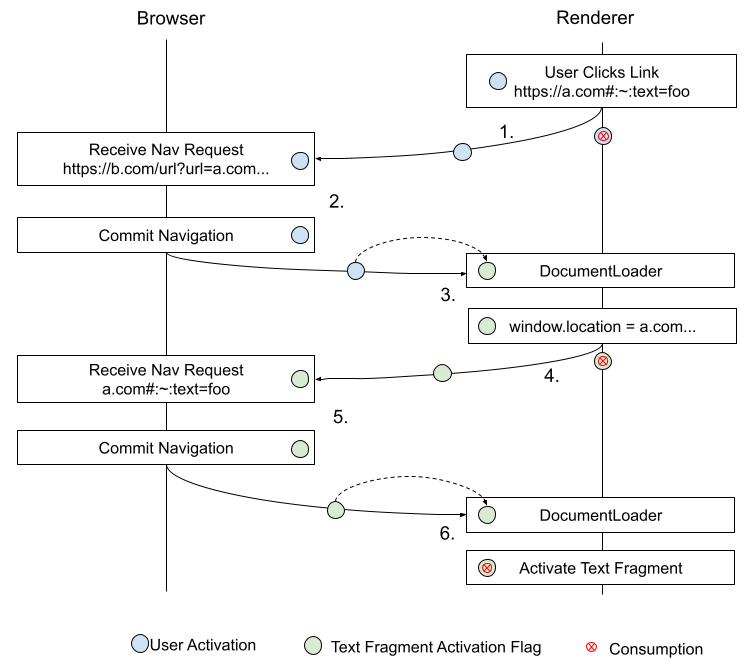
    Diagram showing how a text fragment flag is set and used

    See [redirects.md](redirects.md) for a more in-depth discussion.

    Amend the create navigation params by fetching steps to transfer the [=active document=]'s [=document/text directive user activation=] value into request's [=request/text directive user activation=]. > Monkeypatching [[HTML]]: > >
    > 1. Assert: this is running in parallel. > 2. Let documentResource be entry's document state's resource. > 3. Let request be a new request, with > >
    >
    url
    >
    entry's URL
    > >
    ...
    >
    ...
    > >
    referrer policy
    >
    entry's document state's request referrer policy
    > >
    [=request/text directive user activation=]
    >
    |navigable|'s [=navigable/active document=]'s [=document/text directive user activation=]
    >
    > > 4. Set |navigable|'s [=navigable/active document=]'s [=document/text directive > user activation=] to false. > 5. If documentResource is a POST resource, then: > 1. ... > >
    Amend the definition of navigation params to include a new field: > Monkeypatching [[HTML]]: > >
    >
    user involvement
    >
    A user navigation involvement value.
    >
    > Initialize the [=navigation params/user involvement=] value everywhere a navigation params is created. Specifically: initialize it to true in the create navigation params by fetching case: > Monkeypatching [[HTML]]: > >
    > To create navigation params by fetching given a session history entry entry, a navigable > navigable, a source snapshot params sourceSnapshotParams, a target snapshot params > targetSnapshotParams, a string cspNavigationType, a navigation ID-or-null navigationId, a > NavigationTimingType navTimingType, and a user navigation > involvement |user involvement|, perform the following steps. They return a navigation params, > a non-fetch scheme navigation params, or null. > > 1. Assert: this is running in parallel. > 2. ... >
  • Let resultPolicyContainer be the result of determining navigation params policy container given > response's URL, entry's document state's history policy container, sourceSnapshotParams's source > policy container, null, and responsePolicyContainer.
  • > 24. If navigable's container is an iframe, and response's timing allow passed flag is set, then > set container's pending resource-timing start time to null. > 25. Return a new navigation params, with > >
    >
    id
    >
    navigationId
    >
    ...
    >
    ...
    >
    about base URL
    >
    entry's document state's about base URL
    >
    [=navigation params/user involvement=]
    >
    |user involvement|
    >
    > >
    Amend the create and initialize a Document object steps to compute and store the [=document/text directive user activation=] flag: > Monkeypatching [[HTML]]: > >
    > 18. Process link headers given document, navigationParams's response, and "pre-media". > 19.
    Set |document|'s [=document/text directive user activation=] to true if any of the following > conditions hold, false otherwise: > * |navigationParams|'s [=user involvement=] is "activation"; > * |navigationParams|'s [=user involvement=] is "browser UI"; or > * |navigationParams|'s > request's > [=request/text directive user activation=] is true. >
    > It's important that [=document/text directive user activation=] not be copyable so that > only one text fragment can be activated per user-activated navigation. >
    > 20. Return |document|. > >
    A text directive allowing MIME type is a [=MIME type=] whose [=MIME type/essence=] is "text/html" or "text/plain". Note: As noted in scrolling to a fragment, fragment processing is defined individually by each MIME type. As such, the scroll to the fragment steps where text directives are scrolled should only apply to text/html media types. However, in practice, web browsers tend to apply HTML fragment processing to other types, such as text/plain (e.g. add an element with an id to a text/plain document, navigating to the fragment-id causes scrolling). While this is the case, enabling text directives in text/plain documents is useful. Other types are explicitly disallowed to prevent the possibility of XS-Search attacks on potentially sensitive application data (e.g. text/css, application/json, application/javascript, etc.). Issue: Is this valid to say in the HTML spec?
    To check if a text directive can be scrolled; given a [=/Document=] |document|, an [=/origin=]-or-null |initiator origin|, and user navigation involvement-or-null |user involvement|, follow these steps:
      1. If |document|'s [=Document/pending text directives=] field is null or empty, return false. 1. Let |is user involved| be true if: |document|'s [=document/text directive user activation=] is true, or |user involvement| is one of "activation" or "browser UI"; false otherwise. 1. Set |document|'s [=document/text directive user activation=] to false. 1. If |document|'s [=Document/content type=] is not a [=text directive allowing MIME type=], return false. 1. If |user involvement| is "browser UI", return true.

      If a navigation originates from browser UI, it's always ok to allow it since it'll be user triggered and the page/script isn't providing the text snippet.

      Note: The intent in this item is to distinguish cases where the app/page is able to control the URL from those that are fully under the user's control. In the former we want to prevent scrolling of the text fragment unless the destination is loaded in a separate browsing context group (so that the source cannot both control the text snippet and observe side-effects in the navigation). There are some cases where "browser UI" may be a grey area in this regard. E.g. an "open in new window" context menu item when right clicking on a link.

      See sec-fetch-site in [[FETCH-METADATA]] for a related discussion of how this applies.

      1. If |is user involved| is false, return false. 1. If |document|'s [=node navigable=] has a [=navigable/parent=], return false. 1. If |initiator origin| is non-null and |document|'s [=Document/origin=] is [=same origin=] with |initiator origin|, return true. 1. If |document|'s [=Document/browsing context=]'s [=browsing context/group=]'s browsing context set has length 1, return true.
      i.e. Only allow navigation from a cross-origin element/script if the document is loaded in a noopener context. That is, a new top level browsing context group to which the navigator does not have script access and which can be placed into a separate process.
      1. Otherwise, return false.
    Amend (the already amended, in [[#invoking-text-directives]]) scroll to the fragment steps to add a new parameter, a boolean |allow text directive scroll|: > Monkeypatching [[HTML#scrolling-to-a-fragment]]: > >
    > To scroll to the fragment given a Document |document| and boolean |allow text > directive scroll|: > > 1. If document's indicated part is null, then set document's target element to null. > 2. ... > 3. Otherwise: > 1. Assert: document's indicated part is an element or it is a [=range=]. > 2. ... >
  • If |target| is a [=range=], then:
  • > 1. If |allow text directive scroll| is false, return. > 1. Set |target| to be the [=first common ancestor=] of |target|'s [=range/start node=] > and [=range/end node=]. > 1. ... > >
    Amend the try to scroll to the fragment by adding a boolean flag |allow text directive scroll| and replacing the steps of the task queued in step 2: > Monkeypatching [[HTML]]: > >
    > To try to scroll to the fragment for a Document |document|, with boolean > |allow text directive scroll|, perform the following steps in parallel: > > 1. Wait for an implementation-defined amount of time. (This is intended to allow the user agent > to optimize the user experience in the face of performance concerns.) > 2. Queue a global task on the navigation and traversal task source given document's relevant > global object to run these steps: > 1. If document has no parser, or its parser has stopped parsing, or the user > agent has reason to believe the user is no longer interested in scrolling to > the fragment, then abort these steps. > 2. Scroll to the fragment given |document| and |allow text directive > scroll|. > 3. If document's indicated part is still null, then try to scroll to the fragment for > |document| and |allow text directive scroll|. > >
    Amend the update document for history step application steps to take a boolean |allow text directive scroll| and use it when scrolling to a fragment: > Monkeypatching [[HTML]]: > >
    > To update document for history step application given a Document document, a session history > entry entry, a boolean doNotReactivate, integers scriptHistoryLength and scriptHistoryIndex, > an optional list of session history entries entriesForNavigationAPI, and a > boolean |allow text directive scroll|: > > 1. Let documentIsNew be true if |document|'s latest entry is null; otherwise false. > 1. ... >
  • If documentsEntryChanged is true, then: > 1. Let oldURL be document's latest entry's URL. > 2. ... > 6. If documentIsNew is true, then: > 1. Try to scroll to the fragment with |document| and |allow text > directive scroll|. > >
  • Amend the apply the history step algorithm to take a boolean |allow text directive scroll| and pass it through when calling update document for history step application : > Monkeypatching [[HTML]]: > >
    > > To apply the history step given a non-negative integer step to a traversable navigable > traversable, with boolean checkForCancelation, source snapshot params-or-null > sourceSnapshotParams, navigable-or-null initiatorToCheck, user navigation involvement-or-null > userInvolvementForNavigateEvents, and boolean |allow text directive scroll| > (default false) perform the following steps. They > return "initiator-disallowed", "canceled-by-beforeunload", "canceled-by-navigate", or "applied". > > 14. While completedChangeJobs does not equal totalChangeJobs: > 1. ... >
  • Queue a global task on the navigation and traversal task source given > navigable's active window to run the steps: > 1. If changingNavigableContinuation's update-only is false, then: > 1. ... > 2. Activate history entry |targetEntry| for navigable. > 2. Let updateDocument be an algorithm step which performs update document for history > step application given |targetEntry|'s document, |targetEntry|, > changingNavigableContinuation's update-only, scriptHistoryLength, > scriptHistoryIndex, entriesForNavigationAPI, and |allow text > directive scroll| > 3. If |targetEntry|'s document is equal to displayedDocument, then perform > updateDocument. > 15. Let totalNonchangingJobs be the size of nonchangingNavigablesThatStillNeedUpdates. > >
  • Amend the apply the push/replace history step to take and pass |allow text directive scrolling| to apply the history step: > Monkeypatching [[HTML]]: > >
    > To apply the push/replace history step given a non-negative integer |step| to a traversable > navigable |traversable|, with boolean |allow text directive scroll| (default > false): > > Return the result of applying the history step |step| to |traversable| given false, null, null, > null, |allow text directive scroll|. >
    Note: The |allow text directive scroll| is intentionally not set for traversal and reload cases. This avoids extensive plumbing and checks for initiator origin and user involvement and history scroll state should take precedence anyway. The text directive may still be used as the indicated part of the document so highlights will be restored. Amend the finalize a cross-document navigation to take a |user involvement| parameter and compute and pass |allow text directive scrolling| to apply the push/replace history step: > Monkeypatching [[HTML]]: > >
    > > To finalize a cross-document navigation given a navigable navigable, history handling behavior > historyHandling, session history entry historyEntry, and user > navigation involvement |user involvement| (default "none"): > > 1. Assert: this is running on navigable's traversable navigable's session history traversal queue. > 2. ... >
  • Let |allow text directive scroll| be the result of [=check if a text > directive can be scrolled|checking if a text directive can be scrolled=], given > |historyEntry|'s [=she/document=], |historyEntry|'s document state's > [=document state/initiator origin=], and |user involvement| > 11. Apply the push/replace history step targetStep to traversable, with |allow > text directive scroll|. Amend the navigate algorithm to pass |user involvement| to the finalize a cross-document navigation steps: > Monkeypatching [[HTML]]: > >
    > > 1. ... >
  • . In parallel, run these steps:
  • > 1. ... >
  • . Attempt to populate the history entry's document for historyEntry, given > navigable, "navigate", sourceSnapshotParams, targetSnapshotParams, navigationId, > navigationParams, cspNavigationType, with allowPOST set to true and completionSteps set to > the following step:
  • > 1. Append session history traversal steps to navigable's traversable to finalize a > cross-document navigation given navigable, historyHandling, historyEntry, > and |userInvolvement|. Amend the Navigate to a fragment algorithm to take an |initiator origin| parameter and pass the |allow text directive scroll| flag when scrolling to the fragment: > Monkeypatching [[HTML]]: > >
    > > To navigate to a fragment given a navigable navigable, a URL url, a history handling behavior > historyHandling, a user navigation involvement |userInvolvement|, a serialized state-or-null > navigationAPIState, navigation ID navigationId, an [=/origin=] |initiator > origin|: > > 1. Let navigation be |navigable|'s active window's navigation API. > 2. ... >
  • Update document for history step application given navigable's active document, historyEntry, true, scriptHistoryIndex, and scriptHistoryLength. > 15. Update the navigation API entries for a same-document navigation given navigation, historyEntry, and historyHandling. > 16. Let |allow text directive scroll| be the result of [=check if a text > directive can be scrolled|checking if a text directive can be scrolled=], given > |navigable|'s [=active document=], |initiator origin|, and |userInvolvement| > 17. Scroll to the fragment given |navigable|'s active document, and |allow text > directive scroll|. > >
  • Amend the navigate algorithm to pass the initiator origin when performing a fragment navigation: > Monkeypatching [[HTML]]: > >
    > > 10. If the navigation must be a replace given url and navigable's active document, then set historyHandling to "replace". > 11. If all of the following are true: > * documentResource is null; > * response is null; > * url equals navigable's active session history entry's URL with exclude fragments set to true; and > * url's fragment is non-null, > > then: > > 1. Navigate to a fragment given navigable, url, historyHandling, userInvolvement, > navigationAPIState, navigationId, and > initiatorOriginSnapshot > 1. Let navigation be |navigable|'s active window's navigation API. > >
    ### Restricting Scroll on Load ### {#restricting-scroll-on-load} This section defines how the `force-load-at-top` policy is used to prevent all types of scrolling when loading a new document, including but not limited to text directives. ISSUE(WICG/scroll-to-text-fragment#242): Need to decide how `force-load-at-top` interacts with the Navigation API. Amend the restore persisted state steps to take a new boolean parameter which suppresses scroll restoration: > Monkeypatching [[HTML]]: > >
    > To restore persisted state from a session history entry entry > , and boolean |suppressScrolling|: > > 1. If entry's scroll restoration mode is "auto", |suppressScrolling| > is false, and entry's document's relevant global object's navigation API's suppress > normal scroll restoration during ongoing navigation is false, then restore scroll position > data given entry. > 2. ... Amend the update document for history step application steps to check the `force-load-at-top` policy and avoid scrolling in a new document if it's set. > Monkeypatching [[HTML]]: > >
    > 1. ... >
  • Set document's history object's length to scriptHistoryLength.
  • > 5. Let |scrollingBlockedInNewDocument| be the result of > getting the policy > value for `force-load-at-top` for |document|. > 5. If documentsEntryChanged is true, then: > 1. Let oldURL be document's latest entry's URL. > 2. ... >
  • If documentIsNew is false, then: > 1. Update the navigation API entries for a same-document navigation given navigation, > entry, and "traverse". > 2. Fire an event named popstate... > 3. Restore persisted state given entry and > |suppressScrolling| set to false. > 4. If oldURL's fragment is not equal to... > 6. Otherwise, > 1. Assert: entriesForNavigationAPI is given. > 2. Restore persisted state given entry and > |scrollingBlockedInNewDocument|. > 3. Initialize the navigation API entries for a new document given navigation, > entriesForNavigationAPI, and entry. > 6. If documentIsNew is true, then: > 1. If |scrollingBlockedInNewDocument| is false, try to scroll to > the fragment for document. > 2. At this point scripts may run for the newly-created document document. > 7. Otherwise, if documentsEntryChanged is false and doNotReactivate is false, then: > 1. ... > >
  • ## Navigating to a Text Fragment ## {#navigating-to-text-fragment}
    The text fragment specification proposes an amendment to [[html#scroll-to-fragid]]. In summary, if a [=text directive=] is present and a match is found in the page, the text fragment takes precedent over the element fragment as the indicated part. We amend the HTML Document's indicated part processing model to return a [=range=], rather than an [=element=], that will be scrolled into view.
    To find the first common ancestor of two nodes |nodeA| and |nodeB|, follow these steps:
      1. Let |commonAncestor| be |nodeA|. 1. While |commonAncestor| is non-null and is not a [=shadow-including inclusive ancestor=] of |nodeB|, let |commonAncestor| be |commonAncestor|’s [=shadow-including parent=]. 1. Return |commonAncestor|.
    To find the shadow-including parent of |node| follow these steps:
      1. If |node| is a [=/shadow root=], return |node|'s [=DocumentFragment/host=]. 1. Otherwise, return |node|'s [=tree/parent=].
    ### Finding Ranges in a Document ### {#finding-ranges-in-a-document}
    This section outlines several algorithms and definitions that specify how to turn a full fragment directive string into a list of [=Ranges=] in the document. At a high level, we take a fragment directive string that looks like this:
        text=prefix-,foo&unknown&text=bar,baz
      
    We break this up into the individual text directives:
        text=prefix-,foo
        text=bar,baz
      
    For each text directive, we perform a search in the document for the first instance of rendered text that matches the restrictions in the directive. Each search is independent of any others; that is, the result is the same regardless of how many other directives are provided or their match result. If a directive successfully matches to text in the document, it returns a [=range=] indicating that match in the document. The [=invoke text directives=] steps are the high level API provided by this section. These return a list of [=ranges=] that were matched by the individual directive matching steps, in the order the directives were specified in the fragment directive string. If a directive was not matched, it does not add an item to the returned list.
    To invoke text directives, given as input a list of [=text directives=] |text directives| and a [=/Document=] |document|, run these steps:
    This algorithm returns a list of [=ranges=] that are to be visually indicated, the first of which will be scrolled into view (if the UA scrolls automatically).
      1. Let |ranges| be a list of [=ranges=], initially empty. 1. For each [=text directive=] |directive| of |text directives|: 1. If the result of running [=find a range from a text directive=] given |directive| and |document| is non-null, then [=list/append=] it to |ranges|. 1. Return |ranges|.
    To find a range from a text directive, given a [=text directive=] |parsedValues| and [=/Document=] |document|, run the following steps:
    This algorithm takes as input a successfully parsed text directive and a document in which to search. It returns a [=range=] that points to the first text passage within the document that matches the searched-for text and satisfies the surrounding context. Returns null if no such passage exists. [=text directive/end=] can be null. If omitted, this is an "exact" search and the returned [=range=] will contain a string exactly matching [=text directive/start=]. If [=text directive/end=] is provided, this is a "range" search; the returned [=range=] will start with [=text directive/start=] and end with [=text directive/end=]. In the normative text below, we'll call a text passage that matches the provided [=text directive/start=] and [=text directive/end=], regardless of which mode we're in, the "matching text". Either or both of [=text directive/prefix=] and [=text directive/suffix=] can be null, in which case context on that side of a match is not checked. E.g. If [=text directive/prefix=] is null, text is matched without any requirement on what text precedes it.
    While the matching text and its prefix/suffix can span across block-boundaries, the individual parameters to these steps cannot. That is, each of [=text directive/prefix=], [=text directive/start=], [=text directive/end=], and [=text directive/suffix=] will only match text within a single block.
    :~:text=The quick,lazy dog
    will fail to match in ```
    The
    quick brown fox
    jumped over the lazy dog
    ``` because the starting string "The quick" does not appear within a single, uninterrupted block. The instance of "The quick" in the document has a block element between "The" and "quick". It does, however, match in this example: ```
    The quick brown fox
    jumped over the lazy dog
    ```
      1. Let |searchRange| be a [=range=] with [=range/start=] (|document|, 0) and [=range/end=] (|document|, |document|'s [=Node/length=]) 1. While |searchRange| is not [=range/collapsed=]: 1. Let |potentialMatch| be null. 1. If |parsedValues|'s [=text directive/prefix=] is not null: 1. Let |prefixMatch| be the the result of running the [=find a string in range=] steps with |query| |parsedValues|'s [=text directive/prefix=], |searchRange| |searchRange|, |wordStartBounded| true, |wordEndBounded| false and |matchMustBeAtBeginning| false. 1. If |prefixMatch| is null, return null. 1. Set |searchRange|'s [=range/start=] to the first [=/boundary point=] [=boundary point/after=] |prefixMatch|'s [=range/start=] 1. Let |matchRange| be a [=range=] whose [=range/start=] is |prefixMatch|'s [=range/end=] and [=range/end=] is |searchRange|'s [=range/end=]. 1. Advance |matchRange|'s [=range/start=] to the [=next non-whitespace position=]. 1. If |matchRange| is [=range/collapsed=] return null.
      This can happen if |prefixMatch|'s [=range/end=] or its subsequent non-whitespace position is at the end of the document.
      1. [=/Assert=]: |matchRange|'s [=range/start node=] is a {{Text}} node.
      |matchRange|'s [=range/start=] now points to the next non-whitespace text data following a matched prefix.
      1. Let |mustEndAtWordBoundary| be true if |parsedValues|'s [=text directive/end=] is non-null or |parsedValues|'s [=text directive/suffix=] is null, false otherwise. 1. Set |potentialMatch| to the result of running the [=find a string in range=] steps with |query| |parsedValues|'s [=text directive/start=], |searchRange| |matchRange|, |wordStartBounded| false, |wordEndBounded| |mustEndAtWordBoundary| and |matchMustBeAtBeginning| true. 1. If |potentialMatch| is null, [=iteration/continue=].
      In this case, we found a prefix but it was followed by something other than a matching text so we'll continue searching for the next instance of [=text directive/prefix=].
      1. Otherwise: 1. Let |mustEndAtWordBoundary| be true if |parsedValues|'s [=text directive/end=] is non-null or |parsedValues|'s [=text directive/suffix=] is null, false otherwise. 1. Set |potentialMatch| to the result of running the [=find a string in range=] steps with |query| |parsedValues|'s [=text directive/start=], |searchRange| |searchRange|, |wordStartBounded| true, |wordEndBounded| |mustEndAtWordBoundary| and |matchMustBeAtBeginning| false. 1. If |potentialMatch| is null, return null. 1. Set |searchRange|'s [=range/start=] to the first [=/boundary point=] [=boundary point/after=] |potentialMatch|'s [=range/start=] 1. Let |rangeEndSearchRange| be a [=range=] whose [=range/start=] is |potentialMatch|'s [=range/end=] and whose [=range/end=] is |searchRange|'s [=range/end=]. 1. While |rangeEndSearchRange| is not [=range/collapsed=]: 1. If |parsedValues|'s [=text directive/end=] item is non-null, then: 1. Let |mustEndAtWordBoundary| be true if |parsedValues|'s [=text directive/suffix=] is null, false otherwise. 1. Let |endMatch| be the result of running the [=find a string in range=] steps with |query| |parsedValues|'s [=text directive/end=], |searchRange| |rangeEndSearchRange|, |wordStartBounded| true, |wordEndBounded| |mustEndAtWordBoundary| and |matchMustBeAtBeginning| false. 1. If |endMatch| is null then return null. 1. Set |potentialMatch|'s [=range/end=] to |endMatch|'s [=range/end=]. 1. [=/Assert=]: |potentialMatch| is non-null, not [=range/collapsed=] and represents a range exactly containing an instance of matching text. 1. If |parsedValues|'s [=text directive/suffix=] is null, return |potentialMatch|. 1. Let |suffixRange| be a [=range=] with [=range/start=] equal to |potentialMatch|'s [=range/end=] and [=range/end=] equal to |searchRange|'s [=range/end=]. 1. Advance |suffixRange|'s [=range/start=] to the [=next non-whitespace position=]. 1. Let |suffixMatch| be result of running the [=find a string in range=] steps with |query| |parsedValues|'s [=text directive/suffix=], |searchRange| |suffixRange|, |wordStartBounded| false, |wordEndBounded| true and |matchMustBeAtBeginning| true. 1. If |suffixMatch| is non-null, return |potentialMatch|. 1. If |parsedValues|'s [=text directive/end=] item is null and |suffixMatch| is null, then [=iteration/break=];
      If this is an exact match and the suffix doesn't match, start searching for the next range start by breaking out of this loop without |rangeEndSearchRange| being collapsed. If we're looking for a range match, we'll continue iterating this inner loop since the range start will already be correct.
      1. Set |rangeEndSearchRange|'s [=range/start=] to |potentialMatch|'s [=range/end=].
      Otherwise, it is possible that we found the correct range start, but not the correct range end. Continue the inner loop to keep searching for another matching instance of rangeEnd.
      1. If |rangeEndSearchRange| is [=range/collapsed=] then: 1. [=/Assert=]: |parsedValues|'s [=text directive/end=] item is non-null 1. Return null
      This can only happen for range matches due to the [=iteration/break=] for exact matches in step 9 of the above loop. If we couldn't find a valid rangeEnd+suffix pair anywhere in the doc then there's no possible way to make a match.
      1. Return null
    /scroll-to-text-fragment/find-range-from-text-directive.html
    To advance a [=range=] |range|'s [=range/start=] to the next non-whitespace position follow the steps:
      1. While |range| is not collapsed: 1. Let |node| be |range|'s [=range/start node=]. 1. Let |offset| be |range|'s [=range/start offset=]. 1. If |node| is part of a [=non-searchable subtree=] or if |node| is not a [=visible text node=] or if |offset| is equal to |node|'s [=Node/length=] then: 1. Set |range|'s [=range/start node=] to the next node, in [=shadow-including tree order=]. 1. Set |range|'s [=range/start offset=] to 0. 1. [=iteration/Continue=]. 1. If the [=Text/substring data=] of |node| at offset |offset| and count 6 is equal to the string " " then: 1. Add 6 to |range|'s [=range/start offset=]. 1. Otherwise, if the [=Text/substring data=] of |node| at offset |offset| and count 5 is equal to the string "&nbsp" then: 1. Add 5 to |range|'s [=range/start offset=]. 1. Otherwise: 1. Let |cp| be the [=code point=] at the |offset| index in |node|'s [=CharacterData/data=]. 1. If |cp| does not have the White_Space property set, return. 1. Add 1 to |range|'s [=range/start offset=].
    To find a string in range given a string |query|, a [=range=] |searchRange|, and booleans |wordStartBounded|, |wordEndBounded| and |matchMustBeAtBeginning|, run these steps:
    This algorithm will return a [=range=] that represents the first instance of the |query| text that is fully contained within |searchRange|, optionally restricting itself to matches that start and/or end at word boundaries (see [[#word-boundaries]]). Returns null if none is found.

    The basic premise of this algorithm is to walk all searchable text nodes within a block, collecting them into a list. The list is then concatenated into a single string in which we can search, using the node list to determine offsets with a node so we can return a [=range=].

    Collection breaks when we hit a block node, e.g. searching over this tree: ```

    abc
    d
    e
    ```

    Will perform a search on "abc", then on "d", then on "e". Thus, |query| will only match text that is continuous (i.e. uninterrupted by a block-level container) within a single block-level container.
      1. While |searchRange| is not [=range/collapsed=]: 1. Let |curNode| be |searchRange|'s [=range/start node=]. 1. If |curNode| is part of a [=non-searchable subtree=]: 1. Set |searchRange|'s [=range/start node=] to the next node, in [=shadow-including tree order=], that isn't a [=shadow-including descendant=] of |curNode|. 1. Set |searchRange|'s [=range/start offset=] to 0. 1. [=iteration/Continue=]. 1. If |curNode| is not a [=visible text node=]: 1. Set |searchRange|'s [=range/start node=] to the next node, in [=shadow-including tree order=], that is not a [=doctype=]. 1. Set |searchRange|'s [=range/start offset=] to 0. 1. [=iteration/Continue=]. 1. Let |blockAncestor| be the [=nearest block ancestor=] of |curNode|. 1. Let |textNodeList| be a list of {{Text}} nodes, initially empty. 1. While |curNode| is a [=shadow-including descendant=] of |blockAncestor| and the position of the [=/boundary point=] (|curNode|, 0) is not [=boundary point/after=] |searchRange|'s [=range/end=]: 1. If |curNode| [=has block-level display=] then [=iteration/break=]. 1. If |curNode| is [=search invisible=]: 1. Set |curNode| to the next node, in [=shadow-including tree order=], that isn't a [=shadow-including descendant=] of |curNode|. 2. [=iteration/Continue=]. 1. If |curNode| is a [=visible text node=] then append it to |textNodeList|. 1. Set |curNode| to the next node in [=shadow-including tree order=]. 1. Run the [=find a range from a node list=] steps given |query|, |searchRange|, |textNodeList|, |wordStartBounded|, |wordEndBounded| and |matchMustBeAtBeginning| as input. If the resulting [=range=] is not null, then return it. 1. If |matchMustBeAtBeginning| is true, return null. 1. If |curNode| is null, then [=iteration/break=]. 1. [=/Assert=]: |curNode| [=tree/following|follows=] |searchRange|'s [=range/start node=]. 1. Set |searchRange|'s [=range/start=] to the [=/boundary point=] (|curNode|, 0). 1. Return null.
    A node is search invisible if it is an [=element=] in the [=HTML namespace=] and meets any of the following conditions: 1. The [=computed value=] of its 'display' property is ''display/none''. 1. If the node serializes as void. 1. Is any of the following types: {{HTMLIFrameElement}}, {{HTMLImageElement}}, {{HTMLMeterElement}}, {{HTMLObjectElement}}, {{HTMLProgressElement}}, {{HTMLStyleElement}}, {{HTMLScriptElement}}, {{HTMLVideoElement}}, {{HTMLAudioElement}} 1. Is a <{select}> element whose <{select/multiple}> content attribute is absent. A node is part of a non-searchable subtree if it is or has a [=shadow-including ancestor=] that is [=search invisible=]. A node is a visible text node if it is a {{Text}} node, the [=computed value=] of its [=parent element=]'s 'visibility' property is ''visibility/visible'', and it is being rendered. A node has block-level display if it is an [=element=] and the [=computed value=] of its 'display' property is any of ''display/block'', ''display/table'', ''display/flow-root'', ''display/grid'', ''display/flex'', ''display/list-item''.
    To find the nearest block ancestor of a |node| follow the steps:
      1. Let |curNode| be |node|. 1. While |curNode| is non-null 1. If |curNode| is not a {{Text}} node and it [=has block-level display=] then return |curNode|. 1. Otherwise, set |curNode| to |curNode|'s [=tree/parent=]. 1. Return |node|'s [=Node/node document=]'s [=document element=].
    To find a range from a node list given a search string |queryString|, a [=range=] |searchRange|, a [=/list=] of {{Text}} nodes |nodes|, and booleans |wordStartBounded|, |wordEndBounded| and |matchMustBeAtBeginning|, follow these steps:
    Optionally, this will only return a match if the matched text begins and/or ends on a [=word boundary=]. For example:
    The query string “range” will always match in “mountain range”, but 1. When requiring a word boundary at the beginning, it will not match in “color orange”. 2. When requiring a word boundary at the end, it will not match in “forest ranger”.
    See [[#word-boundaries]] for details and more examples.
    Optionally, this will only return a match if the matched text is at the beginning of the node list.
      1. Let |searchBuffer| be the [=string/concatenate|concatenation=] of the [=CharacterData/data=] of each item in |nodes|. ISSUE(WICG/scroll-to-text-fragment#98): [=CharacterData/data=] is not correct here since that's the text data as it exists in the DOM. This algorithm means to run over the text as rendered (and then convert back to Ranges in the DOM). 1. Let |searchStart| be 0. 1. If the first item in |nodes| is |searchRange|'s [=range/start node=] then set |searchStart| to |searchRange|'s [=range/start offset=]. 1. Let |start| and |end| be [=/boundary points=], initially null. 1. Let |matchIndex| be null. 1. While |matchIndex| is null 1. Set |matchIndex| to the index of the first instance of |queryString| in |searchBuffer|, starting at |searchStart|. The string search must be performed using a base character comparison, or the primary level, as defined in [[!UTS10]].
      Intuitively, this is a case-insensitive search also ignoring accents, umlauts, and other marks.
      1. If |matchIndex| is null, return null. 1. If |matchMustBeAtBeginning| is true and |matchIndex| is not 0, return null. 1. Let |endIx| be |matchIndex| + |queryString|'s [=string/length=].
      |endIx| is the index of the last character in the match + 1.
      1. Set |start| to the [=/boundary point=] result of [=get boundary point at index=] |matchIndex| run over |nodes| with |isEnd| false. 1. Set |end| to the [=/boundary point=] result of [=get boundary point at index=] |endIx| run over |nodes| with |isEnd| true. 1. If |wordStartBounded| is true and |matchIndex| [=is at a word boundary|is not at a word boundary=] in |searchBuffer|, given the language from |start|'s [=boundary point/node=] as the |locale|; or |wordEndBounded| is true and |matchIndex| + |queryString|'s [=string/length=] [=is at a word boundary|is not at a word boundary=] in |searchBuffer|, given the language from |end|'s [=boundary point/node=] as the |locale|: 1. Set |searchStart| to |matchIndex| + 1. 1. Set |matchIndex| to null. 1. Let |endInset| be 0. 1. If the last item in |nodes| is |searchRange|'s [=range/end node=] then set |endInset| to (|searchRange|'s [=range/end node=]'s [=Node/length=] − |searchRange|'s [=range/end offset=])
      |endInset| is the offset from the last position in the last node in the reverse direction. Alternatively, it is the length of the node that's not included in the range.
      1. If |matchIndex| + |queryString|'s [=string/length=] is greater than |searchBuffer|'s length − |endInset| return null.
      If the match runs past the end of the search range, return null.
      1. [=/Assert=]: |start| and |end| are non-null, valid [=/boundary points=] in |searchRange|. 1. Return a [=range=] with [=range/start=] |start| and [=range/end=] |end|.
    To get boundary point at index, given an integer |index|, [=/list=] of {{Text}} nodes |nodes|, and a boolean |isEnd|, follow these steps:

    This is a small helper routine used by the steps above to determine which node a given index in the concatenated string belongs to.

    |isEnd| is used to differentiate start and end indices. An end index points to the "one-past-last" character of the matching string. If the match ends at node boundary, we want the end offset to remain within that node, rather than the start of the next node.

      1. Let |counted| be 0. 1. For each |curNode| of |nodes|: 1. Let |nodeEnd| be |counted| + |curNode|'s [=Node/length=]. 1. If |isEnd| is true, add 1 to |nodeEnd|. 1. If |nodeEnd| is greater than |index| then: 1. Return the [=/boundary point=] (|curNode|, |index| − |counted|). 1. Increment |counted| by |curNode|'s [=Node/length=]. 1. Return null.
    ### Word Boundaries ### {#word-boundaries}
    Limiting matching to word boundaries is one of the mitigations to limit cross-origin information leakage.
    See Intl.Segmenter, a proposal to specify unicode segmentation, including word segmentation. Once specified, this algorithm can be improved by making use of the Intl.Segmenter API for word boundary matching.

    A word boundary is defined in [[!UAX29]] in [[UAX29#Word_Boundaries]]. [[UAX29#Default_Word_Boundaries]] defines a default set of what constitutes a word boundary, but as the specification mentions, a more sophisticated algorithm should be used based on the locale.

    Dictionary-based word bounding should take specific care in locales without a word-separating character. E.g. In English, words are separated by the space character (' '); however, in Japanese there is no character that separates one word from the next. In such cases, and where the alphabet contains fewer than 100 characters, the dictionary must not contain more than 20% of the alphabet as valid, one-letter words.

    A locale is a string containing a valid [[BCP47]] language tag, or the empty string. An empty string indicates that the primary language is unknown. A substring is word bounded in a string |text|, given [=locales=] |startLocale| and |endLocale|, if both the position of its first character [=is at a word boundary=] given |startLocale|, and the position after its last character [=is at a word boundary=] given |endLocale|. A number |position| is at a word boundary in a string |text|, given a [=locale=] |locale|, if, using |locale|, either a [=word boundary=] immediately precedes the |position|th code unit, or |text|'s length is more than 0 and |position| equals either 0 or |text|'s length.
    Intuitively, a substring is [=word bounded=] if it neither begins nor ends in the middle of a word. In languages with a word separator (e.g. " " space) this is (mostly) straightforward; though there are details covered by the above technical reports such as new lines, hyphenations, quotes, etc. Some languages do not have such a separator (notably, Chinese/Japanese/Korean). Languages such as these requires dictionaries to determine what a valid word in the given locale is.

    Text fragments are restricted such that match terms, when combined with their adjacent context terms, are word bounded. For example, in an exact search like prefix,start,suffix, "prefix+start+suffix" will match only if the entire result is word bounded. However, in a range search like prefix,start,end,suffix, a match is found only if both "prefix+start" and "end+suffix" are word bounded.

    The goal is that a third-party must already know the full tokens they are matching against. A range match like start,end must be word bounded on the inside of the two terms; otherwise a third party could use this repeatedly to try and reveal a token (e.g. on a page with "Balance: 123,456 $", a third-party could set prefix="Balance: ", end="$" and vary start to try and guess the numeric token one digit at a time).

    For more details, refer to the [Security Review Doc](https://docs.google.com/document/d/1YHcl1-vE_ZnZ0kL2almeikAj2gkwCq8_5xwIae7PVik/edit#heading=h.78iny7nejmx2)

    The substring "mountain range" is word bounded within the string "An impressive mountain range" but not within "An impressive mountain ranger".
    In the Japanese string "ウィキペディアへようこそ" (Welcome to Wikipedia), "ようこそ" (Welcome) is considered word-bounded but "ようこ" is not.
    ## Indicating The Text Match ## {#indicating-the-text-match} The UA may choose to scroll the text fragment into view as part of the try to scroll to the fragment steps or by some other mechanism; however, it is not required to scroll the match into view. The UA should visually indicate the matched text in some way such that the user is made aware of the text match, such as with a high-contrast highlight. The UA should provide to the user some method of dismissing the match, such that the matched text no longer appears visually indicated. The exact appearance and mechanics of the indication are left as UA-defined. However, the UA must not use any methods observable by author script, such as the Document's selection, to indicate the text match. Doing so could allow attack vectors for content exfiltration. The UA must not visually indicate any provided context terms. Since the indicator is not part of the document's content, UAs should consider ways to differentiate it from the page's content as perceived by the user.
    The UA could provide an in-product help prompt the first few times the indicator appears to help train the user that it comes from the linking page and is provided by the UA.
    ### URLs in UA features ### {#urls-in-ua-features} UAs provide a number of consumers for a document's URL (outside of programmatic APIs like window.location). Examples include a location bar indicating the URL of the currently visible document, or the URL used when a user requests to create a bookmark for the current page. To avoid user confusion, UAs should be consistent in whether such URLs include the [=/fragment directive=]. This section provides a default set of recommendations for how UAs can handle these cases.

    We provide these as a baseline for consistent behavior; however, as these features don't affect cross-UA interoperability, they are not strict conformance requirements.

    Exact behavior is left up to the implementing UA which can have differing constraints or reasons for modifying the behavior. e.g. UAs can allow users to configure defaults or expose UI options so users can choose whether they prefer to include fragment directives in these URLs. It's also useful to allow UAs to experiment with providing a better experience. E.g. perhaps the UA's displayed URL can elide the text fragment if the user scrolls it out of view?

    The general principle is that a URL should include the [=/fragment directive=] only while the visual indicator is visible (i.e. not dismissed). If the user dismisses the indicator, the URL should reflect that by also removing the the [=/fragment directive=]. If the URL includes a text fragment but a match wasn't found in the current page, the UA may choose to omit it from the exposed URL.

    A text fragment that isn't found on the page can be useful information to surface to a user to indicate that the page has changed since the link was created.

    However, it's unlikely to be useful to the user in a bookmark.

    A few common examples are provided below.
    We use "text fragment" and "fragment directive" interchangeably here as text fragments are assumed to be the only kind of directive. If additional directives are added in the future, the UX in these cases will have to be re-evaluated separately for new directive types.
    #### Location Bar #### {#urls-in-location-bar} The location bar's URL should include a text fragment while it is visually indicated. The [=/fragment directive=] should be stripped from the location bar URL when the user dismisses the indication. It is recommended that the text fragment be displayed in the location bar's URL even if a match wasn't located in the document. #### Bookmarks #### {#urls-in-bookmarks} Many UAs provide a "bookmark" feature allowing users to store a convenient link to the current page in the UA's interface. A newly created bookmark should, by default, include the [=/fragment directive=] in the URL if, and only if, a match was found and the visual indicator hasn't been dismissed. Navigating to a URL from a bookmark should process a [=/fragment directive=] as if it were navigated to in a typical navigation. #### Sharing #### {#urls-in-sharing} Some UAs provide a method for users to share the current page with others, typically by providing the URL to another app or messaging service. When providing a URL in these situations, it should include the [=/fragment directive=] if, and only if, a match was found and the visual indicator hasn't been dismissed. ## Document Policy Integration ## {#document-policy-integration} This specification defines a configuration point in [[!document-policy|Document Policy]] with name "force-load-at-top". Its type is `boolean` with default value `false`.
    When enabled, this policy disables all automatic scroll-on-load features: text-fragments, element fragments, history scroll restoration.
    Suppose the user navigates to `https://example.com#:~:text=foo`. The example.com server response includes the header: ``` Document-Policy: force-load-at-top ``` When the page loads, the element containing "foo" will be marked as the indicated part and set as the document's target element. However, "foo" will not be scrolled into view.
    Fragment-based scroll blocking from this policy is specified in an amendment to the scroll to the fragment algorithm in the [[#navigating-to-text-fragment]] section of this document. History scroll restoration is blocked by amending the restore persisted state steps by inserting a new step after 2: 3. Get the document policy value of the "force-load-at-top" feature for the [=/Document=]. If the result is true, then the user agent should not restore the scroll position for the [=/Document=] or any of its scrollable regions. ## Feature Detectability ## {#feature-detectability} For feature detectability, we propose adding a new FragmentDirective interface that is exposed via document.fragmentDirective if the UA supports the feature.
      [Exposed=Window]
      interface FragmentDirective {
      };
    
    We amend the {{Document}} interface to include a fragmentDirective property:
      partial interface Document {
          [SameObject] readonly attribute FragmentDirective fragmentDirective;
      };
    
    This object may be used to expose additional information about the text fragment or other fragment directives in the future. # Generating Text Fragment Directives # {#generating-text-fragment-directives}
    This section is non-normative.
    This section contains recommendations for UAs automatically generating URLs with a [=text directive=]. These recommendations aren't normative but are provided to ensure generated URLs result in maximally stable and usable URLs. ## Prefer Exact Matching To Range-based ## {#prefer-exact-matching-to-range-based} The match text can be provided either as an exact string "text=foo%20bar%20baz" or as a range "text=foo,bar". Prefer to specify the entire string where practical. This ensures that if the destination page is removed or changed, the intended destination can still be derived from the URL itself.
    Suppose we wish to craft a URL to https://en.wikipedia.org/wiki/History_of_computing quoting the sentence:
        The first recorded idea of using digital electronics for computing was the
        1931 paper "The Use of Thyratrons for High Speed Automatic Counting of
        Physical Phenomena" by C. E. Wynn-Williams.
      
    We could create a range-based match like so: https://en.wikipedia.org/wiki/History_of_computing#:~:text=The%20first%20recorded,Williams Or we could encode the entire sentence using an exact match term: https://en.wikipedia.org/wiki/History_of_computing#:~:text=The%20first%20recorded%20idea%20of%20using%20digital%20electronics%20for%20computing%20was%20the%201931%20paper%20%22The%20Use%20of%20Thyratrons%20for%20High%20Speed%20Automatic%20Counting%20of%20Physical%20Phenomena%22%20by%20C.%20E.%20Wynn-Williams The range-based match is less stable, meaning that if the page is changed to include another instance of "The first recorded" somewhere earlier in the page, the link will now target an unintended text snippet. The range-based match is also less useful semantically. If the page is changed to remove the sentence, the user won't know what the intended target was. In the exact match case, the user can read, or the UA can surface, the text that was being searched for but not found.
    Range-based matches can be helpful when the quoted text is excessively long and encoding the entire string would produce an unwieldy URL. Text snippets shorter than 300 characters are encouraged to be encoded using an exact match. Above this limit, the UA can encode the string as a range-based match.
    TODO: Can we determine the above limit in some less arbitrary way?
    ## Use Context Only When Necessary ## {#use-context-only-when-necessary} Context terms allow the [=text directive=] to disambiguate text snippets on a page. However, their use can make the URL more brittle in some cases. Often, the desired string will start or end at an element boundary. The context will therefore exist in an adjacent element. Changes to the page structure could invalidate the [=text directive=] since the context and match text will no longer appear to be adjacent.
    Suppose we wish to craft a URL for the following text:
        <div class="section">HEADER</div>
        <div class="content">Text to quote</div>
      
    We could craft the [=text directive=] as follows:
        text=HEADER-,Text%20to%20quote
      
    However, suppose the page changes to add a "[edit]" link beside all section headers. This would now break the URL.
    Where a text snippet is long enough and unique, a UAs are encouraged to avoid adding superfluous context terms. Use context only if one of the following is true:
    • The UA determines the quoted text is ambiguous
    • The quoted text contains 3 or fewer words
    TODO: Determine the numeric limit above in less arbitrary way.
    ## Determine If Fragment Id Is Needed ## {#determine-if-fragment-id-is-needed} When the UA navigates to a URL containing a [=text directive=], it will fallback to scrolling into view a regular element-id based fragment if it exists and the text fragment isn't found. This can be useful to provide a fallback, in case the text in the document changes, invalidating the [=text directive=].
    Suppose we wish to craft a URL to https://en.wikipedia.org/wiki/History_of_computing quoting the sentence:
        The earliest known tool for use in computation is the Sumerian abacus
      
    By specifying the section that the text appears in, we ensure that, if the text is changed or removed, the user will still be pointed to the relevant section: https://en.wikipedia.org/wiki/History_of_computing#Early_computation:~:text=The%20earliest%20known%20tool%20for%20use%20in%20computation%20is%20the%20Sumerian%20abacus
    However, UAs should take care that the fallback element-id fragment is the correct one:
    Suppose the user navigates to https://en.wikipedia.org/wiki/History_of_computing#Early_computation. They now scroll down to the Symbolic Computations section. There, they select a text snippet and choose to create a URL to it:
        By the late 1960s, computer systems could perform symbolic algebraic
        manipulations
      
    Even though the current URL of the page is: https://en.wikipedia.org/wiki/History_of_computing#Early_computation, using #Early_computation as a fallback is inappropriate. If the above sentence is changed or removed, the page will load in the #Early_computation section which could be quite confusing to the user. If the UA cannot reliably determine an appropriate fragment to fallback to, it should remove the fragment id from the URL: https://en.wikipedia.org/wiki/History_of_computing#:~:text=By%20the%20late%201960s,%20computer%20systems%20could%20perform%20symbolic%20algebraic%20manipulations
    ================================================ FILE: index.html ================================================ URL Fragment Text Directives

    URL Fragment Text Directives

    Draft Community Group Report,


    Abstract

    Text directives add support for specifying a text snippet in the URL fragment. When navigating to a URL with such a fragment, the user agent can quickly emphasise and/or bring it to the user’s attention.

    Status of this document

    This specification was published by the Web Platform Incubator Community Group. It is not a W3C Standard nor is it on the W3C Standards Track. Please note that under the W3C Community Contributor License Agreement (CLA) there is a limited opt-out and other conditions apply. Learn more about W3C Community and Business Groups.

    1. Infrastructure

    This specification depends on the Infra Standard. [INFRA]

    2. Introduction

    This section is non-normative

    2.1. Use cases

    2.1.1. Web text references

    The core use case for text fragments is to allow URLs to serve as an exact text reference across the web. For example, Wikipedia references could link to the exact text they are quoting from a page. Similarly, search engines can serve URLs that direct the user to the answer they are looking for in the page rather than linking to the top of the page.

    2.1.2. User sharing

    With text directives, browsers may implement an option to 'Copy URL to here' when the user opens the context menu on a text selection. The browser can then generate a URL with the text selection appropriately specified, and the recipient of the URL will have the specified text conveniently indicated. Without text fragments, if a user wants to share a passage of text from a page, they would likely just copy and paste the passage, in which case the receiver loses the context of the page.

    This specification attempts to maximize the useful lifetime of text directive links, for example, by using the actual text content as the URL payload, and allowing a fallback element-id fragment. However, pages on the web often update and change their content. As such, links like this may "rot" in that the text content they point to no longer exists on the destination page.

    Text directive links can be useful despite this problem. In user sharing use cases, the link is often transient, intended to be used only within a short time of sending. For longer duration use cases, such as references and web page links, text directives are still valuable since they degrade gracefully into an ordinary link. Additionally, the presence of a stale text directive can be useful information to surface to a user, to help them understand the link creator’s original intent and that the page content may have changed since the link was created.

    See § 4 Generating Text Fragment Directives for best practices on how to create robust text directive links.

    3. Description

    3.1. Indication

    This section is non-normative

    This specification intentionally doesn’t define what actions a user agent takes to "indicate" a text match. There are different experiences and trade-offs a user agent could make. Some examples of possible actions:

    • Providing visual emphasis or highlight of the text passage

    • Automatically scrolling the passage into view when the page is navigated

    • Activating a UA’s find-in-page feature on the text passage

    • Providing a "Click to scroll to text passage" notification

    • Providing a notification when the text passage isn’t found in the page

    The choice of action can have implications for user security and privacy. See the § 3.5 Security and Privacy section for details.

    3.2. Syntax

    This section is non-normative

    A text directive is specified in the fragment directive (see § 3.3 The Fragment Directive) with the following format:

    #:~:text=[prefix-,]start[,end][,-suffix]
              context  |--match--|  context
    

    (Square brackets indicate an optional parameter)

    The text parameters are percent-decoded before matching. Dash (-), ampersand (&), and comma (,) characters in text parameters are percent-encoded to avoid being interpreted as part of the text directive syntax.

    The only required parameter is start. If only start is specified, the first instance of this exact text string is the target text.

    #:~:text=an%20example%20text%20fragment indicates that the exact text "an example text fragment" is the target text.

    If the end parameter is also specified, then the text directive refers to a range of text in the page. The target text range is the text range starting at the first instance of start, until the first instance of end that appears after start. This is equivalent to specifying the entire text range in the start parameter, but allows the URL to avoid being bloated with a long text directive.

    #:~:text=an%20example,text%20fragment indicates that the first instance of "an example" until the following first instance of "text fragment" is the target text.

    3.2.1. Context Terms

    This section is non-normative

    The other two optional parameters are context terms. They are specified by the dash (-) character succeeding the prefix and preceding the suffix, to differentiate them from the start and end parameters, as any combination of optional parameters can be specified.

    Context terms are used to disambiguate the target text fragment. The context terms can specify the text immediately before (prefix) and immediately after (suffix) the text fragment, allowing for whitespace.

    While a match succeeds only if the context terms surround the target text fragment, any amount of whitespace is allowed between context terms and the text fragment. This allows context terms to cross element boundaries, for example if the target text fragment is at the beginning of a paragraph and needs disambiguation by the previous element’s text as a prefix.

    The context terms are not part of the targeted text fragment and are not visually indicated.

    #:~:text=this%20is-,an%20example,-text%20fragment would match to "an example" in "this is an example text fragment", but not match to "an example" in "here is an example text".

    3.2.2. BiDi Considerations

    This section is non-normative
    See Unicode Bidirectional Algorithm basics for a good overview of how Bidirectional text works.

    Since URL strings are ASCII encoded, they provide no built-in support for bi-directional text. However, the content that we wish to target on a page can be LTR (left-to-right), RTL (right-to-left) or both (Bidirectional/BiDi). This section provides an intuitive description the behavior implicitly described by the normative sections further in this spec.

    The characters of each term in the text fragment are in logical order, that is, the order in which a native reader would read them in (and also the order in which characters are stored in memory).

    Similarly, the prefix and start terms identify text coming before another term in logical order, while suffix and end follow other terms in logical order.

    Note: user agents can visually render URLs in a manner friendlier to a native reader, for example, by converting the displayed string to Unicode. However, the string representation of a URL remains plain ASCII characters.

    Suppose we want to select the text مِصر‎ (Egypt, in Arabic), that’s preceeded by البحرين‎ (Bahrain, in Arabic). We would first percent encode each term:

    مِصر‎ becomes "%D9%85%D8%B5%D8%B1" (Note: UTF-8 character [0xD9,0x85] is the first (right-most) character of the Arabic word.)

    البحرين‎ becomes "%D8%A7%D9%84%D8%A8%D8%AD%D8%B1%D9%8A%D9%86"

    The text fragment would then become:

    :~:text=%D8%A7%D9%84%D8%A8%D8%AD%D8%B1%D9%8A%D9%86-,%D9%85%D8%B5%D8%B1

    When displayed in a browser’s address bar, the browser can visually render the text in its natural RTL direction, appearing to the user:

    :~:text=البحرين-,مِصر

    3.3. The Fragment Directive

    To avoid compatibility issues with usage of existing URL fragments, this spec introduces the concept of a fragment directive. It is the portion of the URL fragment that follows the fragment directive delimiter and may be null if the delimiter does not appear in the fragment.

    The fragment directive delimiter is the string ":~:", that is the three consecutive code points U+003A (:), U+007E (~), U+003A (:).

    The fragment directive is part of the URL fragment. This means it always appears after a U+0023 (#) code point in a URL.
    To add a fragment directive to a URL like https://example.com, a fragment is first appended to the URL: https://example.com#:~:text=foo.

    The fragment directive is parsed and processed into individual directives, which are instructions to the user agent to perform some action. Multiple directives may appear in the fragment directive.

    The only directive introduced in this spec is the text directive but others could be added in the future.
    https://example.com#:~:text=foo&text=bar&unknownDirective

    Contains 2 text directives and one unknown directive.

    To prevent impacting page operation, it is stripped from script-accessible APIs to prevent interaction with author script. This also ensures future directives can be added without web compatibility risk.

    3.3.1. Extracting the fragment directive

    This section describes the mechanism by which the fragment directive is hidden from script and how it fits into HTML § 7.4 Navigation and session history.

    The summarized changes in this section:
    • Session history entries now include a new "directive state" item

    • All new entries are created with a directive state with an empty value. If the new URL includes a fragment directive it will be written to the state’s value (otherwise it remains null).

    • Any time a URL potentially including a fragment directive is written to a session history entry, extract the fragment directive from the URL and store it in a directive state item of the entry. There are four such points where a URL can potentially include a directive:

      • In the "navigate" steps for typical cross-document navigations

      • In the "navigate to a fragment" steps for fragment based same-document navigations

      • In the "URL and history update steps" for synchronous updates such as pushState/replaceState.

      • In the "create navigation params by fetching" steps for URLs coming from a redirect.

    • Same-document navigations that change only the fragment, and the new URL doesn’t specify a directive, will create an entry whose directive state refers to the previous entry’s directive state.

    In HTML § 7.4.1 Session history, define directive state:

    Monkeypatching HTML § 7.4.1 Session history:

    directive state holds the value of the fragment directive at the time the session history entry was created and is used to invoke directives, such as text highlighting, whenever the entry is traversed. It has:

    A directive state may be shared by multiple session history entries.

    The fragment directive is removed from the URL before the URL is set to the session history entry. It is instead stored in the directive state. This prevents it from being visible to script APIs so that a directive can be specified without interfering with a page’s operation.

    The fragment directive is stored in the directive state object, rather than a raw string, since the same directive state can be shared across multiple contiguous session history entries. On a traversal, the directive is only processed (i.e. search text and highlight) if the directive state has changed between two entries.

    To the definition of session history entry, add:

    Monkeypatching HTML § 7.4.1.1 Session history entries:

    A session history entry is a struct with the following items:

    Add a helper algorithm for removing and returning a fragment directive string from a URL:

    Monkeypatching [HTML]:

    This algorithm makes a URL’s fragment end at the fragment directive delimiter. The returned fragment directive includes all characters that follow the delimiter but does not include the delimiter.
    TODO: If a URL’s fragment ends with ':~:' (i.e. empty directive), this will return null which is treated as the URL not specifying an explicit directive (and avoids clobbering an existing one. But maybe in this case we should return the empty string? That way a page can explicitly clear directives/highlights by navigating/pushState to '#:~:'.

    To remove the fragment directive from a URL url, run these steps:

    1. Let raw fragment be equal to url’s fragment.

    2. Let fragment directive be null.

    3. If raw fragment is non-null and contains the fragment directive delimiter as a substring:

      1. Let position be the position variable pointing to the first code point of the first instance, if one exists, of the fragment directive delimiter in raw fragment, or past the end of raw fragment otherwise.

      2. Let new fragment be the code point substring by positions of raw fragment from the start of raw fragment to position.

      3. Advance position by the code point length of the fragment directive delimiter.

      4. If position does not point past the end of raw fragment:

        1. Set fragment directive to the code point substring to the end of the string raw fragment starting from position

      5. Set url’s fragment to new fragment.

    4. Return fragment directive.

    https://example.org/#test:~:text=foo will be parsed such that the fragment is the string "test" and the fragment directive is the string "text=foo".

    The next four monkeypatches modify the creation of a session history entry, where the URL might contain a fragment directive, to remove the fragment directive and store it in the directive state.

    In the definition of navigate:

    Monkeypatching HTML § 7.4.2.2 Beginning navigation:

    To navigate a navigable navigable to a URL url...:
    1. ...

    2. Set navigable’s ongoing navigation to navigationId.
    3. If url’s scheme is "javascript", then...

    4. In parallel, run these steps:

      1. ...

      2. If url is about:blank, then set documentState’s origin to documentState’s initiator origin.
      3. Otherwise, if url is about:srcdoc, then set documentState’s origin to navigable’s parent’s active document’s origin.

      4. Let historyEntry be a new session history entry, with its URL set to url and its document state set to documentState.
      5. Let fragment directive be the result of running remove the fragment directive on url.
      6. Let directive state be a new directive state with value set to fragment directive.

      7. Let historyEntry be a new session history entry, with its URL set to url, its document state set to documentState, and its directive state set to directive state.

      8. Let navigationParams be null.

      9. ...

    In the definition of navigate to a fragment:

    Monkeypatching HTML § 7.4.2.3.3 Fragment navigations:

    To navigate to a fragment given navigable navigable, ...:
    1. Let directive state be navigable’s active session history entry’s directive state.

    2. Let fragment directive be the result of running remove the fragment directive on url.

    3. If fragment directive is not null:

      Otherwise, when only the fragment has changed and it did not specify a directive, the active entry’s directive state is reused. This prevents a fragment change from clobbering highlights.
      1. Let directive state be a new directive state with value set to fragment directive.

    4. Let historyEntry be a new session history entry, with

      • URL url

      • document state navigable’s active session history entry’s document state

      • scroll restoration mode navigable’s active session history entry’s scroll restoration mode

      • directive state directive state

    5. Let entryToReplace be navigable’s active session history entry if historyHandling is "replace", otherwise null.

    6. ...

    In the definition of URL and history update steps:

    Monkeypatching HTML § 7.4.4 Non-fragment synchronous "navigations":

    The URL and history update steps, given a Document document, ...:
    1. Let navigable be document’s node navigable.

    2. Let activeEntry be navigable’s active session history entry.

    3. Let fragment directive be the result of running remove the fragment directive on newUrl.

    4. Let historyEntry be a new session history entry, with

    5. If document’s is initial about:blank is true, then set historyHandling to "replace".

    6. If historyHandling is "push", then:

      1. Increment document’s history object’s index.

      2. Set document’s history object’s length to its index + 1.

      3. If newUrl does not equal activeEntry’s URL with exclude fragments set to true OR fragment directive is not null, then:

        Otherwise, when only the fragment has changed and it did not specify a directive, the active entry’s directive state is reused. This prevents a fragment change from clobbering highlights.
        1. Let historyEntry’s directive state be a new directive state with value set to fragment directive.

    7. Otherwise, if fragment directive is not null, set historyEntry’s directive state's value to fragment directive.

    8. If serializedData is not null, then restore the history object state given document and newEntry.

    In the definition of create navigation params by fetching:

    Monkeypatching HTML § 7.4.5 Populating a session history entry:

    To create navigation params by fetching given a session history entry entry, ...:
    1. Assert: this is running in parallel.

    2. ...

    3. Let currentURL be request’s current URL.
    4. Let commitEarlyHints be null.

    5. While true:

      1. If request’s reserved client is not null and currentURL’s origin is not the same as request’s reserved client’s creation URL’s origin, then:

      2. ...

      3. Set currentURL to locationURL.
      4. Let fragment directive be the result of running remove the fragment directive on locationURL.

      5. Set entry’s URL to currentURL.
      6. Set entry’s URL to locationURL.

      7. Set entry’s directive state's value to fragment directive.

      8. If locationURL is a URL whose scheme is not a fetch scheme, then return a new non-fetch scheme navigation params, with initiator origin request’s current URL’s origin

      9. ...

    Since a Document is populated from a history entry, its URL will not include the fragment directive. Similarly, since a window’s Location object is a representation of the URL of the active document, all getters on it will show a fragment-directive-stripped version of the URL.

    Additionally, since the HashChangeEvent is fired in response to a changed fragment between URLs of session history entries, hashchange will not be fired if a navigation or traversal changes only the fragment directive.

    Some examples are provided to help clarify various edge cases.

    window.location = "https://example.com#page1:~:hello";
    console.log(window.location.href); // 'https://example.com#page1'
    console.log(window.location.hash); // '#page1'
    

    The initial navigation created a new session history entry. The entry’s URL is stripped of the fragment directive: "https://example.com#page1". The entry’s directive state value is set to "hello". Since the document is populated from the entry, web APIs don’t include the fragment directive in URLs.

    location.hash = "page2";
    console.log(location.href); // 'https://example.com#page2'
    

    A same document navigation changed only the fragment. This adds a new session history entry in the navigate to a fragment steps. However, since only the fragment changed, the new entry’s directive state points to the same state as the first entry, with a value of "bar".

    onhashchange = () => console.assert(false, "hashchange doesn’t fire.");
    location.hash = "page2:~:world";
    console.log(location.href); // 'https://example.com#page2'
    onhashchange = null;
    

    A same document navigation changes only the fragment but includes a fragment directive. Since an explicit directive was provided, the new entry includes its own directive state with a value of "fizz".

    The hashchange event is not fired since the page-visible fragment is unchanged; only the fragment directive changed. This is because the comparison for hashchange is done on the URLs in the session history entries, where the fragment directive has been removed.

    history.pushState("", "", "page3");
    console.log(location.href); // 'https://example.com/page3'
    

    pushState creates a new session history entry for the same document. However, since the non-fragment URL has changed, this entry has its own directive state with value currently null.

    In other cases where a URL is not set to a session history entry, there is no fragment directive stripping.

    For URL objects:

    let url = new URL('https://example.com#foo:~:bar');
    console.log(url.href); // 'https://example.com#foo:~:bar'
    console.log(url.hash); // '#foo:~:bar'
    
    document.url = url;
    console.log(document.url.href); // 'https://example.com#foo:~:bar'
    console.log(document.url.hash); // '#foo:~:bar'


    The <a> or <area> elements:

    <a id='anchor' href="https://example.com#foo:~:bar">Anchor</a>
    <script>
      console.log(anchor.href); // 'https://example.com#foo:~:bar'
      console.log(anchor.hash); // '#foo:~:bar'
    </script>
    

    3.3.2. Applying directives to a document

    The section above described how the fragment directive is separated from the URL and stored in a session history entry.

    This section defines how and when navigations and traversals make use of history entry’s directive state to apply the directives associated with a session history entry to a Document.

    Monkeypatching DOM § 4.5 Interface Document:

    Each document has an associated pending text directives which is either null or an list of text directives. It is initially null.

    In the definition of update document for history step application:

    Monkeypatching HTML § 7.4.6.2 Updating the document:

    To update document for history step application given a Document document, a session history entry entry,...
    1. ...

    2. Set document’s history object’s length to scriptHistoryLength
    3. If documentsEntryChanged is true, then:

      1. Let oldURL be document’s latest entry’s URL.

      2. If document’s latest entry’s directive state is not entry’s directive state then:
        1. Let fragment directive be entry’s directive state's value.

        2. Set document’s pending text directives to the result of parsing fragment directive.

    4. Set document’s latest entry to entry

    5. ...

    3.3.3. Fragment directive grammar

    Note: This section is non-normative.

    Note: This grammar is provided as a convenient reference; however, the rules and steps for parsing are specified imperatively in the § 3.4 Text Directives section. Where this grammar differs in behavior from the steps of that section, the steps there are to be taken as the authoritative source of truth.

    The FragmentDirective can contain multiple directives split by the "&" character. Currently this means we allow multiple text directives to enable multiple indicated strings in the page, but this also allows for future directive types to be added and combined. For extensibility, we do not fail to parse if an unknown directive is in the &-separated list of directives.

    A string is a valid fragment directive if it matches the EBNF (Extended Backus-Naur Form) production:

    FragmentDirective ::=
    (TextDirective | UnknownDirective) ("&" FragmentDirective)?
    TextDirective ::=
    "text="CharacterString
    UnknownDirective ::=
    CharacterString - TextDirective
    CharacterString ::=
    (ExplicitChar | PercentEncodedByte)*
    ExplicitChar ::=
    [a-zA-Z0-9] | "!" | "$" | "'" | "(" | ")" | "*" | "+" | "." | "/" | ":" | ";" | "=" | "?" | "@" | "_" | "~" | "," | "-"
    An ExplicitChar may be any URL code point other than "&".

    A TextDirective is considered valid if it matches the following production:

    ValidTextDirective ::=
    "text=" TextDirectiveParameters
    TextDirectiveParameters ::=
    (TextDirectivePrefix ",")? TextDirectiveString ("," TextDirectiveString)? ("," TextDirectiveSuffix)?
    TextDirectivePrefix ::=
    TextDirectiveString"-"
    TextDirectiveSuffix ::=
    "-"TextDirectiveString
    TextDirectiveString ::=
    (TextDirectiveExplicitChar | PercentEncodedByte)+
    TextDirectiveExplicitChar ::=
    [a-zA-Z0-9] | "!" | "$" | "'" | "(" | ")" | "*" | "+" | "." | "/" | ":" | ";" | "=" | "?" | "@" | "_" | "~"
    A TextDirectiveExplicitChar is any URL code point that is not explicitly used in the FragmentDirective or ValidTextDirective syntax, that is "&", "-", and ",". If a text fragment refers to a "&", "-", or "," character in the document, it will be percent-encoded in the fragment.
    PercentEncodedByte ::=
    "%" [a-zA-Z0-9][a-zA-Z0-9]

    3.4. Text Directives

    A text directive is a kind of directive representing a range of text to be indicated to the user. It is a struct that consists of four strings: start, end, prefix, and suffix. start is required to be non-null. The other three items may be set to null, indicating they weren’t provided. The empty string is not a valid value for any of these items.

    See § 3.2 Syntax for the what each of these components means and how they’re used.

    To percent-decode a text directive term given an input string term:
    1. If term is null, return null.

    2. Assert: term is an ASCII string.

    3. Let decoded bytes be the result of percent-decoding term.

    4. Return the result of running UTF-8 decode without BOM on decoded bytes.

    To parse a text directive, on an string text directive value, run these steps:

    This algorithm takes a single text directive value string as input (e.g. "prefix-,foo,bar") and attempts to parse the string into the components of the directive (e.g. ("prefix", "foo", "bar", null)). See § 3.2 Syntax for the what each of these components means and how they’re used.

    Returns null if the input is invalid. Otherwise, returns a text directive.

    1. Let prefix, suffix, start, end, each be null.

    2. Assert: text directive value is an ASCII string with no code points in the fragment percent-encode set and no instances of U+0026 (&).

    3. Let tokens be a list of strings that result from strictly splitting text directive value on U+002C (,).

    4. If tokens has size less than 1 or greater than 4, return null.

    5. If the first item of tokens ends with U+002D (-):

      1. Set prefix to the substring of tokens[0] from 0 with length tokens[0]'s length - 1.

      2. Remove the first item of tokens.

      3. If prefix is the empty string or contains any instances of U+002D (-), return null.

      4. If tokens is empty, return null.

    6. If the last item of tokens starts with U+002D (-):

      1. Set suffix to the substring of the last item of tokens from 1 to the end of the string.

      2. Remove the last item of tokens.

      3. If suffix is the empty string or contains any instances of U+002D (-), return null.

      4. If tokens is empty, return null.

    7. If tokens has size greater than 2, return null.

    8. Assert: tokens has size 1 or 2.

    9. Set start to the first item in tokens.

    10. Remove the first item in tokens.

    11. If start is the empty string or contains any instances of U+002D (-), return null.

    12. If tokens is not empty:

      1. Set end to the first item in tokens.

      2. If end is the empty string or contains any instances of U+002D (-), return null.

    13. Return a new text directive, with

      prefix
      The percent-decoding of prefix
      start
      The percent-decoding of start
      end
      The percent-decoding of end
      suffix
      The percent-decoding of suffix

    To parse the fragment directive, an an ASCII string fragment directive, run these steps:

    This algorithm takes the fragment directive string (i.e. the part that follows ":~:") and returns a list of text directive objects parsed from that string. Can return an empty list.
    1. Let directives be the result of strictly splitting fragment directive on U+0026 (&).

    2. Let output be an initially empty list of text directives.

    3. For each string directive in directives:

      1. If directive does not start with "text=", then continue.

      2. Let text directive value be the code point substring from 5 to the end of directive.

        Note: this may be the empty string.
      3. Let parsed text directive be the result of parsing text directive value.

      4. If parsed text directive is non-null, append it to output.

    4. Return output.

    3.4.1. Invoking Text Directives

    This section describes how text directives in a document’s pending text directives are processed and invoked to cause indication of the relevant text passages.

    The summarized changes in this section:
    • Modify the indicated part processing model to try processing pending text directives into a range that will be returned as the indicated part.

    • Modify "scrolling to a fragment" to correctly scroll and set the Document’s target element in the case of a range based indicated part.

    • Ensure pending text directives is reset to null when the user agent has finished the fragment search for the current navigation/traversal.

    • If the user agent finishes searching for a text directive, ensure it tries the regular fragment as a fallback.

    In indicated part, enable a fragment to indicate a range. Make the following changes:

    Monkeypatching HTML § 7.4.6.3 Scrolling to a fragment:

    For an HTML document document, the following processing model must be followed to determine its indicated part:
    1. Let text directives be the document’s pending text directives.

    2. If text directives is non-null then:

      1. Let ranges be a list that is the result of running the invoke text directives steps with text directives and the document.

      2. If ranges is non-empty, then:

        1. Let firstRange be the first item of ranges.

        2. Visually indicate each range in ranges in an implementation-defined way. The indication must not be observable from author script. See § 3.7 Indicating The Text Match.

          The first range in ranges is the one that gets scrolled into view but all ranges should be visually indicated to the user.
        3. Set firstRange as document’s indicated part, return.

    3. Let fragment be document’s URL’s fragment.

    4. If fragment is the empty string, then return the special value top of the document.

    5. Let potentialIndicatedElement be the result of finding a potential indicated element given document and fragment.

    6. ...

    In scroll to the fragment, handle an indicated part that is a range and also prevent fragment scrolling if the force-load-at-top policy is enabled. Make the following changes:

    Monkeypatching HTML § 7.4.6.3 Scrolling to a fragment:

    1. If document’s indicated part is null, then set document’s target element to null.

    2. Otherwise, if document’s indicated part is top of the document, then:

      1. Set document’s target element to null.

      2. Scroll to the beginning of the document for document.

      3. Return.

    3. Otherwise:

      1. Assert: document’s indicated part is an element or it is a range.

      2. Let scrollTarget be document’s indicated part.

      3. Let target be scrollTarget.

      4. If target is a range, then:

        1. Set target to be the first common ancestor of target’s start node and end node.

        2. While target is non-null and is not an element, set target to target’s parent.

          What should be set as target if inside a shadow tree? #190
      5. Assert: target is an element.

      6. Set document’s target element to target.

      7. Run the ancestor details revealing algorithm on target.

      8. Run the ancestor hidden-until-found revealing algorithm on target.

        These revealing algorithms currently wont work well since target could be an ancestor or even the root document node. Issue #89 proposes restricting matches to contain:style layout blocks which would resolve this problem.
      9. Let blockPosition be "center" if scrollTarget is a range, "start" otherwise.

        Scrolling to a text directive centers it in the block flow direction.
      10. Scroll target into view, with behavior set to "auto", block set to "start", and inline set to "nearest".
      11. scroll a target into view, with target set to scrollTarget, behavior set to "auto", block set to blockPosition, and inline set to "nearest".

        Implementations MAY avoid scrolling to the target if it is produced from a text directive.

      12. Run the focusing steps for target, with the Document’s viewport as the fallback target.

        Implementation note: Blink doesn’t currently set focus for text fragments, it probably should? TODO: file crbug.
      13. Move the sequential focus navigation starting point to target.

    The next two monkeypatches ensure the user agent clears pending text directives when the fragment search is complete. In the case where a text directive search finishes because parsing has stopped, it tries one more search for a non-text directive fragment.

    In the definition of try to scroll to the fragment:

    Monkeypatching HTML § 7.4.6.3 Scrolling to a fragment:

    To try to scroll to the fragment for a Document document, perform the following steps in parallel:
    1. Wait for an implementation-defined amount of time. (This is intended to allow the user agent to optimize the user experience in the face of performance concerns.)

    2. Queue a global task on the navigation and traversal task source given document’s relevant global object to run these steps:

      1. If document has no parser, or its parser has stopped parsing, or the user agent has reason to believe the user is no longer interested in scrolling to the fragment, then abort these steps.
      2. If the user agent has reason to believe the user is no longer interested in scrolling to the fragment, then:
        1. Set pending text directives to null.

        2. Abort these steps.

      3. If the document has no parser, or its parser has stopped parsing, then:

        1. If pending text directives is not null, then:

          1. Set pending text directives to null.

          2. Scroll to the fragment given document.

        2. Abort these steps.

      4. Scroll to the fragment given document.

      5. If document’s indicated part is still null, then try to scroll to the fragment for document. Otherwise, set pending text directives to null.

    In the definition of navigate to a fragment:

    Monkeypatching HTML § 7.4.2.3.3 Fragment navigations:

    To navigate to a fragment given navigable navigable, ...:
    1. ...

    2. Update document for history step application given navigable’s active document, historyEntry, true, scriptHistoryIndex, and scriptHistoryLength.
    3. Scroll to the fragment given navigable’s active document.

    4. Set navigable’s active document’s pending text directives to null.
    5. Let traversable be navigable’s traversable navigable.

    6. ...

    Scrolling to the indicated part is only one of several things that happens from "scroll to the fragment". Rename it and related definitions:

    Monkeypatching HTML § 7.4.2.3.3 Fragment navigations:

    Rename HTML § 7.4.2.3.3 Fragment navigations and related steps to "indicating a fragment" to reflect its broader effects.

    3.5. Security and Privacy

    3.5.1. Motivation

    This section is non-normative

    Care must be taken when implementing text directive so that it cannot be used to exfiltrate information across origins. Scripts can navigate a page to a cross-origin URL with a text directive. If a malicious actor can determine that the text fragment was successfully found in victim page as a result of such a navigation, they can infer the existence of any text on the page.

    The processing model in the following subsections restricts the feature to mitigate the expected attack vectors. In summary, text directives are restricted to:

    • top level navigables (i.e. no iframes).

    • navigations that are the result of a user action

    • in cases where the navigation has a cross-origin initiator, the destination must be opener isolated (i.e. no references to its global objects in other documents)

    3.5.2. Scroll On Navigation

    A UA may choose to automatically scroll a matched text passage into view. This can be a convenient experience for the user but does present some risks that implementing UAs need to be aware of.

    There are known (and potentially unknown) ways a scroll on navigation might be detectable and distinguished from natural user scrolls.

    An origin embedded in an iframe in the target page registers an IntersectionObserver and determines in the first 500ms of page load whether a scroll has occurred. This scroll can be indicative of whether the text fragment was successfully found on the page.
    Two users share the same network on which traffic is visible between them. A malicious user sends the victim a link with a text fragment to a page. The searched-for text appears nearby to a resource located on a unique (on the page) domain. The attacker may be able to infer the success or failure of the fragment search based on the order of requests for DNS lookup.
    An attacker sends a link to a victim, sending them to a page that displays a private token. The attacker asks the victim to read back the token. Using a text fragment, the attacker gets the page to load for the victim such that warnings about keeping the token secret are scrolled out of view.

    All known cases like this rely on specific circumstances about the target page so don’t apply generally. With additional restrictions about when the text fragment can invoke an attacker is further restricted. Nonetheless, different UAs can come to different conclusions about whether these risks are acceptable. UAs need to consider these factors when determining whether to scroll as part of navigating to a text fragment.

    Conforming UAs may choose not to scroll automatically on navigation. Such UAs may, instead, provide UI to initiate the scroll ("click to scroll") or none at all. In these cases UA should provide some indication to the user that an indicated passage exists further down on the page.

    The examples above illustrate that in specific circumstances, it can be possible for an attacker to extract 1 bit of information about content on the page. However, care must be taken so that such opportunities cannot be exploited to extract arbitrary content from the page by repeating the attack. For this reason, restrictions based on user activation and browsing context isolation are very important and must be implemented.

    Browsing context isolation ensures that no other document can script the target document which helps reduce the attack surface.

    However, it also ensures any malicious use is difficult to hide. A browsing context that’s the only one in a group will be a top level browsing context (i.e. a full tab/window).

    If a UA does choose to scroll automatically, it must ensure no scrolling is performed while the document is in the background (for example, in an inactive tab). This ensures any malicious usage is visible to the user and prevents attackers from trying to secretly automate a search in background documents.

    If a UA chooses not to scroll automatically, it must scroll a fallback element-id into view, if provided, regardless of whether a text fragment was matched. Not doing so would allow detecting the text fragment match based on whether the element-id was scrolled.

    3.5.3. Search Timing

    A naive implementation of the text search algorithm could allow information exfiltration based on runtime duration differences between a matching and non- matching query. If an attacker could find a way to synchronously navigate to a text directive-invoking URL, they would be able to determine the existence of a text snippet by measuring how long the navigation call takes.

    The restrictions in § 3.5.4 Restricting the Text Fragment prevent this specific case; in particular, the no-same-document-navigation restriction. However, these restrictions are provided as multiple layers of defence.

    For this reason, the implementation must ensure the runtime of § 3.6 Navigating to a Text Fragment steps does not differ based on whether a match has been successfully found.

    This specification does not specify exactly how a UA achieves this as there are multiple solutions with differing tradeoffs. For example, a UA may continue to walk the tree even after a match is found in find a range from a text directive. Alternatively, it may schedule an asynchronous task to find and set the Document's indicated part.

    3.5.4. Restricting the Text Fragment

    This section integrates with HTML navigation to restrict when an indicated text directive will be allowed to scroll. In summary:
    • Add a boolean text directive user activation to both Document and Request. This flag is set on a document when created from a user activated navigation and consumed if a text directive is scrolled. If unconsumed, it can be transfered to an outgoing navigation request. This implements the user-activation-through-redirects behavior described in the note below.

    • Define a series of checks, performed on a document and the user involvement and initiator origin state of a navigation, to determine whether a text directive should be allowed to perform a scroll.

    • Compute the scroll permission from "finalize a cross document navigation" and from "navigate to a fragment steps" and plumb it through to the "scroll to the fragment" steps where its used to abort a text directive scroll.

    Amend the definition of a request and of a Document to include a new boolean text directive user activation field:

    Monkeypatching [FETCH]:

    A request has an associated boolean text directive user activation, initially false.

    Monkeypatching [HTML]:

    Each Document has a text directive user activation, which is a boolean, initially false.

    text directive user activation provides the necessary user gesture signal to allow a single activation of a text fragment. It is set to true during document loading only if the navigation occurred as a result of a user activation and is propagated across client-side redirects.

    If a Document's text directive user activation isn’t used to activate a text fragment, it is instead used to set a new navigation request's text directive user activation to true. In this way, a text directive user activation can be propagated from one Document to another across a navigation.

    Both Document's text directive user activation and request's text directive user activation are always set to false when used, such that a single user activation cannot be reused to activate more than one text fragment.

    This mechanism allows text fragments to activate through a common redirect technique used by many popular web sites. Such sites redirect users to their intended destination by responding with a 200 status code containing script to set the window.location .

    Unlike real HTTP ( status 3xx ) redirects, these "client-side" redirects cannot propagate the fact that the navigation is the result of a user gesture. The text directive user activation mechanism allows passing through this specifically scoped user-activation through such navigations. This means a page is able to programmatically navigate to a text fragment, a single time, as if it has a user gesture. However, since this resets text fragment user activation, further text fragment navigations will not activation without a new user gesture.

    The following diagram demonstrates how the flag is used to activate a text fragment through a client-side redirect service:

    Diagram showing how a text fragment flag is set and used

    See redirects.md for a more in-depth discussion.

    Amend the create navigation params by fetching steps to transfer the active document's text directive user activation value into request’s text directive user activation.

    Monkeypatching [HTML]:

    1. Assert: this is running in parallel.

    2. Let documentResource be entry’s document state’s resource.

    3. Let request be a new request, with

      url
      entry’s URL
      ...
      ...
      referrer policy
      entry’s document state’s request referrer policy
      text directive user activation
      navigable’s active document's text directive user activation
    4. Set navigable’s active document's text directive user activation to false.

    5. If documentResource is a POST resource, then:

      1. ...

    Amend the definition of navigation params to include a new field:

    Monkeypatching [HTML]:

    user involvement
    A user navigation involvement value.

    Initialize the user involvement value everywhere a navigation params is created. Specifically: initialize it to true in the create navigation params by fetching case:

    Monkeypatching [HTML]:

    To create navigation params by fetching given a session history entry entry, a navigable navigable, a source snapshot params sourceSnapshotParams, a target snapshot params targetSnapshotParams, a string cspNavigationType, a navigation ID-or-null navigationId, a NavigationTimingType navTimingType, and a user navigation involvement user involvement, perform the following steps. They return a navigation params, a non-fetch scheme navigation params, or null.
    1. Assert: this is running in parallel.

    2. ...

    3. Let resultPolicyContainer be the result of determining navigation params policy container given response’s URL, entry’s document state’s history policy container, sourceSnapshotParams’s source policy container, null, and responsePolicyContainer.
    4. If navigable’s container is an iframe, and response’s timing allow passed flag is set, then set container’s pending resource-timing start time to null.

    5. Return a new navigation params, with

      id
      navigationId
      ...
      ...
      about base URL
      entry’s document state’s about base URL
      user involvement
      user involvement

    Amend the create and initialize a Document object steps to compute and store the text directive user activation flag:

    Monkeypatching [HTML]:

    1. Process link headers given document, navigationParams’s response, and "pre-media".

    2. Set document’s text directive user activation to true if any of the following conditions hold, false otherwise:
    3. Return document.

    A text directive allowing MIME type is a MIME type whose essence is "text/html" or "text/plain".

    Note: As noted in scrolling to a fragment, fragment processing is defined individually by each MIME type. As such, the scroll to the fragment steps where text directives are scrolled should only apply to text/html media types. However, in practice, web browsers tend to apply HTML fragment processing to other types, such as text/plain (e.g. add an element with an id to a text/plain document, navigating to the fragment-id causes scrolling). While this is the case, enabling text directives in text/plain documents is useful. Other types are explicitly disallowed to prevent the possibility of XS-Search attacks on potentially sensitive application data (e.g. text/css, application/json, application/javascript, etc.).

    Is this valid to say in the HTML spec?

    To check if a text directive can be scrolled; given a Document document, an origin-or-null initiator origin, and user navigation involvement-or-null user involvement, follow these steps:
    1. If document’s pending text directives field is null or empty, return false.

    2. Let is user involved be true if: document’s text directive user activation is true, or user involvement is one of "activation" or "browser UI"; false otherwise.

    3. Set document’s text directive user activation to false.

    4. If document’s content type is not a text directive allowing MIME type, return false.

    5. If user involvement is "browser UI", return true.

      If a navigation originates from browser UI, it’s always ok to allow it since it’ll be user triggered and the page/script isn’t providing the text snippet.

      Note: The intent in this item is to distinguish cases where the app/page is able to control the URL from those that are fully under the user’s control. In the former we want to prevent scrolling of the text fragment unless the destination is loaded in a separate browsing context group (so that the source cannot both control the text snippet and observe side-effects in the navigation). There are some cases where "browser UI" may be a grey area in this regard. E.g. an "open in new window" context menu item when right clicking on a link.

      See sec-fetch-site in [FETCH-METADATA] for a related discussion of how this applies.

    6. If is user involved is false, return false.

    7. If document’s node navigable has a parent, return false.

    8. If initiator origin is non-null and document’s origin is same origin with initiator origin, return true.

    9. If document’s browsing context's group's browsing context set has length 1, return true.

      i.e. Only allow navigation from a cross-origin element/script if the document is loaded in a noopener context. That is, a new top level browsing context group to which the navigator does not have script access and which can be placed into a separate process.
    10. Otherwise, return false.

    Amend (the already amended, in § 3.4.1 Invoking Text Directives) scroll to the fragment steps to add a new parameter, a boolean allow text directive scroll:

    Monkeypatching HTML § 7.4.6.3 Scrolling to a fragment:

    To scroll to the fragment given a Document document and boolean allow text directive scroll:
    1. If document’s indicated part is null, then set document’s target element to null.

    2. ...

    3. Otherwise:

      1. Assert: document’s indicated part is an element or it is a range.

      2. ...

      3. If target is a range, then:
        1. If allow text directive scroll is false, return.

        2. Set target to be the first common ancestor of target’s start node and end node.

        3. ...

    Amend the try to scroll to the fragment by adding a boolean flag allow text directive scroll and replacing the steps of the task queued in step 2:

    Monkeypatching [HTML]:

    To try to scroll to the fragment for a Document document, with boolean allow text directive scroll, perform the following steps in parallel:
    1. Wait for an implementation-defined amount of time. (This is intended to allow the user agent to optimize the user experience in the face of performance concerns.)

    2. Queue a global task on the navigation and traversal task source given document’s relevant global object to run these steps:

      1. If document has no parser, or its parser has stopped parsing, or the user agent has reason to believe the user is no longer interested in scrolling to the fragment, then abort these steps.

      2. Scroll to the fragment given document and allow text directive scroll.

      3. If document’s indicated part is still null, then try to scroll to the fragment for document and allow text directive scroll.

    Amend the update document for history step application steps to take a boolean allow text directive scroll and use it when scrolling to a fragment:

    Monkeypatching [HTML]:

    To update document for history step application given a Document document, a session history entry entry, a boolean doNotReactivate, integers scriptHistoryLength and scriptHistoryIndex, an optional list of session history entries entriesForNavigationAPI, and a boolean allow text directive scroll:
    1. Let documentIsNew be true if document’s latest entry is null; otherwise false.

    2. ...

    3. If documentsEntryChanged is true, then:
      1. Let oldURL be document’s latest entry’s URL.

      2. ...

    4. If documentIsNew is true, then:

      1. Try to scroll to the fragment with document and allow text directive scroll.

    Amend the apply the history step algorithm to take a boolean allow text directive scroll and pass it through when calling update document for history step application :

    Monkeypatching [HTML]:

    To apply the history step given a non-negative integer step to a traversable navigable traversable, with boolean checkForCancelation, source snapshot params-or-null sourceSnapshotParams, navigable-or-null initiatorToCheck, user navigation involvement-or-null userInvolvementForNavigateEvents, and boolean allow text directive scroll (default false) perform the following steps. They return "initiator-disallowed", "canceled-by-beforeunload", "canceled-by-navigate", or "applied".

    1. While completedChangeJobs does not equal totalChangeJobs:

      1. ...

      2. Queue a global task on the navigation and traversal task source given navigable’s active window to run the steps:
        1. If changingNavigableContinuation’s update-only is false, then:

          1. ...

          2. Activate history entry targetEntry for navigable.

        2. Let updateDocument be an algorithm step which performs update document for history step application given targetEntry’s document, targetEntry, changingNavigableContinuation’s update-only, scriptHistoryLength, scriptHistoryIndex, entriesForNavigationAPI, and allow text directive scroll

        3. If targetEntry’s document is equal to displayedDocument, then perform updateDocument.

    2. Let totalNonchangingJobs be the size of nonchangingNavigablesThatStillNeedUpdates.

    Amend the apply the push/replace history step to take and pass allow text directive scrolling to apply the history step:

    Monkeypatching [HTML]:

    To apply the push/replace history step given a non-negative integer step to a traversable navigable traversable, with boolean allow text directive scroll (default false):

    Return the result of applying the history step step to traversable given false, null, null, null, allow text directive scroll.

    Note: The allow text directive scroll is intentionally not set for traversal and reload cases. This avoids extensive plumbing and checks for initiator origin and user involvement and history scroll state should take precedence anyway. The text directive may still be used as the indicated part of the document so highlights will be restored.

    Amend the finalize a cross-document navigation to take a user involvement parameter and compute and pass allow text directive scrolling to apply the push/replace history step:

    Monkeypatching [HTML]:

    To finalize a cross-document navigation given a navigable navigable, history handling behavior historyHandling, session history entry historyEntry, and user navigation involvement user involvement (default "none"):

    1. Assert: this is running on navigable’s traversable navigable’s session history traversal queue.

    2. ...

    3. Let allow text directive scroll be the result of checking if a text directive can be scrolled, given historyEntry’s document, historyEntry’s document state’s initiator origin, and user involvement
    4. Apply the push/replace history step targetStep to traversable, with allow text directive scroll.

    Amend the navigate algorithm to pass user involvement to the finalize a cross-document navigation steps:

    Monkeypatching [HTML]:

    1. ...

    2. . In parallel, run these steps:
      1. ...

      2. . Attempt to populate the history entry’s document for historyEntry, given navigable, "navigate", sourceSnapshotParams, targetSnapshotParams, navigationId, navigationParams, cspNavigationType, with allowPOST set to true and completionSteps set to the following step:
        1. Append session history traversal steps to navigable’s traversable to finalize a cross-document navigation given navigable, historyHandling, historyEntry, and userInvolvement.

    Amend the Navigate to a fragment algorithm to take an initiator origin parameter and pass the allow text directive scroll flag when scrolling to the fragment:

    Monkeypatching [HTML]:

    To navigate to a fragment given a navigable navigable, a URL url, a history handling behavior historyHandling, a user navigation involvement userInvolvement, a serialized state-or-null navigationAPIState, navigation ID navigationId, an origin initiator origin:

    1. Let navigation be navigable’s active window’s navigation API.

    2. ...

    3. Update document for history step application given navigable’s active document, historyEntry, true, scriptHistoryIndex, and scriptHistoryLength.
    4. Update the navigation API entries for a same-document navigation given navigation, historyEntry, and historyHandling.

    5. Let allow text directive scroll be the result of checking if a text directive can be scrolled, given navigable’s active document, initiator origin, and userInvolvement

    6. Scroll to the fragment given navigable’s active document, and allow text directive scroll.

    Amend the navigate algorithm to pass the initiator origin when performing a fragment navigation:

    Monkeypatching [HTML]:

    1. If the navigation must be a replace given url and navigable’s active document, then set historyHandling to "replace".

    2. If all of the following are true:

      • documentResource is null;

      • response is null;

      • url equals navigable’s active session history entry’s URL with exclude fragments set to true; and

      • url’s fragment is non-null,

      then:

      1. Navigate to a fragment given navigable, url, historyHandling, userInvolvement, navigationAPIState, navigationId, and initiatorOriginSnapshot

      2. Let navigation be navigable’s active window’s navigation API.

    3.5.5. Restricting Scroll on Load

    This section defines how the force-load-at-top policy is used to prevent all types of scrolling when loading a new document, including but not limited to text directives.

    Need to decide how force-load-at-top interacts with the Navigation API. [Issue #WICG/scroll-to-text-fragment#242]

    Amend the restore persisted state steps to take a new boolean parameter which suppresses scroll restoration:

    Monkeypatching [HTML]:

    To restore persisted state from a session history entry entry , and boolean suppressScrolling:
    1. If entry’s scroll restoration mode is "auto", suppressScrolling is false, and entry’s document’s relevant global object’s navigation API’s suppress normal scroll restoration during ongoing navigation is false, then restore scroll position data given entry.

    2. ...

    Amend the update document for history step application steps to check the force-load-at-top policy and avoid scrolling in a new document if it’s set.

    Monkeypatching [HTML]:

    1. ...

    2. Set document’s history object’s length to scriptHistoryLength.
    3. Let scrollingBlockedInNewDocument be the result of getting the policy value for force-load-at-top for document.

    4. If documentsEntryChanged is true, then:

      1. Let oldURL be document’s latest entry’s URL.

      2. ...

      3. If documentIsNew is false, then:
        1. Update the navigation API entries for a same-document navigation given navigation, entry, and "traverse".

        2. Fire an event named popstate...

        3. Restore persisted state given entry and suppressScrolling set to false.

        4. If oldURL’s fragment is not equal to...

      4. Otherwise,

        1. Assert: entriesForNavigationAPI is given.

        2. Restore persisted state given entry and scrollingBlockedInNewDocument.

        3. Initialize the navigation API entries for a new document given navigation, entriesForNavigationAPI, and entry.

    5. If documentIsNew is true, then:

      1. If scrollingBlockedInNewDocument is false, try to scroll to the fragment for document.

      2. At this point scripts may run for the newly-created document document.

    6. Otherwise, if documentsEntryChanged is false and doNotReactivate is false, then:

      1. ...

    The text fragment specification proposes an amendment to HTML § 7.4.2.3.3 Fragment navigations. In summary, if a text directive is present and a match is found in the page, the text fragment takes precedent over the element fragment as the indicated part. We amend the HTML Document’s indicated part processing model to return a range, rather than an element, that will be scrolled into view.
    To find the first common ancestor of two nodes nodeA and nodeB, follow these steps:
    1. Let commonAncestor be nodeA.

    2. While commonAncestor is non-null and is not a shadow-including inclusive ancestor of nodeB, let commonAncestor be commonAncestor’s shadow-including parent.

    3. Return commonAncestor.

    To find the shadow-including parent of node follow these steps:
    1. If node is a shadow root, return node’s host.

    2. Otherwise, return node’s parent.

    3.6.1. Finding Ranges in a Document

    This section outlines several algorithms and definitions that specify how to turn a full fragment directive string into a list of Ranges in the document.

    At a high level, we take a fragment directive string that looks like this:

    text=prefix-,foo&unknown&text=bar,baz
    

    We break this up into the individual text directives:

    text=prefix-,foo
    text=bar,baz
    

    For each text directive, we perform a search in the document for the first instance of rendered text that matches the restrictions in the directive. Each search is independent of any others; that is, the result is the same regardless of how many other directives are provided or their match result.

    If a directive successfully matches to text in the document, it returns a range indicating that match in the document. The invoke text directives steps are the high level API provided by this section. These return a list of ranges that were matched by the individual directive matching steps, in the order the directives were specified in the fragment directive string.

    If a directive was not matched, it does not add an item to the returned list.

    To invoke text directives, given as input a list of text directives text directives and a Document document, run these steps:
    This algorithm returns a list of ranges that are to be visually indicated, the first of which will be scrolled into view (if the UA scrolls automatically).
    1. Let ranges be a list of ranges, initially empty.

    2. For each text directive directive of text directives:

      1. If the result of running find a range from a text directive given directive and document is non-null, then append it to ranges.

    3. Return ranges.

    To find a range from a text directive, given a text directive parsedValues and Document document, run the following steps:
    This algorithm takes as input a successfully parsed text directive and a document in which to search. It returns a range that points to the first text passage within the document that matches the searched-for text and satisfies the surrounding context. Returns null if no such passage exists.

    end can be null. If omitted, this is an "exact" search and the returned range will contain a string exactly matching start. If end is provided, this is a "range" search; the returned range will start with start and end with end. In the normative text below, we’ll call a text passage that matches the provided start and end, regardless of which mode we’re in, the "matching text".

    Either or both of prefix and suffix can be null, in which case context on that side of a match is not checked. E.g. If prefix is null, text is matched without any requirement on what text precedes it.

    While the matching text and its prefix/suffix can span across block-boundaries, the individual parameters to these steps cannot. That is, each of prefix, start, end, and suffix will only match text within a single block.
    :~:text=The quick,lazy dog
    will fail to match in
    <div>The<div> </div>quick brown fox</div>
    <div>jumped over the lazy dog</div>
    

    because the starting string "The quick" does not appear within a single, uninterrupted block. The instance of "The quick" in the document has a block element between "The" and "quick".

    It does, however, match in this example:

    <div>The quick brown fox</div>
    <div>jumped over the lazy dog</div>
    
    1. Let searchRange be a range with start (document, 0) and end (document, document’s length)

    2. While searchRange is not collapsed:

      1. Let potentialMatch be null.

      2. If parsedValues’s prefix is not null:

        1. Let prefixMatch be the the result of running the find a string in range steps with query parsedValues’s prefix, searchRange searchRange, wordStartBounded true and wordEndBounded false.

        2. If prefixMatch is null, return null.

        3. Set searchRange’s start to the first boundary point after prefixMatch’s start

        4. Let matchRange be a range whose start is prefixMatch’s end and end is searchRange’s end.

        5. Advance matchRange’s start to the next non-whitespace position.

        6. If matchRange is collapsed return null.

          This can happen if prefixMatch’s end or its subsequent non-whitespace position is at the end of the document.
        7. Assert: matchRange’s start node is a Text node.

          matchRange’s start now points to the next non-whitespace text data following a matched prefix.
        8. Let mustEndAtWordBoundary be true if parsedValues’s end is non-null or parsedValues’s suffix is null, false otherwise.

        9. Set potentialMatch to the result of running the find a string in range steps with query parsedValues’s start, searchRange matchRange, wordStartBounded false, and wordEndBounded mustEndAtWordBoundary.

        10. If potentialMatch is null, return null.

        11. If potentialMatch’s start is not matchRange’s start, then continue.

          In this case, we found a prefix but it was followed by something other than a matching text so we’ll continue searching for the next instance of prefix.
      3. Otherwise:

        1. Let mustEndAtWordBoundary be true if parsedValues’s end is non-null or parsedValues’s suffix is null, false otherwise.

        2. Set potentialMatch to the result of running the find a string in range steps with query parsedValues’s start, searchRange searchRange, wordStartBounded true, and wordEndBounded mustEndAtWordBoundary.

        3. If potentialMatch is null, return null.

        4. Set searchRange’s start to the first boundary point after potentialMatch’s start

      4. Let rangeEndSearchRange be a range whose start is potentialMatch’s end and whose end is searchRange’s end.

      5. While rangeEndSearchRange is not collapsed:

        1. If parsedValues’s end item is non-null, then:

          1. Let mustEndAtWordBoundary be true if parsedValues’s suffix is null, false otherwise.

          2. Let endMatch be the result of running the find a string in range steps with query parsedValues’s end, searchRange rangeEndSearchRange, wordStartBounded true, and wordEndBounded mustEndAtWordBoundary.

          3. If endMatch is null then return null.

          4. Set potentialMatch’s end to endMatch’s end.

        2. Assert: potentialMatch is non-null, not collapsed and represents a range exactly containing an instance of matching text.

        3. If parsedValues’s suffix is null, return potentialMatch.

        4. Let suffixRange be a range with start equal to potentialMatch’s end and end equal to searchRange’s end.

        5. Advance suffixRange’s start to the next non-whitespace position.

        6. Let suffixMatch be result of running the find a string in range steps with query parsedValues’s suffix, searchRange suffixRange, wordStartBounded false, and wordEndBounded true.

        7. If suffixMatch is null then return null.

          If the suffix doesn’t appear in the remaining text of the document, there’s no possible way to make a match.
        8. If suffixMatch’s start is suffixRange’s start, return potentialMatch.

        9. If parsedValues’s end item is null then break;

          If this is an exact match and the suffix doesn’t match, start searching for the next range start by breaking out of this loop without rangeEndSearchRange being collapsed. If we’re looking for a range match, we’ll continue iterating this inner loop since the range start will already be correct.
        10. Set rangeEndSearchRange’s start to potentialMatch’s end.

          Otherwise, it is possible that we found the correct range start, but not the correct range end. Continue the inner loop to keep searching for another matching instance of rangeEnd.
      6. If rangeEndSearchRange is collapsed then:

        1. Assert: parsedValues’s end item is non-null

        2. Return null

          This can only happen for range matches due to the break for exact matches in step 9 of the above loop. If we couldn’t find a valid rangeEnd+suffix pair anywhere in the doc then there’s no possible way to make a match.
    3. Return null

    Tests
    To advance a range range’s start to the next non-whitespace position follow the steps:
    1. While range is not collapsed:

      1. Let node be range’s start node.

      2. Let offset be range’s start offset.

      3. If node is part of a non-searchable subtree or if node is not a visible text node or if offset is equal to node’s length then:

        1. Set range’s start node to the next node, in shadow-including tree order.

        2. Set range’s start offset to 0.

        3. Continue.

      4. If the substring data of node at offset offset and count 6 is equal to the string "&nbsp;" then:

        1. Add 6 to range’s start offset.

      5. Otherwise, if the substring data of node at offset offset and count 5 is equal to the string "&nbsp" then:

        1. Add 5 to range’s start offset.

      6. Otherwise:

        1. Let cp be the code point at the offset index in node’s data.

        2. If cp does not have the White_Space property set, return.

        3. Add 1 to range’s start offset.

    To find a string in range given a string query, a range searchRange, and booleans wordStartBounded and wordEndBounded, run these steps:
    This algorithm will return a range that represents the first instance of the query text that is fully contained within searchRange, optionally restricting itself to matches that start and/or end at word boundaries (see § 3.6.2 Word Boundaries). Returns null if none is found.

    The basic premise of this algorithm is to walk all searchable text nodes within a block, collecting them into a list. The list is then concatenated into a single string in which we can search, using the node list to determine offsets with a node so we can return a range.

    Collection breaks when we hit a block node, e.g. searching over this tree:

    <div>
      a<em>b</em>c<div>d</div>e
    </div>
    

    Will perform a search on "abc", then on "d", then on "e".

    Thus, query will only match text that is continuous (i.e. uninterrupted by a block-level container) within a single block-level container.

    1. While searchRange is not collapsed:

      1. Let curNode be searchRange’s start node.

      2. If curNode is part of a non-searchable subtree:

        1. Set searchRange’s start node to the next node, in shadow-including tree order, that isn’t a shadow-including descendant of curNode.

        2. Set searchRange’s start offset to 0.

        3. Continue.

      3. If curNode is not a visible text node:

        1. Set searchRange’s start node to the next node, in shadow-including tree order, that is not a doctype.

        2. Set searchRange’s start offset to 0.

        3. Continue.

      4. Let blockAncestor be the nearest block ancestor of curNode.

      5. Let textNodeList be a list of Text nodes, initially empty.

      6. While curNode is a shadow-including descendant of blockAncestor and the position of the boundary point (curNode, 0) is not after searchRange’s end:

        1. If curNode has block-level display then break.

        2. If curNode is search invisible:

          1. Set curNode to the next node, in shadow-including tree order, that isn’t a shadow-including descendant of curNode.

          2. Continue.

        3. If curNode is a visible text node then append it to textNodeList.

        4. Set curNode to the next node in shadow-including tree order.

      7. Run the find a range from a node list steps given query, searchRange, textNodeList, wordStartBounded and wordEndBounded as input. If the resulting range is not null, then return it.

      8. If curNode is null, then break.

      9. Assert: curNode follows searchRange’s start node.

      10. Set searchRange’s start to the boundary point (curNode, 0).

    2. Return null.

    A node is search invisible if it is an element in the HTML namespace and meets any of the following conditions:

    1. The computed value of its display property is none.

    2. If the node serializes as void.

    3. Is any of the following types: HTMLIFrameElement, HTMLImageElement, HTMLMeterElement, HTMLObjectElement, HTMLProgressElement, HTMLStyleElement, HTMLScriptElement, HTMLVideoElement, HTMLAudioElement

    4. Is a select element whose multiple content attribute is absent.

    A node is part of a non-searchable subtree if it is or has a shadow-including ancestor that is search invisible.

    A node is a visible text node if it is a Text node, the computed value of its parent element's visibility property is visible, and it is being rendered.

    A node has block-level display if it is an element and the computed value of its display property is any of block, table, flow-root, grid, flex, list-item.

    To find the nearest block ancestor of a node follow the steps:
    1. Let curNode be node.

    2. While curNode is non-null

      1. If curNode is not a Text node and it has block-level display then return curNode.

      2. Otherwise, set curNode to curNode’s parent.

    3. Return node’s node document's document element.

    To find a range from a node list given a search string queryString, a range searchRange, a list of Text nodes nodes, and booleans wordStartBounded and wordEndBounded, follow these steps:
    Optionally, this will only return a match if the matched text begins and/or ends on a word boundary. For example:
    The query string “range” will always match in “mountain range”, but
    1. When requiring a word boundary at the beginning, it will not match in “color orange”.

    2. When requiring a word boundary at the end, it will not match in “forest ranger”.

    See § 3.6.2 Word Boundaries for details and more examples.

    1. Let searchBuffer be the concatenation of the data of each item in nodes.

      data is not correct here since that’s the text data as it exists in the DOM. This algorithm means to run over the text as rendered (and then convert back to Ranges in the DOM). [Issue #WICG/scroll-to-text-fragment#98]

    2. Let searchStart be 0.

    3. If the first item in nodes is searchRange’s start node then set searchStart to searchRange’s start offset.

    4. Let start and end be boundary points, initially null.

    5. Let matchIndex be null.

    6. While matchIndex is null

      1. Set matchIndex to the index of the first instance of queryString in searchBuffer, starting at searchStart. The string search must be performed using a base character comparison, or the primary level, as defined in [UTS10].

        Intuitively, this is a case-insensitive search also ignoring accents, umlauts, and other marks.
      2. If matchIndex is null, return null.

      3. Let endIx be matchIndex + queryString’s length.

        endIx is the index of the last character in the match + 1.
      4. Set start to the boundary point result of get boundary point at index matchIndex run over nodes with isEnd false.

      5. Set end to the boundary point result of get boundary point at index endIx run over nodes with isEnd true.

      6. If wordStartBounded is true and matchIndex is not at a word boundary in searchBuffer, given the language from start’s node as the locale; or wordEndBounded is true and matchIndex + queryString’s length is not at a word boundary in searchBuffer, given the language from end’s node as the locale:

        1. Set searchStart to matchIndex + 1.

        2. Set matchIndex to null.

    7. Let endInset be 0.

    8. If the last item in nodes is searchRange’s end node then set endInset to (searchRange’s end node's lengthsearchRange’s end offset)

      endInset is the offset from the last position in the last node in the reverse direction. Alternatively, it is the length of the node that’s not included in the range.
    9. If matchIndex + queryString’s length is greater than searchBuffer’s length − endInset return null.

      If the match runs past the end of the search range, return null.
    10. Assert: start and end are non-null, valid boundary points in searchRange.

    11. Return a range with start start and end end.

    To get boundary point at index, given an integer index, list of Text nodes nodes, and a boolean isEnd, follow these steps:

    This is a small helper routine used by the steps above to determine which node a given index in the concatenated string belongs to.

    isEnd is used to differentiate start and end indices. An end index points to the "one-past-last" character of the matching string. If the match ends at node boundary, we want the end offset to remain within that node, rather than the start of the next node.

    1. Let counted be 0.

    2. For each curNode of nodes:

      1. Let nodeEnd be counted + curNode’s length.

      2. If isEnd is true, add 1 to nodeEnd.

      3. If nodeEnd is greater than index then:

        1. Return the boundary point (curNode, indexcounted).

      4. Increment counted by curNode’s length.

    3. Return null.

    3.6.2. Word Boundaries

    Limiting matching to word boundaries is one of the mitigations to limit cross-origin information leakage.
    See Intl.Segmenter, a proposal to specify unicode segmentation, including word segmentation. Once specified, this algorithm can be improved by making use of the Intl.Segmenter API for word boundary matching.

    A word boundary is defined in [UAX29] in Unicode Text Segmentation § Word_Boundaries. Unicode Text Segmentation § Default_Word_Boundaries defines a default set of what constitutes a word boundary, but as the specification mentions, a more sophisticated algorithm should be used based on the locale.

    Dictionary-based word bounding should take specific care in locales without a word-separating character. E.g. In English, words are separated by the space character (' '); however, in Japanese there is no character that separates one word from the next. In such cases, and where the alphabet contains fewer than 100 characters, the dictionary must not contain more than 20% of the alphabet as valid, one-letter words.

    A locale is a string containing a valid [BCP47] language tag, or the empty string. An empty string indicates that the primary language is unknown.

    A substring is word bounded in a string text, given locales startLocale and endLocale, if both the position of its first character is at a word boundary given startLocale, and the position after its last character is at a word boundary given endLocale.

    A number position is at a word boundary in a string text, given a locale locale, if, using locale, either a word boundary immediately precedes the positionth code unit, or text’s length is more than 0 and position equals either 0 or text’s length.

    Intuitively, a substring is word bounded if it neither begins nor ends in the middle of a word.

    In languages with a word separator (e.g. " " space) this is (mostly) straightforward; though there are details covered by the above technical reports such as new lines, hyphenations, quotes, etc.

    Some languages do not have such a separator (notably, Chinese/Japanese/Korean). Languages such as these requires dictionaries to determine what a valid word in the given locale is.

    Text fragments are restricted such that match terms, when combined with their adjacent context terms, are word bounded. For example, in an exact search like prefix,start,suffix, "prefix+start+suffix" will match only if the entire result is word bounded. However, in a range search like prefix,start,end,suffix, a match is found only if both "prefix+start" and "end+suffix" are word bounded.

    The goal is that a third-party must already know the full tokens they are matching against. A range match like start,end must be word bounded on the inside of the two terms; otherwise a third party could use this repeatedly to try and reveal a token (e.g. on a page with "Balance: 123,456 $", a third-party could set prefix="Balance: ", end="$" and vary start to try and guess the numeric token one digit at a time).

    For more details, refer to the Security Review Doc

    The substring "mountain range" is word bounded within the string "An impressive mountain range" but not within "An impressive mountain ranger".
    In the Japanese string "ウィキペディアへようこそ" (Welcome to Wikipedia), "ようこそ" (Welcome) is considered word-bounded but "ようこ" is not.

    3.7. Indicating The Text Match

    The UA may choose to scroll the text fragment into view as part of the try to scroll to the fragment steps or by some other mechanism; however, it is not required to scroll the match into view.

    The UA should visually indicate the matched text in some way such that the user is made aware of the text match, such as with a high-contrast highlight.

    The UA should provide to the user some method of dismissing the match, such that the matched text no longer appears visually indicated.

    The exact appearance and mechanics of the indication are left as UA-defined. However, the UA must not use any methods observable by author script, such as the Document’s selection, to indicate the text match. Doing so could allow attack vectors for content exfiltration.

    The UA must not visually indicate any provided context terms.

    Since the indicator is not part of the document’s content, UAs should consider ways to differentiate it from the page’s content as perceived by the user.

    The UA could provide an in-product help prompt the first few times the indicator appears to help train the user that it comes from the linking page and is provided by the UA.

    3.7.1. URLs in UA features

    UAs provide a number of consumers for a document’s URL (outside of programmatic APIs like window.location). Examples include a location bar indicating the URL of the currently visible document, or the URL used when a user requests to create a bookmark for the current page.

    To avoid user confusion, UAs should be consistent in whether such URLs include the fragment directive. This section provides a default set of recommendations for how UAs can handle these cases.

    We provide these as a baseline for consistent behavior; however, as these features don’t affect cross-UA interoperability, they are not strict conformance requirements.

    Exact behavior is left up to the implementing UA which can have differing constraints or reasons for modifying the behavior. e.g. UAs can allow users to configure defaults or expose UI options so users can choose whether they prefer to include fragment directives in these URLs.

    It’s also useful to allow UAs to experiment with providing a better experience. E.g. perhaps the UA’s displayed URL can elide the text fragment if the user scrolls it out of view?

    The general principle is that a URL should include the fragment directive only while the visual indicator is visible (i.e. not dismissed). If the user dismisses the indicator, the URL should reflect that by also removing the the fragment directive.

    If the URL includes a text fragment but a match wasn’t found in the current page, the UA may choose to omit it from the exposed URL.

    A text fragment that isn’t found on the page can be useful information to surface to a user to indicate that the page has changed since the link was created.

    However, it’s unlikely to be useful to the user in a bookmark.

    A few common examples are provided below.

    We use "text fragment" and "fragment directive" interchangeably here as text fragments are assumed to be the only kind of directive. If additional directives are added in the future, the UX in these cases will have to be re-evaluated separately for new directive types.
    3.7.1.1. Location Bar

    The location bar’s URL should include a text fragment while it is visually indicated. The fragment directive should be stripped from the location bar URL when the user dismisses the indication.

    It is recommended that the text fragment be displayed in the location bar’s URL even if a match wasn’t located in the document.

    3.7.1.2. Bookmarks

    Many UAs provide a "bookmark" feature allowing users to store a convenient link to the current page in the UA’s interface.

    A newly created bookmark should, by default, include the fragment directive in the URL if, and only if, a match was found and the visual indicator hasn’t been dismissed.

    Navigating to a URL from a bookmark should process a fragment directive as if it were navigated to in a typical navigation.

    3.7.1.3. Sharing

    Some UAs provide a method for users to share the current page with others, typically by providing the URL to another app or messaging service.

    When providing a URL in these situations, it should include the fragment directive if, and only if, a match was found and the visual indicator hasn’t been dismissed.

    3.8. Document Policy Integration

    This specification defines a configuration point in Document Policy with name "force-load-at-top". Its type is boolean with default value false.

    When enabled, this policy disables all automatic scroll-on-load features: text-fragments, element fragments, history scroll restoration.
    Suppose the user navigates to https://example.com#:~:text=foo. The example.com server response includes the header:
    Document-Policy: force-load-at-top
    

    When the page loads, the element containing "foo" will be marked as the indicated part and set as the document’s target element. However, "foo" will not be scrolled into view.

    Fragment-based scroll blocking from this policy is specified in an amendment to the scroll to the fragment algorithm in the § 3.6 Navigating to a Text Fragment section of this document.

    History scroll restoration is blocked by amending the restore persisted state steps by inserting a new step after 2:

    1. Get the document policy value of the "force-load-at-top" feature for the Document. If the result is true, then the user agent should not restore the scroll position for the Document or any of its scrollable regions.

    3.9. Feature Detectability

    For feature detectability, we propose adding a new FragmentDirective interface that is exposed via document.fragmentDirective if the UA supports the feature.

    [Exposed=Window]
    interface FragmentDirective {
    };
    

    We amend the Document interface to include a fragmentDirective property:

    partial interface Document {
        [SameObject] readonly attribute FragmentDirective fragmentDirective;
    };
    

    This object may be used to expose additional information about the text fragment or other fragment directives in the future.

    4. Generating Text Fragment Directives

    This section is non-normative.

    This section contains recommendations for UAs automatically generating URLs with a text directive. These recommendations aren’t normative but are provided to ensure generated URLs result in maximally stable and usable URLs.

    4.1. Prefer Exact Matching To Range-based

    The match text can be provided either as an exact string "text=foo%20bar%20baz" or as a range "text=foo,bar".

    Prefer to specify the entire string where practical. This ensures that if the destination page is removed or changed, the intended destination can still be derived from the URL itself.

    Suppose we wish to craft a URL to https://en.wikipedia.org/wiki/History_of_computing quoting the sentence:
    The first recorded idea of using digital electronics for computing was the
    1931 paper "The Use of Thyratrons for High Speed Automatic Counting of
    Physical Phenomena" by C. E. Wynn-Williams.
    

    We could create a range-based match like so:

    https://en.wikipedia.org/wiki/History_of_computing#:~:text=The%20first%20recorded,Williams

    Or we could encode the entire sentence using an exact match term:

    https://en.wikipedia.org/wiki/History_of_computing#:~:text=The%20first%20recorded%20idea%20of%20using%20digital%20electronics%20for%20computing%20was%20the%201931%20paper%20%22The%20Use%20of%20Thyratrons%20for%20High%20Speed%20Automatic%20Counting%20of%20Physical%20Phenomena%22%20by%20C.%20E.%20Wynn-Williams

    The range-based match is less stable, meaning that if the page is changed to include another instance of "The first recorded" somewhere earlier in the page, the link will now target an unintended text snippet.

    The range-based match is also less useful semantically. If the page is changed to remove the sentence, the user won’t know what the intended target was. In the exact match case, the user can read, or the UA can surface, the text that was being searched for but not found.

    Range-based matches can be helpful when the quoted text is excessively long and encoding the entire string would produce an unwieldy URL.

    Text snippets shorter than 300 characters are encouraged to be encoded using an exact match. Above this limit, the UA can encode the string as a range-based match.

    TODO: Can we determine the above limit in some less arbitrary way?

    4.2. Use Context Only When Necessary

    Context terms allow the text directive to disambiguate text snippets on a page. However, their use can make the URL more brittle in some cases. Often, the desired string will start or end at an element boundary. The context will therefore exist in an adjacent element. Changes to the page structure could invalidate the text directive since the context and match text will no longer appear to be adjacent.

    Suppose we wish to craft a URL for the following text:
    <div class="section">HEADER</div>
    <div class="content">Text to quote</div>
    

    We could craft the text directive as follows:

    text=HEADER-,Text%20to%20quote
    

    However, suppose the page changes to add a "[edit]" link beside all section headers. This would now break the URL.

    Where a text snippet is long enough and unique, a UAs are encouraged to avoid adding superfluous context terms.

    Use context only if one of the following is true:

    • The UA determines the quoted text is ambiguous
    • The quoted text contains 3 or fewer words
    TODO: Determine the numeric limit above in less arbitrary way.

    4.3. Determine If Fragment Id Is Needed

    When the UA navigates to a URL containing a text directive, it will fallback to scrolling into view a regular element-id based fragment if it exists and the text fragment isn’t found.

    This can be useful to provide a fallback, in case the text in the document changes, invalidating the text directive.

    Suppose we wish to craft a URL to https://en.wikipedia.org/wiki/History_of_computing quoting the sentence:
    The earliest known tool for use in computation is the Sumerian abacus
    

    By specifying the section that the text appears in, we ensure that, if the text is changed or removed, the user will still be pointed to the relevant section:

    https://en.wikipedia.org/wiki/History_of_computing#Early_computation:~:text=The%20earliest%20known%20tool%20for%20use%20in%20computation%20is%20the%20Sumerian%20abacus

    However, UAs should take care that the fallback element-id fragment is the correct one:

    Suppose the user navigates to https://en.wikipedia.org/wiki/History_of_computing#Early_computation. They now scroll down to the Symbolic Computations section. There, they select a text snippet and choose to create a URL to it:
    By the late 1960s, computer systems could perform symbolic algebraic
    manipulations
    

    Even though the current URL of the page is: https://en.wikipedia.org/wiki/History_of_computing#Early_computation, using #Early_computation as a fallback is inappropriate. If the above sentence is changed or removed, the page will load in the #Early_computation section which could be quite confusing to the user.

    If the UA cannot reliably determine an appropriate fragment to fallback to, it should remove the fragment id from the URL:

    https://en.wikipedia.org/wiki/History_of_computing#:~:text=By%20the%20late%201960s,%20computer%20systems%20could%20perform%20symbolic%20algebraic%20manipulations

    Conformance

    Document conventions

    Conformance requirements are expressed with a combination of descriptive assertions and RFC 2119 terminology. The key words “MUST”, “MUST NOT”, “REQUIRED”, “SHALL”, “SHALL NOT”, “SHOULD”, “SHOULD NOT”, “RECOMMENDED”, “MAY”, and “OPTIONAL” in the normative parts of this document are to be interpreted as described in RFC 2119. However, for readability, these words do not appear in all uppercase letters in this specification.

    All of the text of this specification is normative except sections explicitly marked as non-normative, examples, and notes. [RFC2119]

    Examples in this specification are introduced with the words “for example” or are set apart from the normative text with class="example", like this:

    This is an example of an informative example.

    Informative notes begin with the word “Note” and are set apart from the normative text with class="note", like this:

    Note, this is an informative note.

    Tests

    Tests relating to the content of this specification may be documented in “Tests” blocks like this one. Any such block is non-normative.


      Index

      Terms defined by this specification

      Terms defined by reference

      • [CSS-CASCADE-5] defines the following terms:
        • computed value
      • [CSS-DISPLAY-3] defines the following terms:
        • flex
        • grid
      • [CSS-DISPLAY-4] defines the following terms:
        • block
        • display
        • flow-root
        • list-item
        • none
        • table
        • visibility
        • visible
      • [CSSOM-VIEW-1] defines the following terms:
        • scroll a target into view
      • [DOM] defines the following terms:
        • Document
        • Text
        • after
        • boundary point
        • collapsed
        • content type
        • data
        • doctype
        • document
        • document element
        • element
        • end
        • end node
        • end offset
        • following
        • host
        • length
        • node
        • node document
        • origin
        • parent
        • parent element
        • range
        • shadow root
        • shadow-including ancestor
        • shadow-including descendant
        • shadow-including inclusive ancestor
        • shadow-including tree order
        • start
        • start node
        • start offset
        • substring data
        • url
      • [ENCODING] defines the following terms:
        • utf-8 decode without bom
      • [FETCH] defines the following terms:
        • request
      • [HTML] defines the following terms:
        • HTMLAudioElement
        • HTMLIFrameElement
        • HTMLImageElement
        • HTMLMeterElement
        • HTMLObjectElement
        • HTMLProgressElement
        • HTMLScriptElement
        • HTMLStyleElement
        • HTMLVideoElement
        • HashChangeEvent
        • Location
        • active document
        • apply the history step
        • apply the push/replace history step
        • being rendered
        • browsing context
        • browsing context set
        • create navigation params by fetching
        • document
        • document state
        • finalize a cross-document navigation
        • group
        • initiator origin
        • language
        • multiple
        • navigate
        • navigate to a fragment
        • navigation params
        • node navigable
        • origin
        • parent
        • restore persisted state
        • same origin
        • scroll to the fragment
        • select
        • serializes as void
        • try to scroll to the fragment
        • update document for history step application
        • user navigation involvement
      • [INFRA] defines the following terms:
        • append
        • ascii string
        • assert
        • break
        • code point
        • code point length
        • code point substring
        • code point substring by positions
        • code point substring to the end of the string
        • concatenate
        • continue
        • empty
        • ends with
        • for each
        • html namespace
        • implementation-defined
        • length
        • list
        • position variable
        • size
        • starts with
        • strictly split a string
        • string
        • struct
      • [MIMESNIFF] defines the following terms:
        • essence
        • mime type
      • [URL] defines the following terms:
        • fragment
        • fragment percent-encode set
        • percent-decode
        • url
        • url code point
      • [WEBIDL] defines the following terms:
        • Exposed
        • SameObject

      References

      Normative References

      [CSS-CASCADE-5]
      Elika Etemad; Miriam Suzanne; Tab Atkins Jr.. CSS Cascading and Inheritance Level 5. URL: https://drafts.csswg.org/css-cascade-5/
      [CSS-DISPLAY-3]
      Elika Etemad; Tab Atkins Jr.. CSS Display Module Level 3. URL: https://drafts.csswg.org/css-display/
      [CSS-DISPLAY-4]
      CSS Display Module Level 4. Editor's Draft. URL: https://drafts.csswg.org/css-display-4/
      [CSSOM-VIEW-1]
      Simon Pieters. CSSOM View Module. URL: https://drafts.csswg.org/cssom-view/
      [DOCUMENT-POLICY]
      Ian Clelland. Document Policy. ED. URL: https://wicg.github.io/document-policy
      [DOM]
      Anne van Kesteren. DOM Standard. Living Standard. URL: https://dom.spec.whatwg.org/
      [ENCODING]
      Anne van Kesteren. Encoding Standard. Living Standard. URL: https://encoding.spec.whatwg.org/
      [FETCH]
      Anne van Kesteren. Fetch Standard. Living Standard. URL: https://fetch.spec.whatwg.org/
      [HTML]
      Anne van Kesteren; et al. HTML Standard. Living Standard. URL: https://html.spec.whatwg.org/multipage/
      [INFRA]
      Anne van Kesteren; Domenic Denicola. Infra Standard. Living Standard. URL: https://infra.spec.whatwg.org/
      [MIMESNIFF]
      Gordon P. Hemsley. MIME Sniffing Standard. Living Standard. URL: https://mimesniff.spec.whatwg.org/
      [RFC2119]
      S. Bradner. Key words for use in RFCs to Indicate Requirement Levels. March 1997. Best Current Practice. URL: https://datatracker.ietf.org/doc/html/rfc2119
      [UAX29]
      Josh Hadley. Unicode Text Segmentation. 16 August 2023. Unicode Standard Annex #29. URL: https://www.unicode.org/reports/tr29/tr29-43.html
      [URL]
      Anne van Kesteren. URL Standard. Living Standard. URL: https://url.spec.whatwg.org/
      [UTS10]
      Ken Whistler; Markus Scherer. Unicode Collation Algorithm. 5 September 2023. Unicode Technical Standard #10. URL: https://www.unicode.org/reports/tr10/tr10-49.html
      [WEBIDL]
      Edgar Chen; Timothy Gu. Web IDL Standard. Living Standard. URL: https://webidl.spec.whatwg.org/

      Informative References

      [BCP47]
      A. Phillips, Ed.; M. Davis, Ed.. Tags for Identifying Languages. September 2009. Best Current Practice. URL: https://www.rfc-editor.org/rfc/rfc5646
      [FETCH-METADATA]
      Mike West. Fetch Metadata Request Headers. WD. URL: https://w3c.github.io/webappsec-fetch-metadata/

      IDL Index

      [Exposed=Window]
      interface FragmentDirective {
      };
      
      partial interface Document {
          [SameObject] readonly attribute FragmentDirective fragmentDirective;
      };


      Issues Index

      TODO: If a URL’s fragment ends with ':~:' (i.e. empty directive), this will return null which is treated as the URL not specifying an explicit directive (and avoids clobbering an existing one. But maybe in this case we should return the empty string? That way a page can explicitly clear directives/highlights by navigating/pushState to '#:~:'.
      What should be set as target if inside a shadow tree? #190
      These revealing algorithms currently wont work well since target could be an ancestor or even the root document node. Issue #89 proposes restricting matches to contain:style layout blocks which would resolve this problem.
      Implementation note: Blink doesn’t currently set focus for text fragments, it probably should? TODO: file crbug.
      This isn’t strictly true, Chrome allows this for same-origin initiators. Need to update the spec on this point. [Issue #WICG/scroll-to-text-fragment#240]
      Is this valid to say in the HTML spec?
      Need to decide how force-load-at-top interacts with the Navigation API. [Issue #WICG/scroll-to-text-fragment#242]
      data is not correct here since that’s the text data as it exists in the DOM. This algorithm means to run over the text as rendered (and then convert back to Ranges in the DOM). [Issue #WICG/scroll-to-text-fragment#98]
      ================================================ FILE: redirects.md ================================================ # Enabling Text Fragments in Client-Side Redirects ## Background Links with text fragments do not properly work with client-side redirects. For example, clicking this link: [https://t.co/9JkH5EOXO1?amp=1](https://t.co/9JkH5EOXO1?amp=1) results in a client-side redirect to https://www.babynames.com/#:~:text=%23blacklivesmatter, which is loaded by the browser, but #blacklivesmatter is not highlighted as is desired. However, clicking on the link itself results in the intended behavior. In Chrome, links with text fragments [require a user activation](https://github.com/WICG/scroll-to-text-fragment#user-content-security-considerations:~:text=Additionally%2C%20a%20text%20directive%20is%20invoked,one%20in%20its%20browsing%20context%20group.) to scroll to the fragment. Server-side redirects (using 3xx status codes) propagate the original user activation bit, and thus work as intended. However, client-side redirects (200 response with javascript that modifies window.location) cannot tie the original user activation to the window.location navigation. We expect sharing to be a major use case for text fragment links; today, users (e.g. on Twitter) share screenshots of highlighted text, often without the attributing link ([example](https://twitter.com/dellcam/status/1273255557743497221)). We see two, non-mutually-exclusive, solutions: move the ecosystem away from client-side redirects towards server-side redirects and/or implement a text-fragment specific solution. ## Moving the ecosystem towards server side redirects Several sites and apps (most prominently Twitter and their t.co links, Hangouts, Facebook) use client-side redirects instead of server side redirects. We've done some background research and found some specific reasons for this preference: * Attribution: Server-side redirects attribute clicks to the source website, which makes social platforms look smaller. In particular, when a user clicks a t.co url on example.com, Twitter would like the referrer to show t.co. This seems like a major blocker and would require additions to HTTP referrer-policy or a new header. * Interop and Bugs: A lack of interoperable behavior in how various edge-cases are treated means that client-side redirects (which had more interoperable behavior) were easier to use. Example bugs: * Safari loses fragments in an HTTP redirect - [WebKit 24175](https://bugs.webkit.org/show_bug.cgi?id=24175) (fixed!) * Safari loses fragment in multiple HTTP redirects - [WebKit 158420](https://bugs.webkit.org/show_bug.cgi?id=158420) * Safari rewrites Search URLs (to be friendly) but loses fragments - the URL rewriter is avoided using a client-side redirect: [WebKit 194925](https://bugs.webkit.org/show_bug.cgi?id=194925). It seems the situation here has improved significantly over the years, though there's still some way to go and it will take time for the fixes to be deployed at sufficient scale. * Privacy and security: Client-side redirects have been used to strip PII (referrer headers). They can also be used to present an interstitial before navigating. We believe these use cases predate support for referrer-policy and could now be satisfied using 3xx redirects (however, with non-trivial effort) In theory, these obstacles can be overcome through a combination of evangelism and modifications to HTTP referrer policy. In practice, historical bugs and inconsistencies make this a long-term battle. It should be noted that server side redirects are generally accepted across the industry as the better practice. Making this shift would also help in allowing transmission of other headers like Sec-Fetch-User. For these reasons, moving the ecosystem towards server-side redirects should be the long-term goal. However, we'll need a fix for the more immediate future as moving the ecosystem will be, at minimum, a years-long effort. ## Text-Fragment-specific Solution Note: This was previously called the "Text Fragment Token" but renamed, see #178. Introduce a "text fragment activation flag". This flag grants permission to invoke a text fragment. The flag can be used during a document load to invoke the text fragment, or it can be passed into a navigation to grant permission to the next page without requiring a user activation. However, in either case, the flag is consumed so a page cannot both invoke a text fragment and pass the flag. The flag is set in only one place, during document load, and it is only set if the load is the result of a user initiated navigation. Thus, this mechanism can be thought of as a user activation that applies only to text fragments, whose lifetime extends across navigations but can be used only once (is always consumed on use). Effectively, it allows a page to successfully navigate to a text-fragment without a user gesture once; however, further attempts require a user gesture since the flag is consumed and only generated by a user gesture. ### Example ![Diagram showing an example text-fragment activation through a client-side redirect](text_fragment_activation_flag.png) 1. User clicks a link to https://e.co/abcde; a link through a popular redirection service. This creates a user activation in the window which is consumed and stored by the navigation request. 2. The e.co redirector sends a 200 response with script in the body. Because the navigation request has a user activation bit, the document load consumes it to create a new text fragment activation flag. Note: user activations on navigations are used only to identify the navigation as having been initiated by a user activation - it does not confer a user activation on the destination browsing context. 3. The script now navigates the frame to the real destination: https://a.com#:~:text=foo. It consumes its text fragment activation flag and sets it on the navigation request. At this point, even if the page were to continue loading, it would not be allowed to activate a text fragment since the flag has been consumed. 4. The response from a.com is received. Its request does not have a user activation associated with it, but it does have a text fragment activation flag. The request's flag is consumed and transfered to the newly loading document. 5. Because the document has a text fragment activation flag, it is consumed to activate the text fragment in the URL and scroll it into view. ## FAQ #### Why is it ok to allow a user activation for a text-fragment to cross a navigation boundary? Suppose an attacker convinces a user to click a link to `evil.com`. `evil.com` can (at an arbitrary time) navigate with `window.location = "secure.com#:~:text=..."` and the text fragment will activate (assuming other, non-user-activation, conditions are met). i.e. If the user navigated to an attacker's page with a user activation, the attacker's page can cause 1 text-fragment navigation to a destination of their choice. Why is this ok? * evil.com has to navigate itself away, it would need an additional user activation to open a popup. Text fragments wont activate if there's multiple entries in the browsing context group so it shouldn't be able to see what happens on the destination page anyway. * If the attacker can convince to user to click a link to evil.com, they could have sent them straight to the destination page as well. It's possible they might use their own page to setup some state, but text fragment activation still requires [an isolated browsing context group](https://wicg.github.io/scroll-to-text-fragment/#ref-for-session-history:~:text=If%20document%E2%80%99s%20browsing%20context%20is%20a,set%20has%20length%201%20return%20true). * The main benefit a user activation provides is that if an attacker does find some side channel that lets them see the text fragment effect on the destination, they cannot repeat the attack arbitrarily. This still holds. In short, the user activation is mainly meant to prevent a repeatable attack since extracting a single activation from a user isn't a high bar. The other [mitigations described in the spec](https://wicg.github.io/scroll-to-text-fragment/#security-and-privacy) remain sufficient. #### Why not just propagate user activations? This seems much scarier since lots of other things rely on user activations and don't share the above properties so this would have much wider implications. Also, because of the other uses, consuming the user activation from text fragments isn’t straightforward. Here, we can consume the text fragment when forwarded or activated; this ensures that 1 user activation allows only 1 text fragment activation. #### Will this work through multiple redirects? Yes - the flag is only consumed when a URL with a text fragment is loaded so intermediate pages will propagate it. For example, a link in Hangouts Chat actually does two redirects. #### Does this mean a flag could be propagated indefinitely? Yes - but this should be ok because its only purpose is to activate a text fragment and it cannot be cloned; we still maintain 1 user activation == 1 activation. We could add some limit or consume on pages without a text fragment after some timeout but this seems like it would add complexity, introduce brittleness, and have limited benefit. ================================================ FILE: security-privacy-questionnaire.md ================================================ #### 2.1. What information might this feature expose to Web sites or other parties, and for what purposes is that exposure necessary? The targetText value that will be added to the URL fragment contains a portion of text that is expected to be in the page. This information is either already on the page, or isn't on the page but was expected to be, so shouldn't be a privacy concern. #### 2.2. Is this specification exposing the minimum amount of information necessary to power the feature? The feature itself does not expose information. The URL creator (e.g. a website providing a reference or a user sharing a targetText URL) adds some amount of information to the URL using this feature, but this is information expected to be in the target page. We have restrictions in place to prevent exfiltration of page contents using this feature: - Restricted to top-level frames (no iframes) - Restricted to non-same-page activations - Restricted to pages without an opener (no window.open) #### 2.3. How does this specification deal with personal information or personally-identifiable information or information derived thereof? It doesn't - The user could theoretically place PII in the targetText, exposing it to the page, but this would imply they expect the information to appear on the page and want to link to it. #### 2.4. How does this specification deal with sensitive information? It doesn't - See previous question. #### 2.5. Does this specification introduce new state for an origin that persists across browsing sessions? No. #### 2.6. What information from the underlying platform, e.g. configuration data, is exposed by this specification to an origin? None. #### 2.7. Does this specification allow an origin access to sensors on a user’s device No. #### 2.8. What data does this specification expose to an origin? Please also document what data is identical to data exposed by other features, in the same or different contexts. Just the targetText value as addressed in question 1. #### 2.9. Does this specification enable new script execution/loading mechanisms? No. #### 2.10. Does this specification allow an origin to access other devices? No. #### 2.11. Does this specification allow an origin some measure of control over a user agent’s native UI? Similar to an element fragment anchored URL, the origin can cause the UA to change scroll position on navigation. We propose restricting the feature to non-same-doc full navigations, so an origin can't use this to manipulate the scroll position on the current page. #### 2.12. What temporary identifiers might this this specification create or expose to the web? None. #### 2.13. How does this specification distinguish between behavior in first-party and third-party contexts? Third-party contexts cannot access the URL fragment, so there should be no way to access the targetText. The most a cross-origin iframe can check is document.referrer, but document.referrer does not include the URL fragment. #### 2.14. How does this specification work in the context of a user agent’s Private \ Browsing or "incognito" mode? The feature works the same in a private browsing context, and does not reveal private browsing mode or provide information to correlate private browsing activity. #### 2.15. Does this specification have a "Security Considerations" and "Privacy Considerations" section? Yes. #### 2.16. Does this specification allow downgrading default security characteristics? No. ================================================ FILE: w3c.json ================================================ { "group": [80485], "contacts": ["yoavweiss"], "repo-type": "cg-report" }