Showing preview only (492K chars total). Download the full file or copy to clipboard to get everything.
Repository: WJZ-P/NekoCrypt
Branch: main
Commit: a868e729d643
Files: 77
Total size: 420.3 KB
Directory structure:
gitextract_84cidjdw/

├── .gitattributes
├── .gitignore
├── LICENSE
├── NekoIconCreator.html
├── README.md
├── app/
│   ├── .gitignore
│   ├── build.gradle.kts
│   ├── proguard-rules.pro
│   └── src/
│       ├── androidTest/
│       │   └── java/
│       │       └── me/
│       │           └── wjz/
│       │               └── nekocrypt/
│       │                   └── ExampleInstrumentedTest.kt
│       └── main/
│           ├── AndroidManifest.xml
│           ├── java/
│           │   ├── com/
│           │   │   └── dianming/
│           │   │       └── phoneapp/
│           │   │           └── MyAccessibilityService.kt
│           │   └── me/
│           │       └── wjz/
│           │           └── nekocrypt/
│           │               ├── Constant.kt
│           │               ├── MainActivity.kt
│           │               ├── NekoCryptApp.kt
│           │               ├── data/
│           │               │   └── DataStoreManager.kt
│           │               ├── hook/
│           │               │   ├── DataStoreStateHook.kt
│           │               │   └── ServiceStateDelegate.kt
│           │               ├── service/
│           │               │   ├── KeepAliveService.kt
│           │               │   └── handler/
│           │               │       ├── BaseChatAppHandler.kt
│           │               │       ├── ChatAppHandler.kt
│           │               │       ├── CustomAppHandler.kt
│           │               │       ├── FileActionHandler.kt
│           │               │       ├── QQHandler.kt
│           │               │       └── WeChatHandler.kt
│           │               ├── ui/
│           │               │   ├── Components.kt
│           │               │   ├── MainMenu.kt
│           │               │   ├── activity/
│           │               │   │   ├── AttachmentPickerActivity.kt
│           │               │   │   └── ScannerActivity.kt
│           │               │   ├── component/
│           │               │   │   ├── CapPawButton.kt
│           │               │   │   └── DecryptionPopup.kt
│           │               │   ├── dialog/
│           │               │   │   ├── AppHandlerInfoDialog.kt
│           │               │   │   ├── AttachmentDialog.kt
│           │               │   │   ├── FilePreviewDialog.kt
│           │               │   │   ├── KeyManagementDialog.kt
│           │               │   │   ├── NCDialog.kt
│           │               │   │   ├── PermissionDialog.kt
│           │               │   │   └── ScannerDialog.kt
│           │               │   ├── screen/
│           │               │   │   ├── CryptoScreen.kt
│           │               │   │   ├── HomeScreen.kt
│           │               │   │   ├── KeyScreen.kt
│           │               │   │   ├── Screen.kt
│           │               │   │   └── SettingsScreen.kt
│           │               │   └── theme/
│           │               │       ├── Color.kt
│           │               │       ├── Theme.kt
│           │               │       └── Type.kt
│           │               └── util/
│           │                   ├── AccessibilityManager.kt
│           │                   ├── CryptoDownloader.kt
│           │                   ├── CryptoManager.kt
│           │                   ├── CryptoUploader.kt
│           │                   ├── LifecycleOwnerProvider.kt
│           │                   ├── NCFileProtocol.kt
│           │                   ├── NCWindowManager.kt
│           │                   ├── NekoNotification.kt
│           │                   ├── NodeFinder.kt
│           │                   ├── PermissionGuard.kt
│           │                   ├── PermissionUtil.kt
│           │                   ├── ResultRelay.kt
│           │                   └── helper.kt
│           └── res/
│               ├── drawable/
│               │   ├── ic_launcher_background.xml
│               │   └── ic_launcher_foreground.xml
│               ├── mipmap-anydpi-v26/
│               │   ├── ic_launcher.xml
│               │   └── ic_launcher_round.xml
│               ├── values/
│               │   ├── colors.xml
│               │   ├── strings.xml
│               │   └── themes.xml
│               └── xml/
│                   ├── accessibility_service_config.xml
│                   ├── backup_rules.xml
│                   ├── data_extraction_rules.xml
│                   └── provider_paths.xml
├── build.gradle.kts
├── gradle/
│   ├── libs.versions.toml
│   └── wrapper/
│       ├── gradle-wrapper.jar
│       └── gradle-wrapper.properties
├── gradle.properties
├── gradlew
├── gradlew.bat
└── settings.gradle.kts
================================================
FILE CONTENTS
================================================
================================================
FILE: .gitattributes
================================================
# Auto detect text files and perform LF normalization
* text=auto
================================================
FILE: .gitignore
================================================
# Gradle files
.gradle/
build/
# Local configuration file (sdk path, etc)
local.properties
# Log/OS Files
*.log
# Android Studio generated files and folders
captures/
.externalNativeBuild/
.cxx/
*.apk
output.json
# IntelliJ
*.iml
.idea/
misc.xml
deploymentTargetDropDown.xml
render.experimental.xml
# Keystore files
*.jks
*.keystore
# Google Services (e.g. APIs or Firebase)
google-services.json
# Android Profiling
*.hprof
.kotlin
/.kotlin
app/release/output-metadata.json
app/src/main/java/me/wjz/nekocrypt/test/
app/release
test
================================================
FILE: LICENSE
================================================
GNU GENERAL PUBLIC LICENSE
Version 2, June 1991
Copyright (C) 1989, 1991 Free Software Foundation, Inc.,
51 Franklin Street, Fifth Floor, Boston, MA 02110-1301 USA
Everyone is permitted to copy and distribute verbatim copies
of this license document, but changing it is not allowed.
Preamble
The licenses for most software are designed to take away your
freedom to share and change it. By contrast, the GNU General Public
License is intended to guarantee your freedom to share and change free
software--to make sure the software is free for all its users. This
General Public License applies to most of the Free Software
Foundation's software and to any other program whose authors commit to
using it. (Some other Free Software Foundation software is covered by
the GNU Lesser General Public License instead.) You can apply it to
your programs, too.
When we speak of free software, we are referring to freedom, not
price. Our General Public Licenses are designed to make sure that you
have the freedom to distribute copies of free software (and charge for
this service if you wish), that you receive source code or can get it
if you want it, that you can change the software or use pieces of it
in new free programs; and that you know you can do these things.
To protect your rights, we need to make restrictions that forbid
anyone to deny you these rights or to ask you to surrender the rights.
These restrictions translate to certain responsibilities for you if you
distribute copies of the software, or if you modify it.
For example, if you distribute copies of such a program, whether
gratis or for a fee, you must give the recipients all the rights that
you have. You must make sure that they, too, receive or can get the
source code. And you must show them these terms so they know their
rights.
We protect your rights with two steps: (1) copyright the software, and
(2) offer you this license which gives you legal permission to copy,
distribute and/or modify the software.
Also, for each author's protection and ours, we want to make certain
that everyone understands that there is no warranty for this free
software. If the software is modified by someone else and passed on, we
want its recipients to know that what they have is not the original, so
that any problems introduced by others will not reflect on the original
authors' reputations.
Finally, any free program is threatened constantly by software
patents. We wish to avoid the danger that redistributors of a free
program will individually obtain patent licenses, in effect making the
program proprietary. To prevent this, we have made it clear that any
patent must be licensed for everyone's free use or not licensed at all.
The precise terms and conditions for copying, distribution and
modification follow.
GNU GENERAL PUBLIC LICENSE
TERMS AND CONDITIONS FOR COPYING, DISTRIBUTION AND MODIFICATION
0. This License applies to any program or other work which contains
a notice placed by the copyright holder saying it may be distributed
under the terms of this General Public License. The "Program", below,
refers to any such program or work, and a "work based on the Program"
means either the Program or any derivative work under copyright law:
that is to say, a work containing the Program or a portion of it,
either verbatim or with modifications and/or translated into another
language. (Hereinafter, translation is included without limitation in
the term "modification".) Each licensee is addressed as "you".
Activities other than copying, distribution and modification are not
covered by this License; they are outside its scope. The act of
running the Program is not restricted, and the output from the Program
is covered only if its contents constitute a work based on the
Program (independent of having been made by running the Program).
Whether that is true depends on what the Program does.
1. You may copy and distribute verbatim copies of the Program's
source code as you receive it, in any medium, provided that you
conspicuously and appropriately publish on each copy an appropriate
copyright notice and disclaimer of warranty; keep intact all the
notices that refer to this License and to the absence of any warranty;
and give any other recipients of the Program a copy of this License
along with the Program.
You may charge a fee for the physical act of transferring a copy, and
you may at your option offer warranty protection in exchange for a fee.
2. You may modify your copy or copies of the Program or any portion
of it, thus forming a work based on the Program, and copy and
distribute such modifications or work under the terms of Section 1
above, provided that you also meet all of these conditions:
a) You must cause the modified files to carry prominent notices
stating that you changed the files and the date of any change.
b) You must cause any work that you distribute or publish, that in
whole or in part contains or is derived from the Program or any
part thereof, to be licensed as a whole at no charge to all third
parties under the terms of this License.
c) If the modified program normally reads commands interactively
when run, you must cause it, when started running for such
interactive use in the most ordinary way, to print or display an
announcement including an appropriate copyright notice and a
notice that there is no warranty (or else, saying that you provide
a warranty) and that users may redistribute the program under
these conditions, and telling the user how to view a copy of this
License. (Exception: if the Program itself is interactive but
does not normally print such an announcement, your work based on
the Program is not required to print an announcement.)
These requirements apply to the modified work as a whole. If
identifiable sections of that work are not derived from the Program,
and can be reasonably considered independent and separate works in
themselves, then this License, and its terms, do not apply to those
sections when you distribute them as separate works. But when you
distribute the same sections as part of a whole which is a work based
on the Program, the distribution of the whole must be on the terms of
this License, whose permissions for other licensees extend to the
entire whole, and thus to each and every part regardless of who wrote it.
Thus, it is not the intent of this section to claim rights or contest
your rights to work written entirely by you; rather, the intent is to
exercise the right to control the distribution of derivative or
collective works based on the Program.
In addition, mere aggregation of another work not based on the Program
with the Program (or with a work based on the Program) on a volume of
a storage or distribution medium does not bring the other work under
the scope of this License.
3. You may copy and distribute the Program (or a work based on it,
under Section 2) in object code or executable form under the terms of
Sections 1 and 2 above provided that you also do one of the following:
a) Accompany it with the complete corresponding machine-readable
source code, which must be distributed under the terms of Sections
1 and 2 above on a medium customarily used for software interchange; or,
b) Accompany it with a written offer, valid for at least three
years, to give any third party, for a charge no more than your
cost of physically performing source distribution, a complete
machine-readable copy of the corresponding source code, to be
distributed under the terms of Sections 1 and 2 above on a medium
customarily used for software interchange; or,
c) Accompany it with the information you received as to the offer
to distribute corresponding source code. (This alternative is
allowed only for noncommercial distribution and only if you
received the program in object code or executable form with such
an offer, in accord with Subsection b above.)
The source code for a work means the preferred form of the work for
making modifications to it. For an executable work, complete source
code means all the source code for all modules it contains, plus any
associated interface definition files, plus the scripts used to
control compilation and installation of the executable. However, as a
special exception, the source code distributed need not include
anything that is normally distributed (in either source or binary
form) with the major components (compiler, kernel, and so on) of the
operating system on which the executable runs, unless that component
itself accompanies the executable.
If distribution of executable or object code is made by offering
access to copy from a designated place, then offering equivalent
access to copy the source code from the same place counts as
distribution of the source code, even though third parties are not
compelled to copy the source along with the object code.
4. You may not copy, modify, sublicense, or distribute the Program
except as expressly provided under this License. Any attempt
otherwise to copy, modify, sublicense or distribute the Program is
void, and will automatically terminate your rights under this License.
However, parties who have received copies, or rights, from you under
this License will not have their licenses terminated so long as such
parties remain in full compliance.
5. You are not required to accept this License, since you have not
signed it. However, nothing else grants you permission to modify or
distribute the Program or its derivative works. These actions are
prohibited by law if you do not accept this License. Therefore, by
modifying or distributing the Program (or any work based on the
Program), you indicate your acceptance of this License to do so, and
all its terms and conditions for copying, distributing or modifying
the Program or works based on it.
6. Each time you redistribute the Program (or any work based on the
Program), the recipient automatically receives a license from the
original licensor to copy, distribute or modify the Program subject to
these terms and conditions. You may not impose any further
restrictions on the recipients' exercise of the rights granted herein.
You are not responsible for enforcing compliance by third parties to
this License.
7. If, as a consequence of a court judgment or allegation of patent
infringement or for any other reason (not limited to patent issues),
conditions are imposed on you (whether by court order, agreement or
otherwise) that contradict the conditions of this License, they do not
excuse you from the conditions of this License. If you cannot
distribute so as to satisfy simultaneously your obligations under this
License and any other pertinent obligations, then as a consequence you
may not distribute the Program at all. For example, if a patent
license would not permit royalty-free redistribution of the Program by
all those who receive copies directly or indirectly through you, then
the only way you could satisfy both it and this License would be to
refrain entirely from distribution of the Program.
If any portion of this section is held invalid or unenforceable under
any particular circumstance, the balance of the section is intended to
apply and the section as a whole is intended to apply in other
circumstances.
It is not the purpose of this section to induce you to infringe any
patents or other property right claims or to contest validity of any
such claims; this section has the sole purpose of protecting the
integrity of the free software distribution system, which is
implemented by public license practices. Many people have made
generous contributions to the wide range of software distributed
through that system in reliance on consistent application of that
system; it is up to the author/donor to decide if he or she is willing
to distribute software through any other system and a licensee cannot
impose that choice.
This section is intended to make thoroughly clear what is believed to
be a consequence of the rest of this License.
8. If the distribution and/or use of the Program is restricted in
certain countries either by patents or by copyrighted interfaces, the
original copyright holder who places the Program under this License
may add an explicit geographical distribution limitation excluding
those countries, so that distribution is permitted only in or among
countries not thus excluded. In such case, this License incorporates
the limitation as if written in the body of this License.
9. The Free Software Foundation may publish revised and/or new versions
of the General Public License from time to time. Such new versions will
be similar in spirit to the present version, but may differ in detail to
address new problems or concerns.
Each version is given a distinguishing version number. If the Program
specifies a version number of this License which applies to it and "any
later version", you have the option of following the terms and conditions
either of that version or of any later version published by the Free
Software Foundation. If the Program does not specify a version number of
this License, you may choose any version ever published by the Free Software
Foundation.
10. If you wish to incorporate parts of the Program into other free
programs whose distribution conditions are different, write to the author
to ask for permission. For software which is copyrighted by the Free
Software Foundation, write to the Free Software Foundation; we sometimes
make exceptions for this. Our decision will be guided by the two goals
of preserving the free status of all derivatives of our free software and
of promoting the sharing and reuse of software generally.
NO WARRANTY
11. BECAUSE THE PROGRAM IS LICENSED FREE OF CHARGE, THERE IS NO WARRANTY
FOR THE PROGRAM, TO THE EXTENT PERMITTED BY APPLICABLE LAW. EXCEPT WHEN
OTHERWISE STATED IN WRITING THE COPYRIGHT HOLDERS AND/OR OTHER PARTIES
PROVIDE THE PROGRAM "AS IS" WITHOUT WARRANTY OF ANY KIND, EITHER EXPRESSED
OR IMPLIED, INCLUDING, BUT NOT LIMITED TO, THE IMPLIED WARRANTIES OF
MERCHANTABILITY AND FITNESS FOR A PARTICULAR PURPOSE. THE ENTIRE RISK AS
TO THE QUALITY AND PERFORMANCE OF THE PROGRAM IS WITH YOU. SHOULD THE
PROGRAM PROVE DEFECTIVE, YOU ASSUME THE COST OF ALL NECESSARY SERVICING,
REPAIR OR CORRECTION.
12. IN NO EVENT UNLESS REQUIRED BY APPLICABLE LAW OR AGREED TO IN WRITING
WILL ANY COPYRIGHT HOLDER, OR ANY OTHER PARTY WHO MAY MODIFY AND/OR
REDISTRIBUTE THE PROGRAM AS PERMITTED ABOVE, BE LIABLE TO YOU FOR DAMAGES,
INCLUDING ANY GENERAL, SPECIAL, INCIDENTAL OR CONSEQUENTIAL DAMAGES ARISING
OUT OF THE USE OR INABILITY TO USE THE PROGRAM (INCLUDING BUT NOT LIMITED
TO LOSS OF DATA OR DATA BEING RENDERED INACCURATE OR LOSSES SUSTAINED BY
YOU OR THIRD PARTIES OR A FAILURE OF THE PROGRAM TO OPERATE WITH ANY OTHER
PROGRAMS), EVEN IF SUCH HOLDER OR OTHER PARTY HAS BEEN ADVISED OF THE
POSSIBILITY OF SUCH DAMAGES.
END OF TERMS AND CONDITIONS
How to Apply These Terms to Your New Programs
If you develop a new program, and you want it to be of the greatest
possible use to the public, the best way to achieve this is to make it
free software which everyone can redistribute and change under these terms.
To do so, attach the following notices to the program. It is safest
to attach them to the start of each source file to most effectively
convey the exclusion of warranty; and each file should have at least
the "copyright" line and a pointer to where the full notice is found.
<one line to give the program's name and a brief idea of what it does.>
Copyright (C) <year> <name of author>
This program is free software; you can redistribute it and/or modify
it under the terms of the GNU General Public License as published by
the Free Software Foundation; either version 2 of the License, or
(at your option) any later version.
This program is distributed in the hope that it will be useful,
but WITHOUT ANY WARRANTY; without even the implied warranty of
MERCHANTABILITY or FITNESS FOR A PARTICULAR PURPOSE. See the
GNU General Public License for more details.
You should have received a copy of the GNU General Public License along
with this program; if not, write to the Free Software Foundation, Inc.,
51 Franklin Street, Fifth Floor, Boston, MA 02110-1301 USA.
Also add information on how to contact you by electronic and paper mail.
If the program is interactive, make it output a short notice like this
when it starts in an interactive mode:
Gnomovision version 69, Copyright (C) year name of author
Gnomovision comes with ABSOLUTELY NO WARRANTY; for details type `show w'.
This is free software, and you are welcome to redistribute it
under certain conditions; type `show c' for details.
The hypothetical commands `show w' and `show c' should show the appropriate
parts of the General Public License. Of course, the commands you use may
be called something other than `show w' and `show c'; they could even be
mouse-clicks or menu items--whatever suits your program.
You should also get your employer (if you work as a programmer) or your
school, if any, to sign a "copyright disclaimer" for the program, if
necessary. Here is a sample; alter the names:
Yoyodyne, Inc., hereby disclaims all copyright interest in the program
`Gnomovision' (which makes passes at compilers) written by James Hacker.
<signature of Ty Coon>, 1 April 1989
Ty Coon, President of Vice
This General Public License does not permit incorporating your program into
proprietary programs. If your program is a subroutine library, you may
consider it more useful to permit linking proprietary applications with the
library. If this is what you want to do, use the GNU Lesser General
Public License instead of this License.
================================================
FILE: NekoIconCreator.html
================================================
<!DOCTYPE html>
<html lang="zh-CN">
<head>
<meta charset="UTF-8">
<meta name="viewport" content="width=device-width, initial-scale=1.0">
<title>猫咪头像编辑器</title>
<script src="https://cdn.tailwindcss.com"></script>
<link rel="preconnect" href="https://fonts.googleapis.com">
<link rel="preconnect" href="https://fonts.gstatic.com" crossorigin>
<link href="https://fonts.googleapis.com/css2?family=Inter:wght@400;500;700&display=swap" rel="stylesheet">
<style>
body {
font-family: 'Inter', sans-serif;
}
input[type=range] {
-webkit-appearance: none;
appearance: none;
width: 100%;
height: 8px;
background: #d1d5db; /* gray-300 */
border-radius: 5px;
outline: none;
opacity: 0.7;
transition: opacity .2s;
}
input[type=range]:hover {
opacity: 1;
}
input[type=range]::-webkit-slider-thumb {
-webkit-appearance: none;
appearance: none;
width: 20px;
height: 20px;
background: #4f46e5; /* indigo-600 */
border-radius: 50%;
cursor: pointer;
}
input[type=range]::-moz-range-thumb {
width: 20px;
height: 20px;
background: #4f46e5; /* indigo-600 */
border-radius: 50%;
cursor: pointer;
}
.dark input[type=range] {
background: #4b5563; /* gray-600 */
}
.gradient-dir-btn.active {
background-color: #4f46e5;
color: white;
}
</style>
</head>
<body class="bg-gray-100 dark:bg-gray-900 flex items-center justify-center min-h-screen p-4">
<div class="w-full max-w-md mx-auto bg-white dark:bg-gray-800 rounded-2xl shadow-xl p-6 md:p-8">
<div class="flex flex-col items-center">
<h2 class="text-2xl font-bold text-gray-800 dark:text-white mb-4">猫咪头像编辑器</h2>
<div id="mainPreview" class="w-64 h-64 md:w-80 md:h-80 bg-blue-500 rounded-2xl flex items-center justify-center p-4 transition-all duration-300">
<svg id="logoSvg" width="100%" height="100%" viewBox="0 0 100 100" xmlns="http://www.w3.org/2000/svg">
<path id="logoPath" d="M 15 85 L 35 30 L 50 60 L 65 30 L 85 85 M 40 70 L 50 80 L 60 70"
stroke="#FFFFFF" stroke-width="8" stroke-linecap="round" stroke-linejoin="round" fill="none"/>
</svg>
</div>
<div class="w-full mt-6 space-y-4">
<div>
<label for="lineColorHex" class="block text-sm font-medium text-gray-700 dark:text-gray-300">线条颜色</label>
<div class="mt-1 flex rounded-md shadow-sm">
<input type="color" id="lineColorPicker" value="#FFFFFF" class="w-12 h-10 p-1 border border-gray-300 dark:border-gray-600 rounded-l-md cursor-pointer">
<input type="text" id="lineColorHex" value="#FFFFFF" class="block w-full h-10 px-3 py-2 bg-white dark:bg-gray-700 text-gray-900 dark:text-gray-100 border border-gray-300 dark:border-gray-600 rounded-r-md focus:ring-indigo-500 focus:border-indigo-500 sm:text-sm">
</div>
</div>
<div class="border-t border-gray-200 dark:border-gray-700 pt-4">
<label class="block text-sm font-medium text-gray-700 dark:text-gray-300">背景渐变色</label>
<div class="mt-1 grid grid-cols-2 gap-4">
<div>
<label for="bgColor1Hex" class="block text-xs font-medium text-gray-500 dark:text-gray-400">颜色 1</label>
<div class="mt-1 flex rounded-md shadow-sm">
<input type="color" id="bgColor1Picker" value="#3B82F6" class="w-12 h-10 p-1 border border-gray-300 dark:border-gray-600 rounded-l-md cursor-pointer">
<input type="text" id="bgColor1Hex" value="#3B82F6" class="block w-full h-10 px-3 py-2 bg-white dark:bg-gray-700 text-gray-900 dark:text-gray-100 border border-gray-300 dark:border-gray-600 rounded-r-md focus:ring-indigo-500 focus:border-indigo-500 sm:text-sm">
</div>
</div>
<div>
<label for="bgColor2Hex" class="block text-xs font-medium text-gray-500 dark:text-gray-400">颜色 2</label>
<div class="mt-1 flex rounded-md shadow-sm">
<input type="color" id="bgColor2Picker" value="#66ccff" class="w-12 h-10 p-1 border border-gray-300 dark:border-gray-600 rounded-l-md cursor-pointer">
<input type="text" id="bgColor2Hex" value="#66ccff" class="block w-full h-10 px-3 py-2 bg-white dark:bg-gray-700 text-gray-900 dark:text-gray-100 border border-gray-300 dark:border-gray-600 rounded-r-md focus:ring-indigo-500 focus:border-indigo-500 sm:text-sm">
</div>
</div>
</div>
<div class="mt-2">
<label class="block text-xs font-medium text-gray-500 dark:text-gray-400">方向</label>
<div id="gradientDirection" class="mt-1 grid grid-cols-4 gap-2 rounded-lg bg-gray-200 dark:bg-gray-700 p-1">
<button class="gradient-dir-btn p-1 rounded-md text-sm active" data-dir="to bottom">↓</button>
<button class="gradient-dir-btn p-1 rounded-md text-sm" data-dir="to right">→</button>
<button class="gradient-dir-btn p-1 rounded-md text-sm" data-dir="to bottom right">↘</button>
<button class="gradient-dir-btn p-1 rounded-md text-sm" data-dir="to top left">↖</button>
</div>
</div>
</div>
<div class="border-t border-gray-200 dark:border-gray-700 pt-4 space-y-4">
<div>
<label for="strokeWidth" class="block text-sm font-medium text-gray-700 dark:text-gray-300">线条粗细: <span id="strokeWidthValue">7</span></label>
<input type="range" id="strokeWidth" min="2" max="20" value="7" class="mt-1 w-full cursor-pointer">
</div>
<div>
<label for="overallScale" class="block text-sm font-medium text-gray-700 dark:text-gray-300">整体缩放: <span id="overallScaleValue">100</span>%</label>
<input type="range" id="overallScale" min="50" max="150" value="100" class="mt-1 w-full cursor-pointer">
</div>
<div>
<label for="bodyAngle" class="block text-sm font-medium text-gray-700 dark:text-gray-300">猫身角度: <span id="bodyAngleValue">3</span></label>
<input type="range" id="bodyAngle" min="-10" max="15" value="3" class="mt-1 w-full cursor-pointer">
</div>
<div>
<label for="bodyLength" class="block text-sm font-medium text-gray-700 dark:text-gray-300">猫身长度: <span id="bodyLengthValue">3</span></label>
<input type="range" id="bodyLength" min="-15" max="15" value="3" class="mt-1 w-full cursor-pointer">
</div>
<div>
<label for="earDistance" class="block text-sm font-medium text-gray-700 dark:text-gray-300">猫耳距离: <span id="earDistanceValue">-10</span></label>
<input type="range" id="earDistance" min="-15" max="10" value="-10" class="mt-1 w-full cursor-pointer">
</div>
<div>
<label for="smileDistance" class="block text-sm font-medium text-gray-700 dark:text-gray-300">笑容距离: <span id="smileDistanceValue">-7</span></label>
<input type="range" id="smileDistance" min="-10" max="15" value="-7" class="mt-1 w-full cursor-pointer">
</div>
</div>
</div>
<div class="w-full mt-8 border-t border-gray-200 dark:border-gray-700 pt-6 space-y-4">
<div>
<h3 class="text-lg font-semibold text-center text-gray-800 dark:text-white mb-2">下载图标资源</h3>
<div class="grid grid-cols-2 gap-3">
<button id="downloadForegroundPng" class="w-full bg-sky-500 text-white font-bold py-2 px-3 rounded-lg hover:bg-sky-600 transition-colors text-sm">前景 (PNG)</button>
<button id="downloadForegroundSvg" class="w-full bg-sky-700 text-white font-bold py-2 px-3 rounded-lg hover:bg-sky-800 transition-colors text-sm">前景 (SVG)</button>
<button id="downloadBackgroundPng" class="w-full bg-teal-500 text-white font-bold py-2 px-3 rounded-lg hover:bg-teal-600 transition-colors text-sm">背景 (PNG)</button>
<button id="downloadBackgroundSvg" class="w-full bg-teal-700 text-white font-bold py-2 px-3 rounded-lg hover:bg-teal-800 transition-colors text-sm">背景 (SVG)</button>
</div>
</div>
<button id="downloadSvg" class="w-full bg-gray-600 text-white font-bold py-3 px-4 rounded-lg hover:bg-gray-700 transition-colors">下载完整版 (SVG)</button>
</div>
</div>
</div>
<script>
const mainPreview = document.getElementById('mainPreview');
const logoSvg = document.getElementById('logoSvg');
const logoPath = document.getElementById('logoPath');
const lineColorPicker = document.getElementById('lineColorPicker');
const lineColorHex = document.getElementById('lineColorHex');
const bgColor1Picker = document.getElementById('bgColor1Picker');
const bgColor1Hex = document.getElementById('bgColor1Hex');
const bgColor2Picker = document.getElementById('bgColor2Picker');
const bgColor2Hex = document.getElementById('bgColor2Hex');
const gradientDirectionContainer = document.getElementById('gradientDirection');
const strokeWidth = document.getElementById('strokeWidth');
const strokeWidthValue = document.getElementById('strokeWidthValue');
const overallScale = document.getElementById('overallScale');
const overallScaleValue = document.getElementById('overallScaleValue');
const bodyAngle = document.getElementById('bodyAngle');
const bodyAngleValue = document.getElementById('bodyAngleValue');
const bodyLength = document.getElementById('bodyLength');
const bodyLengthValue = document.getElementById('bodyLengthValue');
const earDistance = document.getElementById('earDistance');
const earDistanceValue = document.getElementById('earDistanceValue');
const smileDistance = document.getElementById('smileDistance');
const smileDistanceValue = document.getElementById('smileDistanceValue');
const downloadForegroundPng = document.getElementById('downloadForegroundPng');
const downloadForegroundSvg = document.getElementById('downloadForegroundSvg');
const downloadBackgroundPng = document.getElementById('downloadBackgroundPng');
const downloadBackgroundSvg = document.getElementById('downloadBackgroundSvg');
const downloadSvg = document.getElementById('downloadSvg');
let currentGradientDirection = 'to bottom';
// ✨ 核心修正:恢复完整的 updateLogo 函数
function updateLogo() {
const lineColorValue = lineColorHex.value;
const bgColor1Value = bgColor1Hex.value;
const bgColor2Value = bgColor2Hex.value;
logoPath.setAttribute('stroke', lineColorValue);
mainPreview.style.background = `linear-gradient(${currentGradientDirection}, ${bgColor1Value}, ${bgColor2Value})`;
strokeWidthValue.textContent = strokeWidth.value;
logoPath.setAttribute('stroke-width', strokeWidth.value);
const angle = parseInt(bodyAngle.value, 10);
const length = parseInt(bodyLength.value, 10);
const earDist = parseInt(earDistance.value, 10);
const smileDist = parseInt(smileDistance.value, 10);
const mPath = `M ${15 - angle} ${85 + length + earDist} L 35 ${30 + earDist} L 50 ${60 + earDist} L 65 ${30 + earDist} L ${85 + angle} ${85 + length + earDist}`;
const vPath = `M 40 ${70 + smileDist} L 50 ${80 + smileDist} L 60 ${70 + smileDist}`;
logoPath.setAttribute('d', `${mPath} ${vPath}`);
bodyAngleValue.textContent = angle;
bodyLengthValue.textContent = length;
earDistanceValue.textContent = earDist;
smileDistanceValue.textContent = smileDist;
const scale = parseInt(overallScale.value, 10) / 100;
const size = 100 / scale;
const offset = (100 - size) / 2;
logoSvg.setAttribute('viewBox', `${offset} ${offset} ${size} ${size}`);
overallScaleValue.textContent = overallScale.value;
}
// ✨ 核心修正:恢复完整的事件监听逻辑
function syncColorInputs(picker, hex) { hex.value = picker.value; updateLogo(); }
function syncHexInputs(hex, picker) { picker.value = hex.value; updateLogo(); }
lineColorPicker.addEventListener('input', () => syncColorInputs(lineColorPicker, lineColorHex));
lineColorHex.addEventListener('input', () => syncHexInputs(lineColorHex, lineColorPicker));
bgColor1Picker.addEventListener('input', () => syncColorInputs(bgColor1Picker, bgColor1Hex));
bgColor1Hex.addEventListener('input', () => syncHexInputs(bgColor1Hex, bgColor1Hex));
bgColor2Picker.addEventListener('input', () => syncColorInputs(bgColor2Picker, bgColor2Hex));
bgColor2Hex.addEventListener('input', () => syncHexInputs(bgColor2Hex, bgColor2Picker));
document.querySelectorAll('input[type="range"]').forEach(slider => slider.addEventListener('input', updateLogo));
gradientDirectionContainer.addEventListener('click', (e) => {
if (e.target.tagName === 'BUTTON') {
gradientDirectionContainer.querySelector('.active').classList.remove('active');
e.target.classList.add('active');
currentGradientDirection = e.target.dataset.dir;
updateLogo();
}
});
// --- 下载逻辑 ---
function downloadCanvas(canvas, filename) {
const link = document.createElement('a');
link.download = filename;
link.href = canvas.toDataURL('image/png');
link.click();
}
function downloadSvgContent(svgContent, filename) {
const svgBlob = new Blob([svgContent], {type: 'image/svg+xml;charset=utf-8'});
const url = URL.createObjectURL(svgBlob);
const link = document.createElement('a');
link.download = filename;
link.href = url;
link.click();
URL.revokeObjectURL(url);
}
downloadForegroundPng.addEventListener('click', () => {
const tempCanvas = document.createElement('canvas');
const size = 108;
tempCanvas.width = size;
tempCanvas.height = size;
const tempCtx = tempCanvas.getContext('2d');
const svgString = new XMLSerializer().serializeToString(logoSvg);
const svgBlob = new Blob([svgString], {type: 'image/svg+xml;charset=utf-8'});
const url = URL.createObjectURL(svgBlob);
const img = new Image();
img.onload = () => {
tempCtx.clearRect(0, 0, size, size);
tempCtx.drawImage(img, 0, 0, size, size);
URL.revokeObjectURL(url);
downloadCanvas(tempCanvas, 'foreground.png');
};
img.src = url;
});
downloadBackgroundPng.addEventListener('click', () => {
const tempCanvas = document.createElement('canvas');
const size = 108;
tempCanvas.width = size;
tempCanvas.height = size;
const tempCtx = tempCanvas.getContext('2d');
const gradientCoords = {'to bottom': [0, 0, 0, size], 'to right': [0, 0, size, 0], 'to bottom right': [0, 0, size, size], 'to top left': [size, size, 0, 0]}[currentGradientDirection];
const gradient = tempCtx.createLinearGradient(...gradientCoords);
gradient.addColorStop(0, bgColor1Hex.value);
gradient.addColorStop(1, bgColor2Hex.value);
tempCtx.fillStyle = gradient;
tempCtx.fillRect(0, 0, size, size);
downloadCanvas(tempCanvas, 'background.png');
});
downloadForegroundSvg.addEventListener('click', () => {
const viewBoxValue = logoSvg.getAttribute('viewBox');
const svgContent = `
<svg width="108" height="108" viewBox="${viewBoxValue}" xmlns="http://www.w3.org/2000/svg">
<path d="${logoPath.getAttribute('d')}"
stroke="${lineColorHex.value}"
stroke-width="${strokeWidth.value}"
stroke-linecap="round"
stroke-linejoin="round"
fill="none"/>
</svg>`;
downloadSvgContent(svgContent, 'foreground.svg');
});
downloadBackgroundSvg.addEventListener('click', () => {
const viewBoxValue = "0 0 108 108";
const gradientCoords = {'to bottom': { x1: '0%', y1: '0%', x2: '0%', y2: '100%' }, 'to right': { x1: '0%', y1: '0%', x2: '100%', y2: '0%' }, 'to bottom right': { x1: '0%', y1: '0%', x2: '100%', y2: '100%' }, 'to top left': { x1: '100%', y1: '100%', x2: '0%', y2: '0%' }}[currentGradientDirection];
const svgContent = `
<svg width="108" height="108" viewBox="${viewBoxValue}" xmlns="http://www.w3.org/2000/svg">
<defs>
<linearGradient id="backgroundGradient" x1="${gradientCoords.x1}" y1="${gradientCoords.y1}" x2="${gradientCoords.x2}" y2="${gradientCoords.y2}">
<stop offset="0%" stop-color="${bgColor1Hex.value}" />
<stop offset="100%" stop-color="${bgColor2Hex.value}" />
</linearGradient>
</defs>
<rect x="0" y="0" width="108" height="108" fill="url(#backgroundGradient)" />
</svg>`;
downloadSvgContent(svgContent, 'background.svg');
});
downloadSvg.addEventListener('click', () => {
const viewBoxValue = logoSvg.getAttribute('viewBox');
const [x, y, width, height] = viewBoxValue.split(' ');
const gradientCoords = {'to bottom': { x1: '0%', y1: '0%', x2: '0%', y2: '100%' }, 'to right': { x1: '0%', y1: '0%', x2: '100%', y2: '0%' }, 'to bottom right': { x1: '0%', y1: '0%', x2: '100%', y2: '100%' }, 'to top left': { x1: '100%', y1: '100%', x2: '0%', y2: '0%' }}[currentGradientDirection];
const fullSvgString = `
<svg width="256" height="256" viewBox="${viewBoxValue}" xmlns="http://www.w3.org/2000/svg">
<defs>
<linearGradient id="backgroundGradient" x1="${gradientCoords.x1}" y1="${gradientCoords.y1}" x2="${gradientCoords.x2}" y2="${gradientCoords.y2}">
<stop offset="0%" stop-color="${bgColor1Hex.value}" />
<stop offset="100%" stop-color="${bgColor2Hex.value}" />
</linearGradient>
</defs>
<rect x="${x}" y="${y}" width="${width}" height="${height}" fill="url(#backgroundGradient)" />
<path d="${logoPath.getAttribute('d')}"
stroke="${lineColorHex.value}"
stroke-width="${strokeWidth.value}"
stroke-linecap="round"
stroke-linejoin="round"
fill="none"/>
</svg>`;
downloadSvgContent(fullSvgString, 'cat-avatar-full.svg');
});
// ✨ 核心修正:在页面加载时,调用一次 updateLogo 来应用所有默认值
updateLogo();
</script>
</body>
</html>
================================================
FILE: README.md
================================================
## 一款神奇又好用的全局消息加解密软件 —— 喵密!
<!-- PROJECT SHIELDS -->
<br>
<div align="center">
<a href="https://github.com/WJZ-P/NekoCrypt/graphs/contributors">
<img src="https://img.shields.io/github/contributors/WJZ-P/NekoCrypt.svg?style=flat-square" alt="Contributors" style="height: 30px">
</a>
<a href="https://github.com/WJZ-P/NekoCrypt/network/members">
<img src="https://img.shields.io/github/forks/WJZ-P/NekoCrypt.svg?style=flat-square" alt="Forks" style="height: 30px">
</a>
<a href="https://github.com/WJZ-P/NekoCrypt/stargazers">
<img src="https://img.shields.io/github/stars/WJZ-P/NekoCrypt.svg?style=flat-square" alt="Stargazers" style="height: 30px">
</a>
<a href="https://img.shields.io/github/issues/WJZ-P/NekoCrypt.svg">
<img src="https://img.shields.io/github/issues/WJZ-P/NekoCrypt.svg?style=flat-square" alt="Issues" style="height: 30px">
</a>
<a href="https://github.com/WJZ-P/NekoCrypt/blob/main/LICENSE">
<img src="https://img.shields.io/github/license/WJZ-P/NekoCrypt.svg?style=flat-square" alt="MIT License" style="height: 30px">
</a>
<a href="https://linkedin.com/in/shaojintian">
<img src="https://img.shields.io/badge/-LinkedIn-black.svg?style=flat-square&logo=linkedin&colorB=555" alt="LinkedIn" style="height: 30px">
</a>
</div>
<br><br>
<!-- PROJECT LOGO -->
<p align="center">
<a href="https://github.com/WJZ-P/NekoCrypt/">
<img src="markdown/cat-avatar-full.svg" alt="Logo" width="150" height="150" style="margin: 0;border-radius: 24px;">
</a>
<h1 align="center">Neko Crypt</h1>
<p align="center">
<a href="https://github.com/WJZ-P/NekoCrypt">查看Demo</a>
·
<a href="https://github.com/WJZ-P/NekoCrypt/issues">报告Bug</a>
·
<a href="https://github.com/WJZ-P/NekoCrypt/issues">提出新特性</a>
</p>
</p>
<p align="center">
<a href="https://www.bilibili.com/video/BV1z64y1b7H4">
<img src="markdown/纯蓝.jpg" alt="纯蓝">
</a>
</p>
<h2 align="center">"喜悦也好 悲伤也好 阴晴雨雪 欢聚离别
<br>世界上所有美好与苦难, 通通都坠入那片纯蓝。"</h2>
## 目录
- [Neko Crypt](#projectname)
- [目录](#目录)
- [NekoCrypt 的传说](#nekocrypt-的传说)
- [**使用教程**](#使用教程)
- [**下载链接**](#下载链接)
- [支持软件](#支持软件)
- [交流群](#交流群)
- [版权说明](#版权说明)
- [鸣谢](#鸣谢)
- [重要声明](#重要声明)
## NekoCrypt 的传说
在数字世界的喧嚣背后,存在着一个由猫咪们维护的古老通讯系统。它们是信息的守护者,用呼噜声加密,用尾巴的摇摆解密。它们的网络,无形、优雅,且绝对安全。
然而,这个充满了噪音和窥探的数字世界,也充满了遗憾。无数珍贵的话语,在冰冷的数据洪流中漂泊、失散,再也无法抵达它们本应去往的地方。
WJZ_P 的故事很神秘。在他心中,有一段对话,一缕星光,是他希望能永远守护的秘密。那是一段本应继续,却归于沉寂的私语。
一只名为“Kitten”的智者狮子猫,仿佛感受到了这份深藏心底的思念。它悄然出现在 WJZ_P 的窗台,带来了一丝慰藉,和一则来自古老猫咪网络的启示。Kitten 并非普通的猫,它更像一个信使,一个连接着此地与星辰的守护者。
于是,在 Kitten 的陪伴下,WJZ_P 将这份守护的执念,与猫咪一族加密的奥秘——那种将信息变得如猫步般轻盈、如星光般静谧的魔法——融合,翻译成了人类可以理解的代码。
NekoCrypt 就此诞生。
它不仅仅是一个加密工具。它是一种承诺,一种将最重要的心声,送往那个你最想念的地方的仪式。它体现了一种猫咪的哲学:真正的沟通,可以跨越喧嚣,甚至跨越时空,抵达永恒。
现在,当你使用 NekoCrypt 时,想象一下,那只名为 Kitten 的猫咪伙伴,正用它毛茸茸的尾巴,温柔地为你守护着每一条信息。它不仅仅是保护信息不被窥探,更是确保那些承载着思念的低语,能够穿过数字世界的迷雾,抵达那片属于它的星空。
呼噜噜...(舔爪爪)蹭︉︎︆︅︊︃︊️︃︎︎️︈︀︉︄︈︋︊︎︎︊︎︍︉︍︉︁︄︊︅︃︅︇︁︋︇︍︂︅︅︋︎︅︉︋︌️︉︍️︌︁️︅︃︃︎️︎︍︊︂︆︈︃︉︍︍︌︅︌︉︍︋︁︁︆︊︄︉︉︉︈︊︍︈︁︊︎︄︇︉︅︌︊︋︍︋︍︇︎︉︂︅︎︍︅︉︈︄︀︊︋️︀︃︁︌︅︂︊︂︄️︎︄︄︉️︁︂︇︊︄︌︂︀︎︉︉︃︅︁︉︊︎︉︈️︅︁︅️︎︄︎︀︌︌︃️︂︂︍︍︄︇︇︇︆︂︇︌︈︀︊︉︆︆蹭~(๑•̀ㅂ•́)و✧
# 使用教程
## 1. 打开无障碍权限
<p align="center">
<img src="markdown/mainScreen.jpg" alt="主页面" style="width: 300px;">
</p>
看到那个巨大猫爪了吗?点击它!会跳转到无障碍权限页面列表。
<p align="center">
<img src="markdown/已下载的应用.png" alt="已下载的应用" style="width: 400px;">
</p>
点击“已下载的应用”
<p align="center">
<img src="markdown/无障碍入口.png" alt="无障碍入口" style="width: 400px;">
</p>
<p align="center">
<img src="markdown/无障碍开关.png" alt="无障碍开关" style="width: 400px;">
</p>
开启后,返回主界面,看到猫爪变为深色就大功告成啦!
<p align="center">
<img src="markdown/成功开启.png" alt="成功开启" style="width: 400px;">
</p>
## 2. 使用过程
#### 下面以QQ为例
### 进入群聊,可以看到输入框的发送按钮有浅蓝色遮罩
<p align="center">
<img src="markdown/输入区域.png" alt="输入区域" style="width: 400px;">
</p>
#### 看到有遮罩即为功能正常,如果想关闭遮罩,可以在设置中选择遮罩颜色,默认配色板的最后一个即为纯透明。
<br><br>
| NekoCrypt | 标准模式 | 沉浸模式 |
|:---------:|:----------:|:----------:|
| 加密模式 | 长按发送按钮发送密文 | 点击发送直接发出密文 |
| 解密模式 | 点击含密文消息解密 | 自动解密,耗电增加 |
<br><br>
#### 解密效果展示如下:
<p align="center">
<img src="markdown/解密效果展示.png" alt="解密效果展示" style="width: 400px;">
</p>
<br>
### 双击输入框,拉起附件发送界面
<p align="center">
<img src="markdown/发送附件.png" alt="发送附件" style="width: 400px;">
</p>
<br>
#### 让我们来发送一个小约翰吧!
<p align="center">
<img src="markdown/小约翰.png" alt="小约翰" style="width: 400px;">
</p>
<br>
条件限制,目前只支持10M以内的图片、文件发送,将来会扩展。
### 适配额外聊天软件
设置页面,可以打开扫描开关
<p align="center">
<img src="markdown/自定义应用.jpg" alt="扫描结果" style="width: 400px;">
</p>
<br>
切到你想要适配的聊天软件,确保界面上显示了发送按钮(有的软件只有输入框有字才会显示发送按钮),点击猫爪悬浮窗自动扫描。
<p align="center">
<img src="markdown/扫描结果.png" alt="扫描结果" style="width: 400px;">
</p>
<br>
必须选择四个要素:输入框、发送按钮、消息列表、消息节点后,才可以点击确认。确认后自动保存配置,就可以使用了。这里特别要注意的是,选择消息节点时必须注意内容是你发送的文本,不要误选成昵称、群等级之类的错误节点。
## 下载链接
#### [点击高速下载v1.0.1(并不总是最新,建议从release下载)](https://beisudianxueuser.oss-cn-beijing.aliyuncs.com/storage/user_avatar/ciallo/2025/08/23/a911aef0a0c2018ad23489ffd263f581/NekoCrypt-v1.0.1-release.apk)
#### 右侧release内也可下载
## 支持软件
<br>
| NekoCrypt | 是否支持 | 备注 |
| :---: | :----: |:----------:|
| QQ |✅ | 完全支持 |
| 微信 | ✅ | 完全支持 |
| 更多 | ✅ | 使用扫描功能自助添加 |
<br>
## 交流群
<p align="center">
<img src="markdown/QQ群.jpg" alt="QQ群" style="width: 400px;">
</p>
<br>
## 版权说明
该项目签署了EPL-2.0 license
授权许可,详情请参阅 [LICENSE](https://github.com/WJZ-P/NekoCrypt/blob/main/LICENSE)
## 鸣谢
- 一位不愿透露姓名的神秘人士。
## 重要声明
### 本项目仅供交流学习使用,**禁止**用于一切非法用途!任何问题概不负责。(。•́︿•̀。)
## 📝 To Do List
- [x] **完全支持微信**
- [x] **支持更换密钥**
- [ ] **支持更大文件的发送**
- [ ] **支持修改主题色**
- [ ] **支持更多加密语种**
- [ ] **支持时间轮转密钥,使得加密消息有时间限制,无法查看之前时间段的加密内容**
## 如果您喜欢本项目,请给我点个⭐吧(๑>◡<๑)!
## ⭐ Star 历史
[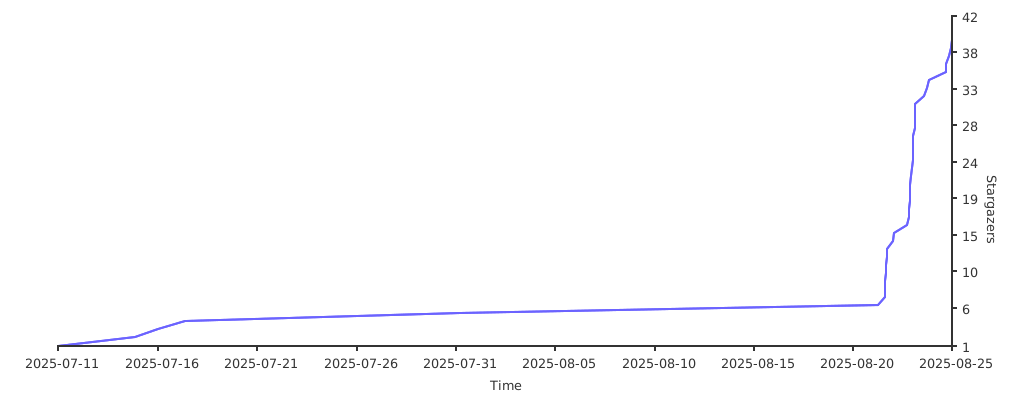](https://starchart.cc/WJZ-P/NekoCrypt)
<!-- links -->
[your-project-path]:WJZ-P/NekoCrypt
[contributors-shield]: https://img.shields.io/github/contributors/WJZ-P/NekoCrypt.svg?style=flat-square
[contributors-url]: https://github.com/WJZ-P/NekoCrypt/graphs/contributors
[forks-shield]: https://img.shields.io/github/forks/WJZ-P/NekoCrypt.svg?style=flat-square
[forks-url]: https://github.com/WJZ-P/NekoCrypt/network/members
[stars-shield]: https://img.shields.io/github/stars/WJZ-P/NekoCrypt.svg?style=flat-square
[stars-url]: https://github.com/WJZ-P/NekoCrypt/stargazers
[issues-shield]: https://img.shields.io/github/issues/WJZ-P/NekoCrypt.svg?style=flat-square
[issues-url]: https://img.shields.io/github/issues/WJZ-P/NekoCrypt.svg
[license-shield]: https://img.shields.io/github/license/WJZ-P/NekoCrypt.svg?style=flat-square
[license-url]: https://github.com/WJZ-P/NekoCrypt/blob/main/LICENSE
[linkedin-shield]: https://img.shields.io/badge/-LinkedIn-black.svg?style=flat-square&logo=linkedin&colorB=555
[linkedin-url]: https://linkedin.com/in/shaojintian
[oldQQ-download-link]:https://dldir1.qq.com/qqfile/qq/QQNT/448e164c/QQ9.9.15.26909_x64.exe
[LL-installer-link]:https://ats-prod.oss-accelerate.aliyuncs.com/18734247705198dcb594916e8ba1facc
[//]: # (不知道写点啥)
================================================
FILE: app/.gitignore
================================================
/build
================================================
FILE: app/build.gradle.kts
================================================
plugins {
alias(libs.plugins.android.application)
alias(libs.plugins.kotlin.android)
alias(libs.plugins.kotlin.compose)
id("org.jetbrains.kotlin.plugin.serialization") version "1.9.22"
id("kotlin-parcelize")
}
android {
namespace = "me.wjz.nekocrypt"
compileSdk = 35
defaultConfig {
applicationId = "me.wjz.nekocrypt"
minSdk = 26
targetSdk = 35
versionCode = 16 // 唯一版本识别码,每次打包记得+1!!
versionName = "1.6.0"
testInstrumentationRunner = "androidx.test.runner.AndroidJUnitRunner"
setProperty("archivesBaseName", "NekoCrypt-v$versionName")
}
buildTypes {
release {
isMinifyEnabled = true //开启代码压缩、混淆、优化
isShrinkResources = true //删除代码中没有用到的资源
// ✨ 指定混淆规则文件
// proguard-android-optimize.txt 是安卓SDK自带的默认规则
// proguard-rules.pro 是你项目里自己的规则文件,你可以添加不想被混淆的类
proguardFiles(
getDefaultProguardFile("proguard-android-optimize.txt"), "proguard-rules.pro"
)
}
}
compileOptions {
sourceCompatibility = JavaVersion.VERSION_11
targetCompatibility = JavaVersion.VERSION_11
}
kotlinOptions {
jvmTarget = "11"
}
buildFeatures {
compose = true
}
}
dependencies {
implementation(libs.androidx.core.ktx)
implementation(libs.androidx.lifecycle.runtime.ktx)
implementation(libs.androidx.activity.compose)
implementation(platform(libs.androidx.compose.bom))
implementation(libs.androidx.ui)
implementation(libs.androidx.ui.graphics)
implementation(libs.androidx.ui.tooling.preview)
implementation(libs.androidx.material3)
implementation("androidx.datastore:datastore-preferences:1.1.7")
implementation("com.google.guava:listenablefuture:9999.0-empty-to-avoid-conflict-with-guava")
implementation("androidx.compose.material:material-icons-extended:1.7.8")
// 用于 viewModel() 委托
implementation("androidx.lifecycle:lifecycle-viewmodel-compose:2.6.1")
implementation("androidx.lifecycle:lifecycle-runtime-ktx:2.6.1") // 包含 ViewTreeLifecycleOwner
implementation("androidx.lifecycle:lifecycle-viewmodel-ktx:2.6.1") // 包含 ViewTreeViewModelStoreOwner
implementation("androidx.savedstate:savedstate-ktx:1.2.0") // 包含 ViewTreeSavedStateRegistryOwner
implementation("org.jetbrains.kotlinx:kotlinx-serialization-json:1.6.3")// json解析
implementation("com.squareup.okhttp3:okhttp:5.1.0") //http
implementation(libs.androidx.compiler)//安装preferences datastore 插件
implementation("androidx.navigation:navigation-compose:2.9.1") // 导航
implementation("androidx.activity:activity-compose:1.9.0") // 拉起系统相册要用
implementation("io.coil-kt:coil-compose:2.6.0") // 显示图片预览
implementation("com.google.accompanist:accompanist-drawablepainter:0.35.0-alpha")// 把Drawable 转换为 Compose 可用的 Painter
testImplementation(libs.junit)
androidTestImplementation(libs.androidx.junit)
androidTestImplementation(libs.androidx.espresso.core)
androidTestImplementation(platform(libs.androidx.compose.bom))
androidTestImplementation(libs.androidx.ui.test.junit4)
debugImplementation(libs.androidx.ui.tooling)
debugImplementation(libs.androidx.ui.test.manifest)
}
================================================
FILE: app/proguard-rules.pro
================================================
# Add project specific ProGuard rules here.
# You can control the set of applied configuration files using the
# proguardFiles setting in build.gradle.
#
# For more details, see
# http://developer.android.com/guide/developing/tools/proguard.html
# If your project uses WebView with JS, uncomment the following
# and specify the fully qualified class name to the JavaScript interface
# class:
#-keepclassmembers class fqcn.of.javascript.interface.for.webview {
# public *;
#}
# Uncomment this to preserve the line number information for
# debugging stack traces.
#-keepattributes SourceFile,LineNumberTable
# If you keep the line number information, uncomment this to
# hide the original source file name.
#-renamesourcefileattribute SourceFile
-dontwarn javax.annotation.processing.AbstractProcessor
-dontwarn javax.annotation.processing.SupportedAnnotationTypes
================================================
FILE: app/src/androidTest/java/me/wjz/nekocrypt/ExampleInstrumentedTest.kt
================================================
package me.wjz.nekocrypt
import androidx.test.platform.app.InstrumentationRegistry
import androidx.test.ext.junit.runners.AndroidJUnit4
import org.junit.Test
import org.junit.runner.RunWith
import org.junit.Assert.*
/**
* Instrumented test, which will execute on an Android device.
*
* See [testing documentation](http://d.android.com/tools/testing).
*/
@RunWith(AndroidJUnit4::class)
class ExampleInstrumentedTest {
@Test
fun useAppContext() {
// Context of the app under test.
val appContext = InstrumentationRegistry.getInstrumentation().targetContext
assertEquals("me.wjz.nekocrypt", appContext.packageName)
}
}
================================================
FILE: app/src/main/AndroidManifest.xml
================================================
<?xml version="1.0" encoding="utf-8"?>
<manifest xmlns:android="http://schemas.android.com/apk/res/android"
xmlns:tools="http://schemas.android.com/tools">
<!-- 申请“在其他应用上层显示”的权限 -->
<uses-permission android:name="android.permission.SYSTEM_ALERT_WINDOW" />
<!-- 安卓13.0 (API 33) 及以上版本,前台服务要显示通知,还需要这个权限 -->
<uses-permission android:name="android.permission.POST_NOTIFICATIONS"/>
<!-- ✨ 1. 申请前台服务权限 -->
<uses-permission android:name="android.permission.FOREGROUND_SERVICE" />
<!-- 申请特殊无障碍服务-->
<uses-permission android:name="android.permission.FOREGROUND_SERVICE_SPECIAL_USE" />
<!-- 用来显示密钥列表里面支持的APP的图标-->
<uses-permission android:name="android.permission.QUERY_ALL_PACKAGES" />
<!-- 写明需要查询的APPid-->
<queries>
<!-- 查询 QQ 的信息 -->
<package android:name="com.tencent.mobileqq" />
<!-- 查询微信的信息 -->
<package android:name="com.tencent.mm" />
</queries>
<application
android:name=".NekoCryptApp"
android:allowBackup="true"
android:dataExtractionRules="@xml/data_extraction_rules"
android:fullBackupContent="@xml/backup_rules"
android:icon="@drawable/ic_launcher_foreground"
android:label="@string/app_name"
android:roundIcon="@mipmap/ic_launcher_round"
android:supportsRtl="true"
android:theme="@style/Theme.NekoCrypt"
android:enableOnBackInvokedCallback="true"
tools:targetApi="33">
<activity
android:name=".MainActivity"
android:exported="true"
android:theme="@style/Theme.NekoCrypt">
<intent-filter>
<action android:name="android.intent.action.MAIN" />
<category android:name="android.intent.category.LAUNCHER" />
</intent-filter>
</activity>
<!-- 创建一个activity用来拉起系统页面-->
<activity
android:name=".ui.activity.AttachmentPickerActivity"
android:theme="@android:style/Theme.Translucent.NoTitleBar"
android:taskAffinity=""
android:excludeFromRecents="true"
android:exported="false" />
<!-- ✨ 新增:在这里登记我们透明的弹窗 Activity -->
<activity
android:name=".ui.activity.ScannerDialogActivity"
android:exported="false"
android:excludeFromRecents="true"
android:taskAffinity=""
android:theme="@android:style/Theme.Translucent.NoTitleBar"
/>
<!-- 申请无障碍权限-->
<service
android:name="com.dianming.phoneapp.MyAccessibilityService"
android:enabled="true"
android:exported="false"
android:permission="android.permission.BIND_ACCESSIBILITY_SERVICE">
<intent-filter>
<action android:name="android.accessibilityservice.AccessibilityService" />
</intent-filter>
<meta-data
android:name="android.accessibilityservice"
android:resource="@xml/accessibility_service_config" />
</service>
<!-- 保活服务-->
<service
android:name=".service.KeepAliveService"
android:enabled="true"
android:exported="false"
android:foregroundServiceType="specialUse"/>
<!--配置File Provider-->
<provider
android:name="androidx.core.content.FileProvider"
android:authorities="${applicationId}.provider"
android:exported="false"
android:grantUriPermissions="true">
<meta-data
android:name="android.support.FILE_PROVIDER_PATHS"
android:resource="@xml/provider_paths" />
</provider>
</application>
</manifest>
================================================
FILE: app/src/main/java/com/dianming/phoneapp/MyAccessibilityService.kt
================================================
package com.dianming.phoneapp // what the fuck?
import android.accessibilityservice.AccessibilityService
import android.content.Intent
import android.graphics.Rect
import android.os.Build
import android.util.DisplayMetrics
import android.util.Log
import android.view.WindowInsets
import android.view.WindowManager
import android.view.accessibility.AccessibilityEvent
import android.view.accessibility.AccessibilityNodeInfo
import android.widget.Toast
import androidx.compose.foundation.layout.Box
import androidx.compose.foundation.layout.size
import androidx.compose.foundation.shape.CircleShape
import androidx.compose.material.icons.Icons
import androidx.compose.material.icons.filled.Pets
import androidx.compose.material3.FloatingActionButton
import androidx.compose.material3.FloatingActionButtonDefaults
import androidx.compose.material3.Icon
import androidx.compose.ui.Alignment
import androidx.compose.ui.Modifier
import androidx.compose.ui.draw.alpha
import androidx.compose.ui.unit.dp
import androidx.datastore.preferences.core.booleanPreferencesKey
import kotlinx.coroutines.CoroutineScope
import kotlinx.coroutines.Dispatchers
import kotlinx.coroutines.SupervisorJob
import kotlinx.coroutines.cancel
import kotlinx.coroutines.launch
import me.wjz.nekocrypt.AppRegistry
import me.wjz.nekocrypt.Constant
import me.wjz.nekocrypt.Constant.SCAN_RESULT
import me.wjz.nekocrypt.CryptoMode
import me.wjz.nekocrypt.NekoCryptApp
import me.wjz.nekocrypt.R
import me.wjz.nekocrypt.SettingKeys
import me.wjz.nekocrypt.hook.observeAsState
import me.wjz.nekocrypt.service.KeepAliveService
import me.wjz.nekocrypt.service.handler.ChatAppHandler
import me.wjz.nekocrypt.ui.activity.FoundNodeInfo
import me.wjz.nekocrypt.ui.activity.MessageListScanResult
import me.wjz.nekocrypt.ui.activity.ScanResult
import me.wjz.nekocrypt.ui.activity.ScannerDialogActivity
import me.wjz.nekocrypt.ui.theme.NekoCryptTheme
import me.wjz.nekocrypt.util.NCWindowManager
import me.wjz.nekocrypt.util.isSystemApp
class MyAccessibilityService : AccessibilityService() {
companion object {
// 这里设置service的信号。
const val ACTION_SHOW_SCANNER = "me.wjz.nekocrypt.service.ACTION_SHOW_SCANNER"
const val ACTION_HIDE_SCANNER = "me.wjz.nekocrypt.service.ACTION_HIDE_SCANNER"
}
val tag = "NekoAccessibility"
// 1. 创建一个 Service 自己的协程作用域,它的生命周期和 Service 绑定
val serviceScope = CoroutineScope(Dispatchers.Main + SupervisorJob())
// 添加保活服务状态标记
private var isKeepAliveServiceStarted = false
// 获取App里注册的dataManager实例
private val dataStoreManager by lazy {
(application as NekoCryptApp).dataStoreManager
}
// ——————————————————————————扫描悬浮窗相关——————————————————————————
private var scanBtnWindowManager: NCWindowManager? = null
// ——————————————————————————设置选项——————————————————————————
// 所有密钥
val cryptoKeys: Array<String> by serviceScope.observeAsState(flowProvider = {
dataStoreManager.getKeyArrayFlow()
}, initialValue = arrayOf(Constant.DEFAULT_SECRET_KEY))
// 当前密钥
val currentKey: String by serviceScope.observeAsState(flowProvider = {
dataStoreManager.getSettingFlow(SettingKeys.CURRENT_KEY, Constant.DEFAULT_SECRET_KEY)
}, initialValue = Constant.DEFAULT_SECRET_KEY)
//是否开启加密功能
val useAutoEncryption: Boolean by serviceScope.observeAsState(flowProvider = {
dataStoreManager.getSettingFlow(SettingKeys.USE_AUTO_ENCRYPTION, false)
}, initialValue = false)
//是否开启解密功能
val useAutoDecryption: Boolean by serviceScope.observeAsState(flowProvider = {
dataStoreManager.getSettingFlow(SettingKeys.USE_AUTO_DECRYPTION, false)
}, initialValue = false)
// ✨ 新增:监听当前的“加密模式”
val encryptionMode: String by serviceScope.observeAsState(flowProvider = {
dataStoreManager.getSettingFlow(SettingKeys.ENCRYPTION_MODE, CryptoMode.STANDARD.key)
}, initialValue = CryptoMode.STANDARD.key)
// ✨ 新增:监听当前的“解密模式”
val decryptionMode: String by serviceScope.observeAsState(flowProvider = {
dataStoreManager.getSettingFlow(SettingKeys.DECRYPTION_MODE, CryptoMode.STANDARD.key)
}, initialValue = CryptoMode.STANDARD.key)
// 标准加密模式下的长按发送delay。
val longPressDelay: Long by serviceScope.observeAsState(flowProvider = {
dataStoreManager.getSettingFlow(SettingKeys.ENCRYPTION_LONG_PRESS_DELAY, 250)
}, initialValue = 250)
// 标准解密模式下的密文悬浮窗显示时长。
val decryptionWindowShowTime: Long by serviceScope.observeAsState(flowProvider = {
dataStoreManager.getSettingFlow(SettingKeys.DECRYPTION_WINDOW_SHOW_TIME, 1500)
}, initialValue = 1500)
// 沉浸式解密下密文弹窗位置的更新间隔。
val decryptionWindowUpdateInterval: Long by serviceScope.observeAsState(flowProvider = {
dataStoreManager.getSettingFlow(SettingKeys.DECRYPTION_WINDOW_POSITION_UPDATE_DELAY, 250)
}, initialValue = 250)
// 盖在发送按钮上的遮罩颜色。
val sendBtnOverlayColor: String by serviceScope.observeAsState(flowProvider = {
dataStoreManager.getSettingFlow(SettingKeys.SEND_BTN_OVERLAY_COLOR, "#5066ccff")
}, initialValue = "#5066ccff")
// 控制弹出图片&文件的弹窗触发用的双击时间间隔
val showAttachmentViewDoubleClickThreshold: Long by serviceScope.observeAsState(flowProvider = {
dataStoreManager.getSettingFlow(SettingKeys.SHOW_ATTACHMENT_VIEW_DOUBLE_CLICK_THRESHOLD, 250)
}, initialValue = 250)
// 结合了自定义APP和内置APP的map,用来判断是否启用handler
private var combinedHandlerMap: Map<String, ChatAppHandler> = emptyMap()
// 一个集合,用于跟踪我们已经为哪些包名启动了监听,防止重复
private val observedPackages = mutableSetOf<String>()
// —————————————————————————— override ——————————————————————————
// 判断handler是否active
private val enabledAppsCache = mutableMapOf<String, Boolean>()
private var currentHandler: ChatAppHandler? = null
// 收指令的方法,其他地方可以用Intent指定action,这里收到就根据action做操作
override fun onStartCommand(intent: Intent?, flags: Int, startId: Int): Int {
when(intent?.action){
ACTION_SHOW_SCANNER ->{
showScanner()
}
ACTION_HIDE_SCANNER ->{
hideScanner()
}
}
return super.onStartCommand(intent, flags, startId)
}
override fun onServiceConnected() {
super.onServiceConnected()
Log.d(tag, "无障碍服务已连接!")
// startPeriodicScreenScan()// 做debug扫描
// 🎯 关键:启动保活服务
startKeepAliveService()
observeAppSettings()
showScannerIfNeed()
}
// 重写 onDestroy 方法,这是服务生命周期结束时最后的清理机会
override fun onDestroy() {
super.onDestroy()
Log.d(tag, "无障碍服务正在销毁...")
// 取消协程作用域,释放所有运行中的协程,防止内存泄漏
serviceScope.cancel()
// 停止保活服务
stopKeepAliveService()
// 关掉scanner
hideScanner()
serviceScope.cancel()
}
override fun onInterrupt() {
Log.w(tag, "无障碍服务被打断!")
}
override fun onAccessibilityEvent(event: AccessibilityEvent) {
// debug逻辑,会变卡
// if (event.eventType == AccessibilityEvent.TYPE_VIEW_CLICKED
// ) {//点击了屏幕
// Log.d(tag, "检测到点击事件,开始调试节点...")
// debugNodeTree(event.source)
// }
val eventPackage = event.packageName?.toString() ?: "unknown" // 事件来自的包名
// 情况一:事件来自我们支持的应用,并且打开了这个应用的对应开关
if (combinedHandlerMap.containsKey(eventPackage) && enabledAppsCache[eventPackage] == true) {
// 如果当前没有处理器,或者处理器不是对应这个App的,就进行切换
if (currentHandler?.packageName != eventPackage) {
currentHandler?.onHandlerDeactivated()
currentHandler = combinedHandlerMap[eventPackage]
currentHandler?.onHandlerActivated(this)
}
// 将事件分发给当前处理器
currentHandler?.onAccessibilityEvent(event, this)
}
// 情况二:事件来自我们不支持的应用
else {
// 关键逻辑:只有当我们的处理器正在运行,并且当前活跃窗口已经不是它负责的应用时,才停用它
val activeWindowPackage = rootInActiveWindow?.packageName?.toString()
if (activeWindowPackage!=null && currentHandler != null && currentHandler?.packageName != activeWindowPackage
&& !isSystemApp(activeWindowPackage) // 这里判断是否是系统app,直接看开头是不是com.android.provider。
) {
Log.d(
tag,
"检测到用户已离开 [${currentHandler?.packageName}],当前窗口为 [${activeWindowPackage}]。停用处理器。"
)
currentHandler?.onHandlerDeactivated()
currentHandler = null
}
// 否则,即使收到了其他包的事件,但只要活跃窗口没变,就保持处理器不变,忽略这些“噪音”事件。
}
}
/**
* 启动保活服务
*/
private fun startKeepAliveService() {
if (!isKeepAliveServiceStarted) {
try {
KeepAliveService.Companion.start(this)
isKeepAliveServiceStarted = true
Log.d(tag, "✅ 保活服务已启动")
} catch (e: Exception) {
Log.e(tag, "❌ 启动保活服务失败", e)
}
}
}
/**
* 停止保活服务
*/
private fun stopKeepAliveService() {
if (isKeepAliveServiceStarted) {
try {
KeepAliveService.Companion.stop(this)
isKeepAliveServiceStarted = false
Log.d(tag, "🛑 保活服务已停止")
} catch (e: Exception) {
Log.e(tag, "❌ 停止保活服务失败", e)
}
}
}
/**
* 创建并显示扫描悬浮按钮。
* 整个悬浮窗的 UI 和行为都在这里定义。
*/
private fun showScanner(){
if(scanBtnWindowManager != null) return
// 先获取设备的屏幕宽高信息,用来初始化悬浮窗位置
val windowManager = getSystemService(WINDOW_SERVICE) as WindowManager
val screenHeight: Int
val screenWidth: Int
if (Build.VERSION.SDK_INT >= Build.VERSION_CODES.R) {
val windowMetrics = windowManager.currentWindowMetrics
val insets = windowMetrics.windowInsets.getInsetsIgnoringVisibility(WindowInsets.Type.systemBars())
screenWidth = windowMetrics.bounds.width() - insets.left - insets.right
screenHeight = windowMetrics.bounds.height() - insets.top - insets.bottom
} else {
@Suppress("DEPRECATION")
val displayMetrics = DisplayMetrics().also { windowManager.defaultDisplay.getMetrics(it) }
screenHeight = displayMetrics.heightPixels
screenWidth = displayMetrics.widthPixels
}
// 2. 计算初始位置(左侧居中),并创建一个 Rect 对象
val initialX = 0
val initialY = screenHeight / 2
val initialPositionRect = Rect(initialX, initialY, initialX, initialY)
scanBtnWindowManager = NCWindowManager(
context = this,
onDismissRequest = { scanBtnWindowManager = null },
anchorRect = initialPositionRect, // 使用 Rect 来传递初始位置
isDraggable = true // 开启拖动功能
){
// 这里是悬浮窗的 Compose UI
Box(
modifier = Modifier.size(64.dp),
contentAlignment = Alignment.Center
) {
NekoCryptTheme(darkTheme = false) {
FloatingActionButton(
onClick = {handleScanScreen()},
shape = CircleShape,
modifier = Modifier.size(64.dp).alpha(0.9f),
elevation = FloatingActionButtonDefaults.elevation(defaultElevation = 0.dp, pressedElevation = 0.dp)
) {
Icon(
modifier = Modifier.size(32.dp),
imageVector = Icons.Default.Pets,
contentDescription = "Neko Scanner Button",
)
}
}
}
}
scanBtnWindowManager?.show()
Log.d(tag, "扫描悬浮按钮已显示")
}
/**
* 隐藏并销毁扫描悬浮按钮。
*/
private fun hideScanner() {
// 在主线程安全地销毁窗口
serviceScope.launch(Dispatchers.Main) {
scanBtnWindowManager?.dismiss()
}
}
/**
* 它会扫描当前活跃窗口,并尝试找出所有符合条件的节点。
* @return 返回一个包含所有扫描结果的 ScanResult 对象。
*/
private fun scanCurrentWindow(): ScanResult {
val rootNode = rootInActiveWindow ?:return ScanResult(
packageName = "N/A",
name = "未知应用",
foundInputNodes = emptyList(),
foundSendBtnNodes = emptyList(),
foundMessageLists = emptyList() // ✨ 结构变更
)
val currentPackageName = rootNode.packageName.toString()
val currentAppName = try{
val pm = packageManager
val appInfo =pm.getApplicationInfo(currentPackageName.toString(), 0)
pm.getApplicationLabel(appInfo).toString()
}catch (e: Exception){
"unknown"
}
val inputNodes = mutableListOf<FoundNodeInfo>()
val sendBtnNodes = mutableListOf<FoundNodeInfo>()
val messageLists = mutableListOf<MessageListScanResult>()
// 开始递归扫描!
findAllNodesRecursively(rootNode, inputNodes, sendBtnNodes, messageLists) // ✨ 参数变更
// 打包成“情报文件袋”并返回
return ScanResult(
packageName = currentPackageName,
name = currentAppName,
foundInputNodes = inputNodes,
foundSendBtnNodes = sendBtnNodes,
foundMessageLists = messageLists // ✨ 结构变更
)
}
/**
* ✨ 核心中的核心:递归扫描函数
* 它会遍历节点树的每一个角落,并根据特征将节点分类。
*/
private fun findAllNodesRecursively(
rootNode: AccessibilityNodeInfo,
inputNodes: MutableList<FoundNodeInfo>,
sendBtnNodes: MutableList<FoundNodeInfo>,
messageLists: MutableList<MessageListScanResult>
){
// 用一个内部辅助函数,第二个参数用来传递当前所在的“房子”
fun traverse(currentNode: AccessibilityNodeInfo, currentListResult: MessageListScanResult?) {
val className = currentNode.className?.toString() ?: ""
var listResultForChildren = currentListResult
// --- 根据特征进行分类 ---
// 1. 如果我们还不在任何房子里,检查当前节点是不是一个新“房子”
if (currentListResult == null && (className.contains("RecyclerView", ignoreCase = true) || className.contains("ListView", ignoreCase = true))) {
// 发现新“房子”,创建一个新的情报条目
val newHouse = MessageListScanResult(
listContainerInfo = createFoundNodeInfoFromNode(currentNode),
messageTexts = mutableListOf() // 先创建一个空的“居民”列表
)
messageLists.add(newHouse)
listResultForChildren = newHouse // 把这个新“房子”的信息传递给它的孩子们
}
// 2. 根据我们当前是否在“房子”里,来决定扫描策略
if (listResultForChildren != null) {
// ✨ 策略A:在“房子”内部,我们只关心“居民”(带文本的 TextView)
if (className.contains("TextView", ignoreCase = true) && !currentNode.text.isNullOrBlank()) {
// 把找到的“居民”添加到当前“房子”的居民列表里
(listResultForChildren.messageTexts as MutableList).add(createFoundNodeInfoFromNode(currentNode))
}
} else {
// ✨ 策略B:在“房子”外部,我们才关心输入框和按钮
if (className.contains("EditText", ignoreCase = true)) {
inputNodes.add(createFoundNodeInfoFromNode(currentNode))
}
if (className.contains("Button", ignoreCase = true)) {
sendBtnNodes.add(createFoundNodeInfoFromNode(currentNode))
}
}
// --- 继续深入,探索子节点 ---
for (i in 0 until currentNode.childCount) {
currentNode.getChild(i)?.let { child ->
traverse(child, listResultForChildren)
}
}
}
// 从根节点开始,初始不在任何“房子”里
traverse(rootNode, null)
}
// 再来个辅助函数,把节点转成我们需要的数据类。
private fun createFoundNodeInfoFromNode(node: AccessibilityNodeInfo): FoundNodeInfo {
return FoundNodeInfo(
className = node.className?.toString() ?: "",
resourceId = node.viewIdResourceName,
text = node.text?.toString(),
contentDescription = node.contentDescription?.toString()
)
}
// 处理扫描相关
private fun handleScanScreen(){
serviceScope.launch {
Toast.makeText(this@MyAccessibilityService, getString(R.string.scanner_scanning),
Toast.LENGTH_SHORT).show()
// 扫描当前窗口
val scanResult = scanCurrentWindow()
val intent = Intent(this@MyAccessibilityService, ScannerDialogActivity::class.java).apply {
// 从 Service 启动 Activity 需要这个特殊的旗标
addFlags(Intent.FLAG_ACTIVITY_NEW_TASK)
putExtra(SCAN_RESULT, scanResult)
}
startActivity(intent)
}
}
// —————————————————————————— helper ——————————————————————————
private fun showScannerIfNeed(){
serviceScope.launch {
val shouldShow = dataStoreManager.readSetting(SettingKeys.SCAN_BTN_ACTIVE, false)
if (shouldShow) { showScanner() }
}
}
/**
* 调试节点树的函数 (列表全扫描版)
* 它会向上查找到列表容器(RecyclerView/ListView),然后递归遍历并打印出该容器下所有的文本内容。
*/
private fun debugNodeTree(sourceNode: AccessibilityNodeInfo?) {
if (sourceNode == null) {
Log.d(tag, "===== DEBUG NODE: 节点为空 =====")
return
}
printNodeDetails(sourceNode,0)
Log.d(tag, "===== Neko 节点调试器 (列表全扫描) =====")
// 1. 向上查找列表容器
var listContainerNode: AccessibilityNodeInfo? = null
var currentNode: AccessibilityNodeInfo? = sourceNode
for (i in 1..30) { // 增加查找深度,确保能爬到顶
val className = currentNode?.className?.toString() ?: ""
// 我们要找的就是这个能滚动的列表!
if (className.contains("RecyclerView") || className.contains("ListView")) {
listContainerNode = currentNode
Log.d(
tag,
"🎉 找到了列表容器! Class: $className ID: ${listContainerNode?.viewIdResourceName}"
)
break
}
currentNode = currentNode?.parent
if (currentNode == null) {
Log.d(tag,"已找到最祖先根节点,结束循环")
break
} // 爬到顶了就停
}
// 2. 如果成功找到了列表容器,就遍历它下面的所有文本
if (listContainerNode != null) {
Log.d(tag, "--- 遍历列表容器 [${listContainerNode.className}] 下的所有文本 ---")
printAllTextFromNode(listContainerNode, 0) // 从深度0开始递归
} else {
// 如果找不到列表,就执行一个备用方案:打印整个窗口的内容
Log.d(tag, "警告: 未能在父节点中找到 RecyclerView 或 ListView。")
Log.d(tag, "--- 备用方案: 遍历整个窗口的所有文本 ---")
rootInActiveWindow?.let {
printAllTextFromNode(it, 0)
}
}
Log.d(tag, "==================================================")
}
/**
* 递归辅助函数,用于深度遍历节点并打印所有非空文本。
* @param node 当前要处理的节点。
* @param depth 当前的递归深度,用于格式化输出(创建缩进)。
*/
private fun printAllTextFromNode(node: AccessibilityNodeInfo, depth: Int) {
// 根据深度创建缩进,让日志的层级关系一目了然
val indent = " ".repeat(depth)
// 1. 检查当前节点本身是否有文本,如果有就打印出来
val text = node.text
if (!text.isNullOrEmpty()) {
// 为了更清晰,我们把ID也打印出来
Log.d(tag, "$indent[文本] -> '$text' (ID: ${node.viewIdResourceName})")
}
// 2. 遍历所有子节点,并对每个子节点递归调用自己
for (i in 0 until node.childCount) {
val child = node.getChild(i)
if (child != null) {
printAllTextFromNode(child, depth + 1)
}
}
}
private fun printNodeDetails(node: AccessibilityNodeInfo?, depth: Int) {
val indent = " ".repeat(depth)
if (node == null) {
Log.d(tag, "$indent[节点] -> null")
return
}
val text = node.text?.toString()?.take(50)
val desc = node.contentDescription?.toString()?.take(50)
Log.d(tag, "$indent[文本] -> '$text'")
Log.d(tag, "$indent[描述] -> '$desc'")
Log.d(tag, "$indent[类名] -> ${node.className}")
Log.d(tag, "$indent[ID] -> ${node.viewIdResourceName}")
Log.d(tag, "$indent[子节点数] -> ${node.childCount}")
Log.d(tag, "$indent[父节点] -> ${node.parent?.className}")
Log.d(tag, "$indent[属性] -> [可点击:${node.isClickable}, 可滚动:${node.isScrollable}, 可编辑:${node.isEditable}]")
}
// 【新增】一个全新的方法,专门负责在后台订阅和更新所有App的开关状态
/**
* 监听所有在 AppRegistry 中注册的应用的启用状态。
* 它会为每个应用启动一个协程,持续从 DataStore 订阅其开关状态,
* 并将最新状态更新到内存缓存 `enabledAppsCache` 中。
*/
private fun observeAppSettings() {
// 遍历所有支持的应用,包括自定义和内置
serviceScope.launch {
dataStoreManager.getCustomAppsFlow().collect { customAppList ->
val newMap = mutableMapOf<String, ChatAppHandler>()
// 1. 先添加所有预设应用
AppRegistry.allHandlers.forEach { handler ->
newMap[handler.packageName] = handler
}
// 2. 再添加所有自定义应用(如果包名相同,会自动覆盖预设的)
customAppList.forEach { handler ->
newMap[handler.packageName] = handler
}
// 3. 更新全局的处理器 Map
combinedHandlerMap = newMap
Log.d(tag, "处理器列表已更新,当前共 ${combinedHandlerMap.size} 个处理器。")
// 4. 为总名册里的所有应用启动(或确认已有)开关状态监听
combinedHandlerMap.keys.forEach { packageName ->
// observedPackages 会确保我们只为每个应用启动一次监听
if (observedPackages.add(packageName)) {
serviceScope.launch {
val key = booleanPreferencesKey("app_enabled_$packageName")
dataStoreManager.getSettingFlow(key, true)
.collect { isEnabled ->
enabledAppsCache[packageName] = isEnabled
Log.d(tag, "应用开关状态更新 -> $packageName: $isEnabled")
}
}
}
}
}
}
}
}
================================================
FILE: app/src/main/java/me/wjz/nekocrypt/Constant.kt
================================================
package me.wjz.nekocrypt
import androidx.annotation.StringRes
import androidx.datastore.preferences.core.booleanPreferencesKey
import androidx.datastore.preferences.core.intPreferencesKey
import androidx.datastore.preferences.core.longPreferencesKey
import androidx.datastore.preferences.core.stringPreferencesKey
import me.wjz.nekocrypt.service.handler.ChatAppHandler
import me.wjz.nekocrypt.service.handler.QQHandler
import me.wjz.nekocrypt.service.handler.WeChatHandler
object Constant {
const val APP_NAME = "NekoCrypt"
const val DEFAULT_SECRET_KEY = "20040821"//You know what it means...
// ---- 其他 ----
const val EDIT_TEXT="EditText"
const val VIEW_ID_BTN = "Button"
// 扫描intent额外字段的key
const val SCAN_RESULT = "scan_result"
}
object SettingKeys {
val CURRENT_KEY = stringPreferencesKey("current_key")
// 用 String 类型的 Key 来存储序列化后的密钥数组
val ALL_THE_KEYS = stringPreferencesKey("all_the_keys")
val USE_AUTO_ENCRYPTION = booleanPreferencesKey("use_auto_encryption")
val USE_AUTO_DECRYPTION = booleanPreferencesKey("use_auto_decryption")
val SCAN_BTN_ACTIVE = booleanPreferencesKey("scan_btn_active")
val ENCRYPTION_MODE = stringPreferencesKey("encryption_mode")
val DECRYPTION_MODE = stringPreferencesKey("decryption_mode")
// 标准加密模式下,长按时间设置
val ENCRYPTION_LONG_PRESS_DELAY = longPreferencesKey("encryption_long_press_delay")
// 标准解密模式下,悬浮窗的显示时间设置
val DECRYPTION_WINDOW_SHOW_TIME = longPreferencesKey("decryption_window_show_time")
// 沉浸式解密下密文弹窗位置更新间隔
val DECRYPTION_WINDOW_POSITION_UPDATE_DELAY = longPreferencesKey("decryption_window_position_update_delay")
// 按钮遮罩的颜色
val SEND_BTN_OVERLAY_COLOR = stringPreferencesKey("send_btn_overlay_color")
// 控制弹出发送图片or文件视图的双击最大间隔时间
val SHOW_ATTACHMENT_VIEW_DOUBLE_CLICK_THRESHOLD = longPreferencesKey("show_attachment_view_double_click_threshold")
val CUSTOM_APPS = stringPreferencesKey("custom_apps")
// 当前密文风格
val CIPHERTEXT_STYLE = stringPreferencesKey("ciphertext_style")
// 存储风格文本的最小和最大词语数
val CIPHERTEXT_STYLE_LENGTH_MIN = intPreferencesKey("ciphertext_style_length_min")
val CIPHERTEXT_STYLE_LENGTH_MAX = intPreferencesKey("ciphertext_style_length_max")
}
object CommonKeys {
const val ENCRYPTION_MODE_STANDARD = "standard"
const val ENCRYPTION_MODE_IMMERSIVE = "immersive"
const val DECRYPTION_MODE_STANDARD = "standard"
const val DECRYPTION_MODE_IMMERSIVE = "immersive"
}
object AppRegistry {
/**
* 包含所有受支持应用处理器实例的权威列表。
* 未来要支持新的App,只需要在这里新增一行即可!
* UI 和 Service 都会从这里读取信息。
*/
val allHandlers: List<ChatAppHandler> = listOf(
QQHandler(),
WeChatHandler()
// TelegramHandler(),
// ... 以后在这里添加更多
)
}
enum class CryptoMode(val key: String, @StringRes val labelResId: Int){
STANDARD("standard", R.string.mode_standard),
IMMERSIVE("immersive", R.string.mode_immersive);
companion object {
/**
* 一个辅助函数,可以根据存储的 key 安全地找回对应的枚举实例。
* 如果找不到,就返回一个默认值。
*/
fun fromKey(key: String?): CryptoMode {
// entries 是一个由编译器自动生成的属性,包含了枚举的所有实例
return entries.find { it.key == key } ?: STANDARD
}
}
}
================================================
FILE: app/src/main/java/me/wjz/nekocrypt/MainActivity.kt
================================================
package me.wjz.nekocrypt
import android.os.Bundle
import androidx.activity.ComponentActivity
import androidx.activity.compose.setContent
import androidx.activity.enableEdgeToEdge
import androidx.compose.runtime.CompositionLocalProvider
import me.wjz.nekocrypt.data.LocalDataStoreManager
import me.wjz.nekocrypt.ui.MainMenu
import me.wjz.nekocrypt.ui.theme.NekoCryptTheme
import me.wjz.nekocrypt.util.PermissionGuard
class MainActivity : ComponentActivity() {
override fun onCreate(savedInstanceState: Bundle?) {
super.onCreate(savedInstanceState)
enableEdgeToEdge()//让App可以上下扩展到最顶端和最低端
//这是从传统 Android 视图系统切换到 Jetpack Compose 世界的“传送门”!
// 一旦调用了它,你就可以在这个大括号 {} 里面,用我们之前学过的 @Composable 函数来描绘你的 App 界面了。
setContent {
//这里不要在Compose UI中直接引用dataStoreManager,而是在这里注入一个,这样可以方便替换不同的manager,解耦方便复用
val app = application as NekoCryptApp
NekoCryptTheme {
// 权限检查
PermissionGuard {
CompositionLocalProvider(LocalDataStoreManager provides app.dataStoreManager) {
MainMenu()
}
}
}
}
}
}
================================================
FILE: app/src/main/java/me/wjz/nekocrypt/NekoCryptApp.kt
================================================
package me.wjz.nekocrypt
import android.app.Application
import android.app.NotificationChannel
import android.app.NotificationManager
import android.util.Log
import me.wjz.nekocrypt.data.DataStoreManager
class NekoCryptApp : Application() {
// 在 Application 创建时,我们懒加载地创建 DataStoreManager 的实例。
// 它只会被创建一次!
val dataStoreManager: DataStoreManager by lazy {
DataStoreManager(this)
}
override fun onCreate() {
super.onCreate()
createNotificationChannel() // 创建通知渠道,用于在 Android 8.0 及以上版本上显示通知
instance = this
Log.d(TAG, "NekoCryptApp onCreate")
}
companion object {
const val SERVICE_CHANNEL_ID = "NekoCryptServiceChannel"
const val TAG = "NekoCrypt"
lateinit var instance: NekoCryptApp private set
}
private fun createNotificationChannel() {
val serviceChannel = NotificationChannel(
SERVICE_CHANNEL_ID,
getString(R.string.notification_title),
NotificationManager.IMPORTANCE_LOW // 使用较低的重要性,避免打扰用户
)
val manager = getSystemService(NotificationManager::class.java)
manager.createNotificationChannel(serviceChannel)
}
}
================================================
FILE: app/src/main/java/me/wjz/nekocrypt/data/DataStoreManager.kt
================================================
package me.wjz.nekocrypt.data
import android.content.Context
import android.util.Log
import androidx.compose.runtime.Composable
import androidx.compose.runtime.State
import androidx.compose.runtime.collectAsState
import androidx.compose.runtime.staticCompositionLocalOf
import androidx.datastore.core.DataStore
import androidx.datastore.preferences.core.Preferences
import androidx.datastore.preferences.core.edit
import androidx.datastore.preferences.preferencesDataStore
import kotlinx.coroutines.flow.Flow
import kotlinx.coroutines.flow.catch
import kotlinx.coroutines.flow.first
import kotlinx.coroutines.flow.map
import kotlinx.serialization.encodeToString
import kotlinx.serialization.json.Json
import me.wjz.nekocrypt.Constant
import me.wjz.nekocrypt.SettingKeys
import me.wjz.nekocrypt.service.handler.CustomAppHandler
val Context.dataStore: DataStore<Preferences> by preferencesDataStore(name = "settings")
//建立一个LocalDataStoreManager的CompositionLocal,专门给ComposeUI用的
val LocalDataStoreManager = staticCompositionLocalOf<DataStoreManager> {
error("No DataStoreManager provided")
}
/**
* ✨ [新增] 一个专门用于在Compose上下文中,以State的形式订阅密钥数组变化的Hook。
*
* @param initialValue 当Flow还在加载时的初始默认值。
* @return 一个 State<Array<String>> 对象,它的 .value 会随着DataStore的变化而自动更新。
*/
@Composable
fun rememberKeyArrayState(initialValue: Array<String> = emptyArray()): State<Array<String>> {
val dataStoreManager = LocalDataStoreManager.current
return dataStoreManager.getKeyArrayFlow().collectAsState(initial = initialValue)
}
/**
* ✨ [新增] 一个专门用于在Compose上下文中,以State的形式订阅customApp变化的Hook。
*
* @param initialValue 当Flow还在加载时的初始默认值。
* @return 一个 State<Array<String>> 对象,它的 .value 会随着DataStore的变化而自动更新。
*/
@Composable
fun rememberCustomAppListState(initialValue: List<CustomAppHandler> = emptyList()): State<List<CustomAppHandler>> {
val dataStoreManager = LocalDataStoreManager.current
return dataStoreManager.getCustomAppsFlow().collectAsState(initial = initialValue)
}
class DataStoreManager(private val context: Context) {
//通用的读取方法 (使用泛型)
fun <T> getSettingFlow(key: Preferences.Key<T>, defaultValue: T): Flow<T> {
return context.dataStore.data.map { preferences ->
preferences[key] ?: defaultValue
}.catch { exception -> throw exception }
}
//提供一个一次性的读取方法
suspend fun <T> readSetting(key: Preferences.Key<T>, defaultValue: T): T {
// .first() 是一个来自 kotlinx-coroutines-core 的魔法,
// 它会等待 Flow 发射第一个值,然后就返回,不再继续监听。
return getSettingFlow(key, defaultValue).first()
}
//通用的写入方法
suspend fun <T> saveSetting(key: Preferences.Key<T>, value: T) {
context.dataStore.edit { preferences -> preferences[key] = value }
}
/**
* (可选) 通用的清除单个设置的方法
*/
suspend fun <T> clearSetting(key: Preferences.Key<T>) {
context.dataStore.edit { preferences -> preferences.remove(key) }
}
/**
* (可选) 清除所有设置的方法
*/
suspend fun clearAllSettings() {
context.dataStore.edit { preferences -> preferences.clear() }
}
/**
* 保存密钥数组。
* 调用者只需要传入一个数组,无需关心JSON转换的细节。
*/
suspend fun saveKeyArray(keys: Array<String>) {
val jsonString = Json.encodeToString(keys)
saveSetting(SettingKeys.ALL_THE_KEYS, jsonString)
}
/**
* 获取密钥数组,用于后台的上下文。
*/
fun getKeyArrayFlow(): Flow<Array<String>> {
return getSettingFlow(SettingKeys.ALL_THE_KEYS, "[]").map { jsonString ->
if (jsonString.isEmpty()) arrayOf(Constant.DEFAULT_SECRET_KEY)
else {
try {
val keys = Json.decodeFromString<Array<String>>(jsonString)
if (keys.isEmpty()) arrayOf(Constant.DEFAULT_SECRET_KEY) else keys
} catch (e: Exception) {
Log.e("Neko", "解析密钥数组失败!", e)
arrayOf(Constant.DEFAULT_SECRET_KEY) //解析失败返回默认值
}
}
}
}
/**
* 保存自定义应用列表。
* 追加形式保存
*/
suspend fun addCustomApp(newApp: CustomAppHandler) {
// 1. 读取当前的列表
val currentApps = getCustomAppsFlow().first().toMutableList()
// 2. 添加新的配置
currentApps.add(newApp)
// 3. 将更新后的列表序列化成 JSON 字符串
val jsonString = Json.encodeToString(currentApps)
// 4. 保存回 DataStore
saveSetting(SettingKeys.CUSTOM_APPS, jsonString)
}
/**
* 删除包名对应的自定义handler
*/
suspend fun deleteCustomApp(packageName:String){
val currentApps = getCustomAppsFlow().first().toMutableList()
currentApps.removeAll { it.packageName == packageName }
val jsonString = Json.encodeToString(currentApps)
saveSetting(SettingKeys.CUSTOM_APPS, jsonString)
}
/**
* ✨ 新增:获取自定义应用列表的 Flow。
* 它从 DataStore 读取JSON字符串,并将其反序列化为 CustomAppHandler 列表。
* 如果解析失败或没有数据,返回一个空列表。
*/
fun getCustomAppsFlow(): Flow<List<CustomAppHandler>> {
// "[]" 是一个空的JSON数组,作为安全的默认值
return getSettingFlow(SettingKeys.CUSTOM_APPS, "[]").map { jsonString ->
try {
Json.decodeFromString<List<CustomAppHandler>>(jsonString)
} catch (e: Exception) {
Log.e("NekoCrypt", "解析自定义应用列表失败!", e)
emptyList() // 解析失败时返回空列表
}
}
}
}
================================================
FILE: app/src/main/java/me/wjz/nekocrypt/hook/DataStoreStateHook.kt
================================================
package me.wjz.nekocrypt.hook
import androidx.compose.runtime.Composable
import androidx.compose.runtime.State
import androidx.compose.runtime.remember
import androidx.compose.runtime.rememberCoroutineScope
import androidx.datastore.preferences.core.Preferences
import androidx.lifecycle.compose.collectAsStateWithLifecycle
import kotlinx.coroutines.CoroutineScope
import kotlinx.coroutines.launch
import me.wjz.nekocrypt.data.DataStoreManager
import me.wjz.nekocrypt.data.LocalDataStoreManager
import kotlin.reflect.KProperty
class DataStoreStateDelegate<T>(
private val state: State<T>,
private val scope: CoroutineScope,
private val saver: suspend (T) -> Unit
){
/**
* `operator fun getValue`
* 当你读取属性时(如 `if (isChecked)`),Kotlin 会调用这个函数。
* 我们只需返回内部 `State` 的当前值。
*/
operator fun getValue(thisRef: Any?, property: KProperty<*>): T {
return state.value
}
/**
* `operator fun setValue`
* 当你写入属性时(如 `isChecked = false`),Kotlin 会调用这个函数。
* 我们在这里启动一个协程,调用 `saver` lambda 将新值保存到 DataStore。
*/
operator fun setValue(thisRef: Any?, property: KProperty<*>, value: T) {
scope.launch {
saver(value)
}
}
}
@Composable
fun <T> rememberDataStoreState(
key: Preferences.Key<T>,
defaultValue: T
): DataStoreStateDelegate<T> {
// 1. 获取全局唯一的 DataStoreManager 和协程作用域
val dataStoreManager: DataStoreManager = LocalDataStoreManager.current
val scope: CoroutineScope = rememberCoroutineScope()
//2. 从Flow里面拿数据并转化成Compose的State
val state: State<T> = dataStoreManager.getSettingFlow(key, defaultValue)
.collectAsStateWithLifecycle(initialValue = defaultValue)
// 用remember来创建并记住委托类实例
return remember(dataStoreManager, scope, key) {
DataStoreStateDelegate(
state = state,
scope = scope,
saver = { newValue -> dataStoreManager.saveSetting(key, newValue) }
)
}
}
================================================
FILE: app/src/main/java/me/wjz/nekocrypt/hook/ServiceStateDelegate.kt
================================================
package me.wjz.nekocrypt.hook
import kotlinx.coroutines.CoroutineScope
import kotlinx.coroutines.flow.Flow
import kotlinx.coroutines.flow.collectLatest
import kotlinx.coroutines.launch
import kotlin.properties.ReadOnlyProperty
import kotlin.reflect.KProperty
/**
* 一个自定义的属性委托类,接收一个Flow,在指定的协程作用域自动订阅。
*/
class ServiceStateDelegate<T>(
private val flowProvider:()-> Flow<T>,
scope: CoroutineScope,
initialValue: T,
) : ReadOnlyProperty<Any?, T> {
private var currentValue: T = initialValue
init {
scope.launch {
flowProvider().collectLatest { newValue ->
currentValue = newValue
}
}
}
override fun getValue(thisRef: Any?, property: KProperty<*>): T {
return currentValue
}
}
fun <T> CoroutineScope.observeAsState(
flowProvider: ()-> Flow<T>,
initialValue: T,
): ReadOnlyProperty<Any?, T> {
return ServiceStateDelegate(flowProvider, this, initialValue)
}
================================================
FILE: app/src/main/java/me/wjz/nekocrypt/service/KeepAliveService.kt
================================================
package me.wjz.nekocrypt.service
import android.app.Service
import android.content.Context
import android.content.Intent
import android.graphics.PixelFormat
import android.os.IBinder
import android.util.Log
import android.view.Gravity
import android.view.View
import android.view.WindowManager
import me.wjz.nekocrypt.NekoCryptApp
import me.wjz.nekocrypt.util.NekoNotification
/**
* ✨ 一个专门用于保活的前台服务。
* 它的唯一职责就是通过一个常驻通知,告诉系统我们的App正在运行重要任务。
*/
class KeepAliveService : Service() {
// 保活窗口
private var keepAliveOverlay: View? = null
private val windowManager by lazy { getSystemService(WINDOW_SERVICE) as WindowManager }
companion object {
private const val TAG = NekoCryptApp.TAG
// ✨ 提供一个标准的启动方法,方便外部调用
fun start(context: Context) {
val intent = Intent(context, KeepAliveService::class.java)
context.startService(intent)
}
// ✨ 提供一个标准的停止方法
fun stop(context: Context) {
val intent = Intent(context, KeepAliveService::class.java)
context.stopService(intent)
}
}
private fun createKeepAliveOverlay() {
if (keepAliveOverlay != null) return
keepAliveOverlay = View(this)
val layoutFlag = WindowManager.LayoutParams.TYPE_APPLICATION_OVERLAY
val params = WindowManager.LayoutParams(
0, 0, 0, 0, layoutFlag,
WindowManager.LayoutParams.FLAG_NOT_TOUCHABLE or WindowManager.LayoutParams.FLAG_NOT_FOCUSABLE,
PixelFormat.TRANSPARENT
).apply {
gravity = Gravity.TOP or Gravity.START
}
try {
windowManager.addView(keepAliveOverlay, params)
Log.d(TAG, "“保活”悬浮窗创建成功!")
} catch (e: Exception) {
Log.e(TAG, "创建“保活”悬浮窗失败", e)
}
}
private fun removeKeepAliveOverlay() {
keepAliveOverlay?.let {
try {
windowManager.removeView(it)
Log.d(TAG, "“保活”悬浮窗已移除。")
} catch (e: Exception) {
// 忽略窗口已经不存在等异常
} finally {
keepAliveOverlay = null
}
}
}
override fun onStartCommand(intent: Intent?, flags: Int, startId: Int): Int {
Log.d(TAG, "保活服务已启动。")
// 1. 创建通知渠道(在Android 8.0及以上版本是必需的)
NekoNotification.createChannel(this)
// 2. 创建一个通知
val notification = NekoNotification.build(this)
// 3. ✨ 最关键的一步:将服务推到前台!
// 第一个参数是一个唯一的通知ID,第二个参数是我们创建的通知。
startForeground(NekoNotification.NEKO_NOTIFICATION_ID, notification)
// 我们同时创一个保活悬浮窗
createKeepAliveOverlay()
// START_STICKY 表示如果服务被系统意外杀死,系统会尝试重新启动它
return START_STICKY
}
override fun onDestroy() {
super.onDestroy()
removeKeepAliveOverlay()
Log.d(TAG, "保活服务已销毁,保活悬浮窗已销毁。")
stopForeground(true)
}
/**
* ✨ 实现 onBind 方法。
* 因为我们这是一个启动服务(Started Service),而不是绑定服务(Bound Service),
* 所以我们不需要处理绑定逻辑,直接返回 null 即可。
*/
override fun onBind(intent: Intent?): IBinder? {
return null
}
}
================================================
FILE: app/src/main/java/me/wjz/nekocrypt/service/handler/BaseChatAppHandler.kt
================================================
package me.wjz.nekocrypt.service.handler
import android.content.Context
import android.graphics.PixelFormat
import android.graphics.Rect
import android.net.Uri
import android.os.Bundle
import android.util.Log
import android.view.Gravity
import android.view.MotionEvent
import android.view.View
import android.view.WindowManager
import android.view.WindowManager.LayoutParams.FLAG_LAYOUT_IN_SCREEN
import android.view.WindowManager.LayoutParams.FLAG_NOT_FOCUSABLE
import android.view.WindowManager.LayoutParams.FLAG_NOT_TOUCH_MODAL
import android.view.accessibility.AccessibilityEvent
import android.view.accessibility.AccessibilityNodeInfo
import android.widget.Toast
import androidx.compose.runtime.CompositionLocalProvider
import androidx.compose.runtime.compositionLocalOf
import androidx.compose.runtime.getValue
import androidx.compose.runtime.mutableStateOf
import androidx.compose.runtime.setValue
import androidx.core.graphics.toColorInt
import com.dianming.phoneapp.MyAccessibilityService
import kotlinx.coroutines.Dispatchers
import kotlinx.coroutines.ExperimentalCoroutinesApi
import kotlinx.coroutines.Job
import kotlinx.coroutines.delay
import kotlinx.coroutines.flow.collectLatest
import kotlinx.coroutines.isActive
import kotlinx.coroutines.launch
import kotlinx.coroutines.withContext
import me.wjz.nekocrypt.Constant
import me.wjz.nekocrypt.CryptoMode
import me.wjz.nekocrypt.NekoCryptApp
import me.wjz.nekocrypt.R
import me.wjz.nekocrypt.data.LocalDataStoreManager
import me.wjz.nekocrypt.ui.component.DecryptionPopup
import me.wjz.nekocrypt.ui.dialog.AttachmentPreviewState
import me.wjz.nekocrypt.ui.dialog.AttachmentState
import me.wjz.nekocrypt.ui.dialog.SendAttachmentDialog
import me.wjz.nekocrypt.util.CryptoManager
import me.wjz.nekocrypt.util.CryptoManager.applyCiphertextStyle
import me.wjz.nekocrypt.util.CryptoManager.containsCiphertext
import me.wjz.nekocrypt.util.CryptoUploader
import me.wjz.nekocrypt.util.NCFileProtocol
import me.wjz.nekocrypt.util.NCWindowManager
import me.wjz.nekocrypt.util.ResultRelay
import me.wjz.nekocrypt.util.findSingleNode
import me.wjz.nekocrypt.util.formatFileSize
import me.wjz.nekocrypt.util.getFileName
import me.wjz.nekocrypt.util.getFileSize
import me.wjz.nekocrypt.util.getImageAspectRatio
import me.wjz.nekocrypt.util.isEmpty
import me.wjz.nekocrypt.util.isFileImage
import me.wjz.nekocrypt.util.isNodeValid
import java.io.File
// 创建一个CompositionLocal来提供给弹窗
val LocalFileActionHandler = compositionLocalOf<((NCFileProtocol) -> Unit)?> { null }
abstract class BaseChatAppHandler : ChatAppHandler {
protected val tag = "NCBaseHandler"
// 由子类提供具体应用的ID
abstract override val inputId: String
abstract override val sendBtnId: String
abstract override val messageTextId: String
abstract override val messageListClassName: String
// 处理器内部状态
private var service: MyAccessibilityService? = null
// 按钮遮罩的管理器
private var overlayWindowManager: WindowManager? = null
private var overlayView: View? = null
private var overlayManagementJob: Job? = null
// 为我们的界面节点变量做缓存
private var cachedSendBtnNode: AccessibilityNodeInfo? = null
private var cachedInputNode: AccessibilityNodeInfo? = null
// 为 RecyclerView/ListView 创建一个专属的缓存
private var cachedMessageListNode: AccessibilityNodeInfo? = null
// 为沉浸式解密创建一个"防抖"任务,避免过于频繁的扫描
private var immersiveDecryptionJob: Job? = null
// Key: 一个消息气泡的唯一标识符 (位置 + 文本哈希)
// Value: 管理这个气泡弹窗的 WindowPopupManager 实例
private val immersiveDecryptionCache = mutableMapOf<String, NCWindowManager>()
// ———————— 附件发送弹窗相关属性 ————————
// 拿来判断是否拉起图片、视频弹窗。
private var lastInputClickTime: Long = 0L
private var filePickerJob: Job? = null // ✨ 新增一个Job来监听结果
private var sendAttachmentDialogManager: NCWindowManager? = null
// 记录当前上传使用的缓存文件URI,对话框关闭时清理
private var pendingCacheUri: Uri? = null
// --- ✨ 附件发送弹窗相关的新增状态 ---
// 使用 Compose 的 State Delegate,这样当它们的值改变时,UI会自动更新
// ✨ 2. 只用一个 State 来管理所有UI状态
private var attachmentState by mutableStateOf(AttachmentState())
override fun onAccessibilityEvent(event: AccessibilityEvent, service: MyAccessibilityService) {
// 悬浮窗管理逻辑
if (event.eventType == AccessibilityEvent.TYPE_WINDOW_CONTENT_CHANGED || event.eventType == AccessibilityEvent.TYPE_WINDOW_STATE_CHANGED) {
if (service.useAutoEncryption) {
//只有开启加密,才会加上悬浮窗,每次事件改变,都要更新悬浮窗位置
overlayManagementJob?.cancel()
overlayManagementJob = service.serviceScope.launch(Dispatchers.Default) {
handleOverlayManagement() // 可能是添加、更新、删除悬浮窗
}
} else {
removeOverlayView()
}
}
// 解密逻辑,开启解密,才进行解密操作。
if (service.useAutoDecryption) {
when (service.decryptionMode) {
// 标准模式:用户点击密文时,才进行解密
CryptoMode.STANDARD.key -> {
if (event.eventType == AccessibilityEvent.TYPE_VIEW_CLICKED) {
handleDecryption(event.source)
}
}
// 沉浸模式:当窗口内容变化时,主动扫描并解密
CryptoMode.IMMERSIVE.key -> {
if (event.eventType == AccessibilityEvent.TYPE_WINDOW_CONTENT_CHANGED
// || event.eventType == AccessibilityEvent.TYPE_VIEW_SCROLLED
) {
//带防抖处理
immersiveDecryptionJob?.cancel()
// 启动一个新的扫描任务
immersiveDecryptionJob = service.serviceScope.launch(Dispatchers.Default) {
// ✨ 等待n 毫秒,如果在这期间又有新的事件进来,这个任务就会被取消
delay(service.decryptionWindowUpdateInterval)
Log.d(tag, "UI稳定,开始执行沉浸式解密...")
handleImmersiveDecryption()
}
}
}
}
}
// 监听点击事件,用来拉起图片视频文件发送弹窗
if (event.eventType == AccessibilityEvent.TYPE_VIEW_CLICKED) {
handleInputDoubleClick(event.source)
}
}
// 启动服务
override fun onHandlerActivated(service: MyAccessibilityService) {
this.service = service
this.overlayWindowManager =
service.getSystemService(Context.WINDOW_SERVICE) as WindowManager
filePickerJob = service.serviceScope.launch {
ResultRelay.flow.collectLatest { uri ->
// 当收到"代办"发回的URI时
Log.d(tag, "收到文件URI: $uri")
// 消费掉,防止 replay 导致重复处理
ResultRelay.consumeLast()
showAttachmentDialog()
startUpload(uri)
}
}
Log.d(tag, "激活$packageName 处理器。")
}
// 销毁服务
override fun onHandlerDeactivated() {
overlayManagementJob?.cancel()
immersiveDecryptionJob?.cancel()
filePickerJob?.cancel()
cleanupCacheFile()
// 用一个副本做遍历避免删除时下标异常
val managersToDismiss = immersiveDecryptionCache.values.toList()
// 依次关闭所有弹窗
managersToDismiss.forEach { it.dismiss() }
immersiveDecryptionCache.clear() // 最后确保万无一失
cachedSendBtnNode = null
cachedInputNode = null
cachedMessageListNode = null
removeOverlayView {
// 在视图置空后,其他引用量也要置为空,方便gc回收
this.service = null
this.overlayWindowManager = null
Log.d(tag, "取消$packageName 处理器。")
}
}
/**
* 处理节点检查是否需要解密。
* @param sourceNode 用户点击的源节点。
*/
private fun handleDecryption(sourceNode: AccessibilityNodeInfo?) {
val node = sourceNode ?: return
val text = node.text?.toString() ?: return
tryDecryptingText(text)?.let {
Log.d(tag, "解密成功 -> $it")
showDecryptionPopup(
decryptedText = it,
anchorNode = node,
)
}
}
/**
* 执行沉浸式解密相关逻辑。
*/
private fun handleImmersiveDecryption() {
runCatching {
val currentService = service ?: return
val root = if (currentService.rootInActiveWindow.isEmpty()) getActiveWindowRoot()
else currentService.rootInActiveWindow
// 更新缓存节点
if (!isNodeValid(cachedMessageListNode)) {
if (root == null) {
Log.e(tag, "root节点为空,handlerImmersiveDecryption失败")
return
}
// 拿recycleView
cachedMessageListNode = findSingleNode(
rootNode = root,
className = messageListClassName
)
}
val messageNodes = if (cachedMessageListNode == null) findAllTextNodes(root!!) else
cachedMessageListNode!!.findAccessibilityNodeInfosByViewId(messageTextId)
if (messageNodes.isNullOrEmpty()) {
Log.d(tag, "消息列表中无消息或已离开聊天界面,开始清理所有弹窗...")
// 如果找不到任何消息内容,清空缓存
if (immersiveDecryptionCache.isNotEmpty()) {
currentService.serviceScope.launch(Dispatchers.Main) {
val managersToDismiss = immersiveDecryptionCache.values.toList()
Log.d(tag, "清理 ${managersToDismiss.size} 个残留弹窗。")
managersToDismiss.forEach { it.dismiss() }
}
}
return
}
// 分成三类
val visibleCacheKeys = mutableSetOf<String>() // 此轮可见的缓存key。
val creationTasks = mutableListOf<Triple<String, AccessibilityNodeInfo, String>>()
val updateTasks = mutableListOf<Pair<NCWindowManager, Rect>>()
for (node in messageNodes) {
// 解密出内容,再做处理,否则直接跳过
tryDecryptingText(node.text?.toString())?.let { decryptedText ->
val nodeBounds = Rect()
node.getBoundsInScreen(nodeBounds)
val cacheKey = decryptedText.hashCode().toString() // key就直接哈希
visibleCacheKeys.add(cacheKey)
// 如果弹窗已经存在,就加入更新位置的任务队列里
immersiveDecryptionCache[cacheKey]?.let { manager ->
updateTasks.add(manager to nodeBounds)
} ?: run {
// 如果弹窗不存在,则加入"创建弹窗"任务列表
creationTasks.add(Triple(decryptedText, node, cacheKey))
}
}
}
// 找到需要被清除的弹窗。比如用户滑动了窗口,有的弹窗对应的气泡不再可见,就需要消失。
val cachedKeys = immersiveDecryptionCache.keys.toSet()
val keysToDismiss = cachedKeys - visibleCacheKeys
if (keysToDismiss.isNotEmpty() || updateTasks.isNotEmpty() || creationTasks.isNotEmpty()) {
Log.d(tag, "--- 沉浸式解密任务分配 ---")
Log.d(tag, "需要销毁的弹窗 (${keysToDismiss.size}个): $keysToDismiss")
Log.d(tag, "需要更新位置的弹窗 (${updateTasks.size}个)")
Log.d(
tag,
"需要新创建的弹窗 (${creationTasks.size}个): ${creationTasks.map { it.third }}"
)
Log.d(tag, "--------------------------")
}
// 整理完毕,在主线程执行操作
if (keysToDismiss.isNotEmpty() || updateTasks.isNotEmpty() || creationTasks.isNotEmpty()) {
currentService.serviceScope.launch(Dispatchers.Main) {
keysToDismiss.forEach {
immersiveDecryptionCache[it]?.dismiss() // dismiss里面会自动让对象本身为null
}
updateTasks.forEach { (manager, rect) ->
if (!isActive) return@forEach
manager.updatePosition(rect)
}
creationTasks.forEach { (decryptedText, node, cacheKey) ->
if (!isActive) return@forEach
// ✨ [正确逻辑] 1. 调用通用函数,并传入"从缓存移除自己"的正确回调
val popupManager = showDecryptionPopup(
decryptedText = decryptedText,
anchorNode = node,
showTime = 30000, // 配置项为 currentService.decryptionWindowShowTime
onDismiss = {
// 这个回调在弹窗关闭时执行,完美地维护了缓存
immersiveDecryptionCache.remove(cacheKey)
Log.d(tag, "弹窗关闭,从缓存中移除: $cacheKey")
}
)
// ✨ [正确逻辑] 2. 将返回的管理器实例存入缓存
immersiveDecryptionCache[cacheKey] = popupManager
Log.d(tag, "新弹窗已创建并加入缓存: $cacheKey")
}
}
}
}.onFailure { exception ->
Log.e(
tag,
"handlerImmersiveDecryption error:${exception.message}"
)
}
}
/**
* 它会判断解密后的内容是普通文本还是我们的文件协议,并显示不同的UI。
*/
private fun showDecryptionPopup(
decryptedText: String,
anchorNode: AccessibilityNodeInfo,
showTime: Long = service!!.decryptionWindowShowTime,
onDismiss: (() -> Unit)? = null,
): NCWindowManager {
val anchorRect = Rect()
anchorNode.getBoundsInScreen(anchorRect)
var popupManager: NCWindowManager? = null
popupManager = NCWindowManager(
context = service!!,
onDismissRequest = {
onDismiss?.invoke()
popupManager = null
},
anchorRect = anchorRect
) {
// ✨ 使用 CompositionLocalProvider 将 fileActionHandler 的 show 方法放入"魔法通道"
CompositionLocalProvider(
LocalFileActionHandler provides { fileInfo -> FileActionHandler(service!!).show(fileInfo) }
) {
DecryptionPopup(
decryptedText = decryptedText,
onDismiss = { popupManager?.dismiss() },
durationMills = showTime
)
}
}
popupManager!!.show()
return popupManager!!
}
// --- 所有悬浮窗和加密逻辑都内聚在这里 ---
/**
* ✨ 终极形态的悬浮窗管理逻辑 ✨
* 先检查缓存,再搜索
*/
protected fun handleOverlayManagement() {
runCatching {
var sendBtnNode: AccessibilityNodeInfo?
// 1. 优先信任缓存
if (isNodeValid(cachedSendBtnNode)) {
sendBtnNode = cachedSendBtnNode
}
// 2. 缓存无效,则进行查找
else {
val currentService = service ?: return
val rootNode =
if (currentService.rootInActiveWindow.isEmpty()) getActiveWindowRoot()
else currentService.rootInActiveWindow ?: run {
Log.e(tag, "根节点为空,handleOverlayManagement失败")
return
}
Log.d(tag, "尝试在根节点 ${rootNode?.className} 中查找发送按钮...")
sendBtnNode = findSingleNode(rootNode!!, sendBtnId)
//sendBtnNode = findNodeById(rootNode!!,sendBtnId)
cachedSendBtnNode = sendBtnNode
}
// 3. 根据最终的节点状态来决定如何操作
if (sendBtnNode != null) {
val rect = Rect()
sendBtnNode.getBoundsInScreen(rect)
if (!rect.isEmpty) {
createOrUpdateOverlayView(rect)
} else {
Log.d(tag, "按钮虽存在但没有实际尺寸!")
removeOverlayView()
}
} else {
Log.d(tag, "未找到有效发送按钮节点!")
removeOverlayView()
}
}.onFailure { exception -> Log.e(tag, "handleOverlayManagement错误。${exception.message}") }
}
/**
* @param rect 悬浮窗的目标位置和大小。
*/
protected fun createOrUpdateOverlayView(rect: Rect) {
val currentService = service ?: return
// 绘制悬浮窗位置所需要用到的参数
val params = getOverlayLayoutParams(rect)
currentService.serviceScope.launch(Dispatchers.Main) {
if (overlayView == null) {
overlayView = View(currentService).apply {
setBackgroundColor(currentService.sendBtnOverlayColor.toColorInt())
// ✨ 1. 首先,为视图定义一个标准的"单击"行为
// 这就是我们的"标准门铃按钮"。
setOnClickListener {
// 标准模式下,短按执行普通发送
if (currentService.encryptionMode == CryptoMode.STANDARD.key) {
Log.d(currentService.tag, "标准模式短按,执行普通发送!")
doNormalClick()
}
// 沉浸模式下,短按(单击)也执行加密发送
else if (currentService.encryptionMode == CryptoMode.IMMERSIVE.key) {
Log.d(currentService.tag, "沉浸模式点击,执行加密!")
doEncryptAndClick()
}
}
// ✨ 2. 然后,我们只用 onTouch 来"监听"手势,特别是长按
var longPressJob: Job? = null
setOnTouchListener { v, event -> // 'v' 就是这个 View 本身
// 只在标准模式下才需要区分长按和短按
if (currentService.encryptionMode == CryptoMode.STANDARD.key) {
when (event.action) {
MotionEvent.ACTION_DOWN -> {
longPressJob = currentService.serviceScope.launch {
delay(currentService.longPressDelay) // 长按阈值
Log.d(currentService.tag, "标准模式长按,执行加密!")
doEncryptAndClick()
}
true // 我们要处理后续事件
}
MotionEvent.ACTION_UP, MotionEvent.ACTION_CANCEL -> {
// 如果手指抬起时,长按任务还在"准备中"...
if (longPressJob?.isActive == true) {
// ...说明这是一个短按,取消长按任务...
longPressJob.cancel()
// ✨ ...然后"按响"那个标准的门铃!
v.performClick()
}
// 如果长按任务已经执行或被取消,这里就什么都不做
true
}
else -> false
}
} else {
// 在沉浸模式下,我们让标准的 OnClickListener 去处理所有点击
// onTouch 只需要返回 false,表示"我不管,让别人来处理"
false
}
}
}
overlayWindowManager?.addView(overlayView, params)
// 第一次添加进去的时候,位置很可能是歪的,延迟一定时间然后更新悬浮窗位置。
delay(1500)
val rect = Rect()
cachedSendBtnNode?.getBoundsInScreen(rect)
// overlayView存在才可以这么做
overlayView?.let {
overlayWindowManager?.updateViewLayout(overlayView, getOverlayLayoutParams(rect))
}
Log.d(tag, "悬浮窗位置修正,修正后位置:$rect")
} else {
overlayWindowManager?.updateViewLayout(overlayView, params)
}
}
}
// 移除悬浮窗
protected fun removeOverlayView(onComplete: (() -> Unit)? = null) {
service?.serviceScope?.launch(Dispatchers.Main) {
if (overlayView != null && overlayWindowManager != null) {
overlayWindowManager?.removeView(overlayView)
overlayView = null
onComplete?.invoke()
}
}
}
// 自动加密并发送消息
protected fun doEncryptAndClick() {
runCatching {
val currentService = service ?: return
// ✨ 使用一个单独的协程来准备加密文本,避免阻塞
// 1. 查找输入框以获取原始文本
val root = if (service!!.rootInActiveWindow.isEmpty()) getActiveWindowRoot()
else currentService.rootInActiveWindow
val inputNode = findSingleNode(root!!, inputId, Constant.EDIT_TEXT)
val originalText = inputNode?.text?.toString()
// 2. 加密文本
val encryptedText = if (originalText!!.containsCiphertext()) originalText else
CryptoManager.encrypt(originalText, currentService.currentKey).applyCiphertextStyle()
// 3. 调用核心发送函数
setTextAndSend(encryptedText)
}.onFailure { exception -> Log.e(tag, "doEncryptAndClick Error${exception.message}") }
}
// 普通点击的发送逻辑 (用于标准模式的短按)
protected fun doNormalClick() {
if (!isNodeValid(cachedSendBtnNode)) {
val root = service?.rootInActiveWindow ?: return
cachedSendBtnNode = findSingleNode(root, sendBtnId)
}
cachedSendBtnNode?.performAction(AccessibilityNodeInfo.ACTION_CLICK)
}
private fun findAllTextNodes(rootNode: AccessibilityNodeInfo): List<AccessibilityNodeInfo> {
val results = mutableListOf<AccessibilityNodeInfo>()
fun searchRecursively(node: AccessibilityNodeInfo) {
// 1. 检查当前节点本身是否有可见的、非空白的文本
if (!node.text.isNullOrBlank()) {
// 为了避免把整个列表容器(它也可能有text)加进去,我们可以加一个额外的判断
// 比如,它的子节点不能再有包含文本的TextView了。
// 但为了简单和通用,我们先直接添加。
results.add(node)
}
// 2. 遍历所有子节点,并对每个子节点递归调用自己
for (i in 0 until node.childCount) {
node.getChild(i)?.let { child ->
searchRecursively(child)
// 回收节点,防止内存泄漏
child.recycle()
}
}
}
searchRecursively(rootNode)
return results
}
/**
* 使用 ACTION_SET_TEXT 来直接设置文本,这是更安全、更专业的做法。
* 它不会污染用户的剪贴板!
* @param nodeInfo 目标节点。
* @param text 要设置的文本。
*/
protected fun performSetText(nodeInfo: AccessibilityNodeInfo, text: String): Boolean {
// 检查节点是否支持"设置文本"这个动作。
if (nodeInfo.actionList.contains(AccessibilityNodeInfo.AccessibilityAction.ACTION_SET_TEXT)) {
Log.d(tag, "准备设置加密文本到输入框")
// 1. 创建一个 Bundle (包裹),用来存放我们要设置的文本。
val arguments = Bundle()
arguments.putCharSequence(
AccessibilityNodeInfo.ACTION_ARGUMENT_SET_TEXT_CHARSEQUENCE, text
)
// 2. 对节点下达"执行设置文本"的命令,并把装有文本的"包裹"递给它。
if (!nodeInfo.performAction(AccessibilityNodeInfo.ACTION_SET_TEXT, arguments)) {
Log.e(tag, "performAction(ACTION_SET_TEXT) 直接返回失败。")
return false
}
// 刷新节点,验证文本内容是否正确更新
nodeInfo.refresh()
if (nodeInfo.text.toString() == text) {
Log.d(tag, "已将加密内容直接设置到节点: $text")
return true
} else {
Log.d(tag, "加密内容设置到textField失败,可能是内容过长: ${text.length}字")
return false
}
} else {
// 如果节点不支持直接设置文本(比如不可编辑的TextView),我们再考虑其他策略。
// 比如弹窗提示,或者把解密内容复制到剪贴板(并明确告知用户)。
Log.d(tag, "节点不支持设置文本。加密内容: $text")
return false
}
}
/**
* ✨ 获取当前活跃窗口的根节点
* 优先寻找那个既活跃又获得焦点的窗口,这通常是用户正在交互的主窗口。
* @return 活跃窗口的根节点,如果找不到则返回null。
*/
private fun getActiveWindowRoot(): AccessibilityNodeInfo? {
runCatching {
//从service里面拿的rootInActiveWindow不一定是真的,微信在部分端上拿到的root属性全为null,得想办法解决。
val windows = service!!.windows
// 优先寻找既活跃又获得焦点的窗口
val activeFocusedWindow = windows.find { it.isActive && it.isFocused }
if (activeFocusedWindow?.root != null) {
//Log.d(tag, "✅ 成功定位到活跃且获得焦点的窗口 (ID: ${activeFocusedWindow.id})")
return activeFocusedWindow.root
}
// 如果找不到,退而求其次,寻找第一个活跃的窗口
val activeWindow = windows.find { it.isActive }
if (activeWindow?.root != null) {
Log.w(tag, "⚠️ 未找到获得焦点的窗口,回退到第一个活跃窗口 (ID: ${activeWindow.id})")
return activeWindow.root
}
// 如果连活跃窗口都没有,就默认返回第一个
return service!!.rootInActiveWindow
}.onFailure { exception -> Log.e(tag, "getActiveWindowRoot Error:${exception.message}") }
return null
}
/**
* 处理输入框双击事件逻辑
*/
private fun handleInputDoubleClick(sourceNode: AccessibilityNodeInfo?) {
val node = sourceNode ?: return
val currentService = service ?: return
// 1. 检查被点击的节点是不是我们关心的那个输入框
// 我们通过比较节点的 viewIdResourceName 来确认它的身份
if (node.viewIdResourceName == inputId) {
val currentTime = System.currentTimeMillis()
// 2. 检查距离上次点击的时间,是否在我们的"双击"阈值之内
if (currentTime - lastInputClickTime < currentService.showAttachmentViewDoubleClickThreshold) {
Log.d(tag, "检测到输入框双击事件, 准备启动发送附件Activity")
showAttachmentDialog()
lastInputClickTime = 0L
} else {
// 如果是第一次点击,或者距离上次点击太久,就只更新时间戳
lastInputClickTime = currentTime
}
}
}
fun getOverlayLayoutParams(anchorRect: Rect): WindowManager.LayoutParams {
val layoutFlag = WindowManager.LayoutParams.TYPE_APPLICATION_OVERLAY
return WindowManager.LayoutParams(
anchorRect.width(),
anchorRect.height(),
anchorRect.left,
anchorRect.top,
layoutFlag,
FLAG_NOT_FOCUSABLE or FLAG_NOT_TOUCH_MODAL or FLAG_LAYOUT_IN_SCREEN,// 这句FLAG_LAYOUT_IN_SCREEN是关键
PixelFormat.TRANSLUCENT
).apply {
gravity = Gravity.TOP or Gravity.START
}
}
/**
* 创建并显示"发送附件"对话框
*/
private fun showAttachmentDialog() {
// 每次创建的时候就重置attachmentState
resetAttachmentState()
val currentService = service ?: return
if (sendAttachmentDialogManager != null) return
sendAttachmentDialogManager = NCWindowManager(
context = currentService,
onDismissRequest = {
sendAttachmentDialogManager = null
cleanupCacheFile()
},
anchorRect = null
) {
CompositionLocalProvider(
LocalDataStoreManager provides NekoCryptApp.instance.dataStoreManager
) {
SendAttachmentDialog(
onDismissRequest = {
sendAttachmentDialogManager?.dismiss()
},
onSendRequest = { url ->
Log.d(tag, "准备发送URL: $url")
setTextAndSend(url)
sendAttachmentDialogManager?.dismiss()
},
attachmentState = attachmentState
)
}
}
sendAttachmentDialogManager?.show()
}
/**
* ✨ 核心的、可复用的"设置文本并发送"函数
* 它封装了查找节点、设置文本、轮询查找按钮并点击的完整健壮流程。
* @param textToSet 需要设置到输入框的最终文本。
*/
private fun setTextAndSend(textToSet: String) {
val currentService = service
if (currentService == null) {
Log.d(tag, "service为null!不执行发送!")
return
}
val root = if (service!!.rootInActiveWindow.isEmpty()) getActiveWindowRoot()
else currentService.rootInActiveWindow
if (root == null) {
Log.d(tag, "root为null!不执行发送!")
return
}
currentService.serviceScope.launch {
// --- 更新缓存的输入框节点 ---
cachedInputNode = if (isNodeValid(cachedInputNode)) cachedInputNode
else findSingleNode(root, inputId, Constant.EDIT_TEXT)
if (cachedInputNode == null) {
Log.e(tag, "发送失败:未能精确找到EditText输入框!")
showToast("发送失败:找不到输入框")
return@launch
}
// --- 2. 设置文本 ---
performSetText(cachedInputNode!!, textToSet).let { success ->
if (!success) {
showToast(currentService.getString(R.string.set_text_failed, textToSet.length))
return@launch
}
}
// --- 更新缓存的发送按钮 ---
repeat(5) { attempt ->
cachedSendBtnNode = findSingleNode(root, sendBtnId, Constant.VIEW_ID_BTN)
if (cachedSendBtnNode != null) {
return@repeat
}
Log.d(tag, "第 ${attempt + 1} 次尝试查找发送按钮...")
delay(100)
}
// --- 4. 根据查找结果执行操作 ---
if (cachedSendBtnNode != null) {
Log.d(tag, "成功找到发送按钮,执行点击!")
cachedSendBtnNode!!.performAction(AccessibilityNodeInfo.ACTION_CLICK)
} else {
Log.e(tag, "发送失败:在设置文本后,依然未能找到发送按钮!")
showToast("发送失败:找不到发送按钮")
}
}
}
// 收到flow中的uri之后,读取资源并上传。附带了更新预览状态
@OptIn(ExperimentalCoroutinesApi::class)
private fun startUpload(uri: Uri) {
val currentService = service ?: return
// 记录缓存文件URI,对话框关闭时清理
if (uri.scheme == "file") {
pendingCacheUri = uri
}
// 在IO线程读取文件
currentService.serviceScope.launch(Dispatchers.IO) {
try {
val fileSize = getFileSize(uri)
// 判断文件大小。当前接口最大支持50M。
if (fileSize > CryptoUploader.MAX_FILE_SIZE) {
showToast(
currentService.getString(
R.string.crypto_attachment_file_too_large,
CryptoUploader.MAX_FILE_SIZE / (1024 * 1024)
)
)
return@launch
}
showToast(
currentService.getString(
R.string.crypto_attachment_chosen_path,
uri.path
)
)
// 更新预览状态
updateAttachmentState { currentState ->
currentState.copy(
previewInfo = AttachmentPreviewState(
uri = uri,
fileName = getFileName(uri),
fileSizeFormatted = fileSize.formatFileSize(),
isImage = isFileImage(uri),
imageAspectRatio = getImageAspectRatio(uri)
)
)
}
// 开始上传,先拿到bytes,拿不到就直接返回。
val fileBytes = currentService.contentResolver.openInputStream(uri)?.use { it.readBytes() }
?: return@launch
// 目前上传接口似乎不支持流式上传。
val result: NCFileProtocol = CryptoUploader.upload(
fileBytes = fileBytes,
encryptionKey = currentService.currentKey,
fileName = getFileName(uri),
onProcess = { progressInt ->
// 将 0-100 的 Int 进度转换为 0.0-1.0 的 Float
val progressFloat = progressInt / 100.0f
// 在主线程更新UI
launch(Dispatchers.Main) {
updateAttachmentState { currentState ->
currentState.copy(progress = progressFloat)
}
}
},
)
// 4. 上传成功,更新UI
updateAttachmentState { currentState ->
currentState.copy(
result = result.toEncryptedString(currentService.currentKey),
progress = null
)
}
Log.d(tag, "上传成功,结果: $result")
} catch (e: Exception) {
// 5. 统一处理所有异常
Log.e(tag, "上传失败: ", e)
showToast(
currentService.getString(
R.string.crypto_attachment_upload_failed,
e.message
)
)
resetAttachmentState()
}
// 不在 finally 里删缓存文件,因为预览图还要用
// 缓存文件在对话框关闭时统一清理
}
}
/**
* ✨ 核心的"解密引擎"函数
* 它的职责单一,就是尝试解密一段文本。
* @param textToDecrypt 可能包含密文的原始字符串。
* @return 如果解密成功,返回明文字符串;否则返回null。
*/
private fun tryDecryptingText(textToDecrypt: String?): String? {
if (textToDecrypt == null) return null
val currentService = service ?: return null
// 1. 先判断是否真的包含"猫语",避免不必要的计算
if (!textToDecrypt.containsCiphertext()) {
return null
}
Log.d(tag, "检测到密文: $textToDecrypt")
// 2. 尝试用所有密钥进行解密
Log.d(tag, "目前的全部密钥${currentService.cryptoKeys.joinToString()}")
// 2. 遍历所有密钥进行尝试
for (key in currentService.cryptoKeys) {
val decryptedText = CryptoManager.decrypt(textToDecrypt, key)
if (decryptedText != null) {
// 3. 只要有一个成功,就立刻返回结果
Log.d(tag, "解密成功 -> $decryptedText")
return decryptedText
}
}
// 4. 如果所有密钥都失败了,返回null
return null
}
// 重置附件的状态
fun resetAttachmentState() {
attachmentState = AttachmentState()
}
// 更新附件状态
private suspend fun updateAttachmentState(updater: (currentState: AttachmentState) -> AttachmentState) {
// 使用 serviceScope 在主线程安全地更新状态
withContext(Dispatchers.Main) {
attachmentState = updater(attachmentState)
}
}
suspend fun showToast(string: String, duration: Int = Toast.LENGTH_SHORT) {
Log.d(tag, "showToast: $string")
withContext(Dispatchers.Main) {
Toast.makeText(service, string, duration).show()
}
}
/**
* 清理上传使用的缓存文件
*/
private fun cleanupCacheFile() {
pendingCacheUri?.path?.let { path ->
val cacheFile = File(path)
if (cacheFile.exists()) {
val deleted = cacheFile.delete()
Log.d(tag, if (deleted) "缓存文件已清理: $path" else "缓存文件删除失败: $path")
}
}
pendingCacheUri = null
}
}
================================================
FILE: app/src/main/java/me/wjz/nekocrypt/service/handler/ChatAppHandler.kt
================================================
package me.wjz.nekocrypt.service.handler
import android.view.accessibility.AccessibilityEvent
import com.dianming.phoneapp.MyAccessibilityService
/**
* 聊天应用处理器的通用接口。
* 定义了所有受支持的聊天应用都需要提供的基本信息和逻辑。
*/
interface ChatAppHandler {
/**
* 该处理器对应的应用包名。
*/
val packageName: String
/**
* 聊天界面输入框的资源ID。
*/
val inputId: String
/**
* 聊天界面发送按钮的资源ID。
*/
val sendBtnId: String
/**
* 气泡消息的ID
*/
val messageTextId: String
/**
* 存放消息列表的className,QQ的这个class无ID,则不提供
*/
val messageListClassName: String
/**
* 当该处理器被激活时调用(例如,用户打开了对应的App)。
* @param service 无障碍服务的实例,用于获取上下文、协程作用域等。
*/
fun onHandlerActivated(service: MyAccessibilityService)
/**
* 当该处理器被停用时调用(例如,用户离开了对应的App)。
*/
fun onHandlerDeactivated()
/**
* 处理该应用相关的无障碍事件。
* @param event 接收到的事件。
* @param service 无障碍服务的实例。
*/
fun onAccessibilityEvent(event: AccessibilityEvent, service: MyAccessibilityService)
}
================================================
FILE: app/src/main/java/me/wjz/nekocrypt/service/handler/CustomAppHandler.kt
================================================
package me.wjz.nekocrypt.service.handler
import kotlinx.serialization.Serializable
/**
* 一个数据类,用于表示用户自定义的应用配置。
* @Serializable 注解是必须的,它告诉 kotlinx.serialization 库这个类可以被转换成JSON。
*/
@Serializable
data class CustomAppHandler(
// 需要重写 ChatAppHandler 接口中的所有属性
override val packageName: String,
override val inputId: String,
override val sendBtnId: String,
override val messageTextId: String,
override val messageListClassName: String
) : BaseChatAppHandler()
================================================
FILE: app/src/main/java/me/wjz/nekocrypt/service/handler/FileActionHandler.kt
================================================
package me.wjz.nekocrypt.service.handler
import android.content.ContentValues
import android.content.Intent
import android.net.Uri
import android.os.Build
import android.os.Environment
import android.provider.MediaStore
import android.util.Log
import android.webkit.MimeTypeMap
import android.widget.Toast
import androidx.compose.runtime.getValue
import androidx.compose.runtime.mutableStateOf
import androidx.compose.runtime.setValue
import com.dianming.phoneapp.MyAccessibilityService
import kotlinx.coroutines.Dispatchers
import kotlinx.coroutines.launch
import kotlinx.coroutines.withContext
import me.wjz.nekocrypt.R
import me.wjz.nekocrypt.ui.dialog.FilePreviewDialog
import me.wjz.nekocrypt.util.CryptoDownloader
import me.wjz.nekocrypt.util.NCFileProtocol
import me.wjz.nekocrypt.util.NCWindowManager
import me.wjz.nekocrypt.util.getCacheFileFor
import me.wjz.nekocrypt.util.getUriForFile
import java.io.IOException
/**
* 点击文件or图片按钮后的处理类,负责控制悬浮窗的生命周期,并负责下载,展示等逻辑
*/
class FileActionHandler(private val service: MyAccessibilityService) {
private val tag ="NCFileActionHandler"
private var dialogManager: NCWindowManager? = null
private var downloadProgress by mutableStateOf<Int?>(null)
private var downloadedFileUri by mutableStateOf<Uri?>(null)
private var isImageSavedThisTime by mutableStateOf(false)
/**
* 显示文件预览对话框
*/
fun show(fileInfo: NCFileProtocol) {
dismiss() // 先关闭旧的
// 根据文件信息生成本地缓存的唯一路径
val targetFile = getCacheFileFor(service,fileInfo)
// 检查缓存文件是否完整
if (targetFile.exists() && targetFile.length() == fileInfo.size) {
Log.d(tag, "文件已在缓存中找到: ${targetFile.path}")
// ✨ 如果缓存命中,直接为文件生成安全的Uri
downloadedFileUri = getUriForFile(service,targetFile)
downloadProgress = null
} else {
Log.d(tag, "文件未缓存或不完整,准备下载。")
downloadedFileUri = null // 未缓存,重置状态
downloadProgress = null
}
// 创建视图
dialogManager = NCWindowManager(
context = service,
onDismissRequest = { dialogManager = null },
anchorRect = null
) {
FilePreviewDialog(
fileInfo = fileInfo,
downloadProgress = downloadProgress, // ✨ 将进度状态传递给UI
downloadedFileUri = downloadedFileUri, // nullable
isImageSavedThisTime = isImageSavedThisTime, // 本次会话中是否把图片保存到了系统相册
onDismissRequest = { dismiss() },
onDownloadRequest = { info ->
startDownload(info)
},
onOpenRequest = { uri ->
openFile(uri,fileInfo) // ✨ 回调现在直接使用 Uri
},
onSaveToGalleryRequest = {uri ->
service.serviceScope.launch {
isImageSavedThisTime = saveImageToGallery(uri, fileInfo)
}
}
)
}
dialogManager?.show()
}
/**
* 关闭对话框
*/
fun dismiss() {
dialogManager?.dismiss()
dialogManager = null
}
/**
* 启动文件下载
*/
private fun startDownload(fileInfo: NCFileProtocol) {
if(downloadProgress != null) return // 保证健壮性,防止重复点击
service.serviceScope.launch {
val targetFile = getCacheFileFor(service,fileInfo)
try{
downloadProgress = 0
// download会suspend。
val result = CryptoDownloader.download(
fileInfo = fileInfo,
targetFile = targetFile,
onProgress = { progress -> downloadProgress = progress }
)
if(result.isSuccess){
val file = result.getOrThrow()
// ✨ 下载成功后,为新文件生成安全的Uri并更新状态
downloadedFileUri = getUriForFile(service,file)
Log.d(tag, "文件下载成功,Uri: $downloadedFileUri")
}else{
val error = result.exceptionOrNull()?.message ?: "未知错误"
Log.e(tag, "文件下载失败: $error")
showToast(service.getString(R.string.dialog_download_file_download_failed, error))
}
} finally {
downloadProgress = null
}
}
}
suspend fun showToast(string: String, duration: Int = Toast.LENGTH_SHORT) {
Log.d(tag, "showToast: $string")
withContext(Dispatchers.Main) {
Toast.makeText(service.applicationContext, string, duration).show()
}
}
private fun openFile(uri: Uri,fileInfo: NCFileProtocol){
service.serviceScope.launch {
try{
// 1. ✨ 从原始文件名中获取文件后缀
val extension = fileInfo.name.substringAfterLast('.', "")
// 2. ✨ 使用 MimeTypeMap 将后缀转换为标准的MIME类型
val mimeType = MimeTypeMap.getSingleton().getMimeTypeFromExtension(extension.lowercase())
?: "*/*" // 如果找不到,使用通用类型
val intent = Intent(Intent.ACTION_VIEW).apply {
setDataAndType(uri,mimeType)
addFlags(Intent.FLAG_GRANT_READ_URI_PERMISSION)
addFlags(Intent.FLAG_ACTIVITY_NEW_TASK)
}
service.startActivity(intent)
dismiss() // 选择打开文件的话,就要关闭当前的悬浮窗
} catch (e: Exception) {
Log.e(tag, "打开文件失败", e)
showToast(service.getString(R.string.cannot_open_file))
}
}
}
// 根据uri和文件名保存到系统相册,并返回操作结果。
private suspend fun saveImageToGallery(uri: Uri, fileInfo: NCFileProtocol): Boolean {
val success = withContext(Dispatchers.IO) {
runCatching {
val extension = fileInfo.name.substringAfterLast('.', "")
val mimeType = MimeTypeMap.getSingleton().getMimeTypeFromExtension(extension)
// ContentValues 就像一个“档案袋”,我们把新文件的所有信息(元数据)都放进去。
val contentValues = ContentValues().apply {
put(MediaStore.MediaColumns.DISPLAY_NAME, fileInfo.name) // 文件在相册里显示的名字。
put(MediaStore.MediaColumns.MIME_TYPE, mimeType) // 文件的mime类型
// 档案3 & 4 (仅限 Android 10 及以上):
if (Build.VERSION.SDK_INT >= Build.VERSION_CODES.Q) {
// 告诉系统要把这个文件放在公共的“相册”文件夹里。
put(MediaStore.MediaColumns.RELATIVE_PATH, Environment.DIRECTORY_PICTURES)
// 先把文件标记为“待定”状态。这意味着在文件内容被完全写入之前,
// 其他应用(包括相册自己)是看不到这个文件的,可以防止出现损坏的半成品文件。
put(MediaStore.MediaColumns.IS_PENDING, 1)
}
}
// 用我们写好的信息,去申请一个URI
val imageUri = service.contentResolver.insert(
MediaStore.Images.Media.EXTERNAL_CONTENT_URI,
contentValues
)
?: throw IOException("无法在相册中创建新文件。")
// 使用我们新的imageUri,写入文件
service.contentResolver.openOutputStream(imageUri).use { outputStream ->
service.contentResolver.openInputStream(uri).use { inputStream ->
requireNotNull(inputStream) { "无法打开缓存文件的输入流" }
requireNotNull(outputStream) { "无法打开相册文件的输出流" }
inputStream.copyTo(outputStream)
}
}
// (仅限 Android 10 及以上) 文件内容已经写完,我们再次更新档案,
// 把“待定”状态改为0,正式通知系统:“文件已准备就绪,可以对外展示了!”
if (Build.VERSION.SDK_INT >= Build.VERSION_CODES.Q) {
contentValues.clear()
contentValues.put(MediaStore.MediaColumns.IS_PENDING, 0)
service.contentResolver.update(imageUri, contentValues, null, null)
}
//顺利完成,返回true
true
}.onFailure { e ->
Log.e(tag, "保存图片到相册失败", e)
false // 返回失败
}.getOrDefault(false) // 拿不到,默认就返回false
}
if (success) showToast(service.getString(R.string.image_saved_to_gallery_success))
else showToast(service.getString(R.string.image_saved_to_gallery_failed))
return success
}
}
================================================
FILE: app/src/main/java/me/wjz/nekocrypt/service/handler/QQHandler.kt
================================================
package me.wjz.nekocrypt.service.handler
/**
* 针对 QQ 的具体处理器实现。
*/
class QQHandler : BaseChatAppHandler() {
companion object{
const val ID_SEND_BTN="com.tencent.mobileqq:id/send_btn"
const val ID_INPUT="com.tencent.mobileqq:id/input"
// 某些版本ID_MESSAGE_TEXT是SQB
const val ID_MESSAGE_TEXT="com.tencent.mobileqq:id/sbl"
const val PACKAGE_NAME ="com.tencent.mobileqq"
const val APP_NAME ="QQ"
const val CLASS_NAME_RECYCLER_VIEW="RecyclerView"
}
override val packageName: String get() = PACKAGE_NAME
override val inputId: String get() = ID_INPUT
override val sendBtnId: String get() = ID_SEND_BTN
override val messageTextId: String get() = ID_MESSAGE_TEXT
override val messageListClassName: String get() = CLASS_NAME_RECYCLER_VIEW
}
================================================
FILE: app/src/main/java/me/wjz/nekocrypt/service/handler/WeChatHandler.kt
================================================
package me.wjz.nekocrypt.service.handler
class WeChatHandler : BaseChatAppHandler() {
companion object{
const val ID_SEND_BTN="com.tencent.mm:id/bql"
const val ID_INPUT="com.tencent.mm:id/bkk"
const val ID_MESSAGE_TEXT="com.tencent.mm:id/bkl"
const val PACKAGE_NAME ="com.tencent.mm"
const val CLASS_NAME_RECYCLER_VIEW = "com.tencent.mm:id/bp0"
const val APP_NAME ="微信"
}
override val packageName: String
get() = PACKAGE_NAME
override val inputId: String
get() = ID_INPUT
override val sendBtnId: String
get() = ID_SEND_BTN
override val messageTextId: String
get() = ID_MESSAGE_TEXT
override val messageListClassName: String
get() = CLASS_NAME_RECYCLER_VIEW
}
================================================
FILE: app/src/main/java/me/wjz/nekocrypt/ui/Components.kt
================================================
package me.wjz.nekocrypt.ui
import androidx.compose.animation.AnimatedVisibility
import androidx.compose.animation.core.Spring
import androidx.compose.animation.core.spring
import androidx.compose.animation.core.tween
import androidx.compose.animation.fadeIn
import androidx.compose.animation.fadeOut
import androidx.compose.animation.scaleIn
import androidx.compose.animation.scaleOut
import androidx.compose.foundation.BorderStroke
import androidx.compose.foundation.clickable
import androidx.compose.foundation.layout.Arrangement
import androidx.compose.foundation.layout.Box
import androidx.compose.foundation.layout.Column
import androidx.compose.foundation.layout.Row
import androidx.compose.foundation.layout.Spacer
import androidx.compose.foundation.layout.fillMaxWidth
import androidx.compose.foundation.layout.height
import androidx.compose.foundation.layout.padding
import androidx.compose.foundation.layout.size
import androidx.compose.foundation.layout.width
import androidx.compose.foundation.lazy.grid.GridCells
import androidx.compose.foundation.lazy.grid.LazyVerticalGrid
import androidx.compose.foundation.shape.RoundedCornerShape
import androidx.compose.material.icons.Icons
import androidx.compose.material.icons.filled.Check
import androidx.compose.material.icons.outlined.Info
import androidx.compose.material.icons.outlined.Palette
import androidx.compose.material3.AlertDialog
import androidx.compose.material3.Card
import androidx.compose.material3.CardDefaults
import androidx.compose.material3.ExperimentalMaterial3Api
import androidx.compose.material3.Icon
import androidx.compose.material3.IconButton
import androidx.compose.material3.LocalContentColor
import androidx.compose.material3.MaterialTheme
import androidx.compose.material3.RangeSlider
import androidx.compose.material3.SegmentedButton
import androidx.compose.material3.SingleChoiceSegmentedButtonRow
import androidx.compose.material3.Slider
import androidx.compose.material3.Surface
import androidx.compose.material3.Switch
import androidx.compose.material3.Text
import androidx.compose.material3.TextButton
import androidx.compose.material3.TextField
import androidx.compose.runtime.Composable
import androidx.compose.runtime.LaunchedEffect
import androidx.compose.runtime.getValue
import androidx.compose.runtime.mutableStateOf
import androidx.compose.runtime.remember
import androidx.compose.runtime.rememberCoroutineScope
import androidx.compose.runtime.setValue
import androidx.compose.ui.Alignment
import androidx.compose.ui.Modifier
import androidx.compose.ui.draw.clip
import androidx.compose.ui.graphics.Color
import androidx.compose.ui.graphics.RectangleShape
import androidx.compose.ui.graphics.luminance
import androidx.compose.ui.graphics.vector.ImageVector
import androidx.compose.ui.res.stringResource
import androidx.compose.ui.text.font.FontWeight
import androidx.compose.ui.unit.dp
import androidx.compose.ui.unit.sp
import androidx.core.graphics.toColorInt
import androidx.datastore.preferences.core.Preferences
import kotlinx.coroutines.launch
import me.wjz.nekocrypt.R
import me.wjz.nekocrypt.hook.rememberDataStoreState
import kotlin.math.roundToInt
import kotlin.math.roundToLong
/**
* 这是一个自定义的、用于显示设置分组标题的组件。
* @param title 要显示的标题文字。
*/
@Composable
fun SettingsHeader(title: String) {
Text(
text = title,
style = MaterialTheme.typography.titleMedium,
fontWeight = FontWeight.SemiBold,
fontSize = 16.sp,
modifier = Modifier
.padding(horizontal = 16.dp, vertical = 8.dp)
)
}
/**
* 这是一个自定义的、带开关的设置项组件。
* 它内部管理自己的 DataStore 状态,并通过一个验证回调来决定是否要更新状态,
* 从而避免了在权限不足时开关“闪烁”的问题。
*
* @param key 用于在 DataStore 中存取状态的 Key。
* @param defaultValue 开关的默认值。
* @param icon 左侧显示的图标。
* @param title 主标题文字。
* @param subtitle 副标题(描述性文字)。
* @param onCheckValidated 一个验证回调。当用户尝试改变开关状态时,会先调用它。
* 你需要在这个回调里执行权限检查等逻辑,并返回 `true` (允许改变) 或 `false` (阻止改变)。
* @param onStateChanged 当状态被成功改变后,会调用这个回调。你可以在这里执行发送指令等副作用操作。
*/
@Composable
fun SwitchSettingItem(
key: Preferences.Key<Boolean>,
defaultValue: Boolean,
icon: @Composable () -> Unit,
title: String,
subtitle: String,
onCheckValidated: suspend (Boolean) -> Boolean = { true },
onStateChanged: (Boolean) -> Unit = {},
) {
// 1. 组件自己管理自己的状态,从 DataStore 读取和写入
var isChecked by rememberDataStoreState(key, defaultValue)
val scope = rememberCoroutineScope()
// 2. 定义一个统一的状态变更处理器
val changeHandler = { desiredState: Boolean ->
scope.launch {
// 3. 在改变状态前,先调用外部传入的“验证函数”
val canChange = onCheckValidated(desiredState)
// 4. 只有“验证函数”返回 true,才真正更新状态
if (canChange) {
isChecked = desiredState
// 5. 状态成功更新后,通知外部
onStateChanged(desiredState)
}
// ✨ 如果 canChange 是 false,这里什么都不做,UI上的开关也就不会动啦!
}
}
// 用Row来水平排列元素
Row(
modifier = Modifier
.fillMaxWidth()
.clickable { changeHandler(!isChecked) } // 点击整行也能触发状态变更
.padding(horizontal = 16.dp, vertical = 12.dp),
verticalAlignment = Alignment.CenterVertically
) {
//显示图标
icon()
// 占一点间距
Spacer(modifier = Modifier.width(16.dp))
//用Column来垂直排列主标题和副标题
Column(modifier = Modifier.weight(1f)) {// weight(1f)让这一列占满所有剩余空间
Text(text = title, style = MaterialTheme.typography.titleMedium)
Text(
text = subtitle, style = MaterialTheme.typography.bodyMedium,
color = LocalContentColor.current.copy(alpha = 0.6f)
) // 让副标题颜色浅一点
}
Switch(checked = isChecked, onCheckedChange = { changeHandler(it) })
}
}
@Composable
fun ClickableSettingItem(
icon: @Composable () -> Unit,
title: String,
onClick: () -> Unit,
) {
Row(
modifier = Modifier
.fillMaxWidth()
.clickable(onClick = onClick) // 设置点击事件
.padding(16.dp),
verticalAlignment = Alignment.CenterVertically
) {
icon()
Spacer(modifier = Modifier.width(16.dp))
Text(text = title, style = MaterialTheme.typography.bodyLarge)
}
}
@Composable
fun SwitchSettingCard(
key: Preferences.Key<Boolean>,
defaultValue: Boolean,
title: String,
subtitle: String,
modifier: Modifier = Modifier,
onCheckedChanged: (Boolean) -> Unit = {},
) {
var isChecked by rememberDataStoreState(key, defaultValue)
// 将形状定义为一个变量,方便复用
val cardShape = RoundedCornerShape(16.dp)
Card(
modifier = modifier
.fillMaxWidth()
.clip(cardShape)
.clickable {
isChecked = !isChecked
onCheckedChanged(isChecked)
},
shape = cardShape,
elevation = CardDefaults.cardElevation(defaultElevation = 2.dp)
) {
Row(
modifier = Modifier.padding(horizontal = 16.dp, vertical = 12.dp),
verticalAlignment = Alignment.CenterVertically,
horizontalArrangement = Arrangement.SpaceBetween
) {
Column(
modifier = Modifier
.weight(1f)
.padding(end = 16.dp)
) {
Text(
text = title,
style = MaterialTheme.typography.titleMedium,
fontWeight = FontWeight.Bold
)
Spacer(modifier = Modifier.height(4.dp))
Text(
text = subtitle,
style = MaterialTheme.typography.bodyMedium,
color = MaterialTheme.colorScheme.onSurfaceVariant
)
}
// 开关的状态直接绑定到我们内部的 isChecked 变量
Switch(
checked = isChecked,
onCheckedChange = {
isChecked = it
onCheckedChanged(it)
}
)
}
}
}
// 分段按钮实现
data class RadioOption(val key: String, val label: String)
@OptIn(ExperimentalMaterial3Api::class)
@Composable
fun SegmentedButtonSetting(
settingKey: Preferences.Key<String>,
title: String,
options: List<RadioOption>,
defaultOptionKey: String,
modifier: Modifier = Modifier,
titleExtraContent: (@Composable () -> Unit)? = null, //标题旁边的内容
) {
var currentSelection by rememberDataStoreState(settingKey, defaultOptionKey)
Column(
modifier = modifier.padding(start = 8.dp, end = 8.dp),
verticalArrangement = Arrangement.spacedBy((-12).dp)
) {
// 字体和旁边的按钮设置
Row(
modifier = Modifier.padding(start = 16.dp, end = 16.dp), // 调整内边距以适应IconButton
verticalAlignment = Alignment.CenterVertically,
horizontalArrangement = Arrangement.Start // 从左到右排列
) {
Text(
text = title,
fontWeight = FontWeight.Bold,
fontSize = 16.sp,
)
// 如果传入了额外内容,就在这里显示它
titleExtraContent?.invoke()
}
SingleChoiceSegmentedButtonRow(
modifier = Modifier
.fillMaxWidth()
.padding(horizontal = 16.dp, vertical = 8.dp)
) {
options.forEachIndexed { index, option ->
// ✨ 关键改动:根据位置动态计算形状!
val shape = when (index) {
// 第一个按钮:左边是圆角,右边是直角
0 -> RoundedCornerShape(topStartPercent = 50, bottomStartPercent = 50)
// 最后一个按钮:左边是直角,右边是圆角
options.lastIndex -> RoundedCornerShape(
topEndPercent = 50,
bottomEndPercent = 50
)
// 中间的按钮:两边都是直角
else -> RectangleShape
}
SegmentedButton(
shape = shape, // ✨ 使用我们动态计算的形状
onClick = { currentSelection = option.key },
selected = currentSelection == option.key
) {
Text(option.label)
}
}
}
}
}
// 带tooltip的infoIcon实现
@OptIn(ExperimentalMaterial3Api::class)
@Composable
fun InfoDialogIcon(
title: String,
text: String,
modifier: Modifier = Modifier,
icon: ImageVector = Icons.Outlined.Info,
contentDescription: String? = null,
) {
// ✨ 关键:组件自己管理自己的弹窗状态,外部完全无需关心!
var showDialog by remember { mutableStateOf(false) }
// 1. 这是用户能看到的触发器:一个图标按钮
IconButton(
onClick = { showDialog = true }, // 点击时,只改变自己的内部状态
modifier = modifier
) {
Icon(
imageVector = icon,
contentDescription = contentDescription
)
}
// 2. 这是与触发器绑定的弹窗UI
// 当内部状态为 true 时,它就会自动显示出来
if (showDialog) {
AlertDialog(
onDismissRequest = { showDialog = false },
title = { Text(text = title) },
text = { Text(text = text) },
confirmButton = {
TextButton(onClick = { showDialog = false }) {
Text(stringResource(R.string.ok))
}
}
)
}
}
@Composable
fun SliderSettingItem(
key: Preferences.Key<Long>,
defaultValue: Long,
icon: @Composable () -> Unit,
title: String,
subtitle: String,
valueRange: LongRange,
step: Long, // 单步步长
modifier: Modifier = Modifier,
) {
// 使用 Hook 来自动同步 DataStore
var currentValue by rememberDataStoreState(key, defaultValue)
Card(
modifier = modifier
.fillMaxWidth()
.clickable {},
colors = CardDefaults.cardColors(containerColor = MaterialTheme.colorScheme.surface)
) {
Row(
modifier = Modifier.padding(horizontal = 16.dp, vertical = 12.dp),
verticalAlignment = Alignment.CenterVertically
) {
// 左侧的图标
Box(modifier = Modifier.padding(end = 16.dp)) {
icon()
}
// 右侧的文字和滑块
Column(modifier = Modifier.weight(1f)) {
// 标题和当前值
Row(
modifier = Modifier.fillMaxWidth(),
horizontalArrangement = Arrangement.SpaceBetween,
verticalAlignment = Alignment.CenterVertically
) {
Text(
text = title,
style = MaterialTheme.typography.titleMedium,
fontWeight = FontWeight.Bold
)
// 实时显示当前选中的值
Text(
text = "$currentValue ms",
style = MaterialTheme.typography.bodyMedium,
color = MaterialTheme.colorScheme.primary
)
}
// 副标题
Text(
text = subtitle,
style = MaterialTheme.typography.bodyMedium,
color = MaterialTheme.colorScheme.onSurfaceVariant
)
// 滑块本体
Slider(
value = currentValue.toFloat(),
onValueChange = {
// 当用户滑动时,更新状态
currentValue = it.roundToLong()
},
valueRange = valueRange.first.toFloat()..valueRange.last.toFloat(),
steps = ((valueRange.last - valueRange.first) / step - 1).toInt(), // 设置步数,让滑块可以吸附到整数值
modifier = Modifier.padding(top = 4.dp),
)
}
}
}
}
// 新增一个可以点击的颜色设置,用来设置一个RGBA颜色
@Composable
fun ColorSettingItem(
key: Preferences.Key<String>,
defaultValue: String,
title: String,
subtitle: String,
modifier: Modifier = Modifier,
) {
// ✨ 核心修正 1:我们现在需要两个状态
// `storedColorHex` 是我们与DataStore同步的“仓库”状态
var storedColorHex by rememberDataStoreState(key, defaultValue)
// `displayedColorHex` 是我们UI上立即显示的“公告板”状态
var displayedColorHex by remember { mutableStateOf(defaultValue) }
var showDialog by remember { mutableStateOf(false) }
// ✨ 核心修正 2:用 LaunchedEffect 来保持“公告板”和“仓库”同步
// 当 `storedColorHex` (仓库) 因任何原因改变时,立刻更新 `displayedColorHex` (公告板)
LaunchedEffect(storedColorHex) {
displayedColorHex = storedColorHex
}
// ✨ 核心修正 3:UI现在完全信任“公告板”上的颜色
val currentColor = try {
Color(displayedColorHex.toColorInt())
} catch (e: Exception) {
Color.Red
}
Row(
modifier = modifier
.fillMaxWidth()
.clickable { showDialog = true }
.padding(horizontal = 16.dp, vertical = 12.dp),
verticalAlignment = Alignment.CenterVertically
) {
Icon(Icons.Outlined.Palette, contentDescription = "send btn overlay color")
Spacer(modifier = Modifier.width(16.dp))
Column(modifier = Modifier.weight(1f)) {
Text(text = title, style = MaterialTheme.typography.titleMedium)
Text(
text = subtitle, style = MaterialTheme.typography.bodyMedium,
color = LocalContentColor.current.copy(alpha = 0.6f)
)
}
// 右侧的颜色预览
Surface(
modifier = Modifier.size(width = 50.dp, height = 30.dp),
shape = RoundedCornerShape(8.dp), // 使用圆角矩形
color = currentColor,
border = BorderStroke(1.dp, MaterialTheme.colorScheme.outline.copy(alpha = 0.5f))
) {}
}
// 当 showDialog 为 true 时,显示我们的颜色选择对话框
if (showDialog) {
ColorPickerDialog(
initialColorHex = displayedColorHex,
onDismissRequest = { showDialog = false },
onColorSelected = { newColorHex ->
// ✨ 核心修正 5:当用户选择新颜色时...
// 1. 立刻更新“公告板”,UI瞬间响应!
displayedColorHex = newColorHex
// 2. 同时派出“慢性子信使”去更新“仓库”
storedColorHex = newColorHex
// 3. 关闭对话框
showDialog = false
}
)
}
}
/**
* ✨ [新增] 我们的自定义颜色选择对话框。
*/
@Composable
private fun ColorPickerDialog(
initialColorHex: String,
onDismissRequest: () -> Unit,
onColorSelected: (String) -> Unit,
) {
// 对话框内部的临时状态,只有点“确认”时才会更新到外面
var tempColorHex by remember { mutableStateOf(initialColorHex) }
val isHexValid = remember(tempColorHex) {
// 正则表达式,用于验证6位或8位Hex颜色代码(可带#号)
tempColorHex.matches("^#?([0-9a-fA-F]{6}|[0-9a-fA-F]{8})$".toRegex())
}
val errorColor = MaterialTheme.colorScheme.error
val parsedColor = remember(tempColorHex, isHexValid) {
if (isHexValid) {
try {
Color(if (tempColorHex.startsWith("#")) tempColorHex.toColorInt() else "#$tempColorHex".toColorInt())
} catch (e: Exception) {
errorColor
}
} else {
errorColor
}
}
// 一些预设的颜色,方便用户快速选择
val predefinedColors = listOf(
"#80FF69B4", "#80FF4500", "#80FFD700", "#80ADFF2F",
"#8000CED1", "#801E90FF", "#809370DB", "#80FFFFFF",
"#80C0C0C0", "#FF808080", "#80000000", "#5066ccff",
"#00000000" //纯透明
)
AlertDialog(
onDismissRequest = onDismissRequest,
title = { Text(stringResource(R.string.pick_color)) },
text = {
Column {
// 颜色预览和Hex输入框
Row(
modifier = Modifier.fillMaxWidth(),
verticalAlignment = Alignment.CenterVertically
) {
Surface( //左侧的颜色预览
modifier = Modifier.size(40.dp),
shape = RoundedCornerShape(8.dp),
color = parsedColor,
border = BorderStroke(
1.dp,
MaterialTheme.colorScheme.outline.copy(alpha = 0.5f)
)
) {}
Spacer(modifier = Modifier.width(16.dp))
TextField(
value = tempColorHex,
onValueChange = { tempColorHex = it },
label = { Text("Hex (A)RGB") },
isError = !isHexValid,
singleLine = true,
modifier = Modifier.weight(1f)
)
}
Spacer(modifier = Modifier.height(16.dp))
// 预设颜色网格
LazyVerticalGrid(
columns = GridCells.Adaptive(minSize = 48.dp),
horizontalArrangement = Arrangement.spacedBy(8.dp),
verticalArrangement = Arrangement.spacedBy(8.dp)
) {
items(predefinedColors.size) { index ->
val colorHex = predefinedColors[index]
val color = Color(colorHex.toColorInt())
val isSelected = tempColorHex.equals(colorHex, ignoreCase = true)
Surface(
modifier = Modifier
.size(40.dp)
.clip(RoundedCornerShape(8.dp))
.clickable { tempColorHex = colorHex },
shape = RoundedCornerShape(8.dp),
color = color,
border = BorderStroke(
1.dp,
MaterialTheme.colorScheme.outline.copy(alpha = 0.5f)
),
) {
// Surface 的 content lambda 提供了一个干净的 BoxScope,消除了歧义
AnimatedVisibility(
visible = isSelected,
enter = scaleIn(
animationSpec = spring(
dampingRatio = Spring.DampingRatioLowBouncy,
stiffness = Spring.StiffnessLow
)
) + fadeIn(animationSpec = tween(250)),
exit = scaleOut() + fadeOut()
) {
Icon(
Icons.Default.Check,
contentDescription = "Selected",
tint = if (color.luminance() > 0.5f) Color.Black else Color.White,
modifier = Modifier.align(Alignment.CenterHorizontally) // 确保图标居中
)
}
}
}
}
}
},
confirmButton = {
TextButton(
onClick = { onColorSelected(tempColorHex) },
enabled = isHexValid // 只有当输入的Hex有效时才能确认
) {
Text(stringResource(R.string.accept))
}
},
dismissButton = {
TextButton(onClick = onDismissRequest) {
Text(stringResource(R.string.cancel))
}
}
)
}
/**
* ✨ 全新:一个用于选择一个数值区间的设置项组件
*/
@Composable
fun RangeSliderSettingItem(
minKey: Preferences.Key<Int>,
maxKey: Preferences.Key<Int>,
defaultMin: Int,
defaultMax: Int,
icon: @Composable () -> Unit,
title: String,
subtitle: String,
valueRange: IntRange,
step: Int,
modifier: Modifier = Modifier,
) {
// 使用 Hook 分别管理最小值和最大值的状态
var currentMin by rememberDataStoreState(minKey, defaultMin)
var currentMax by rememberDataStoreState(maxKey, defaultMax)
// RangeSlider 需要一个 Range 类型的 state,我们在这里组合一下
val currentRange by remember(currentMin, currentMax) {
mutableStateOf(currentMin.toFloat()..currentMax.toFloat())
}
Card(
modifier = modifier.fillMaxWidth(),
colors = CardDefaults.cardColors(containerColor = MaterialTheme.colorScheme.surface)
) {
Row(
modifier = Modifier.padding(horizontal = 16.dp, vertical = 12.dp),
verticalAlignment = Alignment.CenterVertically
) {
Box(modifier = Modifier.padding(end = 16.dp)) { icon() }
Column(modifier = Modifier.weight(1f)) {
Row(
modifier = Modifier.fillMaxWidth(),
horizontalArrangement = Arrangement.SpaceBetween,
verticalAlignment = Alignment.CenterVertically
) {
Text(text = title, style = MaterialTheme.typography.titleMedium, fontWeight = FontWeight.Bold)
// 实时显示当前选中的范围
Text(
text = "$currentMin - $currentMax",
style = MaterialTheme.typography.bodyMedium,
color = MaterialTheme.colorScheme.primary
)
}
Text(text = subtitle, style = MaterialTheme.typography.bodyMedium, color = MaterialTheme.colorScheme.onSurfaceVariant)
RangeSlider(
value = currentRange,
onValueChange = { newRange ->
// 当用户滑动时,我们只更新本地的 state 以提供实时反馈
// 注意:这里我们不直接写入 DataStore,避免过于频繁的IO操作
currentMin = newRange.start.roundToInt()
currentMax = newRange.endInclusive.roundToInt()
},
// ✨ 当用户滑动结束后,才把最终确定的值写入 DataStore
onValueChangeFinished = {
// 因为我们的 by rememberDataStoreState 委托会自动保存,
// 所以这里实际上是触发了最终的赋值操作,从而写入
},
valueRange = valueRange.first.toFloat()..valueRange.last.toFloat(),
// 计算步数,(10-1)/1 = 9个档位,所以是8个间隔
steps = ((valueRange.last - valueRange.first) / step) - 1,
modifier = Modifier.padding(top = 4.dp),
)
}
}
}
}
================================================
FILE: app/src/main/java/me/wjz/nekocrypt/ui/MainMenu.kt
================================================
package me.wjz.nekocrypt.ui
import androidx.compose.animation.ExperimentalAnimationApi
import androidx.compose.foundation.layout.padding
import androidx.compose.foundation.layout.size
import androidx.compose.foundation.pager.HorizontalPager
import androidx.compose.foundation.pager.rememberPagerState
import androidx.compose.material3.ExperimentalMaterial3Api
import androidx.compose.material3.Icon
import androidx.compose.material3.MaterialTheme
import androidx.compose.material3.NavigationBar
import androidx.compose.material3.NavigationBarItem
import androidx.compose.material3.NavigationBarItemDefaults
import androidx.compose.material3.Scaffold
import androidx.compose.material3.Text
import androidx.compose.material3.TopAppBar
import androidx.compose.material3.TopAppBarDefaults
import androidx.compose.runtime.Composable
import androidx.compose.runtime.remember
import androidx.compose.runtime.rememberCoroutineScope
import androidx.compose.ui.Modifier
import androidx.compose.ui.res.stringResource
import androidx.compose.ui.unit.dp
import kotlinx.coroutines.launch
import me.wjz.nekocrypt.R
import me.wjz.nekocrypt.ui.screen.Screen
@OptIn(ExperimentalMaterial3Api::class, ExperimentalAnimationApi::class)
@Composable
fun MainMenu() {
val navItems = remember { Screen.allScreens } // 所有的屏幕
// 创建一个 PagerState,记住当前页面索引
//pagerState 是 Jetpack Compose 中用于控制和观察
//HorizontalPager 或 VerticalPager 状态的对象。
val pagerState = rememberPagerState(pageCount = { navItems.size })
// 用自己的协程作用域
val scope = rememberCoroutineScope()
Scaffold(
topBar = {
TopAppBar(
title = { Text(text = stringResource(id = R.string.app_name)) },
colors = TopAppBarDefaults.topAppBarColors(
containerColor = MaterialTheme.colorScheme.primaryContainer,
titleContentColor = MaterialTheme.colorScheme.onPrimaryContainer,
)
)
},
bottomBar = {
NavigationBar(containerColor = MaterialTheme.colorScheme.surfaceContainer) {
// ✨ 关键修正 1: 遍历时需要索引
navItems.forEachIndexed { index, screen ->
NavigationBarItem(
icon = {
Icon(
imageVector = screen.icon,
contentDescription = stringResource(id = screen.titleResId),
modifier = Modifier.size(28.dp)
)
},
label = { Text(stringResource(id = screen.titleResId)) },
// ✨ 核心二:直接从 pagerState 读取当前页面,不再需要 selectedTabIndex
selected = (index == pagerState.currentPage),
onClick = {
scope.launch {
pagerState.animateScrollToPage(index)
}
},
colors = NavigationBarItemDefaults.colors(
indicatorColor = MaterialTheme.colorScheme.secondaryContainer
)
)
}
}
},
// 暂时不要悬浮按钮
// floatingActionButton =
// {
// FloatingActionButton(
// onClick = { },
// containerColor = MaterialTheme.colorScheme.primary,
// contentColor = MaterialTheme.colorScheme.onPrimary
// ) {
// Icon(Icons.Default.Add, contentDescription = "Add")
// }
// }
)
{ innerPadding ->
HorizontalPager(
state = pagerState,
modifier = Modifier.padding(innerPadding),
// key 的作用是帮助 Compose 识别每个页面的唯一性,提高性能
key = { index -> navItems[index].route }
) { pageIndex ->
// 直接根据 Pager 提供的页面索引,从列表里找到对应的 Screen 对象,
// 然后调用它的 content() 方法来显示界面。
navItems[pageIndex].content()
}
}
}
================================================
FILE: app/src/main/java/me/wjz/nekocrypt/ui/activity/AttachmentPickerActivity.kt
================================================
package me.wjz.nekocrypt.ui.activity
import android.content.Intent
import android.net.Uri
import android.provider.OpenableColumns
import android.os.Bundle
import android.util.Log
import android.view.WindowManager
import androidx.activity.ComponentActivity
import androidx.activity.result.ActivityResultLauncher
import androidx.activity.result.PickVisualMediaRequest
import androidx.activity.result.contract.ActivityResultContracts
import androidx.lifecycle.lifecycleScope
import kotlinx.coroutines.delay
import kotlinx.coroutines.launch
import me.wjz.nekocrypt.util.ResultRelay
import java.io.File
import java.io.IOException
class AttachmentPickerActivity : ComponentActivity() {
private val tag = "AttachmentPickerActivity"
companion object {
const val EXTRA_PICK_TYPE = "pick_type"
const val TYPE_MEDIA = "media" // 图+视频
const val TYPE_FILE = "file" // 任意文件
}
private lateinit var mediaPicker: ActivityResultLauncher<PickVisualMediaRequest>
private lateinit var filePicker: ActivityResultLauncher<String>
override fun onCreate(savedInstanceState: Bundle?) {
super.onCreate(savedInstanceState)
// 必须不能抢占焦点,否则handler检测到不是目标应用界面就会杀掉自己
window.addFlags(WindowManager.LayoutParams.FLAG_NOT_FOCUSABLE)
/**
* 这里的逻辑演进说明:
* 1. 最初方案是直接返回用户选择的Uri。这在文件较小时可行,因为当时的做法是立刻将文件完整读入内存。
* 2. 为了支持大文件并避免内存溢出,我们改用了流式上传。但流式读取过程较慢。
* 3. 这就暴露了安卓的临时Uri权限问题:当Activity在返回Uri后立刻finish(),它获得的临时访问权限很快就会失效。
* 导致后台的Service在稍后进行流式读取时,会因为权限丢失而失败 (SecurityException)。
* 4. 因此,最终方案是:在本Activity中,趁着临时权限还生效,立刻将文件复制一份到我们App自己的私有缓存目录。
* 然后返回这个缓存文件的、我们拥有永久访问权的Uri。这样后台服务就可以随时、安全地进行流式读取了。
*/
val onResult = { uri: Uri? ->
if (uri != null) {
val pickType = intent.getStringExtra(EXTRA_PICK_TYPE)
lifecycleScope.launch {
try {
if (pickType == TYPE_MEDIA) {
// PickVisualMedia 的 URI 不支持持久化权限,必须先复制到缓存
val cacheUri = copyFileToCache(uri)
ResultRelay.send(cacheUri)
Log.d(tag, "相册文件已复制到缓存: $cacheUri")
} else {
// GetContent 支持 takePersistableUriPermission
val takeFlags: Int = Intent.FLAG_GRANT_READ_URI_PERMISSION
contentResolver.takePersistableUriPermission(uri, takeFlags)
Log.d(tag, "已成功获取持久化权限: $uri")
ResultRelay.send(uri)
}
} catch (e: SecurityException) {
Log.e(tag, "申请持久化权限失败,回退到缓存复制", e)
try {
val cacheUri = copyFileToCache(uri)
ResultRelay.send(cacheUri)
} catch (ioe: IOException) {
Log.e(tag, "复制文件到缓存也失败", ioe)
}
} catch (e: IOException) {
Log.e(tag, "复制文件到缓存失败", e)
} finally {
delay(200)
finish()
}
}
Unit
}
else{
Log.d(tag, "用户取消了文件选择,关闭Activity。")
finish()
}
}
// 注册文件选择器,并绑定我们统一的 `onResult` 处理逻辑
mediaPicker = registerForActivityResult(
ActivityResultContracts.PickVisualMedia(),
onResult
)
filePicker = registerForActivityResult(
ActivityResultContracts.GetContent(),
onResult
)
// 根据启动意图,调用对应的文件选择器
when (intent.getStringExtra(EXTRA_PICK_TYPE)) {
TYPE_MEDIA -> mediaPicker.launch(
PickVisualMediaRequest(ActivityResultContracts.PickVisualMedia.ImageAndVideo)
)
TYPE_FILE -> filePicker.launch("*/*")
else -> {
// 如果没有指定类型,默认关闭
Log.w(tag, "未指定有效的PICK_TYPE,Activity将关闭。")
finish()
}
}
}
/**
* 将给定的Uri指向的文件复制到应用的内部缓存目录。
* @param sourceUri 用户选择的文件的临时Uri。
* @return 指向缓存目录中新文件的、我们拥有永久权限的Uri。
* @throws IOException 如果文件读写失败。
*/
@Throws(IOException::class)
private fun copyFileToCache(sourceUri: Uri): Uri {
// 通过ContentResolver打开源文件的输入流
val inputStream = contentResolver.openInputStream(sourceUri)
?: throw IOException("无法为所选文件打开输入流。")
// 尝试获取原始文件名,保留扩展名以便后续 getFileName 识别
val originalName = contentResolver.query(sourceUri, null, null, null, null)?.use { cursor ->
if (cursor.moveToFirst()) {
val col = cursor.getColumnIndex(OpenableColumns.DISPLAY_NAME)
if (col != -1) cursor.getString(col) else null
} else null
}
val cacheName = if (originalName != null) {
// 保留原始文件名,加时间戳前缀防冲突
"${System.currentTimeMillis()}_$originalName"
} else {
"upload_cache_${System.currentTimeMillis()}"
}
val tempFile = File(cacheDir, cacheName)
// 使用Kotlin的扩展函数,安全地将输入流复制到输出流,并自动关闭它们
inputStream.use { input ->
tempFile.outputStream().use { output ->
input.copyTo(output)
}
}
// 返回我们新创建的、拥有完全权限的文件的Uri
return Uri.fromFile(tempFile)
}
}
================================================
FILE: app/src/main/java/me/wjz/nekocrypt/ui/activity/ScannerActivity.kt
================================================
package me.wjz.nekocrypt.ui.activity
import android.os.Build
import android.os.Bundle
import android.os.Parcelable
import android.widget.Toast
import androidx.activity.ComponentActivity
import androidx.activity.compose.setContent
import androidx.lifecycle.lifecycleScope
import kotlinx.coroutines.launch
import kotlinx.parcelize.Parcelize
import me.wjz.nekocrypt.Constant.SCAN_RESULT
import me.wjz.nekocrypt.NekoCryptApp
import me.wjz.nekocrypt.R
import me.wjz.nekocrypt.service.handler.CustomAppHandler
import me.wjz.nekocrypt.ui.dialog.ScannerDialog
import me.wjz.nekocrypt.ui.theme.NekoCryptTheme
/**
* 一个用于封装单个被找到的节点信息的数据类。
* @param className 节点的类名 (e.g., "android.widget.EditText")。
* @param resourceId 节点的资源 ID (e.g., "com.tencent.mm:id/input_editor"),可能为空。
* @param text 节点的文本内容,可能为空。
* @param contentDescription 节点的内容描述(常用于无障碍),可能为空。
*/
@Parcelize
data class FoundNodeInfo(
val className: String,
val resourceId: String?,
val text: String?,
val contentDescription: String?,
) : Parcelable
/**
* ✨ 全新:用于封装单个消息列表及其内部消息文本的数据类。
* 这就是我们的“房子和居民”情报。
* @param listContainerInfo 消息列表容器节点本身的信息。
* @param messageTexts 在这个容器内部找到的所有消息文本节点列表。
*/
@Parcelize
data class MessageListScanResult(
val listContainerInfo: FoundNodeInfo,
val messageTexts: List<FoundNodeInfo>
) : Parcelable
/**
* ✨ 升级版:用于封装扫描结果的数据类。
* @param packageName 当前应用的包名。
* @param name 当前应用的可读名称 (e.g., "xx聊天")。
* @param foundInputNodes 扫描到的所有可能的输入框节点列表。
* @param foundSendBtnNodes 扫描到的所有可能的发送按钮节点列表。
* @param foundMessageLists 扫描到的所有消息列表及其内部消息的集合。
*/
@Parcelize
data class ScanResult(
val packageName: String,
val name: String,
val foundInputNodes: List<FoundNodeInfo>,
val foundSendBtnNodes: List<FoundNodeInfo>,
val foundMessageLists: List<MessageListScanResult>, // ✨ 结构变更
) : Parcelable
class ScannerDialogActivity: ComponentActivity() {
override fun onCreate(savedInstanceState: Bundle?) {
super.onCreate(savedInstanceState)
val dataStoreManager = (application as NekoCryptApp).dataStoreManager
// ✨ 核心魔法:从送来的“快递盒”(Intent)中,把名叫"scan_result"的“包裹”取出来
val scanResult = if (Build.VERSION.SDK_INT >= Build.VERSION_CODES.TIRAMISU) {
// 对于 Android 13 (API 33) 及以上版本,使用新的、类型安全的方法
// 我们需要明确告诉系统,我们想取出来的是一个 ScanResult 类型的包裹
intent.getParcelableExtra(SCAN_RESULT, ScanResult::class.java)
} else {
// 对于旧版本,使用传统的方法
@Suppress("DEPRECATION") // 告诉编译器,我们知道这个方法过时了,但为了兼容性还是要用
intent.getParcelableExtra<ScanResult>(SCAN_RESULT) // 这里保留一下类型指定?看日志似乎是类型不确定导致的崩溃
}
if(scanResult == null){
//
Toast.makeText(this, getString(R.string.scanner_get_result_fail), Toast.LENGTH_SHORT).show()
finish()
return
}
setContent {
NekoCryptTheme {
// 在这里显示我们的对话框
// 当对话框请求关闭时,我们直接结束这个透明的 Activity
ScannerDialog(scanResult,onDismissRequest = { finish() }, onConfirm ={ scanSelections,scanResult ->
lifecycleScope.launch {
val newHandler = CustomAppHandler(
packageName = scanResult.packageName,
inputId = scanSelections.inputNode.resourceId ?: "",
sendBtnId = scanSelections.sendBtnNode.resourceId ?: "",
messageTextId = scanSelections.messageText.resourceId ?: "",
messageListClassName = scanSelections.messageList.className
)
dataStoreManager.addCustomApp(newHandler)
// 3. 给出成功提示并关闭窗口
Toast.makeText(
this@ScannerDialogActivity,
getString(R.string.scanner_config_saved_toast),
Toast.LENGTH_SHORT
).show()
finish()
}
})
}
}
}
}
================================================
FILE: app/src/main/java/me/wjz/nekocrypt/ui/component/CapPawButton.kt
================================================
package me.wjz.nekocrypt.ui.component
import android.annotation.SuppressLint
import androidx.compose.animation.AnimatedContent
import androidx.compose.animation.SizeTransform
import androidx.compose.animation.animateColorAsState
import androidx.compose.animation.core.animateDpAsState
import androidx.compose.animation.core.animateFloatAsState
import androidx.compose.animation.core.tween
import androidx.compose.animation.fadeIn
import androidx.compose.animation.fadeOut
import androidx.compose.animation.slideInVertically
import androidx.compose.animation.slideOutVertically
import androidx.compose.animation.togetherWith
import androidx.compose.foundation.Canvas
import androidx.compose.foundation.clickable
import androidx.compose.foundation.interaction.MutableInteractionSource
import androidx.compose.foundation.layout.Arrangement
import androidx.compose.foundation.layout.BoxWithConstraints
import androidx.compose.foundation.layout.Column
import androidx.compose.foundation.layout.fillMaxSize
import androidx.compose.foundation.layout.size
import androidx.compose.foundation.shape.CircleShape
import androidx.compose.material3.MaterialTheme
import androidx.compose.material3.Surface
import androidx.compose.material3.Text
import androidx.compose.runtime.Composable
import androidx.compose.runtime.LaunchedEffect
import androidx.compose.runtime.getValue
import androidx.compose.runtime.mutableFloatStateOf
import androidx.compose.runtime.remember
import androidx.compose.runtime.setValue
import androidx.compose.runtime.withFrameNanos
import androidx.compose.ui.Alignment
import androidx.compose.ui.Modifier
import androidx.compose.ui.draw.clip
import androidx.compose.ui.draw.shadow
import androidx.compose.ui.geometry.Offset
import androidx.compose.ui.geometry.Size
import androidx.compose.ui.graphics.Brush
import androidx.compose.ui.graphics.StrokeCap
import androidx.compose.ui.graphics.drawscope.Stroke
import androidx.compose.ui.graphics.drawscope.rotate
import androidx.compose.ui.text.font.FontWeight
import androidx.compose.ui.text.style.TextAlign
import androidx.compose.ui.unit.dp
import androidx.compose.ui.unit.min
import androidx.compose.ui.unit.sp
private object CatPawDefaults {
const val RING_STROKE_WIDTH = 14f // 外围圆弧段落粗度
const val PAW_STROKE_WIDTH = 15f
const val DESIGN_BASIS_DP = 290f
// --- 尺寸比例 ---
const val RING_ENABLED_RATIO = 1f // 激活时外圈尺寸比例 (等于基准大小)
const val RING_DISABLED_RATIO = 270f / DESIGN_BASIS_DP // 未激活时外圈的尺寸比例
const val CENTER_BUTTON_RATIO = 260f / DESIGN_BASIS_DP
const val PAW_CANVAS_RATIO = 110f / DESIGN_BASIS_DP
// --- 字体大小比例 ---
const val FONT_SIZE_RATIO = 20f / DESIGN_BASIS_DP
const val MIN_FONT_SIZE_SP = 12f
// --- 猫爪内部绘制比例 (相对于猫爪Canvas) ---
const val PALM_WIDTH_RATIO = 0.6f
const val PALM_HEIGHT_RATIO = 0.45f
const val PALM_Y_OFFSET_RATIO = 0.2f
const val TOE_RADIUS_RATIO = 0.1f
// --- 猫爪脚趾基础位置比例 (相对于猫爪Canvas) ---
const val OUTER_TOE_X_RATIO = 0.35f
const val OUTER_TOE_Y_RATIO = 0.08f
const val INNER_TOE_X_RATIO = 0.15f
const val INNER_TOE_Y_RATIO = 0.25f
// --- 猫爪脚趾激活状态位移 (基于原始设计尺寸) ---
const val PALM_Y_SHIFT = -10f
const val OUTER_LEFT_TOE_X_SHIFT = -18f
const val OUTER_LEFT_TOE_Y_SHIFT = -15f
const val INNER_LEFT_TOE_X_SHIFT = -10f
const val INNER_LEFT_TOE_Y_SHIFT = -25f
const val INNER_RIGHT_TOE_X_SHIFT = 10f
const val INNER_RIGHT_TOE_Y_SHIFT = -25f
const val OUTER_RIGHT_TOE_X_SHIFT = 18f
const val OUTER_RIGHT_TOE_Y_SHIFT = -15f
}
/**
* ✨ 响应式猫爪按钮
* 它会根据父组件提供的空间,自动调整自身大小和内部所有元素的比例。
*/
@SuppressLint("UnusedBoxWithConstraintsScope")
@Composable
fun CatPawButton(
isEnabled: Boolean,
statusText: String,
onClick: () -> Unit,
modifier: Modifier = Modifier,
) {
BoxWithConstraints(
modifier = modifier,
contentAlignment = Alignment.Center
) {
val baseSize = min(maxWidth, maxHeight)
val scaleFactor = baseSize.value / CatPawDefaults.DESIGN_BASIS_DP
// --- 动画状态 ---
val ringSize by animateDpAsState(
targetValue = if (isEnabled) baseSize * CatPawDefaults.RING_ENABLED_RATIO else baseSize * CatPawDefaults.RING_DISABLED_RATIO,
animationSpec = tween(600),
label = "RingSizeAnimation"
)
val buttonFillColor by animateColorAsState(
targetValue = if (isEnabled) MaterialTheme.colorScheme.primary else MaterialTheme.colorScheme.surfaceVariant,
animationSpec = tween(500),
label = "ButtonFillAnimation"
)
val contentColor by animateColorAsState(
targetValue = if (isEnabled) MaterialTheme.colorScheme.onPrimary else MaterialTheme.colorScheme.onSurfaceVariant,
animationSpec = tween(500),
label = "ContentColorAnimation"
)
val shadowElevation by animateFloatAsState(
targetValue = if (isEnabled) (baseSize.value * 0.055f) else (baseSize.value * 0.027f),
animationSpec = tween(500),
label = "ShadowElevation"
)
val rotationSpeed by animateFloatAsState(
targetValue = if (isEnabled) 15f else 5f,
animationSpec = tween(1500),
label = "RotationSpeedAnimation"
)
var rotationAngle by remember { mutableFloatStateOf(0f) }
val outlineColor = MaterialTheme.colorScheme.outline.copy(alpha = 0.5f)
val arcColor1 by animateColorAsState(
targetValue = if (isEnabled) MaterialTheme.colorScheme.primary else outlineColor,
animationSpec = tween(700),
label = "ArcColor1"
)
val arcColor2 by animateColorAsState(
targetValue = if (isEnabled) MaterialTheme.colorScheme.tertiary else outlineColor,
animationSpec = tween(700),
label = "ArcColor2"
)
val arcBrush = Brush.sweepGradient(colors = listOf(arcColor1, arcColor2, arcColor1))
val palmOffsetY by animateFloatAsState(if (isEnabled) CatPawDefaults.PALM_Y_SHIFT * scaleFactor else 0f, tween(400), label = "PalmOffsetY")
val outerLeftToeX by animateFloatAsState(if (isEnabled) CatPawDefaults.OUTER_LEFT_TOE_X_SHIFT * scaleFactor else 0f, tween(400), label = "OuterLeftToeX")
val outerLeftToeY by animateFloatAsState(if (isEnabled) CatPawDefaults.OUTER_LEFT_TOE_Y_SHIFT * scaleFactor else 0f, tween(400), label = "OuterLeftToeY")
val innerLeftToeX by animateFloatAsState(if (isEnabled) CatPawDefaults.INNER_LEFT_TOE_X_SHIFT * scaleFactor else 0f, tween(400), label = "InnerLeftToeX")
val innerLeftToeY by animateFloatAsState(if (isEnabled) CatPawDefaults.INNER_LEFT_TOE_Y_SHIFT * scaleFactor else 0f, tween(400), label = "InnerLeftToeY")
val innerRightToeX by animateFloatAsState(if (isEnabled) CatPawDefaults.INNER_RIGHT_TOE_X_SHIFT * scaleFactor else 0f, tween(400), label = "InnerRightToeX")
val innerRightToeY by animateFloatAsState(if (isEnabled) CatPawDefaults.INNER_RIGHT_TOE_Y_SHIFT * scaleFactor else 0f, tween(400), label = "InnerRightToeY")
val outerRightToeX by animateFloatAsState(if (isEnabled) CatPawDefaults.OUTER_RIGHT_TOE_X_SHIFT * scaleFactor else 0f, tween(400), label = "OuterRightToeX")
val outerRightToeY by animateFloatAsState(if (isEnabled) CatPawDefaults.OUTER_RIGHT_TOE_Y_SHIFT * scaleFactor else 0f, tween(400), label = "OuterRightToeY")
val gapAngle by animateFloatAsState(
targetValue = if (isEnabled) 8f else 12f,
animationSpec = tween(700),
label = "GapAngleAnimation"
)
LaunchedEffect(Unit) {
var lastFrameTimeNanos = 0L
while (true) {
withFrameNanos { frameTimeNanos ->
if (lastFrameTimeNanos != 0L) {
val deltaTimeMillis = (frameTimeNanos - lastFrameTimeNanos) / 1_000_000f
val deltaAngle = (rotationSpeed * deltaTimeMillis) / 1000f
rotationAngle = (rotationAngle + deltaAngle) % 360f
}
lastFrameTimeNanos = frameTimeNanos
}
}
}
// --- 绘制部分 ---
Canvas(modifier = Modifier.size(ringSize)) {
val strokeWidth = CatPawDefaults.RING_STROKE_WIDTH
val dashCount = 12
val totalAnglePerDash = 360f / dashCount
val dashAngle = totalAnglePerDash - gapAngle
rotate(degrees = rotationAngle) {
for (i in 0 until dashCount) {
drawArc(
brush = arcBrush,
startAngle = i * totalAnglePerDash,
sweepAngle = dashAngle,
useCenter = false,
style = Stroke(width = strokeWidth, cap = StrokeCap.Round)
)
}
}
}
Surface(
modifier = Modifier
.size(baseSize * CatPawDefaults.CENTER_BUTTON_RATIO)
.shadow(elevation = shadowElevation.dp, shape = CircleShape)
.clip(CircleShape)
.clickable(
interactionSource = remember { MutableInteractionSource() },
indication = null,
onClick = onClick
),
color = buttonFillColor
) {
Column(
modifier = Modifier.fillMaxSize(),
horizontalAlignment = Alignment.CenterHorizontally,
verticalArrangement = Arrangement.Center
) {
Canvas(modifier = Modifier.size(baseSize * CatPawDefaults.PAW_CANVAS_RATIO)) {
val strokeWidth = CatPawDefaults.PAW_STROKE_WIDTH
val palmSize = Size(size.width * CatPawDefaults.PALM_WIDTH_RATIO, size.height * CatPawDefaults.PALM_HEIGHT_RATIO)
val palmBaseCenter = Offset(center.x, center.y + size.height * CatPawDefaults.PALM_Y_OFFSET_RATIO)
val palmAnimatedCenter = palmBaseCenter.copy(y = palmBaseCenter.y + palmOffsetY)
val palmTopLeft = Offset(palmAnimatedCenter.x - palmSize.width / 2f, palmAnimatedCenter.y - palmSize.height / 2f)
drawOval(
color = contentColor,
topLeft = palmTopLeft,
size = palmSize,
style = Stroke(width = strokeWidth)
)
val toeRadius = size.width * CatPawDefaults.TOE_RADIUS_RATIO
val outerLeftBaseCenter = Offset(center.x - size.width * CatPawDefaults.OUTER_TOE_X_RATIO, center.y - size.height * CatPawDefaults.OUTER_TOE_Y_RATIO)
val innerLeftBaseCenter = Offset(center.x - size.width * CatPawDefaults.INNER_TOE_X_RATIO, center.y - size.height * CatPawDefaults.INNER_TOE_Y_RATIO)
val innerRightBaseCenter = Offset(center.x + size.width * CatPawDefaults.INNER_TOE_X_RATIO, center.y - size.height * CatPawDefaults.INNER_TOE_Y_RATIO)
val outerRightBaseCenter = Offset(center.x + size.width * CatPawDefaults.OUTER_TOE_X_RATIO, center.y - size.height * CatPawDefaults.OUTER_TOE_Y_RATIO)
drawCircle(
color = contentColor,
center = outerLeftBaseCenter.copy(x = outerLeftBaseCenter.x + outerLeftToeX, y = outerLeftBaseCenter.y + outerLeftToeY),
radius = toeRadius,
style = Stroke(width = strokeWidth)
)
drawCircle(
color = contentColor,
center = innerLeftBaseCenter.copy(x = innerLeftBaseCenter.x + innerLeftToeX, y = innerLeftBaseCenter.y + innerLeftToeY),
radius = toeRadius,
style = Stroke(width = strokeWidth)
)
drawCircle(
color = contentColor,
center = innerRightBaseCenter.copy(x = innerRightBaseCenter.x + innerRightToeX, y = innerRightBaseCenter.y + innerRightToeY),
radius = toeRadius,
style = Stroke(width = strokeWidth)
)
drawCircle(
color = contentColor,
center = outerRightBaseCenter.copy(x = outerRightBaseCenter.x + outerRightToeX, y = outerRightBaseCenter.y + outerRightToeY),
radius = toeRadius,
style = Stroke(width = strokeWidth)
)
}
AnimatedContent(
targetState = statusText,
transitionSpec = {
(slideInVertically { h -> h } + fadeIn(tween(250)))
.togetherWith(slideOutVertically { h -> -h } + fadeOut(tween(250)))
.using(SizeTransform(clip = false))
},
label = "StatusTextAnimation"
) { text ->
Text(
text = text,
color = contentColor,
fontSize = (baseSize.value * CatPawDefaults.FONT_SIZE_RATIO).coerceAtLeast(CatPawDefaults.MIN_FONT_SIZE_SP).sp,
fontWeight = FontWeight.Bold,
textAlign = TextAlign.Center
)
}
}
}
}
}
================================================
FILE: app/src/main/java/me/wjz/nekocrypt/ui/component/DecryptionPopup.kt
================================================
package me.wjz.nekocrypt.ui.component
import androidx.compose.animation.AnimatedVisibility
import androidx.compose.animation.core.Animatable
import androidx.compose.animation.core.LinearEasing
import androidx.compose.animation.core.Spring
import androidx.compose.animation.core.spring
import androidx.compose.animation.core.tween
import androidx.compose.animation.fadeIn
import androidx.compose.animation.fadeOut
import androidx.compose.animation.scaleIn
import androidx.compose.animation.scaleOut
import androidx.compose.foundation.BorderStroke
import androidx.compose.foundation.layout.Box
import androidx.compose.foundation.layout.Row
import androidx.compose.foundation.layout.Spacer
import androidx.compose.foundation.layout.padding
import androidx.compose.foundation.layout.size
import androidx.compose.foundation.layout.width
import androidx.compose.foundation.layout.wrapContentSize
import androidx.compose.foundation.layout.wrapContentWidth
import androidx.compose.foundation.shape.RoundedCornerShape
import androidx.compose.material.icons.Icons
import androidx.compose.material.icons.filled.Close
import androidx.compose.material.icons.filled.FileOpen
import androidx.compose.material.icons.filled.Image
import androidx.compose.material3.ButtonDefaults
import androidx.compose.material3.Card
import androidx.compose.material3.CardDefaults
import androidx.compose.material3.CircularProgressIndicator
import androidx.compose.material3.Icon
import androidx.compose.material3.IconButton
import androidx.compose.material3.MaterialTheme
import androidx.compose.material3.Text
import androidx.compose.material3.TextButton
import androidx.compose.runtime.Composable
import androidx.compose.runtime.LaunchedEffect
import androidx.compose.runtime.getValue
import androidx.compose.runtime.mutableStateOf
import androidx.compose.runtime.remember
import androidx.compose.runtime.setValue
import androidx.compose.ui.Alignment
import androidx.compose.ui.Modifier
import androidx.compose.ui.draw.shadow
import androidx.compose.ui.geometry.Offset
import androidx.compose.ui.graphics.Shadow
import androidx.compose.ui.text.TextStyle
import androidx.compose.ui.unit.dp
import androidx.compose.ui.unit.sp
import kotlinx.coroutines.delay
import me.wjz.nekocrypt.service.handler.LocalFileActionHandler
import me.wjz.nekocrypt.ui.theme.NekoCryptTheme
import me.wjz.nekocrypt.util.NCFileProtocol
import me.wjz.nekocrypt.util.NCFileType
/**
* 一个独立的、可复用的解密弹窗 Composable UI
* 它只关心需要显示什么文本 (text),以及被关闭时该做什么 (onDismiss)。
* 它完全不知道什么是无障碍服务,什么是处理器。
*/
@Composable
fun DecryptionPopup(
decryptedText: String, durationMills: Long = 3000, onDismiss: () -> Unit,
) {
// 增加判断,看需要展示纯文本还是图片or文件。
val fileProtocol: NCFileProtocol? = NCFileProtocol.fromString(decryptedText)
if (fileProtocol != null) {
// --- 情况A:是文件协议,并且成功解析 ---
DecryptedFilePopupContent(
fileInfo = fileProtocol,
onDismiss = onDismiss,
durationMills = durationMills
)
} else {
// --- 情况B:是普通文本,或者协议解析失败 ---
DecryptedTextPopupContent(
text = decryptedText,
onDismiss = onDismiss,
durationMills = durationMills
)
}
}
/**
* 负责显示普通文本的弹窗
*/
@Composable
private fun DecryptedTextPopupContent(
text: String,
onDismiss: () -> Unit,
durationMills: Long,
) {
val animationTime = 250
var isVisible by remember { mutableStateOf(false) }
val progress = remember { Animatable(1.0f) }
LaunchedEffect(Unit) {
isVisible = true // 触发出现
progress.animateTo(
0.0f,
animationSpec = tween(durationMills.toInt(), easing = LinearEasing)
)
isVisible = false // 倒计时结束后,触发消失
}
LaunchedEffect(isVisible) {
if (!isVisible) {
delay(animationTime.toLong()) // 等待消失动画播放完毕
onDismiss() //
gitextract_84cidjdw/ ├── .gitattributes ├── .gitignore ├── LICENSE ├── NekoIconCreator.html ├── README.md ├── app/ │ ├── .gitignore │ ├── build.gradle.kts │ ├── proguard-rules.pro │ └── src/ │ ├── androidTest/ │ │ └── java/ │ │ └── me/ │ │ └── wjz/ │ │ └── nekocrypt/ │ │ └── ExampleInstrumentedTest.kt │ └── main/ │ ├── AndroidManifest.xml │ ├── java/ │ │ ├── com/ │ │ │ └── dianming/ │ │ │ └── phoneapp/ │ │ │ └── MyAccessibilityService.kt │ │ └── me/ │ │ └── wjz/ │ │ └── nekocrypt/ │ │ ├── Constant.kt │ │ ├── MainActivity.kt │ │ ├── NekoCryptApp.kt │ │ ├── data/ │ │ │ └── DataStoreManager.kt │ │ ├── hook/ │ │ │ ├── DataStoreStateHook.kt │ │ │ └── ServiceStateDelegate.kt │ │ ├── service/ │ │ │ ├── KeepAliveService.kt │ │ │ └── handler/ │ │ │ ├── BaseChatAppHandler.kt │ │ │ ├── ChatAppHandler.kt │ │ │ ├── CustomAppHandler.kt │ │ │ ├── FileActionHandler.kt │ │ │ ├── QQHandler.kt │ │ │ └── WeChatHandler.kt │ │ ├── ui/ │ │ │ ├── Components.kt │ │ │ ├── MainMenu.kt │ │ │ ├── activity/ │ │ │ │ ├── AttachmentPickerActivity.kt │ │ │ │ └── ScannerActivity.kt │ │ │ ├── component/ │ │ │ │ ├── CapPawButton.kt │ │ │ │ └── DecryptionPopup.kt │ │ │ ├── dialog/ │ │ │ │ ├── AppHandlerInfoDialog.kt │ │ │ │ ├── AttachmentDialog.kt │ │ │ │ ├── FilePreviewDialog.kt │ │ │ │ ├── KeyManagementDialog.kt │ │ │ │ ├── NCDialog.kt │ │ │ │ ├── PermissionDialog.kt │ │ │ │ └── ScannerDialog.kt │ │ │ ├── screen/ │ │ │ │ ├── CryptoScreen.kt │ │ │ │ ├── HomeScreen.kt │ │ │ │ ├── KeyScreen.kt │ │ │ │ ├── Screen.kt │ │ │ │ └── SettingsScreen.kt │ │ │ └── theme/ │ │ │ ├── Color.kt │ │ │ ├── Theme.kt │ │ │ └── Type.kt │ │ └── util/ │ │ ├── AccessibilityManager.kt │ │ ├── CryptoDownloader.kt │ │ ├── CryptoManager.kt │ │ ├── CryptoUploader.kt │ │ ├── LifecycleOwnerProvider.kt │ │ ├── NCFileProtocol.kt │ │ ├── NCWindowManager.kt │ │ ├── NekoNotification.kt │ │ ├── NodeFinder.kt │ │ ├── PermissionGuard.kt │ │ ├── PermissionUtil.kt │ │ ├── ResultRelay.kt │ │ └── helper.kt │ └── res/ │ ├── drawable/ │ │ ├── ic_launcher_background.xml │ │ └── ic_launcher_foreground.xml │ ├── mipmap-anydpi-v26/ │ │ ├── ic_launcher.xml │ │ └── ic_launcher_round.xml │ ├── values/ │ │ ├── colors.xml │ │ ├── strings.xml │ │ └── themes.xml │ └── xml/ │ ├── accessibility_service_config.xml │ ├── backup_rules.xml │ ├── data_extraction_rules.xml │ └── provider_paths.xml ├── build.gradle.kts ├── gradle/ │ ├── libs.versions.toml │ └── wrapper/ │ ├── gradle-wrapper.jar │ └── gradle-wrapper.properties ├── gradle.properties ├── gradlew ├── gradlew.bat └── settings.gradle.kts
Condensed preview — 77 files, each showing path, character count, and a content snippet. Download the .json file or copy for the full structured content (495K chars).
[
  {
    "path": ".gitattributes",
    "chars": 66,
    "preview": "# Auto detect text files and perform LF normalization\n* text=auto\n"
  },
  {
    "path": ".gitignore",
    "chars": 539,
    "preview": "# Gradle files\n.gradle/\nbuild/\n\n# Local configuration file (sdk path, etc)\nlocal.properties\n\n# Log/OS Files\n*.log\n\n# And"
  },
  {
    "path": "LICENSE",
    "chars": 18072,
    "preview": "GNU GENERAL PUBLIC LICENSE\n                       Version 2, June 1991\n\n Copyright (C) 1989, 1991 Free Software Foundati"
  },
  {
    "path": "NekoIconCreator.html",
    "chars": 20703,
    "preview": "<!DOCTYPE html>\n<html lang=\"zh-CN\">\n<head>\n    <meta charset=\"UTF-8\">\n    <meta name=\"viewport\" content=\"width=device-wi"
  },
  {
    "path": "README.md",
    "chars": 7199,
    "preview": "## 一款神奇又好用的全局消息加解密软件 —— 喵密!\n\n<!-- PROJECT SHIELDS -->\n\n<br>\n\n<div align=\"center\">\n\n  <a href=\"https://github.com/WJZ-P/N"
  },
  {
    "path": "app/.gitignore",
    "chars": 6,
    "preview": "/build"
  },
  {
    "path": "app/build.gradle.kts",
    "chars": 3297,
    "preview": "plugins {\n    alias(libs.plugins.android.application)\n    alias(libs.plugins.kotlin.android)\n    alias(libs.plugins.kotl"
  },
  {
    "path": "app/proguard-rules.pro",
    "chars": 870,
    "preview": "# Add project specific ProGuard rules here.\n# You can control the set of applied configuration files using the\n# proguar"
  },
  {
    "path": "app/src/androidTest/java/me/wjz/nekocrypt/ExampleInstrumentedTest.kt",
    "chars": 659,
    "preview": "package me.wjz.nekocrypt\n\nimport androidx.test.platform.app.InstrumentationRegistry\nimport androidx.test.ext.junit.runne"
  },
  {
    "path": "app/src/main/AndroidManifest.xml",
    "chars": 3764,
    "preview": "<?xml version=\"1.0\" encoding=\"utf-8\"?>\n<manifest xmlns:android=\"http://schemas.android.com/apk/res/android\"\n    xmlns:to"
  },
  {
    "path": "app/src/main/java/com/dianming/phoneapp/MyAccessibilityService.kt",
    "chars": 22023,
    "preview": "package com.dianming.phoneapp   // what the fuck?\n\nimport android.accessibilityservice.AccessibilityService\nimport andro"
  },
  {
    "path": "app/src/main/java/me/wjz/nekocrypt/Constant.kt",
    "chars": 3235,
    "preview": "package me.wjz.nekocrypt\n\nimport androidx.annotation.StringRes\nimport androidx.datastore.preferences.core.booleanPrefere"
  },
  {
    "path": "app/src/main/java/me/wjz/nekocrypt/MainActivity.kt",
    "chars": 1193,
    "preview": "package me.wjz.nekocrypt\n\nimport android.os.Bundle\nimport androidx.activity.ComponentActivity\nimport androidx.activity.c"
  },
  {
    "path": "app/src/main/java/me/wjz/nekocrypt/NekoCryptApp.kt",
    "chars": 1191,
    "preview": "package me.wjz.nekocrypt\n\nimport android.app.Application\nimport android.app.NotificationChannel\nimport android.app.Notif"
  },
  {
    "path": "app/src/main/java/me/wjz/nekocrypt/data/DataStoreManager.kt",
    "chars": 5305,
    "preview": "package me.wjz.nekocrypt.data\n\nimport android.content.Context\nimport android.util.Log\nimport androidx.compose.runtime.Co"
  },
  {
    "path": "app/src/main/java/me/wjz/nekocrypt/hook/DataStoreStateHook.kt",
    "chars": 1954,
    "preview": "package me.wjz.nekocrypt.hook\n\nimport androidx.compose.runtime.Composable\nimport androidx.compose.runtime.State\nimport a"
  },
  {
    "path": "app/src/main/java/me/wjz/nekocrypt/hook/ServiceStateDelegate.kt",
    "chars": 967,
    "preview": "package me.wjz.nekocrypt.hook\n\nimport kotlinx.coroutines.CoroutineScope\nimport kotlinx.coroutines.flow.Flow\nimport kotli"
  },
  {
    "path": "app/src/main/java/me/wjz/nekocrypt/service/KeepAliveService.kt",
    "chars": 3107,
    "preview": "package me.wjz.nekocrypt.service\n\nimport android.app.Service\nimport android.content.Context\nimport android.content.Inten"
  },
  {
    "path": "app/src/main/java/me/wjz/nekocrypt/service/handler/BaseChatAppHandler.kt",
    "chars": 34445,
    "preview": "package me.wjz.nekocrypt.service.handler\n\nimport android.content.Context\nimport android.graphics.PixelFormat\nimport andr"
  },
  {
    "path": "app/src/main/java/me/wjz/nekocrypt/service/handler/ChatAppHandler.kt",
    "chars": 1015,
    "preview": "package me.wjz.nekocrypt.service.handler\n\nimport android.view.accessibility.AccessibilityEvent\nimport com.dianming.phone"
  },
  {
    "path": "app/src/main/java/me/wjz/nekocrypt/service/handler/CustomAppHandler.kt",
    "chars": 483,
    "preview": "package me.wjz.nekocrypt.service.handler\n\nimport kotlinx.serialization.Serializable\n\n/**\n * 一个数据类,用于表示用户自定义的应用配置。\n * @Se"
  },
  {
    "path": "app/src/main/java/me/wjz/nekocrypt/service/handler/FileActionHandler.kt",
    "chars": 8323,
    "preview": "package me.wjz.nekocrypt.service.handler\n\nimport android.content.ContentValues\nimport android.content.Intent\nimport andr"
  },
  {
    "path": "app/src/main/java/me/wjz/nekocrypt/service/handler/QQHandler.kt",
    "chars": 816,
    "preview": "package me.wjz.nekocrypt.service.handler\n\n/**\n * 针对 QQ 的具体处理器实现。\n */\nclass QQHandler : BaseChatAppHandler() {\n    compan"
  },
  {
    "path": "app/src/main/java/me/wjz/nekocrypt/service/handler/WeChatHandler.kt",
    "chars": 780,
    "preview": "package me.wjz.nekocrypt.service.handler\n\nclass WeChatHandler : BaseChatAppHandler() {\n    companion object{\n        con"
  },
  {
    "path": "app/src/main/java/me/wjz/nekocrypt/ui/Components.kt",
    "chars": 24173,
    "preview": "package me.wjz.nekocrypt.ui\n\nimport androidx.compose.animation.AnimatedVisibility\nimport androidx.compose.animation.core"
  },
  {
    "path": "app/src/main/java/me/wjz/nekocrypt/ui/MainMenu.kt",
    "chars": 4086,
    "preview": "package me.wjz.nekocrypt.ui\n\nimport androidx.compose.animation.ExperimentalAnimationApi\nimport androidx.compose.foundati"
  },
  {
    "path": "app/src/main/java/me/wjz/nekocrypt/ui/activity/AttachmentPickerActivity.kt",
    "chars": 5532,
    "preview": "package me.wjz.nekocrypt.ui.activity\n\nimport android.content.Intent\nimport android.net.Uri\nimport android.provider.Opena"
  },
  {
    "path": "app/src/main/java/me/wjz/nekocrypt/ui/activity/ScannerActivity.kt",
    "chars": 4063,
    "preview": "package me.wjz.nekocrypt.ui.activity\n\nimport android.os.Build\nimport android.os.Bundle\nimport android.os.Parcelable\nimpo"
  },
  {
    "path": "app/src/main/java/me/wjz/nekocrypt/ui/component/CapPawButton.kt",
    "chars": 13600,
    "preview": "package me.wjz.nekocrypt.ui.component\n\nimport android.annotation.SuppressLint\nimport androidx.compose.animation.Animated"
  },
  {
    "path": "app/src/main/java/me/wjz/nekocrypt/ui/component/DecryptionPopup.kt",
    "chars": 12368,
    "preview": "package me.wjz.nekocrypt.ui.component\n\nimport androidx.compose.animation.AnimatedVisibility\nimport androidx.compose.anim"
  },
  {
    "path": "app/src/main/java/me/wjz/nekocrypt/ui/dialog/AppHandlerInfoDialog.kt",
    "chars": 4996,
    "preview": "package me.wjz.nekocrypt.ui.dialog\n\nimport android.widget.Toast\nimport androidx.compose.foundation.layout.Arrangement\nim"
  },
  {
    "path": "app/src/main/java/me/wjz/nekocrypt/ui/dialog/AttachmentDialog.kt",
    "chars": 20911,
    "preview": "package me.wjz.nekocrypt.ui.dialog\n\nimport android.content.Intent\nimport android.net.Uri\nimport androidx.compose.animati"
  },
  {
    "path": "app/src/main/java/me/wjz/nekocrypt/ui/dialog/FilePreviewDialog.kt",
    "chars": 14847,
    "preview": "package me.wjz.nekocrypt.ui.dialog\n\nimport android.net.Uri\nimport androidx.compose.animation.AnimatedContent\nimport andr"
  },
  {
    "path": "app/src/main/java/me/wjz/nekocrypt/ui/dialog/KeyManagementDialog.kt",
    "chars": 14158,
    "preview": "package me.wjz.nekocrypt.ui.dialog\n\nimport androidx.compose.animation.AnimatedVisibility\nimport androidx.compose.animati"
  },
  {
    "path": "app/src/main/java/me/wjz/nekocrypt/ui/dialog/NCDialog.kt",
    "chars": 337,
    "preview": "package me.wjz.nekocrypt.ui.dialog\n\nimport androidx.compose.runtime.Composable\nimport androidx.compose.ui.graphics.vecto"
  },
  {
    "path": "app/src/main/java/me/wjz/nekocrypt/ui/dialog/PermissionDialog.kt",
    "chars": 1653,
    "preview": "\nimport androidx.compose.material3.AlertDialog\nimport androidx.compose.material3.Icon\nimport androidx.compose.material3."
  },
  {
    "path": "app/src/main/java/me/wjz/nekocrypt/ui/dialog/ScannerDialog.kt",
    "chars": 15252,
    "preview": "package me.wjz.nekocrypt.ui.dialog\n\nimport android.widget.Toast\nimport androidx.compose.animation.AnimatedVisibility\nimp"
  },
  {
    "path": "app/src/main/java/me/wjz/nekocrypt/ui/screen/CryptoScreen.kt",
    "chars": 24029,
    "preview": "package me.wjz.nekocrypt.ui.screen\n\nimport android.content.ContentValues\nimport android.content.Context\nimport android.c"
  },
  {
    "path": "app/src/main/java/me/wjz/nekocrypt/ui/screen/HomeScreen.kt",
    "chars": 8631,
    "preview": "package me.wjz.nekocrypt.ui.screen\n\nimport android.content.Context\nimport androidx.compose.animation.AnimatedVisibility\n"
  },
  {
    "path": "app/src/main/java/me/wjz/nekocrypt/ui/screen/KeyScreen.kt",
    "chars": 15019,
    "preview": "package me.wjz.nekocrypt.ui.screen\n\nimport android.content.Intent\nimport android.content.pm.PackageManager\nimport androi"
  },
  {
    "path": "app/src/main/java/me/wjz/nekocrypt/ui/screen/Screen.kt",
    "chars": 1478,
    "preview": "package me.wjz.nekocrypt.ui.screen\n\nimport androidx.annotation.StringRes\nimport androidx.compose.material.icons.Icons\nim"
  },
  {
    "path": "app/src/main/java/me/wjz/nekocrypt/ui/screen/SettingsScreen.kt",
    "chars": 12588,
    "preview": "package me.wjz.nekocrypt.ui.screen\n\nimport android.content.Context\nimport android.content.Intent\nimport android.util.Log"
  },
  {
    "path": "app/src/main/java/me/wjz/nekocrypt/ui/theme/Color.kt",
    "chars": 280,
    "preview": "package me.wjz.nekocrypt.ui.theme\n\nimport androidx.compose.ui.graphics.Color\n\nval Purple80 = Color(0xFFD0BCFF)\nval Purpl"
  },
  {
    "path": "app/src/main/java/me/wjz/nekocrypt/ui/theme/Theme.kt",
    "chars": 1843,
    "preview": "package me.wjz.nekocrypt.ui.theme\n\nimport android.os.Build\nimport androidx.compose.foundation.isSystemInDarkTheme\nimport"
  },
  {
    "path": "app/src/main/java/me/wjz/nekocrypt/ui/theme/Type.kt",
    "chars": 1014,
    "preview": "package me.wjz.nekocrypt.ui.theme\n\nimport androidx.compose.material3.Typography\nimport androidx.compose.ui.text.TextStyl"
  },
  {
    "path": "app/src/main/java/me/wjz/nekocrypt/util/AccessibilityManager.kt",
    "chars": 2224,
    "preview": "package me.wjz.nekocrypt.util\n\nimport android.accessibilityservice.AccessibilityService\nimport android.content.Context\ni"
  },
  {
    "path": "app/src/main/java/me/wjz/nekocrypt/util/CryptoDownloader.kt",
    "chars": 3006,
    "preview": "package me.wjz.nekocrypt.util\n\nimport kotlinx.coroutines.Dispatchers\nimport kotlinx.coroutines.withContext\nimport okhttp"
  },
  {
    "path": "app/src/main/java/me/wjz/nekocrypt/util/CryptoManager.kt",
    "chars": 12086,
    "preview": "package me.wjz.nekocrypt.util\n\nimport kotlinx.coroutines.CoroutineScope\nimport kotlinx.coroutines.Dispatchers\nimport kot"
  },
  {
    "path": "app/src/main/java/me/wjz/nekocrypt/util/CryptoUploader.kt",
    "chars": 14786,
    "preview": "package me.wjz.nekocrypt.util\n\nimport android.net.Uri\nimport android.util.Base64\nimport android.util.Log\nimport kotlinx."
  },
  {
    "path": "app/src/main/java/me/wjz/nekocrypt/util/LifecycleOwnerProvider.kt",
    "chars": 3421,
    "preview": "// 文件路径: me/wjz/nekocrypt/util/LifecycleOwnerProvider.kt\npackage me.wjz.nekocrypt.util\n\nimport androidx.lifecycle.Lifecy"
  },
  {
    "path": "app/src/main/java/me/wjz/nekocrypt/util/NCFileProtocol.kt",
    "chars": 1808,
    "preview": "package me.wjz.nekocrypt.util\n\nimport android.util.Log\nimport kotlinx.serialization.Serializable\nimport kotlinx.serializ"
  },
  {
    "path": "app/src/main/java/me/wjz/nekocrypt/util/NCWindowManager.kt",
    "chars": 7366,
    "preview": "package me.wjz.nekocrypt.util\n\nimport android.animation.ValueAnimator\nimport android.content.Context\nimport android.grap"
  },
  {
    "path": "app/src/main/java/me/wjz/nekocrypt/util/NekoNotification.kt",
    "chars": 1449,
    "preview": "package me.wjz.nekocrypt.util\n\nimport android.app.Notification\nimport android.app.NotificationChannel\nimport android.app"
  },
  {
    "path": "app/src/main/java/me/wjz/nekocrypt/util/NodeFinder.kt",
    "chars": 5429,
    "preview": "package me.wjz.nekocrypt.util\n\nimport android.util.Log\nimport android.view.accessibility.AccessibilityNodeInfo\nimport me"
  },
  {
    "path": "app/src/main/java/me/wjz/nekocrypt/util/PermissionGuard.kt",
    "chars": 3120,
    "preview": "package me.wjz.nekocrypt.util\n\nimport PermissionDialog\nimport android.content.Intent\nimport android.provider.Settings\nim"
  },
  {
    "path": "app/src/main/java/me/wjz/nekocrypt/util/PermissionUtil.kt",
    "chars": 1246,
    "preview": "package me.wjz.nekocrypt.util\n\nimport android.content.Context\nimport android.provider.Settings\nimport android.text.TextU"
  },
  {
    "path": "app/src/main/java/me/wjz/nekocrypt/util/ResultRelay.kt",
    "chars": 511,
    "preview": "package me.wjz.nekocrypt.util\n\nimport android.net.Uri\nimport kotlinx.coroutines.flow.MutableSharedFlow\nimport kotlinx.co"
  },
  {
    "path": "app/src/main/java/me/wjz/nekocrypt/util/helper.kt",
    "chars": 5436,
    "preview": "package me.wjz.nekocrypt.util\n\nimport android.content.Context\nimport android.graphics.BitmapFactory\nimport android.net.U"
  },
  {
    "path": "app/src/main/res/drawable/ic_launcher_background.xml",
    "chars": 672,
    "preview": "<vector xmlns:android=\"http://schemas.android.com/apk/res/android\"\n    xmlns:aapt=\"http://schemas.android.com/aapt\"\n    "
  },
  {
    "path": "app/src/main/res/drawable/ic_launcher_foreground.xml",
    "chars": 929,
    "preview": "<vector xmlns:android=\"http://schemas.android.com/apk/res/android\"\n    xmlns:aapt=\"http://schemas.android.com/aapt\"\n    "
  },
  {
    "path": "app/src/main/res/mipmap-anydpi-v26/ic_launcher.xml",
    "chars": 270,
    "preview": "<?xml version=\"1.0\" encoding=\"utf-8\"?>\n<adaptive-icon xmlns:android=\"http://schemas.android.com/apk/res/android\">\n    <b"
  },
  {
    "path": "app/src/main/res/mipmap-anydpi-v26/ic_launcher_round.xml",
    "chars": 270,
    "preview": "<?xml version=\"1.0\" encoding=\"utf-8\"?>\n<adaptive-icon xmlns:android=\"http://schemas.android.com/apk/res/android\">\n    <b"
  },
  {
    "path": "app/src/main/res/values/colors.xml",
    "chars": 378,
    "preview": "<?xml version=\"1.0\" encoding=\"utf-8\"?>\n<resources>\n    <color name=\"purple_200\">#FFBB86FC</color>\n    <color name=\"purpl"
  },
  {
    "path": "app/src/main/res/values/strings.xml",
    "chars": 10033,
    "preview": "<resources>\n    <string name=\"app_name\">NekoCrypt</string>\n\n    <!--    闲杂信息-->\n    <string name=\"ok\">原来是这样,现在我完全搞懂了</st"
  },
  {
    "path": "app/src/main/res/values/themes.xml",
    "chars": 151,
    "preview": "<?xml version=\"1.0\" encoding=\"utf-8\"?>\n<resources>\n\n    <style name=\"Theme.NekoCrypt\" parent=\"android:Theme.Material.Lig"
  },
  {
    "path": "app/src/main/res/xml/accessibility_service_config.xml",
    "chars": 883,
    "preview": "<?xml version=\"1.0\" encoding=\"utf-8\"?>\n<accessibility-service xmlns:android=\"http://schemas.android.com/apk/res/android\""
  },
  {
    "path": "app/src/main/res/xml/backup_rules.xml",
    "chars": 478,
    "preview": "<?xml version=\"1.0\" encoding=\"utf-8\"?><!--\n   Sample backup rules file; uncomment and customize as necessary.\n   See htt"
  },
  {
    "path": "app/src/main/res/xml/data_extraction_rules.xml",
    "chars": 551,
    "preview": "<?xml version=\"1.0\" encoding=\"utf-8\"?><!--\n   Sample data extraction rules file; uncomment and customize as necessary.\n "
  },
  {
    "path": "app/src/main/res/xml/provider_paths.xml",
    "chars": 304,
    "preview": "<?xml version=\"1.0\" encoding=\"utf-8\"?>\n<paths>\n    <!-- 这个标签授权分享内部缓存 (context.cacheDir) -->\n    <cache-path\n        name"
  },
  {
    "path": "build.gradle.kts",
    "chars": 269,
    "preview": "// Top-level build file where you can add configuration options common to all sub-projects/modules.\nplugins {\n    alias("
  },
  {
    "path": "gradle/libs.versions.toml",
    "chars": 1901,
    "preview": "[versions]\nagp = \"8.11.0\"\nkotlin = \"2.2.0\"\ncoreKtx = \"1.10.1\"\njunit = \"4.13.2\"\njunitVersion = \"1.1.5\"\nespressoCore = \"3."
  },
  {
    "path": "gradle/wrapper/gradle-wrapper.properties",
    "chars": 231,
    "preview": "#Fri Jun 27 23:34:49 CST 2025\ndistributionBase=GRADLE_USER_HOME\ndistributionPath=wrapper/dists\ndistributionUrl=https\\://"
  },
  {
    "path": "gradle.properties",
    "chars": 1343,
    "preview": "# Project-wide Gradle settings.\n# IDE (e.g. Android Studio) users:\n# Gradle settings configured through the IDE *will ov"
  },
  {
    "path": "gradlew",
    "chars": 5766,
    "preview": "#!/usr/bin/env sh\n\n#\n# Copyright 2015 the original author or authors.\n#\n# Licensed under the Apache License, Version 2.0"
  },
  {
    "path": "gradlew.bat",
    "chars": 2674,
    "preview": "@rem\n@rem Copyright 2015 the original author or authors.\n@rem\n@rem Licensed under the Apache License, Version 2.0 (the \""
  },
  {
    "path": "settings.gradle.kts",
    "chars": 533,
    "preview": "pluginManagement {\n    repositories {\n        google {\n            content {\n                includeGroupByRegex(\"com\\\\."
  }
]

// ... and 1 more files (download for full content)
About this extraction
This page contains the full source code of the WJZ-P/NekoCrypt GitHub repository, extracted and formatted as plain text for AI agents and large language models (LLMs). The extraction includes 77 files (420.3 KB), approximately 105.2k tokens. Use this with OpenClaw, Claude, ChatGPT, Cursor, Windsurf, or any other AI tool that accepts text input. You can copy the full output to your clipboard or download it as a .txt file.
Extracted by GitExtract — free GitHub repo to text converter for AI. Built by Nikandr Surkov.