Showing preview only (3,557K chars total). Download the full file or copy to clipboard to get everything.
Repository: adam-p/markdown-here
Branch: master
Commit: e00d00529992
Files: 381
Total size: 3.3 MB
Directory structure:
gitextract_3yxotjfx/

├── .eslintrc.json
├── .gitattributes
├── .github/
│   └── FUNDING.yml
├── .gitignore
├── CHANGES.md
├── CLA-entity.md
├── CLA-individual.md
├── CONTRIBUTING.md
├── LICENSE
├── Makefile
├── PRIVACY.md
├── README.md
├── contributors/
│   ├── adam-p.md
│   ├── dugite-code.md
│   ├── michaelstepner.md
│   ├── mtlynch.md
│   └── wm8120.md
├── src/
│   ├── _locales/
│   │   ├── de/
│   │   │   ├── description.txt
│   │   │   ├── markdown-here-image2.txt
│   │   │   ├── md-for-screenshot.md.txt
│   │   │   ├── messages.json
│   │   │   └── screenshot-captions.txt
│   │   ├── en/
│   │   │   └── messages.json
│   │   ├── es/
│   │   │   ├── description.txt
│   │   │   ├── markdown-here-image2.txt
│   │   │   ├── md-for-screenshot.md.txt
│   │   │   ├── messages.json
│   │   │   └── screenshot-captions.txt
│   │   ├── fr/
│   │   │   ├── description.txt
│   │   │   ├── markdown-here-image2.txt
│   │   │   ├── md-for-screenshot.md.txt
│   │   │   ├── messages.json
│   │   │   └── screenshot-captions.txt
│   │   ├── it/
│   │   │   ├── description.txt
│   │   │   ├── markdown-here-image2.txt
│   │   │   ├── md-for-screenshot.md.txt
│   │   │   ├── messages.json
│   │   │   └── screenshot-captions.txt
│   │   ├── ja/
│   │   │   ├── description.txt
│   │   │   ├── markdown-here-image2.txt
│   │   │   ├── md-for-screenshot.md.txt
│   │   │   ├── messages.json
│   │   │   └── screenshot-captions.txt
│   │   ├── ko/
│   │   │   ├── description.txt
│   │   │   ├── markdown-here-image2.txt
│   │   │   ├── md-for-screenshot.md.txt
│   │   │   ├── messages.json
│   │   │   └── screenshot-captions.txt
│   │   ├── pl/
│   │   │   ├── description.txt
│   │   │   ├── markdown-here-image2.txt
│   │   │   ├── md-for-screenshot.md.txt
│   │   │   ├── messages.json
│   │   │   └── screenshot-captions.txt
│   │   ├── pt_BR/
│   │   │   ├── description.txt
│   │   │   ├── markdown-here-image2.txt
│   │   │   ├── md-for-screenshot.md.txt
│   │   │   ├── messages.json
│   │   │   └── screenshot-captions.txt
│   │   ├── ru/
│   │   │   ├── description.txt
│   │   │   ├── markdown-here-image2.txt
│   │   │   ├── md-for-screenshot.md.txt
│   │   │   ├── messages.json
│   │   │   └── screenshot-captions.txt
│   │   ├── tr/
│   │   │   ├── description.txt
│   │   │   ├── markdown-here-image2.txt
│   │   │   ├── md-for-screenshot.md.txt
│   │   │   ├── messages.json
│   │   │   └── screenshot-captions.txt
│   │   ├── zh_CN/
│   │   │   ├── description.txt
│   │   │   ├── markdown-here-image2.txt
│   │   │   ├── md-for-screenshot.md.txt
│   │   │   ├── messages.json
│   │   │   └── screenshot-captions.txt
│   │   └── zh_TW/
│   │       ├── description.txt
│   │       ├── markdown-here-image2.txt
│   │       ├── md-for-screenshot.md.txt
│   │       ├── messages.json
│   │       └── screenshot-captions.txt
│   ├── chrome/
│   │   ├── background.html
│   │   ├── backgroundscript.js
│   │   ├── contentscript.js
│   │   ├── upgrade-notification-popup.html
│   │   └── upgrade-notification-popup.js
│   ├── common/
│   │   ├── CHANGES.md
│   │   ├── common-logic.js
│   │   ├── content-permissions.js
│   │   ├── default.css
│   │   ├── forgot-to-render-prompt.html
│   │   ├── highlightjs/
│   │   │   ├── highlight.js
│   │   │   └── styles/
│   │   │       ├── 1c-light.css
│   │   │       ├── a11y-dark.css
│   │   │       ├── a11y-light.css
│   │   │       ├── agate.css
│   │   │       ├── an-old-hope.css
│   │   │       ├── androidstudio.css
│   │   │       ├── arduino-light.css
│   │   │       ├── arta.css
│   │   │       ├── ascetic.css
│   │   │       ├── atom-one-dark-reasonable.css
│   │   │       ├── atom-one-dark.css
│   │   │       ├── atom-one-light.css
│   │   │       ├── base16/
│   │   │       │   ├── 3024.css
│   │   │       │   ├── apathy.css
│   │   │       │   ├── apprentice.css
│   │   │       │   ├── ashes.css
│   │   │       │   ├── atelier-cave-light.css
│   │   │       │   ├── atelier-cave.css
│   │   │       │   ├── atelier-dune-light.css
│   │   │       │   ├── atelier-dune.css
│   │   │       │   ├── atelier-estuary-light.css
│   │   │       │   ├── atelier-estuary.css
│   │   │       │   ├── atelier-forest-light.css
│   │   │       │   ├── atelier-forest.css
│   │   │       │   ├── atelier-heath-light.css
│   │   │       │   ├── atelier-heath.css
│   │   │       │   ├── atelier-lakeside-light.css
│   │   │       │   ├── atelier-lakeside.css
│   │   │       │   ├── atelier-plateau-light.css
│   │   │       │   ├── atelier-plateau.css
│   │   │       │   ├── atelier-savanna-light.css
│   │   │       │   ├── atelier-savanna.css
│   │   │       │   ├── atelier-seaside-light.css
│   │   │       │   ├── atelier-seaside.css
│   │   │       │   ├── atelier-sulphurpool-light.css
│   │   │       │   ├── atelier-sulphurpool.css
│   │   │       │   ├── atlas.css
│   │   │       │   ├── bespin.css
│   │   │       │   ├── black-metal-bathory.css
│   │   │       │   ├── black-metal-burzum.css
│   │   │       │   ├── black-metal-dark-funeral.css
│   │   │       │   ├── black-metal-gorgoroth.css
│   │   │       │   ├── black-metal-immortal.css
│   │   │       │   ├── black-metal-khold.css
│   │   │       │   ├── black-metal-marduk.css
│   │   │       │   ├── black-metal-mayhem.css
│   │   │       │   ├── black-metal-nile.css
│   │   │       │   ├── black-metal-venom.css
│   │   │       │   ├── black-metal.css
│   │   │       │   ├── brewer.css
│   │   │       │   ├── bright.css
│   │   │       │   ├── brogrammer.css
│   │   │       │   ├── brush-trees-dark.css
│   │   │       │   ├── brush-trees.css
│   │   │       │   ├── chalk.css
│   │   │       │   ├── circus.css
│   │   │       │   ├── classic-dark.css
│   │   │       │   ├── classic-light.css
│   │   │       │   ├── codeschool.css
│   │   │       │   ├── colors.css
│   │   │       │   ├── cupcake.css
│   │   │       │   ├── cupertino.css
│   │   │       │   ├── danqing.css
│   │   │       │   ├── darcula.css
│   │   │       │   ├── dark-violet.css
│   │   │       │   ├── darkmoss.css
│   │   │       │   ├── darktooth.css
│   │   │       │   ├── decaf.css
│   │   │       │   ├── default-dark.css
│   │   │       │   ├── default-light.css
│   │   │       │   ├── dirtysea.css
│   │   │       │   ├── dracula.css
│   │   │       │   ├── edge-dark.css
│   │   │       │   ├── edge-light.css
│   │   │       │   ├── eighties.css
│   │   │       │   ├── embers.css
│   │   │       │   ├── equilibrium-dark.css
│   │   │       │   ├── equilibrium-gray-dark.css
│   │   │       │   ├── equilibrium-gray-light.css
│   │   │       │   ├── equilibrium-light.css
│   │   │       │   ├── espresso.css
│   │   │       │   ├── eva-dim.css
│   │   │       │   ├── eva.css
│   │   │       │   ├── flat.css
│   │   │       │   ├── framer.css
│   │   │       │   ├── fruit-soda.css
│   │   │       │   ├── gigavolt.css
│   │   │       │   ├── github.css
│   │   │       │   ├── google-dark.css
│   │   │       │   ├── google-light.css
│   │   │       │   ├── grayscale-dark.css
│   │   │       │   ├── grayscale-light.css
│   │   │       │   ├── green-screen.css
│   │   │       │   ├── gruvbox-dark-hard.css
│   │   │       │   ├── gruvbox-dark-medium.css
│   │   │       │   ├── gruvbox-dark-pale.css
│   │   │       │   ├── gruvbox-dark-soft.css
│   │   │       │   ├── gruvbox-light-hard.css
│   │   │       │   ├── gruvbox-light-medium.css
│   │   │       │   ├── gruvbox-light-soft.css
│   │   │       │   ├── hardcore.css
│   │   │       │   ├── harmonic16-dark.css
│   │   │       │   ├── harmonic16-light.css
│   │   │       │   ├── heetch-dark.css
│   │   │       │   ├── heetch-light.css
│   │   │       │   ├── helios.css
│   │   │       │   ├── hopscotch.css
│   │   │       │   ├── horizon-dark.css
│   │   │       │   ├── horizon-light.css
│   │   │       │   ├── humanoid-dark.css
│   │   │       │   ├── humanoid-light.css
│   │   │       │   ├── ia-dark.css
│   │   │       │   ├── ia-light.css
│   │   │       │   ├── icy-dark.css
│   │   │       │   ├── ir-black.css
│   │   │       │   ├── isotope.css
│   │   │       │   ├── kimber.css
│   │   │       │   ├── london-tube.css
│   │   │       │   ├── macintosh.css
│   │   │       │   ├── marrakesh.css
│   │   │       │   ├── materia.css
│   │   │       │   ├── material-darker.css
│   │   │       │   ├── material-lighter.css
│   │   │       │   ├── material-palenight.css
│   │   │       │   ├── material-vivid.css
│   │   │       │   ├── material.css
│   │   │       │   ├── mellow-purple.css
│   │   │       │   ├── mexico-light.css
│   │   │       │   ├── mocha.css
│   │   │       │   ├── monokai.css
│   │   │       │   ├── nebula.css
│   │   │       │   ├── nord.css
│   │   │       │   ├── nova.css
│   │   │       │   ├── ocean.css
│   │   │       │   ├── oceanicnext.css
│   │   │       │   ├── one-light.css
│   │   │       │   ├── onedark.css
│   │   │       │   ├── outrun-dark.css
│   │   │       │   ├── papercolor-dark.css
│   │   │       │   ├── papercolor-light.css
│   │   │       │   ├── paraiso.css
│   │   │       │   ├── pasque.css
│   │   │       │   ├── phd.css
│   │   │       │   ├── pico.css
│   │   │       │   ├── pop.css
│   │   │       │   ├── porple.css
│   │   │       │   ├── qualia.css
│   │   │       │   ├── railscasts.css
│   │   │       │   ├── rebecca.css
│   │   │       │   ├── ros-pine-dawn.css
│   │   │       │   ├── ros-pine-moon.css
│   │   │       │   ├── ros-pine.css
│   │   │       │   ├── sagelight.css
│   │   │       │   ├── sandcastle.css
│   │   │       │   ├── seti-ui.css
│   │   │       │   ├── shapeshifter.css
│   │   │       │   ├── silk-dark.css
│   │   │       │   ├── silk-light.css
│   │   │       │   ├── snazzy.css
│   │   │       │   ├── solar-flare-light.css
│   │   │       │   ├── solar-flare.css
│   │   │       │   ├── solarized-dark.css
│   │   │       │   ├── solarized-light.css
│   │   │       │   ├── spacemacs.css
│   │   │       │   ├── summercamp.css
│   │   │       │   ├── summerfruit-dark.css
│   │   │       │   ├── summerfruit-light.css
│   │   │       │   ├── synth-midnight-terminal-dark.css
│   │   │       │   ├── synth-midnight-terminal-light.css
│   │   │       │   ├── tango.css
│   │   │       │   ├── tender.css
│   │   │       │   ├── tomorrow-night.css
│   │   │       │   ├── tomorrow.css
│   │   │       │   ├── twilight.css
│   │   │       │   ├── unikitty-dark.css
│   │   │       │   ├── unikitty-light.css
│   │   │       │   ├── vulcan.css
│   │   │       │   ├── windows-10-light.css
│   │   │       │   ├── windows-10.css
│   │   │       │   ├── windows-95-light.css
│   │   │       │   ├── windows-95.css
│   │   │       │   ├── windows-high-contrast-light.css
│   │   │       │   ├── windows-high-contrast.css
│   │   │       │   ├── windows-nt-light.css
│   │   │       │   ├── windows-nt.css
│   │   │       │   ├── woodland.css
│   │   │       │   ├── xcode-dusk.css
│   │   │       │   └── zenburn.css
│   │   │       ├── codepen-embed.css
│   │   │       ├── color-brewer.css
│   │   │       ├── cybertopia-cherry.css
│   │   │       ├── cybertopia-dimmer.css
│   │   │       ├── cybertopia-icecap.css
│   │   │       ├── cybertopia-saturated.css
│   │   │       ├── dark.css
│   │   │       ├── default.css
│   │   │       ├── devibeans.css
│   │   │       ├── docco.css
│   │   │       ├── far.css
│   │   │       ├── felipec.css
│   │   │       ├── foundation.css
│   │   │       ├── github-dark-dimmed.css
│   │   │       ├── github-dark.css
│   │   │       ├── github.css
│   │   │       ├── gml.css
│   │   │       ├── googlecode.css
│   │   │       ├── gradient-dark.css
│   │   │       ├── gradient-light.css
│   │   │       ├── grayscale.css
│   │   │       ├── hybrid.css
│   │   │       ├── idea.css
│   │   │       ├── intellij-light.css
│   │   │       ├── ir-black.css
│   │   │       ├── isbl-editor-dark.css
│   │   │       ├── isbl-editor-light.css
│   │   │       ├── kimbie-dark.css
│   │   │       ├── kimbie-light.css
│   │   │       ├── lightfair.css
│   │   │       ├── lioshi.css
│   │   │       ├── magula.css
│   │   │       ├── mono-blue.css
│   │   │       ├── monokai-sublime.css
│   │   │       ├── monokai.css
│   │   │       ├── night-owl.css
│   │   │       ├── nnfx-dark.css
│   │   │       ├── nnfx-light.css
│   │   │       ├── nord.css
│   │   │       ├── obsidian.css
│   │   │       ├── panda-syntax-dark.css
│   │   │       ├── panda-syntax-light.css
│   │   │       ├── paraiso-dark.css
│   │   │       ├── paraiso-light.css
│   │   │       ├── purebasic.css
│   │   │       ├── qtcreator-dark.css
│   │   │       ├── qtcreator-light.css
│   │   │       ├── rainbow.css
│   │   │       ├── rose-pine-dawn.css
│   │   │       ├── rose-pine-moon.css
│   │   │       ├── rose-pine.css
│   │   │       ├── routeros.css
│   │   │       ├── school-book.css
│   │   │       ├── shades-of-purple.css
│   │   │       ├── srcery.css
│   │   │       ├── stackoverflow-dark.css
│   │   │       ├── stackoverflow-light.css
│   │   │       ├── styles.json
│   │   │       ├── sunburst.css
│   │   │       ├── tokyo-night-dark.css
│   │   │       ├── tokyo-night-light.css
│   │   │       ├── tomorrow-night-blue.css
│   │   │       ├── tomorrow-night-bright.css
│   │   │       ├── vs.css
│   │   │       ├── vs2015.css
│   │   │       ├── xcode.css
│   │   │       └── xt256.css
│   │   ├── jsHtmlToText.js
│   │   ├── markdown-here.js
│   │   ├── markdown-render.js
│   │   ├── marked.js
│   │   ├── mdh-html-to-text.js
│   │   ├── options-iframe.html
│   │   ├── options-iframe.js
│   │   ├── options-store.js
│   │   ├── options.html
│   │   ├── options.js
│   │   ├── test/
│   │   │   ├── chai.js
│   │   │   ├── common-logic-test.js
│   │   │   ├── index.html
│   │   │   ├── markdown-here-test.js
│   │   │   ├── markdown-render-test.js
│   │   │   ├── mdh-html-to-text-test.js
│   │   │   ├── mocha.css
│   │   │   ├── mocha.js
│   │   │   ├── options-store-test.js
│   │   │   ├── test-prep.js
│   │   │   ├── test-run.js
│   │   │   ├── underscore.js
│   │   │   └── utils-test.js
│   │   └── utils.js
│   └── manifest.json
├── store-assets/
│   ├── amo-reviewer-notes.txt
│   ├── description.txt
│   ├── markdown-here-chrome-options-1.gimp.xcf
│   ├── markdown-here-image1.gimp.xcf
│   ├── markdown-here-image2.gimp.xcf
│   ├── markdown-here-image2.txt
│   ├── markdown-here-promo-small.gimp.xcf
│   ├── md-for-screenshot.md.txt
│   └── screenshot-captions.txt
├── test/
│   └── index.html
└── utils/
    ├── build.js
    └── package.json
================================================
FILE CONTENTS
================================================
================================================
FILE: .eslintrc.json
================================================
{
"env": {
"browser": true,
"commonjs": true,
"es6": true,
"node": true
},
"parserOptions": {
"ecmaFeatures": {
"jsx": true
},
"sourceType": "module"
},
"rules": {
"accessor-pairs": "error",
"arrow-spacing": ["error", { "before": true, "after": true }],
"block-spacing": ["error", "always"],
"brace-style": ["error", "stroustrup", { "allowSingleLine": true }],
"camelcase": ["error", { "properties": "never" }],
"comma-dangle": ["error", {
"arrays": "never",
"objects": "never",
"imports": "never",
"exports": "never",
"functions": "never"
}],
"comma-spacing": ["error", { "before": false, "after": true }],
"comma-style": ["error", "last"],
"constructor-super": "error",
"curly": ["error", "multi-line"],
"dot-location": ["error", "property"],
"eol-last": "error",
"eqeqeq": ["error", "always", { "null": "ignore" }],
"func-call-spacing": ["error", "never"],
"generator-star-spacing": ["error", { "before": true, "after": true }],
"handle-callback-err": ["error", "^(err|error)$" ],
"indent": ["error", 2, { "SwitchCase": 1 }],
"key-spacing": ["error", { "beforeColon": false, "afterColon": true }],
"keyword-spacing": ["error", { "before": true, "after": true }],
"new-cap": ["error", { "newIsCap": true, "capIsNew": false }],
"new-parens": "error",
"no-array-constructor": "error",
"no-caller": "error",
"no-class-assign": "error",
"no-compare-neg-zero": "error",
"no-cond-assign": "error",
"no-const-assign": "error",
"no-constant-condition": ["error", { "checkLoops": false }],
"no-control-regex": "error",
"no-debugger": "error",
"no-delete-var": "error",
"no-dupe-args": "error",
"no-dupe-class-members": "error",
"no-dupe-keys": "error",
"no-duplicate-case": "error",
"no-empty-character-class": "error",
"no-empty-pattern": "error",
"no-eval": "error",
"no-ex-assign": "error",
"no-extend-native": "error",
"no-extra-bind": "error",
"no-extra-boolean-cast": "error",
"no-extra-parens": ["error", "functions"],
"no-fallthrough": "error",
"no-floating-decimal": "error",
"no-func-assign": "error",
"no-global-assign": "error",
"no-implied-eval": "error",
"no-inner-declarations": ["error", "functions"],
"no-invalid-regexp": "error",
"no-irregular-whitespace": "error",
"no-iterator": "error",
"no-label-var": "error",
"no-labels": ["error", { "allowLoop": false, "allowSwitch": false }],
"no-lone-blocks": "error",
"no-mixed-operators": ["error", {
"groups": [
["==", "!=", "===", "!==", ">", ">=", "<", "<="],
["&&", "||"],
["in", "instanceof"]
],
"allowSamePrecedence": true
}],
"no-mixed-spaces-and-tabs": "error",
"no-multi-spaces": "error",
"no-multi-str": "error",
"no-multiple-empty-lines": ["error", { "max": 2, "maxEOF": 0 }],
"no-negated-in-lhs": "error",
"no-new": "error",
"no-new-func": "error",
"no-new-object": "error",
"no-new-require": "error",
"no-new-symbol": "error",
"no-new-wrappers": "error",
"no-obj-calls": "error",
"no-octal": "error",
"no-octal-escape": "error",
"no-path-concat": "error",
"no-proto": "error",
"no-redeclare": "error",
"no-regex-spaces": "error",
"no-return-assign": ["error", "except-parens"],
"no-return-await": "error",
"no-self-assign": "error",
"no-self-compare": "error",
"no-sequences": "error",
"no-shadow-restricted-names": "error",
"no-sparse-arrays": "error",
"no-tabs": "error",
"no-template-curly-in-string": "error",
"no-this-before-super": "error",
"no-throw-literal": "error",
"no-trailing-spaces": "error",
"no-undef": "error",
"no-undef-init": "error",
"no-unexpected-multiline": "error",
"no-unmodified-loop-condition": "error",
"no-unneeded-ternary": ["error", { "defaultAssignment": false }],
"no-unreachable": "error",
"no-unsafe-finally": "error",
"no-unsafe-negation": "error",
"no-unused-expressions": ["error", { "allowShortCircuit": true, "allowTernary": true, "allowTaggedTemplates": true }],
"no-unused-vars": ["error", { "vars": "all", "args": "none", "ignoreRestSiblings": true }],
"no-use-before-define": ["error", { "functions": false, "classes": false, "variables": false }],
"no-useless-call": "error",
"no-useless-computed-key": "error",
"no-useless-constructor": "error",
"no-useless-escape": "error",
"no-useless-rename": "error",
"no-useless-return": "error",
"no-whitespace-before-property": "error",
"no-with": "error",
"object-property-newline": ["error", { "allowMultiplePropertiesPerLine": true }],
"one-var": ["error", { "initialized": "never" }],
"operator-linebreak": ["error", "after", { "overrides": { "?": "before", ":": "before" } }],
"padded-blocks": ["error", { "blocks": "never", "switches": "never", "classes": "never" }],
"prefer-promise-reject-errors": "error",
"quotes": ["error", "single", { "avoidEscape": true, "allowTemplateLiterals": true }],
"rest-spread-spacing": ["error", "never"],
"semi": ["error", "always"],
"semi-spacing": ["error", { "before": false, "after": true }],
"space-before-blocks": ["error", "always"],
"space-before-function-paren": 0,//["error", "always"],
"space-in-parens": ["error", "never"],
"space-infix-ops": "error",
"space-unary-ops": ["error", { "words": true, "nonwords": false }],
"spaced-comment": ["error", "always", {
"line": { "markers": ["*package", "!", "/", ","] },
"block": { "balanced": true, "markers": ["*package", "!", ",", ":", "::", "flow-include"], "exceptions": ["*"] }
}],
"symbol-description": "error",
"template-curly-spacing": ["error", "never"],
"template-tag-spacing": ["error", "never"],
"unicode-bom": ["error", "never"],
"use-isnan": "error",
"valid-typeof": ["error", { "requireStringLiterals": true }],
"wrap-iife": ["error", "any", { "functionPrototypeMethods": true }],
"yield-star-spacing": ["error", "both"],
"yoda": ["error", "never"],
"import/export": "error",
"import/first": "error",
"import/no-duplicates": "error",
"import/no-webpack-loader-syntax": "error",
"node/no-deprecated-api": "error",
"node/process-exit-as-throw": "error",
"promise/param-names": "error",
"standard/array-bracket-even-spacing": ["error", "either"],
"standard/computed-property-even-spacing": ["error", "even"],
"standard/no-callback-literal": "error",
"standard/object-curly-even-spacing": ["error", "either"]
}
}
================================================
FILE: .gitattributes
================================================
# Auto detect text files and perform LF normalization
*.txt -crlf
================================================
FILE: .github/FUNDING.yml
================================================
github: adam-p
custom: https://paypal.me/adampritchard
================================================
FILE: .gitignore
================================================
.DS_Store
node_modules
Thumbs.db
*.sublime-project
*.sublime-workspace
# Build directory
dist
# Extension stub file
markdown-here@adam.pritchard
================================================
FILE: CHANGES.md
================================================
See [src/common/CHANGES.md](src/common/CHANGES.md)
================================================
FILE: CLA-entity.md
================================================
Markdown Here Entity Contributor License Agreement
==================================================
Thank you for your interest in contributing to Markdown Here ("We" or "Us").
This contributor agreement ("Agreement") documents the rights granted by contributors to Us. To make this document effective, please submit a pull request with a file under the `/contributors` directory indicating your acceptance of this agreement, following the instructions at https://github.com/adam-p/markdown-here/blob/master/CONTRIBUTING.md.
This is a legally binding document, so please read it carefully before agreeing to it. The Agreement may cover more than one software project managed by Us.
## 1. Definitions
"You" means any Legal Entity on behalf of whom a Contribution has been received by Us. "Legal Entity" means an entity which is not a natural person. "Affiliates" means other Legal Entities that control, are controlled by, or under common control with that Legal Entity. For the purposes of this definition, "control" means (i) the power, direct or indirect, to cause the direction or management of such Legal Entity, whether by contract or otherwise, (ii) ownership of fifty percent (50%) or more of the outstanding shares or securities which vote to elect the management or other persons who direct such Legal Entity or (iii) beneficial ownership of such entity.
"Contribution" means any work of authorship that is Submitted by You to Us in which You own or assert ownership of the Copyright. If You do not own the Copyright in the entire work of authorship, please follow the instructions in https://github.com/adam-p/markdown-here/blob/master/CONTRIBUTING.md.
"Copyright" means all rights protecting works of authorship owned or controlled by You or Your Affiliates, including copyright, moral and neighboring rights, as appropriate, for the full term of their existence including any extensions by You.
"Material" means the work of authorship which is made available by Us to third parties. When this Agreement covers more than one software project, the Material means the work of authorship to which the Contribution was Submitted. After You Submit the Contribution, it may be included in the Material.
"Submit" means any form of electronic, verbal, or written communication sent to Us or our representatives, including but not limited to electronic mailing lists, source code control systems, and issue tracking systems that are managed by, or on behalf of, Us for the purpose of discussing and improving the Material, but excluding communication that is conspicuously marked or otherwise designated in writing by You as "Not a Contribution."
"Submission Date" means the date on which You Submit a Contribution to Us.
"Effective Date" means the date You execute this Agreement or the date You first Submit a Contribution to Us, whichever is earlier.
## 2. Grant of Rights
2.1 Copyright License
(a) You retain ownership of the Copyright in Your Contribution and have the same rights to use or license the Contribution which You would have had without entering into the Agreement.
(b) To the maximum extent permitted by the relevant law, You grant to Us a perpetual, worldwide, non-exclusive, transferable, royalty-free, irrevocable license under the Copyright covering the Contribution, with the right to sublicense such rights through multiple tiers of sublicensees, to reproduce, modify, display, perform and distribute the Contribution as part of the Material; provided that this license is conditioned upon compliance with Section 2.3.
2.2 Patent License
For patent claims including, without limitation, method, process, and apparatus claims which You or Your Affiliates own, control or have the right to grant, now or in the future, You grant to Us a perpetual, worldwide, non-exclusive, transferable, royalty-free, irrevocable patent license, with the right to sublicense these rights to multiple tiers of sublicensees, to make, have made, use, sell, offer for sale, import and otherwise transfer the Contribution and the Contribution in combination with the Material (and portions of such combination). This license is granted only to the extent that the exercise of the licensed rights infringes such patent claims; and provided that this license is conditioned upon compliance with Section 2.3.
2.3 Outbound License
Based on the grant of rights in Sections 2.1 and 2.2, if We include Your Contribution in a Material, We may license the Contribution under any license, including copyleft, permissive, commercial, or proprietary licenses. As a condition on the exercise of this right, We agree to also license the Contribution under the terms of the license or licenses which We are using for the Material on the Submission Date.
2.4 Moral Rights. If moral rights apply to the Contribution, to the maximum extent permitted by law, You waive and agree not to assert such moral rights against Us or our successors in interest, or any of our licensees, either direct or indirect.
2.5 Our Rights. You acknowledge that We are not obligated to use Your Contribution as part of the Material and may decide to include any Contribution We consider appropriate.
2.6 Reservation of Rights. Any rights not expressly licensed under this section are expressly reserved by You.
## 3. Agreement
You confirm that:
(a) You have the legal authority to enter into this Agreement.
(b) You or Your Affiliates own the Copyright and patent claims covering the Contribution which are required to grant the rights under Section 2.
(c) The grant of rights under Section 2 does not violate any grant of rights which You or Your Affiliates have made to third parties.
(d) You have followed the instructions in https://github.com/adam-p/markdown-here/blob/master/CONTRIBUTING.md, if You do not own the Copyright in the entire work of authorship Submitted.
## 4. Disclaimer
EXCEPT FOR THE EXPRESS WARRANTIES IN SECTION 3, THE CONTRIBUTION IS PROVIDED "AS IS". MORE PARTICULARLY, ALL EXPRESS OR IMPLIED WARRANTIES INCLUDING, WITHOUT LIMITATION, ANY IMPLIED WARRANTY OF MERCHANTABILITY, FITNESS FOR A PARTICULAR PURPOSE AND NON-INFRINGEMENT ARE EXPRESSLY DISCLAIMED BY YOU TO US. TO THE EXTENT THAT ANY SUCH WARRANTIES CANNOT BE DISCLAIMED, SUCH WARRANTY IS LIMITED IN DURATION TO THE MINIMUM PERIOD PERMITTED BY LAW.
## 5. Consequential Damage Waiver
TO THE MAXIMUM EXTENT PERMITTED BY APPLICABLE LAW, IN NO EVENT WILL YOU BE LIABLE FOR ANY LOSS OF PROFITS, LOSS OF ANTICIPATED SAVINGS, LOSS OF DATA, INDIRECT, SPECIAL, INCIDENTAL, CONSEQUENTIAL AND EXEMPLARY DAMAGES ARISING OUT OF THIS AGREEMENT REGARDLESS OF THE LEGAL OR EQUITABLE THEORY (CONTRACT, TORT OR OTHERWISE) UPON WHICH THE CLAIM IS BASED.
## 6. Miscellaneous
6.1 This Agreement will be governed by and construed in accordance with the laws of Canada excluding its conflicts of law provisions. Under certain circumstances, the governing law in this section might be superseded by the United Nations Convention on Contracts for the International Sale of Goods ("UN Convention") and the parties intend to avoid the application of the UN Convention to this Agreement and, thus, exclude the application of the UN Convention in its entirety to this Agreement.
6.2 This Agreement sets out the entire agreement between You and Us for Your Contributions to Us and overrides all other agreements or understandings.
6.3 If You or We assign the rights or obligations received through this Agreement to a third party, as a condition of the assignment, that third party must agree in writing to abide by all the rights and obligations in the Agreement.
6.4 The failure of either party to require performance by the other party of any provision of this Agreement in one situation shall not affect the right of a party to require such performance at any time in the future. A waiver of performance under a provision in one situation shall not be considered a waiver of the performance of the provision in the future or a waiver of the provision in its entirety.
6.5 If any provision of this Agreement is found void and unenforceable, such provision will be replaced to the extent possible with a provision that comes closest to the meaning of the original provision and which is enforceable. The terms and conditions set forth in this Agreement shall apply notwithstanding any failure of essential purpose of this Agreement or any limited remedy to the maximum extent possible under law.
This agreement is derived from the Project Harmony CLA generator:
https://www.harmonyagreements.org/
Harmony (HA-CLA-E-ANY) Version 1.0
================================================
FILE: CLA-individual.md
================================================
Markdown Here Individual Contributor License Agreement
======================================================
Thank you for your interest in contributing to Markdown Here ("We" or "Us").
This contributor agreement ("Agreement") documents the rights granted by contributors to Us. To make this document effective, please submit a pull request with a file under the `/contributors` directory indicating your acceptance of this agreement, following the instructions at https://github.com/adam-p/markdown-here/blob/master/CONTRIBUTING.md.
This is a legally binding document, so please read it carefully before agreeing to it. The Agreement may cover more than one software project managed by Us.
## 1. Definitions
"You" means the individual who Submits a Contribution to Us.
"Contribution" means any work of authorship that is Submitted by You to Us in which You own or assert ownership of the Copyright. If You do not own the Copyright in the entire work of authorship, please follow the instructions in https://github.com/adam-p/markdown-here/blob/master/CONTRIBUTING.md.
"Copyright" means all rights protecting works of authorship owned or controlled by You, including copyright, moral and neighboring rights, as appropriate, for the full term of their existence including any extensions by You.
"Material" means the work of authorship which is made available by Us to third parties. When this Agreement covers more than one software project, the Material means the work of authorship to which the Contribution was Submitted. After You Submit the Contribution, it may be included in the Material.
"Submit" means any form of electronic, verbal, or written communication sent to Us or our representatives, including but not limited to electronic mailing lists, source code control systems, and issue tracking systems that are managed by, or on behalf of, Us for the purpose of discussing and improving the Material, but excluding communication that is conspicuously marked or otherwise designated in writing by You as "Not a Contribution."
"Submission Date" means the date on which You Submit a Contribution to Us.
"Effective Date" means the date You execute this Agreement or the date You first Submit a Contribution to Us, whichever is earlier.
## 2. Grant of Rights
2.1 Copyright License
(a) You retain ownership of the Copyright in Your Contribution and have the same rights to use or license the Contribution which You would have had without entering into the Agreement.
(b) To the maximum extent permitted by the relevant law, You grant to Us a perpetual, worldwide, non-exclusive, transferable, royalty-free, irrevocable license under the Copyright covering the Contribution, with the right to sublicense such rights through multiple tiers of sublicensees, to reproduce, modify, display, perform and distribute the Contribution as part of the Material; provided that this license is conditioned upon compliance with Section 2.3.
2.2 Patent License
For patent claims including, without limitation, method, process, and apparatus claims which You own, control or have the right to grant, now or in the future, You grant to Us a perpetual, worldwide, non-exclusive, transferable, royalty-free, irrevocable patent license, with the right to sublicense these rights to multiple tiers of sublicensees, to make, have made, use, sell, offer for sale, import and otherwise transfer the Contribution and the Contribution in combination with the Material (and portions of such combination). This license is granted only to the extent that the exercise of the licensed rights infringes such patent claims; and provided that this license is conditioned upon compliance with Section 2.3.
2.3 Outbound License
Based on the grant of rights in Sections 2.1 and 2.2, if We include Your Contribution in a Material, We may license the Contribution under any license, including copyleft, permissive, commercial, or proprietary licenses. As a condition on the exercise of this right, We agree to also license the Contribution under the terms of the license or licenses which We are using for the Material on the Submission Date.
2.4 Moral Rights. If moral rights apply to the Contribution, to the maximum extent permitted by law, You waive and agree not to assert such moral rights against Us or our successors in interest, or any of our licensees, either direct or indirect.
2.5 Our Rights. You acknowledge that We are not obligated to use Your Contribution as part of the Material and may decide to include any Contribution We consider appropriate.
2.6 Reservation of Rights. Any rights not expressly licensed under this section are expressly reserved by You.
3. Agreement
You confirm that:
(a) You have the legal authority to enter into this Agreement.
(b) You own the Copyright and patent claims covering the Contribution which are required to grant the rights under Section 2.
(c) The grant of rights under Section 2 does not violate any grant of rights which You have made to third parties, including Your employer. If You are an employee, You have had Your employer approve this Agreement or sign the Entity version of this document. If You are less than eighteen years old, please have Your parents or guardian sign the Agreement.
(d) You have followed the instructions in https://github.com/adam-p/markdown-here/blob/master/CONTRIBUTING.md, if You do not own the Copyright in the entire work of authorship Submitted.
## 4. Disclaimer
EXCEPT FOR THE EXPRESS WARRANTIES IN SECTION 3, THE CONTRIBUTION IS PROVIDED "AS IS". MORE PARTICULARLY, ALL EXPRESS OR IMPLIED WARRANTIES INCLUDING, WITHOUT LIMITATION, ANY IMPLIED WARRANTY OF MERCHANTABILITY, FITNESS FOR A PARTICULAR PURPOSE AND NON-INFRINGEMENT ARE EXPRESSLY DISCLAIMED BY YOU TO US. TO THE EXTENT THAT ANY SUCH WARRANTIES CANNOT BE DISCLAIMED, SUCH WARRANTY IS LIMITED IN DURATION TO THE MINIMUM PERIOD PERMITTED BY LAW.
## 5. Consequential Damage Waiver
TO THE MAXIMUM EXTENT PERMITTED BY APPLICABLE LAW, IN NO EVENT WILL YOU BE LIABLE FOR ANY LOSS OF PROFITS, LOSS OF ANTICIPATED SAVINGS, LOSS OF DATA, INDIRECT, SPECIAL, INCIDENTAL, CONSEQUENTIAL AND EXEMPLARY DAMAGES ARISING OUT OF THIS AGREEMENT REGARDLESS OF THE LEGAL OR EQUITABLE THEORY (CONTRACT, TORT OR OTHERWISE) UPON WHICH THE CLAIM IS BASED.
## 6. Miscellaneous
6.1 This Agreement will be governed by and construed in accordance with the laws of Canada excluding its conflicts of law provisions. Under certain circumstances, the governing law in this section might be superseded by the United Nations Convention on Contracts for the International Sale of Goods ("UN Convention") and the parties intend to avoid the application of the UN Convention to this Agreement and, thus, exclude the application of the UN Convention in its entirety to this Agreement.
6.2 This Agreement sets out the entire agreement between You and Us for Your Contributions to Us and overrides all other agreements or understandings.
6.3 If You or We assign the rights or obligations received through this Agreement to a third party, as a condition of the assignment, that third party must agree in writing to abide by all the rights and obligations in the Agreement.
6.4 The failure of either party to require performance by the other party of any provision of this Agreement in one situation shall not affect the right of a party to require such performance at any time in the future. A waiver of performance under a provision in one situation shall not be considered a waiver of the performance of the provision in the future or a waiver of the provision in its entirety.
6.5 If any provision of this Agreement is found void and unenforceable, such provision will be replaced to the extent possible with a provision that comes closest to the meaning of the original provision and which is enforceable. The terms and conditions set forth in this Agreement shall apply notwithstanding any failure of essential purpose of this Agreement or any limited remedy to the maximum extent possible under law.
This agreement is derived from the Project Harmony CLA generator:
https://www.harmonyagreements.org/
Harmony (HA-CLA-I-ANY) Version 1.0
================================================
FILE: CONTRIBUTING.md
================================================
# Contributing.md
* Project page: https://github.com/adam-p/markdown-here
* GitHub Discussions: https://github.com/adam-p/markdown-here/discussions
* Website: https://markdown-here.com
* Email me: pritchard.adam@gmail.com
## Code contributions
### Contributor license agreement
When submitting a pull request for the first time, you will need to agree to the contributor license agreement (for [individuals](https://github.com/adam-p/markdown-here/blob/master/CLA-individual.md) or [entities](https://github.com/adam-p/markdown-here/blob/master/CLA-entity.md)). To do this, in the pull request please create a file with a name like `/contributors/{github_username}.md`, and in the content of that file indicate your agreement. An example of what that file should contain can be seen in [adam-p's agreement file](https://github.com/adam-p/markdown-here/blob/master/contributors/adam-p.md).
(This method of CLA "signing" is borrowed from [Medium's open source project](https://github.com/medium/opensource).)
## Translation
We use Crowdin for crowd-sourced translation. If you visit the [Markdown Here Crowdin project page](https://crowdin.net/project/markdown-here) you'll find that it's quite easy to contribute. Feel free to add new translations, improve existing ones, or even create new language categories.
If you do make any translation changes, or if you have any questions or problems, please post to the MDH Google Group or create a Github issue. (I can't figure out a way to get notified when translations are updated, so you'll have to let me know that there are new ones to integrate.)
## Contributors
* [Emanuele D'Osualdo](https://github.com/bordaigorl) ([TeX math rendering](https://github.com/adam-p/markdown-here/issues/26))
* [Dustin Engstrom](https://github.com/engstrom) ([PR #151](https://github.com/adam-p/markdown-here/pull/151))
### Translators
* [lambdalice](https://github.com/lambdalice)
- Provided an entire Japanese translation and forced the MDH i18n work to get done.
* [Antoine Proulx](https://crowdin.com/profile/magicienap)
* [ebouchut](https://crowdin.com/profile/ebouchut)
* [Lennaick](https://crowdin.com/profile/lennaick)
* [leftaroundabout](https://crowdin.com/profile/leftaroundabout)
* [Pierre Quillery](https://crowdin.com/profile/dandelionmood)
* [Ko-Chih Wu](https://crowdin.com/profile/mecca831)
* [Masahiro Umegaki](https://crowdin.com/profile/ume)
* [dlkgenc](https://crowdin.com/profile/dlkgenc)
* [turkish123](https://crowdin.com/profile/turkish123)
* [sergiolunagarcia](https://crowdin.com/profile/sergiolunagarcia)
* [Alexis Morelle](https://crowdin.com/profile/almorelle)
* [Eugene Fryntov](https://crowdin.com/profile/efryntov)
* [Oscar del Pozo](https://crowdin.com/profile/oskar7)
* [Rafa Couto](https://crowdin.com/profile/rafacouto)
* [yoroy](https://crowdin.com/profile/yoroy)
* [nullepart](https://crowdin.com/profile/nullepart)
* [sherkiv](https://crowdin.com/profile/sherkiv)
* [LeahCim](https://crowdin.com/profile/LeahCim)
* [Shen-Ta Hsiea](https://github.com/ibmibmibm)
* [Erik Neves](https://crowdin.com/profile/7kire)
* [J. Ignacio Reta Sabarrós](https://crowdin.com/profile/jirsis)
* [danpansa](https://crowdin.com/profile/danpansa)
* [trblnc](https://crowdin.com/profile/trblnc)
* [Liu Cheng](https://crowdin.com/profile/willowcheng)
* [Andrea Lazzarotto](https://crowdin.com/profile/Lazza)
* [H. Salah Eddine](https://crowdin.com/profile/jamesconception)
* [Yahya Erturan](https://crowdin.com/profile/yahyaerturan)
* [Boris Lewandowski](https://crowdin.com/profile/bl)
* [Alessandro Tondo](https://crowdin.com/profile/alextoind)
* [Darío Hereñú](https://github.com/kant)
* [BenWayne182](https://crowdin.com/profile/benwayne182)
* [Erich Gubler](https://crowdin.com/profile/erichdongubler)
================================================
FILE: LICENSE
================================================
The MIT License (MIT)
Copyright © 2015 Adam Pritchard
Permission is hereby granted, free of charge, to any person obtaining a copy of this software and associated documentation files (the "Software"), to deal in the Software without restriction, including without limitation the rights to use, copy, modify, merge, publish, distribute, sublicense, and/or sell copies of the Software, and to permit persons to whom the Software is furnished to do so, subject to the following conditions:
The above copyright notice and this permission notice shall be included in all copies or substantial portions of the Software.
THE SOFTWARE IS PROVIDED "AS IS", WITHOUT WARRANTY OF ANY KIND, EXPRESS OR IMPLIED, INCLUDING BUT NOT LIMITED TO THE WARRANTIES OF MERCHANTABILITY, FITNESS FOR A PARTICULAR PURPOSE AND NONINFRINGEMENT. IN NO EVENT SHALL THE AUTHORS OR COPYRIGHT HOLDERS BE LIABLE FOR ANY CLAIM, DAMAGES OR OTHER LIABILITY, WHETHER IN AN ACTION OF CONTRACT, TORT OR OTHERWISE, ARISING FROM, OUT OF OR IN CONNECTION WITH THE SOFTWARE OR THE USE OR OTHER DEALINGS IN THE SOFTWARE.
================================================
FILE: Makefile
================================================
#
# Copyright Adam Pritchard 2014
# MIT License : https://adampritchard.mit-license.org/
#
DIST_DIR = dist
UTILS_DIR = utils
.PHONY: all clean build
build: | clean
cd $(UTILS_DIR); \
node "build.js";
clean:
rm -rf $(DIST_DIR)
all: clean build
================================================
FILE: PRIVACY.md
================================================
# Privacy Policy
The _Markdown Here_ browser extension strictly does one thing: Allows users to convert Markdown to HTML inside a rich edit control. Not one thing else.
This means that:
- It collects no user or usage data.
- It does not read or modify any part of any site besides the contents of the focused edit control, and only when the user tells it to do so.
- It makes no external requests at all. All rendering is done locally.
## Optional third-party: LaTeX image rendering service
If you choose to use _Markdown Here_'s LaTeX math rendering feature, the contents of your math equations will be sent to a third party to create the image containing your math. (That image is created at the time that the browser displays it, which is usually when the image element is inserted into the page). By default that third-party service is [CodeCodgs](https://www.codecogs.com/pages/agreements/privacy_policy.php) although [other services](https://github.com/adam-p/markdown-here/wiki/Tips-and-Tricks#tex) may be used.
================================================
FILE: README.md
================================================
#  Markdown Here
[**Visit the website.**](https://markdown-here.com)<br>
[**Get it for Chrome.**](https://chrome.google.com/webstore/detail/elifhakcjgalahccnjkneoccemfahfoa)<br>
[**Get it for Firefox.**](https://addons.mozilla.org/firefox/addon/markdown-here/)<br>
[**Get it for Thunderbird.**](https://addons.mozilla.org/thunderbird/addon/markdown-here/)<br>
[**Get it for Opera.**](https://addons.opera.com/extensions/details/markdown-here/)<br>
[**Discuss it and ask questions in GitHub Discussions.**](https://github.com/adam-p/markdown-here/discussions)<br>
*Markdown Here* is a Google Chrome, Firefox, Opera, and Thunderbird extension that lets you write email<sup>†</sup> in Markdown<sup>‡</sup> and render them before sending. It also supports syntax highlighting (just specify the language in a fenced code block).
Writing email with code in it is pretty tedious. Writing Markdown with code in it is easy. I found myself writing email in Markdown in the GitHub in-browser editor, then copying the preview into email. This is a pretty absurd workflow, so I decided to create a tool to write and render Markdown right in the email.
To discover what can be done with Markdown in *Markdown Here*, check out the [Markdown Here Cheatsheet](https://github.com/adam-p/markdown-here/wiki/Markdown-Here-Cheatsheet) and the other [wiki pages](https://github.com/adam-p/markdown-here/wiki).
<sup>†: And Google Groups posts, and Blogger posts, and Evernote notes, and Wordpress posts! [See more](#compatibility).</sup><br>
<sup>‡: And TeX mathematical formulae!</sup>

### Table of Contents
**[Installation Instructions](#installation-instructions)**<br>
**[Usage Instructions](#usage-instructions)**<br>
**[Troubleshooting](#troubleshooting)**<br>
**[Compatibility](#compatibility)**<br>
**[Notes and Miscellaneous](#notes-and-miscellaneous)**<br>
**[Building the Extension Bundles](#building-the-extension-bundles)**<br>
**[Next Steps, Credits, Feedback, License](#next-steps)**<br>
## Installation Instructions
### Chrome
#### Chrome Web Store
Go to the [Chrome Web Store page for *Markdown Here*](https://chrome.google.com/webstore/detail/elifhakcjgalahccnjkneoccemfahfoa) and install normally.
After installing, make sure to reload your webmail or restart Chrome!
#### Manual/Development
1. Clone this repo.
2. In Chrome, open the Extensions settings. (Wrench button, Tools, Extensions.)
3. On the Extensions settings page, click the "Developer Mode" checkbox.
4. Click the now-visible "Load unpacked extension…" button. Navigate to the directory where you cloned the repo, then the `src` directory under that.
5. The *Markdown Here* extension should now be visible in your extensions list.
6. Reload your webmail page (and maybe application) before trying to convert an email.
### Firefox and Thunderbird
#### Mozilla Add-ons site
Go to the [Firefox Add-ons page for *Markdown Here*](https://addons.mozilla.org/en-US/firefox/addon/markdown-here/) and install normally.
Or go to the "Tools > Add-ons" menu and then search for "Markdown Here".
After installing, make sure to restart Firefox/Thunderbird!
**Note:** It takes up to a month for Mozilla to approve changes to the Firefox/Thunderbird extension, so updates (features, fixes) will lag behind what is shown here. You can manually choose to install the newest version before it's reviewed from the list of versions: [https://addons.mozilla.org/en-US/firefox/addon/markdown-here/versions/](https://addons.mozilla.org/en-US/firefox/addon/markdown-here/versions/)
#### Manual/Development
1. Clone this repo.
2. Follow the instructions in the MDN ["Your first WebExtension"](https://developer.mozilla.org/en-US/docs/Mozilla/Add-ons/WebExtensions/Your_first_WebExtension#installing) article.
### Opera
Note that *Markdown Here* only works with Opera versions 16 and higher (i.e., the ones that are based on Chromium).
Go to the [Opera Add-ons store page for *Markdown Here*](https://addons.opera.com/en/extensions/details/markdown-here/) and install normally.
After installing, make sure to reload your webmail or restart Chrome!
## Usage Instructions
Install it, and then…
1. In Chrome/Opera, *make sure* you reload your web mail page before trying to use Markdown Here.
2. In Chrome/Firefox/Opera, log into your Gmail, Hotmail, or Yahoo account and start a new email. In Thunderbird, start a new message.
3. Make sure you're using the rich editor.
* In Gmail, click the "Rich formatting" link, if it's visible.
* In Thunderbird, make sure "Compose messages in HTML format" is enabled in your "Account Settings", "Composition & Addressing" pane.
4. Compose an email in Markdown. For example:
<pre>
**Hello** `world`.
```javascript
alert('Hello syntax highlighting.');
```
</pre>
5. Right-click in the compose box and choose the "Markdown Toggle" item from the context menu. Or click the button that appears on your toolbar. Or use the hotkey (<kbd>SHIFT</kbd>+<kbd>ALT</kbd>+<kbd>M</kbd> by default).
6. You should see your email rendered correctly from Markdown into rich HTML.
7. Send your awesome email to everyone you know. It will appear to them the same way it looks to you.
### Revert to Markdown
After rendering your Markdown to pretty HTML, you can still get back to your original Markdown. Just right-click anywhere in the newly rendered Markdown and click "Markdown Toggle" -- your email compose body will change back to the Markdown you had written.
Note that any changes you make to the pretty HTML will be lost when you revert to Markdown.
In Gmail, you can also use the browser's Undo command (<kbd>CTRL</kbd>+<kbd>Z</kbd> / <kbd>CMD</kbd>+<kbd>Z</kbd>, or from the Edit menu). Be warned that you might also lose the last few characters you entered.
### Replies
In Gmail, Thunderbird, and Google Groups, you can use "Markdown Toggle" normally: just write your reply (top, bottom, inline, wherever) and then convert. The original email that you're replying to will be left alone. (Technically: Existing `blockquote` blocks will be left intact.)
In Hotmail and Yahoo (which don't put the original in a `blockquote`), and optionally in Gmail, Thunderbird, and Google Groups, you can ensure that only the part of the reply that you wrote gets converted by selecting what you want to convert and then clicking "Markdown Toggle" -- see the next section.
### Selection/Piecemeal Conversion
Sometimes you don't want to convert the entire email; sometimes your email isn't entirely Markdown. To convert only part of the email, select the text (with your mouse or keyboard), right-click on it, and click the "Markdown Toggle" menu item. Your selection is magically rendered into pretty HTML.
To revert back to Markdown, just put your cursor anywhere in the block of converted text, right-click, and click the "Markdown Toggle" menu item again. Now it's magically back to the original Markdown.

#### Things to know about converting/reverting a selection
* If you select only part of a block of text, only that text will be converted. The converted block will be wrapped in a paragraph element, so the original line will be broken up. You probably don't want to ever do this.
* You can select and revert multiple converted blocks at the same time. One upshot of this is that you can select your entire email, click "Markdown Toggle", and all portions of it that you had converted will be reverted.
* If you don't have anything selected when you click "Markdown Toggle", *Markdown Here* will check if there are converted blocks anywhere in the message and revert them. If there no converted blocks are found, it will convert the entire email.
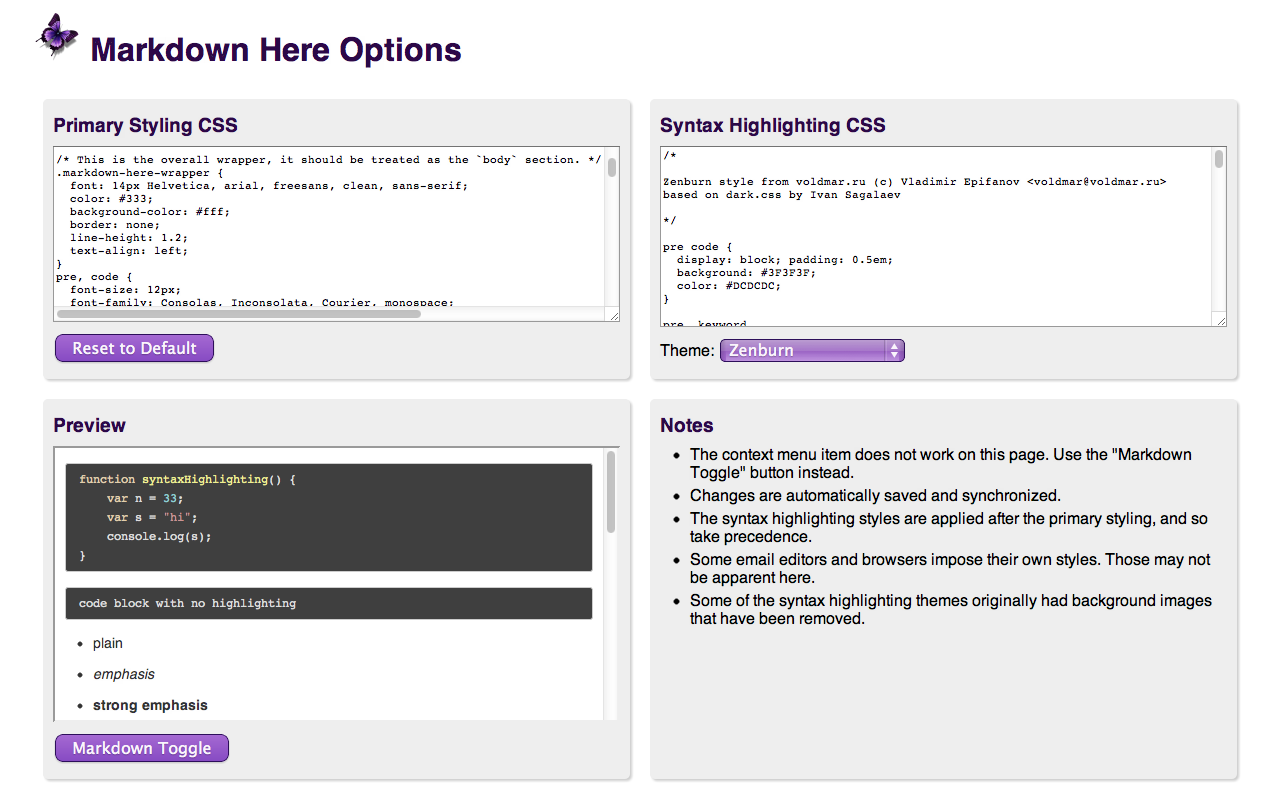
### Options
The *Markdown Here* Options page can be accessed via the Chrome, Firefox, or Thunderbird extensions list. The available options include:
* Styling modifications for the rendered Markdown.
* Syntax highlighting theme selection and modification.
* TeX math formulae processing enabling and customization.
* What the hotkey should be.
For Chrome and Firefox, any changes made in the *Markdown Here* Options are automatically synchronized between your other installations of that browser (if you have the sync feature enabled in the browser).
## Troubleshooting
See the [Troubleshooting wiki page](https://github.com/adam-p/markdown-here/wiki/Troubleshooting).
## Compatibility
See the [Compatibility wiki page](https://github.com/adam-p/markdown-here/wiki/Compatibility).
## Notes and Miscellaneous
* *Markdown Here* uses [Github Flavored Markdown](https://github.github.com/gfm/), with the limitation that GFM special links are not supported ([issue #11](https://github.com/adam-p/markdown-here/issues/11)); nor will they be, as MDH is not Github-specific.
* Available languages for syntax highlighting (and the way they should be written in the fenced code block) can be seen on the [highlight.js demo page](https://highlightjs.org/demo).
* Images embedded inline in your Markdown will be retained when you "Markdown Toggle". Gmail allows you to put images inline in your email -- this can be much easier than referencing an external image.
* Email signatures are automatically excluded from conversion. Specifically, anything after the semi-standard `'-- '` (note the trailing space) is left alone.
* Note that Hotmail and Yahoo do *not* automatically add the `'-- '` to signatures, so you have to add it yourself.
* The "Markdown Toggle" menu item shows up for more element types than it can correctly render. This is intended to help people realize that they're not using a rich editor. Otherwise they just don't see the menu item and don't know why.
* Styling:
* The use of browser-specific styles (-moz-, -webkit-) should be avoided. If used, they may not render correctly for people reading the email in a different browser from the one where the email was sent.
* The use of state-dependent styles (like `a:hover`) don't work because they don't match at the time the styles are made explicit. (In email, styles must be explicitly applied to all elements -- stylesheets get stripped.)
* For more tweaky features, visit the [Tips and Tricks](https://github.com/adam-p/markdown-here/wiki/Tips-and-Tricks) section.
## Building the Extension Bundles
```
cd utils
node build.js
```
### Chrome, Opera, and Firefox (WebExtension) extension
Create a file with a `.zip` extension containing these files and directories:
```
manifest.json
common/
chrome/
_locales
```
## Next Steps
See the [issues list](https://github.com/adam-p/markdown-here/issues) and the [Notes Wiki](https://github.com/adam-p/markdown-here/wiki/Development-Notes). All ideas, bugs, plans, complaints, and dreams will end up in one of those two places.
Feel free to create a feature request issue if what you want isn't already there. If you'd prefer a less formal approach to floating an idea, post to our [GitHub Discussions](https://github.com/adam-p/markdown-here/discussions).
It also takes a fair bit of work to stay up-to-date with the latest changes in all the applications and web sites where Markdown Here works.
## Credits
*Markdown Here* was coded on the shoulders of giants.
* Markdown-to-HTML: [chjj/marked](https://github.com/chjj/marked)
* Syntax highlighting: [isagalaev/highlight.js](https://github.com/isagalaev/highlight.js)
* HTML-to-text: [mtrimpe/jsHtmlToText](https://github.com/mtrimpe/jsHtmlToText)
## Feedback
All bugs, feature requests, pull requests, feedback, etc., are welcome. [Create an issue](https://github.com/adam-p/markdown-here/issues). Or [post to out GitHub Discussions](https://github.com/adam-p/markdown-here/discussions).
## License
### Code
MIT License: https://adampritchard.mit-license.org/ or see [the `LICENSE` file](https://github.com/adam-p/markdown-here/blob/master/LICENSE).
### Logo
Copyright 2015, [Austin Anderson](https://www.angerson.org/). Licensed to Markdown Here under the [MDH contributor license agreement](https://github.com/adam-p/markdown-here/blob/master/CLA-individual.md).
### Other images
[Creative Commons Attribution 3.0 Unported (CC BY 3.0) License](https://creativecommons.org/licenses/by/3.0/)
---

================================================
FILE: contributors/adam-p.md
================================================
2024-11-24
I hereby agree to the terms of the "Markdown Here Individual Contributor License Agreement", with MD5 checksum dda72cea89d55de9fda0a102494134b4.
I furthermore declare that I am authorized and able to make this agreement and sign this declaration.
Signed,
Adam Pritchard https://github.com/adam-p
================================================
FILE: contributors/dugite-code.md
================================================
2018-08-21
I hereby agree to the terms of the "Markdown Here Individual Contributor License Agreement", commit 5bb51a296ed5b0d941ac381420a19ed02886ae21.
I furthermore declare that I am authorized and able to make this agreement and sign this declaration.
Signed,
Dugite-Code https://github.com/dugite-code
================================================
FILE: contributors/michaelstepner.md
================================================
2015-12-01
I hereby agree to the terms of the "Markdown Here Individual Contributor Assignment Agreement", with MD5 checksum 20a56153709a38a23316feb565f80756.
I furthermore declare that I am authorized and able to make this agreement and sign this declaration.
Signed,
Michael Stepner https://github.com/michaelstepner
================================================
FILE: contributors/mtlynch.md
================================================
2024-11-10
I hereby agree to the terms of the "Markdown Here Individual Contributor License Agreement", with MD5 checksum dda72cea89d55de9fda0a102494134b4.
I furthermore declare that I am authorized and able to make this agreement and sign this declaration.
Signed,
Michael Lynch https://github.com/mtlynch
================================================
FILE: contributors/wm8120.md
================================================
2014-12-07
I hereby agree to the terms of the "Markdown Here Individual Contributor Assignment Agreement", with MD5 checksum 1577e2402b4807259733504a6f6a96c1.
I furthermore declare that I am authorized and able to make this agreement and sign this declaration.
Signed,
Meng Wang https://github.com/wm8120
================================================
FILE: src/_locales/de/description.txt
================================================
Markdown Here ermöglicht es, E-Mails in Markdown-Syntax zu schreiben und vor dem Versenden zu rendern (hübsch formatiert).
Das ist großartig für jeden der nicht gerne beim Schreiben mit Formatierungs-Buttons herumhantiert. Ganz besonders praktisch ist es für Programmierer die Code in E-Mails versended wollen – sogar automatisches Syntax-Highlighting wird unterstützt. Und für die Mathematiker unter uns: Markdown Here kommt auch mit TeX zurecht.
Ganz einfach zu benutzen:
1. E-Mail im gewöhnlichen Rich-Text–Editor des E-Mail–Programms schreiben, und zwar in Github-Flavour–Markdown.
2. Rechtsklick im Schreibbereich, dann auf "Markdown rendern".
3. Die E-Mail erscheint jetzt in schönem Typsatz. (Bedeutet, sie ist als HTML gerendert.)
4. Wenn alles gut aussieht – versenden! Wenn noch etwas geändert oder hinzugefügt werden muss, nochmal auf den "Markdown"–Knopf klicken um zurück zum Markdown-Code zu kommen.
5. Bei Bedarf wiederholen.
Markdown Here ist vor allem für Gmail oder Thunderbird konzipiert, aber es funktioniert auch ganz gut mit Yahoo und Hotmail. Außerdem funktioniert es großartig mit Google Groups und Sites, dem Evernote–Web-Interface, Blogger, Wordpress, und mehr!
Hinweis zum Syntax-Highlighting: Nutzen Sie "fenced code blocks" und definieren Sie die Sprache. Siehe Projektseite für ein Beispiel.
Datenschutz: Markdown Here greift auf Webinhalte zurück und verändert diese, wenn Sie es aktivieren. Theoretisch könnte es auf andere Web-Inhalte zugreifen, tut dies aber nicht. Es macht auch keine Internet-Abfragen jeglicher Art. Die Nutzerinhalte werden nur auf Nutzerkommando bearbeitet und verlassen nicht der Browser.
Verfügbar als Erweiterung für Chrome, Firefox, Safari, Opera, und Thunderbird.
Dieses Projekt ist Open-Source. Siehe die Github-Seite von Markdown Here für weitere Anleitung, Informationen, Bug-Reports, oder um zum Projekt beizutragen.
https://markdown-here.com
https://github.com/adam-p/markdown-here
================================================
FILE: src/_locales/de/markdown-here-image2.txt
================================================
Mi, 16. Mai, 2012 um 21:51 schrieb Buddy <buddy@example.com>:
> Hey du!
Hi Buddy.
> Kannst du mir was schönen Code schicken?
**Das** ist ziemlich cool:
```clojure
(defn hello [x] (str "Hello", x))
(hello "Clojure")
```
> Danke schonmal!
Kein Ding.
================================================
FILE: src/_locales/de/md-for-screenshot.md.txt
================================================
## Cooler Markdown-Screenshot
*Markdown Here* ist eine Erweiterung für Google Chrome, Firefox und Thunderbird die es erlaubt, E-Mail in Markdown zu schreiben und vor dem Verschicken zu rendern.
* Markdown ist **cool**. Sende `Code inline`.
* Verlinke irgendwohin, z.B. [zu diesem Projekt](https://github.com/adam-p/markdown-here).
* Geordnet? **Und** eine Sub-Liste?
1. Einfach.
2. Und getan.
Nutzerzitat:
> Does exactly what I need it to do. Markdown support in email without getting in the way.
### Syntax-Highlighting: super rad
Etwas JavaScript:
```javascript
alert('Hello Markdown');
```
Wie wär's mit einem ungewöhnlichen Beispiel — ein Diff:
```diff
diff --git a/src/common/markdown-here.js b/src/common/markdown-here.js
index 24dcb97..20c36a1 100644
--- a/src/common/markdown-here.js
+++ b/src/common/markdown-here.js
@@ -201,12 +179,14 @@ function makeStylesExplicit(wrapperElem, css) {
- applyStyleToElement(rule.style, selectorMatches[j]);
+ styleAttr = selectorMatches[j].getAttribute('style') || '';
+ styleAttr += rule.style.cssText;
+ selectorMatches[j].setAttribute('style', styleAttr);
```
================================================
FILE: src/_locales/de/messages.json
================================================
{
"app_name": {
"message": "Markdown Here",
"description": "the name of the extension",
"inMozDTD": true
},
"app_slogan": {
"message": "E-Mail in Markdown schreiben, dann aufhübschen lassen.",
"description": "shown as subtitle for Markdown Here in the browser extensions list"
},
"context_menu_item": {
"message": "Markdown An/Aus",
"description": "Text shown on the context menu.",
"inMozDTD": true
},
"currently_in_use": {
"message": "Derzeit im Einsatz",
"description": "Indicates the syntax highlighting theme that the user is currently using"
},
"cursor_into_compose": {
"message": "Bitte den Cursor im Textfeld platzieren."
},
"forgot_to_render_back_button": {
"message": "Zurück",
"description": "Text on the Back (cancel) button of the prompt that's shown when it's detected that a user may have forgotten to render the Markdown in their email",
"inMozDTD": true
},
"forgot_to_render_prompt_close_hover": {
"message": "Benachrichtigung schließen",
"description": "Text that shows when the user hovers over the 'X' that will close the prompt"
},
"forgot_to_render_prompt_info": {
"message": "Es sieht so aus als wäre diese E-Mail in Markdown geschrieben, aber noch nicht gerendert.",
"description": "Informational part of the prompt that's shown when it's detected that a user may have forgotten to render the Markdown in their email"
},
"forgot_to_render_prompt_question": {
"message": "Trotzdem senden?",
"description": "Question part of the prompt that's shown when it's detected that a user may have forgotten to render the Markdown in their email"
},
"forgot_to_render_prompt_title": {
"message": "Markdown-Rendering vergessen?",
"description": "Title of the prompt that's shown when it's detected that a user may have forgotten to render the Markdown in their email"
},
"forgot_to_render_send_button": {
"message": "Senden",
"description": "Text on the Send (continue) button of the prompt that's shown when it's detected that a user may have forgotten to render the Markdown in their email",
"inMozDTD": true
},
"invalid_field": {
"message": "Das ausgewählte Textfeld kann nicht zu Markdown gerendert werden. Bitte einen Rich-Text–Editor verwenden.",
"description": "Shown in an alert dialog if the user tries to render a field that cannot be rendered"
},
"moz_options_dlg_instruction": {
"message": "Click the 'OK' button to open the Markdown Here Options tab",
"description": "In Thunderbird, in order to open the options tab we first have to open a temporary dialog box. This is the text in that box telling the user what to do. Please use the same translation for 'OK' that the application uses.",
"inMozDTD": true
},
"moz_options_dlg_title": {
"message": "Markdown Here Options",
"description": "In Thunderbird, in order to open the options tab we first have to open a temporary dialog box. This is the title for that box.",
"inMozDTD": true
},
"new_changelist_items": {
"message": "NEU",
"description": "Used to highlight the part of the changelist that is new. There will typically be multiple items in the list, so this should be considered plural."
},
"nothing_to_render": {
"message": "Nichts zu rendern oder wiederherzustellen gefunden",
"description": "Error message shown to user if there's nothing found to revert or render."
},
"options_page__advanced_title": {
"message": "Fortgeschritten / Verschiedenes",
"description": "A section title"
},
"options_page__advanced_usage": {
"message": "Viel mehr Infos und fortgeschrittene Features finden sich auf der <a href=\"https://github.com/adam-p/markdown-here\" target=\"_blank\">Markdown Here Projektseite</a>. Auch weiter unten gibt es einiges an Optionen."
},
"options_page__basic_usage": {
"message": "Grundlegende Verwendung"
},
"options_page__changes_saved": {
"message": "Änderungen gespeichert",
"description": "message that shows when user changes have been saved"
},
"options_page__click_toggle": {
"message": "Rechtsklick auf die E-Mail, dann \"Markdown An/Aus\". (Alternativ, auf den <img src=\"images/icon16.png\"/>-Knopf in der Werkzeugleiste. <span class=\"hotkey-error-hide\">Oder <code class=\"hotkey-current\">Alt+Shift+M</code></span></span>)",
"description": "A step in the basic usage instructions"
},
"options_page__contributing_1": {
"message": "<strong>Wer jemals einen Code-Block per E-Mail versandt hat, kann auch helfen Markdown Here zu verbessern.</strong> <a href=\"https://github.com/adam-p/markdown-here/blob/master/CONTRIBUTING.md\" target=\"_blank\">CONTRIBUTING.md</a>"
},
"options_page__contributing_2": {
"message": "Markdown Here in mehr Sprachen erhältlich machen. <a href=\"https://github.com/adam-p/markdown-here/blob/master/CONTRIBUTING.md#translation\" target=\"_blank\">Übersetzungen sind willkommen.</a>"
},
"options_page__contributing_title": {
"message": "Zum Projekt beitragen",
"description": "A section title"
},
"options_page__donate_plea_1": {
"message": "Wenn dir Markdown Here super gefällt, hilf mir doch bitte ein paar Blumen für meine Frau zu kaufen damit sie sich nicht so ärgert über die ganze Zeit die ich damit zubringe. <strong>Danke</strong>"
},
"options_page__donate_plea_2": {
"message": "<strong>Markdown Here verbessern!</strong>"
},
"options_page__donate_plea_3": {
"message": "<strong>Bei der Entwicklung von Markdown Here helfen!</strong>"
},
"options_page__donate_plea_4": {
"message": "Schon gewusst was es einfacher macht Markdown Here mit diversen Tools (Chrome, Firefox, Thunderbird, Safari, Opera, Gmail, Yahoo, Hotmail, Blogger, Evernote, uvm.) kompatibel zu halten? <strong>Kaffee!</strong>"
},
"options_page__footer_1": {
"message": "<em>Markdown Here</em> ist Open Source. Um Fragen zu stellen, Bug-Reports zu machen, Features zu erfragen, oder selbst beizutragen, siehe die <a target=\"_blank\" href=\"https://github.com/adam-p/markdown-here\">Github-Projektseite</a> oder die <a target=\"_blank\" href=\"https://groups.google.com/forum/?fromgroups=#!forum/markdown-here\">\"markdown-here\" Google-Gruppe</a>.",
"description": "part of the page footer text"
},
"options_page__footer_2": {
"message": "Geschrieben von <a target=\"_blank\" href=\"http://adam-p.github.com/\">Adam Pritchard</a>.",
"description": "part of the page footer text"
},
"options_page__forgot_to_render_1": {
"message": "Z.Zt. nur unterstützt im Gmail-Webinterface und für Thunderbird (sowie Postbox und Icedove)."
},
"options_page__forgot_to_render_2": {
"message": "Bei Versendung einer E-Mail überprüft dies den Inhalt um festzustellen ob sie in Markdown geschrieben, aber noch nicht gerendert wurde (durch Klick auf \"Markdown An/Aus\"). Möglicherweise muss dies deaktiviert werden wenn es das Versenden von E-Mails verhindert."
},
"options_page__forgot_to_render_3": {
"message": "Wenn es deaktiviert werden muss, <em>bitte</em> mich benachrichtigen so dass es verbessert werden kann. Erstellen <a href=\"https://groups.google.com/forum/#!forum/markdown-here\" target=\"_blank\">einen Post in der \"Markdown-Here\" Google-Gruppe</a> oder <a href=\"https://github.com/adam-p/markdown-here/issues\" target=\"_blank\">eine Anfrage im Github-Project</a>. Danke."
},
"options_page__forgot_to_render_4": {
"message": "If this feature stops working for you, please let us know by posting to the <a href=\"https://groups.google.com/group/markdown-here\" target=\"_blank\">\"markdown-here\" Google Group</a> or creating <a href=\"https://github.com/adam-p/markdown-here/issues\" target=\"_blank\">an issue in the Github project</a>. (Hooking into the email sending web UI is brittle and will sometimes break.)",
"description": "Descriptive text referring to the 'forgot-to-render' feature (which is prone to break when Google changes its webmail code)."
},
"options_page__forgot_to_render_label": {
"message": "<b>Den \"Vergessen-zu-rendern\"-Check aktivieren.</b>",
"description": "Label for the checkbox that enables the forgot-to-render feature"
},
"options_page__gfm_line_breaks_enabled_label": {
"message": "<b>Aktivieren der GFM Zeilenumbrüche.</b>",
"description": "Label for the checkbox that enables the support of 'Github-flavored Markdown' line breaks."
},
"options_page__ghdiscussions": {
"message": "Ask a question or start a conversation in <a href=\"https://github.com/adam-p/markdown-here/discussions\" target=\"_blank\">Markdown Here's GitHub Discussions</a>."
},
"options_page__header_anchors_enabled_1": {
"message": "Nützlich um eine Inhaltstabelle o.Ä. hinzuzufügen. <a href=\"https://github.com/adam-p/markdown-here/wiki/Tips-and-Tricks#wiki-header-anchors\" target=\"_blank\">Wie's geht, aus dem MDH-Wiki.</a>"
},
"options_page__header_anchors_enabled_2": {
"message": "Dies ist standardmäßig deaktiviert weil es <a href=\"https://github.com/adam-p/markdown-here/issues/155\" target=\"_blank\">in Thunderbird visuell ablenkt</a>. (Und die meisten Leute benutzen dieses Feature wahrscheinlich nicht.)"
},
"options_page__header_anchors_enabled_label": {
"message": "<b>Aktiviere automatische Header-Anker.</b>",
"description": "Label for the checkbox that enables the automatic header anchors feature. This means that an 'anchor' is created at every heading (H1, H2, etc.) in the user's Markdown. The user can then create links that will jump to these anchors, like in the table of contents of a document."
},
"options_page__hotkey_alt_key": {
"message": "ALT",
"description": "label for the Alt key"
},
"options_page__hotkey_ctrl_key": {
"message": "STRG",
"description": "label for the Ctrl key"
},
"options_page__hotkey_note_1": {
"message": "Chrome: die E-Mail–Webseite muss neu geladen werden so dass die Hotkey-Einstellung zum Tragen kommt."
},
"options_page__hotkey_note_2": {
"message": "Firefox und Thunderbird: das Programm muss neu gestarted werden damit die Hotkey-Einstellung zum Tragen kommt."
},
"options_page__hotkey_note_3": {
"message": "Der Hotkey muss eine alphanummerische Taste sein (unterschiedlich je Sprache un Keyboard)."
},
"options_page__hotkey_note_4": {
"message": "Die Windows-Taste und die OS X ⌘-Taste können nicht als Hotkey benutzt werden."
},
"options_page__hotkey_note_5": {
"message": "Um diesen Hotkey zu deaktivieren, die Textbox leer lassen."
},
"options_page__hotkey_plus": {
"message": "+",
"description": "plus sign that connects the hotkey buttons"
},
"options_page__hotkey_shift_key": {
"message": "SHIFT",
"description": "label for the Shift key"
},
"options_page__hotkey_title": {
"message": "Hotkey (aka Tastenkombination)",
"description": "A section title"
},
"options_page__hotkey_warning": {
"message": "Hat diese Taste einen alphanummerischen Wert?",
"description": "warning shown if the user chooses an illegal hotkey value"
},
"options_page__markdown_toggle_button_text": {
"message": "Markdown An/Aus",
"description": "button text for Markdown Toggle button"
},
"options_page__mdh_wiki": {
"message": "Im <a href=\"https://github.com/adam-p/markdown-here/wiki\" target=\"_blank\">Markdown Here Wiki</a> gibt es Infos über <a href=\"https://github.com/adam-p/markdown-here/wiki/Compatibility\" target=\"_blank\">weitere Anwendungen von MDH</a> und weitere <a href=\"https://github.com/adam-p/markdown-here/wiki/Tips-and-Tricks\" target=\"_blank\">Tipps und Tricks</a>."
},
"options_page__next_steps": {
"message": "Für Interessierte an der Zukunft von Markdown Here, der <a href=\"https://github.com/adam-p/markdown-here#next-steps\" target=\"_blank\">Abschnitt <i>Weitere Schritte</i></a> im README."
},
"options_page__note_default_client_styles": {
"message": "Manche E-Mail–Programme und Browser erzwingen ihre eigenen Stile. Das ist hier möglicherweise nicht zu ersehen."
},
"options_page__note_options_sync": {
"message": "Änderungen werden automatisch gesichert und synchronisiert (wenn Sync im Browser aktiviert ist)."
},
"options_page__note_syntax_styles_after_primary": {
"message": "Die Stile für Syntax-Highlighting werden nach dem grundlegenden Styling angewandt und haben so Vorrang."
},
"options_page__notes_title": {
"message": "Hinweise",
"description": "section title"
},
"options_page__other_donation_options": {
"message": "Weitere Spendenoptionen",
"description": "Link to a page that provides other ways to donate"
},
"options_page__page_title": {
"message": "Markdown Here Optionen"
},
"options_page__pretty_cool": {
"message": "Die E-Mail sollte jetzt ziemlich gut aussehen. Reif zum Verschicken!",
"description": "A step in the basic usage instructions"
},
"options_page__preview_markdown": {
"message": "```javascript<br>\nfunction syntaxHighlighting() {<br>\n var n = 33;<br>\n var s = \"hello, world\";<br>\n console.log(s);<br>\n}<br>\n```<br>\n<br>\n<br>\n- normal<br>\n+ **fett**<br>\n* *kursiv*<br>\n- ***fett & kursiv***<br>\n+ ~~durchgestrichen~~<br>\n- `codierte Darstellung`<br>\n<br>\n<br>\n1. Nummerierte Listen<br>\n 1. Numbered sub-list<br>\n 1. Numbered sub-sub-list<br>\n2. [Link](https://www.google.com)<br>\n- eingerückte<br>\n- Aufzählung<br>\n - weiter<br>\n - eingerückt<br>\n - und<br>\n - nochmal<br>\n<br>\n<br>\nEin Bild hinzufügen: \n<br>\n<br>\n> Ein Zitat. <br>\n> *Mit* **etwas** `Markdown`.<br>\n<br>\n<br>\nSofern die Unterstützung von **TeX Math** aktiviert ist, sieht eine quadratische Gleichung so aus: <br>\n$$-b \\pm \\sqrt{b^2 - 4ac} \\over 2a$$<br>\n<br>\n<br>\n# Überschrift 1<br>\n## Überschrift 2<br>\n### Überschrift 3<br>\n#### Überschrift 4<br>\n##### Überschrift 5<br>\n###### Überschrift 6<br>\n <br>\n<br>\n| Tabellen | sind | auch möglich |<br>\n| ------------- |:-------------:| -----:|<br>\n| Spalte 3 ist | rechtsbündig | $$1600 |<br>\n| Salte 2 ist | zentriert | $$12 |<br>\n| Sogar mit | Zebrastreifen | $$1 |<br>\n<br>\n<br>\nHier eine horizontale Linie:<br>\n<br>\n---<br>\n<br>\n<br>\n```<br>\nUnd hier ein Code-Block<br>\nohne Hervorhebung<br>\n```<br>\n<br>",
"description": "This doesn't need to be translated, unless you want to make it more relevant to your language. The raw Markdown used for previewing user styling changes. Also shows users what can be done with Markdown. Please note that the double dollar signs ($$) are needed to make a single dollar sign in the application."
},
"options_page__preview_title": {
"message": "Vorschau",
"description": "section title for the Markdown preview section"
},
"options_page__primary_css_title": {
"message": "Grundlegendes Styling-CSS",
"description": "section title"
},
"options_page__reload_restart": {
"message": "Die E-Mail–Webseite neu laden oder den Browser neu starten.",
"description": "A step in the basic usage instructions"
},
"options_page__reset_primary_css": {
"message": "Auf Standard zurücksetzen",
"description": "text on button to reset Primary Styling CSS"
},
"options_page__resources_cheatsheet_link": {
"message": "Für Markdown-Neulinge: das <a href=\"https://github.com/adam-p/markdown-here/wiki/Markdown-Here-Cheatsheet\" target=\"_blank\">Markdown Here Cheatsheet</a> macht einen schnell zum Profi."
},
"options_page__resources_title": {
"message": "Ressourcen und Links",
"description": "A section title"
},
"options_page__start_new_message": {
"message": "Eine neue E-Mail beginnen.",
"description": "A step in the basic usage instructions"
},
"options_page__syntax_highlighting_css_title": {
"message": "CSS für Syntax-Highlighting",
"description": "section title"
},
"options_page__syntax_highlighting_theme_label": {
"message": "Schema:",
"description": "label for the syntax highlighting theme combox box"
},
"options_page__tex_math_codecogs_customization_2": {
"message": "For render customization options, see the <a href=\"https://editor.codecogs.com/docs/4-LaTeX_rendering.php\" target=\"_blank\">CodeCogs documentation</a> for this service."
},
"options_page__tex_math_codecogs_privacy_issue_1": {
"message": "To generate the image for the formula, a request is sent to CodeCogs. That effectively means that you are sharing your formula with CodeCogs. It also means that recipients of your message will be making a request to CodeCogs to have the image rendered.",
"description": "one of the TeX math privacy concerns"
},
"options_page__tex_math_customization_1": {
"message": "Wenn dies aktiviert ist, wird Text zwischen Dollarzeichen — <code>$$</code> — als mathematische Formel interpretiert. Zum Beispiel wird <code>$$\\Delta$$</code> als Deltasymbol Δ gerendert.",
"description": "Note: Double dollar signs ($$) are necessary to get a single dollar sign."
},
"options_page__tex_math_customization_3": {
"message": "Der <a href=\"https://www.codecogs.com/latex/about.php\" target=\"_blank\">CodeCogs Gleichungseditor</a> ist eine gute Quelle für TeX-Tipps."
},
"options_page__tex_math_customization_4": {
"message": "Formeln werden als Bilddateien gerendert, Empfänger müssen also Bilder zulassen um sie zu sehen."
},
"options_page__tex_math_customization_5": {
"message": "Bei Anpassung des Rendering-Tags können (und sollten) <code>{mathcode}</code> und/oder <code>{urlmathcode}</code> als Platzhalter verwendet werden.",
"description": "Please do not translate {mathcode} and {urlmathcode}"
},
"options_page__tex_math_customization_5_1": {
"message": "<code>{mathcode}</code>: Der Text zwischen den <code>$$</code> Symbolen — D.h., die rohe TeX-Formel; wie etwa <code>\\Delta</code>.",
"description": "Please do not translate {mathcode} and {urlmathcode}. Note: Double dollar signs ($$) are necessary to get a single dollar sign."
},
"options_page__tex_math_customization_5_2": {
"message": "<code>{urlmathcode}</code>: Die URL-kodierte Form des TeX-Codes; wie etwa <code>%5CDelta</code>.",
"description": "Please do not translate {mathcode} and {urlmathcode}"
},
"options_page__tex_math_customization_6": {
"message": "Bei Anpassung des <code><img></code>-Tags sollte ein <code>alt</code>-Attribut eingschlossen werden mit möglichst leserlichem Wert, etwa <code>{mathcode}</code>. Der Wert dieses Attributs wird für die Plaintext-Version der E-Mail benutzt (wenn via Gmail oder Thunderbird versandt), sowie von Bildschirm-Leser für Seh-behinderte Empfänger.",
"description": "Please do not translate {mathcode} and {urlmathcode}"
},
"options_page__tex_math_customization_heading": {
"message": "<strong>Anpassung und Verwendung:</strong>",
"description": "heading for customization and use info"
},
"options_page__tex_math_privacy_heading": {
"message": "<strong>Datenschutz:</strong>",
"description": "heading for warnings about TeX math privacy concerns"
},
"options_page__tex_math_privacy_issue_2": {
"message": "Bei Anpassung des Formel-Rendering-Tags sollte ein sicherer (https://) Pfad benutzt werden. Nicht alle Rendering-Services haben diese Option.",
"description": "one of the TeX math privacy concerns"
},
"options_page__tex_math_reset_button": {
"message": "Auf Standard zurücksetzen",
"description": "text on button to reset TeX math option"
},
"options_page__tex_math_title": {
"message": "TeX für mathematische Formeln"
},
"options_page__type_some_markdown": {
"message": "Markdown schreiben.<br/>Zum Beispiel: <code>_Hallo_ `Markdown` **Here**!</code>",
"description": "A step in the basic usage instructions"
},
"plain_text_compose": {
"message": "Ein Plaintext-Editor ist nicht für Markdown Here geeignet. Bitte einen Rich-Text–Editor verwenden.",
"description": "Shown in an alert dialog if the user has their email compose app set to plain text"
},
"toggle_button_text": {
"message": "MD An/Aus",
"description": "Text shown underneath the render toggle button. Make it as short as possible.",
"inMozDTD": true
},
"toggle_button_tooltip": {
"message": "Zwischen Markdown und gerendert wechseln",
"description": "text shown when user hovers mouse over Markdown Toggle button",
"inMozDTD": true
},
"toggle_button_tooltip_disabled": {
"message": "Das ausgewählte Feld kann nicht als Markdown gerendert werden",
"description": "text shown when user hover mouse over disabled Markdown Toggle button",
"inMozDTD": true
},
"unrendering_modified_markdown_warning": {
"message": "Es scheint so als wäre dieser gerenderte Markdown-Text manuell verändert worden. Wiederherstellen würde diese Änderungen verwerfen.\n\nWirklich wiederherstellen?",
"description": "Warning shown to the user if she tries to revert some rendered Markdown that they've modified since rendering. The user will lose their modifications if they proceed."
},
"upgrade_notification_changes_tooltip": {
"message": "Anklicken um Änderungen in dieser Version zu sehen",
"description": "Tooltip text on the link that opens the changes list"
},
"upgrade_notification_dismiss_tooltip": {
"message": "Benachrichtigung schließen",
"description": "Tooltip text on the link that dismisses the notification"
},
"upgrade_notification_text": {
"message": "Markdown Here aktualisiert",
"description": "Text on the notification shown when Markdown Here has been updated"
}
}
================================================
FILE: src/_locales/de/screenshot-captions.txt
================================================
E-Mail in Markdown schreiben...
...und dann schön-rendern!
Markdown nur für einen Teil der Mail benutzen? Einfach auswählen und Konvertieren!
================================================
FILE: src/_locales/en/messages.json
================================================
{
"app_name": {
"message": "Markdown Here",
"description": "the name of the extension"
},
"app_slogan": {
"message": "Write your email in Markdown, then make it pretty.",
"description": "shown as subtitle for Markdown Here in the browser extensions list"
},
"toggle_button_tooltip": {
"message": "Click to toggle Markdown rendering",
"description": "text shown when user hovers mouse over Markdown Toggle button"
},
"toggle_button_tooltip_disabled": {
"message": "The selected field is not valid for Markdown rendering",
"description": "text shown when user hover mouse over disabled Markdown Toggle button"
},
"context_menu_item": {
"message": "Markdown Toggle",
"description": "Text shown on the context menu."
},
"invalid_field": {
"message": "The selected field is not valid for Markdown rendering. Please use a rich editor.",
"description": "Shown in an alert dialog if the user tries to render a field that cannot be rendered"
},
"plain_text_compose": {
"message": "You are using a plain-text compose editor. You must change to a rich editor to use Markdown Here.",
"description": "Shown in an alert dialog if the user has their email compose app set to plain text"
},
"cursor_into_compose": {
"message": "Please put the cursor into the compose box."
},
"forgot_to_render_prompt_title": {
"message": "Forget to toggle Markdown?",
"description": "Title of the prompt that's shown when it's detected that a user may have forgotten to render the Markdown in their email"
},
"forgot_to_render_prompt_info": {
"message": "It looks like you wrote this email in Markdown but forgot to make it pretty.",
"description": "Informational part of the prompt that's shown when it's detected that a user may have forgotten to render the Markdown in their email"
},
"forgot_to_render_prompt_question": {
"message": "Send it anyway?",
"description": "Question part of the prompt that's shown when it's detected that a user may have forgotten to render the Markdown in their email"
},
"forgot_to_render_back_button": {
"message": "Back",
"description": "Text on the Back (cancel) button of the prompt that's shown when it's detected that a user may have forgotten to render the Markdown in their email"
},
"forgot_to_render_send_button": {
"message": "Send",
"description": "Text on the Send (continue) button of the prompt that's shown when it's detected that a user may have forgotten to render the Markdown in their email"
},
"forgot_to_render_prompt_close_hover": {
"message": "Dismiss this notification",
"description": "Text that shows when the user hovers over the 'X' that will close the prompt"
},
"upgrade_notification_text": {
"message": "Markdown Here updated!",
"description": "Text on the notification shown when Markdown Here has been updated"
},
"upgrade_notification_changes_tooltip": {
"message": "Click to see the changes in this release",
"description": "Tooltip text on the link that opens the changes list"
},
"upgrade_notification_dismiss_tooltip": {
"message": "Dismiss this notification",
"description": "Tooltip text on the link that dismisses the notification"
},
"nothing_to_render": {
"message": "Nothing found to render or revert",
"description": "Error message shown to user if there's nothing found to revert or render."
},
"unrendering_modified_markdown_warning": {
"message": "The rendered Markdown appears to have been modifed.\nIf you unrender it, your changes since rendering will be lost.\n\nAre you sure you wish to unrender?",
"description": "Warning shown to the user if she tries to revert some rendered Markdown that they've modified since rendering. The user will lose their modifications if they proceed."
},
"options_page__page_title": {
"message": "Markdown Here Options"
},
"options_page__basic_usage": {
"message": "Basic Usage"
},
"options_page__pin_extension_button": {
"message": "Click the \"Extensions\" button on your toolbar, then pin the Markdown Here button.",
"description": "A step in the basic usage instructions. The MDH toolbar button doesn't initially show on the browser toolbar, so the user has to pin it first."
},
"options_page__start_new_message": {
"message": "Start a new email message.",
"description": "A step in the basic usage instructions"
},
"options_page__type_some_markdown": {
"message": "Type some Markdown into the email.<br/>Try this: <code>_Hello_ `Markdown` **Here**!</code>",
"description": "A step in the basic usage instructions"
},
"options_page__click_toggle": {
"message": "Right-click in the email and then click \"Markdown Toggle\". (Or click the <img class=\"text-align\" src=\"images/icon32-button-monochrome.png\"/> button on the toolbar.<span class=\"hotkey-error-hide\"> Or press <code class=\"hotkey-current\">Alt+Shift+M</code></span>)",
"description": "A step in the basic usage instructions"
},
"options_page__pretty_cool": {
"message": "The message should now look pretty cool. Send it to your friends!",
"description": "A step in the basic usage instructions"
},
"options_page__resources_title": {
"message": "Resources and Links",
"description": "A section title"
},
"options_page__resources_cheatsheet_link": {
"message": "If you're new to Markdown, the <a href=\"https://github.com/adam-p/markdown-here/wiki/Markdown-Here-Cheatsheet\" target=\"_blank\">Markdown Here Cheatsheet</a> will make you a pro-star."
},
"options_page__advanced_usage": {
"message": "For lots more info and advanced usage, see the <a href=\"https://github.com/adam-p/markdown-here\" target=\"_blank\">Markdown Here project page</a>. You should also explore the options below."
},
"options_page__ghdiscussions": {
"message": "Ask a question or start a conversation in <a href=\"https://github.com/adam-p/markdown-here/discussions\" target=\"_blank\">Markdown Here's GitHub Discussions</a>."
},
"options_page__mdh_wiki": {
"message": "Visit the <a href=\"https://github.com/adam-p/markdown-here/wiki\" target=\"_blank\">Markdown Here wiki</a> for info about <a href=\"https://github.com/adam-p/markdown-here/wiki/Compatibility\" target=\"_blank\">where else MDH works</a> and more <a href=\"https://github.com/adam-p/markdown-here/wiki/Tips-and-Tricks\" target=\"_blank\">tips and tricks</a>."
},
"options_page__next_steps": {
"message": "If you're interested in what the future holds for Markdown Here, check out the <a href=\"https://github.com/adam-p/markdown-here#next-steps\" target=\"_blank\">Next Steps section</a> of the README."
},
"options_page__donate_plea_1": {
"message": "Once you decide Markdown Here is pretty sweet, please help me to buy some flowers for my wife so she's not too upset about how much time I spend working on it. <strong>Thank you!</strong>"
},
"options_page__donate_plea_2": {
"message": "<strong>Help make Markdown Here better!</strong>"
},
"options_page__donate_plea_3": {
"message": "<strong>Help support the development of Markdown Here!</strong>"
},
"options_page__donate_plea_4": {
"message": "You know what makes it easier to keep Markdown Here working on Chrome, Firefox, Thunderbird, Opera, Gmail, Yahoo, Hotmail, Blogger, Evernote, etc.? <strong>Coffee!</strong>"
},
"options_page__other_donation_options": {
"message": "Other donation options",
"description": "Link to a page that provides other ways to donate"
},
"options_page__primary_css_title": {
"message": "Primary Styling CSS",
"description": "section title"
},
"options_page__reset_primary_css": {
"message": "Reset to Default",
"description": "text on button to reset Primary Styling CSS"
},
"options_page__syntax_highlighting_css_title": {
"message": "Syntax Highlighting CSS",
"description": "section title"
},
"options_page__syntax_highlighting_theme_label": {
"message": "Theme:",
"description": "label for the syntax highlighting theme combo box"
},
"options_page__preview_title": {
"message": "Preview",
"description": "section title for the Markdown preview section"
},
"options_page__markdown_toggle_button_text": {
"message": "Markdown Toggle",
"description": "button text for Markdown Toggle button"
},
"options_page__optionspage_title": {
"message": "Options Page",
"description": "sub-section title"
},
"options_page__note_options_sync": {
"message": "Changes are automatically saved and synchronized (if sync is enabled in your browser)."
},
"options_page__note_syntax_styles_after_primary": {
"message": "The syntax highlighting styles are applied after the primary styling, and so take precedence."
},
"options_page__note_default_client_styles": {
"message": "Some email editors and browsers impose their own styles. Those may not be apparent here."
},
"options_page__tex_math_title": {
"message": "TeX Mathematical Formulae Support"
},
"options_page__tex_math_reset_button": {
"message": "Reset to Default",
"description": "text on button to reset TeX math option"
},
"options_page__tex_math_privacy_heading": {
"message": "<strong>Privacy Issues:</strong>",
"description": "heading for warnings about TeX math privacy concerns"
},
"options_page__tex_math_codecogs_privacy_issue_1": {
"message": "To generate the image for the formula, a request is sent to CodeCogs. That effectively means that you are sharing your formula with CodeCogs. It also means that recipients of your message will be making a request to CodeCogs to have the image rendered.",
"description": "one of the TeX math privacy concerns"
},
"options_page__tex_math_privacy_issue_2": {
"message": "If you customize the formula rendering tag, you should use a secure (https://) path. Not all rendering services provide a secure option.",
"description": "one of the TeX math privacy concerns"
},
"options_page__tex_math_customization_heading": {
"message": "<strong>Customization and Use:</strong>",
"description": "heading for customization and use info"
},
"options_page__tex_math_customization_1": {
"message": "If this feature is enabled, text between dollar signs — <code>$$</code> — will be interpreted as mathematical formulae. For example, <code>$$\\Delta$$</code> would be rendered as a delta symbol.",
"description": "Note: Double dollar signs ($$) are necessary to get a single dollar sign."
},
"options_page__tex_math_codecogs_customization_2": {
"message": "For render customization options, see the <a href=\"https://editor.codecogs.com/docs/4-LaTeX_rendering.php\" target=\"_blank\">CodeCogs documentation</a> for this service."
},
"options_page__tex_math_customization_3": {
"message": "A good resource for creating TeX formulae is the <a href=\"https://editor.codecogs.com/\" target=\"_blank\">CodeCogs Equation Editor</a>."
},
"options_page__tex_math_customization_4": {
"message": "Formulae are rendered to images, so email recipients will have to enable images to be shown to see the rendering."
},
"options_page__tex_math_customization_5": {
"message": "If you customize the rendering tag, you can (and should) use either or both of <code>{mathcode}</code> and <code>{urlmathcode}</code> as placeholders.",
"description": "Please do not translate {mathcode} and {urlmathcode}"
},
"options_page__tex_math_customization_5_1": {
"message": "<code>{mathcode}</code>: The text between the <code>$$</code> symbols — i.e., the raw TeX formula; like <code>\\Delta</code>.",
"description": "Please do not translate {mathcode} and {urlmathcode}. Note: Double dollar signs ($$) are necessary to get a single dollar sign."
},
"options_page__tex_math_customization_5_2": {
"message": "<code>{urlmathcode}</code>: The URL-encoded form of the TeX formula; like <code>%5CDelta</code>.",
"description": "Please do not translate {mathcode} and {urlmathcode}"
},
"options_page__tex_math_customization_6": {
"message": "If you customize the <code><img></code> tag, you should include an <code>alt</code> attribute that has as human-readable a value as possible, like <code>{mathcode}</code>. This value of this attribute will be used for the plaintext version of the email (when sent from Gmail and Thunderbird), and used by screen readers for sight-impaired recipients.",
"description": "Please do not translate {mathcode} and {urlmathcode}"
},
"options_page__hotkey_title": {
"message": "Hotkey (aka keyboard shortcut)",
"description": "A section title"
},
"options_page__hotkey_chrome_link_intro": {
"message": "The MDH hotkey is managed by the browser. It can be edited here:",
"description": "Text preceding a link to the Chrome hotkey settings page."
},
"options_page__hotkey_current_intro": {
"message": "It is currently set to:",
"description": "Text preceding the display of the current hotkey (like 'Alt+Shift+M')."
},
"options_page__no_hotkey_set": {
"message": "Conflict! Set a new hotkey/shortcut.",
"description": "Warning shown to the user if the Markdown Toggle hotkey is not set or conflicts with another extension's hotkey."
},
"options_page__advanced_title": {
"message": "Advanced and Miscellaneous",
"description": "A section title"
},
"options_page__forgot_to_render_label": {
"message": "<b>Enable \"forgot-to-render\" check.</b>",
"description": "Label for the checkbox that enables the forgot-to-render feature"
},
"options_page__forgot_to_render_1": {
"message": "Currently only supported in Gmail and Thunderbird. If enabled, expect a prompt asking you to give MDH permission to access mail.google.com.",
"description": "Descriptive text referring to the 'forgot-to-render' feature. Tells the user that it's only available for limited platforms."
},
"options_page__forgot_to_render_2": {
"message": "When you send an email, this checks the content to see if it looks like you wrote it in Markdown, but forgot to render it (i.e., click \"Markdown Toggle\") before sending. This may need to be disabled if it interferes with your ability to send email.",
"description": "Descriptive text explaining the 'forgot-to-render' feature."
},
"options_page__forgot_to_render_4": {
"message": "If this feature stops working for you, please let us know by posting in our <a href=\"https://github.com/adam-p/markdown-here/discussions\" target=\"_blank\">GitHub Discussions</a> or by <a href=\"https://github.com/adam-p/markdown-here/issues\" target=\"_blank\">creating an issue</a>. (Hooking into the email sending web UI is brittle and will sometimes break. Letting us know when that happens is useful and appreciated.)",
"description": "Descriptive text referring to the 'forgot-to-render' feature (which is prone to break when Google changes its webmail code)."
},
"options_page__contributing_title": {
"message": "Contributing",
"description": "A section title"
},
"options_page__contributing_1": {
"message": "<strong>If you have ever put a code block into an email, then you can help make Markdown Here better.</strong> <a href=\"https://github.com/adam-p/markdown-here/blob/master/CONTRIBUTING.md\" target=\"_blank\">CONTRIBUTING.md</a>"
},
"options_page__contributing_2": {
"message": "Help make Markdown Here available in your language. <a href=\"https://github.com/adam-p/markdown-here/blob/master/CONTRIBUTING.md#translation\" target=\"_blank\">Translations are welcome.</a>"
},
"options_page__footer_1": {
"message": "<em>Markdown Here</em> is open source. To ask questions, report bugs, request features, or contribute, visit the <a target=\"_blank\" href=\"https://github.com/adam-p/markdown-here\">GitHub project page</a> and <a target=\"_blank\" href=\"https://github.com/adam-p/markdown-here/issues\">create an issue</a> or <a target=\"_blank\" href=\"https://github.com/adam-p/markdown-here/discussions\">participate in Discussions</a>.",
"description": "part of the page footer text"
},
"options_page__footer_2": {
"message": "Created by <a target=\"_blank\" href=\"https://adam-p.github.io/\">Adam Pritchard</a>.",
"description": "part of the page footer text"
},
"options_page__changes_saved": {
"message": "Changes saved",
"description": "message that shows when user changes have been saved"
},
"options_page__preview_markdown": {
"message": "```javascript<br>\nfunction syntaxHighlighting() {<br>\n var n = 33;<br>\n var s = \"hello, こんにちは\";<br>\n console.log(s);<br>\n}<br>\n```<br>\n<br>\n* plain<br>\n* *emphasis*<br>\n * **strong emphasis**<br>\n * ~~strikethrough~~<br>\n* `inline code`<br>\n<br>\n1. Numbered list<br>\n 1. Numbered sub-list<br>\n 1. Numbered sub-sub-list<br>\n2. [Link](https://www.google.com)<br>\n<br>\n<br>\nAn image: \n<br>\n<br>\n> Block quote. <br>\n> *With* **some** `markdown`.<br>\n<br>\nIf **TeX Math** support is enabled, this is the quadratic equation: <br>\n$$-b \\pm \\sqrt{b^2 - 4ac} \\over 2a$$<br>\n<br>\n# Header 1<br>\n## Header 2<br>\n### Header 3<br>\n#### Header 4<br>\n##### Header 5<br>\n###### Header 6<br>\n <br>\n| Tables | Are | Cool |<br>\n| ------------- |:-------------:| -----:|<br>\n| column 3 is | right-aligned | $$1600 |<br>\n| column 2 is | centered | $$12 |<br>\n| zebra stripes | are neat | $$1 |<br>\n<br>\nHere's a horizontal rule:<br>\n<br>\n---<br>\n<br>\n```<br>\ncode block<br>\nwith no highlighting<br>\n```<br>\n<br>\n",
"description": "This doesn't need to be translated, unless you want to make it more relevant to your language. The raw Markdown used for previewing user styling changes. Also shows users what can be done with Markdown. Please note that the double dollar signs ($$) are needed to make a single dollar sign in the application."
},
"currently_in_use": {
"message": "Currently in use",
"description": "Indicates the syntax highlighting theme that the user is currently using"
},
"new_changelist_items": {
"message": "NEW",
"description": "Used to highlight the part of the changelist that is new. There will typically be multiple items in the list, so this should be considered plural."
},
"options_page__header_anchors_enabled_label": {
"message": "<b>Enable automatic header anchors.</b>",
"description": "Label for the checkbox that enables the automatic header anchors feature. This means that an 'anchor' is created at every heading (H1, H2, etc.) in the user's Markdown. The user can then create links that will jump to these anchors, like in the table of contents of a document."
},
"options_page__header_anchors_enabled_1": {
"message": "This is great if you want to put a table of contents or other internal links into your content. <a href=\"https://github.com/adam-p/markdown-here/wiki/Tips-and-Tricks#wiki-header-anchors\" target=\"_blank\">Learn about how to use it in the MDH wiki.</a>"
},
"options_page__header_anchors_enabled_2": {
"message": "It's disabled by default because it <a href=\"https://github.com/adam-p/markdown-here/issues/155\" target=\"_blank\">creates visual noise in Thunderbird</a>. (And most people probably won't use the feature.)"
},
"options_page__gfm_line_breaks_enabled_label": {
"message": "<b>Enable GFM line breaks.</b>",
"description": "Label for the checkbox that enables the support of 'Github-flavored Markdown' line breaks."
}
}
================================================
FILE: src/_locales/es/description.txt
================================================
Markdown Here te permite escribir correo electrónico en Markdown y renderizarlo (¡hacerlo bonito!) antes de enviar.
Esto es estupendo para cualquiera al que no le gusta juguetear con los botones de formato mientras escribe un correo electrónico. Es especialmente bueno para programadores que escriben correos electrónicos con código fuente en ellos - incluso soporta el resaltado sintáctico. Y para los matemáticos: Markdown Here también renderizará las fórmulas TeX.
Totalmente fácil de usar:
1. Escribe tu correo electrónico en el editor de texto enriquecido de tu cliente de correo usando Markdown con sabor a Github.
2. Haz clic con el botón derecho en el área de escritura y después en "Markdown Toggle".
3. ¡Ahora tu correo electrónico es bonito! (Esto es, ha sido renderizado a HTML).
4. Si te gusta cómo ha quedado, simplemente envíalo. Si quieres cambiarlo o añadir algo, haz clic en "Markdown Toggle" de nuevo para volver a tu Markdown original.
5. Repetir tantas veces como sea necesario.
Markdown Here está enfocado principalmente para trabajar con Gmail y Thunderbird, pero también funciona bastante bien con Yahoo y Hotmail. Además, funciona muy bien con Google Groups y Sites, la interfaz web de Evernote, Blogger, Wordpress, ¡y muchos más!
Nota de resaltado de sintaxis: Usa secciones de código delimitadas y especifica el lenguaje. Consulta la página del proyecto para ver un ejemplo.
Privacidad: Markdown Here accede y modifica el contenido de internet cuando lo activas. Puede, en teoría, acceder a otros contenidos de internet, pero no lo hace. Tampoco hace ninguna petición a la internet. Tu información es modificada cuando y donde tu elijas, y no sale de tu navegador.
Disponible como extensión para Chrome, Firefox, Safari, Opera y Thunderbird.
Éste es un proyecto de código fuente abierto. Visita la página Github de Markdown Here para encontrar las instrucciones completas, más información, informes de errores o para contribuir.
https://markdown-here.com
https://github.com/adam-p/markdown-here
================================================
FILE: src/_locales/es/markdown-here-image2.txt
================================================
El miércoles, 16 de mayo de 2012 a las 21:51, Fulano <fulano@ejemplo.es> escribió
> ¡Hola amigo!
Hola Fulano.
> ¿Puedes enviarme algo de dulce código?
**Este** es genial:
```clojure
(defn hello [x] (str "Hello", x))
(hello "Clojure")
```
> ¡Gracias de antemano!
Sin problema.
================================================
FILE: src/_locales/es/md-for-screenshot.md.txt
================================================
## Dulce captura de Markdown
*Markdown Here* es una extensión de Google Chrome, Firefox y Thunderbird que te permite escribir correo electrónico en formato Markdown y renderizarlo antes de enviarlo.
* Markdown es **guay**. Pon `código inline`.
* Enlace a cosas como [este proyecto](https://github.com/adam-p/markdown-here).
¿Dices ordenado? ¿**Y** una sublista?
1. Hecho.
2. Y se acabó.
Cita de revisión real:
Hace exactamente lo que necesito que haga. Markdown da soporte en el correo electrónico sin estorbar.
### Resaltado sintáctico: súper genial
Algo de JavaScript:
```javascript
alert('Hello Markdown');
```
Qué tal un ejemplo inusual -- un diff:
```diff
diff --git a/src/common/markdown-here.js b/src/common/markdown-here.js
index 24dcb97..20c36a1 100644
--- a/src/common/markdown-here.js
+++ b/src/common/markdown-here.js
@@ -201,12 +179,14 @@ function makeStylesExplicit(wrapperElem, css) {
- applyStyleToElement(rule.style, selectorMatches[j]);
+ styleAttr = selectorMatches[j].getAttribute('style') || '';
+ styleAttr += rule.style.cssText;
+ selectorMatches[j].setAttribute('style', styleAttr);
```
================================================
FILE: src/_locales/es/messages.json
================================================
{
"app_name": {
"message": "Markdown Here",
"description": "the name of the extension",
"inMozDTD": true
},
"app_slogan": {
"message": "Escribe tu correo electrónico en Markdown, y hazlo bonito.",
"description": "shown as subtitle for Markdown Here in the browser extensions list"
},
"context_menu_item": {
"message": "Markdown Toggle",
"description": "Text shown on the context menu.",
"inMozDTD": true
},
"currently_in_use": {
"message": "Actualmente en uso",
"description": "Indicates the syntax highlighting theme that the user is currently using"
},
"cursor_into_compose": {
"message": "Por favor, pon el cursor en la zona de escritura."
},
"forgot_to_render_back_button": {
"message": "Atrás",
"description": "Text on the Back (cancel) button of the prompt that's shown when it's detected that a user may have forgotten to render the Markdown in their email",
"inMozDTD": true
},
"forgot_to_render_prompt_close_hover": {
"message": "Descartar esta notificación",
"description": "Text that shows when the user hovers over the 'X' that will close the prompt"
},
"forgot_to_render_prompt_info": {
"message": "Parece que escribiste este correo electrónico en Markdown pero olvidaste hacerlo bonito.",
"description": "Informational part of the prompt that's shown when it's detected that a user may have forgotten to render the Markdown in their email"
},
"forgot_to_render_prompt_question": {
"message": "¿Enviar de todos modos?",
"description": "Question part of the prompt that's shown when it's detected that a user may have forgotten to render the Markdown in their email"
},
"forgot_to_render_prompt_title": {
"message": "¿Olvidaste activar Markdown?",
"description": "Title of the prompt that's shown when it's detected that a user may have forgotten to render the Markdown in their email"
},
"forgot_to_render_send_button": {
"message": "Enviar",
"description": "Text on the Send (continue) button of the prompt that's shown when it's detected that a user may have forgotten to render the Markdown in their email",
"inMozDTD": true
},
"invalid_field": {
"message": "El campo seleccionado no es válido para el renderizado Markdown. Por favor, use un editor de texto enriquecido.",
"description": "Shown in an alert dialog if the user tries to render a field that cannot be rendered"
},
"moz_options_dlg_instruction": {
"message": "Click the 'OK' button to open the Markdown Here Options tab",
"description": "In Thunderbird, in order to open the options tab we first have to open a temporary dialog box. This is the text in that box telling the user what to do. Please use the same translation for 'OK' that the application uses.",
"inMozDTD": true
},
"moz_options_dlg_title": {
"message": "Markdown Here Options",
"description": "In Thunderbird, in order to open the options tab we first have to open a temporary dialog box. This is the title for that box.",
"inMozDTD": true
},
"new_changelist_items": {
"message": "NUEVO",
"description": "Used to highlight the part of the changelist that is new. There will typically be multiple items in the list, so this should be considered plural."
},
"nothing_to_render": {
"message": "No se ha encontrado nada para renderizar o deshacer",
"description": "Error message shown to user if there's nothing found to revert or render."
},
"options_page__advanced_title": {
"message": "Avanzada y miscelánea",
"description": "A section title"
},
"options_page__advanced_usage": {
"message": "Para mucha más información y uso avanzado, consulte la <a href=\"https://github.com/adam-p/markdown-here\" target=\"_blank\">página del proyecto Markdown Here </a>. También deberías explorar las siguientes opciones."
},
"options_page__basic_usage": {
"message": "Uso básico"
},
"options_page__changes_saved": {
"message": "Cambios guardados",
"description": "message that shows when user changes have been saved"
},
"options_page__click_toggle": {
"message": "Haz clic con el botón derecho en el correo electrónico y haz clic en \"Markdown Toggle\". (O haz clic en el <img src=\"images/icon16.png\"/> botón en la barra de herramientas.<span class=\"hotkey-error-hide\"> O pulsa <code class=\"hotkey-current\">Alt+Shift+M</code></span></span>)",
"description": "A step in the basic usage instructions"
},
"options_page__contributing_1": {
"message": "<strong>Si alguna vez has puesto un bloque de código en un correo electrónico, entonces puedes ayudar a mejorar Markdown Here.</strong> <a href=\"https://github.com/adam-p/markdown-here/blob/master/CONTRIBUTING.md\" target=\"_blank\">CONTRIBUTING.md</a>"
},
"options_page__contributing_2": {
"message": "Ayuda a que Markdown esté disponible en tu idioma. <a href=\"https://github.com/adam-p/markdown-here/blob/master/CONTRIBUTING.md#translation\" target=\"_blank\">Las traducciones son bienvenidas.</a>"
},
"options_page__contributing_title": {
"message": "Contribuyendo",
"description": "A section title"
},
"options_page__donate_plea_1": {
"message": "Una vez que decidas que Markdown Here es genial, por favor ayúdame a comprarle flores a mi mujer para que no esté demasiado molesta por todo el tiempo que pasa trabajando en ello. <strong>¡Gracias!</strong>"
},
"options_page__donate_plea_2": {
"message": "<strong>¡Ayuda a mejorar Markdown Here!</strong>"
},
"options_page__donate_plea_3": {
"message": "<strong>¡Ayuda a apoyar el desarrollo de Markdown Here!</strong>"
},
"options_page__donate_plea_4": {
"message": "¿Sabes lo que hace más fácil mantener Markdown Here funcionando en Chrome, Firefox, Thunderbird, Safari, Opera, Gmail, Yahoo, Hotmail, Blogger, Evernote, etc.? <strong>¡Café!</strong>"
},
"options_page__footer_1": {
"message": "<em>Markdown Here</em> is open source. Para preguntar, informar de errores, solicitar características, o contribuir, visita la <a target=\"_blank\" href=\"https://github.com/adam-p/markdown-here\">página del proyecto Github</a> o el <a target=\"_blank\" href=\"https://groups.google.com/forum/?fromgroups=#!forum/markdown-here\">Google Group \"markdown-here\"</a>.",
"description": "part of the page footer text"
},
"options_page__footer_2": {
"message": "Creado por <a target=\"_blank\" href=\"http://adam-p.github.com/\">Adam Pritchard</a>.",
"description": "part of the page footer text"
},
"options_page__forgot_to_render_1": {
"message": "Currently only supported in Gmail and Thunderbird."
},
"options_page__forgot_to_render_2": {
"message": "Cuando envías un correo electrónico, esto comprueba el contenido para ver si parece que escribió en Markdown, pero se te olvidó renderizarlo (es decir, hacer clic en \"Markdown Toggle\") antes de enviar. Esto puede necesitar ser desactivado si interfiere con su capacidad de enviar correo electrónico."
},
"options_page__forgot_to_render_3": {
"message": "Wenn es deaktiviert werden muss, <em>bitte</em> mich benachrichtigen so dass es verbessert werden kann. Erstellen <a href=\"https://groups.google.com/forum/#!forum/markdown-here\" target=\"_blank\">einen Post in der \"Markdown-Here\" Google-Gruppe</a> oder <a href=\"https://github.com/adam-p/markdown-here/issues\" target=\"_blank\">eine Anfrage im Github-Project</a>. Danke."
},
"options_page__forgot_to_render_4": {
"message": "If this feature stops working for you, please let us know by posting to the <a href=\"https://groups.google.com/group/markdown-here\" target=\"_blank\">\"markdown-here\" Google Group</a> or creating <a href=\"https://github.com/adam-p/markdown-here/issues\" target=\"_blank\">an issue in the Github project</a>. (Hooking into the email sending web UI is brittle and will sometimes break.)"
},
"options_page__forgot_to_render_label": {
"message": "<b>Habilitar el check \"olvida-renderizar\".</b>",
"description": "Label for the checkbox that enables the forgot-to-render feature"
},
"options_page__gfm_line_breaks_enabled_label": {
"message": "<b>Activar saltos de línea GFM.</b>",
"description": "Label for the checkbox that enables the support of 'Github-flavored Markdown' line breaks."
},
"options_page__ghdiscussions": {
"message": "Ask a question or start a conversation in <a href=\"https://github.com/adam-p/markdown-here/discussions\" target=\"_blank\">Markdown Here's GitHub Discussions</a>."
},
"options_page__header_anchors_enabled_1": {
"message": "Esto es genial si quieres poner una tabla de contenidos u otros enlaces internos en tu contenido. <a href=\"https://github.com/adam-p/markdown-here/wiki/Tips-and-Tricks#wiki-header-anchors\" target=\"_blank\">Aprende cómo usarlo en la wiki de MDH.</a>"
},
"options_page__header_anchors_enabled_2": {
"message": "Está deshabilitado por defecto porque <a href=\"https://github.com/adam-p/markdown-here/issues/155\" target=\"_blank\">crea ruido visual en Thunderbird</a>. (Y la mayoría de la gente no usará esta característica.)"
},
"options_page__header_anchors_enabled_label": {
"message": "<b>Activar anclado automático de cabeceras.</b>",
"description": "Label for the checkbox that enables the automatic header anchors feature. This means that an 'anchor' is created at every heading (H1, H2, etc.) in the user's Markdown. The user can then create links that will jump to these anchors, like in the table of contents of a document."
},
"options_page__hotkey_alt_key": {
"message": "ALT",
"description": "label for the Alt key"
},
"options_page__hotkey_ctrl_key": {
"message": "CTRL",
"description": "label for the Ctrl key"
},
"options_page__hotkey_note_1": {
"message": "Chrome: Debes recargar la página de su correo electrónico para que la nueva combinación de teclas surta efecto."
},
"options_page__hotkey_note_2": {
"message": "Firefox y Thunderbird: Debes reiniciar la aplicación para la nueva combinación de teclas surta efecto."
},
"options_page__hotkey_note_3": {
"message": "Debes utilizar una tecla alfanumérica para el acceso directo (varía según el idioma y teclado)."
},
"options_page__hotkey_note_4": {
"message": "La tecla de Windows y la tecla ⌘ en OS X no se pueden utilizar en el acceso directo."
},
"options_page__hotkey_note_5": {
"message": "Para deshabilitar el uso de esta combinación de teclas, deja vacío el cuadro de texto \"tecla\"."
},
"options_page__hotkey_plus": {
"message": "+",
"description": "plus sign that connects the hotkey buttons"
},
"options_page__hotkey_shift_key": {
"message": "MAYUS",
"description": "label for the Shift key"
},
"options_page__hotkey_title": {
"message": "Combinación de teclas (también conocido como atajo de teclado)",
"description": "A section title"
},
"options_page__hotkey_warning": {
"message": "¿Es la tecla un valor alfanumérico?",
"description": "warning shown if the user chooses an illegal hotkey value"
},
"options_page__markdown_toggle_button_text": {
"message": "Markdown Toggle",
"description": "button text for Markdown Toggle button"
},
"options_page__mdh_wiki": {
"message": "Visita la <a href=\"https://github.com/adam-p/markdown-here/wiki\" target=\"_blank\">wiki de Markdown Here</a> para obtener información sobre <a href=\"https://github.com/adam-p/markdown-here/wiki/Compatibility\" target=\"_blank\">dónde funciona MDH</a> y más <a href=\"https://github.com/adam-p/markdown-here/wiki/Tips-and-Tricks\" target=\"_blank\">consejos y trucos</a>."
},
"options_page__next_steps": {
"message": "Si estás interesado en lo que el futuro le depara a Markdown Here, consulta la <a href=\"https://github.com/adam-p/markdown-here#next-steps\" target=\"_blank\">sección Próximos pasos</a> of the README."
},
"options_page__note_default_client_styles": {
"message": "Algunos editores de correo electrónico imponen sus propios estilos. Aquí, esos no serán evidentes."
},
"options_page__note_options_sync": {
"message": "Los cambios son automáticamente guardados y sincronizados (si la sincronización está activada en tu navegador)."
},
"options_page__note_syntax_styles_after_primary": {
"message": "Los estilos de resaltado de sintaxis se aplican después del estilo primario, y así toman precedencia."
},
"options_page__notes_title": {
"message": "Notas",
"description": "section title"
},
"options_page__other_donation_options": {
"message": "Otras opciones de donación",
"description": "Link to a page that provides other ways to donate"
},
"options_page__page_title": {
"message": "Opciones de Markdown Here"
},
"options_page__pretty_cool": {
"message": "El mensaje se verá muy guay ahora. ¡Envíaselo a tus amigos!",
"description": "A step in the basic usage instructions"
},
"options_page__preview_markdown": {
"message": "```javascript<br>\nfunction syntaxHighlighting() {<br>\n var n = 33;<br>\n var s = \"hola, こんにちは\";<br>\n console.log(s);<br>\n}<br>\n```<br>\n<br>\n* sin formato <br>\n* *con énfasis*<br>\n * **con mucho énfasis**<br>\n * ~~tachado~~<br>\n* `código en línea`<br>\n<br>\n1. Lista numerada<br>\n 1. Numbered sub-list<br>\n 1. Numbered sub-sub-list<br>\n2. [Enlace](https://www.google.com)<br>\n<br>\n<br>\nUna imagen: \n<br>\n<br>\n> Bloque de cita. <br>\n> *Con* **algo de** `markdown`.<br>\n<br>\nSi el soporte **TeX Math** está activado, esta es la ecuación cuadrática: <br>\n$$-b \\pm \\sqrt{b^2 - 4ac} \\over 2a$$<br>\n<br>\n# Cabecera 1<br>\n## Cabecera 2<br>\n### Cabecera 3<br>\n#### Cabecera 4<br>\n##### Cabecera 5<br>\n###### Cabecera 6<br>\n <br>\n| Tablas | Son | Guays |<br>\n| ------------- |:-------------:| -----:|<br>\n| columna 3 | a la derecha | $$1600 |<br>\n| columna 2 | centrada | $$12 |<br>\n| las rayas de cebra | son nítidas | $$1 |<br>\n<br>\nAquí hay un separador vertical:<br>\n<br>\n---<br>\n<br>\n```<br>\nbloque de código<br>\nsin resaltado<br>\n```<br>\n<br>",
"description": "This doesn't need to be translated, unless you want to make it more relevant to your language. The raw Markdown used for previewing user styling changes. Also shows users what can be done with Markdown. Please note that the double dollar signs ($$) are needed to make a single dollar sign in the application."
},
"options_page__preview_title": {
"message": "Vista previa",
"description": "section title for the Markdown preview section"
},
"options_page__primary_css_title": {
"message": "Estilo CSS primario",
"description": "section title"
},
"options_page__reload_restart": {
"message": "After installing or upgrading, reload your email web page or restart your web browser.",
"description": "A step in the basic usage instructions"
},
"options_page__reset_primary_css": {
"message": "Restablecer los valores predeterminados",
"description": "text on button to reset Primary Styling CSS"
},
"options_page__resources_cheatsheet_link": {
"message": "Si eres nuevo en Markdown, la <a href=\"https://github.com/adam-p/markdown-here/wiki/Markdown-Here-Cheatsheet\" target=\"_blank\">Markdown Here Cheatsheet</a> te convertirá en una estrella profesional."
},
"options_page__resources_title": {
"message": "Recursos y enlaces",
"description": "A section title"
},
"options_page__start_new_message": {
"message": "Comienza un nuevo mensaje de correo electrónico.",
"description": "A step in the basic usage instructions"
},
"options_page__syntax_highlighting_css_title": {
"message": "Resaltado de sintaxis CSS",
"description": "section title"
},
"options_page__syntax_highlighting_theme_label": {
"message": "Tema:",
"description": "label for the syntax highlighting theme combox box"
},
"options_page__tex_math_codecogs_customization_2": {
"message": "For render customization options, see the <a href=\"https://editor.codecogs.com/docs/4-LaTeX_rendering.php\" target=\"_blank\">CodeCogs documentation</a> for this service."
},
"options_page__tex_math_codecogs_privacy_issue_1": {
"message": "To generate the image for the formula, a request is sent to CodeCogs. That effectively means that you are sharing your formula with CodeCogs. It also means that recipients of your message will be making a request to CodeCogs to have the image rendered.",
"description": "one of the TeX math privacy concerns"
},
"options_page__tex_math_customization_1": {
"message": "Si esta función está activada, el texto entre símbolos de dólar — <code>$$</code> — será interpretado como fórmula matemática. Por ejemplo, <code>$$ \\Delta$$</code> quedaría renderizado como símbolo de delta.",
"description": "Note: Double dollar signs ($$) are necessary to get a single dollar sign."
},
"options_page__tex_math_customization_3": {
"message": "Un buen recurso para la creación de fórmulas en TeX es el <a href=\"https://www.codecogs.com/latex/about.php\" target=\"_blank\"> Editor de ecuaciones CodeCogs</a>."
},
"options_page__tex_math_customization_4": {
"message": "Las fórmulas se renderizan en imágenes, así que los destinatarios tendrán que activar mostrar imágenes para ver el renderizado."
},
"options_page__tex_math_customization_5": {
"message": "Si personalizas la etiqueta de renderizado, puedes (y debes) utilizar uno o ambos de <code>{mathcode}</code> y <code>{urlmathcode}</code> como marcadores de posición.",
"description": "Please do not translate {mathcode} and {urlmathcode}"
},
"options_page__tex_math_customization_5_1": {
"message": "<code>{mathcode}</code>: El texto entre los símbolos <code>$$</code> — por ejemplo, la fórmula en TeX; como <code>\\Delta</code>.",
"description": "Please do not translate {mathcode} and {urlmathcode}. Note: Double dollar signs ($$) are necessary to get a single dollar sign."
},
"options_page__tex_math_customization_5_2": {
"message": "<code>{urlmathcode}</code>: La forma de URL-encoded de la fórmula de TeX; como <code>%5CDelta</code>.",
"description": "Please do not translate {mathcode} and {urlmathcode}"
},
"options_page__tex_math_customization_6": {
"message": "Si personalizas el tag <code><img></code>, debes incluir un atributo <code>alt</code> que tenga un valor lo más legible para humanos, como <code>{mathcode}</code>. Este valor de este atributo será usado para la versión en texto plano del correo electrónico (cuando sea enviado desde Gmail y Thunderbird), y usado por los lectores de pantalla para destinatarios con discapacidad visual.",
"description": "Please do not translate {mathcode} and {urlmathcode}"
},
"options_page__tex_math_customization_heading": {
"message": "<strong>Personalización y Uso:</strong>",
"description": "heading for customization and use info"
},
"options_page__tex_math_privacy_heading": {
"message": "<strong>Cuestiones de privacidad:</strong>",
"description": "heading for warnings about TeX math privacy concerns"
},
"options_page__tex_math_privacy_issue_2": {
"message": "Deberías utilizar una ruta segura (https://) si modificas la etiqueta que renderiza la fórmula. No todos los servicios de renderizado proporcionan una opción segura.",
"description": "one of the TeX math privacy concerns"
},
"options_page__tex_math_reset_button": {
"message": "Restablecer los valores predeterminados",
"description": "text on button to reset TeX math option"
},
"options_page__tex_math_title": {
"message": "Soporte a fórmulas matemáticas en TeX"
},
"options_page__type_some_markdown": {
"message": "Escribe algo de Markdown en el correo electrónico.<br/>Try this: <code>_Hello_ `Markdown` **Here**!</code>",
"description": "A step in the basic usage instructions"
},
"plain_text_compose": {
"message": "Estás usando un editor de texto plano. Debes cambiar a un editor de texto enriquecido para usar Markdown Here.",
"description": "Shown in an alert dialog if the user has their email compose app set to plain text"
},
"toggle_button_text": {
"message": "MD Toggle",
"description": "Text shown underneath the render toggle button. Make it as short as possible.",
"inMozDTD": true
},
"toggle_button_tooltip": {
"message": "Click para activar el renderizado Markdown",
"description": "text shown when user hovers mouse over Markdown Toggle button",
"inMozDTD": true
},
"toggle_button_tooltip_disabled": {
"message": "El campo seleccionado no es válido para el renderizado Markdown",
"description": "text shown when user hover mouse over disabled Markdown Toggle button",
"inMozDTD": true
},
"unrendering_modified_markdown_warning": {
"message": "El renderizado Markdown parece que ha sido modificado.\nSi lo deshaces, los cambios desde el renderizado se perderán.\n\n¿Estás seguro de que deseas deshacer el renderizado?",
"description": "Warning shown to the user if she tries to revert some rendered Markdown that they've modified since rendering. The user will lose their modifications if they proceed."
},
"upgrade_notification_changes_tooltip": {
"message": "Click para ver los cambios en esta versión",
"description": "Tooltip text on the link that opens the changes list"
},
"upgrade_notification_dismiss_tooltip": {
"message": "Descartar esta notificación",
"description": "Tooltip text on the link that dismisses the notification"
},
"upgrade_notification_text": {
"message": "Markdown Here actualizado",
"description": "Text on the notification shown when Markdown Here has been updated"
}
}
================================================
FILE: src/_locales/es/screenshot-captions.txt
================================================
Escribe tu correo electrónico en Markdown...
... ¡y hazlo bonito!
¿Quieres usar Markdown sólo para un parte de tu correo electrónico? Sólo selecciónala y ¡conviértela!
================================================
FILE: src/_locales/fr/description.txt
================================================
Markdown Here permet d'écrire un courriel avec Mardown et de le convertir (afin qu'il soit attrayant!) avant de l'envoyer.
C'est parfait pour tous ceux qui n'aiment pas travailler avec des boutons de formatage pendant qu'ils écrivent un courriel. C'est particulièrement utile pour les programmeurs qui écrivent des courriels qui incluent du code -- la coloration syntaxique est également supportée. Et pour les mathématiciens parmi nous : Markdown Here convertira tout aussi bien les formules TeX.
Tout à fait simple à utiliser :
1. Écrivez votre courriel dans l'éditeur de texte enrichi de votre client de messagerie en utilisant la version de Markdown adaptée par GitHub.
2. Faites un clic droit dans la zone de texte du corps de votre courriel, puis cliquez sur « Basculer Markdown ».
3. Votre courriel est maintenant attrayant! (C'est-à-dire qu'il a été converti en HTML.)
4. Si vous aimez l'aspect de votre courriel, il ne vous reste qu'à l'envoyer. Si vous souhaitez changer ou ajouter quelque chose, cliquez à nouveau sur « Basculer Markdown » afin de retrouver votre Markdown d'origine.
5. Répéter au besoin.
Markdown Here est principalement destiné à être utilisé avec Gmail et Thunderbird, mais il fonctionne également très bien avec Yahoo et Hotmail. De plus, il fonctionne bien avec Google Groupes et Sites, avec l'interface Web d'Evernote, Blogger, Wordpress et plus encore!
Remarque concernant la coloration syntaxique : utilisez des blocs de code balisés et spécifiez le nom du langage. Regardez la page du projet pour avoir un exemple.
Vie privée : Markdown Here accède au contenu web et le modifie quand vous l'activez. Il peut aussi, en théorie, accéder à d'autre contenu Web, mais il ne le fait pas. Il ne fait également aucune requête Internet que ce soit. Vos données sont modifiées quand et où vous le choisissez et elles ne quittent pas votre navigateur.
Disponible en tant qu'extension Chrome, Firefox, Safari, Opera et Thunderbird.
C'est un projet open source. Visitez la page Github de Markdown Here pour les instructions complètes, pour plus d'information, pour les rapports de bogue ou pour contribuer à ce projet.
https://markdown-here.com (en anglais)
https://github.com/adam-p/markdown-here (en anglais)
================================================
FILE: src/_locales/fr/markdown-here-image2.txt
================================================
Le mer. 16 mai 2012 à 21 h 51, Ami <ami@exemple.com> a écrit :
> Bonjour à toi!
Bonjour l'ami.
> Peux-tu m'envoyer un bout de code intéressant?
**Ceci** est plutôt bien :
```clojure
(defn bonjour [x] (str "Bonjour", x))
(bonjour "Clojure")
```
> Merci d'avance!
Il n'y a pas de quoi.
================================================
FILE: src/_locales/fr/md-for-screenshot.md.txt
================================================
## Les savoureuses captures d'écran Markdown
*Markdown Here* est une extension pour Google Chrome, Firefox et Thunderbird qui vous permet d'écrire vos courriels avec Markdown, puis de les convertir avant de les envoyer.
* Markdown est **super**. Mettez du `code dans votre texte`.
* Ajoutez des liens, comme celui de [ce projet](https://github.com/adam-p/markdown-here).
* Une liste ordonnée, vous dites? **Et** une liste imbriquée?
1. Fait.
2. Et fait.
Un de nos utilisateurs a écrit :
Fait exactement ce que j'attends qu'elle fasse. Le support de Markdown dans les courriels, sans se faire remarquer.
### La coloration syntaxique : d'enfer !
Un peu de JavaScript :
```javascript
alert('Bonjour Markdown');
```
Et voilà un exemple un peu inhabituel -- un diff :
```diff
diff --git a/src/common/markdown-here.js b/src/common/markdown-here.js
index 24dcb97..20c36a1 100644
--- a/src/common/markdown-here.js
+++ b/src/common/markdown-here.js
@@ -201,12 +179,14 @@ function makeStylesExplicit(wrapperElem, css) {
- applyStyleToElement(rule.style, selectorMatches[j]);
+ styleAttr = selectorMatches[j].getAttribute('style') || '';
+ styleAttr += rule.style.cssText;
+ selectorMatches[j].setAttribute('style', styleAttr);
```
================================================
FILE: src/_locales/fr/messages.json
================================================
{
"app_name": {
"message": "Markdown Here",
"description": "the name of the extension",
"inMozDTD": true
},
"app_slogan": {
"message": "Écrivez votre courriel avec Markdown, puis rendez-le attrayant.",
"description": "shown as subtitle for Markdown Here in the browser extensions list"
},
"context_menu_item": {
"message": "Basculer vers Markdown",
"description": "Text shown on the context menu.",
"inMozDTD": true
},
"currently_in_use": {
"message": "En cours d'utilisation",
"description": "Indicates the syntax highlighting theme that the user is currently using"
},
"cursor_into_compose": {
"message": "Veuillez placer le curseur dans la zone de texte."
},
"forgot_to_render_back_button": {
"message": "Retour",
"description": "Text on the Back (cancel) button of the prompt that's shown when it's detected that a user may have forgotten to render the Markdown in their email",
"inMozDTD": true
},
"forgot_to_render_prompt_close_hover": {
"message": "Ignorer cette notification",
"description": "Text that shows when the user hovers over the 'X' that will close the prompt"
},
"forgot_to_render_prompt_info": {
"message": "Il semble que vous ayez écrit ce courriel en Markdown, mais que vous ayez oublié de le rendre attrayant.",
"description": "Informational part of the prompt that's shown when it's detected that a user may have forgotten to render the Markdown in their email"
},
"forgot_to_render_prompt_question": {
"message": "L'envoyer tout de même?",
"description": "Question part of the prompt that's shown when it's detected that a user may have forgotten to render the Markdown in their email"
},
"forgot_to_render_prompt_title": {
"message": "Avez-vous oublié de basculer vers Markdown ?",
"description": "Title of the prompt that's shown when it's detected that a user may have forgotten to render the Markdown in their email"
},
"forgot_to_render_send_button": {
"message": "Envoyer",
"description": "Text on the Send (continue) button of the prompt that's shown when it's detected that a user may have forgotten to render the Markdown in their email",
"inMozDTD": true
},
"invalid_field": {
"message": "Le champ sélectionné n'est pas valide pour un rendu avec Markdown. Utilisez un éditeur de texte enrichi.",
"description": "Shown in an alert dialog if the user tries to render a field that cannot be rendered"
},
"moz_options_dlg_instruction": {
"message": "Click the 'OK' button to open the Markdown Here Options tab",
"description": "In Thunderbird, in order to open the options tab we first have to open a temporary dialog box. This is the text in that box telling the user what to do. Please use the same translation for 'OK' that the application uses.",
"inMozDTD": true
},
"moz_options_dlg_title": {
"message": "Markdown Here Options",
"description": "In Thunderbird, in order to open the options tab we first have to open a temporary dialog box. This is the title for that box.",
"inMozDTD": true
},
"new_changelist_items": {
"message": "NOUVEAU",
"description": "Used to highlight the part of the changelist that is new. There will typically be multiple items in the list, so this should be considered plural."
},
"nothing_to_render": {
"message": "Il n'y a rien à rendre en Markdown ou à rétablir",
"description": "Error message shown to user if there's nothing found to revert or render."
},
"options_page__advanced_title": {
"message": "Avancé et divers",
"description": "A section title"
},
"options_page__advanced_usage": {
"message": "Pour davantage d'information et pour l'utilisation avancée, visitez la <a href=\"https://github.com/adam-p/markdown-here\" target=\"_blank\">page du projet Mardown Here</a> (en anglais). Vous devriez aussi explorer les options ci-dessous."
},
"options_page__basic_usage": {
"message": "Utilisation de base"
},
"options_page__changes_saved": {
"message": "Modifications sauvegardées",
"description": "message that shows when user changes have been saved"
},
"options_page__click_toggle": {
"message": "Faites un clic droit dans le courriel puis sélectionnez \"Basculez vers Markdown\". (Ou cliquez sur le bouton <img src=\"images/icon16.png\"/> dans la barre d'outils.<span class=\"hotkey-error-hide\"> Ou appuyez sur <code class=\"hotkey-current\">Alt+Shift+M</code></span></span>)",
"description": "A step in the basic usage instructions"
},
"options_page__contributing_1": {
"message": "<strong>Si vous avez déjà mis un bloc de code dans un courriel, vous pouvez aider à améliorer Markdown Here.</strong> <a href=\"https://github.com/adam-p/markdown-here/blob/master/CONTRIBUTING.md\" target=\"_blank\"> CONTRIBUTING.md</a>"
},
"options_page__contributing_2": {
"message": "Aidez à rendre Markdown Here disponible dans votre langue. <a href=\"https://github.com/adam-p/markdown-here/blob/master/CONTRIBUTING.md#translation\" target=\"_blank\">Les traductions sont les bienvenues.</a>"
},
"options_page__contributing_title": {
"message": "Contribuer",
"description": "A section title"
},
"options_page__donate_plea_1": {
"message": "Si d'aventure vous estimez que Markdown Here est assez sympa, merci de m'aider à acheter des fleurs à ma femme pour qu'elle ne soit pas jalouse du temps que j'y consacre. <strong>Merci !</strong>"
},
"options_page__donate_plea_2": {
"message": "<strong>Aidez à rendre Markdown Here meilleur!</strong>"
},
"options_page__donate_plea_3": {
"message": "<strong>Soutenez le développement de Markdown Here!</strong>"
},
"options_page__donate_plea_4": {
"message": "Vous savez ce qui permet plus facilement de garder Markdown Here fonctionnel sur Chrome, Firefox, Thunderbird, Safari, Opera, Gmail, Yahoo, Hotmail, Blogger, Evernote, etc.? <strong>Le café!</strong>"
},
"options_page__footer_1": {
"message": "<em>Markdown Here</em> est open source. Pour poser des questions, signaler un problème, proposer des fonctionnalités ou pour contribuer, visitez la <a target=\"_blank\" href=\"https://github.com/adam-p/markdown-here\">page Github du projet (en anglais)</a> ou le <a target=\"_blank\" href=\"https://groups.google.com/forum/?fromgroups=#!forum/markdown-here\">Groupe Google « markdown-here » (en anglais)</a>.",
"description": "part of the page footer text"
},
"options_page__footer_2": {
"message": "Créé par <a target=\"_blank\" href=\"http://adam-p.github.com/\">Adam Pritchard</a> (site en anglais).",
"description": "part of the page footer text"
},
"options_page__forgot_to_render_1": {
"message": "Actuellement uniquement supporté dans les interfaces web de Gmail et Google Inbox, et dans Thunderbird (et Icedove)."
},
"options_page__forgot_to_render_2": {
"message": "Lorsque vous envoyez un courriel, l'extension vérifie le contenu pour voir si vous l'avez écrit en Markdown, mais que vous avez oublié de faire le rendu (en cliquant sur « Basculer vers Markdown ») avant de l'envoyer. Cette option peut être désactivée si elle interfère avec votre capacité à envoyer des courriels."
},
"options_page__forgot_to_render_3": {
"message": "Wenn es deaktiviert werden muss, <em>bitte</em> mich benachrichtigen so dass es verbessert werden kann. Erstellen <a href=\"https://groups.google.com/forum/#!forum/markdown-here\" target=\"_blank\">einen Post in der \"Markdown-Here\" Google-Gruppe</a> oder <a href=\"https://github.com/adam-p/markdown-here/issues\" target=\"_blank\">eine Anfrage im Github-Project</a>. Danke."
},
"options_page__forgot_to_render_4": {
"message": "Si cette fonctionnalité ne fonctionne plus pour vous, s'il vous plait faites le nous savoir en créant un post sur le <a href=\"https://groups.google.com/group/markdown-here\" target=\"_blank\">groupe Google \"markdown-here\"</a> ou en créant <a href=\"https://github.com/adam-p/markdown-here/issues\" target=\"_blank\">une issue dans le projet Github</a>. (Le lien avec l'interface web des messageries est fragile et peut parfois se briser.)"
},
"options_page__forgot_to_render_label": {
"message": "<b>Activer la vérification d'« oubli de rendu ».</b>",
"description": "Label for the checkbox that enables the forgot-to-render feature"
},
"options_page__gfm_line_breaks_enabled_label": {
"message": "<b>Activer les sauts de ligne GFM.</b>",
"description": "Label for the checkbox that enables the support of 'Github-flavored Markdown' line breaks."
},
"options_page__ghdiscussions": {
"message": "Ask a question or start a conversation in <a href=\"https://github.com/adam-p/markdown-here/discussions\" target=\"_blank\">Markdown Here's GitHub Discussions</a>."
},
"options_page__header_anchors_enabled_1": {
"message": "C'est très pratique si vous voulez mettre une table des matières ou d'autres liens internes dans votre contenu. <a href=\"https://github.com/adam-p/markdown-here/wiki/Tips-and-Tricks#wiki-header-anchors\" target=\"_blank\"> En savoir plus sur comment l'utiliser dans le wiki MDH.</a>"
},
"options_page__header_anchors_enabled_2": {
"message": "Désactivé par défaut car cela <a href=\"https://github.com/adam-p/markdown-here/issues/155\" target=\"_blank\"> crée un bruit visuel dans Thunderbird</a>. (Et la plupart des gens n'utilisera probablement pas la fonctionnalité.)"
},
"options_page__header_anchors_enabled_label": {
"message": "<b>Activer les ancres d'en-tête automatiques.</b>",
"description": "Label for the checkbox that enables the automatic header anchors feature. This means that an 'anchor' is created at every heading (H1, H2, etc.) in the user's Markdown. The user can then create links that will jump to these anchors, like in the table of contents of a document."
},
"options_page__hotkey_alt_key": {
"message": "ALT",
"description": "label for the Alt key"
},
"options_page__hotkey_ctrl_key": {
"message": "CTRL",
"description": "label for the Ctrl key"
},
"options_page__hotkey_note_1": {
"message": "Chrome : Vous devez recharger la page web de votre courriel pour que le nouveau raccourci soit pris en compte."
},
"options_page__hotkey_note_2": {
"message": "Firefox et Thunderbird: Vous devez redémarrer l'application pour que le nouveau raccourci soit prit en compte."
},
"options_page__hotkey_note_3": {
"message": "Vous devez utiliser une touche alphanumérique pour le raccourci clavier (varie selon la langue et le clavier)."
},
"options_page__hotkey_note_4": {
"message": "Les touches Windows et OS X ⌘ ne peuvent être utilisés dans le raccourci clavier."
},
"options_page__hotkey_note_5": {
"message": "Afin de désactiver ce raccourci clavier, laissez la zone de texte « raccourci clavier » vide."
},
"options_page__hotkey_plus": {
"message": "+",
"description": "plus sign that connects the hotkey buttons"
},
"options_page__hotkey_shift_key": {
"message": "MAJ",
"description": "label for the Shift key"
},
"options_page__hotkey_title": {
"message": "Raccourci clavier",
"description": "A section title"
},
"options_page__hotkey_warning": {
"message": "Est-ce une touche alphanumérique?",
"description": "warning shown if the user chooses an illegal hotkey value"
},
"options_page__markdown_toggle_button_text": {
"message": "Basculer vers Markdown",
"description": "button text for Markdown Toggle button"
},
"options_page__mdh_wiki": {
"message": "Visitez le <a href=\"https://github.com/adam-p/markdown-here/wiki\" target=\"_blank\">Wiki Markdown Here</a> pour savoir <a href=\"https://github.com/adam-p/markdown-here/wiki/Compatibility\" target=\"_blank\">où MDH est supporté</a> et d'autres <a href=\"https://github.com/adam-p/markdown-here/wiki/Tips-and-Tricks\" target=\"_blank\">trucs et astuces</a>."
},
"options_page__next_steps": {
"message": "Si vous êtes intéressé par l'avenir du projet Markdown Here, rendez-vous sur la <a href=\"https://github.com/adam-p/markdown-here#next-steps\" target=\"_blank\">section Prochaines Étapes</a> du README."
},
"options_page__note_default_client_styles": {
"message": "Certains éditeurs de courrier électronique et navigateurs imposent leurs propres styles. Ceux-ci peuvent ne pas être visibles ici."
},
"options_page__note_options_sync": {
"message": "Les modifications sont automatiquement enregistrées et synchronisées (si la synchronisation est activée dans votre navigateur)."
},
"options_page__note_syntax_styles_after_primary": {
"message": "Les styles pour la coloration syntaxique sont appliqués après les styles de base et sont donc prioritaires."
},
"options_page__notes_title": {
"message": "Remarques",
"description": "section title"
},
"options_page__other_donation_options": {
"message": "Autres façons de faire un don",
"description": "Link to a page that provides other ways to donate"
},
"options_page__page_title": {
"message": "Options de Markdown Here"
},
"options_page__pretty_cool": {
"message": "Le courriel devrait maintenant être plutôt attrayant. Envoyez-le à vos amis!",
"description": "A step in the basic usage instructions"
},
"options_page__preview_markdown": {
"message": "```javascript<br>\nfunction colorationSyntaxique() {<br>\n var n = 33;<br>\n var t = \"bonjour\";<br>\n console.log(t);<br>\n}<br>\n```<br>\n<br>\n* plein<br>\n* *accentuation*<br>\n * **forte accentuation**<br>\n * ~~barré~~<br>\n* `code à l’intérieur d'une ligne de texte`<br>\n<br>\n1. Liste numérotée<br>\n 1. Numbered sub-list<br>\n 1. Numbered sub-sub-list<br>\n2. [Link](https://www.google.com)<br>\n<br>\n<br>\nUne image : \n<br>\n<br>\n> Bloc de citation. <br>\n> *Avec* **un peu de** `markdown`.<br>\n<br>\nSi le support des **formules mathématiques TeX** est activé, l'équation du second degré est la suivante : <br>\n$$-b \\pm \\sqrt{b^2 - 4ac} \\over 2a$$<br>\n<br>\n# Titre 1<br>\n## Titre 2<br>\n### Titre 3<br>\n#### Titre 4<br>\n##### Titre 5<br>\n###### Titre 6<br>\n <br>\n| Les tableaux | sont | intéressants |<br>\n| ------------- |:-------------:| -----:|<br>\n| la colonne 3 | est alignée à droite | 1600 $$ |<br>\n| la colonne 2 | est centrée | 12 $$ |<br>\n| les rayures | sont élégantes | 1 $$ |<br>\n<br>\nVoici une ligne horizontale :<br>\n<br>\n---<br>\n<br>\n```<br>\nbloc de code<br>\nsans coloration syntaxique<br>\n```<br>\n<br>\n",
"description": "This doesn't need to be translated, unless you want to make it more relevant to your language. The raw Markdown used for previewing user styling changes. Also shows users what can be done with Markdown. Please note that the double dollar signs ($$) are needed to make a single dollar sign in the application."
},
"options_page__preview_title": {
"message": "Aperçu",
"description": "section title for the Markdown preview section"
},
"options_page__primary_css_title": {
"message": "Styles de base CSS",
"description": "section title"
},
"options_page__reload_restart": {
"message": "Après l'installation ou une mise à jour, actualisez la page web de votre email ou redémarrez votre navigateur.",
"description": "A step in the basic usage instructions"
},
"options_page__reset_primary_css": {
"message": "Restaurer la valeur par défaut",
"description": "text on button to reset Primary Styling CSS"
},
"options_page__resources_cheatsheet_link": {
"message": "Si vous débutez en Markdown, <a href=\"https://github.com/adam-p/markdown-here/wiki/Markdown-Here-Cheatsheet\" target=\"_blank\">l'aide mémoire Markdown Here</a> fera de vous un expert."
},
"options_page__resources_title": {
"message": "Ressources et Liens",
"description": "A section title"
},
"options_page__start_new_message": {
"message": "Commencez un nouveau courriel.",
"description": "A step in the basic usage instructions"
},
"options_page__syntax_highlighting_css_title": {
"message": "CSS pour la coloration syntaxique",
"description": "section title"
},
"options_page__syntax_highlighting_theme_label": {
"message": "Thème :",
"description": "label for the syntax highlighting theme combox box"
},
"options_page__tex_math_codecogs_customization_2": {
"message": "For render customization options, see the <a href=\"https://editor.codecogs.com/docs/4-LaTeX_rendering.php\" target=\"_blank\">CodeCogs documentation</a> for this service."
},
"options_page__tex_math_codecogs_privacy_issue_1": {
"message": "To generate the image for the formula, a request is sent to CodeCogs. That effectively means that you are sharing your formula with CodeCogs. It also means that recipients of your message will be making a request to CodeCogs to have the image rendered.",
"description": "one of the TeX math privacy concerns"
},
"options_page__tex_math_customization_1": {
"message": "Si cette fonctionnalité est activée, le texte entre deux signes dollar — <code>$$</code> — sera interprété comme une formule mathématique. Par exemple, <code>$$\\Delta$$</code> serait rendu comme le signe delta.",
"description": "Note: Double dollar signs ($$) are necessary to get a single dollar sign."
},
"options_page__tex_math_customization_3": {
"message": "Une bonne ressource pour créer des formules Tex est <a href=\"https://www.codecogs.com/latex/about.php\" target=\"_blank\">« CodeCogs Equation Editor »</a> (en anglais)."
},
"options_page__tex_math_customization_4": {
"message": "Les formules sont converties en images, ce qui fait que les destinataires du courriel devront activer l'affichage des images afin de les voir."
},
"options_page__tex_math_customization_5": {
"message": "Si vous personnalisez la balise de rendu, vous pouvez (et devriez) utiliser <code>{mathcode}</code> et/ou <code>{urlmathcode}</code> à la place.",
"description": "Please do not translate {mathcode} and {urlmathcode}"
},
"options_page__tex_math_customization_5_1": {
"message": "<code>{mathcode}</code>: Le texte entre les symboles <code>$$</code> — c'est-à-dire la formule brute TeX ; comme <code>\\Delta</code>.",
"description": "Please do not translate {mathcode} and {urlmathcode}. Note: Double dollar signs ($$) are necessary to get a single dollar sign."
},
"options_page__tex_math_customization_5_2": {
"message": "<code>{urlmathcode}</code>: forme encodée en URL de la formule TeX ; comme <code>%5CDelta</code>.",
"description": "Please do not translate {mathcode} and {urlmathcode}"
},
"options_page__tex_math_customization_6": {
"message": "Si vous personnalisez la balise <code><img></code>, vous devez inclure un attribut <code>alt</code> qui a une valeur aussi lisible que possible, comme <code>{mathcode}</code>. La valeur de cet attribut sera utilisée pour la version en texte brut du message (quand il est envoyé depuis Gmail et Thunderbird) et utilisée par les lecteurs d'écran de vos destinataires malvoyants.",
"description": "Please do not translate {mathcode} and {urlmathcode}"
},
"options_page__tex_math_customization_heading": {
"message": "<strong>Personnalisation et Utilisation :</strong>",
"description": "heading for customization and use info"
},
"options_page__tex_math_privacy_heading": {
"message": "<strong>Confidentialité :</strong>",
"description": "heading for warnings about TeX math privacy concerns"
},
"options_page__tex_math_privacy_issue_2": {
"message": "Si vous choisissez de modifier la balise de rendu de formule, vous devriez utiliser un chemin sécurisé (https://). Tous les services de rendu ne fournissent pas une option sécurisée.",
"description": "one of the TeX math privacy concerns"
},
"options_page__tex_math_reset_button": {
"message": "Restaurer la valeur par défaut",
"description": "text on button to reset TeX math option"
},
"options_page__tex_math_title": {
"message": "Support des formules mathématiques TeX"
},
"options_page__type_some_markdown": {
"message": "Écrivez un peu de Markdown dans le courriel.<br/>Essayez ceci:<code>_Bonjour_ `Markdown` **Here**!</code>",
"description": "A step in the basic usage instructions"
},
"plain_text_compose": {
"message": "Vous utilisez un éditeur de texte simple. Changez pour un éditeur de texte enrichi pour utiliser Markdown Here.",
"description": "Shown in an alert dialog if the user has their email compose app set to plain text"
},
"toggle_button_text": {
"message": "Basculer vers MD",
"description": "Text shown underneath the render toggle button. Make it as short as possible.",
"inMozDTD": true
},
"toggle_button_tooltip": {
"message": "Cliquez pour basculer vers le rendu Markdown",
"description": "text shown when user hovers mouse over Markdown Toggle button",
"inMozDTD": true
},
"toggle_button_tooltip_disabled": {
"message": "Le champ sélectionné n'est pas valide pour un rendu avec Markdown",
"description": "text shown when user hover mouse over disabled Markdown Toggle button",
"inMozDTD": true
},
"unrendering_modified_markdown_warning": {
"message": "Le rendu Markdown semble avoir été modifié.\nBasculer fera perdre tous les changements.\n\nVoulez-vous vraiment basculer le rendu ?",
"description": "Warning shown to the user if she tries to revert some rendered Markdown that they've modified since rendering. The user will lose their modifications if they proceed."
},
"upgrade_notification_changes_tooltip": {
"message": "Cliquez pour voir les modifications apportées à cette version",
"description": "Tooltip text on the link that opens the changes list"
},
"upgrade_notification_dismiss_tooltip": {
"message": "Ignorer cette notification",
"description": "Tooltip text on the link that dismisses the notification"
},
"upgrade_notification_text": {
"message": "Markdown Here mis à jour",
"description": "Text on the notification shown when Markdown Here has been updated"
}
}
================================================
FILE: src/_locales/fr/screenshot-captions.txt
================================================
Écrivez votre courriel avec Markdown...
...puis rendez-le attrayant!
Vous souhaitez utiliser Markdown pour une partie de votre courriel seulement? Sélectionnez-la simplement, puis convertissez-la!
================================================
FILE: src/_locales/it/description.txt
================================================
Markdown Here ti permette di scrivere email in Markdown e trasformarle (renderle belle!) prima di inviarle.
Questo è ottimo per chi non ama trafficare con i pulsanti di formattazione mentre scrive una email. È particolarmente valido per i programmatori che scrivono email con codice all'interno -- supporta anche l'evidenziazione della sintassi. E per i matematici tra noi: Markdown Here interpreta anche le formule TeX.
Molto semplice da utilizzare:
1. Scrivi la tua email nel ricco editor di testo del tuo client di posta usando Github-flavoured Markdown.
2. Clicca col destro nell'area di composizione e poi clicca "Commuta Markdown".
3. La tua email ora è bella! (Vale a dire, è stata trasformata in HTML)
4. Se ti piace l'aspetto che ha, spediscila. Se vuoi cambiare o aggiungere qualcosa, clicca "Commuta Markdown" di nuovo per tornare al tuo originale Markdown.
5. Ripeti se necessario.
Markdown Here è pensato principalmente per funzionare con Gmail e Thunderbird, ma funziona molto bene anche con Yahoo e Hotmail. Inoltre, funziona ottimamente con Google Groups e Sites, l'interfaccia web di Evernote, Blogger, Wordpress, e altro ancora!
Nota per la syntax highlighting: usare i Fenced Code Blocks specificando il nome del linguaggio utilizzato. Si veda la pagina del progetto per un esempio.
Privacy: Markdown Here ha accesso e modifica il contenuto web una volta che è stato attivato. In teoria, può accedere anche ad altri contenuti, ma non lo fa. Addirittura non esegue nessuna richiesta Internet. Il testo viene modificato solo dove e quando tu scegli di farlo, e non lascia mai il tuo browser.
Disponibile come estensione per Chrome, Firefox, Safari, Opera e Thunderbird.
Questo è un progetto open source. Visita la pagina GitHub di Markdown Here per le istruzioni complete, ulteriori informazioni, segnalazioni di bug o per contribuire.
https://markdown-here.com
https://github.com/adam-p/markdown-here
================================================
FILE: src/_locales/it/markdown-here-image2.txt
================================================
Mercoledì 16 Maggio, 2012 alle 9:51 PM, Buddy <buddy@example.com> ha scritto:
> Hey amico!
Ciao bello.
> Puoi mandarmi del buon codice?
**Questo** è abbastanza bello:
```clojure
(defn hello [x] (str "Hello", x))
(hello "Clojure")
```
> Grazie in anticipo!
Nessun problema.
================================================
FILE: src/_locales/it/md-for-screenshot.md.txt
================================================
## Adorabile schermata di riepilogo di Markdown
*Markdown Here* è un'estensione per Google Chrome, Firefox e Thunderbird che ti permette di scrivere email in Markdown e trasformarle prima di inviarle.
* Markdown è **fantastico**. Inserisci `codice inline`.
* Link, come [questo progetto](https://github.com/adam-p/markdown-here).
* Hai detto ordinati? **E** in una sottolista?
1. Fatto.
2. E fatto.
Citazione di una recensione reale:
> Fa esattamente quello di cui ho bisogno. Supporto Markdown dentro le email senza essere di intralcio.
### Syntax highlighting: super geniale
Un po' di JavaScript:
```javascript
alert('Hello Markdown');
```
E cosa dire di un esempio insolito -- un diff:
```diff
diff --git a/src/common/markdown-here.js b/src/common/markdown-here.js
index 24dcb97..20c36a1 100644
--- a/src/common/markdown-here.js
+++ b/src/common/markdown-here.js
@@ -201,12 +179,14 @@ function makeStylesExplicit(wrapperElem, css) {
- applyStyleToElement(rule.style, selectorMatches[j]);
+ styleAttr = selectorMatches[j].getAttribute('style') || '';
+ styleAttr += rule.style.cssText;
+ selectorMatches[j].setAttribute('style', styleAttr);
```
================================================
FILE: src/_locales/it/messages.json
================================================
{
"app_name": {
"message": "Markdown Here",
"description": "the name of the extension",
"inMozDTD": true
},
"app_slogan": {
"message": "Scrivi la tua email in Markdown, quindi rendila bella.",
"description": "shown as subtitle for Markdown Here in the browser extensions list"
},
"context_menu_item": {
"message": "Commuta Markdown",
"description": "Text shown on the context menu.",
"inMozDTD": true
},
"currently_in_use": {
"message": "Currently in use",
"description": "Indicates the syntax highlighting theme that the user is currently using"
},
"cursor_into_compose": {
"message": "Please put the cursor into the compose box."
},
"forgot_to_render_back_button": {
"message": "Indietro",
"description": "Text on the Back (cancel) button of the prompt that's shown when it's detected that a user may have forgotten to render the Markdown in their email",
"inMozDTD": true
},
"forgot_to_render_prompt_close_hover": {
"message": "Ignora questa notifica",
"description": "Text that shows when the user hovers over the 'X' that will close the prompt"
},
"forgot_to_render_prompt_info": {
"message": "Sembra che tu abbia scritto questa email in Markdown ma dimenticato di abbellirla.",
"description": "Informational part of the prompt that's shown when it's detected that a user may have forgotten to render the Markdown in their email"
},
"forgot_to_render_prompt_question": {
"message": "Inviarla lo stesso?",
"description": "Question part of the prompt that's shown when it's detected that a user may have forgotten to render the Markdown in their email"
},
"forgot_to_render_prompt_title": {
"message": "Forget to toggle Markdown?",
"description": "Title of the prompt that's shown when it's detected that a user may have forgotten to render the Markdown in their email"
},
"forgot_to_render_send_button": {
"message": "Invia",
"description": "Text on the Send (continue) button of the prompt that's shown when it's detected that a user may have forgotten to render the Markdown in their email",
"inMozDTD": true
},
"invalid_field": {
"message": "The selected field is not valid for Markdown rendering. Please use a rich editor.",
"description": "Shown in an alert dialog if the user tries to render a field that cannot be rendered"
},
"moz_options_dlg_instruction": {
"message": "Click the 'OK' button to open the Markdown Here Options tab",
"description": "In Thunderbird, in order to open the options tab we first have to open a temporary dialog box. This is the text in that box telling the user what to do. Please use the same translation for 'OK' that the application uses.",
"inMozDTD": true
},
"moz_options_dlg_title": {
"message": "Markdown Here Options",
"description": "In Thunderbird, in order to open the options tab we first have to open a temporary dialog box. This is the title for that box.",
"inMozDTD": true
},
"new_changelist_items": {
"message": "NEW",
"description": "Used to highlight the part of the changelist that is new. There will typically be multiple items in the list, so this should be considered plural."
},
"nothing_to_render": {
"message": "Nulla da trasformare o da ripristinare",
"description": "Error message shown to user if there's nothing found to revert or render."
},
"options_page__advanced_title": {
"message": "Advanced and Miscellaneous",
"description": "A section title"
},
"options_page__advanced_usage": {
"message": "For lots more info and advanced usage, see the <a href=\"https://github.com/adam-p/markdown-here\" target=\"_blank\">Markdown Here project page</a>. You should also explore the options below."
},
"options_page__basic_usage": {
"message": "Basic Usage"
},
"options_page__changes_saved": {
"message": "Changes saved",
"description": "message that shows when user changes have been saved"
},
"options_page__click_toggle": {
"message": "Right-click in the email and then click \"Markdown Toggle\". (Or click the <img src=\"images/icon16.png\"/> button on the toolbar.<span class=\"hotkey-error-hide\"> Or press <code class=\"hotkey-current\">Alt+Shift+M</code></span></span>)",
"description": "A step in the basic usage instructions"
},
"options_page__contributing_1": {
"message": "<strong>If you have ever put a code block into an email, then you can help make Markdown Here better.</strong> <a href=\"https://github.com/adam-p/markdown-here/blob/master/CONTRIBUTING.md\" target=\"_blank\">CONTRIBUTING.md</a>"
},
"options_page__contributing_2": {
"message": "Help make Markdown Here available in your language. <a href=\"https://github.com/adam-p/markdown-here/blob/master/CONTRIBUTING.md#translation\" target=\"_blank\">Translations are welcome.</a>"
},
"options_page__contributing_title": {
"message": "Contributing",
"description": "A section title"
},
"options_page__donate_plea_1": {
"message": "Once you decide Markdown Here is pretty sweet, please help me to buy some flowers for my wife so she's not too upset about how much time I spend working on it. <strong>Thank you!</strong>"
},
"options_page__donate_plea_2": {
"message": "<strong>Help make Markdown Here better!</strong>"
},
"options_page__donate_plea_3": {
"message": "<strong>Help support the development of Markdown Here!</strong>"
},
"options_page__donate_plea_4": {
"message": "You know what makes it easier to keep Markdown Here working on Chrome, Firefox, Thunderbird, Safari, Opera, Gmail, Yahoo, Hotmail, Blogger, Evernote, etc.? <strong>Coffee!</strong>"
},
"options_page__footer_1": {
"message": "<em>Markdown Here</em> is open source. To ask questions, report bugs, request features, or contribute, visit the <a target=\"_blank\" href=\"https://github.com/adam-p/markdown-here\">Github project page</a> or the <a target=\"_blank\" href=\"https://groups.google.com/forum/?fromgroups=#!forum/markdown-here\">\"markdown-here\" Google Group</a>.",
"description": "part of the page footer text"
},
"options_page__footer_2": {
"message": "Created by <a target=\"_blank\" href=\"http://adam-p.github.com/\">Adam Pritchard</a>.",
"description": "part of the page footer text"
},
"options_page__forgot_to_render_1": {
"message": "Currently only supported in the Gmail web interface and Thunderbird (and Icedove)."
},
"options_page__forgot_to_render_2": {
"message": "When you send an email, this checks the content to see if it looks like you wrote it in Markdown, but forgot to render it (i.e., click \"Markdown Toggle\") before sending. This may need to be disabled if it interferes with your ability to send email."
},
"options_page__forgot_to_render_3": {
"message": "If you find yourself disabling this, <em>please</em> let me know why and how it could be better. Create <a href=\"https://groups.google.com/forum/#!forum/markdown-here\" target=\"_blank\">a post on the \"markdown-here\" Google Group</a> or <a href=\"https://github.com/adam-p/markdown-here/issues\" target=\"_blank\">an issue in the Github project</a>. Thanks."
},
"options_page__forgot_to_render_4": {
"message": "Si cette fonctionnalité ne fonctionne plus pour vous, s'il vous plait faites le nous savoir en créant un post sur le <a href=\"https://groups.google.com/group/markdown-here\" target=\"_blank\">groupe Google \"markdown-here\"</a> ou en créant <a href=\"https://github.com/adam-p/markdown-here/issues\" target=\"_blank\">une issue dans le projet Github</a>. (Le lien avec l'interface web des messageries est fragile et peut parfois se briser.)"
},
"options_page__forgot_to_render_label": {
"message": "<b>Enable \"forgot-to-render\" check.</b>",
"description": "Label for the checkbox that enables the forgot-to-render feature"
},
"options_page__gfm_line_breaks_enabled_label": {
"message": "<b>Enable GFM line breaks.</b>",
"description": "Label for the checkbox that enables the support of 'Github-flavored Markdown' line breaks."
},
"options_page__ghdiscussions": {
"message": "Ask a question or start a conversation in <a href=\"https://github.com/adam-p/markdown-here/discussions\" target=\"_blank\">Markdown Here's GitHub Discussions</a>."
},
"options_page__header_anchors_enabled_1": {
"message": "This is great if you want to put a table of contents or other internal links into your content. <a href=\"https://github.com/adam-p/markdown-here/wiki/Tips-and-Tricks#wiki-header-anchors\" target=\"_blank\">Learn about how to use it in the MDH wiki.</a>"
},
"options_page__header_anchors_enabled_2": {
"message": "It's disabled by default because it <a href=\"https://github.com/adam-p/markdown-here/issues/155\" target=\"_blank\">creates visual noise in Thunderbird</a>. (And most people probably won't use the feature.)"
},
"options_page__header_anchors_enabled_label": {
"message": "<b>Enable automatic header anchors.</b>",
"description": "Label for the checkbox that enables the automatic header anchors feature. This means that an 'anchor' is created at every heading (H1, H2, etc.) in the user's Markdown. The user can then create links that will jump to these anchors, like in the table of contents of a document."
},
"options_page__hotkey_alt_key": {
"message": "ALT",
"description": "label for the Alt key"
},
"options_page__hotkey_ctrl_key": {
"message": "CTRL",
"description": "label for the Ctrl key"
},
"options_page__hotkey_note_1": {
"message": "Chrome: You must reload your email web page for the new hotkey setting to take effect."
},
"options_page__hotkey_note_2": {
"message": "Firefox and Thunderbird: You must restart the application for the new hotkey setting to take effect."
},
"options_page__hotkey_note_3": {
"message": "You must use an alphanumeric key for the shortcut (varies by language and keyboard)."
},
"options_page__hotkey_note_4": {
"message": "The Windows key and the OS X ⌘ key cannot be used in the shortcut."
},
"options_page__hotkey_note_5": {
"message": "To disable the use of this hotkey, leave the \"key\" text box empty."
},
"options_page__hotkey_plus": {
"message": "+",
"description": "plus sign that connects the hotkey buttons"
},
"options_page__hotkey_shift_key": {
"message": "SHIFT",
"description": "label for the Shift key"
},
"options_page__hotkey_title": {
"message": "Hotkey (aka keyboard shortcut)",
"description": "A section title"
},
"options_page__hotkey_warning": {
"message": "Is the key an alphanumeric value?",
"description": "warning shown if the user chooses an illegal hotkey value"
},
"options_page__markdown_toggle_button_text": {
"message": "Markdown Toggle",
"description": "button text for Markdown Toggle button"
},
"options_page__mdh_wiki": {
"message": "Visit the <a href=\"https://github.com/adam-p/markdown-here/wiki\" target=\"_blank\">Markdown Here wiki</a> for info about <a href=\"https://github.com/adam-p/markdown-here/wiki/Compatibility\" target=\"_blank\">where else MDH works</a> and more <a href=\"https://github.com/adam-p/markdown-here/wiki/Tips-and-Tricks\" target=\"_blank\">tips and tricks</a>."
},
"options_page__next_steps": {
"message": "If you're interested in what the future holds for Markdown Here, check out the <a href=\"https://github.com/adam-p/markdown-here#next-steps\" target=\"_blank\">Next Steps section</a> of the README."
},
"options_page__note_default_client_styles": {
"message": "Some email editors and browsers impose their own styles. Those may not be apparent here."
},
"options_page__note_options_sync": {
"message": "Changes are automatically saved and synchronized (if sync is enabled in your browser)."
},
"options_page__note_syntax_styles_after_primary": {
"message": "The syntax highlighting styles are applied after the primary styling, and so take precedence."
},
"options_page__notes_title": {
"message": "Notes",
"description": "section title"
},
"options_page__other_donation_options": {
"message": "Other donation options",
"description": "Link to a page that provides other ways to donate"
},
"options_page__page_title": {
"message": "Markdown Here Options"
},
"options_page__pretty_cool": {
"message": "The message should now look pretty cool. Send it to your friends!",
"description": "A step in the basic usage instructions"
},
"options_page__preview_markdown": {
"message": "```javascript<br>\nfunction syntaxHighlighting() {<br>\n var n = 33;<br>\n var s = \"hello, こんにちは\";<br>\n console.log(s);<br>\n}<br>\n```<br>\n<br>\n* plain<br>\n* *emphasis*<br>\n * **strong emphasis**<br>\n * ~~strikethrough~~<br>\n* `inline code`<br>\n<br>\n1. Numbered list<br>\n 1. Numbered sub-list<br>\n 1. Numbered sub-sub-list<br>\n2. [Link](https://www.google.com)<br>\n<br>\n<br>\nAn image: \n<br>\n<br>\n> Block quote. <br>\n> *With* **some** `markdown`.<br>\n<br>\nIf **TeX Math** support is enabled, this is the quadratic equation: <br>\n$$-b \\pm \\sqrt{b^2 - 4ac} \\over 2a$$<br>\n<br>\n# Header 1<br>\n## Header 2<br>\n### Header 3<br>\n#### Header 4<br>\n##### Header 5<br>\n###### Header 6<br>\n <br>\n| Tables | Are | Cool |<br>\n| ------------- |:-------------:| -----:|<br>\n| column 3 is | right-aligned | $$1600 |<br>\n| column 2 is | centered | $$12 |<br>\n| zebra stripes | are neat | $$1 |<br>\n<br>\nHere's a horizontal rule:<br>\n<br>\n---<br>\n<br>\n```<br>\ncode block<br>\nwith no highlighting<br>\n```<br>\n<br>\n",
"description": "This doesn't need to be translated, unless you want to make it more relevant to your language. The raw Markdown used for previewing user styling changes. Also shows users what can be done with Markdown. Please note that the double dollar signs ($$) are needed to make a single dollar sign in the application."
},
"options_page__preview_title": {
"message": "Preview",
"description": "section title for the Markdown preview section"
},
"options_page__primary_css_title": {
"message": "Primary Styling CSS",
"description": "section title"
},
"options_page__reload_restart": {
"message": "Reload your email web page or restart your web browser.",
"description": "A step in the basic usage instructions"
},
"options_page__reset_primary_css": {
"message": "Reset to Default",
"description": "text on button to reset Primary Styling CSS"
},
"options_page__resources_cheatsheet_link": {
"message": "If you're new to Markdown, the <a href=\"https://github.com/adam-p/markdown-here/wiki/Markdown-Here-Cheatsheet\" target=\"_blank\">Markdown Here Cheatsheet</a> will make you a pro-star."
},
"options_page__resources_title": {
"message": "Resources and Links",
"description": "A section title"
},
"options_page__start_new_message": {
"message": "Start a new email message.",
"description": "A step in the basic usage instructions"
},
"options_page__syntax_highlighting_css_title": {
"message": "Syntax Highlighting CSS",
"description": "section title"
},
"options_page__syntax_highlighting_theme_label": {
"message": "Theme:",
"description": "label for the syntax highlighting theme combox box"
},
"options_page__tex_math_codecogs_customization_2": {
"message": "For render customization options, see the <a href=\"https://editor.codecogs.com/docs/4-LaTeX_rendering.php\" target=\"_blank\">CodeCogs documentation</a> for this service."
},
"options_page__tex_math_codecogs_privacy_issue_1": {
"message": "To generate the image for the formula, a request is sent to CodeCogs. That effectively means that you are sharing your formula with CodeCogs. It also means that recipients of your message will be making a request to CodeCogs to have the image rendered.",
"description": "one of the TeX math privacy concerns"
},
"options_page__tex_math_customization_1": {
"message": "If this feature is enabled, text between dollar signs — <code>$$</code> — will be interpreted as mathematical formulae. For example, <code>$$\\Delta$$</code> would be rendered as a delta symbol.",
"description": "Note: Double dollar signs ($$) are necessary to get a single dollar sign."
},
"options_page__tex_math_customization_3": {
"message": "A good resource for creating TeX formulae is the <a href=\"https://www.codecogs.com/latex/about.php\" target=\"_blank\">CodeCogs Equation Editor</a>."
},
"options_page__tex_math_customization_4": {
"message": "Formulae are rendered to images, so email recipients will have to enable images to be shown to see the rendering."
},
"options_page__tex_math_customization_5": {
"message": "If you customize the rendering tag, you can (and should) use either or both of <code>{mathcode}</code> and <code>{urlmathcode}</code> as placeholders.",
"description": "Please do not translate {mathcode} and {urlmathcode}"
},
"options_page__tex_math_customization_5_1": {
"message": "<code>{mathcode}</code>: The text between the <code>$$</code> symbols — i.e., the raw TeX formula; like <code>\\Delta</code>.",
"description": "Please do not translate {mathcode} and {urlmathcode}. Note: Double dollar signs ($$) are necessary to get a single dollar sign."
},
"options_page__tex_math_customization_5_2": {
"message": "<code>{urlmathcode}</code>: The URL-encoded form of the TeX formula; like <code>%5CDelta</code>.",
"description": "Please do not translate {mathcode} and {urlmathcode}"
},
"options_page__tex_math_customization_6": {
"message": "If you customize the <code><img></code> tag, you should include an <code>alt</code> attribute that has as human-readable a value as possible, like <code>{mathcode}</code>. This value of this attribute will be used for the plaintext version of the email (when sent from Gmail and Thunderbird), and used by screen readers for sight-impaired recipients.",
"description": "Please do not translate {mathcode} and {urlmathcode}"
},
"options_page__tex_math_customization_heading": {
"message": "<strong>Customization and Use:</strong>",
"description": "heading for customization and use info"
},
"options_page__tex_math_privacy_heading": {
"message": "<strong>Privacy Issues:</strong>",
"description": "heading for warnings about TeX math privacy concerns"
},
"options_page__tex_math_privacy_issue_2": {
"message": "If you customize the formula rendering tag, you should use a secure (https://) path. Not all rendering services provide a secure option.",
"description": "one of the TeX math privacy concerns"
},
"options_page__tex_math_reset_button": {
"message": "Reset to Default",
"description": "text on button to reset TeX math option"
},
"options_page__tex_math_title": {
"message": "TeX Mathematical Formulae Support"
},
"options_page__type_some_markdown": {
"message": "Type some Markdown into the email.<br/>Try this: <code>_Hello_ `Markdown` **Here**!</code>",
"description": "A step in the basic usage instructions"
},
"plain_text_compose": {
"message": "You are using a plain-text compose editor. You must change to a rich editor to use Markdown Here.",
"description": "Shown in an alert dialog if the user has their email compose app set to plain text"
},
"toggle_button_text": {
"message": "Commuta MD",
"description": "Text shown underneath the render toggle button. Make it as short as possible.",
"inMozDTD": true
},
"toggle_button_tooltip": {
"message": "Clicca per commutare la trasformazione Markdown",
"description": "text shown when user hovers mouse over Markdown Toggle button",
"inMozDTD": true
},
"toggle_button_tooltip_disabled": {
"message": "Il campo selezionato non è valido per la trasformazione Markdown",
"description": "text shown when user hover mouse over disabled Markdown Toggle button",
"inMozDTD": true
},
"unrendering_modified_markdown_warning": {
"message": "The rendered Markdown appears to have been modifed.\nIf you unrender it, your changes since rendering will be lost.\n\nAre you sure you wish to unrender?",
"description": "Warning shown to the user if she tries to revert some rendered Markdown that they've modified since rendering. The user will lose their modifications if they proceed."
},
"upgrade_notification_changes_tooltip": {
"message": "Clicca per vedere i cambiamenti in questa versione",
"description": "Tooltip text on the link that opens the changes list"
},
"upgrade_notification_dismiss_tooltip": {
"message": "Ignora questa notifica",
"description": "Tooltip text on the link that dismisses the notification"
},
"upgrade_notification_text": {
"message": "Markdown Here aggiornato",
"description": "Text on the notification shown when Markdown Here has been updated"
}
}
================================================
FILE: src/_locales/it/screenshot-captions.txt
================================================
Scrivi le tue email in Markdown...
...e poi rendile belle!
Vuoi usare Markdown solo per una parte della tua email? Basta selezionarla e convertirla!
================================================
FILE: src/_locales/ja/description.txt
================================================
Markdown Here を使えば、メールを Markdown で書けるようになります。もちろん、送信前に (きれいに!) 表示できます。
電子メールを書いている時に書式設計ボタンを操作するのが嫌いだっていう人。そんな人に、Markdown Hereは最高の拡張機能です。 構文のハイライト表示もできます。メールにプログラムのコードを書きたいプログラマーに最適です。 また、数学をする人には、TeXで書かれた数式を表示機能もあります。
使い方はいたって簡単です:
1. リッチエディターを使って、GitHub-flavorated Markdown 形式のメールを書きます。
2. 右クリックメニューで「Markdown 切り替え」をクリックします。
3. あなたの電子メールはキレイに整形されています! (つまり、HTMLとしてレンダリングされます)
4. 見た目がよければ、送信するだけ。 もし変更、追加したかったら、もう一度「Markdown 切り替え」をクリックすると、元のMarkdownに戻すことができます。
5. 以上の操作を必要に応じて繰り返します。
Markdown Hereは主にGmailとThunderbirdをターゲットにしていますが、YahooやHotmailでもうまく動作します。 また、Google グループやGoogle のサイト、Evernote、Blogger、Wordpress などのサービスでも動作します!
コードのハイライト表示について: 「fenced block」 (```) で囲み、プログラム言語名を指定してください。 プロジェクトのページにある例もご覧ください。
プライバシー: Markdown Here は、あなたが許可を与えた場合、web コンテンツにアクセスし変更します。 理論的にはその他のwebコンテンツにもアクセスできますが、行いません。 また、いかなるものであれインターネットへのリクエストも行いません。 あなたのデータはあなたが望んだ時に望んだサイトで更新されますが、あなたのブラウザにデータを残しません。
Chrome、Firefox、Safari、Opera、Thunderbirdの拡張機能として使用することができます。
Markdown Hereはオープンソースです。 Markdown Hereの使用方法、さらに詳しい情報、、バグの報告、開発に貢献したいときは、Githubにあるプロジェクトのページをへどうぞ。
https://markdown-here.com
https://github.com/adam-p/markdown-here
================================================
FILE: src/_locales/ja/markdown-here-image2.txt
================================================
水曜日 2012年5月16日 午後9時51分 九条 可憐 <karen@example.com> :
> ねぇ,アリス!
どうしたの?
> ちょっとしたいい感じのコードを送ってくれない?
**これ** はすごくいいよ:
```clojure
(defn hello [x] (str "こんにちは", x))
(hello "Clojure")
```
> ありがとう!
どういたしまして!
================================================
FILE: src/_locales/ja/md-for-screenshot.md.txt
================================================
## 楽しいMarkdownのスクリーンショット
*Markdown Here* は、電子メールを Markdown で書いて送る前にレンダリングできる Google Chrome と Firefox、 Thuderbird の拡張機能です。
* Markdown は **かっこいい**。 `コード` を内部に埋め込めます。
* [リンク](https://github.com/adam-p/markdown-here)を貼るのも簡単。
* 文章を綺麗に配置したい? **それと** サブリストも?
1. はい、
2. できます。
実際にあったレビューを引用してみましょう:
> まさに私が必要としていたものです。 電子メールで面倒くさいことなしにMarkdownを使えます。
### シンタックスハイライティング:超イカしてる
ちょっとした JavaScript:
```javascript
alert('Markdownだよ!');
```
ちょっと変わった例 ― diff:
```diff
diff --git a/src/common/markdown-here.js b/src/common/markdown-here.js
index 24dcb97..20c36a1 100644
--- a/src/common/markdown-here.js
+++ b/src/common/markdown-here.js
@@ -201,12 +179,14 @@ function makeStylesExplicit(wrapperElem, css) {
- applyStyleToElement(rule.style, selectorMatches[j]);
+ styleAttr = selectorMatches[j].getAttribute('style') || '';
+ styleAttr += rule.style.cssText;
+ selectorMatches[j].setAttribute('style', styleAttr);
```
================================================
FILE: src/_locales/ja/messages.json
================================================
{
"app_name": {
"message": "Markdown Here",
"description": "the name of the extension",
"inMozDTD": true
},
"app_slogan": {
"message": "Markdownで電子メールを美しく",
"description": "shown as subtitle for Markdown Here in the browser extensions list"
},
"context_menu_item": {
"message": "Markdownを有効化/無効化",
"description": "Text shown on the context menu.",
"inMozDTD": true
},
"currently_in_use": {
"message": "現在の設定",
"description": "Indicates the syntax highlighting theme that the user is currently using"
},
"cursor_into_compose": {
"message": "メール作成ボックスにカーソルを置いて下さい。"
},
"forgot_to_render_back_button": {
"message": "戻る",
"description": "Text on the Back (cancel) button of the prompt that's shown when it's detected that a user may have forgotten to render the Markdown in their email",
"inMozDTD": true
},
"forgot_to_render_prompt_close_hover": {
"message": "この通知を無視",
"description": "Text that shows when the user hovers over the 'X' that will close the prompt"
},
"forgot_to_render_prompt_info": {
"message": "Markdownで書かれているようですが、格好良くレンダリングされていません。",
"description": "Informational part of the prompt that's shown when it's detected that a user may have forgotten to render the Markdown in their email"
},
"forgot_to_render_prompt_question": {
"message": "それでも送りますか?",
"description": "Question part of the prompt that's shown when it's detected that a user may have forgotten to render the Markdown in their email"
},
"forgot_to_render_prompt_title": {
"message": "レンダリングを忘れていませんか?",
"description": "Title of the prompt that's shown when it's detected that a user may have forgotten to render the Markdown in their email"
},
"forgot_to_render_send_button": {
"message": "送る",
"description": "Text on the Send (continue) button of the prompt that's shown when it's detected that a user may have forgotten to render the Markdown in their email",
"inMozDTD": true
},
"invalid_field": {
"message": "このテキストフィールドではMarkdownにレンダリングできません。リッチテキストフィールドで行なってください。",
"description": "Shown in an alert dialog if the user tries to render a field that cannot be rendered"
},
"moz_options_dlg_instruction": {
"message": "Click the 'OK' button to open the Markdown Here Options tab",
"description": "In Thunderbird, in order to open the options tab we first have to open a temporary dialog box. This is the text in that box telling the user what to do. Please use the same translation for 'OK' that the application uses.",
"inMozDTD": true
},
"moz_options_dlg_title": {
"message": "Markdown Here Options",
"description": "In Thunderbird, in order to open the options tab we first have to open a temporary dialog box. This is the title for that box.",
"inMozDTD": true
},
"new_changelist_items": {
"message": "新しい機能",
"description": "Used to highlight the part of the changelist that is new"
},
"nothing_to_render": {
"message": "レンダリングするものも元に戻すものも見つかりませんでした。",
"description": "Error message shown to user if there's nothing found to revert or render."
},
"options_page__advanced_title": {
"message": "その他の先進的機能",
"description": "A section title"
},
"options_page__advanced_usage": {
"message": "さらなる情報や詳細な使い方が知りたいなら、 <a href=\"https://github.com/adam-p/markdown-here\" target=\"_blank\">Markdown Here project page</a> をご覧ください。"
},
"options_page__basic_usage": {
"message": "基本的な使い方"
},
"options_page__changes_saved": {
"message": "変更を保存しました。",
"description": "message that shows when user changes have been saved"
},
"options_page__click_toggle": {
"message": "メール画面で右クリックし \"Markdown 切り替え\"を選択しましょう。 (またはツールバーの <img src=\"images/icon16.png\"/> ボタンか、 <span class=\"hotkey-error-hide\"> <code class=\"hotkey-current\">Alt+Shift+M</code></span></span> を押す。)",
"description": "A step in the basic usage instructions"
},
"options_page__contributing_1": {
"message": "<strong>もしメールにコードブロックを書いたことがあるなら、Markdown Hereをより良くすることができます。</strong> <a href=\"https://github.com/adam-p/markdown-here/blob/master/CONTRIBUTING.md\" target=\"_blank\">CONTRIBUTING.md</a>"
},
"options_page__contributing_2": {
"message": "あなたの言語でMarkdown Hereを使えるように手助けしてください。<a href=\"https://github.com/adam-p/markdown-here/blob/master/CONTRIBUTING.md#translation\" target=\"_blank\">あなたの翻訳を待っています。</a>"
},
"options_page__contributing_title": {
"message": "開発に協力してください",
"description": "A section title"
},
"options_page__donate_plea_1": {
"message": "もしMarkdown Hereが気に入ったなら、 私が妻のためにお花を買ってあげる(私が長い時間仕事に時間をかけていることにいらいらしないように)手助けをお願いします! <strong>ありがとう!</strong>"
},
"options_page__donate_plea_2": {
"message": "<strong>Markdown Hereをより良くする手助けをしてください!</strong>"
},
"options_page__donate_plea_3": {
"message": "<strong>開発の手助けをしてください!</strong>"
},
"options_page__donate_plea_4": {
"message": "Markdown HereがChrome、 Firefox、 Thunderbird、 Safari、 Opera、 Gmail、 Yahoo、 Hotmail、 Blogger、 Evernote、などなどでの動作を保つのに役立ってるものを知りたいかい? <strong>コーヒーだ!</strong>"
},
"options_page__footer_1": {
"message": "<em>Markdown Here</em> はオープンソースです。 質問をしたり、バグを報告したり、機能追加の要望をしたり、開発に協力するには、 <a target=\"_blank\" href=\"https://github.com/adam-p/markdown-here\">Github のプロジェクトページ</a> か <a target=\"_blank\" href=\"https://groups.google.com/forum/?fromgroups=#!forum/markdown-here\">Google Group</a> を訪れてください。",
"description": "part of the page footer text"
},
"options_page__footer_2": {
"message": "このソフトウェアは <a target=\"_blank\" href=\"http://adam-p.github.com/\">Adam Pritchard</a> によって開発されました。",
"description": "part of the page footer text"
},
"options_page__forgot_to_render_1": {
"message": "現在Web版GmailとThunderbird (とIcedove) でのみ使えます。"
},
"options_page__forgot_to_render_2": {
"message": "メールを送るとき、レンダリングせずに生のMarkdownテキストのまま (つまり、\"Markdown 切り替え\"を押し忘れている) かどうか送信前にチェックします。うっとうしい場合は無効にすることを推奨します。"
},
"options_page__forgot_to_render_3": {
"message": "もしこれを無効にしたほうがいいと思ったなら、 <em>ぜひ</em> 理由と改善案をお知らせください。 <a href=\"https://groups.google.com/forum/#!forum/markdown-here\" target=\"_blank\">Google Groupに投稿する</a> か <a href=\"https://github.com/adam-p/markdown-here/issues\" target=\"_blank\">Github でIssueを投げ</a> てください。お願いします。"
},
"options_page__forgot_to_render_label": {
"message": "<b>\"レンダリング忘れ\" チェックを使う</b>",
"description": "Label for the checkbox that enables the forgot-to-render feature"
},
"options_page__gfm_line_breaks_enabled_label": {
"message": "<b>Enable GFM line breaks.</b>",
"description": "Label for the checkbox that enables the support of 'Github-flavored Markdown' line breaks."
},
"options_page__ghdiscussions": {
"message": "Ask a question or start a conversation in <a href=\"https://github.com/adam-p/markdown-here/discussions\" target=\"_blank\">Markdown Here's GitHub Discussions</a>."
},
"options_page__header_anchors_enabled_1": {
"message": "文書に目次やその他の内部リンクを設置したい場合に便利です。<a href=\"https://github.com/adam-p/markdown-here/wiki/Tips-and-Tricks#wiki-header-anchors\" target=\"_blank\">Wikiにて使い方を確認してください。</a>"
},
"options_page__header_anchors_enabled_2": {
"message": "<a href=\"https://github.com/adam-p/markdown-here/issues/155\" target=\"_blank\">Thunderbird で見た目が汚くなる</a>ため、デフォルトでは無効にされています(また、ほとんどの人はこの機能を必要としないでしょう)。"
},
"options_page__header_anchors_enabled_label": {
"message": "<b>ヘッダーにアンカーリンクを自動で設定する</b>",
"description": "Label for the checkbox that enables the automatic header anchors feature. This means that an 'anchor' is created at every heading (H1, H2, etc.) in the user's Markdown. The user can then create links that will jump to these anchors, like in the table of contents of a document."
},
"options_page__hotkey_alt_key": {
"message": "ALT",
"description": "label for the Alt key"
},
"options_page__hotkey_ctrl_key": {
"message": "CTRL",
"description": "label for the Ctrl key"
},
"options_page__hotkey_note_1": {
"message": "Chrome: 新たなキー設定を有効にするにはページを再読み込みしてください。"
},
"options_page__hotkey_note_2": {
"message": "Firefox と Thunderbird: 新たなキー設定を有効にするにはアプリケーションを再起動してください。"
},
"options_page__hotkey_note_3": {
"message": "ホットキーには英数字のキーを用いる必要があります。 (言語やキーボードによって変わります)"
},
"options_page__hotkey_note_4": {
"message": "WindowsキーとOS Xの ⌘ キーはホットキーには使えません。"
},
"options_page__hotkey_note_5": {
"message": "ホットキーを無効にするには、テキストボックスを空にしてください。"
},
"options_page__hotkey_plus": {
"message": "+",
"description": "plus sign that connects the hotkey buttons"
},
"options_page__hotkey_shift_key": {
"message": "SHIFT",
"description": "label for the Shift key"
},
"options_page__hotkey_title": {
"message": "ホットキー (キーボード・ショートカット)",
"description": "A section title"
},
"options_page__hotkey_warning": {
"message": "そのキーは英数字ですか?",
"description": "warning shown if the user chooses an illegal hotkey value"
},
"options_page__markdown_toggle_button_text": {
"message": "Markdownを有効化/無効化",
"description": "button text for Markdown Toggle button"
},
"options_page__mdh_wiki": {
"message": "<a href=\"https://github.com/adam-p/markdown-here/wiki\" target=\"_blank\">Markdown Here wiki</a> では、 <a href=\"https://github.com/adam-p/markdown-here/wiki/Compatibility\" target=\"_blank\">他にどんな環境で動作するか</a> や、 <a href=\"https://github.com/adam-p/markdown-here/wiki/Tips-and-Tricks\" target=\"_blank\">ヒントや小技</a> などの情報を見ることができます。"
},
"options_page__next_steps": {
"message": "もしMarkdown Hereの目指しているものが気になるなら、 <a href=\"https://github.com/adam-p/markdown-here#next-steps\" target=\"_blank\">Next Steps ブランチ</a> のREADMEをご覧ください。"
},
"options_page__note_default_client_styles": {
"message": "いくつかのエディタやメールサービスは独自のスタイリングを行うので、ここでの表示と異なることがあります。"
},
"options_page__note_options_sync": {
"message": "変更は自動で保存されて同期されます。(もしブラウザが同期をサポートするなら)。"
},
"options_page__note_syntax_styles_after_primary": {
"message": "シンタックスハイライティングは基本のスタイリングの後に行われることに注意してください。"
},
"options_page__notes_title": {
"message": "注釈:",
"description": "section title"
},
"options_page__other_donation_options": {
"message": "その他の寄付方法",
"description": "Link to a page that provides other ways to donate"
},
"options_page__page_title": {
"message": "Markdown Here の設定"
},
"options_page__pretty_cool": {
"message": "メッセージが綺麗に格好よくなります。 さぁ、友達に送信しよう!",
"description": "A step in the basic usage instructions"
},
"options_page__preview_markdown": {
"message": "```javascript<br>\nfunction syntaxHighlighting() {<br>\n var n = 33;<br>\n var s = \"hello, こんにちは\";<br>\n console.log(s);<br>\n}<br>\n```<br>\n<br>\n* plain<br>\n* *emphasis*<br>\n * **strong emphasis**<br>\n * ~~strikethrough~~<br>\n* `inline code`<br>\n<br>\n1. Numbered list<br>\n2. [Link](https://www.google.com)<br>\n<br>\n<br>\nAn image: \n<br>\n<br>\n> Block quote. <br>\n> *With* **some** `markdown`.<br>\n<br>\nIf **TeX Math** support is enabled, this is the quadratic equation: <br>\n$$-b \\pm \\sqrt{b^2 - 4ac} \\over 2a$$<br>\n<br>\n# Header 1<br>\n## Header 2<br>\n### Header 3<br>\n#### Header 4<br>\n##### Header 5<br>\n###### Header 6<br>\n <br>\n| Tables | Are | Cool |<br>\n| ------------- |:-------------:| -----:|<br>\n| column 3 is | right-aligned | $$1600 |<br>\n| column 2 is | centered | $$12 |<br>\n| zebra stripes | are neat | $$1 |<br>\n<br>\nHere's a horizontal rule:<br>\n<br>\n---<br>\n<br>\n```<br>\ncode block<br>\nwith no highlighting<br>\n```<br>\n<br>\n",
"description": "The raw Markdown used for previewing user styling changes. Also shows users what can be done with Markdown. Please note that the double dollar signs ($$) are needed to make a single dollar sign in the application."
},
"options_page__preview_title": {
"message": "プレビュー",
"description": "section title for the Markdown preview section"
},
"options_page__primary_css_title": {
"message": "スタイリングCSS",
"description": "section title"
},
"options_page__reload_restart": {
"message": "電子メールを開いているページをリロードするか、ブラウザーを再起動してください。",
"description": "A step in the basic usage instructions"
},
"options_page__reset_primary_css": {
"message": "デフォルトに戻す",
"description": "text on button to reset Primary Styling CSS"
},
"options_page__resources_cheatsheet_link": {
"message": "もしMarkdownを使うのが初めてなら、 <a href=\"https://github.com/adam-p/markdown-here/wiki/Markdown-Here-Cheatsheet\" target=\"_blank\">Markdown Here Cheatsheet</a> を参照してください。"
},
"options_page__resources_title": {
"message": "レファレンスとリンク",
"description": "A section title"
},
"options_page__start_new_message": {
"message": "電子メールの画面を開きます。",
"description": "A step in the basic usage instructions"
},
"options_page__syntax_highlighting_css_title": {
"message": "シンタックスハイライティングCSS",
"description": "section title"
},
"options_page__syntax_highlighting_theme_label": {
"message": "テーマ:",
"description": "label for the syntax highlighting theme combox box"
},
"options_page__tex_math_codecogs_customization_2": {
"message": "For render customization options, see the <a href=\"https://editor.codecogs.com/docs/4-LaTeX_rendering.php\" target=\"_blank\">CodeCogs documentation</a> for this service."
},
"options_page__tex_math_codecogs_privacy_issue_1": {
"message": "To generate the image for the formula, a request is sent to CodeCogs. That effectively means that you are sharing your formula with CodeCogs. It also means that recipients of your message will be making a request to CodeCogs to have the image rendered.",
"description": "one of the TeX math privacy concerns"
},
"options_page__tex_math_customization_1": {
"message": "このオプションを有効にすると。— <code>$$</code> — (ドルマーク)で囲まれた文章はTexの数式として解釈されます。 例えば、 <code>$$\\Delta$$</code> はデルタ記号にレンダリングされます。",
"description": "Note: Double dollar signs ($$) are necessary to get a single dollar sign."
},
"options_page__tex_math_customization_3": {
"message": "TeXの数式についての素晴らしい説明は <a href=\"https://www.codecogs.com/latex/about.php\" target=\"_blank\">CodeCogs Equation Editor</a> にあります。"
},
"options_page__tex_math_customization_4": {
"message": "数式は画像にレンダリングされるので、メールを受信する人が画像を閲覧できる設定にしている必要があります。"
},
"options_page__tex_math_customization_5": {
"message": "レンダリングタグをカスタマイズした場合、 <code>{mathcode}</code> と <code>{urlmathcode}</code> の両方をプレースホルダーとして使うことができます。",
"description": "Please do not translate {mathcode} and {urlmathcode}"
},
"options_page__tex_math_customization_5_1": {
"message": "<code>{mathcode}</code>: <code>$$</code> に囲まれたテキスト -- すなわち、生のTeX数式 (例えば <code>\\Delta</code> )。",
"description": "Please do not translate {mathcode} and {urlmathcode}. Note: Double dollar signs ($$) are necessary to get a single dollar sign."
},
"options_page__tex_math_customization_5_2": {
"message": "<code>{urlmathcode}</code>: URLエンコードされたTeX数式 (例えば <code>%5CDelta</code> )。",
"description": "Please do not translate {mathcode} and {urlmathcode}"
},
"options_page__tex_math_customization_6": {
"message": "<code><img></code> タグをカスタマイズした場合。 できれば<code>alt</code>属性で人間が読める説明を加えてください (たとえば: <code>{mathcode}</code>)。 この値はメールをプレーンテキストとして読む際に代わりに表示され (Gmail や Thunderbird から送った場合) 、目が不自由な方のための文章読み上げ機能で使われます。",
"description": "Please do not translate {mathcode} and {urlmathcode}"
},
"options_page__tex_math_customization_heading": {
"message": "<strong>カスタマイズして使う:</strong>",
"description": "heading for customization and use info"
},
"options_page__tex_math_privacy_heading": {
"message": "<strong>プライバシーの問題:</strong>",
"description": "heading for warnings about TeX math privacy concerns"
},
"options_page__tex_math_privacy_issue_2": {
"message": "もし数式のレンダリングタグを編集するなら、セキュアな (https://) URLを使うことを推奨します。これはすべてのレンダリングサービスでサポートされているわけではありません。",
"description": "one of the TeX math privacy concerns"
},
"options_page__tex_math_reset_button": {
"message": "デフォルトに戻す",
"description": "text on button to reset TeX math option"
},
"options_page__tex_math_title": {
"message": "TeXでの数式記述サポート"
},
"options_page__type_some_markdown": {
"message": "Markdownで電子メールを書いてみましょう。<br/>例: <code>*Hello* `Markdown` **Here**!</code>",
"description": "A step in the basic usage instructions"
},
"plain_text_compose": {
"message": "プレーンテキストエディタでは使用できません。Markdown Hereを使うためにはリッチエディタに変更する必要があります。",
"description": "Shown in an alert dialog if the user has their email compose app set to plain text"
},
"toggle_button_text": {
"message": "MD 切り替え",
"description": "Text shown underneath the render toggle button. Make it as short as possible.",
"inMozDTD": true
},
"toggle_button_tooltip": {
"message": "クリックでMarkdownにレンダリング",
"description": "text shown when user hovers mouse over Markdown Toggle button",
"inMozDTD": true
},
"toggle_button_tooltip_disabled": {
"message": "このフィールドではレンダリングできません",
"description": "text shown when user hover mouse over disabled Markdown Toggle button",
"inMozDTD": true
},
"unrendering_modified_markdown_warning": {
"message": "このテキストはレンダリング後に変更されています。\nMarkdownに戻した場合、それらの変更は失われます。\n\nMarkdownに戻しますか?",
"description": "Warning shown to the user if she tries to revert some rendered Markdown that they've modified since rendering. The user will lose their modifications if they proceed."
},
"upgrade_notification_changes_tooltip": {
"message": "クリックでこのリリースでの変更点を確認",
"description": "Tooltip text on the link that opens the changes list"
},
"upgrade_notification_dismiss_tooltip": {
"message": "この通知を無視",
"description": "Tooltip text on the link that dismisses the notification"
},
"upgrade_notification_text": {
"message": "Markdown Here がアップデートされました",
"description": "Text on the notification shown when Markdown Here has been updated"
}
}
================================================
FILE: src/_locales/ja/screenshot-captions.txt
================================================
Markdown でメールを書いて・・・
・・・カッコよくしよう!
メールの一部だけで Markdown を使いたいかい? 範囲を選択して、レンダリングするだけさ!
================================================
FILE: src/_locales/ko/description.txt
================================================
Markdown Here는 마크다운으로 이메일을 (예쁘게) 쓰실 수 있게 합니다
This is great for anyone who doesn't like fiddling around with formatting buttons while writing an email. It's especially good for programmers who write email with code in them -- it even supports syntax highlighting. And for the mathematicians among us: Markdown Here will render TeX formulae as well.
사용하는 법이 아주 간단합니다:
1. Write your email in your email client's rich editor using Github-flavoured Markdown.
2. Right-click in the compose area and then click "Markdown Toggle".
3. 쓰신 이메일은 이제 예뻐졌습니다! (즉 일반 문자에서 HTML로 바뀌게 되었습니다)
4. 모습이 마음에 드신다면 그대로 보내셔도 좋습니다. 만약 바꾸거나 혹은 추가하고 싶은 것이 있으시다면 "마크다운 토글"을 클릭하신 다음에 다시 마크다운으로 될테고 편집하실 수 있습니다.
5. Repeat as necessary.
Markdown Here is primarily targeted to work with Gmail and Thunderbird, but it also works pretty well with Yahoo and Hotmail. Additionally, it works great with Google Groups and Sites, Evernote's web interface, Blogger, Wordpress, and more!
Syntax highlighting note: Use fenced code blocks and specify the language name. See the project page for an example.
Privacy: Markdown Here accesses and modifies web content when you activate it. It can, in theory, access other web content, but does not. It also makes no Internet requests whatsoever. Your data is modified when and where you choose, and does not leave your browser.
Available as a Chrome, Firefox, Safari, Opera, and Thunderbird extension.
이것은 오픈 소스 프로젝트 입니다. Visit Markdown Here's Github page for full instructions, more information, bug reports, or to contribute.
https://markdown-here.com
https://github.com/adam-p/markdown-here
================================================
FILE: src/_locales/ko/markdown-here-image2.txt
================================================
On Wed, May 16, 2012 at 9:51 PM, Buddy <buddy@example.com> wrote:
> Hey pal!
Hi Buddy.
> Can you send me some sweet code?
**This** is pretty great:
```clojure
(defn hello [x] (str "Hello", x))
(hello "Clojure")
```
> Thanks in advance!
No problem.
================================================
FILE: src/_locales/ko/md-for-screenshot.md.txt
================================================
## Sweet Screenshot Markdown
*Markdown Here* is a Google Chrome, Firefox, and Thunderbird extension that lets you write email in Markdown and render it before sending.
* Markdown is **cool**. Put `code inline`.
* Link to stuff, like [this project](https://github.com/adam-p/markdown-here).
* Ordered, you say? **And** a sub-list?
1. Done.
2. And done.
Actual review quote:
> Does exactly what I need it to do. Markdown support in email without getting in the way.
### Syntax highlighting: super rad
Some JavaScript:
```javascript
alert('Hello Markdown');
```
How about an unusual example -- a diff:
```diff
diff --git a/src/common/markdown-here.js b/src/common/markdown-here.js
index 24dcb97..20c36a1 100644
--- a/src/common/markdown-here.js
+++ b/src/common/markdown-here.js
@@ -201,12 +179,14 @@ function makeStylesExplicit(wrapperElem, css) {
- applyStyleToElement(rule.style, selectorMatches[j]);
+ styleAttr = selectorMatches[j].getAttribute('style') || '';
+ styleAttr += rule.style.cssText;
+ selectorMatches[j].setAttribute('style', styleAttr);
```
================================================
FILE: src/_locales/ko/messages.json
================================================
{
"app_name": {
"message": "Markdown Here",
"description": "the name of the extension",
"inMozDTD": true
},
"app_slogan": {
"message": "Write your email in Markdown, then make it pretty.",
"description": "shown as subtitle for Markdown Here in the browser extensions list"
},
"context_menu_item": {
"message": "마크다운 토글",
"description": "Text shown on the context menu.",
"inMozDTD": true
},
"currently_in_use": {
"message": "Currently in use",
"description": "Indicates the syntax highlighting theme that the user is currently using"
},
"cursor_into_compose": {
"message": "Please put the cursor into the compose box."
},
"forgot_to_render_back_button": {
"message": "뒤로",
"description": "Text on the Back (cancel) button of the prompt that's shown when it's detected that a user may have forgotten to render the Markdown in their email",
"inMozDTD": true
},
"forgot_to_render_prompt_close_hover": {
"message": "Dismiss this notification",
"description": "Text that shows when the user hovers over the 'X' that will close the prompt"
},
"forgot_to_render_prompt_info": {
"message": "It looks like you wrote this email in Markdown but forgot to make it pretty.",
"description": "Informational part of the prompt that's shown when it's detected that a user may have forgotten to render the Markdown in their email"
},
"forgot_to_render_prompt_question": {
"message": "이대로 보내시겠습니까?",
"description": "Question part of the prompt that's shown when it's detected that a user may have forgotten to render the Markdown in their email"
},
"forgot_to_render_prompt_title": {
"message": "Forget to toggle Markdown?",
"description": "Title of the prompt that's shown when it's detected that a user may have forgotten to render the Markdown in their email"
},
"forgot_to_render_send_button": {
"message": "보내기",
"description": "Text on the Send (continue) button of the prompt that's shown when it's detected that a user may have forgotten to render the Markdown in their email",
"inMozDTD": true
},
"invalid_field": {
"message": "The selected field is not valid for Markdown rendering. Please use a rich editor.",
"description": "Shown in an alert dialog if the user tries to render a field that cannot be rendered"
},
"moz_options_dlg_instruction": {
"message": "Click the 'OK' button to open the Markdown Here Options tab",
"description": "In Thunderbird, in order to open the options tab we first have to open a temporary dialog box. This is the text in that box telling the user what to do. Please use the same translation for 'OK' that the application uses.",
"inMozDTD": true
},
"moz_options_dlg_title": {
"message": "Markdown Here Options",
"description": "In Thunderbird, in order to open the options tab we first have to open a temporary dialog box. This is the title for that box.",
"inMozDTD": true
},
"new_changelist_items": {
"message": "NEW",
"description": "Used t
gitextract_3yxotjfx/
├── .eslintrc.json
├── .gitattributes
├── .github/
│ └── FUNDING.yml
├── .gitignore
├── CHANGES.md
├── CLA-entity.md
├── CLA-individual.md
├── CONTRIBUTING.md
├── LICENSE
├── Makefile
├── PRIVACY.md
├── README.md
├── contributors/
│ ├── adam-p.md
│ ├── dugite-code.md
│ ├── michaelstepner.md
│ ├── mtlynch.md
│ └── wm8120.md
├── src/
│ ├── _locales/
│ │ ├── de/
│ │ │ ├── description.txt
│ │ │ ├── markdown-here-image2.txt
│ │ │ ├── md-for-screenshot.md.txt
│ │ │ ├── messages.json
│ │ │ └── screenshot-captions.txt
│ │ ├── en/
│ │ │ └── messages.json
│ │ ├── es/
│ │ │ ├── description.txt
│ │ │ ├── markdown-here-image2.txt
│ │ │ ├── md-for-screenshot.md.txt
│ │ │ ├── messages.json
│ │ │ └── screenshot-captions.txt
│ │ ├── fr/
│ │ │ ├── description.txt
│ │ │ ├── markdown-here-image2.txt
│ │ │ ├── md-for-screenshot.md.txt
│ │ │ ├── messages.json
│ │ │ └── screenshot-captions.txt
│ │ ├── it/
│ │ │ ├── description.txt
│ │ │ ├── markdown-here-image2.txt
│ │ │ ├── md-for-screenshot.md.txt
│ │ │ ├── messages.json
│ │ │ └── screenshot-captions.txt
│ │ ├── ja/
│ │ │ ├── description.txt
│ │ │ ├── markdown-here-image2.txt
│ │ │ ├── md-for-screenshot.md.txt
│ │ │ ├── messages.json
│ │ │ └── screenshot-captions.txt
│ │ ├── ko/
│ │ │ ├── description.txt
│ │ │ ├── markdown-here-image2.txt
│ │ │ ├── md-for-screenshot.md.txt
│ │ │ ├── messages.json
│ │ │ └── screenshot-captions.txt
│ │ ├── pl/
│ │ │ ├── description.txt
│ │ │ ├── markdown-here-image2.txt
│ │ │ ├── md-for-screenshot.md.txt
│ │ │ ├── messages.json
│ │ │ └── screenshot-captions.txt
│ │ ├── pt_BR/
│ │ │ ├── description.txt
│ │ │ ├── markdown-here-image2.txt
│ │ │ ├── md-for-screenshot.md.txt
│ │ │ ├── messages.json
│ │ │ └── screenshot-captions.txt
│ │ ├── ru/
│ │ │ ├── description.txt
│ │ │ ├── markdown-here-image2.txt
│ │ │ ├── md-for-screenshot.md.txt
│ │ │ ├── messages.json
│ │ │ └── screenshot-captions.txt
│ │ ├── tr/
│ │ │ ├── description.txt
│ │ │ ├── markdown-here-image2.txt
│ │ │ ├── md-for-screenshot.md.txt
│ │ │ ├── messages.json
│ │ │ └── screenshot-captions.txt
│ │ ├── zh_CN/
│ │ │ ├── description.txt
│ │ │ ├── markdown-here-image2.txt
│ │ │ ├── md-for-screenshot.md.txt
│ │ │ ├── messages.json
│ │ │ └── screenshot-captions.txt
│ │ └── zh_TW/
│ │ ├── description.txt
│ │ ├── markdown-here-image2.txt
│ │ ├── md-for-screenshot.md.txt
│ │ ├── messages.json
│ │ └── screenshot-captions.txt
│ ├── chrome/
│ │ ├── background.html
│ │ ├── backgroundscript.js
│ │ ├── contentscript.js
│ │ ├── upgrade-notification-popup.html
│ │ └── upgrade-notification-popup.js
│ ├── common/
│ │ ├── CHANGES.md
│ │ ├── common-logic.js
│ │ ├── content-permissions.js
│ │ ├── default.css
│ │ ├── forgot-to-render-prompt.html
│ │ ├── highlightjs/
│ │ │ ├── highlight.js
│ │ │ └── styles/
│ │ │ ├── 1c-light.css
│ │ │ ├── a11y-dark.css
│ │ │ ├── a11y-light.css
│ │ │ ├── agate.css
│ │ │ ├── an-old-hope.css
│ │ │ ├── androidstudio.css
│ │ │ ├── arduino-light.css
│ │ │ ├── arta.css
│ │ │ ├── ascetic.css
│ │ │ ├── atom-one-dark-reasonable.css
│ │ │ ├── atom-one-dark.css
│ │ │ ├── atom-one-light.css
│ │ │ ├── base16/
│ │ │ │ ├── 3024.css
│ │ │ │ ├── apathy.css
│ │ │ │ ├── apprentice.css
│ │ │ │ ├── ashes.css
│ │ │ │ ├── atelier-cave-light.css
│ │ │ │ ├── atelier-cave.css
│ │ │ │ ├── atelier-dune-light.css
│ │ │ │ ├── atelier-dune.css
│ │ │ │ ├── atelier-estuary-light.css
│ │ │ │ ├── atelier-estuary.css
│ │ │ │ ├── atelier-forest-light.css
│ │ │ │ ├── atelier-forest.css
│ │ │ │ ├── atelier-heath-light.css
│ │ │ │ ├── atelier-heath.css
│ │ │ │ ├── atelier-lakeside-light.css
│ │ │ │ ├── atelier-lakeside.css
│ │ │ │ ├── atelier-plateau-light.css
│ │ │ │ ├── atelier-plateau.css
│ │ │ │ ├── atelier-savanna-light.css
│ │ │ │ ├── atelier-savanna.css
│ │ │ │ ├── atelier-seaside-light.css
│ │ │ │ ├── atelier-seaside.css
│ │ │ │ ├── atelier-sulphurpool-light.css
│ │ │ │ ├── atelier-sulphurpool.css
│ │ │ │ ├── atlas.css
│ │ │ │ ├── bespin.css
│ │ │ │ ├── black-metal-bathory.css
│ │ │ │ ├── black-metal-burzum.css
│ │ │ │ ├── black-metal-dark-funeral.css
│ │ │ │ ├── black-metal-gorgoroth.css
│ │ │ │ ├── black-metal-immortal.css
│ │ │ │ ├── black-metal-khold.css
│ │ │ │ ├── black-metal-marduk.css
│ │ │ │ ├── black-metal-mayhem.css
│ │ │ │ ├── black-metal-nile.css
│ │ │ │ ├── black-metal-venom.css
│ │ │ │ ├── black-metal.css
│ │ │ │ ├── brewer.css
│ │ │ │ ├── bright.css
│ │ │ │ ├── brogrammer.css
│ │ │ │ ├── brush-trees-dark.css
│ │ │ │ ├── brush-trees.css
│ │ │ │ ├── chalk.css
│ │ │ │ ├── circus.css
│ │ │ │ ├── classic-dark.css
│ │ │ │ ├── classic-light.css
│ │ │ │ ├── codeschool.css
│ │ │ │ ├── colors.css
│ │ │ │ ├── cupcake.css
│ │ │ │ ├── cupertino.css
│ │ │ │ ├── danqing.css
│ │ │ │ ├── darcula.css
│ │ │ │ ├── dark-violet.css
│ │ │ │ ├── darkmoss.css
│ │ │ │ ├── darktooth.css
│ │ │ │ ├── decaf.css
│ │ │ │ ├── default-dark.css
│ │ │ │ ├── default-light.css
│ │ │ │ ├── dirtysea.css
│ │ │ │ ├── dracula.css
│ │ │ │ ├── edge-dark.css
│ │ │ │ ├── edge-light.css
│ │ │ │ ├── eighties.css
│ │ │ │ ├── embers.css
│ │ │ │ ├── equilibrium-dark.css
│ │ │ │ ├── equilibrium-gray-dark.css
│ │ │ │ ├── equilibrium-gray-light.css
│ │ │ │ ├── equilibrium-light.css
│ │ │ │ ├── espresso.css
│ │ │ │ ├── eva-dim.css
│ │ │ │ ├── eva.css
│ │ │ │ ├── flat.css
│ │ │ │ ├── framer.css
│ │ │ │ ├── fruit-soda.css
│ │ │ │ ├── gigavolt.css
│ │ │ │ ├── github.css
│ │ │ │ ├── google-dark.css
│ │ │ │ ├── google-light.css
│ │ │ │ ├── grayscale-dark.css
│ │ │ │ ├── grayscale-light.css
│ │ │ │ ├── green-screen.css
│ │ │ │ ├── gruvbox-dark-hard.css
│ │ │ │ ├── gruvbox-dark-medium.css
│ │ │ │ ├── gruvbox-dark-pale.css
│ │ │ │ ├── gruvbox-dark-soft.css
│ │ │ │ ├── gruvbox-light-hard.css
│ │ │ │ ├── gruvbox-light-medium.css
│ │ │ │ ├── gruvbox-light-soft.css
│ │ │ │ ├── hardcore.css
│ │ │ │ ├── harmonic16-dark.css
│ │ │ │ ├── harmonic16-light.css
│ │ │ │ ├── heetch-dark.css
│ │ │ │ ├── heetch-light.css
│ │ │ │ ├── helios.css
│ │ │ │ ├── hopscotch.css
│ │ │ │ ├── horizon-dark.css
│ │ │ │ ├── horizon-light.css
│ │ │ │ ├── humanoid-dark.css
│ │ │ │ ├── humanoid-light.css
│ │ │ │ ├── ia-dark.css
│ │ │ │ ├── ia-light.css
│ │ │ │ ├── icy-dark.css
│ │ │ │ ├── ir-black.css
│ │ │ │ ├── isotope.css
│ │ │ │ ├── kimber.css
│ │ │ │ ├── london-tube.css
│ │ │ │ ├── macintosh.css
│ │ │ │ ├── marrakesh.css
│ │ │ │ ├── materia.css
│ │ │ │ ├── material-darker.css
│ │ │ │ ├── material-lighter.css
│ │ │ │ ├── material-palenight.css
│ │ │ │ ├── material-vivid.css
│ │ │ │ ├── material.css
│ │ │ │ ├── mellow-purple.css
│ │ │ │ ├── mexico-light.css
│ │ │ │ ├── mocha.css
│ │ │ │ ├── monokai.css
│ │ │ │ ├── nebula.css
│ │ │ │ ├── nord.css
│ │ │ │ ├── nova.css
│ │ │ │ ├── ocean.css
│ │ │ │ ├── oceanicnext.css
│ │ │ │ ├── one-light.css
│ │ │ │ ├── onedark.css
│ │ │ │ ├── outrun-dark.css
│ │ │ │ ├── papercolor-dark.css
│ │ │ │ ├── papercolor-light.css
│ │ │ │ ├── paraiso.css
│ │ │ │ ├── pasque.css
│ │ │ │ ├── phd.css
│ │ │ │ ├── pico.css
│ │ │ │ ├── pop.css
│ │ │ │ ├── porple.css
│ │ │ │ ├── qualia.css
│ │ │ │ ├── railscasts.css
│ │ │ │ ├── rebecca.css
│ │ │ │ ├── ros-pine-dawn.css
│ │ │ │ ├── ros-pine-moon.css
│ │ │ │ ├── ros-pine.css
│ │ │ │ ├── sagelight.css
│ │ │ │ ├── sandcastle.css
│ │ │ │ ├── seti-ui.css
│ │ │ │ ├── shapeshifter.css
│ │ │ │ ├── silk-dark.css
│ │ │ │ ├── silk-light.css
│ │ │ │ ├── snazzy.css
│ │ │ │ ├── solar-flare-light.css
│ │ │ │ ├── solar-flare.css
│ │ │ │ ├── solarized-dark.css
│ │ │ │ ├── solarized-light.css
│ │ │ │ ├── spacemacs.css
│ │ │ │ ├── summercamp.css
│ │ │ │ ├── summerfruit-dark.css
│ │ │ │ ├── summerfruit-light.css
│ │ │ │ ├── synth-midnight-terminal-dark.css
│ │ │ │ ├── synth-midnight-terminal-light.css
│ │ │ │ ├── tango.css
│ │ │ │ ├── tender.css
│ │ │ │ ├── tomorrow-night.css
│ │ │ │ ├── tomorrow.css
│ │ │ │ ├── twilight.css
│ │ │ │ ├── unikitty-dark.css
│ │ │ │ ├── unikitty-light.css
│ │ │ │ ├── vulcan.css
│ │ │ │ ├── windows-10-light.css
│ │ │ │ ├── windows-10.css
│ │ │ │ ├── windows-95-light.css
│ │ │ │ ├── windows-95.css
│ │ │ │ ├── windows-high-contrast-light.css
│ │ │ │ ├── windows-high-contrast.css
│ │ │ │ ├── windows-nt-light.css
│ │ │ │ ├── windows-nt.css
│ │ │ │ ├── woodland.css
│ │ │ │ ├── xcode-dusk.css
│ │ │ │ └── zenburn.css
│ │ │ ├── codepen-embed.css
│ │ │ ├── color-brewer.css
│ │ │ ├── cybertopia-cherry.css
│ │ │ ├── cybertopia-dimmer.css
│ │ │ ├── cybertopia-icecap.css
│ │ │ ├── cybertopia-saturated.css
│ │ │ ├── dark.css
│ │ │ ├── default.css
│ │ │ ├── devibeans.css
│ │ │ ├── docco.css
│ │ │ ├── far.css
│ │ │ ├── felipec.css
│ │ │ ├── foundation.css
│ │ │ ├── github-dark-dimmed.css
│ │ │ ├── github-dark.css
│ │ │ ├── github.css
│ │ │ ├── gml.css
│ │ │ ├── googlecode.css
│ │ │ ├── gradient-dark.css
│ │ │ ├── gradient-light.css
│ │ │ ├── grayscale.css
│ │ │ ├── hybrid.css
│ │ │ ├── idea.css
│ │ │ ├── intellij-light.css
│ │ │ ├── ir-black.css
│ │ │ ├── isbl-editor-dark.css
│ │ │ ├── isbl-editor-light.css
│ │ │ ├── kimbie-dark.css
│ │ │ ├── kimbie-light.css
│ │ │ ├── lightfair.css
│ │ │ ├── lioshi.css
│ │ │ ├── magula.css
│ │ │ ├── mono-blue.css
│ │ │ ├── monokai-sublime.css
│ │ │ ├── monokai.css
│ │ │ ├── night-owl.css
│ │ │ ├── nnfx-dark.css
│ │ │ ├── nnfx-light.css
│ │ │ ├── nord.css
│ │ │ ├── obsidian.css
│ │ │ ├── panda-syntax-dark.css
│ │ │ ├── panda-syntax-light.css
│ │ │ ├── paraiso-dark.css
│ │ │ ├── paraiso-light.css
│ │ │ ├── purebasic.css
│ │ │ ├── qtcreator-dark.css
│ │ │ ├── qtcreator-light.css
│ │ │ ├── rainbow.css
│ │ │ ├── rose-pine-dawn.css
│ │ │ ├── rose-pine-moon.css
│ │ │ ├── rose-pine.css
│ │ │ ├── routeros.css
│ │ │ ├── school-book.css
│ │ │ ├── shades-of-purple.css
│ │ │ ├── srcery.css
│ │ │ ├── stackoverflow-dark.css
│ │ │ ├── stackoverflow-light.css
│ │ │ ├── styles.json
│ │ │ ├── sunburst.css
│ │ │ ├── tokyo-night-dark.css
│ │ │ ├── tokyo-night-light.css
│ │ │ ├── tomorrow-night-blue.css
│ │ │ ├── tomorrow-night-bright.css
│ │ │ ├── vs.css
│ │ │ ├── vs2015.css
│ │ │ ├── xcode.css
│ │ │ └── xt256.css
│ │ ├── jsHtmlToText.js
│ │ ├── markdown-here.js
│ │ ├── markdown-render.js
│ │ ├── marked.js
│ │ ├── mdh-html-to-text.js
│ │ ├── options-iframe.html
│ │ ├── options-iframe.js
│ │ ├── options-store.js
│ │ ├── options.html
│ │ ├── options.js
│ │ ├── test/
│ │ │ ├── chai.js
│ │ │ ├── common-logic-test.js
│ │ │ ├── index.html
│ │ │ ├── markdown-here-test.js
│ │ │ ├── markdown-render-test.js
│ │ │ ├── mdh-html-to-text-test.js
│ │ │ ├── mocha.css
│ │ │ ├── mocha.js
│ │ │ ├── options-store-test.js
│ │ │ ├── test-prep.js
│ │ │ ├── test-run.js
│ │ │ ├── underscore.js
│ │ │ └── utils-test.js
│ │ └── utils.js
│ └── manifest.json
├── store-assets/
│ ├── amo-reviewer-notes.txt
│ ├── description.txt
│ ├── markdown-here-chrome-options-1.gimp.xcf
│ ├── markdown-here-image1.gimp.xcf
│ ├── markdown-here-image2.gimp.xcf
│ ├── markdown-here-image2.txt
│ ├── markdown-here-promo-small.gimp.xcf
│ ├── md-for-screenshot.md.txt
│ └── screenshot-captions.txt
├── test/
│ └── index.html
└── utils/
├── build.js
└── package.json
SYMBOL INDEX (522 symbols across 19 files)

FILE: src/chrome/backgroundscript.js
  function upgradeCheck (line 68) | function upgradeCheck() {
  function handleActionClick (line 178) | async function handleActionClick(tab, info = undefined) {
  method checkAndMarkInjected (line 225) | async checkAndMarkInjected(tabId) {
  method injectScripts (line 239) | async injectScripts(tabId) {

FILE: src/chrome/contentscript.js
  function requestHandler (line 22) | function requestHandler(request, sender, sendResponse) {
  function requestMarkdownConversion (line 57) | function requestMarkdownConversion(elem, range, callback) {
  function markdownRenderComplete (line 72) | function markdownRenderComplete(elem, rendered) {
  function forgotToRenderCheck (line 93) | function forgotToRenderCheck() {

FILE: src/chrome/upgrade-notification-popup.js
  function onLoad (line 13) | function onLoad() {
  function clearUpgradeNotification (line 50) | function clearUpgradeNotification() {

FILE: src/common/common-logic.js
  function debugLog (line 21) | function debugLog() {
  function getForgotToRenderPromptContent (line 42) | function getForgotToRenderPromptContent(responseCallback) {
  function getForgotToRenderButtonSelector (line 100) | function getForgotToRenderButtonSelector(elem) {
  function forgotToRenderIntervalCheck (line 114) | function forgotToRenderIntervalCheck(focusedElem, MarkdownHere, MdhHtmlT...
  function findClosestSendButton (line 154) | function findClosestSendButton(elem) {
  function eatEvent (line 192) | function eatEvent(event) {
  function setupForgotToRenderInterceptors (line 206) | function setupForgotToRenderInterceptors(composeElem, MdhHtmlToText, mar...
  function probablyWritingMarkdown (line 298) | function probablyWritingMarkdown(mdMaybe, marked, prefs) {
  function showForgotToRenderPromptAndRespond (line 399) | function showForgotToRenderPromptAndRespond(composeElem, composeSendButt...
  function showHTMLForgotToRenderPrompt (line 424) | function showHTMLForgotToRenderPrompt(html, composeElem, composeSendButt...

FILE: src/common/content-permissions.js
  method hasPermission (line 18) | async hasPermission(origin) {
  method requestPermission (line 35) | async requestPermission(origins) {
  method removePermissions (line 44) | async removePermissions(origins) {

FILE: src/common/highlightjs/highlight.js
  function deepFreeze (line 11) | function deepFreeze(obj) {
  class Response (line 48) | class Response {
    method constructor (line 52) | constructor(mode) {
    method ignoreMatch (line 60) | ignoreMatch() {
  function escapeHTML (line 69) | function escapeHTML(value) {
  function inherit$1 (line 86) | function inherit$1(original, ...objects) {
  class HTMLRenderer (line 148) | class HTMLRenderer {
    method constructor (line 155) | constructor(parseTree, options) {
    method addText (line 165) | addText(text) {
    method openNode (line 173) | openNode(node) {
    method closeNode (line 185) | closeNode(node) {
    method value (line 194) | value() {
    method span (line 204) | span(className) {
  class TokenTree (line 222) | class TokenTree {
    method constructor (line 223) | constructor() {
    method top (line 229) | get top() {
    method root (line 233) | get root() { return this.rootNode; }
    method add (line 236) | add(node) {
    method openNode (line 241) | openNode(scope) {
    method closeNode (line 248) | closeNode() {
    method closeAllNodes (line 256) | closeAllNodes() {
    method toJSON (line 260) | toJSON() {
    method walk (line 268) | walk(builder) {
    method _walk (line 279) | static _walk(builder, node) {
    method _collapse (line 293) | static _collapse(node) {
  class TokenTreeEmitter (line 327) | class TokenTreeEmitter extends TokenTree {
    method constructor (line 331) | constructor(options) {
    method addText (line 339) | addText(text) {
    method startScope (line 346) | startScope(scope) {
    method endScope (line 350) | endScope() {
    method __addSublanguage (line 358) | __addSublanguage(emitter, name) {
    method toHTML (line 366) | toHTML() {
    method finalize (line 371) | finalize() {
  function source (line 386) | function source(re) {
  function lookahead (line 397) | function lookahead(re) {
  function anyNumberOfTimes (line 405) | function anyNumberOfTimes(re) {
  function optional (line 413) | function optional(re) {
  function concat (line 421) | function concat(...args) {
  function stripOptionsFromArgs (line 430) | function stripOptionsFromArgs(args) {
  function either (line 450) | function either(...args) {
  function countMatchGroups (line 463) | function countMatchGroups(re) {
  function startsWith (line 472) | function startsWith(re, lexeme) {
  function _rewriteBackreferences (line 497) | function _rewriteBackreferences(regexps, { joinWith }) {
  function skipIfHasPrecedingDot (line 780) | function skipIfHasPrecedingDot(match, response) {
  function scopeClassName (line 791) | function scopeClassName(mode, _parent) {
  function beginKeywords (line 803) | function beginKeywords(mode, parent) {
  function compileIllegal (line 827) | function compileIllegal(mode, _parent) {
  function compileMatch (line 837) | function compileMatch(mode, _parent) {
  function compileRelevance (line 849) | function compileRelevance(mode, _parent) {
  function compileKeywords (line 901) | function compileKeywords(rawKeywords, caseInsensitive, scopeName = DEFAU...
  function scoreForKeyword (line 951) | function scoreForKeyword(keyword, providedScore) {
  function commonKeyword (line 965) | function commonKeyword(keyword) {
  function remapScopeNames (line 1043) | function remapScopeNames(mode, regexes, { key }) {
  function beginMultiClass (line 1066) | function beginMultiClass(mode) {
  function endMultiClass (line 1086) | function endMultiClass(mode) {
  function scopeSugar (line 1114) | function scopeSugar(mode) {
  function MultiClass (line 1124) | function MultiClass(mode) {
  function compileLanguage (line 1156) | function compileLanguage(language) {
  function dependencyOnParent (line 1515) | function dependencyOnParent(mode) {
  function expandOrCloneMode (line 1531) | function expandOrCloneMode(mode) {
  class HTMLInjectionError (line 1563) | class HTMLInjectionError extends Error {
    method constructor (line 1564) | constructor(reason, html) {
  function shouldNotHighlight (line 1647) | function shouldNotHighlight(languageName) {
  function blockLanguage (line 1654) | function blockLanguage(block) {
  function highlight (line 1696) | function highlight(codeOrLanguageName, optionsOrCode, ignoreIllegals) {
  function _highlight (line 1746) | function _highlight(languageName, codeToHighlight, ignoreIllegals, conti...
  function justTextHighlightResult (line 2212) | function justTextHighlightResult(code) {
  function highlightAuto (line 2238) | function highlightAuto(code, languageSubset) {
  function updateClassName (line 2284) | function updateClassName(element, currentLang, resultLang) {
  function highlightElement (line 2296) | function highlightElement(element) {
  function configure (line 2360) | function configure(userOptions) {
  function initHighlightingOnLoad (line 2371) | function initHighlightingOnLoad() {
  function highlightAll (line 2381) | function highlightAll() {
  function registerLanguage (line 2407) | function registerLanguage(languageName, languageDefinition) {
  function unregisterLanguage (line 2436) | function unregisterLanguage(languageName) {
  function listLanguages (line 2448) | function listLanguages() {
  function getLanguage (line 2456) | function getLanguage(name) {
  function registerAliases (line 2466) | function registerAliases(aliasList, { languageName }) {
  function autoDetection (line 2477) | function autoDetection(name) {
  function upgradePluginAPI (line 2487) | function upgradePluginAPI(plugin) {
  function addPlugin (line 2508) | function addPlugin(plugin) {
  function removePlugin (line 2516) | function removePlugin(plugin) {
  function fire (line 2528) | function fire(event, args) {
  function deprecateHighlightBlock (line 2541) | function deprecateHighlightBlock(el) {
  function _1c (line 2619) | function _1c(hljs) {
  function abnf (line 3174) | function abnf(hljs) {
  function accesslog (line 3267) | function accesslog(hljs) {
  function actionscript (line 3366) | function actionscript(hljs) {
  function ada (line 3540) | function ada(hljs) {
  function angelscript (line 3802) | function angelscript(hljs) {
  function apache (line 3992) | function apache(hljs) {
  function applescript (line 4104) | function applescript(hljs) {
  function arcade (line 4261) | function arcade(hljs) {
  function cPlusPlus (line 4697) | function cPlusPlus(hljs) {
  function arduino (line 5304) | function arduino(hljs) {
  function armasm (line 5715) | function armasm(hljs) {
  function asciidoc (line 5850) | function asciidoc(hljs) {
  function aspectj (line 6120) | function aspectj(hljs) {
  function autohotkey (line 6358) | function autohotkey(hljs) {
  function autoit (line 6442) | function autoit(hljs) {
  function avrasm (line 6629) | function avrasm(hljs) {
  function awk (line 6717) | function awk(hljs) {
  function axapta (line 6794) | function axapta(hljs) {
  function bash (line 6991) | function bash(hljs) {
  function basic (line 7409) | function basic(hljs) {
  function bnf (line 7653) | function bnf(hljs) {
  function brainfuck (line 7700) | function brainfuck(hljs) {
  function c (line 7763) | function c(hljs) {
  function cal (line 8107) | function cal(hljs) {
  function capnproto (line 8276) | function capnproto(hljs) {
  function ceylon (line 8383) | function ceylon(hljs) {
  function clean (line 8532) | function clean(hljs) {
  function clojure (line 8609) | function clojure(hljs) {
  function clojureRepl (line 8803) | function clojureRepl(hljs) {
  function cmake (line 8838) | function cmake(hljs) {
  function coffeescript (line 9059) | function coffeescript(hljs) {
  function coq (line 9287) | function coq(hljs) {
  function cos (line 9741) | function cos(hljs) {
  function cpp (line 9889) | function cpp(hljs) {
  function crmsh (line 10505) | function crmsh(hljs) {
  function crystal (line 10613) | function crystal(hljs) {
  function csharp (line 10935) | function csharp(hljs) {
  function csp (line 11358) | function csp(hljs) {
  function css (line 12234) | function css(hljs) {
  function d (line 12399) | function d(hljs) {
  function dart (line 12663) | function dart(hljs) {
  function delphi (line 12940) | function delphi(hljs) {
  function diff (line 13197) | function diff(hljs) {
  function django (line 13270) | function django(hljs) {
  function dns (line 13351) | function dns(hljs) {
  function dockerfile (line 13440) | function dockerfile(hljs) {
  function dos (line 13492) | function dos(hljs) {
  function dsconfig (line 13667) | function dsconfig(hljs) {
  function dts (line 13743) | function dts(hljs) {
  function dust (line 13910) | function dust(hljs) {
  function ebnf (line 13964) | function ebnf(hljs) {
  function elixir (line 14028) | function elixir(hljs) {
  function elm (line 14315) | function elm(hljs) {
  function erb (line 14470) | function erb(hljs) {
  function erlang (line 14506) | function erlang(hljs) {
  function erlangRepl (line 14749) | function erlangRepl(hljs) {
  function excel (line 14813) | function excel(hljs) {
  function fix (line 15399) | function fix(hljs) {
  function flix (line 15449) | function flix(hljs) {
  function fortran (line 15537) | function fortran(hljs) {
  function escape (line 16116) | function escape(value) {
  function source (line 16124) | function source(re) {
  function lookahead (line 16135) | function lookahead(re) {
  function concat (line 16143) | function concat(...args) {
  function stripOptionsFromArgs (line 16152) | function stripOptionsFromArgs(args) {
  function either (line 16172) | function either(...args) {
  function fsharp (line 16191) | function fsharp(hljs) {
  function gams (line 16758) | function gams(hljs) {
  function gauss (line 16945) | function gauss(hljs) {
  function gcode (line 17261) | function gcode(hljs) {
  function gherkin (line 17458) | function gherkin(hljs) {
  function glsl (line 17517) | function glsl(hljs) {
  function gml (line 17653) | function gml(hljs) {
  function go (line 20794) | function go(hljs) {
  function golo (line 20958) | function golo(hljs) {
  function gradle (line 21048) | function gradle(hljs) {
  function graphql (line 21247) | function graphql(hljs) {
  function variants (line 21334) | function variants(variants, obj = {}) {
  function groovy (line 21339) | function groovy(hljs) {
  function haml (line 21534) | function haml(hljs) {
  function handlebars (line 21656) | function handlebars(hljs) {
  function haskell (line 21922) | function haskell(hljs) {
  function haxe (line 22149) | function haxe(hljs) {
  function hsp (line 22323) | function hsp(hljs) {
  function http (line 22392) | function http(hljs) {
  function hy (line 22498) | function hy(hljs) {
  function inform7 (line 22644) | function inform7(hljs) {
  function ini (line 22723) | function ini(hljs) {
  function irpf90 (line 22854) | function irpf90(hljs) {
  function isbl (line 22968) | function isbl(hljs) {
  function recurRegex (line 26229) | function recurRegex(re, substitution, depth) {
  function java (line 26238) | function java(hljs) {
  function javascript (line 26644) | function javascript(hljs) {
  function jbossCli (line 27261) | function jbossCli(hljs) {
  function json (line 27333) | function json(hljs) {
  function julia (line 27397) | function julia(hljs) {
  function juliaRepl (line 27864) | function juliaRepl(hljs) {
  function kotlin (line 27943) | function kotlin(hljs) {
  function lasso (line 28202) | function lasso(hljs) {
  function latex (line 28382) | function latex(hljs) {
  function ldif (line 28669) | function ldif(hljs) {
  function leaf (line 28708) | function leaf(hljs) {
  function less (line 29632) | function less(hljs) {
  function lisp (line 29873) | function lisp(hljs) {
  function livecodeserver (line 30023) | function livecodeserver(hljs) {
  function livescript (line 30353) | function livescript(hljs) {
  function llvm (line 30595) | function llvm(hljs) {
  function lsl (line 30737) | function lsl(hljs) {
  function lua (line 30822) | function lua(hljs) {
  function makefile (line 30912) | function makefile(hljs) {
  function markdown (line 31010) | function markdown(hljs) {
  function mathematica (line 38505) | function mathematica(hljs) {
  function matlab (line 38639) | function matlab(hljs) {
  function maxima (line 38750) | function maxima(hljs) {
  function mel (line 39174) | function mel(hljs) {
  function mercury (line 39418) | function mercury(hljs) {
  function mipsasm (line 39535) | function mipsasm(hljs) {
  function mizar (line 39648) | function mizar(hljs) {
  function mojolicious (line 39684) | function mojolicious(hljs) {
  function monkey (line 39729) | function monkey(hljs) {
  function moonscript (line 39923) | function moonscript(hljs) {
  function n1ql (line 40073) | function n1ql(hljs) {
  function nestedtext (line 40446) | function nestedtext(hljs) {
  function nginx (line 40539) | function nginx(hljs) {
  function nim (line 40699) | function nim(hljs) {
  function nix (line 40897) | function nix(hljs) {
  function nodeRepl (line 41277) | function nodeRepl(hljs) {
  function nsis (line 41320) | function nsis(hljs) {
  function objectivec (line 41885) | function objectivec(hljs) {
  function ocaml (line 42148) | function ocaml(hljs) {
  function openscad (line 42239) | function openscad(hljs) {
  function oxygene (line 42325) | function oxygene(hljs) {
  function parser3 (line 42421) | function parser3(hljs) {
  function perl (line 42485) | function perl(hljs) {
  function pf (line 42998) | function pf(hljs) {
  function pgsql (line 43078) | function pgsql(hljs) {
  function php (line 43605) | function php(hljs) {
  function phpTemplate (line 44235) | function phpTemplate(hljs) {
  function plaintext (line 44297) | function plaintext(hljs) {
  function pony (line 44327) | function pony(hljs) {
  function powershell (line 44426) | function powershell(hljs) {
  function processing (line 44751) | function processing(hljs) {
  function profile (line 45192) | function profile(hljs) {
  function prolog (line 45246) | function prolog(hljs) {
  function properties (line 45352) | function properties(hljs) {
  function protobuf (line 45429) | function protobuf(hljs) {
  function puppet (line 45516) | function puppet(hljs) {
  function purebasic (line 45675) | function purebasic(hljs) {
  function python (line 45780) | function python(hljs) {
  function pythonRepl (line 46225) | function pythonRepl(hljs) {
  function q (line 46268) | function q(hljs) {
  function qml (line 46316) | function qml(hljs) {
  function r (line 46514) | function r(hljs) {
  function reasonml (line 46777) | function reasonml(hljs) {
  function rib (line 46929) | function rib(hljs) {
  function roboconf (line 46975) | function roboconf(hljs) {
  function routeros (line 47072) | function routeros(hljs) {
  function rsl (line 47239) | function rsl(hljs) {
  function ruby (line 47398) | function ruby(hljs) {
  function ruleslanguage (line 47854) | function ruleslanguage(hljs) {
  function rust (line 47941) | function rust(hljs) {
  function sas (line 48274) | function sas(hljs) {
  function scala (line 48840) | function scala(hljs) {
  function scheme (line 49066) | function scheme(hljs) {
  function scilab (line 49269) | function scilab(hljs) {
  function scss (line 50164) | function scss(hljs) {
  function shell (line 50299) | function shell(hljs) {
  function smali (line 50340) | function smali(hljs) {
  function smalltalk (line 50475) | function smalltalk(hljs) {
  function sml (line 50553) | function sml(hljs) {
  function sqf (line 50669) | function sqf(hljs) {
  function sql (line 53322) | function sql(hljs) {
  function stan (line 54010) | function stan(hljs) {
  function stata (line 54545) | function stata(hljs) {
  function step21 (line 54602) | function step21(hljs) {
  function stylus (line 55492) | function stylus(hljs) {
  function subunit (line 55685) | function subunit(hljs) {
  function source (line 55740) | function source(re) {
  function lookahead (line 55751) | function lookahead(re) {
  function concat (line 55759) | function concat(...args) {
  function stripOptionsFromArgs (line 55768) | function stripOptionsFromArgs(args) {
  function either (line 55788) | function either(...args) {
  function swift (line 56141) | function swift(hljs) {
  function taggerscript (line 56719) | function taggerscript(hljs) {
  function tap (line 56788) | function tap(hljs) {
  function tcl (line 56844) | function tcl(hljs) {
  function thrift (line 57044) | function thrift(hljs) {
  function tp (line 57129) | function tp(hljs) {
  function twig (line 57312) | function twig(hljs) {
  function javascript (line 57741) | function javascript(hljs) {
  function typescript (line 58351) | function typescript(hljs) {
  function vala (line 58502) | function vala(hljs) {
  function vbnet (line 58573) | function vbnet(hljs) {
  function vbscript (line 58740) | function vbscript(hljs) {
  function vbscriptHtml (line 58968) | function vbscriptHtml(hljs) {
  function verilog (line 59001) | function verilog(hljs) {
  function vhdl (line 59560) | function vhdl(hljs) {
  function vim (line 59784) | function vim(hljs) {
  function wasm (line 59923) | function wasm(hljs) {
  function wren (line 60072) | function wren(hljs) {
  function x86asm (line 60381) | function x86asm(hljs) {
  function xl (line 60542) | function xl(hljs) {
  function xml (line 60757) | function xml(hljs) {
  function xquery (line 61011) | function xquery(_hljs) {
  function yaml (line 61377) | function yaml(hljs) {
  function zephir (line 61600) | function zephir(hljs) {

FILE: src/common/jsHtmlToText.js
  function htmlToText (line 26) | function htmlToText(html, extensions) {
  function decodeHtmlEntity (line 100) | function decodeHtmlEntity(m, n) {

FILE: src/common/markdown-here.js
  function findFocusedElem (line 52) | function findFocusedElem(document) {
  function elementCanBeRendered (line 102) | function elementCanBeRendered(elem) {
  function getOperationalRange (line 113) | function getOperationalRange(focusedElem) {
  function findSignatureStart (line 161) | function findSignatureStart(startElem) {
  function replaceRange (line 204) | function replaceRange(range, html) {
  function getMarkdownStylesheet (line 229) | function getMarkdownStylesheet(elem, css) {
  function makeStylesExplicit (line 264) | function makeStylesExplicit(wrapperElem, css) {
  function hasParentElementOfTagName (line 321) | function hasParentElementOfTagName(element, tagName) {
  function findElemRawHolder (line 342) | function findElemRawHolder(elem) {
  function isWrapperElem (line 380) | function isWrapperElem(elem) {
  function findMarkdownHereWrapper (line 393) | function findMarkdownHereWrapper(focusedElem) {
  function findMarkdownHereWrappersInRange (line 415) | function findMarkdownHereWrappersInRange(range) {
  function renderMarkdown (line 466) | function renderMarkdown(focusedElem, selectedRange, markdownRenderer, re...
  function unrenderMarkdown (line 520) | function unrenderMarkdown(wrapperElem) {
  function markdownHere (line 553) | function markdownHere(document, markdownRenderer, logger, renderComplete) {

FILE: src/common/markdown-render.js
  function markdownRender (line 28) | function markdownRender(mdText, userprefs, marked, hljs) {

FILE: src/common/marked.js
  function Lexer (line 101) | function Lexer(options) {
  function InlineLexer (line 520) | function InlineLexer(links, options) {
  function Renderer (line 772) | function Renderer(options) {
  function Parser (line 915) | function Parser(options) {
  function escape (line 1095) | function escape(html, encode) {
  function unescape (line 1104) | function unescape(html) {
  function replace (line 1117) | function replace(regex, opt) {
  function noop (line 1129) | function noop() {}
  function merge (line 1132) | function merge(obj) {
  function marked (line 1154) | function marked(src, opt, callback) {

FILE: src/common/mdh-html-to-text.js
  function MdhHtmlToText (line 29) | function MdhHtmlToText(elem, range, checkingIfMarkdown) {
  function convertHTMLtoMarkdown (line 315) | function convertHTMLtoMarkdown(tag, html) {

FILE: src/common/options-iframe.js
  function onLoad (line 6) | function onLoad() {

FILE: src/common/options-store.js
  function doNextKey (line 282) | function doNextKey() {
  function doDefaultForKey (line 298) | function doDefaultForKey(key, callback) {

FILE: src/common/options.js
  function onLoad (line 18) | function onLoad() {
  function localize (line 167) | function localize() {
  function checkChange (line 209) | function checkChange() {
  function requestMarkdownConversion (line 263) | function requestMarkdownConversion(elem, range, callback) {
  function renderMarkdown (line 276) | function renderMarkdown(postRenderCallback) {
  function updateMarkdownRender (line 305) | function updateMarkdownRender() {
  function markdownToggle (line 324) | function markdownToggle() {
  function resetCssEdit (line 330) | function resetCssEdit() {
  function cssSyntaxSelectChange (line 342) | function cssSyntaxSelectChange() {
  function loadChangelist (line 364) | function loadChangelist() {
  function showDonatePlea (line 424) | function showDonatePlea() {
  function resetMathEdit (line 453) | function resetMathEdit() {
  function handleForgotToRenderChange (line 459) | async function handleForgotToRenderChange(event) {

FILE: src/common/test/chai.js
  function require (line 13) | function require(p) {
  function Assertion (line 177) | function Assertion (obj, msg, stack) {
  function an (line 388) | function an (type, msg) {
  function includeChainingBehavior (line 423) | function includeChainingBehavior () {
  function include (line 427) | function include (val, msg) {
  function checkArguments (line 615) | function checkArguments () {
  function assertEqual (line 650) | function assertEqual (val, msg) {
  function assertEql (line 686) | function assertEql(obj, msg) {
  function assertAbove (line 724) | function assertAbove (n, msg) {
  function assertLeast (line 772) | function assertLeast (n, msg) {
  function assertBelow (line 820) | function assertBelow (n, msg) {
  function assertMost (line 868) | function assertMost (n, msg) {
  function assertInstanceOf (line 954) | function assertInstanceOf (constructor, msg) {
  function assertOwnProperty (line 1076) | function assertOwnProperty (name, msg) {
  function assertLengthChain (line 1115) | function assertLengthChain () {
  function assertLength (line 1119) | function assertLength (n, msg) {
  function assertKeys (line 1202) | function assertKeys (keys) {
  function assertThrows (line 1289) | function assertThrows (constructor, errMsg, msg) {
  function AssertionError (line 1536) | function AssertionError (options) {
  function loadShould (line 2586) | function loadShould () {
  function _deepEqual (line 2849) | function _deepEqual(actual, expected, memos) {
  function isUndefinedOrNull (line 2885) | function isUndefinedOrNull(value) {
  function isArguments (line 2889) | function isArguments(object) {
  function objEquiv (line 2893) | function objEquiv(a, b, memos) {
  function parsePath (line 3185) | function parsePath (path) {
  function _getPathValue (line 3210) | function _getPathValue (parsed, obj) {
  function addProperty (line 3252) | function addProperty(property) {
  function inspect (line 3402) | function inspect(obj, showHidden, depth, colors) {
  function formatValue (line 3441) | function formatValue(ctx, value, recurseTimes) {
  function formatPrimitive (line 3549) | function formatPrimitive(ctx, value) {
  function formatError (line 3573) | function formatError(value) {
  function formatArray (line 3578) | function formatArray(ctx, value, recurseTimes, visibleKeys, keys) {
  function formatProperty (line 3598) | function formatProperty(ctx, value, recurseTimes, visibleKeys, key, arra...
  function reduceToSingleString (line 3658) | function reduceToSingleString(output, base, braces) {
  function isArray (line 3678) | function isArray(ar) {
  function isRegExp (line 3683) | function isRegExp(re) {
  function isDate (line 3687) | function isDate(d) {
  function isError (line 3691) | function isError(e) {
  function objectToString (line 3695) | function objectToString(o) {

FILE: src/common/test/mocha.js
  function require (line 6) | function require(p){
  function clonePath (line 78) | function clonePath(path) {
  function removeEmpty (line 81) | function removeEmpty(array) {
  function escapeHTML (line 90) | function escapeHTML(s) {
  function contextLines (line 251) | function contextLines(lines) {
  function eofNL (line 254) | function eofNL(curRange, i, current) {
  function isArray (line 363) | function isArray(obj) {
  function EventEmitter (line 373) | function EventEmitter(){}
  function on (line 408) | function on () {
  function Progress (line 552) | function Progress() {
  function Context (line 694) | function Context(){}
  function Hook (line 775) | function Hook(title, fn) {
  function F (line 784) | function F(){}
  function visit (line 979) | function visit(obj) {
  function image (line 1284) | function image(name) {
  function Mocha (line 1306) | function Mocha(options) {
  function parse (line 1594) | function parse(str) {
  function format (line 1633) | function format(ms) {
  function Base (line 1869) | function Base(runner) {
  function pluralize (line 1937) | function pluralize(n) {
  function pad (line 1987) | function pad(str, len) {
  function errorDiff (line 2000) | function errorDiff(err, type, escape) {
  function colorLines (line 2023) | function colorLines(name, str) {
  function Doc (line 2053) | function Doc(runner) {
  function Dot (line 2113) | function Dot(runner) {
  function F (line 2153) | function F(){}
  function HTMLCov (line 2182) | function HTMLCov(runner) {
  function coverageClass (line 2206) | function coverageClass(n) {
  function HTML (line 2259) | function HTML(runner, root) {
  function error (line 2400) | function error(msg) {
  function fragment (line 2408) | function fragment(html) {
  function hideSuitesWithout (line 2428) | function hideSuitesWithout(classname) {
  function unhide (line 2440) | function unhide() {
  function text (line 2451) | function text(el, str) {
  function on (line 2463) | function on(el, event, fn) {
  function JSONCov (line 2518) | function JSONCov(runner, output) {
  function map (line 2561) | function map(cov) {
  function coverage (line 2600) | function coverage(filename, data) {
  function clean (line 2643) | function clean(test) {
  function List (line 2675) | function List(runner) {
  function clean (line 2708) | function clean(test) {
  function JSONReporter (line 2740) | function JSONReporter(runner) {
  function clean (line 2781) | function clean(test) {
  function Landing (line 2831) | function Landing(runner) {
  function F (line 2887) | function F(){}
  function List (line 2917) | function List(runner) {
  function F (line 2958) | function F(){}
  function Markdown (line 2987) | function Markdown(runner) {
  function Min (line 3081) | function Min(runner) {
  function F (line 3098) | function F(){}
  function NyanCat (line 3127) | function NyanCat(runner) {
  function draw (line 3193) | function draw(color, n) {
  function write (line 3356) | function write(string) {
  function F (line 3364) | function F(){}
  function Progress (line 3402) | function Progress(runner, options) {
  function F (line 3458) | function F(){}
  function Spec (line 3489) | function Spec(runner) {
  function F (line 3553) | function F(){}
  function TAP (line 3584) | function TAP(runner) {
  function title (line 3632) | function title(test) {
  function Teamcity (line 3659) | function Teamcity(runner) {
  function escape (line 3692) | function escape(str) {
  function XUnit (line 3740) | function XUnit(runner) {
  function F (line 3774) | function F(){}
  function test (line 3784) | function test(test) {
  function tag (line 3806) | function tag(name, attrs, close, content) {
  function cdata (line 3824) | function cdata(str) {
  function Runnable (line 3870) | function Runnable(title, fn) {
  function F (line 3884) | function F(){}
  function multiple (line 4008) | function multiple(err) {
  function done (line 4015) | function done(err) {
  function Runner (line 4109) | function Runner(suite) {
  function F (line 4125) | function F(){}
  function next (line 4285) | function next(i) {
  function next (line 4325) | function next(suite) {
  function next (line 4424) | function next(err) {
  function next (line 4491) | function next() {
  function done (line 4497) | function done() {
  function filterLeaks (line 4584) | function filterLeaks(ok, globals) {
  function Suite (line 4647) | function Suite(title, ctx) {
  function F (line 4667) | function F(){}
  function Test (line 4924) | function Test(title, fn) {
  function F (line 4934) | function F(){}
  function ignored (line 5088) | function ignored(path){
  function highlight (line 5200) | function highlight(js) {

FILE: src/common/test/utils-test.js
  function createDocFrag (line 15) | function createDocFrag(htmlString) {

FILE: src/common/utils.js
  function consoleLog (line 17) | function consoleLog(logString) {
  function safelyParseHTML (line 35) | function safelyParseHTML(htmlString, ownerDocument, allowStyleTags=false) {
  function saferSetInnerHTML (line 62) | function saferSetInnerHTML(parentElem, htmlString, allowStyleTags=false) {
  function saferSetOuterHTML (line 80) | function saferSetOuterHTML(elem, htmlString, allowStyleTags=false) {
  function walkDOM (line 97) | function walkDOM(node, func) {
  function rangeIntersectsNode (line 109) | function rangeIntersectsNode(range, node) {
  function getSelectedElementsInDocument (line 147) | function getSelectedElementsInDocument(doc) {
  function getSelectedElementsInRange (line 163) | function getSelectedElementsInRange(range) {
  function isElementInDocument (line 207) | function isElementInDocument(element) {
  function outerHTML (line 220) | function outerHTML(node, doc) {
  function replaceChar (line 240) | function replaceChar(char) {
  function getDocumentFragmentHTML (line 245) | function getDocumentFragmentHTML(docFrag) {
  function isElementDescendant (line 261) | function isElementDescendant(parent, descendant) {
  function getLocalURL (line 276) | function getLocalURL(url) {
  function getLocalFile (line 297) | function getLocalFile(url, dataType, callback) {
  function fireMouseClick (line 339) | function fireMouseClick(elem) {
  function makeRequestToPrivilegedScript (line 366) | function makeRequestToPrivilegedScript(doc, requestObj, callback) {
  function setFocus (line 380) | function setFocus(elem) {
  function getTopURL (line 400) | function getTopURL(win, justHostname) {
  function asyncCallbackXHR (line 432) | function asyncCallbackXHR(callback) {
  function asyncCallbackTimeout (line 438) | function asyncCallbackTimeout(callback) {
  function nextTick (line 446) | function nextTick(callback, context) {
  function nextTickFn (line 451) | function nextTickFn(callback, context) {
  function semverGreaterThan (line 475) | function semverGreaterThan(a, b) {
  function getMessage (line 489) | function getMessage(messageID) {
  function b64ToUint6 (line 511) | function b64ToUint6 (nChr) {
  function base64DecToArr (line 528) | function base64DecToArr (sBase64, nBlocksSize) {
  function uint6ToB64 (line 551) | function uint6ToB64 (nUint6) {
  function base64EncArr (line 568) | function base64EncArr (aBytes) {
  function utf8ArrToStr (line 588) | function utf8ArrToStr (aBytes) {
  function strToUTF8Arr (line 615) | function strToUTF8Arr (sDOMStr) {
  function utf8StringToBase64 (line 672) | function utf8StringToBase64(str) {
  function base64ToUTF8String (line 675) | function base64ToUTF8String(str) {

FILE: utils/build.js
  function fnameMatch (line 40) | function fnameMatch(fpath, inputArray) {
  function addBuildFile (line 61) | function addBuildFile(platformName, zip, fullPath, zipPath) {
  function setUpZips (line 76) | function setUpZips() {
  function main (line 121) | function main() {
Condensed preview — 381 files, each showing path, character count, and a content snippet. Download the .json file or copy for the full structured content (3,711K chars).
[
{
"path": ".eslintrc.json",
"chars": 6823,
"preview": "{\n \"env\": {\n \"browser\": true,\n \"commonjs\": true,\n \"es6\": true,\n \"node\": true\n },\n \""
},
{
"path": ".gitattributes",
"chars": 66,
"preview": "# Auto detect text files and perform LF normalization\n*.txt -crlf\n"
},
{
"path": ".github/FUNDING.yml",
"chars": 55,
"preview": "github: adam-p\ncustom: https://paypal.me/adampritchard\n"
},
{
"path": ".gitignore",
"chars": 148,
"preview": ".DS_Store\nnode_modules\nThumbs.db\n\n*.sublime-project\n*.sublime-workspace\n\n# Build directory\ndist\n\n# Extension stub file\nm"
},
{
"path": "CHANGES.md",
"chars": 50,
"preview": "See [src/common/CHANGES.md](src/common/CHANGES.md)"
},
{
"path": "CLA-entity.md",
"chars": 8594,
"preview": "Markdown Here Entity Contributor License Agreement\n==================================================\n\nThank you for you"
},
{
"path": "CLA-individual.md",
"chars": 8161,
"preview": "Markdown Here Individual Contributor License Agreement\n======================================================\n\nThank you"
},
{
"path": "CONTRIBUTING.md",
"chars": 3805,
"preview": "# Contributing.md\n\n* Project page: https://github.com/adam-p/markdown-here\n* GitHub Discussions: https://github.com/adam"
},
{
"path": "LICENSE",
"chars": 1079,
"preview": "The MIT License (MIT)\n\nCopyright © 2015 Adam Pritchard\n\nPermission is hereby granted, free of charge, to any person obta"
},
{
"path": "Makefile",
"chars": 252,
"preview": "#\n# Copyright Adam Pritchard 2014\n# MIT License : https://adampritchard.mit-license.org/\n#\n\n\nDIST_DIR = dist\nUTILS_DIR ="
},
{
"path": "PRIVACY.md",
"chars": 1023,
"preview": "# Privacy Policy\n\nThe _Markdown Here_ browser extension strictly does one thing: Allows users to convert Markdown to HTM"
},
{
"path": "README.md",
"chars": 12802,
"preview": "#  Markdown Here\n\n"
},
{
"path": "contributors/adam-p.md",
"chars": 311,
"preview": "2024-11-24\n\nI hereby agree to the terms of the \"Markdown Here Individual Contributor License Agreement\", with MD5 checks"
},
{
"path": "contributors/dugite-code.md",
"chars": 309,
"preview": "2018-08-21\n\nI hereby agree to the terms of the \"Markdown Here Individual Contributor License Agreement\", commit 5bb51a29"
},
{
"path": "contributors/michaelstepner.md",
"chars": 323,
"preview": "2015-12-01\n\nI hereby agree to the terms of the \"Markdown Here Individual Contributor Assignment Agreement\", with MD5 che"
},
{
"path": "contributors/mtlynch.md",
"chars": 311,
"preview": "2024-11-10\n\nI hereby agree to the terms of the \"Markdown Here Individual Contributor License Agreement\", with MD5 checks"
},
{
"path": "contributors/wm8120.md",
"chars": 309,
"preview": "2014-12-07\n\nI hereby agree to the terms of the \"Markdown Here Individual Contributor Assignment Agreement\", with MD5 che"
},
{
"path": "src/_locales/de/description.txt",
"chars": 1955,
"preview": "Markdown Here ermöglicht es, E-Mails in Markdown-Syntax zu schreiben und vor dem Versenden zu rendern (hübsch formatiert"
},
{
"path": "src/_locales/de/markdown-here-image2.txt",
"chars": 255,
"preview": "Mi, 16. Mai, 2012 um 21:51 schrieb Buddy <buddy@example.com>:\n\n> Hey du!\n\nHi Buddy.\n\n> Kannst du mir was schönen Code sc"
},
{
"path": "src/_locales/de/md-for-screenshot.md.txt",
"chars": 1149,
"preview": "## Cooler Markdown-Screenshot\n\n*Markdown Here* ist eine Erweiterung für Google Chrome, Firefox und Thunderbird die es er"
},
{
"path": "src/_locales/de/messages.json",
"chars": 22016,
"preview": "{\n \"app_name\": {\n \"message\": \"Markdown Here\",\n \"description\": \"the name of the extension\",\n \"inMozDTD\": true\n "
},
{
"path": "src/_locales/de/screenshot-captions.txt",
"chars": 144,
"preview": "E-Mail in Markdown schreiben...\n\n...und dann schön-rendern!\n\nMarkdown nur für einen Teil der Mail benutzen? Einfach ausw"
},
{
"path": "src/_locales/en/messages.json",
"chars": 19933,
"preview": "{\n \"app_name\": {\n \"message\": \"Markdown Here\",\n \"description\": \"the name of the extension\"\n },\n \"app_slogan\": {\n"
},
{
"path": "src/_locales/es/description.txt",
"chars": 2030,
"preview": "Markdown Here te permite escribir correo electrónico en Markdown y renderizarlo (¡hacerlo bonito!) antes de enviar.\n\nEst"
},
{
"path": "src/_locales/es/markdown-here-image2.txt",
"chars": 283,
"preview": "El miércoles, 16 de mayo de 2012 a las 21:51, Fulano <fulano@ejemplo.es> escribió\n\n> ¡Hola amigo!\n\nHola Fulano.\n\n> ¿Pued"
},
{
"path": "src/_locales/es/md-for-screenshot.md.txt",
"chars": 1125,
"preview": "## Dulce captura de Markdown\n\n*Markdown Here* es una extensión de Google Chrome, Firefox y Thunderbird que te permite es"
},
{
"path": "src/_locales/es/messages.json",
"chars": 22169,
"preview": "{\n \"app_name\": {\n \"message\": \"Markdown Here\",\n \"description\": \"the name of the extension\",\n \"inMozDTD\": true\n "
},
{
"path": "src/_locales/es/screenshot-captions.txt",
"chars": 170,
"preview": "Escribe tu correo electrónico en Markdown...\n\n... ¡y hazlo bonito!\n\n¿Quieres usar Markdown sólo para un parte de tu corr"
},
{
"path": "src/_locales/fr/description.txt",
"chars": 2243,
"preview": "Markdown Here permet d'écrire un courriel avec Mardown et de le convertir (afin qu'il soit attrayant!) avant de l'envoye"
},
{
"path": "src/_locales/fr/markdown-here-image2.txt",
"chars": 291,
"preview": "Le mer. 16 mai 2012 à 21 h 51, Ami <ami@exemple.com> a écrit :\n\n> Bonjour à toi!\n\nBonjour l'ami.\n\n> Peux-tu m'envoyer un"
},
{
"path": "src/_locales/fr/md-for-screenshot.md.txt",
"chars": 1263,
"preview": "## Les savoureuses captures d'écran Markdown\n\n*Markdown Here* est une extension pour Google Chrome, Firefox et Thunderbi"
},
{
"path": "src/_locales/fr/messages.json",
"chars": 22460,
"preview": "{\n \"app_name\": {\n \"message\": \"Markdown Here\",\n \"description\": \"the name of the extension\",\n \"inMozDTD\": true\n "
},
{
"path": "src/_locales/fr/screenshot-captions.txt",
"chars": 199,
"preview": "Écrivez votre courriel avec Markdown...\n\n...puis rendez-le attrayant!\n\nVous souhaitez utiliser Markdown pour une partie "
},
{
"path": "src/_locales/it/description.txt",
"chars": 1927,
"preview": "Markdown Here ti permette di scrivere email in Markdown e trasformarle (renderle belle!) prima di inviarle.\n\nQuesto è ot"
},
{
"path": "src/_locales/it/markdown-here-image2.txt",
"chars": 280,
"preview": "Mercoledì 16 Maggio, 2012 alle 9:51 PM, Buddy <buddy@example.com> ha scritto:\n\n> Hey amico!\n\nCiao bello.\n\n> Puoi mandarm"
},
{
"path": "src/_locales/it/md-for-screenshot.md.txt",
"chars": 1189,
"preview": "## Adorabile schermata di riepilogo di Markdown\n\n*Markdown Here* è un'estensione per Google Chrome, Firefox e Thunderbir"
},
{
"path": "src/_locales/it/messages.json",
"chars": 21376,
"preview": "{\n \"app_name\": {\n \"message\": \"Markdown Here\",\n \"description\": \"the name of the extension\",\n \"inMozDTD\": true\n "
},
{
"path": "src/_locales/it/screenshot-captions.txt",
"chars": 151,
"preview": "Scrivi le tue email in Markdown...\n\n...e poi rendile belle!\n\nVuoi usare Markdown solo per una parte della tua email? Bas"
},
{
"path": "src/_locales/ja/description.txt",
"chars": 1125,
"preview": "Markdown Here を使えば、メールを Markdown で書けるようになります。もちろん、送信前に (きれいに!) 表示できます。\n\n電子メールを書いている時に書式設計ボタンを操作するのが嫌いだっていう人。そんな人に、Markdo"
},
{
"path": "src/_locales/ja/markdown-here-image2.txt",
"chars": 203,
"preview": "水曜日 2012年5月16日 午後9時51分 九条 可憐 <karen@example.com> :\n\n> ねぇ,アリス!\n\nどうしたの?\n\n> ちょっとしたいい感じのコードを送ってくれない?\n\n**これ** はすごくいいよ:\n\n```cl"
},
{
"path": "src/_locales/ja/md-for-screenshot.md.txt",
"chars": 945,
"preview": "## 楽しいMarkdownのスクリーンショット\n\n*Markdown Here* は、電子メールを Markdown で書いて送る前にレンダリングできる Google Chrome と Firefox、 Thuderbird の拡張機能で"
},
{
"path": "src/_locales/ja/messages.json",
"chars": 18233,
"preview": "{\n \"app_name\": {\n \"message\": \"Markdown Here\",\n \"description\": \"the name of the extension\",\n \"inMozDTD\": true\n "
},
{
"path": "src/_locales/ja/screenshot-captions.txt",
"chars": 85,
"preview": "Markdown でメールを書いて・・・\n\n・・・カッコよくしよう!\n\nメールの一部だけで Markdown を使いたいかい? 範囲を選択して、レンダリングするだけさ!\n"
},
{
"path": "src/_locales/ko/description.txt",
"chars": 1602,
"preview": "Markdown Here는 마크다운으로 이메일을 (예쁘게) 쓰실 수 있게 합니다\n\nThis is great for anyone who doesn't like fiddling around with formatting "
},
{
"path": "src/_locales/ko/markdown-here-image2.txt",
"chars": 254,
"preview": "On Wed, May 16, 2012 at 9:51 PM, Buddy <buddy@example.com> wrote:\n\n> Hey pal!\n\nHi Buddy.\n\n> Can you send me some sweet c"
},
{
"path": "src/_locales/ko/md-for-screenshot.md.txt",
"chars": 1098,
"preview": "## Sweet Screenshot Markdown\n\n*Markdown Here* is a Google Chrome, Firefox, and Thunderbird extension that lets you write"
},
{
"path": "src/_locales/ko/messages.json",
"chars": 20947,
"preview": "{\n \"app_name\": {\n \"message\": \"Markdown Here\",\n \"description\": \"the name of the extension\",\n \"inMozDTD\": true\n "
},
{
"path": "src/_locales/ko/screenshot-captions.txt",
"chars": 142,
"preview": "Write your email in Markdown...\n\n...and then make it pretty!\n\nWant to use Markdown for only part of your email? Just sel"
},
{
"path": "src/_locales/pl/description.txt",
"chars": 2174,
"preview": "Markdown Here pozwala na pisanie e-maili w języku Markdown i przekładanie ich na tekst wyjściowy (upiększony!) przed wys"
},
{
"path": "src/_locales/pl/markdown-here-image2.txt",
"chars": 267,
"preview": "W środę, 16 maja 2012, o 9:51, Kumpel <kumpel@example.com> napisał:\n\n> Cześć stary!\n\nCześć.\n\n> Możesz mi przesłać trochę"
},
{
"path": "src/_locales/pl/md-for-screenshot.md.txt",
"chars": 1214,
"preview": "## Słodki zrzut ekranu Markdown\n\n*Markdown Here* jest rozszerzeniem dla programów Google Chrome, Firefox i Thunderbird, "
},
{
"path": "src/_locales/pl/messages.json",
"chars": 21918,
"preview": "{\n \"app_name\": {\n \"message\": \"Markdown Here\",\n \"description\": \"the name of the extension\",\n \"inMozDTD\": true\n "
},
{
"path": "src/_locales/pl/screenshot-captions.txt",
"chars": 162,
"preview": "Napisz e-mail w języku Markdown...\n\n...a następnie upiększ go!\n\nChcesz użyć języka Markdown tylko w części swojego e-mai"
},
{
"path": "src/_locales/pt_BR/description.txt",
"chars": 1901,
"preview": "Markdown Here permite que você escreva e-mail em Markdown e o renderiza (torna-o elegante!) antes de enviar.\n\nÉ perfeito"
},
{
"path": "src/_locales/pt_BR/markdown-here-image2.txt",
"chars": 302,
"preview": "Quarta-feira, 16 de maio de 2012, às 21:51, Fulano <fulano@example.com> escreveu:\n\n> Olá, amigo!\n\nOi, Fulano.\n\n> Você po"
},
{
"path": "src/_locales/pt_BR/md-for-screenshot.md.txt",
"chars": 1154,
"preview": "## Doces Capturas de Tela em Markdown\n\n*Markdown Here* é uma extensão para Google Chrome, Firefox e Thunderbird que perm"
},
{
"path": "src/_locales/pt_BR/messages.json",
"chars": 21830,
"preview": "{\n \"app_name\": {\n \"message\": \"Markdown Here\",\n \"description\": \"the name of the extension\",\n \"inMozDTD\": true\n "
},
{
"path": "src/_locales/pt_BR/screenshot-captions.txt",
"chars": 144,
"preview": "Escreva seu e-mail em Markdown…\n\n…e o torne elegante!\n\nQuer usar Markdown apenas em parte do seu e-mail? Simplesmente se"
},
{
"path": "src/_locales/ru/description.txt",
"chars": 2057,
"preview": "Markdown Here поможет вам написать емейл в Markdown и отрендерить его (сделать стильным!) перед отправкой.\n\nЭто отлично "
},
{
"path": "src/_locales/ru/markdown-here-image2.txt",
"chars": 280,
"preview": "В среду, 16 мая, 2012 at 9:51 PM, Дружищще <buddy@example.com> написал:\n\n> Здорово друг!\n\nПривет Дружищще.\n\n> Можешь пос"
},
{
"path": "src/_locales/ru/md-for-screenshot.md.txt",
"chars": 1123,
"preview": "## Классный скриншот Markdown\n\n* Markdown Here* — расширение Google Chrome, Firefox и Thunderbird, которое позволяет вам"
},
{
"path": "src/_locales/ru/messages.json",
"chars": 21361,
"preview": "{\n \"app_name\": {\n \"message\": \"Markdown Here\",\n \"description\": \"the name of the extension\",\n \"inMozDTD\": true\n "
},
{
"path": "src/_locales/ru/screenshot-captions.txt",
"chars": 165,
"preview": "Напишите ваш емейл в Markdown...\n\n...и сделайте его стильным!\n\nХотите использовать Markdown для только в части вашего со"
},
{
"path": "src/_locales/tr/description.txt",
"chars": 1860,
"preview": "Markdown Here e-maillerinizi Markdown ile yazmanızı sağlar, göndermeden önce daha zarıf kılar.\n\nE-mail yazarken bir çok "
},
{
"path": "src/_locales/tr/markdown-here-image2.txt",
"chars": 261,
"preview": "16 Mayıs, Çarşamba 2012, 21:51 de, Buddy <buddy@example.com> yazdı:\n\n> Naber kanka!\n\nMerhaba Buddy.\n\n> Bana biraz kod gö"
},
{
"path": "src/_locales/tr/md-for-screenshot.md.txt",
"chars": 1140,
"preview": "## Süper Markdown Ekran Görüntüsü\n\n*Markdown Here* e-maillerinizi Markdown kullanarak yazıp, göndermeden Markdown haline"
},
{
"path": "src/_locales/tr/messages.json",
"chars": 20541,
"preview": "{\n \"app_name\": {\n \"message\": \"Markdown Here\",\n \"description\": \"the name of the extension\",\n \"inMozDTD\": true\n "
},
{
"path": "src/_locales/tr/screenshot-captions.txt",
"chars": 159,
"preview": "Markdown ile email yazın...\n\n...sonra da güzelleştirin!\n\nMarkdown'u emailinizin sadece bir kısmı için kullanmak mı istiy"
},
{
"path": "src/_locales/zh_CN/description.txt",
"chars": 884,
"preview": "Markdown Here允许你在发送电子邮件之前用Markdown语法编辑并转换它(让它看起来漂亮极了!)。\n\n这对于那些不喜欢在撰写电邮时反复摆弄排版按钮的人无疑是好消息。 它特别适合那些要在电子邮件中插入代码的程序员们 —— 没错,它"
},
{
"path": "src/_locales/zh_CN/markdown-here-image2.txt",
"chars": 172,
"preview": "2012年5月16日周三,下午9点51,小伙伴<buddy@example.com>写道:\n\n> 嗨,pal!\n\n嗨,朋友。\n\n> 可以发给我一些有趣的代码吗?\n\n**这个**相当不错:\n\n```clojure\n(defn hello [x"
},
{
"path": "src/_locales/zh_CN/md-for-screenshot.md.txt",
"chars": 883,
"preview": "## Markdown片段预览\n\n*Markdown Here* 是一款谷歌Chrome,Firefox以及Thunderbird的插件,能够让你用Markdown格式写电子邮件并且在发送前检测它。\n\n* Markdown 是**非常酷**"
},
{
"path": "src/_locales/zh_CN/messages.json",
"chars": 17696,
"preview": "{\n \"app_name\": {\n \"message\": \"Markdown Here\",\n \"description\": \"the name of the extension\",\n \"inMozDTD\": true\n "
},
{
"path": "src/_locales/zh_CN/screenshot-captions.txt",
"chars": 74,
"preview": "用Markdown写下您的电子邮件\n\n......然后让它看起来更美观\n\n只想在你的电子邮件中部分使用Markdown? 只需选中它然后转换即可!\n"
},
{
"path": "src/_locales/zh_TW/description.txt",
"chars": 826,
"preview": "Markdown Here讓您可以使用Markdown來編寫電子郵件並在寄出前渲染它(把它變美觀!)。\n\n這對那些不喜歡在撰寫電子郵件時浪費時間在排版按鈕的人是好事。 它特別適合那些要在電子郵件中插入代碼的程式設計師們 -- 沒錯,它甚至支"
},
{
"path": "src/_locales/zh_TW/markdown-here-image2.txt",
"chars": 187,
"preview": "星期三 2012 年 5 月 16 日在 9:51 下午,老友 <buddy@example.com> 寫道:\n\n> 嗨,朋友 !\n\n嗨,老友。\n\n> 能寄給我一些美妙的程式碼嗎?\n\n**這份程式碼**很棒:\n\n```clojure\n(de"
},
{
"path": "src/_locales/zh_TW/md-for-screenshot.md.txt",
"chars": 869,
"preview": "## Markdown美妙截圖\n\n*Markdown Here*是Google Chrome、Firefox與Thunderbird的擴充套件,允許你用Markdown撰寫電子郵件,並在發送前算繪。\n\n* Markdown很**酷**。 寫"
},
{
"path": "src/_locales/zh_TW/messages.json",
"chars": 17617,
"preview": "{\n \"app_name\": {\n \"message\": \"Markdown Here\",\n \"description\": \"the name of the extension\",\n \"inMozDTD\": true\n "
},
{
"path": "src/_locales/zh_TW/screenshot-captions.txt",
"chars": 66,
"preview": "用Markdown撰寫你的電子郵件…\n\n…並讓它變漂亮!\n\n想要只在電子郵件中的部份內容使用Markdown? 只要框選它並轉換!\n"
},
{
"path": "src/chrome/background.html",
"chars": 654,
"preview": "<!DOCTYPE html>\n\n<!--\nCopyright Adam Pritchard 2016\nMIT License : https://adampritchard.mit-license.org/\n-->\n\n<html lang"
},
{
"path": "src/chrome/backgroundscript.js",
"chars": 9480,
"preview": "/*\n * Copyright Adam Pritchard 2016\n * MIT License : https://adampritchard.mit-license.org/\n */\n\n\"use strict\";\n\n/*global"
},
{
"path": "src/chrome/contentscript.js",
"chars": 3145,
"preview": "/*\n * Copyright Adam Pritchard 2013\n * MIT License : https://adampritchard.mit-license.org/\n */\n\n\"use strict\";\n/*global "
},
{
"path": "src/chrome/upgrade-notification-popup.html",
"chars": 1681,
"preview": "<!DOCTYPE html>\n<html>\n<head>\n <meta charset=\"utf-8\">\n <style>\n body {\n margin: 0;\n padding: 0;\n wid"
},
{
"path": "src/chrome/upgrade-notification-popup.js",
"chars": 1981,
"preview": "/*\n * Copyright Adam Pritchard 2025\n * MIT License : https://adampritchard.mit-license.org/\n */\n\n\"use strict\";\n/*global "
},
{
"path": "src/common/CHANGES.md",
"chars": 53082,
"preview": "Change Log\n==========\n\n2025-07-10: v2.16.0\n-------------------\n\n* **Reduced permissions!** Previously, when installing y"
},
{
"path": "src/common/common-logic.js",
"chars": 20027,
"preview": "/*\n * Copyright Adam Pritchard 2013\n * MIT License : https://adampritchard.mit-license.org/\n */\n\n/*\n * Application logic"
},
{
"path": "src/common/content-permissions.js",
"chars": 1589,
"preview": "/*\n * Copyright Adam Pritchard 2025\n * MIT License : http://adampritchard.mit-license.org/\n */\n\n/*\n * Content Permission"
},
{
"path": "src/common/default.css",
"chars": 4247,
"preview": "/*\n * NOTE:\n * - The use of browser-specific styles (-moz-, -webkit-) should be avoided.\n * If used, they may not rend"
},
{
"path": "src/common/forgot-to-render-prompt.html",
"chars": 3621,
"preview": "<style>\n /* CSS reset. Borrowed from Vimium: https://github.com/philc/vimium/blob/5bd32a511da813d731f73c4d646c14a69c2"
},
{
"path": "src/common/highlightjs/highlight.js",
"chars": 1680296,
"preview": "/*!\n Highlight.js v11.11.1 (git: 08cb242e7d)\n (c) 2006-2025 Josh Goebel <hello@joshgoebel.com> and other contributors\n"
},
{
"path": "src/common/highlightjs/styles/1c-light.css",
"chars": 1608,
"preview": "pre code.hljs {\n display: block;\n overflow-x: auto;\n padding: 1em\n}\ncode.hljs {\n padding: 3px 5px\n}\n/*!\n Theme: 1c-"
},
{
"path": "src/common/highlightjs/styles/a11y-dark.css",
"chars": 1436,
"preview": "pre code.hljs {\n display: block;\n overflow-x: auto;\n padding: 1em\n}\ncode.hljs {\n padding: 3px 5px\n}\n/*!\n Theme: a11"
},
{
"path": "src/common/highlightjs/styles/a11y-light.css",
"chars": 1437,
"preview": "pre code.hljs {\n display: block;\n overflow-x: auto;\n padding: 1em\n}\ncode.hljs {\n padding: 3px 5px\n}\n/*!\n Theme: a11"
},
{
"path": "src/common/highlightjs/styles/agate.css",
"chars": 1744,
"preview": "pre code.hljs {\n display: block;\n overflow-x: auto;\n padding: 1em\n}\ncode.hljs {\n padding: 3px 5px\n}\n/*!\n Theme: Ag"
},
{
"path": "src/common/highlightjs/styles/an-old-hope.css",
"chars": 1224,
"preview": "pre code.hljs {\n display: block;\n overflow-x: auto;\n padding: 1em\n}\ncode.hljs {\n padding: 3px 5px\n}\n/*!\n Theme: An "
},
{
"path": "src/common/highlightjs/styles/androidstudio.css",
"chars": 799,
"preview": "pre code.hljs {\n display: block;\n overflow-x: auto;\n padding: 1em\n}\ncode.hljs {\n padding: 3px 5px\n}\n/*\nDate: 24 Fev "
},
{
"path": "src/common/highlightjs/styles/arduino-light.css",
"chars": 1067,
"preview": "pre code.hljs {\n display: block;\n overflow-x: auto;\n padding: 1em\n}\ncode.hljs {\n padding: 3px 5px\n}\n/*\n\nArduino® Lig"
},
{
"path": "src/common/highlightjs/styles/arta.css",
"chars": 865,
"preview": "pre code.hljs {\n display: block;\n overflow-x: auto;\n padding: 1em\n}\ncode.hljs {\n padding: 3px 5px\n}\n/*\nDate: 17.V.20"
},
{
"path": "src/common/highlightjs/styles/ascetic.css",
"chars": 628,
"preview": "pre code.hljs {\n display: block;\n overflow-x: auto;\n padding: 1em\n}\ncode.hljs {\n padding: 3px 5px\n}\n/*\n\nOriginal sty"
},
{
"path": "src/common/highlightjs/styles/atom-one-dark-reasonable.css",
"chars": 1596,
"preview": "pre code.hljs {\n display: block;\n overflow-x: auto;\n padding: 1em\n}\ncode.hljs {\n padding: 3px 5px\n}\n/*\n\nAtom One Dar"
},
{
"path": "src/common/highlightjs/styles/atom-one-dark.css",
"chars": 1315,
"preview": "pre code.hljs {\n display: block;\n overflow-x: auto;\n padding: 1em\n}\ncode.hljs {\n padding: 3px 5px\n}\n/*\n\nAtom One Dar"
},
{
"path": "src/common/highlightjs/styles/atom-one-light.css",
"chars": 1318,
"preview": "pre code.hljs {\n display: block;\n overflow-x: auto;\n padding: 1em\n}\ncode.hljs {\n padding: 3px 5px\n}\n/*\n\nAtom One Lig"
},
{
"path": "src/common/highlightjs/styles/base16/3024.css",
"chars": 4080,
"preview": "pre code.hljs {\n display: block;\n overflow-x: auto;\n padding: 1em\n}\ncode.hljs {\n padding: 3px 5px\n}\n/*!\n Theme: 302"
},
{
"path": "src/common/highlightjs/styles/base16/apathy.css",
"chars": 4087,
"preview": "pre code.hljs {\n display: block;\n overflow-x: auto;\n padding: 1em\n}\ncode.hljs {\n padding: 3px 5px\n}\n/*!\n Theme: Apa"
},
{
"path": "src/common/highlightjs/styles/base16/apprentice.css",
"chars": 4059,
"preview": "pre code.hljs {\n display: block;\n overflow-x: auto;\n padding: 1em\n}\ncode.hljs {\n padding: 3px 5px\n}\n/*!\n Theme: App"
},
{
"path": "src/common/highlightjs/styles/base16/ashes.css",
"chars": 4085,
"preview": "pre code.hljs {\n display: block;\n overflow-x: auto;\n padding: 1em\n}\ncode.hljs {\n padding: 3px 5px\n}\n/*!\n Theme: Ash"
},
{
"path": "src/common/highlightjs/styles/base16/atelier-cave-light.css",
"chars": 4110,
"preview": "pre code.hljs {\n display: block;\n overflow-x: auto;\n padding: 1em\n}\ncode.hljs {\n padding: 3px 5px\n}\n/*!\n Theme: Ate"
},
{
"path": "src/common/highlightjs/styles/base16/atelier-cave.css",
"chars": 4098,
"preview": "pre code.hljs {\n display: block;\n overflow-x: auto;\n padding: 1em\n}\ncode.hljs {\n padding: 3px 5px\n}\n/*!\n Theme: Ate"
},
{
"path": "src/common/highlightjs/styles/base16/atelier-dune-light.css",
"chars": 4110,
"preview": "pre code.hljs {\n display: block;\n overflow-x: auto;\n padding: 1em\n}\ncode.hljs {\n padding: 3px 5px\n}\n/*!\n Theme: Ate"
},
{
"path": "src/common/highlightjs/styles/base16/atelier-dune.css",
"chars": 4098,
"preview": "pre code.hljs {\n display: block;\n overflow-x: auto;\n padding: 1em\n}\ncode.hljs {\n padding: 3px 5px\n}\n/*!\n Theme: Ate"
},
{
"path": "src/common/highlightjs/styles/base16/atelier-estuary-light.css",
"chars": 4116,
"preview": "pre code.hljs {\n display: block;\n overflow-x: auto;\n padding: 1em\n}\ncode.hljs {\n padding: 3px 5px\n}\n/*!\n Theme: Ate"
},
{
"path": "src/common/highlightjs/styles/base16/atelier-estuary.css",
"chars": 4104,
"preview": "pre code.hljs {\n display: block;\n overflow-x: auto;\n padding: 1em\n}\ncode.hljs {\n padding: 3px 5px\n}\n/*!\n Theme: Ate"
},
{
"path": "src/common/highlightjs/styles/base16/atelier-forest-light.css",
"chars": 4114,
"preview": "pre code.hljs {\n display: block;\n overflow-x: auto;\n padding: 1em\n}\ncode.hljs {\n padding: 3px 5px\n}\n/*!\n Theme: Ate"
},
{
"path": "src/common/highlightjs/styles/base16/atelier-forest.css",
"chars": 4102,
"preview": "pre code.hljs {\n display: block;\n overflow-x: auto;\n padding: 1em\n}\ncode.hljs {\n padding: 3px 5px\n}\n/*!\n Theme: Ate"
},
{
"path": "src/common/highlightjs/styles/base16/atelier-heath-light.css",
"chars": 4112,
"preview": "pre code.hljs {\n display: block;\n overflow-x: auto;\n padding: 1em\n}\ncode.hljs {\n padding: 3px 5px\n}\n/*!\n Theme: Ate"
},
{
"path": "src/common/highlightjs/styles/base16/atelier-heath.css",
"chars": 4100,
"preview": "pre code.hljs {\n display: block;\n overflow-x: auto;\n padding: 1em\n}\ncode.hljs {\n padding: 3px 5px\n}\n/*!\n Theme: Ate"
},
{
"path": "src/common/highlightjs/styles/base16/atelier-lakeside-light.css",
"chars": 4118,
"preview": "pre code.hljs {\n display: block;\n overflow-x: auto;\n padding: 1em\n}\ncode.hljs {\n padding: 3px 5px\n}\n/*!\n Theme: Ate"
},
{
"path": "src/common/highlightjs/styles/base16/atelier-lakeside.css",
"chars": 4106,
"preview": "pre code.hljs {\n display: block;\n overflow-x: auto;\n padding: 1em\n}\ncode.hljs {\n padding: 3px 5px\n}\n/*!\n Theme: Ate"
},
{
"path": "src/common/highlightjs/styles/base16/atelier-plateau-light.css",
"chars": 4116,
"preview": "pre code.hljs {\n display: block;\n overflow-x: auto;\n padding: 1em\n}\ncode.hljs {\n padding: 3px 5px\n}\n/*!\n Theme: Ate"
},
{
"path": "src/common/highlightjs/styles/base16/atelier-plateau.css",
"chars": 4104,
"preview": "pre code.hljs {\n display: block;\n overflow-x: auto;\n padding: 1em\n}\ncode.hljs {\n padding: 3px 5px\n}\n/*!\n Theme: Ate"
},
{
"path": "src/common/highlightjs/styles/base16/atelier-savanna-light.css",
"chars": 4116,
"preview": "pre code.hljs {\n display: block;\n overflow-x: auto;\n padding: 1em\n}\ncode.hljs {\n padding: 3px 5px\n}\n/*!\n Theme: Ate"
},
{
"path": "src/common/highlightjs/styles/base16/atelier-savanna.css",
"chars": 4104,
"preview": "pre code.hljs {\n display: block;\n overflow-x: auto;\n padding: 1em\n}\ncode.hljs {\n padding: 3px 5px\n}\n/*!\n Theme: Ate"
},
{
"path": "src/common/highlightjs/styles/base16/atelier-seaside-light.css",
"chars": 4116,
"preview": "pre code.hljs {\n display: block;\n overflow-x: auto;\n padding: 1em\n}\ncode.hljs {\n padding: 3px 5px\n}\n/*!\n Theme: Ate"
},
{
"path": "src/common/highlightjs/styles/base16/atelier-seaside.css",
"chars": 4104,
"preview": "pre code.hljs {\n display: block;\n overflow-x: auto;\n padding: 1em\n}\ncode.hljs {\n padding: 3px 5px\n}\n/*!\n Theme: Ate"
},
{
"path": "src/common/highlightjs/styles/base16/atelier-sulphurpool-light.css",
"chars": 4124,
"preview": "pre code.hljs {\n display: block;\n overflow-x: auto;\n padding: 1em\n}\ncode.hljs {\n padding: 3px 5px\n}\n/*!\n Theme: Ate"
},
{
"path": "src/common/highlightjs/styles/base16/atelier-sulphurpool.css",
"chars": 4112,
"preview": "pre code.hljs {\n display: block;\n overflow-x: auto;\n padding: 1em\n}\ncode.hljs {\n padding: 3px 5px\n}\n/*!\n Theme: Ate"
},
{
"path": "src/common/highlightjs/styles/base16/atlas.css",
"chars": 4074,
"preview": "pre code.hljs {\n display: block;\n overflow-x: auto;\n padding: 1em\n}\ncode.hljs {\n padding: 3px 5px\n}\n/*!\n Theme: Atl"
},
{
"path": "src/common/highlightjs/styles/base16/bespin.css",
"chars": 4055,
"preview": "pre code.hljs {\n display: block;\n overflow-x: auto;\n padding: 1em\n}\ncode.hljs {\n padding: 3px 5px\n}\n/*!\n Theme: Bes"
},
{
"path": "src/common/highlightjs/styles/base16/black-metal-bathory.css",
"chars": 4112,
"preview": "pre code.hljs {\n display: block;\n overflow-x: auto;\n padding: 1em\n}\ncode.hljs {\n padding: 3px 5px\n}\n/*!\n Theme: Bla"
},
{
"path": "src/common/highlightjs/styles/base16/black-metal-burzum.css",
"chars": 4110,
"preview": "pre code.hljs {\n display: block;\n overflow-x: auto;\n padding: 1em\n}\ncode.hljs {\n padding: 3px 5px\n}\n/*!\n Theme: Bla"
},
{
"path": "src/common/highlightjs/styles/base16/black-metal-dark-funeral.css",
"chars": 4122,
"preview": "pre code.hljs {\n display: block;\n overflow-x: auto;\n padding: 1em\n}\ncode.hljs {\n padding: 3px 5px\n}\n/*!\n Theme: Bla"
},
{
"path": "src/common/highlightjs/styles/base16/black-metal-gorgoroth.css",
"chars": 4116,
"preview": "pre code.hljs {\n display: block;\n overflow-x: auto;\n padding: 1em\n}\ncode.hljs {\n padding: 3px 5px\n}\n/*!\n Theme: Bla"
},
{
"path": "src/common/highlightjs/styles/base16/black-metal-immortal.css",
"chars": 4114,
"preview": "pre code.hljs {\n display: block;\n overflow-x: auto;\n padding: 1em\n}\ncode.hljs {\n padding: 3px 5px\n}\n/*!\n Theme: Bla"
},
{
"path": "src/common/highlightjs/styles/base16/black-metal-khold.css",
"chars": 4108,
"preview": "pre code.hljs {\n display: block;\n overflow-x: auto;\n padding: 1em\n}\ncode.hljs {\n padding: 3px 5px\n}\n/*!\n Theme: Bla"
},
{
"path": "src/common/highlightjs/styles/base16/black-metal-marduk.css",
"chars": 4110,
"preview": "pre code.hljs {\n display: block;\n overflow-x: auto;\n padding: 1em\n}\ncode.hljs {\n padding: 3px 5px\n}\n/*!\n Theme: Bla"
},
{
"path": "src/common/highlightjs/styles/base16/black-metal-mayhem.css",
"chars": 4110,
"preview": "pre code.hljs {\n display: block;\n overflow-x: auto;\n padding: 1em\n}\ncode.hljs {\n padding: 3px 5px\n}\n/*!\n Theme: Bla"
},
{
"path": "src/common/highlightjs/styles/base16/black-metal-nile.css",
"chars": 4106,
"preview": "pre code.hljs {\n display: block;\n overflow-x: auto;\n padding: 1em\n}\ncode.hljs {\n padding: 3px 5px\n}\n/*!\n Theme: Bla"
},
{
"path": "src/common/highlightjs/styles/base16/black-metal-venom.css",
"chars": 4108,
"preview": "pre code.hljs {\n display: block;\n overflow-x: auto;\n padding: 1em\n}\ncode.hljs {\n padding: 3px 5px\n}\n/*!\n Theme: Bla"
},
{
"path": "src/common/highlightjs/styles/base16/black-metal.css",
"chars": 4094,
"preview": "pre code.hljs {\n display: block;\n overflow-x: auto;\n padding: 1em\n}\ncode.hljs {\n padding: 3px 5px\n}\n/*!\n Theme: Bla"
},
{
"path": "src/common/highlightjs/styles/base16/brewer.css",
"chars": 4087,
"preview": "pre code.hljs {\n display: block;\n overflow-x: auto;\n padding: 1em\n}\ncode.hljs {\n padding: 3px 5px\n}\n/*!\n Theme: Bre"
},
{
"path": "src/common/highlightjs/styles/base16/bright.css",
"chars": 4083,
"preview": "pre code.hljs {\n display: block;\n overflow-x: auto;\n padding: 1em\n}\ncode.hljs {\n padding: 3px 5px\n}\n/*!\n Theme: Bri"
},
{
"path": "src/common/highlightjs/styles/base16/brogrammer.css",
"chars": 4098,
"preview": "pre code.hljs {\n display: block;\n overflow-x: auto;\n padding: 1em\n}\ncode.hljs {\n padding: 3px 5px\n}\n/*!\n Theme: Bro"
},
{
"path": "src/common/highlightjs/styles/base16/brush-trees-dark.css",
"chars": 4106,
"preview": "pre code.hljs {\n display: block;\n overflow-x: auto;\n padding: 1em\n}\ncode.hljs {\n padding: 3px 5px\n}\n/*!\n Theme: Bru"
},
{
"path": "src/common/highlightjs/styles/base16/brush-trees.css",
"chars": 4096,
"preview": "pre code.hljs {\n display: block;\n overflow-x: auto;\n padding: 1em\n}\ncode.hljs {\n padding: 3px 5px\n}\n/*!\n Theme: Bru"
},
{
"path": "src/common/highlightjs/styles/base16/chalk.css",
"chars": 4081,
"preview": "pre code.hljs {\n display: block;\n overflow-x: auto;\n padding: 1em\n}\ncode.hljs {\n padding: 3px 5px\n}\n/*!\n Theme: Cha"
},
{
"path": "src/common/highlightjs/styles/base16/circus.css",
"chars": 4135,
"preview": "pre code.hljs {\n display: block;\n overflow-x: auto;\n padding: 1em\n}\ncode.hljs {\n padding: 3px 5px\n}\n/*!\n Theme: Cir"
},
{
"path": "src/common/highlightjs/styles/base16/classic-dark.css",
"chars": 4090,
"preview": "pre code.hljs {\n display: block;\n overflow-x: auto;\n padding: 1em\n}\ncode.hljs {\n padding: 3px 5px\n}\n/*!\n Theme: Cla"
},
{
"path": "src/common/highlightjs/styles/base16/classic-light.css",
"chars": 4092,
"preview": "pre code.hljs {\n display: block;\n overflow-x: auto;\n padding: 1em\n}\ncode.hljs {\n padding: 3px 5px\n}\n/*!\n Theme: Cla"
},
{
"path": "src/common/highlightjs/styles/base16/codeschool.css",
"chars": 4061,
"preview": "pre code.hljs {\n display: block;\n overflow-x: auto;\n padding: 1em\n}\ncode.hljs {\n padding: 3px 5px\n}\n/*!\n Theme: Cod"
},
{
"path": "src/common/highlightjs/styles/base16/colors.css",
"chars": 4066,
"preview": "pre code.hljs {\n display: block;\n overflow-x: auto;\n padding: 1em\n}\ncode.hljs {\n padding: 3px 5px\n}\n/*!\n Theme: Col"
},
{
"path": "src/common/highlightjs/styles/base16/cupcake.css",
"chars": 4085,
"preview": "pre code.hljs {\n display: block;\n overflow-x: auto;\n padding: 1em\n}\ncode.hljs {\n padding: 3px 5px\n}\n/*!\n Theme: Cup"
},
{
"path": "src/common/highlightjs/styles/base16/cupertino.css",
"chars": 4058,
"preview": "pre code.hljs {\n display: block;\n overflow-x: auto;\n padding: 1em\n}\ncode.hljs {\n padding: 3px 5px\n}\n/*!\n Theme: Cup"
},
{
"path": "src/common/highlightjs/styles/base16/danqing.css",
"chars": 4093,
"preview": "pre code.hljs {\n display: block;\n overflow-x: auto;\n padding: 1em\n}\ncode.hljs {\n padding: 3px 5px\n}\n/*!\n Theme: Dan"
},
{
"path": "src/common/highlightjs/styles/base16/darcula.css",
"chars": 4055,
"preview": "pre code.hljs {\n display: block;\n overflow-x: auto;\n padding: 1em\n}\ncode.hljs {\n padding: 3px 5px\n}\n/*!\n Theme: Dar"
},
{
"path": "src/common/highlightjs/styles/base16/dark-violet.css",
"chars": 4110,
"preview": "pre code.hljs {\n display: block;\n overflow-x: auto;\n padding: 1em\n}\ncode.hljs {\n padding: 3px 5px\n}\n/*!\n Theme: Dar"
},
{
"path": "src/common/highlightjs/styles/base16/darkmoss.css",
"chars": 4092,
"preview": "pre code.hljs {\n display: block;\n overflow-x: auto;\n padding: 1em\n}\ncode.hljs {\n padding: 3px 5px\n}\n/*!\n Theme: dar"
},
{
"path": "src/common/highlightjs/styles/base16/darktooth.css",
"chars": 4093,
"preview": "pre code.hljs {\n display: block;\n overflow-x: auto;\n padding: 1em\n}\ncode.hljs {\n padding: 3px 5px\n}\n/*!\n Theme: Dar"
},
{
"path": "src/common/highlightjs/styles/base16/decaf.css",
"chars": 4093,
"preview": "pre code.hljs {\n display: block;\n overflow-x: auto;\n padding: 1em\n}\ncode.hljs {\n padding: 3px 5px\n}\n/*!\n Theme: Dec"
},
{
"path": "src/common/highlightjs/styles/base16/default-dark.css",
"chars": 4095,
"preview": "pre code.hljs {\n display: block;\n overflow-x: auto;\n padding: 1em\n}\ncode.hljs {\n padding: 3px 5px\n}\n/*!\n Theme: Def"
},
{
"path": "src/common/highlightjs/styles/base16/default-light.css",
"chars": 4097,
"preview": "pre code.hljs {\n display: block;\n overflow-x: auto;\n padding: 1em\n}\ncode.hljs {\n padding: 3px 5px\n}\n/*!\n Theme: Def"
},
{
"path": "src/common/highlightjs/styles/base16/dirtysea.css",
"chars": 4068,
"preview": "pre code.hljs {\n display: block;\n overflow-x: auto;\n padding: 1em\n}\ncode.hljs {\n padding: 3px 5px\n}\n/*!\n Theme: dir"
},
{
"path": "src/common/highlightjs/styles/base16/dracula.css",
"chars": 4141,
"preview": "pre code.hljs {\n display: block;\n overflow-x: auto;\n padding: 1em\n}\ncode.hljs {\n padding: 3px 5px\n}\n/*!\n Theme: Dra"
},
{
"path": "src/common/highlightjs/styles/base16/edge-dark.css",
"chars": 4088,
"preview": "pre code.hljs {\n display: block;\n overflow-x: auto;\n padding: 1em\n}\ncode.hljs {\n padding: 3px 5px\n}\n/*!\n Theme: Edg"
},
{
"path": "src/common/highlightjs/styles/base16/edge-light.css",
"chars": 4090,
"preview": "pre code.hljs {\n display: block;\n overflow-x: auto;\n padding: 1em\n}\ncode.hljs {\n padding: 3px 5px\n}\n/*!\n Theme: Edg"
},
{
"path": "src/common/highlightjs/styles/base16/eighties.css",
"chars": 4087,
"preview": "pre code.hljs {\n display: block;\n overflow-x: auto;\n padding: 1em\n}\ncode.hljs {\n padding: 3px 5px\n}\n/*!\n Theme: Eig"
},
{
"path": "src/common/highlightjs/styles/base16/embers.css",
"chars": 4087,
"preview": "pre code.hljs {\n display: block;\n overflow-x: auto;\n padding: 1em\n}\ncode.hljs {\n padding: 3px 5px\n}\n/*!\n Theme: Emb"
},
{
"path": "src/common/highlightjs/styles/base16/equilibrium-dark.css",
"chars": 4076,
"preview": "pre code.hljs {\n display: block;\n overflow-x: auto;\n padding: 1em\n}\ncode.hljs {\n padding: 3px 5px\n}\n/*!\n Theme: Equ"
},
{
"path": "src/common/highlightjs/styles/base16/equilibrium-gray-dark.css",
"chars": 4086,
"preview": "pre code.hljs {\n display: block;\n overflow-x: auto;\n padding: 1em\n}\ncode.hljs {\n padding: 3px 5px\n}\n/*!\n Theme: Equ"
},
{
"path": "src/common/highlightjs/styles/base16/equilibrium-gray-light.css",
"chars": 4088,
"preview": "pre code.hljs {\n display: block;\n overflow-x: auto;\n padding: 1em\n}\ncode.hljs {\n padding: 3px 5px\n}\n/*!\n Theme: Equ"
},
{
"path": "src/common/highlightjs/styles/base16/equilibrium-light.css",
"chars": 4078,
"preview": "pre code.hljs {\n display: block;\n overflow-x: auto;\n padding: 1em\n}\ncode.hljs {\n padding: 3px 5px\n}\n/*!\n Theme: Equ"
},
{
"path": "src/common/highlightjs/styles/base16/espresso.css",
"chars": 4122,
"preview": "pre code.hljs {\n display: block;\n overflow-x: auto;\n padding: 1em\n}\ncode.hljs {\n padding: 3px 5px\n}\n/*!\n Theme: Esp"
},
{
"path": "src/common/highlightjs/styles/base16/eva-dim.css",
"chars": 4084,
"preview": "pre code.hljs {\n display: block;\n overflow-x: auto;\n padding: 1em\n}\ncode.hljs {\n padding: 3px 5px\n}\n/*!\n Theme: Eva"
},
{
"path": "src/common/highlightjs/styles/base16/eva.css",
"chars": 4076,
"preview": "pre code.hljs {\n display: block;\n overflow-x: auto;\n padding: 1em\n}\ncode.hljs {\n padding: 3px 5px\n}\n/*!\n Theme: Eva"
},
{
"path": "src/common/highlightjs/styles/base16/flat.css",
"chars": 4079,
"preview": "pre code.hljs {\n display: block;\n overflow-x: auto;\n padding: 1em\n}\ncode.hljs {\n padding: 3px 5px\n}\n/*!\n Theme: Fla"
},
{
"path": "src/common/highlightjs/styles/base16/framer.css",
"chars": 4078,
"preview": "pre code.hljs {\n display: block;\n overflow-x: auto;\n padding: 1em\n}\ncode.hljs {\n padding: 3px 5px\n}\n/*!\n Theme: Fra"
},
{
"path": "src/common/highlightjs/styles/base16/fruit-soda.css",
"chars": 4057,
"preview": "pre code.hljs {\n display: block;\n overflow-x: auto;\n padding: 1em\n}\ncode.hljs {\n padding: 3px 5px\n}\n/*!\n Theme: Fru"
},
{
"path": "src/common/highlightjs/styles/base16/gigavolt.css",
"chars": 4090,
"preview": "pre code.hljs {\n display: block;\n overflow-x: auto;\n padding: 1em\n}\ncode.hljs {\n padding: 3px 5px\n}\n/*!\n Theme: Gig"
},
{
"path": "src/common/highlightjs/styles/base16/github.css",
"chars": 4052,
"preview": "pre code.hljs {\n display: block;\n overflow-x: auto;\n padding: 1em\n}\ncode.hljs {\n padding: 3px 5px\n}\n/*!\n Theme: Git"
},
{
"path": "src/common/highlightjs/styles/base16/google-dark.css",
"chars": 4090,
"preview": "pre code.hljs {\n display: block;\n overflow-x: auto;\n padding: 1em\n}\ncode.hljs {\n padding: 3px 5px\n}\n/*!\n Theme: Goo"
},
{
"path": "src/common/highlightjs/styles/base16/google-light.css",
"chars": 4092,
"preview": "pre code.hljs {\n display: block;\n overflow-x: auto;\n padding: 1em\n}\ncode.hljs {\n padding: 3px 5px\n}\n/*!\n Theme: Goo"
},
{
"path": "src/common/highlightjs/styles/base16/grayscale-dark.css",
"chars": 4106,
"preview": "pre code.hljs {\n display: block;\n overflow-x: auto;\n padding: 1em\n}\ncode.hljs {\n padding: 3px 5px\n}\n/*!\n Theme: Gra"
},
{
"path": "src/common/highlightjs/styles/base16/grayscale-light.css",
"chars": 4108,
"preview": "pre code.hljs {\n display: block;\n overflow-x: auto;\n padding: 1em\n}\ncode.hljs {\n padding: 3px 5px\n}\n/*!\n Theme: Gra"
},
{
"path": "src/common/highlightjs/styles/base16/green-screen.css",
"chars": 4095,
"preview": "pre code.hljs {\n display: block;\n overflow-x: auto;\n padding: 1em\n}\ncode.hljs {\n padding: 3px 5px\n}\n/*!\n Theme: Gre"
},
{
"path": "src/common/highlightjs/styles/base16/gruvbox-dark-hard.css",
"chars": 4144,
"preview": "pre code.hljs {\n display: block;\n overflow-x: auto;\n padding: 1em\n}\ncode.hljs {\n padding: 3px 5px\n}\n/*!\n Theme: Gru"
},
{
"path": "src/common/highlightjs/styles/base16/gruvbox-dark-medium.css",
"chars": 4148,
"preview": "pre code.hljs {\n display: block;\n overflow-x: auto;\n padding: 1em\n}\ncode.hljs {\n padding: 3px 5px\n}\n/*!\n Theme: Gru"
},
{
"path": "src/common/highlightjs/styles/base16/gruvbox-dark-pale.css",
"chars": 4144,
"preview": "pre code.hljs {\n display: block;\n overflow-x: auto;\n padding: 1em\n}\ncode.hljs {\n padding: 3px 5px\n}\n/*!\n Theme: Gru"
},
{
"path": "src/common/highlightjs/styles/base16/gruvbox-dark-soft.css",
"chars": 4144,
"preview": "pre code.hljs {\n display: block;\n overflow-x: auto;\n padding: 1em\n}\ncode.hljs {\n padding: 3px 5px\n}\n/*!\n Theme: Gru"
},
{
"path": "src/common/highlightjs/styles/base16/gruvbox-light-hard.css",
"chars": 4146,
"preview": "pre code.hljs {\n display: block;\n overflow-x: auto;\n padding: 1em\n}\ncode.hljs {\n padding: 3px 5px\n}\n/*!\n Theme: Gru"
},
{
"path": "src/common/highlightjs/styles/base16/gruvbox-light-medium.css",
"chars": 4150,
"preview": "pre code.hljs {\n display: block;\n overflow-x: auto;\n padding: 1em\n}\ncode.hljs {\n padding: 3px 5px\n}\n/*!\n Theme: Gru"
},
{
"path": "src/common/highlightjs/styles/base16/gruvbox-light-soft.css",
"chars": 4146,
"preview": "pre code.hljs {\n display: block;\n overflow-x: auto;\n padding: 1em\n}\ncode.hljs {\n padding: 3px 5px\n}\n/*!\n Theme: Gru"
},
{
"path": "src/common/highlightjs/styles/base16/hardcore.css",
"chars": 4060,
"preview": "pre code.hljs {\n display: block;\n overflow-x: auto;\n padding: 1em\n}\ncode.hljs {\n padding: 3px 5px\n}\n/*!\n Theme: Har"
},
{
"path": "src/common/highlightjs/styles/base16/harmonic16-dark.css",
"chars": 4105,
"preview": "pre code.hljs {\n display: block;\n overflow-x: auto;\n padding: 1em\n}\ncode.hljs {\n padding: 3px 5px\n}\n/*!\n Theme: Har"
},
{
"path": "src/common/highlightjs/styles/base16/harmonic16-light.css",
"chars": 4107,
"preview": "pre code.hljs {\n display: block;\n overflow-x: auto;\n padding: 1em\n}\ncode.hljs {\n padding: 3px 5px\n}\n/*!\n Theme: Har"
},
{
"path": "src/common/highlightjs/styles/base16/heetch-dark.css",
"chars": 4087,
"preview": "pre code.hljs {\n display: block;\n overflow-x: auto;\n padding: 1em\n}\ncode.hljs {\n padding: 3px 5px\n}\n/*!\n Theme: Hee"
},
{
"path": "src/common/highlightjs/styles/base16/heetch-light.css",
"chars": 4089,
"preview": "pre code.hljs {\n display: block;\n overflow-x: auto;\n padding: 1em\n}\ncode.hljs {\n padding: 3px 5px\n}\n/*!\n Theme: Hee"
},
{
"path": "src/common/highlightjs/styles/base16/helios.css",
"chars": 4085,
"preview": "pre code.hljs {\n display: block;\n overflow-x: auto;\n padding: 1em\n}\ncode.hljs {\n padding: 3px 5px\n}\n/*!\n Theme: Hel"
},
{
"path": "src/common/highlightjs/styles/base16/hopscotch.css",
"chars": 4061,
"preview": "pre code.hljs {\n display: block;\n overflow-x: auto;\n padding: 1em\n}\ncode.hljs {\n padding: 3px 5px\n}\n/*!\n Theme: Hop"
},
{
"path": "src/common/highlightjs/styles/base16/horizon-dark.css",
"chars": 4102,
"preview": "pre code.hljs {\n display: block;\n overflow-x: auto;\n padding: 1em\n}\ncode.hljs {\n padding: 3px 5px\n}\n/*!\n Theme: Hor"
},
{
"path": "src/common/highlightjs/styles/base16/horizon-light.css",
"chars": 4104,
"preview": "pre code.hljs {\n display: block;\n overflow-x: auto;\n padding: 1em\n}\ncode.hljs {\n padding: 3px 5px\n}\n/*!\n Theme: Hor"
},
{
"path": "src/common/highlightjs/styles/base16/humanoid-dark.css",
"chars": 4079,
"preview": "pre code.hljs {\n display: block;\n overflow-x: auto;\n padding: 1em\n}\ncode.hljs {\n padding: 3px 5px\n}\n/*!\n Theme: Hum"
},
{
"path": "src/common/highlightjs/styles/base16/humanoid-light.css",
"chars": 4081,
"preview": "pre code.hljs {\n display: block;\n overflow-x: auto;\n padding: 1em\n}\ncode.hljs {\n padding: 3px 5px\n}\n/*!\n Theme: Hum"
}
]
// ... and 181 more files (download for full content)
About this extraction
This page contains the full source code of the adam-p/markdown-here GitHub repository, extracted and formatted as plain text for AI agents and large language models (LLMs). The extraction includes 381 files (3.3 MB), approximately 891.3k tokens, and a symbol index with 522 extracted functions, classes, methods, constants, and types. Use this with OpenClaw, Claude, ChatGPT, Cursor, Windsurf, or any other AI tool that accepts text input. You can copy the full output to your clipboard or download it as a .txt file.
Extracted by GitExtract — free GitHub repo to text converter for AI. Built by Nikandr Surkov.