Repository: adamoutler/HassOSConfigurator
Branch: main
Commit: b135b55cc1de
Files: 39
Total size: 46.2 KB
Directory structure:
gitextract_ylli3z9s/

├── HassOsEnableSSH/
│   ├── CHANGELOG.md
│   ├── DOCS.md
│   ├── Dockerfile
│   ├── README.md
│   ├── apparmor.txt
│   ├── config.json
│   ├── icon.xcf
│   ├── logo.xcf
│   └── run.sh
├── Pi4EnableI2C/
│   ├── CHANGELOG.md
│   ├── DOCS.md
│   ├── Dockerfile
│   ├── README.md
│   ├── apparmor.txt
│   ├── config.json
│   ├── icon.xcf
│   ├── logo.xcf
│   └── run.sh
├── Pi4EnableSerial/
│   ├── CHANGELOG.md
│   ├── DOCS.md
│   ├── Dockerfile
│   ├── README.md
│   ├── apparmor.txt
│   ├── config.json
│   ├── icon.xcf
│   ├── logo.xcf
│   └── run.sh
├── README.md
├── Run/
│   ├── CHANGELOG.md
│   ├── DOCS.md
│   ├── Dockerfile
│   ├── README.md
│   ├── config.json
│   ├── icon.xcf
│   ├── logo.xcf
│   ├── rootfs/
│   │   └── opt/
│   │       └── logcontent.sh
│   ├── run.sh
│   └── test.txt
└── repository.json
================================================
FILE CONTENTS
================================================
================================================
FILE: HassOsEnableSSH/CHANGELOG.md
================================================
| Version | Change |
|---------|-----------------------------------------------------------|
| 0.9.3 | Check if running in 'protection mode' |
| 0.9.2b | Add skip/success messages and obviously dummy default key |
| 0.9.1a | Fix for changes in HAOS docker. Fix for mmcblk1p1 |
| 0.9 | Support for mmcblk1p1 |
| 0.7 | Support new Addon API |
| 0.6 | Support for x86 |
| 0.5 | Incresed security to absolute maximum because, why not? |
| 0.4 | fixed docker error with cache |
| 0.3 | Supporting odroid |
| 0.2 | Improving security rating |
| 0.1 | initial release |
================================================
FILE: HassOsEnableSSH/DOCS.md
================================================
# Configuration
HassOS SSH Port 22222 Configurator requires configuration. Copy your public key into the configurator in a single line as such
```
SSHKey: "ssh-rsa AAAAB3NzaC1yc2EAAAADAQABAAABAQDGTlRAfhm9BIV6l6sOubRgeCY0wRhYQVfB3QBWFl2ELpeAnTHwRYY+4pSP1Nu7FuZqAzDyZkssmFkbXHJGqi6EAnAkRLsKhzvDKo5WSXfEQdl2kSN5bgU/e37GfwqG4ChEfY56gwu+tdHtt4eIrzKpmUKqFZWJaGoeI9sHptQR9QNitEsm0krkOcK0VLFLTeau+HOO1A4plcLjBB9Y43SFjth/Ouke+DVGaBO2LYNc8U0S4EiHT6KdRXS4iIwYjXMw6SEsT7eP9IWQObQ4ZgyG0cHO/6ArxJ0fyOcAI29sLzM9466ID0mTaJWHriTRf6Lxhpdd/S30VTG0JMTdo/Fj root@HLAB-A17"
```
(PLEASE NOTE! In recent versions of Home Assistant, you do NOT NEED TO ADD the `SSHKey:` yaml key, UNLESS you select `Edit In YAML` from the `Configuration` 3-dot menu. In other words, just paste your double-quoted SSH public key directly into the field provided. You may want to select `Edit In YAML` to validate that the final YAML passed to the add-on is as expected).
After saving, Home Assistant may change your input to look like this
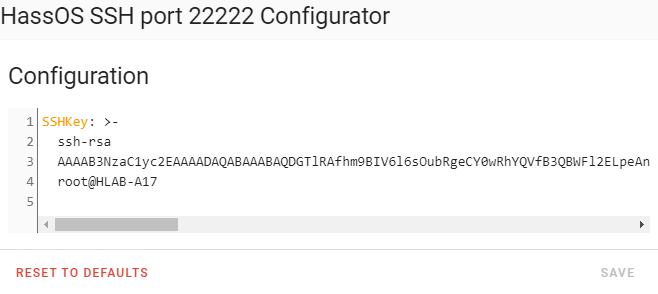
# Support
If problems are encountered please get all "Karen" in the forums and make sure to display attitude, because developers love that. Alternatively, you can provide a log and tell us the problem, what you did, the model of your device, and what happened differently than what you expected.
Support is provided on the Home Assistant Community forums [here](https://community.home-assistant.io/t/add-on-hassos-ssh-port-22222-configurator/264109)
# Operation
Hit the start button and observe the logs. Perform 2 pull-the-plug reboots after running this. You may uninstall the Add-On when it tells you it can find I2C.
================================================
FILE: HassOsEnableSSH/Dockerfile
================================================
ARG BUILD_FROM=ghcr.io/home-assistant/base:latest
FROM $BUILD_FROM
ENV LANG C.UTF-8
COPY run.sh /
WORKDIR /data
RUN chmod a+x /run.sh
CMD [ "/run.sh" ]
================================================
FILE: HassOsEnableSSH/README.md
================================================
## HassOS SSH port 22222 Configurator
Places an authorized_keys file in the location required by HassOS at boot time to enable the SSH port 22222. Run it once and then remove it. You won't need to run it again.
You can connect an SDCard and up to two hard disks or USB drives, which are detected as sda or sdb, and they will all have HassOS SSH port 22222 enabled.
# Support
Support is provided on the Home Assistant Community forums, [here](https://community.home-assistant.io/t/add-on-hassos-ssh-port-22222-configurator/264109)
# Operation
**Important Note** when requested to reboot, choose Supervisor->Reboot Host or pull the power plug from your machine and restart it.
Hit the start button and observe the logs. Perform 2 pull-the-plug reboots after running this. You may uninstall the Add-On when it tells you it found I2C.
================================================
FILE: HassOsEnableSSH/apparmor.txt
================================================
#include <tunables/global>
profile hassos_ssh_configurator_addon flags=(attach_disconnected,mediate_deleted) {
#include <abstractions/base>
capability,
file,
mount,
umount,
remount,
capability setgid,
capability setuid,
capability dac_override,
# S6-Overlay
/bin/** ix,
/usr/bin/** ix,
/usr/lib/bashio/** ix,
/etc/s6/** rix,
/run/s6/** rix,
/etc/services.d/** rwix,
/etc/cont-init.d/** rwix,
/etc/cont-finish.d/** rwix,
/init rix,
/var/run/** mrwkl,
/var/run/ mrwkl,
/proc/self/attr/** mrwkl,
# Files required
/dev/sda1 mrwkl,
/dev/sdb1 mrwkl,
/dev/mmcblk0p1 mrwkl,
/dev/* mrwkl,
/tmp/** mrkwl,
# Data access
/data/** rw,
# suppress ptrace denials when using 'docker ps' or using 'ps' inside a container
ptrace (trace,read) peer=docker-default,
# docker daemon confinement requires explict allow rule for signal
signal (receive) set=(kill,term) peer=/usr/bin/docker,
}
================================================
FILE: HassOsEnableSSH/config.json
================================================
{
"name": "HassOS SSH port 22222 Configurator",
"version": "0.9.3",
"slug": "hassos_ssh_configurator_addon",
"description": "This enables the SSH HassOS Console on port 22222. Only for Home Assistant OS",
"arch": ["amd64", "i386", "armhf", "armv7", "aarch64"],
"startup": "once",
"boot": "manual",
"url":"https://community.home-assistant.io/t/add-on-hassos-ssh-port-22222-configurator/264109",
"apparmor": "true",
"init": false,
"ingress": "true",
"stage": "experimental",
"privileged": ["SYS_ADMIN"],
"full_access": true,
"options": {
"SSHKey": "ssh-rsa AAA.. Insert the full contents (i.e. ssh-rsa AAA...) of your public ssh key (id_rsa.pub, id_ecdsa.pub, ...) here."
},
"schema": {
"SSHKey": "str"
}
}
================================================
FILE: HassOsEnableSSH/run.sh
================================================
#!/usr/bin/with-contenv bashio
set +e
fun() { while true; do nc -l -p 8099 -e echo -e 'HTTP/1.1 200 OK\r\nServer: DeskPiPro\r\nDate:$(date)\r\nContent-Type: text/html; charset=UTF8\r\nCache-Control: no-store, no cache, must-revalidate\r\n\r\n<!DOCTYPE html><html><body><p>This addon gains 2 security points for implementing this page. So it is here.</body></html>\r\n\n\n'; done; }
fun &
key=$(jq -r '.SSHKey' options.json)
mountAttempts=0
mountFailures=0
copyKeyToDevicePartition() {
partition="/dev/${1}"
tmp_path="/tmp/${1}"
config_dir="${tmp_path}/CONFIG"
authorized_keys_file="${config_dir}/authorized_keys"
if [ ! -e "${partition}" ]; then
echo "[skip] ${partition} does not exist."
return
fi
mkdir -p "${tmp_path}" 2>/dev/null
mountAttempts=$((mountAttempts + 1))
mount "${partition}" "${tmp_path}" 2>/dev/null
# NOTE: This check must be run immediately after the `mount` command above.
if [ $? -ne 0 ]; then
mountFailures=$((mountFailures + 1))
return
fi
if [ ! -e "${tmp_path}/cmdline.txt" ]; then
echo "[skip] No config file found in ${partition}"
return
fi
if test -e "${config_dir}/" && grep "$key" "${authorized_keys_file}" >/dev/null 2>&1; then
echo "[skip] Key already exists in ${partition}"
return
fi
echo "Writing authorized_keys in ${partition}"
mkdir -p "${config_dir}"
echo "$key" >>"${authorized_keys_file}"
echo "[SUCCESS] Key written to ${partition}."
}
partitions=(
vda1
sda1
sdb1
mmcblk0p1
mmcblk1p1
nvme0n1p1
xvda8
)
for partition in "${partitions[@]}"; do
copyKeyToDevicePartition "${partition}"
done
if [ $mountAttempts -eq $mountFailures ]; then
echo "============================================================="
echo "= # # # ###### # # ### # # ##### ="
echo "= # # # # # # # ## # # ## # # # ="
echo "= # # # # # # # # # # # # # # # ="
echo "= # # # # # ###### # # # # # # # # #### ="
echo "= # # # ####### # # # # # # # # # # # ="
echo "= # # # # # # # # ## # # ## # # ="
echo "= ## ## # # # # # # ### # # ##### ="
echo "============================================================="
echo "="
echo "= Issue: Failed to mount all attempted partitions (${mountAttempts} partition(s))."
echo "="
echo "= Possible Solution: Ensure that 'Protection mode' is disabled in the 'Info' tab of this Add-On."
echo "="
echo "============================================================="
echo "[FAILURE] Configurator failed. Please follow the steps above, then restart this Add-On."
sleep 99999
exit 1
fi
echo "[Done] Configurator complete. Perform a hard power-off now. This configurator only works once and is no longer needed."
sleep 99999
================================================
FILE: Pi4EnableI2C/CHANGELOG.md
================================================
| Version | Change |
|---|---|
| 0.14 | Add nvme0n1p1 |
| 0.13 | cleanup error in supervisor for device access with full access |
| 0.11 | removing support for deprecated non-protected mode, and increasing to sec level 6! |
| 0.10 | Support new Addon API |
| 0.9 | Support for Raspian |
| 0.8 | Do not run on startup |
| 0.7 | Incresed security to absolute maximum because, why not? |
| 0.6 | Testing increased security |
| 0.4 | Improving security |
| 0.3 | Supporting odroid |
| 0.2 | fixed problem with not mounting partition correctly |
| 0.1 | initial release |
================================================
FILE: Pi4EnableI2C/DOCS.md
================================================
No configuration required. If problems are encountered please get all "Karen" in the forums and make sure to display attitude, because developers love that. Alternatively, you can provide a log and tell us the problem, what you did, the model of your device, and what happened differently than what you expected.
Support is provided on the Home Assistant Community forums, [here](https://community.home-assistant.io/t/hassos-i2c-configurator/264167)
Just hit the start button and observe the logs. Perform 2- pull-the-plug restart after starting to ensure it takes effect. The first restart will emplace files. The second will activate I2C. You will see a message in the logs that I2C was found after the 2nd restart. You may uninstall the Add-On when complete.
================================================
FILE: Pi4EnableI2C/Dockerfile
================================================
ARG BUILD_FROM=ghcr.io/home-assistant/base:latest
FROM ${BUILD_FROM}
ENV LANG C.UTF-8
COPY run.sh /
WORKDIR /data
RUN chmod a+x /run.sh
CMD [ "/run.sh" ]
================================================
FILE: Pi4EnableI2C/README.md
================================================
# HassOS I2C Configurator
Enables the Raspberry Pi I<sup>2</sup>C bus. You can connect an SDCard and up to two hard disks or USB drives, which are detected as sda or sdb, and they will all have I<sup>2</sup>C enabled.
# Support
Support is provided on the Home Assistant Community forums, [here](https://community.home-assistant.io/t/hassos-i2c-configurator/264167)
# Operation
Hit the start button and observe the logs. You may uninstall the Add-On when complete.
================================================
FILE: Pi4EnableI2C/apparmor.txt
================================================
#include <tunables/global>
profile hassosi2cconfiguratoraddon flags=(attach_disconnected,mediate_deleted) {
#include <abstractions/base>
capability,
file,
mount options=(user,rw,noatime) /dev/sda1,
mount options=(user,rw,noatime) /dev/sda2,
mount options=(user,rw,noatime) /dev/sdb1,
mount options=(user,rw,noatime) /dev/sdb2,
mount options=(user,rw,noatime) /dev/mmcblk0p1,
mount options=(user,rw,noatime) /dev/mmcblk0p2,
mount,
umount,
remount,
capability setgid,
capability setuid,
capability dac_override,
# S6-Overlay
/bin/** ix,
/usr/bin/** ix,
/usr/lib/bashio/** ix,
/etc/s6/** rix,
/run/s6/** rix,
/etc/services.d/** rwix,
/etc/cont-init.d/** rwix,
/etc/cont-finish.d/** rwix,
/init rix,
/var/run/** mrwkl,
/var/run/ mrwkl,
/proc/self/attr/** mrwkl,
# Files required
/dev/sda1 mrwkl,
/dev/sda2 mrkwl,
/dev/sdb1 mrwkl,
/dev/sdb2 mrkwl,
/dev/mmcblk0p1 mrwkl,
/dev/mmcblk0p1 mrkwl,
/dev/* mrwkl,
/tmp/* mrwkl,
/tmp/ mrkwl,
# Data access
/data/** rw,
# suppress ptrace denials when using 'docker ps' or using 'ps' inside a container
ptrace (trace,read) peer=docker-default,
# docker daemon confinement requires explict allow rule for signal
signal (receive) set=(kill,term) peer=/usr/bin/docker,
}
================================================
FILE: Pi4EnableI2C/config.json
================================================
{
"name": "HassOS I2C Configurator",
"version": "0.14",
"slug": "hassosi2cconfiguratoraddon",
"description": "This enables i2c. You can uninstall this when it has run once. Check logs for information.",
"arch": ["armhf", "armv7", "aarch64"],
"startup": "once",
"auth_api": true,
"init": false,
"ingress": true,
"app_armor": false,
"privileged": ["SYS_ADMIN"],
"stage": "experimental",
"full_access": true,
"url":"https://community.home-assistant.io/t/add-on-hassos-i2c-configurator/264167",
"boot": "manual",
"options": {},
"schema": {}
}
================================================
FILE: Pi4EnableI2C/run.sh
================================================
#! /usr/bin/with-contenv bash
whoami
id
echo $0
nc -lk -p 8099 -e echo -e 'HTTP/1.1 200 OK\r\nServer: DeskPiPro\r\nDate:$(date)\r\nContent-Type: text/html; charset=UTF8\r\nCache-Control: no-store, no cache, must-revalidate\r\n\r\n<!DOCTYPE html><html><body><p>HassOS I2C Configurator WebUI. This is it. Impressive, right?</p></body></html>\r\n\n\n' &
config='dtparam=i2c_vc=on'
config2='dtparam=i2c_arm=on'
until false; do
set +e
mkdir /tmp 2>/dev/null
ls -al /dev/ 2>&1
mkdir /tmp/nvme0n1p1 /tmp/mmcblk0p1 /tmp/sda1 /tmp/sdb1 2> /dev/null
if [ ! -e /dev/sda1 ] && [ ! -e /dev/sdb1 ] && [ ! -e /dev/mmcblk0p1 ] && [ ! -e /dev/nvme0n1p1 ]; then
echo "nothing to do. Is protection mode enabled? You can't run this without disabling protection mode";
while true; do sleep 99999; done;
fi;
performWork () {
partition=$1
if [ ! -e /dev/$partition ]; then
echo "no $partition available"
return;
fi
umount /tmp/$partition 2>/dev/null
result=$(mount /dev/$partition /tmp/$partition 2>&1);
echo $result
[[ "$result" == *"root"* ]] && echo "Detected Protection Mode is enabled. Disable Protection Mode in Info Screen."
if [ -e /tmp/$partition/config.txt ]; then
mkdir -p /tmp/$partition/CONFIG/modules;
echo i2c-dev >/tmp/$partition/CONFIG/modules/rpi-i2c.conf;
#debian support for i2c-bcm2708
if ls /tmp/$partition | grep vmlinuz; then
echo "Detected raspian, not HASSOS"
p2=${partition::-1}2;
mkdir -p /tmp/${p2}
mount /dev/${p2} /tmp/${p2}
if ! grep bcm /tmp/${p2}/etc/modules; then
echo -e "i2c-bcm2708">>/tmp/${p2}/etc/modules;
fi
if ! grep i2c-dev /tmp/${p2}/etc/modules; then
echo -e "i2c-dev">>/tmp/${p2}/etc/modules
fi
fi
if grep "$config" /tmp/$partition/config.txt|grep -v \#; then
echo "i2c already configured on $partition. Reboot required.";
else
echo "adding $config to $partition config.txt"
echo "$config">>/tmp/$partition/config.txt
fi
if grep "$config2" /tmp/$partition/config.txt|grep -v \#; then
echo "i2c already configured on $partition. This addon was already run during this boot and no reboot occurred. ";
else
echo "adding $config2 to $partition config.txt"
echo "$config2">>/tmp/$partition/config.txt
fi
else
echo "no $partition config found"
fi
}
if ls /dev/i2c-1; then
echo $(ls /dev/*i2c*)
echo "Found i2c access! Nothing to do! You can remove this add-on.";
else
echo "I don't see I2C."
performWork sda1
performWork sdb1
performWork mmcblk0p1
performWork nvme0n1p1
echo "This Configurator did it's job. Perform a hard-power-off reboot now."
echo "You will need to reboot twice total, once to place the files, and again to activate the I2C."
fi
sleep 99999;
done
================================================
FILE: Pi4EnableSerial/CHANGELOG.md
================================================
| Version | Change |
|---|---|
| 0.5 | Cleanup error in supervisor |
| 0.4 | Support new Addon API |
| 0.3 | Improving messages|
| 0.2 | Improving security|
| 0.1 | initial release |
================================================
FILE: Pi4EnableSerial/DOCS.md
================================================
No configuration required. If problems are encountered please get all "Karen" in the forums and make sure to display attitude, because developers love that. Alternatively, you can provide a log and tell us the problem, what you did, the model of your device, and what happened differently than what you expected.
Support is provided on the Home Assistant Community forums, [here](https://community.home-assistant.io/t/add-on-hassos-serial-configurator/264169).
Just hit the start button and observe the logs. Perform a pull-the-plug restart after starting to ensure it takes effect. You may uninstall the Add-On when complete.
================================================
FILE: Pi4EnableSerial/Dockerfile
================================================
ARG BUILD_FROM=ghcr.io/home-assistant/base:latest
FROM $BUILD_FROM
ENV LANG C.UTF-8
COPY run.sh /
WORKDIR /data
RUN chmod a+x /run.sh
CMD [ "/run.sh" ]
================================================
FILE: Pi4EnableSerial/README.md
================================================
## HassOS Serial Configurator
Enables the Raspberry Pi 4 Serial Port. Instead of Device Mode, the port becomes Host Mode for utilization by the Operating System.
You can connect an SDCard and up to two hard disks or USB drives, which are detected as sda or sdb, and they will all have Serial enabled.
# Support
Support is provided on the Home Assistant Community forums, [here](https://community.home-assistant.io/t/add-on-hassos-serial-configurator/264169)
# Operation
Hit the start button and observe the logs. Perform a pull-the-plug restart after starting to ensure it takes effect. You may uninstall the Add-On when complete.
================================================
FILE: Pi4EnableSerial/apparmor.txt
================================================
#include <tunables/global>
profile hassosi2cconfiguratoraddon flags=(attach_disconnected,mediate_deleted) {
#include <abstractions/base>
capability,
file,
mount,
umount,
remount,
capability setgid,
capability setuid,
capability dac_override,
# S6-Overlay
/bin/** ix,
/usr/bin/** ix,
/usr/lib/bashio/** ix,
/etc/s6/** rix,
/run/s6/** rix,
/etc/services.d/** rwix,
/etc/cont-init.d/** rwix,
/etc/cont-finish.d/** rwix,
/init rix,
/var/run/** mrwkl,
/var/run/ mrwkl,
/proc/self/attr/** mrwkl,
# Files required
/dev/sda1 mrwkl,
/dev/sdb1 mrwkl,
/dev/mmcblk0p1 mrwkl,
/dev/* mrwkl,
/dev/ttyUSB0 mrkwl,
/dev/ttyUSB1 mrkwl,
/dev/ttyUSB2 mrkwl,
# Data access
/data/** rw,
# suppress ptrace denials when using 'docker ps' or using 'ps' inside a container
ptrace (trace,read) peer=docker-default,
# docker daemon confinement requires explict allow rule for signal
signal (receive) set=(kill,term) peer=/usr/bin/docker,
}
================================================
FILE: Pi4EnableSerial/config.json
================================================
{
"name": "HassOS Serial Configurator",
"version": "0.5a",
"slug": "hassos_serial_configurator_addon",
"description": "This enables Serial. You can uninstall when complete.",
"arch": ["armhf", "armv7", "aarch64"],
"startup": "once",
"init": false,
"url":"https://community.home-assistant.io/t/add-on-hassos-serial-configurator/264169",
"stage": "experimental",
"privileged": ["SYS_ADMIN"],
"ingress": true,
"full_access": true,
"boot": "manual",
"options": {},
"schema": {}
}
================================================
FILE: Pi4EnableSerial/run.sh
================================================
#!/usr/bin/with-contenv bashio
fun() { while true; do nc -l -p 8099 -e echo -e 'HTTP/1.1 200 OK\r\nServer: EnableSerial\r\nDate:$(date)\r\nContent-Type: text/html; charset=UTF8\r\nCache-Control: no-store, no cache, must-revalidate\r\n\r\n<!DOCTYPE html><html><body><p>Serial Ingress! It is here, and there is nothing left to say.</body></html>\r\n\n\n'; done }; fun&
config='dtoverlay=dwc2,dr_mode=host'
until false; do
set +e
mkdir /tmp 2>/dev/null
mkdir /tmp/mmcblk0p1 /tmp/sda1 2> /dev/null
if [ ! -e /dev/sda1 ] && [ ! -e /dev/sdb1 ] && [ ! -e /dev/mmcblk0p1 ]; then
echo "nothing to do. Is protection mode enabled? You can't run this without disabling protection mode";
while true; do sleep 99999; done;
fi;
performWork () {
partition=$1
mount /dev/$partition /tmp/$partition 2>/dev/null
if [ -e /tmp/$partition/config.txt ]; then
if [ $(grep "$config" /tmp/$partition/config.txt|grep -v \#) ]; then
echo "serial already configured on $partition";
else
echo "adding $config to $partition config.txt"
echo "$config">>/tmp/$partition/config.txt
fi
else
echo "no $partition config found"
fi
}
performWork sda1
performWork sdb1
performWork mmcblk0p1
echo "This Configurator did it's job. Perform a hard-power-off now. You can uninstall and reboot now. This configurator only works once."
sleep 99999;
done
================================================
FILE: README.md
================================================
# Addon Repository
This an addon repository for HassOS Configurator projects. These projects perform configuration tasks.<br>
All projects require a reboot and may be uninstalled after the first successful run. Please observe logs to determine if the run was successful.
## [HassOS I2C Configurator](https://github.com/adamoutler/HassOSConfigurator/tree/main/Pi4EnableI2C)
Enables the Raspberry Pi I<sup>2</sup>C bus Bus. For support, click [here](https://community.home-assistant.io/t/hassos-i2c-configurator/264167).
## [HassOS Serial Configurator](https://github.com/adamoutler/HassOSConfigurator/tree/main/Pi4EnableSerial)
Enables the Raspberry Pi 4 Serial Port. Instead of Device Mode, the port becomes Host Mode for utilization by the Operating System. For support click [here](https://community.home-assistant.io/t/hassos-serial-configurator/264169)
## [HassOS SSH port 22222 Configurator](https://github.com/adamoutler/HassOSConfigurator/tree/main/HassOsEnableSSH)
Places an authorized_keys file in the location required by HassOS at boot time to enable the SSH port 22222. For support click [here](https://community.home-assistant.io/t/hassos-ssh-port-22222-configurator/264109)
# Installation
Within Home Assistant, click Supervisor-> Add-on Store -> … button (in top left)-> Repositories. Add this repository.
Click one of the items and install.<br>

# Operation
**Important Note** when requested to reboot, choose Supervisor->Reboot Host or pull the power plug from your machine and restart it.
Hit the start button and observe the logs. You may uninstall the Add-On when complete.
================================================
FILE: Run/CHANGELOG.md
================================================
| Version | Change |
|---|---|
| 0.11 | fix problem with logging |
| 0.10 | Clean up error in supervisor for access to devices |
| 0.7 | Support new Addon API |
| 0.6 | logs are displayed in ingress |
| 0.4 | corrected error preventing start on raspi |
| 0.3 | Initial release|
| 0.2 | Further testing|
| 0.1 | initial Testing |
================================================
FILE: Run/DOCS.md
================================================
## Normal Operation
The purpose of this add-on is to perform tasks on startup for each container, within the context of that container. Tasks such as mounting folders, pinging REST APIs, starting servers, and other such tasks may be performed by scripts.
**Warning**- Your scripts will run as root and have the capability of destroying your machine.
## Scripts
Scripts for each container may be placed in the home assistant configuration folder, usually /config/startup/startup.d/name-of-container.sh.
## Logs
Logs may be found in the home assistant configuration folder, usually /config/startup/logs/name-of-container.log
## Options
| Setting name | Valid Values| Description |
|---|---|---|
|Seconds to wait before startup scripts execute| 1-999999 |Provides a delay from the time this container starts until the time it will begin executing commands in other containers.
|Create example scripts in /config/startup/startup.d"|lowercase true/false|If true, a script for all running containers will be created in the /config/startup/startup.d folder. Each created script will display the environmental variables for the container.|
|Retain old logs in /config/startup/logs/ instead of deleting old logs|lowercase true/false| If true, logs will be appended. Otherwise, logs will be replaced on each startup. |
## Support
Support is provided on the [Home Assistant Community forums](https://community.home-assistant.io/t/run-on-startup-d/271008). Git Issues may be ignored.
If problems are encountered please get all "Karen" in the forums and make sure to display attitude, because developers love that. Alternatively, you can provide a log and tell us the problem, what you did, the model of your device, and what happened differently than what you expected.
================================================
FILE: Run/Dockerfile
================================================
ARG BUILD_FROM
FROM $BUILD_FROM
ENV LANG C.UTF-8
COPY run.sh /
WORKDIR /data
RUN chmod a+x /run.sh
RUN apk add docker --no-cache
COPY rootfs /
CMD [ "/run.sh" ]
================================================
FILE: Run/README.md
================================================
## Run On Startup.d
This Home Assistant Addon allows you to perform startup scripts for each container, within the context of that container. Tasks such as mounting folders, pinging REST APIs, starting servers, and other such tasks may be automated and performed by scripts.
**Warning**- Proceed at your own risk. Your scripts will run as root and have the capability of destroying your machine.
# Support
Support is provided on the Home Assistant Community forums, [here](https://community.home-assistant.io/t/run-on-startup-d/271008)
# Operation
Hit the start button and observe the logs. Perform a pull-the-plug restart after starting to ensure it takes effect. You may uninstall the Add-On when complete.
================================================
FILE: Run/config.json
================================================
{
"name": "Run On Startup.d",
"version": "0.11a",
"slug": "run_on_startup_addon",
"description": "This runs things at startup. Disable Protection Mode! Check logs and ingress for information.",
"arch": ["i386", "amd64", "armhf", "armv7", "aarch64"],
"startup": "application",
"url": "https://community.home-assistant.io/t/run-on-startup-d/271008",
"host_network": true,
"homeassistant": true,
"hassio_role": "admin",
"hassio_api": true,
"auth_api": true,
"init": false,
"homeassistant_api":true,
"ingress": true,
"stage": "experimental",
"docker_api":true,
"privileged":["SYS_ADMIN"],
"stdin":true,
"full_access": "yes",
"boot": "auto",
"devicetree": false,
"map": ["config:rw", "ssl:rw","addons:rw","media:rw","backup:rw","share:rw"],
"options": {
"Seconds to wait before startup scripts execute":"1",
"Create example scripts in /config/startup/startup.d":false,
"Retain old logs in /config/startup/logs/ instead of deleting old logs":true
},
"schema": {
"Seconds to wait before startup scripts execute":"int(1,9999999)",
"Create example scripts in /config/startup/startup.d":"bool",
"Retain old logs in /config/startup/logs/ instead of deleting old logs":"bool"
}
}
================================================
FILE: Run/rootfs/opt/logcontent.sh
================================================
#! /bin/bash
containersvar=$(docker ps --format "{{.Names}}")
containerscs=$(echo $containersvar|sed 's/\ /,/g')
IFS=',' read -r -a containers <<<"$containerscs"
echo -e 'HTTP/1.1 200 OK\r\nServer: DeskPiPro\r\nDate:$(date)\r\nContent-Type: text/html; charset=UTF8\r\nCache-Control: no-store, no cache, must-revalidate\r\n\r\n'
echo -e \
"<!DOCTYPE html>\n"\
"<html>\n"\
"<head>\n"\
"<title>Page Title</title>\n"\
"</head>\n"\
"<body>\n"\
for i in "${containers[@]}"; do
echo -e "<H2>$i</H2>"
file="/config/startup/logs/"$i".log";
test -e ${file} && cat ${file}|sed 's/$/<br>/g'
done
echo -e \
"</body>\n"\
"</html>\n"\
"\n"
================================================
FILE: Run/run.sh
================================================
#!/usr/bin/with-contenv bashio
PATH=$PATH:/usr/local/sbin:/usr/local/bin:/usr/sbin:/usr/bin:/sbin:/bin
executeInRootPath=( 'homeassistant' );
#Test docker access
echo "Testing Docker access.";
set +e
## Test for docker access
docker container ls 2>&1>/dev/null;
if [ $? != 0 ]; then
echo "You must disable protection mode. sleeping..."
while true; do sleep 9999; done;
fi
logOption="";
#Sleep for delay period
delay=$(cat options.json |jq -r '."Seconds to wait before startup scripts execute"')
createScripts=$(cat options.json |jq -r '."Create example scripts in /config/startup/startup.d"')
test $(cat options.json |jq -r '."Retain old logs in /config/startup/logs/ instead of deleting old logs"') == "true" && logOption="-a"
echo "Sleeping for Startup Delay period of $delay seconds"
sleep ${delay};
#Log server
nc -lk -p 8099 -e exec /opt/logcontent.sh 3>/dev/null &
#Get containers
echo "Listing Containers."
containers=$(docker ps --format "{{.Names}}")
for container in ${containers}; do
echo ${container};
if [ ${createScripts} == "true" ]; then
test ! -e /config/startup/startup.d/${container}.sh && echo -e "#! /bin/bash\n\necho \"This script is executed in the $container container\"; \nenv;">/config/startup/startup.d/${container}.sh
fi
done;
#Start running
echo "executing";
mkdir -p /config/startup/startup.d
mkdir -p /config/startup/logs
#Set the environment to continue executing and start running all the scripts
for container in ${containers}; do
containerid=$(docker ps -aqf "name=$container")
if [ ! -e /config/startup/startup.d/${container}.sh ]; then
continue;
fi
echo "#############################################################################";
echo "###############/config/startup/startup.d/$container.sh";
echo "###############Container: $containerid: tmp/$container.startup.sh";
echo "#############################################################################"
remotePath=/tmp/${container};
(for e in "${executeInRootPath[@]}"; do [[ "$e" == ${container} ]] && exit 0; done) && remotePath=/${container};
docker cp /config/startup/startup.d/${container}.sh ${containerid}:${remotePath}.startup.sh;
docker exec -t ${containerid} chmod 755 ${remotePath}.startup.sh;
docker exec -t ${containerid} exec ${remotePath}.startup.sh 2>&1 | tee ${logOption} /config/startup/logs/${container}.log &
sleep 1;
done;
set -e
echo;echo;echo;echo;
echo "----DONE---- sleeping...";
sleep 99999;
================================================
FILE: Run/test.txt
================================================
HTTP/1.1 200 OK
Content-Type: application/json
Content-Length: 18407
Date: Tue, 19 Jan 2021 23:44:55 GMT
Server: Python/3.8 aiohttp/3.7.3
[{"domain": "homeassistant", "services": {"turn_off": {"description": "Generic service to turn devices off under any domain. Same usage as the light.turn_on, switch.turn_on, etc. services.", "fields": {"entity_id": {"description": "The entity_id of the device to turn off.", "example": "light.living_room"}}}, "turn_on": {"description": "Generic service to turn devices on under any domain. Same usage as the light.turn_on, switch.turn_on, etc. services.", "fields": {"entity_id": {"description": "The entity_id of the device to turn on.", "example": "light.living_room"}}}, "toggle": {"description": "Generic service to toggle devices on/off under any domain. Same usage as the light.turn_on, switch.turn_on, etc. services.", "fields": {"entity_id": {"description": "The entity_id of the device to toggle on/off.", "example": "light.living_room"}}}, "stop": {"description": "Stop the Home Assistant service.", "fields": {}}, "restart": {"description": "Restart the Home Assistant service.", "fields": {}}, "check_config": {"description": "Check the Home Assistant configuration files for errors. Errors will be displayed in the Home Assistant log.", "fields": {}}, "update_entity": {"description": "Force one or more entities to update its data", "fields": {"entity_id": {"description": "One or multiple entity_ids to update. Can be a list.", "example": "light.living_room"}}}, "reload_core_config": {"description": "Reload the core configuration.", "fields": {}}, "set_location": {"description": "Update the Home Assistant location.", "fields": {"latitude": {"description": "Latitude of your location", "example": 32.87336}, "longitude": {"description": "Longitude of your location", "example": 117.22743}}}}}, {"domain": "persistent_notification", "services": {"create": {"description": "Show a notification in the frontend.", "fields": {"message": {"description": "Message body of the notification. [Templates accepted]", "example": "Please check your configuration.yaml."}, "title": {"description": "Optional title for your notification. [Optional, Templates accepted]", "example": "Test notification"}, "notification_id": {"description": "Target ID of the notification, will replace a notification with the same Id. [Optional]", "example": 1234}}}, "dismiss": {"description": "Remove a notification from the frontend.", "fields": {"notification_id": {"description": "Target ID of the notification, which should be removed. [Required]", "example": 1234}}}, "mark_read": {"description": "Mark a notification read.", "fields": {"notification_id": {"description": "Target ID of the notification, which should be mark read. [Required]", "example": 1234}}}}}, {"domain": "recorder", "services": {"purge": {"description": "Start purge task - delete events and states older than x days, according to keep_days service data.", "fields": {"keep_days": {"description": "Number of history days to keep in database after purge. Value >= 0.", "example": 2}, "repack": {"description": "Attempt to save disk space by rewriting the entire database file.", "example": true}}}}}, {"domain": "system_log", "services": {"clear": {"description": "Clear all log entries.", "fields": {}}, "write": {"description": "Write log entry.", "fields": {"message": {"description": "Message to log. [Required]", "example": "Something went wrong"}, "level": {"description": "Log level: debug, info, warning, error, critical. Defaults to 'error'.", "example": "debug"}, "logger": {"description": "Logger name under which to log the message. Defaults to 'system_log.external'.", "example": "mycomponent.myplatform"}}}}}, {"domain": "cloud", "services": {"remote_connect": {"description": "Make instance UI available outside over NabuCasa cloud.", "fields": {}}, "remote_disconnect": {"description": "Disconnect UI from NabuCasa cloud.", "fields": {}}}}, {"domain": "person", "services": {"reload": {"description": "Reload the person configuration.", "fields": {}}}}, {"domain": "hassio", "services": {"addon_start": {"description": "Start a Hass.io docker add-on.", "fields": {"addon": {"description": "The add-on slug.", "example": "core_ssh"}}}, "addon_stop": {"description": "Stop a Hass.io docker add-on.", "fields": {"addon": {"description": "The add-on slug.", "example": "core_ssh"}}}, "addon_restart": {"description": "Restart a Hass.io docker add-on.", "fields": {"addon": {"description": "The add-on slug.", "example": "core_ssh"}}}, "addon_stdin": {"description": "Write data to a Hass.io docker add-on stdin .", "fields": {"addon": {"description": "The add-on slug.", "example": "core_ssh"}}}, "host_shutdown": {"description": "Poweroff the host system.", "fields": {}}, "host_reboot": {"description": "Reboot the host system.", "fields": {}}, "snapshot_full": {"description": "Create a full snapshot.", "fields": {"name": {"description": "Optional or it will be the current date and time.", "example": "Snapshot 1"}, "password": {"description": "Optional password.", "example": "password"}}}, "snapshot_partial": {"description": "Create a partial snapshot.", "fields": {"addons": {"description": "Optional list of addon slugs.", "example": ["core_ssh", "core_samba", "core_mosquitto"]}, "folders": {"description": "Optional list of directories.", "example": ["homeassistant", "share"]}, "name": {"description": "Optional or it will be the current date and time.", "example": "Partial Snapshot 1"}, "password": {"description": "Optional password.", "example": "password"}}}, "restore_full": {"description": "", "fields": {}}, "restore_partial": {"description": "", "fields": {}}}}, {"domain": "frontend", "services": {"set_theme": {"description": "Set a theme unless the client selected per-device theme.", "fields": {"name": {"description": "Name of a predefined theme, 'default' or 'none'.", "example": "default"}, "mode": {"description": "The mode the theme is for, either 'dark' or 'light' (default).", "example": "dark"}}}, "reload_themes": {"description": "Reload themes from yaml configuration.", "fields": {}}}}, {"domain": "logbook", "services": {"log": {"description": "Create a custom entry in your logbook.", "fields": {"name": {"description": "Custom name for an entity, can be referenced with entity_id", "example": "Kitchen"}, "message": {"description": "Message of the custom logbook entry", "example": "is being used"}, "entity_id": {"description": "Entity to reference in custom logbook entry [Optional]", "example": "light.kitchen"}, "domain": {"description": "Icon of domain to display in custom logbook entry [Optional]", "example": "light"}}}}}, {"domain": "script", "services": {"reload": {"description": "Reload all the available scripts", "fields": {}}, "turn_on": {"description": "Turn on script", "fields": {"entity_id": {"description": "Name(s) of script to be turned on.", "example": "script.arrive_home"}}}, "turn_off": {"description": "Turn off script", "fields": {"entity_id": {"description": "Name(s) of script to be turned off.", "example": "script.arrive_home"}}}, "toggle": {"description": "Toggle script", "fields": {"entity_id": {"description": "Name(s) of script to be toggled.", "example": "script.arrive_home"}}}}}, {"domain": "scene", "services": {"reload": {"description": "Reload the scene configuration", "fields": {}}, "apply": {"description": "Activate a scene. Takes same data as the entities field from a single scene in the config.", "fields": {"transition": {"description": "Transition duration in seconds it takes to bring devices to the state defined in the scene.", "example": 2.5}, "entities": {"description": "The entities and the state that they need to be.", "example": {"light.kitchen": "on", "light.ceiling": {"state": "on", "brightness": 80}}}}}, "create": {"description": "Creates a new scene.", "fields": {"scene_id": {"description": "The entity_id of the new scene.", "example": "all_lights"}, "entities": {"description": "The entities to control with the scene.", "example": {"light.tv_back_light": "on", "light.ceiling": {"state": "on", "brightness": 200}}}, "snapshot_entities": {"description": "The entities of which a snapshot is to be taken", "example": ["light.ceiling", "light.kitchen"]}}}, "turn_on": {"description": "Activate a scene.", "fields": {"transition": {"description": "Transition duration in seconds it takes to bring devices to the state defined in the scene.", "example": 2.5}, "entity_id": {"description": "Name(s) of scenes to turn on", "example": "scene.romantic"}}}}}, {"domain": "group", "services": {"reload": {"description": "Reload group configuration, entities, and notify services.", "fields": {}}, "set": {"description": "Create/Update a user group.", "fields": {"object_id": {"description": "Group id and part of entity id.", "example": "test_group"}, "name": {"description": "Name of group", "example": "My test group"}, "icon": {"description": "Name of icon for the group.", "example": "mdi:camera"}, "entities": {"description": "List of all members in the group. Not compatible with 'delta'.", "example": "domain.entity_id1, domain.entity_id2"}, "add_entities": {"description": "List of members they will change on group listening.", "example": "domain.entity_id1, domain.entity_id2"}, "all": {"description": "Enable this option if the group should only turn on when all entities are on.", "example": true}}}, "remove": {"description": "Remove a user group.", "fields": {"object_id": {"description": "Group id and part of entity id.", "example": "test_group"}}}}}, {"domain": "zone", "services": {"reload": {"description": "Reload the YAML-based zone configuration.", "fields": {}}}}, {"domain": "counter", "services": {"increment": {"description": "Increment a counter.", "fields": {"entity_id": {"description": "Entity id of the counter to increment.", "example": "counter.count0"}}}, "decrement": {"description": "Decrement a counter.", "fields": {"entity_id": {"description": "Entity id of the counter to decrement.", "example": "counter.count0"}}}, "reset": {"description": "Reset a counter.", "fields": {"entity_id": {"description": "Entity id of the counter to reset.", "example": "counter.count0"}}}, "configure": {"description": "Change counter parameters", "fields": {"entity_id": {"description": "Entity id of the counter to change.", "example": "counter.count0"}, "minimum": {"description": "New minimum value for the counter or None to remove minimum", "example": 0}, "maximum": {"description": "New maximum value for the counter or None to remove maximum", "example": 100}, "step": {"description": "New value for step", "example": 2}, "initial": {"description": "New value for initial", "example": 6}, "value": {"description": "New state value", "example": 3}}}}}, {"domain": "timer", "services": {"reload": {"description": "", "fields": {}}, "start": {"description": "Start a timer.", "fields": {"entity_id": {"description": "Entity id of the timer to start. [optional]", "example": "timer.timer0"}, "duration": {"description": "Duration the timer requires to finish. [optional]", "example": "00:01:00 or 60"}}}, "pause": {"description": "Pause a timer.", "fields": {"entity_id": {"description": "Entity id of the timer to pause. [optional]", "example": "timer.timer0"}}}, "cancel": {"description": "Cancel a timer.", "fields": {"entity_id": {"description": "Entity id of the timer to cancel. [optional]", "example": "timer.timer0"}}}, "finish": {"description": "Finish a timer.", "fields": {"entity_id": {"description": "Entity id of the timer to finish. [optional]", "example": "timer.timer0"}}}}}, {"domain": "input_text", "services": {"reload": {"description": "Reload the input_text configuration.", "fields": {}}, "set_value": {"description": "Set the value of an input text entity.", "fields": {"entity_id": {"description": "Entity id of the input text to set the new value.", "example": "input_text.text1"}, "value": {"description": "The target value the entity should be set to.", "example": "This is an example text"}}}}}, {"domain": "input_boolean", "services": {"reload": {"description": "Reload the input_boolean configuration.", "fields": {}}, "turn_on": {"description": "Turns on an input boolean.", "fields": {"entity_id": {"description": "Entity id of the input boolean to turn on.", "example": "input_boolean.notify_alerts"}}}, "turn_off": {"description": "Turns off an input boolean", "fields": {"entity_id": {"description": "Entity id of the input boolean to turn off.", "example": "input_boolean.notify_alerts"}}}, "toggle": {"description": "Toggles an input boolean.", "fields": {"entity_id": {"description": "Entity id of the input boolean to toggle.", "example": "input_boolean.notify_alerts"}}}}}, {"domain": "input_select", "services": {"reload": {"description": "Reload the input_select configuration.", "fields": {}}, "select_option": {"description": "Select an option of an input select entity.", "fields": {"entity_id": {"description": "Entity id of the input select to select the value.", "example": "input_select.my_select"}, "option": {"description": "Option to be selected.", "example": "\"Item A\""}}}, "select_next": {"description": "Select the next options of an input select entity.", "fields": {"entity_id": {"description": "Entity id of the input select to select the next value for.", "example": "input_select.my_select"}}}, "select_previous": {"description": "Select the previous options of an input select entity.", "fields": {"entity_id": {"description": "Entity id of the input select to select the previous value for.", "example": "input_select.my_select"}}}, "set_options": {"description": "Set the options of an input select entity.", "fields": {"entity_id": {"description": "Entity id of the input select to set the new options for.", "example": "input_select.my_select"}, "options": {"description": "Options for the input select entity.", "example": "[\"Item A\", \"Item B\", \"Item C\"]"}}}}}, {"domain": "input_number", "services": {"reload": {"description": "Reload the input_number configuration.", "fields": {}}, "set_value": {"description": "Set the value of an input number entity.", "fields": {"entity_id": {"description": "Entity id of the input number to set the new value.", "example": "input_number.threshold"}, "value": {"description": "The target value the entity should be set to.", "example": 42}}}, "increment": {"description": "Increment the value of an input number entity by its stepping.", "fields": {"entity_id": {"description": "Entity id of the input number that should be incremented.", "example": "input_number.threshold"}}}, "decrement": {"description": "Decrement the value of an input number entity by its stepping.", "fields": {"entity_id": {"description": "Entity id of the input number that should be decremented.", "example": "input_number.threshold"}}}}}, {"domain": "input_datetime", "services": {"reload": {"description": "Reload the input_datetime configuration.", "fields": {}}, "set_datetime": {"description": "This can be used to dynamically set the date and/or time. Use date/time, datetime or timestamp.", "fields": {"entity_id": {"description": "Entity id of the input datetime to set the new value.", "example": "input_datetime.test_date_time"}, "date": {"description": "The target date the entity should be set to.", "example": "\"2019-04-20\""}, "time": {"description": "The target time the entity should be set to.", "example": "\"05:04:20\""}, "datetime": {"description": "The target date & time the entity should be set to.", "example": "\"2019-04-20 05:04:20\""}, "timestamp": {"description": "The target date & time the entity should be set to as expressed by a UNIX timestamp.", "example": 1598027400}}}}}, {"domain": "automation", "services": {"trigger": {"description": "Trigger the action of an automation.", "fields": {"entity_id": {"description": "Name of the automation to trigger.", "example": "automation.notify_home"}, "skip_condition": {"description": "Whether or not the condition will be skipped (defaults to true).", "example": true}}}, "toggle": {"description": "Toggle an automation.", "fields": {"entity_id": {"description": "Name of the automation to toggle on/off.", "example": "automation.notify_home"}}}, "turn_on": {"description": "Enable an automation.", "fields": {"entity_id": {"description": "Name of the automation to turn on.", "example": "automation.notify_home"}}}, "turn_off": {"description": "Disable an automation.", "fields": {"entity_id": {"description": "Name of the automation to turn off.", "example": "automation.notify_home"}, "stop_actions": {"description": "Stop currently running actions (defaults to true).", "example": false}}}, "reload": {"description": "Reload the automation configuration.", "fields": {}}}}, {"domain": "tts", "services": {"google_translate_say": {"description": "", "fields": {}}, "clear_cache": {"description": "Remove cache files and RAM cache.", "fields": {}}}}, {"domain": "notify", "services": {"persistent_notification": {"description": "Sends a notification to the visible in the front-end.", "fields": {"message": {"description": "Message body of the notification.", "example": "The garage door has been open for 10 minutes."}, "title": {"description": "Optional title for your notification.", "example": "Your Garage Door Friend"}}}, "notify": {"description": "Send a notification.", "fields": {"message": {"description": "Message body of the notification.", "example": "The garage door has been open for 10 minutes."}, "title": {"description": "Optional title for your notification.", "example": "Your Garage Door Friend"}, "target": {"description": "An array of targets to send the notification to. Optional depending on the platform.", "example": "platform specific"}, "data": {"description": "Extended information for notification. Optional depending on the platform.", "example": "platform specific"}}}}}, {"domain": "stream", "services": {"record": {"description": "Make a .mp4 recording from a provided stream.", "fields": {"stream_source": {"description": "The input source for the stream.", "example": "rtsp://my.stream.feed:554"}, "filename": {"description": "The file name string.", "example": "/tmp/my_stream.mp4"}, "duration": {"description": "Target recording length (in seconds). Default: 30", "example": 30}, "lookback": {"description": "Target lookback period (in seconds) to include in addition to duration. Only available if there is currently an active HLS stream for stream_source. Default: 0", "example": 5}}}}}]
================================================
FILE: repository.json
================================================
{
"name": "HassOS Configurator",
"url": "https://github.com/adamoutler/HassOSConfigurator",
"maintainer": "Adam Outler <adamoutler@adamoutler.com>"
}
gitextract_ylli3z9s/ ├── HassOsEnableSSH/ │ ├── CHANGELOG.md │ ├── DOCS.md │ ├── Dockerfile │ ├── README.md │ ├── apparmor.txt │ ├── config.json │ ├── icon.xcf │ ├── logo.xcf │ └── run.sh ├── Pi4EnableI2C/ │ ├── CHANGELOG.md │ ├── DOCS.md │ ├── Dockerfile │ ├── README.md │ ├── apparmor.txt │ ├── config.json │ ├── icon.xcf │ ├── logo.xcf │ └── run.sh ├── Pi4EnableSerial/ │ ├── CHANGELOG.md │ ├── DOCS.md │ ├── Dockerfile │ ├── README.md │ ├── apparmor.txt │ ├── config.json │ ├── icon.xcf │ ├── logo.xcf │ └── run.sh ├── README.md ├── Run/ │ ├── CHANGELOG.md │ ├── DOCS.md │ ├── Dockerfile │ ├── README.md │ ├── config.json │ ├── icon.xcf │ ├── logo.xcf │ ├── rootfs/ │ │ └── opt/ │ │ └── logcontent.sh │ ├── run.sh │ └── test.txt └── repository.json
Condensed preview — 39 files, each showing path, character count, and a content snippet. Download the .json file or copy for the full structured content (52K chars).
[
  {
    "path": "HassOsEnableSSH/CHANGELOG.md",
    "chars": 936,
    "preview": "| Version | Change                                                    |\n|---------|-------------------------------------"
  },
  {
    "path": "HassOsEnableSSH/DOCS.md",
    "chars": 1740,
    "preview": "\n# Configuration\nHassOS SSH Port 22222 Configurator requires configuration. Copy your public key into the configurator i"
  },
  {
    "path": "HassOsEnableSSH/Dockerfile",
    "chars": 153,
    "preview": "ARG BUILD_FROM=ghcr.io/home-assistant/base:latest\nFROM $BUILD_FROM\nENV LANG C.UTF-8\nCOPY run.sh /\nWORKDIR /data\nRUN chmo"
  },
  {
    "path": "HassOsEnableSSH/README.md",
    "chars": 846,
    "preview": "\n## HassOS SSH port 22222 Configurator\nPlaces an authorized_keys file in the location required by HassOS at boot time to"
  },
  {
    "path": "HassOsEnableSSH/apparmor.txt",
    "chars": 951,
    "preview": "#include <tunables/global>\n\nprofile hassos_ssh_configurator_addon flags=(attach_disconnected,mediate_deleted) {\n  #inclu"
  },
  {
    "path": "HassOsEnableSSH/config.json",
    "chars": 749,
    "preview": "{\n  \"name\": \"HassOS SSH port 22222 Configurator\",\n  \"version\": \"0.9.3\",\n  \"slug\": \"hassos_ssh_configurator_addon\",\n  \"de"
  },
  {
    "path": "HassOsEnableSSH/run.sh",
    "chars": 2883,
    "preview": "#!/usr/bin/with-contenv bashio\n\nset +e\n\nfun() { while true; do nc -l -p 8099 -e echo -e 'HTTP/1.1 200 OK\\r\\nServer: Desk"
  },
  {
    "path": "Pi4EnableI2C/CHANGELOG.md",
    "chars": 567,
    "preview": "| Version | Change |\n|---|---|\n| 0.14 | Add nvme0n1p1 |\n| 0.13 | cleanup error in supervisor for device access with full"
  },
  {
    "path": "Pi4EnableI2C/DOCS.md",
    "chars": 770,
    "preview": "No configuration required.  If problems are encountered please get all \"Karen\" in the forums and make sure to display at"
  },
  {
    "path": "Pi4EnableI2C/Dockerfile",
    "chars": 155,
    "preview": "ARG BUILD_FROM=ghcr.io/home-assistant/base:latest\nFROM ${BUILD_FROM}\nENV LANG C.UTF-8\nCOPY run.sh /\nWORKDIR /data\nRUN ch"
  },
  {
    "path": "Pi4EnableI2C/README.md",
    "chars": 469,
    "preview": "# HassOS I2C Configurator\nEnables the Raspberry Pi I<sup>2</sup>C bus.  You can connect an SDCard and up to two hard dis"
  },
  {
    "path": "Pi4EnableI2C/apparmor.txt",
    "chars": 1305,
    "preview": "#include <tunables/global>\n\nprofile hassosi2cconfiguratoraddon flags=(attach_disconnected,mediate_deleted) {\n  #include "
  },
  {
    "path": "Pi4EnableI2C/config.json",
    "chars": 573,
    "preview": "{\n  \"name\": \"HassOS I2C Configurator\",\n  \"version\": \"0.14\",\n  \"slug\": \"hassosi2cconfiguratoraddon\",\n  \"description\": \"Th"
  },
  {
    "path": "Pi4EnableI2C/run.sh",
    "chars": 2928,
    "preview": "#! /usr/bin/with-contenv bash\nwhoami\nid\n\necho $0\n\nnc -lk -p 8099 -e  echo -e 'HTTP/1.1 200 OK\\r\\nServer: DeskPiPro\\r\\nDa"
  },
  {
    "path": "Pi4EnableSerial/CHANGELOG.md",
    "chars": 183,
    "preview": "| Version | Change |\n|---|---|\n| 0.5 | Cleanup error in supervisor |\n| 0.4 | Support new Addon API |\n| 0.3 | Improving m"
  },
  {
    "path": "Pi4EnableSerial/DOCS.md",
    "chars": 632,
    "preview": "No configuration required.  If problems are encountered please get all \"Karen\" in the forums and make sure to display at"
  },
  {
    "path": "Pi4EnableSerial/Dockerfile",
    "chars": 153,
    "preview": "ARG BUILD_FROM=ghcr.io/home-assistant/base:latest\nFROM $BUILD_FROM\nENV LANG C.UTF-8\nCOPY run.sh /\nWORKDIR /data\nRUN chmo"
  },
  {
    "path": "Pi4EnableSerial/README.md",
    "chars": 637,
    "preview": "## HassOS Serial Configurator\nEnables the Raspberry Pi 4 Serial Port. Instead of Device Mode, the port becomes Host Mode"
  },
  {
    "path": "Pi4EnableSerial/apparmor.txt",
    "chars": 994,
    "preview": "#include <tunables/global>\n\nprofile hassosi2cconfiguratoraddon flags=(attach_disconnected,mediate_deleted) {\n  #include "
  },
  {
    "path": "Pi4EnableSerial/config.json",
    "chars": 506,
    "preview": "{\n  \"name\": \"HassOS Serial Configurator\",\n  \"version\": \"0.5a\",\n  \"slug\": \"hassos_serial_configurator_addon\",\n  \"descript"
  },
  {
    "path": "Pi4EnableSerial/run.sh",
    "chars": 1418,
    "preview": "#!/usr/bin/with-contenv bashio\n\n\nfun() {  while true; do nc -l -p 8099 -e  echo -e 'HTTP/1.1 200 OK\\r\\nServer: EnableSer"
  },
  {
    "path": "README.md",
    "chars": 1648,
    "preview": "# Addon Repository\nThis an addon repository for HassOS Configurator projects.  These projects perform configuration task"
  },
  {
    "path": "Run/CHANGELOG.md",
    "chars": 335,
    "preview": "| Version | Change |\n|---|---|\n| 0.11 | fix problem with logging |\n| 0.10 | Clean up error in supervisor for access to d"
  },
  {
    "path": "Run/DOCS.md",
    "chars": 1773,
    "preview": "## Normal Operation\nThe purpose of this add-on is to perform tasks on startup for each container, within the context of "
  },
  {
    "path": "Run/Dockerfile",
    "chars": 161,
    "preview": "ARG BUILD_FROM\nFROM $BUILD_FROM\nENV LANG C.UTF-8\nCOPY run.sh /\nWORKDIR /data\nRUN chmod a+x /run.sh\nRUN apk add docker --"
  },
  {
    "path": "Run/README.md",
    "chars": 717,
    "preview": "## Run On Startup.d\nThis Home Assistant Addon allows you to perform startup scripts for each container, within the conte"
  },
  {
    "path": "Run/config.json",
    "chars": 1330,
    "preview": "{\n  \"name\": \"Run On Startup.d\",\n  \"version\": \"0.11a\",\n  \"slug\": \"run_on_startup_addon\",\n  \"description\": \"This runs thin"
  },
  {
    "path": "Run/rootfs/opt/logcontent.sh",
    "chars": 638,
    "preview": "#! /bin/bash\ncontainersvar=$(docker ps --format \"{{.Names}}\")\ncontainerscs=$(echo $containersvar|sed 's/\\ /,/g')\n\nIFS=',"
  },
  {
    "path": "Run/run.sh",
    "chars": 2467,
    "preview": "#!/usr/bin/with-contenv bashio\n\nPATH=$PATH:/usr/local/sbin:/usr/local/bin:/usr/sbin:/usr/bin:/sbin:/bin\n\nexecuteInRootPa"
  },
  {
    "path": "Run/test.txt",
    "chars": 18553,
    "preview": "HTTP/1.1 200 OK\r Content-Type: application/json\r Content-Length: 18407\r Date: Tue, 19 Jan 2021 23:44:55 GMT\r Server: Pyt"
  },
  {
    "path": "repository.json",
    "chars": 156,
    "preview": "{\n  \"name\": \"HassOS Configurator\",\n  \"url\": \"https://github.com/adamoutler/HassOSConfigurator\",\n  \"maintainer\": \"Adam Ou"
  }
]

// ... and 8 more files (download for full content)
About this extraction
This page contains the full source code of the adamoutler/HassOSConfigurator GitHub repository, extracted and formatted as plain text for AI agents and large language models (LLMs). The extraction includes 39 files (46.2 KB), approximately 13.7k tokens. Use this with OpenClaw, Claude, ChatGPT, Cursor, Windsurf, or any other AI tool that accepts text input. You can copy the full output to your clipboard or download it as a .txt file.
Extracted by GitExtract — free GitHub repo to text converter for AI. Built by Nikandr Surkov.