Repository: adisubagja/AutoScriptXray
Branch: master
Commit: 8f09d1c4f0a6
Files: 17
Total size: 22.3 KB
Directory structure:
gitextract_9_bp8_8p/

├── .github/
│   ├── FUNDING.yml
│   └── workflows/
│       ├── approve-andra.yml
│       ├── auto-merge.yml
│       └── comment.yml
├── .gitignore
├── Changelogs.md
├── LICENSE
├── README.md
├── README_en.md
├── README_id.md
├── adi.sh
├── certfix.sh
├── img/
│   ├── https-cf.png.bak
│   ├── network-cf.png.bak
│   └── tls-cf.png.bak
├── oldadi.sh
└── register.txt
================================================
FILE CONTENTS
================================================
================================================
FILE: .github/FUNDING.yml
================================================
# These are supported funding model platforms
github: # Replace with up to 4 GitHub Sponsors-enabled usernames e.g., [user1, user2]
patreon: # Replace with a single Patreon username
open_collective: # Replace with a single Open Collective username
ko_fi: # Replace with a single Ko-fi username
tidelift: # Replace with a single Tidelift platform-name/package-name e.g., npm/babel
community_bridge: # Replace with a single Community Bridge project-name e.g., cloud-foundry
liberapay: # Replace with a single Liberapay username
issuehunt: # Replace with a single IssueHunt username
otechie: # Replace with a single Otechie username
lfx_crowdfunding: # Replace with a single LFX Crowdfunding project-name e.g., cloud-foundry
custom: ['https://saweria.co/adisubagja', 'https://trakteer.id/adisubagja/tip'] # Replace with up to 4 custom sponsorship URLs e.g., ['link1', 'link2']
================================================
FILE: .github/workflows/approve-andra.yml
================================================
name: Auto approve
on:
pull_request
jobs:
auto-approve:
runs-on: ubuntu-latest
permissions:
pull-requests: write
steps:
- uses: hmarr/auto-approve-action@v2
if: github.actor == 'Andra Ramadan Pratama'
with:
github-token: ${{ secrets.GITHUB_TOKEN }}
================================================
FILE: .github/workflows/auto-merge.yml
================================================
name: automerge
on:
pull_request:
types:
- labeled
- unlabeled
- synchronize
- opened
- edited
- ready_for_review
- reopened
- unlocked
pull_request_review:
types:
- submitted
check_suite:
types:
- completed
status: {}
jobs:
automerge:
runs-on: ubuntu-latest
steps:
- id: automerge
name: automerge
uses: "pascalgn/automerge-action@v0.15.3"
env:
GITHUB_TOKEN: "${{ secrets.GITHUB_TOKEN }}"
MERGE_LABELS: ""
MERGE_METHOD: "merge"
MERGE_COMMIT_MESSAGE: "pull-request-description"
MERGE_FORKS: "true"
================================================
FILE: .github/workflows/comment.yml
================================================
name: Auto Comment
on: [issues, pull_request]
jobs:
run:
runs-on: ubuntu-latest
steps:
- uses: wow-actions/auto-comment@v1
with:
GITHUB_TOKEN: ${{ secrets.GITHUB_TOKEN }}
issuesOpened: |
👋 @{{ author }}
Thank you for raising an issue. We will will investigate into the matter and get back to you as soon as possible.
Please make sure you have given us as much context as possible.
pullRequestOpened: |
👋 @{{ author }}
Terima Kasih Telah Mendaftarkan.
Kami akan menerima permintaan anda setelah Adi Subagja Online.
================================================
FILE: .gitignore
================================================
vendor/
.env
.history
.lh
.bak
================================================
FILE: Changelogs.md
================================================
# Patch List
# 25-10-2022
- Core update 1.6.1
- Minor fix (Too many arguments)
- uTLS Added Client Side (Default *chrome*)
- XanMod Kernel (Main Branch) Install by Self
- Using Geodata from @Malikshi
- Optimize Trojan WS & GRPC (Dont use restore setting if you wanna using new settings)
- Now Path /netztrojancf only bypass google & playstore & youtube (Dont use restore setting if you wanna using new settings)
- *Update if you want & Don't update if you stressing out using this script*
# 11-10-2022
- Add ShadowSocks 2022 ( WS & GRPC )
- IPv6 Tweaking
- Update Chipersuite
- Now Cert Using *LE* And Using SHA256 RSA 2048
- Grade A+
- Sing-Box Client (Disable uTLS / Enabled but using fingerprint Android)
- Remove older unused code
- Add 10 Minutes cut logger
- Fixed Memory Leak (Ga yakin)
- Etc
- *Keep using core 1.6.0 If downgrade byself another funaction not working Still waitting new core update*
# 06-10-2022
- Fix route
- NAT VPS Finally Supported Now (Need Forwarding By Self HHTP 80 & HTTPS 443 to your domain)
- Add Traffic Monitoring ( https://yourdomain.com/traffic )
- Mini Patch
# 04-10-2022
- Ipv6 Enabled (Doing this for multifunactional for next update)
- Remove Unused code
- Force ipv4-only for detec registred ip
- Known bugs? same as before (Didnt fixed official core has problem)
- Knowning now (This is not supported on NAT VPS now ! Im going announcement for the next support)
# 19-09-2022
- Core Updated to (1.6.0)
- All Depedencies Updated
- Fix sumting wong
# 15-09-2022
- Bring Back Routing Cloudflare ( Trojan WS Only)
- Fix issue Ipv6 . Force Ipv4 Avoid Miss Database IP
- Core updated to (1.5.10)
# 06-09-2022
- Add Backup & Restore (Powered by Github)
- Custom Kernel (Powered By XanMod Kernel)
- Fix missing pkg
- Fix cert ajsjdhjhdjakhf
- Misc
- Traffic ? (Knownbugs no have idea for next implements this)
# 17-08-2022
- Add Shadowsocks AEAD (chacha20-ietf-poly1305)
- Removed unused code
- Updates Menu
- Core changed to Prarelease (1.5.9)
- Traffic Menu (Knownbugs no have idea for implements this)
# 11-08-2022
- gRPC header set
# 04-08-2022
- Fix %26 Misscode & Failed Import VLESS
# 26-07-2022
- No more using cloudflare ! (Cause Delay)
# 17-07-2022
- Fix Trojan Not Correct Import Format
# 16-07-2022
- Initial Release
================================================
FILE: LICENSE
================================================
MIT License
Copyright (c) 2022 Adi Subagja
Permission is hereby granted, free of charge, to any person obtaining a copy
of this software and associated documentation files (the "Software"), to deal
in the Software without restriction, including without limitation the rights
to use, copy, modify, merge, publish, distribute, sublicense, and/or sell
copies of the Software, and to permit persons to whom the Software is
furnished to do so, subject to the following conditions:
The above copyright notice and this permission notice shall be included in all
copies or substantial portions of the Software.
THE SOFTWARE IS PROVIDED "AS IS", WITHOUT WARRANTY OF ANY KIND, EXPRESS OR
IMPLIED, INCLUDING BUT NOT LIMITED TO THE WARRANTIES OF MERCHANTABILITY,
FITNESS FOR A PARTICULAR PURPOSE AND NONINFRINGEMENT. IN NO EVENT SHALL THE
AUTHORS OR COPYRIGHT HOLDERS BE LIABLE FOR ANY CLAIM, DAMAGES OR OTHER
LIABILITY, WHETHER IN AN ACTION OF CONTRACT, TORT OR OTHERWISE, ARISING FROM,
OUT OF OR IN CONNECTION WITH THE SOFTWARE OR THE USE OR OTHER DEALINGS IN THE
SOFTWARE.
================================================
FILE: README.md
================================================
# Installer Netz-Xray
- XRAY ONLY
- DEBIAN 10 / Ubuntu 20 LTS ONLY
- CPU MIN 1 CORE
- RAM 1GB
- VMESS WS TLS 443
- VMESS WS NON TLS 80 (Sekarang Menggunakan Dynamic Path)
- VMESS GRPC 443
- VLESS WS TLS 443
- VLESS GRPC 443
- TROJAN/TROJAN GO WS TLS 443
- TROJAN/TROJAN GO GRPC 443
- SHADOWSOCKS WS 443
- SHADOWSOCKS GRPC 443
- SHADOWSOCKS 2022 WS 443
- SHADOWSOCKS 2022 GRPC 443
# Cara Insttallnya
1. VPS baru dibikin (hanya bisa untuk KVM)
2. Punya domain yang udah dipointing (**Kalo Gapunya Chat Telegramku**)
- Pergi ke cloudflare ini konfiurasinya tab TLS/SSL Harus pilih yang FULL
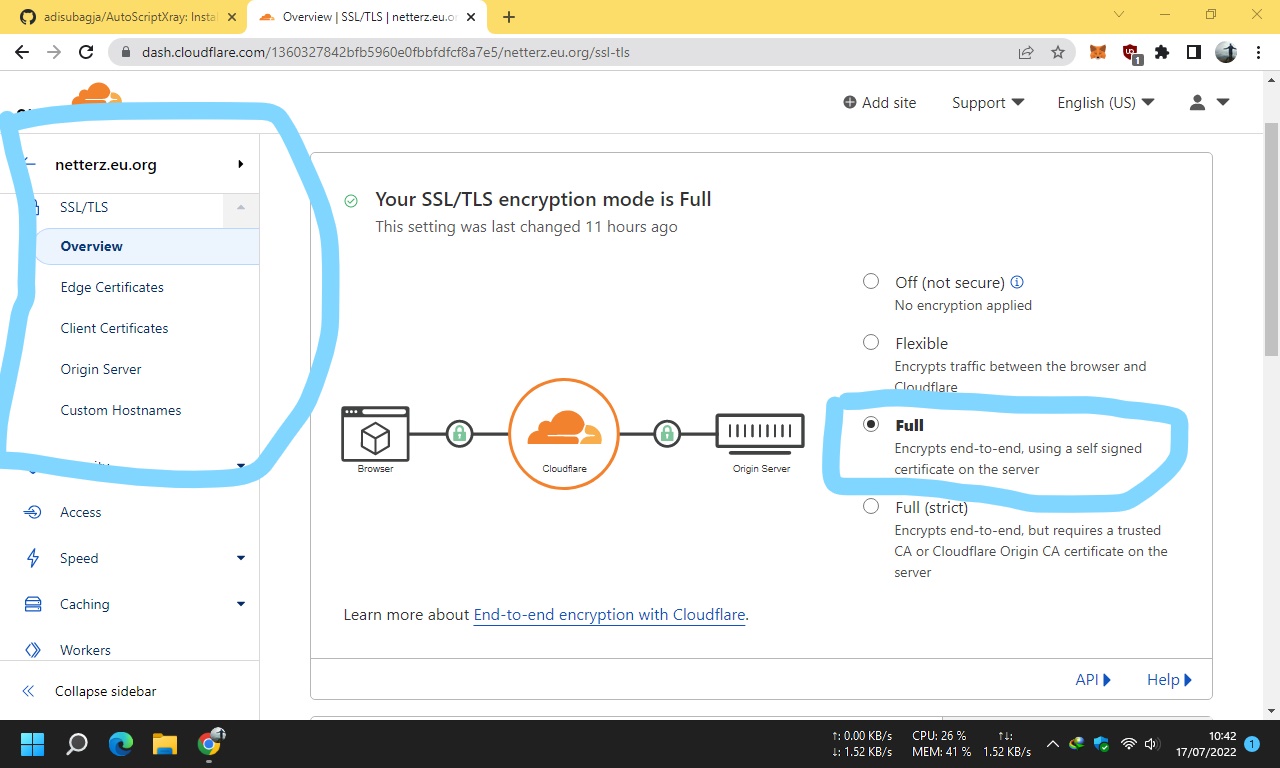
- Lalu pergi ke edge certificates disini kamu harus matiin Always HTTPS

- Buka tab Network di cloudflare kamu aktifin WebSocket dan gRPC nya

- Jangan gunain domain wildcard ya (**Ini bikin gRPC mu gabisa konek !!!**)
3. Login VPS kamu pakai **root** Ya
4. Ini kode instalasinya tinggal paste aja
```
rm -rf setup.sh && rm -rf adi.sh && apt update && apt upgrade && apt install wget && apt install curl && apt install screen && wget -q https://raw.githubusercontent.com/adisubagja/AutoScriptXray/master/adi.sh && chmod +x adi.sh && screen -S netzinstall ./adi.sh
```
**ALTERNATIF KALO GAGAL**
```
rm -rf setup.sh && rm -rf adi.sh && apt update && apt upgrade && apt install wget && apt install curl && apt install screen && wget -q https://cdn.statically.io/gh/adisubagja/autoscriptxray/master/adi.sh && chmod +x adi.sh && screen -S netzinstall ./adi.sh
```
5. Masukin domain kamu terus enter deh
6. Tunggu ampe selesai nanti reboot sendiri
# Perintah
- Ketik `menu` Detail Lebih Lanjut
# QnA
- Question : Kenapa akun saya gakonek bang?
- Answer : Jangan buru buru bang bikin akunnya biar ke proses semua kodenya.
- Question : Gapunya github bang?
- Answer : PM aja Telegramku !
- Question : Bang port 80 gajalan tapi di infonya aktif ?
- Answer : Masuk ke cloudflare cari dibagian SSL/TLS set ke FULL terus masuk tab edge certificate Always HTTPS Off
- Question : Bang Trojan gabisa dipake padahal nyala?
- Answer : Masuk Cloudflare set SSL/TLS ke Full
- Question : Bang gRPC ganyala?
- Answer : Pastiin domain kamu bukan wildcard kalo masih ganyala cek cloudflare kamu ke tab Network ONkan gRPC & WebSocketnya
# Kontak Admin
- Telegram : https://t.me/adisubagja
# Catatan & Riwayat
1. Script ini dulunya GRATIS !
2. Sekarang Installasi Minimal Donasi Rp.20.000 Kenapa bang jadi berbayar ? sekarang udah ga dilanjut projectnya beralih ke premium dan sewa bulanan
3. Jika kalian ingin menginstall ini secara paksa hubungi admin ! screenshoot donasi kalian kirim IPnya kudaftarin langsung (1 IP)
4. Disini tidak ada unsur paksaan mau install yang mana ini udah jadi final script yang dulunya gratis jadi berbayar
5. Terimakasih atas pengertiannya !
# Note Tambahan
Ketika kalian install script ini !
IP yang kalian daftarkan itu permanen bisa menggunakan script ini
Tetapi jika kalian IPnya berubah maka kalian tidak bisa menggunakannya lagi
Garansi dari admin cuma 1x pergantian dalam jangka waktu 7 hari
Sisanya kalian harus donasi ulang untuk mendaftarkan IP kalian yang baru
# Opini Pribadi
Script ini sangat cocok buat kebutuhan pribadi !
Jika kalian ingin untuk berjualan cobalah sewa script premium dari saya !
# Donasi / Support
- Qris

- Dana/Ovo/Gopay
- 082113695382
## Stargazers over time
[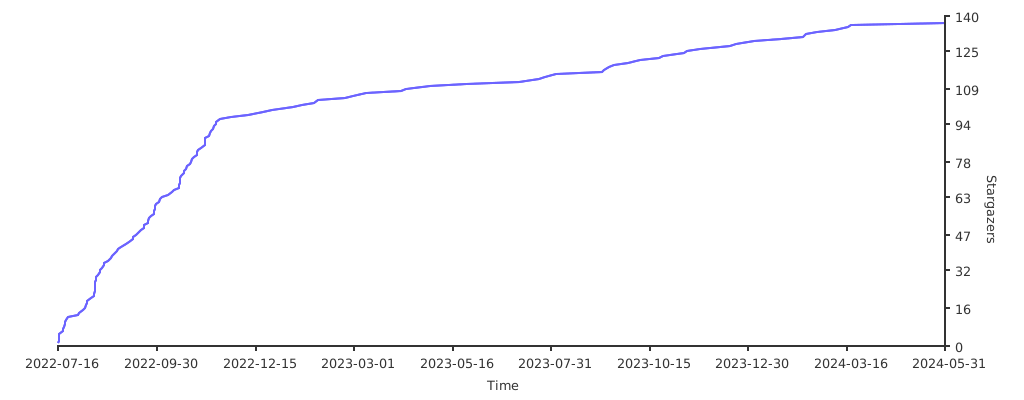](https://starchart.cc/adisubagja/AutoScriptXray)
================================================
FILE: README_en.md
================================================
# NETZ-XRAY
Installer Netz-Xray Multi Port 443 & 80
# OS Supported & Requirements
- Debian 9
- Debian 10 (Recommended)
- Ubuntu 18
- Ubuntu 20
- RAM Minimal 1GB (Max User 8-12)
- CPU Minimal 1 (2 For Faster/Great Installation)
# Feature
- VMESS WS TLS 443
- VMESS WS NON TLS 80
- VMESS GRPC 443
- VLESS WS TLS 443
- VLESS GRPC 443
- TROJAN WS TLS 443
- TROJAN GRPC 443
- SHADOWSOCKS WS 443
- SHADOWSOCKS GRPC 443
# How to Register Installation
1. Must have github account
2. Fork & Stars repo
3. Edit on our repo add 1 ip addres/acc github (**FETCH MERGE BEFORE EDIT**)
4. Then make Pull-Request
5. Will Approved (If Im Not Busy From RL)
# Guide Install
1. Fresh VPS Created (Only Support KVM)
2. Have Domain & Must be pointing DNS
- Please setup cloudflare using FULL on TAB TLS/SSL

- Always HTTPS Must be Off

- Setup Tab NETWORK Enable WebSocket & GRPC

- Please no using Wildcard (THIS MAKE GRPC NOT WORKING ON MY SCRIPT !!!)
3. Login VPS Using ROOT User
4. Just Copy
```
sysctl -w net.ipv6.conf.all.disable_ipv6=1 && sysctl -w net.ipv6.conf.default.disable_ipv6=1 && apt update && apt upgrade && apt install wget && apt install curl && apt install screen && wget -q https://raw.githubusercontent.com/adisubagja/AutoScriptXray/master/adi.sh && chmod +x adi.sh && screen -S netzinstall ./adi.sh
```
**IF FAILED TRY USING ALTERNATE**
```
sysctl -w net.ipv6.conf.all.disable_ipv6=1 && sysctl -w net.ipv6.conf.default.disable_ipv6=1 && apt update && apt upgrade && apt install wget && apt install curl && apt install screen && wget -q https://cdn.statically.io/gh/adisubagja/autoscriptxray/master/adi.sh && chmod +x adi.sh && screen -S netzinstall ./adi.sh
```
5. Put Domain & Enter
6. Enjoy
# Command
- Type `menu` for detail
# QnA
- Question : Why account not connected?
- Answer : Please check again, try check port open & create acc processing don't close using CTRL+C this make service not reload ! you must restart service all for back normally.
- Question : Gapunya github bang?
- Answer : PM aja Telegramku !
# Report Bug
- Telegram : https://t.me/adisubagja
- Telegram Group : https://t.me/+qmkQdAxx6_MxZjll
# Donasi / Support
- Qris

- Dana/Ovo/Gopay
- 082113695382
## Stargazers over time
[](https://starchart.cc/adisubagja/AutoScriptXray)
================================================
FILE: README_id.md
================================================
# NETZ-XRAY
Installasi Netz-Xray Multi Port 443 & 80
# OS Didukung & Spek Minimal
- Debian 9 (**Ditinggalkan**)
- Debian 10 (**Rekomendasi**)
- Ubuntu 18 LTS
- Ubuntu 20
- RAM Minimal 1GB (Max Akun 8-12)
- CPU Minimal 1 (2 Lebih bagus/Lebih cepet installnya)
# Fitur
- VMESS WS TLS 443
- VMESS WS NON TLS 80
- VMESS GRPC 443
- VLESS WS TLS 443
- VLESS GRPC 443
- TROJAN/TROJAN GO WS TLS 443
- TROJAN/TROJAN GO GRPC 443
- SHADOWSOCKS WS 443
- SHADOWSOCKS GRPC 443
- SHADOWSOCKS 2022 WS 443
- SHADOWSOCKS 2022 GRPC 443
# Cara Daftarin IPnya
1. Harus punya akun github
2. Fork & Stars Repo Ini
3. Edit Di Repo Kamu File register.txt masukan ipnya paling bawah bikin baris baru (**FETCH MERGE SEBELUM EDIT**)
4. Lalu pergi ke tab pull request kamu submit aja ke repo utamaku
5. Langsung diterima (Kalo ga sibuk)
# Cara Insttallnya
1. VPS baru dibikin (hanya bisa untuk KVM)
2. Punya domain yang udah dipointing (**Kalo Gapunya Chat Telegramku**)
- Pergi ke cloudflare ini konfiurasinya tab TLS/SSL Harus pilih yang FULL

- Lalu pergi ke edge certificates disini kamu harus matiin Always HTTPS

- Buka tab Network di cloudflare kamu aktifin WebSocket dan gRPC nya

- Jangan gunain domain wildcard ya (**Ini bikin gRPC mu gabisa konek !!!**)
3. Login VPS kamu pakai **root** Ya
4. Ini kode instalasinya tinggal paste aja
```
rm -rf setup.sh && rm -rf adi.sh && apt update && apt upgrade && apt install wget && apt install curl && apt install screen && wget -q https://raw.githubusercontent.com/adisubagja/AutoScriptXray/master/adi.sh && chmod +x adi.sh && screen -S netzinstall ./adi.sh
```
**ALTERNATIF KALO GAGAL**
```
rm -rf setup.sh && rm -rf adi.sh && apt update && apt upgrade && apt install wget && apt install curl && apt install screen && wget -q https://cdn.statically.io/gh/adisubagja/autoscriptxray/master/adi.sh && chmod +x adi.sh && screen -S netzinstall ./adi.sh
```
5. Masukin domain kamu terus enter deh
6. Tunggu ampe selesai nanti reboot sendiri
# Perintah
- Ketik `menu` Detail Lebih Lanjut
# QnA
- Question : Kenapa akun saya gakonek bang?
- Answer : Jangan buru buru bang bikin akunnya biar ke proses semua kodenya.
- Question : Gapunya github bang?
- Answer : PM aja Telegramku !
- Question : Bang port 80 gajalan tapi di infonya aktif ?
- Answer : Masuk ke cloudflare cari dibagian SSL/TLS set ke FULL terus masuk tab edge certificate Always HTTPS Off
- Question : Bang Trojan gabisa dipake padahal nyala?
- Answer : Masuk Cloudflare set SSL/TLS ke Full
- Question : Bang gRPC ganyala?
- Answer : Pastiin domain kamu bukan wildcard kalo masih ganyala cek cloudflare kamu ke tab Network ONkan gRPC & WebSocketnya
# Laporin Erorr
- Telegram : https://t.me/adisubagja
- Telegram Group : https://t.me/+qmkQdAxx6_MxZjll
# Donasi / Support
- Qris

- Dana/Ovo/Gopay
- 082113695382
## Stargazers over time
[](https://starchart.cc/adisubagja/AutoScriptXray)
================================================
FILE: register.txt
================================================
8.8.8.8
104.215.158.128
104.240.50.131
103.240.147.220
111.222.333.444
104.240.78.21
5.161.44.114
172.105.116.127
20.48.60.92
139.162.8.80
128.199.232.212
103.147.32.103
103.147.32.89
20.205.105.141
103.169.210.63
8.215.79.13
167.71.206.215
128.199.201.71
20.212.113.126
20.198.168.122
172.105.125.248
209.97.170.89
18.188.196.23
167.172.87.239
128.199.196.19
38.9.136.64
193.70.33.128
103.186.0.19
174.138.28.30
52.139.218.211
165.22.54.190
178.128.85.26
108.136.48.55
20.243.83.43
103.123.239.163
128.199.96.248
206.189.81.176
103.227.253.151
108.136.237.25
139.59.122.236
159.223.50.243
192.46.231.247
172.104.39.185
23.98.70.70
139.162.54.228
139.59.127.157
108.136.139.179
103.147.32.116
128.199.158.217
103.157.27.253
103.147.32.31
68.183.239.222
206.189.80.210
128.199.198.15
68.183.190.182
139.59.245.224
38.9.136.224
149.129.255.108
52.139.217.133
159.89.207.69
41.216.177.62
192.46.224.250
103.181.143.191
159.223.47.138
188.166.254.64
139.59.237.51
139.59.236.47
68.183.229.145
52.77.255.206
51.68.206.172
138.2.90.95
172.104.187.238
68.183.188.235
188.166.226.10
18.142.246.186
139.59.233.84
188.166.223.58
103.146.203.43
159.65.3.39
41.216.177.112
188.166.211.78
167.71.200.176
159.65.9.50
13.251.235.76
139.162.39.30
103.28.53.17
54.179.136.214
198.167.141.214
165.22.247.27
172.104.187.247
128.199.177.14
159.223.41.30
139.99.61.223
20.5.66.34
38.9.140.65
172.17.0.22
165.22.55.176
192.53.113.88
139.59.232.181
20.2.80.54
52.173.190.186
158.101.136.100
103.227.253.187
103.63.25.177
47.254.199.20
54.234.20.58
103.152.119.202
206.189.159.237
52.74.182.173
158.101.65.200
18.141.205.74
103.180.124.58
45.76.178.156
159.223.37.230
188.166.185.214
128.199.251.13
103.129.221.182
140.238.54.239
20.205.1.178
47.254.233.205
103.169.210.47
20.244.21.140
206.189.159.248
128.199.101.128
13.250.222.220
20.196.129.92
188.166.217.64
3.0.43.57
159.89.171.181
103.136.18.185
20.169.105.113
103.227.253.195
20.212.232.1
103.134.154.222
128.199.155.158
128.199.240.51
139.162.37.205
103.93.131.133
103.186.0.153
128.199.202.97
128.199.66.246
172.104.50.199
178.128.24.216
139.177.191.88
13.215.70.170
103.186.1.46
141.147.175.73
128.199.32.182
139.59.108.46
18.138.165.157
154.26.135.124
128.199.110.180
147.139.162.136
119.81.36.115
161.202.12.94
116.251.216.124
139.177.187.82
66.42.54.109
20.197.88.112
108.136.166.100
20.197.19.198
172.104.179.107
18.136.182.216
41.216.177.10
41.216.177.101
178.128.31.133
18.142.231.131
13.229.182.218
68.183.177.95
139.180.133.30
20.172.43.211
103.227.252.74
38.9.140.106
159.223.77.195
167.71.210.246
103.129.221.148
103.180.124.83
165.22.240.178
54.169.93.136
167.71.221.2
167.71.205.229
128.199.238.116
188.166.182.176
41.216.178.83
95.111.201.130
20.212.85.207
20.212.249.88
41.216.177.23
13.251.59.90
103.77.107.59
43.229.254.145
103.186.30.178
52.13.103.154
20.243.152.69
103.149.177.42
45.77.243.131
139.162.35.199
212.71.250.15
104.248.147.147
94.237.73.218
94.237.3.167
103.136.17.54
206.189.92.251
178.128.57.33
128.199.215.191
52.77.215.241
103.217.210.18
18.183.232.255
13.250.32.76
108.136.238.162
13.214.209.251
41.216.178.88
20.24.143.127
132.145.114.168
51.79.173.116
103.174.67.35
108.136.166.49
94.237.79.18
178.128.111.97
172.104.175.173
172.104.184.244
51.79.220.59
77.10.85.22
41.216.177.19
139.162.13.28
94.237.78.84
139.162.20.192
170.187.224.24
128.199.100.132
139.59.241.13
103.174.67.188
52.74.116.198
147.139.160.125
103.169.210.243
174.138.17.139
20.212.59.214
20.249.211.159
54.255.234.215
18.139.108.202
178.128.117.225
20.244.122.152
146.19.196.194
188.166.187.58
34.101.215.34
108.137.132.234
20.243.120.63
68.183.190.22
172.104.33.102
172.104.49.221
170.187.224.53
18.141.11.5
128.199.228.44
172.31.16.209
165.22.105.129
139.162.29.251
103.174.67.84
159.223.32.14
103.227.253.244
103.253.24.14
128.199.137.174
128.199.65.231
95.111.192.236
103.168.146.211
103.147.32.45
94.237.67.87
20.212.171.246
124.217.246.201
178.128.56.99
103.150.103.38
103.147.32.38
203.194.112.107
18.143.133.144
172.104.176.157
20.39.195.235
103.163.161.134
51.83.140.52
103.179.44.163
167.71.197.171
103.174.115.116
103.31.38.246
18.139.209.25
157.245.152.193
18.143.158.195
128.199.122.142
104.248.157.4
103.157.26.137
54.169.79.94
103.186.117.9
93.123.82.34
35.240.204.129
206.189.150.46
54.254.110.0
116.193.190.85
170.187.231.70
104.248.147.121
207.46.237.9
20.239.52.84
167.172.90.169
35.247.179.156
128.199.90.104
188.166.221.104
43.229.254.149
149.129.240.69
167.172.93.29
103.102.152.164
167.172.77.100
167.172.87.237
34.126.87.223
20.243.210.160
172.18.0.1
172.17.0.4
128.199.222.164
34.138.22.40
103.191.92.177
54.151.171.101
103.227.255.24
18.177.234.247
128.199.191.71
103.175.206.15
54.255.212.184
52.77.246.28
20.78.103.7
103.123.239.56
152.69.190.33
122.248.211.115
13.250.118.206
13.76.193.145
13.67.108.232
103.181.142.73
13.231.39.21
13.229.52.166
108.137.176.240
108.137.3.42
20.210.201.62
128.199.123.41
54.255.160.0
103.227.255.45
103.83.157.134
167.172.80.134
203.194.113.14
159.223.95.153
167.71.201.252
167.172.84.30
108.136.58.9
18.140.51.36
8.219.175.137
103.198.26.45
108.136.56.217
108.137.180.61
139.162.8.60
134.209.109.238
40.115.197.27
20.187.76.109
157.230.183.198
8.219.43.153
103.147.4.9
103.160.212.110
128.199.198.184
108.136.150.103
108.136.57.130
159.65.13.202
143.198.208.145
128.199.82.108
20.255.13.40
20.239.144.71
68.183.182.98
94.237.74.95
167.172.88.165
128.199.169.80
13.250.7.201
146.19.196.191
67.205.128.251
139.59.98.117
18.141.164.102
129.153.126.19
139.59.98.210
94.237.77.169
103.227.254.117
178.128.56.15
178.128.16.170
188.166.176.241
103.227.254.96
103.227.253.180
143.198.82.32
103.186.1.105
35.78.68.15
103.150.197.71
128.199.119.78
38.9.140.224
203.194.112.52
128.199.216.221
159.223.44.178
167.172.72.17
112.78.36.37
41.216.177.144
159.223.75.119
54.255.156.222
103.167.34.69
34.128.110.45
139.59.227.139
188.166.253.243
202.125.82.219
3.1.123.96
103.167.34.20
165.22.255.91
103.150.116.150
159.223.92.169
103.145.163.216
165.232.170.107
167.172.92.175
3.1.141.164
38.9.140.121
103.250.10.166
165.22.96.17
104.248.149.117
159.223.41.119
103.150.121.237
95.174.68.220
34.101.108.59
143.198.210.129
167.99.74.54
167.172.95.60
103.59.94.73
41.216.178.80
128.199.221.200
146.190.98.151
165.22.246.199
165.22.101.40
107.174.212.119
103.63.24.51
103.235.74.25
43.218.42.41
68.183.185.98
103.65.236.122
203.194.113.124
165.22.110.160
173.44.139.165
173.44.139.163
203.175.11.72
178.128.109.148
167.172.94.124
103.28.148.59
103.190.29.194
146.190.108.196
91.192.81.35
188.166.178.123
34.142.180.215
34.101.172.173
103.149.177.104
146.190.109.119
167.71.196.168
167.172.81.7
188.166.178.116
103.176.45.204
139.180.129.162
103.16.117.42
41.216.177.30
103.175.219.47
143.198.220.178
18.139.121.234
54.179.163.133
34.101.188.116
147.139.190.204
54.151.167.246
188.166.184.215
188.166.214.111
8.219.151.35
143.198.83.2
8.222.211.116
178.128.80.220
185.81.29.65
202.10.36.73
43.228.214.247
203.175.11.218
41.216.178.109
165.22.243.51
167.172.94.7
159.223.49.78
103.215.24.11
203.175.127.44
103.172.1.249
109.123.238.42
203.194.114.82
103.23.198.157
103.186.0.127
gitextract_9_bp8_8p/ ├── .github/ │ ├── FUNDING.yml │ └── workflows/ │ ├── approve-andra.yml │ ├── auto-merge.yml │ └── comment.yml ├── .gitignore ├── Changelogs.md ├── LICENSE ├── README.md ├── README_en.md ├── README_id.md ├── adi.sh ├── certfix.sh ├── img/ │ ├── https-cf.png.bak │ ├── network-cf.png.bak │ └── tls-cf.png.bak ├── oldadi.sh └── register.txt
Condensed preview — 17 files, each showing path, character count, and a content snippet. Download the .json file or copy for the full structured content (24K chars).
[
  {
    "path": ".github/FUNDING.yml",
    "chars": 875,
    "preview": "# These are supported funding model platforms\n\ngithub: # Replace with up to 4 GitHub Sponsors-enabled usernames e.g., [u"
  },
  {
    "path": ".github/workflows/approve-andra.yml",
    "chars": 296,
    "preview": "name: Auto approve\n\non:\n  pull_request\n\njobs:\n  auto-approve:\n    runs-on: ubuntu-latest\n    permissions:\n      pull-req"
  },
  {
    "path": ".github/workflows/auto-merge.yml",
    "chars": 666,
    "preview": "name: automerge\non:\n  pull_request:\n    types:\n      - labeled\n      - unlabeled\n      - synchronize\n      - opened\n    "
  },
  {
    "path": ".github/workflows/comment.yml",
    "chars": 641,
    "preview": "name: Auto Comment\non: [issues, pull_request]\njobs:\n  run:\n    runs-on: ubuntu-latest\n    steps:\n      - uses: wow-actio"
  },
  {
    "path": ".gitignore",
    "chars": 36,
    "preview": "vendor/\r\n.env\r\n.history\r\n.lh\r\n.bak\r\n"
  },
  {
    "path": "Changelogs.md",
    "chars": 2264,
    "preview": "# Patch List\n\n# 25-10-2022\n- Core update 1.6.1\n- Minor fix (Too many arguments)\n- uTLS Added Client Side (Default *chrom"
  },
  {
    "path": "LICENSE",
    "chars": 1068,
    "preview": "MIT License\n\nCopyright (c) 2022 Adi Subagja\n\nPermission is hereby granted, free of charge, to any person obtaining a cop"
  },
  {
    "path": "README.md",
    "chars": 3819,
    "preview": "# Installer Netz-Xray\n\n- XRAY ONLY\n- DEBIAN 10 / Ubuntu 20 LTS ONLY\n- CPU MIN 1 CORE\n- RAM 1GB\n- VMESS WS TLS 443\n- VMES"
  },
  {
    "path": "README_en.md",
    "chars": 2730,
    "preview": "# NETZ-XRAY\nInstaller Netz-Xray Multi Port 443 & 80\n\n# OS Supported & Requirements\n- Debian 9\n- Debian 10 (Recommended)\n"
  },
  {
    "path": "README_id.md",
    "chars": 3429,
    "preview": "# NETZ-XRAY\r\nInstallasi Netz-Xray Multi Port 443 & 80\r\n\r\n# OS Didukung & Spek Minimal\r\n- Debian 9 (**Ditinggalkan**)\r\n- "
  },
  {
    "path": "register.txt",
    "chars": 7062,
    "preview": "8.8.8.8\n104.215.158.128\n104.240.50.131\n103.240.147.220\n111.222.333.444\n104.240.78.21\n5.161.44.114\n172.105.116.127\n20.48."
  }
]

// ... and 6 more files (download for full content)
About this extraction
This page contains the full source code of the adisubagja/AutoScriptXray GitHub repository, extracted and formatted as plain text for AI agents and large language models (LLMs). The extraction includes 17 files (22.3 KB), approximately 8.8k tokens. Use this with OpenClaw, Claude, ChatGPT, Cursor, Windsurf, or any other AI tool that accepts text input. You can copy the full output to your clipboard or download it as a .txt file.
Extracted by GitExtract — free GitHub repo to text converter for AI. Built by Nikandr Surkov.