Repository: adityatelange/evil-winrm-py
Branch: main
Commit: e956d38568ae
Files: 21
Total size: 128.4 KB
Directory structure:
gitextract_ce49hs3q/

├── .github/
│   └── workflows/
│       └── wiki.yml
├── .gitignore
├── LICENSE
├── README.md
├── docs/
│   ├── README.md
│   ├── development.md
│   ├── install.md
│   ├── knowledgebase.md
│   ├── release.md
│   ├── sample/
│   │   └── krb5.conf
│   └── usage.md
├── evil_winrm_py/
│   ├── __init__.py
│   ├── _ps/
│   │   ├── __init__.py
│   │   ├── exec.ps1
│   │   ├── fetch.ps1
│   │   ├── loaddll.ps1
│   │   └── send.ps1
│   ├── evil_winrm_py.py
│   └── pypsrp_ewp/
│       ├── __init__.py
│       └── wsman.py
└── setup.py
================================================
FILE CONTENTS
================================================
================================================
FILE: .github/workflows/wiki.yml
================================================
name: Publish wiki
on:
push:
branches: [main]
paths:
- docs/**
- .github/workflows/wiki.yml
concurrency:
group: publish-wiki
cancel-in-progress: true
permissions:
contents: write
jobs:
publish-wiki:
runs-on: ubuntu-latest
steps:
- uses: actions/checkout@v3
- uses: Andrew-Chen-Wang/github-wiki-action@v5.0.1
with:
path: docs
ignore: |
*.conf
================================================
FILE: .gitignore
================================================
# Byte-compiled / optimized / DLL files
__pycache__/
*.py[cod]
*$py.class
# C extensions
*.so
# Distribution / packaging
.Python
build/
develop-eggs/
dist/
downloads/
eggs/
.eggs/
lib/
lib64/
parts/
sdist/
var/
wheels/
share/python-wheels/
*.egg-info/
.installed.cfg
*.egg
MANIFEST
# PyInstaller
# Usually these files are written by a python script from a template
# before PyInstaller builds the exe, so as to inject date/other infos into it.
*.manifest
*.spec
# Installer logs
pip-log.txt
pip-delete-this-directory.txt
# Unit test / coverage reports
htmlcov/
.tox/
.nox/
.coverage
.coverage.*
.cache
nosetests.xml
coverage.xml
*.cover
*.py,cover
.hypothesis/
.pytest_cache/
cover/
# Translations
*.mo
*.pot
# Django stuff:
*.log
local_settings.py
db.sqlite3
db.sqlite3-journal
# Flask stuff:
instance/
.webassets-cache
# Scrapy stuff:
.scrapy
# Sphinx documentation
docs/_build/
# PyBuilder
.pybuilder/
target/
# Jupyter Notebook
.ipynb_checkpoints
# IPython
profile_default/
ipython_config.py
# pyenv
# For a library or package, you might want to ignore these files since the code is
# intended to run in multiple environments; otherwise, check them in:
# .python-version
# pipenv
# According to pypa/pipenv#598, it is recommended to include Pipfile.lock in version control.
# However, in case of collaboration, if having platform-specific dependencies or dependencies
# having no cross-platform support, pipenv may install dependencies that don't work, or not
# install all needed dependencies.
#Pipfile.lock
# UV
# Similar to Pipfile.lock, it is generally recommended to include uv.lock in version control.
# This is especially recommended for binary packages to ensure reproducibility, and is more
# commonly ignored for libraries.
#uv.lock
# poetry
# Similar to Pipfile.lock, it is generally recommended to include poetry.lock in version control.
# This is especially recommended for binary packages to ensure reproducibility, and is more
# commonly ignored for libraries.
# https://python-poetry.org/docs/basic-usage/#commit-your-poetrylock-file-to-version-control
#poetry.lock
# pdm
# Similar to Pipfile.lock, it is generally recommended to include pdm.lock in version control.
#pdm.lock
# pdm stores project-wide configurations in .pdm.toml, but it is recommended to not include it
# in version control.
# https://pdm.fming.dev/latest/usage/project/#working-with-version-control
.pdm.toml
.pdm-python
.pdm-build/
# PEP 582; used by e.g. github.com/David-OConnor/pyflow and github.com/pdm-project/pdm
__pypackages__/
# Celery stuff
celerybeat-schedule
celerybeat.pid
# SageMath parsed files
*.sage.py
# Environments
.env
.venv
env/
venv/
ENV/
env.bak/
venv.bak/
# Spyder project settings
.spyderproject
.spyproject
# Rope project settings
.ropeproject
# mkdocs documentation
/site
# mypy
.mypy_cache/
.dmypy.json
dmypy.json
# Pyre type checker
.pyre/
# pytype static type analyzer
.pytype/
# Cython debug symbols
cython_debug/
# PyCharm
# JetBrains specific template is maintained in a separate JetBrains.gitignore that can
# be found at https://github.com/github/gitignore/blob/main/Global/JetBrains.gitignore
# and can be added to the global gitignore or merged into this file. For a more nuclear
# option (not recommended) you can uncomment the following to ignore the entire idea folder.
#.idea/
# Ruff stuff:
.ruff_cache/
# PyPI configuration file
.pypirc
# Test Files
test_*.py
================================================
FILE: LICENSE
================================================
MIT License
Copyright (c) 2025 Aditya Telange
Permission is hereby granted, free of charge, to any person obtaining a copy
of this software and associated documentation files (the "Software"), to deal
in the Software without restriction, including without limitation the rights
to use, copy, modify, merge, publish, distribute, sublicense, and/or sell
copies of the Software, and to permit persons to whom the Software is
furnished to do so, subject to the following conditions:
The above copyright notice and this permission notice shall be included in all
copies or substantial portions of the Software.
THE SOFTWARE IS PROVIDED "AS IS", WITHOUT WARRANTY OF ANY KIND, EXPRESS OR
IMPLIED, INCLUDING BUT NOT LIMITED TO THE WARRANTIES OF MERCHANTABILITY,
FITNESS FOR A PARTICULAR PURPOSE AND NONINFRINGEMENT. IN NO EVENT SHALL THE
AUTHORS OR COPYRIGHT HOLDERS BE LIABLE FOR ANY CLAIM, DAMAGES OR OTHER
LIABILITY, WHETHER IN AN ACTION OF CONTRACT, TORT OR OTHERWISE, ARISING FROM,
OUT OF OR IN CONNECTION WITH THE SOFTWARE OR THE USE OR OTHER DEALINGS IN THE
SOFTWARE.
================================================
FILE: README.md
================================================
<div align=center>
<img height="150" alt="ewp-logo" src="https://raw.githubusercontent.com/adityatelange/evil-winrm-py/refs/heads/main/assets/logo.svg" />
<h1>evil-winrm-py</h1>
[](https://pypi.org/project/evil-winrm-py/)



[](https://github.com/adityatelange/evil-winrm-py/wiki)
</div>
`evil-winrm-py` is a python-based tool for executing commands on remote Windows machines using the WinRM (Windows Remote Management) protocol. It provides an interactive shell with enhanced features like file upload/download, command history, and colorized output. It supports various authentication methods including NTLM, Pass-the-Hash, Certificate, and Kerberos.
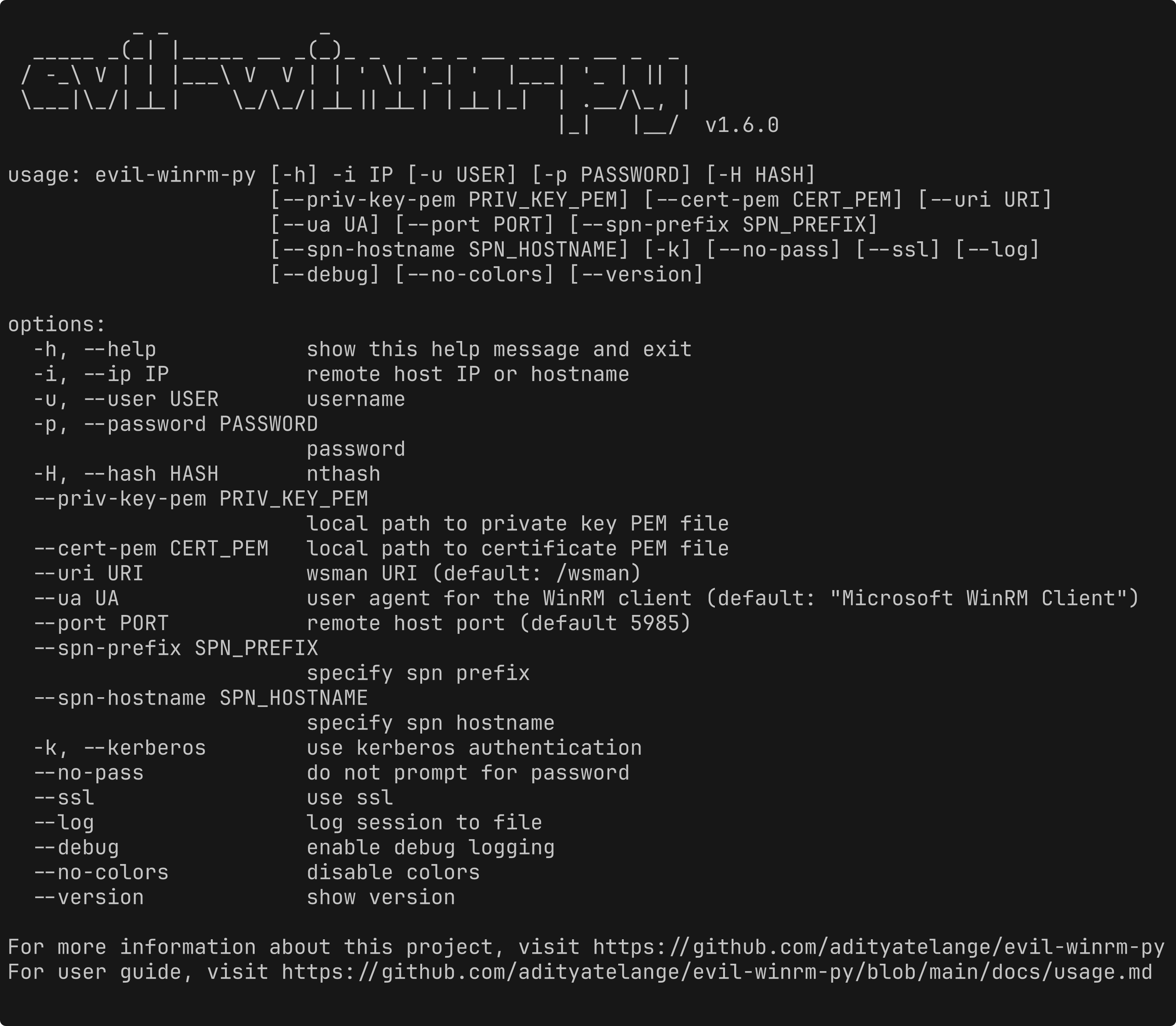
> [!NOTE]
> This tool is designed strictly for educational, ethical use, and authorized penetration testing. Always ensure you have explicit authorization before accessing any system. Unauthorized access or misuse of this tool is both illegal and unethical.
## Motivation
The original evil-winrm is written in Ruby, which can be a hurdle for some users. Rewriting it in Python makes it more accessible and easier to use, while also allowing us to leverage Python’s rich ecosystem for added features and flexibility.
I also wanted to learn more about winrm and its internals, so this project will also serve as a learning experience for me.
## Features
- Execute commands on remote Windows machines via an interactive shell.
- Download files from the remote host to the local machine.
- Upload files from the local machine to the remote host.
- Progress bar for file transfers with speed and time estimation.
- Stable and reliable file transfer including support for large files with MD5 checksum verification.
- Auto-complete local and remote file paths (even those with spaces) with `Tab` completion.
- Auto-complete PowerShell cmdlets/helpers with `Tab` completion. 🆕
- Load PowerShell functions from local scripts into the interactive shell. 🆕
- Run local PowerShell scripts on the remote host. 🆕
- Load local DLLs (in-memory) as PowerShell modules on the remote host. 🆕
- Upload and execute local EXEs (in-memory) on the remote host. 🆕
- List the running services (except system services) on the remote host. 🆕
- Enable logging and debugging for better traceability.
- Navigate command history using `up`/`down` arrow keys.
- Display colorized output for improved readability.
- Lightweight and Python-based for ease of use.
- Keyboard Interrupt (Ctrl+C / Ctrl+D) support to terminate long-running commands gracefully.
Includes support for:
- NTLM authentication.
- Pass-the-Hash authentication.
- Certificate authentication.
- Kerberos authentication with custom SPN prefix and hostname options.
- SSL to secure communication with the remote host.
- custom WSMan URIs.
- custom user agent for the WinRM client.
Detailed documentation can be found in the [docs](https://github.com/adityatelange/evil-winrm-py/blob/main/docs) directory.
## Installation (Windows/Linux)
#### Installation of Kerberos prerequisites on Linux
```bash
sudo apt install gcc python3-dev libkrb5-dev krb5-pkinit
# Optional: krb5-user
```
### Install `evil-winrm-py`
> You may use [pipx](https://pipx.pypa.io/stable/) or [uv](https://docs.astral.sh/uv/) instead of pip to install evil-winrm-py. `pipx`/`uv` is a tool to install and run Python applications in isolated environments, which helps prevent dependency conflicts by keeping the tool's dependencies separate from your system's Python packages.
```bash
pip install evil-winrm-py
pip install evil-winrm-py[kerberos] # for kerberos support on Linux
# Note: building gssapi and krb5 packages may take some time, so be patient.
```
or if you want to install with latest commit from the main branch you can do so by cloning the repository and installing it with `pip`/`pipx`/`uv`:
```bash
git clone https://github.com/adityatelange/evil-winrm-py
cd evil-winrm-py
pip install .
```
### Update
```bash
pip install --upgrade evil-winrm-py
```
### Uninstall
```bash
pip uninstall evil-winrm-py
```
Check [Installation Guide](https://github.com/adityatelange/evil-winrm-py/blob/main/docs/install.md) for more details.
## Availability on Unix distributions
[](https://repology.org/project/evil-winrm-py/versions)
For above mentioned distributions, you can install `evil-winrm-py` directly from their package managers. Thanks to the package maintainers for packaging and maintaining `evil-winrm-py` in their respective distributions.
## Usage
Details on how to use `evil-winrm-py` can be found in the [Usage Guide](https://github.com/adityatelange/evil-winrm-py/blob/main/docs/usage.md).
```bash
usage: evil-winrm-py [-h] -i IP [-u USER] [-p PASSWORD] [-H HASH]
[--priv-key-pem PRIV_KEY_PEM] [--cert-pem CERT_PEM] [--uri URI]
[--ua UA] [--port PORT] [--spn-prefix SPN_PREFIX]
[--spn-hostname SPN_HOSTNAME] [-k] [--no-pass] [--ssl] [--log]
[--debug] [--no-colors] [--version]
options:
-h, --help show this help message and exit
-i, --ip IP remote host IP or hostname
-u, --user USER username
-p, --password PASSWORD
password
-H, --hash HASH nthash
--priv-key-pem PRIV_KEY_PEM
local path to private key PEM file
--cert-pem CERT_PEM local path to certificate PEM file
--uri URI wsman URI (default: /wsman)
--ua UA user agent for the WinRM client (default: "Microsoft WinRM Client")
--port PORT remote host port (default 5985)
--spn-prefix SPN_PREFIX
specify spn prefix
--spn-hostname SPN_HOSTNAME
specify spn hostname
-k, --kerberos use kerberos authentication
--no-pass do not prompt for password
--ssl use ssl
--log log session to file
--debug enable debug logging
--no-colors disable colors
--version show version
For more information about this project, visit https://github.com/adityatelange/evil-winrm-py
For user guide, visit https://github.com/adityatelange/evil-winrm-py/blob/main/docs/usage.md
```
Example:
```bash
evil-winrm-py -i 192.168.1.100 -u Administrator -p P@ssw0rd --ssl
```
## Menu Commands (inside evil-winrm-py shell)
```bash
Menu:
[+] services - Show the running services (except system services)
[+] upload <local_path> <remote_path> - Upload a file
[+] download <remote_path> <local_path> - Download a file
[+] loadps <local_path>.ps1 - Load PowerShell functions from a local script
[+] runps <local_path>.ps1 - Run a local PowerShell script on the remote host
[+] loaddll <local_path>.dll - Load a local DLL (in-memory) as a module on the remote host
[+] runexe <local_path>.exe [args] - Upload and execute (in-memory) a local EXE on the remote host
[+] menu - Show this menu
[+] clear, cls - Clear the screen
[+] exit - Exit the shell
Note: Use absolute paths for upload/download for reliability.
```
## Credits
- Original evil-winrm project - https://github.com/Hackplayers/evil-winrm
- PowerShell Remoting Protocol for Python - https://github.com/jborean93/pypsrp
- Prompt Toolkit - https://github.com/prompt-toolkit/python-prompt-toolkit
- tqdm - https://github.com/tqdm/tqdm
- Thanks to [Github Coplilot](https://github.com/features/copilot) and [Google Gemini](https://gemini.google.com/app) for code suggestions and improvements.
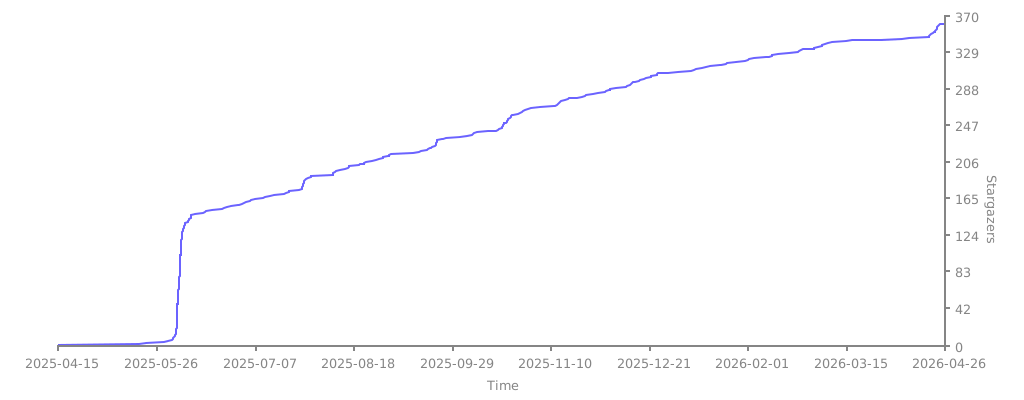
## Stargazers over time
[](https://starchart.cc/adityatelange/evil-winrm-py)
================================================
FILE: docs/README.md
================================================
## Quick Links
- **[Usage Guide](./usage.md)**
- **[Installation Guide](./install.md)**
- [Knowledge Base](./knowledgebase.md)
- [Development Guide](./development.md)
- [Release Guide](./release.md)
================================================
FILE: docs/development.md
================================================
# Development Environment Setup
## Setup
Download the repository.
```bash
git clone https://github.com/adityatelange/evil-winrm-py
cd evil-winrm-py
```
Create a virtual environment (optional but recommended):
```bash
python3 -m venv venv
source venv/bin/activate
```
Install the required packages:
```bash
pip install pypsrp[kerberos]==0.8.1 prompt_toolkit==3.0.51 tqdm==4.67.1
```
## Create a test file
```python
# File: test.py
from evil_winrm_py.evil_winrm_py import main
if __name__ == "__main__":
main()
```
## Run the test file
```bash
python test.py -h
```
================================================
FILE: docs/install.md
================================================
# Installation Guide
`evil-winrm-py` is available on:
- PyPI - https://pypi.org/project/evil-winrm-py/
- Github - https://github.com/adityatelange/evil-winrm-py
- Kali Linux - https://pkg.kali.org/pkg/evil-winrm-py
- Parrot OS - https://gitlab.com/parrotsec/packages/evil-winrm-py
## For Kali Linux and Parrot OS Users
If you are using Kali Linux or Parrot OS, you can install `evil-winrm-py` directly from the package manager:
```bash
sudo apt update
sudo apt install evil-winrm-py
```
---
## Installation of Kerberos Dependencies on Linux
```bash
sudo apt install gcc python3-dev libkrb5-dev krb5-pkinit
# Optional: krb5-user
```
> [!NOTE]
> `[kerberos]` is an optional dependency that includes the necessary packages for Kerberos authentication support. If you do not require Kerberos authentication, you can install `evil-winrm-py` without this extra.
## Using `pip`
You can install the package directly from PyPI using pip:
```bash
pip install evil-winrm-py[kerberos]
```
Installing latest development version directly from GitHub:
```bash
pip install 'evil-winrm-py[kerberos] @ git+https://github.com/adityatelange/evil-winrm-py'
```
## Using `pipx`
For a more isolated installation, you can use pipx:
```bash
pipx install evil-winrm-py[kerberos]
```
Installing latest development version directly from GitHub:
```bash
pipx install 'evil-winrm-py[kerberos] @ git+https://github.com/adityatelange/evil-winrm-py'
```
## Using `uv`
If you prefer using `uv`, you can install the package with the following command:
```bash
uv tool install evil-winrm-py[kerberos]
```
Installing latest development version directly from GitHub:
```bash
uv tool install git+https://github.com/adityatelange/evil-winrm-py[kerberos]
```
================================================
FILE: docs/knowledgebase.md
================================================
# Knowledge Base
## Negotiate authentication
A negotiated, single sign on type of authentication that is the Windows implementation of [Simple and Protected GSSAPI Negotiation Mechanism (SPNEGO)](https://learn.microsoft.com/en-us/windows/win32/winrm/windows-remote-management-glossary). SPNEGO negotiation determines whether authentication is handled by Kerberos or NTLM. Kerberos is the preferred mechanism. Negotiate authentication on Windows-based systems is also called Windows Integrated Authentication.
Reference:
- https://learn.microsoft.com/en-us/windows/win32/winrm/windows-remote-management-glossary#:~:text=A%20negotiated%2C%20single,Windows%20Integrated%20Authentication
- https://learn.microsoft.com/en-us/windows/win32/winrm/authentication-for-remote-connections#negotiate-authentication
## WinRM - Types of Authentication
1. Basic Authentication
2. Digest Authentication
3. Kerberos Authentication
4. Negotiate Authentication
5. NTLM Authentication
6. Certificate Authentication
7. CredSSP Authentication
Reference: https://learn.microsoft.com/en-us/windows/win32/winrm/authentication-for-remote-connections
Enable Auth
```powershell
Set-Item -Path WSMan:\localhost\Service\Auth\Certificate -Value $true
```
## Configure WinRM HTTPS with self-signed certificate
```powershell
# https://gist.github.com/gregjhogan/dbe0bfa277d450c049e0bbdac6142eed
$cert = New-SelfSignedCertificate -CertstoreLocation Cert:\LocalMachine\My -DnsName $env:COMPUTERNAME
Enable-PSRemoting -SkipNetworkProfileCheck -Force
New-Item -Path WSMan:\LocalHost\Listener -Transport HTTPS -Address * -CertificateThumbPrint $cert.Thumbprint –Force
New-NetFirewallRule -DisplayName "Windows Remote Management (HTTPS-In)" -Name "Windows Remote Management (HTTPS-In)" -Profile Any -LocalPort 5986 -Protocol TCP
```
Reference: https://learn.microsoft.com/en-us/windows/win32/winrm/installation-and-configuration-for-windows-remote-management
- **Get the current WinRM configuration**
```powershell
winrm get winrm/config
```
- **Enumerate WinRM listeners**
```powershell
winrm enumerate winrm/config/listener
```
## Configure WinRM Certificate Authentication
Certificate authentication is a method of authenticating to a remote computer using a certificate. The certificate must be installed on the remote computer and the client must have access to the private key of the certificate.
**Enable Certificate Authentication**
```powershell
Set-Item -Path WSMan:\localhost\Service\Auth\Certificate -Value $true
```
**Generate a certificate using PowerShell**
```powershell
# Set the username to the name of the user the certificate will be mapped to
$username = 'local-user'
$clientParams = @{
CertStoreLocation = 'Cert:\CurrentUser\My'
NotAfter = (Get-Date).AddYears(1)
Provider = 'Microsoft Software Key Storage Provider'
Subject = "CN=$username"
TextExtension = @("2.5.29.37={text}1.3.6.1.5.5.7.3.2","2.5.29.17={text}upn=$username@localhost")
Type = 'Custom'
}
$cert = New-SelfSignedCertificate @clientParams
$certKeyName = [System.Security.Cryptography.X509Certificates.RSACertificateExtensions]::GetRSAPrivateKey(
$cert).Key.UniqueName
# Exports the public cert.pem and key cert.pfx
Set-Content -Path "cert.pem" -Value @(
"-----BEGIN CERTIFICATE-----"
[Convert]::ToBase64String($cert.RawData) -replace ".{64}", "$&`n"
"-----END CERTIFICATE-----"
)
$certPfxBytes = $cert.Export('Pfx', '')
[System.IO.File]::WriteAllBytes("$pwd\cert.pfx", $certPfxBytes)
# Removes the private key and cert from the store after exporting
$keyPath = [System.IO.Path]::Combine($env:AppData, 'Microsoft', 'Crypto', 'Keys', $certKeyName)
Remove-Item -LiteralPath "Cert:\CurrentUser\My\$($cert.Thumbprint)" -Force
Remove-Item -LiteralPath $keyPath -Force
```
We now have `cert.pem` and `cert.pfx` files.
**Import Certificate to the Certificate Store**
```powershell
$store = Get-Item -LiteralPath Cert:\LocalMachine\Root
$store.Open('ReadWrite')
$store.Add($cert)
$store.Dispose()
```
**Mapping Certificate to a Local Account**
```powershell
# Will prompt for the password of the user.
$credential = Get-Credential local-user
$certChain = [System.Security.Cryptography.X509Certificates.X509Chain]::new()
[void]$certChain.Build($cert)
$caThumbprint = $certChain.ChainElements.Certificate[-1].Thumbprint
$certMapping = @{
Path = 'WSMan:\localhost\ClientCertificate'
Subject = $cert.GetNameInfo('UpnName', $false)
Issuer = $caThumbprint
Credential = $credential
Force = $true
}
New-Item @certMapping
```
**Convert to PEM format**
```bash
openssl pkcs12 \
-in cert.pfx \
-nocerts \
-nodes \
-passin pass: |
sed -ne '/-BEGIN PRIVATE KEY-/,/-END PRIVATE KEY-/p' > priv-key.pem
```
User `local-user` can now auth using private key `priv_key.pem` and public key `cert.pem`.
Reference: https://docs.ansible.com/ansible/latest/os_guide/windows_winrm_certificate.html
================================================
FILE: docs/release.md
================================================
# Releasing a new version on PyPI
Read More: https://packaging.python.org/en/latest/guides/distributing-packages-using-setuptools/
## Setup
```bash
python3 -m pip install --upgrade build
python3 -m pip install --upgrade twine
```
## Bump version
```bash
# File: evil_winrm_py/__init__.py
__version__ = "X.Y.Z" # update this to the new version
```
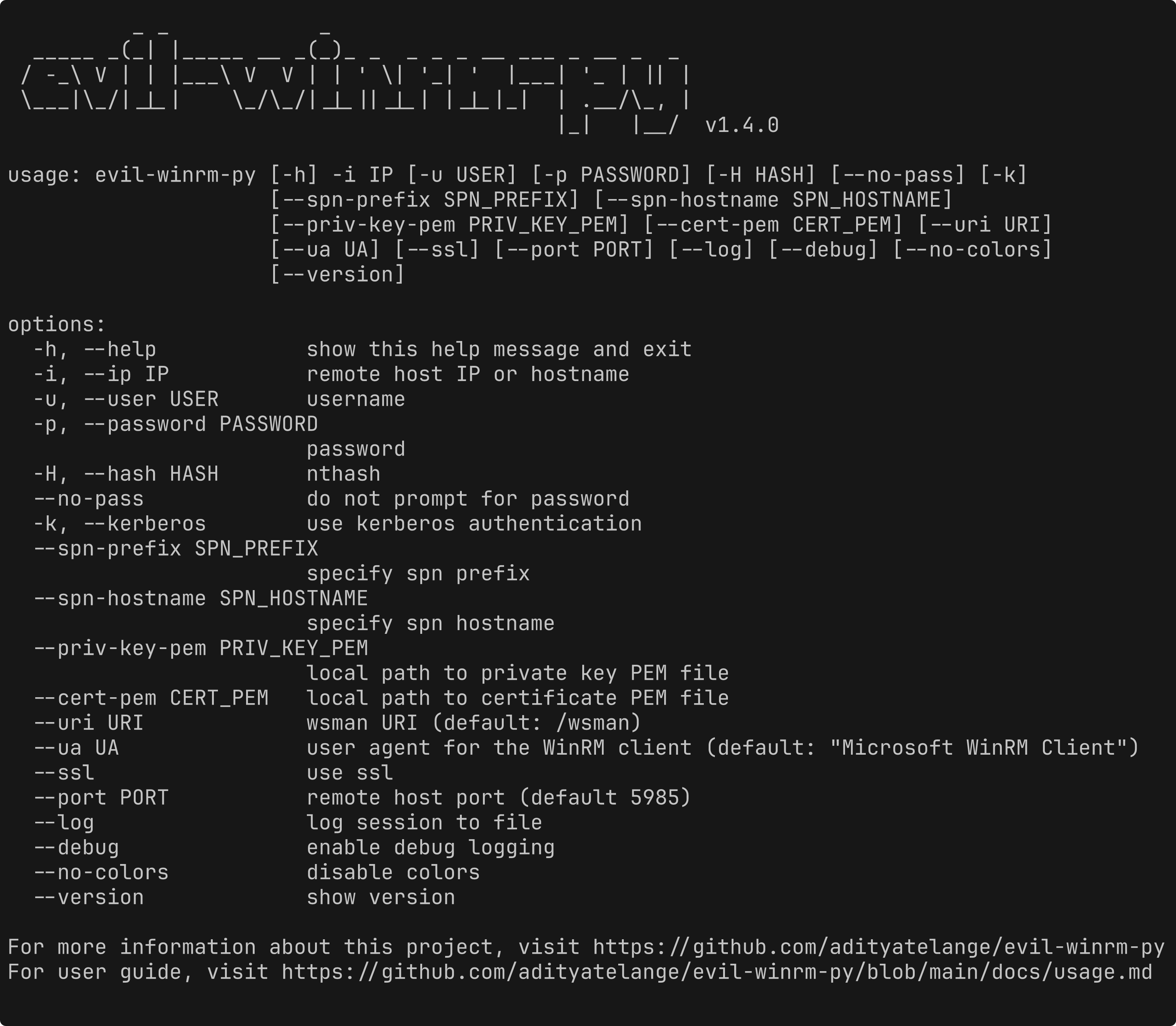
## Sceenshot
Creating screenshots for the README using the [freeze](https://github.com/charmbracelet/freeze) tool.
```bash
freeze --execute "evil-winrm-py -h" -o assets/terminal.png --padding 5 --border.radius 4 # --wrap 120
```
Update the screenshot tag in the README file.
```diff
# File: evil_winrm_py/README.md
-
+
```
## Build
```bash
python3 -m build
```
## Upload
```bash
python3 -m twine upload dist/evil_winrm_py-$VERSION*
# example: python3 -m twine upload dist/evil_winrm_py-0.0.2*
```
================================================
FILE: docs/sample/krb5.conf
================================================
# Sample Kerberos configuration file
# Location: /etc/krb5.conf or /<your working directory>/krb5.conf
[libdefaults]
default_realm = SEVENKINGDOMS.LOCAL
dns_lookup_realm = false
dns_lookup_kdc = false
[realms]
SEVENKINGDOMS.LOCAL = {
kdc = kingslanding.sevenkingdoms.local
admin_server = kingslanding.sevenkingdoms.local
default_domain = sevenkingdoms.local
}
[domain_realm]
.sevenkingdoms.local = SEVENKINGDOMS.LOCAL
sevenkingdoms.local = SEVENKINGDOMS.LOCAL
================================================
FILE: docs/usage.md
================================================
# Usage Guide
## Authentication Methods
### NTLM Authentication
```bash
evil-winrm-py -i <IP> -u <USERNAME> -p <PASSWORD>
```
### Kerberos Authentication
Kerberos authentication supports both password-based and ticket-based authentication.
#### Generate hosts file entry
Use `netexec` to generate a hosts file entry for the target domain.
```bash
netexec smb sevenkingdoms.local --generate-hosts-file hosts.txt
```
Copy the content of `hosts.txt` to your `/etc/hosts` file.
> [!IMPORTANT]
> If you are adding an entry manually, ensure you follow the correct format for subdomains and fully qualified domain names (FQDNs). Kerberos uses SPNEGO, which relies on a specific algorithm to resolve hostnames. For more details, see [SPNEGO algorithm to resolve host names](https://www.ibm.com/docs/en/samfm/8.0.1?topic=spnego-algorithm-resolve-host-names).
>
> The format is as follows:
>
> ```
> <IP> fully_qualified_hostname short_name
> <IP> kingslanding.sevenkingdoms.local sevenkingdoms.local kingslanding
> ```
#### Generate krb5.conf file
Use `netexec` to generate a `krb5.conf` file for the target domain.
```bash
netexec smb sevenkingdoms.local --generate-krb5-file krb5.conf
```
Sample `krb5.conf` file can be found [here](https://github.com/adityatelange/evil-winrm-py/blob/main/docs/sample/krb5.conf).
#### Password-based Kerberos Authentication
This will request a Kerberos ticket and store it in memory for the session.
```bash
evil-winrm-py -i <IP> -u <USERNAME> -p <PASSWORD> --kerberos
```
#### Ticket-based Kerberos Authentication
If you already have a Kerberos ticket (e.g., from `kinit`), you can use it directly without providing a password.
Specify the `KRB5CCNAME` and `KRB5_CONFIG` environment variables to point to your Kerberos ticket cache and configuration file, respectively.
```bash
export KRB5CCNAME=/path/to/your/krb5cc_file
export KRB5_CONFIG=/path/to/your/krb5.conf
# By default, the ticket cache is stored in `/tmp/krb5cc_<UID>` on Unix-like systems.
# By default, the Kerberos configuration file is located at `/etc/krb5.conf` on Unix-like systems.
```
Then, you can run the command without providing a username or password:
```bash
evil-winrm-py -i <IP> --kerberos
```
> [!IMPORTANT]
> Make sure when you use a cache ticket, the `SPN` i.e `Service principal` is set correctly. The `SPN` is usually in the format of `http/<hostname>` or `cifs/<hostname>`. The hostname should _always_ be in lowercase.
The tool also supports direct authentication (without setting `KRB5CCNAME`) when passing username and password, which will request a ticket for the user and use it for authentication.
```bash
evil-winrm-py -i <IP> -u <USERNAME> -p <PASSWORD> --kerberos
```
Optionally, you can specify the Kerberos realm and SPN prefix/hostname
If you have a Kerberos ticket, you can use it with the following options:
```bash
evil-winrm-py -i <IP> -u <USERNAME> --kerberos --no-pass --spn-prefix <SPN_PREFIX> --spn-hostname <SPN_HOSTNAME>
```
### Pass-the-Hash Authentication
If you have the NTLM hash of the user's password, you can use it for authentication without needing the plaintext password.
```bash
evil-winrm-py -i <IP> -u <USERNAME> -H <NTLM_HASH>
```
### Certificate Authentication
If you want to use certificate-based authentication, you can specify the private key and certificate files in PEM format.
```bash
evil-winrm-py -i <IP> -u <USERNAME> --priv-key-pem <PRIVATE_KEY_PEM_PATH> --cert-pem <CERT_PEM_PATH>
```
## Connection Options
### Using SSL
This will use port 5986 for SSL connections by default. If you want to use a different port, you can specify it with [custom port option](#using-custom-port).
```bash
evil-winrm-py -i <IP> -u <USERNAME> -p <PASSWORD> --ssl
```
### Using Custom URI
If the target server has a custom WinRM URI, you can specify it using the `--uri` option. This is useful if the WinRM service is hosted on a different path than the default.
```bash
evil-winrm-py -i <IP> -u <USERNAME> -p <PASSWORD> --uri <CUSTOM_URI>
```
### Using Custom Port
If the target server is using a non-standard port for WinRM, you can specify the port using the `--port` option. The default port for WinRM over HTTP is 5985, and for HTTPS it is 5986.
```bash
evil-winrm-py -i <IP> -u <USERNAME> -p <PASSWORD> --port <PORT>
```
## Logging and Debugging
Logging will create a log file in the current directory named `evil-winrm-py.log`.
```bash
evil-winrm-py -i <IP> -u <USERNAME> -p <PASSWORD> --log
```
### Debugging
If Debug mode is enabled, it will also log debug information, including debug messages and stack traces from libraries used by the tool.
```bash
evil-winrm-py -i <IP> -u <USERNAME> -p <PASSWORD> --debug
```
Debugging for kerberos authentication can be enabled by setting the `KRB5_TRACE` environment variable to a file path where you want to log the Kerberos debug information.
```bash
export KRB5_TRACE=/path/to/kerberos_debug.log
```
or you can set it to `stdout` to print the debug information to the console.
```bash
export KRB5_TRACE=/dev/stdout evil-winrm-py -i <IP> -u <USERNAME> -p <PASSWORD> --kerberos
```
## Interactive Shell
Once you have successfully authenticated, you will be dropped into an interactive shell where you can execute commands on the remote Windows machine.
```bash
_ _ _
_____ _(_| |_____ __ _(_)_ _ _ _ _ __ ___ _ __ _ _
/ -_\ V | | |___\ V V | | ' \| '_| ' |___| '_ | || |
\___|\_/|_|_| \_/\_/|_|_||_|_| |_|_|_| | .__/\_, |
|_| |__/ v1.3.0
[*] Connecting to '192.168.1.100' as 'Administrator'
evil-winrm-py PS C:\Users\Administrator\Documents> █
```
You can execute commands just like you would in a normal Windows command prompt. To exit the interactive shell, type `exit` or press `Ctrl+D`.
If you want to cancel a command that is currently running, you can use `Ctrl+C`.
### Menu Commands
Inside the interactive shell, you can use the following commands:
```bash
Menu:
[+] services - Show the running services (except system services)
[+] upload <local_path> <remote_path> - Upload a file
[+] download <remote_path> <local_path> - Download a file
[+] loadps <local_path>.ps1 - Load PowerShell functions from a local script
[+] runps <local_path>.ps1 - Run a local PowerShell script on the remote host
[+] loaddll <local_path>.dll - Load a local DLL (in-memory) as a module on the remote host
[+] runexe <local_path>.exe [args] - Upload and execute (in-memory) a local EXE on the remote host
[+] menu - Show this menu
[+] clear, cls - Clear the screen
[+] exit - Exit the shell
Note: Use absolute paths for upload/download for reliability.
```
### Show Running Services
You can list the running services (except system services) on the remote host using the `services` command. This will display a list of services that are currently running, which can be useful for post-exploitation tasks.
```bash
evil-winrm-py PS C:\Users\Administrator\Documents> services
```
### File Transfer
You can upload and download files using the following commands:
```bash
evil-winrm-py PS C:\Users\Administrator\Documents> upload <local_path> <remote_path>
```
```bash
evil-winrm-py PS C:\Users\Administrator\Documents> download <remote_path> <local_path>
```
### Loading PowerShell Scripts (Dot Sourcing)
You can load PowerShell functions from a local script file into the interactive shell using the `loadps` command. This allows you to use custom PowerShell functions defined in your script. This method is known as "dot sourcing".
This can be helpful when using tools like `PowerView` or `PowerUp` that provide a set of PowerShell functions for post-exploitation tasks.
```bash
evil-winrm-py PS C:\Users\Administrator\Documents> loadps <local_path>.ps1
```
These functions will be added to Command Suggestions so you can use them directly using the `Tab` key for auto-completion.
The help command can be used to get more information about the available commands in the interactive shell.
```bash
evil-winrm-py PS C:\Users\Administrator\Documents> Get-Help <LoadedFunctionName> # or help <LoadedFunctionName>
```
### Running Local PowerShell Scripts
You can run a local PowerShell script on the remote host using the `runps` command. This will read the contents of the specified PowerShell script file and execute it on the remote machine.
```bash
evil-winrm-py PS C:\Users\Administrator\Documents> runps <local_path>.ps1
```
### Loading Local DLLs as PowerShell Modules
You can load a local DLL file as a module on the remote host using the `loaddll` command. This will upload the specified DLL file in-memory and load it as a module. Note that this uses .NET's Reflection to load the DLL, so it may not work with all DLL files.
This can be helpful when using tools like [ADModule](https://github.com/samratashok/ADModule).
These Commands/Commandlets will be added to Command Suggestions so you can use them directly using the `Tab` key for auto-completion.
```bash
evil-winrm-py PS C:\Users\Administrator\Documents> loaddll <local_path>.dll
```
### Executing Local EXEs on the Remote Host
You can upload and execute a local EXE file on the remote host using the `runexe` command. This will upload the specified EXE file in-memory and execute it with optional arguments. Note that this uses .NET's Reflection to load and execute the EXE, so it may not work with all EXE files.
This can be helpful when using tools present in [SharpCollection](https://github.com/Flangvik/SharpCollection).
```bash
evil-winrm-py PS C:\Users\Administrator\Documents> runexe <local_path>.exe [args]
```
## Additional Options
### Using No Colors
If you want to disable colored output in the terminal, you can use the `--no-colors` option. This is useful for logging or when your terminal does not support colors.
```bash
evil-winrm-py -i <IP> -u <USERNAME> -p <PASSWORD> --no-colors
```
### Using No Password Prompt
```bash
evil-winrm-py -i <IP> -u <USERNAME> --no-pass
```
================================================
FILE: evil_winrm_py/__init__.py
================================================
__version__ = "1.6.0"
================================================
FILE: evil_winrm_py/_ps/__init__.py
================================================
================================================
FILE: evil_winrm_py/_ps/exec.ps1
================================================
# This script is part of evil-winrm-py project https://github.com/adityatelange/evil-winrm-py
# It runs a dotnet executable in memory from a Base64 string and captures its output.
# --- Define Parameters ---
param (
[Parameter(Mandatory=$true, Position=0)]
[string]$Base64Exe, # Base64 encoded executable content
[Parameter(Mandatory=$false, Position=1)]
[string[]]$Args # Arguments to pass to the executable
)
# --- Decode Base64 and Load Assembly ---
$exeBytes = [System.Convert]::FromBase64String($Base64Exe)
$assembly = [System.Reflection.Assembly]::Load($exeBytes)
# --- Execute the Entry Point and Capture Output ---
$entryPoint = $assembly.EntryPoint
if ($entryPoint -eq $null) {
Write-Error "Error: The provided executable does not have an entry point."
exit 1
}
# Redirect STDOUT and STDERR
$stdout = New-Object System.IO.StringWriter
$stderr = New-Object System.IO.StringWriter
$oldOut = [Console]::Out
$oldErr = [Console]::Error
[Console]::SetOut($stdout)
[Console]::SetError($stderr)
# Invoke the entry point method and pass arguments if any
$result = $entryPoint.Invoke($null, @(,($Args)))
# Capture outputs
$stdOutContent = $stdout.ToString()
$stdErrContent = $stderr.ToString()
# Log outputs as Plain text
if ($stdOutContent -ne "") {
Write-Output $stdOutContent.Trim()
}
if ($stdErrContent -ne "") {
Write-Error $stdErrContent.Trim()
}
if ($result) {
Write-Output $result.Trim()
}
# Restore original STDOUT and STDERR
[Console]::SetOut($oldOut)
[Console]::SetError($oldErr)
================================================
FILE: evil_winrm_py/_ps/fetch.ps1
================================================
# This script is part of evil-winrm-py project https://github.com/adityatelange/evil-winrm-py
# It reads a file in chunks, converts each chunk to Base64, and outputs metadata and chunks as JSON.
# --- Define Parameters ---
param (
[Parameter(Mandatory=$true, Position=0)]
[string]$FilePath
)
# --- Configuration ---
$bufferSize = 65536 # Read in 64 KB chunks
# --- Variables for disposal ---
$fileStream = $null # Initialize as null to handle disposal
$fileInfo = $null # To store file information
# --- Pre-check and initial metadata ---
if (-not (Test-Path -Path $FilePath -PathType Leaf)) {
[PSCustomObject]@{
Type = "Error"
Message = "Error: The specified file path does not exist or is not a file: '$FilePath'"
} | ConvertTo-Json -Compress | Write-Output # Pipe JSON to stdout
exit 1 # Exit the script with an error code
}
try {
$fileInfo = Get-Item -Path $FilePath
$fileSize = $fileInfo.Length # Total file size in bytes
$totalChunks = [System.Math]::Ceiling($fileSize / $bufferSize) # Calculate total chunks, rounding up
$fileHash = (Get-FileHash -Path $FilePath -Algorithm MD5).Hash
# Output initial file metadata as JSON
[PSCustomObject]@{
Type = "Metadata"
FilePath = $FilePath
FileSize = $fileSize
ChunkSize = $bufferSize
TotalChunks = $totalChunks
FileHash = $fileHash
FileName = $fileInfo.Name
} | ConvertTo-Json -Compress | Write-Output # Pipe JSON to stdout
}
catch {
[PSCustomObject]@{
Type = "Error"
Message = "Error getting file information or outputting metadata: $($_.Exception.Message)"
} | ConvertTo-Json -Compress | Write-Output # Pipe JSON to stdout
exit 1
}
# --- File Reading and Processing for Base64 Chunks ---
try {
$fileStream = New-Object System.IO.FileStream($FilePath, [System.IO.FileMode]::Open, [System.IO.FileAccess]::Read)
$buffer = New-Object byte[] $bufferSize
$chunkCounter = 0
$totalBytesRead = 0
while (($bytesRead = $fileStream.Read($buffer, 0, $buffer.Length)) -gt 0) {
$chunkCounter++ # Increment chunk counter
# 1. Convert bytes to Base64
$chunkBytes = New-Object byte[] $bytesRead
[System.Array]::Copy($buffer, 0, $chunkBytes, 0, $bytesRead)
$base64Chunk = [System.Convert]::ToBase64String($chunkBytes)
# 2. Output the Base64 chunk as a JSON object
[PSCustomObject]@{
Type = "Chunk"
ChunkNumber = $chunkCounter
Base64Data = $base64Chunk
} | ConvertTo-Json -Compress | Write-Output # Pipe JSON to stdout
$totalBytesRead += $bytesRead
}
}
catch {
[PSCustomObject]@{
Type = "Error"
Message = "Error during Base64 chunk processing: $($_.Exception.Message)"
} | ConvertTo-Json -Compress | Write-Output # Pipe JSON to stdout
}
finally {
if ($fileStream) {
$fileStream.Dispose()
}
}
================================================
FILE: evil_winrm_py/_ps/loaddll.ps1
================================================
# This script is part of evil-winrm-py project https://github.com/adityatelange/evil-winrm-py
# It loads a dll in memory as a PowerShell module from a Base64 string and lists its exported functions.
# --- Define Parameters ---
param (
[Parameter(Mandatory=$true, Position=0)]
[string]$Base64Dll # Base64 encoded dll content
)
# --- Decode Base64 and Load Assembly ---
$dllBytes = [System.Convert]::FromBase64String($Base64Dll)
$assembly = [System.Reflection.Assembly]::Load($dllBytes)
# --- Output Assembly Metadata ---
$assemblyName = $assembly.GetName().Name
[PSCustomObject]@{
Type = "Metadata"
Name = $assemblyName
} | ConvertTo-Json -Compress | Write-Output
# --- Import Modules from the Assembly ---
try {
Import-Module -Assembly $assembly -ErrorAction Stop
} catch {
[PSCustomObject]@{
Type = "Error"
Message = "Failed to import module: $($_.Exception.Message)"
} | ConvertTo-Json -Compress | Write-Output
exit 1
}
# --- List Exported Functions ---
$loadedModule = Get-Module -Name "dynamic_code_module_$assemblyName*"
if ($loadedModule -ne $null) {
$exportedFunctions = $loadedModule.ExportedCommands.Keys
[PSCustomObject]@{
Type = "Metadata"
Funcs = $exportedFunctions
} | ConvertTo-Json -Compress | Write-Output
} else {
[PSCustomObject]@{
Type = "Error"
Message = "Could not find the loaded module."
} | ConvertTo-Json -Compress | Write-Output
exit 1
}
================================================
FILE: evil_winrm_py/_ps/send.ps1
================================================
# This script is part of evil-winrm-py project https://github.com/adityatelange/evil-winrm-py
# It reads a Base64 encoded chunk of bytes, writes it to a file, and optionally appends to an existing file.
# It also calculates the MD5 hash of the file after writing if required.
# --- Define Parameters ---
param (
[Parameter(Mandatory=$true, Position=0)]
[string]$Base64Chunk, # The Base64 encoded chunk of bytes
[Parameter(Mandatory=$true, Position=1)]
[int]$ChunkType = 0, # 0 for new file, 1 for appending to existing file
[Parameter(Mandatory=$false, Position=2)]
[string]$TempFilePath, # The temporary file path to write/append the bytes to
[Parameter(Mandatory=$false, Position=3)]
[string]$FilePath, # The file path to write/append the bytes to
[Parameter(Mandatory=$false, Position=4)]
[string]$FileHash # The MD5 hash of the file
)
# --- Variables for disposal ---
$fileStream = $null # Initialize as null for safety in finally block
# --- Pre-checks ---
# IF chunkPosition is 0 or 3 its a new file
if ($ChunkType -eq 0 -or $ChunkType -eq 3) {
# If this is the first chunk, create a unique temporary file path
$TempFilePath = [System.IO.Path]::Combine([System.IO.Path]::GetTempPath(), [System.IO.Path]::GetRandomFileName())
# Output initial file metadata as JSON
[PSCustomObject]@{
Type = "Metadata"
TempFilePath = $TempFilePath
} | ConvertTo-Json -Compress | Write-Output # Pipe JSON to stdout
}
# --- Main Logic ---
try {
# Decode the Base64 chunk into bytes
$chunkBytes = [System.Convert]::FromBase64String($Base64Chunk)
# Open the file in Append mode.
# If the file doesn't exist, it will be created.
# If it exists, new bytes will be added to the end.
$fileStream = New-Object System.IO.FileStream(
$TempFilePath,
[System.IO.FileMode]::Append, # Use Append mode
[System.IO.FileAccess]::Write
)
# Write the decoded bytes to the file
# $ChunkSize here is critical and should be the actual length of $chunkBytes for this specific chunk
$fileStream.Write($chunkBytes, 0, $chunkBytes.Length) # Use $chunkBytes.Length for safety
$fileStream.Close()
}
catch {
$FullExceptionMessage = "$($_.Exception.GetType().FullName): $($_.Exception.Message)"
[PSCustomObject]@{
Type = "Error"
Message = "Error processing chunk or writing to file: $FullExceptionMessage"
} | ConvertTo-Json -Compress | Write-Output # Pipe JSON to stdout
}
finally {
# Ensure the file stream is closed to release the file lock and flush buffers
if ($fileStream) {
$fileStream.Dispose()
}
}
# --- Calculate checksum ---
# Caculate the MD5 hash of the file after writing if ChunkType is 1 or 3
if ($ChunkType -eq 1 -or $ChunkType -eq 3) {
try {
if ($TempFilePath) {
# If a file hash is provided, verify it
$calculatedHash = (Get-FileHash -Path $TempFilePath -Algorithm MD5).Hash
if ($calculatedHash -eq $FileHash) {
# If the hash matches, move the temporary file to the final destination
[System.IO.File]::Delete($FilePath)
[System.IO.File]::Move($TempFilePath, $FilePath)
$fileInfo = Get-Item -Path $FilePath
$fileSize = $fileInfo.Length # Total file size in bytes
$fileHash = (Get-FileHash -Path $FilePath -Algorithm MD5).Hash
# Output initial file metadata as JSON
[PSCustomObject]@{
Type = "Metadata"
FilePath = $FilePath
FileSize = $fileSize
FileHash = $fileHash
FileName = $fileInfo.Name
} | ConvertTo-Json -Compress | Write-Output # Pipe JSON to stdout
} else {
[PSCustomObject]@{
Type = "Error"
Message = "File hash mismatch. Expected: $FileHash, Calculated: $calculatedHash"
} | ConvertTo-Json -Compress | Write-Output # Pipe JSON to stdout
}
} else {
[PSCustomObject]@{
Type = "Error"
Message = "File hash not provided for verification."
} | ConvertTo-Json -Compress | Write-Output # Pipe JSON to stdout
}
}
catch {
$FullExceptionMessage = "$($_.Exception.GetType().FullName): $($_.Exception.Message)"
[PSCustomObject]@{
Type = "Error"
Message = "Error processing chunk or writing to file: $FullExceptionMessage"
} | ConvertTo-Json -Compress | Write-Output # Pipe JSON to stdout
}
}
================================================
FILE: evil_winrm_py/evil_winrm_py.py
================================================
#!/usr/bin/env python3
# -*- coding: utf-8 -*-
"""
evil-winrm-py
https://github.com/adityatelange/evil-winrm-py
"""
import argparse
import base64
import hashlib
import json
import logging
import os
import re
import shutil
import signal
import sys
import tempfile
import textwrap
import time
import traceback
from importlib import resources
from pathlib import Path
from prompt_toolkit import PromptSession, prompt
from prompt_toolkit.completion import Completer, Completion
from prompt_toolkit.document import Document
from prompt_toolkit.filters import has_completions
from prompt_toolkit.formatted_text import ANSI
from prompt_toolkit.history import FileHistory
from prompt_toolkit.key_binding import KeyBindings
from prompt_toolkit.shortcuts import clear
from pypsrp.complex_objects import PSInvocationState
from pypsrp.exceptions import AuthenticationError, WinRMTransportError, WSManFaultError
from pypsrp.powershell import PowerShell, RunspacePool
from requests.exceptions import ConnectionError
from spnego.exceptions import NoCredentialError, OperationNotAvailableError, SpnegoError
from tqdm import tqdm
# check if kerberos is installed
try:
from gssapi.creds import Credentials as GSSAPICredentials
from gssapi.exceptions import ExpiredCredentialsError, MissingCredentialsError
from gssapi.raw import Creds as RawCreds
from krb5._exceptions import Krb5Error
is_kerb_available = True
except ImportError:
is_kerb_available = False
# If kerberos is not available, define a dummy exception
class Krb5Error(Exception):
pass
from evil_winrm_py import __version__
from evil_winrm_py.pypsrp_ewp.wsman import WSManEWP
# --- Constants ---
LOG_PATH = Path.cwd().joinpath("evil_winrm_py.log")
HISTORY_FILE = Path.home().joinpath(".evil_winrm_py_history")
HISTORY_LENGTH = 1000
MENU_COMMANDS = {
"services": {
"syntax": "services",
"info": "Show the running services (except system services)",
},
"upload": {
"syntax": "upload <local_path> <remote_path>",
"info": "Upload a file",
},
"download": {
"syntax": "download <remote_path> <local_path>",
"info": "Download a file",
},
"loadps": {
"syntax": "loadps <local_path>.ps1",
"info": "Load PowerShell functions from a local script",
},
"runps": {
"syntax": "runps <local_path>.ps1",
"info": "Run a local PowerShell script on the remote host",
},
"loaddll": {
"syntax": "loaddll <local_path>.dll",
"info": "Load a local DLL (in-memory) as a module on the remote host",
},
"runexe": {
"syntax": "runexe <local_path>.exe [args]",
"info": "Upload and execute (in-memory) a local EXE on the remote host",
},
"menu": {
"syntax": "menu",
"info": "Show this menu",
},
"clear": {
"syntax": "clear, cls",
"info": "Clear the screen",
},
"exit": {
"syntax": "exit",
"info": "Exit the shell",
},
}
COMMAND_SUGGESTIONS = []
# --- Colors ---
# ANSI escape codes for colored output
RESET = "\033[0m"
RED = "\033[31m"
GREEN = "\033[32m"
YELLOW = "\033[33m"
BLUE = "\033[34m"
MAGENTA = "\033[35m"
CYAN = "\033[36m"
BOLD = "\033[1m"
# --- Logging Setup ---
log = logging.getLogger(__name__)
# --- Helper Functions ---
class DelayedKeyboardInterrupt:
"""
A context manager to delay the handling of a SIGINT (Ctrl+C) signal until
the enclosed block of code has completed execution.
This is useful for ensuring that critical sections of code are not
interrupted by a keyboard interrupt, while still allowing the signal
to be handled after the block finishes.
"""
def __enter__(self):
self.signal_received = False
self.old_handler = signal.getsignal(signal.SIGINT)
def handler(sig, frame):
print(RED + "\n[-] Caught Ctrl+C. Stopping current command..." + RESET)
self.signal_received = (sig, frame)
signal.signal(signal.SIGINT, handler)
def __exit__(self, type, value, traceback):
signal.signal(signal.SIGINT, self.old_handler)
if self.signal_received:
# raise the signal after the task is done
self.old_handler(*self.signal_received)
def run_ps_cmd(r_pool: RunspacePool, command: str) -> tuple[str, list, bool]:
"""Runs a PowerShell command and returns the output, streams, and error status."""
log.info("Executing command: {}".format(command))
ps = PowerShell(r_pool)
ps.add_cmdlet("Invoke-Expression").add_parameter("Command", command)
ps.add_cmdlet("Out-String").add_parameter("Stream")
ps.invoke()
return "\n".join(ps.output), ps.streams, ps.had_errors
def get_prompt(r_pool: RunspacePool) -> str:
"""Returns the prompt string for the interactive shell."""
output, streams, had_errors = run_ps_cmd(
r_pool, "$pwd.Path"
) # Get current working directory
if not had_errors:
return f"{RED}evil-winrm-py{RESET} {YELLOW}{BOLD}PS{RESET} {output}> "
return "PS ?> " # Fallback prompt
def show_menu() -> None:
"""Displays the help menu for interactive commands."""
print(BOLD + "\nMenu:" + RESET)
for command in MENU_COMMANDS.values():
print(f"{CYAN}[+] {command['syntax']:<55} - {command['info']}{RESET}")
print("Note: Use absolute paths for upload/download for reliability.\n")
def get_directory_and_partial_name(text: str, sep: str) -> tuple[str, str]:
"""
Parses the input text to find the directory prefix and the partial name.
"""
if sep not in ["\\", "/"]:
raise ValueError("Separator must be either '\\' or '/'")
# Find the last unquoted slash or backslash
last_sep_index = text.rfind(sep)
if last_sep_index == -1:
# No separator found, the whole text is the partial name in the current directory
directory_prefix = ""
partial_name = text
else:
split_at = last_sep_index + 1
directory_prefix = text[:split_at]
partial_name = text[split_at:]
return directory_prefix, partial_name
def _ps_single_quote(value: str) -> str:
"""Wraps a value in single quotes for PowerShell, escaping embedded quotes."""
escaped = value.replace("'", "''")
return f"'{escaped}'"
def get_remote_path_suggestions(
r_pool: RunspacePool,
directory_prefix: str,
partial_name: str,
dirs_only: bool = False,
) -> list[str]:
"""
Returns a list of remote path suggestions based on the current directory
and the partial name entered by the user.
"""
exp = "FullName"
attrs = ""
if not re.match(r"^[a-zA-Z]:", directory_prefix):
# If the path doesn't start with a drive letter, prepend the current directory
pwd, streams, had_errors = run_ps_cmd(
r_pool, "$pwd.Path"
) # Get current working directory
directory_prefix = f"{pwd}\\{directory_prefix}"
exp = "Name"
if dirs_only:
attrs = "-Attributes Directory"
command = f'Get-ChildItem -LiteralPath "{directory_prefix}" -Filter "{partial_name}*" {attrs} -Fo | select -Exp {exp}'
ps = PowerShell(r_pool)
ps.add_cmdlet("Invoke-Expression").add_parameter("Command", command)
ps.add_cmdlet("Out-String").add_parameter("Stream")
ps.invoke()
return ps.output
def get_remote_command_suggestions(
r_pool: RunspacePool, command_prefix: str
) -> list[str]:
"""
Returns a list of remote PowerShell command names (cmdlets/aliases) that start
with the provided prefix.
"""
prefix_literal = _ps_single_quote(command_prefix or "")
ps_script = textwrap.dedent(
f"""
$prefix = {prefix_literal};
if ([string]::IsNullOrEmpty($prefix)) {{
$pattern = '*';
}} else {{
$pattern = "$prefix*";
}}
$cmds = Get-Command -Name $pattern -ErrorAction SilentlyContinue |
Select-Object -ExpandProperty Name;
if (-not $cmds) {{
$cmds = Get-Alias -Name $pattern -ErrorAction SilentlyContinue |
Select-Object -ExpandProperty Name;
}}
$cmds | Sort-Object -Unique
"""
).strip()
output, _, had_errors = run_ps_cmd(r_pool, ps_script)
if had_errors:
return []
suggestions = [line.strip() for line in output.splitlines() if line.strip()]
return suggestions
def get_local_path_suggestions(
directory_prefix: str, partial_name: str, extension: str = None
) -> list[str]:
"""
Returns a list of local path suggestions based on path entered by the user.
Optionally filters files by extension (e.g., ".ps1").
"""
suggestions = []
# Expand the tilde to the user's home directory
home = str(Path.home())
try:
entries = Path(directory_prefix).expanduser().iterdir()
for entry in entries:
if entry.match(f"{partial_name}*"):
if entry.is_dir():
entry = (
f"{entry}{os.sep}" # Append a trailing slash for directories
)
if directory_prefix.startswith("~"):
# If the directory prefix starts with ~, replace home with ~
entry = str(entry).replace(home, "~", 1)
suggestions.append(str(entry))
else:
if (extension is None) or (
entry.suffix.lower() == extension.lower()
):
if directory_prefix.startswith("~"):
# If the directory prefix starts with ~, replace home with ~
entry = str(entry).replace(home, "~", 1)
suggestions.append(str(entry))
except (FileNotFoundError, NotADirectoryError, PermissionError):
pass
finally:
if extension:
# Sort suggestions alphabetically, prioritizing those that match the extension
return sorted(suggestions, key=lambda x: not x.endswith(extension))
return suggestions
class CommandPathCompleter(Completer):
"""
Completer for command paths in the interactive shell.
This completer suggests command names based on the user's input.
"""
def __init__(self, r_pool: RunspacePool):
self.r_pool = r_pool
def get_completions(self, document: Document, complete_event):
dirs_only = False # Whether to suggest only directories
text_before_cursor = document.text_before_cursor.lstrip()
tokens = text_before_cursor.split(maxsplit=1)
if not tokens: # Empty input, suggest all commands
for cmd_sugg in list(MENU_COMMANDS.keys()) + COMMAND_SUGGESTIONS:
yield Completion(cmd_sugg, start_position=0, display=cmd_sugg)
return
command_typed_part = tokens[0]
# Handle .\name or ./name as first-token paths (run from current remote directory)
if command_typed_part.startswith(".\\") or command_typed_part.startswith("./"):
path_being_completed = command_typed_part
# strip surrounding quotes if any
if path_being_completed.startswith('"') and path_being_completed.endswith(
'"'
):
path_being_completed = path_being_completed.strip('"')
directory_prefix, partial_name = get_directory_and_partial_name(
path_being_completed, sep="\\"
)
suggestions = get_remote_path_suggestions(
self.r_pool, directory_prefix, partial_name
)
for sugg_path in suggestions:
text_to_insert_in_prompt = f".\\" + sugg_path
if " " in sugg_path:
text_to_insert_in_prompt = f'& ".\\{sugg_path}"'
yield Completion(
text_to_insert_in_prompt,
start_position=-len(command_typed_part),
display=sugg_path,
)
return
# Case 1: Completing the command name itself
# There's only one token and no trailing space.
if len(tokens) == 1 and not text_before_cursor.endswith(" "):
# User is typing the command, -> "downl"
seen_commands = set()
for cmd_sugg in list(MENU_COMMANDS.keys()) + COMMAND_SUGGESTIONS:
if cmd_sugg.startswith(command_typed_part):
seen_commands.add(cmd_sugg.lower())
yield Completion(
cmd_sugg + " ", # Full suggested command
start_position=-len(
command_typed_part
), # Replace the typed part
display=cmd_sugg,
)
remote_cmds = get_remote_command_suggestions(
self.r_pool, command_typed_part
)
lower_prefix = command_typed_part.lower()
for remote_cmd in remote_cmds:
cmd_lower = remote_cmd.lower()
if lower_prefix and not cmd_lower.startswith(lower_prefix):
continue
if cmd_lower in seen_commands:
continue
seen_commands.add(cmd_lower)
yield Completion(
remote_cmd + " ",
start_position=-len(command_typed_part),
display=remote_cmd,
)
return
# Case 2: Completing a path argument
path_typed_segment = "" # What the user has typed for the current path argument
if len(tokens) == 2:
path_typed_segment = tokens[1]
actual_command_name = command_typed_part.strip().lower()
args = quoted_command_split(path_typed_segment.strip())
suggestions = []
current_arg_text_being_completed = ""
directory_prefix = partial_name = ""
if actual_command_name == "upload":
# syntax: upload <local_path> <remote_path>
num_args_present = len(args)
if num_args_present == 0:
# User typed "upload "
# Completing the 1st argument (local_path), currently empty
current_arg_text_being_completed = ""
directory_prefix, partial_name = get_directory_and_partial_name(
current_arg_text_being_completed, sep=os.sep
)
suggestions = get_local_path_suggestions(directory_prefix, partial_name)
elif num_args_present == 1:
# We have one argument part, e.g., "upload arg1" or "upload local_path "
if path_typed_segment.endswith(" "):
# 1st argument (local_path) is complete
# Completing the 2nd argument (remote_path), currently empty
current_arg_text_being_completed = ""
directory_prefix, partial_name = get_directory_and_partial_name(
current_arg_text_being_completed, sep="\\"
)
suggestions = get_remote_path_suggestions(
self.r_pool, directory_prefix, partial_name
)
else:
# Still completing the 1st argument (local_path), e.g., "upload arg1"
current_arg_text_being_completed = path_being_completed = args[0]
if path_being_completed.startswith('"'):
path_being_completed = current_arg_text_being_completed.strip(
'"'
)
directory_prefix, partial_name = get_directory_and_partial_name(
path_being_completed, sep=os.sep
)
suggestions = get_local_path_suggestions(
directory_prefix, partial_name
)
elif num_args_present == 2:
# We have two argument parts
# e.g., "upload local_path arg2" or "upload local_path remote_path "
if path_typed_segment.endswith(" "):
# 2nd argument (remote_path) is complete. No more suggestions for "upload".
pass
else:
# Completing the 2nd argument (remote_path), e.g., "upload local_path arg2"
current_arg_text_being_completed = path_being_completed = args[1]
if path_being_completed.startswith('"'):
path_being_completed = current_arg_text_being_completed.strip(
'"'
)
directory_prefix, partial_name = get_directory_and_partial_name(
path_being_completed, sep="\\"
)
suggestions = get_remote_path_suggestions(
self.r_pool, directory_prefix, partial_name
)
else:
# More than 2 arguments, e.g., "upload local_path remote_path extra_arg"
pass
elif actual_command_name == "download":
# syntax: download <remote_path> <local_path>
num_args_present = len(args)
if num_args_present == 0:
# User typed "download "
# Completing 1st arg (remote_path), empty
current_arg_text_being_completed = ""
directory_prefix, partial_name = get_directory_and_partial_name(
current_arg_text_being_completed, sep="\\"
)
suggestions = get_remote_path_suggestions(
self.r_pool, directory_prefix, partial_name
)
elif num_args_present == 1:
# We have "download arg1" or "download local_path "
if path_typed_segment.endswith(" "):
# First arg (remote_path) is complete. Completing 2nd arg (local_path), empty.
current_arg_text_being_completed = ""
directory_prefix, partial_name = get_directory_and_partial_name(
current_arg_text_being_completed, sep=os.sep
)
suggestions = get_local_path_suggestions(
directory_prefix, partial_name
)
else:
# Still completing 1st arg (remote_path)
current_arg_text_being_completed = path_being_completed = args[0]
if path_being_completed.startswith('"'):
path_being_completed = current_arg_text_being_completed.strip(
'"'
)
directory_prefix, partial_name = get_directory_and_partial_name(
path_being_completed, sep="\\"
)
suggestions = get_remote_path_suggestions(
self.r_pool, directory_prefix, partial_name
)
elif num_args_present == 2:
# We have two argument parts
# e.g., "download remote_path arg2" or "download remote_path local_path "
if path_typed_segment.endswith(" "):
# 2nd argument (local_path) is complete. No more suggestions for "download".
pass
else:
# Completing 2nd arg (local_path)
current_arg_text_being_completed = path_being_completed = args[1]
if path_being_completed.startswith('"'):
path_being_completed = current_arg_text_being_completed.strip(
'"'
)
directory_prefix, partial_name = get_directory_and_partial_name(
path_being_completed, sep=os.sep
)
suggestions = get_local_path_suggestions(
directory_prefix, partial_name
)
else:
# More than 2 arguments, e.g., "download remote_path local_path extra_arg"
pass
elif actual_command_name in ["loadps", "runps"]:
# syntax: loadps <local_path>
num_args_present = len(args)
if num_args_present == 0:
# User typed "loadps "
# Completing the 1st argument (local_path), currently empty
current_arg_text_being_completed = ""
directory_prefix, partial_name = get_directory_and_partial_name(
current_arg_text_being_completed, sep=os.sep
)
suggestions = get_local_path_suggestions(
directory_prefix, partial_name, extension=".ps1"
)
elif num_args_present == 1:
# We have "loadps arg1" or "loadps local_path "
if path_typed_segment.endswith(" "):
# 1st argument (local_path) is complete, currently empty.
current_arg_text_being_completed = ""
directory_prefix, partial_name = get_directory_and_partial_name(
current_arg_text_being_completed, sep=os.sep
)
suggestions = get_local_path_suggestions(
directory_prefix, partial_name, extension=".ps1"
)
else:
# Still completing the 1st argument (local_path)
current_arg_text_being_completed = path_being_completed = args[0]
if path_being_completed.startswith('"'):
path_being_completed = current_arg_text_being_completed.strip(
'"'
)
directory_prefix, partial_name = get_directory_and_partial_name(
path_being_completed, sep=os.sep
)
suggestions = get_local_path_suggestions(
directory_prefix, partial_name, extension=".ps1"
)
else:
# More than 1 argument, e.g., "loadps local_path extra_arg"
pass
elif actual_command_name in ["loaddll"]:
# syntax: loaddll <local_path>
num_args_present = len(args)
if num_args_present == 0:
# User typed "loaddll "
# Completing the 1st argument (local_path), currently empty
current_arg_text_being_completed = ""
directory_prefix, partial_name = get_directory_and_partial_name(
current_arg_text_being_completed, sep=os.sep
)
suggestions = get_local_path_suggestions(
directory_prefix, partial_name, extension=".dll"
)
elif num_args_present == 1:
# We have "loaddll arg1" or "loaddll local_path "
if path_typed_segment.endswith(" "):
# 1st argument (local_path) is complete, currently empty.
current_arg_text_being_completed = ""
directory_prefix, partial_name = get_directory_and_partial_name(
current_arg_text_being_completed, sep=os.sep
)
suggestions = get_local_path_suggestions(
directory_prefix, partial_name, extension=".dll"
)
else:
# Still completing the 1st argument (local_path)
current_arg_text_being_completed = path_being_completed = args[0]
if path_being_completed.startswith('"'):
path_being_completed = current_arg_text_being_completed.strip(
'"'
)
directory_prefix, partial_name = get_directory_and_partial_name(
path_being_completed, sep=os.sep
)
suggestions = get_local_path_suggestions(
directory_prefix, partial_name, extension=".dll"
)
else:
# More than 1 argument, e.g., "loaddll local_path extra_arg"
pass
elif actual_command_name in ["runexe"]:
# syntax: runexe <local_path>
num_args_present = len(args)
if num_args_present == 0:
# User typed "runexe "
# Completing the 1st argument (local_path), currently empty
current_arg_text_being_completed = ""
directory_prefix, partial_name = get_directory_and_partial_name(
current_arg_text_being_completed, sep=os.sep
)
suggestions = get_local_path_suggestions(
directory_prefix, partial_name, extension=".exe"
)
elif num_args_present == 1:
# We have "runexe arg1" or "runexe local_path "
if path_typed_segment.endswith(" "):
# 1st argument (local_path) is complete, currently empty.
current_arg_text_being_completed = ""
directory_prefix, partial_name = get_directory_and_partial_name(
current_arg_text_being_completed, sep=os.sep
)
suggestions = get_local_path_suggestions(
directory_prefix, partial_name, extension=".exe"
)
else:
# Still completing the 1st argument (local_path)
current_arg_text_being_completed = path_being_completed = args[0]
if path_being_completed.startswith('"'):
path_being_completed = current_arg_text_being_completed.strip(
'"'
)
directory_prefix, partial_name = get_directory_and_partial_name(
path_being_completed, sep=os.sep
)
suggestions = get_local_path_suggestions(
directory_prefix, partial_name, extension=".exe"
)
else:
# More than 1 argument, e.g., "runexe local_path extra_arg"
pass
else:
if actual_command_name == "cd":
dirs_only = True
current_arg_text_being_completed = path_being_completed = path_typed_segment
if path_being_completed.startswith('"'):
path_being_completed = current_arg_text_being_completed.strip('"')
directory_prefix, partial_name = get_directory_and_partial_name(
path_being_completed, sep="\\"
)
suggestions = get_remote_path_suggestions(
self.r_pool, directory_prefix, partial_name, dirs_only
)
for sugg_path in suggestions:
# If the path doesn't start with a drive letter, prepend the directory_prefix
if (
not re.match(r"^[a-zA-Z]:", directory_prefix)
and directory_prefix
and directory_prefix.endswith("\\")
):
sugg_path = f"{directory_prefix}{sugg_path}"
text_to_insert_in_prompt = sugg_path
if " " in sugg_path:
# If the path contains spaces, quote it
text_to_insert_in_prompt = f'"{sugg_path}"'
yield Completion(
text_to_insert_in_prompt,
start_position=-len(
current_arg_text_being_completed
), # Use the length of quoted part
display=sugg_path,
)
def get_ps_script(script_name: str) -> str:
"""
Returns the content of a PowerShell script from the package resources.
"""
try:
with resources.path("evil_winrm_py._ps", script_name) as script_path:
return script_path.read_text()
except FileNotFoundError:
print(RED + f"[-] Script {script_name} not found." + RESET)
log.error(f"Script {script_name} not found.")
return ""
def quoted_command_split(command: str) -> list[str]:
"""
Splits a command string into parts, respecting quoted strings.
This is useful for handling paths with spaces or special characters.
"""
actual_command_parts = []
continuation = False
cursor = 0
command_parts = command.split(" ")
for part in command_parts:
if not part:
continue
if continuation:
actual_command_parts[cursor] = actual_command_parts[cursor] + " " + part
if part.endswith('"'):
continuation = False
cursor += 1
else:
if part.startswith('"'):
actual_command_parts += [part]
continuation = True
elif part.find('"') != -1:
# #TODO: decide later how to handle this case
pass
else:
actual_command_parts += [part]
cursor += 1
return actual_command_parts
def download_file(r_pool: RunspacePool, remote_path: str, local_path: str) -> None:
ps = PowerShell(r_pool)
script = get_ps_script("fetch.ps1")
ps.add_script(script)
ps.add_parameter("FilePath", remote_path)
ps.begin_invoke()
ts = int(time.time())
tmp_file_path = Path(tempfile.gettempdir()) / f"evil-winrm-py.file_{ts}.tmp"
try:
# Create a temporary file to store the downloaded data
with open(tmp_file_path, "ab+") as bin:
cursor = 0
metadata = {}
while ps.state == PSInvocationState.RUNNING:
with DelayedKeyboardInterrupt():
ps.poll_invoke()
output = ps.output
if cursor == 0:
line = json.loads(output[0])
if line["Type"] == "Error":
print(RED + f"[-] Error: {line['Message']}" + RESET)
log.error(f"Error: {line['Message']}")
return
elif line["Type"] == "Metadata":
metadata = line
pbar = tqdm(
total=metadata["FileSize"],
unit="B",
unit_scale=True,
unit_divisor=1024,
desc=f"Downloading {remote_path}",
dynamic_ncols=True,
mininterval=0.1,
)
for line in output[cursor:]:
line = json.loads(line)
if line["Type"] == "Chunk":
Base64Data = line["Base64Data"]
chunk = base64.b64decode(Base64Data)
bin.write(chunk)
pbar.update(metadata["ChunkSize"])
if line["Type"] == "Error":
print(RED + f"[-] Error: {line['Message']}" + RESET)
log.error(f"Error: {line['Message']}")
return
cursor = len(output)
pbar.close()
bin.close()
if ps.had_errors:
if ps.streams.error:
for error in ps.streams.error:
print(error)
except KeyboardInterrupt:
if "pbar" in locals() and pbar:
pbar.leave = (
False # Make the progress bar disappear on close after interrupt
)
pbar.close()
Path(tmp_file_path).unlink(missing_ok=True)
if ps.state == PSInvocationState.RUNNING:
log.info("Stopping command execution.")
ps.stop()
return
# Verify the downloaded file's hash
hexdigest = hashlib.md5(open(tmp_file_path, "rb").read()).hexdigest()
if metadata["FileHash"].lower() == hexdigest:
# If the hash matches, rename the temporary file to the final name
tmp_file_path = Path(tmp_file_path)
try:
shutil.move(tmp_file_path, local_path)
except Exception as e:
print(RED + f"[-] Error saving file: {e}" + RESET)
log.error(f"Error saving file: {e}")
return
print(
GREEN
+ "[+] File downloaded successfully and saved as: "
+ local_path
+ RESET
)
log.info("File downloaded successfully and saved as: {}".format(local_path))
else:
print(RED + "[-] File hash mismatch. Downloaded file may be corrupted." + RESET)
log.error("File hash mismatch. Downloaded file may be corrupted.")
def upload_file(r_pool: RunspacePool, local_path: str, remote_path: str) -> None:
hexdigest = hashlib.md5(open(local_path, "rb").read()).hexdigest().upper()
with open(local_path, "rb") as bin:
file_size = Path(local_path).stat().st_size
chunk_size_bytes = 65536 # 64 KB
total_chunks = (file_size + chunk_size_bytes - 1) // chunk_size_bytes
metadata = {"FileHash": ""} # Declare a psuedo metadata
pbar = tqdm(
total=file_size,
unit="B",
unit_scale=True,
unit_divisor=1024,
desc=f"Uploading {local_path}",
dynamic_ncols=True,
mininterval=0.1,
)
try:
temp_file_path = ""
for i in range(total_chunks):
start_offset = i * chunk_size_bytes
bin.seek(start_offset)
chunk = bin.read(chunk_size_bytes)
if not chunk: # End of file
break
elif i == 0:
chunk_type = 0 # First chunk, tells PS script to create file
if len(chunk) < chunk_size_bytes:
chunk_type = 3
elif i == total_chunks - 1:
chunk_type = 1 # Last chunk, tells PS script to calculate hash
else:
chunk_type = 2 # Intermediate chunk
base64_chunk = base64.b64encode(chunk).decode("utf-8")
script = get_ps_script("send.ps1")
with DelayedKeyboardInterrupt():
ps = PowerShell(r_pool)
ps.add_script(script)
ps.add_parameter("Base64Chunk", base64_chunk)
ps.add_parameter("ChunkType", chunk_type)
if chunk_type == 1:
# If it's the last chunk, we provide the file path and hash
ps.add_parameter("TempFilePath", temp_file_path)
ps.add_parameter("FilePath", remote_path)
ps.add_parameter("FileHash", hexdigest)
elif chunk_type == 2:
ps.add_parameter("TempFilePath", temp_file_path)
elif chunk_type == 3:
ps.add_parameter("FilePath", remote_path)
ps.add_parameter("FileHash", hexdigest)
ps.begin_invoke()
while ps.state == PSInvocationState.RUNNING:
ps.poll_invoke()
output = ps.output
for line in output:
line = json.loads(line)
if line["Type"] == "Metadata":
metadata = line
if "TempFilePath" in metadata:
temp_file_path = metadata["TempFilePath"]
if line["Type"] == "Error":
print(RED + f"[-] Error: {line['Message']}" + RESET)
log.error(f"Error: {line['Message']}")
pbar.leave = False # Make the progress bar disappear on close
return
if ps.had_errors:
if ps.streams.error:
for error in ps.streams.error:
print(error)
if chunk_type == 3:
pbar.update(file_size)
else:
pbar.update(chunk_size_bytes)
pbar.close()
# Verify the downloaded file's hash
if metadata["FileHash"] == hexdigest:
print(
GREEN
+ "[+] File uploaded successfully as: "
+ metadata["FilePath"]
+ RESET
)
log.info(
"File uploaded successfully as: {}".format(metadata["FilePath"])
)
else:
print(
RED
+ "[-] File hash mismatch. Uploaded file may be corrupted."
+ RESET
)
log.error("File hash mismatch. Uploaded file may be corrupted.")
except KeyboardInterrupt:
if "pbar" in locals() and pbar:
pbar.leave = (
False # Make the progress bar disappear on close after interrupt
)
pbar.close()
if ps.state == PSInvocationState.RUNNING:
log.info("Stopping command execution.")
ps.stop()
def _read_text_auto_encoding(path) -> str:
"""
Reads file with enc utf-8-sig, utf-8, utf-16, and latin-1.
Tries multiple encodings to read the file and returns the content as a string.
Raises UnicodeDecodeError/Exception if all encodings fail.
"""
text_file_encodings = ["utf-8-sig", "utf-8", "utf-16", "latin-1"]
for enc in text_file_encodings:
try:
with open(path, "r", encoding=enc) as f:
text = f.read()
log.debug(f"Read '{path}' using encoding {enc}")
return text
except UnicodeDecodeError:
continue
except Exception as e:
raise
raise UnicodeDecodeError("All preferred encodings failed for file: {}".format(path))
def load_ps(r_pool: RunspacePool, local_path: str):
ps = PowerShell(r_pool)
try:
try:
script = _read_text_auto_encoding(local_path)
except Exception as e:
print(RED + f"[-] Error reading ps script file: {e}" + RESET)
log.error(f"Error reading ps script file: {e}")
return
# Remove block comments (<#...#>) to avoid matching commented-out functions
content = re.sub(r"<#.*?#>", "", script, flags=re.DOTALL)
# Find all function names in the script
pattern = r"function\s+([a-zA-Z0-9_-]+)\s*(?={|$)"
function_names = re.findall(pattern, content, re.MULTILINE | re.IGNORECASE)
ps.add_script(f". {{ {script} }}") # Dot sourcing the script
ps.begin_invoke()
while ps.state == PSInvocationState.RUNNING:
with DelayedKeyboardInterrupt():
ps.poll_invoke()
if ps.streams.error:
print(RED + "[-] Failed to load PowerShell script." + RESET)
log.error(f"Failed to load PowerShell script '{local_path}'.")
for error in ps.streams.error:
print(RED + error._to_string + RESET)
log.error("Error: {}".format(error._to_string))
log.error("\tCategoryInfo: {}".format(error.message))
log.error("\tFullyQualifiedErrorId: {}".format(error.fq_error))
else:
print(GREEN + "[+] PowerShell script loaded successfully." + RESET)
log.info(f"PowerShell script '{local_path}' loaded successfully.")
global COMMAND_SUGGESTIONS
# Update the command suggestions with the function names
new_suggestions = []
for func in function_names:
if func not in COMMAND_SUGGESTIONS:
new_suggestions += [func]
if new_suggestions:
COMMAND_SUGGESTIONS += new_suggestions
print(
CYAN
+ "[*] New commands available (use TAB to autocomplete):"
+ RESET
)
print(", ".join(new_suggestions))
except KeyboardInterrupt:
if ps.state == PSInvocationState.RUNNING:
log.info("Stopping command execution.")
ps.stop()
def run_ps(r_pool: RunspacePool, local_path: str) -> None:
"""Runs a local PowerShell script on the remote host."""
ps = PowerShell(r_pool)
try:
try:
script = _read_text_auto_encoding(local_path)
except Exception as e:
print(RED + f"[-] Error reading ps script file: {e}" + RESET)
log.error(f"Error reading ps script file: {e}")
return
ps.add_script(script)
ps.begin_invoke()
cursor = 0
while ps.state == PSInvocationState.RUNNING:
with DelayedKeyboardInterrupt():
ps.poll_invoke()
output = ps.output
for line in output[cursor:]:
print(line)
cursor = len(output)
if ps.streams.error:
print(RED + "[-] Failed to run PowerShell script." + RESET)
log.error(f"Failed to run PowerShell script '{local_path}'.")
for error in ps.streams.error:
print(RED + error._to_string + RESET)
log.error("Error: {}".format(error._to_string))
log.error("\tCategoryInfo: {}".format(error.message))
log.error("\tFullyQualifiedErrorId: {}".format(error.fq_error))
else:
print(GREEN + "[+] PowerShell script ran successfully." + RESET)
log.info(f"PowerShell script '{local_path}' ran successfully.")
except KeyboardInterrupt:
if ps.state == PSInvocationState.RUNNING:
log.info("Stopping command execution.")
ps.stop()
def load_dll(r_pool: RunspacePool, local_path: str) -> None:
"""Uploads in-memory and loads a local DLL on the remote host, then invokes a specified function."""
ps = PowerShell(r_pool)
try:
with open(local_path, "rb") as dll_file:
dll_data = dll_file.read()
base64_dll = base64.b64encode(dll_data).decode("utf-8")
script = get_ps_script("loaddll.ps1")
ps.add_script(script)
ps.add_parameter("Base64Dll", base64_dll)
ps.begin_invoke()
cursor = 0
name = ""
while ps.state == PSInvocationState.RUNNING:
with DelayedKeyboardInterrupt():
ps.poll_invoke()
output = ps.output
for line in output[cursor:]:
line = json.loads(line)
if line["Type"] == "Error":
print(RED + f"[-] Error: {line['Message']}" + RESET)
log.error(f"Error: {line['Message']}")
return
elif line["Type"] == "Metadata":
if "Name" in line:
name = line["Name"]
print(GREEN + f"[+] Loading '{name}' as a module..." + RESET)
log.info(f"Loading '{name}' as a module...")
elif "Funcs" in line:
print(
CYAN
+ "[*] New commands available available (use TAB to autocomplete):"
+ RESET
)
print(", ".join(line["Funcs"]))
global COMMAND_SUGGESTIONS
new_suggestions = []
for func in line["Funcs"]:
if func not in COMMAND_SUGGESTIONS:
new_suggestions += [func]
if new_suggestions:
COMMAND_SUGGESTIONS += new_suggestions
cursor = len(output)
if ps.streams.error:
print(RED + "[-] Failed to load DLL" + RESET)
log.error(f"Failed to load DLL '{local_path}'")
for error in ps.streams.error:
print(RED + error._to_string + RESET)
log.error("Error: {}".format(error._to_string))
log.error("\tCategoryInfo: {}".format(error.message))
log.error("\tFullyQualifiedErrorId: {}".format(error.fq_error))
else:
print(GREEN + f"[+] DLL '{name}' loaded successfully." + RESET)
log.info(f"DLL '{local_path}' loaded successfully.")
except KeyboardInterrupt:
if ps.state == PSInvocationState.RUNNING:
log.info("Stopping command execution.")
ps.stop()
def run_exe(r_pool: RunspacePool, local_path: str, args: str = "") -> None:
"""Uploads in-memory and runs a local executable on the remote host."""
ps = PowerShell(r_pool)
file_path = Path(local_path)
file_size = file_path.stat().st_size
print(
BLUE + f"[*] Uploading in-memory ({file_size} bytes) and executing..." + RESET
)
log.info(f"Uploading in-memory {file_size} bytes and executing...")
try:
with open(local_path, "rb") as exe_file:
exe_data = exe_file.read()
base64_exe = base64.b64encode(exe_data).decode("utf-8")
script = get_ps_script("exec.ps1")
ps.add_script(script)
ps.add_parameter("Base64Exe", base64_exe)
ps.add_parameter("Args", args.split(" "))
ps.begin_invoke()
cursor = 0
while ps.state == PSInvocationState.RUNNING:
with DelayedKeyboardInterrupt():
ps.poll_invoke()
output = ps.output
for line in output[cursor:]:
print(line)
cursor = len(output)
if ps.streams.error:
print(RED + "[-] Failed to run executable." + RESET)
log.error(f"Failed to run executable '{local_path}'.")
for error in ps.streams.error:
print(RED + error._to_string + RESET)
log.error("Error: {}".format(error._to_string))
log.error("\tCategoryInfo: {}".format(error.message))
log.error("\tFullyQualifiedErrorId: {}".format(error.fq_error))
else:
print(GREEN + "[+] Executable ran successfully." + RESET)
log.info(f"Executable '{local_path}' ran successfully.")
except KeyboardInterrupt:
if ps.state == PSInvocationState.RUNNING:
log.info("Stopping command execution.")
ps.stop()
def interactive_shell(r_pool: RunspacePool) -> None:
"""Runs the interactive pseudo-shell."""
log.info("Starting interactive PowerShell session...")
# Set up history file
if not HISTORY_FILE.exists():
Path(HISTORY_FILE).touch()
prompt_history = FileHistory(HISTORY_FILE)
prompt_session = PromptSession(history=prompt_history)
# Set up command completer
completer = CommandPathCompleter(r_pool)
# Set up key bindings
kb = KeyBindings()
@kb.add("enter", filter=has_completions)
def _(event):
"""Accept the highlighted completion without executing the command."""
event.current_buffer.apply_completion(
event.current_buffer.complete_state.current_completion or Completion("", 0)
)
while True:
try:
try:
prompt_text = ANSI(get_prompt(r_pool))
except (KeyboardInterrupt, EOFError):
return
command = prompt_session.prompt(
prompt_text,
completer=completer,
complete_while_typing=False,
key_bindings=kb,
)
if not command:
continue
# Normalize command input
command_lower = str(command).strip().lower()
# Check for exit command
if command_lower == "exit":
log.info("Exiting interactive shell.")
return
elif command_lower in ["clear", "cls"]:
log.info("Clearing the screen.")
clear() # Clear the screen
continue
elif command_lower == "menu":
log.info("Displaying menu.")
show_menu()
continue
elif command_lower == "services":
log.info("Displaying services.")
get_services_command = (
"Get-ItemProperty 'Registry::HKLM\\System\\CurrentControlSet\\Services\\*' -ErrorAction "
"SilentlyContinue | Where-Object { $_.ImagePath -and ($_.ImagePath -notmatch 'system') } "
"| Select-Object @{n='Service';e={$_.PSChildName}}, @{n='Path';e={$_.ImagePath}}"
)
services, streams, had_errors = run_ps_cmd(r_pool, get_services_command)
if not services:
print(RED + "[-] Can not retrieve service information" + RESET)
continue
print(services)
continue
elif command_lower.startswith("download"):
command_parts = quoted_command_split(command)
if len(command_parts) < 3:
print(
RED + "[-] Usage: download <remote_path> <local_path>" + RESET
)
continue
remote_path = command_parts[1].strip('"')
local_path = command_parts[2].strip('"').strip("'")
remote_file, streams, had_errors = run_ps_cmd(
r_pool, f"(Resolve-Path -Path '{remote_path}').Path"
)
if not remote_file:
print(
RED
+ f"[-] Remote file '{remote_path}' does not exist or you do not have permission to access it."
+ RESET
)
continue
file_name = remote_file.split("\\")[-1]
if Path(local_path).expanduser().is_dir() or local_path.endswith(
os.sep
):
local_path = (
Path(local_path).expanduser().resolve().joinpath(file_name)
)
else:
local_path = Path(local_path).expanduser().resolve()
download_file(r_pool, remote_file, str(local_path))
continue
elif command_lower.startswith("upload"):
command_parts = quoted_command_split(command)
if len(command_parts) < 3:
print(RED + "[-] Usage: upload <local_path> <remote_path>" + RESET)
continue
local_path = command_parts[1].strip('"').strip("'")
remote_path = command_parts[2].strip('"')
if not Path(local_path).expanduser().exists():
print(
RED + f"[-] Local file '{local_path}' does not exist." + RESET
)
continue
file_name = local_path.split(os.sep)[-1]
if not re.match(r"^[a-zA-Z]:", remote_path):
# If the path doesn't start with a drive letter, prepend the current directory
pwd, streams, had_errors = run_ps_cmd(r_pool, "$pwd.Path")
if remote_path == ".":
remote_path = f"{pwd}\\{file_name}"
else:
remote_path = f"{pwd}\\{remote_path}"
if remote_path.endswith("\\"):
remote_path = f"{remote_path}{file_name}"
upload_file(
r_pool, str(Path(local_path).expanduser().resolve()), remote_path
)
continue
elif command_lower.startswith("loadps"):
command_parts = quoted_command_split(command)
if len(command_parts) < 2:
print(RED + "[-] Usage: loadps <local_path>" + RESET)
continue
local_path = command_parts[1].strip('"')
local_path = Path(local_path).expanduser().resolve()
if not local_path.exists():
print(
RED
+ f"[-] Local PowerShell script '{local_path}' does not exist."
+ RESET
)
continue
elif local_path.suffix.lower() != ".ps1":
print(
RED
+ "[-] Please provide a valid PowerShell script file with .ps1 extension."
+ RESET
)
continue
load_ps(r_pool, local_path)
continue
elif command_lower.startswith("runps"):
command_parts = quoted_command_split(command)
if len(command_parts) < 2:
print(RED + "[-] Usage: runps <local_path>" + RESET)
continue
local_path = command_parts[1].strip('"')
local_path = Path(local_path).expanduser().resolve()
if not local_path.exists():
print(
RED
+ f"[-] Local PowerShell script '{local_path}' does not exist."
+ RESET
)
continue
elif local_path.suffix.lower() != ".ps1":
print(
RED
+ "[-] Please provide a valid PowerShell script file with .ps1 extension."
+ RESET
)
continue
run_ps(r_pool, local_path)
continue
elif command_lower.startswith("loaddll"):
command_parts = quoted_command_split(command)
if len(command_parts) < 2:
print(RED + "[-] Usage: loaddll <local_path>" + RESET)
continue
local_path = command_parts[1].strip('"')
local_path = Path(local_path).expanduser().resolve()
if not local_path.exists():
print(RED + f"[-] Local dll '{local_path}' does not exist." + RESET)
continue
elif local_path.suffix.lower() != ".dll":
print(
RED
+ "[-] Please provide a valid dll file with .dll extension."
+ RESET
)
continue
load_dll(r_pool, local_path)
continue
elif command_lower.startswith("runexe"):
command_parts = quoted_command_split(command)
if len(command_parts) < 2:
print(RED + "[-] Usage: runexe <local_path> [args]" + RESET)
continue
local_path = command_parts[1].strip('"')
local_path = Path(local_path).expanduser().resolve()
if not local_path.exists():
print(
RED
+ f"[-] Local executable '{local_path}' does not exist."
+ RESET
)
continue
elif local_path.suffix.lower() != ".exe":
print(
RED
+ "[-] Please provide a valid executable file with .exe extension."
+ RESET
)
continue
args = " ".join(command_parts[2:]) if len(command_parts) > 2 else ""
run_exe(r_pool, local_path, args)
continue
else:
try:
ps = PowerShell(r_pool)
ps.add_cmdlet("Invoke-Expression").add_parameter("Command", command)
ps.add_cmdlet("Out-String").add_parameter("Stream")
ps.begin_invoke()
log.info("Executing command: {}".format(command))
cursor = 0
while ps.state == PSInvocationState.RUNNING:
with DelayedKeyboardInterrupt():
ps.poll_invoke()
output = ps.output
for line in output[cursor:]:
print(line)
cursor = len(output)
log.info("Command execution completed.")
log.info("Output: {}".format("\n".join(output)))
if ps.streams.error:
for error in ps.streams.error:
print(RED + error._to_string + RESET)
log.error("Error: {}".format(error._to_string))
log.error("\tCategoryInfo: {}".format(error.message))
log.error(
"\tFullyQualifiedErrorId: {}".format(error.fq_error)
)
except KeyboardInterrupt:
if ps.state == PSInvocationState.RUNNING:
log.info("Stopping command execution.")
ps.stop()
except KeyboardInterrupt:
print("\nCaught Ctrl+C. Type 'exit' or press Ctrl+D to exit.")
continue # Allow user to continue or type exit
except EOFError:
return # Exit on Ctrl+D
# --- Main Function ---
def main():
print(
""" _ _ _
_____ _(_| |_____ __ _(_)_ _ _ _ _ __ ___ _ __ _ _
/ -_\\ V | | |___\\ V V | | ' \\| '_| ' |___| '_ | || |
\\___|\\_/|_|_| \\_/\\_/|_|_||_|_| |_|_|_| | .__/\\_, |
|_| |__/ v{}\n""".format(
__version__
)
)
parser = argparse.ArgumentParser(
epilog="For more information about this project, visit https://github.com/adityatelange/evil-winrm-py"
"\nFor user guide, visit https://github.com/adityatelange/evil-winrm-py/blob/main/docs/usage.md",
formatter_class=argparse.RawTextHelpFormatter,
)
parser.add_argument(
"-i",
"--ip",
required=True,
help="remote host IP or hostname",
)
parser.add_argument("-u", "--user", help="username")
parser.add_argument("-p", "--password", help="password")
parser.add_argument("-H", "--hash", help="nthash")
parser.add_argument(
"--priv-key-pem",
help="local path to private key PEM file",
)
parser.add_argument(
"--cert-pem",
help="local path to certificate PEM file",
)
parser.add_argument("--uri", default="wsman", help="wsman URI (default: /wsman)")
parser.add_argument(
"--ua",
default="Microsoft WinRM Client",
help='user agent for the WinRM client (default: "Microsoft WinRM Client")',
)
parser.add_argument(
"--port", type=int, default=5985, help="remote host port (default 5985)"
)
if is_kerb_available:
parser.add_argument(
"--spn-prefix",
help="specify spn prefix",
)
parser.add_argument(
"--spn-hostname",
help="specify spn hostname",
)
parser.add_argument(
"-k", "--kerberos", action="store_true", help="use kerberos authentication"
)
parser.add_argument(
"--no-pass", action="store_true", help="do not prompt for password"
)
parser.add_argument("--ssl", action="store_true", help="use ssl")
parser.add_argument("--log", action="store_true", help="log session to file")
parser.add_argument("--debug", action="store_true", help="enable debug logging")
parser.add_argument("--no-colors", action="store_true", help="disable colors")
parser.add_argument(
"--version", action="version", version=__version__, help="show version"
)
args = parser.parse_args()
# Set Default values
auth = "ntlm" # this can be 'negotiate'
encryption = "auto"
username = args.user
# --- Run checks on provided arguments ---
if args.no_colors:
global RESET, RED, GREEN, YELLOW, BLUE, MAGENTA, CYAN, BOLD
RESET = RED = GREEN = YELLOW = BLUE = MAGENTA = CYAN = BOLD = ""
if args.cert_pem or args.priv_key_pem:
auth = "certificate"
encryption = "never"
args.ssl = True
args.no_pass = True
if not args.cert_pem or not args.priv_key_pem:
print(
RED
+ "[-] Both cert.pem and priv-key.pem must be provided for certificate authentication."
+ RESET
)
sys.exit(1)
if args.hash and args.password:
print(RED + "[-] You cannot use both password and hash." + RESET)
sys.exit(1)
if args.hash:
ntlm_hash_pattern = r"^[0-9a-fA-F]{32}$"
if re.match(ntlm_hash_pattern, args.hash):
args.password = "00000000000000000000000000000000:{}".format(args.hash)
else:
print(RED + "[-] Invalid NTLM hash format." + RESET)
sys.exit(1)
if args.uri:
if args.uri.startswith("/"):
args.uri = args.uri.lstrip("/")
if args.ssl and (args.port == 5985):
args.port = 5986
if args.log or args.debug:
level = logging.INFO
# Disable all loggers except the root logger
if args.debug:
print(BLUE + "[*] Debug logging enabled." + RESET)
level = logging.DEBUG
os.environ["KRB5_TRACE"] = str(LOG_PATH) # Enable Kerberos trace logging
else:
# Disable all loggers except the root logger
for name in logging.root.manager.loggerDict:
if not name.startswith("evil_winrm_py"):
logging.getLogger(name).disabled = True
# Set up logging to a file
try:
logging.basicConfig(
level=level,
format="%(asctime)s - %(levelname)s - %(name)s - %(message)s",
filename=LOG_PATH,
)
print(BLUE + "[*] Logging session to {}".format(LOG_PATH) + RESET)
except PermissionError as pe:
print(
RED + "[-] Permission denied to write to log file '{}'."
" Please check the permissions or run with elevated privileges.".format(
LOG_PATH
)
+ RESET
)
log.disabled = True
else:
log.disabled = True
# --- Initialize WinRM Session ---
log.info("--- Evil-WinRM-Py v{} started ---".format(__version__))
try:
if is_kerb_available:
if args.kerberos:
auth = "kerberos"
args.spn_prefix = (
args.spn_prefix or "http"
) # can also be cifs, ldap, HOST
if not args.user:
try:
cred = GSSAPICredentials(RawCreds())
username = cred.name
except MissingCredentialsError:
print(
MAGENTA
+ "[%] No credentials cache found for Kerberos authentication."
+ RESET
)
sys.exit(1)
except ExpiredCredentialsError as ece:
print(
RED + "[-] The Kerberos credentials have expired. " + RESET
)
log.error("Expired credentials error: {}".format(ece))
sys.exit(1)
# User needs to set environment variables `KRB5CCNAME` and `KRB5_CONFIG` as per requirements
# example: export KRB5CCNAME=/tmp/krb5cc_1000
# example: export KRB5_CONFIG=/etc/krb5.conf
elif args.spn_prefix or args.spn_hostname:
args.spn_prefix = args.spn_hostname = None # Reset to None
print(
MAGENTA
+ "[%] SPN prefix/hostname is only used with Kerberos authentication."
+ RESET
)
else:
args.spn_prefix = args.spn_hostname = None
if args.no_pass:
args.password = None
elif args.user and not args.password:
args.password = prompt("Password: ", is_password=True)
if not args.password:
args.password = None
if username:
log.info(
"[*] Connecting to '{}:{}' as '{}'"
"".format(args.ip, args.port, username, auth)
)
print(
BLUE + "[*] Connecting to '{}:{}' as '{}'"
"".format(args.ip, args.port, username) + RESET
)
else:
log.info("[*] Connecting to '{}:{}'".format(args.ip, args.port))
print(BLUE + "[*] Connecting to '{}:{}'".format(args.ip, args.port) + RESET)
with WSManEWP(
server=args.ip,
port=args.port,
auth=auth,
encryption=encryption,
username=args.user,
password=args.password,
ssl=args.ssl,
cert_validation=False,
path=args.uri,
negotiate_service=args.spn_prefix,
negotiate_hostname_override=args.spn_hostname,
certificate_key_pem=args.priv_key_pem,
certificate_pem=args.cert_pem,
user_agent=args.ua,
) as wsman:
with RunspacePool(wsman) as r_pool:
interactive_shell(r_pool)
except (KeyboardInterrupt, EOFError):
sys.exit(0)
except WinRMTransportError as wte:
print(RED + "[-] {}".format(wte) + RESET)
log.error("WinRM transport error: {}".format(wte))
sys.exit(1)
except ConnectionError as ce:
print(
RED + "[-] Failed to connect to the remote host: {}:{}"
"".format(args.ip, args.port) + RESET
)
log.error("Connection error: {}".format(ce))
sys.exit(1)
except AuthenticationError as ae:
print(RED + "[-] {}".format(ae) + RESET)
log.error("Authentication failed: {}".format(ae))
sys.exit(1)
except WSManFaultError as wfe:
print(RED + "[-] {}".format(wfe) + RESET)
log.error("WSMan fault error: {}".format(wfe))
sys.exit(1)
except Krb5Error as ke:
print(RED + "[-] {}".format(ke) + RESET)
log.error("Kerberos error: {}".format(ke))
sys.exit(1)
except (OperationNotAvailableError, NoCredentialError) as se:
print(RED + "[-] {}".format(se._context_message) + RESET)
print(RED + "[-] {}".format(se._BASE_MESSAGE) + RESET)
log.error("SpnegoError error: {}".format(se))
sys.exit(1)
except SpnegoError as se:
print(RED + "[-] {}".format(se._context_message) + RESET)
print(RED + "[-] {}".format(se.message) + RESET)
log.error("SpnegoError error: {}".format(se))
sys.exit(1)
except Exception as e:
traceback.print_exc()
log.exception("An unexpected error occurred: {}".format(e), exc_info=True)
sys.exit(1)
finally:
log.info("--- Evil-WinRM-Py v{} ended ---".format(__version__))
================================================
FILE: evil_winrm_py/pypsrp_ewp/__init__.py
================================================
================================================
FILE: evil_winrm_py/pypsrp_ewp/wsman.py
================================================
# -*- coding: utf-8 -*-
# This file is part of evil-winrm-py.
# Following code is a modified version of pypsrp's wsman.py
# It has been adapted to work with evil-winrm-py.
# Original source: https://github.com/jborean93/pypsrp/blob/master/src/pypsrp/wsman.py
# Copyright: (c) 2018, Jordan Borean (@jborean93) <jborean93@gmail.com>
# MIT License (see LICENSE or https://opensource.org/licenses/MIT)
import logging
import typing
import uuid
import xml.etree.ElementTree as ET
from pypsrp._utils import get_hostname
from pypsrp.encryption import WinRMEncryption
from pypsrp.exceptions import WinRMTransportError
from pypsrp.wsman import (
AUTH_KWARGS,
NAMESPACES,
SUPPORTED_AUTHS,
WSMan,
_TransportHTTP,
requests,
)
from urllib3.util.retry import Retry
try:
from requests_credssp import HttpCredSSPAuth
except ImportError as err: # pragma: no cover
_requests_credssp_import_error = (
"Cannot use CredSSP auth as requests-credssp is not installed: %s" % err
)
class HttpCredSSPAuth(object): # type: ignore[no-redef] # https://github.com/python/mypy/issues/1153
def __init__(self, *args, **kwargs):
raise ImportError(_requests_credssp_import_error)
log = logging.getLogger(__name__)
class WSManEWP(WSMan):
"""Override WSMan class to customize some stuff"""
def __init__(
self,
server: str,
max_envelope_size: int = 153600,
operation_timeout: int = 20,
port: typing.Optional[int] = None,
username: typing.Optional[str] = None,
password: typing.Optional[str] = None,
ssl: bool = True,
path: str = "wsman",
auth: str = "negotiate",
cert_validation: bool = True,
connection_timeout: int = 30,
encryption: str = "auto",
proxy: typing.Optional[str] = None,
no_proxy: bool = False,
locale: str = "en-US",
data_locale: typing.Optional[str] = None,
read_timeout: int = 30,
reconnection_retries: int = 0,
reconnection_backoff: float = 2.0,
user_agent: str = "Microsoft WinRM Client",
**kwargs: typing.Any,
) -> None:
"""
Class that handles WSMan transport over HTTP. This exposes a method per
action that takes in a resource and the header metadata required by
that resource.
This is required by the pypsrp.shell.WinRS and
pypsrp.powershell.RunspacePool in order to connect to the remote host.
It uses HTTP(S) to send data to the remote host.
https://msdn.microsoft.com/en-us/library/cc251598.aspx
:param server: The hostname or IP address of the host to connect to
:param max_envelope_size: The maximum size of the envelope that can be
sent to the server. Use update_max_envelope_size() to query the
server for the true value
:param max_envelope_size: The maximum size of a WSMan envelope that
can be sent to the server
:param operation_timeout: Indicates that the client expects a response
or a fault within the specified time.
:param port: The port to connect to, default is 5986 if ssl=True, else
5985
:param username: The username to connect with
:param password: The password for the above username
:param ssl: Whether to connect over http or https
:param path: The WinRM path to connect to
:param auth: The auth protocol to use; basic, certificate, negotiate,
credssp. Can also specify ntlm or kerberos to limit the negotiate
protocol
:param cert_validation: Whether to validate the server's SSL cert
:param connection_timeout: The timeout for connecting to the HTTP
endpoint
:param read_timeout: The timeout for receiving from the HTTP endpoint
:param encryption: Controls the encryption setting, default is auto
but can be set to always or never
:param proxy: The proxy URL used to connect to the remote host
:param no_proxy: Whether to ignore any environment proxy vars and
connect directly to the host endpoint
:param locale: The wsmv:Locale value to set on each WSMan request. This
specifies the language in which the client wants response text to
be translated. The value should be in the format described by
RFC 3066, with the default being 'en-US'
:param data_locale: The wsmv:DataLocale value to set on each WSMan
request. This specifies the format in which numerical data is
presented in the response text. The value should be in the format
described by RFC 3066, with the default being the value of locale.
:param int reconnection_retries: Number of retries on connection
problems
:param float reconnection_backoff: Number of seconds to backoff in
between reconnection attempts (first sleeps X, then sleeps 2*X,
4*X, 8*X, ...)
:param kwargs: Dynamic kwargs based on the auth protocol set
# auth='certificate'
certificate_key_pem: The path to the cert key pem file
certificate_pem: The path to the cert pem file
# auth='credssp'
credssp_auth_mechanism: The sub auth mechanism to use in CredSSP,
default is 'auto' but can be 'ntlm' or 'kerberos'
credssp_disable_tlsv1_2: Use TLSv1.0 instead of 1.2
credssp_minimum_version: The minimum CredSSP server version to
allow
# auth in ['negotiate', 'ntlm', 'kerberos']
negotiate_send_cbt: Whether to send the CBT token on HTTPS
connections, default is True
# the below are only relevant when kerberos (or nego used kerb)
negotiate_delegate: Whether to delegate the Kerb token to extra
servers (credential delegation), default is False
negotiate_hostname_override: Override the hostname used when
building the server SPN
negotiate_service: Override the service used when building the
server SPN, default='WSMAN'
# custom user-agent header
user_agent: The user agent to use for the HTTP requests, this
defaults to 'Microsoft WinRM Client'
"""
log.debug(
"Initialising WSMan class with maximum envelope size of %d "
"and operation timeout of %s" % (max_envelope_size, operation_timeout)
)
self.session_id = str(uuid.uuid4())
self.locale = locale
self.data_locale = self.locale if data_locale is None else data_locale
self.transport = _TransportHTTPEWP(
server,
port,
username,
password,
ssl,
path,
auth,
cert_validation,
connection_timeout,
encryption,
proxy,
no_proxy,
read_timeout,
reconnection_retries,
reconnection_backoff,
user_agent,
**kwargs,
)
self.max_envelope_size = max_envelope_size
self.operation_timeout = operation_timeout
# register well known namespace prefixes so ElementTree doesn't
# randomly generate them, saving packet space
for key, value in NAMESPACES.items():
ET.register_namespace(key, value)
# This is the approx max size of a Base64 string that can be sent in a
# SOAP message payload (PSRP fragment or send input data) to the
# server. This value is dependent on the server's MaxEnvelopSizekb
# value set on the WinRM service and the default is different depending
# on the Windows version. Server 2008 (R2) detaults to 150KiB while
# newer hosts are 500 KiB and this can be configured manually. Because
# we don't know the OS version before we connect, we set the default to
# 150KiB to ensure we are compatible with older hosts. This can be
# manually adjusted with the max_envelope_size param which is the
# MaxEnvelopeSizekb value * 1024. Otherwise the
# update_max_envelope_size() function can be called and it will gather
# this information for you.
self.max_payload_size = self._calc_envelope_size(max_envelope_size)
class _TransportHTTPEWP(_TransportHTTP):
"""Override _TransportHTTP"""
def __init__(
self,
server: str,
port: typing.Optional[int] = None,
username: typing.Optional[str] = None,
password: typing.Optional[str] = None,
ssl: bool = True,
path: str = "wsman",
auth: str = "negotiate",
cert_validation: bool = True,
connection_timeout: int = 30,
encryption: str = "auto",
proxy: typing.Optional[str] = None,
no_proxy: bool = False,
read_timeout: int = 30,
reconnection_retries: int = 0,
reconnection_backoff: float = 2.0,
user_agent: str = "Microsoft WinRM Client",
**kwargs: typing.Any,
) -> None:
self.server = server
self.port = port if port is not None else (5986 if ssl else 5985)
self.username = username
self.password = password
self.ssl = ssl
self.path = path
if auth not in SUPPORTED_AUTHS:
raise ValueError(
"The specified auth '%s' is not supported, "
"please select one of '%s'" % (auth, ", ".join(SUPPORTED_AUTHS))
)
self.auth = auth
self.cert_validation = cert_validation
self.connection_timeout = connection_timeout
self.read_timeout = read_timeout
self.reconnection_retries = reconnection_retries
self.reconnection_backoff = reconnection_backoff
self.user_agent = user_agent
# determine the message encryption logic
if encryption not in ["auto", "always", "never"]:
raise ValueError(
"The encryption value '%s' must be auto, always, or never" % encryption
)
enc_providers = ["credssp", "kerberos", "negotiate", "ntlm"]
if ssl:
# msg's are automatically encrypted with TLS, we only want message
# encryption if always was specified
self.wrap_required = encryption == "always"
if self.wrap_required and self.auth not in enc_providers:
raise ValueError(
"Cannot use message encryption with auth '%s', either set "
"encryption='auto' or use one of the following auth "
"providers: %s" % (self.auth, ", ".join(enc_providers))
)
else:
# msg's should always be encrypted when not using SSL, unless the
# user specifies to never encrypt
self.wrap_required = not encryption == "never"
if self.wrap_required and self.auth not in enc_providers:
raise ValueError(
"Cannot use message encryption with auth '%s', either set "
"encryption='never', use ssl=True or use one of the "
"following auth providers: %s"
% (self.auth, ", ".join(enc_providers))
)
self.encryption: typing.Optional[WinRMEncryption] = None
self.proxy = proxy
self.no_proxy = no_proxy
self.certificate_key_pem: typing.Optional[str] = None
self.certificate_pem: typing.Optional[str] = None
for kwarg_list in AUTH_KWARGS.values():
for kwarg in kwarg_list:
setattr(self, kwarg, kwargs.get(kwarg, None))
self.endpoint = self._create_endpoint(
self.ssl, self.server, self.port, self.path
)
log.debug(
"Initialising HTTP transport for endpoint: %s, user: %s, "
"auth: %s" % (self.endpoint, self.username, self.auth)
)
self.session: typing.Optional[requests.Session] = None
# used when building tests, keep commented out
# self._test_messages = []
def send(self, message: bytes) -> bytes:
hostname = get_hostname(self.endpoint)
if self.session is None:
self.session = self._build_session()
# need to send an initial blank message to setup the security
# context required for encryption
if self.wrap_required:
request = requests.Request("POST", self.endpoint, data=None)
prep_request = self.session.prepare_request(request)
self._send_request(prep_request)
protocol = WinRMEncryption.SPNEGO
if isinstance(self.session.auth, HttpCredSSPAuth):
protocol = WinRMEncryption.CREDSSP
elif self.session.auth.contexts[hostname].response_auth_header == "kerberos": # type: ignore[union-attr] # This should not happen
# When Kerberos (not Negotiate) was used, we need to send a special protocol value and not SPNEGO.
protocol = WinRMEncryption.KERBEROS
self.encryption = WinRMEncryption(self.session.auth.contexts[hostname], protocol) # type: ignore[union-attr] # This should not happen
if log.isEnabledFor(logging.DEBUG):
log.debug("Sending message: %s" % message.decode("utf-8"))
# for testing, keep commented out
# self._test_messages.append({"request": message.decode('utf-8'),
# "response": None})
headers = self.session.headers
if self.wrap_required:
content_type, payload = self.encryption.wrap_message(message) # type: ignore[union-attr] # This should not happen
protocol = (
self.encryption.protocol if self.encryption else WinRMEncryption.SPNEGO
)
type_header = '%s;protocol="%s";boundary="Encrypted Boundary"' % (
content_type,
protocol,
)
headers.update(
{
"Content-Type": type_header,
"Content-Length": str(len(payload)),
}
)
else:
payload = message
headers["Content-Type"] = "application/soap+xml;charset=UTF-8"
request = requests.Request("POST", self.endpoint, data=payload, headers=headers)
prep_request = self.session.prepare_request(request)
try:
return self._send_request(prep_request)
except WinRMTransportError as err:
if err.code == 400:
log.debug("Session invalid, resetting session")
self.session = None # reset the session so we can retry
return self.send(message)
else:
raise
def _build_session(self) -> requests.Session:
log.debug("Building requests session with auth %s" % self.auth)
self._suppress_library_warnings()
session = requests.Session()
session.headers["User-Agent"] = self.user_agent
# requests defaults to 'Accept-Encoding: gzip, default' which normally doesn't matter on vanila WinRM but for
# Exchange endpoints hosted on IIS they actually compress it with 1 of the 2 algorithms. By explicitly setting
# identity we are telling the server not to transform (compress) the data using the HTTP methods which we don't
# support. https://tools.ietf.org/html/rfc7231#section-5.3.4
session.headers["Accept-Encoding"] = "identity"
# get the env requests settings
session.trust_env = True
settings = session.merge_environment_settings(
url=self.endpoint, proxies={}, stream=None, verify=None, cert=None
)
# set the proxy config
session.proxies = settings["proxies"]
proxy_key = "https" if self.ssl else "http"
if self.proxy is not None:
session.proxies = {
proxy_key: self.proxy,
}
elif self.no_proxy:
session.proxies = {
proxy_key: False, # type: ignore[dict-item] # A boolean is expected here
}
# Retry on connection errors, with a backoff factor
retry_kwargs = {
"total": self.reconnection_retries,
"connect": self.reconnection_retries,
"status": self.reconnection_retries,
"read": 0,
"backoff_factor": self.reconnection_backoff,
"status_forcelist": (425, 429, 503),
}
try:
retries = Retry(**retry_kwargs)
except TypeError:
# Status was added in urllib3 >= 1.21 (Requests >= 2.14.0), remove
# the status retry counter and try again. The user should upgrade
# to a newer version
log.warning(
"Using an older requests version that without support for status retries, ignoring.",
exc_info=True,
)
del retry_kwargs["status"]
retries = Retry(**retry_kwargs)
session.mount("http://", requests.adapters.HTTPAdapter(max_retries=retries))
session.mount("https://", requests.adapters.HTTPAdapter(max_retries=retries))
# set cert validation config
session.verify = self.cert_validation
# if cert_validation is a bool (no path specified), not False and there
# are env settings for verification, set those env settings
if (
isinstance(self.cert_validation, bool)
and self.cert_validation
and settings["verify"] is not None
):
session.verify = settings["verify"]
build_auth = getattr(self, "_build_auth_%s" % self.auth)
build_auth(session)
return session
================================================
FILE: setup.py
================================================
import io
from os import path
from setuptools import find_packages, setup
pwd = path.abspath(path.dirname(__file__))
with io.open(path.join(pwd, "README.md"), encoding="utf-8") as readme:
desc = readme.read()
setup(
name="evil-winrm-py",
version=__import__("evil_winrm_py").__version__,
description="Execute commands interactively on remote Windows machines using the WinRM protocol",
long_description=desc,
long_description_content_type="text/markdown",
author="adityatelange",
license="MIT",
url="https://github.com/adityatelange/evil-winrm-py",
download_url="https://github.com/adityatelange/evil-winrm-py/archive/v%s.zip"
% __import__("evil_winrm_py").__version__,
packages=find_packages(),
classifiers=[
"Topic :: Security",
"Operating System :: Unix",
"License :: OSI Approved :: MIT License",
"Programming Language :: Python :: 3",
],
install_requires=[
"pypsrp==0.8.1",
"prompt_toolkit==3.0.52",
"tqdm==4.67.3",
],
extras_require={
"kerberos": [
"pypsrp[kerberos]==0.8.1",
]
},
python_requires=">=3.9",
entry_points={
"console_scripts": [
"evil-winrm-py = evil_winrm_py.evil_winrm_py:main",
"ewp = evil_winrm_py.evil_winrm_py:main",
]
},
package_data={
"evil_winrm_py": ["_ps/*.ps1"],
},
)
gitextract_ce49hs3q/ ├── .github/ │ └── workflows/ │ └── wiki.yml ├── .gitignore ├── LICENSE ├── README.md ├── docs/ │ ├── README.md │ ├── development.md │ ├── install.md │ ├── knowledgebase.md │ ├── release.md │ ├── sample/ │ │ └── krb5.conf │ └── usage.md ├── evil_winrm_py/ │ ├── __init__.py │ ├── _ps/ │ │ ├── __init__.py │ │ ├── exec.ps1 │ │ ├── fetch.ps1 │ │ ├── loaddll.ps1 │ │ └── send.ps1 │ ├── evil_winrm_py.py │ └── pypsrp_ewp/ │ ├── __init__.py │ └── wsman.py └── setup.py
SYMBOL INDEX (34 symbols across 2 files)

FILE: evil_winrm_py/evil_winrm_py.py
  class Krb5Error (line 53) | class Krb5Error(Exception):
  class DelayedKeyboardInterrupt (line 125) | class DelayedKeyboardInterrupt:
    method __enter__ (line 135) | def __enter__(self):
    method __exit__ (line 145) | def __exit__(self, type, value, traceback):
  function run_ps_cmd (line 152) | def run_ps_cmd(r_pool: RunspacePool, command: str) -> tuple[str, list, b...
  function get_prompt (line 162) | def get_prompt(r_pool: RunspacePool) -> str:
  function show_menu (line 172) | def show_menu() -> None:
  function get_directory_and_partial_name (line 180) | def get_directory_and_partial_name(text: str, sep: str) -> tuple[str, str]:
  function _ps_single_quote (line 199) | def _ps_single_quote(value: str) -> str:
  function get_remote_path_suggestions (line 205) | def get_remote_path_suggestions(
  function get_remote_command_suggestions (line 237) | def get_remote_command_suggestions(
  function get_local_path_suggestions (line 271) | def get_local_path_suggestions(
  class CommandPathCompleter (line 312) | class CommandPathCompleter(Completer):
    method __init__ (line 318) | def __init__(self, r_pool: RunspacePool):
    method get_completions (line 321) | def get_completions(self, document: Document, complete_event):
  function get_ps_script (line 687) | def get_ps_script(script_name: str) -> str:
  function quoted_command_split (line 700) | def quoted_command_split(command: str) -> list[str]:
  function download_file (line 731) | def download_file(r_pool: RunspacePool, remote_path: str, local_path: st...
  function upload_file (line 822) | def upload_file(r_pool: RunspacePool, local_path: str, remote_path: str)...
  function _read_text_auto_encoding (line 936) | def _read_text_auto_encoding(path) -> str:
  function load_ps (line 956) | def load_ps(r_pool: RunspacePool, local_path: str):
  function run_ps (line 1009) | def run_ps(r_pool: RunspacePool, local_path: str) -> None:
  function load_dll (line 1049) | def load_dll(r_pool: RunspacePool, local_path: str) -> None:
  function run_exe (line 1112) | def run_exe(r_pool: RunspacePool, local_path: str, args: str = "") -> None:
  function interactive_shell (line 1158) | def interactive_shell(r_pool: RunspacePool) -> None:
  function main (line 1427) | def main():

FILE: evil_winrm_py/pypsrp_ewp/wsman.py
  class HttpCredSSPAuth (line 36) | class HttpCredSSPAuth(object):  # type: ignore[no-redef] # https://githu...
    method __init__ (line 37) | def __init__(self, *args, **kwargs):
  class WSManEWP (line 44) | class WSManEWP(WSMan):
    method __init__ (line 47) | def __init__(
  class _TransportHTTPEWP (line 198) | class _TransportHTTPEWP(_TransportHTTP):
    method __init__ (line 201) | def __init__(
    method send (line 291) | def send(self, message: bytes) -> bytes:
    method _build_session (line 350) | def _build_session(self) -> requests.Session:
Condensed preview — 21 files, each showing path, character count, and a content snippet. Download the .json file or copy for the full structured content (138K chars).
[
  {
    "path": ".github/workflows/wiki.yml",
    "chars": 432,
    "preview": "name: Publish wiki\non:\n  push:\n    branches: [main]\n    paths:\n      - docs/**\n      - .github/workflows/wiki.yml\nconcur"
  },
  {
    "path": ".gitignore",
    "chars": 3467,
    "preview": "# Byte-compiled / optimized / DLL files\n__pycache__/\n*.py[cod]\n*$py.class\n\n# C extensions\n*.so\n\n# Distribution / packagi"
  },
  {
    "path": "LICENSE",
    "chars": 1071,
    "preview": "MIT License\n\nCopyright (c) 2025 Aditya Telange\n\nPermission is hereby granted, free of charge, to any person obtaining a "
  },
  {
    "path": "README.md",
    "chars": 8565,
    "preview": "<div align=center>\n  <img height=\"150\" alt=\"ewp-logo\" src=\"https://raw.githubusercontent.com/adityatelange/evil-winrm-py"
  },
  {
    "path": "docs/README.md",
    "chars": 200,
    "preview": "## Quick Links\n\n- **[Usage Guide](./usage.md)**\n- **[Installation Guide](./install.md)**\n- [Knowledge Base](./knowledgeb"
  },
  {
    "path": "docs/development.md",
    "chars": 580,
    "preview": "# Development Environment Setup\n\n## Setup\n\nDownload the repository.\n\n```bash\ngit clone https://github.com/adityatelange/"
  },
  {
    "path": "docs/install.md",
    "chars": 1742,
    "preview": "# Installation Guide\n\n`evil-winrm-py` is available on:\n\n- PyPI - https://pypi.org/project/evil-winrm-py/\n- Github - http"
  },
  {
    "path": "docs/knowledgebase.md",
    "chars": 4992,
    "preview": "# Knowledge Base\n\n## Negotiate authentication\n\nA negotiated, single sign on type of authentication that is the Windows i"
  },
  {
    "path": "docs/release.md",
    "chars": 1064,
    "preview": "# Releasing a new version on PyPI\n\nRead More: https://packaging.python.org/en/latest/guides/distributing-packages-using-"
  },
  {
    "path": "docs/sample/krb5.conf",
    "chars": 565,
    "preview": "# Sample Kerberos configuration file\n# Location: /etc/krb5.conf or /<your working directory>/krb5.conf\n\n[libdefaults]\n  "
  },
  {
    "path": "docs/usage.md",
    "chars": 10360,
    "preview": "# Usage Guide\n\n## Authentication Methods\n\n### NTLM Authentication\n\n```bash\nevil-winrm-py -i <IP> -u <USERNAME> -p <PASSW"
  },
  {
    "path": "evil_winrm_py/__init__.py",
    "chars": 22,
    "preview": "__version__ = \"1.6.0\"\n"
  },
  {
    "path": "evil_winrm_py/_ps/__init__.py",
    "chars": 0,
    "preview": ""
  },
  {
    "path": "evil_winrm_py/_ps/exec.ps1",
    "chars": 1540,
    "preview": "# This script is part of evil-winrm-py project https://github.com/adityatelange/evil-winrm-py\n# It runs a dotnet executa"
  },
  {
    "path": "evil_winrm_py/_ps/fetch.ps1",
    "chars": 3021,
    "preview": "# This script is part of evil-winrm-py project https://github.com/adityatelange/evil-winrm-py\n# It reads a file in chunk"
  },
  {
    "path": "evil_winrm_py/_ps/loaddll.ps1",
    "chars": 1481,
    "preview": "# This script is part of evil-winrm-py project https://github.com/adityatelange/evil-winrm-py\n# It loads a dll in memory"
  },
  {
    "path": "evil_winrm_py/_ps/send.ps1",
    "chars": 4782,
    "preview": "# This script is part of evil-winrm-py project https://github.com/adityatelange/evil-winrm-py\n# It reads a Base64 encode"
  },
  {
    "path": "evil_winrm_py/evil_winrm_py.py",
    "chars": 68155,
    "preview": "#!/usr/bin/env python3\n# -*- coding: utf-8 -*-\n\n\"\"\"\nevil-winrm-py\nhttps://github.com/adityatelange/evil-winrm-py\n\"\"\"\n\nim"
  },
  {
    "path": "evil_winrm_py/pypsrp_ewp/__init__.py",
    "chars": 0,
    "preview": ""
  },
  {
    "path": "evil_winrm_py/pypsrp_ewp/wsman.py",
    "chars": 18012,
    "preview": "# -*- coding: utf-8 -*-\n# This file is part of evil-winrm-py.\n\n# Following code is a modified version of pypsrp's wsman."
  },
  {
    "path": "setup.py",
    "chars": 1425,
    "preview": "import io\nfrom os import path\n\nfrom setuptools import find_packages, setup\n\npwd = path.abspath(path.dirname(__file__))\nw"
  }
]
About this extraction
This page contains the full source code of the adityatelange/evil-winrm-py GitHub repository, extracted and formatted as plain text for AI agents and large language models (LLMs). The extraction includes 21 files (128.4 KB), approximately 29.9k tokens, and a symbol index with 34 extracted functions, classes, methods, constants, and types. Use this with OpenClaw, Claude, ChatGPT, Cursor, Windsurf, or any other AI tool that accepts text input. You can copy the full output to your clipboard or download it as a .txt file.
Extracted by GitExtract — free GitHub repo to text converter for AI. Built by Nikandr Surkov.