- bash-snippets(1)
- bash-snippets(1)
NAME
bash-snippets - A collection of small bash scripts for heavy terminal users
Cheat
Description: Cheatsheets for quick information about multiple programming languages along with terminal commands
Usage: cheat [flags] [command] or cheat [flags] [programming language] [subject]
-s Does a search for last argument rather than looking for exact match
-i Case insensitive search
-b Word boundaries in search
-r Recursive search
-u Update Bash-Snippet Tools
-h Show the help
-v Get the tool version
Special Pages:
hello Describes building the hello world program written in the language
list This lists all cheatsheets related to previous arg if none it lists all cheatsheets
learn Shows a learn-x-in-minutes language cheat sheet perfect for getting started with the language
1line A collection of one-liners in this language
weirdness A collection of examples of weird things in this language
Examples:
cheat rust hello
cheat -r -b -i go
cheat julia Functions
cheat -i go operators
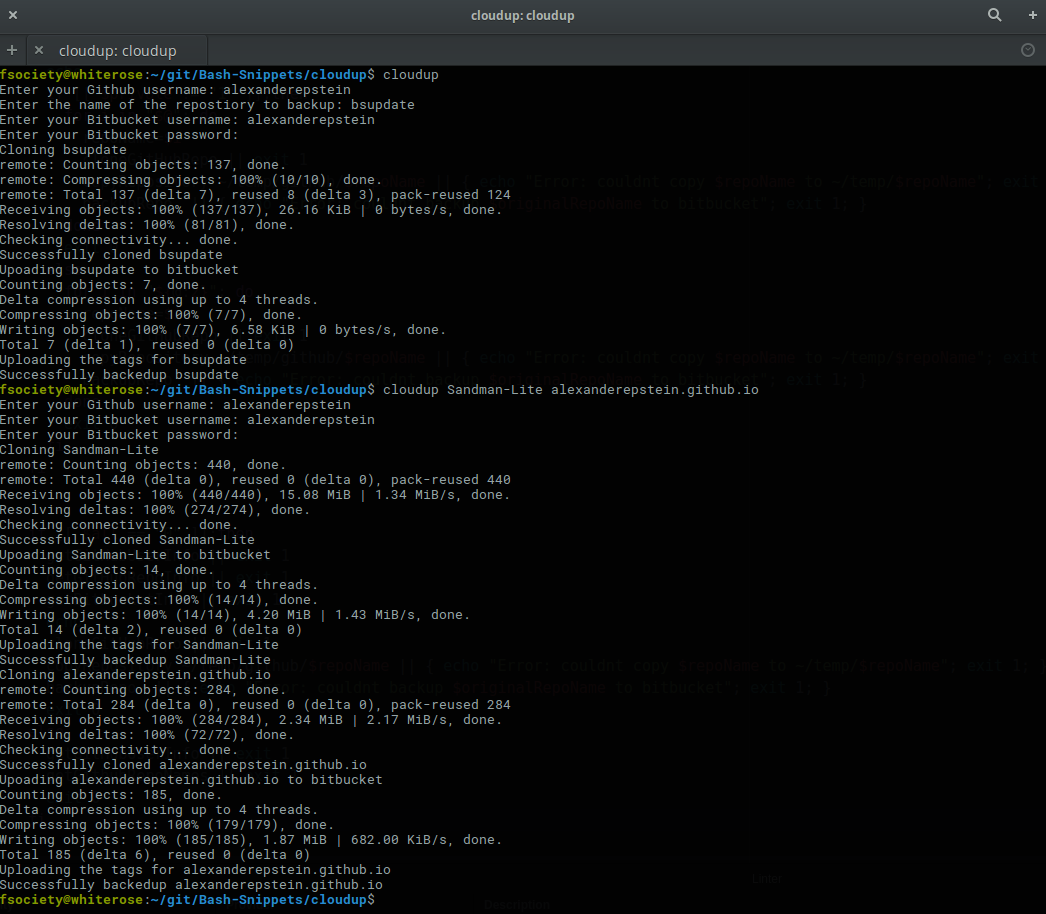
Cloudup
Description: Backs up a users github repositories to your bitbucket account.
With no flags cloudup will guide you through backing up a single repository
Usage: cloudup [flags] or cloudup [flags] [listOfGHRepoNamesSplitBySpaces]
-p Upload the repositor(y)(ies) as private to bitbucket (must have private repo ability on bitbucket)
-a Backup all github repositories
-s Only backup repositories that you have created (no forks) (only works in conjunction with the -a flag)
-t Backup the repository with a timestamp added to the repostiory name (will always create a new unique bitbucket repo)
-u Update Bash-Snippet Tools
-h Show the help
-v Get the tool version
Examples:
Crypt
Description: A wrapper around openssl that facilitates encrypting and decrypting files.
Usage: crypt [flag] [inputFile] [outputFile]
-e Encrypt the inputFile and store it in the outputFil
-d Decrypt the inputFile and store it in the outputFil
-u Update Bash-Snippet Tools
-h Show the help
-v Get the tool version
Examples:
crypt -e mySecretFile.txt myEncryptedFile.jpg (change filetype so default program is incorrect)
crypt -d myEncryptedFile.jpg thisIsNowDecrypted.txt (change filetype back so now default program is correct)
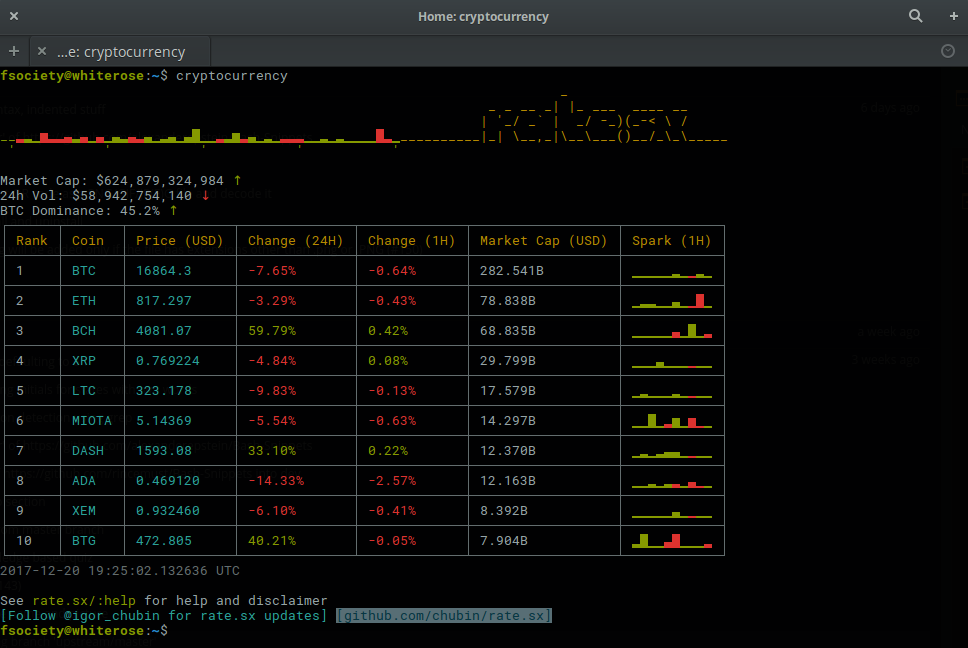
CryptoCurrency
Description: A realtime cryptocurrency converter.
With no flags it will pull down the latest stats of the top 10 cryptos
Usage: cryptocurrency or cryptocurrency [flag] or cryptocurrency [flag] [arg]
-o Utilize the old functionality of the tool
-f Fiat currency for conversions
-u Update Bash-Snippet Tools
-h Show the help
-v Get the tool version
Examples:
cryptocurrency -o
cryptocurrency -f eur
Currency
Description: A realtime currency converter.
With no flags it will guide you through the currency exchange
Usage: currency or currency [flag] or currency [base] [exchangeTo] [amount]
Supported Currencies:
| AUD | BGN | BRL | CAD |
| CHF | CNY | CZK | DKK |
| EUR | GBP | HKD | HRK |
| HUF | IDR | ILS | INR |
| JPY | KRW | MXN | MYR |
| NOK | NZD | PHP | PLN |
| RON | RUB | SEK | SGD |
| THB | TRY | USD | ZAR |
Examples:
currency EUR USD 12.35
currency
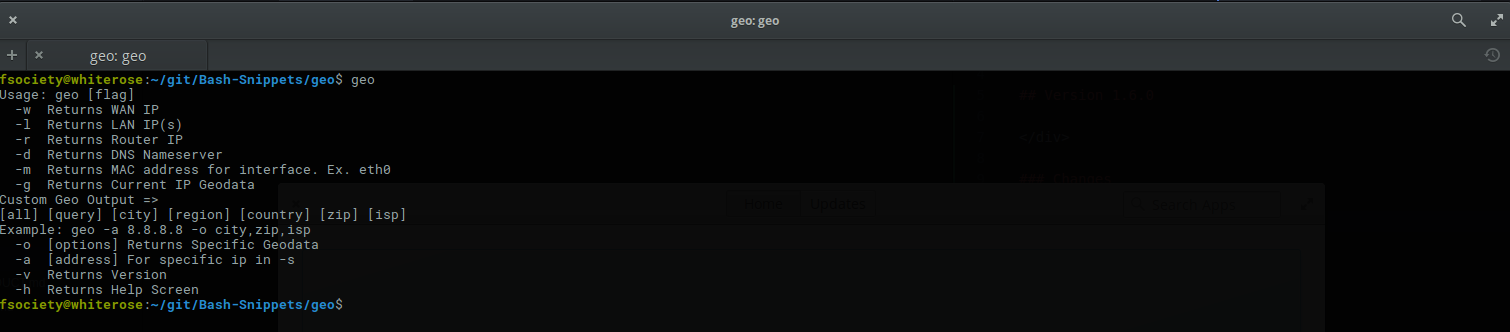
Geo
Description: Provides quick access for wan, lan, router, dns, mac, and ip geolocation data
Usage: geo [flag]
-w Returns WAN IP
-l Returns LAN IP(s)
-r Returns Router IP
-d Returns DNS Nameserver
-m Returns MAC address for interface. Ex. eth0
-g Returns Current IP Geodata
Examples:
Custom Geo Output =>
[all] [query] [city] [region] [country] [zip] [isp]
Example: geo -a 8.8.8.8 -o city,zip,isp
Gist
Description: Manage your gists with git and Github API v3
Usage: gist [command] [args]
[star|all] List your gists, use 'star' as argument for your starred gists,
'all' or 'a' for both your and starred gists. Format for each line is:
INDEX URL FILE_NUM COMMENT_NUM DESCRIPTION
fetch Update the local list of your gists, 'star' as argument for your starred gists
INDEX Show the path of local gist repo and do custom actions
new Create a new gist with files or STDIN
grep Grep gists by description, filename and content with a given pattern
tag Modify/List tags for a gist
tags List all tags and pinned tags
pin, Pin/Unpin tags, or filter gists with pinned tags
lan Filter gists or list gist with coding languages
detail Show the detail of a gist
edit Edit description for a gist
delete Delete gists by given indices
push Push changes by git
clean Clean local repos of removed gists
config Do configuration
user Get list of gists with a given Github user
github Import selected gist as a new Github repo
help Show the helper message
Example:
gist (Show your gists)
gist tag (Show your gists with tags)
gist fetch (update the list of gists from github.com)
gist 3 (show the repo path of your 3rd gist, and do custom actions)
gist 3 --no-action (show the repo path of your 3rd gist, and do not perform actions)
gist new --desc bar foo (create a new gist with files and description)
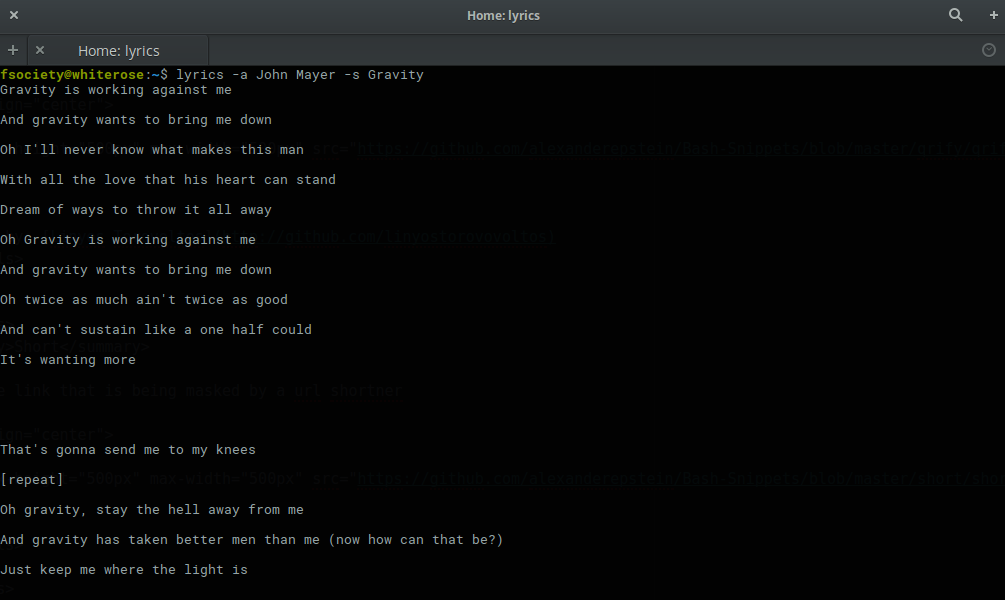
Lyrics
Description: Fetch lyrics for a certain song.
Usage: lyrics [flags] or tool [-a] [arg] [-s] [arg]
-a Artist of the song to fetch lyrics for
-s Song of the artist to fetch lyrics for
-f Export the lyrics to file rather than outputting to stdout
-u Update Bash-Snippet Tools
-h Show the help
-v Get the tool version
Examples:
Meme
Description: A lightning fast meme generator
Usage: tool [flags] or tool [flags] [arguments]
Examples:
Movies
Description: Provides relevant information about a certain movie.
Usage: movies [flag] or movies [movieToSearch]
Examples:
movies Argo
movies Inception
Newton
Description: Performs numerical calculations all the way up to symbolic math parsing.
Usage: newton [operation] [expression] or newton [flag]
| Operations Sample Expression Sample Result |
| Simplify [[2x2]+7]*[4x2] 8 x4 + 28 x2 |
| Factor x2 + 2x x (x + 2) |
| Derive x2+2x 2 x + 2 |
| Integrate x2+2x 1/3 x3 + x2 +C |
| Roots/Zeroes x2+2x 2, 0 |
| Tangent 2~x3 12 x + -16 | (Finding tangent line when x=2 for expression x3) |
| Area 2:4~x3 60 | (Finding area under curve from 2 to 4 for expression x3) |
| Cos pi -1 |
| Sin pi 0 |
| Tan pi/4 1 |
| ArcCos 1 0 |
| ArcSin 0 0 |
| ArcTan pi arcsin(pi) |
| Abs -2 2 |
| Log 2~8 3 | (Log base 2 of eight) |
Valid Symbols:
+ add
- subtract
[ left parenthesis (you must use brackets bash has a bultin for parenthesis)
] right parenthesis (you must use brackets bash has a bultin for parenthesis)
* multiply
/ divide
^ power
: between the range of left and right side (only for area under curve)
~ parameter on right side (only for area, tangent line and log)
Examples:
Pwned
Usage: pwned [email]
Description: Checks where an email account has been breached
* -u Update Bash-Snippet Tools

* -h Show the help

* -v Get the tool version
Examples:
* pwned emailtocheck@email.com
Qrify
Usage: qrify [stringtoturnintoqrcode]
Description: Converts strings or urls into a qr code.
* -u Update Bash-Snippet Tools

* -m Enable multiline support

* -f Save the QRCode to a file

* -d Decode the QR code from a PNG/GIF/JP(E)G file

* -h Show the help

* -v Get the tool version
Examples:
* qrify this is a test string

* qrify -m two \n lines

* qrify -f fileNameHere Insert what you want to encode here

* qrify github.com # notice no http:// or https:// this will fail

* qrify -d fileName.png
Short
Description: Unmasks shortended urls.
Usage: short [shortURL] or short [flag]
-e Expand the following URL
-s Shorten the following URL
-u Update Bash-Snippet Tools
-h Show the help
-v Get the tool version
Example:
Input: short -e tinyurl.com/jhkj
Output: http://possiblemaliciouswebsiteornot.com
Input: short -s google.com
Output: http://ki.tc/23sd1d
Siteciphers
Description: Checks the available ciphers for the SSL of an https site.
Usage: siteciphers [flag] or siteciphers [optionalDFlag] [website]
Examples:
Stocks
Description: Finds the latest information on a certain stock.
Usage: stocks [flag] or stocks [company/ticker]
Examples:
Taste
Description: A recommendation engine that provides 3 similar items based on some input topic.
Taste also has the ability to provide information on the item of interest.
Supports: shows, books, music, artists, movies, authors, games
Usage: taste [flag] [item]
-i Get more information on similar items
-s Get information on the item itself
-u Update Bash-Snippet Tools
-h Show the help
-v Get the tool version
Examples:
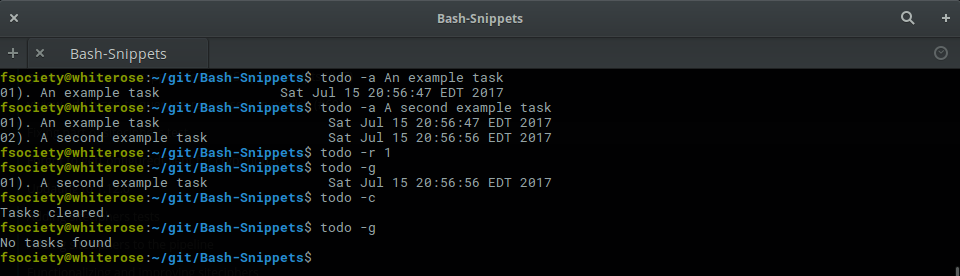
Todo
Description: A simplistic commandline todo list.
Usage: todo [flags] or todo [flags] [arguments]
-c Clear all the current tasks
-r Remove the following task number
-g Get the current tasks
-a Add the following task
-u Update Bash-Snippet Tools
-h Show the help
-v Get the tool version
Examples:
Transfer
Description: Quickly transfer files from the command line.
Usage: transfer [flags] or transfer [flag] [args] or transfer [filePathToUpload]
-d Download a single file
* First arg: Output file directory
* Second arg: File url id
* Third arg: File name
-o Onetime file upload
-u Update Bash-Snippet Tools
-h Show the help
-v Get the tool version
Examples:
transfer ~/fileToTransfer.txt
transfer ~/firstFileToTransfer.txt ~/secondFileToTransfer.txt # upload multiple files at once
transfer -d ~/outputDirectory fileID fileName
transfer -o ~/fileToTransfer.txt
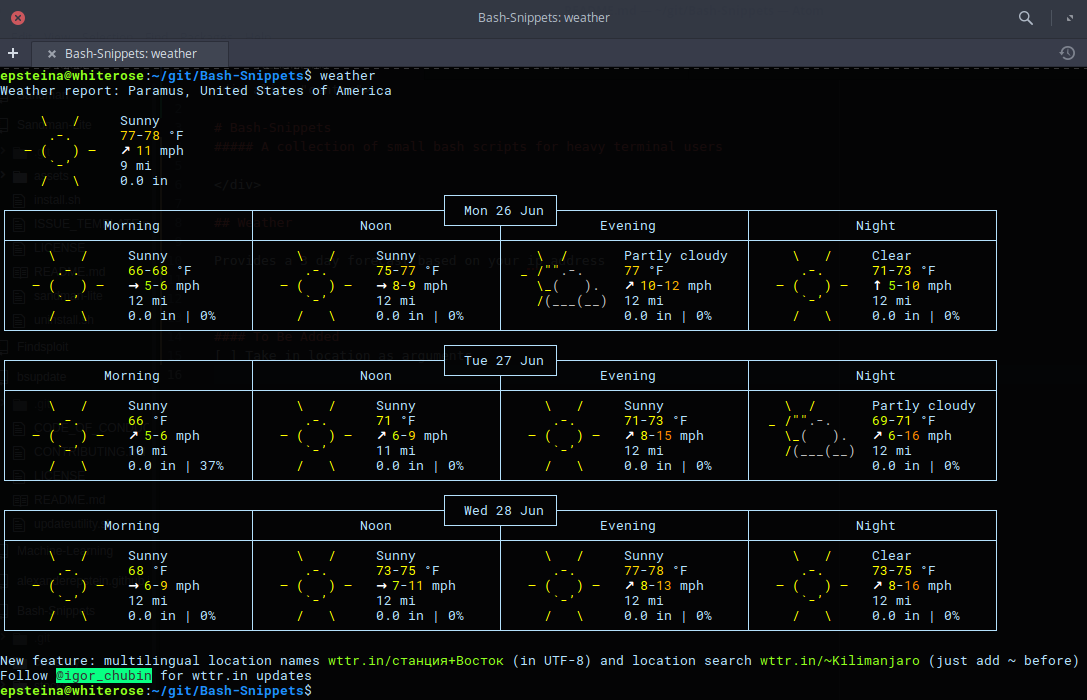
Weather
Description: Provides a 3 day forecast on your current location or a specified location.
With no flags Weather will default to your current location.
Usage: weather or weather [flag] or weather [country] or weather [city] [state]
weather [optionalLocation] [i][M] get weather in imperial units, optional M means windspeed in m/s
weather [optionalLocation] [m][M] lowercase m gets weather in metric units, optional M means windspeed in m/s
weather [Moon] grabs the phase of the moon
-u Update Bash-Snippet Tools
-h Show the help
-v Get the tool version
Examples:
weather
weather Paris m
weather Tokyo
weather Moon
weather mM
Ytview
Description: Search and play youtube videos right from the terminal.
Usage: ytview [flag] [string] or ytview [videoToSearch]
Examples:
Updating
With any of the installed tools you can automate the update by running it with the -u option or passing in update as the arguments
or
This will clone the repository and install the new versions of scripts that were installed, if you didn't install a certain tool this script will not install the new version of that tool.
Uninstalling
If you don't have the Bash-Snippets folder anymore clone the repository: git clone https://github.com/alexanderepstein/Bash-Snippets`
cd into the Bash-Snippets directory: cd Bash-Snippets
To go through a guided uninstall
AUTHOR
Alexander Epstein
Github: https://github.com/alexanderepstein
Contributors
Jake Meyer
Github: https://github.com/jakewmeyer
Linyos Torovoltos
Github: https://gitbub.com/linyostorovovoltos
License
MIT License
Copyright (c) 2017 Alex Epstein
Permission is hereby granted, free of charge, to any person obtaining a copy of this software and associated documentation files (the "Software"), to deal in the Software without restriction, including without limitation the rights to use, copy, modify, merge, publish, distribute, sublicense, and/or sell copies of the Software, and to permit persons to whom the Software is furnished to do so, subject to the following conditions:
The above copyright notice and this permission notice shall be included in all copies or substantial portions of the Software.
THE SOFTWARE IS PROVIDED "AS IS", WITHOUT WARRANTY OF ANY KIND, EXPRESS OR IMPLIED, INCLUDING BUT NOT LIMITED TO THE WARRANTIES OF MERCHANTABILITY, FITNESS FOR A PARTICULAR PURPOSE AND NONINFRINGEMENT. IN NO EVENT SHALL THE AUTHORS OR COPYRIGHT HOLDERS BE LIABLE FOR ANY CLAIM, DAMAGES OR OTHER LIABILITY, WHETHER IN AN ACTION OF CONTRACT, TORT OR OTHERWISE, ARISING FROM, OUT OF OR IN CONNECTION WITH THE SOFTWARE OR THE USE OR OTHER DEALINGS IN THE SOFTWARE.
================================================
FILE: bash-snippets.1.ronn
================================================
bash-snippets(1) -- A collection of small bash scripts for heavy terminal users
====
## Tools
### Cheat
Description: Cheatsheets for quick information about multiple programming languages along with terminal commands
Usage: cheat [flags] [command] or cheat [flags] [programming language] [subject]
* -s Does a search for last argument rather than looking for exact match
* -i Case insensitive search
* -b Word boundaries in search
* -r Recursive search
* -u Update Bash-Snippet Tools
* -h Show the help
* -v Get the tool version
Special Pages:
* hello Describes building the hello world program written in the language
* list This lists all cheatsheets related to previous arg if none it lists all cheatsheets
* learn Shows a learn-x-in-minutes language cheat sheet perfect for getting started with the language
* 1line A collection of one-liners in this language
* weirdness A collection of examples of weird things in this language
Examples:
* cheat rust hello
* cheat -r -b -i go
* cheat julia Functions
* cheat -i go operators
### Cloudup
Description: Backs up a users github repositories to your bitbucket account.
With no flags cloudup will guide you through backing up a single repository
Usage: cloudup [flags] or cloudup [flags] [listOfGHRepoNamesSplitBySpaces]
* -p Upload the repositor(y)(ies) as private to bitbucket (must have private repo ability on bitbucket)
* -a Backup all github repositories
* -s Only backup repositories that you have created (no forks) (only works in conjunction with the -a flag)
* -t Backup the repository with a timestamp added to the repostiory name (will always create a new unique bitbucket repo)
* -u Update Bash-Snippet Tools
* -h Show the help
* -v Get the tool version
Examples:
* cloudup
* cloudup -p -a
* cloudup -p nameOfRepo1 nameOf Repo2
* cloudup nameOfRep
### Crypt
Description: A wrapper around openssl that facilitates encrypting and decrypting files.
Usage: crypt [flag] [inputFile] [outputFile]
* -e Encrypt the inputFile and store it in the outputFil
* -d Decrypt the inputFile and store it in the outputFil
* -u Update Bash-Snippet Tools
* -h Show the help
* -v Get the tool version
Examples:
* crypt -e mySecretFile.txt myEncryptedFile.jpg (change filetype so default program is incorrect)
* crypt -d myEncryptedFile.jpg thisIsNowDecrypted.txt (change filetype back so now default program is correct)
### CryptoCurrency
Description: A realtime cryptocurrency converter.
With no flags it will pull down the latest stats of the top 10 cryptos
Usage: cryptocurrency or cryptocurrency [flag] or cryptocurrency [flag] [arg]
* -o Utilize the old functionality of the tool
* -f Fiat currency for conversions
* -u Update Bash-Snippet Tools
* -h Show the help
* -v Get the tool version
Examples:
cryptocurrency -o
cryptocurrency -f eur
### Currency
Description: A realtime currency converter.
With no flags it will guide you through the currency exchange
Usage: currency or currency [flag] or currency [base] [exchangeTo] [amount]
* -u Update Bash-Snippet Tools
* -h Show the help
* -v Get the tool version
Supported Currencies:
_______________________
| AUD | BGN | BRL | CAD |
| CHF | CNY | CZK | DKK |
| EUR | GBP | HKD | HRK |
| HUF | IDR | ILS | INR |
| JPY | KRW | MXN | MYR |
| NOK | NZD | PHP | PLN |
| RON | RUB | SEK | SGD |
| THB | TRY | USD | ZAR |
_______________________
Examples:
* currency EUR USD 12.35
* currency
### Geo
Description: Provides quick access for wan, lan, router, dns, mac, and ip geolocation data
Usage: geo [flag]
* -w Returns WAN IP
* -l Returns LAN IP(s)
* -r Returns Router IP
* -d Returns DNS Nameserver
* -m Returns MAC address for interface. Ex. eth0
* -g Returns Current IP Geodata
Examples:
* geo -g
* geo -wlrdgm eth0
Custom Geo Output =>
[all] [query] [city] [region] [country] [zip] [isp]
Example: geo -a 8.8.8.8 -o city,zip,isp
* -o [options] Returns Specific Geodata
* -a [address] For specific ip in -s
* -v Returns Version
* -h Returns Help Screen
* -u Updates Bash-Snippets
### Gist
Description: Manage your gists with git and Github API v3
Usage: gist [command] [args]
* [star|all] List your gists, use 'star' as argument for your starred gists,
'all' or 'a' for both your and starred gists. Format for each line is:
 ##### A collection of small bash scripts for heavy terminal users with no dependencies
 [](https://www.codacy.com/app/alexanderepstein/Bash-Snippets?utm_source=github.com&utm_medium=referral&utm_content=alexanderepstein/Bash-Snippets&utm_campaign=Badge_Grade) [](https://travis-ci.org/alexanderepstein/Bash-Snippets)  []()
### All of these scripts have been heavily tested on macOS and Linux
### Most of these scripts have been tested on Windows 10 and the official developer bash instance. Does not work with Cygwin or Mysys2.
#### Looking for maintainers: I have been and probably will forever be too busy to maintain this properly on my own. I am looking for a few others to help out, if you want to be a maintainer either email me or raise an issue. I will probably only accept maintainers who have made a few contributions (no matter how small) and seem to understand the vision of this project.
##### A collection of small bash scripts for heavy terminal users with no dependencies
 [](https://www.codacy.com/app/alexanderepstein/Bash-Snippets?utm_source=github.com&utm_medium=referral&utm_content=alexanderepstein/Bash-Snippets&utm_campaign=Badge_Grade) [](https://travis-ci.org/alexanderepstein/Bash-Snippets)  []()
### All of these scripts have been heavily tested on macOS and Linux
### Most of these scripts have been tested on Windows 10 and the official developer bash instance. Does not work with Cygwin or Mysys2.
#### Looking for maintainers: I have been and probably will forever be too busy to maintain this properly on my own. I am looking for a few others to help out, if you want to be a maintainer either email me or raise an issue. I will probably only accept maintainers who have made a few contributions (no matter how small) and seem to understand the vision of this project.