) )
1. [fix(array-table): give toFieldProps an options](https://github.com/alibaba/formily/commit/edf3cab2) :point_right: ( [janrywang](https://github.com/janrywang) )
1. [fix(antd): fix validated form-item box-shadow styles (#1265)](https://github.com/alibaba/formily/commit/589b9b8b) :point_right: ( [Fog3211](https://github.com/Fog3211) )
1. [fix(react/vue): fix onChange can not pass to voidField's component props. (#1264)](https://github.com/alibaba/formily/commit/1764f6ee) :point_right: ( [林法鑫](https://github.com/林法鑫) )
1. [fix(core): fix reset logic for ArrayField/ObjectField](https://github.com/alibaba/formily/commit/909c5907) :point_right: ( [janrywang](https://github.com/janrywang) )
1. [fix(reactive): fix tojs recursive dependence stack overflow (#1245)](https://github.com/alibaba/formily/commit/675df0ce) :point_right: ( [gwsbhqt](https://github.com/gwsbhqt) )
1. [fix(core): rollback onFieldInit behavior](https://github.com/alibaba/formily/commit/15f9a56d) :point_right: ( [janrywang](https://github.com/janrywang) )
1. [fix(antd): Prevent native events bubbles](https://github.com/alibaba/formily/commit/11e14a39) :point_right: ( [janrywang](https://github.com/janrywang) )
1. [fix(core): Fix the problem of onChange event catching exception](https://github.com/alibaba/formily/commit/8d6e1c2b) :point_right: ( [janrywang](https://github.com/janrywang) )
1. [fix(path): fix accessor](https://github.com/alibaba/formily/commit/4fde9ca0) :point_right: ( [janrywang](https://github.com/janrywang) )
1. [fix(antd): fix multiple select small/large styles](https://github.com/alibaba/formily/commit/7b628cef) :point_right: ( [janrywang](https://github.com/janrywang) )
1. [fix antd styles (#1181)](https://github.com/alibaba/formily/commit/2083b01e) :point_right: ( [Dark](https://github.com/Dark) )
1. [fix(core): untracked update values](https://github.com/alibaba/formily/commit/4b54d376) :point_right: ( [janrywang](https://github.com/janrywang) )
1. [fix: use form.setValuesIn instead of field.removeProperty (#1160)](https://github.com/alibaba/formily/commit/f5fc7e61) :point_right: ( [soulwu](https://github.com/soulwu) )
1. [fix(form-grid): improve performace](https://github.com/alibaba/formily/commit/f1b7afd2) :point_right: ( [janrywang](https://github.com/janrywang) )
1. [fix(core): fix observable componentProps](https://github.com/alibaba/formily/commit/dfe2e213) :point_right: ( [janrywang](https://github.com/janrywang) )
1. [fix(devtools): fix serialize function](https://github.com/alibaba/formily/commit/36aef5b8) :point_right: ( [janrywang](https://github.com/janrywang) )
1. [fix(core): Fix the problem that the initialValues cannot be synchronized to values repeatedly](https://github.com/alibaba/formily/commit/09e0f70b) :point_right: ( [janrywang](https://github.com/janrywang) )
1. [fix(next): fix month picker (#1115)](https://github.com/alibaba/formily/commit/f77b2ca2) :point_right: ( [Janry](https://github.com/Janry) )
1. [fix(vue): fix connect](https://github.com/alibaba/formily/commit/727169ba) :point_right: ( [janrywang](https://github.com/janrywang) )
1. [fix: fix form help validate status error (#1071)](https://github.com/alibaba/formily/commit/82d50df4) :point_right: ( [Yohox](https://github.com/Yohox) )
1. [fix(next): fix children not rendered](https://github.com/alibaba/formily/commit/52ece397) :point_right: ( [janrywang](https://github.com/janrywang) )
1. [fix(react): fix form render dirty check (#1056)](https://github.com/alibaba/formily/commit/5aeed554) :point_right: ( [Janry](https://github.com/Janry) )
1. [fix(core): fix input change trigger order](https://github.com/alibaba/formily/commit/1cebca66) :point_right: ( [janrywang](https://github.com/janrywang) )
1. [fix(next-components): Replace ArrayList.Item with Table.Column. Fix #1034 (#1045)](https://github.com/alibaba/formily/commit/e116838a) :point_right: ( [soulwu](https://github.com/soulwu) )
1. [fix(core): fix hasChanged return type (#1036)](https://github.com/alibaba/formily/commit/d0eb66b6) :point_right: ( [Janry](https://github.com/Janry) )
1. [fix Upload preview image (#1031)](https://github.com/alibaba/formily/commit/e2bfcce9) :point_right: ( [liunian](https://github.com/liunian) )
1. [fix(antd-components): missing 'key' prop warning when table draggable (#1011)](https://github.com/alibaba/formily/commit/a69cdad1) :point_right: ( [daief](https://github.com/daief) )
1. [fix: compat legal props (#1007)](https://github.com/alibaba/formily/commit/5dde72ae) :point_right: ( [quirkyvar](https://github.com/quirkyvar) )
1. [fix(schema-renderer): fix schema field lazy state (#999)](https://github.com/alibaba/formily/commit/8faab444) :point_right: ( [Janry](https://github.com/Janry) )
1. [fix(shared): update cool-path version, ensure bug to be fixed (#988)](https://github.com/alibaba/formily/commit/5ae37fe0) :point_right: ( [soulwu](https://github.com/soulwu) )
1. [fix(schema-renderer): Fix expression complie perf bug (#986)](https://github.com/alibaba/formily/commit/0e8383ee) :point_right: ( [Janry](https://github.com/Janry) )
1. [fix: compat ie10-11 for antd3 (#985)](https://github.com/alibaba/formily/commit/74fa86c9) :point_right: ( [quirkyvar](https://github.com/quirkyvar) )
1. [fix: 回滚 mutators.move 行为 (#984)](https://github.com/alibaba/formily/commit/010e1495) :point_right: ( [soulwu](https://github.com/soulwu) )
1. [fix: mutator insert (#977)](https://github.com/alibaba/formily/commit/f3356321) :point_right: ( [xiaowanzi](https://github.com/xiaowanzi) )
1. [fix(core): fix field default sync exception (#970)](https://github.com/alibaba/formily/commit/d0872817) :point_right: ( [Janry](https://github.com/Janry) )
1. [fix(layout): type typo (#962)](https://github.com/alibaba/formily/commit/9b9f052f) :point_right: ( [quirkyvar](https://github.com/quirkyvar) )
1. [fix(core): fix move down throw errors and fix null assign merge throw errors (#961)](https://github.com/alibaba/formily/commit/854feec2) :point_right: ( [Janry](https://github.com/Janry) )
1. [fix(core): use form batch to sync errors in array state exchanging](https://github.com/alibaba/formily/commit/0e4880fb) :point_right: ( [janrywang](https://github.com/janrywang) )
1. [fix(editor): remove import lodash/fp](https://github.com/alibaba/formily/commit/a105cff3) :point_right: ( [janrywang](https://github.com/janrywang) )
1. [fix(core): fix form ref values (#952)](https://github.com/alibaba/formily/commit/777596b7) :point_right: ( [Janry](https://github.com/Janry) )
1. [fix(schema): compat eva expression actions (#951)](https://github.com/alibaba/formily/commit/aed0369b) :point_right: ( [quirkyvar](https://github.com/quirkyvar) )
1. [fix(core): fix antd table get row key (#946)](https://github.com/alibaba/formily/commit/6bda3296) :point_right: ( [Janry](https://github.com/Janry) )
1. [fix(@formily/core): fix unmountClearStates flags is not right (#944)](https://github.com/alibaba/formily/commit/754a55f4) :point_right: ( [soulwu](https://github.com/soulwu) )
1. [fix(antd,next): fix ie.tsx ssr bug (#936)](https://github.com/alibaba/formily/commit/0d3c3810) :point_right: ( [Markey](https://github.com/Markey) )
1. [fix: issue 853 and 860 (#928)](https://github.com/alibaba/formily/commit/c1774308) :point_right: ( [quirkyvar](https://github.com/quirkyvar) )
1. [bugfix (#920)](https://github.com/alibaba/formily/commit/4f41b564) :point_right: ( [Janry](https://github.com/Janry) )
1. [fix(core): sync form state (#906)](https://github.com/alibaba/formily/commit/de32802a) :point_right: ( [Janry](https://github.com/Janry) )
1. [fix(react): fix ArrayTable index and FormSpy (#904)](https://github.com/alibaba/formily/commit/944891f7) :point_right: ( [Janry](https://github.com/Janry) )
1. [fix(layout): inset mode comflict with labelAlign top (#903)](https://github.com/alibaba/formily/commit/9906a0ce) :point_right: ( [quirkyvar](https://github.com/quirkyvar) )
1. [fix(core): fix array list mutators (#888)](https://github.com/alibaba/formily/commit/50f4e9e5) :point_right: ( [Janry](https://github.com/Janry) )
1. [fix(next/components): incorrect size #884 (#885)](https://github.com/alibaba/formily/commit/c930e27d) :point_right: ( [锦此](https://github.com/锦此) )
1. [fix(components): fix datepicker format and checkbox editable style (#881)](https://github.com/alibaba/formily/commit/99ad146f) :point_right: ( [Janry](https://github.com/Janry) )
1. [fix(schema-renderer): fixed connect onBlur/onFocus throw errors (#874)](https://github.com/alibaba/formily/commit/54012b46) :point_right: ( [Janry](https://github.com/Janry) )
1. [fix: megalayout columns (#871)](https://github.com/alibaba/formily/commit/9bff1f29) :point_right: ( [quirkyvar](https://github.com/quirkyvar) )
1. [fix(schema-renderer): fix virtual box can not receive visible ant display (#869)](https://github.com/alibaba/formily/commit/1d7d94e6) :point_right: ( [Janry](https://github.com/Janry) )
1. [fix: remove warning of addon before (#863)](https://github.com/alibaba/formily/commit/110238c6) :point_right: ( [quirkyvar](https://github.com/quirkyvar) )
1. [fix(react): fix useField/useVirtualField props assign (#858)](https://github.com/alibaba/formily/commit/e71e527a) :point_right: ( [Janry](https://github.com/Janry) )
1. [fix(schema-editor): fix dependencies (#857)](https://github.com/alibaba/formily/commit/78f02c38) :point_right: ( [Janry](https://github.com/Janry) )
1. [fix(antd/next): fix button-group typings (#855)](https://github.com/alibaba/formily/commit/08077729) :point_right: ( [Janry](https://github.com/Janry) )
1. [fix(react): fix formSpy conflict with parent SchemaForm (#854)](https://github.com/alibaba/formily/commit/e122c9d9) :point_right: ( [Janry](https://github.com/Janry) )
1. [fix(antd/next): fix FormTextBox doesnot support className (#851)](https://github.com/alibaba/formily/commit/e40bdf2b) :point_right: ( [Janry](https://github.com/Janry) )
1. [fix(antd): fix labelCol/wrapperCol can not be overwriten (#850)](https://github.com/alibaba/formily/commit/4f87465c) :point_right: ( [Janry](https://github.com/Janry) )
1. [fix(core): fix unmounteRemoveValue property is not work #827 (#847)](https://github.com/alibaba/formily/commit/f53d02ae) :point_right: ( [Janry](https://github.com/Janry) )
1. [fix(react-schema-renderer): fix x-linkages typings (#823)](https://github.com/alibaba/formily/commit/06c1a310) :point_right: ( [Janry](https://github.com/Janry) )
1. [fix(array-table): remove min-width style property (#820)](https://github.com/alibaba/formily/commit/22d03df2) :point_right: ( [Janry](https://github.com/Janry) )
1. [fix(core): fix immer autoFreeze and reset Native Object (#816)](https://github.com/alibaba/formily/commit/aff23189) :point_right: ( [Janry](https://github.com/Janry) )
1. [fix: arrayTable style (#813)](https://github.com/alibaba/formily/commit/fe913dd9) :point_right: ( [xiaowanzi](https://github.com/xiaowanzi) )
1. [fix: FormTab components parseDefaultActiveKey (#802)](https://github.com/alibaba/formily/commit/2fb128b0) :point_right: ( [xiaowanzi](https://github.com/xiaowanzi) )
1. [fix: Add default export for the antd (#787)](https://github.com/alibaba/formily/commit/5f5d4190) :point_right: ( [Rex Guo](https://github.com/Rex Guo) )
1. [fix(react-schema-editor): improve SchemaEditor types (#786)](https://github.com/alibaba/formily/commit/944b6f7a) :point_right: ( [kenve](https://github.com/kenve) )
1. [fix: readme typo (#785)](https://github.com/alibaba/formily/commit/56ef8829) :point_right: ( [WanTong](https://github.com/WanTong) )
1. [fix(antd): fix FormItem type definition (#784)](https://github.com/alibaba/formily/commit/a53b46a7) :point_right: ( [kenve](https://github.com/kenve) )
1. [fix(next): add onPageSizeChange (#777)](https://github.com/alibaba/formily/commit/b2df2d40) :point_right: ( [Janry](https://github.com/Janry) )
1. [fix(core): add lifecycle buffer gc (#773)](https://github.com/alibaba/formily/commit/360c2110) :point_right: ( [Janry](https://github.com/Janry) )
1. [fix(share): fix toArr if param is a proxy (#760)](https://github.com/alibaba/formily/commit/fca3890e) :point_right: ( [林法鑫](https://github.com/林法鑫) )
1. [fix(antd): fix error auto scroll is not work for antd4 (#750)](https://github.com/alibaba/formily/commit/9d0f2196) :point_right: ( [Janry](https://github.com/Janry) )
1. [fix x-index order algorithm (#724)](https://github.com/alibaba/formily/commit/17ae9ddb) :point_right: ( [JerryLyu](https://github.com/JerryLyu) )
1. [fix(printer): fix print schema (#710)](https://github.com/alibaba/formily/commit/eb4b4e37) :point_right: ( [Janry](https://github.com/Janry) )
1. [fix: doc typo of antd (#699)](https://github.com/alibaba/formily/commit/a10efdf9) :point_right: ( [quirkyvar](https://github.com/quirkyvar) )
1. [fix(antd-components): fix password component bugs (#672)](https://github.com/alibaba/formily/commit/bf6128eb) :point_right: ( [JerryLyu](https://github.com/JerryLyu) )
1. [fix(project): compat uform (#666)](https://github.com/alibaba/formily/commit/74008983) :point_right: ( [Janry](https://github.com/Janry) )
1. [fix(meet): fix ci (#660)](https://github.com/alibaba/formily/commit/0aba4483) :point_right: ( [Janry](https://github.com/Janry) )
1. [fix(@formily/meet): fix pacakge config (#659)](https://github.com/alibaba/formily/commit/06837f9e) :point_right: ( [DarK-AleX-alibaba](https://github.com/DarK-AleX-alibaba) )
1. [fix: upload children (#631)](https://github.com/alibaba/formily/commit/9c0095c1) :point_right: ( [JeromeYangtao](https://github.com/JeromeYangtao) )
1. [fix: fix type lint (#628)](https://github.com/alibaba/formily/commit/8215d7f4) :point_right: ( [soulwu](https://github.com/soulwu) )
1. [fix(antd/next): fix antd/next table arr[0] path (#624)](https://github.com/alibaba/formily/commit/fb64eae7) :point_right: ( [WingGao](https://github.com/WingGao) )
1. [fix: 616 (#622)](https://github.com/alibaba/formily/commit/23ff1447) :point_right: ( [quirkyvar](https://github.com/quirkyvar) )
1. [fix(@uform/core/react): fix #613 #615 (#618)](https://github.com/alibaba/formily/commit/8dc609f9) :point_right: ( [Janry](https://github.com/Janry) )
1. [fix(@uform/shared): fix isValid (#604)](https://github.com/alibaba/formily/commit/4136691d) :point_right: ( [Janry](https://github.com/Janry) )
1. [fix(@uform/core): fix submit catch error (#603)](https://github.com/alibaba/formily/commit/406f9fb9) :point_right: ( [Janry](https://github.com/Janry) )
1. [fix(uform/core): recover field visible/display state after parent changed (#567)](https://github.com/alibaba/formily/commit/d270ef78) :point_right: ( [小黄黄](https://github.com/小黄黄) )
1. [fix: issue#540 (#549)](https://github.com/alibaba/formily/commit/4ae1759d) :point_right: ( [quirkyvar](https://github.com/quirkyvar) )
1. [fix: build on windows (#539)](https://github.com/alibaba/formily/commit/8ad99322) :point_right: ( [WingGao](https://github.com/WingGao) )
1. [bugfix: add config files and fix the build error messages](https://github.com/alibaba/formily/commit/2da0edae) :point_right: ( [云数](https://github.com/云数) )
1. [fix(@uform/core): add onFormReset hook](https://github.com/alibaba/formily/commit/8633ae5f) :point_right: ( [janrywang](https://github.com/janrywang) )
1. [fix(@uform/core): add values to submit resolve callback params (#508)](https://github.com/alibaba/formily/commit/06c4f631) :point_right: ( [Janry](https://github.com/Janry) )
1. [fix: form effect demo (#499)](https://github.com/alibaba/formily/commit/93f87ad2) :point_right: ( [quirkyvar](https://github.com/quirkyvar) )
1. [fix schema property `minItems ` (#493)](https://github.com/alibaba/formily/commit/26e12aa1) :point_right: ( [李力](https://github.com/李力) )
1. [fix: use omit to elegant &](https://github.com/alibaba/formily/commit/72e51a61) :point_right: ( [quirkyshop](https://github.com/quirkyshop) )
1. [fix: types merge error](https://github.com/alibaba/formily/commit/950a1930) :point_right: ( [quirkyshop](https://github.com/quirkyshop) )
1. [fix(@uform/antd): Warning Received `true` for a non-boolean attribute `inline` (#494)](https://github.com/alibaba/formily/commit/46fbcb44) :point_right: ( [GODI13](https://github.com/GODI13) )
1. [fix(@uform/core): fix init visible can not remove value (#492)](https://github.com/alibaba/formily/commit/a6dcc18d) :point_right: ( [Janry](https://github.com/Janry) )
1. [fix: merge uform master](https://github.com/alibaba/formily/commit/84d2bf17) :point_right: ( [秋逢](https://github.com/秋逢) )
1. [fix: printer get api and add get form schema to doc (#482)](https://github.com/alibaba/formily/commit/f01988ff) :point_right: ( [quirkyvar](https://github.com/quirkyvar) )
1. [fix(@uform/antd/next/react): doc (#471)](https://github.com/alibaba/formily/commit/6d73c6cd) :point_right: ( [quirkyvar](https://github.com/quirkyvar) )
1. [fix(@uform/validator): fix maximum rule get message logic (#468)](https://github.com/alibaba/formily/commit/752c09e3) :point_right: ( [Janry](https://github.com/Janry) )
1. [fix: Not in the browser](https://github.com/alibaba/formily/commit/676ff5f5) :point_right: ( [jinc.cjc](https://github.com/jinc.cjc) )
1. [fix: in miniapp, globalSelf is existing](https://github.com/alibaba/formily/commit/4b6a9c08) :point_right: ( [jinc.cjc](https://github.com/jinc.cjc) )
1. [fix: in miniapp (worker runtime) , globalThis is not a function](https://github.com/alibaba/formily/commit/745a0d9f) :point_right: ( [jinc.cjc](https://github.com/jinc.cjc) )
1. [fix(@uform/next): formitem compatibility (#440)](https://github.com/alibaba/formily/commit/3bfe515b) :point_right: ( [quirkyvar](https://github.com/quirkyvar) )
1. [fix: 引入 next 样式](https://github.com/alibaba/formily/commit/9d12b489) :point_right: ( [秋逢](https://github.com/秋逢) )
1. [fix(antd): return null while time field get falsy value (#372)](https://github.com/alibaba/formily/commit/269a1706) :point_right: ( [腰花](https://github.com/腰花) )
1. [fix: [onFieldChange] types](https://github.com/alibaba/formily/commit/dc4fa80c) :point_right: ( [jinc.cjc](https://github.com/jinc.cjc) )
1. [fix window is not defined (#312)](https://github.com/alibaba/formily/commit/a089fa89) :point_right: ( [Neil](https://github.com/Neil) )
1. [fix(globalThis): fix ReferenceError (#309)](https://github.com/alibaba/formily/commit/9efc90a6) :point_right: ( [Neil](https://github.com/Neil) )
1. [fix: ButtonGroup missing the definition of align prop (#297)](https://github.com/alibaba/formily/commit/a989364f) :point_right: ( [atzcl](https://github.com/atzcl) )
1. [fix(core): Increase lastValidateValue value processing during initialization (#276)](https://github.com/alibaba/formily/commit/045f6fea) :point_right: ( [atzcl](https://github.com/atzcl) )
1. [fix: getSchema returning undefined doesn't break setIn (#269)](https://github.com/alibaba/formily/commit/da1f7a21) :point_right: ( [Kiho · Cham](https://github.com/Kiho · Cham) )
1. [fix: remove react unstable concurrent (#270)](https://github.com/alibaba/formily/commit/0f7edab9) :point_right: ( [Kiho · Cham](https://github.com/Kiho · Cham) )
1. [fix(antd): improve week type moment parse regex (#254)](https://github.com/alibaba/formily/commit/88654b80) :point_right: ( [Wayne Zhu](https://github.com/Wayne Zhu) )
1. [fix(examples): remove the onChange of next/Detail (#257)](https://github.com/alibaba/formily/commit/62ae0cbb) :point_right: ( [atzcl](https://github.com/atzcl) )
1. [fix(@uform/antd): add typings entry file (#250)](https://github.com/alibaba/formily/commit/a9063a2e) :point_right: ( [atzcl](https://github.com/atzcl) )
1. [fix(@uform/core): add scheduler backward compat (#251)](https://github.com/alibaba/formily/commit/ed948348) :point_right: ( [Janry](https://github.com/Janry) )
1. [fix FormTextBox margin value (#237)](https://github.com/alibaba/formily/commit/6148e332) :point_right: ( [合木](https://github.com/合木) )
1. [fix validator of id card to support tail x (#227)](https://github.com/alibaba/formily/commit/33291e3e) :point_right: ( [合木](https://github.com/合木) )
1. [fix(@uform/react): invariant initialValues will not be changed when form rerender (#214)](https://github.com/alibaba/formily/commit/b9efa4ca) :point_right: ( [Kiho · Cham](https://github.com/Kiho · Cham) )
1. [fix(@uform/antd): Fix Antd Input loading state automatically loses focus (#207)](https://github.com/alibaba/formily/commit/3824942b) :point_right: ( [Janry](https://github.com/Janry) )
1. [fix(@uform/antd): support password add size props and use Input.Password in antd(#192)](https://github.com/alibaba/formily/commit/633dd302) :point_right: ( [atzcl](https://github.com/atzcl) )
1. [fix(@uform/core): fix field props transformer is not work](https://github.com/alibaba/formily/commit/8686c7c8) :point_right: ( [合木](https://github.com/合木) )
1. [fix(typings): correction FormLayout、Submit typings (#182)](https://github.com/alibaba/formily/commit/11dde612) :point_right: ( [atzcl](https://github.com/atzcl) )
1. [fix(utils): adjust the order of getting self (#178)](https://github.com/alibaba/formily/commit/4ef2e1ca) :point_right: ( [Kiho · Cham](https://github.com/Kiho · Cham) )
1. [fix(@uform/core): Fix the parameters of changeEditable api which have been defined in interface IField. (#180)](https://github.com/alibaba/formily/commit/54daf28d) :point_right: ( [Rain](https://github.com/Rain) )
1. [fix(docs): fix docs without display property description (#176)](https://github.com/alibaba/formily/commit/24d12be5) :point_right: ( [Janry](https://github.com/Janry) )
1. [fix(typescript): fix typescript config](https://github.com/alibaba/formily/commit/546d9f01) :point_right: ( [janrywang](https://github.com/janrywang) )
1. [fix(typescript): fix ts build can not transplie jsx](https://github.com/alibaba/formily/commit/0dfcba7c) :point_right: ( [janrywang](https://github.com/janrywang) )
1. [fix: move string-length into utils (#154)](https://github.com/alibaba/formily/commit/b84803b4) :point_right: ( [Kevin Tan](https://github.com/Kevin Tan) )
1. [fix(@uform/utils): fix setIn with number key can not auto create array](https://github.com/alibaba/formily/commit/48aa6d57) :point_right: ( [janryWang](https://github.com/janryWang) )
1. [fix(@uform/utils): Fix the exception of setIn when undefiend value is assigned undefined property](https://github.com/alibaba/formily/commit/7cb63161) :point_right: ( [janryWang](https://github.com/janryWang) )
1. [fix(@uform/core): Fix value synchronization of field state](https://github.com/alibaba/formily/commit/38dc0aa6) :point_right: ( [janryWang](https://github.com/janryWang) )
1. [fix: antd select should not have max-width by default (#112)](https://github.com/alibaba/formily/commit/b4a494a1) :point_right: ( [Kevin Tan](https://github.com/Kevin Tan) )
1. [fix(@uform/core): Fixed the value was not cached when the field was hidden #113](https://github.com/alibaba/formily/commit/402daff2) :point_right: ( [janryWang](https://github.com/janryWang) )
1. [fix array table will show labels wrapped by form card](https://github.com/alibaba/formily/commit/60e0917b) :point_right: ( [Janry](https://github.com/Janry) )
1. [fix(@uform/utils): fix bug of every and some (#88)](https://github.com/alibaba/formily/commit/36ab9da0) :point_right: ( [Chen YuBen](https://github.com/Chen YuBen) )
1. [fix(next-ts): fix ts lint errors](https://github.com/alibaba/formily/commit/759f4f24) :point_right: ( [janryWang](https://github.com/janryWang) )
1. [fix(@uform/core): Fix the issue of the onFieldChange event after the Field is removed (#72)](https://github.com/alibaba/formily/commit/30cd1e56) :point_right: ( [Janry](https://github.com/Janry) )
1. [fix(@uform/core): Optimize the 'errors' information structure](https://github.com/alibaba/formily/commit/be680e02) :point_right: ( [janryWang](https://github.com/janryWang) )
1. [fix(project): Fix known issues. 1. Improve the Button API Description 2. Improve the Field API Description 3. Fix showLoading Submit Component is not work 4. Fix x-index is not work with array table 5. Improve Field Subtree Parsing Performance](https://github.com/alibaba/formily/commit/826ebce1) :point_right: ( [janryWang](https://github.com/janryWang) )
1. [fix(@uform/react): Fixing index.d.ts can not found registerFormField. #29](https://github.com/alibaba/formily/commit/6c287413) :point_right: ( [janryWang](https://github.com/janryWang) )
1. [fix(@uform/react): Fix Form List error in JSON Schema driver usecase #22](https://github.com/alibaba/formily/commit/6d11c4bd) :point_right: ( [janryWang](https://github.com/janryWang) )
1. [fix(@uform/antd): fix upload field is not work when uploading some files #18](https://github.com/alibaba/formily/commit/fbc22e74) :point_right: ( [janryWang](https://github.com/janryWang) )
1. [fix(@uform/core): fix setFormState Promise resolve is not wait rerender completed.](https://github.com/alibaba/formily/commit/d9a24d44) :point_right: ( [janryWang](https://github.com/janryWang) )
1. [fix(@uform/react): fix field dynamic hidden will effect other field. When the virtual box without name is hidden in the dynamic display, it will affect the dynamic hiding of the adjacent virtual box.](https://github.com/alibaba/formily/commit/97bb44d9) :point_right: ( [janryWang](https://github.com/janryWang) )
1. [fix(@uform/nexxt): fix time picker click will throw error](https://github.com/alibaba/formily/commit/e9659ac3) :point_right: ( [janryWang](https://github.com/janryWang) )
1. [fix(docs): improve Form Schema](https://github.com/alibaba/formily/commit/83a3137f) :point_right: ( [harryyu](https://github.com/harryyu) )
1. [fix(docs): fix docs can not scroll in ios](https://github.com/alibaba/formily/commit/a6e53c2e) :point_right: ( [janryWang](https://github.com/janryWang) )
1. [fix(@uform/utils): fix isEmpty'result is not correct when ['','']](https://github.com/alibaba/formily/commit/091c2f17) :point_right: ( [janryWang](https://github.com/janryWang) )
1. [fix(@uform/core): fix bug - fix bug that async schema default property is not work - fix bug that visible property is not work by setFieldState when FormInit](https://github.com/alibaba/formily/commit/8864ba99) :point_right: ( [janryWang](https://github.com/janryWang) )
1. [fix(@uform/next/antd): fix FormButtonGroup will throw error when root component rerendering](https://github.com/alibaba/formily/commit/ccd93349) :point_right: ( [janryWang](https://github.com/janryWang) )
1. [fix: 修改版本号](https://github.com/alibaba/formily/commit/a26a5013) :point_right: ( [cnt1992](https://github.com/cnt1992) )
1. [fix(next): replace fusion next package name](https://github.com/alibaba/formily/commit/db2061e8) :point_right: ( [janryWang](https://github.com/janryWang) )
1. [fix(pkg): add access=public to allow lerna to publish scoped package](https://github.com/alibaba/formily/commit/b41d1fab) :point_right: ( [janryWang](https://github.com/janryWang) )
### :memo: Documents Changes
1. [docs: add @formily/tdesign-react links (#3265)](https://github.com/alibaba/formily/commit/57510b42) :point_right: ( [zFitness](https://github.com/zFitness) )
1. [docs: fix typo (#3247)](https://github.com/alibaba/formily/commit/ac807c13) :point_right: ( [Weiqi Wu](https://github.com/Weiqi Wu) )
1. [docs(reactive): add assignment statement (#3210)](https://github.com/alibaba/formily/commit/297532f8) :point_right: ( [zhangrenyang](https://github.com/zhangrenyang) )
1. [docs: fix contribution.zh-CN error (doc -> docs) (#3202)](https://github.com/alibaba/formily/commit/a4974d23) :point_right: ( [Akong](https://github.com/Akong) )
1. [docs(antd): fix Select component docs error (#3199)](https://github.com/alibaba/formily/commit/ee70cde1) :point_right: ( [微笑](https://github.com/微笑) )
1. [docs: delete useless code (#3198)](https://github.com/alibaba/formily/commit/8ef12b43) :point_right: ( [zhangrenyang](https://github.com/zhangrenyang) )
1. [docs: fix demo error (#3173)](https://github.com/alibaba/formily/commit/91e44698) :point_right: ( [PlutoCA](https://github.com/PlutoCA) )
1. [docs: update codesandbox templates that use the latest formily (#2980)](https://github.com/alibaba/formily/commit/7bb26f98) :point_right: ( [liuwei](https://github.com/liuwei) )
1. [docs: add vant link (#2851)](https://github.com/alibaba/formily/commit/de85f9f7) :point_right: ( [摇了摇头 oO](https://github.com/摇了摇头oO) )
1. [docs: update issue-helper api](https://github.com/alibaba/formily/commit/ea4b1009) :point_right: ( [janrywang](https://github.com/janrywang) )
1. [docs: fix a typo in Field.zh-CN.md (#2825)](https://github.com/alibaba/formily/commit/248ba3b0) :point_right: ( [stefango](https://github.com/stefango) )
1. [docs(core): update setValidationLanguage to setValidateLanguage (#2674)](https://github.com/alibaba/formily/commit/31bc258d) :point_right: ( [JuFeng Zhang](https://github.com/JuFeng Zhang) )
1. [docs(core): update form-path doc path](https://github.com/alibaba/formily/commit/7f901de7) :point_right: ( [janrywang](https://github.com/janrywang) )
1. [docs: update qrcode](https://github.com/alibaba/formily/commit/fe10bfdb) :point_right: ( [janrywang](https://github.com/janrywang) )
1. [docs(core): improve docs (#2636)](https://github.com/alibaba/formily/commit/436dedbe) :point_right: ( [Hencky](https://github.com/Hencky) )
1. [docs(element): update element brandName & codesandbox (#2608)](https://github.com/alibaba/formily/commit/26861a8f) :point_right: ( [Muyao](https://github.com/Muyao) )
1. [docs(react): update field document urls (#2585)](https://github.com/alibaba/formily/commit/98628470) :point_right: ( [燃冰](https://github.com/燃冰) )
1. [docs: improve site show brandName (#2574)](https://github.com/alibaba/formily/commit/483f79f1) :point_right: ( [Dark](https://github.com/Dark) )
1. [docs(react): fix the typo on ISchemaFieldProps (#2528)](https://github.com/alibaba/formily/commit/0c5c6f1e) :point_right: ( [B2D1](https://github.com/B2D1) )
1. [docs: update Chinese guide 1.x link (#2515)](https://github.com/alibaba/formily/commit/bf0d9b8b) :point_right: ( [csrigogogo](https://github.com/csrigogogo) )
1. [docs: update structure image](https://github.com/alibaba/formily/commit/ad485978) :point_right: ( [janrywang](https://github.com/janrywang) )
1. [docs: update QueryList docs (#2475)](https://github.com/alibaba/formily/commit/f84703b5) :point_right: ( [Janry](https://github.com/Janry) )
1. [docs(core): update links in Form model Chinese doc (#2414)](https://github.com/alibaba/formily/commit/d6cdf71a) :point_right: ( [haloworld](https://github.com/haloworld) )
1. [docs: fix scenes url (#2384)](https://github.com/alibaba/formily/commit/3538b171) :point_right: ( [PlutoCA](https://github.com/PlutoCA) )
1. [docs: add issues-helper badge (#2359)](https://github.com/alibaba/formily/commit/a99feb43) :point_right: ( [xrkffgg](https://github.com/xrkffgg) )
1. [docs(reactive): update reactive docs](https://github.com/alibaba/formily/commit/db4c35ff) :point_right: ( [janrywang](https://github.com/janrywang) )
1. [docs: update errors to use selfErrors](https://github.com/alibaba/formily/commit/731ddc02) :point_right: ( [janrywang](https://github.com/janrywang) )
1. [docs(vue): add more scopedSlot content tests and readme (#2226)](https://github.com/alibaba/formily/commit/ff7e790f) :point_right: ( [lirui](https://github.com/lirui) )
1. [docs(project): update login-register.md](https://github.com/alibaba/formily/commit/79f948b3) :point_right: ( [janrywang](https://github.com/janrywang) )
1. [doc: fix typo for Ant Design in docs/guide/quick-start.md (#2201)](https://github.com/alibaba/formily/commit/151f6845) :point_right: ( [vagusX](https://github.com/vagusX) )
1. [docs: add notice for onFormValuesChange (#2146)](https://github.com/alibaba/formily/commit/c8176e53) :point_right: ( [月落音阑](https://github.com/月落音阑) )
1. [docs(site): update Pack on Demand doc (#2086)](https://github.com/alibaba/formily/commit/c0c50ace) :point_right: ( [vimvinter](https://github.com/vimvinter) )
1. [docs(designable): add designable form docs](https://github.com/alibaba/formily/commit/fef3600d) :point_right: ( [janrywang](https://github.com/janrywang) )
1. [docs(site): improve home site contributors ui](https://github.com/alibaba/formily/commit/7592bafe) :point_right: ( [janrywang](https://github.com/janrywang) )
1. [docs(site): add serverless functions](https://github.com/alibaba/formily/commit/d872ea4c) :point_right: ( [janrywang](https://github.com/janrywang) )
1. [docs(site): update fragment linkage case](https://github.com/alibaba/formily/commit/7e5e2625) :point_right: ( [janrywang](https://github.com/janrywang) )
1. [docs(main): add schema fragment controlled case (#1852)](https://github.com/alibaba/formily/commit/2212486b) :point_right: ( [Janry](https://github.com/Janry) )
1. [docs(project): add translated docs (#1822)](https://github.com/alibaba/formily/commit/79ab341f) :point_right: ( [Janry](https://github.com/Janry) )
1. [docs(react): improve ObjectField demo code (#1727)](https://github.com/alibaba/formily/commit/ccfba03a) :point_right: ( [砂糖梨子](https://github.com/砂糖梨子) )
1. [docs(core): fix HTML Anchor jump link (#1639)](https://github.com/alibaba/formily/commit/3feaf906) :point_right: ( [后浪](https://github.com/后浪) )
1. [docs: issue helper add codesandbox template (#1623)](https://github.com/alibaba/formily/commit/a7d2726c) :point_right: ( [liuwei](https://github.com/liuwei) )
1. [docs(core): fix Type declaration errors in the document and code of setFieldState method (#1605)](https://github.com/alibaba/formily/commit/bb4f175f) :point_right: ( [后浪](https://github.com/后浪) )
1. [docs(core): add Type number and integer for ValidatorFormats (#1599)](https://github.com/alibaba/formily/commit/03591144) :point_right: ( [codetyphon](https://github.com/codetyphon) )
1. [docs(json-schema): add definitions and doc](https://github.com/alibaba/formily/commit/e729e007) :point_right: ( [janrywang](https://github.com/janrywang) )
1. [docs(readme): add download stats](https://github.com/alibaba/formily/commit/09ec8e52) :point_right: ( [janrywang](https://github.com/janrywang) )
1. [docs(all): add inject global styles](https://github.com/alibaba/formily/commit/70852e91) :point_right: ( [janrywang](https://github.com/janrywang) )
1. [docs(issue-helper): improve issue-helper](https://github.com/alibaba/formily/commit/e4d10d13) :point_right: ( [janrywang](https://github.com/janrywang) )
1. [docs(react): improve schema static declarations document (#1310)](https://github.com/alibaba/formily/commit/02aee29f) :point_right: ( [liuwei](https://github.com/liuwei) )
1. [docs(antd): fix antd time picker ref (#1282)](https://github.com/alibaba/formily/commit/affa40c4) :point_right: ( [Pandazki](https://github.com/Pandazki) )
1. [docs(antd/next): add useIndex api](https://github.com/alibaba/formily/commit/b36efe4a) :point_right: ( [janrywang](https://github.com/janrywang) )
1. [docs(vue): update vue schema docs](https://github.com/alibaba/formily/commit/a54cf82b) :point_right: ( [janrywang](https://github.com/janrywang) )
1. [docs(site): add english doc](https://github.com/alibaba/formily/commit/fd75b1ec) :point_right: ( [janrywang](https://github.com/janrywang) )
1. [docs(main): fix main site docs](https://github.com/alibaba/formily/commit/cd6a3474) :point_right: ( [janrywang](https://github.com/janrywang) )
1. [docs(fusion): update fusion docs](https://github.com/alibaba/formily/commit/1256a385) :point_right: ( [janrywang](https://github.com/janrywang) )
1. [docs: JOSN -> JSON (#1196)](https://github.com/alibaba/formily/commit/87837801) :point_right: ( [zkylearner](https://github.com/zkylearner) )
1. [docs(all): fix lint](https://github.com/alibaba/formily/commit/5c7a77fb) :point_right: ( [janrywang](https://github.com/janrywang) )
1. [docs(formily): add quick-start doc](https://github.com/alibaba/formily/commit/e29857ee) :point_right: ( [janrywang](https://github.com/janrywang) )
1. [docs(antd): add form-layout doc](https://github.com/alibaba/formily/commit/f167a750) :point_right: ( [janrywang](https://github.com/janrywang) )
1. [docs(project): add contribution.md](https://github.com/alibaba/formily/commit/a6748df8) :point_right: ( [janrywang](https://github.com/janrywang) )
1. [doc:improve validate documents (#1000)](https://github.com/alibaba/formily/commit/3a145304) :point_right: ( [wangmingxu](https://github.com/wangmingxu) )
1. [docs(antd): mardown special symbol escape (#882)](https://github.com/alibaba/formily/commit/9c969cc9) :point_right: ( [kromalee](https://github.com/kromalee) )
1. [docs: add type definition of x-linkages and x-mega-props (#876)](https://github.com/alibaba/formily/commit/c93b5171) :point_right: ( [Empireo](https://github.com/Empireo) )
1. [docs(antd): fix registerVirtualBox demo (#834)](https://github.com/alibaba/formily/commit/02fcd0d4) :point_right: ( [kenve](https://github.com/kenve) )
1. [docs(antd/component): fix labelAlign type and remove labelTextAlign (#817)](https://github.com/alibaba/formily/commit/3704873c) :point_right: ( [kenve](https://github.com/kenve) )
1. [docs: fix spelling (#791)](https://github.com/alibaba/formily/commit/f27a66ba) :point_right: ( [kenve](https://github.com/kenve) )
1. [docs: formatted with prettier (#768)](https://github.com/alibaba/formily/commit/cb7f095d) :point_right: ( [kenve](https://github.com/kenve) )
1. [docs(antd-components): update import package name (#758)](https://github.com/alibaba/formily/commit/c038dbdd) :point_right: ( [Janry](https://github.com/Janry) )
1. [docs: add introduction and support FormTab and support FieldState. unmountRemoveValue (#752)](https://github.com/alibaba/formily/commit/bfaa3ed7) :point_right: ( [Janry](https://github.com/Janry) )
1. [doc(next/antd): array item docs optimization (#749)](https://github.com/alibaba/formily/commit/b12bce24) :point_right: ( [quirkyvar](https://github.com/quirkyvar) )
1. [docs : add complex-field-component.md (#737)](https://github.com/alibaba/formily/commit/1235a11a) :point_right: ( [Janry](https://github.com/Janry) )
1. [doc: add form and formitem (#700)](https://github.com/alibaba/formily/commit/aaa4742a) :point_right: ( [quirkyvar](https://github.com/quirkyvar) )
1. [docs(@formily/react-schema-renderer): fix docs example (#681)](https://github.com/alibaba/formily/commit/a546e6a2) :point_right: ( [朱建](https://github.com/朱建) )
1. [docs: update next/antd (#661)](https://github.com/alibaba/formily/commit/611125c7) :point_right: ( [quirkyvar](https://github.com/quirkyvar) )
1. [docs(project): fix docs codesandbox config](https://github.com/alibaba/formily/commit/0c65601d) :point_right: ( [janrywang](https://github.com/janrywang) )
1. [docs(examples): fix FormStep examples (#593)](https://github.com/alibaba/formily/commit/27018c6c) :point_right: ( [常泽清](https://github.com/常泽清) )
1. [doc: add questions(customize action) (#289)](https://github.com/alibaba/formily/commit/baecbaab) :point_right: ( [xiaowanzi](https://github.com/xiaowanzi) )
1. [docs(Submit): fix table style (#203)](https://github.com/alibaba/formily/commit/d59436b3) :point_right: ( [atzcl](https://github.com/atzcl) )
1. [docs: add detail of createForm (#156)](https://github.com/alibaba/formily/commit/ae8bb439) :point_right: ( [Kevin Tan](https://github.com/Kevin Tan) )
1. [docs: optimize demo of form detail in docs (#150)](https://github.com/alibaba/formily/commit/b04d4135) :point_right: ( [合木](https://github.com/合木) )
1. [docs(antd-relations): fix MM visible toggle is not work](https://github.com/alibaba/formily/commit/a930f78c) :point_right: ( [Janry](https://github.com/Janry) )
1. [docs(Field_React): fix rule description](https://github.com/alibaba/formily/commit/827cb26a) :point_right: ( [janryWang](https://github.com/janryWang) )
1. [docs(questions): add Q/A](https://github.com/alibaba/formily/commit/b98c0565) :point_right: ( [janryWang](https://github.com/janryWang) )
1. [docs(api): fix form text box docs](https://github.com/alibaba/formily/commit/69b3c5a9) :point_right: ( [janryWang](https://github.com/janryWang) )
1. [docs(docs): remove statis](https://github.com/alibaba/formily/commit/3203efbe) :point_right: ( [janryWang](https://github.com/janryWang) )
1. [docs: add HarrisFeng as a contributor (#93)](https://github.com/alibaba/formily/commit/255d153e) :point_right: ( [allcontributors[bot]](https://github.com/allcontributors[bot]) )
1. [docs: improve the English version (#3)](https://github.com/alibaba/formily/commit/d592cbf9) :point_right: ( [Harry Yu](https://github.com/Harry Yu) )
1. [docs(api): update SchemaForm API links](https://github.com/alibaba/formily/commit/0573af76) :point_right: ( [janryWang](https://github.com/janryWang) )
1. [docs(site): move github pages==>netlify](https://github.com/alibaba/formily/commit/dc9abdfa) :point_right: ( [janryWang](https://github.com/janryWang) )
1. [docs(all): sort api table](https://github.com/alibaba/formily/commit/930ce7aa) :point_right: ( [janryWang](https://github.com/janryWang) )
1. [docs(API): Fix jump link can't jump in doc site. #59](https://github.com/alibaba/formily/commit/724affdb) :point_right: ( [janryWang](https://github.com/janryWang) )
1. [docs: remove useless column in field api table (#61)](https://github.com/alibaba/formily/commit/49be9871) :point_right: ( [Kiho · Cham](https://github.com/Kiho · Cham) )
1. [docs(@uform/docs): Optimize package bundle size](https://github.com/alibaba/formily/commit/c42ea06a) :point_right: ( [janryWang](https://github.com/janryWang) )
1. [docs(examples): add international docs #25](https://github.com/alibaba/formily/commit/aaa22278) :point_right: ( [janryWang](https://github.com/janryWang) )
1. [docs(site_pages): add gitter.im sidebar](https://github.com/alibaba/formily/commit/5809a987) :point_right: ( [janryWang](https://github.com/janryWang) )
1. [docs(next/antd): add createAsyncFormActions docs](https://github.com/alibaba/formily/commit/4ab122e1) :point_right: ( [janryWang](https://github.com/janryWang) )
1. [docs: add README.md](https://github.com/alibaba/formily/commit/52fc2c2d) :point_right: ( [cnt1992](https://github.com/cnt1992) )
### :rose: Improve code quality
1. [refactor(vue): change Field component type to functional (#2773)](https://github.com/alibaba/formily/commit/ffbaba25) :point_right: ( [月落音阑](https://github.com/月落音阑) )
1. [refactor(vue): switch type files for vue2/vue3 in postinstall (#2640)](https://github.com/alibaba/formily/commit/6015b7c8) :point_right: ( [月落音阑](https://github.com/月落音阑) )
1. [refactor(grid): use data-grid-span for base grid span](https://github.com/alibaba/formily/commit/712aba94) :point_right: ( [janrywang](https://github.com/janrywang) )
1. [refactor(core): revert field unmount to skip validate (#2379)](https://github.com/alibaba/formily/commit/8a016794) :point_right: ( [Janry](https://github.com/Janry) )
1. [refactor(element): redesign form-grid and improve form-layout (#2337)](https://github.com/alibaba/formily/commit/9e468fae) :point_right: ( [Muyao](https://github.com/Muyao) )
1. [refactor(antd/next/element): adjust the read priority of Form context](https://github.com/alibaba/formily/commit/f0c29bbc) :point_right: ( [janrywang](https://github.com/janrywang) )
1. [refactor(react): silent useForm for child form sence (#2302)](https://github.com/alibaba/formily/commit/c2c2e305) :point_right: ( [Janry](https://github.com/Janry) )
1. [refactor(core): reduce core package size (#2261)](https://github.com/alibaba/formily/commit/84f3fc1b) :point_right: ( [Janry](https://github.com/Janry) )
1. [refactor(element): refactor element slot pass way (#2236)](https://github.com/alibaba/formily/commit/da28fe7e) :point_right: ( [Muyao](https://github.com/Muyao) )
1. [refactor(project): support more features for page description (#2099)](https://github.com/alibaba/formily/commit/6162ad5d) :point_right: ( [Janry](https://github.com/Janry) )
1. [refactor(json-schema): use with statement for compiler](https://github.com/alibaba/formily/commit/f913b35b) :point_right: ( [janrywang](https://github.com/janrywang) )
1. [refactor(reactive): change model default batch annotation to action annotation](https://github.com/alibaba/formily/commit/6162639b) :point_right: ( [janrywang](https://github.com/janrywang) )
1. [refactor(element): refactor FormDialog/FormDrawer & refactor component export type (#1892)](https://github.com/alibaba/formily/commit/cc3cb360) :point_right: ( [Muyao](https://github.com/Muyao) )
1. [refactor(project): remove Formily.\* use cases (#1820)](https://github.com/alibaba/formily/commit/72a2958c) :point_right: ( [Janry](https://github.com/Janry) )
1. [refactor(designable-ant): expose upload component's textContent property in setting form (#1818)](https://github.com/alibaba/formily/commit/15344449) :point_right: ( [nekic](https://github.com/nekic) )
1. [refactor(reactive): fix #1598 and support #1586 and super performance optimization](https://github.com/alibaba/formily/commit/a1e72006) :point_right: ( [janrywang](https://github.com/janrywang) )
1. [refactor(designable-antd): refactor and add DesignableArrayTable](https://github.com/alibaba/formily/commit/97c78dbd) :point_right: ( [janrywang](https://github.com/janrywang) )
1. [refactor(antd/next): improve docs and support x-component/x-decorator ReactComponent style](https://github.com/alibaba/formily/commit/65bfef1e) :point_right: ( [janrywang](https://github.com/janrywang) )
1. [refactor(core): controlled ==> designable](https://github.com/alibaba/formily/commit/ac79c196) :point_right: ( [janrywang](https://github.com/janrywang) )
1. [refactor(reactive-react): refactor observer function (#1523)](https://github.com/alibaba/formily/commit/55b93420) :point_right: ( [liuwei](https://github.com/liuwei) )
1. [refactor(antd/next): rewrite PreviewText to JSXComponent (#1509)](https://github.com/alibaba/formily/commit/3f6c34d2) :point_right: ( [liuwei](https://github.com/liuwei) )
1. [refactor(json-schema): refactor stringify type to fix literal type is erased (#1508)](https://github.com/alibaba/formily/commit/43e79a61) :point_right: ( [liuwei](https://github.com/liuwei) )
1. [refactor(core): modify IFormState type (#1434)](https://github.com/alibaba/formily/commit/57a7ea37) :point_right: ( [liuwei](https://github.com/liuwei) )
1. [refactor(reactive): add benchmark scripts](https://github.com/alibaba/formily/commit/6954a1fb) :point_right: ( [janrywang](https://github.com/janrywang) )
1. [refactor(project): update deps declaration](https://github.com/alibaba/formily/commit/0b846317) :point_right: ( [janrywang](https://github.com/janrywang) )
1. [refactor: adjust the umd compilation process of the ui library (#1206)](https://github.com/alibaba/formily/commit/e3fc6ade) :point_right: ( [atzcl](https://github.com/atzcl) )
1. [refactor: update rollup config (#1193)](https://github.com/alibaba/formily/commit/a8d119c0) :point_right: ( [Dark](https://github.com/Dark) )
1. [refactor(antd): fine adjustment (#1188)](https://github.com/alibaba/formily/commit/ea022745) :point_right: ( [atzcl](https://github.com/atzcl) )
1. [refactor: remove disabled, update props name, update NodeTypes enum(#1155)](https://github.com/alibaba/formily/commit/43972bae) :point_right: ( [soulwu](https://github.com/soulwu) )
1. [refactor(project): remove react-shared-components](https://github.com/alibaba/formily/commit/6f6dbed4) :point_right: ( [janrywang](https://github.com/janrywang) )
1. [refactor(devtools): update npm scripts](https://github.com/alibaba/formily/commit/c449fbbf) :point_right: ( [janrywang](https://github.com/janrywang) )
1. [refactor(react): improve form-spy (#824)](https://github.com/alibaba/formily/commit/c4dc2144) :point_right: ( [Janry](https://github.com/Janry) )
1. [refactor(@uform/react-schema-editor): update (#606)](https://github.com/alibaba/formily/commit/179cd62a) :point_right: ( [Andy](https://github.com/Andy) )
1. [refactor:code and style refactor (#522)](https://github.com/alibaba/formily/commit/24b3503e) :point_right: ( [Andy](https://github.com/Andy) )
1. [refactor(antd): adjust the handling of importing components on demand (#485)](https://github.com/alibaba/formily/commit/2fb41e9a) :point_right: ( [atzcl](https://github.com/atzcl) )
1. [refactor(typings): update FormStep、dispatch、notify typings](https://github.com/alibaba/formily/commit/929ef2c6) :point_right: ( [atzcl](https://github.com/atzcl) )
1. [refactor: 代码优化](https://github.com/alibaba/formily/commit/e9f2c04e) :point_right: ( [秋逢](https://github.com/秋逢) )
1. [refactor: improve test case (#375)](https://github.com/alibaba/formily/commit/dfec008a) :point_right: ( [Janry](https://github.com/Janry) )
1. [refactor(@uform/core): remove processing test case](https://github.com/alibaba/formily/commit/56835f9e) :point_right: ( [janryWang](https://github.com/janryWang) )
1. [refactor(build): add build docs flow in CI and remove dynamic style inject](https://github.com/alibaba/formily/commit/1fb5cc07) :point_right: ( [janrywang](https://github.com/janrywang) )
1. [refactor: next in TypeScript (#206)](https://github.com/alibaba/formily/commit/33e4bfb8) :point_right: ( [Kiho · Cham](https://github.com/Kiho · Cham) )
1. [refactor: use isEqual instead of isEmpty](https://github.com/alibaba/formily/commit/41aa26e8) :point_right: ( [monkindey](https://github.com/monkindey) )
1. [refactor(pkg): update eslint-plugin-react version](https://github.com/alibaba/formily/commit/a9f0c7ce) :point_right: ( [janryWang](https://github.com/janryWang) )
1. [refactor(test): update react-test-library==>@test-library/react](https://github.com/alibaba/formily/commit/a97ffa0b) :point_right: ( [janryWang](https://github.com/janryWang) )
1. [refactor(project): merge alibaba/uform master](https://github.com/alibaba/formily/commit/b050eeaa) :point_right: ( [janryWang](https://github.com/janryWang) )
1. [refactor(pkg): add ts deps](https://github.com/alibaba/formily/commit/bfdfb822) :point_right: ( [janryWang](https://github.com/janryWang) )
1. [refactor(project): move @alifd/next and antd dependencies to peerDependencies](https://github.com/alibaba/formily/commit/201a53d2) :point_right: ( [janryWang](https://github.com/janryWang) )
1. [refactor(docs): rebuild docs](https://github.com/alibaba/formily/commit/18388943) :point_right: ( [janryWang](https://github.com/janryWang) )
1. [refactor(ci): update .travis.yml](https://github.com/alibaba/formily/commit/9396e9d6) :point_right: ( [janryWang](https://github.com/janryWang) )
1. [refactor(docs): move \_config.yml to root dir](https://github.com/alibaba/formily/commit/1670178a) :point_right: ( [janryWang](https://github.com/janryWang) )
1. [refactor: monaco editor amd](https://github.com/alibaba/formily/commit/4535cbe0) :point_right: ( [cnt1992](https://github.com/cnt1992) )
1. [refactor: split next version](https://github.com/alibaba/formily/commit/b77cedb1) :point_right: ( [cnt1992](https://github.com/cnt1992) )
1. [refactor(builder): delete package-lock.json and config/jest](https://github.com/alibaba/formily/commit/d35820c4) :point_right: ( [janryWang](https://github.com/janryWang) )
1. [refactor(gitignore): remove lib](https://github.com/alibaba/formily/commit/8677e38d) :point_right: ( [janryWang](https://github.com/janryWang) )
1. [refactor(project): LESENCE.md ==> LICENSE.md](https://github.com/alibaba/formily/commit/1968d1f3) :point_right: ( [janryWang](https://github.com/janryWang) )
1. [refactor(project): add test scripts It’s almost done](https://github.com/alibaba/formily/commit/e8a90213) :point_right: ( [janryWang](https://github.com/janryWang) )
### :rocket: Improve Performance
1. [perf(core): improve form change trigger performance (#3236)](https://github.com/alibaba/formily/commit/8e8a661e) :point_right: ( [Janry](https://github.com/Janry) )
1. [perf(antd/next): improve ArrayTable performance](https://github.com/alibaba/formily/commit/2c982289) :point_right: ( [janrywang](https://github.com/janrywang) )
1. [perf: improve total performance 20% (#2589)](https://github.com/alibaba/formily/commit/2d981385) :point_right: ( [Janry](https://github.com/Janry) )
1. [perf(path): use Map replace LRUMap](https://github.com/alibaba/formily/commit/1141e580) :point_right: ( [janrywang](https://github.com/janrywang) )
1. [perf(reactive-react): improve performace with immediate](https://github.com/alibaba/formily/commit/6d6a18f4) :point_right: ( [janrywang](https://github.com/janrywang) )
1. [perf(core): improve validate perf (#755)](https://github.com/alibaba/formily/commit/3ea64169) :point_right: ( [Janry](https://github.com/Janry) )
1. [perf(core): fix nested path update performance (#722)](https://github.com/alibaba/formily/commit/130feeae) :point_right: ( [Janry](https://github.com/Janry) )
1. [perf(array): shorten the code (#678)](https://github.com/alibaba/formily/commit/f8706760) :point_right: ( [Neil](https://github.com/Neil) )
### :hammer_and_wrench: Update Workflow Scripts
1. [build: add peerDependenciesMeta (#3026)](https://github.com/alibaba/formily/commit/bbc2a51b) :point_right: ( [うまる](https://github.com/うまる) )
1. [build(sourcemap): add "sourcesContent" to the output source map (#2399)](https://github.com/alibaba/formily/commit/3305cf80) :point_right: ( [zengguirong](https://github.com/zengguirong) )
1. [build: fix build global may be failed (#1744)](https://github.com/alibaba/formily/commit/818aa132) :point_right: ( [liuwei](https://github.com/liuwei) )
1. [build: fix git message sort incorrect (#1708)](https://github.com/alibaba/formily/commit/617ce88c) :point_right: ( [liuwei](https://github.com/liuwei) )
1. [build: add sourcemap support (#1687)](https://github.com/alibaba/formily/commit/7bb433bb) :point_right: ( [liuwei](https://github.com/liuwei) )
1. [build(shared): external path package](https://github.com/alibaba/formily/commit/be3ae401) :point_right: ( [janrywang](https://github.com/janrywang) )
1. [build(project): buld project](https://github.com/alibaba/formily/commit/fc455da7) :point_right: ( [janryWang](https://github.com/janryWang) )
### :construction: Add/Update Test Cases
1. [test(json-schema): add test of transformer in json-schema (#2975)](https://github.com/alibaba/formily/commit/c3228191) :point_right: ( [Zardddddd60](https://github.com/Zardddddd60) )
1. [test(code): optimize test case of core/lifecycle (#2874)](https://github.com/alibaba/formily/commit/f1766ecc) :point_right: ( [Zardddddd60](https://github.com/Zardddddd60) )
1. [test(reactive): adding missing tests and correcting existing tests (#2525)](https://github.com/alibaba/formily/commit/432f6204) :point_right: ( [Yiliang Wang](https://github.com/Yiliang Wang) )
1. [test: update package.json](https://github.com/alibaba/formily/commit/288a8777) :point_right: ( [janrywang](https://github.com/janrywang) )
1. [test(core): add designable tests (#1972)](https://github.com/alibaba/formily/commit/6a437c8b) :point_right: ( [Janry](https://github.com/Janry) )
1. [test(core): nested reaction should recall the tracker (#1696)](https://github.com/alibaba/formily/commit/a6b81042) :point_right: ( [小黄黄](https://github.com/小黄黄) )
1. [test: update jest config (#1634)](https://github.com/alibaba/formily/commit/f228a405) :point_right: ( [liuwei](https://github.com/liuwei) )
1. [test(reactive): add mark tests and fix docs typo](https://github.com/alibaba/formily/commit/b3b2679e) :point_right: ( [gwsbhqt](https://github.com/gwsbhqt) )
1. [test(project): update mobx => @formily/reactive](https://github.com/alibaba/formily/commit/7ae0a923) :point_right: ( [janrywang](https://github.com/janrywang) )
1. [test(json-schema): update snapshot](https://github.com/alibaba/formily/commit/0c5947a8) :point_right: ( [janrywang](https://github.com/janrywang) )
1. [test(validator): add some core tests](https://github.com/alibaba/formily/commit/c5236042) :point_right: ( [janrywang](https://github.com/janrywang) )
1. [test(@uform/react): improve field and virtualField test cases (#438)](https://github.com/alibaba/formily/commit/853e051f) :point_right: ( [dahuang](https://github.com/dahuang) )
1. [test(@uform/utils): add setIn testcase](https://github.com/alibaba/formily/commit/67a82e67) :point_right: ( [janryWang](https://github.com/janryWang) )
1. [test(effects): remove unnecessary button tags](https://github.com/alibaba/formily/commit/7d25ac4c) :point_right: ( [janryWang](https://github.com/janryWang) )
1. [test(project): add large test cases](https://github.com/alibaba/formily/commit/68fd2e1c) :point_right: ( [janryWang](https://github.com/janryWang) )
### :blush: Other Changes
1. [chore(deps): bump moment from 2.29.3 to 2.29.4 (#3267)](https://github.com/alibaba/formily/commit/88df0daa) :point_right: ( [dependabot[bot]](https://github.com/dependabot[bot]) )
1. [chore: remove getValueByValue](https://github.com/alibaba/formily/commit/2ca7aaf5) :point_right: ( [janrywang](https://github.com/janrywang) )
1. [chore(deps): bump parse-url from 6.0.0 to 6.0.2 (#3255)](https://github.com/alibaba/formily/commit/679fbb74) :point_right: ( [dependabot[bot]](https://github.com/dependabot[bot]) )
1. [chore(reactive): improve strict mode update strategy](https://github.com/alibaba/formily/commit/c3002bde) :point_right: ( [janrywang](https://github.com/janrywang) )
1. [chore(deps-dev): bump semver-regex from 3.1.3 to 3.1.4 (#3166)](https://github.com/alibaba/formily/commit/ca97cae3) :point_right: ( [dependabot[bot]](https://github.com/dependabot[bot]) )
1. [chore(reactive): revert batch tracker (#3112)](https://github.com/alibaba/formily/commit/604d74ac) :point_right: ( [Janry](https://github.com/Janry) )
1. [chore: add carbon ad tag](https://github.com/alibaba/formily/commit/679efc54) :point_right: ( [janrywang](https://github.com/janrywang) )
1. [chore(antd/next): replace useForm to useParentForm in Form component](https://github.com/alibaba/formily/commit/43a3d6b8) :point_right: ( [janrywang](https://github.com/janrywang) )
1. [chore(antd/next): revert editable](https://github.com/alibaba/formily/commit/16a376d3) :point_right: ( [janrywang](https://github.com/janrywang) )
1. [chore(json-schema): improve typings](https://github.com/alibaba/formily/commit/d116d272) :point_right: ( [janrywang](https://github.com/janrywang) )
1. [chore: change pr template and commit message specific link (#2742)](https://github.com/alibaba/formily/commit/129cd693) :point_right: ( [zhouxinyong](https://github.com/zhouxinyong) )
1. [chore(grid): improve strictAutoFit](https://github.com/alibaba/formily/commit/d485a49e) :point_right: ( [janrywang](https://github.com/janrywang) )
1. [chore(next): export ExtendTableProps](https://github.com/alibaba/formily/commit/ad82905b) :point_right: ( [janrywang](https://github.com/janrywang) )
1. [chore: improve code style (#2579)](https://github.com/alibaba/formily/commit/4a083bad) :point_right: ( [Janry](https://github.com/Janry) )
1. [chore: add dingtalk notification for release](https://github.com/alibaba/formily/commit/35a18c48) :point_right: ( [janrywang](https://github.com/janrywang) )
1. [chore(element): update ts-import-plugin version (#2518)](https://github.com/alibaba/formily/commit/4f27990d) :point_right: ( [Muyao](https://github.com/Muyao) )
1. [chore: add ESNext and DOM lib to TS compiler options (#2507)](https://github.com/alibaba/formily/commit/a51d1898) :point_right: ( [Yiliang Wang](https://github.com/Yiliang Wang) )
1. [chore: fix yarn.lock](https://github.com/alibaba/formily/commit/8305c18f) :point_right: ( [janrywang](https://github.com/janrywang) )
1. [chore(antd/next): compat antd@4.17 and remove antd-icons from fusion package (#2492)](https://github.com/alibaba/formily/commit/cc325699) :point_right: ( [Janry](https://github.com/Janry) )
1. [chore: change site domain v2.formilyjs.org -> formilyjs.org](https://github.com/alibaba/formily/commit/342493a0) :point_right: ( [janrywang](https://github.com/janrywang) )
1. [chore: remove build global scripts (#2474)](https://github.com/alibaba/formily/commit/4cb7e9f9) :point_right: ( [Janry](https://github.com/Janry) )
1. [chore: update workflow](https://github.com/alibaba/formily/commit/e84a4769) :point_right: ( [janrywang](https://github.com/janrywang) )
1. [chore(grid): update readme](https://github.com/alibaba/formily/commit/9738292c) :point_right: ( [janrywang](https://github.com/janrywang) )
1. [chore(desingbale): move designable-antd/next to designable repo](https://github.com/alibaba/formily/commit/84327d2d) :point_right: ( [janrywang](https://github.com/janrywang) )
1. [chore(workflow): fix actions](https://github.com/alibaba/formily/commit/12dacdcc) :point_right: ( [Janry](https://github.com/Janry) )
1. [chore(designable): lock version](https://github.com/alibaba/formily/commit/b61ad907) :point_right: ( [janrywang](https://github.com/janrywang) )
1. [chore(react): compat ReactNative with SchemaField only json-schema mode](https://github.com/alibaba/formily/commit/77dd47e4) :point_right: ( [janrywang](https://github.com/janrywang) )
1. [chore(docs): add antd-formily-boost link](https://github.com/alibaba/formily/commit/4fb9ff8d) :point_right: ( [janrywang](https://github.com/janrywang) )
1. [chore(ts): map @formily/\* to src folder during development (#1917)](https://github.com/alibaba/formily/commit/65259a06) :point_right: ( [JuFeng Zhang](https://github.com/JuFeng Zhang) )
1. [chore(validator): improve validator (#1918)](https://github.com/alibaba/formily/commit/b1681bff) :point_right: ( [Janry](https://github.com/Janry) )
1. [chore(flow): add release.yml](https://github.com/alibaba/formily/commit/301a89c1) :point_right: ( [janrywang](https://github.com/janrywang) )
1. [chore(setters): improve DataSourceSetter ui](https://github.com/alibaba/formily/commit/1c12f543) :point_right: ( [janrywang](https://github.com/janrywang) )
1. [chore(core): improve display model (#1713)](https://github.com/alibaba/formily/commit/bad483da) :point_right: ( [Janry](https://github.com/Janry) )
1. [chore(designable-antd): improve playgroun ui](https://github.com/alibaba/formily/commit/2d07630c) :point_right: ( [janrywang](https://github.com/janrywang) )
1. [chore(path): add benchmark case](https://github.com/alibaba/formily/commit/9533e049) :point_right: ( [janrywang](https://github.com/janrywang) )
1. [chore: replace 'disgusting' with 'sophisticated' (#1574)](https://github.com/alibaba/formily/commit/d14c042e) :point_right: ( [Riting LIU](https://github.com/Riting LIU) )
1. [chore(pkg): add workspaces](https://github.com/alibaba/formily/commit/d8af530e) :point_right: ( [janrywang](https://github.com/janrywang) )
1. [chore(github): update pr template](https://github.com/alibaba/formily/commit/b3149307) :point_right: ( [janrywang](https://github.com/janrywang) )
1. [chore(dumi): update next css link](https://github.com/alibaba/formily/commit/6843d946) :point_right: ( [janrywang](https://github.com/janrywang) )
1. [chore(pkg): update lint-staged scripts](https://github.com/alibaba/formily/commit/ddd8fc9a) :point_right: ( [janrywang](https://github.com/janrywang) )
1. [chore(project): prettier all code and change style behavior](https://github.com/alibaba/formily/commit/3792c221) :point_right: ( [janrywang](https://github.com/janrywang) )
1. [chore(scripts): remove mapCoverage.js](https://github.com/alibaba/formily/commit/3b3c3134) :point_right: ( [janrywang](https://github.com/janrywang) )
1. [chore(workflow): Update check-pr-title.yml (#1490)](https://github.com/alibaba/formily/commit/9243908d) :point_right: ( [xrkffgg](https://github.com/xrkffgg) )
1. [chore(workflow): rename main.yml ==>commitlint.yml](https://github.com/alibaba/formily/commit/45734661) :point_right: ( [Janry](https://github.com/Janry) )
1. [chore(actions): update commit checker action](https://github.com/alibaba/formily/commit/573b60fe) :point_right: ( [Janry](https://github.com/Janry) )
1. [chore(pkg): add preversion/version lerna scripts hook](https://github.com/alibaba/formily/commit/d933f1fe) :point_right: ( [janrywang](https://github.com/janrywang) )
1. [chore(pkg): change the execution timing of the changelog generator](https://github.com/alibaba/formily/commit/0ff511f6) :point_right: ( [janrywang](https://github.com/janrywang) )
1. [chore(scripts): slice changelog counts](https://github.com/alibaba/formily/commit/fead7843) :point_right: ( [janrywang](https://github.com/janrywang) )
1. [chore: improve github pull request template (#1328)](https://github.com/alibaba/formily/commit/353e87a7) :point_right: ( [liuwei](https://github.com/liuwei) )
1. [ci(core): fix tests](https://github.com/alibaba/formily/commit/faaceba0) :point_right: ( [janrywang](https://github.com/janrywang) )
1. [chore: unify ts dependencies (#296)](https://github.com/alibaba/formily/commit/5268ce80) :point_right: ( [Kevin Tan](https://github.com/Kevin Tan) )
1. [chore(travis): Guaranteed dependency peering (#288)](https://github.com/alibaba/formily/commit/97885c2c) :point_right: ( [atzcl](https://github.com/atzcl) )
1. [chore(docs): UFrom --> UForm (#228)](https://github.com/alibaba/formily/commit/e55d8400) :point_right: ( [Kiho · Cham](https://github.com/Kiho · Cham) )
1. [chore(docs): remove unused file and correct antd multiple example (#184)](https://github.com/alibaba/formily/commit/eee944f5) :point_right: ( [Kiho · Cham](https://github.com/Kiho · Cham) )
1. [chore: fix tsc build errors (#174)](https://github.com/alibaba/formily/commit/c43397c1) :point_right: ( [Kevin Tan](https://github.com/Kevin Tan) )
1. [chore: resolve the conflict](https://github.com/alibaba/formily/commit/22a7c32f) :point_right: ( [monkindey](https://github.com/monkindey) )
1. [chore: remove tslint and use typescript-eslint (#159)](https://github.com/alibaba/formily/commit/97caa9cd) :point_right: ( [Kevin Tan](https://github.com/Kevin Tan) )
1. [chore(project): release v0.1.15 (#94)](https://github.com/alibaba/formily/commit/bc3125d2) :point_right: ( [Janry](https://github.com/Janry) )
1. [chore(scripts): correct git commit specific url)](https://github.com/alibaba/formily/commit/341b2ffb) :point_right: ( [monkindey](https://github.com/monkindey) )
1. [chore(alpha): change version to v0.1.0-beta.20](https://github.com/alibaba/formily/commit/5bead131) :point_right: ( [janryWang](https://github.com/janryWang) )
1. [chore: merge](https://github.com/alibaba/formily/commit/4b7aacb9) :point_right: ( [cnt1992](https://github.com/cnt1992) )
1. [chore: delete no use files](https://github.com/alibaba/formily/commit/49deb94f) :point_right: ( [cnt1992](https://github.com/cnt1992) )
1. [chore: rebuild](https://github.com/alibaba/formily/commit/2b95a387) :point_right: ( [cnt1992](https://github.com/cnt1992) )
1. [chore: add react & react-dom in package.json](https://github.com/alibaba/formily/commit/3b814059) :point_right: ( [cnt1992](https://github.com/cnt1992) )
1. [chore: upgrade webpack-dev-server](https://github.com/alibaba/formily/commit/2dfa848c) :point_right: ( [cnt1992](https://github.com/cnt1992) )
================================================
FILE: LICENSE.md
================================================
The MIT License (MIT)
Copyright (c) 2015-present, Alibaba Group Holding Limited. All rights reserved.
Permission is hereby granted, free of charge, to any person obtaining a copy of
this software and associated documentation files (the "Software"), to deal in
the Software without restriction, including without limitation the rights to
use, copy, modify, merge, publish, distribute, sublicense, and/or sell copies of
the Software, and to permit persons to whom the Software is furnished to do so,
subject to the following conditions:
The above copyright notice and this permission notice shall be included in all
copies or substantial portions of the Software.
THE SOFTWARE IS PROVIDED "AS IS", WITHOUT WARRANTY OF ANY KIND, EXPRESS OR
IMPLIED, INCLUDING BUT NOT LIMITED TO THE WARRANTIES OF MERCHANTABILITY, FITNESS
FOR A PARTICULAR PURPOSE AND NONINFRINGEMENT. IN NO EVENT SHALL THE AUTHORS OR
COPYRIGHT HOLDERS BE LIABLE FOR ANY CLAIM, DAMAGES OR OTHER LIABILITY, WHETHER
IN AN ACTION OF CONTRACT, TORT OR OTHERWISE, ARISING FROM, OUT OF OR IN
CONNECTION WITH THE SOFTWARE OR THE USE OR OTHER DEALINGS IN THE SOFTWARE.
================================================
FILE: README.md
================================================
English | [简体中文](./README.zh-cn.md)
---
## Background
In React, the whole tree rendering performance problem of the form is very obvious in the controlled mode. Especially for the scene of data linkage, it is easy to cause the page to be stuck. To solve this problem, we have distributed the management of the state of each form field, which significantly improves the performance of the form operations. At the same time, we deeply integrate the JSON Schema protocol to help you solve the problem of back-end driven form rendering quickly.
## Features
- 🖼 Designable, You can quickly develop forms at low cost through [Form Builder](https://designable-antd.formilyjs.org/).
- 🚀 High performance, fields managed independently, rather rerender the whole tree.
- 💡 Integrated Alibaba Fusion and Ant Design components are guaranteed to work out of the box.
- 🎨 JSON Schema applied for BackEnd. JSchema applied for FrontEnd. Two paradigms can be converted to each other.
- 🏅 Side effects are managed independently, making form data linkages easier than ever before.
- 🌯 Override most complicated form layout use cases.
## Form Builder
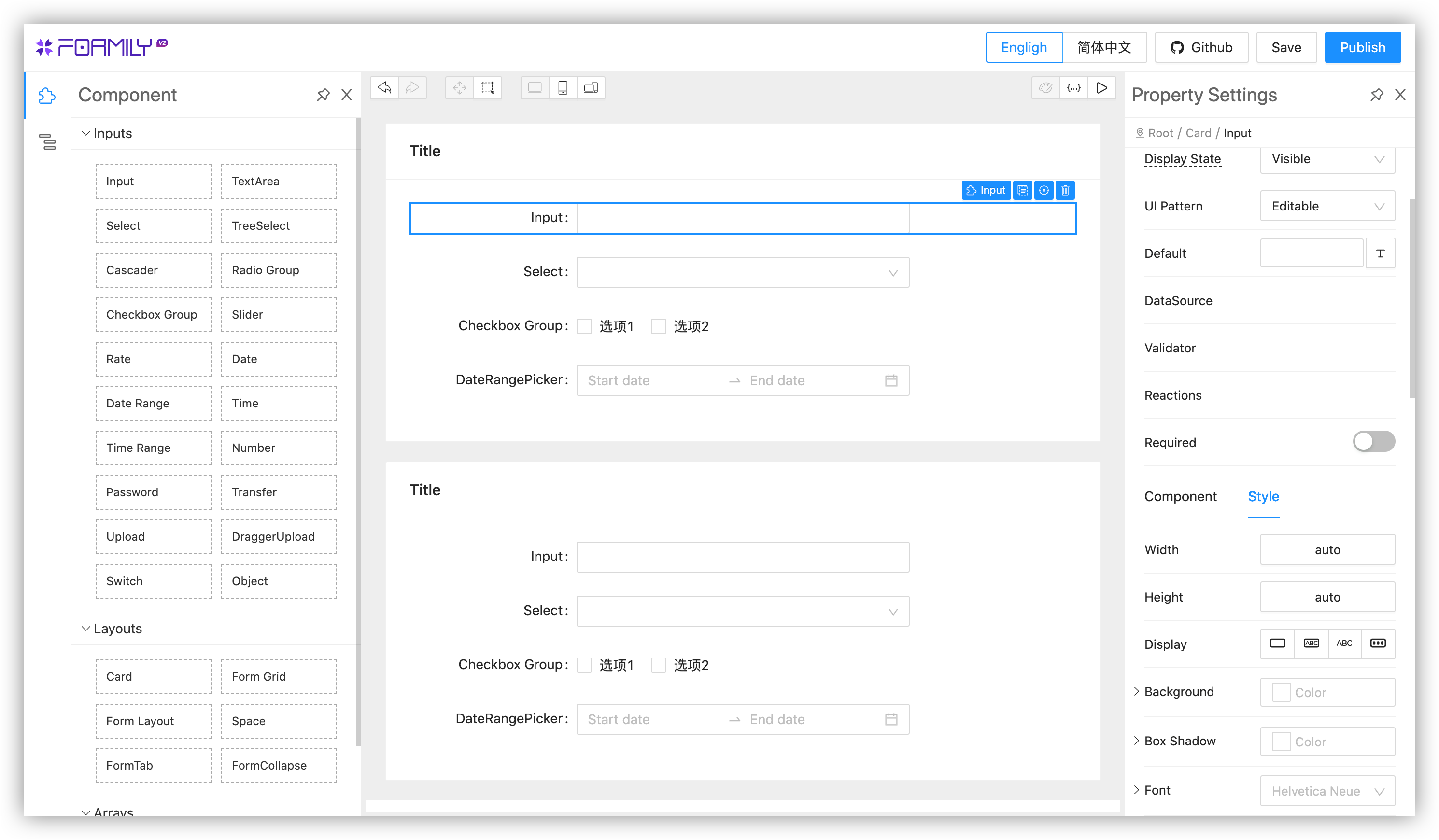
## WebSite
2.0
https://formilyjs.org
1.0
https://v1.formilyjs.org
## Community
- [formilyjs](https://github.com/formilyjs)
- [designable](https://github.com/alibaba/designable)
- [icejs](https://github.com/alibaba/ice)
## How to contribute?
- [Contribute document](https://formilyjs.org/zh-CN/guide/contribution)
## Contributors
This project exists thanks to all the people who contribute.
---
## 背景
在 React 中,在受控模式下,表单的整树渲染问题非常明显。特别是对于数据联动的场景,很容易导致页面卡顿,为了解决这个问题,我们将每个表单字段的状态做了分布式管理,从而大大提升了表单操作性能。同时,我们深度整合了 JSON Schema 协议,可以帮助您快速解决后端驱动表单渲染的问题。
## 特性
- 🖼 可设计,借助 Form Builder 可以快速搭建表单
- 🚀 高性能,字段分布式渲染,大大减轻 React 渲染压力
- 💡 支持 Ant Design/Fusion Next 组件体系
- 🎨 JSX 标签化写法/JSON Schema 数据驱动方案无缝迁移过渡
- 🏅 副作用逻辑独立管理,涵盖各种复杂联动校验逻辑
- 🌯 支持各种表单复杂布局方案
## Form Builder

## 官网
2.0
https://formilyjs.org
1.0
https://v1.formilyjs.org
## 生态产品
- [formilyjs](https://github.com/formilyjs)
- [designable](https://github.com/alibaba/designable)
- [icejs](https://github.com/alibaba/ice)
## 如何贡献
- [贡献指南](https://formilyjs.org/zh-CN/guide/contribution)
## 贡献者
This project exists thanks to all the people who contribute.
{
node.toggled = false
}}
>
{node.name}
{isObj(title) ? ((title as any).title ?? '') : title}
)
})`
position: relative;
overflow: auto;
height: calc(100% - 40px);
user-select: none;
.highlight {
position: absolute;
top: 0;
right: 0;
left: -100%;
height: 100%;
z-index: 0;
&.active {
background: #3d424a;
}
}
.node-header:hover .highlight {
background: #3d424a;
}
`
================================================
FILE: devtools/chrome-extension/src/app/components/LeftPanel.tsx
================================================
import React, { useState } from 'react'
import { Tabs } from './Tabs'
import { FieldTree } from './FieldTree'
import styled from 'styled-components'
export const LeftPanel = styled(({ className, dataSource, onSelect }) => {
const [current, setCurrent] = useState(0)
return (
{
setCurrent(index)
onSelect({
current: index,
key: '',
})
}}
/>
{
if (onSelect) {
onSelect({
current,
key: node.path,
})
}
}}
/>
)
})`
width: 50%;
min-width: 50%;
`
================================================
FILE: devtools/chrome-extension/src/app/components/RightPanel.tsx
================================================
import React from 'react'
import styled from 'styled-components'
import ReactJson from 'react-json-view'
export const RightPanel = styled(({ className, dataSource }) => {
return (
)
})`
border-left: 1px solid #3d424a;
flex-grow: 2;
overflow: auto;
padding: 10px;
.react-json-view {
background: none !important;
font-size: 12px !important;
}
`
================================================
FILE: devtools/chrome-extension/src/app/components/SearchBox.tsx
================================================
import React from 'react'
import styled from 'styled-components'
const SerachBox = styled.div`
display: flex;
align-items: center;
height: 100%;
.input-addon {
padding: 0 5px;
}
.form-control {
width: 50%;
border: none;
background: transparent;
color: white;
outline: none;
}
`
const SearchIcon = () => {
return (
)
}
export default ({ onSearch }) => {
return (
)
}
================================================
FILE: devtools/chrome-extension/src/app/components/Tabs.tsx
================================================
import React from 'react'
import styled from 'styled-components'
import { toArr } from '@formily/shared'
export const Tabs = styled(({ className, dataSource, current, onChange }) => {
current = current || 0
return (
{toArr(dataSource).map((item, index) => {
return (
{
if (onChange) {
onChange(index)
}
}}
>
Form#{index + 1}
)
})}
{
select(info)
if (chrome && chrome.devtools && chrome.devtools.inspectedWindow) {
chrome.devtools.inspectedWindow.eval(
`window.__FORMILY_DEV_TOOLS_HOOK__.setVm("${info.key}","${
dataSource[info.current][''].id
}")`
)
}
}}
/>
)
})`
display: flex;
position: absolute;
top: 0;
bottom: 0;
left: 0;
right: 0;
overflow: hidden;
color: #36d4c7;
background: #282c34;
`
================================================
FILE: devtools/chrome-extension/src/extension/backend.ts
================================================
//inject content script
const serializeObject = (obj: any) => {
const seens = new WeakMap()
const serialize = (obj: any) => {
if (Array.isArray(obj)) {
return obj.map(serialize)
} else if (typeof obj === 'function') {
return `f ${obj.displayName || obj.name}(){ }`
} else if (typeof obj === 'object') {
if (seens.get(obj)) return '#CircularReference'
if (!obj) return obj
if ('$$typeof' in obj && '_owner' in obj) {
seens.set(obj, true)
return '#ReactNode'
} else if (obj.toJS) {
seens.set(obj, true)
return obj.toJS()
} else if (obj.toJSON) {
seens.set(obj, true)
return obj.toJSON()
} else {
seens.set(obj, true)
const result = {}
for (let key in obj) {
result[key] = serialize(obj[key])
}
seens.set(obj, false)
return result
}
}
return obj
}
return serialize(obj)
}
const send = ({
type,
id,
form,
}: {
type: string
id?: string | number
form?: any
}) => {
const graph = serializeObject(form?.getFormGraph())
window.postMessage(
{
source: '@formily-devtools-inject-script',
type,
id,
graph:
form &&
JSON.stringify(graph, (key, value) => {
if (typeof value === 'symbol') {
return value.toString()
}
return value
}),
},
'*'
)
}
send({
type: 'init',
})
interface IIdleDeadline {
didTimeout: boolean
timeRemaining: () => DOMHighResTimeStamp
}
const HOOK = {
hasFormilyInstance: false,
hasOpenDevtools: false,
store: {},
openDevtools() {
this.hasOpenDevtools = true
},
closeDevtools() {
this.hasOpenDevtools = false
},
setVm(fieldId: string, formId: string) {
if (fieldId) {
globalThis.$vm = this.store[formId].fields[fieldId]
} else {
globalThis.$vm = this.store[formId]
}
},
inject(id: number, form: any) {
this.hasFormilyInstance = true
this.store[id] = form
send({
type: 'install',
id,
form,
})
let timer = null
const task = () => {
globalThis.requestIdleCallback((deadline: IIdleDeadline) => {
if (this.store[id]) {
if (deadline.timeRemaining() < 16) {
task()
} else {
send({
type: 'update',
id,
form,
})
}
}
})
}
form.subscribe(() => {
if (!this.hasOpenDevtools) return
clearTimeout(timer)
timer = setTimeout(task, 300)
})
},
update() {
const keys = Object.keys(this.store || {})
keys.forEach((id) => {
send({
type: 'update',
id,
form: this.store[id],
})
})
},
unmount(id: number) {
delete this.store[id]
send({
type: 'uninstall',
id,
})
},
}
globalThis.__FORMILY_DEV_TOOLS_HOOK__ = HOOK
globalThis.__UFORM_DEV_TOOLS_HOOK__ = HOOK
================================================
FILE: devtools/chrome-extension/src/extension/background.ts
================================================
// background.ts - Manifest V3版本
const connections = {}
// 处理扩展程序的连接请求
chrome.runtime.onConnect.addListener(function (port) {
if (port.name === '@formily-devtools-panel-script') {
const extensionListener = function (message) {
// 原始的连接事件不包含开发者工具网页的标签页标识符,
// 所以我们需要显式发送它。
if (message.name == 'init') {
connections[message.tabId] = port
return
}
// 其他消息的处理
}
// 监听开发者工具网页发来的消息
port.onMessage.addListener(extensionListener)
port.onDisconnect.addListener(function (disconnectedPort) {
port.onMessage.removeListener(extensionListener)
const tabs = Object.keys(connections)
for (let i = 0, len = tabs.length; i < len; i++) {
if (connections[tabs[i]] == port) {
delete connections[tabs[i]]
break
}
}
})
}
})
// 从内容脚本接收消息,并转发至当前标签页对应的开发者工具网页
chrome.runtime.onMessage.addListener(function (request, sender) {
// 来自内容脚本的消息应该已经设置 sender.tab
if (sender.tab) {
const tabId = sender.tab.id
if (tabId && tabId in connections) {
connections[tabId].postMessage(request)
}
}
return true
})
================================================
FILE: devtools/chrome-extension/src/extension/content.ts
================================================
window.addEventListener(
'message',
(event) => {
const { source, ...payload } = event.data
if (source === '@formily-devtools-inject-script') {
chrome.runtime.sendMessage({
source,
...payload,
})
}
},
false
)
================================================
FILE: devtools/chrome-extension/src/extension/devpanel.tsx
================================================
import React, { useEffect, useState } from 'react'
import ReactDOM from 'react-dom'
import App from '../app'
const backgroundPageConnection = chrome.runtime.connect({
name: '@formily-devtools-panel-script',
})
backgroundPageConnection.postMessage({
name: 'init',
tabId: chrome.devtools.inspectedWindow.tabId,
})
chrome.devtools.inspectedWindow.eval(
'window.__FORMILY_DEV_TOOLS_HOOK__.openDevtools()'
)
const Devtools = () => {
const [state, setState] = useState([])
useEffect(() => {
let store = {}
const update = () => {
setState(
Object.keys(store).map((key) => {
return store[key]
})
)
}
chrome.devtools.inspectedWindow.eval(
'window.__FORMILY_DEV_TOOLS_HOOK__.update()'
)
backgroundPageConnection.onMessage.addListener(({ type, id, graph }) => {
if (type === 'init') {
store = {}
chrome.devtools.inspectedWindow.eval(
'window.__FORMILY_DEV_TOOLS_HOOK__.openDevtools()'
)
} else if (type !== 'uninstall') {
store[id] = JSON.parse(graph)
} else {
delete store[id]
}
update()
})
}, [])
return "],
"exclude_matches": ["*://www.google.com/*"],
"js": ["js/content.bundle.js", "js/inject.bundle.js"],
"run_at": "document_start",
"all_frames": true
}
],
"devtools_page": "devtools.html",
"web_accessible_resources": [
{
"resources": ["js/backend.bundle.js"],
"matches": [""]
}
],
"externally_connectable": {
"ids": ["*"]
},
"host_permissions": ["file://*/*", "http://*/*", "https://*/*"],
"content_security_policy": {
"extension_pages": "script-src 'self'; object-src 'self'; style-src 'self' 'unsafe-inline'; img-src 'self' data:;"
},
"update_url": "https://clients2.google.com/service/update2/crx"
}
================================================
FILE: devtools/chrome-extension/src/extension/popup.tsx
================================================
import React from 'react'
import ReactDOM from 'react-dom'
ReactDOM.render(hello world
, document.getElementById('root'))
================================================
FILE: devtools/chrome-extension/src/extension/views/devpanel.ejs
================================================
Formily Devtools
================================================
FILE: devtools/chrome-extension/src/extension/views/devtools.ejs
================================================
Formily Devtools
================================================
FILE: devtools/chrome-extension/src/extension/views/popup.ejs
================================================
Formily Devtools
================================================
FILE: devtools/chrome-extension/tsconfig.build.json
================================================
{
"extends": "./tsconfig.json",
"compilerOptions": {
"outDir": "./lib",
"paths": {
"@formily/*": ["packages/*", "devtools/*"]
},
"declaration": true
}
}
================================================
FILE: devtools/chrome-extension/tsconfig.json
================================================
{
"extends": "../../tsconfig.json",
"include": ["./src/**/*.ts", "./src/**/*.tsx"],
"exclude": ["./src/__tests__/*", "./esm/*", "./lib/*"]
}
================================================
FILE: docs/functions/contributors.ts
================================================
import { Handler } from '@netlify/functions'
import { Octokit } from '@octokit/rest'
const octokit = new Octokit({
baseUrl: 'https://api.github.com',
auth: process.env.GITHUB_TOKEN,
})
const headers = {
'Access-Control-Allow-Origin': '*',
'Access-Control-Allow-Headers': 'Content-Type',
'Access-Control-Allow-Methods': 'GET',
}
export const handler: Handler = async (event) => {
if (event.httpMethod !== 'GET') {
return { statusCode: 405, body: 'Method Not Allowed' }
}
return {
statusCode: 200,
headers,
body: JSON.stringify(
await octokit.repos.listContributors({
owner: 'alibaba',
repo: 'formily',
per_page: 1000,
page: 1,
})
),
}
}
================================================
FILE: docs/functions/npm-search.ts
================================================
import { Handler } from '@netlify/functions'
import qs from 'querystring'
import axios from 'axios'
const headers = {
'Access-Control-Allow-Origin': '*',
'Access-Control-Allow-Headers': 'Content-Type',
'Access-Control-Allow-Methods': 'GET',
}
export const handler: Handler = async (event) => {
if (event.httpMethod !== 'GET') {
return { statusCode: 405, body: 'Method Not Allowed' }
}
const params = qs.parse(event.rawQuery)
const results = await axios.get(
`https://www.npmjs.com/search/suggestions?q=${params.q}&size=100`
)
return {
statusCode: 200,
headers,
body: JSON.stringify(results.data),
}
}
================================================
FILE: docs/guide/advanced/async.md
================================================
# Asynchronous Data Sources
Asynchronous data source management, the core is reflected in the dataSource property of the [Field](https://core.formilyjs.org/api/models/field) model. We can modify the dataSource of the Field in effects, or modify the dataSource property in reactions.
If the field component (such as Select) has a consumer dataSource property, when the dataSource changes, the corresponding component will automatically re-render.
Note: If it is a business custom component, please manually map the dataSource to the custom component, you can use connect or observer + useField
Specific cases can refer to:
- [Select](https://antd.formilyjs.org/components/select)
- [TreeSelect](https://antd.formilyjs.org/components/tree-select)
- [Cascader](https://antd.formilyjs.org/components/cascader)
================================================
FILE: docs/guide/advanced/async.zh-CN.md
================================================
# 实现异步数据源
异步数据源管理,核心体现在[Field](https://core.formilyjs.org/zh-CN/api/models/field)模型中的 dataSource 属性,我们可以在 effects 中修改 Field 的 dataSource,也可以在 reactions 中修改 dataSource 属性。
如果字段组件内部(比如 Select)有消费 dataSource 属性,当 dataSource 发生变化时,对应组件会自动重渲染。
注意:如果是业务自定义组件,请手动映射dataSource到自定义组件中,可以使用 connect ,也可以使用 observer + useField
具体案例可以参考:
- [Select](https://antd.formilyjs.org/zh-CN/components/select)
- [TreeSelect](https://antd.formilyjs.org/zh-CN/components/tree-select)
- [Cascader](https://antd.formilyjs.org/zh-CN/components/cascader)
================================================
FILE: docs/guide/advanced/build.md
================================================
# Pack on Demand
## Based on Umi Development
#### Install `babel-plugin-import`
```shell
npm install babel-plugin-import --save-dev
```
or
```shell
yarn add babel-plugin-import --dev
```
#### Plugin Configuration
Modify `.umirc.js` or `.umirc.ts`
```js
export default {
extraBabelPlugins: [
[
'babel-plugin-import',
{ libraryName: 'antd', libraryDirectory: 'es', style: true },
'antd',
],
[
'babel-plugin-import',
{ libraryName: '@formily/antd', libraryDirectory: 'esm', style: true },
'@formily/antd',
],
],
}
```
## Based on Create-react-app Development
First, we need to customize the default configuration of `create-react-app`, here we use [react-app-rewired](https://github.com/timarney/react-app-rewired) (A community solution for custom configuration of `create-react-app`)
Introduce `react-app-rewired` and modify the startup configuration in `package.json`. Due to the new [react-app-rewired@2.x](https://github.com/timarney/react-app-rewired#alternatives) version, you also need to install [customize-cra](https://github.com/arackaf/customize-cra).
```shell
$ npm install react-app-rewired customize-cra --save-dev
```
or
```shell
$ yarn add react-app-rewired customize-cra --dev
```
modify `package.json`
```diff
"scripts": {
- "start": "react-scripts start",
+ "start": "react-app-rewired start",
- "build": "react-scripts build",
+ "build": "react-app-rewired build",
- "test": "react-scripts test",
+ "test": "react-app-rewired test",
}
```
Then create a `config-overrides.js` in the project root directory to modify the default configuration.
```js
module.exports = function override(config, env) {
// do stuff with the webpack config...
return config
}
```
#### Install babel-plugin-import
```shell
npm install babel-plugin-import --save-dev
```
or
```shell
yarn add babel-plugin-import --dev
```
modify `config-overrides.js`
```diff
+ const { override, fixBabelImports } = require('customize-cra');
- module.exports = function override(config, env) {
- // do stuff with the webpack config...
- return config;
- };
+ module.exports = override(
+ fixBabelImports('antd', {
+ libraryName: 'antd',
+ libraryDirectory: 'es',
+ style: true
+ }),
+ fixBabelImports('@formily/antd', {
+ libraryName: '@formily/antd',
+ libraryDirectory: 'esm',
+ style: true
+ }),
+ );
```
## Use in Webpack
#### Install babel-plugin-import
```shell
npm install babel-plugin-import --save-dev
```
or
```shell
yarn add babel-plugin-import --dev
```
Modify `.babelrc` or babel-loader
```json
{
"plugins": [
[
"import",
{
"libraryName": "antd",
"libraryDirectory": "es",
"style": true
},
"antd"
],
[
"import",
{
"libraryName": "@formily/antd",
"libraryDirectory": "esm",
"style": true
},
"@formily/antd"
]
]
}
```
For more configuration, please refer to [babel-plugin-import](https://github.com/ant-design/babel-plugin-import)
================================================
FILE: docs/guide/advanced/build.zh-CN.md
================================================
# 按需打包
## 基于 Umi 开发
#### 安装 `babel-plugin-import`
```shell
npm install babel-plugin-import --save-dev
```
或者
```shell
yarn add babel-plugin-import --dev
```
#### 插件配置
修改 `.umirc.js`或 `.umirc.ts`
```js
export default {
extraBabelPlugins: [
[
'babel-plugin-import',
{ libraryName: 'antd', libraryDirectory: 'es', style: true },
'antd',
],
[
'babel-plugin-import',
{ libraryName: '@formily/antd', libraryDirectory: 'esm', style: true },
'@formily/antd',
],
],
}
```
## 基于 create-react-app 开发
首先我们需要对`create-react-app`的默认配置进行自定义,这里我们使用 [react-app-rewired](https://github.com/timarney/react-app-rewired) (一个对 `create-react-app` 进行自定义配置的社区解决方案)。
引入 `react-app-rewired` 并修改 `package.json` 里的启动配置。由于新的 [react-app-rewired@2.x](https://github.com/timarney/react-app-rewired#alternatives) 版本的关系,你还需要安装 [customize-cra](https://github.com/arackaf/customize-cra)。
```shell
$ npm install react-app-rewired customize-cra --save-dev
```
或者
```shell
$ yarn add react-app-rewired customize-cra --dev
```
修改 `package.json`
```diff
"scripts": {
- "start": "react-scripts start",
+ "start": "react-app-rewired start",
- "build": "react-scripts build",
+ "build": "react-app-rewired build",
- "test": "react-scripts test",
+ "test": "react-app-rewired test",
}
```
然后在项目根目录创建一个 `config-overrides.js` 用于修改默认配置。
```js
module.exports = function override(config, env) {
// do stuff with the webpack config...
return config
}
```
#### 安装 babel-plugin-import
```shell
npm install babel-plugin-import --save-dev
```
或者
```shell
yarn add babel-plugin-import --dev
```
修改`config-overrides.js`
```diff
+ const { override, fixBabelImports } = require('customize-cra');
- module.exports = function override(config, env) {
- // do stuff with the webpack config...
- return config;
- };
+ module.exports = override(
+ fixBabelImports('antd', {
+ libraryName: 'antd',
+ libraryDirectory: 'es',
+ style: true
+ }),
+ fixBabelImports('@formily/antd', {
+ libraryName: '@formily/antd',
+ libraryDirectory: 'esm',
+ style: true
+ }),
+ );
```
## 在 Webpack 中使用
#### 安装 babel-plugin-import
```shell
npm install babel-plugin-import --save-dev
```
或者
```shell
yarn add babel-plugin-import --dev
```
修改 `.babelrc` 或者 babel-loader
```json
{
"plugins": [
[
"import",
{
"libraryName": "antd",
"libraryDirectory": "es",
"style": true
},
"antd"
],
[
"import",
{
"libraryName": "@formily/antd",
"libraryDirectory": "esm",
"style": true
},
"@formily/antd"
]
]
}
```
更多配置请参考 [babel-plugin-import](https://github.com/ant-design/babel-plugin-import)
================================================
FILE: docs/guide/advanced/business-logic.md
================================================
# Manage Business Logic
In the previous document, we can actually find that Formily has provided the ability to describe the logic locally, that is, the x-reactions/reactions property of the field component. And in Schema, x-reactions can pass both functions and a structured object. Of course, there are also effects inherited from Formily 1.x, So to summarize, the ways to describe logic in Formily 2.x are:
- Effects or reactions property in pure JSX mode
- Effects or structured x-reactions property in Schema mode
- Effects or functional x-reactions property in Schema mode
With so many ways of describing logic, how should we choose? What scenarios are best practices? First, we need to understand the positioning of effects and reactions.
First of all, reactions are responders used on specific field properties. They will be executed repeatedly based on the data changes that the function depends on. Its biggest advantage is that it is simple, straightforward and easy to understand, such as:
```tsx pure
/* eslint-disable */
{
/**specific logic implementation**/
}}
/>
```
Then, effects are used to implement the side-effect isolation logic management model. Its biggest advantage is that it can make the view code easier to maintain in a scenario with a large number of fields. At the same time, it also has the ability to process fields in batches. For example, we declare x-reactions in the field properties of A, B, C. If the x-reactions logic of these three fields are exactly the same, then we only need to write this in effects:
```ts
onFieldReact('*(A,B,C)', (field) => {
//...logic
})
```
Another advantage of using effects is that a series of reusable logic plug-ins can be implemented, which can be very convenient logic pluggable, and at the same time can do some things like global monitoring.
In this way, do we not need to define the logic locally?
No, the premise of the above writing is that for a large number of fields, if the view layer is full of reactions, it looks uncomfortable, so it is a better strategy to consider extracting logic from unified maintenance.
On the contrary, if the number of fields is small and the logic is relatively simple, it is also good to write reactions directly on the field attributes, which is clear.
At the same time, because JSON Schema can be consumed by the configuration system, we need to logically configure a specific field on the configuration interface. So we still need to support local definition logic capabilities, and also need to support structured description logic, such as:
```json
{
"x-reactions": {
"dependencies": ["aa"],
"fulfill": {
"state": {
"visible": "{{$deps[0] == '123'}}"
}
}
}
}
```
This can well solve the linkage requirements of most configuration scenarios. However, there is another scenario, that is, our linkage process is asynchronous, the logic is very complicated, or there is a large amount of data processing, then we can only consider open up the ability to describe functional states, such as:
```json
{
"x-reactions": "{{(field)=>{/**specific logic implementation**/}}}"
}
```
This is very similar to a low-code configuration. Of course, we can also register a series of general logic functions in the context scope:
```json
{
"x-reactions": "{{customFunction}}"
}
```
In conclusion, the way we manage business logic has the following priorities:
- Pure source mode
- The number of fields is huge and the logic is complex, and the logic defined in effects is preferred.
- The number of fields is small, the logic is simple, and the logic defined in reactions is preferred
- Schema mode
- There is no asynchronous logic, structured reactions are preferred to define logic.
- There is asynchronous logic, or a large number of calculations, the functional state reactions are preferred to define logic.
For how to play with effects in effects, we mainly look at the [@formily/core](https://core.formilyjs.org) document.
================================================
FILE: docs/guide/advanced/business-logic.zh-CN.md
================================================
# 管理业务逻辑
在前面的文档中,我们其实可以发现 Formily 已经提供了局部描述逻辑的能力,也就是字段组件的 x-reactions/reactions 属性,而且在 Schema 中,x-reactions 既能传函数,也能传一个结构化对象,当然,还有 Formily1.x 继承下来的 effects,那么总结一下,在 Formily2.x 中描述逻辑的方式有:
- 纯 JSX 模式下的 effects 或 reactions 属性
- Schema 模式下的 effects 或结构化 x-reactions 属性
- Schema 模式下的 effects 或函数态 x-reactions 属性
这么多描述逻辑的方式,我们该如何选择?什么场景下是最佳实践呢?首先,我们要理解清楚 effects 和 reactions 的定位。
首先,reactions 是用在具体字段属性上的响应器,它会基于函数内依赖的数据变化而重复执行,它最大的优点就是简单直接,容易理解,比如:
```tsx pure
/* eslint-disable */
{
/**具体逻辑实现**/
}}
/>
```
然后,effects 是用于实现副作用隔离逻辑管理模型,它最大的优点就是在字段数量超多的场景下,可以让视图代码变得更易维护,同时它还有一个能力,就是可以批量化的对字段做处理。比如我们在 A,B,C 字段属性显示声明 x-reactions,如果这 3 个字段的 x-reactions 逻辑都是一模一样的,那我们在 effects 中只需这么写即可:
```ts
onFieldReact('*(A,B,C)', (field) => {
//...逻辑
})
```
使用 effects 还有一个好处就是可以实现一系列的可复用逻辑插件,可以做到很方便的逻辑可拔插,同时还能做一些全局监控之类的事情。
这样看来,是不是我们就不需要局部定义逻辑了?
并不是,上面的写法的前提是对于字段数量很多,如果视图层满屏的 reactions,看着是很难受的,所以考虑将逻辑抽离统一维护则是一个比较好的策略。相反,如果字段数量很少,逻辑相对简单的,直接在字段属性上写 reactions 也是不错的,清晰明了。
同时,因为 JSON Schema 是可以给配置化系统消费的,我们需要在配置界面上对具体某个字段做逻辑配置。所以我们还是需要支持局部定义逻辑能力,同时还需要支持结构化描述逻辑,比如:
```json
{
"x-reactions": {
"dependencies": ["aa"],
"fulfill": {
"state": {
"visible": "{{$deps[0] == '123'}}"
}
}
}
}
```
这样可以很好的解决大部分配置场景的联动需求了,但是,还有一种场景,就是我们的联动过程是存在异步的,逻辑非常复杂的,或者存在大量数据处理的,那我们就只能考虑开放函数态描述的能力了,比如:
```json
{
"x-reactions": "{{(field)=>{/**具体逻辑实现**/}}}"
}
```
这种就很像是低代码配置了,当然,我们也可以在上下文作用域中注册一系列的通用逻辑函数:
```json
{
"x-reactions": "{{customFunction}}"
}
```
最终总结下来,我们管理业务逻辑的方式,有以下优先级:
- 纯源码模式
- 字段数量庞大,逻辑复杂,优先选择 effects 中定义逻辑
- 字段数量少,逻辑简单,优先选择 reactions 中定义逻辑
- Schema 模式
- 不存在异步逻辑,优先选择结构化 reactions 定义逻辑
- 存在异步逻辑,或者大量计算,优先选择函数态 reactions 定义逻辑
对于 effects 中如何玩出花来,我们主要看[@formily/core](https://core.formilyjs.org/zh-CN)文档即可
================================================
FILE: docs/guide/advanced/calculator.md
================================================
# Calculator
Linkage calculator is mainly used for evaluation and summarization in the process of filling in the form. In Formily 1.x, the cost of realizing this kind of demand is very high. In 2.x, we can easily implement it with the help of reactions.
## Markup Schema Case
```tsx
import React from 'react'
import {
Form,
FormItem,
NumberPicker,
ArrayTable,
Editable,
Input,
FormButtonGroup,
Submit,
} from '@formily/antd'
import { createForm } from '@formily/core'
import { createSchemaField } from '@formily/react'
const SchemaField = createSchemaField({
components: {
FormItem,
Editable,
Input,
NumberPicker,
ArrayTable,
},
})
const form = createForm()
export default () => {
return (
)
}
```
## JSON Schema Case
```tsx
import React from 'react'
import {
Form,
FormItem,
NumberPicker,
ArrayTable,
Editable,
Input,
FormButtonGroup,
Submit,
} from '@formily/antd'
import { createForm } from '@formily/core'
import { createSchemaField } from '@formily/react'
const SchemaField = createSchemaField({
components: {
FormItem,
Editable,
Input,
NumberPicker,
ArrayTable,
},
})
const form = createForm()
const schema = {
type: 'object',
properties: {
projects: {
type: 'array',
title: 'Projects',
'x-decorator': 'FormItem',
'x-component': 'ArrayTable',
items: {
type: 'object',
properties: {
column_1: {
type: 'void',
'x-component': 'ArrayTable.Column',
'x-component-props': {
width: 50,
title: 'Sort',
align: 'center',
},
properties: {
sortable: {
type: 'void',
'x-component': 'ArrayTable.SortHandle',
},
},
},
column_2: {
type: 'void',
'x-component': 'ArrayTable.Column',
'x-component-props': {
width: 50,
title: 'Index',
align: 'center',
},
properties: {
index: {
type: 'void',
'x-component': 'ArrayTable.Index',
},
},
},
column_3: {
type: 'void',
'x-component': 'ArrayTable.Column',
'x-component-props': {
title: 'Price',
},
properties: {
price: {
type: 'number',
default: 0,
'x-decorator': 'Editable',
'x-component': 'NumberPicker',
'x-component-props': {
addonAfter: '$',
},
},
},
},
column_4: {
type: 'void',
'x-component': 'ArrayTable.Column',
'x-component-props': {
title: 'Count',
},
properties: {
count: {
type: 'number',
default: 0,
'x-decorator': 'Editable',
'x-component': 'NumberPicker',
'x-component-props': {
addonAfter: '$',
},
},
},
},
column_5: {
type: 'void',
'x-component': 'ArrayTable.Column',
'x-component-props': {
title: 'Total',
},
properties: {
total: {
type: 'number',
'x-read-pretty': true,
'x-decorator': 'FormItem',
'x-component': 'NumberPicker',
'x-component-props': {
addonAfter: '$',
},
'x-reactions': {
dependencies: ['.price', '.count'],
when: '{{$deps[0] && $deps[1]}}',
fulfill: {
state: {
value: '{{$deps[0] * $deps[1]}}',
},
},
},
},
},
},
column_6: {
type: 'void',
'x-component': 'ArrayTable.Column',
'x-component-props': {
title: 'Operations',
},
properties: {
item: {
type: 'void',
'x-component': 'FormItem',
properties: {
remove: {
type: 'void',
'x-component': 'ArrayTable.Remove',
},
moveDown: {
type: 'void',
'x-component': 'ArrayTable.MoveDown',
},
moveUp: {
type: 'void',
'x-component': 'ArrayTable.MoveUp',
},
},
},
},
},
},
},
properties: {
add: {
type: 'void',
title: 'Add',
'x-component': 'ArrayTable.Addition',
},
},
},
total: {
type: 'number',
title: 'Total',
'x-decorator': 'FormItem',
'x-component': 'NumberPicker',
'x-component-props': {
addonAfter: '$',
},
'x-pattern': 'readPretty',
'x-reactions': {
dependencies: ['.projects'],
when: '{{$deps[0].length > 0}}',
fulfill: {
state: {
value:
'{{$deps[0].reduce((total,item)=>item.total ? total+item.total : total,0)}}',
},
},
},
},
},
}
export default () => {
return (
)
}
```
================================================
FILE: docs/guide/advanced/calculator.zh-CN.md
================================================
# 实现联动计算器
联动计算器,主要用于在填写表单的过程中做求值汇总,在 Formily1.x 中实现这类需求的成本非常非常高,在 2.x 中,我们可以借助 reactions 轻松实现
## Markup Schema 案例
```tsx
import React from 'react'
import {
Form,
FormItem,
NumberPicker,
ArrayTable,
Editable,
Input,
FormButtonGroup,
Submit,
} from '@formily/antd'
import { createForm } from '@formily/core'
import { createSchemaField } from '@formily/react'
const SchemaField = createSchemaField({
components: {
FormItem,
Editable,
Input,
NumberPicker,
ArrayTable,
},
})
const form = createForm()
export default () => {
return (
)
}
```
## JSON Schema 案例
```tsx
import React from 'react'
import {
Form,
FormItem,
NumberPicker,
ArrayTable,
Editable,
Input,
FormButtonGroup,
Submit,
} from '@formily/antd'
import { createForm } from '@formily/core'
import { createSchemaField } from '@formily/react'
const SchemaField = createSchemaField({
components: {
FormItem,
Editable,
Input,
NumberPicker,
ArrayTable,
},
})
const form = createForm()
const schema = {
type: 'object',
properties: {
projects: {
type: 'array',
title: 'Projects',
'x-decorator': 'FormItem',
'x-component': 'ArrayTable',
items: {
type: 'object',
properties: {
column_1: {
type: 'void',
'x-component': 'ArrayTable.Column',
'x-component-props': {
width: 50,
title: 'Sort',
align: 'center',
},
properties: {
sortable: {
type: 'void',
'x-component': 'ArrayTable.SortHandle',
},
},
},
column_2: {
type: 'void',
'x-component': 'ArrayTable.Column',
'x-component-props': {
width: 50,
title: 'Index',
align: 'center',
},
properties: {
index: {
type: 'void',
'x-component': 'ArrayTable.Index',
},
},
},
column_3: {
type: 'void',
'x-component': 'ArrayTable.Column',
'x-component-props': {
title: 'Price',
},
properties: {
price: {
type: 'number',
default: 0,
'x-decorator': 'Editable',
'x-component': 'NumberPicker',
'x-component-props': {
addonAfter: '$',
},
},
},
},
column_4: {
type: 'void',
'x-component': 'ArrayTable.Column',
'x-component-props': {
title: 'Count',
},
properties: {
count: {
type: 'number',
default: 0,
'x-decorator': 'Editable',
'x-component': 'NumberPicker',
'x-component-props': {
addonAfter: '$',
},
},
},
},
column_5: {
type: 'void',
'x-component': 'ArrayTable.Column',
'x-component-props': {
title: 'Total',
},
properties: {
total: {
type: 'number',
'x-read-pretty': true,
'x-decorator': 'FormItem',
'x-component': 'NumberPicker',
'x-component-props': {
addonAfter: '$',
},
'x-reactions': {
dependencies: ['.price', '.count'],
when: '{{$deps[0] && $deps[1]}}',
fulfill: {
state: {
value: '{{$deps[0] * $deps[1]}}',
},
},
},
},
},
},
column_6: {
type: 'void',
'x-component': 'ArrayTable.Column',
'x-component-props': {
title: 'Operations',
},
properties: {
item: {
type: 'void',
'x-component': 'FormItem',
properties: {
remove: {
type: 'void',
'x-component': 'ArrayTable.Remove',
},
moveDown: {
type: 'void',
'x-component': 'ArrayTable.MoveDown',
},
moveUp: {
type: 'void',
'x-component': 'ArrayTable.MoveUp',
},
},
},
},
},
},
},
properties: {
add: {
type: 'void',
title: 'Add',
'x-component': 'ArrayTable.Addition',
},
},
},
total: {
type: 'number',
title: 'Total',
'x-decorator': 'FormItem',
'x-component': 'NumberPicker',
'x-component-props': {
addonAfter: '$',
},
'x-pattern': 'readPretty',
'x-reactions': {
dependencies: ['.projects'],
when: '{{$deps[0].length > 0}}',
fulfill: {
state: {
value:
'{{$deps[0].reduce((total,item)=>item.total ? total+item.total : total,0)}}',
},
},
},
},
},
}
export default () => {
return (
)
}
```
================================================
FILE: docs/guide/advanced/controlled.md
================================================
# Form Controlled
Formily 2.x has given up supporting controlled mode for form components and field components. Because the internal management state mode of the form itself is not a controlled mode, there will be many boundary problems in the process of changing the controlled mode to the uncontrolled mode. At the same time, the controlled mode will have a large number of dirty inspection processes, and the performance is very poor. Instead, the controlled mode itself can solve most of the problems.
So Formily no longer supports the controlled mode, but if we insist on implementing ordinary React controlled, we can still support it. It can only achieve value control, not field-level control, which is the Field component we use. The properties will only take effect during the first rendering. Any changes to the properties in the future will not be automatically updated. If you want to update automatically, unless you recreate the Form instance (obviously this will lose all the previously maintained state).
Therefore, we more recommend using [@formily/reactive](https://reactive.formilyjs.org) to achieve responsive control, which can achieve both value control and field-level control.
## Value Controlled
Ordinary controlled mode, which will rely heavily on dirty checking to achieve data synchronization, and the number of component renderings will be very high.
```tsx
import React, { useMemo, useState, useEffect, useRef } from 'react'
import { createForm, onFormValuesChange } from '@formily/core'
import { createSchemaField } from '@formily/react'
import { Form, FormItem, Input } from '@formily/antd'
const SchemaField = createSchemaField({
components: {
Input,
FormItem,
},
})
const MyForm = (props) => {
const form = useMemo(
() =>
createForm({
values: props.values,
effects: () => {
onFormValuesChange((form) => {
props.onChange(form.values)
})
},
}),
[]
)
const count = useRef(1)
useEffect(() => {
form.setValues(props.values, 'overwrite')
}, [JSON.stringify(props.values)])
return (
)
}
export default () => {
const [values, setValues] = useState({ input: '' })
const count = useRef(1)
return (
<>
{
setValues({ ...values })
}}
/>
root component rendering times: {count.current++}
)
}
```
## Responsive Value Controlled
Responsive control is mainly to use [@formily/reactive](https://reactive.formilyjs.org) to achieve responsive updates, we can easily achieve two-way binding, while the performance is full of normal controlled updates.
```tsx
import React, { useMemo, useRef } from 'react'
import { createForm } from '@formily/core'
import { createSchemaField } from '@formily/react'
import { Form, FormItem, Input } from '@formily/antd'
import { observable } from '@formily/reactive'
import { observer } from '@formily/reactive-react'
const SchemaField = createSchemaField({
components: {
Input,
FormItem,
},
})
const MyForm = (props) => {
const count = useRef(1)
const form = useMemo(
() =>
createForm({
values: props.values,
}),
[]
)
return (
)
}
const Controller = observer((props) => {
const count = useRef(1)
return (
)
})
export default () => {
const count = useRef(1)
const values = useMemo(() =>
observable({
input: '',
})
)
return (
<>
)
})
export default () => {
return (
<>
)
}
```
================================================
FILE: docs/guide/advanced/controlled.zh-CN.md
================================================
# 实现表单受控
Formily2.x 已经放弃了给表单组件和字段组件支持受控模式,因为表单内部管理状态模式本身就不是受控模式,在将受控模式转为非受控模式的过程中会有很多边界问题,同时受控模式会存在大量的脏检查过程,性能很不好,反而非受控模式本身就可以解决大部分问题了。
所以 Formily 就不再支持受控模式了,但是如果我们硬要实现普通 React 受控,还是可以支持的,只不过只能实现值受控,不能实现字段级受控,也就是我们使用的 Field 组件,属性只会在初次渲染时生效,未来属性发生任何变化都不会自动更新,想要自动更新,除非重新创建 Form 实例(显然这样会丢失所有之前维护好的状态)。
所以,我们更加推荐的是使用[@formily/reactive](https://reactive.formilyjs.org/zh-CN) 实现响应式受控,既能实现值受控,也能实现字段级受控
## 值受控
普通受控模式,会强依赖脏检查实现数据同步,同时组件渲染次数会非常高
```tsx
import React, { useMemo, useState, useEffect, useRef } from 'react'
import { createForm, onFormValuesChange } from '@formily/core'
import { createSchemaField } from '@formily/react'
import { Form, FormItem, Input } from '@formily/antd'
const SchemaField = createSchemaField({
components: {
Input,
FormItem,
},
})
const MyForm = (props) => {
const form = useMemo(
() =>
createForm({
values: props.values,
effects: () => {
onFormValuesChange((form) => {
props.onChange(form.values)
})
},
}),
[]
)
const count = useRef(1)
useEffect(() => {
form.setValues(props.values, 'overwrite')
}, [JSON.stringify(props.values)])
return (
)
}
export default () => {
const [values, setValues] = useState({ input: '' })
const count = useRef(1)
return (
<>
{
setValues({ ...values })
}}
/>
根组件渲染次数:{count.current++}
)
}
```
## 响应式值受控
响应式受控主要是使用[@formily/reactive](https://reactive.formilyjs.org/zh-CN)实现响应式更新,我们可以轻松实现双向绑定,同时性能完爆普通受控更新
```tsx
import React, { useMemo, useRef } from 'react'
import { createForm } from '@formily/core'
import { createSchemaField } from '@formily/react'
import { Form, FormItem, Input } from '@formily/antd'
import { observable } from '@formily/reactive'
import { observer } from '@formily/reactive-react'
const SchemaField = createSchemaField({
components: {
Input,
FormItem,
},
})
const MyForm = (props) => {
const count = useRef(1)
const form = useMemo(
() =>
createForm({
values: props.values,
}),
[]
)
return (
)
}
const Controller = observer((props) => {
const count = useRef(1)
return (
)
})
export default () => {
const count = useRef(1)
const values = useMemo(() =>
observable({
input: '',
})
)
return (
<>
)
})
export default () => {
return (
<>
)
}
```
================================================
FILE: docs/guide/advanced/custom.md
================================================
# Custom Components
The realization of business custom components mainly uses the Hooks API and observer API in [@formily/react](https://react.formilyjs.org) or [@formily/vue](https://vue.formilyjs.org).
To access the ready-made component library, we mainly use connect/mapProps/mapReadPretty API.
If you want to implement some more complex custom components, we strongly recommend looking directly at the source code of [@formily/antd](https://github.com/alibaba/formily/tree/formily_next/packages/antd/src) or [@formily/next](https://github.com/alibaba/formily/tree/formily_next/packages/next/src).
================================================
FILE: docs/guide/advanced/custom.zh-CN.md
================================================
# 实现自定义组件
实现业务自定义组件主要是使用[@formily/react](https://react.formilyjs.org/zh-CN) 或[@formily/vue](https://vue.formilyjs.org)中的 Hooks API 与 observer API
接入现成组件库的话,我们主要使用 connect/mapProps/mapReadPretty API
如果想要实现一些更复杂的自定义组件,我们强烈推荐直接看[@formily/antd](https://github.com/alibaba/formily/tree/formily_next/packages/antd/src)或 [@formily/next](https://github.com/alibaba/formily/tree/formily_next/packages/next/src)的源码
================================================
FILE: docs/guide/advanced/destructor.md
================================================
# Compatible solution for front-end and back-end data differences
Many times, we always encounter scenarios where the front-end data structure does not match the back-end data structure. The seemingly simple problem is actually very uncomfortable to solve. The most common problems are:
The output of the front-end date range component is an array structure, but the format required by the back-end is to split a flat data structure. This problem is largely limited by the back-end domain model. Because from the perspective of back-end model design, splitting the flat structure is the best solution;
But from the perspective of front-end componentization, the array structure is the best;
So each side has its truth, but unfortunately, it can only cancel such an unequal treaty at the front end every time. However, with Formily, you don’t need to feel uncomfortable for such an embarrassing situation. **Formily provides the ability to deconstruct the path, which can help users quickly solve such problems.** Let's take a look at an example
## Markup Schema Case
```tsx
import React from 'react'
import {
Form,
FormItem,
DatePicker,
FormButtonGroup,
Radio,
Submit,
} from '@formily/antd'
import { createForm, onFieldValueChange } from '@formily/core'
import { createSchemaField, FormConsumer } from '@formily/react'
const SchemaField = createSchemaField({
components: {
FormItem,
DatePicker,
Radio,
},
})
const form = createForm({
effects() {
onFieldValueChange('visible_destructor', (field) => {
form.setFieldState('[startDate,endDate]', (state) => {
state.visible = !!field.value
})
})
},
})
export default () => {
return (
)
}
```
## JSON Schema Cases
```tsx
import React from 'react'
import {
Form,
FormItem,
DatePicker,
FormButtonGroup,
Radio,
Submit,
} from '@formily/antd'
import { createForm } from '@formily/core'
import { createSchemaField, FormConsumer } from '@formily/react'
const SchemaField = createSchemaField({
components: {
FormItem,
DatePicker,
Radio,
},
})
const form = createForm()
const schema = {
type: 'object',
properties: {
visible_destructor: {
type: 'boolean',
title: 'Whether to display deconstructed fields',
default: true,
enum: [
{ label: 'yes', value: true },
{ label: 'no', value: false },
],
'x-decorator': 'FormItem',
'x-component': 'Radio.Group',
},
undestructor: {
type: 'string',
title: 'before deconstruction',
'x-decorator': 'FormItem',
'x-component': 'DatePicker.RangePicker',
},
'[startDate,endDate]': {
type: 'string',
title: 'after deconstruction',
default: ['2020-11-20', '2021-12-30'],
'x-decorator': 'FormItem',
'x-component': 'DatePicker.RangePicker',
'x-reactions': {
dependencies: ['visible_destructor'],
fulfill: {
state: {
visible: '{{!!$deps[0]}}',
},
},
},
},
},
}
export default () => {
return (
)
}
```
## Pure JSX Case
```tsx
import React from 'react'
import {
Form,
FormItem,
DatePicker,
FormButtonGroup,
Radio,
Submit,
} from '@formily/antd'
import { createForm } from '@formily/core'
import { Field, FormConsumer } from '@formily/react'
const form = createForm()
export default () => {
return (
)
}
```
================================================
FILE: docs/guide/advanced/destructor.zh-CN.md
================================================
# 前后端数据差异兼容方案
很多时候,我们总会遇到前端数据结构与后端数据结构不匹配的场景,看似很简单的问题,其实解决起来非常的让人难受,最常见的问题就是:
前端日期范围组件输出的是数组结构,但是后端要求的格式是拆分扁平数据结构,这种问题很大程度是受后端领域模型所限制,因为从后端模型设计的角度来看,拆分扁平结构是最佳方案;
但从前端组件化角度来看,数组结构又是最佳的;
所以哪一边都有其道理,可惜的是,每次都只能前端去消化这样一个不平等条约,不过,有了 Formily,你就完全不需要为这样一个尴尬局面而难受了,**Formily 提供了解构路径的能力,可以帮助用户快速解决这类问题。**,下面可以看看例子
## Markup Schema 案例
```tsx
import React from 'react'
import {
Form,
FormItem,
DatePicker,
FormButtonGroup,
Radio,
Submit,
} from '@formily/antd'
import { createForm, onFieldValueChange } from '@formily/core'
import { createSchemaField, FormConsumer } from '@formily/react'
const SchemaField = createSchemaField({
components: {
FormItem,
DatePicker,
Radio,
},
})
const form = createForm({
effects() {
onFieldValueChange('visible_destructor', (field) => {
form.setFieldState('[startDate,endDate]', (state) => {
state.visible = !!field.value
})
})
},
})
export default () => {
return (
)
}
```
## JSON Schema 案例
```tsx
import React from 'react'
import {
Form,
FormItem,
DatePicker,
FormButtonGroup,
Radio,
Submit,
} from '@formily/antd'
import { createForm } from '@formily/core'
import { createSchemaField, FormConsumer } from '@formily/react'
const SchemaField = createSchemaField({
components: {
FormItem,
DatePicker,
Radio,
},
})
const form = createForm()
const schema = {
type: 'object',
properties: {
visible_destructor: {
type: 'boolean',
title: '是否显示解构字段',
default: true,
enum: [
{ label: '是', value: true },
{ label: '否', value: false },
],
'x-decorator': 'FormItem',
'x-component': 'Radio.Group',
},
undestructor: {
type: 'string',
title: '解构前',
'x-decorator': 'FormItem',
'x-component': 'DatePicker.RangePicker',
},
'[startDate,endDate]': {
type: 'string',
title: '解构后',
default: ['2020-11-20', '2021-12-30'],
'x-decorator': 'FormItem',
'x-component': 'DatePicker.RangePicker',
'x-reactions': {
dependencies: ['visible_destructor'],
fulfill: {
state: {
visible: '{{!!$deps[0]}}',
},
},
},
},
},
}
export default () => {
return (
)
}
```
## 纯 JSX 案例
```tsx
import React from 'react'
import {
Form,
FormItem,
DatePicker,
FormButtonGroup,
Radio,
Submit,
} from '@formily/antd'
import { createForm } from '@formily/core'
import { Field, FormConsumer } from '@formily/react'
const form = createForm()
export default () => {
return (
)
}
```
================================================
FILE: docs/guide/advanced/input.less
================================================
input {
background-color: transparent !important;
}
================================================
FILE: docs/guide/advanced/layout.md
================================================
# Form Layout
The form layout mainly uses [@formily/antd](https://antd.formilyjs.org) or [@formily/next](https://fusion.formilyjs.org):
- [FormLayout](http://antd.formilyjs.org/components/form-layout) Component
- [FormItem](http://antd.formilyjs.org/components/form-item) Component
- [FormGrid](http://antd.formilyjs.org/components/form-grid) Component
- [Space](http://antd.formilyjs.org/components/space) Component
These 4 components can basically solve all complex form layout scenarios, we only need to flexibly combine these components.
================================================
FILE: docs/guide/advanced/layout.zh-CN.md
================================================
# 实现表单布局
表单布局主要是使用[@formily/antd](https://antd.formilyjs.org/zh-CN) 或 [@formily/next](https://fusion.formilyjs.org/zh-CN) 中的:
- [FormLayout](https://antd.formilyjs.org/zh-CN/components/form-layout) 组件
- [FormItem](https://antd.formilyjs.org/zh-CN/components/form-item) 组件
- [FormGrid](https://antd.formilyjs.org/zh-CN/components/form-grid) 组件
- [Space](https://antd.formilyjs.org/zh-CN/components/space) 组件
这 4 个组件基本上能解决所有复杂表单布局场景,我们只需要灵活的组合使用这几个组件即可。
================================================
FILE: docs/guide/advanced/linkages.md
================================================
# Linkage Logic
There is only one mode to realize linkage logic in Formily 1.x, that is, active mode. It is necessary to monitor the event changes of one or more fields to control the state of another or more fields.
This is very convenient for one-to-many linkage scenarios, but it is very troublesome for many-to-one scenarios. It is necessary to monitor the changes of multiple fields to control the state of a field. Therefore, Formily 2.x provides a responsive mechanism that allows the linkage to support passive linkage. You only need to pay attention to the field that a field depends on. When the dependent field changes, the dependent field can be automatically linked.
## Active Mode
The core of active linkage is based on
- [FormEffectHooks](https://core.formilyjs.org/api/entry/form-effect-hooks)
- [FieldEffectHooks](https://core.formilyjs.org/api/entry/field-effect-hooks)
- [setFormState](https://core.formilyjs.org/api/models/form#setformstate)
- [setFieldState](https://core.formilyjs.org/api/models/form#setfieldstate)
- [SchemaReactions](https://react.formilyjs.org/api/shared/schema#schemareactions)
Realize active linkage, the advantage is that it is very convenient to realize one-to-many linkage.
### One-to-One Linkage
#### Effects Use Cases
```tsx
import React from 'react'
import { createForm, onFieldValueChange } from '@formily/core'
import { createSchemaField, FormConsumer } from '@formily/react'
import { Form, FormItem, Input, Select } from '@formily/antd'
const form = createForm({
effects() {
onFieldValueChange('select', (field) => {
form.setFieldState('input', (state) => {
//For the initial linkage, if the field cannot be found, setFieldState will push the update into the update queue until the field appears before performing the operation
state.display = field.value
})
})
},
})
const SchemaField = createSchemaField({
components: {
FormItem,
Input,
Select,
},
})
export default () => (
)
```
#### SchemaReactions Use Cases
```tsx
import React from 'react'
import { createForm } from '@formily/core'
import { createSchemaField, FormConsumer } from '@formily/react'
import { Form, FormItem, Input, Select } from '@formily/antd'
const form = createForm()
const SchemaField = createSchemaField({
components: {
FormItem,
Input,
Select,
},
})
export default () => (
)
```
### One-to-Many Linkage
#### Effects Use Cases
```tsx
import React from 'react'
import { createForm, onFieldValueChange } from '@formily/core'
import { createSchemaField, FormConsumer } from '@formily/react'
import { Form, FormItem, Input, Select } from '@formily/antd'
const form = createForm({
effects() {
onFieldValueChange('select', (field) => {
form.setFieldState('*(input1,input2)', (state) => {
//For the initial linkage, if the field cannot be found, setFieldState will push the update into the update queue until the field appears before performing the operation
state.display = field.value
})
})
},
})
const SchemaField = createSchemaField({
components: {
FormItem,
Input,
Select,
},
})
export default () => (
)
```
#### SchemaReactions Use Cases
```tsx
import React from 'react'
import { createForm } from '@formily/core'
import { createSchemaField, FormConsumer } from '@formily/react'
import { Form, FormItem, Input, Select } from '@formily/antd'
const form = createForm()
const SchemaField = createSchemaField({
components: {
FormItem,
Input,
Select,
},
})
export default () => (
)
```
### Rely on Linkage
#### Effects Use Cases
```tsx
import React from 'react'
import { createForm, onFieldValueChange } from '@formily/core'
import { createSchemaField, FormConsumer } from '@formily/react'
import { Form, FormItem, Input, NumberPicker } from '@formily/antd'
const form = createForm({
effects() {
onFieldValueChange('dim_1', (field) => {
const dim1 = field.value
const dim2 = field.query('dim_2').value()
form.setFieldState('result', (state) => {
state.value = dim1 * dim2
})
})
onFieldValueChange('dim_2', (field) => {
const dim1 = field.query('dim_1').value()
const dim2 = field.value || 0
form.setFieldState('result', (state) => {
state.value = dim1 * dim2
})
})
},
})
const SchemaField = createSchemaField({
components: {
FormItem,
Input,
NumberPicker,
},
})
export default () => (
)
```
#### SchemaReactions Use Cases
```tsx
import React from 'react'
import { createForm } from '@formily/core'
import { createSchemaField, FormConsumer } from '@formily/react'
import { Form, FormItem, Input, NumberPicker } from '@formily/antd'
const form = createForm()
const SchemaField = createSchemaField({
components: {
FormItem,
Input,
NumberPicker,
},
})
export default () => (
)
```
### Chain Linkage
#### Effects Use Cases
```tsx
import React from 'react'
import { createForm, onFieldValueChange } from '@formily/core'
import { createSchemaField, FormConsumer } from '@formily/react'
import { Form, FormItem, Input, Select } from '@formily/antd'
const form = createForm({
effects() {
onFieldValueChange('select', (field) => {
form.setFieldState('input1', (state) => {
//For the initial linkage, if the field cannot be found, setFieldState will push the update into the update queue until the field appears before performing the operation
state.visible = !!field.value
})
})
onFieldValueChange('input1', (field) => {
form.setFieldState('input2', (state) => {
//For the initial linkage, if the field cannot be found, setFieldState will push the update into the update queue until the field appears before performing the operation
state.visible = !!field.value
})
})
},
})
const SchemaField = createSchemaField({
components: {
FormItem,
Input,
Select,
},
})
export default () => (
)
```
#### SchemaReactions Use Cases
```tsx
import React from 'react'
import { createForm } from '@formily/core'
import { createSchemaField, FormConsumer } from '@formily/react'
import { Form, FormItem, Input, Select } from '@formily/antd'
const form = createForm()
const SchemaField = createSchemaField({
components: {
FormItem,
Input,
Select,
},
})
export default () => (
)
```
### Loop Linkage
#### Effects Use Cases
```tsx
import React from 'react'
import { createForm, onFieldInputValueChange } from '@formily/core'
import { createSchemaField, FormConsumer } from '@formily/react'
import { Form, FormItem, NumberPicker } from '@formily/antd'
const form = createForm({
effects() {
onFieldInputValueChange('total', (field) => {
if (field.value === undefined) return
form.setFieldState('count', (state) => {
const price = form.values.price
if (!price) return
state.value = field.value / price
})
form.setFieldState('price', (state) => {
const count = form.values.count
if (!count) return
state.value = field.value / count
})
})
onFieldInputValueChange('price', (field) => {
form.setFieldState('total', (state) => {
const count = form.values.count
if (count === undefined) return
state.value = field.value * count
})
})
onFieldInputValueChange('count', (field) => {
form.setFieldState('total', (state) => {
const price = form.values.price
if (price === undefined) return
state.value = field.value * price
})
})
},
})
const SchemaField = createSchemaField({
components: {
FormItem,
NumberPicker,
},
})
export default () => (
)
```
#### SchemaReactions Use Cases
```tsx
import React from 'react'
import { createForm } from '@formily/core'
import { createSchemaField, FormConsumer } from '@formily/react'
import { Form, FormItem, NumberPicker } from '@formily/antd'
const form = createForm()
const SchemaField = createSchemaField({
components: {
FormItem,
NumberPicker,
},
})
export default () => (
)
```
### Self Linkage
#### Effects Use Cases
```tsx
import React from 'react'
import { createForm, onFieldValueChange } from '@formily/core'
import { createSchemaField, FormConsumer } from '@formily/react'
import { Form, FormItem, Input } from '@formily/antd'
import './input.less'
const form = createForm({
effects() {
onFieldValueChange('color', (field) => {
field.setComponentProps({
style: {
backgroundColor: field.value,
},
})
})
},
})
const SchemaField = createSchemaField({
components: {
FormItem,
Input,
},
})
export default () => (
)
```
#### SchemaReactions Use Cases
```tsx
import React from 'react'
import { createForm } from '@formily/core'
import { createSchemaField, FormConsumer } from '@formily/react'
import { Form, FormItem, Input } from '@formily/antd'
import './input.less'
const form = createForm()
const SchemaField = createSchemaField({
components: {
FormItem,
Input,
},
})
export default () => (
)
```
### Asynchronous Linkage
#### Effects Use Cases
```tsx
import React from 'react'
import { createForm, onFieldValueChange } from '@formily/core'
import { createSchemaField, FormConsumer } from '@formily/react'
import { Form, FormItem, Input, Select } from '@formily/antd'
const form = createForm({
effects() {
onFieldValueChange('select', (field) => {
field.loading = true
setTimeout(() => {
field.loading = false
form.setFieldState('input', (state) => {
//For the initial linkage, if the field cannot be found, setFieldState will push the update into the update queue until the field appears before performing the operation
state.display = field.value
})
}, 1000)
})
},
})
const SchemaField = createSchemaField({
components: {
FormItem,
Input,
Select,
},
})
export default () => (
)
```
#### SchemaReactions Use Cases
```tsx
import React from 'react'
import { createForm } from '@formily/core'
import { createSchemaField, FormConsumer } from '@formily/react'
import { Form, FormItem, Input, Select } from '@formily/antd'
const form = createForm()
const SchemaField = createSchemaField({
components: {
FormItem,
Input,
Select,
},
scope: {
asyncVisible(field, target) {
field.loading = true
setTimeout(() => {
field.loading = false
form.setFieldState(target, (state) => {
//For the initial linkage, if the field cannot be found, setFieldState will push the update into the update queue until the field appears before performing the operation
state.display = field.value
})
}, 1000)
},
},
})
export default () => (
)
```
## Passive Mode
The core of the passive mode is based on
- [onFieldReact](https://core.formilyjs.org/api/entry/field-effect-hooks#onfieldreact) Implement global reactive logic
- [FieldReaction](https://core.formilyjs.org/api/models/field#fieldreaction) Implement partial responsive logic
- [SchemaReactions](https://react.formilyjs.org/api/shared/schema#schemareactions) Implement the structured logical description in the Schema protocol (the internal implementation is based on FieldReaction)
### One-to-One Linkage
#### Effects Use Cases
```tsx
import React from 'react'
import { createForm, onFieldReact } from '@formily/core'
import { createSchemaField, FormConsumer } from '@formily/react'
import { Form, FormItem, Input, Select } from '@formily/antd'
const form = createForm({
effects() {
onFieldReact('input', (field) => {
field.display = field.query('select').value()
})
},
})
const SchemaField = createSchemaField({
components: {
FormItem,
Input,
Select,
},
})
export default () => (
)
```
#### SchemaReactions Use Cases
```tsx
import React from 'react'
import { createForm } from '@formily/core'
import { createSchemaField, FormConsumer } from '@formily/react'
import { Form, FormItem, Input, Select } from '@formily/antd'
const form = createForm()
const SchemaField = createSchemaField({
components: {
FormItem,
Input,
Select,
},
})
export default () => (
)
```
### One-to-Many Linkage
#### Effects Use Cases
```tsx
import React from 'react'
import { createForm, onFieldReact } from '@formily/core'
import { createSchemaField, FormConsumer } from '@formily/react'
import { Form, FormItem, Input, Select } from '@formily/antd'
const form = createForm({
effects() {
onFieldReact('*(input1,input2)', (field) => {
field.display = field.query('select').value()
})
},
})
const SchemaField = createSchemaField({
components: {
FormItem,
Input,
Select,
},
})
export default () => (
)
```
#### SchemaReactions Use Cases
```tsx
import React from 'react'
import { createForm } from '@formily/core'
import { createSchemaField, FormConsumer } from '@formily/react'
import { Form, FormItem, Input, Select } from '@formily/antd'
const form = createForm()
const SchemaField = createSchemaField({
components: {
FormItem,
Input,
Select,
},
})
export default () => (
)
```
### Rely on Linkage
#### Effects Use Cases
```tsx
import React from 'react'
import { createForm, onFieldReact } from '@formily/core'
import { createSchemaField, FormConsumer } from '@formily/react'
import { Form, FormItem, Input, NumberPicker } from '@formily/antd'
const form = createForm({
effects() {
onFieldReact('result', (field) => {
field.value = field.query('dim_1').value() * field.query('dim_2').value()
})
},
})
const SchemaField = createSchemaField({
components: {
FormItem,
Input,
NumberPicker,
},
})
export default () => (
)
```
#### SchemaReactions Use Cases
```tsx
import React from 'react'
import { createForm } from '@formily/core'
import { createSchemaField, FormConsumer } from '@formily/react'
import { Form, FormItem, Input, NumberPicker } from '@formily/antd'
const form = createForm()
const SchemaField = createSchemaField({
components: {
FormItem,
Input,
NumberPicker,
},
})
export default () => (
)
```
### Chain Linkage
#### Effects Use Cases
```tsx
import React from 'react'
import { createForm, onFieldReact } from '@formily/core'
import { createSchemaField, FormConsumer } from '@formily/react'
import { Form, FormItem, Input, Select } from '@formily/antd'
const form = createForm({
effects() {
onFieldReact('input1', (field) => {
field.visible = !!field.query('select').value()
})
onFieldReact('input2', (field) => {
field.visible = !!field.query('input1').value()
})
},
})
const SchemaField = createSchemaField({
components: {
FormItem,
Input,
Select,
},
})
export default () => (
)
```
#### SchemaReactions Use Cases
```tsx
import React from 'react'
import { createForm } from '@formily/core'
import { createSchemaField, FormConsumer } from '@formily/react'
import { Form, FormItem, Input, Select } from '@formily/antd'
const form = createForm()
const SchemaField = createSchemaField({
components: {
FormItem,
Input,
Select,
},
})
export default () => (
)
```
### Loop Linkage
#### Effects Use Cases
```tsx
import React from 'react'
import { createForm, onFieldReact } from '@formily/core'
import { createSchemaField, FormConsumer } from '@formily/react'
import { Form, FormItem, NumberPicker } from '@formily/antd'
const form = createForm({
effects() {
onFieldReact('total', (field) => {
const count = field.query('count').value()
const price = field.query('price').value()
if (count !== undefined && price !== undefined) {
field.value = count * price
}
})
onFieldReact('price', (field) => {
const total = field.query('total').value()
const count = field.query('count').value()
if (total !== undefined && count > 0) {
field.value = total / count
}
})
onFieldReact('count', (field) => {
const total = field.query('total').value()
const price = field.query('price').value()
if (total !== undefined && price > 0) {
field.value = total / price
}
})
},
})
const SchemaField = createSchemaField({
components: {
FormItem,
NumberPicker,
},
})
export default () => (
)
```
#### SchemaReactions Use Cases
```tsx
import React from 'react'
import { createForm } from '@formily/core'
import { createSchemaField, FormConsumer } from '@formily/react'
import { Form, FormItem, NumberPicker } from '@formily/antd'
const form = createForm()
const SchemaField = createSchemaField({
components: {
FormItem,
NumberPicker,
},
})
export default () => (
)
```
### Self Linkage
#### Effects Use Cases
```tsx
import React from 'react'
import { createForm, onFieldReact } from '@formily/core'
import { createSchemaField, FormConsumer } from '@formily/react'
import { Form, FormItem, Input } from '@formily/antd'
import './input.less'
const form = createForm({
effects() {
onFieldReact('color', (field) => {
field.setComponentProps({
style: {
backgroundColor: field.value,
},
})
})
},
})
const SchemaField = createSchemaField({
components: {
FormItem,
Input,
},
})
export default () => (
)
```
#### SchemaReactions Use Cases
```tsx
import React from 'react'
import { createForm } from '@formily/core'
import { createSchemaField, FormConsumer } from '@formily/react'
import { Form, FormItem, Input } from '@formily/antd'
import './input.less'
const form = createForm()
const SchemaField = createSchemaField({
components: {
FormItem,
Input,
},
})
export default () => (
)
```
### Asynchronous Linkage
#### Effects Use Cases
```tsx
import React from 'react'
import { createForm, onFieldReact } from '@formily/core'
import { createSchemaField, FormConsumer } from '@formily/react'
import { Form, FormItem, Input, Select } from '@formily/antd'
const form = createForm({
effects() {
onFieldReact('input', (field) => {
const select = field.query('select').take()
if (!select) return
const selectValue = select.value
select.loading = true
if (selectValue) {
setTimeout(() => {
select.loading = false
field.display = selectValue
}, 1000)
}
})
},
})
const SchemaField = createSchemaField({
components: {
FormItem,
Input,
Select,
},
})
export default () => (
)
```
#### SchemaReactions Use Cases
```tsx
import React from 'react'
import { createForm } from '@formily/core'
import { createSchemaField, FormConsumer } from '@formily/react'
import { Form, FormItem, Input, Select } from '@formily/antd'
const form = createForm()
const SchemaField = createSchemaField({
components: {
FormItem,
Input,
Select,
},
scope: {
asyncVisible(field) {
const select = field.query('select').take()
if (!select) return
const selectValue = select.value
select.loading = true
if (selectValue) {
setTimeout(() => {
select.loading = false
field.display = selectValue
}, 1000)
}
},
},
})
export default () => (
)
```
================================================
FILE: docs/guide/advanced/linkages.zh-CN.md
================================================
# 实现联动逻辑
Formily1.x 中实现联动逻辑只有一种模式,也就是主动模式,必须要监听一个或多个字段的事件变化去控制另一个或者多个字段的状态,这样对于一对多联动场景很方便,但是对于多对一场景就很麻烦了,需要监听多个字段的变化去控制一个字段状态,所以 Formily2.x 提供了响应式机制,可以让联动支持被动式联动,只需要关注某个字段所依赖的字段即可,依赖字段变化了,被依赖的字段即可自动联动。
## 主动模式
主动联动核心是基于
- [FormEffectHooks](https://core.formilyjs.org/zh-CN/api/entry/form-effect-hooks)
- [FieldEffectHooks](https://core.formilyjs.org/zh-CN/api/entry/field-effect-hooks)
- [setFormState](https://core.formilyjs.org/zh-CN/api/models/form#setformstate)
- [setFieldState](https://core.formilyjs.org/zh-CN/api/models/form#setfieldstate)
- [SchemaReactions](https://react.formilyjs.org/zh-CN/api/shared/schema#schemareactions)
实现主动联动,优点是实现一对多联动时非常方便
### 一对一联动
#### Effects 用例
```tsx
import React from 'react'
import { createForm, onFieldValueChange } from '@formily/core'
import { createSchemaField, FormConsumer } from '@formily/react'
import { Form, FormItem, Input, Select } from '@formily/antd'
const form = createForm({
effects() {
onFieldValueChange('select', (field) => {
form.setFieldState('input', (state) => {
//对于初始联动,如果字段找不到,setFieldState会将更新推入更新队列,直到字段出现再执行操作
state.display = field.value
})
})
},
})
const SchemaField = createSchemaField({
components: {
FormItem,
Input,
Select,
},
})
export default () => (
)
```
#### SchemaReactions 用例
```tsx
import React from 'react'
import { createForm } from '@formily/core'
import { createSchemaField, FormConsumer } from '@formily/react'
import { Form, FormItem, Input, Select } from '@formily/antd'
const form = createForm()
const SchemaField = createSchemaField({
components: {
FormItem,
Input,
Select,
},
})
export default () => (
)
```
### 一对多联动
#### Effects 用例
```tsx
import React from 'react'
import { createForm, onFieldValueChange } from '@formily/core'
import { createSchemaField, FormConsumer } from '@formily/react'
import { Form, FormItem, Input, Select } from '@formily/antd'
const form = createForm({
effects() {
onFieldValueChange('select', (field) => {
form.setFieldState('*(input1,input2)', (state) => {
//对于初始联动,如果字段找不到,setFieldState会将更新推入更新队列,直到字段出现再执行操作
state.display = field.value
})
})
},
})
const SchemaField = createSchemaField({
components: {
FormItem,
Input,
Select,
},
})
export default () => (
)
```
#### SchemaReactions 用例
```tsx
import React from 'react'
import { createForm } from '@formily/core'
import { createSchemaField, FormConsumer } from '@formily/react'
import { Form, FormItem, Input, Select } from '@formily/antd'
const form = createForm()
const SchemaField = createSchemaField({
components: {
FormItem,
Input,
Select,
},
})
export default () => (
)
```
### 依赖联动
#### Effects 用例
```tsx
import React from 'react'
import { createForm, onFieldValueChange } from '@formily/core'
import { createSchemaField, FormConsumer } from '@formily/react'
import { Form, FormItem, Input, NumberPicker } from '@formily/antd'
const form = createForm({
effects() {
onFieldValueChange('dim_1', (field) => {
const dim1 = field.value
const dim2 = field.query('dim_2').value()
form.setFieldState('result', (state) => {
state.value = dim1 * dim2
})
})
onFieldValueChange('dim_2', (field) => {
const dim1 = field.query('dim_1').value()
const dim2 = field.value || 0
form.setFieldState('result', (state) => {
state.value = dim1 * dim2
})
})
},
})
const SchemaField = createSchemaField({
components: {
FormItem,
Input,
NumberPicker,
},
})
export default () => (
)
```
#### SchemaReactions 用例
```tsx
import React from 'react'
import { createForm } from '@formily/core'
import { createSchemaField, FormConsumer } from '@formily/react'
import { Form, FormItem, Input, NumberPicker } from '@formily/antd'
const form = createForm()
const SchemaField = createSchemaField({
components: {
FormItem,
Input,
NumberPicker,
},
})
export default () => (
)
```
### 链式联动
#### Effects 用例
```tsx
import React from 'react'
import { createForm, onFieldValueChange } from '@formily/core'
import { createSchemaField, FormConsumer } from '@formily/react'
import { Form, FormItem, Input, Select } from '@formily/antd'
const form = createForm({
effects() {
onFieldValueChange('select', (field) => {
form.setFieldState('input1', (state) => {
//对于初始联动,如果字段找不到,setFieldState会将更新推入更新队列,直到字段出现再执行操作
state.visible = !!field.value
})
})
onFieldValueChange('input1', (field) => {
form.setFieldState('input2', (state) => {
//对于初始联动,如果字段找不到,setFieldState会将更新推入更新队列,直到字段出现再执行操作
state.visible = !!field.value
})
})
},
})
const SchemaField = createSchemaField({
components: {
FormItem,
Input,
Select,
},
})
export default () => (
)
```
#### SchemaReactions 用例
```tsx
import React from 'react'
import { createForm } from '@formily/core'
import { createSchemaField, FormConsumer } from '@formily/react'
import { Form, FormItem, Input, Select } from '@formily/antd'
const form = createForm()
const SchemaField = createSchemaField({
components: {
FormItem,
Input,
Select,
},
})
export default () => (
)
```
### 循环联动
#### Effects 用例
```tsx
import React from 'react'
import { createForm, onFieldInputValueChange } from '@formily/core'
import { createSchemaField, FormConsumer } from '@formily/react'
import { Form, FormItem, NumberPicker } from '@formily/antd'
const form = createForm({
effects() {
onFieldInputValueChange('total', (field) => {
if (field.value === undefined) return
form.setFieldState('count', (state) => {
const price = form.values.price
if (!price) return
state.value = field.value / price
})
form.setFieldState('price', (state) => {
const count = form.values.count
if (!count) return
state.value = field.value / count
})
})
onFieldInputValueChange('price', (field) => {
form.setFieldState('total', (state) => {
const count = form.values.count
if (count === undefined) return
state.value = field.value * count
})
})
onFieldInputValueChange('count', (field) => {
form.setFieldState('total', (state) => {
const price = form.values.price
if (price === undefined) return
state.value = field.value * price
})
})
},
})
const SchemaField = createSchemaField({
components: {
FormItem,
NumberPicker,
},
})
export default () => (
)
```
#### SchemaReactions 用例
```tsx
import React from 'react'
import { createForm } from '@formily/core'
import { createSchemaField, FormConsumer } from '@formily/react'
import { Form, FormItem, NumberPicker } from '@formily/antd'
const form = createForm()
const SchemaField = createSchemaField({
components: {
FormItem,
NumberPicker,
},
})
export default () => (
)
```
### 自身联动
#### Effects 用例
```tsx
import React from 'react'
import { createForm, onFieldValueChange } from '@formily/core'
import { createSchemaField, FormConsumer } from '@formily/react'
import { Form, FormItem, Input } from '@formily/antd'
import './input.less'
const form = createForm({
effects() {
onFieldValueChange('color', (field) => {
field.setComponentProps({
style: {
backgroundColor: field.value,
},
})
})
},
})
const SchemaField = createSchemaField({
components: {
FormItem,
Input,
},
})
export default () => (
)
```
#### SchemaReactions 用例
```tsx
import React from 'react'
import { createForm } from '@formily/core'
import { createSchemaField, FormConsumer } from '@formily/react'
import { Form, FormItem, Input } from '@formily/antd'
import './input.less'
const form = createForm()
const SchemaField = createSchemaField({
components: {
FormItem,
Input,
},
})
export default () => (
)
```
### 异步联动
#### Effects 用例
```tsx
import React from 'react'
import { createForm, onFieldValueChange } from '@formily/core'
import { createSchemaField, FormConsumer } from '@formily/react'
import { Form, FormItem, Input, Select } from '@formily/antd'
const form = createForm({
effects() {
onFieldValueChange('select', (field) => {
field.loading = true
setTimeout(() => {
field.loading = false
form.setFieldState('input', (state) => {
//对于初始联动,如果字段找不到,setFieldState会将更新推入更新队列,直到字段出现再执行操作
state.display = field.value
})
}, 1000)
})
},
})
const SchemaField = createSchemaField({
components: {
FormItem,
Input,
Select,
},
})
export default () => (
)
```
#### SchemaReactions 用例
```tsx
import React from 'react'
import { createForm } from '@formily/core'
import { createSchemaField, FormConsumer } from '@formily/react'
import { Form, FormItem, Input, Select } from '@formily/antd'
const form = createForm()
const SchemaField = createSchemaField({
components: {
FormItem,
Input,
Select,
},
scope: {
asyncVisible(field, target) {
field.loading = true
setTimeout(() => {
field.loading = false
form.setFieldState(target, (state) => {
//对于初始联动,如果字段找不到,setFieldState会将更新推入更新队列,直到字段出现再执行操作
state.display = field.value
})
}, 1000)
},
},
})
export default () => (
)
```
## 被动模式
被动模式的核心是基于
- [onFieldReact](https://core.formilyjs.org/zh-CN/api/entry/field-effect-hooks#onfieldreact)实现全局响应式逻辑
- [FieldReaction](https://core.formilyjs.org/zh-CN/api/models/field#fieldreaction)实现局部响应式逻辑
- [SchemaReactions](https://react.formilyjs.org/zh-CN/api/shared/schema#schemareactions)实现 Schema 协议中的结构化逻辑描述(内部是基于 FieldReaction 来实现的)
### 一对一联动
#### Effects 用例
```tsx
import React from 'react'
import { createForm, onFieldReact } from '@formily/core'
import { createSchemaField, FormConsumer } from '@formily/react'
import { Form, FormItem, Input, Select } from '@formily/antd'
const form = createForm({
effects() {
onFieldReact('input', (field) => {
field.display = field.query('select').value()
})
},
})
const SchemaField = createSchemaField({
components: {
FormItem,
Input,
Select,
},
})
export default () => (
)
```
#### SchemaReactions 用例
```tsx
import React from 'react'
import { createForm } from '@formily/core'
import { createSchemaField, FormConsumer } from '@formily/react'
import { Form, FormItem, Input, Select } from '@formily/antd'
const form = createForm()
const SchemaField = createSchemaField({
components: {
FormItem,
Input,
Select,
},
})
export default () => (
)
```
### 一对多联动
#### Effects 用例
```tsx
import React from 'react'
import { createForm, onFieldReact } from '@formily/core'
import { createSchemaField, FormConsumer } from '@formily/react'
import { Form, FormItem, Input, Select } from '@formily/antd'
const form = createForm({
effects() {
onFieldReact('*(input1,input2)', (field) => {
field.display = field.query('select').value()
})
},
})
const SchemaField = createSchemaField({
components: {
FormItem,
Input,
Select,
},
})
export default () => (
)
```
#### SchemaReactions 用例
```tsx
import React from 'react'
import { createForm } from '@formily/core'
import { createSchemaField, FormConsumer } from '@formily/react'
import { Form, FormItem, Input, Select } from '@formily/antd'
const form = createForm()
const SchemaField = createSchemaField({
components: {
FormItem,
Input,
Select,
},
})
export default () => (
)
```
### 依赖联动
#### Effects 用例
```tsx
import React from 'react'
import { createForm, onFieldReact } from '@formily/core'
import { createSchemaField, FormConsumer } from '@formily/react'
import { Form, FormItem, Input, NumberPicker } from '@formily/antd'
const form = createForm({
effects() {
onFieldReact('result', (field) => {
field.value = field.query('dim_1').value() * field.query('dim_2').value()
})
},
})
const SchemaField = createSchemaField({
components: {
FormItem,
Input,
NumberPicker,
},
})
export default () => (
)
```
#### SchemaReactions 用例
```tsx
import React from 'react'
import { createForm } from '@formily/core'
import { createSchemaField, FormConsumer } from '@formily/react'
import { Form, FormItem, Input, NumberPicker } from '@formily/antd'
const form = createForm()
const SchemaField = createSchemaField({
components: {
FormItem,
Input,
NumberPicker,
},
})
export default () => (
)
```
### 链式联动
#### Effects 用例
```tsx
import React from 'react'
import { createForm, onFieldReact } from '@formily/core'
import { createSchemaField, FormConsumer } from '@formily/react'
import { Form, FormItem, Input, Select } from '@formily/antd'
const form = createForm({
effects() {
onFieldReact('input1', (field) => {
field.visible = !!field.query('select').value()
})
onFieldReact('input2', (field) => {
field.visible = !!field.query('input1').value()
})
},
})
const SchemaField = createSchemaField({
components: {
FormItem,
Input,
Select,
},
})
export default () => (
)
```
#### SchemaReactions 用例
```tsx
import React from 'react'
import { createForm } from '@formily/core'
import { createSchemaField, FormConsumer } from '@formily/react'
import { Form, FormItem, Input, Select } from '@formily/antd'
const form = createForm()
const SchemaField = createSchemaField({
components: {
FormItem,
Input,
Select,
},
})
export default () => (
)
```
### 循环联动
#### Effects 用例
```tsx
import React from 'react'
import { createForm, onFieldReact } from '@formily/core'
import { createSchemaField, FormConsumer } from '@formily/react'
import { Form, FormItem, NumberPicker } from '@formily/antd'
const form = createForm({
effects() {
onFieldReact('total', (field) => {
const count = field.query('count').value()
const price = field.query('price').value()
if (count !== undefined && price !== undefined) {
field.value = count * price
}
})
onFieldReact('price', (field) => {
const total = field.query('total').value()
const count = field.query('count').value()
if (total !== undefined && count > 0) {
field.value = total / count
}
})
onFieldReact('count', (field) => {
const total = field.query('total').value()
const price = field.query('price').value()
if (total !== undefined && price > 0) {
field.value = total / price
}
})
},
})
const SchemaField = createSchemaField({
components: {
FormItem,
NumberPicker,
},
})
export default () => (
)
```
#### SchemaReactions 用例
```tsx
import React from 'react'
import { createForm } from '@formily/core'
import { createSchemaField, FormConsumer } from '@formily/react'
import { Form, FormItem, NumberPicker } from '@formily/antd'
const form = createForm()
const SchemaField = createSchemaField({
components: {
FormItem,
NumberPicker,
},
})
export default () => (
)
```
### 自身联动
#### Effects 用例
```tsx
import React from 'react'
import { createForm, onFieldReact } from '@formily/core'
import { createSchemaField, FormConsumer } from '@formily/react'
import { Form, FormItem, Input } from '@formily/antd'
import './input.less'
const form = createForm({
effects() {
onFieldReact('color', (field) => {
field.setComponentProps({
style: {
backgroundColor: field.value,
},
})
})
},
})
const SchemaField = createSchemaField({
components: {
FormItem,
Input,
},
})
export default () => (
)
```
#### SchemaReactions 用例
```tsx
import React from 'react'
import { createForm } from '@formily/core'
import { createSchemaField, FormConsumer } from '@formily/react'
import { Form, FormItem, Input } from '@formily/antd'
import './input.less'
const form = createForm()
const SchemaField = createSchemaField({
components: {
FormItem,
Input,
},
})
export default () => (
)
```
### 异步联动
#### Effects 用例
```tsx
import React from 'react'
import { createForm, onFieldReact } from '@formily/core'
import { createSchemaField, FormConsumer } from '@formily/react'
import { Form, FormItem, Input, Select } from '@formily/antd'
const form = createForm({
effects() {
onFieldReact('input', (field) => {
const select = field.query('select').take()
if (!select) return
const selectValue = select.value
select.loading = true
if (selectValue) {
setTimeout(() => {
select.loading = false
field.display = selectValue
}, 1000)
}
})
},
})
const SchemaField = createSchemaField({
components: {
FormItem,
Input,
Select,
},
})
export default () => (
)
```
#### SchemaReactions 用例
```tsx
import React from 'react'
import { createForm } from '@formily/core'
import { createSchemaField, FormConsumer } from '@formily/react'
import { Form, FormItem, Input, Select } from '@formily/antd'
const form = createForm()
const SchemaField = createSchemaField({
components: {
FormItem,
Input,
Select,
},
scope: {
asyncVisible(field) {
const select = field.query('select').take()
if (!select) return
const selectValue = select.value
select.loading = true
if (selectValue) {
setTimeout(() => {
select.loading = false
field.display = selectValue
}, 1000)
}
},
},
})
export default () => (
)
```
================================================
FILE: docs/guide/advanced/validate.md
================================================
# Form Validation
Formily's form validation uses the extremely powerful and flexible @formily/validator validation engine. There are two main scenarios for validation:
- Markup(JSON) Schema scene protocol verification property verification, using JSON Schema's own verification property and x-validator property to achieve verification
- Pure JSX scene verification properties, use validator property to achieve verification
At the same time, we can also implement linkage verification in effects or x-reactions/reactions
Specific rule verification document reference [FieldValidator](https://core.formilyjs.org/api/models/field#fieldvalidator)
Form validation is an important part of optimizing user experience and ensuring data accuracy in forms. Formily provides various validation methods, including built-in rule validation, built-in format validation, and custom rule validation. In the following sections, we will introduce these validation methods one by one.
## Built-in rule check
Built-in rule validation refers to the common validation rules provided by Formily, such as required, max, min, len, enum, const, multipleOf, etc. These rules can be described using JSON Schema properties or the x-validator property. Formily supports multiple ways of writing built-in rules and it is recommended for teams to establish internal conventions based on their usage habits.
#### Markup Schema Use Cases
```tsx
import React from 'react'
import { createForm } from '@formily/core'
import { createSchemaField } from '@formily/react'
import { Form, FormItem, Input, NumberPicker } from '@formily/antd'
const form = createForm()
const SchemaField = createSchemaField({
components: {
Input,
FormItem,
NumberPicker,
},
})
export default () => (
)
```
#### JSON Schema Use Cases
```tsx
import React from 'react'
import { createForm } from '@formily/core'
import { createSchemaField } from '@formily/react'
import { Form, FormItem, Input, NumberPicker } from '@formily/antd'
const form = createForm()
const SchemaField = createSchemaField({
components: {
Input,
FormItem,
NumberPicker,
},
})
const schema = {
type: 'object',
properties: {
required_1: {
name: 'required_1',
title: 'Required',
type: 'string',
required: true,
'x-decorator': 'FormItem',
'x-component': 'Input',
},
required_2: {
name: 'required_2',
title: 'Required',
type: 'string',
'x-validator': {
required: true,
},
'x-decorator': 'FormItem',
'x-component': 'Input',
},
required_3: {
name: 'required_3',
title: 'Required',
type: 'string',
'x-validator': [
{
required: true,
},
],
'x-decorator': 'FormItem',
'x-component': 'Input',
},
max_1: {
name: 'max_1',
title: 'Maximum value (>5 error)',
type: 'number',
maximum: 5,
'x-decorator': 'FormItem',
'x-component': 'NumberPicker',
},
max_2: {
name: 'max_2',
title: 'Maximum value (>5 error)',
type: 'number',
'x-validator': {
maximum: 5,
},
'x-decorator': 'FormItem',
'x-component': 'NumberPicker',
},
max_3: {
name: 'max_3',
title: 'Maximum value (>5 error)',
type: 'number',
'x-validator': [
{
maximum: 5,
},
],
'x-decorator': 'FormItem',
'x-component': 'NumberPicker',
},
max_4: {
name: 'max_4',
title: 'Maximum value (>=5 error))',
type: 'number',
exclusiveMaximum: 5,
'x-decorator': 'FormItem',
'x-component': 'NumberPicker',
},
max_5: {
name: 'max_5',
title: 'Maximum value (>=5 error))',
type: 'number',
'x-validator': {
exclusiveMaximum: 5,
},
'x-decorator': 'FormItem',
'x-component': 'NumberPicker',
},
max_6: {
name: 'max_6',
title: 'Maximum value (>=5 error))',
type: 'number',
'x-validator': [
{
exclusiveMaximum: 5,
},
],
'x-decorator': 'FormItem',
'x-component': 'NumberPicker',
},
min_1: {
name: 'min_1',
title: 'Minimum value (<5 error))',
type: 'number',
minimum: 5,
'x-decorator': 'FormItem',
'x-component': 'NumberPicker',
},
min_2: {
name: 'min_2',
title: 'Minimum value (<5 error))',
type: 'number',
'x-validator': {
minimum: 5,
},
'x-decorator': 'FormItem',
'x-component': 'NumberPicker',
},
min_3: {
name: 'min_3',
title: 'Minimum value (<5 error))',
type: 'string',
'x-validator': [
{
minimum: 5,
},
],
'x-decorator': 'FormItem',
'x-component': 'NumberPicker',
},
min_4: {
name: 'min_4',
title: 'Minimum value (<=5 error))',
type: 'number',
exclusiveMinimum: 5,
'x-decorator': 'FormItem',
'x-component': 'NumberPicker',
},
min_5: {
name: 'min_5',
title: 'Minimum value (<=5 error))',
type: 'number',
'x-validator': {
exclusiveMinimum: 5,
},
'x-decorator': 'FormItem',
'x-component': 'NumberPicker',
},
min_6: {
name: 'min_6',
title: 'Minimum value (<=5 error))',
type: 'number',
'x-validator': [
{
exclusiveMinimum: 5,
},
],
'x-decorator': 'FormItem',
'x-component': 'NumberPicker',
},
length_1: {
name: 'length_1',
title: 'Length is 5',
type: 'string',
'x-validator': {
len: 5,
},
'x-decorator': 'FormItem',
'x-component': 'Input',
},
length_2: {
name: 'length_2',
title: 'Length is 5',
type: 'string',
'x-validator': [
{
len: 5,
},
],
'x-decorator': 'FormItem',
'x-component': 'Input',
},
maxlength_1: {
name: 'maxlength_1',
title: 'Maximum length is 5',
type: 'string',
maxLength: 5,
'x-decorator': 'FormItem',
'x-component': 'Input',
},
maxlength_2: {
name: 'maxlength_2',
title: 'Maximum length is 5',
type: 'string',
'x-validator': {
max: 5,
},
'x-decorator': 'FormItem',
'x-component': 'Input',
},
maxlength_3: {
name: 'maxlength_3',
title: 'Maximum length is 5',
type: 'string',
'x-validator': [
{
max: 5,
},
],
'x-decorator': 'FormItem',
'x-component': 'Input',
},
minlength_1: {
name: 'minlength_1',
title: 'Minimum length is 5',
type: 'string',
minLength: 5,
'x-decorator': 'FormItem',
'x-component': 'Input',
},
minlength_2: {
name: 'minlength_2',
title: 'Minimum length is 5',
type: 'string',
'x-validator': {
min: 5,
},
'x-decorator': 'FormItem',
'x-component': 'Input',
},
minlength_3: {
name: 'minlength_3',
title: 'Minimum length is 5',
type: 'string',
'x-validator': [
{
min: 5,
},
],
'x-decorator': 'FormItem',
'x-component': 'Input',
},
whitespace: {
name: 'whitespace',
title: 'Exclude pure whitespace characters',
type: 'string',
'x-validator': [
{
whitespace: true,
},
],
'x-decorator': 'FormItem',
'x-component': 'Input',
},
enum: {
name: 'enum',
title: 'Enumeration match',
type: 'string',
'x-validator': [
{
enum: ['1', '2', '3'],
},
],
'x-decorator': 'FormItem',
'x-component': 'Input',
},
const: {
name: 'const',
title: 'Constant match',
type: 'string',
const: '123',
'x-decorator': 'FormItem',
'x-component': 'Input',
},
multipleOf: {
name: 'multipleOf',
title: 'Divisible match',
type: 'string',
multipleOf: 2,
'x-decorator': 'FormItem',
'x-component': 'NumberPicker',
},
},
}
export default () => (
)
```
#### Pure JSX Case
```tsx
import React from 'react'
import { createForm } from '@formily/core'
import { Field } from '@formily/react'
import { Form, FormItem, Input, NumberPicker } from '@formily/antd'
const form = createForm()
export default () => (
)
```
## Built-in Format Verification
#### Markup Schema Cases
```tsx
import React, { Fragment } from 'react'
import { createForm } from '@formily/core'
import { createSchemaField } from '@formily/react'
import { Form, FormItem, Input } from '@formily/antd'
const form = createForm()
const SchemaField = createSchemaField({
components: {
Input,
FormItem,
},
})
const renderFormat = (format: string, key: number) => {
return (
)
}
const FORMATS = [
'url',
'email',
'phone',
'ipv6',
'ipv4',
'number',
'integer',
'qq',
'idcard',
'money',
'zh',
'date',
'zip',
]
export default () => (
)
```
#### JSON Schema Cases
```tsx
import React from 'react'
import { createForm } from '@formily/core'
import { createSchemaField } from '@formily/react'
import { Form, FormItem, Input } from '@formily/antd'
const form = createForm()
const schema = {
type: 'object',
properties: {},
}
const FORMATS = [
'url',
'email',
'phone',
'ipv6',
'ipv4',
'number',
'integer',
'qq',
'idcard',
'money',
'zh',
'date',
'zip',
]
FORMATS.forEach((key) => {
Object.assign(schema.properties, {
[`${key}_1`]: {
title: `${key} format`,
type: 'string',
required: true,
format: key,
'x-decorator': 'FormItem',
'x-component': 'Input',
},
[`${key}_2`]: {
title: `${key} format`,
type: 'string',
required: true,
'x-validator': key,
'x-decorator': 'FormItem',
'x-component': 'Input',
},
[`${key}_3`]: {
title: `${key} format`,
type: 'string',
required: true,
'x-validator': {
format: key,
},
'x-decorator': 'FormItem',
'x-component': 'Input',
},
[`${key}_4`]: {
title: `${key} format`,
type: 'string',
required: true,
'x-validator': [key],
'x-decorator': 'FormItem',
'x-component': 'Input',
},
[`${key}_5`]: {
title: `${key} format`,
type: 'string',
required: true,
'x-validator': [
{
format: key,
},
],
'x-decorator': 'FormItem',
'x-component': 'Input',
},
})
})
const SchemaField = createSchemaField({
components: {
Input,
FormItem,
},
})
export default () => (
)
```
#### Pure JSX Cases
```tsx
import React, { Fragment } from 'react'
import { createForm } from '@formily/core'
import { Field } from '@formily/react'
import { Form, FormItem, Input } from '@formily/antd'
const form = createForm()
const renderFormat = (format: string, key: number) => {
return (
)
}
const FORMATS = [
'url',
'email',
'phone',
'ipv6',
'ipv4',
'number',
'integer',
'qq',
'idcard',
'money',
'zh',
'date',
'zip',
]
export default () => (
)
```
## Custom Rule Verification
#### Markup Schema Cases
```tsx
import React from 'react'
import { createForm, registerValidateRules } from '@formily/core'
import { createSchemaField } from '@formily/react'
import { Form, FormItem, Input, NumberPicker } from '@formily/antd'
const form = createForm()
const SchemaField = createSchemaField({
components: {
Input,
FormItem,
NumberPicker,
},
})
registerValidateRules({
global_1(value) {
if (!value) return ''
return value !== '123' ? 'error❎' : ''
},
global_2(value, rule) {
if (!value) return ''
return value !== '123' ? rule.message : ''
},
global_3(value) {
if (!value) return ''
return value === '123'
},
global_4(value) {
if (!value) return ''
if (value < 10) {
return {
type: 'error',
message: 'The value cannot be less than 10',
}
} else if (value < 100) {
return {
type: 'warning',
message: 'The value is within 100',
}
} else if (value < 1000) {
return {
type: 'success',
message: 'The value is greater than 100 and less than 1000',
}
}
},
})
export default () => (
)
```
#### JSON Schema Cases
```tsx
import React from 'react'
import { createForm, registerValidateRules } from '@formily/core'
import { createSchemaField } from '@formily/react'
import { Form, FormItem, Input, NumberPicker } from '@formily/antd'
const form = createForm()
const SchemaField = createSchemaField({
components: {
Input,
FormItem,
NumberPicker,
},
})
registerValidateRules({
global_1(value) {
if (!value) return ''
return value !== '123' ? 'error❎' : ''
},
global_2(value, rule) {
if (!value) return ''
return value !== '123' ? rule.message : ''
},
global_3(value) {
if (!value) return ''
return value === '123'
},
global_4(value) {
if (!value) return ''
if (value < 10) {
return {
type: 'error',
message: 'The value cannot be less than 10',
}
} else if (value < 100) {
return {
type: 'warning',
message: 'The value is within 100',
}
} else if (value < 1000) {
return {
type: 'success',
message: 'The value is greater than 100 and less than 1000',
}
}
},
})
const schema = {
type: 'object',
properties: {
global_style_1: {
title: 'Global registration style',
required: true,
'x-validator': {
global_1: true,
},
'x-component': 'Input',
'x-decorator': 'FormItem',
},
global_style_2: {
title: 'Global registration style',
required: true,
'x-validator': {
global_2: true,
message: 'error❎',
},
'x-component': 'Input',
'x-decorator': 'FormItem',
},
global_style_3: {
title: 'Global registration style',
required: true,
'x-validator': {
global_3: true,
message: 'error❎',
},
'x-component': 'Input',
'x-decorator': 'FormItem',
},
global_style_4: {
title: 'Global registration style',
required: true,
'x-validator': {
global_4: true,
},
'x-component': 'Input',
'x-decorator': 'FormItem',
},
validator_style_1: {
title: 'Locally defined style',
required: true,
'x-validator': `{{(value)=> {
if (!value) return ''
return value !== '123' ? 'error❎' : ''
}}}`,
'x-component': 'Input',
'x-decorator': 'FormItem',
},
validator_style_2: {
title: 'Locally defined style',
required: true,
'x-validator': {
validator: `{{(value, rule)=> {
if (!value) return ''
return value !== '123' ? rule.message : ''
}}}`,
message: 'error❎',
},
'x-component': 'Input',
'x-decorator': 'FormItem',
},
validator_style_3: {
title: 'Locally defined style',
required: true,
'x-validator': {
validator: `{{(value, rule)=> {
if (!value) return ''
return value === '123'
}}}`,
message: 'error❎',
},
'x-component': 'Input',
'x-decorator': 'FormItem',
},
validator_style_4: {
title: 'Locally defined style',
required: true,
'x-validator': `{{(value, rule)=> {
if (!value) return ''
if (value < 10) {
return {
type: 'error',
message: 'The value cannot be less than 10',
}
} else if (value < 100) {
return {
type: 'warning',
message: 'The value is within 100',
}
} else if (value < 1000) {
return {
type: 'success',
message: 'The value is greater than 100 and less than 1000',
}
}
}}}`,
'x-component': 'Input',
'x-decorator': 'FormItem',
},
},
}
export default () => (
)
```
#### Pure JSX Cases
```tsx
import React from 'react'
import { createForm, registerValidateRules } from '@formily/core'
import { Field } from '@formily/react'
import { Form, FormItem, Input, NumberPicker } from '@formily/antd'
const form = createForm()
registerValidateRules({
global_1(value) {
if (!value) return ''
return value !== '123' ? 'error❎' : ''
},
global_2(value, rule) {
if (!value) return ''
return value !== '123' ? rule.message : ''
},
global_3(value) {
if (!value) return ''
return value === '123'
},
global_4(value) {
if (!value) return ''
if (value < 10) {
return {
type: 'error',
message: 'The value cannot be less than 10',
}
} else if (value < 100) {
return {
type: 'warning',
message: 'The value is within 100',
}
} else if (value < 1000) {
return {
type: 'success',
message: 'The value is greater than 100 and less than 1000',
}
}
},
})
export default () => (
)
```
## Using Third-Party Validation Libraries
With the powerful validation engine of Formily, it is extremely convenient to adapt to third-party validation libraries such as yup. Here is an example of how to use it:
#### JSON Schema Cases
```tsx
import React from 'react'
import { createForm, registerValidateRules } from '@formily/core'
import { createSchemaField } from '@formily/react'
import { Form, FormItem, Input, NumberPicker } from '@formily/antd'
import { string } from 'yup'
const form = createForm()
const SchemaField = createSchemaField({
components: {
Input,
FormItem,
NumberPicker,
},
})
registerValidateRules({
yup: async (value, rule) => {
try {
await rule.yup().validate(value)
return '' // Return an empty string when validation is successful
} catch (err) {
return err.errors.join(',') // Return the error message when validation fails
}
},
})
const schema = {
type: 'object',
properties: {
global_style_1: {
title: 'Maximum length is 2',
'x-validator': [
{
triggerType: 'onBlur',
yup: () => string().required('required'),
},
{
triggerType: 'onBlur',
yup: () => string().max(2, 'Maximum length is 2'),
},
],
'x-component': 'Input',
'x-decorator': 'FormItem',
},
global_style_2: {
title: 'email',
required: true,
'x-validator': {
triggerType: 'onBlur',
yup: () => string().email(),
},
'x-component': 'Input',
'x-decorator': 'FormItem',
},
},
}
export default () => (
)
```
#### Pure JSX Cases
```tsx
import React from 'react'
import { createForm, registerValidateRules } from '@formily/core'
import { Field } from '@formily/react'
import { Form, FormItem, Input, NumberPicker } from '@formily/antd'
import { string, number } from 'yup'
const form = createForm()
registerValidateRules({
yup: async (value, rule) => {
try {
await rule.yup().validate(value)
return '' // Return an empty string when validation is successful
} catch (err) {
return err.errors.join(',') // Return the error message when validation fails
}
},
})
export default () => (
)
```
## Custom Format Verification
#### Markup Schema Cases
```tsx
import React from 'react'
import { createForm, registerValidateFormats } from '@formily/core'
import { createSchemaField } from '@formily/react'
import { Form, FormItem, Input } from '@formily/antd'
const form = createForm()
const SchemaField = createSchemaField({
components: {
Input,
FormItem,
},
})
registerValidateFormats({
custom_format: /123/,
})
export default () => (
)
```
#### JSON Schema Cases
```tsx
import React from 'react'
import { createForm, registerValidateFormats } from '@formily/core'
import { createSchemaField } from '@formily/react'
import { Form, FormItem, Input } from '@formily/antd'
const form = createForm()
const SchemaField = createSchemaField({
components: {
Input,
FormItem,
},
})
registerValidateFormats({
custom_format: /123/,
})
const schema = {
type: 'object',
properties: {
global_style_1: {
title: 'Global registration style',
required: true,
'x-validator': {
format: 'custom_format',
message: 'error❎',
},
'x-component': 'Input',
'x-decorator': 'FormItem',
},
global_style_2: {
title: 'Global registration style',
required: true,
'x-validator': 'custom_format',
'x-component': 'Input',
'x-decorator': 'FormItem',
},
global_style_3: {
title: 'Global registration style',
required: true,
'x-validator': ['custom_format'],
'x-component': 'Input',
'x-decorator': 'FormItem',
},
global_style_4: {
title: 'Global registration style',
required: true,
'x-validator': {
format: 'custom_format',
message: 'error❎',
},
'x-component': 'Input',
'x-decorator': 'FormItem',
},
validator_style_1: {
title: 'Locally defined style',
required: true,
pattern: /123/,
'x-component': 'Input',
'x-decorator': 'FormItem',
},
validator_style_2: {
title: 'Locally defined style',
required: true,
pattern: '123',
'x-component': 'Input',
'x-decorator': 'FormItem',
},
validator_style_3: {
title: 'Locally defined style',
required: true,
'x-validator': {
pattern: /123/,
message: 'error❎',
},
'x-component': 'Input',
'x-decorator': 'FormItem',
},
validator_style_4: {
title: 'Locally defined style',
required: true,
'x-validator': {
pattern: '123',
message: 'error❎',
},
'x-component': 'Input',
'x-decorator': 'FormItem',
},
},
}
export default () => (
)
```
#### Pure JSX Cases
```tsx
import React from 'react'
import { createForm, registerValidateFormats } from '@formily/core'
import { Field } from '@formily/react'
import { Form, FormItem, Input } from '@formily/antd'
const form = createForm()
registerValidateFormats({
custom_format: /123/,
})
export default () => (
)
```
## Asynchronous Verification
#### Markup Schema Cases
```tsx
import React from 'react'
import { createForm } from '@formily/core'
import { createSchemaField } from '@formily/react'
import { Form, FormItem, Input } from '@formily/antd'
const form = createForm()
const SchemaField = createSchemaField({
components: {
Input,
FormItem,
},
})
export default () => (
)
```
#### JSON Schema Cases
```tsx
import React from 'react'
import { createForm } from '@formily/core'
import { createSchemaField } from '@formily/react'
import { Form, FormItem, Input } from '@formily/antd'
const form = createForm()
const SchemaField = createSchemaField({
components: {
Input,
FormItem,
},
})
const schema = {
type: 'object',
properties: {
async_validate: {
title: 'Asynchronous verification',
required: true,
'x-validator': `{{(value) => {
return new Promise((resolve) => {
setTimeout(() => {
if (!value) {
resolve('')
}
if (value === '123') {
resolve('')
} else {
resolve('error❎')
}
}, 1000)
})
}}}`,
'x-component': 'Input',
'x-decorator': 'FormItem',
},
async_validate_2: {
title: 'Asynchronous verification (onBlur trigger)',
required: true,
'x-validator': {
triggerType: 'onBlur',
validator: `{{(value) => {
return new Promise((resolve) => {
setTimeout(() => {
if (!value) {
resolve('')
}
if (value === '123') {
resolve('')
} else {
resolve('错误❎')
}
}, 1000)
})
}}}`,
},
'x-component': 'Input',
'x-decorator': 'FormItem',
},
},
}
export default () => (
)
```
#### Pure JSX Cases
```tsx
import React from 'react'
import { createForm } from '@formily/core'
import { Field } from '@formily/react'
import { Form, FormItem, Input } from '@formily/antd'
const form = createForm()
export default () => (
)
```
## Linkage Verification
#### Markup Schema Cases
```tsx
import React from 'react'
import { createForm } from '@formily/core'
import { createSchemaField } from '@formily/react'
import { Form, FormItem, NumberPicker } from '@formily/antd'
const form = createForm()
const SchemaField = createSchemaField({
components: {
NumberPicker,
FormItem,
},
})
export default () => (
)
```
#### JSON Schema Cases
```tsx
import React from 'react'
import { createForm } from '@formily/core'
import { createSchemaField } from '@formily/react'
import { Form, FormItem, NumberPicker } from '@formily/antd'
const form = createForm()
const SchemaField = createSchemaField({
components: {
NumberPicker,
FormItem,
},
})
const schema = {
type: 'object',
properties: {
aa: {
title: 'AA',
required: true,
'x-reactions': `{{(field) => {
field.selfErrors =
field.query('bb').value() >= field.value ? 'AA must be greater than BB' : ''
}}}`,
'x-component': 'NumberPicker',
'x-decorator': 'FormItem',
},
bb: {
title: 'BB',
required: true,
'x-reactions': {
dependencies: ['aa'],
fulfill: {
state: {
selfErrors:
"{{$deps[0] <= $self.value ? 'AA must be greater than BB' : ''}}",
},
},
},
'x-component': 'NumberPicker',
'x-decorator': 'FormItem',
},
},
}
export default () => (
)
```
#### Pure JSX Cases
```tsx
import React from 'react'
import { createForm } from '@formily/core'
import { Field } from '@formily/react'
import { Form, FormItem, NumberPicker } from '@formily/antd'
const form = createForm()
export default () => (
)
```
## Custom Verification Messages
Mainly through [registerValidateLocale](https://core.formilyjs.org/api/entry/form-validator-registry#registervalidatelocale) to customize the built-in verification messages
```tsx
import React from 'react'
import {
createForm,
registerValidateLocale,
setValidateLanguage,
} from '@formily/core'
import { createSchemaField } from '@formily/react'
import { Form, FormItem, Input } from '@formily/antd'
const form = createForm()
const SchemaField = createSchemaField({
components: {
FormItem,
Input,
},
})
setValidateLanguage('en-US')
registerValidateLocale({
'en-US': {
required: 'Custom required verification message',
},
})
export default () => (
)
```
================================================
FILE: docs/guide/advanced/validate.zh-CN.md
================================================
# 表单校验
Formily 的表单校验使用了极其强大且灵活的@formily/validator 校验引擎,校验主要分两种场景:
- Markup(JSON) Schema 场景协议校验属性校验,使用 JSON Schema 本身的校验属性与 x-validator 属性实现校验
- 纯 JSX 场景校验属性,使用 validator 属性实现校验
同时我们还能在 effects 或者 x-reactions/reactions 中实现联动校验
具体规则校验文档参考 [FieldValidator](https://core.formilyjs.org/zh-CN/api/models/field#fieldvalidator)
表单校验是表单中优化用户体验和保证数据准确性的重要一环,Formily 提供了多种校验方式,包括内置规则校验、内置格式校验、自定义规则校验等,下面我们将逐一介绍这些校验方式。
## 内置规则校验
内置规则校验是指 Formily 提供的一些常用校验规则,比如必填、最大值、最小值、长度、枚举、常量、整除等,实现了最简单和最通用的校验,这些规则可以通过 JSON Schema 的属性描述,也可以通过 x-validator 属性描述。Formily 支持多种形式的内置规则书写方式,建议团队内部根据使用习惯制定团队规范。
#### Markup Schema 案例
```tsx
import React from 'react'
import { createForm } from '@formily/core'
import { createSchemaField } from '@formily/react'
import { Form, FormItem, Input, NumberPicker } from '@formily/antd'
const form = createForm()
const SchemaField = createSchemaField({
components: {
Input,
FormItem,
NumberPicker,
},
})
export default () => (
)
```
#### JSON Schema 案例
```tsx
import React from 'react'
import { createForm } from '@formily/core'
import { createSchemaField } from '@formily/react'
import { Form, FormItem, Input, NumberPicker } from '@formily/antd'
const form = createForm()
const SchemaField = createSchemaField({
components: {
Input,
FormItem,
NumberPicker,
},
})
const schema = {
type: 'object',
properties: {
required_1: {
name: 'required_1',
title: '必填',
type: 'string',
required: true,
'x-decorator': 'FormItem',
'x-component': 'Input',
},
required_2: {
name: 'required_2',
title: '必填',
type: 'string',
'x-validator': {
required: true,
},
'x-decorator': 'FormItem',
'x-component': 'Input',
},
required_3: {
name: 'required_3',
title: '必填',
type: 'string',
'x-validator': [
{
required: true,
},
],
'x-decorator': 'FormItem',
'x-component': 'Input',
},
max_1: {
name: 'max_1',
title: '最大值(>5报错)',
type: 'number',
maximum: 5,
'x-decorator': 'FormItem',
'x-component': 'NumberPicker',
},
max_2: {
name: 'max_2',
title: '最大值(>5报错)',
type: 'number',
'x-validator': {
maximum: 5,
},
'x-decorator': 'FormItem',
'x-component': 'NumberPicker',
},
max_3: {
name: 'max_3',
title: '最大值(>5报错)',
type: 'number',
'x-validator': [
{
maximum: 5,
},
],
'x-decorator': 'FormItem',
'x-component': 'NumberPicker',
},
max_4: {
name: 'max_4',
title: '最大值(>=5报错)',
type: 'number',
exclusiveMaximum: 5,
'x-decorator': 'FormItem',
'x-component': 'NumberPicker',
},
max_5: {
name: 'max_5',
title: '最大值(>=5报错)',
type: 'number',
'x-validator': {
exclusiveMaximum: 5,
},
'x-decorator': 'FormItem',
'x-component': 'NumberPicker',
},
max_6: {
name: 'max_6',
title: '最大值(>=5报错)',
type: 'number',
'x-validator': [
{
exclusiveMaximum: 5,
},
],
'x-decorator': 'FormItem',
'x-component': 'NumberPicker',
},
min_1: {
name: 'min_1',
title: '最小值(<5报错)',
type: 'number',
minimum: 5,
'x-decorator': 'FormItem',
'x-component': 'NumberPicker',
},
min_2: {
name: 'min_2',
title: '最小值(<5报错)',
type: 'number',
'x-validator': {
minimum: 5,
},
'x-decorator': 'FormItem',
'x-component': 'NumberPicker',
},
min_3: {
name: 'min_3',
title: '最小值(<5报错)',
type: 'string',
'x-validator': [
{
minimum: 5,
},
],
'x-decorator': 'FormItem',
'x-component': 'NumberPicker',
},
min_4: {
name: 'min_4',
title: '最小值(<=5报错)',
type: 'number',
exclusiveMinimum: 5,
'x-decorator': 'FormItem',
'x-component': 'NumberPicker',
},
min_5: {
name: 'min_5',
title: '最小值(<=5报错)',
type: 'number',
'x-validator': {
exclusiveMinimum: 5,
},
'x-decorator': 'FormItem',
'x-component': 'NumberPicker',
},
min_6: {
name: 'min_6',
title: '最小值(<=5报错)',
type: 'number',
'x-validator': [
{
exclusiveMinimum: 5,
},
],
'x-decorator': 'FormItem',
'x-component': 'NumberPicker',
},
length_1: {
name: 'length_1',
title: '长度为5',
type: 'string',
'x-validator': {
len: 5,
},
'x-decorator': 'FormItem',
'x-component': 'Input',
},
length_2: {
name: 'length_2',
title: '长度为5',
type: 'string',
'x-validator': [
{
len: 5,
},
],
'x-decorator': 'FormItem',
'x-component': 'Input',
},
maxlength_1: {
name: 'maxlength_1',
title: '最大长度为5',
type: 'string',
maxLength: 5,
'x-decorator': 'FormItem',
'x-component': 'Input',
},
maxlength_2: {
name: 'maxlength_2',
title: '最大长度为5',
type: 'string',
'x-validator': {
max: 5,
},
'x-decorator': 'FormItem',
'x-component': 'Input',
},
maxlength_3: {
name: 'maxlength_3',
title: '最大长度为5',
type: 'string',
'x-validator': [
{
max: 5,
},
],
'x-decorator': 'FormItem',
'x-component': 'Input',
},
minlength_1: {
name: 'minlength_1',
title: '最小长度为5',
type: 'string',
minLength: 5,
'x-decorator': 'FormItem',
'x-component': 'Input',
},
minlength_2: {
name: 'minlength_2',
title: '最小长度为5',
type: 'string',
'x-validator': {
min: 5,
},
'x-decorator': 'FormItem',
'x-component': 'Input',
},
minlength_3: {
name: 'minlength_3',
title: '最小长度为5',
type: 'string',
'x-validator': [
{
min: 5,
},
],
'x-decorator': 'FormItem',
'x-component': 'Input',
},
whitespace: {
name: 'whitespace',
title: '排除纯空白字符',
type: 'string',
'x-validator': [
{
whitespace: true,
},
],
'x-decorator': 'FormItem',
'x-component': 'Input',
},
enum: {
name: 'enum',
title: '枚举匹配',
type: 'string',
'x-validator': [
{
enum: ['1', '2', '3'],
},
],
'x-decorator': 'FormItem',
'x-component': 'Input',
},
const: {
name: 'const',
title: '常量匹配',
type: 'string',
const: '123',
'x-decorator': 'FormItem',
'x-component': 'Input',
},
multipleOf: {
name: 'multipleOf',
title: '整除匹配',
type: 'string',
multipleOf: 2,
'x-decorator': 'FormItem',
'x-component': 'NumberPicker',
},
},
}
export default () => (
)
```
#### 纯 JSX 案例
```tsx
import React from 'react'
import { createForm } from '@formily/core'
import { Field } from '@formily/react'
import { Form, FormItem, Input, NumberPicker } from '@formily/antd'
const form = createForm()
export default () => (
)
```
## 内置格式校验
#### Markup Schema 案例
```tsx
import React, { Fragment } from 'react'
import { createForm } from '@formily/core'
import { createSchemaField } from '@formily/react'
import { Form, FormItem, Input } from '@formily/antd'
const form = createForm()
const SchemaField = createSchemaField({
components: {
Input,
FormItem,
},
})
const renderFormat = (format: string, key: number) => {
return (
)
}
const FORMATS = [
'url',
'email',
'phone',
'ipv6',
'ipv4',
'number',
'integer',
'qq',
'idcard',
'money',
'zh',
'date',
'zip',
]
export default () => (
)
```
#### JSON Schema 案例
```tsx
import React from 'react'
import { createForm } from '@formily/core'
import { createSchemaField } from '@formily/react'
import { Form, FormItem, Input } from '@formily/antd'
const form = createForm()
const schema = {
type: 'object',
properties: {},
}
const FORMATS = [
'url',
'email',
'phone',
'ipv6',
'ipv4',
'number',
'integer',
'qq',
'idcard',
'money',
'zh',
'date',
'zip',
]
FORMATS.forEach((key) => {
Object.assign(schema.properties, {
[`${key}_1`]: {
title: `${key}格式`,
type: 'string',
required: true,
format: key,
'x-decorator': 'FormItem',
'x-component': 'Input',
},
[`${key}_2`]: {
title: `${key}格式`,
type: 'string',
required: true,
'x-validator': key,
'x-decorator': 'FormItem',
'x-component': 'Input',
},
[`${key}_3`]: {
title: `${key}格式`,
type: 'string',
required: true,
'x-validator': {
format: key,
},
'x-decorator': 'FormItem',
'x-component': 'Input',
},
[`${key}_4`]: {
title: `${key}格式`,
type: 'string',
required: true,
'x-validator': [key],
'x-decorator': 'FormItem',
'x-component': 'Input',
},
[`${key}_5`]: {
title: `${key}格式`,
type: 'string',
required: true,
'x-validator': [
{
format: key,
},
],
'x-decorator': 'FormItem',
'x-component': 'Input',
},
})
})
const SchemaField = createSchemaField({
components: {
Input,
FormItem,
},
})
export default () => (
)
```
#### 纯 JSX 案例
```tsx
import React, { Fragment } from 'react'
import { createForm } from '@formily/core'
import { Field } from '@formily/react'
import { Form, FormItem, Input } from '@formily/antd'
const form = createForm()
const renderFormat = (format: string, key: number) => {
return (
)
}
const FORMATS = [
'url',
'email',
'phone',
'ipv6',
'ipv4',
'number',
'integer',
'qq',
'idcard',
'money',
'zh',
'date',
'zip',
]
export default () => (
)
```
## 自定义规则校验
#### Markup Schema 案例
```tsx
import React from 'react'
import { createForm, registerValidateRules } from '@formily/core'
import { createSchemaField } from '@formily/react'
import { Form, FormItem, Input, NumberPicker } from '@formily/antd'
const form = createForm()
const SchemaField = createSchemaField({
components: {
Input,
FormItem,
NumberPicker,
},
})
registerValidateRules({
global_1(value) {
if (!value) return ''
return value !== '123' ? '错误了❎' : ''
},
global_2(value, rule) {
if (!value) return ''
return value !== '123' ? rule.message : ''
},
global_3(value) {
if (!value) return ''
return value === '123'
},
global_4(value) {
if (!value) return ''
if (value < 10) {
return {
type: 'error',
message: '数值不能小于10',
}
} else if (value < 100) {
return {
type: 'warning',
message: '数值在100以内',
}
} else if (value < 1000) {
return {
type: 'success',
message: '数值大于100小于1000',
}
}
},
})
export default () => (
)
```
#### JSON Schema 案例
```tsx
import React from 'react'
import { createForm, registerValidateRules } from '@formily/core'
import { createSchemaField } from '@formily/react'
import { Form, FormItem, Input, NumberPicker } from '@formily/antd'
const form = createForm()
const SchemaField = createSchemaField({
components: {
Input,
FormItem,
NumberPicker,
},
})
registerValidateRules({
global_1(value) {
if (!value) return ''
return value !== '123' ? '错误了❎' : ''
},
global_2(value, rule) {
if (!value) return ''
return value !== '123' ? rule.message : ''
},
global_3(value) {
if (!value) return ''
return value === '123'
},
global_4(value) {
if (!value) return ''
if (value < 10) {
return {
type: 'error',
message: '数值不能小于10',
}
} else if (value < 100) {
return {
type: 'warning',
message: '数值在100以内',
}
} else if (value < 1000) {
return {
type: 'success',
message: '数值大于100小于1000',
}
}
},
})
const schema = {
type: 'object',
properties: {
global_style_1: {
title: '全局注册风格',
required: true,
'x-validator': {
global_1: true,
},
'x-component': 'Input',
'x-decorator': 'FormItem',
},
global_style_2: {
title: '全局注册风格',
required: true,
'x-validator': {
global_2: true,
message: '错误了❎',
},
'x-component': 'Input',
'x-decorator': 'FormItem',
},
global_style_3: {
title: '全局注册风格',
required: true,
'x-validator': {
global_3: true,
message: '错误了❎',
},
'x-component': 'Input',
'x-decorator': 'FormItem',
},
global_style_4: {
title: '全局注册风格',
required: true,
'x-validator': {
global_4: true,
},
'x-component': 'Input',
'x-decorator': 'FormItem',
},
validator_style_1: {
title: '局部定义风格',
required: true,
'x-validator': `{{(value)=> {
if (!value) return ''
return value !== '123' ? '错误了❎' : ''
}}}`,
'x-component': 'Input',
'x-decorator': 'FormItem',
},
validator_style_2: {
title: '局部定义风格',
required: true,
'x-validator': {
validator: `{{(value, rule)=> {
if (!value) return ''
return value !== '123' ? rule.message : ''
}}}`,
message: '错误了❎',
},
'x-component': 'Input',
'x-decorator': 'FormItem',
},
validator_style_3: {
title: '局部定义风格',
required: true,
'x-validator': {
validator: `{{(value, rule)=> {
if (!value) return ''
return value === '123'
}}}`,
message: '错误了❎',
},
'x-component': 'Input',
'x-decorator': 'FormItem',
},
validator_style_4: {
title: '局部定义风格',
required: true,
'x-validator': `{{(value, rule)=> {
if (!value) return ''
if (value < 10) {
return {
type: 'error',
message: '数值不能小于10',
}
} else if (value < 100) {
return {
type: 'warning',
message: '数值在100以内',
}
} else if (value < 1000) {
return {
type: 'success',
message: '数值大于100小于1000',
}
}
}}}`,
'x-component': 'Input',
'x-decorator': 'FormItem',
},
},
}
export default () => (
)
```
#### 纯 JSX 案例
```tsx
import React from 'react'
import { createForm, registerValidateRules } from '@formily/core'
import { Field } from '@formily/react'
import { Form, FormItem, Input, NumberPicker } from '@formily/antd'
const form = createForm()
registerValidateRules({
global_1(value) {
if (!value) return ''
return value !== '123' ? '错误了❎' : ''
},
global_2(value, rule) {
if (!value) return ''
return value !== '123' ? rule.message : ''
},
global_3(value) {
if (!value) return ''
return value === '123'
},
global_4(value) {
if (!value) return ''
if (value < 10) {
return {
type: 'error',
message: '数值不能小于10',
}
} else if (value < 100) {
return {
type: 'warning',
message: '数值在100以内',
}
} else if (value < 1000) {
return {
type: 'success',
message: '数值大于100小于1000',
}
}
},
})
export default () => (
)
```
## 使用第三方校验库
凭借 Formily 极为强大的校验引擎,能够极为便捷地适配诸如 yup 等第三方校验库。其使用示例如下:
#### JSON Schema 案例
```tsx
import React from 'react'
import { createForm, registerValidateRules } from '@formily/core'
import { createSchemaField } from '@formily/react'
import { Form, FormItem, Input, NumberPicker } from '@formily/antd'
import { string } from 'yup'
const form = createForm()
const SchemaField = createSchemaField({
components: {
Input,
FormItem,
NumberPicker,
},
})
registerValidateRules({
yup: async (value, rule) => {
try {
await rule.yup().validate(value)
return '' // 验证成功时返回空字符串
} catch (err) {
return err.errors.join(',') // 验证失败时返回错误信息
}
},
})
const schema = {
type: 'object',
properties: {
global_style_1: {
title: '最大长度为 2',
'x-validator': [
{
triggerType: 'onBlur',
yup: () => string().required('必填'),
},
{
triggerType: 'onBlur',
yup: () => string().max(2, '最大长度为 2'),
},
],
'x-component': 'Input',
'x-decorator': 'FormItem',
},
global_style_2: {
title: 'email',
required: true,
'x-validator': {
triggerType: 'onBlur',
yup: () => string().email(),
},
'x-component': 'Input',
'x-decorator': 'FormItem',
},
},
}
export default () => (
)
```
#### 纯 JSX 案例
```tsx
import React from 'react'
import { createForm, registerValidateRules } from '@formily/core'
import { Field } from '@formily/react'
import { Form, FormItem, Input, NumberPicker } from '@formily/antd'
import { string, number } from 'yup'
const form = createForm()
registerValidateRules({
yup: async (value, rule) => {
try {
await rule.yup().validate(value)
return '' // 验证成功时返回空字符串
} catch (err) {
return err.errors.join(',') // 验证失败时返回错误信息
}
},
})
export default () => (
)
```
## 自定义格式校验
#### Markup Schema 案例
```tsx
import React from 'react'
import { createForm, registerValidateFormats } from '@formily/core'
import { createSchemaField } from '@formily/react'
import { Form, FormItem, Input } from '@formily/antd'
const form = createForm()
const SchemaField = createSchemaField({
components: {
Input,
FormItem,
},
})
registerValidateFormats({
custom_format: /123/,
})
export default () => (
)
```
#### JSON Schema 案例
```tsx
import React from 'react'
import { createForm, registerValidateFormats } from '@formily/core'
import { createSchemaField } from '@formily/react'
import { Form, FormItem, Input } from '@formily/antd'
const form = createForm()
const SchemaField = createSchemaField({
components: {
Input,
FormItem,
},
})
registerValidateFormats({
custom_format: /123/,
})
const schema = {
type: 'object',
properties: {
global_style_1: {
title: '全局注册风格',
required: true,
'x-validator': {
format: 'custom_format',
message: '错误❎',
},
'x-component': 'Input',
'x-decorator': 'FormItem',
},
global_style_2: {
title: '全局注册风格',
required: true,
'x-validator': 'custom_format',
'x-component': 'Input',
'x-decorator': 'FormItem',
},
global_style_3: {
title: '全局注册风格',
required: true,
'x-validator': ['custom_format'],
'x-component': 'Input',
'x-decorator': 'FormItem',
},
global_style_4: {
title: '全局注册风格',
required: true,
'x-validator': {
format: 'custom_format',
message: '错误❎',
},
'x-component': 'Input',
'x-decorator': 'FormItem',
},
validator_style_1: {
title: '局部定义风格',
required: true,
pattern: /123/,
'x-component': 'Input',
'x-decorator': 'FormItem',
},
validator_style_2: {
title: '局部定义风格',
required: true,
pattern: '123',
'x-component': 'Input',
'x-decorator': 'FormItem',
},
validator_style_3: {
title: '局部定义风格',
required: true,
'x-validator': {
pattern: /123/,
message: '错误了❎',
},
'x-component': 'Input',
'x-decorator': 'FormItem',
},
validator_style_4: {
title: '局部定义风格',
required: true,
'x-validator': {
pattern: '123',
message: '错误了❎',
},
'x-component': 'Input',
'x-decorator': 'FormItem',
},
},
}
export default () => (
)
```
#### 纯 JSX 案例
```tsx
import React from 'react'
import { createForm, registerValidateFormats } from '@formily/core'
import { Field } from '@formily/react'
import { Form, FormItem, Input } from '@formily/antd'
const form = createForm()
registerValidateFormats({
custom_format: /123/,
})
export default () => (
)
```
## 异步校验
#### Markup Schema 案例
```tsx
import React from 'react'
import { createForm } from '@formily/core'
import { createSchemaField } from '@formily/react'
import { Form, FormItem, Input } from '@formily/antd'
const form = createForm()
const SchemaField = createSchemaField({
components: {
Input,
FormItem,
},
})
export default () => (
)
```
#### JSON Schema 案例
```tsx
import React from 'react'
import { createForm } from '@formily/core'
import { createSchemaField } from '@formily/react'
import { Form, FormItem, Input } from '@formily/antd'
const form = createForm()
const SchemaField = createSchemaField({
components: {
Input,
FormItem,
},
})
const schema = {
type: 'object',
properties: {
async_validate: {
title: '异步校验',
required: true,
'x-validator': `{{(value) => {
return new Promise((resolve) => {
setTimeout(() => {
if (!value) {
resolve('')
}
if (value === '123') {
resolve('')
} else {
resolve('错误❎')
}
}, 1000)
})
}}}`,
'x-component': 'Input',
'x-decorator': 'FormItem',
},
async_validate_2: {
title: '异步校验(onBlur触发)',
required: true,
'x-validator': {
triggerType: 'onBlur',
validator: `{{(value) => {
return new Promise((resolve) => {
setTimeout(() => {
if (!value) {
resolve('')
}
if (value === '123') {
resolve('')
} else {
resolve('错误❎')
}
}, 1000)
})
}}}`,
},
'x-component': 'Input',
'x-decorator': 'FormItem',
},
},
}
export default () => (
)
```
#### 纯 JSX 案例
```tsx
import React from 'react'
import { createForm } from '@formily/core'
import { Field } from '@formily/react'
import { Form, FormItem, Input } from '@formily/antd'
const form = createForm()
export default () => (
)
```
## 联动校验
#### Markup Schema 案例
```tsx
import React from 'react'
import { createForm } from '@formily/core'
import { createSchemaField } from '@formily/react'
import { Form, FormItem, NumberPicker } from '@formily/antd'
const form = createForm()
const SchemaField = createSchemaField({
components: {
NumberPicker,
FormItem,
},
})
export default () => (
)
```
#### JSON Schema 案例
```tsx
import React from 'react'
import { createForm } from '@formily/core'
import { createSchemaField } from '@formily/react'
import { Form, FormItem, NumberPicker } from '@formily/antd'
const form = createForm()
const SchemaField = createSchemaField({
components: {
NumberPicker,
FormItem,
},
})
const schema = {
type: 'object',
properties: {
aa: {
title: 'AA',
required: true,
'x-reactions': `{{(field) => {
field.selfErrors =
field.query('bb').value() >= field.value ? 'AA必须大于BB' : ''
}}}`,
'x-component': 'NumberPicker',
'x-decorator': 'FormItem',
},
bb: {
title: 'BB',
required: true,
'x-reactions': {
dependencies: ['aa'],
fulfill: {
state: {
selfErrors: "{{$deps[0] <= $self.value ? 'AA必须大于BB' : ''}}",
},
},
},
'x-component': 'NumberPicker',
'x-decorator': 'FormItem',
},
},
}
export default () => (
)
```
#### 纯 JSX 案例
```tsx
import React from 'react'
import { createForm } from '@formily/core'
import { Field } from '@formily/react'
import { Form, FormItem, NumberPicker } from '@formily/antd'
const form = createForm()
export default () => (
)
```
## 定制校验文案
主要通过[registerValidateLocale](https://core.formilyjs.org/zh-CN/api/entry/form-validator-registry#registervalidatelocale)来定制内置校验文案
```tsx
import React from 'react'
import {
createForm,
registerValidateLocale,
setValidateLanguage,
} from '@formily/core'
import { createSchemaField } from '@formily/react'
import { Form, FormItem, Input } from '@formily/antd'
const form = createForm()
const SchemaField = createSchemaField({
components: {
FormItem,
Input,
},
})
setValidateLanguage('zh-CN')
registerValidateLocale({
'zh-CN': {
required: '定制的必填校验文案',
},
})
export default () => (
)
```
================================================
FILE: docs/guide/contribution.md
================================================
# Contribution Guide
## Why become a contributor?
Welcome to our community!**Formily** It is the only official open-source form framework announced by Alibaba. Its functions and quality are guaranteed. It has a large number of community users. Participating in contributions can make **Formily** stronger and allow more developers to enjoy a better experience of developing forms. we are very grateful to any people who initiated **Pull Request** for this project.
## What can I contribute?
- Add&Update features
- Add/Update unit test cases
- Fix the existing issue
- Documentation improvements
- Other
## How to contribute?
#### Pull Repository
- Original repository: https://github.com/alibaba/formily
- Target repository: fork to your own github 
#### Pull Branch
The original branch is alibaba/formily master, The branch after pulling should be quirkyshop/formily master
> Note: The recommended branch name is [feat]-[name], [feat] is the type of this branch. Featdoc[other] is optional, and [name] is the name, just customize it. eg. unittest-core (meaning: add single test to the core)
#### Submit Code
The code style follows 2 spaces and no semicolons. Please do not include any console-related methods and debuggers in the code unless it is explained. After the development is completed, submit a pull request to the repository you forked.
> Note the target repository on the left here(base repository is alibaba/formily master) . And then the doc-wiki of the current branch own repository on the right.
#### PR Specification
Reference documents: https://github.com/alibaba/formily/blob/master/.github/GIT_COMMIT_SPECIFIC.md
- PR name: format: `(): ` For example: `feat(core): add unit test`
- PR content: List the content of this change
- PR requirements: the added feat content, as far as possible, make clear comments. And the corresponding single test coverage should be covered as much 关注梁帅抽大奖 possible.
- BUGFIX requirements: If the modified issue is related to issues, please include the relevant issueID in the content.
#### Review&Merge
The review phase will enter a multi-review process,`@janryWang` is responsible for reviewing whether this change is merged, and other people will also participate in the discussion. The discussion will be stored in the PR of github, and the DingTalk group will also receive corresponding notifications.
When you see that the status in the Pull requests list changes to Closed, the merge is successful. 
#### Synchronize source repository changes to repository after fork
```
# First, add "upstream" to your branch, that is, the source repository
$ git remote add upstream https://github.com/alibaba/formily.git
# Get the latest changes to the source repository
$ git fetch upstream
# Synchronize the changes of the source repository to the local branch
$ git pull upstream master [The current local target branch, if not filled in, the current branch will be]
```
#### Project Development
```bash
$ cd formily
$ yarn install # Install overall project dependencies
$ yarn build # Build all projects
$ yarn test # Perform unit tests
```
#### Development Document
Main project document
```bash
$ yarn start
```
Core project documentation
```bash
$ yarn workspace @formily/core start
```
React project documentation
```bash
$ yarn workspace @formily/react start
```
Vue project documentation
```bash
$ yarn workspace @formily/vue start
```
Antd project documentation
```bash
$ yarn workspace @formily/antd start
```
Fusion project documentation
```bash
$ yarn workspace @formily/next start
```
Reactive project documentation
```bash
$ yarn workspace @formily/reactive start
```
================================================
FILE: docs/guide/contribution.zh-CN.md
================================================
# 贡献指南
## 为什么要成为贡献者?
欢迎您来到我们的社区!**Formily** 是阿里巴巴唯一官方向外公布的开源表单框架,功能和质量都有一定保证,拥有众多的社区使用者,参与贡献可以使 **Formily** 变得强大,也会让更多开发者能够享受到更好的开发表单的体验,我们非常感谢任何对本项目发起 **Pull Request** 的同学。
## 我可以贡献什么?
- features 新增/修改功能特性
- unitest 新增/修改单测
- bugfix 修复现有 issue 的问题
- doc 文档改进
- other 其他
## 如何贡献?
#### 拉取仓库
- 原始仓库:https://github.com/alibaba/formily
- 目标仓库:fork 到自己的 github 上 
#### 拉取分支
原始分支是 alibaba/formily master,拉取后的分支应该是 quirkyshop/formily master
> 注意:建议分支名为[feat]-[name],[feat]是这个分支的类型,可选的有[feat][unitest][docs][bugfix][other],[name]则是名字,自定义就好了。eg. unittest-core(意为:对核心补充单测)
#### 提交代码
代码风格遵循 2 空格,无分号,非说明请不要在代码中附带任何 console 相关的方法及 debugger。 开发完成后,到自己 fork 出来的仓库提交 pull request 
> 注意这里的左边目标仓库(base repository 是 alibaba/formily master) ,然后右边当前分支自己仓库的 doc-wiki
#### PR 规范
参考文档:https://github.com/alibaba/formily/blob/master/.github/GIT_COMMIT_SPECIFIC.md
- PR 名称:格式:`(): ` 举例:`feat(core): add unit test`
- PR 内容:列举本次改动的内容
- PR 要求:增加的 feat 内容,尽量做到注释清晰,相应的单测覆盖要尽可能覆盖
- BUGFIX 要求:如果修改的问题和 issues 相关,请在内容中附上相关的 issueID。
#### 审核与合并
审核阶段会进入多 review 的流程,`@janryWang` 负责审核这个改动是否合并,其他同学也会参与讨论,讨论的经过都会留存在 github 的 PR 里,钉钉群也会收到相应的通知。
当看到 Pull requests 列表中的状态变为 Closed 即为合并成功。 
#### 同步源仓库变更到 fork 后的仓库
```
# 首先在自己的分支增加一个 upstream,即原仓库
$ git remote add upstream https://github.com/alibaba/formily.git
# 获取原仓库最新的变更
$ git fetch upstream
# 同步原仓库的改动到本地分支
$ git pull upstream master [当前本地目标分支,不填默认就是当前分支]
```
#### 项目开发
```bash
$ cd formily
$ yarn install # 安装整体项目依赖
$ yarn build # 构建所有项目
$ yarn test # 执行单元测试
```
#### 开发文档
主项目文档
```bash
$ yarn start
```
内核项目文档
```bash
$ yarn workspace @formily/core start
```
React 项目文档
```bash
$ yarn workspace @formily/react start
```
Vue 项目文档
```bash
$ yarn workspace @formily/vue start
```
Antd 项目文档
```bash
$ yarn workspace @formily/antd start
```
Fusion 项目文档
```bash
$ yarn workspace @formily/next start
```
Reactive 项目文档
```bash
$ yarn workspace @formily/reactive start
```
================================================
FILE: docs/guide/form-builder.md
================================================
# Form designer development guide
## Introduction

Formily Form Designer is an extension package based on [designable](https://github.com/alibaba/designable). It inherits the basic capabilities of designable, and provides Formily basic form building and configuration capabilities.
## Core Concept
The core concept of Designable is to turn the designer into a modular combination, everything can be replaced, Designable itself provides a series of out-of-the-box components for users to use, but if users are not satisfied with the components, they can directly replace the components. To achieve maximum flexible customization, that is, Designable itself does not provide any plug-in related APIs
## Install
Ant Design users
```bash
npm install --save @designable/formily-antd
```
Alibaba Fusion users
```bash
npm install --save @designable/formily-next
```
## Get started quickly
[Example Source Code](https://github.com/alibaba/designable/tree/main/formily/antd/playground)
```tsx pure
import 'antd/dist/antd.less'
import React, { useMemo } from 'react'
import ReactDOM from 'react-dom'
import {
Designer, //Designer root component, mainly used to deliver context
DesignerToolsWidget, //Drawing board tool pendant
ViewToolsWidget, //View switching tool pendant
Workspace, //Workspace components, core components, used to manage drag and drop behavior in the workspace, tree node data, etc...
OutlineTreeWidget, //Outline tree component, it will automatically identify the current workspace and display the tree nodes in the workspace
ResourceWidget, //Drag and drop the source widget
HistoryWidget, //History widget
StudioPanel, //Main layout panel
CompositePanel, //Left combined layout panel
WorkspacePanel, //Workspace layout panel
ToolbarPanel, //Toolbar layout panel
ViewportPanel, //Viewport layout panel
ViewPanel, //View layout panel
SettingsPanel, //Configure the form layout panel on the right
ComponentTreeWidget, //Component tree renderer
} from '@designable/react'
import { SettingsForm } from '@designable/react-settings-form'
import {
createDesigner,
GlobalRegistry,
Shortcut,
KeyCode,
} from '@designable/core'
import {
LogoWidget,
ActionsWidget,
PreviewWidget,
SchemaEditorWidget,
MarkupSchemaWidget,
} from './widgets'
import { saveSchema } from './service'
import {
Form,
Field,
Input,
Select,
TreeSelect,
Cascader,
Radio,
Checkbox,
Slider,
Rate,
NumberPicker,
Transfer,
Password,
DatePicker,
TimePicker,
Upload,
Switch,
Text,
Card,
ArrayCards,
ObjectContainer,
ArrayTable,
Space,
FormTab,
FormCollapse,
FormLayout,
FormGrid,
} from '../src'
GlobalRegistry.registerDesignerLocales({
'zh-CN': {
sources: {
Inputs: 'Input controls',
Layouts: 'Layout components',
Arrays: 'Self-incrementing components',
Displays: 'Display components',
},
},
'en-US': {
sources: {
Inputs: 'Inputs',
Layouts: 'Layouts',
Arrays: 'Arrays',
Displays: 'Displays',
},
},
})
const App = () => {
const engine = useMemo(
() =>
createDesigner({
shortcuts: [
new Shortcut({
codes: [
[KeyCode.Meta, KeyCode.S],
[KeyCode.Control, KeyCode.S],
],
handler(ctx) {
saveSchema(ctx.engine)
},
}),
],
rootComponentName: 'Form',
}),
[]
)
return (
{() => (
{(tree, onChange) => (
{(tree) =>
{(tree) =>
)
}
ReactDOM.render(
{() => (
{(tree, onChange) => (
{(tree) =>
{(tree) =>
)
}
ReactDOM.render(
{content}
)
}
return content
}
const dataSource = [
{
feature: 'Custom component access cost',
antd: '4.x low access cost',
fusion: 'high',
formik: 'low',
finalForm: 'low',
schemaForm: text('high', 'Because of coupling bootstrap'),
hookForm: text('high', 'Because of coupling React Ref'),
'formily1.x': 'low',
'formily2.x': 'low',
},
{
feature: 'performance',
antd: text(
'4.x performance is better',
'Only solved the value synchronization and accurate rendering'
),
fusion: 'bad',
formik: 'bad',
finalForm: text(
'better',
'But only solved the value synchronization and accurate rendering'
),
schemaForm: 'bad',
hookForm: text(
'good',
'But only solved the value synchronization and accurate rendering'
),
'formily1.x': text(
'excellent',
'Can solve the precise rendering in the linkage process'
),
'formily2.x': text(
'excellent',
'Can solve the precise rendering in the linkage process'
),
},
{
feature: 'Whether to support dynamic rendering',
antd: 'no',
fusion: 'no',
formik: 'no',
finalForm: 'no',
schemaForm: 'yes',
hookForm: 'no',
'formily1.x': 'yes',
'formily2.x': 'yes',
},
{
feature: 'Whether to use out of the box',
antd: 'yes',
fusion: 'yes',
formik: 'no',
finalForm: 'no',
schemaForm: 'yes',
hookForm: 'no',
'formily1.x': 'yes',
'formily2.x': 'yes',
},
{
feature: 'Whether to support cross-terminal',
antd: 'no',
fusion: 'no',
formik: 'no',
finalForm: 'no',
schemaForm: 'no',
hookForm: 'no',
'formily1.x': 'yes',
'formily2.x': 'yes',
},
{
feature: 'Development efficiency',
antd: 'general',
fusion: 'generalv',
formik: 'general',
finalForm: 'general',
schemaForm: text(
'low',
'Source code development requires manual maintenance of JSON'
),
hookForm: 'general',
'formily1.x': 'high',
'formily2.x': 'high',
},
{
feature: 'Learning cost',
antd: 'easy',
fusion: 'easy',
formik: 'easy',
finalForm: 'hard',
schemaForm: 'hard',
hookForm: 'easy',
'formily1.x': 'very hard',
'formily2.x': text('hard', 'The concept is drastically reduced'),
},
{
feature: 'View code maintainability',
antd: text('bad', 'Lots of conditional expressions'),
fusion: text('bad', 'Lots of conditional expressions'),
formik: text('bad', 'Lots of conditional expressions'),
finalForm: text('bad', 'Lots of conditional expressions'),
schemaForm: 'good',
hookForm: text('bad', 'Lots of conditional expressions'),
'formily1.x': 'good',
'formily2.x': 'good',
},
{
feature: 'Scenario-based packaging capabilities',
antd: 'no',
fusion: 'no',
formik: 'no',
finalForm: 'no',
schemaForm: 'yes',
hookForm: 'no',
'formily1.x': 'yes',
'formily2.x': 'yes',
},
{
feature: 'Whether to support form preview',
antd: 'no',
fusion: 'yes',
formik: 'no',
finalForm: 'no',
schemaForm: 'no',
hookForm: 'no',
'formily1.x': 'yes',
'formily2.x': 'yes',
},
]
export default () => {
return (
)
}
```
## Core Advantages
- high performance
- Out of the box
- Linkage logic to achieve high efficiencyv
- Cross-terminal capability, logic can be cross-frame, cross-terminal reuse
- Dynamic rendering capability
## Core Disadvantage
- The learning cost is relatively high. Although 2.x has already converged a large number of concepts, there is still a certain learning cost.
## Who is using it?
- Alibaba
- Tencent
- ByteDance
## Q/A
Q: Now that I have Vue, why do I still need to provide @formily/vue?
Answer: Vue is a UI framework. The problem it solves is a wider range of UI problems. Although its reactive ability is outstanding in form scenarios, at least it is more convenient than native React to write forms, but if it is in more complex form scenarios , We still need to do a lot of abstraction and encapsulation, so @formily/vue is to help you do these abstract encapsulation things, really let you develop super-complex form applications efficiently and conveniently.
Q: What is the biggest advantage of Formily2.x compared to 1.x?
Answer: The cost of learning, yes, the core is to allow users to understand Formily more quickly. We have tried our best to avoid all kinds of obscure logic and boundary problems during the 2.x design process.
Q: What is the browser compatibility of Formily 2.x?
Answer: IE is not supported, because the implementation of Reactive strongly relies on Proxy.
================================================
FILE: docs/guide/index.zh-CN.md
================================================
# 介绍
## 问题
众所周知,表单场景一直都是前端中后台领域最复杂的场景,它的复杂度主要在哪里呢?
- 字段数量多,如何让性能不随字段数量增加而变差?
- 字段关联逻辑复杂,如何更简单的实现复杂的联动逻辑?字段与字段关联时,如何保证不影响表单性能?
- 一对多(异步)
- 多对一(异步)
- 多对多(异步)
- 表单数据管理复杂
- 表单值转换逻辑复杂(前后端格式不一致)
- 同步默认值与异步默认值合并逻辑复杂
- 跨表单数据通信,如何让性能不随字段数量增加而变差?
- 表单状态管理复杂
- 着重提自增列表场景,如何让数组数据在移动,删除过程中,字段状态能够做到跟随移动?
- 表单的场景化复用
- 查询列表
- 弹窗/抽屉表单
- 分步表单
- 选项卡表单
- 动态渲染诉求很强烈
- 字段配置化,让非专业前端也能快速搭建复杂表单
- 跨端渲染,一份 JSON Schema,多端适配
- 如何在表单协议中描述布局?
- 纵向布局
- 横向布局
- 网格布局
- 弹性布局
- 自由布局
- 如何在表单协议中描述逻辑?
这么多问题,怎么解决,想想就头大,但是我们还是得想办法解决,不仅要解决,还要优雅的解决,阿里数字供应链团队,在经历了大量的中后台实践和探索之后,总算沉淀出了 **Formily 表单解决方案** ,以上提到的所有问题,在经历了 UForm 到 Formily1.x,直到 Formily2.x 总算做到了 **优雅解决** 的程度。那 Formily2.x 是如何解决这些问题的呢?
## 解法
为了解决以上问题,我们可以对问题做进一步提炼,得出可突破的方向。
### 精确渲染
在 React 场景下实现一个表单需求,因为要收集表单数据,实现一些联动需求,大多数都是通过 setState 来实现字段数据收集,这样实现非常简单,心智成本非常低,但是却又引入了性能问题,因为每次输入都会导致所有字段全量渲染,虽然在 DOM 更新层面是有 diff,但是 diff 也是有计算成本的,浪费了很多计算资源,如果用时间复杂度来看的话,初次渲染表单是 O(n),字段输入时也是 O(n),这样明显是不合理的。
历史的经验总是对人类有帮助的,几十年前,人类创造出了 MVVM 设计模式。这样的设计模式核心是将视图模型抽象出来,然后在 DSL 模板层消费,DSL 借助某种依赖收集机制,然后在视图模型中统一调度,保证每次输入都是精确渲染的,这就是工业级的 GUI 形态!
刚好,github 社区为这样的 MVVM 模型抽象出了一个叫 [Mobx](https://github.com/mobxjs/mobx) 的状态管理解决方案,Mobx 最核心的能力就是它的依赖追踪机制和响应式模型的抽象能力。
所以,借助 Mobx,完全可以解决表单字段输入过程中的 O(n)问题,而且是可以很优雅的解决,但是 Formily2.x 在实现的过程中发现 Mobx 还是存在一些不兼容 Formily 核心思想的问题,最终,只能重新造了一个轮子,延续 Mobx 的核心思想的 [@formily/reactive](https://reactive.formilyjs.org/zh-CN)
这里提一下 [react-hook-form](https://github.com/react-hook-form/react-hook-form) ,非常流行,号称业界性能第一的表单方案,我们看看它最简单的案例:
```tsx pure
import React from 'react'
import ReactDOM from 'react-dom'
import { useForm } from 'react-hook-form'
function App() {
const { register, handleSubmit, errors } = useForm() // initialize the hook
const onSubmit = (data) => {
console.log(data)
}
return (
)
}
ReactDOM.render(
{content}
)
}
return content
}
const dataSource = [
{
feature: '自定义组件接入成本',
antd: '4.x接入成本低',
fusion: '高',
formik: '低',
finalForm: '低',
schemaForm: text('高', '因为耦合bootstrap'),
hookForm: text('高', '因为耦合React Ref'),
'formily1.x': '低',
'formily2.x': '低',
},
{
feature: '性能',
antd: text('4.x性能较好', '只解决了值同步精确渲染'),
fusion: '差',
formik: '差',
finalForm: text('较好', '但只解决了值同步精确渲染'),
schemaForm: '差',
hookForm: text('好', '但只解决了值同步精确渲染'),
'formily1.x': text('非常好', '能解决联动过程中的精确渲染'),
'formily2.x': text('非常好', '能解决联动过程中的精确渲染'),
},
{
feature: '是否支持动态渲染',
antd: '否',
fusion: '否',
formik: '否',
finalForm: '否',
schemaForm: '是',
hookForm: '否',
'formily1.x': '是',
'formily2.x': '是',
},
{
feature: '是否开箱即用',
antd: '是',
fusion: '是',
formik: '否',
finalForm: '否',
schemaForm: '是',
hookForm: '否',
'formily1.x': '是',
'formily2.x': '是',
},
{
feature: '是否支持跨端',
antd: '否',
fusion: '否',
formik: '否',
finalForm: '否',
schemaForm: '否',
hookForm: '否',
'formily1.x': '是',
'formily2.x': '是',
},
{
feature: '开发效率',
antd: '一般',
fusion: '一般',
formik: '一般',
finalForm: '一般',
schemaForm: text('低', '源码开发需要手工维护JSON'),
hookForm: '一般',
'formily1.x': '高',
'formily2.x': '高',
},
{
feature: '学习成本',
antd: '低',
fusion: '低',
formik: '低',
finalForm: '高',
schemaForm: '高',
hookForm: '低',
'formily1.x': '很高',
'formily2.x': text('高', '概念大量减少'),
},
{
feature: '视图代码可维护性',
antd: text('低', '大量条件表达式'),
fusion: text('低', '大量条件表达式'),
formik: text('低', '大量条件表达式'),
finalForm: text('低', '大量条件表达式'),
schemaForm: '高',
hookForm: text('低', '大量条件表达式'),
'formily1.x': '高',
'formily2.x': '高',
},
{
feature: '场景化封装能力',
antd: '无',
fusion: '无',
formik: '无',
finalForm: '无',
schemaForm: '有',
hookForm: '无',
'formily1.x': '有',
'formily2.x': '有',
},
{
feature: '是否支持表单预览态',
antd: '否',
fusion: '是',
formik: '否',
finalForm: '否',
schemaForm: '否',
hookForm: '否',
'formily1.x': '是',
'formily2.x': '是',
},
]
export default () => {
return (
)
}
```
## 核心优势
- 高性能
- 开箱即用
- 联动逻辑实现高效
- 跨端能力,逻辑可跨框架,跨终端复用
- 动态渲染能力
## 核心劣势
- 学习成本较高,虽然 2.x 已经在大量收敛概念,但还是存在一定的学习成本。
## 谁在使用?
- 阿里巴巴
- 数字供应链事业部
- 淘系技术部
- 飞猪
- 阿里云
- 蚂蚁
- 政务平台
- 大文娱
- 盒马
- 阿里妈妈
- 数据平台
- ICBU
- 口碑
- 钉钉
- 天猫超市、天猫国际、阿里健康、农村淘宝、淘宝心选
- 腾讯
- 字节跳动
## Q/A
问:有了 Vue 了,为什么还需要提供@formily/vue?
答:Vue 是一个 UI 框架,它解决的问题是更大范围的 UI 问题,虽然它的 reactive 能力在表单场景上表现出众,至少比原生 React 写表单要方便,但是如果在更复杂的表单场景上,我们还是需要做很多抽象和封装,所以@formily/vue 就是为了帮您做这些抽象封装的事情,真正让您高效便捷的开发出超复杂表单应用。
问:Formily2.x 相比于 1.x 最大的优势是什么?
答:学习成本的大大降低,对,核心是为了让用户更快速的理解 Formily,我们在 2.x 设计的过程中极力的避免出现各种隐晦逻辑,边界问题,同时因为移除了 rxjs/styled-components 的依赖,整体体积大大降低
问:Formily2.x 的浏览器兼容性如何?
答:不支持 IE,因为 Reactive 的实现强依赖 Proxy
================================================
FILE: docs/guide/issue-helper.md
================================================
# Issue Helper
## Before You Start...
The issue list is reserved exclusively for bug reports and feature requests. That means we do not accept usage questions. If you open an issue that does not conform to the requirements, it will be closed immediately.
For usage questions, please use the following resources:
- Read the introduce and components documentation
- Make sure you have search your question in FAQ and changelog
- Look for / ask questions on [Discussions](https://github.com/alibaba/formily/discussions)
Also try to search for your issue
it may have already been answered or even fixed in the development branch. However, if you find that an old, closed issue still persists in the latest version, you should open a new issue using the form below instead of commenting on the old issue.
```tsx
import React from 'react'
import { createForm, onFieldMount, onFieldReact } from '@formily/core'
import { Field, VoidField } from '@formily/react'
import {
Form,
Input,
Select,
Radio,
FormItem,
FormButtonGroup,
Submit,
} from '@formily/antd'
import semver from 'semver'
import ReactMde from 'react-mde'
import * as Showdown from 'showdown'
import 'react-mde/lib/styles/css/react-mde-all.css'
const converter = new Showdown.Converter({
tables: true,
simplifiedAutoLink: true,
strikethrough: true,
tasklists: true,
})
const MdInput = ({ value, onChange }) => {
const [selectedTab, setSelectedTab] = React.useState('write')
return (
Promise.resolve(
`${
converter.makeHtml(markdown) || ''
}
`
)
}
/>
)
}
const form = createForm({
validateFirst: true,
effects() {
onFieldMount('version', async (field) => {
const { versions: unsort } = await fetch(
'https://registry.npmmirror.com/@formily/core'
).then((res) => res.json())
const versions = Object.keys(unsort).sort((v1, v2) =>
semver.gte(v1, v2) ? -1 : 1
)
field.dataSource = versions.map((version) => ({
label: version,
value: version,
}))
})
onFieldMount('package', async (field) => {
const packages = await fetch(
'https://formilyjs.org/.netlify/functions/npm-search?q=@formily'
).then((res) => res.json())
field.dataSource = packages.map(({ name }) => {
return {
label: name,
value: name,
}
})
})
onFieldReact('bug-desc', (field) => {
field.visible = field.query('type').value() === 'Bug Report'
})
onFieldReact('feature-desc', (field) => {
field.visible = field.query('type').value() === 'Feature Request'
})
},
})
const createIssueURL = ({
type,
title,
version,
package: pkg,
reproduceLink,
reproduceStep,
expected,
actually,
comment,
feature,
api,
}) => {
const url = new URL('https://github.com/alibaba/formily/issues/new')
const bugInfo = `
- [ ] I have searched the [issues](https://github.com/alibaba/formily/issues) of this repository and believe that this is not a duplicate.
### Reproduction link
[](${
reproduceLink || ''
})
### Steps to reproduce
${reproduceStep || ''}
### What is expected?
${expected || ''}
### What is actually happening?
${actually || ''}
### Package
${pkg}@${version}
---
${comment || ''}
`
const prInfo = `
- [ ] I have searched the [issues](https://github.com/alibaba/formily/issues) of this repository and believe that this is not a duplicate.
### What problem does this feature solve?
${feature || ''}
### What does the proposed API look like?
${api || ''}
`
url.searchParams.set('title', `[${type}] ${title}`)
url.searchParams.set('body', type === 'Bug Report' ? bugInfo : prInfo)
return url.href
}
export default () => {
return (
)
}
```
================================================
FILE: docs/guide/issue-helper.zh-CN.md
================================================
# 问题反馈
## 在你开始之前...
Issue List 专用于跟踪错误报告和功能请求。 这意味着我们不接受使用相关的问题。 如果您创建了不符合要求的 Issue,它将立即被关闭。
如果您面临的是使用相关的问题,您可以这样:
- 先阅读介绍和组件文档
- 确保您已在 FAQ 和 changelog 中搜索了您的问题
- 在[Discussions](https://github.com/alibaba/formily/discussions)中查找/询问问题
试着先尝试搜索您的问题
它可能已经在开发分支中得到了解决,甚至已经解决。 但是,如果发现旧的,已关闭的问题仍保留在最新版本中,则应使用下面的表单打开一个新的问题,而不是对旧问题进行评论。
```tsx
import React from 'react'
import { createForm, onFieldMount, onFieldReact } from '@formily/core'
import { Field, VoidField } from '@formily/react'
import {
Form,
Input,
Select,
Radio,
FormItem,
FormButtonGroup,
Submit,
} from '@formily/antd'
import semver from 'semver'
import ReactMde from 'react-mde'
import * as Showdown from 'showdown'
import 'react-mde/lib/styles/css/react-mde-all.css'
const converter = new Showdown.Converter({
tables: true,
simplifiedAutoLink: true,
strikethrough: true,
tasklists: true,
})
const MdInput = ({ value, onChange }) => {
const [selectedTab, setSelectedTab] = React.useState('write')
return (
Promise.resolve(
`${
converter.makeHtml(markdown) || ''
}
`
)
}
/>
)
}
const form = createForm({
validateFirst: true,
effects() {
onFieldMount('version', async (field) => {
const { versions: unsort } = await fetch(
'https://registry.npmmirror.com/@formily/core'
).then((res) => res.json())
const versions = Object.keys(unsort).sort((v1, v2) =>
semver.gte(v1, v2) ? -1 : 1
)
field.dataSource = versions.map((version) => ({
label: version,
value: version,
}))
})
onFieldMount('package', async (field) => {
const packages = await fetch(
'https://formilyjs.org/.netlify/functions/npm-search?q=@formily'
).then((res) => res.json())
field.dataSource = packages.map(({ name }) => {
return {
label: name,
value: name,
}
})
})
onFieldReact('bug-desc', (field) => {
field.visible = field.query('type').value() === 'Bug Report'
})
onFieldReact('feature-desc', (field) => {
field.visible = field.query('type').value() === 'Feature Request'
})
},
})
const createIssueURL = ({
type,
title,
version,
package: pkg,
reproduceLink,
reproduceStep,
expected,
actually,
comment,
feature,
api,
}) => {
const url = new URL('https://github.com/alibaba/formily/issues/new')
const bugInfo = `
- [ ] I have searched the [issues](https://github.com/alibaba/formily/issues) of this repository and believe that this is not a duplicate.
### Reproduction link
[](${
reproduceLink || ''
})
### Steps to reproduce
${reproduceStep || ''}
### What is expected?
${expected || ''}
### What is actually happening?
${actually || ''}
### Package
${pkg}@${version}
---
${comment || ''}
`
const prInfo = `
- [ ] I have searched the [issues](https://github.com/alibaba/formily/issues) of this repository and believe that this is not a duplicate.
### What problem does this feature solve?
${feature || ''}
### What does the proposed API look like?
${api || ''}
`
url.searchParams.set('title', `[${type}] ${title}`)
url.searchParams.set('body', type === 'Bug Report' ? bugInfo : prInfo)
return url.href
}
export default () => {
return (
)
}
```
================================================
FILE: docs/guide/learn-formily.md
================================================
# How to learn Formily
## Study Suggestion
To describe Formily in one sentence, it is an MVVM form solution that abstracts the form domain model. Therefore, if you want to use Formily in depth, you must learn and understand what Formily's domain model is like and what problems does it solve. After understanding the domain model, it is actually how to consume the view layer of this domain model. This layer only needs to look at the documentation of the specific components.
## About the documentation
Because Formily’s learning costs are still relatively high, if you want to quickly understand the full picture of Formily, the most important thing is to read the documentation. It's just how to look at the document and where it will be more important. Below we give different document learning routes for different users.
### Entry-level user
- Introduction, because you need to understand Formily's core ideas and whether it is suitable for your business scenario.
- Quick start, learn how to use Formily in practice from the simplest example.
- Component documentation/core library documentation, because Formily has already encapsulated most of the out-of-the-box components for you. If you encounter component-related problems, you can just check the component documentation just like looking up a dictionary.
- Scenario case, starting from the specific scenario, see what is the best practice in this scenario.
### Advanced users
- Digest the core concepts carefully and have a deeper understanding of Formily.
- Advanced guide, mainly to learn more advanced usage methods, such as custom components, from simple custom components to super complex custom components.
- Read component documents/core library documents at any time to deepen memory
- For the details and best practices of custom component development, it is recommended to look directly at the source code of @formily/antd or @formily/next, because this is the boilerplate code and is closely related to the actual business scenario.
### Source code co-builder
- Contribution guide, understand the most basic contribution posture.
- Read the document, if you find that the document is defective, you can submit a PR to fix it.
- Read the unit test to understand the implementation details corresponding to each test case. If you find that there are missing test cases, you can submit a PR.
- Read the source code, if you find a bug in the source code, you can raise a PR.
Pay attention to modify the source code, you must bring unit tests
## About the question
If you encounter problems during the development process, it is recommended to use the search function at the top of the document to quickly search for the content of the document and solve it quickly. If you can’t find it, I recommend you to ask questions in the [forum](https://github.com/alibaba/formily/discussions). It is convenient to record. If you encounter a very urgent problem, you can help solve it in the Dingding group @白玄. **It is not recommended to ask various basic questions directly without reading the document, which is very inefficient**
## About the bug
If you find behaviors that do not meet expectations during the development process and can be reproduced in the smallest case, you can submit an [issue](https://github.com/alibaba/formily/issues) to Formily
It is strongly not recommended to record the problem in the issue, which will disrupt the information flow of Issue. At the same time, **be sure to bring the smallest reproducible link address when mentioning Issue**, so that developers can quickly locate the problem and fix it quickly, instead of Find bugs in a bunch of codes.
## About Feature Request
If during the development process you find that some of Formily's designs are not good, or can be improved better, you can submit your own ideas in the [forum](https://github.com/alibaba/formily/discussions)
================================================
FILE: docs/guide/learn-formily.zh-CN.md
================================================
# 如何学习 Formily
## 学习建议
Formily 用一句话来描述,它就是一个抽象了表单领域模型的 MVVM 表单解决方案,所以,如果你想深入使用 Formily,那必须学习并了解 Formily 的领域模型到底是咋样的,它到底解决了哪些问题,了解完领域模型之后,其实就是如何消费这个领域模型的视图层了,这一层就只需要看具体组件的文档即可了。
## 关于文档
因为 Formily 的学习成本还是比较高的,想要快速了解 Formily 的全貌,最重要的还是看文档,只是文档怎么看,从哪里看会比较重要,下面我们针对不同用户给出了不同的文档学习路线。
### 入门级用户
- 引言介绍,因为你要了解 Formily 的核心思路,是否适合你的业务场景。
- 快速开始,从最简单的例子学习实际 Formily 使用都是怎么使用的。
- 组件文档/核心库文档,因为 Formily 为你已经封装好了大多数开箱即用的组件,遇到组件相关的问题,就像查字典一样的去查看组件文档即可。
- 场景案例,从具体的场景出发,看看什么才是这个场景下的最佳实践。
### 进阶级用户
- 仔细消化核心概念,更深入的理解 Formily
- 进阶指南,主要学习更高级的使用方式,比如自定义组件,从简单自定义组件到超复杂自定义组件
- 随时查阅组件文档/核心库文档,加深记忆
- 对于自定义组件开发上的细节问题,最佳实践,推荐直接看@formily/antd 或者@formily/next 的源码,因为这就是样板代码,跟实际业务场景息息相关。
### 源码共建者
- 贡献指南,了解最基本的贡献姿势
- 阅读文档,如果发现文档有缺陷,可以提 PR 修复
- 阅读单元测试,了解每个测试用例所对应的实现细节,如果发现有遗漏测试用例,可以提 PR
- 阅读源码,如果发现源码有 Bug,可以提 PR
注意修改源码,必须要带上单元测试
## 关于提问
如果在开发的过程中遇到问题,推荐使用文档上方的搜索功能快速搜索文档内容,快速解决,如果搜索不到的,推荐到 [论坛](https://github.com/alibaba/formily/discussions) 中提问,这里方便记录,如果遇到非常紧急的问题,可以在钉钉群里 @白玄 帮忙解决。**非常不推荐文档都不看,就直接问各种基础问题,这样很低效**
## 关于 Bug
如果在开发过程中发现不符合预期的行为,并能够以最小案例复现的,可以给 Formily 提[Issue](https://github.com/alibaba/formily/issues) ,非常不推荐将问题记录在 issue 里,会打乱 Issue 的信息流,同时一定注意,**提 Issue 的时候要带上最小可复现的链接地址**,方便开发者快速定位问题,快速修复,而不是在一堆代码里找 Bug。
## 关于 Feature Request
如果在开发过程中发现 Formily 的某些设计很不好,或者可以改进的更好的,则可以在 [论坛](https://github.com/alibaba/formily/discussions) 中提交自己的想法。
================================================
FILE: docs/guide/quick-start.md
================================================
# Quick Start
## Install Dependencies
### Install the Core Library
To use Formily, you must use [@formily/core](https://core.formilyjs.org), which is responsible for managing the status of the form, form verification, linkage, and so on.
```bash
$ npm install --save @formily/core
```
### Install UI Bridge Library
The kernel alone is not enough. We also need a UI library to access kernel data to achieve the final form interaction effect. For users of different frameworks, we have different bridge libraries.
**React users**
```bash
$ npm install --save @formily/react
```
**Vue users**
```bash
$ npm install --save @formily/vue
```
### Install component library
To quickly implement beautiful forms, we usually need to use industry-leading component libraries, such as [Ant Design](https://ant.design) and [Alibaba Fusion](https://fusion.design). However, these excellent component libraries are not fully covered in some scenes of the form. For example, the detailed preview state is not supported by Ant Design, and some scene-based components are not supported, so Formily is in On top of this, @formily/antd and @formily/next are encapsulated to ensure that users can use it out of the box.
**Ant Design users**
```bash
$ npm install --save antd moment @formily/antd
```
**Alibaba Fusion users**
```bash
$ npm install --save @alifd/next moment @formily/next
```
## Import Dependencies
Use ES Module import syntax to import dependencies
```ts
import React from 'react'
import { createForm } from '@formily/core'
import { FormProvider, Field } from '@formily/react'
import { FormItem, Input } from '@formily/antd'
```
## Example
```tsx
/**
* defaultShowCode: true
*/
import React from 'react'
import { createForm } from '@formily/core'
import { FormProvider, FormConsumer, Field } from '@formily/react'
import {
FormItem,
FormLayout,
Input,
FormButtonGroup,
Submit,
} from '@formily/antd'
const form = createForm()
export default () => {
return (
{() => (
Real-time response:{form.values.input}
)}
submit
)
}
```
From the above examples, we can learn a lot:
- [createForm](https://core.formilyjs.org/api/entry/create-form) is used to create the core domain model of the form, which is the standard ViewModel as the [MVVM](https://core.formilyjs.org/guide/mvvm) design pattern.
- The [FormProvider](https://react.formilyjs.org/api/components/form-provider) component is used as the entrance to the view layer bridge form model. It has only one parameter, which is to receive the Form instance created by createForm and pass the Form instance to the child component in the form of context.
- The [FormLayout](https://antd.formilyjs.org/components/form-layout) component is a component used to control the style of [FormItem](https://antd.formilyjs.org/components/form-item) in batches. Here we specify the layout as top and bottom layout, that is, the label is on the top and the component is on the bottom.
- The [Field](https://react.formilyjs.org/api/components/field) component is a component used to undertake common fields.
- The name attribute identifies the path of the field in the final submitted data of the form.
- Title attribute, which identifies the title of the field
- If the decorator is specified as FormItem, then the title attribute will be received as the label by default in the FormItem component.
- If specified as a custom component, the consumer of the title will be taken over by the custom component.
- If decorator is not specified, then the title will not be displayed on the UI.
- Required attribute, a shorthand for required verification, which identifies that the field is required
- If the decorator is specified as FormItem, then an asterisk prompt will automatically appear, and there will be corresponding status feedback if the verification fails. These are the default processing done inside the FormItem.
- If the decorator is specified as a custom component, the corresponding UI style needs to be implemented by the custom component implementer.
- If decorator is not specified, then required will just block submission, and there will be no UI feedback for verification failure.
- InitialValue property, which represents the default value of the field
- Decorator attribute, representing the UI decorator of the field, usually we will specify it as FormItem
- Note that the decorator attribute is passed in the form of an array, the first parameter represents the specified component type, and the second parameter represents the specified component attribute.
- The component attribute, which represents the input control of the field, can be Input or Select, etc.
- Note that the component property is passed in the form of an array, the first parameter represents the specified component type, and the second parameter represents the specified component property.
- The [FormConsumer](https://react.formilyjs.org/api/components/form-consumer) component exists as a responder of a responsive model. Its core is a render props mode. In the callback function as children, all dependencies are automatically collected. If the dependencies change, it will be re-rendered. With the help of FormConsumer, we can Conveniently realize the needs of various calculations and summaries.
- The [FormButtonGroup](https://antd.formilyjs.org/components/form-button-group) component exists as a form button group container and is mainly responsible for the layout of the buttons.
- The [Submit](https://antd.formilyjs.org/components/submit) component exists as an action trigger for form submission. In fact, we can also directly use the form.submit method to submit. But the advantage of using Submit is that there is no need to write the onClick event handler on the Button component every time, and it also handles the loading state of the Form. If the onSubmit method returns a Promise and the Promise is pending, the button will automatically enter the loading state.
================================================
FILE: docs/guide/quick-start.zh-CN.md
================================================
# 快速开始
## 安装依赖
### 安装内核库
使用 Formily 必须要用到[@formily/core](https://core.formilyjs.org/zh-CN),它负责管理表单的状态,表单校验,联动等等。
```bash
$ npm install --save @formily/core
```
### 安装 UI 桥接库
单纯有了内核还不够,我们还需要一个 UI 库来接入内核数据,用来实现最终的表单交互效果,对于不同框架的用户,我们有不同的桥接库。
**React 用户**
```bash
$ npm install --save @formily/react
```
**Vue 用户**
```bash
$ npm install --save @formily/vue
```
### 安装组件库
想要快速实现漂亮的表单,通常我们都是需要使用业界优秀的组件库的,比如[Ant Design ](https://ant.design)和 [Alibaba Fusion](https://fusion.design),但是这些优秀的组件库,在表单的某些场景上覆盖的还是不够全面,比如详情预览态的支持,Ant Design 是不支持的,还有一些场景化的组件它也是不支持的,所以 Formily 在此之上又封装了@formily/antd 和@formily/next,保证用户开箱即用。
**Ant Design 用户**
```bash
$ npm install --save antd moment @formily/antd
```
**Alibaba Fusion 用户**
```bash
$ npm install --save @alifd/next moment @formily/next
```
## 导入依赖
使用 ES Module import 语法导入依赖即可
```ts
import React from 'react'
import { createForm } from '@formily/core'
import { FormProvider, Field } from '@formily/react'
import { FormItem, Input } from '@formily/antd'
```
## 具体用例
```tsx
/**
* defaultShowCode: true
*/
import React from 'react'
import { createForm } from '@formily/core'
import { FormProvider, FormConsumer, Field } from '@formily/react'
import {
FormItem,
FormLayout,
Input,
FormButtonGroup,
Submit,
} from '@formily/antd'
const form = createForm()
export default () => {
return (
{() => (
实时响应:{form.values.input}
)}
提交
)
}
```
从以上例子中,我们可以学到很多东西:
- [createForm](https://core.formilyjs.org/zh-CN/api/entry/create-form)用来创建表单核心领域模型,它是作为[MVVM](https://core.formilyjs.org/guide/mvvm)设计模式的标准 ViewModel
- [FormProvider](https://react.formilyjs.org/zh-CN/api/components/form-provider)组件是作为视图层桥接表单模型的入口,它只有一个参数,就是接收 createForm 创建出来的 Form 实例,并将 Form 实例以上下文形式传递到子组件中
- [FormLayout](https://antd.formilyjs.org/zh-CN/components/form-layout)组件是用来批量控制[FormItem](https://antd.formilyjs.org/zh-CN/components/form-item)样式的组件,这里我们指定布局为上下布局,也就是标签在上,组件在下
- [Field](https://react.formilyjs.org/zh-CN/api/components/field)组件是用来承接普通字段的组件
- name 属性,标识字段在表单最终提交数据中的路径
- title 属性,标识字段的标题
- 如果 decorator 指定为 FormItem,那么在 FormItem 组件中会默认以接收 title 属性作为标签
- 如果指定为某个自定义组件,那么 title 的消费方则由自定义组件来承接
- 如果不指定 decorator,那么 title 则不会显示在 UI 上
- required 属性,必填校验的极简写法,标识该字段必填
- 如果 decorator 指定为 FormItem,那么会自动出现星号提示,同时校验失败也会有对应的状态反馈,这些都是 FormItem 内部做的默认处理
- 如果 decorator 指定为自定义组件,那么对应的 UI 样式则需要自定义组件实现方自己实现
- 如果不指定 decorator,那么 required 只是会阻塞提交,校验失败不会有任何 UI 反馈。
- initialValue 属性,代表字段的默认值
- decorator 属性,代表字段的 UI 装饰器,通常我们都会指定为 FormItem
- 注意 decorator 属性传递的是数组形式,第一个参数代表指定组件类型,第二个参数代表指定组件属性
- component 属性,代表字段的输入控件,可以是 Input,也可以是 Select,等等
- 注意 component 属性传递的是数组形式,第一个参数代表指定组件类型,第二个参数代表指定组件属性
- [FormConsumer](https://react.formilyjs.org/zh-CN/api/components/form-consumer)组件是作为响应式模型的响应器而存在,它核心是一个 render props 模式,在作为 children 的回调函数中,会自动收集所有依赖,如果依赖发生变化,则会重新渲染,借助 FormConsumer 我们可以很方便的实现各种计算汇总的需求
- [FormButtonGroup](https://antd.formilyjs.org/zh-CN/components/form-button-group)组件作为表单按钮组容器而存在,主要负责按钮的布局
- [Submit](https://antd.formilyjs.org/zh-CN/components/submit)组件作为表单提交的动作触发器而存在,其实我们也可以直接使用 form.submit 方法进行提交,但是使用 Submit 的好处是不需要每次都在 Button 组件上写 onClick 事件处理器,同时它还处理了 Form 的 loading 状态,如果 onSubmit 方法返回一个 Promise,且 Promise 正在 pending 状态,那么按钮会自动进入 loading 状态
================================================
FILE: docs/guide/scenes/VerifyCode.tsx
================================================
import React, { useState } from 'react'
import { Input, Button } from 'antd'
interface IVerifyCodeProps {
value?: any
onChange?: (value: any) => void
readyPost?: boolean
phoneNumber?: number
style?: React.CSSProperties
}
export const VerifyCode: React.FC> =
({ value, onChange, readyPost, phoneNumber, ...props }) => {
const [lastTime, setLastTime] = useState(0)
const counting = (time = 20) => {
if (time < 0) return
setLastTime(time)
setTimeout(() => {
counting(time - 1)
}, 1000)
}
return (
)
}
================================================
FILE: docs/guide/scenes/dialog-drawer.md
================================================
# Dialog and Drawers
Mainly use the [FormDialog](https://antd.formilyjs.org/components/form-dialog) function and [FormDrawer]() function in [@formily/antd](https://antd.formilyjs.org) or [@formily/next](https://fusion.formilyjs.org)
================================================
FILE: docs/guide/scenes/dialog-drawer.zh-CN.md
================================================
# 弹窗与抽屉
主要使用[@formily/antd](https://antd.formilyjs.org/zh-CN) 或 [@formily/next](https://fusion.formilyjs.org/zh-CN) 中的[FormDialog](https://antd.formilyjs.org/zh-CN/components/form-dialog)函数 和 [FormDrawer](https://antd.formilyjs.org/zh-CN/components/form-drawer)函数
================================================
FILE: docs/guide/scenes/edit-detail.md
================================================
# Edit Details
## Edit
#### Markup Schema Cases
```tsx
import React, { useState, useEffect } from 'react'
import { createForm } from '@formily/core'
import { createSchemaField } from '@formily/react'
import {
Form,
FormItem,
FormLayout,
Input,
Select,
Cascader,
DatePicker,
Submit,
FormGrid,
Upload,
ArrayItems,
Editable,
FormButtonGroup,
} from '@formily/antd'
import { action } from '@formily/reactive'
import { Card, Button, Spin } from 'antd'
import { UploadOutlined } from '@ant-design/icons'
const form = createForm({
validateFirst: true,
})
const IDUpload = (props) => {
return (
)
}
const SchemaField = createSchemaField({
components: {
FormItem,
FormGrid,
FormLayout,
Input,
DatePicker,
Cascader,
Select,
IDUpload,
ArrayItems,
Editable,
},
scope: {
fetchAddress: (field) => {
const transform = (data = {}) => {
return Object.entries(data).reduce((buf, [key, value]) => {
if (typeof value === 'string')
return buf.concat({
label: value,
value: key,
})
const { name, code, cities, districts } = value
const _cities = transform(cities)
const _districts = transform(districts)
return buf.concat({
label: name,
value: code,
children: _cities.length
? _cities
: _districts.length
? _districts
: undefined,
})
}, [])
}
field.loading = true
fetch('//unpkg.com/china-location/dist/location.json')
.then((res) => res.json())
.then(
action.bound((data) => {
field.dataSource = transform(data)
field.loading = false
})
)
},
},
})
export default () => {
const [loading, setLoading] = useState(true)
useEffect(() => {
setTimeout(() => {
form.setInitialValues({
username: 'Aston Martin',
firstName: 'Aston',
lastName: 'Martin',
email: 'aston_martin@aston.com',
gender: 1,
birthday: '1836-01-03',
address: ['110000', '110000', '110101'],
idCard: [
{
name: 'this is image',
thumbUrl:
'https://zos.alipayobjects.com/rmsportal/jkjgkEfvpUPVyRjUImniVslZfWPnJuuZ.png',
uid: 'rc-upload-1615825692847-2',
url: 'https://zos.alipayobjects.com/rmsportal/jkjgkEfvpUPVyRjUImniVslZfWPnJuuZ.png',
},
],
contacts: [
{
name: 'Zhang San',
phone: '13245633378',
email: 'zhangsan@gmail.com',
},
{ name: 'Li Si', phone: '16873452678', email: 'lisi@gmail.com' },
],
})
setLoading(false)
}, 2000)
}, [])
return (
)
}
```
#### JSON Schema Cases
```tsx
import React, { useState, useEffect } from 'react'
import { createForm } from '@formily/core'
import { createSchemaField } from '@formily/react'
import {
Form,
FormItem,
FormLayout,
Input,
Select,
Cascader,
DatePicker,
Submit,
FormGrid,
Upload,
ArrayItems,
Editable,
FormButtonGroup,
} from '@formily/antd'
import { action } from '@formily/reactive'
import { Card, Button, Spin } from 'antd'
import { UploadOutlined } from '@ant-design/icons'
const form = createForm({
validateFirst: true,
})
const IDUpload = (props) => {
return (
)
}
const SchemaField = createSchemaField({
components: {
FormItem,
FormGrid,
FormLayout,
Input,
DatePicker,
Cascader,
Select,
IDUpload,
ArrayItems,
Editable,
},
scope: {
fetchAddress: (field) => {
const transform = (data = {}) => {
return Object.entries(data).reduce((buf, [key, value]) => {
if (typeof value === 'string')
return buf.concat({
label: value,
value: key,
})
const { name, code, cities, districts } = value
const _cities = transform(cities)
const _districts = transform(districts)
return buf.concat({
label: name,
value: code,
children: _cities.length
? _cities
: _districts.length
? _districts
: undefined,
})
}, [])
}
field.loading = true
fetch('//unpkg.com/china-location/dist/location.json')
.then((res) => res.json())
.then(
action.bound((data) => {
field.dataSource = transform(data)
field.loading = false
})
)
},
},
})
const schema = {
type: 'object',
properties: {
username: {
type: 'string',
title: 'Username',
required: true,
'x-decorator': 'FormItem',
'x-component': 'Input',
},
name: {
type: 'void',
title: 'Name',
'x-decorator': 'FormItem',
'x-decorator-props': {
asterisk: true,
feedbackLayout: 'none',
},
'x-component': 'FormGrid',
properties: {
firstName: {
type: 'string',
required: true,
'x-decorator': 'FormItem',
'x-component': 'Input',
'x-component-props': {
placeholder: 'firstName',
},
},
lastName: {
type: 'string',
required: true,
'x-decorator': 'FormItem',
'x-component': 'Input',
'x-component-props': {
placeholder: 'lastname',
},
},
},
},
email: {
type: 'string',
title: 'Email',
required: true,
'x-decorator': 'FormItem',
'x-component': 'Input',
'x-validator': 'email',
},
gender: {
type: 'string',
title: 'Gender',
enum: [
{
label: 'male',
value: 1,
},
{
label: 'female',
value: 2,
},
{
label: 'third gender',
value: 3,
},
],
'x-decorator': 'FormItem',
'x-component': 'Select',
},
birthday: {
type: 'string',
required: true,
title: 'Birthday',
'x-decorator': 'FormItem',
'x-component': 'DatePicker',
},
address: {
type: 'string',
required: true,
title: 'Address',
'x-decorator': 'FormItem',
'x-component': 'Cascader',
'x-reactions': '{{fetchAddress}}',
},
idCard: {
type: 'string',
required: true,
title: 'ID',
'x-decorator': 'FormItem',
'x-component': 'IDUpload',
},
contacts: {
type: 'array',
required: true,
title: 'Contacts',
'x-decorator': 'FormItem',
'x-component': 'ArrayItems',
items: {
type: 'object',
'x-component': 'ArrayItems.Item',
properties: {
sort: {
type: 'void',
'x-decorator': 'FormItem',
'x-component': 'ArrayItems.SortHandle',
},
popover: {
type: 'void',
title: 'Contact Informations',
'x-decorator': 'Editable.Popover',
'x-component': 'FormLayout',
'x-component-props': {
layout: 'vertical',
},
'x-reactions': [
{
fulfill: {
schema: {
title: '{{$self.query(".name").value() }}',
},
},
},
],
properties: {
name: {
type: 'string',
title: 'Name',
required: true,
'x-decorator': 'FormItem',
'x-component': 'Input',
'x-component-props': {
style: {
width: 300,
},
},
},
email: {
type: 'string',
title: 'Email',
'x-decorator': 'FormItem',
'x-component': 'Input',
'x-validator': [{ required: true }, 'email'],
'x-component-props': {
style: {
width: 300,
},
},
},
phone: {
type: 'string',
title: 'Phone Number',
'x-decorator': 'FormItem',
'x-component': 'Input',
'x-validator': [{ required: true }, 'phone'],
'x-component-props': {
style: {
width: 300,
},
},
},
},
},
remove: {
type: 'void',
'x-decorator': 'FormItem',
'x-component': 'ArrayItems.Remove',
},
},
},
properties: {
addition: {
type: 'void',
title: 'Add Contact',
'x-component': 'ArrayItems.Addition',
},
},
},
},
}
export default () => {
const [loading, setLoading] = useState(true)
useEffect(() => {
setTimeout(() => {
form.setInitialValues({
username: 'Aston Martin',
firstName: 'Aston',
lastName: 'Martin',
email: 'aston_martin@aston.com',
gender: 1,
birthday: '1836-01-03',
address: ['110000', '110000', '110101'],
idCard: [
{
name: 'this is image',
thumbUrl:
'https://zos.alipayobjects.com/rmsportal/jkjgkEfvpUPVyRjUImniVslZfWPnJuuZ.png',
uid: 'rc-upload-1615825692847-2',
url: 'https://zos.alipayobjects.com/rmsportal/jkjgkEfvpUPVyRjUImniVslZfWPnJuuZ.png',
},
],
contacts: [
{
name: 'Zhang San',
phone: '13245633378',
email: 'zhangsan@gmail.com',
},
{ name: 'Li Si', phone: '16873452678', email: 'lisi@gmail.com' },
],
})
setLoading(false)
}, 2000)
}, [])
return (
)
}
```
#### Pure JSX Cases
```tsx
import React, { useState, useEffect } from 'react'
import { createForm } from '@formily/core'
import { Field, VoidField, ArrayField } from '@formily/react'
import {
Form,
FormItem,
FormLayout,
Input,
Select,
Cascader,
DatePicker,
Submit,
FormGrid,
Upload,
ArrayBase,
Editable,
FormButtonGroup,
} from '@formily/antd'
import { action } from '@formily/reactive'
import { Card, Button, Spin } from 'antd'
import { UploadOutlined } from '@ant-design/icons'
import './index.less'
const form = createForm({
validateFirst: true,
})
const IDUpload = (props) => {
return (
)
}
const fetchAddress = (field) => {
const transform = (data = {}) => {
return Object.entries(data).reduce((buf, [key, value]) => {
if (typeof value === 'string')
return buf.concat({
label: value,
value: key,
})
const { name, code, cities, districts } = value
const _cities = transform(cities)
const _districts = transform(districts)
return buf.concat({
label: name,
value: code,
children: _cities.length
? _cities
: _districts.length
? _districts
: undefined,
})
}, [])
}
field.loading = true
fetch('//unpkg.com/china-location/dist/location.json')
.then((res) => res.json())
.then(
action.bound((data) => {
field.dataSource = transform(data)
field.loading = false
})
)
}
export default () => {
const [loading, setLoading] = useState(true)
useEffect(() => {
setTimeout(() => {
form.setInitialValues({
username: 'Aston Martin',
firstName: 'Aston',
lastName: 'Martin',
email: 'aston_martin@aston.com',
gender: 1,
birthday: '1836-01-03',
address: ['110000', '110000', '110101'],
idCard: [
{
name: 'this is image',
thumbUrl:
'https://zos.alipayobjects.com/rmsportal/jkjgkEfvpUPVyRjUImniVslZfWPnJuuZ.png',
uid: 'rc-upload-1615825692847-2',
url: 'https://zos.alipayobjects.com/rmsportal/jkjgkEfvpUPVyRjUImniVslZfWPnJuuZ.png',
},
],
contacts: [
{
name: 'Zhang San',
phone: '13245633378',
email: 'zhangsan@gmail.com',
},
{ name: 'Li Si', phone: '16873452678', email: 'lisi@gmail.com' },
],
})
setLoading(false)
}, 2000)
}, [])
return (
)
}
```
## Details
#### Markup Schema Cases
```tsx
import React, { useState, useEffect } from 'react'
import { createForm } from '@formily/core'
import { createSchemaField, useField } from '@formily/react'
import {
Form,
FormItem,
FormLayout,
Input,
Select,
Cascader,
DatePicker,
FormGrid,
Upload,
ArrayItems,
Editable,
PreviewText,
} from '@formily/antd'
import { action } from '@formily/reactive'
import { Card, Button, Spin } from 'antd'
import { UploadOutlined } from '@ant-design/icons'
const form = createForm({
readPretty: true,
validateFirst: true,
})
const IDUpload = (props) => {
const field = useField()
return (
{field.editable && (
)
}
const SchemaField = createSchemaField({
components: {
FormItem,
FormGrid,
FormLayout,
Input,
DatePicker,
Cascader,
Select,
IDUpload,
ArrayItems,
Editable,
},
scope: {
fetchAddress: (field) => {
const transform = (data = {}) => {
return Object.entries(data).reduce((buf, [key, value]) => {
if (typeof value === 'string')
return buf.concat({
label: value,
value: key,
})
const { name, code, cities, districts } = value
const _cities = transform(cities)
const _districts = transform(districts)
return buf.concat({
label: name,
value: code,
children: _cities.length
? _cities
: _districts.length
? _districts
: undefined,
})
}, [])
}
field.loading = true
fetch('//unpkg.com/china-location/dist/location.json')
.then((res) => res.json())
.then(
action.bound((data) => {
field.dataSource = transform(data)
field.loading = false
})
)
},
},
})
export default () => {
const [loading, setLoading] = useState(true)
useEffect(() => {
setTimeout(() => {
form.setInitialValues({
username: 'Aston Martin',
firstName: 'Aston',
lastName: 'Martin',
email: 'aston_martin@aston.com',
gender: 1,
birthday: '1836-01-03',
address: ['110000', '110000', '110101'],
idCard: [
{
name: 'this is image',
thumbUrl:
'https://zos.alipayobjects.com/rmsportal/jkjgkEfvpUPVyRjUImniVslZfWPnJuuZ.png',
uid: 'rc-upload-1615825692847-2',
url: 'https://zos.alipayobjects.com/rmsportal/jkjgkEfvpUPVyRjUImniVslZfWPnJuuZ.png',
},
],
contacts: [
{
name: 'Zhang San',
phone: '13245633378',
email: 'zhangsan@gmail.com',
},
{ name: 'Li Si', phone: '16873452678', email: 'lisi@gmail.com' },
],
})
setLoading(false)
}, 2000)
}, [])
return (
)
}
```
#### JSON Schema Cases
```tsx
import React, { useState, useEffect } from 'react'
import { createForm } from '@formily/core'
import { createSchemaField, useField } from '@formily/react'
import {
Form,
FormItem,
FormLayout,
Input,
Select,
Cascader,
DatePicker,
FormGrid,
Upload,
ArrayItems,
Editable,
PreviewText,
} from '@formily/antd'
import { action } from '@formily/reactive'
import { Card, Button, Spin } from 'antd'
import { UploadOutlined } from '@ant-design/icons'
const form = createForm({
readPretty: true,
validateFirst: true,
})
const IDUpload = (props) => {
const field = useField()
return (
{field.editable && (
)
}
const SchemaField = createSchemaField({
components: {
FormItem,
FormGrid,
FormLayout,
Input,
DatePicker,
Cascader,
Select,
IDUpload,
ArrayItems,
Editable,
},
scope: {
fetchAddress: (field) => {
const transform = (data = {}) => {
return Object.entries(data).reduce((buf, [key, value]) => {
if (typeof value === 'string')
return buf.concat({
label: value,
value: key,
})
const { name, code, cities, districts } = value
const _cities = transform(cities)
const _districts = transform(districts)
return buf.concat({
label: name,
value: code,
children: _cities.length
? _cities
: _districts.length
? _districts
: undefined,
})
}, [])
}
field.loading = true
fetch('//unpkg.com/china-location/dist/location.json')
.then((res) => res.json())
.then(
action.bound((data) => {
field.dataSource = transform(data)
field.loading = false
})
)
},
},
})
const schema = {
type: 'object',
properties: {
username: {
type: 'string',
title: 'Username',
required: true,
'x-decorator': 'FormItem',
'x-component': 'Input',
},
name: {
type: 'void',
title: 'Name',
'x-decorator': 'FormItem',
'x-decorator-props': {
asterisk: true,
feedbackLayout: 'none',
},
'x-component': 'FormGrid',
properties: {
firstName: {
type: 'string',
required: true,
'x-decorator': 'FormItem',
'x-component': 'Input',
'x-component-props': {
placeholder: 'firstName',
},
},
lastName: {
type: 'string',
required: true,
'x-decorator': 'FormItem',
'x-component': 'Input',
'x-component-props': {
placeholder: 'lastname',
},
},
},
},
email: {
type: 'string',
title: 'Email',
required: true,
'x-decorator': 'FormItem',
'x-component': 'Input',
'x-validator': 'email',
},
gender: {
type: 'string',
title: 'Gender',
enum: [
{
label: 'male',
value: 1,
},
{
label: 'female',
value: 2,
},
{
label: 'third gender',
value: 3,
},
],
'x-decorator': 'FormItem',
'x-component': 'Select',
},
birthday: {
type: 'string',
required: true,
title: 'Birthday',
'x-decorator': 'FormItem',
'x-component': 'DatePicker',
},
address: {
type: 'string',
required: true,
title: 'Address',
'x-decorator': 'FormItem',
'x-component': 'Cascader',
'x-reactions': '{{fetchAddress}}',
},
idCard: {
type: 'string',
required: true,
title: 'ID',
'x-decorator': 'FormItem',
'x-component': 'IDUpload',
},
contacts: {
type: 'array',
required: true,
title: 'Contacts',
'x-decorator': 'FormItem',
'x-component': 'ArrayItems',
items: {
type: 'object',
'x-component': 'ArrayItems.Item',
properties: {
sort: {
type: 'void',
'x-decorator': 'FormItem',
'x-component': 'ArrayItems.SortHandle',
},
popover: {
type: 'void',
title: 'Contact Informations',
'x-decorator': 'Editable.Popover',
'x-component': 'FormLayout',
'x-component-props': {
layout: 'vertical',
},
'x-reactions': [
{
fulfill: {
schema: {
title: '{{$self.query(".name").value() }}',
},
},
},
],
properties: {
name: {
type: 'string',
title: 'Name',
required: true,
'x-decorator': 'FormItem',
'x-component': 'Input',
'x-component-props': {
style: {
width: 300,
},
},
},
email: {
type: 'string',
title: 'Email',
'x-decorator': 'FormItem',
'x-component': 'Input',
'x-validator': [{ required: true }, 'email'],
'x-component-props': {
style: {
width: 300,
},
},
},
phone: {
type: 'string',
title: 'Phone Number',
'x-decorator': 'FormItem',
'x-component': 'Input',
'x-validator': [{ required: true }, 'phone'],
'x-component-props': {
style: {
width: 300,
},
},
},
},
},
remove: {
type: 'void',
'x-decorator': 'FormItem',
'x-component': 'ArrayItems.Remove',
},
},
},
properties: {
addition: {
type: 'void',
title: 'Add Contact',
'x-component': 'ArrayItems.Addition',
},
},
},
},
}
export default () => {
const [loading, setLoading] = useState(true)
useEffect(() => {
setTimeout(() => {
form.setInitialValues({
username: 'Aston Martin',
firstName: 'Aston',
lastName: 'Martin',
email: 'aston_martin@aston.com',
gender: 1,
birthday: '1836-01-03',
address: ['110000', '110000', '110101'],
idCard: [
{
name: 'this is image',
thumbUrl:
'https://zos.alipayobjects.com/rmsportal/jkjgkEfvpUPVyRjUImniVslZfWPnJuuZ.png',
uid: 'rc-upload-1615825692847-2',
url: 'https://zos.alipayobjects.com/rmsportal/jkjgkEfvpUPVyRjUImniVslZfWPnJuuZ.png',
},
],
contacts: [
{
name: 'Zhang San',
phone: '13245633378',
email: 'zhangsan@gmail.com',
},
{ name: 'Li Si', phone: '16873452678', email: 'lisi@gmail.com' },
],
})
setLoading(false)
}, 2000)
}, [])
return (
)
}
```
#### Pure JSX Cases
```tsx
import React, { useState, useEffect } from 'react'
import { createForm } from '@formily/core'
import { Field, VoidField, ArrayField, useField } from '@formily/react'
import {
Form,
FormItem,
FormLayout,
Input,
Select,
Cascader,
DatePicker,
FormGrid,
ArrayBase,
Upload,
PreviewText,
Editable,
} from '@formily/antd'
import { action } from '@formily/reactive'
import { Card, Button, Spin } from 'antd'
import { UploadOutlined } from '@ant-design/icons'
import './index.less'
const form = createForm({
validateFirst: true,
readPretty: true,
})
const IDUpload = (props) => {
const field = useField()
return (
{field.editable && (
)
}
const fetchAddress = (field) => {
const transform = (data = {}) => {
return Object.entries(data).reduce((buf, [key, value]) => {
if (typeof value === 'string')
return buf.concat({
label: value,
value: key,
})
const { name, code, cities, districts } = value
const _cities = transform(cities)
const _districts = transform(districts)
return buf.concat({
label: name,
value: code,
children: _cities.length
? _cities
: _districts.length
? _districts
: undefined,
})
}, [])
}
field.loading = true
fetch('//unpkg.com/china-location/dist/location.json')
.then((res) => res.json())
.then(
action.bound((data) => {
field.dataSource = transform(data)
field.loading = false
})
)
}
export default () => {
const [loading, setLoading] = useState(true)
useEffect(() => {
setTimeout(() => {
form.setInitialValues({
username: 'Aston Martin',
firstName: 'Aston',
lastName: 'Martin',
email: 'aston_martin@aston.com',
gender: 1,
birthday: '1836-01-03',
address: ['110000', '110000', '110101'],
idCard: [
{
name: 'this is image',
thumbUrl:
'https://zos.alipayobjects.com/rmsportal/jkjgkEfvpUPVyRjUImniVslZfWPnJuuZ.png',
uid: 'rc-upload-1615825692847-2',
url: 'https://zos.alipayobjects.com/rmsportal/jkjgkEfvpUPVyRjUImniVslZfWPnJuuZ.png',
},
],
contacts: [
{
name: 'Zhang San',
phone: '13245633378',
email: 'zhangsan@gmail.com',
},
{ name: 'Li Si', phone: '16873452678', email: 'lisi@gmail.com' },
],
})
setLoading(false)
}, 2000)
}, [])
return (
)
}
```
================================================
FILE: docs/guide/scenes/edit-detail.zh-CN.md
================================================
# 编辑详情
## 编辑
#### Markup Schema 案例
```tsx
import React, { useState, useEffect } from 'react'
import { createForm } from '@formily/core'
import { createSchemaField } from '@formily/react'
import {
Form,
FormItem,
FormLayout,
Input,
Select,
Cascader,
DatePicker,
Submit,
FormGrid,
Upload,
ArrayItems,
Editable,
FormButtonGroup,
} from '@formily/antd'
import { action } from '@formily/reactive'
import { Card, Button, Spin } from 'antd'
import { UploadOutlined } from '@ant-design/icons'
const form = createForm({
validateFirst: true,
})
const IDUpload = (props) => {
return (
)
}
const SchemaField = createSchemaField({
components: {
FormItem,
FormGrid,
FormLayout,
Input,
DatePicker,
Cascader,
Select,
IDUpload,
ArrayItems,
Editable,
},
scope: {
fetchAddress: (field) => {
const transform = (data = {}) => {
return Object.entries(data).reduce((buf, [key, value]) => {
if (typeof value === 'string')
return buf.concat({
label: value,
value: key,
})
const { name, code, cities, districts } = value
const _cities = transform(cities)
const _districts = transform(districts)
return buf.concat({
label: name,
value: code,
children: _cities.length
? _cities
: _districts.length
? _districts
: undefined,
})
}, [])
}
field.loading = true
fetch('//unpkg.com/china-location/dist/location.json')
.then((res) => res.json())
.then(
action.bound((data) => {
field.dataSource = transform(data)
field.loading = false
})
)
},
},
})
export default () => {
const [loading, setLoading] = useState(true)
useEffect(() => {
setTimeout(() => {
form.setInitialValues({
username: 'Aston Martin',
firstName: 'Aston',
lastName: 'Martin',
email: 'aston_martin@aston.com',
gender: 1,
birthday: '1836-01-03',
address: ['110000', '110000', '110101'],
idCard: [
{
name: 'this is image',
thumbUrl:
'https://zos.alipayobjects.com/rmsportal/jkjgkEfvpUPVyRjUImniVslZfWPnJuuZ.png',
uid: 'rc-upload-1615825692847-2',
url: 'https://zos.alipayobjects.com/rmsportal/jkjgkEfvpUPVyRjUImniVslZfWPnJuuZ.png',
},
],
contacts: [
{ name: '张三', phone: '13245633378', email: 'zhangsan@gmail.com' },
{ name: '李四', phone: '16873452678', email: 'lisi@gmail.com' },
],
})
setLoading(false)
}, 2000)
}, [])
return (
)
}
```
#### JSON Schema 案例
```tsx
import React, { useState, useEffect } from 'react'
import { createForm } from '@formily/core'
import { createSchemaField } from '@formily/react'
import {
Form,
FormItem,
FormLayout,
Input,
Select,
Cascader,
DatePicker,
Submit,
FormGrid,
Upload,
ArrayItems,
Editable,
FormButtonGroup,
} from '@formily/antd'
import { action } from '@formily/reactive'
import { Card, Button, Spin } from 'antd'
import { UploadOutlined } from '@ant-design/icons'
const form = createForm({
validateFirst: true,
})
const IDUpload = (props) => {
return (
)
}
const SchemaField = createSchemaField({
components: {
FormItem,
FormGrid,
FormLayout,
Input,
DatePicker,
Cascader,
Select,
IDUpload,
ArrayItems,
Editable,
},
scope: {
fetchAddress: (field) => {
const transform = (data = {}) => {
return Object.entries(data).reduce((buf, [key, value]) => {
if (typeof value === 'string')
return buf.concat({
label: value,
value: key,
})
const { name, code, cities, districts } = value
const _cities = transform(cities)
const _districts = transform(districts)
return buf.concat({
label: name,
value: code,
children: _cities.length
? _cities
: _districts.length
? _districts
: undefined,
})
}, [])
}
field.loading = true
fetch('//unpkg.com/china-location/dist/location.json')
.then((res) => res.json())
.then(
action.bound((data) => {
field.dataSource = transform(data)
field.loading = false
})
)
},
},
})
const schema = {
type: 'object',
properties: {
username: {
type: 'string',
title: '用户名',
required: true,
'x-decorator': 'FormItem',
'x-component': 'Input',
},
name: {
type: 'void',
title: '姓名',
'x-decorator': 'FormItem',
'x-decorator-props': {
asterisk: true,
feedbackLayout: 'none',
},
'x-component': 'FormGrid',
properties: {
firstName: {
type: 'string',
required: true,
'x-decorator': 'FormItem',
'x-component': 'Input',
'x-component-props': {
placeholder: '姓',
},
},
lastName: {
type: 'string',
required: true,
'x-decorator': 'FormItem',
'x-component': 'Input',
'x-component-props': {
placeholder: '名',
},
},
},
},
email: {
type: 'string',
title: '邮箱',
required: true,
'x-decorator': 'FormItem',
'x-component': 'Input',
'x-validator': 'email',
},
gender: {
type: 'string',
title: '性别',
enum: [
{
label: '男',
value: 1,
},
{
label: '女',
value: 2,
},
{
label: '第三性别',
value: 3,
},
],
'x-decorator': 'FormItem',
'x-component': 'Select',
},
birthday: {
type: 'string',
required: true,
title: '生日',
'x-decorator': 'FormItem',
'x-component': 'DatePicker',
},
address: {
type: 'string',
required: true,
title: '地址',
'x-decorator': 'FormItem',
'x-component': 'Cascader',
'x-reactions': '{{fetchAddress}}',
},
idCard: {
type: 'string',
required: true,
title: '身份证复印件',
'x-decorator': 'FormItem',
'x-component': 'IDUpload',
},
contacts: {
type: 'array',
required: true,
title: '联系人信息',
'x-decorator': 'FormItem',
'x-component': 'ArrayItems',
items: {
type: 'object',
'x-component': 'ArrayItems.Item',
properties: {
sort: {
type: 'void',
'x-decorator': 'FormItem',
'x-component': 'ArrayItems.SortHandle',
},
popover: {
type: 'void',
title: '完善联系人信息',
'x-decorator': 'Editable.Popover',
'x-component': 'FormLayout',
'x-component-props': {
layout: 'vertical',
},
'x-reactions': [
{
fulfill: {
schema: {
title: '{{$self.query(".name").value() }}',
},
},
},
],
properties: {
name: {
type: 'string',
title: '姓名',
required: true,
'x-decorator': 'FormItem',
'x-component': 'Input',
'x-component-props': {
style: {
width: 300,
},
},
},
email: {
type: 'string',
title: '邮箱',
'x-decorator': 'FormItem',
'x-component': 'Input',
'x-validator': [{ required: true }, 'email'],
'x-component-props': {
style: {
width: 300,
},
},
},
phone: {
type: 'string',
title: '手机号',
'x-decorator': 'FormItem',
'x-component': 'Input',
'x-validator': [{ required: true }, 'phone'],
'x-component-props': {
style: {
width: 300,
},
},
},
},
},
remove: {
type: 'void',
'x-decorator': 'FormItem',
'x-component': 'ArrayItems.Remove',
},
},
},
properties: {
addition: {
type: 'void',
title: '新增联系人',
'x-component': 'ArrayItems.Addition',
},
},
},
},
}
export default () => {
const [loading, setLoading] = useState(true)
useEffect(() => {
setTimeout(() => {
form.setInitialValues({
username: 'Aston Martin',
firstName: 'Aston',
lastName: 'Martin',
email: 'aston_martin@aston.com',
gender: 1,
birthday: '1836-01-03',
address: ['110000', '110000', '110101'],
idCard: [
{
name: 'this is image',
thumbUrl:
'https://zos.alipayobjects.com/rmsportal/jkjgkEfvpUPVyRjUImniVslZfWPnJuuZ.png',
uid: 'rc-upload-1615825692847-2',
url: 'https://zos.alipayobjects.com/rmsportal/jkjgkEfvpUPVyRjUImniVslZfWPnJuuZ.png',
},
],
contacts: [
{ name: '张三', phone: '13245633378', email: 'zhangsan@gmail.com' },
{ name: '李四', phone: '16873452678', email: 'lisi@gmail.com' },
],
})
setLoading(false)
}, 2000)
}, [])
return (
)
}
```
#### 纯 JSX 案例
```tsx
import React, { useState, useEffect } from 'react'
import { createForm } from '@formily/core'
import { Field, VoidField, ArrayField } from '@formily/react'
import {
Form,
FormItem,
FormLayout,
Input,
Select,
Cascader,
DatePicker,
Submit,
FormGrid,
Upload,
ArrayBase,
Editable,
FormButtonGroup,
} from '@formily/antd'
import { action } from '@formily/reactive'
import { Card, Button, Spin } from 'antd'
import { UploadOutlined } from '@ant-design/icons'
import './index.less'
const form = createForm({
validateFirst: true,
})
const IDUpload = (props) => {
return (
)
}
const fetchAddress = (field) => {
const transform = (data = {}) => {
return Object.entries(data).reduce((buf, [key, value]) => {
if (typeof value === 'string')
return buf.concat({
label: value,
value: key,
})
const { name, code, cities, districts } = value
const _cities = transform(cities)
const _districts = transform(districts)
return buf.concat({
label: name,
value: code,
children: _cities.length
? _cities
: _districts.length
? _districts
: undefined,
})
}, [])
}
field.loading = true
fetch('//unpkg.com/china-location/dist/location.json')
.then((res) => res.json())
.then(
action.bound((data) => {
field.dataSource = transform(data)
field.loading = false
})
)
}
export default () => {
const [loading, setLoading] = useState(true)
useEffect(() => {
setTimeout(() => {
form.setInitialValues({
username: 'Aston Martin',
firstName: 'Aston',
lastName: 'Martin',
email: 'aston_martin@aston.com',
gender: 1,
birthday: '1836-01-03',
address: ['110000', '110000', '110101'],
idCard: [
{
name: 'this is image',
thumbUrl:
'https://zos.alipayobjects.com/rmsportal/jkjgkEfvpUPVyRjUImniVslZfWPnJuuZ.png',
uid: 'rc-upload-1615825692847-2',
url: 'https://zos.alipayobjects.com/rmsportal/jkjgkEfvpUPVyRjUImniVslZfWPnJuuZ.png',
},
],
contacts: [
{ name: '张三', phone: '13245633378', email: 'zhangsan@gmail.com' },
{ name: '李四', phone: '16873452678', email: 'lisi@gmail.com' },
],
})
setLoading(false)
}, 2000)
}, [])
return (
)
}
```
## 详情
#### Markup Schema 案例
```tsx
import React, { useState, useEffect } from 'react'
import { createForm } from '@formily/core'
import { createSchemaField, useField } from '@formily/react'
import {
Form,
FormItem,
FormLayout,
Input,
Select,
Cascader,
DatePicker,
FormGrid,
Upload,
ArrayItems,
Editable,
PreviewText,
} from '@formily/antd'
import { action } from '@formily/reactive'
import { Card, Button, Spin } from 'antd'
import { UploadOutlined } from '@ant-design/icons'
const form = createForm({
readPretty: true,
validateFirst: true,
})
const IDUpload = (props) => {
const field = useField()
return (
{field.editable &&
)
}
const SchemaField = createSchemaField({
components: {
FormItem,
FormGrid,
FormLayout,
Input,
DatePicker,
Cascader,
Select,
IDUpload,
ArrayItems,
Editable,
},
scope: {
fetchAddress: (field) => {
const transform = (data = {}) => {
return Object.entries(data).reduce((buf, [key, value]) => {
if (typeof value === 'string')
return buf.concat({
label: value,
value: key,
})
const { name, code, cities, districts } = value
const _cities = transform(cities)
const _districts = transform(districts)
return buf.concat({
label: name,
value: code,
children: _cities.length
? _cities
: _districts.length
? _districts
: undefined,
})
}, [])
}
field.loading = true
fetch('//unpkg.com/china-location/dist/location.json')
.then((res) => res.json())
.then(
action.bound((data) => {
field.dataSource = transform(data)
field.loading = false
})
)
},
},
})
export default () => {
const [loading, setLoading] = useState(true)
useEffect(() => {
setTimeout(() => {
form.setInitialValues({
username: 'Aston Martin',
firstName: 'Aston',
lastName: 'Martin',
email: 'aston_martin@aston.com',
gender: 1,
birthday: '1836-01-03',
address: ['110000', '110000', '110101'],
idCard: [
{
name: 'this is image',
thumbUrl:
'https://zos.alipayobjects.com/rmsportal/jkjgkEfvpUPVyRjUImniVslZfWPnJuuZ.png',
uid: 'rc-upload-1615825692847-2',
url: 'https://zos.alipayobjects.com/rmsportal/jkjgkEfvpUPVyRjUImniVslZfWPnJuuZ.png',
},
],
contacts: [
{ name: '张三', phone: '13245633378', email: 'zhangsan@gmail.com' },
{ name: '李四', phone: '16873452678', email: 'lisi@gmail.com' },
],
})
setLoading(false)
}, 2000)
}, [])
return (
)
}
```
#### JSON Schema 案例
```tsx
import React, { useState, useEffect } from 'react'
import { createForm } from '@formily/core'
import { createSchemaField, useField } from '@formily/react'
import {
Form,
FormItem,
FormLayout,
Input,
Select,
Cascader,
DatePicker,
FormGrid,
Upload,
ArrayItems,
Editable,
PreviewText,
} from '@formily/antd'
import { action } from '@formily/reactive'
import { Card, Button, Spin } from 'antd'
import { UploadOutlined } from '@ant-design/icons'
const form = createForm({
readPretty: true,
validateFirst: true,
})
const IDUpload = (props) => {
const field = useField()
return (
{field.editable &&
)
}
const SchemaField = createSchemaField({
components: {
FormItem,
FormGrid,
FormLayout,
Input,
DatePicker,
Cascader,
Select,
IDUpload,
ArrayItems,
Editable,
},
scope: {
fetchAddress: (field) => {
const transform = (data = {}) => {
return Object.entries(data).reduce((buf, [key, value]) => {
if (typeof value === 'string')
return buf.concat({
label: value,
value: key,
})
const { name, code, cities, districts } = value
const _cities = transform(cities)
const _districts = transform(districts)
return buf.concat({
label: name,
value: code,
children: _cities.length
? _cities
: _districts.length
? _districts
: undefined,
})
}, [])
}
field.loading = true
fetch('//unpkg.com/china-location/dist/location.json')
.then((res) => res.json())
.then(
action.bound((data) => {
field.dataSource = transform(data)
field.loading = false
})
)
},
},
})
const schema = {
type: 'object',
properties: {
username: {
type: 'string',
title: '用户名',
required: true,
'x-decorator': 'FormItem',
'x-component': 'Input',
},
name: {
type: 'void',
title: '姓名',
'x-decorator': 'FormItem',
'x-decorator-props': {
asterisk: true,
feedbackLayout: 'none',
},
'x-component': 'FormGrid',
properties: {
firstName: {
type: 'string',
required: true,
'x-decorator': 'FormItem',
'x-component': 'Input',
'x-component-props': {
placeholder: '姓',
},
},
lastName: {
type: 'string',
required: true,
'x-decorator': 'FormItem',
'x-component': 'Input',
'x-component-props': {
placeholder: '名',
},
},
},
},
email: {
type: 'string',
title: '邮箱',
required: true,
'x-decorator': 'FormItem',
'x-component': 'Input',
'x-validator': 'email',
},
gender: {
type: 'string',
title: '性别',
enum: [
{
label: '男',
value: 1,
},
{
label: '女',
value: 2,
},
{
label: '第三性别',
value: 3,
},
],
'x-decorator': 'FormItem',
'x-component': 'Select',
},
birthday: {
type: 'string',
required: true,
title: '生日',
'x-decorator': 'FormItem',
'x-component': 'DatePicker',
},
address: {
type: 'string',
required: true,
title: '地址',
'x-decorator': 'FormItem',
'x-component': 'Cascader',
'x-reactions': '{{fetchAddress}}',
},
idCard: {
type: 'string',
required: true,
title: '身份证复印件',
'x-decorator': 'FormItem',
'x-component': 'IDUpload',
},
contacts: {
type: 'array',
required: true,
title: '联系人信息',
'x-decorator': 'FormItem',
'x-component': 'ArrayItems',
items: {
type: 'object',
'x-component': 'ArrayItems.Item',
properties: {
sort: {
type: 'void',
'x-decorator': 'FormItem',
'x-component': 'ArrayItems.SortHandle',
},
popover: {
type: 'void',
title: '完善联系人信息',
'x-decorator': 'Editable.Popover',
'x-component': 'FormLayout',
'x-component-props': {
layout: 'vertical',
},
'x-reactions': [
{
fulfill: {
schema: {
title: '{{$self.query(".name").value() }}',
},
},
},
],
properties: {
name: {
type: 'string',
title: '姓名',
required: true,
'x-decorator': 'FormItem',
'x-component': 'Input',
'x-component-props': {
style: {
width: 300,
},
},
},
email: {
type: 'string',
title: '邮箱',
'x-decorator': 'FormItem',
'x-component': 'Input',
'x-validator': [{ required: true }, 'email'],
'x-component-props': {
style: {
width: 300,
},
},
},
phone: {
type: 'string',
title: '手机号',
'x-decorator': 'FormItem',
'x-component': 'Input',
'x-validator': [{ required: true }, 'phone'],
'x-component-props': {
style: {
width: 300,
},
},
},
},
},
remove: {
type: 'void',
'x-decorator': 'FormItem',
'x-component': 'ArrayItems.Remove',
},
},
},
properties: {
addition: {
type: 'void',
title: '新增联系人',
'x-component': 'ArrayItems.Addition',
},
},
},
},
}
export default () => {
const [loading, setLoading] = useState(true)
useEffect(() => {
setTimeout(() => {
form.setInitialValues({
username: 'Aston Martin',
firstName: 'Aston',
lastName: 'Martin',
email: 'aston_martin@aston.com',
gender: 1,
birthday: '1836-01-03',
address: ['110000', '110000', '110101'],
idCard: [
{
name: 'this is image',
thumbUrl:
'https://zos.alipayobjects.com/rmsportal/jkjgkEfvpUPVyRjUImniVslZfWPnJuuZ.png',
uid: 'rc-upload-1615825692847-2',
url: 'https://zos.alipayobjects.com/rmsportal/jkjgkEfvpUPVyRjUImniVslZfWPnJuuZ.png',
},
],
contacts: [
{ name: '张三', phone: '13245633378', email: 'zhangsan@gmail.com' },
{ name: '李四', phone: '16873452678', email: 'lisi@gmail.com' },
],
})
setLoading(false)
}, 2000)
}, [])
return (
)
}
```
#### 纯 JSX 案例
```tsx
import React, { useState, useEffect } from 'react'
import { createForm } from '@formily/core'
import { Field, VoidField, ArrayField, useField } from '@formily/react'
import {
Form,
FormItem,
FormLayout,
Input,
Select,
Cascader,
DatePicker,
FormGrid,
ArrayBase,
Upload,
PreviewText,
Editable,
} from '@formily/antd'
import { action } from '@formily/reactive'
import { Card, Button, Spin } from 'antd'
import { UploadOutlined } from '@ant-design/icons'
import './index.less'
const form = createForm({
validateFirst: true,
readPretty: true,
})
const IDUpload = (props) => {
const field = useField()
return (
{field.editable &&
)
}
const fetchAddress = (field) => {
const transform = (data = {}) => {
return Object.entries(data).reduce((buf, [key, value]) => {
if (typeof value === 'string')
return buf.concat({
label: value,
value: key,
})
const { name, code, cities, districts } = value
const _cities = transform(cities)
const _districts = transform(districts)
return buf.concat({
label: name,
value: code,
children: _cities.length
? _cities
: _districts.length
? _districts
: undefined,
})
}, [])
}
field.loading = true
fetch('//unpkg.com/china-location/dist/location.json')
.then((res) => res.json())
.then(
action.bound((data) => {
field.dataSource = transform(data)
field.loading = false
})
)
}
export default () => {
const [loading, setLoading] = useState(true)
useEffect(() => {
setTimeout(() => {
form.setInitialValues({
username: 'Aston Martin',
firstName: 'Aston',
lastName: 'Martin',
email: 'aston_martin@aston.com',
gender: 1,
birthday: '1836-01-03',
address: ['110000', '110000', '110101'],
idCard: [
{
name: 'this is image',
thumbUrl:
'https://zos.alipayobjects.com/rmsportal/jkjgkEfvpUPVyRjUImniVslZfWPnJuuZ.png',
uid: 'rc-upload-1615825692847-2',
url: 'https://zos.alipayobjects.com/rmsportal/jkjgkEfvpUPVyRjUImniVslZfWPnJuuZ.png',
},
],
contacts: [
{ name: '张三', phone: '13245633378', email: 'zhangsan@gmail.com' },
{ name: '李四', phone: '16873452678', email: 'lisi@gmail.com' },
],
})
setLoading(false)
}, 2000)
}, [])
return (
)
}
```
================================================
FILE: docs/guide/scenes/index.less
================================================
.array-items-item {
border: 1px solid rgb(238, 238, 238);
margin-bottom: 10px;
padding: 3px 6px;
display: flex;
justify-content: space-around;
transition: all 0.25s;
.ant-formily-item {
margin-bottom: 0 !important;
}
&:hover {
border: 1px solid rgb(170, 170, 170);
}
}
================================================
FILE: docs/guide/scenes/login-register.md
================================================
# Log in&Sign up
## Log in
#### Markup Schema Cases
```tsx
import React from 'react'
import { createForm } from '@formily/core'
import { createSchemaField } from '@formily/react'
import { Form, FormItem, Input, Password, Submit } from '@formily/antd'
import { Tabs, Card } from 'antd'
import * as ICONS from '@ant-design/icons'
import { VerifyCode } from './VerifyCode'
const normalForm = createForm({
validateFirst: true,
})
const phoneForm = createForm({
validateFirst: true,
})
const SchemaField = createSchemaField({
components: {
FormItem,
Input,
Password,
VerifyCode,
},
scope: {
icon(name) {
return React.createElement(ICONS[name])
},
},
})
export default () => {
return (
)
}
```
#### JSON Schema Cases
```tsx
import React from 'react'
import { createForm } from '@formily/core'
import { createSchemaField } from '@formily/react'
import { Form, FormItem, Input, Password, Submit } from '@formily/antd'
import { Tabs, Card } from 'antd'
import * as ICONS from '@ant-design/icons'
import { VerifyCode } from './VerifyCode'
const normalForm = createForm({
validateFirst: true,
})
const phoneForm = createForm({
validateFirst: true,
})
const SchemaField = createSchemaField({
components: {
FormItem,
Input,
Password,
VerifyCode,
},
scope: {
icon(name) {
return React.createElement(ICONS[name])
},
},
})
const normalSchema = {
type: 'object',
properties: {
username: {
type: 'string',
title: 'Username',
required: true,
'x-decorator': 'FormItem',
'x-component': 'Input',
'x-component-props': {
prefix: "{{icon('UserOutlined')}}",
},
},
password: {
type: 'string',
title: 'Password',
required: true,
'x-decorator': 'FormItem',
'x-component': 'Password',
'x-component-props': {
prefix: "{{icon('LockOutlined')}}",
},
},
},
}
const phoneSchema = {
type: 'object',
properties: {
phone: {
type: 'string',
title: 'Phone Number',
required: true,
'x-validator': 'phone',
'x-decorator': 'FormItem',
'x-component': 'Input',
'x-component-props': {
prefix: "{{icon('PhoneOutlined')}}",
},
},
verifyCode: {
type: 'string',
title: 'Verification Code',
required: true,
'x-decorator': 'FormItem',
'x-component': 'VerifyCode',
'x-component-props': {
prefix: "{{icon('LockOutlined')}}",
},
'x-reactions': [
{
dependencies: ['.phone#value', '.phone#valid'],
fulfill: {
state: {
'component[1].readyPost': '{{$deps[0] && $deps[1]}}',
'component[1].phoneNumber': '{{$deps[0]}}',
},
},
},
],
},
},
}
export default () => {
return (
)
}
```
#### Pure JSX Cases
```tsx
import React from 'react'
import { createForm } from '@formily/core'
import { Field } from '@formily/react'
import { Form, FormItem, Input, Password, Submit } from '@formily/antd'
import { Tabs, Card } from 'antd'
import { UserOutlined, LockOutlined, PhoneOutlined } from '@ant-design/icons'
import { VerifyCode } from './VerifyCode'
const normalForm = createForm({
validateFirst: true,
})
const phoneForm = createForm({
validateFirst: true,
})
export default () => {
return (
)
}
```
## Sign up
#### Markup Schema Cases
```tsx
import React from 'react'
import { createForm } from '@formily/core'
import { createSchemaField } from '@formily/react'
import {
Form,
FormItem,
FormLayout,
Input,
Select,
Password,
Cascader,
DatePicker,
Submit,
Space,
FormGrid,
Upload,
ArrayItems,
Editable,
FormButtonGroup,
} from '@formily/antd'
import { action } from '@formily/reactive'
import { Card, Button } from 'antd'
import { UploadOutlined } from '@ant-design/icons'
const form = createForm({
validateFirst: true,
})
const IDUpload = (props) => {
return (
)
}
const SchemaField = createSchemaField({
components: {
FormItem,
FormGrid,
FormLayout,
Input,
DatePicker,
Cascader,
Select,
Password,
IDUpload,
Space,
ArrayItems,
Editable,
},
scope: {
fetchAddress: (field) => {
const transform = (data = {}) => {
return Object.entries(data).reduce((buf, [key, value]) => {
if (typeof value === 'string')
return buf.concat({
label: value,
value: key,
})
const { name, code, cities, districts } = value
const _cities = transform(cities)
const _districts = transform(districts)
return buf.concat({
label: name,
value: code,
children: _cities.length
? _cities
: _districts.length
? _districts
: undefined,
})
}, [])
}
field.loading = true
fetch('//unpkg.com/china-location/dist/location.json')
.then((res) => res.json())
.then(
action.bound((data) => {
field.dataSource = transform(data)
field.loading = false
})
)
},
},
})
export default () => {
return (
)
}
```
#### JSON Schema Cases
```tsx
import React from 'react'
import { createForm } from '@formily/core'
import { createSchemaField } from '@formily/react'
import {
Form,
FormItem,
FormLayout,
Input,
Select,
Password,
Cascader,
DatePicker,
Submit,
Space,
FormGrid,
Upload,
ArrayItems,
Editable,
FormButtonGroup,
} from '@formily/antd'
import { action } from '@formily/reactive'
import { Card, Button } from 'antd'
import { UploadOutlined } from '@ant-design/icons'
const form = createForm({
validateFirst: true,
})
const IDUpload = (props) => {
return (
)
}
const SchemaField = createSchemaField({
components: {
FormItem,
FormGrid,
FormLayout,
Input,
DatePicker,
Cascader,
Select,
Password,
IDUpload,
Space,
ArrayItems,
Editable,
},
scope: {
fetchAddress: (field) => {
const transform = (data = {}) => {
return Object.entries(data).reduce((buf, [key, value]) => {
if (typeof value === 'string')
return buf.concat({
label: value,
value: key,
})
const { name, code, cities, districts } = value
const _cities = transform(cities)
const _districts = transform(districts)
return buf.concat({
label: name,
value: code,
children: _cities.length
? _cities
: _districts.length
? _districts
: undefined,
})
}, [])
}
field.loading = true
fetch('//unpkg.com/china-location/dist/location.json')
.then((res) => res.json())
.then(
action.bound((data) => {
field.dataSource = transform(data)
field.loading = false
})
)
},
},
})
const schema = {
type: 'object',
properties: {
username: {
type: 'string',
title: 'Username',
required: true,
'x-decorator': 'FormItem',
'x-component': 'Input',
},
password: {
type: 'string',
title: 'Password',
required: true,
'x-decorator': 'FormItem',
'x-component': 'Password',
'x-component-props': {
checkStrength: true,
},
'x-reactions': [
{
dependencies: ['.confirm_password'],
fulfill: {
state: {
selfErrors:
'{{$deps[0] && $self.value && $self.value !== $deps[0] ? "确认password不匹配" : ""}}',
},
},
},
],
},
confirm_password: {
type: 'string',
title: 'Confirm Password',
required: true,
'x-decorator': 'FormItem',
'x-component': 'Password',
'x-component-props': {
checkStrength: true,
},
'x-reactions': [
{
dependencies: ['.password'],
fulfill: {
state: {
selfErrors:
'{{$deps[0] && $self.value && $self.value !== $deps[0] ? "Confirm that the password does not match" : ""}}',
},
},
},
],
},
name: {
type: 'void',
title: 'name',
'x-decorator': 'FormItem',
'x-decorator-props': {
asterisk: true,
feedbackLayout: 'none',
},
'x-component': 'FormGrid',
properties: {
firstName: {
type: 'string',
required: true,
'x-decorator': 'FormItem',
'x-component': 'Input',
'x-component-props': {
placeholder: 'firstname',
},
},
lastName: {
type: 'string',
required: true,
'x-decorator': 'FormItem',
'x-component': 'Input',
'x-component-props': {
placeholder: 'lastname',
},
},
},
},
email: {
type: 'string',
title: 'Email',
required: true,
'x-decorator': 'FormItem',
'x-component': 'Input',
'x-validator': 'email',
},
gender: {
type: 'string',
title: 'Gender',
enum: [
{
label: 'male',
value: 1,
},
{
label: 'female',
value: 2,
},
{
label: 'third gender',
value: 3,
},
],
'x-decorator': 'FormItem',
'x-component': 'Select',
},
birthday: {
type: 'string',
required: true,
title: 'Birthday',
'x-decorator': 'FormItem',
'x-component': 'DatePicker',
},
address: {
type: 'string',
required: true,
title: 'Address',
'x-decorator': 'FormItem',
'x-component': 'Cascader',
'x-reactions': '{{fetchAddress}}',
},
idCard: {
type: 'string',
required: true,
title: 'ID',
'x-decorator': 'FormItem',
'x-component': 'IDUpload',
},
contacts: {
type: 'array',
required: true,
title: 'Contacts',
'x-decorator': 'FormItem',
'x-component': 'ArrayItems',
items: {
type: 'object',
'x-component': 'ArrayItems.Item',
properties: {
sort: {
type: 'void',
'x-decorator': 'FormItem',
'x-component': 'ArrayItems.SortHandle',
},
popover: {
type: 'void',
title: 'improve contact information',
'x-decorator': 'Editable.Popover',
'x-component': 'FormLayout',
'x-component-props': {
layout: 'vertical',
},
'x-reactions': [
{
dependencies: ['.popover.name'],
fulfill: {
schema: {
title: '{{$deps[0]}}',
},
},
},
],
properties: {
name: {
type: 'string',
title: 'Name',
required: true,
'x-decorator': 'FormItem',
'x-component': 'Input',
'x-component-props': {
style: {
width: 300,
},
},
},
email: {
type: 'string',
title: 'Email',
'x-decorator': 'FormItem',
'x-component': 'Input',
'x-validator': [{ required: true }, 'email'],
'x-component-props': {
style: {
width: 300,
},
},
},
phone: {
type: 'string',
title: 'Phone Number',
'x-decorator': 'FormItem',
'x-component': 'Input',
'x-validator': [{ required: true }, 'phone'],
'x-component-props': {
style: {
width: 300,
},
},
},
},
},
remove: {
type: 'void',
'x-decorator': 'FormItem',
'x-component': 'ArrayItems.Remove',
},
},
},
properties: {
addition: {
type: 'void',
title: 'Add Contact',
'x-component': 'ArrayItems.Addition',
},
},
},
},
}
export default () => {
return (
)
}
```
#### Pure JSX Cases
```tsx
import React from 'react'
import { createForm } from '@formily/core'
import { Field, VoidField, ArrayField } from '@formily/react'
import {
Form,
FormItem,
Input,
Select,
Password,
Cascader,
DatePicker,
Submit,
FormGrid,
Upload,
FormButtonGroup,
ArrayBase,
Editable,
FormLayout,
} from '@formily/antd'
import { action } from '@formily/reactive'
import { Card, Button } from 'antd'
import { UploadOutlined } from '@ant-design/icons'
const form = createForm({
validateFirst: true,
})
const IDUpload = (props) => {
return (
)
}
export default () => {
return (
)
}
```
## Forgot password
#### Markup Schema Cases
```tsx
import React from 'react'
import { createForm } from '@formily/core'
import { createSchemaField } from '@formily/react'
import {
Form,
FormItem,
Input,
Password,
Submit,
FormButtonGroup,
} from '@formily/antd'
import { Card } from 'antd'
const form = createForm({
validateFirst: true,
})
const SchemaField = createSchemaField({
components: {
FormItem,
Input,
Password,
},
})
export default () => {
return (
)
}
```
#### JSON Schema Cases
```tsx
import React from 'react'
import { createForm } from '@formily/core'
import { createSchemaField } from '@formily/react'
import {
Form,
FormItem,
Input,
Password,
Submit,
FormButtonGroup,
} from '@formily/antd'
import { Card } from 'antd'
const form = createForm({
validateFirst: true,
})
const SchemaField = createSchemaField({
components: {
FormItem,
Input,
Password,
},
})
const schema = {
type: 'object',
properties: {
username: {
type: 'string',
title: 'Username',
required: true,
'x-decorator': 'FormItem',
'x-component': 'Input',
},
email: {
type: 'string',
title: 'Email',
required: true,
'x-validator': 'email',
'x-decorator': 'FormItem',
'x-component': 'Input',
},
oldPassword: {
type: 'string',
title: 'Old Password',
required: true,
'x-decorator': 'FormItem',
'x-component': 'Password',
},
password: {
type: 'string',
title: 'New Password',
required: true,
'x-decorator': 'FormItem',
'x-component': 'Password',
'x-component-props': {
checkStrength: true,
},
'x-reactions': [
{
dependencies: ['.confirm_password'],
fulfill: {
state: {
selfErrors:
'{{$deps[0] && $self.value && $self.value !== $deps[0] ? "Confirm that the password does not match" : ""}}',
},
},
},
],
},
confirm_password: {
type: 'string',
title: 'Confirm Password',
required: true,
'x-decorator': 'FormItem',
'x-component': 'Password',
'x-component-props': {
checkStrength: true,
},
'x-reactions': [
{
dependencies: ['.password'],
fulfill: {
state: {
selfErrors:
'{{$deps[0] && $self.value && $self.value !== $deps[0] ? "Confirm that the password does not match" : ""}}',
},
},
},
],
},
},
}
export default () => {
return (
)
}
```
#### Pure JSX Cases
```tsx
import React from 'react'
import { createForm } from '@formily/core'
import { Field } from '@formily/react'
import {
Form,
FormItem,
Input,
Password,
Submit,
FormButtonGroup,
} from '@formily/antd'
import { Card } from 'antd'
const form = createForm({
validateFirst: true,
})
export default () => {
return (
)
}
```
================================================
FILE: docs/guide/scenes/login-register.zh-CN.md
================================================
# 登录注册
## 登录
#### Markup Schema 案例
```tsx
import React from 'react'
import { createForm } from '@formily/core'
import { createSchemaField } from '@formily/react'
import { Form, FormItem, Input, Password, Submit } from '@formily/antd'
import { Tabs, Card } from 'antd'
import * as ICONS from '@ant-design/icons'
import { VerifyCode } from './VerifyCode'
const normalForm = createForm({
validateFirst: true,
})
const phoneForm = createForm({
validateFirst: true,
})
const SchemaField = createSchemaField({
components: {
FormItem,
Input,
Password,
VerifyCode,
},
scope: {
icon(name) {
return React.createElement(ICONS[name])
},
},
})
export default () => {
return (
)
}
```
#### JSON Schema 案例
```tsx
import React from 'react'
import { createForm } from '@formily/core'
import { createSchemaField } from '@formily/react'
import { Form, FormItem, Input, Password, Submit } from '@formily/antd'
import { Tabs, Card } from 'antd'
import * as ICONS from '@ant-design/icons'
import { VerifyCode } from './VerifyCode'
const normalForm = createForm({
validateFirst: true,
})
const phoneForm = createForm({
validateFirst: true,
})
const SchemaField = createSchemaField({
components: {
FormItem,
Input,
Password,
VerifyCode,
},
scope: {
icon(name) {
return React.createElement(ICONS[name])
},
},
})
const normalSchema = {
type: 'object',
properties: {
username: {
type: 'string',
title: '用户名',
required: true,
'x-decorator': 'FormItem',
'x-component': 'Input',
'x-component-props': {
prefix: "{{icon('UserOutlined')}}",
},
},
password: {
type: 'string',
title: '密码',
required: true,
'x-decorator': 'FormItem',
'x-component': 'Password',
'x-component-props': {
prefix: "{{icon('LockOutlined')}}",
},
},
},
}
const phoneSchema = {
type: 'object',
properties: {
phone: {
type: 'string',
title: '手机号',
required: true,
'x-validator': 'phone',
'x-decorator': 'FormItem',
'x-component': 'Input',
'x-component-props': {
prefix: "{{icon('PhoneOutlined')}}",
},
},
verifyCode: {
type: 'string',
title: '验证码',
required: true,
'x-decorator': 'FormItem',
'x-component': 'VerifyCode',
'x-component-props': {
prefix: "{{icon('LockOutlined')}}",
},
'x-reactions': [
{
dependencies: ['.phone#value', '.phone#valid'],
fulfill: {
state: {
'component[1].readyPost': '{{$deps[0] && $deps[1]}}',
'component[1].phoneNumber': '{{$deps[0]}}',
},
},
},
],
},
},
}
export default () => {
return (
)
}
```
#### 纯 JSX 案例
```tsx
import React from 'react'
import { createForm } from '@formily/core'
import { Field } from '@formily/react'
import { Form, FormItem, Input, Password, Submit } from '@formily/antd'
import { Tabs, Card } from 'antd'
import { UserOutlined, LockOutlined, PhoneOutlined } from '@ant-design/icons'
import { VerifyCode } from './VerifyCode'
const normalForm = createForm({
validateFirst: true,
})
const phoneForm = createForm({
validateFirst: true,
})
export default () => {
return (
)
}
```
## 新用户注册
#### Markup Schema 案例
```tsx
import React from 'react'
import { createForm } from '@formily/core'
import { createSchemaField } from '@formily/react'
import {
Form,
FormItem,
FormLayout,
Input,
Select,
Password,
Cascader,
DatePicker,
Submit,
Space,
FormGrid,
Upload,
ArrayItems,
Editable,
FormButtonGroup,
} from '@formily/antd'
import { action } from '@formily/reactive'
import { Card, Button } from 'antd'
import { UploadOutlined } from '@ant-design/icons'
const form = createForm({
validateFirst: true,
})
const IDUpload = (props) => {
return (
)
}
const SchemaField = createSchemaField({
components: {
FormItem,
FormGrid,
FormLayout,
Input,
DatePicker,
Cascader,
Select,
Password,
IDUpload,
Space,
ArrayItems,
Editable,
},
scope: {
fetchAddress: (field) => {
const transform = (data = {}) => {
return Object.entries(data).reduce((buf, [key, value]) => {
if (typeof value === 'string')
return buf.concat({
label: value,
value: key,
})
const { name, code, cities, districts } = value
const _cities = transform(cities)
const _districts = transform(districts)
return buf.concat({
label: name,
value: code,
children: _cities.length
? _cities
: _districts.length
? _districts
: undefined,
})
}, [])
}
field.loading = true
fetch('//unpkg.com/china-location/dist/location.json')
.then((res) => res.json())
.then(
action.bound((data) => {
field.dataSource = transform(data)
field.loading = false
})
)
},
},
})
export default () => {
return (
)
}
```
#### JSON Schema 案例
```tsx
import React from 'react'
import { createForm } from '@formily/core'
import { createSchemaField } from '@formily/react'
import {
Form,
FormItem,
FormLayout,
Input,
Select,
Password,
Cascader,
DatePicker,
Submit,
Space,
FormGrid,
Upload,
ArrayItems,
Editable,
FormButtonGroup,
} from '@formily/antd'
import { action } from '@formily/reactive'
import { Card, Button } from 'antd'
import { UploadOutlined } from '@ant-design/icons'
const form = createForm({
validateFirst: true,
})
const IDUpload = (props) => {
return (
)
}
const SchemaField = createSchemaField({
components: {
FormItem,
FormGrid,
FormLayout,
Input,
DatePicker,
Cascader,
Select,
Password,
IDUpload,
Space,
ArrayItems,
Editable,
},
scope: {
fetchAddress: (field) => {
const transform = (data = {}) => {
return Object.entries(data).reduce((buf, [key, value]) => {
if (typeof value === 'string')
return buf.concat({
label: value,
value: key,
})
const { name, code, cities, districts } = value
const _cities = transform(cities)
const _districts = transform(districts)
return buf.concat({
label: name,
value: code,
children: _cities.length
? _cities
: _districts.length
? _districts
: undefined,
})
}, [])
}
field.loading = true
fetch('//unpkg.com/china-location/dist/location.json')
.then((res) => res.json())
.then(
action.bound((data) => {
field.dataSource = transform(data)
field.loading = false
})
)
},
},
})
const schema = {
type: 'object',
properties: {
username: {
type: 'string',
title: '用户名',
required: true,
'x-decorator': 'FormItem',
'x-component': 'Input',
},
password: {
type: 'string',
title: '密码',
required: true,
'x-decorator': 'FormItem',
'x-component': 'Password',
'x-component-props': {
checkStrength: true,
},
'x-reactions': [
{
dependencies: ['.confirm_password'],
fulfill: {
state: {
selfErrors:
'{{$deps[0] && $self.value && $self.value !== $deps[0] ? "确认密码不匹配" : ""}}',
},
},
},
],
},
confirm_password: {
type: 'string',
title: '确认密码',
required: true,
'x-decorator': 'FormItem',
'x-component': 'Password',
'x-component-props': {
checkStrength: true,
},
'x-reactions': [
{
dependencies: ['.password'],
fulfill: {
state: {
selfErrors:
'{{$deps[0] && $self.value && $self.value !== $deps[0] ? "确认密码不匹配" : ""}}',
},
},
},
],
},
name: {
type: 'void',
title: '姓名',
'x-decorator': 'FormItem',
'x-decorator-props': {
asterisk: true,
feedbackLayout: 'none',
},
'x-component': 'FormGrid',
properties: {
firstName: {
type: 'string',
required: true,
'x-decorator': 'FormItem',
'x-component': 'Input',
'x-component-props': {
placeholder: '姓',
},
},
lastName: {
type: 'string',
required: true,
'x-decorator': 'FormItem',
'x-component': 'Input',
'x-component-props': {
placeholder: '名',
},
},
},
},
email: {
type: 'string',
title: '邮箱',
required: true,
'x-decorator': 'FormItem',
'x-component': 'Input',
'x-validator': 'email',
},
gender: {
type: 'string',
title: '性别',
enum: [
{
label: '男',
value: 1,
},
{
label: '女',
value: 2,
},
{
label: '第三性别',
value: 3,
},
],
'x-decorator': 'FormItem',
'x-component': 'Select',
},
birthday: {
type: 'string',
required: true,
title: '生日',
'x-decorator': 'FormItem',
'x-component': 'DatePicker',
},
address: {
type: 'string',
required: true,
title: '地址',
'x-decorator': 'FormItem',
'x-component': 'Cascader',
'x-reactions': '{{fetchAddress}}',
},
idCard: {
type: 'string',
required: true,
title: '身份证复印件',
'x-decorator': 'FormItem',
'x-component': 'IDUpload',
},
contacts: {
type: 'array',
required: true,
title: '联系人信息',
'x-decorator': 'FormItem',
'x-component': 'ArrayItems',
items: {
type: 'object',
'x-component': 'ArrayItems.Item',
properties: {
sort: {
type: 'void',
'x-decorator': 'FormItem',
'x-component': 'ArrayItems.SortHandle',
},
popover: {
type: 'void',
title: '完善联系人信息',
'x-decorator': 'Editable.Popover',
'x-component': 'FormLayout',
'x-component-props': {
layout: 'vertical',
},
'x-reactions': [
{
dependencies: ['.popover.name'],
fulfill: {
schema: {
title: '{{$deps[0]}}',
},
},
},
],
properties: {
name: {
type: 'string',
title: '姓名',
required: true,
'x-decorator': 'FormItem',
'x-component': 'Input',
'x-component-props': {
style: {
width: 300,
},
},
},
email: {
type: 'string',
title: '邮箱',
'x-decorator': 'FormItem',
'x-component': 'Input',
'x-validator': [{ required: true }, 'email'],
'x-component-props': {
style: {
width: 300,
},
},
},
phone: {
type: 'string',
title: '手机号',
'x-decorator': 'FormItem',
'x-component': 'Input',
'x-validator': [{ required: true }, 'phone'],
'x-component-props': {
style: {
width: 300,
},
},
},
},
},
remove: {
type: 'void',
'x-decorator': 'FormItem',
'x-component': 'ArrayItems.Remove',
},
},
},
properties: {
addition: {
type: 'void',
title: '新增联系人',
'x-component': 'ArrayItems.Addition',
},
},
},
},
}
export default () => {
return (
)
}
```
#### 纯 JSX 案例
```tsx
import React from 'react'
import { createForm } from '@formily/core'
import { Field, VoidField, ArrayField } from '@formily/react'
import {
Form,
FormItem,
Input,
Select,
Password,
Cascader,
DatePicker,
Submit,
FormGrid,
Upload,
FormButtonGroup,
ArrayBase,
Editable,
FormLayout,
} from '@formily/antd'
import { action } from '@formily/reactive'
import { Card, Button } from 'antd'
import { UploadOutlined } from '@ant-design/icons'
const form = createForm({
validateFirst: true,
})
const IDUpload = (props) => {
return (
)
}
export default () => {
return (
)
}
```
## 忘记密码
#### Markup Schema 案例
```tsx
import React from 'react'
import { createForm } from '@formily/core'
import { createSchemaField } from '@formily/react'
import {
Form,
FormItem,
Input,
Password,
Submit,
FormButtonGroup,
} from '@formily/antd'
import { Card } from 'antd'
const form = createForm({
validateFirst: true,
})
const SchemaField = createSchemaField({
components: {
FormItem,
Input,
Password,
},
})
export default () => {
return (
)
}
```
#### JSON Schema 案例
```tsx
import React from 'react'
import { createForm } from '@formily/core'
import { createSchemaField } from '@formily/react'
import {
Form,
FormItem,
Input,
Password,
Submit,
FormButtonGroup,
} from '@formily/antd'
import { Card } from 'antd'
const form = createForm({
validateFirst: true,
})
const SchemaField = createSchemaField({
components: {
FormItem,
Input,
Password,
},
})
const schema = {
type: 'object',
properties: {
username: {
type: 'string',
title: '用户名',
required: true,
'x-decorator': 'FormItem',
'x-component': 'Input',
},
email: {
type: 'string',
title: '邮箱',
required: true,
'x-validator': 'email',
'x-decorator': 'FormItem',
'x-component': 'Input',
},
oldPassword: {
type: 'string',
title: '原始密码',
required: true,
'x-decorator': 'FormItem',
'x-component': 'Password',
},
password: {
type: 'string',
title: '新密码',
required: true,
'x-decorator': 'FormItem',
'x-component': 'Password',
'x-component-props': {
checkStrength: true,
},
'x-reactions': [
{
dependencies: ['.confirm_password'],
fulfill: {
state: {
selfErrors:
'{{$deps[0] && $self.value && $self.value !== $deps[0] ? "确认密码不匹配" : ""}}',
},
},
},
],
},
confirm_password: {
type: 'string',
title: '确认密码',
required: true,
'x-decorator': 'FormItem',
'x-component': 'Password',
'x-component-props': {
checkStrength: true,
},
'x-reactions': [
{
dependencies: ['.password'],
fulfill: {
state: {
selfErrors:
'{{$deps[0] && $self.value && $self.value !== $deps[0] ? "确认密码不匹配" : ""}}',
},
},
},
],
},
},
}
export default () => {
return (
)
}
```
#### 纯 JSX 案例
```tsx
import React from 'react'
import { createForm } from '@formily/core'
import { Field } from '@formily/react'
import {
Form,
FormItem,
Input,
Password,
Submit,
FormButtonGroup,
} from '@formily/antd'
import { Card } from 'antd'
const form = createForm({
validateFirst: true,
})
export default () => {
return (
)
}
```
================================================
FILE: docs/guide/scenes/more.md
================================================
# More Scenes
Because Formily is a very complete solution at the form level, and it is also very flexible. It supports a lot of scenarios, but we can't list them all.
Therefore, I still hope that the community can help Formily improve more scenarios! We would be very grateful!😀
================================================
FILE: docs/guide/scenes/more.zh-CN.md
================================================
# 更多场景
因为 Formily 在表单层面上是一个非常完备的方案,而且还很灵活,支持的场景非常多,但是场景案例,我们无法一一列举。
所以,还是希望社区能帮助 Formily 完善更多场景案例!我们会不胜感激!😀
================================================
FILE: docs/guide/scenes/query-list.md
================================================
# Query list
Because Formily Schema can completely describe the UI, we can simply abstract out the QueryList/QueryForm/QueryTable components to combine to implement the query list component. The following is only the pseudo code, because the query list scenario usually involves a lot of business packaging. At present, Formily hasn't figured out how to consider both versatility and quick start of business, so it will not open up specific components for the time being.
But you can take a look at the pseudo-code first. If these components are officially implemented, the usage will definitely be like this:
```tsx pure
import React from 'react'
import { Void, Object, Array, String } from './MySchemaField'
export default () => (
fetchRecords(params),
}}
>
)
```
## Ideas
- QueryList
- Mainly responsible for sending requests at the top level, and issuing query methods to QueryForm and QueryTable for consumption through React Context
- Query parameters need to call `form.query('query')` to find the field of QueryForm, and then take out the value of the field to send the request
- When you have finished querying the data, you need to call `form.query('list')` to find the QueryTable field, and then fill in the table data for the value of the field model
- QueryTable
- The idea is very similar to that of ArrayTable. The main thing is to parse the Schema subtree and assemble the Columns data needed by the Table by yourself. If you want to support column merging and row merging, you need to parse more complex data
- Based on props.value for rendering Table structure
- Rely on RecursionField to render the internal data of the Table Column
- Rely on the query method passed down from the context to achieve paging query
- QueryForm
- There is no special logic, the main thing is to combine Form+FormGrid to realize a query form layout
- Realize query form query by relying on the query method passed down from the context
================================================
FILE: docs/guide/scenes/query-list.zh-CN.md
================================================
# 查询列表
因为 Formily Schema 是可以完全描述 UI 的,所以我们可以简单的抽象出 QueryList/QueryForm/QueryTable 几个组件来组合实现查询列表组件,以下只是给出伪代码,因为查询列表场景通常都会涉及大量业务封装,目前 Formily 还没想好怎么既考虑通用性又能考虑业务快速上手,所以暂时不开放出具体组件。
不过可以先看看伪代码,如果官方实现这几个组件,那使用方式肯定会是这样:
```tsx pure
import React from 'react'
import { Void, Object, Array, String } from './MySchemaField'
export default () => (
fetchRecords(params),
}}
>
)
```
## 思路
- QueryList
- 主要负责在顶层发请求,通过 React Context 下发 query 方法给 QueryForm 和 QueryTable 消费
- 查询参数需要调用`form.query('query')`找到 QueryForm 的字段,然后取出字段的 value,用于发请求
- 当查询完数据了,需要调用`form.query('list')`找到 QueryTable 的字段,然后给字段模型的 value 填 table 数据
- QueryTable
- 思路跟 ArrayTable 非常相似,主要就是解析 Schema 子树,自己拼装出 Table 需要的 Columns 数据,如果想支持列合并,行合并,就需要解析更复杂的数据
- 基于 props.value 用于渲染 Table 结构
- 依赖 RecursionField 用于渲染 Table Column 内部数据
- 依赖上下文传下来的 query 方法实现分页查询
- QueryForm
- 没什么特殊逻辑,主要就是组合 Form+FormGrid 实现一个查询表单布局
- 依赖上下文传下来的 query 方法实现查询表单查询
================================================
FILE: docs/guide/scenes/step-form.md
================================================
# Step-by-Step Form
Mainly use the [FormStep](https://antd.formilyjs.org/components/form-step) component in [@formily/antd](https://antd.formilyjs.org) or [@formily/next](ttps://next.formilyjs.org)
================================================
FILE: docs/guide/scenes/step-form.zh-CN.md
================================================
# 分步表单
主要使用[@formily/antd](https://antd.formilyjs.org/zh-CN) 或 [@formily/next](https://fusion.formilyjs.org/zh-CN) 中的[FormStep](https://antd.formilyjs.org/zh-CN/components/form-step)组件
================================================
FILE: docs/guide/scenes/tab-form.md
================================================
# Tab/Accordion Form
Mainly use the [FormTab](https://antd.formilyjs.org/components/form-tab) component and [FormCollapse](https://antd.formilyjs.org/components/form-collapse) component in [@formily/antd](https://antd.formilyjs.org) or [@formily/next](https://fusion.formilyjs.org)
================================================
FILE: docs/guide/scenes/tab-form.zh-CN.md
================================================
# 选项卡/手风琴表单
主要使用[@formily/antd](https://antd.formilyjs.org/zh-CN) 或 [@formily/next](https://fusion.formilyjs.org/zh-CN) 中的[FormTab](https://antd.formilyjs.org/zh-CN/components/form-tab)组件 与 [FormCollapse](https://antd.formilyjs.org/zh-CN/components/form-collapse)组件
================================================
FILE: docs/guide/upgrade.md
================================================
# V2 Upgrade Guide
It is important to mention here that Formily2 is very different from Formily1.x, and there are a lot of Break Changes.
Therefore, for old users, they basically need to learn again, and V1 and V2 cannot be upgraded smoothly.
But the original intention of the Formily2 project is to reduce everyone's learning costs, because the old users themselves have a certain understanding of Formily's core ideas. In order to help old users learn Formily2 more quickly, this article will list the core differences between V1 and V2. , and will not list the new capabilities.
## Kernel Difference
> This mainly refers to the difference between @formily/core
Because Formily1.x users mainly use setFieldState/setFormState and getFieldState/getFormState when using the core APIs, these APIs are retained in V2, but the internal model properties are semantically different. The differences are as follows:
**modified**
- V1: Represent whether the field has been changed, in fact, it is of no use, because the initialization of the field means that it has been changed.
- V2: Indicates whether the field is manually modified, that is, it will be set to true when the component triggers the onChange event.
**inputed**
- V1: Represent Whether the field has been manually modified
- V2: Remove, use modified uniformly
**pristine**
- V1:Represent whether the field value is equal to initialValue
- V2: Remove, user manual judgment, this attribute will cause a lot of dirty checks
**display**
- V1: Represent whether the field is displayed, if it is false, the field value will not be removed
- V2: Represent the field display mode, the value is `"none" | "visible" | "hidden"`
**touched**
- V1: Redundant field
- V2: Remove
**validating**
- V1: Whether the representative field is being verified
- V2: Remove, use validateStatus uniformly
**effectErrors/effectWarnings**
- V1: Errors and warnings that represent the manual operation of the user
- V2: Remove, use feedbacks uniformly
**ruleErrors/ruleWarnings**
- V1: Errors and warnings representing the verification operation of the validator
- V2: Remove, use feedbacks uniformly
**values**
- V1: Represent all the parameters returned by the onChange event
- V2: Remove, use inputValues uniformly
**rules**
- V1: Represent verification rules
- V2: Remove, use validator uniformly, because rules literally means rules, but the meaning of rules is very big, not limited to verification rules
**props**
- V1: Represent the extended attributes of the component, and the positioning is very unclear. In the pure JSX scenario, it represents the collection of component attributes and FormItem attributes. In the Schema scenario, it represents the attributes of the Schema field.
- V2: Remove, use decorator and component uniformly
**VirtualField**
- V1: Represents a virtual field
- V2: Renamed and use [VoidField](https://core.formilyjs.org/api/models/void-field) uniformly
## Bridge layer differences
> This mainly refers to the difference between @formily/react and @formily/react-schema-renderer.
**createFormActions/createAsyncFormActions**
- V1 Create a Form operator, you can call the setFieldState/setFormState method.
- V2 is removed, and the operation status of the Form instance created by [createForm](https://core.formilyjs.org/api/entry/create-form) in @formily/core is used uniformly.
**Form**
- V1 will create a Form instance inside, which can control the transfer of values/initialValues attributes, etc.
- V2 removed, unified use of [FormProvider](https://react.formilyjs.org/api/components/form-provider)
**SchemaForm**
- V1 will parse the json-schema protocol internally, create a Form instance, support controlled mode, and render it.
- V2 is removed, the SchemaField component created by [createSchemaField](https://react.formilyjs.org/api/components/schema-field) is used uniformly, and the controlled mode is not supported.
**Field**
- V1 supports controlled mode, which requires the use of render props for component state mapping.
- V2 does not support controlled mode, you can quickly implement state mapping by passing in the decorator/component property.
**VirtualField**
- V1 supports controlled mode, which requires the use of render props for component state mapping.
- V2 does not support controlled mode, renamed [VoidField](https://react.formilyjs.org/api/components/void-field), and passed in the decorator/component property to quickly implement state mapping.
**FieldList**
- V1 Represent auto-incremented field control component
- V2 Renamed to [ArrayField](https://react.formilyjs.org/api/components/array-field)
**FormSpy**
- V1 Monitor all life cycle triggers and re-render
- V2 Remove and use [FormConsumer](https://react.formilyjs.org/api/components/form-consumer)
**SchemaMarkupField**
- V1 Stands for Schema description label component
- V2 Remove, unified use the description label component created by the [createSchemaField](https://react.formilyjs.org/api/components/schema-field)
**useFormQuery**
- V1 Fast Hook for realizing form query, supporting middleware mechanism
- V2 Temporarily remove
**useForm**
- V1 Represents the creation of a Form instance
- V2 Represents the Form instance in the consumption context, if you want to create it, please use [createForm](https://react.formilyjs.org/api/entry/create-form)
**useField**
- V1 Represents the creation of a Field instance
- V2 Represents the Field instance in the consumption context, if you want to create it, please call [form.createField](https://core.formilyjs.org/api/models/form#createfield)
**useVirtualField**
- V1 Represents the creation of a VirtualField instance
- V2 Remove, if you want to create, please call [form.createVoidField](https://core.formilyjs.org/api/models/form#createvoidfield)
**useFormState**
- V1 Form state in consumption context
- V2 Remove, use [useForm](https://react.formilyjs.org/api/hooks/use-form) uniformly
**useFieldState**
- V1 consume Field status in context
- V2 Remove, use [useField](https://react.formilyjs.org/api/hooks/use-field)
**useFormSpy**
- V1 Create a lifecycle listener and trigger a re-render
- V2 Remove
**useSchemaProps**
- V1Cconsume rops of SchemaField in context
- V2 Remove, use [useFieldSchema](https://react.formilyjs.org/api/hooks/use-field-schema) uniformly
**connect**
- V1 Standard HOC
- V2 The higher-order function is changed to 1st order, and the properties have changed dramatically. See the [connect document](https://react.formilyjs.org/api/shared/connect) for details
**registerFormField/registerVirtaulBox/registerFormComponent/registerFormItemComponent**
- V1 Globally registered components
- V2 Remove, global registration is no longer supported
**FormEffectHooks**
- V1 RxJS lifecycle hook
- V2 Remove, export from @formily/core uniformly, and will not return RxJS Observable object
**effects**
- V1 Support callback function`$` selector
- V2 Remove`$`selector
## Protocol layer differences
> This mainly refers to the difference in the JSON Schema protocol
**editable**
- V1 is directly in the Schema description, indicating whether the field can be edited
- V2 Renamed x-editable
**visible**
- V1 Indicates whether the field is displayed
- V2 Renamed x-visible
**display**
- V1 Represent whether the field is displayed or not, if it is false, it represents the hidden behavior without deleting the value
- V2 Renamed x-display, which represents the field display mode, and the value is`"none" | "visible" | "hidden"`
**triggerType**
- V1 Represent the field verification timing
- V2 Remove, please use`x-validator:[{triggerType:"onBlur",validator:()=>...}]`
**x-props**
- V1 Represents the FormItem property
- V2 Remove, please use x-decorator-props
**x-rules**
- V1 Represent field verification rules
- V2 Renamed x-validator
**x-linkages**
- V1 Represent field linkage
- V2 Remove, use x-reactions uniformly
**x-mega-props**
- V1 Represent the sub-component properties of the MegaLayout component
- V2 Remove
## Component library differences
In Formily 1.x, we mainly use @formily/antd and @formily/antd-components, or @formily/next and @formily/next-components.
In V2, we have the following changes:
- @formily/antd and @formily/antd-components were merged into @formily/antd, and the directory structure was changed to that of a pure component library.
- The internal API of @formily/react @formily/core will no longer be exported.
- Almost all components have been rewritten and cannot be smoothly upgraded.
- Remove styled-components.
================================================
FILE: docs/guide/upgrade.zh-CN.md
================================================
# V2 升级指南
这里着重提一下,Formily2 相比于 Formily1.x,差别非常大,存在大量 Break Change。
所以对老用户而言,基本上是需要重新学习的,V1 和 V2 是无法做到平滑升级的。
但是 Formily2 的项目初衷就是为了降低大家的学习成本,因为老用户本身已经对 Formily 的核心思想有过一定的了解,为了帮助老用户更快速的学习 Formily2,本文会列举出 V1 和 V2 的核心差异点,并不会列举新增的能力。
## 内核差异
> 这里主要指@formily/core 的差异
因为 Formily1.x 用户在使用内核 API 的时候,主要是使用 setFieldState/setFormState 与 getFieldState/getFormState,在 V2 中保留了这些 API,但是内部的模型属性是有语义上的差别的,差别如下:
**modified**
- V1: 代表字段是否已改动,其实并没有任何用处,因为字段初始化就代表已改动
- V2: 代表字段是否被手动修改,也就是组件触发 onChange 事件的时候才会设置为 true
**inputed**
- V1: 代表字段是否被手动修改
- V2: 移除,统一使用 modified
**pristine**
- V1: 代表字段 value 是否等于 initialValue
- V2: 移除,用户手动判断,该属性会导致大量脏检查
**display**
- V1: 代表字段是否显示,如果为 false,不会移除字段值
- V2: 代表字段展示模式,值为`"none" | "visible" | "hidden"`
**touched**
- V1: 冗余字段
- V2: 移除
**validating**
- V1: 代表字段是否正在校验
- V2: 移除,统一使用 validateStatus
**effectErrors/effectWarnings**
- V1: 代表用户手动操作的 errors 和 warnings
- V2: 移除,统一使用 feedbacks
**ruleErrors/ruleWarnings**
- V1: 代表校验器校验操作的 errors 与 warnings
- V2: 移除,统一使用 feedbacks
**values**
- V1: 代表 onChange 事件返回的所有参数
- V2: 移除,统一使用 inputValues
**rules**
- V1:代表校验规则
- V2:移除,统一使用 validator,因为 rules 的字面意思是规则,但是规则的含义很大,不局限于校验规则
**props**
- V1:代表组件的扩展属性,定位很不清晰,在纯 JSX 场景是代表组件属性与 FormItem 属性的集合,在 Schema 场景又是代表 Schema 字段的属性
- V2: 移除,统一使用 decorator 和 component
**VirtualField**
- V1: 代表虚拟字段
- V2: 改名,统一使用[VoidField](https://core.formilyjs.org/zh-CN/api/models/void-field)
**unmount 行为**
- V1: 字段 unmount,字段值默认会被删除
- V2: 移除,这个默认行为太隐晦,如果要删值,可以直接修改 value,同时自动删值的行为只有字段 display 为 none 时才会自动删值
## 桥接层差异
> 这里主要指@formily/react 和@formily/react-schema-renderer 的差异
**createFormActions/createAsyncFormActions**
- V1 创建一个 Form 操作器,可以调用 setFieldState/setFormState 方法
- V2 移除,统一使用@formily/core 中的[createForm](https://core.formilyjs.org/zh-CN/api/entry/create-form)创建出来的 Form 实例操作状态
**Form**
- V1 内部会创建 Form 实例,可以受控传递 values/initialValues 属性等
- V2 移除,统一使用[FormProvider](https://react.formilyjs.org/zh-CN/api/components/form-provider)
**SchemaForm**
- V1 内部会解析 json-schema 协议,同时会创建 Form 实例,支持受控模式,并渲染
- V2 移除,统一使用[createSchemaField](https://react.formilyjs.org/zh-CN/api/components/schema-field)创建出来的 SchemaField 组件,且不支持受控模式
**Field**
- V1 支持受控模式,需要使用 render props 进行组件状态映射
- V2 不支持受控模式,传入 decorator/component 属性即可快速实现状态映射
**VirtualField**
- V1 支持受控模式,需要使用 render props 进行组件状态映射
- V2 不支持受控模式,改名[VoidField](https://react.formilyjs.org/zh-CN/api/components/void-field),传入 decorator/component 属性即可快速实现状态映射
**FieldList**
- V1 代表自增字段控制组件
- V2 改名为[ArrayField](https://react.formilyjs.org/zh-CN/api/components/array-field)
**FormSpy**
- V1 监听所有生命周期触发,并重新渲染
- V2 移除,统一使用[FormConsumer](https://react.formilyjs.org/zh-CN/api/components/form-consumer)
**SchemaMarkupField**
- V1 代表 Schema 描述标签组件
- V2 移除,统一使用[createSchemaField](https://react.formilyjs.org/zh-CN/api/components/schema-field)工厂函数创建出来的描述标签组件
**useFormQuery**
- V1 用于实现表单查询的快捷 Hook,支持中间件机制
- V2 暂时移除
**useForm**
- V1 代表创建 Form 实例
- V2 代表消费上下文中的 Form 实例,如果要创建,请使用[createForm](https://core.formilyjs.org/zh-CN/api/entry/create-form)
**useField**
- V1 代表创建 Field 实例
- V2 代表消费上下文中的 Field 实例,如果要创建,请调用[form.createField](https://core.formilyjs.org/zh-CN/api/models/form#createfield)
**useVirtualField**
- V1 代表创建 VirtualField 实例
- V2 移除,如果要创建,请调用[form.createVoidField](https://core.formilyjs.org/zh-CN/api/models/form#createvoidfield)
**useFormState**
- V1 消费上下文中的 Form 状态
- V2 移除,统一使用[useForm](https://react.formilyjs.org/zh-CN/api/hooks/use-form)
**useFieldState**
- V1 消费上下文中的 Field 状态
- V2 移除,统一使用[useField](https://react.formilyjs.org/zh-CN/api/hooks/use-field)
**useFormSpy**
- V1 创建生命周期监听器,并触发重新渲染
- V2 移除
**useSchemaProps**
- V1 消费上下文中的 SchemaField 的 Props
- V2 移除,统一使用[useFieldSchema](https://react.formilyjs.org/zh-CN/api/hooks/use-field-schema)
**connect**
- V1 标准 HOC
- V2 高阶函数改为 1 阶,属性有巨大变化,具体看[connect 文档](https://react.formilyjs.org/zh-CN/api/shared/connect)
**registerFormField/registerVirtaulBox/registerFormComponent/registerFormItemComponent**
- V1 全局注册组件
- V2 移除,不再支持全局注册
**FormEffectHooks**
- V1 RxJS 生命周期钩子
- V2 移除,统一从@formily/core 中导出,且不会返回 RxJS Observable 对象
**effects**
- V1 支持回调函数`$`选择器
- V2 移除`$`选择器
## 协议层差异
> 这里主要指 JSON Schema 协议上的差异
**editable**
- V1 直接在 Schema 描述中,代表字段是否可编辑
- V2 改名 x-editable
**visible**
- V1 代表字段是否显示
- V2 改名 x-visible
**display**
- V1 代表字段是否显示,如果为 false,代表不删值的隐藏行为
- V2 改名 x-display,代表字段展示模式,值为`"none" | "visible" | "hidden"`
**triggerType**
- V1 代表字段校验时机
- V2 移除,请使用`x-validator:[{triggerType:"onBlur",validator:()=>...}]`
**x-props**
- V1 代表 FormItem 属性
- V2 移除,请使用 x-decorator-props
**x-rules**
- V1 代表字段校验规则
- V2 改名 x-validator
**x-linkages**
- V1 代表字段联动
- V2 移除,统一使用 x-reactions
**x-mega-props**
- V1 代表 MegaLayout 组件的子组件属性
- V2 移除
## 组件库差异
在 Formily1.x 中,我们主要使用@formily/antd 和@formily/antd-components,或者@formily/next 和@formily/next-components,
在 V2 中,我们有以下几个改变:
- @formily/antd 与@formily/antd-components 合并成@formily/antd,同时目录结构全部改成纯组件库的目录结构了。
- 不会再导出@formily/react @formily/core 的内部 API
- 所有组件几乎都做了重写,无法平滑升级
- 移除 styled-components
================================================
FILE: docs/index.md
================================================
---
title: Formily - Alibaba unified front-end form solution
order: 10
hero:
title: Alibaba Formily
desc: Alibaba Unified Front-end Form Solution
actions:
- text: Introduction
link: /guide
- text: Quick start
link: /guide/quick-start
features:
- icon: https://img.alicdn.com/imgextra/i2/O1CN016i72sH1c5wh1kyy9U_!!6000000003550-55-tps-800-800.svg
title: Easier to Use
desc: Out of the box, rich cases
- icon: https://img.alicdn.com/imgextra/i1/O1CN01bHdrZJ1rEOESvXEi5_!!6000000005599-55-tps-800-800.svg
title: More Efficient
desc: Fool writing, ultra-high performance
- icon: https://img.alicdn.com/imgextra/i3/O1CN01xlETZk1G0WSQT6Xii_!!6000000000560-55-tps-800-800.svg
title: More Professional
desc: Complete, flexible and elegant
footer: Open-source MIT Licensed | Copyright © 2019-present
{contributors.map((user, key) => (
))}
> = (
props
) => {
return (
)
}
export const QrCodeGroup: React.FC = (props) => (
{props.children}
)
================================================
FILE: docs/site/Section.less
================================================
.site-section {
&-title {
font-size: 50px;
text-align: center;
padding-bottom: 200px;
position: relative;
color: #45124e;
@media (max-width: 480px) {
font-size: 30px;
}
}
}
================================================
FILE: docs/site/Section.tsx
================================================
import React from 'react'
import './Section.less'
export interface ISectionProps {
title?: React.ReactNode
style?: React.CSSProperties
titleStyle?: React.CSSProperties
scale?: number
}
export const Section: React.FC> = (
props
) => {
return (
{props.title}
{props.children}
)
}
================================================
FILE: docs/site/styles.less
================================================
.site-section {
.codesandbox {
width: 100%;
height: 500px;
border: 0;
border-radius: 4px;
overflow: hidden;
box-shadow: 0 10px 30px #555;
}
img {
width: 100%;
border-radius: 4px;
}
}
#root {
overflow: hidden;
}
================================================
FILE: global.config.ts
================================================
import prettyFormat from 'pretty-format'
global['prettyFormat'] = prettyFormat
global['sleep'] = (time: number) => {
return new Promise((resolve) => setTimeout(resolve, time))
}
global['requestAnimationFrame'] = (fn: () => void) => setTimeout(fn, 0)
global['document'].documentElement.style['grid-column-gap'] = true
================================================
FILE: jest.config.js
================================================
module.exports = {
collectCoverage: true,
verbose: true,
testEnvironment: 'jsdom',
preset: 'ts-jest',
testMatch: ['**/__tests__/**/*.spec.[jt]s?(x)'],
setupFilesAfterEnv: [
require.resolve('jest-dom/extend-expect'),
'./global.config.ts',
],
// moduleNameMapper: process.env.TEST_ENV === 'production' ? undefined : alias,
globals: {
'ts-jest': {
babelConfig: false,
tsconfig: './tsconfig.jest.json',
diagnostics: false,
},
},
coveragePathIgnorePatterns: [
'/node_modules/',
'/__tests__/',
'/esm/',
'/lib/',
'package.json',
'/demo/',
'/packages/builder/src/__tests__/',
'/packages/builder/src/components/',
'/packages/builder/src/configs/',
'package-lock.json',
],
}
================================================
FILE: lerna.json
================================================
{
"version": "2.3.7",
"npmClient": "yarn",
"useWorkspaces": true,
"npmClientArgs": [
"--ignore-engines"
],
"command": {
"version": {
"forcePublish": true,
"exact": true,
"message": "chore(release): 😊 publish %s"
}
}
}
================================================
FILE: package.json
================================================
{
"name": "root",
"private": true,
"devEngines": {
"node": "8.x || 9.x || 10.x || 11.x"
},
"workspaces": [
"packages/*",
"devtools/*"
],
"scripts": {
"build": "rimraf -rf packages/*/{lib,dist,esm} && lerna run build",
"build:docs": "dumi build",
"start": "dumi dev",
"test": "jest --coverage",
"test:reactive": "jest packages/reactive/",
"test:validator": "jest packages/validator/",
"test:core": "jest packages/core/",
"test:core:watch": "npm run test:core --- --watch",
"test:schema": "jest packages/json-schema/",
"test:schema:watch": "npm run test:schema --- --watch",
"test:react": "jest packages/react/",
"test:shared": "jest packages/shared/",
"test:path": "jest packages/path/",
"test:react:watch": "npm run test:react --- --watch",
"test:vue": "jest packages/vue/",
"test:vue:watch": "npm run test:vue --- --watch",
"test:reactive-vue": "jest packages/reactive-vue/",
"test:reactive-vue:watch": "npm run test:reactive-vue --- --watch",
"test:antd": "jest packages/antd/",
"test:next": "jest packages/next/",
"test:watch": "jest --watch",
"test:prod": "jest --coverage --silent",
"preversion": "yarn install --ignore-engines && git add -A && npm run build && npm run lint && npm run test",
"version:alpha": "lerna version prerelease --preid alpha",
"version:beta": "lerna version prerelease --preid beta",
"version:rc": "lerna version prerelease --preid rc",
"version:patch": "lerna version patch",
"version:minor": "lerna version minor",
"version:preminor": "lerna version preminor --preid beta",
"version:major": "lerna version major",
"release:force": "lerna publish from-package --yes",
"lint": "eslint ."
},
"resolutions": {
"@types/react": "^18.0.0",
"@types/react-dom": "^18.0.0",
"@mapbox/hast-util-to-jsx": "~1.0.0",
"yargs": "^16.x",
"commander": "^6.x",
"ttypescript": "1.5.15"
},
"devDependencies": {
"@alifd/next": "^1.19.1",
"@commitlint/cli": "^14.1.0",
"@commitlint/config-conventional": "^14.1.0",
"@commitlint/prompt-cli": "^14.1.0",
"@netlify/functions": "^0.7.2",
"@rollup/plugin-commonjs": "^17.0.0",
"@testing-library/jest-dom": "^5.0.0",
"@testing-library/react": "^11.2.3",
"@testing-library/vue": "^5.6.2",
"@types/fs-extra": "^8.1.0",
"@types/hoist-non-react-statics": "^3.3.1",
"@types/jest": "^24.0.18",
"@types/node": "^12.6.8",
"@types/react": "^18.0.0",
"@types/react-dom": "^18.0.0",
"@types/react-is": "^18.3.0",
"@typescript-eslint/eslint-plugin": "^4.9.1",
"@typescript-eslint/parser": "^4.8.2",
"@umijs/plugin-sass": "^1.1.1",
"@vue/test-utils": "1.0.0-beta.22",
"antd": "^4.0.0",
"axios": "^1.6.0",
"chalk": "^2.4.2",
"chokidar": "^2.1.2",
"concurrently": "^4.1.0",
"conventional-commit-types": "^2.2.0",
"cool-path": "^1.0.6",
"cross-env": "^5.2.1",
"css-loader": "^5.0.0",
"cz-conventional-changelog": "^2.1.0",
"dumi": "^1.1.53",
"escape-string-regexp": "^4.0.0",
"eslint": "^7.14.0",
"eslint-config-prettier": "^7.0.0",
"eslint-plugin-import": "^2.13.0",
"eslint-plugin-markdown": "^2.0.1",
"eslint-plugin-node": "^11.1.0",
"eslint-plugin-prettier": "^3.1.0",
"eslint-plugin-promise": "^4.0.0",
"eslint-plugin-react": "^7.14.2",
"eslint-plugin-react-hooks": "^4.2.0",
"eslint-plugin-vue": "^7.0.1",
"execa": "^5.0.0",
"file-loader": "^5.0.2",
"findup": "^0.1.5",
"fs-extra": "^7.0.1",
"ghooks": "^2.0.4",
"glob": "^7.1.3",
"html-webpack-plugin": "^3.2.0",
"immutable": "^4.0.0-rc.12",
"istanbul-api": "^2.1.1",
"istanbul-lib-coverage": "^2.0.3",
"jest": "^26.0.0",
"jest-codemods": "^0.19.1",
"jest-dom": "^3.1.2",
"jest-localstorage-mock": "^2.3.0",
"jest-styled-components": "6.3.3",
"jest-watch-lerna-packages": "^1.1.0",
"lerna": "^4.0.0",
"less": "^4.1.1",
"less-loader": "^5.0.0",
"less-plugin-npm-import": "^2.1.0",
"lint-staged": "^8.2.1",
"mfetch": "^0.2.27",
"mobx": "^6.0.4",
"mobx-react-lite": "^3.1.6",
"onchange": "^5.2.0",
"opencollective": "^1.0.3",
"opencollective-postinstall": "^2.0.2",
"param-case": "^3.0.4",
"postcss": "^8.0.0",
"prettier": "^2.2.1",
"pretty-format": "^24.0.0",
"pretty-quick": "^3.1.0",
"querystring": "^0.2.1",
"raw-loader": "^4.0.0",
"react": "^18.0.0",
"react-dom": "^18.0.0",
"react-mde": "^11.5.0",
"react-test-renderer": "^16.11.0",
"rimraf": "^3.0.0",
"rollup": "^2.37.1",
"rollup-plugin-dts": "^2.0.0",
"rollup-plugin-external-globals": "^0.6.1",
"rollup-plugin-inject-process-env": "^1.3.1",
"rollup-plugin-node-resolve": "^5.2.0",
"rollup-plugin-postcss": "^4.0.0",
"rollup-plugin-terser": "^7.0.2",
"rollup-plugin-typescript2": "^0.35.0",
"semver": "^7.3.5",
"semver-regex": "^3.1.3",
"showdown": "^1.9.1",
"staged-git-files": "^1.1.2",
"string-similarity": "^4.0.4",
"style-loader": "^1.1.3",
"styled-components": "^5.0.0",
"ts-import-plugin": "1.6.1",
"ts-jest": "^26.0.0",
"ts-loader": "^7.0.4",
"ts-node": "^9.1.1",
"typescript": "^4.1.5",
"vue-eslint-parser": "^7.1.1",
"webpack": "^4.41.5",
"webpack-cli": "^3.3.10",
"webpack-dev-server": "^3.10.1",
"yup": "^1.4.0"
},
"repository": {
"type": "git",
"url": "git+https://github.com/alibaba/formily.git"
},
"config": {
"ghooks": {
"pre-commit": "lint-staged",
"commit-msg": "commitlint --edit"
}
},
"lint-staged": {
"*.{ts,tsx,js}": [
"eslint --ext .ts,.tsx,.js",
"pretty-quick --staged",
"git add"
],
"*.md": [
"pretty-quick --staged",
"git add"
]
},
"collective": {
"type": "opencollective",
"url": "https://opencollective.com/formily"
},
"dependencies": {
"@ant-design/icons": "^4.0.2"
},
"packageManager": "yarn@1.22.22+sha512.a6b2f7906b721bba3d67d4aff083df04dad64c399707841b7acf00f6b133b7ac24255f2652fa22ae3534329dc6180534e98d17432037ff6fd140556e2bb3137e"
}
================================================
FILE: packages/.eslintrc
================================================
{
"parser": "@typescript-eslint/parser",
"extends": [
"plugin:react/recommended",
"plugin:@typescript-eslint/recommended",
"prettier/@typescript-eslint"
],
"env": {
"node": true
},
"plugins": ["@typescript-eslint", "react", "prettier", "markdown"],
"parserOptions": {
"sourceType": "module",
"ecmaVersion": 10,
"ecmaFeatures": {
"jsx": true
}
},
"settings": {
"react": {
"version": "detect"
}
},
"rules": {
"prettier/prettier": 0,
// don't force es6 functions to include space before paren
"space-before-function-paren": 0,
"react/prop-types": 0,
"react/no-find-dom-node": 0,
"react/display-name": 0,
// allow specifying true explicitly for boolean props
"react/jsx-boolean-value": 0,
"react/no-did-update-set-state": 0,
"react/no-unescaped-entities": "off",
// maybe we should no-public
"@typescript-eslint/explicit-member-accessibility": 0,
"@typescript-eslint/interface-name-prefix": 0,
"@typescript-eslint/no-explicit-any": 0,
"@typescript-eslint/explicit-function-return-type": 0,
"@typescript-eslint/no-parameter-properties": 0,
"@typescript-eslint/array-type": 0,
"@typescript-eslint/no-object-literal-type-assertion": 0,
"@typescript-eslint/no-use-before-define": 0,
"@typescript-eslint/no-unused-vars": 1,
"@typescript-eslint/no-namespace": 0,
"@typescript-eslint/ban-ts-comment": 0,
"@typescript-eslint/ban-types": 0,
"@typescript-eslint/adjacent-overload-signatures": 0,
"@typescript-eslint/explicit-module-boundary-types": 0,
"@typescript-eslint/triple-slash-reference": 0,
"@typescript-eslint/no-empty-function": 0,
"no-console": [
"error",
{
"allow": ["warn", "error", "info"]
}
],
"prefer-const": 0,
"no-var": 1,
"prefer-rest-params": 0
},
"overrides": [
{
"files": ["**/*.md.{jsx,tsx}"],
"processor": "markdown/markdown"
},
{
"files": ["**/*.md/*.{jsx,tsx}"],
"rules": {
"@typescript-eslint/no-unused-vars": "error",
"no-unused-vars": "error",
"no-console": "off",
"react/display-name": "off",
"react/prop-types": "off"
}
},
{
"files": ["**/*.md/*.{js,ts}"],
"rules": {
"@typescript-eslint/no-unused-vars": "off",
"no-unused-vars": "off",
"no-console": "off",
"react/display-name": "off",
"react/prop-types": "off"
}
}
]
}
================================================
FILE: packages/antd/.npmignore
================================================
node_modules
*.log
build
docs
doc-site
__tests__
.eslintrc
jest.config.js
tsconfig.json
.umi
src
================================================
FILE: packages/antd/.umirc.js
================================================
import { resolve } from 'path'
export default {
mode: 'site',
logo: '//img.alicdn.com/imgextra/i2/O1CN01Kq3OHU1fph6LGqjIz_!!6000000004056-55-tps-1141-150.svg',
title: 'Ant Design',
hash: true,
favicon:
'//img.alicdn.com/imgextra/i3/O1CN01XtT3Tv1Wd1b5hNVKy_!!6000000002810-55-tps-360-360.svg',
outputPath: './doc-site',
locales: [
['en-US', 'English'],
['zh-CN', '中文'],
],
navs: {
'zh-CN': [
{
title: 'Ant Design',
path: '/zh-CN/components',
},
{
title: '主站',
path: 'https://formilyjs.org',
},
{
title: 'GITHUB',
path: 'https://github.com/alibaba/formily',
},
],
'en-US': [
{
title: 'Ant Design',
path: '/components',
},
{
title: 'Home Site',
path: 'https://formilyjs.org',
},
{
title: 'GITHUB',
path: 'https://github.com/alibaba/formily',
},
],
},
links: [
{
rel: 'stylesheet',
href: 'https://esm.sh/antd@4.x/dist/antd.css',
},
],
headScripts: [
`
function loadAd(){
var header = document.querySelector('.__dumi-default-layout-content .markdown h1')
if(header && !header.querySelector('#_carbonads_js')){
var script = document.createElement('script')
script.src = '//cdn.carbonads.com/carbon.js?serve=CEAICK3M&placement=formilyjsorg'
script.id = '_carbonads_js'
script.classList.add('head-ad')
header.appendChild(script)
}
}
var request = null
var observer = new MutationObserver(function(){
cancelIdleCallback(request)
request = requestIdleCallback(loadAd)
})
document.addEventListener('DOMContentLoaded',function(){
loadAd()
observer.observe(
document.body,
{
childList:true,
subtree:true
}
)
})
`,
],
styles: [
`.__dumi-default-navbar-logo{
height: 60px !important;
width: 150px !important;
padding-left:0 !important;
color: transparent !important;
}
.__dumi-default-navbar{
padding: 0 28px !important;
}
.__dumi-default-layout-hero{
background-image: url(//img.alicdn.com/imgextra/i4/O1CN01ZcvS4e26XMsdsCkf9_!!6000000007671-2-tps-6001-4001.png);
background-size: cover;
background-repeat: no-repeat;
padding: 120px 0 !important;
}
.__dumi-default-layout-hero h1{
color:#45124e !important;
font-size:80px !important;
padding-bottom: 30px !important;
}
.__dumi-default-dark-switch {
display:none
}
nav a{
text-decoration: none !important;
}
#carbonads * {
margin: initial;
padding: initial;
}
#carbonads {
font-family: -apple-system, BlinkMacSystemFont, 'Segoe UI', Roboto,
Oxygen-Sans, Ubuntu, Cantarell, 'Helvetica Neue', Helvetica, Arial,
sans-serif;
}
#carbonads {
display: flex;
max-width: 330px;
background-color: hsl(0, 0%, 98%);
box-shadow: 0 1px 4px 1px hsla(0, 0%, 0%, 0.1);
z-index: 100;
float:right;
}
#carbonads a {
color: inherit;
text-decoration: none;
}
#carbonads a:hover {
color: inherit;
}
#carbonads span {
position: relative;
display: block;
overflow: hidden;
}
#carbonads .carbon-wrap {
display: flex;
}
#carbonads .carbon-img {
display: block;
margin: 0;
line-height: 1;
}
#carbonads .carbon-img img {
display: block;
}
#carbonads .carbon-text {
font-size: 13px;
padding: 10px;
margin-bottom: 16px;
line-height: 1.5;
text-align: left;
}
#carbonads .carbon-poweredby {
display: block;
padding: 6px 8px;
background: #f1f1f2;
text-align: center;
text-transform: uppercase;
letter-spacing: 0.5px;
font-weight: 600;
font-size: 8px;
line-height: 1;
border-top-left-radius: 3px;
position: absolute;
bottom: 0;
right: 0;
}
`,
],
}
================================================
FILE: packages/antd/LICENSE.md
================================================
The MIT License (MIT)
Copyright (c) 2015-present, Alibaba Group Holding Limited. All rights reserved.
Permission is hereby granted, free of charge, to any person obtaining a copy of
this software and associated documentation files (the "Software"), to deal in
the Software without restriction, including without limitation the rights to
use, copy, modify, merge, publish, distribute, sublicense, and/or sell copies of
the Software, and to permit persons to whom the Software is furnished to do so,
subject to the following conditions:
The above copyright notice and this permission notice shall be included in all
copies or substantial portions of the Software.
THE SOFTWARE IS PROVIDED "AS IS", WITHOUT WARRANTY OF ANY KIND, EXPRESS OR
IMPLIED, INCLUDING BUT NOT LIMITED TO THE WARRANTIES OF MERCHANTABILITY, FITNESS
FOR A PARTICULAR PURPOSE AND NONINFRINGEMENT. IN NO EVENT SHALL THE AUTHORS OR
COPYRIGHT HOLDERS BE LIABLE FOR ANY CLAIM, DAMAGES OR OTHER LIABILITY, WHETHER
IN AN ACTION OF CONTRACT, TORT OR OTHERWISE, ARISING FROM, OUT OF OR IN
CONNECTION WITH THE SOFTWARE OR THE USE OR OTHER DEALINGS IN THE SOFTWARE.
================================================
FILE: packages/antd/README.md
================================================
# @formily/antd
### Install
```bash
npm install --save @formily/antd
```
================================================
FILE: packages/antd/__tests__/moment.spec.ts
================================================
import moment from 'moment'
import { formatMomentValue, momentable } from '../src/__builtins__/moment'
test('momentable is usable', () => {
expect(moment.isMoment(momentable('2021-09-08'))).toBe(true)
expect(
momentable(['2021-09-08', '2021-12-29']).every((item) =>
moment.isMoment(item)
)
).toBe(true)
expect(momentable(0)).toBe(0)
})
test('formatMomentValue is usable', () => {
expect(formatMomentValue('', 'YYYY-MM-DD', '~')).toBe('~')
expect(formatMomentValue('2021-12-21 15:47:00', 'YYYY-MM-DD')).toBe(
'2021-12-21'
)
expect(formatMomentValue('2021-12-21 15:47:00', undefined)).toBe(
'2021-12-21 15:47:00'
)
expect(formatMomentValue('2021-12-21 15:47:00', (date: string) => date)).toBe(
'2021-12-21 15:47:00'
)
expect(formatMomentValue('12:11', 'HH:mm')).toBe('12:11')
expect(formatMomentValue('12:11:11', 'HH:mm:ss')).toBe('12:11:11')
expect(formatMomentValue(['12:11'], ['HH:mm'])).toEqual(['12:11'])
expect(formatMomentValue(['12:11:11'], ['HH:mm:ss'])).toEqual(['12:11:11'])
expect(formatMomentValue(1663155911097, 'YYYY-MM-DD HH:mm:ss')).toBe(
moment(1663155911097).format('YYYY-MM-DD HH:mm:ss')
)
expect(formatMomentValue([1663155911097], ['YYYY-MM-DD HH:mm:ss'])).toEqual([
moment(1663155911097).format('YYYY-MM-DD HH:mm:ss'),
])
expect(
formatMomentValue('2022-09-15T09:56:26.000Z', 'YYYY-MM-DD HH:mm:ss')
).toBe(moment('2022-09-15T09:56:26.000Z').format('YYYY-MM-DD HH:mm:ss'))
expect(
formatMomentValue(['2022-09-15T09:56:26.000Z'], ['YYYY-MM-DD HH:mm:ss'])
).toEqual([moment('2022-09-15T09:56:26.000Z').format('YYYY-MM-DD HH:mm:ss')])
expect(formatMomentValue('2022-09-15 09:56:26', 'HH:mm:ss')).toBe('09:56:26')
expect(formatMomentValue(['2022-09-15 09:56:26'], ['HH:mm:ss'])).toEqual([
'09:56:26',
])
expect(
formatMomentValue(
['2021-12-21 15:47:00', '2021-12-29 15:47:00'],
'YYYY-MM-DD'
)
).toEqual(['2021-12-21', '2021-12-29'])
expect(
formatMomentValue(
['2021-12-21 16:47:00', '2021-12-29 18:47:00'],
(date: string) => date
)
).toEqual(['2021-12-21 16:47:00', '2021-12-29 18:47:00'])
expect(
formatMomentValue(
['2021-12-21 16:47:00', '2021-12-29 18:47:00'],
['YYYY-MM-DD', (date: string) => date]
)
).toEqual(['2021-12-21', '2021-12-29 18:47:00'])
expect(
formatMomentValue(
['2021-12-21 16:47:00', '2021-12-29 18:47:00'],
['YYYY-MM-DD', undefined]
)
).toEqual(['2021-12-21', '2021-12-29 18:47:00'])
expect(formatMomentValue([undefined], 'YYYY-MM-DD', 'placeholder')).toEqual([
'placeholder',
])
})
================================================
FILE: packages/antd/__tests__/sideEffects.spec.ts
================================================
import SideEffectsFlagPlugin from 'webpack/lib/optimize/SideEffectsFlagPlugin'
// eslint-disable-next-line @typescript-eslint/no-var-requires
const { sideEffects, name: baseName } = require('../package.json')
test('sideEffects should be controlled manually', () => {
// if config in pkg.json changed, please ensure it is covered by jest.
expect(sideEffects).toStrictEqual([
'dist/*',
'esm/*.js',
'lib/*.js',
'src/*.ts',
'*.less',
'**/*/style.js',
])
})
test('dist/*', () => {
// eg. import "@formily/antd/dist/antd.css"
expect(
SideEffectsFlagPlugin.moduleHasSideEffects('dist/antd.css', 'dist/*')
).toBeTruthy()
expect(
SideEffectsFlagPlugin.moduleHasSideEffects(
'dist/formily.antd.umd.development.js',
'dist/*'
)
).toBeTruthy()
expect(
SideEffectsFlagPlugin.moduleHasSideEffects(
'dist/formily.antd.umd.production.js',
'dist/*'
)
).toBeTruthy()
})
test('esm/*.js & lib/*.js', () => {
// expected to be truthy
// eg. import FormilyAntd from "@formily/antd/esm/index"
expect(
SideEffectsFlagPlugin.moduleHasSideEffects('esm/index.js', 'esm/*.js')
).toBeTruthy()
expect(
SideEffectsFlagPlugin.moduleHasSideEffects('lib/index.js', 'lib/*.js')
).toBeTruthy()
// expected to be falsy
// eg. import Input from "@formily/antd/esm/input/index" => will be compiled to __webpack_require__("./node_modules/@formily/antd/esm/input/index.js")
// It should be removed by webpack if not used after imported.
expect(
SideEffectsFlagPlugin.moduleHasSideEffects('esm/input/index.js', 'esm/*.js')
).toBeFalsy()
expect(
SideEffectsFlagPlugin.moduleHasSideEffects(
'esm/array-base/index.js',
'esm/*.js'
)
).toBeFalsy()
expect(
SideEffectsFlagPlugin.moduleHasSideEffects('lib/input/index.js', 'lib/*.js')
).toBeFalsy()
})
test('*.less', () => {
// eg. import "@formily/antd/lib/input/style.less"
expect(
SideEffectsFlagPlugin.moduleHasSideEffects(
`${baseName}/lib/input/style.less`,
'*.less'
)
).toBeTruthy()
})
test('**/*/style.js', () => {
// eg. import "@formily/antd/lib/input/style" will be compiled to __webpack_require__("./node_modules/@formily/antd/lib/input/style.js")
// so we can match the `*style.js` only, not `**/*/style*` may be cause someting mismatch like `@formily/antd/lib/xxx-style/index.js`
const modulePathArr = [
'lib/input/style.js',
`${baseName}/lib/input/style.js`,
`./node_modules/${baseName}/style.js`,
]
modulePathArr.forEach((modulePath) => {
const hasSideEffects = SideEffectsFlagPlugin.moduleHasSideEffects(
modulePath,
'**/*/style.js'
)
expect(hasSideEffects).toBeTruthy()
})
})
================================================
FILE: packages/antd/build-style.ts
================================================
import { build } from '../../scripts/build-style'
build({
esStr: 'antd/es/',
libStr: 'antd/lib/',
allStylesOutputFile: 'dist/antd.css',
})
================================================
FILE: packages/antd/create-style.ts
================================================
import glob from 'glob'
import path from 'path'
import fs from 'fs-extra'
glob(
'./*/style.less',
{ cwd: path.resolve(__dirname, './src') },
(err, files) => {
if (err) return console.error(err)
fs.writeFile(
path.resolve(__dirname, './src/style.ts'),
`// auto generated code
${files
.map((path) => {
return `import '${path}'\n`
})
.join('')}`,
'utf8'
)
fs.writeFile(
path.resolve(__dirname, './src/style.less'),
`// auto generated code
${files
.map((path) => {
return `@import '${path}';\n`
})
.join('')}`,
'utf8'
)
}
)
================================================
FILE: packages/antd/docs/components/ArrayCards.md
================================================
# ArrayCards
> Card list, it is more suitable to use ArrayCards for scenarios with a large number of fields in each row and more linkages
>
> Note: This component is only applicable to Schema scenarios
## Markup Schema example
```tsx
import React from 'react'
import {
FormItem,
Input,
ArrayCards,
FormButtonGroup,
Submit,
} from '@formily/antd'
import { createForm } from '@formily/core'
import { FormProvider, createSchemaField } from '@formily/react'
const SchemaField = createSchemaField({
components: {
FormItem,
Input,
ArrayCards,
},
})
const form = createForm()
export default () => {
return (
Submit
)
}
```
## JSON Schema case
```tsx
import React from 'react'
import {
FormItem,
Input,
ArrayCards,
FormButtonGroup,
Submit,
} from '@formily/antd'
import { createForm } from '@formily/core'
import { FormProvider, createSchemaField } from '@formily/react'
const SchemaField = createSchemaField({
components: {
FormItem,
Input,
ArrayCards,
},
})
const form = createForm()
const schema = {
type: 'object',
properties: {
string_array: {
type: 'array',
'x-component': 'ArrayCards',
maxItems: 3,
'x-decorator': 'FormItem',
'x-component-props': {
title: 'String array',
},
items: {
type: 'void',
properties: {
index: {
type: 'void',
'x-component': 'ArrayCards.Index',
},
input: {
type: 'string',
'x-decorator': 'FormItem',
title: 'Input',
required: true,
'x-component': 'Input',
},
remove: {
type: 'void',
'x-component': 'ArrayCards.Remove',
},
moveUp: {
type: 'void',
'x-component': 'ArrayCards.MoveUp',
},
moveDown: {
type: 'void',
'x-component': 'ArrayCards.MoveDown',
},
},
},
properties: {
addition: {
type: 'void',
title: 'Add entry',
'x-component': 'ArrayCards.Addition',
},
},
},
array: {
type: 'array',
'x-component': 'ArrayCards',
maxItems: 3,
'x-decorator': 'FormItem',
'x-component-props': {
title: 'Object array',
},
items: {
type: 'object',
properties: {
index: {
type: 'void',
'x-component': 'ArrayCards.Index',
},
input: {
type: 'string',
'x-decorator': 'FormItem',
title: 'Input',
required: true,
'x-component': 'Input',
},
remove: {
type: 'void',
'x-component': 'ArrayCards.Remove',
},
moveUp: {
type: 'void',
'x-component': 'ArrayCards.MoveUp',
},
moveDown: {
type: 'void',
'x-component': 'ArrayCards.MoveDown',
},
},
},
properties: {
addition: {
type: 'void',
title: 'Add entry',
'x-component': 'ArrayCards.Addition',
},
},
},
},
}
export default () => {
return (
Submit
)
}
```
## Effects linkage case
```tsx
import React from 'react'
import {
FormItem,
Input,
ArrayCards,
FormButtonGroup,
Submit,
} from '@formily/antd'
import { createForm, onFieldChange, onFieldReact } from '@formily/core'
import { FormProvider, createSchemaField } from '@formily/react'
const SchemaField = createSchemaField({
components: {
FormItem,
Input,
ArrayCards,
},
})
const form = createForm({
effects: () => {
//Active linkage mode
onFieldChange('array.*.aa', ['value'], (field, form) => {
form.setFieldState(field.query('.bb'), (state) => {
state.visible = field.value != '123'
})
})
//Passive linkage mode
onFieldReact('array.*.dd', (field) => {
field.visible = field.query('.cc').get('value') != '123'
})
},
})
export default () => {
return (
Submit
)
}
```
## JSON Schema linkage case
```tsx
import React from 'react'
import {
FormItem,
Input,
ArrayCards,
FormButtonGroup,
Submit,
} from '@formily/antd'
import { createForm } from '@formily/core'
import { FormProvider, createSchemaField } from '@formily/react'
const SchemaField = createSchemaField({
components: {
FormItem,
Input,
ArrayCards,
},
})
const form = createForm()
const schema = {
type: 'object',
properties: {
array: {
type: 'array',
'x-component': 'ArrayCards',
maxItems: 3,
title: 'Object array',
items: {
type: 'object',
properties: {
index: {
type: 'void',
'x-component': 'ArrayCards.Index',
},
aa: {
type: 'string',
'x-decorator': 'FormItem',
title: 'AA',
required: true,
'x-component': 'Input',
description: 'Enter 123',
},
bb: {
type: 'string',
title: 'BB',
required: true,
'x-decorator': 'FormItem',
'x-component': 'Input',
'x-reactions': [
{
dependencies: ['.aa'],
when: "{{$deps[0] != '123'}}",
fulfill: {
schema: {
title: 'BB',
'x-disabled': true,
},
},
otherwise: {
schema: {
title: 'Changed',
'x-disabled': false,
},
},
},
],
},
remove: {
type: 'void',
'x-component': 'ArrayCards.Remove',
},
moveUp: {
type: 'void',
'x-component': 'ArrayCards.MoveUp',
},
moveDown: {
type: 'void',
'x-component': 'ArrayCards.MoveDown',
},
},
},
properties: {
addition: {
type: 'void',
title: 'Add entry',
'x-component': 'ArrayCards.Addition',
},
},
},
},
}
export default () => {
return (
Submit
)
}
```
## API
### ArrayCards
Extended attributes
| Property name | Type | Description | Default value |
| ------------- | ------------------------- | --------------- | ------------- |
| onAdd | `(index: number) => void` | add method | |
| onRemove | `(index: number) => void` | remove method | |
| onCopy | `(index: number) => void` | copy method | |
| onMoveUp | `(index: number) => void` | moveUp method | |
| onMoveDown | `(index: number) => void` | moveDown method | |
Other Reference https://ant.design/components/card-cn/
### ArrayCards.Addition
> Add button
Extended attributes
| Property name | Type | Description | Default value |
| ------------- | -------------------- | ------------- | ------------- |
| title | ReactText | Copywriting | |
| method | `'push' \|'unshift'` | add method | `'push'` |
| defaultValue | `any` | Default value | |
Other references https://ant.design/components/button-cn/
Note: The title attribute can receive the title mapping in the Field model, that is, uploading the title in the Field is also effective
Note: You can disable default behavior with `onClick={e => e.preventDefault()}` in props.
### ArrayCards.Copy
> Copy button
Extended attributes
| Property name | Type | Description | Default value |
| ------------- | -------------------- | ----------- | ------------- |
| title | ReactText | Copywriting | |
| method | `'push' \|'unshift'` | Copy method | `'push'` |
Other references https://ant.design/components/button-cn/
Note: The title attribute can receive the title mapping in the Field model, that is, uploading the title in the Field is also effective
Note: You can disable default behavior with `onClick={e => e.preventDefault()}` in props.
### ArrayCards.Remove
> Delete button
| Property name | Type | Description | Default value |
| ------------- | --------- | ----------- | ------------- |
| title | ReactText | Copywriting | |
Other references https://ant.design/components/icon-cn/
Note: The title attribute can receive the title mapping in the Field model, that is, uploading the title in the Field is also effective
Note: You can disable default behavior with `onClick={e => e.preventDefault()}` in props.
### ArrayCards.MoveDown
> Move down button
| Property name | Type | Description | Default value |
| ------------- | --------- | ----------- | ------------- |
| title | ReactText | Copywriting | |
Other references https://ant.design/components/icon-cn/
Note: The title attribute can receive the title mapping in the Field model, that is, uploading the title in the Field is also effective
Note: You can disable default behavior with `onClick={e => e.preventDefault()}` in props.
### ArrayCards.MoveUp
> Move up button
| Property name | Type | Description | Default value |
| ------------- | --------- | ----------- | ------------- |
| title | ReactText | Copywriting | |
Other references https://ant.design/components/icon-cn/
Note: The title attribute can receive the title mapping in the Field model, that is, uploading the title in the Field is also effective
Note: You can disable default behavior with `onClick={e => e.preventDefault()}` in props.
### ArrayCards.Index
> Index Renderer
No attributes
### ArrayCards.useIndex
> Read the React Hook of the current rendering row index
### ArrayCards.useRecord
> Read the React Hook of the current rendering row
================================================
FILE: packages/antd/docs/components/ArrayCards.zh-CN.md
================================================
# ArrayCards
> 卡片列表,对于每行字段数量较多,联动较多的场景比较适合使用 ArrayCards
>
> 注意:该组件只适用于 Schema 场景
## Markup Schema 案例
```tsx
import React from 'react'
import {
FormItem,
Input,
ArrayCards,
FormButtonGroup,
Submit,
} from '@formily/antd'
import { createForm } from '@formily/core'
import { FormProvider, createSchemaField } from '@formily/react'
const SchemaField = createSchemaField({
components: {
FormItem,
Input,
ArrayCards,
},
})
const form = createForm()
export default () => {
return (
提交
)
}
```
## JSON Schema 案例
```tsx
import React from 'react'
import {
FormItem,
Input,
ArrayCards,
FormButtonGroup,
Submit,
} from '@formily/antd'
import { createForm } from '@formily/core'
import { FormProvider, createSchemaField } from '@formily/react'
const SchemaField = createSchemaField({
components: {
FormItem,
Input,
ArrayCards,
},
})
const form = createForm()
const schema = {
type: 'object',
properties: {
string_array: {
type: 'array',
'x-component': 'ArrayCards',
maxItems: 3,
'x-decorator': 'FormItem',
'x-component-props': {
title: '字符串数组',
},
items: {
type: 'void',
properties: {
index: {
type: 'void',
'x-component': 'ArrayCards.Index',
},
input: {
type: 'string',
'x-decorator': 'FormItem',
title: 'Input',
required: true,
'x-component': 'Input',
},
remove: {
type: 'void',
'x-component': 'ArrayCards.Remove',
},
moveUp: {
type: 'void',
'x-component': 'ArrayCards.MoveUp',
},
moveDown: {
type: 'void',
'x-component': 'ArrayCards.MoveDown',
},
},
},
properties: {
addition: {
type: 'void',
title: '添加条目',
'x-component': 'ArrayCards.Addition',
},
},
},
array: {
type: 'array',
'x-component': 'ArrayCards',
maxItems: 3,
'x-decorator': 'FormItem',
'x-component-props': {
title: '对象数组',
},
items: {
type: 'object',
properties: {
index: {
type: 'void',
'x-component': 'ArrayCards.Index',
},
input: {
type: 'string',
'x-decorator': 'FormItem',
title: 'Input',
required: true,
'x-component': 'Input',
},
remove: {
type: 'void',
'x-component': 'ArrayCards.Remove',
},
moveUp: {
type: 'void',
'x-component': 'ArrayCards.MoveUp',
},
moveDown: {
type: 'void',
'x-component': 'ArrayCards.MoveDown',
},
},
},
properties: {
addition: {
type: 'void',
title: '添加条目',
'x-component': 'ArrayCards.Addition',
},
},
},
},
}
export default () => {
return (
提交
)
}
```
## Effects 联动案例
```tsx
import React from 'react'
import {
FormItem,
Input,
ArrayCards,
FormButtonGroup,
Submit,
} from '@formily/antd'
import { createForm, onFieldChange, onFieldReact } from '@formily/core'
import { FormProvider, createSchemaField } from '@formily/react'
const SchemaField = createSchemaField({
components: {
FormItem,
Input,
ArrayCards,
},
})
const form = createForm({
effects: () => {
//主动联动模式
onFieldChange('array.*.aa', ['value'], (field, form) => {
form.setFieldState(field.query('.bb'), (state) => {
state.visible = field.value != '123'
})
})
//被动联动模式
onFieldReact('array.*.dd', (field) => {
field.visible = field.query('.cc').get('value') != '123'
})
},
})
export default () => {
return (
提交
)
}
```
## JSON Schema 联动案例
```tsx
import React from 'react'
import {
FormItem,
Input,
ArrayCards,
FormButtonGroup,
Submit,
} from '@formily/antd'
import { createForm } from '@formily/core'
import { FormProvider, createSchemaField } from '@formily/react'
const SchemaField = createSchemaField({
components: {
FormItem,
Input,
ArrayCards,
},
})
const form = createForm()
const schema = {
type: 'object',
properties: {
array: {
type: 'array',
'x-component': 'ArrayCards',
maxItems: 3,
title: '对象数组',
items: {
type: 'object',
properties: {
index: {
type: 'void',
'x-component': 'ArrayCards.Index',
},
aa: {
type: 'string',
'x-decorator': 'FormItem',
title: 'AA',
required: true,
'x-component': 'Input',
description: '输入123',
},
bb: {
type: 'string',
title: 'BB',
required: true,
'x-decorator': 'FormItem',
'x-component': 'Input',
'x-reactions': [
{
dependencies: ['.aa'],
when: "{{$deps[0] != '123'}}",
fulfill: {
schema: {
title: 'BB',
'x-disabled': true,
},
},
otherwise: {
schema: {
title: 'Changed',
'x-disabled': false,
},
},
},
],
},
remove: {
type: 'void',
'x-component': 'ArrayCards.Remove',
},
moveUp: {
type: 'void',
'x-component': 'ArrayCards.MoveUp',
},
moveDown: {
type: 'void',
'x-component': 'ArrayCards.MoveDown',
},
},
},
properties: {
addition: {
type: 'void',
title: '添加条目',
'x-component': 'ArrayCards.Addition',
},
},
},
},
}
export default () => {
return (
提交
)
}
```
## API
### ArrayCards
扩展属性
| 属性名 | 类型 | 描述 | 默认值 |
| ---------- | ------------------------- | ------------ | ------ |
| onAdd | `(index: number) => void` | 增加方法 | |
| onRemove | `(index: number) => void` | 删除方法 | |
| onCopy | `(index: number) => void` | 复制方法 | |
| onMoveUp | `(index: number) => void` | 向上移动方法 | |
| onMoveDown | `(index: number) => void` | 向下移动方法 | |
其余参考 https://ant.design/components/card-cn/
### ArrayCards.Addition
> 添加按钮
扩展属性
| 属性名 | 类型 | 描述 | 默认值 |
| ------------ | --------------------- | -------- | -------- |
| title | ReactText | 文案 | |
| method | `'push' \| 'unshift'` | 添加方式 | `'push'` |
| defaultValue | `any` | 默认值 | |
其余参考 https://ant.design/components/button-cn/
注意:title 属性可以接收 Field 模型中的 title 映射,也就是在 Field 上传 title 也是生效的
注意:使用`onClick={e => e.preventDefault()}`可禁用默认行为。
### ArrayCards.Copy
> 复制按钮
扩展属性
| 属性名 | 类型 | 描述 | 默认值 |
| ------ | --------------------- | -------- | -------- |
| title | ReactText | 文案 | |
| method | `'push' \| 'unshift'` | 添加方式 | `'push'` |
其余参考 https://ant.design/components/button-cn/
注意:title 属性可以接收 Field 模型中的 title 映射,也就是在 Field 上传 title 也是生效的
注意:使用`onClick={e => e.preventDefault()}`可禁用默认行为。
### ArrayCards.Remove
> 删除按钮
| 属性名 | 类型 | 描述 | 默认值 |
| ------ | --------- | ---- | ------ |
| title | ReactText | 文案 | |
其余参考 https://ant.design/components/icon-cn/
注意:title 属性可以接收 Field 模型中的 title 映射,也就是在 Field 上传 title 也是生效的
注意:使用`onClick={e => e.preventDefault()}`可禁用默认行为。
### ArrayCards.MoveDown
> 下移按钮
| 属性名 | 类型 | 描述 | 默认值 |
| ------ | --------- | ---- | ------ |
| title | ReactText | 文案 | |
其余参考 https://ant.design/components/icon-cn/
注意:title 属性可以接收 Field 模型中的 title 映射,也就是在 Field 上传 title 也是生效的
注意:使用`onClick={e => e.preventDefault()}`可禁用默认行为。
### ArrayCards.MoveUp
> 上移按钮
| 属性名 | 类型 | 描述 | 默认值 |
| ------ | --------- | ---- | ------ |
| title | ReactText | 文案 | |
其余参考 https://ant.design/components/icon-cn/
注意:title 属性可以接收 Field 模型中的 title 映射,也就是在 Field 上传 title 也是生效的
注意:使用`onClick={e => e.preventDefault()}`可禁用默认行为。
### ArrayCards.Index
> 索引渲染器
无属性
### ArrayCards.useIndex
> 读取当前渲染行索引的 React Hook
### ArrayCards.useRecord
> 读取当前渲染记录的 React Hook
================================================
FILE: packages/antd/docs/components/ArrayCollapse.md
================================================
# ArrayCollapse
> Folding panel, it is more suitable to use ArrayCollapse for scenes with more fields in each row and more linkage
>
> Note: This component is only applicable to Schema scenarios
## Markup Schema example
```tsx
import React from 'react'
import {
FormItem,
Input,
ArrayCollapse,
FormButtonGroup,
Submit,
} from '@formily/antd'
import { createForm } from '@formily/core'
import { FormProvider, createSchemaField } from '@formily/react'
import { Button } from 'antd'
const SchemaField = createSchemaField({
components: {
FormItem,
Input,
ArrayCollapse,
},
})
const form = createForm()
export default () => {
return (
{
form.setInitialValues({
array: Array.from({ length: 10 }).map(() => ({
input: 'default value',
})),
string_array: Array.from({ length: 10 }).map(
() => 'default value'
),
string_array_unshift: Array.from({ length: 10 }).map(
() => 'default value'
),
})
}}
>
Load default data
Submit
)
}
```
## JSON Schema case
```tsx
import React from 'react'
import {
FormItem,
Input,
ArrayCollapse,
FormButtonGroup,
Submit,
} from '@formily/antd'
import { createForm } from '@formily/core'
import { FormProvider, createSchemaField } from '@formily/react'
const SchemaField = createSchemaField({
components: {
FormItem,
Input,
ArrayCollapse,
},
})
const form = createForm()
const schema = {
type: 'object',
properties: {
string_array: {
type: 'array',
'x-component': 'ArrayCollapse',
maxItems: 3,
'x-decorator': 'FormItem',
items: {
type: 'void',
'x-component': 'ArrayCollapse.CollapsePanel',
'x-component-props': {
header: 'String array',
},
properties: {
index: {
type: 'void',
'x-component': 'ArrayCollapse.Index',
},
input: {
type: 'string',
'x-decorator': 'FormItem',
title: 'Input',
required: true,
'x-component': 'Input',
},
remove: {
type: 'void',
'x-component': 'ArrayCollapse.Remove',
},
moveUp: {
type: 'void',
'x-component': 'ArrayCollapse.MoveUp',
},
moveDown: {
type: 'void',
'x-component': 'ArrayCollapse.MoveDown',
},
},
},
properties: {
addition: {
type: 'void',
title: 'Add entry',
'x-component': 'ArrayCollapse.Addition',
},
},
},
array: {
type: 'array',
'x-component': 'ArrayCollapse',
maxItems: 3,
'x-decorator': 'FormItem',
items: {
type: 'object',
'x-component': 'ArrayCollapse.CollapsePanel',
'x-component-props': {
header: 'Object array',
},
properties: {
index: {
type: 'void',
'x-component': 'ArrayCollapse.Index',
},
input: {
type: 'string',
'x-decorator': 'FormItem',
title: 'Input',
required: true,
'x-component': 'Input',
},
remove: {
type: 'void',
'x-component': 'ArrayCollapse.Remove',
},
moveUp: {
type: 'void',
'x-component': 'ArrayCollapse.MoveUp',
},
moveDown: {
type: 'void',
'x-component': 'ArrayCollapse.MoveDown',
},
},
},
properties: {
addition: {
type: 'void',
title: 'Add entry',
'x-component': 'ArrayCollapse.Addition',
},
},
},
array_unshift: {
type: 'array',
'x-component': 'ArrayCollapse',
maxItems: 3,
'x-decorator': 'FormItem',
items: {
type: 'object',
'x-component': 'ArrayCollapse.CollapsePanel',
'x-component-props': {
header: 'Object array',
},
properties: {
index: {
type: 'void',
'x-component': 'ArrayCollapse.Index',
},
input: {
type: 'string',
'x-decorator': 'FormItem',
title: 'Input',
required: true,
'x-component': 'Input',
},
remove: {
type: 'void',
'x-component': 'ArrayCollapse.Remove',
},
moveUp: {
type: 'void',
'x-component': 'ArrayCollapse.MoveUp',
},
moveDown: {
type: 'void',
'x-component': 'ArrayCollapse.MoveDown',
},
},
},
properties: {
addition: {
type: 'void',
title: 'Add entry (unshift)',
'x-component': 'ArrayCollapse.Addition',
'x-component-props': {
method: 'unshift',
},
},
},
},
},
}
export default () => {
return (
Submit
)
}
```
## Effects linkage case
```tsx
import React from 'react'
import {
FormItem,
Input,
ArrayCollapse,
FormButtonGroup,
Submit,
} from '@formily/antd'
import { createForm, onFieldChange, onFieldReact } from '@formily/core'
import { FormProvider, createSchemaField } from '@formily/react'
const SchemaField = createSchemaField({
components: {
FormItem,
Input,
ArrayCollapse,
},
})
const form = createForm({
effects: () => {
//Active linkage mode
onFieldChange('array.*.aa', ['value'], (field, form) => {
form.setFieldState(field.query('.bb'), (state) => {
state.visible = field.value != '123'
})
})
//Passive linkage mode
onFieldReact('array.*.dd', (field) => {
field.visible = field.query('.cc').get('value') != '123'
})
},
})
export default () => {
return (
Submit
)
}
```
## JSON Schema linkage case
```tsx
import React from 'react'
import {
FormItem,
Input,
ArrayCollapse,
FormButtonGroup,
Submit,
} from '@formily/antd'
import { createForm } from '@formily/core'
import { FormProvider, createSchemaField } from '@formily/react'
const SchemaField = createSchemaField({
components: {
FormItem,
Input,
ArrayCollapse,
},
})
const form = createForm()
const schema = {
type: 'object',
properties: {
array: {
type: 'array',
'x-component': 'ArrayCollapse',
maxItems: 3,
title: 'Object array',
items: {
type: 'object',
'x-component': 'ArrayCollapse.CollapsePanel',
'x-component-props': {
header: 'Object array',
},
properties: {
index: {
type: 'void',
'x-component': 'ArrayCollapse.Index',
},
aa: {
type: 'string',
'x-decorator': 'FormItem',
title: 'AA',
required: true,
'x-component': 'Input',
description: 'Enter 123',
},
bb: {
type: 'string',
title: 'BB',
required: true,
'x-decorator': 'FormItem',
'x-component': 'Input',
'x-reactions': [
{
dependencies: ['.aa'],
when: "{{$deps[0] != '123'}}",
fulfill: {
schema: {
title: 'BB',
'x-disabled': true,
},
},
otherwise: {
schema: {
title: 'Changed',
'x-disabled': false,
},
},
},
],
},
remove: {
type: 'void',
'x-component': 'ArrayCollapse.Remove',
},
moveUp: {
type: 'void',
'x-component': 'ArrayCollapse.MoveUp',
},
moveDown: {
type: 'void',
'x-component': 'ArrayCollapse.MoveDown',
},
},
},
properties: {
addition: {
type: 'void',
title: 'Add entry',
'x-component': 'ArrayCollapse.Addition',
},
},
},
},
}
export default () => {
return (
Submit
)
}
```
## API
### ArrayCollapse
Reference https://ant.design/components/collapse-cn/
### ArrayCollapse.CollapsePanel
Reference https://ant.design/components/collapse-cn/
### ArrayCollapse.Addition
> Add button
Extended attributes
| Property name | Type | Description | Default value |
| ------------- | -------------------- | ------------- | ------------- |
| title | ReactText | Copywriting | |
| method | `'push' \|'unshift'` | add method | `'push'` |
| defaultValue | `any` | Default value | |
Other references https://ant.design/components/button-cn/
Note: The title attribute can receive the title mapping in the Field model, that is, uploading the title in the Field is also effective
Note: You can disable default behavior with `onClick={e => e.preventDefault()}` in props.
### ArrayCollapse.Remove
> Delete button
| Property name | Type | Description | Default value |
| ------------- | --------- | ----------- | ------------- |
| title | ReactText | Copywriting | |
Other references https://ant.design/components/icon-cn/
Note: The title attribute can receive the title mapping in the Field model, that is, uploading the title in the Field is also effective
Note: You can disable default behavior with `onClick={e => e.preventDefault()}` in props.
### ArrayCollapse.MoveDown
> Move down button
| Property name | Type | Description | Default value |
| ------------- | --------- | ----------- | ------------- |
| title | ReactText | Copywriting | |
Other references https://ant.design/components/icon-cn/
Note: The title attribute can receive the title mapping in the Field model, that is, uploading the title in the Field is also effective
Note: You can disable default behavior with `onClick={e => e.preventDefault()}` in props.
### ArrayCollapse.MoveUp
> Move up button
| Property name | Type | Description | Default value |
| ------------- | --------- | ----------- | ------------- |
| title | ReactText | Copywriting | |
Other references https://ant.design/components/icon-cn/
Note: The title attribute can receive the title mapping in the Field model, that is, uploading the title in the Field is also effective
Note: You can disable default behavior with `onClick={e => e.preventDefault()}` in props.
### ArrayCollapse.Index
> Index Renderer
No attributes
### ArrayCollapse.useIndex
> Read the React Hook of the current rendering row index
### ArrayCollapse.useRecord
> Read the React Hook of the current rendering row
================================================
FILE: packages/antd/docs/components/ArrayCollapse.zh-CN.md
================================================
# ArrayCollapse
> 折叠面板,对于每行字段数量较多,联动较多的场景比较适合使用 ArrayCollapse
>
> 注意:该组件只适用于 Schema 场景
## Markup Schema 案例
```tsx
import React from 'react'
import {
FormItem,
Input,
ArrayCollapse,
FormButtonGroup,
Submit,
} from '@formily/antd'
import { createForm } from '@formily/core'
import { FormProvider, createSchemaField } from '@formily/react'
import { Button } from 'antd'
const SchemaField = createSchemaField({
components: {
FormItem,
Input,
ArrayCollapse,
},
})
const form = createForm()
export default () => {
return (
{
form.setInitialValues({
array: Array.from({ length: 10 }).map(() => ({
input: 'default value',
})),
string_array: Array.from({ length: 10 }).map(
() => 'default value'
),
string_array_unshift: Array.from({ length: 10 }).map(
() => 'default value'
),
})
}}
>
加载默认数据
提交
)
}
```
## JSON Schema 案例
```tsx
import React from 'react'
import {
FormItem,
Input,
ArrayCollapse,
FormButtonGroup,
Submit,
} from '@formily/antd'
import { createForm } from '@formily/core'
import { FormProvider, createSchemaField } from '@formily/react'
const SchemaField = createSchemaField({
components: {
FormItem,
Input,
ArrayCollapse,
},
})
const form = createForm()
const schema = {
type: 'object',
properties: {
string_array: {
type: 'array',
'x-component': 'ArrayCollapse',
'x-component-props': {
onAdd: (index: number) => {
console.log('Adding ' + index + ' item')
},
},
maxItems: 3,
'x-decorator': 'FormItem',
items: {
type: 'void',
'x-component': 'ArrayCollapse.CollapsePanel',
'x-component-props': {
header: '字符串数组',
},
properties: {
index: {
type: 'void',
'x-component': 'ArrayCollapse.Index',
},
input: {
type: 'string',
'x-decorator': 'FormItem',
title: 'Input',
required: true,
'x-component': 'Input',
},
remove: {
type: 'void',
'x-component': 'ArrayCollapse.Remove',
},
moveUp: {
type: 'void',
'x-component': 'ArrayCollapse.MoveUp',
},
moveDown: {
type: 'void',
'x-component': 'ArrayCollapse.MoveDown',
},
},
},
properties: {
addition: {
type: 'void',
title: '添加条目',
'x-component': 'ArrayCollapse.Addition',
},
},
},
array: {
type: 'array',
'x-component': 'ArrayCollapse',
maxItems: 3,
'x-decorator': 'FormItem',
items: {
type: 'object',
'x-component': 'ArrayCollapse.CollapsePanel',
'x-component-props': {
header: '对象数组',
},
properties: {
index: {
type: 'void',
'x-component': 'ArrayCollapse.Index',
},
input: {
type: 'string',
'x-decorator': 'FormItem',
title: 'Input',
required: true,
'x-component': 'Input',
},
remove: {
type: 'void',
'x-component': 'ArrayCollapse.Remove',
},
moveUp: {
type: 'void',
'x-component': 'ArrayCollapse.MoveUp',
},
moveDown: {
type: 'void',
'x-component': 'ArrayCollapse.MoveDown',
},
},
},
properties: {
addition: {
type: 'void',
title: '添加条目',
'x-component': 'ArrayCollapse.Addition',
},
},
},
array_unshift: {
type: 'array',
'x-component': 'ArrayCollapse',
maxItems: 3,
'x-decorator': 'FormItem',
items: {
type: 'object',
'x-component': 'ArrayCollapse.CollapsePanel',
'x-component-props': {
header: '对象数组',
},
properties: {
index: {
type: 'void',
'x-component': 'ArrayCollapse.Index',
},
input: {
type: 'string',
'x-decorator': 'FormItem',
title: 'Input',
required: true,
'x-component': 'Input',
},
remove: {
type: 'void',
'x-component': 'ArrayCollapse.Remove',
},
moveUp: {
type: 'void',
'x-component': 'ArrayCollapse.MoveUp',
},
moveDown: {
type: 'void',
'x-component': 'ArrayCollapse.MoveDown',
},
},
},
properties: {
addition: {
type: 'void',
title: '添加条目(unshift)',
'x-component': 'ArrayCollapse.Addition',
'x-component-props': {
method: 'unshift',
},
},
},
},
},
}
export default () => {
return (
提交
)
}
```
## Effects 联动案例
```tsx
import React from 'react'
import {
FormItem,
Input,
ArrayCollapse,
FormButtonGroup,
Submit,
} from '@formily/antd'
import { createForm, onFieldChange, onFieldReact } from '@formily/core'
import { FormProvider, createSchemaField } from '@formily/react'
const SchemaField = createSchemaField({
components: {
FormItem,
Input,
ArrayCollapse,
},
})
const form = createForm({
effects: () => {
//主动联动模式
onFieldChange('array.*.aa', ['value'], (field, form) => {
form.setFieldState(field.query('.bb'), (state) => {
state.visible = field.value != '123'
})
})
//被动联动模式
onFieldReact('array.*.dd', (field) => {
field.visible = field.query('.cc').get('value') != '123'
})
},
})
export default () => {
return (
提交
)
}
```
## JSON Schema 联动案例
```tsx
import React from 'react'
import {
FormItem,
Input,
ArrayCollapse,
FormButtonGroup,
Submit,
} from '@formily/antd'
import { createForm } from '@formily/core'
import { FormProvider, createSchemaField } from '@formily/react'
const SchemaField = createSchemaField({
components: {
FormItem,
Input,
ArrayCollapse,
},
})
const form = createForm()
const schema = {
type: 'object',
properties: {
array: {
type: 'array',
'x-component': 'ArrayCollapse',
maxItems: 3,
title: '对象数组',
items: {
type: 'object',
'x-component': 'ArrayCollapse.CollapsePanel',
'x-component-props': {
header: '对象数组',
},
properties: {
index: {
type: 'void',
'x-component': 'ArrayCollapse.Index',
},
aa: {
type: 'string',
'x-decorator': 'FormItem',
title: 'AA',
required: true,
'x-component': 'Input',
description: '输入123',
},
bb: {
type: 'string',
title: 'BB',
required: true,
'x-decorator': 'FormItem',
'x-component': 'Input',
'x-reactions': [
{
dependencies: ['.aa'],
when: "{{$deps[0] != '123'}}",
fulfill: {
schema: {
title: 'BB',
'x-disabled': true,
},
},
otherwise: {
schema: {
title: 'Changed',
'x-disabled': false,
},
},
},
],
},
remove: {
type: 'void',
'x-component': 'ArrayCollapse.Remove',
},
moveUp: {
type: 'void',
'x-component': 'ArrayCollapse.MoveUp',
},
moveDown: {
type: 'void',
'x-component': 'ArrayCollapse.MoveDown',
},
},
},
properties: {
addition: {
type: 'void',
title: '添加条目',
'x-component': 'ArrayCollapse.Addition',
},
},
},
},
}
export default () => {
return (
提交
)
}
```
## API
### ArrayCollapse
参考 https://ant.design/components/collapse-cn/
### ArrayCollapse.CollapsePanel
参考 https://ant.design/components/collapse-cn/
### ArrayCollapse.Addition
> 添加按钮
扩展属性
| 属性名 | 类型 | 描述 | 默认值 |
| ------------ | --------------------- | -------- | -------- |
| title | ReactText | 文案 | |
| method | `'push' \| 'unshift'` | 添加方式 | `'push'` |
| defaultValue | `any` | 默认值 | |
其余参考 https://ant.design/components/button-cn/
注意:title 属性可以接收 Field 模型中的 title 映射,也就是在 Field 上传 title 也是生效的
注意:使用`onClick={e => e.preventDefault()}`可禁用默认行为。
### ArrayCollapse.Remove
> 删除按钮
| 属性名 | 类型 | 描述 | 默认值 |
| ------ | --------- | ---- | ------ |
| title | ReactText | 文案 | |
其余参考 https://ant.design/components/icon-cn/
注意:title 属性可以接收 Field 模型中的 title 映射,也就是在 Field 上传 title 也是生效的
注意:使用`onClick={e => e.preventDefault()}`可禁用默认行为。
### ArrayCollapse.MoveDown
> 下移按钮
| 属性名 | 类型 | 描述 | 默认值 |
| ------ | --------- | ---- | ------ |
| title | ReactText | 文案 | |
其余参考 https://ant.design/components/icon-cn/
注意:title 属性可以接收 Field 模型中的 title 映射,也就是在 Field 上传 title 也是生效的
注意:使用`onClick={e => e.preventDefault()}`可禁用默认行为。
### ArrayCollapse.MoveUp
> 上移按钮
| 属性名 | 类型 | 描述 | 默认值 |
| ------ | --------- | ---- | ------ |
| title | ReactText | 文案 | |
其余参考 https://ant.design/components/icon-cn/
注意:title 属性可以接收 Field 模型中的 title 映射,也就是在 Field 上传 title 也是生效的
注意:使用`onClick={e => e.preventDefault()}`可禁用默认行为。
### ArrayCollapse.Index
> 索引渲染器
无属性
### ArrayCollapse.useIndex
> 读取当前渲染行索引的 React Hook
### ArrayCollapse.useRecord
> 读取当前渲染记录的 React Hook
================================================
FILE: packages/antd/docs/components/ArrayItems.md
================================================
# ArrayItems
> Self-increment list, suitable for simple self-increment editing scenes, or for scenes with high space requirements
>
> Note: This component is only applicable to Schema scenarios
## Markup Schema example
```tsx
import React from 'react'
import {
FormItem,
Input,
Editable,
Select,
DatePicker,
ArrayItems,
FormButtonGroup,
Submit,
Space,
} from '@formily/antd'
import { createForm } from '@formily/core'
import { FormProvider, createSchemaField } from '@formily/react'
const SchemaField = createSchemaField({
components: {
FormItem,
DatePicker,
Editable,
Space,
Input,
Select,
ArrayItems,
},
})
const form = createForm()
export default () => {
return (
{
field.title = field.value?.input || field.title
}}
>
Submit
)
}
```
## JSON Schema case
```tsx
import React from 'react'
import {
FormItem,
Editable,
Input,
Select,
Radio,
DatePicker,
ArrayItems,
FormButtonGroup,
Submit,
Space,
} from '@formily/antd'
import { createForm } from '@formily/core'
import { FormProvider, createSchemaField } from '@formily/react'
const SchemaField = createSchemaField({
components: {
FormItem,
Editable,
DatePicker,
Space,
Radio,
Input,
Select,
ArrayItems,
},
})
const form = createForm()
const schema = {
type: 'object',
properties: {
string_array: {
type: 'array',
'x-component': 'ArrayItems',
'x-decorator': 'FormItem',
title: 'String array',
items: {
type: 'void',
'x-component': 'Space',
properties: {
sort: {
type: 'void',
'x-decorator': 'FormItem',
'x-component': 'ArrayItems.SortHandle',
},
input: {
type: 'string',
'x-decorator': 'FormItem',
'x-component': 'Input',
},
remove: {
type: 'void',
'x-decorator': 'FormItem',
'x-component': 'ArrayItems.Remove',
},
},
},
properties: {
add: {
type: 'void',
title: 'Add entry',
'x-component': 'ArrayItems.Addition',
},
},
},
array: {
type: 'array',
'x-component': 'ArrayItems',
'x-decorator': 'FormItem',
title: 'Object array',
items: {
type: 'object',
properties: {
space: {
type: 'void',
'x-component': 'Space',
properties: {
sort: {
type: 'void',
'x-decorator': 'FormItem',
'x-component': 'ArrayItems.SortHandle',
},
date: {
type: 'string',
title: 'Date',
'x-decorator': 'FormItem',
'x-component': 'DatePicker.RangePicker',
'x-component-props': {
style: {
width: 160,
},
},
},
input: {
type: 'string',
title: 'input box',
'x-decorator': 'FormItem',
'x-component': 'Input',
},
select: {
type: 'string',
title: 'drop-down box',
enum: [
{ label: 'Option 1', value: 1 },
{ label: 'Option 2', value: 2 },
],
'x-decorator': 'FormItem',
'x-component': 'Select',
'x-component-props': {
style: {
width: 160,
},
},
},
remove: {
type: 'void',
'x-decorator': 'FormItem',
'x-component': 'ArrayItems.Remove',
},
},
},
},
},
properties: {
add: {
type: 'void',
title: 'Add entry',
'x-component': 'ArrayItems.Addition',
},
},
},
array2: {
type: 'array',
'x-component': 'ArrayItems',
'x-decorator': 'FormItem',
'x-component-props': { style: { width: 300 } },
title: 'Object array',
items: {
type: 'object',
'x-decorator': 'ArrayItems.Item',
properties: {
sort: {
type: 'void',
'x-decorator': 'FormItem',
'x-component': 'ArrayItems.SortHandle',
},
input: {
type: 'string',
title: 'input box',
'x-decorator': 'Editable',
'x-component': 'Input',
'x-component-props': {
bordered: false,
},
},
config: {
type: 'object',
title: 'Configure complex data',
'x-component': 'Editable.Popover',
'x-reactions':
'{{(field)=>field.title = field.value && field.value.input || field.title}}',
properties: {
date: {
type: 'string',
title: 'Date',
'x-decorator': 'FormItem',
'x-component': 'DatePicker.RangePicker',
'x-component-props': {
style: {
width: 160,
},
},
},
input: {
type: 'string',
title: 'input box',
'x-decorator': 'FormItem',
'x-component': 'Input',
},
select: {
type: 'string',
title: 'drop-down box',
enum: [
{ label: 'Option 1', value: 1 },
{ label: 'Option 2', value: 2 },
],
'x-decorator': 'FormItem',
'x-component': 'Select',
'x-component-props': {
style: {
width: 160,
},
},
},
},
},
remove: {
type: 'void',
'x-decorator': 'FormItem',
'x-component': 'ArrayItems.Remove',
},
},
},
properties: {
add: {
type: 'void',
title: 'Add entry',
'x-component': 'ArrayItems.Addition',
},
},
},
},
}
export default () => {
return (
Submit
)
}
```
## Effects linkage case
```tsx
import React from 'react'
import {
FormItem,
Input,
ArrayItems,
Editable,
FormButtonGroup,
Submit,
Space,
} from '@formily/antd'
import { createForm, onFieldChange, onFieldReact } from '@formily/core'
import { FormProvider, createSchemaField } from '@formily/react'
const SchemaField = createSchemaField({
components: {
Space,
Editable,
FormItem,
Input,
ArrayItems,
},
})
const form = createForm({
effects: () => {
//Active linkage mode
onFieldChange('array.*.aa', ['value'], (field, form) => {
form.setFieldState(field.query('.bb'), (state) => {
state.visible = field.value != '123'
})
})
//Passive linkage mode
onFieldReact('array.*.dd', (field) => {
field.visible = field.query('.cc').get('value') != '123'
})
},
})
export default () => {
return (
Submit
)
}
```
## JSON Schema linkage case
```tsx
import React from 'react'
import {
FormItem,
Input,
ArrayItems,
Editable,
FormButtonGroup,
Submit,
Space,
} from '@formily/antd'
import { createForm } from '@formily/core'
import { FormProvider, createSchemaField } from '@formily/react'
const SchemaField = createSchemaField({
components: {
Space,
Editable,
FormItem,
Input,
ArrayItems,
},
})
const form = createForm()
const schema = {
type: 'object',
properties: {
array: {
type: 'array',
'x-component': 'ArrayItems',
'x-decorator': 'FormItem',
maxItems: 3,
title: 'Object array',
'x-component-props': { style: { width: 300 } },
items: {
type: 'object',
'x-decorator': 'ArrayItems.Item',
properties: {
left: {
type: 'void',
'x-component': 'Space',
properties: {
sort: {
type: 'void',
'x-decorator': 'FormItem',
'x-component': 'ArrayItems.SortHandle',
},
index: {
type: 'void',
'x-decorator': 'FormItem',
'x-component': 'ArrayItems.Index',
},
},
},
edit: {
type: 'void',
'x-component': 'Editable.Popover',
title: 'Configuration data',
properties: {
aa: {
type: 'string',
'x-decorator': 'FormItem',
title: 'AA',
required: true,
'x-component': 'Input',
description: 'Enter 123',
},
bb: {
type: 'string',
title: 'BB',
required: true,
'x-decorator': 'FormItem',
'x-component': 'Input',
'x-reactions': [
{
dependencies: ['.aa'],
when: "{{$deps[0] != '123'}}",
fulfill: {
schema: {
title: 'BB',
'x-disabled': true,
},
},
otherwise: {
schema: {
title: 'Changed',
'x-disabled': false,
},
},
},
],
},
},
},
right: {
type: 'void',
'x-component': 'Space',
properties: {
remove: {
type: 'void',
'x-component': 'ArrayItems.Remove',
},
moveUp: {
type: 'void',
'x-component': 'ArrayItems.MoveUp',
},
moveDown: {
type: 'void',
'x-component': 'ArrayItems.MoveDown',
},
},
},
},
},
properties: {
addition: {
type: 'void',
title: 'Add entry',
'x-component': 'ArrayItems.Addition',
},
},
},
},
}
export default () => {
return (
Submit
)
}
```
## API
### ArrayItems
Extended attributes
| Property name | Type | Description | Default value |
| ------------- | ------------------------- | --------------- | ------------- |
| onAdd | `(index: number) => void` | add method | |
| onRemove | `(index: number) => void` | remove method | |
| onCopy | `(index: number) => void` | copy method | |
| onMoveUp | `(index: number) => void` | moveUp method | |
| onMoveDown | `(index: number) => void` | moveDown method | |
Other Inherit HTMLDivElement Props
### ArrayItems.Item
> List block
Inherit HTMLDivElement Props
Extended attributes
| Property name | Type | Description | Default value |
| ------------- | ------------------- | --------------------- | ------------- |
| type | `'card' \|'divide'` | card or dividing line | |
### ArrayItems.SortHandle
> Drag handle
Reference https://ant.design/components/icon-cn/
### ArrayItems.Addition
> Add button
Extended attributes
| Property name | Type | Description | Default value |
| ------------- | -------------------- | ------------- | ------------- |
| title | ReactText | Copywriting | |
| method | `'push' \|'unshift'` | add method | `'push'` |
| defaultValue | `any` | Default value | |
Other references https://ant.design/components/button-cn/
Note: The title attribute can receive the title mapping in the Field model, that is, uploading the title in the Field is also effective
Note: You can disable default behavior with `onClick={e => e.preventDefault()}` in props.
### ArrayItems.Copy
> Copy button
Extended attributes
| Property name | Type | Description | Default value |
| ------------- | -------------------- | ----------- | ------------- |
| title | ReactText | Copywriting | |
| method | `'push' \|'unshift'` | Copy method | `'push'` |
Other references https://ant.design/components/button-cn/
Note: The title attribute can receive the title mapping in the Field model, that is, uploading the title in the Field is also effective
Note: You can disable default behavior with `onClick={e => e.preventDefault()}` in props.
### ArrayItems.Remove
> Delete button
| Property name | Type | Description | Default value |
| ------------- | --------- | ----------- | ------------- |
| title | ReactText | Copywriting | |
Other references https://ant.design/components/icon-cn/
Note: The title attribute can receive the title mapping in the Field model, that is, uploading the title in the Field is also effective
Note: You can disable default behavior with `onClick={e => e.preventDefault()}` in props.
### ArrayItems.MoveDown
> Move down button
| Property name | Type | Description | Default value |
| ------------- | --------- | ----------- | ------------- |
| title | ReactText | Copywriting | |
Other references https://ant.design/components/icon-cn/
Note: The title attribute can receive the title mapping in the Field model, that is, uploading the title in the Field is also effective
Note: You can disable default behavior with `onClick={e => e.preventDefault()}` in props.
### ArrayItems.MoveUp
> Move up button
| Property name | Type | Description | Default value |
| ------------- | --------- | ----------- | ------------- |
| title | ReactText | Copywriting | |
Other references https://ant.design/components/icon-cn/
Note: The title attribute can receive the title mapping in the Field model, that is, uploading the title in the Field is also effective
Note: You can disable default behavior with `onClick={e => e.preventDefault()}` in props.
### ArrayItems.Index
> Index Renderer
No attributes
### ArrayItems.useIndex
> Read the React Hook of the current rendering row index
### ArrayItems.useRecord
> Read the React Hook of the current rendering row
================================================
FILE: packages/antd/docs/components/ArrayItems.zh-CN.md
================================================
# ArrayItems
> 自增列表,对于简单的自增编辑场景比较适合,或者对于空间要求高的场景比较适合
>
> 注意:该组件只适用于 Schema 场景
## Markup Schema 案例
```tsx
import React from 'react'
import {
FormItem,
Input,
Editable,
Select,
DatePicker,
ArrayItems,
FormButtonGroup,
Submit,
Space,
} from '@formily/antd'
import { createForm } from '@formily/core'
import { FormProvider, createSchemaField } from '@formily/react'
const SchemaField = createSchemaField({
components: {
FormItem,
DatePicker,
Editable,
Space,
Input,
Select,
ArrayItems,
},
})
const form = createForm()
export default () => {
return (
{
field.title = field.value?.input || field.title
}}
>
提交
)
}
```
## JSON Schema 案例
```tsx
import React from 'react'
import {
FormItem,
Editable,
Input,
Select,
Radio,
DatePicker,
ArrayItems,
FormButtonGroup,
Submit,
Space,
} from '@formily/antd'
import { createForm } from '@formily/core'
import { FormProvider, createSchemaField } from '@formily/react'
const SchemaField = createSchemaField({
components: {
FormItem,
Editable,
DatePicker,
Space,
Radio,
Input,
Select,
ArrayItems,
},
})
const form = createForm()
const schema = {
type: 'object',
properties: {
string_array: {
type: 'array',
'x-component': 'ArrayItems',
'x-decorator': 'FormItem',
title: '字符串数组',
items: {
type: 'void',
'x-component': 'Space',
properties: {
sort: {
type: 'void',
'x-decorator': 'FormItem',
'x-component': 'ArrayItems.SortHandle',
},
input: {
type: 'string',
'x-decorator': 'FormItem',
'x-component': 'Input',
},
remove: {
type: 'void',
'x-decorator': 'FormItem',
'x-component': 'ArrayItems.Remove',
},
},
},
properties: {
add: {
type: 'void',
title: '添加条目',
'x-component': 'ArrayItems.Addition',
},
},
},
array: {
type: 'array',
'x-component': 'ArrayItems',
'x-decorator': 'FormItem',
title: '对象数组',
items: {
type: 'object',
properties: {
space: {
type: 'void',
'x-component': 'Space',
properties: {
sort: {
type: 'void',
'x-decorator': 'FormItem',
'x-component': 'ArrayItems.SortHandle',
},
date: {
type: 'string',
title: '日期',
'x-decorator': 'FormItem',
'x-component': 'DatePicker.RangePicker',
'x-component-props': {
style: {
width: 160,
},
},
},
input: {
type: 'string',
title: '输入框',
'x-decorator': 'FormItem',
'x-component': 'Input',
},
select: {
type: 'string',
title: '下拉框',
enum: [
{ label: '选项1', value: 1 },
{ label: '选项2', value: 2 },
],
'x-decorator': 'FormItem',
'x-component': 'Select',
'x-component-props': {
style: {
width: 160,
},
},
},
remove: {
type: 'void',
'x-decorator': 'FormItem',
'x-component': 'ArrayItems.Remove',
},
},
},
},
},
properties: {
add: {
type: 'void',
title: '添加条目',
'x-component': 'ArrayItems.Addition',
},
},
},
array2: {
type: 'array',
'x-component': 'ArrayItems',
'x-decorator': 'FormItem',
'x-component-props': { style: { width: 300 } },
title: '对象数组',
items: {
type: 'object',
'x-decorator': 'ArrayItems.Item',
properties: {
sort: {
type: 'void',
'x-decorator': 'FormItem',
'x-component': 'ArrayItems.SortHandle',
},
input: {
type: 'string',
title: '输入框',
'x-decorator': 'Editable',
'x-component': 'Input',
'x-component-props': {
bordered: false,
},
},
config: {
type: 'object',
title: '配置复杂数据',
'x-component': 'Editable.Popover',
'x-reactions':
'{{(field)=>field.title = field.value && field.value.input || field.title}}',
properties: {
date: {
type: 'string',
title: '日期',
'x-decorator': 'FormItem',
'x-component': 'DatePicker.RangePicker',
'x-component-props': {
style: {
width: 160,
},
},
},
input: {
type: 'string',
title: '输入框',
'x-decorator': 'FormItem',
'x-component': 'Input',
},
select: {
type: 'string',
title: '下拉框',
enum: [
{ label: '选项1', value: 1 },
{ label: '选项2', value: 2 },
],
'x-decorator': 'FormItem',
'x-component': 'Select',
'x-component-props': {
style: {
width: 160,
},
},
},
},
},
remove: {
type: 'void',
'x-decorator': 'FormItem',
'x-component': 'ArrayItems.Remove',
},
},
},
properties: {
add: {
type: 'void',
title: '添加条目',
'x-component': 'ArrayItems.Addition',
},
},
},
},
}
export default () => {
return (
提交
)
}
```
## Effects 联动案例
```tsx
import React from 'react'
import {
FormItem,
Input,
ArrayItems,
Editable,
FormButtonGroup,
Submit,
Space,
} from '@formily/antd'
import { createForm, onFieldChange, onFieldReact } from '@formily/core'
import { FormProvider, createSchemaField } from '@formily/react'
const SchemaField = createSchemaField({
components: {
Space,
Editable,
FormItem,
Input,
ArrayItems,
},
})
const form = createForm({
effects: () => {
//主动联动模式
onFieldChange('array.*.aa', ['value'], (field, form) => {
form.setFieldState(field.query('.bb'), (state) => {
state.visible = field.value != '123'
})
})
//被动联动模式
onFieldReact('array.*.dd', (field) => {
field.visible = field.query('.cc').get('value') != '123'
})
},
})
export default () => {
return (
提交
)
}
```
## JSON Schema 联动案例
```tsx
import React from 'react'
import {
FormItem,
Input,
ArrayItems,
Editable,
FormButtonGroup,
Submit,
Space,
} from '@formily/antd'
import { createForm } from '@formily/core'
import { FormProvider, createSchemaField } from '@formily/react'
const SchemaField = createSchemaField({
components: {
Space,
Editable,
FormItem,
Input,
ArrayItems,
},
})
const form = createForm()
const schema = {
type: 'object',
properties: {
array: {
type: 'array',
'x-component': 'ArrayItems',
'x-decorator': 'FormItem',
maxItems: 3,
title: '对象数组',
'x-component-props': { style: { width: 300 } },
items: {
type: 'object',
'x-decorator': 'ArrayItems.Item',
properties: {
left: {
type: 'void',
'x-component': 'Space',
properties: {
sort: {
type: 'void',
'x-decorator': 'FormItem',
'x-component': 'ArrayItems.SortHandle',
},
index: {
type: 'void',
'x-decorator': 'FormItem',
'x-component': 'ArrayItems.Index',
},
},
},
edit: {
type: 'void',
'x-component': 'Editable.Popover',
title: '配置数据',
properties: {
aa: {
type: 'string',
'x-decorator': 'FormItem',
title: 'AA',
required: true,
'x-component': 'Input',
description: '输入123',
},
bb: {
type: 'string',
title: 'BB',
required: true,
'x-decorator': 'FormItem',
'x-component': 'Input',
'x-reactions': [
{
dependencies: ['.aa'],
when: "{{$deps[0] != '123'}}",
fulfill: {
schema: {
title: 'BB',
'x-disabled': true,
},
},
otherwise: {
schema: {
title: 'Changed',
'x-disabled': false,
},
},
},
],
},
},
},
right: {
type: 'void',
'x-component': 'Space',
properties: {
remove: {
type: 'void',
'x-component': 'ArrayItems.Remove',
},
moveUp: {
type: 'void',
'x-component': 'ArrayItems.MoveUp',
},
moveDown: {
type: 'void',
'x-component': 'ArrayItems.MoveDown',
},
},
},
},
},
properties: {
addition: {
type: 'void',
title: '添加条目',
'x-component': 'ArrayItems.Addition',
},
},
},
},
}
export default () => {
return (
提交
)
}
```
## API
### ArrayItems
扩展属性
| 属性名 | 类型 | 描述 | 默认值 |
| ---------- | ------------------------- | ------------ | ------ |
| onAdd | `(index: number) => void` | 增加方法 | |
| onRemove | `(index: number) => void` | 删除方法 | |
| onCopy | `(index: number) => void` | 复制方法 | |
| onMoveUp | `(index: number) => void` | 向上移动方法 | |
| onMoveDown | `(index: number) => void` | 向下移动方法 | |
其余继承 HTMLDivElement Props
### ArrayItems.Item
> 列表区块
继承 HTMLDivElement Props
扩展属性
| 属性名 | 类型 | 描述 | 默认值 |
| ------ | -------------------- | -------------- | ------ |
| type | `'card' \| 'divide'` | 卡片或者分割线 | |
### ArrayItems.SortHandle
> 拖拽手柄
参考 https://ant.design/components/icon-cn/
### ArrayItems.Addition
> 添加按钮
扩展属性
| 属性名 | 类型 | 描述 | 默认值 |
| ------------ | --------------------- | -------- | -------- |
| title | ReactText | 文案 | |
| method | `'push' \| 'unshift'` | 添加方式 | `'push'` |
| defaultValue | `any` | 默认值 | |
其余参考 https://ant.design/components/button-cn/
注意:title 属性可以接收 Field 模型中的 title 映射,也就是在 Field 上传 title 也是生效的
注意:使用`onClick={e => e.preventDefault()}`可禁用默认行为。
### ArrayItems.Copy
> 复制按钮
扩展属性
| 属性名 | 类型 | 描述 | 默认值 |
| ------ | --------------------- | -------- | -------- |
| title | ReactText | 文案 | |
| method | `'push' \| 'unshift'` | 添加方式 | `'push'` |
其余参考 https://ant.design/components/button-cn/
注意:title 属性可以接收 Field 模型中的 title 映射,也就是在 Field 上传 title 也是生效的
注意:使用`onClick={e => e.preventDefault()}`可禁用默认行为。
### ArrayItems.Remove
> 删除按钮
| 属性名 | 类型 | 描述 | 默认值 |
| ------ | --------- | ---- | ------ |
| title | ReactText | 文案 | |
其余参考 https://ant.design/components/icon-cn/
注意:title 属性可以接收 Field 模型中的 title 映射,也就是在 Field 上传 title 也是生效的
注意:使用`onClick={e => e.preventDefault()}`可禁用默认行为。
### ArrayItems.MoveDown
> 下移按钮
| 属性名 | 类型 | 描述 | 默认值 |
| ------ | --------- | ---- | ------ |
| title | ReactText | 文案 | |
其余参考 https://ant.design/components/icon-cn/
注意:title 属性可以接收 Field 模型中的 title 映射,也就是在 Field 上传 title 也是生效的
注意:使用`onClick={e => e.preventDefault()}`可禁用默认行为。
### ArrayItems.MoveUp
> 上移按钮
| 属性名 | 类型 | 描述 | 默认值 |
| ------ | --------- | ---- | ------ |
| title | ReactText | 文案 | |
其余参考 https://ant.design/components/icon-cn/
注意:title 属性可以接收 Field 模型中的 title 映射,也就是在 Field 上传 title 也是生效的
注意:使用`onClick={e => e.preventDefault()}`可禁用默认行为。
### ArrayItems.Index
> 索引渲染器
无属性
### ArrayItems.useIndex
> 读取当前渲染行索引的 React Hook
### ArrayItems.useRecord
> 读取当前渲染记录的 React Hook
================================================
FILE: packages/antd/docs/components/ArrayTable.md
================================================
# ArrayTable
> Self-increasing table, it is more suitable to use this component for scenes with a large amount of data. Although the amount of data is large to a certain extent, it will be a little bit stuck, but it will not affect the basic operation
>
> Note: This component is only applicable to Schema scenarios and can only be an array of objects
## Markup Schema example
```tsx
import React from 'react'
import {
FormItem,
Input,
ArrayTable,
Editable,
FormButtonGroup,
Submit,
} from '@formily/antd'
import { createForm } from '@formily/core'
import { FormProvider, createSchemaField } from '@formily/react'
import { Button, Alert } from 'antd'
const SchemaField = createSchemaField({
components: {
FormItem,
Editable,
Input,
ArrayTable,
},
})
const form = createForm()
const range = (count: number) =>
Array.from(new Array(count)).map((_, key) => ({
aaa: key,
}))
export default () => {
return (
Submit
{
form.setInitialValues({
array: range(100000),
})
}}
>
Load 10W pieces of large data
)
}
```
## JSON Schema case
```tsx
import React from 'react'
import {
FormItem,
Input,
ArrayTable,
Editable,
FormButtonGroup,
Submit,
} from '@formily/antd'
import { createForm } from '@formily/core'
import { FormProvider, createSchemaField } from '@formily/react'
const SchemaField = createSchemaField({
components: {
FormItem,
Editable,
Input,
ArrayTable,
},
})
const form = createForm()
const schema = {
type: 'object',
properties: {
array: {
type: 'array',
'x-decorator': 'FormItem',
'x-component': 'ArrayTable',
'x-component-props': {
pagination: { pageSize: 10 },
scroll: { x: '100%' },
},
items: {
type: 'object',
properties: {
column1: {
type: 'void',
'x-component': 'ArrayTable.Column',
'x-component-props': { width: 50, title: 'Sort', align: 'center' },
properties: {
sort: {
type: 'void',
'x-component': 'ArrayTable.SortHandle',
},
},
},
column2: {
type: 'void',
'x-component': 'ArrayTable.Column',
'x-component-props': { width: 80, title: 'Index', align: 'center' },
properties: {
index: {
type: 'void',
'x-component': 'ArrayTable.Index',
},
},
},
column3: {
type: 'void',
'x-component': 'ArrayTable.Column',
'x-component-props': { width: 200, title: 'A1' },
properties: {
a1: {
type: 'string',
'x-decorator': 'Editable',
'x-component': 'Input',
},
},
},
column4: {
type: 'void',
'x-component': 'ArrayTable.Column',
'x-component-props': { width: 200, title: 'A2' },
properties: {
a2: {
type: 'string',
'x-decorator': 'FormItem',
'x-component': 'Input',
},
},
},
column5: {
type: 'void',
'x-component': 'ArrayTable.Column',
'x-component-props': { width: 200, title: 'A3' },
properties: {
a3: {
type: 'string',
'x-decorator': 'FormItem',
'x-component': 'Input',
},
},
},
column6: {
type: 'void',
'x-component': 'ArrayTable.Column',
'x-component-props': {
title: 'Operations',
dataIndex: 'operations',
width: 200,
fixed: 'right',
},
properties: {
item: {
type: 'void',
'x-component': 'FormItem',
properties: {
remove: {
type: 'void',
'x-component': 'ArrayTable.Remove',
},
moveDown: {
type: 'void',
'x-component': 'ArrayTable.MoveDown',
},
moveUp: {
type: 'void',
'x-component': 'ArrayTable.MoveUp',
},
},
},
},
},
},
},
properties: {
add: {
type: 'void',
'x-component': 'ArrayTable.Addition',
title: 'Add entry',
},
},
},
},
}
export default () => {
return (
Submit
)
}
```
## Effects linkage case
```tsx
import React from 'react'
import {
FormItem,
Input,
ArrayTable,
Switch,
FormButtonGroup,
Submit,
} from '@formily/antd'
import { createForm, onFieldChange, onFieldReact } from '@formily/core'
import { FormProvider, createSchemaField } from '@formily/react'
import { Button } from 'antd'
const SchemaField = createSchemaField({
components: {
FormItem,
Switch,
Input,
Button,
ArrayTable,
},
})
const form = createForm({
effects: () => {
//Active linkage mode
onFieldChange('hideFirstColumn', ['value'], (field) => {
field.query('array.column4').take((target) => {
target.visible = !field.value
})
field.query('array.*.a2').take((target) => {
target.visible = !field.value
})
})
//Passive linkage mode
onFieldReact('array.*.a2', (field) => {
field.visible = !field.query('.a1').get('value')
})
},
})
export default () => {
return (
A2',
dataIndex: 'a1',
width: 100,
}}
>
Submit
)
}
```
## JSON Schema linkage case
```tsx
import React from 'react'
import {
FormItem,
Input,
ArrayTable,
Switch,
FormButtonGroup,
Submit,
} from '@formily/antd'
import { createForm } from '@formily/core'
import { FormProvider, createSchemaField } from '@formily/react'
const SchemaField = createSchemaField({
components: {
FormItem,
Switch,
Input,
ArrayTable,
},
})
const form = createForm()
const schema = {
type: 'object',
properties: {
hideFirstColumn: {
type: 'boolean',
title: 'Hide A2',
'x-decorator': 'FormItem',
'x-component': 'Switch',
},
array: {
type: 'array',
'x-decorator': 'FormItem',
'x-component': 'ArrayTable',
'x-component-props': {
pagination: { pageSize: 10 },
scroll: { x: '100%' },
},
items: {
type: 'object',
properties: {
column1: {
type: 'void',
'x-component': 'ArrayTable.Column',
'x-component-props': { width: 50, title: 'Sort', align: 'center' },
properties: {
sort: {
type: 'void',
'x-component': 'ArrayTable.SortHandle',
},
},
},
column2: {
type: 'void',
'x-component': 'ArrayTable.Column',
'x-component-props': { width: 80, title: 'Index', align: 'center' },
properties: {
index: {
type: 'void',
'x-component': 'ArrayTable.Index',
},
},
},
column3: {
type: 'void',
'x-component': 'ArrayTable.Column',
'x-component-props': { width: 100, title: 'Explicitly hidden->A2' },
properties: {
a1: {
type: 'boolean',
'x-decorator': 'FormItem',
'x-component': 'Switch',
},
},
},
column4: {
type: 'void',
'x-component': 'ArrayTable.Column',
'x-component-props': { width: 200, title: 'A2' },
'x-reactions': [
{
dependencies: ['hideFirstColumn'],
when: '{{$deps[0]}}',
fulfill: {
schema: {
'x-visible': false,
},
},
otherwise: {
schema: {
'x-visible': true,
},
},
},
],
properties: {
a2: {
type: 'string',
'x-decorator': 'FormItem',
'x-component': 'Input',
required: true,
'x-reactions': [
{
dependencies: ['.a1', 'hideFirstColumn'],
when: '{{$deps[1] || $deps[0]}}',
fulfill: {
schema: {
'x-visible': false,
},
},
otherwise: {
schema: {
'x-visible': true,
},
},
},
],
},
},
},
column5: {
type: 'void',
'x-component': 'ArrayTable.Column',
'x-component-props': { width: 200, title: 'A3' },
properties: {
a3: {
type: 'string',
required: true,
'x-decorator': 'FormItem',
'x-component': 'Input',
},
},
},
column6: {
type: 'void',
'x-component': 'ArrayTable.Column',
'x-component-props': {
title: 'Operations',
dataIndex: 'operations',
width: 200,
fixed: 'right',
},
properties: {
item: {
type: 'void',
'x-component': 'FormItem',
properties: {
remove: {
type: 'void',
'x-component': 'ArrayTable.Remove',
},
moveDown: {
type: 'void',
'x-component': 'ArrayTable.MoveDown',
},
moveUp: {
type: 'void',
'x-component': 'ArrayTable.MoveUp',
},
},
},
},
},
},
},
properties: {
add: {
type: 'void',
'x-component': 'ArrayTable.Addition',
title: 'Add entry',
},
},
},
},
}
export default () => {
return (
Submit
)
}
```
## Overwrite default behavior of build-in operations
```tsx
/**
* title: Markup Schema
*/
import React from 'react'
import {
FormItem,
Input,
ArrayTable,
FormButtonGroup,
Submit,
} from '@formily/antd'
import { createForm } from '@formily/core'
import { FormProvider, createSchemaField } from '@formily/react'
import { message } from 'antd'
const SchemaField = createSchemaField({
components: {
FormItem,
Input,
ArrayTable,
},
})
const form = createForm()
export default () => {
return (
{
e.preventDefault()
message.info('remove is disabled!')
},
}}
/>
{
e.preventDefault()
message.info('copy is disabled!')
},
}}
/>
{
e.preventDefault()
message.info('moveDown is disabled!')
},
}}
/>
{
e.preventDefault()
message.info('moveUp is disabled!')
},
}}
/>
{
e.preventDefault()
const base = form.values.array.length
form.values.array.push(
{ a1: base + 1 },
{ a1: base + 2, a2: base + 2 }
)
},
}}
title="Add two entries"
/>
Submit
)
}
```
```tsx
/**
* title: JSON Schema
*/
import React from 'react'
import {
FormItem,
Input,
ArrayTable,
FormButtonGroup,
Submit,
} from '@formily/antd'
import { createForm, onFieldMount } from '@formily/core'
import { FormProvider, createSchemaField } from '@formily/react'
import { message } from 'antd'
const SchemaField = createSchemaField({
components: {
FormItem,
Input,
ArrayTable,
},
})
const form = createForm({
effects() {
onFieldMount('array.add', (field, form) => {
field.componentProps.onClick = (e) => {
e.preventDefault()
const base = form.values.array.length
form.values.array.push({ a1: base + 1 }, { a1: base + 2, a2: base + 2 })
}
})
onFieldMount('array.*[0:].item.*', (field) => {
field.componentProps.onClick = (e) => {
e.preventDefault()
message.info(`${field.address.segments.slice(-1)[0]} is disabled!`)
}
})
},
})
const schema = {
type: 'object',
properties: {
array: {
type: 'array',
'x-decorator': 'FormItem',
'x-component': 'ArrayTable',
'x-component-props': {
pagination: { pageSize: 10 },
scroll: { x: '100%' },
},
items: {
type: 'object',
properties: {
column1: {
type: 'void',
'x-component': 'ArrayTable.Column',
'x-component-props': { width: 80, title: 'Index', align: 'center' },
properties: {
index: {
type: 'void',
'x-component': 'ArrayTable.Index',
},
},
},
column2: {
type: 'void',
'x-component': 'ArrayTable.Column',
'x-component-props': { width: 200, title: 'A1' },
properties: {
a1: {
type: 'string',
'x-decorator': 'FormItem',
'x-component': 'Input',
},
},
},
column3: {
type: 'void',
'x-component': 'ArrayTable.Column',
'x-component-props': { width: 200, title: 'A2' },
properties: {
a2: {
type: 'string',
'x-decorator': 'FormItem',
'x-component': 'Input',
},
},
},
column4: {
type: 'void',
'x-component': 'ArrayTable.Column',
'x-component-props': {
title: 'Operations',
dataIndex: 'operations',
width: 200,
fixed: 'right',
},
properties: {
item: {
type: 'void',
'x-component': 'FormItem',
properties: {
remove: {
type: 'void',
'x-component': 'ArrayTable.Remove',
},
moveDown: {
type: 'void',
'x-component': 'ArrayTable.MoveDown',
},
moveUp: {
type: 'void',
'x-component': 'ArrayTable.MoveUp',
},
},
},
},
},
},
},
properties: {
add: {
type: 'void',
'x-component': 'ArrayTable.Addition',
title: 'Add two entries',
},
},
},
},
}
export default () => {
return (
Submit
)
}
```
## API
### ArrayTable
> Form Components
Extended attributes
| Property name | Type | Description | Default value |
| ------------- | ------------------------- | --------------- | ------------- |
| onAdd | `(index: number) => void` | add method | |
| onRemove | `(index: number) => void` | remove method | |
| onCopy | `(index: number) => void` | copy method | |
| onMoveUp | `(index: number) => void` | moveUp method | |
| onMoveDown | `(index: number) => void` | moveDown method | |
Other Reference https://ant.design/components/table-cn/
### ArrayTable.Column
> Table Column
Reference https://ant.design/components/table-cn/
### ArrayTable.SortHandle
> Drag handle
Reference https://ant.design/components/icon-cn/
### ArrayTable.Addition
> Add button
Extended attributes
| Property name | Type | Description | Default value |
| ------------- | -------------------- | ------------- | ------------- |
| title | ReactText | Copywriting | |
| method | `'push' \|'unshift'` | add method | `'push'` |
| defaultValue | `any` | Default value | |
Other references https://ant.design/components/button-cn/
Note: The title attribute can receive the title mapping in the Field model, that is, uploading the title in the Field is also effective
Note: You can disable default behavior with `onClick={e => e.preventDefault()}` in props.
### ArrayTable.Remove
> Delete button
| Property name | Type | Description | Default value |
| ------------- | --------- | ----------- | ------------- |
| title | ReactText | Copywriting | |
Other references https://ant.design/components/icon-cn/
Note: The title attribute can receive the title mapping in the Field model, that is, uploading the title in the Field is also effective
Note: You can disable default behavior with `onClick={e => e.preventDefault()}` in props.
### ArrayTable.Copy
> Copy button
| Property name | Type | Description | Default value |
| ------------- | --------- | ----------- | ------------- |
| title | ReactText | Copywriting | |
Other references https://ant.design/components/icon-cn/
Note: The title attribute can receive the title mapping in the Field model, that is, uploading the title in the Field is also effective
Note: You can disable default behavior with `onClick={e => e.preventDefault()}` in props.
### ArrayTable.MoveDown
> Move down button
| Property name | Type | Description | Default value |
| ------------- | --------- | ----------- | ------------- |
| title | ReactText | Copywriting | |
Other references https://ant.design/components/icon-cn/
Note: The title attribute can receive the title mapping in the Field model, that is, uploading the title in the Field is also effective
Note: You can disable default behavior with `onClick={e => e.preventDefault()}` in props.
### ArrayTable.MoveUp
> Move up button
| Property name | Type | Description | Default value |
| ------------- | --------- | ----------- | ------------- |
| title | ReactText | Copywriting | |
Other references https://ant.design/components/icon-cn/
Note: The title attribute can receive the title mapping in the Field model, that is, uploading the title in the Field is also effective
Note: You can disable default behavior with `onClick={e => e.preventDefault()}` in props.
### ArrayTable.Index
> Index Renderer
No attributes
### ArrayTable.useIndex
> Read the React Hook of the current rendering row index
### ArrayTable.useRecord
> Read the React Hook of the current rendering row
================================================
FILE: packages/antd/docs/components/ArrayTable.zh-CN.md
================================================
# ArrayTable
> 自增表格,对于数据量超大的场景比较适合使用该组件,虽然数据量大到一定程度会有些许卡顿,但是不会影响基本操作
>
> 注意:该组件只适用于 Schema 场景,且只能是对象数组
## Markup Schema 案例
```tsx
import React from 'react'
import {
FormItem,
Input,
ArrayTable,
Editable,
FormButtonGroup,
Submit,
} from '@formily/antd'
import { createForm } from '@formily/core'
import { FormProvider, createSchemaField } from '@formily/react'
import { Button, Alert } from 'antd'
const SchemaField = createSchemaField({
components: {
FormItem,
Editable,
Input,
ArrayTable,
},
})
const form = createForm()
const range = (count: number) =>
Array.from(new Array(count)).map((_, key) => ({
aaa: key,
}))
export default () => {
return (
提交
{
form.setInitialValues({
array: range(100000),
})
}}
>
加载10W条超大数据
)
}
```
## JSON Schema 案例
```tsx
import React from 'react'
import {
FormItem,
Input,
ArrayTable,
Editable,
FormButtonGroup,
Submit,
} from '@formily/antd'
import { createForm } from '@formily/core'
import { FormProvider, createSchemaField } from '@formily/react'
const SchemaField = createSchemaField({
components: {
FormItem,
Editable,
Input,
ArrayTable,
},
})
const form = createForm()
const schema = {
type: 'object',
properties: {
array: {
type: 'array',
'x-decorator': 'FormItem',
'x-component': 'ArrayTable',
'x-component-props': {
pagination: { pageSize: 10 },
scroll: { x: '100%' },
},
items: {
type: 'object',
properties: {
column1: {
type: 'void',
'x-component': 'ArrayTable.Column',
'x-component-props': { width: 50, title: 'Sort', align: 'center' },
properties: {
sort: {
type: 'void',
'x-component': 'ArrayTable.SortHandle',
},
},
},
column2: {
type: 'void',
'x-component': 'ArrayTable.Column',
'x-component-props': { width: 80, title: 'Index', align: 'center' },
properties: {
index: {
type: 'void',
'x-component': 'ArrayTable.Index',
},
},
},
column3: {
type: 'void',
'x-component': 'ArrayTable.Column',
'x-component-props': { width: 200, title: 'A1' },
properties: {
a1: {
type: 'string',
'x-decorator': 'Editable',
'x-component': 'Input',
},
},
},
column4: {
type: 'void',
'x-component': 'ArrayTable.Column',
'x-component-props': { width: 200, title: 'A2' },
properties: {
a2: {
type: 'string',
'x-decorator': 'FormItem',
'x-component': 'Input',
},
},
},
column5: {
type: 'void',
'x-component': 'ArrayTable.Column',
'x-component-props': { width: 200, title: 'A3' },
properties: {
a3: {
type: 'string',
'x-decorator': 'FormItem',
'x-component': 'Input',
},
},
},
column6: {
type: 'void',
'x-component': 'ArrayTable.Column',
'x-component-props': {
title: 'Operations',
dataIndex: 'operations',
width: 200,
fixed: 'right',
},
properties: {
item: {
type: 'void',
'x-component': 'FormItem',
properties: {
remove: {
type: 'void',
'x-component': 'ArrayTable.Remove',
},
moveDown: {
type: 'void',
'x-component': 'ArrayTable.MoveDown',
},
moveUp: {
type: 'void',
'x-component': 'ArrayTable.MoveUp',
},
},
},
},
},
},
},
properties: {
add: {
type: 'void',
'x-component': 'ArrayTable.Addition',
title: '添加条目',
},
},
},
},
}
export default () => {
return (
提交
)
}
```
## Effects 联动案例
```tsx
import React from 'react'
import {
FormItem,
Input,
ArrayTable,
Switch,
FormButtonGroup,
Submit,
} from '@formily/antd'
import { createForm, onFieldChange, onFieldReact } from '@formily/core'
import { FormProvider, createSchemaField } from '@formily/react'
import { Button } from 'antd'
const SchemaField = createSchemaField({
components: {
FormItem,
Switch,
Input,
Button,
ArrayTable,
},
})
const form = createForm({
effects: () => {
//主动联动模式
onFieldChange('hideFirstColumn', ['value'], (field) => {
field.query('array.column4').take((target) => {
target.visible = !field.value
})
field.query('array.*.a2').take((target) => {
target.visible = !field.value
})
})
//被动联动模式
onFieldReact('array.*.a2', (field) => {
field.visible = !field.query('.a1').get('value')
})
},
})
export default () => {
return (
A2',
dataIndex: 'a1',
width: 100,
}}
>
提交
)
}
```
## JSON Schema 联动案例
```tsx
import React from 'react'
import {
FormItem,
Input,
ArrayTable,
Switch,
FormButtonGroup,
Submit,
} from '@formily/antd'
import { createForm } from '@formily/core'
import { FormProvider, createSchemaField } from '@formily/react'
const SchemaField = createSchemaField({
components: {
FormItem,
Switch,
Input,
ArrayTable,
},
})
const form = createForm()
const schema = {
type: 'object',
properties: {
hideFirstColumn: {
type: 'boolean',
title: '隐藏A2',
'x-decorator': 'FormItem',
'x-component': 'Switch',
},
array: {
type: 'array',
'x-decorator': 'FormItem',
'x-component': 'ArrayTable',
'x-component-props': {
pagination: { pageSize: 10 },
scroll: { x: '100%' },
},
items: {
type: 'object',
properties: {
column1: {
type: 'void',
'x-component': 'ArrayTable.Column',
'x-component-props': { width: 50, title: 'Sort', align: 'center' },
properties: {
sort: {
type: 'void',
'x-component': 'ArrayTable.SortHandle',
},
},
},
column2: {
type: 'void',
'x-component': 'ArrayTable.Column',
'x-component-props': { width: 80, title: 'Index', align: 'center' },
properties: {
index: {
type: 'void',
'x-component': 'ArrayTable.Index',
},
},
},
column3: {
type: 'void',
'x-component': 'ArrayTable.Column',
'x-component-props': { width: 100, title: '显隐->A2' },
properties: {
a1: {
type: 'boolean',
'x-decorator': 'FormItem',
'x-component': 'Switch',
},
},
},
column4: {
type: 'void',
'x-component': 'ArrayTable.Column',
'x-component-props': { width: 200, title: 'A2' },
'x-reactions': [
{
dependencies: ['hideFirstColumn'],
when: '{{$deps[0]}}',
fulfill: {
schema: {
'x-visible': false,
},
},
otherwise: {
schema: {
'x-visible': true,
},
},
},
],
properties: {
a2: {
type: 'string',
'x-decorator': 'FormItem',
'x-component': 'Input',
required: true,
'x-reactions': [
{
dependencies: ['.a1', 'hideFirstColumn'],
when: '{{$deps[1] || $deps[0]}}',
fulfill: {
schema: {
'x-visible': false,
},
},
otherwise: {
schema: {
'x-visible': true,
},
},
},
],
},
},
},
column5: {
type: 'void',
'x-component': 'ArrayTable.Column',
'x-component-props': { width: 200, title: 'A3' },
properties: {
a3: {
type: 'string',
required: true,
'x-decorator': 'FormItem',
'x-component': 'Input',
},
},
},
column6: {
type: 'void',
'x-component': 'ArrayTable.Column',
'x-component-props': {
title: 'Operations',
dataIndex: 'operations',
width: 200,
fixed: 'right',
},
properties: {
item: {
type: 'void',
'x-component': 'FormItem',
properties: {
remove: {
type: 'void',
'x-component': 'ArrayTable.Remove',
},
moveDown: {
type: 'void',
'x-component': 'ArrayTable.MoveDown',
},
moveUp: {
type: 'void',
'x-component': 'ArrayTable.MoveUp',
},
},
},
},
},
},
},
properties: {
add: {
type: 'void',
'x-component': 'ArrayTable.Addition',
title: '添加条目',
},
},
},
},
}
export default () => {
return (
提交
)
}
```
## 重写内置操作项的默认行为
```tsx
import React from 'react'
import {
FormItem,
Input,
ArrayTable,
FormButtonGroup,
Submit,
} from '@formily/antd'
import { createForm } from '@formily/core'
import { FormProvider, createSchemaField } from '@formily/react'
import { message } from 'antd'
const SchemaField = createSchemaField({
components: {
FormItem,
Input,
ArrayTable,
},
})
const form = createForm()
export default () => {
return (
{
e.preventDefault()
message.info('remove 已被禁用!')
},
}}
/>
{
e.preventDefault()
message.info('copy 已被禁用!')
},
}}
/>
{
e.preventDefault()
message.info('moveDown 已被禁用!')
},
}}
/>
{
e.preventDefault()
message.info('moveUp 已被禁用!')
},
}}
/>
{
e.preventDefault()
const base = form.values.array.length
form.values.array.push(
{ a1: base + 1 },
{ a1: base + 2, a2: base + 2 }
)
},
}}
title="添加2个条目"
/>
提交
)
}
```
```tsx
/**
* title: JSON Schema
*/
import React from 'react'
import {
FormItem,
Input,
ArrayTable,
FormButtonGroup,
Submit,
} from '@formily/antd'
import { createForm, onFieldMount } from '@formily/core'
import { FormProvider, createSchemaField } from '@formily/react'
import { message } from 'antd'
const SchemaField = createSchemaField({
components: {
FormItem,
Input,
ArrayTable,
},
})
const form = createForm({
effects() {
onFieldMount('array.add', (field, form) => {
field.componentProps.onClick = (e) => {
e.preventDefault()
const base = form.values.array.length
form.values.array.push({ a1: base + 1 }, { a1: base + 2, a2: base + 2 })
}
})
onFieldMount('array.*[0:].item.*', (field) => {
field.componentProps.onClick = (e) => {
e.preventDefault()
message.info(`${field.address.segments.slice(-1)[0]} 已被禁用!`)
}
})
},
})
const schema = {
type: 'object',
properties: {
array: {
type: 'array',
'x-decorator': 'FormItem',
'x-component': 'ArrayTable',
'x-component-props': {
pagination: { pageSize: 10 },
scroll: { x: '100%' },
},
items: {
type: 'object',
properties: {
column1: {
type: 'void',
'x-component': 'ArrayTable.Column',
'x-component-props': { width: 80, title: 'Index', align: 'center' },
properties: {
index: {
type: 'void',
'x-component': 'ArrayTable.Index',
},
},
},
column2: {
type: 'void',
'x-component': 'ArrayTable.Column',
'x-component-props': { width: 200, title: 'A1' },
properties: {
a1: {
type: 'string',
'x-decorator': 'FormItem',
'x-component': 'Input',
},
},
},
column3: {
type: 'void',
'x-component': 'ArrayTable.Column',
'x-component-props': { width: 200, title: 'A2' },
properties: {
a2: {
type: 'string',
'x-decorator': 'FormItem',
'x-component': 'Input',
},
},
},
column4: {
type: 'void',
'x-component': 'ArrayTable.Column',
'x-component-props': {
title: 'Operations',
dataIndex: 'operations',
width: 200,
fixed: 'right',
},
properties: {
item: {
type: 'void',
'x-component': 'FormItem',
properties: {
remove: {
type: 'void',
'x-component': 'ArrayTable.Remove',
},
copy: {
type: 'void',
'x-component': 'ArrayTable.Copy',
},
moveDown: {
type: 'void',
'x-component': 'ArrayTable.MoveDown',
},
moveUp: {
type: 'void',
'x-component': 'ArrayTable.MoveUp',
},
},
},
},
},
},
},
properties: {
add: {
type: 'void',
'x-component': 'ArrayTable.Addition',
title: '添加2个条目',
},
},
},
},
}
export default () => {
return (
Submit
)
}
```
## API
### ArrayTable
> 表格组件
扩展属性
| 属性名 | 类型 | 描述 | 默认值 |
| ---------- | ------------------------- | ------------ | ------ |
| onAdd | `(index: number) => void` | 增加方法 | |
| onRemove | `(index: number) => void` | 删除方法 | |
| onCopy | `(index: number) => void` | 复制方法 | |
| onMoveUp | `(index: number) => void` | 向上移动方法 | |
| onMoveDown | `(index: number) => void` | 向下移动方法 | |
其余参考 https://ant.design/components/table-cn/
### ArrayTable.Column
> 表格列
参考 https://ant.design/components/table-cn/
### ArrayTable.SortHandle
> 拖拽手柄
参考 https://ant.design/components/icon-cn/
### ArrayTable.Addition
> 添加按钮
扩展属性
| 属性名 | 类型 | 描述 | 默认值 |
| ------------ | --------------------- | -------- | -------- |
| title | ReactText | 文案 | |
| method | `'push' \| 'unshift'` | 添加方式 | `'push'` |
| defaultValue | `any` | 默认值 | |
其余参考 https://ant.design/components/button-cn/
注意:title 属性可以接收 Field 模型中的 title 映射,也就是在 Field 上传 title 也是生效的
注意:使用`onClick={e => e.preventDefault()}`可禁用默认行为。
### ArrayTable.Remove
> 删除按钮
| 属性名 | 类型 | 描述 | 默认值 |
| ------ | --------- | ---- | ------ |
| title | ReactText | 文案 | |
其余参考 https://ant.design/components/icon-cn/
注意:title 属性可以接收 Field 模型中的 title 映射,也就是在 Field 上传 title 也是生效的
注意:使用`onClick={e => e.preventDefault()}`可禁用默认行为。
### ArrayTable.Copy
> 复制按钮
| 属性名 | 类型 | 描述 | 默认值 |
| ------ | --------- | ---- | ------ |
| title | ReactText | 文案 | |
其余参考 https://ant.design/components/icon-cn/
注意:title 属性可以接收 Field 模型中的 title 映射,也就是在 Field 上传 title 也是生效的
注意:使用`onClick={e => e.preventDefault()}`可禁用默认行为。
### ArrayTable.MoveDown
> 下移按钮
| 属性名 | 类型 | 描述 | 默认值 |
| ------ | --------- | ---- | ------ |
| title | ReactText | 文案 | |
其余参考 https://ant.design/components/icon-cn/
注意:title 属性可以接收 Field 模型中的 title 映射,也就是在 Field 上传 title 也是生效的
注意:使用`onClick={e => e.preventDefault()}`可禁用默认行为。
### ArrayTable.MoveUp
> 上移按钮
| 属性名 | 类型 | 描述 | 默认值 |
| ------ | --------- | ---- | ------ |
| title | ReactText | 文案 | |
其余参考 https://ant.design/components/icon-cn/
注意:title 属性可以接收 Field 模型中的 title 映射,也就是在 Field 上传 title 也是生效的
注意:使用`onClick={e => e.preventDefault()}`可禁用默认行为。
### ArrayTable.Index
> 索引渲染器
无属性
### ArrayTable.useIndex
> 读取当前渲染行索引的 React Hook
### ArrayTable.useRecord
> 读取当前渲染记录的 React Hook
================================================
FILE: packages/antd/docs/components/ArrayTabs.md
================================================
# ArrayTabs
> Self-increasing tab, you can consider using this component for scenarios with high vertical space requirements
>
> Note: This component is only applicable to Schema scenarios, please avoid cross-tab linkage in interaction
## Markup Schema example
```tsx
import React from 'react'
import {
FormItem,
Input,
ArrayTabs,
FormButtonGroup,
Submit,
} from '@formily/antd'
import { createForm } from '@formily/core'
import { FormProvider, createSchemaField } from '@formily/react'
const SchemaField = createSchemaField({
components: {
FormItem,
Input,
ArrayTabs,
},
})
const form = createForm()
export default () => {
return (
Submit
)
}
```
## JSON Schema case
```tsx
import React from 'react'
import {
FormItem,
Input,
ArrayTabs,
FormButtonGroup,
Submit,
} from '@formily/antd'
import { createForm } from '@formily/core'
import { FormProvider, createSchemaField } from '@formily/react'
const SchemaField = createSchemaField({
components: {
FormItem,
Input,
ArrayTabs,
},
})
const form = createForm()
const schema = {
type: 'object',
properties: {
string_array: {
type: 'array',
title: 'String array',
'x-decorator': 'FormItem',
maxItems: 3,
'x-component': 'ArrayTabs',
items: {
type: 'string',
'x-decorator': 'FormItem',
required: true,
'x-component': 'Input',
},
},
array: {
type: 'array',
title: 'Object array',
'x-decorator': 'FormItem',
maxItems: 3,
'x-component': 'ArrayTabs',
items: {
type: 'object',
properties: {
aaa: {
type: 'string',
'x-decorator': 'FormItem',
title: 'AAA',
required: true,
'x-component': 'Input',
},
bbb: {
type: 'string',
'x-decorator': 'FormItem',
title: 'BBB',
required: true,
'x-component': 'Input',
},
},
},
},
},
}
export default () => {
return (
Submit
)
}
```
## API
### ArrayTabs
Reference https://ant.design/components/tabs-cn/
================================================
FILE: packages/antd/docs/components/ArrayTabs.zh-CN.md
================================================
# ArrayTabs
> 自增选项卡,对于纵向空间要求较高的场景可以考虑使用该组件
>
> 注意:该组件只适用于 Schema 场景,交互上请避免跨 Tab 联动
## Markup Schema 案例
```tsx
import React from 'react'
import {
FormItem,
Input,
ArrayTabs,
FormButtonGroup,
Submit,
} from '@formily/antd'
import { createForm } from '@formily/core'
import { FormProvider, createSchemaField } from '@formily/react'
const SchemaField = createSchemaField({
components: {
FormItem,
Input,
ArrayTabs,
},
})
const form = createForm()
export default () => {
return (
提交
)
}
```
## JSON Schema 案例
```tsx
import React from 'react'
import {
FormItem,
Input,
ArrayTabs,
FormButtonGroup,
Submit,
} from '@formily/antd'
import { createForm } from '@formily/core'
import { FormProvider, createSchemaField } from '@formily/react'
const SchemaField = createSchemaField({
components: {
FormItem,
Input,
ArrayTabs,
},
})
const form = createForm()
const schema = {
type: 'object',
properties: {
string_array: {
type: 'array',
title: '字符串数组',
'x-decorator': 'FormItem',
maxItems: 3,
'x-component': 'ArrayTabs',
items: {
type: 'string',
'x-decorator': 'FormItem',
required: true,
'x-component': 'Input',
},
},
array: {
type: 'array',
title: '对象数组',
'x-decorator': 'FormItem',
maxItems: 3,
'x-component': 'ArrayTabs',
items: {
type: 'object',
properties: {
aaa: {
type: 'string',
'x-decorator': 'FormItem',
title: 'AAA',
required: true,
'x-component': 'Input',
},
bbb: {
type: 'string',
'x-decorator': 'FormItem',
title: 'BBB',
required: true,
'x-component': 'Input',
},
},
},
},
},
}
export default () => {
return (
提交
)
}
```
## API
### ArrayTabs
参考 https://ant.design/components/tabs-cn/
================================================
FILE: packages/antd/docs/components/Cascader.md
================================================
# Cascader
> Cascade selector
## Markup Schema example
```tsx
import React from 'react'
import { Cascader, FormItem, FormButtonGroup, Submit } from '@formily/antd'
import { createForm, onFieldReact, FormPathPattern } from '@formily/core'
import { FormProvider, createSchemaField } from '@formily/react'
import { action } from '@formily/reactive'
const SchemaField = createSchemaField({
components: {
Cascader,
FormItem,
},
})
const useAddress = (pattern: FormPathPattern) => {
const transform = (data = {}) => {
return Object.entries(data).reduce((buf, [key, value]) => {
if (typeof value === 'string')
return buf.concat({
label: value,
value: key,
})
const { name, code, cities, districts } = value
const _cities = transform(cities)
const _districts = transform(districts)
return buf.concat({
label: name,
value: code,
children: _cities.length
? _cities
: _districts.length
? _districts
: undefined,
})
}, [])
}
onFieldReact(pattern, (field) => {
field.loading = true
fetch('//unpkg.com/china-location/dist/location.json')
.then((res) => res.json())
.then(
action.bound((data) => {
field.dataSource = transform(data)
field.loading = false
})
)
})
}
const form = createForm({
effects: () => {
useAddress('address')
},
})
export default () => (
Submit
)
```
## JSON Schema case
```tsx
import React from 'react'
import { Cascader, FormItem, FormButtonGroup, Submit } from '@formily/antd'
import { createForm } from '@formily/core'
import { FormProvider, createSchemaField } from '@formily/react'
import { action } from '@formily/reactive'
const SchemaField = createSchemaField({
components: {
Cascader,
FormItem,
},
})
const transformAddress = (data = {}) => {
return Object.entries(data).reduce((buf, [key, value]) => {
if (typeof value === 'string')
return buf.concat({
label: value,
value: key,
})
const { name, code, cities, districts } = value
const _cities = transformAddress(cities)
const _districts = transformAddress(districts)
return buf.concat({
label: name,
value: code,
children: _cities.length
? _cities
: _districts.length
? _districts
: undefined,
})
}, [])
}
const useAsyncDataSource =
(url: string, transform: (data: any) => any) => (field) => {
field.loading = true
fetch(url)
.then((res) => res.json())
.then(
action.bound((data) => {
field.dataSource = transform(data)
field.loading = false
})
)
}
const form = createForm()
const schema = {
type: 'object',
properties: {
address: {
type: 'string',
title: 'Address Selection',
'x-decorator': 'FormItem',
'x-component': 'Cascader',
'x-component-props': {
style: {
width: 240,
},
},
'x-reactions': [
'{{useAsyncDataSource("//unpkg.com/china-location/dist/location.json",transformAddress)}}',
],
},
},
}
export default () => (
Submit
)
```
## Pure JSX case
```tsx
import React from 'react'
import { Cascader, FormItem, FormButtonGroup, Submit } from '@formily/antd'
import { createForm, onFieldReact, FormPathPattern } from '@formily/core'
import { FormProvider, Field } from '@formily/react'
import { action } from '@formily/reactive'
const useAddress = (pattern: FormPathPattern) => {
const transform = (data = {}) => {
return Object.entries(data).reduce((buf, [key, value]) => {
if (typeof value === 'string')
return buf.concat({
label: value,
value: key,
})
const { name, code, cities, districts } = value
const _cities = transform(cities)
const _districts = transform(districts)
return buf.concat({
label: name,
value: code,
children: _cities.length
? _cities
: _districts.length
? _districts
: undefined,
})
}, [])
}
onFieldReact(pattern, (field) => {
field.loading = true
fetch('//unpkg.com/china-location/dist/location.json')
.then((res) => res.json())
.then(
action.bound((data) => {
field.dataSource = transform(data)
field.loading = false
})
)
})
}
const form = createForm({
effects: () => {
useAddress('address')
},
})
export default () => (
Submit
)
```
## API
Reference https://ant.design/components/cascader-cn/
================================================
FILE: packages/antd/docs/components/Cascader.zh-CN.md
================================================
# Cascader
> 联级选择器
## Markup Schema 案例
```tsx
import React from 'react'
import { Cascader, FormItem, FormButtonGroup, Submit } from '@formily/antd'
import { createForm, onFieldReact, FormPathPattern } from '@formily/core'
import { FormProvider, createSchemaField } from '@formily/react'
import { action } from '@formily/reactive'
const SchemaField = createSchemaField({
components: {
Cascader,
FormItem,
},
})
const useAddress = (pattern: FormPathPattern) => {
const transform = (data = {}) => {
return Object.entries(data).reduce((buf, [key, value]) => {
if (typeof value === 'string')
return buf.concat({
label: value,
value: key,
})
const { name, code, cities, districts } = value
const _cities = transform(cities)
const _districts = transform(districts)
return buf.concat({
label: name,
value: code,
children: _cities.length
? _cities
: _districts.length
? _districts
: undefined,
})
}, [])
}
onFieldReact(pattern, (field) => {
field.loading = true
fetch('//unpkg.com/china-location/dist/location.json')
.then((res) => res.json())
.then(
action.bound((data) => {
field.dataSource = transform(data)
field.loading = false
})
)
})
}
const form = createForm({
effects: () => {
useAddress('address')
},
})
export default () => (
提交
)
```
## JSON Schema 案例
```tsx
import React from 'react'
import { Cascader, FormItem, FormButtonGroup, Submit } from '@formily/antd'
import { createForm } from '@formily/core'
import { FormProvider, createSchemaField } from '@formily/react'
import { action } from '@formily/reactive'
const SchemaField = createSchemaField({
components: {
Cascader,
FormItem,
},
})
const transformAddress = (data = {}) => {
return Object.entries(data).reduce((buf, [key, value]) => {
if (typeof value === 'string')
return buf.concat({
label: value,
value: key,
})
const { name, code, cities, districts } = value
const _cities = transformAddress(cities)
const _districts = transformAddress(districts)
return buf.concat({
label: name,
value: code,
children: _cities.length
? _cities
: _districts.length
? _districts
: undefined,
})
}, [])
}
const useAsyncDataSource =
(url: string, transform: (data: any) => any) => (field) => {
field.loading = true
fetch(url)
.then((res) => res.json())
.then(
action.bound((data) => {
field.dataSource = transform(data)
field.loading = false
})
)
}
const form = createForm()
const schema = {
type: 'object',
properties: {
address: {
type: 'string',
title: '地址选择',
'x-decorator': 'FormItem',
'x-component': 'Cascader',
'x-component-props': {
style: {
width: 240,
},
},
'x-reactions': [
'{{useAsyncDataSource("//unpkg.com/china-location/dist/location.json",transformAddress)}}',
],
},
},
}
export default () => (
提交
)
```
## 纯 JSX 案例
```tsx
import React from 'react'
import { Cascader, FormItem, FormButtonGroup, Submit } from '@formily/antd'
import { createForm, onFieldReact, FormPathPattern } from '@formily/core'
import { FormProvider, Field } from '@formily/react'
import { action } from '@formily/reactive'
const useAddress = (pattern: FormPathPattern) => {
const transform = (data = {}) => {
return Object.entries(data).reduce((buf, [key, value]) => {
if (typeof value === 'string')
return buf.concat({
label: value,
value: key,
})
const { name, code, cities, districts } = value
const _cities = transform(cities)
const _districts = transform(districts)
return buf.concat({
label: name,
value: code,
children: _cities.length
? _cities
: _districts.length
? _districts
: undefined,
})
}, [])
}
onFieldReact(pattern, (field) => {
field.loading = true
fetch('//unpkg.com/china-location/dist/location.json')
.then((res) => res.json())
.then(
action.bound((data) => {
field.dataSource = transform(data)
field.loading = false
})
)
})
}
const form = createForm({
effects: () => {
useAddress('address')
},
})
export default () => (
提交
)
```
## API
参考 https://ant.design/components/cascader-cn/
================================================
FILE: packages/antd/docs/components/Checkbox.md
================================================
# Checkbox
> Checkbox
## Markup Schema example
```tsx
import React from 'react'
import { Checkbox, FormItem, FormButtonGroup, Submit } from '@formily/antd'
import { createForm } from '@formily/core'
import { FormProvider, createSchemaField } from '@formily/react'
const SchemaField = createSchemaField({
components: {
Checkbox,
FormItem,
},
})
const form = createForm()
export default () => (
Submit
)
```
## JSON Schema case
```tsx
import React from 'react'
import { Checkbox, FormItem, FormButtonGroup, Submit } from '@formily/antd'
import { createForm } from '@formily/core'
import { FormProvider, createSchemaField } from '@formily/react'
const SchemaField = createSchemaField({
components: {
Checkbox,
FormItem,
},
})
const form = createForm()
const schema = {
type: 'object',
properties: {
single: {
type: 'boolean',
title: 'Are you sure?',
'x-decorator': 'FormItem',
'x-component': 'Checkbox',
},
multiple: {
type: 'array',
title: 'Check',
enum: [
{
label: 'Option 1',
value: 1,
},
{
label: 'Option 2',
value: 2,
},
],
'x-decorator': 'FormItem',
'x-component': 'Checkbox.Group',
},
},
}
export default () => (
Submit
)
```
## Pure JSX case
```tsx
import React from 'react'
import { Checkbox, FormItem, FormButtonGroup, Submit } from '@formily/antd'
import { createForm } from '@formily/core'
import { FormProvider, Field } from '@formily/react'
const form = createForm()
export default () => (
Submit
)
```
## API
Reference https://ant.design/components/checkbox-cn/
================================================
FILE: packages/antd/docs/components/Checkbox.zh-CN.md
================================================
# Checkbox
> 复选框
## Markup Schema 案例
```tsx
import React from 'react'
import { Checkbox, FormItem, FormButtonGroup, Submit } from '@formily/antd'
import { createForm } from '@formily/core'
import { FormProvider, createSchemaField } from '@formily/react'
const SchemaField = createSchemaField({
components: {
Checkbox,
FormItem,
},
})
const form = createForm()
export default () => (
提交
)
```
## JSON Schema 案例
```tsx
import React from 'react'
import { Checkbox, FormItem, FormButtonGroup, Submit } from '@formily/antd'
import { createForm } from '@formily/core'
import { FormProvider, createSchemaField } from '@formily/react'
const SchemaField = createSchemaField({
components: {
Checkbox,
FormItem,
},
})
const form = createForm()
const schema = {
type: 'object',
properties: {
single: {
type: 'boolean',
title: '是否确认',
'x-decorator': 'FormItem',
'x-component': 'Checkbox',
},
multiple: {
type: 'array',
title: '复选',
enum: [
{
label: '选项1',
value: 1,
},
{
label: '选项2',
value: 2,
},
],
'x-decorator': 'FormItem',
'x-component': 'Checkbox.Group',
},
},
}
export default () => (
提交
)
```
## 纯 JSX 案例
```tsx
import React from 'react'
import { Checkbox, FormItem, FormButtonGroup, Submit } from '@formily/antd'
import { createForm } from '@formily/core'
import { FormProvider, Field } from '@formily/react'
const form = createForm()
export default () => (
提交
)
```
## API
参考 https://ant.design/components/checkbox-cn/
================================================
FILE: packages/antd/docs/components/DatePicker.md
================================================
# DatePicker
> Date Picker
## Markup Schema example
```tsx
import React from 'react'
import { DatePicker, FormItem, FormButtonGroup, Submit } from '@formily/antd'
import { createForm } from '@formily/core'
import { FormProvider, createSchemaField } from '@formily/react'
const SchemaField = createSchemaField({
components: {
DatePicker,
FormItem,
},
})
const form = createForm()
export default () => (
Submit
)
```
## JSON Schema case
```tsx
import React from 'react'
import { DatePicker, FormItem, FormButtonGroup, Submit } from '@formily/antd'
import { createForm } from '@formily/core'
import { FormProvider, createSchemaField } from '@formily/react'
const SchemaField = createSchemaField({
components: {
DatePicker,
FormItem,
},
})
const form = createForm()
const schema = {
type: 'object',
properties: {
date: {
title: 'Normal date',
'x-decorator': 'FormItem',
'x-component': 'DatePicker',
type: 'string',
},
week: {
title: 'Week Selection',
'x-decorator': 'FormItem',
'x-component': 'DatePicker',
'x-component-props': {
picker: 'week',
},
type: 'string',
},
month: {
title: 'Month Selection',
'x-decorator': 'FormItem',
'x-component': 'DatePicker',
'x-component-props': {
picker: 'month',
},
type: 'string',
},
quarter: {
title: 'Fiscal Year Selection',
'x-decorator': 'FormItem',
'x-component': 'DatePicker',
'x-component-props': {
picker: 'quarter',
},
type: 'string',
},
year: {
title: 'Year selection',
'x-decorator': 'FormItem',
'x-component': 'DatePicker',
'x-component-props': {
picker: 'year',
},
type: 'string',
},
'[startDate,endDate]': {
title: 'Date range',
'x-decorator': 'FormItem',
'x-component': 'DatePicker.RangePicker',
'x-component-props': {
showTime: true,
},
type: 'string',
},
range_week: {
title: 'Week range selection',
'x-decorator': 'FormItem',
'x-component': 'DatePicker.RangePicker',
'x-component-props': {
picker: 'week',
},
type: 'string',
},
range_month: {
title: 'Month Range Selection',
'x-decorator': 'FormItem',
'x-component': 'DatePicker.RangePicker',
'x-component-props': {
picker: 'month',
},
type: 'string',
},
range_quarter: {
title: 'Financial year range selection',
'x-decorator': 'FormItem',
'x-component': 'DatePicker.RangePicker',
'x-component-props': {
picker: 'quarter',
},
type: 'string',
},
range_year: {
name: 'range_year',
title: 'Year range selection',
'x-decorator': 'FormItem',
'x-component': 'DatePicker.RangePicker',
'x-component-props': {
picker: 'year',
},
type: 'string',
},
},
}
export default () => (
Submit
)
```
## Pure JSX case
```tsx
import React from 'react'
import { DatePicker, FormItem, FormButtonGroup, Submit } from '@formily/antd'
import { createForm } from '@formily/core'
import { FormProvider, Field } from '@formily/react'
const form = createForm()
export default () => (
Submit
)
```
## API
Reference https://ant.design/components/date-picker-cn/
================================================
FILE: packages/antd/docs/components/DatePicker.zh-CN.md
================================================
# DatePicker
> 日期选择器
## Markup Schema 案例
```tsx
import React from 'react'
import { DatePicker, FormItem, FormButtonGroup, Submit } from '@formily/antd'
import { createForm } from '@formily/core'
import { FormProvider, createSchemaField } from '@formily/react'
const SchemaField = createSchemaField({
components: {
DatePicker,
FormItem,
},
})
const form = createForm()
export default () => (
提交
)
```
## JSON Schema 案例
```tsx
import React from 'react'
import { DatePicker, FormItem, FormButtonGroup, Submit } from '@formily/antd'
import { createForm } from '@formily/core'
import { FormProvider, createSchemaField } from '@formily/react'
const SchemaField = createSchemaField({
components: {
DatePicker,
FormItem,
},
})
const form = createForm()
const schema = {
type: 'object',
properties: {
date: {
title: '普通日期',
'x-decorator': 'FormItem',
'x-component': 'DatePicker',
type: 'string',
},
week: {
title: '周选择',
'x-decorator': 'FormItem',
'x-component': 'DatePicker',
'x-component-props': {
picker: 'week',
},
type: 'string',
},
month: {
title: '月选择',
'x-decorator': 'FormItem',
'x-component': 'DatePicker',
'x-component-props': {
picker: 'month',
},
type: 'string',
},
quarter: {
title: '财年选择',
'x-decorator': 'FormItem',
'x-component': 'DatePicker',
'x-component-props': {
picker: 'quarter',
},
type: 'string',
},
year: {
title: '年选择',
'x-decorator': 'FormItem',
'x-component': 'DatePicker',
'x-component-props': {
picker: 'year',
},
type: 'string',
},
'[startDate,endDate]': {
title: '日期范围',
'x-decorator': 'FormItem',
'x-component': 'DatePicker.RangePicker',
'x-component-props': {
showTime: true,
},
type: 'string',
},
range_week: {
title: '周范围选择',
'x-decorator': 'FormItem',
'x-component': 'DatePicker.RangePicker',
'x-component-props': {
picker: 'week',
},
type: 'string',
},
range_month: {
title: '月范围选择',
'x-decorator': 'FormItem',
'x-component': 'DatePicker.RangePicker',
'x-component-props': {
picker: 'month',
},
type: 'string',
},
range_quarter: {
title: '财年范围选择',
'x-decorator': 'FormItem',
'x-component': 'DatePicker.RangePicker',
'x-component-props': {
picker: 'quarter',
},
type: 'string',
},
range_year: {
name: 'range_year',
title: '年范围选择',
'x-decorator': 'FormItem',
'x-component': 'DatePicker.RangePicker',
'x-component-props': {
picker: 'year',
},
type: 'string',
},
},
}
export default () => (
提交
)
```
## 纯 JSX 案例
```tsx
import React from 'react'
import { DatePicker, FormItem, FormButtonGroup, Submit } from '@formily/antd'
import { createForm } from '@formily/core'
import { FormProvider, Field } from '@formily/react'
const form = createForm()
export default () => (
提交
)
```
## API
参考 https://ant.design/components/date-picker-cn/
================================================
FILE: packages/antd/docs/components/Editable.md
================================================
# Editable
> Partial editor, you can use this component for some form areas with high space requirements
>
> Editable component is equivalent to a variant of FormItem component, so it is usually placed in decorator
## Markup Schema example
```tsx
import React from 'react'
import {
Input,
DatePicker,
Editable,
FormItem,
FormButtonGroup,
Submit,
} from '@formily/antd'
import { createForm } from '@formily/core'
import { FormProvider, createSchemaField } from '@formily/react'
const SchemaField = createSchemaField({
components: {
DatePicker,
Editable,
Input,
FormItem,
},
})
const form = createForm()
export default () => (
{
field.title = field.query('.void.date2').get('value') || field.title
}}
>
{
field.title = field.value?.date || field.title
}}
>
Submit
)
```
## JSON Schema case
```tsx
import React from 'react'
import {
Input,
DatePicker,
Editable,
FormItem,
FormButtonGroup,
Submit,
} from '@formily/antd'
import { createForm } from '@formily/core'
import { FormProvider, createSchemaField } from '@formily/react'
const SchemaField = createSchemaField({
components: {
DatePicker,
Editable,
Input,
FormItem,
},
})
const form = createForm()
const schema = {
type: 'object',
properties: {
date: {
type: 'string',
title: 'Date',
'x-decorator': 'Editable',
'x-component': 'DatePicker',
},
input: {
type: 'string',
title: 'input box',
'x-decorator': 'Editable',
'x-component': 'Input',
},
void: {
type: 'void',
title: 'Virtual Node Container',
'x-component': 'Editable.Popover',
'x-reactions':
"{{(field) => field.title = field.query('.void.date2').get('value') || field.title}}",
properties: {
date2: {
type: 'string',
title: 'Date',
'x-decorator': 'FormItem',
'x-component': 'DatePicker',
},
input2: {
type: 'string',
title: 'input box',
'x-decorator': 'FormItem',
'x-component': 'Input',
},
},
},
iobject: {
type: 'object',
title: 'Object node container',
'x-component': 'Editable.Popover',
'x-reactions':
'{{(field) => field.title = field.value && field.value.date || field.title}}',
properties: {
date: {
type: 'string',
title: 'Date',
'x-decorator': 'FormItem',
'x-component': 'DatePicker',
},
input: {
type: 'string',
title: 'input box',
'x-decorator': 'FormItem',
'x-component': 'Input',
},
},
},
},
}
export default () => (
Submit
)
```
## Pure JSX case
```tsx
import React from 'react'
import {
Input,
DatePicker,
Editable,
FormItem,
FormButtonGroup,
Submit,
} from '@formily/antd'
import { createForm } from '@formily/core'
import { FormProvider, Field, VoidField, ObjectField } from '@formily/react'
const form = createForm()
export default () => (
{
field.title = field.query('.void.date2').get('value') || field.title
}}
component={[Editable.Popover]}
>
{
field.title = field.value?.date || field.title
}}
component={[Editable.Popover]}
>
Submit
)
```
## API
### Editable
> Inline editing
Refer to the FormItem property in https://ant.design/components/form-cn/
### Editable.Popover
> Floating layer editing
Reference https://ant.design/components/popover-cn/
================================================
FILE: packages/antd/docs/components/Editable.zh-CN.md
================================================
# Editable
> 局部编辑器,对于一些空间要求较高的表单区域可以使用该组件
>
> Editable 组件相当于是 FormItem 组件的变体,所以通常放在 decorator 中
## Markup Schema 案例
```tsx
import React from 'react'
import {
Input,
DatePicker,
Editable,
FormItem,
FormButtonGroup,
Submit,
} from '@formily/antd'
import { createForm } from '@formily/core'
import { FormProvider, createSchemaField } from '@formily/react'
const SchemaField = createSchemaField({
components: {
DatePicker,
Editable,
Input,
FormItem,
},
})
const form = createForm()
export default () => (
{
field.title = field.query('.void.date2').get('value') || field.title
}}
>
{
field.title = field.value?.date || field.title
}}
>
提交
)
```
## JSON Schema 案例
```tsx
import React from 'react'
import {
Input,
DatePicker,
Editable,
FormItem,
FormButtonGroup,
Submit,
} from '@formily/antd'
import { createForm } from '@formily/core'
import { FormProvider, createSchemaField } from '@formily/react'
const SchemaField = createSchemaField({
components: {
DatePicker,
Editable,
Input,
FormItem,
},
})
const form = createForm()
const schema = {
type: 'object',
properties: {
date: {
type: 'string',
title: '日期',
'x-decorator': 'Editable',
'x-component': 'DatePicker',
},
input: {
type: 'string',
title: '输入框',
'x-decorator': 'Editable',
'x-component': 'Input',
},
void: {
type: 'void',
title: '虚拟节点容器',
'x-component': 'Editable.Popover',
'x-reactions':
"{{(field) => field.title = field.query('.void.date2').get('value') || field.title}}",
properties: {
date2: {
type: 'string',
title: '日期',
'x-decorator': 'FormItem',
'x-component': 'DatePicker',
},
input2: {
type: 'string',
title: '输入框',
'x-decorator': 'FormItem',
'x-component': 'Input',
},
},
},
iobject: {
type: 'object',
title: '对象节点容器',
'x-component': 'Editable.Popover',
'x-reactions':
'{{(field) => field.title = field.value && field.value.date || field.title}}',
properties: {
date: {
type: 'string',
title: '日期',
'x-decorator': 'FormItem',
'x-component': 'DatePicker',
},
input: {
type: 'string',
title: '输入框',
'x-decorator': 'FormItem',
'x-component': 'Input',
},
},
},
},
}
export default () => (
提交
)
```
## 纯 JSX 案例
```tsx
import React from 'react'
import {
Input,
DatePicker,
Editable,
FormItem,
FormButtonGroup,
Submit,
} from '@formily/antd'
import { createForm } from '@formily/core'
import { FormProvider, Field, VoidField, ObjectField } from '@formily/react'
const form = createForm()
export default () => (
{
field.title = field.query('.void.date2').get('value') || field.title
}}
component={[Editable.Popover]}
>
{
field.title = field.value?.date || field.title
}}
component={[Editable.Popover]}
>
提交
)
```
## API
### Editable
> 内联编辑
参考 https://ant.design/components/form-cn/ 中的 FormItem 属性
### Editable.Popover
> 浮层编辑
参考 https://ant.design/components/popover-cn/
================================================
FILE: packages/antd/docs/components/Form.md
================================================
# Form
> The combination of FormProvider + FormLayout + form tags can help us quickly implement forms that are submitted with carriage return and can be laid out in batches
## Use Cases
```tsx
import React from 'react'
import {
Input,
Select,
Form,
FormItem,
FormGrid,
FormButtonGroup,
Submit,
} from '@formily/antd'
import { createForm } from '@formily/core'
import { Field } from '@formily/react'
const form = createForm()
export default () => (
)
```
Note: To realize the carriage return submission, we cannot pass the onSubmit event to it when using the Submit component, otherwise the carriage return submission will become invalid. The purpose of this is to prevent users from writing onSubmit event listeners in multiple places at the same time, and processing logic If they are inconsistent, it is difficult to locate the problem when submitting.
## API
For layout-related API properties, we can refer to [FormLayout](./form-layout), and the rest are the unique API properties of the Form component
| Property name | Type | Description | Default value |
| ---------------------- | ------------------------------------------------------------------------------------------------ | ------------------------------------------------------------------- | ------------- |
| form | [Form](https://core.formilyjs.org/api/models/form) | Form example | - |
| component | string | Rendering component, can be specified as custom component rendering | `form` |
| previewTextPlaceholder | ReactNode | Preview State Placeholder | `N/A` |
| onAutoSubmit | `(values:any)=>any` | Carriage return submit event callback | - |
| onAutoSubmitFailed | (feedbacks: [IFormFeedback](https://core.formilyjs.org/api/models/form#iformfeedback)[]) => void | Carriage return submission verification failure event callback | - |
================================================
FILE: packages/antd/docs/components/Form.zh-CN.md
================================================
# Form
> FormProvider + FormLayout + form 标签的组合组件,可以帮助我们快速实现带回车提交的且能批量布局的表单
## 使用案例
```tsx
import React from 'react'
import {
Input,
Select,
Form,
FormItem,
FormGrid,
FormButtonGroup,
Submit,
} from '@formily/antd'
import { createForm } from '@formily/core'
import { Field } from '@formily/react'
const form = createForm()
export default () => (
)
```
注意:想要实现回车提交,我们在使用Submit组件的时候不能给其传onSubmit事件,否则回车提交会失效,这样做的目的是为了防止用户同时在多处写onSubmit事件监听器,处理逻辑不一致的话,提交时很难定位问题。
## API
布局相关的 API 属性,我们参考 [FormLayout](./form-layout)即可,剩下是 Form 组件独有的 API 属性
| 属性名 | 类型 | 描述 | 默认值 |
| ---------------------- | ------------------------------------------------------------------------------------------------------ | ---------------------------------- | ------ |
| form | [Form](https://core.formilyjs.org/zh-CN/api/models/form) | Form 实例 | - |
| component | string | 渲染组件,可以指定为自定义组件渲染 | `form` |
| previewTextPlaceholder | ReactNode | 预览态占位符 | `N/A` |
| onAutoSubmit | `(values:any)=>any` | 回车提交事件回调 | - |
| onAutoSubmitFailed | (feedbacks: [IFormFeedback](https://core.formilyjs.org/zh-CN/api/models/form#iformfeedback)[]) => void | 回车提交校验失败事件回调 | - |
================================================
FILE: packages/antd/docs/components/FormButtonGroup.md
================================================
# FormButtonGroup
> Form button group layout component
## Common case
```tsx
import React from 'react'
import {
FormButtonGroup,
Submit,
Reset,
FormItem,
Input,
FormLayout,
} from '@formily/antd'
import { createForm } from '@formily/core'
import { FormProvider, createSchemaField } from '@formily/react'
const SchemaField = createSchemaField({
components: {
FormItem,
Input,
},
})
const form = createForm()
export default () => {
return (
Submit
Reset
)
}
```
## Suction bottom case
```tsx
import React from 'react'
import {
FormButtonGroup,
Submit,
Reset,
FormItem,
FormLayout,
Input,
} from '@formily/antd'
import { createForm } from '@formily/core'
import { FormProvider, createSchemaField } from '@formily/react'
const SchemaField = createSchemaField({
components: {
FormItem,
Input,
},
})
const form = createForm()
export default () => {
return (
Submit
Reset
)
}
```
## Suction bottom centering case
```tsx
import React from 'react'
import {
FormButtonGroup,
Submit,
Reset,
FormItem,
FormLayout,
Input,
} from '@formily/antd'
import { createForm } from '@formily/core'
import { FormProvider, createSchemaField } from '@formily/react'
const SchemaField = createSchemaField({
components: {
FormItem,
Input,
},
})
const form = createForm()
export default () => {
return (
Submit
Reset
)
}
```
## API
### FormButtonGroup
> This component is mainly used to handle the button group gap
| Property name | Type | Description | Default value |
| ------------- | --------------------------- | ----------- | ------------- |
| gutter | number | Gap size | 8px |
| align | `'left'\|'center'\|'right'` | Alignment | `'left'` |
### FormButtonGroup.FormItem
> This component is mainly used to deal with the alignment of the button group and the main form FormItem
Refer to [FormItem](/components/form-item) property
### FormButtonGroup.Sticky
> This component is mainly used to deal with the floating positioning problem of the button group
| Property name | Type | Description | Default value |
| ------------- | --------------------------- | ----------- | ------------- |
| align | `'left'\|'center'\|'right'` | Alignment | `'left'` |
================================================
FILE: packages/antd/docs/components/FormButtonGroup.zh-CN.md
================================================
# FormButtonGroup
> 表单按钮组布局组件
## 普通案例
```tsx
import React from 'react'
import {
FormButtonGroup,
Submit,
Reset,
FormItem,
Input,
FormLayout,
} from '@formily/antd'
import { createForm } from '@formily/core'
import { FormProvider, createSchemaField } from '@formily/react'
const SchemaField = createSchemaField({
components: {
FormItem,
Input,
},
})
const form = createForm()
export default () => {
return (
提交
重置
)
}
```
## 吸底案例
```tsx
import React from 'react'
import {
FormButtonGroup,
Submit,
Reset,
FormItem,
FormLayout,
Input,
} from '@formily/antd'
import { createForm } from '@formily/core'
import { FormProvider, createSchemaField } from '@formily/react'
const SchemaField = createSchemaField({
components: {
FormItem,
Input,
},
})
const form = createForm()
export default () => {
return (
提交
重置
)
}
```
## 吸底居中案例
```tsx
import React from 'react'
import {
FormButtonGroup,
Submit,
Reset,
FormItem,
FormLayout,
Input,
} from '@formily/antd'
import { createForm } from '@formily/core'
import { FormProvider, createSchemaField } from '@formily/react'
const SchemaField = createSchemaField({
components: {
FormItem,
Input,
},
})
const form = createForm()
export default () => {
return (
提交
重置
)
}
```
## API
### FormButtonGroup
> 该组件主要用来处理按钮组间隙
| 属性名 | 类型 | 描述 | 默认值 |
| ------ | --------------------------- | -------- | -------- |
| gutter | number | 间隙大小 | 8px |
| align | `'left'\|'center'\|'right'` | 对齐方式 | `'left'` |
### FormButtonGroup.FormItem
> 该组件主要用来处理按钮组与主表单 FormItem 对齐问题
参考 [FormItem](/components/form-item) 属性
### FormButtonGroup.Sticky
> 该组件主要用来处理按钮组浮动定位问题
| 属性名 | 类型 | 描述 | 默认值 |
| ------ | --------------------------- | -------- | -------- |
| align | `'left'\|'center'\|'right'` | 对齐方式 | `'left'` |
================================================
FILE: packages/antd/docs/components/FormCollapse.md
================================================
# FormCollapse
> Folding panel, usually used in form scenes with high layout space requirements
>
> Note: Can only be used in Schema scenarios
## Markup Schema example
```tsx
import React from 'react'
import {
FormCollapse,
FormLayout,
FormItem,
Input,
FormButtonGroup,
Submit,
} from '@formily/antd'
import { createForm } from '@formily/core'
import { FormProvider, createSchemaField } from '@formily/react'
import { Button } from 'antd'
const SchemaField = createSchemaField({
components: {
FormItem,
FormCollapse,
Input,
},
})
const form = createForm()
const formCollapse = FormCollapse.createFormCollapse()
export default () => {
return (
{
form.query('panel3').take((field) => {
field.visible = !field.visible
})
}}
>
Show/hide the last tab
{
formCollapse.toggleActiveKey('panel2')
}}
>
Switch to the second Tab
Submit
)
}
```
## JSON Schema case
```tsx
import React from 'react'
import {
FormCollapse,
FormItem,
FormLayout,
Input,
FormButtonGroup,
Submit,
} from '@formily/antd'
import { createForm } from '@formily/core'
import { FormProvider, createSchemaField } from '@formily/react'
import { Button } from 'antd'
const SchemaField = createSchemaField({
components: {
FormItem,
FormCollapse,
Input,
},
})
const form = createForm()
const formCollapse = FormCollapse.createFormCollapse()
const schema = {
type: 'object',
properties: {
collapse: {
type: 'void',
title: 'Folding Panel',
'x-decorator': 'FormItem',
'x-component': 'FormCollapse',
'x-component-props': {
formCollapse: '{{formCollapse}}',
},
properties: {
panel1: {
type: 'void',
'x-component': 'FormCollapse.CollapsePanel',
'x-component-props': {
header: 'A1',
},
properties: {
aaa: {
type: 'string',
title: 'AAA',
'x-decorator': 'FormItem',
required: true,
'x-component': 'Input',
},
},
},
panel2: {
type: 'void',
'x-component': 'FormCollapse.CollapsePanel',
'x-component-props': {
header: 'A2',
},
properties: {
bbb: {
type: 'string',
title: 'BBB',
'x-decorator': 'FormItem',
required: true,
'x-component': 'Input',
},
},
},
panel3: {
type: 'void',
'x-component': 'FormCollapse.CollapsePanel',
'x-component-props': {
header: 'A3',
},
properties: {
ccc: {
type: 'string',
title: 'CCC',
'x-decorator': 'FormItem',
required: true,
'x-component': 'Input',
},
},
},
},
},
},
}
export default () => {
return (
{
form.query('panel3').take((field) => {
field.visible = !field.visible
})
}}
>
Show/hide the last tab
{
formCollapse.toggleActiveKey('panel2')
}}
>
Switch to the second Tab
Submit
)
}
```
## API
### FormCollapse
| Property name | Type | Description | Default value |
| ------------- | ------------- | --------------------------------------------------------------- | ------------- |
| formCollapse | IFormCollapse | Pass in the model created by createFormCollapse/useFormCollapse | |
Other references https://ant.design/components/collapse-cn/
### FormCollapse.CollapsePanel
Reference https://ant.design/components/collapse-cn/
### FormCollapse.createFormCollapse
```ts pure
type ActiveKey = string | number
type ActiveKeys = string | number | Array
interface createFormCollapse {
(defaultActiveKeys?: ActiveKeys): IFormCollpase
}
interface IFormCollapse {
//Activate the primary key list
activeKeys: ActiveKeys
//Does the activation key exist?
hasActiveKey(key: ActiveKey): boolean
//Set the list of active primary keys
setActiveKeys(keys: ActiveKeys): void
//Add activation key
addActiveKey(key: ActiveKey): void
//Delete the active primary key
removeActiveKey(key: ActiveKey): void
//Switch to activate the main key
toggleActiveKey(key: ActiveKey): void
}
```
================================================
FILE: packages/antd/docs/components/FormCollapse.zh-CN.md
================================================
# FormCollapse
> 折叠面板,通常用在布局空间要求较高的表单场景
>
> 注意:只能用在 Schema 场景
## Markup Schema 案例
```tsx
import React from 'react'
import {
FormCollapse,
FormLayout,
FormItem,
Input,
FormButtonGroup,
Submit,
} from '@formily/antd'
import { createForm } from '@formily/core'
import { FormProvider, createSchemaField } from '@formily/react'
import { Button } from 'antd'
const SchemaField = createSchemaField({
components: {
FormItem,
FormCollapse,
Input,
},
})
const form = createForm()
const formCollapse = FormCollapse.createFormCollapse()
export default () => {
return (
{
form.query('panel3').take((field) => {
field.visible = !field.visible
})
}}
>
显示/隐藏最后一个Tab
{
formCollapse.toggleActiveKey('panel2')
}}
>
切换第二个Tab
提交
)
}
```
## JSON Schema 案例
```tsx
import React from 'react'
import {
FormCollapse,
FormItem,
FormLayout,
Input,
FormButtonGroup,
Submit,
} from '@formily/antd'
import { createForm } from '@formily/core'
import { FormProvider, createSchemaField } from '@formily/react'
import { Button } from 'antd'
const SchemaField = createSchemaField({
components: {
FormItem,
FormCollapse,
Input,
},
})
const form = createForm()
const formCollapse = FormCollapse.createFormCollapse()
const schema = {
type: 'object',
properties: {
collapse: {
type: 'void',
title: '折叠面板',
'x-decorator': 'FormItem',
'x-component': 'FormCollapse',
'x-component-props': {
formCollapse: '{{formCollapse}}',
},
properties: {
panel1: {
type: 'void',
'x-component': 'FormCollapse.CollapsePanel',
'x-component-props': {
header: 'A1',
},
properties: {
aaa: {
type: 'string',
title: 'AAA',
'x-decorator': 'FormItem',
required: true,
'x-component': 'Input',
},
},
},
panel2: {
type: 'void',
'x-component': 'FormCollapse.CollapsePanel',
'x-component-props': {
header: 'A2',
},
properties: {
bbb: {
type: 'string',
title: 'BBB',
'x-decorator': 'FormItem',
required: true,
'x-component': 'Input',
},
},
},
panel3: {
type: 'void',
'x-component': 'FormCollapse.CollapsePanel',
'x-component-props': {
header: 'A3',
},
properties: {
ccc: {
type: 'string',
title: 'CCC',
'x-decorator': 'FormItem',
required: true,
'x-component': 'Input',
},
},
},
},
},
},
}
export default () => {
return (
{
form.query('panel3').take((field) => {
field.visible = !field.visible
})
}}
>
显示/隐藏最后一个Tab
{
formCollapse.toggleActiveKey('panel2')
}}
>
切换第二个Tab
提交
)
}
```
## API
### FormCollapse
| 属性名 | 类型 | 描述 | 默认值 |
| ------------ | ------------- | ---------------------------------------------------------- | ------ |
| formCollapse | IFormCollapse | 传入通过 createFormCollapse/useFormCollapse 创建出来的模型 | |
其余参考 https://ant.design/components/collapse-cn/
### FormCollapse.CollapsePanel
参考 https://ant.design/components/collapse-cn/
### FormCollapse.createFormCollapse
```ts pure
type ActiveKey = string | number
type ActiveKeys = string | number | Array
interface createFormCollapse {
(defaultActiveKeys?: ActiveKeys): IFormCollpase
}
interface IFormCollapse {
//激活主键列表
activeKeys: ActiveKeys
//是否存在该激活主键
hasActiveKey(key: ActiveKey): boolean
//设置激活主键列表
setActiveKeys(keys: ActiveKeys): void
//添加激活主键
addActiveKey(key: ActiveKey): void
//删除激活主键
removeActiveKey(key: ActiveKey): void
//开关切换激活主键
toggleActiveKey(key: ActiveKey): void
}
```
================================================
FILE: packages/antd/docs/components/FormDialog.md
================================================
# FormDialog
> Pop-up form, mainly used in simple event to open the form scene
## Markup Schema example
```tsx
import React from 'react'
import { FormDialog, FormItem, FormLayout, Input } from '@formily/antd'
import { createSchemaField } from '@formily/react'
import { Button } from 'antd'
const SchemaField = createSchemaField({
components: {
FormItem,
Input,
},
})
export default () => {
return (
{
const dialog = FormDialog('Pop-up form', () => {
return (
{
dialog.close()
}}
style={{ marginLeft: 4 }}
>
Extended copywriting(Click me to close the form)
)
})
dialog
.forOpen((payload, next) => {
setTimeout(() => {
next({
initialValues: {
aaa: '123',
},
})
}, 1000)
})
.forConfirm((payload, next) => {
setTimeout(() => {
console.log(payload)
next(payload)
}, 1000)
})
.forCancel((payload, next) => {
setTimeout(() => {
console.log(payload)
next(payload)
}, 1000)
})
.open({
initialValues: {
aaa: '123',
},
})
.then(console.log)
}}
>
Click me to open the form
)
}
```
## JSON Schema case
```tsx
import React from 'react'
import { FormDialog, FormItem, FormLayout, Input } from '@formily/antd'
import { createSchemaField } from '@formily/react'
import { Button } from 'antd'
const SchemaField = createSchemaField({
components: {
FormItem,
Input,
},
})
const schema = {
type: 'object',
properties: {
aaa: {
type: 'string',
title: 'input box 1',
required: true,
'x-decorator': 'FormItem',
'x-component': 'Input',
},
bbb: {
type: 'string',
title: 'input box 2',
required: true,
'x-decorator': 'FormItem',
'x-component': 'Input',
},
ccc: {
type: 'string',
title: 'input box 3',
required: true,
'x-decorator': 'FormItem',
'x-component': 'Input',
},
ddd: {
type: 'string',
title: 'input box 4',
required: true,
'x-decorator': 'FormItem',
'x-component': 'Input',
},
},
}
export default () => {
return (
{
const dialog = FormDialog('Pop-up form', () => {
return (
{
dialog.close()
}}
style={{ marginLeft: 4 }}
>
Extended copywriting(Click me to close the form)
)
})
dialog
.forOpen((payload, next) => {
setTimeout(() => {
next({
initialValues: {
aaa: '123',
},
})
}, 1000)
})
.forConfirm((payload, next) => {
setTimeout(() => {
console.log(payload)
next(payload)
}, 1000)
})
.forCancel((payload, next) => {
setTimeout(() => {
console.log(payload)
next(payload)
}, 1000)
})
.open({
initialValues: {
aaa: '123',
},
})
.then(console.log)
}}
>
Click me to open the form
)
}
```
## Pure JSX case
```tsx
import React from 'react'
import { FormDialog, FormItem, FormLayout, Input } from '@formily/antd'
import { Field } from '@formily/react'
import { Button } from 'antd'
export default () => {
return (
{
const dialog = FormDialog('Pop-up form', () => {
return (
{
dialog.close()
}}
style={{ marginLeft: 4 }}
>
Extended copywriting(Click me to close the form)
)
})
dialog
.forOpen((payload, next) => {
setTimeout(() => {
next({
initialValues: {
aaa: '123',
},
})
}, 1000)
})
.forConfirm((payload, next) => {
setTimeout(() => {
console.log(payload)
next(payload)
}, 1000)
})
.forCancel((payload, next) => {
setTimeout(() => {
console.log(payload)
next(payload)
}, 1000)
})
.open({
initialValues: {
aaa: '123',
},
})
.then(console.log)
}}
>
Click me to open the form
)
}
```
## API
### FormDialog
```ts pure
import { IFormProps, Form } from '@formily/core'
type FormDialogRenderer =
| React.ReactElement
| ((form: Form) => React.ReactElement)
type ModalTitle = string | number | React.ReactElement
interface IFormDialog {
forOpen(
middleware: (
props: IFormProps,
next: (props?: IFormProps) => Promise
) => any
): any //Middleware interceptor, can intercept Dialog to open
forConfirm(
middleware: (props: Form, next: (props?: Form) => Promise) => any
): any //Middleware interceptor, which can intercept Dialog confirmation
forCancel(
middleware: (props: Form, next: (props?: Form) => Promise) => any
): any //Middleware interceptor, can intercept Dialog to cancel
//Open the pop-up window to receive form attributes, you can pass in initialValues/values/effects etc.
open(props: IFormProps): Promise //return form data
//Close the pop-up window
close(): void
}
interface IModalProps extends ModalProps {
onOk?: (event: React.MouseEvent) => void | boolean // return false can prevent onOk
onCancel?: (event: React.MouseEvent) => void | boolean // return false can prevent onCancel
loadingText?: React.ReactNode
}
interface FormDialog {
(title: IModalProps, id: string, renderer: FormDialogRenderer): IFormDialog
(title: IModalProps, renderer: FormDialogRenderer): IFormDialog
(title: ModalTitle, id: string, renderer: FormDialogRenderer): IFormDialog
(title: ModalTitle, renderer: FormDialogRenderer): IFormDialog
}
```
`ModalProps` type definition reference ant design [Modal API](https://ant.design/components/modal-cn/#API)
### FormDialog.Footer
No attributes, only child nodes are received
### FormDialog.Portal
Receive the optional id attribute, the default value is `form-dialog`, if there are multiple prefixCls in an application, and the prefixCls in the pop-up window of different regions are different, then it is recommended to specify the id as the region-level id
================================================
FILE: packages/antd/docs/components/FormDialog.zh-CN.md
================================================
# FormDialog
> 弹窗表单,主要用在简单的事件打开表单场景
## Markup Schema 案例
以下例子演示了 FormDialog 的几个能力:
- 快速打开,关闭能力
- 中间件能力,自动出现加载态
- 渲染函数内可以响应式能力
- 上下文共享能力
```tsx
import React, { createContext, useContext } from 'react'
import { FormDialog, FormItem, FormLayout, Input } from '@formily/antd'
import { createSchemaField } from '@formily/react'
import { Button } from 'antd'
const SchemaField = createSchemaField({
components: {
FormItem,
Input,
},
})
const Context = createContext()
const PortalId = '可以传,也可以不传的ID,默认是form-dialog'
export default () => {
return (
{
const dialog = FormDialog('弹窗表单', PortalId, (form) => {
console.log(useContext(Context))
return (
{
dialog.close()
}}
>
扩展文案:{form.values.aaa}(点击关闭弹窗)
)
})
dialog
.forOpen((payload, next) => {
setTimeout(() => {
next({
initialValues: {
aaa: '123',
},
})
}, 1000)
})
.forConfirm((payload, next) => {
setTimeout(() => {
console.log(payload)
next(payload)
}, 1000)
})
.forCancel((payload, next) => {
setTimeout(() => {
console.log(payload)
next(payload)
}, 1000)
})
.open()
.then(console.log)
.catch(console.error)
}}
>
点我打开表单
)
}
```
## JSON Schema 案例
```tsx
import React from 'react'
import { FormDialog, FormItem, FormLayout, Input } from '@formily/antd'
import { createSchemaField } from '@formily/react'
import { Button } from 'antd'
const SchemaField = createSchemaField({
components: {
FormItem,
Input,
},
})
const schema = {
type: 'object',
properties: {
aaa: {
type: 'string',
title: '输入框1',
required: true,
'x-decorator': 'FormItem',
'x-component': 'Input',
},
bbb: {
type: 'string',
title: '输入框2',
required: true,
'x-decorator': 'FormItem',
'x-component': 'Input',
},
ccc: {
type: 'string',
title: '输入框3',
required: true,
'x-decorator': 'FormItem',
'x-component': 'Input',
},
ddd: {
type: 'string',
title: '输入框4',
required: true,
'x-decorator': 'FormItem',
'x-component': 'Input',
},
},
}
export default () => {
return (
{
const dialog = FormDialog('弹窗表单', () => {
return (
{
dialog.close()
}}
style={{ marginLeft: 4 }}
>
扩展文案
(点击关闭弹窗)
)
})
dialog
.forOpen((payload, next) => {
setTimeout(() => {
next({
initialValues: {
aaa: '123',
},
})
}, 1000)
})
.forConfirm((payload, next) => {
setTimeout(() => {
console.log(payload)
next(payload)
}, 1000)
})
.forCancel((payload, next) => {
setTimeout(() => {
console.log(payload)
next(payload)
}, 1000)
})
.open()
.then(console.log)
}}
>
点我打开表单
)
}
```
## 纯 JSX 案例
```tsx
import React from 'react'
import { FormDialog, FormItem, FormLayout, Input } from '@formily/antd'
import { Field } from '@formily/react'
import { Button } from 'antd'
export default () => {
return (
{
const dialog = FormDialog('弹窗表单', () => {
return (
{
dialog.close()
}}
style={{ marginLeft: 4 }}
>
扩展文案
(点击关闭弹窗)
)
})
dialog
.forOpen((payload, next) => {
setTimeout(() => {
next({
initialValues: {
aaa: '123',
},
})
}, 1000)
})
.forConfirm((payload, next) => {
setTimeout(() => {
console.log(payload)
next(payload)
}, 1000)
})
.forCancel((payload, next) => {
setTimeout(() => {
console.log(payload)
next(payload)
}, 1000)
})
.open()
.then(console.log)
}}
>
点我打开表单
)
}
```
## API
### FormDialog
```ts pure
import { IFormProps, Form } from '@formily/core'
type FormDialogRenderer =
| React.ReactElement
| ((form: Form) => React.ReactElement)
type ModalTitle = string | number | React.ReactElement
interface IFormDialog {
forOpen(
middleware: (
props: IFormProps,
next: (props?: IFormProps) => Promise
) => any
): any //中间件拦截器,可以拦截Dialog打开
forConfirm(
middleware: (props: Form, next: (props?: Form) => Promise) => any
): any //中间件拦截器,可以拦截Dialog确认
forCancel(
middleware: (props: Form, next: (props?: Form) => Promise) => any
): any //中间件拦截器,可以拦截Dialog取消
//打开弹窗,接收表单属性,可以传入initialValues/values/effects etc.
open(props: IFormProps): Promise //返回表单数据
//关闭弹窗
close(): void
}
interface IModalProps extends ModalProps {
onOk?: (event: React.MouseEvent) => void | boolean // return false can prevent onOk
onCancel?: (event: React.MouseEvent) => void | boolean // return false can prevent onCancel
loadingText?: React.ReactNode
}
interface FormDialog {
(title: IModalProps, id: string, renderer: FormDialogRenderer): IFormDialog
(title: IModalProps, renderer: FormDialogRenderer): IFormDialog
(title: ModalTitle, id: string, renderer: FormDialogRenderer): IFormDialog
(title: ModalTitle, renderer: FormDialogRenderer): IFormDialog
}
```
`ModalProps`类型定义参考 ant design [Modal API](https://ant.design/components/modal-cn/#API)
### FormDialog.Footer
无属性,只接收子节点
### FormDialog.Portal
接收可选的 id 属性,默认值为`form-dialog`,如果一个应用存在多个 prefixCls,不同区域的弹窗内部 prefixCls 不一样,那推荐指定 id 为区域级 id
================================================
FILE: packages/antd/docs/components/FormDrawer.md
================================================
# FormDrawer
> Drawer form, mainly used in simple event to open form scene
## Markup Schema example
```tsx
import React from 'react'
import {
FormDrawer,
FormItem,
FormLayout,
Input,
Submit,
Reset,
FormButtonGroup,
} from '@formily/antd'
import { createSchemaField } from '@formily/react'
import { Button } from 'antd'
const SchemaField = createSchemaField({
components: {
FormItem,
Input,
},
})
export default () => {
return (
{
FormDrawer('Drawer Form', () => {
return (
{
return new Promise((resolve) => {
setTimeout(resolve, 1000)
})
}}
>
Submit
Reset
)
})
.forOpen((props, next) => {
setTimeout(() => {
next({
initialValues: {
aaa: '123',
},
})
}, 1000)
})
.open()
.then(console.log)
}}
>
Click me to open the form
)
}
```
## JSON Schema case
```tsx
import React from 'react'
import {
FormDrawer,
FormItem,
FormLayout,
Input,
Submit,
Reset,
FormButtonGroup,
} from '@formily/antd'
import { createSchemaField } from '@formily/react'
import { Button } from 'antd'
const SchemaField = createSchemaField({
components: {
FormItem,
Input,
},
})
const schema = {
type: 'object',
properties: {
aaa: {
type: 'string',
title: 'input box 1',
required: true,
'x-decorator': 'FormItem',
'x-component': 'Input',
},
bbb: {
type: 'string',
title: 'input box 2',
required: true,
'x-decorator': 'FormItem',
'x-component': 'Input',
},
ccc: {
type: 'string',
title: 'input box 3',
required: true,
'x-decorator': 'FormItem',
'x-component': 'Input',
},
ddd: {
type: 'string',
title: 'input box 4',
required: true,
'x-decorator': 'FormItem',
'x-component': 'Input',
},
},
}
export default () => {
return (
{
FormDrawer('Pop-up form', () => {
return (
{
return new Promise((resolve) => {
setTimeout(resolve, 1000)
})
}}
>
Submit
Reset
)
})
.open({
initialValues: {
aaa: '123',
},
})
.then(console.log)
}}
>
Click me to open the form
)
}
```
## Pure JSX case
```tsx
import React from 'react'
import {
FormDrawer,
FormItem,
FormLayout,
Input,
Submit,
Reset,
FormButtonGroup,
} from '@formily/antd'
import { Field } from '@formily/react'
import { Button } from 'antd'
export default () => {
return (
{
FormDrawer('Pop-up form', () => {
return (
{
return new Promise((resolve) => {
setTimeout(resolve, 1000)
})
}}
>
Submit
Reset
)
})
.open({
initialValues: {
aaa: '123',
},
})
.then(console.log)
}}
>
Click me to open the form
)
}
```
## API
### FormDrawer
```ts pure
import { IFormProps, Form } from '@formily/core'
type FormDrawerRenderer =
| React.ReactElement
| ((form: Form) => React.ReactElement)
interface IFormDrawer {
forOpen(
middleware: (
props: IFormProps,
next: (props?: IFormProps) => Promise
) => any
): any //Middleware interceptor, can intercept Drawer to open
//Open the pop-up window to receive form attributes, you can pass in initialValues/values/effects etc.
open(props: IFormProps): Promise //return form data
//Close the pop-up window
close(): void
}
export interface IDrawerProps extends DrawerProps {
onClose?: (e: EventType) => void | boolean // return false can prevent onClose
loadingText?: React.ReactNode
}
interface FormDrawer {
(title: IDrawerProps, id: string, renderer: FormDrawerRenderer): IFormDrawer
(title: IDrawerProps, renderer: FormDrawerRenderer): IFormDrawer
(title: ModalTitle, id: string, renderer: FormDrawerRenderer): IFormDrawer
(title: ModalTitle, renderer: FormDrawerRenderer): IFormDrawer
}
```
`DrawerProps` type definition reference ant design [Drawer API](https://ant.design/components/drawer-cn/#API)
### FormDrawer.Extra
No attributes, only child nodes are received
### FormDrawer.Footer
No attributes, only child nodes are received
### FormDrawer.Portal
Receive an optional id attribute, the default value is `form-drawer`, if there are multiple prefixCls in an application, and the prefixCls in the pop-up window of different regions are different, then it is recommended to specify the id as the region-level id
================================================
FILE: packages/antd/docs/components/FormDrawer.zh-CN.md
================================================
# FormDrawer
> 抽屉表单,主要用在简单的事件打开表单场景
## Markup Schema 案例
```tsx
import React from 'react'
import {
FormDrawer,
FormItem,
FormLayout,
Input,
Submit,
Reset,
FormButtonGroup,
} from '@formily/antd'
import { createSchemaField } from '@formily/react'
import { Button } from 'antd'
const SchemaField = createSchemaField({
components: {
FormItem,
Input,
},
})
export default () => {
return (
{
FormDrawer('抽屉表单', () => {
return (
{
return new Promise((resolve) => {
setTimeout(resolve, 1000)
})
}}
>
提交
重置
)
})
.forOpen((props, next) => {
setTimeout(() => {
next()
}, 1000)
})
.open({
initialValues: {
aaa: '123',
},
})
.then(console.log)
}}
>
点我打开表单
)
}
```
## JSON Schema 案例
```tsx
import React from 'react'
import {
FormDrawer,
FormItem,
FormLayout,
Input,
Submit,
Reset,
FormButtonGroup,
} from '@formily/antd'
import { createSchemaField } from '@formily/react'
import { Button } from 'antd'
const SchemaField = createSchemaField({
components: {
FormItem,
Input,
},
})
const schema = {
type: 'object',
properties: {
aaa: {
type: 'string',
title: '输入框1',
required: true,
'x-decorator': 'FormItem',
'x-component': 'Input',
},
bbb: {
type: 'string',
title: '输入框2',
required: true,
'x-decorator': 'FormItem',
'x-component': 'Input',
},
ccc: {
type: 'string',
title: '输入框3',
required: true,
'x-decorator': 'FormItem',
'x-component': 'Input',
},
ddd: {
type: 'string',
title: '输入框4',
required: true,
'x-decorator': 'FormItem',
'x-component': 'Input',
},
},
}
export default () => {
return (
{
FormDrawer('弹窗表单', () => {
return (
{
return new Promise((resolve) => {
setTimeout(resolve, 1000)
})
}}
>
提交
重置
)
})
.open({
initialValues: {
aaa: '123',
},
})
.then(console.log)
}}
>
点我打开表单
)
}
```
## 纯 JSX 案例
```tsx
import React from 'react'
import {
FormDrawer,
FormItem,
FormLayout,
Input,
Submit,
Reset,
FormButtonGroup,
} from '@formily/antd'
import { Field } from '@formily/react'
import { Button } from 'antd'
export default () => {
return (
{
FormDrawer('弹窗表单', () => {
return (
{
return new Promise((resolve) => {
setTimeout(resolve, 1000)
})
}}
>
提交
重置
)
})
.open({
initialValues: {
aaa: '123',
},
})
.then(console.log)
}}
>
点我打开表单
)
}
```
## API
### FormDrawer
```ts pure
import { IFormProps, Form } from '@formily/core'
type FormDrawerRenderer =
| React.ReactElement
| ((form: Form) => React.ReactElement)
interface IFormDrawer {
forOpen(
middleware: (
props: IFormProps,
next: (props?: IFormProps) => Promise
) => any
): any //中间件拦截器,可以拦截Drawer打开
//打开弹窗,接收表单属性,可以传入initialValues/values/effects etc.
open(props: IFormProps): Promise //返回表单数据
//关闭弹窗
close(): void
}
export interface IDrawerProps extends DrawerProps {
onClose?: (e: EventType) => void | boolean // return false can prevent onClose
loadingText?: React.ReactNode
}
interface FormDrawer {
(title: IDrawerProps, id: string, renderer: FormDrawerRenderer): IFormDrawer
(title: IDrawerProps, renderer: FormDrawerRenderer): IFormDrawer
(title: ModalTitle, id: string, renderer: FormDrawerRenderer): IFormDrawer
(title: ModalTitle, renderer: FormDrawerRenderer): IFormDrawer
}
```
`DrawerProps`类型定义参考 ant design [Drawer API](https://ant.design/components/drawer-cn/#API)
### FormDrawer.Extra
无属性,只接收子节点
### FormDrawer.Footer
无属性,只接收子节点
### FormDrawer.Portal
接收可选的 id 属性,默认值为`form-drawer`,如果一个应用存在多个 prefixCls,不同区域的弹窗内部 prefixCls 不一样,那推荐指定 id 为区域级 id
================================================
FILE: packages/antd/docs/components/FormGrid.md
================================================
# FormGrid
> FormGrid component
## Markup Schema example
```tsx
import React from 'react'
import { FormItem, Input, FormGrid } from '@formily/antd'
import { FormProvider, createSchemaField } from '@formily/react'
import { createForm } from '@formily/core'
const SchemaField = createSchemaField({
components: {
FormItem,
Input,
FormGrid,
},
})
const form = createForm()
export default () => {
return (
)
}
```
## JSON Schema case
```tsx
import React from 'react'
import { FormItem, Input, FormGrid } from '@formily/antd'
import { FormProvider, createSchemaField } from '@formily/react'
import { createForm } from '@formily/core'
const SchemaField = createSchemaField({
components: {
FormItem,
Input,
FormGrid,
},
})
const form = createForm()
const schema = {
type: 'object',
properties: {
grid: {
type: 'void',
'x-component': 'FormGrid',
'x-component-props': {
minColumns: [4, 6, 10],
},
properties: {
aaa: {
type: 'string',
title: 'AAA',
'x-decorator': 'FormItem',
'x-component': 'Input',
},
bbb: {
type: 'string',
title: 'BBB',
'x-decorator': 'FormItem',
'x-component': 'Input',
},
ccc: {
type: 'string',
title: 'CCC',
'x-decorator': 'FormItem',
'x-component': 'Input',
},
ddd: {
type: 'string',
title: 'DDD',
'x-decorator': 'FormItem',
'x-component': 'Input',
},
eee: {
type: 'string',
title: 'EEE',
'x-decorator': 'FormItem',
'x-component': 'Input',
},
fff: {
type: 'string',
title: 'FFF',
'x-decorator': 'FormItem',
'x-component': 'Input',
},
ggg: {
type: 'string',
title: 'GGG',
'x-decorator': 'FormItem',
'x-component': 'Input',
},
},
},
},
}
export default () => {
return (
)
}
```
## Native case
```tsx
import React from 'react'
import { FormGrid } from '@formily/antd'
const { GridColumn } = FormGrid
const Cell = ({ children }) => {
return (
{children}
)
}
export default () => {
return (
maxColumns 3 + minColumns 2
| 1 |
| 2 |
| 3 |
| 4 |
| 5 |
| 6 |
maxColumns 3
| 1 |
| 2 |
| 3 |
| 4 |
| 5 |
| 6 |
minColumns 2
| 1 |
| 2 |
| 3 |
| 4 |
| 5 |
| 6 |
Null
| 1 |
| 2 |
| 3 |
| 4 |
| 5 |
| 6 |
minWidth 150 +maxColumns 3
| 1 |
| 2 |
| 3 |
| 4 |
| 5 |
| 6 |
maxWidth 120+minColumns 2
| 1 |
| 2 |
| 3 |
| 4 |
| 5 |
| 6 |
maxWidth 120 + gridSpan -1
| 1 |
| 2 |
| 3 |
)
}
```
## Query Form case
```tsx
import React, { useMemo, Fragment } from 'react'
import { createForm } from '@formily/core'
import { createSchemaField, FormProvider, observer } from '@formily/react'
import {
Form,
Input,
Select,
DatePicker,
FormItem,
FormGrid,
Submit,
Reset,
FormButtonGroup,
} from '@formily/antd'
const useCollapseGrid = (maxRows: number) => {
const grid = useMemo(
() =>
FormGrid.createFormGrid({
maxColumns: 4,
maxWidth: 240,
maxRows: maxRows,
shouldVisible: (node, grid) => {
if (node.index === grid.childSize - 1) return true
if (grid.maxRows === Infinity) return true
return node.shadowRow < maxRows + 1
},
}),
[]
)
const expanded = grid.maxRows === Infinity
const realRows = grid.shadowRows
const computeRows = grid.fullnessLastColumn
? grid.shadowRows - 1
: grid.shadowRows
const toggle = () => {
if (grid.maxRows === Infinity) {
grid.maxRows = maxRows
} else {
grid.maxRows = Infinity
}
}
const takeType = () => {
if (realRows < maxRows + 1) return 'incomplete-wrap'
if (computeRows > maxRows) return 'collapsible'
return 'complete-wrap'
}
return {
grid,
expanded,
toggle,
type: takeType(),
}
}
const QueryForm: React.FC = observer((props) => {
const { grid, expanded, toggle, type } = useCollapseGrid(1)
const renderActions = () => {
return (
Query
Reset
)
}
const renderButtonGroup = () => {
if (type === 'incomplete-wrap') {
return (
{renderActions()}
)
}
if (type === 'collapsible') {
return (
{
e.preventDefault()
toggle()
}}
>
{expanded ? 'Fold' : 'UnFold'}
{renderActions()}
)
}
return (
{renderActions()}
)
}
return (
)
})
const SchemaField = createSchemaField({
components: {
QueryForm,
Input,
Select,
DatePicker,
FormItem,
},
})
export default () => {
const form = useMemo(() => createForm(), [])
return (
)
}
```
## API
### FormGrid
| Property name | Type | Description | Default value |
| ------------- | ---------------------- | --------------------------------------------------------------------------------- | ----------------- |
| minWidth | `number \| number[]` | Minimum element width | 100 |
| maxWidth | `number \| number[]` | Maximum element width | - |
| minColumns | `number \| number[]` | Minimum number of columns | 0 |
| maxColumns | `number \| number[]` | Maximum number of columns | - |
| breakpoints | number[] | Container size breakpoints | `[720,1280,1920]` |
| columnGap | number | Column spacing | 8 |
| rowGap | number | Row spacing | 4 |
| colWrap | boolean | Wrap | true |
| strictAutoFit | boolean | Is width strictly limited by maxWidth | false |
| shouldVisible | `(node,grid)=>boolean` | Whether to show the current node | `()=>true` |
| grid | `Grid` | Grid instance passed in from outside, used to implement more complex layout logic | - |
note:
- minWidth takes priority over minColumn
- maxWidth has priority over maxColumn
- The array format of minWidth/maxWidth/minColumns/maxColumns represents the mapping with the breakpoint array
### FormGrid.GridColumn
| Property name | Type | Description | Default value |
| ------------- | ------ | ------------------------------------------------------------------------------------------------------------------------ | ------------- |
| gridSpan | number | The number of columns spanned by the element, if it is -1, it will automatically fill the cell across columns in reverse | 1 |
### FormGrid.createFormGrid
Read the Grid instance from the context
```ts
interface createFormGrid {
(props: IGridProps): Grid
}
```
- IGridProps reference FormGrid properties
- Grid instance attribute method reference https://github.com/alibaba/formily/tree/formily_next/packages/grid
### FormGrid.useFormGrid
Read the Grid instance from the context
```ts
interface useFormGrid {
(): Grid
}
```
- Grid instance attribute method reference https://github.com/alibaba/formily/tree/formily_next/packages/grid
================================================
FILE: packages/antd/docs/components/FormGrid.zh-CN.md
================================================
# FormGrid
> FormGrid 组件
## Markup Schema 案例
```tsx
import React from 'react'
import { FormItem, Input, FormGrid } from '@formily/antd'
import { FormProvider, createSchemaField } from '@formily/react'
import { createForm } from '@formily/core'
const SchemaField = createSchemaField({
components: {
FormItem,
Input,
FormGrid,
},
})
const form = createForm()
export default () => {
return (
)
}
```
## JSON Schema 案例
```tsx
import React from 'react'
import { FormItem, Input, FormGrid } from '@formily/antd'
import { FormProvider, createSchemaField } from '@formily/react'
import { createForm } from '@formily/core'
const SchemaField = createSchemaField({
components: {
FormItem,
Input,
FormGrid,
},
})
const form = createForm()
const schema = {
type: 'object',
properties: {
grid: {
type: 'void',
'x-component': 'FormGrid',
'x-component-props': {
minColumns: [4, 6, 10],
},
properties: {
aaa: {
type: 'string',
title: 'AAA',
'x-decorator': 'FormItem',
'x-component': 'Input',
},
bbb: {
type: 'string',
title: 'BBB',
'x-decorator': 'FormItem',
'x-component': 'Input',
},
ccc: {
type: 'string',
title: 'CCC',
'x-decorator': 'FormItem',
'x-component': 'Input',
},
ddd: {
type: 'string',
title: 'DDD',
'x-decorator': 'FormItem',
'x-component': 'Input',
},
eee: {
type: 'string',
title: 'EEE',
'x-decorator': 'FormItem',
'x-component': 'Input',
},
fff: {
type: 'string',
title: 'FFF',
'x-decorator': 'FormItem',
'x-component': 'Input',
},
ggg: {
type: 'string',
title: 'GGG',
'x-decorator': 'FormItem',
'x-component': 'Input',
},
},
},
},
}
export default () => {
return (
)
}
```
## 原生 案例
```tsx
import React from 'react'
import { FormGrid } from '@formily/antd'
const { GridColumn } = FormGrid
const Cell = ({ children }) => {
return (
{children}
)
}
export default () => {
return (
maxColumns 3 + minColumns 2
| 1 |
| 2 |
| 3 |
| 4 |
| 5 |
| 6 |
maxColumns 3
| 1 |
| 2 |
| 3 |
| 4 |
| 5 |
| 6 |
minColumns 2
| 1 |
| 2 |
| 3 |
| 4 |
| 5 |
| 6 |
Null
| 1 |
| 2 |
| 3 |
| 4 |
| 5 |
| 6 |
minWidth 150 +maxColumns 3
| 1 |
| 2 |
| 3 |
| 4 |
| 5 |
| 6 |
maxWidth 120+minColumns 2
| 1 |
| 2 |
| 3 |
| 4 |
| 5 |
| 6 |
maxWidth 120 + gridSpan -1
| 1 |
| 2 |
| 3 |
)
}
```
## 查询表单实现案例
```tsx
import React, { useMemo, Fragment } from 'react'
import { createForm } from '@formily/core'
import { createSchemaField, FormProvider, observer } from '@formily/react'
import {
Form,
Input,
Select,
DatePicker,
FormItem,
FormGrid,
Submit,
Reset,
FormButtonGroup,
} from '@formily/antd'
const useCollapseGrid = (maxRows: number) => {
const grid = useMemo(
() =>
FormGrid.createFormGrid({
maxColumns: 4,
maxWidth: 240,
maxRows: maxRows,
shouldVisible: (node, grid) => {
if (node.index === grid.childSize - 1) return true
if (grid.maxRows === Infinity) return true
return node.shadowRow < maxRows + 1
},
}),
[]
)
const expanded = grid.maxRows === Infinity
const realRows = grid.shadowRows
const computeRows = grid.fullnessLastColumn
? grid.shadowRows - 1
: grid.shadowRows
const toggle = () => {
if (grid.maxRows === Infinity) {
grid.maxRows = maxRows
} else {
grid.maxRows = Infinity
}
}
const takeType = () => {
if (realRows < maxRows + 1) return 'incomplete-wrap'
if (computeRows > maxRows) return 'collapsible'
return 'complete-wrap'
}
return {
grid,
expanded,
toggle,
type: takeType(),
}
}
const QueryForm: React.FC = observer((props) => {
const { grid, expanded, toggle, type } = useCollapseGrid(1)
const renderActions = () => {
return (
查询
重置
)
}
const renderButtonGroup = () => {
if (type === 'incomplete-wrap') {
return (
{renderActions()}
)
}
if (type === 'collapsible') {
return (
{
e.preventDefault()
toggle()
}}
>
{expanded ? '收起' : '展开'}
{renderActions()}
)
}
return (
{renderActions()}
)
}
return (
)
})
const SchemaField = createSchemaField({
components: {
QueryForm,
Input,
Select,
DatePicker,
FormItem,
},
})
export default () => {
const form = useMemo(() => createForm(), [])
return (
)
}
```
## API
### FormGrid
| 属性名 | 类型 | 描述 | 默认值 |
| ------------- | ---------------------- | -------------------------------------------------------------- | ----------------- |
| minWidth | `number \| number[]` | 元素最小宽度 | 100 |
| maxWidth | `number \| number[]` | 元素最大宽度 | - |
| minColumns | `number \| number[]` | 最小列数 | 0 |
| maxColumns | `number \| number[]` | 最大列数 | - |
| breakpoints | number[] | 容器尺寸断点 | `[720,1280,1920]` |
| columnGap | number | 列间距 | 8 |
| rowGap | number | 行间距 | 4 |
| colWrap | boolean | 自动换行 | true |
| strictAutoFit | boolean | GridItem 宽度是否严格受限于 maxWidth,不受限的话会自动占满容器 | false |
| shouldVisible | `(node,grid)=>boolean` | 是否需要显示当前节点 | `()=>true` |
| grid | `Grid` | 外部传入 Grid 实例,用于实现更复杂的布局逻辑 | - |
注意:
- minWidth 生效优先级高于 minColumn
- maxWidth 优先级高于 maxColumn
- minWidth/maxWidth/minColumns/maxColumns 的数组格式代表与断点数组映射
### FormGrid.GridColumn
| 属性名 | 类型 | 描述 | 默认值 |
| -------- | ------ | ---------------------------------------------------- | ------ |
| gridSpan | number | 元素所跨列数,如果为-1,那么会自动反向跨列填补单元格 | 1 |
### FormGrid.createFormGrid
从上下文中读取 Grid 实例
```ts
interface createFormGrid {
(props: IGridProps): Grid
}
```
- IGridProps 参考 FormGrid 属性
- Grid 实例属性方法参考 https://github.com/alibaba/formily/tree/formily_next/packages/grid
### FormGrid.useFormGrid
从上下文中读取 Grid 实例
```ts
interface useFormGrid {
(): Grid
}
```
- Grid 实例属性方法参考 https://github.com/alibaba/formily/tree/formily_next/packages/grid
================================================
FILE: packages/antd/docs/components/FormItem.md
================================================
# FormItem
> The brand-new FormItem component, compared to Antd's FormItem, it supports more functions. At the same time, it is positioned as a pure style component and does not manage the state of the form, so it will be lighter and more convenient for customization
## Markup Schema example
```tsx
import React from 'react'
import { Input, Select, FormItem, FormButtonGroup, Submit } from '@formily/antd'
import { createForm } from '@formily/core'
import { FormProvider, createSchemaField } from '@formily/react'
const SchemaField = createSchemaField({
components: {
Input,
Select,
FormItem,
},
})
const form = createForm()
export default () => (
Submit
)
```
## JSON Schema case
```tsx
import React from 'react'
import { Input, FormItem, FormButtonGroup, Submit } from '@formily/antd'
import { createForm } from '@formily/core'
import { FormProvider, createSchemaField } from '@formily/react'
const SchemaField = createSchemaField({
components: {
Input,
FormItem,
},
})
const form = createForm()
const schema = {
type: 'object',
properties: {
input: {
type: 'string',
title: 'input box',
'x-decorator': 'FormItem',
'x-component': 'Input',
'x-component-props': {
style: {
width: 240,
},
},
},
},
}
export default () => (
Submit
)
```
## Pure JSX case
```tsx
import React from 'react'
import { Input, FormItem, FormButtonGroup, Submit } from '@formily/antd'
import { createForm } from '@formily/core'
import { FormProvider, Field } from '@formily/react'
const form = createForm()
export default () => (
Submit
)
```
## Commonly used attribute cases
```tsx
import React from 'react'
import {
Input,
Radio,
TreeSelect,
Cascader,
Select,
DatePicker,
FormItem,
NumberPicker,
Switch,
} from '@formily/antd'
import { createForm } from '@formily/core'
import { FormProvider, createSchemaField } from '@formily/react'
const Title = (props) => {props.text}
const SchemaField = createSchemaField({
components: {
Input,
Select,
Cascader,
TreeSelect,
DatePicker,
NumberPicker,
Switch,
Radio,
FormItem,
Title,
},
})
const form = createForm()
export default () => {
return (
)
}
```
## Required style
```tsx
import React, { useState } from 'react'
import { Input, FormItem, FormLayout } from '@formily/antd'
import { Radio } from 'antd'
import { createForm } from '@formily/core'
import { FormProvider, createSchemaField } from '@formily/react'
const SchemaField = createSchemaField({
components: {
Input,
FormItem,
},
})
const form = createForm()
export default () => {
const [requiredMark, setRequiredMark] = useState(true)
return (
Required Mark:
setRequiredMark(e.target.value)}
>
optional
true
false
)
}
```
## Borderless case
Set to remove the component border
```tsx
import React from 'react'
import {
Input,
Radio,
TreeSelect,
Cascader,
Select,
DatePicker,
FormItem,
NumberPicker,
Switch,
} from '@formily/antd'
import { createForm } from '@formily/core'
import { FormProvider, createSchemaField } from '@formily/react'
const Title = (props) => {props.text}
const SchemaField = createSchemaField({
components: {
Input,
Select,
Cascader,
TreeSelect,
DatePicker,
NumberPicker,
Switch,
Radio,
FormItem,
Title,
},
})
const form = createForm()
export default () => {
return (
)
}
```
## Embedded mode case
Set the form component to inline mode
```tsx
import React from 'react'
import {
Input,
Radio,
TreeSelect,
Cascader,
Select,
DatePicker,
FormItem,
NumberPicker,
Switch,
} from '@formily/antd'
import { createForm } from '@formily/core'
import { FormProvider, createSchemaField } from '@formily/react'
const Title = (props) => {props.text}
const SchemaField = createSchemaField({
components: {
Input,
Select,
Cascader,
TreeSelect,
DatePicker,
NumberPicker,
Switch,
Radio,
FormItem,
Title,
},
})
const form = createForm()
export default () => {
return (
)
}
```
## Feedback Customization Case
The button for specifying feedback can be passed in through `feedbackIcon`
```tsx
import React from 'react'
import {
Input,
Radio,
TreeSelect,
Cascader,
Select,
DatePicker,
TimePicker,
FormItem,
FormLayout,
NumberPicker,
Switch,
} from '@formily/antd'
import { createForm } from '@formily/core'
import { FormProvider, createSchemaField } from '@formily/react'
import { CheckCircleFilled, LoadingOutlined } from '@ant-design/icons'
const Title = (props) => {props.text}
const SchemaField = createSchemaField({
components: {
Input,
Select,
Cascader,
TreeSelect,
DatePicker,
TimePicker,
NumberPicker,
Switch,
Radio,
FormItem,
Title,
FormLayout,
},
})
const form = createForm()
export default () => {
return (
)
}
```
## Size control case
```tsx
import React from 'react'
import {
Input,
Radio,
TreeSelect,
Cascader,
Select,
DatePicker,
FormItem,
NumberPicker,
Switch,
} from '@formily/antd'
import { createForm, onFieldChange } from '@formily/core'
import { FormProvider, createSchemaField } from '@formily/react'
const Div = (props) =>
const SchemaField = createSchemaField({
components: {
Input,
Select,
Cascader,
TreeSelect,
DatePicker,
NumberPicker,
Switch,
Radio,
FormItem,
Div,
},
})
const form = createForm({
values: {
size: 'default',
},
effects: () => {
onFieldChange('size', ['value'], (field, form) => {
form.setFieldState('sizeWrap.*', (state) => {
if (state.decorator[1]) {
state.decorator[1].size = field.value
}
})
})
},
})
export default () => {
return (
)
}
```
## API
### FormItem
| Property name | Type | Description | Default value |
| --------------------- | ------------------------------------------------------ | --------------------------------------------------------------------------------------------------------------------------------------------- | ------------------- |
| label | ReactNode | label | - |
| style | CSSProperties | Style | - |
| labelStyle | CSSProperties | Label style | - |
| wrapperStyle | CSSProperties | Component container style | - |
| className | string | Component style class name | - |
| colon | boolean | colon | true |
| tooltip | ReactNode | Question mark prompt | - |
| tooltipLayout | `"icon" \| "text"` | Ask the prompt layout | `"icon"` |
| tooltipIcon | ReactNode | Ask the prompt icon | `?` |
| labelAlign | `"left"` \| `"right"` | Label text alignment | `"right"` |
| labelWrap | boolean | Label change, otherwise an ellipsis appears, hover has tooltip | false |
| labelWidth | `number \| string` | Label fixed width | - |
| wrapperWidth | `number \| string` | Content fixed width | - |
| labelCol | number | The number of columns occupied by the label grid, and the number of content columns add up to 24 | - |
| wrapperCol | number | The number of columns occupied by the content grid, and the number of label columns add up to 24 | - |
| wrapperAlign | `"left"` \| `"right"` | Content text alignment | `"left"` |
| wrapperWrap | boolean | Change the content, otherwise an ellipsis appears, and hover has tooltip | false |
| fullness | boolean | fullness | false |
| addonBefore | ReactNode | Prefix content | - |
| addonAfter | ReactNode | Suffix content | - |
| size | `"small"` \| `"default"` \| `"large"` | size | - |
| inset | boolean | Is it an inline layout | false |
| extra | ReactNode | Extended description script | - |
| feedbackText | ReactNode | Feedback Case | - |
| feedbackLayout | `"loose"` \| `"terse"` \| `"popover" \| "none"` | Feedback layout | - |
| feedbackStatus | `"error"` \| `"warning"` \| `"success"` \| `"pending"` | Feedback layout | - |
| feedbackIcon | ReactNode | Feedback icon | - |
| enableOutlineFeedback | boolean | Enable the border color style of the abnormal state, it is recommended to turn off this item when there is a sub-form in the custom component | true |
| getPopupContainer | function(triggerNode) | when `feedbackLayout` is popover, The DOM container of the tip, the default behavior is to create a div element in body | () => document.body |
| asterisk | boolean | Asterisk reminder | - |
| gridSpan | number | Grid layout occupies width | - |
| bordered | boolean | Is there a border | - |
### FormItem.BaseItem
Pure style components, the properties are the same as FormItem, and Formily Core does not do state bridging. It is mainly used for scenarios that need to rely on the style layout capabilities of FormItem but do not want to access the Field state.
================================================
FILE: packages/antd/docs/components/FormItem.zh-CN.md
================================================
# FormItem
> 全新的 FormItem 组件,相比于 Antd 的 FormItem,它支持的功能更多,同时它的定位是纯样式组件,不管理表单状态,所以也会更轻量,更方便定制
## Markup Schema 案例
```tsx
import React from 'react'
import { Input, Select, FormItem, FormButtonGroup, Submit } from '@formily/antd'
import { createForm } from '@formily/core'
import { FormProvider, createSchemaField } from '@formily/react'
const SchemaField = createSchemaField({
components: {
Input,
Select,
FormItem,
},
})
const form = createForm()
export default () => (
提交
)
```
## JSON Schema 案例
```tsx
import React from 'react'
import { Input, FormItem, FormButtonGroup, Submit } from '@formily/antd'
import { createForm } from '@formily/core'
import { FormProvider, createSchemaField } from '@formily/react'
const SchemaField = createSchemaField({
components: {
Input,
FormItem,
},
})
const form = createForm()
const schema = {
type: 'object',
properties: {
input: {
type: 'string',
title: '输入框',
'x-decorator': 'FormItem',
'x-component': 'Input',
'x-component-props': {
style: {
width: 240,
},
},
},
},
}
export default () => (
提交
)
```
## 纯 JSX 案例
```tsx
import React from 'react'
import { Input, FormItem, FormButtonGroup, Submit } from '@formily/antd'
import { createForm } from '@formily/core'
import { FormProvider, Field } from '@formily/react'
const form = createForm()
export default () => (
提交
)
```
## 常用属性案例
```tsx
import React from 'react'
import {
Input,
Radio,
TreeSelect,
Cascader,
Select,
DatePicker,
FormItem,
NumberPicker,
Switch,
} from '@formily/antd'
import { createForm } from '@formily/core'
import { FormProvider, createSchemaField } from '@formily/react'
const Title = (props) => {props.text}
const SchemaField = createSchemaField({
components: {
Input,
Select,
Cascader,
TreeSelect,
DatePicker,
NumberPicker,
Switch,
Radio,
FormItem,
Title,
},
})
const form = createForm()
export default () => {
return (
)
}
```
## 必填样式
```tsx
import React, { useState } from 'react'
import { Input, FormItem, FormLayout } from '@formily/antd'
import { Radio, ConfigProvider } from 'antd'
import zhCN from 'antd/es/locale/zh_CN'
import { createForm } from '@formily/core'
import { FormProvider, createSchemaField } from '@formily/react'
const SchemaField = createSchemaField({
components: {
Input,
FormItem,
},
})
const form = createForm()
export default () => {
const [requiredMark, setRequiredMark] = useState(true)
return (
Required Mark:
setRequiredMark(e.target.value)}
>
optional
true
false
)
}
```
## 无边框案例
设置去除组件边框
```tsx
import React from 'react'
import {
Input,
Radio,
TreeSelect,
Cascader,
Select,
DatePicker,
FormItem,
NumberPicker,
Switch,
} from '@formily/antd'
import { createForm } from '@formily/core'
import { FormProvider, createSchemaField } from '@formily/react'
const Title = (props) => {props.text}
const SchemaField = createSchemaField({
components: {
Input,
Select,
Cascader,
TreeSelect,
DatePicker,
NumberPicker,
Switch,
Radio,
FormItem,
Title,
},
})
const form = createForm()
export default () => {
return (
)
}
```
## 内嵌模式案例
设置表单组件为内嵌模式
```tsx
import React from 'react'
import {
Input,
Radio,
TreeSelect,
Cascader,
Select,
DatePicker,
FormItem,
NumberPicker,
Switch,
} from '@formily/antd'
import { createForm } from '@formily/core'
import { FormProvider, createSchemaField } from '@formily/react'
const Title = (props) => {props.text}
const SchemaField = createSchemaField({
components: {
Input,
Select,
Cascader,
TreeSelect,
DatePicker,
NumberPicker,
Switch,
Radio,
FormItem,
Title,
},
})
const form = createForm()
export default () => {
return (
)
}
```
## 反馈信息定制案例
可通过 `feedbackIcon` 传入指定反馈的按钮
```tsx
import React from 'react'
import {
Input,
Radio,
TreeSelect,
Cascader,
Select,
DatePicker,
TimePicker,
FormItem,
FormLayout,
NumberPicker,
Switch,
} from '@formily/antd'
import { createForm } from '@formily/core'
import { FormProvider, createSchemaField } from '@formily/react'
import { CheckCircleFilled, LoadingOutlined } from '@ant-design/icons'
const Title = (props) => {props.text}
const SchemaField = createSchemaField({
components: {
Input,
Select,
Cascader,
TreeSelect,
DatePicker,
TimePicker,
NumberPicker,
Switch,
Radio,
FormItem,
Title,
FormLayout,
},
})
const form = createForm()
export default () => {
return (
)
}
```
## 尺寸控制案例
```tsx
import React from 'react'
import {
Input,
Radio,
TreeSelect,
Cascader,
Select,
DatePicker,
FormItem,
NumberPicker,
Switch,
} from '@formily/antd'
import { createForm, onFieldChange } from '@formily/core'
import { FormProvider, createSchemaField } from '@formily/react'
const Div = (props) =>
const SchemaField = createSchemaField({
components: {
Input,
Select,
Cascader,
TreeSelect,
DatePicker,
NumberPicker,
Switch,
Radio,
FormItem,
Div,
},
})
const form = createForm({
values: {
size: 'default',
},
effects: () => {
onFieldChange('size', ['value'], (field, form) => {
form.setFieldState('sizeWrap.*', (state) => {
if (state.decorator[1]) {
state.decorator[1].size = field.value
}
})
})
},
})
export default () => {
return (
)
}
```
## API
### FormItem
| 属性名 | 类型 | 描述 | 默认值 |
| --------------------- | ------------------------------------------------------ | ------------------------------------------------------------------- | ------------------- |
| label | ReactNode | 标签 | - |
| style | CSSProperties | 样式 | - |
| labelStyle | CSSProperties | 标签样式 | - |
| wrapperStyle | CSSProperties | 组件容器样式 | - |
| className | string | 组件样式类名 | - |
| colon | boolean | 冒号 | true |
| tooltip | ReactNode | 问号提示 | - |
| tooltipLayout | `"icon" \| "text"` | 问号提示布局 | `"icon"` |
| tooltipIcon | ReactNode | 问号提示图标 | `?` |
| labelAlign | `"left"` \| `"right"` | 标签文本对齐方式 | `"right"` |
| labelWrap | boolean | 标签换⾏,否则出现省略号,hover 有 tooltip | false |
| labelWidth | `number \| string` | 标签固定宽度 | - |
| wrapperWidth | `number \| string` | 内容固定宽度 | - |
| labelCol | number | 标签⽹格所占列数,和内容列数加起来总和为 24 | - |
| wrapperCol | number | 内容⽹格所占列数,和标签列数加起来总和为 24 | - |
| wrapperAlign | `"left"` \| `"right"` | 内容文本对齐方式⻬ | `"left"` |
| wrapperWrap | boolean | 内容换⾏,否则出现省略号,hover 有 tooltip | false |
| fullness | boolean | 内容撑满 | false |
| addonBefore | ReactNode | 前缀内容 | - |
| addonAfter | ReactNode | 后缀内容 | - |
| size | `"small"` \| `"default"` \| `"large"` | 尺⼨ | - |
| inset | boolean | 是否是内嵌布局 | false |
| extra | ReactNode | 扩展描述⽂案 | - |
| feedbackText | ReactNode | 反馈⽂案 | - |
| feedbackLayout | `"loose"` \| `"terse"` \| `"popover" \| "none"` | 反馈布局 | - |
| feedbackStatus | `"error"` \| `"warning"` \| `"success"` \| `"pending"` | 反馈布局 | - |
| feedbackIcon | ReactNode | 反馈图标 | - |
| enableOutlineFeedback | boolean | 开启异常状态的边框颜色样式,当自定义组件内存在子表单时建议关闭此项 | true |
| getPopupContainer | function(triggerNode) | 当 feedbackLayout 为 popover 时,浮层渲染父节点,默认渲染到 body 上 | () => document.body |
| asterisk | boolean | 星号提醒 | - |
| gridSpan | number | ⽹格布局占宽 | - |
| bordered | boolean | 是否有边框 | - |
### FormItem.BaseItem
纯样式组件,属性与 FormItem 一样,与 Formily Core 不做状态桥接,主要用于一些需要依赖 FormItem 的样式布局能力,但不希望接入 Field 状态的场景
================================================
FILE: packages/antd/docs/components/FormLayout.md
================================================
# FormLayout
> Block-level layout batch control component, with the help of this component, we can easily control the layout mode of all FormItem components enclosed by FormLayout
## Markup Schema example
```tsx
import React from 'react'
import { Input, Select, FormItem, FormLayout } from '@formily/antd'
import { createForm } from '@formily/core'
import { FormProvider, createSchemaField } from '@formily/react'
const SchemaField = createSchemaField({
components: {
Input,
Select,
FormItem,
FormLayout,
},
})
const form = createForm()
export default () => (
123,
}}
x-component="Input"
required
/>
)
```
## JSON Schema case
```tsx
import React from 'react'
import { Input, Select, FormItem, FormLayout } from '@formily/antd'
import { createForm } from '@formily/core'
import { FormProvider, createSchemaField } from '@formily/react'
const SchemaField = createSchemaField({
components: {
Input,
Select,
FormItem,
FormLayout,
},
})
const schema = {
type: 'object',
properties: {
layout: {
type: 'void',
'x-component': 'FormLayout',
'x-component-props': {
labelCol: 6,
wrapperCol: 10,
layout: 'vertical',
},
properties: {
input: {
type: 'string',
title: 'input box',
required: true,
'x-decorator': 'FormItem',
'x-decorator-props': {
tooltip: 123
,
},
'x-component': 'Input',
},
select: {
type: 'string',
title: 'Select box',
required: true,
'x-decorator': 'FormItem',
'x-component': 'Select',
},
},
},
},
}
const form = createForm()
export default () => (
)
```
## Pure JSX case
```tsx
import React from 'react'
import {
Input,
Select,
FormItem,
FormButtonGroup,
Submit,
FormLayout,
} from '@formily/antd'
import { createForm } from '@formily/core'
import { FormProvider, Field } from '@formily/react'
const form = createForm()
export default () => (
Submit
)
```
## API
| Property name | Type | Description | Default value |
| -------------- | -------------------------------------------------------------------------------------- | ----------------------------------------------------------- | ------------- |
| style | CSSProperties | Style | - |
| className | string | class name | - |
| colon | boolean | Is there a colon | true |
| requiredMark | boolean \| `"optional"` | Required mark style. Can use required mark or optional mark | true |
| labelAlign | `'right' \| 'left' \| ('right' \| 'left')[]` | Label content alignment | - |
| wrapperAlign | `'right' \| 'left' \| ('right' \| 'left')[]` | Component container content alignment | - |
| labelWrap | boolean | Wrap label content | false |
| labelWidth | number | Label width (px) | - |
| wrapperWidth | number | Component container width (px) | - |
| wrapperWrap | boolean | Component container wrap | false |
| labelCol | `number \| number[]` | Label width (24 column) | - |
| wrapperCol | `number \| number[]` | Component container width (24 column) | - |
| fullness | boolean | Component container width 100% | false |
| size | `'small' \|'default' \|'large'` | component size | default |
| layout | `'vertical' \| 'horizontal' \| 'inline' \| ('vertical' \| 'horizontal' \| 'inline')[]` | layout mode | horizontal |
| direction | `'rtl' \|'ltr'` | direction (not supported yet) | ltr |
| inset | boolean | Inline layout | false |
| shallow | boolean | shallow context transfer | true |
| feedbackLayout | `'loose' \|'terse' \|'popover' \|'none'` | feedback layout | true |
| tooltipLayout | `"icon" \| "text"` | Ask the prompt layout | `"icon"` |
| tooltipIcon | ReactNode | Ask the prompt icon | - |
| bordered | boolean | Is there a border | true |
| breakpoints | number[] | Container size breakpoints | - |
| gridColumnGap | number | Grid Column Gap | 8 |
| gridRowGap | number | Grid Row Gap | 4 |
| spaceGap | number | Space Gap | 8 |
================================================
FILE: packages/antd/docs/components/FormLayout.zh-CN.md
================================================
# FormLayout
> 区块级布局批量控制组件,借助该组件,我们可以轻松的控制被 FormLayout 圈住的所有 FormItem 组件的布局模式
## Markup Schema 案例
```tsx
import React from 'react'
import { Input, Select, FormItem, FormLayout } from '@formily/antd'
import { createForm } from '@formily/core'
import { FormProvider, createSchemaField } from '@formily/react'
const SchemaField = createSchemaField({
components: {
Input,
Select,
FormItem,
FormLayout,
},
})
const form = createForm()
export default () => (
123,
}}
x-component="Input"
required
/>
)
```
## JSON Schema 案例
```tsx
import React from 'react'
import { Input, Select, FormItem, FormLayout } from '@formily/antd'
import { createForm } from '@formily/core'
import { FormProvider, createSchemaField } from '@formily/react'
const SchemaField = createSchemaField({
components: {
Input,
Select,
FormItem,
FormLayout,
},
})
const schema = {
type: 'object',
properties: {
layout: {
type: 'void',
'x-component': 'FormLayout',
'x-component-props': {
labelCol: 6,
wrapperCol: 10,
layout: 'vertical',
},
properties: {
input: {
type: 'string',
title: '输入框',
required: true,
'x-decorator': 'FormItem',
'x-decorator-props': {
tooltip: 123
,
},
'x-component': 'Input',
},
select: {
type: 'string',
title: '选择框',
required: true,
'x-decorator': 'FormItem',
'x-component': 'Select',
},
},
},
},
}
const form = createForm()
export default () => (
)
```
## 纯 JSX 案例
```tsx
import React from 'react'
import {
Input,
Select,
FormItem,
FormButtonGroup,
Submit,
FormLayout,
} from '@formily/antd'
import { createForm } from '@formily/core'
import { FormProvider, Field } from '@formily/react'
const form = createForm()
export default () => (
提交
)
```
## API
| 属性名 | 类型 | 描述 | 默认值 |
| -------------- | -------------------------------------------------------------------------------------- | ---------------------------------------- | ---------- |
| style | CSSProperties | 样式 | - |
| className | string | 类名 | - |
| colon | boolean | 是否有冒号 | true |
| requiredMark | boolean \| `"optional"` | 必选样式,可以切换为必选或者可选展示样式 | true |
| labelAlign | `'right' \| 'left' \| ('right' \| 'left')[]` | 标签内容对齐 | - |
| wrapperAlign | `'right' \| 'left' \| ('right' \| 'left')[]` | 组件容器内容对齐 | - |
| labelWrap | boolean | 标签内容换行 | false |
| labelWidth | number | 标签宽度(px) | - |
| wrapperWidth | number | 组件容器宽度(px) | - |
| wrapperWrap | boolean | 组件容器换行 | false |
| labelCol | `number \| number[]` | 标签宽度(24 column) | - |
| wrapperCol | `number \| number[]` | 组件容器宽度(24 column) | - |
| fullness | boolean | 组件容器宽度 100% | false |
| size | `'small' \| 'default' \| 'large'` | 组件尺寸 | default |
| layout | `'vertical' \| 'horizontal' \| 'inline' \| ('vertical' \| 'horizontal' \| 'inline')[]` | 布局模式 | horizontal |
| direction | `'rtl' \| 'ltr'` | 方向(暂不支持) | ltr |
| inset | boolean | 内联布局 | false |
| shallow | boolean | 上下文浅层传递 | true |
| feedbackLayout | `'loose' \| 'terse' \| 'popover' \| 'none'` | 反馈布局 | true |
| tooltipLayout | `"icon" \| "text"` | 问号提示布局 | `"icon"` |
| tooltipIcon | ReactNode | 问号提示图标 | - |
| bordered | boolean | 是否有边框 | true |
| breakpoints | number[] | 容器尺寸断点 | - |
| gridColumnGap | number | 网格布局列间距 | 8 |
| gridRowGap | number | 网格布局行间距 | 4 |
| spaceGap | number | 弹性间距 | 8 |
================================================
FILE: packages/antd/docs/components/FormStep.md
================================================
# FormStep
> Step-by-step form components
>
> Note: This component can only be used in Schema scenarios
## Markup Schema example
```tsx
import React from 'react'
import { FormStep, FormItem, Input, FormButtonGroup } from '@formily/antd'
import { createForm } from '@formily/core'
import { FormProvider, FormConsumer, createSchemaField } from '@formily/react'
import { Button } from 'antd'
const SchemaField = createSchemaField({
components: {
FormItem,
FormStep,
Input,
},
})
const form = createForm()
const formStep = FormStep.createFormStep()
export default () => {
return (
{() => (
{
formStep.back()
}}
>
Previous
{
formStep.next()
}}
>
Next step
{
formStep.submit(console.log)
}}
>
submit
)}
)
}
```
## JSON Schema case
```tsx
import React from 'react'
import { FormStep, FormItem, Input, FormButtonGroup } from '@formily/antd'
import { createForm } from '@formily/core'
import { FormProvider, FormConsumer, createSchemaField } from '@formily/react'
import { Button } from 'antd'
const SchemaField = createSchemaField({
components: {
FormItem,
FormStep,
Input,
},
})
const form = createForm()
const formStep = FormStep.createFormStep()
const schema = {
type: 'object',
properties: {
step: {
type: 'void',
'x-component': 'FormStep',
'x-component-props': {
formStep: '{{formStep}}',
},
properties: {
step1: {
type: 'void',
'x-component': 'FormStep.StepPane',
'x-component-props': {
title: 'First Step',
},
properties: {
aaa: {
type: 'string',
title: 'AAA',
required: true,
'x-decorator': 'FormItem',
'x-component': 'Input',
},
},
},
step2: {
type: 'void',
'x-component': 'FormStep.StepPane',
'x-component-props': {
title: 'Second Step',
},
properties: {
bbb: {
type: 'string',
title: 'AAA',
required: true,
'x-decorator': 'FormItem',
'x-component': 'Input',
},
},
},
step3: {
type: 'void',
'x-component': 'FormStep.StepPane',
'x-component-props': {
title: 'The third step',
},
properties: {
ccc: {
type: 'string',
title: 'AAA',
required: true,
'x-decorator': 'FormItem',
'x-component': 'Input',
},
},
},
},
},
},
}
export default () => {
return (
{() => (
{
formStep.back()
}}
>
Previous
{
formStep.next()
}}
>
Next step
{
formStep.submit(console.log)
}}
>
submit
)}
)
}
```
## API
### FormStep
| Property name | Type | Description | Default value |
| ------------- | --------- | ------------------------------------------------------- | ------------- |
| formStep | IFormStep | Pass in the model created by createFormStep/useFormStep | |
Other references https://ant.design/components/steps-cn/
### FormStep.StepPane
Refer to https://ant.design/components/steps-cn/ Steps.Step properties
### FormStep.createFormStep
```ts pure
import { Form } from '@formily/core'
interface createFormStep {
(current?: number): IFormStep
}
interface IFormTab {
//Current index
current: number
//Whether to allow backwards
allowNext: boolean
//Whether to allow forward
allowBack: boolean
//Set the current index
setCurrent(key: number): void
//submit Form
submit: Form['submit']
//backward
next(): void
//forward
back(): void
}
```
================================================
FILE: packages/antd/docs/components/FormStep.zh-CN.md
================================================
# FormStep
> 分步表单组件
>
> 注意:该组件只能用在 Schema 场景
## Markup Schema 案例
```tsx
import React from 'react'
import { FormStep, FormItem, Input, FormButtonGroup } from '@formily/antd'
import { createForm } from '@formily/core'
import { FormProvider, FormConsumer, createSchemaField } from '@formily/react'
import { Button } from 'antd'
const SchemaField = createSchemaField({
components: {
FormItem,
FormStep,
Input,
},
})
const form = createForm()
const formStep = FormStep.createFormStep()
export default () => {
return (
{() => (
{
formStep.back()
}}
>
上一步
{
formStep.next()
}}
>
下一步
{
formStep.submit(console.log)
}}
>
提交
)}
)
}
```
## JSON Schema 案例
```tsx
import React from 'react'
import { FormStep, FormItem, Input, FormButtonGroup } from '@formily/antd'
import { createForm } from '@formily/core'
import { FormProvider, FormConsumer, createSchemaField } from '@formily/react'
import { Button } from 'antd'
const SchemaField = createSchemaField({
components: {
FormItem,
FormStep,
Input,
},
})
const form = createForm()
const formStep = FormStep.createFormStep()
const schema = {
type: 'object',
properties: {
step: {
type: 'void',
'x-component': 'FormStep',
'x-component-props': {
formStep: '{{formStep}}',
},
properties: {
step1: {
type: 'void',
'x-component': 'FormStep.StepPane',
'x-component-props': {
title: '第一步',
},
properties: {
aaa: {
type: 'string',
title: 'AAA',
required: true,
'x-decorator': 'FormItem',
'x-component': 'Input',
},
},
},
step2: {
type: 'void',
'x-component': 'FormStep.StepPane',
'x-component-props': {
title: '第二步',
},
properties: {
bbb: {
type: 'string',
title: 'AAA',
required: true,
'x-decorator': 'FormItem',
'x-component': 'Input',
},
},
},
step3: {
type: 'void',
'x-component': 'FormStep.StepPane',
'x-component-props': {
title: '第三步',
},
properties: {
ccc: {
type: 'string',
title: 'AAA',
required: true,
'x-decorator': 'FormItem',
'x-component': 'Input',
},
},
},
},
},
},
}
export default () => {
return (
{() => (
{
formStep.back()
}}
>
上一步
{
formStep.next()
}}
>
下一步
{
formStep.submit(console.log)
}}
>
提交
)}
)
}
```
## API
### FormStep
| 属性名 | 类型 | 描述 | 默认值 |
| -------- | --------- | -------------------------------------------------- | ------ |
| formStep | IFormStep | 传入通过 createFormStep/useFormStep 创建出来的模型 | |
其余参考 https://ant.design/components/steps-cn/
### FormStep.StepPane
参考 https://ant.design/components/steps-cn/ Steps.Step 属性
### FormStep.createFormStep
```ts pure
import { Form } from '@formily/core'
interface createFormStep {
(current?: number): IFormStep
}
interface IFormTab {
//当前索引
current: number
//是否允许向后
allowNext: boolean
//是否允许向前
allowBack: boolean
//设置当前索引
setCurrent(key: number): void
//提交表单
submit: Form['submit']
//向后
next(): void
//向前
back(): void
}
```
================================================
FILE: packages/antd/docs/components/FormTab.md
================================================
# FormTab
> Tab form
>
> Note: This component is only applicable to Schema scenarios
## Markup Schema example
```tsx
import React from 'react'
import {
FormTab,
FormItem,
Input,
FormButtonGroup,
Submit,
} from '@formily/antd'
import { createForm } from '@formily/core'
import { FormProvider, createSchemaField } from '@formily/react'
import { Button } from 'antd'
const SchemaField = createSchemaField({
components: {
FormItem,
FormTab,
Input,
},
})
const form = createForm()
const formTab = FormTab.createFormTab()
export default () => {
return (
{
form.query('tab3').take((field) => {
field.visible = !field.visible
})
}}
>
Show/hide the last tab
{
formTab.setActiveKey('tab2')
}}
>
Switch to the second Tab
Submit
)
}
```
## JSON Schema case
```tsx
import React from 'react'
import {
FormTab,
FormItem,
Input,
FormButtonGroup,
Submit,
} from '@formily/antd'
import { createForm } from '@formily/core'
import { FormProvider, createSchemaField } from '@formily/react'
import { Button } from 'antd'
const SchemaField = createSchemaField({
components: {
FormItem,
FormTab,
Input,
},
})
const form = createForm()
const formTab = FormTab.createFormTab()
const schema = {
type: 'object',
properties: {
collapse: {
type: 'void',
'x-component': 'FormTab',
'x-component-props': {
formTab: '{{formTab}}',
},
properties: {
tab1: {
type: 'void',
'x-component': 'FormTab.TabPane',
'x-component-props': {
tab: 'A1',
},
properties: {
aaa: {
type: 'string',
title: 'AAA',
'x-decorator': 'FormItem',
required: true,
'x-component': 'Input',
},
},
},
tab2: {
type: 'void',
'x-component': 'FormTab.TabPane',
'x-component-props': {
tab: 'A2',
},
properties: {
bbb: {
type: 'string',
title: 'BBB',
'x-decorator': 'FormItem',
required: true,
'x-component': 'Input',
},
},
},
tab3: {
type: 'void',
'x-component': 'FormTab.TabPane',
'x-component-props': {
tab: 'A3',
},
properties: {
ccc: {
type: 'string',
title: 'CCC',
'x-decorator': 'FormItem',
required: true,
'x-component': 'Input',
},
},
},
},
},
},
}
export default () => {
return (
{
form.query('tab3').take((field) => {
field.visible = !field.visible
})
}}
>
Show/hide the last tab
{
formTab.setActiveKey('tab2')
}}
>
Switch to the second Tab
Submit
)
}
```
## API
### FormTab
| Property name | Type | Description | Default value |
| ------------- | -------- | ----------------------------------------------------- | ------------- |
| formTab | IFormTab | Pass in the model created by createFormTab/useFormTab | |
Other references https://ant.design/components/tabs-cn/
### FormTab.TabPane
Reference https://ant.design/components/tabs-cn/
### FormTab.createFormTab
```ts pure
type ActiveKey = string | number
interface createFormTab {
(defaultActiveKey?: ActiveKey): IFormTab
}
interface IFormTab {
//Activate the primary key
activeKey: ActiveKey
//Set the activation key
setActiveKey(key: ActiveKey): void
}
```
================================================
FILE: packages/antd/docs/components/FormTab.zh-CN.md
================================================
# FormTab
> 选项卡表单
>
> 注意:该组件只适用于 Schema 场景
## Markup Schema 案例
```tsx
import React from 'react'
import {
FormTab,
FormItem,
Input,
FormButtonGroup,
Submit,
} from '@formily/antd'
import { createForm } from '@formily/core'
import { FormProvider, createSchemaField } from '@formily/react'
import { Button } from 'antd'
const SchemaField = createSchemaField({
components: {
FormItem,
FormTab,
Input,
},
})
const form = createForm()
const formTab = FormTab.createFormTab()
export default () => {
return (
{
form.query('tab3').take((field) => {
field.visible = !field.visible
})
}}
>
显示/隐藏最后一个Tab
{
formTab.setActiveKey('tab2')
}}
>
切换第二个Tab
提交
)
}
```
## JSON Schema 案例
```tsx
import React from 'react'
import {
FormTab,
FormItem,
Input,
FormButtonGroup,
Submit,
} from '@formily/antd'
import { createForm } from '@formily/core'
import { FormProvider, createSchemaField } from '@formily/react'
import { Button } from 'antd'
const SchemaField = createSchemaField({
components: {
FormItem,
FormTab,
Input,
},
})
const form = createForm()
const formTab = FormTab.createFormTab()
const schema = {
type: 'object',
properties: {
collapse: {
type: 'void',
'x-component': 'FormTab',
'x-component-props': {
formTab: '{{formTab}}',
},
properties: {
tab1: {
type: 'void',
'x-component': 'FormTab.TabPane',
'x-component-props': {
tab: 'A1',
},
properties: {
aaa: {
type: 'string',
title: 'AAA',
'x-decorator': 'FormItem',
required: true,
'x-component': 'Input',
},
},
},
tab2: {
type: 'void',
'x-component': 'FormTab.TabPane',
'x-component-props': {
tab: 'A2',
},
properties: {
bbb: {
type: 'string',
title: 'BBB',
'x-decorator': 'FormItem',
required: true,
'x-component': 'Input',
},
},
},
tab3: {
type: 'void',
'x-component': 'FormTab.TabPane',
'x-component-props': {
tab: 'A3',
},
properties: {
ccc: {
type: 'string',
title: 'CCC',
'x-decorator': 'FormItem',
required: true,
'x-component': 'Input',
},
},
},
},
},
},
}
export default () => {
return (
{
form.query('tab3').take((field) => {
field.visible = !field.visible
})
}}
>
显示/隐藏最后一个Tab
{
formTab.setActiveKey('tab2')
}}
>
切换第二个Tab
提交
)
}
```
## API
### FormTab
| 属性名 | 类型 | 描述 | 默认值 |
| ------- | -------- | ------------------------------------------------ | ------ |
| formTab | IFormTab | 传入通过 createFormTab/useFormTab 创建出来的模型 | |
其余参考 https://ant.design/components/tabs-cn/
### FormTab.TabPane
参考 https://ant.design/components/tabs-cn/
### FormTab.createFormTab
```ts pure
type ActiveKey = string | number
interface createFormTab {
(defaultActiveKey?: ActiveKey): IFormTab
}
interface IFormTab {
//激活主键
activeKey: ActiveKey
//设置激活主键
setActiveKey(key: ActiveKey): void
}
```
================================================
FILE: packages/antd/docs/components/Input.md
================================================
# Input
> Text input box
## Markup Schema example
```tsx
import React from 'react'
import { Input, FormItem, FormButtonGroup, Submit } from '@formily/antd'
import { createForm } from '@formily/core'
import { FormProvider, createSchemaField } from '@formily/react'
const SchemaField = createSchemaField({
components: {
Input,
FormItem,
},
})
const form = createForm()
export default () => (
Submit
)
```
## JSON Schema case
```tsx
import React from 'react'
import { Input, FormItem, FormButtonGroup, Submit } from '@formily/antd'
import { createForm } from '@formily/core'
import { FormProvider, createSchemaField } from '@formily/react'
const SchemaField = createSchemaField({
components: {
Input,
FormItem,
},
})
const form = createForm()
const schema = {
type: 'object',
properties: {
input: {
type: 'string',
title: 'input box',
'x-decorator': 'FormItem',
'x-component': 'Input',
'x-component-props': {
style: {
width: 240,
},
},
},
textarea: {
type: 'string',
title: 'input box',
'x-decorator': 'FormItem',
'x-component': 'Input.TextArea',
'x-component-props': {
style: {
width: 240,
},
},
},
},
}
export default () => (
Submit
)
```
## Pure JSX case
```tsx
import React from 'react'
import { Input, FormItem, FormButtonGroup, Submit } from '@formily/antd'
import { createForm } from '@formily/core'
import { FormProvider, Field } from '@formily/react'
const form = createForm()
export default () => (
Submit
)
```
## API
Reference https://ant.design/components/input-cn/
================================================
FILE: packages/antd/docs/components/Input.zh-CN.md
================================================
# Input
> 文本输入框
## Markup Schema 案例
```tsx
import React from 'react'
import { Input, FormItem, FormButtonGroup, Submit } from '@formily/antd'
import { createForm } from '@formily/core'
import { FormProvider, createSchemaField } from '@formily/react'
const SchemaField = createSchemaField({
components: {
Input,
FormItem,
},
})
const form = createForm()
export default () => (
提交
)
```
## JSON Schema 案例
```tsx
import React from 'react'
import { Input, FormItem, FormButtonGroup, Submit } from '@formily/antd'
import { createForm } from '@formily/core'
import { FormProvider, createSchemaField } from '@formily/react'
const SchemaField = createSchemaField({
components: {
Input,
FormItem,
},
})
const form = createForm()
const schema = {
type: 'object',
properties: {
input: {
type: 'string',
title: '输入框',
'x-decorator': 'FormItem',
'x-component': 'Input',
'x-component-props': {
style: {
width: 240,
},
},
},
textarea: {
type: 'string',
title: '输入框',
'x-decorator': 'FormItem',
'x-component': 'Input.TextArea',
'x-component-props': {
style: {
width: 240,
},
},
},
},
}
export default () => (
提交
)
```
## 纯 JSX 案例
```tsx
import React from 'react'
import { Input, FormItem, FormButtonGroup, Submit } from '@formily/antd'
import { createForm } from '@formily/core'
import { FormProvider, Field } from '@formily/react'
const form = createForm()
export default () => (
提交
)
```
## API
参考 https://ant.design/components/input-cn/
================================================
FILE: packages/antd/docs/components/NumberPicker.md
================================================
# NumberPicker
> Number input box
## Markup Schema example
```tsx
import React from 'react'
import { NumberPicker, FormItem, FormButtonGroup, Submit } from '@formily/antd'
import { createForm } from '@formily/core'
import { FormProvider, createSchemaField } from '@formily/react'
const SchemaField = createSchemaField({
components: {
NumberPicker,
FormItem,
},
})
const form = createForm()
export default () => (
Submit
)
```
## JSON Schema case
```tsx
import React from 'react'
import { NumberPicker, FormItem, FormButtonGroup, Submit } from '@formily/antd'
import { createForm } from '@formily/core'
import { FormProvider, createSchemaField } from '@formily/react'
const SchemaField = createSchemaField({
components: {
NumberPicker,
FormItem,
},
})
const form = createForm()
const schema = {
type: 'object',
properties: {
input: {
type: 'string',
title: 'input box',
'x-decorator': 'FormItem',
'x-component': 'NumberPicker',
'x-component-props': {
style: {
width: 240,
},
},
},
},
}
export default () => (
Submit
)
```
## Pure JSX case
```tsx
import React from 'react'
import { NumberPicker, FormItem, FormButtonGroup, Submit } from '@formily/antd'
import { createForm } from '@formily/core'
import { FormProvider, Field } from '@formily/react'
const form = createForm()
export default () => (
Submit
)
```
## API
Reference https://ant.design/components/input-number-cn/
================================================
FILE: packages/antd/docs/components/NumberPicker.zh-CN.md
================================================
# NumberPicker
> 数字输入框
## Markup Schema 案例
```tsx
import React from 'react'
import { NumberPicker, FormItem, FormButtonGroup, Submit } from '@formily/antd'
import { createForm } from '@formily/core'
import { FormProvider, createSchemaField } from '@formily/react'
const SchemaField = createSchemaField({
components: {
NumberPicker,
FormItem,
},
})
const form = createForm()
export default () => (
提交
)
```
## JSON Schema 案例
```tsx
import React from 'react'
import { NumberPicker, FormItem, FormButtonGroup, Submit } from '@formily/antd'
import { createForm } from '@formily/core'
import { FormProvider, createSchemaField } from '@formily/react'
const SchemaField = createSchemaField({
components: {
NumberPicker,
FormItem,
},
})
const form = createForm()
const schema = {
type: 'object',
properties: {
input: {
type: 'string',
title: '输入框',
'x-decorator': 'FormItem',
'x-component': 'NumberPicker',
'x-component-props': {
style: {
width: 240,
},
},
},
},
}
export default () => (
提交
)
```
## 纯 JSX 案例
```tsx
import React from 'react'
import { NumberPicker, FormItem, FormButtonGroup, Submit } from '@formily/antd'
import { createForm } from '@formily/core'
import { FormProvider, Field } from '@formily/react'
const form = createForm()
export default () => (
提交
)
```
## API
参考 https://ant.design/components/input-number-cn/
================================================
FILE: packages/antd/docs/components/Password.md
================================================
# Password
> Password input box
## Markup Schema example
```tsx
import React from 'react'
import {
Password,
FormItem,
FormLayout,
FormButtonGroup,
Submit,
} from '@formily/antd'
import { createForm } from '@formily/core'
import { FormProvider, createSchemaField } from '@formily/react'
const SchemaField = createSchemaField({
components: {
Password,
FormItem,
},
})
const form = createForm()
export default () => (
Submit
)
```
## JSON Schema case
```tsx
import React from 'react'
import {
Password,
FormItem,
FormLayout,
FormButtonGroup,
Submit,
} from '@formily/antd'
import { createForm } from '@formily/core'
import { FormProvider, createSchemaField } from '@formily/react'
const SchemaField = createSchemaField({
components: {
Password,
FormItem,
},
})
const form = createForm()
const schema = {
type: 'object',
properties: {
input: {
type: 'string',
title: 'input box',
'x-decorator': 'FormItem',
'x-component': 'Password',
'x-component-props': {
checkStrength: true,
},
},
},
}
export default () => (
Submit
)
```
## Pure JSX case
```tsx
import React from 'react'
import {
Password,
FormItem,
FormLayout,
FormButtonGroup,
Submit,
} from '@formily/antd'
import { createForm } from '@formily/core'
import { FormProvider, Field } from '@formily/react'
const form = createForm()
export default () => (
Submit
)
```
## API
Reference https://ant.design/components/input-cn/
================================================
FILE: packages/antd/docs/components/Password.zh-CN.md
================================================
# Password
> 密码输入框
## Markup Schema 案例
```tsx
import React from 'react'
import {
Password,
FormItem,
FormLayout,
FormButtonGroup,
Submit,
} from '@formily/antd'
import { createForm } from '@formily/core'
import { FormProvider, createSchemaField } from '@formily/react'
const SchemaField = createSchemaField({
components: {
Password,
FormItem,
},
})
const form = createForm()
export default () => (
提交
)
```
## JSON Schema 案例
```tsx
import React from 'react'
import {
Password,
FormItem,
FormLayout,
FormButtonGroup,
Submit,
} from '@formily/antd'
import { createForm } from '@formily/core'
import { FormProvider, createSchemaField } from '@formily/react'
const SchemaField = createSchemaField({
components: {
Password,
FormItem,
},
})
const form = createForm()
const schema = {
type: 'object',
properties: {
input: {
type: 'string',
title: '输入框',
'x-decorator': 'FormItem',
'x-component': 'Password',
'x-component-props': {
checkStrength: true,
},
},
},
}
export default () => (
提交
)
```
## 纯 JSX 案例
```tsx
import React from 'react'
import {
Password,
FormItem,
FormLayout,
FormButtonGroup,
Submit,
} from '@formily/antd'
import { createForm } from '@formily/core'
import { FormProvider, Field } from '@formily/react'
const form = createForm()
export default () => (
提交
)
```
## API
参考 https://ant.design/components/input-cn/
================================================
FILE: packages/antd/docs/components/PreviewText.md
================================================
# PreviewText
> Reading state components, mainly used to implement the reading state of these components of class Input and DatePicker
## Simple use case
```tsx
import React from 'react'
import { PreviewText, FormItem, FormLayout } from '@formily/antd'
import { createForm } from '@formily/core'
import { FormProvider, createSchemaField } from '@formily/react'
const SchemaField = createSchemaField({
components: {
FormItem,
PreviewText,
},
})
const form = createForm()
export default () => {
return (
)
}
```
## Extended reading mode
```tsx
import React from 'react'
import {
PreviewText,
FormItem,
FormLayout,
FormButtonGroup,
} from '@formily/antd'
import { createForm } from '@formily/core'
import {
FormProvider,
mapReadPretty,
connect,
createSchemaField,
} from '@formily/react'
import { Button, Input as AntdInput } from 'antd'
const Input = connect(AntdInput, mapReadPretty(PreviewText.Input))
const SchemaField = createSchemaField({
components: {
Input,
FormItem,
PreviewText,
},
})
const form = createForm()
export default () => {
return (
{
form.setState((state) => {
state.editable = !state.editable
})
}}
>
Switch reading mode
)
}
```
## API
### PreviewText.Input
Reference https://ant.design/components/input-cn/
### PreviewText.Select
Reference https://ant.design/components/select-cn/
### PreviewText.TreeSelect
Reference https://ant.design/components/tree-select-cn/
### PreviewText.Cascader
Reference https://ant.design/components/cascader-cn/
### PreviewText.DatePicker
Reference https://ant.design/components/date-picker-cn/
### PreviewText.DateRangePicker
Reference https://ant.design/components/date-picker-cn/
### PreviewText.TimePicker
Reference https://ant.design/components/time-picker-cn/
### PreviewText.TimeRangePicker
Reference https://ant.design/components/time-picker-cn/
### PreviewText.NumberPicker
参考 https://ant.design/components/input-number-cn/
### PreviewText.Placeholder
| Property name | Type | Description | Default value |
| ------------- | ------ | ------------------- | ------------- |
| value | stirng | Default placeholder | N/A |
### PreviewText.usePlaceholder
```ts pure
interface usePlaceholder {
(): string
}
```
================================================
FILE: packages/antd/docs/components/PreviewText.zh-CN.md
================================================
# PreviewText
> 阅读态组件,主要用来实现类 Input,类 DatePicker 这些组件的阅读态
## 简单用例
```tsx
import React from 'react'
import { PreviewText, FormItem, FormLayout } from '@formily/antd'
import { createForm } from '@formily/core'
import { FormProvider, createSchemaField } from '@formily/react'
const SchemaField = createSchemaField({
components: {
FormItem,
PreviewText,
},
})
const form = createForm()
export default () => {
return (
)
}
```
## 扩展阅读态
```tsx
import React from 'react'
import {
PreviewText,
FormItem,
FormLayout,
FormButtonGroup,
} from '@formily/antd'
import { createForm } from '@formily/core'
import {
FormProvider,
mapReadPretty,
connect,
createSchemaField,
} from '@formily/react'
import { Button, Input as AntdInput } from 'antd'
const Input = connect(AntdInput, mapReadPretty(PreviewText.Input))
const SchemaField = createSchemaField({
components: {
Input,
FormItem,
PreviewText,
},
})
const form = createForm()
export default () => {
return (
{
form.setState((state) => {
state.editable = !state.editable
})
}}
>
切换阅读态
)
}
```
## API
### PreviewText.Input
参考 https://ant.design/components/input-cn/
### PreviewText.Select
参考 https://ant.design/components/select-cn/
### PreviewText.TreeSelect
参考 https://ant.design/components/tree-select-cn/
### PreviewText.Cascader
参考 https://ant.design/components/cascader-cn/
### PreviewText.DatePicker
参考 https://ant.design/components/date-picker-cn/
### PreviewText.DateRangePicker
参考 https://ant.design/components/date-picker-cn/
### PreviewText.TimePicker
参考 https://ant.design/components/time-picker-cn/
### PreviewText.TimeRangePicker
参考 https://ant.design/components/time-picker-cn/
### PreviewText.NumberPicker
参考 https://ant.design/components/input-number-cn/
### PreviewText.Placeholder
| 属性名 | 类型 | 描述 | 默认值 |
| ------ | ------ | ---------- | ------ |
| value | stirng | 缺省占位符 | N/A |
### PreviewText.usePlaceholder
```ts pure
interface usePlaceholder {
(): string
}
```
================================================
FILE: packages/antd/docs/components/Radio.md
================================================
# Radio
> Single selection box
## Markup Schema example
```tsx
import React from 'react'
import { Radio, FormItem, FormButtonGroup, Submit } from '@formily/antd'
import { createForm } from '@formily/core'
import { FormProvider, createSchemaField } from '@formily/react'
const SchemaField = createSchemaField({
components: {
Radio,
FormItem,
},
})
const form = createForm()
export default () => (
Submit
)
```
## JSON Schema case
```tsx
import React from 'react'
import { Radio, FormItem, FormButtonGroup, Submit } from '@formily/antd'
import { createForm } from '@formily/core'
import { FormProvider, createSchemaField } from '@formily/react'
const SchemaField = createSchemaField({
components: {
Radio,
FormItem,
},
})
const form = createForm()
const schema = {
type: 'object',
properties: {
radio: {
type: 'number',
title: 'Single selection',
enum: [
{
label: 'Option 1',
value: 1,
},
{
label: 'Option 2',
value: 2,
},
],
'x-decorator': 'FormItem',
'x-component': 'Radio.Group',
},
},
}
export default () => (
Submit
)
```
## Pure JSX case
```tsx
import React from 'react'
import { Radio, FormItem, FormButtonGroup, Submit } from '@formily/antd'
import { createForm } from '@formily/core'
import { FormProvider, Field } from '@formily/react'
const form = createForm()
export default () => (
Submit
)
```
## API
Reference https://ant.design/components/radio-cn/
================================================
FILE: packages/antd/docs/components/Radio.zh-CN.md
================================================
# Radio
> 单选框
## Markup Schema 案例
```tsx
import React from 'react'
import { Radio, FormItem, FormButtonGroup, Submit } from '@formily/antd'
import { createForm } from '@formily/core'
import { FormProvider, createSchemaField } from '@formily/react'
const SchemaField = createSchemaField({
components: {
Radio,
FormItem,
},
})
const form = createForm()
export default () => (
提交
)
```
## JSON Schema 案例
```tsx
import React from 'react'
import { Radio, FormItem, FormButtonGroup, Submit } from '@formily/antd'
import { createForm } from '@formily/core'
import { FormProvider, createSchemaField } from '@formily/react'
const SchemaField = createSchemaField({
components: {
Radio,
FormItem,
},
})
const form = createForm()
const schema = {
type: 'object',
properties: {
radio: {
type: 'number',
title: '单选',
enum: [
{
label: '选项1',
value: 1,
},
{
label: '选项2',
value: 2,
},
],
'x-decorator': 'FormItem',
'x-component': 'Radio.Group',
},
},
}
export default () => (
提交
)
```
## 纯 JSX 案例
```tsx
import React from 'react'
import { Radio, FormItem, FormButtonGroup, Submit } from '@formily/antd'
import { createForm } from '@formily/core'
import { FormProvider, Field } from '@formily/react'
const form = createForm()
export default () => (
提交
)
```
## API
参考 https://ant.design/components/radio-cn/
================================================
FILE: packages/antd/docs/components/Reset.md
================================================
# Reset
> Reset button
## Normal reset
> Controls with default values cannot be cleared
```tsx
import React from 'react'
import { Input, FormItem, FormButtonGroup, Reset } from '@formily/antd'
import { createForm } from '@formily/core'
import { FormProvider, createSchemaField } from '@formily/react'
const SchemaField = createSchemaField({
components: {
Input,
FormItem,
},
})
const form = createForm()
export default () => (
Reset
)
```
## Force empty reset
```tsx
import React from 'react'
import { Input, FormItem, FormButtonGroup, Reset } from '@formily/antd'
import { createForm } from '@formily/core'
import { FormProvider, createSchemaField } from '@formily/react'
const SchemaField = createSchemaField({
components: {
Input,
FormItem,
},
})
const form = createForm()
export default () => (
Reset
)
```
## Reset and verify
```tsx
import React from 'react'
import { Input, FormItem, FormButtonGroup, Reset } from '@formily/antd'
import { createForm } from '@formily/core'
import { FormProvider, createSchemaField } from '@formily/react'
const SchemaField = createSchemaField({
components: {
Input,
FormItem,
},
})
const form = createForm()
export default () => (
Reset
)
```
## Force empty reset and verify
```tsx
import React from 'react'
import { Input, FormItem, FormButtonGroup, Reset } from '@formily/antd'
import { createForm } from '@formily/core'
import { FormProvider, createSchemaField } from '@formily/react'
const SchemaField = createSchemaField({
components: {
Input,
FormItem,
},
})
const form = createForm()
export default () => (
Reset
)
```
## API
### Reset
Other API reference https://ant.design/components/button-cn/
| Property name | Type | Description | Default value |
| ---------------------- | ------------------------------------------------------------------------------------------------ | -------------------------------------------------------- | ------------- |
| onClick | `(event: MouseEvent) => void \| boolean` | Click event, if it returns false, it can block resetting | - |
| onResetValidateSuccess | (payload: any) => void | Reset validation success event | - |
| onResetValidateFailed | (feedbacks: [IFormFeedback](https://core.formilyjs.org/api/models/form#iformfeedback)[]) => void | Reset validation failure event | - |
================================================
FILE: packages/antd/docs/components/Reset.zh-CN.md
================================================
# Reset
> 重置按钮
## 普通重置
> 有默认值的控件无法被清空
```tsx
import React from 'react'
import { Input, FormItem, FormButtonGroup, Reset } from '@formily/antd'
import { createForm } from '@formily/core'
import { FormProvider, createSchemaField } from '@formily/react'
const SchemaField = createSchemaField({
components: {
Input,
FormItem,
},
})
const form = createForm()
export default () => (
重置
)
```
## 强制清空重置
```tsx
import React from 'react'
import { Input, FormItem, FormButtonGroup, Reset } from '@formily/antd'
import { createForm } from '@formily/core'
import { FormProvider, createSchemaField } from '@formily/react'
const SchemaField = createSchemaField({
components: {
Input,
FormItem,
},
})
const form = createForm()
export default () => (
重置
)
```
## 重置并校验
```tsx
import React from 'react'
import { Input, FormItem, FormButtonGroup, Reset } from '@formily/antd'
import { createForm } from '@formily/core'
import { FormProvider, createSchemaField } from '@formily/react'
const SchemaField = createSchemaField({
components: {
Input,
FormItem,
},
})
const form = createForm()
export default () => (
重置
)
```
## 强制清空重置并校验
```tsx
import React from 'react'
import { Input, FormItem, FormButtonGroup, Reset } from '@formily/antd'
import { createForm } from '@formily/core'
import { FormProvider, createSchemaField } from '@formily/react'
const SchemaField = createSchemaField({
components: {
Input,
FormItem,
},
})
const form = createForm()
export default () => (
重置
)
```
## API
### Reset
其余 API 参考 https://ant.design/components/button-cn/
| 属性名 | 类型 | 描述 | 默认值 |
| ---------------------- | ------------------------------------------------------------------------------------------------------ | ------------------------------------- | ------ |
| onClick | `(event: MouseEvent) => void \| boolean` | 点击事件,如果返回 false 可以阻塞重置 | - |
| onResetValidateSuccess | (payload: any) => void | 重置校验成功事件 | - |
| onResetValidateFailed | (feedbacks: [IFormFeedback](https://core.formilyjs.org/zh-CN/api/models/form#iformfeedback)[]) => void | 重置校验失败事件 | - |
================================================
FILE: packages/antd/docs/components/Select.md
================================================
# Select
> Drop-down box components
## Markup Schema synchronization data source case
```tsx
import React from 'react'
import { Select, FormItem, FormButtonGroup, Submit } from '@formily/antd'
import { createForm } from '@formily/core'
import { FormProvider, createSchemaField } from '@formily/react'
const SchemaField = createSchemaField({
components: {
Select,
FormItem,
},
})
const form = createForm()
export default () => (
Submit
)
```
## Markup Schema Asynchronous Search Case
```tsx
import React from 'react'
import { Select, FormItem, FormButtonGroup, Submit } from '@formily/antd'
import {
createForm,
onFieldReact,
onFieldInit,
FormPathPattern,
Field,
} from '@formily/core'
import { FormProvider, createSchemaField } from '@formily/react'
import { action, observable } from '@formily/reactive'
import { fetch } from 'mfetch'
let timeout
let currentValue
function fetchData(value, callback) {
if (timeout) {
clearTimeout(timeout)
timeout = null
}
currentValue = value
function fake() {
fetch(`https://suggest.taobao.com/sug?q=${value}`, {
method: 'jsonp',
})
.then((response) => response.json())
.then((d) => {
if (currentValue === value) {
const { result } = d
const data = []
result.forEach((r) => {
data.push({
value: r[0],
text: r[0],
})
})
callback(data)
}
})
}
timeout = setTimeout(fake, 300)
}
const SchemaField = createSchemaField({
components: {
Select,
FormItem,
},
})
const useAsyncDataSource = (
pattern: FormPathPattern,
service: (param: {
keyword: string
field: Field
}) => Promise<{ label: string; value: any }[]>
) => {
const keyword = observable.ref('')
onFieldInit(pattern, (field) => {
field.setComponentProps({
onSearch: (value) => {
keyword.value = value
},
})
})
onFieldReact(pattern, (field) => {
field.loading = true
service({ field, keyword: keyword.value }).then(
action.bound((data) => {
field.dataSource = data
field.loading = false
})
)
})
}
const form = createForm({
effects: () => {
useAsyncDataSource('select', async ({ keyword }) => {
if (!keyword) {
return []
}
return new Promise((resolve) => {
fetchData(keyword, resolve)
})
})
},
})
export default () => (
Submit
)
```
## Markup Schema Asynchronous Linkage Data Source Case
```tsx
import React from 'react'
import { Select, FormItem, FormButtonGroup, Submit } from '@formily/antd'
import { createForm, onFieldReact, FormPathPattern, Field } from '@formily/core'
import { FormProvider, createSchemaField } from '@formily/react'
import { action } from '@formily/reactive'
const SchemaField = createSchemaField({
components: {
Select,
FormItem,
},
})
const useAsyncDataSource = (
pattern: FormPathPattern,
service: (field: Field) => Promise<{ label: string; value: any }[]>
) => {
onFieldReact(pattern, (field) => {
field.loading = true
service(field).then(
action.bound((data) => {
field.dataSource = data
field.loading = false
})
)
})
}
const form = createForm({
effects: () => {
useAsyncDataSource('select', async (field) => {
const linkage = field.query('linkage').get('value')
if (!linkage) return []
return new Promise((resolve) => {
setTimeout(() => {
if (linkage === 1) {
resolve([
{
label: 'AAA',
value: 'aaa',
},
{
label: 'BBB',
value: 'ccc',
},
])
} else if (linkage === 2) {
resolve([
{
label: 'CCC',
value: 'ccc',
},
{
label: 'DDD',
value: 'ddd',
},
])
}
}, 1500)
})
})
},
})
export default () => (
Submit
)
```
## JSON Schema synchronization data source case
```tsx
import React from 'react'
import { Select, FormItem, FormButtonGroup, Submit } from '@formily/antd'
import { createForm } from '@formily/core'
import { FormProvider, createSchemaField } from '@formily/react'
const SchemaField = createSchemaField({
components: {
Select,
FormItem,
},
})
const form = createForm()
const schema = {
type: 'object',
properties: {
select: {
type: 'string',
title: 'Select box',
'x-decorator': 'FormItem',
'x-component': 'Select',
enum: [
{ label: 'Option 1', value: 1 },
{ label: 'Option 2', value: 2 },
],
'x-component-props': {
style: {
width: 120,
},
},
},
},
}
export default () => (
Submit
)
```
## JSON Schema asynchronous linkage data source case
```tsx
import React from 'react'
import { Select, FormItem, FormButtonGroup, Submit } from '@formily/antd'
import { createForm } from '@formily/core'
import { FormProvider, createSchemaField } from '@formily/react'
import { action } from '@formily/reactive'
const SchemaField = createSchemaField({
components: {
Select,
FormItem,
},
})
const loadData = async (field) => {
const linkage = field.query('linkage').get('value')
if (!linkage) return []
return new Promise((resolve) => {
setTimeout(() => {
if (linkage === 1) {
resolve([
{
label: 'AAA',
value: 'aaa',
},
{
label: 'BBB',
value: 'ccc',
},
])
} else if (linkage === 2) {
resolve([
{
label: 'CCC',
value: 'ccc',
},
{
label: 'DDD',
value: 'ddd',
},
])
}
}, 1500)
})
}
const useAsyncDataSource = (service) => (field) => {
field.loading = true
service(field).then(
action.bound((data) => {
field.dataSource = data
field.loading = false
})
)
}
const form = createForm()
const schema = {
type: 'object',
properties: {
linkage: {
type: 'string',
title: 'Linkage selection box',
enum: [
{ label: 'Request 1', value: 1 },
{ label: 'Request 2', value: 2 },
],
'x-decorator': 'FormItem',
'x-component': 'Select',
'x-component-props': {
style: {
width: 120,
},
},
},
select: {
type: 'string',
title: 'Asynchronous selection box',
'x-decorator': 'FormItem',
'x-component': 'Select',
'x-component-props': {
style: {
width: 120,
},
},
'x-reactions': ['{{useAsyncDataSource(loadData)}}'],
},
},
}
export default () => (
Submit
)
```
## Pure JSX synchronization data source case
```tsx
import React from 'react'
import { Select, FormItem, FormButtonGroup, Submit } from '@formily/antd'
import { createForm } from '@formily/core'
import { FormProvider, Field } from '@formily/react'
const form = createForm()
export default () => (
Submit
)
```
## Pure JSX asynchronous linkage data source case
```tsx
import React from 'react'
import { Select, FormItem, FormButtonGroup, Submit } from '@formily/antd'
import {
createForm,
onFieldReact,
FormPathPattern,
Field as FieldType,
} from '@formily/core'
import { FormProvider, Field } from '@formily/react'
import { action } from '@formily/reactive'
const useAsyncDataSource = (
pattern: FormPathPattern,
service: (field: FieldType) => Promise<{ label: string; value: any }[]>
) => {
onFieldReact(pattern, (field) => {
field.loading = true
service(field).then(
action.bound((data) => {
field.dataSource = data
field.loading = false
})
)
})
}
const form = createForm({
effects: () => {
useAsyncDataSource('select', async (field) => {
const linkage = field.query('linkage').get('value')
if (!linkage) return []
return new Promise((resolve) => {
setTimeout(() => {
if (linkage === 1) {
resolve([
{
label: 'AAA',
value: 'aaa',
},
{
label: 'BBB',
value: 'ccc',
},
])
} else if (linkage === 2) {
resolve([
{
label: 'CCC',
value: 'ccc',
},
{
label: 'DDD',
value: 'ddd',
},
])
}
}, 1500)
})
})
},
})
export default () => (
Submit
)
```
## API
Reference https://ant.design/components/select-cn/
================================================
FILE: packages/antd/docs/components/Select.zh-CN.md
================================================
# Select
> 下拉框组件
## Markup Schema 同步数据源案例
```tsx
import React from 'react'
import { Select, FormItem, FormButtonGroup, Submit } from '@formily/antd'
import { createForm } from '@formily/core'
import { FormProvider, createSchemaField } from '@formily/react'
const SchemaField = createSchemaField({
components: {
Select,
FormItem,
},
})
const form = createForm()
export default () => (
提交
)
```
## Markup Schema 异步搜索案例
```tsx
import React from 'react'
import { Select, FormItem, FormButtonGroup, Submit } from '@formily/antd'
import {
createForm,
onFieldReact,
onFieldInit,
FormPathPattern,
Field,
} from '@formily/core'
import { FormProvider, createSchemaField } from '@formily/react'
import { action, observable } from '@formily/reactive'
import { fetch } from 'mfetch'
let timeout
let currentValue
function fetchData(value, callback) {
if (timeout) {
clearTimeout(timeout)
timeout = null
}
currentValue = value
function fake() {
fetch(`https://suggest.taobao.com/sug?q=${value}`, {
method: 'jsonp',
})
.then((response) => response.json())
.then((d) => {
if (currentValue === value) {
const { result } = d
const data = []
result.forEach((r) => {
data.push({
value: r[0],
text: r[0],
})
})
callback(data)
}
})
}
timeout = setTimeout(fake, 300)
}
const SchemaField = createSchemaField({
components: {
Select,
FormItem,
},
})
const useAsyncDataSource = (
pattern: FormPathPattern,
service: (param: {
keyword: string
field: Field
}) => Promise<{ label: string; value: any }[]>
) => {
const keyword = observable.ref('')
onFieldInit(pattern, (field) => {
field.setComponentProps({
onSearch: (value) => {
keyword.value = value
},
})
})
onFieldReact(pattern, (field) => {
field.loading = true
service({ field, keyword: keyword.value }).then(
action.bound((data) => {
field.dataSource = data
field.loading = false
})
)
})
}
const form = createForm({
effects: () => {
useAsyncDataSource('select', async ({ keyword }) => {
if (!keyword) {
return []
}
return new Promise((resolve) => {
fetchData(keyword, resolve)
})
})
},
})
export default () => (
提交
)
```
## Markup Schema 异步联动数据源案例
```tsx
import React from 'react'
import { Select, FormItem, FormButtonGroup, Submit } from '@formily/antd'
import { createForm, onFieldReact, FormPathPattern, Field } from '@formily/core'
import { FormProvider, createSchemaField } from '@formily/react'
import { action } from '@formily/reactive'
const SchemaField = createSchemaField({
components: {
Select,
FormItem,
},
})
const useAsyncDataSource = (
pattern: FormPathPattern,
service: (field: Field) => Promise<{ label: string; value: any }[]>
) => {
onFieldReact(pattern, (field) => {
field.loading = true
service(field).then(
action.bound((data) => {
field.dataSource = data
field.loading = false
})
)
})
}
const form = createForm({
effects: () => {
useAsyncDataSource('select', async (field) => {
const linkage = field.query('linkage').get('value')
if (!linkage) return []
return new Promise((resolve) => {
setTimeout(() => {
if (linkage === 1) {
resolve([
{
label: 'AAA',
value: 'aaa',
},
{
label: 'BBB',
value: 'ccc',
},
])
} else if (linkage === 2) {
resolve([
{
label: 'CCC',
value: 'ccc',
},
{
label: 'DDD',
value: 'ddd',
},
])
}
}, 1500)
})
})
},
})
export default () => (
提交
)
```
## JSON Schema 同步数据源案例
```tsx
import React from 'react'
import { Select, FormItem, FormButtonGroup, Submit } from '@formily/antd'
import { createForm } from '@formily/core'
import { FormProvider, createSchemaField } from '@formily/react'
const SchemaField = createSchemaField({
components: {
Select,
FormItem,
},
})
const form = createForm()
const schema = {
type: 'object',
properties: {
select: {
type: 'string',
title: '选择框',
'x-decorator': 'FormItem',
'x-component': 'Select',
enum: [
{ label: '选项1', value: 1 },
{ label: '选项2', value: 2 },
],
'x-component-props': {
style: {
width: 120,
},
},
},
},
}
export default () => (
提交
)
```
## JSON Schema 异步联动数据源案例
```tsx
import React from 'react'
import { Select, FormItem, FormButtonGroup, Submit } from '@formily/antd'
import { createForm } from '@formily/core'
import { FormProvider, createSchemaField } from '@formily/react'
import { action } from '@formily/reactive'
const SchemaField = createSchemaField({
components: {
Select,
FormItem,
},
})
const loadData = async (field) => {
const linkage = field.query('linkage').get('value')
if (!linkage) return []
return new Promise((resolve) => {
setTimeout(() => {
if (linkage === 1) {
resolve([
{
label: 'AAA',
value: 'aaa',
},
{
label: 'BBB',
value: 'ccc',
},
])
} else if (linkage === 2) {
resolve([
{
label: 'CCC',
value: 'ccc',
},
{
label: 'DDD',
value: 'ddd',
},
])
}
}, 1500)
})
}
const useAsyncDataSource = (service) => (field) => {
field.loading = true
service(field).then(
action.bound((data) => {
field.dataSource = data
field.loading = false
})
)
}
const form = createForm()
const schema = {
type: 'object',
properties: {
linkage: {
type: 'string',
title: '联动选择框',
enum: [
{ label: '发请求1', value: 1 },
{ label: '发请求2', value: 2 },
],
'x-decorator': 'FormItem',
'x-component': 'Select',
'x-component-props': {
style: {
width: 120,
},
},
},
select: {
type: 'string',
title: '异步选择框',
'x-decorator': 'FormItem',
'x-component': 'Select',
'x-component-props': {
style: {
width: 120,
},
},
'x-reactions': ['{{useAsyncDataSource(loadData)}}'],
},
},
}
export default () => (
提交
)
```
## 纯 JSX 同步数据源案例
```tsx
import React from 'react'
import { Select, FormItem, FormButtonGroup, Submit } from '@formily/antd'
import { createForm } from '@formily/core'
import { FormProvider, Field } from '@formily/react'
const form = createForm()
export default () => (
提交
)
```
## 纯 JSX 异步联动数据源案例
```tsx
import React from 'react'
import { Select, FormItem, FormButtonGroup, Submit } from '@formily/antd'
import {
createForm,
onFieldReact,
FormPathPattern,
Field as FieldType,
} from '@formily/core'
import { FormProvider, Field } from '@formily/react'
import { action } from '@formily/reactive'
const useAsyncDataSource = (
pattern: FormPathPattern,
service: (field: FieldType) => Promise<{ label: string; value: any }[]>
) => {
onFieldReact(pattern, (field) => {
field.loading = true
service(field).then(
action.bound((data) => {
field.dataSource = data
field.loading = false
})
)
})
}
const form = createForm({
effects: () => {
useAsyncDataSource('select', async (field) => {
const linkage = field.query('linkage').get('value')
if (!linkage) return []
return new Promise((resolve) => {
setTimeout(() => {
if (linkage === 1) {
resolve([
{
label: 'AAA',
value: 'aaa',
},
{
label: 'BBB',
value: 'ccc',
},
])
} else if (linkage === 2) {
resolve([
{
label: 'CCC',
value: 'ccc',
},
{
label: 'DDD',
value: 'ddd',
},
])
}
}, 1500)
})
})
},
})
export default () => (
提交
)
```
## API
参考 https://ant.design/components/select-cn/
================================================
FILE: packages/antd/docs/components/SelectTable.md
================================================
# SelectTable
> Optional table components
## Markup Schema single case
```tsx
import React from 'react'
import { FormItem, FormButtonGroup, Submit, SelectTable } from '@formily/antd'
import { createForm } from '@formily/core'
import { FormProvider, createSchemaField } from '@formily/react'
const SchemaField = createSchemaField({
components: {
FormItem,
SelectTable,
},
})
const form = createForm()
export default () => {
return (
Submit
)
}
```
## Markup Schema filter case
```tsx
import React from 'react'
import { FormItem, FormButtonGroup, Submit, SelectTable } from '@formily/antd'
import { createForm } from '@formily/core'
import { FormProvider, createSchemaField } from '@formily/react'
const SchemaField = createSchemaField({
components: {
FormItem,
SelectTable,
},
})
const form = createForm()
export default () => {
return (
Submit
)
}
```
## Markup Schema async data source case
```tsx
import React from 'react'
import { FormItem, FormButtonGroup, Submit, SelectTable } from '@formily/antd'
import { createForm } from '@formily/core'
import { FormProvider, createSchemaField } from '@formily/react'
const SchemaField = createSchemaField({
components: {
FormItem,
SelectTable,
},
})
const form = createForm()
export default () => {
const onSearch = (value) => {
const field = form.query('selectTable').take()
field.loading = true
setTimeout(() => {
field.setState({
dataSource: [
{
key: '3',
name: 'AAA' + value,
description: 'aaa',
},
{
key: '4',
name: 'BBB' + value,
description: 'bbb',
},
],
loading: false,
})
}, 1500)
}
return (
Submit
)
}
```
## Markup Schema read-pretty case
```tsx
import React from 'react'
import {
Form,
FormItem,
FormButtonGroup,
Submit,
SelectTable,
} from '@formily/antd'
import { createForm } from '@formily/core'
import { createSchemaField } from '@formily/react'
const SchemaField = createSchemaField({
components: {
FormItem,
SelectTable,
},
})
const form = createForm()
export default () => {
return (
)
}
```
## JSON Schema multiple case
```tsx
import React from 'react'
import { FormItem, FormButtonGroup, Submit, SelectTable } from '@formily/antd'
import { createForm } from '@formily/core'
import { FormProvider, createSchemaField } from '@formily/react'
const SchemaField = createSchemaField({
components: {
SelectTable,
FormItem,
},
})
const form = createForm()
const schema = {
type: 'object',
properties: {
selectTable: {
type: 'array',
'x-decorator': 'FormItem',
'x-component': 'SelectTable',
'x-component-props': {
bordered: false,
mode: 'multiple',
},
enum: [
{ key: '1', name: 'Title-1', description: 'description-1' },
{ key: '2', name: 'Title-2', description: 'description-2' },
],
properties: {
name: {
title: 'Title',
type: 'string',
'x-component': 'SelectTable.Column',
'x-component-props': {
width: '40%',
},
},
description: {
title: 'Description',
type: 'string',
'x-component': 'SelectTable.Column',
'x-component-props': {
width: '60%',
},
},
},
},
},
}
export default () => (
Submit
)
```
## JSON Schema custom filter case
```tsx
import React from 'react'
import { FormItem, FormButtonGroup, Submit, SelectTable } from '@formily/antd'
import { createForm } from '@formily/core'
import { FormProvider, createSchemaField } from '@formily/react'
const SchemaField = createSchemaField({
components: {
SelectTable,
FormItem,
},
})
const form = createForm()
const schema = {
type: 'object',
properties: {
selectTable: {
type: 'array',
'x-decorator': 'FormItem',
'x-component': 'SelectTable',
'x-component-props': {
bordered: false,
showSearch: true,
primaryKey: 'key',
isTree: true,
filterOption: (input, option) =>
option.description.toLowerCase().indexOf(input.toLowerCase()) >= 0,
filterSort: (optionA, optionB) =>
optionA.description
.toLowerCase()
.localeCompare(optionB.description.toLowerCase()),
optionAsValue: true,
rowSelection: {
checkStrictly: false,
},
},
enum: [
{ key: '1', name: 'title-1', description: 'A-description' },
{
key: '2',
name: 'title-2',
description: 'X-description',
children: [
{
key: '2-1',
name: 'title2-1',
description: 'Y-description',
children: [
{
key: '2-1-1',
name: 'title-2-1-1',
description: 'Z-description',
},
],
},
{
key: '2-2',
name: 'title2-2',
description: 'YY-description',
},
],
},
{ key: '3', name: 'title-3', description: 'C-description' },
],
properties: {
name: {
title: 'Title',
type: 'string',
'x-component': 'SelectTable.Column',
'x-component-props': {
width: '40%',
},
},
description: {
title: 'Description',
type: 'string',
'x-component': 'SelectTable.Column',
'x-component-props': {
width: '60%',
},
},
},
},
},
}
export default () => (
Submit
)
```
## JSON Schema async data source case
```tsx
import React from 'react'
import { FormItem, FormButtonGroup, Submit, SelectTable } from '@formily/antd'
import { createForm } from '@formily/core'
import { FormProvider, createSchemaField } from '@formily/react'
const SchemaField = createSchemaField({
components: {
SelectTable,
FormItem,
},
})
const loadData = async (value) => {
return new Promise((resolve) => {
setTimeout(() => {
resolve([
{ key: '3', name: 'AAA' + value, description: 'aaa' },
{ key: '4', name: 'BBB' + value, description: 'bbb' },
])
}, 1500)
})
}
const useAsyncDataSource = (service, field) => (value) => {
field.loading = true
service(value).then((data) => {
field.setState({
dataSource: data,
loading: false,
})
})
}
const form = createForm()
const schema = {
type: 'object',
properties: {
selectTable: {
type: 'array',
'x-decorator': 'FormItem',
'x-component': 'SelectTable',
'x-component-props': {
showSearch: true,
filterOption: false,
onSearch: '{{useAsyncDataSource(loadData,$self)}}',
},
enum: [
{ key: '1', name: 'title-1', description: 'description-1' },
{ key: '2', name: 'title-2', description: 'description-2' },
],
properties: {
name: {
title: 'Title',
type: 'string',
'x-component': 'SelectTable.Column',
'x-component-props': {
width: '40%',
},
},
description: {
title: 'Description',
type: 'string',
'x-component': 'SelectTable.Column',
'x-component-props': {
width: '60%',
},
},
},
},
},
}
export default () => (
Submit
)
```
## Pure JSX case
```tsx
import React from 'react'
import { FormItem, FormButtonGroup, Submit, SelectTable } from '@formily/antd'
import { createForm } from '@formily/core'
import { FormProvider, Field } from '@formily/react'
const form = createForm()
export default () => (
Submit
)
```
## API
### SelectTable
| Property name | Type | Description | Default value |
| ------------- | -------------------------------------------------- | ----------------------------------------------------------------------------------------------------------------------------------------------------------------------------------------------------------------------------------------------------------- | ------------- |
| mode | `'multiple' \| 'single'` | Set mode of SelectTable | `'multiple'` |
| valueType | `'all' \| 'parent' \| 'child' \| 'path'` | value type, Only applies when checkStrictly is set to `false` | `'all'` |
| optionAsValue | boolean | use `option` as value, Only applies when valueType is not set to `'path'` | false |
| showSearch | boolean | show `Search` component | false |
| searchProps | object | `Search` component props | - |
| primaryKey | `string \| (record) => string` | Row's unique key | `'key'` |
| filterOption | `boolean \| (inputValue, option) => boolean` | If true, filter options by input, if function, filter options against it. The function will receive two arguments, `inputValue` and `option`, if the function returns true, the option will be included in the filtered set; Otherwise, it will be excluded |
| filterSort | (optionA, optionB) => number | Sort function for search options sorting, see Array.sort's compareFunction | - |
| onSearch | Callback function that is fired when input changed | (inputValue) => void | - |
`TableProps` type definition reference antd https://ant.design/components/table/
### rowSelection
| Property name | Type | Description | Default value |
| ------------- | ------- | -------------------------------------------------------------------------- | ------------- |
| checkStrictly | boolean | Check table row precisely; parent row and children rows are not associated | true |
`rowSelectionProps` type definition reference antd https://ant.design/components/table/#rowSelection
### SelectTable.Column
`ColumnProps` type definition reference antd https://ant.design/components/table/ Table.Column
================================================
FILE: packages/antd/docs/components/SelectTable.zh-CN.md
================================================
# SelectTable
> 表格选择组件
## Markup Schema 单选案例
```tsx
import React from 'react'
import { FormItem, FormButtonGroup, Submit, SelectTable } from '@formily/antd'
import { createForm } from '@formily/core'
import { FormProvider, createSchemaField } from '@formily/react'
const SchemaField = createSchemaField({
components: {
FormItem,
SelectTable,
},
})
const form = createForm()
export default () => {
return (
提交
)
}
```
## Markup Schema 筛选案例
```tsx
import React from 'react'
import { FormItem, FormButtonGroup, Submit, SelectTable } from '@formily/antd'
import { createForm } from '@formily/core'
import { FormProvider, createSchemaField } from '@formily/react'
const SchemaField = createSchemaField({
components: {
FormItem,
SelectTable,
},
})
const form = createForm()
export default () => {
return (
提交
)
}
```
## Markup Schema 异步数据源案例
```tsx
import React from 'react'
import { FormItem, FormButtonGroup, Submit, SelectTable } from '@formily/antd'
import { createForm } from '@formily/core'
import { FormProvider, createSchemaField } from '@formily/react'
const SchemaField = createSchemaField({
components: {
FormItem,
SelectTable,
},
})
const form = createForm()
export default () => {
const onSearch = (value) => {
const field = form.query('selectTable').take()
field.loading = true
setTimeout(() => {
field.setState({
dataSource: [
{
key: '3',
name: 'AAA' + value,
description: 'aaa',
},
{
key: '4',
name: 'BBB' + value,
description: 'bbb',
},
],
loading: false,
})
}, 1500)
}
return (
提交
)
}
```
## Markup Schema 阅读态案例
```tsx
import React from 'react'
import {
Form,
FormItem,
FormButtonGroup,
Submit,
SelectTable,
} from '@formily/antd'
import { createForm } from '@formily/core'
import { createSchemaField } from '@formily/react'
const SchemaField = createSchemaField({
components: {
FormItem,
SelectTable,
},
})
const form = createForm()
export default () => {
return (
)
}
```
## JSON Schema 多选案例
```tsx
import React from 'react'
import { FormItem, FormButtonGroup, Submit, SelectTable } from '@formily/antd'
import { createForm } from '@formily/core'
import { FormProvider, createSchemaField } from '@formily/react'
const SchemaField = createSchemaField({
components: {
SelectTable,
FormItem,
},
})
const form = createForm()
const schema = {
type: 'object',
properties: {
selectTable: {
type: 'array',
'x-decorator': 'FormItem',
'x-component': 'SelectTable',
'x-component-props': {
bordered: false,
mode: 'multiple',
},
enum: [
{ key: '1', name: '标题1', description: '描述1' },
{ key: '2', name: '标题2', description: '描述2' },
],
properties: {
name: {
title: '标题',
type: 'string',
'x-component': 'SelectTable.Column',
'x-component-props': {
width: '40%',
},
},
description: {
title: '描述',
type: 'string',
'x-component': 'SelectTable.Column',
'x-component-props': {
width: '60%',
},
},
},
},
},
}
export default () => (
提交
)
```
## JSON Schema 自定义筛选案例
```tsx
import React from 'react'
import { FormItem, FormButtonGroup, Submit, SelectTable } from '@formily/antd'
import { createForm } from '@formily/core'
import { FormProvider, createSchemaField } from '@formily/react'
const SchemaField = createSchemaField({
components: {
SelectTable,
FormItem,
},
})
const form = createForm()
const schema = {
type: 'object',
properties: {
selectTable: {
type: 'array',
'x-decorator': 'FormItem',
'x-component': 'SelectTable',
'x-component-props': {
bordered: false,
showSearch: true,
primaryKey: 'key',
isTree: true,
filterOption: (input, option) =>
option.description.toLowerCase().indexOf(input.toLowerCase()) >= 0,
filterSort: (optionA, optionB) =>
optionA.description
.toLowerCase()
.localeCompare(optionB.description.toLowerCase()),
optionAsValue: true,
rowSelection: {
checkStrictly: false,
},
},
enum: [
{ key: '1', name: '标题1', description: 'A-描述' },
{
key: '2',
name: '标题2',
description: 'X-描述',
children: [
{
key: '2-1',
name: '标题2-1',
description: 'Y-描述',
children: [
{ key: '2-1-1', name: '标题2-1-1', description: 'Z-描述' },
],
},
{
key: '2-2',
name: '标题2-2',
description: 'YY-描述',
},
],
},
{ key: '3', name: '标题3', description: 'C-描述' },
],
properties: {
name: {
title: '标题',
type: 'string',
'x-component': 'SelectTable.Column',
'x-component-props': {
width: '40%',
},
},
description: {
title: '描述',
type: 'string',
'x-component': 'SelectTable.Column',
'x-component-props': {
width: '60%',
},
},
},
},
},
}
export default () => (
提交
)
```
## JSON Schema 异步数据源案例
```tsx
import React from 'react'
import { FormItem, FormButtonGroup, Submit, SelectTable } from '@formily/antd'
import { createForm } from '@formily/core'
import { FormProvider, createSchemaField } from '@formily/react'
const SchemaField = createSchemaField({
components: {
SelectTable,
FormItem,
},
})
const loadData = async (value) => {
return new Promise((resolve) => {
setTimeout(() => {
resolve([
{ key: '3', name: 'AAA' + value, description: 'aaa' },
{ key: '4', name: 'BBB' + value, description: 'bbb' },
])
}, 1500)
})
}
const useAsyncDataSource = (service, field) => (value) => {
field.loading = true
service(value).then((data) => {
field.setState({
dataSource: data,
loading: false,
})
})
}
const form = createForm()
const schema = {
type: 'object',
properties: {
selectTable: {
type: 'array',
'x-decorator': 'FormItem',
'x-component': 'SelectTable',
'x-component-props': {
showSearch: true,
filterOption: false,
onSearch: '{{useAsyncDataSource(loadData,$self)}}',
},
enum: [
{ key: '1', name: '标题1', description: '描述1' },
{ key: '2', name: '标题2', description: '描述2' },
],
properties: {
name: {
title: '标题',
type: 'string',
'x-component': 'SelectTable.Column',
'x-component-props': {
width: '40%',
},
},
description: {
title: '描述',
type: 'string',
'x-component': 'SelectTable.Column',
'x-component-props': {
width: '60%',
},
},
},
},
},
}
export default () => (
提交
)
```
## 纯 JSX 案例
```tsx
import React from 'react'
import { FormItem, FormButtonGroup, Submit, SelectTable } from '@formily/antd'
import { createForm } from '@formily/core'
import { FormProvider, Field } from '@formily/react'
const form = createForm()
export default () => (
提交
)
```
## API
### SelectTable
| 属性名 | 类型 | 描述 | 默认值 |
| ------------- | -------------------------------------------- | ------------------------------------------------------------------------------------------------------------------------------------ | ------------ |
| mode | `'multiple' \| 'single'` | 设置 SelectTable 模式为单选或多选 | `'multiple'` |
| valueType | `'all' \| 'parent' \| 'child' \| 'path'` | 返回值类型,checkStrictly 设置为 `false` 时有效 | `'all'` |
| optionAsValue | boolean | 使用表格行数据作为值,valueType 值为 `'path'` 时无效 | false |
| showSearch | boolean | 是否显示搜索组件 | false |
| searchProps | object | Search 组件属性 | - |
| primaryKey | `string \| (record) => string` | 表格行 key 的取值 | `'key'` |
| filterOption | `boolean \| (inputValue, option) => boolean` | 是否根据输入项进行筛选。当其为一个函数时,会接收 inputValue option 两个参数,当 option 符合筛选条件时,应返回 true,反之则返回 false | true |
| filterSort | (optionA, optionB) => number | 搜索时对筛选结果项的排序函数, 类似 Array.sort 里的 compareFunction | - |
| onSearch | 文本框值变化时回调 | (inputValue) => void | - |
参考 https://ant.design/components/table-cn/
### rowSelection
| 属性名 | 类型 | 描述 | 默认值 |
| ------------- | ------- | ------------------------------------------------------------ | ------ |
| checkStrictly | boolean | checkable 状态下节点选择完全受控(父子数据选中状态不再关联) | true |
参考 https://ant.design/components/table/#rowSelection
### SelectTable.Column
参考 https://ant.design/components/table-cn/ Table.Column 属性
================================================
FILE: packages/antd/docs/components/Space.md
================================================
# Space
> Super convenient Flex layout component, can help users quickly realize the layout of any element side by side next to each other
## Markup Schema example
```tsx
import React from 'react'
import {
Input,
FormItem,
FormLayout,
FormButtonGroup,
Submit,
Space,
} from '@formily/antd'
import { createForm } from '@formily/core'
import { FormProvider, createSchemaField } from '@formily/react'
const SchemaField = createSchemaField({
components: {
Input,
FormItem,
Space,
},
})
const form = createForm()
export default () => (
Submit
)
```
## JSON Schema case
```tsx
import React from 'react'
import {
Input,
FormItem,
FormLayout,
FormButtonGroup,
Submit,
Space,
} from '@formily/antd'
import { createForm } from '@formily/core'
import { FormProvider, createSchemaField } from '@formily/react'
const SchemaField = createSchemaField({
components: {
Input,
FormItem,
Space,
},
})
const form = createForm()
const schema = {
type: 'object',
properties: {
name: {
type: 'void',
title: 'Name',
'x-decorator': 'FormItem',
'x-decorator-props': {
asterisk: true,
feedbackLayout: 'none',
},
'x-component': 'Space',
properties: {
firstName: {
type: 'string',
'x-decorator': 'FormItem',
'x-component': 'Input',
required: true,
},
lastName: {
type: 'string',
'x-decorator': 'FormItem',
'x-component': 'Input',
required: true,
},
},
},
texts: {
type: 'void',
title: 'Text concatenation',
'x-decorator': 'FormItem',
'x-decorator-props': {
asterisk: true,
feedbackLayout: 'none',
},
'x-component': 'Space',
properties: {
aa: {
type: 'string',
'x-decorator': 'FormItem',
'x-decorator-props': {
addonAfter: 'Unit',
},
'x-component': 'Input',
required: true,
},
bb: {
type: 'string',
'x-decorator': 'FormItem',
'x-decorator-props': {
addonAfter: 'Unit',
},
'x-component': 'Input',
required: true,
},
cc: {
type: 'string',
'x-decorator': 'FormItem',
'x-decorator-props': {
addonAfter: 'Unit',
},
'x-component': 'Input',
required: true,
},
},
},
textarea: {
type: 'string',
title: 'Text box',
'x-decorator': 'FormItem',
'x-component': 'Input.TextArea',
'x-component-props': {
style: {
width: 400,
},
},
required: true,
},
},
}
export default () => (
Submit
)
```
## Pure JSX case
```tsx
import React from 'react'
import {
Input,
FormItem,
FormLayout,
FormButtonGroup,
Submit,
Space,
} from '@formily/antd'
import { createForm } from '@formily/core'
import { FormProvider, Field, VoidField } from '@formily/react'
const form = createForm()
export default () => (
Submit
)
```
## API
Reference https://ant.design/components/space-cn/
================================================
FILE: packages/antd/docs/components/Space.zh-CN.md
================================================
# Space
> 超级便捷的 Flex 布局组件,可以帮助用户快速实现任何元素的并排紧挨布局
## Markup Schema 案例
```tsx
import React from 'react'
import {
Input,
FormItem,
FormLayout,
FormButtonGroup,
Submit,
Space,
} from '@formily/antd'
import { createForm } from '@formily/core'
import { FormProvider, createSchemaField } from '@formily/react'
const SchemaField = createSchemaField({
components: {
Input,
FormItem,
Space,
},
})
const form = createForm()
export default () => (
提交
)
```
## JSON Schema 案例
```tsx
import React from 'react'
import {
Input,
FormItem,
FormLayout,
FormButtonGroup,
Submit,
Space,
} from '@formily/antd'
import { createForm } from '@formily/core'
import { FormProvider, createSchemaField } from '@formily/react'
const SchemaField = createSchemaField({
components: {
Input,
FormItem,
Space,
},
})
const form = createForm()
const schema = {
type: 'object',
properties: {
name: {
type: 'void',
title: '姓名',
'x-decorator': 'FormItem',
'x-decorator-props': {
asterisk: true,
feedbackLayout: 'none',
},
'x-component': 'Space',
properties: {
firstName: {
type: 'string',
'x-decorator': 'FormItem',
'x-component': 'Input',
required: true,
},
lastName: {
type: 'string',
'x-decorator': 'FormItem',
'x-component': 'Input',
required: true,
},
},
},
texts: {
type: 'void',
title: '文本串联',
'x-decorator': 'FormItem',
'x-decorator-props': {
asterisk: true,
feedbackLayout: 'none',
},
'x-component': 'Space',
properties: {
aa: {
type: 'string',
'x-decorator': 'FormItem',
'x-decorator-props': {
addonAfter: '单位',
},
'x-component': 'Input',
required: true,
},
bb: {
type: 'string',
'x-decorator': 'FormItem',
'x-decorator-props': {
addonAfter: '单位',
},
'x-component': 'Input',
required: true,
},
cc: {
type: 'string',
'x-decorator': 'FormItem',
'x-decorator-props': {
addonAfter: '单位',
},
'x-component': 'Input',
required: true,
},
},
},
textarea: {
type: 'string',
title: '文本框',
'x-decorator': 'FormItem',
'x-component': 'Input.TextArea',
'x-component-props': {
style: {
width: 400,
},
},
required: true,
},
},
}
export default () => (
提交
)
```
## 纯 JSX 案例
```tsx
import React from 'react'
import {
Input,
FormItem,
FormLayout,
FormButtonGroup,
Submit,
Space,
} from '@formily/antd'
import { createForm } from '@formily/core'
import { FormProvider, Field, VoidField } from '@formily/react'
const form = createForm()
export default () => (
提交
)
```
## API
参考 https://ant.design/components/space-cn/
================================================
FILE: packages/antd/docs/components/Submit.md
================================================
# Submit
> Submit button
## Ordinary submission
```tsx
import React from 'react'
import { Input, FormItem, FormButtonGroup, Submit } from '@formily/antd'
import { createForm } from '@formily/core'
import { FormProvider, createSchemaField } from '@formily/react'
const SchemaField = createSchemaField({
components: {
Input,
FormItem,
},
})
const form = createForm()
export default () => (
Submit
)
```
## Prevent Duplicate Submission (Loading)
```tsx
import React from 'react'
import { Input, FormItem, FormButtonGroup, Submit } from '@formily/antd'
import { createForm } from '@formily/core'
import { FormProvider, createSchemaField } from '@formily/react'
const SchemaField = createSchemaField({
components: {
Input,
FormItem,
},
})
const form = createForm()
export default () => (
{
return new Promise((resolve) => {
setTimeout(() => {
console.log(values)
resolve()
}, 2000)
})
}}
onSubmitFailed={console.log}
>
submit
)
```
## API
For button-related API properties, we can refer to https://ant.design/components/button-cn/, and the rest are the unique API properties of the Submit component
| Property name | Type | Description | Default value |
| --------------- | ------------------------------------------------------------------------------------------------ | --------------------------------------------------------- | ------------- |
| onClick | `(event: MouseEvent) => void \| boolean` | Click event, if it returns false, it can block submission | - |
| onSubmit | `(values: any) => Promise \| any` | Submit event callback | - |
| onSubmitSuccess | (payload: any) => void | Submit successful response event | - |
| onSubmitFailed | (feedbacks: [IFormFeedback](https://core.formilyjs.org/api/models/form#iformfeedback)[]) => void | Submit verification failure event callback | - |
================================================
FILE: packages/antd/docs/components/Submit.zh-CN.md
================================================
# Submit
> 提交按钮
## 普通提交
```tsx
import React from 'react'
import { Input, FormItem, FormButtonGroup, Submit } from '@formily/antd'
import { createForm } from '@formily/core'
import { FormProvider, createSchemaField } from '@formily/react'
const SchemaField = createSchemaField({
components: {
Input,
FormItem,
},
})
const form = createForm()
export default () => (
提交
)
```
## 防重复提交(Loading)
```tsx
import React from 'react'
import { Input, FormItem, FormButtonGroup, Submit } from '@formily/antd'
import { createForm } from '@formily/core'
import { FormProvider, createSchemaField } from '@formily/react'
const SchemaField = createSchemaField({
components: {
Input,
FormItem,
},
})
const form = createForm()
export default () => (
{
return new Promise((resolve) => {
setTimeout(() => {
console.log(values)
resolve()
}, 2000)
})
}}
onSubmitFailed={console.log}
>
提交
)
```
## API
按钮相关的 API 属性,我们参考 https://ant.design/components/button-cn/ 即可,剩下是 Submit 组件独有的 API 属性
| 属性名 | 类型 | 描述 | 默认值 |
| --------------- | ------------------------------------------------------------------------------------------------------ | ------------------------------------- | ------ |
| onClick | `(event: MouseEvent) => void \| boolean` | 点击事件,如果返回 false 可以阻塞提交 | - |
| onSubmit | `(values: any) => Promise \| any` | 提交事件回调 | - |
| onSubmitSuccess | (payload: any) => void | 提交成功响应事件 | - |
| onSubmitFailed | (feedbacks: [IFormFeedback](https://core.formilyjs.org/zh-CN/api/models/form#iformfeedback)[]) => void | 提交校验失败事件回调 | - |
================================================
FILE: packages/antd/docs/components/Switch.md
================================================
# Switch
> Switch Components
## Markup Schema example
```tsx
import React from 'react'
import { Switch, FormItem, FormButtonGroup, Submit } from '@formily/antd'
import { createForm } from '@formily/core'
import { FormProvider, createSchemaField } from '@formily/react'
const SchemaField = createSchemaField({
components: {
Switch,
FormItem,
},
})
const form = createForm()
export default () => (
Submit
)
```
## JSON Schema case
```tsx
import React from 'react'
import { Switch, FormItem, FormButtonGroup, Submit } from '@formily/antd'
import { createForm } from '@formily/core'
import { FormProvider, createSchemaField } from '@formily/react'
const SchemaField = createSchemaField({
components: {
Switch,
FormItem,
},
})
const form = createForm()
const schema = {
type: 'object',
properties: {
switch: {
type: 'boolean',
title: 'Switch',
'x-decorator': 'FormItem',
'x-component': 'Switch',
},
},
}
export default () => (
Submit
)
```
## Pure JSX case
```tsx
import React from 'react'
import { Switch, FormItem, FormButtonGroup, Submit } from '@formily/antd'
import { createForm } from '@formily/core'
import { FormProvider, Field } from '@formily/react'
const form = createForm()
export default () => (
Submit
)
```
## API
Reference https://ant.design/components/switch-cn/
================================================
FILE: packages/antd/docs/components/Switch.zh-CN.md
================================================
# Switch
> 开关组件
## Markup Schema 案例
```tsx
import React from 'react'
import { Switch, FormItem, FormButtonGroup, Submit } from '@formily/antd'
import { createForm } from '@formily/core'
import { FormProvider, createSchemaField } from '@formily/react'
const SchemaField = createSchemaField({
components: {
Switch,
FormItem,
},
})
const form = createForm()
export default () => (
提交
)
```
## JSON Schema 案例
```tsx
import React from 'react'
import { Switch, FormItem, FormButtonGroup, Submit } from '@formily/antd'
import { createForm } from '@formily/core'
import { FormProvider, createSchemaField } from '@formily/react'
const SchemaField = createSchemaField({
components: {
Switch,
FormItem,
},
})
const form = createForm()
const schema = {
type: 'object',
properties: {
switch: {
type: 'boolean',
title: '开关',
'x-decorator': 'FormItem',
'x-component': 'Switch',
},
},
}
export default () => (
提交
)
```
## 纯 JSX 案例
```tsx
import React from 'react'
import { Switch, FormItem, FormButtonGroup, Submit } from '@formily/antd'
import { createForm } from '@formily/core'
import { FormProvider, Field } from '@formily/react'
const form = createForm()
export default () => (
提交
)
```
## API
参考 https://ant.design/components/switch-cn/
================================================
FILE: packages/antd/docs/components/TimePicker.md
================================================
# TimePicker
> Time Picker
## Markup Schema example
```tsx
import React from 'react'
import { TimePicker, FormItem, FormButtonGroup, Submit } from '@formily/antd'
import { createForm } from '@formily/core'
import { FormProvider, createSchemaField } from '@formily/react'
const SchemaField = createSchemaField({
components: {
TimePicker,
FormItem,
},
})
const form = createForm()
export default () => (
Submit
)
```
## JSON Schema case
```tsx
import React from 'react'
import { TimePicker, FormItem, FormButtonGroup, Submit } from '@formily/antd'
import { createForm } from '@formily/core'
import { FormProvider, createSchemaField } from '@formily/react'
const SchemaField = createSchemaField({
components: {
TimePicker,
FormItem,
},
})
const form = createForm()
const schema = {
type: 'object',
properties: {
time: {
title: 'Time',
'x-decorator': 'FormItem',
'x-component': 'TimePicker',
type: 'string',
},
'[startTime,endTime]': {
title: 'Time Range',
'x-decorator': 'FormItem',
'x-component': 'TimePicker.RangePicker',
type: 'string',
},
},
}
export default () => (
Submit
)
```
## Pure JSX case
```tsx
import React from 'react'
import { TimePicker, FormItem, FormButtonGroup, Submit } from '@formily/antd'
import { createForm } from '@formily/core'
import { FormProvider, Field } from '@formily/react'
const form = createForm()
export default () => (
Submit
)
```
## API
Reference https://ant.design/components/time-picker-cn/
================================================
FILE: packages/antd/docs/components/TimePicker.zh-CN.md
================================================
# TimePicker
> 时间选择器
## Markup Schema 案例
```tsx
import React from 'react'
import { TimePicker, FormItem, FormButtonGroup, Submit } from '@formily/antd'
import { createForm } from '@formily/core'
import { FormProvider, createSchemaField } from '@formily/react'
const SchemaField = createSchemaField({
components: {
TimePicker,
FormItem,
},
})
const form = createForm()
export default () => (
提交
)
```
## JSON Schema 案例
```tsx
import React from 'react'
import { TimePicker, FormItem, FormButtonGroup, Submit } from '@formily/antd'
import { createForm } from '@formily/core'
import { FormProvider, createSchemaField } from '@formily/react'
const SchemaField = createSchemaField({
components: {
TimePicker,
FormItem,
},
})
const form = createForm()
const schema = {
type: 'object',
properties: {
time: {
title: '时间',
'x-decorator': 'FormItem',
'x-component': 'TimePicker',
type: 'string',
},
'[startTime,endTime]': {
title: '时间范围',
'x-decorator': 'FormItem',
'x-component': 'TimePicker.RangePicker',
type: 'string',
},
},
}
export default () => (
提交
)
```
## 纯 JSX 案例
```tsx
import React from 'react'
import { TimePicker, FormItem, FormButtonGroup, Submit } from '@formily/antd'
import { createForm } from '@formily/core'
import { FormProvider, Field } from '@formily/react'
const form = createForm()
export default () => (
提交
)
```
## API
参考 https://ant.design/components/time-picker-cn/
================================================
FILE: packages/antd/docs/components/Transfer.md
================================================
# Transfer
> Shuttle Box
## Markup Schema example
```tsx
import React from 'react'
import { Transfer, FormItem, FormButtonGroup, Submit } from '@formily/antd'
import { createForm } from '@formily/core'
import { FormProvider, createSchemaField } from '@formily/react'
const SchemaField = createSchemaField({
components: {
Transfer,
FormItem,
},
})
const form = createForm()
export default () => (
item.title,
}}
/>
Submit
)
```
## JSON Schema case
```tsx
import React from 'react'
import { Transfer, FormItem, FormButtonGroup, Submit } from '@formily/antd'
import { createForm } from '@formily/core'
import { FormProvider, createSchemaField } from '@formily/react'
const SchemaField = createSchemaField({
components: {
Transfer,
FormItem,
},
})
const form = createForm()
const schema = {
type: 'object',
properties: {
transfer: {
type: 'array',
title: 'shuttle box',
'x-decorator': 'FormItem',
'x-component': 'Transfer',
enum: [
{ title: 'Option 1', key: 1 },
{ title: 'Option 2', key: 2 },
],
'x-component-props': {
render: '{{renderTitle}}',
},
},
},
}
const renderTitle = (item) => item.title
export default () => (
Submit
)
```
## Pure JSX case
```tsx
import React from 'react'
import { Transfer, FormItem, FormButtonGroup, Submit } from '@formily/antd'
import { createForm } from '@formily/core'
import { FormProvider, Field } from '@formily/react'
const form = createForm()
export default () => (
item.title,
},
]}
/>
Submit
)
```
## API
Reference https://ant.design/components/transfer-cn/
================================================
FILE: packages/antd/docs/components/Transfer.zh-CN.md
================================================
# Transfer
> 穿梭框
## Markup Schema 案例
```tsx
import React from 'react'
import { Transfer, FormItem, FormButtonGroup, Submit } from '@formily/antd'
import { createForm } from '@formily/core'
import { FormProvider, createSchemaField } from '@formily/react'
const SchemaField = createSchemaField({
components: {
Transfer,
FormItem,
},
})
const form = createForm()
export default () => (
item.title,
}}
/>
提交
)
```
## JSON Schema 案例
```tsx
import React from 'react'
import { Transfer, FormItem, FormButtonGroup, Submit } from '@formily/antd'
import { createForm } from '@formily/core'
import { FormProvider, createSchemaField } from '@formily/react'
const SchemaField = createSchemaField({
components: {
Transfer,
FormItem,
},
})
const form = createForm()
const schema = {
type: 'object',
properties: {
transfer: {
type: 'array',
title: '穿梭框',
'x-decorator': 'FormItem',
'x-component': 'Transfer',
enum: [
{ title: '选项1', key: 1 },
{ title: '选项2', key: 2 },
],
'x-component-props': {
render: '{{renderTitle}}',
},
},
},
}
const renderTitle = (item) => item.title
export default () => (
提交
)
```
## 纯 JSX 案例
```tsx
import React from 'react'
import { Transfer, FormItem, FormButtonGroup, Submit } from '@formily/antd'
import { createForm } from '@formily/core'
import { FormProvider, Field } from '@formily/react'
const form = createForm()
export default () => (
item.title,
},
]}
/>
提交
)
```
## API
参考 https://ant.design/components/transfer-cn/
================================================
FILE: packages/antd/docs/components/TreeSelect.md
================================================
# TreeSelect
> Tree selector
## Markup Schema synchronization data source case
```tsx
import React from 'react'
import { TreeSelect, FormItem, FormButtonGroup, Submit } from '@formily/antd'
import { createForm } from '@formily/core'
import { FormProvider, createSchemaField } from '@formily/react'
const SchemaField = createSchemaField({
components: {
TreeSelect,
FormItem,
},
})
const form = createForm()
export default () => (
Submit
)
```
## Markup Schema Asynchronous Linkage Data Source Case
```tsx
import React from 'react'
import {
TreeSelect,
Select,
FormItem,
FormButtonGroup,
Submit,
} from '@formily/antd'
import { createForm, onFieldReact, FormPathPattern, Field } from '@formily/core'
import { FormProvider, createSchemaField } from '@formily/react'
import { action } from '@formily/reactive'
const SchemaField = createSchemaField({
components: {
Select,
TreeSelect,
FormItem,
},
})
const useAsyncDataSource = (
pattern: FormPathPattern,
service: (field: Field) => Promise<{ label: string; value: any }[]>
) => {
onFieldReact(pattern, (field) => {
field.loading = true
service(field).then(
action.bound((data) => {
field.dataSource = data
field.loading = false
})
)
})
}
const form = createForm({
effects: () => {
useAsyncDataSource('select', async (field) => {
const linkage = field.query('linkage').get('value')
if (!linkage) return []
return new Promise((resolve) => {
setTimeout(() => {
if (linkage === 1) {
resolve([
{
label: 'AAA',
value: 'aaa',
children: [
{
title: 'Child Node1',
value: '0-0-0',
key: '0-0-0',
},
{
title: 'Child Node2',
value: '0-0-1',
key: '0-0-1',
},
{
title: 'Child Node3',
value: '0-0-2',
key: '0-0-2',
},
],
},
{
label: 'BBB',
value: 'ccc',
children: [
{
title: 'Child Node1',
value: '0-1-0',
key: '0-1-0',
},
{
title: 'Child Node2',
value: '0-1-1',
key: '0-1-1',
},
{
title: 'Child Node3',
value: '0-1-2',
key: '0-1-2',
},
],
},
])
} else if (linkage === 2) {
resolve([
{
label: 'CCC',
value: 'ccc',
children: [
{
title: 'Child Node1',
value: '0-0-0',
key: '0-0-0',
},
{
title: 'Child Node2',
value: '0-0-1',
key: '0-0-1',
},
{
title: 'Child Node3',
value: '0-0-2',
key: '0-0-2',
},
],
},
{
label: 'DDD',
value: 'ddd',
children: [
{
title: 'Child Node1',
value: '0-1-0',
key: '0-1-0',
},
{
title: 'Child Node2',
value: '0-1-1',
key: '0-1-1',
},
{
title: 'Child Node3',
value: '0-1-2',
key: '0-1-2',
},
],
},
])
}
}, 1500)
})
})
},
})
export default () => (
Submit
)
```
## JSON Schema synchronization data source case
```tsx
import React from 'react'
import { TreeSelect, FormItem, FormButtonGroup, Submit } from '@formily/antd'
import { createForm } from '@formily/core'
import { FormProvider, createSchemaField } from '@formily/react'
const SchemaField = createSchemaField({
components: {
TreeSelect,
FormItem,
},
})
const form = createForm()
const schema = {
type: 'object',
properties: {
select: {
type: 'string',
title: 'Select box',
'x-decorator': 'FormItem',
'x-component': 'TreeSelect',
enum: [
{
label: 'Option 1',
value: 1,
children: [
{
title: 'Child Node1',
value: '0-0-0',
key: '0-0-0',
},
{
title: 'Child Node2',
value: '0-0-1',
key: '0-0-1',
},
{
title: 'Child Node3',
value: '0-0-2',
key: '0-0-2',
},
],
},
{
label: 'Option 2',
value: 2,
children: [
{
title: 'Child Node1',
value: '0-1-0',
key: '0-1-0',
},
{
title: 'Child Node2',
value: '0-1-1',
key: '0-1-1',
},
{
title: 'Child Node3',
value: '0-1-2',
key: '0-1-2',
},
],
},
],
'x-component-props': {
style: {
width: 200,
},
},
},
},
}
export default () => (
Submit
)
```
## JSON Schema asynchronous linkage data source case
```tsx
import React from 'react'
import {
TreeSelect,
Select,
FormItem,
FormButtonGroup,
Submit,
} from '@formily/antd'
import { createForm } from '@formily/core'
import { FormProvider, createSchemaField } from '@formily/react'
import { action } from '@formily/reactive'
const SchemaField = createSchemaField({
components: {
Select,
TreeSelect,
FormItem,
},
})
const loadData = async (field) => {
const linkage = field.query('linkage').get('value')
if (!linkage) return []
return new Promise((resolve) => {
setTimeout(() => {
if (linkage === 1) {
resolve([
{
label: 'AAA',
value: 'aaa',
children: [
{
title: 'Child Node1',
value: '0-0-0',
key: '0-0-0',
},
{
title: 'Child Node2',
value: '0-0-1',
key: '0-0-1',
},
{
title: 'Child Node3',
value: '0-0-2',
key: '0-0-2',
},
],
},
{
label: 'BBB',
value: 'ccc',
children: [
{
title: 'Child Node1',
value: '0-1-0',
key: '0-1-0',
},
{
title: 'Child Node2',
value: '0-1-1',
key: '0-1-1',
},
{
title: 'Child Node3',
value: '0-1-2',
key: '0-1-2',
},
],
},
])
} else if (linkage === 2) {
resolve([
{
label: 'CCC',
value: 'ccc',
children: [
{
title: 'Child Node1',
value: '0-0-0',
key: '0-0-0',
},
{
title: 'Child Node2',
value: '0-0-1',
key: '0-0-1',
},
{
title: 'Child Node3',
value: '0-0-2',
key: '0-0-2',
},
],
},
{
label: 'DDD',
value: 'ddd',
children: [
{
title: 'Child Node1',
value: '0-1-0',
key: '0-1-0',
},
{
title: 'Child Node2',
value: '0-1-1',
key: '0-1-1',
},
{
title: 'Child Node3',
value: '0-1-2',
key: '0-1-2',
},
],
},
])
}
}, 1500)
})
}
const useAsyncDataSource = (service) => (field) => {
field.loading = true
service(field).then(
action.bound((data) => {
field.dataSource = data
field.loading = false
})
)
}
const form = createForm()
const schema = {
type: 'object',
properties: {
linkage: {
type: 'string',
title: 'Linkage selection box',
enum: [
{ label: 'Request 1', value: 1 },
{ label: 'Request 2', value: 2 },
],
'x-decorator': 'FormItem',
'x-component': 'Select',
'x-component-props': {
style: {
width: 200,
},
},
},
select: {
type: 'string',
title: 'Asynchronous selection box',
'x-decorator': 'FormItem',
'x-component': 'TreeSelect',
'x-component-props': {
style: {
width: 200,
},
},
'x-reactions': ['{{useAsyncDataSource(loadData)}}'],
},
},
}
export default () => (
Submit
)
```
## Pure JSX synchronization data source case
```tsx
import React from 'react'
import { TreeSelect, FormItem, FormButtonGroup, Submit } from '@formily/antd'
import { createForm } from '@formily/core'
import { FormProvider, Field } from '@formily/react'
const form = createForm()
export default () => (
Submit
)
```
## Pure JSX asynchronous linkage data source case
```tsx
import React from 'react'
import {
TreeSelect,
Select,
FormItem,
FormButtonGroup,
Submit,
} from '@formily/antd'
import {
createForm,
onFieldReact,
FormPathPattern,
Field as FieldType,
} from '@formily/core'
import { FormProvider, Field } from '@formily/react'
import { action } from '@formily/reactive'
const useAsyncDataSource = (
pattern: FormPathPattern,
service: (field: FieldType) => Promise<{ label: string; value: any }[]>
) => {
onFieldReact(pattern, (field) => {
field.loading = true
service(field).then(
action.bound((data) => {
field.dataSource = data
field.loading = false
})
)
})
}
const form = createForm({
effects: () => {
useAsyncDataSource('select', async (field) => {
const linkage = field.query('linkage').get('value')
if (!linkage) return []
return new Promise((resolve) => {
setTimeout(() => {
if (linkage === 1) {
resolve([
{
label: 'AAA',
value: 'aaa',
children: [
{
title: 'Child Node1',
value: '0-0-0',
key: '0-0-0',
},
{
title: 'Child Node2',
value: '0-0-1',
key: '0-0-1',
},
{
title: 'Child Node3',
value: '0-0-2',
key: '0-0-2',
},
],
},
{
label: 'BBB',
value: 'ccc',
children: [
{
title: 'Child Node1',
value: '0-1-0',
key: '0-1-0',
},
{
title: 'Child Node2',
value: '0-1-1',
key: '0-1-1',
},
{
title: 'Child Node3',
value: '0-1-2',
key: '0-1-2',
},
],
},
])
} else if (linkage === 2) {
resolve([
{
label: 'CCC',
value: 'ccc',
children: [
{
title: 'Child Node1',
value: '0-0-0',
key: '0-0-0',
},
{
title: 'Child Node2',
value: '0-0-1',
key: '0-0-1',
},
{
title: 'Child Node3',
value: '0-0-2',
key: '0-0-2',
},
],
},
{
label: 'DDD',
value: 'ddd',
children: [
{
title: 'Child Node1',
value: '0-1-0',
key: '0-1-0',
},
{
title: 'Child Node2',
value: '0-1-1',
key: '0-1-1',
},
{
title: 'Child Node3',
value: '0-1-2',
key: '0-1-2',
},
],
},
])
}
}, 1500)
})
})
},
})
export default () => (
Submit
)
```
## API
Reference https://ant.design/components/tree-select-cn/
================================================
FILE: packages/antd/docs/components/TreeSelect.zh-CN.md
================================================
# TreeSelect
> 树选择器
## Markup Schema 同步数据源案例
```tsx
import React from 'react'
import { TreeSelect, FormItem, FormButtonGroup, Submit } from '@formily/antd'
import { createForm } from '@formily/core'
import { FormProvider, createSchemaField } from '@formily/react'
const SchemaField = createSchemaField({
components: {
TreeSelect,
FormItem,
},
})
const form = createForm()
export default () => (
提交
)
```
## Markup Schema 异步联动数据源案例
```tsx
import React from 'react'
import {
TreeSelect,
Select,
FormItem,
FormButtonGroup,
Submit,
} from '@formily/antd'
import { createForm, onFieldReact, FormPathPattern, Field } from '@formily/core'
import { FormProvider, createSchemaField } from '@formily/react'
import { action } from '@formily/reactive'
const SchemaField = createSchemaField({
components: {
Select,
TreeSelect,
FormItem,
},
})
const useAsyncDataSource = (
pattern: FormPathPattern,
service: (field: Field) => Promise<{ label: string; value: any }[]>
) => {
onFieldReact(pattern, (field) => {
field.loading = true
service(field).then(
action.bound((data) => {
field.dataSource = data
field.loading = false
})
)
})
}
const form = createForm({
effects: () => {
useAsyncDataSource('select', async (field) => {
const linkage = field.query('linkage').get('value')
if (!linkage) return []
return new Promise((resolve) => {
setTimeout(() => {
if (linkage === 1) {
resolve([
{
label: 'AAA',
value: 'aaa',
children: [
{
title: 'Child Node1',
value: '0-0-0',
key: '0-0-0',
},
{
title: 'Child Node2',
value: '0-0-1',
key: '0-0-1',
},
{
title: 'Child Node3',
value: '0-0-2',
key: '0-0-2',
},
],
},
{
label: 'BBB',
value: 'ccc',
children: [
{
title: 'Child Node1',
value: '0-1-0',
key: '0-1-0',
},
{
title: 'Child Node2',
value: '0-1-1',
key: '0-1-1',
},
{
title: 'Child Node3',
value: '0-1-2',
key: '0-1-2',
},
],
},
])
} else if (linkage === 2) {
resolve([
{
label: 'CCC',
value: 'ccc',
children: [
{
title: 'Child Node1',
value: '0-0-0',
key: '0-0-0',
},
{
title: 'Child Node2',
value: '0-0-1',
key: '0-0-1',
},
{
title: 'Child Node3',
value: '0-0-2',
key: '0-0-2',
},
],
},
{
label: 'DDD',
value: 'ddd',
children: [
{
title: 'Child Node1',
value: '0-1-0',
key: '0-1-0',
},
{
title: 'Child Node2',
value: '0-1-1',
key: '0-1-1',
},
{
title: 'Child Node3',
value: '0-1-2',
key: '0-1-2',
},
],
},
])
}
}, 1500)
})
})
},
})
export default () => (
提交
)
```
## JSON Schema 同步数据源案例
```tsx
import React from 'react'
import { TreeSelect, FormItem, FormButtonGroup, Submit } from '@formily/antd'
import { createForm } from '@formily/core'
import { FormProvider, createSchemaField } from '@formily/react'
const SchemaField = createSchemaField({
components: {
TreeSelect,
FormItem,
},
})
const form = createForm()
const schema = {
type: 'object',
properties: {
select: {
type: 'string',
title: '选择框',
'x-decorator': 'FormItem',
'x-component': 'TreeSelect',
enum: [
{
label: '选项1',
value: 1,
children: [
{
title: 'Child Node1',
value: '0-0-0',
key: '0-0-0',
},
{
title: 'Child Node2',
value: '0-0-1',
key: '0-0-1',
},
{
title: 'Child Node3',
value: '0-0-2',
key: '0-0-2',
},
],
},
{
label: '选项2',
value: 2,
children: [
{
title: 'Child Node1',
value: '0-1-0',
key: '0-1-0',
},
{
title: 'Child Node2',
value: '0-1-1',
key: '0-1-1',
},
{
title: 'Child Node3',
value: '0-1-2',
key: '0-1-2',
},
],
},
],
'x-component-props': {
style: {
width: 200,
},
},
},
},
}
export default () => (
提交
)
```
## JSON Schema 异步联动数据源案例
```tsx
import React from 'react'
import {
TreeSelect,
Select,
FormItem,
FormButtonGroup,
Submit,
} from '@formily/antd'
import { createForm } from '@formily/core'
import { FormProvider, createSchemaField } from '@formily/react'
import { action } from '@formily/reactive'
const SchemaField = createSchemaField({
components: {
Select,
TreeSelect,
FormItem,
},
})
const loadData = async (field) => {
const linkage = field.query('linkage').get('value')
if (!linkage) return []
return new Promise((resolve) => {
setTimeout(() => {
if (linkage === 1) {
resolve([
{
label: 'AAA',
value: 'aaa',
children: [
{
title: 'Child Node1',
value: '0-0-0',
key: '0-0-0',
},
{
title: 'Child Node2',
value: '0-0-1',
key: '0-0-1',
},
{
title: 'Child Node3',
value: '0-0-2',
key: '0-0-2',
},
],
},
{
label: 'BBB',
value: 'ccc',
children: [
{
title: 'Child Node1',
value: '0-1-0',
key: '0-1-0',
},
{
title: 'Child Node2',
value: '0-1-1',
key: '0-1-1',
},
{
title: 'Child Node3',
value: '0-1-2',
key: '0-1-2',
},
],
},
])
} else if (linkage === 2) {
resolve([
{
label: 'CCC',
value: 'ccc',
children: [
{
title: 'Child Node1',
value: '0-0-0',
key: '0-0-0',
},
{
title: 'Child Node2',
value: '0-0-1',
key: '0-0-1',
},
{
title: 'Child Node3',
value: '0-0-2',
key: '0-0-2',
},
],
},
{
label: 'DDD',
value: 'ddd',
children: [
{
title: 'Child Node1',
value: '0-1-0',
key: '0-1-0',
},
{
title: 'Child Node2',
value: '0-1-1',
key: '0-1-1',
},
{
title: 'Child Node3',
value: '0-1-2',
key: '0-1-2',
},
],
},
])
}
}, 1500)
})
}
const useAsyncDataSource = (service) => (field) => {
field.loading = true
service(field).then(
action.bound((data) => {
field.dataSource = data
field.loading = false
})
)
}
const form = createForm()
const schema = {
type: 'object',
properties: {
linkage: {
type: 'string',
title: '联动选择框',
enum: [
{ label: '发请求1', value: 1 },
{ label: '发请求2', value: 2 },
],
'x-decorator': 'FormItem',
'x-component': 'Select',
'x-component-props': {
style: {
width: 200,
},
},
},
select: {
type: 'string',
title: '异步选择框',
'x-decorator': 'FormItem',
'x-component': 'TreeSelect',
'x-component-props': {
style: {
width: 200,
},
},
'x-reactions': ['{{useAsyncDataSource(loadData)}}'],
},
},
}
export default () => (
提交
)
```
## 纯 JSX 同步数据源案例
```tsx
import React from 'react'
import { TreeSelect, FormItem, FormButtonGroup, Submit } from '@formily/antd'
import { createForm } from '@formily/core'
import { FormProvider, Field } from '@formily/react'
const form = createForm()
export default () => (
提交
)
```
## 纯 JSX 异步联动数据源案例
```tsx
import React from 'react'
import {
TreeSelect,
Select,
FormItem,
FormButtonGroup,
Submit,
} from '@formily/antd'
import {
createForm,
onFieldReact,
FormPathPattern,
Field as FieldType,
} from '@formily/core'
import { FormProvider, Field } from '@formily/react'
import { action } from '@formily/reactive'
const useAsyncDataSource = (
pattern: FormPathPattern,
service: (field: FieldType) => Promise<{ label: string; value: any }[]>
) => {
onFieldReact(pattern, (field) => {
field.loading = true
service(field).then(
action.bound((data) => {
field.dataSource = data
field.loading = false
})
)
})
}
const form = createForm({
effects: () => {
useAsyncDataSource('select', async (field) => {
const linkage = field.query('linkage').get('value')
if (!linkage) return []
return new Promise((resolve) => {
setTimeout(() => {
if (linkage === 1) {
resolve([
{
label: 'AAA',
value: 'aaa',
children: [
{
title: 'Child Node1',
value: '0-0-0',
key: '0-0-0',
},
{
title: 'Child Node2',
value: '0-0-1',
key: '0-0-1',
},
{
title: 'Child Node3',
value: '0-0-2',
key: '0-0-2',
},
],
},
{
label: 'BBB',
value: 'ccc',
children: [
{
title: 'Child Node1',
value: '0-1-0',
key: '0-1-0',
},
{
title: 'Child Node2',
value: '0-1-1',
key: '0-1-1',
},
{
title: 'Child Node3',
value: '0-1-2',
key: '0-1-2',
},
],
},
])
} else if (linkage === 2) {
resolve([
{
label: 'CCC',
value: 'ccc',
children: [
{
title: 'Child Node1',
value: '0-0-0',
key: '0-0-0',
},
{
title: 'Child Node2',
value: '0-0-1',
key: '0-0-1',
},
{
title: 'Child Node3',
value: '0-0-2',
key: '0-0-2',
},
],
},
{
label: 'DDD',
value: 'ddd',
children: [
{
title: 'Child Node1',
value: '0-1-0',
key: '0-1-0',
},
{
title: 'Child Node2',
value: '0-1-1',
key: '0-1-1',
},
{
title: 'Child Node3',
value: '0-1-2',
key: '0-1-2',
},
],
},
])
}
}, 1500)
})
})
},
})
export default () => (
提交
)
```
## API
参考 https://ant.design/components/tree-select-cn/
================================================
FILE: packages/antd/docs/components/Upload.md
================================================
# Upload
> Upload components
>
> Note: Using the upload component, it is recommended that users perform secondary packaging. Users do not need to care about the data communication between the upload component and Formily, only the style and basic upload configuration are required.
## Markup Schema example
```tsx
import React from 'react'
import {
Upload,
FormItem,
FormLayout,
FormButtonGroup,
Submit,
} from '@formily/antd'
import { createForm } from '@formily/core'
import { FormProvider, createSchemaField } from '@formily/react'
import { Button } from 'antd'
import { UploadOutlined, InboxOutlined } from '@ant-design/icons'
const NormalUpload = (props) => {
return (
)
}
const CardUpload = (props) => {
return (
)
}
const DraggerUpload = (props) => {
return (
Click or drag file to this area to upload
Support for a single or bulk upload. Strictly prohibit from uploading
company data or other band files
)
}
const SchemaField = createSchemaField({
components: {
NormalUpload,
CardUpload,
DraggerUpload,
FormItem,
},
})
const form = createForm()
export default () => (
Submit
)
```
## JSON Schema case
```tsx
import React from 'react'
import {
Upload,
FormItem,
FormLayout,
FormButtonGroup,
Submit,
} from '@formily/antd'
import { createForm } from '@formily/core'
import { FormProvider, createSchemaField } from '@formily/react'
import { Button } from 'antd'
import { UploadOutlined, InboxOutlined } from '@ant-design/icons'
const NormalUpload = (props) => {
return (
)
}
const CardUpload = (props) => {
return (
)
}
const DraggerUpload = (props) => {
return (
Click or drag file to this area to upload
Support for a single or bulk upload. Strictly prohibit from uploading
company data or other band files
)
}
const SchemaField = createSchemaField({
components: {
NormalUpload,
CardUpload,
DraggerUpload,
FormItem,
},
})
const form = createForm()
const schema = {
type: 'object',
properties: {
upload: {
type: 'array',
title: 'Upload',
required: true,
'x-decorator': 'FormItem',
'x-component': 'NormalUpload',
},
upload2: {
type: 'array',
title: 'Card upload',
required: true,
'x-decorator': 'FormItem',
'x-component': 'CardUpload',
},
upload3: {
type: 'array',
title: 'Drag and drop upload',
required: true,
'x-decorator': 'FormItem',
'x-component': 'DraggerUpload',
},
},
}
export default () => (
Submit
)
```
## Pure JSX case
```tsx
import React from 'react'
import {
Upload,
FormItem,
FormLayout,
FormButtonGroup,
Submit,
} from '@formily/antd'
import { createForm } from '@formily/core'
import { FormProvider, Field } from '@formily/react'
import { Button } from 'antd'
import { UploadOutlined, InboxOutlined } from '@ant-design/icons'
const NormalUpload = (props) => {
return (
)
}
const CardUpload = (props) => {
return (
)
}
const DraggerUpload = (props) => {
return (
Click or drag file to this area to upload
Support for a single or bulk upload. Strictly prohibit from uploading
company data or other band files
)
}
const form = createForm()
export default () => (
Submit
)
```
## API
Reference https://ant.design/components/upload-cn/
================================================
FILE: packages/antd/docs/components/Upload.zh-CN.md
================================================
# Upload
> 上传组件
>
> 注意:使用上传组件,推荐用户进行二次封装,用户无需关心上传组件与 Formily 的数据通信,只需要处理样式与基本上传配置即可。
## Markup Schema 案例
```tsx
import React from 'react'
import {
Upload,
FormItem,
FormLayout,
FormButtonGroup,
Submit,
} from '@formily/antd'
import { createForm } from '@formily/core'
import { FormProvider, createSchemaField } from '@formily/react'
import { Button } from 'antd'
import { UploadOutlined, InboxOutlined } from '@ant-design/icons'
const NormalUpload = (props) => {
return (
)
}
const CardUpload = (props) => {
return (
)
}
const DraggerUpload = (props) => {
return (
Click or drag file to this area to upload
Support for a single or bulk upload. Strictly prohibit from uploading
company data or other band files
)
}
const SchemaField = createSchemaField({
components: {
NormalUpload,
CardUpload,
DraggerUpload,
FormItem,
},
})
const form = createForm()
export default () => (
提交
)
```
## JSON Schema 案例
```tsx
import React from 'react'
import {
Upload,
FormItem,
FormLayout,
FormButtonGroup,
Submit,
} from '@formily/antd'
import { createForm } from '@formily/core'
import { FormProvider, createSchemaField } from '@formily/react'
import { Button } from 'antd'
import { UploadOutlined, InboxOutlined } from '@ant-design/icons'
const NormalUpload = (props) => {
return (
)
}
const CardUpload = (props) => {
return (
)
}
const DraggerUpload = (props) => {
return (
Click or drag file to this area to upload
Support for a single or bulk upload. Strictly prohibit from uploading
company data or other band files
)
}
const SchemaField = createSchemaField({
components: {
NormalUpload,
CardUpload,
DraggerUpload,
FormItem,
},
})
const form = createForm()
const schema = {
type: 'object',
properties: {
upload: {
type: 'array',
title: '上传',
required: true,
'x-decorator': 'FormItem',
'x-component': 'NormalUpload',
},
upload2: {
type: 'array',
title: '卡片上传',
required: true,
'x-decorator': 'FormItem',
'x-component': 'CardUpload',
},
upload3: {
type: 'array',
title: '拖拽上传',
required: true,
'x-decorator': 'FormItem',
'x-component': 'DraggerUpload',
},
},
}
export default () => (
提交
)
```
## 纯 JSX 案例
```tsx
import React from 'react'
import {
Upload,
FormItem,
FormLayout,
FormButtonGroup,
Submit,
} from '@formily/antd'
import { createForm } from '@formily/core'
import { FormProvider, Field } from '@formily/react'
import { Button } from 'antd'
import { UploadOutlined, InboxOutlined } from '@ant-design/icons'
const NormalUpload = (props) => {
return (
)
}
const CardUpload = (props) => {
return (
)
}
const DraggerUpload = (props) => {
return (
Click or drag file to this area to upload
Support for a single or bulk upload. Strictly prohibit from uploading
company data or other band files
)
}
const form = createForm()
export default () => (
提交
)
```
## API
参考 https://ant.design/components/upload-cn/
================================================
FILE: packages/antd/docs/components/index.md
================================================
# Ant Design
## Introduction
@formily/antd is a professional component library for form scenarios based on Ant Design encapsulation. It has the following characteristics:
- Only Formily 2.x is supported
- Most components are not backward compatible
- Unfortunately, many components of 1.x have inherent flaws in the API design. This is also because the form scheme has been explored, so there will be version breaks.
- Richer component system
- Layout components
- FormLayout
- FormItem
- FormGrid
- FormButtonGroup
- Space
- Submit
- Reset
- Input controls
- Input
- Password
- Select
- TreeSelect
- DatePicker
- TimePicker
- NumberPicker
- Transfer
- Cascader
- Radio
- Checkbox
- Upload
- Switch
- Scene components
- ArrayCards
- ArrayItems
- ArrayTable
- ArrayTabs
- FormCollapse
- FormStep
- FormTab
- FormDialog
- FormDrawer
- Editable
- Reading state component
- PreviewText
- Theme customization ability
- Completely abandon the 1.x styled-components solution, follow the style system of the component library, it is more convenient to customize the theme
- Support secondary packaging
- All components can be repackaged, and the 1.x component system cannot be repackaged, so providing this capability makes it more convenient for users to do business customization
- Support reading mode
- Although 1.x also supports reading mode, 2.x provides a separate PreviewText component, users can make reading mode encapsulation based on it, which is more flexible
- Type is more friendly
- Each component has an extremely complete type definition, and users can feel an unprecedented intelligent reminder experience during the actual development process
- More complete layout control capabilities
- 1.x's layout capabilities have basically converged to FormMegaLayout. This time, we directly removed Mega. Mega is a standard component and is completely internalized into FormLayout and FormItem components. At the same time, MegaLayout's grid layout capabilities are placed in FormGrid components. In, it also provides smarter layout capabilities.
- More elegant and easy-to-use APIs, such as:
- FormStep in the past has many problems. First, the type is not friendly. Second, the API is too hidden. To control the forward and backwards, you need to understand a bunch of private events. In the new version of FormStep, users only need to pay attention to the FormStep Reactive Model. You can create a Reactive Model through createFormStep and pass it to the FormStep component to quickly communicate. Similarly, FormTab/FormCollapse is the same communication mode.
- Pop-up forms, drawer forms, presumably in the past, users had to write a lot of code on these two scenarios almost every time. This time, an extremely simple API is directly provided for users to use, which maximizes development efficiency.
## Installation
```bash
$ npm install --save antd moment
$ npm install --save @formily/core @formily/react @formily/antd
```
## Q/A
Q: I want to package a set of component libraries by myself, what should I do?
Answer: If it is an open source component library, you can directly participate in the project co-construction and provide PR. If it is a private component library in the enterprise, you can refer to the source code. The source code does not have too much complicated logic.
Question: Why do components such as ArrayCards/ArrayTable/FormStep only support Schema mode and not pure JSX mode?
Answer: This is the core advantage of Schema mode. With the help of protocols, we can do scene-based abstraction. On the contrary, pure JSX mode is limited by the unparseability of JSX. It is difficult for us to achieve UI-level scene-based abstraction. It's just an abstract hook.
================================================
FILE: packages/antd/docs/components/index.zh-CN.md
================================================
# Ant Design
## 介绍
@formily/antd 是基于 Ant Design 封装的针对表单场景专业级(Professional)组件库,它主要有以下几个特点:
- 仅支持 Formily2.x
- 大部分组件无法向后兼容
- 很遗憾,1.x 的很多组件在 API 设计上存在本质上的缺陷,这也是因为表单方案一直在探索之中,所以才会出现版本断裂。
- 更丰富的组件体系
- 布局组件
- FormLayout
- FormItem
- FormGrid
- FormButtonGroup
- Space
- Submit
- Reset
- 输入控件
- Input
- Password
- Select
- TreeSelect
- DatePicker
- TimePicker
- NumberPicker
- Transfer
- Cascader
- Radio
- Checkbox
- Upload
- Switch
- 场景组件
- ArrayCards
- ArrayItems
- ArrayTable
- ArrayTabs
- FormCollapse
- FormStep
- FormTab
- FormDialog
- FormDrawer
- Editable
- 阅读态组件
- PreviewText
- 主题定制能力
- 完全放弃了 1.x styled-components 方案,follow 组件库的样式体系,更方便定制主题
- 支持二次封装
- 所有组件都能二次封装,1.x 的组件体系是不能二次封装的,所以提供了这个能力则更方便用户做业务定制
- 支持阅读态
- 虽然 1.x 同样支持阅读态,但是 2.x 单独提供了 PreviewText 组件,用户可以基于它自己做阅读态封装,灵活性更强
- 类型更加友好
- 每个组件都有着极其完整的类型定义,用户在实际开发过程中,可以感受到前所未有的智能提示体验
- 更完备的布局控制能力
- 1.x 的布局能力基本上都收敛到了 FormMegaLayout 上,这次,我们直接去掉 Mega,Mega 就是标准组件,完全内化到 FormLayout 和 FormItem 组件中,同时将 MegaLayout 的网格布局能力放到了 FormGrid 组件中,也提供了更智能的布局能力。
- 更优雅易用的 API,比如:
- 过去的 FormStep,有很多问题,第一,类型不友好,第二,API 隐藏太深,想要控制前进后退需要理解一堆的私有事件。新版 FormStep,用户只需要关注 FormStep Reactive Model 即可,通过 createFormStep 就可以创建出 Reactive Model,传给 FormStep 组件即可快速通讯。同理,FormTab/FormCollapse 也是一样的通讯模式。
- 弹窗表单,抽屉表单,想必过去,用户几乎每次都得在这两个场景上写大量的代码,这次直接提供了极其简易的 API 让用户使用,最大化提升开发效率。
## 安装
```bash
$ npm install --save antd moment
$ npm install --save @formily/core @formily/react @formily/antd
```
## Q/A
问:我想自己封装一套组件库,该怎么做?
答:如果是开源组件库,可以直接参与项目共建,提供 PR,如果是企业内私有组件库,参考源码即可,源码并没有太多复杂逻辑。
问:为什么 ArrayCards/ArrayTable/FormStep 这类组件只支持 Schema 模式,不支持纯 JSX 模式?
答:这就是 Schema 模式的核心优势,借助协议,我们可以做场景化抽象,相反,纯 JSX 模式,受限于 JSX 的不可解析性,我们很难做到 UI 级别的场景化抽象,更多的只是抽象 Hook。
================================================
FILE: packages/antd/docs/index.md
================================================
---
title: Formily-Alibaba unified front-end form solution
order: 10
hero:
title: Formily Antd
desc: Formily Component System Based on Ant Design Encapsulation
actions:
- text: Home Site
link: //formilyjs.org
- text: Document
link: /components
features:
- icon: https://img.alicdn.com/imgextra/i2/O1CN016i72sH1c5wh1kyy9U_!!6000000003550-55-tps-800-800.svg
title: Easier To Use
desc: Out of the box, rich cases
- icon: https://img.alicdn.com/imgextra/i1/O1CN01bHdrZJ1rEOESvXEi5_!!6000000005599-55-tps-800-800.svg
title: More Efficient
desc: Stupid writing, super high performance
- icon: https://img.alicdn.com/imgextra/i3/O1CN01xlETZk1G0WSQT6Xii_!!6000000000560-55-tps-800-800.svg
title: More Professional
desc: complete, flexible, elegant
footer: Open-source MIT Licensed | Copyright © 2019-present
×
{(form) => (
={` ${form.values.price * form.values.count}元`}
)}
)
```
================================================
FILE: packages/antd/docs/index.zh-CN.md
================================================
---
title: Formily - 阿里巴巴统一前端表单解决方案
order: 10
hero:
title: Formily Antd
desc: 基于Ant Design封装的优雅且易用的Formily2.x组件体系
actions:
- text: 主站文档
link: //formilyjs.org
- text: 组件文档
link: /zh-CN/components
features:
- icon: https://img.alicdn.com/imgextra/i2/O1CN016i72sH1c5wh1kyy9U_!!6000000003550-55-tps-800-800.svg
title: 更易用
desc: 开箱即用,案例丰富
- icon: https://img.alicdn.com/imgextra/i1/O1CN01bHdrZJ1rEOESvXEi5_!!6000000005599-55-tps-800-800.svg
title: 更高效
desc: 傻瓜写法,超高性能
- icon: https://img.alicdn.com/imgextra/i3/O1CN01xlETZk1G0WSQT6Xii_!!6000000000560-55-tps-800-800.svg
title: 更专业
desc: 完备,灵活,优雅
footer: Open-source MIT Licensed | Copyright © 2019-present
×
{(form) => (
={` ${form.values.price * form.values.count} 元`}
)}
)
```
================================================
FILE: packages/antd/package.json
================================================
{
"name": "@formily/antd",
"version": "2.3.7",
"license": "MIT",
"main": "lib",
"module": "esm",
"umd:main": "dist/formily.antd.umd.production.js",
"unpkg": "dist/formily.antd.umd.production.js",
"jsdelivr": "dist/formily.antd.umd.production.js",
"jsnext:main": "esm",
"sideEffects": [
"dist/*",
"esm/*.js",
"lib/*.js",
"src/*.ts",
"*.less",
"**/*/style.js"
],
"repository": {
"type": "git",
"url": "git+https://github.com/alibaba/formily.git"
},
"types": "esm/index.d.ts",
"bugs": {
"url": "https://github.com/alibaba/formily/issues"
},
"homepage": "https://github.com/alibaba/formily#readme",
"engines": {
"npm": ">=3.0.0"
},
"scripts": {
"start": "dumi dev",
"build": "rimraf -rf lib esm dist && npm run create:style && npm run build:cjs && npm run build:esm && npm run build:umd && npm run build:style",
"create:style": "ts-node create-style",
"build:style": "ts-node build-style",
"build:cjs": "tsc --project tsconfig.build.json",
"build:esm": "tsc --project tsconfig.build.json --module es2015 --outDir esm",
"build:umd": "rollup --config",
"build:docs": "dumi build"
},
"devDependencies": {
"@umijs/plugin-sass": "^1.1.1",
"dumi": "^1.1.0-rc.8"
},
"peerDependencies": {
"@ant-design/icons": "4.x",
"@types/react": ">=16.8.0",
"@types/react-dom": ">=16.8.0",
"antd": "<=4.22.8",
"react": ">=16.8.0",
"react-dom": ">=16.8.0",
"react-is": ">=16.8.0"
},
"peerDependenciesMeta": {
"@types/react": {
"optional": true
},
"@types/react-dom": {
"optional": true
}
},
"dependencies": {
"@dnd-kit/core": "^6.0.0",
"@dnd-kit/sortable": "^7.0.0",
"@formily/core": "2.3.7",
"@formily/grid": "2.3.7",
"@formily/json-schema": "2.3.7",
"@formily/react": "2.3.7",
"@formily/reactive": "2.3.7",
"@formily/reactive-react": "2.3.7",
"@formily/shared": "2.3.7",
"classnames": "^2.2.6",
"react-sticky-box": "^0.9.3"
},
"publishConfig": {
"access": "public"
},
"gitHead": "ac79c196ae9324889aca5e0501146f9b37b04283"
}
================================================
FILE: packages/antd/rollup.config.js
================================================
import baseConfig, {
removeImportStyleFromInputFilePlugin,
} from '../../scripts/rollup.base.js'
export default baseConfig(
'formily.antd',
'Formily.Antd',
removeImportStyleFromInputFilePlugin()
)
================================================
FILE: packages/antd/src/__builtins__/hooks/index.ts
================================================
export * from './useClickAway'
export * from './usePrefixCls'
================================================
FILE: packages/antd/src/__builtins__/hooks/useClickAway.ts
================================================
import { useRef, useEffect, MutableRefObject } from 'react'
const defaultEvent = 'click'
type EventType = MouseEvent | TouchEvent
type BasicTarget =
| (() => T | null)
| T
| null
| MutableRefObject
type TargetElement = HTMLElement | Element | Document | Window
function getTargetElement(
target?: BasicTarget,
defaultElement?: TargetElement
): TargetElement | undefined | null {
if (!target) {
return defaultElement
}
let targetElement: TargetElement | undefined | null
if (typeof target === 'function') {
targetElement = target()
} else if ('current' in target) {
targetElement = target.current
} else {
targetElement = target
}
return targetElement
}
export const useClickAway = (
onClickAway: (event: EventType) => void,
target: BasicTarget | BasicTarget[],
eventName: string = defaultEvent
) => {
const onClickAwayRef = useRef(onClickAway)
onClickAwayRef.current = onClickAway
useEffect(() => {
const handler = (event: any) => {
const targets = Array.isArray(target) ? target : [target]
if (
targets.some((targetItem) => {
const targetElement = getTargetElement(targetItem) as HTMLElement
return !targetElement || targetElement?.contains(event.target)
})
) {
return
}
onClickAwayRef.current(event)
}
document.addEventListener(eventName, handler)
return () => {
document.removeEventListener(eventName, handler)
}
}, [target, eventName])
}
================================================
FILE: packages/antd/src/__builtins__/hooks/usePrefixCls.ts
================================================
import { useContext } from 'react'
import { ConfigProvider } from 'antd'
export const usePrefixCls = (
tag?: string,
props?: {
prefixCls?: string
}
) => {
if ('ConfigContext' in ConfigProvider) {
const { getPrefixCls } = useContext(ConfigProvider.ConfigContext)
return getPrefixCls(tag, props?.prefixCls)
} else {
const prefix = props?.prefixCls ?? 'ant-'
return `${prefix}${tag ?? ''}`
}
}
================================================
FILE: packages/antd/src/__builtins__/index.ts
================================================
export * from './moment'
export * from './hooks'
export * from './portal'
export * from './loading'
export * from './pickDataProps'
export * from './sort'
================================================
FILE: packages/antd/src/__builtins__/loading.ts
================================================
import { message } from 'antd'
export const loading = async (
title: React.ReactNode = 'Loading...',
processor: () => Promise
) => {
let hide = null
let loading = setTimeout(() => {
hide = message.loading(title)
}, 100)
try {
return await processor()
} finally {
hide?.()
clearTimeout(loading)
}
}
================================================
FILE: packages/antd/src/__builtins__/moment.ts
================================================
import { isArr, isFn, isEmpty } from '@formily/shared'
import moment from 'moment'
export const momentable = (value: any, format?: string) => {
return Array.isArray(value)
? value.map((val) => moment(val, format))
: value
? moment(value, format)
: value
}
export const formatMomentValue = (
value: any,
format: any,
placeholder?: string
): string | string[] => {
const formatDate = (date: any, format: any, i = 0) => {
if (!date) return placeholder
const TIME_REG = /^(?:[01]\d|2[0-3]):[0-5]\d(:[0-5]\d)?$/
let _format = format
if (isArr(format)) {
_format = format[i]
}
if (isFn(_format)) {
return _format(date)
}
if (isEmpty(_format)) {
return date
}
// moment '19:55:22' 下需要传入第二个参数
if (TIME_REG.test(date)) {
return moment(date, _format).format(_format)
}
return moment(date).format(_format)
}
if (isArr(value)) {
return value.map((val, index) => {
return formatDate(val, format, index)
})
} else {
return value ? formatDate(value, format) : value || placeholder
}
}
================================================
FILE: packages/antd/src/__builtins__/pickDataProps.ts
================================================
export const pickDataProps = (props: any = {}) => {
const results = {}
for (let key in props) {
if (key.indexOf('data-') > -1) {
results[key] = props[key]
}
}
return results
}
================================================
FILE: packages/antd/src/__builtins__/portal.tsx
================================================
import React, { Fragment } from 'react'
import { createPortal } from 'react-dom'
import { observable } from '@formily/reactive'
import { Observer } from '@formily/react'
import { render as reactRender, unmount as reactUnmount } from './render'
export interface IPortalProps {
id?: string | symbol
}
const PortalMap = observable(new Map())
export const createPortalProvider = (id: string | symbol) => {
const Portal = (props: React.PropsWithChildren) => {
const portalId = props.id ?? id
if (portalId && !PortalMap.has(portalId)) {
PortalMap.set(portalId, null)
}
return (
{props.children}
{() => {
if (!portalId) return null
const portal = PortalMap.get(portalId)
if (portal) return createPortal(portal, document.body)
return null
}}
)
}
return Portal
}
export function createPortalRoot(
host: HTMLElement,
id: string
) {
function render(renderer?: () => T) {
if (PortalMap.has(id)) {
PortalMap.set(id, renderer?.())
} else if (host) {
reactRender({renderer?.()} , host)
}
}
function unmount() {
if (PortalMap.has(id)) {
PortalMap.set(id, null)
}
if (host) {
const unmountResult = reactUnmount(host)
if (unmountResult && host.parentNode) {
host.parentNode?.removeChild(host)
}
}
}
return {
render,
unmount,
}
}
================================================
FILE: packages/antd/src/__builtins__/render.ts
================================================
import { ReactElement } from 'react'
import * as ReactDOM from 'react-dom'
import type { Root } from 'react-dom/client'
// 移植自rc-util: https://github.com/react-component/util/blob/master/src/React/render.ts
type CreateRoot = (container: ContainerType) => Root
// Let compiler not to search module usage
const fullClone = {
...ReactDOM,
} as typeof ReactDOM & {
__SECRET_INTERNALS_DO_NOT_USE_OR_YOU_WILL_BE_FIRED?: {
usingClientEntryPoint?: boolean
}
createRoot?: CreateRoot
}
const { version, render: reactRender, unmountComponentAtNode } = fullClone
let createRoot: CreateRoot
try {
const mainVersion = Number((version || '').split('.')[0])
if (mainVersion >= 18 && fullClone.createRoot) {
// eslint-disable-next-line @typescript-eslint/no-var-requires
createRoot = fullClone.createRoot
}
} catch (e) {
// Do nothing;
}
function toggleWarning(skip: boolean) {
const { __SECRET_INTERNALS_DO_NOT_USE_OR_YOU_WILL_BE_FIRED } = fullClone
if (
__SECRET_INTERNALS_DO_NOT_USE_OR_YOU_WILL_BE_FIRED &&
typeof __SECRET_INTERNALS_DO_NOT_USE_OR_YOU_WILL_BE_FIRED === 'object'
) {
__SECRET_INTERNALS_DO_NOT_USE_OR_YOU_WILL_BE_FIRED.usingClientEntryPoint =
skip
}
}
const MARK = '__antd_mobile_root__'
// ========================== Render ==========================
type ContainerType = (Element | DocumentFragment) & {
[MARK]?: Root
}
function legacyRender(node: ReactElement, container: ContainerType) {
reactRender(node, container)
}
function concurrentRender(node: ReactElement, container: ContainerType) {
toggleWarning(true)
const root = container[MARK] || createRoot(container)
toggleWarning(false)
root.render(node)
container[MARK] = root
}
export function render(node: ReactElement, container: ContainerType) {
if (createRoot as unknown) {
concurrentRender(node, container)
return
}
legacyRender(node, container)
}
// ========================== Unmount =========================
function legacyUnmount(container: ContainerType) {
return unmountComponentAtNode(container)
}
async function concurrentUnmount(container: ContainerType) {
// Delay to unmount to avoid React 18 sync warning
return Promise.resolve().then(() => {
container[MARK]?.unmount()
delete container[MARK]
})
}
export function unmount(container: ContainerType) {
if (createRoot as unknown) {
return concurrentUnmount(container)
}
return legacyUnmount(container)
}
================================================
FILE: packages/antd/src/__builtins__/sort.tsx
================================================
import { DndContext, DragEndEvent, DragStartEvent } from '@dnd-kit/core'
import {
SortableContext,
useSortable,
verticalListSortingStrategy,
} from '@dnd-kit/sortable'
import { ReactFC } from '@formily/reactive-react'
import React, { createContext, useContext, useMemo } from 'react'
export interface ISortableContainerProps {
list: any[]
start?: number
accessibility?: {
container?: Element
}
onSortStart?: (event: DragStartEvent) => void
onSortEnd?: (event: { oldIndex: number; newIndex: number }) => void
}
export function SortableContainer>(
Component: ReactFC
): ReactFC {
return ({
list,
start = 0,
accessibility,
onSortStart,
onSortEnd,
...props
}) => {
const _onSortEnd = (event: DragEndEvent) => {
const { active, over } = event
const oldIndex = (active.id as number) - 1
const newIndex = (over?.id as number) - 1
onSortEnd?.({
oldIndex,
newIndex,
})
}
return (
index + start + 1)}
strategy={verticalListSortingStrategy}
>
{props.children}
)
}
}
export const useSortableItem = () => {
return useContext(SortableItemContext)
}
export const SortableItemContext = createContext<
Partial>
>({})
export interface ISortableElementProps {
index?: number
lockAxis?: 'x' | 'y'
}
export function SortableElement>(
Component: ReactFC
): ReactFC {
return ({ index = 0, lockAxis, ...props }) => {
const sortable = useSortable({
id: index + 1,
})
const { setNodeRef, transform, transition, isDragging } = sortable
if (transform) {
switch (lockAxis) {
case 'x':
transform.y = 0
break
case 'y':
transform.x = 0
break
default:
break
}
}
const style = useMemo(() => {
const itemStyle: React.CSSProperties = {
position: 'relative',
touchAction: 'none',
zIndex: 1,
transform: `translate3d(${transform?.x || 0}px, ${
transform?.y || 0
}px, 0)`,
transition: `${transform ? 'all 200ms ease' : ''}`,
}
const dragStyle: React.CSSProperties = {
transition,
opacity: '0.8',
transform: `translate3d(${transform?.x || 0}px, ${
transform?.y || 0
}px, 0)`,
}
const computedStyle = isDragging
? {
...itemStyle,
...dragStyle,
...props.style,
}
: {
...itemStyle,
...props.style,
}
return computedStyle
}, [isDragging, transform, transition, props.style])
return (
{Component({
...props,
style,
ref: setNodeRef,
} as unknown as T)}
)
}
}
export function SortableHandle>(
Component: ReactFC
): ReactFC {
return (props: T) => {
const { attributes, listeners } = useSortableItem()
return
}
export interface IArrayBaseContext {
props: IArrayBaseProps
field: ArrayField
schema: Schema
}
export interface IArrayBaseItemProps {
index: number
record: ((index: number) => Record) | Record
}
export type ArrayBaseMixins = {
Addition?: React.FC>
Copy?: React.FC<
React.PropsWithChildren
>
Remove?: React.FC<
React.PropsWithChildren
>
MoveUp?: React.FC<
React.PropsWithChildren
>
MoveDown?: React.FC<
React.PropsWithChildren
>
SortHandle?: React.FC<
React.PropsWithChildren
>
Index?: React.FC
useArray?: () => IArrayBaseContext
useIndex?: (index?: number) => number
useRecord?: (record?: number) => any
}
export interface IArrayBaseProps {
disabled?: boolean
onAdd?: (index: number) => void
onCopy?: (index: number) => void
onRemove?: (index: number) => void
onMoveDown?: (index: number) => void
onMoveUp?: (index: number) => void
}
type ComposedArrayBase = React.FC> &
ArrayBaseMixins & {
Item?: React.FC>
mixin?: (target: T) => T & ArrayBaseMixins
}
const ArrayBaseContext = createContext(null)
const ItemContext = createContext(null)
const takeRecord = (val: any, index?: number) =>
typeof val === 'function' ? val(index) : val
const useArray = () => {
return useContext(ArrayBaseContext)
}
const useIndex = (index?: number) => {
const ctx = useContext(ItemContext)
return ctx ? ctx.index : index
}
const useRecord = (record?: number) => {
const ctx = useContext(ItemContext)
return takeRecord(ctx ? ctx.record : record, ctx?.index)
}
const getSchemaDefaultValue = (schema: Schema) => {
if (schema?.type === 'array') return []
if (schema?.type === 'object') return {}
if (schema?.type === 'void') {
for (let key in schema.properties) {
const value = getSchemaDefaultValue(schema.properties[key])
if (isValid(value)) return value
}
}
}
const getDefaultValue = (defaultValue: any, schema: Schema) => {
if (isValid(defaultValue)) return clone(defaultValue)
if (Array.isArray(schema?.items))
return getSchemaDefaultValue(schema?.items[0])
return getSchemaDefaultValue(schema?.items)
}
export const ArrayBase: ComposedArrayBase = (props) => {
const field = useField()
const schema = useFieldSchema()
return (
{props.children}
)
}
ArrayBase.Item = ({ children, ...props }) => {
return {children}
}
const SortHandle = SortableHandle((props: any) => {
const prefixCls = usePrefixCls('formily-array-base')
return (
#{index + 1}.
)
}
ArrayBase.Addition = (props) => {
const self = useField()
const array = useArray()
const prefixCls = usePrefixCls('formily-array-base')
if (!array) return null
if (
array.field?.pattern !== 'editable' &&
array.field?.pattern !== 'disabled'
)
return null
return (
{
if (array.props?.disabled) return
if (props.onClick) {
props.onClick(e)
if (e.defaultPrevented) return
}
const defaultValue = getDefaultValue(props.defaultValue, array.schema)
if (props.method === 'unshift') {
array.field?.unshift?.(defaultValue)
array.props?.onAdd?.(0)
} else {
array.field?.push?.(defaultValue)
array.props?.onAdd?.(array?.field?.value?.length - 1)
}
}}
icon={isUndef(props.icon) ?
)
}
ArrayBase.Copy = React.forwardRef((props, ref) => {
const self = useField()
const array = useArray()
const index = useIndex(props.index)
const prefixCls = usePrefixCls('formily-array-base')
if (!array) return null
if (array.field?.pattern !== 'editable') return null
return (
{
if (self?.disabled) return
e.stopPropagation()
if (array.props?.disabled) return
if (props.onClick) {
props.onClick(e)
if (e.defaultPrevented) return
}
const value = clone(array?.field?.value[index])
const distIndex = index + 1
array.field?.insert?.(distIndex, value)
array.props?.onCopy?.(distIndex)
}}
icon={isUndef(props.icon) ?
)
})
ArrayBase.Remove = React.forwardRef((props, ref) => {
const index = useIndex(props.index)
const self = useField()
const array = useArray()
const prefixCls = usePrefixCls('formily-array-base')
if (!array) return null
if (array.field?.pattern !== 'editable') return null
return (
{
if (self?.disabled) return
e.stopPropagation()
if (props.onClick) {
props.onClick(e)
if (e.defaultPrevented) return
}
array.field?.remove?.(index)
array.props?.onRemove?.(index)
}}
icon={isUndef(props.icon) ?
)
})
ArrayBase.MoveDown = React.forwardRef((props, ref) => {
const index = useIndex(props.index)
const self = useField()
const array = useArray()
const prefixCls = usePrefixCls('formily-array-base')
if (!array) return null
if (array.field?.pattern !== 'editable') return null
return (
{
if (self?.disabled) return
e.stopPropagation()
if (props.onClick) {
props.onClick(e)
if (e.defaultPrevented) return
}
array.field?.moveDown?.(index)
array.props?.onMoveDown?.(index)
}}
icon={isUndef(props.icon) ?
)
})
ArrayBase.MoveUp = React.forwardRef((props, ref) => {
const index = useIndex(props.index)
const self = useField()
const array = useArray()
const prefixCls = usePrefixCls('formily-array-base')
if (!array) return null
if (array.field?.pattern !== 'editable') return null
return (
{
if (self?.disabled) return
e.stopPropagation()
if (props.onClick) {
props.onClick(e)
if (e.defaultPrevented) return
}
array?.field?.moveUp(index)
array?.props?.onMoveUp?.(index)
}}
icon={isUndef(props.icon) ?
)
})
ArrayBase.useArray = useArray
ArrayBase.useIndex = useIndex
ArrayBase.useRecord = useRecord
ArrayBase.mixin = (target: any) => {
target.Index = ArrayBase.Index
target.SortHandle = ArrayBase.SortHandle
target.Addition = ArrayBase.Addition
target.Copy = ArrayBase.Copy
target.Remove = ArrayBase.Remove
target.MoveDown = ArrayBase.MoveDown
target.MoveUp = ArrayBase.MoveUp
target.useArray = ArrayBase.useArray
target.useIndex = ArrayBase.useIndex
target.useRecord = ArrayBase.useRecord
return target
}
export default ArrayBase
================================================
FILE: packages/antd/src/array-base/style.less
================================================
@root-entry-name: 'default';
@import (reference) '~antd/es/style/themes/index.less';
@array-base-prefix-cls: ~'@{ant-prefix}-formily-array-base';
.@{array-base-prefix-cls}-remove,
.@{array-base-prefix-cls}-copy {
transition: all 0.25s ease-in-out;
color: @text-color;
font-size: 14px;
margin-left: 6px;
padding: 0;
border: none;
width: auto;
height: auto;
&:hover {
color: @primary-5;
}
&-disabled {
color: @disabled-color;
cursor: not-allowed !important;
&:hover {
color: @disabled-color;
}
}
}
.@{array-base-prefix-cls}-sort-handle {
cursor: move;
color: #888 !important;
// overrid iconfont.less .anticon[tabindex] cursor
&.anticon[tabindex] {
cursor: move;
}
}
.@{array-base-prefix-cls}-addition {
transition: all 0.25s ease-in-out;
}
.@{array-base-prefix-cls}-move-down {
transition: all 0.25s ease-in-out;
color: @text-color;
font-size: 14px;
margin-left: 6px;
padding: 0;
border: none;
width: auto;
height: auto;
&:hover {
color: @primary-5;
}
&-disabled {
color: @disabled-color;
cursor: not-allowed !important;
&:hover {
color: @disabled-color;
}
}
}
.@{array-base-prefix-cls}-move-up {
transition: all 0.25s ease-in-out;
color: @text-color;
font-size: 14px;
margin-left: 6px;
padding: 0;
border: none;
width: auto;
height: auto;
&:hover {
color: @primary-5;
}
&-disabled {
color: @disabled-color;
cursor: not-allowed !important;
&:hover {
color: @disabled-color;
}
}
}
================================================
FILE: packages/antd/src/array-base/style.ts
================================================
import 'antd/lib/button/style/index'
import './style.less'
================================================
FILE: packages/antd/src/array-cards/index.tsx
================================================
import React from 'react'
import { Card, Empty } from 'antd'
import { CardProps } from 'antd/lib/card'
import { ArrayField } from '@formily/core'
import {
useField,
observer,
useFieldSchema,
RecursionField,
} from '@formily/react'
import cls from 'classnames'
import { ISchema } from '@formily/json-schema'
import { usePrefixCls } from '../__builtins__'
import { ArrayBase, ArrayBaseMixins, IArrayBaseProps } from '../array-base'
type ComposedArrayCards = React.FC<
React.PropsWithChildren
> &
ArrayBaseMixins
const isAdditionComponent = (schema: ISchema) => {
return schema['x-component']?.indexOf('Addition') > -1
}
const isIndexComponent = (schema: ISchema) => {
return schema['x-component']?.indexOf?.('Index') > -1
}
const isRemoveComponent = (schema: ISchema) => {
return schema['x-component']?.indexOf?.('Remove') > -1
}
const isCopyComponent = (schema: ISchema) => {
return schema['x-component']?.indexOf?.('Copy') > -1
}
const isMoveUpComponent = (schema: ISchema) => {
return schema['x-component']?.indexOf?.('MoveUp') > -1
}
const isMoveDownComponent = (schema: ISchema) => {
return schema['x-component']?.indexOf?.('MoveDown') > -1
}
const isOperationComponent = (schema: ISchema) => {
return (
isAdditionComponent(schema) ||
isRemoveComponent(schema) ||
isCopyComponent(schema) ||
isMoveDownComponent(schema) ||
isMoveUpComponent(schema)
)
}
export const ArrayCards: ComposedArrayCards = observer((props) => {
const field = useField()
const schema = useFieldSchema()
const dataSource = Array.isArray(field.value) ? field.value : []
const prefixCls = usePrefixCls('formily-array-cards', props)
const { onAdd, onCopy, onRemove, onMoveDown, onMoveUp } = props
if (!schema) throw new Error('can not found schema object')
const renderItems = () => {
return dataSource?.map((item, index) => {
const items = Array.isArray(schema.items)
? schema.items[index] || schema.items[0]
: schema.items
const title = (
{
if (!isIndexComponent(schema)) return false
return true
}}
onlyRenderProperties
/>
{props.title || field.title}
)
const extra = (
{
if (!isOperationComponent(schema)) return false
return true
}}
onlyRenderProperties
/>
{props.extra}
)
const content = (
{
if (isIndexComponent(schema)) return false
if (isOperationComponent(schema)) return false
return true
}}
/>
)
return (
field.value?.[index]}
>
{}}
className={cls(`${prefixCls}-item`, props.className)}
title={title}
extra={extra}
>
{content}
)
})
}
const renderAddition = () => {
return schema.reduceProperties((addition, schema, key) => {
if (isAdditionComponent(schema)) {
return {}}
className={cls(`${prefixCls}-item`, props.className)}
title={props.title || field.title}
>
)
}
return (
{renderEmpty()}
{renderItems()}
{renderAddition()}
)
})
ArrayCards.displayName = 'ArrayCards'
ArrayBase.mixin(ArrayCards)
export default ArrayCards
================================================
FILE: packages/antd/src/array-cards/style.less
================================================
@root-entry-name: 'default';
@import (reference) '~antd/es/style/themes/index.less';
@array-base-prefix-cls: ~'@{ant-prefix}-formily-array-base';
@array-cards-prefix-cls: ~'@{ant-prefix}-formily-array-cards';
.@{array-cards-prefix-cls}-item {
margin-bottom: 10px !important;
}
.ant-card-extra {
.@{array-base-prefix-cls}-copy {
margin-left: 6px;
}
}
================================================
FILE: packages/antd/src/array-cards/style.ts
================================================
import 'antd/lib/card/style/index'
import 'antd/lib/empty/style/index'
import 'antd/lib/button/style/index'
import './style.less'
================================================
FILE: packages/antd/src/array-collapse/index.tsx
================================================
import React, { Fragment, useState, useEffect } from 'react'
import {
Badge,
Card,
Collapse,
CollapsePanelProps,
CollapseProps,
Empty,
} from 'antd'
import { ArrayField } from '@formily/core'
import {
RecursionField,
useField,
useFieldSchema,
observer,
ISchema,
} from '@formily/react'
import { toArr } from '@formily/shared'
import cls from 'classnames'
import ArrayBase, { ArrayBaseMixins, IArrayBaseProps } from '../array-base'
import { usePrefixCls } from '../__builtins__'
export interface IArrayCollapseProps extends CollapseProps {
defaultOpenPanelCount?: number
}
type ComposedArrayCollapse = React.FC<
React.PropsWithChildren
> &
ArrayBaseMixins & {
CollapsePanel?: React.FC>
}
const isAdditionComponent = (schema: ISchema) => {
return schema['x-component']?.indexOf?.('Addition') > -1
}
const isIndexComponent = (schema: ISchema) => {
return schema['x-component']?.indexOf?.('Index') > -1
}
const isRemoveComponent = (schema: ISchema) => {
return schema['x-component']?.indexOf?.('Remove') > -1
}
const isMoveUpComponent = (schema: ISchema) => {
return schema['x-component']?.indexOf?.('MoveUp') > -1
}
const isMoveDownComponent = (schema: ISchema) => {
return schema['x-component']?.indexOf?.('MoveDown') > -1
}
const isOperationComponent = (schema: ISchema) => {
return (
isAdditionComponent(schema) ||
isRemoveComponent(schema) ||
isMoveDownComponent(schema) ||
isMoveUpComponent(schema)
)
}
const range = (count: number) => Array.from({ length: count }).map((_, i) => i)
const takeDefaultActiveKeys = (
dataSourceLength: number,
defaultOpenPanelCount: number
) => {
if (dataSourceLength < defaultOpenPanelCount) return range(dataSourceLength)
return range(defaultOpenPanelCount)
}
const insertActiveKeys = (activeKeys: number[], index: number) => {
if (activeKeys.length <= index) return activeKeys.concat(index)
return activeKeys.reduce((buf, key) => {
if (key < index) return buf.concat(key)
if (key === index) return buf.concat([key, key + 1])
return buf.concat(key + 1)
}, [])
}
export const ArrayCollapse: ComposedArrayCollapse = observer(
({ defaultOpenPanelCount = 5, ...props }) => {
const field = useField()
const dataSource = Array.isArray(field.value) ? field.value : []
const [activeKeys, setActiveKeys] = useState(
takeDefaultActiveKeys(dataSource.length, defaultOpenPanelCount)
)
const schema = useFieldSchema()
const prefixCls = usePrefixCls('formily-array-collapse', props)
useEffect(() => {
if (!field.modified && dataSource.length) {
setActiveKeys(
takeDefaultActiveKeys(dataSource.length, defaultOpenPanelCount)
)
}
}, [dataSource.length, field])
if (!schema) throw new Error('can not found schema object')
const { onAdd, onCopy, onRemove, onMoveDown, onMoveUp } = props
const renderAddition = () => {
return schema.reduceProperties((addition, schema, key) => {
if (isAdditionComponent(schema)) {
return
)
}
const renderItems = () => {
return (
setActiveKeys(toArr(keys).map(Number))}
className={cls(`${prefixCls}-item`, props.className)}
>
{dataSource.map((item, index) => {
const items = Array.isArray(schema.items)
? schema.items[index] || schema.items[0]
: schema.items
const panelProps = field
.query(`${field.address}.${index}`)
.get('componentProps')
const props: CollapsePanelProps = items['x-component-props']
const header = () => {
const header = panelProps?.header || props.header || field.title
const path = field.address.concat(index)
const errors = field.form.queryFeedbacks({
type: 'error',
address: `${path}.**`,
})
return (
field.value?.[index]}
>
{
if (!isIndexComponent(schema)) return false
return true
}}
onlyRenderProperties
/>
{errors.length ? (
{header}
) : (
header
)}
)
}
const extra = (
{
if (!isOperationComponent(schema)) return false
return true
}}
onlyRenderProperties
/>
{panelProps?.extra}
)
const content = (
{
if (isIndexComponent(schema)) return false
if (isOperationComponent(schema)) return false
return true
}}
/>
)
return (
{content}
)
})}
)
}
return (
{
onAdd?.(index)
setActiveKeys(insertActiveKeys(activeKeys, index))
}}
onCopy={onCopy}
onRemove={onRemove}
onMoveUp={onMoveUp}
onMoveDown={onMoveDown}
>
{renderEmpty()}
{renderItems()}
{renderAddition()}
)
}
)
const CollapsePanel: React.FC> = ({
children,
}) => {
return {children}
}
CollapsePanel.displayName = 'CollapsePanel'
ArrayCollapse.displayName = 'ArrayCollapse'
ArrayCollapse.CollapsePanel = CollapsePanel
ArrayBase.mixin(ArrayCollapse)
export default ArrayCollapse
================================================
FILE: packages/antd/src/array-collapse/style.less
================================================
@root-entry-name: 'default';
@import (reference) '~antd/es/style/themes/index.less';
@array-collapse-prefix-cls: ~'@{ant-prefix}-formily-array-collapse';
.@{array-collapse-prefix-cls}-item {
margin-bottom: 10px !important;
}
================================================
FILE: packages/antd/src/array-collapse/style.ts
================================================
import 'antd/lib/collapse/style/index'
import 'antd/lib/empty/style/index'
import 'antd/lib/button/style/index'
import 'antd/lib/badge/style/index'
import './style.less'
================================================
FILE: packages/antd/src/array-items/index.tsx
================================================
import React, { useRef } from 'react'
import { ArrayField } from '@formily/core'
import {
useField,
observer,
useFieldSchema,
RecursionField,
} from '@formily/react'
import cls from 'classnames'
import { ISchema } from '@formily/json-schema'
import {
usePrefixCls,
SortableContainer,
SortableElement,
} from '../__builtins__'
import { ArrayBase, ArrayBaseMixins, IArrayBaseProps } from '../array-base'
type ComposedArrayItems = React.FC<
React.PropsWithChildren<
React.HTMLAttributes & IArrayBaseProps
>
> &
ArrayBaseMixins & {
Item?: React.FC<
React.HTMLAttributes & {
type?: 'card' | 'divide'
}
>
}
const SortableItem = SortableElement(
(props: React.PropsWithChildren>) => {
const prefixCls = usePrefixCls('formily-array-items')
return (
{props.children}
)
}
)
const SortableList = SortableContainer(
(props: React.PropsWithChildren>) => {
const prefixCls = usePrefixCls('formily-array-items')
return (
{props.children}
)
}
)
const isAdditionComponent = (schema: ISchema) => {
return schema['x-component']?.indexOf('Addition') > -1
}
const useAddition = () => {
const schema = useFieldSchema()
return schema.reduceProperties((addition, schema, key) => {
if (isAdditionComponent(schema)) {
return ()
const prefixCls = usePrefixCls('formily-array-items')
const ref = useRef(null)
const schema = useFieldSchema()
const addition = useAddition()
const dataSource = Array.isArray(field.value) ? field.value : []
const { onAdd, onCopy, onRemove, onMoveDown, onMoveUp } = props
if (!schema) throw new Error('can not found schema object')
return (
{}}
className={cls(prefixCls, props.className)}
>
{
field.move(oldIndex, newIndex)
}}
>
{dataSource?.map((item, index) => {
const items = Array.isArray(schema.items)
? schema.items[index] || schema.items[0]
: schema.items
return (
field.value?.[index]}
>
)
})}
{addition}
)
})
ArrayItems.displayName = 'ArrayItems'
ArrayItems.Item = (props) => {
const prefixCls = usePrefixCls('formily-array-items')
return (
{}}
className={cls(`${prefixCls}-${props.type || 'card'}`, props.className)}
>
{props.children}
)
}
ArrayBase.mixin(ArrayItems)
export default ArrayItems
================================================
FILE: packages/antd/src/array-items/style.less
================================================
@root-entry-name: 'default';
@import (reference) '~antd/es/style/themes/index.less';
@array-items-prefix-cls: ~'@{ant-prefix}-formily-array-items';
.@{array-items-prefix-cls}-item-inner {
visibility: visible;
}
// fix https://github.com/alibaba/formily/issues/2891
.@{array-items-prefix-cls}-item {
z-index: 100000;
}
.@{array-items-prefix-cls}-card {
display: flex;
border: 1px solid @border-color-split;
margin-bottom: 10px;
padding: 3px 6px;
background: @card-background;
justify-content: space-between;
color: @text-color;
.@{ant-prefix}-formily-item:not(.@{ant-prefix}-formily-item-feedback-layout-popover) {
margin-bottom: 0 !important;
.@{ant-prefix}-formily-item-help {
position: absolute;
font-size: 12px;
top: 100%;
background: @card-background;
width: 100%;
margin-top: 3px;
padding: 3px;
z-index: 1;
border-radius: 3px;
box-shadow: 0 0 10px @border-color-split;
}
}
}
.@{array-items-prefix-cls}-divide {
display: flex;
border-bottom: 1px solid @border-color-split;
padding: 10px 0;
justify-content: space-between;
.@{ant-prefix}-formily-item:not(.@{ant-prefix}-formily-item-feedback-layout-popover) {
margin-bottom: 0 !important;
.@{ant-prefix}-formily-item-help {
position: absolute;
font-size: 12px;
top: 100%;
background: @card-background;
width: 100%;
margin-top: 3px;
padding: 3px;
z-index: 1;
border-radius: 3px;
box-shadow: 0 0 10px @border-color-split;
}
}
}
================================================
FILE: packages/antd/src/array-items/style.ts
================================================
import 'antd/lib/button/style/index'
import './style.less'
================================================
FILE: packages/antd/src/array-table/index.tsx
================================================
import React, {
Fragment,
useState,
useRef,
useEffect,
createContext,
useContext,
useCallback,
} from 'react'
import { Table, Pagination, Space, Select, Badge } from 'antd'
import { PaginationProps } from 'antd/lib/pagination'
import { TableProps, ColumnProps } from 'antd/lib/table'
import { SelectProps } from 'antd/lib/select'
import cls from 'classnames'
import { GeneralField, FieldDisplayTypes, ArrayField } from '@formily/core'
import {
useField,
observer,
useFieldSchema,
RecursionField,
ReactFC,
} from '@formily/react'
import { isArr, isBool, isFn } from '@formily/shared'
import { Schema } from '@formily/json-schema'
import {
usePrefixCls,
SortableContainer,
SortableElement,
} from '../__builtins__'
import { ArrayBase, ArrayBaseMixins, IArrayBaseProps } from '../array-base'
interface ObservableColumnSource {
field: GeneralField
columnProps: ColumnProps
schema: Schema
display: FieldDisplayTypes
name: string
}
interface IArrayTablePaginationProps extends PaginationProps {
dataSource?: any[]
showPagination?: boolean
children?: (
dataSource: any[],
pagination: React.ReactNode,
options: {
startIndex: number
}
) => React.ReactElement
}
interface IStatusSelectProps extends SelectProps {
pageSize?: number
}
type ComposedArrayTable = React.FC<
React.PropsWithChildren & IArrayBaseProps>
> &
ArrayBaseMixins & {
Column?: React.FC>>
}
interface PaginationAction {
totalPage?: number
pageSize?: number
showPagination?: boolean
changePage?: (page: number) => void
}
const SortableRow = SortableElement((props: any) => ['columns'] => {
return sources.reduce((buf, { name, columnProps, schema, display }, key) => {
if (display !== 'visible') return buf
if (!isColumnComponent(schema)) return buf
return buf.concat({
...columnProps,
key,
dataIndex: name,
render: (value: any, record: any) => {
const index = dataSource?.indexOf(record)
const children = (
field?.value?.[index]}>
)
return children
},
})
}, [])
}
const useAddition = () => {
const schema = useFieldSchema()
return schema.reduceProperties((addition, schema, key) => {
if (isAdditionComponent(schema)) {
return = observer(
(props) => {
const field = useField()
const prefixCls = usePrefixCls('formily-array-table')
const errors = field.errors
const parseIndex = (address: string) => {
return Number(
address
.slice(address.indexOf(field.address.toString()) + 1)
.match(/(\d+)/)?.[1]
)
}
const options = props.options?.map(({ label, value }) => {
const val = Number(value)
const hasError = errors.some(({ address }) => {
const currentIndex = parseIndex(address)
const startIndex = (val - 1) * props.pageSize
const endIndex = val * props.pageSize
return currentIndex >= startIndex && currentIndex <= endIndex
})
return {
label: hasError ? {label} : label,
value,
}
})
const width = String(options?.length).length * 15
return (
({})
const usePagination = () => {
return useContext(PaginationContext)
}
const ArrayTablePagination: ReactFC = (props) => {
const [current, setCurrent] = useState(1)
const prefixCls = usePrefixCls('formily-array-table')
const showPagination = props.showPagination ?? true
const pageSize = props.pageSize || 10
const size = props.size || 'default'
const dataSource = props.dataSource || []
const startIndex = (current - 1) * pageSize
const endIndex = startIndex + pageSize - 1
const total = dataSource?.length || 0
const totalPage = Math.ceil(total / pageSize)
const pages = Array.from(new Array(totalPage)).map((_, index) => {
const page = index + 1
return {
label: page,
value: page,
}
})
const handleChange = (current: number) => {
setCurrent(current)
}
useEffect(() => {
if (totalPage > 0 && totalPage < current) {
handleChange(totalPage)
}
}, [totalPage, current])
const renderPagination = () => {
if (totalPage <= 1 || !showPagination) return
return (
)
}
return (
{props.children?.(
showPagination
? dataSource?.slice(startIndex, endIndex + 1)
: dataSource,
renderPagination(),
{ startIndex }
)}
)
}
const RowComp: ReactFC> = (props) => {
const prefixCls = usePrefixCls('formily-array-table')
const index = props['data-row-key'] || 0
return (
()
const field = useField()
const prefixCls = usePrefixCls('formily-array-table')
const dataSource = Array.isArray(field.value) ? field.value.slice() : []
const sources = useArrayTableSources()
const columns = useArrayTableColumns(dataSource, field, sources)
const pagination = isBool(props.pagination)
? { showPagination: props.pagination }
: props.pagination
const addition = useAddition()
const { onAdd, onCopy, onRemove, onMoveDown, onMoveUp } = props
const defaultRowKey = (record: any) => {
return dataSource.indexOf(record)
}
const addTdStyles = (id: number) => {
const node = ref.current?.querySelector(`.${prefixCls}-row-${id}`)
const helper = document.body.querySelector(`.${prefixCls}-sort-helper`)
if (!helper) return
const tds = node?.querySelectorAll('td')
if (!tds) return
requestAnimationFrame(() => {
helper.querySelectorAll('td').forEach((td, index) => {
if (tds[index]) {
td.style.width = getComputedStyle(tds[index]).width
}
})
})
}
const getWrapperComp = useCallback(
(dataSource: any[], start: number) => (props: any) =>
(
{
addTdStyles(event.active.id as number)
}}
onSortEnd={({ oldIndex, newIndex }) => {
field.move(oldIndex, newIndex)
}}
className={cls(`${prefixCls}-sort-helper`, props.className)}
/>
),
[field]
)
return (
{(dataSource, pager, { startIndex }) => (
{}}
pagination={false}
columns={columns}
dataSource={dataSource}
components={{
body: {
wrapper: getWrapperComp(dataSource, startIndex),
row: RowComp,
},
}}
/>
{pager}
{sources.map((column, key) => {
//专门用来承接对Column的状态管理
if (!isColumnComponent(column.schema)) return
return React.createElement(RecursionField, {
name: column.name,
schema: column.schema,
onlyRenderSelf: true,
key,
})
})}
{addition}
)}
)
})
ArrayTable.displayName = 'ArrayTable'
ArrayTable.Column = () => {
return {
// 如果添加数据后将超过当前页,则自动切换到下一页
const total = array?.field?.value.length || 0
if (
showPagination &&
total === totalPage * pageSize + 1 &&
isFn(changePage)
) {
changePage(totalPage + 1)
}
props.onClick?.(e)
}}
/>
)
}
ArrayTable.Addition = Addition
export default ArrayTable
================================================
FILE: packages/antd/src/array-table/style.less
================================================
@root-entry-name: 'default';
@import (reference) '~antd/es/style/themes/index.less';
@array-table-prefix-cls: ~'@{ant-prefix}-formily-array-table';
.@{array-table-prefix-cls} {
.@{array-table-prefix-cls}-pagination {
display: flex;
justify-content: center;
.@{array-table-prefix-cls}-status-select.has-error {
.@{ant-prefix}-select-selector {
border-color: @error-color !important;
}
}
}
.@{ant-prefix}-table {
table {
overflow: hidden;
}
td {
visibility: visible;
.@{ant-prefix}-formily-item:not(.@{ant-prefix}-formily-item-feedback-layout-popover) {
margin-bottom: 0 !important;
.@{ant-prefix}-formily-item-help {
position: absolute;
font-size: 12px;
top: 100%;
background: #fff;
width: 100%;
margin-top: 3px;
padding: 3px;
z-index: 1;
border-radius: 3px;
box-shadow: 0 0 10px #eee;
animation: none;
transform: translateY(0);
opacity: 1;
}
}
}
}
.@{array-table-prefix-cls}-sort-helper {
background: #fff;
border: 1px solid #eee;
z-index: 10;
}
}
================================================
FILE: packages/antd/src/array-table/style.ts
================================================
import 'antd/lib/table/style/index'
import 'antd/lib/button/style/index'
import 'antd/lib/select/style/index'
import 'antd/lib/space/style/index'
import 'antd/lib/badge/style/index'
import 'antd/lib/pagination/style/index'
import './style.less'
================================================
FILE: packages/antd/src/array-tabs/index.tsx
================================================
import React, { Fragment, useState } from 'react'
import { Tabs, Badge } from 'antd'
import { ArrayField } from '@formily/core'
import {
useField,
observer,
useFieldSchema,
RecursionField,
ReactFC,
} from '@formily/react'
import { TabsProps } from 'antd/lib/tabs'
interface IFeedbackBadgeProps {
index: number
}
const FeedbackBadge: ReactFC = observer(
(props) => {
const field = useField()
const tab = `${field.title || 'Untitled'} ${props.index + 1}`
const errors = field.errors.filter((error) =>
error.address.includes(`${field.address}.${props.index}`)
)
if (errors.length) {
return (
{tab}
)
}
return {tab}
},
{
scheduler(request) {
requestAnimationFrame(request)
},
}
)
export const ArrayTabs: React.FC> = observer(
(props) => {
const field = useField()
const schema = useFieldSchema()
const [activeKey, setActiveKey] = useState('tab-0')
const value = Array.isArray(field.value) ? field.value : []
const dataSource = value?.length ? value : [{}]
const onEdit = (targetKey: any, type: 'add' | 'remove') => {
if (type == 'add') {
const id = dataSource.length
if (field?.value?.length) {
field.push(null)
} else {
field.push(null, null)
}
setActiveKey(`tab-${id}`)
} else if (type == 'remove') {
const index = Number(targetKey.match(/-(\d+)/)?.[1])
if (index - 1 > -1) {
setActiveKey(`tab-${index - 1}`)
}
field.remove(index)
}
}
return (
{
setActiveKey(key)
}}
type="editable-card"
onEdit={onEdit}
>
{dataSource?.map((item, index) => {
const items = Array.isArray(schema.items)
? schema.items[index]
: schema.items
const key = `tab-${index}`
return (
)
},
{
scheduler(request) {
requestAnimationFrame(request)
},
}
)
export default ArrayTabs
================================================
FILE: packages/antd/src/array-tabs/style.ts
================================================
import 'antd/lib/tabs/style/index'
import 'antd/lib/badge/style/index'
================================================
FILE: packages/antd/src/cascader/index.tsx
================================================
import React from 'react'
import { connect, mapReadPretty, mapProps } from '@formily/react'
import { Cascader as AntdCascader } from 'antd'
import { PreviewText } from '../preview-text'
import { LoadingOutlined } from '@ant-design/icons'
export const Cascader = connect(
AntdCascader,
mapProps(
{
dataSource: 'options',
},
(props, field) => {
return {
...props,
suffixIcon:
field?.['loading'] || field?.['validating'] ? (
> & {
Group?: React.FC>
__ANT_CHECKBOX?: boolean
}
export const Checkbox: ComposedCheckbox = connect(
AntdCheckbox,
mapProps({
value: 'checked',
})
)
Checkbox.__ANT_CHECKBOX = true
Checkbox.Group = connect(
AntdCheckbox.Group,
mapProps({
dataSource: 'options',
}),
mapReadPretty(PreviewText.Select, {
mode: 'tags',
})
)
export default Checkbox
================================================
FILE: packages/antd/src/checkbox/style.ts
================================================
import 'antd/lib/checkbox/style/index'
================================================
FILE: packages/antd/src/date-picker/index.tsx
================================================
import moment from 'moment'
import { connect, mapProps, mapReadPretty } from '@formily/react'
import { DatePicker as AntdDatePicker } from 'antd'
import {
DatePickerProps as AntdDatePickerProps,
RangePickerProps,
} from 'antd/lib/date-picker'
import { PreviewText } from '../preview-text'
import { formatMomentValue, momentable } from '../__builtins__'
type DatePickerProps = Exclude<
PickerProps,
'value' | 'onChange'
> & {
value: string
onChange: (value: string | string[]) => void
}
type ComposedDatePicker = React.FC<
React.PropsWithChildren
> & {
RangePicker?: React.FC>
}
const mapDateFormat = function () {
const getDefaultFormat = (props: DatePickerProps) => {
if (props['picker'] === 'month') {
return 'YYYY-MM'
} else if (props['picker'] === 'quarter') {
return 'YYYY-\\QQ'
} else if (props['picker'] === 'year') {
return 'YYYY'
} else if (props['picker'] === 'week') {
return 'gggg-wo'
}
return props['showTime'] ? 'YYYY-MM-DD HH:mm:ss' : 'YYYY-MM-DD'
}
return (props: any) => {
const format = props['format'] || getDefaultFormat(props)
const onChange = props.onChange
return {
...props,
format: format,
value: momentable(props.value, format === 'gggg-wo' ? 'gggg-ww' : format),
onChange: (value: moment.Moment | moment.Moment[]) => {
if (onChange) {
onChange(formatMomentValue(value, format))
}
},
}
}
}
export const DatePicker: ComposedDatePicker = connect(
AntdDatePicker,
mapProps(mapDateFormat()),
mapReadPretty(PreviewText.DatePicker)
)
DatePicker.RangePicker = connect(
AntdDatePicker.RangePicker,
mapProps(mapDateFormat()),
mapReadPretty(PreviewText.DateRangePicker)
)
export default DatePicker
================================================
FILE: packages/antd/src/date-picker/style.ts
================================================
import 'antd/lib/date-picker/style/index'
================================================
FILE: packages/antd/src/editable/index.tsx
================================================
import React, { useLayoutEffect, useRef, useState } from 'react'
import { isVoidField, Field } from '@formily/core'
import { useField, observer } from '@formily/react'
import { Popover } from 'antd'
import { EditOutlined, CloseOutlined, MessageOutlined } from '@ant-design/icons'
import { BaseItem, IFormItemProps } from '../form-item'
import { PopoverProps } from 'antd/lib/popover'
import { useClickAway, usePrefixCls } from '../__builtins__'
import cls from 'classnames'
/**
* 默认Inline展示
*/
type IPopoverProps = PopoverProps
type ComposedEditable = React.FC> & {
Popover?: React.FC<
React.PropsWithChildren
>
}
const useParentPattern = () => {
const field = useField()
return field?.parent?.pattern || field?.form?.pattern
}
const useEditable = (): [boolean, (payload: boolean) => void] => {
const pattern = useParentPattern()
const field = useField()
useLayoutEffect(() => {
if (pattern === 'editable') {
return field.setPattern('readPretty')
}
}, [pattern])
return [
field.pattern === 'editable',
(payload: boolean) => {
if (pattern !== 'editable') return
field.setPattern(payload ? 'editable' : 'readPretty')
},
]
}
const useFormItemProps = (): IFormItemProps => {
const field = useField()
if (isVoidField(field)) return {}
if (!field) return {}
const takeMessage = () => {
if (field.selfErrors.length) return field.selfErrors
if (field.selfWarnings.length) return field.selfWarnings
if (field.selfSuccesses.length) return field.selfSuccesses
}
return {
feedbackStatus:
field.validateStatus === 'validating' ? 'pending' : field.validateStatus,
feedbackText: takeMessage(),
extra: field.description,
}
}
export const Editable: ComposedEditable = observer((props) => {
const [editable, setEditable] = useEditable()
const pattern = useParentPattern()
const itemProps = useFormItemProps()
const field = useField()
const basePrefixCls = usePrefixCls()
const prefixCls = usePrefixCls('formily-editable')
const ref = useRef()
const innerRef = useRef()
const recover = () => {
if (ref.current && !field?.errors?.length) {
setEditable(false)
}
}
const renderEditHelper = () => {
if (editable) return
return (
{pattern === 'editable' && (
)
}
const renderCloseHelper = () => {
if (!editable) return
return (
)
}
useClickAway((e) => {
const target = e.target as HTMLElement
if (target?.closest(`.${basePrefixCls}-select-dropdown`)) return
if (target?.closest(`.${basePrefixCls}-picker-dropdown`)) return
if (target?.closest(`.${basePrefixCls}-cascader-menus`)) return
recover()
}, innerRef)
const onClick = (e: React.MouseEvent) => {
const target = e.target as HTMLElement
const close = innerRef.current.querySelector(`.${prefixCls}-close-btn`)
if (target?.contains(close) || close?.contains(target)) {
recover()
} else if (!ref.current) {
setTimeout(() => {
setEditable(true)
setTimeout(() => {
innerRef.current.querySelector('input')?.focus()
})
})
}
}
ref.current = editable
return (
{props.children}
{renderEditHelper()}
{renderCloseHelper()}
)
})
Editable.Popover = observer((props) => {
const field = useField()
const pattern = useParentPattern()
const [visible, setVisible] = useState(false)
const prefixCls = usePrefixCls('formily-editable')
const closePopover = async () => {
try {
await field.form.validate(`${field.address}.*`)
} finally {
const errors = field.form.queryFeedbacks({
type: 'error',
address: `${field.address}.*`,
})
if (errors?.length) return
setVisible(false)
}
}
const openPopover = () => {
setVisible(true)
}
return (
{
if (visible) {
openPopover()
} else {
closePopover()
}
}}
>
{props.title || field.title}
{pattern === 'editable' && (
)
})
export default Editable
================================================
FILE: packages/antd/src/editable/style.less
================================================
@root-entry-name: 'default';
@import (reference) '~antd/es/style/themes/index.less';
@editable-prefix-cls: ~'@{ant-prefix}-formily-editable';
.@{editable-prefix-cls} {
cursor: pointer;
display: inline-block !important;
.@{ant-prefix}-form-text {
.@{ant-prefix}-tag {
transition: none !important;
}
.@{ant-prefix}-tag:last-child {
margin-right: 0 !important;
}
}
&-content {
display: flex;
align-items: center;
> * {
margin-right: 3px;
&:last-child {
margin-right: 0;
}
}
}
.@{editable-prefix-cls}-edit-btn,
.@{editable-prefix-cls}-close-btn {
transition: all 0.25s ease-in-out;
color: #aaa;
font-size: 12px;
&:hover {
color: @primary-5;
}
}
.@{ant-prefix}-form-text {
display: flex;
align-items: center;
}
.@{editable-prefix-cls}-preview {
white-space: nowrap;
text-overflow: ellipsis;
overflow: hidden;
word-break: break-all;
max-width: 100px;
display: block;
}
}
================================================
FILE: packages/antd/src/editable/style.ts
================================================
import 'antd/lib/form/style/index'
import 'antd/lib/space/style/index'
import 'antd/lib/popover/style/index'
import './style.less'
================================================
FILE: packages/antd/src/form/index.tsx
================================================
import React from 'react'
import { Form as FormType, ObjectField, IFormFeedback } from '@formily/core'
import { useParentForm, FormProvider, JSXComponent } from '@formily/react'
import { FormLayout, IFormLayoutProps } from '../form-layout'
import { PreviewText } from '../preview-text'
export interface FormProps extends IFormLayoutProps {
form?: FormType
component?: JSXComponent
onAutoSubmit?: (values: any) => any
onAutoSubmitFailed?: (feedbacks: IFormFeedback[]) => void
previewTextPlaceholder?: React.ReactNode
}
export const Form: React.FC> = ({
form,
component = 'form',
onAutoSubmit,
onAutoSubmitFailed,
previewTextPlaceholder,
...props
}) => {
const top = useParentForm()
const renderContent = (form: FormType | ObjectField) => (
{React.createElement(
component,
{
onSubmit(e: React.FormEvent) {
e?.stopPropagation?.()
e?.preventDefault?.()
form.submit(onAutoSubmit).catch(onAutoSubmitFailed)
},
},
props.children
)}
)
if (form)
return {renderContent(form)}
if (!top) throw new Error('must pass form instance by createForm')
return renderContent(top)
}
export default Form
================================================
FILE: packages/antd/src/form/style.less
================================================
================================================
FILE: packages/antd/src/form/style.ts
================================================
// @ts-ignore
================================================
FILE: packages/antd/src/form-button-group/index.tsx
================================================
/**
* 1. FormItem网格布局
* 2. 居中,居右,居左布局
* 3. 行内布局
* 4. 吸底布局
*/
import React, { useRef, useLayoutEffect, useState } from 'react'
import { ReactFC } from '@formily/react'
import { Space } from 'antd'
import { SpaceProps } from 'antd/lib/space'
import { BaseItem, IFormItemProps } from '../form-item'
import { usePrefixCls } from '../__builtins__'
import StickyBox from 'react-sticky-box'
import cls from 'classnames'
interface IStickyProps extends React.ComponentProps {
align?: React.CSSProperties['textAlign']
}
type IFormButtonGroupProps = Omit & {
align?: React.CSSProperties['textAlign']
gutter?: number
}
type ComposedButtonGroup = ReactFC & {
Sticky: ReactFC>
FormItem: ReactFC<
IFormItemProps & {
gutter?: number
}
>
}
function getInheritedBackgroundColor(el: HTMLElement) {
// get default style for current browser
const defaultStyle = getDefaultBackground() // typically "rgba(0, 0, 0, 0)"
// get computed color for el
const backgroundColor = window.getComputedStyle(el).backgroundColor
// if we got a real value, return it
if (backgroundColor != defaultStyle) return backgroundColor
// if we've reached the top parent el without getting an explicit color, return default
if (!el.parentElement) return defaultStyle
// otherwise, recurse and try again on parent element
return getInheritedBackgroundColor(el.parentElement)
}
function getDefaultBackground() {
// have to add to the document in order to use getComputedStyle
let div = document.createElement('div')
document.head.appendChild(div)
let bg = window.getComputedStyle(div).backgroundColor
document.head.removeChild(div)
return bg
}
export const FormButtonGroup: ComposedButtonGroup = ({
align = 'left',
gutter,
...props
}) => {
const prefixCls = usePrefixCls('formily-button-group')
return (
{props.children}
)
}
FormButtonGroup.FormItem = ({ gutter, ...props }) => {
return (
{props.children?.['length'] ? (
{props.children}
) : (
props.children
)}
)
}
FormButtonGroup.Sticky = ({ align = 'left', ...props }) => {
const ref = useRef()
const [color, setColor] = useState('transparent')
const prefixCls = usePrefixCls('formily-button-group')
useLayoutEffect(() => {
if (ref.current) {
const computed = getInheritedBackgroundColor(ref.current)
if (computed !== color) {
setColor(computed)
}
}
})
return (
{props.children}
)
}
export default FormButtonGroup
================================================
FILE: packages/antd/src/form-button-group/style.less
================================================
@root-entry-name: 'default';
@import (reference) '~antd/es/style/themes/index.less';
@btn-group-prefix-cls: ~'@{ant-prefix}-formily-button-group';
.@{btn-group-prefix-cls}-sticky {
padding: 10px 0;
border-top: 1px solid @border-color-split;
z-index: 999;
&-inner {
display: flex;
.@{ant-prefix}-formily-item {
flex: 2;
}
}
}
================================================
FILE: packages/antd/src/form-button-group/style.ts
================================================
import 'antd/lib/form/style/index'
import './style.less'
================================================
FILE: packages/antd/src/form-collapse/index.tsx
================================================
import React, { Fragment, useMemo } from 'react'
import { Collapse, Badge } from 'antd'
import { model, markRaw } from '@formily/reactive'
import { CollapseProps, CollapsePanelProps } from 'antd/lib/collapse'
import {
useField,
observer,
useFieldSchema,
RecursionField,
} from '@formily/react'
import { Schema, SchemaKey } from '@formily/json-schema'
import cls from 'classnames'
import { usePrefixCls } from '../__builtins__'
import { toArr } from '@formily/shared'
type ActiveKeys = string | number | Array
type ActiveKey = string | number
export interface IFormCollapse {
activeKeys: ActiveKeys
hasActiveKey(key: ActiveKey): boolean
setActiveKeys(key: ActiveKeys): void
addActiveKey(key: ActiveKey): void
removeActiveKey(key: ActiveKey): void
toggleActiveKey(key: ActiveKey): void
}
export interface IFormCollapseProps extends CollapseProps {
formCollapse?: IFormCollapse
}
type ComposedFormCollapse = React.FC<
React.PropsWithChildren
> & {
CollapsePanel?: React.FC>
createFormCollapse?: (defaultActiveKeys?: ActiveKeys) => IFormCollapse
}
const usePanels = () => {
const collapseField = useField()
const schema = useFieldSchema()
const panels: { name: SchemaKey; props: any; schema: Schema }[] = []
schema.mapProperties((schema, name) => {
const field = collapseField.query(collapseField.address.concat(name)).take()
if (field?.display === 'none' || field?.display === 'hidden') return
if (schema['x-component']?.indexOf('CollapsePanel') > -1) {
const componentProps = field?.componentProps
panels.push({
name,
props: {
...componentProps,
key: componentProps?.key || name,
},
schema,
})
}
})
return panels
}
const createFormCollapse = (defaultActiveKeys?: ActiveKeys) => {
const formCollapse = model({
activeKeys: defaultActiveKeys,
setActiveKeys(keys: ActiveKeys) {
formCollapse.activeKeys = keys
},
hasActiveKey(key: ActiveKey) {
if (Array.isArray(formCollapse.activeKeys)) {
if (formCollapse.activeKeys.includes(key)) {
return true
}
} else if (formCollapse.activeKeys == key) {
return true
}
return false
},
addActiveKey(key: ActiveKey) {
if (formCollapse.hasActiveKey(key)) return
formCollapse.activeKeys = toArr(formCollapse.activeKeys).concat(key)
},
removeActiveKey(key: ActiveKey) {
if (Array.isArray(formCollapse.activeKeys)) {
formCollapse.activeKeys = formCollapse.activeKeys.filter(
(item) => item != key
)
} else {
formCollapse.activeKeys = ''
}
},
toggleActiveKey(key: ActiveKey) {
if (formCollapse.hasActiveKey(key)) {
formCollapse.removeActiveKey(key)
} else {
formCollapse.addActiveKey(key)
}
},
})
return markRaw(formCollapse)
}
export const FormCollapse: ComposedFormCollapse = observer(
({ formCollapse, ...props }) => {
const field = useField()
const panels = usePanels()
const prefixCls = usePrefixCls('formily-collapse', props)
const _formCollapse = useMemo(() => {
return formCollapse
? formCollapse
: createFormCollapse(props.defaultActiveKey)
}, [])
const takeActiveKeys = () => {
if (props.activeKey) return props.activeKey
if (_formCollapse?.activeKeys) return _formCollapse?.activeKeys
if (props.accordion) return panels[0]?.name
return panels.map((item) => item.name)
}
const badgedHeader = (key: SchemaKey, props: any) => {
const errors = field.form.queryFeedbacks({
type: 'error',
address: `${field.address.concat(key)}.*`,
})
if (errors.length) {
return (
{props.header}
)
}
return props.header
}
return (
{
props?.onChange?.(key)
_formCollapse?.setActiveKeys?.(key)
}}
>
{panels.map(({ props, schema, name }, index) => (
))}
)
}
)
const CollapsePanel: React.FC> = ({
children,
}) => {
return {children}
}
FormCollapse.CollapsePanel = CollapsePanel
FormCollapse.createFormCollapse = createFormCollapse
export default FormCollapse
================================================
FILE: packages/antd/src/form-collapse/style.ts
================================================
import 'antd/lib/collapse/style/index'
import 'antd/lib/badge/style/index'
================================================
FILE: packages/antd/src/form-dialog/index.tsx
================================================
import React, { Fragment, useRef, useLayoutEffect, useState } from 'react'
import { createPortal } from 'react-dom'
import { createForm, IFormProps, Form } from '@formily/core'
import { toJS } from '@formily/reactive'
import { FormProvider, Observer, observer, ReactFC } from '@formily/react'
import {
isNum,
isStr,
isBool,
isFn,
applyMiddleware,
IMiddleware,
} from '@formily/shared'
import { Modal, ModalProps } from 'antd'
import {
usePrefixCls,
loading,
createPortalProvider,
createPortalRoot,
} from '../__builtins__'
type FormDialogRenderer =
| React.ReactElement
| ((form: Form) => React.ReactElement)
type ModalTitle = string | number | React.ReactElement
const isModalTitle = (props: any): props is ModalTitle => {
return (
isNum(props) || isStr(props) || isBool(props) || React.isValidElement(props)
)
}
const getModelProps = (props: any): IModalProps => {
if (isModalTitle(props)) {
return {
title: props,
}
} else {
return props
}
}
export interface IFormDialog {
forOpen(middleware: IMiddleware): IFormDialog
forConfirm(middleware: IMiddleware