Repository: anse-app/chatgpt-demo
Branch: main
Commit: 03b47a79d901
Files: 58
Total size: 74.1 KB
Directory structure:
gitextract_m59yg5z4/

├── .dockerignore
├── .eslintignore
├── .eslintrc.js
├── .github/
│   ├── ISSUE_TEMPLATE/
│   │   ├── bug_report_when_use.yml
│   │   ├── bus_report_when_deploying.yml
│   │   ├── config.yml
│   │   ├── feature_request.yml
│   │   └── typo.yml
│   ├── PULL_REQUEST_TEMPLATE.md
│   └── workflows/
│       ├── build-docker.yml
│       ├── lint.yml
│       ├── main.yml
│       └── sync.yml
├── .gitignore
├── .npmrc
├── .vscode/
│   ├── extensions.json
│   ├── launch.json
│   └── settings.json
├── Dockerfile
├── LICENSE
├── README.md
├── README.zh-CN.md
├── astro.config.mjs
├── docker-compose.yml
├── hack/
│   ├── docker-entrypoint.sh
│   └── docker-env-replace.sh
├── netlify.toml
├── package.json
├── plugins/
│   └── disableBlocks.ts
├── shims.d.ts
├── src/
│   ├── components/
│   │   ├── ErrorMessageItem.tsx
│   │   ├── Footer.astro
│   │   ├── Generator.tsx
│   │   ├── Header.astro
│   │   ├── Logo.astro
│   │   ├── MessageItem.tsx
│   │   ├── SettingsSlider.tsx
│   │   ├── Slider.tsx
│   │   ├── SystemRoleSettings.tsx
│   │   ├── Themetoggle.astro
│   │   └── icons/
│   │       ├── Clear.tsx
│   │       ├── Env.tsx
│   │       ├── Refresh.tsx
│   │       └── X.tsx
│   ├── env.d.ts
│   ├── layouts/
│   │   └── Layout.astro
│   ├── message.css
│   ├── pages/
│   │   ├── api/
│   │   │   ├── auth.ts
│   │   │   └── generate.ts
│   │   ├── index.astro
│   │   └── password.astro
│   ├── slider.css
│   ├── types.ts
│   └── utils/
│       ├── auth.ts
│       └── openAI.ts
├── tsconfig.json
├── unocss.config.ts
└── vercel.json
================================================
FILE CONTENTS
================================================
================================================
FILE: .dockerignore
================================================
*.md
Dockerfile
docker-compose.yml
LICENSE
netlify.toml
vercel.json
node_modules
.vscode
================================================
FILE: .eslintignore
================================================
dist
public
node_modules
.netlify
.vercel
.github
.changeset
================================================
FILE: .eslintrc.js
================================================
module.exports = {
extends: ['@evan-yang', 'plugin:astro/recommended'],
rules: {
'no-console': ['error', { allow: ['error'] }],
'react/display-name': 'off',
'react-hooks/rules-of-hooks': 'off',
'@typescript-eslint/no-use-before-define': 'off',
},
overrides: [
{
files: ['*.astro'],
parser: 'astro-eslint-parser',
parserOptions: {
parser: '@typescript-eslint/parser',
extraFileExtensions: ['.astro'],
},
rules: {
'no-mixed-spaces-and-tabs': ['error', 'smart-tabs'],
},
},
{
// Define the configuration for `<script>` tag.
// Script in `<script>` is assigned a virtual file name with the `.js` extension.
files: ['**/*.astro/*.js', '*.astro/*.js'],
parser: '@typescript-eslint/parser',
rules: {
'prettier/prettier': 'off',
},
},
],
}
================================================
FILE: .github/ISSUE_TEMPLATE/bug_report_when_use.yml
================================================
name: 🐞 Bug report (When using)
description: Report an issue or possible bug when using `chatgpt-demo`
labels: ['pending triage', 'use']
body:
- type: markdown
attributes:
value: |
### Before submitting...
Thanks for taking the time to fill out this bug report! Please confirm the following points before submitting:
✅ I have checked the bug was not already reported by searching on GitHub under issues.
✅ Use English to ask questions. This allows more people to search and participate in the issue.
- type: input
id: os
attributes:
label: What operating system are you using?
placeholder: Mac, Windows, Linux
validations:
required: true
- type: input
id: browser
attributes:
label: What browser are you using?
placeholder: Chrome, Firefox, Safari
validations:
required: true
- type: textarea
id: bug-description
attributes:
label: Describe the bug
description: A clear and concise description of what the bug is.
placeholder: Bug description
validations:
required: true
- type: textarea
id: prompt
attributes:
label: What prompt did you enter?
description: If the issue is related to the prompt you entered, please fill in this field.
- type: textarea
id: console-logs
attributes:
label: Console Logs
description: Please check your browser and fill in the error message if it exists.
- type: checkboxes
id: will-pr
attributes:
label: Participation
options:
- label: I am willing to submit a pull request for this issue.
required: false
================================================
FILE: .github/ISSUE_TEMPLATE/bus_report_when_deploying.yml
================================================
name: 🐞 Bug report (When self-deploying)
description: Report an issue or possible bug when deploy to your own server or cloud.
labels: ['pending triage', 'deploy']
body:
- type: markdown
attributes:
value: |
### Before submitting...
Thanks for taking the time to fill out this bug report! Please confirm the following points before submitting:
✅ I am using **latest version of chatgpt-demo**.
✅ I have checked the bug was not already reported by searching on GitHub under issues.
✅ Use English to ask questions. This allows more people to search and participate in the issue.
- type: dropdown
id: server
attributes:
label: How is Anse deployed?
description: Select the used deployment method.
options:
- Node
- Docker
- Vercel
- Netlify
- Railway
- Others (Specify in description)
validations:
required: true
- type: textarea
id: bug-description
attributes:
label: Describe the bug
description: A clear and concise description of what the bug is.
placeholder: Bug description
validations:
required: true
- type: textarea
id: console-logs
attributes:
label: Console Logs
description: Please check your browser and node console, fill in the error message if it exists.
- type: checkboxes
id: will-pr
attributes:
label: Participation
options:
- label: I am willing to submit a pull request for this issue.
required: false
================================================
FILE: .github/ISSUE_TEMPLATE/config.yml
================================================
blank_issues_enabled: false
contact_links:
- name: 💬 Discussions
url: https://github.com/anse-app/chatgpt-demo/discussions
about: Use discussions if you have an idea for improvement or for asking questions.
================================================
FILE: .github/ISSUE_TEMPLATE/feature_request.yml
================================================
name: 🚀 Feature request
description: Suggest a feature or an improvement
labels: ['enhancement']
body:
- type: markdown
attributes:
value: |
### Before submitting...
Thank you for taking the time to fill out this feature request! Please confirm the following points before submitting:
✅ I have checked the feature was not already submitted by searching on GitHub under issues or discussions.
✅ Use English. This allows more people to search and participate in the issue.
- type: textarea
id: feature-description
attributes:
label: Describe the feature
description: A clear and concise description of what you think would be a helpful addition.
validations:
required: true
- type: textarea
id: additional-context
attributes:
label: Additional context
description: Any other context or screenshots about the feature request here.
- type: checkboxes
id: will-pr
attributes:
label: Participation
options:
- label: I am willing to submit a pull request for this feature.
required: false
================================================
FILE: .github/ISSUE_TEMPLATE/typo.yml
================================================
name: 👀 Typo / Grammar fix
description: You can just go ahead and send a PR! Thank you!
labels: []
body:
- type: markdown
attributes:
value: |
## PR Welcome!
If the typo / grammar issue is trivial and straightforward, you can help by **directly sending a quick pull request**!
If you spot multiple of them, we suggest combining them into a single PR. Thanks!
- type: textarea
id: context
attributes:
label: Additional context
================================================
FILE: .github/PULL_REQUEST_TEMPLATE.md
================================================
<!-- DO NOT IGNORE THE TEMPLATE!
Thank you for contributing!
Before submitting the PR, please make sure you do the following:
- Discuss first. It's always better to open a feature request issue first to discuss with the maintainers whether the feature is desired and the design of those features.
- Use [Conventional Commits](https://www.conventionalcommits.org/) for commit messages.
- Check that there isn't already a PR that solves the problem the same way to avoid creating a duplicate.
-->
### Description
<!-- Please insert your description here and provide especially info about the "what" this PR is solving -->
### Linked Issues
### Additional context
<!-- e.g. is there anything you'd like reviewers to focus on? -->
================================================
FILE: .github/workflows/build-docker.yml
================================================
name: build_docker
on:
push:
branches: [main]
jobs:
build_docker:
name: Build docker
runs-on: ubuntu-latest
steps:
- name: Checkout
uses: actions/checkout@v3
- name: Set up QEMU
uses: docker/setup-qemu-action@v2
- name: Set up Docker Buildx
uses: docker/setup-buildx-action@v2
- name: Login to DockerHub
uses: docker/login-action@v2
with:
# https://hub.docker.com/settings/security?generateToken=true
username: ${{ secrets.DOCKERHUB_USERNAME }}
password: ${{ secrets.DOCKERHUB_TOKEN }}
- name: Build and push
id: docker_build
uses: docker/build-push-action@v4
with:
context: .
push: true
labels: ${{ steps.meta.outputs.labels }}
platforms: linux/amd64,linux/arm64
tags: |
${{ secrets.DOCKERHUB_USERNAME }}/chatgpt-demo:${{ github.ref_name }}
${{ secrets.DOCKERHUB_USERNAME }}/chatgpt-demo:latest
================================================
FILE: .github/workflows/lint.yml
================================================
name: Lint CI
on:
push:
branches:
- main
pull_request:
branches:
- main
jobs:
lint:
runs-on: ubuntu-latest
steps:
- uses: actions/checkout@v3
- name: Install pnpm
uses: pnpm/action-setup@v2
with:
version: latest
- name: Set node
uses: actions/setup-node@v3
with:
node-version: 18.x
cache: pnpm
- name: Install
run: pnpm install --no-frozen-lockfile
- name: Lint
run: pnpm run lint
================================================
FILE: .github/workflows/main.yml
================================================
name: Create and publish a Docker image
on:
push:
branches: ['main']
env:
REGISTRY: ghcr.io
IMAGE_NAME: ${{ github.repository }}
jobs:
build-and-push-image:
runs-on: ubuntu-latest
permissions:
contents: read
packages: write
steps:
- name: Checkout repository
uses: actions/checkout@v3
- name: Log in to the Container registry
uses: docker/login-action@f054a8b539a109f9f41c372932f1ae047eff08c9
with:
registry: ${{ env.REGISTRY }}
username: ${{ github.actor }}
password: ${{ secrets.GITHUB_TOKEN }}
- name: Extract metadata (tags, labels) for Docker
id: meta
uses: docker/metadata-action@98669ae865ea3cffbcbaa878cf57c20bbf1c6c38
with:
images: ${{ env.REGISTRY }}/${{ env.IMAGE_NAME }}
- name: Build and push Docker image
uses: docker/build-push-action@ad44023a93711e3deb337508980b4b5e9bcdc5dc
with:
context: .
push: true
tags: ${{ steps.meta.outputs.tags }}
labels: ${{ steps.meta.outputs.labels }}
================================================
FILE: .github/workflows/sync.yml
================================================
name: Upstream Sync
permissions:
contents: write
on:
schedule:
- cron: "0 0 * * *" # every day
workflow_dispatch:
jobs:
sync_latest_from_upstream:
name: Sync latest commits from upstream repo
runs-on: ubuntu-latest
if: ${{ github.event.repository.fork }}
steps:
# Step 1: run a standard checkout action
- name: Checkout target repo
uses: actions/checkout@v3
# Step 2: run the sync action
- name: Sync upstream changes
id: sync
uses: aormsby/Fork-Sync-With-Upstream-action@v3.4
with:
upstream_sync_repo: anse-app/chatgpt-demo
upstream_sync_branch: main
target_sync_branch: main
target_repo_token: ${{ secrets.GITHUB_TOKEN }} # automatically generated, no need to set
# Set test_mode true to run tests instead of the true action!!
test_mode: false
- name: Sync check
if: failure()
run: |
echo "::error::由于权限不足,导致同步失败(这是预期的行为),请前往仓库首页手动执行[Sync fork]。"
echo "::error::Due to insufficient permissions, synchronization failed (as expected). Please go to the repository homepage and manually perform [Sync fork]."
exit 1
================================================
FILE: .gitignore
================================================
# build output
dist/
.vercel/
.netlify/
# generated types
.astro/
# dependencies
node_modules/
# logs
npm-debug.log*
yarn-debug.log*
yarn-error.log*
pnpm-debug.log*
# environment variables
.env
.env.production
# macOS-specific files
.DS_Store
# Local
*.local
**/.DS_Store
# Editor directories and files
.idea
================================================
FILE: .npmrc
================================================
registry=https://registry.npmjs.org/
strict-peer-dependencies=false
auto-install-peers=true
shamefully-hoist=true
================================================
FILE: .vscode/extensions.json
================================================
{
"recommendations": ["astro-build.astro-vscode","dbaeumer.vscode-eslint","antfu.unocss"],
"unwantedRecommendations": [],
}
================================================
FILE: .vscode/launch.json
================================================
{
"version": "0.2.0",
"configurations": [
{
"command": "./node_modules/.bin/astro dev",
"name": "Development server",
"request": "launch",
"type": "node-terminal"
}
]
}
================================================
FILE: .vscode/settings.json
================================================
{
"editor.codeActionsOnSave": {
"source.fixAll.eslint": true
},
"editor.formatOnSave": false,
"eslint.validate": [
"javascript",
"javascriptreact",
"astro", // Enable .astro
"typescript", // Enable .ts
"typescriptreact" // Enable .tsx
]
}
================================================
FILE: Dockerfile
================================================
FROM node:alpine as builder
WORKDIR /usr/src
RUN npm install -g pnpm
COPY . .
RUN pnpm install
RUN pnpm run build
FROM node:alpine
WORKDIR /usr/src
RUN npm install -g pnpm
COPY --from=builder /usr/src/dist ./dist
COPY --from=builder /usr/src/hack ./
COPY package.json pnpm-lock.yaml ./
RUN pnpm install
ENV HOST=0.0.0.0 PORT=3000 NODE_ENV=production
EXPOSE $PORT
CMD ["/bin/sh", "docker-entrypoint.sh"]
================================================
FILE: LICENSE
================================================
MIT License
Copyright (c) 2023 Diu
Permission is hereby granted, free of charge, to any person obtaining a copy
of this software and associated documentation files (the "Software"), to deal
in the Software without restriction, including without limitation the rights
to use, copy, modify, merge, publish, distribute, sublicense, and/or sell
copies of the Software, and to permit persons to whom the Software is
furnished to do so, subject to the following conditions:
The above copyright notice and this permission notice shall be included in all
copies or substantial portions of the Software.
THE SOFTWARE IS PROVIDED "AS IS", WITHOUT WARRANTY OF ANY KIND, EXPRESS OR
IMPLIED, INCLUDING BUT NOT LIMITED TO THE WARRANTIES OF MERCHANTABILITY,
FITNESS FOR A PARTICULAR PURPOSE AND NONINFRINGEMENT. IN NO EVENT SHALL THE
AUTHORS OR COPYRIGHT HOLDERS BE LIABLE FOR ANY CLAIM, DAMAGES OR OTHER
LIABILITY, WHETHER IN AN ACTION OF CONTRACT, TORT OR OTHERWISE, ARISING FROM,
OUT OF OR IN CONNECTION WITH THE SOFTWARE OR THE USE OR OTHER DEALINGS IN THE
SOFTWARE.
================================================
FILE: README.md
================================================
# ChatGPT-API Demo
English | [简体中文](./README.zh-CN.md)
A demo repo based on [OpenAI GPT-3.5 Turbo API.](https://platform.openai.com/docs/guides/chat)
**🍿 Live preview**: https://chatgpt.ddiu.me
> ⚠️ Notice: Our API Key limit has been exhausted. So the demo site is not available now.
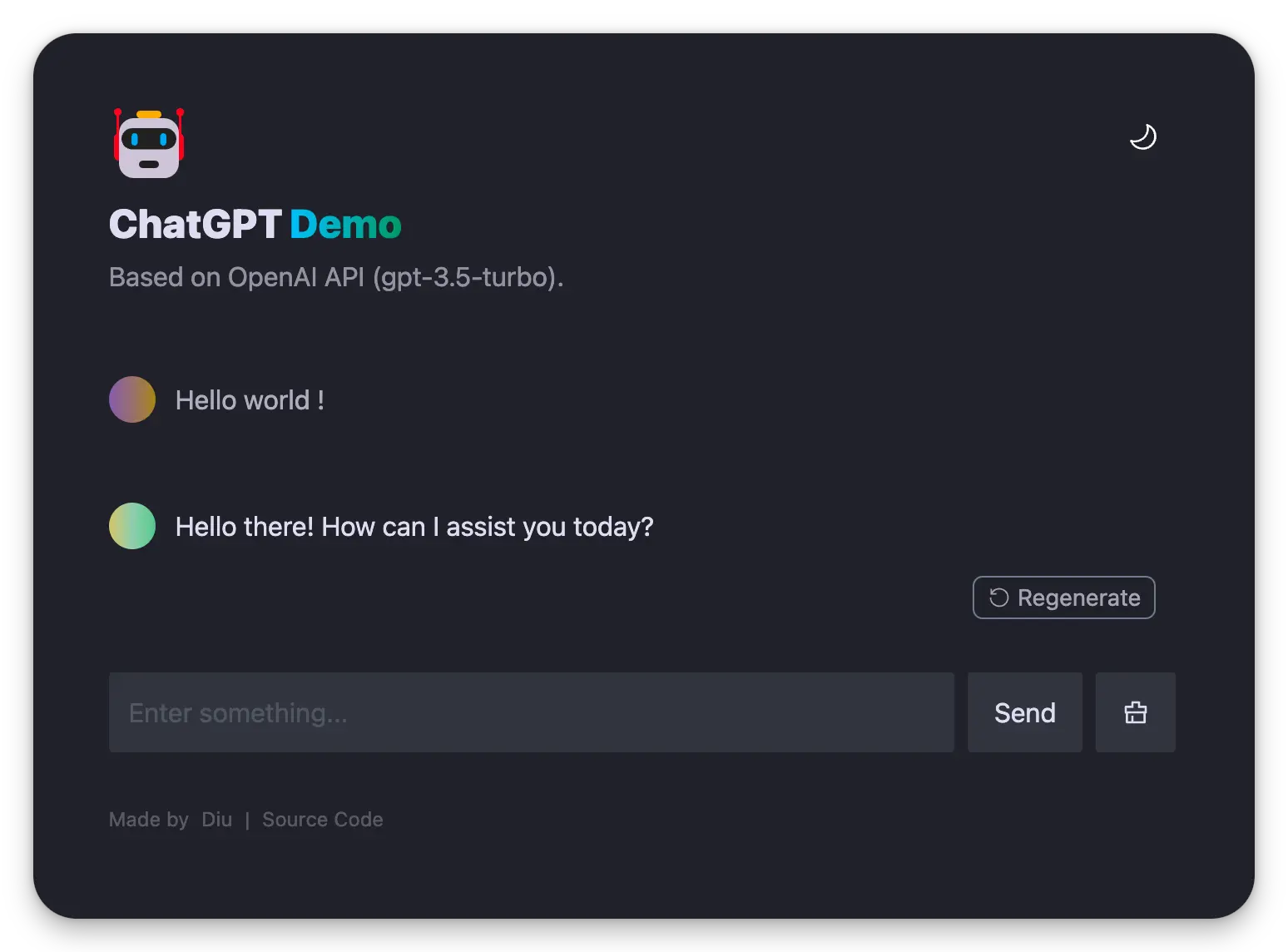
## Introducing `Anse`
Looking for multi-chat, image-generation, and more powerful features? Take a look at our newly launched [Anse](https://github.com/anse-app/anse).
More info on https://github.com/ddiu8081/chatgpt-demo/discussions/247.
[](https://github.com/anse-app/anse)
## Running Locally
### Pre environment
1. **Node**: Check that both your development environment and deployment environment are using `Node v18` or later. You can use [nvm](https://github.com/nvm-sh/nvm) to manage multiple `node` versions locally.
```bash
node -v
```
2. **PNPM**: We recommend using [pnpm](https://pnpm.io/) to manage dependencies. If you have never installed pnpm, you can install it with the following command:
```bash
npm i -g pnpm
```
3. **OPENAI_API_KEY**: Before running this application, you need to obtain the API key from OpenAI. You can register the API key at [https://beta.openai.com/signup](https://beta.openai.com/signup).
### Getting Started
1. Install dependencies
```bash
pnpm install
```
2. Copy the `.env.example` file, then rename it to `.env`, and add your [OpenAI API key](https://platform.openai.com/account/api-keys) to the `.env` file.
```bash
OPENAI_API_KEY=sk-xxx...
```
3. Run the application, the local project runs on `http://localhost:3000/`
```bash
pnpm run dev
```
## Deploy
### Deploy With Vercel
[](https://vercel.com/new/clone?repository-url=https%3A%2F%2Fgithub.com%2Fddiu8081%2Fchatgpt-demo&env=OPENAI_API_KEY&envDescription=OpenAI%20API%20Key&envLink=https%3A%2F%2Fplatform.openai.com%2Faccount%2Fapi-keys)
> #### 🔒 Need website password?
>
> Deploy with the [`SITE_PASSWORD`](#environment-variables)
>
> <a href="https://vercel.com/new/clone?repository-url=https%3A%2F%2Fgithub.com%2Fddiu8081%2Fchatgpt-demo&env=OPENAI_API_KEY&env=SITE_PASSWORD&envDescription=OpenAI%20API%20Key&envLink=https%3A%2F%2Fplatform.openai.com%2Faccount%2Fapi-keys" alt="Deploy with Vercel" target="_blank"><img src="https://vercel.com/button" alt="Deploy with Vercel" height=24 style="vertical-align: middle; margin-right: 4px;"></a>
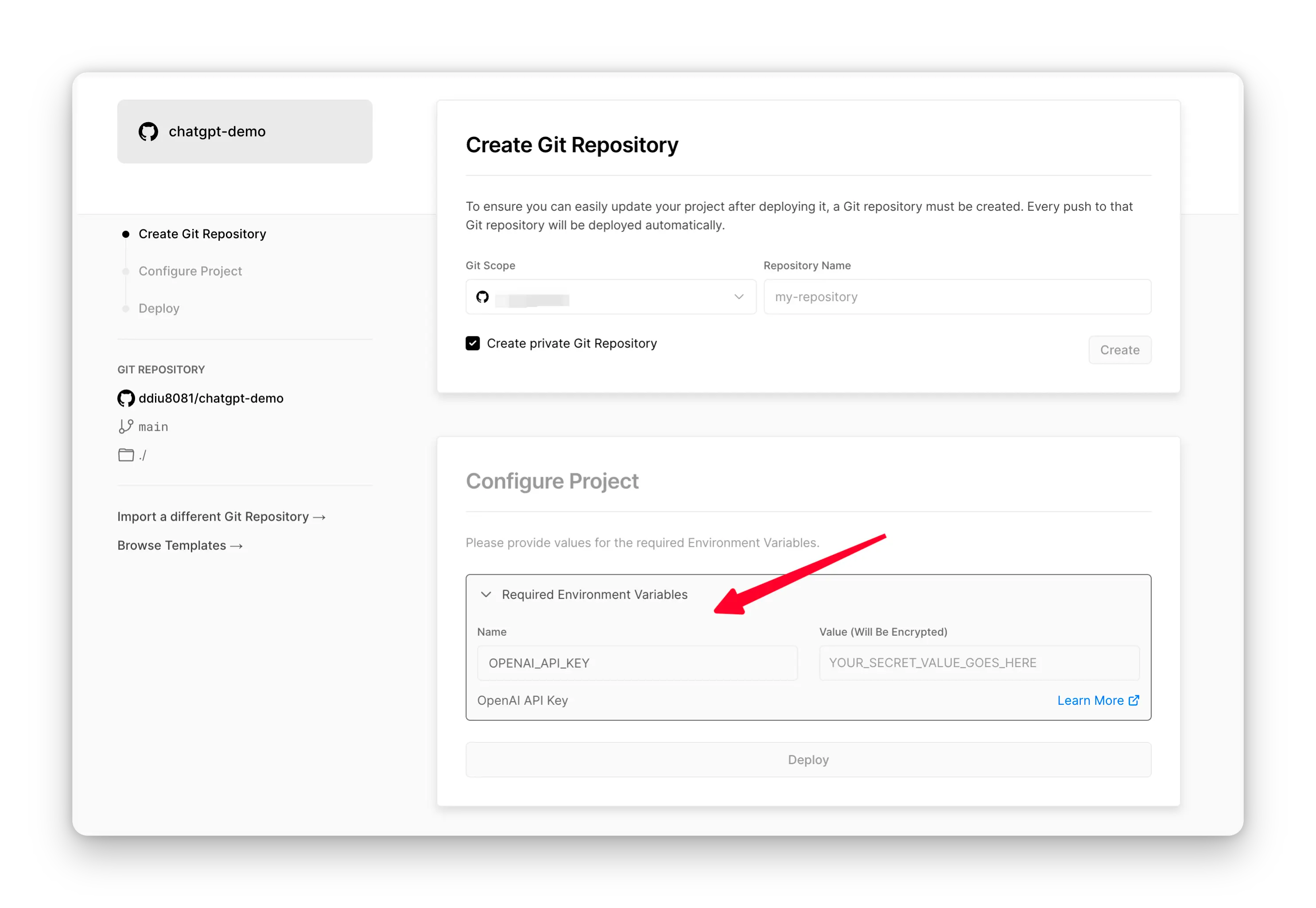
### Deploy With Netlify
[](https://app.netlify.com/start/deploy?repository=https://github.com/ddiu8081/chatgpt-demo#OPENAI_API_KEY=&HTTPS_PROXY=&OPENAI_API_BASE_URL=&HEAD_SCRIPTS=&PUBLIC_SECRET_KEY=&OPENAI_API_MODEL=&SITE_PASSWORD=)
**Step-by-step deployment tutorial:**
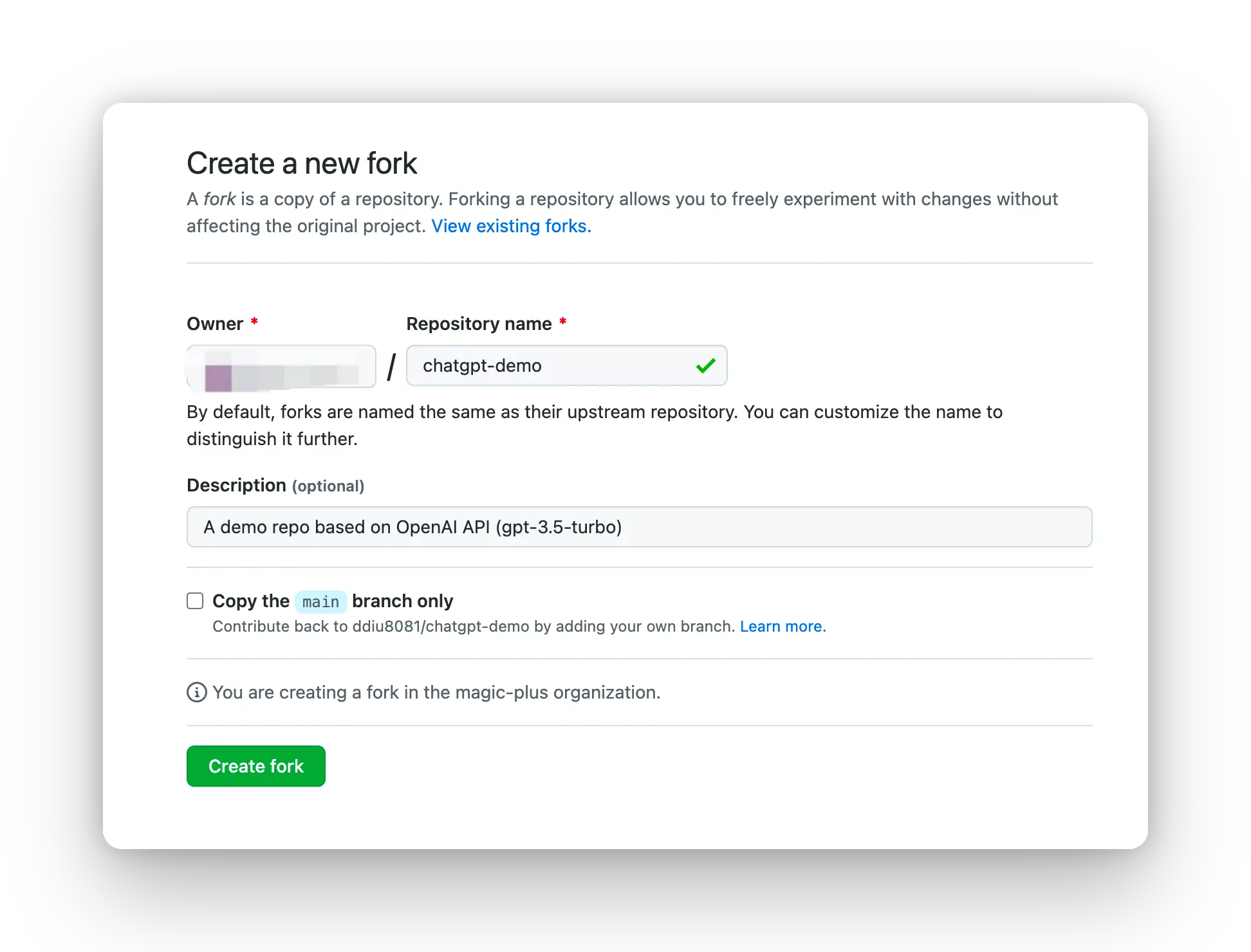
1. [Fork](https://github.com/ddiu8081/chatgpt-demo/fork) this project, Go to [https://app.netlify.com/start](https://app.netlify.com/start) new Site, select the project you `forked` done, and connect it with your `GitHub` account.
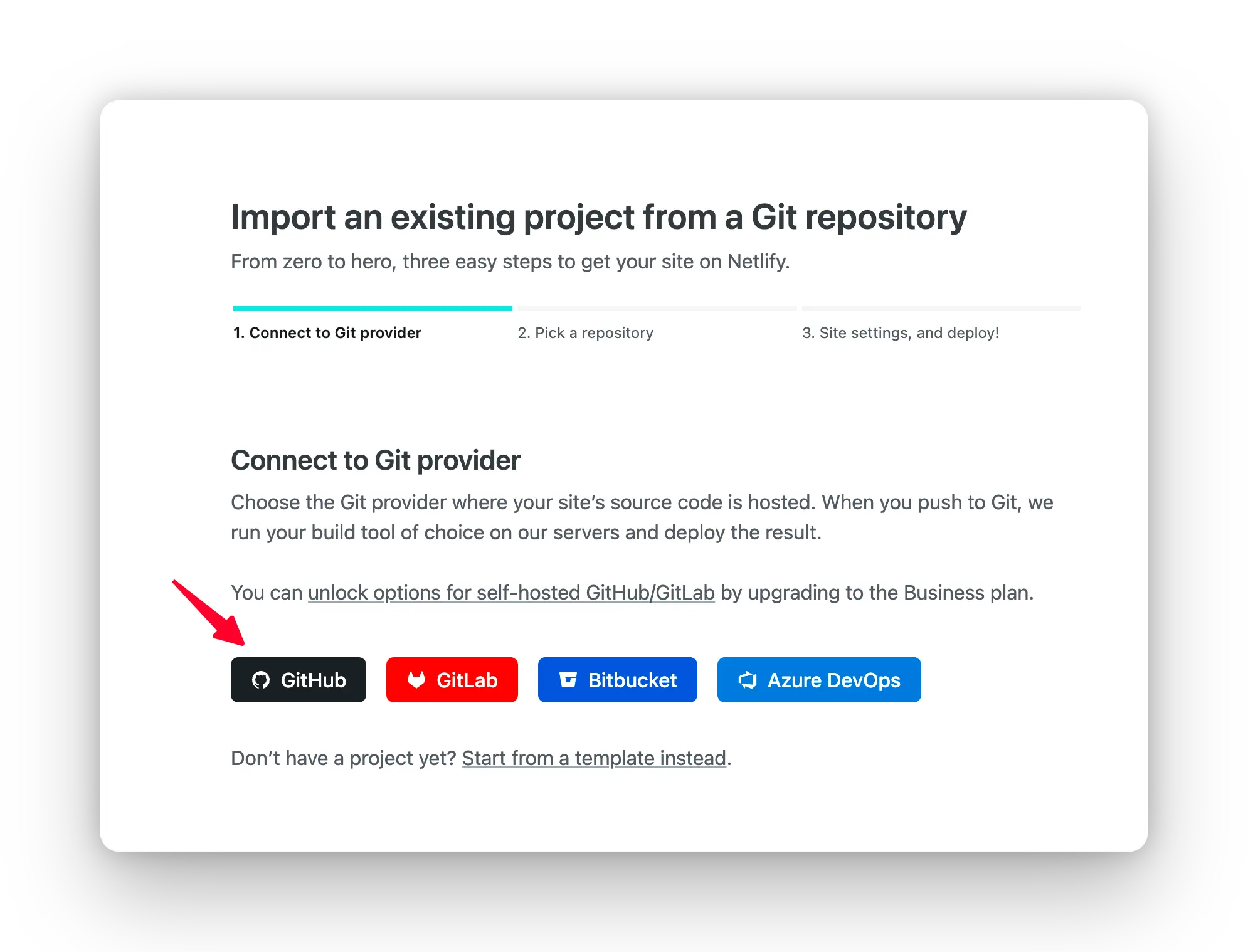
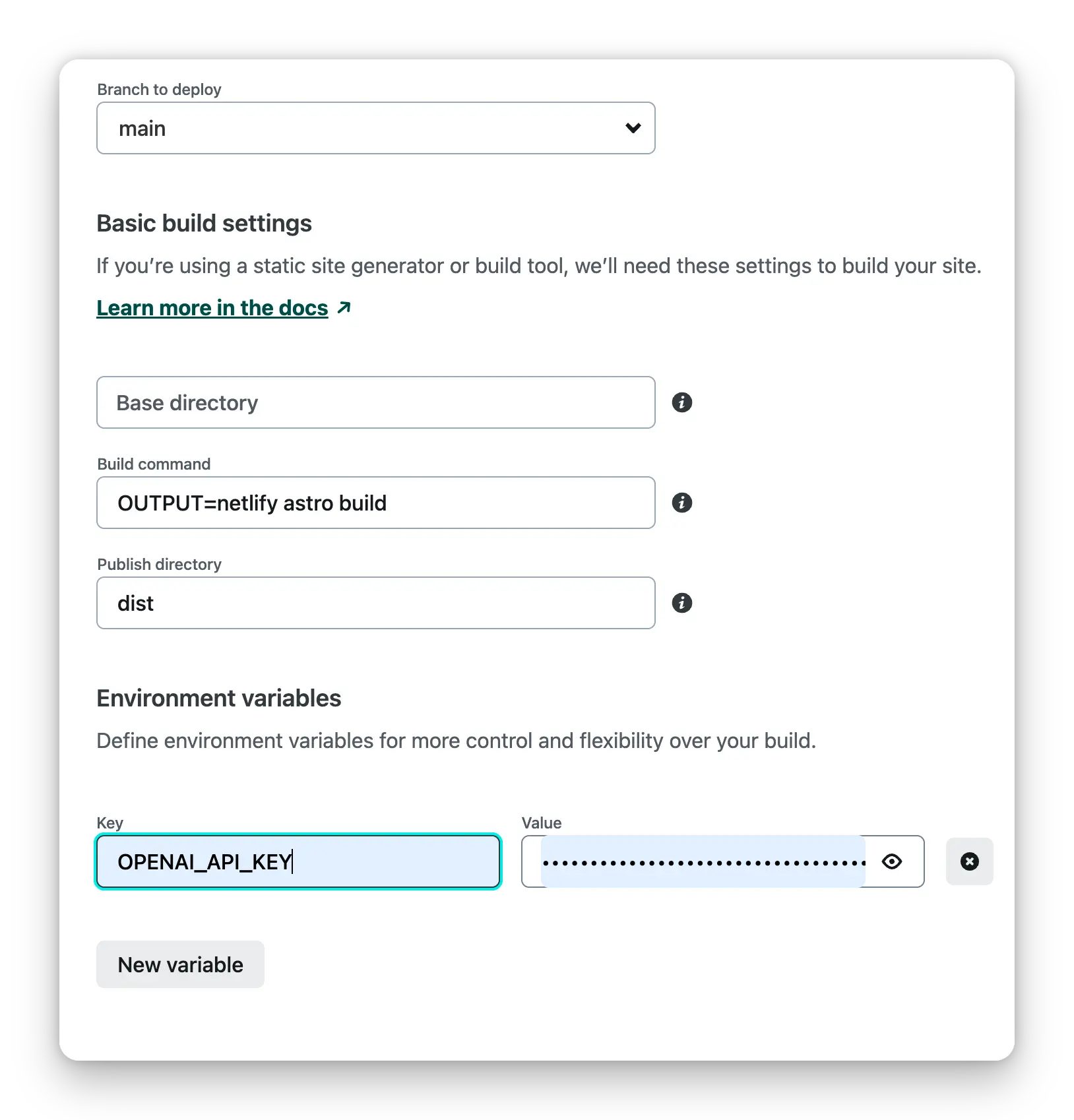
2. Select the branch you want to deploy, then configure environment variables in the project settings.
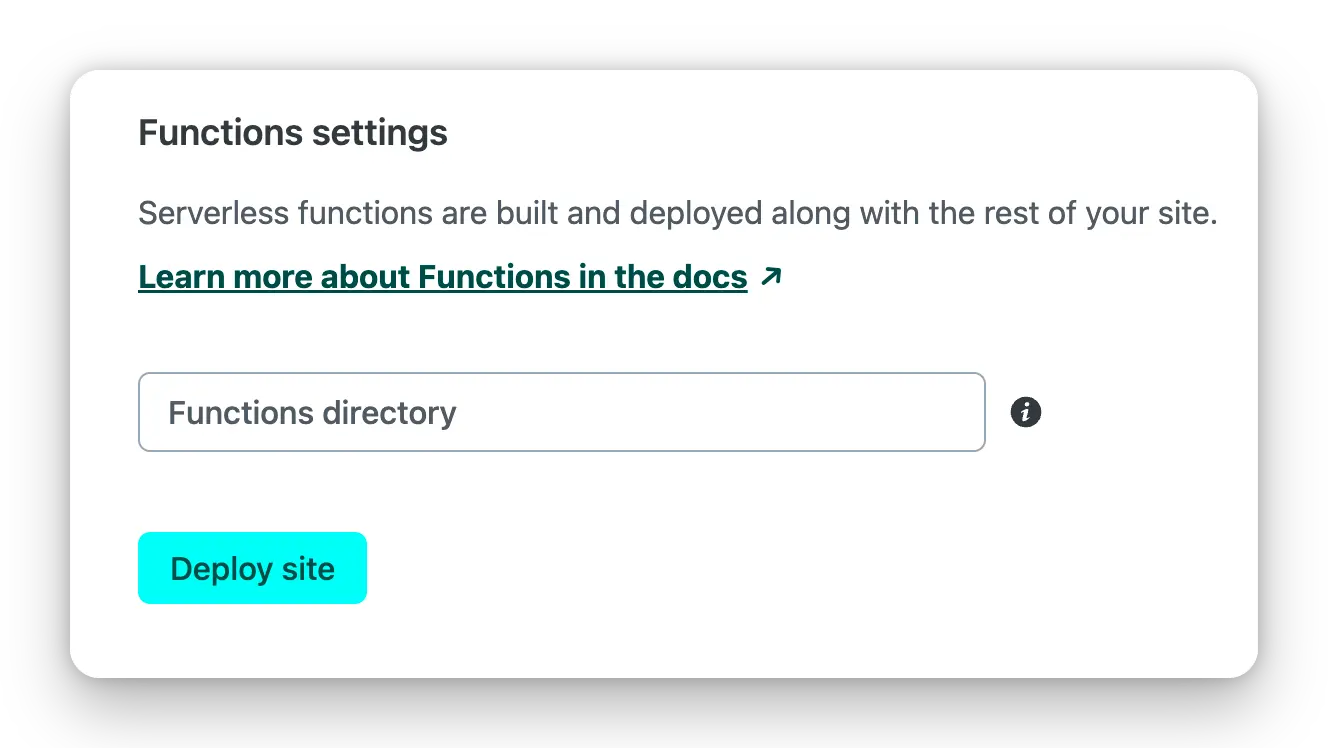
3. Select the default build command and output directory, Click the `Deploy Site` button to start deploying the site.
### Deploy with Docker
Environment variables refer to the documentation below. [Docker Hub address](https://hub.docker.com/r/ddiu8081/chatgpt-demo).
**Direct run**
```bash
docker run --name=chatgpt-demo -e OPENAI_API_KEY=YOUR_OPEN_API_KEY -p 3000:3000 -d ddiu8081/chatgpt-demo:latest
```
`-e` define environment variables in the container.
**Docker compose**
```yml
version: '3'
services:
chatgpt-demo:
image: ddiu8081/chatgpt-demo:latest
container_name: chatgpt-demo
restart: always
ports:
- '3000:3000'
environment:
- OPENAI_API_KEY=YOUR_OPEN_API_KEY
# - HTTPS_PROXY=YOUR_HTTPS_PROXY
# - OPENAI_API_BASE_URL=YOUR_OPENAI_API_BASE_URL
# - HEAD_SCRIPTS=YOUR_HEAD_SCRIPTS
# - PUBLIC_SECRET_KEY=YOUR_SECRET_KEY
# - SITE_PASSWORD=YOUR_SITE_PASSWORD
# - OPENAI_API_MODEL=YOUR_OPENAI_API_MODEL
```
```bash
# start
docker compose up -d
# down
docker-compose down
```
### Deploy with Sealos
1.Register a Sealos account for free [sealos cloud](https://cloud.sealos.io)
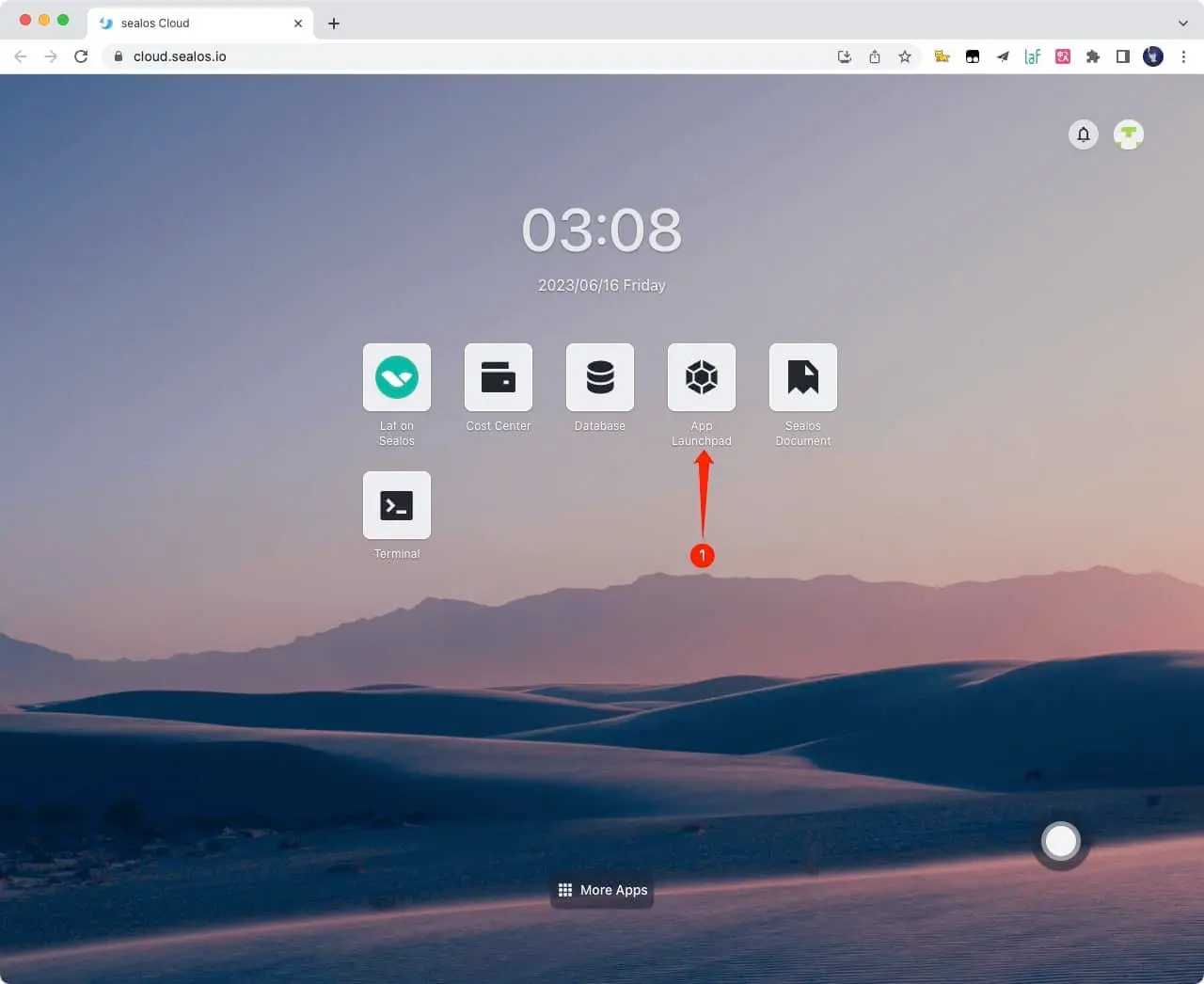
2.Click `App Launchpad` button
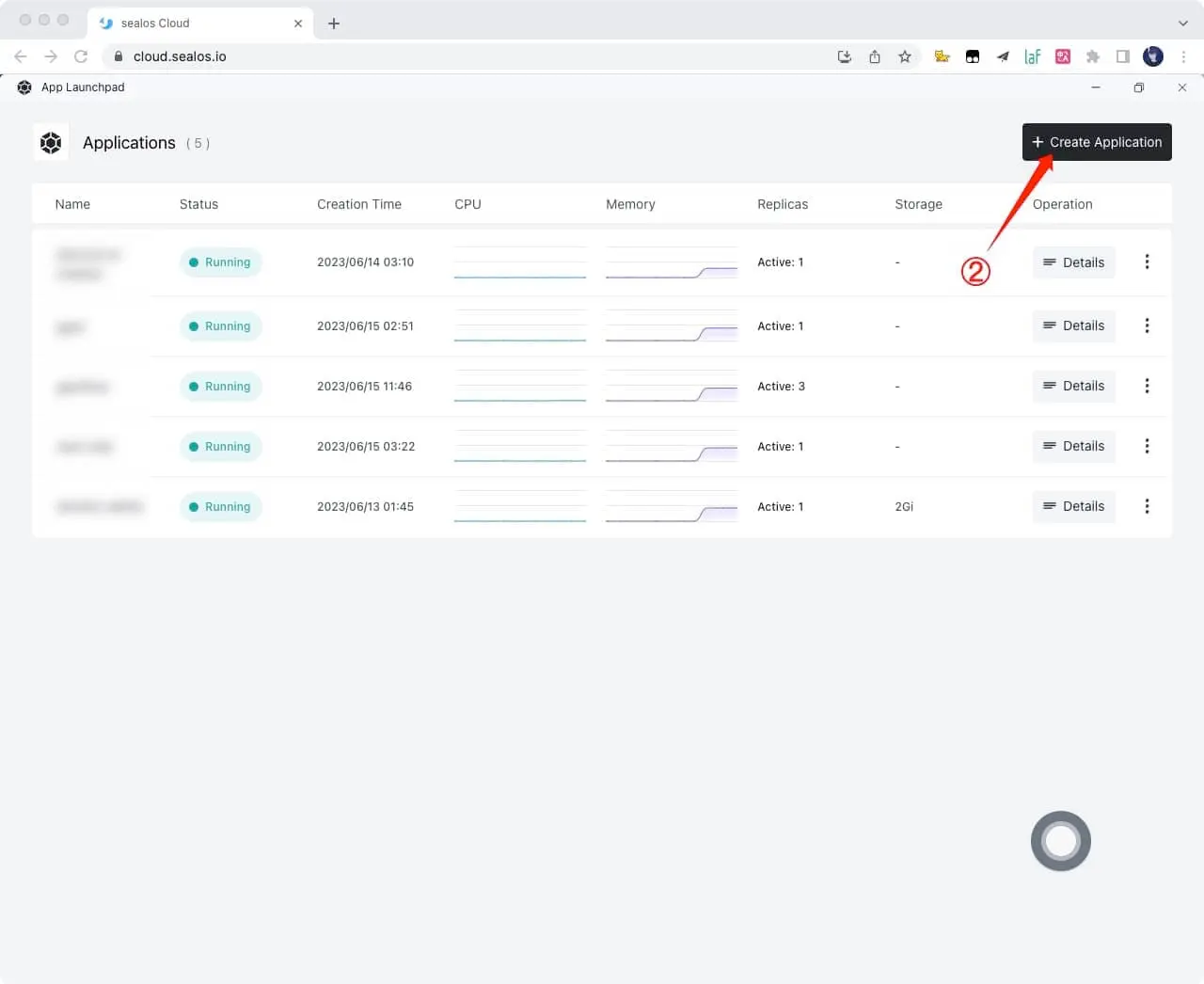
3.Click `Create Application` button
4.Just fill in according to the following figure, and click on it after filling out `Deploy Application` button
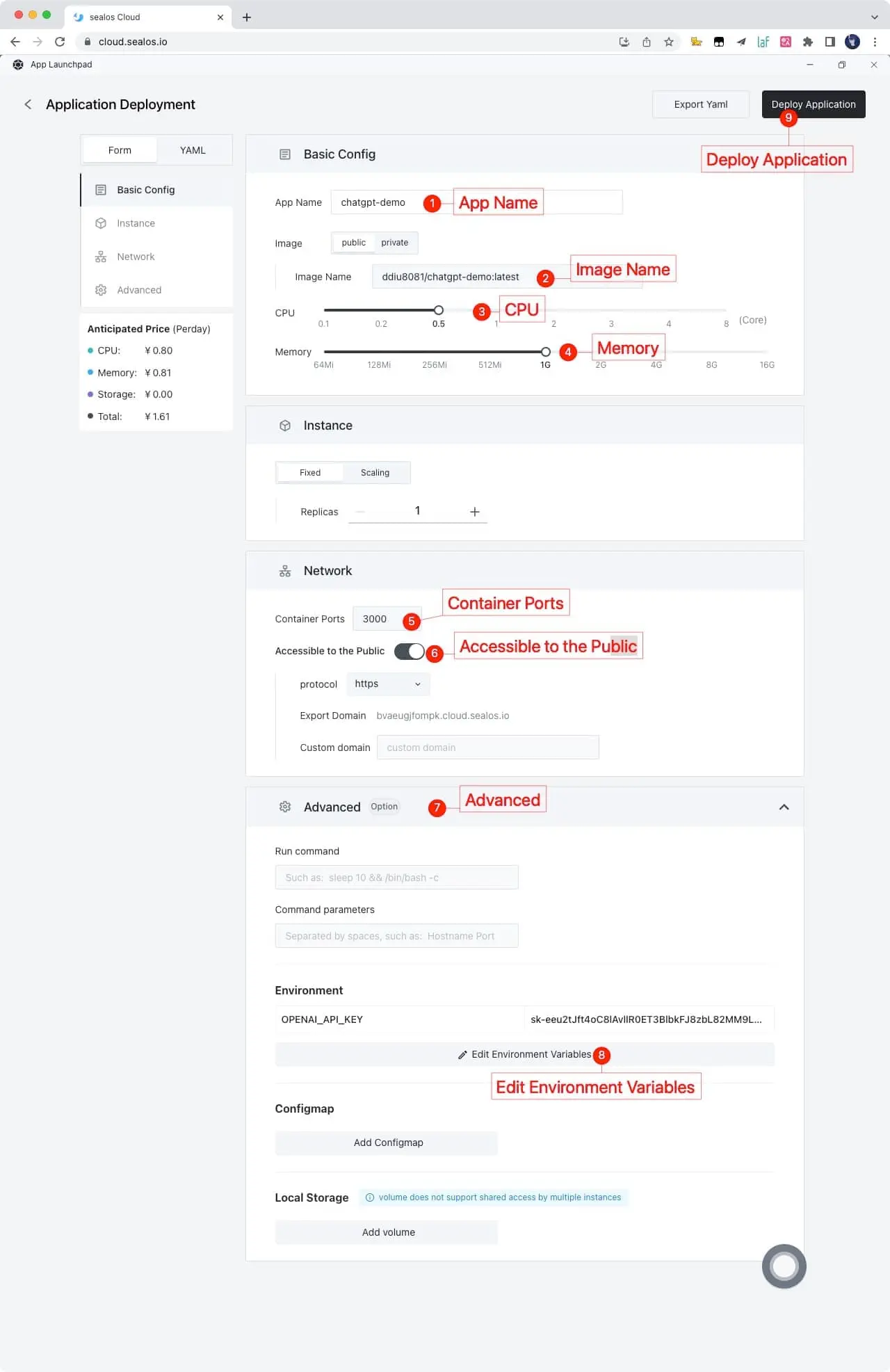
```shell
App Name: chatgpt-demo
Image Name: ddiu8081/chatgpt-demo:latest
CPU: 0.5Core
Memory: 1G
Container Ports: 3000
Accessible to the Public: On
Environment: OPENAI_API_KEY=YOUR_OPEN_API_KEY
```
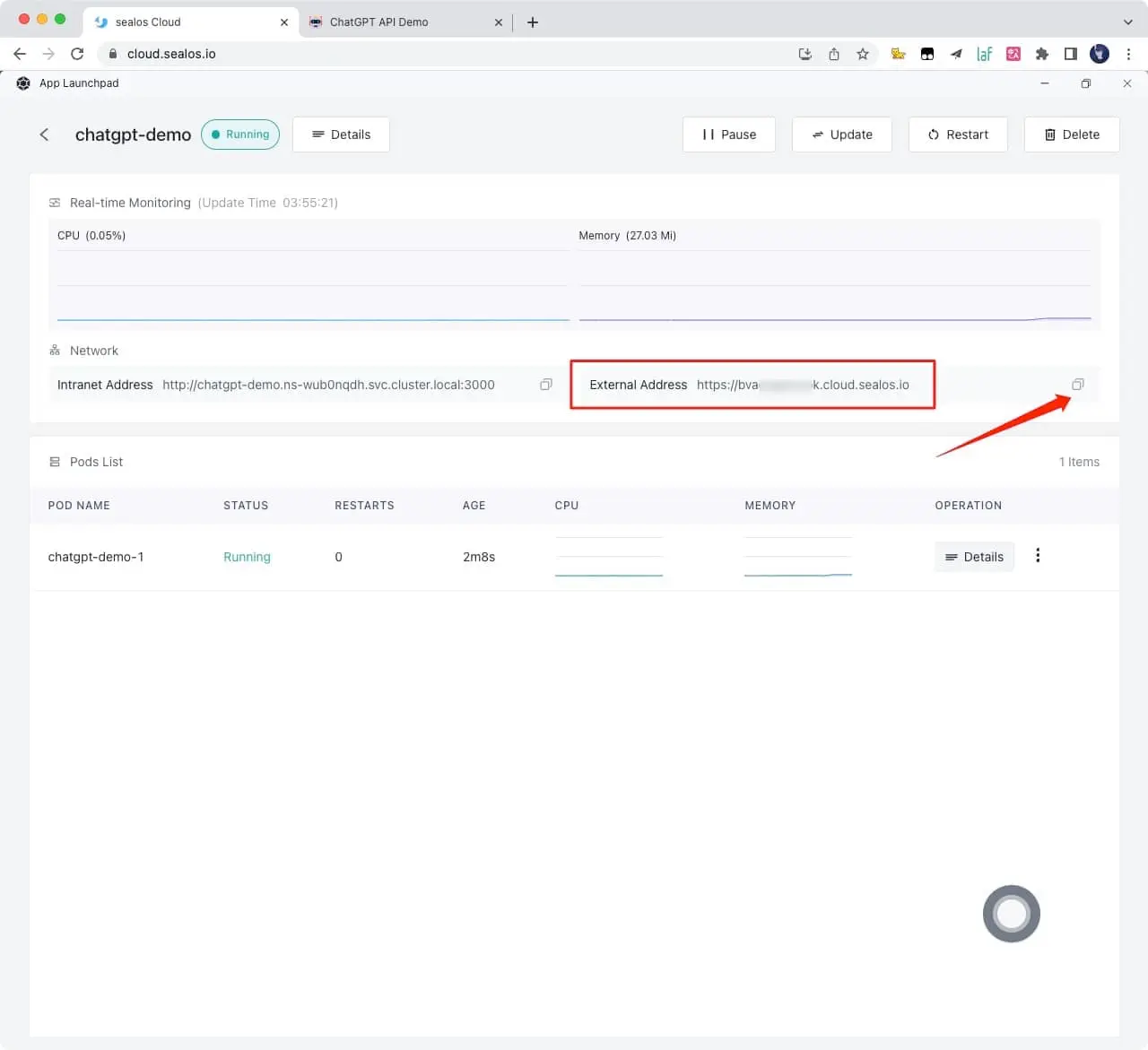
5.Obtain the access link and click directly to access it. If you need to bind your own domain name, you can also fill in your own domain name in `Custom domain` and follow the prompts to configure the domain name CNAME
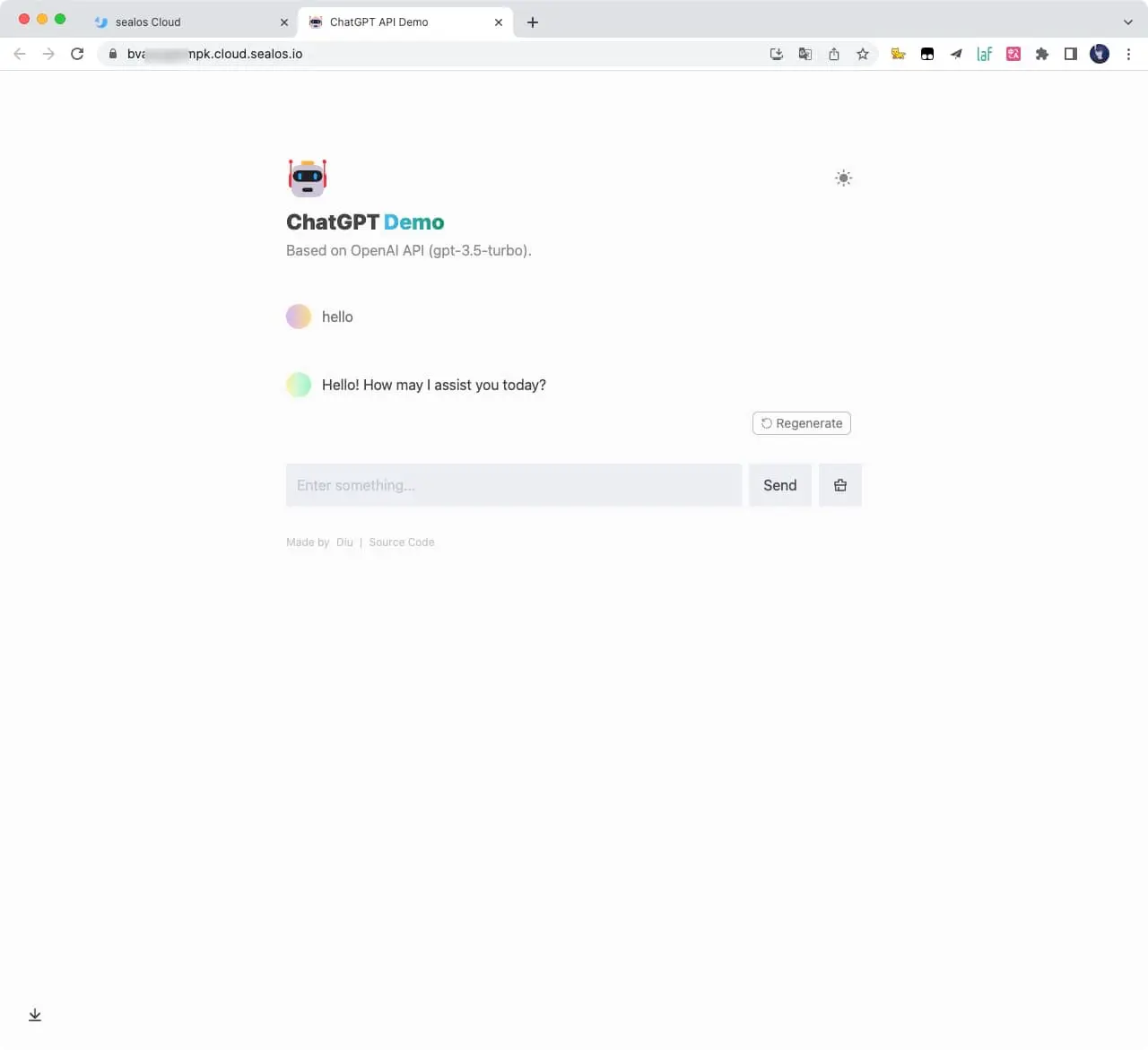
6.Wait for one to two minutes and open this link
### Deploy on more servers
Please refer to the official deployment documentation: https://docs.astro.build/en/guides/deploy
## Environment Variables
You can control the website through environment variables.
| Name | Description | Default |
| --- | --- | --- |
| `OPENAI_API_KEY` | Your API Key for OpenAI. | `null` |
| `HTTPS_PROXY` | Provide proxy for OpenAI API. e.g. `http://127.0.0.1:7890` | `null` |
| `OPENAI_API_BASE_URL` | Custom base url for OpenAI API. | `https://api.openai.com` |
| `HEAD_SCRIPTS` | Inject analytics or other scripts before `</head>` of the page | `null` |
| `PUBLIC_SECRET_KEY` | Secret string for the project. Use for generating signatures for API calls | `null` |
| `SITE_PASSWORD` | Set password for site, support multiple password separated by comma. If not set, site will be public | `null` |
| `OPENAI_API_MODEL` | ID of the model to use. [List models](https://platform.openai.com/docs/api-reference/models/list) | `gpt-3.5-turbo` |
## Enable Automatic Updates
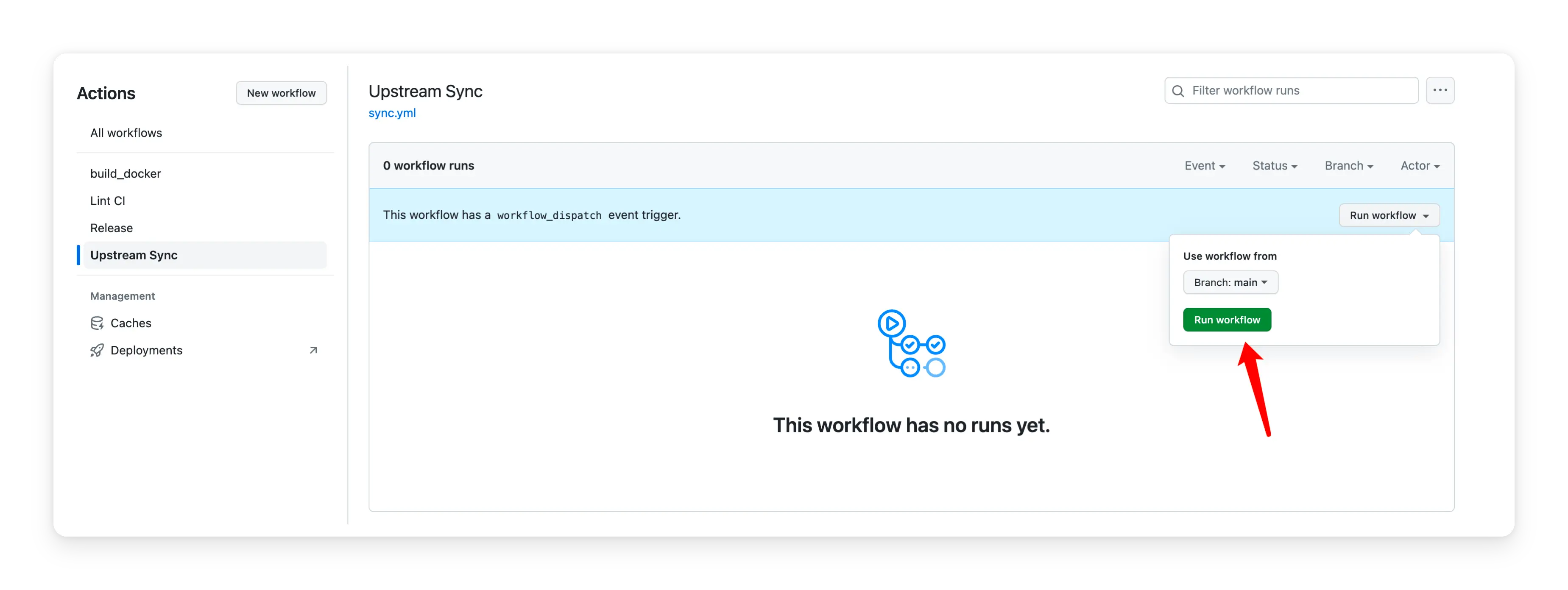
After forking the project, you need to manually enable Workflows and Upstream Sync Action on the Actions page of the forked project. Once enabled, automatic updates will be scheduled every day:
## Frequently Asked Questions
Q: TypeError: fetch failed (can't connect to OpenAI Api)
A: Configure environment variables `HTTPS_PROXY`,reference: https://github.com/ddiu8081/chatgpt-demo/issues/34
Q: throw new TypeError(${context} is not a ReadableStream.)
A: The Node version needs to be `v18` or later, reference: https://github.com/ddiu8081/chatgpt-demo/issues/65
Q: Accelerate domestic access without the need for proxy deployment tutorial?
A: You can refer to this tutorial: https://github.com/ddiu8081/chatgpt-demo/discussions/270
## Contributing
This project exists thanks to all those who contributed.
Thank you to all our supporters!🙏
[](https://github.com/ddiu8081/chatgpt-demo/graphs/contributors)
## License
MIT © [ddiu8081](https://github.com/ddiu8081/chatgpt-demo/blob/main/LICENSE)
================================================
FILE: README.zh-CN.md
================================================
# ChatGPT-API Demo
[English](./README.md) | 简体中文
一个基于 [OpenAI GPT-3.5 Turbo API](https://platform.openai.com/docs/guides/chat) 的 demo。
**🍿 在线预览**: https://chatgpt.ddiu.me
**🏖️ V2 版本 (Beta)**: https://v2.chatgpt.ddiu.me
> ⚠️ 注意:我们的 API 密钥限制已用尽。所以演示站点现在不可用。

## 本地运行
### 前置环境
1. **Node**: 检查您的开发环境和部署环境是否都使用 `Node v18` 或更高版本。你可以使用 [nvm](https://github.com/nvm-sh/nvm) 管理本地多个 `node` 版本。
```bash
node -v
```
2. **PNPM**: 我们推荐使用 [pnpm](https://pnpm.io/) 来管理依赖,如果你从来没有安装过 pnpm,可以使用下面的命令安装:
```bash
npm i -g pnpm
```
3. **OPENAI_API_KEY**: 在运行此应用程序之前,您需要从 OpenAI 获取 API 密钥。您可以在 [https://beta.openai.com/signup](https://beta.openai.com/signup) 注册 API 密钥。
### 起步运行
1. 安装依赖
```bash
pnpm install
```
2. 复制 `.env.example` 文件,重命名为 `.env`,并添加你的 [OpenAI API key](https://platform.openai.com/account/api-keys) 到 `.env` 文件中
```bash
OPENAI_API_KEY=sk-xxx...
```
3. 运行应用,本地项目运行在 `http://localhost:3000/`
```bash
pnpm run dev
```
## 部署
### 部署在 Vercel
[](https://vercel.com/new/clone?repository-url=https%3A%2F%2Fgithub.com%2Fddiu8081%2Fchatgpt-demo&env=OPENAI_API_KEY&envDescription=OpenAI%20API%20Key&envLink=https%3A%2F%2Fplatform.openai.com%2Faccount%2Fapi-keys)
> ###### 🔒 需要站点密码?
>
> 携带[`SITE_PASSWORD`](#environment-variables)进行部署
>
> <a href="https://vercel.com/new/clone?repository-url=https%3A%2F%2Fgithub.com%2Fddiu8081%2Fchatgpt-demo&env=OPENAI_API_KEY&env=SITE_PASSWORD&envDescription=OpenAI%20API%20Key&envLink=https%3A%2F%2Fplatform.openai.com%2Faccount%2Fapi-keys" alt="Deploy with Vercel" target="_blank"><img src="https://vercel.com/button" alt="Deploy with Vercel" height=24 style="vertical-align: middle; margin-right: 4px;"></a>

### 部署在 Netlify
[](https://app.netlify.com/start/deploy?repository=https://github.com/ddiu8081/chatgpt-demo#OPENAI_API_KEY=&HTTPS_PROXY=&OPENAI_API_BASE_URL=&HEAD_SCRIPTS=&PUBLIC_SECRET_KEY=&OPENAI_API_MODEL=&SITE_PASSWORD=)
**分步部署教程:**
1. [Fork](https://github.com/ddiu8081/chatgpt-demo/fork) 此项目,前往 [https://app.netlify.com/start](https://app.netlify.com/start) 新建站点,选择你 `fork` 完成的项目,将其与 `GitHub` 帐户连接。


2. 选择要部署的分支,选择 `main` 分支,在项目设置中配置环境变量,环境变量配置参考下文。
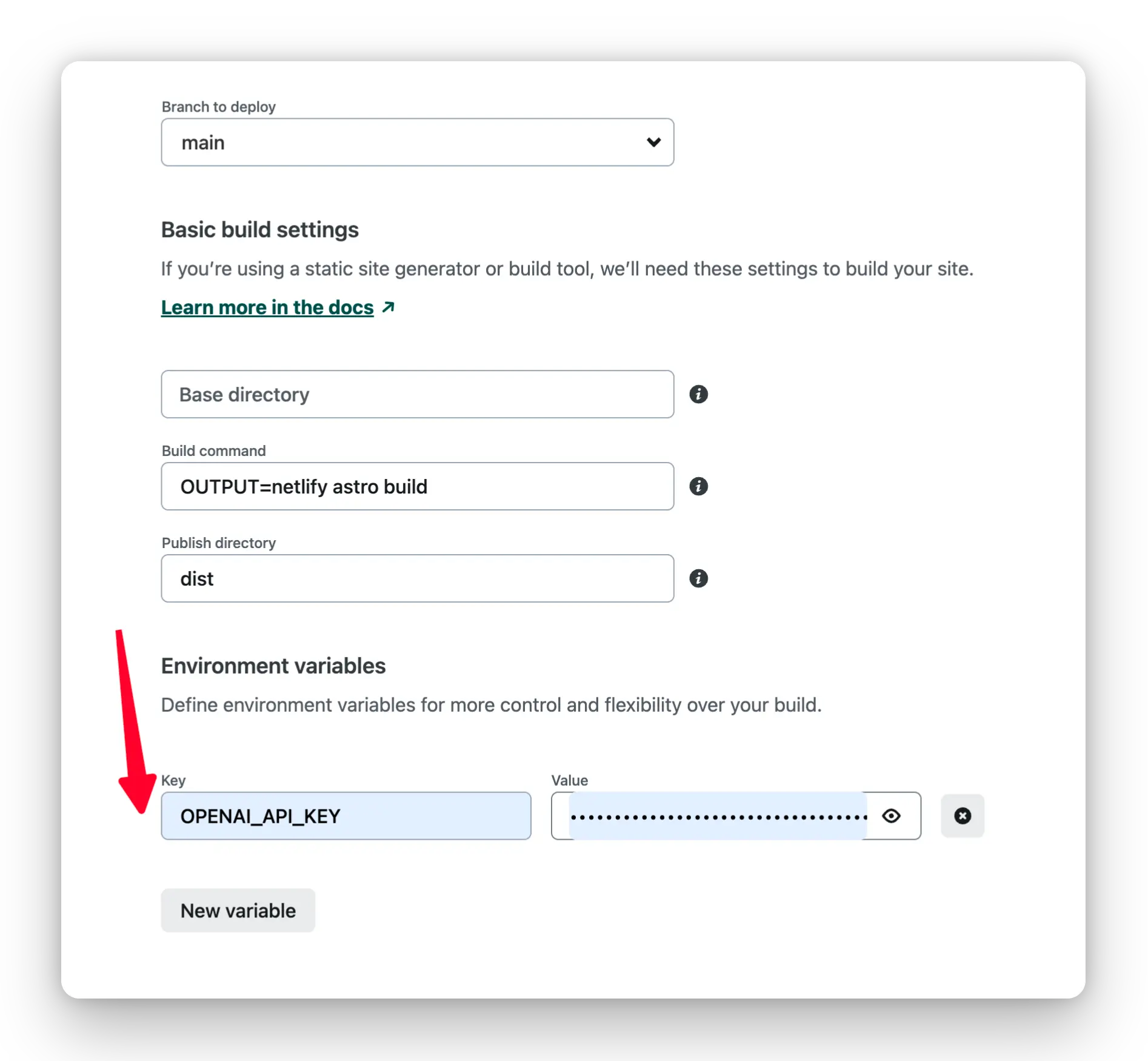
3. 选择默认的构建命令和输出目录,单击 `Deploy Site` 按钮开始部署站点。
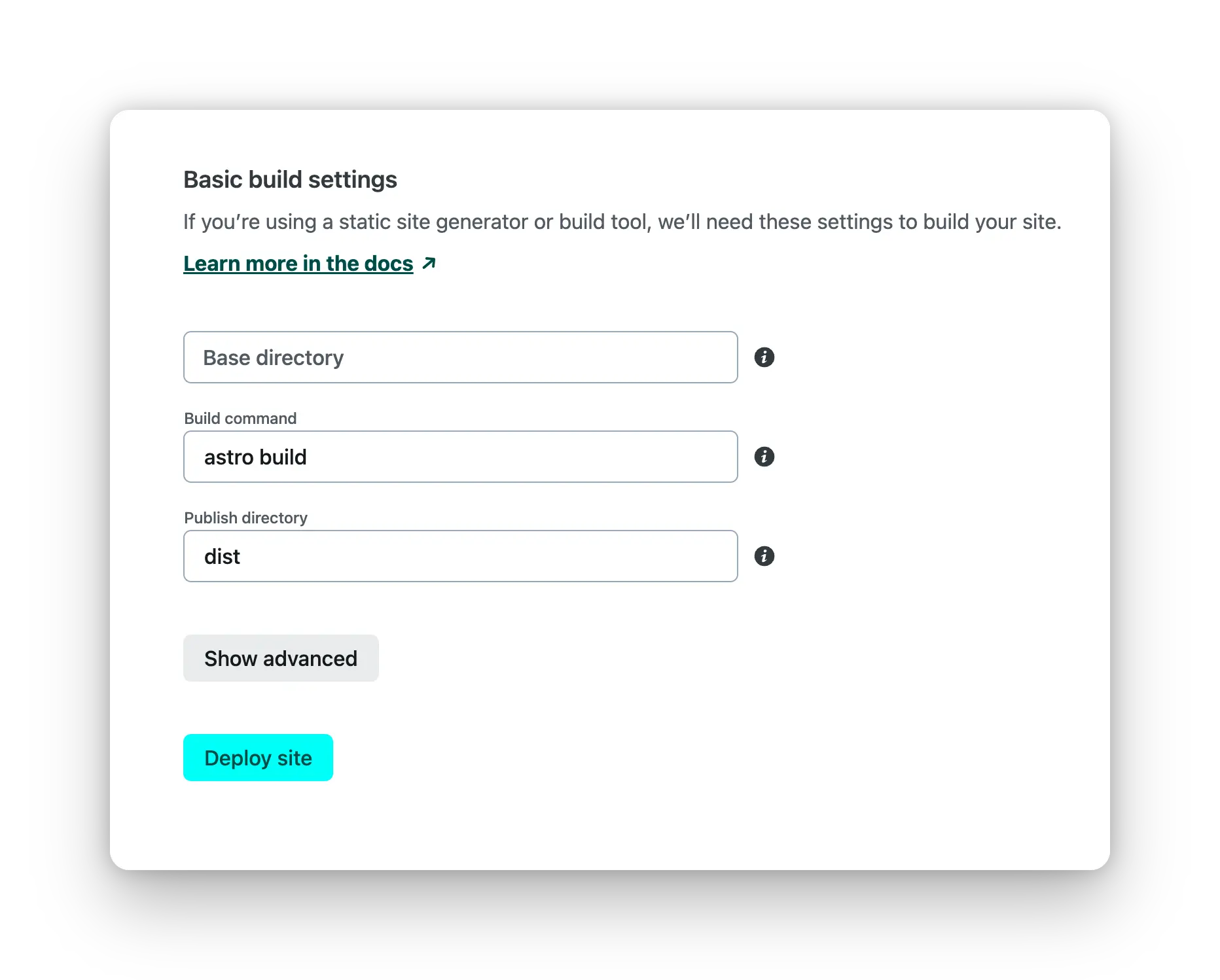
### 部署在 Docker
部署之前请确认 `.env` 文件正常配置,环境变量参考下方文档,[Docker Hub address](https://hub.docker.com/r/ddiu8081/chatgpt-demo).
**一键运行**
```bash
docker run --name=chatgpt-demo -e OPENAI_API_KEY=YOUR_OPEN_API_KEY -p 3000:3000 -d ddiu8081/chatgpt-demo:latest
```
`-e` 在容器中定义环境变量。
**使用 Docker compose**
```yml
version: '3'
services:
chatgpt-demo:
image: ddiu8081/chatgpt-demo:latest
container_name: chatgpt-demo
restart: always
ports:
- '3000:3000'
environment:
- OPENAI_API_KEY=YOUR_OPEN_API_KEY
# - HTTPS_PROXY=YOUR_HTTPS_PROXY
# - OPENAI_API_BASE_URL=YOUR_OPENAI_API_BASE_URL
# - HEAD_SCRIPTS=YOUR_HEAD_SCRIPTS
# - PUBLIC_SECRET_KEY=YOUR_SECRET_KEY
# - SITE_PASSWORD=YOUR_SITE_PASSWORD
# - OPENAI_API_MODEL=YOUR_OPENAI_API_MODEL
```
```bash
# start
docker compose up -d
# down
docker-compose down
```
### Sealos 部署
1.注册 Sealos 免费账号 [sealos cloud](https://cloud.sealos.io)
2.点击 `App Launchpad` 按钮

3.点击 `Create Application` 按钮

4.按照下图填写后,点击 `Deploy Application` 按钮

```shell
App Name: chatgpt-demo
Image Name: ddiu8081/chatgpt-demo:latest
CPU: 0.5Core
Memory: 1G
Container Ports: 3000
Accessible to the Public: On
Environment: OPENAI_API_KEY=YOUR_OPEN_API_KEY
```
5.获取访问链接。如果你需要自定义域名,可以点击 `Custom domain` 按钮后按照提示解析域名 CNAME

6.等待 1-2 分钟后点击链接,即可进去页面

### 部署在更多的服务器
请参考官方部署文档:https://docs.astro.build/en/guides/deploy
## 环境变量
配置本地或者部署的环境变量
| 名称 | 描述 | 默认 |
| --- | --- | --- |
| `OPENAI_API_KEY` | 你的 OpenAI API Key | `null` |
| `HTTPS_PROXY` | 为 OpenAI API 提供代理。e.g. `http://127.0.0.1:7890` | `null` |
| `OPENAI_API_BASE_URL` | 请求 OpenAI API 的自定义 Base URL. | `https://api.openai.com` |
| `HEAD_SCRIPTS` | 在页面的 `</head>` 之前注入分析或其他脚本 | `null` |
| `PUBLIC_SECRET_KEY` | 项目的秘密字符串。用于生成 API 调用的签名 | `null` |
| `SITE_PASSWORD` | 为网站设置密码,支持使用英文逗号创建多个密码。如果未设置,则该网站将是公开的 | `null` |
| `OPENAI_API_MODEL` | 使用的 OpenAI 模型。[模型列表](https://platform.openai.com/docs/api-reference/models/list) | `gpt-3.5-turbo` |
## 开启同步更新
Fork 项目后,您需要在 Fork 项目的操作页面上手动启用工作流和上游同步操作。启用后,每天都会执行自动更新:

## 常见问题
Q: TypeError: fetch failed (can't connect to OpenAI Api)
A: 配置环境变量 `HTTPS_PROXY`,参考:https://github.com/ddiu8081/chatgpt-demo/issues/34
Q: throw new TypeError(${context} is not a ReadableStream.)
A: Node 版本需要在 `v18` 或者更高,参考:https://github.com/ddiu8081/chatgpt-demo/issues/65
Q: Accelerate domestic access without the need for proxy deployment tutorial?
A: 你可以参考此教程:https://github.com/ddiu8081/chatgpt-demo/discussions/270
## 参与贡献
这个项目的存在要感谢所有做出贡献的人。
感谢我们所有的支持者!🙏
[](https://github.com/ddiu8081/chatgpt-demo/graphs/contributors)
## License
MIT © [ddiu8081](https://github.com/ddiu8081/chatgpt-demo/blob/main/LICENSE)
================================================
FILE: astro.config.mjs
================================================
import { defineConfig } from 'astro/config'
import unocss from 'unocss/astro'
import solidJs from '@astrojs/solid-js'
import node from '@astrojs/node'
import AstroPWA from '@vite-pwa/astro'
import vercel from '@astrojs/vercel/edge'
import netlify from '@astrojs/netlify/edge-functions'
import disableBlocks from './plugins/disableBlocks'
const envAdapter = () => {
switch (process.env.OUTPUT) {
case 'vercel': return vercel()
case 'netlify': return netlify()
default: return node({ mode: 'standalone' })
}
}
// https://astro.build/config
export default defineConfig({
integrations: [
unocss(),
solidJs(),
AstroPWA({
registerType: 'autoUpdate',
injectRegister: 'inline',
manifest: {
name: 'ChatGPT-API Demo',
short_name: 'ChatGPT Demo',
description: 'A demo repo based on OpenAI API',
theme_color: '#212129',
background_color: '#ffffff',
icons: [
{
src: 'pwa-192.png',
sizes: '192x192',
type: 'image/png',
},
{
src: 'pwa-512.png',
sizes: '512x512',
type: 'image/png',
},
{
src: 'icon.svg',
sizes: '32x32',
type: 'image/svg',
purpose: 'any maskable',
},
],
},
client: {
installPrompt: true,
periodicSyncForUpdates: 20,
},
devOptions: {
enabled: true,
},
}),
],
output: 'server',
adapter: envAdapter(),
vite: {
plugins: [
process.env.OUTPUT === 'vercel' && disableBlocks(),
process.env.OUTPUT === 'netlify' && disableBlocks(),
],
},
})
================================================
FILE: docker-compose.yml
================================================
version: '3'
services:
chatgpt-demo:
image: ddiu8081/chatgpt-demo:latest
container_name: chatgpt-demo
restart: always
ports:
- "3000:3000"
environment:
- OPENAI_API_KEY=YOUR_OPENAI_API_KEY
# - HTTPS_PROXY=YOUR_HTTPS_PROXY
# - OPENAI_API_BASE_URL=YOUR_OPENAI_API_BASE_URL
# - HEAD_SCRIPTS=YOUR_HEAD_SCRIPTS
# - PUBLIC_SECRET_KEY=YOUR_SECRET_KEY
# - SITE_PASSWORD=YOUR_SITE_PASSWORD
# - OPENAI_API_MODEL=YOUR_OPENAI_API_MODEL
================================================
FILE: hack/docker-entrypoint.sh
================================================
#!/bin/sh
sub_service_pid=""
sub_service_command="node dist/server/entry.mjs"
function init() {
/bin/sh ./docker-env-replace.sh
}
function main {
init
echo "Starting service..."
eval "$sub_service_command &"
sub_service_pid=$!
trap cleanup SIGTERM SIGINT
echo "Running script..."
while [ true ]; do
sleep 5
done
}
function cleanup {
echo "Cleaning up!"
kill -TERM $sub_service_pid
}
main
================================================
FILE: hack/docker-env-replace.sh
================================================
#!/bin/sh
# Your API Key for OpenAI
openai_api_key=$OPENAI_API_KEY
# Provide proxy for OpenAI API. e.g. http://127.0.0.1:7890
https_proxy=$HTTPS_PROXY
# Custom base url for OpenAI API. default: https://api.openai.com
openai_api_base_url=$OPENAI_API_BASE_URL
# Inject analytics or other scripts before </head> of the page
head_scripts=$HEAD_SCRIPTS
# Secret string for the project. Use for generating signatures for API calls
public_secret_key=$PUBLIC_SECRET_KEY
# Set password for site, support multiple password separated by comma. If not set, site will be public
site_password=$SITE_PASSWORD
# ID of the model to use. https://platform.openai.com/docs/api-reference/models/list
openai_api_model=$OPENAI_API_MODEL
for file in $(find ./dist -type f -name "*.mjs"); do
sed "s|({}).OPENAI_API_KEY|\"$openai_api_key\"|g;
s|({}).HTTPS_PROXY|\"$https_proxy\"|g;
s|({}).OPENAI_API_BASE_URL|\"$openai_api_base_url\"|g;
s|({}).HEAD_SCRIPTS|\"$head_scripts\"|g;
s|({}).PUBLIC_SECRET_KEY|\"$public_secret_key\"|g;
s|({}).OPENAI_API_MODEL|\"$openai_api_model\"|g;
s|({}).SITE_PASSWORD|\"$site_password\"|g" $file > tmp
mv tmp $file
done
rm -rf tmp
================================================
FILE: netlify.toml
================================================
[build.environment]
NETLIFY_USE_PNPM = "true"
NODE_VERSION = "18"
[build]
command = "OUTPUT=netlify astro build"
publish = "dist"
[[headers]]
for = "/manifest.webmanifest"
[headers.values]
Content-Type = "application/manifest+json"
================================================
FILE: package.json
================================================
{
"name": "chatgpt-api-demo",
"version": "0.0.1",
"packageManager": "pnpm@7.28.0",
"scripts": {
"dev": "astro dev",
"start": "astro dev",
"build": "astro build",
"build:vercel": "OUTPUT=vercel astro build",
"build:netlify": "OUTPUT=netlify astro build",
"preview": "astro preview",
"astro": "astro",
"lint": "eslint . --ext .js,.jsx,.ts,.tsx,.astro",
"lint:fix": "eslint . --ext .js,.jsx,.ts,.tsx,.astro --fix"
},
"dependencies": {
"@astrojs/netlify": "2.3.0",
"@astrojs/node": "^5.3.0",
"@astrojs/solid-js": "^2.2.0",
"@astrojs/vercel": "^3.5.0",
"@zag-js/slider": "^0.16.0",
"@zag-js/solid": "^0.16.0",
"astro": "^2.7.0",
"eslint": "^8.43.0",
"eventsource-parser": "^1.0.0",
"highlight.js": "^11.8.0",
"js-sha256": "^0.9.0",
"katex": "^0.16.7",
"markdown-it": "^13.0.1",
"markdown-it-highlightjs": "^4.0.1",
"markdown-it-katex": "^2.0.3",
"solid-js": "1.7.6",
"solidjs-use": "^2.1.0",
"undici": "^5.22.1"
},
"devDependencies": {
"@evan-yang/eslint-config": "^1.0.9",
"@iconify-json/carbon": "^1.1.18",
"@types/markdown-it": "^12.2.3",
"@typescript-eslint/parser": "^5.60.0",
"@vite-pwa/astro": "^0.1.1",
"eslint-plugin-astro": "^0.27.1",
"punycode": "^2.3.0",
"unocss": "^0.50.8"
}
}
================================================
FILE: plugins/disableBlocks.ts
================================================
export default function plugin() {
const transform = (code: string, id: string) => {
if (id.includes('pages/api/generate.ts')) {
return {
code: code.replace(/^.*?#vercel-disable-blocks([\s\S]+?)#vercel-end.*$/gm, ''),
map: null,
}
}
}
return {
name: 'vercel-disable-blocks',
enforce: 'pre',
transform,
}
}
================================================
FILE: shims.d.ts
================================================
import type { AttributifyAttributes } from '@unocss/preset-attributify'
// declare module 'solid-js' {
// namespace JSX {
// interface HTMLAttributes<T> extends AttributifyAttributes {}
// }
// }
declare global {
namespace astroHTML.JSX {
interface HTMLAttributes extends AttributifyAttributes { }
}
namespace JSX {
interface HTMLAttributes<> extends AttributifyAttributes {}
}
}
================================================
FILE: src/components/ErrorMessageItem.tsx
================================================
import IconRefresh from './icons/Refresh'
import type { ErrorMessage } from '@/types'
interface Props {
data: ErrorMessage
onRetry?: () => void
}
export default ({ data, onRetry }: Props) => {
return (
<div class="my-4 px-4 py-3 border border-red/50 bg-red/10">
{data.code && <div class="text-red mb-1">{data.code}</div>}
<div class="text-red op-70 text-sm">{data.message}</div>
{onRetry && (
<div class="fie px-3 mb-2">
<div onClick={onRetry} class="gpt-retry-btn border-red/50 text-red">
<IconRefresh />
<span>Regenerate</span>
</div>
</div>
)}
</div>
)
}
================================================
FILE: src/components/Footer.astro
================================================
<footer>
<p mt-8 text-xs op-30>
<span pr-1>Made by</span>
<a
b-slate-link
href="https://ddiu.io" target="_blank"
>
Diu
</a>
<span px-1>|</span>
<a
b-slate-link
href="https://github.com/ddiu8081/chatgpt-demo" target="_blank"
>
Source Code
</a>
</p>
</footer>
================================================
FILE: src/components/Generator.tsx
================================================
import { Index, Show, createEffect, createSignal, onCleanup, onMount } from 'solid-js'
import { useThrottleFn } from 'solidjs-use'
import { generateSignature } from '@/utils/auth'
import IconClear from './icons/Clear'
import MessageItem from './MessageItem'
import SystemRoleSettings from './SystemRoleSettings'
import ErrorMessageItem from './ErrorMessageItem'
import type { ChatMessage, ErrorMessage } from '@/types'
export default () => {
let inputRef: HTMLTextAreaElement
const [currentSystemRoleSettings, setCurrentSystemRoleSettings] = createSignal('')
const [systemRoleEditing, setSystemRoleEditing] = createSignal(false)
const [messageList, setMessageList] = createSignal<ChatMessage[]>([])
const [currentError, setCurrentError] = createSignal<ErrorMessage>()
const [currentAssistantMessage, setCurrentAssistantMessage] = createSignal('')
const [loading, setLoading] = createSignal(false)
const [controller, setController] = createSignal<AbortController>(null)
const [isStick, setStick] = createSignal(false)
const [temperature, setTemperature] = createSignal(0.6)
const temperatureSetting = (value: number) => { setTemperature(value) }
const maxHistoryMessages = parseInt(import.meta.env.PUBLIC_MAX_HISTORY_MESSAGES || '9')
createEffect(() => (isStick() && smoothToBottom()))
onMount(() => {
let lastPostion = window.scrollY
window.addEventListener('scroll', () => {
const nowPostion = window.scrollY
nowPostion < lastPostion && setStick(false)
lastPostion = nowPostion
})
try {
if (sessionStorage.getItem('messageList'))
setMessageList(JSON.parse(sessionStorage.getItem('messageList')))
if (sessionStorage.getItem('systemRoleSettings'))
setCurrentSystemRoleSettings(sessionStorage.getItem('systemRoleSettings'))
if (localStorage.getItem('stickToBottom') === 'stick')
setStick(true)
} catch (err) {
console.error(err)
}
window.addEventListener('beforeunload', handleBeforeUnload)
onCleanup(() => {
window.removeEventListener('beforeunload', handleBeforeUnload)
})
})
const handleBeforeUnload = () => {
sessionStorage.setItem('messageList', JSON.stringify(messageList()))
sessionStorage.setItem('systemRoleSettings', currentSystemRoleSettings())
isStick() ? localStorage.setItem('stickToBottom', 'stick') : localStorage.removeItem('stickToBottom')
}
const handleButtonClick = async() => {
const inputValue = inputRef.value
if (!inputValue)
return
inputRef.value = ''
setMessageList([
...messageList(),
{
role: 'user',
content: inputValue,
},
])
requestWithLatestMessage()
instantToBottom()
}
const smoothToBottom = useThrottleFn(() => {
window.scrollTo({ top: document.body.scrollHeight, behavior: 'smooth' })
}, 300, false, true)
const instantToBottom = () => {
window.scrollTo({ top: document.body.scrollHeight, behavior: 'instant' })
}
const requestWithLatestMessage = async() => {
setLoading(true)
setCurrentAssistantMessage('')
setCurrentError(null)
const storagePassword = localStorage.getItem('pass')
try {
const controller = new AbortController()
setController(controller)
const requestMessageList = messageList().slice(-maxHistoryMessages)
if (currentSystemRoleSettings()) {
requestMessageList.unshift({
role: 'system',
content: currentSystemRoleSettings(),
})
}
const timestamp = Date.now()
const response = await fetch('/api/generate', {
method: 'POST',
body: JSON.stringify({
messages: requestMessageList,
time: timestamp,
pass: storagePassword,
sign: await generateSignature({
t: timestamp,
m: requestMessageList?.[requestMessageList.length - 1]?.content || '',
}),
temperature: temperature(),
}),
signal: controller.signal,
})
if (!response.ok) {
const error = await response.json()
console.error(error.error)
setCurrentError(error.error)
throw new Error('Request failed')
}
const data = response.body
if (!data)
throw new Error('No data')
const reader = data.getReader()
const decoder = new TextDecoder('utf-8')
let done = false
while (!done) {
const { value, done: readerDone } = await reader.read()
if (value) {
const char = decoder.decode(value)
if (char === '\n' && currentAssistantMessage().endsWith('\n'))
continue
if (char)
setCurrentAssistantMessage(currentAssistantMessage() + char)
isStick() && instantToBottom()
}
done = readerDone
}
} catch (e) {
console.error(e)
setLoading(false)
setController(null)
return
}
archiveCurrentMessage()
isStick() && instantToBottom()
}
const archiveCurrentMessage = () => {
if (currentAssistantMessage()) {
setMessageList([
...messageList(),
{
role: 'assistant',
content: currentAssistantMessage(),
},
])
setCurrentAssistantMessage('')
setLoading(false)
setController(null)
// Disable auto-focus on touch devices
if (!('ontouchstart' in document.documentElement || navigator.maxTouchPoints > 0))
inputRef.focus()
}
}
const clear = () => {
inputRef.value = ''
inputRef.style.height = 'auto'
setMessageList([])
setCurrentAssistantMessage('')
setCurrentError(null)
}
const stopStreamFetch = () => {
if (controller()) {
controller().abort()
archiveCurrentMessage()
}
}
const retryLastFetch = () => {
if (messageList().length > 0) {
const lastMessage = messageList()[messageList().length - 1]
if (lastMessage.role === 'assistant')
setMessageList(messageList().slice(0, -1))
requestWithLatestMessage()
}
}
const handleKeydown = (e: KeyboardEvent) => {
if (e.isComposing || e.shiftKey)
return
if (e.key === 'Enter') {
e.preventDefault()
handleButtonClick()
}
}
return (
<div my-6>
<SystemRoleSettings
canEdit={() => messageList().length === 0}
systemRoleEditing={systemRoleEditing}
setSystemRoleEditing={setSystemRoleEditing}
currentSystemRoleSettings={currentSystemRoleSettings}
setCurrentSystemRoleSettings={setCurrentSystemRoleSettings}
temperatureSetting={temperatureSetting}
/>
<Index each={messageList()}>
{(message, index) => (
<MessageItem
role={message().role}
message={message().content}
showRetry={() => (message().role === 'assistant' && index === messageList().length - 1)}
onRetry={retryLastFetch}
/>
)}
</Index>
{currentAssistantMessage() && (
<MessageItem
role="assistant"
message={currentAssistantMessage}
/>
)}
{ currentError() && <ErrorMessageItem data={currentError()} onRetry={retryLastFetch} /> }
<Show
when={!loading()}
fallback={() => (
<div class="gen-cb-wrapper">
<span>AI is thinking...</span>
<div class="gen-cb-stop" onClick={stopStreamFetch}>Stop</div>
</div>
)}
>
<div class="gen-text-wrapper" class:op-50={systemRoleEditing()}>
<textarea
ref={inputRef!}
disabled={systemRoleEditing()}
onKeyDown={handleKeydown}
placeholder="Enter something..."
autocomplete="off"
autofocus
onInput={() => {
inputRef.style.height = 'auto'
inputRef.style.height = `${inputRef.scrollHeight}px`
}}
rows="1"
class="gen-textarea"
/>
<button onClick={handleButtonClick} disabled={systemRoleEditing()} gen-slate-btn>
Send
</button>
<button title="Clear" onClick={clear} disabled={systemRoleEditing()} gen-slate-btn>
<IconClear />
</button>
</div>
</Show>
<div class="fixed bottom-5 left-5 rounded-md hover:bg-slate/10 w-fit h-fit transition-colors active:scale-90" class:stick-btn-on={isStick()}>
<div>
<button class="p-2.5 text-base" title="stick to bottom" type="button" onClick={() => setStick(!isStick())}>
<div i-ph-arrow-line-down-bold />
</button>
</div>
</div>
</div>
)
}
================================================
FILE: src/components/Header.astro
================================================
---
import { model } from '../utils/openAI'
import Logo from './Logo.astro'
import Themetoggle from './Themetoggle.astro'
---
<header>
<div class="fb items-center">
<Logo />
<Themetoggle />
</div>
<div class="fi mt-2">
<span class="gpt-title">ChatGPT</span>
<span class="gpt-subtitle">Demo</span>
</div>
<p mt-1 op-60>Based on OpenAI API ({model}).</p>
</header>
================================================
FILE: src/components/Logo.astro
================================================
<svg xmlns="http://www.w3.org/2000/svg" width="48" height="48" viewBox="0 0 32 32"><g fill="none"><path fill="#F8312F" d="M5 3.5a1.5 1.5 0 0 1-1 1.415V12l2.16 5.487L4 23c-1.1 0-2-.9-2-1.998v-7.004a2 2 0 0 1 1-1.728V4.915A1.5 1.5 0 1 1 5 3.5Zm25.05.05c0 .681-.44 1.26-1.05 1.468V12.2c.597.347 1 .994 1 1.73v7.01c0 1.1-.9 2-2 2l-2.94-5.68L28 11.93V5.018a1.55 1.55 0 1 1 2.05-1.468Z"/><path fill="#FFB02E" d="M11 4.5A1.5 1.5 0 0 1 12.5 3h7a1.5 1.5 0 0 1 .43 2.938c-.277.082-.57.104-.847.186l-3.053.904l-3.12-.908c-.272-.08-.56-.1-.832-.18A1.5 1.5 0 0 1 11 4.5Z"/><path fill="#CDC4D6" d="M22.05 30H9.95C6.66 30 4 27.34 4 24.05V12.03C4 8.7 6.7 6 10.03 6h11.95C25.3 6 28 8.7 28 12.03v12.03c0 3.28-2.66 5.94-5.95 5.94Z"/><path fill="#212121" d="M9.247 18.5h13.506c2.33 0 4.247-1.919 4.247-4.25A4.257 4.257 0 0 0 22.753 10H9.247A4.257 4.257 0 0 0 5 14.25a4.257 4.257 0 0 0 4.247 4.25Zm4.225 7.5h5.056C19.34 26 20 25.326 20 24.5s-.66-1.5-1.472-1.5h-5.056C12.66 23 12 23.674 12 24.5s.66 1.5 1.472 1.5Z"/><path fill="#00A6ED" d="M10.25 12C9.56 12 9 12.56 9 13.25v2.5a1.25 1.25 0 1 0 2.5 0v-2.5c0-.69-.56-1.25-1.25-1.25Zm11.5 0c-.69 0-1.25.56-1.25 1.25v2.5a1.25 1.25 0 1 0 2.5 0v-2.5c0-.69-.56-1.25-1.25-1.25Z"/></g></svg>
================================================
FILE: src/components/MessageItem.tsx
================================================
import { createSignal } from 'solid-js'
import MarkdownIt from 'markdown-it'
import mdKatex from 'markdown-it-katex'
import mdHighlight from 'markdown-it-highlightjs'
import { useClipboard, useEventListener } from 'solidjs-use'
import IconRefresh from './icons/Refresh'
import type { Accessor } from 'solid-js'
import type { ChatMessage } from '@/types'
interface Props {
role: ChatMessage['role']
message: Accessor<string> | string
showRetry?: Accessor<boolean>
onRetry?: () => void
}
export default ({ role, message, showRetry, onRetry }: Props) => {
const roleClass = {
system: 'bg-gradient-to-r from-gray-300 via-gray-200 to-gray-300',
user: 'bg-gradient-to-r from-purple-400 to-yellow-400',
assistant: 'bg-gradient-to-r from-yellow-200 via-green-200 to-green-300',
}
const [source] = createSignal('')
const { copy, copied } = useClipboard({ source, copiedDuring: 1000 })
useEventListener('click', (e) => {
const el = e.target as HTMLElement
let code = null
if (el.matches('div > div.copy-btn')) {
code = decodeURIComponent(el.dataset.code!)
copy(code)
}
if (el.matches('div > div.copy-btn > svg')) {
// eslint-disable-next-line @typescript-eslint/no-non-null-asserted-optional-chain
code = decodeURIComponent(el.parentElement?.dataset.code!)
copy(code)
}
})
const htmlString = () => {
const md = MarkdownIt({
linkify: true,
breaks: true,
}).use(mdKatex).use(mdHighlight)
const fence = md.renderer.rules.fence!
md.renderer.rules.fence = (...args) => {
const [tokens, idx] = args
const token = tokens[idx]
const rawCode = fence(...args)
return `<div relative>
<div data-code=${encodeURIComponent(token.content)} class="copy-btn gpt-copy-btn group">
<svg xmlns="http://www.w3.org/2000/svg" width="1em" height="1em" viewBox="0 0 32 32"><path fill="currentColor" d="M28 10v18H10V10h18m0-2H10a2 2 0 0 0-2 2v18a2 2 0 0 0 2 2h18a2 2 0 0 0 2-2V10a2 2 0 0 0-2-2Z" /><path fill="currentColor" d="M4 18H2V4a2 2 0 0 1 2-2h14v2H4Z" /></svg>
<div class="group-hover:op-100 gpt-copy-tips">
${copied() ? 'Copied' : 'Copy'}
</div>
</div>
${rawCode}
</div>`
}
if (typeof message === 'function')
return md.render(message())
else if (typeof message === 'string')
return md.render(message)
return ''
}
return (
<div class="py-2 -mx-4 px-4 transition-colors md:hover:bg-slate/3">
<div class="flex gap-3 rounded-lg" class:op-75={role === 'user'}>
<div class={`shrink-0 w-7 h-7 mt-4 rounded-full op-80 ${roleClass[role]}`} />
<div class="message prose break-words overflow-hidden" innerHTML={htmlString()} />
</div>
{showRetry?.() && onRetry && (
<div class="fie px-3 mb-2">
<div onClick={onRetry} class="gpt-retry-btn">
<IconRefresh />
<span>Regenerate</span>
</div>
</div>
)}
</div>
)
}
================================================
FILE: src/components/SettingsSlider.tsx
================================================
import { Slider } from './Slider'
import type { SettingsUI, SettingsUISlider } from '@/types/provider'
import type { Accessor } from 'solid-js'
interface Props {
settings: SettingsUI
editing: Accessor<boolean>
value: Accessor<number>
setValue: (v: number) => void
}
const SettingsNotDefined = () => {
return (
<div class="op-25">Not Defined</div>
)
}
export default ({ settings, editing, value, setValue }: Props) => {
if (!settings.name || !settings.type) return null
const sliderSettings = settings as SettingsUISlider
return (
<div>
{editing() && (
<Slider
setValue={setValue}
max={sliderSettings.max}
value={value}
min={sliderSettings.min}
step={sliderSettings.step}
/>
)}
{!editing() && value() && (
<div>{value()}</div>
)}
{!editing() && !value() && (
<SettingsNotDefined />
)}
</div>
)
}
================================================
FILE: src/components/Slider.tsx
================================================
import * as slider from '@zag-js/slider'
import { normalizeProps, useMachine } from '@zag-js/solid'
import { createMemo, createUniqueId, mergeProps } from 'solid-js'
import type { Accessor } from 'solid-js'
import '../slider.css'
interface Props {
value: Accessor<number>
min: number
max: number
step: number
disabled?: boolean
setValue: (v: number) => void
}
export const Slider = (selectProps: Props) => {
const props = mergeProps({
min: 0,
max: 2,
step: 0.01,
disabled: false,
}, selectProps)
const formatSliderValue = (value: number) => {
if (!value) return 0
return Number.isInteger(value) ? value : parseFloat(value.toFixed(2))
}
const [state, send] = useMachine(slider.machine({
id: createUniqueId(),
value: props.value(),
min: props.min,
max: props.max,
step: props.step,
disabled: props.disabled,
onChange: (details) => {
details && details.value && props.setValue(formatSliderValue(details.value))
},
}))
const api = createMemo(() => slider.connect(state, send, normalizeProps))
return (
<div {...api().rootProps}>
<div class="text-xs op-50 fb items-center">
<span>Temperature</span>
<output {...api().outputProps}>{formatSliderValue(api().value)}</output>
</div>
<div class="mt-2" {...api().controlProps}>
<div {...api().trackProps}>
<div {...api().rangeProps} />
</div>
<div {...api().thumbProps}>
<input {...api().hiddenInputProps} />
</div>
</div>
</div>
)
}
================================================
FILE: src/components/SystemRoleSettings.tsx
================================================
import { Show, createEffect, createSignal } from 'solid-js'
import IconEnv from './icons/Env'
import IconX from './icons/X'
import SettingsSlider from './SettingsSlider'
import type { Accessor, Setter } from 'solid-js'
interface Props {
canEdit: Accessor<boolean>
systemRoleEditing: Accessor<boolean>
setSystemRoleEditing: Setter<boolean>
currentSystemRoleSettings: Accessor<string>
setCurrentSystemRoleSettings: Setter<string>
temperatureSetting: (value: number) => void
}
export default (props: Props) => {
let systemInputRef: HTMLTextAreaElement
const [temperature, setTemperature] = createSignal(0.6)
const handleButtonClick = () => {
props.setCurrentSystemRoleSettings(systemInputRef.value)
props.setSystemRoleEditing(false)
}
createEffect(() => {
props.temperatureSetting(temperature())
})
return (
<div class="my-4">
<Show when={!props.systemRoleEditing()}>
<Show when={props.currentSystemRoleSettings()}>
<div>
<div class="fi gap-1 op-50 dark:op-60">
<Show when={props.canEdit()} fallback={<IconEnv />}>
<span onClick={() => props.setCurrentSystemRoleSettings('')} class="sys-edit-btn p-1 rd-50%" > <IconX /> </span>
</Show>
<span>System Role ( Temp = {temperature()} ) : </span>
</div>
<div class="mt-1">
{props.currentSystemRoleSettings()}
</div>
</div>
</Show>
<Show when={!props.currentSystemRoleSettings() && props.canEdit()}>
<span onClick={() => props.setSystemRoleEditing(!props.systemRoleEditing())} class="sys-edit-btn">
<IconEnv />
<span>Add System Role</span>
</span>
</Show>
</Show>
<Show when={props.systemRoleEditing() && props.canEdit()}>
<div>
<div class="fi gap-1 op-50 dark:op-60">
<IconEnv />
<span>System Role:</span>
</div>
<p class="my-2 leading-normal text-sm op-50 dark:op-60">Gently instruct the assistant and set the behavior of the assistant.</p>
<div>
<textarea
ref={systemInputRef!}
placeholder="You are a helpful assistant, answer as concisely as possible...."
autocomplete="off"
autofocus
rows="3"
gen-textarea
/>
</div>
<div class="w-full fi fb">
<button onClick={handleButtonClick} gen-slate-btn>
Set
</button>
<div class="w-full ml-2">
<SettingsSlider
settings={{
name: 'Temperature',
type: 'slider',
min: 0,
max: 2,
step: 0.01,
}}
editing={() => true}
value={temperature}
setValue={setTemperature}
/>
</div>
</div>
</div>
</Show>
</div>
)
}
================================================
FILE: src/components/Themetoggle.astro
================================================
<div id="themeToggle" class="flex items-center justify-center w-10 h-10 rounded-md transition-colors hover:bg-slate/10">
<svg class="theme_toggle_svg" width="1.2em" height="1.2em" viewBox="0 0 24 24" color="#858585" fill="none" stroke-width="2" stroke-linecap="round" stroke-linejoin="round" stroke="currentColor">
<mask id="myMask">
<rect x="0" y="0" width="100%" height="100%" fill="white"></rect>
<circle class="theme_toggle_circle1" fill="black" cx="100%" cy="0%"></circle>
</mask>
<circle class="theme_toggle_circle2" cx="12" cy="12" fill="#858585" mask="url(#myMask)"></circle>
<g class="theme_toggle_g" stroke="currentColor" opacity="1">
<line x1="12" y1="1" x2="12" y2="3"></line>
<line x1="12" y1="21" x2="12" y2="23"></line>
<line x1="4.22" y1="4.22" x2="5.64" y2="5.64"></line>
<line x1="18.36" y1="18.36" x2="19.78" y2="19.78"></line>
<line x1="1" y1="12" x2="3" y2="12"></line>
<line x1="21" y1="12" x2="23" y2="12"></line>
<line x1="4.22" y1="19.78" x2="5.64" y2="18.36"></line>
<line x1="18.36" y1="5.64" x2="19.78" y2="4.22"></line>
</g>
</svg>
</div>
<style>
#themeToggle {
border: 0;
cursor: pointer;
}
.theme_toggle_circle1 {
transition: cx .5s, cy .5s;
cx: 100%;
cy: 0%
}
.theme_toggle_circle2 {
transition: r .3s;
}
.theme_toggle_svg {
transition: transform .5s cubic-bezier(0.68, -0.55, 0.27, 1.55);
transform: rotate(90deg);
}
.theme_toggle_g {
transition: opacity .5s;
opacity: 1;
}
:global(html.dark) #themeToggle .theme_toggle_circle1 {
cx: 50%;
cy: 23%;
}
:global(html.dark) #themeToggle .theme_toggle_svg {
transform: rotate(40deg);
}
:global(html.dark) #themeToggle .theme_toggle_g {
opacity: 0;
}
</style>
<script>
const themeToggle = document.getElementById('themeToggle')
const themeCircle1 = document.querySelector('.theme_toggle_circle1')
const themeCircle2 = document.querySelector('.theme_toggle_circle2')
const toogleThemeCircle = () => {
const darkMode = document.documentElement.classList.contains('dark') ?? localStorage.getItem('theme') === 'dark'
if (darkMode) {
themeCircle1.setAttribute('r', '9')
themeCircle2.setAttribute('r', '9')
} else {
themeCircle1.setAttribute('r', '5')
themeCircle2.setAttribute('r', '5')
}
}
const listenColorSchema = () => {
const colorSchema = window.matchMedia('(prefers-color-scheme: dark)')
colorSchema.addEventListener('change', () => {
document.documentElement.classList.toggle('dark', colorSchema.matches)
toogleThemeCircle()
})
}
listenColorSchema()
toogleThemeCircle()
const handleToggleClick = () => {
const element = document.documentElement
element.classList.toggle('dark')
const isDark = element.classList.contains('dark')
localStorage.setItem('theme', isDark ? 'dark' : 'light')
toogleThemeCircle()
}
themeToggle.addEventListener('click', handleToggleClick)
</script>
================================================
FILE: src/components/icons/Clear.tsx
================================================
export default () => {
return (
<svg xmlns="http://www.w3.org/2000/svg" width="1em" height="1em" viewBox="0 0 24 24"><path fill="currentColor" d="M8 20v-5h2v5h9v-7H5v7h3zm-4-9h16V8h-6V4h-4v4H4v3zM3 21v-8H2V7a1 1 0 0 1 1-1h5V3a1 1 0 0 1 1-1h6a1 1 0 0 1 1 1v3h5a1 1 0 0 1 1 1v6h-1v8a1 1 0 0 1-1 1H4a1 1 0 0 1-1-1z" /></svg>
)
}
================================================
FILE: src/components/icons/Env.tsx
================================================
export default () => {
return (
<svg xmlns="http://www.w3.org/2000/svg" width="1rem" height="1rem" viewBox="0 0 32 32"><path fill="currentColor" d="M30 15h-2.05A12.007 12.007 0 0 0 17 4.05V2h-2v2.05A12.007 12.007 0 0 0 4.05 15H2v2h2.05A12.007 12.007 0 0 0 15 27.95V30h2v-2.05A12.007 12.007 0 0 0 27.95 17H30ZM17 25.95V22h-2v3.95A10.017 10.017 0 0 1 6.05 17H10v-2H6.05A10.017 10.017 0 0 1 15 6.05V10h2V6.05A10.017 10.017 0 0 1 25.95 15H22v2h3.95A10.017 10.017 0 0 1 17 25.95Z" /></svg>
)
}
================================================
FILE: src/components/icons/Refresh.tsx
================================================
export default () => {
return (
<svg xmlns="http://www.w3.org/2000/svg" width="1em" height="1em" viewBox="0 0 32 32"><path d="M25.95 7.65l.005-.004c-.092-.11-.197-.206-.293-.312c-.184-.205-.367-.41-.563-.603c-.139-.136-.286-.262-.43-.391c-.183-.165-.366-.329-.558-.482c-.16-.128-.325-.247-.49-.367c-.192-.14-.385-.277-.585-.406a13.513 13.513 0 0 0-.533-.324q-.308-.179-.625-.341c-.184-.094-.37-.185-.56-.27c-.222-.1-.449-.191-.678-.28c-.19-.072-.378-.145-.571-.208c-.246-.082-.498-.15-.75-.217c-.186-.049-.368-.102-.556-.143c-.29-.063-.587-.107-.883-.15c-.16-.023-.315-.056-.476-.073A12.933 12.933 0 0 0 6 7.703V4H4v8h8v-2H6.811A10.961 10.961 0 0 1 16 5a11.111 11.111 0 0 1 1.189.067c.136.015.268.042.403.061c.25.037.501.075.746.128c.16.035.315.08.472.121c.213.057.425.114.633.183c.164.054.325.116.486.178c.193.074.384.15.57.235c.162.072.32.15.477.23q.268.136.526.286c.153.09.305.18.453.276c.168.11.33.224.492.342c.14.102.282.203.417.312c.162.13.316.268.47.406c.123.11.248.217.365.332c.167.164.323.338.479.512A10.993 10.993 0 1 1 5 16H3a13 13 0 1 0 22.95-8.35z" fill="currentColor" /></svg>
)
}
================================================
FILE: src/components/icons/X.tsx
================================================
export default () => {
return (
<svg xmlns="http://www.w3.org/2000/svg" width="1em" height="1em" viewBox="0 0 16 16" ><path fill="currentColor" d="M3.72 3.72a.75.75 0 0 1 1.06 0L8 6.94l3.22-3.22a.749.749 0 0 1 1.275.326.749.749 0 0 1-.215.734L9.06 8l3.22 3.22a.749.749 0 0 1-.326 1.275.749.749 0 0 1-.734-.215L8 9.06l-3.22 3.22a.751.751 0 0 1-1.042-.018.751.751 0 0 1-.018-1.042L6.94 8 3.72 4.78a.75.75 0 0 1 0-1.06Z" /></svg>
)
}
================================================
FILE: src/env.d.ts
================================================
/// <reference types="astro/client" />
interface ImportMetaEnv {
readonly OPENAI_API_KEY: string
readonly HTTPS_PROXY: string
readonly OPENAI_API_BASE_URL: string
readonly HEAD_SCRIPTS: string
readonly PUBLIC_SECRET_KEY: string
readonly SITE_PASSWORD: string
readonly OPENAI_API_MODEL: string
readonly PUBLIC_MAX_HISTORY_MESSAGES: string
}
interface ImportMeta {
readonly env: ImportMetaEnv
}
================================================
FILE: src/layouts/Layout.astro
================================================
---
import { pwaInfo } from 'virtual:pwa-info'
export interface Props {
title: string;
}
const { title } = Astro.props;
---
<!DOCTYPE html>
<html>
<head>
<meta charset="UTF-8" />
<meta name="viewport" content="width=device-width, initial-scale=1.0,viewport-fit=cover">
<link rel="icon" type="image/svg+xml" href="/icon.svg">
<link rel="apple-touch-icon" href="/apple-touch-icon.png" sizes="180x180">
<link rel="mask-icon" href="/icon.svg" color="#FFFFFF">
<meta name="theme-color" content="#212129">
<meta name="generator" content={Astro.generator}>
<title>{title}</title>
<meta name="description" content="A simple blog">
{ import.meta.env.HEAD_SCRIPTS && <Fragment set:html={import.meta.env.HEAD_SCRIPTS } /> }
{ pwaInfo && <Fragment set:html={pwaInfo.webManifest.linkTag} /> }
{ import.meta.env.PROD && pwaInfo && <Fragment set:html={pwaInfo.registerSW.scriptTag} /> }
</head>
<body>
<slot />
</body>
</html>
<style is:global>
:root {
--c-bg: #fbfbfb;
--c-fg: #444444;
--c-scroll: #d9d9d9;
--c-scroll-hover: #bbbbbb;
scrollbar-color: var(--c-scrollbar) var(--c-bg);
}
html {
font-family: system-ui, sans-serif;
background-color: var(--c-bg);
color: var(--c-fg);
}
html.dark {
--c-bg: #212129;
--c-fg: #ddddf0;
--c-scroll: #333333;
--c-scroll-hover: #555555;
}
main {
max-width: 70ch;
margin: 0 auto;
padding: 6rem 2rem 4rem;
}
::-webkit-scrollbar {
width: 6px;
height: 6px;
}
::-webkit-scrollbar-thumb {
background-color: var(--c-scroll);
border-radius: 4px;
}
::-webkit-scrollbar-thumb:hover {
background-color: var(--c-scroll-hover);
}
::-webkit-scrollbar-track {
background-color: var(--c-bg);
}
</style>
<script>
const initTheme = () => {
const darkSchema
= window.matchMedia
&& window.matchMedia('(prefers-color-scheme: dark)').matches
const storageTheme = localStorage.getItem('theme')
if (storageTheme) {
document.documentElement.classList.toggle(
'dark',
storageTheme === 'dark',
)
} else {
document.documentElement.classList.toggle('dark', darkSchema)
}
}
initTheme()
</script>
================================================
FILE: src/message.css
================================================
.message pre {
background-color: #64748b10;
font-size: 0.8rem;
padding: 0.4rem 1rem;
}
.message .hljs {
background-color: transparent;
}
.message table {
font-size: 0.8em;
}
.message table thead tr {
background-color: #64748b40;
text-align: left;
}
.message table th, .message table td {
padding: 0.6rem 1rem;
}
.message table tbody tr:last-of-type {
border-bottom: 2px solid #64748b40;
}
================================================
FILE: src/pages/api/auth.ts
================================================
import type { APIRoute } from 'astro'
const realPassword = import.meta.env.SITE_PASSWORD || ''
const passList = realPassword.split(',') || []
export const post: APIRoute = async(context) => {
const body = await context.request.json()
const { pass } = body
return new Response(JSON.stringify({
code: (!realPassword || pass === realPassword || passList.includes(pass)) ? 0 : -1,
}))
}
================================================
FILE: src/pages/api/generate.ts
================================================
// #vercel-disable-blocks
import { ProxyAgent, fetch } from 'undici'
// #vercel-end
import { generatePayload, parseOpenAIStream } from '@/utils/openAI'
import { verifySignature } from '@/utils/auth'
import type { APIRoute } from 'astro'
const apiKey = import.meta.env.OPENAI_API_KEY
const httpsProxy = import.meta.env.HTTPS_PROXY
const baseUrl = ((import.meta.env.OPENAI_API_BASE_URL) || 'https://api.openai.com').trim().replace(/\/$/, '')
const sitePassword = import.meta.env.SITE_PASSWORD || ''
const passList = sitePassword.split(',') || []
export const post: APIRoute = async(context) => {
const body = await context.request.json()
const { sign, time, messages, pass, temperature } = body
if (!messages) {
return new Response(JSON.stringify({
error: {
message: 'No input text.',
},
}), { status: 400 })
}
if (sitePassword && !(sitePassword === pass || passList.includes(pass))) {
return new Response(JSON.stringify({
error: {
message: 'Invalid password.',
},
}), { status: 401 })
}
if (import.meta.env.PROD && !await verifySignature({ t: time, m: messages?.[messages.length - 1]?.content || '' }, sign)) {
return new Response(JSON.stringify({
error: {
message: 'Invalid signature.',
},
}), { status: 401 })
}
const initOptions = generatePayload(apiKey, messages, temperature)
// #vercel-disable-blocks
if (httpsProxy)
initOptions.dispatcher = new ProxyAgent(httpsProxy)
// #vercel-end
// eslint-disable-next-line @typescript-eslint/ban-ts-comment
// @ts-expect-error
const response = await fetch(`${baseUrl}/v1/chat/completions`, initOptions).catch((err: Error) => {
console.error(err)
return new Response(JSON.stringify({
error: {
code: err.name,
message: err.message,
},
}), { status: 500 })
}) as Response
return parseOpenAIStream(response) as Response
}
================================================
FILE: src/pages/index.astro
================================================
---
import Layout from '../layouts/Layout.astro'
import Header from '../components/Header.astro'
import Footer from '../components/Footer.astro'
import Generator from '../components/Generator'
import '../message.css'
import 'katex/dist/katex.min.css'
import 'highlight.js/styles/atom-one-dark.css'
---
<Layout title="ChatGPT API Demo">
<main >
<Header />
<Generator client:load />
<Footer />
</main>
</Layout>
<script>
async function checkCurrentAuth() {
const password = localStorage.getItem('pass')
const response = await fetch('/api/auth', {
method: 'POST',
headers: {
'Content-Type': 'application/json',
},
body: JSON.stringify({
pass: password,
}),
})
const responseJson = await response.json()
if (responseJson.code !== 0)
window.location.href = '/password'
}
checkCurrentAuth()
</script>
================================================
FILE: src/pages/password.astro
================================================
---
import Layout from '../layouts/Layout.astro'
---
<Layout title="Password Protection">
<main class="h-screen col-fcc">
<div class="op-30">Please input password</div>
<div id="input_container" class="flex mt-4">
<input id="password_input" type="password" class="gpt-password-input" />
<div id="submit" class="gpt-password-submit">
<div class="i-carbon-arrow-right" />
</div>
</div>
</main>
</Layout>
<script>
const inputContainer = document.getElementById('input_container') as HTMLDivElement
const input = document.getElementById('password_input') as HTMLInputElement
const submitButton = document.getElementById('submit') as HTMLDivElement
input.onkeydown = async(event) => {
if (event.key === 'Enter')
handleSubmit()
}
submitButton.onclick = handleSubmit
async function handleSubmit() {
const password = input.value
const response = await fetch('/api/auth', {
method: 'POST',
headers: {
'Content-Type': 'application/json',
},
body: JSON.stringify({
pass: password,
}),
})
const responseJson = await response.json()
if (responseJson.code === 0) {
localStorage.setItem('pass', password)
window.location.href = '/'
} else {
inputContainer.classList.add('invalid')
setTimeout(() => {
inputContainer.classList.remove('invalid')
}, 300)
}
}
</script>
<style>
@keyframes shake {
0% {
transform: translateX(0);
}
25% {
transform: translateX(0.5rem);
}
75% {
transform: translateX(-0.5rem);
}
100% {
transform: translateX(0);
}
}
.invalid {
animation: shake 0.2s ease-in-out 0s 2;
}
</style>
================================================
FILE: src/slider.css
================================================
/* -----------------------------------------------------------------------------
* Slider
* -----------------------------------------------------------------------------*/
[data-scope='slider'][data-part='root'] {
@apply w-full flex flex-col
}
[data-scope='slider'][data-part='root'][data-orientation='vertical'] {
@apply h-60
}
[data-scope='slider'][data-part='control'] {
--slider-thumb-size: 14px;
--slider-track-height: 4px;
@apply relative fcc cursor-pointer
}
[data-scope='slider'][data-part='control'][data-orientation='horizontal'] {
@apply h-[var(--slider-thumb-size)];
}
[data-scope='slider'][data-part='control'][data-orientation='vertical'] {
@apply w-[var(--slider-thumb-size)];
}
[data-scope='slider'][data-part='control']:hover [data-part='range'] {
@apply bg-gray-400 dark:bg-gray-600
}
[data-scope='slider'][data-part='control']:hover [data-part='thumb'] {
@apply bg-gray-300 dark:bg-gray-400
}
[data-scope='slider'][data-part='thumb'] {
all: unset;
@apply bg-gray-200 dark:bg-gray-500 w-[var(--slider-thumb-size)] h-[var(--slider-thumb-size)] rounded-full b-#c5c5d2 b-2
}
[data-scope='slider'][data-part='thumb'][data-disabled] {
@apply w-0
}
[data-scope='slider'] .control-area {
@apply flex mt-12px
}
.slider [data-orientation='horizontal'] .control-area {
flex-direction: column;
width: 100%;
}
.slider [data-orientation='vertical'] .control-area {
flex-direction: row;
height: 100%;
}
[data-scope='slider'][data-part='track'] {
@apply rounded-full bg-gray-200 dark:bg-neutral-700
}
[data-scope='slider'][data-part='track'][data-orientation='horizontal'] {
@apply h-[var(--slider-track-height)] w-full;
}
[data-scope='slider'][data-part='track'][data-orientation='vertical'] {
@apply h-full w-[var(--slider-track-height)];
}
[data-scope='slider'][data-part='range'] {
@apply bg-neutral-300 dark:bg-gray-700
}
[data-scope='slider'][data-part='range'][data-disabled] {
@apply bg-neutral-300 dark:bg-gray-600
}
[data-scope='slider'][data-part='range'][data-orientation='horizontal'] {
@apply h-full;
}
[data-scope='slider'][data-part='range'][data-orientation='vertical'] {
@apply w-full;
}
[data-scope='slider'][data-part='output'] {
margin-inline-start: 12px;
}
[data-scope='slider'][data-part='marker'] {
color: lightgray;
}
================================================
FILE: src/types.ts
================================================
export interface ChatMessage {
role: 'system' | 'user' | 'assistant'
content: string
}
export interface ErrorMessage {
code: string
message: string
}
================================================
FILE: src/utils/auth.ts
================================================
import { sha256 } from 'js-sha256'
interface AuthPayload {
t: number
m: string
}
async function digestMessage(message: string) {
if (typeof crypto !== 'undefined' && crypto?.subtle?.digest) {
const msgUint8 = new TextEncoder().encode(message)
const hashBuffer = await crypto.subtle.digest('SHA-256', msgUint8)
const hashArray = Array.from(new Uint8Array(hashBuffer))
return hashArray.map(b => b.toString(16).padStart(2, '0')).join('')
} else {
return sha256(message).toString()
}
}
export const generateSignature = async(payload: AuthPayload) => {
const { t: timestamp, m: lastMessage } = payload
const secretKey = import.meta.env.PUBLIC_SECRET_KEY as string || ''
const signText = `${timestamp}:${lastMessage}:${secretKey}`
// eslint-disable-next-line no-return-await
return await digestMessage(signText)
}
export const verifySignature = async(payload: AuthPayload, sign: string) => {
// if (Math.abs(payload.t - Date.now()) > 1000 * 60 * 5) {
// return false
// }
const payloadSign = await generateSignature(payload)
return payloadSign === sign
}
================================================
FILE: src/utils/openAI.ts
================================================
import { createParser } from 'eventsource-parser'
import type { ParsedEvent, ReconnectInterval } from 'eventsource-parser'
import type { ChatMessage } from '@/types'
export const model = import.meta.env.OPENAI_API_MODEL || 'gpt-3.5-turbo'
export const generatePayload = (
apiKey: string,
messages: ChatMessage[],
temperature: number,
): RequestInit & { dispatcher?: any } => ({
headers: {
'Content-Type': 'application/json',
'Authorization': `Bearer ${apiKey}`,
},
method: 'POST',
body: JSON.stringify({
model,
messages,
temperature,
stream: true,
}),
})
export const parseOpenAIStream = (rawResponse: Response) => {
const encoder = new TextEncoder()
const decoder = new TextDecoder()
if (!rawResponse.ok) {
return new Response(rawResponse.body, {
status: rawResponse.status,
statusText: rawResponse.statusText,
})
}
const stream = new ReadableStream({
async start(controller) {
const streamParser = (event: ParsedEvent | ReconnectInterval) => {
if (event.type === 'event') {
const data = event.data
if (data === '[DONE]') {
controller.close()
return
}
try {
// response = {
// id: 'chatcmpl-6pULPSegWhFgi0XQ1DtgA3zTa1WR6',
// object: 'chat.completion.chunk',
// created: 1677729391,
// model: 'gpt-3.5-turbo-0301',
// choices: [
// { delta: { content: '你' }, index: 0, finish_reason: null }
// ],
// }
const json = JSON.parse(data)
const text = json.choices[0].delta?.content || ''
const queue = encoder.encode(text)
controller.enqueue(queue)
} catch (e) {
controller.error(e)
}
}
}
const parser = createParser(streamParser)
for await (const chunk of rawResponse.body as any)
parser.feed(decoder.decode(chunk))
},
})
return new Response(stream)
}
================================================
FILE: tsconfig.json
================================================
{
"extends": "astro/tsconfigs/base",
"compilerOptions": {
"baseUrl": ".",
"jsx": "preserve",
"jsxImportSource": "solid-js",
"types": ["vite-plugin-pwa/info"],
"paths": {
"@/*": ["src/*"],
},
}
}
================================================
FILE: unocss.config.ts
================================================
import {
defineConfig,
presetAttributify,
presetIcons,
presetTypography,
presetUno,
transformerDirectives,
transformerVariantGroup,
} from 'unocss'
export default defineConfig({
presets: [
presetUno(),
presetAttributify(),
presetIcons({
scale: 1.1,
cdn: 'https://esm.sh/',
}),
presetTypography({
cssExtend: {
'ul,ol': {
'padding-left': '2.25em',
'position': 'relative',
},
},
}),
],
transformers: [transformerVariantGroup(), transformerDirectives()],
shortcuts: [{
'fc': 'flex justify-center',
'fi': 'flex items-center',
'fb': 'flex justify-between',
'fcc': 'fc items-center',
'fie': 'fi justify-end',
'col-fcc': 'flex-col fcc',
'inline-fcc': 'inline-flex items-center justify-center',
'base-focus': 'focus:(bg-op-20 ring-0 outline-none)',
'b-slate-link': 'border-b border-(slate none) hover:border-dashed',
'gpt-title': 'text-2xl font-extrabold mr-1',
'gpt-subtitle': 'text-(2xl transparent) font-extrabold bg-(clip-text gradient-to-r) from-sky-400 to-emerald-600',
'gpt-copy-btn': 'absolute top-12px right-12px z-3 fcc border b-transparent w-8 h-8 p-2 bg-light-300 dark:bg-dark-300 op-90 cursor-pointer',
'gpt-copy-tips': 'op-0 h-7 bg-black px-2.5 py-1 box-border text-xs c-white fcc rounded absolute z-1 transition duration-600 whitespace-nowrap -top-8',
'gpt-retry-btn': 'fi gap-1 px-2 py-0.5 op-70 border border-slate rounded-md text-sm cursor-pointer hover:bg-slate/10',
'gpt-back-top-btn': 'fcc p-2.5 text-base rounded-md hover:bg-slate/10 fixed bottom-60px right-20px z-10 cursor-pointer transition-colors',
'gpt-back-bottom-btn': 'gpt-back-top-btn bottom-20px transform-rotate-180deg',
'gpt-password-input': 'px-4 py-3 h-12 rounded-sm bg-(slate op-15) base-focus',
'gpt-password-submit': 'fcc h-12 w-12 bg-slate cursor-pointer bg-op-20 hover:bg-op-50',
'gen-slate-btn': 'h-12 px-4 py-2 bg-(slate op-15) hover:bg-op-20 rounded-sm',
'gen-cb-wrapper': 'h-12 my-4 fcc gap-4 bg-(slate op-15) rounded-sm',
'gen-cb-stop': 'px-2 py-0.5 border border-slate rounded-md text-sm op-70 cursor-pointer hover:bg-slate/10',
'gen-text-wrapper': 'my-4 fc gap-2 transition-opacity',
'gen-textarea': 'w-full px-3 py-3 min-h-12 max-h-36 rounded-sm bg-(slate op-15) resize-none base-focus placeholder:op-50 dark:(placeholder:op-30) scroll-pa-8px',
'sys-edit-btn': 'inline-fcc gap-1 text-sm bg-slate/20 px-2 py-1 rounded-md transition-colors cursor-pointer hover:bg-slate/50',
'stick-btn-on': '!bg-$c-fg text-$c-bg hover:op-80',
}],
})
================================================
FILE: vercel.json
================================================
{
"buildCommand": "OUTPUT=vercel astro build"
}
gitextract_m59yg5z4/ ├── .dockerignore ├── .eslintignore ├── .eslintrc.js ├── .github/ │ ├── ISSUE_TEMPLATE/ │ │ ├── bug_report_when_use.yml │ │ ├── bus_report_when_deploying.yml │ │ ├── config.yml │ │ ├── feature_request.yml │ │ └── typo.yml │ ├── PULL_REQUEST_TEMPLATE.md │ └── workflows/ │ ├── build-docker.yml │ ├── lint.yml │ ├── main.yml │ └── sync.yml ├── .gitignore ├── .npmrc ├── .vscode/ │ ├── extensions.json │ ├── launch.json │ └── settings.json ├── Dockerfile ├── LICENSE ├── README.md ├── README.zh-CN.md ├── astro.config.mjs ├── docker-compose.yml ├── hack/ │ ├── docker-entrypoint.sh │ └── docker-env-replace.sh ├── netlify.toml ├── package.json ├── plugins/ │ └── disableBlocks.ts ├── shims.d.ts ├── src/ │ ├── components/ │ │ ├── ErrorMessageItem.tsx │ │ ├── Footer.astro │ │ ├── Generator.tsx │ │ ├── Header.astro │ │ ├── Logo.astro │ │ ├── MessageItem.tsx │ │ ├── SettingsSlider.tsx │ │ ├── Slider.tsx │ │ ├── SystemRoleSettings.tsx │ │ ├── Themetoggle.astro │ │ └── icons/ │ │ ├── Clear.tsx │ │ ├── Env.tsx │ │ ├── Refresh.tsx │ │ └── X.tsx │ ├── env.d.ts │ ├── layouts/ │ │ └── Layout.astro │ ├── message.css │ ├── pages/ │ │ ├── api/ │ │ │ ├── auth.ts │ │ │ └── generate.ts │ │ ├── index.astro │ │ └── password.astro │ ├── slider.css │ ├── types.ts │ └── utils/ │ ├── auth.ts │ └── openAI.ts ├── tsconfig.json ├── unocss.config.ts └── vercel.json
SYMBOL INDEX (15 symbols across 11 files)

FILE: plugins/disableBlocks.ts
  function plugin (line 1) | function plugin() {

FILE: shims.d.ts
  type HTMLAttributes (line 11) | interface HTMLAttributes extends AttributifyAttributes { }
  type HTMLAttributes (line 14) | interface HTMLAttributes<> extends AttributifyAttributes {}

FILE: src/components/ErrorMessageItem.tsx
  type Props (line 4) | interface Props {

FILE: src/components/MessageItem.tsx
  type Props (line 10) | interface Props {

FILE: src/components/SettingsSlider.tsx
  type Props (line 5) | interface Props {

FILE: src/components/Slider.tsx
  type Props (line 7) | interface Props {

FILE: src/components/SystemRoleSettings.tsx
  type Props (line 7) | interface Props {

FILE: src/env.d.ts
  type ImportMetaEnv (line 3) | interface ImportMetaEnv {
  type ImportMeta (line 14) | interface ImportMeta {

FILE: src/types.ts
  type ChatMessage (line 1) | interface ChatMessage {
  type ErrorMessage (line 6) | interface ErrorMessage {

FILE: src/utils/auth.ts
  type AuthPayload (line 2) | interface AuthPayload {
  function digestMessage (line 7) | async function digestMessage(message: string) {

FILE: src/utils/openAI.ts
  method start (line 36) | async start(controller) {
Condensed preview — 58 files, each showing path, character count, and a content snippet. Download the .json file or copy for the full structured content (82K chars).
[
  {
    "path": ".dockerignore",
    "chars": 97,
    "preview": "*.md\r\nDockerfile\r\ndocker-compose.yml\r\nLICENSE\r\nnetlify.toml\r\nvercel.json\r\nnode_modules\r\n.vscode\r\n"
  },
  {
    "path": ".eslintignore",
    "chars": 61,
    "preview": "dist\npublic\nnode_modules\n.netlify\n.vercel\n.github\n.changeset\n"
  },
  {
    "path": ".eslintrc.js",
    "chars": 878,
    "preview": "module.exports = {\n  extends: ['@evan-yang', 'plugin:astro/recommended'],\n  rules: {\n    'no-console': ['error', { allow"
  },
  {
    "path": ".github/ISSUE_TEMPLATE/bug_report_when_use.yml",
    "chars": 1667,
    "preview": "name: 🐞 Bug report (When using)\ndescription: Report an issue or possible bug when using `chatgpt-demo`\nlabels: ['pending"
  },
  {
    "path": ".github/ISSUE_TEMPLATE/bus_report_when_deploying.yml",
    "chars": 1558,
    "preview": "name: 🐞 Bug report (When self-deploying)\ndescription: Report an issue or possible bug when deploy to your own server or "
  },
  {
    "path": ".github/ISSUE_TEMPLATE/config.yml",
    "chars": 216,
    "preview": "blank_issues_enabled: false\ncontact_links:\n  - name: 💬 Discussions\n    url: https://github.com/anse-app/chatgpt-demo/dis"
  },
  {
    "path": ".github/ISSUE_TEMPLATE/feature_request.yml",
    "chars": 1121,
    "preview": "name: 🚀 Feature request\ndescription: Suggest a feature or an improvement\nlabels: ['enhancement']\nbody:\n  - type: markdow"
  },
  {
    "path": ".github/ISSUE_TEMPLATE/typo.yml",
    "chars": 478,
    "preview": "name: 👀 Typo / Grammar fix\ndescription: You can just go ahead and send a PR! Thank you!\nlabels: []\nbody:\n  - type: markd"
  },
  {
    "path": ".github/PULL_REQUEST_TEMPLATE.md",
    "chars": 732,
    "preview": "<!-- DO NOT IGNORE THE TEMPLATE!\nThank you for contributing!\nBefore submitting the PR, please make sure you do the follo"
  },
  {
    "path": ".github/workflows/build-docker.yml",
    "chars": 1015,
    "preview": "name: build_docker\n\non:\n  push:\n    branches: [main]\n\njobs:\n  build_docker:\n    name: Build docker\n    runs-on: ubuntu-l"
  },
  {
    "path": ".github/workflows/lint.yml",
    "chars": 530,
    "preview": "name: Lint CI\n\non:\n  push:\n    branches:\n      - main\n\n  pull_request:\n    branches:\n      - main\n\njobs:\n  lint:\n    run"
  },
  {
    "path": ".github/workflows/main.yml",
    "chars": 1108,
    "preview": "name: Create and publish a Docker image\n\non:\n  push:\n    branches: ['main']\n\nenv:\n  REGISTRY: ghcr.io\n  IMAGE_NAME: ${{ "
  },
  {
    "path": ".github/workflows/sync.yml",
    "chars": 1217,
    "preview": "name: Upstream Sync\n\npermissions:\n  contents: write\n\non:\n  schedule:\n    - cron: \"0 0 * * *\" # every day\n  workflow_disp"
  },
  {
    "path": ".gitignore",
    "chars": 317,
    "preview": "# build output\ndist/\n.vercel/\n.netlify/\n\n# generated types\n.astro/\n\n# dependencies\nnode_modules/\n\n# logs\nnpm-debug.log*\n"
  },
  {
    "path": ".npmrc",
    "chars": 114,
    "preview": "registry=https://registry.npmjs.org/\nstrict-peer-dependencies=false\nauto-install-peers=true\nshamefully-hoist=true\n"
  },
  {
    "path": ".vscode/extensions.json",
    "chars": 128,
    "preview": "{\n  \"recommendations\": [\"astro-build.astro-vscode\",\"dbaeumer.vscode-eslint\",\"antfu.unocss\"],\n  \"unwantedRecommendations\""
  },
  {
    "path": ".vscode/launch.json",
    "chars": 207,
    "preview": "{\n  \"version\": \"0.2.0\",\n  \"configurations\": [\n    {\n      \"command\": \"./node_modules/.bin/astro dev\",\n      \"name\": \"Dev"
  },
  {
    "path": ".vscode/settings.json",
    "chars": 283,
    "preview": "{\n  \"editor.codeActionsOnSave\": {\n    \"source.fixAll.eslint\": true\n  },\n  \"editor.formatOnSave\": false,\n  \"eslint.valida"
  },
  {
    "path": "Dockerfile",
    "chars": 404,
    "preview": "FROM node:alpine as builder\nWORKDIR /usr/src\nRUN npm install -g pnpm\nCOPY . .\nRUN pnpm install\nRUN pnpm run build\n\nFROM "
  },
  {
    "path": "LICENSE",
    "chars": 1060,
    "preview": "MIT License\n\nCopyright (c) 2023 Diu\n\nPermission is hereby granted, free of charge, to any person obtaining a copy\nof thi"
  },
  {
    "path": "README.md",
    "chars": 8376,
    "preview": "# ChatGPT-API Demo\n\nEnglish | [简体中文](./README.zh-CN.md)\n\nA demo repo based on [OpenAI GPT-3.5 Turbo API.](https://platfo"
  },
  {
    "path": "README.zh-CN.md",
    "chars": 6310,
    "preview": "# ChatGPT-API Demo\n\n[English](./README.md) | 简体中文\n\n一个基于 [OpenAI GPT-3.5 Turbo API](https://platform.openai.com/docs/guid"
  },
  {
    "path": "astro.config.mjs",
    "chars": 1708,
    "preview": "import { defineConfig } from 'astro/config'\nimport unocss from 'unocss/astro'\nimport solidJs from '@astrojs/solid-js'\n\ni"
  },
  {
    "path": "docker-compose.yml",
    "chars": 498,
    "preview": "version: '3'\n\nservices:\n  chatgpt-demo:\n    image: ddiu8081/chatgpt-demo:latest\n    container_name: chatgpt-demo\n    res"
  },
  {
    "path": "hack/docker-entrypoint.sh",
    "chars": 426,
    "preview": "#!/bin/sh\n\nsub_service_pid=\"\"\n\nsub_service_command=\"node dist/server/entry.mjs\"\n\nfunction init() {\n    /bin/sh ./docker-"
  },
  {
    "path": "hack/docker-env-replace.sh",
    "chars": 1155,
    "preview": "#!/bin/sh\n\n# Your API Key for OpenAI\nopenai_api_key=$OPENAI_API_KEY\n# Provide proxy for OpenAI API. e.g. http://127.0.0."
  },
  {
    "path": "netlify.toml",
    "chars": 250,
    "preview": "[build.environment]\n  NETLIFY_USE_PNPM = \"true\"\n  NODE_VERSION = \"18\"\n\n[build]\n  command = \"OUTPUT=netlify astro build\"\n"
  },
  {
    "path": "package.json",
    "chars": 1344,
    "preview": "{\n  \"name\": \"chatgpt-api-demo\",\n  \"version\": \"0.0.1\",\n  \"packageManager\": \"pnpm@7.28.0\",\n  \"scripts\": {\n    \"dev\": \"astr"
  },
  {
    "path": "plugins/disableBlocks.ts",
    "chars": 363,
    "preview": "export default function plugin() {\n  const transform = (code: string, id: string) => {\n    if (id.includes('pages/api/ge"
  },
  {
    "path": "shims.d.ts",
    "chars": 406,
    "preview": "import type { AttributifyAttributes } from '@unocss/preset-attributify'\n\n// declare module 'solid-js' {\n//   namespace J"
  },
  {
    "path": "src/components/ErrorMessageItem.tsx",
    "chars": 660,
    "preview": "import IconRefresh from './icons/Refresh'\nimport type { ErrorMessage } from '@/types'\n\ninterface Props {\n  data: ErrorMe"
  },
  {
    "path": "src/components/Footer.astro",
    "chars": 330,
    "preview": "<footer>\n  <p mt-8 text-xs op-30>\n    <span pr-1>Made by</span>\n    <a\n      b-slate-link\n      href=\"https://ddiu.io\" t"
  },
  {
    "path": "src/components/Generator.tsx",
    "chars": 8710,
    "preview": "import { Index, Show, createEffect, createSignal, onCleanup, onMount } from 'solid-js'\nimport { useThrottleFn } from 'so"
  },
  {
    "path": "src/components/Header.astro",
    "chars": 390,
    "preview": "---\nimport { model } from '../utils/openAI'\nimport Logo from './Logo.astro'\nimport Themetoggle from './Themetoggle.astro"
  },
  {
    "path": "src/components/Logo.astro",
    "chars": 1211,
    "preview": "<svg xmlns=\"http://www.w3.org/2000/svg\" width=\"48\" height=\"48\" viewBox=\"0 0 32 32\"><g fill=\"none\"><path fill=\"#F8312F\" d"
  },
  {
    "path": "src/components/MessageItem.tsx",
    "chars": 3032,
    "preview": "import { createSignal } from 'solid-js'\nimport MarkdownIt from 'markdown-it'\nimport mdKatex from 'markdown-it-katex'\nimp"
  },
  {
    "path": "src/components/SettingsSlider.tsx",
    "chars": 949,
    "preview": "import { Slider } from './Slider'\nimport type { SettingsUI, SettingsUISlider } from '@/types/provider'\nimport type { Acc"
  },
  {
    "path": "src/components/Slider.tsx",
    "chars": 1569,
    "preview": "import * as slider from '@zag-js/slider'\nimport { normalizeProps, useMachine } from '@zag-js/solid'\nimport { createMemo,"
  },
  {
    "path": "src/components/SystemRoleSettings.tsx",
    "chars": 3056,
    "preview": "import { Show, createEffect, createSignal } from 'solid-js'\nimport IconEnv from './icons/Env'\nimport IconX from './icons"
  },
  {
    "path": "src/components/Themetoggle.astro",
    "chars": 3065,
    "preview": "<div id=\"themeToggle\" class=\"flex items-center justify-center w-10 h-10 rounded-md transition-colors hover:bg-slate/10\">"
  },
  {
    "path": "src/components/icons/Clear.tsx",
    "chars": 334,
    "preview": "export default () => {\n  return (\n    <svg xmlns=\"http://www.w3.org/2000/svg\" width=\"1em\" height=\"1em\" viewBox=\"0 0 24 2"
  },
  {
    "path": "src/components/icons/Env.tsx",
    "chars": 497,
    "preview": "export default () => {\n  return (\n    <svg xmlns=\"http://www.w3.org/2000/svg\" width=\"1rem\" height=\"1rem\" viewBox=\"0 0 32"
  },
  {
    "path": "src/components/icons/Refresh.tsx",
    "chars": 1103,
    "preview": "export default () => {\n  return (\n    <svg xmlns=\"http://www.w3.org/2000/svg\" width=\"1em\" height=\"1em\" viewBox=\"0 0 32 3"
  },
  {
    "path": "src/components/icons/X.tsx",
    "chars": 439,
    "preview": "export default () => {\n  return (\n    <svg xmlns=\"http://www.w3.org/2000/svg\" width=\"1em\" height=\"1em\" viewBox=\"0 0 16 1"
  },
  {
    "path": "src/env.d.ts",
    "chars": 413,
    "preview": "/// <reference types=\"astro/client\" />\n\ninterface ImportMetaEnv {\n  readonly OPENAI_API_KEY: string\n  readonly HTTPS_PRO"
  },
  {
    "path": "src/layouts/Layout.astro",
    "chars": 2220,
    "preview": "---\nimport { pwaInfo } from 'virtual:pwa-info'\n\nexport interface Props {\n  title: string;\n}\n\nconst { title } = Astro.pro"
  },
  {
    "path": "src/message.css",
    "chars": 411,
    "preview": ".message pre {\n  background-color: #64748b10;\n  font-size: 0.8rem;\n  padding: 0.4rem 1rem;\n}\n\n.message .hljs {\n  backgro"
  },
  {
    "path": "src/pages/api/auth.ts",
    "chars": 398,
    "preview": "import type { APIRoute } from 'astro'\n\nconst realPassword = import.meta.env.SITE_PASSWORD || ''\nconst passList = realPas"
  },
  {
    "path": "src/pages/api/generate.ts",
    "chars": 1985,
    "preview": "// #vercel-disable-blocks\r\nimport { ProxyAgent, fetch } from 'undici'\r\n// #vercel-end\r\nimport { generatePayload, parseOp"
  },
  {
    "path": "src/pages/index.astro",
    "chars": 895,
    "preview": "---\r\nimport Layout from '../layouts/Layout.astro'\r\nimport Header from '../components/Header.astro'\r\nimport Footer from '"
  },
  {
    "path": "src/pages/password.astro",
    "chars": 1648,
    "preview": "---\nimport Layout from '../layouts/Layout.astro'\n---\n\n<Layout title=\"Password Protection\">\n  <main class=\"h-screen col-f"
  },
  {
    "path": "src/slider.css",
    "chars": 2311,
    "preview": "/* -----------------------------------------------------------------------------\n* Slider\n* ----------------------------"
  },
  {
    "path": "src/types.ts",
    "chars": 159,
    "preview": "export interface ChatMessage {\n  role: 'system' | 'user' | 'assistant'\n  content: string\n}\n\nexport interface ErrorMessag"
  },
  {
    "path": "src/utils/auth.ts",
    "chars": 1104,
    "preview": "import { sha256 } from 'js-sha256'\ninterface AuthPayload {\n  t: number\n  m: string\n}\n\nasync function digestMessage(messa"
  },
  {
    "path": "src/utils/openAI.ts",
    "chars": 2052,
    "preview": "import { createParser } from 'eventsource-parser'\nimport type { ParsedEvent, ReconnectInterval } from 'eventsource-parse"
  },
  {
    "path": "tsconfig.json",
    "chars": 231,
    "preview": "{\n  \"extends\": \"astro/tsconfigs/base\",\n  \"compilerOptions\": {\n    \"baseUrl\": \".\",\n    \"jsx\": \"preserve\",\n    \"jsxImportS"
  },
  {
    "path": "unocss.config.ts",
    "chars": 2631,
    "preview": "import {\n  defineConfig,\n  presetAttributify,\n  presetIcons,\n  presetTypography,\n  presetUno,\n  transformerDirectives,\n "
  },
  {
    "path": "vercel.json",
    "chars": 49,
    "preview": "{\n  \"buildCommand\": \"OUTPUT=vercel astro build\"\n}"
  }
]
About this extraction
This page contains the full source code of the anse-app/chatgpt-demo GitHub repository, extracted and formatted as plain text for AI agents and large language models (LLMs). The extraction includes 58 files (74.1 KB), approximately 23.4k tokens, and a symbol index with 15 extracted functions, classes, methods, constants, and types. Use this with OpenClaw, Claude, ChatGPT, Cursor, Windsurf, or any other AI tool that accepts text input. You can copy the full output to your clipboard or download it as a .txt file.
Extracted by GitExtract — free GitHub repo to text converter for AI. Built by Nikandr Surkov.