Repository: apache/shardingsphere-elasticjob
Branch: master
Commit: 674ff4f63da6
Files: 995
Total size: 2.7 MB
Directory structure:
gitextract_t3lvgrxz/
├── .asf.yaml
├── .github/
│ ├── ISSUE_TEMPLATE/
│ │ ├── bug-report.md
│ │ ├── feature-request.md
│ │ └── question.md
│ ├── PULL_REQUEST_TEMPLATE
│ └── workflows/
│ ├── graalvm.yml
│ ├── maven.yml
│ └── required-check.yml
├── .gitignore
├── .idea/
│ └── vcs.xml
├── .mvn/
│ ├── jvm.config
│ └── wrapper/
│ └── maven-wrapper.properties
├── LICENSE
├── NOTICE
├── README.md
├── README_ZH.md
├── RELEASE-NOTES.md
├── api/
│ ├── pom.xml
│ └── src/
│ ├── main/
│ │ └── java/
│ │ └── org/
│ │ └── apache/
│ │ └── shardingsphere/
│ │ └── elasticjob/
│ │ ├── annotation/
│ │ │ ├── ElasticJobConfiguration.java
│ │ │ └── ElasticJobProp.java
│ │ ├── api/
│ │ │ ├── ElasticJob.java
│ │ │ ├── JobConfiguration.java
│ │ │ ├── JobExtraConfiguration.java
│ │ │ └── JobExtraConfigurationFactory.java
│ │ └── spi/
│ │ ├── executor/
│ │ │ ├── ExecutionType.java
│ │ │ ├── error/
│ │ │ │ └── handler/
│ │ │ │ ├── JobErrorHandler.java
│ │ │ │ └── JobErrorHandlerPropertiesValidator.java
│ │ │ └── item/
│ │ │ ├── JobItemExecutor.java
│ │ │ ├── param/
│ │ │ │ ├── JobRuntimeService.java
│ │ │ │ └── ShardingContext.java
│ │ │ └── type/
│ │ │ ├── ClassedJobItemExecutor.java
│ │ │ └── TypedJobItemExecutor.java
│ │ ├── listener/
│ │ │ ├── ElasticJobListener.java
│ │ │ └── param/
│ │ │ └── ShardingContexts.java
│ │ ├── tracing/
│ │ │ ├── event/
│ │ │ │ ├── JobEvent.java
│ │ │ │ ├── JobExecutionEvent.java
│ │ │ │ └── JobStatusTraceEvent.java
│ │ │ ├── exception/
│ │ │ │ └── TracingConfigurationException.java
│ │ │ ├── listener/
│ │ │ │ ├── TracingListener.java
│ │ │ │ └── TracingListenerFactory.java
│ │ │ └── storage/
│ │ │ ├── TracingStorageConfiguration.java
│ │ │ └── TracingStorageConfigurationConverter.java
│ │ └── yaml/
│ │ ├── YamlConfiguration.java
│ │ └── YamlConfigurationConverter.java
│ └── test/
│ └── java/
│ └── org/
│ └── apache/
│ └── shardingsphere/
│ └── elasticjob/
│ ├── annotation/
│ │ ├── ElasticJobConfigurationTest.java
│ │ ├── SimpleTracingConfigurationFactory.java
│ │ └── job/
│ │ ├── CustomJob.java
│ │ └── impl/
│ │ └── SimpleTestJob.java
│ ├── api/
│ │ └── JobConfigurationTest.java
│ └── spi/
│ └── listener/
│ └── param/
│ └── ShardingContextsTest.java
├── bootstrap/
│ ├── pom.xml
│ └── src/
│ ├── main/
│ │ └── java/
│ │ └── org/
│ │ └── apache/
│ │ └── shardingsphere/
│ │ └── elasticjob/
│ │ └── bootstrap/
│ │ ├── JobBootstrap.java
│ │ └── type/
│ │ ├── OneOffJobBootstrap.java
│ │ └── ScheduleJobBootstrap.java
│ └── test/
│ ├── java/
│ │ └── org/
│ │ └── apache/
│ │ └── shardingsphere/
│ │ └── elasticjob/
│ │ └── bootstrap/
│ │ └── type/
│ │ ├── OneOffJobBootstrapTest.java
│ │ └── ScheduleJobBootstrapTest.java
│ └── resources/
│ └── logback-test.xml
├── distribution/
│ ├── bin/
│ │ ├── pom.xml
│ │ └── src/
│ │ └── main/
│ │ ├── assembly/
│ │ │ └── elasticjob-binary-distribution.xml
│ │ └── release-docs/
│ │ └── README.txt
│ ├── pom.xml
│ └── src/
│ ├── pom.xml
│ └── src/
│ └── main/
│ └── assembly/
│ └── source-distribution.xml
├── docs/
│ ├── README.md
│ ├── archetypes/
│ │ └── default.md
│ ├── build.sh
│ ├── config.toml
│ ├── content/
│ │ ├── blog/
│ │ │ ├── _index.cn.md
│ │ │ └── _index.en.md
│ │ ├── dev-manual/
│ │ │ ├── _index.cn.md
│ │ │ ├── _index.en.md
│ │ │ ├── error-handler.cn.md
│ │ │ ├── error-handler.en.md
│ │ │ ├── job-class-provider.cn.md
│ │ │ ├── job-class-provider.en.md
│ │ │ ├── roadmap.cn.md
│ │ │ ├── roadmap.en.md
│ │ │ ├── sharding.cn.md
│ │ │ ├── sharding.en.md
│ │ │ ├── thread-pool.cn.md
│ │ │ └── thread-pool.en.md
│ │ ├── downloads/
│ │ │ ├── _index.cn.md
│ │ │ └── _index.en.md
│ │ ├── faq/
│ │ │ ├── _index.cn.md
│ │ │ └── _index.en.md
│ │ ├── features/
│ │ │ ├── _index.cn.md
│ │ │ ├── _index.en.md
│ │ │ ├── elastic.cn.md
│ │ │ ├── elastic.en.md
│ │ │ ├── failover.cn.md
│ │ │ ├── failover.en.md
│ │ │ ├── job-type.cn.md
│ │ │ ├── job-type.en.md
│ │ │ ├── misfire.cn.md
│ │ │ ├── misfire.en.md
│ │ │ ├── schedule-model.cn.md
│ │ │ └── schedule-model.en.md
│ │ ├── overview/
│ │ │ ├── _index.cn.md
│ │ │ └── _index.en.md
│ │ ├── powered-by/
│ │ │ ├── _index.cn.md
│ │ │ └── _index.en.md
│ │ ├── quick-start/
│ │ │ ├── _index.cn.md
│ │ │ └── _index.en.md
│ │ └── user-manual/
│ │ ├── _index.cn.md
│ │ ├── _index.en.md
│ │ ├── configuration/
│ │ │ ├── _index.cn.md
│ │ │ ├── _index.en.md
│ │ │ ├── built-in-strategy/
│ │ │ │ ├── _index.cn.md
│ │ │ │ ├── _index.en.md
│ │ │ │ ├── error-handler.cn.md
│ │ │ │ ├── error-handler.en.md
│ │ │ │ ├── sharding.cn.md
│ │ │ │ ├── sharding.en.md
│ │ │ │ ├── thread-pool.cn.md
│ │ │ │ └── thread-pool.en.md
│ │ │ ├── external-integration/
│ │ │ │ ├── _index.cn.md
│ │ │ │ ├── _index.en.md
│ │ │ │ ├── sasl.cn.md
│ │ │ │ └── sasl.en.md
│ │ │ ├── graalvm-native-image.cn.md
│ │ │ ├── graalvm-native-image.en.md
│ │ │ ├── java-api.cn.md
│ │ │ ├── java-api.en.md
│ │ │ ├── props.cn.md
│ │ │ ├── props.en.md
│ │ │ ├── spring-boot-starter.cn.md
│ │ │ ├── spring-boot-starter.en.md
│ │ │ ├── spring-namespace.cn.md
│ │ │ └── spring-namespace.en.md
│ │ ├── operation/
│ │ │ ├── _index.cn.md
│ │ │ ├── _index.en.md
│ │ │ ├── deploy-guide.cn.md
│ │ │ ├── deploy-guide.en.md
│ │ │ ├── dump.cn.md
│ │ │ ├── dump.en.md
│ │ │ ├── execution-monitor.cn.md
│ │ │ ├── execution-monitor.en.md
│ │ │ ├── web-console.cn.md
│ │ │ └── web-console.en.md
│ │ └── usage/
│ │ ├── _index.cn.md
│ │ ├── _index.en.md
│ │ ├── job-api/
│ │ │ ├── _index.cn.md
│ │ │ ├── _index.en.md
│ │ │ ├── java-api.cn.md
│ │ │ ├── java-api.en.md
│ │ │ ├── job-interface.cn.md
│ │ │ ├── job-interface.en.md
│ │ │ ├── spring-boot-starter.cn.md
│ │ │ ├── spring-boot-starter.en.md
│ │ │ ├── spring-namespace.cn.md
│ │ │ └── spring-namespace.en.md
│ │ ├── job-listener/
│ │ │ ├── _index.cn.md
│ │ │ ├── _index.en.md
│ │ │ ├── java-api.cn.md
│ │ │ ├── java-api.en.md
│ │ │ ├── listener-interface.cn.md
│ │ │ ├── listener-interface.en.md
│ │ │ ├── spring-namespace.cn.md
│ │ │ └── spring-namespace.en.md
│ │ ├── operation-api/
│ │ │ ├── _index.cn.md
│ │ │ └── _index.en.md
│ │ └── tracing/
│ │ ├── _index.cn.md
│ │ ├── _index.en.md
│ │ ├── java-api.cn.md
│ │ ├── java-api.en.md
│ │ ├── spring-boot-starter.cn.md
│ │ ├── spring-boot-starter.en.md
│ │ ├── spring-namespace.cn.md
│ │ ├── spring-namespace.en.md
│ │ ├── table-structure.cn.md
│ │ └── table-structure.en.md
│ ├── i18n/
│ │ └── cn.toml
│ ├── layouts/
│ │ ├── index.html
│ │ ├── partials/
│ │ │ ├── favicon.html
│ │ │ ├── javascript.html
│ │ │ ├── logo.html
│ │ │ ├── menu-footer.html
│ │ │ ├── style.html
│ │ │ └── toc.html
│ │ └── shortcodes/
│ │ └── bilibili.html
│ ├── static/
│ │ ├── css/
│ │ │ ├── style.css
│ │ │ ├── theme-black.css
│ │ │ ├── theme-mine.css
│ │ │ └── theme-white.css
│ │ └── data/
│ │ └── chart.js
│ └── themes/
│ └── hugo-theme-learn/
│ ├── LICENSE.md
│ ├── README.md
│ ├── archetypes/
│ │ ├── chapter.md
│ │ └── default.md
│ ├── exampleSite/
│ │ ├── LICENSE.md
│ │ ├── config.toml
│ │ ├── content/
│ │ │ ├── _index.en.md
│ │ │ ├── _index.fr.md
│ │ │ ├── basics/
│ │ │ │ ├── _index.en.md
│ │ │ │ ├── _index.fr.md
│ │ │ │ ├── configuration/
│ │ │ │ │ ├── _index.en.md
│ │ │ │ │ └── _index.fr.md
│ │ │ │ ├── installation/
│ │ │ │ │ ├── _index.en.md
│ │ │ │ │ └── _index.fr.md
│ │ │ │ ├── requirements/
│ │ │ │ │ ├── _index.en.md
│ │ │ │ │ └── _index.fr.md
│ │ │ │ └── style-customization/
│ │ │ │ ├── _index.en.md
│ │ │ │ └── _index.fr.md
│ │ │ ├── cont/
│ │ │ │ ├── _index.en.md
│ │ │ │ ├── _index.fr.md
│ │ │ │ ├── archetypes.en.md
│ │ │ │ ├── archetypes.fr.md
│ │ │ │ ├── i18n/
│ │ │ │ │ ├── _index.en.md
│ │ │ │ │ └── _index.fr.md
│ │ │ │ ├── markdown.en.md
│ │ │ │ ├── markdown.fr.md
│ │ │ │ ├── menushortcuts.en.md
│ │ │ │ ├── menushortcuts.fr.md
│ │ │ │ └── pages/
│ │ │ │ ├── _index.en.md
│ │ │ │ └── _index.fr.md
│ │ │ ├── credits.en.md
│ │ │ ├── credits.fr.md
│ │ │ ├── shortcodes/
│ │ │ │ ├── _index.en.md
│ │ │ │ ├── _index.fr.md
│ │ │ │ ├── attachments.en.md
│ │ │ │ ├── attachments.fr.md
│ │ │ │ ├── button.en.md
│ │ │ │ ├── button.fr.md
│ │ │ │ ├── children/
│ │ │ │ │ ├── _index.en.md
│ │ │ │ │ ├── _index.fr.md
│ │ │ │ │ ├── children-1/
│ │ │ │ │ │ ├── _index.en.md
│ │ │ │ │ │ ├── _index.fr.md
│ │ │ │ │ │ └── children-1-1/
│ │ │ │ │ │ ├── _index.en.md
│ │ │ │ │ │ ├── _index.fr.md
│ │ │ │ │ │ └── children-1-1-1/
│ │ │ │ │ │ ├── _index.en.md
│ │ │ │ │ │ ├── _index.fr.md
│ │ │ │ │ │ └── children-1-1-1-1/
│ │ │ │ │ │ ├── _index.en.md
│ │ │ │ │ │ ├── _index.fr.md
│ │ │ │ │ │ └── children-1-1-1-1-1/
│ │ │ │ │ │ ├── _index.en.md
│ │ │ │ │ │ └── _index.fr.md
│ │ │ │ │ ├── children-2/
│ │ │ │ │ │ ├── _index.en.md
│ │ │ │ │ │ ├── _index.fr.md
│ │ │ │ │ │ ├── test3.en.md
│ │ │ │ │ │ └── test3.fr.md
│ │ │ │ │ ├── children-3/
│ │ │ │ │ │ ├── _index.en.md
│ │ │ │ │ │ └── _index.fr.md
│ │ │ │ │ ├── children-4/
│ │ │ │ │ │ ├── _index.en.md
│ │ │ │ │ │ └── _index.fr.md
│ │ │ │ │ ├── test.en.md
│ │ │ │ │ └── test.fr.md
│ │ │ │ ├── expand.en.md
│ │ │ │ ├── expand.fr.md
│ │ │ │ ├── mermaid.en.md
│ │ │ │ ├── mermaid.fr.md
│ │ │ │ ├── notice.en.md
│ │ │ │ ├── notice.fr.md
│ │ │ │ ├── siteparam.en.md
│ │ │ │ └── siteparam.fr.md
│ │ │ ├── showcase.en.md
│ │ │ └── showcase.fr.md
│ │ ├── layouts/
│ │ │ ├── partials/
│ │ │ │ ├── custom-footer.html
│ │ │ │ ├── logo.html
│ │ │ │ └── menu-footer.html
│ │ │ └── shortcodes/
│ │ │ └── ghcontributors.html
│ │ └── static/
│ │ └── css/
│ │ └── theme-mine.css
│ ├── i18n/
│ │ ├── en.toml
│ │ ├── es.toml
│ │ ├── fr.toml
│ │ └── pt.toml
│ ├── layouts/
│ │ ├── 404.html
│ │ ├── _default/
│ │ │ ├── list.html
│ │ │ └── single.html
│ │ ├── index.html
│ │ ├── index.json
│ │ ├── partials/
│ │ │ ├── change-theme.html
│ │ │ ├── custom-comments.html
│ │ │ ├── custom-footer.html
│ │ │ ├── custom-header.html
│ │ │ ├── favicon.html
│ │ │ ├── footer.html
│ │ │ ├── header.html
│ │ │ ├── language.html
│ │ │ ├── logo.html
│ │ │ ├── menu-footer.html
│ │ │ ├── menu.html
│ │ │ ├── meta.html
│ │ │ ├── search.html
│ │ │ └── toc.html
│ │ └── shortcodes/
│ │ ├── attachments.html
│ │ ├── button.html
│ │ ├── children.html
│ │ ├── expand.html
│ │ ├── mermaid.html
│ │ ├── notice.html
│ │ ├── ref.html
│ │ ├── relref.html
│ │ └── siteparam.html
│ ├── static/
│ │ ├── css/
│ │ │ ├── auto-complete.css
│ │ │ ├── hugo-theme.css
│ │ │ ├── hybrid.css
│ │ │ ├── nucleus.css
│ │ │ ├── theme-blue.css
│ │ │ ├── theme-green.css
│ │ │ ├── theme-red.css
│ │ │ └── theme.css
│ │ ├── fonts/
│ │ │ └── FontAwesome.otf
│ │ └── js/
│ │ ├── auto-complete.js
│ │ ├── highlight.pack.js
│ │ ├── hugo-learn.js
│ │ ├── jquery.sticky.js
│ │ ├── learn.js
│ │ ├── modernizr.custom.71422.js
│ │ └── search.js
│ ├── theme.toml
│ └── wercker.yml
├── ecosystem/
│ ├── error-handler/
│ │ ├── dingtalk/
│ │ │ ├── pom.xml
│ │ │ └── src/
│ │ │ ├── main/
│ │ │ │ ├── java/
│ │ │ │ │ └── org/
│ │ │ │ │ └── apache/
│ │ │ │ │ └── shardingsphere/
│ │ │ │ │ └── elasticjob/
│ │ │ │ │ └── error/
│ │ │ │ │ └── handler/
│ │ │ │ │ └── dingtalk/
│ │ │ │ │ ├── DingtalkJobErrorHandler.java
│ │ │ │ │ ├── DingtalkJobErrorHandlerPropertiesValidator.java
│ │ │ │ │ └── DingtalkPropertiesConstants.java
│ │ │ │ └── resources/
│ │ │ │ └── META-INF/
│ │ │ │ └── services/
│ │ │ │ ├── org.apache.shardingsphere.elasticjob.spi.executor.error.handler.JobErrorHandler
│ │ │ │ └── org.apache.shardingsphere.elasticjob.spi.executor.error.handler.JobErrorHandlerPropertiesValidator
│ │ │ └── test/
│ │ │ ├── java/
│ │ │ │ └── org/
│ │ │ │ └── apache/
│ │ │ │ └── shardingsphere/
│ │ │ │ └── elasticjob/
│ │ │ │ └── error/
│ │ │ │ └── handler/
│ │ │ │ └── dingtalk/
│ │ │ │ ├── DingtalkJobErrorHandlerPropertiesValidatorTest.java
│ │ │ │ ├── DingtalkJobErrorHandlerTest.java
│ │ │ │ └── fixture/
│ │ │ │ └── DingtalkInternalController.java
│ │ │ └── resources/
│ │ │ └── logback-test.xml
│ │ ├── email/
│ │ │ ├── pom.xml
│ │ │ └── src/
│ │ │ ├── main/
│ │ │ │ ├── java/
│ │ │ │ │ └── org/
│ │ │ │ │ └── apache/
│ │ │ │ │ └── shardingsphere/
│ │ │ │ │ └── elasticjob/
│ │ │ │ │ └── error/
│ │ │ │ │ └── handler/
│ │ │ │ │ └── email/
│ │ │ │ │ ├── EmailJobErrorHandler.java
│ │ │ │ │ ├── EmailJobErrorHandlerPropertiesValidator.java
│ │ │ │ │ └── EmailPropertiesConstants.java
│ │ │ │ └── resources/
│ │ │ │ └── META-INF/
│ │ │ │ └── services/
│ │ │ │ ├── org.apache.shardingsphere.elasticjob.spi.executor.error.handler.JobErrorHandler
│ │ │ │ └── org.apache.shardingsphere.elasticjob.spi.executor.error.handler.JobErrorHandlerPropertiesValidator
│ │ │ └── test/
│ │ │ ├── java/
│ │ │ │ └── org/
│ │ │ │ └── apache/
│ │ │ │ └── shardingsphere/
│ │ │ │ └── elasticjob/
│ │ │ │ └── error/
│ │ │ │ └── handler/
│ │ │ │ └── email/
│ │ │ │ ├── EmailJobErrorHandlerPropertiesValidatorTest.java
│ │ │ │ └── EmailJobErrorHandlerTest.java
│ │ │ └── resources/
│ │ │ └── logback-test.xml
│ │ ├── normal/
│ │ │ ├── pom.xml
│ │ │ └── src/
│ │ │ ├── main/
│ │ │ │ ├── java/
│ │ │ │ │ └── org/
│ │ │ │ │ └── apache/
│ │ │ │ │ └── shardingsphere/
│ │ │ │ │ └── elasticjob/
│ │ │ │ │ └── error/
│ │ │ │ │ └── handler/
│ │ │ │ │ └── normal/
│ │ │ │ │ ├── IgnoreJobErrorHandler.java
│ │ │ │ │ ├── LogJobErrorHandler.java
│ │ │ │ │ └── ThrowJobErrorHandler.java
│ │ │ │ └── resources/
│ │ │ │ └── META-INF/
│ │ │ │ └── services/
│ │ │ │ └── org.apache.shardingsphere.elasticjob.spi.executor.error.handler.JobErrorHandler
│ │ │ └── test/
│ │ │ ├── java/
│ │ │ │ └── org/
│ │ │ │ └── apache/
│ │ │ │ └── shardingsphere/
│ │ │ │ └── elasticjob/
│ │ │ │ └── error/
│ │ │ │ └── handler/
│ │ │ │ └── normal/
│ │ │ │ ├── IgnoreJobErrorHandlerTest.java
│ │ │ │ ├── LogJobErrorHandlerTest.java
│ │ │ │ └── ThrowJobErrorHandlerTest.java
│ │ │ └── resources/
│ │ │ └── logback-test.xml
│ │ ├── pom.xml
│ │ └── wechat/
│ │ ├── pom.xml
│ │ └── src/
│ │ ├── main/
│ │ │ ├── java/
│ │ │ │ └── org/
│ │ │ │ └── apache/
│ │ │ │ └── shardingsphere/
│ │ │ │ └── elasticjob/
│ │ │ │ └── error/
│ │ │ │ └── handler/
│ │ │ │ └── wechat/
│ │ │ │ ├── WechatJobErrorHandler.java
│ │ │ │ ├── WechatJobErrorHandlerPropertiesValidator.java
│ │ │ │ └── WechatPropertiesConstants.java
│ │ │ └── resources/
│ │ │ └── META-INF/
│ │ │ └── services/
│ │ │ ├── org.apache.shardingsphere.elasticjob.spi.executor.error.handler.JobErrorHandler
│ │ │ └── org.apache.shardingsphere.elasticjob.spi.executor.error.handler.JobErrorHandlerPropertiesValidator
│ │ └── test/
│ │ ├── java/
│ │ │ └── org/
│ │ │ └── apache/
│ │ │ └── shardingsphere/
│ │ │ └── elasticjob/
│ │ │ └── error/
│ │ │ └── handler/
│ │ │ └── wechat/
│ │ │ ├── WechatJobErrorHandlerPropertiesValidatorTest.java
│ │ │ ├── WechatJobErrorHandlerTest.java
│ │ │ └── fixture/
│ │ │ └── WechatInternalController.java
│ │ └── resources/
│ │ └── logback-test.xml
│ ├── executor/
│ │ ├── dataflow/
│ │ │ ├── pom.xml
│ │ │ └── src/
│ │ │ ├── main/
│ │ │ │ ├── java/
│ │ │ │ │ └── org/
│ │ │ │ │ └── apache/
│ │ │ │ │ └── shardingsphere/
│ │ │ │ │ └── elasticjob/
│ │ │ │ │ └── dataflow/
│ │ │ │ │ ├── executor/
│ │ │ │ │ │ └── DataflowJobExecutor.java
│ │ │ │ │ ├── job/
│ │ │ │ │ │ └── DataflowJob.java
│ │ │ │ │ └── props/
│ │ │ │ │ └── DataflowJobProperties.java
│ │ │ │ └── resources/
│ │ │ │ └── META-INF/
│ │ │ │ └── services/
│ │ │ │ └── org.apache.shardingsphere.elasticjob.spi.executor.item.type.ClassedJobItemExecutor
│ │ │ └── test/
│ │ │ └── java/
│ │ │ └── org/
│ │ │ └── apache/
│ │ │ └── shardingsphere/
│ │ │ └── elasticjob/
│ │ │ └── dataflow/
│ │ │ └── executor/
│ │ │ └── DataflowJobExecutorTest.java
│ │ ├── http/
│ │ │ ├── pom.xml
│ │ │ └── src/
│ │ │ ├── main/
│ │ │ │ ├── java/
│ │ │ │ │ └── org/
│ │ │ │ │ └── apache/
│ │ │ │ │ └── shardingsphere/
│ │ │ │ │ └── elasticjob/
│ │ │ │ │ └── http/
│ │ │ │ │ ├── executor/
│ │ │ │ │ │ └── HttpJobExecutor.java
│ │ │ │ │ ├── pojo/
│ │ │ │ │ │ └── HttpParam.java
│ │ │ │ │ └── props/
│ │ │ │ │ └── HttpJobProperties.java
│ │ │ │ └── resources/
│ │ │ │ └── META-INF/
│ │ │ │ └── services/
│ │ │ │ └── org.apache.shardingsphere.elasticjob.spi.executor.item.type.TypedJobItemExecutor
│ │ │ └── test/
│ │ │ ├── java/
│ │ │ │ └── org/
│ │ │ │ └── apache/
│ │ │ │ └── shardingsphere/
│ │ │ │ └── elasticjob/
│ │ │ │ └── http/
│ │ │ │ ├── executor/
│ │ │ │ │ ├── HttpJobExecutorTest.java
│ │ │ │ │ └── fixture/
│ │ │ │ │ └── InternalController.java
│ │ │ │ └── pojo/
│ │ │ │ └── HttpParamTest.java
│ │ │ └── resources/
│ │ │ └── logback-test.xml
│ │ ├── pom.xml
│ │ ├── script/
│ │ │ ├── pom.xml
│ │ │ └── src/
│ │ │ ├── main/
│ │ │ │ ├── java/
│ │ │ │ │ └── org/
│ │ │ │ │ └── apache/
│ │ │ │ │ └── shardingsphere/
│ │ │ │ │ └── elasticjob/
│ │ │ │ │ └── script/
│ │ │ │ │ ├── executor/
│ │ │ │ │ │ └── ScriptJobExecutor.java
│ │ │ │ │ └── props/
│ │ │ │ │ └── ScriptJobProperties.java
│ │ │ │ └── resources/
│ │ │ │ └── META-INF/
│ │ │ │ └── services/
│ │ │ │ └── org.apache.shardingsphere.elasticjob.spi.executor.item.type.TypedJobItemExecutor
│ │ │ └── test/
│ │ │ └── java/
│ │ │ └── org/
│ │ │ └── apache/
│ │ │ └── shardingsphere/
│ │ │ └── elasticjob/
│ │ │ └── script/
│ │ │ └── ScriptJobExecutorTest.java
│ │ └── simple/
│ │ ├── pom.xml
│ │ └── src/
│ │ ├── main/
│ │ │ ├── java/
│ │ │ │ └── org/
│ │ │ │ └── apache/
│ │ │ │ └── shardingsphere/
│ │ │ │ └── elasticjob/
│ │ │ │ └── simple/
│ │ │ │ ├── executor/
│ │ │ │ │ └── SimpleJobExecutor.java
│ │ │ │ └── job/
│ │ │ │ └── SimpleJob.java
│ │ │ └── resources/
│ │ │ └── META-INF/
│ │ │ └── services/
│ │ │ └── org.apache.shardingsphere.elasticjob.spi.executor.item.type.ClassedJobItemExecutor
│ │ └── test/
│ │ └── java/
│ │ └── org/
│ │ └── apache/
│ │ └── shardingsphere/
│ │ └── elasticjob/
│ │ └── simple/
│ │ ├── executor/
│ │ │ └── SimpleJobExecutorTest.java
│ │ └── job/
│ │ └── FooSimpleJob.java
│ ├── pom.xml
│ └── tracing/
│ ├── pom.xml
│ └── rdb/
│ ├── pom.xml
│ └── src/
│ ├── main/
│ │ ├── java/
│ │ │ └── org/
│ │ │ └── apache/
│ │ │ └── shardingsphere/
│ │ │ └── elasticjob/
│ │ │ └── tracing/
│ │ │ └── rdb/
│ │ │ ├── config/
│ │ │ │ └── RDBTracingStorageConfiguration.java
│ │ │ ├── listener/
│ │ │ │ ├── RDBTracingListener.java
│ │ │ │ └── RDBTracingListenerFactory.java
│ │ │ ├── storage/
│ │ │ │ ├── converter/
│ │ │ │ │ └── RDBTracingStorageConfigurationConverter.java
│ │ │ │ ├── datasource/
│ │ │ │ │ ├── DataSourceRegistry.java
│ │ │ │ │ └── JDBCParameterDecorator.java
│ │ │ │ ├── repository/
│ │ │ │ │ └── RDBJobEventRepository.java
│ │ │ │ ├── sql/
│ │ │ │ │ ├── RDBStorageSQLMapper.java
│ │ │ │ │ └── SQLPropertiesFactory.java
│ │ │ │ └── type/
│ │ │ │ ├── TracingStorageDatabaseType.java
│ │ │ │ └── impl/
│ │ │ │ ├── DB2TracingStorageDatabaseType.java
│ │ │ │ ├── DefaultTracingStorageDatabaseType.java
│ │ │ │ ├── GaussDBTracingStorageDatabaseType.java
│ │ │ │ ├── H2TracingStorageDatabaseType.java
│ │ │ │ ├── MySQLTracingStorageDatabaseType.java
│ │ │ │ ├── OracleTracingStorageDatabaseType.java
│ │ │ │ ├── PostgreSQLTracingStorageDatabaseType.java
│ │ │ │ └── SQLServerTracingStorageDatabaseType.java
│ │ │ └── yaml/
│ │ │ ├── YamlDataSourceConfiguration.java
│ │ │ └── YamlDataSourceConfigurationConverter.java
│ │ └── resources/
│ │ └── META-INF/
│ │ ├── services/
│ │ │ ├── org.apache.shardingsphere.elasticjob.spi.tracing.listener.TracingListenerFactory
│ │ │ ├── org.apache.shardingsphere.elasticjob.spi.tracing.storage.TracingStorageConfigurationConverter
│ │ │ ├── org.apache.shardingsphere.elasticjob.spi.yaml.YamlConfigurationConverter
│ │ │ └── org.apache.shardingsphere.elasticjob.tracing.rdb.storage.type.TracingStorageDatabaseType
│ │ └── sql/
│ │ ├── DB2.properties
│ │ ├── GaussDB.properties
│ │ ├── H2.properties
│ │ ├── MySQL.properties
│ │ ├── Oracle.properties
│ │ ├── PostgreSQL.properties
│ │ ├── SQL92.properties
│ │ └── SQLServer.properties
│ └── test/
│ ├── java/
│ │ └── org/
│ │ └── apache/
│ │ └── shardingsphere/
│ │ └── elasticjob/
│ │ └── tracing/
│ │ └── rdb/
│ │ ├── config/
│ │ │ └── RDBTracingStorageConfigurationTest.java
│ │ ├── listener/
│ │ │ ├── RDBTracingListenerFactoryTest.java
│ │ │ └── RDBTracingListenerTest.java
│ │ ├── storage/
│ │ │ ├── converter/
│ │ │ │ └── RDBTracingStorageConfigurationConverterTest.java
│ │ │ ├── datasource/
│ │ │ │ └── DataSourceRegistryTest.java
│ │ │ └── repository/
│ │ │ └── RDBJobEventRepositoryTest.java
│ │ └── yaml/
│ │ └── YamlRDBTracingStorageConfigurationConverterTest.java
│ └── resources/
│ └── logback-test.xml
├── examples/
│ ├── README.md
│ ├── elasticjob-example-embed-zk/
│ │ ├── pom.xml
│ │ └── src/
│ │ └── main/
│ │ └── java/
│ │ └── org/
│ │ └── apache/
│ │ └── shardingsphere/
│ │ └── elasticjob/
│ │ └── example/
│ │ └── EmbedZookeeperServer.java
│ ├── elasticjob-example-java/
│ │ ├── pom.xml
│ │ └── src/
│ │ └── main/
│ │ ├── java/
│ │ │ └── org/
│ │ │ └── apache/
│ │ │ └── shardingsphere/
│ │ │ └── elasticjob/
│ │ │ └── example/
│ │ │ └── JavaMain.java
│ │ └── resources/
│ │ ├── logback.xml
│ │ └── script/
│ │ ├── demo.bat
│ │ └── demo.sh
│ ├── elasticjob-example-jobs/
│ │ ├── pom.xml
│ │ └── src/
│ │ └── main/
│ │ └── java/
│ │ └── org/
│ │ └── apache/
│ │ └── shardingsphere/
│ │ └── elasticjob/
│ │ └── example/
│ │ ├── fixture/
│ │ │ ├── entity/
│ │ │ │ └── Foo.java
│ │ │ └── repository/
│ │ │ ├── FooRepository.java
│ │ │ └── FooRepositoryFactory.java
│ │ └── job/
│ │ ├── dataflow/
│ │ │ ├── JavaDataflowJob.java
│ │ │ └── SpringDataflowJob.java
│ │ └── simple/
│ │ ├── JavaOccurErrorJob.java
│ │ ├── JavaSimpleJob.java
│ │ └── SpringSimpleJob.java
│ ├── elasticjob-example-spring/
│ │ ├── pom.xml
│ │ └── src/
│ │ └── main/
│ │ ├── java/
│ │ │ └── org/
│ │ │ └── apache/
│ │ │ └── shardingsphere/
│ │ │ └── elasticjob/
│ │ │ └── example/
│ │ │ └── SpringMain.java
│ │ └── resources/
│ │ ├── META-INF/
│ │ │ └── application-context.xml
│ │ ├── conf/
│ │ │ ├── job.properties
│ │ │ └── reg.properties
│ │ ├── logback.xml
│ │ └── script/
│ │ ├── demo.bat
│ │ └── demo.sh
│ ├── elasticjob-example-springboot/
│ │ ├── pom.xml
│ │ └── src/
│ │ └── main/
│ │ ├── java/
│ │ │ └── org/
│ │ │ └── apache/
│ │ │ └── shardingsphere/
│ │ │ └── elasticjob/
│ │ │ └── example/
│ │ │ ├── SpringBootMain.java
│ │ │ ├── controller/
│ │ │ │ └── OneOffJobController.java
│ │ │ ├── entity/
│ │ │ │ └── Foo.java
│ │ │ ├── job/
│ │ │ │ ├── SpringBootDataflowJob.java
│ │ │ │ ├── SpringBootOccurErrorNoticeDingtalkJob.java
│ │ │ │ ├── SpringBootOccurErrorNoticeEmailJob.java
│ │ │ │ ├── SpringBootOccurErrorNoticeWechatJob.java
│ │ │ │ └── SpringBootSimpleJob.java
│ │ │ └── repository/
│ │ │ └── FooRepository.java
│ │ └── resources/
│ │ ├── application-dev.yml
│ │ ├── application-prod.yml
│ │ ├── application.yml
│ │ └── logback.xml
│ └── pom.xml
├── kernel/
│ ├── pom.xml
│ └── src/
│ ├── main/
│ │ ├── java/
│ │ │ └── org/
│ │ │ └── apache/
│ │ │ └── shardingsphere/
│ │ │ └── elasticjob/
│ │ │ └── kernel/
│ │ │ ├── executor/
│ │ │ │ ├── ElasticJobExecutor.java
│ │ │ │ ├── error/
│ │ │ │ │ └── handler/
│ │ │ │ │ └── JobErrorHandlerReloader.java
│ │ │ │ ├── facade/
│ │ │ │ │ ├── AbstractJobFacade.java
│ │ │ │ │ ├── JobFacade.java
│ │ │ │ │ ├── JobJobRuntimeServiceImpl.java
│ │ │ │ │ ├── ShardingJobFacade.java
│ │ │ │ │ └── SingleShardingJobFacade.java
│ │ │ │ ├── item/
│ │ │ │ │ └── JobItemExecutorFactory.java
│ │ │ │ └── threadpool/
│ │ │ │ ├── ElasticJobExecutorService.java
│ │ │ │ ├── ExecutorServiceReloader.java
│ │ │ │ ├── JobExecutorThreadPoolSizeProvider.java
│ │ │ │ └── type/
│ │ │ │ ├── CPUUsageJobExecutorThreadPoolSizeProvider.java
│ │ │ │ └── SingleThreadJobExecutorThreadPoolSizeProvider.java
│ │ │ ├── infra/
│ │ │ │ ├── env/
│ │ │ │ │ ├── HostException.java
│ │ │ │ │ └── IpUtils.java
│ │ │ │ ├── exception/
│ │ │ │ │ ├── ExceptionUtils.java
│ │ │ │ │ ├── JobConfigurationException.java
│ │ │ │ │ ├── JobExecutionEnvironmentException.java
│ │ │ │ │ ├── JobExecutionException.java
│ │ │ │ │ ├── JobSystemException.java
│ │ │ │ │ └── PropertiesPreconditions.java
│ │ │ │ ├── json/
│ │ │ │ │ └── GsonFactory.java
│ │ │ │ ├── time/
│ │ │ │ │ └── TimeService.java
│ │ │ │ ├── util/
│ │ │ │ │ ├── BlockUtils.java
│ │ │ │ │ └── SensitiveInfoUtils.java
│ │ │ │ └── yaml/
│ │ │ │ ├── YamlEngine.java
│ │ │ │ └── representer/
│ │ │ │ ├── DefaultYamlTupleProcessor.java
│ │ │ │ └── ElasticJobYamlRepresenter.java
│ │ │ ├── internal/
│ │ │ │ ├── annotation/
│ │ │ │ │ └── JobAnnotationBuilder.java
│ │ │ │ ├── config/
│ │ │ │ │ ├── ConfigurationNode.java
│ │ │ │ │ ├── ConfigurationService.java
│ │ │ │ │ ├── JobConfigurationPOJO.java
│ │ │ │ │ └── RescheduleListenerManager.java
│ │ │ │ ├── context/
│ │ │ │ │ └── TaskContext.java
│ │ │ │ ├── election/
│ │ │ │ │ ├── ElectionListenerManager.java
│ │ │ │ │ ├── LeaderNode.java
│ │ │ │ │ └── LeaderService.java
│ │ │ │ ├── failover/
│ │ │ │ │ ├── FailoverListenerManager.java
│ │ │ │ │ ├── FailoverNode.java
│ │ │ │ │ └── FailoverService.java
│ │ │ │ ├── guarantee/
│ │ │ │ │ ├── GuaranteeListenerManager.java
│ │ │ │ │ ├── GuaranteeNode.java
│ │ │ │ │ └── GuaranteeService.java
│ │ │ │ ├── instance/
│ │ │ │ │ ├── InstanceNode.java
│ │ │ │ │ ├── InstanceService.java
│ │ │ │ │ └── ShutdownListenerManager.java
│ │ │ │ ├── listener/
│ │ │ │ │ ├── AbstractListenerManager.java
│ │ │ │ │ ├── ListenerManager.java
│ │ │ │ │ ├── ListenerNotifierManager.java
│ │ │ │ │ └── RegistryCenterConnectionStateListener.java
│ │ │ │ ├── reconcile/
│ │ │ │ │ └── ReconcileService.java
│ │ │ │ ├── schedule/
│ │ │ │ │ ├── JobRegistry.java
│ │ │ │ │ ├── JobScheduleController.java
│ │ │ │ │ ├── JobScheduler.java
│ │ │ │ │ ├── JobShutdownHookPlugin.java
│ │ │ │ │ ├── JobTriggerListener.java
│ │ │ │ │ ├── LiteJob.java
│ │ │ │ │ └── SchedulerFacade.java
│ │ │ │ ├── server/
│ │ │ │ │ ├── ServerNode.java
│ │ │ │ │ ├── ServerService.java
│ │ │ │ │ └── ServerStatus.java
│ │ │ │ ├── setup/
│ │ │ │ │ ├── DefaultJobClassNameProvider.java
│ │ │ │ │ ├── JobClassNameProvider.java
│ │ │ │ │ ├── JobClassNameProviderFactory.java
│ │ │ │ │ └── SetUpFacade.java
│ │ │ │ ├── sharding/
│ │ │ │ │ ├── ExecutionContextService.java
│ │ │ │ │ ├── ExecutionService.java
│ │ │ │ │ ├── JobInstance.java
│ │ │ │ │ ├── MonitorExecutionListenerManager.java
│ │ │ │ │ ├── ShardingItemParameters.java
│ │ │ │ │ ├── ShardingListenerManager.java
│ │ │ │ │ ├── ShardingNode.java
│ │ │ │ │ ├── ShardingService.java
│ │ │ │ │ └── strategy/
│ │ │ │ │ ├── JobShardingStrategy.java
│ │ │ │ │ └── type/
│ │ │ │ │ ├── AverageAllocationJobShardingStrategy.java
│ │ │ │ │ ├── OdevitySortByNameJobShardingStrategy.java
│ │ │ │ │ ├── RoundRobinByNameJobShardingStrategy.java
│ │ │ │ │ └── SingleShardingBalanceJobShardingStrategy.java
│ │ │ │ ├── snapshot/
│ │ │ │ │ └── SnapshotService.java
│ │ │ │ ├── storage/
│ │ │ │ │ ├── JobNodePath.java
│ │ │ │ │ └── JobNodeStorage.java
│ │ │ │ └── trigger/
│ │ │ │ ├── TriggerListenerManager.java
│ │ │ │ ├── TriggerNode.java
│ │ │ │ └── TriggerService.java
│ │ │ ├── listener/
│ │ │ │ └── AbstractDistributeOnceElasticJobListener.java
│ │ │ └── tracing/
│ │ │ ├── config/
│ │ │ │ └── TracingConfiguration.java
│ │ │ ├── event/
│ │ │ │ └── JobTracingEventBus.java
│ │ │ ├── exception/
│ │ │ │ └── TracingStorageUnavailableException.java
│ │ │ ├── storage/
│ │ │ │ └── TracingStorageConverterFactory.java
│ │ │ └── yaml/
│ │ │ ├── YamlTracingConfiguration.java
│ │ │ ├── YamlTracingConfigurationConverter.java
│ │ │ └── YamlTracingStorageConfiguration.java
│ │ └── resources/
│ │ └── META-INF/
│ │ └── services/
│ │ ├── org.apache.shardingsphere.elasticjob.kernel.executor.threadpool.JobExecutorThreadPoolSizeProvider
│ │ ├── org.apache.shardingsphere.elasticjob.kernel.internal.sharding.strategy.JobShardingStrategy
│ │ └── org.apache.shardingsphere.elasticjob.spi.yaml.YamlConfigurationConverter
│ └── test/
│ ├── java/
│ │ └── org/
│ │ └── apache/
│ │ └── shardingsphere/
│ │ └── elasticjob/
│ │ └── kernel/
│ │ ├── executor/
│ │ │ ├── ElasticJobExecutorTest.java
│ │ │ ├── error/
│ │ │ │ └── handler/
│ │ │ │ ├── JobErrorHandlerReloaderTest.java
│ │ │ │ └── fixture/
│ │ │ │ ├── BarJobErrorHandlerFixture.java
│ │ │ │ └── FooJobErrorHandlerFixture.java
│ │ │ ├── facade/
│ │ │ │ ├── ShardingJobFacadeTest.java
│ │ │ │ └── SingleShardingJobFacadeTest.java
│ │ │ ├── item/
│ │ │ │ └── JobItemExecutorFactoryTest.java
│ │ │ └── threadpool/
│ │ │ ├── ElasticJobExecutorServiceTest.java
│ │ │ ├── ExecutorServiceReloaderTest.java
│ │ │ └── type/
│ │ │ ├── CPUUsageJobExecutorThreadPoolSizeProviderTest.java
│ │ │ └── SingleThreadJobExecutorThreadPoolSizeProviderTest.java
│ │ ├── fixture/
│ │ │ ├── YamlConstants.java
│ │ │ ├── executor/
│ │ │ │ ├── ClassedFooJobExecutor.java
│ │ │ │ └── TypedFooJobExecutor.java
│ │ │ └── job/
│ │ │ ├── DetailedFooJob.java
│ │ │ ├── FailedJob.java
│ │ │ └── FooJob.java
│ │ ├── infra/
│ │ │ ├── env/
│ │ │ │ ├── HostExceptionTest.java
│ │ │ │ └── IpUtilsTest.java
│ │ │ ├── exception/
│ │ │ │ ├── ExceptionUtilsTest.java
│ │ │ │ ├── JobConfigurationExceptionTest.java
│ │ │ │ ├── JobExecutionEnvironmentExceptionTest.java
│ │ │ │ ├── JobSystemExceptionTest.java
│ │ │ │ └── PropertiesPreconditionsTest.java
│ │ │ ├── json/
│ │ │ │ └── GsonFactoryTest.java
│ │ │ ├── time/
│ │ │ │ └── TimeServiceTest.java
│ │ │ ├── util/
│ │ │ │ └── SensitiveInfoUtilsTest.java
│ │ │ └── yaml/
│ │ │ ├── YamlEngineTest.java
│ │ │ └── fixture/
│ │ │ └── FooYamlConfiguration.java
│ │ ├── internal/
│ │ │ ├── annotation/
│ │ │ │ ├── JobAnnotationBuilderTest.java
│ │ │ │ └── fixture/
│ │ │ │ └── AnnotationJobFixture.java
│ │ │ ├── config/
│ │ │ │ ├── ConfigurationNodeTest.java
│ │ │ │ ├── ConfigurationServiceTest.java
│ │ │ │ ├── JobConfigurationPOJOTest.java
│ │ │ │ └── RescheduleListenerManagerTest.java
│ │ │ ├── context/
│ │ │ │ ├── TaskContextTest.java
│ │ │ │ └── fixture/
│ │ │ │ └── TaskNode.java
│ │ │ ├── election/
│ │ │ │ ├── ElectionListenerManagerTest.java
│ │ │ │ ├── LeaderNodeTest.java
│ │ │ │ └── LeaderServiceTest.java
│ │ │ ├── failover/
│ │ │ │ ├── FailoverListenerManagerTest.java
│ │ │ │ ├── FailoverNodeTest.java
│ │ │ │ └── FailoverServiceTest.java
│ │ │ ├── guarantee/
│ │ │ │ ├── GuaranteeListenerManagerTest.java
│ │ │ │ ├── GuaranteeNodeTest.java
│ │ │ │ └── GuaranteeServiceTest.java
│ │ │ ├── instance/
│ │ │ │ ├── InstanceNodeTest.java
│ │ │ │ ├── InstanceServiceTest.java
│ │ │ │ └── ShutdownListenerManagerTest.java
│ │ │ ├── listener/
│ │ │ │ ├── ListenerManagerTest.java
│ │ │ │ ├── ListenerNotifierManagerTest.java
│ │ │ │ └── RegistryCenterConnectionStateListenerTest.java
│ │ │ ├── reconcile/
│ │ │ │ └── ReconcileServiceTest.java
│ │ │ ├── schedule/
│ │ │ │ ├── JobRegistryTest.java
│ │ │ │ ├── JobScheduleControllerTest.java
│ │ │ │ ├── JobTriggerListenerTest.java
│ │ │ │ └── SchedulerFacadeTest.java
│ │ │ ├── server/
│ │ │ │ ├── ServerNodeTest.java
│ │ │ │ └── ServerServiceTest.java
│ │ │ ├── setup/
│ │ │ │ ├── DefaultJobClassNameProviderTest.java
│ │ │ │ ├── JobClassNameProviderFactoryTest.java
│ │ │ │ └── SetUpFacadeTest.java
│ │ │ ├── sharding/
│ │ │ │ ├── ExecutionContextServiceTest.java
│ │ │ │ ├── ExecutionServiceTest.java
│ │ │ │ ├── JobInstanceTest.java
│ │ │ │ ├── MonitorExecutionListenerManagerTest.java
│ │ │ │ ├── ShardingItemParametersTest.java
│ │ │ │ ├── ShardingListenerManagerTest.java
│ │ │ │ ├── ShardingNodeTest.java
│ │ │ │ ├── ShardingServiceTest.java
│ │ │ │ └── strategy/
│ │ │ │ └── type/
│ │ │ │ ├── AverageAllocationJobShardingStrategyTest.java
│ │ │ │ ├── OdevitySortByNameJobShardingStrategyTest.java
│ │ │ │ ├── RotateServerByNameJobShardingStrategyTest.java
│ │ │ │ └── SingleShardingBalanceJobShardingStrategyTest.java
│ │ │ ├── storage/
│ │ │ │ ├── JobNodePathTest.java
│ │ │ │ └── JobNodeStorageTest.java
│ │ │ └── trigger/
│ │ │ └── TriggerListenerManagerTest.java
│ │ ├── listener/
│ │ │ ├── DistributeOnceElasticJobListenerTest.java
│ │ │ └── fixture/
│ │ │ ├── ElasticJobListenerCaller.java
│ │ │ ├── TestDistributeOnceElasticJobListener.java
│ │ │ └── TestElasticJobListener.java
│ │ └── tracing/
│ │ ├── event/
│ │ │ ├── JobExecutionEventTest.java
│ │ │ └── JobTracingEventBusTest.java
│ │ ├── fixture/
│ │ │ ├── config/
│ │ │ │ ├── TracingStorageConfigurationFixture.java
│ │ │ │ ├── TracingStorageFixture.java
│ │ │ │ └── TracingStorageFixtureConfigurationConverter.java
│ │ │ └── listener/
│ │ │ ├── TracingListenerFixture.java
│ │ │ └── TracingListenerFixtureFactory.java
│ │ ├── storage/
│ │ │ └── TracingStorageConfigurationConverterFactoryTest.java
│ │ └── yaml/
│ │ ├── YamlJobEventCallerConfiguration.java
│ │ ├── YamlJobEventCallerConfigurationConverter.java
│ │ └── YamlTracingConfigurationConverterTest.java
│ └── resources/
│ ├── META-INF/
│ │ └── services/
│ │ ├── org.apache.shardingsphere.elasticjob.spi.executor.error.handler.JobErrorHandler
│ │ ├── org.apache.shardingsphere.elasticjob.spi.executor.item.type.ClassedJobItemExecutor
│ │ ├── org.apache.shardingsphere.elasticjob.spi.executor.item.type.TypedJobItemExecutor
│ │ ├── org.apache.shardingsphere.elasticjob.spi.listener.ElasticJobListener
│ │ ├── org.apache.shardingsphere.elasticjob.spi.tracing.listener.TracingListenerFactory
│ │ ├── org.apache.shardingsphere.elasticjob.spi.tracing.storage.TracingStorageConfigurationConverter
│ │ └── org.apache.shardingsphere.elasticjob.spi.yaml.YamlConfigurationConverter
│ └── logback-test.xml
├── lifecycle/
│ ├── pom.xml
│ └── src/
│ ├── main/
│ │ └── java/
│ │ └── org/
│ │ └── apache/
│ │ └── shardingsphere/
│ │ └── elasticjob/
│ │ └── lifecycle/
│ │ ├── api/
│ │ │ ├── JobAPIFactory.java
│ │ │ ├── JobConfigurationAPI.java
│ │ │ ├── JobOperateAPI.java
│ │ │ ├── JobStatisticsAPI.java
│ │ │ ├── ServerStatisticsAPI.java
│ │ │ ├── ShardingOperateAPI.java
│ │ │ └── ShardingStatisticsAPI.java
│ │ ├── domain/
│ │ │ ├── JobBriefInfo.java
│ │ │ ├── ServerBriefInfo.java
│ │ │ └── ShardingInfo.java
│ │ └── internal/
│ │ ├── operate/
│ │ │ ├── JobOperateAPIImpl.java
│ │ │ └── ShardingOperateAPIImpl.java
│ │ ├── reg/
│ │ │ └── RegistryCenterFactory.java
│ │ ├── settings/
│ │ │ └── JobConfigurationAPIImpl.java
│ │ └── statistics/
│ │ ├── JobStatisticsAPIImpl.java
│ │ ├── ServerStatisticsAPIImpl.java
│ │ └── ShardingStatisticsAPIImpl.java
│ └── test/
│ ├── java/
│ │ └── org/
│ │ └── apache/
│ │ └── shardingsphere/
│ │ └── elasticjob/
│ │ └── lifecycle/
│ │ ├── api/
│ │ │ └── JobAPIFactoryTest.java
│ │ ├── domain/
│ │ │ └── ShardingStatusTest.java
│ │ ├── fixture/
│ │ │ └── LifecycleYamlConstants.java
│ │ └── internal/
│ │ ├── operate/
│ │ │ ├── JobOperateAPIImplTest.java
│ │ │ └── ShardingOperateAPIImplTest.java
│ │ ├── reg/
│ │ │ └── RegistryCenterFactoryTest.java
│ │ ├── settings/
│ │ │ └── JobConfigurationAPIImplTest.java
│ │ └── statistics/
│ │ ├── JobStatisticsAPIImplTest.java
│ │ ├── ServerStatisticsAPIImplTest.java
│ │ └── ShardingStatisticsAPIImplTest.java
│ └── resources/
│ └── logback-test.xml
├── lombok.config
├── mvnw
├── mvnw.cmd
├── pom.xml
├── reachability-metadata/
│ ├── pom.xml
│ └── src/
│ └── main/
│ └── resources/
│ └── META-INF/
│ └── native-image/
│ ├── org.apache.shardingsphere.elasticjob/
│ │ ├── elasticjob-reachability-metadata/
│ │ │ ├── reflect-config.json
│ │ │ └── resource-config.json
│ │ └── generated-reachability-metadata/
│ │ ├── jni-config.json
│ │ ├── predefined-classes-config.json
│ │ ├── proxy-config.json
│ │ ├── reflect-config.json
│ │ ├── resource-config.json
│ │ └── serialization-config.json
│ ├── org.apache.zookeeper/
│ │ └── zookeeper/
│ │ └── 3.9.3/
│ │ └── reflect-config.json
│ └── org.hamcrest/
│ └── hamcrest/
│ └── 2.2/
│ └── reflect-config.json
├── registry-center/
│ ├── api/
│ │ ├── pom.xml
│ │ └── src/
│ │ ├── main/
│ │ │ └── java/
│ │ │ └── org/
│ │ │ └── apache/
│ │ │ └── shardingsphere/
│ │ │ └── elasticjob/
│ │ │ └── reg/
│ │ │ ├── base/
│ │ │ │ ├── CoordinatorRegistryCenter.java
│ │ │ │ ├── ElectionCandidate.java
│ │ │ │ ├── LeaderExecutionCallback.java
│ │ │ │ ├── RegistryCenter.java
│ │ │ │ └── transaction/
│ │ │ │ └── TransactionOperation.java
│ │ │ ├── exception/
│ │ │ │ ├── IgnoredExceptionProvider.java
│ │ │ │ ├── RegException.java
│ │ │ │ └── RegExceptionHandler.java
│ │ │ └── listener/
│ │ │ ├── ConnectionStateChangedEventListener.java
│ │ │ ├── DataChangedEvent.java
│ │ │ └── DataChangedEventListener.java
│ │ └── test/
│ │ └── java/
│ │ └── org/
│ │ └── apache/
│ │ └── shardingsphere/
│ │ └── elasticjob/
│ │ └── reg/
│ │ ├── base/
│ │ │ └── transaction/
│ │ │ └── TransactionOperationTest.java
│ │ └── exception/
│ │ └── RegExceptionHandlerTest.java
│ ├── pom.xml
│ └── provider/
│ ├── pom.xml
│ └── zookeeper-curator/
│ ├── pom.xml
│ └── src/
│ ├── main/
│ │ ├── java/
│ │ │ └── org/
│ │ │ └── apache/
│ │ │ └── shardingsphere/
│ │ │ └── elasticjob/
│ │ │ └── reg/
│ │ │ └── zookeeper/
│ │ │ ├── ZookeeperConfiguration.java
│ │ │ ├── ZookeeperElectionService.java
│ │ │ ├── ZookeeperRegistryCenter.java
│ │ │ └── exception/
│ │ │ └── ZookeeperCuratorIgnoredExceptionProvider.java
│ │ └── resources/
│ │ └── META-INF/
│ │ └── services/
│ │ └── org.apache.shardingsphere.elasticjob.reg.exception.IgnoredExceptionProvider
│ └── test/
│ ├── java/
│ │ └── org/
│ │ └── apache/
│ │ └── shardingsphere/
│ │ └── elasticjob/
│ │ └── reg/
│ │ └── zookeeper/
│ │ ├── ZookeeperConfigurationTest.java
│ │ ├── ZookeeperElectionServiceTest.java
│ │ ├── ZookeeperRegistryCenterExecuteInLeaderTest.java
│ │ ├── ZookeeperRegistryCenterForAuthTest.java
│ │ ├── ZookeeperRegistryCenterInitFailureTest.java
│ │ ├── ZookeeperRegistryCenterListenerTest.java
│ │ ├── ZookeeperRegistryCenterMiscellaneousTest.java
│ │ ├── ZookeeperRegistryCenterModifyTest.java
│ │ ├── ZookeeperRegistryCenterQueryWithCacheTest.java
│ │ ├── ZookeeperRegistryCenterQueryWithoutCacheTest.java
│ │ ├── ZookeeperRegistryCenterTransactionTest.java
│ │ ├── ZookeeperRegistryCenterWatchTest.java
│ │ ├── env/
│ │ │ └── RegistryCenterEnvironmentPreparer.java
│ │ └── exception/
│ │ └── ZookeeperCuratorIgnoredExceptionProviderTest.java
│ └── resources/
│ ├── conf/
│ │ └── reg/
│ │ ├── local.properties
│ │ └── local_overwrite.properties
│ └── logback-test.xml
├── restful/
│ ├── README.md
│ ├── pom.xml
│ └── src/
│ ├── main/
│ │ ├── java/
│ │ │ └── org/
│ │ │ └── apache/
│ │ │ └── shardingsphere/
│ │ │ └── elasticjob/
│ │ │ └── restful/
│ │ │ ├── Filter.java
│ │ │ ├── Http.java
│ │ │ ├── NettyRestfulService.java
│ │ │ ├── NettyRestfulServiceConfiguration.java
│ │ │ ├── RestfulController.java
│ │ │ ├── RestfulService.java
│ │ │ ├── annotation/
│ │ │ │ ├── ContextPath.java
│ │ │ │ ├── Mapping.java
│ │ │ │ ├── Param.java
│ │ │ │ ├── ParamSource.java
│ │ │ │ ├── RequestBody.java
│ │ │ │ └── Returning.java
│ │ │ ├── deserializer/
│ │ │ │ ├── RequestBodyDeserializer.java
│ │ │ │ ├── RequestBodyDeserializerFactory.java
│ │ │ │ ├── RequestBodyDeserializerNotFoundException.java
│ │ │ │ ├── factory/
│ │ │ │ │ ├── DeserializerFactory.java
│ │ │ │ │ └── impl/
│ │ │ │ │ ├── DefaultJsonRequestBodyDeserializerFactory.java
│ │ │ │ │ └── DefaultTextPlainRequestBodyDeserializerFactory.java
│ │ │ │ └── impl/
│ │ │ │ ├── DefaultJsonRequestBodyDeserializer.java
│ │ │ │ └── DefaultTextPlainRequestBodyDeserializer.java
│ │ │ ├── filter/
│ │ │ │ ├── DefaultFilterChain.java
│ │ │ │ └── FilterChain.java
│ │ │ ├── handler/
│ │ │ │ ├── ExceptionHandleResult.java
│ │ │ │ ├── ExceptionHandler.java
│ │ │ │ ├── HandleContext.java
│ │ │ │ ├── Handler.java
│ │ │ │ ├── HandlerMappingRegistry.java
│ │ │ │ ├── HandlerNotFoundException.java
│ │ │ │ ├── HandlerParameter.java
│ │ │ │ └── impl/
│ │ │ │ ├── DefaultExceptionHandler.java
│ │ │ │ └── DefaultHandlerNotFoundExceptionHandler.java
│ │ │ ├── mapping/
│ │ │ │ ├── AmbiguousPathPatternException.java
│ │ │ │ ├── DefaultMappingContext.java
│ │ │ │ ├── MappingContext.java
│ │ │ │ ├── PathMatcher.java
│ │ │ │ ├── RegexPathMatcher.java
│ │ │ │ ├── RegexUrlPatternMap.java
│ │ │ │ └── UrlPatternMap.java
│ │ │ ├── pipeline/
│ │ │ │ ├── ContextInitializationInboundHandler.java
│ │ │ │ ├── ExceptionHandling.java
│ │ │ │ ├── FilterChainInboundHandler.java
│ │ │ │ ├── HandleMethodExecutor.java
│ │ │ │ ├── HandlerParameterDecoder.java
│ │ │ │ ├── HttpRequestDispatcher.java
│ │ │ │ └── RestfulServiceChannelInitializer.java
│ │ │ ├── serializer/
│ │ │ │ ├── ResponseBodySerializer.java
│ │ │ │ ├── ResponseBodySerializerFactory.java
│ │ │ │ ├── ResponseBodySerializerNotFoundException.java
│ │ │ │ ├── factory/
│ │ │ │ │ ├── SerializerFactory.java
│ │ │ │ │ └── impl/
│ │ │ │ │ └── DefaultJsonResponseBodySerializerFactory.java
│ │ │ │ └── impl/
│ │ │ │ └── DefaultJsonResponseBodySerializer.java
│ │ │ └── wrapper/
│ │ │ └── QueryParameterMap.java
│ │ └── resources/
│ │ └── META-INF/
│ │ └── services/
│ │ ├── org.apache.shardingsphere.elasticjob.restful.deserializer.factory.DeserializerFactory
│ │ └── org.apache.shardingsphere.elasticjob.restful.serializer.factory.SerializerFactory
│ └── test/
│ ├── java/
│ │ └── org/
│ │ └── apache/
│ │ └── shardingsphere/
│ │ └── elasticjob/
│ │ └── restful/
│ │ ├── RegexPathMatcherTest.java
│ │ ├── RegexUrlPatternMapTest.java
│ │ ├── controller/
│ │ │ ├── IndexController.java
│ │ │ ├── JobController.java
│ │ │ └── TrailingSlashTestController.java
│ │ ├── deserializer/
│ │ │ └── RequestBodyDeserializerFactoryTest.java
│ │ ├── filter/
│ │ │ └── DefaultFilterChainTest.java
│ │ ├── handler/
│ │ │ └── CustomIllegalStateExceptionHandler.java
│ │ ├── pipeline/
│ │ │ ├── FilterChainInboundHandlerTest.java
│ │ │ ├── HandlerParameterDecoderTest.java
│ │ │ ├── HttpClient.java
│ │ │ ├── HttpRequestDispatcherTest.java
│ │ │ ├── NettyRestfulServiceTest.java
│ │ │ ├── NettyRestfulServiceTrailingSlashInsensitiveTest.java
│ │ │ └── NettyRestfulServiceTrailingSlashSensitiveTest.java
│ │ ├── pojo/
│ │ │ ├── JobPojo.java
│ │ │ └── ResultDto.java
│ │ ├── serializer/
│ │ │ ├── CustomTextPlainResponseBodySerializer.java
│ │ │ └── ResponseBodySerializerFactoryTest.java
│ │ └── wrapper/
│ │ └── QueryParameterMapTest.java
│ └── resources/
│ └── META-INF/
│ └── services/
│ └── org.apache.shardingsphere.elasticjob.restful.serializer.ResponseBodySerializer
├── spring/
│ ├── boot-starter/
│ │ ├── README.md
│ │ ├── pom.xml
│ │ └── src/
│ │ ├── main/
│ │ │ ├── java/
│ │ │ │ └── org/
│ │ │ │ └── apache/
│ │ │ │ └── shardingsphere/
│ │ │ │ └── elasticjob/
│ │ │ │ └── spring/
│ │ │ │ └── boot/
│ │ │ │ ├── job/
│ │ │ │ │ ├── ElasticJobAutoConfiguration.java
│ │ │ │ │ ├── ElasticJobBootstrapConfiguration.java
│ │ │ │ │ ├── ElasticJobConfigurationProperties.java
│ │ │ │ │ ├── ElasticJobProperties.java
│ │ │ │ │ └── ScheduleJobBootstrapStartupRunner.java
│ │ │ │ ├── reg/
│ │ │ │ │ ├── ElasticJobRegistryCenterConfiguration.java
│ │ │ │ │ ├── ZookeeperProperties.java
│ │ │ │ │ └── snapshot/
│ │ │ │ │ ├── ElasticJobSnapshotServiceConfiguration.java
│ │ │ │ │ └── SnapshotServiceProperties.java
│ │ │ │ └── tracing/
│ │ │ │ ├── ElasticJobTracingConfiguration.java
│ │ │ │ └── TracingProperties.java
│ │ │ └── resources/
│ │ │ └── META-INF/
│ │ │ ├── additional-spring-configuration-metadata.json
│ │ │ ├── spring/
│ │ │ │ └── org.springframework.boot.autoconfigure.AutoConfiguration.imports
│ │ │ ├── spring.factories
│ │ │ └── spring.provides
│ │ └── test/
│ │ ├── java/
│ │ │ └── org/
│ │ │ └── apache/
│ │ │ └── shardingsphere/
│ │ │ └── elasticjob/
│ │ │ └── spring/
│ │ │ └── boot/
│ │ │ ├── job/
│ │ │ │ ├── ElasticJobConfigurationPropertiesTest.java
│ │ │ │ ├── ElasticJobSpringBootScannerTest.java
│ │ │ │ ├── ElasticJobSpringBootTest.java
│ │ │ │ ├── executor/
│ │ │ │ │ ├── CustomClassedJobExecutor.java
│ │ │ │ │ ├── PrintJobExecutor.java
│ │ │ │ │ └── PrintJobProperties.java
│ │ │ │ ├── fixture/
│ │ │ │ │ ├── job/
│ │ │ │ │ │ ├── CustomJob.java
│ │ │ │ │ │ └── impl/
│ │ │ │ │ │ ├── AnnotationCustomJob.java
│ │ │ │ │ │ └── CustomTestJob.java
│ │ │ │ │ └── listener/
│ │ │ │ │ ├── LogElasticJobListener.java
│ │ │ │ │ └── NoopElasticJobListener.java
│ │ │ │ └── repository/
│ │ │ │ ├── BarRepository.java
│ │ │ │ └── impl/
│ │ │ │ └── BarRepositoryImpl.java
│ │ │ ├── reg/
│ │ │ │ ├── ZookeeperPropertiesTest.java
│ │ │ │ └── snapshot/
│ │ │ │ └── ElasticJobSnapshotServiceConfigurationTest.java
│ │ │ └── tracing/
│ │ │ └── TracingConfigurationTest.java
│ │ └── resources/
│ │ ├── META-INF/
│ │ │ └── services/
│ │ │ ├── org.apache.shardingsphere.elasticjob.spi.executor.item.type.ClassedJobItemExecutor
│ │ │ ├── org.apache.shardingsphere.elasticjob.spi.executor.item.type.TypedJobItemExecutor
│ │ │ └── org.apache.shardingsphere.elasticjob.spi.listener.ElasticJobListener
│ │ ├── application-elasticjob.yml
│ │ ├── application-snapshot.yml
│ │ ├── application-tracing.yml
│ │ └── logback-test.xml
│ ├── core/
│ │ ├── pom.xml
│ │ └── src/
│ │ ├── main/
│ │ │ ├── java/
│ │ │ │ └── org/
│ │ │ │ └── apache/
│ │ │ │ └── shardingsphere/
│ │ │ │ └── elasticjob/
│ │ │ │ └── spring/
│ │ │ │ └── core/
│ │ │ │ ├── scanner/
│ │ │ │ │ ├── ClassPathJobScanner.java
│ │ │ │ │ ├── ElasticJobScan.java
│ │ │ │ │ ├── ElasticJobScanRegistrar.java
│ │ │ │ │ └── JobScannerConfiguration.java
│ │ │ │ ├── setup/
│ │ │ │ │ └── SpringProxyJobClassNameProvider.java
│ │ │ │ └── util/
│ │ │ │ └── AopTargetUtils.java
│ │ │ └── resources/
│ │ │ └── META-INF/
│ │ │ └── services/
│ │ │ └── org.apache.shardingsphere.elasticjob.kernel.internal.setup.JobClassNameProvider
│ │ └── test/
│ │ ├── java/
│ │ │ └── org/
│ │ │ └── apache/
│ │ │ └── shardingsphere/
│ │ │ └── elasticjob/
│ │ │ └── spring/
│ │ │ └── core/
│ │ │ ├── setup/
│ │ │ │ └── JobClassNameProviderFactoryTest.java
│ │ │ └── util/
│ │ │ ├── AopTargetUtilsTest.java
│ │ │ └── TargetJob.java
│ │ └── resources/
│ │ └── META-INF/
│ │ └── logback-test.xml
│ ├── namespace/
│ │ ├── pom.xml
│ │ └── src/
│ │ ├── main/
│ │ │ ├── java/
│ │ │ │ └── org/
│ │ │ │ └── apache/
│ │ │ │ └── shardingsphere/
│ │ │ │ └── elasticjob/
│ │ │ │ └── spring/
│ │ │ │ └── namespace/
│ │ │ │ ├── ElasticJobNamespaceHandler.java
│ │ │ │ ├── job/
│ │ │ │ │ ├── parser/
│ │ │ │ │ │ └── JobBeanDefinitionParser.java
│ │ │ │ │ └── tag/
│ │ │ │ │ └── JobBeanDefinitionTag.java
│ │ │ │ ├── reg/
│ │ │ │ │ ├── parser/
│ │ │ │ │ │ └── ZookeeperBeanDefinitionParser.java
│ │ │ │ │ └── tag/
│ │ │ │ │ └── ZookeeperBeanDefinitionTag.java
│ │ │ │ ├── scanner/
│ │ │ │ │ ├── parser/
│ │ │ │ │ │ └── JobScannerBeanDefinitionParser.java
│ │ │ │ │ └── tag/
│ │ │ │ │ └── JobScannerBeanDefinitionTag.java
│ │ │ │ ├── snapshot/
│ │ │ │ │ ├── parser/
│ │ │ │ │ │ └── SnapshotBeanDefinitionParser.java
│ │ │ │ │ └── tag/
│ │ │ │ │ └── SnapshotBeanDefinitionTag.java
│ │ │ │ └── tracing/
│ │ │ │ ├── parser/
│ │ │ │ │ └── TracingBeanDefinitionParser.java
│ │ │ │ └── tag/
│ │ │ │ └── TracingBeanDefinitionTag.java
│ │ │ └── resources/
│ │ │ └── META-INF/
│ │ │ ├── namespace/
│ │ │ │ └── elasticjob.xsd
│ │ │ ├── spring.handlers
│ │ │ └── spring.schemas
│ │ └── test/
│ │ ├── java/
│ │ │ └── org/
│ │ │ └── apache/
│ │ │ └── shardingsphere/
│ │ │ └── elasticjob/
│ │ │ └── spring/
│ │ │ └── namespace/
│ │ │ ├── fixture/
│ │ │ │ ├── aspect/
│ │ │ │ │ └── SimpleAspect.java
│ │ │ │ ├── job/
│ │ │ │ │ ├── DataflowElasticJob.java
│ │ │ │ │ ├── FooSimpleElasticJob.java
│ │ │ │ │ ├── annotation/
│ │ │ │ │ │ └── AnnotationSimpleJob.java
│ │ │ │ │ └── ref/
│ │ │ │ │ ├── RefFooDataflowElasticJob.java
│ │ │ │ │ └── RefFooSimpleElasticJob.java
│ │ │ │ ├── listener/
│ │ │ │ │ ├── SimpleCglibListener.java
│ │ │ │ │ ├── SimpleJdkDynamicProxyListener.java
│ │ │ │ │ ├── SimpleListener.java
│ │ │ │ │ └── SimpleOnceListener.java
│ │ │ │ └── service/
│ │ │ │ ├── FooService.java
│ │ │ │ └── FooServiceImpl.java
│ │ │ ├── job/
│ │ │ │ ├── AbstractJobSpringIntegrateTest.java
│ │ │ │ ├── AbstractOneOffJobSpringIntegrateTest.java
│ │ │ │ ├── JobSpringNamespaceWithEventTraceRdbTest.java
│ │ │ │ ├── JobSpringNamespaceWithJobHandlerTest.java
│ │ │ │ ├── JobSpringNamespaceWithListenerAndCglibTest.java
│ │ │ │ ├── JobSpringNamespaceWithListenerAndJdkDynamicProxyTest.java
│ │ │ │ ├── JobSpringNamespaceWithListenerTest.java
│ │ │ │ ├── JobSpringNamespaceWithRefTest.java
│ │ │ │ ├── JobSpringNamespaceWithTypeTest.java
│ │ │ │ ├── JobSpringNamespaceWithoutListenerTest.java
│ │ │ │ ├── OneOffJobSpringNamespaceWithEventTraceRdbTest.java
│ │ │ │ ├── OneOffJobSpringNamespaceWithJobHandlerTest.java
│ │ │ │ ├── OneOffJobSpringNamespaceWithListenerAndCglibTest.java
│ │ │ │ ├── OneOffJobSpringNamespaceWithListenerAndJdkDynamicProxyTest.java
│ │ │ │ ├── OneOffJobSpringNamespaceWithListenerTest.java
│ │ │ │ ├── OneOffJobSpringNamespaceWithRefTest.java
│ │ │ │ ├── OneOffJobSpringNamespaceWithTypeTest.java
│ │ │ │ └── OneOffJobSpringNamespaceWithoutListenerTest.java
│ │ │ ├── scanner/
│ │ │ │ ├── AbstractJobSpringIntegrateTest.java
│ │ │ │ └── JobScannerTest.java
│ │ │ └── snapshot/
│ │ │ ├── SnapshotSpringNamespaceDisableTest.java
│ │ │ ├── SnapshotSpringNamespaceEnableTest.java
│ │ │ └── SocketUtils.java
│ │ └── resources/
│ │ ├── META-INF/
│ │ │ ├── job/
│ │ │ │ ├── base.xml
│ │ │ │ ├── oneOffWithEventTraceRdb.xml
│ │ │ │ ├── oneOffWithJobHandler.xml
│ │ │ │ ├── oneOffWithJobRef.xml
│ │ │ │ ├── oneOffWithJobType.xml
│ │ │ │ ├── oneOffWithListener.xml
│ │ │ │ ├── oneOffWithListenerAndCglib.xml
│ │ │ │ ├── oneOffWithListenerAndJdkDynamicProxy.xml
│ │ │ │ ├── oneOffWithoutListener.xml
│ │ │ │ ├── withEventTraceRdb.xml
│ │ │ │ ├── withJobHandler.xml
│ │ │ │ ├── withJobRef.xml
│ │ │ │ ├── withJobType.xml
│ │ │ │ ├── withListener.xml
│ │ │ │ ├── withListenerAndCglib.xml
│ │ │ │ ├── withListenerAndJdkDynamicProxy.xml
│ │ │ │ └── withoutListener.xml
│ │ │ ├── reg/
│ │ │ │ └── regContext.xml
│ │ │ ├── scanner/
│ │ │ │ └── jobScannerContext.xml
│ │ │ ├── services/
│ │ │ │ └── org.apache.shardingsphere.elasticjob.spi.listener.ElasticJobListener
│ │ │ └── snapshot/
│ │ │ ├── snapshotDisabled.xml
│ │ │ └── snapshotEnabled.xml
│ │ ├── conf/
│ │ │ ├── job/
│ │ │ │ └── conf.properties
│ │ │ └── reg/
│ │ │ └── conf.properties
│ │ ├── logback-test.xml
│ │ └── script/
│ │ ├── demo.bat
│ │ └── demo.sh
│ └── pom.xml
├── src/
│ └── resources/
│ ├── checkstyle.xml
│ └── spotless/
│ ├── copyright.txt
│ └── java.xml
└── test/
├── e2e/
│ ├── pom.xml
│ └── src/
│ └── test/
│ ├── java/
│ │ └── org/
│ │ └── apache/
│ │ └── shardingsphere/
│ │ └── elasticjob/
│ │ └── test/
│ │ └── e2e/
│ │ ├── annotation/
│ │ │ ├── BaseAnnotationE2ETest.java
│ │ │ ├── OneOffEnabledJobE2ETest.java
│ │ │ ├── ScheduleEnabledJobE2ETest.java
│ │ │ └── fixture/
│ │ │ ├── AnnotationSimpleJob.java
│ │ │ └── AnnotationUnShardingJob.java
│ │ ├── raw/
│ │ │ ├── BaseE2ETest.java
│ │ │ ├── disable/
│ │ │ │ ├── DisabledJobE2ETest.java
│ │ │ │ ├── OneOffDisabledJobE2ETest.java
│ │ │ │ └── ScheduleDisabledJobE2ETest.java
│ │ │ ├── enable/
│ │ │ │ ├── EnabledJobE2ETest.java
│ │ │ │ ├── OneOffEnabledJobE2ETest.java
│ │ │ │ └── ScheduleEnabledJobE2ETest.java
│ │ │ └── fixture/
│ │ │ ├── executor/
│ │ │ │ └── E2EFixtureJobExecutor.java
│ │ │ ├── job/
│ │ │ │ ├── E2EFixtureJob.java
│ │ │ │ └── E2EFixtureJobImpl.java
│ │ │ └── listener/
│ │ │ ├── DistributeOnceE2EFixtureJobListener.java
│ │ │ └── E2EFixtureJobListener.java
│ │ └── snapshot/
│ │ ├── BaseSnapshotServiceE2ETest.java
│ │ ├── SnapshotServiceDisableE2ETest.java
│ │ ├── SnapshotServiceEnableE2ETest.java
│ │ └── SocketUtils.java
│ └── resources/
│ ├── META-INF/
│ │ └── services/
│ │ ├── org.apache.shardingsphere.elasticjob.spi.executor.item.type.ClassedJobItemExecutor
│ │ └── org.apache.shardingsphere.elasticjob.spi.listener.ElasticJobListener
│ └── logback-test.xml
├── native/
│ ├── native-image-filter/
│ │ ├── extra-filter.json
│ │ └── user-code-filter.json
│ ├── pom.xml
│ └── src/
│ └── test/
│ ├── java/
│ │ └── org/
│ │ └── apache/
│ │ └── shardingsphere/
│ │ └── elasticjob/
│ │ └── test/
│ │ └── natived/
│ │ ├── TestMain.java
│ │ ├── commons/
│ │ │ ├── controller/
│ │ │ │ └── OneOffJobController.java
│ │ │ ├── entity/
│ │ │ │ └── Foo.java
│ │ │ ├── job/
│ │ │ │ ├── dataflow/
│ │ │ │ │ ├── JavaDataflowJob.java
│ │ │ │ │ └── SpringBootDataflowJob.java
│ │ │ │ └── simple/
│ │ │ │ ├── JavaSimpleJob.java
│ │ │ │ └── SpringBootSimpleJob.java
│ │ │ └── repository/
│ │ │ ├── FooRepository.java
│ │ │ ├── FooRepositoryFactory.java
│ │ │ └── SpringBootFooRepository.java
│ │ └── it/
│ │ ├── operation/
│ │ │ └── JavaTest.java
│ │ └── staticd/
│ │ ├── JavaTest.java
│ │ └── SpringBootDTest.java
│ └── resources/
│ ├── application.yml
│ └── test-native/
│ └── sh/
│ └── demo.sh
├── pom.xml
└── util/
├── pom.xml
└── src/
└── main/
└── java/
└── org/
└── apache/
└── shardingsphere/
└── elasticjob/
└── test/
└── util/
├── EmbedTestingServer.java
└── ReflectionUtils.java
================================================
FILE CONTENTS
================================================
================================================
FILE: .asf.yaml
================================================
#
# Licensed to the Apache Software Foundation (ASF) under one or more
# contributor license agreements. See the NOTICE file distributed with
# this work for additional information regarding copyright ownership.
# The ASF licenses this file to You under the Apache License, Version 2.0
# (the "License"); you may not use this file except in compliance with
# the License. You may obtain a copy of the License at
#
# http://www.apache.org/licenses/LICENSE-2.0
#
# Unless required by applicable law or agreed to in writing, software
# distributed under the License is distributed on an "AS IS" BASIS,
# WITHOUT WARRANTIES OR CONDITIONS OF ANY KIND, either express or implied.
# See the License for the specific language governing permissions and
# limitations under the License.
#
notifications:
commits: notifications@shardingsphere.apache.org
issues: notifications@shardingsphere.apache.org
pullrequests: notifications@shardingsphere.apache.org
github:
description: Distributed scheduled job
labels:
- elasticjob
- database
- scheduled-jobs
- cron
- job
- job-management
- shard
- quartz
- middleware
features:
issues: true
projects: true
protected_branches:
master:
required_status_checks:
contexts:
- Check - CheckStyle
- Check - Spotless
- Check - License
================================================
FILE: .github/ISSUE_TEMPLATE/bug-report.md
================================================
---
name: "\U0001F41B Bug Report"
about: Something isn't working as expected
---
## Bug Report
**For English only**, other languages will not accept.
Before report a bug, make sure you have:
- Searched open and closed [GitHub issues](https://github.com/apache/shardingsphere-elasticjob/issues).
- Read documentation: [ElasticJob Doc](https://shardingsphere.apache.org/elasticjob/current/en/overview/).
Please pay attention on issues you submitted, because we maybe need more details.
If no response anymore and we cannot reproduce it on current information, we will **close it**.
Please answer these questions before submitting your issue. Thanks!
### Which version of ElasticJob did you use?
### Expected behavior
### Actual behavior
### Reason analyze (If you can)
### Steps to reproduce the behavior.
### Example codes for reproduce this issue (such as a github link).
================================================
FILE: .github/ISSUE_TEMPLATE/feature-request.md
================================================
---
name: "\U0001F680 Feature Request"
about: I have a suggestion
---
## Feature Request
**For English only**, other languages will not accept.
Please pay attention on issues you submitted, because we maybe need more details.
If no response anymore and we cannot make decision by current information, we will **close it**.
Please answer these questions before submitting your issue. Thanks!
### Is your feature request related to a problem?
### Describe the feature you would like.
================================================
FILE: .github/ISSUE_TEMPLATE/question.md
================================================
---
name: "\U0001F914 Question"
about: Usage question that isn't answered in docs or discussion
---
## Question
**For English only**, other languages will not accept.
Before asking a question, make sure you have:
- Googled your question.
- Searched open and closed [GitHub issues](https://github.com/apache/shardingsphere-elasticjob/issues).
- Read documentation: [ElasticJob Doc](https://shardingsphere.apache.org/elasticjob/current/en/overview/).
Please pay attention on issues you submitted, because we maybe need more details.
If no response anymore and we cannot reproduce it on current information, we will **close it**.
================================================
FILE: .github/PULL_REQUEST_TEMPLATE
================================================
Fixes #ISSUSE_ID.
Changes proposed in this pull request:
-
-
-
================================================
FILE: .github/workflows/graalvm.yml
================================================
#
# Licensed to the Apache Software Foundation (ASF) under one or more
# contributor license agreements. See the NOTICE file distributed with
# this work for additional information regarding copyright ownership.
# The ASF licenses this file to You under the Apache License, Version 2.0
# (the "License"); you may not use this file except in compliance with
# the License. You may obtain a copy of the License at
#
# http://www.apache.org/licenses/LICENSE-2.0
#
# Unless required by applicable law or agreed to in writing, software
# distributed under the License is distributed on an "AS IS" BASIS,
# WITHOUT WARRANTIES OR CONDITIONS OF ANY KIND, either express or implied.
# See the License for the specific language governing permissions and
# limitations under the License.
#
name: NativeTest CI - GraalVM Native Image
on:
pull_request:
branches: [ master ]
paths:
- '.github/workflows/graalvm.yml'
- 'reachability-metadata/src/**'
- 'test/native/**'
jobs:
build:
if: github.repository == 'apache/shardingsphere-elasticjob'
strategy:
matrix:
java: [ '22.0.2' ]
os: [ 'ubuntu-latest' ]
runs-on: ${{ matrix.os }}
steps:
- uses: actions/checkout@v4
- name: Set up GraalVM CE ${{ matrix.java }}
uses: graalvm/setup-graalvm@v1
with:
java-version: ${{ matrix.java }}
distribution: 'graalvm-community'
github-token: ${{ secrets.GITHUB_TOKEN }}
cache: 'maven'
native-image-job-reports: 'true'
- name: Run nativeTest with GraalVM CE for ${{ matrix.java }}
run: ./mvnw -PnativeTestInElasticJob -T1C -B -e clean test
================================================
FILE: .github/workflows/maven.yml
================================================
#
# Licensed to the Apache Software Foundation (ASF) under one or more
# contributor license agreements. See the NOTICE file distributed with
# this work for additional information regarding copyright ownership.
# The ASF licenses this file to You under the Apache License, Version 2.0
# (the "License"); you may not use this file except in compliance with
# the License. You may obtain a copy of the License at
#
# http://www.apache.org/licenses/LICENSE-2.0
#
# Unless required by applicable law or agreed to in writing, software
# distributed under the License is distributed on an "AS IS" BASIS,
# WITHOUT WARRANTIES OR CONDITIONS OF ANY KIND, either express or implied.
# See the License for the specific language governing permissions and
# limitations under the License.
#
# This workflow will build a Java project with Maven
# For more information see: https://help.github.com/actions/language-and-framework-guides/building-and-testing-java-with-maven
name: Java CI with Maven
on:
pull_request:
branches: [ master ]
jobs:
build:
if: github.repository == 'apache/shardingsphere-elasticjob'
strategy:
matrix:
java: [ 8, 17, 21, 24 ]
os: [ 'windows-latest', 'macos-latest', 'ubuntu-latest' ]
runs-on: ${{ matrix.os }}
steps:
- name: Configure Git
if: matrix.os == 'windows-latest'
run: |
git config --global core.longpaths true
- uses: actions/checkout@v4
- name: Set up JDK ${{ matrix.java }}
uses: actions/setup-java@v4
with:
distribution: 'zulu'
java-version: ${{ matrix.java }}
cache: 'maven'
- name: Build with Maven in Windows
if: matrix.os == 'windows-latest'
run: |
./mvnw --batch-mode --no-transfer-progress '-Dmaven.javadoc.skip=true' clean install -T1C
- name: Build with Maven in Linux or macOS
if: matrix.os == 'macos-latest' || matrix.os == 'ubuntu-latest'
run: |
./mvnw --batch-mode --no-transfer-progress '-Dmaven.javadoc.skip=true' clean install -Pcheck -T1C
- name: Upload coverage to Codecov
if: matrix.os == 'ubuntu-latest' && matrix.java == '8'
uses: codecov/codecov-action@v3
with:
file: '**/target/site/jacoco/jacoco.xml'
- name: Build Examples with Maven
run: ./mvnw clean package -B -f examples/pom.xml -T1C
================================================
FILE: .github/workflows/required-check.yml
================================================
#
# Licensed to the Apache Software Foundation (ASF) under one or more
# contributor license agreements. See the NOTICE file distributed with
# this work for additional information regarding copyright ownership.
# The ASF licenses this file to You under the Apache License, Version 2.0
# (the "License"); you may not use this file except in compliance with
# the License. You may obtain a copy of the License at
#
# http://www.apache.org/licenses/LICENSE-2.0
#
# Unless required by applicable law or agreed to in writing, software
# distributed under the License is distributed on an "AS IS" BASIS,
# WITHOUT WARRANTIES OR CONDITIONS OF ANY KIND, either express or implied.
# See the License for the specific language governing permissions and
# limitations under the License.
#
name: Required - Check
on:
pull_request:
branches: [ master ]
workflow_dispatch:
concurrency:
group: check-${{ github.workflow }}-${{ github.ref }}
cancel-in-progress: true
jobs:
check-checkstyle:
name: Check - CheckStyle
if: github.repository == 'apache/shardingsphere-elasticjob'
runs-on: ubuntu-latest
timeout-minutes: 10
steps:
- uses: actions/checkout@v3
- name: Run CheckStyle
run: ./mvnw checkstyle:check -Pcheck -T1C
check-spotless:
name: Check - Spotless
if: github.repository == 'apache/shardingsphere-elasticjob'
runs-on: ubuntu-latest
timeout-minutes: 10
steps:
- uses: actions/checkout@v3
- name: Run Spotless
run: ./mvnw spotless:check -Pcheck -T1C
check-license:
name: Check - License
if: github.repository == 'apache/shardingsphere-elasticjob'
runs-on: ubuntu-latest
timeout-minutes: 10
steps:
- uses: actions/checkout@v3
- name: Run Apache Rat
run: ./mvnw apache-rat:check -Pcheck -T1C
================================================
FILE: .gitignore
================================================
# maven ignore
target/
*.class
*.jar
*.war
*.zip
*.tar
*.tar.gz
dependency-reduced-pom.xml
.flattened-pom.xml
pom.xml.versionsBackup
# maven plugin ignore
release.properties
*.gpg
# eclipse ignore
.settings/
.project
.classpath
.factorypath
# idea ignore
.idea/
!/.idea/icon.png
!/.idea/vcs.xml
*.ipr
*.iml
*.iws
# vscode ignore
.vscode/
# temp ignore
logs/
*.log
*.tlog
*.doc
*.cache
*.diff
*.patch
*.tmp
# system ignore
.DS_Store
Thumbs.db
# antlr ignore
gen/
*.tokens
# profiler ignore
.profiler/
# hugo ignore
public/
.hugo_build.lock
*.html-e
================================================
FILE: .idea/vcs.xml
================================================
================================================
FILE: .mvn/jvm.config
================================================
-Xmx1024m -XX:MaxMetaspaceSize=256m
================================================
FILE: .mvn/wrapper/maven-wrapper.properties
================================================
wrapperVersion=3.3.4
distributionType=only-script
distributionUrl=https://repo.maven.apache.org/maven2/org/apache/maven/apache-maven/3.9.11/apache-maven-3.9.11-bin.zip
================================================
FILE: LICENSE
================================================
Apache License
Version 2.0, January 2004
http://www.apache.org/licenses/
TERMS AND CONDITIONS FOR USE, REPRODUCTION, AND DISTRIBUTION
1. Definitions.
"License" shall mean the terms and conditions for use, reproduction,
and distribution as defined by Sections 1 through 9 of this document.
"Licensor" shall mean the copyright owner or entity authorized by
the copyright owner that is granting the License.
"Legal Entity" shall mean the union of the acting entity and all
other entities that control, are controlled by, or are under common
control with that entity. For the purposes of this definition,
"control" means (i) the power, direct or indirect, to cause the
direction or management of such entity, whether by contract or
otherwise, or (ii) ownership of fifty percent (50%) or more of the
outstanding shares, or (iii) beneficial ownership of such entity.
"You" (or "Your") shall mean an individual or Legal Entity
exercising permissions granted by this License.
"Source" form shall mean the preferred form for making modifications,
including but not limited to software source code, documentation
source, and configuration files.
"Object" form shall mean any form resulting from mechanical
transformation or translation of a Source form, including but
not limited to compiled object code, generated documentation,
and conversions to other media types.
"Work" shall mean the work of authorship, whether in Source or
Object form, made available under the License, as indicated by a
copyright notice that is included in or attached to the work
(an example is provided in the Appendix below).
"Derivative Works" shall mean any work, whether in Source or Object
form, that is based on (or derived from) the Work and for which the
editorial revisions, annotations, elaborations, or other modifications
represent, as a whole, an original work of authorship. For the purposes
of this License, Derivative Works shall not include works that remain
separable from, or merely link (or bind by name) to the interfaces of,
the Work and Derivative Works thereof.
"Contribution" shall mean any work of authorship, including
the original version of the Work and any modifications or additions
to that Work or Derivative Works thereof, that is intentionally
submitted to Licensor for inclusion in the Work by the copyright owner
or by an individual or Legal Entity authorized to submit on behalf of
the copyright owner. For the purposes of this definition, "submitted"
means any form of electronic, verbal, or written communication sent
to the Licensor or its representatives, including but not limited to
communication on electronic mailing lists, source code control systems,
and issue tracking systems that are managed by, or on behalf of, the
Licensor for the purpose of discussing and improving the Work, but
excluding communication that is conspicuously marked or otherwise
designated in writing by the copyright owner as "Not a Contribution."
"Contributor" shall mean Licensor and any individual or Legal Entity
on behalf of whom a Contribution has been received by Licensor and
subsequently incorporated within the Work.
2. Grant of Copyright License. Subject to the terms and conditions of
this License, each Contributor hereby grants to You a perpetual,
worldwide, non-exclusive, no-charge, royalty-free, irrevocable
copyright license to reproduce, prepare Derivative Works of,
publicly display, publicly perform, sublicense, and distribute the
Work and such Derivative Works in Source or Object form.
3. Grant of Patent License. Subject to the terms and conditions of
this License, each Contributor hereby grants to You a perpetual,
worldwide, non-exclusive, no-charge, royalty-free, irrevocable
(except as stated in this section) patent license to make, have made,
use, offer to sell, sell, import, and otherwise transfer the Work,
where such license applies only to those patent claims licensable
by such Contributor that are necessarily infringed by their
Contribution(s) alone or by combination of their Contribution(s)
with the Work to which such Contribution(s) was submitted. If You
institute patent litigation against any entity (including a
cross-claim or counterclaim in a lawsuit) alleging that the Work
or a Contribution incorporated within the Work constitutes direct
or contributory patent infringement, then any patent licenses
granted to You under this License for that Work shall terminate
as of the date such litigation is filed.
4. Redistribution. You may reproduce and distribute copies of the
Work or Derivative Works thereof in any medium, with or without
modifications, and in Source or Object form, provided that You
meet the following conditions:
(a) You must give any other recipients of the Work or
Derivative Works a copy of this License; and
(b) You must cause any modified files to carry prominent notices
stating that You changed the files; and
(c) You must retain, in the Source form of any Derivative Works
that You distribute, all copyright, patent, trademark, and
attribution notices from the Source form of the Work,
excluding those notices that do not pertain to any part of
the Derivative Works; and
(d) If the Work includes a "NOTICE" text file as part of its
distribution, then any Derivative Works that You distribute must
include a readable copy of the attribution notices contained
within such NOTICE file, excluding those notices that do not
pertain to any part of the Derivative Works, in at least one
of the following places: within a NOTICE text file distributed
as part of the Derivative Works; within the Source form or
documentation, if provided along with the Derivative Works; or,
within a display generated by the Derivative Works, if and
wherever such third-party notices normally appear. The contents
of the NOTICE file are for informational purposes only and
do not modify the License. You may add Your own attribution
notices within Derivative Works that You distribute, alongside
or as an addendum to the NOTICE text from the Work, provided
that such additional attribution notices cannot be construed
as modifying the License.
You may add Your own copyright statement to Your modifications and
may provide additional or different license terms and conditions
for use, reproduction, or distribution of Your modifications, or
for any such Derivative Works as a whole, provided Your use,
reproduction, and distribution of the Work otherwise complies with
the conditions stated in this License.
5. Submission of Contributions. Unless You explicitly state otherwise,
any Contribution intentionally submitted for inclusion in the Work
by You to the Licensor shall be under the terms and conditions of
this License, without any additional terms or conditions.
Notwithstanding the above, nothing herein shall supersede or modify
the terms of any separate license agreement you may have executed
with Licensor regarding such Contributions.
6. Trademarks. This License does not grant permission to use the trade
names, trademarks, service marks, or product names of the Licensor,
except as required for reasonable and customary use in describing the
origin of the Work and reproducing the content of the NOTICE file.
7. Disclaimer of Warranty. Unless required by applicable law or
agreed to in writing, Licensor provides the Work (and each
Contributor provides its Contributions) on an "AS IS" BASIS,
WITHOUT WARRANTIES OR CONDITIONS OF ANY KIND, either express or
implied, including, without limitation, any warranties or conditions
of TITLE, NON-INFRINGEMENT, MERCHANTABILITY, or FITNESS FOR A
PARTICULAR PURPOSE. You are solely responsible for determining the
appropriateness of using or redistributing the Work and assume any
risks associated with Your exercise of permissions under this License.
8. Limitation of Liability. In no event and under no legal theory,
whether in tort (including negligence), contract, or otherwise,
unless required by applicable law (such as deliberate and grossly
negligent acts) or agreed to in writing, shall any Contributor be
liable to You for damages, including any direct, indirect, special,
incidental, or consequential damages of any character arising as a
result of this License or out of the use or inability to use the
Work (including but not limited to damages for loss of goodwill,
work stoppage, computer failure or malfunction, or any and all
other commercial damages or losses), even if such Contributor
has been advised of the possibility of such damages.
9. Accepting Warranty or Additional Liability. While redistributing
the Work or Derivative Works thereof, You may choose to offer,
and charge a fee for, acceptance of support, warranty, indemnity,
or other liability obligations and/or rights consistent with this
License. However, in accepting such obligations, You may act only
on Your own behalf and on Your sole responsibility, not on behalf
of any other Contributor, and only if You agree to indemnify,
defend, and hold each Contributor harmless for any liability
incurred by, or claims asserted against, such Contributor by reason
of your accepting any such warranty or additional liability.
END OF TERMS AND CONDITIONS
APPENDIX: How to apply the Apache License to your work.
To apply the Apache License to your work, attach the following
boilerplate notice, with the fields enclosed by brackets "{}"
replaced with your own identifying information. (Don't include
the brackets!) The text should be enclosed in the appropriate
comment syntax for the file format. We also recommend that a
file or class name and description of purpose be included on the
same "printed page" as the copyright notice for easier
identification within third-party archives.
Copyright {yyyy} {name of copyright owner}
Licensed under the Apache License, Version 2.0 (the "License");
you may not use this file except in compliance with the License.
You may obtain a copy of the License at
http://www.apache.org/licenses/LICENSE-2.0
Unless required by applicable law or agreed to in writing, software
distributed under the License is distributed on an "AS IS" BASIS,
WITHOUT WARRANTIES OR CONDITIONS OF ANY KIND, either express or implied.
See the License for the specific language governing permissions and
limitations under the License.
=======================================================================
Apache ShardingSphere Subcomponents:
The Apache ShardingSphere project contains subcomponents with separate copyright
notices and license terms. Your use of the source code for the these
subcomponents is subject to the terms and conditions of the following
licenses.
========================================================================
Apache 2.0 licenses
========================================================================
The following components are provided under the Apache License. See project link for details.
The text of each license is the standard Apache 2.0 license.
Maven Wrapper(mvnw, mvnw.cmd files in root path), https://github.com/apache/maven-wrapper, Apache 2.0
================================================
FILE: NOTICE
================================================
Apache ShardingSphere
Copyright 2018-2026 The Apache Software Foundation
This product includes software developed at
The Apache Software Foundation (http://www.apache.org/).
================================================
FILE: README.md
================================================
# [ElasticJob - Distributed scheduled job](http://shardingsphere.apache.org/elasticjob/)
**Official website: https://shardingsphere.apache.org/elasticjob/**
[](https://starchart.cc/apache/shardingsphere-elasticjob)
Through the functions of flexible scheduling, resource management and job management,
it creates a distributed scheduling solution suitable for Internet scenarios,
and provides a diversified job ecosystem through open architecture design.
It uses a unified job API for each project.
Developers only need code one time and can deploy at will.
ElasticJob became an [Apache ShardingSphere](https://shardingsphere.apache.org/) Sub-project on May 28 2020.
You are welcome to communicate with the community via the [mailing list](mailto:dev@shardingsphere.apache.org).
[](https://www.apache.org/licenses/LICENSE-2.0.html)
[](https://github.com/apache/shardingsphere-elasticjob/releases)
[](https://maven-badges.herokuapp.com/maven-central/org.apache.shardingsphere.elasticjob/elasticjob)
[](https://travis-ci.org/apache/shardingsphere-elasticjob)
[](https://github.com/apache/shardingsphere-elasticjob/actions/workflows/maven.yml?query=branch%3Amaster)
[](https://codecov.io/gh/apache/shardingsphere-elasticjob)
[](https://cloud.quality-gate.com/dashboard/branches/396041#overview)
## Introduction
Using ElasticJob developers can no longer worry about the non functional requirements such as job scale out, so that they can focus more on business coding.
At the same time, it can release operators too, so that they do not have to worry about high availability and management, and can automatically operate by simply adding servers.
It is a lightweight, decentralized solution that provides distributed task sharding services.

## Features
- Elastic Schedule
- Support job sharding and high availability in distributed system
- Scale out for throughput and efficiency improvement
- Job processing capacity is flexible and scalable with the allocation of resources
- Resource Assign
- Execute job on suitable time and assigned resources
- Aggregation same job to same job executor
- Append resources to newly assigned jobs dynamically
- Job Governance
- Failover
- Misfired
- Self diagnose and recover when distribute environment unstable
- Job Dependency (TODO)
- DAG based job dependency
- DAG based job item dependency
- Job Open Ecosystem
- Unify job api for extension
- Support rich job type lib, such as dataflow, script, HTTP, file, big data
- Focus business SDK, can work with Spring IOC
- [Admin Console](https://github.com/apache/shardingsphere-elasticjob-ui)
- Job administration
- Job event trace query
- Registry center management
## Environment Required
### Java
Java 8 or above required.
### Maven
Maven 3.5.0 or above required.
### ZooKeeper
ZooKeeper 3.6.0 or above required. [See details](https://zookeeper.apache.org/)
================================================
FILE: README_ZH.md
================================================
# [ElasticJob - 分布式作业调度解决方案](http://shardingsphere.apache.org/elasticjob/)
**官方网站: https://shardingsphere.apache.org/elasticjob/**
[](https://starchart.cc/apache/shardingsphere-elasticjob)
ElasticJob 是面向互联网生态和海量任务的分布式调度解决方案。
它通过弹性调度、资源管控、以及作业治理的功能,打造一个适用于互联网场景的分布式调度解决方案,并通过开放的架构设计,提供多元化的作业生态。
它的各个产品使用统一的作业 API,开发者仅需一次开发,即可随意部署。
ElasticJob 已于 2020 年 5 月 28 日成为 [Apache ShardingSphere](https://shardingsphere.apache.org/) 的子项目。
欢迎通过[邮件列表](mailto:dev@shardingsphere.apache.org)参与讨论。
[](https://www.apache.org/licenses/LICENSE-2.0.html)
[](https://github.com/apache/shardingsphere-elasticjob/releases)
[](https://maven-badges.herokuapp.com/maven-central/org.apache.shardingsphere.elasticjob/elasticjob)
[](https://travis-ci.org/apache/shardingsphere-elasticjob)
[](https://github.com/apache/shardingsphere-elasticjob/actions?query=workflow%3A%22Java+CI+with+Maven+on+macOS%22)
[](https://codecov.io/gh/apache/shardingsphere-elasticjob)
## 简介
使用 ElasticJob 能够让开发工程师不再担心任务的线性吞吐量提升等非功能需求,使他们能够更加专注于面向业务编码设计;
同时,它也能够解放运维工程师,使他们不必再担心任务的可用性和相关管理需求,只通过轻松的增加服务节点即可达到自动化运维的目的。
它定位为轻量级无中心化解决方案,使用 jar 的形式提供分布式任务的协调服务。

## 功能列表
- 弹性调度
- 支持任务在分布式场景下的分片和高可用
- 能够水平扩展任务的吞吐量和执行效率
- 任务处理能力随资源配备弹性伸缩
- 资源分配
- 在适合的时间将适合的资源分配给任务并使其生效
- 相同任务聚合至相同的执行器统一处理
- 动态调配追加资源至新分配的任务
- 作业治理
- 失效转移
- 错过作业重新执行
- 自诊断修复
- 作业依赖(TODO)
- 基于有向无环图(DAG)的作业间依赖
- 基于有向无环图(DAG)的作业分片间依赖
- 作业开放生态
- 可扩展的作业类型统一接口
- 丰富的作业类型库,如数据流、脚本、HTTP、文件、大数据等
- 易于对接业务作业,能够与 Spring 依赖注入无缝整合
- [可视化管控端](https://github.com/apache/shardingsphere-elasticjob-ui)
- 作业管控端
- 作业执行历史数据追踪
- 注册中心管理
## 环境要求
### Java
请使用 Java 8 及其以上版本。
### Maven
请使用 Maven 3.5.0 及其以上版本。
### ZooKeeper
请使用 ZooKeeper 3.6.0 及其以上版本。[详情参见](https://zookeeper.apache.org/)
================================================
FILE: RELEASE-NOTES.md
================================================
## 3.0.5
### CVE
1. Fix CVE-2025-25193, CVE-2024-47535 [#2498](https://github.com/apache/shardingsphere-elasticjob/pull/2498)
1. Fix CVE-2024-22259 [#2500](https://github.com/apache/shardingsphere-elasticjob/pull/2500)
### API Changes
1. Kernel: Refactor of the way Lambda job classes are identified - [#2370](https://github.com/apache/shardingsphere-elasticjob/issues/2370)
### New Features
1. Bootstrap: Provides built-in GraalVM Reachability Metadata and nativeTest on Elasticjob Bootstrap - [#2268](https://github.com/apache/shardingsphere-elasticjob/pull/2268)
1. Lifecycle: Support dynamic configuration of jobs through the Operation API in GraalVM Native Image - [#2426](https://github.com/apache/shardingsphere-elasticjob/pull/2426)
1. Registry Center: Allows to skip Ensemble Tracker for ZookeeperConfiguration to allow connecting to HA enabled Zookeeper clusters in Kubernetes - [#2072](https://github.com/apache/shardingsphere-elasticjob/issues/2072)
### Enhancements
1. Build: Support for building with OpenJDK 22 - [#2407](https://github.com/apache/shardingsphere-elasticjob/issues/2407)
1. Spring Boot Starter: Block `elasticjob-spring-boot-starter` from passing `spring-boot-starter` test scope dependencies - [#2418](https://github.com/apache/shardingsphere-elasticjob/issues/2418)
1. Doc: Adds documentation for connecting to Zookeeper Server with SASL enabled - [#2442](https://github.com/apache/shardingsphere-elasticjob/pull/2442)
1. Dependencies: Bump Quartz to 2.4.0 - [#2439](https://github.com/apache/shardingsphere-elasticjob/issues/2439)
1. Build: Support building and using ElasticJob with JDK23 - [#2453](https://github.com/apache/shardingsphere-elasticjob/issues/2453)
1. Build: Support building and using ElasticJob with JDK24 - [#2481](https://github.com/apache/shardingsphere-elasticjob/pull/2481)
### Bug Fixes
1. Build: Removes non-existent `elasticjob-tracing-api` and `elasticjob-error-handler-spi` module - [#2412](https://github.com/apache/shardingsphere-elasticjob/pull/2412)
1. Spring Boot Starter: Fixes the issue that OneOffJobBootstrap cannot be used under ElasticJob Spring Boot Starter - [#2014](https://github.com/apache/shardingsphere-elasticjob/issues/2014)
1. Spring: Fixes potential conflict in AOP proxy job class identification in Spring Framework - [#2012](https://github.com/apache/shardingsphere-elasticjob/issues/2012)
### Change Logs
1. [MILESTONE](https://github.com/apache/shardingsphere-elasticjob/milestone/7)
## 3.0.4
### Dependencies Upgrade
1. Update dependencies to fix CVE
### Enhancements
1. Support for building with OpenJDK 21
2. Accelerate the startup speed of ElasticJob
3. Migrate from Junit Vintage to Junit Jupiter
### Change Logs
1. [MILESTONE 3.0.4](https://github.com/apache/shardingsphere-elasticjob/milestone/9)
## 3.0.3
### Bug Fixes
1. Job class conflict error caused by empty String
1. Possible NPE in LegacyCrashedRunningItemListener
1. Possible NPE in InstanceService.getAvailableJobInstances
1. Job listeners configured in local configuration were used even if overwrite=false
### Enhancements
1. Add new job dump method in JobOperateAPI
1. Avoid once listener invoke multi times
### Change Logs
1. [MILESTONE 3.0.3](https://github.com/apache/shardingsphere-elasticjob/milestone/8)
## 3.0.2
### Bug Fixes
1. Fix itemErrorMessages not cleared after job finished.
1. Fix Curator notify thread may be blocked and avoid probably endless loop in ServerService.
1. NPE occur when job instance could not be unmarshalled.
1. Fix failover too sensitive.
### Enhancements
1. Script Job exception's stack was ignored.
1. Support using different event trace data source when using Spring Boot.
1. Supports building project by Java 19.
### Change Logs
1. [MILESTONE 3.0.2](https://github.com/apache/shardingsphere-elasticjob/milestone/5)
## 3.0.1
### Enhancements
1. Avoids creating too many threads for JobTracingEventBus
1. Job listeners can be ordered
1. Supports setting timezone for job
1. Some enhancements in Spring Boot Starter
1. Supports configuring preferred ip by regex
### Bug Fixes
1. Lifecycle module: JobOperateAPIImpl#trigger does not work
1. Job conflict may occur when using Spring Boot Starter
### Change Logs
1. [MILESTONE 3.0.1](https://github.com/apache/shardingsphere-elasticjob/milestone/6)
## 3.0.0
### Enhancements
1. Support configuring Mail SMTP SSL trust in elasticjob-error-handler-email
### Bug Fixes
1. The failover may not work in distributed deployment
2. ReconcileService is still running after the job shutdown
### Dependencies
1. Make the spring-boot-starter-jdbc optional in ElasticJob Spring Boot Starter
### Change Logs
1. [MILESTONE 3.0.0](https://github.com/apache/shardingsphere-elasticjob/milestone/4)
## 3.0.0-RC1
### API Changes
1. Simplify usage of injecting OneOffJob when using Spring Boot Starter
1. Refactor job tracing configuration to support persistence
### New Features
1. Support reloading JobErrorHandler and ExecutorService when configuration changed
1. Add authentication support in Cloud Scheduler
### Bug Fixes
1. Fix TracingConfiguration doesn't work when the property overwrite is false
1. Fix SnapshotService may be unavailable in specific situation
1. Fix some minor problems in Restful module
### Build & Dependencies
1. Upgrade commons-dbcp to commons-dbcp2 in Cloud Scheduler
### Change Logs
1. [MILESTONE 3.0.0-RC1](https://github.com/apache/shardingsphere-elasticjob/milestone/3)
## 3.0.0-beta
### API Changes
1. Refactor job listener configuration
1. Refactor job error handler configuration
1. Refactor job tracing configuration
### New Features
1. Support HTTP job
1. Remove spring boot dependencies from job kernel module
1. Support email notification when job execute error
1. Support wechat notification when job execute error
1. Support dingtalk notification when job execute error
### Bug Fixes
1. Fix bug of one-off job cannot work with sharding
1. Fix bug of table and index name case-insensitive for event trace using database
1. Fix bug of dead lock when resharding flag set incorrectly
### Change Logs
1. [MILESTONE](https://github.com/apache/shardingsphere-elasticjob/milestone/2)
## 3.0.0-alpha
### Build & Dependencies
1. Upgrade the minimum supported version of JDK to Java8
1. Update Zookeeper to version 3.6.x and curator to version 5.1.0
1. Update Google Guava to version 29.0-jre
### API Changes
1. Change maven groupId to org.apache.shardingsphere.elasticjob
1. Change package name to org.apache.shardingsphere.elasticjob
1. Change spring namespace name to http://shardingsphere.apache.org/schema/elasticjob
1. New job API, use SPI to customize job type
1. Use SPI to introduce configuration strategies
1. Split console and UI from job core modules
### New Features
1. Add One-off job executor
1. Add Spring Boot Starter for ElasticJob-Lite
1. Add more databases support for event trace persist
1. User indicate IP address via system environment supported
### Bug Fixes
1. Fix bug for executor thread ContextClassLoader is empty with ElasticJob-Cloud
1. Fix bug for enable job from web console have no effect
1. Shutdown job when application exit
1. Fix NPE when failover out-of-order in Curator asynchronized persist
1. Get correct job class name when using CGLIB proxy
### Change Logs
1. [MILESTONE](https://github.com/apache/shardingsphere-elasticjob/milestone/1)
## 2.1.5
### New Features
1. [ISSUE #373](https://github.com/elasticjob/elastic-job/issues/373) Cloud can distinguish processing TASK_UNREACHABLE,TASK_UNKNOWN,TASK_DROPPED,TASK_GONE,etc
### Bug Fixes
1. [ISSUE #367](https://github.com/elasticjob/elastic-job/issues/367) Massive stacked jobs performed after Cloud restart because disabled job does not stop Ready queue
1. [ISSUE #382](https://github.com/elasticjob/elastic-job/issues/382) UI verification error, maximum number of shards should not be verified
1. [ISSUE #383](https://github.com/elasticjob/elastic-job/issues/383) UI verification error, minimum number of listening port should not be verified
## 2.1.4
### Enhancement
1. [ISSUE #29](https://github.com/elasticjob/elastic-job/issues/29) Console support english
1. [ISSUE #352](https://github.com/elasticjob/elastic-job/issues/352) Running elastic-job-cloud-executor locally without mesos environment
### Bug Fixes
1. [ISSUE #322](https://github.com/elasticjob/elastic-job/issues/322) Schedule tasks to evaluate resources when considering the use of resources for executor in elastic-job-cloud-scheduler module
1. [ISSUE #341](https://github.com/elasticjob/elastic-job/issues/341) Script task configuration in elastic-job-cloud-console is missing execution script
1. [ISSUE #343](https://github.com/elasticjob/elastic-job/issues/343) Script task execution script is incorrect in elastic-job-cloud-console module
1. [ISSUE #345](https://github.com/elasticjob/elastic-job/issues/345) The status is not displayed correctly when the task is all disabled in elastic-job-lite-console module
1. [ISSUE #351](https://github.com/elasticjob/elastic-job/issues/351) Manage background add registry, login credentials bar can not enter ':' in elastic-job-lite-console module
## 2.1.3
### Enhancement
1. [ISSUE #327](https://github.com/elasticjob/elastic-job/issues/327) spring namespace supports use xml to config beans
1. [ISSUE #336](https://github.com/elasticjob/elastic-job/issues/336) Cloud task submission failure returns error details to framework
### Bug Fixes
1. [ISSUE #321](https://github.com/elasticjob/elastic-job/issues/321) elastic-job-lite The namespace is not support / when UI adds the registry
1. [ISSUE #333](https://github.com/elasticjob/elastic-job/issues/333) elastic-job-lite Registration center configuration login credentials in the UI implicit display
1. [ISSUE #334](https://github.com/elasticjob/elastic-job/issues/334) elastic-job-lite UI can't find conf\auth.properties file on windows platform
1. [ISSUE #335](https://github.com/elasticjob/elastic-job/issues/335) elastic-job-lite UI guest account configuration does not work in conf\auth.properties file
## 2.1.2
### New Features
1. [ISSUE #301](https://github.com/elasticjob/elastic-job/issues/301) Console add guest permission configuration, guest only allows viewing, not allowed to change
1. [ISSUE #312](https://github.com/elasticjob/elastic-job/issues/312) Cloud support self-healing
### Enhancement
1. [ISSUE #293](https://github.com/elasticjob/elastic-job/issues/293) Lite Console datasource configuration adds connection testing capabilities
1. [ISSUE #296](https://github.com/elasticjob/elastic-job/issues/296) Cloud operational UI refactoring, consistent with lite style
1. [ISSUE #302](https://github.com/elasticjob/elastic-job/issues/302) Failure transfer and task run state monitoring separation
1. [ISSUE #304](https://github.com/elasticjob/elastic-job/issues/304) Cloud add associated features with Mesos roles
1. [ISSUE #316](https://github.com/elasticjob/elastic-job/issues/316) Lite running task association process ID
### Bug Fixes
1. [ISSUE #291](https://github.com/elasticjob/elastic-job/issues/291) elastic-job console failure reason display is not complete
1. [ISSUE #306](https://github.com/elasticjob/elastic-job/issues/306) Switch whether to monitor job execution status and task intervals are short may occur when the task cannot continue to run
1. [ISSUE #310](https://github.com/elasticjob/elastic-job/issues/310) Create to many sequential nodes after configuration check time error seconds for this machine and registry
## 2.1.1
### New Features
1. [ISSUE #242](https://github.com/elasticjob/elastic-job/issues/242) Elastic-Job-Cloud supports delete application and task
1. [ISSUE #243](https://github.com/elasticjob/elastic-job/issues/243) Elastic-Job-Cloud supports enable/disable application and task
### Enhancement
1. [ISSUE #268](https://github.com/elasticjob/elastic-job/issues/268) Simplify POM dependency
### Bug Fixes
1. [ISSUE #266](https://github.com/elasticjob/elastic-job/issues/266) Elastic-Job-Lite start script specifies that the port is invalid
1. [ISSUE #269](https://github.com/elasticjob/elastic-job/issues/269) EventTrace failure record is not affected by sample rate and the time of failure is recorded
1. [ISSUE #270](https://github.com/elasticjob/elastic-job/issues/270) Console send two requests after clicks the button
1. [ISSUE #272](https://github.com/elasticjob/elastic-job/issues/272) Elastic-Job-Lite UI job dimensions that should appear as disabled only if all servers are disabled
1. [ISSUE #275](https://github.com/elasticjob/elastic-job/issues/275) After stopping Zookeeper, restart Zookeeper and the task does not continue
1. [ISSUE #276](https://github.com/elasticjob/elastic-job/issues/276) When fail transfer is turned on and the shard task is performed, the task is repeated
1. [ISSUE #279](https://github.com/elasticjob/elastic-job/issues/279) Add event tracking data source, database connection address can not have parameters
1. [ISSUE #280](https://github.com/elasticjob/elastic-job/issues/280) The historical status of the task history page is not displayed correctly
1. [ISSUE #283](https://github.com/elasticjob/elastic-job/issues/283) Task is not set overwrite and local configuration is inconsistent with the registration center, the cron started by the task shall be based on the registry
1. [ISSUE #290](https://github.com/elasticjob/elastic-job/issues/290) Elastic-Job-Cloud when deleting a disabled APP or JOB, the corresponding disabled node data cannot be deleted
## 2.1.0
### New Features
1. [ISSUE #195](https://github.com/elasticjob/elastic-job/issues/195) Elastic-Job-Lite self-diagnose and fix problems caused by distributed instability
1. [ISSUE #248](https://github.com/elasticjob/elastic-job/issues/248) Elastic-Job-Lite the same job server can run multiple JVM instances with the same job name(Cloud Native)
1. [ISSUE #249](https://github.com/elasticjob/elastic-job/issues/249) Elastic-Job-Lite Operations UI supports incident tracking queries
### Enhancement
1. [ISSUE #240](https://github.com/elasticjob/elastic-job/issues/240) Elastic-Job-Lite operational UI refactoring.
1. [ISSUE #262](https://github.com/elasticjob/elastic-job/issues/262) Elastic-Job-Lite console delete job configuration.
### Bug Fixes
1. [ISSUE #237](https://github.com/elasticjob/elastic-job/issues/238) Add the REST API check on the total number of shards not less than 1
1. [ISSUE #238](https://github.com/elasticjob/elastic-job/issues/238) IP regular expression error
1. [ISSUE #246](https://github.com/elasticjob/elastic-job/issues/246) After using JobOperateAPI.remove(),JobScheduler.init() triggers execution multiple times after creating the same job
1. [ISSUE #250](https://github.com/elasticjob/elastic-job/issues/250) Misfire task triggers more than once
### Refactor
1. [ISSUE #263](https://github.com/elasticjob/elastic-job/issues/263) Elastic-Job-Lite Job OperationAPI Re-grooming
1. [ISSUE #264](https://github.com/elasticjob/elastic-job/issues/264) Elastic-Job-Lite Data storage restructuring, but forward compatibility
## 2.0.5
### New Features
1. [ISSUE #191](https://github.com/elasticjob/elastic-job/issues/191) Framework's HA feature
1. [ISSUE #217](https://github.com/elasticjob/elastic-job/issues/217) cloud add APP dimension configuration
1. [ISSUE #223](https://github.com/elasticjob/elastic-job/issues/223) cloud resident job event tracking sample rate
### Bug Fixes
1. [ISSUE 222](https://github.com/elasticjob/elastic-job/issues/222) elastic-job-lite-spring reg configuration parameter max-retries does not work
1. [ISSUE 231](https://github.com/elasticjob/elastic-job/issues/231) When a cloud job is deleted in bulk, mesos synchronizes TASK_LOST message to the framework in advance, causing the job to be re-arranged in the ready queue and executed
## 2.0.4
### New Features
1. [ISSUE #203](https://github.com/elasticjob/elastic-job/issues/203) Cloud task add run statistics and provide REST API queries
1. [ISSUE #215](https://github.com/elasticjob/elastic-job/issues/215) cloud operations management UI
### Enhancement
1. [ISSUE #187](https://github.com/elasticjob/elastic-job/issues/187) ShardingContext add task attribute to business side
### Bug Fixes
1. [ISSUE #189](https://github.com/elasticjob/elastic-job/issues/189) Manage background to perform a failure operation, but the task is still being executed
1. [ISSUE #204](https://github.com/elasticjob/elastic-job/issues/204) Async execution of messages in consistency results in inaccurate database data
1. [ISSUE #209](https://github.com/elasticjob/elastic-job/issues/209) cloud task resource allocation algorithm improvement
## 2.0.3
### Refactor
1. [ISSUE #184](https://github.com/elasticjob/elastic-job/issues/184) ExecutorServiceHandler interface method adjustment, add jobName used to distinguish between different job thread names
1. [ISSUE #186](https://github.com/elasticjob/elastic-job/issues/186) Simplify SpringJobScheduler use by removing Spring Namespace DTO-related code
### New Features
1. [ISSUE #178](https://github.com/elasticjob/elastic-job/issues/178) Event-driven trigger jobs
### Enhancement
1. [ISSUE #179](https://github.com/elasticjob/elastic-job/issues/179) Transient's Script-type task optimization, no Java Executor support required
1. [ISSUE #182](https://github.com/elasticjob/elastic-job/issues/182) add support for spring boot
### Bug Fixes
1. [ISSUE #177](https://github.com/elasticjob/elastic-job/issues/177) Spring Namespace Job: Script Null Pointer in version 2.0.2
1. [ISSUE #185](https://github.com/elasticjob/elastic-job/issues/185) Executor over-occupancy of sharding resources leads to waste of resources
## 2.0.2
### Refactor
1. [ISSUE #153](https://github.com/elasticjob/elastic-job/issues/153) Centralization of event tracking configuration
1. [ISSUE #160](https://github.com/elasticjob/elastic-job/issues/160) Adjust the maven module structure to provide elastic-job-common and its secondary modules, the original elastic-job-core module migration to elastic-job-common-core
### Enhancement
1. [ISSUE #159](https://github.com/elasticjob/elastic-job/issues/159) Available in any version from Spring 3.1.0.RELEASE to Spring 4
1. [ISSUE #164](https://github.com/elasticjob/elastic-job/issues/164) JobBeans that have been declared in the job Spring namespace no longer need to declare @Component or define in Spring xml
### Bug Fixes
1. [ISSUE #64](https://github.com/elasticjob/elastic-job/issues/64) Spring namespace, if you register multiple job beans of the same class, will cause job beans to look up inaccurately
1. [ISSUE #115](https://github.com/elasticjob/elastic-job/issues/115) Console add new registry, no connection success, back stage has been repeatedly connected and reported errors
1. [ISSUE #151](https://github.com/elasticjob/elastic-job/issues/151) Lack of support for relational database-based event tracking for databases outside MySQL
1. [ISSUE #152](https://github.com/elasticjob/elastic-job/issues/152) Job custom exception processor is invalid and is always handled by Default JobExceptionHandler
1. [ISSUE #156](https://github.com/elasticjob/elastic-job/issues/156) Job event tracking overall call link data acquisition
1. [ISSUE #158](https://github.com/elasticjob/elastic-job/issues/158) Job misses sharding when it is paused and will no longer shard
1. [ISSUE #161](https://github.com/elasticjob/elastic-job/issues/161) Version of Lite deployed to some versions of Tomcat cannot be started
1. [ISSUE #163](https://github.com/elasticjob/elastic-job/issues/163) The project is started or the task is automatically performed after the task is set to disable true
1. [ISSUE #165](https://github.com/elasticjob/elastic-job/issues/165) Shard thread deadlock when all service nodes are disable
1. [ISSUE #167](https://github.com/elasticjob/elastic-job/issues/167) Failover job adds task ID record
## 2.0.1
### Bug Fixes
1. [ISSUE #141](https://github.com/elasticjob/elastic-job/issues/141) Remove the reg module to read information from zk, making the reg namespace's placeholder fully available
1. [ISSUE #143](https://github.com/elasticjob/elastic-job/issues/143) elastic-job-cloud-scheduler memory leak
1. [ISSUE #145](https://github.com/elasticjob/elastic-job/issues/145) After modifying the database connection of the task log, the log is still written to the old database
1. [ISSUE #146](https://github.com/elasticjob/elastic-job/issues/146) Thread pool reuse problem for a task
1. [ISSUE #147](https://github.com/elasticjob/elastic-job/issues/147) console task does not load, background there is an null pointer exception
1. [ISSUE #149](https://github.com/elasticjob/elastic-job/issues/149) Operations platform delete tasks, occasionally encounter deletion incomplete situation
1. [ISSUE #150](https://github.com/elasticjob/elastic-job/issues/150) Cloud's misfire feature will be performed as jobs pile up
## 2.0.0
### New Features
1. Elastic-Job-Cloud initial version
1. Reconstruct the original Elastic-Job to Elastic-Job-Lite
### Bug Fixes
1. [ISSUE #119](https://github.com/elasticjob/elastic-job/issues/119) Quartz does not close properly when spring container is closed
1. [ISSUE #123](https://github.com/elasticjob/elastic-job/issues/123) Stand-alone running timing task, zk disconnect after reconnecting, did not trigger the leader election
1. [ISSUE #127](https://github.com/elasticjob/elastic-job/issues/127) Spring configuration task id cannot use placeholders
## 1.1.1
### Refactor
1. [ISSUE #116](https://github.com/elasticjob/elastic-job/issues/116) HandleJobExecutionException parameter changes for job interface
### Enhancement
1. [ISSUE #110](https://github.com/elasticjob/elastic-job/issues/110) Trigger the task manually
### Bug Fixes
1. [ISSUE #99](https://github.com/elasticjob/elastic-job/issues/99) After deleting a task asynchronously caused the job to be deleted, the task that has not yet ended continues to create zk data
## 1.1.0
### Refactor
1. [ISSUE #97](https://github.com/elasticjob/elastic-job/issues/97) JobConfiguration Refactored to SimpleJobConfiguration,DataflowJobConfiguration,ScriptJobConfiguration
1. [ISSUE #102](https://github.com/elasticjob/elastic-job/issues/102) Redefine Java/Spring Config API,replace Constructor+Setter with Factory+Builder model
1. [ISSUE #104](https://github.com/elasticjob/elastic-job/issues/104) Remove @Deprecated code
1. [ISSUE #105](https://github.com/elasticjob/elastic-job/issues/105) Reconstructing the Spring Namespace Hump Definition
1. [ISSUE #106](https://github.com/elasticjob/elastic-job/issues/106) isStreaming Configuration
1. [ISSUE #107](https://github.com/elasticjob/elastic-job/issues/107) reg-center renamed registry-center-ref
## 1.0.8
### New Features
1. [ISSUE #95](https://github.com/elasticjob/elastic-job/issues/95) Add script type job support
## 1.0.7
### Refactor
1. [ISSUE #88](https://github.com/elasticjob/elastic-job/issues/88) Stop task renamed pause
### New Features
1. [ISSUE #91](https://github.com/elasticjob/elastic-job/issues/91) Job Lifecycle Action API
### Enhancement
1. [ISSUE #84](https://github.com/elasticjob/elastic-job/issues/84) The console provides job enable/disable button action
1. [ISSUE #87](https://github.com/elasticjob/elastic-job/issues/87) Adjusting the master node election process, job shutdown, disabling and pausing will trigger the master node election
1. [ISSUE #93](https://github.com/elasticjob/elastic-job/issues/93) The registry configuration provides default values for baseSleepTimeMilliseconds, maxSleepTimeMilliseconds, and maxRetries
### Bug Fixes
1. [ISSUE #92](https://github.com/elasticjob/elastic-job/issues/92) Modifying the total shard parameter results in a listening throw timeout exception performed by only a single node
## 1.0.6
### Enhancement
1. [ISSUE #71](https://github.com/elasticjob/elastic-job/issues/71) Task off function(shutdown)
1. [ISSUE #72](https://github.com/elasticjob/elastic-job/issues/72) Closed jobs can be deleted
1. [ISSUE #81](https://github.com/elasticjob/elastic-job/issues/81) Using the last end state of a centralized cleanup job instead of the respective cleanup, each cleaning may result in an uncleaned end state due to offline
### Bug Fixes
1. [ISSUE #74](https://github.com/elasticjob/elastic-job/issues/74) When streaming and fail transfer, the failover shard item cannot be executed once and stopped
1. [ISSUE #77](https://github.com/elasticjob/elastic-job/issues/77) Dataflow type task, fetchData if there is data, should be executed in pairs with processData
1. [ISSUE #78](https://github.com/elasticjob/elastic-job/issues/78) Spring configuration job monitoring enable AOP causes problems that do not work properly
## 1.0.5
### Refactor
1. [ISSUE #59](https://github.com/elasticjob/elastic-job/issues/59) elastic-job upgrade curator from 2.8.0 to 2.10.0
### Enhancement
1. [ISSUE #2](https://github.com/elasticjob/elastic-job/issues/2) Add front and post tasks
1. [ISSUE #60](https://github.com/elasticjob/elastic-job/issues/60) Dataflow type task customized thread pool configuration
1. [ISSUE #62](https://github.com/elasticjob/elastic-job/issues/61) Job status cleanup speed-up
1. [ISSUE #65](https://github.com/elasticjob/elastic-job/issues/65) Add spring namespace support for front and post tasks
### Bug Fixes
1. [ISSUE #61](https://github.com/elasticjob/elastic-job/issues/61) Deadlock problem solved when sharding and primary node elections occur at the same time
1. [ISSUE #63](https://github.com/elasticjob/elastic-job/issues/63) You may get TreeCache for other jobs with the same prefix when you get the job TreeCache
1. [ISSUE #69](https://github.com/elasticjob/elastic-job/issues/69) If the job server sharding node in Zk does not exist when sharding, it will not be able to reshard
## 1.0.4
### Refactor
1. [ISSUE #57](https://github.com/elasticjob/elastic-job/issues/57) Thin module, remove elastic-job-test module
1. [ISSUE #58](https://github.com/elasticjob/elastic-job/issues/58) Add changes in job type interfaces due to bulk processing capabilities
### Enhancement
1. [ISSUE #16](https://github.com/elasticjob/elastic-job/issues/16) Provides embedded zookeeper to simplify the development environment
1. [ISSUE #28](https://github.com/elasticjob/elastic-job/issues/28) Dataflow type tasks to increase processData bulk processing of data
1. [ISSUE #56](https://github.com/elasticjob/elastic-job/issues/56) Job custom parameter settings
## 1.0.3
### Enhancement
1. [ISSUE #39](https://github.com/elasticjob/elastic-job/issues/39) Add job assisted listening and fetch job runtime information with dump command
1. [ISSUE #43](https://github.com/elasticjob/elastic-job/issues/43) Add job exception handling callback interface
### Bug Fixes
1. [ISSUE #30](https://github.com/elasticjob/elastic-job/issues/30) Registry is down for a long time and resumes, and the job cannot continue
1. [ISSUE #36](https://github.com/elasticjob/elastic-job/issues/36) Task cannot resume after console pause
1. [ISSUE #40](https://github.com/elasticjob/elastic-job/issues/40) TreeCache uses Coarse granularity cause memory overflow
## 1.0.2
### Refactor
1. [ISSUE #17](https://github.com/elasticjob/elastic-job/issues/17) Task type interface changes
### Enhancement
1. [ISSUE #6](https://github.com/elasticjob/elastic-job/issues/6) Proofreading job server and registry time error
1. [ISSUE #8](https://github.com/elasticjob/elastic-job/issues/8) Increase misfire switch, default enable missed task re-execution
1. [ISSUE #9](https://github.com/elasticjob/elastic-job/issues/9) Sharding policy configurability
1. [ISSUE #10](https://github.com/elasticjob/elastic-job/issues/10) Provides a sorting strategy for odd even shards based on job name hash value
1. [ISSUE #14](https://github.com/elasticjob/elastic-job/issues/14) When the console modifies the cron expression, the task updates the cron in real time
1. [ISSUE #20](https://github.com/elasticjob/elastic-job/issues/20) Operations UI task list shows increased cron expression
1. [ISSUE #54](https://github.com/elasticjob/elastic-job/issues/54) Sequenceperpetual task performance improved, changing fetch data to multithreaded, previously processing data only as multithreaded
1. [ISSUE #55](https://github.com/elasticjob/elastic-job/issues/55) offset storage capabilities
### Bug Fixes
1. [ISSUE #1](https://github.com/elasticjob/elastic-job/issues/1) Inaccurate access to IP addresses in complex network environments
1. [ISSUE #13](https://github.com/elasticjob/elastic-job/issues/13) After a job throws a run-time exception, it does not continue to be triggered later
1. [ISSUE #53](https://github.com/elasticjob/elastic-job/issues/53) Dataflow's Sequence type tasks use multithreaded fetch data
## 1.0.1
1. Initial version
================================================
FILE: api/pom.xml
================================================
4.0.0org.apache.shardingsphere.elasticjobelasticjob3.0.6-SNAPSHOTelasticjob-api${project.artifactId}org.apache.shardingsphereshardingsphere-infra-spi
================================================
FILE: api/src/main/java/org/apache/shardingsphere/elasticjob/annotation/ElasticJobConfiguration.java
================================================
/*
* Licensed to the Apache Software Foundation (ASF) under one or more
* contributor license agreements. See the NOTICE file distributed with
* this work for additional information regarding copyright ownership.
* The ASF licenses this file to You under the Apache License, Version 2.0
* (the "License"); you may not use this file except in compliance with
* the License. You may obtain a copy of the License at
*
* http://www.apache.org/licenses/LICENSE-2.0
*
* Unless required by applicable law or agreed to in writing, software
* distributed under the License is distributed on an "AS IS" BASIS,
* WITHOUT WARRANTIES OR CONDITIONS OF ANY KIND, either express or implied.
* See the License for the specific language governing permissions and
* limitations under the License.
*/
package org.apache.shardingsphere.elasticjob.annotation;
import org.apache.shardingsphere.elasticjob.api.JobExtraConfigurationFactory;
import java.lang.annotation.Documented;
import java.lang.annotation.ElementType;
import java.lang.annotation.Retention;
import java.lang.annotation.RetentionPolicy;
import java.lang.annotation.Target;
/**
* The annotation that specify a job of elastic.
*/
@Documented
@Retention(RetentionPolicy.RUNTIME)
@Target(ElementType.TYPE)
public @interface ElasticJobConfiguration {
/**
* Job name.
*
* @return job name
*/
String jobName();
/**
* CRON expression, control the job trigger time.
*
* @return cron
*/
String cron() default "";
/**
* Time zone of CRON.
*
* @return time zone
*/
String timeZone() default "";
/**
* Registry center name.
*
* @return registry center
*/
String registryCenter() default "";
/**
* Sharding total count.
*
* @return sharding total count
*/
int shardingTotalCount();
/**
* Sharding item parameters.
*
* @return sharding item parameters
*/
String shardingItemParameters() default "";
/**
* Job parameter.
*
* @return job parameter
*/
String jobParameter() default "";
/**
* Monitor job execution status.
*
* @return monitor execution
*/
boolean monitorExecution() default true;
/**
* Enable or disable job failover.
*
* @return failover
*/
boolean failover() default false;
/**
* Enable or disable the missed task to re-execute.
*
* @return misfire
*/
boolean misfire() default true;
/**
* The maximum value for time difference between server and registry center in seconds.
*
* @return max time diff seconds
*/
int maxTimeDiffSeconds() default -1;
/**
* Service scheduling interval in minutes for repairing job server inconsistent state.
*
* @return reconcile interval minutes
*/
int reconcileIntervalMinutes() default 10;
/**
* Job sharding strategy type.
*
* @return job sharding strategy type
*/
String jobShardingStrategyType() default "";
/**
* Job executor thread pool size provider type.
*
* @return job executor thread pool size provider type
*/
String jobExecutorThreadPoolSizeProviderType() default "";
/**
* Job thread pool handler type.
*
* @return job error handler type
*/
String jobErrorHandlerType() default "";
/**
* Job listener types.
*
* @return job listener types
*/
String[] jobListenerTypes() default {};
/**
* Extra configurations.
*
* @return extra configurations
*/
Class extends JobExtraConfigurationFactory>[] extraConfigurations() default {};
/**
* Job description.
*
* @return description
*/
String description() default "";
/**
* Job properties.
*
* @return properties
*/
ElasticJobProp[] props() default {};
/**
* Enable or disable start the job.
*
* @return disabled
*/
boolean disabled() default false;
/**
* Enable or disable local configuration override registry center configuration.
*
* @return overwrite
*/
boolean overwrite() default false;
}
================================================
FILE: api/src/main/java/org/apache/shardingsphere/elasticjob/annotation/ElasticJobProp.java
================================================
/*
* Licensed to the Apache Software Foundation (ASF) under one or more
* contributor license agreements. See the NOTICE file distributed with
* this work for additional information regarding copyright ownership.
* The ASF licenses this file to You under the Apache License, Version 2.0
* (the "License"); you may not use this file except in compliance with
* the License. You may obtain a copy of the License at
*
* http://www.apache.org/licenses/LICENSE-2.0
*
* Unless required by applicable law or agreed to in writing, software
* distributed under the License is distributed on an "AS IS" BASIS,
* WITHOUT WARRANTIES OR CONDITIONS OF ANY KIND, either express or implied.
* See the License for the specific language governing permissions and
* limitations under the License.
*/
package org.apache.shardingsphere.elasticjob.annotation;
import java.lang.annotation.Documented;
import java.lang.annotation.Retention;
import java.lang.annotation.RetentionPolicy;
/**
* The annotation that specify elastic-job prop.
*/
@Documented
@Retention(RetentionPolicy.RUNTIME)
public @interface ElasticJobProp {
/**
* Prop key.
*
* @return key
*/
String key();
/**
* Prop value.
*
* @return value
*/
String value() default "";
}
================================================
FILE: api/src/main/java/org/apache/shardingsphere/elasticjob/api/ElasticJob.java
================================================
/*
* Licensed to the Apache Software Foundation (ASF) under one or more
* contributor license agreements. See the NOTICE file distributed with
* this work for additional information regarding copyright ownership.
* The ASF licenses this file to You under the Apache License, Version 2.0
* (the "License"); you may not use this file except in compliance with
* the License. You may obtain a copy of the License at
*
* http://www.apache.org/licenses/LICENSE-2.0
*
* Unless required by applicable law or agreed to in writing, software
* distributed under the License is distributed on an "AS IS" BASIS,
* WITHOUT WARRANTIES OR CONDITIONS OF ANY KIND, either express or implied.
* See the License for the specific language governing permissions and
* limitations under the License.
*/
package org.apache.shardingsphere.elasticjob.api;
/**
* ElasticJob interface.
*/
public interface ElasticJob {
}
================================================
FILE: api/src/main/java/org/apache/shardingsphere/elasticjob/api/JobConfiguration.java
================================================
/*
* Licensed to the Apache Software Foundation (ASF) under one or more
* contributor license agreements. See the NOTICE file distributed with
* this work for additional information regarding copyright ownership.
* The ASF licenses this file to You under the Apache License, Version 2.0
* (the "License"); you may not use this file except in compliance with
* the License. You may obtain a copy of the License at
*
* http://www.apache.org/licenses/LICENSE-2.0
*
* Unless required by applicable law or agreed to in writing, software
* distributed under the License is distributed on an "AS IS" BASIS,
* WITHOUT WARRANTIES OR CONDITIONS OF ANY KIND, either express or implied.
* See the License for the specific language governing permissions and
* limitations under the License.
*/
package org.apache.shardingsphere.elasticjob.api;
import com.google.common.base.Preconditions;
import com.google.common.base.Strings;
import lombok.AccessLevel;
import lombok.AllArgsConstructor;
import lombok.Getter;
import lombok.RequiredArgsConstructor;
import java.util.ArrayList;
import java.util.Arrays;
import java.util.Collection;
import java.util.LinkedList;
import java.util.Properties;
/**
* ElasticJob configuration.
*/
@Getter
@AllArgsConstructor(access = AccessLevel.PRIVATE)
public final class JobConfiguration {
private final String jobName;
private final String cron;
private final String timeZone;
private final int shardingTotalCount;
private final String shardingItemParameters;
private final String jobParameter;
private final boolean monitorExecution;
private final boolean failover;
private final boolean misfire;
private final int maxTimeDiffSeconds;
private final int reconcileIntervalMinutes;
private final String jobShardingStrategyType;
private final String jobExecutorThreadPoolSizeProviderType;
private final String jobErrorHandlerType;
private final Collection jobListenerTypes;
private final Collection extraConfigurations;
private final String description;
private final Properties props;
private final boolean disabled;
private final boolean overwrite;
private final String label;
private final boolean staticSharding;
/**
* Create ElasticJob configuration builder.
*
* @param jobName job name
* @param shardingTotalCount sharding total count
* @return ElasticJob configuration builder
*/
public static Builder newBuilder(final String jobName, final int shardingTotalCount) {
return new Builder(jobName, shardingTotalCount);
}
@RequiredArgsConstructor(access = AccessLevel.PRIVATE)
public static class Builder {
private final String jobName;
private String cron;
private String timeZone;
private final int shardingTotalCount;
private String shardingItemParameters = "";
private String jobParameter = "";
private boolean monitorExecution = true;
private boolean failover;
private boolean misfire = true;
private int maxTimeDiffSeconds = -1;
private int reconcileIntervalMinutes = 10;
private String jobShardingStrategyType;
private String jobExecutorThreadPoolSizeProviderType;
private String jobErrorHandlerType;
private final Collection jobListenerTypes = new ArrayList<>();
private final Collection extraConfigurations = new LinkedList<>();
private String description = "";
private final Properties props = new Properties();
private boolean disabled;
private boolean overwrite;
private String label;
private boolean staticSharding;
/**
* Cron expression.
*
* @param cron cron expression
* @return job configuration builder
*/
public Builder cron(final String cron) {
if (null != cron) {
this.cron = cron;
}
return this;
}
/**
* time zone.
*
* @param timeZone the time zone
* @return job configuration builder
*/
public Builder timeZone(final String timeZone) {
if (null != timeZone) {
this.timeZone = timeZone;
}
return this;
}
/**
* Set mapper of sharding items and sharding parameters.
*
*
* sharding item and sharding parameter split by =, multiple sharding items and sharding parameters split by comma, just like map.
* Sharding item start from zero, cannot equal to great than sharding total count.
* For example:
* 0=a,1=b,2=c
*
*
* @param shardingItemParameters mapper of sharding items and sharding parameters
* @return job configuration builder
*/
public Builder shardingItemParameters(final String shardingItemParameters) {
if (null != shardingItemParameters) {
this.shardingItemParameters = shardingItemParameters;
}
return this;
}
/**
* Set job parameter.
*
* @param jobParameter job parameter
*
* @return job configuration builder
*/
public Builder jobParameter(final String jobParameter) {
if (null != jobParameter) {
this.jobParameter = jobParameter;
}
return this;
}
/**
* Set enable or disable monitor execution.
*
*
* For short interval job, it is better to disable monitor execution to improve performance.
* It can't guarantee repeated data fetch and can't failover if disable monitor execution, please keep idempotence in job.
* For long interval job, it is better to enable monitor execution to guarantee fetch data exactly once.
*
*
* @param failover enable or disable failover
* @return job configuration builder
*/
public Builder failover(final boolean failover) {
this.failover = failover;
return this;
}
/**
* Set enable misfire.
*
* @param misfire enable or disable misfire
* @return job configuration builder
*/
public Builder misfire(final boolean misfire) {
this.misfire = misfire;
return this;
}
/**
* Set max tolerate time different seconds between job server and registry center.
*
*
* ElasticJob will throw exception if exceed max tolerate time different seconds.
* -1 means do not check.
*
*
* @param maxTimeDiffSeconds max tolerate time different seconds between job server and registry center
* @return ElasticJob configuration builder
*/
public Builder maxTimeDiffSeconds(final int maxTimeDiffSeconds) {
this.maxTimeDiffSeconds = maxTimeDiffSeconds;
return this;
}
/**
* Set reconcile interval minutes for job sharding status.
*
*
* Monitor the status of the job server at regular intervals, and resharding if incorrect.
*
*
* @param reconcileIntervalMinutes reconcile interval minutes for job sharding status
* @return ElasticJob configuration builder
*/
public Builder reconcileIntervalMinutes(final int reconcileIntervalMinutes) {
this.reconcileIntervalMinutes = reconcileIntervalMinutes;
return this;
}
/**
* Set job sharding strategy type.
*
*
* Default for {@code AverageAllocationJobShardingStrategy}.
*
*
* @param jobShardingStrategyType job sharding strategy type
* @return ElasticJob configuration builder
*/
public Builder jobShardingStrategyType(final String jobShardingStrategyType) {
if (null != jobShardingStrategyType) {
this.jobShardingStrategyType = jobShardingStrategyType;
}
return this;
}
/**
* Set job executor thread pool size provider type.
*
* @param jobExecutorThreadPoolSizeProviderType job executor thread pool size provider type
* @return job configuration builder
*/
public Builder jobExecutorThreadPoolSizeProviderType(final String jobExecutorThreadPoolSizeProviderType) {
this.jobExecutorThreadPoolSizeProviderType = jobExecutorThreadPoolSizeProviderType;
return this;
}
/**
* Set job error handler type.
*
* @param jobErrorHandlerType job error handler type
* @return job configuration builder
*/
public Builder jobErrorHandlerType(final String jobErrorHandlerType) {
this.jobErrorHandlerType = jobErrorHandlerType;
return this;
}
/**
* Set job listener types.
*
* @param jobListenerTypes job listener types
* @return ElasticJob configuration builder
*/
public Builder jobListenerTypes(final String... jobListenerTypes) {
this.jobListenerTypes.addAll(Arrays.asList(jobListenerTypes));
return this;
}
/**
* Add extra configurations.
*
* @param extraConfig job extra configuration
* @return job configuration builder
*/
public Builder addExtraConfigurations(final JobExtraConfiguration extraConfig) {
extraConfigurations.add(extraConfig);
return this;
}
/**
* Set job description.
*
* @param description job description
* @return job configuration builder
*/
public Builder description(final String description) {
if (null != description) {
this.description = description;
}
return this;
}
/**
* Set property.
*
* @param key property key
* @param value property value
* @return job configuration builder
*/
public Builder setProperty(final String key, final String value) {
props.setProperty(key, value);
return this;
}
/**
* Set whether disable job when start.
*
*
* Using in job deploy, start job together after deploy.
*
*
* @param disabled whether disable job when start
* @return ElasticJob configuration builder
*/
public Builder disabled(final boolean disabled) {
this.disabled = disabled;
return this;
}
/**
* Set whether overwrite local configuration to registry center when job startup.
*
*
* If overwrite enabled, every startup will use local configuration.
*
*
* @param overwrite whether overwrite local configuration to registry center when job startup
* @return ElasticJob configuration builder
*/
public Builder overwrite(final boolean overwrite) {
this.overwrite = overwrite;
return this;
}
/**
* Set label.
*
* @param label label
* @return ElasticJob configuration builder
*/
public Builder label(final String label) {
this.label = label;
return this;
}
/**
* Set static sharding.
*
* @param staticSharding static sharding
* @return ElasticJob configuration builder
*/
public Builder staticSharding(final boolean staticSharding) {
this.staticSharding = staticSharding;
return this;
}
/**
* Build ElasticJob configuration.
*
* @return ElasticJob configuration
*/
public final JobConfiguration build() {
Preconditions.checkArgument(!Strings.isNullOrEmpty(jobName), "jobName can not be empty.");
Preconditions.checkArgument(shardingTotalCount > 0, "shardingTotalCount should larger than zero.");
return new JobConfiguration(jobName, cron, timeZone, shardingTotalCount, shardingItemParameters, jobParameter,
monitorExecution, failover, misfire, maxTimeDiffSeconds, reconcileIntervalMinutes,
jobShardingStrategyType, jobExecutorThreadPoolSizeProviderType, jobErrorHandlerType, jobListenerTypes,
extraConfigurations, description, props, disabled, overwrite, label, staticSharding);
}
}
}
================================================
FILE: api/src/main/java/org/apache/shardingsphere/elasticjob/api/JobExtraConfiguration.java
================================================
/*
* Licensed to the Apache Software Foundation (ASF) under one or more
* contributor license agreements. See the NOTICE file distributed with
* this work for additional information regarding copyright ownership.
* The ASF licenses this file to You under the Apache License, Version 2.0
* (the "License"); you may not use this file except in compliance with
* the License. You may obtain a copy of the License at
*
* http://www.apache.org/licenses/LICENSE-2.0
*
* Unless required by applicable law or agreed to in writing, software
* distributed under the License is distributed on an "AS IS" BASIS,
* WITHOUT WARRANTIES OR CONDITIONS OF ANY KIND, either express or implied.
* See the License for the specific language governing permissions and
* limitations under the License.
*/
package org.apache.shardingsphere.elasticjob.api;
/**
* Job extra configuration.
*/
public interface JobExtraConfiguration {
}
================================================
FILE: api/src/main/java/org/apache/shardingsphere/elasticjob/api/JobExtraConfigurationFactory.java
================================================
/*
* Licensed to the Apache Software Foundation (ASF) under one or more
* contributor license agreements. See the NOTICE file distributed with
* this work for additional information regarding copyright ownership.
* The ASF licenses this file to You under the Apache License, Version 2.0
* (the "License"); you may not use this file except in compliance with
* the License. You may obtain a copy of the License at
*
* http://www.apache.org/licenses/LICENSE-2.0
*
* Unless required by applicable law or agreed to in writing, software
* distributed under the License is distributed on an "AS IS" BASIS,
* WITHOUT WARRANTIES OR CONDITIONS OF ANY KIND, either express or implied.
* See the License for the specific language governing permissions and
* limitations under the License.
*/
package org.apache.shardingsphere.elasticjob.api;
import java.util.Optional;
/**
* Job extra configuration factory.
*/
public interface JobExtraConfigurationFactory {
/**
* Get job extra configuration.
*
* @return job extra configuration
*/
Optional getJobExtraConfiguration();
}
================================================
FILE: api/src/main/java/org/apache/shardingsphere/elasticjob/spi/executor/ExecutionType.java
================================================
/*
* Licensed to the Apache Software Foundation (ASF) under one or more
* contributor license agreements. See the NOTICE file distributed with
* this work for additional information regarding copyright ownership.
* The ASF licenses this file to You under the Apache License, Version 2.0
* (the "License"); you may not use this file except in compliance with
* the License. You may obtain a copy of the License at
*
* http://www.apache.org/licenses/LICENSE-2.0
*
* Unless required by applicable law or agreed to in writing, software
* distributed under the License is distributed on an "AS IS" BASIS,
* WITHOUT WARRANTIES OR CONDITIONS OF ANY KIND, either express or implied.
* See the License for the specific language governing permissions and
* limitations under the License.
*/
package org.apache.shardingsphere.elasticjob.spi.executor;
/**
* Execution type.
*/
public enum ExecutionType {
/**
* Ready of execute.
*/
READY,
/**
* Failover execution.
*/
FAILOVER
}
================================================
FILE: api/src/main/java/org/apache/shardingsphere/elasticjob/spi/executor/error/handler/JobErrorHandler.java
================================================
/*
* Licensed to the Apache Software Foundation (ASF) under one or more
* contributor license agreements. See the NOTICE file distributed with
* this work for additional information regarding copyright ownership.
* The ASF licenses this file to You under the Apache License, Version 2.0
* (the "License"); you may not use this file except in compliance with
* the License. You may obtain a copy of the License at
*
* http://www.apache.org/licenses/LICENSE-2.0
*
* Unless required by applicable law or agreed to in writing, software
* distributed under the License is distributed on an "AS IS" BASIS,
* WITHOUT WARRANTIES OR CONDITIONS OF ANY KIND, either express or implied.
* See the License for the specific language governing permissions and
* limitations under the License.
*/
package org.apache.shardingsphere.elasticjob.spi.executor.error.handler;
import org.apache.shardingsphere.infra.spi.type.typed.TypedSPI;
import java.io.Closeable;
/**
* Job error handler.
*/
public interface JobErrorHandler extends TypedSPI, Closeable {
/**
* Handle exception.
*
* @param jobName job name
* @param cause failure cause
*/
void handleException(String jobName, Throwable cause);
@Override
String getType();
@Override
default void close() {
}
}
================================================
FILE: api/src/main/java/org/apache/shardingsphere/elasticjob/spi/executor/error/handler/JobErrorHandlerPropertiesValidator.java
================================================
/*
* Licensed to the Apache Software Foundation (ASF) under one or more
* contributor license agreements. See the NOTICE file distributed with
* this work for additional information regarding copyright ownership.
* The ASF licenses this file to You under the Apache License, Version 2.0
* (the "License"); you may not use this file except in compliance with
* the License. You may obtain a copy of the License at
*
* http://www.apache.org/licenses/LICENSE-2.0
*
* Unless required by applicable law or agreed to in writing, software
* distributed under the License is distributed on an "AS IS" BASIS,
* WITHOUT WARRANTIES OR CONDITIONS OF ANY KIND, either express or implied.
* See the License for the specific language governing permissions and
* limitations under the License.
*/
package org.apache.shardingsphere.elasticjob.spi.executor.error.handler;
import org.apache.shardingsphere.infra.spi.annotation.SingletonSPI;
import org.apache.shardingsphere.infra.spi.type.typed.TypedSPI;
import java.util.Properties;
/**
* Job error handler properties validator.
*/
@SingletonSPI
public interface JobErrorHandlerPropertiesValidator extends TypedSPI {
/**
* Validate job properties.
*
* @param props job properties
*/
void validate(Properties props);
}
================================================
FILE: api/src/main/java/org/apache/shardingsphere/elasticjob/spi/executor/item/JobItemExecutor.java
================================================
/*
* Licensed to the Apache Software Foundation (ASF) under one or more
* contributor license agreements. See the NOTICE file distributed with
* this work for additional information regarding copyright ownership.
* The ASF licenses this file to You under the Apache License, Version 2.0
* (the "License"); you may not use this file except in compliance with
* the License. You may obtain a copy of the License at
*
* http://www.apache.org/licenses/LICENSE-2.0
*
* Unless required by applicable law or agreed to in writing, software
* distributed under the License is distributed on an "AS IS" BASIS,
* WITHOUT WARRANTIES OR CONDITIONS OF ANY KIND, either express or implied.
* See the License for the specific language governing permissions and
* limitations under the License.
*/
package org.apache.shardingsphere.elasticjob.spi.executor.item;
import org.apache.shardingsphere.elasticjob.api.ElasticJob;
import org.apache.shardingsphere.elasticjob.api.JobConfiguration;
import org.apache.shardingsphere.elasticjob.spi.executor.item.param.ShardingContext;
import org.apache.shardingsphere.elasticjob.spi.executor.item.param.JobRuntimeService;
/**
* Job item executor.
*
* @param type of ElasticJob
*/
public interface JobItemExecutor {
/**
* Process job item.
*
* @param elasticJob elastic job
* @param jobConfig job configuration
* @param jobRuntimeService job runtime service
* @param shardingContext sharding context
*/
void process(T elasticJob, JobConfiguration jobConfig, JobRuntimeService jobRuntimeService, ShardingContext shardingContext);
}
================================================
FILE: api/src/main/java/org/apache/shardingsphere/elasticjob/spi/executor/item/param/JobRuntimeService.java
================================================
/*
* Licensed to the Apache Software Foundation (ASF) under one or more
* contributor license agreements. See the NOTICE file distributed with
* this work for additional information regarding copyright ownership.
* The ASF licenses this file to You under the Apache License, Version 2.0
* (the "License"); you may not use this file except in compliance with
* the License. You may obtain a copy of the License at
*
* http://www.apache.org/licenses/LICENSE-2.0
*
* Unless required by applicable law or agreed to in writing, software
* distributed under the License is distributed on an "AS IS" BASIS,
* WITHOUT WARRANTIES OR CONDITIONS OF ANY KIND, either express or implied.
* See the License for the specific language governing permissions and
* limitations under the License.
*/
package org.apache.shardingsphere.elasticjob.spi.executor.item.param;
/**
* Job runtime service.
*/
public interface JobRuntimeService {
/**
* Judge job whether to need resharding.
*
* @return need resharding or not
*/
boolean isNeedSharding();
}
================================================
FILE: api/src/main/java/org/apache/shardingsphere/elasticjob/spi/executor/item/param/ShardingContext.java
================================================
/*
* Licensed to the Apache Software Foundation (ASF) under one or more
* contributor license agreements. See the NOTICE file distributed with
* this work for additional information regarding copyright ownership.
* The ASF licenses this file to You under the Apache License, Version 2.0
* (the "License"); you may not use this file except in compliance with
* the License. You may obtain a copy of the License at
*
* http://www.apache.org/licenses/LICENSE-2.0
*
* Unless required by applicable law or agreed to in writing, software
* distributed under the License is distributed on an "AS IS" BASIS,
* WITHOUT WARRANTIES OR CONDITIONS OF ANY KIND, either express or implied.
* See the License for the specific language governing permissions and
* limitations under the License.
*/
package org.apache.shardingsphere.elasticjob.spi.executor.item.param;
import lombok.Getter;
import lombok.RequiredArgsConstructor;
import lombok.ToString;
/**
* Sharding context.
*/
@RequiredArgsConstructor
@Getter
@ToString
public final class ShardingContext {
private final String jobName;
private final String taskId;
private final int shardingTotalCount;
private final String jobParameter;
private final int shardingItem;
private final String shardingParameter;
}
================================================
FILE: api/src/main/java/org/apache/shardingsphere/elasticjob/spi/executor/item/type/ClassedJobItemExecutor.java
================================================
/*
* Licensed to the Apache Software Foundation (ASF) under one or more
* contributor license agreements. See the NOTICE file distributed with
* this work for additional information regarding copyright ownership.
* The ASF licenses this file to You under the Apache License, Version 2.0
* (the "License"); you may not use this file except in compliance with
* the License. You may obtain a copy of the License at
*
* http://www.apache.org/licenses/LICENSE-2.0
*
* Unless required by applicable law or agreed to in writing, software
* distributed under the License is distributed on an "AS IS" BASIS,
* WITHOUT WARRANTIES OR CONDITIONS OF ANY KIND, either express or implied.
* See the License for the specific language governing permissions and
* limitations under the License.
*/
package org.apache.shardingsphere.elasticjob.spi.executor.item.type;
import org.apache.shardingsphere.elasticjob.api.ElasticJob;
import org.apache.shardingsphere.elasticjob.spi.executor.item.JobItemExecutor;
import org.apache.shardingsphere.infra.spi.annotation.SingletonSPI;
/**
* Classed job item executor.
*
* @param type of ElasticJob
*/
@SingletonSPI
public interface ClassedJobItemExecutor extends JobItemExecutor {
/**
* Get elastic job class.
*
* @return elastic job class
*/
Class getElasticJobClass();
}
================================================
FILE: api/src/main/java/org/apache/shardingsphere/elasticjob/spi/executor/item/type/TypedJobItemExecutor.java
================================================
/*
* Licensed to the Apache Software Foundation (ASF) under one or more
* contributor license agreements. See the NOTICE file distributed with
* this work for additional information regarding copyright ownership.
* The ASF licenses this file to You under the Apache License, Version 2.0
* (the "License"); you may not use this file except in compliance with
* the License. You may obtain a copy of the License at
*
* http://www.apache.org/licenses/LICENSE-2.0
*
* Unless required by applicable law or agreed to in writing, software
* distributed under the License is distributed on an "AS IS" BASIS,
* WITHOUT WARRANTIES OR CONDITIONS OF ANY KIND, either express or implied.
* See the License for the specific language governing permissions and
* limitations under the License.
*/
package org.apache.shardingsphere.elasticjob.spi.executor.item.type;
import org.apache.shardingsphere.elasticjob.api.ElasticJob;
import org.apache.shardingsphere.elasticjob.spi.executor.item.JobItemExecutor;
import org.apache.shardingsphere.infra.spi.annotation.SingletonSPI;
import org.apache.shardingsphere.infra.spi.type.typed.TypedSPI;
/**
* Typed job item executor.
*/
@SingletonSPI
public interface TypedJobItemExecutor extends JobItemExecutor, TypedSPI {
}
================================================
FILE: api/src/main/java/org/apache/shardingsphere/elasticjob/spi/listener/ElasticJobListener.java
================================================
/*
* Licensed to the Apache Software Foundation (ASF) under one or more
* contributor license agreements. See the NOTICE file distributed with
* this work for additional information regarding copyright ownership.
* The ASF licenses this file to You under the Apache License, Version 2.0
* (the "License"); you may not use this file except in compliance with
* the License. You may obtain a copy of the License at
*
* http://www.apache.org/licenses/LICENSE-2.0
*
* Unless required by applicable law or agreed to in writing, software
* distributed under the License is distributed on an "AS IS" BASIS,
* WITHOUT WARRANTIES OR CONDITIONS OF ANY KIND, either express or implied.
* See the License for the specific language governing permissions and
* limitations under the License.
*/
package org.apache.shardingsphere.elasticjob.spi.listener;
import org.apache.shardingsphere.elasticjob.spi.listener.param.ShardingContexts;
import org.apache.shardingsphere.infra.spi.type.typed.TypedSPI;
/**
* ElasticJob listener.
*/
public interface ElasticJobListener extends TypedSPI {
int LOWEST = Integer.MAX_VALUE;
/**
* Called before job executed.
*
* @param shardingContexts sharding contexts
*/
void beforeJobExecuted(ShardingContexts shardingContexts);
/**
* Called after job executed.
*
* @param shardingContexts sharding contexts
*/
void afterJobExecuted(ShardingContexts shardingContexts);
/**
* Listener order, default is the lowest.
* @return order
*/
default int order() {
return LOWEST;
}
}
================================================
FILE: api/src/main/java/org/apache/shardingsphere/elasticjob/spi/listener/param/ShardingContexts.java
================================================
/*
* Licensed to the Apache Software Foundation (ASF) under one or more
* contributor license agreements. See the NOTICE file distributed with
* this work for additional information regarding copyright ownership.
* The ASF licenses this file to You under the Apache License, Version 2.0
* (the "License"); you may not use this file except in compliance with
* the License. You may obtain a copy of the License at
*
* http://www.apache.org/licenses/LICENSE-2.0
*
* Unless required by applicable law or agreed to in writing, software
* distributed under the License is distributed on an "AS IS" BASIS,
* WITHOUT WARRANTIES OR CONDITIONS OF ANY KIND, either express or implied.
* See the License for the specific language governing permissions and
* limitations under the License.
*/
package org.apache.shardingsphere.elasticjob.spi.listener.param;
import lombok.Getter;
import lombok.RequiredArgsConstructor;
import lombok.Setter;
import lombok.ToString;
import org.apache.shardingsphere.elasticjob.spi.executor.item.param.ShardingContext;
import java.io.Serializable;
import java.util.Map;
/**
* Sharding contexts.
*/
@RequiredArgsConstructor
@Getter
@ToString
public final class ShardingContexts implements Serializable {
private static final long serialVersionUID = -4585977349142082152L;
private final String taskId;
private final String jobName;
private final int shardingTotalCount;
private final String jobParameter;
private final Map shardingItemParameters;
private int jobEventSamplingCount;
@Setter
private int currentJobEventSamplingCount;
@Setter
private boolean allowSendJobEvent = true;
public ShardingContexts(final String taskId, final String jobName, final int shardingTotalCount, final String jobParameter,
final Map shardingItemParameters, final int jobEventSamplingCount) {
this.taskId = taskId;
this.jobName = jobName;
this.shardingTotalCount = shardingTotalCount;
this.jobParameter = jobParameter;
this.shardingItemParameters = shardingItemParameters;
this.jobEventSamplingCount = jobEventSamplingCount;
}
/**
* Create sharding context.
*
* @param shardingItem sharding item
* @return sharding context
*/
public ShardingContext createShardingContext(final int shardingItem) {
return new ShardingContext(jobName, taskId, shardingTotalCount, jobParameter, shardingItem, shardingItemParameters.get(shardingItem));
}
}
================================================
FILE: api/src/main/java/org/apache/shardingsphere/elasticjob/spi/tracing/event/JobEvent.java
================================================
/*
* Licensed to the Apache Software Foundation (ASF) under one or more
* contributor license agreements. See the NOTICE file distributed with
* this work for additional information regarding copyright ownership.
* The ASF licenses this file to You under the Apache License, Version 2.0
* (the "License"); you may not use this file except in compliance with
* the License. You may obtain a copy of the License at
*
* http://www.apache.org/licenses/LICENSE-2.0
*
* Unless required by applicable law or agreed to in writing, software
* distributed under the License is distributed on an "AS IS" BASIS,
* WITHOUT WARRANTIES OR CONDITIONS OF ANY KIND, either express or implied.
* See the License for the specific language governing permissions and
* limitations under the License.
*/
package org.apache.shardingsphere.elasticjob.spi.tracing.event;
/**
* Job event.
*/
public interface JobEvent {
/**
* Get job name.
*
* @return job name
*/
String getJobName();
}
================================================
FILE: api/src/main/java/org/apache/shardingsphere/elasticjob/spi/tracing/event/JobExecutionEvent.java
================================================
/*
* Licensed to the Apache Software Foundation (ASF) under one or more
* contributor license agreements. See the NOTICE file distributed with
* this work for additional information regarding copyright ownership.
* The ASF licenses this file to You under the Apache License, Version 2.0
* (the "License"); you may not use this file except in compliance with
* the License. You may obtain a copy of the License at
*
* http://www.apache.org/licenses/LICENSE-2.0
*
* Unless required by applicable law or agreed to in writing, software
* distributed under the License is distributed on an "AS IS" BASIS,
* WITHOUT WARRANTIES OR CONDITIONS OF ANY KIND, either express or implied.
* See the License for the specific language governing permissions and
* limitations under the License.
*/
package org.apache.shardingsphere.elasticjob.spi.tracing.event;
import lombok.AllArgsConstructor;
import lombok.Getter;
import lombok.RequiredArgsConstructor;
import lombok.Setter;
import java.util.Date;
import java.util.UUID;
/**
* Job execution event.
*/
@AllArgsConstructor
@RequiredArgsConstructor
@Getter
public final class JobExecutionEvent implements JobEvent {
private String id = UUID.randomUUID().toString();
private final String hostname;
private final String ip;
private final String taskId;
private final String jobName;
private final ExecutionSource source;
private final int shardingItem;
private Date startTime = new Date();
@Setter
private Date completeTime;
@Setter
private boolean success;
@Setter
private String failureCause;
/**
* Execution success.
*
* @return job execution event
*/
public JobExecutionEvent executionSuccess() {
JobExecutionEvent result = new JobExecutionEvent(id, hostname, ip, taskId, jobName, source, shardingItem, startTime, completeTime, success, failureCause);
result.setCompleteTime(new Date());
result.setSuccess(true);
return result;
}
/**
* Execution failure.
*
* @param failureCause failure cause
* @return job execution event
*/
public JobExecutionEvent executionFailure(final String failureCause) {
JobExecutionEvent result = new JobExecutionEvent(id, hostname, ip, taskId, jobName, source, shardingItem, startTime, completeTime, success, failureCause);
result.setCompleteTime(new Date());
result.setSuccess(false);
result.setFailureCause(failureCause);
return result;
}
/**
* Execution source.
*/
public enum ExecutionSource {
NORMAL_TRIGGER, MISFIRE, FAILOVER
}
}
================================================
FILE: api/src/main/java/org/apache/shardingsphere/elasticjob/spi/tracing/event/JobStatusTraceEvent.java
================================================
/*
* Licensed to the Apache Software Foundation (ASF) under one or more
* contributor license agreements. See the NOTICE file distributed with
* this work for additional information regarding copyright ownership.
* The ASF licenses this file to You under the Apache License, Version 2.0
* (the "License"); you may not use this file except in compliance with
* the License. You may obtain a copy of the License at
*
* http://www.apache.org/licenses/LICENSE-2.0
*
* Unless required by applicable law or agreed to in writing, software
* distributed under the License is distributed on an "AS IS" BASIS,
* WITHOUT WARRANTIES OR CONDITIONS OF ANY KIND, either express or implied.
* See the License for the specific language governing permissions and
* limitations under the License.
*/
package org.apache.shardingsphere.elasticjob.spi.tracing.event;
import lombok.AllArgsConstructor;
import lombok.Getter;
import lombok.RequiredArgsConstructor;
import lombok.Setter;
import org.apache.shardingsphere.elasticjob.spi.executor.ExecutionType;
import java.util.Date;
import java.util.UUID;
/**
* Job status trace event.
*/
@AllArgsConstructor
@RequiredArgsConstructor
@Getter
public final class JobStatusTraceEvent implements JobEvent {
private String id = UUID.randomUUID().toString();
private final String jobName;
@Setter
private String originalTaskId = "";
private final String taskId;
private final String slaveId;
private final ExecutionType executionType;
private final String shardingItems;
private final State state;
private final String message;
private Date creationTime = new Date();
public enum State {
TASK_STAGING, TASK_RUNNING, TASK_FINISHED, TASK_KILLED, TASK_LOST, TASK_FAILED, TASK_ERROR, TASK_DROPPED, TASK_GONE, TASK_GONE_BY_OPERATOR, TASK_UNREACHABLE, TASK_UNKNOWN
}
}
================================================
FILE: api/src/main/java/org/apache/shardingsphere/elasticjob/spi/tracing/exception/TracingConfigurationException.java
================================================
/*
* Licensed to the Apache Software Foundation (ASF) under one or more
* contributor license agreements. See the NOTICE file distributed with
* this work for additional information regarding copyright ownership.
* The ASF licenses this file to You under the Apache License, Version 2.0
* (the "License"); you may not use this file except in compliance with
* the License. You may obtain a copy of the License at
*
* http://www.apache.org/licenses/LICENSE-2.0
*
* Unless required by applicable law or agreed to in writing, software
* distributed under the License is distributed on an "AS IS" BASIS,
* WITHOUT WARRANTIES OR CONDITIONS OF ANY KIND, either express or implied.
* See the License for the specific language governing permissions and
* limitations under the License.
*/
package org.apache.shardingsphere.elasticjob.spi.tracing.exception;
/**
* Tracing configuration exception.
*/
public final class TracingConfigurationException extends Exception {
private static final long serialVersionUID = 4069519372148227761L;
public TracingConfigurationException(final Exception ex) {
super(ex);
}
public TracingConfigurationException(final String errorMessage) {
super(errorMessage);
}
}
================================================
FILE: api/src/main/java/org/apache/shardingsphere/elasticjob/spi/tracing/listener/TracingListener.java
================================================
/*
* Licensed to the Apache Software Foundation (ASF) under one or more
* contributor license agreements. See the NOTICE file distributed with
* this work for additional information regarding copyright ownership.
* The ASF licenses this file to You under the Apache License, Version 2.0
* (the "License"); you may not use this file except in compliance with
* the License. You may obtain a copy of the License at
*
* http://www.apache.org/licenses/LICENSE-2.0
*
* Unless required by applicable law or agreed to in writing, software
* distributed under the License is distributed on an "AS IS" BASIS,
* WITHOUT WARRANTIES OR CONDITIONS OF ANY KIND, either express or implied.
* See the License for the specific language governing permissions and
* limitations under the License.
*/
package org.apache.shardingsphere.elasticjob.spi.tracing.listener;
import com.google.common.eventbus.AllowConcurrentEvents;
import com.google.common.eventbus.Subscribe;
import org.apache.shardingsphere.elasticjob.spi.tracing.event.JobExecutionEvent;
import org.apache.shardingsphere.elasticjob.spi.tracing.event.JobStatusTraceEvent;
/**
* Tracing listener.
*/
public interface TracingListener {
/**
* Listen job execution event.
*
* @param jobExecutionEvent job execution event
*/
@Subscribe
@AllowConcurrentEvents
void listen(JobExecutionEvent jobExecutionEvent);
/**
* Listen job status trace event.
*
* @param jobStatusTraceEvent job status trace event
*/
@Subscribe
@AllowConcurrentEvents
void listen(JobStatusTraceEvent jobStatusTraceEvent);
}
================================================
FILE: api/src/main/java/org/apache/shardingsphere/elasticjob/spi/tracing/listener/TracingListenerFactory.java
================================================
/*
* Licensed to the Apache Software Foundation (ASF) under one or more
* contributor license agreements. See the NOTICE file distributed with
* this work for additional information regarding copyright ownership.
* The ASF licenses this file to You under the Apache License, Version 2.0
* (the "License"); you may not use this file except in compliance with
* the License. You may obtain a copy of the License at
*
* http://www.apache.org/licenses/LICENSE-2.0
*
* Unless required by applicable law or agreed to in writing, software
* distributed under the License is distributed on an "AS IS" BASIS,
* WITHOUT WARRANTIES OR CONDITIONS OF ANY KIND, either express or implied.
* See the License for the specific language governing permissions and
* limitations under the License.
*/
package org.apache.shardingsphere.elasticjob.spi.tracing.listener;
import org.apache.shardingsphere.elasticjob.spi.tracing.exception.TracingConfigurationException;
import org.apache.shardingsphere.infra.spi.annotation.SingletonSPI;
import org.apache.shardingsphere.infra.spi.type.typed.TypedSPI;
/**
* Tracing listener factory.
*
* @param type of tracing storage
*/
@SingletonSPI
public interface TracingListenerFactory extends TypedSPI {
/**
* Create tracing listener.
*
* @param storage storage
* @return tracing listener
* @throws TracingConfigurationException tracing configuration exception
*/
TracingListener create(T storage) throws TracingConfigurationException;
@Override
String getType();
}
================================================
FILE: api/src/main/java/org/apache/shardingsphere/elasticjob/spi/tracing/storage/TracingStorageConfiguration.java
================================================
/*
* Licensed to the Apache Software Foundation (ASF) under one or more
* contributor license agreements. See the NOTICE file distributed with
* this work for additional information regarding copyright ownership.
* The ASF licenses this file to You under the Apache License, Version 2.0
* (the "License"); you may not use this file except in compliance with
* the License. You may obtain a copy of the License at
*
* http://www.apache.org/licenses/LICENSE-2.0
*
* Unless required by applicable law or agreed to in writing, software
* distributed under the License is distributed on an "AS IS" BASIS,
* WITHOUT WARRANTIES OR CONDITIONS OF ANY KIND, either express or implied.
* See the License for the specific language governing permissions and
* limitations under the License.
*/
package org.apache.shardingsphere.elasticjob.spi.tracing.storage;
/**
* Tracing storage configuration.
*
* @param storage type
*/
public interface TracingStorageConfiguration {
/**
* Create storage.
*
* @return storage
*/
T getStorage();
}
================================================
FILE: api/src/main/java/org/apache/shardingsphere/elasticjob/spi/tracing/storage/TracingStorageConfigurationConverter.java
================================================
/*
* Licensed to the Apache Software Foundation (ASF) under one or more
* contributor license agreements. See the NOTICE file distributed with
* this work for additional information regarding copyright ownership.
* The ASF licenses this file to You under the Apache License, Version 2.0
* (the "License"); you may not use this file except in compliance with
* the License. You may obtain a copy of the License at
*
* http://www.apache.org/licenses/LICENSE-2.0
*
* Unless required by applicable law or agreed to in writing, software
* distributed under the License is distributed on an "AS IS" BASIS,
* WITHOUT WARRANTIES OR CONDITIONS OF ANY KIND, either express or implied.
* See the License for the specific language governing permissions and
* limitations under the License.
*/
package org.apache.shardingsphere.elasticjob.spi.tracing.storage;
import org.apache.shardingsphere.infra.spi.annotation.SingletonSPI;
/**
* Tracing storage configuration converter.
*
* @param storage type
*/
@SingletonSPI
public interface TracingStorageConfigurationConverter {
/**
* Convert storage to {@link TracingStorageConfiguration}.
*
* @param storage storage instance
* @return instance of {@link TracingStorageConfiguration}
*/
TracingStorageConfiguration toConfiguration(T storage);
/**
* Storage type.
*
* @return class of storage
*/
Class storageType();
}
================================================
FILE: api/src/main/java/org/apache/shardingsphere/elasticjob/spi/yaml/YamlConfiguration.java
================================================
/*
* Licensed to the Apache Software Foundation (ASF) under one or more
* contributor license agreements. See the NOTICE file distributed with
* this work for additional information regarding copyright ownership.
* The ASF licenses this file to You under the Apache License, Version 2.0
* (the "License"); you may not use this file except in compliance with
* the License. You may obtain a copy of the License at
*
* http://www.apache.org/licenses/LICENSE-2.0
*
* Unless required by applicable law or agreed to in writing, software
* distributed under the License is distributed on an "AS IS" BASIS,
* WITHOUT WARRANTIES OR CONDITIONS OF ANY KIND, either express or implied.
* See the License for the specific language governing permissions and
* limitations under the License.
*/
package org.apache.shardingsphere.elasticjob.spi.yaml;
import java.io.Serializable;
/**
* YAML configuration.
*
* @param type of configuration
*/
public interface YamlConfiguration extends Serializable {
/**
* Convert to original configuration.
*
* @return configuration
*/
T toConfiguration();
}
================================================
FILE: api/src/main/java/org/apache/shardingsphere/elasticjob/spi/yaml/YamlConfigurationConverter.java
================================================
/*
* Licensed to the Apache Software Foundation (ASF) under one or more
* contributor license agreements. See the NOTICE file distributed with
* this work for additional information regarding copyright ownership.
* The ASF licenses this file to You under the Apache License, Version 2.0
* (the "License"); you may not use this file except in compliance with
* the License. You may obtain a copy of the License at
*
* http://www.apache.org/licenses/LICENSE-2.0
*
* Unless required by applicable law or agreed to in writing, software
* distributed under the License is distributed on an "AS IS" BASIS,
* WITHOUT WARRANTIES OR CONDITIONS OF ANY KIND, either express or implied.
* See the License for the specific language governing permissions and
* limitations under the License.
*/
package org.apache.shardingsphere.elasticjob.spi.yaml;
import org.apache.shardingsphere.infra.spi.annotation.SingletonSPI;
import org.apache.shardingsphere.infra.spi.type.typed.TypedSPI;
/**
* YAML configuration converter.
*
* @param type of original configuration object
* @param type of YAML configuration
*/
@SingletonSPI
public interface YamlConfigurationConverter> extends TypedSPI {
/**
* Convert to YAML configuration.
*
* @param data data to be converted
* @return YAML configuration
*/
Y convertToYamlConfiguration(T data);
@Override
Class getType();
}
================================================
FILE: api/src/test/java/org/apache/shardingsphere/elasticjob/annotation/ElasticJobConfigurationTest.java
================================================
/*
* Licensed to the Apache Software Foundation (ASF) under one or more
* contributor license agreements. See the NOTICE file distributed with
* this work for additional information regarding copyright ownership.
* The ASF licenses this file to You under the Apache License, Version 2.0
* (the "License"); you may not use this file except in compliance with
* the License. You may obtain a copy of the License at
*
* http://www.apache.org/licenses/LICENSE-2.0
*
* Unless required by applicable law or agreed to in writing, software
* distributed under the License is distributed on an "AS IS" BASIS,
* WITHOUT WARRANTIES OR CONDITIONS OF ANY KIND, either express or implied.
* See the License for the specific language governing permissions and
* limitations under the License.
*/
package org.apache.shardingsphere.elasticjob.annotation;
import org.apache.shardingsphere.elasticjob.annotation.job.impl.SimpleTestJob;
import org.apache.shardingsphere.elasticjob.api.JobExtraConfigurationFactory;
import org.junit.jupiter.api.Test;
import java.util.Arrays;
import java.util.LinkedList;
import java.util.Queue;
import static org.hamcrest.CoreMatchers.is;
import static org.hamcrest.MatcherAssert.assertThat;
import static org.junit.jupiter.api.Assertions.assertArrayEquals;
class ElasticJobConfigurationTest {
@Test
void assertAnnotationJob() {
ElasticJobConfiguration annotation = SimpleTestJob.class.getAnnotation(ElasticJobConfiguration.class);
assertThat(annotation.jobName(), is("SimpleTestJob"));
assertThat(annotation.cron(), is("0/5 * * * * ?"));
assertThat(annotation.shardingTotalCount(), is(3));
assertThat(annotation.shardingItemParameters(), is("0=Beijing,1=Shanghai,2=Guangzhou"));
for (Class extends JobExtraConfigurationFactory> factory : annotation.extraConfigurations()) {
assertThat(factory, is(SimpleTracingConfigurationFactory.class));
}
assertArrayEquals(annotation.jobListenerTypes(), new String[]{"NOOP", "LOG"});
Queue propsKey = new LinkedList<>(Arrays.asList("print.title", "print.content"));
Queue propsValue = new LinkedList<>(Arrays.asList("test title", "test content"));
for (ElasticJobProp prop : annotation.props()) {
assertThat(prop.key(), is(propsKey.poll()));
assertThat(prop.value(), is(propsValue.poll()));
}
}
}
================================================
FILE: api/src/test/java/org/apache/shardingsphere/elasticjob/annotation/SimpleTracingConfigurationFactory.java
================================================
/*
* Licensed to the Apache Software Foundation (ASF) under one or more
* contributor license agreements. See the NOTICE file distributed with
* this work for additional information regarding copyright ownership.
* The ASF licenses this file to You under the Apache License, Version 2.0
* (the "License"); you may not use this file except in compliance with
* the License. You may obtain a copy of the License at
*
* http://www.apache.org/licenses/LICENSE-2.0
*
* Unless required by applicable law or agreed to in writing, software
* distributed under the License is distributed on an "AS IS" BASIS,
* WITHOUT WARRANTIES OR CONDITIONS OF ANY KIND, either express or implied.
* See the License for the specific language governing permissions and
* limitations under the License.
*/
package org.apache.shardingsphere.elasticjob.annotation;
import java.util.Optional;
import org.apache.shardingsphere.elasticjob.api.JobExtraConfiguration;
import org.apache.shardingsphere.elasticjob.api.JobExtraConfigurationFactory;
public final class SimpleTracingConfigurationFactory implements JobExtraConfigurationFactory {
@Override
public Optional getJobExtraConfiguration() {
return Optional.empty();
}
}
================================================
FILE: api/src/test/java/org/apache/shardingsphere/elasticjob/annotation/job/CustomJob.java
================================================
/*
* Licensed to the Apache Software Foundation (ASF) under one or more
* contributor license agreements. See the NOTICE file distributed with
* this work for additional information regarding copyright ownership.
* The ASF licenses this file to You under the Apache License, Version 2.0
* (the "License"); you may not use this file except in compliance with
* the License. You may obtain a copy of the License at
*
* http://www.apache.org/licenses/LICENSE-2.0
*
* Unless required by applicable law or agreed to in writing, software
* distributed under the License is distributed on an "AS IS" BASIS,
* WITHOUT WARRANTIES OR CONDITIONS OF ANY KIND, either express or implied.
* See the License for the specific language governing permissions and
* limitations under the License.
*/
package org.apache.shardingsphere.elasticjob.annotation.job;
import org.apache.shardingsphere.elasticjob.api.ElasticJob;
import org.apache.shardingsphere.elasticjob.spi.executor.item.param.ShardingContext;
public interface CustomJob extends ElasticJob {
/**
* Execute custom job.
*
* @param shardingContext sharding context
*/
void execute(ShardingContext shardingContext);
}
================================================
FILE: api/src/test/java/org/apache/shardingsphere/elasticjob/annotation/job/impl/SimpleTestJob.java
================================================
/*
* Licensed to the Apache Software Foundation (ASF) under one or more
* contributor license agreements. See the NOTICE file distributed with
* this work for additional information regarding copyright ownership.
* The ASF licenses this file to You under the Apache License, Version 2.0
* (the "License"); you may not use this file except in compliance with
* the License. You may obtain a copy of the License at
*
* http://www.apache.org/licenses/LICENSE-2.0
*
* Unless required by applicable law or agreed to in writing, software
* distributed under the License is distributed on an "AS IS" BASIS,
* WITHOUT WARRANTIES OR CONDITIONS OF ANY KIND, either express or implied.
* See the License for the specific language governing permissions and
* limitations under the License.
*/
package org.apache.shardingsphere.elasticjob.annotation.job.impl;
import org.apache.shardingsphere.elasticjob.annotation.ElasticJobConfiguration;
import org.apache.shardingsphere.elasticjob.annotation.ElasticJobProp;
import org.apache.shardingsphere.elasticjob.annotation.SimpleTracingConfigurationFactory;
import org.apache.shardingsphere.elasticjob.annotation.job.CustomJob;
import org.apache.shardingsphere.elasticjob.spi.executor.item.param.ShardingContext;
@ElasticJobConfiguration(
cron = "0/5 * * * * ?",
jobName = "SimpleTestJob",
shardingTotalCount = 3,
shardingItemParameters = "0=Beijing,1=Shanghai,2=Guangzhou",
jobListenerTypes = {"NOOP", "LOG"},
extraConfigurations = SimpleTracingConfigurationFactory.class,
props = {
@ElasticJobProp(key = "print.title", value = "test title"),
@ElasticJobProp(key = "print.content", value = "test content")
})
public final class SimpleTestJob implements CustomJob {
@Override
public void execute(final ShardingContext shardingContext) {
}
}
================================================
FILE: api/src/test/java/org/apache/shardingsphere/elasticjob/api/JobConfigurationTest.java
================================================
/*
* Licensed to the Apache Software Foundation (ASF) under one or more
* contributor license agreements. See the NOTICE file distributed with
* this work for additional information regarding copyright ownership.
* The ASF licenses this file to You under the Apache License, Version 2.0
* (the "License"); you may not use this file except in compliance with
* the License. You may obtain a copy of the License at
*
* http://www.apache.org/licenses/LICENSE-2.0
*
* Unless required by applicable law or agreed to in writing, software
* distributed under the License is distributed on an "AS IS" BASIS,
* WITHOUT WARRANTIES OR CONDITIONS OF ANY KIND, either express or implied.
* See the License for the specific language governing permissions and
* limitations under the License.
*/
package org.apache.shardingsphere.elasticjob.api;
import org.junit.jupiter.api.Test;
import static org.hamcrest.CoreMatchers.is;
import static org.hamcrest.MatcherAssert.assertThat;
import static org.junit.jupiter.api.Assertions.assertFalse;
import static org.junit.jupiter.api.Assertions.assertNull;
import static org.junit.jupiter.api.Assertions.assertThrows;
import static org.junit.jupiter.api.Assertions.assertTrue;
class JobConfigurationTest {
@Test
void assertBuildAllProperties() {
JobConfiguration actual = JobConfiguration.newBuilder("test_job", 3)
.cron("0/1 * * * * ?")
.timeZone("GMT+8")
.shardingItemParameters("0=a,1=b,2=c").jobParameter("param")
.monitorExecution(false).failover(true).misfire(false)
.maxTimeDiffSeconds(1000).reconcileIntervalMinutes(60)
.jobShardingStrategyType("AVG_ALLOCATION").jobExecutorThreadPoolSizeProviderType("SINGLE_THREAD").jobErrorHandlerType("IGNORE")
.description("desc").setProperty("key", "value")
.disabled(true).overwrite(true).build();
assertThat(actual.getJobName(), is("test_job"));
assertThat(actual.getCron(), is("0/1 * * * * ?"));
assertThat(actual.getTimeZone(), is("GMT+8"));
assertThat(actual.getShardingTotalCount(), is(3));
assertThat(actual.getShardingItemParameters(), is("0=a,1=b,2=c"));
assertThat(actual.getJobParameter(), is("param"));
assertFalse(actual.isMonitorExecution());
assertTrue(actual.isFailover());
assertFalse(actual.isMisfire());
assertThat(actual.getMaxTimeDiffSeconds(), is(1000));
assertThat(actual.getReconcileIntervalMinutes(), is(60));
assertThat(actual.getJobShardingStrategyType(), is("AVG_ALLOCATION"));
assertThat(actual.getJobExecutorThreadPoolSizeProviderType(), is("SINGLE_THREAD"));
assertThat(actual.getJobErrorHandlerType(), is("IGNORE"));
assertThat(actual.getDescription(), is("desc"));
assertThat(actual.getProps().getProperty("key"), is("value"));
assertTrue(actual.isDisabled());
assertTrue(actual.isOverwrite());
}
@Test
public void assertBuildRequiredProperties() {
JobConfiguration actual = JobConfiguration.newBuilder("test_job", 3).cron("0/1 * * * * ?").timeZone("GMT+8").build();
assertThat(actual.getJobName(), is("test_job"));
assertThat(actual.getCron(), is("0/1 * * * * ?"));
assertThat(actual.getTimeZone(), is("GMT+8"));
assertThat(actual.getShardingTotalCount(), is(3));
assertThat(actual.getShardingItemParameters(), is(""));
assertThat(actual.getJobParameter(), is(""));
assertTrue(actual.isMonitorExecution());
assertFalse(actual.isFailover());
assertTrue(actual.isMisfire());
assertThat(actual.getMaxTimeDiffSeconds(), is(-1));
assertThat(actual.getReconcileIntervalMinutes(), is(10));
assertNull(actual.getJobShardingStrategyType());
assertNull(actual.getJobExecutorThreadPoolSizeProviderType());
assertNull(actual.getJobErrorHandlerType());
assertThat(actual.getDescription(), is(""));
assertTrue(actual.getProps().isEmpty());
assertFalse(actual.isDisabled());
assertFalse(actual.isOverwrite());
}
@Test
void assertBuildWithEmptyJobName() {
assertThrows(IllegalArgumentException.class, () -> JobConfiguration.newBuilder("", 3).cron("0/1 * * * * ?").build());
}
@Test
void assertBuildWithInvalidShardingTotalCount() {
assertThrows(IllegalArgumentException.class, () -> JobConfiguration.newBuilder("test_job", -1).cron("0/1 * * * * ?").build());
}
}
================================================
FILE: api/src/test/java/org/apache/shardingsphere/elasticjob/spi/listener/param/ShardingContextsTest.java
================================================
/*
* Licensed to the Apache Software Foundation (ASF) under one or more
* contributor license agreements. See the NOTICE file distributed with
* this work for additional information regarding copyright ownership.
* The ASF licenses this file to You under the Apache License, Version 2.0
* (the "License"); you may not use this file except in compliance with
* the License. You may obtain a copy of the License at
*
* http://www.apache.org/licenses/LICENSE-2.0
*
* Unless required by applicable law or agreed to in writing, software
* distributed under the License is distributed on an "AS IS" BASIS,
* WITHOUT WARRANTIES OR CONDITIONS OF ANY KIND, either express or implied.
* See the License for the specific language governing permissions and
* limitations under the License.
*/
package org.apache.shardingsphere.elasticjob.spi.listener.param;
import org.apache.shardingsphere.elasticjob.spi.executor.item.param.ShardingContext;
import org.junit.jupiter.api.Test;
import java.util.HashMap;
import java.util.Map;
import static org.hamcrest.CoreMatchers.is;
import static org.hamcrest.MatcherAssert.assertThat;
class ShardingContextsTest {
@Test
void assertCreateShardingContext() {
ShardingContexts shardingContexts = createShardingContexts();
ShardingContext actual = shardingContexts.createShardingContext(1);
assertThat(actual.getJobName(), is(shardingContexts.getJobName()));
assertThat(actual.getTaskId(), is(shardingContexts.getTaskId()));
assertThat(actual.getShardingTotalCount(), is(shardingContexts.getShardingTotalCount()));
assertThat(actual.getJobParameter(), is(shardingContexts.getJobParameter()));
assertThat(actual.getShardingItem(), is(1));
assertThat(actual.getShardingParameter(), is(shardingContexts.getShardingItemParameters().get(1)));
}
private ShardingContexts createShardingContexts() {
Map map = new HashMap<>(2, 1F);
map.put(0, "A");
map.put(1, "B");
return new ShardingContexts("fake_task_id", "test_job", 2, "", map);
}
}
================================================
FILE: bootstrap/pom.xml
================================================
4.0.0org.apache.shardingsphere.elasticjobelasticjob3.0.6-SNAPSHOTelasticjob-bootstrap${project.artifactId}org.apache.shardingsphere.elasticjobelasticjob-kernel${project.parent.version}org.apache.shardingsphere.elasticjobelasticjob-simple-executor${project.parent.version}org.apache.shardingsphere.elasticjobelasticjob-dataflow-executor${project.parent.version}org.apache.shardingsphere.elasticjobelasticjob-script-executor${project.parent.version}org.apache.shardingsphere.elasticjobelasticjob-http-executor${project.parent.version}org.apache.shardingsphere.elasticjobelasticjob-error-handler-normal${project.parent.version}org.apache.shardingsphere.elasticjobelasticjob-tracing-rdb${project.parent.version}org.apache.shardingsphere.elasticjobelasticjob-reachability-metadata${project.version}org.apache.shardingsphere.elasticjobelasticjob-test-util${project.parent.version}testorg.awaitilityawaitility
================================================
FILE: bootstrap/src/main/java/org/apache/shardingsphere/elasticjob/bootstrap/JobBootstrap.java
================================================
/*
* Licensed to the Apache Software Foundation (ASF) under one or more
* contributor license agreements. See the NOTICE file distributed with
* this work for additional information regarding copyright ownership.
* The ASF licenses this file to You under the Apache License, Version 2.0
* (the "License"); you may not use this file except in compliance with
* the License. You may obtain a copy of the License at
*
* http://www.apache.org/licenses/LICENSE-2.0
*
* Unless required by applicable law or agreed to in writing, software
* distributed under the License is distributed on an "AS IS" BASIS,
* WITHOUT WARRANTIES OR CONDITIONS OF ANY KIND, either express or implied.
* See the License for the specific language governing permissions and
* limitations under the License.
*/
package org.apache.shardingsphere.elasticjob.bootstrap;
/**
* Job bootstrap.
*/
public interface JobBootstrap {
/**
* Shutdown job.
*/
void shutdown();
}
================================================
FILE: bootstrap/src/main/java/org/apache/shardingsphere/elasticjob/bootstrap/type/OneOffJobBootstrap.java
================================================
/*
* Licensed to the Apache Software Foundation (ASF) under one or more
* contributor license agreements. See the NOTICE file distributed with
* this work for additional information regarding copyright ownership.
* The ASF licenses this file to You under the Apache License, Version 2.0
* (the "License"); you may not use this file except in compliance with
* the License. You may obtain a copy of the License at
*
* http://www.apache.org/licenses/LICENSE-2.0
*
* Unless required by applicable law or agreed to in writing, software
* distributed under the License is distributed on an "AS IS" BASIS,
* WITHOUT WARRANTIES OR CONDITIONS OF ANY KIND, either express or implied.
* See the License for the specific language governing permissions and
* limitations under the License.
*/
package org.apache.shardingsphere.elasticjob.bootstrap.type;
import com.google.common.base.Preconditions;
import com.google.common.base.Strings;
import org.apache.shardingsphere.elasticjob.api.ElasticJob;
import org.apache.shardingsphere.elasticjob.api.JobConfiguration;
import org.apache.shardingsphere.elasticjob.bootstrap.JobBootstrap;
import org.apache.shardingsphere.elasticjob.kernel.internal.annotation.JobAnnotationBuilder;
import org.apache.shardingsphere.elasticjob.kernel.internal.instance.InstanceService;
import org.apache.shardingsphere.elasticjob.kernel.internal.schedule.JobScheduler;
import org.apache.shardingsphere.elasticjob.reg.base.CoordinatorRegistryCenter;
/**
* One off job bootstrap.
*/
public class OneOffJobBootstrap implements JobBootstrap {
private final JobScheduler jobScheduler;
private final InstanceService instanceService;
public OneOffJobBootstrap(final CoordinatorRegistryCenter regCenter, final ElasticJob elasticJob, final JobConfiguration jobConfig) {
Preconditions.checkArgument(Strings.isNullOrEmpty(jobConfig.getCron()), "Cron should be empty.");
jobScheduler = new JobScheduler(regCenter, elasticJob, jobConfig);
instanceService = new InstanceService(regCenter, jobConfig.getJobName());
}
public OneOffJobBootstrap(final CoordinatorRegistryCenter regCenter, final String elasticJobType, final JobConfiguration jobConfig) {
Preconditions.checkArgument(Strings.isNullOrEmpty(jobConfig.getCron()), "Cron should be empty.");
jobScheduler = new JobScheduler(regCenter, elasticJobType, jobConfig);
instanceService = new InstanceService(regCenter, jobConfig.getJobName());
}
public OneOffJobBootstrap(final CoordinatorRegistryCenter regCenter, final ElasticJob elasticJob) {
JobConfiguration jobConfig = JobAnnotationBuilder.generateJobConfiguration(elasticJob.getClass());
jobScheduler = new JobScheduler(regCenter, elasticJob, jobConfig);
instanceService = new InstanceService(regCenter, jobConfig.getJobName());
}
/**
* Execute job.
*/
public void execute() {
instanceService.triggerAllInstances();
}
@Override
public void shutdown() {
jobScheduler.shutdown();
}
}
================================================
FILE: bootstrap/src/main/java/org/apache/shardingsphere/elasticjob/bootstrap/type/ScheduleJobBootstrap.java
================================================
/*
* Licensed to the Apache Software Foundation (ASF) under one or more
* contributor license agreements. See the NOTICE file distributed with
* this work for additional information regarding copyright ownership.
* The ASF licenses this file to You under the Apache License, Version 2.0
* (the "License"); you may not use this file except in compliance with
* the License. You may obtain a copy of the License at
*
* http://www.apache.org/licenses/LICENSE-2.0
*
* Unless required by applicable law or agreed to in writing, software
* distributed under the License is distributed on an "AS IS" BASIS,
* WITHOUT WARRANTIES OR CONDITIONS OF ANY KIND, either express or implied.
* See the License for the specific language governing permissions and
* limitations under the License.
*/
package org.apache.shardingsphere.elasticjob.bootstrap.type;
import com.google.common.base.Preconditions;
import com.google.common.base.Strings;
import org.apache.shardingsphere.elasticjob.api.ElasticJob;
import org.apache.shardingsphere.elasticjob.api.JobConfiguration;
import org.apache.shardingsphere.elasticjob.bootstrap.JobBootstrap;
import org.apache.shardingsphere.elasticjob.kernel.internal.annotation.JobAnnotationBuilder;
import org.apache.shardingsphere.elasticjob.kernel.internal.schedule.JobScheduler;
import org.apache.shardingsphere.elasticjob.reg.base.CoordinatorRegistryCenter;
/**
* Schedule job bootstrap.
*/
public final class ScheduleJobBootstrap implements JobBootstrap {
private final JobScheduler jobScheduler;
public ScheduleJobBootstrap(final CoordinatorRegistryCenter regCenter, final ElasticJob elasticJob, final JobConfiguration jobConfig) {
jobScheduler = new JobScheduler(regCenter, elasticJob, jobConfig);
}
public ScheduleJobBootstrap(final CoordinatorRegistryCenter regCenter, final String elasticJobType, final JobConfiguration jobConfig) {
jobScheduler = new JobScheduler(regCenter, elasticJobType, jobConfig);
}
public ScheduleJobBootstrap(final CoordinatorRegistryCenter regCenter, final ElasticJob elasticJob) {
JobConfiguration jobConfig = JobAnnotationBuilder.generateJobConfiguration(elasticJob.getClass());
jobScheduler = new JobScheduler(regCenter, elasticJob, jobConfig);
}
/**
* Schedule job.
*/
public void schedule() {
Preconditions.checkArgument(!Strings.isNullOrEmpty(jobScheduler.getJobConfig().getCron()), "Cron can not be empty.");
jobScheduler.getJobScheduleController().scheduleJob(jobScheduler.getJobConfig().getCron(), jobScheduler.getJobConfig().getTimeZone());
}
@Override
public void shutdown() {
jobScheduler.shutdown();
}
}
================================================
FILE: bootstrap/src/test/java/org/apache/shardingsphere/elasticjob/bootstrap/type/OneOffJobBootstrapTest.java
================================================
/*
* Licensed to the Apache Software Foundation (ASF) under one or more
* contributor license agreements. See the NOTICE file distributed with
* this work for additional information regarding copyright ownership.
* The ASF licenses this file to You under the Apache License, Version 2.0
* (the "License"); you may not use this file except in compliance with
* the License. You may obtain a copy of the License at
*
* http://www.apache.org/licenses/LICENSE-2.0
*
* Unless required by applicable law or agreed to in writing, software
* distributed under the License is distributed on an "AS IS" BASIS,
* WITHOUT WARRANTIES OR CONDITIONS OF ANY KIND, either express or implied.
* See the License for the specific language governing permissions and
* limitations under the License.
*/
package org.apache.shardingsphere.elasticjob.bootstrap.type;
import org.apache.shardingsphere.elasticjob.api.JobConfiguration;
import org.apache.shardingsphere.elasticjob.kernel.internal.schedule.JobScheduler;
import org.apache.shardingsphere.elasticjob.reg.zookeeper.ZookeeperConfiguration;
import org.apache.shardingsphere.elasticjob.reg.zookeeper.ZookeeperRegistryCenter;
import org.apache.shardingsphere.elasticjob.simple.job.SimpleJob;
import org.apache.shardingsphere.elasticjob.test.util.EmbedTestingServer;
import org.apache.shardingsphere.elasticjob.test.util.ReflectionUtils;
import org.awaitility.Awaitility;
import org.junit.jupiter.api.AfterAll;
import org.junit.jupiter.api.BeforeAll;
import org.junit.jupiter.api.Test;
import org.quartz.Scheduler;
import org.quartz.SchedulerException;
import java.util.concurrent.TimeUnit;
import java.util.concurrent.atomic.AtomicInteger;
import static org.hamcrest.CoreMatchers.is;
import static org.hamcrest.MatcherAssert.assertThat;
import static org.junit.jupiter.api.Assertions.assertThrows;
import static org.junit.jupiter.api.Assertions.assertTrue;
class OneOffJobBootstrapTest {
private static final EmbedTestingServer EMBED_TESTING_SERVER = new EmbedTestingServer();
private static final int SHARDING_TOTAL_COUNT = 3;
private static ZookeeperRegistryCenter zkRegCenter;
@BeforeAll
static void init() {
EMBED_TESTING_SERVER.start();
ZookeeperConfiguration zookeeperConfiguration = new ZookeeperConfiguration(EMBED_TESTING_SERVER.getConnectionString(), OneOffJobBootstrapTest.class.getSimpleName());
zkRegCenter = new ZookeeperRegistryCenter(zookeeperConfiguration);
zkRegCenter.init();
}
@AfterAll
static void tearDown() {
zkRegCenter.close();
}
@Test
void assertConfigFailedWithCron() {
assertThrows(IllegalArgumentException.class, () -> new OneOffJobBootstrap(zkRegCenter, (SimpleJob) shardingContext -> {
}, JobConfiguration.newBuilder("test_one_off_job_execute_with_config_cron", SHARDING_TOTAL_COUNT).cron("0/5 * * * * ?").build()));
}
@Test
void assertExecute() {
AtomicInteger counter = new AtomicInteger(0);
final OneOffJobBootstrap oneOffJobBootstrap = new OneOffJobBootstrap(zkRegCenter,
(SimpleJob) shardingContext -> counter.incrementAndGet(), JobConfiguration.newBuilder("test_one_off_job_execute", SHARDING_TOTAL_COUNT).build());
oneOffJobBootstrap.execute();
blockUtilFinish(oneOffJobBootstrap, counter);
assertThat(counter.get(), is(SHARDING_TOTAL_COUNT));
((JobScheduler) ReflectionUtils.getFieldValue(oneOffJobBootstrap, "jobScheduler")).shutdown();
}
@Test
void assertShutdown() throws SchedulerException {
OneOffJobBootstrap oneOffJobBootstrap = new OneOffJobBootstrap(zkRegCenter, (SimpleJob) shardingContext -> {
}, JobConfiguration.newBuilder("test_one_off_job_shutdown", SHARDING_TOTAL_COUNT).build());
oneOffJobBootstrap.shutdown();
assertTrue(getScheduler(oneOffJobBootstrap).isShutdown());
}
private Scheduler getScheduler(final OneOffJobBootstrap oneOffJobBootstrap) {
JobScheduler jobScheduler = (JobScheduler) ReflectionUtils.getFieldValue(oneOffJobBootstrap, "jobScheduler");
return (Scheduler) ReflectionUtils.getFieldValue(jobScheduler.getJobScheduleController(), "scheduler");
}
private void blockUtilFinish(final OneOffJobBootstrap oneOffJobBootstrap, final AtomicInteger counter) {
Scheduler scheduler = getScheduler(oneOffJobBootstrap);
Awaitility.await().pollDelay(100L, TimeUnit.MILLISECONDS).until(() -> 0 != counter.get() && scheduler.getCurrentlyExecutingJobs().isEmpty());
}
}
================================================
FILE: bootstrap/src/test/java/org/apache/shardingsphere/elasticjob/bootstrap/type/ScheduleJobBootstrapTest.java
================================================
/*
* Licensed to the Apache Software Foundation (ASF) under one or more
* contributor license agreements. See the NOTICE file distributed with
* this work for additional information regarding copyright ownership.
* The ASF licenses this file to You under the Apache License, Version 2.0
* (the "License"); you may not use this file except in compliance with
* the License. You may obtain a copy of the License at
*
* http://www.apache.org/licenses/LICENSE-2.0
*
* Unless required by applicable law or agreed to in writing, software
* distributed under the License is distributed on an "AS IS" BASIS,
* WITHOUT WARRANTIES OR CONDITIONS OF ANY KIND, either express or implied.
* See the License for the specific language governing permissions and
* limitations under the License.
*/
package org.apache.shardingsphere.elasticjob.bootstrap.type;
import lombok.extern.slf4j.Slf4j;
import org.apache.curator.CuratorZookeeperClient;
import org.apache.curator.retry.ExponentialBackoffRetry;
import org.apache.curator.test.TestingServer;
import org.apache.shardingsphere.elasticjob.api.JobConfiguration;
import org.apache.shardingsphere.elasticjob.reg.base.CoordinatorRegistryCenter;
import org.apache.shardingsphere.elasticjob.reg.zookeeper.ZookeeperConfiguration;
import org.apache.shardingsphere.elasticjob.reg.zookeeper.ZookeeperRegistryCenter;
import org.apache.shardingsphere.elasticjob.simple.job.SimpleJob;
import org.awaitility.Awaitility;
import org.junit.jupiter.api.AfterEach;
import org.junit.jupiter.api.BeforeEach;
import org.junit.jupiter.api.Test;
import org.quartz.core.JobRunShell;
import org.slf4j.LoggerFactory;
import java.io.IOException;
import java.time.Duration;
import java.time.LocalTime;
import java.util.concurrent.TimeUnit;
import java.util.concurrent.atomic.AtomicBoolean;
import ch.qos.logback.classic.Level;
import ch.qos.logback.classic.Logger;
@Slf4j
class ScheduleJobBootstrapTest {
private TestingServer testingServer;
private CoordinatorRegistryCenter regCenter;
@BeforeEach
void beforeEach() throws Exception {
testingServer = new TestingServer();
try (
CuratorZookeeperClient client = new CuratorZookeeperClient(testingServer.getConnectString(),
60000, 500, null,
new ExponentialBackoffRetry(500, 3, 1500))) {
client.start();
Awaitility.await().atMost(Duration.ofSeconds(30L)).ignoreExceptions().until(client::isConnected);
}
regCenter = new ZookeeperRegistryCenter(new ZookeeperConfiguration(testingServer.getConnectString(), "elasticjob-test"));
regCenter.init();
}
@AfterEach
void afterEach() throws IOException {
regCenter.close();
testingServer.close();
}
@Test
void testWhenShutdownThenTaskCanCaptureInterruptedException() {
Logger jobRunShell = (Logger) LoggerFactory.getLogger(JobRunShell.class.getName());
Logger errorLogger = (Logger) LoggerFactory.getLogger("org.quartz.core.ErrorLogger");
Level originJobRunShellLevel = jobRunShell.getLevel();
Level originErrorLoggerLevel = errorLogger.getLevel();
try {
jobRunShell.setLevel(Level.OFF);
errorLogger.setLevel(Level.OFF);
testCaptureInterruptedException(1);
testCaptureInterruptedException(2);
} finally {
jobRunShell.setLevel(originJobRunShellLevel);
errorLogger.setLevel(originErrorLoggerLevel);
}
}
@SuppressWarnings({"InfiniteLoopStatement", "BusyWait"})
private void testCaptureInterruptedException(final int shardingTotalCount) {
String jobName = "testTaskCaptureInterruptedTask" + shardingTotalCount;
AtomicBoolean captured = new AtomicBoolean(false);
AtomicBoolean running = new AtomicBoolean(false);
LocalTime magicTime = LocalTime.now().plusSeconds(2L);
String cronExpression = String.format("%d %d %d * * ?", magicTime.getSecond(), magicTime.getMinute(), magicTime.getHour());
SimpleJob job = shardingContext -> {
try {
running.set(true);
while (true) {
Thread.sleep(100L);
}
} catch (final InterruptedException ex) {
captured.set(true);
Thread.currentThread().interrupt();
}
};
ScheduleJobBootstrap bootstrap = new ScheduleJobBootstrap(regCenter, job, JobConfiguration.newBuilder(jobName, shardingTotalCount).cron(cronExpression).build());
bootstrap.schedule();
Awaitility.await().atMost(30L, TimeUnit.SECONDS).ignoreExceptions().until(running::get);
bootstrap.shutdown();
Awaitility.await().atMost(10L, TimeUnit.SECONDS).ignoreExceptions().until(captured::get);
}
}
================================================
FILE: bootstrap/src/test/resources/logback-test.xml
================================================
${log.context.name}ERROR${log.pattern}
================================================
FILE: distribution/bin/pom.xml
================================================
4.0.0org.apache.shardingsphere.elasticjobelasticjob-distribution3.0.6-SNAPSHOTelasticjob-bin-distributionpom${project.artifactId}org.apache.shardingsphere.elasticjobelasticjob-bootstrap${project.version}org.apache.shardingsphere.elasticjobelasticjob-spring-namespace${project.version}org.apache.shardingsphere.elasticjobelasticjob-spring-boot-starter${project.version}org.apache.shardingsphere.elasticjobelasticjob-error-handler-dingtalk${project.version}org.apache.shardingsphere.elasticjobelasticjob-error-handler-email${project.version}org.apache.shardingsphere.elasticjobelasticjob-error-handler-wechat${project.version}releasemaven-assembly-pluginlite-binsinglepackagesrc/main/assembly/elasticjob-binary-distribution.xmlnet.nicoulaj.maven.pluginschecksum-maven-plugin
================================================
FILE: distribution/bin/src/main/assembly/elasticjob-binary-distribution.xml
================================================
lite-bintar.gztrue${project.build.finalName}-bin../../LICENSENOTICEsrc/main/release-docs**/*.truefalse./liborg.apache.shardingsphere.elasticjob:*
================================================
FILE: distribution/bin/src/main/release-docs/README.txt
================================================
Welcome to Apache ShardingSphere-ElasticJob
===============================================================================
ElasticJob is a distributed scheduling solution.
Through the functions of flexible scheduling, resource management and job management,
it creates a distributed scheduling solution suitable for Internet scenarios,
and provides a diversified job ecosystem through open architecture design.
It uses a unified job API for each project.
Developers only need code one time and can deploy at will.
ElasticJob is a lightweight, decentralized solution that provides distributed task sharding services.
ElasticJob became an Apache ShardingSphere Sub project on May 28 2020.
Getting Started
===============================================================================
To help you get started, try the following links:
Getting Started
https://shardingsphere.apache.org/elasticjob/current/en/quick-start/
We welcome contributions of all kinds, for details of how you can help
https://shardingsphere.apache.org/community/en/contribute/
Find the issue tracker from here
https://github.com/apache/shardingsphere-elasticjob/issues
Please help us make Apache ShardingSphere-ElasticJob better - we appreciate any feedback you may have.
Have fun!
================================================
FILE: distribution/pom.xml
================================================
4.0.0org.apache.shardingsphere.elasticjobelasticjob3.0.6-SNAPSHOTelasticjob-distributionpom${project.artifactId}srcbintrue
================================================
FILE: distribution/src/pom.xml
================================================
4.0.0org.apache.shardingsphere.elasticjobelasticjob-distribution3.0.6-SNAPSHOTelasticjob-src-distributionpom${project.artifactId}releasemaven-assembly-pluginsrcsinglepackagesrc/main/assembly/source-distribution.xmlnet.nicoulaj.maven.pluginschecksum-maven-plugin
================================================
FILE: distribution/src/src/main/assembly/source-distribution.xml
================================================
srcziptrue${project.build.finalName}-src-release../../true**/***/.github/**.travis.yml**/target/****/*.class**/*.jar**/*.war**/*.zip**/*.tar**/*.tar.gz**/.flattened-pom.xmlrelease.properties**/pom.xml.releaseBackup**/cobertura.ser*.gpg**/.settings/****/.project**/.classpath**/.idea/****/*.ipr**/*.iml**/*.iws**/logs/****/*.log**/*.doc**/*.cache**/*.diff**/*.patch**/*.tmp**/.DS_Store**/Thumbs.dbdocs/**examples/**
================================================
FILE: docs/README.md
================================================
本文档使用[hugo](http://gohugo.io/overview/introduction/)生成文档。
同时使用主题[hugo theme learn](https://github.com/matcornic/hugo-theme-learn)来作为文档风格。
================================================
FILE: docs/archetypes/default.md
================================================
---
title: "{{ replace .Name "-" " " | title }}"
date: {{ .Date }}
draft: true
---
================================================
FILE: docs/build.sh
================================================
#!/bin/bash
cd `dirname $0`
rm -rf public
hugo
find ./ -name '*.html' -exec sed -i -e 's|[[:space:]]*
仅配置 monitorExecution 时有效 |
| failover | 是 | 如果该分片项被失效转移分配给其他作业服务器,则此节点值记录执行此分片的作业服务器 IP |
| misfire | 否 | 是否开启错过任务重新执行 |
| disabled | 否 | 是否禁用此分片项 |
### servers 节点
作业服务器信息,子节点是作业服务器的 IP 地址。
可在 IP 地址节点写入 DISABLED 表示该服务器禁用。
在新的云原生架构下,servers 节点大幅弱化,仅包含控制服务器是否可以禁用这一功能。
为了更加纯粹的实现作业核心,servers 功能未来可能删除,控制服务器是否禁用的能力应该下放至自动化部署系统。
### leader 节点
作业服务器主节点信息,分为 election,sharding 和 failover 三个子节点。
分别用于主节点选举,分片和失效转移处理。
leader节点是内部使用的节点,如果对作业框架原理不感兴趣,可不关注此节点。
| 子节点名 | 临时节点 | 描述 |
|----------------------|:-----|:----------------------------------------------------------------------------------------------------------------|
| election\instance | 是 | 主节点服务器IP地址 一旦该节点被删除将会触发重新选举 重新选举的过程中一切主节点相关的操作都将阻塞 |
| election\latch | 否 | 主节点选举的分布式锁 为 curator 的分布式锁使用 |
| sharding\necessary | 否 | 是否需要重新分片的标记 如果分片总数变化,或作业服务器节点上下线或启用/禁用,以及主节点选举,会触发设置重分片标记 作业在下次执行时使用主节点重新分片,且中间不会被打断 作业执行时不会触发分片 |
| sharding\processing | 是 | 主节点在分片时持有的节点 如果有此节点,所有的作业执行都将阻塞,直至分片结束 主节点分片结束或主节点崩溃会删除此临时节点 |
| failover\items\分片项 | 否 | 一旦有作业崩溃,则会向此节点记录 当有空闲作业服务器时,会从此节点抓取需失效转移的作业项 |
| failover\items\latch | 否 | 分配失效转移分片项时占用的分布式锁 为 curator 的分布式锁使用 |
### 流程图
#### 作业启动
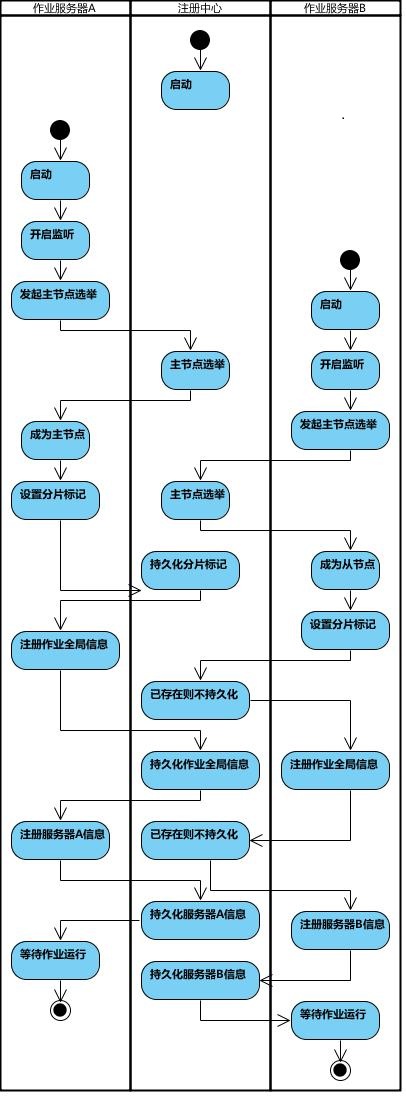
#### 作业执行
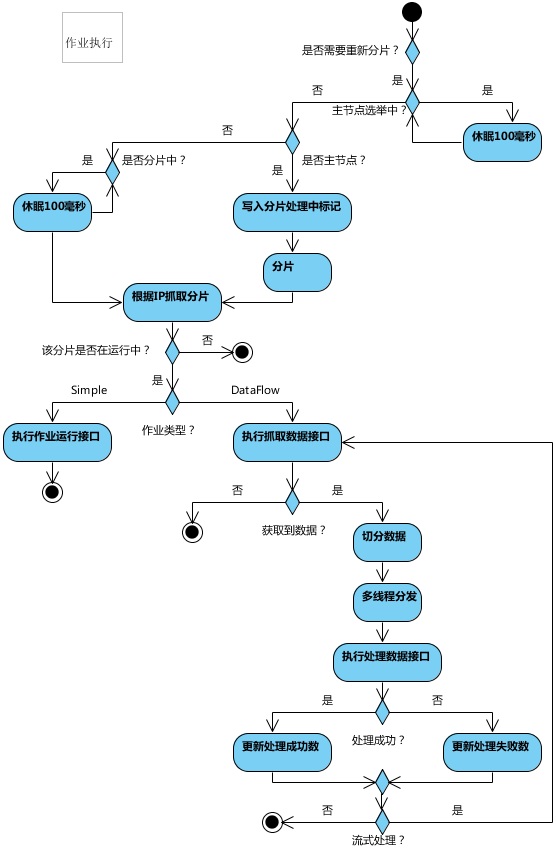
================================================
FILE: docs/content/features/elastic.en.md
================================================
+++
pre = "3.2. "
title = "Elastic Schedule"
weight = 2
chapter = true
+++
Elastic schedule is the most important feature in ElasticJob, which acts as a job processing system that enables the horizontal scaling of jobs by sharding, it's also the origin of the project name "ElasticJob".
## Sharding
A concept in ElasticJob to split the job, enabling the job to be executed in distributed environment, where every single server only executes one of the slice that is assigned to it.
ElasticJob is aware of the number of servers in an almost-real-time manner, with the increment/decrement number of the servers, it re-assigns the job slices to the distributed servers, maximizing the efficiency as the increment of resources.
To execute the job in distributed servers, a job will be divided into multiple individual job items, one or some of which will be executed by the distributed servers.
For example, if a job is divided into 4 slices, and there are two servers to execute the job, then each server is assigned 2 slices, undertaking 50% of the workload, as follows.
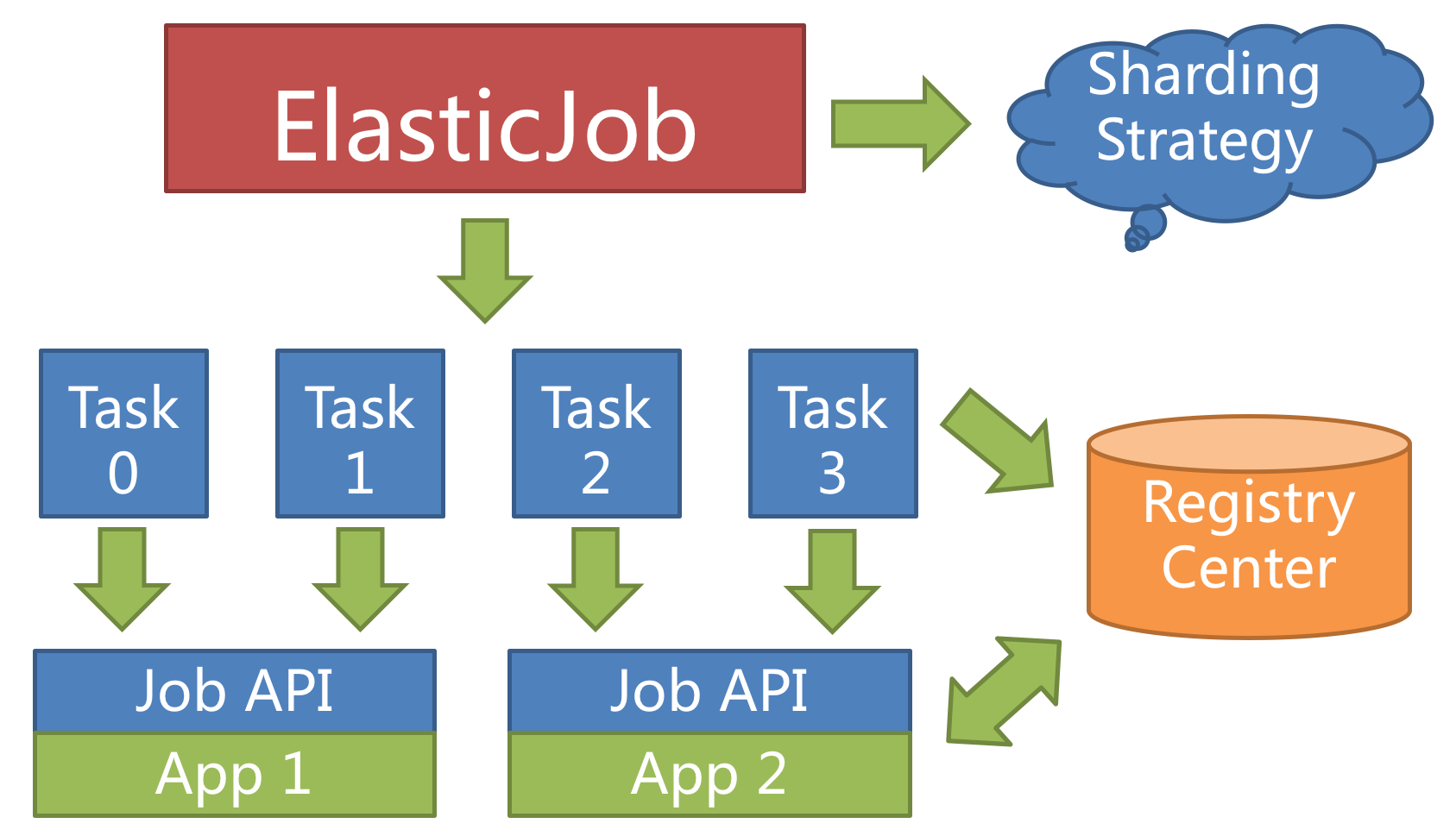
### Sharding Item
ElasticJob doesn't directly provide the abilities to process the data, instead, it assigns the sharding items to the job servers, where the developers should process the sharding items and their business logic themselves.
The sharding item is numeric type, in the range of [0, size(slices) - 1].
### Customized sharding options
Customized sharding options can build a relationship with the sharding items, converting the sharding items' numbers to more readable business codes.
For example, to horizontally split the databases according to the regions, database A stores data from Beijing, database B stores data from Shanghai and database C stores data from Guangzhou.
If we configure only by the sharding items' numbers, the developers need the knowledge that 0 represents Beijing, 1 represents Shanghai and 2 represents Guangzhou.
Customized sharding options make the codes more readable, if we have customized options `0=Beijing,1=Shanghai,2=Guangzhou`, we can simply use `Beijing`, `Shanghai`, `Guangzhou` in the codes.
## Maximize the usage of resources
ElasticJob provides a flexible way to maximize the throughput of the jobs.
When new job server joins, ElasticJob will be aware of it from the registry, and will re-shard in the next scheduling process, the new server will undertake some of the job slices, as follows.
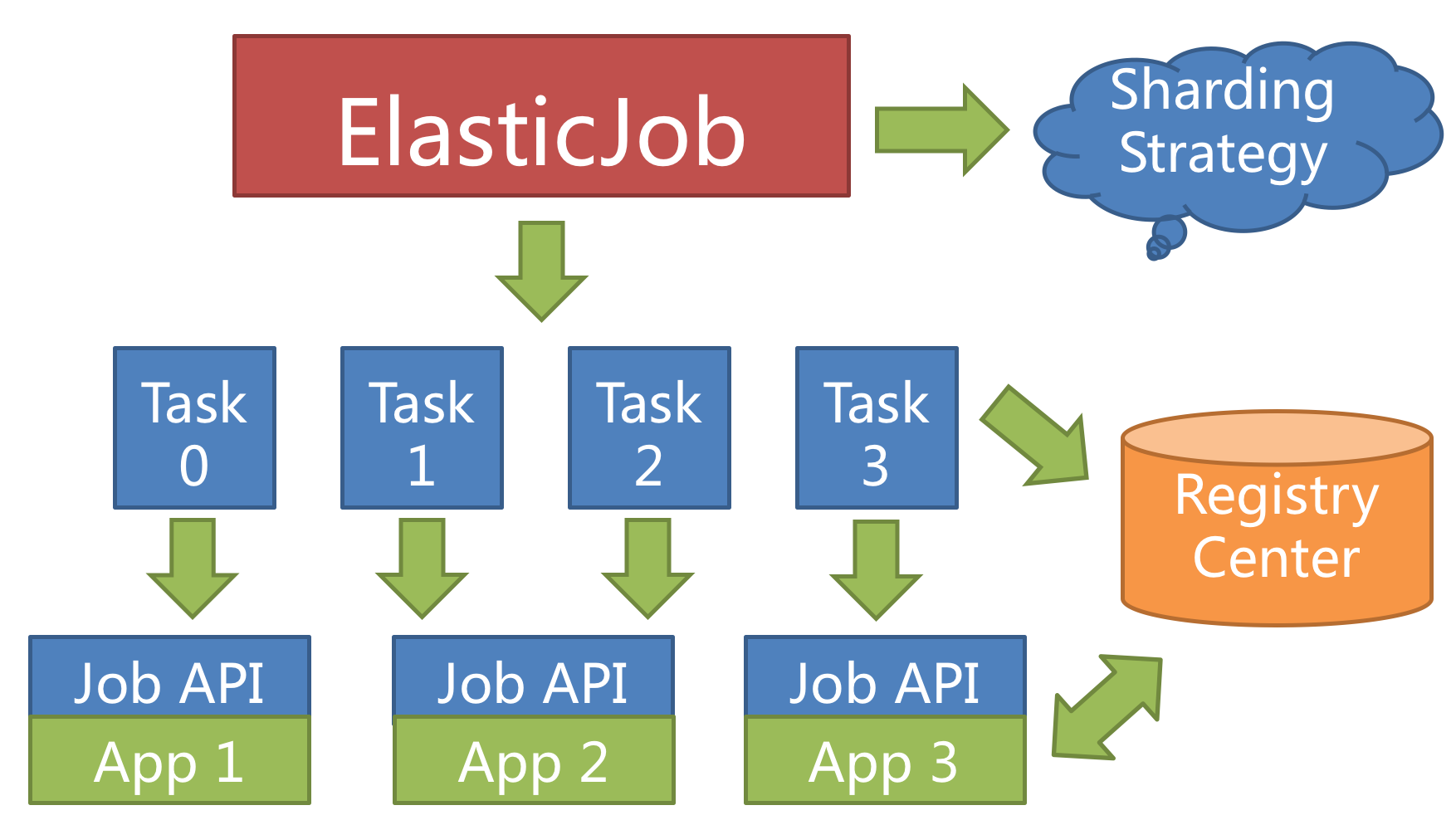
Configuring a larger number of sharding items than the number of servers, or better, a multiplier of the number of servers, makes it more reasonably for the job to leverage the resources, and assign the sharding items dynamically.
For example, we have 10 sharding items and there are 3 servers, the number of sharding items are server A = 0,1,2,9; server B = 3,4,5; server C = 6,7,8.
If the server C is down, then server A = 0,1,2,3,4 and B = 5,6,7,8,9, maximizing the throughput without losing any sharding item.
## High Availability
When a server is down when executing a sharding item, the registry is also aware of that, and the sharding item will be transferred to another living server, thus achieve the goal of high availability.
The unfinished job from a crashed server will be transferred and executed continuously, as follows.
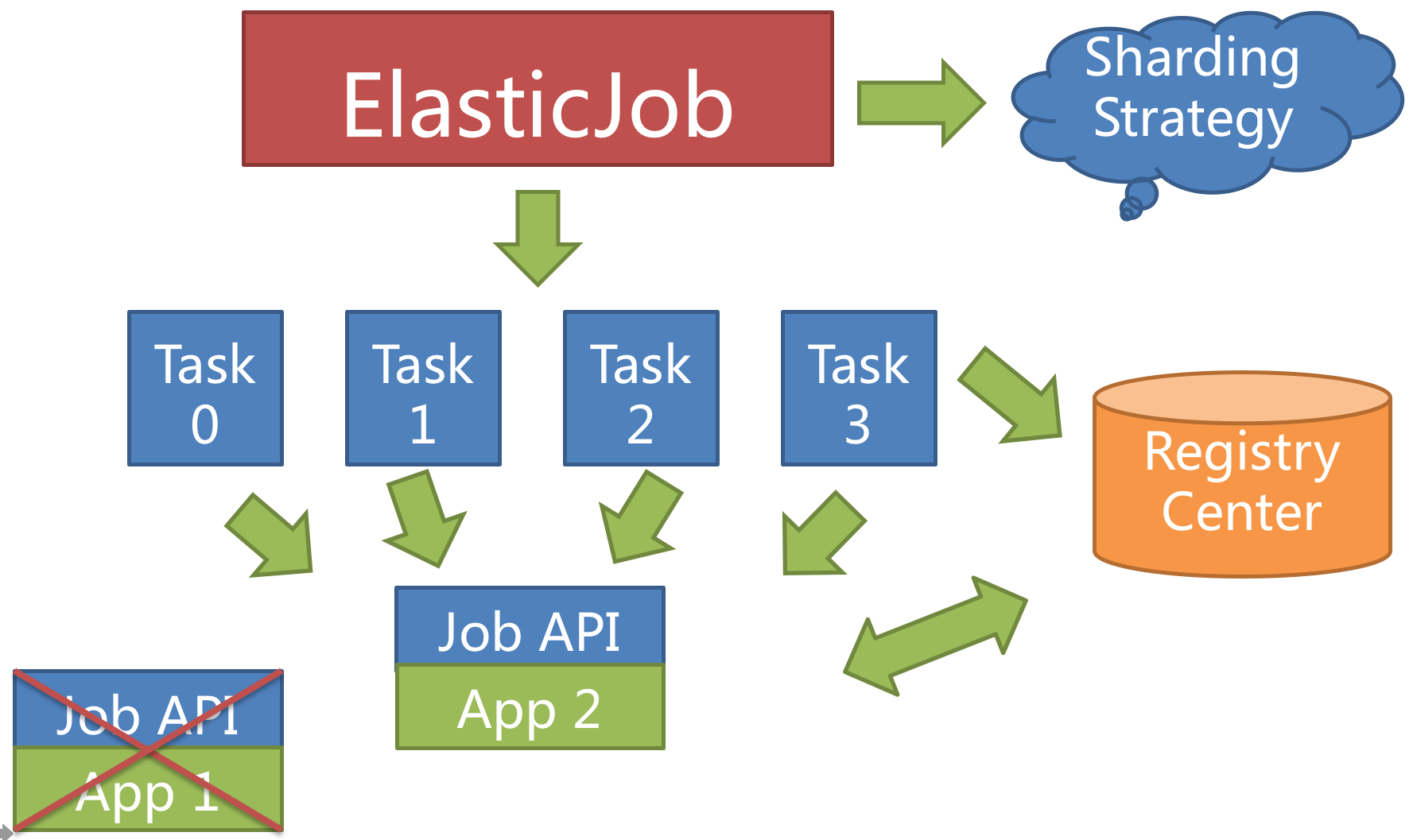
Setting the total number of sharding items to 1 and more than 1 servers to execute the jobs makes the job run in the mode of `1` master and `n` slaves.
Once the servers that are executing jobs are down, the idle servers will take over the jobs and execute them in the next scheduling, or better, if the failover option is enabled, the idle servers can take over the failed jobs immediately.
## Implementation Principle
ElasticJob does not have a job scheduling center node, but the programs based on the deployment job framework trigger the scheduling when the corresponding time point is reached.
The registration center is only used for job registration and monitoring information storage. The main job node is only used to handle functions such as sharding and cleaning.
### Elastic Distributed Implementation
- The first server went online to trigger the main server election. Once the main server goes offline, the election is triggered again, and the election process is blocked. Only when the main server election is completed, other tasks will be performed.
- When a job server goes online, it will automatically register the server information to the registry, and automatically update the server status when it goes offline.
- The re-sharding flag will be updated when the master node is elected, the server goes offline, and the total number of shards changes.
- When a scheduled task is triggered, if it needs to be sharded again, it will be sharded by the main server. The sharding process is blocked, and the task can be executed after the sharding ends.
If the main server goes offline during the sharding process, the master server will be elected first and then perform sharding.
- From the previous description, in order to maintain the stability of the job runtime, only the sharding status will be marked during the running process, and the sharding will not be re-sharded. Sharding can only occur before the next task is triggered.
- Each execution of sharding will sort instances by server IP to ensure that the sharding result will not produce large fluctuations.
- Realize the failover function, actively grab the unallocated shards after a certain server is executed, and actively search for available servers to perform tasks after a certain server goes offline.
### Registry Data Structure
The registration center creates a job name node under the defined namespace to distinguish different jobs, so once a job is created, the job name cannot be modified. If the name is modified, it will be regarded as a new job.
There are 5 data sub-nodes under the job name node, namely config, instances, sharding, servers and leader.
### config node
Job configuration information, stored in YAML format.
### instances node
Job running instance information, the child node is the primary key of the current job running instance.
The primary key of the job running instance is composed of the IP address and PID of the job running server.
The primary keys of the job running instance are all ephemeral nodes, which are registered when the job instance is online and automatically cleaned up when the job instance is offline. The registry monitors the changes of these nodes to coordinate the sharding and high availability of distributed jobs.
You can write TRIGGER in the job running instance node to indicate that the instance will be executed once immediately.
### sharding node
Job sharding information. The child node is the sharding item sequence number, starting from zero and ending with the total number of shards minus one.
The child node of the sharding item sequence number stores detailed information. The child node under each shard is used to control and record the running status of the shard.
Node details description:
| Child node name | Ephemeral node | Description |
|-----------------|:---------------|:-----------------------------------------------------------------------------------------------------------------------------------|
| instance | NO | The primary key of the job running instance that executes the shard |
| running | YES | The running state of the shard item. Only valid when monitorExecution is configured |
| failover | YES | If the shard item is assigned to another job server by failover, this node value records the job server IP that executes the shard |
| misfire | NO | Whether to restart the missed task |
| disabled | NO | Whether to disable this shard |
### servers node
Job server information, the child node is the IP address of the job server.
You can write DISABLED in the IP address node to indicate that the server is disabled.
Under the new cloud-native architecture, the servers node is greatly weakened, only including controlling whether the server can be disabled.
In order to achieve the core of the job more purely, the server function may be deleted in the future, and the ability to control whether the server is disabled should be delegated to the automated deployment system.
### leader node
The master node information of the job server is divided into three sub-nodes: election, sharding and failover.
They are used for master node election, sharding and failover processing respectively.
The leader node is an internally used node. If you are not interested in the principle of the job framework, you don't need to pay attention to this node.
| Child node name | Ephemeral node | Description |
|---------------------------|:---------------|:-------------------------------------------------------------------------------------------------------------------------------------------------------------------------------------------------------------------------------------------------------------------------------------------------------------------------------------------------------|
| election\instance | YES | The IP address of the master node server. Once the node is deleted, a re-election will be triggered. All operations related to the master node will be blocked during the re-election process. |
| election\latch | NO | Distributed locks elected by the master node Used for distributed locks of curator |
| sharding\necessary | NO | The flag for re-sharding. If the total number of shards changes, or the job server node goes online or offline or enabled/disabled, as well as the master node election, the re-sharded flag will be triggered. The master node is re-sharded without being interrupted in the middle The sharding will not be triggered when the job is executed |
| sharding\processing | YES | The node held by the master node during sharding. If there is this node, all job execution will be blocked until the sharding ends. The ephemeral node will be deleted when the master node sharding is over or the master node crashes |
| failover\items\shard item | NO | Once a job crashes, it will record to this node. When there is an idle job server, it will grab the job items that need to failover from this node |
| failover\items\latch | NO | Distributed locks used when allocating failover shard items. Used by curator distributed locks |
================================================
FILE: docs/content/features/failover.cn.md
================================================
+++
pre = "3.4. "
title = "失效转移"
weight = 4
chapter = true
+++
ElasticJob 不会在本次执行过程中进行重新分片,而是等待下次调度之前才开启重新分片流程。
当作业执行过程中服务器宕机,失效转移允许将该次未完成的任务在另一作业节点上补偿执行。
## 概念
失效转移是当前执行作业的临时补偿执行机制,在下次作业运行时,会通过重分片对当前作业分配进行调整。
举例说明,若作业以每小时为间隔执行,每次执行耗时 30 分钟。如下如图所示。
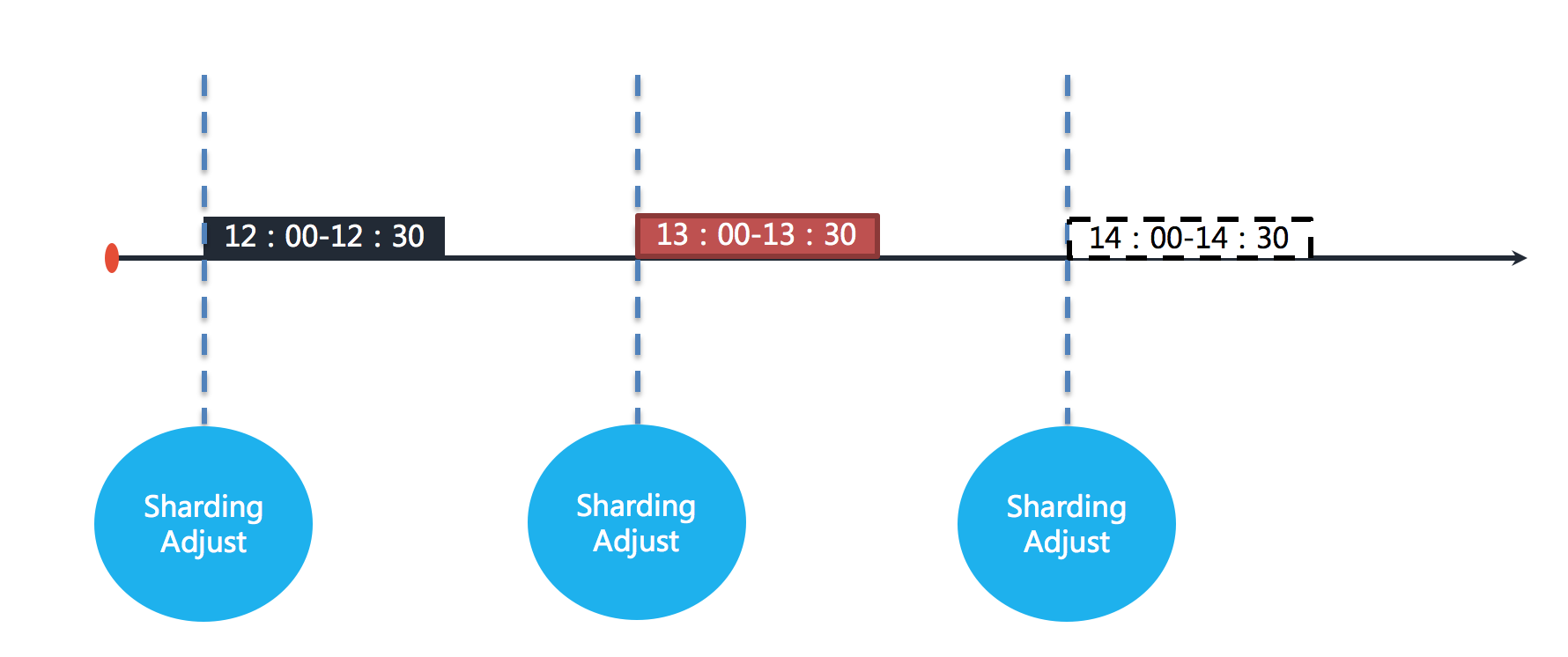
图中表示作业分别于 12:00,13:00 和 14:00 执行。图中显示的当前时间点为 13:00 的作业执行中。
如果作业的其中一个分片服务器在 13:10 的时候宕机,那么剩余的 20 分钟应该处理的业务未得到执行,并且需要在 14:00 时才能再次开始执行下一次作业。
也就是说,在不开启失效转移的情况下,位于该分片的作业有 50 分钟空档期。如下如图所示。
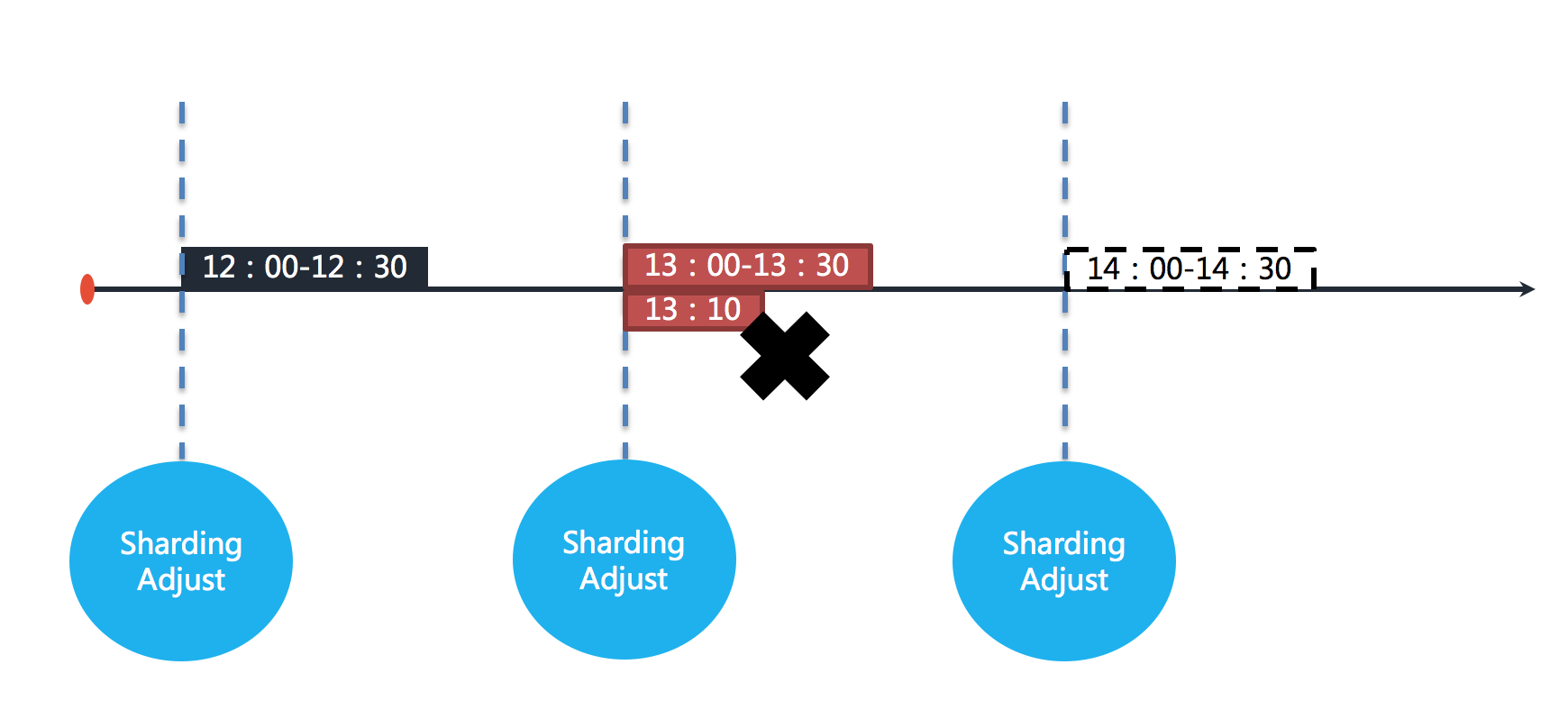
在开启失效转移功能之后,ElasticJob 的其他服务器能够在感知到宕机的作业服务器之后,补偿执行该分片作业。如下图所示。
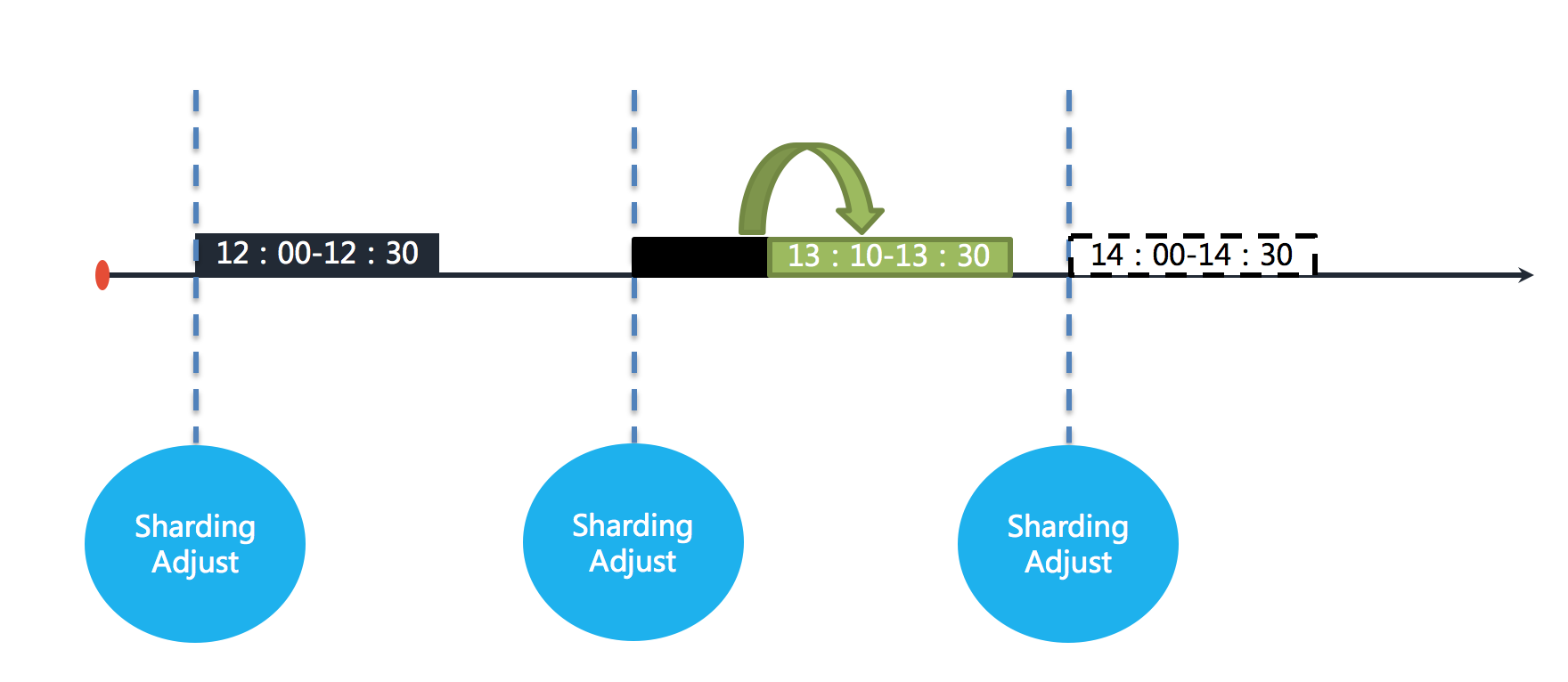
在资源充足的情况下,作业仍然能够在 13:30 完成执行。
## 执行机制
当作业执行节点宕机时,会触发失效转移流程。ElasticJob 根据触发时的分布式作业执行的不同状况来决定失效转移的执行时机。
### 通知执行
当其他服务器感知到有失效转移的作业需要处理时,且该作业服务器已经完成了本次任务,则会实时的拉取待失效转移的分片项,并开始补偿执行。
也称为实时执行。
### 问询执行
作业服务在本次任务执行结束后,会向注册中心问询待执行的失效转移分片项,如果有,则开始补偿执行。
也称为异步执行。
## 适用场景
开启失效转移功能,ElasticJob 会监控作业每一分片的执行状态,并将其写入注册中心,供其他节点感知。
在一次运行耗时较长且间隔较长的作业场景,失效转移是提升作业运行实时性的有效手段;
对于间隔较短的作业,会产生大量与注册中心的网络通信,对集群的性能产生影响。
而且间隔较短的作业并未见得关注单次作业的实时性,可以通过下次作业执行的重分片使所有的分片正确执行,因此不建议短间隔作业开启失效转移。
另外需要注意的是,作业本身的幂等性,是保证失效转移正确性的前提。
================================================
FILE: docs/content/features/failover.en.md
================================================
+++
pre = "3.4. "
title = "Failover"
weight = 4
chapter = true
+++
ElasticJob will not re-shard during this execution, but wait for the next scheduling before starting the re-sharding process.
When the server is down during job execution, failover allows the unfinished task to be compensated and executed on another job node.
## Concept
Failover is a temporary compensation execution mechanism for the currently executed job. When the next job is run, the current job allocation will be adjusted through resharding.
For example, if the job is executed at an hourly interval, each execution will take 30 minutes. As shown below.

The figure shows that the jobs are executed at 12:00, 13:00 and 14:00 respectively. The current time point shown in the figure is the job execution at 13:00.
If one of the shard servers of the job goes down at 13:10, the remaining 20 minutes of the business that should be processed are not executed, and the next job can only be executed at 14:00.
In other words, if failover is not turned on, there is a 50-minute idle period in this shard. As shown below.

After the failover is enabled, other ElasticJob servers can compensate for the execution of the sharding job after sensing the down job server. As shown below.

With sufficient resources, the job can still be executed completely at 13:30.
## Execution mechanism
When the job execution node goes down, the failover process will be triggered. ElasticJob determines the execution timing of the failover according to the different conditions of the distributed job execution when it is triggered。
### Notification execution
When other servers perceive that a failover job needs to be processed, and the job server has completed this task, it will pull the items to be failed over in real time and start compensation execution.
Also called real-time execution.
### Enquiry execution
After the execution of this task, the job service will inquire about the failover items to be executed from the registry, and if there are any, the compensation execution will start.
Also called asynchronous execution.
## Scenarios:
With the failover enabled, ElasticJob will monitor the execution status of each shard of the job and write it to the registry for other nodes to perceive.
In a job scenario that takes a long time to run and has a long interval, failover is an effective means to improve the real-time operation of the job;
For short-interval jobs, a large number of network communications with the registry will be generated, which will affect the performance of the cluster;
Moreover, short-interval jobs do not necessarily pay attention to the real-time performance of a single job. You can use the re-shard of the next job execution to make all the items execute correctly. Therefore, it is not recommended to enable failover for short-interval jobs.
Another thing to note is that the idempotence of the job itself is a prerequisite to ensure the correctness of failover.
================================================
FILE: docs/content/features/job-type.cn.md
================================================
+++
pre = "3.6. "
title = "作业开放生态"
weight = 6
chapter = true
+++
灵活定制化作业是 ElasticJob 3.x 版本的最重要设计变革。
新版本基于 Apache ShardingSphere 可插拔架构的设计理念,打造了全新作业 API。
意在使开发者能够更加便捷且相互隔离的方式拓展作业类型,打造 ElasticJob 作业的生态圈。
ElasticJob 提供了对作业的弹性伸缩、分布式治理等功能的同时,并未限定作业的类型。
它通过灵活的作业 API,将作业解耦为作业接口和执行器接口。
用户可以定制化全新的作业类型,诸如脚本执行、HTTP 服务执行(3.0.0-beta 提供)、大数据类作业、文件类作业等。
目前 ElasticJob 内置了简单作业、数据流作业和脚本执行作业,并且完全开放了扩展接口,开发者可以通过 SPI 的方式引入新的作业类型,并且可以便捷的回馈至社区。
## 作业接口
ElasticJob 的作业可划分为基于 class 类型和基于 type 类型两种。
Class 类型的作业由开发者直接使用,需要由开发者实现该作业接口实现业务逻辑。典型代表:Simple 类型、Dataflow 类型。
Type 类型的作业只需提供类型名称即可,开发者无需实现该作业接口,而是通过外置配置的方式使用。典型代表:Script 类型、HTTP 类型。
## 执行器接口
用于执行用户定义的作业接口,通过 Java 的 SPI 机制织入 ElasticJob生态。
================================================
FILE: docs/content/features/job-type.en.md
================================================
+++
pre = "3.6. "
title = "Job Open Ecosystem"
weight = 6
chapter = true
+++
Flexible customized jobs is the most important design change in ElasticJob 3.x .
The new version is based on the design concept of the Apache ShardingSphere pluggable architecture, and the new Job API was created.
It is intended to enable developers to expand the types of jobs in a more convenient and isolated way, and create an ecosystem of ElasticJob jobs.
While ElasticJob provides functions such as elastic scaling and distributed management of jobs, it does not limit the types of jobs.
It uses flexible job APIs to decouple jobs into job interfaces and actuator interfaces.
Users can customize new job types, such as script execution, HTTP service execution, big data jobs, file jobs, etc.
At present, ElasticJob has built-in simple jobs, data flow jobs, and script execution jobs, and has completely opened up the extension interface. Developers can introduce new job types through SPI, and they can easily give back to the community.
## Job interface
ElasticJob jobs can be divided into two types: `Class-based Jobs` and `Type-based Jobs`.
`Class-based Jobs` are directly used by developers, who need to implement the job interface to realize business logic. Typical representatives: Simple type, Dataflow type.
`Type-based Jobs` only need to provide the type name, developers do not need to implement the job interface, but use it through external configuration. Typical representatives: Script type, HTTP type (Since 3.0.0-beta).
## Actuator interface
It is used to execute user-defined job interfaces and weave into the ElasticJob ecosystem through Java's SPI mechanism.
================================================
FILE: docs/content/features/misfire.cn.md
================================================
+++
pre = "3.5. "
title = "错过任务重执行"
weight = 5
chapter = true
+++
ElasticJob 不允许作业在同一时间内叠加执行。
当作业的执行时长超过其运行间隔,错过任务重执行能够保证作业在完成上次的任务后继续执行逾期的作业。
## 概念
错过任务重执行功能可以使逾期未执行的作业在之前作业执行完成之后立即执行。
举例说明,若作业以每小时为间隔执行,每次执行耗时 30 分钟。如下如图所示。
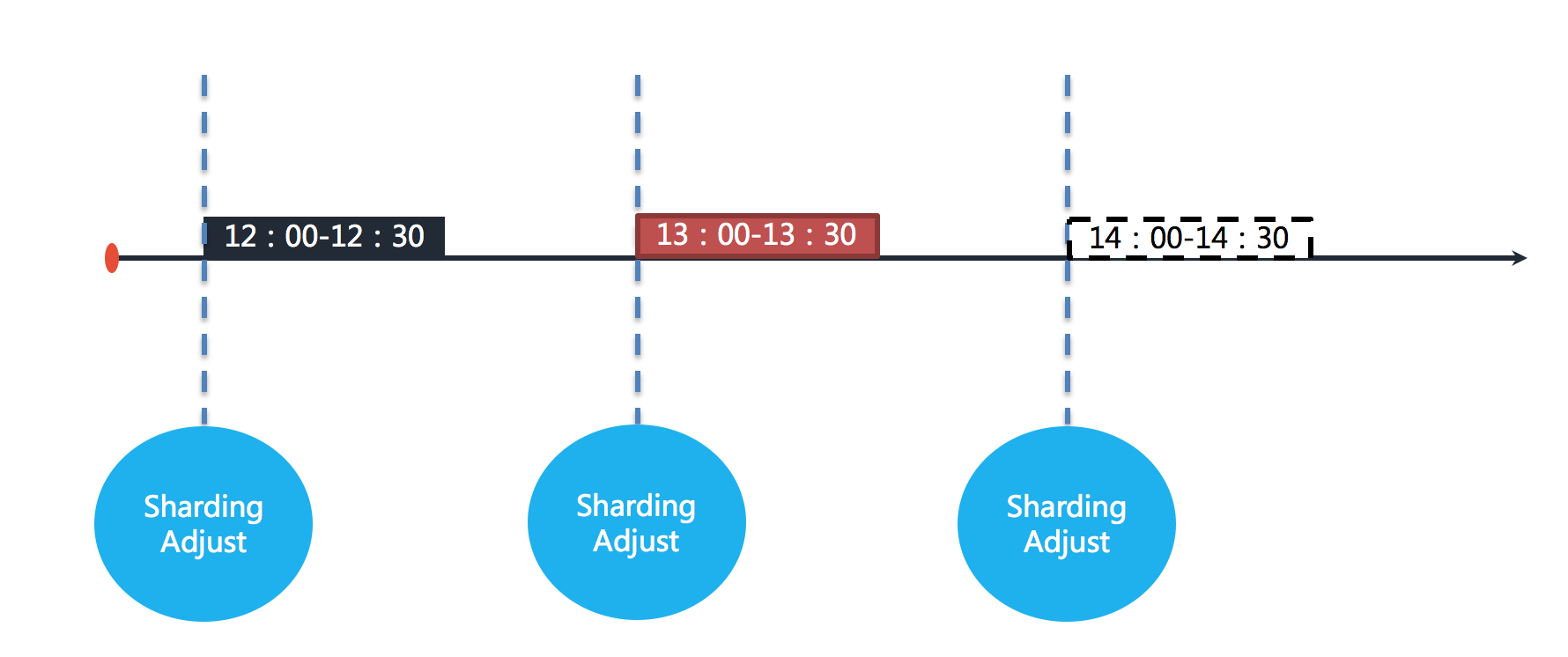
图中表示作业分别于 12:00,13:00 和 14:00 执行。图中显示的当前时间点为 13:00 的作业执行中。
如果 12:00 开始执行的作业在 13:10 才执行完毕,那么本该由 13:00 触发的作业则错过了触发时间,需要等待至 14:00 的下次作业触发。
如下如图所示。
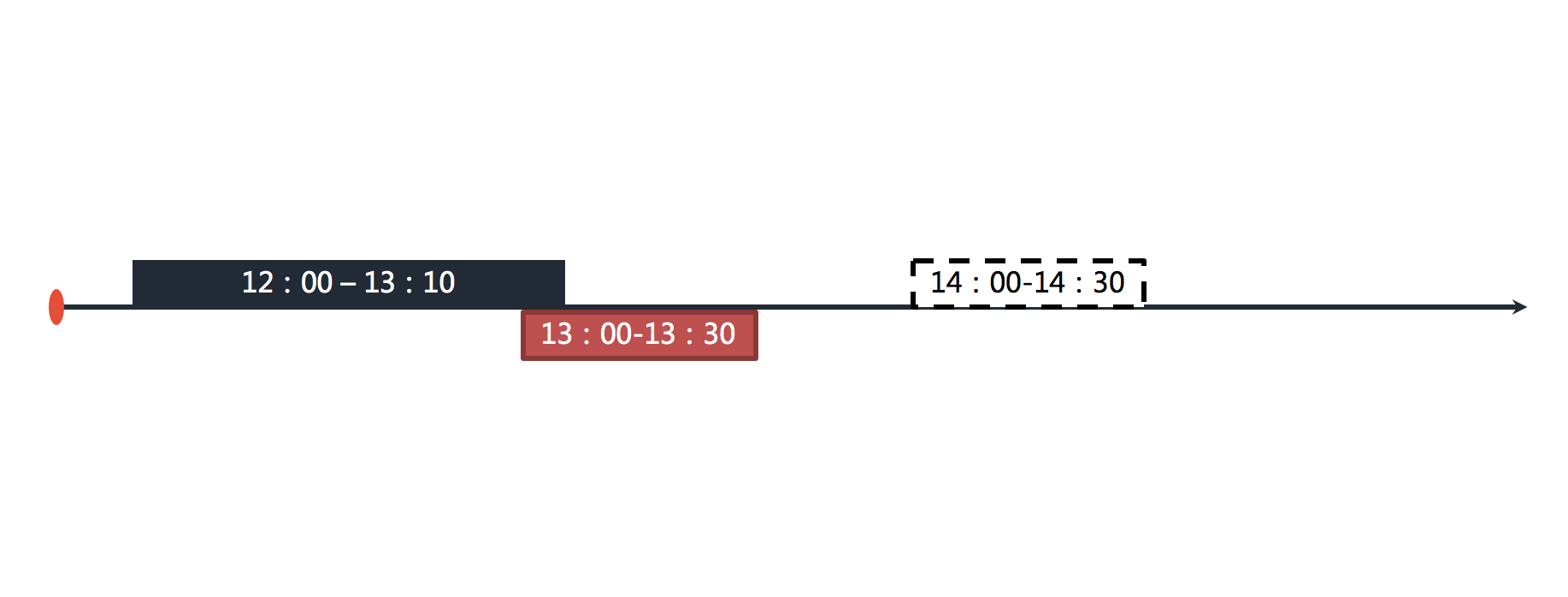
在开启错过任务重执行功能之后,ElasticJob 将会在上次作业执行完毕后,立刻触发执行错过的作业。如下图所示。
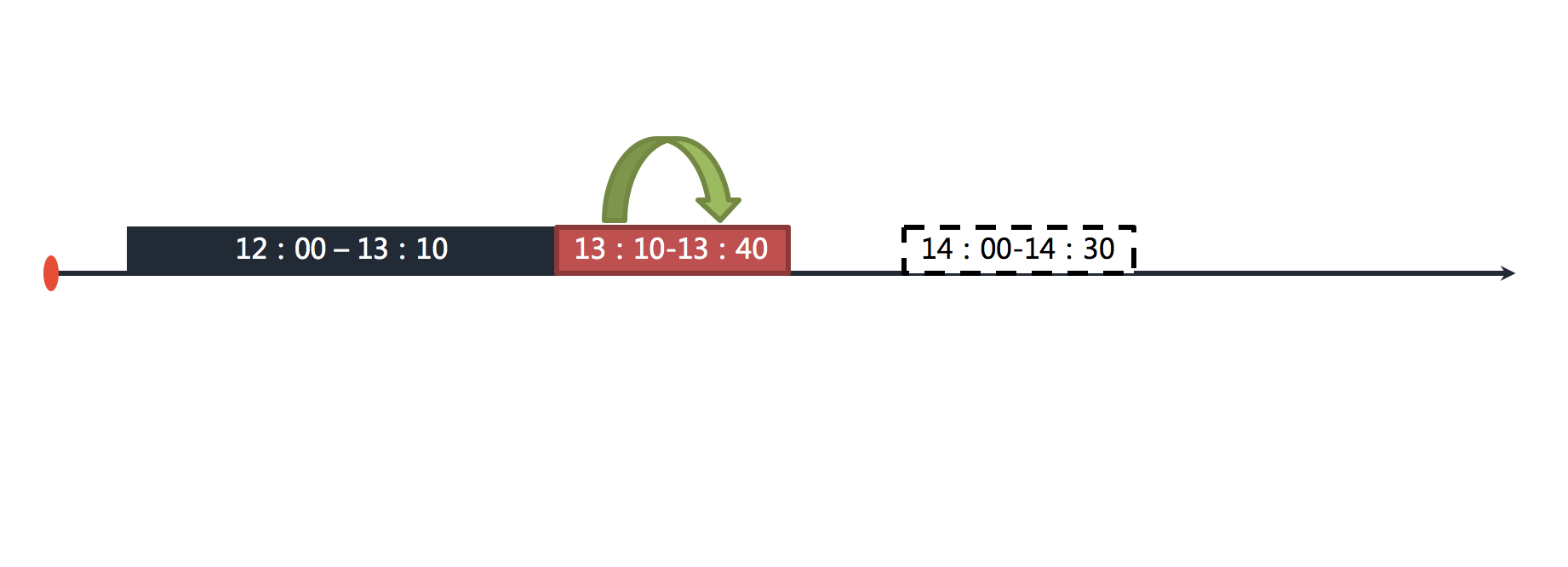
在 13:00 和 14:00 之间错过的作业将会重新执行。
## 适用场景
在一次运行耗时较长且间隔较长的作业场景,错过任务重执行是提升作业运行实时性的有效手段;
对于未见得关注单次作业的实时性的短间隔的作业来说,开启错过任务重执行并无必要。
================================================
FILE: docs/content/features/misfire.en.md
================================================
+++
pre = "3.5. "
title = "Misfire"
weight = 5
chapter = true
+++
ElasticJob does not allow jobs to be executed at the same time.
When the execution time of a job exceeds its running interval, re-executing the missed task can ensure that the job continues to execute the overdue job after completing the last task.
## Concept
The misfire function enables the overdue tasks to be executed immediately after the completion of the previous tasks.
For example, if the job is executed at an hourly interval, each execution will take 30 minutes. As shown below.

The figure shows that the jobs are executed at 12:00, 13:00 and 14:00 respectively. The current time point shown in the figure is the job execution at 13:00.
If the job executed at 12:00 is finished at 13:10, then the job that should have been triggered by 13:00 missed the trigger time and needs to wait until the next job trigger at 14:00. As shown below.

After the misfire is enabled, ElasticJob will trigger the execution of the missed job immediately after the last job is executed. As shown below.

Missed jobs between 13:00 and 14:00 will be executed again.
## Scenarios
In a job scenario that takes a long time to run and has a long interval, misfire is an effective means to improve the real-time operation of the job;
For short-interval jobs that do not necessarily pay attention to the real-time performance of a single job, it is not necessary to turn on the misfire to re-execute.
================================================
FILE: docs/content/features/schedule-model.cn.md
================================================
+++
pre = "3.1. "
title = "调度模型"
weight = 1
chapter = true
+++
ElasticJob 是面向进程内的线程级调度框架。通过它,作业能够透明化的与业务应用系统相结合。
它能够方便的与 Spring 、Dubbo 等 Java 框架配合使用,在作业中可自由使用 Spring 注入的 Bean,如数据源连接池、Dubbo 远程服务等,更加方便的贴合业务开发。
================================================
FILE: docs/content/features/schedule-model.en.md
================================================
+++
pre = "3.1. "
title = "Schedule Model"
weight = 1
chapter = true
+++
ElasticJob is a thread-level scheduling framework for in-process.
Through it, Job can be transparently combined with business application systems.
It can be easily used in conjunction with Java frameworks such as Spring and Dubbo.
Spring DI (Dependency Injection) Beans can be freely used in Job, such as data source connection pool and Dubbo remote service, etc., which is more convenient for business development.
================================================
FILE: docs/content/overview/_index.cn.md
================================================
+++
pre = "1. "
title = "概览"
weight = 1
chapter = true
+++
[](https://github.com/apache/shardingsphere-elasticjob/releases)

[](https://github.com/apache/shardingsphere-elasticjob/stargazers)
[](https://github.com/apache/shardingsphere-elasticjob/fork)
[](https://github.com/apache/shardingsphere-elasticjob/watchers)
[](https://starchart.cc/apache/shardingsphere-elasticjob)
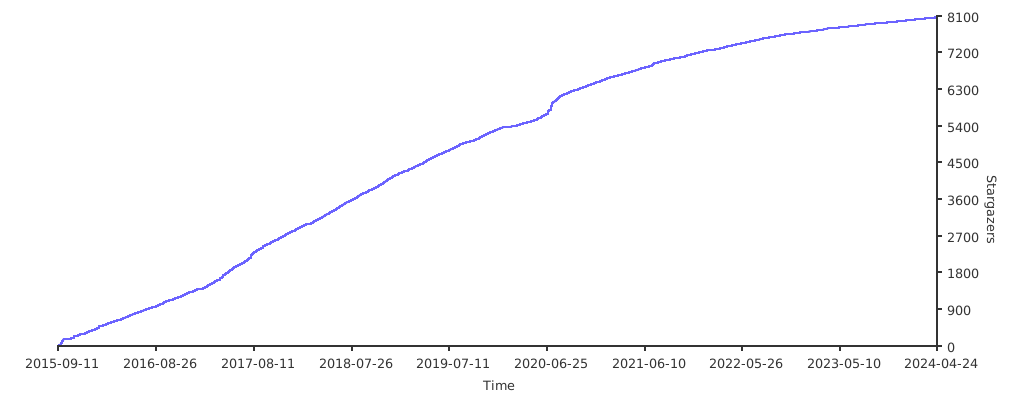
ElasticJob 通过弹性调度、资源管控、以及作业治理的功能,打造一个适用于互联网场景的分布式调度解决方案,并通过开放的架构设计,提供多元化的作业生态。
它的各个产品使用统一的作业 API,开发者仅需一次开发,即可随意部署。
ElasticJob 已于 2020 年 5 月 28 日成为 [Apache ShardingSphere](https://shardingsphere.apache.org/) 的子项目。
欢迎通过[邮件列表](mailto:dev@shardingsphere.apache.org)参与讨论。
[](https://www.apache.org/licenses/LICENSE-2.0.html)

[](https://github.com/apache/shardingsphere-elasticjob/releases)
[](https://maven-badges.herokuapp.com/maven-central/org.apache.shardingsphere.elasticjob/elasticjob)

[](https://travis-ci.org/apache/shardingsphere-elasticjob)
[](https://coveralls.io/github/apache/shardingsphere-elasticjob?branch=master)
## 简介
使用 ElasticJob 能够让开发工程师不再担心任务的线性吞吐量提升等非功能需求,使他们能够更加专注于面向业务编码设计;
同时,它也能够解放运维工程师,使他们不必再担心任务的可用性和相关管理需求,只通过轻松的增加服务节点即可达到自动化运维的目的。
ElasticJob 定位为轻量级无中心化解决方案,使用 jar 的形式提供分布式任务的协调服务。
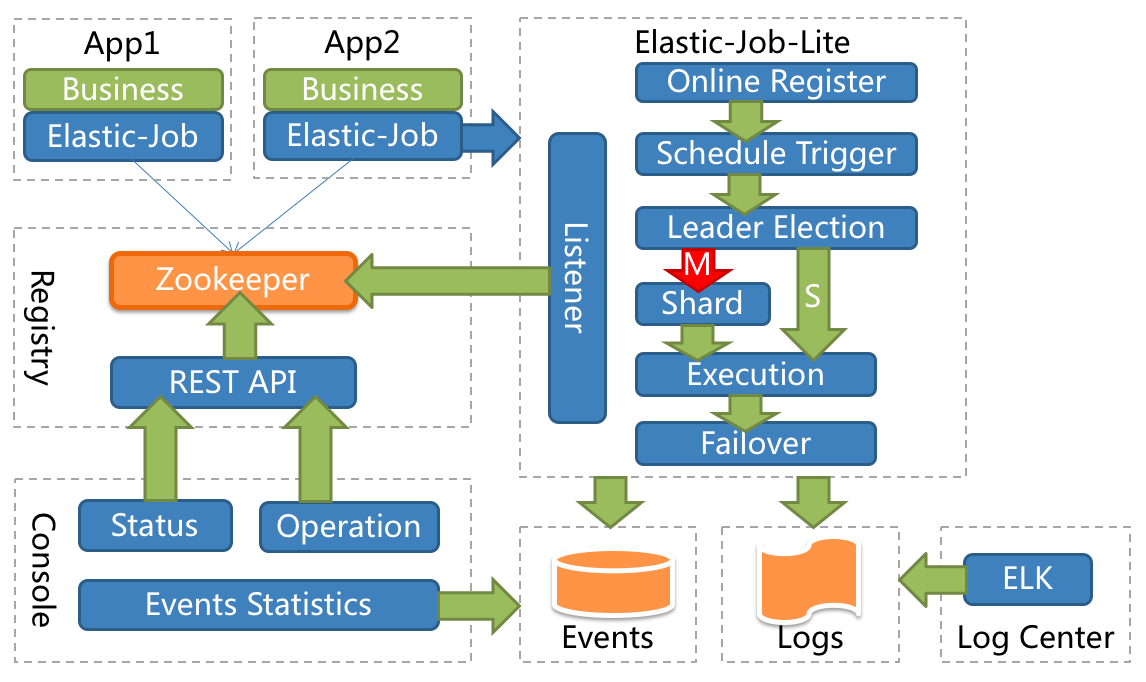
## 功能列表
- 弹性调度
- 支持任务在分布式场景下的分片和高可用
- 能够水平扩展任务的吞吐量和执行效率
- 任务处理能力随资源配备弹性伸缩
- 资源分配
- 在适合的时间将适合的资源分配给任务并使其生效
- 相同任务聚合至相同的执行器统一处理
- 动态调配追加资源至新分配的任务
- 作业治理
- 失效转移
- 错过作业重新执行
- 自诊断修复
- 作业依赖(TODO)
- 基于有向无环图(DAG)的作业间依赖
- 基于有向无环图(DAG)的作业分片间依赖
- 作业开放生态
- 可扩展的作业类型统一接口
- 丰富的作业类型库,如数据流、脚本、HTTP、文件、大数据等
- 易于对接业务作业,能够与 Spring 依赖注入无缝整合
- 可视化管控端
- 作业管控端
- 作业执行历史数据追踪
- 注册中心管理
## 环境要求
### Java
请使用 Java 8 及其以上版本。
### Maven
请使用 Maven 3.5.0 及其以上版本。
### ZooKeeper
请使用 ZooKeeper 3.6.0 及其以上版本。[详情参见](https://zookeeper.apache.org/)
================================================
FILE: docs/content/overview/_index.en.md
================================================
+++
pre = "1. "
title = "Overview"
weight = 1
chapter = true
+++
[](https://github.com/apache/shardingsphere-elasticjob/releases)

[](https://github.com/apache/shardingsphere-elasticjob/stargazers)
[](https://github.com/apache/shardingsphere-elasticjob/fork)
[](https://github.com/apache/shardingsphere-elasticjob/watchers)
[](https://starchart.cc/apache/shardingsphere-elasticjob)

Through the functions of flexible scheduling, resource management and job management,
it creates a distributed scheduling solution suitable for Internet scenarios,
and provides a diversified job ecosystem through open architecture design.
It uses a unified job API for each project.
Developers only need code one time and can deploy at will.
ElasticJob became an [Apache ShardingSphere](https://shardingsphere.apache.org/) Sub project on May 28 2020.
Welcome communicate with community via [mail list](mailto:dev@shardingsphere.apache.org).
[](https://www.apache.org/licenses/LICENSE-2.0.html)

[](https://github.com/apache/shardingsphere-elasticjob/releases)
[](https://maven-badges.herokuapp.com/maven-central/org.apache.shardingsphere.elasticjob/elasticjob)

[](https://travis-ci.org/apache/shardingsphere-elasticjob)
[](https://coveralls.io/github/apache/shardingsphere-elasticjob?branch=master)
## Introduction
Using ElasticJob can make developers no longer worry about the non-functional requirements such as jobs scale out, so that they can focus more on business coding;
At the same time, it can release operators too, so that they do not have to worry about jobs high availability and management, and can automatic operation by simply adding servers.
ElasticJob is a lightweight, decentralized solution that provides distributed task sharding services.

## Features
- Elastic Schedule
- Support job sharding and high availability in distributed system
- Scale out for throughput and efficiency improvement
- Job processing capacity is flexible and scalable with the allocation of resources
- Resource Assign
- Execute job on suitable time and assigned resources
- Aggregation same job to same job executor
- Append resources to newly assigned jobs dynamically
- Job Governance
- Failover
- Misfired
- Self diagnose and recover when distribute environment unstable
- Job Dependency (TODO)
- DAG based job dependency
- DAG based job item dependency
- Job Open Ecosystem
- Unify job api for extension
- Support rich job type lib, such as dataflow, script, HTTP, file, big data
- Focus business SDK, can work with Spring IOC
- Admin Console
- Job administration
- Job event trace query
- Registry center management
## Environment Required
### Java
Java 8 or above required.
### Maven
Maven 3.5.0 or above required.
### ZooKeeper
ZooKeeper 3.6.0 or above required. [See details](https://zookeeper.apache.org/)
================================================
FILE: docs/content/powered-by/_index.cn.md
================================================
+++
pre = "7. "
title = "采用公司"
weight = 7
chapter = true
+++
## 登记
欢迎采用了 ElasticJob 的公司在此登记,您的支持是我们最大的动力。
请按`公司名` + `首页` + `应用案例(可选)` 的格式在[此处](https://github.com/apache/shardingsphere-elasticjob/issues/254)登记。
## 谁在使用 ElasticJob?
共计 83 家公司。
### 电子商务
================================================
FILE: docs/content/powered-by/_index.en.md
================================================
+++
pre = "7. "
title = "Powered By"
weight = 7
chapter = true
+++
## Register
Welcome to register by company + homepage + use case(optional), your support is important to us.
Please register [here](https://github.com/apache/shardingsphere-elasticjob/issues/254) with `company` + `homepage` + `use case(optional)`.
## Who are using ElasticJob?
Total: 83 companies.
### E-commerce
================================================
FILE: docs/content/quick-start/_index.cn.md
================================================
+++
pre = "2. "
title = "快速入门"
weight = 2
chapter = true
+++
## 引入 Maven 依赖
```xml
org.apache.shardingsphere.elasticjobelasticjob-bootstrap${latest.release.version}
```
## 作业开发
```java
public class MyJob implements SimpleJob {
@Override
public void execute(ShardingContext context) {
switch (context.getShardingItem()) {
case 0:
// do something by sharding item 0
break;
case 1:
// do something by sharding item 1
break;
case 2:
// do something by sharding item 2
break;
// case n: ...
}
}
}
```
## 作业配置
```java
JobConfiguration jobConfig = JobConfiguration.newBuilder("MyJob", 3).cron("0/5 * * * * ?").build();
```
## 作业调度
```java
public class MyJobDemo {
public static void main(String[] args) {
new ScheduleJobBootstrap(createRegistryCenter(), new MyJob(), createJobConfiguration()).schedule();
}
private static CoordinatorRegistryCenter createRegistryCenter() {
CoordinatorRegistryCenter regCenter = new ZookeeperRegistryCenter(new ZookeeperConfiguration("zk_host:2181", "my-job"));
regCenter.init();
return regCenter;
}
private static JobConfiguration createJobConfiguration() {
// 创建作业配置
// ...
}
}
```
================================================
FILE: docs/content/quick-start/_index.en.md
================================================
+++
pre = "2. "
title = "Quick Start"
weight = 2
chapter = true
+++
## Import Maven Dependency
```xml
org.apache.shardingsphere.elasticjobelasticjob-bootstrap${latest.release.version}
```
## Develop Job
```java
public class MyJob implements SimpleJob {
@Override
public void execute(ShardingContext context) {
switch (context.getShardingItem()) {
case 0:
// do something by sharding item 0
break;
case 1:
// do something by sharding item 1
break;
case 2:
// do something by sharding item 2
break;
// case n: ...
}
}
}
```
## Configure Job
```java
JobConfiguration jobConfig = JobConfiguration.newBuilder("MyJob", 3).cron("0/5 * * * * ?").build();
```
## Schedule Job
```java
public class MyJobDemo {
public static void main(String[] args) {
new ScheduleJobBootstrap(createRegistryCenter(), new MyJob(), createJobConfiguration()).schedule();
}
private static CoordinatorRegistryCenter createRegistryCenter() {
CoordinatorRegistryCenter regCenter = new ZookeeperRegistryCenter(new ZookeeperConfiguration("zk_host:2181", "my-job"));
regCenter.init();
return regCenter;
}
private static JobConfiguration createJobConfiguration() {
// create job configuration
// ...
}
}
```
================================================
FILE: docs/content/user-manual/_index.cn.md
================================================
+++
pre = "4. "
title = "用户手册"
weight = 4
chapter = true
+++
ElasticJob 定位为轻量级无中心化解决方案,使用 jar 的形式提供分布式任务的协调服务。

他的优势在于无中心化设计且外部依赖少,适用于资源分配稳定的业务系统。
================================================
FILE: docs/content/user-manual/_index.en.md
================================================
+++
pre = "4. "
title = "User Manual"
weight = 4
chapter = true
+++
ElasticJob is a lightweight, decentralized solution that provides distributed task sharding services.

The advantages of ElasticJob are no centralized design and less external dependence,
which is suitable for business application with stable resource allocation.
================================================
FILE: docs/content/user-manual/configuration/_index.cn.md
================================================
+++
pre = "4.1.2 "
title = "配置手册"
weight = 2
chapter = true
+++
通过配置可以快速清晰的理解 ElasticJob 所提供的功能。
本章节是 ElasticJob 的配置参考手册,需要时可当做字典查阅。
ElasticJob 提供了 3 种配置方式,用于不同的使用场景。
## 注册中心配置项
### 可配置属性
| 属性名 | 类型 | 缺省值 | 描述 |
|-------------------------------|:-------|:------|:--------------------|
| serverLists | String | | 连接 ZooKeeper 服务器的列表 |
| namespace | String | | ZooKeeper 的命名空间 |
| baseSleepTimeMilliseconds | int | 1000 | 等待重试的间隔时间的初始毫秒数 |
| maxSleepTimeMilliseconds | String | 3000 | 等待重试的间隔时间的最大毫秒数 |
| maxRetries | String | 3 | 最大重试次数 |
| sessionTimeoutMilliseconds | int | 60000 | 会话超时毫秒数 |
| connectionTimeoutMilliseconds | int | 15000 | 连接超时毫秒数 |
| digest | String | 无需验证 | 连接 ZooKeeper 的权限令牌 |
### 核心配置项说明
**serverLists:**
包括 IP 地址和端口号,多个地址用逗号分隔,如: host1:2181,host2:2181
## 作业配置项
### 可配置属性
| 属性名 | 类型 | 缺省值 | 描述 |
|-----------------------------------|:-----------|:---------------|:---------------------|
| jobName | String | | 作业名称 |
| shardingTotalCount | int | | 作业分片总数 |
| cron | String | | CRON 表达式,用于控制作业触发时间 |
| timeZone | String | | CRON 的时区设置 |
| shardingItemParameters | String | | 个性化分片参数 |
| jobParameter | String | | 作业自定义参数 |
| monitorExecution | boolean | true | 监控作业运行时状态 |
| failover | boolean | false | 是否开启任务执行失效转移 |
| misfire | boolean | true | 是否开启错过任务重新执行 |
| maxTimeDiffSeconds | int | -1(不检查) | 最大允许的本机与注册中心的时间误差秒数 |
| reconcileIntervalMinutes | int | 10 | 修复作业服务器不一致状态服务调度间隔分钟 |
| jobShardingStrategyType | String | AVG_ALLOCATION | 作业分片策略类型 |
| jobExecutorThreadPoolSizeProvider | String | CPU | 作业线程池处理策略 |
| jobErrorHandlerType | String | | 作业错误处理策略 |
| description | String | | 作业描述信息 |
| props | Properties | | 作业属性配置信息 |
| disabled | boolean | false | 作业是否禁止启动 |
| overwrite | boolean | false | 本地配置是否可覆盖注册中心配置 |
### 核心配置项说明
**shardingItemParameters:**
分片序列号和参数用等号分隔,多个键值对用逗号分隔。
分片序列号从0开始,不可大于或等于作业分片总数。
如:0=a,1=b,2=c
**jobParameter:**
可通过传递该参数为作业调度的业务方法传参,用于实现带参数的作业
例:每次获取的数据量、作业实例从数据库读取的主键等。
**monitorExecution:**
每次作业执行时间和间隔时间均非常短的情况,建议不监控作业运行时状态以提升效率。
因为是瞬时状态,所以无必要监控。请用户自行增加数据堆积监控。并且不能保证数据重复选取,应在作业中实现幂等性。
每次作业执行时间和间隔时间均较长的情况,建议监控作业运行时状态,可保证数据不会重复选取。
**maxTimeDiffSeconds:**
如果时间误差超过配置秒数则作业启动时将抛异常。
**reconcileIntervalMinutes:**
在分布式的场景下由于网络、时钟等原因,可能导致 ZooKeeper 的数据与真实运行的作业产生不一致,这种不一致通过正向的校验无法完全避免。
需要另外启动一个线程定时校验注册中心数据与真实作业状态的一致性,即维持 ElasticJob 的最终一致性。
配置为小于 1 的任意值表示不执行修复。
**jobShardingStrategyType:**
详情请参见[内置分片策略列表](/cn/user-manual/elasticjob/configuration/built-in-strategy/sharding)。
**jobExecutorThreadPoolSizeProviderType:**
详情请参见[内置线程池策略列表](/cn/user-manual/elasticjob/configuration/built-in-strategy/thread-pool)。
**jobErrorHandlerType:**
详情请参见[内置错误处理策略列表](/cn/user-manual/elasticjob/configuration/built-in-strategy/error-handler)。
**props:**
详情请参见[作业属性配置列表](/cn/user-manual/elasticjob/configuration/props)。
**disabled:**
可用于部署作业时,先禁止启动,部署结束后统一启动。
**overwrite:**
如果可覆盖,每次启动作业都以本地配置为准。
## 作业监听器配置项
### 常规监听器配置项
可配置属性:无
### 分布式监听器配置项
可配置属性
| 属性名 | 类型 | 缺省值 | 描述 |
| ------------------------------ |:------- |:-------------- |:---------------------------------- |
| started-timeout-milliseconds | long | Long.MAX_VALUE | 最后一个作业执行前的执行方法的超时毫秒数 |
| completed-timeout-milliseconds | long | Long.MAX_VALUE | 最后一个作业执行后的执行方法的超时毫秒数 |
## 事件追踪配置项
### 可配置属性
| 属性名 | 类型 | 缺省值 | 描述 |
| ------- |:------- |:----- |:------------------- |
| type | String | | 事件追踪存储适配器类型 |
| storage | 泛型 | | 事件追踪存储适配器对象 |
================================================
FILE: docs/content/user-manual/configuration/_index.en.md
================================================
+++
pre = "4.1.2 "
title = "Configuration"
weight = 2
chapter = true
+++
Through which developers can quickly and clearly understand the functions provided by ElasticJob.
This chapter is a configuration manual for ElasticJob, which can also be referred to as a dictionary if necessary.
ElasticJob has provided 3 kinds of configuration methods for different situations.
## Registry Center Configuration
### Configuration
| Name | Data Type | Default Value | Description |
|-------------------------------|:----------|:--------------|:---------------------------------------------------------|
| serverLists | String | | ZooKeeper server IP list |
| namespace | String | | ZooKeeper namespace |
| baseSleepTimeMilliseconds | int | 1000 | The initial value of milliseconds for the retry interval |
| maxSleepTimeMilliseconds | String | 3000 | The maximum value of milliseconds for the retry interval |
| maxRetries | String | 3 | Maximum number of retries |
| sessionTimeoutMilliseconds | int | 60000 | Session timeout in milliseconds |
| connectionTimeoutMilliseconds | int | 15000 | Connection timeout in milliseconds |
| digest | String | no need | Permission token to connect to ZooKeeper |
### Core Configuration Description
**serverLists:**
Include IP and port, multiple addresses are separated by commas, such as: `host1:2181,host2:2181`
## Job Configuration
### Configuration
| Name | Data Type | Default Value | Description |
|-----------------------------------|:-----------|:---------------|:------------------------------------------------------------------------------------|
| jobName | String | | Job name |
| shardingTotalCount | int | | Sharding total count |
| cron | String | | CRON expression, control the job trigger time |
| timeZone | String | | time zone of CRON |
| shardingItemParameters | String | | Sharding item parameters |
| jobParameter | String | | Job parameter |
| monitorExecution | boolean | true | Monitor job execution status |
| failover | boolean | false | Enable or disable job failover |
| misfire | boolean | true | Enable or disable the missed task to re-execute |
| maxTimeDiffSeconds | int | -1(no check) | The maximum value for time difference between server and registry center in seconds |
| reconcileIntervalMinutes | int | 10 | Service scheduling interval in minutes for repairing job server inconsistent state |
| jobShardingStrategyType | String | AVG_ALLOCATION | Job sharding strategy type |
| jobExecutorThreadPoolSizeProvider | String | CPU | Job thread pool handler type |
| jobErrorHandlerType | String | | Job error handler type |
| description | String | | Job description |
| props | Properties | | Job properties |
| disabled | boolean | false | Enable or disable start the job |
| overwrite | boolean | false | Enable or disable local configuration override registry center configuration |
### Core Configuration Description
**shardingItemParameters:**
The sequence numbers and parameters of the Sharding items are separated by equal sign, and multiple key-value pairs are separated by commas.
The Sharding sequence number starts from `0` and can't be greater than or equal to the total number of job fragments.
For example: `0=a,1=b,2=c`
**jobParameter:**
With this parameter, user can pass parameters for the business method of job scheduling, which is used to implement the job with parameters.
For example: `Amount of data acquired each time`, `Primary key of the job instance read from the database`, etc.
**monitorExecution:**
When the execution time and interval of each job are very short, it is recommended not to monitor the running status of the job to improve efficiency.
There is no need to monitor because it is a transient state. User can add data accumulation monitoring by self. And there is no guarantee that the data will be selected repeatedly, idempotency should be achieved in the job.
If the job execution time and interval time are longer, it is recommended to monitor the job status, and it can guarantee that the data will not be selected repeatedly.
**maxTimeDiffSeconds:**
If the time error exceeds the configured seconds, an exception will be thrown when the job starts.
**reconcileIntervalMinutes:**
In a distributed system, due to network, clock and other reasons, ZooKeeper may be inconsistent with the actual running job. This inconsistency cannot be completely avoided through positive verification.
It is necessary to start another thread to periodically calibrate the consistency between the registry center and the job status, that is, to maintain the final consistency of ElasticJob.
Less than `1` means no repair is performed.
**jobShardingStrategyType:**
For details, see[Job Sharding Strategy](/en/user-manual/elasticjob/configuration/built-in-strategy/sharding)。
**jobExecutorThreadPoolSizeProviderType:**
For details, see[Thread Pool Strategy](/en/user-manual/elasticjob/configuration/built-in-strategy/thread-pool)。
**jobErrorHandlerType:**
For details, see[Error Handler Strategy](/en/user-manual/elasticjob/configuration/built-in-strategy/error-handler)。
**props:**
For details, see[Job Properties](/en/user-manual/elasticjob/configuration/props)。
**disabled:**
It can be used for deployment, forbid jobs to start, and then start them uniformly after the deployment is completed.
**overwrite:**
If the value is `true`, local configuration override registry center configuration every time the job is started.
## Job Listener Configuration
### Common Listener Configuration
Configuration: no
### Distributed Listener Configuration
Configuration
| Name | Data Type | Default Value | Description |
| ------------------------------ |:------------ |:-------------- |:----------------------------------------------------------- |
| started-timeout-milliseconds | long | Long.MAX_VALUE | The timeout in milliseconds before the last job is executed |
| completed-timeout-milliseconds | long | Long.MAX_VALUE | The timeout in milliseconds after the last job is executed |
## Event Tracing Configuration
### Configuration
| Name | Data Type | Default Value | Description |
| ------- |:-------------- |:------------- |:------------------------------------------- |
| type | String | | The type of event tracing storage adapter |
| storage | Generics Type | | The object of event tracing storage adapter |
================================================
FILE: docs/content/user-manual/configuration/built-in-strategy/_index.cn.md
================================================
+++
title = "内置策略"
weight = 4
chapter = true
+++
## 简介
ElasticJob 通过 SPI 方式允许开发者扩展策略;
与此同时,ElasticJob 也提供了大量的内置策略以便于开发者使用。
## 使用方式
内置策略通过 type 进行配置。
本章节根据功能区分并罗列 ElasticJob 全部的内置算法,供开发者参考。
================================================
FILE: docs/content/user-manual/configuration/built-in-strategy/_index.en.md
================================================
+++
title = "Built-in Strategy"
weight = 4
chapter = true
+++
## Introduction
ElasticJob allows developers to implement strategies via SPI;
At the same time, ElasticJob also provides a couple of built-in strategies for simplify developers.
## Usage
The built-in strategies are configured by type.
This chapter distinguishes and lists all the built-in strategies of ElasticJob according to its functions for developers' reference.
================================================
FILE: docs/content/user-manual/configuration/built-in-strategy/error-handler.cn.md
================================================
+++
title = "错误处理策略"
weight = 3
+++
## 记录日志策略
类型:LOG
默认内置:是
记录作业异常日志,但不中断作业执行。
## 抛出异常策略
类型:THROW
默认内置:是
抛出系统异常并中断作业执行。
## 忽略异常策略
类型:IGNORE
默认内置:是
忽略系统异常且不中断作业执行。
## 邮件通知策略
类型:EMAIL
默认内置:否
发送邮件消息通知,但不中断作业执行。
Maven 坐标:
```xml
org.apache.shardingsphere.elasticjobelasticjob-error-handler-email${latest.release.version}
```
可配置属性:
| 属性名 | 说明 | 是否必填 | 默认值 |
| -------------- |:------------------- |:-------- |:------------------------ |
| email.host | 邮件服务器地址 | 是 | - |
| email.port | 邮件服务器端口 | 是 | - |
| email.username | 邮件服务器用户名 | 是 | - |
| email.password | 邮件服务器密码 | 是 | - |
| email.useSsl | 是否启用 SSL 加密传输 | 否 | true |
| email.subject | 邮件主题 | 否 | ElasticJob error message |
| email.from | 发送方邮箱地址 | 是 | - |
| email.to | 接收方邮箱地址 | 是 | - |
| email.cc | 抄送邮箱地址 | 否 | null |
| email.bcc | 密送邮箱地址 | 否 | null |
| email.debug | 是否开启调试模式 | 否 | false |
## 企业微信通知策略
类型:WECHAT
默认内置:否
发送企业微信消息通知,但不中断作业执行。
Maven 坐标:
```xml
org.apache.shardingsphere.elasticjobelasticjob-error-handler-wechat${latest.release.version}
```
可配置属性:
| 属性名 | 说明 | 是否必填 | 默认值 |
| --------------------------------- |:----------------------------------- |:--------- |:--------- |
| wechat.webhook | 企业微信机器人的 webhook 地址 | 是 | - |
| wechat.connectTimeoutMilliseconds | 与企业微信服务器建立连接的超时时间 | 否 | 3000 毫秒 |
| wechat.readTimeoutMilliseconds | 从企业微信服务器读取到可用资源的超时时间 | 否 | 5000 毫秒 |
## 钉钉通知策略
类型:DINGTALK
默认内置:否
发送钉钉消息通知,但不中断作业执行。
Maven 坐标:
```xml
org.apache.shardingsphere.elasticjobelasticjob-error-handler-dingtalk${latest.release.version}
```
可配置属性:
| 属性名 | 说明 | 是否必填 | 默认值 |
| ----------------------------------- |:----------------------------------|:------- |:-------- |
| dingtalk.webhook | 钉钉机器人的 webhook 地址 | 是 | - |
| dingtalk.keyword | 自定义关键词 | 否 | null |
| dingtalk.secret | 签名的密钥 | 否 | null |
| dingtalk.connectTimeoutMilliseconds | 与钉钉服务器建立连接的超时时间 | 否 | 3000 毫秒 |
| dingtalk.readTimeoutMilliseconds | 从钉钉服务器读取到可用资源的超时时间 | 否 | 5000 毫秒 |
================================================
FILE: docs/content/user-manual/configuration/built-in-strategy/error-handler.en.md
================================================
+++
title = "Error Handler Strategy"
weight = 3
+++
## Log Strategy
Type: LOG
Built-in: Yes
Log error and do not interrupt job.
## Throw Strategy
Type: THROW
Built-in: Yes
Throw system exception and interrupt job.
## Ignore Strategy
Type: IGNORE
Built-in: Yes
Ignore exception and do not interrupt job.
## Email Notification Strategy
Type: EMAIL
Built-in: No
Send email message notification and do not interrupt job.
Maven POM:
```xml
org.apache.shardingsphere.elasticjobelasticjob-error-handler-email${latest.release.version}
```
Configuration:
| Name | Description | Required | Default Value |
| -------------- |:-------------------------------------------- |:-------- |:------------------------ |
| email.host | Email server host address | Yes | - |
| email.port | Email server port | Yes | - |
| email.username | Email server username | Yes | - |
| email.password | Email server password | Yes | - |
| email.useSsl | Whether to enable SSL encrypted transmission | No | true |
| email.subject | Email Subject | No | ElasticJob error message |
| email.from | Sender email address | Yes | - |
| email.to | Recipient's email address | Yes | - |
| email.cc | Carbon copy email address | No | null |
| email.bcc | Blind carbon copy email address | No | null |
| email.debug | Whether to enable debug mode | No | false |
## Wechat Enterprise Notification Strategy
Type: WECHAT
Built-in: No
Send wechat message notification and do not interrupt job
Maven POM:
```xml
org.apache.shardingsphere.elasticjobelasticjob-error-handler-wechat${latest.release.version}
```
Configuration:
| Name | Description | Required | Default Value |
| --------------------------------- |:------------------------------------------------------------------------- |:-------- |:----------------- |
| wechat.webhook | The webhook address of the wechat robot | Yes | - |
| wechat.connectTimeoutMilliseconds | The timeout period for establishing a connection with the wechat server | No | 3000 milliseconds |
| wechat.readTimeoutMilliseconds | The timeout period for reading available resources from the wechat server | No | 5000 milliseconds |
## Dingtalk Notification Strategy
Type: DINGTALK
Built-in: No
Send dingtalk message notification and do not interrupt job
Maven POM:
```xml
org.apache.shardingsphere.elasticjobelasticjob-error-handler-dingtalk${latest.release.version}
```
Configuration:
| Name | Description | Required | Default Value |
| ----------------------------------- |:--------------------------------------------------------------------------- |:-------- |:----------------- |
| dingtalk.webhook | The webhook address of the dingtalk robot | Yes | - |
| dingtalk.keyword | Custom keywords | No | null |
| dingtalk.secret | Secret for dingtalk robot | No | null |
| dingtalk.connectTimeoutMilliseconds | The timeout period for establishing a connection with the dingtalk server | No | 3000 milliseconds |
| dingtalk.readTimeoutMilliseconds | The timeout period for reading available resources from the dingtalk server | No | 5000 milliseconds |
================================================
FILE: docs/content/user-manual/configuration/built-in-strategy/sharding.cn.md
================================================
+++
title = "作业分片策略"
weight = 1
+++
## 平均分片策略
类型:AVG_ALLOCATION
根据分片项平均分片。
如果作业服务器数量与分片总数无法整除,多余的分片将会顺序的分配至每一个作业服务器。
举例说明:
1. 如果 3 台作业服务器且分片总数为9,则分片结果为:1=[0,1,2], 2=[3,4,5], 3=[6,7,8];
2. 如果 3 台作业服务器且分片总数为8,则分片结果为:1=[0,1,6], 2=[2,3,7], 3=[4,5];
3. 如果 3 台作业服务器且分片总数为10,则分片结果为:1=[0,1,2,9], 2=[3,4,5], 3=[6,7,8]。
## 奇偶分片策略
类型:ODEVITY
根据作业名称哈希值的奇偶数决定按照作业服务器 IP 升序或是降序的方式分片。
如果作业名称哈希值是偶数,则按照 IP 地址进行升序分片;
如果作业名称哈希值是奇数,则按照 IP 地址进行降序分片。
可用于让服务器负载在多个作业共同运行时分配的更加均匀。
举例说明:
1. 如果 3 台作业服务器,分片总数为2且作业名称的哈希值为偶数,则分片结果为:1 = [0], 2 = [1], 3 = [];
2. 如果 3 台作业服务器,分片总数为2且作业名称的哈希值为奇数,则分片结果为:3 = [0], 2 = [1], 1 = []。
## 轮询分片策略
类型:ROUND_ROBIN
根据作业名称轮询分片。
================================================
FILE: docs/content/user-manual/configuration/built-in-strategy/sharding.en.md
================================================
+++
title = "Job Sharding Strategy"
weight = 1
+++
## Average Allocation Strategy
Type: AVG_ALLOCATION
Sharding or average by sharding item.
If the job server number and sharding count cannot be divided,
the redundant sharding item that cannot be divided will be added to the server with small sequence number in turn.
For example:
1. If there are 3 job servers and the total sharding count is 9, each job server is divided into: 1=[0,1,2], 2=[3,4,5], 3=[6,7,8];
2. If there are 3 job servers and the total sharding count is 8, each job server is divided into: 1=[0,1,6], 2=[2,3,7], 3=[4,5];
3. If there are 3 job servers and the total sharding count is 10, each job server is divided into: 1=[0,1,2,9], 2=[3,4,5], 3=[6,7,8].
## Odevity Strategy
Type: ODEVITY
Sharding for hash with job name to determine IP asc or desc.
IP address asc if job name' hashcode is odd;
IP address desc if job name' hashcode is even.
Used to average assign to job server.
For example:
1. If there are 3 job servers with 2 sharding item, and the hash value of job name is odd, then each server is divided into: 1 = [0], 2 = [1], 3 = [];
2. If there are 3 job servers with 2 sharding item, and the hash value of job name is even, then each server is divided into: 3 = [0], 2 = [1], 1 = [].
## Round Robin Strategy
Type: ROUND_ROBIN
Sharding for round robin by name job.
================================================
FILE: docs/content/user-manual/configuration/built-in-strategy/thread-pool.cn.md
================================================
+++
title = "线程池策略"
weight = 2
+++
## CPU 资源策略
类型:CPU
根据 CPU 核数 * 2 创建作业处理线程池。
## 单线程策略
类型:SINGLE_THREAD
使用单线程处理作业。
================================================
FILE: docs/content/user-manual/configuration/built-in-strategy/thread-pool.en.md
================================================
+++
title = "Thread Pool Strategy"
weight = 2
+++
## CPU Resource Strategy
Type: CPU
Use CPU available processors * 2 to create thread pool.
## Single Thread Strategy
Type: SINGLE_THREAD
Use single thread to execute job.
================================================
FILE: docs/content/user-manual/configuration/external-integration/_index.cn.md
================================================
+++
title = "外部集成"
weight = 4
chapter = true
+++
## 简介
ElasticJob 存在部分已知的外部集成,这些集成与 ElasticJob 的 API 基本无关。
================================================
FILE: docs/content/user-manual/configuration/external-integration/_index.en.md
================================================
+++
title = "External Integration"
weight = 4
chapter = true
+++
## Introduction
ElasticJob has some known external integrations that are largely unrelated to ElasticJob's API.
================================================
FILE: docs/content/user-manual/configuration/external-integration/sasl.cn.md
================================================
+++
title = "连接至开启 SASL 鉴权的 Zookeeper Server"
weight = 2
+++
## 使用方式
ElasticJob 的 `org.apache.shardingsphere.elasticjob.reg.zookeeper.ZookeeperRegistryCenter` 能正常连接至开启 SASL 鉴权的 Zookeeper Server。
SASL 机制允许在客户端和服务器之间实现安全通信,而 ZooKeeper 支持 Kerberos 或 DIGEST-MD5 作为身份验证方案。
下文讨论常见情景。
### DIGEST-MD5
假设通过 Docker Engine 部署单个 Zookeeper Server 实例,对应的 `docker-compose.yml` 内容如下,
```yaml
services:
zookeeper-test:
image: zookeeper:3.9.2
volumes:
- ./jaas-server-test.conf:/jaas-test.conf
environment:
JVMFLAGS: "-Djava.security.auth.login.config=/jaas-test.conf"
ZOO_CFG_EXTRA: "authProvider.1=org.apache.zookeeper.server.auth.SASLAuthenticationProvider sessionRequireClientSASLAuth=true"
ports:
- "2181:2181"
```
假设存在文件为 `./jaas-server-test.conf`,内容如下,
```
Server {
org.apache.zookeeper.server.auth.DigestLoginModule required
user_bob="bobsecret";
};
```
假设存在独立的 Spring Boot 应用,只需要在 Spring Boot 的启动类配置 SASL 的鉴权信息。逻辑类似如下,
```java
import javax.security.auth.login.AppConfigurationEntry;
import javax.security.auth.login.Configuration;
import java.util.HashMap;
import java.util.Map;
public class ExampleUtils {
public void initSasl() {
Configuration configuration = new Configuration() {
@Override
public AppConfigurationEntry[] getAppConfigurationEntry(final String name) {
Map conf = new HashMap<>();
conf.put("username", "bob");
conf.put("password", "bobsecret");
AppConfigurationEntry[] entries = new AppConfigurationEntry[1];
entries[0] = new AppConfigurationEntry(
"org.apache.zookeeper.server.auth.DigestLoginModule",
AppConfigurationEntry.LoginModuleControlFlag.REQUIRED,
conf);
return entries;
}
};
Configuration.setConfiguration(configuration);
}
}
```
此时可正常初始化 ElasticJob 的 `org.apache.shardingsphere.elasticjob.reg.zookeeper.ZookeeperRegistryCenter`。逻辑类似如下,
```java
import org.apache.shardingsphere.elasticjob.reg.base.CoordinatorRegistryCenter;
import org.apache.shardingsphere.elasticjob.reg.zookeeper.ZookeeperConfiguration;
import org.apache.shardingsphere.elasticjob.reg.zookeeper.ZookeeperRegistryCenter;
public class ExampleUtils {
public CoordinatorRegistryCenter initElasticJob() {
ZookeeperConfiguration zookeeperConfiguration = new ZookeeperConfiguration("127.0.0.1:2181", "test-namespace");
CoordinatorRegistryCenter regCenter = new ZookeeperRegistryCenter(zookeeperConfiguration);
regCenter.init();
return regCenter;
}
}
```
对于单个 JVM 进程,同一时间只能存在单个 SASL 鉴权信息,因为 Zookeeper Client 通过 JAAS 机制读取 SASL 鉴权信息。
若当前 Spring Boot 应用需切换到使用不同 SASL 鉴权信息的 Zookeeper Server,则需要注销已有的 SASL 鉴权信息。逻辑类似如下,
```java
import javax.security.auth.login.Configuration;
public class ExampleUtils {
public void exitSasl() {
Configuration.setConfiguration(null);
}
}
```
### Kerberos
要使 ElasticJob 的 `org.apache.shardingsphere.elasticjob.reg.zookeeper.ZookeeperRegistryCenter` 连接至开启 Kerberos 鉴权的 Zookeeper Server,
流程类似于 DIGEST-MD5。以 https://cwiki.apache.org/confluence/display/ZOOKEEPER/Client-Server+mutual+authentication 为准。
Kerberos KDC 不存在可用的 Docker Image,用户可能需要手动启动 Kerberos KDC。
================================================
FILE: docs/content/user-manual/configuration/external-integration/sasl.en.md
================================================
+++
title = "Connect to Zookeeper Server with SASL authentication enabled"
weight = 2
+++
## Usage
ElasticJob's `org.apache.shardingsphere.elasticjob.reg.zookeeper.ZookeeperRegistryCenter` can connect to Zookeeper Server with SASL authentication enabled.
The SASL mechanism allows secure communication between the client and the server,
and ZooKeeper supports Kerberos or DIGEST-MD5 as authentication schemes.
Common scenarios are discussed below.
### DIGEST-MD5
Assuming that a single Zookeeper Server instance is deployed through Docker Engine,
the corresponding `docker-compose.yml` content is as follows,
```yaml
services:
zookeeper-test:
image: zookeeper:3.9.2
volumes:
- ./jaas-server-test.conf:/jaas-test.conf
environment:
JVMFLAGS: "-Djava.security.auth.login.config=/jaas-test.conf"
ZOO_CFG_EXTRA: "authProvider.1=org.apache.zookeeper.server.auth.SASLAuthenticationProvider sessionRequireClientSASLAuth=true"
ports:
- "2181:2181"
```
Assume that there is a file called `./jaas-server-test.conf` with the following content:
```
Server {
org.apache.zookeeper.server.auth.DigestLoginModule required
user_bob="bobsecret";
};
```
Assuming there is an independent Spring Boot application,
users only need to configure SASL authentication information in the Spring Boot startup class.
The logic is similar to the following:
```java
import javax.security.auth.login.AppConfigurationEntry;
import javax.security.auth.login.Configuration;
import java.util.HashMap;
import java.util.Map;
public class ExampleUtils {
public void initSasl() {
Configuration configuration = new Configuration() {
@Override
public AppConfigurationEntry[] getAppConfigurationEntry(final String name) {
Map conf = new HashMap<>();
conf.put("username", "bob");
conf.put("password", "bobsecret");
AppConfigurationEntry[] entries = new AppConfigurationEntry[1];
entries[0] = new AppConfigurationEntry(
"org.apache.zookeeper.server.auth.DigestLoginModule",
AppConfigurationEntry.LoginModuleControlFlag.REQUIRED,
conf);
return entries;
}
};
Configuration.setConfiguration(configuration);
}
}
```
At this time, the `org.apache.shardingsphere.elasticjob.reg.zookeeper.ZookeeperRegistryCenter` of ElasticJob can be initialized normally.
The logic is similar to the following:
```java
import org.apache.shardingsphere.elasticjob.reg.base.CoordinatorRegistryCenter;
import org.apache.shardingsphere.elasticjob.reg.zookeeper.ZookeeperConfiguration;
import org.apache.shardingsphere.elasticjob.reg.zookeeper.ZookeeperRegistryCenter;
public class ExampleUtils {
public CoordinatorRegistryCenter initElasticJob() {
ZookeeperConfiguration zookeeperConfiguration = new ZookeeperConfiguration("127.0.0.1:2181", "test-namespace");
CoordinatorRegistryCenter regCenter = new ZookeeperRegistryCenter(zookeeperConfiguration);
regCenter.init();
return regCenter;
}
}
```
For a single JVM process, only one SASL authentication information can exist at the same time,
because Zookeeper Client reads SASL authentication information through the JAAS mechanism.
If the current Spring Boot application needs to switch to a Zookeeper Server that uses different SASL authentication information,
the existing SASL authentication information needs to be deregistered.
The logic is similar to the following,
```java
import javax.security.auth.login.Configuration;
public class ExampleUtils {
public void exitSasl() {
Configuration.setConfiguration(null);
}
}
```
### Kerberos
To connect ElasticJob's `org.apache.shardingsphere.elasticjob.reg.zookeeper.ZookeeperRegistryCenter` to Zookeeper Server with Kerberos authentication enabled,
the process is similar to DIGEST-MD5.
Refer to https://cwiki.apache.org/confluence/display/ZOOKEEPER/Client-Server+mutual+authentication .
There is no available Docker Image for Kerberos KDC. Users may need to start Kerberos KDC manually.
================================================
FILE: docs/content/user-manual/configuration/graalvm-native-image.cn.md
================================================
+++
title = "GraalVM Native Image"
weight = 6
chapter = true
+++
## 背景信息
ElasticJob 已在 GraalVM Native Image 下完成可用性验证。
构建包含 `org.apache.shardingsphere.elasticjob:elasticjob-bootstrap:${elasticjob.version}` 的 Maven 依赖的 GraalVM Native Image,
你需要借助于 GraalVM Native Build Tools。
GraalVM Native Build Tools 提供了 Maven Plugin 和 Gradle Plugin 来简化 GraalVM CE 的 `native-image` 命令行工具的长篇大论的 shell 命令。
ElasticJob 要求在如下或更高版本的 `GraalVM CE` 完成构建 GraalVM Native Image。使用者可通过 `SDKMAN!` 快速切换 JDK。这同理
适用于 https://sdkman.io/jdks#graal , https://sdkman.io/jdks#nik 和 https://sdkman.io/jdks#mandrel 等 `GraalVM CE` 的下游发行版。
- GraalVM CE For JDK 22.0.2,对应于 SDKMAN! 的 `22.0.2-graalce`
用户依然可以使用 SDKMAN! 上的 `21.0.2-graalce` 等旧版本的 GraalVM CE 来构建 ElasticJob 的 GraalVM Native Image 产物。
ElasticJob 不为已停止维护的 GraalVM CE 版本设置 CI。
## 使用 ElasticJob 的 Java API
### Maven 生态
使用者需要主动使用 GraalVM Reachability Metadata 中央仓库。
如下配置可供参考,以配置项目额外的 Maven Profiles,以 GraalVM Native Build Tools 的文档为准。
```xml
org.apache.shardingsphere.elasticjobelasticjob-bootstrap${elasticjob.version}org.graalvm.buildtoolsnative-maven-plugin0.10.3truebuild-nativecompile-no-forkpackagetest-nativetesttest
```
### Gradle 生态
使用者需要主动使用 GraalVM Reachability Metadata 中央仓库。
如下配置可供参考,以配置项目额外的 Gradle Tasks,以 GraalVM Native Build Tools 的文档为准。
由于 https://github.com/gradle/gradle/issues/17559 的限制,用户需要通过 Maven 依赖的形式引入 Metadata Repository 的 JSON 文件。
参考 https://github.com/graalvm/native-build-tools/issues/572 。
```groovy
plugins {
id 'org.graalvm.buildtools.native' version '0.10.3'
}
dependencies {
implementation 'org.apache.shardingsphere.elasticjob:elasticjob-bootstrap:${elasticjob.version}'
implementation(group: 'org.graalvm.buildtools', name: 'graalvm-reachability-metadata', version: '0.10.3', classifier: 'repository', ext: 'zip')
}
graalvmNative {
metadataRepository {
enabled.set(false)
}
}
```
## 使用 ElasticJob 的 Spring Boot Starter
### Maven 生态
使用者需要主动使用 GraalVM Reachability Metadata 中央仓库。
如下配置可供参考,以配置项目额外的 Maven Profiles,以 GraalVM Native Build Tools 的文档为准。
```xml
org.apache.shardingsphere.elasticjobelasticjob-spring-boot-starter${elasticjob.version}org.springframework.bootspring-boot-starter-web3.3.4org.springframework.bootspring-boot-starter-test3.3.4testorg.graalvm.buildtoolsnative-maven-plugin0.10.3truebuild-nativecompile-no-forkpackagetest-nativetesttestorg.springframework.bootspring-boot-maven-plugin3.3.4process-test-aotprocess-test-aot
```
### Gradle 生态
使用者需要主动使用 GraalVM Reachability Metadata 中央仓库。
如下配置可供参考,以配置项目额外的 Gradle Tasks,以 GraalVM Native Build Tools 的文档为准。
由于 https://github.com/gradle/gradle/issues/17559 的限制,用户需要通过 Maven 依赖的形式引入 Metadata Repository 的 JSON 文件。
参考 https://github.com/graalvm/native-build-tools/issues/572 。
```groovy
plugins {
id 'org.springframework.boot' version '3.3.4'
id 'io.spring.dependency-management' version '1.1.6'
id 'org.graalvm.buildtools.native' version '0.10.3'
}
dependencies {
implementation 'org.springframework.boot:spring-boot-starter-web'
testImplementation 'org.springframework.boot:spring-boot-starter-test'
testRuntimeOnly 'org.junit.platform:junit-platform-launcher'
implementation 'org.apache.shardingsphere.elasticjob:elasticjob-spring-boot-starter:${elasticjob.version}'
implementation(group: 'org.graalvm.buildtools', name: 'graalvm-reachability-metadata', version: '0.10.3', classifier: 'repository', ext: 'zip')
}
graalvmNative {
metadataRepository {
enabled.set(false)
}
}
```
## 对于 sbt 等不被 GraalVM Native Build Tools 支持的构建工具
此类需求需要在 https://github.com/graalvm/native-build-tools 打开额外的 issue 并提供对应构建工具的 Plugin 实现。
## 使用限制
1. 使用者依然需要在 `src/main/resources/META-INF/native-image` 文件夹或 `src/test/resources/META-INF/native-image` 文件夹配置独立文件的 GraalVM Reachability Metadata。
使用者可通过 GraalVM Native Build Tools 的 GraalVM Tracing Agent 来快速采集 GraalVM Reachability Metadata。
2. 对于在 Linux 系统下执行 `elasticJobType` 为 `SCRIPT` 的 `org.apache.shardingsphere.elasticjob.bootstrap.type.ScheduleJobBootstrap`,
若 `script.command.line` 设置为构建 GraalVM Native Image 时, 私有项目的 classpath 下的某个 `.sh` 文件在 GraalVM Native Image 下的相对路径,
则此 `.sh` 文件至少提前设置 `rwxr-xr-x` 的 POSIX 文件权限。
因为 `com.oracle.svm.core.jdk.resources.NativeImageResourceFileSystem` 显然不支持 `java.nio.file.attribute.PosixFileAttributeView`。
长话短说,用户应该避免在作业内包含类似如下的逻辑,
```java
import java.io.IOException;
import java.net.URL;
import java.nio.file.Files;
import java.nio.file.Path;
import java.nio.file.Paths;
import java.nio.file.attribute.PosixFilePermissions;
public class ExampleUtils {
public void setPosixFilePermissions() throws IOException {
URL resource = ExampleUtils.class.getResource("/script/demo.sh");
assert resource != null;
Path path = Paths.get(resource.getPath());
Files.setPosixFilePermissions(path, PosixFilePermissions.fromString("rwxr-xr-x"));
}
}
```
3. `企业微信通知策略`,`钉钉通知策略`,`邮件通知策略`尚未在 GraalVM Native Image 下可用。
4. ElasticJob 的 Spring 命名空间集成模块 `org.apache.shardingsphere.elasticjob:elasticjob-spring-namespace` 尚未在 GraalVM Native Image 下可用。
## 贡献 GraalVM Reachability Metadata
ElasticJob 对在 GraalVM Native Image 下的可用性的验证,是通过 GraalVM Native Build Tools 的 Maven Plugin 子项目来完成的。
通过在 JVM 下运行单元测试,为单元测试打上 `junit-platform-unique-ids*` 标签,此后构建为 GraalVM Native Image 进行 nativeTest 来测试
在 GraalVM Native Image 下的单元测试覆盖率。请贡献者不要使用 `io.kotest:kotest-runner-junit5-jvm:5.5.4` 等在 `test listener` mode 下
failed to discover tests 的测试库。
ElasticJob 定义了 `elasticjob-test-native` 的 Maven Module 用于为 native Test 提供小型的单元测试子集,
此单元测试子集避免了使用 Mockito 等 native Test 下无法使用的第三方库。
ElasticJob 定义了 `nativeTestInElasticJob` 的 Maven Profile 用于为 `elasticjob-test-native` 模块执行 nativeTest 。
假设贡献者处于新的 Ubuntu 22.04.4 LTS 实例下,其可通过如下 bash 命令通过 SDKMAN! 管理 JDK 和工具链,
并为 `elasticjob-test-native` 子模块执行 nativeTest。
贡献者必须安装 Docker Engine 以执行 `testcontainers-java` 相关的单元测试。
```bash
sudo apt install unzip zip curl sed -y
curl -s "https://get.sdkman.io" | bash
source "$HOME/.sdkman/bin/sdkman-init.sh"
sdk install java 22.0.2-graalce
sdk use java 22.0.2-graalce
sudo apt-get install build-essential zlib1g-dev -y
git clone git@github.com:apache/shardingsphere-elasticjob.git
cd ./shardingsphere-elasticjob/
./mvnw -PnativeTestInElasticJob -T1C -e clean test
```
当贡献者发现缺少与 ElasticJob 无关的第三方库的 GraalVM Reachability Metadata 时,应当在
https://github.com/oracle/graalvm-reachability-metadata 打开新的 issue, 并提交包含依赖的第三方库缺失的 GraalVM Reachability
Metadata 的 PR。ElasticJob 在 `elasticjob-reachability-metadata` 子模块主动托管了部分第三方库的 GraalVM Reachability Metadata。
如果 nativeTest 执行失败, 应为单元测试生成初步的 GraalVM Reachability Metadata,
并手动调整 `elasticjob-reachability-metadata` 子模块的 classpath 的 `META-INF/native-image/org.apache.shardingsphere.elasticjob/elasticjob-reachability-metadata/` 文件夹下的内容以修复 nativeTest。
如有需要,请使用 `org.junit.jupiter.api.condition.DisabledInNativeImage` 注解或 `org.graalvm.nativeimage.imagecode` 的
System Property 屏蔽部分单元测试在 GraalVM Native Image 下运行。
ElasticJob 定义了 `generateMetadata` 的 Maven Profile 用于在 GraalVM JIT Compiler 下携带 GraalVM Tracing Agent 执行单元测试,
并在 `elasticjob-reachability-metadata` 子模块的 classpath 的 `META-INF/native-image/org.apache.shardingsphere.elasticjob/generated-reachability-metadata/` 文件夹下,
生成或覆盖已有的 GraalVM Reachability Metadata 文件。可通过如下 bash 命令简单处理此流程。
贡献者仍可能需要手动调整具体的 JSON 条目,并适时调整 Maven Profile 和 GraalVM Tracing Agent 的 Filter 链。
针对 `elasticjob-reachability-metadata` 子模块,
手动增删改动的 JSON 条目应位于 `META-INF/native-image/org.apache.shardingsphere.elasticjob/elasticjob-reachability-metadata/` 文件夹下,
而 `META-INF/native-image/org.apache.shardingsphere.elasticjob/generated-reachability-metadata/` 中的条目仅应由 `generateMetadata` 的 Maven Profile 生成。
以下命令仅为 `elasticjob-test-native` 生成 Conditional 形态的 GraalVM Reachability Metadata 的一个举例。
生成的 GraalVM Reachability Metadata 位于 `elasticjob-reachability-metadata` 子模块下。
对于测试类和测试文件独立使用的 GraalVM Reachability Metadata,贡献者应该放置到 `shardingsphere-test-native` 子模块的 classpath 的
`META-INF/native-image/elasticjob-test-native-test-metadata/` 下。
```bash
git clone git@github.com:apache/shardingsphere.git
cd ./shardingsphere/
./mvnw -PgenerateMetadata -DskipNativeTests -e -T1C clean test native:metadata-copy
```
================================================
FILE: docs/content/user-manual/configuration/graalvm-native-image.en.md
================================================
+++
title = "GraalVM Native Image"
weight = 6
chapter = true
+++
## Background information
ElasticJob has been verified for availability under GraalVM Native Image.
To build a GraalVM Native Image with the Maven dependency `org.apache.shardingsphere.elasticjob:elasticjob-bootstrap:${elasticjob.version}`,
you need to use GraalVM Native Build Tools.
GraalVM Native Build Tools provides Maven Plugin and Gradle Plugin to simplify the long-winded shell commands of GraalVM CE's `native-image` command line tool.
ElasticJob requires the following or higher versions of `GraalVM CE` to build the GraalVM Native Image. Users can quickly switch JDKs through `SDKMAN!`.
This also applies to downstream distributions of `GraalVM CE` such as https://sdkman.io/jdks#graal, https://sdkman.io/jdks#nik and https://sdkman.io/jdks#mandrel.
- GraalVM CE For JDK 22.0.2, corresponding to `22.0.2-graalce` of SDKMAN!
Users can still use old versions of GraalVM CE such as `21.0.2-graalce` on SDKMAN! to build ElasticJob's GraalVM Native Image product.
ElasticJob does not set CI for GraalVM CE versions that have stopped maintenance.
## Using ElasticJob's Java API
### Maven Ecosystem
Users need to actively use the GraalVM Reachability Metadata Central Repository.
The following configuration is for reference. To configure additional Maven Profiles for the project,
refer to the documentation of GraalVM Native Build Tools.
```xml
org.apache.shardingsphere.elasticjobelasticjob-bootstrap${elasticjob.version}org.graalvm.buildtoolsnative-maven-plugin0.10.3truebuild-nativecompile-no-forkpackagetest-nativetesttest
```
### Gradle Ecosystem
Users need to actively use the GraalVM Reachability Metadata Central Repository.
The following configuration is for reference. To configure additional Gradle Tasks for the project, refer to the documentation of GraalVM Native Build Tools.
Due to the limitations of https://github.com/gradle/gradle/issues/17559, users need to introduce the Metadata Repository JSON file in the form of Maven dependencies.
Refer to https://github.com/graalvm/native-build-tools/issues/572.
```groovy
plugins {
id 'org.graalvm.buildtools.native' version '0.10.3'
}
dependencies {
implementation 'org.apache.shardingsphere.elasticjob:elasticjob-bootstrap:${elasticjob.version}'
implementation(group: 'org.graalvm.buildtools', name: 'graalvm-reachability-metadata', version: '0.10.3', classifier: 'repository', ext: 'zip')
}
graalvmNative {
metadataRepository {
enabled.set(false)
}
}
```
## Using ElasticJob's Spring Boot Starter
### Maven Ecosystem
Users need to actively use the GraalVM Reachability Metadata Central Repository.
The following configuration is for reference.
To configure additional Maven Profiles for the project, refer to the documentation of GraalVM Native Build Tools.
```xml
org.apache.shardingsphere.elasticjobelasticjob-spring-boot-starter${elasticjob.version}org.springframework.bootspring-boot-starter-web3.3.4org.springframework.bootspring-boot-starter-test3.3.4testorg.graalvm.buildtoolsnative-maven-plugin0.10.3truebuild-nativecompile-no-forkpackagetest-nativetesttestorg.springframework.bootspring-boot-maven-plugin3.3.4process-test-aotprocess-test-aot
```
### Gradle Ecosystem
Users need to actively use the GraalVM Reachability Metadata Central Repository.
The following configuration is for reference. To configure additional Gradle Tasks for the project, refer to the documentation of GraalVM Native Build Tools.
Due to the limitations of https://github.com/gradle/gradle/issues/17559, users need to introduce the Metadata Repository JSON file in the form of Maven dependencies.
Refer to https://github.com/graalvm/native-build-tools/issues/572 .
```groovy
plugins {
id 'org.springframework.boot' version '3.3.4'
id 'io.spring.dependency-management' version '1.1.6'
id 'org.graalvm.buildtools.native' version '0.10.3'
}
dependencies {
implementation 'org.springframework.boot:spring-boot-starter-web'
testImplementation 'org.springframework.boot:spring-boot-starter-test'
testRuntimeOnly 'org.junit.platform:junit-platform-launcher'
implementation 'org.apache.shardingsphere.elasticjob:elasticjob-spring-boot-starter:${elasticjob.version}'
implementation(group: 'org.graalvm.buildtools', name: 'graalvm-reachability-metadata', version: '0.10.3', classifier: 'repository', ext: 'zip')
}
graalvmNative {
metadataRepository {
enabled.set(false)
}
}
```
## For build tools such as sbt that are not supported by GraalVM Native Build Tools
Such requirements require opening additional issues at https://github.com/graalvm/native-build-tools and providing plugin implementations for the corresponding build tools.
## Usage restrictions
1. Users still need to configure GraalVM Reachability Metadata in separate files in the `src/main/resources/META-INF/native-image` folder or the `src/test/resources/META-INF/native-image` folder.
Users can quickly collect GraalVM Reachability Metadata through the GraalVM Tracing Agent of GraalVM Native Build Tools.
2. For `org.apache.shardingsphere.elasticjob.bootstrap.type.ScheduleJobBootstrap` with `elasticJobType` as `SCRIPT` under Linux,
if `script.command.line` is set to the relative path of a `.sh` file in the private project's classpath under the GraalVM Native Image when building the GraalVM Native Image,
then the `.sh` file must at least have the POSIX file permission of `rwxr-xr-x` set in advance.
This is because `com.oracle.svm.core.jdk.resources.NativeImageResourceFileSystem` obviously does not support `java.nio.file.attribute.PosixFileAttributeView`.
Long story short, users should avoid including logic like the following in their jobs,
```java
import java.io.IOException;
import java.net.URL;
import java.nio.file.Files;
import java.nio.file.Path;
import java.nio.file.Paths;
import java.nio.file.attribute.PosixFilePermissions;
public class ExampleUtils {
public void setPosixFilePermissions() throws IOException {
URL resource = ExampleUtils.class.getResource("/script/demo.sh");
assert resource != null;
Path path = Paths.get(resource.getPath());
Files.setPosixFilePermissions(path, PosixFilePermissions.fromString("rwxr-xr-x"));
}
}
```
3. `WeCom Notification Policy`, `DingTalk Notification Policy`, and `Email Notification Policy` are not yet available under GraalVM Native Image.
4. The Spring namespace integration module `org.apache.shardingsphere.elasticjob:elasticjob-spring-namespace` of ElasticJob is not yet available under GraalVM Native Image.
## Contribute GraalVM Reachability Metadata
ElasticJob's usability verification under GraalVM Native Image is done by the Maven Plugin subproject of GraalVM Native Build Tools.
Unit test coverage under GraalVM Native Image is tested by running unit tests under JVM,
tagging unit tests with `junit-platform-unique-ids*`, and then building GraalVM Native Image for nativeTest.
Contributors are requested not to use test libraries such as `io.kotest:kotest-runner-junit5-jvm:5.5.4` that failed to discover tests in `test listener` mode.
ElasticJob defines the `elasticjob-test-native` Maven Module to provide a small subset of unit tests for native Test,
which avoids the use of third-party libraries such as Mockito that cannot be used under native Test.
ElasticJob defines the `nativeTestInElasticJob` Maven profile to execute nativeTest for the `elasticjob-test-native` module.
Assuming the contributor is on a fresh Ubuntu 22.04.4 LTS instance, he can use SDKMAN! to manage JDK and toolchains with the following bash command,
and execute nativeTest for the `elasticjob-test-native` submodule.
Contributors must install Docker Engine to execute the `testcontainers-java` related unit tests.
```bash
sudo apt install unzip zip curl sed -y
curl -s "https://get.sdkman.io" | bash
source "$HOME/.sdkman/bin/sdkman-init.sh"
sdk install java 22.0.2-graalce
sdk use java 22.0.2-graalce
sudo apt-get install build-essential zlib1g-dev -y
git clone git@github.com:apache/shardingsphere-elasticjob.git
cd ./shardingsphere-elasticjob/
./mvnw -PnativeTestInElasticJob -T1C -e clean test
```
When contributors find that GraalVM Reachability Metadata for third-party libraries not related to ElasticJob is missing,
they should open a new issue at https://github.com/oracle/graalvm-reachability-metadata,
and submit a PR with missing GraalVM Reachability Metadata for dependent third-party libraries.
ElasticJob proactively hosts GraalVM Reachability Metadata for some third-party libraries in the `elasticjob-reachability-metadata` submodule.
If nativeTest fails, generate preliminary GraalVM Reachability Metadata for unit tests,
and manually adjust the contents of the `META-INF/native-image/org.apache.shardingsphere.elasticjob/elasticjob-reachability-metadata/` folder in the classpath of the `elasticjob-reachability-metadata` submodule to fix nativeTest.
If necessary,
use the `org.junit.jupiter.api.condition.DisabledInNativeImage` annotation or the `org.graalvm.nativeimage.imagecode` System Property to shield some unit tests from running under the GraalVM Native Image.
ElasticJob defines the `generateMetadata` Maven Profile to execute unit tests with the GraalVM Tracing Agent under the GraalVM JIT Compiler,
and generates or overwrites the existing GraalVM Reachability Metadata file in the `META-INF/native-image/org.apache.shardingsphere.elasticjob/generated-reachability-metadata/` folder in the classpath of the `elasticjob-reachability-metadata` submodule.
This process can be easily handled by the following bash command.
Contributors may still need to manually adjust specific JSON entries and adjust the filter chain of the Maven Profile and GraalVM Tracing Agent as appropriate.
For the `elasticjob-reachability-metadata` submodule,
manually added, deleted, and modified JSON entries should be located in the `META-INF/native-image/org.apache.shardingsphere.elasticjob/elasticjob-reachability-metadata/` folder,
while the entries in `META-INF/native-image/org.apache.shardingsphere.elasticjob/generated-reachability-metadata/` should only be generated by the `generateMetadata` Maven Profile.
The following command is just an example of generating Conditional GraalVM Reachability Metadata for `elasticjob-test-native`.
The generated GraalVM Reachability Metadata is located in the `elasticjob-reachability-metadata` submodule.
For GraalVM Reachability Metadata used independently by test classes and test files,
contributors should place it in the classpath of the shardingsphere-test-native submodule under `META-INF/native-image/elasticjob-test-native-test-metadata/`.
```bash
git clone git@github.com:apache/shardingsphere.git
cd ./shardingsphere/
./mvnw -PgenerateMetadata -DskipNativeTests -e -T1C clean test native:metadata-copy
```
================================================
FILE: docs/content/user-manual/configuration/java-api.cn.md
================================================
+++
title = "Java API"
weight = 1
chapter = true
+++
## 注册中心配置
用于注册和协调作业分布式行为的组件,目前仅支持 ZooKeeper。
类名称:org.apache.shardingsphere.elasticjob.reg.zookeeper.ZookeeperConfiguration
可配置属性:
| 属性名 | 构造器注入 |
|-------------------------------|:------|
| serverLists | 是 |
| namespace | 是 |
| baseSleepTimeMilliseconds | 否 |
| maxSleepTimeMilliseconds | 否 |
| maxRetries | 否 |
| sessionTimeoutMilliseconds | 否 |
| connectionTimeoutMilliseconds | 否 |
| digest | 否 |
## 作业配置
类名称:org.apache.shardingsphere.elasticjob.api.JobConfiguration
可配置属性:
| 属性名 | 构造器注入 |
|-----------------------------------|:------|
| jobName | 是 |
| shardingTotalCount | 是 |
| cron | 否 |
| timeZone | 否 |
| shardingItemParameters | 否 |
| jobParameter | 否 |
| monitorExecution | 否 |
| failover | 否 |
| misfire | 否 |
| maxTimeDiffSeconds | 否 |
| reconcileIntervalMinutes | 否 |
| jobShardingStrategyType | 否 |
| jobExecutorThreadPoolSizeProvider | 否 |
| jobErrorHandlerType | 否 |
| jobListenerTypes | 否 |
| description | 否 |
| props | 否 |
| disabled | 否 |
| overwrite | 否 |
================================================
FILE: docs/content/user-manual/configuration/java-api.en.md
================================================
+++
title = "Java API"
weight = 1
chapter = true
+++
## Registry Center Configuration
The component which is used to register and coordinate the distributed behavior of jobs, currently only supports `ZooKeeper`.
Class name: `org.apache.shardingsphere.elasticjob.reg.zookeeper.ZookeeperConfiguration`
Configuration:
| Name | Constructor injection |
|-------------------------------|:----------------------|
| serverLists | Yes |
| namespace | Yes |
| baseSleepTimeMilliseconds | No |
| maxSleepTimeMilliseconds | No |
| maxRetries | No |
| sessionTimeoutMilliseconds | No |
| connectionTimeoutMilliseconds | No |
| digest | No |
## Job Configuration
Class name: `org.apache.shardingsphere.elasticjob.api.JobConfiguration`
Configuration:
| Name | Constructor injection |
|-----------------------------------|:----------------------|
| jobName | Yes |
| shardingTotalCount | Yes |
| cron | No |
| timeZone | No |
| shardingItemParameters | No |
| jobParameter | No |
| monitorExecution | No |
| failover | No |
| misfire | No |
| maxTimeDiffSeconds | No |
| reconcileIntervalMinutes | No |
| jobShardingStrategyType | No |
| jobExecutorThreadPoolSizeProvider | No |
| jobErrorHandlerType | No |
| jobListenerTypes | No |
| description | No |
| props | No |
| disabled | No |
| overwrite | No |
================================================
FILE: docs/content/user-manual/configuration/props.cn.md
================================================
+++
title = "作业属性配置"
weight = 5
chapter = true
+++
## 简介
ElasticJob 提供属性配置的方式为不同类型的作业提供定制化配置。
## 作业类型
### 简单作业
接口名称:org.apache.shardingsphere.elasticjob.simple.job.SimpleJob
可配置属性:无
### 数据流作业
接口名称:org.apache.shardingsphere.elasticjob.dataflow.job.DataflowJob
可配置属性:
| *名称* | *数据类型* | *说明* | *默认值* |
| ----------------- | ----------- | -------------- | -------- |
| streaming.process | boolean | 是否开启流式处理 | false |
### 脚本作业
类型:SCRIPT
可配置属性:
| *名称* | *数据类型* | *说明* | *默认值* |
| ------------------- | ----------- | ---------------- | -------- |
| script.command.line | String | 脚本内容或运行路径 | - |
### HTTP作业
类型:HTTP
可配置属性:
| *名称* | *数据类型* | *说明* | *默认值* |
| ----------------------------------- | ----------- | ------------------ | -------- |
| http.uri | String | http请求uri | - |
| http.method | String | http请求方法 | - |
| http.data | String | http请求数据 | - |
| http.connect.timeout.milliseconds | String | http连接超时 | 3000 |
| http.read.timeout.milliseconds | String | http读超时 | 5000 |
| http.content.type | String | http请求ContentType | - |
================================================
FILE: docs/content/user-manual/configuration/props.en.md
================================================
+++
title = "Job Properties"
weight = 5
chapter = true
+++
## Introduction
`ElasticJob` provide customized configurations for different types of jobs through the way of attribute configuration.
## Job Type
### Simple Job
Interface name: `org.apache.shardingsphere.elasticjob.simple.job.SimpleJob`
Configuration: no
### Dataflow Job
Interface name: `org.apache.shardingsphere.elasticjob.dataflow.job.DataflowJob`
Configuration:
| *Name* | *Data Type* | *Description* | *Default Value* |
| ----------------- | ----------- | --------------------------- | ---------------- |
| streaming.process | boolean | Enable or disable Streaming | false |
### Script Job
Type: `SCRIPT`
Configuration:
| *Name* | *Data Type* | *Description* | *Default Value* |
| -------------------- | ------------- | ----------------------- | ---------------- |
| script.command.line | String | Script content or path | - |
### HTTP Job
Type:`HTTP`
Configuration:
| *Name* | *Data Type* | *Description* | *Default Value* |
| ---------------------------------- | ----------- | ---------------- | -------- |
| http.uri | String | http request uri | - |
| http.method | String | http request method | - |
| http.data | String | http request data | - |
| http.connect.timeout.milliseconds | String | http connect timeout | 3000 |
| http.read.timeout.milliseconds | String | http read timeout | 5000 |
| http.content.type | String | http content type | - |
================================================
FILE: docs/content/user-manual/configuration/spring-boot-starter.cn.md
================================================
+++
title = "Spring Boot Starter"
weight = 2
chapter = true
+++
使用 Spring-boot 需在 pom.xml 文件中添加 elasticjob-spring-boot-starter 模块的依赖。
```xml
org.apache.shardingsphere.elasticjobelasticjob-spring-boot-starter${latest.release.version}
```
## 注册中心配置
配置前缀:`elasticjob.reg-center`
可配置属性:
| 属性名 | 是否必填 |
|---------------------------------|:-----|
| server-lists | 是 |
| namespace | 是 |
| base-sleep-time-milliseconds | 否 |
| max-sleep-time-milliseconds | 否 |
| max-retries | 否 |
| session-timeout-milliseconds | 否 |
| connection-timeout-milliseconds | 否 |
| digest | 否 |
配置格式参考:
**YAML**
```yaml
elasticjob:
regCenter:
serverLists: localhost:6181
namespace: elasticjob-springboot
```
**Properties**
```
elasticjob.reg-center.namespace=elasticjob-springboot
elasticjob.reg-center.server-lists=localhost:6181
```
## 作业配置
配置前缀:`elasticjob.jobs`
可配置属性:
| 属性名 | 是否必填 |
|-----------------------------------|:-----|
| elasticJobClass / elasticJobType | 是 |
| cron | 否 |
| timeZone | 否 |
| jobBootstrapBeanName | 否 |
| sharding-total-count | 是 |
| sharding-item-parameters | 否 |
| job-parameter | 否 |
| monitor-execution | 否 |
| failover | 否 |
| misfire | 否 |
| max-time-diff-seconds | 否 |
| reconcile-interval-minutes | 否 |
| job-sharding-strategy-type | 否 |
| job-executor-service-handler-type | 否 |
| job-error-handler-type | 否 |
| job-listener-types | 否 |
| description | 否 |
| props | 否 |
| disabled | 否 |
| overwrite | 否 |
**elasticJobClass 与 elasticJobType 互斥,每项作业只能有一种类型**
如果配置了 cron 属性则为定时调度作业,Starter 会在应用启动时自动启动;
否则为一次性调度作业,需要通过 jobBootstrapBeanName 指定 OneOffJobBootstrap Bean 的名称,
在触发点注入 OneOffJobBootstrap 的实例并手动调用 execute() 方法。
配置格式参考:
**YAML**
```yaml
elasticjob:
jobs:
simpleJob:
elasticJobClass: org.apache.shardingsphere.elasticjob.kernel.example.job.SpringBootSimpleJob
cron: 0/5 * * * * ?
timeZone: GMT+08:00
shardingTotalCount: 3
shardingItemParameters: 0=Beijing,1=Shanghai,2=Guangzhou
scriptJob:
elasticJobType: SCRIPT
cron: 0/10 * * * * ?
shardingTotalCount: 3
props:
script.command.line: "echo SCRIPT Job: "
manualScriptJob:
elasticJobType: SCRIPT
jobBootstrapBeanName: manualScriptJobBean
shardingTotalCount: 9
props:
script.command.line: "echo Manual SCRIPT Job: "
```
**Properties**
```
elasticjob.jobs.simpleJob.elastic-job-class=org.apache.shardingsphere.elasticjob.kernel.example.job.SpringBootSimpleJob
elasticjob.jobs.simpleJob.cron=0/5 * * * * ?
elasticjob.jobs.simpleJob.timeZone=GMT+08:00
elasticjob.jobs.simpleJob.sharding-total-count=3
elasticjob.jobs.simpleJob.sharding-item-parameters=0=Beijing,1=Shanghai,2=Guangzhou
elasticjob.jobs.scriptJob.elastic-job-type=SCRIPT
elasticjob.jobs.scriptJob.cron=0/5 * * * * ?
elasticjob.jobs.scriptJob.sharding-total-count=3
elasticjob.jobs.scriptJob.props.script.command.line=echo SCRIPT Job:
elasticjob.jobs.manualScriptJob.elastic-job-type=SCRIPT
elasticjob.jobs.manualScriptJob.job-bootstrap-bean-name=manualScriptJobBean
elasticjob.jobs.manualScriptJob.sharding-total-count=3
elasticjob.jobs.manualScriptJob.props.script.command.line=echo Manual SCRIPT Job:
```
## 事件追踪配置
配置前缀:`elasticjob.tracing`
| 属性名 | 可选值 | 是否必填 | 描述 |
|-----------------|:----|:-----|:------|
| type | RDB | 否 | |
| includeJobNames | | 否 | 作业白名单 |
| excludeJobNames | | 否 | 作业黑名单 |
**includeJobNames 与 excludeJobNames 互斥,事件追踪配置只能有一种属性**
**includeJobNames 与 excludeJobNames 都为空时,默认为所有作业加载事件追踪**
目前仅提供了 RDB 类型的事件追踪数据源实现。
Spring IoC 容器中存在 DataSource 类型的 bean 且配置数据源类型为 RDB 时会自动配置事件追踪,无须显式创建。
配置格式参考:
**YAML**
```yaml
elasticjob:
tracing:
type: RDB
excludeJobNames: [ job-name-1, job-name-2 ]
```
**Properties**
```
elasticjob.tracing.type=RDB
elasticjob.tracing.excludeJobNames=[ job-name ]
```
## 作业信息导出配置
配置前缀:`elasticjob.dump`
| 属性名 | 缺省值 | 是否必填 |
|---------|:-----|:-----|
| enabled | true | 否 |
| port | | 是 |
Spring Boot 提供了作业信息导出端口快速配置,只需在配置中指定导出所用的端口号即可启用导出功能。
如果没有指定端口号,导出功能不会生效。
配置参考:
**YAML**
```yaml
elasticjob:
dump:
port: 9888
```
**Properties**
```
elasticjob.dump.port=9888
```
================================================
FILE: docs/content/user-manual/configuration/spring-boot-starter.en.md
================================================
+++
title = "Spring Boot Starter"
weight = 2
chapter = true
+++
To use the Spring boot, user need to add the dependency of the `elasticjob-spring-boot-starter` module in the `pom.xml` file.
```xml
org.apache.shardingsphere.elasticjobelasticjob-spring-boot-starter${latest.release.version}
```
## Registry Center Configuration
Prefix: `elasticjob.reg-center`
Configuration:
| Property name | Required |
|---------------------------------|:---------|
| server-lists | Yes |
| namespace | Yes |
| base-sleep-time-milliseconds | No |
| max-sleep-time-milliseconds | No |
| max-retries | No |
| session-timeout-milliseconds | No |
| connection-timeout-milliseconds | No |
| digest | No |
Reference:
**YAML**
```yaml
elasticjob:
regCenter:
serverLists: localhost:6181
namespace: elasticjob-springboot
```
**Properties**
```
elasticjob.reg-center.namespace=elasticjob-springboot
elasticjob.reg-center.server-lists=localhost:6181
```
## Job Configuration
Prefix: `elasticjob.jobs`
Configuration:
| Property name | Required |
|-----------------------------------|:---------|
| elasticJobClass / elasticJobType | Yes |
| cron | No |
| timeZone | No |
| jobBootstrapBeanName | No |
| sharding-total-count | Yes |
| sharding-item-parameters | No |
| job-parameter | No |
| monitor-execution | No |
| failover | No |
| misfire | No |
| max-time-diff-seconds | No |
| reconcile-interval-minutes | No |
| job-sharding-strategy-type | No |
| job-executor-service-handler-type | No |
| job-error-handler-type | No |
| job-listener-types | No |
| description | No |
| props | No |
| disabled | No |
| overwrite | No |
**"elasticJobClass" and "elasticJobType" are mutually exclusive.**
If cron was configured, the job will be created as a ScheduleJobBootstrap.
The Starter will start scheduling when application is ready.
Otherwise, the job will be created as a OneOffJobBootstrap with a name specified by "jobBootstrapBeanName".
It requires manual injection and execution.
Reference:
**YAML**
```yaml
elasticjob:
jobs:
simpleJob:
elasticJobClass: org.apache.shardingsphere.elasticjob.kernel.example.job.SpringBootSimpleJob
cron: 0/5 * * * * ?
timeZone: GMT+08:00
shardingTotalCount: 3
shardingItemParameters: 0=Beijing,1=Shanghai,2=Guangzhou
scriptJob:
elasticJobType: SCRIPT
cron: 0/10 * * * * ?
shardingTotalCount: 3
props:
script.command.line: "echo SCRIPT Job: "
manualScriptJob:
elasticJobType: SCRIPT
jobBootstrapBeanName: manualScriptJobBean
shardingTotalCount: 9
props:
script.command.line: "echo Manual SCRIPT Job: "
```
**Properties**
```
elasticjob.jobs.simpleJob.elastic-job-class=org.apache.shardingsphere.elasticjob.kernel.example.job.SpringBootSimpleJob
elasticjob.jobs.simpleJob.cron=0/5 * * * * ?
elasticjob.jobs.simpleJob.timeZone=GMT+08:00
elasticjob.jobs.simpleJob.sharding-total-count=3
elasticjob.jobs.simpleJob.sharding-item-parameters=0=Beijing,1=Shanghai,2=Guangzhou
elasticjob.jobs.scriptJob.elastic-job-type=SCRIPT
elasticjob.jobs.scriptJob.cron=0/5 * * * * ?
elasticjob.jobs.scriptJob.sharding-total-count=3
elasticjob.jobs.scriptJob.props.script.command.line=echo SCRIPT Job:
elasticjob.jobs.manualScriptJob.elastic-job-type=SCRIPT
elasticjob.jobs.manualScriptJob.job-bootstrap-bean-name=manualScriptJobBean
elasticjob.jobs.manualScriptJob.sharding-total-count=3
elasticjob.jobs.manualScriptJob.props.script.command.line=echo Manual SCRIPT Job:
```
## Event Trace Configuration
Prefix: `elasticjob.tracing`
| Property name | Options | Required | Description |
|-----------------|:--------|:---------|:------------------|
| type | RDB | No | |
| includeJobNames | | No | allow list of job |
| excludeJobNames | | No | block list of job |
**"includeJobNames" and "excludeJobNames" are mutually exclusive.**
**Load all Job When "includeJobNames" and "excludeJobNames" are null.**
RDB is the only supported type at present.
If Spring IoC container contained a bean of DataSource and RDB was set in configuration, an instance of TracingConfiguration will be created automatically.
Reference:
**YAML**
```yaml
elasticjob:
tracing:
type: RDB
excludeJobNames: [ job-name-1, job-name-2 ]
```
**Properties**
```
elasticjob.tracing.type=RDB
elasticjob.tracing.excludeJobNames=[ job-name ]
```
### Dump Job Info Configuration
Prefix: `elasticjob.dump`
| Property name | Default value | Required |
|---------------|:--------------|:---------|
| enabled | true | No |
| port | | Yes |
Designate a port as dump port in configurations. The Spring Boot Starter will enable dumping automatically.
If the port for job dump was missing, dump won't be enabled.
Reference:
**YAML**
```yaml
elasticjob:
dump:
port: 9888
```
**Properties**
```
elasticjob.dump.port=9888
```
================================================
FILE: docs/content/user-manual/configuration/spring-namespace.cn.md
================================================
+++
title = "Spring 命名空间"
weight = 3
chapter = true
+++
使用 Spring 命名空间需在 pom.xml 文件中添加 elasticjob-spring 模块的依赖。
```xml
org.apache.shardingsphere.elasticjobelasticjob-spring-namespace${latest.release.version}
```
命名空间:[http://shardingsphere.apache.org/schema/elasticjob/elasticjob.xsd](http://shardingsphere.apache.org/schema/elasticjob/elasticjob.xsd)
## 注册中心配置
\
可配置属性:
| 属性名 | 是否必填 |
|---------------------------------|:-----|
| id | 是 |
| server-lists | 是 |
| namespace | 是 |
| base-sleep-time-milliseconds | 否 |
| max-sleep-time-milliseconds | 否 |
| max-retries | 否 |
| session-timeout-milliseconds | 否 |
| connection-timeout-milliseconds | 否 |
| digest | 否 |
## 作业配置
\
可配置属性:
| 属性名 | 是否必填 |
|-----------------------------------|:-----|
| id | 是 |
| class | 否 |
| job-ref | 否 |
| registry-center-ref | 是 |
| tracing-ref | 否 |
| cron | 是 |
| timeZone | 否 |
| sharding-total-count | 是 |
| sharding-item-parameters | 否 |
| job-parameter | 否 |
| monitor-execution | 否 |
| failover | 否 |
| misfire | 否 |
| max-time-diff-seconds | 否 |
| reconcile-interval-minutes | 否 |
| job-sharding-strategy-type | 否 |
| job-executor-service-handler-type | 否 |
| job-error-handler-type | 否 |
| job-listener-types | 否 |
| description | 否 |
| props | 否 |
| disabled | 否 |
| overwrite | 否 |
## 事件追踪配置
\
可配置属性:
| 属性名 | 类型 | 是否必填 | 缺省值 | 描述 |
|-----------------|:-----------|:-----|:----|:----------------|
| id | String | 是 | | 事件追踪 Bean 主键 |
| data-source-ref | DataSource | 是 | | 事件追踪数据源 Bean 名称 |
## 快照导出配置
\
可配置属性:
| 属性名 | 类型 | 是否必填 | 缺省值 | 描述 |
|---------------------|:-------|:-----|:----|:---------------------------------------------------------------|
| id | String | 是 | | 监控服务在 Spring 容器中的主键 |
| registry-center-ref | String | 是 | | 注册中心 Bean 的引用,需引用 reg:zookeeper 的声明 |
| dump-port | String | 是 | | 导出作业信息数据端口 使用方法: echo "dump@jobName" \| nc 127.0.0.1 9888 |
================================================
FILE: docs/content/user-manual/configuration/spring-namespace.en.md
================================================
+++
title = "Spring Namespace"
weight = 2
chapter = true
+++
To use the Spring namespace, user need to add the dependency of the `elasticjob-spring` module in the `pom.xml` file.
```xml
org.apache.shardingsphere.elasticjobelasticjob-spring-namespace${latest.release.version}
```
Spring namespace: [http://shardingsphere.apache.org/schema/elasticjob/elasticjob.xsd](http://shardingsphere.apache.org/schema/elasticjob/elasticjob.xsd)
## Registry Center Configuration
\
Configuration:
| Name | Required |
|---------------------------------|:---------|
| id | Yes |
| server-lists | Yes |
| namespace | Yes |
| base-sleep-time-milliseconds | No |
| max-sleep-time-milliseconds | No |
| max-retries | No |
| session-timeout-milliseconds | No |
| connection-timeout-milliseconds | No |
| digest | No |
## Job Configuration
\
Configuration:
| Name | Required |
|-----------------------------------|:---------|
| id | Yes |
| class | No |
| job-ref | No |
| registry-center-ref | Yes |
| tracing-ref | No |
| cron | Yes |
| timeZone | No |
| sharding-total-count | Yes |
| sharding-item-parameters | No |
| job-parameter | No |
| monitor-execution | No |
| failover | No |
| misfire | No |
| max-time-diff-seconds | No |
| reconcile-interval-minutes | No |
| job-sharding-strategy-type | No |
| job-executor-service-handler-type | No |
| job-error-handler-type | No |
| description | No |
| props | No |
| disabled | No |
| overwrite | No |
## Event Tracing Configuration
\
Configuration:
| Name | Data Type | Required | Default Value | Description |
|-----------------|:-----------|:---------|:--------------|:------------------------------------------------|
| id | String | Yes | | The bean's identify of the event tracing |
| data-source-ref | DataSource | No | | The bean's name of the event tracing DataSource |
## Job Dump Configuration
\
Configuration:
| Name | Data Type | Required | Default Value | Description |
|---------------------|:----------|:---------|:--------------|:-------------------------------------------------------------------------------|
| id | String | Yes | | The identify of the monitoring service in the Spring container |
| registry-center-ref | String | Yes | | Registry center bean's reference, need to the statement of the `reg:zookeeper` |
| dump-port | String | Yes | | Job dump port usage: echo "dump@jobName" \| nc 127.0.0.1 9888 |
================================================
FILE: docs/content/user-manual/operation/_index.cn.md
================================================
+++
pre = "4.1.3 "
title = "运维手册"
weight = 3
chapter = true
+++
本章节是 ElasticJob 的运维参考手册。
================================================
FILE: docs/content/user-manual/operation/_index.en.md
================================================
+++
pre = "4.1.3 "
title = "Operation"
weight = 3
chapter = true
+++
This chapter is an operation manual for ElasticJob.
================================================
FILE: docs/content/user-manual/operation/deploy-guide.cn.md
================================================
+++
title = "部署指南"
weight = 1
chapter = true
+++
## 应用部署
1. 启动 ElasticJob 指定注册中心的 ZooKeeper。
1. 运行包含 ElasticJob 和业务代码的 jar 文件。不限于 jar 或 war 的启动方式。
1. 当作业服务器配置多网卡时,可通过设置系统变量 `elasticjob.preferred.network.interface` 指定网卡地址或
`elasticjob.preferred.network.ip` 指定IP。 ElasticJob 默认获取网卡列表中第一个非回环可用 IPV4 地址。
## 运维平台和 RESTFul API 部署(可选)
1. 解压缩 `elasticjob-console-${version}.tar.gz` 并执行 `bin\start.sh`。
1. 打开浏览器访问 `http://localhost:8899/` 即可访问控制台。8899 为默认端口号,可通过启动脚本输入 `-p` 自定义端口号。
1. 访问 RESTFul API 方法同控制台。
1. `elasticjob-console-${version}.tar.gz` 可通过 `mvn install` 编译获取。
================================================
FILE: docs/content/user-manual/operation/deploy-guide.en.md
================================================
+++
title = "Deploy Guide"
weight = 1
chapter = true
+++
## Application deployment
1. Start the ZooKeeper of the ElasticJob designated registry.
1. Run the jar file containing ElasticJob and business code. It is not limited to the startup mode of jar or war.
1. When the job server is configured with multiple network cards, the network card address can be specified by setting the system variable `elasticjob.preferred.network.interface`
or specify network addresses by setting the system variable `elasticjob.preferred.network.ip`. ElasticJob obtains the first non-loopback available IPV4 address in the network card list by default.
## Operation and maintenance platform and RESTFul API deployment (optional)
1. Unzip `elasticjob-console-${version}.tar.gz` and execute `bin\start.sh`.
1. Open the browser and visit `http://localhost:8899/` to access the console. 8899 is the default port number. You can customize the port number by entering `-p` through the startup script.
1. The method of accessing RESTFul API is the same as the console.
1. `elasticjob-console-${version}.tar.gz` can be obtained by compiling `mvn install`.
================================================
FILE: docs/content/user-manual/operation/dump.cn.md
================================================
+++
title = "导出作业信息"
weight = 2
chapter = true
+++
使用 ElasticJob 过程中可能会碰到一些分布式问题,导致作业运行不稳定。
由于无法在生产环境调试,通过 dump 命令可以把作业内部相关信息导出,方便开发者调试分析;
另外为了不泄露隐私,已将相关信息中的 IP 地址以 ip1, ip2... 的形式过滤,可以在互联网上公开传输环境信息,便于进一步完善 ElasticJob。
## 开启监听端口
使用 Java API 开启导出端口配置请参见[Java API 作业信息导出配置](/cn/user-manual/elasticjob/configuration/java-api)。
使用 Spring Boot Starter 开启导出端口配置请参见[Spring Boot Starter 作业信息导出配置](/cn/user-manual/elasticjob/configuration/java-api)。
使用 Spring 命名空间 开启导出端口配置请参见[Spring 命名空间 作业信息导出配置](/cn/user-manual/elasticjob/configuration/spring-namespace)。
## 执行导出命令
导出命令完全参照 ZooKeeper 的四字命令理念。
**导出至标准输出**
```bash
echo "dump@jobName" | nc <任意一台作业服务器IP> 9888
```
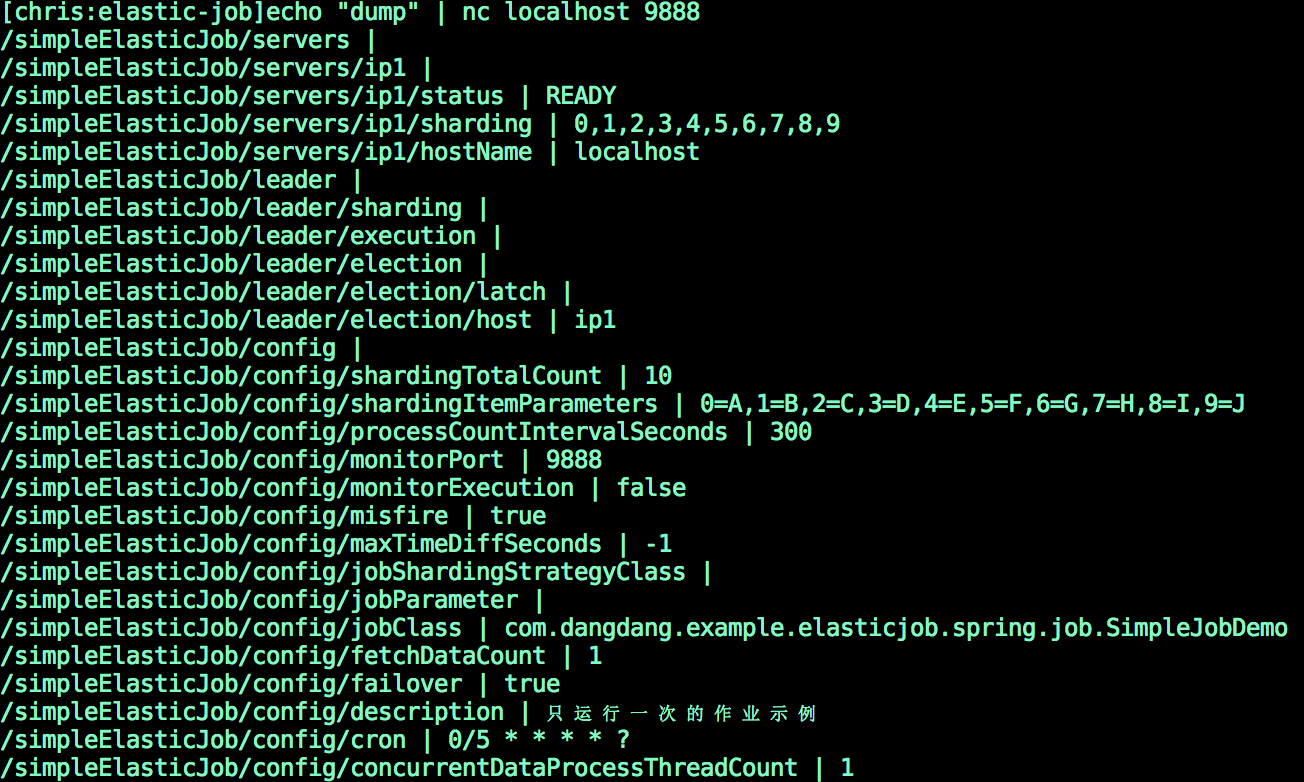
**导出至文件**
```bash
echo "dump@jobName" | nc <任意一台作业服务器IP> 9888 > job_debug.txt
```
================================================
FILE: docs/content/user-manual/operation/dump.en.md
================================================
+++
title = "Dump Job Information"
weight = 2
chapter = true
+++
Using ElasticJob may meet some distributed problem which is not easy to observe.
Because of developer cannot debug in production environment, ElasticJob provide `dump` command to export job runtime information for debugging.
For security reason, the information dumped had already mask sensitive information, it instead of real IP address to `ip1`, `ip2` ...
## Open Listener Port
To open listener port using Java, refer to [Java API job information export configuration](/en/user-manual/elasticjob/configuration/java-api).
To open listener port using Spring Boot Starter, refer to [Spring Boot Starter job information export configuration](/en/user-manual/elasticjob/configuration/java-api).
To open listener port using Spring Namespace, refer to [Spring namespace job information export configuration](/en/user-manual/elasticjob/configuration/spring-namespace).
## Execute Dump
**Dump to stdout**
```bash
echo "dump@jobName" | nc 9888

```

**Dump to file**
```bash
echo "dump@jobName" | nc 9888 > job_debug.txt
```
================================================
FILE: docs/content/user-manual/operation/execution-monitor.cn.md
================================================
+++
title = "作业运行状态监控"
weight = 3
chapter = true
+++
通过监听 ElasticJob 的 ZooKeeper 注册中心的几个关键节点即可完成作业运行状态监控功能。
## 监听作业服务器存活
监听 job_name\instances\job_instance_id 节点是否存在。该节点为临时节点,如果作业服务器下线,该节点将删除。
================================================
FILE: docs/content/user-manual/operation/execution-monitor.en.md
================================================
+++
title = "Execution Monitor"
weight = 3
chapter = true
+++
By monitoring several key nodes in the zookeeper registry of ElasticJob, the job running status monitoring function can be completed.
## Monitoring job server alive
Listen for the existence of node job_name\instances\job_instance_id. This node is a temporary node. If the job server is offline, the node will be deleted.
================================================
FILE: docs/content/user-manual/operation/web-console.cn.md
================================================
+++
title = "运维平台"
weight = 4
chapter = true
+++
解压缩 `elasticjob-console-${version}.tar.gz` 并执行 `bin\start.sh`。
打开浏览器访问 `http://localhost:8088/` 即可访问控制台。
8088 为默认端口号,可通过启动脚本输入 `-p` 自定义端口号。
## 登录
控制台提供两种账户:管理员及访客。
管理员拥有全部操作权限,访客仅拥有察看权限。
默认管理员用户名和密码是 root/root,访客用户名和密码是 guest/guest,可通过 `conf\application.properties` 修改管理员及访客用户名及密码。
```
auth.root_username=root
auth.root_password=root
auth.guest_username=guest
auth.guest_password=guest
```
## Casdoor 登录
控制台集成了[Casdoor](https://casdoor.org/)单点登录,用户可以选择 Casdoor 进行登录等一些列操作。
步骤一: 部署 casdoor
Casdoor的源代码托管在 GitHub: https://github.com/casdoor/casdoor
启动模式有开发模式和生产模式,此处以开发模式为例,[更多详细](https://casdoor.org/docs/basic/server-installation)
后端启动方式
```bash
go run main.go
```
前端启动方式
```bash
cd web
yarn install
yarn start
```
步骤二:配置casdoor并得到所需的数据

用红线指出来的是后端配置需要用到的,其中Redirect URLs取决于你要要callback的地址
我们还需要根据所选cert到cert选项中找到对应的cert,如本例为cert-built-in,其中certificate也是我们所需要用到的。

更多[casdoor文档](https://casdoor.org/docs/overview)
步骤三:在ShardingSphere中进行配置
在[sharingshphere-elasticjob-ui](https://github.com/apache/shardingsphere-elasticjob-ui)中的该application.properties进行配置

将我们在casdoor获取的数据粘贴到相应位置即可如:

这样我们就可以在shardingsphere-elasticjob-ui中使用casdoor了!更多功能详见[Casdoor](https://casdoor.org/)
## 功能列表
- 登录安全控制
- 注册中心、事件追踪数据源管理
- 快捷修改作业设置
- 作业和服务器维度状态查看
- 操作作业禁用\启用、停止和删除等生命周期
- 事件追踪查询
## 设计理念
运维平台和 ElasticJob 并无直接关系,是通过读取作业注册中心数据展现作业状态,或更新注册中心数据修改全局配置。
控制台只能控制作业本身是否运行,但不能控制作业进程的启动,因为控制台和作业本身服务器是完全分离的,控制台并不能控制作业服务器。
## 不支持项
* 添加作业
作业在首次运行时将自动添加。
ElasticJob 以 jar 方式启动,并无作业分发功能。
================================================
FILE: docs/content/user-manual/operation/web-console.en.md
================================================
+++
title = "Console"
weight = 4
chapter = true
+++
Unzip `elasticjob-console-${version}.tar.gz` and execute `bin\start.sh`.
Open the browser and visit `http://localhost:8899/` to access the console.
8899 is the default port number. You can customize the port number by entering `-p` through the startup script.
## Log in
The console provides two types of accounts: administrator and guest.
The administrator has all operation rights, and the visitors only have the viewing rights.
The default administrator user name and password are root/root,and the guest user name and password are guest/guest,You can modify the administrator and guest user names and passwords through `conf\application.properties`.
```
auth.root_username=root
auth.root_password=root
auth.guest_username=guest
auth.guest_password=guest
```
## Login with Casdoor
The console have integrated [Casdoor](https://casdoor.org/). We can choose it for SSO.
Step1: Deploy Casdoor
Casdoor code in GitHub: https://github.com/casdoor/casdoor
Here a example for development mode. [More](https://casdoor.org/docs/basic/server-installation)
Backend
```bash
go run main.go
```
Frontend
```bash
cd web
yarn install
yarn start
```
Step2:Configure Casdoor

RedirectURLs is depend on what url you need redirect.The selected data will use in next.
2.On the certificate editing page, you can see your `Certificate`

Step3:Configure application in ShardingSphere
First we need find the application.properties we need configure

Second we need copy the data in Casdoor application and paste them into application.

Now we can use it
## Function list
- Login security control
- Registration center, event tracking data source management
- Quickly modify job settings
- View job and server dimension status
- Operational job disable/enable, stop and delete life cycle
- Event tracking query
## Design concept
The operation and maintenance platform has no direct relationship with ElasticJob. It displays the job status by reading the job registration center data, or updating the registration center data to modify the global configuration.
The console can only control whether the job itself is running, but it cannot control the start of the job process, because the console and the job server are completely separated, and the console cannot control the job server.
## Unsupported item
* Add assignment
The job will be automatically added the first time it runs.
ElasticJob is started as a jar and has no job distribution function.
================================================
FILE: docs/content/user-manual/usage/_index.cn.md
================================================
+++
pre = "4.1.1 "
title = "使用手册"
weight = 1
chapter = true
+++
本章节将介绍 ElasticJob 相关使用。
更多使用细节请参见[使用示例](https://github.com/apache/shardingsphere-elasticjob/tree/master/examples)。
================================================
FILE: docs/content/user-manual/usage/_index.en.md
================================================
+++
pre = "4.1.1 "
title = "Usage"
weight = 1
chapter = true
+++
This chapter will introduce the use of ElasticJob.
Please refer to [Example](https://github.com/apache/shardingsphere-elasticjob/tree/master/examples) for more details.
================================================
FILE: docs/content/user-manual/usage/job-api/_index.cn.md
================================================
+++
title = "作业 API"
weight = 1
chapter = true
+++
ElasticJob 支持原生 Java、Spring Boot Starter 和 Spring 自定义命名空间 3 种使用方式。
本章节将详细介绍他们的使用方式。
================================================
FILE: docs/content/user-manual/usage/job-api/_index.en.md
================================================
+++
title = "Job API"
weight = 1
chapter = true
+++
ElasticJob can use for native Java, Spring Boot Starter and Spring namespace.
This chapter will introduce how to use them.
================================================
FILE: docs/content/user-manual/usage/job-api/java-api.cn.md
================================================
+++
title = "使用 Java API"
weight = 2
chapter = true
+++
## 作业配置
ElasticJob 采用构建器模式创建作业配置对象。
代码示例如下:
```java
JobConfiguration jobConfig = JobConfiguration.newBuilder("myJob", 3).cron("0/5 * * * * ?").shardingItemParameters("0=Beijing,1=Shanghai,2=Guangzhou").build();
```
## 作业启动
ElasticJob 调度器分为定时调度和一次性调度两种类型。
每种调度器启动时均需要注册中心配置、作业对象(或作业类型)以及作业配置这 3 个参数。
### 定时调度
```java
public class JobDemo {
public static void main(String[] args) {
// 调度基于 class 类型的作业
new ScheduleJobBootstrap(createRegistryCenter(), new MyJob(), createJobConfiguration()).schedule();
// 调度基于 type 类型的作业
new ScheduleJobBootstrap(createRegistryCenter(), "MY_TYPE", createJobConfiguration()).schedule();
}
private static CoordinatorRegistryCenter createRegistryCenter() {
CoordinatorRegistryCenter regCenter = new ZookeeperRegistryCenter(new ZookeeperConfiguration("zk_host:2181", "elastic-job-demo"));
regCenter.init();
return regCenter;
}
private static JobConfiguration createJobConfiguration() {
// 创建作业配置
...
}
}
```
### 一次性调度
```java
public class JobDemo {
public static void main(String[] args) {
OneOffJobBootstrap jobBootstrap = new OneOffJobBootstrap(createRegistryCenter(), new MyJob(), createJobConfiguration());
// 可多次调用一次性调度
jobBootstrap.execute();
}
private static CoordinatorRegistryCenter createRegistryCenter() {
CoordinatorRegistryCenter regCenter = new ZookeeperRegistryCenter(new ZookeeperConfiguration("zk_host:2181", "elastic-job-demo"));
regCenter.init();
return regCenter;
}
private static JobConfiguration createJobConfiguration() {
// 创建作业配置
...
}
}
```
## 配置作业导出端口
使用 ElasticJob 过程中可能会碰到一些分布式问题,导致作业运行不稳定。
由于无法在生产环境调试,通过 dump 命令可以把作业内部相关信息导出,方便开发者调试分析;
导出命令的使用请参见[运维指南](/cn/user-manual/elasticjob/operation/dump)。
以下示例用于展示如何通过 SnapshotService 开启用于导出命令的监听端口。
```java
public class JobMain {
public static void main(final String[] args) {
SnapshotService snapshotService = new SnapshotService(regCenter, 9888).listen();
}
private static CoordinatorRegistryCenter createRegistryCenter() {
// 创建注册中心
}
}
```
## 配置错误处理策略
使用 ElasticJob 过程中当作业发生异常后,可采用以下错误处理策略。
| *错误处理策略名称* | *说明* | *是否内置* | *是否默认* | *是否需要额外配置* |
|------------|---------------------|--------|--------|------------|
| 记录日志策略 | 记录作业异常日志,但不中断作业执行 | 是 | 是 | |
| 抛出异常策略 | 抛出系统异常并中断作业执行 | 是 | | |
| 忽略异常策略 | 忽略系统异常且不中断作业执行 | 是 | | |
| 邮件通知策略 | 发送邮件消息通知,但不中断作业执行 | | | 是 |
| 企业微信通知策略 | 发送企业微信消息通知,但不中断作业执行 | | | 是 |
| 钉钉通知策略 | 发送钉钉消息通知,但不中断作业执行 | | | 是 |
### 记录日志策略
```java
public class JobDemo {
public static void main(String[] args) {
// 定时调度作业
new ScheduleJobBootstrap(createRegistryCenter(), new MyJob(), createScheduleJobConfiguration()).schedule();
// 一次性调度作业
new OneOffJobBootstrap(createRegistryCenter(), new MyJob(), createOneOffJobConfiguration()).execute();
}
private static JobConfiguration createScheduleJobConfiguration() {
// 创建定时作业配置, 并且使用记录日志策略
return JobConfiguration.newBuilder("myScheduleJob", 3).cron("0/5 * * * * ?").jobErrorHandlerType("LOG").build();
}
private static JobConfiguration createOneOffJobConfiguration() {
// 创建一次性作业配置, 并且使用记录日志策略
return JobConfiguration.newBuilder("myOneOffJob", 3).jobErrorHandlerType("LOG").build();
}
private static CoordinatorRegistryCenter createRegistryCenter() {
// 配置注册中心
...
}
}
```
### 抛出异常策略
```java
public class JobDemo {
public static void main(String[] args) {
// 定时调度作业
new ScheduleJobBootstrap(createRegistryCenter(), new MyJob(), createScheduleJobConfiguration()).schedule();
// 一次性调度作业
new OneOffJobBootstrap(createRegistryCenter(), new MyJob(), createOneOffJobConfiguration()).execute();
}
private static JobConfiguration createScheduleJobConfiguration() {
// 创建定时作业配置, 并且使用抛出异常策略
return JobConfiguration.newBuilder("myScheduleJob", 3).cron("0/5 * * * * ?").jobErrorHandlerType("THROW").build();
}
private static JobConfiguration createOneOffJobConfiguration() {
// 创建一次性作业配置, 并且使用抛出异常策略
return JobConfiguration.newBuilder("myOneOffJob", 3).jobErrorHandlerType("THROW").build();
}
private static CoordinatorRegistryCenter createRegistryCenter() {
// 配置注册中心
...
}
}
```
### 忽略异常策略
```java
public class JobDemo {
public static void main(String[] args) {
// 定时调度作业
new ScheduleJobBootstrap(createRegistryCenter(), new MyJob(), createScheduleJobConfiguration()).schedule();
// 一次性调度作业
new OneOffJobBootstrap(createRegistryCenter(), new MyJob(), createOneOffJobConfiguration()).execute();
}
private static JobConfiguration createScheduleJobConfiguration() {
// 创建定时作业配置, 并且使用忽略异常策略
return JobConfiguration.newBuilder("myScheduleJob", 3).cron("0/5 * * * * ?").jobErrorHandlerType("IGNORE").build();
}
private static JobConfiguration createOneOffJobConfiguration() {
// 创建一次性作业配置, 并且使用忽略异常策略
return JobConfiguration.newBuilder("myOneOffJob", 3).jobErrorHandlerType("IGNORE").build();
}
private static CoordinatorRegistryCenter createRegistryCenter() {
// 配置注册中心
...
}
}
```
### 邮件通知策略
请参考 [这里](/cn/user-manual/elasticjob/configuration/built-in-strategy/error-handler/#邮件通知策略) 了解更多。
Maven POM:
```xml
org.apache.shardingsphere.elasticjobelasticjob-error-handler-email${latest.release.version}
```
```java
public class JobDemo {
public static void main(String[] args) {
// 定时调度作业
new ScheduleJobBootstrap(createRegistryCenter(), new MyJob(), createScheduleJobConfiguration()).schedule();
// 一次性调度作业
new OneOffJobBootstrap(createRegistryCenter(), new MyJob(), createOneOffJobConfiguration()).execute();
}
private static JobConfiguration createScheduleJobConfiguration() {
// 创建定时作业配置, 并且使用邮件通知策略
JobConfiguration jobConfig = JobConfiguration.newBuilder("myScheduleJob", 3).cron("0/5 * * * * ?").jobErrorHandlerType("EMAIL").build();
setEmailProperties(jobConfig);
return jobConfig;
}
private static JobConfiguration createOneOffJobConfiguration() {
// 创建一次性作业配置, 并且使用邮件通知策略
JobConfiguration jobConfig = JobConfiguration.newBuilder("myOneOffJob", 3).jobErrorHandlerType("EMAIL").build();
setEmailProperties(jobConfig);
return jobConfig;
}
private static void setEmailProperties(final JobConfiguration jobConfig) {
// 设置邮件的配置
jobConfig.getProps().setProperty(EmailPropertiesConstants.HOST, "host");
jobConfig.getProps().setProperty(EmailPropertiesConstants.PORT, "465");
jobConfig.getProps().setProperty(EmailPropertiesConstants.USERNAME, "username");
jobConfig.getProps().setProperty(EmailPropertiesConstants.PASSWORD, "password");
jobConfig.getProps().setProperty(EmailPropertiesConstants.FROM, "from@xxx.xx");
jobConfig.getProps().setProperty(EmailPropertiesConstants.TO, "to1@xxx.xx,to1@xxx.xx");
}
private static CoordinatorRegistryCenter createRegistryCenter() {
// 配置注册中心
...
}
}
```
### 企业微信通知策略
请参考 [这里](/cn/user-manual/elasticjob/configuration/built-in-strategy/error-handler/#企业微信通知策略) 了解更多。
Maven POM:
```xml
org.apache.shardingsphere.elasticjobelasticjob-error-handler-wechat${latest.release.version}
```
```java
public class JobDemo {
public static void main(String[] args) {
// 定时调度作业
new ScheduleJobBootstrap(createRegistryCenter(), new MyJob(), createScheduleJobConfiguration()).schedule();
// 一次性调度作业
new OneOffJobBootstrap(createRegistryCenter(), new MyJob(), createOneOffJobConfiguration()).execute();
}
private static JobConfiguration createScheduleJobConfiguration() {
// 创建定时作业配置, 并且使用企业微信通知策略
JobConfiguration jobConfig = JobConfiguration.newBuilder("myScheduleJob", 3).cron("0/5 * * * * ?").jobErrorHandlerType("WECHAT").build();
setWechatProperties(jobConfig);
return jobConfig;
}
private static JobConfiguration createOneOffJobConfiguration() {
// 创建一次性作业配置, 并且使用企业微信通知策略
JobConfiguration jobConfig = JobConfiguration.newBuilder("myOneOffJob", 3).jobErrorHandlerType("WECHAT").build();
setWechatProperties(jobConfig);
return jobConfig;
}
private static void setWechatProperties(final JobConfiguration jobConfig) {
// 设置企业微信的配置
jobConfig.getProps().setProperty(WechatPropertiesConstants.WEBHOOK, "you_webhook");
}
private static CoordinatorRegistryCenter createRegistryCenter() {
// 配置注册中心
...
}
}
```
### 钉钉通知策略
请参考 [这里](/cn/user-manual/elasticjob/configuration/built-in-strategy/error-handler/#钉钉通知策略) 了解更多。
Maven POM:
```xml
org.apache.shardingsphere.elasticjobelasticjob-error-handler-dingtalk${latest.release.version}
```
```java
public class JobDemo {
public static void main(String[] args) {
// 定时调度作业
new ScheduleJobBootstrap(createRegistryCenter(), new MyJob(), createScheduleJobConfiguration()).schedule();
// 一次性调度作业
new OneOffJobBootstrap(createRegistryCenter(), new MyJob(), createOneOffJobConfiguration()).execute();
}
private static JobConfiguration createScheduleJobConfiguration() {
// 创建定时作业配置, 并且使用企业微信通知策略
JobConfiguration jobConfig = JobConfiguration.newBuilder("myScheduleJob", 3).cron("0/5 * * * * ?").jobErrorHandlerType("DINGTALK").build();
setDingtalkProperties(jobConfig);
return jobConfig;
}
private static JobConfiguration createOneOffJobConfiguration() {
// 创建一次性作业配置, 并且使用钉钉通知策略
JobConfiguration jobConfig = JobConfiguration.newBuilder("myOneOffJob", 3).jobErrorHandlerType("DINGTALK").build();
setDingtalkProperties(jobConfig);
return jobConfig;
}
private static void setDingtalkProperties(final JobConfiguration jobConfig) {
// 设置钉钉的配置
jobConfig.getProps().setProperty(DingtalkPropertiesConstants.WEBHOOK, "you_webhook");
jobConfig.getProps().setProperty(DingtalkPropertiesConstants.KEYWORD, "you_keyword");
jobConfig.getProps().setProperty(DingtalkPropertiesConstants.SECRET, "you_secret");
}
private static CoordinatorRegistryCenter createRegistryCenter() {
// 配置注册中心
...
}
}
```
================================================
FILE: docs/content/user-manual/usage/job-api/java-api.en.md
================================================
+++
title = "Use Java API"
weight = 2
chapter = true
+++
## Job configuration
ElasticJob uses the builder mode to create job configuration objects.
The code example is as follows:
```java
JobConfiguration jobConfig = JobConfiguration.newBuilder("myJob", 3).cron("0/5 * * * * ?").shardingItemParameters("0=Beijing,1=Shanghai,2=Guangzhou").build();
```
## Job start
ElasticJob scheduler is divided into two types: timed scheduling and one-time scheduling.
Each scheduler needs three parameters: registry configuration, job object (or job type), and job configuration when it starts.
### Timed scheduling
```java
public class JobDemo {
public static void main(String[] args) {
// Class-based Scheduling Jobs
new ScheduleJobBootstrap(createRegistryCenter(), new MyJob(), createJobConfiguration()).schedule();
// Type-based Scheduling Jobs
new ScheduleJobBootstrap(createRegistryCenter(), "MY_TYPE", createJobConfiguration()).schedule();
}
private static CoordinatorRegistryCenter createRegistryCenter() {
CoordinatorRegistryCenter regCenter = new ZookeeperRegistryCenter(new ZookeeperConfiguration("zk_host:2181", "elastic-job-demo"));
regCenter.init();
return regCenter;
}
private static JobConfiguration createJobConfiguration() {
// Create job configuration
...
}
}
```
### One-Off scheduling
```java
public class JobDemo {
public static void main(String[] args) {
OneOffJobBootstrap jobBootstrap = new OneOffJobBootstrap(createRegistryCenter(), new MyJob(), createJobConfiguration());
// One-time scheduling can be called multiple times
jobBootstrap.execute();
}
private static CoordinatorRegistryCenter createRegistryCenter() {
CoordinatorRegistryCenter regCenter = new ZookeeperRegistryCenter(new ZookeeperConfiguration("zk_host:2181", "elastic-job-demo"));
regCenter.init();
return regCenter;
}
private static JobConfiguration createJobConfiguration() {
// Create job configuration
...
}
}
```
## Job Dump
Using ElasticJob may meet some distributed problem which is not easy to observe.
Because of developer can not debug in production environment, ElasticJob provide `dump` command to export job runtime information for debugging.
Please refer to [Operation Manual](/en/user-manual/elasticjob/operation/dump) for more details.
The example below is how to configure spring namespace for open listener port to dump.
```java
public class JobMain {
public static void main(final String[] args) {
SnapshotService snapshotService = new SnapshotService(regCenter, 9888).listen();
}
private static CoordinatorRegistryCenter createRegistryCenter() {
// create registry center
}
}
```
## Configuration error handler strategy
In the process of using ElasticJob, when the job is abnormal, the following error handling strategies can be used.
| *Error handler strategy name* | *Description* | *Built-in* | *Default*| *Extra config* |
| ---------------------------------------- | ------------------------------------------------------------- | ------- | --------| -------------- |
| Log Strategy | Log error and do not interrupt job | Yes | Yes | |
| Throw Strategy | Throw system exception and interrupt job | Yes | | |
| Ignore Strategy | Ignore exception and do not interrupt job | Yes | | |
| Email Notification Strategy | Send email message notification and do not interrupt job | | | Yes |
| Wechat Enterprise Notification Strategy | Send wechat message notification and do not interrupt job | | | Yes |
| Dingtalk Notification Strategy | Send dingtalk message notification and do not interrupt job | | | Yes |
### Log Strategy
```java
public class JobDemo {
public static void main(String[] args) {
// Scheduling Jobs
new ScheduleJobBootstrap(createRegistryCenter(), new MyJob(), createScheduleJobConfiguration()).schedule();
// One-time Scheduling Jobs
new OneOffJobBootstrap(createRegistryCenter(), new MyJob(), createOneOffJobConfiguration()).execute();
}
private static JobConfiguration createScheduleJobConfiguration() {
// Create scheduling job configuration, and the use of log strategy
return JobConfiguration.newBuilder("myScheduleJob", 3).cron("0/5 * * * * ?").jobErrorHandlerType("LOG").build();
}
private static JobConfiguration createOneOffJobConfiguration() {
// Create one-time job configuration, and the use of log strategy
return JobConfiguration.newBuilder("myOneOffJob", 3).jobErrorHandlerType("LOG").build();
}
private static CoordinatorRegistryCenter createRegistryCenter() {
// create registry center
...
}
}
```
### Throw Strategy
```java
public class JobDemo {
public static void main(String[] args) {
// Scheduling Jobs
new ScheduleJobBootstrap(createRegistryCenter(), new MyJob(), createScheduleJobConfiguration()).schedule();
// One-time Scheduling Jobs
new OneOffJobBootstrap(createRegistryCenter(), new MyJob(), createOneOffJobConfiguration()).execute();
}
private static JobConfiguration createScheduleJobConfiguration() {
// Create scheduling job configuration, and the use of throw strategy.
return JobConfiguration.newBuilder("myScheduleJob", 3).cron("0/5 * * * * ?").jobErrorHandlerType("THROW").build();
}
private static JobConfiguration createOneOffJobConfiguration() {
// Create one-time job configuration, and the use of throw strategy
return JobConfiguration.newBuilder("myOneOffJob", 3).jobErrorHandlerType("THROW").build();
}
private static CoordinatorRegistryCenter createRegistryCenter() {
// create registry center
...
}
}
```
### Ignore Strategy
```java
public class JobDemo {
public static void main(String[] args) {
// Scheduling Jobs
new ScheduleJobBootstrap(createRegistryCenter(), new MyJob(), createScheduleJobConfiguration()).schedule();
// One-time Scheduling Jobs
new OneOffJobBootstrap(createRegistryCenter(), new MyJob(), createOneOffJobConfiguration()).execute();
}
private static JobConfiguration createScheduleJobConfiguration() {
// Create scheduling job configuration, and the use of ignore strategy.
return JobConfiguration.newBuilder("myScheduleJob", 3).cron("0/5 * * * * ?").jobErrorHandlerType("IGNORE").build();
}
private static JobConfiguration createOneOffJobConfiguration() {
// Create one-time job configuration, and the use of ignore strategy.
return JobConfiguration.newBuilder("myOneOffJob", 3).jobErrorHandlerType("IGNORE").build();
}
private static CoordinatorRegistryCenter createRegistryCenter() {
// create registry center.
...
}
}
```
### Email Notification Strategy
Please refer to [here](/en/user-manual/elasticjob/configuration/built-in-strategy/error-handler/#email-notification-strategy) for more details.
Maven POM:
```xml
org.apache.shardingsphere.elasticjobelasticjob-error-handler-email${latest.release.version}
```
```java
public class JobDemo {
public static void main(String[] args) {
// Scheduling Jobs
new ScheduleJobBootstrap(createRegistryCenter(), new MyJob(), createScheduleJobConfiguration()).schedule();
// One-time Scheduling Jobs
new OneOffJobBootstrap(createRegistryCenter(), new MyJob(), createOneOffJobConfiguration()).execute();
}
private static JobConfiguration createScheduleJobConfiguration() {
// Create scheduling job configuration, and the use of email notification strategy.
JobConfiguration jobConfig = JobConfiguration.newBuilder("myScheduleJob", 3).cron("0/5 * * * * ?").jobErrorHandlerType("EMAIL").build();
setEmailProperties(jobConfig);
return jobConfig;
}
private static JobConfiguration createOneOffJobConfiguration() {
// Create one-time job configuration, and the use of email notification strategy.
JobConfiguration jobConfig = JobConfiguration.newBuilder("myOneOffJob", 3).jobErrorHandlerType("EMAIL").build();
setEmailProperties(jobConfig);
return jobConfig;
}
private static void setEmailProperties(final JobConfiguration jobConfig) {
// Set the mail configuration.
jobConfig.getProps().setProperty(EmailPropertiesConstants.HOST, "host");
jobConfig.getProps().setProperty(EmailPropertiesConstants.PORT, "465");
jobConfig.getProps().setProperty(EmailPropertiesConstants.USERNAME, "username");
jobConfig.getProps().setProperty(EmailPropertiesConstants.PASSWORD, "password");
jobConfig.getProps().setProperty(EmailPropertiesConstants.FROM, "from@xxx.xx");
jobConfig.getProps().setProperty(EmailPropertiesConstants.TO, "to1@xxx.xx,to1@xxx.xx");
}
private static CoordinatorRegistryCenter createRegistryCenter() {
// create registry center.
...
}
}
```
### Wechat Enterprise Notification Strategy
Please refer to [here](/en/user-manual/elasticjob/configuration/built-in-strategy/error-handler/#wechat-enterprise-notification-strategy) for more details.
Maven POM:
```xml
org.apache.shardingsphere.elasticjobelasticjob-error-handler-wechat${latest.release.version}
```
```java
public class JobDemo {
public static void main(String[] args) {
// Scheduling Jobs.
new ScheduleJobBootstrap(createRegistryCenter(), new MyJob(), createScheduleJobConfiguration()).schedule();
// One-time Scheduling Jobs.
new OneOffJobBootstrap(createRegistryCenter(), new MyJob(), createOneOffJobConfiguration()).execute();
}
private static JobConfiguration createScheduleJobConfiguration() {
// Create scheduling job configuration, and the use of wechat enterprise notification strategy.
JobConfiguration jobConfig = JobConfiguration.newBuilder("myScheduleJob", 3).cron("0/5 * * * * ?").jobErrorHandlerType("WECHAT").build();
setWechatProperties(jobConfig);
return jobConfig;
}
private static JobConfiguration createOneOffJobConfiguration() {
// Create one-time job configuration, and the use of wechat enterprise notification strategy.
JobConfiguration jobConfig = JobConfiguration.newBuilder("myOneOffJob", 3).jobErrorHandlerType("WECHAT").build();
setWechatProperties(jobConfig);
return jobConfig;
}
private static void setWechatProperties(final JobConfiguration jobConfig) {
// Set the configuration for the enterprise wechat.
jobConfig.getProps().setProperty(WechatPropertiesConstants.WEBHOOK, "you_webhook");
}
private static CoordinatorRegistryCenter createRegistryCenter() {
// create registry center.
...
}
}
```
### Dingtalk Notification Strategy
Please refer to [here](/en/user-manual/elasticjob/configuration/built-in-strategy/error-handler/#dingtalk-notification-strategy) for more details.
Maven POM:
```xml
org.apache.shardingsphere.elasticjobelasticjob-error-handler-dingtalk${latest.release.version}
```
```java
public class JobDemo {
public static void main(String[] args) {
// Scheduling Jobs.
new ScheduleJobBootstrap(createRegistryCenter(), new MyJob(), createScheduleJobConfiguration()).schedule();
// One-time Scheduling Jobs.
new OneOffJobBootstrap(createRegistryCenter(), new MyJob(), createOneOffJobConfiguration()).execute();
}
private static JobConfiguration createScheduleJobConfiguration() {
// Create scheduling job configuration, and the use of dingtalk notification strategy.
JobConfiguration jobConfig = JobConfiguration.newBuilder("myScheduleJob", 3).cron("0/5 * * * * ?").jobErrorHandlerType("DINGTALK").build();
setDingtalkProperties(jobConfig);
return jobConfig;
}
private static JobConfiguration createOneOffJobConfiguration() {
// Create one-time job configuration, and the use of dingtalk notification strategy.
JobConfiguration jobConfig = JobConfiguration.newBuilder("myOneOffJob", 3).jobErrorHandlerType("DINGTALK").build();
setDingtalkProperties(jobConfig);
return jobConfig;
}
private static void setDingtalkProperties(final JobConfiguration jobConfig) {
// Set the configuration of the dingtalk.
jobConfig.getProps().setProperty(DingtalkPropertiesConstants.WEBHOOK, "you_webhook");
jobConfig.getProps().setProperty(DingtalkPropertiesConstants.KEYWORD, "you_keyword");
jobConfig.getProps().setProperty(DingtalkPropertiesConstants.SECRET, "you_secret");
}
private static CoordinatorRegistryCenter createRegistryCenter() {
// create registry center.
...
}
}
```
================================================
FILE: docs/content/user-manual/usage/job-api/job-interface.cn.md
================================================
+++
title = "作业开发"
weight = 1
chapter = true
+++
ElasticJob 的作业分类基于 class 和 type 两种类型。
基于 class 的作业需要开发者自行通过实现接口的方式织入业务逻辑;
基于 type 的作业则无需编码,只需要提供相应配置即可。
基于 class 的作业接口的方法参数 `shardingContext` 包含作业配置、片和运行时信息。
可通过 `getShardingTotalCount()`, `getShardingItem()` 等方法分别获取分片总数,运行在本作业服务器的分片序列号等。
ElasticJob 目前提供 Simple、Dataflow 这两种基于 class 的作业类型,并提供 Script、HTTP 这两种基于 type 的作业类型,用户可通过实现 SPI 接口自行扩展作业类型。
## 简单作业
意为简单实现,未经任何封装的类型。需实现 SimpleJob 接口。
该接口仅提供单一方法用于覆盖,此方法将定时执行。
与Quartz原生接口相似,但提供了弹性扩缩容和分片等功能。
```java
public class MyElasticJob implements SimpleJob {
@Override
public void execute(ShardingContext context) {
switch (context.getShardingItem()) {
case 0:
// do something by sharding item 0
break;
case 1:
// do something by sharding item 1
break;
case 2:
// do something by sharding item 2
break;
// case n: ...
}
}
}
```
## 数据流作业
用于处理数据流,需实现 DataflowJob 接口。
该接口提供2个方法可供覆盖,分别用于抓取 (fetchData) 和处理 (processData) 数据。
```java
public class MyElasticJob implements DataflowJob {
@Override
public List fetchData(ShardingContext context) {
switch (context.getShardingItem()) {
case 0:
List data = // get data from database by sharding item 0
return data;
case 1:
List data = // get data from database by sharding item 1
return data;
case 2:
List data = // get data from database by sharding item 2
return data;
// case n: ...
}
}
@Override
public void processData(ShardingContext shardingContext, List data) {
// process data
// ...
}
}
```
***
**流式处理**
可通过属性配置 `streaming.process` 开启或关闭流式处理。
如果开启流式处理,则作业只有在 fetchData 方法的返回值为 null 或集合容量为空时,才停止抓取,否则作业将一直运行下去;
如果关闭流式处理,则作业只会在每次作业执行过程中执行一次 fetchData 和 processData 方法,随即完成本次作业。
如果采用流式作业处理方式,建议 processData 在处理数据后更新其状态,避免 fetchData 再次抓取到,从而使得作业永不停止。
## 脚本作业
支持 shell,python,perl 等所有类型脚本。
可通过属性配置 `script.command.line` 配置待执行脚本,无需编码。
执行脚本路径可包含参数,参数传递完毕后,作业框架会自动追加最后一个参数为作业运行时信息。
例如如下脚本:
```bash
#!/bin/bash
echo sharding execution context is $*
```
作业运行时将输出:
```
sharding execution context is {"jobName":"scriptElasticDemoJob","shardingTotalCount":10,"jobParameter":"","shardingItem":0,"shardingParameter":"A"}
```
## HTTP作业(3.0.0-beta 提供)
可通过属性配置`http.url`,`http.method`,`http.data`等配置待请求的http信息。
分片信息以Header形式传递,key为`shardingContext`,值为json格式。
```java
public class HttpJobMain {
public static void main(String[] args) {
new ScheduleJobBootstrap(regCenter, "HTTP", JobConfiguration.newBuilder("javaHttpJob", 1)
.setProperty(HttpJobProperties.URI_KEY, "http://xxx.com/execute")
.setProperty(HttpJobProperties.METHOD_KEY, "POST")
.setProperty(HttpJobProperties.DATA_KEY, "source=ejob")
.cron("0/5 * * * * ?").shardingItemParameters("0=Beijing").build()).schedule();
}
}
```
```java
@Controller
@Slf4j
public class HttpJobController {
@RequestMapping(path = "/execute", method = RequestMethod.POST)
public void execute(String source, @RequestHeader String shardingContext) {
log.info("execute from source : {}, shardingContext : {}", source, shardingContext);
}
}
```
execute接口将输出:
```
execute from source : ejob, shardingContext : {"jobName":"scriptElasticDemoJob","shardingTotalCount":3,"jobParameter":"","shardingItem":0,"shardingParameter":"Beijing"}
```
================================================
FILE: docs/content/user-manual/usage/job-api/job-interface.en.md
================================================
+++
title = "Job Development"
weight = 1
chapter = true
+++
ElasticJob has two kinds of job types: Class-based job and Type-based job.
Class-based jobs require developers to weave business logic by implementing interfaces;
Type-based jobs don't need coding, just need to provide the corresponding configuration.
The method parameter `shardingContext` of the class-based job interface contains job configuration, slice and runtime information.
Through methods such as `getShardingTotalCount()`, `getShardingItem()`, user can obtain the total number of shards, the serial number of the shards running on the job server, etc.
ElasticJob provides two class-based job types which are `Simple` and `Dataflow`; and also provides a type-based job which is `Script`. Users can extend job types by implementing the SPI interface.
## Simple Job
It means simple implementation, without any encapsulation type. Need to implement `SimpleJob` interface.
This interface only provides a single method for coverage, and this method will be executed periodically.
It is similar to Quartz's native interface, but provides functions such as elastic scaling and slice.
```java
public class MyElasticJob implements SimpleJob {
@Override
public void execute(ShardingContext context) {
switch (context.getShardingItem()) {
case 0:
// do something by sharding item 0
break;
case 1:
// do something by sharding item 1
break;
case 2:
// do something by sharding item 2
break;
// case n: ...
}
}
}
```
## Dataflow Job
For processing data flow, need to implement `DataflowJob` interface.
This interface provides two methods for coverage, which are used to fetch (fetchData) and process (processData) data.
```java
public class MyElasticJob implements DataflowJob {
@Override
public List fetchData(ShardingContext context) {
switch (context.getShardingItem()) {
case 0:
List data = // get data from database by sharding item 0
return data;
case 1:
List data = // get data from database by sharding item 1
return data;
case 2:
List data = // get data from database by sharding item 2
return data;
// case n: ...
}
}
@Override
public void processData(ShardingContext shardingContext, List data) {
// process data
// ...
}
}
```
***
**Streaming**
Streaming can be enabled or disabled through the property `streaming.process`.
If streaming is enabled, the job will stop fetching data only when the return value of the `fetchData` method is null or the collection is empty, otherwise the job will continue to run;
If streaming is disabled, the job will execute the `fetchData` and `processData` methods only once during each job execution, and then the job will be completed immediately.
If use the streaming job to process data, it is recommended to update its status after the `processData` method being executed, to avoid being fetched again by the method `fetchData`, so that the job never stops.
## Script job
Support all types of scripts such as `shell`, `python`, `perl`.
The script to be executed can be configured through the property `script.command.line`, without coding.
The script path can contain parameters, after the parameters are passed, the job framework will automatically append the last parameter as the job runtime information.
The script example is as follows:
```bash
#!/bin/bash
echo sharding execution context is $*
```
When the job runs, it will output:
```
sharding execution context is {"jobName":"scriptElasticDemoJob","shardingTotalCount":10,"jobParameter":"","shardingItem":0,"shardingParameter":"A"}
```
## HTTP job (Since 3.0.0-beta)
The http information to be requested can be configured through the properties of `http.url`, `http.method`, `http.data`, etc.
Sharding information is transmitted in the form of Header, the key is `shardingContext`, and the value is in json format.
```java
public class HttpJobMain {
public static void main(String[] args) {
new ScheduleJobBootstrap(regCenter, "HTTP", JobConfiguration.newBuilder("javaHttpJob", 1)
.setProperty(HttpJobProperties.URI_KEY, "http://xxx.com/execute")
.setProperty(HttpJobProperties.METHOD_KEY, "POST")
.setProperty(HttpJobProperties.DATA_KEY, "source=ejob")
.cron("0/5 * * * * ?").shardingItemParameters("0=Beijing").build()).schedule();
}
}
```
```java
@Controller
@Slf4j
public class HttpJobController {
@RequestMapping(path = "/execute", method = RequestMethod.POST)
public void execute(String source, @RequestHeader String shardingContext) {
log.info("execute from source : {}, shardingContext : {}", source, shardingContext);
}
}
```
When the job runs, it will output:
```
execute from source : ejob, shardingContext : {"jobName":"scriptElasticDemoJob","shardingTotalCount":3,"jobParameter":"","shardingItem":0,"shardingParameter":"Beijing"}
```
================================================
FILE: docs/content/user-manual/usage/job-api/spring-boot-starter.cn.md
================================================
+++
title = "使用 Spring Boot Starter"
weight = 3
chapter = true
+++
ElasticJob 提供自定义的 Spring Boot Starter,可以与 Spring Boot 配合使用。
基于 ElasticJob Spring Boot Starter 使用 ElasticJob ,用户无需手动创建 CoordinatorRegistryCenter、JobBootstrap 等实例,
只需实现核心作业逻辑并辅以少量配置,即可利用轻量、无中心化的 ElasticJob 解决分布式调度问题。
以下内容仅通过 Spring Boot 3 作为演示。
相关内容在 Spring Boot 2 上仍可能有效,但由于 Spring Boot 2 已经结束维护,不对 Spring Boot 2 做任何可用性假设。
## 作业配置
### 实现作业逻辑
作业逻辑实现与 ElasticJob 的其他使用方式并没有较大的区别,只需将当前作业注册为 Spring 容器中的 bean。
**线程安全问题**
Bean 默认是单例的,如果该作业实现会在同一个进程内被创建出多个 `JobBootstrap` 的实例,
可以考虑设置 Scope 为 `prototype`。
```java
@Component
public class SpringBootDataflowJob implements DataflowJob {
@Override
public List fetchData(final ShardingContext shardingContext) {
// 获取数据
}
@Override
public void processData(final ShardingContext shardingContext, final List data) {
// 处理数据
}
}
```
### 配置协调服务与作业
在配置文件中指定 ElasticJob 所使用的 Zookeeper。配置前缀为 `elasticjob.reg-center`。
`elasticjob.jobs` 是一个 Map,key 为作业名称,value 为作业类型与配置。
Starter 会根据该配置自动创建 `OneOffJobBootstrap` 或 `ScheduleJobBootstrap` 的实例并注册到 Spring 容器中。
配置参考:
```yaml
elasticjob:
regCenter:
serverLists: localhost:6181
namespace: elasticjob-springboot
jobs:
dataflowJob:
elasticJobClass: org.apache.shardingsphere.elasticjob.dataflow.job.DataflowJob
cron: 0/5 * * * * ?
shardingTotalCount: 3
shardingItemParameters: 0=Beijing,1=Shanghai,2=Guangzhou
scriptJob:
elasticJobType: SCRIPT
cron: 0/10 * * * * ?
shardingTotalCount: 3
props:
script.command.line: "echo SCRIPT Job: "
```
## 作业启动
### 定时调度
定时调度作业在 Spring Boot 应用程序启动完成后会自动启动,无需其他额外操作。
### 一次性调度
一次性调度的作业的执行权在开发者手中,开发者可以在需要调用作业的位置注入 `OneOffJobBootstrap`,
通过 `execute()` 方法执行作业。
用户不应该使用 `jakarta.annotation.Resource` 等部分违反 Spring Boot 最佳实践的注解来注入定义的一次性任务的 Spring Bean。
`OneOffJobBootstrap` bean 的名称通过属性 jobBootstrapBeanName 配置,注入时需要指定依赖的 bean 名称。
具体配置请参考[配置文档](/cn/user-manual/elasticjob/configuration/spring-boot-starter)。
```yaml
elasticjob:
jobs:
myOneOffJob:
elasticJobType: SCRIPT
jobBootstrapBeanName: myOneOffJobBean
shardingTotalCount: 9
props:
script.command.line: "echo Manual SCRIPT Job: "
```
```java
import org.apache.shardingsphere.elasticjob.bootstrap.type.OneOffJobBootstrap;
import org.springframework.beans.factory.ObjectProvider;
import org.springframework.beans.factory.annotation.Autowired;
import org.springframework.beans.factory.annotation.Qualifier;
import org.springframework.web.bind.annotation.GetMapping;
import org.springframework.web.bind.annotation.RestController;
import java.util.Objects;
@RestController
public class OneOffJobController {
// 通过 "@Autowired" 注入
@Autowired
@Qualifier("myOneOffJobBean")
private ObjectProvider myOneOffJobProvider;
@GetMapping("/execute2")
public String executeOneOffJob2() {
OneOffJobBootstrap myOneOffJob = myOneOffJobProvider.getIfAvailable();
Objects.requireNonNull(myOneOffJob);
myOneOffJob.execute();
return "{\"msg\":\"OK\"}";
}
}
```
## 配置错误处理策略
使用 ElasticJob 过程中当作业发生异常后,可采用以下错误处理策略。
| *错误处理策略名称* | *说明* | *是否内置* | *是否默认* | *是否需要额外配置* |
|------------|---------------------|--------|--------|------------|
| 记录日志策略 | 记录作业异常日志,但不中断作业执行 | 是 | 是 | |
| 抛出异常策略 | 抛出系统异常并中断作业执行 | 是 | | |
| 忽略异常策略 | 忽略系统异常且不中断作业执行 | 是 | | |
| 邮件通知策略 | 发送邮件消息通知,但不中断作业执行 | | | 是 |
| 企业微信通知策略 | 发送企业微信消息通知,但不中断作业执行 | | | 是 |
| 钉钉通知策略 | 发送钉钉消息通知,但不中断作业执行 | | | 是 |
### 记录日志策略
```yaml
elasticjob:
regCenter:
...
jobs:
...
jobErrorHandlerType: LOG
```
### 抛出异常策略
```yaml
elasticjob:
regCenter:
...
jobs:
...
jobErrorHandlerType: THROW
```
### 忽略异常策略
```yaml
elasticjob:
regCenter:
...
jobs:
...
jobErrorHandlerType: IGNORE
```
### 邮件通知策略
请参考 [这里](/cn/user-manual/elasticjob/configuration/built-in-strategy/error-handler/#邮件通知策略) 了解更多。
Maven POM:
```xml
org.apache.shardingsphere.elasticjobelasticjob-error-handler-email${latest.release.version}
```
```yaml
elasticjob:
regCenter:
...
jobs:
...
jobErrorHandlerType: EMAIL
props:
email:
host: host
port: 465
username: username
password: password
useSsl: true
subject: ElasticJob error message
from: from@xxx.xx
to: to1@xxx.xx,to2@xxx.xx
cc: cc@xxx.xx
bcc: bcc@xxx.xx
debug: false
```
### 企业微信通知策略
请参考 [这里](/cn/user-manual/elasticjob/configuration/built-in-strategy/error-handler/#企业微信通知策略) 了解更多。
Maven POM:
```xml
org.apache.shardingsphere.elasticjobelasticjob-error-handler-wechat${latest.release.version}
```
```yaml
elasticjob:
regCenter:
...
jobs:
...
jobErrorHandlerType: WECHAT
props:
wechat:
webhook: you_webhook
connectTimeout: 3000
readTimeout: 5000
```
### 钉钉通知策略
请参考 [这里](/cn/user-manual/elasticjob/configuration/built-in-strategy/error-handler/#钉钉通知策略) 了解更多。
Maven POM:
```xml
org.apache.shardingsphere.elasticjobelasticjob-error-handler-dingtalk${latest.release.version}
```
```yaml
elasticjob:
regCenter:
...
jobs:
...
jobErrorHandlerType: DINGTALK
props:
dingtalk:
webhook: you_webhook
keyword: you_keyword
secret: you_secret
connectTimeout: 3000
readTimeout: 5000
```
================================================
FILE: docs/content/user-manual/usage/job-api/spring-boot-starter.en.md
================================================
+++
title = "Use Spring Boot Starter"
weight = 3
chapter = true
+++
ElasticJob provides a customized Spring Boot Starter, which can be used in conjunction with Spring Boot.
Developers are free from configuring CoordinatorRegistryCenter, JobBootstrap by using ElasticJob Spring Boot Starter.
What developers need to solve distributed scheduling problem are job implementations with a little configuration.
The following content is only demonstrated through Spring Boot 3.
The relevant content may still be valid on Spring Boot 2, but since Spring Boot 2 has ended maintenance, no availability assumptions are made for Spring Boot 2.
## Job configuration
### Implements ElasticJob
Job implementation is similar to other usage of ElasticJob.
The difference is that jobs will be registered into the Spring IoC container.
**Thread-Safety Issue**
Bean is singleton by default.
Consider setting Bean Scope to `prototype` if the instance of ElasticJob would be used by more than a JobBootstrap.
```java
@Component
public class SpringBootDataflowJob implements DataflowJob {
@Override
public List fetchData(final ShardingContext shardingContext) {
// fetch data
}
@Override
public void processData(final ShardingContext shardingContext, final List data) {
// process data
}
}
```
### Configure CoordinateRegistryCenter and Jobs
Configure the Zookeeper which will be used by ElasticJob via configuration files.
`elasticjob.jobs` is a Map. Using key as job name. Specific job type and configuration in value.
The Starter will create instances of `OneOffJobBootstrap` or `ScheduleJobBootstrap` and register them into the Spring IoC container automatically.
Configuration reference:
```yaml
elasticjob:
regCenter:
serverLists: localhost:6181
namespace: elasticjob-springboot
jobs:
dataflowJob:
elasticJobClass: org.apache.shardingsphere.elasticjob.dataflow.job.DataflowJob
cron: 0/5 * * * * ?
shardingTotalCount: 3
shardingItemParameters: 0=Beijing,1=Shanghai,2=Guangzhou
scriptJob:
elasticJobType: SCRIPT
cron: 0/10 * * * * ?
shardingTotalCount: 3
props:
script.command.line: "echo SCRIPT Job: "
```
## Job Start
### Schedule Job
Just start Spring Boot Starter directly. The schedule jobs will startup when the Spring Boot Application is started.
### One-off Job
When to execute OneOffJob is up to you.
Developers can inject the `OneOffJobBootstrap` bean into where they plan to invoke.
Trigger the job by invoking `execute()` method manually.
Users should not use annotations such as `jakarta.annotation.Resource` which partially violate Spring Boot best practices to inject Spring beans that define one-time tasks.
The bean name of `OneOffJobBootstrap` is specified by property "jobBootstrapBeanName",
Please refer to [Spring Boot Starter Configuration](/en/user-manual/elasticjob/configuration/spring-boot-starter).
```yaml
elasticjob:
jobs:
myOneOffJob:
elasticJobType: SCRIPT
jobBootstrapBeanName: myOneOffJobBean
shardingTotalCount: 9
props:
script.command.line: "echo Manual SCRIPT Job: "
```
```java
import org.apache.shardingsphere.elasticjob.bootstrap.type.OneOffJobBootstrap;
import org.springframework.beans.factory.ObjectProvider;
import org.springframework.beans.factory.annotation.Autowired;
import org.springframework.beans.factory.annotation.Qualifier;
import org.springframework.web.bind.annotation.GetMapping;
import org.springframework.web.bind.annotation.RestController;
import java.util.Objects;
@RestController
public class OneOffJobController {
// Injection via "@Autowired"
@Autowired
@Qualifier("myOneOffJobBean")
private ObjectProvider myOneOffJobProvider;
@GetMapping("/execute2")
public String executeOneOffJob2() {
OneOffJobBootstrap myOneOffJob = myOneOffJobProvider.getIfAvailable();
Objects.requireNonNull(myOneOffJob);
myOneOffJob.execute();
return "{\"msg\":\"OK\"}";
}
}
```
## Configuration error handler strategy
In the process of using ElasticJob, when the job is abnormal, the following error handling strategies can be used.
| *Error handler strategy name* | *Description* | *Built-in* | *Default* | *Extra config* |
|-----------------------------------------|-------------------------------------------------------------|------------|-----------|----------------|
| Log Strategy | Log error and do not interrupt job | Yes | Yes | |
| Throw Strategy | Throw system exception and interrupt job | Yes | | |
| Ignore Strategy | Ignore exception and do not interrupt job | Yes | | |
| Email Notification Strategy | Send email message notification and do not interrupt job | | | Yes |
| Wechat Enterprise Notification Strategy | Send wechat message notification and do not interrupt job | | | Yes |
| Dingtalk Notification Strategy | Send dingtalk message notification and do not interrupt job | | | Yes |
### Log Strategy
```yaml
elasticjob:
regCenter:
...
jobs:
...
jobErrorHandlerType: LOG
```
### Throw Strategy
```yaml
elasticjob:
regCenter:
...
jobs:
...
jobErrorHandlerType: THROW
```
### Ignore Strategy
```yaml
elasticjob:
regCenter:
...
jobs:
...
jobErrorHandlerType: IGNORE
```
### Email Notification Strategy
Please refer to [here](/en/user-manual/elasticjob/configuration/built-in-strategy/error-handler/#email-notification-strategy) for more details.
Maven POM:
```xml
org.apache.shardingsphere.elasticjobelasticjob-error-handler-email${latest.release.version}
```
```yaml
elasticjob:
regCenter:
...
jobs:
...
jobErrorHandlerType: EMAIL
props:
email:
host: host
port: 465
username: username
password: password
useSsl: true
subject: ElasticJob error message
from: from@xxx.xx
to: to1@xxx.xx,to2@xxx.xx
cc: cc@xxx.xx
bcc: bcc@xxx.xx
debug: false
```
### Wechat Enterprise Notification Strategy
Please refer to [here](/en/user-manual/elasticjob/configuration/built-in-strategy/error-handler/#wechat-enterprise-notification-strategy) for more details.
Maven POM:
```xml
org.apache.shardingsphere.elasticjobelasticjob-error-handler-wechat${latest.release.version}
```
```yaml
elasticjob:
regCenter:
...
jobs:
...
jobErrorHandlerType: WECHAT
props:
wechat:
webhook: you_webhook
connectTimeout: 3000
readTimeout: 5000
```
### Dingtalk Notification Strategy
Please refer to [here](/en/user-manual/elasticjob/configuration/built-in-strategy/error-handler/#dingtalk-notification-strategy) for more details.
Maven POM:
```xml
org.apache.shardingsphere.elasticjobelasticjob-error-handler-dingtalk${latest.release.version}
```
```yaml
elasticjob:
regCenter:
...
jobs:
...
jobErrorHandlerType: DINGTALK
props:
dingtalk:
webhook: you_webhook
keyword: you_keyword
secret: you_secret
connectTimeout: 3000
readTimeout: 5000
```
================================================
FILE: docs/content/user-manual/usage/job-api/spring-namespace.cn.md
================================================
+++
title = "使用 Spring 命名空间"
weight = 4
chapter = true
+++
ElasticJob 提供自定义的 Spring 命名空间,可以与 Spring 容器配合使用。
开发者能够便捷的在作业中通过依赖注入使用 Spring 容器管理的数据源等对象,并使用占位符从属性文件中取值。
## 作业配置
```xml
${myScriptJob.scriptCommandLine}
```
## 作业启动
### 定时调度
将配置 Spring 命名空间的 xml 通过 Spring 启动,作业将自动加载。
### 一次性调度
一次性调度的作业的执行权在开发者手中,开发者可以在需要调用作业的位置注入 `OneOffJobBootstrap`,
通过 `execute()` 方法执行作业。
```xml
```
```java
public final class SpringMain {
public static void main(final String[] args) {
ClassPathXmlApplicationContext context = new ClassPathXmlApplicationContext("classpath:META-INF/application-context.xml");
OneOffJobBootstrap oneOffJobBootstrap = context.getBean("oneOffJobBean", OneOffJobBootstrap.class);
oneOffJobBootstrap.execute();
}
}
```
## 配置作业导出端口
使用 ElasticJob 过程中可能会碰到一些分布式问题,导致作业运行不稳定。
由于无法在生产环境调试,通过 dump 命令可以把作业内部相关信息导出,方便开发者调试分析;
导出命令的使用请参见[运维指南](/cn/user-manual/elasticjob/operation/dump)。
以下示例用于展示如何通过 Spring 命名空间开启用于导出命令的监听端口。
```xml
```
## 配置错误处理策略
使用 ElasticJob 过程中当作业发生异常后,可采用以下错误处理策略。
| *错误处理策略名称* | *说明* | *是否内置* | *是否默认* | *是否需要额外配置* |
|------------|---------------------|--------|--------|------------|
| 记录日志策略 | 记录作业异常日志,但不中断作业执行 | 是 | 是 | |
| 抛出异常策略 | 抛出系统异常并中断作业执行 | 是 | | |
| 忽略异常策略 | 忽略系统异常且不中断作业执行 | 是 | | |
| 邮件通知策略 | 发送邮件消息通知,但不中断作业执行 | | | 是 |
| 企业微信通知策略 | 发送企业微信消息通知,但不中断作业执行 | | | 是 |
| 钉钉通知策略 | 发送钉钉消息通知,但不中断作业执行 | | | 是 |
以下示例用于展示如何通过 Spring 命名空间配置错误处理策略。
```xml
${host}${port}${username}${password}${useSsl}${subject}${from}${to}${cc}${bcc}${debug}${webhook}${connectTimeoutMilliseconds}${readTimeoutMilliseconds}${webhook}${keyword}${secret}${connectTimeoutMilliseconds}${readTimeoutMilliseconds}
```
================================================
FILE: docs/content/user-manual/usage/job-api/spring-namespace.en.md
================================================
+++
title = "Use Spring Namespace"
weight = 4
chapter = true
+++
ElasticJob provides a custom Spring namespace, which can be used with the Spring.
Through the way of DI (Dependency Injection), developers can easily use data sources and other objects that managed by the Spring container in their jobs, and use placeholders to get values from property files.
## Job Configuration
```xml
${myScriptJob.scriptCommandLine}
```
## Job Start
### Schedule Job
If the Spring container start, the `XML` that configures the Spring namespace will be loaded, and the job will be automatically started.
### One-off Job
When to execute OneOffJob is up to you.
Developers can inject the `OneOffJobBootstrap` bean into where they plan to invoke.
Trigger the job by invoking `execute()` method manually.
```xml
```
```java
public final class SpringMain {
public static void main(final String[] args) {
ClassPathXmlApplicationContext context = new ClassPathXmlApplicationContext("classpath:META-INF/application-context.xml");
OneOffJobBootstrap oneOffJobBootstrap = context.getBean("oneOffJobBean", OneOffJobBootstrap.class);
oneOffJobBootstrap.execute();
}
}
```
## Job Dump
Using ElasticJob may meet some distributed problem which is not easy to observe.
Because of developer can not debug in production environment, ElasticJob provide `dump` command to export job runtime information for debugging.
Please refer to [Operation Manual](/en/user-manual/elasticjob/operation/dump) for more details.
The example below is how to configure SnapshotService for open listener port to dump.
```xml
```
## Configuration error handler strategy
In the process of using ElasticJob, when the job is abnormal, the following error handling strategies can be used.
| *Error handler strategy name* | *Description* | *Built-in* | *Default*| *Extra config* |
| ---------------------------------------- | ------------------------------------------------------------- | ------- | --------| -------------- |
| Log Strategy | Log error and do not interrupt job | Yes | Yes | |
| Throw Strategy | Throw system exception and interrupt job | Yes | | |
| Ignore Strategy | Ignore exception and do not interrupt job | Yes | | |
| Email Notification Strategy | Send email message notification and do not interrupt job | | | Yes |
| Wechat Enterprise Notification Strategy | Send wechat message notification and do not interrupt job | | | Yes |
| Dingtalk Notification Strategy | Send dingtalk message notification and do not interrupt job | | | Yes |
The following example shows how to configure the error-handling policy through the Spring namespace.
```xml
${host}${port}${username}${password}${useSsl}${subject}${from}${to}${cc}${bcc}${debug}${webhook}${connectTimeoutMilliseconds}${readTimeoutMilliseconds}${webhook}${keyword}${secret}${connectTimeoutMilliseconds}${readTimeoutMilliseconds}
```
================================================
FILE: docs/content/user-manual/usage/job-listener/_index.cn.md
================================================
+++
title = "作业监听器"
weight = 2
chapter = true
+++
ElasticJob 提供作业监听器,用于在任务执行前和执行后执行监听的方法。
监听器分为每台作业节点均执行的常规监听器和分布式场景中仅单一节点执行的分布式监听器。
本章节将详细介绍他们的使用方式。
在作业依赖(DAG)功能开发完成之后,可能会考虑删除作业监听器功能。
================================================
FILE: docs/content/user-manual/usage/job-listener/_index.en.md
================================================
+++
title = "Job Listener"
weight = 2
chapter = true
+++
ElasticJob provides job listeners, which are used to perform monitoring methods before and after task execution.
Listeners are divided into regular listeners executed by each job node and distributed listeners executed by only a single node in a distributed scenario.
This chapter will introduce how to use them in detail.
After the job dependency (DAG) function is developed, the job listener function may be considered to be deleted.
================================================
FILE: docs/content/user-manual/usage/job-listener/java-api.cn.md
================================================
+++
title = "使用 Java API"
weight = 2
chapter = true
+++
## 常规监听器
```java
public class JobMain {
public static void main(String[] args) {
new ScheduleJobBootstrap(createRegistryCenter(), createJobConfiguration()).schedule();
}
private static CoordinatorRegistryCenter createRegistryCenter() {
CoordinatorRegistryCenter regCenter = new ZookeeperRegistryCenter(new ZookeeperConfiguration("zk_host:2181", "elastic-job-demo"));
regCenter.init();
return regCenter;
}
private static JobConfiguration createJobConfiguration() {
JobConfiguration jobConfiguration = JobConfiguration.newBuilder("test", 2)
.jobListenerTypes("simpleListener", "distributeListener").build();
}
}
```
## 分布式监听器
```java
public class JobMain {
public static void main(String[] args) {
new ScheduleJobBootstrap(createRegistryCenter(), createJobConfiguration()).schedule();
}
private static CoordinatorRegistryCenter createRegistryCenter() {
CoordinatorRegistryCenter regCenter = new ZookeeperRegistryCenter(new ZookeeperConfiguration("zk_host:2181", "elastic-job-demo"));
regCenter.init();
return regCenter;
}
private static JobConfiguration createJobConfiguration() {
JobConfiguration jobConfiguration = JobConfiguration.newBuilder("test", 2)
.jobListenerTypes("simpleListener", "distributeListener").build();
}
}
```
================================================
FILE: docs/content/user-manual/usage/job-listener/java-api.en.md
================================================
+++
title = "Use Java API"
weight = 2
chapter = true
+++
## Common Listener
```java
public class JobMain {
public static void main(String[] args) {
new ScheduleJobBootstrap(createRegistryCenter(), createJobConfiguration()).schedule();
}
private static CoordinatorRegistryCenter createRegistryCenter() {
CoordinatorRegistryCenter regCenter = new ZookeeperRegistryCenter(new ZookeeperConfiguration("zk_host:2181", "elastic-job-demo"));
regCenter.init();
return regCenter;
}
private static JobConfiguration createJobConfiguration() {
JobConfiguration jobConfiguration = JobConfiguration.newBuilder("test", 2)
.jobListenerTypes("simpleListener", "distributeListener").build();
}
}
```
## Distributed Listener
```java
public class JobMain {
public static void main(String[] args) {
new ScheduleJobBootstrap(createRegistryCenter(), createJobConfiguration()).schedule();
}
private static CoordinatorRegistryCenter createRegistryCenter() {
CoordinatorRegistryCenter regCenter = new ZookeeperRegistryCenter(new ZookeeperConfiguration("zk_host:2181", "elastic-job-demo"));
regCenter.init();
return regCenter;
}
private static JobConfiguration createJobConfiguration() {
JobConfiguration jobConfiguration = JobConfiguration.newBuilder("test", 2)
.jobListenerTypes("simpleListener", "distributeListener").build();
}
}
```
================================================
FILE: docs/content/user-manual/usage/job-listener/listener-interface.cn.md
================================================
+++
title = "监听器开发"
weight = 1
chapter = true
+++
## 常规监听器
若作业处理作业服务器的文件,处理完成后删除文件,可考虑使用每个节点均执行清理任务。
此类型任务实现简单,且无需考虑全局分布式任务是否完成,应尽量使用此类型监听器。
```java
public class MyJobListener implements ElasticJobListener {
@Override
public void beforeJobExecuted(ShardingContexts shardingContexts) {
// do something ...
}
@Override
public void afterJobExecuted(ShardingContexts shardingContexts) {
// do something ...
}
@Override
public String getType() {
return "simpleJobListener";
}
}
```
## 分布式监听器
若作业处理数据库数据,处理完成后只需一个节点完成数据清理任务即可。
此类型任务处理复杂,需同步分布式环境下作业的状态同步,提供了超时设置来避免作业不同步导致的死锁,应谨慎使用。
```java
public class MyDistributeOnceJobListener extends AbstractDistributeOnceElasticJobListener {
private static final long startTimeoutMills = 3000;
private static final long completeTimeoutMills = 3000;
public MyDistributeOnceJobListener() {
super(startTimeoutMills, completeTimeoutMills);
}
@Override
public void doBeforeJobExecutedAtLastStarted(ShardingContexts shardingContexts) {
// do something ...
}
@Override
public void doAfterJobExecutedAtLastCompleted(ShardingContexts shardingContexts) {
// do something ...
}
@Override
public String getType() {
return "distributeOnceJobListener";
}
}
```
## 添加SPI实现
将JobListener实现添加至infra-common下resources/META-INF/services/org.apache.shardingsphere.elasticjob.infra.listener.ElasticJobListener
================================================
FILE: docs/content/user-manual/usage/job-listener/listener-interface.en.md
================================================
+++
title = "Listener Development"
weight = 1
chapter = true
+++
## Common Listener
If the job processes the files of the job server and deletes the files after the processing is completed, consider using each node to perform the cleaning task.
This type of task is simple to implement, and there is no need to consider whether the global distributed task is completed. You should try to use this type of listener.
```java
public class MyJobListener implements ElasticJobListener {
@Override
public void beforeJobExecuted(ShardingContexts shardingContexts) {
// do something ...
}
@Override
public void afterJobExecuted(ShardingContexts shardingContexts) {
// do something ...
}
@Override
public String getType() {
return "simpleJobListener";
}
}
```
## Distributed Listener
If the job processes database data, only one node needs to complete the data cleaning task after the processing is completed.
This type of task is complicated to process and needs to synchronize the status of the job in a distributed environment. Timeout settings are provided to avoid deadlocks caused by job out of sync. It should be used with caution.
```java
public class MyDistributeOnceJobListener extends AbstractDistributeOnceElasticJobListener {
public TestDistributeOnceElasticJobListener(long startTimeoutMills, long completeTimeoutMills) {
super(startTimeoutMills, completeTimeoutMills);
}
@Override
public void doBeforeJobExecutedAtLastStarted(ShardingContexts shardingContexts) {
// do something ...
}
@Override
public void doAfterJobExecutedAtLastCompleted(ShardingContexts shardingContexts) {
// do something ...
}
@Override
public String getType() {
return "distributeOnceJobListener";
}
}
```
## Add SPI implementation
Put JobListener implementation to module infra-common, resources/META-INF/services/org.apache.shardingsphere.elasticjob.infra.listener.ElasticJobListener
================================================
FILE: docs/content/user-manual/usage/job-listener/spring-namespace.cn.md
================================================
+++
title = "使用 Spring 命名空间"
weight = 3
chapter = true
+++
## 监听器配置
```xml
```
## 作业启动
将配置 Spring 命名空间的 xml 通过 Spring 启动,作业将自动加载。
================================================
FILE: docs/content/user-manual/usage/job-listener/spring-namespace.en.md
================================================
+++
title = "Use Spring Namespace"
weight = 3
chapter = true
+++
## Listener configuration
```xml
```
## Job start
The xml that configures the Spring namespace is started through Spring, and the job will be automatically loaded.
================================================
FILE: docs/content/user-manual/usage/operation-api/_index.cn.md
================================================
+++
title = "操作 API"
weight = 4
chapter = true
+++
ElasticJob 提供了 Java API,可以通过直接对注册中心进行操作的方式控制作业在分布式环境下的生命周期。
该模块目前仍处于孵化状态。可能的依赖配置如下,
```xml
org.apache.shardingsphere.elasticjobelasticjob-lifecycle${elasticjob.version}
```
## 配置类 API
类名称:`org.apache.shardingsphere.elasticjob.lifecycle.api.JobConfigurationAPI`
### 获取作业配置
方法签名:`JobConfigurationPOJO getJobConfiguration(String jobName)`
* **Parameters:**
* jobName — 作业名称
* **Returns:** 作业配置对象
### 更新作业配置
方法签名:`void updateJobConfiguration(JobConfigurationPOJO jobConfig)`
* **Parameters:**
* jobConfig — 作业配置对象
### 删除作业设置
方法签名:`void removeJobConfiguration(String jobName)`
* **Parameters:**
* jobName — 作业名称
## 操作类 API
类名称:`org.apache.shardingsphere.elasticjob.lifecycle.api.JobOperateAPI`
### 触发作业执行
作业在不与当前运行中作业冲突的情况下才会触发执行,并在启动后自动清理此标记。
方法签名:`void trigger(String jobName)`
* **Parameters:**
* jobName — 作业名称
### 禁用作业
禁用作业将会导致分布式的其他作业触发重新分片。
方法签名:`void disable(String jobName, String serverIp)`
* **Parameters:**
* jobName — 作业名称
* serverIp — 作业服务器 IP 地址
### 启用作业
方法签名:`void enable(String jobName, String serverIp)`
* **Parameters:**
* jobName — 作业名称
* serverIp — 作业服务器 IP 地址
### 停止调度作业
方法签名:`void shutdown(String jobName, String serverIp)`
* **Parameters:**
* jobName — 作业名称
* serverIp — 作业服务器IP地址
### 删除作业
方法签名:`void remove(String jobName, String serverIp)`
* **Parameters:**
* jobName — 作业名称
* serverIp — 作业服务器IP地址
### Dump 作业
方法签名:`String dump(String jobName, String instanceIp, int dumpPort) throws IOException`
* **Parameters:**
* jobName — 作业名称
* serverIp — 作业服务器IP地址
* dumpPort — Dump port
## 操作分片的 API
类名称:`org.apache.shardingsphere.elasticjob.lifecycle.api.ShardingOperateAPI`
### 禁用作业分片
方法签名:`void disable(String jobName, String item)`
* **Parameters:**
* jobName — 作业名称
* item — 作业分片项
### 启用作业分片
方法签名:`void enable(String jobName, String item)`
* **Parameters:**
* jobName — 作业名称
* item — 作业分片项
## 作业统计 API
类名称:`org.apache.shardingsphere.elasticjob.lifecycle.api.JobStatisticsAPI`
### 获取作业总数
方法签名:`int getJobsTotalCount()`
* **Returns:** 作业总数
### 获取作业简明信息
方法签名:`JobBriefInfo getJobBriefInfo(String jobName)`
* **Parameters:**
* jobName — 作业名称
* **Returns:** 作业简明信息
### 获取所有作业简明信息
方法签名:`Collection getAllJobsBriefInfo()`
* **Returns:** 作业简明信息集合
### 获取该 IP 下所有作业简明信息
方法签名:`Collection getJobsBriefInfo(String ip)`
* **Parameters:**
* ip — 服务器 IP
* **Returns:** 作业简明信息集合
## 作业服务器状态展示 API
类名称:`org.apache.shardingsphere.elasticjob.lifecycle.api.ServerStatisticsAPI`
### 获取作业服务器总数
方法签名:`int getServersTotalCount()`
* **Returns:** 作业服务器总数
### 获取所有作业服务器简明信息
方法签名:`Collection getAllServersBriefInfo()`
* **Returns:** 作业服务器简明信息集合
## 作业分片状态展示 API
类名称:`org.apache.shardingsphere.elasticjob.lifecycle.api.ShardingStatisticsAPI`
### 获取作业分片信息集合
方法签名:`Collection getShardingInfo(String jobName)`
* **Parameters:**
* jobName — 作业名称
* **Returns:** 作业分片信息集合
================================================
FILE: docs/content/user-manual/usage/operation-api/_index.en.md
================================================
+++
title = "Operation API"
weight = 4
chapter = true
+++
ElasticJob provides a Java API, which can control the life cycle of jobs in a distributed environment by directly operating the registry.
The module is still in incubation. Possible dependency configurations are as follows,
```xml
org.apache.shardingsphere.elasticjobelasticjob-lifecycle${elasticjob.version}
```
## Configuration API
Class name: `org.apache.shardingsphere.elasticjob.lifecycle.api.JobConfigurationAPI`
### Get job configuration
Method signature:`JobConfigurationPOJO getJobConfiguration(String jobName)`
* **Parameters:**
* jobName — Job name
* **Returns:** Job configuration object
### Update job configuration
Method signature:`void updateJobConfiguration(JobConfigurationPOJO jobConfig)`
* **Parameters:**
* jobConfig — Job configuration object
### Remove job configuration
Method signature:`void removeJobConfiguration(String jobName)`
* **Parameters:**
* jobName — Job name
## Operation API
Class name:`org.apache.shardingsphere.elasticjob.lifecycle.api.JobOperateAPI`
### Trigger job execution
The job will only trigger execution if it does not conflict with the currently running job, and this flag will be automatically cleared after it is started.
Method signature:`void trigger(String jobName)`
* **Parameters:**
* jobName — Job name
### Disable job
Disabling a job will cause other distributed jobs to trigger resharding.
Method signature:`void disable(String jobName, String serverIp)`
* **Parameters:**
* jobName — Job name
* serverIp — job server IP address
### Enable job
Method signature:`void enable(String jobName, String serverIp)`
* **Parameters:**
* jobName — Job name
* serverIp — job server IP address
### Shutdown scheduling job
Method signature:`void shutdown(String jobName, String serverIp)`
* **Parameters:**
* jobName — Job name
* serverIp — IP address of the job server
### Remove job
Method signature:`void remove(String jobName, String serverIp)`
* **Parameters:**
* jobName — Job name
* serverIp — IP address of the job server
### Dump job
Method signature:`String dump(String jobName, String instanceIp, int dumpPort) throws IOException`
* **Parameters:**
* jobName — Job name
* serverIp — IP address of the job server
* dumpPort — Dump port
## Operate sharding API
Class name:`org.apache.shardingsphere.elasticjob.lifecycle.api.ShardingOperateAPI`
### Disable job sharding
Method signature:`void disable(String jobName, String item)`
* **Parameters:**
* jobName — Job name
* item — Job sharding item
### Enable job sharding
Method signature:`void enable(String jobName, String item)`
* **Parameters:**
* jobName — Job name
* item — Job sharding item
## Job statistics API
Class name:`org.apache.shardingsphere.elasticjob.lifecycle.api.JobStatisticsAPI`
### Get the total count of jobs
Method signature:`int getJobsTotalCount()`
* **Returns:** the total count of jobs
### Get brief job information
Method signature:`JobBriefInfo getJobBriefInfo(String jobName)`
* **Parameters:**
* jobName — Job name
* **Returns:** The brief job information
### Get brief information about all jobs.
Method signature:`Collection getAllJobsBriefInfo()`
* **Returns:** Brief collection of all job information
### Get brief information of all jobs under this IP
Method signature:`Collection getJobsBriefInfo(String ip)`
* **Parameters:**
* ip — server IP
* **Returns:** Brief collection of job information
## Job server status display API
Class name:`org.apache.shardingsphere.elasticjob.lifecycle.api.ServerStatisticsAPI`
### Total count of job servers
Method signature:`int getServersTotalCount()`
* **Returns:** Get the total count of job servers
### Get brief information about all job servers
Method signature:`Collection getAllServersBriefInfo()`
* **Returns:** Brief collection of job information
## Job sharding status display API
Class name:`org.apache.shardingsphere.elasticjob.lifecycle.api.ShardingStatisticsAPI`
### Get job sharding information collection
Method signature:`Collection getShardingInfo(String jobName)`
* **Parameters:**
* jobName — Job name
* **Returns:** The collection of job sharding information
================================================
FILE: docs/content/user-manual/usage/tracing/_index.cn.md
================================================
+++
title = "事件追踪"
weight = 3
chapter = true
+++
ElasticJob 提供了事件追踪功能,可通过事件订阅的方式处理调度过程的重要事件,用于查询、统计和监控。
目前提供了基于关系型数据库的事件订阅方式记录事件,开发者也可以通过 SPI 自行扩展。
================================================
FILE: docs/content/user-manual/usage/tracing/_index.en.md
================================================
+++
title = "Tracing"
weight = 3
chapter = true
+++
ElasticJob provides a tracing function, which can handle important events in the scheduling process through event subscription for query, statistics and monitor.
Now, the event subscription based on relation database is provided to record events, and developers can also extend it through SPI.
================================================
FILE: docs/content/user-manual/usage/tracing/java-api.cn.md
================================================
+++
title = "使用 Java API"
weight = 1
chapter = true
+++
ElasticJob 在配置中提供了 TracingConfiguration,目前支持数据库方式配置。
开发者也可以通过 SPI 自行扩展。
```java
// 初始化数据源
DataSource dataSource = ...;
// 定义日志数据库事件溯源配置
TracingConfiguration tracingConfig = new TracingConfiguration<>("RDB", dataSource);
// 初始化注册中心
CoordinatorRegistryCenter regCenter = ...;
// 初始化作业配置
JobConfiguration jobConfig = ...;
jobConfig.getExtraConfigurations().add(tracingConfig);
new ScheduleJobBootstrap(regCenter, jobConfig).schedule();
```
================================================
FILE: docs/content/user-manual/usage/tracing/java-api.en.md
================================================
+++
title = "Use Java API"
weight = 1
chapter = true
+++
ElasticJob currently provides `TracingConfiguration` based on database in the configuration.
Developers can also extend it through SPI.
```java
// init DataSource
DataSource dataSource = ...;
// define tracing configuration based on relation database
TracingConfiguration tracingConfig = new TracingConfiguration<>("RDB", dataSource);
// init registry center
CoordinatorRegistryCenter regCenter = ...;
// init job configuration
JobConfiguration jobConfig = ...;
jobConfig.getExtraConfigurations().add(tracingConfig);
new ScheduleJobBootstrap(regCenter, jobConfig).schedule();
```
================================================
FILE: docs/content/user-manual/usage/tracing/spring-boot-starter.cn.md
================================================
+++
title = "使用 Spring Boot Starter"
weight = 2
chapter = true
+++
ElasticJob 的 Spring Boot Starter 集成了 TracingConfiguration 自动配置,
开发者只需注册一个 DataSource 到 Spring 容器中并在配置文件指定事件追踪数据源类型,
Starter 就会自动创建一个 TracingConfiguration 实例并注册到 Spring 容器中。
## 引入 Maven 依赖
引入 spring-boot-starter-jdbc 注册数据源或自行创建一个 DataSource Bean。
```xml
org.springframework.bootspring-boot-starter-jdbc${springboot.version}
```
## 配置
```yaml
spring:
datasource:
url: jdbc:h2:mem:job_event_storage
driver-class-name: org.h2.Driver
username: sa
password:
elasticjob:
tracing:
type: RDB
```
## 作业启动
指定事件追踪数据源类型为 RDB,TracingConfiguration 会自动注册到容器中,如果与 elasticjob-spring-boot-starter 配合使用,
开发者无需进行其他额外的操作,作业启动器会自动使用创建的 TracingConfiguration。
================================================
FILE: docs/content/user-manual/usage/tracing/spring-boot-starter.en.md
================================================
+++
title = "Use Spring Boot Starter"
weight = 2
chapter = true
+++
ElasticJob Spring Boot Starter has already integrated TracingConfiguration configuration.
What developers need to do is register a bean of DataSource into the Spring IoC Container and set the type of data source.
Then the Starter will create an instance of TracingConfiguration and register it into the container.
## Import Maven Dependency
Import spring-boot-starter-jdbc for DataSource register or create a bean of DataSource manually.
```xml
org.springframework.bootspring-boot-starter-jdbc${springboot.version}
```
## Configuration
```yaml
spring:
datasource:
url: jdbc:h2:mem:job_event_storage
driver-class-name: org.h2.Driver
username: sa
password:
elasticjob:
tracing:
type: RDB
```
## Job Start
TracingConfiguration will be registered into the IoC container imperceptibly after setting tracing type to RDB.
If elasticjob-spring-boot-starter was imported, developers need to do nothing else.
The instances of JobBootstrap will use the TracingConfiguration automatically.
================================================
FILE: docs/content/user-manual/usage/tracing/spring-namespace.cn.md
================================================
+++
title = "使用 Spring 命名空间"
weight = 3
chapter = true
+++
## 引入 Maven 依赖
引入 elasticjob-spring
```xml
org.apache.shardingsphere.elasticjobelasticjob-spring-namespace${elasticjob.latest.version}
```
## 配置
```xml
```
## 作业启动
将配置 Spring 命名空间的 xml 通过 Spring 启动,作业将自动加载。
================================================
FILE: docs/content/user-manual/usage/tracing/spring-namespace.en.md
================================================
+++
title = "Use Spring Namespace"
weight = 3
chapter = true
+++
## Import Maven Dependency
```xml
org.apache.shardingsphere.elasticjobelasticjob-spring-namespace${elasticjob.latest.version}
```
## Configuration
```xml
```
## Job Start
If the Spring container start, the `XML` that configures the Spring namespace will be loaded, and the job will be automatically started.
================================================
FILE: docs/content/user-manual/usage/tracing/table-structure.cn.md
================================================
+++
title = "表结构说明"
weight = 4
chapter = true
+++
事件追踪的 event_trace_rdb_url 属性对应库自动创建 JOB_EXECUTION_LOG 和 JOB_STATUS_TRACE_LOG 两张表以及若干索引。
## JOB_EXECUTION_LOG 字段含义
| 字段名称 | 字段类型 | 是否必填 | 描述 |
|------------------|:--------------|:-----|:---------------------------------------------|
| id | VARCHAR(40) | 是 | 主键 |
| job_name | VARCHAR(100) | 是 | 作业名称 |
| task_id | VARCHAR(1000) | 是 | 任务名称,每次作业运行生成新任务 |
| hostname | VARCHAR(255) | 是 | 主机名称 |
| ip | VARCHAR(50) | 是 | 主机IP |
| sharding_item | INT | 是 | 分片项 |
| execution_source | VARCHAR(20) | 是 | 作业执行来源。可选值为NORMAL_TRIGGER, MISFIRE, FAILOVER |
| failure_cause | VARCHAR(2000) | 否 | 执行失败原因 |
| is_success | BIT | 是 | 是否执行成功 |
| start_time | TIMESTAMP | 是 | 作业开始执行时间 |
| complete_time | TIMESTAMP | 否 | 作业结束执行时间 |
JOB_EXECUTION_LOG 记录每次作业的执行历史。
分为两个步骤:
1. 作业开始执行时向数据库插入数据,除 failure_cause 和 complete_time 外的其他字段均不为空。
1. 作业完成执行时向数据库更新数据,更新 is_success, complete_time 和 failure_cause(如果作业执行失败)。
## JOB_STATUS_TRACE_LOG 字段含义
| 字段名称 | 字段类型 | 是否必填 | 描述 |
|------------------|:--------------|:-----|:------------------------------------------------------------------------------------------------------|
| id | VARCHAR(40) | 是 | 主键 |
| job_name | VARCHAR(100) | 是 | 作业名称 |
| original_task_id | VARCHAR(1000) | 是 | 原任务名称 |
| task_id | VARCHAR(1000) | 是 | 任务名称 |
| slave_id | VARCHAR(1000) | 是 | 执行作业服务器的 IP 地址 |
| execution_type | VARCHAR(20) | 是 | 任务执行类型,可选值为NORMAL_TRIGGER, MISFIRE, FAILOVER |
| sharding_item | VARCHAR(255) | 是 | 分片项集合,多个分片项以逗号分隔 |
| state | VARCHAR(20) | 是 | 任务执行状态,可选值为TASK_STAGING, TASK_RUNNING, TASK_FINISHED, TASK_KILLED, TASK_LOST, TASK_FAILED, TASK_ERROR |
| message | VARCHAR(2000) | 是 | 相关信息 |
| creation_time | TIMESTAMP | 是 | 记录创建时间 |
JOB_STATUS_TRACE_LOG 记录作业状态变更痕迹表。
可通过每次作业运行的 task_id 查询作业状态变化的生命周期和运行轨迹。
================================================
FILE: docs/content/user-manual/usage/tracing/table-structure.en.md
================================================
+++
title = "Table Structure"
weight = 4
chapter = true
+++
The database which is the value of the event tracing property `event_trace_rdb_url` will automatically create two tables `JOB_EXECUTION_LOG` and `JOB_STATUS_TRACE_LOG` and several indexes.
## JOB_EXECUTION_LOG Columns
| Column name | Column type | Required | Describe |
|------------------|:--------------|:---------|:----------------------------------------------------------------------------------------|
| id | VARCHAR(40) | Yes | Primary key |
| job_name | VARCHAR(100) | Yes | Job name |
| task_id | VARCHAR(1000) | Yes | Task name, create new tasks every time the job runs. |
| hostname | VARCHAR(255) | Yes | Hostname |
| ip | VARCHAR(50) | Yes | IP |
| sharding_item | INT | Yes | Sharding item |
| execution_source | VARCHAR(20) | Yes | Source of job execution. The value options are `NORMAL_TRIGGER`, `MISFIRE`, `FAILOVER`. |
| failure_cause | VARCHAR(2000) | No | The reason for execution failure |
| is_success | BIT | Yes | Execute successfully or not |
| start_time | TIMESTAMP | Yes | Job start time |
| complete_time | TIMESTAMP | No | Job end time |
`JOB_EXECUTION_LOG` records the execution history of each job.
There are two steps:
1. When the job is executed, program will create one record in the `JOB_EXECUTION_LOG`, and all fields except `failure_cause` and `complete_time` are not empty.
1. When the job completes execution, program will update the record, update the columns of `is_success`, `complete_time` and `failure_cause`(if the job execution fails).
## JOB_STATUS_TRACE_LOG Columns
| Column name | Column type | Required | Describe |
|------------------|:--------------|:---------|:--------------------------------------------------------------------------------------------------------------------------------------------------------|
| id | VARCHAR(40) | Yes | Primary key |
| job_name | VARCHAR(100) | Yes | Job name |
| original_task_id | VARCHAR(1000) | Yes | Original task name |
| task_id | VARCHAR(1000) | Yes | Task name |
| slave_id | VARCHAR(1000) | Yes | Server's name of executing the job. The valve is server's IP. |
| execution_type | VARCHAR(20) | Yes | Type of job execution, the value options are `NORMAL_TRIGGER`, `MISFIRE`, `FAILOVER`. |
| sharding_item | VARCHAR(255) | Yes | Collection of sharding item, multiple sharding items are separated by commas. |
| state | VARCHAR(20) | Yes | State of job execution, the value options are `TASK_STAGING`, `TASK_RUNNING`, `TASK_FINISHED`, `TASK_KILLED`, `TASK_LOST`, `TASK_FAILED`, `TASK_ERROR`. |
| message | VARCHAR(2000) | Yes | Message |
| creation_time | TIMESTAMP | Yes | Create time |
`JOB_STATUS_TRACE_LOG` record the job status changes.
Through the `task_id` of each job, user can query the life cycle and running track of the job status change.
================================================
FILE: docs/i18n/cn.toml
================================================
[Search-placeholder]
other = "Search..."
[Clear-History]
other = "Clear History"
[Attachments-label]
other = "Attachments"
[title-404]
other = "Error"
[message-404]
other = "Woops. Looks like this page doesn't exist ¯\\_(ツ)_/¯."
[Go-to-homepage]
other = "Go to homepage"
[Edit-this-page]
other = "Edit this page"
[Shortcuts-Title]
other = "More"
[Expand-title]
other = "Expand me..."
================================================
FILE: docs/layouts/index.html
================================================
Index
================================================
FILE: docs/layouts/partials/favicon.html
================================================
================================================
FILE: docs/layouts/partials/javascript.html
================================================
================================================
FILE: docs/layouts/partials/logo.html
================================================
================================================
FILE: docs/layouts/partials/menu-footer.html
================================================
================================================
FILE: docs/layouts/partials/style.html
================================================
================================================
FILE: docs/layouts/partials/toc.html
================================================
{{ if and (gt .WordCount 400 ) (.Params.toc) }}
{{ end }}
================================================
FILE: docs/layouts/shortcodes/bilibili.html
================================================
================================================
FILE: docs/static/css/style.css
================================================
/* background behind the logo*/
#header {
background: black;
border-color: black;
}
#header-wrapper {
background: black;
border-color: black;
}
#chapter p {
text-align: left;
}
.copy-to-clipboard {
background-image: none;
display: none;
}
#body img, #body .video-container {
margin: auto;
text-align: left;
display: inherit;
}
================================================
FILE: docs/static/css/theme-black.css
================================================
@charset "UTF-8";
#top-github-link,
#body #breadcrumbs {
position: relative;
top: 50%;
-webkit-transform: translateY(-50%);
-moz-transform: translateY(-50%);
-o-transform: translateY(-50%);
-ms-transform: translateY(-50%);
transform: translateY(-50%);
}
.button,
.button-secondary {
display: inline-block;
padding: 7px 12px;
}
.button:active,
.button-secondary:active {
margin: 2px 0 -2px 0;
}
@font-face {
font-family: 'Novacento Sans Wide';
src: url("../fonts/Novecentosanswide-UltraLight-webfont.eot");
src: url("../fonts/Novecentosanswide-UltraLight-webfont.eot?#iefix") format("embedded-opentype"), url("../fonts/Novecentosanswide-UltraLight-webfont.woff2") format("woff2"), url("../fonts/Novecentosanswide-UltraLight-webfont.woff") format("woff"), url("../fonts/Novecentosanswide-UltraLight-webfont.ttf") format("truetype"), url("../fonts/Novecentosanswide-UltraLight-webfont.svg#novecento_sans_wideultralight") format("svg");
font-style: normal;
font-weight: 200;
}
@font-face {
font-family: 'Work Sans';
font-style: normal;
font-weight: 300;
src: url("../fonts/Work_Sans_300.eot?#iefix") format("embedded-opentype"), url("../fonts/Work_Sans_300.woff") format("woff"), url("../fonts/Work_Sans_300.woff2") format("woff2"), url("../fonts/Work_Sans_300.svg#WorkSans") format("svg"), url("../fonts/Work_Sans_300.ttf") format("truetype");
}
@font-face {
font-family: 'Work Sans';
font-style: normal;
font-weight: 500;
src: url("../fonts/Work_Sans_500.eot?#iefix") format("embedded-opentype"), url("../fonts/Work_Sans_500.woff") format("woff"), url("../fonts/Work_Sans_500.woff2") format("woff2"), url("../fonts/Work_Sans_500.svg#WorkSans") format("svg"), url("../fonts/Work_Sans_500.ttf") format("truetype");
}
body {
background: #fff;
color: #777;
}
body #chapter h1 {
font-size: 3.5rem;
}
@media only all and (min-width: 48em) and (max-width: 59.938em) {
body #chapter h1 {
font-size: 3rem;
}
}
@media only all and (max-width: 47.938em) {
body #chapter h1 {
font-size: 2rem;
}
}
a {
/* color: #00bdf3; */
color: rgba(15, 88, 163, 1);
}
a:hover {
/* color: #0082a7; */
color: #0a4f90;
}
pre {
position: relative;
color: #ffffff;
}
.bg {
background: #fff;
border: 1px solid #eaeaea;
}
b,
strong,
label,
th {
font-weight: 600;
}
.default-animation,
#header #logo-svg,
#header #logo-svg path,
#sidebar,
#sidebar ul,
#body,
#body .padding,
#body .nav {
-webkit-transition: backgroud-color 0.2s ease;
-moz-transition: backgroud-color 0.2s ease;
transition: backgroud-color 0.2s ease;
}
#grav-logo {
max-width: 60%;
}
#grav-logo path {
fill: #fff !important;
}
#sidebar {
font-weight: 300 !important;
}
fieldset {
border: 1px solid #ddd;
}
textarea,
input[type="email"],
input[type="number"],
input[type="password"],
input[type="search"],
input[type="tel"],
input[type="text"],
input[type="url"],
input[type="color"],
input[type="date"],
input[type="datetime"],
input[type="datetime-local"],
input[type="month"],
input[type="time"],
input[type="week"],
select[multiple=multiple] {
background-color: white;
border: 1px solid #ddd;
box-shadow: inset 0 1px 3px rgba(0, 0, 0, 0.06);
}
textarea:hover,
input[type="email"]:hover,
input[type="number"]:hover,
input[type="password"]:hover,
input[type="search"]:hover,
input[type="tel"]:hover,
input[type="text"]:hover,
input[type="url"]:hover,
input[type="color"]:hover,
input[type="date"]:hover,
input[type="datetime"]:hover,
input[type="datetime-local"]:hover,
input[type="month"]:hover,
input[type="time"]:hover,
input[type="week"]:hover,
select[multiple=multiple]:hover {
border-color: #c4c4c4;
}
textarea:focus,
input[type="email"]:focus,
input[type="number"]:focus,
input[type="password"]:focus,
input[type="search"]:focus,
input[type="tel"]:focus,
input[type="text"]:focus,
input[type="url"]:focus,
input[type="color"]:focus,
input[type="date"]:focus,
input[type="datetime"]:focus,
input[type="datetime-local"]:focus,
input[type="month"]:focus,
input[type="time"]:focus,
input[type="week"]:focus,
select[multiple=multiple]:focus {
border-color: #00bdf3;
box-shadow: inset 0 1px 3px rgba(0, 0, 0, .06), 0 0 5px rgba(0, 169, 218, .7)
}
#header-wrapper {
background: black;
border-color: black;
text-align: center;
border-bottom: 4px solid black;
padding: 1rem;
}
#header a {
display: inline-block;
}
#header #logo-svg {
width: 8rem;
height: 2rem;
}
#header #logo-svg path {
fill: #fff;
}
.searchbox {
margin-top: 1rem;
position: relative;
border: 1px solid #322A38;
background: #322A38;
border-radius: 4px;
}
.searchbox label {
color: rgba(255, 255, 255, 0.8);
position: absolute;
left: 10px;
top: 3px;
}
.searchbox span {
color: rgba(255, 255, 255, 0.6);
position: absolute;
right: 10px;
top: 3px;
cursor: pointer;
}
.searchbox span:hover {
color: rgba(255, 255, 255, 0.9);
}
.searchbox input {
display: inline-block;
color: #fff;
width: 100%;
height: 30px;
background: transparent;
border: 0;
padding: 0 25px 0 30px;
margin: 0;
font-weight: 300;
}
.searchbox input::-webkit-input-placeholder {
color: rgba(255, 255, 255, 0.6);
}
.searchbox input::-moz-placeholder {
color: rgba(255, 255, 255, 0.6);
}
.searchbox input:-moz-placeholder {
color: rgba(255, 255, 255, 0.6);
}
.searchbox input:-ms-input-placeholder {
color: rgba(255, 255, 255, 0.6);
}
#sidebar-toggle-span {
display: none;
}
@media only all and (max-width: 47.938em) {
#sidebar-toggle-span {
display: inline;
}
}
#sidebar {
/* background-color: #322A38; */
background-color: rgba(2, 30, 62, 0.95);
position: fixed;
top: 0;
width: 300px;
bottom: 0;
left: 0;
font-weight: 400;
font-size: 15px;
}
#sidebar a {
color: #ccc;
}
#sidebar a:hover {
color: #e6e6e6;
}
#sidebar a.subtitle {
color: rgba(204, 204, 204, 0.6);
}
#sidebar hr {
border-bottom: 1px solid #2a232f;
}
#sidebar a.padding {
padding: 0 1rem;
}
#sidebar h5 {
margin: 2rem 0 0;
position: relative;
line-height: 2;
}
#sidebar h5 a {
display: block;
margin-left: 0;
margin-right: 0;
padding-left: 1rem;
padding-right: 1rem;
}
#sidebar h5 i {
color: rgba(204, 204, 204, 0.6);
position: absolute;
right: 0.6rem;
top: 0.7rem;
font-size: 80%;
}
#sidebar h5.parent a {
background: #201b24;
color: #d9d9d9 !important;
}
#sidebar h5.active a {
background: #fff;
color: #777 !important;
}
#sidebar h5.active i {
color: #777 !important;
}
#sidebar h5+ul.topics {
display: none;
margin-top: 0;
}
#sidebar h5.parent+ul.topics,
#sidebar h5.active+ul.topics {
display: block;
}
#sidebar ul {
list-style: none;
padding: 0;
margin: 0;
}
#sidebar ul.searched a {
color: #999999;
}
#sidebar ul.searched .search-match a {
color: #e6e6e6;
}
#sidebar ul.searched .search-match a:hover {
color: white;
}
#sidebar ul.topics {
margin: 0 1rem;
}
#sidebar ul.topics.searched ul {
display: block;
}
#sidebar ul.topics ul {
display: none;
padding-bottom: 1rem;
}
#sidebar ul.topics ul ul {
padding-bottom: 0;
}
#sidebar ul.topics li.parent>ul,
#sidebar ul.topics>li.active>ul {
display: block;
}
#sidebar ul.topics>li>a {
line-height: 2rem;
font-size: 1.1rem;
}
#sidebar ul.topics>li>a b {
opacity: 0.5;
font-weight: normal;
}
#sidebar ul.topics>li>a .fa {
margin-top: 9px;
}
#sidebar ul.topics>li.parent,
#sidebar ul.topics>li.active {
/* background: #251f29; */
background: rgba(88, 100, 120, 0.41);
margin-left: -1rem;
margin-right: -1rem;
padding-left: 1rem;
padding-right: 1rem;
}
#sidebar ul li.active>a {
background: #fff;
color: #777 !important;
margin-left: -1rem;
margin-right: -1rem;
padding-left: 1rem;
padding-right: 1rem;
}
#sidebar ul li {
padding: 0;
}
#sidebar ul li.visited+span {
margin-right: 16px;
}
#sidebar ul li a {
display: block;
padding: 2px 0;
}
#sidebar ul li a span {
text-overflow: ellipsis;
overflow: hidden;
white-space: nowrap;
display: block;
}
#sidebar ul li>a {
padding: 4px 0;
}
#sidebar ul li.visited>a .read-icon {
color: #9c6fb6;
display: inline;
}
#sidebar ul li li {
padding-left: 1rem;
text-indent: 0.2rem;
}
#main {
background: #f7f7f7;
margin: 0 0 1.563rem 0;
}
#body {
position: relative;
margin-left: 300px;
min-height: 100%;
}
#body img,
#body .video-container {
margin: auto;
text-align: left;
display: inherit;
max-width: 100%;
/* set img size */
}
#body img.border,
#body .video-container.border {
border: 2px solid #e6e6e6 !important;
padding: 2px;
}
#body img.shadow,
#body .video-container.shadow {
box-shadow: 0 10px 30px rgba(0, 0, 0, 0.1);
}
#body img.inline {
display: inline !important;
margin: 0 !important;
vertical-align: bottom;
}
#body .bordered {
border: 1px solid #ccc;
}
#body .padding {
padding: 3rem 6rem;
}
@media only all and (max-width: 59.938em) {
#body .padding {
position: static;
padding: 15px 3rem;
}
}
@media only all and (max-width: 47.938em) {
#body .padding {
padding: 5px 1rem;
}
}
#body h1+hr {
margin-top: -1.7rem;
margin-bottom: 3rem;
}
@media only all and (max-width: 59.938em) {
#body #navigation {
position: static;
margin-right: 0 !important;
width: 100%;
display: table;
}
}
#body .nav {
position: fixed;
top: 0;
bottom: 0;
width: 4rem;
font-size: 50px;
height: 100%;
cursor: pointer;
display: table;
text-align: center;
}
#body .nav>i {
display: table-cell;
vertical-align: middle;
text-align: center;
}
@media only all and (max-width: 59.938em) {
#body .nav {
display: table-cell;
position: static;
top: auto;
width: 50%;
text-align: center;
height: 100px;
line-height: 100px;
padding-top: 0;
}
#body .nav>i {
display: inline-block;
}
}
#body .nav:hover {
background: #F6F6F6;
}
#body .nav.nav-pref {
left: 0;
}
#body .nav.nav-next {
right: 0;
}
#body-inner {
margin-bottom: 5rem;
}
#chapter {
display: flex;
align-items: center;
justify-content: center;
height: 100%;
padding: 2rem 0;
}
#chapter #body-inner {
padding-bottom: 3rem;
max-width: 90%;
}
#chapter h3 {
font-family: "Work Sans", "Helvetica", "Tahoma", "Geneva", "Arial", sans-serif;
font-weight: 300;
text-align: center;
}
#chapter h1 {
font-size: 5rem;
border-bottom: 4px solid #F0F2F4;
}
#chapter p {
text-align: left;
}
#footer {
padding: 3rem 1rem;
color: #b3b3b3;
font-size: 13px;
}
#footer p {
margin: 0;
}
body {
font-family: "Work Sans", "Helvetica", "Tahoma", "Geneva", "Arial", sans-serif;
font-weight: 300;
line-height: 1.6;
/* font-size: 18px !important; */
font-size: 16px !important;
}
h2,
h3,
h4,
h5,
h6 {
font-family: "Work Sans", "Helvetica", "Tahoma", "Geneva", "Arial", sans-serif;
text-rendering: optimizeLegibility;
color: #5e5e5e;
font-weight: 400;
letter-spacing: -1px;
}
h1 {
font-family: "Novacento Sans Wide", "Helvetica", "Tahoma", "Geneva", "Arial", sans-serif;
text-align: center;
text-transform: uppercase;
color: #222;
font-weight: 200;
}
blockquote {
border-left: 10px solid #F0F2F4;
}
blockquote p {
font-size: 1.1rem;
color: #999;
}
blockquote cite {
display: block;
text-align: right;
color: #666;
font-size: 1.2rem;
}
div.notices {
margin: 2rem 0;
position: relative;
}
div.notices p {
padding: 15px;
display: block;
font-size: 1rem;
margin-top: 0rem;
margin-bottom: 0rem;
color: #666;
}
div.notices p:first-child:before {
position: absolute;
top: 2px;
color: #fff;
font-family: FontAwesome;
content: '';
left: 10px;
}
div.notices p:first-child:after {
position: absolute;
top: 2px;
color: #fff;
left: 2rem;
}
div.notices.info p {
border-top: 30px solid #F0B37E;
background: #FFF2DB;
}
div.notices.info p:first-child:after {
content: 'Info';
}
div.notices.warning p {
border-top: 30px solid rgba(217, 83, 79, 0.8);
background: #FAE2E2;
}
div.notices.warning p:first-child:after {
content: 'Warning';
}
div.notices.note p {
border-top: 30px solid #6AB0DE;
background: #E7F2FA;
}
div.notices.note p:first-child:after {
content: 'Note';
}
div.notices.tip p {
border-top: 30px solid rgba(92, 184, 92, 0.8);
background: #E6F9E6;
}
div.notices.tip p:first-child:after {
content: 'Tip';
}
/* attachments shortcode */
section.attachments {
margin: 2rem 0;
position: relative;
}
section.attachments label {
font-weight: 400;
padding-left: 0.5em;
padding-top: 0.2em;
padding-bottom: 0.2em;
margin: 0;
}
section.attachments .attachments-files {
padding: 15px;
display: block;
font-size: 1rem;
margin-top: 0rem;
margin-bottom: 0rem;
color: #666;
}
section.attachments.orange label {
color: #fff;
background: #F0B37E;
}
section.attachments.orange .attachments-files {
background: #FFF2DB;
}
section.attachments.green label {
color: #fff;
background: rgba(92, 184, 92, 0.8);
}
section.attachments.green .attachments-files {
background: #E6F9E6;
}
section.attachments.blue label {
color: #fff;
background: #6AB0DE;
}
section.attachments.blue .attachments-files {
background: #E7F2FA;
}
section.attachments.grey label {
color: #fff;
background: #505d65;
}
section.attachments.grey .attachments-files {
background: #f4f4f4;
}
/* Children shortcode */
.children p {
font-size: small;
margin-top: 0px;
padding-top: 0px;
margin-bottom: 0px;
padding-bottom: 0px;
}
.children-li p {
font-size: small;
font-style: italic;
}
.children-h2 p,
.children-h3 p {
font-size: small;
margin-top: 0px;
padding-top: 0px;
margin-bottom: 0px;
padding-bottom: 0px;
}
.children h3,
.children h2 {
margin-bottom: 0px;
margin-top: 5px;
}
code,
kbd,
pre,
samp {
font-family: "Consolas", menlo, monospace;
font-size: 92%;
}
code {
border-radius: 2px;
white-space: nowrap;
color: #5e5e5e;
/* background: #FFF7DD; */
background: rgba(40, 130, 209, 0.23);
border-radius: 0.5rem;
/* border: 1px solid #fbf0cb; */
/* padding: 0px 2px; */
padding: 0px 5px;
}
code+.copy-to-clipboard {
margin-left: -1px;
border-left: 0 !important;
font-size: inherit !important;
vertical-align: middle;
height: 21px;
top: 0;
}
pre {
padding: 1rem;
margin: 2rem 0;
background: #1d1f21;
border: 0;
border-radius: 2px;
line-height: 1.15;
}
pre code {
color: whitesmoke;
background: inherit;
white-space: inherit;
border: 0;
padding: 0;
margin: 0;
font-size: 15px;
}
hr {
border-bottom: 4px solid #F0F2F4;
}
.page-title {
margin-top: -25px;
padding: 25px;
float: left;
clear: both;
background: #9c6fb6;
color: #fff;
}
#body a.anchor-link {
color: #ccc;
}
#body a.anchor-link:hover {
color: #9c6fb6;
}
#body-inner .tabs-wrapper.ui-theme-badges {
background: #1d1f21;
}
#body-inner .tabs-wrapper.ui-theme-badges .tabs-nav li {
font-size: 0.9rem;
text-transform: uppercase;
}
#body-inner .tabs-wrapper.ui-theme-badges .tabs-nav li a {
background: #35393c;
}
#body-inner .tabs-wrapper.ui-theme-badges .tabs-nav li.current a {
background: #4d5257;
}
#body-inner pre {
white-space: pre-wrap;
}
.tabs-wrapper pre {
margin: 1rem 0;
border: 0;
padding: 0;
background: inherit;
}
table {
border: 1px solid #eaeaea;
table-layout: auto;
}
th {
background: #f7f7f7;
padding: 0.5rem;
}
td {
padding: 0.5rem;
border: 1px solid #eaeaea;
}
.button {
background: #9c6fb6;
color: #fff;
box-shadow: 0 3px 0 #00a5d4;
}
.button:hover {
background: #00a5d4;
box-shadow: 0 3px 0 #008db6;
color: #fff;
}
.button:active {
box-shadow: 0 1px 0 #008db6;
}
.button-secondary {
background: #F8B450;
color: #fff;
box-shadow: 0 3px 0 #f7a733;
}
.button-secondary:hover {
background: #f7a733;
box-shadow: 0 3px 0 #f69b15;
color: #fff;
}
.button-secondary:active {
box-shadow: 0 1px 0 #f69b15;
}
.bullets {
margin: 1.7rem 0;
margin-left: -0.85rem;
margin-right: -0.85rem;
overflow: auto;
}
.bullet {
float: left;
padding: 0 0.85rem;
}
.two-column-bullet {
width: 50%;
}
@media only all and (max-width: 47.938em) {
.two-column-bullet {
width: 100%;
}
}
.three-column-bullet {
width: 33.33333%;
}
@media only all and (max-width: 47.938em) {
.three-column-bullet {
width: 100%;
}
}
.four-column-bullet {
width: 25%;
}
@media only all and (max-width: 47.938em) {
.four-column-bullet {
width: 100%;
}
}
.bullet-icon {
float: left;
background: #9c6fb6;
padding: 0.875rem;
width: 3.5rem;
height: 3.5rem;
border-radius: 50%;
color: #fff;
font-size: 1.75rem;
text-align: center;
}
.bullet-icon-1 {
background: #9c6fb6;
}
.bullet-icon-2 {
background: #00f3d8;
}
.bullet-icon-3 {
background: #e6f300;
}
.bullet-content {
margin-left: 4.55rem;
}
.tooltipped {
position: relative;
}
.tooltipped:after {
position: absolute;
z-index: 1000000;
display: none;
padding: 5px 8px;
font: normal normal 11px/1.5 "Work Sans", "Helvetica", "Tahoma", "Geneva", "Arial", sans-serif;
color: #fff;
text-align: center;
text-decoration: none;
text-shadow: none;
text-transform: none;
letter-spacing: normal;
word-wrap: break-word;
white-space: pre;
pointer-events: none;
content: attr(aria-label);
background: rgba(0, 0, 0, 0.8);
border-radius: 3px;
-webkit-font-smoothing: subpixel-antialiased;
}
.tooltipped:before {
position: absolute;
z-index: 1000001;
display: none;
width: 0;
height: 0;
color: rgba(0, 0, 0, 0.8);
pointer-events: none;
content: "";
border: 5px solid transparent;
}
.tooltipped:hover:before,
.tooltipped:hover:after,
.tooltipped:active:before,
.tooltipped:active:after,
.tooltipped:focus:before,
.tooltipped:focus:after {
display: inline-block;
text-decoration: none;
}
.tooltipped-s:after,
.tooltipped-se:after,
.tooltipped-sw:after {
top: 100%;
right: 50%;
margin-top: 5px;
}
.tooltipped-s:before,
.tooltipped-se:before,
.tooltipped-sw:before {
top: auto;
right: 50%;
bottom: -5px;
margin-right: -5px;
border-bottom-color: rgba(0, 0, 0, 0.8);
}
.tooltipped-se:after {
right: auto;
left: 50%;
margin-left: -15px;
}
.tooltipped-sw:after {
margin-right: -15px;
}
.tooltipped-n:after,
.tooltipped-ne:after,
.tooltipped-nw:after {
right: 50%;
bottom: 100%;
margin-bottom: 5px;
}
.tooltipped-n:before,
.tooltipped-ne:before,
.tooltipped-nw:before {
top: -5px;
right: 50%;
bottom: auto;
margin-right: -5px;
border-top-color: rgba(0, 0, 0, 0.8);
}
.tooltipped-ne:after {
right: auto;
left: 50%;
margin-left: -15px;
}
.tooltipped-nw:after {
margin-right: -15px;
}
.tooltipped-s:after,
.tooltipped-n:after {
transform: translateX(50%);
}
.tooltipped-w:after {
right: 100%;
bottom: 50%;
margin-right: 5px;
transform: translateY(50%);
}
.tooltipped-w:before {
top: 50%;
bottom: 50%;
left: -5px;
margin-top: -5px;
border-left-color: rgba(0, 0, 0, 0.8);
}
.tooltipped-e:after {
bottom: 50%;
left: 100%;
margin-left: 5px;
transform: translateY(50%);
}
.tooltipped-e:before {
top: 50%;
right: -5px;
bottom: 50%;
margin-top: -5px;
border-right-color: rgba(0, 0, 0, 0.8);
}
.highlightable {
padding: 1rem 0 1rem;
overflow: auto;
position: relative;
}
.hljs::selection,
.hljs span::selection {
background: #b7b7b7;
}
.lightbox-active #body {
overflow: visible;
}
.lightbox-active #body .padding {
overflow: visible;
}
#github-contrib i {
vertical-align: middle;
}
.featherlight img {
margin: 0 !important;
}
.lifecycle #body-inner ul {
list-style: none;
margin: 0;
padding: 2rem 0 0;
position: relative;
}
.lifecycle #body-inner ol {
margin: 1rem 0 1rem 0;
padding: 2rem;
position: relative;
}
.lifecycle #body-inner ol li {
margin-left: 1rem;
}
.lifecycle #body-inner ol strong,
.lifecycle #body-inner ol label,
.lifecycle #body-inner ol th {
text-decoration: underline;
}
.lifecycle #body-inner ol ol {
margin-left: -1rem;
}
.lifecycle #body-inner h3[class*='level'] {
font-size: 20px;
position: absolute;
margin: 0;
padding: 4px 10px;
right: 0;
z-index: 1000;
color: #fff;
background: #1ABC9C;
}
.lifecycle #body-inner ol h3 {
margin-top: 1rem !important;
right: 2rem !important;
}
.lifecycle #body-inner .level-1+ol {
background: #f6fefc;
border: 4px solid #1ABC9C;
color: #16A085;
}
.lifecycle #body-inner .level-1+ol h3 {
background: #2ECC71;
}
.lifecycle #body-inner .level-2+ol {
background: #f7fdf9;
border: 4px solid #2ECC71;
color: #27AE60;
}
.lifecycle #body-inner .level-2+ol h3 {
background: #3498DB;
}
.lifecycle #body-inner .level-3+ol {
background: #f3f9fd;
border: 4px solid #3498DB;
color: #2980B9;
}
.lifecycle #body-inner .level-3+ol h3 {
background: #34495E;
}
.lifecycle #body-inner .level-4+ol {
background: #e4eaf0;
border: 4px solid #34495E;
color: #2C3E50;
}
.lifecycle #body-inner .level-4+ol h3 {
background: #34495E;
}
#top-bar {
/* background: #F6F6F6; */
background: rgba(195, 211, 229, 0.82);
/* border-radius: 2px; */
border-radius: 4px;
padding: 0 1rem;
height: 0;
min-height: 3rem;
}
#top-github-link {
position: relative;
z-index: 1;
float: right;
display: block;
}
#body #breadcrumbs {
height: auto;
margin-bottom: 0;
padding-left: 0;
line-height: 1.4;
overflow: hidden;
white-space: nowrap;
text-overflow: ellipsis;
width: 70%;
display: inline-block;
float: left;
}
#body #breadcrumbs span {
padding: 0 0.1rem;
}
@media only all and (max-width: 59.938em) {
#sidebar {
width: 230px;
}
#body {
margin-left: 230px;
}
}
@media only all and (max-width: 47.938em) {
#sidebar {
width: 230px;
left: -230px;
}
#body {
margin-left: 0;
width: 100%;
}
.sidebar-hidden {
overflow: hidden;
}
.sidebar-hidden #sidebar {
left: 0;
}
.sidebar-hidden #body {
margin-left: 230px;
overflow: hidden;
}
.sidebar-hidden #overlay {
position: absolute;
left: 0;
right: 0;
top: 0;
bottom: 0;
z-index: 10;
background: rgba(255, 255, 255, 0.5);
cursor: pointer;
}
}
.copy-to-clipboard {
background-image: none;
background-position: 50% 50%;
background-size: 16px 16px;
background-repeat: no-repeat;
width: 27px;
height: 1.45rem;
top: -1px;
display: none;
vertical-align: middle;
position: relative;
color: #5e5e5e;
background-color: #FFF7DD;
margin-left: -.2rem;
cursor: pointer;
border-radius: 0 2px 2px 0;
margin-bottom: 1px;
}
.copy-to-clipboard:hover {
background-color: #E8E2CD;
}
pre .copy-to-clipboard {
position: absolute;
right: 4px;
top: 4px;
background-color: #4d5257;
color: #ccc;
border-radius: 2px;
}
pre .copy-to-clipboard:hover {
background-color: #656c72;
color: #fff;
}
.parent-element {
-webkit-transform-style: preserve-3d;
-moz-transform-style: preserve-3d;
transform-style: preserve-3d;
}
#sidebar ul.topics>li>a .read-icon {
margin-top: 9px;
}
#sidebar ul {
list-style: none;
padding: 0;
margin: 0;
}
#sidebar #shortcuts li {
padding: 2px 0;
list-style: none;
}
#sidebar ul li .read-icon {
display: none;
float: right;
font-size: 13px;
min-width: 16px;
margin: 4px 0 0 0;
text-align: right;
}
#sidebar ul li.visited>a .read-icon {
color: #00bdf3;
display: inline;
}
#sidebar #shortcuts h3 {
font-family: "Novacento Sans Wide", "Helvetica", "Tahoma", "Geneva", "Arial", sans-serif;
color: white;
margin-top: 1rem;
padding-left: 1rem;
}
#searchResults {
text-align: left;
}
/*# sourceMappingURL=theme.css.map */
================================================
FILE: docs/static/css/theme-mine.css
================================================
/* background behind the logo*/
#header {
background: black;
border-color: black;
}
#header-wrapper {
background: black;
border-color: black;
}
#chapter p {
text-align: left;
}
.copy-to-clipboard {
background-image: none;
display: none;
}
#body img, #body .video-container {
margin: auto;
text-align: left;
display: inherit;
}
================================================
FILE: docs/static/css/theme-white.css
================================================
body{
font-family: 'roboto,sans-serif';
letter-spacing: .33px;
font-weight: 400;
text-rendering: optimizeLegibility;
-webkit-font-smoothing: antialiased;
}
.wrap{
max-width: 1440px;
margin: 0 auto;
display: flex;
}
header{
background-color: #F7F7FB;
height: 80px;
}
header .wrap{
justify-content: space-between;
align-items: center;
height: 80px;
padding: 0 20px 0 20px;
}
header li a{
color:#393C4E;
}
header .select-style{
width: 80px;
}
header .select-style svg{
fill:#000;
}
header img{
height: 50px;
}
header li{list-style: none;}
header .select-style select{
color:#000;
}
#body img,
#body .video-container {
margin: auto;
text-align: left;
display: inherit;
max-width: 100%;
/* set img size */
}
#sidebar{
width:350px;
position: sticky;
flex: 350px 0 0;
padding:0 16px 0 16px;
background-color: transparent;
bottom:initial;
font-weight: 400!important;
z-index: 2;
}
#sidebar .leftMenu{
overflow-y: auto;
}
#header-wrapper{
position:sticky;
background-color: #fff;
border-bottom: none;
padding:0;
top:0px;
}
.searchbox{
height: 48px;
background-color: #F7F8FA;
border-color: #F7F8FA;
border-radius: 8px;
}
.searchbox input{
height: 48px;
color:#000;
box-shadow: none;
}
.searchbox label,.searchbox span{
color:#6B6D7A;
top:10px;
}
.searchbox span:hover{
color:#6B6D7A;
}
#sidebar a{
color:#000;
}
#sidebar a:hover{
color:#F6651C;
}
#sidebar ul li a{
margin-bottom: .625rem;
}
#sidebar ul li.active > a{
color: #F6651C!important;
}
#sidebar ul.topics > li > a{
font-size: 1rem;
}
#sidebar .highlightable{
position:sticky;
top:48px;
}
#sidebar ul.topics > li.parent, #sidebar ul.topics > li.active{
background-color: #fff;
}
#sidebar ul.topics > li > a b{
font-weight: 400;
opacity: 1;
}
#sidebar ul li i{
position: relative;
top:3px;
}
#sidebar a.padding{
display: block;
width: 224px;
height: 48px;
border-radius: 8px 8px 8px 8px;
opacity: 1;
border: 2px solid #3A49CF;
text-align: center;
line-height: 45px;
color:#3A49CF;
font-size: 16px;
margin:24px auto 0;
font-weight: bold;
}
#sidebar a.padding:hover{
color:#F6651C;
border-color: #F6651C;
}
#body{
margin-left:0;
min-width: 15em;
flex-grow: 1;
}
#body .padding{padding:1rem;}
#chapter p {
text-align: left;
}
#chapter #body-inner{
max-width: 95%;
}
#body-inner{
padding-right: 250px;
}
#chapter img{
/* background-color: #F3F4F6;
padding:10px;
border-radius: 41px; */
}
#TableOfContents{
position: fixed;
left: 50%;
width: 230px;
transform: translateX(calc(85% + 280px));
transition: top .1s ease;
top:192px;
padding-left: 20px!important;
}
#TableOfContents.sticky{
top: 63px;
}
#TableOfContents li{
list-style: none;
}
#TableOfContents a.active{
color:#F6651C;
}
#TableOfContents>ul{font-size: 1rem;padding-left:0}
#TableOfContents > ul > li > a{padding: 0;font-weight: bold;}
#TableOfContents>ul>li{list-style: outside;}
#TableOfContents>ul>li>a:before{
display: none;
}
#TableOfContents>ul>li:first-child{
margin-top:0;
}
#TableOfContents>ul>li>ul{
font-size: 0.875rem;
position: relative;
padding-left: 17px;
}
#TableOfContents>ul>li>ul:before{
content:' ';
border-left: 1px solid #C4C4C4;
position:absolute;
left:2px;
height: 100%;
}
#TableOfContents>ul>li>ul>li>a{
position: relative;
}
#TableOfContents>ul>li>ul>li>a.active{
color:#F6651C;
}
#TableOfContents>ul>li>ul>li>a.active::before{
border-color:#F6651C ;
background-color: #F6651C;
}
#TableOfContents>ul>li>ul>li>a::before{
content:'';
width: 10px;
height: 10px;
border-radius: 100%;
border:1px solid #C4C4C4;
position: absolute;
left:-20px;
top:3px;
background-color: #fff;
}
#TableOfContents>ul>li>ul>li>a:hover:before{
border-color:#F6651C ;
background-color: #F6651C;
}
#TableOfContents>ul li{
margin:1.5em 0 1em;
}
#chapter table em{font-style: normal;}
a{
color:#6B6D7A
}
a:hover{
color: #F6651C;
}
#body a.highlight:after{
background-color: #F6651C;
}
#top-bar{
background-color: #F7F7FB;
}
#body #navigation{
max-width: 95%;
margin:0 auto 3rem;
display: flex;
justify-content: space-between;
padding-right:245px;
}
#chapter #body-inner{
padding-bottom: 0rem;
margin-bottom: 0rem;
}
#body .nav{
position:static;
width: 7rem;
font-size: 16px;
line-height: 26px;
font-weight: bold;
color:#3A49CF;
}
#body .nav-prev{
text-align: left;
}
#body .nav-prev i{padding-right: 7px;}
#body .nav-next{
text-align: right;
}
#body .nav:hover{
background:transparent;
}
#body .nav i{
padding-top:3px;
}
h1, h2, h3, h4, h5, h6{font-weight: bold;font-family:'roboto,sans-serif' ;}
h1{
text-align: left;
}
h2{
margin:2rem 0 1rem;
}
h2:first-of-type{
margin-top:0;
}
table{
table-layout: fixed;
}
table td,p,code{
word-break:break-all;
white-space: inherit;
}
.icon-1{
position:fixed;
top:659px;
width: 50px;
height: 24px;
left:50%;
background:url('../img/icon-1.png') no-repeat;
background-size: contain;
transform: translate(554px, 0);
animation: mymove 5s ease infinite;
}
.icon-2{
position: fixed;
top:862px;
left:50%;
width: 30px;
height: 30px;
background:url('../img/icon-2.png') no-repeat;
background-size: contain;
transform: translateX(-540px);
animation: mymove2 5s ease .5s infinite;
}
.icon-3{
position:fixed;
/* top:1020px; */
bottom:80px;
width: 150px;
height: 31px;
left:50%;
background:url('../img/icon-3.png') no-repeat;
background-size: contain;
transform: translateX(525px);
animation: mymove3 5s ease 1s infinite;
}
.change-theme{
height: 32px;
background:#111;
color: #fff;
line-height: 32px;
}
.change-theme .wrap{
justify-content: right;
}
.change-theme span{
margin:0 16px;
cursor: pointer;
font-size: 14px;
}
.change-theme span svg{
display: none;
vertical-align: middle;
}
.change-theme span.active{
position:relative;
}
.change-theme span.active svg{
display: inline-block;
}
.change-theme span.active.retro{
color:#F2EFDD;
}
.change-theme span.active.retro svg path{
fill: #F2EFDD;
}
.change-theme span.active.eyehelp{
color:#C7EBC9;
}
.change-theme span.active.eyehelp svg path{
fill: #C7EBC9;
}
.change-theme span.active.haitian{
color:#E5EDFF;
}
.change-theme span.active.haitian svg path{
fill: #E5EDFF;
}
.change-theme span.active.deep,.change-theme span.active.dark{
color:#65A4FF;
}
.change-theme span.active.deep svg path,.change-theme span.active.dark svg path{
fill: #65A4FF;
}
/* .change-theme span.active::before{
content: ' ';
width: 16px;
height: 16px;
position: absolute;
left:0;
top:7px;
background-image: url('../img/theme.svg');
} */
@media only all and (min-width: 48em) and (max-width: 89.99em) {
#TableOfContents{
right: 1rem;
transform: translateX(0);
left:auto;
}
}
@media only all and (min-width: 48em) and (max-width: 59.938em) {
body #chapter h1 {
font-size: 3rem;
}
#body-inner{padding-right: 0;}
#TableOfContents{
position: static;
transform: translateX(0);
}
#body #navigation{padding-right: 0;}
.icon-3,.icon-2,.icon-1{display: none;}
}
@media only all and (max-width: 59.938em){
#body #navigation{padding-right: 0;}
}
@media only all and (max-width: 47.938em) {
header .wrap{
padding: 0 20px;
}
header .wrap ul{
padding-left:30px;
}
.change-theme span{
margin:0 7px;
}
body #chapter h1 {
font-size: 2rem;
}
#sidebar{
position: fixed;
left:-300px;
width: 300px;
padding-left: 16px;
background-color: #fff;
}
.sidebar-hidden #body{
margin-left: 300px;
}
#body{
min-width: 8rem;
}
#body-inner{padding-right: 0;}
#TableOfContents{
position: static;
transform: translateX(0);
}
.icon-3,.icon-2,.icon-1{display: none;}
.retro-theme #sidebar{
background-color: #F2EFDD;
}
.eyehelp-theme #sidebar{
background-color: #C7EBC9;
}
.haitian-theme #sidebar{
background-color: #E5EDFF;
}
.deep-theme #sidebar{
background-color: #15202F;
}
.dark-theme #sidebar{
background-color: #171717;
}
}
@keyframes mymove {
0%{
transform: translate(554px, 0);
}
50%{
transform: translate(554px, 20px);
}
100%{
transform: translate(554px, 0);
}
}
@keyframes mymove2 {
0%{
transform: translate(-540px, 0);
}
50%{
transform: translate(-540px, 20px);
}
100%{
transform: translate(-540px, 0);
}
}
@keyframes mymove3 {
0%{
transform: translate(525px, 0);
}
50%{
transform: translate(525px, 20px);
}
100%{
transform: translate(525px, 0);
}
}
/*change theme*/
/*retro*/
.retro-theme{
background-color: #F2EFDD;
}
.retro-theme header{
background-color: #F8F5EA;
}
.retro-theme #header-wrapper, .retro-theme .searchbox{
background-color: #F8F5EA;
border-radius: 8px;
border-color: #F8F5EA;
}
.retro-theme #sidebar ul.topics > li.parent,.retro-theme #sidebar ul.topics > li.active{
background-color: #F2EFDD;
}
.retro-theme #sidebar ul li.active > a{
background-color: #F2EFDD;
}
.retro-theme #top-bar{
background-color: #F8F5EA;
}
.retro-theme #TableOfContents>ul>li>ul>li>a::before{
background-color: #F8F5EA;
}
.retro-theme th{
background-color: #F8F5EA;
}
.eyehelp-theme table,.retro-theme td,.retro-theme blockquote{
border-color: #dfdcdc;
}
/*eyehelp*/
.eyehelp-theme{
background-color: #C7EBC9;
}
.eyehelp-theme header{
background-color: #D6F6D7;
}
.eyehelp-theme #header-wrapper, .eyehelp-theme .searchbox{
background-color: #D6F6D7;
border-radius: 8px;
border-color: #D6F6D7;
}
.eyehelp-theme #sidebar ul.topics > li.parent,.eyehelp-theme #sidebar ul.topics > li.active{
background-color: #C7EBC9;
}
.eyehelp-theme #sidebar ul li.active > a{
background-color: #C7EBC9;
}
.eyehelp-theme #top-bar{
background-color: #D6F6D7;
}
.eyehelp-theme #TableOfContents>ul>li>ul>li>a::before{
background-color: #D6F6D7;
}
.eyehelp-theme th{
background-color: #D6F6D7;
}
.eyehelp-theme table,.eyehelp-theme td,.eyehelp-theme blockquote{
border-color: #c1c1c1;
}
/*haitian*/
.haitian-theme{
background-color: #E5EDFF;
}
.haitian-theme header{
background-color: #EDF2FF;
}
.haitian-theme #header-wrapper, .haitian-theme .searchbox{
background-color: #EDF2FF;
border-radius: 8px;
border-color: #EDF2FF;
}
.haitian-theme #sidebar ul.topics > li.parent,.haitian-theme #sidebar ul.topics > li.active{
background-color: #E5EDFF;
}
.haitian-theme #sidebar ul li.active > a{
background-color: #E5EDFF;
}
.haitian-theme #top-bar{
background-color: #EDF2FF;
}
.haitian-theme #TableOfContents>ul>li>ul>li>a::before{
background-color: #EDF2FF;
}
.haitian-theme th{
background-color: #EDF2FF;
}
.haitian-theme table,.haitian-theme td,.haitian-theme blockquote{
border-color: #c1c1c1;
}
/*Deep*/
.deep-theme{
background-color: #15202F;
color: #b8c5d9 !important;
}
.deep-theme header{
background-color: #1B283B;
}
.deep-theme header img{
height: 50px;
}
.deep-theme #header-wrapper, .deep-theme .searchbox{
background-color: #1B283B;
border-radius: 8px;
border-color: #1B283B;
}
.deep-theme #sidebar ul.topics > li.parent,.deep-theme #sidebar ul.topics > li.active{
background-color: #15202F;
}
.deep-theme #sidebar ul li.active > a{
background-color: #15202F;
}
.deep-theme #top-bar{
background-color: #1B283B;
}
.deep-theme #TableOfContents>ul>li>ul>li>a::before{
background-color: #1B283B;
}
.deep-theme th{
background-color: #1B283B;
}
.deep-theme table,.deep-theme td,.deep-theme blockquote{
border-color: #c1c1c1;
}
.deep-theme #body img{
background-color: #EDF2FF;
border-radius: 20px;
}
.deep-theme h1,
.deep-theme h2,
.deep-theme h3,
.deep-theme h4,
.deep-theme h5,
.deep-theme h6,
.deep-theme #sidebar a,
.deep-theme a,
.deep-theme .searchbox input,
.deep-theme .select-style select{
color: #b8c5d9
}
/*Dark*/
.dark-theme{
background-color: #171717;
color: #B1B1B1 !important;
}
.dark-theme header{
background-color: #202020;
}
.dark-theme header img{
height: 50px;
}
.dark-theme #header-wrapper, .dark-theme .searchbox{
background-color: #202020;
border-radius: 8px;
border-color: #202020;
}
.dark-theme #sidebar ul.topics > li.parent,.dark-theme #sidebar ul.topics > li.active{
background-color: #171717;
}
.dark-theme #sidebar ul li.active > a{
background-color: #171717;
}
.dark-theme #top-bar{
background-color: #202020;
}
.dark-theme #TableOfContents>ul>li>ul>li>a::before{
background-color: #202020;
}
.dark-theme th{
background-color: #202020;
}
.dark-theme table,.dark-theme td,.dark-theme blockquote{
border-color: #c1c1c1;
}
.dark-theme #body img{
background-color: #EDF2FF;
border-radius: 20px;
}
.dark-theme h1,
.dark-theme h2,
.dark-theme h3,
.dark-theme h4,
.dark-theme h5,
.dark-theme h6,
.dark-theme #sidebar a,
.dark-theme a,
.dark-theme .searchbox input,
.dark-theme .select-style select{
color: #B1B1B1
}
================================================
FILE: docs/static/data/chart.js
================================================
var chartData = {
"compareQuery": {
labels: ["50", "100", "200", "300", "600"],
datasets: [
{
label: "JDBC",
data: [1812, 3828, 5217, 7239, 7169]
}, {
label: "Sharding-JDBC",
data: [1591, 2547, 5062, 7284, 7151]
}
]
},"compareInsert": {
labels: ["50", "100", "200", "300", "600"],
datasets: [
{
label: "JDBC",
data: [2520, 5860, 6420, 6200, 6250]
},{
label: "Sharding-JDBC",
data: [2410, 4230, 5445, 5603, 5642]
}
]
},"compareUpdate": {
labels: ["50", "100", "200", "300", "600"],
datasets: [
{
label: "JDBC",
data: [2430, 5712, 6557, 7773, 7561]
},{
label: "Sharding-JDBC",
data: [2059, 2715, 4770, 7280, 7210]
}
]
}, "singleAndDubbleQuery": {
labels: ["50", "100", "200", "300", "600"],
datasets: [
{
label: "双库",
data: [3724, 6246, 11480, 13107, 13960]
},{
label: "单库",
data: [1591, 2547, 5062, 7284, 7151]
}
]
},"singleAndDubbleInsert": {
labels: ["50", "100", "200", "300", "600"],
datasets: [
{
label: "双库",
data: [4021, 6807, 7911, 8109, 7619]
},{
label: "单库",
data: [2410, 4230, 5445, 5603, 5642]
}
]
},"singleAndDubbleUpdate": {
labels: ["50", "100", "200", "300", "600"],
datasets: [
{
label: "双库",
data: [2190, 4464, 9039, 10144, 11970]
},{
label: "单库",
data: [2059, 2715, 4770, 7280, 7210]
}
]
},"fatigueTest": {
labels: ["0", "1小时", "2小时", "3小时", "4小时", "5小时", "6小时", "7小时", "8小时"],
datasets: [
{
label: "jvm堆大小",
data: [0, 567, 533, 587, 523, 546, 577 ,534,577]
}
]
}
};
var charStyle = [
{
backgroundColor: "rgba(246,179,107,0.2)",
borderColor: "rgba(246,179,107,1)",
pointBorderColor: "rgba(246,179,107,1)",
pointBackgroundColor: "#fff",
pointBorderWidth: 1,
pointHoverRadius: 5,
pointHoverBackgroundColor: "rgba(246,179,107,1)",
pointHoverBorderColor: "rgba(246,179,107,1)",
pointHoverBorderWidth: 2
},
{
backgroundColor: "rgba(61,134,198,0.2)",
borderColor: "rgba(61,134,198,1)",
pointBorderColor: "rgba(61,134,198,1)",
pointBackgroundColor: "#fff",
pointBorderWidth: 1,
pointHoverRadius: 5,
pointHoverBackgroundColor: "rgba(61,134,198,1)",
pointHoverBorderColor: "rgba(61,134,198,1)",
pointHoverBorderWidth: 2
}
];
================================================
FILE: docs/themes/hugo-theme-learn/LICENSE.md
================================================
The MIT License (MIT)
Copyright (c) 2014 Grav
Copyright (c) 2016 MATHIEU CORNIC
Copyright (c) 2017 Valere JEANTET
Permission is hereby granted, free of charge, to any person obtaining a copy of
this software and associated documentation files (the "Software"), to deal in
the Software without restriction, including without limitation the rights to
use, copy, modify, merge, publish, distribute, sublicense, and/or sell copies of
the Software, and to permit persons to whom the Software is furnished to do so,
subject to the following conditions:
The above copyright notice and this permission notice shall be included in all
copies or substantial portions of the Software.
THE SOFTWARE IS PROVIDED "AS IS", WITHOUT WARRANTY OF ANY KIND, EXPRESS OR
IMPLIED, INCLUDING BUT NOT LIMITED TO THE WARRANTIES OF MERCHANTABILITY, FITNESS
FOR A PARTICULAR PURPOSE AND NONINFRINGEMENT. IN NO EVENT SHALL THE AUTHORS OR
COPYRIGHT HOLDERS BE LIABLE FOR ANY CLAIM, DAMAGES OR OTHER LIABILITY, WHETHER
IN AN ACTION OF CONTRACT, TORT OR OTHERWISE, ARISING FROM, OUT OF OR IN
CONNECTION WITH THE SOFTWARE OR THE USE OR OTHER DEALINGS IN THE SOFTWARE.
================================================
FILE: docs/themes/hugo-theme-learn/README.md
================================================
# Hugo Learn Theme
This repository contains a theme for [Hugo](https://gohugo.io/), based on great [Grav Learn Theme](http://learn.getgrav.org/).
Visit the [theme documentation](https://learn.netlify.com/en/) to see what is going on. It is actually built with this theme.
## Main features
- Automatic Search
- Multilingual mode
- Unlimited menu levels
- Automatic next/prev buttons to navigate through menu entries
- Image resizing, shadow…
- Attachments files
- List child pages
- Mermaid diagram (flowchart, sequence, gantt)
- Customizable look and feel and themes variants
- Buttons, Tip/Note/Info/Warning boxes, Expand
## Installation
Navigate to your themes folder in your Hugo site and use the following commands:
```
$ cd themes
$ git clone https://github.com/matcornic/hugo-theme-learn.git
```
Check that your Hugo version is minimum `0.25` with `hugo version`.

## Usage
- [Visit the documentation](https://learn.netlify.com/en/)
## Download old versions (prior to 2.0.0)
If you need old version for compatibility purpose, either download [theme source code from releases](https://github.com/matcornic/hugo-theme-learn/releases) or use the right git tag. For example, with `1.1.0`
- Direct download way: https://github.com/matcornic/hugo-theme-learn/archive/1.1.0.zip
- Git way:
```shell
cd themes/hugo-theme-learn
git checkout tags/1.1.0
```
For both solutions, the documentation is available at https://github.com/matcornic/hugo-theme-learn/releases/download/1.1.0/hugo-learn-doc-1.1.0.zip
## Credits
Many thanks to [@vjeantet](https://github.com/vjeantet/) for the fork [docdock](https://github.com/vjeantet/hugo-theme-docdock). The v2 of this theme is mainly based on his work !
================================================
FILE: docs/themes/hugo-theme-learn/archetypes/chapter.md
================================================
+++
title = "{{ replace .TranslationBaseName "-" " " | title }}"
date = {{ .Date }}
weight = 5
chapter = true
pre = "X. "
+++
### Chapter X
# Some Chapter title
Lorem Ipsum.
================================================
FILE: docs/themes/hugo-theme-learn/archetypes/default.md
================================================
+++
title = "{{ replace .TranslationBaseName "-" " " | title }}"
date = {{ .Date }}
weight = 5
+++
Lorem Ipsum.
================================================
FILE: docs/themes/hugo-theme-learn/exampleSite/LICENSE.md
================================================
The MIT License (MIT)
Copyright (c) 2016 MATHIEU CORNIC
Permission is hereby granted, free of charge, to any person obtaining a copy of
this software and associated documentation files (the "Software"), to deal in
the Software without restriction, including without limitation the rights to
use, copy, modify, merge, publish, distribute, sublicense, and/or sell copies of
the Software, and to permit persons to whom the Software is furnished to do so,
subject to the following conditions:
The above copyright notice and this permission notice shall be included in all
copies or substantial portions of the Software.
THE SOFTWARE IS PROVIDED "AS IS", WITHOUT WARRANTY OF ANY KIND, EXPRESS OR
IMPLIED, INCLUDING BUT NOT LIMITED TO THE WARRANTIES OF MERCHANTABILITY, FITNESS
FOR A PARTICULAR PURPOSE AND NONINFRINGEMENT. IN NO EVENT SHALL THE AUTHORS OR
COPYRIGHT HOLDERS BE LIABLE FOR ANY CLAIM, DAMAGES OR OTHER LIABILITY, WHETHER
IN AN ACTION OF CONTRACT, TORT OR OTHERWISE, ARISING FROM, OUT OF OR IN
CONNECTION WITH THE SOFTWARE OR THE USE OR OTHER DEALINGS IN THE SOFTWARE.
================================================
FILE: docs/themes/hugo-theme-learn/exampleSite/config.toml
================================================
baseURL = "localhost:1313/test"
languageCode = "en-US"
defaultContentLanguage = "en"
title = "Hugo Learn Documentation"
theme = "hugo-theme-learn"
themesdir = "../.."
metaDataFormat = "yaml"
defaultContentLanguageInSubdir= true
[params]
editURL = "https://github.com/matcornic/hugo-theme-learn/edit/master/exampleSite/content/"
description = "Documentation for Hugo Learn Theme"
author = "Mathieu Cornic"
showVisitedLinks = true
[outputs]
home = [ "HTML", "RSS", "JSON"]
[Languages]
[Languages.en]
title = "Documentation for Hugo Learn Theme"
weight = 1
languageName = "English"
[[Languages.en.menu.shortcuts]]
name = " Github repo"
identifier = "ds"
url = "https://github.com/matcornic/hugo-theme-learn"
weight = 10
[[Languages.en.menu.shortcuts]]
name = " Showcases"
url = "showcase"
weight = 11
[[Languages.en.menu.shortcuts]]
name = " Hugo Documentation"
identifier = "hugodoc"
url = "https://gohugo.io/"
weight = 20
[[Languages.en.menu.shortcuts]]
name = " Credits"
url = "/credits"
weight = 30
[Languages.fr]
title = "Documentation du thème Hugo Learn"
weight = 2
languageName = "Français"
[[Languages.fr.menu.shortcuts]]
name = " Repo Github"
identifier = "ds"
url = "https://github.com/matcornic/hugo-theme-learn"
weight = 10
[[Languages.fr.menu.shortcuts]]
name = " Vitrine"
url = "/showcase"
weight = 11
[[Languages.fr.menu.shortcuts]]
name = " Documentation Hugo"
identifier = "hugodoc"
url = "https://gohugo.io/"
weight = 20
[[Languages.fr.menu.shortcuts]]
name = " Crédits"
url = "/credits"
weight = 30
================================================
FILE: docs/themes/hugo-theme-learn/exampleSite/content/_index.en.md
================================================
---
title: "Learn Theme for Hugo"
---
# Hugo learn theme
[Hugo-theme-learn](http://github.com/matcornic/hugo-theme-learn) is a theme for [Hugo](https://gohugo.io/), a fast and modern static website engine written in Go. Where Hugo is often used for blogs, this multilingual-ready theme is **fully designed for documentation**.
This theme is a partial porting of the [Learn theme](http://learn.getgrav.org/) of [Grav](https://getgrav.org/), a modern flat-file CMS written in PHP.
{{% notice tip %}}Learn theme works with a _page tree structure_ to organize content : All contents are pages, which belong to other pages. [read more about this]({{%relref "cont/pages/_index.md"%}})
{{% /notice %}}
## Main features
* [Automatic Search]({{%relref "basics/configuration/_index.md#activate-search" %}})
* [Multilingual mode]({{%relref "cont/i18n/_index.md" %}})
* **Unlimited menu levels**
* **Automatic next/prev buttons to navigate through menu entries**
* [Image resizing, shadow...]({{%relref "cont/markdown.en.md#images" %}})
* [Attachments files]({{%relref "shortcodes/attachments.en.md" %}})
* [List child pages]({{%relref "shortcodes/children/_index.md" %}})
* [Mermaid diagram]({{%relref "shortcodes/mermaid.en.md" %}}) (flowchart, sequence, gantt)
* [Customizable look and feel and themes variants]({{%relref "basics/style-customization/_index.md"%}})
* [Buttons]({{%relref "shortcodes/button.en.md" %}}), [Tip/Note/Info/Warning boxes]({{%relref "shortcodes/notice.en.md" %}}), [Expand]({{%relref "shortcodes/expand.en.md" %}})

## Contribute to this documentation
Feel free to update this content, just click the **Edit this page** link displayed on top right of each page, and pullrequest it
{{% notice info %}}
Your modification will be deployed automatically when merged.
{{% /notice %}}
## Documentation website
This current documentation has been statically generated with Hugo with a simple command : `hugo -t hugo-theme-learn` -- source code is [available here at GitHub](https://github.com/matcornic/hugo-theme-learn)
{{% notice note %}}
Automatically published and hosted thanks to [Netlify](https://www.netlify.com/). Read more about [Automated HUGO deployments with Netlify](https://www.netlify.com/blog/2015/07/30/hosting-hugo-on-netlifyinsanely-fast-deploys/)
{{% /notice %}}
================================================
FILE: docs/themes/hugo-theme-learn/exampleSite/content/_index.fr.md
================================================
---
title: "Learn Theme for Hugo"
---
# Thème Hugo learn
[Hugo-theme-learn](http://github.com/matcornic/hugo-theme-learn) est un thème pour [Hugo](https://gohugo.io/), un générateur de site statique, rapide et modern, écrit en Go. Tandis que Hugo est souvent utilisé pour des blogs, ce thème multi-langue est **entièrement conçu pour la documentation**.
Ce thème est un portage partiel du [thème Learn](http://learn.getgrav.org/) de [Grav](https://getgrav.org/), un CMS modern écrit en PHP.
{{% notice tip %}}Le thème Learn fonctionne grâce à la structure de page aborescentes pour organiser le contenu: tous les contenus sont des pages qui appartiennent à d'autres pages. [Plus d'infos]({{%relref "cont/pages/_index.md"%}})
{{% /notice %}}
## Fonctionnalités principales
* [Recherche automatique]({{%relref "basics/configuration/_index.md#activer-recherche" %}})
* [Mode multi-langue]({{%relref "cont/i18n/_index.md" %}})
* **Nombre de niveau infini dans le menu**
* **Boutons suivant/précédent automatiquement générés pour naviguer entre les items du menu**
* [Taille d'image, ombres...]({{%relref "cont/markdown.fr.md#images" %}})
* [Fichiers joints]({{%relref "shortcodes/attachments.fr.md" %}})
* [Lister les pages filles]({{%relref "shortcodes/children/_index.md" %}})
* [Diagrammes Mermaid]({{%relref "shortcodes/mermaid.fr.md" %}}) (flowchart, sequence, gantt)
* [Style configurable and variantes de couleurs]({{%relref "basics/style-customization/_index.md"%}})
* [Boutons]({{%relref "shortcodes/button.fr.md" %}}), [Messages Astuce/Note/Info/Attention]({{%relref "shortcodes/notice.fr.md" %}}), [Expand]({{%relref "shortcodes/expand.fr.md" %}})

## Contribuer à cette documentation
N'hésitez pas à mettre à jour ce contenu en cliquant sur le lien **Modifier cette page** en haut de chaque page, et créer la Pull Request associée.
{{% notice info %}}
Votre modification sera déployée automatiquement quand elle sera mergée.
{{% /notice %}}
## Site de documentation
Cette documentation statique a été générée avec Hugo avec une simple commande : `hugo -t hugo-theme-learn` -- le code source est [disponible sur Github](https://github.com/matcornic/hugo-theme-learn)
{{% notice note %}}
Le site est auomatiquement publié et hébergé par [Netlify](https://www.netlify.com/). Plus d'infos sur le [déploiement de site Hugo avec Netlify](https://www.netlify.com/blog/2015/07/30/hosting-hugo-on-netlifyinsanely-fast-deploys/)(En anglais)
{{% /notice %}}
================================================
FILE: docs/themes/hugo-theme-learn/exampleSite/content/basics/_index.en.md
================================================
---
title: Basics
weight: 5
pre: "1. "
chapter: true
---
### Chapter 1
# Basics
Discover what this Hugo theme is all about and the core-concepts behind it.
================================================
FILE: docs/themes/hugo-theme-learn/exampleSite/content/basics/_index.fr.md
================================================
---
title: Démarrage
weight: 5
pre: "1. "
chapter: true
---
### Chapitre 1
# Démarrage
Découvrez comment utiliser ce thème Hugo et apprenez en les concepts
================================================
FILE: docs/themes/hugo-theme-learn/exampleSite/content/basics/configuration/_index.en.md
================================================
---
date: 2016-04-09T16:50:16+02:00
title: Configuration
weight: 20
---
## Global site parameters
On top of [Hugo global configuration](https://gohugo.io/overview/configuration/), **Hugo-theme-learn** lets you define the following parameters in your `config.toml` (here, values are default).
Note that some of these parameters are explained in details in other sections of this documentation.
```toml
[params]
# Prefix URL to edit current page. Will display an "Edit this page" button on top right hand corner of every page.
# Useful to give opportunity to people to create merge request for your doc.
# See the config.toml file from this documentation site to have an example.
editURL = ""
# Author of the site, will be used in meta information
author = ""
# Description of the site, will be used in meta information
description = ""
# Shows a checkmark for visited pages on the menu
showVisitedLinks = false
# Disable search function. It will hide search bar
disableSearch = false
# Javascript and CSS cache are automatically busted when new version of site is generated.
# Set this to true to disable this behavior (some proxies don't handle well this optimization)
disableAssetsBusting = false
# Set this to true to disable copy-to-clipboard button for inline code.
disableInlineCopyToClipBoard = false
# A title for shortcuts in menu is set by default. Set this to true to disable it.
disableShortcutsTitle = false
# When using mulitlingual website, disable the switch language button.
disableLanguageSwitchingButton = false
# Order sections in menu by "weight" or "title". Default to "weight"
ordersectionsby = "weight"
# Change default color scheme with a variant one. Can be "red", "blue", "green".
themeVariant = ""
```
## Activate search
If not already present, add the follow lines in the same `config.toml` file.
```toml
[outputs]
home = [ "HTML", "RSS", "JSON"]
```
Learn theme uses the last improvement available in hugo version 20+ to generate a json index file ready to be consumed by lunr.js javascript search engine.
> Hugo generate lunrjs index.json at the root of public folder.
> When you build the site with `hugo server`, hugo generates it internally and of course it doesn’t show up in the filesystem
================================================
FILE: docs/themes/hugo-theme-learn/exampleSite/content/basics/configuration/_index.fr.md
================================================
---
date: 2016-04-09T16:50:16+02:00
title: Configuration
weight: 20
---
## Paramètres globaux du site
En plus de la [configuration globale d'Hugo](https://gohugo.io/overview/configuration/), **Hugo-theme-learn** vous permet de définir les paramètres suivant dans votre fichier `config.toml` (ci-dessous sont affichées les valeurs par défaut).
Notez que certains de ces paramètres sont expliqués en détails dans d'autres sections de cette documentation.
```toml
[params]
# L'URL préfixe pour éditer la page courante. Ce paramètre affichera un bouton "Modifier cette page" on haut de de chacune des pages.
# Pratique pour donner les possibilité à vos utilisateurs de créer une merge request pour votre doc.
# Allez voir le fichier config.toml de cette documentation pour avoir un exemple.
editURL = ""
# Autheur du site, est utilisé dans les informations meta
author = ""
# Description du site, est utilisé dans les informations meta
description = ""
# Affiche une icône lorsque la page a été visitée
showVisitedLinks = false
# Désactive la fonction de recherche. Une valeur à true cache la barre de recherche.
disableSearch = false
# Par défaut, le cache Javascript et CSS est automatiquement vidé lorsqu'une nouvelle version du site est générée.
# Utilisez ce paramètre lorsque vous voulez désactiver ce comportement (c'est parfois incompatible avec certains proxys)
disableAssetsBusting = false
# Utilisez ce paramètre pour désactiver le bouton copy-to-clipboard pour le code formatté sur une ligne.
disableInlineCopyToClipBoard = false
# Un titre est défini par défaut lorsque vous utilisez un raccourci dans le menu. Utilisez ce paramètre pour le cacher.
disableShortcutsTitle = false
# Quand vous utilisez un site multi-langue, utilisez ce paramètre pour désactiver le bouton de changement de langue.
disableLanguageSwitchingButton = false
# Ordonne les sections dans menu par poids ("weight") ou titre ("title"). Défaut à "weight"
ordersectionsby = "weight"
# Utilisez ce paramètre pour modifier le schéma de couleur du site. Les valeurs par défaut sont "red", "blue", "green".
themeVariant = ""
```
## Activer la recherche {#activer-recherche}
Si ce n'est pas déjà présent, ajoutez les lignes suivantes dans le fichier `config.toml`.
```toml
[outputs]
home = [ "HTML", "RSS", "JSON"]
```
Le thème *Learn* utilise les dernières amélioraions d'Hugo pour générer un fichier d'index JSON, prêt à être consommé par le moteur de recherche lunr.js.
> Hugo génère lunrjs index.json à la racine du dossier `public`.
> Quand vous générez le site avec `hugo server`, Hugo génère le fichier en mémoire, il n'est donc pas disponible sur le disque.
================================================
FILE: docs/themes/hugo-theme-learn/exampleSite/content/basics/installation/_index.en.md
================================================
---
title: Installation
weight: 15
---
The following steps are here to help you initialize your new website. If you don't know Hugo at all, we strongly suggest you to train by following this [great documentation for beginners](https://gohugo.io/overview/quickstart/).
## Create your project
Hugo provides a `new` command to create a new website.
```
hugo new site
```
## Install the theme
Install the **Hugo-theme-learn** theme by following [this documentation](https://gohugo.io/themes/installing/)
The theme's repository is: https://github.com/matcornic/hugo-theme-learn.git
Alternatively, you can [download the theme as .zip](https://github.com/matcornic/hugo-theme-learn/archive/master.zip) file and extract it in the themes directory
## Basic configuration
When building the website, you can set a theme by using `--theme` option. We suggest you to edit your configuration file and set the theme by default. By the way, add requirements for search functionnality to be enabled.
```toml
# Change the default theme to be use when building the site with Hugo
theme = "hugo-theme-learn"
# For search functionnality
[outputs]
home = [ "HTML", "RSS", "JSON"]
```
## Create your first chapter page
Chapters are pages containg other child pages. It has a special layout style and usually just contains a _chapter name_, the _title_ and a _brief abstract_ of the section.
```
### Chapter 1
# Basics
Discover what this Hugo theme is all about and the core-concepts behind it.
```
renders as

**Hugo-theme-learn** provides archetypes to create skeletons for your website. Begin by creating your first chapter page with the following command
```
hugo new --kind chapter basics/_index.md
```
By opening the given file, you should see the property `chapter=true` on top, meaning this page is a _chapter_.
By default all chapters and pages are created as draft. If you want to render these pages, remove the property `draft: true` from the metadata.
## Create your first content pages
Then, create content pages inside the previous chapter. Here are two ways to create content in the chapter :
```
hugo new basics/first-content.md
hugo new basics/second-content/_index.md
```
Feel free to edit thoses files by adding some sample content and replacing `title` value in the beginning of the files.
## Launching the website locally
Launch the following command:
```
hugo serve
```
Go to `http://localhost:1313`
You should notice three things:
1. You have a left **Basics** menu, containing two submenus with names equals to `title` properties in previously created files.
2. The home page explains you to how to customize it. Follow the instructions.
3. With `hugo serve` command, the page refresh as soon as you save a file. Neat !
## Build the website
When your site is ready to deploy, launch the following command:
```
hugo
```
A `public` folder has been generated, containing all statics content and assets for your website. It can now be deployed on any web server !
{{% notice note %}}
This website can be automatically published and hosted with [Netlify](https://www.netlify.com/) (Read more about [Automated HUGO deployments with Netlify](https://www.netlify.com/blog/2015/07/30/hosting-hugo-on-netlifyinsanely-fast-deploys/)). Alternatively, you can use [Github pages](https://gohugo.io/hosting-and-deployment/hosting-on-github/)
{{% /notice %}}
================================================
FILE: docs/themes/hugo-theme-learn/exampleSite/content/basics/installation/_index.fr.md
================================================
---
title: Installation
weight: 15
---
Les étapes suivantes sont là pour vous aider à initialiser votre site. Si vous ne connaissez pas du tout Hugo, il est fortement conseillé de vous entrainer en suivant ce [super tuto pour débutants](https://gohugo.io/overview/quickstart/).
## Créer votre projet
Hugo fournit une commande `new` pour créer un nouveau site.
```
hugo new site
```
## Installer le thème
Installer le thème **Hugo-theme-learn** en suivant [cette documentation](https://gohugo.io/themes/installing/)
Le repo du thème est : https://github.com/matcornic/hugo-theme-learn.git
Sinon, vous pouvez [télécharger le thème sous forme d'un fichier .zip](https://github.com/matcornic/hugo-theme-learn/archive/master.zip) et extrayez le dans votre dossier de thèmes.
## Configuration simple
Lorsque vous générez votre site, vous pouvez définir un thème en utilisant l'option `--theme`. Il est conseillé de modifier votre fichier de configuration `config.toml` and définir votre thème par défaut. En passant, ajoutez les prérequis à l'utilisation de la fonctionnalité de recherche.
```toml
# Modifiez le thème pour qu'il soit utilisé par défaut à chaque génération de site.
theme = "hugo-theme-learn"
# Pour la fonctionnalité de recherche
[outputs]
home = [ "HTML", "RSS", "JSON"]
```
## Créer votre première page chapitre
Les *chapitres* sont des pages contenant d'autre pages filles. Elles ont un affichage spécial et contiennent habituellement juste un _nom_ de chapitre, le _titre_ et un _résumé_ de la section.
```
### Chapitre 1
# Démarrage
Découvrez comment utiliser ce thème Hugo et apprenez en les concepts
```
s'affiche comme

**Hugo-theme-learn** fournit des archétypes pour créer des squelettes pour votre site. Commencez par créer votre premier chapitre avec la commande suivante:
```
hugo new --kind chapter basics/_index.md
```
En ouvrant le fichier généré, vous devriez voir la propriété `chapter=true` en haut, paramètre quit définit que le page est un _chapitre_.
## Créer votre première page
Puis, créez votre premier page dans le chapitre précédent. Pour ce faire, il existe deux possibilités :
```
hugo new basics/first-content.md
hugo new basics/second-content/_index.md
```
N'hésitez pas à éditer ces fichiers en ajoutant des exemple de contenu et en remplaçant le paramètre `title` au début du fichier.
## Lancer le site localement
Lancez la commande suivante :
```
hugo serve
```
Se rendre sur `http://localhost:1313`
Vous devriez voir trois choses:
1. Vous avez un menu **Basics** à gauche, qui contient deux sous-menu avec des noms égal au paramètre `title` des fichiers précédemment générés.
2. La page d'accueil vous explique comment la modifier. Suivez les instructions.
3. Avec la commande `hugo serve`, la page se rafraichit automatiquement à chaque fois que vous sauvegardez. Super !
## Générez le site
Quand votre site est prêt à être déployé, lancez la commande suivante:
```
hugo
```
Un dossier `public` a été généré. Il contient tout le contenu statique et les ressources nécessaires pour votre site. Votre site peut maintenant être déployé en utilisant n'importe quel serveur !
{{% notice note %}}
Ce site peut être automatiquement publié et hébergé avec [Netlify](https://www.netlify.com/) ([Plus d'infos](https://www.netlify.com/blog/2015/07/30/hosting-hugo-on-netlifyinsanely-fast-deploys/)). Sinon, vous pouvez utiliser les [Github pages](https://gohugo.io/hosting-and-deployment/hosting-on-github/)
{{% /notice %}}
================================================
FILE: docs/themes/hugo-theme-learn/exampleSite/content/basics/requirements/_index.en.md
================================================
---
title: Requirements
weight: 10
disableToc: true
---
Thanks to the simplicity of Hugo, this page is as empty as this theme needs requirements.
Just download latest version of [Hugo binary (> 0.25)](https://gohugo.io/getting-started/installing/) for your OS (Windows, Linux, Mac) : it's that simple.

================================================
FILE: docs/themes/hugo-theme-learn/exampleSite/content/basics/requirements/_index.fr.md
================================================
---
title: Prérequis
weight: 10
disableToc: true
---
Grâce à la simplicité d'Hugo, cette page est vide car il n'y a quasi pas de prérequis pour utiliser le thème.
Téléchargez la dernière version du [binaire Hugo (> 0.25)](https://gohugo.io/getting-started/installing/) pour votre Système d'exploitation (Windows, Linux, Mac) : et c'est tout !

================================================
FILE: docs/themes/hugo-theme-learn/exampleSite/content/basics/style-customization/_index.en.md
================================================
---
date: 2016-04-09T16:50:16+02:00
title: Style customization
weight: 25
---
**Hugo-theme-learn** has been built to be as configurable as possible by defining multiple [partials](https://gohugo.io/templates/partials/)
In `themes/hugo-theme-learn/layouts/partials/`, you will find all the partials defined for this theme. If you need to overwrite something, don't change the code directly. Instead [follow this page](https://gohugo.io/themes/customizing/). You'd create a new partial in the `layouts/partials` folder of your local project. This partial will have the priority.
This theme defines the following partials :
- *header*: the header of the content page (contains the breadcrumbs). _Not meant to be overwritten_
- *custom-header*: custom headers in page. Meant to be overwritten when adding CSS imports. Don't forget to include `style` HTML tag directive in your file
- *footer*: the footer of the content page (contains the arrows). _Not meant to be overwritten_
- *custom-footer*: custom footer in page. Meant to be overwritten when adding Javacript. Don't forget to include `javascript` HTML tag directive in your file
- *favicon*: the favicon
- *logo*: the logo, on top left hand corner.
- *meta*: HTML meta tags, if you want to change default behavior
- *menu*: left menu. _Not meant to be overwritten_
- *menu-footer*: footer of the the left menu
- *search*: search box
- *toc*: table of contents
## Change the logo
Create a new file in `layouts/partials/` named `logo.html`. Then write any HTML you want.
You could use an `img` HTML tag and reference an image created under the *static* folder, or you could paste a SVG definition !
{{% notice note %}}
The size of the logo will adapt automatically
{{% /notice %}}
## Change the favicon
If your favicon is a png, just drop off your image in your local `static/images/` folder and names it `favicon.png`
If you need to change this default behavior, create a new file in `layouts/partials/` named `favicon.html`. Then write something like this:
```html
```
## Change default colors {#theme-variant}
**Hugo Learn theme** let you choose between 3 native color scheme variants, but feel free to add one yourself ! Default color scheme is based on [Grav Learn Theme](https://learn.getgrav.org/).
### Red variant
```toml
[params]
# Change default color scheme with a variant one. Can be "red", "blue", "green".
themeVariant = "red"
```

### Blue variant
```toml
[params]
# Change default color scheme with a variant one. Can be "red", "blue", "green".
themeVariant = "blue"
```

### Green variant
```toml
[params]
# Change default color scheme with a variant one. Can be "red", "blue", "green".
themeVariant = "green"
```

### 'Yours‘ variant
First, create a new CSS file in your local `static/css` folder prefixed by `theme` (e.g. with _mine_ theme `static/css/theme-mine.css`). Copy the following content and modify colors in CSS variables.
```css
:root{
--MAIN-TEXT-color:#323232; /* Color of text by default */
--MAIN-TITLES-TEXT-color: #5e5e5e; /* Color of titles h2-h3-h4-h5 */
--MAIN-LINK-color:#1C90F3; /* Color of links */
--MAIN-LINK-HOVER-color:#167ad0; /* Color of hovered links */
--MAIN-ANCHOR-color: #1C90F3; /* color of anchors on titles */
--MENU-HEADER-BG-color:#1C90F3; /* Background color of menu header */
--MENU-HEADER-BORDER-color:#33a1ff; /*Color of menu header border */
--MENU-SEARCH-BG-color:#167ad0; /* Search field background color (by default borders + icons) */
--MENU-SEARCH-BOX-color: #33a1ff; /* Override search field border color */
--MENU-SEARCH-BOX-ICONS-color: #a1d2fd; /* Override search field icons color */
--MENU-SECTIONS-ACTIVE-BG-color:#20272b; /* Background color of the active section and its childs */
--MENU-SECTIONS-BG-color:#252c31; /* Background color of other sections */
--MENU-SECTIONS-LINK-color: #ccc; /* Color of links in menu */
--MENU-SECTIONS-LINK-HOVER-color: #e6e6e6; /* Color of links in menu, when hovered */
--MENU-SECTION-ACTIVE-CATEGORY-color: #777; /* Color of active category text */
--MENU-SECTION-ACTIVE-CATEGORY-BG-color: #fff; /* Color of background for the active category (only) */
--MENU-VISITED-color: #33a1ff; /* Color of 'page visited' icons in menu */
--MENU-SECTION-HR-color: #20272b; /* Color of separator in menu */
}
body {
color: var(--MAIN-TEXT-color) !important;
}
textarea:focus, input[type="email"]:focus, input[type="number"]:focus, input[type="password"]:focus, input[type="search"]:focus, input[type="tel"]:focus, input[type="text"]:focus, input[type="url"]:focus, input[type="color"]:focus, input[type="date"]:focus, input[type="datetime"]:focus, input[type="datetime-local"]:focus, input[type="month"]:focus, input[type="time"]:focus, input[type="week"]:focus, select[multiple=multiple]:focus {
border-color: none;
box-shadow: none;
}
h2, h3, h4, h5 {
color: var(--MAIN-TITLES-TEXT-color) !important;
}
a {
color: var(--MAIN-LINK-color);
}
.anchor {
color: var(--MAIN-ANCHOR-color);
}
a:hover {
color: var(--MAIN-LINK-HOVER-color);
}
#sidebar ul li.visited > a .read-icon {
color: var(--MENU-VISITED-color);
}
#body a.highlight:after {
display: block;
content: "";
height: 1px;
width: 0%;
-webkit-transition: width 0.5s ease;
-moz-transition: width 0.5s ease;
-ms-transition: width 0.5s ease;
transition: width 0.5s ease;
background-color: var(--MAIN-LINK-HOVER-color);
}
#sidebar {
background-color: var(--MENU-SECTIONS-BG-color);
}
#sidebar #header-wrapper {
background: var(--MENU-HEADER-BG-color);
color: var(--MENU-SEARCH-BOX-color);
border-color: var(--MENU-HEADER-BORDER-color);
}
#sidebar .searchbox {
border-color: var(--MENU-SEARCH-BOX-color);
background: var(--MENU-SEARCH-BG-color);
}
#sidebar ul.topics > li.parent, #sidebar ul.topics > li.active {
background: var(--MENU-SECTIONS-ACTIVE-BG-color);
}
#sidebar .searchbox * {
color: var(--MENU-SEARCH-BOX-ICONS-color);
}
#sidebar a {
color: var(--MENU-SECTIONS-LINK-color);
}
#sidebar a:hover {
color: var(--MENU-SECTIONS-LINK-HOVER-color);
}
#sidebar ul li.active > a {
background: var(--MENU-SECTION-ACTIVE-CATEGORY-BG-color);
color: var(--MENU-SECTION-ACTIVE-CATEGORY-color) !important;
}
#sidebar hr {
border-color: var(--MENU-SECTION-HR-color);
}
```
Then, set the `themeVariant` value with the name of your custom theme file. That's it !
```toml
[params]
# Change default color scheme with a variant one. Can be "red", "blue", "green".
themeVariant = "mine"
```
================================================
FILE: docs/themes/hugo-theme-learn/exampleSite/content/basics/style-customization/_index.fr.md
================================================
---
date: 2016-04-09T16:50:16+02:00
title: Personnalisation du style
weight: 25
---
**Hugo-theme-learn** a été conçu pour être aussi configurable que possible en définissant plusieurs [partials](https://gohugo.io/templates/partials/)
Dans `themes/hugo-theme-learn/layouts/partials/`, vous pourrez trouver tous les *partials* définis pour ce thème. Si vous avez besoin d'écraser quelque chose, ne modifiez pas le code directement. A la place, [suivez cette page](https://gohugo.io/themes/customizing/). Vous créerez alors un nouveau *partial* dans le dossier `layouts/partials` de votre site local. Ce *partial* aura la priorité.
Ce thème définit les *partials* suivant :
- *header*: l'en-tête de la page page (contient le fil d'Ariane). _Pas voué à être écrasé_
- *custom-header*: En-tête personnalisé. Voué à être écrasé quand vous ajoutez des imports CSS. N'oubliez pas d'inclure la balise HTML `style` dans votre fichier
- *footer*: le pied-de-page de la page (contains les flèches). _Pas voué à être écrasé_
- *custom-footer*: Pied-de-page personnalisé. Voué à être écrasé quand vous ajoutez du Javascript. N'oubliez pas d'inclure la balise HTML `javascript` dans votre fichier
- *favicon*: le favicon
- *logo*: le logo, affiché un haut à gauche.
- *meta*: les balises HTML meta, que vous pouvez écraser sans problème.
- *menu*: Le menu à gauche. _Pas voué à être écrasé_
- *menu-footer*: Le pied-de-page du menu
- *search*: le champ de recherche
- *toc*: le sommaire
## Changer le logo
Créez un nouveau fichier dans `layouts/partials/`, nommé `logo.html`. Puis, écrivez le code HTML voulu.
Vous pourriez utiliser une balise HTML `img` et référencer une image créée dans le dossier *static*, voire même y coller un cod SVG !
{{% notice note %}}
La taille du logo va s'adapter automatiquement
{{% /notice %}}
## Changer le favicon
Si votre favicon est un png, déposez votre image dans votre dossier local `static/images/` et nommez le `favicon.png`
Si vous avez besoin de changer ce comportement par défaut, créer un nouveau fichier dans `layouts/partials/` et nommez le `favicon.html`. Puis ajoutez quelque chose comme:
```html
```
## Changer les couleurs par défaut {#theme-variant}
**Hugo Learn theme** vous permet de choisir nativement entre 3 schéma de couleurs, mais n'hésitez pas à en ajouter d'autres ! Les couleurs par défaut sont celles de [Grav Learn Theme](https://learn.getgrav.org/).
### Variante rouge
```toml
[params]
# Modifier le schéma de couleur par défaut. Peut être "red", "blue", "green".
themeVariant = "red"
```

### Variante bleue
```toml
[params]
# Modifier le schéma de couleur par défaut. Peut être "red", "blue", "green".
themeVariant = "blue"
```

### Variante verte
```toml
[params]
# Modifier le schéma de couleur par défaut. Peut être "red", "blue", "green".
themeVariant = "green"
```

### Votre variante
Premièrement, créez un nouveau fichier CSS dans votre dossier `static/css`, préfixé par `theme` (ex: avec le theme_lemien_ `static/css/theme-lemien.css`). Copiez le contenu suivant et modifiez les couleurs dans les variables CSS.
```css
:root{
--MAIN-TEXT-color:#323232; /* Color of text by default */
--MAIN-TITLES-TEXT-color: #5e5e5e; /* Color of titles h2-h3-h4-h5 */
--MAIN-LINK-color:#1C90F3; /* Color of links */
--MAIN-LINK-HOVER-color:#167ad0; /* Color of hovered links */
--MAIN-ANCHOR-color: #1C90F3; /* color of anchors on titles */
--MENU-HEADER-BG-color:#1C90F3; /* Background color of menu header */
--MENU-HEADER-BORDER-color:#33a1ff; /*Color of menu header border */
--MENU-SEARCH-BG-color:#167ad0; /* Search field background color (by default borders + icons) */
--MENU-SEARCH-BOX-color: #33a1ff; /* Override search field border color */
--MENU-SEARCH-BOX-ICONS-color: #a1d2fd; /* Override search field icons color */
--MENU-SECTIONS-ACTIVE-BG-color:#20272b; /* Background color of the active section and its childs */
--MENU-SECTIONS-BG-color:#252c31; /* Background color of other sections */
--MENU-SECTIONS-LINK-color: #ccc; /* Color of links in menu */
--MENU-SECTIONS-LINK-HOVER-color: #e6e6e6; /* Color of links in menu, when hovered */
--MENU-SECTION-ACTIVE-CATEGORY-color: #777; /* Color of active category text */
--MENU-SECTION-ACTIVE-CATEGORY-BG-color: #fff; /* Color of background for the active category (only) */
--MENU-VISITED-color: #33a1ff; /* Color of 'page visited' icons in menu */
--MENU-SECTION-HR-color: #20272b; /* Color of separator in menu */
}
body {
color: var(--MAIN-TEXT-color) !important;
}
textarea:focus, input[type="email"]:focus, input[type="number"]:focus, input[type="password"]:focus, input[type="search"]:focus, input[type="tel"]:focus, input[type="text"]:focus, input[type="url"]:focus, input[type="color"]:focus, input[type="date"]:focus, input[type="datetime"]:focus, input[type="datetime-local"]:focus, input[type="month"]:focus, input[type="time"]:focus, input[type="week"]:focus, select[multiple=multiple]:focus {
border-color: none;
box-shadow: none;
}
h2, h3, h4, h5 {
color: var(--MAIN-TITLES-TEXT-color) !important;
}
a {
color: var(--MAIN-LINK-color);
}
.anchor {
color: var(--MAIN-ANCHOR-color);
}
a:hover {
color: var(--MAIN-LINK-HOVER-color);
}
#sidebar ul li.visited > a .read-icon {
color: var(--MENU-VISITED-color);
}
#body a.highlight:after {
display: block;
content: "";
height: 1px;
width: 0%;
-webkit-transition: width 0.5s ease;
-moz-transition: width 0.5s ease;
-ms-transition: width 0.5s ease;
transition: width 0.5s ease;
background-color: var(--MAIN-LINK-HOVER-color);
}
#sidebar {
background-color: var(--MENU-SECTIONS-BG-color);
}
#sidebar #header-wrapper {
background: var(--MENU-HEADER-BG-color);
color: var(--MENU-SEARCH-BOX-color);
border-color: var(--MENU-HEADER-BORDER-color);
}
#sidebar .searchbox {
border-color: var(--MENU-SEARCH-BOX-color);
background: var(--MENU-SEARCH-BG-color);
}
#sidebar ul.topics > li.parent, #sidebar ul.topics > li.active {
background: var(--MENU-SECTIONS-ACTIVE-BG-color);
}
#sidebar .searchbox * {
color: var(--MENU-SEARCH-BOX-ICONS-color);
}
#sidebar a {
color: var(--MENU-SECTIONS-LINK-color);
}
#sidebar a:hover {
color: var(--MENU-SECTIONS-LINK-HOVER-color);
}
#sidebar ul li.active > a {
background: var(--MENU-SECTION-ACTIVE-CATEGORY-BG-color);
color: var(--MENU-SECTION-ACTIVE-CATEGORY-color) !important;
}
#sidebar hr {
border-color: var(--MENU-SECTION-HR-color);
}
```
Puis, configurez le paramètre `themeVariant` avec le nom de votre variante. C'est tout !
```toml
[params]
# Modifier le schéma de couleur par défaut. Peut être "red", "blue", "green".
themeVariant = "lemien"
```
================================================
FILE: docs/themes/hugo-theme-learn/exampleSite/content/cont/_index.en.md
================================================
---
title: Content
weight: 10
chapter: true
pre: "2. "
---
### Chapter 2
# Content
Find out how to create and organize your content quickly and intuitively.
================================================
FILE: docs/themes/hugo-theme-learn/exampleSite/content/cont/_index.fr.md
================================================
---
title: Contenu
weight: 10
chapter: true
pre: "2. "
---
### Chapitre 2
# Contenu
Découvrez comment créer et organiser votre contenu facilement et intuitivement.
================================================
FILE: docs/themes/hugo-theme-learn/exampleSite/content/cont/archetypes.en.md
================================================
---
title: Archetypes
weight: 10
---
Using the command: `hugo new [relative new content path]`, you can start a content file with the date and title automatically set. While this is a welcome feature, active writers need more : [archetypes](https://gohugo.io/content/archetypes/).
It is pre-configured skeleton pages with default front matter. Please refer to the documentation for types of page to understand the differences.
## Chapter {#archetypes-chapter}
To create a Chapter page, run the following commands
```
hugo new --kind chapter /_index.md
```
It will create a page with predefined Front-Matter:
```markdown
+++
title = "{{ replace .TranslationBaseName "-" " " | title }}"
date = {{ .Date }}
weight = 5
chapter = true
pre = "X. "
+++
### Chapter X
# Some Chapter title
Lorem Ipsum.
```
## Default
To create a default page, run either one of the following commands
```
# Either
hugo new //_index.md
# Or
hugo new /.md
```
It will create a page with predefined Front-Matter:
```markdown
+++
title = "{{ replace .TranslationBaseName "-" " " | title }}"
date = {{ .Date }}
weight = 5
+++
Lorem Ipsum.
```
================================================
FILE: docs/themes/hugo-theme-learn/exampleSite/content/cont/archetypes.fr.md
================================================
---
title: Archétypes
weight: 10
---
En utilisant la commande: `hugo new [chemin vers nouveau contenu]`, vous pouvez créer un nouveau fichier avec la date et le title automatiquement initialisé. Même si c'est une fonctionnalité intéressante, elle reste limitée pour les auteurs actifs qui ont besoin de mieux : les [archetypes](https://gohugo.io/content/archetypes/).
Les archétypes sont des squelettes de pages préconfigurées avec un Front Matter par défaut. Merci de vous référer à la documentation pour connaitre les différents types de page.
## Chapitre {#archetypes-chapter}
Pour créer un chapitre, lancez les commandes suivantes
```
hugo new --kind chapter /_index.md
```
Cela crééra une page avec le Front Matter suivant:
```markdown
+++
title = "{{ replace .TranslationBaseName "-" " " | title }}"
date = {{ .Date }}
weight = 5
chapter = true
pre = "X. "
+++
### Chapter X
# Some Chapter title
Lorem Ipsum.
```
## Défaut
Pour créer une page classique, lancer l'une des deux commandes suivantes
```
# Soit
hugo new //_index.md
# Ou
hugo new /.md
```
Cela crééra une page avec le Front Matter suivant:
```markdown
+++
title = "{{ replace .TranslationBaseName "-" " " | title }}"
date = {{ .Date }}
weight = 5
+++
Lorem Ipsum.
```
================================================
FILE: docs/themes/hugo-theme-learn/exampleSite/content/cont/i18n/_index.en.md
================================================
---
date: 2016-04-09T16:50:16+02:00
title: Multilingual and i18n
weight: 30
---
**Learn theme** is fully compatible with Hugo multilingual mode.
It provides:
- Translation strings for default values (English and French). Feel free to contribute !
- Automatic menu generation from multilingual content
- In-browser language switching

## Basic configuration
After learning [how Hugo handle multilingual websites](https://gohugo.io/content-management/multilingual), define your languages in your `config.toml` file.
For example with current French and English website.
```toml
# English is the default language
defaultContentLanguage = "en"
# Force to have /en/my-page and /fr/my-page routes, even for default language.
defaultContentLanguageInSubdir= true
[Languages]
[Languages.en]
title = "Documentation for Hugo Learn Theme"
weight = 1
languageName = "English"
[Languages.fr]
title = "Documentation du thème Hugo Learn"
weight = 2
languageName = "Français"
```
Then, for each new page, append the *id* of the language to the file.
- Single file `my-page.md` is split in two files:
- in English: `my-page.en.md`
- in French: `my-page.fr.md`
- Single file `_index.md` is split in two files:
- in English: `_index.en.md`
- in French: `_index.fr.md`
{{% notice info %}}
Be aware that only translated pages are displayed in menu. It's not replaced with default language content.
{{% /notice %}}
{{% notice tip %}}
Use [slug](https://gohugo.io/content-management/multilingual/#translate-your-content) Front Matter parameter to translate urls too.
{{% /notice %}}
## Overwrite translation strings
Translations strings are used for common default values used in the theme (*Edit this page* button, *Search placeholder* and so on). Translations are available in french and english but you may use another language or want to override default values.
To override these values, create a new file in your local i18n folder `i18n/.toml` and inspire yourself from the theme `themes/hugo-theme-learn/i18n/en.toml`
By the way, as these translations could be used by other people, please take the time to propose a translation by [making a PR](https://github.com/matcornic/hugo-theme-learn/pulls) to the theme !
## Disable language switching
Switching the language in the browser is a great feature, but for some reasons you may want to disable it.
Just set `disableLanguageSwitchingButton=true` in your `config.toml`
```toml
[params]
# When using mulitlingual website, disable the switch language button.
disableLanguageSwitchingButton = true
```

================================================
FILE: docs/themes/hugo-theme-learn/exampleSite/content/cont/i18n/_index.fr.md
================================================
---
date: 2016-04-09T16:50:16+02:00
title: Multi-langue et i18n
weight: 30
---
**Learn** est complètement compatible avec le mode multi-langue d'Hugo.
Il fournit :
- Des *translation strings* pour les valeurs par défaut utilisées par le thème (Anglais et Français). N'hésitez pas à contribuer !
- Génération automatique du menu avec le contenu multi-langue
- Modification de la langue dans le navigateur

## Configuration simple
Après avoir appris [comment Hugo gère les sites multi-langue](https://gohugo.io/content-management/multilingual), définissez vos langues dans votre fichier `config.toml`.
Par exemple, pour ce site, avec du contenu en français et en anglais.
```toml
# Anglais est la langue par défaut
defaultContentLanguage = "en"
# Force d'avoir /en/ma-page et /fr/ma-page routes, même avec la langue par défaut.
defaultContentLanguageInSubdir= true
[Languages]
[Languages.en]
title = "Documentation for Hugo Learn Theme"
weight = 1
languageName = "English"
[Languages.fr]
title = "Documentation du thème Hugo Learn"
weight = 2
languageName = "Français"
```
Puis, pour chaque nouvelle page, ajoutez *l'id* de la langue du fichier.
- Le fichier `my-page.md` est découpé en deux fichiers :
- en anglais : `my-page.en.md`
- en français : `my-page.fr.md`
- Le fichier `_index.md` est découpé en deux fichiers :
- en anglais: `_index.en.md`
- en français: `_index.fr.md`
{{% notice info %}}
Attention, seulement les pages traduites sont affichées dans le menu. Le contenu n'est pas remplacé par les pages de la langue par défaut.
{{% /notice %}}
{{% notice tip %}}
Utilisez le paramètre du Front Matter [slug](https://gohugo.io/content-management/multilingual/#translate-your-content) pour traduire également les URLs.
{{% /notice %}}
## Surcharger les *translation strings*
Les *Translations strings* sont utilisées comme valeurs par défaut dans le thème (Bouton *Modifier la page*, Element de subsitution *Recherche*, etc.). Les traductions sont disponibles en français et en anglais mais vous pouvez utiliser n'importe quelle autre langue et surcharger avec vos propres valeurs.
Pour surcharger ces valeurs, créer un nouveau fichier dans votre dossier i18n local `i18n/.toml` et inspirez vous du thème `themes/hugo-theme-learn/i18n/en.toml`
D'ailleurs, ces traductions pour servir à tout le monde, donc svp prenez le temps de [proposer une Pull Request](https://github.com/matcornic/hugo-theme-learn/pulls) !
## Désactiver le changement de langue
Vous pouvez changer de langue directement dans le navigateur. C'est une super fonctionnalité, mais vous avez peut-être besoin de la désactiver.
Pour ce faire, ajouter le paramètre `disableLanguageSwitchingButton=true` dans votre `config.toml`
```toml
[params]
# Quand vous utilisez un site en multi-langue, désactive le bouton de changment de langue.
disableLanguageSwitchingButton = true
```

================================================
FILE: docs/themes/hugo-theme-learn/exampleSite/content/cont/markdown.en.md
================================================
---
date: 2016-04-09T16:50:16+02:00
title: Markdown syntax
weight: 15
---
{{% notice note %}}
This page is a shameful copy of the great [Grav original page](http://learn.getgrav.org/content/markdown).
Only difference is information about image customization ([resizing]({{< relref "#resizing-image" >}}), [add CSS classes]({{< relref "#add-css-classes" >}})...)
{{% /notice%}}
Let's face it: Writing content for the Web is tiresome. WYSIWYG editors help alleviate this task, but they generally result in horrible code, or worse yet, ugly web pages.
**Markdown** is a better way to write **HTML**, without all the complexities and ugliness that usually accompanies it.
Some of the key benefits are:
1. Markdown is simple to learn, with minimal extra characters so it's also quicker to write content.
2. Less chance of errors when writing in markdown.
3. Produces valid XHTML output.
4. Keeps the content and the visual display separate, so you cannot mess up the look of your site.
5. Write in any text editor or Markdown application you like.
6. Markdown is a joy to use!
John Gruber, the author of Markdown, puts it like this:
> The overriding design goal for Markdown’s formatting syntax is to make it as readable as possible. The idea is that a Markdown-formatted document should be publishable as-is, as plain text, without looking like it’s been marked up with tags or formatting instructions. While Markdown’s syntax has been influenced by several existing text-to-HTML filters, the single biggest source of inspiration for Markdown’s syntax is the format of plain text email.
> -- John Gruber
Grav ships with built-in support for [Markdown](http://daringfireball.net/projects/markdown/) and [Markdown Extra](https://michelf.ca/projects/php-markdown/extra/). You must enable **Markdown Extra** in your `system.yaml` configuration file
Without further delay, let us go over the main elements of Markdown and what the resulting HTML looks like:
{{% notice info %}}
Bookmark this page for easy future reference!
{{% /notice %}}
## Headings
Headings from `h1` through `h6` are constructed with a `#` for each level:
```markdown
# h1 Heading
## h2 Heading
### h3 Heading
#### h4 Heading
##### h5 Heading
###### h6 Heading
```
Renders to:
# h1 Heading
## h2 Heading
### h3 Heading
#### h4 Heading
##### h5 Heading
###### h6 Heading
HTML:
```html
h1 Heading
h2 Heading
h3 Heading
h4 Heading
h5 Heading
h6 Heading
```
## Comments
Comments should be HTML compatible
```html
```
Comment below should **NOT** be seen:
## Horizontal Rules
The HTML `` element is for creating a "thematic break" between paragraph-level elements. In markdown, you can create a `` with any of the following:
* `___`: three consecutive underscores
* `---`: three consecutive dashes
* `***`: three consecutive asterisks
renders to:
___
---
***
## Body Copy
Body copy written as normal, plain text will be wrapped with `` tags in the rendered HTML.
So this body copy:
```markdown
Lorem ipsum dolor sit amet, graecis denique ei vel, at duo primis mandamus. Et legere ocurreret pri, animal tacimates complectitur ad cum. Cu eum inermis inimicus efficiendi. Labore officiis his ex, soluta officiis concludaturque ei qui, vide sensibus vim ad.
```
renders to this HTML:
```html
Lorem ipsum dolor sit amet, graecis denique ei vel, at duo primis mandamus. Et legere ocurreret pri, animal tacimates complectitur ad cum. Cu eum inermis inimicus efficiendi. Labore officiis his ex, soluta officiis concludaturque ei qui, vide sensibus vim ad.
```
## Emphasis
### Bold
For emphasizing a snippet of text with a heavier font-weight.
The following snippet of text is **rendered as bold text**.
```markdown
**rendered as bold text**
```
renders to:
**rendered as bold text**
and this HTML
```html
rendered as bold text
```
### Italics
For emphasizing a snippet of text with italics.
The following snippet of text is _rendered as italicized text_.
```markdown
_rendered as italicized text_
```
renders to:
_rendered as italicized text_
and this HTML:
```html
rendered as italicized text
```
### strikethrough
In GFM (GitHub flavored Markdown) you can do strikethroughs.
```markdown
~~Strike through this text.~~
```
Which renders to:
~~Strike through this text.~~
HTML:
```html
Strike through this text.
```
## Blockquotes
For quoting blocks of content from another source within your document.
Add `>` before any text you want to quote.
```markdown
> **Fusion Drive** combines a hard drive with a flash storage (solid-state drive) and presents it as a single logical volume with the space of both drives combined.
```
Renders to:
> **Fusion Drive** combines a hard drive with a flash storage (solid-state drive) and presents it as a single logical volume with the space of both drives combined.
and this HTML:
```html
Fusion Drive combines a hard drive with a flash storage (solid-state drive) and presents it as a single logical volume with the space of both drives combined.
```
Blockquotes can also be nested:
```markdown
> Donec massa lacus, ultricies a ullamcorper in, fermentum sed augue.
Nunc augue augue, aliquam non hendrerit ac, commodo vel nisi.
>> Sed adipiscing elit vitae augue consectetur a gravida nunc vehicula. Donec auctor
odio non est accumsan facilisis. Aliquam id turpis in dolor tincidunt mollis ac eu diam.
```
Renders to:
> Donec massa lacus, ultricies a ullamcorper in, fermentum sed augue.
Nunc augue augue, aliquam non hendrerit ac, commodo vel nisi.
>> Sed adipiscing elit vitae augue consectetur a gravida nunc vehicula. Donec auctor
odio non est accumsan facilisis. Aliquam id turpis in dolor tincidunt mollis ac eu diam.
## Notices
{{% notice note %}}
The old mechanism for notices overriding the block quote syntax (`>>>`) has been deprecated. Notices are now handled via a dedicated plugin called [Markdown Notices](https://github.com/getgrav/grav-plugin-markdown-notices)
{{% /notice %}}
## Lists
### Unordered
A list of items in which the order of the items does not explicitly matter.
You may use any of the following symbols to denote bullets for each list item:
```markdown
* valid bullet
- valid bullet
+ valid bullet
```
For example
```markdown
+ Lorem ipsum dolor sit amet
+ Consectetur adipiscing elit
+ Integer molestie lorem at massa
+ Facilisis in pretium nisl aliquet
+ Nulla volutpat aliquam velit
- Phasellus iaculis neque
- Purus sodales ultricies
- Vestibulum laoreet porttitor sem
- Ac tristique libero volutpat at
+ Faucibus porta lacus fringilla vel
+ Aenean sit amet erat nunc
+ Eget porttitor lorem
```
Renders to:
+ Lorem ipsum dolor sit amet
+ Consectetur adipiscing elit
+ Integer molestie lorem at massa
+ Facilisis in pretium nisl aliquet
+ Nulla volutpat aliquam velit
- Phasellus iaculis neque
- Purus sodales ultricies
- Vestibulum laoreet porttitor sem
- Ac tristique libero volutpat at
+ Faucibus porta lacus fringilla vel
+ Aenean sit amet erat nunc
+ Eget porttitor lorem
And this HTML
```html
Lorem ipsum dolor sit amet
Consectetur adipiscing elit
Integer molestie lorem at massa
Facilisis in pretium nisl aliquet
Nulla volutpat aliquam velit
Phasellus iaculis neque
Purus sodales ultricies
Vestibulum laoreet porttitor sem
Ac tristique libero volutpat at
Faucibus porta lacus fringilla vel
Aenean sit amet erat nunc
Eget porttitor lorem
```
### Ordered
A list of items in which the order of items does explicitly matter.
```markdown
1. Lorem ipsum dolor sit amet
2. Consectetur adipiscing elit
3. Integer molestie lorem at massa
4. Facilisis in pretium nisl aliquet
5. Nulla volutpat aliquam velit
6. Faucibus porta lacus fringilla vel
7. Aenean sit amet erat nunc
8. Eget porttitor lorem
```
Renders to:
1. Lorem ipsum dolor sit amet
2. Consectetur adipiscing elit
3. Integer molestie lorem at massa
4. Facilisis in pretium nisl aliquet
5. Nulla volutpat aliquam velit
6. Faucibus porta lacus fringilla vel
7. Aenean sit amet erat nunc
8. Eget porttitor lorem
And this HTML:
```html
Lorem ipsum dolor sit amet
Consectetur adipiscing elit
Integer molestie lorem at massa
Facilisis in pretium nisl aliquet
Nulla volutpat aliquam velit
Faucibus porta lacus fringilla vel
Aenean sit amet erat nunc
Eget porttitor lorem
```
**TIP**: If you just use `1.` for each number, Markdown will automatically number each item. For example:
```markdown
1. Lorem ipsum dolor sit amet
1. Consectetur adipiscing elit
1. Integer molestie lorem at massa
1. Facilisis in pretium nisl aliquet
1. Nulla volutpat aliquam velit
1. Faucibus porta lacus fringilla vel
1. Aenean sit amet erat nunc
1. Eget porttitor lorem
```
Renders to:
1. Lorem ipsum dolor sit amet
2. Consectetur adipiscing elit
3. Integer molestie lorem at massa
4. Facilisis in pretium nisl aliquet
5. Nulla volutpat aliquam velit
6. Faucibus porta lacus fringilla vel
7. Aenean sit amet erat nunc
8. Eget porttitor lorem
## Code
### Inline code
Wrap inline snippets of code with `` ` ``.
```markdown
In this example, `` should be wrapped as **code**.
```
Renders to:
In this example, `` should be wrapped with **code**.
HTML:
```html
In this example, <section></section> should be wrapped with code.
```
### Indented code
Or indent several lines of code by at least four spaces, as in:
// Some comments
line 1 of code
line 2 of code
line 3 of code
Renders to:
// Some comments
line 1 of code
line 2 of code
line 3 of code
HTML:
```html
// Some comments
line 1 of code
line 2 of code
line 3 of code
```
### Block code "fences"
Use "fences" ```` ``` ```` to block in multiple lines of code.
``` markup
Sample text here...
```
```
Sample text here...
```
HTML:
```html
Sample text here...
```
### Syntax highlighting
GFM, or "GitHub Flavored Markdown" also supports syntax highlighting. To activate it, simply add the file extension of the language you want to use directly after the first code "fence", ` ```js `, and syntax highlighting will automatically be applied in the rendered HTML. For example, to apply syntax highlighting to JavaScript code:
Renders to:
```js
grunt.initConfig({
assemble: {
options: {
assets: 'docs/assets',
data: 'src/data/*.{json,yml}',
helpers: 'src/custom-helpers.js',
partials: ['src/partials/**/*.{hbs,md}']
},
pages: {
options: {
layout: 'default.hbs'
},
files: {
'./': ['src/templates/pages/index.hbs']
}
}
}
};
```
## Tables
Tables are created by adding pipes as dividers between each cell, and by adding a line of dashes (also separated by bars) beneath the header. Note that the pipes do not need to be vertically aligned.
```markdown
| Option | Description |
| ------ | ----------- |
| data | path to data files to supply the data that will be passed into templates. |
| engine | engine to be used for processing templates. Handlebars is the default. |
| ext | extension to be used for dest files. |
```
Renders to:
| Option | Description |
| ------ | ----------- |
| data | path to data files to supply the data that will be passed into templates. |
| engine | engine to be used for processing templates. Handlebars is the default. |
| ext | extension to be used for dest files. |
And this HTML:
```html
Option
Description
data
path to data files to supply the data that will be passed into templates.
engine
engine to be used for processing templates. Handlebars is the default.
ext
extension to be used for dest files.
```
### Right aligned text
Adding a colon on the right side of the dashes below any heading will right align text for that column.
```markdown
| Option | Description |
| ------:| -----------:|
| data | path to data files to supply the data that will be passed into templates. |
| engine | engine to be used for processing templates. Handlebars is the default. |
| ext | extension to be used for dest files. |
```
| Option | Description |
| ------:| -----------:|
| data | path to data files to supply the data that will be passed into templates. |
| engine | engine to be used for processing templates. Handlebars is the default. |
| ext | extension to be used for dest files. |
## Links
### Basic link
```markdown
[Assemble](http://assemble.io)
```
Renders to (hover over the link, there is no tooltip):
[Assemble](http://assemble.io)
HTML:
```html
Assemble
```
### Add a title
```markdown
[Upstage](https://github.com/upstage/ "Visit Upstage!")
```
Renders to (hover over the link, there should be a tooltip):
[Upstage](https://github.com/upstage/ "Visit Upstage!")
HTML:
```html
Upstage
```
### Named Anchors
Named anchors enable you to jump to the specified anchor point on the same page. For example, each of these chapters:
```markdown
# Table of Contents
* [Chapter 1](#chapter-1)
* [Chapter 2](#chapter-2)
* [Chapter 3](#chapter-3)
```
will jump to these sections:
```markdown
## Chapter 1
Content for chapter one.
## Chapter 2
Content for chapter one.
## Chapter 3
Content for chapter one.
```
**NOTE** that specific placement of the anchor tag seems to be arbitrary. They are placed inline here since it seems to be unobtrusive, and it works.
## Images {#images}
Images have a similar syntax to links but include a preceding exclamation point.
```markdown

```

or
```markdown

```

Like links, Images also have a footnote style syntax
### Alternative usage : note images
```markdown
![Alt text][id]
```
![Alt text][id]
With a reference later in the document defining the URL location:
[id]: http://octodex.github.com/images/dojocat.jpg "The Dojocat"
[id]: http://octodex.github.com/images/dojocat.jpg "The Dojocat"
### Resizing image
Add HTTP parameters `width` and/or `height` to the link image to resize the image. Values are CSS values (default is `auto`).
```markdown

```

```markdown

```

```markdown

```

### Add CSS classes
Add a HTTP `classes` parameter to the link image to add CSS classes. `shadow`and `border` are available but you could define other ones.
```markdown

```

```markdown

```

```markdown

```

================================================
FILE: docs/themes/hugo-theme-learn/exampleSite/content/cont/markdown.fr.md
================================================
---
date: 2016-04-09T16:50:16+02:00
title: Syntaxe Markdown
weight: 15
---
{{% notice note %}}
Cette page est une copie de la [doc de Grav](http://learn.getgrav.org/content/markdown).
La seule différence porte sur la personalisation des images ([taille]({{< relref "#resizing-image" >}}), [ajout de classes CSS]({{< relref "#add-css-classes" >}})...)
Pour des raisons évidentes, cette page n'a pas été traduites en français 😁
{{% /notice%}}
Let's face it: Writing content for the Web is tiresome. WYSIWYG editors help alleviate this task, but they generally result in horrible code, or worse yet, ugly web pages.
**Markdown** is a better way to write **HTML**, without all the complexities and ugliness that usually accompanies it.
Some of the key benefits are:
1. Markdown is simple to learn, with minimal extra characters so it's also quicker to write content.
2. Less chance of errors when writing in markdown.
3. Produces valid XHTML output.
4. Keeps the content and the visual display separate, so you cannot mess up the look of your site.
5. Write in any text editor or Markdown application you like.
6. Markdown is a joy to use!
John Gruber, the author of Markdown, puts it like this:
> The overriding design goal for Markdown’s formatting syntax is to make it as readable as possible. The idea is that a Markdown-formatted document should be publishable as-is, as plain text, without looking like it’s been marked up with tags or formatting instructions. While Markdown’s syntax has been influenced by several existing text-to-HTML filters, the single biggest source of inspiration for Markdown’s syntax is the format of plain text email.
> -- John Gruber
Grav ships with built-in support for [Markdown](http://daringfireball.net/projects/markdown/) and [Markdown Extra](https://michelf.ca/projects/php-markdown/extra/). You must enable **Markdown Extra** in your `system.yaml` configuration file
Without further delay, let us go over the main elements of Markdown and what the resulting HTML looks like:
{{% notice info %}}
Bookmark this page for easy future reference!
{{% /notice %}}
## Headings
Headings from `h1` through `h6` are constructed with a `#` for each level:
```markdown
# h1 Heading
## h2 Heading
### h3 Heading
#### h4 Heading
##### h5 Heading
###### h6 Heading
```
Renders to:
# h1 Heading
## h2 Heading
### h3 Heading
#### h4 Heading
##### h5 Heading
###### h6 Heading
HTML:
```html
h1 Heading
h2 Heading
h3 Heading
h4 Heading
h5 Heading
h6 Heading
```
## Comments
Comments should be HTML compatible
```html
```
Comment below should **NOT** be seen:
## Horizontal Rules
The HTML `` element is for creating a "thematic break" between paragraph-level elements. In markdown, you can create a `` with any of the following:
* `___`: three consecutive underscores
* `---`: three consecutive dashes
* `***`: three consecutive asterisks
renders to:
___
---
***
## Body Copy
Body copy written as normal, plain text will be wrapped with `` tags in the rendered HTML.
So this body copy:
```markdown
Lorem ipsum dolor sit amet, graecis denique ei vel, at duo primis mandamus. Et legere ocurreret pri, animal tacimates complectitur ad cum. Cu eum inermis inimicus efficiendi. Labore officiis his ex, soluta officiis concludaturque ei qui, vide sensibus vim ad.
```
renders to this HTML:
```html
Lorem ipsum dolor sit amet, graecis denique ei vel, at duo primis mandamus. Et legere ocurreret pri, animal tacimates complectitur ad cum. Cu eum inermis inimicus efficiendi. Labore officiis his ex, soluta officiis concludaturque ei qui, vide sensibus vim ad.
```
## Emphasis
### Bold
For emphasizing a snippet of text with a heavier font-weight.
The following snippet of text is **rendered as bold text**.
```markdown
**rendered as bold text**
```
renders to:
**rendered as bold text**
and this HTML
```html
rendered as bold text
```
### Italics
For emphasizing a snippet of text with italics.
The following snippet of text is _rendered as italicized text_.
```markdown
_rendered as italicized text_
```
renders to:
_rendered as italicized text_
and this HTML:
```html
rendered as italicized text
```
### strikethrough
In GFM (GitHub flavored Markdown) you can do strikethroughs.
```markdown
~~Strike through this text.~~
```
Which renders to:
~~Strike through this text.~~
HTML:
```html
Strike through this text.
```
## Blockquotes
For quoting blocks of content from another source within your document.
Add `>` before any text you want to quote.
```markdown
> **Fusion Drive** combines a hard drive with a flash storage (solid-state drive) and presents it as a single logical volume with the space of both drives combined.
```
Renders to:
> **Fusion Drive** combines a hard drive with a flash storage (solid-state drive) and presents it as a single logical volume with the space of both drives combined.
and this HTML:
```html
Fusion Drive combines a hard drive with a flash storage (solid-state drive) and presents it as a single logical volume with the space of both drives combined.
```
Blockquotes can also be nested:
```markdown
> Donec massa lacus, ultricies a ullamcorper in, fermentum sed augue.
Nunc augue augue, aliquam non hendrerit ac, commodo vel nisi.
>> Sed adipiscing elit vitae augue consectetur a gravida nunc vehicula. Donec auctor
odio non est accumsan facilisis. Aliquam id turpis in dolor tincidunt mollis ac eu diam.
```
Renders to:
> Donec massa lacus, ultricies a ullamcorper in, fermentum sed augue.
Nunc augue augue, aliquam non hendrerit ac, commodo vel nisi.
>> Sed adipiscing elit vitae augue consectetur a gravida nunc vehicula. Donec auctor
odio non est accumsan facilisis. Aliquam id turpis in dolor tincidunt mollis ac eu diam.
## Notices
{{% notice note %}}
The old mechanism for notices overriding the block quote syntax (`>>>`) has been deprecated. Notices are now handled via a dedicated plugin called [Markdown Notices](https://github.com/getgrav/grav-plugin-markdown-notices)
{{% /notice %}}
## Lists
### Unordered
A list of items in which the order of the items does not explicitly matter.
You may use any of the following symbols to denote bullets for each list item:
```markdown
* valid bullet
- valid bullet
+ valid bullet
```
For example
```markdown
+ Lorem ipsum dolor sit amet
+ Consectetur adipiscing elit
+ Integer molestie lorem at massa
+ Facilisis in pretium nisl aliquet
+ Nulla volutpat aliquam velit
- Phasellus iaculis neque
- Purus sodales ultricies
- Vestibulum laoreet porttitor sem
- Ac tristique libero volutpat at
+ Faucibus porta lacus fringilla vel
+ Aenean sit amet erat nunc
+ Eget porttitor lorem
```
Renders to:
+ Lorem ipsum dolor sit amet
+ Consectetur adipiscing elit
+ Integer molestie lorem at massa
+ Facilisis in pretium nisl aliquet
+ Nulla volutpat aliquam velit
- Phasellus iaculis neque
- Purus sodales ultricies
- Vestibulum laoreet porttitor sem
- Ac tristique libero volutpat at
+ Faucibus porta lacus fringilla vel
+ Aenean sit amet erat nunc
+ Eget porttitor lorem
And this HTML
```html
Lorem ipsum dolor sit amet
Consectetur adipiscing elit
Integer molestie lorem at massa
Facilisis in pretium nisl aliquet
Nulla volutpat aliquam velit
Phasellus iaculis neque
Purus sodales ultricies
Vestibulum laoreet porttitor sem
Ac tristique libero volutpat at
Faucibus porta lacus fringilla vel
Aenean sit amet erat nunc
Eget porttitor lorem
```
### Ordered
A list of items in which the order of items does explicitly matter.
```markdown
1. Lorem ipsum dolor sit amet
2. Consectetur adipiscing elit
3. Integer molestie lorem at massa
4. Facilisis in pretium nisl aliquet
5. Nulla volutpat aliquam velit
6. Faucibus porta lacus fringilla vel
7. Aenean sit amet erat nunc
8. Eget porttitor lorem
```
Renders to:
1. Lorem ipsum dolor sit amet
2. Consectetur adipiscing elit
3. Integer molestie lorem at massa
4. Facilisis in pretium nisl aliquet
5. Nulla volutpat aliquam velit
6. Faucibus porta lacus fringilla vel
7. Aenean sit amet erat nunc
8. Eget porttitor lorem
And this HTML:
```html
Lorem ipsum dolor sit amet
Consectetur adipiscing elit
Integer molestie lorem at massa
Facilisis in pretium nisl aliquet
Nulla volutpat aliquam velit
Faucibus porta lacus fringilla vel
Aenean sit amet erat nunc
Eget porttitor lorem
```
**TIP**: If you just use `1.` for each number, Markdown will automatically number each item. For example:
```markdown
1. Lorem ipsum dolor sit amet
1. Consectetur adipiscing elit
1. Integer molestie lorem at massa
1. Facilisis in pretium nisl aliquet
1. Nulla volutpat aliquam velit
1. Faucibus porta lacus fringilla vel
1. Aenean sit amet erat nunc
1. Eget porttitor lorem
```
Renders to:
1. Lorem ipsum dolor sit amet
2. Consectetur adipiscing elit
3. Integer molestie lorem at massa
4. Facilisis in pretium nisl aliquet
5. Nulla volutpat aliquam velit
6. Faucibus porta lacus fringilla vel
7. Aenean sit amet erat nunc
8. Eget porttitor lorem
## Code
### Inline code
Wrap inline snippets of code with `` ` ``.
```markdown
In this example, `` should be wrapped as **code**.
```
Renders to:
In this example, `` should be wrapped with **code**.
HTML:
```html
In this example, <section></section> should be wrapped with code.
```
### Indented code
Or indent several lines of code by at least four spaces, as in:
// Some comments
line 1 of code
line 2 of code
line 3 of code
Renders to:
// Some comments
line 1 of code
line 2 of code
line 3 of code
HTML:
```html
// Some comments
line 1 of code
line 2 of code
line 3 of code
```
### Block code "fences"
Use "fences" ```` ``` ```` to block in multiple lines of code.
``` markup
Sample text here...
```
```
Sample text here...
```
HTML:
```html
Sample text here...
```
### Syntax highlighting
GFM, or "GitHub Flavored Markdown" also supports syntax highlighting. To activate it, simply add the file extension of the language you want to use directly after the first code "fence", ` ```js `, and syntax highlighting will automatically be applied in the rendered HTML. For example, to apply syntax highlighting to JavaScript code:
Renders to:
```js
grunt.initConfig({
assemble: {
options: {
assets: 'docs/assets',
data: 'src/data/*.{json,yml}',
helpers: 'src/custom-helpers.js',
partials: ['src/partials/**/*.{hbs,md}']
},
pages: {
options: {
layout: 'default.hbs'
},
files: {
'./': ['src/templates/pages/index.hbs']
}
}
}
};
```
## Tables
Tables are created by adding pipes as dividers between each cell, and by adding a line of dashes (also separated by bars) beneath the header. Note that the pipes do not need to be vertically aligned.
```markdown
| Option | Description |
| ------ | ----------- |
| data | path to data files to supply the data that will be passed into templates. |
| engine | engine to be used for processing templates. Handlebars is the default. |
| ext | extension to be used for dest files. |
```
Renders to:
| Option | Description |
| ------ | ----------- |
| data | path to data files to supply the data that will be passed into templates. |
| engine | engine to be used for processing templates. Handlebars is the default. |
| ext | extension to be used for dest files. |
And this HTML:
```html
Option
Description
data
path to data files to supply the data that will be passed into templates.
engine
engine to be used for processing templates. Handlebars is the default.
ext
extension to be used for dest files.
```
### Right aligned text
Adding a colon on the right side of the dashes below any heading will right align text for that column.
```markdown
| Option | Description |
| ------:| -----------:|
| data | path to data files to supply the data that will be passed into templates. |
| engine | engine to be used for processing templates. Handlebars is the default. |
| ext | extension to be used for dest files. |
```
| Option | Description |
| ------:| -----------:|
| data | path to data files to supply the data that will be passed into templates. |
| engine | engine to be used for processing templates. Handlebars is the default. |
| ext | extension to be used for dest files. |
## Links
### Basic link
```markdown
[Assemble](http://assemble.io)
```
Renders to (hover over the link, there is no tooltip):
[Assemble](http://assemble.io)
HTML:
```html
Assemble
```
### Add a title
```markdown
[Upstage](https://github.com/upstage/ "Visit Upstage!")
```
Renders to (hover over the link, there should be a tooltip):
[Upstage](https://github.com/upstage/ "Visit Upstage!")
HTML:
```html
Upstage
```
### Named Anchors
Named anchors enable you to jump to the specified anchor point on the same page. For example, each of these chapters:
```markdown
# Table of Contents
* [Chapter 1](#chapter-1)
* [Chapter 2](#chapter-2)
* [Chapter 3](#chapter-3)
```
will jump to these sections:
```markdown
## Chapter 1
Content for chapter one.
## Chapter 2
Content for chapter one.
## Chapter 3
Content for chapter one.
```
**NOTE** that specific placement of the anchor tag seems to be arbitrary. They are placed inline here since it seems to be unobtrusive, and it works.
## Images {#images}
Images have a similar syntax to links but include a preceding exclamation point.
```markdown

```

or
```markdown

```

Like links, Images also have a footnote style syntax
### Alternative usage : note images
```markdown
![Alt text][id]
```
![Alt text][id]
With a reference later in the document defining the URL location:
[id]: http://octodex.github.com/images/dojocat.jpg "The Dojocat"
[id]: http://octodex.github.com/images/dojocat.jpg "The Dojocat"
### Resizing image
Add HTTP parameters `width` and/or `height` to the link image to resize the image. Values are CSS values (default is `auto`).
```markdown

```

```markdown

```

```markdown

```

### Add CSS classes
Add a HTTP `classes` parameter to the link image to add CSS classes. `shadow`and `border` are available but you could define other ones.
```markdown

```

```markdown

```

```markdown

```

================================================
FILE: docs/themes/hugo-theme-learn/exampleSite/content/cont/menushortcuts.en.md
================================================
---
date: 2016-04-09T16:50:16+02:00
title: Menu extra shortcuts
weight: 25
---
You can define additional menu entries or shortcuts in the navigation menu without any link to content.
## Basic configuration
Edit the website configuration `config.toml` and add a `[[menu.shortcuts]]` entry for each link your want to add.
Example from the current website:
[[menu.shortcuts]]
name = " Github repo"
identifier = "ds"
url = "https://github.com/matcornic/hugo-theme-learn"
weight = 10
[[menu.shortcuts]]
name = " Showcases"
url = "/showcase"
weight = 11
[[menu.shortcuts]]
name = " Hugo Documentation"
identifier = "hugodoc"
url = "https://gohugo.io/"
weight = 20
[[menu.shortcuts]]
name = " Credits"
url = "/credits"
weight = 30
By default, shortcuts are preceded by a title. This title can be disabled by setting `disableShortcutsTitle=true`.
However, if you want to keep the title but change its value, it can be overriden by changing your local i18n translation string configuration.
For example, in your local `i18n/en.toml` file, add the following content
[Shortcuts-Title]
other = ""
Read more about [hugo menu](https://gohugo.io/extras/menus/) and [hugo i18n translation strings](https://gohugo.io/content-management/multilingual/#translation-of-strings)
## Configuration for Multilingual mode {#i18n}
When using a multilingual website, you can set different menus for each language. In the `config.toml` file, prefix your menu configuration by `Languages.`.
Example from the current website:
[Languages]
[Languages.en]
title = "Documentation for Hugo Learn Theme"
weight = 1
languageName = "English"
[[Languages.en.menu.shortcuts]]
name = " Github repo"
identifier = "ds"
url = "https://github.com/matcornic/hugo-theme-learn"
weight = 10
[[Languages.en.menu.shortcuts]]
name = " Showcases"
url = "/showcase"
weight = 11
[[Languages.en.menu.shortcuts]]
name = " Hugo Documentation"
identifier = "hugodoc"
url = "https://gohugo.io/"
weight = 20
[[Languages.en.menu.shortcuts]]
name = " Credits"
url = "/credits"
weight = 30
[Languages.fr]
title = "Documentation du thème Hugo Learn"
weight = 2
languageName = "Français"
[[Languages.fr.menu.shortcuts]]
name = " Repo Github"
identifier = "ds"
url = "https://github.com/matcornic/hugo-theme-learn"
weight = 10
[[Languages.fr.menu.shortcuts]]
name = " Vitrine"
url = "/showcase"
weight = 11
[[Languages.fr.menu.shortcuts]]
name = " Documentation Hugo"
identifier = "hugodoc"
url = "https://gohugo.io/"
weight = 20
[[Languages.fr.menu.shortcuts]]
name = " Crédits"
url = "/credits"
weight = 30
Read more about [hugo menu](https://gohugo.io/extras/menus/) and [hugo multilingual menus](https://gohugo.io/content-management/multilingual/#menus)
================================================
FILE: docs/themes/hugo-theme-learn/exampleSite/content/cont/menushortcuts.fr.md
================================================
---
date: 2016-04-09T16:50:16+02:00
title: Raccourcis du menu
weight: 25
---
Vous pouvez définir des entrées ou raccourcis supplémentaires dans le menu sans avoir besoin d'être lié à un contenu du site.
## Configuration simple
Editez le fichier de configuration `config.toml` et ajoutez une entrée `[[menu.shortcuts]]` pour chaque lien que vous voulez ajouter.
Exemple pour ce site:
[[menu.shortcuts]]
name = " Github repo"
identifier = "ds"
url = "https://github.com/matcornic/hugo-theme-learn"
weight = 10
[[menu.shortcuts]]
name = " Showcases"
url = "/showcase"
weight = 11
[[menu.shortcuts]]
name = " Hugo Documentation"
identifier = "hugodoc"
url = "https://gohugo.io/"
weight = 20
[[menu.shortcuts]]
name = " Credits"
url = "/credits"
weight = 30
Par défaut, les raccourcis sont précédés par un titre. Ce titre peut être désactivé en ajouter le paramètre `disableShortcutsTitle=true` dans la section `params` de votre `config.toml`.
Cependant, si vous voulez garder le titre mais changer sa valeur, vous pouvez modifier votre configuration multilangue locale en changeant les *translation string*.
Par exemple, dans votre fichier local `i18n/en.toml`, ajouter le contenu
[Shortcuts-Title]
other = ""
Plus d'infos sur [les menus Hugo](https://gohugo.io/extras/menus/) et sur [les translations strings](https://gohugo.io/content-management/multilingual/#translation-of-strings)
## Configuration pour le mode multi-langue {#i18n}
Quand vous utilisez un site multi-langue, vous pouvez avoir des menus différents pour chaque langage. Dans le fichier de configuration `config.toml`, préfixez votre configuration par `Languages.`.
Par exemple, avec ce site :
[Languages]
[Languages.en]
title = "Documentation for Hugo Learn Theme"
weight = 1
languageName = "English"
[[Languages.en.menu.shortcuts]]
name = " Github repo"
identifier = "ds"
url = "https://github.com/matcornic/hugo-theme-learn"
weight = 10
[[Languages.en.menu.shortcuts]]
name = " Showcases"
url = "/showcase"
weight = 11
[[Languages.en.menu.shortcuts]]
name = " Hugo Documentation"
identifier = "hugodoc"
url = "https://gohugo.io/"
weight = 20
[[Languages.en.menu.shortcuts]]
name = " Credits"
url = "/credits"
weight = 30
[Languages.fr]
title = "Documentation du thème Hugo Learn"
weight = 2
languageName = "Français"
[[Languages.fr.menu.shortcuts]]
name = " Repo Github"
identifier = "ds"
url = "https://github.com/matcornic/hugo-theme-learn"
weight = 10
[[Languages.fr.menu.shortcuts]]
name = " Vitrine"
url = "/showcase"
weight = 11
[[Languages.fr.menu.shortcuts]]
name = " Documentation Hugo"
identifier = "hugodoc"
url = "https://gohugo.io/"
weight = 20
[[Languages.fr.menu.shortcuts]]
name = " Crédits"
url = "/credits"
weight = 30
Plus d'infos sur [les menus Hugo](https://gohugo.io/extras/menus/) et les [menus multi-langue Hugo](https://gohugo.io/content-management/multilingual/#menus)
================================================
FILE: docs/themes/hugo-theme-learn/exampleSite/content/cont/pages/_index.en.md
================================================
---
date: 2016-04-09T16:50:16+02:00
title: Pages organization
weight: 5
---
In **Hugo**, pages are the core of your site. Once it is configured, pages are definitely the added value to your documentation site.
## Folders
Organize your site like [any other Hugo project](https://gohugo.io/content/organization/). Typically, you will have a *content* folder with all your pages.
content
├── level-one
│ ├── level-two
│ │ ├── level-three
│ │ │ ├── level-four
│ │ │ │ ├── _index.md <-- /level-one/level-two/level-three/level-four
│ │ │ │ ├── page-4-a.md <-- /level-one/level-two/level-three/level-four/page-4-a
│ │ │ │ ├── page-4-b.md <-- /level-one/level-two/level-three/level-four/page-4-b
│ │ │ │ └── page-4-c.md <-- /level-one/level-two/level-three/level-four/page-4-c
│ │ │ ├── _index.md <-- /level-one/level-two/level-three
│ │ │ ├── page-3-a.md <-- /level-one/level-two/level-three/page-3-a
│ │ │ ├── page-3-b.md <-- /level-one/level-two/level-three/page-3-b
│ │ │ └── page-3-c.md <-- /level-one/level-two/level-three/page-3-c
│ │ ├── _index.md <-- /level-one/level-two
│ │ ├── page-2-a.md <-- /level-one/level-two/page-2-a
│ │ ├── page-2-b.md <-- /level-one/level-two/page-2-b
│ │ └── page-2-c.md <-- /level-one/level-two/page-2-c
│ ├── _index.md <-- /level-one
│ ├── page-1-a.md <-- /level-one/page-1-a
│ ├── page-1-b.md <-- /level-one/page-1-b
│ └── page-1-c.md <-- /level-one/page-1-c
├── _index.md <-- /
└── page-top.md <-- /page-top
{{% notice note %}}
`_index.md` is required in each folder, it’s your “folder home page”
{{% /notice %}}
## Types
**Hugo-theme-learn** defines two types of pages. *Default* and *Chapter*. Both can be used at any level of the documentation, the only difference being layout display.
A **Chapter** displays a page meant to be used as introduction for a set of child pages. Commonly, it contains a simple title and a catch line to define content that can be found under it.
You can define any HTML as prefix for the menu. In the example below, it's just a number but that could be an [icon](https://fortawesome.github.io/Font-Awesome/).

```markdown
+++
title = "Basics"
chapter = true
weight = 5
pre = "1. "
+++
### Chapter 1
# Basics
Discover what this Hugo theme is all about and the core-concepts behind it.
```
To tell **Hugo-theme-learn** to consider a page as a chapter, set `chapter=true` in the Front Matter of the page.
A **Default** page is any other content page.

```toml
+++
title = "Installation"
weight = 15
+++
```
The following steps are here to help you initialize your new website. If you don't know Hugo at all, we strongly suggest you to train by following this [great documentation for beginners](https://gohugo.io/overview/quickstart/).
## Create your project
Hugo provides a `new` command to create a new website.
```
hugo new site
```
**Hugo-theme-learn** provides [archetypes]({{< relref "cont/archetypes.fr.md" >}}) to help you create this kind of pages.
## Front Matter configuration
Each Hugo page has to define a [Front Matter](https://gohugo.io/content/front-matter/) in *yaml*, *toml* or *json*.
**Hugo-theme-learn** uses the following parameters on top of Hugo ones :
```toml
+++
# Table of content (toc) is enabled by default. Set this parameter to true to disable it.
# Note: Toc is always disabled for chapter pages
disableToc = "false"
# If set, this will be used for the page's menu entry (instead of the `title` attribute)
menuTitle = ""
# The title of the page in menu will be prefixed by this HTML content
pre = ""
# The title of the page in menu will be postfixed by this HTML content
post = ""
# Set the page as a chapter, changing the way it's displayed
chapter = false
# Hide a menu entry by setting this to true
hidden = false
# Display name of this page modifier. If set, it will be displayed in the footer.
LastModifierDisplayName = ""
# Email of this page modifier. If set with LastModifierDisplayName, it will be displayed in the footer
LastModifierEmail = ""
+++
```
### Add icon to a menu entry
In the page frontmatter, add a `pre` param to insert any HTML code before the menu label. The example below uses the Github icon.
```toml
+++
title = "Github repo"
pre = " "
+++
```

### Ordering sibling menu/page entries
Hugo provides a [flexible way](https://gohugo.io/content/ordering/) to handle order for your pages.
The simplest way is to set `weight` parameter to a number.
```toml
+++
title = "My page"
weight = 5
+++
```
### Using a custom title for menu entries
By default, **Hugo-theme-learn** will use a page's `title` attribute for the menu item (or `linkTitle` if defined).
But a page's title has to be descriptive on its own while the menu is a hierarchy.
We've added the `menuTitle` parameter for that purpose:
For example (for a page named `content/install/linux.md`):
```toml
+++
title = "Install on Linux"
menuTitle = "Linux"
+++
```
## Homepage
To configure your home page, you basically have three choices:
1. Create an `_index.md` document in `content` folder and fill the file with *Markdown content*
2. Create an `index.html` file in the `static` folder and fill the file with *HTML content*
3. Configure your server to automatically redirect home page to one your documentation page
================================================
FILE: docs/themes/hugo-theme-learn/exampleSite/content/cont/pages/_index.fr.md
================================================
---
date: 2016-04-09T16:50:16+02:00
title: Organisation des pages
weight: 5
---
Dans **Hugo**, les pages sont le coeur de votre site. Une fois configurées, les pages sont la valeur ajoutée de votre site de documentation.
## Dossiers
Organisez votre site comment n'importe quel autre [projet Hugo](https://gohugo.io/content/organization/). Typiquement, vous allez avoir un dossier *content* avec vos pages.
content
├── niveau-un
│ ├── niveau-deux
│ │ ├── niveau-trois
│ │ │ ├── niveau-quatre
│ │ │ │ ├── _index.md <-- /niveau-un/niveau-deux/niveau-trois/niveau-quatre
│ │ │ │ ├── page-4-a.md <-- /niveau-un/niveau-deux/niveau-trois/niveau-quatre/page-4-a
│ │ │ │ ├── page-4-b.md <-- /niveau-un/niveau-deux/niveau-trois/niveau-quatre/page-4-b
│ │ │ │ └── page-4-c.md <-- /niveau-un/niveau-deux/niveau-trois/niveau-quatre/page-4-c
│ │ │ ├── _index.md <-- /niveau-un/niveau-deux/niveau-trois
│ │ │ ├── page-3-a.md <-- /niveau-un/niveau-deux/niveau-trois/page-3-a
│ │ │ ├── page-3-b.md <-- /niveau-un/niveau-deux/niveau-trois/page-3-b
│ │ │ └── page-3-c.md <-- /niveau-un/niveau-deux/niveau-trois/page-3-c
│ │ ├── _index.md <-- /niveau-un/niveau-deux
│ │ ├── page-2-a.md <-- /niveau-un/niveau-deux/page-2-a
│ │ ├── page-2-b.md <-- /niveau-un/niveau-deux/page-2-b
│ │ └── page-2-c.md <-- /niveau-un/niveau-deux/page-2-c
│ ├── _index.md <-- /niveau-un
│ ├── page-1-a.md <-- /niveau-un/page-1-a
│ ├── page-1-b.md <-- /niveau-un/page-1-b
│ └── page-1-c.md <-- /niveau-un/page-1-c
├── _index.md <-- /
└── premiere-page.md <-- /premiere-page
{{% notice note %}}
Le fichier `_index.md` est obligatoire dans chaque dossier, c'est en quelques rotes votre page d'accueil pour le dossier.
{{% /notice %}}
## Types
**Hugo-theme-learn** définit deux types de pages. *Défaut* et *Chapitre*. Les deux sont utilisables à n'importe quel niveau du site, la seule différence est dans l'affichage.
Un **Chapitre** affiche une page vouée à être une introduction pour un ensemble de pages filles. Habituellement, il va seulement contenir un titre et un résumé de la section.
Vous pouvez définir n'importe quel contenu HTML comme préfixe de l'entrée du menu. Dans l'exemple ci-dessous, c'est juste un nombre mais vous pourriez utiliser une [icône](https://fortawesome.github.io/Font-Awesome/).

```markdown
+++
title = "Démarrage"
weight = 5
pre = "1. "
chapter = true
+++
### Chapitre 1
# Démarrage
Découvrez comment utiliser ce thème Hugo et apprenez en les concepts
```
Pour dire à **Hugo-theme-learn** de considérer la page comme un chapitre, configure `chapter=true` dans le Front Matter de la page.
Une page **Défaut** est n'importe quelle autre page.

+++
title = "Installation"
weight = 15
+++
The following steps are here to help you initialize your new website. If you don't know Hugo at all, we strongly suggest you to train by following this [great documentation for beginners](https://gohugo.io/overview/quickstart/).
## Create your project
Hugo provides a `new` command to create a new website.
```
hugo new site
```
**Hugo-theme-learn** fournit des [archétypes]({{< relref "cont/archetypes.fr.md" >}}) pour vous aider à créer ce type de pages.
## Configuration des Front Matter
Chaque page Hugo doit définir un [Front Matter](https://gohugo.io/content/front-matter/) dans le format *yaml*, *toml* ou *json*.
**Hugo-theme-learn** utilise les paramètres suivant en plus de ceux définis par Hugo:
```toml
+++
# Le Sommaire (table of content = toc) est activé par défaut. Modifier ce paramètre à true pour le désactiver.
# Note: Le sommaire est toujours désactivé pour les chapitres
disableToc = "false"
# Le titre de la page dans le menu sera préfixé par ce contentu HTML
pre = ""
# Le titre de la page dans le menu sera suffixé par ce contentu HTML
post = ""
# Modifier le type de la page pour changer l'affichage
chapter = false
# Cache la page du menu
hidden = false
# Nom de la personne qui a modifié la page. Quand configuré, sera affiché dans le pied de page.
LastModifierDisplayName = ""
# Email de la personne qui a modifié la page. Quand configuré, sera affiché dans le pied de page.
LastModifierEmail = ""
+++
```
### Ajouter une icône à une entrée du menu
Dans le Front Matter, ajouter un paramètre `pre` pour insérer du code HTML qui s'affichera avant le label du menu. L'exemple ci-dessous utilise l'icône de Github.
```toml
+++
title = "Repo Github"
pre = " "
+++
```

### Ordonner les entrées dans le menu
Hugo permet de modifier facilement [l'ordre des menu](https://gohugo.io/content/ordering/).
La manière la plus simple est de configurer le paramètre `weight` avec un nombre.
```toml
+++
title = "Ma page"
weight = 5
+++
```
## Page d'accueil
Pour configurer votre page d'accueil, vous avez trois choix:
1. Créer une page `_index.md` dans le dossier `content` et remplissez le fichier avec du *contenu Markdown*
2. Créer une page `index.html` dans le dossier `static` et remplissez le fichier avec du *contenu HTML*
3. Configurez votre serveur pour automatiquement rediriger la page d'accueil vers l'une de vos pages.
================================================
FILE: docs/themes/hugo-theme-learn/exampleSite/content/credits.en.md
================================================
---
title: Credits
disableToc: true
---
## Contributors
Thanks to them for making Open Source Software a better place !
{{% ghcontributors "https://api.github.com/repos/matcornic/hugo-theme-learn/contributors?per_page=100" %}}
And a special thanks to [@vjeantet](https://github.com/vjeantet) for his work on [docdock](https://github.com/vjeantet/hugo-theme-docdock), a fork of hugo-theme-learn. v2.0.0 of this theme is inspired by his work.
## Packages and libraries
* [mermaid](https://knsv.github.io/mermaid) - generation of diagram and flowchart from text in a similar manner as markdown
* [font awesome](http://fontawesome.io/) - the iconic font and CSS framework
* [jQuery](https://jquery.com) - The Write Less, Do More, JavaScript Library
* [lunr](https://lunrjs.com) - Lunr enables you to provide a great search experience without the need for external, server-side, search services...
* [horsey](https://bevacqua.github.io/horsey/) - Progressive and customizable autocomplete component
* [clipboard.js](https://zenorocha.github.io/clipboard.js) - copy text to clipboard
* [highlight.js](https://highlightjs.org) - Javascript syntax highlighter
* [modernizr](https://modernizr.com) - A JavaScript toolkit that allows web developers to use new CSS3 and HTML5 features while maintaining a fine level of control over browsers that don't support
## Tooling
* [Netlify](https://www.netlify.com) - Continuous deployement and hosting of this documentation
* [Hugo](https://gohugo.io/)
================================================
FILE: docs/themes/hugo-theme-learn/exampleSite/content/credits.fr.md
================================================
---
title: Crédits
disableToc: true
---
## Contributeurs
Merci à eux de rendre le monde Open Source meilleur !
{{% ghcontributors "https://api.github.com/repos/matcornic/hugo-theme-learn/contributors?per_page=100" %}}
Et un grand merci à [@vjeantet](https://github.com/vjeantet) pour son travail sur [docdock](https://github.com/vjeantet/hugo-theme-docdock), un fork de _hugo-theme-learn_. La v2.0.0 du thème est en grande partie inspirée de son travail.
## Packages et librairies
* [mermaid](https://knsv.github.io/mermaid) - géneration de diagrames et graphiques à partir de texte similaire à Markdown
* [font awesome](http://fontawesome.io/) - Le framework de polices iconiques
* [jQuery](https://jquery.com) - La plus connue des librairies Javascript
* [lunr](https://lunrjs.com) - Lunr fournit des fonctions de recherche sans service externe
* [horsey](https://bevacqua.github.io/horsey/) - Autocomplétion de composants (utiliser pour les suggestions de recherche)
* [clipboard.js](https://zenorocha.github.io/clipboard.js) - Copier le texte dans le presse-papier
* [highlight.js](https://highlightjs.org) - Mise en valeur de syntaxes
* [modernizr](https://modernizr.com) - Une boite à outil Javascript qui permet aux développeurs d'utiliser les dernières fonctionnalités de CSS et HTML5, même sur de vieux navigateurs.
## Outils
* [Netlify](https://www.netlify.com) - Déploiement continue et hébergement de cette documentation
* [Hugo](https://gohugo.io/)
================================================
FILE: docs/themes/hugo-theme-learn/exampleSite/content/shortcodes/_index.en.md
================================================
---
date: 2016-04-09T16:50:16+02:00
title: Shortcodes
pre: "3. "
weight: 15
---
Hugo uses Markdown for its simple content format. However, there are a lot of things that Markdown doesn’t support well. You could use pure HTML to expand possibilities.
But this happens to be a bad idea. Everyone uses Markdown because it's pure and simple to read even non-rendered. You should avoid HTML to keep it as simple as possible.
To avoid this limitations, Hugo created [shortcodes](https://gohugo.io/extras/shortcodes/). A shortcode is a simple snippet inside a page.
**Hugo-theme-learn** provides multiple shortcodes on top of existing ones.
{{%children style="h2" description="true" %}}
================================================
FILE: docs/themes/hugo-theme-learn/exampleSite/content/shortcodes/_index.fr.md
================================================
---
date: 2016-04-09T16:50:16+02:00
title: Shortcodes
pre: "3. "
weight: 15
---
Hugo utilise Markdown pour son format simple. Cependant, il y a beaucoup de chose que Markdown ne supporte pas bien. On pourrait utiliser du HTML pur pour améliorer les capacité du Markdown.
Mais c'est probablement une mauvaise idée. Tout le monde utilise le Markdown parce que c'est pur et simple à lire même lorsqu'il est affiché en texte brut. Vous devez éviter le HTML autant que possible pour garder le contenu simple.
Cependant, pour éviter les limitations, Hugo a créé les [shortcodes](https://gohugo.io/extras/shortcodes/). Un shortcode est un bout de code (*snippet*) dans une page.
**Hugo-theme-learn** fournit de multiple shortcodes en plus de ceux existant.
{{%children style="h2" description="true" %}}
================================================
FILE: docs/themes/hugo-theme-learn/exampleSite/content/shortcodes/attachments.en.md
================================================
---
title: Attachments
description : "The Attachments shortcode displays a list of files attached to a page."
---
The Attachments shortcode displays a list of files attached to a page.
{{% attachments /%}}
## Usage
The shortcurt lists files found in a **specific folder**.
Currently, it support two implementations for pages
1. If your page is a markdown file, attachements must be place in a **folder** named like your page and ending with **.files**.
> * content
> * _index.md
> * page.files
> * attachment.pdf
> * page.md
2. If your page is a **folder**, attachements must be place in a nested **'files'** folder.
> * content
> * _index.md
> * page
> * index.md
> * files
> * attachment.pdf
Be aware that if you use a multilingual website, you will need to have as many folders as languages.
That's all !
### Parameters
| Parameter | Default | Description |
|:--|:--|:--|
| title | "Attachments" | List's title |
| style | "" | Choose between "orange", "grey", "blue" and "green" for nice style |
| pattern | ".*" | A regular expressions, used to filter the attachments by file name.
The **pattern** parameter value must be [regular expressions](https://en.wikipedia.org/wiki/Regular_expression).
For example:
* To match a file suffix of 'jpg', use **.*jpg** (not *.jpg).
* To match file names ending in 'jpg' or 'png', use **.*(jpg|png)**
### Examples
#### List of attachments ending in pdf or mp4
{{%/*attachments title="Related files" pattern=".*(pdf|mp4)"/*/%}}
renders as
{{%attachments title="Related files" pattern=".*(pdf|mp4)"/%}}
#### Colored styled box
{{%/*attachments style="orange" /*/%}}
renders as
{{% attachments style="orange" /%}}
{{%/*attachments style="grey" /*/%}}
renders as
{{% attachments style="grey" /%}}
{{%/*attachments style="blue" /*/%}}
renders as
{{% attachments style="blue" /%}}
{{%/*attachments style="green" /*/%}}
renders as
{{% attachments style="green" /%}}
================================================
FILE: docs/themes/hugo-theme-learn/exampleSite/content/shortcodes/attachments.fr.md
================================================
---
title: Attachments (Pièces jointes)
description : "The Attachments shortcode displays a list of files attached to a page."
---
Le shortcode *Attachments* affiche une liste de pièces jointes d'une page.
{{% attachments /%}}
## Utilisation
Le shortcode affiche la liste de fichiers trouvés dans un **dossier spécifique**
A l'heure actuelle, il supporte deux implémentations
1. Si votre page est un fichier Markdown, les pièces jointes doivent être placée dans un **dossier** nommé comme le nom de la page et suffixé par **.files**.
> * content
> * _index.md
> * page.files
> * attachment.pdf
> * page.md
2. Si votre page est un **dossier**, les pièces jointes doivent être placées dans un dossier fils **'files'**.
> * content
> * _index.md
> * page
> * index.md
> * files
> * attachment.pdf
Attention, si votre site est multi-langue, vous devrez avec autant de dossier qu'il y a de langues.
C'est tout !
### Paramètres
| Paramètre | Défaut | Description |
|:--|:--|:--|
| title | "Pièces jointes" | Titre de la liste |
| style | "" | Choisir entre "orange", "grey", "blue" et "green" pour un style plus sympa |
| pattern | ".*" | Une expression régulière, utilisée pour filtrer les pièces jointes par leur nom de fichier.
Le paramètre **pattern** doit être une [expression régulière](https://en.wikipedia.org/wiki/Regular_expression).
Par exemple:
* Pour trouver les fichiers avec le suffixe 'jpg', utilisez **.*jpg** (pas *.jpg).
* Pour trouver les fichiers avec les suffixe 'jpg' ou 'png', utilisez **.*(jpg|png)**
### Exemples
#### Lister les pièces jointes de type pdf ou mp4
{{%/*attachments title="Fichiers associés" pattern=".*(pdf|mp4)"/*/%}}
s'affiche comme
{{%attachments title="Fichiers associés" pattern=".*(pdf|mp4)"/%}}
#### Modifier le style
{{%/*attachments style="orange" /*/%}}
s'affiche comme
{{% attachments style="orange" /%}}
{{%/*attachments style="grey" /*/%}}
s'affiche comme
{{% attachments style="grey" /%}}
{{%/*attachments style="blue" /*/%}}
s'affiche comme
{{% attachments style="blue" /%}}
{{%/*attachments style="green" /*/%}}
s'affiche comme
{{% attachments style="green" /%}}
================================================
FILE: docs/themes/hugo-theme-learn/exampleSite/content/shortcodes/button.en.md
================================================
---
title: Button
description : "Nice buttons on your page."
---
A button is a just a clickable button with optional icon.
```
{{%/* button href="https://getgrav.org/" */%}}Get Grav{{%/* /button */%}}
{{%/* button href="https://getgrav.org/" icon="fa fa-download" */%}}Get Grav with icon{{%/* /button */%}}
{{%/* button href="https://getgrav.org/" icon="fa fa-download" icon-position="right" */%}}Get Grav with icon right{{%/* /button */%}}
```
{{% button href="https://getgrav.org/" %}}Get Grav{{% /button %}}
{{% button href="https://getgrav.org/" icon="fa fa-download" %}}Get Grav with icon{{% /button %}}
{{% button href="https://getgrav.org/" icon="fa fa-download" icon-position="right" %}}Get Grav with icon right{{% /button %}}
================================================
FILE: docs/themes/hugo-theme-learn/exampleSite/content/shortcodes/button.fr.md
================================================
---
title: Button (Bouton)
description : "De beaux boutons sur votre page."
---
Le shortcode *button* est simplement un bouton cliquable avec une icône optionnelle.
```
{{%/* button href="https://getgrav.org/" */%}}Téléchargez Grav{{%/* /button */%}}
{{%/* button href="https://getgrav.org/" icon="fa fa-download" */%}}Téléchargez Grav avec icône{{%/* /button */%}}
{{%/* button href="https://getgrav.org/" icon="fa fa-download" icon-position="right" */%}}Téléchargez Grav avec icône à droite{{%/* /button */%}}
```
{{% button href="https://getgrav.org/" %}}Téléchargez Grav{{% /button %}}
{{% button href="https://getgrav.org/" icon="fa fa-download" %}}Téléchargez Grav avec icône{{% /button %}}
{{% button href="https://getgrav.org/" icon="fa fa-download" icon-position="right" %}}Téléchargez Grav avec icône à droite{{% /button %}}
================================================
FILE: docs/themes/hugo-theme-learn/exampleSite/content/shortcodes/children/_index.en.md
================================================
---
title : Children
description : List the child pages of a page
---
Use the children shortcode to list the child pages of a page and the further descendants (children's children). By default, the shortcode displays links to the child pages.
## Usage
| Parameter | Default | Description |
|:--|:--|:--|
| page | _current_ | Specify the page name (section name) to display children for |
| style | "li" | Choose the style used to display descendants. It could be any HTML tag name |
| showhidden | "false" | When true, child pages hidden from the menu will be displayed |
| description | "false" | Allows you to include a short text under each page in the list. when no description exists for the page, children shortcode takes the first 70 words of your content. [read more info about summaries on gohugo.io](https://gohugo.io/content/summaries/) |
| depth | 1 | Enter a number to specify the depth of descendants to display. For example, if the value is 2, the shortcode will display 2 levels of child pages. **Tips:** set 999 to get all descendants|
| sort | none | Sort Children By
Weight - to sort on menu order
Name - to sort alphabetically on menu label
Identifier - to sort alphabetically on identifier set in frontmatter
URL - URL
|
## Demo
{{%/* children */%}}
{{% children %}}
{{%/* children description="true" */%}}
{{%children description="true" %}}
{{%/* children depth="3" showhidden="true" */%}}
{{% children depth="3" showhidden="true" %}}
{{%/* children style="h2" depth="3" description="true" */%}}
{{% children style="h2" depth="3" description="true" %}}
{{%/* children style="div" depth="999" */%}}
{{% children style="div" depth="999" %}}
================================================
FILE: docs/themes/hugo-theme-learn/exampleSite/content/shortcodes/children/_index.fr.md
================================================
---
title : Children (Pages filles)
description : Liste les pages filles de la page
---
Utilisez le shortcode *children* pour lister les pages filles de la page et tous ses déscendants (pages filles de pages filles). Par défaut, le shortcode affiche des liens vers les pages filles.
## Utilisation
| Paramètre | Défaut | Description |
|:--|:--|:--|
| page | _current_ | Spécifie le nom de la page (nom de la section) à afficher |
| style | "li" | Choisi le style à utiliser pour afficher les descendants. Cela peut être n'importe quel balise HTML |
| showhidden | "false" | Quand *true*, pages filles cachées dans le menu seront affichées quand même |
| description | "false" | Permet d'inclure le texte de la description de la page sous chaque entré de la liste. quand aucune description existe pour la page, le shortcode prend les 70 premiers mots du contenu. [plus d'infos sur gohugo.io](https://gohugo.io/content/summaries/) |
| depth | 1 | Nombre de descendants à afficher. Par exemple, si la valeur est 2, le shortcode va afficher 2 niveaux de pages filels. **Astuce:** Utilisez 999 pour avoir tous les descendants|
| sort | | Tri les pages filles par
Weight - Poids
Name - Nom
Identifier - Trier alphabétiquement par identifiant configuré dans le front matter
URL - URL
|
## Démo
{{%/* children */%}}
{{% children %}}
{{%/* children description="true" */%}}
{{%children description="true" %}}
{{%/* children depth="3" showhidden="true" */%}}
{{% children depth="3" showhidden="true" %}}
{{%/* children style="h2" depth="3" description="true" */%}}
{{% children style="h2" depth="3" description="true" %}}
{{%/* children style="div" depth="999" */%}}
{{% children style="div" depth="999" %}}
================================================
FILE: docs/themes/hugo-theme-learn/exampleSite/content/shortcodes/children/children-1/_index.en.md
================================================
+++
title = "page 1"
description = "This is a demo child page"
+++
This is a demo child page
================================================
FILE: docs/themes/hugo-theme-learn/exampleSite/content/shortcodes/children/children-1/_index.fr.md
================================================
+++
title = "page 1"
description = "Ceci est une page test"
+++
Ceci est une page de demo
================================================
FILE: docs/themes/hugo-theme-learn/exampleSite/content/shortcodes/children/children-1/children-1-1/_index.en.md
================================================
+++
title = "page 1-1"
description = "This is a demo child page"
+++
This is a demo child page
================================================
FILE: docs/themes/hugo-theme-learn/exampleSite/content/shortcodes/children/children-1/children-1-1/_index.fr.md
================================================
+++
title = "page 1-1"
description = "Ceci est une page test"
+++
Ceci est une page de demo
================================================
FILE: docs/themes/hugo-theme-learn/exampleSite/content/shortcodes/children/children-1/children-1-1/children-1-1-1/_index.en.md
================================================
+++
title = "page 1-1-1"
description = "This is a demo child page"
+++
This is a demo child page
================================================
FILE: docs/themes/hugo-theme-learn/exampleSite/content/shortcodes/children/children-1/children-1-1/children-1-1-1/_index.fr.md
================================================
+++
title = "page 1-1-1"
description = "Ceci est une page test"
+++
Ceci est une page de demo
================================================
FILE: docs/themes/hugo-theme-learn/exampleSite/content/shortcodes/children/children-1/children-1-1/children-1-1-1/children-1-1-1-1/_index.en.md
================================================
+++
title = "page 1-1-1-1"
description = "This is a demo child page"
+++
This is a demo child page
================================================
FILE: docs/themes/hugo-theme-learn/exampleSite/content/shortcodes/children/children-1/children-1-1/children-1-1-1/children-1-1-1-1/_index.fr.md
================================================
+++
title = "page 1-1-1-1"
description = "Ceci est une page test"
+++
Ceci est une page de demo
================================================
FILE: docs/themes/hugo-theme-learn/exampleSite/content/shortcodes/children/children-1/children-1-1/children-1-1-1/children-1-1-1-1/children-1-1-1-1-1/_index.en.md
================================================
+++
title = "page 1-1-1-1-1"
description = "This is a demo child page"
+++
This is a demo child page
================================================
FILE: docs/themes/hugo-theme-learn/exampleSite/content/shortcodes/children/children-1/children-1-1/children-1-1-1/children-1-1-1-1/children-1-1-1-1-1/_index.fr.md
================================================
+++
title = "page 1-1-1-1-1"
description = "Ceci est une page test"
+++
Ceci est une page de demo
================================================
FILE: docs/themes/hugo-theme-learn/exampleSite/content/shortcodes/children/children-2/_index.en.md
================================================
+++
title = "page 2"
description = ""
+++
Lorem ipsum dolor sit amet, consectetur adipisicing elit, sed do eiusmod
tempor incididunt ut labore et dolore magna aliqua. Ut enim ad minim veniam,
quis nostrud exercitation ullamco laboris nisi ut aliquip ex ea commodo
consequat. Duis aute irure dolor in reprehenderit in voluptate velit esse
cillum dolore eu fugiat nulla pariatur. Excepteur sint occaecat cupidatat non
proident, sunt in culpa qui officia deserunt mollit anim id est laborum.
================================================
FILE: docs/themes/hugo-theme-learn/exampleSite/content/shortcodes/children/children-2/_index.fr.md
================================================
+++
title = "page 2"
description = ""
+++
Lorem ipsum dolor sit amet, consectetur adipisicing elit, sed do eiusmod
tempor incididunt ut labore et dolore magna aliqua. Ut enim ad minim veniam,
quis nostrud exercitation ullamco laboris nisi ut aliquip ex ea commodo
consequat. Duis aute irure dolor in reprehenderit in voluptate velit esse
cillum dolore eu fugiat nulla pariatur. Excepteur sint occaecat cupidatat non
proident, sunt in culpa qui officia deserunt mollit anim id est laborum.
================================================
FILE: docs/themes/hugo-theme-learn/exampleSite/content/shortcodes/children/children-2/test3.en.md
================================================
+++
title = "page test 3"
description = "This is a page test"
+++
This is a test 3 demo child page
================================================
FILE: docs/themes/hugo-theme-learn/exampleSite/content/shortcodes/children/children-2/test3.fr.md
================================================
+++
title = "page test 3"
description = "Ceci est une page test"
+++
Ceci est une page de demo test 3
================================================
FILE: docs/themes/hugo-theme-learn/exampleSite/content/shortcodes/children/children-3/_index.en.md
================================================
+++
title = "page 3"
description = "This is a demo child page"
+++
This is a demo child page, not displayed in the menu
================================================
FILE: docs/themes/hugo-theme-learn/exampleSite/content/shortcodes/children/children-3/_index.fr.md
================================================
+++
title = "page 3"
description = "Ceci est une page test"
+++
Ceci est une page de demo
================================================
FILE: docs/themes/hugo-theme-learn/exampleSite/content/shortcodes/children/children-4/_index.en.md
================================================
+++
title = "page 4"
description = "This is a demo child page"
hidden = true
+++
This is a demo child page, not displayed in the menu
================================================
FILE: docs/themes/hugo-theme-learn/exampleSite/content/shortcodes/children/children-4/_index.fr.md
================================================
+++
title = "page 4"
description = "Ceci est une page test"
hidden = true
+++
Ceci est une page de demo
================================================
FILE: docs/themes/hugo-theme-learn/exampleSite/content/shortcodes/children/test.en.md
================================================
+++
title = "page test"
description = "This is a page test"
+++
This is a test demo child page
================================================
FILE: docs/themes/hugo-theme-learn/exampleSite/content/shortcodes/children/test.fr.md
================================================
+++
title = "page test"
description = "Ceci est une page test"
+++
Ceci est une page de demo
================================================
FILE: docs/themes/hugo-theme-learn/exampleSite/content/shortcodes/expand.en.md
================================================
---
title : Expand
description : "Displays an expandable/collapsible section of text on your page"
---
The Expand shortcode displays an expandable/collapsible section of text on your page.
Here is an example
{{%expand%}}
Lorem ipsum dolor sit amet, consectetur adipisicing elit, sed do eiusmod
tempor incididunt ut labore et dolore magna aliqua. Ut enim ad minim veniam,
quis nostrud exercitation ullamco laboris nisi ut aliquip ex ea commodo
consequat. Duis aute irure dolor in reprehenderit in voluptate velit esse
cillum dolore eu fugiat nulla pariatur. Excepteur sint occaecat cupidatat non
proident, sunt in culpa qui officia deserunt mollit anim id est laborum.
{{%/expand%}}
## Usage
this shortcode takes exactly one optional parameter to define the text that appears next to the expand/collapse icon. (default is "Expand me...")
{{%/*expand "Is this learn theme rocks ?" */%}}Yes !.{{%/* /expand*/%}}
{{%expand "Is this learn theme rocks ?" %}}Yes !{{% /expand%}}
# Demo
{{%/*expand*/%}}
Lorem ipsum dolor sit amet, consectetur adipisicing elit, sed do eiusmod
tempor incididunt ut labore et dolore magna aliqua. Ut enim ad minim veniam,
quis nostrud exercitation ullamco laboris nisi ut aliquip ex ea commodo
consequat. Duis aute irure dolor in reprehenderit in voluptate velit esse
cillum dolore eu fugiat nulla pariatur. Excepteur sint occaecat cupidatat non
proident, sunt in culpa qui officia deserunt mollit anim id est laborum.
{{%/* /expand*/%}}
{{%expand%}}Lorem ipsum dolor sit amet, consectetur adipisicing elit, sed do eiusmod
tempor incididunt ut labore et dolore magna aliqua. Ut enim ad minim veniam,
quis nostrud exercitation ullamco laboris nisi ut aliquip ex ea commodo
consequat. Duis aute irure dolor in reprehenderit in voluptate velit esse
cillum dolore eu fugiat nulla pariatur. Excepteur sint occaecat cupidatat non
proident, sunt in culpa qui officia deserunt mollit anim id est laborum.{{% /expand%}}
================================================
FILE: docs/themes/hugo-theme-learn/exampleSite/content/shortcodes/expand.fr.md
================================================
---
title : Expand
description : "Affiche une section de texte qui se plie et se déplie"
---
Le shortcode *Expand* affiche une section de texte qui se plie et se déplie.
Ci-dessous un exemple.
{{%expand%}}
Lorem ipsum dolor sit amet, consectetur adipisicing elit, sed do eiusmod
tempor incididunt ut labore et dolore magna aliqua. Ut enim ad minim veniam,
quis nostrud exercitation ullamco laboris nisi ut aliquip ex ea commodo
consequat. Duis aute irure dolor in reprehenderit in voluptate velit esse
cillum dolore eu fugiat nulla pariatur. Excepteur sint occaecat cupidatat non
proident, sunt in culpa qui officia deserunt mollit anim id est laborum.
{{%/expand%}}
## Utilisation
Ce shortcode prends exactement un paramètre optionel pour définir le texte à côté de l'icone. (valeur par défaut est "Déroulez-moi...")
{{%/*expand "Est-ce que ce thème envoie du pâté ?" */%}}Oui !.{{%/* /expand*/%}}
{{%expand "Est-ce que ce thème envoie du pâté ?" %}}Oui !{{% /expand%}}
# Demo
{{%/*expand*/%}}
Lorem ipsum dolor sit amet, consectetur adipisicing elit, sed do eiusmod
tempor incididunt ut labore et dolore magna aliqua. Ut enim ad minim veniam,
quis nostrud exercitation ullamco laboris nisi ut aliquip ex ea commodo
consequat. Duis aute irure dolor in reprehenderit in voluptate velit esse
cillum dolore eu fugiat nulla pariatur. Excepteur sint occaecat cupidatat non
proident, sunt in culpa qui officia deserunt mollit anim id est laborum.
{{%/* /expand*/%}}
{{%expand%}}Lorem ipsum dolor sit amet, consectetur adipisicing elit, sed do eiusmod
tempor incididunt ut labore et dolore magna aliqua. Ut enim ad minim veniam,
quis nostrud exercitation ullamco laboris nisi ut aliquip ex ea commodo
consequat. Duis aute irure dolor in reprehenderit in voluptate velit esse
cillum dolore eu fugiat nulla pariatur. Excepteur sint occaecat cupidatat non
proident, sunt in culpa qui officia deserunt mollit anim id est laborum.{{% /expand%}}
================================================
FILE: docs/themes/hugo-theme-learn/exampleSite/content/shortcodes/mermaid.en.md
================================================
---
title : "Mermaid"
description : "Generation of diagram and flowchart from text in a similar manner as markdown"
---
[Mermaid](https://mermaidjs.github.io/) is a library helping you to generate diagram and flowcharts from text, in a similar manner as Markdown.
Just insert your mermaid code in the `mermaid` shortcode and that's it.
## Flowchart example
{{*mermaid align="left"*/>}}
graph LR;
A[Hard edge] -->|Link text| B(Round edge)
B --> C{Decision}
C -->|One| D[Result one]
C -->|Two| E[Result two]
{{* /mermaid */>}}
renders as
{{}}
graph LR;
A[Hard edge] -->|Link text| B(Round edge)
B --> C{Decision}
C -->|One| D[Result one]
C -->|Two| E[Result two]
{{< /mermaid >}}
## Sequence example
{{*mermaid*/>}}
sequenceDiagram
participant Alice
participant Bob
Alice->>John: Hello John, how are you?
loop Healthcheck
John->John: Fight against hypochondria
end
Note right of John: Rational thoughts prevail...
John-->Alice: Great!
John->Bob: How about you?
Bob-->John: Jolly good!
{{* /mermaid */>}}
renders as
{{}}
sequenceDiagram
participant Alice
participant Bob
Alice->>John: Hello John, how are you?
loop Healthcheck
John->John: Fight against hypochondria
end
Note right of John: Rational thoughts prevail...
John-->Alice: Great!
John->Bob: How about you?
Bob-->John: Jolly good!
{{< /mermaid >}}
## GANTT Example
{{*mermaid*/>}}
gantt
dateFormat YYYY-MM-DD
title Adding GANTT diagram functionality to mermaid
section A section
Completed task :done, des1, 2014-01-06,2014-01-08
Active task :active, des2, 2014-01-09, 3d
Future task : des3, after des2, 5d
Future task2 : des4, after des3, 5d
section Critical tasks
Completed task in the critical line :crit, done, 2014-01-06,24h
Implement parser and jison :crit, done, after des1, 2d
Create tests for parser :crit, active, 3d
Future task in critical line :crit, 5d
Create tests for renderer :2d
Add to mermaid :1d
{{* /mermaid */>}}
render as
{{}}
gantt
dateFormat YYYY-MM-DD
title Adding GANTT diagram functionality to mermaid
section A section
Completed task :done, des1, 2014-01-06,2014-01-08
Active task :active, des2, 2014-01-09, 3d
Future task : des3, after des2, 5d
Future task2 : des4, after des3, 5d
section Critical tasks
Completed task in the critical line :crit, done, 2014-01-06,24h
Implement parser and jison :crit, done, after des1, 2d
Create tests for parser :crit, active, 3d
Future task in critical line :crit, 5d
Create tests for renderer :2d
Add to mermaid :1d
{{}}
================================================
FILE: docs/themes/hugo-theme-learn/exampleSite/content/shortcodes/mermaid.fr.md
================================================
---
title : "Mermaid"
description : "Génération de diagrammes à partir de texte, dans le même style que Markdown"
---
[Mermaid](https://mermaidjs.github.io/) est une bibliothèque Javascript qui permet de générer des diagrammes (séquence, état, gantt, etc.) à partir de texte, dans le même style que Markdown.
Insérer votre code Mermaid dans un shortcode `mermaid` et c'est tout.
## Flowchart example
{{*mermaid align="left"*/>}}
graph LR;
A[Bords droits] -->|Lien texte| B(Bords arondis)
B --> C{Décision}
C -->|Un| D[Résultat un]
C -->|Deux| E[Résultat deux]
{{* /mermaid */>}}
renders as
{{}}
graph LR;
A[Bords droits] -->|Lien texte| B(Bords arondis)
B --> C{Décision}
C -->|Un| D[Résultat un]
C -->|Deux| E[Résultat deux]
{{< /mermaid >}}
## Sequence example
{{*mermaid*/>}}
sequenceDiagram
participant Alice
participant Bob
Alice->>John: Salut John, comment vas-tu?
loop Vérification
John->John: Se bat contre l'hyponcodrie.
end
Note right of John: Les pensées rationnelles prédominent...
John-->Alice: Super!
John->Bob: Et toi?
Bob-->John: Au top!
{{* /mermaid */>}}
renders as
{{}}
sequenceDiagram
participant Alice
participant Bob
Alice->>John: Salut John, comment vas-tu?
loop Vérification
John->John: Se bat contre l'hyponcodrie.
end
Note right of John: Les pensées rationnelles prédominent...
John-->Alice: Super!
John->Bob: Et toi?
Bob-->John: Au top!
{{< /mermaid >}}
## GANTT Example
{{*mermaid*/>}}
gantt
dateFormat YYYY-MM-DD
title Ajout de la fonctionnalité de GANTT à Mermaid
section Une section
Tâche complétée :done, des1, 2014-01-06,2014-01-08
Tâche en cours :active, des2, 2014-01-09, 3d
Future tâche : des3, after des2, 5d
Future tâche 2 : des4, after des3, 5d
section Tâches critiques
Tâche complétée dans le chemin critique :crit, done, 2014-01-06,24h
Implémenter le parser et jison :crit, done, after des1, 2d
Créer des tests pour le parser :crit, active, 3d
Future tâche dans le chemin critique :crit, 5d
Créer des tests pour le renderer :2d
Ajout à Mermaid :1d
{{* /mermaid */>}}
render as
{{}}
gantt
dateFormat YYYY-MM-DD
title Ajout de la fonctionnalité de GANTT à Mermaid
section Une section
Tâche complétée :done, des1, 2014-01-06,2014-01-08
Tâche en cours :active, des2, 2014-01-09, 3d
Future tâche : des3, after des2, 5d
Future tâche 2 : des4, after des3, 5d
section Tâches critiques
Tâche complétée dans le chemin critique :crit, done, 2014-01-06,24h
Implémenter le parser et jison :crit, done, after des1, 2d
Créer des tests pour le parser :crit, active, 3d
Future tâche dans le chemin critique :crit, 5d
Créer des tests pour le renderer :2d
Ajout à Mermaid :1d
{{}}
================================================
FILE: docs/themes/hugo-theme-learn/exampleSite/content/shortcodes/notice.en.md
================================================
---
title: Notice
description : "Disclaimers to help you structure your page"
---
The notice shortcode shows 4 types of disclaimers to help you structure your page.
### Note
```
{{%/* notice note */%}}
A notice disclaimer
{{%/* /notice */%}}
```
renders as
{{% notice note %}}
A notice disclaimer
{{% /notice %}}
### Info
```
{{%/* notice info */%}}
An information disclaimer
{{%/* /notice */%}}
```
renders as
{{% notice info %}}
An information disclaimer
{{% /notice %}}
### Tip
```
{{%/* notice tip */%}}
A tip disclaimer
{{%/* /notice */%}}
```
renders as
{{% notice tip %}}
A tip disclaimer
{{% /notice %}}
### Warning
```
{{%/* notice warning */%}}
An warning disclaimer
{{%/* /notice */%}}
```
renders as
{{% notice warning %}}
A warning disclaimer
{{% /notice %}}
================================================
FILE: docs/themes/hugo-theme-learn/exampleSite/content/shortcodes/notice.fr.md
================================================
---
title: Notice
description : "Message pour vous aider à structurer votre contenu"
---
Le shortcode *Notice* permet d'afficher 4 types de message pour vous aider à structurer votre contenu.
### Note
```
{{%/* notice note */%}}
Une notice de type *note*
{{%/* /notice */%}}
```
s'affiche comme
{{% notice note %}}
Une notice de type *note*
{{% /notice %}}
### Info
```
{{%/* notice info */%}}
Une notice de type *info*
{{%/* /notice */%}}
```
s'affiche comme
{{% notice info %}}
Une notice de type *info*
{{% /notice %}}
### Tip
```
{{%/* notice tip */%}}
Une notice de type *tip*
{{%/* /notice */%}}
```
s'affiche comme
{{% notice tip %}}
Une notice de type *tip*
{{% /notice %}}
### Warning
```
{{%/* notice warning */%}}
Une notice de type *warning*
{{%/* /notice */%}}
```
s'affiche comme
{{% notice warning %}}
Une notice de type *warning*
{{% /notice %}}
================================================
FILE: docs/themes/hugo-theme-learn/exampleSite/content/shortcodes/siteparam.en.md
================================================
---
title: Site param
description : "Get value of site params variables in your page."
---
`siteparam` shortcode is used to help you print values of site params.
For instance, in this current site, the `editURL` variable is used in `config.toml`
```toml
[params]
editURL = "https://github.com/matcornic/hugo-theme-learn/edit/master/exampleSite/content/"
```
Use the `siteparam` shortcode to display its value.
```
`editURL` Value : {{%/* siteparam "editURL" */%}}
```
is displayed as
`editURL` Value : {{% siteparam "editURL" %}}
================================================
FILE: docs/themes/hugo-theme-learn/exampleSite/content/shortcodes/siteparam.fr.md
================================================
---
title: Site param
description : "Afficher la valeur d'un paramètre global du site dans votre page"
---
Les shortcode `siteparam` est utilisé pour vous aider à afficher des valeurs provenant des paramètres globaux du site.
Par exemple, dans ce site, le paramètre `editURL` est utilisé dans le fichier `config.toml`
```toml
[params]
editURL = "https://github.com/matcornic/hugo-theme-learn/edit/master/exampleSite/content/"
```
Utilisez le shortcode `siteparam` pour affichier sa valeur.
```
Valeur de `editURL` : {{%/* siteparam "editURL" */%}}
```
s'affiche comme
Valeur de `editURL` : {{% siteparam "editURL" %}}
================================================
FILE: docs/themes/hugo-theme-learn/exampleSite/content/showcase.en.md
================================================
---
title: Showcase
disableToc: true
---
#### [TAT](https://ovh.github.io/tat/overview/) by OVH

================================================
FILE: docs/themes/hugo-theme-learn/exampleSite/content/showcase.fr.md
================================================
---
title: Vitrine
disableToc: true
slug: vitrine
---
#### [TAT](https://ovh.github.io/tat/overview/) par OVH

================================================
FILE: docs/themes/hugo-theme-learn/exampleSite/layouts/partials/custom-footer.html
================================================
================================================
FILE: docs/themes/hugo-theme-learn/exampleSite/layouts/partials/logo.html
================================================
================================================
FILE: docs/themes/hugo-theme-learn/exampleSite/layouts/partials/menu-footer.html
================================================
================================================
FILE: docs/themes/hugo-theme-learn/exampleSite/static/css/theme-mine.css
================================================
:root{
--MAIN-TEXT-color:#323232; /* Color of text by default */
--MAIN-TITLES-TEXT-color: #5e5e5e; /* Color of titles h2-h3-h4-h5 */
--MAIN-LINK-color:#599a3e; /* Color of links */
--MAIN-LINK-HOVER-color:#3f6d2c; /* Color of hovered links */
--MAIN-ANCHOR-color: #599a3e; /* color of anchors on titles */
--MENU-HEADER-BG-color:#74b559; /* Background color of menu header */
--MENU-HEADER-BORDER-color:#9cd484; /*Color of menu header border */
--MENU-SEARCH-BG-color:#599a3e; /* Search field background color (by default borders + icons) */
--MENU-SEARCH-BOX-color: #84c767; /* Override search field border color */
--MENU-SEARCH-BOX-ICONS-color: #c7f7c4; /* Override search field icons color */
--MENU-SECTIONS-ACTIVE-BG-color:#1b211c; /* Background color of the active section and its childs */
--MENU-SECTIONS-BG-color:#222723; /* Background color of other sections */
--MENU-SECTIONS-LINK-color: #ccc; /* Color of links in menu */
--MENU-SECTIONS-LINK-HOVER-color: #e6e6e6; /* Color of links in menu, when hovered */
--MENU-SECTION-ACTIVE-CATEGORY-color: #777; /* Color of active category text */
--MENU-SECTION-ACTIVE-CATEGORY-BG-color: #fff; /* Color of background for the active category (only) */
--MENU-VISITED-color: #599a3e; /* Color of 'page visited' icons in menu */
--MENU-SECTION-HR-color: #18211c; /* Color of separator in menu */
}
body {
color: var(--MAIN-TEXT-color) !important;
}
textarea:focus, input[type="email"]:focus, input[type="number"]:focus, input[type="password"]:focus, input[type="search"]:focus, input[type="tel"]:focus, input[type="text"]:focus, input[type="url"]:focus, input[type="color"]:focus, input[type="date"]:focus, input[type="datetime"]:focus, input[type="datetime-local"]:focus, input[type="month"]:focus, input[type="time"]:focus, input[type="week"]:focus, select[multiple=multiple]:focus {
border-color: none;
box-shadow: none;
}
h2, h3, h4, h5 {
color: var(--MAIN-TITLES-TEXT-color) !important;
}
a {
color: var(--MAIN-LINK-color);
}
.anchor {
color: var(--MAIN-ANCHOR-color);
}
a:hover {
color: var(--MAIN-LINK-HOVER-color);
}
#sidebar ul li.visited > a .read-icon {
color: var(--MENU-VISITED-color);
}
#body a.highlight:after {
display: block;
content: "";
height: 1px;
width: 0%;
-webkit-transition: width 0.5s ease;
-moz-transition: width 0.5s ease;
-ms-transition: width 0.5s ease;
transition: width 0.5s ease;
background-color: var(--MAIN-LINK-HOVER-color);
}
#sidebar {
background-color: var(--MENU-SECTIONS-BG-color);
}
#sidebar #header-wrapper {
background: var(--MENU-HEADER-BG-color);
color: var(--MENU-SEARCH-BOX-color);
border-color: var(--MENU-HEADER-BORDER-color);
}
#sidebar .searchbox {
border-color: var(--MENU-SEARCH-BOX-color);
background: var(--MENU-SEARCH-BG-color);
}
#sidebar ul.topics > li.parent, #sidebar ul.topics > li.active {
background: var(--MENU-SECTIONS-ACTIVE-BG-color);
}
#sidebar .searchbox * {
color: var(--MENU-SEARCH-BOX-ICONS-color);
}
#sidebar a {
color: var(--MENU-SECTIONS-LINK-color);
}
#sidebar a:hover {
color: var(--MENU-SECTIONS-LINK-HOVER-color);
}
#sidebar ul li.active > a {
background: var(--MENU-SECTION-ACTIVE-CATEGORY-BG-color);
color: var(--MENU-SECTION-ACTIVE-CATEGORY-color) !important;
}
#sidebar hr {
border-color: var(--MENU-SECTION-HR-color);
}
================================================
FILE: docs/themes/hugo-theme-learn/i18n/en.toml
================================================
[Search-placeholder]
other = "Search..."
[Clear-History]
other = "Clear History"
[Attachments-label]
other = "Attachments"
[title-404]
other = "Error"
[message-404]
other = "Woops. Looks like this page doesn't exist ¯\\_(ツ)_/¯."
[Go-to-homepage]
other = "Go to homepage"
[Edit-this-page]
other = "Edit this page"
[Shortcuts-Title]
other = "More"
[Expand-title]
other = "Expand me..."
================================================
FILE: docs/themes/hugo-theme-learn/i18n/es.toml
================================================
[Search-placeholder]
other = "Buscar..."
[Clear-History]
other = "Borrar Historial"
[Attachments-label]
other = "Adjuntos"
[title-404]
other = "Error"
[message-404]
other = "Ups. Parece que la página no existe ¯\\_(ツ)_/¯."
[Go-to-homepage]
other = "Ir al inicio"
[Edit-this-page]
other = "Editar esta página"
[Shortcuts-Title]
other = "Más"
[Expand-title]
other = "Expandir..."
================================================
FILE: docs/themes/hugo-theme-learn/i18n/fr.toml
================================================
[Search-placeholder]
other = "Rechercher..."
[Clear-History]
other = "Supprimer l'historique"
[Attachments-label]
other = "Pièces jointes"
[title-404]
other = "Erreur"
[message-404]
other = "Oups. On dirait que cette page n'existe pas ¯\\_(ツ)_/¯"
[Go-to-homepage]
other = "Vers la page d'accueil"
[Edit-this-page]
other = "Modifier la page"
[Shortcuts-Title]
other = "Aller plus loin"
[Expand-title]
other = "Déroulez-moi..."
================================================
FILE: docs/themes/hugo-theme-learn/i18n/pt.toml
================================================
[Search-placeholder]
other = "Procurar..."
[Clear-History]
other = "Limpar Histórico"
[Attachments-label]
other = "Anexos"
[title-404]
other = "Erro"
[message-404]
other = "Ops. Parece que a página não existe ¯\\_(ツ)_/¯."
[Go-to-homepage]
other = "Ir para o início"
[Edit-this-page]
other = "Editar esta página"
[Shortcuts-Title]
other = "Mais"
[Expand-title]
other = "Expandir..."
================================================
FILE: docs/themes/hugo-theme-learn/layouts/404.html
================================================
{{ partial "meta.html" . }} {{ partial "favicon.html" . }} {{ .Scratch.Add "title" "" }}{{ if eq .Site.Data.titles .Title }}{{ .Scratch.Set "title" (index .Site.Data.titles .Title).title }}{{ else }}{{ .Scratch.Set "title" .Title}}{{end}}
{{ .Scratch.Get "title" }}
{{ $assetBusting := not .Site.Params.disableAssetsBusting }}
{{with .Site.Params.themeVariant}}
{{end}}
{{ partial "custom-header.html" . }}