Repository: araffin/arduino-robust-serial
Branch: master
Commit: 22f6e440165f
Files: 10
Total size: 15.4 KB
Directory structure:
gitextract_q_l6wmdd/

├── .gitignore
├── .gitmodules
├── LICENSE
├── README.md
├── _config.yml
└── arduino-board/
    ├── Makefile
    ├── order.h
    ├── parameters.h
    ├── slave.cpp
    └── slave.h
================================================
FILE CONTENTS
================================================
================================================
FILE: .gitignore
================================================
bin/
*.log
.vscode/
================================================
FILE: .gitmodules
================================================
[submodule "rust-arduino-serial"]
path = rust-arduino-serial
url = https://github.com/araffin/rust-arduino-serial
[submodule "cpp-arduino-serial"]
path = cpp-arduino-serial
url = https://github.com/araffin/cpp-arduino-serial.git
[submodule "python-arduino-serial"]
path = python-arduino-serial
url = https://github.com/araffin/python-arduino-serial.git
================================================
FILE: LICENSE
================================================
MIT License
Copyright (c) 2018 Antonin RAFFIN
Permission is hereby granted, free of charge, to any person obtaining a copy
of this software and associated documentation files (the "Software"), to deal
in the Software without restriction, including without limitation the rights
to use, copy, modify, merge, publish, distribute, sublicense, and/or sell
copies of the Software, and to permit persons to whom the Software is
furnished to do so, subject to the following conditions:
The above copyright notice and this permission notice shall be included in all
copies or substantial portions of the Software.
THE SOFTWARE IS PROVIDED "AS IS", WITHOUT WARRANTY OF ANY KIND, EXPRESS OR
IMPLIED, INCLUDING BUT NOT LIMITED TO THE WARRANTIES OF MERCHANTABILITY,
FITNESS FOR A PARTICULAR PURPOSE AND NONINFRINGEMENT. IN NO EVENT SHALL THE
AUTHORS OR COPYRIGHT HOLDERS BE LIABLE FOR ANY CLAIM, DAMAGES OR OTHER
LIABILITY, WHETHER IN AN ACTION OF CONTRACT, TORT OR OTHERWISE, ARISING FROM,
OUT OF OR IN CONNECTION WITH THE SOFTWARE OR THE USE OR OTHER DEALINGS IN THE
SOFTWARE.
================================================
FILE: README.md
================================================
# Robust Arduino Serial Protocol
**Robust Arduino Serial** is a simple and robust serial communication protocol. It was designed to make two Arduinos communicate, but can also be useful when you want a computer (e.g. a Raspberry Pi) to communicate with an Arduino.
**Please read the [Medium Article](https://medium.com/@araffin/simple-and-robust-computer-arduino-serial-communication-f91b95596788) to have an overview of this protocol.**
Implementations are available in various programming languages:
- Arduino (`arduino-serial/` folder)
- [Python](https://github.com/araffin/python-arduino-serial)
- [C++](https://github.com/araffin/cpp-arduino-serial)
- [Rust](https://github.com/araffin/rust-arduino-serial)
**Examples** are provided in each repository.
To clone all the repositories at once, tou need to use the `--recursive` command:
```
git clone https://github.com/araffin/arduino-robust-serial.git --recursive
```
Table of Contents
=================
* [Provided Functions](#provided-functions)
* [Arduino Implementation](#arduino-implementation)
* [1. Using Arduino IDE](#1-using-arduino-ide)
* [2. Using Arduino Makefile (Recommended)](#2-using-arduino-makefile-recommended)
* [Python Implementation](#python-implementation)
* [C Implementation](#c-implementation)
* [Rust Implementation](#rust-implementation)
* [Real Life Example](#real-life-example)
* [Acknowledgments](#acknowledgments)
### Provided Functions
Please check examples in the different repos to have the parameters details for each programming language.
- `read_order()`: Read one byte from a file/serial port and convert it to an order (equivalent to read_i8)
- `read_i8()`: Read one byte from a file/serial port and convert it to a 8 bits int
- `read_i16()`: Read one byte from a file/serial port and convert it to a 16 bits int
- `read_i32()`: Read one byte from a file/serial port and convert it to a 32 bits int
- `write_order()`: Write an order to a file/serial port. (equivalent to write_i8)
- `write_i8()`: Write one byte int to a file/serial port.
- `write_i16()`: Write two bytes (16-bits) int to a file/serial port.
- `write_i32()`: Write four bytes (32-bits) int to a file/serial port.
### Arduino Implementation
#### 1. Using Arduino IDE
Open `arduino-board/slave/slave.ino` in your Arduino IDE.
#### 2. Using Arduino Makefile (Recommended)
This method only works with Linux/Mac Os systems: [https://github.com/sudar/Arduino-Makefile](https://github.com/sudar/Arduino-Makefile)
Install Arduino Makefile.
```
sudo apt-get install arduino-mk
```
Compile and upload the code to the Arduino (please check the board name in the Makefile):
```
cd arduino-board/
make
make upload
```
### Python Implementation
[](https://travis-ci.org/araffin/python-arduino-serial)
Python repository: [https://github.com/araffin/python-arduino-serial](https://github.com/araffin/python-arduino-serial)
### C++ Implementation
[](https://travis-ci.org/araffin/cpp-arduino-serial)
C++ repository: [https://github.com/araffin/cpp-arduino-serial](https://github.com/araffin/cpp-arduino-serial)
### Rust Implementation
[](https://travis-ci.org/araffin/rust-arduino-serial) [](https://ci.appveyor.com/project/araffin/rust-arduino-serial/branch/master)
Rust repository: [https://github.com/araffin/rust-arduino-serial](https://github.com/araffin/rust-arduino-serial)
### Real Life Example
This protocol was used on the Racing Robot: [https://github.com/sergionr2/RacingRobot](https://github.com/sergionr2/RacingRobot)
[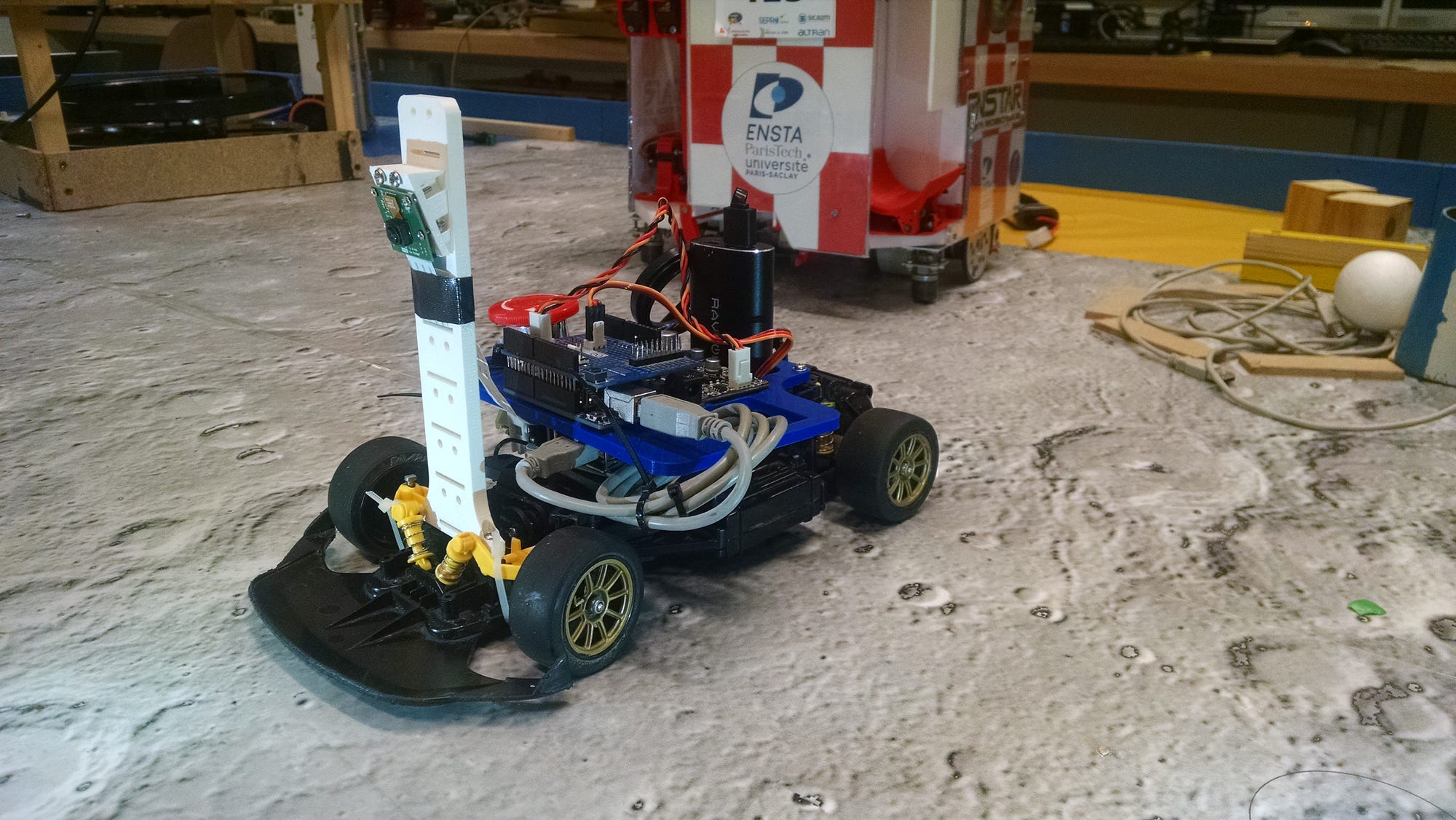](https://www.youtube.com/watch?v=xhI71ZdSh6k)
### Acknowledgments
I would like to thanks Dara Ly for the original idea of communicating with the Arduino via a command parser, and Xuan Zhang for fixing Arduino limited buffer issue.
================================================
FILE: _config.yml
================================================
theme: jekyll-theme-architect
================================================
FILE: arduino-board/Makefile
================================================
### DISCLAIMER
### This is an example Makefile and it MUST be configured to suit your needs.
### For detailled explanations about all the avalaible options,
### please refer to https://github.com/sudar/Arduino-Makefile/blob/master/arduino-mk-vars.md
### Original project where this Makefile comes from: https://github.com/WeAreLeka/Bare-Arduino-Project
### PROJECT_DIR
### This is the path to where you have created/cloned your project
PROJECT_DIR = $(shell pwd)
### ARDMK_DIR
### Path to the Arduino-Makefile directory.
ARDMK_DIR = /usr/share/arduino
### ARDUINO_DIR
### Path to the Arduino application and ressources directory.
### or on Linux: (remove the one you don't want)
ARDUINO_DIR = /usr/share/arduino
### USER_LIB_PATH
### Path to where the your project's libraries are stored.
USER_LIB_PATH := $(PROJECT_DIR)/lib
### BOARD_TAG
### It must be set to the board you are currently using. (i.e uno, mega2560, etc.)
BOARD_TAG = uno
### MONITOR_BAUDRATE
### It must be set to Serial baudrate value you are using.
MONITOR_BAUDRATE = 115200
### AVR_TOOLS_DIR
### Path to the AVR tools directory such as avr-gcc, avr-g++, etc.
### On OS X with `homebrew`:
AVR_TOOLS_DIR = /usr/local
### or on Linux: (remove the one you don't want)
AVR_TOOLS_DIR = /usr
### AVRDUDE
### Path to avrdude directory.
### On OS X with `homebrew`:
AVRDUDE = /usr/local/bin/avrdude
### or on Linux: (remove the one you don't want)
AVRDUDE = /usr/bin/avrdude
### AVRDUDE_CONF
### Path to avrdude config file.
#AVRDUDE_CONF = /etc/avrdude.conf
### CFLAGS_STD
### Set the C standard to be used during compilation. Documentation (https://github.com/WeAreLeka/Arduino-Makefile/blob/std-flags/arduino-mk-vars.md#cflags_std)
CFLAGS_STD = -std=gnu11
### CXXFLAGS_STD
### Set the C++ standard to be used during compilation. Documentation (https://github.com/WeAreLeka/Arduino-Makefile/blob/std-flags/arduino-mk-vars.md#cxxflags_std)
CXXFLAGS_STD = -std=gnu++11
### CXXFLAGS
### Flags you might want to set for debugging purpose. Comment to stop.
CXXFLAGS += -pedantic -Wall -Wextra
### MONITOR_PORT
### The port your board is connected to. Using an '*' tries all the ports and finds the right one.
MONITOR_PORT = /dev/ttyACM*
### CURRENT_DIR
### Do not touch - used for binaries path
CURRENT_DIR = $(shell basename $(CURDIR))
### OBJDIR
### This is were you put the binaries you just compile using 'make'
OBJDIR = $(PROJECT_DIR)/bin/$(BOARD_TAG)/$(CURRENT_DIR)
### path to Arduino.mk, inside the ARDMK_DIR, don't touch.
include $(ARDMK_DIR)/Arduino.mk
================================================
FILE: arduino-board/order.h
================================================
#ifndef ORDER_H
#define ORDER_H
// Define the orders that can be sent and received
enum Order {
HELLO = 0,
SERVO = 1,
MOTOR = 2,
ALREADY_CONNECTED = 3,
ERROR = 4,
RECEIVED = 5,
STOP = 6,
};
typedef enum Order Order;
#endif
================================================
FILE: arduino-board/parameters.h
================================================
#ifndef PARAMETERS_H
#define PARAMETERS_H
#define SERIAL_BAUD 115200 // Baudrate
#define MOTOR_PIN 3
#define DIRECTION_PIN 4
#define SERVOMOTOR_PIN 6
#define INITIAL_THETA 110 // Initial angle of the servomotor
// Min and max values for motors
#define THETA_MIN 60
#define THETA_MAX 150
#define SPEED_MAX 100
// If DEBUG is set to true, the arduino will send back all the received messages
#define DEBUG false
#endif
================================================
FILE: arduino-board/slave.cpp
================================================
#include <Arduino.h>
#include <Servo.h>
#include "order.h"
#include "slave.h"
#include "parameters.h"
bool is_connected = false; ///< True if the connection with the master is available
int8_t motor_speed = 0;
int16_t servo_angle = INITIAL_THETA;
Servo servomotor;
void setup()
{
// Init Serial
Serial.begin(SERIAL_BAUD);
// Init Motor
pinMode(MOTOR_PIN, OUTPUT);
pinMode(DIRECTION_PIN, OUTPUT);
// Stop the car
stop();
// Init Servo
servomotor.attach(SERVOMOTOR_PIN);
// Order between 0 and 180
servomotor.write(INITIAL_THETA);
// Wait until the arduino is connected to master
while(!is_connected)
{
write_order(HELLO);
wait_for_bytes(1, 1000);
get_messages_from_serial();
}
}
void loop()
{
get_messages_from_serial();
update_motors_orders();
}
void update_motors_orders()
{
servomotor.write(constrain(servo_angle, THETA_MIN, THETA_MAX));
motor_speed = constrain(motor_speed, -SPEED_MAX, SPEED_MAX);
// Send motor speed order
if (motor_speed > 0)
{
digitalWrite(DIRECTION_PIN, LOW);
}
else
{
digitalWrite(DIRECTION_PIN, HIGH);
}
analogWrite(MOTOR_PIN, convert_to_pwm(float(motor_speed)));
}
void stop()
{
analogWrite(MOTOR_PIN, 0);
digitalWrite(DIRECTION_PIN, LOW);
}
int convert_to_pwm(float motor_speed)
{
// TODO: compensate the non-linear dependency speed = f(PWM_Value)
return (int) round(abs(motor_speed)*(255./100.));
}
void get_messages_from_serial()
{
if(Serial.available() > 0)
{
// The first byte received is the instruction
Order order_received = read_order();
if(order_received == HELLO)
{
// If the cards haven't say hello, check the connection
if(!is_connected)
{
is_connected = true;
write_order(HELLO);
}
else
{
// If we are already connected do not send "hello" to avoid infinite loop
write_order(ALREADY_CONNECTED);
}
}
else if(order_received == ALREADY_CONNECTED)
{
is_connected = true;
}
else
{
switch(order_received)
{
case STOP:
{
motor_speed = 0;
stop();
if(DEBUG)
{
write_order(STOP);
}
break;
}
case SERVO:
{
servo_angle = read_i16();
if(DEBUG)
{
write_order(SERVO);
write_i16(servo_angle);
}
break;
}
case MOTOR:
{
// between -100 and 100
motor_speed = read_i8();
if(DEBUG)
{
write_order(MOTOR);
write_i8(motor_speed);
}
break;
}
// Unknown order
default:
write_order(ERROR);
write_i16(404);
return;
}
}
write_order(RECEIVED); // Confirm the reception
}
}
Order read_order()
{
return (Order) Serial.read();
}
void wait_for_bytes(int num_bytes, unsigned long timeout)
{
unsigned long startTime = millis();
//Wait for incoming bytes or exit if timeout
while ((Serial.available() < num_bytes) && (millis() - startTime < timeout)){}
}
// NOTE : Serial.readBytes is SLOW
// this one is much faster, but has no timeout
void read_signed_bytes(int8_t* buffer, size_t n)
{
size_t i = 0;
int c;
while (i < n)
{
c = Serial.read();
if (c < 0) break;
*buffer++ = (int8_t) c; // buffer[i] = (int8_t)c;
i++;
}
}
int8_t read_i8()
{
wait_for_bytes(1, 100); // Wait for 1 byte with a timeout of 100 ms
return (int8_t) Serial.read();
}
int16_t read_i16()
{
int8_t buffer[2];
wait_for_bytes(2, 100); // Wait for 2 bytes with a timeout of 100 ms
read_signed_bytes(buffer, 2);
return (((int16_t) buffer[0]) & 0xff) | (((int16_t) buffer[1]) << 8 & 0xff00);
}
int32_t read_i32()
{
int8_t buffer[4];
wait_for_bytes(4, 200); // Wait for 4 bytes with a timeout of 200 ms
read_signed_bytes(buffer, 4);
return (((int32_t) buffer[0]) & 0xff) | (((int32_t) buffer[1]) << 8 & 0xff00) | (((int32_t) buffer[2]) << 16 & 0xff0000) | (((int32_t) buffer[3]) << 24 & 0xff000000);
}
void write_order(enum Order myOrder)
{
uint8_t* Order = (uint8_t*) &myOrder;
Serial.write(Order, sizeof(uint8_t));
}
void write_i8(int8_t num)
{
Serial.write(num);
}
void write_i16(int16_t num)
{
int8_t buffer[2] = {(int8_t) (num & 0xff), (int8_t) (num >> 8)};
Serial.write((uint8_t*)&buffer, 2*sizeof(int8_t));
}
void write_i32(int32_t num)
{
int8_t buffer[4] = {(int8_t) (num & 0xff), (int8_t) (num >> 8 & 0xff), (int8_t) (num >> 16 & 0xff), (int8_t) (num >> 24 & 0xff)};
Serial.write((uint8_t*)&buffer, 4*sizeof(int8_t));
}
================================================
FILE: arduino-board/slave.h
================================================
#ifndef ARDUINO_SLAVE_H
#define ARDUINO_SLAVE_H
/*!
* \brief Send updated motors orders to the two motors (servomotor + motor)
*/
void update_motors_orders();
/*!
* Stop the car (set the speed to 0)
*/
void stop();
/*!
* \brief Convert a speed order (in percentage of max speed)
* into a pwm order (between 0 and 255)
* \param motor_speed speed order in percentage of max speed
* \return the speed order in pwm
*/
int convert_to_pwm(float motor_speed);
/*!
* \brief Read one byte from the serial and cast it to an Order
* \return the order received
*/
Order read_order();
/*!
* \brief Wait until there are enough bytes in the buffer
* \param num_bytes the number of bytes
* \param timeout (ms) The timeout, time after which we release the lock
* even if there are not enough bytes
*/
void wait_for_bytes(int num_bytes, unsigned long timeout);
/*!
* \brief Read signed bytes and put them in a buffer
* \param buffer an array of bytes
* \param n number of bytes to read
*/
void read_signed_bytes(int8_t* buffer, size_t n);
/*!
* \brief Read one byte from a serial port and convert it to a 8 bits int
* \return the decoded number
*/
int8_t read_i8();
/*!
* \brief Read two bytes from a serial port and convert it to a 16 bits int
* \return the decoded number
*/
int16_t read_i16();
/*!
* \brief Read four bytes from a serial port and convert it to a 32 bits int
* \return the decoded number
*/
int32_t read_i32();
/*!
* \brief Send one order (one byte)
* \param order type of order
*/
void write_order(enum Order order);
/*!
* \brief Write one byte int to serial port (between -127 and 127)
* \param num an int of one byte
*/
void write_i8(int8_t num);
/*!
* \brief Send a two bytes signed int via the serial
* \param num the number to send (max: (2**16/2 -1) = 32767)
*/
void write_i16(int16_t num);
/*!
* \brief Send a four bytes signed int (long) via the serial
* \param num the number to send (−2,147,483,647, +2,147,483,647)
*/
void write_i32(int32_t num);
/*!
* \brief Listen the serial and decode the message received
*/
void get_messages_from_serial();
#endif
gitextract_q_l6wmdd/
├── .gitignore
├── .gitmodules
├── LICENSE
├── README.md
├── _config.yml
└── arduino-board/
├── Makefile
├── order.h
├── parameters.h
├── slave.cpp
└── slave.h
SYMBOL INDEX (19 symbols across 3 files)

FILE: arduino-board/order.h
  type Order (line 5) | enum Order {
  type Order (line 15) | typedef enum Order Order;

FILE: arduino-board/slave.cpp
  function setup (line 13) | void setup()
  function loop (line 39) | void loop()
  function update_motors_orders (line 45) | void update_motors_orders()
  function stop (line 61) | void stop()
  function convert_to_pwm (line 67) | int convert_to_pwm(float motor_speed)
  function get_messages_from_serial (line 73) | void get_messages_from_serial()
  function Order (line 145) | Order read_order()
  function wait_for_bytes (line 150) | void wait_for_bytes(int num_bytes, unsigned long timeout)
  function read_signed_bytes (line 159) | void read_signed_bytes(int8_t* buffer, size_t n)
  function read_i8 (line 172) | int8_t read_i8()
  function read_i16 (line 178) | int16_t read_i16()
  function read_i32 (line 186) | int32_t read_i32()
  function write_order (line 194) | void write_order(enum Order myOrder)
  function write_i8 (line 200) | void write_i8(int8_t num)
  function write_i16 (line 205) | void write_i16(int16_t num)
  function write_i32 (line 211) | void write_i32(int32_t num)

FILE: arduino-board/slave.h
  type Order (line 66) | enum Order
Condensed preview — 10 files, each showing path, character count, and a content snippet. Download the .json file or copy for the full structured content (17K chars).
[
  {
    "path": ".gitignore",
    "chars": 19,
    "preview": "bin/\n*.log\n.vscode/"
  },
  {
    "path": ".gitmodules",
    "chars": 359,
    "preview": "[submodule \"rust-arduino-serial\"]\n\tpath = rust-arduino-serial\n\turl = https://github.com/araffin/rust-arduino-serial\n[sub"
  },
  {
    "path": "LICENSE",
    "chars": 1071,
    "preview": "MIT License\n\nCopyright (c) 2018 Antonin RAFFIN\n\nPermission is hereby granted, free of charge, to any person obtaining a "
  },
  {
    "path": "README.md",
    "chars": 4226,
    "preview": "# Robust Arduino Serial Protocol\n\n**Robust Arduino Serial** is a simple and robust serial communication protocol. It was"
  },
  {
    "path": "_config.yml",
    "chars": 29,
    "preview": "theme: jekyll-theme-architect"
  },
  {
    "path": "arduino-board/Makefile",
    "chars": 2646,
    "preview": "### DISCLAIMER\n### This is an example Makefile and it MUST be configured to suit your needs.\n### For detailled explanati"
  },
  {
    "path": "arduino-board/order.h",
    "chars": 240,
    "preview": "#ifndef ORDER_H\n#define ORDER_H\n\n// Define the orders that can be sent and received\nenum Order {\n  HELLO = 0,\n  SERVO = "
  },
  {
    "path": "arduino-board/parameters.h",
    "chars": 422,
    "preview": "#ifndef PARAMETERS_H\n#define PARAMETERS_H\n\n#define SERIAL_BAUD 115200  // Baudrate\n#define MOTOR_PIN 3\n#define DIRECTION"
  },
  {
    "path": "arduino-board/slave.cpp",
    "chars": 4637,
    "preview": "#include <Arduino.h>\n#include <Servo.h>\n\n#include \"order.h\"\n#include \"slave.h\"\n#include \"parameters.h\"\n\nbool is_connecte"
  },
  {
    "path": "arduino-board/slave.h",
    "chars": 2125,
    "preview": "#ifndef ARDUINO_SLAVE_H\n#define ARDUINO_SLAVE_H\n\n/*!\n * \\brief Send updated motors orders to the two motors (servomotor "
  }
]
About this extraction
This page contains the full source code of the araffin/arduino-robust-serial GitHub repository, extracted and formatted as plain text for AI agents and large language models (LLMs). The extraction includes 10 files (15.4 KB), approximately 4.5k tokens, and a symbol index with 19 extracted functions, classes, methods, constants, and types. Use this with OpenClaw, Claude, ChatGPT, Cursor, Windsurf, or any other AI tool that accepts text input. You can copy the full output to your clipboard or download it as a .txt file.
Extracted by GitExtract — free GitHub repo to text converter for AI. Built by Nikandr Surkov.