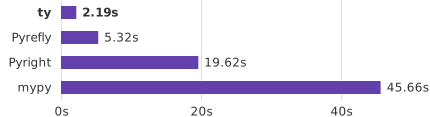
Type checking the home-assistant project without caching.
ty is backed by [Astral](https://astral.sh), the creators of [uv](https://github.com/astral-sh/uv) and [Ruff](https://github.com/astral-sh/ruff). ty is currently in [beta](#version-policy). ## Highlights - 10x - 100x faster than mypy and Pyright - Comprehensive [diagnostics](https://docs.astral.sh/ty/features/diagnostics/) with rich contextual information - Configurable [rule levels](https://docs.astral.sh/ty/rules/), [per-file overrides](https://docs.astral.sh/ty/reference/configuration/#overrides), [suppression comments](https://docs.astral.sh/ty/suppression/), and first-class project support - Designed for adoption, with support for [redeclarations](https://docs.astral.sh/ty/features/type-system/#redeclarations) and [partially typed code](https://docs.astral.sh/ty/features/type-system/#gradual-guarantee) - [Language server](https://docs.astral.sh/ty/features/language-server/) with code navigation, completions, code actions, auto-import, inlay hints, on-hover help, etc. - Fine-grained [incremental analysis](https://docs.astral.sh/ty/features/language-server/#fine-grained-incrementality) designed for fast updates when editing files in an IDE - Editor integrations for [VS Code](https://docs.astral.sh/ty/editors/#vs-code), [PyCharm](https://docs.astral.sh/ty/editors/#pycharm), [Neovim](https://docs.astral.sh/ty/editors/#neovim) and more - Advanced typing features like first-class [intersection types](https://docs.astral.sh/ty/features/type-system/#intersection-types), advanced [type narrowing](https://docs.astral.sh/ty/features/type-system/#top-and-bottom-materializations), and [sophisticated reachability analysis](https://docs.astral.sh/ty/features/type-system/#reachability-based-on-types) ## Getting started Run ty with [uvx](https://docs.astral.sh/uv/guides/tools/#running-tools) to get started quickly: ```shell uvx ty check ``` Or, check out the [ty playground](https://play.ty.dev) to try it out in your browser. To learn more about using ty, see the [documentation](https://docs.astral.sh/ty/). ## Installation To install ty, see the [installation](https://docs.astral.sh/ty/installation/) documentation. To add the ty language server to your editor, see the [editor integration](https://docs.astral.sh/ty/editors/) guide. ## Getting help If you have questions or want to report a bug, please open an [issue](https://github.com/astral-sh/ty/issues) in this repository. You may also join our [Discord server](https://discord.com/invite/astral-sh). ## Contributing Development of this project takes place in the [Ruff](https://github.com/astral-sh/ruff) repository at this time. Please [open pull requests](https://github.com/astral-sh/ruff/pulls) there for changes to anything in the `ruff` submodule (which includes all of the Rust source code). See the [contributing guide](./CONTRIBUTING.md) for more details. ## Version policy ty uses `0.0.x` versioning. ty does not yet have a stable API; breaking changes, including changes to diagnostics, may occur between any two versions. See the [type system support](https://github.com/astral-sh/ty/issues/1889) tracking issue for a detailed overview of currently supported features. ## FAQ #### Why is ty doing \_\_\_\_\_? See our [typing FAQ](https://docs.astral.sh/ty/reference/typing-faq). #### How do you pronounce ty? It's pronounced as "tee - why" ([`/tiː waɪ/`](https://en.wikipedia.org/wiki/Help:IPA/English#Key)) #### How should I stylize ty? Just "ty", please. ## License ty is licensed under the MIT license ([LICENSE](LICENSE) or

subprocess import at the top of the file.


Type checking the home-assistant project without caching.
ty is backed by [Astral](https://astral.sh), the creators of [uv](https://github.com/astral-sh/uv) and [Ruff](https://github.com/astral-sh/ruff). ## Highlights - 10x - 100x faster than mypy and Pyright - Comprehensive [diagnostics](./features/diagnostics.md) with rich contextual information - Configurable [rule levels](./rules.md), [per-file overrides](./reference/configuration.md#overrides), [suppression comments](./suppression.md), and first-class project support - Designed for adoption, with support for [redeclarations](./features/type-system.md#redeclarations) and [partially typed code](./features/type-system.md#gradual-guarantee) - [Language server](./features/language-server.md) with code navigation, completions, code actions, auto-import, inlay hints, on-hover help, etc. - Fine-grained [incremental analysis](./features/language-server.md#fine-grained-incrementality) designed for fast updates when editing files in an IDE - Editor integrations for [VS Code](./editors.md#vs-code), [PyCharm](./editors.md#pycharm), [Neovim](./editors.md#neovim) and more - Advanced typing features like first-class [intersection types](./features/type-system.md#intersection-types), advanced [type narrowing](./features/type-system.md#top-and-bottom-materializations), and [sophisticated reachability analysis](./features/type-system.md#reachability-based-on-types) ## Getting started Run ty with [uvx](https://docs.astral.sh/uv/guides/tools/#running-tools) to get started quickly: ```shell uvx ty check ``` ty will check all Python files in the working directory or project by default. See the [type checking](./type-checking.md) documentation for more details. ## Installation To install ty, see the [installation](./installation.md) documentation. To add the ty language server to your editor, see the [editor integration](./editors.md) guide. ## Playground ty has an [online playground](https://play.ty.dev) you can use to try it out on snippets or small projects. !!! tip The playground is a great way to share snippets with other people, e.g., when sharing a bug report. ================================================ FILE: docs/installation.md ================================================ # Installing ty ## Running ty without installation Use [uvx](https://docs.astral.sh/uv/guides/tools/) to quickly get started with ty: ```shell uvx ty ``` ## Installation methods ### Adding ty to your project !!! tip Adding ty as a dependency ensures that all developers on the project are using the same version of ty. Use [uv](https://github.com/astral-sh/uv) (or your project manager of choice) to add ty as a development dependency: ```shell uv add --dev ty ``` Then, use `uv run` to invoke ty: ```shell uv run ty ``` To update ty, use `--upgrade-package`: ```shell uv lock --upgrade-package ty ``` ### Installing globally with uv Install ty globally with uv: ```shell uv tool install ty@latest ``` To update ty, use `uv tool upgrade`: ```shell uv tool upgrade ty ``` ### Installing with the standalone installer ty includes a standalone installer. === "macOS and Linux" Use `curl` to download the script and execute it with `sh`: ```console $ curl -LsSf https://astral.sh/ty/install.sh | sh ``` If your system doesn't have `curl`, you can use `wget`: ```console $ wget -qO- https://astral.sh/ty/install.sh | sh ``` Request a specific version by including it in the URL: ```console $ curl -LsSf https://astral.sh/ty/0.0.24/install.sh | sh ``` === "Windows" Use `irm` to download the script and execute it with `iex`: ```pwsh-session PS> powershell -ExecutionPolicy ByPass -c "irm https://astral.sh/ty/install.ps1 | iex" ``` Changing the [execution policy](https://learn.microsoft.com/en-us/powershell/module/microsoft.powershell.core/about/about_execution_policies?view=powershell-7.4#powershell-execution-policies) allows running a script from the internet. Request a specific version by including it in the URL: ```pwsh-session PS> powershell -ExecutionPolicy ByPass -c "irm https://astral.sh/ty/0.0.24/install.ps1 | iex" ``` !!! tip The installation script may be inspected before use: === "macOS and Linux" ```console $ curl -LsSf https://astral.sh/ty/install.sh | less ``` === "Windows" ```pwsh-session PS> powershell -c "irm https://astral.sh/ty/install.ps1 | more" ``` Alternatively, the installer or binaries can be downloaded directly from [GitHub](#installing-from-github-releases). ### Installing from GitHub Releases ty release artifacts can be downloaded directly from [GitHub Releases](https://github.com/astral-sh/ty/releases). Each release page includes binaries for all supported platforms as well as instructions for using the standalone installer via `github.com` instead of `astral.sh`. ### Installing globally with pipx Install ty globally with pipx: ```shell pipx install ty ``` To update ty, use `pipx upgrade`: ```shell pipx upgrade ty ``` ### Installing with pip Install ty into your current Python environment with pip: ```shell pip install ty ``` ### Installing globally with mise Install ty globally with with [mise](https://github.com/jdx/mise): ```shell mise install ty ``` To set it globally: ```shell mise use --global ty ``` ### Installing in Docker Install ty in Docker by copying the binary from the official image: ```dockerfile title="Dockerfile" COPY --from=ghcr.io/astral-sh/ty:latest /ty /bin/ ``` The following tags are available: - `ghcr.io/astral-sh/ty:latest` - `ghcr.io/astral-sh/ty:{major}.{minor}.{patch}`, e.g., `ghcr.io/astral-sh/ty:0.0.24` - `ghcr.io/astral-sh/ty:{major}.{minor}`, e.g., `ghcr.io/astral-sh/ty:0.0` (the latest patch version) ### Using ty with Bazel [`aspect_rules_lint`](https://registry.bazel.build/docs/aspect_rules_lint#function-lint_ty_aspect) provides a Bazel lint aspect that runs ty. See its documentation for setup instructions. ## Adding ty to your editor See the [editor integration](./editors.md) guide to add ty to your editor. ## Shell autocompletion !!! tip You can run `echo $SHELL` to help you determine your shell. To enable shell autocompletion for ty commands, run one of the following: === "Bash" ```bash echo 'eval "$(ty generate-shell-completion bash)"' >> ~/.bashrc ``` === "Zsh" ```bash echo 'eval "$(ty generate-shell-completion zsh)"' >> ~/.zshrc ``` === "fish" ```bash echo 'ty generate-shell-completion fish | source' > ~/.config/fish/completions/ty.fish ``` === "Elvish" ```bash echo 'eval (ty generate-shell-completion elvish | slurp)' >> ~/.elvish/rc.elv ``` === "PowerShell / pwsh" ```powershell if (!(Test-Path -Path $PROFILE)) { New-Item -ItemType File -Path $PROFILE -Force } Add-Content -Path $PROFILE -Value '(& ty generate-shell-completion powershell) | Out-String | Invoke-Expression' ``` Then restart the shell or source the shell config file. ================================================ FILE: docs/js/extra.js ================================================ function cleanupClipboardText(targetSelector) { const targetElement = document.querySelector(targetSelector); // exclude "Generic Prompt" and "Generic Output" spans from copy const excludedClasses = ["gp", "go"]; const clipboardText = Array.from(targetElement.childNodes) .filter( (node) => !excludedClasses.some((className) => node?.classList?.contains(className) ) ) .map((node) => node.textContent) .filter((s) => s != ""); return clipboardText.join("").trim(); } // Sets copy text to attributes lazily using an Intersection Observer. function setCopyText() { // The `data-clipboard-text` attribute allows for customized content in the copy // See: https://www.npmjs.com/package/clipboard#copy-text-from-attribute const attr = "clipboardText"; // all "copy" buttons whose target selector is a element
const elements = document.querySelectorAll(
'button[data-clipboard-target$="code"]'
);
const observer = new IntersectionObserver((entries) => {
entries.forEach((entry) => {
// target in the viewport that have not been patched
if (
entry.intersectionRatio > 0 &&
entry.target.dataset[attr] === undefined
) {
entry.target.dataset[attr] = cleanupClipboardText(
entry.target.dataset.clipboardTarget
);
}
});
});
elements.forEach((elt) => {
observer.observe(elt);
});
}
// Using the document$ observable is particularly important if you are using instant loading since
// it will not result in a page refresh in the browser
// See `How to integrate with third-party JavaScript libraries` guideline:
// https://squidfunk.github.io/mkdocs-material/customization/?h=javascript#additional-javascript
document$.subscribe(function () {
setCopyText();
});
// Use client-side redirects for anchors that have moved.
// Other redirects should use `redirect_maps` in the `mkdocs.yml` file instead.
(function () {
// (there are no redirects yet)
let redirect_maps = {};
// The prefix for the site, see `site_dir` in `mkdocs.yml`
let site_dir = "ty";
function get_path() {
var path = window.location.pathname;
// Trim the site prefix
if (path.startsWith("/" + site_dir + "/")) {
path = path.slice(site_dir.length + 2);
}
// Always include a trailing `/`
if (!path.endsWith("/")) {
path = path + "/";
}
// Check for an anchor
var anchor = window.location.hash.substring(1);
if (!anchor) {
return path;
}
return path + "#" + anchor;
}
let path = get_path();
if (path && redirect_maps.hasOwnProperty(path)) {
window.location.replace("/" + site_dir + "/" + redirect_maps[path]);
}
})();
================================================
FILE: docs/modules.md
================================================
# Module discovery
## First-party modules
First-party modules are Python files that are part of your project source code.
By default, ty searches for first-party modules in the project's root directory or the `src`
directory, if present.
If your project uses a different layout, configure the project's
[`environment.root`](./reference/configuration.md#root) in your `pyproject.toml` or `ty.toml`. For example,
if your project's code is in an `app/` directory:
```text
example-pkg
├── README.md
├── pyproject.toml
└── app
└── example_pkg
└── __init__.py
```
then set [`environment.root`](./reference/configuration.md#root) in your `pyproject.toml` to `["./app"]`:
```toml title="pyproject.toml"
[tool.ty.environment]
root = ["./app"]
```
Note that a `./python` folder is automatically added to the project `root` if it exists,
and is not itself a package (i.e. does not contain an `__init__.py` file or an
`__init__.pyi` file).
## Third-party modules
Third-party modules are Python packages that are not part of your project or the standard library.
These are usually declared as dependencies in a `pyproject.toml` or `requirements.txt` file
and installed using a package manager like uv or pip. Examples of popular third-party
modules are `requests`, `numpy` and `django`.
ty searches for third-party modules in the configured [Python environment](#python-environment).
## Python environment
The Python environment is used for discovery of third-party modules.
By default, ty will attempt to discover a virtual environment.
First, ty checks for an active virtual environment using the `VIRTUAL_ENV` environment variable. If
not set, ty will search for a `.venv` directory in the project root or working directory. ty only
supports discovery of virtual environments at this time.
!!! note
When using project management tools, such as uv or Poetry, the `run` command usually automatically
activates the virtual environment and will be detected by ty.
The Python environment may be explicitly configured using the
[`environment.python`](./reference/configuration.md#python) setting or
[`--python`](./reference/cli.md#ty-check--python) flag.
When setting the environment explicitly, non-virtual environments can be provided.
================================================
FILE: docs/python-version.md
================================================
# Python version
The Python version affects allowed syntax, type definitions of the standard library, and type
definitions of first- and third-party modules that are conditional on the Python version.
For example, Python 3.10 introduced support for `match` statements and added the
`sys.stdlib_module_names` symbol to the standard library. Syntactic features always
need to be available in the lowest supported Python version, but symbols may be used
in a `sys.version_info` conditional branch:
```python
import sys
# `invalid-syntax` error if `python-version` is set to 3.9 or lower:
match "echo hello".split():
case ["echo", message]:
print(message)
case _:
print("unknown command")
# `unresolved-attribute` error if `python-version` is set to 3.9 or lower:
print(sys.stdlib_module_names)
if sys.version_info >= (3, 10):
# ok, because the usage is guarded by a version check:
print(sys.stdlib_module_names)
```
By default, the lower bound of the project's [`requires-python`](https://packaging.python.org/en/latest/guides/writing-pyproject-toml/#python-requires) field (from the `pyproject.toml`) is
used as the target Python version, ensuring that features and symbols only available in newer Python
versions are not used.
If the `requires-python` field is not available but a virtual environment *has* been
configured or detected, ty will try to infer the Python version being used from the virtual
environment's metadata.
If no virtual environment is present or inferring the Python version from the metadata fails,
ty will fall back to the latest stable Python version supported by ty (currently 3.14).
The Python version may also be explicitly specified using the
[`python-version`](./reference/configuration.md#python-version) setting or the
[`--python-version`](./reference/cli.md#ty-check--python-version) flag.
================================================
FILE: docs/reference/cli.md
================================================
# CLI Reference
## ty
An extremely fast Python type checker.
Usage
```
ty
```
Commands
ty checkCheck a project for type errors
ty serverStart the language server
ty versionDisplay ty's version
ty explainExplain rules and other parts of ty
ty helpPrint this message or the help of the given subcommand(s)
## ty check
Check a project for type errors
Usage
```
ty check [OPTIONS] [PATH]...
```
Arguments
PATHSList of files or directories to check [default: the project root]
Options
--add-ignoreAdds ty: ignore comments to suppress all rule diagnostics
--color whenControl when colored output is used
Possible values:
auto: Display colors if the output goes to an interactive terminalalways: Always display colorsnever: Never display colors
--config, -c config-optionA TOML <KEY> = <VALUE> pair (such as you might find in a ty.toml configuration file)
overriding a specific configuration option.
Overrides of individual settings using this option always take precedence
over all configuration files.
--config-file pathThe path to a ty.toml file to use for configuration.
While ty configuration can be included in a pyproject.toml file, it is not allowed in this context.
May also be set with the TY_CONFIG_FILE environment variable.
--error ruleTreat the given rule as having severity 'error'. Can be specified multiple times. Use 'all' to apply to all rules.
--error-on-warningUse exit code 1 if there are any warning-level diagnostics
--exclude excludeGlob patterns for files to exclude from type checking.
Uses gitignore-style syntax to exclude files and directories from type checking. Supports patterns like tests/, *.tmp, **/__pycache__/**.
--exit-zeroAlways use exit code 0, even when there are error-level diagnostics
--extra-search-path pathAdditional path to use as a module-resolution source (can be passed multiple times).
This is an advanced option that should usually only be used for first-party or third-party modules that are not installed into your Python environment in a conventional way. Use --python to point ty to your Python environment if it is in an unusual location.
--force-excludeEnforce exclusions, even for paths passed to ty directly on the command-line. Use --no-force-exclude to disable
--help, -hPrint help (see a summary with '-h')
--ignore ruleDisables the rule. Can be specified multiple times. Use 'all' to apply to all rules.
--no-progressHide all progress outputs.
For example, spinners or progress bars.
--output-format output-formatThe format to use for printing diagnostic messages
May also be set with the TY_OUTPUT_FORMAT environment variable.
Possible values:
full: Print diagnostics verbosely, with context and helpful hints (default)concise: Print diagnostics concisely, one per linegitlab: Print diagnostics in the JSON format expected by GitLab Code Quality reportsgithub: Print diagnostics in the format used by GitHub Actions workflow error annotationsjunit: Print diagnostics as a JUnit-style XML report
--project projectRun the command within the given project directory.
All pyproject.toml files will be discovered by walking up the directory tree from the given project directory, as will the project's virtual environment (.venv) unless the venv-path option is set.
Other command-line arguments (such as relative paths) will be resolved relative to the current working directory.
--python, --venv pathPath to your project's Python environment or interpreter.
ty uses your Python environment to resolve third-party imports in your code.
This can be a path to:
- A Python interpreter, e.g.
.venv/bin/python3 - A virtual environment directory, e.g. .venv - A system Python sys.prefix directory, e.g. /usr
If you're using a project management tool such as uv or you have an activated Conda or virtual environment, you should not generally need to specify this option.
--python-platform, --platform platformTarget platform to assume when resolving types.
This is used to specialize the type of sys.platform and will affect the visibility of platform-specific functions and attributes. If the value is set to all, no assumptions are made about the target platform. If unspecified, the current system's platform will be used.
--python-version, --target-version versionPython version to assume when resolving types.
The Python version affects allowed syntax, type definitions of the standard library, and type definitions of first- and third-party modules that are conditional on the Python version.
If a version is not specified on the command line or in a configuration file, ty will try the following techniques in order of preference to determine a value: 1. Check for the project.requires-python setting in a pyproject.toml file and use the minimum version from the specified range 2. Check for an activated or configured Python environment and attempt to infer the Python version of that environment 3. Fall back to the latest stable Python version supported by ty (see ty check --help output)
Possible values:
3.73.83.93.103.113.123.133.143.15
--quiet, -qUse quiet output (or -qq for silent output)
--respect-ignore-filesRespect file exclusions via .gitignore and other standard ignore files. Use --no-respect-ignore-files to disable
--typeshed, --custom-typeshed-dir pathCustom directory to use for stdlib typeshed stubs
--verbose, -vUse verbose output (or -vv and -vvv for more verbose output)
--warn ruleTreat the given rule as having severity 'warn'. Can be specified multiple times. Use 'all' to apply to all rules.
--watch, -WWatch files for changes and recheck files related to the changed files
## ty server
Start the language server
Usage
```
ty server
```
Options
--help, -hPrint help
## ty version
Display ty's version
Usage
```
ty version [OPTIONS]
```
Options
--help, -hPrint help
--output-format output-formatThe format in which to display the version information
[default: text]
Possible values:
textjson
## ty generate-shell-completion
Generate shell completion
Usage
```
ty generate-shell-completion
```
Arguments
Options
--help, -hPrint help
## ty explain
Explain rules and other parts of ty
Usage
```
ty explain
```
Commands
ty explain ruleExplain a rule (or all rules)
ty explain helpPrint this message or the help of the given subcommand(s)
### ty explain rule
Explain a rule (or all rules)
Usage
```
ty explain rule [OPTIONS] [RULE]
```
Arguments
RULERule to explain
Defaults to all rules if omitted.
Options
--help, -hPrint help (see a summary with '-h')
--output-format output-formatOutput format
[default: text]
Possible values:
textjson
### ty explain help
Print this message or the help of the given subcommand(s)
Usage
```
ty explain help [COMMAND]
```
## ty help
Print this message or the help of the given subcommand(s)
Usage
```
ty help [COMMAND]
```
================================================
FILE: docs/reference/configuration.md
================================================
# Configuration
## `rules`
Configures the enabled rules and their severity.
The keys are either rule names or `all` to set a default severity for all rules.
See [the rules documentation](https://ty.dev/rules) for a list of all available rules.
Valid severities are:
* `ignore`: Disable the rule.
* `warn`: Enable the rule and create a warning diagnostic.
* `error`: Enable the rule and create an error diagnostic.
ty will exit with a non-zero code if any error diagnostics are emitted.
**Default value**: `{...}`
**Type**: `dict[RuleName | "all", "ignore" | "warn" | "error"]`
**Example usage**:
=== "pyproject.toml"
```toml
[tool.ty.rules]
possibly-unresolved-reference = "warn"
division-by-zero = "ignore"
```
=== "ty.toml"
```toml
[rules]
possibly-unresolved-reference = "warn"
division-by-zero = "ignore"
```
---
## `analysis`
### `allowed-unresolved-imports`
A list of module glob patterns for which `unresolved-import` diagnostics should be suppressed.
Details on supported glob patterns:
- `*` matches zero or more characters except `.`. For example, `foo.*` matches `foo.bar` but
not `foo.bar.baz`; `foo*` matches `foo` and `foobar` but not `foo.bar` or `barfoo`; and `*foo`
matches `foo` and `barfoo` but not `foo.bar` or `foobar`.
- `**` matches any number of module components (e.g., `foo.**` matches `foo`, `foo.bar`, etc.)
- Prefix a pattern with `!` to exclude matching modules
When multiple patterns match, later entries take precedence.
Glob patterns can be used in combinations with each other. For example, to suppress errors for
any module where the first component contains the substring `test`, use `*test*.**`.
**Default value**: `[]`
**Type**: `list[str]`
**Example usage**:
=== "pyproject.toml"
```toml
[tool.ty.analysis]
# Suppress errors for all `test` modules except `test.foo`
allowed-unresolved-imports = ["test.**", "!test.foo"]
```
=== "ty.toml"
```toml
[analysis]
# Suppress errors for all `test` modules except `test.foo`
allowed-unresolved-imports = ["test.**", "!test.foo"]
```
---
### `replace-imports-with-any`
A list of module glob patterns whose imports should be replaced with `typing.Any`.
Unlike `allowed-unresolved-imports`, this setting replaces the module's type information
with `typing.Any` even if the module can be resolved. Import diagnostics are
unconditionally suppressed for matching modules.
- Prefix a pattern with `!` to exclude matching modules
When multiple patterns match, later entries take precedence.
Glob patterns can be used in combinations with each other. For example, to suppress errors for
any module where the first component contains the substring `test`, use `*test*.**`.
When multiple patterns match, later entries take precedence.
**Default value**: `[]`
**Type**: `list[str]`
**Example usage**:
=== "pyproject.toml"
```toml
[tool.ty.analysis]
# Replace all pandas and numpy imports with Any
replace-imports-with-any = ["pandas.**", "numpy.**"]
```
=== "ty.toml"
```toml
[analysis]
# Replace all pandas and numpy imports with Any
replace-imports-with-any = ["pandas.**", "numpy.**"]
```
---
### `respect-type-ignore-comments`
Whether ty should respect `type: ignore` comments.
When set to `false`, `type: ignore` comments are treated like any other normal
comment and can't be used to suppress ty errors (you have to use `ty: ignore` instead).
Setting this option can be useful when using ty alongside other type checkers or when
you prefer using `ty: ignore` over `type: ignore`.
Defaults to `true`.
**Default value**: `true`
**Type**: `bool`
**Example usage**:
=== "pyproject.toml"
```toml
[tool.ty.analysis]
# Disable support for `type: ignore` comments
respect-type-ignore-comments = false
```
=== "ty.toml"
```toml
[analysis]
# Disable support for `type: ignore` comments
respect-type-ignore-comments = false
```
---
## `environment`
### `extra-paths`
User-provided paths that should take first priority in module resolution.
This is an advanced option that should usually only be used for first-party or third-party
modules that are not installed into your Python environment in a conventional way.
Use the `python` option to specify the location of your Python environment.
This option is similar to mypy's `MYPYPATH` environment variable and pyright's `stubPath`
configuration setting.
**Default value**: `[]`
**Type**: `list[str]`
**Example usage**:
=== "pyproject.toml"
```toml
[tool.ty.environment]
extra-paths = ["./shared/my-search-path"]
```
=== "ty.toml"
```toml
[environment]
extra-paths = ["./shared/my-search-path"]
```
---
### `python`
Path to your project's Python environment or interpreter.
ty uses the `site-packages` directory of your project's Python environment
to resolve third-party (and, in some cases, first-party) imports in your code.
This can be a path to:
- A Python interpreter, e.g. `.venv/bin/python3`
- A virtual environment directory, e.g. `.venv`
- A system Python [`sys.prefix`] directory, e.g. `/usr`
If you're using a project management tool such as uv, you should not generally need to
specify this option, as commands such as `uv run` will set the `VIRTUAL_ENV` environment
variable to point to your project's virtual environment. ty can also infer the location of
your environment from an activated Conda environment, and will look for a `.venv` directory
in the project root if none of the above apply. Failing that, ty will look for a `python3`
or `python` binary available in `PATH`.
[`sys.prefix`]: https://docs.python.org/3/library/sys.html#sys.prefix
**Default value**: `null`
**Type**: `str`
**Example usage**:
=== "pyproject.toml"
```toml
[tool.ty.environment]
python = "./custom-venv-location/.venv"
```
=== "ty.toml"
```toml
[environment]
python = "./custom-venv-location/.venv"
```
---
### `python-platform`
Specifies the target platform that will be used to analyze the source code.
If specified, ty will understand conditions based on comparisons with `sys.platform`, such
as are commonly found in typeshed to reflect the differing contents of the standard library across platforms.
If `all` is specified, ty will assume that the source code can run on any platform.
If no platform is specified, ty will use the current platform:
- `win32` for Windows
- `darwin` for macOS
- `android` for Android
- `ios` for iOS
- `linux` for everything else
**Default value**: ``
**Type**: `"win32" | "darwin" | "android" | "ios" | "linux" | "all" | str`
**Example usage**:
=== "pyproject.toml"
```toml
[tool.ty.environment]
# Tailor type stubs and conditionalized type definitions to windows.
python-platform = "win32"
```
=== "ty.toml"
```toml
[environment]
# Tailor type stubs and conditionalized type definitions to windows.
python-platform = "win32"
```
---
### `python-version`
Specifies the version of Python that will be used to analyze the source code.
The version should be specified as a string in the format `M.m` where `M` is the major version
and `m` is the minor (e.g. `"3.0"` or `"3.6"`).
If a version is provided, ty will generate errors if the source code makes use of language features
that are not supported in that version.
If a version is not specified, ty will try the following techniques in order of preference
to determine a value:
1. Check for the `project.requires-python` setting in a `pyproject.toml` file
and use the minimum version from the specified range
2. Check for an activated or configured Python environment
and attempt to infer the Python version of that environment
3. Fall back to the default value (see below)
For some language features, ty can also understand conditionals based on comparisons
with `sys.version_info`. These are commonly found in typeshed, for example,
to reflect the differing contents of the standard library across Python versions.
**Default value**: `"3.14"`
**Type**: `"3.7" | "3.8" | "3.9" | "3.10" | "3.11" | "3.12" | "3.13" | "3.14" | .`
**Example usage**:
=== "pyproject.toml"
```toml
[tool.ty.environment]
python-version = "3.12"
```
=== "ty.toml"
```toml
[environment]
python-version = "3.12"
```
---
### `root`
The root paths of the project, used for finding first-party modules.
Accepts a list of directory paths searched in priority order (first has highest priority).
If left unspecified, ty will try to detect common project layouts and initialize `root` accordingly.
The project root (`.`) is always included. Additionally, the following directories are included
if they exist and are not packages (i.e. they do not contain `__init__.py` or `__init__.pyi` files):
* `./src`
* `./` (if a `.//` directory exists)
* `./python`
**Default value**: `null`
**Type**: `list[str]`
**Example usage**:
=== "pyproject.toml"
```toml
[tool.ty.environment]
# Multiple directories (priority order)
root = ["./src", "./lib", "./vendor"]
```
=== "ty.toml"
```toml
[environment]
# Multiple directories (priority order)
root = ["./src", "./lib", "./vendor"]
```
---
### `typeshed`
Optional path to a "typeshed" directory on disk for us to use for standard-library types.
If this is not provided, we will fallback to our vendored typeshed stubs for the stdlib,
bundled as a zip file in the binary
**Default value**: `null`
**Type**: `str`
**Example usage**:
=== "pyproject.toml"
```toml
[tool.ty.environment]
typeshed = "/path/to/custom/typeshed"
```
=== "ty.toml"
```toml
[environment]
typeshed = "/path/to/custom/typeshed"
```
---
## `overrides`
Configuration override that applies to specific files based on glob patterns.
An override allows you to apply different rule configurations to specific
files or directories. Multiple overrides can match the same file, with
later overrides take precedence. Override rules take precedence over global
rules for matching files.
For example, to relax enforcement of rules in test files:
```toml
[[tool.ty.overrides]]
include = ["tests/**", "**/test_*.py"]
[tool.ty.overrides.rules]
possibly-unresolved-reference = "warn"
```
Or, to ignore a rule in generated files but retain enforcement in an important file:
```toml
[[tool.ty.overrides]]
include = ["generated/**"]
exclude = ["generated/important.py"]
[tool.ty.overrides.rules]
possibly-unresolved-reference = "ignore"
```
### `exclude`
A list of file and directory patterns to exclude from this override.
Patterns follow a syntax similar to `.gitignore`.
Exclude patterns take precedence over include patterns within the same override.
If not specified, defaults to `[]` (excludes no files).
**Default value**: `null`
**Type**: `list[str]`
**Example usage**:
=== "pyproject.toml"
```toml
[[tool.ty.overrides]]
exclude = [
"generated",
"*.proto",
"tests/fixtures/**",
"!tests/fixtures/important.py" # Include this one file
]
```
=== "ty.toml"
```toml
[[overrides]]
exclude = [
"generated",
"*.proto",
"tests/fixtures/**",
"!tests/fixtures/important.py" # Include this one file
]
```
---
### `include`
A list of file and directory patterns to include for this override.
The `include` option follows a similar syntax to `.gitignore` but reversed:
Including a file or directory will make it so that it (and its contents)
are affected by this override.
If not specified, defaults to `["**"]` (matches all files).
**Default value**: `null`
**Type**: `list[str]`
**Example usage**:
=== "pyproject.toml"
```toml
[[tool.ty.overrides]]
include = [
"src",
"tests",
]
```
=== "ty.toml"
```toml
[[overrides]]
include = [
"src",
"tests",
]
```
---
### `rules`
Rule overrides for files matching the include/exclude patterns.
These rules will be merged with the global rules, with override rules
taking precedence for matching files. You can set rules to different
severity levels or disable them entirely.
**Default value**: `{...}`
**Type**: `dict[RuleName | "all", "ignore" | "warn" | "error"]`
**Example usage**:
=== "pyproject.toml"
```toml
[[tool.ty.overrides]]
include = ["src"]
[tool.ty.overrides.rules]
possibly-unresolved-reference = "ignore"
```
=== "ty.toml"
```toml
[[overrides]]
include = ["src"]
[overrides.rules]
possibly-unresolved-reference = "ignore"
```
---
## `overrides.analysis`
#### `allowed-unresolved-imports`
A list of module glob patterns for which `unresolved-import` diagnostics should be suppressed.
Details on supported glob patterns:
- `*` matches zero or more characters except `.`. For example, `foo.*` matches `foo.bar` but
not `foo.bar.baz`; `foo*` matches `foo` and `foobar` but not `foo.bar` or `barfoo`; and `*foo`
matches `foo` and `barfoo` but not `foo.bar` or `foobar`.
- `**` matches any number of module components (e.g., `foo.**` matches `foo`, `foo.bar`, etc.)
- Prefix a pattern with `!` to exclude matching modules
When multiple patterns match, later entries take precedence.
Glob patterns can be used in combinations with each other. For example, to suppress errors for
any module where the first component contains the substring `test`, use `*test*.**`.
**Default value**: `[]`
**Type**: `list[str]`
**Example usage**:
=== "pyproject.toml"
```toml
[tool.ty.overrides.analysis]
# Suppress errors for all `test` modules except `test.foo`
allowed-unresolved-imports = ["test.**", "!test.foo"]
```
=== "ty.toml"
```toml
[overrides.analysis]
# Suppress errors for all `test` modules except `test.foo`
allowed-unresolved-imports = ["test.**", "!test.foo"]
```
---
#### `replace-imports-with-any`
A list of module glob patterns whose imports should be replaced with `typing.Any`.
Unlike `allowed-unresolved-imports`, this setting replaces the module's type information
with `typing.Any` even if the module can be resolved. Import diagnostics are
unconditionally suppressed for matching modules.
- Prefix a pattern with `!` to exclude matching modules
When multiple patterns match, later entries take precedence.
Glob patterns can be used in combinations with each other. For example, to suppress errors for
any module where the first component contains the substring `test`, use `*test*.**`.
When multiple patterns match, later entries take precedence.
**Default value**: `[]`
**Type**: `list[str]`
**Example usage**:
=== "pyproject.toml"
```toml
[tool.ty.overrides.analysis]
# Replace all pandas and numpy imports with Any
replace-imports-with-any = ["pandas.**", "numpy.**"]
```
=== "ty.toml"
```toml
[overrides.analysis]
# Replace all pandas and numpy imports with Any
replace-imports-with-any = ["pandas.**", "numpy.**"]
```
---
#### `respect-type-ignore-comments`
Whether ty should respect `type: ignore` comments.
When set to `false`, `type: ignore` comments are treated like any other normal
comment and can't be used to suppress ty errors (you have to use `ty: ignore` instead).
Setting this option can be useful when using ty alongside other type checkers or when
you prefer using `ty: ignore` over `type: ignore`.
Defaults to `true`.
**Default value**: `true`
**Type**: `bool`
**Example usage**:
=== "pyproject.toml"
```toml
[tool.ty.overrides.analysis]
# Disable support for `type: ignore` comments
respect-type-ignore-comments = false
```
=== "ty.toml"
```toml
[overrides.analysis]
# Disable support for `type: ignore` comments
respect-type-ignore-comments = false
```
---
## `src`
### `exclude`
A list of file and directory patterns to exclude from type checking.
Patterns follow a syntax similar to `.gitignore`:
- `./src/` matches only a directory
- `./src` matches both files and directories
- `src` matches files or directories named `src`
- `*` matches any (possibly empty) sequence of characters (except `/`).
- `**` matches zero or more path components.
This sequence **must** form a single path component, so both `**a` and `b**` are invalid and will result in an error.
A sequence of more than two consecutive `*` characters is also invalid.
- `?` matches any single character except `/`
- `[abc]` matches any character inside the brackets. Character sequences can also specify ranges of characters, as ordered by Unicode,
so e.g. `[0-9]` specifies any character between `0` and `9` inclusive. An unclosed bracket is invalid.
- `!pattern` negates a pattern (undoes the exclusion of files that would otherwise be excluded)
All paths are anchored relative to the project root (`src` only
matches `/src` and not `/test/src`).
To exclude any directory or file named `src`, use `**/src` instead.
By default, ty excludes commonly ignored directories:
- `**/.bzr/`
- `**/.direnv/`
- `**/.eggs/`
- `**/.git/`
- `**/.git-rewrite/`
- `**/.hg/`
- `**/.mypy_cache/`
- `**/.nox/`
- `**/.pants.d/`
- `**/.pytype/`
- `**/.ruff_cache/`
- `**/.svn/`
- `**/.tox/`
- `**/.venv/`
- `**/__pypackages__/`
- `**/_build/`
- `**/buck-out/`
- `**/dist/`
- `**/node_modules/`
- `**/venv/`
You can override any default exclude by using a negated pattern. For example,
to re-include `dist` use `exclude = ["!dist"]`
**Default value**: `null`
**Type**: `list[str]`
**Example usage**:
=== "pyproject.toml"
```toml
[tool.ty.src]
exclude = [
"generated",
"*.proto",
"tests/fixtures/**",
"!tests/fixtures/important.py" # Include this one file
]
```
=== "ty.toml"
```toml
[src]
exclude = [
"generated",
"*.proto",
"tests/fixtures/**",
"!tests/fixtures/important.py" # Include this one file
]
```
---
### `include`
A list of files and directories to check. The `include` option
follows a similar syntax to `.gitignore` but reversed:
Including a file or directory will make it so that it (and its contents)
are type checked.
- `./src/` matches only a directory
- `./src` matches both files and directories
- `src` matches a file or directory named `src`
- `*` matches any (possibly empty) sequence of characters (except `/`).
- `**` matches zero or more path components.
This sequence **must** form a single path component, so both `**a` and `b**` are invalid and will result in an error.
A sequence of more than two consecutive `*` characters is also invalid.
- `?` matches any single character except `/`
- `[abc]` matches any character inside the brackets. Character sequences can also specify ranges of characters, as ordered by Unicode,
so e.g. `[0-9]` specifies any character between `0` and `9` inclusive. An unclosed bracket is invalid.
All paths are anchored relative to the project root (`src` only
matches `/src` and not `/test/src`).
`exclude` takes precedence over `include`.
**Default value**: `null`
**Type**: `list[str]`
**Example usage**:
=== "pyproject.toml"
```toml
[tool.ty.src]
include = [
"src",
"tests",
]
```
=== "ty.toml"
```toml
[src]
include = [
"src",
"tests",
]
```
---
### `respect-ignore-files`
Whether to automatically exclude files that are ignored by `.ignore`,
`.gitignore`, `.git/info/exclude`, and global `gitignore` files.
Enabled by default.
**Default value**: `true`
**Type**: `bool`
**Example usage**:
=== "pyproject.toml"
```toml
[tool.ty.src]
respect-ignore-files = false
```
=== "ty.toml"
```toml
[src]
respect-ignore-files = false
```
---
### `root`
!!! warning "Deprecated"
This option has been deprecated. Use `environment.root` instead.
The root of the project, used for finding first-party modules.
If left unspecified, ty will try to detect common project layouts and initialize `src.root` accordingly.
The project root (`.`) is always included. Additionally, the following directories are included
if they exist and are not packages (i.e. they do not contain `__init__.py` or `__init__.pyi` files):
* `./src`
* `./` (if a `.//` directory exists)
* `./python`
**Default value**: `null`
**Type**: `str`
**Example usage**:
=== "pyproject.toml"
```toml
[tool.ty.src]
root = "./app"
```
=== "ty.toml"
```toml
[src]
root = "./app"
```
---
## `terminal`
### `error-on-warning`
Use exit code 1 if there are any warning-level diagnostics.
Defaults to `false`.
**Default value**: `false`
**Type**: `bool`
**Example usage**:
=== "pyproject.toml"
```toml
[tool.ty.terminal]
# Error if ty emits any warning-level diagnostics.
error-on-warning = true
```
=== "ty.toml"
```toml
[terminal]
# Error if ty emits any warning-level diagnostics.
error-on-warning = true
```
---
### `output-format`
The format to use for printing diagnostic messages.
Defaults to `full`.
**Default value**: `full`
**Type**: `full | concise | github | gitlab | junit`
**Example usage**:
=== "pyproject.toml"
```toml
[tool.ty.terminal]
output-format = "concise"
```
=== "ty.toml"
```toml
[terminal]
output-format = "concise"
```
---
================================================
FILE: docs/reference/editor-settings.md
================================================
# Editor settings
The editor settings supported by ty's language server, as well as the settings specific to [ty's VS
Code extension][ty-vscode].
## `configuration`
In-editor configuration of ty's settings. The inline settings always take precedence over the settings from configuration files,
including the configuration specified with [`configurationFile`](#configurationfile).
Consult [the configuration reference](../configuration.md) for a list of all supported configuration options.
**Default value**: `null`
**Type**: `object`
**Example usage**:
=== "VS Code"
```json
{
"ty.configuration": {
"rules": {
"unresolved-reference": "warn"
}
}
}
```
=== "Neovim"
```lua
-- Neovim >=0.11:
vim.lsp.config('ty', {
settings = {
ty = {
configuration = {
rules = {
["unresolved-reference"] = "warn"
}
}
},
},
})
-- Neovim <0.11:
require('lspconfig').ty.setup({
settings = {
ty = {
configuration = {
rules = {
["unresolved-reference"] = "warn"
}
}
},
},
})
```
=== "Zed"
```json
{
"lsp": {
"ty": {
"settings": {
"configuration": {
"rules": {
"unresolved-reference": "warn"
}
}
}
}
}
}
```
## `configurationFile`
The path to a `ty.toml` configuration file. ty will use the specified configuration over any automatically discovered configuration.
ty will expand a tilde `~` at the start of a string to the user's home directory, as well as variables like `$A` or `${A}`.
!!! info
While ty configuration can be included in a `pyproject.toml` file, it is not allowed in this context.
**Default value**: `null`
**Type**: `string`
**Example usage**:
=== "VS Code"
```json
{
"ty.configurationFile": "./.config/ty.toml"
}
```
=== "Neovim"
```lua
-- Neovim >=0.11:
vim.lsp.config('ty', {
settings = {
ty = {
configurationFile = "./.config/ty.toml"
},
},
})
-- Neovim <0.11:
require('lspconfig').ty.setup({
settings = {
ty = {
configurationFile = "./.config/ty.toml"
},
},
})
```
=== "Zed"
```json
{
"lsp": {
"ty": {
"settings": {
"configurationFile": "./.config/ty.toml"
}
}
}
}
```
______________________________________________________________________
## `disableLanguageServices`
Whether to disable the language services for the ty language server like code completion, hover,
go to definition, etc.
This is useful if you want to use ty exclusively for type checking and want to use another language
server for features like code completion, hover, go to definition, etc.
**Default value**: `false`
**Type**: `boolean`
**Example usage**:
=== "VS Code"
```json
{
"ty.disableLanguageServices": true
}
```
=== "Neovim"
```lua
-- Neovim >=0.11:
vim.lsp.config('ty', {
settings = {
ty = {
disableLanguageServices = true,
},
},
})
-- Neovim <0.11:
require('lspconfig').ty.setup({
settings = {
ty = {
disableLanguageServices = true,
},
},
})
```
=== "Zed"
```json
{
"lsp": {
"ty": {
"settings": {
"disableLanguageServices": true
}
}
}
}
```
______________________________________________________________________
## `diagnosticMode`
Determines the scope of the diagnostics reported by the language server.
Setting this to `off` is useful if you want to use ty exclusively for the language server features
like code completion, hover, go to definition, etc.
- `off`: Diagnostics are disabled.
- `openFilesOnly`: Diagnostics are reported only for files that are currently open in the editor.
- `workspace`: Diagnostics are reported for all files in the workspace.
**Default value**: `"openFilesOnly"`
**Type**: `"off" | "workspace" | "openFilesOnly"`
**Example usage**:
=== "VS Code"
```json
{
"ty.diagnosticMode": "workspace"
}
```
=== "Neovim"
```lua
-- Neovim >=0.11:
vim.lsp.config('ty', {
settings = {
ty = {
diagnosticMode = 'workspace',
},
},
})
-- Neovim <0.11:
require('lspconfig').ty.setup({
settings = {
ty = {
diagnosticMode = 'workspace',
},
},
})
```
=== "Zed"
```json
{
"lsp": {
"ty": {
"settings": {
"diagnosticMode": "workspace"
}
}
}
}
```
______________________________________________________________________
## `showSyntaxErrors`
Whether to show syntax error diagnostics.
This is useful when using ty with other language servers, allowing the user to refer to syntax errors
from only one source.
**Default value**: `true`
**Type**: `bool`
**Example usage**:
=== "VS Code"
```json
{
"ty.showSyntaxErrors": false
}
```
=== "Neovim"
```lua
-- Neovim >=0.11:
vim.lsp.config('ty', {
settings = {
ty = {
showSyntaxErrors = false,
},
},
})
-- Neovim <0.11:
require('lspconfig').ty.setup({
settings = {
ty = {
showSyntaxErrors = false,
},
},
})
```
=== "Zed"
```json
{
"lsp": {
"ty": {
"settings": {
"showSyntaxErrors": false
}
}
}
}
```
______________________________________________________________________
## `inlayHints`
These settings control the inline hints that ty provides in an editor.
### `variableTypes`
Whether to show the types of variables as inline hints.
**Default value**: `true`
**Type**: `boolean`
**Example usage**:
=== "VS Code"
```json
{
"ty.inlayHints.variableTypes": false
}
```
=== "Neovim"
```lua
-- Neovim >=0.11:
vim.lsp.config('ty', {
settings = {
ty = {
inlayHints = {
variableTypes = false,
},
},
},
})
-- Neovim <0.11:
require('lspconfig').ty.setup({
settings = {
ty = {
inlayHints = {
variableTypes = false,
},
},
},
})
```
=== "Zed"
```json
{
"lsp": {
"ty": {
"settings": {
"inlayHints": {
"variableTypes": false
}
}
}
}
}
```
### `callArgumentNames`
Whether to show argument names in call expressions as inline hints.
**Default value**: `true`
**Type**: `boolean`
**Example usage**:
=== "VS Code"
```json
{
"ty.inlayHints.callArgumentNames": false
}
```
=== "Neovim"
```lua
-- Neovim >=0.11:
vim.lsp.config('ty', {
settings = {
ty = {
inlayHints = {
callArgumentNames = false,
},
},
},
})
-- Neovim <0.11:
require('lspconfig').ty.setup({
settings = {
ty = {
inlayHints = {
callArgumentNames = false,
},
},
},
})
```
=== "Zed"
```json
{
"lsp": {
"ty": {
"settings": {
"inlayHints": {
"callArgumentNames": false
}
}
}
}
}
```
______________________________________________________________________
## `completions`
These settings control how code completions offered by ty work.
### `autoImport`
Whether to include auto-import suggestions in code completions. That is, code completions will
include symbols not currently in scope but available in your environment.
**Default value**: `true`
**Type**: `boolean`
**Example usage**:
=== "VS Code"
```json
{
"ty.completions.autoImport": true
}
```
=== "Neovim"
```lua
-- Neovim >=0.11:
vim.lsp.config('ty', {
settings = {
ty = {
completions = {
autoImport = true,
},
},
},
})
-- Neovim <0.11:
require('lspconfig').ty.setup({
settings = {
ty = {
completions = {
autoImport = true,
},
},
},
})
```
=== "Zed"
```json
{
"lsp": {
"ty": {
"settings": {
"completions": {
"autoImport": true
}
}
}
}
}
```
______________________________________________________________________
## VS Code specific
The following settings are specific to [ty's VS Code extension][ty-vscode].
### `importStrategy`
Strategy for loading the `ty` executable.
- `fromEnvironment` finds ty in the environment, falling back to the bundled version
- `useBundled` uses the version bundled with the extension
**Default value**: `"fromEnvironment"`
**Type**: `"fromEnvironment" | "useBundled"`
**Example usage**:
```json
{
"ty.importStrategy": "useBundled"
}
```
______________________________________________________________________
### `interpreter`
A list of paths to Python interpreters. Even though this is a list, only the first interpreter is
used.
The interpreter path is used to find the `ty` executable when
[`ty.importStrategy`](#importstrategy) is set to `fromEnvironment`.
**Default value**: `[]`
**Type**: `string[]`
**Example usage**:
```json
{
"ty.interpreter": ["/home/user/.local/bin/python"]
}
```
______________________________________________________________________
### `path`
A list of path to `ty` executables.
The extension uses the first executable that exists. This setting takes precedence over the
[`ty.importStrategy`](#importstrategy) setting.
**Default value**: `[]`
**Type**: `string[]`
**Example usage**:
```json
{
"ty.path": ["/home/user/.local/bin/ty"]
}
```
______________________________________________________________________
### `trace.server`
The detail level at which messages between the language server and the editor (client) are logged.
This setting is useful for debugging issues with the language server. Refer to the [troubleshooting
guide](https://github.com/astral-sh/ty-vscode/blob/6cf16b4e87342a49f2bec1310a730cde8229e1d9/TROUBLESHOOTING.md)
in [ty's VS Code extension][ty-vscode] for more information.
**Default value**: `"off"`
**Type**: `"off" | "messages" | "verbose"`
**Example usage**:
```json
{
"ty.trace.server": "messages"
}
```
______________________________________________________________________
## Initialization options
The following settings are required when ty is initialized in an editor. These settings are
static so changing them requires restarting the editor to take effect.
For VS Code users, these settings are defined in the `ty.*` namespace as usual, but for other
editors, they would need to be provided in a separate field of the configuration that corresponds to
the initialization options. Refer to the examples below for how to set these options in different
editors.
### `logFile`
Path to the file to which the language server writes its log messages. By default, ty writes log messages to stderr.
**Default value**: `null`
**Type**: `string`
**Example usage**:
=== "VS Code"
```json
{
"ty.logFile": "/path/to/ty.log"
}
```
=== "Neovim"
```lua
-- Neovim >=0.11:
vim.lsp.config('ty', {
init_options = {
logFile = '/path/to/ty.log',
},
})
-- Neovim <0.11:
require('lspconfig').ty.setup({
init_options = {
logFile = '/path/to/ty.log',
},
})
```
=== "Zed"
```json
{
"lsp": {
"ty": {
"initialization_options": {
"logFile": "/path/to/ty.log"
}
}
}
}
```
______________________________________________________________________
### `logLevel`
The log level to use for the language server.
**Default value**: `"info"`
**Type**: `"trace" | "debug" | "info" | "warn" | "error"`
**Example usage**:
=== "VS Code"
```json
{
"ty.logLevel": "debug"
}
```
=== "Neovim"
```lua
-- Neovim >=0.11:
vim.lsp.config('ty', {
init_options = {
logLevel = 'debug',
},
})
-- Neovim <0.11:
require('lspconfig').ty.setup({
init_options = {
logLevel = 'debug',
},
})
```
=== "Zed"
```json
{
"lsp": {
"ty": {
"initialization_options": {
"logLevel": "debug"
}
}
}
}
```
[ty-vscode]: https://marketplace.visualstudio.com/items?itemName=astral-sh.ty
================================================
FILE: docs/reference/environment.md
================================================
# Environment variables
ty defines and respects the following environment variables:
### `TY_CONFIG_FILE`
Path to a `ty.toml` configuration file to use.
When set, ty will use this file for configuration instead of
discovering configuration files automatically.
Equivalent to the `--config-file` command-line argument.
### `TY_LOG`
If set, ty will use this value as the log level for its `--verbose` output.
Accepts any filter compatible with the `tracing_subscriber` crate.
For example:
- `TY_LOG=ty=debug` is the equivalent of `-vv` to the command line
- `TY_LOG=trace` will enable all trace-level logging.
See the [tracing documentation](https://docs.rs/tracing-subscriber/latest/tracing_subscriber/filter/struct.EnvFilter.html#example-syntax)
for more.
### `TY_LOG_PROFILE`
If set to `"1"` or `"true"`, ty will enable flamegraph profiling.
This creates a `tracing.folded` file that can be used to generate flame graphs
for performance analysis.
### `TY_MAX_PARALLELISM`
Specifies an upper limit for the number of tasks ty is allowed to run in parallel.
For example, how many files should be checked in parallel.
This isn't the same as a thread limit. ty may spawn additional threads
when necessary, e.g. to watch for file system changes or a dedicated UI thread.
### `TY_OUTPUT_FORMAT`
The format to use for printing diagnostic messages.
When set, ty will use this format for output instead of the default.
Accepts the same values as the `--output-format` command-line argument.
## Externally-defined variables
ty also reads the following externally defined environment variables:
### `CONDA_DEFAULT_ENV`
Used to determine the name of the active Conda environment.
### `CONDA_PREFIX`
Used to detect the path of an active Conda environment.
If both `VIRTUAL_ENV` and `CONDA_PREFIX` are present, `VIRTUAL_ENV` will be preferred.
### `PYTHONPATH`
Adds additional directories to ty's search paths.
The format is the same as the shell’s PATH:
one or more directory pathnames separated by os appropriate pathsep
(e.g. colons on Unix or semicolons on Windows).
### `RAYON_NUM_THREADS`
Specifies an upper limit for the number of threads ty uses when performing work in parallel.
Equivalent to `TY_MAX_PARALLELISM`.
This is a standard Rayon environment variable.
### `VIRTUAL_ENV`
Used to detect an activated virtual environment.
### `XDG_CONFIG_HOME`
Path to user-level configuration directory on Unix systems.
### `_CONDA_ROOT`
Used to determine the root install path of Conda.
================================================
FILE: docs/reference/exit-codes.md
================================================
# Exit codes
The ty command line interface uses the following exit codes:
| Exit code | Description |
| :-------- | :------------------------------------------------------- |
| `0` | no violations with severity `error` or higher were found |
| `1` | violations with severity `error` or higher were found |
| `2` | invalid CLI options, invalid configuration, or IO errors |
| `101` | internal error |
ty supports two command line arguments that change how exit codes work:
- `--exit-zero`: ty will exit with `0` even if violations were found.
- `--error-on-warning`: ty will exit with `1` if it finds any violations with severity `warning` or
higher.
================================================
FILE: docs/reference/rules.md
================================================
# Rules
## `abstract-method-in-final-class`
Default level: error ·
Added in 0.0.13 ·
Related issues ·
View source
**What it does**
Checks for `@final` classes that have unimplemented abstract methods.
**Why is this bad?**
A class decorated with `@final` cannot be subclassed. If such a class has abstract
methods that are not implemented, the class can never be properly instantiated, as
the abstract methods can never be implemented (since subclassing is prohibited).
At runtime, instantiation of classes with unimplemented abstract methods is only
prevented for classes that have `ABCMeta` (or a subclass of it) as their metaclass.
However, type checkers also enforce this for classes that do not use `ABCMeta`, since
the intent for the class to be abstract is clear from the use of `@abstractmethod`.
**Example**
```python
from abc import ABC, abstractmethod
from typing import final
class Base(ABC):
@abstractmethod
def method(self) -> int: ...
@final
class Derived(Base): # Error: `Derived` does not implement `method`
pass
```
## `ambiguous-protocol-member`
Default level: warn ·
Added in 0.0.1-alpha.20 ·
Related issues ·
View source
**What it does**
Checks for protocol classes with members that will lead to ambiguous interfaces.
**Why is this bad?**
Assigning to an undeclared variable in a protocol class leads to an ambiguous
interface which may lead to the type checker inferring unexpected things. It's
recommended to ensure that all members of a protocol class are explicitly declared.
**Examples**
```py
from typing import Protocol
class BaseProto(Protocol):
a: int # fine (explicitly declared as `int`)
def method_member(self) -> int: ... # fine: a method definition using `def` is considered a declaration
c = "some variable" # error: no explicit declaration, leading to ambiguity
b = method_member # error: no explicit declaration, leading to ambiguity
# error: this creates implicit assignments of `d` and `e` in the protocol class body.
# Were they really meant to be considered protocol members?
for d, e in enumerate(range(42)):
pass
class SubProto(BaseProto, Protocol):
a = 42 # fine (declared in superclass)
```
## `assert-type-unspellable-subtype`
Default level: error ·
Added in 0.0.14 ·
Related issues ·
View source
**What it does**
Checks for `assert_type()` calls where the actual type
is an unspellable subtype of the asserted type.
**Why is this bad?**
`assert_type()` is intended to ensure that the inferred type of a value
is exactly the same as the asserted type. But in some situations, ty
has nonstandard extensions to the type system that allow it to infer
more precise types than can be expressed in user annotations. ty emits a
different error code to [`type-assertion-failure`](#type-assertion-failure) in these situations so
that users can easily differentiate between the two cases.
**Example**
```python
def _(x: int):
assert_type(x, int) # fine
if x:
assert_type(x, int) # error: [assert-type-unspellable-subtype]
# the actual type is `int & ~AlwaysFalsy`,
# which excludes types like `Literal[0]`
```
## `byte-string-type-annotation`
Default level: error ·
Added in 0.0.1-alpha.1 ·
Related issues ·
View source
**What it does**
Checks for byte-strings in type annotation positions.
**Why is this bad?**
Static analysis tools like ty can't analyze type annotations that use byte-string notation.
**Examples**
```python
def test(): -> b"int":
...
```
Use instead:
```python
def test(): -> "int":
...
```
## `call-abstract-method`
Default level: error ·
Preview (since 0.0.16) ·
Related issues ·
View source
**What it does**
Checks for calls to abstract `@classmethod`s or `@staticmethod`s
with "trivial bodies" when accessed on the class object itself.
"Trivial bodies" are bodies that solely consist of `...`, `pass`,
a docstring, and/or `raise NotImplementedError`.
**Why is this bad?**
An abstract method with a trivial body has no concrete implementation
to execute, so calling such a method directly on the class will probably
not have the desired effect.
It is also unsound to call these methods directly on the class. Unlike
other methods, ty permits abstract methods with trivial bodies to have
non-`None` return types even though they always return `None` at runtime.
This is because it is expected that these methods will always be
overridden rather than being called directly. As a result of this
exception to the normal rule, ty may infer an incorrect type if one of
these methods is called directly, which may then mean that type errors
elsewhere in your code go undetected by ty.
Calling abstract classmethods or staticmethods via `type[X]` is allowed,
since the actual runtime type could be a concrete subclass with an implementation.
**Example**
```python
from abc import ABC, abstractmethod
class Foo(ABC):
@classmethod
@abstractmethod
def method(cls) -> int: ...
Foo.method() # Error: cannot call abstract classmethod
```
## `call-non-callable`
Default level: error ·
Added in 0.0.1-alpha.1 ·
Related issues ·
View source
**What it does**
Checks for calls to non-callable objects.
**Why is this bad?**
Calling a non-callable object will raise a `TypeError` at runtime.
**Examples**
```python
4() # TypeError: 'int' object is not callable
```
## `call-top-callable`
Default level: error ·
Added in 0.0.7 ·
Related issues ·
View source
**What it does**
Checks for calls to objects typed as `Top[Callable[..., T]]` (the infinite union of all
callable types with return type `T`).
**Why is this bad?**
When an object is narrowed to `Top[Callable[..., object]]` (e.g., via `callable(x)` or
`isinstance(x, Callable)`), we know the object is callable, but we don't know its
precise signature. This type represents the set of all possible callable types
(including, e.g., functions that take no arguments and functions that require arguments),
so no specific set of arguments can be guaranteed to be valid.
**Examples**
```python
def f(x: object):
if callable(x):
x() # error: We know `x` is callable, but not what arguments it accepts
```
## `conflicting-argument-forms`
Default level: error ·
Added in 0.0.1-alpha.1 ·
Related issues ·
View source
**What it does**
Checks whether an argument is used as both a value and a type form in a call.
**Why is this bad?**
Such calls have confusing semantics and often indicate a logic error.
**Examples**
```python
from typing import reveal_type
from ty_extensions import is_singleton
if flag:
f = repr # Expects a value
else:
f = is_singleton # Expects a type form
f(int) # error
```
## `conflicting-declarations`
Default level: error ·
Added in 0.0.1-alpha.1 ·
Related issues ·
View source
**What it does**
Checks whether a variable has been declared as two conflicting types.
**Why is this bad**
A variable with two conflicting declarations likely indicates a mistake.
Moreover, it could lead to incorrect or ill-defined type inference for
other code that relies on these variables.
**Examples**
```python
if b:
a: int
else:
a: str
a = 1
```
## `conflicting-metaclass`
Default level: error ·
Added in 0.0.1-alpha.1 ·
Related issues ·
View source
**What it does**
Checks for class definitions where the metaclass of the class
being created would not be a subclass of the metaclasses of
all the class's bases.
**Why is it bad?**
Such a class definition raises a `TypeError` at runtime.
**Examples**
```python
class M1(type): ...
class M2(type): ...
class A(metaclass=M1): ...
class B(metaclass=M2): ...
# TypeError: metaclass conflict
class C(A, B): ...
```
## `cyclic-class-definition`
Default level: error ·
Added in 0.0.1-alpha.1 ·
Related issues ·
View source
**What it does**
Checks for class definitions in stub files that inherit
(directly or indirectly) from themselves.
**Why is it bad?**
Although forward references are natively supported in stub files,
inheritance cycles are still disallowed, as it is impossible to
resolve a consistent [method resolution order] for a class that
inherits from itself.
**Examples**
```python
# foo.pyi
class A(B): ...
class B(A): ...
```
[method resolution order]: https://docs.python.org/3/glossary.html#term-method-resolution-order
## `cyclic-type-alias-definition`
Default level: error ·
Added in 0.0.1-alpha.29 ·
Related issues ·
View source
**What it does**
Checks for type alias definitions that (directly or mutually) refer to themselves.
**Why is it bad?**
Although it is permitted to define a recursive type alias, it is not meaningful
to have a type alias whose expansion can only result in itself, and is therefore not allowed.
**Examples**
```python
type Itself = Itself
type A = B
type B = A
```
## `dataclass-field-order`
Default level: error ·
Added in 0.0.15 ·
Related issues ·
View source
**What it does**
Checks for dataclass definitions where required fields are defined after
fields with default values.
**Why is this bad?**
In dataclasses, all required fields (fields without default values) must be
defined before fields with default values. This is a Python requirement that
will raise a `TypeError` at runtime if violated.
**Example**
```python
from dataclasses import dataclass
@dataclass
class Example:
x: int = 1 # Field with default value
y: str # Error: Required field after field with default
```
## `deprecated`
Default level: warn ·
Added in 0.0.1-alpha.16 ·
Related issues ·
View source
**What it does**
Checks for uses of deprecated items
**Why is this bad?**
Deprecated items should no longer be used.
**Examples**
```python
@warnings.deprecated("use new_func instead")
def old_func(): ...
old_func() # emits [deprecated] diagnostic
```
## `division-by-zero`
Default level: ignore ·
Added in 0.0.1-alpha.1 ·
Related issues ·
View source
**What it does**
It detects division by zero.
**Why is this bad?**
Dividing by zero raises a `ZeroDivisionError` at runtime.
**Rule status**
This rule is currently disabled by default because of the number of
false positives it can produce.
**Examples**
```python
5 / 0
```
## `duplicate-base`
Default level: error ·
Added in 0.0.1-alpha.1 ·
Related issues ·
View source
**What it does**
Checks for class definitions with duplicate bases.
**Why is this bad?**
Class definitions with duplicate bases raise `TypeError` at runtime.
**Examples**
```python
class A: ...
# TypeError: duplicate base class
class B(A, A): ...
```
## `duplicate-kw-only`
Default level: error ·
Added in 0.0.1-alpha.12 ·
Related issues ·
View source
**What it does**
Checks for dataclass definitions with more than one field
annotated with `KW_ONLY`.
**Why is this bad?**
`dataclasses.KW_ONLY` is a special marker used to
emulate the `*` syntax in normal signatures.
It can only be used once per dataclass.
Attempting to annotate two different fields with
it will lead to a runtime error.
**Examples**
```python
from dataclasses import dataclass, KW_ONLY
@dataclass
class A: # Crash at runtime
b: int
_1: KW_ONLY
c: str
_2: KW_ONLY
d: bytes
```
## `empty-body`
Default level: error ·
Added in 0.0.14 ·
Related issues ·
View source
**What it does**
Detects functions with empty bodies that have a non-`None` return type annotation.
The errors reported by this rule have the same motivation as the [`invalid-return-type`](#invalid-return-type)
rule. The diagnostic exists as a separate error code to allow users to disable this
rule while prototyping code. While we strongly recommend enabling this rule if
possible, users migrating from other type checkers may also find it useful to
temporarily disable this rule on some or all of their codebase if they find it
results in a large number of diagnostics.
**Why is this bad?**
A function with an empty body (containing only `...`, `pass`, or a docstring) will
implicitly return `None` at runtime. Returning `None` when the return type is non-`None`
is unsound, and will lead to ty inferring incorrect types elsewhere.
Functions with empty bodies are permitted in certain contexts where they serve as
declarations rather than implementations:
- Functions in stub files (`.pyi`)
- Methods in Protocol classes
- Abstract methods decorated with `@abstractmethod`
- Overload declarations decorated with `@overload`
- Functions in `if TYPE_CHECKING` blocks
**Examples**
```python
def foo() -> int: ... # error: [empty-body]
def bar() -> str:
"""A function that does nothing."""
pass # error: [empty-body]
```
## `escape-character-in-forward-annotation`
Default level: error ·
Added in 0.0.1-alpha.1 ·
Related issues ·
View source
**What it does**
Checks for forward annotations that contain escape characters.
**Why is this bad?**
Static analysis tools like ty can't analyze type annotations that contain escape characters.
**Example**
```python
def foo() -> "intt\b": ...
```
## `final-on-non-method`
Default level: error ·
Added in 0.0.20 ·
Related issues ·
View source
**What it does**
Checks for `@final` decorators applied to non-method functions.
**Why is this bad?**
The `@final` decorator is only meaningful on methods and classes.
Applying it to a module-level function or a nested function has no
effect and is likely a mistake.
**Example**
```python
from typing import final
# Error: @final is not allowed on non-method functions
@final
def my_function() -> int:
return 0
```
## `final-without-value`
Default level: error ·
Added in 0.0.15 ·
Related issues ·
View source
**What it does**
Checks for `Final` symbols that are declared without a value and are never
assigned a value in their scope.
**Why is this bad?**
A `Final` symbol must be initialized with a value at the time of declaration
or in a subsequent assignment. At module or function scope, the assignment must
occur in the same scope. In a class body, the assignment may occur in `__init__`.
**Examples**
```python
from typing import Final
# Error: `Final` symbol without a value
MY_CONSTANT: Final[int]
# OK: `Final` symbol with a value
MY_CONSTANT: Final[int] = 1
```
## `fstring-type-annotation`
Default level: error ·
Added in 0.0.1-alpha.1 ·
Related issues ·
View source
**What it does**
Checks for f-strings in type annotation positions.
**Why is this bad?**
Static analysis tools like ty can't analyze type annotations that use f-string notation.
**Examples**
```python
def test(): -> f"int":
...
```
Use instead:
```python
def test(): -> "int":
...
```
## `ignore-comment-unknown-rule`
Default level: warn ·
Added in 0.0.1-alpha.1 ·
Related issues ·
View source
**What it does**
Checks for `ty: ignore[code]` where `code` isn't a known lint rule.
**Why is this bad?**
A `ty: ignore[code]` directive with a `code` that doesn't match
any known rule will not suppress any type errors, and is probably a mistake.
**Examples**
```py
a = 20 / 0 # ty: ignore[division-by-zer]
```
Use instead:
```py
a = 20 / 0 # ty: ignore[division-by-zero]
```
## `implicit-concatenated-string-type-annotation`
Default level: error ·
Added in 0.0.1-alpha.1 ·
Related issues ·
View source
**What it does**
Checks for implicit concatenated strings in type annotation positions.
**Why is this bad?**
Static analysis tools like ty can't analyze type annotations that use implicit concatenated strings.
**Examples**
```python
def test(): -> "Literal[" "5" "]":
...
```
Use instead:
```python
def test(): -> "Literal[5]":
...
```
## `inconsistent-mro`
Default level: error ·
Added in 0.0.1-alpha.1 ·
Related issues ·
View source
**What it does**
Checks for classes with an inconsistent [method resolution order] (MRO).
**Why is this bad?**
Classes with an inconsistent MRO will raise a `TypeError` at runtime.
**Examples**
```python
class A: ...
class B(A): ...
# TypeError: Cannot create a consistent method resolution order
class C(A, B): ...
```
[method resolution order]: https://docs.python.org/3/glossary.html#term-method-resolution-order
## `index-out-of-bounds`
Default level: error ·
Added in 0.0.1-alpha.1 ·
Related issues ·
View source
**What it does**
Checks for attempts to use an out of bounds index to get an item from
a container.
**Why is this bad?**
Using an out of bounds index will raise an `IndexError` at runtime.
**Examples**
```python
t = (0, 1, 2)
t[3] # IndexError: tuple index out of range
```
## `ineffective-final`
Default level: warn ·
Added in 0.0.1-alpha.33 ·
Related issues ·
View source
**What it does**
Checks for calls to `final()` that type checkers cannot interpret.
**Why is this bad?**
The `final()` function is designed to be used as a decorator. When called directly
as a function (e.g., `final(type(...))`), type checkers will not understand the
application of `final` and will not prevent subclassing.
**Example**
```python
from typing import final
# Incorrect: type checkers will not prevent subclassing
MyClass = final(type("MyClass", (), {}))
# Correct: use `final` as a decorator
@final
class MyClass: ...
```
## `instance-layout-conflict`
Default level: error ·
Added in 0.0.1-alpha.12 ·
Related issues ·
View source
**What it does**
Checks for classes definitions which will fail at runtime due to
"instance memory layout conflicts".
This error is usually caused by attempting to combine multiple classes
that define non-empty `__slots__` in a class's [Method Resolution Order]
(MRO), or by attempting to combine multiple builtin classes in a class's
MRO.
**Why is this bad?**
Inheriting from bases with conflicting instance memory layouts
will lead to a `TypeError` at runtime.
An instance memory layout conflict occurs when CPython cannot determine
the memory layout instances of a class should have, because the instance
memory layout of one of its bases conflicts with the instance memory layout
of one or more of its other bases.
For example, if a Python class defines non-empty `__slots__`, this will
impact the memory layout of instances of that class. Multiple inheritance
from more than one different class defining non-empty `__slots__` is not
allowed:
```python
class A:
__slots__ = ("a", "b")
class B:
__slots__ = ("a", "b") # Even if the values are the same
# TypeError: multiple bases have instance lay-out conflict
class C(A, B): ...
```
An instance layout conflict can also be caused by attempting to use
multiple inheritance with two builtin classes, due to the way that these
classes are implemented in a CPython C extension:
```python
class A(int, float): ... # TypeError: multiple bases have instance lay-out conflict
```
Note that pure-Python classes with no `__slots__`, or pure-Python classes
with empty `__slots__`, are always compatible:
```python
class A: ...
class B:
__slots__ = ()
class C:
__slots__ = ("a", "b")
# fine
class D(A, B, C): ...
```
**Known problems**
Classes that have "dynamic" definitions of `__slots__` (definitions do not consist
of string literals, or tuples of string literals) are not currently considered disjoint
bases by ty.
Additionally, this check is not exhaustive: many C extensions (including several in
the standard library) define classes that use extended memory layouts and thus cannot
coexist in a single MRO. Since it is currently not possible to represent this fact in
stub files, having a full knowledge of these classes is also impossible. When it comes
to classes that do not define `__slots__` at the Python level, therefore, ty, currently
only hard-codes a number of cases where it knows that a class will produce instances with
an atypical memory layout.
**Further reading**
- [CPython documentation: `__slots__`](https://docs.python.org/3/reference/datamodel.html#slots)
- [CPython documentation: Method Resolution Order](https://docs.python.org/3/glossary.html#term-method-resolution-order)
[Method Resolution Order]: https://docs.python.org/3/glossary.html#term-method-resolution-order
## `invalid-argument-type`
Default level: error ·
Added in 0.0.1-alpha.1 ·
Related issues ·
View source
**What it does**
Detects call arguments whose type is not assignable to the corresponding typed parameter.
**Why is this bad?**
Passing an argument of a type the function (or callable object) does not accept violates
the expectations of the function author and may cause unexpected runtime errors within the
body of the function.
**Examples**
```python
def func(x: int): ...
func("foo") # error: [invalid-argument-type]
```
## `invalid-assignment`
Default level: error ·
Added in 0.0.1-alpha.1 ·
Related issues ·
View source
**What it does**
Checks for assignments where the type of the value
is not [assignable to] the type of the assignee.
**Why is this bad?**
Such assignments break the rules of the type system and
weaken a type checker's ability to accurately reason about your code.
**Examples**
```python
a: int = ''
```
[assignable to]: https://typing.python.org/en/latest/spec/glossary.html#term-assignable
## `invalid-attribute-access`
Default level: error ·
Added in 0.0.1-alpha.1 ·
Related issues ·
View source
**What it does**
Checks for assignments to class variables from instances
and assignments to instance variables from its class.
**Why is this bad?**
Incorrect assignments break the rules of the type system and
weaken a type checker's ability to accurately reason about your code.
**Examples**
```python
class C:
class_var: ClassVar[int] = 1
instance_var: int
C.class_var = 3 # okay
C().class_var = 3 # error: Cannot assign to class variable
C().instance_var = 3 # okay
C.instance_var = 3 # error: Cannot assign to instance variable
```
## `invalid-await`
Default level: error ·
Added in 0.0.1-alpha.19 ·
Related issues ·
View source
**What it does**
Checks for `await` being used with types that are not [Awaitable].
**Why is this bad?**
Such expressions will lead to `TypeError` being raised at runtime.
**Examples**
```python
import asyncio
class InvalidAwait:
def __await__(self) -> int:
return 5
async def main() -> None:
await InvalidAwait() # error: [invalid-await]
await 42 # error: [invalid-await]
asyncio.run(main())
```
[Awaitable]: https://docs.python.org/3/library/collections.abc.html#collections.abc.Awaitable
## `invalid-base`
Default level: error ·
Added in 0.0.1-alpha.1 ·
Related issues ·
View source
**What it does**
Checks for class definitions that have bases which are not instances of `type`.
**Why is this bad?**
Class definitions with bases like this will lead to `TypeError` being raised at runtime.
**Examples**
```python
class A(42): ... # error: [invalid-base]
```
## `invalid-context-manager`
Default level: error ·
Added in 0.0.1-alpha.1 ·
Related issues ·
View source
**What it does**
Checks for expressions used in `with` statements
that do not implement the context manager protocol.
**Why is this bad?**
Such a statement will raise `TypeError` at runtime.
**Examples**
```python
# TypeError: 'int' object does not support the context manager protocol
with 1:
print(2)
```
## `invalid-dataclass`
Default level: error ·
Added in 0.0.12 ·
Related issues ·
View source
**What it does**
Checks for invalid applications of the `@dataclass` decorator.
**Why is this bad?**
Applying `@dataclass` to a class that inherits from `NamedTuple`, `TypedDict`,
`Enum`, or `Protocol` is invalid:
- `NamedTuple` and `TypedDict` classes will raise an exception at runtime when
instantiating the class.
- `Enum` classes with `@dataclass` are [explicitly not supported].
- `Protocol` classes define interfaces and cannot be instantiated.
**Examples**
```python
from dataclasses import dataclass
from typing import NamedTuple
@dataclass # error: [invalid-dataclass]
class Foo(NamedTuple):
x: int
```
[explicitly not supported]: https://docs.python.org/3/howto/enum.html#dataclass-support
## `invalid-dataclass-override`
Default level: error ·
Added in 0.0.13 ·
Related issues ·
View source
**What it does**
Checks for dataclass definitions that have both `frozen=True` and a custom `__setattr__` or
`__delattr__` method defined.
**Why is this bad?**
Frozen dataclasses synthesize `__setattr__` and `__delattr__` methods which raise a
`FrozenInstanceError` to emulate immutability.
Overriding either of these methods raises a runtime error.
**Examples**
```python
from dataclasses import dataclass
@dataclass(frozen=True)
class A:
def __setattr__(self, name: str, value: object) -> None: ...
```
## `invalid-declaration`
Default level: error ·
Added in 0.0.1-alpha.1 ·
Related issues ·
View source
**What it does**
Checks for declarations where the inferred type of an existing symbol
is not [assignable to] its post-hoc declared type.
**Why is this bad?**
Such declarations break the rules of the type system and
weaken a type checker's ability to accurately reason about your code.
**Examples**
```python
a = 1
a: str
```
[assignable to]: https://typing.python.org/en/latest/spec/glossary.html#term-assignable
## `invalid-enum-member-annotation`
Default level: warn ·
Added in 0.0.20 ·
Related issues ·
View source
**What it does**
Checks for enum members that have explicit type annotations.
**Why is this bad?**
The [typing spec] states that type checkers should infer a literal type
for all enum members. An explicit type annotation on an enum member is
misleading because the annotated type will be incorrect — the actual
runtime type is the enum class itself, not the annotated type.
In CPython's `enum` module, annotated assignments with values are still
treated as members at runtime, but the annotation will confuse readers of the code.
**Examples**
```python
from enum import Enum
class Pet(Enum):
CAT = 1 # OK
DOG: int = 2 # Error: enum members should not be annotated
```
Use instead:
```python
from enum import Enum
class Pet(Enum):
CAT = 1
DOG = 2
```
**References**
- [Typing spec: Enum members](https://typing.python.org/en/latest/spec/enums.html#enum-members)
[typing spec]: https://typing.python.org/en/latest/spec/enums.html#enum-members
## `invalid-exception-caught`
Default level: error ·
Added in 0.0.1-alpha.1 ·
Related issues ·
View source
**What it does**
Checks for exception handlers that catch non-exception classes.
**Why is this bad?**
Catching classes that do not inherit from `BaseException` will raise a `TypeError` at runtime.
**Example**
```python
try:
1 / 0
except 1:
...
```
Use instead:
```python
try:
1 / 0
except ZeroDivisionError:
...
```
**References**
- [Python documentation: except clause](https://docs.python.org/3/reference/compound_stmts.html#except-clause)
- [Python documentation: Built-in Exceptions](https://docs.python.org/3/library/exceptions.html#built-in-exceptions)
**Ruff rule**
This rule corresponds to Ruff's [`except-with-non-exception-classes` (`B030`)](https://docs.astral.sh/ruff/rules/except-with-non-exception-classes)
## `invalid-explicit-override`
Default level: error ·
Added in 0.0.1-alpha.28 ·
Related issues ·
View source
**What it does**
Checks for methods that are decorated with `@override` but do not override any method in a superclass.
**Why is this bad?**
Decorating a method with `@override` declares to the type checker that the intention is that it should
override a method from a superclass.
**Example**
```python
from typing import override
class A:
@override
def foo(self): ... # Error raised here
class B(A):
@override
def ffooo(self): ... # Error raised here
class C:
@override
def __repr__(self): ... # fine: overrides `object.__repr__`
class D(A):
@override
def foo(self): ... # fine: overrides `A.foo`
```
## `invalid-frozen-dataclass-subclass`
Default level: error ·
Added in 0.0.1-alpha.35 ·
Related issues ·
View source
**What it does**
Checks for dataclasses with invalid frozen inheritance:
- A frozen dataclass cannot inherit from a non-frozen dataclass.
- A non-frozen dataclass cannot inherit from a frozen dataclass.
**Why is this bad?**
Python raises a `TypeError` at runtime when either of these inheritance
patterns occurs.
**Example**
```python
from dataclasses import dataclass
@dataclass
class Base:
x: int
@dataclass(frozen=True)
class Child(Base): # Error raised here
y: int
@dataclass(frozen=True)
class FrozenBase:
x: int
@dataclass
class NonFrozenChild(FrozenBase): # Error raised here
y: int
```
## `invalid-generic-class`
Default level: error ·
Added in 0.0.1-alpha.1 ·
Related issues ·
View source
**What it does**
Checks for the creation of invalid generic classes
**Why is this bad?**
There are several requirements that you must follow when defining a generic class.
Many of these result in `TypeError` being raised at runtime if they are violated.
**Examples**
```python
from typing_extensions import Generic, TypeVar
T = TypeVar("T")
U = TypeVar("U", default=int)
# error: class uses both PEP-695 syntax and legacy syntax
class C[U](Generic[T]): ...
# error: type parameter with default comes before type parameter without default
class D(Generic[U, T]): ...
```
**References**
- [Typing spec: Generics](https://typing.python.org/en/latest/spec/generics.html#introduction)
## `invalid-generic-enum`
Default level: error ·
Added in 0.0.12 ·
Related issues ·
View source
**What it does**
Checks for enum classes that are also generic.
**Why is this bad?**
Enum classes cannot be generic. Python does not support generic enums:
attempting to create one will either result in an immediate `TypeError`
at runtime, or will create a class that cannot be specialized in the way
that a normal generic class can.
**Examples**
```python
from enum import Enum
from typing import Generic, TypeVar
T = TypeVar("T")
# error: enum class cannot be generic (class creation fails with `TypeError`)
class E[T](Enum):
A = 1
# error: enum class cannot be generic (class creation fails with `TypeError`)
class F(Enum, Generic[T]):
A = 1
# error: enum class cannot be generic -- the class creation does not immediately fail...
class G(Generic[T], Enum):
A = 1
# ...but this raises `KeyError`:
x: G[int]
```
**References**
- [Python documentation: Enum](https://docs.python.org/3/library/enum.html)
## `invalid-ignore-comment`
Default level: warn ·
Added in 0.0.1-alpha.1 ·
Related issues ·
View source
**What it does**
Checks for `type: ignore` and `ty: ignore` comments that are syntactically incorrect.
**Why is this bad?**
A syntactically incorrect ignore comment is probably a mistake and is useless.
**Examples**
```py
a = 20 / 0 # type: ignoree
```
Use instead:
```py
a = 20 / 0 # type: ignore
```
## `invalid-key`
Default level: error ·
Added in 0.0.1-alpha.17 ·
Related issues ·
View source
**What it does**
Checks for subscript accesses with invalid keys and `TypedDict` construction with an
unknown key.
**Why is this bad?**
Subscripting with an invalid key will raise a `KeyError` at runtime.
Creating a `TypedDict` with an unknown key is likely a mistake; if the `TypedDict` is
`closed=true` it also violates the expectations of the type.
**Examples**
```python
from typing import TypedDict
class Person(TypedDict):
name: str
age: int
alice = Person(name="Alice", age=30)
alice["height"] # KeyError: 'height'
bob: Person = { "namee": "Bob", "age": 30 } # typo!
carol = Person(name="Carol", aeg=25) # typo!
```
## `invalid-legacy-positional-parameter`
Default level: warn ·
Added in 0.0.15 ·
Related issues ·
View source
**What it does**
Checks for parameters that appear to be attempting to use the legacy convention
to specify that a parameter is positional-only, but do so incorrectly.
The "legacy convention" for specifying positional-only parameters was
specified in [PEP 484]. It states that parameters with names starting with
`__` should be considered positional-only by type checkers. [PEP 570], introduced
in Python 3.8, added dedicated syntax for specifying positional-only parameters,
rendering the legacy convention obsolete. However, some codebases may still
use the legacy convention for compatibility with older Python versions.
**Why is this bad?**
In most cases, a type checker will not consider a parameter to be positional-only
if it comes after a positional-or-keyword parameter, even if its name starts with
`__`. This may be unexpected to the author of the code.
**Example**
```python
def f(x, __y): # Error: `__y` is not considered positional-only
pass
```
Use instead:
```python
def f(__x, __y): # If you need compatibility with Python <=3.7
pass
```
or:
```python
def f(x, y, /): # Python 3.8+ syntax
pass
```
**References**
- [Typing spec: positional-only parameters (legacy syntax)](https://typing.python.org/en/latest/spec/historical.html#pos-only-double-underscore)
- [Python glossary: parameters](https://docs.python.org/3/glossary.html#term-parameter)
[PEP 484]: https://peps.python.org/pep-0484/#positional-only-arguments
[PEP 570]: https://peps.python.org/pep-0570/
## `invalid-legacy-type-variable`
Default level: error ·
Added in 0.0.1-alpha.1 ·
Related issues ·
View source
**What it does**
Checks for the creation of invalid legacy `TypeVar`s
**Why is this bad?**
There are several requirements that you must follow when creating a legacy `TypeVar`.
**Examples**
```python
from typing import TypeVar
T = TypeVar("T") # okay
Q = TypeVar("S") # error: TypeVar name must match the variable it's assigned to
T = TypeVar("T") # error: TypeVars should not be redefined
# error: TypeVar must be immediately assigned to a variable
def f(t: TypeVar("U")): ...
```
**References**
- [Typing spec: Generics](https://typing.python.org/en/latest/spec/generics.html#introduction)
## `invalid-match-pattern`
Default level: error ·
Added in 0.0.18 ·
Related issues ·
View source
**What it does**
Checks for invalid match patterns.
**Why is this bad?**
Matching on invalid patterns will lead to a runtime error.
**Examples**
```python
NotAClass = 42
match x:
case NotAClass(): # TypeError at runtime: must be a class
...
```
## `invalid-metaclass`
Default level: error ·
Added in 0.0.1-alpha.1 ·
Related issues ·
View source
**What it does**
Checks for arguments to `metaclass=` that are invalid.
**Why is this bad?**
Python allows arbitrary expressions to be used as the argument to `metaclass=`.
These expressions, however, need to be callable and accept the same arguments
as `type.__new__`.
**Example**
```python
def f(): ...
# TypeError: f() takes 0 positional arguments but 3 were given
class B(metaclass=f): ...
```
**References**
- [Python documentation: Metaclasses](https://docs.python.org/3/reference/datamodel.html#metaclasses)
## `invalid-method-override`
Default level: error ·
Added in 0.0.1-alpha.20 ·
Related issues ·
View source
**What it does**
Detects method overrides that violate the [Liskov Substitution Principle] ("LSP").
The LSP states that an instance of a subtype should be substitutable for an instance of its supertype.
Applied to Python, this means:
1. All argument combinations a superclass method accepts
must also be accepted by an overriding subclass method.
2. The return type of an overriding subclass method must be a subtype
of the return type of the superclass method.
**Why is this bad?**
Violating the Liskov Substitution Principle will lead to many of ty's assumptions and
inferences being incorrect, which will mean that it will fail to catch many possible
type errors in your code.
**Example**
```python
class Super:
def method(self, x) -> int:
return 42
class Sub(Super):
# Liskov violation: `str` is not a subtype of `int`,
# but the supertype method promises to return an `int`.
def method(self, x) -> str: # error: [invalid-override]
return "foo"
def accepts_super(s: Super) -> int:
return s.method(x=42)
accepts_super(Sub()) # The result of this call is a string, but ty will infer
# it to be an `int` due to the violation of the Liskov Substitution Principle.
class Sub2(Super):
# Liskov violation: the superclass method can be called with a `x=`
# keyword argument, but the subclass method does not accept it.
def method(self, y) -> int: # error: [invalid-override]
return 42
accepts_super(Sub2()) # TypeError at runtime: method() got an unexpected keyword argument 'x'
# ty cannot catch this error due to the violation of the Liskov Substitution Principle.
```
**Common issues**
**Why does ty complain about my `__eq__` method?**
`__eq__` and `__ne__` methods in Python are generally expected to accept arbitrary
objects as their second argument, for example:
```python
class A:
x: int
def __eq__(self, other: object) -> bool:
# gracefully handle an object of an unexpected type
# without raising an exception
if not isinstance(other, A):
return False
return self.x == other.x
```
If `A.__eq__` here were annotated as only accepting `A` instances for its second argument,
it would imply that you wouldn't be able to use `==` between instances of `A` and
instances of unrelated classes without an exception possibly being raised. While some
classes in Python do indeed behave this way, the strongly held convention is that it should
be avoided wherever possible. As part of this check, therefore, ty enforces that `__eq__`
and `__ne__` methods accept `object` as their second argument.
**Why does ty disagree with Ruff about how to write my method?**
Ruff has several rules that will encourage you to rename a parameter, or change its type
signature, if it thinks you're falling into a certain anti-pattern. For example, Ruff's
[ARG002](https://docs.astral.sh/ruff/rules/unused-method-argument/) rule recommends that an
unused parameter should either be removed or renamed to start with `_`. Applying either of
these suggestions can cause ty to start reporting an [`invalid-method-override`](#invalid-method-override) error if
the function in question is a method on a subclass that overrides a method on a superclass,
and the change would cause the subclass method to no longer accept all argument combinations
that the superclass method accepts.
This can usually be resolved by adding [`@typing.override`][override] to your method
definition. Ruff knows that a method decorated with `@typing.override` is intended to
override a method by the same name on a superclass, and avoids reporting rules like ARG002
for such methods; it knows that the changes recommended by ARG002 would violate the Liskov
Substitution Principle.
Correct use of `@override` is enforced by ty's [`invalid-explicit-override`](#invalid-explicit-override) rule.
[Liskov Substitution Principle]: https://en.wikipedia.org/wiki/Liskov_substitution_principle
[override]: https://docs.python.org/3/library/typing.html#typing.override
## `invalid-named-tuple`
Default level: error ·
Added in 0.0.1-alpha.19 ·
Related issues ·
View source
**What it does**
Checks for invalidly defined `NamedTuple` classes.
**Why is this bad?**
An invalidly defined `NamedTuple` class may lead to the type checker
drawing incorrect conclusions. It may also lead to `TypeError`s or
`AttributeError`s at runtime.
**Examples**
A class definition cannot combine `NamedTuple` with other base classes
in multiple inheritance; doing so raises a `TypeError` at runtime. The sole
exception to this rule is `Generic[]`, which can be used alongside `NamedTuple`
in a class's bases list.
```pycon
>>> from typing import NamedTuple
>>> class Foo(NamedTuple, object): ...
TypeError: can only inherit from a NamedTuple type and Generic
```
Further, `NamedTuple` field names cannot start with an underscore:
```pycon
>>> from typing import NamedTuple
>>> class Foo(NamedTuple):
... _bar: int
ValueError: Field names cannot start with an underscore: '_bar'
```
`NamedTuple` classes also have certain synthesized attributes (like `_asdict`, `_make`,
`_replace`, etc.) that cannot be overwritten. Attempting to assign to these attributes
without a type annotation will raise an `AttributeError` at runtime.
```pycon
>>> from typing import NamedTuple
>>> class Foo(NamedTuple):
... x: int
... _asdict = 42
AttributeError: Cannot overwrite NamedTuple attribute _asdict
```
## `invalid-newtype`
Default level: error ·
Added in 0.0.1-alpha.27 ·
Related issues ·
View source
**What it does**
Checks for the creation of invalid `NewType`s
**Why is this bad?**
There are several requirements that you must follow when creating a `NewType`.
**Examples**
```python
from typing import NewType
def get_name() -> str: ...
Foo = NewType("Foo", int) # okay
Bar = NewType(get_name(), int) # error: The first argument to `NewType` must be a string literal
Baz = NewType("Baz", int | str) # error: invalid base for `typing.NewType`
```
## `invalid-overload`
Default level: error ·
Added in 0.0.1-alpha.1 ·
Related issues ·
View source
**What it does**
Checks for various invalid `@overload` usages.
**Why is this bad?**
The `@overload` decorator is used to define functions and methods that accepts different
combinations of arguments and return different types based on the arguments passed. This is
mainly beneficial for type checkers. But, if the `@overload` usage is invalid, the type
checker may not be able to provide correct type information.
**Example**
Defining only one overload:
```py
from typing import overload
@overload
def foo(x: int) -> int: ...
def foo(x: int | None) -> int | None:
return x
```
Or, not providing an implementation for the overloaded definition:
```py
from typing import overload
@overload
def foo() -> None: ...
@overload
def foo(x: int) -> int: ...
```
**References**
- [Python documentation: `@overload`](https://docs.python.org/3/library/typing.html#typing.overload)
## `invalid-parameter-default`
Default level: error ·
Added in 0.0.1-alpha.1 ·
Related issues ·
View source
**What it does**
Checks for default values that can't be
assigned to the parameter's annotated type.
**Why is this bad?**
This breaks the rules of the type system and
weakens a type checker's ability to accurately reason about your code.
**Examples**
```python
def f(a: int = ''): ...
```
## `invalid-paramspec`
Default level: error ·
Added in 0.0.1-alpha.1 ·
Related issues ·
View source
**What it does**
Checks for the creation of invalid `ParamSpec`s
**Why is this bad?**
There are several requirements that you must follow when creating a `ParamSpec`.
**Examples**
```python
from typing import ParamSpec
P1 = ParamSpec("P1") # okay
P2 = ParamSpec("S2") # error: ParamSpec name must match the variable it's assigned to
```
**References**
- [Typing spec: ParamSpec](https://typing.python.org/en/latest/spec/generics.html#paramspec)
## `invalid-protocol`
Default level: error ·
Added in 0.0.1-alpha.1 ·
Related issues ·
View source
**What it does**
Checks for protocol classes that will raise `TypeError` at runtime.
**Why is this bad?**
An invalidly defined protocol class may lead to the type checker inferring
unexpected things. It may also lead to `TypeError`s at runtime.
**Examples**
A `Protocol` class cannot inherit from a non-`Protocol` class;
this raises a `TypeError` at runtime:
```pycon
>>> from typing import Protocol
>>> class Foo(int, Protocol): ...
...
Traceback (most recent call last):
File "", line 1, in
class Foo(int, Protocol): ...
TypeError: Protocols can only inherit from other protocols, got
```
## `invalid-raise`
Default level: error ·
Added in 0.0.1-alpha.1 ·
Related issues ·
View source
Checks for `raise` statements that raise non-exceptions or use invalid
causes for their raised exceptions.
**Why is this bad?**
Only subclasses or instances of `BaseException` can be raised.
For an exception's cause, the same rules apply, except that `None` is also
permitted. Violating these rules results in a `TypeError` at runtime.
**Examples**
```python
def f():
try:
something()
except NameError:
raise "oops!" from f
def g():
raise NotImplemented from 42
```
Use instead:
```python
def f():
try:
something()
except NameError as e:
raise RuntimeError("oops!") from e
def g():
raise NotImplementedError from None
```
**References**
- [Python documentation: The `raise` statement](https://docs.python.org/3/reference/simple_stmts.html#raise)
- [Python documentation: Built-in Exceptions](https://docs.python.org/3/library/exceptions.html#built-in-exceptions)
## `invalid-return-type`
Default level: error ·
Added in 0.0.1-alpha.1 ·
Related issues ·
View source
**What it does**
Detects returned values that can't be assigned to the function's annotated return type.
Note that the special case of a function with a non-`None` return type and an empty body
is handled by the separate [`empty-body`](#empty-body) error code.
**Why is this bad?**
Returning an object of a type incompatible with the annotated return type
is unsound, and will lead to ty inferring incorrect types elsewhere.
**Examples**
```python
def func() -> int:
return "a" # error: [invalid-return-type]
```
## `invalid-super-argument`
Default level: error ·
Added in 0.0.1-alpha.1 ·
Related issues ·
View source
**What it does**
Detects `super()` calls where:
- the first argument is not a valid class literal, or
- the second argument is not an instance or subclass of the first argument.
**Why is this bad?**
`super(type, obj)` expects:
- the first argument to be a class,
- and the second argument to satisfy one of the following:
- `isinstance(obj, type)` is `True`
- `issubclass(obj, type)` is `True`
Violating this relationship will raise a `TypeError` at runtime.
**Examples**
```python
class A:
...
class B(A):
...
super(A, B()) # it's okay! `A` satisfies `isinstance(B(), A)`
super(A(), B()) # error: `A()` is not a class
super(B, A()) # error: `A()` does not satisfy `isinstance(A(), B)`
super(B, A) # error: `A` does not satisfy `issubclass(A, B)`
```
**References**
- [Python documentation: super()](https://docs.python.org/3/library/functions.html#super)
## `invalid-syntax-in-forward-annotation`
Default level: error ·
Added in 0.0.1-alpha.1 ·
Related issues ·
View source
**What it does**
Checks for string-literal annotations where the string cannot be
parsed as a Python expression.
**Why is this bad?**
Type annotations are expected to be Python expressions that
describe the expected type of a variable, parameter, attribute or
`return` statement.
Type annotations are permitted to be string-literal expressions, in
order to enable forward references to names not yet defined.
However, it must be possible to parse the contents of that string
literal as a normal Python expression.
**Example**
```python
def foo() -> "intstance of C":
return 42
class C: ...
```
Use instead:
```python
def foo() -> "C":
return 42
class C: ...
```
**References**
- [Typing spec: The meaning of annotations](https://typing.python.org/en/latest/spec/annotations.html#the-meaning-of-annotations)
- [Typing spec: String annotations](https://typing.python.org/en/latest/spec/annotations.html#string-annotations)
## `invalid-total-ordering`
Default level: error ·
Added in 0.0.10 ·
Related issues ·
View source
**What it does**
Checks for classes decorated with `@functools.total_ordering` that don't
define any ordering method (`__lt__`, `__le__`, `__gt__`, or `__ge__`).
**Why is this bad?**
The `@total_ordering` decorator requires the class to define at least one
ordering method. If none is defined, Python raises a `ValueError` at runtime.
**Example**
```python
from functools import total_ordering
@total_ordering
class MyClass: # Error: no ordering method defined
def __eq__(self, other: object) -> bool:
return True
```
Use instead:
```python
from functools import total_ordering
@total_ordering
class MyClass:
def __eq__(self, other: object) -> bool:
return True
def __lt__(self, other: "MyClass") -> bool:
return True
```
## `invalid-type-alias-type`
Default level: error ·
Added in 0.0.1-alpha.6 ·
Related issues ·
View source
**What it does**
Checks for the creation of invalid `TypeAliasType`s
**Why is this bad?**
There are several requirements that you must follow when creating a `TypeAliasType`.
**Examples**
```python
from typing import TypeAliasType
IntOrStr = TypeAliasType("IntOrStr", int | str) # okay
NewAlias = TypeAliasType(get_name(), int) # error: TypeAliasType name must be a string literal
```
## `invalid-type-arguments`
Default level: error ·
Added in 0.0.1-alpha.29 ·
Related issues ·
View source
**What it does**
Checks for invalid type arguments in explicit type specialization.
**Why is this bad?**
Providing the wrong number of type arguments or type arguments that don't
satisfy the type variable's bounds or constraints will lead to incorrect
type inference and may indicate a misunderstanding of the generic type's
interface.
**Examples**
Using legacy type variables:
```python
from typing import Generic, TypeVar
T1 = TypeVar('T1', int, str)
T2 = TypeVar('T2', bound=int)
class Foo1(Generic[T1]): ...
class Foo2(Generic[T2]): ...
Foo1[bytes] # error: bytes does not satisfy T1's constraints
Foo2[str] # error: str does not satisfy T2's bound
```
Using PEP 695 type variables:
```python
class Foo[T]: ...
class Bar[T, U]: ...
Foo[int, str] # error: too many arguments
Bar[int] # error: too few arguments
```
## `invalid-type-checking-constant`
Default level: error ·
Added in 0.0.1-alpha.1 ·
Related issues ·
View source
**What it does**
Checks for a value other than `False` assigned to the `TYPE_CHECKING` variable, or an
annotation not assignable from `bool`.
**Why is this bad?**
The name `TYPE_CHECKING` is reserved for a flag that can be used to provide conditional
code seen only by the type checker, and not at runtime. Normally this flag is imported from
`typing` or `typing_extensions`, but it can also be defined locally. If defined locally, it
must be assigned the value `False` at runtime; the type checker will consider its value to
be `True`. If annotated, it must be annotated as a type that can accept `bool` values.
**Examples**
```python
TYPE_CHECKING: str
TYPE_CHECKING = ''
```
## `invalid-type-form`
Default level: error ·
Added in 0.0.1-alpha.1 ·
Related issues ·
View source
**What it does**
Checks for expressions that are used as [type expressions]
but cannot validly be interpreted as such.
**Why is this bad?**
Such expressions cannot be understood by ty.
In some cases, they might raise errors at runtime.
**Examples**
```python
from typing import Annotated
a: type[1] # `1` is not a type
b: Annotated[int] # `Annotated` expects at least two arguments
```
[type expressions]: https://typing.python.org/en/latest/spec/annotations.html#type-and-annotation-expressions
## `invalid-type-guard-call`
Default level: error ·
Added in 0.0.1-alpha.11 ·
Related issues ·
View source
**What it does**
Checks for type guard function calls without a valid target.
**Why is this bad?**
The first non-keyword non-variadic argument to a type guard function
is its target and must map to a symbol.
Starred (`is_str(*a)`), literal (`is_str(42)`) and other non-symbol-like
expressions are invalid as narrowing targets.
**Examples**
```python
from typing import TypeIs
def f(v: object) -> TypeIs[int]: ...
f() # Error
f(*a) # Error
f(10) # Error
```
## `invalid-type-guard-definition`
Default level: error ·
Added in 0.0.1-alpha.11 ·
Related issues ·
View source
**What it does**
Checks for type guard functions without
a first non-self-like non-keyword-only non-variadic parameter.
**Why is this bad?**
Type narrowing functions must accept at least one positional argument
(non-static methods must accept another in addition to `self`/`cls`).
Extra parameters/arguments are allowed but do not affect narrowing.
**Examples**
```python
from typing import TypeIs
def f() -> TypeIs[int]: ... # Error, no parameter
def f(*, v: object) -> TypeIs[int]: ... # Error, no positional arguments allowed
def f(*args: object) -> TypeIs[int]: ... # Error, expect variadic arguments
class C:
def f(self) -> TypeIs[int]: ... # Error, only positional argument expected is `self`
```
## `invalid-type-variable-bound`
Default level: error ·
Added in 0.0.15 ·
Related issues ·
View source
**What it does**
Checks for [type variables] whose bounds reference type variables.
**Why is this bad?**
The bound of a type variable must be a concrete type.
**Examples**
```python
T = TypeVar('T', bound=list['T']) # error: [invalid-type-variable-bound]
U = TypeVar('U')
T = TypeVar('T', bound=U) # error: [invalid-type-variable-bound]
def f[T: list[T]](): ... # error: [invalid-type-variable-bound]
def g[U, T: U](): ... # error: [invalid-type-variable-bound]
```
[type variable]: https://docs.python.org/3/library/typing.html#typing.TypeVar
## `invalid-type-variable-constraints`
Default level: error ·
Added in 0.0.1-alpha.1 ·
Related issues ·
View source
**What it does**
Checks for constrained [type variables] with only one constraint,
or that those constraints reference type variables.
**Why is this bad?**
A constrained type variable must have at least two constraints.
**Examples**
```python
from typing import TypeVar
T = TypeVar('T', str) # invalid constrained TypeVar
I = TypeVar('I', bound=int)
U = TypeVar('U', list[I], int) # invalid constrained TypeVar
```
Use instead:
```python
T = TypeVar('T', str, int) # valid constrained TypeVar
# or
T = TypeVar('T', bound=str) # valid bound TypeVar
U = TypeVar('U', list[int], int) # valid constrained Type
```
[type variables]: https://docs.python.org/3/library/typing.html#typing.TypeVar
## `invalid-type-variable-default`
Default level: error ·
Added in 0.0.16 ·
Related issues ·
View source
**What it does**
Checks for [type variables] whose default type is not compatible with
the type variable's bound or constraints.
**Why is this bad?**
If a type variable has a bound, the default must be assignable to that
bound (see: [bound rules]). If a type variable has constraints, the default
must be one of the constraints (see: [constraint rules]).
**Examples**
```python
T = TypeVar("T", bound=str, default=int) # error: [invalid-type-variable-default]
U = TypeVar("U", int, str, default=bytes) # error: [invalid-type-variable-default]
```
[type variables]: https://docs.python.org/3/library/typing.html#typing.TypeVar
[bound rules]: https://typing.python.org/en/latest/spec/generics.html#bound-rules
[constraint rules]: https://typing.python.org/en/latest/spec/generics.html#constraint-rules
## `invalid-typed-dict-header`
Default level: error ·
Added in 0.0.14 ·
Related issues ·
View source
**What it does**
Detects errors in `TypedDict` class headers, such as unexpected arguments
or invalid base classes.
**Why is this bad?**
The typing spec states that `TypedDict`s are not permitted to have
custom metaclasses. Using `**` unpacking in a `TypedDict` header
is also prohibited by ty, as it means that ty cannot statically determine
whether keys in the `TypedDict` are intended to be required or optional.
**Example**
```python
from typing import TypedDict
class Foo(TypedDict, metaclass=whatever): # error: [invalid-typed-dict-header]
...
def f(x: dict):
class Bar(TypedDict, **x): # error: [invalid-typed-dict-header]
...
```
## `invalid-typed-dict-statement`
Default level: error ·
Added in 0.0.9 ·
Related issues ·
View source
**What it does**
Detects statements other than annotated declarations in `TypedDict` class bodies.
**Why is this bad?**
`TypedDict` class bodies aren't allowed to contain any other types of statements. For
example, method definitions and field values aren't allowed. None of these will be
available on "instances of the `TypedDict`" at runtime (as `dict` is the runtime class of
all "`TypedDict` instances").
**Example**
```python
from typing import TypedDict
class Foo(TypedDict):
def bar(self): # error: [invalid-typed-dict-statement]
pass
```
## `isinstance-against-protocol`
Default level: error ·
Added in 0.0.14 ·
Related issues ·
View source
**What it does**
Reports invalid runtime checks against `Protocol` classes.
This includes explicit calls `isinstance()`/`issubclass()` against
non-runtime-checkable protocols, `issubclass()` calls against protocols
that have non-method members, and implicit `isinstance()` checks against
non-runtime-checkable protocols via pattern matching.
**Why is this bad?**
These calls (implicit or explicit) raise `TypeError` at runtime.
**Examples**
```python
from typing_extensions import Protocol, runtime_checkable
class HasX(Protocol):
x: int
@runtime_checkable
class HasY(Protocol):
y: int
def f(arg: object, arg2: type):
isinstance(arg, HasX) # error: [isinstance-against-protocol] (not runtime-checkable)
issubclass(arg2, HasX) # error: [isinstance-against-protocol] (not runtime-checkable)
def g(arg: object):
match arg:
case HasX(): # error: [isinstance-against-protocol] (not runtime-checkable)
pass
def h(arg2: type):
isinstance(arg2, HasY) # fine (runtime-checkable)
# `HasY` is runtime-checkable, but has non-method members,
# so it still can't be used in `issubclass` checks)
issubclass(arg2, HasY) # error: [isinstance-against-protocol]
```
**References**
- [Typing documentation: `@runtime_checkable`](https://docs.python.org/3/library/typing.html#typing.runtime_checkable)
## `isinstance-against-typed-dict`
Default level: error ·
Added in 0.0.15 ·
Related issues ·
View source
**What it does**
Reports runtime checks against `TypedDict` classes.
This includes explicit calls to `isinstance()`/`issubclass()` and implicit
checks performed by `match` class patterns.
**Why is this bad?**
Using a `TypedDict` class in these contexts raises `TypeError` at runtime.
**Examples**
```python
from typing_extensions import TypedDict
class Movie(TypedDict):
name: str
director: str
def f(arg: object, arg2: type):
isinstance(arg, Movie) # error: [isinstance-against-typed-dict]
issubclass(arg2, Movie) # error: [isinstance-against-typed-dict]
def g(arg: object):
match arg:
case Movie(): # error: [isinstance-against-typed-dict]
pass
```
**References**
- [Typing specification: `TypedDict`](https://typing.python.org/en/latest/spec/typeddict.html)
## `missing-argument`
Default level: error ·
Added in 0.0.1-alpha.1 ·
Related issues ·
View source
**What it does**
Checks for missing required arguments in a call.
**Why is this bad?**
Failing to provide a required argument will raise a `TypeError` at runtime.
**Examples**
```python
def func(x: int): ...
func() # TypeError: func() missing 1 required positional argument: 'x'
```
## `missing-typed-dict-key`
Default level: error ·
Added in 0.0.1-alpha.20 ·
Related issues ·
View source
**What it does**
Detects missing required keys in `TypedDict` constructor calls.
**Why is this bad?**
`TypedDict` requires all non-optional keys to be provided during construction.
Missing items can lead to a `KeyError` at runtime.
**Example**
```python
from typing import TypedDict
class Person(TypedDict):
name: str
age: int
alice: Person = {"name": "Alice"} # missing required key 'age'
alice["age"] # KeyError
```
## `no-matching-overload`
Default level: error ·
Added in 0.0.1-alpha.1 ·
Related issues ·
View source
**What it does**
Checks for calls to an overloaded function that do not match any of the overloads.
**Why is this bad?**
Failing to provide the correct arguments to one of the overloads will raise a `TypeError`
at runtime.
**Examples**
```python
@overload
def func(x: int): ...
@overload
def func(x: bool): ...
func("string") # error: [no-matching-overload]
```
## `not-iterable`
Default level: error ·
Added in 0.0.1-alpha.1 ·
Related issues ·
View source
**What it does**
Checks for objects that are not iterable but are used in a context that requires them to be.
**Why is this bad?**
Iterating over an object that is not iterable will raise a `TypeError` at runtime.
**Examples**
```python
for i in 34: # TypeError: 'int' object is not iterable
pass
```
## `not-subscriptable`
Default level: error ·
Added in 0.0.1-alpha.1 ·
Related issues ·
View source
**What it does**
Checks for subscripting objects that do not support subscripting.
**Why is this bad?**
Subscripting an object that does not support it will raise a `TypeError` at runtime.
**Examples**
```python
4[1] # TypeError: 'int' object is not subscriptable
```
## `override-of-final-method`
Default level: error ·
Added in 0.0.1-alpha.29 ·
Related issues ·
View source
**What it does**
Checks for methods on subclasses that override superclass methods decorated with `@final`.
**Why is this bad?**
Decorating a method with `@final` declares to the type checker that it should not be
overridden on any subclass.
**Example**
```python
from typing import final
class A:
@final
def foo(self): ...
class B(A):
def foo(self): ... # Error raised here
```
## `override-of-final-variable`
Default level: error ·
Added in 0.0.16 ·
Related issues ·
View source
**What it does**
Checks for class variables on subclasses that override a superclass variable
that has been declared as `Final`.
**Why is this bad?**
Declaring a variable as `Final` indicates to the type checker that it should not be
overridden on any subclass.
**Example**
```python
from typing import Final
class A:
X: Final[int] = 1
class B(A):
X = 2 # Error raised here
```
## `parameter-already-assigned`
Default level: error ·
Added in 0.0.1-alpha.1 ·
Related issues ·
View source
**What it does**
Checks for calls which provide more than one argument for a single parameter.
**Why is this bad?**
Providing multiple values for a single parameter will raise a `TypeError` at runtime.
**Examples**
```python
def f(x: int) -> int: ...
f(1, x=2) # Error raised here
```
## `positional-only-parameter-as-kwarg`
Default level: error ·
Added in 0.0.1-alpha.22 ·
Related issues ·
View source
**What it does**
Checks for keyword arguments in calls that match positional-only parameters of the callable.
**Why is this bad?**
Providing a positional-only parameter as a keyword argument will raise `TypeError` at runtime.
**Example**
```python
def f(x: int, /) -> int: ...
f(x=1) # Error raised here
```
## `possibly-missing-attribute`
Default level: ignore ·
Added in 0.0.1-alpha.22 ·
Related issues ·
View source
**What it does**
Checks for possibly missing attributes.
**Why is this bad?**
Attempting to access a missing attribute will raise an `AttributeError` at runtime.
**Rule status**
This rule is currently disabled by default because of the number of
false positives it can produce.
**Examples**
```python
class A:
if b:
c = 0
A.c # AttributeError: type object 'A' has no attribute 'c'
```
## `possibly-missing-implicit-call`
Default level: warn ·
Added in 0.0.1-alpha.22 ·
Related issues ·
View source
**What it does**
Checks for implicit calls to possibly missing methods.
**Why is this bad?**
Expressions such as `x[y]` and `x * y` call methods
under the hood (`__getitem__` and `__mul__` respectively).
Calling a missing method will raise an `AttributeError` at runtime.
**Examples**
```python
import datetime
class A:
if datetime.date.today().weekday() != 6:
def __getitem__(self, v): ...
A()[0] # TypeError: 'A' object is not subscriptable
```
## `possibly-missing-import`
Default level: ignore ·
Added in 0.0.1-alpha.22 ·
Related issues ·
View source
**What it does**
Checks for imports of symbols that may be missing.
**Why is this bad?**
Importing a missing module or name will raise a `ModuleNotFoundError`
or `ImportError` at runtime.
**Rule status**
This rule is currently disabled by default because of the number of
false positives it can produce.
**Examples**
```python
# module.py
import datetime
if datetime.date.today().weekday() != 6:
a = 1
# main.py
from module import a # ImportError: cannot import name 'a' from 'module'
```
## `possibly-missing-submodule`
Default level: warn ·
Added in 0.0.23 ·
Related issues ·
View source
**What it does**
Checks for accesses of submodules that might not've been imported.
**Why is this bad?**
When module `a` has a submodule `b`, `import a` isn't generally enough to let you access
`a.b.` You either need to explicitly `import a.b`, or else you need the `__init__.py` file
of `a` to include `from . import b`. Without one of those, `a.b` is an `AttributeError`.
**Examples**
```python
import html
html.parser # AttributeError: module 'html' has no attribute 'parser'
```
## `possibly-unresolved-reference`
Default level: ignore ·
Added in 0.0.1-alpha.1 ·
Related issues ·
View source
**What it does**
Checks for references to names that are possibly not defined.
**Why is this bad?**
Using an undefined variable will raise a `NameError` at runtime.
**Rule status**
This rule is currently disabled by default because of the number of
false positives it can produce.
**Example**
```python
for i in range(0):
x = i
print(x) # NameError: name 'x' is not defined
```
## `raw-string-type-annotation`
Default level: error ·
Added in 0.0.1-alpha.1 ·
Related issues ·
View source
**What it does**
Checks for raw-strings in type annotation positions.
**Why is this bad?**
Static analysis tools like ty can't analyze type annotations that use raw-string notation.
**Examples**
```python
def test(): -> r"int":
...
```
Use instead:
```python
def test(): -> "int":
...
```
## `redundant-cast`
Default level: warn ·
Added in 0.0.1-alpha.1 ·
Related issues ·
View source
**What it does**
Detects redundant `cast` calls where the value already has the target type.
**Why is this bad?**
These casts have no effect and can be removed.
**Example**
```python
def f() -> int:
return 10
cast(int, f()) # Redundant
```
## `redundant-final-classvar`
Default level: warn ·
Added in 0.0.18 ·
Related issues ·
View source
**What it does**
Checks for redundant combinations of the `ClassVar` and `Final` type qualifiers.
**Why is this bad?**
An attribute that is marked `Final` in a class body is implicitly a class variable.
Marking it as `ClassVar` is therefore redundant.
Note that this diagnostic is not emitted for dataclass fields, where
`ClassVar[Final[int]]` has a distinct meaning from `Final[int]`.
**Examples**
```python
from typing import ClassVar, Final
class C:
x: ClassVar[Final[int]] = 1 # redundant
y: Final[ClassVar[int]] = 1 # redundant
```
## `shadowed-type-variable`
Default level: error ·
Added in 0.0.20 ·
Related issues ·
View source
**What it does**
Checks for type variables in nested generic classes or functions that shadow type variables
from an enclosing scope.
**Why is this bad?**
Shadowing type variables makes the code confusing and is disallowed by the typing spec.
**Examples**
```python
class Outer[T]:
# Error: `T` is already used by `Outer`
class Inner[T]: ...
# Error: `T` is already used by `Outer`
def method[T](self, x: T) -> T: ...
```
**References**
- [Typing spec: Generics](https://typing.python.org/en/latest/spec/generics.html#introduction)
## `static-assert-error`
Default level: error ·
Added in 0.0.1-alpha.1 ·
Related issues ·
View source
**What it does**
Makes sure that the argument of `static_assert` is statically known to be true.
**Why is this bad?**
A `static_assert` call represents an explicit request from the user
for the type checker to emit an error if the argument cannot be verified
to evaluate to `True` in a boolean context.
**Examples**
```python
from ty_extensions import static_assert
static_assert(1 + 1 == 3) # error: evaluates to `False`
static_assert(int(2.0 * 3.0) == 6) # error: does not have a statically known truthiness
```
## `subclass-of-final-class`
Default level: error ·
Added in 0.0.1-alpha.1 ·
Related issues ·
View source
**What it does**
Checks for classes that subclass final classes.
**Why is this bad?**
Decorating a class with `@final` declares to the type checker that it should not be subclassed.
**Example**
```python
from typing import final
@final
class A: ...
class B(A): ... # Error raised here
```
## `super-call-in-named-tuple-method`
Default level: error ·
Added in 0.0.1-alpha.30 ·
Related issues ·
View source
**What it does**
Checks for calls to `super()` inside methods of `NamedTuple` classes.
**Why is this bad?**
Using `super()` in a method of a `NamedTuple` class will raise an exception at runtime.
**Examples**
```python
from typing import NamedTuple
class F(NamedTuple):
x: int
def method(self):
super() # error: super() is not supported in methods of NamedTuple classes
```
**References**
- [Python documentation: super()](https://docs.python.org/3/library/functions.html#super)
## `too-many-positional-arguments`
Default level: error ·
Added in 0.0.1-alpha.1 ·
Related issues ·
View source
**What it does**
Checks for calls that pass more positional arguments than the callable can accept.
**Why is this bad?**
Passing too many positional arguments will raise `TypeError` at runtime.
**Example**
```python
def f(): ...
f("foo") # Error raised here
```
## `type-assertion-failure`
Default level: error ·
Added in 0.0.1-alpha.1 ·
Related issues ·
View source
**What it does**
Checks for `assert_type()` and `assert_never()` calls where the actual type
is not the same as the asserted type.
**Why is this bad?**
`assert_type()` allows confirming the inferred type of a certain value.
**Example**
```python
def _(x: int):
assert_type(x, int) # fine
assert_type(x, str) # error: Actual type does not match asserted type
```
## `unavailable-implicit-super-arguments`
Default level: error ·
Added in 0.0.1-alpha.1 ·
Related issues ·
View source
**What it does**
Detects invalid `super()` calls where implicit arguments like the enclosing class or first method argument are unavailable.
**Why is this bad?**
When `super()` is used without arguments, Python tries to find two things:
the nearest enclosing class and the first argument of the immediately enclosing function (typically self or cls).
If either of these is missing, the call will fail at runtime with a `RuntimeError`.
**Examples**
```python
super() # error: no enclosing class or function found
def func():
super() # error: no enclosing class or first argument exists
class A:
f = super() # error: no enclosing function to provide the first argument
def method(self):
def nested():
super() # error: first argument does not exist in this nested function
lambda: super() # error: first argument does not exist in this lambda
(super() for _ in range(10)) # error: argument is not available in generator expression
super() # okay! both enclosing class and first argument are available
```
**References**
- [Python documentation: super()](https://docs.python.org/3/library/functions.html#super)
## `unbound-type-variable`
Default level: error ·
Added in 0.0.20 ·
Related issues ·
View source
**What it does**
Checks for type variables that are used in a scope where they are not bound
to any enclosing generic context.
**Why is this bad?**
Using a type variable outside of a scope that binds it has no well-defined meaning.
**Examples**
```python
from typing import TypeVar, Generic
T = TypeVar("T")
S = TypeVar("S")
x: T # error: unbound type variable in module scope
class C(Generic[T]):
x: list[S] = [] # error: S is not in this class's generic context
```
**References**
- [Typing spec: Scoping rules for type variables](https://typing.python.org/en/latest/spec/generics.html#scoping-rules-for-type-variables)
## `undefined-reveal`
Default level: warn ·
Added in 0.0.1-alpha.1 ·
Related issues ·
View source
**What it does**
Checks for calls to `reveal_type` without importing it.
**Why is this bad?**
Using `reveal_type` without importing it will raise a `NameError` at runtime.
**Examples**
```python
reveal_type(1) # NameError: name 'reveal_type' is not defined
```
## `unknown-argument`
Default level: error ·
Added in 0.0.1-alpha.1 ·
Related issues ·
View source
**What it does**
Checks for keyword arguments in calls that don't match any parameter of the callable.
**Why is this bad?**
Providing an unknown keyword argument will raise `TypeError` at runtime.
**Example**
```python
def f(x: int) -> int: ...
f(x=1, y=2) # Error raised here
```
## `unresolved-attribute`
Default level: error ·
Added in 0.0.1-alpha.1 ·
Related issues ·
View source
**What it does**
Checks for unresolved attributes.
**Why is this bad?**
Accessing an unbound attribute will raise an `AttributeError` at runtime.
An unresolved attribute is not guaranteed to exist from the type alone,
so this could also indicate that the object is not of the type that the user expects.
**Examples**
```python
class A: ...
A().foo # AttributeError: 'A' object has no attribute 'foo'
```
## `unresolved-global`
Default level: warn ·
Added in 0.0.1-alpha.15 ·
Related issues ·
View source
**What it does**
Detects variables declared as `global` in an inner scope that have no explicit
bindings or declarations in the global scope.
**Why is this bad?**
Function bodies with `global` statements can run in any order (or not at all), which makes
it hard for static analysis tools to infer the types of globals without
explicit definitions or declarations.
**Example**
```python
def f():
global x # unresolved global
x = 42
def g():
print(x) # unresolved reference
```
Use instead:
```python
x: int
def f():
global x
x = 42
def g():
print(x)
```
Or:
```python
x: int | None = None
def f():
global x
x = 42
def g():
print(x)
```
## `unresolved-import`
Default level: error ·
Added in 0.0.1-alpha.1 ·
Related issues ·
View source
**What it does**
Checks for import statements for which the module cannot be resolved.
**Why is this bad?**
Importing a module that cannot be resolved will raise a `ModuleNotFoundError`
at runtime.
**Examples**
```python
import foo # ModuleNotFoundError: No module named 'foo'
```
## `unresolved-reference`
Default level: error ·
Added in 0.0.1-alpha.1 ·
Related issues ·
View source
**What it does**
Checks for references to names that are not defined.
**Why is this bad?**
Using an undefined variable will raise a `NameError` at runtime.
**Example**
```python
print(x) # NameError: name 'x' is not defined
```
## `unsupported-base`
Default level: warn ·
Added in 0.0.1-alpha.7 ·
Related issues ·
View source
**What it does**
Checks for class definitions that have bases which are unsupported by ty.
**Why is this bad?**
If a class has a base that is an instance of a complex type such as a union type,
ty will not be able to resolve the [method resolution order] (MRO) for the class.
This will lead to an inferior understanding of your codebase and unpredictable
type-checking behavior.
**Examples**
```python
import datetime
class A: ...
class B: ...
if datetime.date.today().weekday() != 6:
C = A
else:
C = B
class D(C): ... # error: [unsupported-base]
```
[method resolution order]: https://docs.python.org/3/glossary.html#term-method-resolution-order
## `unsupported-bool-conversion`
Default level: error ·
Added in 0.0.1-alpha.1 ·
Related issues ·
View source
**What it does**
Checks for bool conversions where the object doesn't correctly implement `__bool__`.
**Why is this bad?**
If an exception is raised when you attempt to evaluate the truthiness of an object,
using the object in a boolean context will fail at runtime.
**Examples**
```python
class NotBoolable:
__bool__ = None
b1 = NotBoolable()
b2 = NotBoolable()
if b1: # exception raised here
pass
b1 and b2 # exception raised here
not b1 # exception raised here
b1 < b2 < b1 # exception raised here
```
## `unsupported-dynamic-base`
Default level: ignore ·
Added in 0.0.12 ·
Related issues ·
View source
**What it does**
Checks for dynamic class definitions (using `type()`) that have bases
which are unsupported by ty.
This is equivalent to [`unsupported-base`](#unsupported-base) but applies to classes created
via `type()` rather than `class` statements.
**Why is this bad?**
If a dynamically created class has a base that is an unsupported type
such as `type[T]`, ty will not be able to resolve the
[method resolution order] (MRO) for the class. This may lead to an inferior
understanding of your codebase and unpredictable type-checking behavior.
**Default level**
This rule is disabled by default because it will not cause a runtime error,
and may be noisy on codebases that use `type()` in highly dynamic ways.
**Examples**
```python
def factory(base: type[Base]) -> type:
# `base` has type `type[Base]`, not `type[Base]` itself
return type("Dynamic", (base,), {}) # error: [unsupported-dynamic-base]
```
[method resolution order]: https://docs.python.org/3/glossary.html#term-method-resolution-order
## `unsupported-operator`
Default level: error ·
Added in 0.0.1-alpha.1 ·
Related issues ·
View source
**What it does**
Checks for binary expressions, comparisons, and unary expressions where
the operands don't support the operator.
**Why is this bad?**
Attempting to use an unsupported operator will raise a `TypeError` at
runtime.
**Examples**
```python
class A: ...
A() + A() # TypeError: unsupported operand type(s) for +: 'A' and 'A'
```
## `unused-awaitable`
Default level: warn ·
Preview (since 0.0.21) ·
Related issues ·
View source
**What it does**
Checks for awaitable objects (such as coroutines) used as expression
statements without being awaited.
**Why is this bad?**
Calling an `async def` function returns a coroutine object. If the
coroutine is never awaited, the body of the async function will never
execute, which is almost always a bug. Python emits a
`RuntimeWarning: coroutine was never awaited` at runtime in this case.
**Examples**
```python
async def fetch_data() -> str:
return "data"
async def main() -> None:
fetch_data() # Warning: coroutine is not awaited
await fetch_data() # OK
```
## `unused-ignore-comment`
Default level: warn ·
Added in 0.0.1-alpha.1 ·
Related issues ·
View source
**What it does**
Checks for `ty: ignore` directives that are no longer applicable.
**Why is this bad?**
A `ty: ignore` directive that no longer matches any diagnostic violations is likely
included by mistake, and should be removed to avoid confusion.
**Examples**
```py
a = 20 / 2 # ty: ignore[division-by-zero]
```
Use instead:
```py
a = 20 / 2
```
**Options**
Set [`analysis.respect-type-ignore-comments`](https://docs.astral.sh/ty/reference/configuration/#respect-type-ignore-comments)
to `false` to prevent this rule from reporting unused `type: ignore` comments.
## `unused-type-ignore-comment`
Default level: warn ·
Added in 0.0.14 ·
Related issues ·
View source
**What it does**
Checks for `type: ignore` directives that are no longer applicable.
**Why is this bad?**
A `type: ignore` directive that no longer matches any diagnostic violations is likely
included by mistake, and should be removed to avoid confusion.
**Examples**
```py
a = 20 / 2 # type: ignore
```
Use instead:
```py
a = 20 / 2
```
**Options**
This rule is skipped if [`analysis.respect-type-ignore-comments`](https://docs.astral.sh/ty/reference/configuration/#respect-type-ignore-comments)
to `false`.
## `useless-overload-body`
Default level: warn ·
Added in 0.0.1-alpha.22 ·
Related issues ·
View source
**What it does**
Checks for various `@overload`-decorated functions that have non-stub bodies.
**Why is this bad?**
Functions decorated with `@overload` are ignored at runtime; they are overridden
by the implementation function that follows the series of overloads. While it is
not illegal to provide a body for an `@overload`-decorated function, it may indicate
a misunderstanding of how the `@overload` decorator works.
**Example**
```py
from typing import overload
@overload
def foo(x: int) -> int:
return x + 1 # will never be executed
@overload
def foo(x: str) -> str:
return "Oh no, got a string" # will never be executed
def foo(x: int | str) -> int | str:
raise Exception("unexpected type encountered")
```
Use instead:
```py
from typing import assert_never, overload
@overload
def foo(x: int) -> int: ...
@overload
def foo(x: str) -> str: ...
def foo(x: int | str) -> int | str:
if isinstance(x, int):
return x + 1
elif isinstance(x, str):
return "Oh no, got a string"
else:
assert_never(x)
```
**References**
- [Python documentation: `@overload`](https://docs.python.org/3/library/typing.html#typing.overload)
## `zero-stepsize-in-slice`
Default level: error ·
Added in 0.0.1-alpha.1 ·
Related issues ·
View source
**What it does**
Checks for step size 0 in slices.
**Why is this bad?**
A slice with a step size of zero will raise a `ValueError` at runtime.
**Examples**
```python
l = list(range(10))
l[1:10:0] # ValueError: slice step cannot be zero
```
================================================
FILE: docs/reference/typing-faq.md
================================================
# Typing FAQ
This page answers some commonly asked questions about ty and Python's type system.
## Why does ty report an error on my code?
Check the [documentation](https://docs.astral.sh/ty/reference/rules/) for the specific error code
you are seeing; it may explain the problem.
## What is the `Unknown` type and when does it appear?
`Unknown` is ty's way of representing a type that could not be fully inferred. It behaves the same
way as `Any`, but appears implicitly, rather than through an explicit `Any` annotation:
```py
from missing_module import MissingClass # error: unresolved-import
reveal_type(MissingClass) # Unknown
```
ty also uses unions with `Unknown` to maintain the
[gradual guarantee](../features/type-system.md#gradual-guarantee), which helps avoid false positive
errors in untyped code while still providing useful type information where possible.
For example, consider the following untyped `Message` class (which could come from a third-party
dependency that you have no control over). ty treats the `data` attribute as having type
`Unknown | None`, since there is no type annotation that restricts it further. The `Unknown` in the
union allows ty to avoid raising errors on the `msg.data = …` assignment. On the other hand, the
`None` in the union reflects the fact that `data` *could* possibly be `None`, and requires code that
uses `msg.data` to handle that case explicitly.
```py
class Message:
data = None
def __init__(self, title):
self.title = title
def receive(msg: Message):
reveal_type(msg.data) # Unknown | None
msg = Message("Favorite color")
msg.data = {"color": "blue"}
```
([Full example in the playground](https://play.ty.dev/862941a8-a3f6-4818-9ea1-d9d59b0bd2fa))
## Why does ty show `int | float` when I annotate something as `float`?
The [Python typing specification](https://typing.python.org/en/latest/spec/special-types.html)
includes a special rule for numeric types where an `int` can be used wherever a `float` is expected:
```py
def circle_area(radius: float) -> float:
return 3.14 * radius * radius
circle_area(2) # OK: int is allowed where float is expected
```
This rule is a special case, since `int` is not actually a subclass of `float`. To support this, ty
treats `float` annotations as meaning `int | float`. Unlike some other type checkers, ty makes this
behavior explicit in type hints and error messages. For example, if you
[hover over the `radius` parameter](https://play.ty.dev/fdc144c6-031c-4af9-b520-a4c6ccde9261), ty
will show `int | float`.
A similar rule applies to `complex`, which is treated as `int | float | complex`.
!!! info
These special rules for `float` and `complex` exist for a reason. In almost all cases, you
probably want to accept both `int` and `float` when you annotate something as `float`.
If you really need to accept *only* `float` and not `int`, you can use ty's `JustFloat`
type. At the time of writing, this import needs to be guarded by a `TYPE_CHECKING` block:
```py
from typing import TYPE_CHECKING
if TYPE_CHECKING:
from ty_extensions import JustFloat
else:
JustFloat = float
def only_actual_floats_allowed(f: JustFloat) -> None: ...
only_actual_floats_allowed(1.0) # OK
only_actual_floats_allowed(1) # error: invalid-argument-type
```
([Full example in the playground](https://play.ty.dev/fb034780-3ba7-4c6a-9449-5b0f44128bab))
If you need this for `complex`, you can use `ty_extensions.JustComplex` in a similar way.
## Why can't I use `list[Subtype]` when a `list[Supertype]` is expected? { #invariant-generics }
Let's say you have a class hierarchy with an `Entry` base class as well as `Directory` and `File` subclasses. Since
a `Directory` *is* an `Entry`, you can use it everywhere an `Entry` is expected.
You might therefore expect a `list[Directory]` to
be usable in any context where a `list[Entry]` is expected, but this is not
the case. The reason for this is mutability:
```py
# Setup of `Entry`, `Directory`, and `File` classes (1)
def modify(entries: list[Entry]):
entries.append(File("README.txt")) # mutation
directories: list[Directory] = [Directory("Downloads"), Directory("Documents")]
modify(directories) # ty emits an error on this call
```
1. The full example might look like this:
```py
from dataclasses import dataclass
@dataclass
class Entry:
path: str
def size_bytes(self) -> int: ...
@dataclass
class Directory(Entry):
def children(self) -> list[Entry]: ...
@dataclass
class File(Entry):
def content(self) -> bytes: ...
def modify(entries: list[Entry]):
entries.append(File("README.txt")) # mutation
directories: list[Directory] = [Directory("Downloads"), Directory("Documents")]
modify(directories) # ty emits an error on this call
```
You can try it out in [this playground example](https://play.ty.dev/01013e73-da54-40c4-a9c5-2af269abda9d).
The `modify` call mutates the contents of the `directories` list. After this call,
it contains two directories *and one `File`*, which clearly violates the
`list[Directory]` type annotation. If this call *were* allowed, subsequent code
that relies on the fact that `directories` only contains `Directory` instances might
break at runtime:
```py
for directory in directories:
directory.children() # runtime: 'File' object has no attribute 'children'
```
!!! info
In type system terminology, we say `list` is *invariant*, which means that
just because `A` is a subtype of `B` does not mean that `list[A]` will be a
subtype of `list[B]`. The same is true for other builtin collections such as
`set` or `dict`. In contrast, read-only collections like `tuple` or
`frozenset` are *covariant* in their type parameter. It is safe to assign a
`frozenset[bool]` to a `frozenset[int]` because the contents cannot be
mutated.
You might run into problems with invariance in situations where mutability isn't
required:
```py
def total_size_bytes(entries: list[Entry]) -> int:
return sum(entry.size_bytes() for entry in entries)
# inferred as `list[Directory]`
media_entries = [Directory("Pictures"), Directory("Videos")]
# still a type-check error, but should be fine in principle (no mutation occurs)
size = total_size_bytes(media_entries)
```
To prevent this, you can adapt the signature of `total_size_bytes` to take an
argument of type
[`Sequence[Entry]`](https://docs.python.org/3/library/collections.abc.html#collections-abstract-base-classes)
instead. This type describes read-only sequences (that contain values of type
`Entry`). `Sequence` is therefore covariant in its type parameter.
If you cannot adapt the signature of the function you are calling, you can also
widen the type of the argument by annotating `media_entries` as `list[Entry]`.
In some cases it's also a reasonable solution to create a copy of the list
(`total_size_bytes(list(media_entries))`).
!!! note
If you are looking for a covariant alternative to `dict[str, V]`, you can use [`Mapping[str, V]`](https://docs.python.org/3/library/collections.abc.html#collections.abc.Mapping).
## Why does ty say `Callable` has no attribute `__name__`?
When you access `__name__`, `__qualname__`, `__module__`, or `__doc__` on a value typed as `Callable`,
ty reports an `unresolved-attribute` error. This is because not all callables have these attributes.
Functions do (including lambdas), but other callable objects do not. The `FileUpload` class below, for
example, is callable, but instances of `FileUpload` do not have a `__name__` attribute. Passing a
`FileUpload` instance to `retry` would lead to an `AttributeError` at runtime.
```py
from typing import Callable
def retry(times: int, operation: Callable[[], bool]) -> bool:
for i in range(times):
# WRONG: `operation` does not necessarily have a `__name__` attribute
print(f"Calling {operation.__name__}, attempt {i + 1} of {times}")
if operation():
return True
return False
class FileUpload:
def __init__(self, name: str) -> None:
# …
def __call__(self) -> bool:
# …
retry(3, FileUpload("image.png"))
```
To fix this, you could use `getattr` with a fall back to a default name when the
attribute is not present (or use a `hasattr(…, "__name__")` check if you access
it multiple times):
```py
name = getattr(operation, "__name__", "operation")
```
Alternatively, you could use an `isinstance(…, types.FunctionType)` check to narrow the type of
`operation` to something that definitely has a `__name__` attribute:
```py
if isinstance(operation, FunctionType):
print(f"Calling {operation.__name__}, attempt {i + 1} of {times}")
else:
print(f"Calling operation, attempt {i + 1} of {times}")
```
You can try various approaches in [this playground example](https://play.ty.dev/f6f7f35a-47c3-423d-be8d-33d03c61d40c).
See also [this discussion](https://github.com/astral-sh/ty/issues/1495) for some plans to improve
the developer experience around this in the future.
!!! info
ty has first-class support for intersection types. If you only want to accept function-like
callables, you could define `FunctionLikeCallable` as an intersection of `Callable` and
`types.FunctionType`:
```py
from typing import Callable, TYPE_CHECKING
from types import FunctionType
if TYPE_CHECKING:
from ty_extensions import Intersection
type FunctionLikeCallable[**P, R] = Intersection[Callable[P, R], FunctionType]
else:
FunctionLikeCallable = Callable
def retry(times: int, operation: FunctionLikeCallable[[], bool]) -> bool:
...
```
You can check out the full example [here](https://play.ty.dev/7a1ea4ab-04e1-4271-adf5-ddc3a5d2fcfd),
which demonstrates that `FileUpload` instances are no longer accepted by `retry`.
## Does ty have a strict mode?
Not yet. A stricter inference mode is tracked in
[this issue](https://github.com/astral-sh/ty/issues/1240). In the meantime, you can consider using Ruff's
[`flake8-annotations` rules](https://docs.astral.sh/ruff/rules/#flake8-annotations-ann) to enforce
more explicit type annotations in your code.
## Why doesn't ty warn about missing type annotations?
ty does not report an error for unannotated function parameters, return types, or variables. When
ty encounters an unannotated symbol, it infers the type as [`Unknown`](#what-is-the-unknown-type-and-when-does-it-appear)
while still providing useful diagnostics where possible.
If you are looking for the equivalent of mypy's
[`disallow_untyped_defs`](https://mypy.readthedocs.io/en/stable/config_file.html#confval-disallow_untyped_defs)
(error code: `no-untyped-def`), Ruff provides this as a set of opt-in lint rules via its
[`flake8-annotations` (`ANN`)](https://docs.astral.sh/ruff/rules/#flake8-annotations-ann) rule
group.
Some rules you might find useful include:
- [`ANN001`](https://docs.astral.sh/ruff/rules/missing-type-function-argument/): Missing type
annotation for function argument
- [`ANN002`](https://docs.astral.sh/ruff/rules/missing-type-args/): Missing type annotation for
`*args`
- [`ANN003`](https://docs.astral.sh/ruff/rules/missing-type-kwargs/): Missing type annotation for
`**kwargs`
- [`ANN201`](https://docs.astral.sh/ruff/rules/missing-return-type-undocumented-public-function/):
Missing return type annotation for public function
- [`ANN202`](https://docs.astral.sh/ruff/rules/missing-return-type-private-function/): Missing
return type annotation for private function
- [`RUF045`](https://docs.astral.sh/ruff/rules/implicit-class-var-in-dataclass/): Implicit class
variable in dataclass
## Why can't ty resolve my imports?
Import resolution issues are often caused by a missing or incorrect environment configuration. When
ty reports *"Cannot resolve imported module …"*, check the following:
1. **Virtual environment**: Make sure your virtual environment is discoverable. ty looks for an
active virtual environment via `VIRTUAL_ENV` or a `.venv` directory in your project root. See the
[module discovery](../modules.md#python-environment) documentation for more details.
1. **Project structure**: If your source code is not in the project root or `src/` directory,
configure [`environment.root`](./configuration.md#root) in your `pyproject.toml`:
```toml
[tool.ty.environment]
root = ["./app"]
```
1. **Third-party packages**: Ensure dependencies are installed in your virtual environment. Run ty
with `-v` to see the search paths being used.
1. **Compiled extensions**: ty requires `.py` or `.pyi` files for type information. If a package
contains only compiled extensions (`.so` or `.pyd` files), you'll need stub files (`.pyi`) for ty
to understand the types. See also [this issue](https://github.com/astral-sh/ty/issues/487) which
tracks improvements in this area.
## Does ty support monorepos?
ty can work with monorepos, but automatic discovery of nested projects is limited. By default, ty
uses the current working directory or the `--project` option to determine the project root.
For monorepos with multiple Python packages, you have a few options:
1. **Run ty per-package**: Run `ty check` from each package directory, or use `--project` to specify
the package:
```bash
ty check --project packages/package-a
ty check --project packages/package-b
```
1. **Configure multiple source roots**: Use [`environment.root`](./configuration.md#root) to specify
multiple source directories:
```toml
[tool.ty.environment]
root = ["packages/package-a", "packages/package-b"]
```
This has the disadvantage of treating all packages as a single project, which may lead to cases
in which ty thinks something is importable when it wouldn't be at runtime.
You can follow [this issue](https://github.com/astral-sh/ty/issues/819) to get updates on this
topic.
## Does ty support PEP 723 inline-metadata scripts?
It depends on what you want to do. If you have a single inline-metadata script, you can type check
it with ty by using uv's `--with-requirements` flag to install the dependencies specified in the
script header:
```bash
uvx --with-requirements script.py ty check script.py
```
If you have multiple scripts in your workspace, ty does not yet recognize that they have different
dependencies based on their inline metadata.
You can follow [this issue](https://github.com/astral-sh/ty/issues/691) for updates.
## Is there a pre-commit hook for ty?
Not yet. You can track progress in [this issue](https://github.com/astral-sh/ty/issues/269), which
also includes some suggested manual hooks you can use in the meantime.
## Does ty support (mypy) plugins?
No. ty does not have a plugin system and there is currently no plan to add one.
We prefer extending the type system with well-specified features rather than relying on
type-checker-specific plugins. That said, we are considering adding support for popular third-party
libraries like pydantic, SQLAlchemy, attrs, or django directly into ty.
## What is `Top[list[Unknown]]`, and why does it appear?
This type represents "all possible lists of any element type" (as opposed to `list[Unknown]`, which
represents "a list of some unknown element type"). It usually arises from a check such as
`if isinstance(x, list):`. If `x` was previously of type `Item | list[Item]`, you might expect this
check to narrow the type to `list[Item]`, but ty respects the possibility that there could be a
common subclass of both `Item` and `list` (which may not be a list of `Item`!), and so the narrowed
type is instead `(Item & Top[list[Unknown]]) | list[Item]`. This code can be made more robust by
instead checking `if instance(x, Item)`, or by declaring the `Item` type as `@typing.final`.
See also the [discussion
here](https://docs.astral.sh/ty/features/type-system/#top-and-bottom-materializations) and [in this
issue](https://github.com/astral-sh/ty/issues/1578).
================================================
FILE: docs/requirements.in
================================================
black>=23.10.0
mkdocs>=1.5.0
mkdocs-material>=9.7.0
mkdocs-redirects>=1.2.1
mdformat>=0.7.17
mdformat-mkdocs>=2.0.4
mdformat-admon>=2.0.2
mkdocs-redirects>=1.2.2
mkdocs-git-revision-date-localized-plugin>=1.3.0
mkdocs-llmstxt>=0.2.0
================================================
FILE: docs/requirements.txt
================================================
# This file was autogenerated by uv via the following command:
# uv pip compile docs/requirements.in -o docs/requirements.txt --universal -p 3.12
babel==2.15.0
# via
# mkdocs-git-revision-date-localized-plugin
# mkdocs-material
backrefs==6.1
# via mkdocs-material
beautifulsoup4==4.13.4
# via
# markdownify
# mkdocs-llmstxt
black==24.4.2
# via -r docs/requirements.in
certifi==2024.7.4
# via requests
charset-normalizer==3.3.2
# via requests
click==8.1.7
# via
# black
# mkdocs
colorama==0.4.6
# via
# click
# mkdocs
# mkdocs-material
ghp-import==2.1.0
# via mkdocs
gitdb==4.0.12
# via gitpython
gitpython==3.1.44
# via mkdocs-git-revision-date-localized-plugin
idna==3.7
# via requests
jinja2==3.1.4
# via
# mkdocs
# mkdocs-material
linkify-it-py==2.0.3
# via markdown-it-py
markdown==3.6
# via
# mkdocs
# mkdocs-material
# pymdown-extensions
markdown-it-py==3.0.0
# via
# mdformat
# mdformat-gfm
# mdit-py-plugins
markdownify==1.1.0
# via mkdocs-llmstxt
markupsafe==2.1.5
# via
# jinja2
# mkdocs
mdformat==0.7.22
# via
# -r docs/requirements.in
# mdformat-admon
# mdformat-gfm
# mdformat-mkdocs
# mdformat-tables
# mkdocs-llmstxt
mdformat-admon==2.0.6
# via
# -r docs/requirements.in
# mdformat-mkdocs
mdformat-gfm==0.3.6
# via mdformat-mkdocs
mdformat-mkdocs==3.0.0
# via -r docs/requirements.in
mdformat-tables==0.4.1
# via mdformat-gfm
mdit-py-plugins==0.4.1
# via
# mdformat-admon
# mdformat-gfm
# mdformat-mkdocs
mdurl==0.1.2
# via markdown-it-py
mergedeep==1.3.4
# via
# mkdocs
# mkdocs-get-deps
mkdocs==1.6.0
# via
# -r docs/requirements.in
# mkdocs-git-revision-date-localized-plugin
# mkdocs-material
# mkdocs-redirects
mkdocs-get-deps==0.2.0
# via mkdocs
mkdocs-git-revision-date-localized-plugin==1.3.0
# via -r docs/requirements.in
mkdocs-llmstxt==0.2.0
# via -r docs/requirements.in
mkdocs-material==9.7.0
# via -r docs/requirements.in
mkdocs-material-extensions==1.3.1
# via mkdocs-material
mkdocs-redirects==1.2.2
# via -r docs/requirements.in
more-itertools==10.3.0
# via mdformat-mkdocs
mypy-extensions==1.0.0
# via black
packaging==24.1
# via
# black
# mkdocs
paginate==0.5.6
# via mkdocs-material
pathspec==0.12.1
# via
# black
# mkdocs
platformdirs==4.2.2
# via
# black
# mkdocs-get-deps
pygments==2.18.0
# via mkdocs-material
pymdown-extensions==10.8.1
# via mkdocs-material
python-dateutil==2.9.0.post0
# via ghp-import
pytz==2025.1
# via mkdocs-git-revision-date-localized-plugin
pyyaml==6.0.1
# via
# mkdocs
# mkdocs-get-deps
# pymdown-extensions
# pyyaml-env-tag
pyyaml-env-tag==0.1
# via mkdocs
requests==2.32.3
# via mkdocs-material
six==1.16.0
# via
# markdownify
# python-dateutil
smmap==5.0.2
# via gitdb
soupsieve==2.7
# via beautifulsoup4
typing-extensions==4.14.0
# via beautifulsoup4
uc-micro-py==1.0.3
# via linkify-it-py
urllib3==2.2.2
# via requests
watchdog==4.0.1
# via mkdocs
================================================
FILE: docs/rules.md
================================================
# Rules
Rules are individual checks that ty performs to detect common issues in your code, such as
incompatible assignments, missing imports, or invalid type annotations. Each rule focuses on a
specific pattern and can be turned on or off depending on your project’s needs.
!!! tip
See the [rules reference](./reference/rules.md) for an enumeration of all supported rules.
## Rule levels
Each rule has a configurable level:
- `error`: violations are reported as errors and ty exits with an exit code of 1 if there's any.
- `warn`: violations are reported as warnings. Depending on your configuration, ty exits with an exit code of 0 if there are only warning violations (default) or 1 when using `--error-on-warning`.
- `ignore`: the rule is turned off
You can configure the level for each rule on the command line using the `--warn`, `--error`, and
`--ignore` flags. For example:
```shell
ty check \
--warn unused-ignore-comment \ # Make `unused-ignore-comment` a warning
--ignore redundant-cast \ # Disable `redundant-cast`
--error possibly-missing-attribute \ # Error on `possibly-missing-attribute`
--error possibly-missing-import # Error on `possibly-missing-import`
```
The options can be repeated. Subsequent options override earlier options.
Rule levels can also be changed in the [`rules`](./reference/configuration.md#rules) section of a
[configuration file](./configuration.md).
For example, the following is equivalent to the command above:
```toml title="pyproject.toml"
[tool.ty.rules]
unused-ignore-comment = "warn"
redundant-cast = "ignore"
possibly-missing-attribute = "error"
possibly-missing-import = "error"
```
You can also configure the level for all rules at once.
On the command line you can use `--error all`, `--warn all`, or `--ignore all`. For example:
```shell
ty check --error all
```
You can also configure this setting in the [`rules`](./reference/configuration.md#rules) section of a
[configuration file](./configuration.md).
For example, the following is equivalent to the command above:
```toml title="pyproject.toml"
[tool.ty.rules]
all = "error"
```
================================================
FILE: docs/stylesheets/extra.css
================================================
:root {
--black: #261230;
--white: #ffffff;
--radiate: #d7ff64;
--flare: #6340ac;
--rock: #78876e;
--galaxy: #261230;
--space: #30173d;
--comet: #6f5d6f;
--cosmic: #de5fe9;
--sun: #ffac2f;
--electron: #46ebe1;
--aurora: #46eb74;
--constellation: #5f6de9;
--neutron: #cff3cf;
--proton: #f6afbc;
--nebula: #cdcbfb;
--supernova: #f1aff6;
--starlight: #f4f4f1;
--lunar: #fbf2fc;
--asteroid: #e3cee3;
--crater: #f0dfdf;
}
[data-md-color-scheme="astral-light"] {
--md-default-bg-color--dark: var(--black);
--md-primary-fg-color: var(--galaxy);
--md-typeset-a-color: var(--flare);
--md-accent-fg-color: var(--cosmic);
--md-default-fg-color--lightest: rgba(0, 0, 0, 0.14);
}
[data-md-color-scheme="astral-dark"] {
--md-default-bg-color: var(--galaxy);
--md-default-fg-color: var(--white);
--md-default-fg-color--light: var(--white);
--md-default-fg-color--lighter: var(--white);
--md-default-fg-color--lightest: rgba(255, 255, 255, 0.5);
--md-primary-fg-color: var(--space);
--md-primary-bg-color: var(--white);
--md-accent-fg-color: var(--cosmic);
--md-typeset-color: var(--white);
--md-typeset-a-color: var(--radiate);
--md-typeset-mark-color: var(--sun);
--md-code-fg-color: var(--white);
--md-code-bg-color: var(--space);
--md-code-hl-comment-color: var(--asteroid);
--md-code-hl-punctuation-color: var(--asteroid);
--md-code-hl-generic-color: var(--supernova);
--md-code-hl-variable-color: var(--starlight);
--md-code-hl-string-color: var(--radiate);
--md-code-hl-keyword-color: var(--supernova);
--md-code-hl-operator-color: var(--supernova);
--md-code-hl-number-color: var(--electron);
--md-code-hl-special-color: var(--electron);
--md-code-hl-function-color: var(--neutron);
--md-code-hl-constant-color: var(--radiate);
--md-code-hl-name-color: var(--md-code-fg-color);
--md-typeset-del-color: hsla(6, 90%, 60%, 0.15);
--md-typeset-ins-color: hsla(150, 90%, 44%, 0.15);
--md-typeset-table-color: hsla(0, 0%, 100%, 0.12);
--md-typeset-table-color--light: hsla(0, 0%, 100%, 0.035);
}
[data-md-color-scheme="astral-light"] img[src$="#only-dark"],
[data-md-color-scheme="astral-light"] img[src$="#gh-dark-mode-only"] {
display: none; /* Hide dark images in light mode */
}
[data-md-color-scheme="astral-light"] img[src$="#only-light"],
[data-md-color-scheme="astral-light"] img[src$="#gh-light-mode-only"] {
display: inline; /* Show light images in light mode */
}
[data-md-color-scheme="astral-dark"] img[src$="#only-light"],
[data-md-color-scheme="astral-dark"] img[src$="#gh-light-mode-only"] {
display: none; /* Hide light images in dark mode */
}
[data-md-color-scheme="astral-dark"] img[src$="#only-dark"],
[data-md-color-scheme="astral-dark"] img[src$="#gh-dark-mode-only"] {
display: inline; /* Show dark images in dark mode */
}
/* See: https://github.com/squidfunk/mkdocs-material/issues/175#issuecomment-616694465 */
.md-typeset__table {
min-width: 100%;
}
.md-typeset table:not([class]) {
display: table;
}
/* See: https://github.com/astral-sh/ruff/issues/8519 */
[data-md-color-scheme="astral-dark"] details summary a {
color: var(--flare);
}
/* See: https://github.com/astral-sh/ruff/issues/9046 */
[data-md-color-scheme="astral-dark"] div.admonition {
color: var(--md-code-fg-color);
background-color: var(--md-code-bg-color);
}
/* Prevent the shadow from the nav title from blurring the top link.
The box shadow isn't really doing anything anyway.
This is a consequence of the reduced nav spacing below. */
.md-nav--primary .md-nav__title {
box-shadow: none;
}
/* Omits the nav title "ty" entirely unless on a small screen, in which case
the nav title is needed for backwards navigation in the collapsible
nav variant.
See https://github.com/astral-sh/uv/issues/5130 */
@media screen and (min-width: 76.25em) {
.md-nav__title {
display: none;
}
}
/* Always take the full screen for content, require scrolling to see the footer
This stops the size of the nav from jumping around when you visit a page without
a lot of content (i.e., an overview page). We don't apply this to sma screens
because the nav is in a hamburger menu anyway
*/
@media screen and (min-width: 76.25em) {
.md-main {
min-height: 100vh;
}
}
/* Tweak the formatting of the primary nav on a large screen */
@media screen and (min-width: 76.25em) {
.md-nav--primary .md-nav {
font-size: 0.75rem;
}
/* Remove the bold from the section headings, use a larger font instead */
.md-nav__item--section > .md-nav__link {
font-weight: normal;
font-size: 0.85rem;
}
/* Reducing spacing between nav items to fit more content
First, disable `nav__link` spacing then use `nav__item` to enforce margins this reduces inconsistencies in the spacing. */
.md-nav--primary .md-nav__link {
margin: 0;
}
.md-nav--primary .md-nav__item {
margin-top: 0.35em;
}
/* Use larger spacing for the sections headings */
.md-nav--primary .md-nav__item--section {
margin-bottom: 0.75em;
margin-top: 1em;
}
/* Decrease the font size of items in a collapsible section */
.md-nav__item--section> .md-nav > .md-nav__list > .md-nav__item > .md-nav > .md-nav__list {
font-size: 0.725rem;
}
/* Increase top margin on the first item of a collapsible section */
.md-nav__item--section> .md-nav > .md-nav__list > .md-nav__item > .md-nav > .md-nav__list > .md-nav__item:first-of-type {
margin-top: 0.5em;
}
/* Increase bottom margin on the last item of a collapsible section */
.md-nav__item--section> .md-nav > .md-nav__list > .md-nav__item > .md-nav > .md-nav__list > .md-nav__item:last-of-type {
margin-bottom: 0.575em;
}
/* Increase the size of the first nav item to match the sections
It has no children, so it is not considered a section */
.md-nav--primary > .md-nav__list > .md-nav__item:first-of-type {
font-size: 0.85rem;
margin-bottom: 0.75em;
}
}
/* Bold the active nav link for accessibility */
.md-nav__link--active {
font-weight: bold;
}
/* See: https://mkdocstrings.github.io/recipes/#prevent-selection-of-prompts-and-output-in-python-code-blocks */
.highlight .gp, .highlight .go { /* Generic.Prompt, Generic.Output */
user-select: none;
}
/* Styling for the generated CLI reference page */
.cli-reference dd {
margin-top: 0.1em;
margin-bottom: 0.5em;
}
.cli-reference dd p {
margin-block-start: 0.2em;
margin-block-end: 0.3em;
}
.cli-reference ul {
margin-bottom: 0.1em;
}
h3.cli-reference {
font-size: 1.1em;
margin: 0 0 0 0;
}
/* Styling for anchor link headers */
.toclink {
color: unset !important;
}
.toclink:hover {
color: var(--md-accent-fg-color) !important;
}
/* Omit the first breadcrumb item, which is the "Introduction" */
.md-path__list > .md-path__item:first-of-type {
display: none;
}
.md-path__list > .md-path__item:nth-of-type(2):before {
display: none;
}
/* Hide the modified date — its positioning is awkward but will require theme
modifications */
.md-source-file__fact {
visibility: hidden;
}
================================================
FILE: docs/suppression.md
================================================
# Suppression
Rules can also be ignored in specific locations in your code (instead of disabling the rule
entirely) to silence false positives or permissible violations.
!!! note
To disable a rule entirely, set it to the `ignore` level as described in [rule levels](rules.md/#rule-levels).
## ty suppression comments
To suppress a rule violation inline add a `# ty: ignore[]` comment at the end of the line:
```py
a = 10 + "test" # ty: ignore[unsupported-operator]
```
Rule violations spanning multiple lines can be suppressed by adding the comment at the end of the
violation's first or last line:
```py
def sum_three_numbers(a: int, b: int, c: int) -> int: ...
# on the first line
sum_three_numbers( # ty: ignore[missing-argument]
3,
2
)
# or, on the last line
sum_three_numbers(
3,
2
) # ty: ignore[missing-argument]
```
To suppress multiple violations on a single line, enumerate each rule separated by a comma:
```python
sum_three_numbers("one", 5) # ty: ignore[missing-argument, invalid-argument-type]
```
!!! note
Enumerating rule names (e.g., `[rule1, rule2]`) is optional. However, we strongly recommend
including suppressing specific rules to avoid accidental suppression of other errors.
## Standard suppression comments
ty supports the standard [`type: ignore`](https://typing.python.org/en/latest/spec/directives.html#type-ignore-comments) comment
format introduced by PEP 484.
ty handles these similarly to `ty: ignore` comments, but suppresses all violations on that line,
even when `type: ignore[code]` is used.
```python
# Ignore all typing errors on the next line
sum_three_numbers("one", 5) # type: ignore
```
## Multiple suppressions comments
To suppress a typing error on a line that already has a suppression comment from another tool,
add the `# ty: ignore` comment to the same line.
For example, to suppress a type error and disable formatting for a specific line:
```python
result = calculate() # ty: ignore[invalid-argument-type] # fmt: skip
# or
result = calculate() # fmt: off # ty: ignore[invalid-argument-type]
```
## Unused suppression comments
If the [`unused-ignore-comment`](./reference/rules.md#unused-ignore-comment) rule is enabled, ty
will report unused `ty: ignore` and `type: ignore` comments.
`unused-ignore-comment` violations can only be suppressed using `# ty: ignore[unused-ignore-comment]`.
They cannot be suppressed using `# ty: ignore` without a rule code or `# type: ignore`.
## `@no_type_check` directive
ty supports the
[`@no_type_check`](https://typing.python.org/en/latest/spec/directives.html#no-type-check) decorator
to suppress all violations inside a function.
```python
from typing import no_type_check
def sum_three_numbers(a: int, b: int, c: int) -> int:
return a + b + c
@no_type_check
def main():
sum_three_numbers(1, 2) # no error for the missing argument
```
Decorating a class with `@no_type_check` isn't supported.
================================================
FILE: docs/type-checking.md
================================================
# Type checking
After [installing ty](./installation.md), it's time to type check some code!
## Running the type checker
To run the type checker, use the `check` command:
```shell
ty check
```
!!! tip
If you're in a project, you may need to use `uv run` or activate your virtual environment first
for ty to find your dependencies.
## Environment discovery
The type checker needs to discover your installed packages in order to check your use of imported
dependencies.
ty will find installed packages in the active virtual environment (via `VIRTUAL_ENV`) or discover a
virtual environment named `.venv` in the project root or working directory. Failing that, ty will
look for a `python3` or `python` binary available in `PATH`. Alternatively, the `--python` flag can
be provided to ty to explicitly specify a path to a Python interpreter.
See the [module discovery](./modules.md) documentation for details.
## File selection
ty will run on all Python files in the working directory (including subdirectories, recursively).
If used from a project, ty will run on all Python files in the project (starting in the directory
with the `pyproject.toml`).
You can also provide specific paths to check:
```shell
ty check example.py
```
You can also persistently configure [included and excluded files](./exclusions.md).
## Rule selection and severity
ty's type checking diagnostics are often associated with a rule.
ty's type checking rules can be configured to your project's needs. See the [rules](./rules.md)
documentation for details.
You can also suppress specific violations of rules using [suppression comments](./suppression.md).
## Watch mode
ty can be run in an incremental watch mode:
```shell
ty check --watch
```
ty will watch files for changes and recheck any affected files — including files that depend on the
changed file. ty uses [fine-grained incrementality](./features/language-server.md#fine-grained-incrementality)
to perform subsequent checks much faster than running `ty check` repeatedly.
## The type system
To learn more about what makes type checking in ty unique, read about the
[type system](./features/type-system.md).
================================================
FILE: mkdocs.yml
================================================
site_name: ty
theme:
name: material
logo: assets/logo-letter.svg
favicon: assets/favicon.ico
features:
- navigation.path
- navigation.instant
- navigation.instant.prefetch
- navigation.instant.progress
- navigation.sections
- navigation.indexes
- navigation.tracking
- content.code.annotate
- toc.follow
- navigation.footer
- navigation.top
- content.code.copy
- content.tabs.link
palette:
# https://squidfunk.github.io/mkdocs-material/setup/changing-the-colors/#automatic-light-dark-mode
- media: "(prefers-color-scheme)"
toggle:
icon: material/brightness-auto
name: Switch to light mode
- media: "(prefers-color-scheme: light)"
scheme: astral-light
toggle:
icon: material/brightness-7
name: Switch to dark mode
- media: "(prefers-color-scheme: dark)"
scheme: astral-dark
toggle:
icon: material/brightness-4
name: Switch to system preference
custom_dir: docs/.overrides
repo_url: https://github.com/astral-sh/ty
repo_name: ty
site_author: astral-sh
site_url: https://docs.astral.sh/ty/
site_dir: site/ty
site_description: ty is an extremely fast Python type checker.
markdown_extensions:
- admonition
- pymdownx.details
- pymdownx.snippets:
- pymdownx.magiclink:
- attr_list:
- toc:
anchorlink: true
anchorlink_class: "toclink"
- md_in_html:
- pymdownx.inlinehilite:
- pymdownx.superfences:
- markdown.extensions.attr_list:
- pymdownx.keys:
- pymdownx.tasklist:
custom_checkbox: true
- pymdownx.highlight:
anchor_linenums: true
- pymdownx.tabbed:
alternate_style: true
plugins:
- search
- git-revision-date-localized:
timezone: UTC # It can only be in UTC unless the ISO time can include timezone.
- llmstxt:
markdown_description: |
ty is an extremely fast Python type checker and a language server written in Rust.
It can type check large Python codebases in seconds, providing fast feedback
during development.
ty includes both a CLI (`ty check`) and a language server (`ty server`) for editor integration.
When fetching documentation, use explicit `index.md` paths for directories, e.g.,
`https://docs.astral.sh/ty/features/index.md`. This returns clean markdown instead
of rendered HTML with JS/CSS.
sections:
Guides:
- installation.md
- type-checking.md
- editors.md
Concepts:
- configuration.md
- modules.md
- python-version.md
- exclusions.md
- rules.md
- suppression.md
Features:
- features/type-system.md
- features/diagnostics.md
- features/language-server.md
Reference:
- reference/configuration.md
- reference/typing-faq.md
- reference/rules.md
- reference/cli.md
- reference/exit-codes.md
- reference/environment.md
- reference/editor-settings.md
extra_css:
- stylesheets/extra.css
extra_javascript:
- js/extra.js
extra:
analytics:
provider: fathom
social:
- icon: fontawesome/brands/github
link: https://github.com/astral-sh/ty
- icon: fontawesome/brands/discord
link: https://discord.com/invite/astral-sh
- icon: fontawesome/brands/python
link: https://pypi.org/project/ty/
- icon: fontawesome/brands/x-twitter
link: https://x.com/astral_sh
nav:
- Introduction: index.md
- Guides:
- Installation: installation.md
- Type checking: type-checking.md
- Editor integration: editors.md
- Concepts:
- Configuration: configuration.md
- Module discovery: modules.md
- Python version: python-version.md
- File exclusions: exclusions.md
- Rules: rules.md
- Suppression: suppression.md
- Features:
- Type system: features/type-system.md
- Diagnostics: features/diagnostics.md
- Language server: features/language-server.md
- Reference:
- Configuration: reference/configuration.md
- Typing FAQ: reference/typing-faq.md
- Rules: reference/rules.md
- CLI: reference/cli.md
- Exit codes: reference/exit-codes.md
- Environment variables: reference/environment.md
- Editor settings: reference/editor-settings.md
validation:
omitted_files: warn
absolute_links: warn
unrecognized_links: warn
================================================
FILE: pyproject.toml
================================================
[project]
name = "ty"
version = "0.0.24"
requires-python = ">=3.8"
dependencies = []
description = "An extremely fast Python type checker, written in Rust."
readme = "README.md"
authors = [{ name = "Astral Software Inc.", email = "hey@astral.sh" }]
keywords = ["ty", "typing", "analysis", "check"]
classifiers = [
"Development Status :: 4 - Beta",
"Environment :: Console",
"Intended Audience :: Developers",
"Operating System :: OS Independent",
"License :: OSI Approved :: MIT License",
"Programming Language :: Python",
"Programming Language :: Python :: 3.8",
"Programming Language :: Python :: 3.9",
"Programming Language :: Python :: 3.10",
"Programming Language :: Python :: 3.11",
"Programming Language :: Python :: 3.12",
"Programming Language :: Python :: 3.13",
"Programming Language :: Python :: 3.14",
"Programming Language :: Python :: 3 :: Only",
"Programming Language :: Rust",
"Topic :: Software Development :: Quality Assurance",
"Topic :: Software Development :: Testing",
"Topic :: Software Development :: Libraries",
"Topic :: Software Development :: Libraries :: Python Modules",
]
[project.urls]
Repository = "https://github.com/astral-sh/ty"
Changelog = "https://github.com/astral-sh/ty/blob/main/CHANGELOG.md"
Releases = "https://github.com/astral-sh/ty/releases"
Discord = "https://discord.gg/astral-sh"
[build-system]
requires = ["maturin>=1.0,<2.0"]
build-backend = "maturin"
[dependency-groups]
release = ["rooster"]
[tool.uv]
cache-keys = [
{ file = "pyproject.toml" },
{ file = "dist-workspace.toml" },
{ file = "ruff/Cargo.toml" },
{ file = "ruff/Cargo.lock" },
{ file = "**/*.rs" },
]
[tool.uv.dependency-groups]
release = {requires-python = ">=3.12"}
[tool.ruff]
extend-exclude = ["ruff"]
per-file-target-version = { "scripts/**" = "py313" }
[tool.ruff.lint]
select = [
"E", # pycodestyle (error)
"F", # pyflakes
"B", # bugbear
"B9",
"C4", # flake8-comprehensions
"SIM", # flake8-simplify
"I", # isort
"UP", # pyupgrade
"PIE", # flake8-pie
"PGH", # pygrep-hooks
"PYI", # flake8-pyi
"RUF",
]
ignore = [
# only relevant if you run a script with `python -0`,
# which seems unlikely for any of the scripts in this repo
"B011",
# Leave it to the formatter to split long lines and
# the judgement of all of us.
"E501",
]
[tool.ruff.lint.isort]
required-imports = ["from __future__ import annotations"]
[tool.maturin]
bindings = "bin"
manifest-path = "ruff/crates/ty/Cargo.toml"
module-name = "ty"
python-source = "python"
strip = true
include = [
{ path = "dist-workspace.toml", format = [
"sdist",
] },
{ path = "LICENSE", format = "sdist" },
]
[tool.rooster]
version-files = [
"pyproject.toml",
{ path = "dist-workspace.toml", field = "workspace.version", format = "cargo" },
"docs/installation.md",
]
submodules = ["ruff"]
require-labels = [{ submodule = "ruff", labels = ["ty"] }]
ignore-labels = [
"internal",
"testing",
"ci",
"playground",
"documentation",
"release",
]
changelog-ignore-authors = ["github-actions"]
major-labels = [] # We do not use the major version number yet
minor-labels = [] # We do not use the minor version number yet
version-format = "cargo"
trim-title-prefixes = ["[ty]"]
[tool.rooster.section-labels]
"Breaking changes" = ["breaking"]
"Preview features" = ["preview"]
"Bug fixes" = ["bug"]
"LSP server" = ["server"]
"CLI" = ["cli"]
"Configuration" = ["configuration"]
================================================
FILE: python/ty/__init__.py
================================================
from __future__ import annotations
from ._find_ty import find_ty_bin
__all__ = ["find_ty_bin"]
================================================
FILE: python/ty/__main__.py
================================================
from __future__ import annotations
import os
import sys
from ty import find_ty_bin
def _run() -> None:
ty = find_ty_bin()
if sys.platform == "win32":
import subprocess
# Avoid emitting a traceback on interrupt
try:
completed_process = subprocess.run([ty, *sys.argv[1:]])
except KeyboardInterrupt:
sys.exit(2)
sys.exit(completed_process.returncode)
else:
os.execvp(ty, [ty, *sys.argv[1:]])
if __name__ == "__main__":
_run()
================================================
FILE: python/ty/_find_ty.py
================================================
from __future__ import annotations
import os
import sys
import sysconfig
class TyNotFound(FileNotFoundError): ...
def find_ty_bin() -> str:
"""Return the ty binary path."""
ty_exe = "ty" + sysconfig.get_config_var("EXE")
targets = [
# The scripts directory for the current Python
sysconfig.get_path("scripts"),
# The scripts directory for the base prefix
sysconfig.get_path("scripts", vars={"base": sys.base_prefix}),
# Above the package root, e.g., from `pip install --prefix` or `uv run --with`
(
# On Windows, with module path `/Lib/site-packages/ty`
_join(_matching_parents(_module_path(), "Lib/site-packages/ty"), "Scripts")
if sys.platform == "win32"
# On Unix, with module path `/lib/python3.13/site-packages/ty`
else _join(
_matching_parents(_module_path(), "lib/python*/site-packages/ty"),
"bin",
)
),
# Adjacent to the package root, e.g., from `pip install --target`
# with module path `/ty`
_join(_matching_parents(_module_path(), "ty"), "bin"),
# The user scheme scripts directory, e.g., `~/.local/bin`
sysconfig.get_path("scripts", scheme=_user_scheme()),
]
seen = []
for target in targets:
if not target:
continue
if target in seen:
continue
seen.append(target)
path = os.path.join(target, ty_exe)
if os.path.isfile(path):
return path
locations = "\n".join(f" - {target}" for target in seen)
raise TyNotFound(
f"Could not find the ty binary in any of the following locations:\n{locations}\n"
)
def _module_path() -> str | None:
path = os.path.dirname(__file__)
return path
def _matching_parents(path: str | None, match: str) -> str | None:
"""
Return the parent directory of `path` after trimming a `match` from the end.
The match is expected to contain `/` as a path separator, while the `path`
is expected to use the platform's path separator (e.g., `os.sep`). The path
components are compared case-insensitively and a `*` wildcard can be used
in the `match`.
"""
from fnmatch import fnmatch
if not path:
return None
parts = path.split(os.sep)
match_parts = match.split("/")
if len(parts) < len(match_parts):
return None
if not all(
fnmatch(part, match_part)
for part, match_part in zip(reversed(parts), reversed(match_parts))
):
return None
return os.sep.join(parts[: -len(match_parts)])
def _join(path: str | None, *parts: str) -> str | None:
if not path:
return None
return os.path.join(path, *parts)
def _user_scheme() -> str:
if sys.version_info >= (3, 10):
user_scheme = sysconfig.get_preferred_scheme("user")
elif os.name == "nt":
user_scheme = "nt_user"
elif sys.platform == "darwin" and sys._framework: # ty: ignore[unresolved-attribute]
user_scheme = "osx_framework_user"
else:
user_scheme = "posix_user"
return user_scheme
================================================
FILE: python/ty/py.typed
================================================
================================================
FILE: scripts/autogenerate_files.sh
================================================
#!/usr/bin/env sh
#
# Generate files and copy documentation from Ruff.
#
# Usage
#
# ./scripts/autogenerate-files.sh
#
set -eu
script_root="$(realpath "$(dirname "$0")")"
project_root="$(dirname "$script_root")"
cd "$project_root"
echo "Updating lockfile..."
uv lock
echo "Copying reference documentation from Ruff..."
cp ./ruff/crates/ty/docs/cli.md ./docs/reference/
cp ./ruff/crates/ty/docs/configuration.md ./docs/reference/
cp ./ruff/crates/ty/docs/rules.md ./docs/reference/
cp ./ruff/crates/ty/docs/environment.md ./docs/reference/
echo "Documentation has been copied from Ruff submodule"
================================================
FILE: scripts/release.sh
================================================
#!/usr/bin/env sh
#
# Prepare a release.
#
# Usage
#
# ./scripts/release.sh [rooster-args ...]
#
set -eu
echo "Checking Ruff submodule status..."
if git -C ruff diff --quiet; then
echo "Ruff submodule is clean; continuing..."
else
echo "Ruff submodule has uncommitted changes; aborting!"
exit 1
fi
ruff_head=$(git -C ruff rev-parse --abbrev-ref HEAD)
case "${ruff_head}" in
"HEAD")
echo "Ruff submodule has detached HEAD; switching to main..."
git -C ruff checkout main > /dev/null 2>&1
;;
"main")
echo "Ruff submodule is on main branch; continuing..."
;;
*)
echo "Ruff submodule is on branch ${ruff_head} but must be on main; aborting!"
exit 1
;;
esac
# Save the current typeshed source commit before updating ruff,
# so we can generate a typeshed diff link for the changelog later.
typeshed_commit_file="ruff/crates/ty_vendored/vendor/typeshed/source_commit.txt"
old_typeshed_commit=""
if [ -f "$typeshed_commit_file" ]; then
old_typeshed_commit=$(cat "$typeshed_commit_file")
fi
echo "Updating Ruff to the latest commit..."
git -C ruff pull origin main
git add ruff
script_root="$(realpath "$(dirname "$0")")"
project_root="$(dirname "$script_root")"
echo "Running rooster..."
cd "$project_root"
# Generate the changelog and bump versions
uv run --isolated --only-group release \
rooster release "$@"
# If the typeshed source commit changed and the changelog mentions a typeshed
# sync, append a link to the typeshed diff so reviewers can see what changed.
if [ -n "$old_typeshed_commit" ] && [ -f "$typeshed_commit_file" ]; then
new_typeshed_commit=$(cat "$typeshed_commit_file")
if [ "$old_typeshed_commit" != "$new_typeshed_commit" ]; then
typeshed_diff_link="[Typeshed diff](https://github.com/python/typeshed/compare/${old_typeshed_commit}...${new_typeshed_commit})"
# Match lines like "- Sync vendored typeshed stubs ([#NNNN](...))".
# The pattern anchors on the trailing "))$" so it won't match lines
# that already have a typeshed diff link appended.
# Use a temp file instead of `sed -i` for macOS/Linux portability.
sed "s|\(- Sync vendored typeshed stubs (.*)\))$|\1). ${typeshed_diff_link}|" CHANGELOG.md > CHANGELOG.md.tmp
mv CHANGELOG.md.tmp CHANGELOG.md
fi
fi
"${script_root}/autogenerate_files.sh"
git add ./docs/reference
================================================
FILE: scripts/transform_readme.py
================================================
"""Transform the README.md to support a specific deployment target.
By default, we assume that our README.md will be rendered on GitHub. However,
PyPI includes the README with different rendering.
"""
from __future__ import annotations
import re
import tomllib
import urllib.parse
from pathlib import Path
# The benchmark SVG includes a CSS media query that adapts to light/dark mode.
# PyPI doesn't support this, so we replace it with a light-only version.
# See: https://github.com/pypi/warehouse/issues/11251
BENCHMARK_URL = "https://raw.githubusercontent.com/astral-sh/ty/main/docs/assets/ty-benchmark-cli.svg"
BENCHMARK_URL_LIGHT = "https://raw.githubusercontent.com/astral-sh/ty/main/docs/assets/ty-benchmark-cli-light.svg"
def main() -> None:
"""Modify the README.md to support PyPI."""
# Read the current version from the `dist-workspace.toml`.
with Path("dist-workspace.toml").open(mode="rb") as fp:
# Parse the TOML.
dist_workspace = tomllib.load(fp)
if "workspace" in dist_workspace and "version" in dist_workspace["workspace"]:
version = dist_workspace["workspace"]["version"]
else:
raise ValueError("Version not found in dist-workspace.toml")
content = Path("README.md").read_text(encoding="utf8")
# Replace the benchmark image URL with the light-only version for PyPI.
if BENCHMARK_URL not in content:
msg = "README.md is not in the expected format (benchmark image not found)."
raise ValueError(msg)
content = content.replace(BENCHMARK_URL, BENCHMARK_URL_LIGHT)
# Replace relative src="./..." attributes with absolute GitHub raw URLs.
def replace_src(match: re.Match) -> str:
path = match.group(1).lstrip("./")
return f'src="https://raw.githubusercontent.com/astral-sh/ty/{version}/{path}"'
content = re.sub(r'src="(\./[^"]+)"', replace_src, content)
# Replace any relative URLs (e.g., `[CONTRIBUTING.md`) with absolute URLs.
def replace(match: re.Match) -> str:
url = match.group(1)
if not url.startswith("http"):
url = urllib.parse.urljoin(
f"https://github.com/astral-sh/ty/blob/{version}/README.md", url
)
return f"]({url})"
content = re.sub(r"]\(([^)]+)\)", replace, content)
# Replace any GitHub admonitions
def replace(match: re.Match) -> str:
name = match.group(1)
return f"> {name}:"
content = re.sub(r"> \[\!(\w*)\]", replace, content)
with Path("README.md").open("w", encoding="utf8") as fp:
fp.write(content)
if __name__ == "__main__":
main()
================================================
FILE: scripts/update_schemastore.py
================================================
"""Update ty.json in schemastore.
This script will clone `astral-sh/schemastore`, update the schema and push the changes
to a new branch tagged with the ty git hash. You should see a URL to create the PR
to schemastore in the CLI.
Usage:
uv run --only-dev scripts/update_schemastore.py
"""
from __future__ import annotations
import enum
import json
from pathlib import Path
from subprocess import check_call, check_output
from tempfile import TemporaryDirectory
from typing import NamedTuple, assert_never
# The remote URL for the `ty` repository.
TY_REPO = "https://github.com/astral-sh/ty"
# The path to the root of the `ty` repository.
TY_ROOT = Path(__file__).parent.parent
# The path to the JSON schema in the `ty` repository.
TY_SCHEMA = TY_ROOT / "ruff" / "ty.schema.json"
# The path to the JSON schema in the `schemastore` repository.
TY_JSON = Path("schemas/json/ty.json")
class SchemastoreRepos(NamedTuple):
fork: str
upstream: str
class GitProtocol(enum.Enum):
SSH = "ssh"
HTTPS = "https"
def schemastore_repos(self) -> SchemastoreRepos:
match self:
case GitProtocol.SSH:
return SchemastoreRepos(
fork="git@github.com:astral-sh/schemastore.git",
upstream="git@github.com:SchemaStore/schemastore.git",
)
case GitProtocol.HTTPS:
return SchemastoreRepos(
fork="https://github.com/astral-sh/schemastore.git",
upstream="https://github.com/SchemaStore/schemastore.git",
)
case _:
assert_never(self)
def update_schemastore(
schemastore_path: Path, schemastore_repos: SchemastoreRepos
) -> None:
if not (schemastore_path / ".git").is_dir():
check_call(
["git", "clone", schemastore_repos.fork, schemastore_path, "--depth=1"],
)
check_call(
[
"git",
"remote",
"add",
"upstream",
schemastore_repos.upstream,
],
cwd=schemastore_path,
)
# Create a new branch tagged with the current ty commit up to date with the latest
# upstream schemastore
check_call(["git", "fetch", "upstream"], cwd=schemastore_path)
current_sha = check_output(
["git", "rev-parse", "HEAD"], text=True, cwd=TY_ROOT
).strip()
branch = f"update-ty-{current_sha}"
check_call(
["git", "switch", "-c", branch],
cwd=schemastore_path,
)
check_call(
["git", "reset", "--hard", "upstream/master"],
cwd=schemastore_path,
)
# Run npm ci
src = schemastore_path / "src"
check_call(["npm", "ci", "--ignore-scripts"], cwd=schemastore_path)
# Update the schema and format appropriately
schema = json.loads(TY_SCHEMA.read_text())
schema["$id"] = "https://json.schemastore.org/ty.json"
(src / TY_JSON).write_text(
json.dumps(dict(schema.items()), indent=2, ensure_ascii=False),
)
check_call(
[
"../node_modules/prettier/bin/prettier.cjs",
"--plugin",
"prettier-plugin-sort-json",
"--write",
TY_JSON,
],
cwd=src,
)
# Check if the schema has changed
# https://stackoverflow.com/a/9393642/3549270
if check_output(["git", "status", "-s"], cwd=schemastore_path).strip():
# Schema has changed, commit and push
commit_url = f"{TY_REPO}/commit/{current_sha}"
commit_body = f"This updates ty's JSON schema to [{current_sha}]({commit_url})"
# https://stackoverflow.com/a/22909204/3549270
check_call(["git", "add", (src / TY_JSON).as_posix()], cwd=schemastore_path)
check_call(
[
"git",
"commit",
"-m",
"Update ty's JSON schema",
"-m",
commit_body,
],
cwd=schemastore_path,
)
# This should show the link to create a PR
check_call(
["git", "push", "--set-upstream", "origin", branch, "--force"],
cwd=schemastore_path,
)
else:
print("No changes")
def determine_git_protocol(argv: list[str] | None = None) -> GitProtocol:
import argparse
parser = argparse.ArgumentParser(
description=__doc__, formatter_class=argparse.RawDescriptionHelpFormatter
)
parser.add_argument(
"--proto",
choices=[proto.value for proto in GitProtocol],
default="https",
help="Protocol to use for git authentication",
)
args = parser.parse_args(argv)
return GitProtocol(args.proto)
def main() -> None:
expected_ruff_revision = check_output(
["git", "ls-tree", "main", "--format", "%(objectname)", "ruff"], cwd=TY_ROOT
).strip()
actual_ruff_revision = check_output(
["git", "-C", "ruff", "rev-parse", "HEAD"], cwd=TY_ROOT
).strip()
if expected_ruff_revision != actual_ruff_revision:
print(
f"The ruff submodule is at {actual_ruff_revision} but main expects {expected_ruff_revision}"
)
match input(
"How do you want to proceed (u=reset submodule, n=abort, y=continue)? "
):
case "u":
check_call(
["git", "-C", "ruff", "reset", "--hard", expected_ruff_revision],
cwd=TY_ROOT,
)
case "n":
return
case "y":
...
case command:
print(f"Invalid input '{command}', abort")
return
schemastore_repos = determine_git_protocol().schemastore_repos()
schemastore_existing = TY_ROOT / "schemastore"
if schemastore_existing.is_dir():
update_schemastore(schemastore_existing, schemastore_repos)
else:
with TemporaryDirectory(prefix="ty-schemastore-") as temp_dir:
update_schemastore(Path(temp_dir), schemastore_repos)
if __name__ == "__main__":
main()