Showing preview only (712K chars total). Download the full file or copy to clipboard to get everything.
Repository: aws-samples/cdk-eks-blueprints-patterns
Branch: main
Commit: ebb07d658b6d
Files: 231
Total size: 650.4 KB
Directory structure:
gitextract_2o9c5389/

├── .devcontainer/
│   ├── devcontainer.json
│   └── postCreateCommand.sh
├── .eslintignore
├── .eslintrc.js
├── .github/
│   ├── ISSUE_TEMPLATE/
│   │   ├── bug_report.md
│   │   └── feature_request.md
│   ├── PULL_REQUEST_TEMPLATE.md
│   └── workflows/
│       ├── ci.yaml
│       ├── docbuild.yml
│       ├── e2e.yaml
│       ├── linkcheck.json
│       ├── markdown-link-check.yaml
│       └── stale_issue_pr.yaml
├── .gitignore
├── .nvmrc
├── CODE_OF_CONDUCT.md
├── CONTRIBUTING.md
├── LICENSE
├── Makefile
├── README.md
├── aws-quickstart-eks-blueprints-1.13.1.tgz
├── bin/
│   ├── asg.ts
│   ├── backstage.ts
│   ├── batch.ts
│   ├── bottlerocket.ts
│   ├── crossplane-argocd-gitops.ts
│   ├── custom-networking-ipv4.ts
│   ├── data-at-rest-encryption.ts
│   ├── datadog.ts
│   ├── dynatrace-operator.ts
│   ├── ecr-image-scanning.ts
│   ├── eks-config-rules.ts
│   ├── emr.ts
│   ├── fargate.ts
│   ├── generative-ai-showcase.ts
│   ├── generic-cluster-provider.ts
│   ├── gmaestro.ts
│   ├── gpu.ts
│   ├── graviton.ts
│   ├── guardduty.ts
│   ├── import-cluster.ts
│   ├── instana-operator.ts
│   ├── ipv6.ts
│   ├── jupyterhub.ts
│   ├── karpenter.ts
│   ├── kasten.ts
│   ├── keptn-control-plane.ts
│   ├── komodor.ts
│   ├── konveyor.ts
│   ├── kubecost.ts
│   ├── kubeflow.ts
│   ├── kubeshark.ts
│   ├── multi-cluster-conformitron.ts
│   ├── multi-region.ts
│   ├── multi-team.ts
│   ├── newrelic.ts
│   ├── nginx.ts
│   ├── paralus.ts
│   ├── pipeline-multienv-gitops.ts
│   ├── pipeline-multienv-monitoring.ts
│   ├── pipeline.ts
│   ├── rafay.ts
│   ├── secure-ingress-cognito.ts
│   ├── securityhub.ts
│   ├── snyk.ts
│   ├── starter.ts
│   ├── unionai.ts
│   ├── windows.ts
│   └── workloads-codecommit.ts
├── ci/
│   └── buildspec.yml
├── docs/
│   ├── index.md
│   └── patterns/
│       ├── backstage.md
│       ├── batch.md
│       ├── crossplane-argocd-gitops.md
│       ├── custom-networking-with-ipv4.md
│       ├── generative-ai/
│       │   └── showcase.md
│       ├── gmaestro.md
│       ├── graviton.md
│       ├── instana.md
│       ├── jupyterhub.md
│       ├── karpenter.md
│       ├── konveyor.md
│       ├── kubeflow.md
│       ├── kubeshark.md
│       ├── multi-cluster-conformitron.md
│       ├── nginx.md
│       ├── observability/
│       │   ├── existing-eks-apiserver-observability.md
│       │   ├── existing-eks-awsnative-observability.md
│       │   ├── existing-eks-mixed-observability.md
│       │   ├── existing-eks-nginx-observability.md
│       │   ├── existing-eks-opensource-observability.md
│       │   ├── multi-acc-new-eks-mixed-observability.md
│       │   ├── multi-account-monitoring.md
│       │   ├── single-new-eks-apiserver-opensource-observability.md
│       │   ├── single-new-eks-awsnative-fargate-observability.md
│       │   ├── single-new-eks-gpu-opensource-observability.md
│       │   ├── single-new-eks-graviton-opensource-observability.md
│       │   ├── single-new-eks-java-opensource-observability.md
│       │   ├── single-new-eks-mixed-observability.md
│       │   ├── single-new-eks-native.md
│       │   ├── single-new-eks-nginx-opensource-observability.md
│       │   └── single-new-eks-opensource.md
│       ├── paralus.md
│       ├── pipeline-multi-env-gitops.md
│       ├── secureingresscognito.md
│       ├── security/
│       │   ├── eks-config-rules.md
│       │   ├── encryption-at-rest.md
│       │   ├── guardduty.md
│       │   ├── image-scanning.md
│       │   └── securityhub.md
│       ├── union.md
│       ├── windows.md
│       └── workloads-codecommit.md
├── jest.config.js
├── lib/
│   ├── amp-monitoring/
│   │   └── index.ts
│   ├── argo-config-managent/
│   │   └── index.ts
│   ├── aws-batch-on-eks-construct/
│   │   └── index.ts
│   ├── backstage-construct/
│   │   ├── backstage-secret-addon.ts
│   │   ├── database-credentials.ts
│   │   ├── index.ts
│   │   └── rds-database-instance.ts
│   ├── bottlerocket-construct/
│   │   └── index.ts
│   ├── cloudwatch-monitoring/
│   │   └── index.ts
│   ├── common/
│   │   ├── construct-utils.ts
│   │   └── default-main.ts
│   ├── crossplane-argocd-gitops/
│   │   ├── custom-addons/
│   │   │   ├── crossplane-helm-provider-addon.ts
│   │   │   ├── crossplane-k8s-provider-addon.ts
│   │   │   ├── custom-iam-role-creator.ts
│   │   │   ├── upbound-crossplane-addon.ts
│   │   │   └── upbound-crossplane-eks-provider-addon.ts
│   │   ├── management-cluster-builder.ts
│   │   ├── multi-cluster-options.ts
│   │   └── multi-cluster-pipeline.ts
│   ├── custom-networking-ipv4-construct/
│   │   └── index.ts
│   ├── datadog-construct/
│   │   └── index.ts
│   ├── dynatrace-construct/
│   │   └── index.ts
│   ├── emr-eks/
│   │   └── index.ts
│   ├── fargate-construct/
│   │   └── index.ts
│   ├── generative-ai-showcase/
│   │   ├── deployment/
│   │   │   └── showcase-deployment.ytpl
│   │   ├── index.ts
│   │   └── python/
│   │       ├── Dockerfile
│   │       ├── requirements.txt
│   │       ├── showcase_app.py
│   │       ├── showcase_examples.py
│   │       └── showcase_lib.py
│   ├── generic-cluster-construct/
│   │   └── index.ts
│   ├── gmaestro-construct/
│   │   └── index.ts
│   ├── gpu-construct/
│   │   └── index.ts
│   ├── graviton-construct/
│   │   └── index.ts
│   ├── import-cluster/
│   │   └── index.ts
│   ├── instana-construct/
│   │   └── index.ts
│   ├── ipv6-construct/
│   │   └── index.ts
│   ├── jupyterhub-construct/
│   │   └── index.ts
│   ├── karpenter-construct/
│   │   └── index.ts
│   ├── kasten-k10-construct/
│   │   └── index.ts
│   ├── keptn-construct/
│   │   └── index.ts
│   ├── komodor-construct/
│   │   └── index.ts
│   ├── konveyor-construct/
│   │   └── index.ts
│   ├── kubecost-construct/
│   │   └── index.ts
│   ├── kubeflow-construct/
│   │   └── index.ts
│   ├── kubeshark-construct/
│   │   └── index.ts
│   ├── multi-account-monitoring/
│   │   ├── amg-iam-setup.ts
│   │   ├── amp-iam-setup.ts
│   │   ├── cloudwatch-iam-setup.ts
│   │   ├── index.ts
│   │   └── pipeline.ts
│   ├── multi-cluster-construct/
│   │   ├── cluster-secret-store-addon.ts
│   │   ├── clusterMapping.ts
│   │   ├── grafana-monitor-builder.ts
│   │   ├── grafana-operator-secret-addon.ts
│   │   ├── multi-cluster-builder.ts
│   │   ├── pipeline.ts
│   │   └── resources/
│   │       ├── amp-config/
│   │       │   ├── alerting-rules.yml
│   │       │   ├── apiserver/
│   │       │   │   └── recording-rules.yml
│   │       │   ├── istio/
│   │       │   │   ├── alerting-rules.yml
│   │       │   │   └── recording-rules.yml
│   │       │   ├── java/
│   │       │   │   ├── alerting-rules.yml
│   │       │   │   └── recording-rules.yml
│   │       │   ├── nginx/
│   │       │   │   └── alerting-rules.yml
│   │       │   └── recording-rules.yml
│   │       ├── cost-optimization/
│   │       │   ├── scaleDownEksToZero.yml
│   │       │   └── scaleUpEksToOne.yml
│   │       └── otel-collector-config.yml
│   ├── multi-region-construct/
│   │   └── index.ts
│   ├── multi-team-construct/
│   │   └── index.ts
│   ├── newrelic-construct/
│   │   └── index.ts
│   ├── nginx-ingress-construct/
│   │   └── index.ts
│   ├── paralus-construct/
│   │   └── index.ts
│   ├── pipeline-multi-env-gitops/
│   │   └── index.ts
│   ├── pipeline-stack/
│   │   └── index.ts
│   ├── rafay-construct/
│   │   └── index.ts
│   ├── secure-ingress-auth-cognito/
│   │   ├── index.ts
│   │   └── lambda/
│   │       └── lambda_function.py
│   ├── security/
│   │   ├── data-at-rest-encryption/
│   │   │   └── index.ts
│   │   ├── eks-config-rules/
│   │   │   ├── config-setup.ts
│   │   │   └── index.ts
│   │   ├── guardduty-construct/
│   │   │   ├── guardduty-setup.ts
│   │   │   └── index.ts
│   │   ├── image-vulnerability-scanning/
│   │   │   ├── image-scanning-setup.ts
│   │   │   └── index.ts
│   │   └── securityhub-construct/
│   │       └── index.ts
│   ├── snyk-construct/
│   │   └── index.ts
│   ├── starter-construct/
│   │   └── index.ts
│   ├── teams/
│   │   ├── index.ts
│   │   ├── multi-account-monitoring/
│   │   │   ├── index.ts
│   │   │   ├── team-geordi.ts
│   │   │   └── team-platform.ts
│   │   ├── pipeline-multi-env-gitops/
│   │   │   ├── index.ts
│   │   │   ├── team-backend-crystal.ts
│   │   │   ├── team-backend-frontend.ts
│   │   │   ├── team-backend-nodejs.ts
│   │   │   └── team-platform.ts
│   │   ├── team-batch/
│   │   │   └── index.ts
│   │   ├── team-burnham/
│   │   │   ├── index.ts
│   │   │   └── restrict-ingress-egress-burnham.yaml
│   │   ├── team-emr-on-eks/
│   │   │   └── index.ts
│   │   ├── team-platform/
│   │   │   └── index.ts
│   │   ├── team-riker/
│   │   │   ├── index.ts
│   │   │   └── restrict-ingress-egress-riker.yaml
│   │   ├── team-scan/
│   │   │   └── index.ts
│   │   └── team-troi/
│   │       └── index.ts
│   ├── union-dataplane-construct/
│   │   └── index.ts
│   ├── windows-construct/
│   │   ├── index.ts
│   │   └── vpc-cni/
│   │       └── index.ts
│   └── workloads-codecommit-construct/
│       ├── codecommit-credentials.ts
│       ├── index.ts
│       ├── lambda/
│       │   └── index.js
│       └── workloads-codecommit-repo-stack.ts
├── mkdocs.yml
├── package.json
└── tsconfig.json
================================================
FILE CONTENTS
================================================
================================================
FILE: .devcontainer/devcontainer.json
================================================
{
"image": "mcr.microsoft.com/vscode/devcontainers/base:ubuntu",
"features": {
"ghcr.io/devcontainers/features/node:1": {},
"ghcr.io/devcontainers/features/aws-cli:1": {},
"ghcr.io/devcontainers-contrib/features/aws-cdk:2": {
"version": "2.133.0"
}
},
"postCreateCommand": ".devcontainer/postCreateCommand.sh",
"workspaceFolder": "/home/vscode/cdk-eks-blueprints-patterns",
"workspaceMount": "source=${localWorkspaceFolder},target=/home/vscode/cdk-eks-blueprints-patterns,type=bind",
"hostRequirements": {
"cpus": 2
},
"remoteEnv": {
"PATH": "${containerEnv:PATH}:/home/vscode/cdk-eks-blueprints-patterns"
}
}
================================================
FILE: .devcontainer/postCreateCommand.sh
================================================
#!/usr/bin/env bash
# For Kubectl AMD64 / x86_64
[ $(uname -m) = x86_64 ] && curl -sLO "https://dl.k8s.io/release/$(curl -L -s https://dl.k8s.io/release/stable.txt)/bin/linux/amd64/kubectl"
# For Kubectl ARM64
[ $(uname -m) = aarch64 ] && curl -sLO "https://dl.k8s.io/release/$(curl -L -s https://dl.k8s.io/release/stable.txt)/bin/linux/arm64/kubectl"
chmod +x ./kubectl
sudo mv ./kubectl /usr/local/bin/kubectl
# For Helm
curl -fsSL -o get_helm.sh https://raw.githubusercontent.com/helm/helm/main/scripts/get-helm-3
chmod 700 get_helm.sh
echo "Installing 'helm' utility ..."
./get_helm.sh
rm -rf get_helm.sh
# setup autocomplete for kubectl and alias k
mkdir $HOME/.kube
echo "source <(kubectl completion bash)" >> $HOME/.bashrc
echo "alias k=kubectl" >> $HOME/.bashrc
echo "complete -F __start_kubectl k" >> $HOME/.bashrc
================================================
FILE: .eslintignore
================================================
node_modules
dist
coverage
cdk.out
.eslintrc.js
jest.config.js
================================================
FILE: .eslintrc.js
================================================
module.exports = {
root: true,
parser: '@typescript-eslint/parser',
plugins: [
'@typescript-eslint',
],
extends: [
'eslint:recommended',
'plugin:@typescript-eslint/recommended'
],
rules: {
"@typescript-eslint/no-explicit-any": "off",
"@typescript-eslint/explicit-module-boundary-types": "off",
"@typescript-eslint/no-non-null-assertion": "off",
"@typescript-eslint/no-unused-vars": [1, {"argsIgnorePattern": "^_"}],
indent: ['error', 4],
"prefer-const": "off",
"semi": ['error',"always"],
},
};
================================================
FILE: .github/ISSUE_TEMPLATE/bug_report.md
================================================
---
name: Bug report
about: Create a report to help us improve
---
**Describe the bug**
A clear and concise description of what the bug is.
**To Reproduce**
Steps to reproduce the behavior:
1. Go to '...'
2. Click on '....'
3. Scroll down to '....'
4. See error
**Expected behavior**
A clear and concise description of what you expected to happen.
**Screenshots**
If applicable, add screenshots to help explain your problem.
**Desktop (please complete the following information):**
- OS: [e.g. iOS]
- Browser [e.g. chrome, safari]
- Version [e.g. 22]
**Smartphone (please complete the following information):**
- Device: [e.g. iPhone6]
- OS: [e.g. iOS8.1]
- Browser [e.g. stock browser, safari]
- Version [e.g. 22]
**Additional context**
Add any other context about the problem here.
================================================
FILE: .github/ISSUE_TEMPLATE/feature_request.md
================================================
---
name: Feature request
about: Suggest an idea for this project
---
**Is your feature request related to a problem? Please describe.**
A clear and concise description of what the problem is. Ex. I'm always frustrated when [...]
**Describe the solution you'd like**
A clear and concise description of what you want to happen.
**Describe alternatives you've considered**
A clear and concise description of any alternative solutions or features you've considered.
**Additional context**
Add any other context or screenshots about the feature request here.
================================================
FILE: .github/PULL_REQUEST_TEMPLATE.md
================================================
*Issue #, if available:*
*Description of changes:*
By submitting this pull request, I confirm that you can use, modify, copy, and redistribute this contribution, under the terms of your choice.
================================================
FILE: .github/workflows/ci.yaml
================================================
name: Node.js CI
on:
push:
branches: [ main ]
pull_request:
branches: [ main ]
jobs:
build:
runs-on: macos-14
strategy:
matrix:
node-version: [22]
steps:
- uses: actions/checkout@v3
- name: Use Node.js ${{ matrix.node-version }}
uses: actions/setup-node@v3
with:
node-version: ${{ matrix.node-version }}
- name: Cache node modules
uses: actions/cache@v5
env:
cache-name: cache-node-modules
with:
# npm cache files are stored in `~/.npm` on Linux/macOS
path: ~/.npm
key: ${{ runner.os }}-build-${{ env.cache-name }}-${{ hashFiles('**/package-lock.json') }}
restore-keys: |
${{ runner.os }}-build-${{ env.cache-name }}-
${{ runner.os }}-build-
${{ runner.os }}-
- name: Install Deps
run: make deps
- name: Run Linter
run: make lint
- name: Build TSC
run: make build
- name: Run CDK List
run: make list
- name: Run CDK Synth
run: make test-all
================================================
FILE: .github/workflows/docbuild.yml
================================================
name: ci
on:
push:
branches:
- master
- main
permissions:
contents: write
jobs:
deploy:
runs-on: ubuntu-latest
steps:
- uses: actions/checkout@v3
- uses: actions/setup-python@v4
with:
python-version: 3.x
- run: pip install mkdocs-material
- run: pip install mkdocs-embed-external-markdown
- run: mkdocs gh-deploy --force
================================================
FILE: .github/workflows/e2e.yaml
================================================
name: "E2E Pipeline for CDK Observability Accelerator"
on:
issue_comment:
types: [created]
jobs:
checkPermissions:
runs-on: ubuntu-latest
if: github.event.issue.pull_request && contains(github.event.comment.body, '/do-e2e-test') # check the comment if it contains the keywords
steps:
- id: checkUserPermissions
uses: actions-cool/check-user-permission@main
with:
require: 'admin'
outputs:
run_test: ${{ steps.checkUserPermissions.outputs.require-result }}
e2ePipeline:
runs-on: ubuntu-latest
if: github.event.issue.pull_request && contains(github.event.comment.body, '/do-e2e-test') && needs.checkPermissions.outputs.run_test == 'true'
needs:
- checkPermissions
permissions:
id-token: write # This is required for requesting the JWT
contents: read
steps:
- name: Dump GitHub context
env:
GITHUB_CONTEXT: ${{ toJson(github) }}
run: |
echo "$GITHUB_CONTEXT"
- name: Get PR branch
uses: xt0rted/pull-request-comment-branch@v1
id: comment-branch
- name: Set latest commit status as pending
uses: myrotvorets/set-commit-status-action@master
with:
sha: ${{ steps.comment-branch.outputs.head_sha }}
token: ${{ secrets.CI_TOKEN }}
status: pending
- name: Configure AWS Credentials
uses: aws-actions/configure-aws-credentials@v4
with:
role-to-assume: arn:aws:iam::867286930927:role/BlueprintsCodeBuildRole
role-session-name: codebuildsession
aws-region: ${{ vars.AWS_REGION }}
- name: Run CodeBuild
uses: aws-actions/aws-codebuild-run-build@v1
with:
project-name: cdk-pattern-test
# buildspec-override: path/to/buildspec.yaml or inline buildspec definition
# compute-type-override: compute-type
# environment-type-override: environment-type
# image-override: ecr-image-uri
env-vars-for-codebuild: |
PR_NUMBER,
COMMIT_ID,
PATTERN_NAME
env:
PR_NUMBER: ${{ github.event.issue.number }}
COMMIT_ID: ${{ steps.comment-branch.outputs.head_sha }}
PATTERN_NAME: ${{ github.event.comment.body }}
- name: Set latest commit status as ${{ job.status }}
uses: myrotvorets/set-commit-status-action@master
if: always()
with:
sha: ${{ steps.comment-branch.outputs.head_sha }}
token: ${{ secrets.CI_TOKEN }}
status: ${{ job.status }}
================================================
FILE: .github/workflows/linkcheck.json
================================================
{
"timeout": "5s",
"retryOn429": true,
"retryCount": 5,
"fallbackRetryDelay": "30s",
"aliveStatusCodes": [200, 206],
"httpHeaders": [
{
"urls": ["https://help.github.com/"],
"headers": {
"Accept-Encoding": "zstd, br, gzip, deflate"
}
}
],
"ignorePatterns": [
{
"pattern": [
"localhost"
]
},
{
"pattern": [
"127.0.0.1"
]
}
]
}
================================================
FILE: .github/workflows/markdown-link-check.yaml
================================================
name: Check Markdown links
on:
push:
branches:
- main
paths:
- "**/*.md"
pull_request:
branches:
- main
paths:
- "**/*.md"
jobs:
markdown-link-check:
runs-on: ubuntu-latest
steps:
- uses: actions/checkout@v3
- uses: actions/setup-node@v3
with:
node-version: '20.x'
- name: install markdown-link-check
run: npm install -g markdown-link-check@3.10.2
- name: markdown-link-check version
run: npm list -g markdown-link-check
- name: Run markdown-link-check on MD files
run: find docs -name "*.md" | xargs -n 1 markdown-link-check -q -c .github/workflows/linkcheck.json
================================================
FILE: .github/workflows/stale_issue_pr.yaml
================================================
name: 'Stale issue & PR handler'
on:
workflow_dispatch:
schedule:
- cron: '0 0 * * *'
jobs:
stale:
runs-on: ubuntu-latest
permissions:
issues: write
pull-requests: write
steps:
- uses: actions/stale@main
id: stale
with:
ascending: true
close-issue-message: 'Issue closed due to inactivity.'
close-pr-message: 'Pull request closed due to inactivity.'
days-before-close: 60
days-before-stale: 90
stale-issue-label: stale
stale-pr-label: stale
# Not stale if have this labels
exempt-issue-labels: 'bug,enhancement,"feature request"'
exempt-pr-labels: 'bug,enhancement'
operations-per-run: 100
stale-issue-message: |
This issue has been automatically marked as stale because it has been open 60 days
with no activity. Remove stale label or comment or this issue will be closed in 10 days
stale-pr-message: |
This PR has been automatically marked as stale because it has been open 60 days
with no activity. Remove stale label or comment or this PR will be closed in 10 days
================================================
FILE: .gitignore
================================================
!jest.config.js
*.d.ts
node_modules
.vscode
.classpath.txt
.idea
.settings
.vscode
*.iml
# CDK asset staging directory
.cdk.staging
cdk.out
cdk.json
dist
*.swp
cdk.context.json
package-lock.json
yarn.lock
# mkdocs artifact
site
# macOS extraneous file
.DS_STORE
# Python virtual env directory
*.venv*
*otel-collector-config-new.yml
================================================
FILE: .nvmrc
================================================
12.18.2
================================================
FILE: CODE_OF_CONDUCT.md
================================================
## Code of Conduct
This project has adopted the [Amazon Open Source Code of Conduct](https://aws.github.io/code-of-conduct).
For more information see the [Code of Conduct FAQ](https://aws.github.io/code-of-conduct-faq) or contact
opensource-codeofconduct@amazon.com with any additional questions or comments.
================================================
FILE: CONTRIBUTING.md
================================================
# Contributing Guidelines
Thank you for your interest in contributing to our project. Whether it's a bug report, new feature, correction, or additional
documentation, we greatly value feedback and contributions from our community.
Please read through this document before submitting any issues or pull requests to ensure we have all the necessary
information to effectively respond to your bug report or contribution.
## Reporting Bugs/Feature Requests
We welcome you to use the GitHub issue tracker to report bugs or suggest features.
When filing an issue, please check existing open, or recently closed, issues to make sure somebody else hasn't already
reported the issue. Please try to include as much information as you can. Details like these are incredibly useful:
* A reproducible test case or series of steps
* The version of our code being used
* Any modifications you've made relevant to the bug
* Anything unusual about your environment or deployment
## Contributing via Pull Requests
Contributions via pull requests are much appreciated. Before sending us a pull request, please ensure that:
1. You are working against the latest source on the *main* branch.
2. You check existing open, and recently merged, pull requests to make sure someone else hasn't addressed the problem already.
3. You open an issue to discuss any significant work - we would hate for your time to be wasted.
To send us a pull request, please:
1. Fork the repository.
2. Modify the source; please focus on the specific change you are contributing. If you also reformat all the code, it will be hard for us to focus on your change.
3. Ensure local tests pass.
4. Ensure the following commands pass:
```
make build
make lint # no errors / warnings, also you can use make lint-fix to fix issues
make pattern <your-pattern> list
make pattern <your-pattern> deploy
```
The above should produce no errors.
5. Commit to your fork using clear commit messages.
6. Send us a pull request, answering any default questions in the pull request interface.
7. Pay attention to any automated CI failures reported in the pull request, and stay involved in the conversation.
GitHub provides additional document on [forking a repository](https://help.github.com/articles/fork-a-repo/) and
[creating a pull request](https://help.github.com/articles/creating-a-pull-request/).
## Finding contributions to work on
Looking at the existing issues is a great way to find something to contribute on. As our projects, by default, use the default GitHub issue labels (enhancement/bug/duplicate/help wanted/invalid/question/wontfix), looking at any 'help wanted' issues is a great place to start.
## Code of Conduct
This project has adopted the [Amazon Open Source Code of Conduct](https://aws.github.io/code-of-conduct).
For more information see the [Code of Conduct FAQ](https://aws.github.io/code-of-conduct-faq) or contact
opensource-codeofconduct@amazon.com with any additional questions or comments.
## Security issue notifications
If you discover a potential security issue in this project we ask that you notify AWS/Amazon Security via our [vulnerability reporting page](http://aws.amazon.com/security/vulnerability-reporting/). Please do **not** create a public github issue.
## Licensing
See the [LICENSE](LICENSE) file for our project's licensing. We will ask you to confirm the licensing of your contribution.
================================================
FILE: LICENSE
================================================
Copyright Amazon.com, Inc. or its affiliates. All Rights Reserved.
Permission is hereby granted, free of charge, to any person obtaining a copy of
this software and associated documentation files (the "Software"), to deal in
the Software without restriction, including without limitation the rights to
use, copy, modify, merge, publish, distribute, sublicense, and/or sell copies of
the Software, and to permit persons to whom the Software is furnished to do so.
THE SOFTWARE IS PROVIDED "AS IS", WITHOUT WARRANTY OF ANY KIND, EXPRESS OR
IMPLIED, INCLUDING BUT NOT LIMITED TO THE WARRANTIES OF MERCHANTABILITY, FITNESS
FOR A PARTICULAR PURPOSE AND NONINFRINGEMENT. IN NO EVENT SHALL THE AUTHORS OR
COPYRIGHT HOLDERS BE LIABLE FOR ANY CLAIM, DAMAGES OR OTHER LIABILITY, WHETHER
IN AN ACTION OF CONTRACT, TORT OR OTHERWISE, ARISING FROM, OUT OF OR IN
CONNECTION WITH THE SOFTWARE OR THE USE OR OTHER DEALINGS IN THE SOFTWARE.
================================================
FILE: Makefile
================================================
#!/bin/bash
# Libraries
TSC := node node_modules/.bin/tsc
ESLINT := node node_modules/.bin/eslint
CDK := node node_modules/.bin/cdk
pattern: pattern_name := $(firstword $(filter-out pattern, $(MAKECMDGOALS)))
pattern: pattern_command := $(subst pattern $(pattern_name), , $(MAKECMDGOALS))
pattern_files := $(notdir $(wildcard bin/*.ts))
formatted_pattern_names := $(patsubst %.ts,%,$(pattern_files))
# Dependecies
HOMEBREW_LIBS := nvm typescript argocd
list:
@$ echo "To work with patterns use: \n\t$$ make pattern <pattern-name> <list | deploy | synth | destroy>"
@$ echo "Example:\n\t$$ make pattern fargate deploy \n\nPatterns: \n"
@$ $(foreach pattern, $(formatted_pattern_names), echo "\t$(pattern)";)
deps: bootstrap
npm install
lint:
$(ESLINT) . --ext .js,.jsx,.ts,.tsx
lint-fix:
$(ESLINT) . --ext .js,.jsx,.ts,.tsx --fix
build:
rm -rf dist && $(TSC) --skipLibCheck
compile:
$(TSC) --build --incremental
mkdocs:
mkdocs serve
pattern:
@echo $(pattern_name) performing $(pattern_command)
$(CDK) --app "npx ts-node bin/$(pattern_name).ts" $(if $(pattern_command),$(pattern_command), list)
@:
%:
@:
test-all:
@for pattern in $(formatted_pattern_names) ; do \
echo "Building pattern $$pattern"; \
$(CDK) --app "npx ts-node bin/$$pattern.ts" list || exit 1 ;\
done
bootstrap:
@for LIB in $(HOMEBREW_LIBS) ; do \
LIB=$$LIB make check-lib ; \
done
check-lib:
ifeq ($(shell brew ls --versions $(LIB)),)
@echo Installing $(LIB) via Homebrew
@brew install $(LIB)
else
@echo $(LIB) is already installed, skipping.
endif
================================================
FILE: README.md
================================================
# EKS Blueprints Patterns
Welcome to the `EKS Blueprints Patterns` repository.
This repository contains a number of samples for how you can leverage the [Amazon EKS Blueprints](https://github.com/aws-quickstart/cdk-eks-blueprints). You can think of the patterns as "codified" reference architectures, which can be explained and executed as code in the customer environment.
## Patterns
The individual patterns can be found in the `lib` directory. Most of the patterns are self-explanatory, for some more complex examples please use this guide and docs/patterns directory for more information.
## Documentation
Please refer to the Amazon EKS Blueprints Patterns [documentation site](https://aws-samples.github.io/cdk-eks-blueprints-patterns/) for complete list of Amazon EKS Blueprints patterns documentation.
Please refer to the Amazon EKS Blueprints Quick Start [documentation site](https://aws-quickstart.github.io/cdk-eks-blueprints/) for complete project documentation.
## Usage
Before proceeding, make sure [AWS CLI](https://docs.aws.amazon.com/cli/latest/userguide/getting-started-install.html) is installed on your machine.
To use the eks-blueprints and patterns module, you must have [Node.js](https://nodejs.org/en/) and [npm](https://docs.npmjs.com/downloading-and-installing-node-js-and-npm) installed. You will also use `make` and `brew` to simplify build and other common actions.
## Workstation Setup Options
### DevContainer Setup
Users can choose this option, if you dont want to run this solution on a mac or ubuntu machine. Please use the dev container configuration in the `.devcontainer` folder with [devpod](devpod.sh) or any other dev container environment to create a development environment with dependencies such as Node, NPM, aws-cli, aws-cdk, kubectl, helm dependencies for your local development with `cdk-eks-blueprints-patterns` solution.
### RHEL Setup
Follow the below steps to setup and leverage `eks-blueprints` and `eks-blueprints-patterns` in your Amazon Linux/CentOS/RHEL Linux machine.
1. **Update the package list**
Update the package list to ensure you're installing the latest versions.
```bash
sudo yum update
```
1. **Install `make`**
```bash
sudo yum install make
```
1. **Install `brew`** by following instructions as detailed in [docs.brew.sh](https://docs.brew.sh/Homebrew-on-Linux)
```bash
/bin/bash -c "$(curl -fsSL https://raw.githubusercontent.com/Homebrew/install/HEAD/install.sh)"
```
Add Homebrew to your PATH
```bash
test -d ~/.linuxbrew && eval "$(~/.linuxbrew/bin/brew shellenv)"
test -d /home/linuxbrew/.linuxbrew && eval "$(/home/linuxbrew/.linuxbrew/bin/brew shellenv)"
test -r ~/.bash_profile && echo "eval \"\$($(brew --prefix)/bin/brew shellenv)\"" >> ~/.bash_profile
echo "eval \"\$($(brew --prefix)/bin/brew shellenv)\"" >> ~/.profile
```
Verify brew installation
```bash
brew -v
```
1. **Install `Node.js` and `npm`**
Install Node.js v18 and npm using brew.
```bash
brew install node@18
```
Note: Node.js package includes npm
Set PATH for node@18
```bash
test -r ~/.bash_profile && echo 'export PATH="/home/linuxbrew/.linuxbrew/opt/node@18/bin:$PATH"' >> ~/.bash_profile
echo 'export PATH="/home/linuxbrew/.linuxbrew/opt/node@18/bin:$PATH"' >> ~/.profile
export PATH="/home/linuxbrew/.linuxbrew/opt/node@18/bin:$PATH"
```
Post completing the above, continue from [Verify Node.js and npm Installation](#verify-nodejs-and-npm-installationbash)
### Ubuntu Setup
Follow the below steps to setup and leverage `eks-blueprints` and `eks-blueprints-patterns` in your Ubuntu Linux machine.
1. **Update the package list**
Update the package list to ensure you're installing the latest versions.
```bash
sudo apt update
```
1. **Install `make`**
```bash
sudo apt install make
```
1. **Install `brew`** by following instructions as detailed in [docs.brew.sh](https://docs.brew.sh/Homebrew-on-Linux)
```bash
/bin/bash -c "$(curl -fsSL https://raw.githubusercontent.com/Homebrew/install/HEAD/install.sh)"
```
Add Homebrew to your PATH
```bash
test -d ~/.linuxbrew && eval "$(~/.linuxbrew/bin/brew shellenv)"
test -d /home/linuxbrew/.linuxbrew && eval "$(/home/linuxbrew/.linuxbrew/bin/brew shellenv)"
test -r ~/.bash_profile && echo "eval \"\$($(brew --prefix)/bin/brew shellenv)\"" >> ~/.bash_profile
echo "eval \"\$($(brew --prefix)/bin/brew shellenv)\"" >> ~/.profile
```
Verify brew installation
```bash
brew -v
```
1. **Install `Node.js` and `npm`**
Install Node.js v18 and npm using brew.
```bash
brew install node@18
```
Note: Node.js package includes npm
Set PATH for node@18
```bash
test -r ~/.bash_profile && echo 'export PATH="/home/linuxbrew/.linuxbrew/opt/node@18/bin:$PATH"' >> ~/.bash_profile
echo 'export PATH="/home/linuxbrew/.linuxbrew/opt/node@18/bin:$PATH"' >> ~/.profile
export PATH="/home/linuxbrew/.linuxbrew/opt/node@18/bin:$PATH"
```
Post completing the above, continue from [Verify Node.js and npm Installation](#verify-nodejs-and-npm-installation)
### Mac Setup
Follow the below steps to setup and leverage `eks-blueprints` and `eks-blueprints-patterns` in your local Mac laptop.
1. **Install `make`, `node` and `npm` using brew**
```bash
brew install make
brew install node@18
```
Note: Node.js package includes npm
Set PATH for node@18
```bash
echo 'export PATH="/opt/homebrew/opt/node@18/bin:$PATH"' >> ~/.zshrc
export PATH="/opt/homebrew/opt/node@18/bin:$PATH"
```
### Verify `Node.js` and `npm` Installation
1. Check the installed version of Node.js:
```bash
node -v
```
The output should be `v18.x.x`.
1. Check the installed version of npm
```bash
npm -v
```
The output should be a version greater than `9.x.x`.
If your npm version is not `9.x.x` or above, update npm with the following command:
```bash
sudo npm install -g npm@latest
```
Verify the installed version by running `npm -v`.
### Repo setup
1. Clone `cdk-eks-blueprints-patterns` repository
```bash
git clone https://github.com/aws-samples/cdk-eks-blueprints-patterns.git
cd cdk-eks-blueprints-patterns
```
PS: If you are contributing to this repo, please make sure to fork the repo, add your changes and create a PR against it.
1. Once you have cloned the repo, you can open it using your favourite IDE and run the below commands to install the dependencies and build the existing patterns.
- Install project dependencies.
```bash
make deps
```
- To view patterns that are available to be deployed, execute the following:
```bash
npm i
make build
```
- To list the existing CDK EKS Blueprints patterns
```bash
make list
```
Note: Some patterns have a hard dependency on AWS Secrets (for example GitHub access tokens). Initially you will see errors complaining about lack of the required secrets. It is normal. At the bottom, it will show the list of patterns which can be deployed, in case the pattern you are looking for is not available, it is due to the hard dependency which can be fixed by following the docs specific to those patterns.
```bash
To work with patterns use:
$ make pattern <pattern-name> <list | deploy | synth | destroy>
Example:
$ make pattern fargate deploy
Patterns:
bottlerocket
data-at-rest
datadog
dynatrace-operator
ecr-image-scanning
emr
fargate
generative-ai-showcase
generic-cluster-provider
guardduty
jupyterhub
kasten
keptn-control-plane
konveyor
kubecost
kubeflow
kubeshark
multi-region
multi-team
newrelic
nginx
pipeline-multienv-gitops
pipeline-multienv-monitoring
pipeline
rafay
secure-ingress-cognito
snyk
starter
gmaestro
workloads-codecommit
```
- Bootstrap your CDK environment.
```bash
npx cdk bootstrap
```
- You can then deploy a specific pattern with the following:
```bash
make pattern multi-team deploy
```
# Developer Flow
## Modifications
All files are compiled to the dist folder including `lib` and `bin` directories. For iterative development (e.g. if you make a change to any of the patterns) make sure to run compile:
```bash
make compile
```
The `compile` command is optimized to build only modified files and is fast.
## New Patterns
To create a new pattern, please follow these steps:
1. Under lib create a folder for your pattern, such as `<pattern-name>-construct`. If you plan to create a set of patterns that represent a particular subdomain, e.g. `security` or `hardening`, please create an issue to discuss it first. If approved, you will be able to create a folder with your subdomain name and group your pattern constructs under it.
2. Blueprints generally don't require a specific class, however we use a convention of wrapping each pattern in a plain class like `<Pattern-Name>Construct`. This class is generally placed in `index.ts` under your pattern folder.
3. Once the pattern implementation is ready, you need to include it in the list of the patterns by creating a file `bin/<pattern-name>.ts`. The implementation of this file is very light, and it is done to allow patterns to run independently.
Example simple synchronous pattern:
```typescript
import { configureApp } from "../lib/common/construct-utils";
import FargateConstruct from "../lib/fargate-construct";
new FargateConstruct(configureApp(), "fargate"); // configureApp() will create app and configure loggers and perform other prep steps
```
4. In some cases, patterns need to use async APIs. For example, they may rely on external secrets that you want to validate ahead of the pattern deployment.
Example async pattern:
```typescript
import { configureApp, errorHandler } from "../lib/common/construct-utils";
const app = configureApp();
new NginxIngressConstruct().buildAsync(app, "nginx").catch((e) => {
errorHandler(
app,
"NGINX Ingress pattern is not setup. This maybe due to missing secrets for ArgoCD admin pwd.",
e
);
});
```
5. There are a few utility functions that can be used in the pattern implementation such as secret prevalidation. This function will fail if the corresponding secret is not defined, this preventing the pattern to deploy.
```typescript
await prevalidateSecrets(
NginxIngressConstruct.name,
undefined,
SECRET_ARGO_ADMIN_PWD
);
await prevalidateSecrets("my-pattern-name", "us-east-1", "my-secret-name"); //
```
## Contributing
See [Contributing](CONTRIBUTING.md) guide for requirements on contribution.
# Deploying Blueprints with External Dependency on AWS Resources
There are cases when the blueprints defined in the patterns have dependencies on existing AWS Resources such as Secrets defined in the account/region.
For such cases, you may see errors if such resources are not defined.
For [`PipelineMultiEnvGitops`](./lib/pipeline-multi-env-gitops/index.ts) please see instructions in this [README](./docs/patterns/pipeline-multi-env-gitops.md).
For `MultiRegionConstruct` the pattern relies on the following secrets defined:
1. `github-ssh-key` - must contain GitHub SSH private key as a JSON structure containing fields `sshPrivateKey` and `url`. The secret is expected to be defined in `us-east-1` and replicated to `us-east-2` and `us-west-2` regions. For more information on SSH credentials setup see [ArgoCD Secrets Support](https://aws-quickstart.github.io/cdk-eks-blueprints/addons/argo-cd/#secrets-support).
Example Structure:
```
{
"sshPrivateKey": "-----BEGIN THIS IS NOT A REAL PRIVATE KEY-----\nb3BlbnNzaC1rtdjEAAAAABG5vbmUAAAAEbm9uZQAAAAAAAAABAAACFwAAAAdzc2gtcn\nNhAAAAAwEAAQAAAgEAy82zTTDStK+s0dnaYzE7vLSAcwsiHM8gN\nhq2p5TfcjCcYUWetyu6e/xx5Rh+AwbVvDV5h9QyMw4NJobwuj5PBnhkc3QfwJAO5wOnl7R\nGbehIleWWZLs9qq`DufViQsa0fDwP6JCrqD14aIozg6sJ0Oqi7vQkV+jR0ht/\nuFO1ANXBn2ih0ZpXeHSbPDLeZQjlOBrbGytnCbdvLtfGEsV0WO2oIieWVXJj/zzpKuMmrr\nebPsfwr36nLprOQV6IhDDo\n-----END NOT A REAL PRIVATE KEY-----\n",
"url": "git@github"
}
```
Note: You can notice explicit \n characters in the sshPrivateKey.
2. `argo-admin-secret` - must contain ArgoCD admin password in Plain Text. The secret is expected to be defined in `us-east-1` and replicated to `us-east-1` and `us-west-2` regions.
For ``Dynatrace One Agent`
- `dynatrace-tokens` - must contain [API_URL](https://github.com/dynatrace-oss/dynatrace-ssp-addon#aws-secret-manager-secrets), [API_TOKEN](https://github.com/dynatrace-oss/dynatrace-eks-blueprints-addon#aws-secret-manager-secrets) and [PAAS_TOKEN](https://github.com/dynatrace-oss/dynatrace-eks-blueprints-addon#aws-secret-manager-secrets) in Plain Text. The secret is expected to be defined in the target region (either directly or through AWS Secrets Manager Replication).
For `keptn-control-plane` the pattern relies on the following secrets defined:
- `keptn-secrets` - must contain API_TOKEN and BRIDGE_PASSWORD password in Plain Text. The secret is expected to be defined in `us-east-1` region.
For `newrelic` the pattern relies on the following secrets defined:
- `newrelic-pixie-keys` - must contain New Relic (required) and Pixie keys (optional). The secret is expected to be defined in the target region (either directly or through AWS Secrets Manager Replication).
For more information on defining secrets for ArgoCD, please refer to [Blueprints Documentation](https://aws-quickstart.github.io/cdk-eks-blueprints/addons/argo-cd/#secrets-support) as well as [known issues](https://aws-quickstart.github.io/cdk-eks-blueprints/addons/argo-cd/#known-issues).
For `nginx` please see [NGINX Blueprint documentation](docs/patterns/nginx.md).
For `datadog` the pattern relies on the following secret defined:
- `apiKeyAWSSecret` - must contain the Datadog API key in Plain Text named `datadog-api-key`. The secret is expected to be defined in the target region.
For `kubeflow` please see [Kubeflow documentation](docs/patterns/kubeflow.md).
For `secure-ingress-cognito` please see [Secure Ingress using Cognito Blueprint documentation](docs/patterns/secureingresscognito.md).
For `GmaestroConstruct` the pattern relies on the following secret defined:
- `granulate-client-id` - must contain the client_id Plain Text. The secret is expected to be defined in the target region (either directly or through AWS Secrets Manager Replication).
## Security
See [CONTRIBUTING](CONTRIBUTING.md#security-issue-notifications) for more information.
## License
This library is licensed under the MIT-0 License. See the LICENSE file.
================================================
FILE: bin/asg.ts
================================================
import 'source-map-support/register';
import * as cdk from 'aws-cdk-lib';
import * as blueprints from '@aws-quickstart/eks-blueprints';
import { configureApp } from "../lib/common/construct-utils";
const app = configureApp();
const spotInterruptHandlerAddOn = new blueprints.addons.AwsNodeTerminationHandlerAddOn({
version: "0.25.1",
repository: 'oci://public.ecr.aws/aws-ec2/helm/aws-node-termination-handler'
});
const clusterProvider = new blueprints.AsgClusterProvider({
version: cdk.aws_eks.KubernetesVersion.V1_30,
minSize: 1, maxSize: 1, spotPrice: "0.10",
machineImageType: cdk.aws_eks.MachineImageType.BOTTLEROCKET,
id: "asg-spot",
name: "asg-spot",
spotInterruptHandler: false
});
const blueprint = blueprints.EksBlueprint.builder()
.region("us-west-2")
.version("auto")
.clusterProvider(clusterProvider)
.addOns(spotInterruptHandlerAddOn)
.build(app, 'asg-test');
================================================
FILE: bin/backstage.ts
================================================
import { BackstageConstruct } from '../lib/backstage-construct';
import { configureApp } from '../lib/common/construct-utils';
const app = configureApp();
new BackstageConstruct(app, 'backstage-stack');
================================================
FILE: bin/batch.ts
================================================
import BatchConstruct from '../lib/aws-batch-on-eks-construct';
import { batchTeam } from '../lib/teams/team-batch';
import { configureApp } from '../lib/common/construct-utils';
const app = configureApp();
//-------------------------------------------
// Single cluster with Batch on EKS deployed
//-------------------------------------------
new BatchConstruct().build(app, 'batch', [batchTeam]);
================================================
FILE: bin/bottlerocket.ts
================================================
import BottleRocketConstruct from '../lib/bottlerocket-construct';
import { configureApp } from '../lib/common/construct-utils';
const app = configureApp();
//-------------------------------------------
// Single cluster with Bottlerocket nodes.
//-------------------------------------------
new BottleRocketConstruct().build(app, 'bottlerocket');
================================================
FILE: bin/crossplane-argocd-gitops.ts
================================================
#!/usr/bin/env node
import * as cdk from 'aws-cdk-lib';
import { errorHandler } from '../lib/common/construct-utils';
import MultiClusterPipelineConstruct from "../lib/crossplane-argocd-gitops/multi-cluster-pipeline";
const app = new cdk.App();
new MultiClusterPipelineConstruct().buildAsync(app, "crossplane-argocd-gitops").catch((e) => {
errorHandler(app, "Pipeline construct failed because of error: ", e);
});
================================================
FILE: bin/custom-networking-ipv4.ts
================================================
import CustomNetworkingIPv4Construct from '../lib/custom-networking-ipv4-construct';
import { configureApp } from '../lib/common/construct-utils';
const app = configureApp();
new CustomNetworkingIPv4Construct(app, 'custom-networking-ipv4');
================================================
FILE: bin/data-at-rest-encryption.ts
================================================
import EncryptionAtRestConstruct from "../lib/security/data-at-rest-encryption";
import { configureApp, errorHandler } from '../lib/common/construct-utils';
//--------------------------------------------------------------------------
// Security Patterns
//--------------------------------------------------------------------------
const app = configureApp();
new EncryptionAtRestConstruct().buildAsync(app, "data-at-rest-encryption").catch((e) => {
errorHandler(app, "EncryptionAtRestConstruct is not setup due to missing secrets for ArgoCD admin pwd", e);
});
================================================
FILE: bin/datadog.ts
================================================
import DatadogConstruct from '../lib/datadog-construct';
import { configureApp, errorHandler } from '../lib/common/construct-utils';
const app = configureApp();
new DatadogConstruct().buildAsync(app, 'datadog').catch((error) => {
errorHandler(app, "Datadog pattern is not setup due to missing secrets: " + error);
});
================================================
FILE: bin/dynatrace-operator.ts
================================================
import DynatraceOperatorConstruct from '../lib/dynatrace-construct';
import { configureApp, errorHandler } from '../lib/common/construct-utils';
const app = configureApp();
new DynatraceOperatorConstruct().buildAsync(app, "dynatrace-operator").catch((e) => {
errorHandler(app, "Dynatrace pattern is not setup due to missing secrets for dynatrace-tokens.", e);
});
================================================
FILE: bin/ecr-image-scanning.ts
================================================
import { ImageScanningSetupStack } from "../lib/security/image-vulnerability-scanning/image-scanning-setup";
import { configureApp, errorHandler } from '../lib/common/construct-utils';
import ImageScanningWorkloadConstruct from "../lib/security/image-vulnerability-scanning";
const app = configureApp();
new ImageScanningSetupStack(app, "image-scanning-setup");
new ImageScanningWorkloadConstruct().buildAsync(app, "image-scanning-workload").catch((e) => {
errorHandler(app, "ImageScanningWorkloadConstruct is not setup due to missing secrets for ArgoCD admin pwd", e);
});
================================================
FILE: bin/eks-config-rules.ts
================================================
import { configureApp } from '../lib/common/construct-utils';
import { EksConfigRulesSetup } from '../lib/security/eks-config-rules';
import { EksConfigSetup } from '../lib/security/eks-config-rules/config-setup';
const app = configureApp();
new EksConfigSetup(app, 'eks-config-setup');
new EksConfigRulesSetup(app, 'eks-config-rules-setup');
================================================
FILE: bin/emr.ts
================================================
import EmrEksConstruct from '../lib/emr-eks';
import { dataTeam } from '../lib/teams/team-emr-on-eks';
import { configureApp } from '../lib/common/construct-utils';
const app = configureApp();
new EmrEksConstruct().build(app, 'emrOnEks', [dataTeam]);
================================================
FILE: bin/fargate.ts
================================================
import { configureApp } from '../lib/common/construct-utils';
import FargateConstruct from '../lib/fargate-construct';
new FargateConstruct(configureApp(), 'fargate');
================================================
FILE: bin/generative-ai-showcase.ts
================================================
import GenAIShowcase from "../lib/generative-ai-showcase";
import { configureApp } from "../lib/common/construct-utils";
const app = configureApp();
new GenAIShowcase(app, 'generative-ai-showcase');
================================================
FILE: bin/generic-cluster-provider.ts
================================================
import { configureApp } from '../lib/common/construct-utils';
import GenericClusterConstruct from '../lib/generic-cluster-construct';
const app = configureApp();
//-------------------------------------------
// Single cluster with custom configuration.
//-------------------------------------------
new GenericClusterConstruct().build(app, 'generic-cluster');
================================================
FILE: bin/gmaestro.ts
================================================
#!/usr/bin/env node
import GmaestroConstruct from '../lib/gmaestro-construct';
import { configureApp, errorHandler } from '../lib/common/construct-utils';
const app = configureApp();
new GmaestroConstruct().buildAsync(app, 'gmaestro').catch((error) => {
errorHandler(app, "Gmaestro is not setup due to missing secrets: " + error);
});
================================================
FILE: bin/gpu.ts
================================================
import { configureApp } from "../lib/common/construct-utils";
import GpuConstruct from "../lib/gpu-construct";
const app = configureApp();
new GpuConstruct().build(app, "gpu");
================================================
FILE: bin/graviton.ts
================================================
import { configureApp } from "../lib/common/construct-utils";
import GravitonConstruct from "../lib/graviton-construct";
const app = configureApp();
new GravitonConstruct().build(app, "graviton");
================================================
FILE: bin/guardduty.ts
================================================
import { GuardDutySetupStack } from "../lib/security/guardduty-construct/guardduty-setup";
import GuardDutyWorkloadConstruct from "../lib/security/guardduty-construct";
import { configureApp, errorHandler } from '../lib/common/construct-utils';
const app = configureApp();
new GuardDutySetupStack(app, "guardduty-setup");
new GuardDutyWorkloadConstruct().buildAsync(app, "guardduty").catch((e) => {
errorHandler(app, "GuardDutyWorkloadConstruct is not setup due to missing secrets for ArgoCD admin pwd", e);
});
================================================
FILE: bin/import-cluster.ts
================================================
import { configureApp, errorHandler } from '../lib/common/construct-utils';
import { ImportClusterConstruct } from '../lib/import-cluster';
const app = configureApp();
//-------------------------------------------
// Multiple clusters, multiple regions.
//-------------------------------------------
new ImportClusterConstruct().build(app).catch((error) => {
errorHandler(app, "Import cluster construct failed to import cluster", error);
});
================================================
FILE: bin/instana-operator.ts
================================================
import { configureApp, errorHandler } from '../lib/common/construct-utils';
import InstanaConstruct from '../lib/instana-construct';
const app = configureApp();
new InstanaConstruct().buildAsync(app, "instana-operator").catch((error) => {
errorHandler(app, "Instana pattern is not setup due to missing secrets: " + error);
});
================================================
FILE: bin/ipv6.ts
================================================
import { configureApp } from "../lib/common/construct-utils";
import IpV6Construct from "../lib/ipv6-construct";
const app = configureApp();
new IpV6Construct().build(app, "ipv6");
================================================
FILE: bin/jupyterhub.ts
================================================
import JupyterHubConstruct from '../lib/jupyterhub-construct';
import { configureApp } from '../lib/common/construct-utils';
const account = process.env.CDK_DEFAULT_ACCOUNT!;
const region = process.env.CDK_DEFAULT_REGION!;
const app = configureApp();
new JupyterHubConstruct(app, 'jupyterhub', { env: { account, region } });
================================================
FILE: bin/karpenter.ts
================================================
import KarpenterConstruct from "../lib/karpenter-construct";
import { configureApp } from "../lib/common/construct-utils";
const app = configureApp();
new KarpenterConstruct(app, 'karpenter');
================================================
FILE: bin/kasten.ts
================================================
import KastenK10Construct from '../lib/kasten-k10-construct';
import { configureApp } from '../lib/common/construct-utils';
const app = configureApp();
new KastenK10Construct(app, 'kasten');
================================================
FILE: bin/keptn-control-plane.ts
================================================
import KeptnControlPlaneConstruct from '../lib/keptn-construct';
import { configureApp } from '../lib/common/construct-utils';
const app = configureApp();
new KeptnControlPlaneConstruct(app, 'keptn');
================================================
FILE: bin/komodor.ts
================================================
// import KomodorConstruct from '../lib/komodor-construct';
// import { configureApp } from '../lib/common/construct-utils';
// const app = configureApp();
// new KomodorConstruct(app, 'komodor');
================================================
FILE: bin/konveyor.ts
================================================
import { KonveyorConstruct } from "../lib/konveyor-construct";
import { configureApp } from "../lib/common/construct-utils";
const app = configureApp();
new KonveyorConstruct(app, 'konveyor-stack');
================================================
FILE: bin/kubecost.ts
================================================
import KubecostConstruct from '../lib/kubecost-construct';
import { configureApp } from '../lib/common/construct-utils';
const app = configureApp();
new KubecostConstruct(app, 'kubecost');
================================================
FILE: bin/kubeflow.ts
================================================
import KubeflowConstruct from '../lib/kubeflow-construct';
import { configureApp } from '../lib/common/construct-utils';
const app = configureApp();
new KubeflowConstruct(app, 'kubeflow');
================================================
FILE: bin/kubeshark.ts
================================================
import KubesharkConstruct from '../lib/kubeshark-construct';
import { configureApp } from '../lib/common/construct-utils';
const app = configureApp();
new KubesharkConstruct(app, 'kubeshark');
================================================
FILE: bin/multi-cluster-conformitron.ts
================================================
import { configureApp, errorHandler } from '../lib/common/construct-utils';
import { PipelineMultiCluster } from '../lib/multi-cluster-construct/pipeline';
const app = configureApp();
//-------------------------------------------
// Multiple clusters, multiple regions.
//-------------------------------------------
new PipelineMultiCluster().buildAsync(app).catch((error) => {
errorHandler(app, "Multi cluster pattern is not setup. It may be due to missing secrets: ", error);
});
================================================
FILE: bin/multi-region.ts
================================================
import { configureApp, errorHandler } from '../lib/common/construct-utils';
import MultiRegionConstruct from '../lib/multi-region-construct';
const app = configureApp();
//-------------------------------------------
// Multiple clusters, multiple regions.
//-------------------------------------------
new MultiRegionConstruct().buildAsync(app, 'multi-region').catch((error) => {
errorHandler(app, "Multi region pattern is not setup. It may be due to missing secrets: ", error);
});
================================================
FILE: bin/multi-team.ts
================================================
import { configureApp } from '../lib/common/construct-utils';
import MultiTeamConstruct from '../lib/multi-team-construct';
const app = configureApp();
//-------------------------------------------
// Single Cluster with multiple teams.
//-------------------------------------------
new MultiTeamConstruct(app, 'multi-team');
================================================
FILE: bin/newrelic.ts
================================================
import NewRelicConstruct from '../lib/newrelic-construct';
import { configureApp } from '../lib/common/construct-utils';
const app = configureApp();
new NewRelicConstruct(app, 'newrelic-cluster');
================================================
FILE: bin/nginx.ts
================================================
#!/usr/bin/env node
import NginxIngressConstruct from '../lib/nginx-ingress-construct';
import { configureApp, errorHandler } from '../lib/common/construct-utils';
const app = configureApp();
new NginxIngressConstruct().buildAsync(app, 'nginx').catch((e) => {
errorHandler(app, "NGINX Ingress pattern is not setup. This maybe due to missing secrets for ArgoCD admin pwd.", e);
});
================================================
FILE: bin/paralus.ts
================================================
import ParalusConstruct from '../lib/paralus-construct';
import { configureApp } from '../lib/common/construct-utils';
const app = configureApp();
new ParalusConstruct(app, 'paralus');
================================================
FILE: bin/pipeline-multienv-gitops.ts
================================================
import { configureApp, errorHandler } from '../lib/common/construct-utils';
import PipelineMultiEnvGitops, { populateWithContextDefaults } from '../lib/pipeline-multi-env-gitops';
import * as cdk from 'aws-cdk-lib';
// CDK Default Environment - default account and region
const account = process.env.CDK_DEFAULT_ACCOUNT!;
const region = process.env.CDK_DEFAULT_REGION!;
const env: cdk.Environment = { account: account, region: region };
const app = configureApp();
// These different CDK environments are meant to be used for multi-region/account usage,
// where the pipeline, dev cluster, and prod cluster are deployed in seperate environments
const { devEnv, pipelineEnv, prodEnv }:
{ devEnv: cdk.Environment; pipelineEnv: cdk.Environment; prodEnv: cdk.Environment; } =
populateWithContextDefaults(app, account, region);
//--------------------------------------------------------------------------
// Multiple clusters, multiple reginos ,multiple teams, GitOps bootstrapped.
//--------------------------------------------------------------------------
new PipelineMultiEnvGitops()
.buildAsync(
app,
'pipeline-multi-env',
{
devTestEnv: devEnv,
pipelineEnv: pipelineEnv,
prodEnv: prodEnv,
},
{ env }
)
.catch((e) => {
errorHandler(
app,
'Pipeline pattern is not setup due to missing secrets for GitHub access.',
e
);
});
================================================
FILE: bin/pipeline-multienv-monitoring.ts
================================================
import { configureApp, errorHandler } from '../lib/common/construct-utils';
import { PipelineMultiEnvMonitoring } from '../lib/multi-account-monitoring';
const app = configureApp();
//--------------------------------------------------------------------------
// Multiple clusters, multiple accounts, pipeline and Monitoring
//--------------------------------------------------------------------------
new PipelineMultiEnvMonitoring()
.buildAsync(app)
.catch((e) => {
errorHandler(app, "Multi Account Monitoring pattern is not setup due to missing secrets for GitHub \
access and/or CDK Context. See Multi Account Monitoring in the readme for instructions", e);
});
================================================
FILE: bin/pipeline.ts
================================================
import { configureApp, errorHandler } from '../lib/common/construct-utils';
import PipelineConstruct from '../lib/pipeline-stack';
import * as cdk from 'aws-cdk-lib';
//-------------------------------------------
// Multiple clusters with deployment pipeline.
//-------------------------------------------
const account = process.env.CDK_DEFAULT_ACCOUNT!;
const region = process.env.CDK_DEFAULT_REGION!;
const env: cdk.Environment = { account: account, region: region };
const app = configureApp();
new PipelineConstruct().buildAsync(app, { env }).catch((e) => {
errorHandler(app, "Pipeline pattern is not setup due to missing secrets for GitHub access.", e);
});
================================================
FILE: bin/rafay.ts
================================================
import RafayConstruct from '../lib/rafay-construct';
import { configureApp, errorHandler } from '../lib/common/construct-utils';
const app = configureApp();
new RafayConstruct().buildAsync(app, 'rafay-cluster').catch((error) => {
errorHandler(app, "Rafay pattern is not setup due to missing secrets: " + error);
});
================================================
FILE: bin/secure-ingress-cognito.ts
================================================
import { SecureIngressCognito } from '../lib/secure-ingress-auth-cognito';
import { configureApp, errorHandler } from '../lib/common/construct-utils';
//--------------------------------------------------------------------------
// Single Cluster, Secure Ingress Auth using cognito
//--------------------------------------------------------------------------
const app = configureApp();
new SecureIngressCognito()
.buildAsync(app, 'secure-ingress')
.catch((e) => {
errorHandler(app, "Secure Ingress Auth pattern is not setup due to missing secrets for ArgoCD admin pwd. \
See Secure Ingress Auth in the readme for instructions", e);
});
================================================
FILE: bin/securityhub.ts
================================================
import { configureApp } from '../lib/common/construct-utils';
import { SecurityHubStackSetup } from '../lib/security/securityhub-construct';
const app = configureApp();
new SecurityHubStackSetup(app, 'securityhub-setup');
================================================
FILE: bin/snyk.ts
================================================
import SnykConstruct from '../lib/snyk-construct';
import { configureApp } from '../lib/common/construct-utils';
const app = configureApp();
new SnykConstruct(app, 'snyk-monitor');
================================================
FILE: bin/starter.ts
================================================
#!/usr/bin/env node
import { configureApp } from '../lib/common/construct-utils';
import StarterConstruct from '../lib/starter-construct';
const app = configureApp();
new StarterConstruct().build(app, 'starter-construct');
================================================
FILE: bin/unionai.ts
================================================
import UnionDataplaneConstruct from '../lib/union-dataplane-construct';
import { configureApp, errorHandler } from '../lib/common/construct-utils';
const app = configureApp();
new UnionDataplaneConstruct().buildAsync(app, 'union-ai-datplane').catch((e) => {
errorHandler(app, "Union Dataplane Construct pattern is not setup due to missing secrets for Union client. See Union Dataplane Construct in the readme for instructions", e);
});
================================================
FILE: bin/windows.ts
================================================
import { configureApp } from "../lib/common/construct-utils";
import WindowsConstruct from "../lib/windows-construct";
const app = configureApp();
new WindowsConstruct().build(app, "windows");
================================================
FILE: bin/workloads-codecommit.ts
================================================
import WorkloadsCodeCommitConstruct from '../lib/workloads-codecommit-construct';
import { configureApp } from '../lib/common/construct-utils';
const app = configureApp();
new WorkloadsCodeCommitConstruct(app, 'workloads-codecommit');
================================================
FILE: ci/buildspec.yml
================================================
version: 0.2
env:
variables:
CONTEXT_LOCATION:
COMMIT_ID:
PR_NUMBER:
PATTERN_NAME:
phases:
install:
runtime-versions:
nodejs: 18
commands:
- n 20.10.0
- |
if [ ! -z "${COMMIT_ID}" ]; then
git fetch origin pull/${PR_NUMBER}/head:pr
git checkout main
# git merge needs user details, but we don't push anything, so the contents are unimportant
git -c "user.name=CI Bot" -c "user.email=dev@null" merge --no-edit ${COMMIT_ID}
fi
- npm i
- make build
pre_build:
commands:
- |
[ -z "$CONTEXT_LOCATION" ] || aws s3 cp $CONTEXT_LOCATION .
build:
commands:
- export AWS_REGION=us-east-2 && make pattern "${PATTERN_NAME#/do-e2e-test } --verbose --all --require-approval never --force"
# finally:
# - make destroy-all
================================================
FILE: docs/index.md
================================================
--8<-- "README.md"
================================================
FILE: docs/patterns/backstage.md
================================================
# Backstage on EKS
## Objective
[Backstage](https://backstage.io/) is an application that aims to facilitate introduction and maintenance of standards and best practices, across the organization, tying all infrastructure tooling, resources, owners, contributors, and administrators together in one place.
The base functionality is provided by the Core component, which is assembled together with Plugins into an Application. Plugins extend the Core with additional functionalities that can be open source, or proprietary to a company.
The objective of this pattern is to illustrate how to deploy a Backstage pre-built Docker image, using the [Amazon EKS Blueprints Backstage add-on](https://github.com/aws-quickstart/cdk-eks-blueprints/blob/main/docs/addons/backstage.md).
## Architecture

## Approach
This blueprint will include the following:
- A new Well-Architected VPC with both Public and Private subnets
- A new Well-Architected EKS cluster in the region and account you specify
- An Application Load Balancer (ALB), implementing the Backstage Ingress rules
- An Amazon RDS for PostgreSQL instance
- A certificate, assigned to the ALB
- A Secret in AWS Secrets Manager, storing the database credentials, imported into the cluster via [ExternalsSecretsAddOn](https://aws-quickstart.github.io/cdk-eks-blueprints/addons/external-secrets/)
- Other popular add-ons
## Prerequisites
Ensure that you have installed the following tools on your machine:
- [aws cli](https://docs.aws.amazon.com/cli/latest/userguide/install-cliv2.html) (also ensure it is [configured](https://docs.aws.amazon.com/cli/latest/userguide/getting-started-quickstart.html#getting-started-quickstart-new))
- [cdk](https://docs.aws.amazon.com/cdk/v2/guide/getting_started.html#getting_started_install)
- [npm](https://docs.npmjs.com/cli/v8/commands/npm-install)
- [tsc](https://www.typescriptlang.org/download)
- [make](https://www.gnu.org/software/make/)
- [Docker](https://docs.docker.com/get-docker/)
Let’s start by setting the account and region environment variables:
```sh
ACCOUNT_ID=$(aws sts get-caller-identity --query 'Account' --output text)
AWS_REGION=$(aws configure get region)
```
Create the [Backstage application](https://backstage.io/docs/getting-started/create-an-app), command reported here for your convenience:
```sh
npx @backstage/create-app@latest
```
Build the corresponding [Docker image](https://backstage.io/docs/deployment/docker), commands reported here for your convenience:
```sh
cd ./backstage
yarn install --frozen-lockfile
yarn tsc
yarn build:backend --config app-config.yaml
```
Note: if the above command throws an error caused by app-config.yaml not found, you can explicitly set the path to the file:
```sh
yarn build:backend --config $(pwd)/app-config.yaml
```
Then you can progress with the docker image build:
```sh
docker image build . -f packages/backend/Dockerfile --tag backstage
```
Note: consider the platform you are building on, and the target platform the image will run on, you might want to use the [--platform option](https://docs.docker.com/engine/reference/commandline/buildx_build/), e.g.:
```sh
docker buildx build ... --platform=...
```
Note: If you are running a version of Docker Engine version earlier than 23.0, you might need to enable BuildKit manually, like explained in the [Getting Started section](https://docs.docker.com/build/buildkit/#getting-started) of the BuildKit webpage.
(Optional) to show examples on the UI, add to Docker file:
```sh
COPY --chown=node:node examples /examples
```
Create an Amazon Elastic Container Registry (ECR) repository, named _backstage_:
```sh
aws ecr create-repository --repository-name backstage
```
```sh
DOCKER_IMAGE_ID=... #see output of image id from above image creation
aws ecr get-login-password --region $AWS_REGION | docker login --username AWS --password-stdin $ACCOUNT_ID.dkr.ecr.$AWS_REGION.amazonaws.com
docker tag $DOCKER_IMAGE_ID $ACCOUNT_ID.dkr.ecr.$AWS_REGION.amazonaws.com/backstage:latest
docker push $ACCOUNT_ID.dkr.ecr.$AWS_REGION.amazonaws.com/backstage:latest
```
Setup a Hosted Zone in Route 53, with your parent domain. The pattern will create a new subdomain with format _{backstage subdomain label}.{parent domain}_. The default value for _{backstage subdomain label}_ is _backstage_ (see parameters below).
## Deployment
Clone the repository:
```sh
git clone https://github.com/aws-samples/cdk-eks-blueprints-patterns.git
cd cdk-eks-blueprints-patterns
```
Set the pattern's parameters in the CDK context by overriding the _cdk.json_ file (edit _PARENT_DOMAIN_NAME_ as it fits):
```sh
PARENT_DOMAIN_NAME=example.com
HOSTED_ZONE_ID=$(aws route53 list-hosted-zones-by-name --dns-name $PARENT_DOMAIN_NAME --query "HostedZones[].Id" --output text | xargs basename)
cat << EOF > cdk.json
{
"app": "npx ts-node dist/lib/common/default-main.js",
"context": {
"backstage.image.registry.name": "${ACCOUNT_ID}.dkr.ecr.${AWS_REGION}.amazonaws.com",
"backstage.parent.domain.name":"${PARENT_DOMAIN_NAME}",
"backstage.hosted.zone.id": "${HOSTED_ZONE_ID}"
}
}
EOF
```
(Optional) The full list of parameters you can set in the _context_ is:
```
"context": {
"backstage.namespace.name": ...,
"backstage.image.registry.name": ...,
"backstage.image.repository.name": ...,
"backstage.image.tag.name": ...,
"backstage.parent.domain.name": ...,
"backstage.subdomain.label": ...,
"backstage.hosted.zone.id": ...,
"backstage.certificate.resource.name": ...,
"backstage.database.resource.name": ...,
"backstage.database.instance.port": ...,
"backstage.database.secret.resource.name": ...,
"backstage.database.username": ...,
"backstage.database.secret.target.name": ...,
}
```
You can assign values to the above keys according to the following criteria (values are required where you don't see _default_ mentioned):
- "backstage.namespace.name": Backstage's namespace, the default is "backstage"
- "backstage.image.registry.name": the image registry for the Backstage Helm chart in Amazon ECR, a value similar to "youraccount.dkr.ecr.yourregion.amazonaws.com"
- "backstage.image.repository.name": the image repository for the Backstage Helm chart, the default is "backstage"
- "backstage.image.tag.name": the image tag, the default is "latest"
- "backstage.parent.domain.name": the parent domain in your Hosted Zone
- "backstage.subdomain.label": to be used as _{"subdomain.label"}.{"parent.domain.name"}_, the default is "backstage"
- "backstage.hosted.zone.id": the Hosted zone ID (format: 20x chars/numbers)
- "backstage.certificate.resource.name": resource name of the certificate, registered by the resource provider, the default is "backstage-certificate"
- "backstage.database.resource.name": resource name of the database, registered by the resource provider, the default is "backstage-database"
- "backstage.database.instance.port": the port the database will use, the default is 5432
- "backstage.database.secret.resource.name": resource name of the database's Secret, registered by the resource provider, the default is "backstage-database-credentials"
- "backstage.database.username": the username for the database's credentials, the default is "postgres"
- "backstage.database.secret.target.name": the name to be used when creating the Secret, the default is "backstage-database-secret"
If you haven't done it before, [bootstrap your cdk account and region](https://docs.aws.amazon.com/cdk/v2/guide/bootstrapping.html).
Run the following commands:
```sh
make deps
make build
make pattern backstage deploy
```
When deployment completes, the output will be similar to the following:

Navigate to the URL indicated by the first line in the output (_backstage-blueprint.BackstagebaseURL ...), you should see the screen below:

To see the deployed resources within the cluster, please run:
```sh
kubectl get pod,svc,secrets,ingress -A
```
A sample output is shown below:

## Next steps
You can go the [AWS Blog](https://aws.amazon.com/blogs/) to explore how to use Backstage e.g., [as an API Developer Portal for Amazon API Gateway](https://aws.amazon.com/blogs/opensource/how-traveloka-uses-backstage-as-an-api-developer-portal-for-amazon-api-gateway/) or [to provision infrastructure using AWS Proton](https://aws.amazon.com/blogs/containers/provisioning-infrastructure-using-the-aws-proton-open-source-backstage-plugin/). On the Backstage website you can also see other examples of [how to use and expand Backstage](https://backstage.io/demos/).
## Cleanup
To clean up your EKS Blueprints, run the following commands:
```sh
make pattern backstage destroy
```
================================================
FILE: docs/patterns/batch.md
================================================
# AWS Batch on Amazon EKS Pattern
## Objective
AWS Batch helps you run batch computing workloads on AWS. Using Amazon EKS as the compute resource, you can now schedule and scale batch workloads into new or existing EKS cluster. As part of the deployment, AWS Batch doesn't create, administer, or perform lifecycle operations of the EKS cluster, but will only scale up and down the nodes maanged by AWS Batch and run pods on those nodes to complete batch jobs.
The objective of this pattern is to deploy AWS Batch on Amazon EKS using EKS Blueprints with the following features in place:
- Batch addon implemented
- Batch Team defined with a sample compute environment and job queue (as defined under `lib/teams/team-batch`) - This can be customized based on your needs
- Fluent Bit addon implemented to monitor AWS Batch on Amazon EKS jobs using CloudWatch, with the proper permissions for sending logs
================================================
FILE: docs/patterns/crossplane-argocd-gitops.md
================================================
# GitOps based Multi-cluster add-on and Apps Management using Crossplane and ArgoCD
## Objective
The objective of this pattern is to provide centralized management of Amazon EKS add-ons, Kubernetes Applications and Helm charts in workload clusters. This approach consists of a Management Cluster and multiple workload clusters. The Management Cluster is created with ArgoCD and Crossplane add-ons. The platform team creates Crossplane Manifest files for Amazon EKS add-ons/Kubernetes Applications/Helm charts and pushes them to the GitOps Repo. The ArgoCD Application Controller in the Management Cluster reconciles these Crossplane Manifests and deploy them into Management Cluster. The Crossplane Controller in the Management Cluster deploys the Amazon EKS add-ons/Kubernetes Applications/Helm charts into the Workload Clusters.
This helps platform teams to simplify the process of deploying add-ons and Apps from a central Management Cluster. In this Solution, we use CDK to deploy AWS CodePipeline which monitors this platform repo and deploy the Management and Workload Clusters using CDK EKS Blueprints.
## Architecture

## Approach
This blueprint will include the following:
* AWS CodePipeline which deploys the Management and Workload Clusters
* A new Well-Architected EKS cluster `eks-mgmt-cluster` and two workload EKS Clusters `workload-amd-1-29-blueprint` and `workload-arm-1-29-blueprint` in the region and account you specify.
* [Amazon VPC CNI add-on (VpcCni)](https://docs.aws.amazon.com/eks/latest/userguide/managing-vpc-cni.html) into your cluster to support native VPC networking for Amazon EKS.
* The Management Cluster is deployed with the following add-ons.
* Upbound Universal Crossplane Provider
* Upbound AWS Family Crossplane Provider
* Upbound AWS EKS Crossplane Provider
* Kubernetes Crossplane Provider
* Helm Crossplane Provider
* Secrets Store AddOn
* ArgoCD add-on
* The ArgoCD add-on is bootstrapped with [GitOps](https://github.com/aws-samples/eks-blueprints-workloads) which contains Crossplane Manifest files to deploy EKS add-ons, Kubernetes Manifests and also Helm Charts.
## GitOps Configuration
For GitOps, the blueprint bootstrap the ArgoCD add-on and points to the [EKS Blueprints Workload](https://github.com/aws-samples/eks-blueprints-workloads) sample repository.
## Prerequisites
Ensure that you have installed the following tools on your machine.
1. [aws cli](https://docs.aws.amazon.com/cli/latest/userguide/install-cliv2.html)
2. [kubectl](https://Kubernetes.io/docs/tasks/tools/)
3. [cdk](https://docs.aws.amazon.com/cdk/v2/guide/getting_started.html#getting_started_install)
4. [npm](https://docs.npmjs.com/cli/v8/commands/npm-install)
5. [helm](https://helm.sh/docs/intro/install/)
6. GitHub Access Token for this repo and AWS secret
### Create AWS Secret Manager Secret
Create a plain-text Amazon secret to hold a fine-grained GitHub access token for this repo in the desired region, and
set its name as a value to the GITHUB_SECRET environment variable. Default value is `cdk_blueprints_github_secret`.
> **WARNING:** When switching the CDK between region, remember to replicate this secret!!!!
```shell
export ACCOUNT_ID=$(aws sts get-caller-identity --output text --query Account)
export AWS_REGION="us-west-2"
export CDK_REPO_GITHUB_PAT_TOKEN=<set_token_here>
export CDK_REPO_AWS_SECRET_NAME="cdk_blueprints_github_secret"
aws secretsmanager create-secret --region $AWS_REGION \
--name $CDK_REPO_AWS_SECRET_NAME \
--description "GitHub Personal Access Token for CodePipeline to access GitHub account" \
--secret-string $CDK_REPO_GITHUB_PAT_TOKEN
```
## Deploy
1. Clone the repository and install dependency packages. This repository contains CDK v2 code written in TypeScript.
```
git clone https://github.com/aws-samples/cdk-eks-blueprints-patterns.git
cd cdk-eks-blueprints-patterns
npm i
```
2. Execute the commands below to bootstrap the AWS environment
```
cdk bootstrap aws://$ACCOUNT_ID/$AWS_REGION
```
4. Run the following command from the root of this repository to deploy the pipeline stack:
```
make clean
make build
make list
make pattern crossplane-argocd-gitops deploy
```
## Cluster Access
### View the CodePipeline


### Access the Management EKS cluster
In this section, let us create a kube-context for the Management cluster and ensure that the ArgoCD and Crossplane add-ons are deployed successfully.
1. Run the below command to get the AWS command from CloudFormation Stack `eks-mgmt-cluster-stage-eks-mgmt-cluster-stage-blueprint` outputs
The example command looks like below.
```shell
export CFNOutputKey=$(aws cloudformation describe-stacks \
--stack-name eks-mgmt-cluster-stage-eks-mgmt-cluster-stage-blueprint \
--query 'Stacks[].Outputs[].OutputKey' | jq -r '.[]|select(. | startswith("mgmtclusterstageblueprintConfigCommand"))')
echo $CFNOutputKey
export mgmtclusterstageblueprintConfigCommand=$(aws cloudformation describe-stacks \
--stack-name eks-mgmt-cluster-stage-eks-mgmt-cluster-stage-blueprint \
--query 'Stacks[].Outputs[?OutputKey==`'$CFNOutputKey'`].OutputValue' \
--output text)
echo $mgmtclusterstageblueprintConfigCommand
```
2. Run below command to create the kube-context for the Management cluster.
```shell
$mgmtclusterstageblueprintConfigCommand
```
The output will look like below.
```shell
Updated context arn:aws:eks:us-west-2:ACCOUNT_ID:cluster/eks-eks-mgmt-cluster in /Users/<user_name>/.kube/config
```
3. Copy the context in the output above and set an environment variable
```shell
export MANAGEMENT_CLUSTER_CONTEXT="arn:aws:eks:${AWS_REGION}:${ACCOUNT_ID}:cluster/eks-eks-mgmt-cluster"
echo "export MANAGEMENT_CLUSTER_CONTEXT=${MANAGEMENT_CLUSTER_CONTEXT}" >> ~/.bash_profile
```
4. Run below command to validate the access to the cluster
```shell
kubectl --context $MANAGEMENT_CLUSTER_CONTEXT get node
```
The output will like below.
```shell
NAME STATUS ROLES AGE VERSION
ip-10-0-137-3.ec2.internal Ready <none> 18h v1.29.6-eks-1552ad0
ip-10-0-169-194.ec2.internal Ready <none> 18h v1.29.6-eks-1552ad0
```
5. Run below command to get the list of Crossplane Providers deployed in the cluster
```shell
kubectl --context $MANAGEMENT_CLUSTER_CONTEXT get providers.pkg.crossplane.io
```
The output will like below.
```shell
NAME INSTALLED HEALTHY PACKAGE AGE
helm-provider True True xpkg.upbound.io/crossplane-contrib/provider-helm:v0.19.0 18h
kubernetes-provider True True xpkg.upbound.io/crossplane-contrib/provider-kubernetes:v0.13.0 18h
provider-aws-eks True True xpkg.upbound.io/upbound/provider-aws-eks:v1.1.0 18h
upbound-provider-family-aws True True xpkg.upbound.io/upbound/provider-family-aws:v1.13.0
```
6. Run below command to get the Crossplane Providers pods in the `upbound-system` Namespace.
```shell
kubectl --context $MANAGEMENT_CLUSTER_CONTEXT get pod -n upbound-system
```
The output will like below.
```shell
NAME READY STATUS RESTARTS AGE
crossplane-594b65bfdb-pgkxf 1/1 Running 0 6d8h
crossplane-rbac-manager-86c74cf5d-tjcw8 1/1 Running 0 6d8h
helm-provider-4d90a08b9ede-7c874b858b-pp26d 1/1 Running 0 47h
kubernetes-provider-a3cbbe355fa7-55846cfbfb-6tpcl 1/1 Running 0 25h
provider-aws-eks-23042d28ed58-66d9db8476-jr6mb 1/1 Running 0 6d8h
upbound-provider-family-aws-bac5d48bd353-64845bdcbc-4vpn6 1/1 Running 0 6d8h 8d
```
7. Run below command to get the ArgoCD pods deployed in the `argocd` Namespace.
```shell
kubectl --context $MANAGEMENT_CLUSTER_CONTEXT get pod -n argocd
```
The output will like below.
```shell
NAME READY STATUS RESTARTS AGE
blueprints-addon-argocd-application-controller-0 1/1 Running 0 24h
blueprints-addon-argocd-applicationset-controller-7b78c7fc94ls9 1/1 Running 0 24h
blueprints-addon-argocd-dex-server-6cf94ddc54-dfhv7 1/1 Running 0 24h
blueprints-addon-argocd-notifications-controller-6f6b7d95cdd2tl 1/1 Running 0 24h
blueprints-addon-argocd-redis-b8dbc7dc6-h4bs8 1/1 Running 0 24h
blueprints-addon-argocd-repo-server-fd57dc686-zkbsm 1/1 Running 0 4h15m
blueprints-addon-argocd-server-84c8b597c9-98c95 1/1 Running 0 24h
```
### Access to the Workload clusters using IAM role `eks-workload-connector-role`
Note that we create and add an IAM role eks-workload-connector-role with system:masters RBAC access to both of the workload clusters i.e. workload-amd-1-29-blueprint and workload-arm-1-29-blueprint as part of the Stack creation.
The Upbound AWS EKS Provider Pod will use its IRSA role to assume the `eks-workload-connector-role` to gain access to the workload clusters. The `sts:AssumeRole` IAM permission is already added to the IRSA role during the Management cluster creation.
We will create two Crossplane objects of type `ClusterAuth` to create kube-context to access the Workload clusters using the IAM role `eks-workload-connector-role`
We will also create two Crossplane objects of type `Addon` to deploy Amazon EKS add-ons into the Workload clusters. To deploy add-ons, the AWS EKS Provider Pod needs `eks:*` IAM permissions, which are already added to `eks-workload-connector-role` during cluster creation.
Note this IAM permissions can be made very granular to provide least privileged access to workload clusters.
### Access the Workload EKS cluster `workload-amd-1-29-blueprint`
In this section, let us create a kube-context and verify access to the Workload cluster `workload-amd-1-29-blueprint`
>Note that we have added an IAM role eks-workload-connector-role with system:masters RBAC access to both of the workload clusters i.e. workload-amd-1-29-blueprint and workload-arm-1-29-blueprint.
1. Run the command to create the kube-context for the cluster.
```shell
aws eks update-kubeconfig --name workload-amd-1-29-blueprint --region ${AWS_REGION} --role-arn "arn:aws:iam::${ACCOUNT_ID}:role/eks-workload-connector-role"
```
2. Copy the context in the output above and set an environment variable.
```shell
export WORKLOAD_CLUSTER1_CONTEXT="arn:aws:eks:${AWS_REGION}:${ACCOUNT_ID}:cluster/workload-amd-1-29-blueprint"
echo "export WORKLOAD_CLUSTER1_CONTEXT=${WORKLOAD_CLUSTER1_CONTEXT}" >> ~/.bash_profile
```
3. Run below command to validate the access to the cluster.
```shell
kubectl --context $WORKLOAD_CLUSTER1_CONTEXT get node
```
### Access the Workload EKS cluster `workload-arm-1-29-blueprint`
In this section, let us create a kube-context and verify access to the Workload cluster `workload-arm-1-29-blueprint`
>Note that we have added an IAM role eks-workload-connector-role with system:masters RBAC access to both of the workload clusters i.e. workload-amd-1-29-blueprint and workload-arm-1-29-blueprint.
1. Run the command to create the kube-context for the cluster.
```shell
aws eks update-kubeconfig --name workload-arm-1-29-blueprint --region ${AWS_REGION} --role-arn "arn:aws:iam::${ACCOUNT_ID}:role/eks-workload-connector-role"
```
2. Copy the context in the output above and set an environment variable.
```shell
export WORKLOAD_CLUSTER2_CONTEXT="arn:aws:eks:${AWS_REGION}:${ACCOUNT_ID}:cluster/workload-arm-1-29-blueprint"
echo "export WORKLOAD_CLUSTER2_CONTEXT=${WORKLOAD_CLUSTER1_CONTEXT}" >> ~/.bash_profile
```
3. Run below command to validate the access to the cluster.
```shell
kubectl --context $WORKLOAD_CLUSTER1_CONTEXT get node
```
## Test
### Install the ArgoCD CLI
1. Install the ArgoCD CLI as per the [docs](https://argo-cd.readthedocs.io/en/stable/cli_installation/)
2. Get the ArgoCD Admin password using below command.
```shell
kubectl --context $MANAGEMENT_CLUSTER_CONTEXT -n argocd get secret argocd-initial-admin-secret -o jsonpath="{.data.password}" | base64 -d; echo
```
3. Open a **New Terminal** and Run a local proxy server for the ArgoCD Server.
```shell
kubectl --context $MANAGEMENT_CLUSTER_CONTEXT port-forward svc/blueprints-addon-argocd-server -n argocd 8080:443
```
4. In the current Terminal run the ArgoCD login command.
```shell
argocd login localhost:8080 --username admin --password <admin_password>
```
5. Add Management EKS cluster to ArgoCD.
```shell
argocd cluster add $MANAGEMENT_CLUSTER_CONTEXT
```
The output will look like below.
```shell
WARNING: This will create a service account `argocd-manager` on the cluster referenced by context `arn:aws:eks:us-west-2:ACCOUNT_ID:cluster/eks-mgmt-cluster` with full cluster level privileges. Do you want to continue [y/N]? y
INFO[0004] ServiceAccount "argocd-manager" already exists in namespace "kube-system"
INFO[0004] ClusterRole "argocd-manager-role" updated
INFO[0005] ClusterRoleBinding "argocd-manager-role-binding" updated
Cluster 'https://0F745A41ECA76297CBF070C032932033.sk1.us-west-2.eks.amazonaws.com' added
```
6. Run the below command to get the list of ArgoCD Applications.
```shell
argocd app list
```
The output will look like below.
```shell
NAME CLUSTER NAMESPACE PROJECT STATUS HEALTH SYNCPOLICY CONDITIONS REPO PATH TARGET
argocd/bootstrap-apps https://kubernetes.default.svc argocd default Synced Healthy Auto-Prune <none> https://github.com/aws-samples/eks-blueprints-workloads ./crossplane-argocd-gitops/envs/dev main
argocd/team-spock https://kubernetes.default.svc argocd default Synced Healthy Auto-Prune <none> https://github.com/aws-samples/eks-blueprints-workloads ./teams/team-spock/dev main
```
### Validate EKS add-ons deployment in Workload Clusters
1. Run the below command to get the list of `ProviderConfig` Crossplane CRD objects deployed in the Management cluster
```shell
kubectl --context $MANAGEMENT_CLUSTER_CONTEXT get providerconfigs.aws.upbound.io
```
The output will look like below.
```shell
NAME AGE
common-provider-config-aws 23h
```
2. Run the below command to get the list of `Addon` Objects deployed in the Management cluster.
```shell
kubectl --context $MANAGEMENT_CLUSTER_CONTEXT get addons.eks.aws.upbound.io
```
The output will look like below.
```shell
NAME READY SYNCED EXTERNAL-NAME AGE
addon-eks-pod-identity-agent-amd-1-29 True True workload-amd-1-29-blueprint:eks-pod-identity-agent 4h15m
addon-eks-pod-identity-agent-arm-1-29 True True workload-arm-1-29-blueprint:eks-pod-identity-agent 4h15m
```
3. Go to the Workload EKS Clusters and Ensure that EKS add-on is deployed successfully.


### Validate Kubernetes Manifests deployment in Workload clusters
1. Run the below command to get the list of Crossplane Kubernetes `ProviderConfig` objects deployed in the Management cluster.
```shell
kubectl --context $MANAGEMENT_CLUSTER_CONTEXT get providerconfigs.kubernetes.crossplane.io
```
The output will look like below.
```shell
NAME AGE
provider-config-k8s-workload-amd-1-29-blueprint 4h31m
provider-config-k8s-workload-arm-1-29-blueprint 4h40m
```
2. Run the below command to get the list of Namespaces in the Workload cluster `workload-amd-1-29-blueprint`
```shell
kubectl --context $WORKLOAD_CLUSTER1_CONTEXT get ns
```
The output will look like below.
```shell
NAME STATUS AGE
default Active 8d
external-secrets Active 8d
kube-node-lease Active 8d
kube-public Active 8d
kube-system Active 8d
test-namespace-workload-amd-1-29-blueprint Active 4h9m
```
3. Run the below command to get the list of Namespaces in the Workload cluster `workload-arm-1-29-blueprint`
```shell
kubectl --context $WORKLOAD_CLUSTER2_CONTEXT get ns
```
The output will look like below.
```shell
NAME STATUS AGE
default Active 8d
external-secrets Active 8d
kube-node-lease Active 8d
kube-public Active 8d
kube-system Active 8d
test-namespace-workload-arm-1-29-blueprint Active 4h9m
```
### Validate Helm Chart deployment in Workload clusters
1. Run the below command to get the list of Crossplane Helm Provider Objects deployed in the Management Cluster.
```shell
kubectl --context $MANAGEMENT_CLUSTER_CONTEXT get providerconfigs.helm.crossplane.io
```
The output will look like below.
```shell
NAME AGE
provider-config-helm-workload-amd-1-29-blueprint 4h37m
provider-config-helm-workload-arm-1-29-blueprint 4h46m
```
2. Run the below command to get the list of helm charts in the Workload Cluster `workload-amd-1-29-blueprint`
```shell
helm --kube-context $WORKLOAD_CLUSTER1_CONTEXT list -A
```
The output will look like below.
```shell
NAME NAMESPACE REVISION UPDATED STATUS CHART APP VERSION
blueprints-addon-external-secrets external-secrets 1 2024-05-07 05:25:31.465715836 +0000 UTC deployed external-secrets-0.9.9 v0.9.9
test-helm-workload-amd-1-29-blueprint default 1 2024-05-15 06:39:17.325950143 +0000 UTC deployed nginx-17.0.1 1.26.0
```
3. Run the below command to get the list of Helm Charts in the Workload cluster `workload-arm-1-29-blueprint`
```shell
helm --kube-context $WORKLOAD_CLUSTER2_CONTEXT list -A
```
The output will look like below.
```shell
NAME NAMESPACE REVISION UPDATED STATUS CHART APP VERSION
blueprints-addon-external-secrets external-secrets 1 2024-05-07 05:26:52.028907405 +0000 UTC deployed external-secrets-0.9.9 v0.9.9
test-helm-workload-arm-1-29-blueprint default 1 2024-05-15 06:39:17.222351682 +0000 UTC deployed nginx-17.0.1 1.26.0
```
## Cleanup
To clean up your EKS Blueprints, run the following commands:
```sh
make pattern crossplane-argocd-gitops destroy
```
The above command deletes the AWS CodePipeline `crossplane-argocd-gitops`. However to complete the Cleanup, delete the following CloudFormation Stacks manually using AWS Console or AWS CLI using below commands.
```sh
aws cloudformation delete-stack --stack-name workload-amd-1-29-workload-amd-1-29-blueprint
aws cloudformation delete-stack --stack-name workload-arm-1-29-workload-arm-1-29-blueprint
aws cloudformation delete-stack --stack-name mgmt-cluster-stage-mgmt-cluster-stage-blueprint
```
================================================
FILE: docs/patterns/custom-networking-with-ipv4.md
================================================
# Custom Networking on EKS
On Amazon EKS clusters, the default Container Networking Interface(CNI) is implemented by the Amazon VPC CNI plugin. When VPC CNI is used in EKS clusters, by default the VPC CNI assigns pods an IP address that's selected from the primary subnet of the VPC. The primary subnet is the subnet CIDR that the primary Elastic Network Interface(ENI) is attached to; usually it's the subnet of the worker node/host in the EKS cluster. If the primary subnet CIDR is too small, the CNI may not be able to have enough IP addresses to assign to the pods running in the cluster. This is a common challenge for EKS IPv4 clusters.
Custom Networking provides a solution to the IP exhaustion issue by assigning the Pod IPs from secondary VPC address spaces(CIDR). When custom networking is enabled in VPC CNI, it creates secondary ENIs in the subnet defined under a custom resource named ENIConfig that includes an alternate subnet CIDR range (carved from a secondary VPC CIDR). The VPC CNI assigns pods IP addresses from the CIDR range defined in the ENIConfig Custom Resource Definition(CRD).
Using the Custom Networking with IPv4 pattern, you should be able to stand up an EKS cluster with VPC CNI installed and configured with custom networking enabled.
This pattern deploys the following resources:
- Creates EKS Cluster Control plane with a managed node group
- Deploys supporting add-ons: VpcCni, CoreDns, KubeProxy, AWSLoadBalancerController
- Enables Custom Networking configuration in VpcCni AddOn
## Prerequisites:
Ensure that you have installed the following tools on your machine.
1. [aws cli](https://docs.aws.amazon.com/cli/latest/userguide/install-cliv2.html)
2. [kubectl](https://Kubernetes.io/docs/tasks/tools/)
3. [cdk](https://docs.aws.amazon.com/cdk/v2/guide/getting_started.html#getting_started_install)
4. [npm](https://docs.npmjs.com/cli/v8/commands/npm-install)
5. [yq](https://github.com/mikefarah/yq/#install)
6. `make`
Amazon EKS add-ons are only available with Amazon EKS clusters running Kubernetes version 1.18 and later.
## Deploy EKS Cluster with Amazon EKS Blueprints for CDK
### Check Versions
Make sure that, following versions are installed.
Node version is a current stable node version 18.x.
```
node -v
v18.12.1
```
NPM version must be 8.4 or above:
```
npm -v
8.19.2
```
### Clone the cdk-blueprints-patterns github repository
```
git clone https://github.com/aws-samples/cdk-eks-blueprints-patterns.git
```
### Install project dependencies
Once you have cloned the above repository, you can open it using your favourite IDE and run the below command to install the dependencies and build the existing patterns.
`make deps`
### To view patterns that are available to be deployed, execute the following:
```
npm i
make build
```
To list the existing CDK EKS Blueprints patterns, run
`make list`
### Bootstrap your CDK environment
`npx cdk bootstrap`
You can now proceed with deployment of the `custom-networking-ipv4` pattern.
### To deploy the custom-networking-ipv4 pattern, run
`make pattern custom-networking-ipv4 deploy`
Once the deployment is successful, run `update-kubeconfig` command to update the kubeconfig file with required access. You should be able to get the command from CDK output message.
```
aws eks update-kubeconfig --name custom-networking-ipv4-blueprint --region $AWS_REGION --role-arn arn:aws:iam::$AWS_ACCOUNT_ID:role/custom-networking-ipv4-bl-customnetworkingipv4blue-2SR7PW3UBLIH
```
You can verify the resources created by executing
```
kubectl get node -o wide
```
Output:
```
NAME STATUS ROLES AGE VERSION INTERNAL-IP EXTERNAL-IP OS-IMAGE KERNEL-VERSION CONTAINER-RUNTIME
ip-10-0-18-208.us-east-2.compute.internal Ready <none> 70m v1.24.11-eks-a59e1f0 10.0.18.208 18.116.23.237 Amazon Linux 2 5.10.173-154.642.amzn2.x86_64 containerd://1.6.19
ip-10-0-61-228.us-east-2.compute.internal Ready <none> 70m v1.24.11-eks-a59e1f0 10.0
```
### Under the Hood
This pattern first creates secondary CIDRs and secondary subnets with specified range of CIDRs as shown below in resourceProvider. Then the VPC CNI addon sets up custom networking based on the parameters `awsVpcK8sCniCustomNetworkCfg`, `eniConfigLabelDef: "topology.kubernetes.io/zone"` for your Amazon EKS cluster workloads with secondary subnet ranges.
* When the secondary CIDRs are passed to the VPC resource provider, the secondary subnets are created and registered under names `secondary-cidr-subnet-${order}` with the resource providers.
* We enable CNI plugin with custom pod networking with below environment variables:
* `AWS_VPC_K8S_CNI_CUSTOM_NETWORK_CFG` = `true`
* `ENI_CONFIG_LABEL_DEF` = `topology.kubernetes.io/zone`
This deploys an ENIConfig custom resource for pod subnets (one per availability zone).
```
import 'source-map-support/register';
import * as cdk from 'aws-cdk-lib';
import * as blueprints from '@aws-quickstart/eks-blueprints';
const app = new cdk.App();
const addOn = new blueprints.addons.VpcCniAddOn({
customNetworkingConfig: {
subnets: [
blueprints.getNamedResource("secondary-cidr-subnet-0"),
blueprints.getNamedResource("secondary-cidr-subnet-1"),
blueprints.getNamedResource("secondary-cidr-subnet-2"),
]
},
awsVpcK8sCniCustomNetworkCfg: true,
eniConfigLabelDef: 'topology.kubernetes.io/zone'
});
const blueprint = blueprints.EksBlueprint.builder()
.addOns(addOn)
.resourceProvider(blueprints.GlobalResources.Vpc, new blueprints.VpcProvider(undefined, {
primaryCidr: "10.2.0.0/16",
secondaryCidr: "100.64.0.0/16",
secondarySubnetCidrs: ["100.64.0.0/24","100.64.1.0/24","100.64.2.0/24"]
}))
.build(app, 'my-stack-name');
```
In the diagram shown below, a secondary CIDR (100/64) is assigned to each private subnet that gets created in an availability zone. Worker nodes in the EKS cluster still gets an IP address from the Primary CIDRs(10.0) range whereas the pods get an IP address from the secondary CIDR range.

This can be verified by issuing the following command
```
kubectl get eniconfig
```
Output:
```
NAME AGE
us-east-2a 47m
us-east-2b 47m
us-east-2c 47m
```
An ENIConfig custom resource is created in each AZ. Number of secondary ENIs associated with the Worker node varies by instance type.

## Additional Configuration Options
VPC CNI AddOn provides some knobs to add additional advanced configuration on top of custom networking.
### Prefix Delegation
When using custom networking mode, since the node’s primary ENI is no longer used to assign Pod IP addresses, there is a decrease in the number of Pods that can run on a given EC2 instance type. To work around this limitation you can use prefix delegation with custom networking. This is an important capability because when you use custom networking, only Pods that are configured to use hostNetwork are “bound” to the host’s primary ENI. All other Pods are bound to secondary ENIs. However, with prefix delegation enabled, each secondary IP is replaced with a /28 prefix which negates the IP address loss when you use custom networking.
By default, Prefix Delegation is turned off in Vpc Cni. To check this, run the following command.
```
kubectl get ds aws-node -o yaml -n kube-system | yq '.spec.template.spec.containers[].env'
```
Output:
```
[...]
- name: ENABLE_PREFIX_DELEGATION
value: "false"
[...]
```
Consider the maximum number of Pods for an m5.large instance with custom networking.
When using custom networking, the maximum number of Pods you can run without prefix delegation enabled is 20.
Download and run max-pods-calculator.sh script to calculate the maximum number of pods:
```
curl -o max-pods-calculator.sh https://raw.githubusercontent.com/awslabs/amazon-eks-ami/master/files/max-pods-calculator.sh
chmod +x max-pods-calculator.sh
/max-pods-calculator.sh \
--instance-type m5.large \
--cni-version 1.12.5-eksbuild.2 \
--cni-custom-networking-enabled
```
Output:
```
20
```
To turn on `Prefix Delegation`, use the following command
```
kubectl set env daemonset aws-node -n kube-system ENABLE_PREFIX_DELEGATION=true
```
Output:
`110`

The reason we got max-pods is 110 instead of 290 is because the instance has a relatively low number of vCPUs. In addition the Kubernetes community recommends set max Pods no greater than 10 * number of cores, up to 110. Since Vpc Cni runs as a daemonset, you’d need to create new nodes for this to take effect.
The number of ENIs and IP addresses in a pool are configured through environment variables called `WARM_ENI_TARGET`, `WARM_IP_TARGET`, `MINIMUM_IP_TARGET`. For more details on these options, please refer to [EKS Best Practices Networking](https://aws.github.io/aws-eks-best-practices/networking/vpc-cni/#overview) Guide.
## Cleanup
To clean up your EKS Blueprints, run the following commands:
```sh
make pattern custom-networking-ipv4 destroy
```
================================================
FILE: docs/patterns/generative-ai/showcase.md
================================================
# Using Gen AI to run a prompt showcase with Bedrock and Amazon EKS
## Objective
[Amazon Bedrock](https://aws.amazon.com/bedrock/) is a fully managed service for using foundation models. It allows you to access models from Amazon and third parties with a single set of APIs for both text generation and image generation.
[LangChain](https://python.langchain.com/) provides convenient functions for interacting with Amazon Bedrock's models and related services like vector databases. LangChain offers Python and JavaScript libraries. For this workshop, we will use the Python version of LangChain.
[Streamlit](https://streamlit.io/) allows us to quickly create web front ends for our Python code, without needing front-end development skills. Streamlit is great for creating proofs-of-concepts that can be presented to a wide audience of both technical and non-technical people.
In this pattern we will demonstrate a prompt showcase use case with Gen AI using Bedrock and Amazon EKS. This usecase will demonstrate a prompt showcase which uses different prompt templates such as Summarization, Sentiment and Recommendation with user input to generate a response using Generative AI. In this model we will running a containerized application on Amazon EKS which integrates with Bedrock to provide required user response.
## Architecture

## Prerequisites
Ensure that you have installed the following tools on your machine:
- [aws cli](https://docs.aws.amazon.com/cli/latest/userguide/install-cliv2.html) (also ensure it is [configured](https://docs.aws.amazon.com/cli/latest/userguide/getting-started-quickstart.html#getting-started-quickstart-new))
- Bedrock is currently in preview. Please make sure your AWS account is enabled to use Bedrock
- [cdk](https://docs.aws.amazon.com/cdk/v2/guide/getting_started.html#getting_started_install)
- [npm](https://docs.npmjs.com/cli/v8/commands/npm-install)
- [tsc](https://www.typescriptlang.org/download)
- [make](https://www.gnu.org/software/make/)
- [Docker](https://docs.docker.com/get-docker/)
Let’s start by setting the account and region environment variables:
```sh
ACCOUNT_ID=$(aws sts get-caller-identity --query 'Account' --output text)
AWS_REGION=$(aws configure get region)
```
Clone the repository:
```sh
git clone https://github.com/aws-samples/cdk-eks-blueprints-patterns.git
cd cdk-eks-blueprints-patterns/lib/generative-ai-showcase/python
```
Create the ECR image repository and push the docker image to ECR for your showcase app:
```sh
IMAGE_NAME=bedrock-showcase
IMAGE_TAG=v2
aws ecr create-repository --repository-name $IMAGE_NAME
aws ecr get-login-password --region $AWS_REGION | docker login --username AWS --password-stdin $ACCOUNT_ID.dkr.ecr.$AWS_REGION.amazonaws.com
docker build -t $IMAGE_NAME .
docker tag bedrock-showcase:latest $ACCOUNT_ID.dkr.ecr.$AWS_REGION.amazonaws.com/$IMAGE_NAME:$IMAGE_TAG
docker push $ACCOUNT_ID.dkr.ecr.$AWS_REGION.amazonaws.com/$IMAGE_NAME:$IMAGE_TAG
cd ../../../../
```
## Deployment
If you haven't done it before, [bootstrap your cdk account and region](https://docs.aws.amazon.com/cdk/v2/guide/bootstrapping.html).
Set the pattern's parameters in the CDK context by overriding the _cdk.json_ file:
```sh
cat << EOF > cdk.json
{
"app": "npx ts-node dist/lib/common/default-main.js",
"context": {
"bedrock.pattern.name": "showcase",
"bedrock.pattern.namespace": "bedrock",
"bedrock.pattern.image.name": "${ACCOUNT_ID}.dkr.ecr.$AWS_REGION.amazonaws.com/${IMAGE_NAME}",
"bedrock.pattern.image.tag": "${IMAGE_TAG}"
}
}
EOF
```
Run the following commands:
```sh
make deps
make build
make pattern generative-ai-showcase deploy
```
When deployment completes, the output will be similar to the following:
```output
✅ generative-ai-showcase-blueprint
✨ Deployment time: 1287.16s
Outputs:
generative-ai-showcase-blueprint.generativeaishowcaseblueprintClusterNameA8D25DA0 = generative-ai-showcase-blueprint
generative-ai-showcase-blueprint.generativeaishowcaseblueprintConfigCommandC6A8442C = aws eks update-kubeconfig --name generative-ai-showcase-blueprint --region us-east-1 --role-arn arn:aws:iam::XXXXXXXXXX:role/generative-ai-showcase-bl-generativeaishowcaseblue-L18IUPGQ8M2I
generative-ai-showcase-blueprint.generativeaishowcaseblueprintGetTokenCommand5AE22878 = aws eks get-token --cluster-name generative-ai-showcase-blueprint --region us-east-1 --role-arn arn:aws:iam::XXXXXXXXXX:role/generative-ai-showcase-bl-generativeaishowcaseblue-L18IUPGQ8M2I
Stack ARN:
arn:aws:cloudformation:us-east-1:XXXXXXXXXX:stack/generative-ai-showcase-blueprint/cd2c4d90-5317-11ee-9c8d-0e69cfd9ba55
✨ Total time: 1290.99s
```
To see the deployed resources within the cluster, please run:
```sh
kubectl get pod,svc,secrets,ingress -A
```
A sample output is shown below:
```output
NAME READY STATUS RESTARTS AGE
pod/bedrock-showcase-model-586b558b46-bkwql 1/1 Running 0 60s
NAME TYPE CLUSTER-IP EXTERNAL-IP PORT(S) AGE
service/bedrock-showcase-model-service NodePort 172.20.12.47 <none> 80:30451/TCP 10m
NAME CLASS HOSTS ADDRESS PORTS AGE
ingress.networking.k8s.io/bedrock-showcase-model-ingress alb * k8s-bedrock-bedrocks-63d6186d4e-765982776.us-east-1.elb.amazonaws.com 80 10m
```
Next, Navigate to the URL show under Ingress to see the below screen to interact with Generative AI showcase application by selecting different promptsand inputs and see the result :

## Next steps
You can go [AWS Blogs](https://aws.amazon.com/blogs/) to learn about [New Tools for Building with Generative AI on AWS](https://aws.amazon.com/blogs/machine-learning/announcing-new-tools-for-building-with-generative-ai-on-aws/). Also check on another blog our on [Enabling Foundation Models to Complete Tasks With Agents for Amazon Bedrock](https://aws.amazon.com/blogs/aws/preview-enable-foundation-models-to-complete-tasks-with-agents-for-amazon-bedrock/).
## Cleanup
To clean up your EKS Blueprints, run the following commands:
```sh
make pattern generative-ai-showcase destroy
```
================================================
FILE: docs/patterns/gmaestro.md
================================================
# gMaestro on EKS pattern
gMaestro is a Kubernetes cost optimization solution that helps companies reduce spending on un-utilized resources.
For additional information, visit [gMaestro documentation](https://docs.gomaestro.org/).
This pattern deploys the following resources:
- Creates a single EKS cluster that includes a managed node group
- Deploys supporting add-ons: ClusterAutoScaler and MetricsServer
- Deploys a single granulate-gmaestro deployment with a single pod on the EKS cluster
## Prerequisites
Before using gMaestro, you need to:
1. [Sign up](https://app.granulate.io/gMaestroSignup) to the gMaestro platform
2. Download a config YAML file - After signing up to gMaestro, navigate to the [Deploy](https://app.granulate.io/deploy) on the left-hand menu, fill in the required fields and click on "Generate Config File" as shown bellow:


3. Create a secret (as a plaintext, not key/value) in AWS Secrets Manager:
```bash
export MAESTRO_CLIENT_ID="<MAESTRO_CLIENT_ID value from the deployment section in the downloaded config file>"
export MAESTRO_SECRET_NAME="<MAESTRO_SECRET_NAME your preferred secret name>"
aws secretsmanager create-secret --name <MAESTRO_SECRET_NAME> --region $AWS_REGION \
--description "Encrypted client ID for Granulate gMaestro" \
--secret-string "<MAESTRO_CLIENT_ID>"
```
4. Follow the usage [instructions](../../README.md#usage) to install the dependencies
## Deployment
Clone the repository
```sh
git clone https://github.com/aws-samples/cdk-eks-blueprints-patterns.git
cd cdk-eks-blueprints-patterns
```
If you haven't done it before, [bootstrap your cdk account and region](https://docs.aws.amazon.com/cdk/v2/guide/bootstrapping.html).
Update `context` in `cdk.json` file located in the `cdk-eks-blueprints-patterns` directory as follows:
```json
"context": {
"clusterName": "<MAESTRO_SERVICE_NAME value from the deployment section in the downloaded config file>",
"namespace": "<Where gMaestro will be installed>",
}
```
Run the following commands:
```sh
make deps
make build
make pattern gmaestro deploy
```
## Verify the resources
Use the following command to validate that gMaestro installed successfully:
```bash
$ kubectl get pods -A | grep granulate-maestro
NAMESPACE NAME READY STATUS RESTARTS AGE
default granulate-maestro-6947dc87bc-k5nfc 1/1 Running 0 11m
```
After a few seconds, you will gain full visibility into your K8s cluster objects:

The first rightsizing recommendations may take up to 5 minutes to load.
## Cleanup
To clean up your EKS Blueprints, run the following commands:
```sh
make pattern gmaestro destroy
```
## Support
If you have questions about gMaestro, catch us [on Slack](https://granulatecommunity.slack.com/archives/C03RK0HN2TU)!
## Disclaimer
This pattern relies on an open-source NPM package gmaestro-eks-blueprints-addon. Please refer to the package npm site for more information.
<https://www.npmjs.com/package/@granulate/gmaestro-eks-blueprints-addon>
If you have any questions about the npm package or find any defect, please post in the source repo at
<https://github.com/Granulate/gmaestro-eks-blueprints-addon>
================================================
FILE: docs/patterns/graviton.md
================================================
# Graviton on EKS
AWS Graviton processors are designed by AWS to deliver the best price performance for your cloud workloads running in Amazon EC2. These processors are ARM chips running on aarch64 architecture.
AWS Graviton processors are supported by many Linux operating systems including Amazon Linux 2, Red Hat Enterprise Linux, SUSE, and Ubuntu. Many popular applications and services for security, monitoring and management, containers, and continuous integration and delivery (CI/CD) from AWS and software partners also support AWS Graviton-based instances.
AWS Graviton processors feature key capabilities that enable you to run cloud native applications securely, and at scale. EC2 instances powered by AWS Graviton processors are built on the AWS Nitro System that features the AWS Nitro security chip with dedicated hardware and software for security functions, and support for encrypted Amazon Elastic Block Store (EBS) volumes by default.
### Why an M7g instance?
There are 7 families of Graviton instances split into 5 categories.
General Purpose: M and T families
Compute Optimized: C family
Memory Optimized: R and X family
Storage Optimized: I family
Accelerated Computing: G family
For a blueprint pattern, the General Purpose and Compute Optimized categories make the most sense, since they are the most common use cases and are all Nitro-Enabled instances. Being Nitro-Enabled means that these instances provide better networking security as well as increased performance compared to non Nitro-Enabled instances. In these categories, there are 7 different instance types: M7g, M6g, T4g, C7g, C7gn, C6g, and C6gn. T4g instances are specialized for burstable workloads, and both T4g and M6g instances are Graviton2 chips. M7g instances are Graviton3 chips, which offer 25% better compute performace than Graviton2 and support DDR5 memory that provides 50% more bandwith compared to DDR4. C6g and C6gn instances are also Graviton2 chips, and C7g instances are specialized for high performance computing. For this general blueprint pattern, the M7g instance is the best option due to the high compute power, memory bandwith, networking bandwith, and broad use cases.
This pattern deploys the following resources:
- Creates EKS Cluster Control plane with a managed node group running on an M family Graviton3 processor
### Addons
Not all of the listed EKS addons support the Graviton processors. To find a list of supported addons, visit the [documentation](https://github.com/aws-quickstart/cdk-eks-blueprints/blob/main/docs/addons/index.md).
## Prerequisites
Ensure that you have installed the following tools on your machine.
1. [aws cli](https://docs.aws.amazon.com/cli/latest/userguide/install-cliv2.html)
2. [kubectl](https://Kubernetes.io/docs/tasks/tools/)
3. [cdk](https://docs.aws.amazon.com/cdk/v2/guide/getting_started.html#getting_started_install)
4. [npm](https://docs.npmjs.com/cli/v8/commands/npm-install)
5. `make`
## Deploy EKS Cluster with Amazon EKS Blueprints for CDK
Clone the repository
```sh
git clone https://github.com/aws-samples/cdk-eks-blueprints-patterns.git
cd cdk-eks-blueprints-patterns
```
Updating npm
```sh
npm install -g npm@latest
```
To view patterns and deploy graviton pattern
```sh
make list
npx cdk bootstrap
make pattern graviton deploy
```
## Verify the resources
Run the update-kubeconfig command. You should be able to get the command from the CDK output message. More information can be found at https://aws-quickstart.github.io/cdk-eks-blueprints/getting-started/#cluster-access
```sh
aws eks update-kubeconfig --name graviton-blueprint --region <your region> --role-arn arn:aws:iam::xxxxxxxxx:role/graviton-construct-bluepr-gravitonconstructbluepri-1OZNO42GH3OCB
```
Let's verify the resources created from the steps above.
```sh
kubectl get nodes -o json | jq -r '.items[] | "Name: ",.metadata.name,"\nInstance Type: ",.metadata.labels."beta.kubernetes.io/instance-type","\nArch: ",.metadata.labels."beta.kubernetes.io/arch","\n"' # Output shows node on M famGraviton3 processor and ARM architecture
```
## Cleanup
To clean up your EKS Blueprint, run the following command:
```sh
make pattern graviton destroy
```
================================================
FILE: docs/patterns/instana.md
================================================
# IBM Instana on EKS pattern
The IBM® Instana® Addon for Amazon EKS Blueprint is designed to enhance observability, monitoring, and management capabilities for applications running on Amazon Elastic Kubernetes Service (EKS). Instana Addon focuses on enhancing the user experience by reducing the complexity and time required to install and configure an Instana host agent on Amazon EKS cluster.
This Addon will use IBM® Instana® Agent Operator in the namespace ```instana-agent``` to install and manage Instana Agent. It also configures custom resource values to configure the operator.
This pattern deploys the following resources:
- Creates EKS Cluster Control plane with public endpoint (for demo purpose only) with a managed node group
- Install and set up Instana Agent for monitoring your EKS workloads. (by using the provided environment variable and additional configuration parameters)
## Prerequisites:
Ensure that you have installed the following tools on your machine.
1. [aws cli](https://docs.aws.amazon.com/cli/latest/userguide/install-cliv2.html)
2. [kubectl](https://Kubernetes.io/docs/tasks/tools/)
3. [cdk](https://docs.aws.amazon.com/cdk/v2/guide/getting_started.html#getting_started_install)
4. [npm](https://docs.npmjs.com/cli/v8/commands/npm-install)
5. Instana backend application - Use SaaS (eg [aws](https://aws.amazon.com/marketplace/pp/prodview-hnqy5e3t3fzda?sr=0-1&ref_=beagle&applicationId=AWSMPContessa)) or Install self-hosted Instana backend ([on-premises](https://www.ibm.com/docs/en/instana-observability/current?topic=installing-configuring-self-hosted-instana-backend-premises))
## Project Setup
Clone the repository
```sh
git clone https://github.com/aws-samples/cdk-eks-blueprints-patterns.git
```
Go inside project directory (eg. cdk-eks-blueprints-patterns)
```sh
cd cdk-eks-blueprints-patterns
```
Install project dependencies.
```sh
make deps
```
## Instana Agent Configuration
Go to your Instana Backend application (Instana User Interface), click ... More > Agents > Installing Instana Agents and select 'Kubernetes' platform to get the Instana Agent Key, Instana Service Endpoint, Instana Service port. These steps are also described on the screenshot below.
[Instana Agent Configuration](./images/instana-agent.png)
## Usage : Using AWS Secret Manager Secrets
### AWS Secret Manager Secrets (Optional)
If you wish to use AWS Secret Manager Secrets to pass Instana props (key, endpoint, and port), then you will be required to setup Secrets first.
```shell
export SECRET_NAME=<aws_secret_name>
export INSTANA_AGENT_KEY=<instana_key>
export INSTANA_ENDPOINT_HOST_URL=<instana_host_endpoint>
export INSTANA_ENDPOINT_HOST_PORT=<instana_port>"
aws secretsmanager create-secret \
--name $SECRET_NAME \
--secret-string "{\"INSTANA_AGENT_KEY\":\"${INSTANA_AGENT_KEY}\",
\"INSTANA_ENDPOINT_HOST_URL\":\"${INSTANA_ENDPOINT_HOST_URL}\",
\"INSTANA_ENDPOINT_HOST_PORT\":\"${INSTANA_ENDPOINT_HOST_PORT}\"
}"
```
secret_name = AWS Secret Manager Secret name (eg. *instana-secret-params*).
### Using AWS Secret Manager Secrets
To use AWS Secret Manager Secrets follow these steps:
1. The actual settings for the secret name (```secretParamName```) are expected to be specified in the CDK context. Generically it is inside the cdk.context.json file of the current directory or in `~/.cdk.json` in your home directory.
Example settings: Update the context in `cdk.json` file located in `cdk-eks-blueprints-patterns` directory
```json
"context": {
"secretParamName": "instana-secret-params"
}
```
2. Go to project/lib/instana-construct/index.ts
```typescript
import { loadYaml } from "@aws-quickstart/eks-blueprints/dist/utils";
import * as cdk from "aws-cdk-lib";
import { InstanaOperatorAddon } from "@instana/aws-eks-blueprint-addon";
import { EksBlueprint, utils } from "@aws-quickstart/eks-blueprints";
import { prevalidateSecrets } from "../common/construct-utils";
export const instanaProps: { [key: string]: any } = {};
export default class InstanaConstruct {
async buildAsync(scope: cdk.App, id: string) {
try {
await prevalidateSecrets(InstanaConstruct.name, undefined, 'instana-secret-params');
const secretParamName: string = utils.valueFromContext(scope, "secretParamName", undefined);
if(secretParamName != undefined) {
instanaProps.secretParamName = secretParamName;
}
const yamlObject = loadYaml(JSON.stringify(instanaProps));
const stackId = `${id}-blueprint`;
const addOns = new InstanaOperatorAddon(yamlObject);
EksBlueprint.builder()
.account(process.env.CDK_DEFAULT_ACCOUNT!)
.region(process.env.CDK_DEFAULT_REGION!)
.addOns(addOns)
.build(scope, stackId);
console.log("Blueprint built successfully.");
} catch (error) {
console.error("Error:", error);
throw new Error(`environment variables must be setup for the instana-operator pattern to work`);
}
}
}
```
## Usage : Using Secrets in the Code
### Setting up environment variable
To set the following environment variables from the CLI, use the corresponding values obtained from the Instana Service Endpoint and Port (as shown in the above screenshot), and the Instana Application Key (also shown in the above screenshot):
- Set the value of **INSTANA_ENDPOINT_HOST_URL** to the Instana Service Endpoint.
- Set the value of **INSTANA_ENDPOINT_HOST_PORT** to the Instana Service Port.
- Set the value of **INSTANA_AGENT_KEY** to the Instana Application Key.
Set the value of the following environment variable and run it on CLI to set those variables.
For an example:
```shell
export INSTANA_AGENT_KEY=abc123
export INSTANA_ENDPOINT_HOST_URL=instana.example.com
export INSTANA_ENDPOINT_HOST_PORT="443"
```
### Configure additional configuration parameters.
To configure additional parameters for Instana Agent according to your specific use case, follow these steps:
- Go to project/lib/instana-construct/index.ts
- Add the additional configuration parameters under ```const instanaProps``` variable.
For an example:
```typescript
export const instanaProps = {
agent: {
key: process.env.INSTANA_AGENT_KEY,// Mandatory Parameter
endpointHost: process.env.INSTANA_ENDPOINT_HOST_URL,//Mandatory Parameter
endpointPort: process.env.INSTANA_ENDPOINT_HOST_PORT, // Mandatory Parameter,
env: {
INSTANA_AGENT_TAGS: "staging",
}
}
};
```
## Deploy EKS Cluster with Amazon EKS Blueprints for CDK
To view patterns and deploy ```instana-operator``` pattern
```sh
make deps
make build
cdk bootstrap
make pattern instana-operator deploy
```
## Verify the resources
Run update-kubeconfig command. You should be able to get the command from CDK output message. More information can be found at https://aws-quickstart.github.io/cdk-eks-blueprints/getting-started/#cluster-access
```sh
aws eks update-kubeconfig --name <your cluster name> --region <your region> --role-arn arn:aws:iam::xxxxxxxxx:role/eks-blue1-eksblue1AccessRole32C5DF05-1NBFCH8INI08A
```
Lets verify the resources created by Steps above.
```sh
kubectl get pods -n instana-agent # Output shows the EKS Managed Node group nodes under instana-agent namespace
```
Output of the above command will be silimar to below one:
```output
NAMESPACE NAME READY STATUS RESTARTS AGE
instana-agent controller-manager-78479cb596-sktg9 1/1 Running 0 56m
instana-agent controller-manager-78479cb596-xz8kn 1/1 Running 0 56m
instana-agent instana-agent-gsqx8 1/1 Running 0 56m
```
Run following command to verify Instana Agent logs
```shell
kubectl logs <instana-agent-pod-name> -n instana-agent # Output shows instana agent logs. pod name in this example is instana-agent-gsqx8
```
## Cleanup
To clean up your EKS Blueprints, run the following commands:
```sh
make pattern instana-operator destroy
```
## Disclaimer
This pattern relies on an open source NPM package [aws-eks-blueprint-addon](https://www.npmjs.com/package/%40instana/aws-eks-blueprint-addon). Please refer to the package npm site for more information.
```
https://www.npmjs.com/package/@instana/aws-eks-blueprint-addon'
```
If you have any questions about the npm package or find any defect, please post in the source repo at:
https://github.com/instana/instana-eks-blueprint-addon/issues
================================================
FILE: docs/patterns/jupyterhub.md
================================================
# JupyterHub on EKS Pattern
## Objective
JupyterHub is a multi-user Hub that spawns, manages, and proxies multiple instances of the single-user Jupyter notebook server. The hub can offer notebook servers to a class of students, a corporate data science workgroup, a scientific research project, or a high-performance computing group.
The objective of this pattern is to deploy JupyterHub on EKS using EKS Blueprints with the following features in place:
- JupyterHub is hosted behind an ALB on EKS cluster across multiple AZs
- JupyterHub allows for user friendly DNS name to route traffic to the load balancer, which is a subdomain of a parent domain in a separate account. This is representatitve of a typical global enterprise domain setup, where a central, global DNS account defines the parent domain (in Route53). The subdomain will be defined in Route53 from this account where the JupyterHub cluster is provisioned.
- JupyterHub leverages an identity provider for user authentication.
- JupyterHub uses persistent storage that is provided within a file system (i.e. EFS) when the user logs in
- JupyterHub uses certificates to provide secured connection to the hub (the load balancer)
- The hub has a persistent storage with an EBS volume
## Approach
Since we will be defining subdomains for a global enterprise domain across multiple environments, which are as a rule placed in separate AWS accounts, root domain should defined in a separate account. Let's call it global DNS account.
Our blueprint will then include the following:
1. AWS Loadbalancer controller to provision an ALB instance fronting the Kubernetes Ingress resource for the JupyterHub server. Deployed with a public certificate created from ACM (Certificate ARN must be provided post-creation via CDK context)
2. External DNS to integrate ALB with Route53 and use custom domain to access the hub.
3. Configurations to leverage existing user management via OAuth 2.0 protocol standard (i.e. Auth0).
4. EFS file server for user persistent storage using the Blueprints.
5. EBS volume for hub persistent storage.
## Prerequisites
1. Identity Provider that can be leveraged using 0Auth 2.0 protocol. The actual settings are expected to be specified in the CDK context. Generically it is inside the cdk.context.json file of the current directory or in `~/.cdk.json` in your home directory. Example settings:
```
{
"context": {
"callbackUrl": "https://your.hub.domain.com/hub/oauth_callback",
"authUrl": "https://some.auth.address.com/authorize",
"tokenUrl": "https://some.auth.address.com/oauth/token",
"userDataUrl": "https://some.auth.address.com/userinfo",
"clientId": "someClientID",
"clientSecret": "someClientSecret",
"scope": ["openid","name","profile","email"],
"usernameKey": "name"
}
}
```
2. The parent domain must be defined in a separate account (GLOBAL_DNS_ACCOUNT).
3. The GLOBAL_DNS_ACCOUNT must contain a role with a trust policy to the workload(s) account. We naed it `DomainOperatorRole` but you can choose any arbitrary name for it.
1. Policies: `arn:aws:iam::aws:policy/AmazonRoute53DomainsFullAccess` or alternatively you can provide `arn:aws:iam::aws:policy/AmazonRoute53ReadOnlyAccess` and `arn:aws:iam::aws:policy/AmazonRoute53AutoNamingFullAccess`.
2. Trust relationship to allow workload accounts to create subdomains (replace `<WORKLOAD_ACCOUNT>` with the actual value):
```
{
"Version": "2012-10-17",
"Statement": [
{
"Effect": "Allow",
"Principal": {
"AWS": "arn:aws:iam::<WORKLOAD_ACCOUNT>:root"
},
"Action": "sts:AssumeRole",
"Condition": {}
}
]
}
```
4. The actual settings for the GLOBAL_DNS_ACCOUNT, hosted zone name, subzone name, and the JupyterHub hub subdomain names are expected to be specified in the CDK context. Generically it is inside the cdk.context.json file of the current directory or in `~/.cdk.json` in your home directory. Example settings:
```
{
"context": {
"parent.dns.account": "<PARENT_ACCOUNT>",
"parent.hostedzone.name": "domain.com",
"dev.subzone.name": "hub.domain.com",
"jupyterhub.subzone.name":"your.hub.domain.com",
}
}
```
## Deploying
Once all pre-requisites are set you should be able to get a working cluster with all the objectives met, including a JupyterHub where users can log in using their credentials from the identity provider given.
================================================
FILE: docs/patterns/karpenter.md
================================================
# Karpenter on EKS
Karpenter add-on is based on the [Karpenter](https://github.com/aws/karpenter) open source node provisioning project. It provides a more efficient and cost-effective way to manage workloads by launching just the right compute resources to handle a cluster's application.
Karpenter works by:
- Watching for pods that the Kubernetes scheduler has marked as unschedulable,
- Evaluating scheduling constraints (resource requests, nodeselectors, affinities, tolerations, and topology spread constraints) requested by the pods,
- Provisioning nodes that meet the requirements of the pods,
- Scheduling the pods to run on the new nodes, and
- Removing the nodes when the nodes are no longer needed
To learn more about Karpenter add on usage, please visit the documentation [here](https://aws-quickstart.github.io/cdk-eks-blueprints/addons/karpenter/)
This pattern deploys the following resources:
- Creates EKS Cluster Control plane with public endpoint (for demo purpose only) with a managed node group
- Deploys supporting add-ons: AwsLoadBalancerController, VpcCni, CoreDns, KubeProxy, CertManagerAddOn, KubeStateMetricsAddOn, MetricsServer
- Deploy Karpenter on the EKS cluster
## Prerequisites
Ensure that you have installed the following tools on your machine.
1. [aws cli](https://docs.aws.amazon.com/cli/latest/userguide/install-cliv2.html)
2. [kubectl](https://Kubernetes.io/docs/tasks/tools/)
3. [cdk](https://docs.aws.amazon.com/cdk/v2/guide/getting_started.html#getting_started_install)
4. [npm](https://docs.npmjs.com/cli/v8/commands/npm-install)
5. `make`
## Deploy EKS Cluster with Amazon EKS Blueprints for CDK
Clone the repository
```sh
git clone https://github.com/aws-samples/cdk-eks-blueprints-patterns.git
cd cdk-eks-blueprints-patterns
```
Updating npm
```sh
npm install -g npm@latest
```
To view patterns and deploy karpenter pattern
```sh
make list
npx cdk bootstrap
make pattern karpenter deploy
```
## Verify the resources
Run the update-kubeconfig command. You should be able to get the command from the CDK output message. More information can be found at https://aws-quickstart.github.io/cdk-eks-blueprints/getting-started/#cluster-access
```sh
aws eks update-kubeconfig --name karpenter-blueprint --region <your region> --role-arn arn:aws:iam::xxxxxxxxx:role/karpenter-construct-bluepr-karpenterconstructbluepri-1OZNO42GH3OCB
```
Let's verify the resources created from the steps above.
```bash
# Assuming add-on is installed in the karpenter namespace.
$ kubectl get po -n karpenter
NAME READY STATUS RESTARTS AGE
karpenter-54fd978b89-hclmp 2/2 Running 0 99m
```
### Testing with a sample deployment
Now that the provisioner is deployed, Karpenter is active and ready to provision nodes. Create some pods using a deployment:
```bash
cat <<EOF | kubectl apply -f -
apiVersion: apps/v1
kind: Deployment
metadata:
name: inflate
spec:
replicas: 0
selector:
matchLabels:
app: inflate
template:
metadata:
labels:
app: inflate
spec:
terminationGracePeriodSeconds: 0
containers:
- name: inflate
image: public.ecr.aws/eks-distro/kubernetes/pause:3.2
resources:
requests:
cpu: 1
EOF
```
Now scale the deployment:
```bash
kubectl scale deployment inflate --replicas 10
```
The provisioner will then start deploying more nodes to deploy the scaled replicas. You can verify by either looking at the karpenter controller logs,
```bash
kubectl logs -f -n karpenter karpenter-54fd978b89-hclmp
```
or, by looking at the nodes being created:
```bash
kubectl get nodes
```
================================================
FILE: docs/patterns/konveyor.md
================================================
# Konveyor Add-On for Amazon EKS Blueprints
[Konveyor](https://konveyor.github.io/konveyor/) is an open-source application modernization platform that helps organizations safely and predictably modernize applications to new technologies, with an initial focus on accelerating the adoption of legacy applications to Kubernetes. Konveyor’s goal is to deliver a Unified Experience to the organizations embarking on their modernization journey. It follows a simple yet effective approach of surfacing the information about the application to aid a ‘Decision Maker’ to make decisions about their modernization and migration needs, plan the work in the form of ‘Migration waves’ and provide guidance to the developers to complete the needed migration/modernization by providing assets as well as a catalog of integrated tools to aid specific workflows.
Feature set
- Konveyor Hub: Central interface from where you manage your application portfolio and integrate with other Konveyor tools.
- Categorize and group applications by different dimensions (pre-packaged or custom) aligned with technical criteria or your organization structure.
- Assess applications containerization suitablity and risks assessment.
- Assign priority, assess estimated migration effort, and define optimal migration strategy for individual applications.
- Evaluate required changes for Java applications containerization through automated analysis (pre-packaged or custom rules).
- Fully integrated Konveyor Data Intensive Validity Advisor (DiVA): Analyzes the data layer of applications and detect dependencies to different data stores and distributed transactions. Import target Java application source files to generate analysis results.
[Konveyor](https://www.konveyor.io/) is an Open Source software developed by the Konveyor Community, and is a [CNCF](https://www.cncf.io/) Sandbox project.
This Open Source solution is packaged by [Claranet Switzerland](https://www.claranet.ch/) GmbH.
## Arhcitecture
<img src="./images/konveyor-architecture.png" width=700 />
## Prerequisites
Ensure that you have installed the following tools on your machine:
- [AWS CLI](https://docs.aws.amazon.com/cli/latest/userguide/install-cliv2.html) (also ensure it is [configured](https://docs.aws.amazon.com/cli/latest/userguide/getting-started-quickstart.html#getting-started-quickstart-new))
- [cdk](https://docs.aws.amazon.com/cdk/v2/guide/getting_started.html#getting_started_install)
- [npm](https://docs.npmjs.com/cli/v8/commands/npm-install)
- [tsc](https://www.typescriptlang.org/download)
- [make](https://www.gnu.org/software/make/)
Let’s start by setting the account and region environment variables:
```sh
ACCOUNT_ID=$(aws sts get-caller-identity --query 'Account' --output text)
AWS_REGION=$(aws configure get region)
```
## Deployment
Clone the repository:
```sh
git clone https://github.com/aws-samples/cdk-eks-blueprints-patterns.git
cd cdk-eks-blueprints-patterns
```
Set the pattern's parameters in the CDK context by overriding the _cdk.json_ file (edit _PARENT_DOMAIN_NAME_ as it fits):
```sh
PARENT_DOMAIN_NAME=example.com
HOSTED_ZONE_ID=$(aws route53 list-hosted-zones-by-name --dns-name $PARENT_DOMAIN_NAME --query "HostedZones[].Id" --output text | xargs basename)
cat << EOF > cdk.json
{
"app": "npx ts-node dist/lib/common/default-main.js",
"context": {
"konveyor.parent.domain.name":"${PARENT_DOMAIN_NAME}",
"konveyor.hosted.zone.id": "${HOSTED_ZONE_ID}"
}
}
EOF
```
(Optional) The full list of parameters you can set in the _context_ is:
```
"context": {
"konveyor.namespace.name": ...,
"konveyor.parent.domain.name": ...,
"konveyor.subdomain.label": ...,
"konveyor.hosted.zone.id": ...,
"konveyor.certificate.resource.name": ...,
}
```
You can assign values to the above keys according to the following criteria (values are required where you don't see _default_ mentioned):
- "konveyor.namespace.name": Konveyor's namespace, the default is "konveyor"
- "konveyor.parent.domain.name": the parent domain in your Hosted Zone
- "konveyor.subdomain.label": to be used as _{"subdomain.label"}.{"parent.domain.name"}_, the default is "backstage"
- "konveyor.hosted.zone.id": the Hosted zone ID (format: 20x chars/numbers)
- "konveyor.certificate.resource.name": resource name of the certificate, registered by the resource provider, the default is "konveyor-certificate"
If you haven't done it before, [bootstrap your cdk account and region](https://docs.aws.amazon.com/cdk/v2/guide/bootstrapping.html).
Run the following commands:
```sh
make deps
make build
make pattern konveyor deploy
```
When deployment completes, the output will be similar to the following:
<img src="./images/konveyor-cdk-output.png"/>
## Log in
Once the deployment ends navigate to
`https://<subdomain>.<parent-domain>`
And enter the default admin credentials:
- Username: `admin`
- Password: `Passw0rd!`
## Koveyor UI
Login page
<img src="./images/konveyor-login.png" width=500/>
Home Page
<img src="./images/konveyor-home.png" widht=500/>
## Cleanup
To clean up your EKS Blueprints, run the following commands:
```sh
make pattern konveyor destroy
```
================================================
FILE: docs/patterns/kubeflow.md
================================================
# Kubeflow on EKS
The Kubeflow project is dedicated to making deployments of machine learning (ML) workflows on Kubernetes simple, portable and scalable.
Our goal is not to recreate other services, but to provide a straightforward way to deploy best-of-breed open-source systems for ML to diverse infrastructures.
Anywhere you are running Kubernetes, you should be able to run Kubeflow.
This pattern deploys the following resources:
- Creates EKS Cluster Control plane with public endpoint (for demo purpose only) with a managed node group
- Deploys supporting add-ons: ClusterAutoScaler, AwsLoadBalancerController, VpcCni, CoreDns, KubeProxy, EbsCsiDriver, CertManagerAddOn, KubeStateMetricsAddOn, PrometheusNodeExporterAddOn, AdotCollectorAddOn, AmpAddOn,
- Deploy Kubeflow on the EKS cluster
## Prerequisites:
Ensure that you have installed the following tools on your machine.
1. [aws cli](https://docs.aws.amazon.com/cli/latest/userguide/install-cliv2.html)
2. [kubectl](https://Kubernetes.io/docs/tasks/tools/)
3. [cdk](https://docs.aws.amazon.com/cdk/v2/guide/getting_started.html#getting_started_install)
4. [npm](https://docs.npmjs.com/cli/v8/commands/npm-install)
## Deploy EKS Cluster with Amazon EKS Blueprints for CDK
Clone the repository
```sh
git clone https://github.com/aws-samples/cdk-eks-blueprints-patterns.git
```
Updating npm
```sh
npm install -g npm@latest
```
To view patterns and deploy kubeflow pattern
```sh
make list
cdk bootstrap
make pattern kubeflow deploy
```
## Verify the resources
Run update-kubeconfig command. You should be able to get the command from CDK output message. More information can be found at https://aws-quickstart.github.io/cdk-eks-blueprints/getting-started/#cluster-access
```sh
aws eks update-kubeconfig --name <your cluster name> --region <your region> --role-arn arn:aws:iam::xxxxxxxxx:role/kubeflow-blueprint-kubeflowblueprintMastersRole0C1-saJBO
```
Let’s verify the resources created by Steps above.
```sh
kubectl get nodes # Output shows the EKS Managed Node group nodes
kubectl get ns | kubeflow # Output shows kubeflow namespace
kubectl get pods --namespace=kubeflow-pipelines # Output shows kubeflow pods
```
## Execute Machine learning jobs on Kubeflow
log into Kubeflow pipeline UI by creating a port-forward to the ml-pipeline-ui service<br>
```sh
kubectl port-forward svc/ml-pipeline-ui 9000:80 -n =kubeflow-pipelines
```
and open this browser: http://localhost:9000/#/pipelines
more pipeline examples can be found at https://www.kubeflow.org/docs/components/pipelines/legacy-v1/tutorials/
## Cleanup
To clean up your EKS Blueprints, run the following commands:
```sh
cdk destroy kubeflow-blueprint
```
## Disclaimer
This pattern relies on an open source NPM package eks-blueprints-cdk-kubeflow-ext. Please refer to the package npm site for more information.
https://www.npmjs.com/package/eks-blueprints-cdk-kubeflow-ext
================================================
FILE: docs/patterns/kubeshark.md
================================================
# Kubeshark AddOn
[kubeshark](https://github.com/kubeshark/kubeshark) is an API Traffic Analyzer for Kubernetes providing real-time, protocol-level visibility into Kubernetes’ internal network, capturing and monitoring all traffic and payloads going in, out and across containers, pods, nodes and clusters.
This pattern deploys the following resources:
- Creates EKS Cluster Control plane with managed nodegroup
- Install and set up kubeshark
## Prerequisites:
Ensure that you have installed the following tools on your machine.
1. [aws cli](https://docs.aws.amazon.com/cli/latest/userguide/install-cliv2.html)
2. [kubectl](https://Kubernetes.io/docs/tasks/tools/)
3. [cdk](https://docs.aws.amazon.com/cdk/v2/guide/getting_started.html#getting_started_install)
4. [npm](https://docs.npmjs.com/cli/v8/commands/npm-install)
## Project Setup
1.) Clone the repository
```sh
git clone https://github.com/aws-samples/cdk-eks-blueprints-patterns.git
```
2.) Go inside project directory (eg. cdk-eks-blueprints-patterns)
```sh
cd cdk-eks-blueprints-patterns
```
3.) Install project dependencies.
```sh
make deps
```
4.) import kubeshark
```
npm i kubeshark
```
5.) To view patterns and deploy kubeshark pattern, run the below command.
```
make list
cdk bootstrap
make pattern kubeshark deploy
```
## Verify the resources
Run update-kubeconfig command. You should be able to get the command from CDK output message. More information can be found at https://aws-quickstart.github.io/cdk-eks-blueprints/getting-started/#cluster-access
```sh
aws eks update-kubeconfig --name <your cluster name> --region <your region> --role-arn arn:aws:iam::xxxxxxxxx:role/eks-blue1-eksblue1AccessRole32C5DF05-1NBFCH8INI08A
```
1.) verify the resources created by Steps above.
```sh
$ kubectl get deployments -n kube-system
NAME READY UP-TO-DATE AVAILABLE AGE
blueprints-addon-kubeshark 1/1 1 1 20m
```
2.) Access to kubeshark.
```sh
$ kubectl -n kube-system port-forward svc/kubeshark-front 3000:80
```
Open the [dashboard](http://localhost:3000)
Then you should be able to see view like this
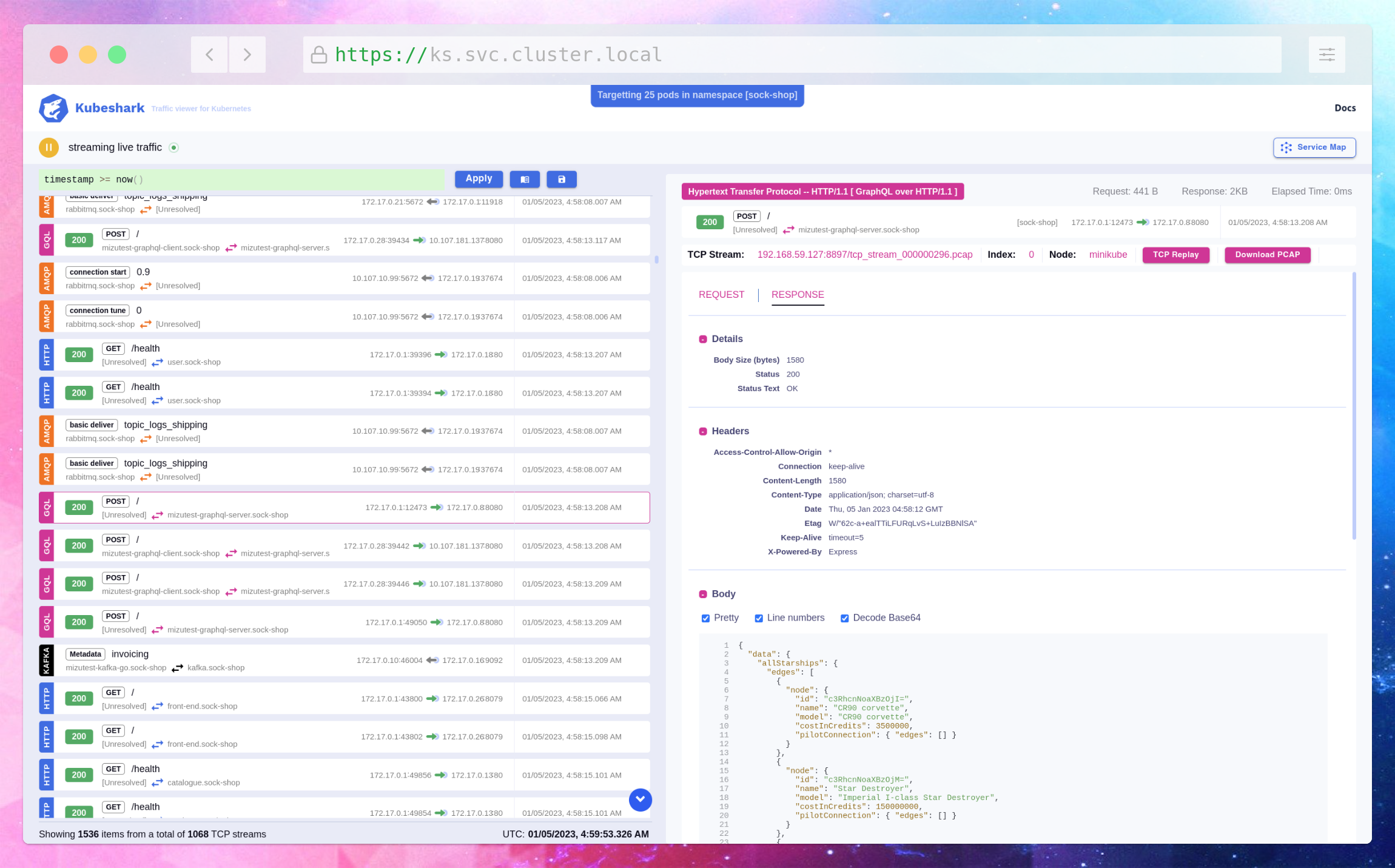
3.) deploy nginx pod using the below command.
```
kubectl apply -f - <<EOF
apiVersion: v1
kind: Pod
metadata:
name: nginx
spec:
containers:
- name: nginx
image: nginx
EOF
```
4.) Try to access "aws.com" to generate traffic flow using the below command.
```
kubectl exec nginx curl https://aws.com
```
5.) Access kubeshark using the below command.
```
kubectl -n kube-system port-forward svc/kubeshark-front 3000:80
```
6.) Run Kubeshark query to identify the traffic flow.
```
(src.pod.metadata.name == "nginx" or dst.pod.metadata name == "nginx") and request.questions[0].name == "aws.com" or (src.name == "nginx" and src.namespace == "default" and dst.name == "kube-dns" and dst.namespace == "kube-system")
```
As shown below, the Kubeshark query used to identify the traffic flowing from the pod "nginx" in the "default" namespace to "aws.com" and "coredns". The query is writen by [Kubeshark Filter Language (KFL)](https://docs.kubeshark.co/en/filtering#kfl-syntax-reference) is the language implemented inside kubeshark/worker that enables the user to filter the traffic efficiently and precisely.
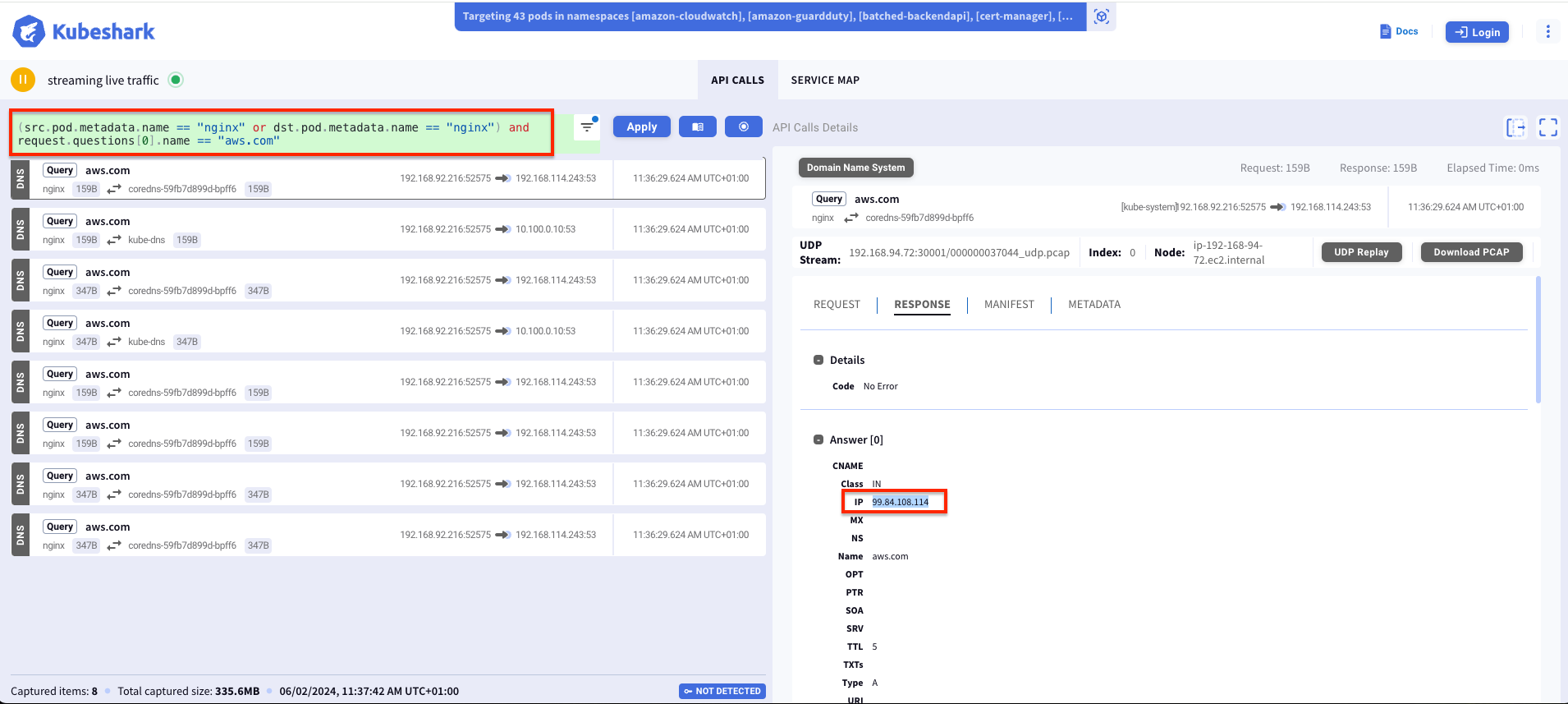
Also you can visualize the traffic flow and bandwidth using service map feature as shown below.
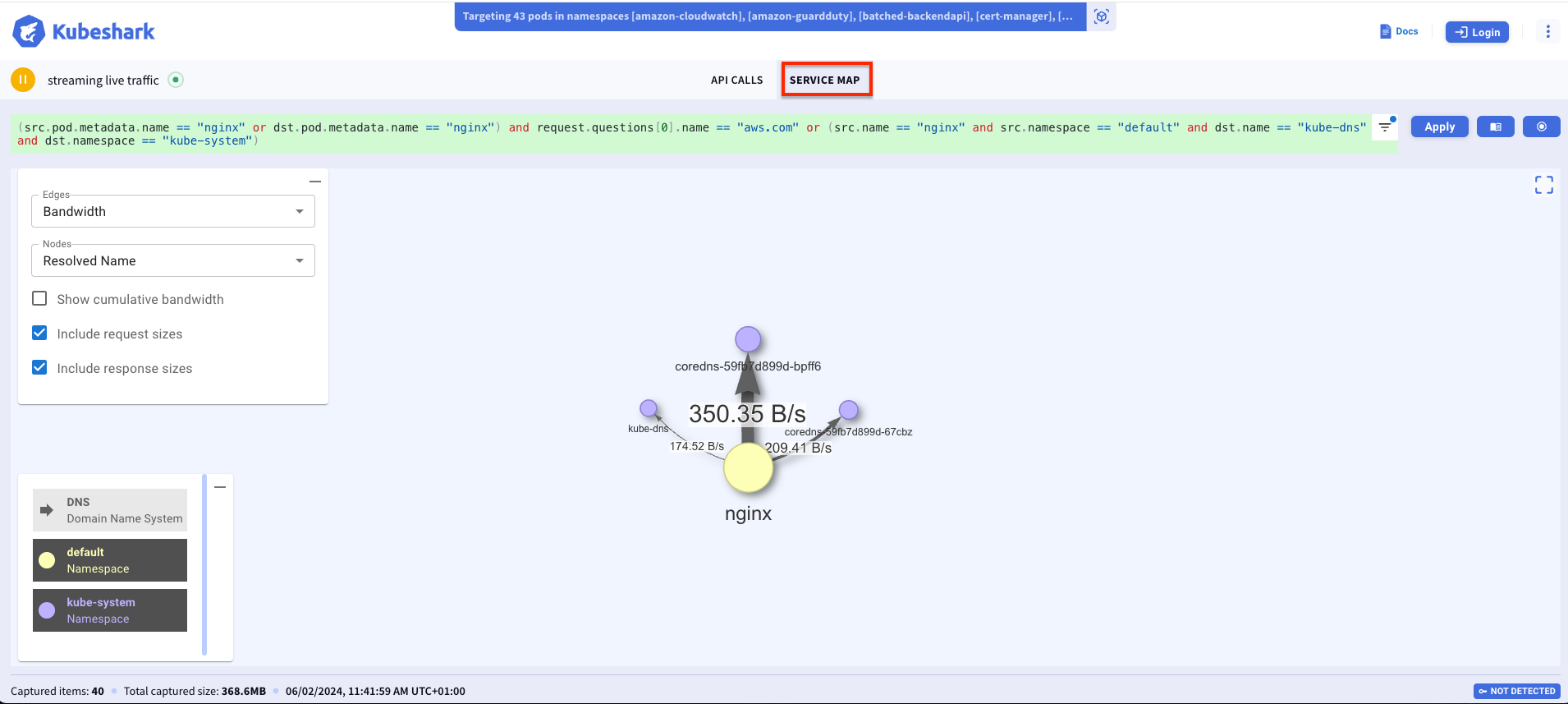
## Cleanup
To clean up your EKS Blueprints, run the following commands:
```sh
make pattern kubeshark destroy
```
## Disclaimer
This pattern relies on an open source NPM package [aws-eks-blueprint-addon](https://www.npmjs.com/package/kubeshark). Please refer to the package npm site for more information.
```
https://www.npmjs.com/package/kubeshark'
```
If you have any questions about the npm package or find any defect, please post in the source repo at:
https://github.com/zghanem0/kubeshark/issues
================================================
FILE: docs/patterns/multi-cluster-conformitron.md
================================================
# Multi-cluster pattern with observability, cost optimizations and metrics aggregation
## Objective
This pattern was started to solve a problem faced at AWS. We often get third-party software for validation and need a consistent automated approach to run Kubernetes evaluator testing, deployment of containerized products, and validation in Kubernetes environments on a variety of Amazon EKS environments.
In this pattern we:
1. Automate deployment of multiple EKS cluster in a region, with a Continuous Deployment pipeline triggered upon a commit to the GitHub repository that hosts the pipeline configuration.
1. Configure the EKS clusters to deploy with different architectures (x86 or ARM or Bottlerocket) and different Kubernetes versions (3 most recent by default).
1. Automate testing of all the available [EKS Anywhere Addons](https://github.com/aws-samples/eks-anywhere-addons), on each of the clusters, essentially testing their compatibility across all the potential architecture/version available today on AWS.
1. Deploying this pattern 24x7 we observed high costs (300$ a day). By using the AWS Systems Manager Automations and AutoScaling Groups we scale-down to zero during non-business hours resulting in 60% cost savings. We also borrowed optimized OTEL collector configurations from [CDK Observability Accelerator](https://github.com/aws-observability/cdk-aws-observability-accelerator) to further reduce Prometheus storage costs.
To learn more about our EKS Addon validation checkout our [blog](https://aws.amazon.com/blogs/containers/conformitron-validate-third-party-software-with-amazon-eks-and-amazon-eks-anywhere/)

### GitOps confguration
GitOps is a branch of DevOps that focuses on using Git code repositories to manage infrastructure and application code deployments.
For this pattern there is a git driven deployment using GitHub and Codepipeline which automatically redploys the EKS Clusters when modifications are made to the GitHub repo.
Secondly, for the deployment of workloads on the cluster we leverage FluxCD, this a GitOps approach for the workloads i.e. the third-party-software we want to validate on our hardware.
We require some additional secrets to be created in Secrets Manager for the pattern to function properly
1. AWS CodePipeline Bootstrap - The AWS CodePipeline points to the GitHub fork of this repository i.e [cdk-eks-blueprint-patterns] (https://github.com/aws-samples/cdk-eks-blueprints-patterns).
A `github-token` secret must be stored as plaintext in AWS Secrets Manager for the CodePipeline to access the webhooks on GitHub. For more information on how/why to set it up, please refer to the [docs](https://docs.aws.amazon.com/codepipeline/latest/userguide/GitHub-create-personal-token-CLI.html). The GitHub Personal Access Token should have these scopes:
1. *repo* - to read your forked cdk-blueprint-patterns repostiory
1. *admin:repo_hook* - if you plan to use webhooks (enabled by default)
1. FluxCD Bootstrap - The FluxCD points to the [EKS Anywhere Addons](https://github.com/aws-samples/eks-anywhere-addons) repository. Since this is a public repository you will not need to add a github token to read it.
As part of the FluxCD configuration, it uses Kustomize to apply all the addons that are in the repository along with deploying their functional tests and a custom validator cronJob.
## Prerequisites
Start by setting the account and region environment variables:
```sh
export ACCOUNT_ID=$(aws sts get-caller-identity --query 'Account' --output text)
export AWS_REGION=$(aws configure get region)
```
1. In case you haven't done this before, bootstrap your AWS Account for AWS CDK use using:
```bash
cdk bootstrap
```
1. Fork this repository (cdk-eks-blueprints-patterns) to your GitHub organisation/user
1. Git clone your forked repository onto your machine
1. Install the AWS CDK Toolkit globally on your machine using
```bash
npm install -g aws-cdk@2.133.0
```
1. Increase AWS service quota for required resources, navigate to [Service Quota Tutorial](https://aws.amazon.com/getting-started/hands-on/request-service-quota-increase/) to learn more
```
SERVICE | QUOTA NAME | REQUESTED QUOTA
Amazon Virtual Private Cloud (Amazon VPC) | NAT gateways per Availability Zone | 30
Amazon Virtual Private Cloud (Amazon VPC) | VPCs per region | 30
Amazon Elastic Compute Cloud (Amazon EC2) | EC2-VPC Elastic IPs | 30
```
We are using seperate VPC as a best practice, but you can use default vpc if you prefer. Also, If you decide to use different regions for each cluster you dont need quota increase, please reach out if you have need for this use case.
1. Amazon Managed Grafana Workspace: To visualize metrics collected, you need an Amazon Managed Grafana workspace. If you have an existing workspace, create environment variables `AMG_ENDPOINT_URL` as described below.
Else, to create a new workspace, visit and run our [supporting example for Grafana Deployment](https://aws-observability.github.io/terraform-aws-observability-accelerator/helpers/managed-grafana/)
```bash
export AMG_ENDPOINT_URL=https://g-xxx.grafana-workspace.region.amazonaws.com
export AMG_WORKSPACE_ID=g-xxx
```
1. Grafana API Key: Amazon Managed Grafana provides a control plane API for generating Grafana API keys or Service Account Tokens. This allows programatic provisioning of Grafana dashboards using the EKS grafana operator.
```bash
export AMG_API_KEY=$(aws grafana create-workspace-api-key \
--key-name "grafana-operator-key" \
--key-role "ADMIN" \
--seconds-to-live 432000 \
--workspace-id $AMG_WORKSPACE_ID \
--query key \
--output text)
```
1. AWS SSM Parameter Store for GRAFANA API KEY: Update the Grafana API key secret in AWS SSM Parameter Store using the above new Grafana API key. This will be referenced by Grafana Operator deployment of our solution to access and provision Grafana dashboards from Amazon EKS monitoring Cluster
```bash
aws ssm put-parameter --name "/grafana-api-key" \
--type "SecureString" \
--value $AMG_API_KEY \
--region $AWS_REGION
```
1. Amazon Managed Prometheus Workspace: To store observability metrics from all clusters we will use Amazon Managed Prometheus due to it's ease of setup and easy integration with other AWS services. We recommend setting up a new seperate Prometheus workspace using the CLI commands below. The provisioning of a new AMP workspace can be automated by leveraging the `.resourceProvider` in our CDK blueprints. See [Example](https://github.com/aws-observability/cdk-aws-observability-accelerator/blob/main/lib/existing-eks-opensource-observability-pattern/index.ts). We intentionally left this out to allow to connecting with existing AMP deployments, but please reach out to us if you need guidance on automate this provisioning.
```bash
aws amp create-workspace --alias conformitron
```
Copy the `workspaceID` from the output and export it as a variable
```bash
export AMP_WS_ID=ws-xxxxxxx-xxxx-xxxx-xxxx-xxxxxx
```
1. Modify the code in your forked repo to point to your GitHub username/organisation. Open the [pattern file source code](../../lib/multi-cluster-construct/pipeline.ts) and look for the declared const of `gitOwner`. Change it to your GitHub username.
## Deploying
Clone the repository:
```sh
git clone https://github.com/aws-samples/cdk-eks-blueprints-patterns.git
cd cdk-eks-blueprints-patterns
```
Set the pattern's parameters in the CDK context by overriding the _cdk.json_ file (edit _PARENT_DOMAIN_NAME_ as it fits):
```sh
cat << EOF > cdk.json
{
"app": "npx ts-node dist/lib/common/default-main.js",
"context": {
"conformitron.amp.endpoint": "https://aps-workspaces.${AWS_REGION}.amazonaws.com/workspaces/${AMP_WS_ID}/",
"conformitron.amp.arn":"arn:aws:aps:${AWS_REGION}:${ACCOUNT_ID}:workspace/${AMP_WS_ID}",
"conformitron.amg.endpoint": "${AMG_ENDPOINT_URL}",
"conformitron.version": ["1.28","1.29","1.30"],
"fluxRepository": {
"name": "grafana-dashboards",
"namespace": "grafana-operator",
"repository": {
"repoUrl": "https://github.com/aws-observability/aws-observability-accelerator",
"name": "grafana-dashboards",
"targetRevision": "main",
"path": "./artifacts/grafana-operator-manifests/eks/infrastructure"
},
"values": {
"GRAFANA_CLUSTER_DASH_URL" : "https://raw.githubusercontent.com/aws-observability/aws-observability-accelerator/main/artifacts/grafana-dashboards/eks/infrastructure/cluster.json",
"GRAFANA_KUBELET_DASH_URL" : "https://raw.githubusercontent.com/aws-observability/aws-observability-accelerator/main/artifacts/grafana-dashboards/eks/infrastructure/kubelet.json",
"GRAFANA_NSWRKLDS_DASH_URL" : "https://raw.githubusercontent.com/aws-observability/aws-observability-accelerator/main/artifacts/grafana-dashboards/eks/infrastructure/namespace-workloads.json",
"GRAFANA_NODEEXP_DASH_URL" : "https://raw.githubusercontent.com/aws-observability/aws-observability-accelerator/main/artifacts/grafana-dashboards/eks/infrastructure/nodeexporter-nodes.json",
"GRAFANA_NODES_DASH_URL" : "https://raw.githubusercontent.com/aws-observability/aws-observability-accelerator/main/artifacts/grafana-dashboards/eks/infrastructure/nodes.json",
"GRAFANA_WORKLOADS_DASH_URL" : "https://raw.githubusercontent.com/aws-observability/aws-observability-accelerator/main/artifacts/grafana-dashboards/eks/infrastructure/workloads.json"
},
"kustomizations": [
{
"kustomizationPath": "./artifacts/grafana-operator-manifests/eks/infrastructure"
}
]
}
}
}
EOF
```
You are now ready to deploy the pipeline. Run the following command from the root of this repository to deploy the pipeline stack:
```bash
make pattern multi-cluster-conformitron deploy multi-cluster-central-pipeline
```
Now you can go to [AWS CodePipeline console](https://eu-west-1.console.aws.amazon.com/codesuite/codepipeline/pipelines), and see how it was automatically created to deploy multiple Amazon EKS clusters to different environments.
## Grafana Dashboards


# SSM Cost Optimizations for conformitron clusters
Running all the clusters by default for 24 hours results in a daily spend of $300+
To minimize these costs we have written a systems manager automation which automatically scales down autoscaling group to 0 desired nodes during off-business hours.
On weekdays 5 PM PST clusters are scaled to 0 -> CRON EXPRESSION: `0 17 ? * MON-FRI *`
On weekdays 5 AM PST clusters are scaled to 1 -> CRON EXPRESSION: `0 05 ? * MON-FRI *`
On weekends clusters stay scaled to 0.
These optimizations bring down the weekly cost to less than 1000$ essentially for a more than 60% cost savings.
Please find the SSM Automation documents `lib/multi-cluster-construct/resources/cost-optimization/scaleDownEksToZero.yml` and `lib/multi-cluster-construct/resources/cost-optimization/scaleUpEksToOne.yml`.
Lets take a look at one of the scripts `scaleDownEksToZero.yml`
```yaml
schemaVersion: '0.3'
...
...
mainSteps:
...
...
inputs:
Service: eks
Api: UpdateNodegroupConfig <---- Update the managed node group
clusterName: arm-1-26-blueprint <---- Modify according to your naming convention
nodegroupName: eks-blueprints-mng
scalingConfig:
minSize: 0 <---- New Scaling Configuration
maxSize: 1
desiredSize: 0 <---- Scale To zero
```
By triggering this automation at 5PM on Weekdays we automatically scale down clusters during off-hours.
To run these scripts first you will have to modify update them with your own account_ID
We will use `sed` command to automatically update the files
```bash
sed "s/ACCOUNT_ID/$ACCOUNT_ID/g" scaleDownEksToZero.yml > scaleDownEksToZeroNew.yml
sed "s/ACCOUNT_ID/$ACCOUNT_ID/g" scaleUpEksToOne.yml > scaleUpEksToOneNew.yml
```
1. Then navigate to the Systems Manager > Documents and Create a new Automation.

1. Click on JSON and copy over the yml content to create a new runbook

1. Once saved, navigate to EventBridge > Scheduler > Schedules

1. Create a new schedule with the CRON expression specified aboce

1. For Target select "StartAutomationExecution" and type in the document name from step 2

================================================
FILE: docs/patterns/nginx.md
================================================
# NGINX Pattern
## Objective
When setting up a target platform across multiple dimensions that question of ingress must be solved. Ideally, it should work in such as way that workloads provisioned on the target environments could be accessible via internet exposing sub-domains of some predefined global domain name.
Communication with the workloads should leverage secure TLS protected Load balancer with proper public (or private) certificate.
A single cluster will deploy workloads from multiple teams and each of them should be able to expose workloads routed to their corresponding namespace. So, teams are expected to define ingress objects.
In addition, this approach should work not only for a single cluster, but also across multiple regions and environments.
## Approach
Since we will be defining subdomains for a global enterprise domain across multiple environments, which are as a rule placed in separate AWS accounts, root domain should defined in a separate account. Let's call it global DNS account.
Sub-domains are then defined in the target accounts (let's call them workload accounts).
Our blueprint will then include the following:
1. NGINX ingress controller to enable teams to create/configure their ingress objects.
2. External DNS to integrate NGINX and public-facing NLB with Route53.
3. AWS Loadbalancer controller to provision an NLB instance with each cluster fronting the NGINX ingress. Deployed with a public certificate that will also be provisioned as part of the blueprint.
4. Team onboarding that leverage the ingress capabilities through ArgoCD.
5. Other popular add-ons.
## Prerequisites
1. `argo-admin-password` secret must be defined as plain text (not key/value) in `us-west-2` region.
2. The parent domain must be defined in a separate account (GLOBAL_DNS_ACCOUNT).
3. The GLOBAL_DNS_ACCOUNT must contain a role with a trust policy to the workload(s) account. We naed it `DomainOperatorRole` but you can choose any arbitrary name for it.
1. Policies: `arn:aws:iam::aws:policy/AmazonRoute53DomainsFullAccess` or alternatively you can provide `arn:aws:iam::aws:policy/AmazonRoute53ReadOnlyAccess` and `arn:aws:iam::aws:policy/AmazonRoute53AutoNamingFullAccess`.
2. Trust relationship to allow workload accounts to create subdomains (replace `<WORKLOAD_ACCOUNT>` with the actual value):
```
{
"Version": "2012-10-17",
"Statement": [
{
"Effect": "Allow",
"Principal": {
"AWS": "arn:aws:iam::<WORKLOAD_ACCOUNT>:root"
},
"Action": "sts:AssumeRole",
"Condition": {}
}
]
}
```
4. The actual settings for the GLOBAL_DNS_ACCOUNT, hosted zone name and expected subzone name are expected to be specified in the CDK context. Generically it is inside the cdk.context.json file of the current directory or in `~/.cdk.json` in your home directory. Example settings:
```
{
"context": {
"parent.dns.account": "<PARENT_ACCOUNT>",
"parent.hostedzone.name": "mycompany.a2z.com",
"dev.subzone.name": "dev.mycompany.a2z.com",
}
}
```
## Deploying
Once all pre-requisites are set you should be able to get a working cluster with all the objectives met, including workloads with an example of team-specific ingress objects.
================================================
FILE: docs/patterns/observability/existing-eks-apiserver-observability.md
================================================
{{ external_markdown('https://raw.githubusercontent.com/aws-observability/cdk-aws-observability-accelerator/main/docs/patterns/existing-eks-observability-accelerators/existing-eks-apiserver-observability.md', '') }}
================================================
FILE: docs/patterns/observability/existing-eks-awsnative-observability.md
================================================
{{ external_markdown('https://raw.githubusercontent.com/aws-observability/cdk-aws-observability-accelerator/main/docs/patterns/existing-eks-observability-accelerators/existing-eks-awsnative-observability.md', '') }}
================================================
FILE: docs/patterns/observability/existing-eks-mixed-observability.md
================================================
{{ external_markdown('https://raw.githubusercontent.com/aws-observability/cdk-aws-observability-accelerator/main/docs/patterns/existing-eks-observability-accelerators/existing-eks-mixed-observability.md', '') }}
================================================
FILE: docs/patterns/observability/existing-eks-nginx-observability.md
================================================
{{ external_markdown('https://raw.githubusercontent.com/aws-observability/cdk-aws-observability-accelerator/main/docs/patterns/existing-eks-observability-accelerators/existing-eks-nginx-observability.md', '') }}
================================================
FILE: docs/patterns/observability/existing-eks-opensource-observability.md
================================================
{{ external_markdown('https://raw.githubusercontent.com/aws-observability/cdk-aws-observability-accelerator/main/docs/patterns/existing-eks-observability-accelerators/existing-eks-opensource-observability.md', '') }}
================================================
FILE: docs/patterns/observability/multi-acc-new-eks-mixed-observability.md
================================================
{{ external_markdown('https://raw.githubusercontent.com/aws-observability/cdk-aws-observability-accelerator/main/docs/patterns/multi-new-eks-observability-accelerators/multi-acc-new-eks-mixed-observability.md', '') }}
================================================
FILE: docs/patterns/observability/multi-account-monitoring.md
================================================
# Multi Account Open Source Observability Pattern.
## Architecture
The following figure illustrates the architecture of the pattern we will be deploying for Multi Account Observability pattern using open source tooling such as AWS Distro for Open Telemetry (ADOT), Amazon Managed Service for Prometheus (AMP), Amazon Managed Grafana :

## Objective
1. Deploying two production grade Amazon EKS cluster across 2 AWS Accounts ( Prod1, Prod2 account ) through a Continuous Deployment infrastructure pipeline triggered upon a commit to the repository that holds the pipeline configuration in an another AWS account (pipeline account).
1. Deploying ADOT add-on, AMP add-on to Prod 1 Amazon EKS Cluster to remote write metrics to AMP workspace in Prod 1 AWS Account. Deploying ADOT add-on, CloudWatch add-on to Prod 1 Amazon EKS Cluster to write metrics to CloudWatch in Prod 2 AWS Account.
1. Configuring GitOps tooling (ArgoCD addon) to support deployment of [ho11y](https://github.com/aws-observability/aws-o11y-recipes/tree/main/sandbox/ho11y) and [yelb](https://github.com/mreferre/yelb) sample applications, in a way that restricts each application to be deployed only into the team namespace, by using ArgoCD projects.
1. Setting up IAM roles in Prod 1 and Prod 2 Accounts to allow an AMG service role in the Monitoring account (4th AWS account) to access metrics from AMP workspace in Prod 1 account and CloudWatch namespace in Prod 2 account.
1. Setting Amazon Managed Grafana to visualize AMP metrics from Amazon EKS cluster in Prod account 1 and CloudWatch metrics on workloads in Amazon EKS cluster in Prod account 2.
### GitOps confguration
For GitOps, the blueprint bootstrap the ArgoCD addon and points to the [EKS Blueprints Workload](https://github.com/aws-samples/eks-blueprints-workloads) sample repository.
You can find the team-geordie configuration for this pattern in the workload repository under the folder [`team-geordie`](https://github.com/aws-samples/eks-blueprints-workloads/tree/main/teams/team-geordie).
## Prerequisites
1. AWS Control Tower deployed in your AWS environment in the management account. If you have not already installed AWS Control Tower, follow the [Getting Started with AWS Control Tower documentation](https://docs.aws.amazon.com/controltower/latest/userguide/getting-started-with-control-tower.html), or you can enable AWS Organizations in the AWS Management Console account and enable AWS SSO.
1. An AWS account under AWS Control Tower called Prod 1 Account(Workloads Account A aka prodEnv1) provisioned using the AWS Service Catalog Account Factory product AWS Control Tower Account vending process or AWS Organization.
1. An AWS account under AWS Control Tower called Prod 2 Account(Workloads Account B aka prodEnv2) provisioned using the AWS Service Catalog Account Factory product AWS Control Tower Account vending process or AWS Organization.
1. An AWS account under AWS Control Tower called Pipeline Account (aka pipelineEnv) provisioned using the AWS Service Catalog Account Factory product AWS Control Tower Account vending process or AWS Organization.
1. An AWS account under AWS Control Tower called Monitoring Account (Grafana Account aka monitoringEnv) provisioned using the AWS Service Catalog Account Factory product AWS Control Tower Account vending process or AWS Organization.
## Deploying
1. Fork this repository to your GitHub organisation/user.
1. Clone your forked repository.
1. Set environment variable `AWS_REGION` with region from where `pipelineEnv` account will be bootstrapped.
```bash
export AWS_REGION=<YOUR AWS REGION>
```
1. Install the AWS CDK Toolkit globally on your machine using
```bash
npm install -g aws-cdk
```
1. Create secret `github-ssh-key` in `AWS_REGION` of `pipelineEnv` account. This secret must contain GitHub SSH private key as a JSON structure containing fields `sshPrivateKey` and `url` in `pipelineEnv` account. This will be used by ArgoCD addon to authenticate against any GitHub repository (private or public). The secret is expected to be defined in the region where the pipeline will be deployed to. For more information on SSH credentials setup see [ArgoCD Secrets Support](https://aws-quickstart.github.io/cdk-eks-blueprints/addons/argo-cd/#secrets-support).
```bash
aws secretsmanager create-secret --region $AWS_REGION \
--name github-ssh-key \
--description "SSH private key for ArgoCD authentication to GitHub repository" \
--secret-string '{
"sshPrivateKey":"<SSH private key>",
"url":"git@github"
}'
```
1. Create `github-token` secret in `AWS_REGION` of `pipelineEnv` account. This secret must be stored as a plain text in AWS Secrets Manager for the GitHub pipeline in `pipelineEnv` account. For more information on how to set it up, please refer to the [docs](https://docs.aws.amazon.com/codepipeline/latest/userguide/GitHub-create-personal-token-CLI.html). The GitHub Personal Access Token should have these scopes:
1. *repo* - to read the repository
2. *admin:repo_hook* - if you plan to use webhooks (enabled by default)
```bash
aws secretsmanager create-secret --region $AWS_REGION \
--name github-token \
--description "GitHub Personal Access Token for CodePipeline to access GitHub account" \
--secret-string "<GitHub Personal Access Token>"
```
1. Create secret `cdk-context` in `us-east-1` region as a plain text in AWS Secrets Manager for the GitHub pipeline in `pipelineEnv` account. `cdk-context` secret must be stored as a plain text in the following format in AWS Secrets Manager for cdk context for all the 4 AWS accounts used by the solution in `pipelineEnv` account. This secret must be created in `us-east-1` region.
```bash
aws secretsmanager create-secret --region us-east-1 \
--name cdk-context \
--description "AWS account details of different environments used by Multi account open source Observability pattern" \
--secret-string '{
"context": {
"prodEnv1": {
"account": "<prodEnv1 account number>",
"region": "<AWS REGION>"
},
"prodEnv2": {
"account": "<prodEnv2 account number>",
"region": "<AWS REGION>"
},
"pipelineEnv": {
"account": "<pipelineEnv account number>",
"region": "<AWS REGION>"
},
"monitoringEnv": {
"account": "<prodmonitoringEnvEnv1 account number>",
"region": "<AWS REGION>"
}
}
}'
```
1. Create the following IAM users and attach `administrator` policy to required accounts.
1. IAM user `pipeline-admin` with `administrator` policy in Pipeline AWS Account
```bash
aws iam create-user \
[--profile pipelineEnv-admin-profile] \
--user-name pipeline-admin
aws iam attach-user-policy \
[--profile pipelineEnv-admin-profile] \
--user-name pipeline-admin \
--policy-arn arn:aws:iam::aws:policy/AdministratorAccess
```
1. IAM user `prod1-admin` with `administrator` policy in Prod 1 AWS Account
```bash
aws iam create-user \
[--profile prodEnv1-admin-profile] \
--user-name prod1-admin
aws iam attach-user-policy \
[--profile prodEnv1-admin-profile] \
--user-name prod1-admin \
--policy-arn arn:aws:iam::aws:policy/AdministratorAccess
```
1. IAM user `prod2-admin` with `administrator` policy in Prod 2 AWS Account
```bash
aws iam create-user \
[--profile prodEnv2-admin-profile] \
--user-name prod2-admin
aws iam attach-user-policy \
[--profile prodEnv2-admin-profile] \
--user-name prod2-admin \
--policy-arn arn:aws:iam::aws:policy/AdministratorAccess
```
1. IAM user `mon-admin` with `administrator` policy in Monitoring AWS Account
```bash
aws iam create-user \
[--profile monitoringEnv-admin-profile] \
--user-name mon-admin
aws iam attach-user-policy \
[--profile monitoringEnv-admin-profile] \
--user-name mon-admin \
--policy-arn arn:aws:iam::aws:policy/AdministratorAccess
```
1. IAM user `team-geordi` in Prod 1 and Prod 2 AWS Account
```bash
aws iam create-user \
[--profile prodEnv1-admin-profile] \
--user-name team-geordi
aws iam create-user \
[--profile prodEnv2-admin-profile] \
--user-name team-geordi
```
1. IAM user `team-platform` in Prod 1 and Prod 2 AWS Account
```bash
aws iam create-user \
[--profile prodEnv1-admin-profile] \
--user-name team-platform
aws iam create-user \
[--profile prodEnv2-admin-profile] \
--user-name team-platform
```
1. Install project dependencies by running `npm install` in the main folder of this cloned repository
1. Bootstrap all 4 AWS accounts using step mentioned for **different environment for deploying CDK applications** in [Deploying Pipelines](https://aws-quickstart.github.io/cdk-eks-blueprints/pipelines/#deploying-pipelines). If you have bootstrapped earlier, please remove them before proceeding with this step. Remember to set `pipelineEnv` account number in `--trust` flag. You can also refer to commands mentioned below:
```bash
# bootstrap prodEnv1 account with trust access from pipelineEnv account
env CDK_NEW_BOOTSTRAP=1 npx cdk bootstrap \
[--profile prodEnv1-admin-profile] \
--cloudformation-execution-policies arn:aws:iam::aws:policy/AdministratorAccess \
--trust <pipelineEnv account number> \
aws://<prodEnv1 account number>/$AWS_REGION
# bootstrap prodEnv2 account with trust access from pipelineEnv account
env CDK_NEW_BOOTSTRAP=1 npx cdk bootstrap \
[--profile prodEnv2-admin-profile] \
--cloudformation-execution-policies arn:aws:iam::aws:policy/AdministratorAccess \
--trust <pipelineEnv account number> \
aws://<prodEnv2 account number>/$AWS_REGION
# bootstrap pipelineEnv account WITHOUT explicit trust
env CDK_NEW_BOOTSTRAP=1 npx cdk bootstrap \
[--profile pipelineEnv-admin-profile] \
--cloudformation-execution-policies arn:aws:iam::aws:policy/AdministratorAccess \
aws://<pipelineEnv account number>/$AWS_REGION
# bootstrap monitoringEnv account with trust access from pipelineEnv account
env CDK_NEW_BOOTSTRAP=1 npx cdk bootstrap \
[--profile monitoringEnv-admin-profile] \
--cloudformation-execution-policies arn:aws:iam::aws:policy/AdministratorAccess \
--trust <pipelineEnv account number> \
aws://<monitoringEnv account number>/$AWS_REGION
```
1. Modify the code of `lib/pipeline-multi-env-gitops/index.ts` and `lib/multi-account-monitoring/pipeline.ts` in your forked repo to point to your GitHub username/organisation. Look for the declared const of `gitOwner` and change it to your GitHub username and commit changes to your forked repo. This is needed because the AWS CodePipeline that will be automatically created will be triggered upon commits that are made in your forked repo.
1. Once all pre-requisites are set you are ready to deploy the pipeline. Run the following command from the root of this repository to deploy the pipeline stack in `pipelineEnv` account:
```bash
make build
make pattern pipeline-multienv-monitoring deploy multi-account-central-pipeline
```
1. Now you can go to [AWS CodePipeline console](https://eu-west-1.console.aws.amazon.com/codesuite/codepipeline/pipelines), and see how it was automatically created to deploy multiple Amazon EKS clusters to different environments.
1. The deployment automation will create `ampPrometheusDataSourceRole` with permissions to retrieve metrics from AMP in Prod 1 Account, `cloudwatchDataSourceRole` with permissions to retrieve metrics from CloudWatch in Prod 2 Account and `amgWorkspaceIamRole` in monitoring account to assume roles in Prod 1 and Prod 2 account for retrieving and visualizing metrics in Grafana.
1. Next, manually follow the following steps from [AWS Open Source blog](https://aws.amazon.com/blogs/opensource/setting-up-amazon-managed-grafana-cross-account-data-source-using-customer-managed-iam-roles/#:~:text=AWS%20SSO%20in%20the%20management%20account) :
1. AWS SSO in the management account
2. Query metrics in Monitoring account from Amazon Managed Prometheus workspace in Prod 1 Account
3. Query metrics in the Monitoring account from Amazon CloudWatch in Prod 1 Account


### Validating Custom Metrics and Traces from ho11y App
1. Run the below command in both clusters to generate traces to X-Ray and Amazon Managed Grafana Console out the sample `ho11y` app :
```
frontend_pod=`kubectl get pod -n geordie --no-headers -l app=frontend -o jsonpath='{.items[*].metadata.name}'`
loop_counter=0
while [ $loop_counter -le 5000 ] ;
do
kubectl exec -n geordie -it $frontend_pod -- curl downstream0.geordie.svc.cluster.local;
echo ;
loop_counter=$[$loop_counter+1];
done
```
### Traces and Service Map screenshots from X-Ray Console


### Custom Metrics from ho11y App on Amazon Managed Grafana Console using AMP as data source

### Custom Metrics from ho11y App on Amazon Managed Grafana Console using CloudWatch as data source

### Notes
This pattern consumes multiple Elastic IP addresses, because 3 VPCs with 3 subnets are created by this pattern in Prod 1 and Prod 2 AWS Accounts. Make sure your account limits for EIP are increased to support additional 9 EIPs (1 per Subnets).
================================================
FILE: docs/patterns/observability/single-new-eks-apiserver-opensource-observability.md
================================================
{{ external_markdown('https://raw.githubusercontent.com/aws-observability/cdk-aws-observability-accelerator/main/docs/patterns/single-new-eks-observability-accelerators/single-new-eks-apiserver-opensource-observability.md', '') }}
================================================
FILE: docs/patterns/observability/single-new-eks-awsnative-fargate-observability.md
================================================
{{ external_markdown('https://raw.githubusercontent.com/aws-observability/cdk-aws-observability-accelerator/main/docs/patterns/single-new-eks-observability-accelerators/single-new-eks-awsnative-fargate-observability.md', '') }}
================================================
FILE: docs/patterns/observability/single-new-eks-gpu-opensource-observability.md
================================================
{{ external_markdown('https://raw.githubusercontent.com/aws-observability/cdk-aws-observability-accelerator/main/docs/patterns/single-new-eks-observability-accelerators/single-new-eks-gpu-opensource-observability.md', '') }}
================================================
FILE: docs/patterns/observability/single-new-eks-graviton-opensource-observability.md
================================================
{{ external_markdown('https://raw.githubusercontent.com/aws-observability/cdk-aws-observability-accelerator/main/docs/patterns/single-new-eks-observability-accelerators/single-new-eks-graviton-opensource-observability.md', '') }}
================================================
FILE: docs/patterns/observability/single-new-eks-java-opensource-observability.md
================================================
{{ external_markdown('https://raw.githubusercontent.com/aws-observability/cdk-aws-observability-accelerator/main/docs/patterns/single-new-eks-observability-accelerators/single-new-eks-java-opensource-observability.md', '') }}
================================================
FILE: docs/patterns/observability/single-new-eks-mixed-observability.md
================================================
{{ external_markdown('https://raw.githubusercontent.com/aws-observability/cdk-aws-observability-accelerator/main/docs/patterns/single-new-eks-observability-accelerators/single-new-eks-mixed-observability.md', '') }}
================================================
FILE: docs/patterns/observability/single-new-eks-native.md
================================================
{{ external_markdown('https://raw.githubusercontent.com/aws-observability/cdk-aws-observability-accelerator/main/docs/patterns/single-new-eks-observability-accelerators/single-new-eks-awsnative-observability.md', '') }}
================================================
FILE: docs/patterns/observability/single-new-eks-nginx-opensource-observability.md
================================================
{{ external_markdown('https://raw.githubusercontent.com/aws-observability/cdk-aws-observability-accelerator/main/docs/patterns/single-new-eks-observability-accelerators/single-new-eks-nginx-opensource-observability.md', '') }}
================================================
FILE: docs/patterns/observability/single-new-eks-opensource.md
================================================
{{ external_markdown('https://raw.githubusercontent.com/aws-observability/cdk-aws-observability-accelerator/main/docs/patterns/single-new-eks-observability-accelerators/single-new-eks-opensource-observability.md', '') }}
================================================
FILE: docs/patterns/paralus.md
================================================
# Paralus on EKS
The Paralus project is a free open-source tool that enables controlled audited access to Kubernetes infrastructure. It comes with just-in-time service account creation and user-level credential management that integrates with your existing RBAC and SSO providers of choice. Learn more by visiting the offical documentation page: <https://www.paralus.io/>
This pattern deploys the following resources:
- Creates a single EKS cluster with a public endpoint (for demo purpose only) that includes a managed node group
- Deploys supporting AddOn: AwsLoadBalancerController, VpcCni, KubeProxy, EbsCsiDriverAddOn
- Deploy Paralus on the EKS cluster
**NOTE: Paralus installs a few dependent modules such as Postgres, Kratos, and also comes with a built-in dashboard. At it's core, Paralus works atop domain-based routing, inter-service communication, and supports the AddOns mentioned above.**
## Prerequisites
Ensure that you have installed the following tools on your machine.
1. [aws cli](https://docs.aws.amazon.com/cli/latest/userguide/install-cliv2.html)
2. [kubectl](https://Kubernetes.io/docs/tasks/tools/)
3. [cdk](https://docs.aws.amazon.com/cdk/v2/guide/getting_started.html#getting_started_install)
4. [npm](https://docs.npmjs.com/cli/v8/commands/npm-install)
## Deploy an EKS Cluster using Amazon EKS Blueprints for CDK
Clone the repository
```sh
git clone https://github.com/aws-samples/cdk-eks-blueprints-patterns.git
```
Update FQDN information for your installation following the example below:
```json
fqdn: {
"domain": "yourdomain.com",
"hostname": "console-eks",
"coreConnectorSubdomain": "*.core-connector.eks",
"userSubdomain": "*.user.eks"
}
```
Updating npm
```sh
npm install -g npm@latest
```
To view patterns and deploy the Paralus pattern, run the commands below:
```sh
cdk list
cdk bootstrap
make pattern paralus deploy
```
## Verify the resources
Run the update-kubeconfig command below. You should be able to get the command from the CDK output message once your cluster has been finished deploying. More information can be found at <https://aws-quickstart.github.io/cdk-eks-blueprints/getting-started/#cluster-access>
```sh
aws eks update-kubeconfig --name <your cluster name> --region <your region> --role-arn arn:aws:iam::1234567890121:role/paralus-blueprint-paralusblueprintMastersRoleF3287-EI3XEBO1107B
```
Let’s verify the resources created by steps above.
```sh
kubectl get nodes # Output will provide list of running nodes in your cluster
kubectl get ns | grep paralus # Output shows Paralus namespace
kubectl get pods --namespace=paralus-system # Output shows Paralus pods
blueprints-addon-paralus-contour-contour-7857f4cd9-kqhgp 1/1 Running
blueprints-addon-paralus-contour-envoy-mx8z7 2/2 Running
blueprints-addon-paralus-fluent-bit-525tt 1/1 Running
blueprints-addon-paralus-kratos-588775bc47-wf5gf 2/2 Running
blueprints-addon-paralus-kratos-courier-0 2/2 Running
blueprints-addon-paralus-postgresql-0 1/1 Running
dashboard-6d8b54d78b-d8cks 1/1 Running
paralus-66d9bbf698-qznzl 2/2 Running
prompt-54d45cff79-h9x95 2/2 Running
relay-server-79448564cb-nf5tj 2/2 Running
```
[Learn more](https://www.paralus.io/docs/architecture/core-components) about the various components that are deployed as part of Paralus.
## Configure DNS Settings
Once Paralus is installed, continue with following steps to configure DNS settings, reset default password and start using Paralus.
Obtain the external ip address by executing below command against the installation
`kubectl get svc blueprints-addon-paralus-contour-envoy -n paralus-system`
```sh
NAME TYPE CLUSTER-IP EXTERNAL-IP PORT(S) AGE
blueprints-addon-paralus-contour-envoy LoadBalancer 10.100.101.216 a814da526d40d4661bf9f04d66ca53b5-65bfb655b5662d24.elb.us-west-2.amazonaws.com 80:31810/TCP,443:30292/TCP 10m
```
Update the DNS settings to add CNAME records:
```sh
name: console-eks
value: a814da526d40d4661bf9f04d66ca53b5-65bfb655b5662d24.elb.us-west-2.amazonaws.com
name: *.core-connector.eks
value: a814da526d40d4661bf9f04d66ca53b5-65bfb655b5662d24.elb.us-west-2.amazonaws.com
name: *.user.eks
value: a814da526d40d4661bf9f04d66ca53b5-65bfb655b5662d24.elb.us-west-2.amazonaws.com
```
Obtain your default password and reset it upon first login
`kubectl logs -f --namespace paralus-system $(kubectl get pods --namespace paralus-system -l app.kubernetes.io/name='paralus' -o jsonpath='{ .items[0].metadata.name }') initialize | grep 'Org Admin default password:'`
You can now access dashboard with <http://console-eks.yourdomain.com> ( refers to the hostname.domain specified during installation ), start importing clusters and using paralus.
Note: you can also refer to this [paralus eks blogpost](https://www.paralus.io/blog/eks-quickstart#configuring-dns-settings)
## Paralus Features & Usage
<https://www.paralus.io/docs/usage/>
## Configuring centralized kubectl access to clusters
Kubectl is one of the most widely used tools to interact with Kubernetes. The command line tool allows you to deploy applications, inspect, and manage resources. It authenticates with the control plane for your cluster and makes API calls to the Kubernetes API. In short if you are working with Kubernetes - you will use kubectl the most.
In most modern day scenarios, there are multiple users who are accessing various clusters. This makes it all more important to ensure that every user or group has access to only those resources that they are allowed to. A couple different approaches to achieve this include using namespaces and role based access control. While these are good, most enterprise grade application deployments require something more robust.
That’s where Paralus comes in. It allows you to configure centralized kubectl access to multiple clusters all from a single dashboard. It allows you to create groups, assign projects and users, and provide access. Check out this blog post for a deep dive into how you can use Paralus to import different clusters to Paralus and configure access to them using zero trust principles built in. [Read More](https://www.paralus.io/blog/centralized-kubectl-access#the-use-case)
## Cleanup
To clean up your EKS Blueprints, run the following commands:
```sh
cdk destroy paralus-blueprint
```
## Troubleshooting
If postgres pvc is not getting a volume allocated, it probably is due to the iam permissions. Please refer this <https://docs.aws.amazon.com/eks/latest/userguide/csi-iam-role.html> to assign approriate policies to kubernetes sa
## Disclaimer
This pattern relies on an open-source NPM package paralus-eks-blueprints-addon. Please refer to the package npm site for more information.
<https://www.npmjs.com/package/@paralus/paralus-eks-blueprints-addon>
If you have any questions about the npm package or find any defect, please post in the source repo at
<https://github.com/paralus/eks-blueprints-addon>
================================================
FILE: docs/patterns/pipeline-multi-env-gitops.md
================================================
# Pipeline Multi Environment Pattern
## Objective
1. Deploying an EKS cluster across 3 environments( dev, test, and prod ), with a Continuous Deployment pipeline triggered upon a commit to the repository that holds the pipeline configuration.
2. Configuring GitOps tooling (ArgoCD addon) to support multi-team and multi-repositories configuration, in a way that restricts each application to be deployed only into the team namespace, by using ArgoCD projects
### GitOps confguration
For GitOps, the blueprint bootstrap the ArgoCD addon and points to the [EKS Blueprints Workload](https://github.com/aws-samples/eks-blueprints-workloads) sample repository.
The pattern uses the ECSDEMO applications as sample applications to demonstrate how to setup a GitOps configuration with multiple teams and multiple applications. The pattern include the following configurations in terms io:
1. Application team - it defines 3 application teams that corresponds with the 3 sample applications used
2. ArgoCD bootstrap - the pattern configure the ArgoCD addon to point to the [workload repository](https://github.com/aws-samples/eks-blueprints-workloads) of the EKS Blueprints samples
3. ArgoCD projects - as part of the ArgoCD addon bootstrap, the pattern generate an ArgoCD project for each application team. The ArgoCD are used in order to restrict the deployment of an application to a specific target namespace
You can find the App of Apps configuration for this pattern in the workload repository under the folder [`multi-repo`](https://github.com/aws-samples/eks-blueprints-workloads/tree/main/multi-repo).
## Prerequisites
1. Fork this repository to your GitHub organisation/user
2. Clone your forked repository
3. Install the AWS CDK Toolkit globally on your machine using
```bash
npm install -g aws-cdk
```
4. `github-ssh-key` - must contain GitHub SSH private key as a JSON structure containing fields `sshPrivateKey` and `url`. This will be used by ArgoCD addon to authenticate against ay GitHub repository (private or public). The secret is expected to be defined in the region where the pipeline will be deployed to. For more information on SSH credentials setup see [ArgoCD Secrets Support](https://aws-quickstart.github.io/cdk-eks-blueprints/addons/argo-cd/#secrets-support).
5. `github-token` secret must be stored in AWS Secrets Manager for the GitHub pipeline. For more information on how to set it up, please refer to the [docs](https://docs.aws.amazon.com/codepipeline/latest/userguide/GitHub-create-personal-token-CLI.html). The GitHub Personal Access Token should have these scopes:
1. *repo* - to read the repository
2. *admin:repo_hook* - if you plan to use webhooks (enabled by default)
6. Create the relevant users that will be used by the different teams
```bash
aws iam create-user --user-name frontend-user
aws iam create-user --user-name nodejs-user
aws iam create-user --user-name crystal-user
aws iam create-user --user-name platform-user
```
7. Install project dependencies by running `npm install` in the main folder of this cloned repository
8. In case you haven't done this before, bootstrap your AWS Account for AWS CDK use using:
```bash
cdk bootstrap
```
9. Modify the code in your forked repo to point to your GitHub username/organisation. This is needed because the AWS CodePipeline that will be automatically created will be triggered upon commits that are made in your forked repo. Open the [pattenrn file source code](../../lib/pipeline-multi-env-gitops/index.ts) and look for the declared const of `gitOwner`. Change it to your GitHub username.
10. *OPTIONAL* - As mentioned above, this pattern uses another repository for GitOps. This is the ArgoCD App of Apps configuration that resides in the [aws-samples](https://github.com/aws-samples/eks-blueprints-workloads/tree/main/multi-repo) organisation. If you would like to modify the App of Apps configuration and customise it to your needs, then use the following instructions:
1. Fork the [App of Apps](https://github.com/aws-samples/eks-blueprints-workloads/tree/main/multi-repo) workloads repo to your GitHub username
2. Modify the [pattern code](../../lib/pipeline-multi-env-gitops/index.ts) with the following changes:
1. Change the consts of `devArgoAddonConfig`, `testArgoAddonConfig`, and `prodArgoAddonConfig` to point to your GitHub username
2. In the `createArgoAddonConfig` function, look for the `git@github.com:aws-samples/eks-blueprints-workloads.git` code under the `sourceRepos` configurations, and add another reference to your forked workload repository
## Deploying
Once all pre-requisites are set you are ready to deploy the pipeline. Run the following command from the root of this repository to deploy the pipeline stack:
```bash
make pattern pipeline-multienv-gitops deploy eks-blueprint-pipeline-stack
```
Now you can go to [AWS CodePipeline console](https://eu-west-1.console.aws.amazon.com/codesuite/codepipeline/pipelines), and see how it was automatically created to deploy multiple Amazon EKS clusters to different environments.
### Notes
1. In case your pipeline fails on the first run, it's because that the AWS CodeBuild step needs elevated permissions at build time. This is described in the official [docs](https://aws-quickstart.github.io/cdk-eks-blueprints/pipelines/#troubleshooting). To resolve this, locate `AccessDeniedException` in the CodeBuild build logs, and attach the following inline policy to it:
```json
{
"Version": "2012-10-17",
"Statement": [
{
"Sid": "VisualEditor0",
"Effect": "Allow",
"Action": [
"sts:AssumeRole",
"secretsmanager:GetSecretValue",
"secretsmanager:DescribeSecret",
"cloudformation:*"
],
"Resource": "*"
}
]
}
```
The above inconvenience has been fixed in the Blueprints framework as well as in the pattern, so please report such cases if you encounter them. This item is left here for reference in case customers modify the pattern to require additional permissions at build time.
2. This pattern consumes multiple Elastic IP addresses, because 3 VPCs with 3 subnets are created by this pattern. Make sure your account limit for EIP are increased to support additional 9 EIPs (1 per Subnets)
================================================
FILE: docs/patterns/secureingresscognito.md
================================================
# Secure Ingress using Cognito Pattern
## Objective
The objective of this pattern is to provide a secure authentication mechanism for customer applications using Amazon Cognito, ALB, and Route53, ensuring that only authorized users can access the application. The Kubecost tool is used as a reference or sample implementation to demonstrate the pattern's capabilities.
To achieve this objective, the pattern utilizes Amazon Cognito to provide user authentication for the application's ingress, with ALB's built-in support for user authentication handling routine tasks such as user sign-up, sign-in, and sign-out. In addition to Amazon Cognito, ALB integrates with any OpenID Connect compliant identity provider (IdP) for a single sign-on experience across applications. ACM and Route53 provide SSL/TLS certificates to secure connections to ALB and authenticate users, preventing sensitive information from being intercepted or tampered with during transmission.
The pattern also leverages Kubecost to provide real-time cost visibility and analysis for Kubernetes clusters, enabling customers to make informed decisions about resource allocation and utilization. This pattern can be easily adapted and extended to secure ingress for any application, providing a unified and secure solution for user authentication while optimizing costs. By implementing this solution, Amazon EKS customers can have a reliable, scalable, and secure authentication mechanism for their applications, with a cost optimization tool to manage and reduce the costs associated with their Kubernetes clusters.
## Architecture

## Approach
This blueprint will include the following:
* A new Well-Architected VPC with both Public and Private subnets.
* A new Well-Architected EKS cluster in the region and account you specify.
* [EBS CSI Driver Amazon EKS Add-on](https://aws-quickstart.github.io/cdk-eks-blueprints/addons/ebs-csi-driver/) allows Amazon Elastic Kubernetes Service (Amazon EKS) clusters to manage the lifecycle of Amazon EBS volumes for persistent volumes.
* AWS and Kubernetes resources needed to support [AWS Load Balancer Controller](https://docs.aws.amazon.com/eks/latest/userguide/aws-load-balancer-controller.html).
* [Amazon VPC CNI add-on (VpcCni)](https://docs.aws.amazon.com/eks/latest/userguide/managing-vpc-cni.html) into your cluster to support native VPC networking for Amazon EKS.
* [External-DNS](https://github.com/kubernetes-sigs/external-dns) allows integration of exposed Kubernetes services and Ingresses with DNS providers
* [Kubecost](https://kubecost.com/) provides real-time cost visibility and insights by uncovering patterns that create overspending on infrastructure to help teams prioritize where to focus optimization efforts
* [Argo CD](https://aws-quickstart.github.io/cdk-eks-blueprints/addons/argo-cd/) is a declarative, GitOps continuous delivery tool for Kubernetes. The Argo CD add-on provisions Argo CD into an EKS cluster, and bootstraping your workloads from public and private Git repositories.
* Create the necessary Cognito resources like user pool, user pool client, domain, [Pre sign-up Lambda trigger and Pre authentication Lambda triggers](https://docs.aws.amazon.com/cognito/latest/developerguide/cognito-user-identity-pools-working-with-aws-lambda-triggers.html) etc.., and passed to the Argo CD app of apps pattern from which ingress resources can reference.
## GitOps confguration
For GitOps, the blueprint bootstrap the ArgoCD addon and points to the [EKS Blueprints Workload](https://github.com/aws-samples/eks-blueprints-workloads) sample repository.
## Prerequisites
Ensure that you have installed the following tools on your machine.
1. [aws cli](https://docs.aws.amazon.com/cli/latest/userguide/install-cliv2.html)
2. [kubectl](https://Kubernetes.io/docs/tasks/tools/)
3. [cdk](https://docs.aws.amazon.com/cdk/v2/guide/getting_started.html#getting_started_install)
4. [npm](https://docs.npmjs.com/cli/v8/commands/npm-install)
## Deploy
1. Let’s start by setting a few environment variables. Change the Region as needed.
```
ACCOUNT_ID=$(aws sts get-caller-identity --query 'Account' --output text)
AWS_REGION=us-west-2
```
2. Clone the repository and install dependency packages. This repository contains CDK v2 code written in TypeScript.
```
git clone https://github.com/aws-samples/cdk-eks-blueprints-patterns.git
cd cdk-eks-blueprints-patterns
npm i
```
3. argo-admin-password secret must be defined as plain text (not key/value) in `us-west-2` region.
```
aws secretsmanager create-secret --name argo-admin-secret \
--description "Admin Password for ArgoCD" \
--secret-string "password123$" \
--region "us-west-2"
```
4. The CDK code expects the allowed domain and subdomain names in the CDK context file (cdk.json).
Create two environment variables. The PARENT_HOSTED_ZONE variable contains your company’s domain name. The DEV_SUBZONE_NAME will be the address for your Kubecost dashboard.
Generate the cdk.json file:
```
PARENT_HOSTED_ZONE=mycompany.a2z.com
DEV_SUBZONE_NAME=dev.mycompany.a2z.com
cat << EOF > cdk.json
{
"app": "npx ts-node dist/lib/common/default-main.js",
"context": {
"parent.hostedzone.name": "${PARENT_HOSTED_ZONE}",
"dev.subzone.name": "${DEV_SUBZONE_NAME}"
}
}
EOF
```
5. In this solution, we’ll allow access to the Kubecost dashboard based on user email addresses. You can control access to the dashboard by allow-listing an entire domain or individual email addresses.
Users are required to sign-up before they can access the Kubecost dashboard. The pre sign-up Lambda trigger only allows sign-ups when user’s email domain matches allow-listed domains. When users sign-up, Cognito sends a ve
gitextract_2o9c5389/ ├── .devcontainer/ │ ├── devcontainer.json │ └── postCreateCommand.sh ├── .eslintignore ├── .eslintrc.js ├── .github/ │ ├── ISSUE_TEMPLATE/ │ │ ├── bug_report.md │ │ └── feature_request.md │ ├── PULL_REQUEST_TEMPLATE.md │ └── workflows/ │ ├── ci.yaml │ ├── docbuild.yml │ ├── e2e.yaml │ ├── linkcheck.json │ ├── markdown-link-check.yaml │ └── stale_issue_pr.yaml ├── .gitignore ├── .nvmrc ├── CODE_OF_CONDUCT.md ├── CONTRIBUTING.md ├── LICENSE ├── Makefile ├── README.md ├── aws-quickstart-eks-blueprints-1.13.1.tgz ├── bin/ │ ├── asg.ts │ ├── backstage.ts │ ├── batch.ts │ ├── bottlerocket.ts │ ├── crossplane-argocd-gitops.ts │ ├── custom-networking-ipv4.ts │ ├── data-at-rest-encryption.ts │ ├── datadog.ts │ ├── dynatrace-operator.ts │ ├── ecr-image-scanning.ts │ ├── eks-config-rules.ts │ ├── emr.ts │ ├── fargate.ts │ ├── generative-ai-showcase.ts │ ├── generic-cluster-provider.ts │ ├── gmaestro.ts │ ├── gpu.ts │ ├── graviton.ts │ ├── guardduty.ts │ ├── import-cluster.ts │ ├── instana-operator.ts │ ├── ipv6.ts │ ├── jupyterhub.ts │ ├── karpenter.ts │ ├── kasten.ts │ ├── keptn-control-plane.ts │ ├── komodor.ts │ ├── konveyor.ts │ ├── kubecost.ts │ ├── kubeflow.ts │ ├── kubeshark.ts │ ├── multi-cluster-conformitron.ts │ ├── multi-region.ts │ ├── multi-team.ts │ ├── newrelic.ts │ ├── nginx.ts │ ├── paralus.ts │ ├── pipeline-multienv-gitops.ts │ ├── pipeline-multienv-monitoring.ts │ ├── pipeline.ts │ ├── rafay.ts │ ├── secure-ingress-cognito.ts │ ├── securityhub.ts │ ├── snyk.ts │ ├── starter.ts │ ├── unionai.ts │ ├── windows.ts │ └── workloads-codecommit.ts ├── ci/ │ └── buildspec.yml ├── docs/ │ ├── index.md │ └── patterns/ │ ├── backstage.md │ ├── batch.md │ ├── crossplane-argocd-gitops.md │ ├── custom-networking-with-ipv4.md │ ├── generative-ai/ │ │ └── showcase.md │ ├── gmaestro.md │ ├── graviton.md │ ├── instana.md │ ├── jupyterhub.md │ ├── karpenter.md │ ├── konveyor.md │ ├── kubeflow.md │ ├── kubeshark.md │ ├── multi-cluster-conformitron.md │ ├── nginx.md │ ├── observability/ │ │ ├── existing-eks-apiserver-observability.md │ │ ├── existing-eks-awsnative-observability.md │ │ ├── existing-eks-mixed-observability.md │ │ ├── existing-eks-nginx-observability.md │ │ ├── existing-eks-opensource-observability.md │ │ ├── multi-acc-new-eks-mixed-observability.md │ │ ├── multi-account-monitoring.md │ │ ├── single-new-eks-apiserver-opensource-observability.md │ │ ├── single-new-eks-awsnative-fargate-observability.md │ │ ├── single-new-eks-gpu-opensource-observability.md │ │ ├── single-new-eks-graviton-opensource-observability.md │ │ ├── single-new-eks-java-opensource-observability.md │ │ ├── single-new-eks-mixed-observability.md │ │ ├── single-new-eks-native.md │ │ ├── single-new-eks-nginx-opensource-observability.md │ │ └── single-new-eks-opensource.md │ ├── paralus.md │ ├── pipeline-multi-env-gitops.md │ ├── secureingresscognito.md │ ├── security/ │ │ ├── eks-config-rules.md │ │ ├── encryption-at-rest.md │ │ ├── guardduty.md │ │ ├── image-scanning.md │ │ └── securityhub.md │ ├── union.md │ ├── windows.md │ └── workloads-codecommit.md ├── jest.config.js ├── lib/ │ ├── amp-monitoring/ │ │ └── index.ts │ ├── argo-config-managent/ │ │ └── index.ts │ ├── aws-batch-on-eks-construct/ │ │ └── index.ts │ ├── backstage-construct/ │ │ ├── backstage-secret-addon.ts │ │ ├── database-credentials.ts │ │ ├── index.ts │ │ └── rds-database-instance.ts │ ├── bottlerocket-construct/ │ │ └── index.ts │ ├── cloudwatch-monitoring/ │ │ └── index.ts │ ├── common/ │ │ ├── construct-utils.ts │ │ └── default-main.ts │ ├── crossplane-argocd-gitops/ │ │ ├── custom-addons/ │ │ │ ├── crossplane-helm-provider-addon.ts │ │ │ ├── crossplane-k8s-provider-addon.ts │ │ │ ├── custom-iam-role-creator.ts │ │ │ ├── upbound-crossplane-addon.ts │ │ │ └── upbound-crossplane-eks-provider-addon.ts │ │ ├── management-cluster-builder.ts │ │ ├── multi-cluster-options.ts │ │ └── multi-cluster-pipeline.ts │ ├── custom-networking-ipv4-construct/ │ │ └── index.ts │ ├── datadog-construct/ │ │ └── index.ts │ ├── dynatrace-construct/ │ │ └── index.ts │ ├── emr-eks/ │ │ └── index.ts │ ├── fargate-construct/ │ │ └── index.ts │ ├── generative-ai-showcase/ │ │ ├── deployment/ │ │ │ └── showcase-deployment.ytpl │ │ ├── index.ts │ │ └── python/ │ │ ├── Dockerfile │ │ ├── requirements.txt │ │ ├── showcase_app.py │ │ ├── showcase_examples.py │ │ └── showcase_lib.py │ ├── generic-cluster-construct/ │ │ └── index.ts │ ├── gmaestro-construct/ │ │ └── index.ts │ ├── gpu-construct/ │ │ └── index.ts │ ├── graviton-construct/ │ │ └── index.ts │ ├── import-cluster/ │ │ └── index.ts │ ├── instana-construct/ │ │ └── index.ts │ ├── ipv6-construct/ │ │ └── index.ts │ ├── jupyterhub-construct/ │ │ └── index.ts │ ├── karpenter-construct/ │ │ └── index.ts │ ├── kasten-k10-construct/ │ │ └── index.ts │ ├── keptn-construct/ │ │ └── index.ts │ ├── komodor-construct/ │ │ └── index.ts │ ├── konveyor-construct/ │ │ └── index.ts │ ├── kubecost-construct/ │ │ └── index.ts │ ├── kubeflow-construct/ │ │ └── index.ts │ ├── kubeshark-construct/ │ │ └── index.ts │ ├── multi-account-monitoring/ │ │ ├── amg-iam-setup.ts │ │ ├── amp-iam-setup.ts │ │ ├── cloudwatch-iam-setup.ts │ │ ├── index.ts │ │ └── pipeline.ts │ ├── multi-cluster-construct/ │ │ ├── cluster-secret-store-addon.ts │ │ ├── clusterMapping.ts │ │ ├── grafana-monitor-builder.ts │ │ ├── grafana-operator-secret-addon.ts │ │ ├── multi-cluster-builder.ts │ │ ├── pipeline.ts │ │ └── resources/ │ │ ├── amp-config/ │ │ │ ├── alerting-rules.yml │ │ │ ├── apiserver/ │ │ │ │ └── recording-rules.yml │ │ │ ├── istio/ │ │ │ │ ├── alerting-rules.yml │ │ │ │ └── recording-rules.yml │ │ │ ├── java/ │ │ │ │ ├── alerting-rules.yml │ │ │ │ └── recording-rules.yml │ │ │ ├── nginx/ │ │ │ │ └── alerting-rules.yml │ │ │ └── recording-rules.yml │ │ ├── cost-optimization/ │ │ │ ├── scaleDownEksToZero.yml │ │ │ └── scaleUpEksToOne.yml │ │ └── otel-collector-config.yml │ ├── multi-region-construct/ │ │ └── index.ts │ ├── multi-team-construct/ │ │ └── index.ts │ ├── newrelic-construct/ │ │ └── index.ts │ ├── nginx-ingress-construct/ │ │ └── index.ts │ ├── paralus-construct/ │ │ └── index.ts │ ├── pipeline-multi-env-gitops/ │ │ └── index.ts │ ├── pipeline-stack/ │ │ └── index.ts │ ├── rafay-construct/ │ │ └── index.ts │ ├── secure-ingress-auth-cognito/ │ │ ├── index.ts │ │ └── lambda/ │ │ └── lambda_function.py │ ├── security/ │ │ ├── data-at-rest-encryption/ │ │ │ └── index.ts │ │ ├── eks-config-rules/ │ │ │ ├── config-setup.ts │ │ │ └── index.ts │ │ ├── guardduty-construct/ │ │ │ ├── guardduty-setup.ts │ │ │ └── index.ts │ │ ├── image-vulnerability-scanning/ │ │ │ ├── image-scanning-setup.ts │ │ │ └── index.ts │ │ └── securityhub-construct/ │ │ └── index.ts │ ├── snyk-construct/ │ │ └── index.ts │ ├── starter-construct/ │ │ └── index.ts │ ├── teams/ │ │ ├── index.ts │ │ ├── multi-account-monitoring/ │ │ │ ├── index.ts │ │ │ ├── team-geordi.ts │ │ │ └── team-platform.ts │ │ ├── pipeline-multi-env-gitops/ │ │ │ ├── index.ts │ │ │ ├── team-backend-crystal.ts │ │ │ ├── team-backend-frontend.ts │ │ │ ├── team-backend-nodejs.ts │ │ │ └── team-platform.ts │ │ ├── team-batch/ │ │ │ └── index.ts │ │ ├── team-burnham/ │ │ │ ├── index.ts │ │ │ └── restrict-ingress-egress-burnham.yaml │ │ ├── team-emr-on-eks/ │ │ │ └── index.ts │ │ ├── team-platform/ │ │ │ └── index.ts │ │ ├── team-riker/ │ │ │ ├── index.ts │ │ │ └── restrict-ingress-egress-riker.yaml │ │ ├── team-scan/ │ │ │ └── index.ts │ │ └── team-troi/ │ │ └── index.ts │ ├── union-dataplane-construct/ │ │ └── index.ts │ ├── windows-construct/ │ │ ├── index.ts │ │ └── vpc-cni/ │ │ └── index.ts │ └── workloads-codecommit-construct/ │ ├── codecommit-credentials.ts │ ├── index.ts │ ├── lambda/ │ │ └── index.js │ └── workloads-codecommit-repo-stack.ts ├── mkdocs.yml ├── package.json └── tsconfig.json
SYMBOL INDEX (236 symbols across 87 files)

FILE: lib/amp-monitoring/index.ts
  class AmpMonitoringConstruct (line 13) | class AmpMonitoringConstruct {
    method build (line 14) | build(scope: Construct, id: string, account?: string, region?: string ) {
    method create (line 24) | create(scope: Construct, account?: string, region?: string ) {

FILE: lib/aws-batch-on-eks-construct/index.ts
  class BatchOnEKSConstruct (line 6) | class BatchOnEKSConstruct {
    method build (line 7) | build(scope: Construct, id: string, teams: BatchEksTeam[]) {

FILE: lib/backstage-construct/backstage-secret-addon.ts
  type BackstageSecretAddOnProps (line 7) | interface BackstageSecretAddOnProps {
  class BackstageSecretAddOn (line 24) | class BackstageSecretAddOn implements blueprints.ClusterAddOn {
    method constructor (line 27) | constructor(props: BackstageSecretAddOnProps) {
    method deploy (line 32) | deploy(clusterInfo: blueprints.ClusterInfo): void | Promise<Construct> {

FILE: lib/backstage-construct/database-credentials.ts
  type DatabaseInstanceCredentialsProviderProps (line 4) | interface DatabaseInstanceCredentialsProviderProps {
  class DatabaseInstanceCredentialsProvider (line 11) | class DatabaseInstanceCredentialsProvider implements ResourceProvider<IS...
    method constructor (line 14) | constructor(props: DatabaseInstanceCredentialsProviderProps) {
    method provide (line 18) | provide(context: ResourceContext): ISecret {

FILE: lib/backstage-construct/index.ts
  class BackstageConstruct (line 7) | class BackstageConstruct extends Construct {
    method constructor (line 8) | constructor(scope: Construct, id: string) {

FILE: lib/backstage-construct/rds-database-instance.ts
  type DatabaseInstanceProviderProps (line 6) | interface DatabaseInstanceProviderProps {
  class DatabaseInstanceProvider (line 23) | class DatabaseInstanceProvider implements ResourceProvider<rds.IDatabase...
    method constructor (line 26) | constructor(props: DatabaseInstanceProviderProps) {
    method provide (line 30) | provide(context: ResourceContext): rds.IDatabaseInstance {

FILE: lib/bottlerocket-construct/index.ts
  class BottlerocketConstruct (line 10) | class BottlerocketConstruct {
    method build (line 12) | build(scope: Construct, id: string) {

FILE: lib/cloudwatch-monitoring/index.ts
  class CloudWatchMonitoringConstruct (line 13) | class CloudWatchMonitoringConstruct {
    method build (line 15) | build(scope: Construct, id: string, account?: string, region?: string ) {
    method create (line 25) | create(scope: Construct, account?: string, region?: string ) {

FILE: lib/common/construct-utils.ts
  function errorHandler (line 7) | function errorHandler(app: cdk.App, message: string, error?: Error) {
  function configureApp (line 15) | function configureApp(logLevel? : number): cdk.App {
  function prevalidateSecrets (line 28) | async function prevalidateSecrets(pattern: string, region?: string, ...s...
  function getJsonSecret (line 39) | function getJsonSecret(secretString: string, key?: string): string {
  class EmptyStack (line 44) | class EmptyStack extends cdk.Stack {
    method constructor (line 45) | constructor(scope: cdk.App, ...message: string[]) {

FILE: lib/crossplane-argocd-gitops/custom-addons/crossplane-helm-provider-addon.ts
  class CrossplaneHelmProviderAddon (line 8) | class CrossplaneHelmProviderAddon implements blueprints.ClusterAddOn {
    method constructor (line 11) | constructor(helmProviderVersion: string) {
    method deploy (line 16) | deploy(clusterInfo: blueprints.ClusterInfo): void | Promise<Construct> {

FILE: lib/crossplane-argocd-gitops/custom-addons/crossplane-k8s-provider-addon.ts
  class CrossplaneK8sProviderAddon (line 8) | class CrossplaneK8sProviderAddon implements blueprints.ClusterAddOn {
    method constructor (line 11) | constructor(k8sProviderVersion: string) {
    method deploy (line 16) | deploy(clusterInfo: blueprints.ClusterInfo): void | Promise<Construct> {

FILE: lib/crossplane-argocd-gitops/custom-addons/custom-iam-role-creator.ts
  class CreateNamedRoleProvider (line 7) | class CreateNamedRoleProvider implements blueprints.ResourceProvider<iam...
    method constructor (line 15) | constructor(private roleId: string, private roleName: string, private ...
    method provide (line 17) | provide(context: blueprints.ResourceContext): iam.Role {

FILE: lib/crossplane-argocd-gitops/custom-addons/upbound-crossplane-addon.ts
  type UpboundCrossplaneAddOnProps (line 13) | interface UpboundCrossplaneAddOnProps extends blueprints.HelmAddOnUserPr...
  class UpboundCrossplaneAddOn (line 30) | class UpboundCrossplaneAddOn extends blueprints.HelmAddOn {
    method constructor (line 34) | constructor( props?: UpboundCrossplaneAddOnProps) {
    method deploy (line 40) | deploy(clusterInfo: blueprints.ClusterInfo): void | Promise<Construct> {

FILE: lib/crossplane-argocd-gitops/custom-addons/upbound-crossplane-eks-provider-addon.ts
  class UpboundCrossplaneEKSProviderAddOn (line 9) | class UpboundCrossplaneEKSProviderAddOn implements blueprints.ClusterAdd...
    method constructor (line 12) | constructor(UpboundEKSProviderVersion: string) {
    method deploy (line 16) | deploy(clusterInfo: blueprints.ClusterInfo): void | Promise<Construct> {

FILE: lib/crossplane-argocd-gitops/management-cluster-builder.ts
  class ManagementClusterBuilder (line 18) | class ManagementClusterBuilder {
    method constructor (line 22) | constructor(account: string,region: string) {
    method create (line 27) | create(scope: Construct, id: string, mngProps: blueprints.MngClusterPr...

FILE: lib/crossplane-argocd-gitops/multi-cluster-options.ts
  constant K8S_VERSIONS_PROD (line 5) | const K8S_VERSIONS_PROD :  KubernetesVersion[] = [KubernetesVersion.V1_2...
  constant K8S_VERSIONS_DEV (line 7) | const K8S_VERSIONS_DEV :  KubernetesVersion[] = [ KubernetesVersion.of("...
  type MultiClusterOptions (line 10) | interface MultiClusterOptions {

FILE: lib/crossplane-argocd-gitops/multi-cluster-pipeline.ts
  class MultiClusterPipelineConstruct (line 48) | class MultiClusterPipelineConstruct {
    method buildAsync (line 49) | async buildAsync(scope: Construct, id: string) {
  function addManagedNodeGroup (line 175) | function addManagedNodeGroup(id: string, clusterProps: blueprints.MngClu...

FILE: lib/custom-networking-ipv4-construct/index.ts
  class CustomNetworkingIPv4Construct (line 8) | class CustomNetworkingIPv4Construct {
    method constructor (line 9) | constructor(scope: Construct, id: string) {

FILE: lib/datadog-construct/index.ts
  constant SECRET_API_KEY (line 6) | const SECRET_API_KEY = 'datadog-api-key';
  class DatadogConstruct (line 8) | class DatadogConstruct {
    method buildAsync (line 10) | async buildAsync(scope: Construct, id: string) {

FILE: lib/dynatrace-construct/index.ts
  class DynatraceOperatorConstruct (line 6) | class DynatraceOperatorConstruct {
    method buildAsync (line 8) | async buildAsync(scope: cdk.App, id: string) {

FILE: lib/emr-eks/index.ts
  class EmrEksConstruct (line 17) | class EmrEksConstruct {
    method build (line 19) | build(scope: cdk.App, id: string, teams: EmrEksTeam[]) {

FILE: lib/fargate-construct/index.ts
  class FargateConstruct (line 11) | class FargateConstruct {
    method constructor (line 12) | constructor(scope: Construct, id: string) {

FILE: lib/generative-ai-showcase/index.ts
  class GenAIShowcase (line 8) | class GenAIShowcase {
    method constructor (line 9) | constructor(scope: Construct, id: string) {
  function extensionFunction (line 31) | function extensionFunction(team: ApplicationTeam, clusterInfo: ClusterIn...

FILE: lib/generative-ai-showcase/python/showcase_lib.py
  function get_llm (line 6) | def get_llm():
  function get_prompt (line 25) | def get_prompt(user_input, template):
  function get_text_response (line 34) | def get_text_response(user_input, template): #text-to-text client function

FILE: lib/generic-cluster-construct/index.ts
  class GenericClusterConstruct (line 14) | class GenericClusterConstruct {
    method build (line 15) | build(scope: Construct, id: string) {

FILE: lib/gmaestro-construct/index.ts
  class GmaestroConstruct (line 7) | class GmaestroConstruct {
    method buildAsync (line 8) | async buildAsync(scope: cdk.App, id: string) {

FILE: lib/gpu-construct/index.ts
  class GpuConstruct (line 6) | class GpuConstruct {
    method build (line 7) | build(scope: Construct, id: string) {

FILE: lib/graviton-construct/index.ts
  class GravitonConstruct (line 8) | class GravitonConstruct {
    method build (line 9) | build(scope: Construct, id: string) {

FILE: lib/import-cluster/index.ts
  class ImportClusterConstruct (line 8) | class ImportClusterConstruct {
    method build (line 14) | async build(scope: Construct) {

FILE: lib/instana-construct/index.ts
  class InstanaConstruct (line 9) | class InstanaConstruct {
    method buildAsync (line 10) | async buildAsync(scope: cdk.App, id: string) {

FILE: lib/ipv6-construct/index.ts
  class IpV6Construct (line 6) | class IpV6Construct {
    method build (line 7) | build(scope: Construct, id: string) {

FILE: lib/jupyterhub-construct/index.ts
  class JupyterHubConstruct (line 6) | class JupyterHubConstruct {
    method constructor (line 7) | constructor(scope: Construct, id: string, props: cdk.StackProps) {

FILE: lib/karpenter-construct/index.ts
  class KarpenterConstruct (line 4) | class KarpenterConstruct {
    method constructor (line 5) | constructor(scope: Construct, id: string) {

FILE: lib/kasten-k10-construct/index.ts
  class KastenK10Construct (line 5) | class KastenK10Construct {
    method constructor (line 6) | constructor(scope: Construct, id: string) {

FILE: lib/keptn-construct/index.ts
  class KeptnControlPlaneConstruct (line 5) | class KeptnControlPlaneConstruct {
    method constructor (line 7) | constructor(scope: Construct, id: string) {

FILE: lib/komodor-construct/index.ts
  class KomodorConstruct (line 5) | class KomodorConstruct extends Construct {
    method constructor (line 6) | constructor(scope: Construct, id: string) {

FILE: lib/konveyor-construct/index.ts
  type KonveyorConstructProps (line 10) | interface KonveyorConstructProps extends StackProps {
  class KonveyorConstruct (line 37) | class KonveyorConstruct extends Construct {
    method constructor (line 38) | constructor(scope: Construct, id: string) {

FILE: lib/kubecost-construct/index.ts
  class KubecostConstruct (line 6) | class KubecostConstruct {
    method constructor (line 7) | constructor(scope: Construct, id: string) {

FILE: lib/kubeflow-construct/index.ts
  class KubeflowConstruct (line 8) | class KubeflowConstruct {
    method constructor (line 9) | constructor(scope: Construct, id: string) {

FILE: lib/kubeshark-construct/index.ts
  class KubesharkConstruct (line 6) | class KubesharkConstruct {
    method constructor (line 7) | constructor(scope: Construct, id: string) {

FILE: lib/multi-account-monitoring/amg-iam-setup.ts
  type AmgIamSetupStackProps (line 8) | interface AmgIamSetupStackProps extends cdk.StackProps {
  class AmgIamSetupStack (line 24) | class AmgIamSetupStack extends cdk.Stack {
    method constructor (line 26) | constructor(scope: Construct, id: string, props: AmgIamSetupStackProps) {

FILE: lib/multi-account-monitoring/amp-iam-setup.ts
  class AmpIamSetupStack (line 11) | class AmpIamSetupStack extends NestedStack {
    method builder (line 13) | public static builder(roleName: string, trustAccount: string): bluepri...
    method constructor (line 21) | constructor(scope: Construct, id: string, props: NestedStackProps, rol...

FILE: lib/multi-account-monitoring/cloudwatch-iam-setup.ts
  class CloudWatchIamSetupStack (line 11) | class CloudWatchIamSetupStack extends NestedStack {
    method builder (line 13) | public static builder(roleName: string, trustAccount: string): bluepri...
    method constructor (line 21) | constructor(scope: Construct, id: string, props: NestedStackProps, rol...

FILE: lib/multi-account-monitoring/pipeline.ts
  function populateAccountWithContextDefaults (line 17) | async function populateAccountWithContextDefaults(): Promise<PipelineMul...
  type PipelineMultiEnvMonitoringProps (line 24) | interface PipelineMultiEnvMonitoringProps {
  class PipelineMultiEnvMonitoring (line 49) | class PipelineMultiEnvMonitoring {
    method buildAsync (line 51) | async buildAsync(scope: Construct) {
  function createArgoAddonConfig (line 141) | function createArgoAddonConfig(environment: string, repoUrl: string): bl...

FILE: lib/multi-cluster-construct/cluster-secret-store-addon.ts
  class ClusterSecretStoreAddon (line 6) | class ClusterSecretStoreAddon implements blueprints.ClusterAddOn {
    method deploy (line 9) | deploy(clusterInfo: blueprints.ClusterInfo): void | Promise<Construct> {

FILE: lib/multi-cluster-construct/clusterMapping.ts
  type InstanceMapping (line 7) | interface InstanceMapping {
  type ClusterName (line 14) | enum ClusterName {

FILE: lib/multi-cluster-construct/grafana-monitor-builder.ts
  class GrafanaMonitoringConstruct (line 7) | class GrafanaMonitoringConstruct {
    method build (line 9) | build(scope: Construct, id: string, contextAccount?: string, contextRe...
    method create (line 20) | create(scope: Construct, contextAccount?: string, contextRegion?: stri...

FILE: lib/multi-cluster-construct/grafana-operator-secret-addon.ts
  class GrafanaOperatorSecretAddon (line 7) | class GrafanaOperatorSecretAddon implements blueprints.ClusterAddOn {
    method deploy (line 10) | deploy(clusterInfo: blueprints.ClusterInfo): void | Promise<Construct> {

FILE: lib/multi-cluster-construct/multi-cluster-builder.ts
  class MultiClusterBuilderConstruct (line 8) | class MultiClusterBuilderConstruct {
    method build (line 9) | build(scope: Construct, id: string, account?: string, region?: string ) {
    method create (line 20) | create(scope: Construct, account?: string, region?: string ) {

FILE: lib/multi-cluster-construct/pipeline.ts
  class PipelineMultiCluster (line 12) | class PipelineMultiCluster {
    method buildAsync (line 14) | async buildAsync(scope: Construct) {
    method buildClusterProps (line 138) | buildClusterProps(amiType:eks.NodegroupAmiType,instanceType:ec2.Instan...

FILE: lib/multi-region-construct/index.ts
  constant SECRET_GIT_SSH_KEY (line 13) | const SECRET_GIT_SSH_KEY = 'github-ssh-key';
  constant SECRET_ARGO_ADMIN_PWD (line 14) | const SECRET_ARGO_ADMIN_PWD = 'argo-admin-secret';
  class MultiRegionConstruct (line 24) | class MultiRegionConstruct {
    method buildAsync (line 26) | async buildAsync(scope: Construct, id: string) : Promise<blueprints.Ek...
  function prevalidateSecrets (line 101) | async function prevalidateSecrets() {

FILE: lib/multi-team-construct/index.ts
  class MultiTeamConstruct (line 11) | class MultiTeamConstruct {
    method constructor (line 12) | constructor(scope: Construct, id: string) {

FILE: lib/newrelic-construct/index.ts
  class NewRelicConstruct (line 6) | class NewRelicConstruct extends Construct {
    method constructor (line 7) | constructor(scope: Construct, id: string) {

FILE: lib/nginx-ingress-construct/index.ts
  class NginxIngressConstruct (line 19) | class NginxIngressConstruct {
    method buildAsync (line 21) | async buildAsync(scope: Construct, id: string) {

FILE: lib/paralus-construct/index.ts
  class ParalusConstruct (line 5) | class ParalusConstruct {
    method constructor (line 6) | constructor(scope: Construct, id: string) {

FILE: lib/pipeline-multi-env-gitops/index.ts
  constant GITHUB_ORG (line 11) | const GITHUB_ORG = 'aws-samples';
  constant CLUSTER_VERSION (line 12) | const CLUSTER_VERSION = eks.KubernetesVersion.V1_26;
  constant WORKLOAD_REPO (line 13) | const WORKLOAD_REPO = `git@github.com:${GITHUB_ORG}/eks-blueprints-workl...
  function populateWithContextDefaults (line 15) | function populateWithContextDefaults(
  type PipelineMultiEnvGitopsProps (line 28) | interface PipelineMultiEnvGitopsProps {
  class PipelineMultiEnvGitops (line 37) | class PipelineMultiEnvGitops {
    method buildAsync (line 43) | async buildAsync(
  function buildTeams (line 167) | function buildTeams(envId: string, account: string): Array<blueprints.Te...
  function createArgoAddonConfig (line 177) | function createArgoAddonConfig(
  function buildKarpenterConfig (line 208) | function buildKarpenterConfig(environment: string): object {
  function buildEnv (line 220) | function buildEnv(
  function buildEnvAddons (line 239) | function buildEnvAddons(

FILE: lib/pipeline-stack/index.ts
  class PipelineConstruct (line 13) | class PipelineConstruct {
    method buildAsync (line 15) | async buildAsync(scope: Construct, props?: StackProps) {
    method prevalidateSecrets (line 83) | async prevalidateSecrets() {

FILE: lib/rafay-construct/index.ts
  class RafayConstruct (line 6) | class RafayConstruct {
    method buildAsync (line 7) | async buildAsync(scope: cdk.App, id: string) {

FILE: lib/secure-ingress-auth-cognito/index.ts
  class CognitoIdpStack (line 23) | class CognitoIdpStack extends cdk.Stack {
    method constructor (line 29) | constructor(scope: Construct, id: string, subDomain: string, props?: c...
  class SecureIngressCognito (line 147) | class SecureIngressCognito extends cdk.Stack{
    method buildAsync (line 149) | async buildAsync(scope: Construct, id: string) {

FILE: lib/secure-ingress-auth-cognito/lambda/lambda_function.py
  function lambda_handler (line 5) | def lambda_handler(event, context):

FILE: lib/security/data-at-rest-encryption/index.ts
  class DataAtRestEncryptionConstruct (line 17) | class DataAtRestEncryptionConstruct {
    method buildAsync (line 18) | async buildAsync(scope: Construct, id: string) {

FILE: lib/security/eks-config-rules/config-setup.ts
  class EksConfigSetup (line 19) | class EksConfigSetup extends Stack {
    method constructor (line 20) | constructor(scope: Construct, id: string, props?: StackProps) {
    method buildConfigStack (line 25) | async buildConfigStack() {
    method configureS3BucketPolicy (line 108) | private configureS3BucketPolicy(awsConfigBucket: s3.Bucket) {
    method configureEventRule (line 141) | private configureEventRule(eventRule: events.Rule, configTopic: sns.To...

FILE: lib/security/eks-config-rules/index.ts
  class EksConfigRulesSetup (line 8) | class EksConfigRulesSetup extends Stack {
    method constructor (line 9) | constructor(scope: Construct, id: string, props?: StackProps) {

FILE: lib/security/guardduty-construct/guardduty-setup.ts
  class GuardDutySetupStack (line 13) | class GuardDutySetupStack extends Stack {
    method constructor (line 14) | constructor(scope: Construct, id: string, props?: StackProps) {

FILE: lib/security/guardduty-construct/index.ts
  class GuardDutyWorkloadConstruct (line 9) | class GuardDutyWorkloadConstruct {
    method buildAsync (line 10) | async buildAsync(scope: Construct, id: string) {

FILE: lib/security/image-vulnerability-scanning/image-scanning-setup.ts
  class ImageScanningSetupStack (line 10) | class ImageScanningSetupStack extends Stack {
    method constructor (line 11) | constructor(scope: Construct, id: string, props?: StackProps) {

FILE: lib/security/image-vulnerability-scanning/index.ts
  class ImageScanningWorkloadConstruct (line 11) | class ImageScanningWorkloadConstruct {
    method buildAsync (line 12) | async buildAsync(scope: Construct, id: string) {
  class EcrResourceProvider (line 51) | class EcrResourceProvider implements blueprints.ResourceProvider<ecr.IRe...
    method constructor (line 53) | public constructor(private readonly ecrRepositoryName: string) {
    method provide (line 57) | provide(context: blueprints.ResourceContext): ecr.IRepository {

FILE: lib/security/securityhub-construct/index.ts
  class SecurityHubStackSetup (line 5) | class SecurityHubStackSetup extends Stack {
    method constructor (line 6) | constructor(scope: Construct, id: string, props?: StackProps) {

FILE: lib/snyk-construct/index.ts
  class SnykConstruct (line 5) | class SnykConstruct extends Construct {
    method constructor (line 6) | constructor(scope: Construct, id: string) {

FILE: lib/starter-construct/index.ts
  class StarterConstruct (line 9) | class StarterConstruct {
    method build (line 10) | build(scope: Construct, id: string) {

FILE: lib/teams/multi-account-monitoring/team-geordi.ts
  class TeamGeordi (line 3) | class TeamGeordi extends ApplicationTeam {
    method constructor (line 4) | constructor() {

FILE: lib/teams/multi-account-monitoring/team-platform.ts
  class CorePlatformTeam (line 4) | class CorePlatformTeam extends PlatformTeam {
    method constructor (line 5) | constructor() {
    method getOrCreateRole (line 11) | protected getOrCreateRole(clusterInfo: ClusterInfo, users: ArnPrincipa...

FILE: lib/teams/pipeline-multi-env-gitops/team-backend-crystal.ts
  class BackendCrystalTeam (line 4) | class BackendCrystalTeam extends ApplicationTeam {
    method constructor (line 5) | constructor(accountID: string, environment: string) {

FILE: lib/teams/pipeline-multi-env-gitops/team-backend-frontend.ts
  class FrontendTeam (line 4) | class FrontendTeam extends ApplicationTeam {
    method constructor (line 5) | constructor(accountID: string, environment: string) {

FILE: lib/teams/pipeline-multi-env-gitops/team-backend-nodejs.ts
  class BackendNodejsTeam (line 4) | class BackendNodejsTeam extends ApplicationTeam {
    method constructor (line 5) | constructor(accountID: string, environment: string) {

FILE: lib/teams/pipeline-multi-env-gitops/team-platform.ts
  class CorePlatformTeam (line 4) | class CorePlatformTeam extends PlatformTeam {
    method constructor (line 5) | constructor(accountID: string, environment: string) {

FILE: lib/teams/team-burnham/index.ts
  function getUserArns (line 5) | function getUserArns(scope: Construct, key: string): ArnPrincipal[] {
  class TeamBurnhamSetup (line 13) | class TeamBurnhamSetup extends ApplicationTeam {
    method constructor (line 14) | constructor(scope: Construct, teamManifestDir: string) {

FILE: lib/teams/team-platform/index.ts
  class TeamPlatform (line 5) | class TeamPlatform extends PlatformTeam {
    method constructor (line 6) | constructor(accountID: string) {

FILE: lib/teams/team-riker/index.ts
  function getUserArns (line 5) | function getUserArns(scope: Construct, key: string): ArnPrincipal[] {
  class TeamRikerSetup (line 13) | class TeamRikerSetup extends ApplicationTeam {
    method constructor (line 14) | constructor(scope: Construct, teamManifestDir: string) {

FILE: lib/teams/team-scan/index.ts
  class TeamScan (line 4) | class TeamScan extends ApplicationTeam {
    method constructor (line 5) | constructor() {
    method setupServiceAccount (line 12) | protected setupServiceAccount(clusterInfo: ClusterInfo) {

FILE: lib/teams/team-troi/index.ts
  class TeamTroiSetup (line 7) | class TeamTroiSetup implements Team {
    method setup (line 10) | setup(clusterInfo: ClusterInfo) {
    method setupNamespacePolicies (line 31) | setupNamespacePolicies(cluster: eks.ICluster) {

FILE: lib/union-dataplane-construct/index.ts
  constant BUCKET_PROVIDER_NAME (line 6) | const BUCKET_PROVIDER_NAME = "union-s3-bucket";
  class UnionDataplaneConstruct (line 8) | class UnionDataplaneConstruct {
    method buildAsync (line 9) | async buildAsync(scope: cdk.App, id: string) {

FILE: lib/windows-construct/index.ts
  class WindowsConstruct (line 9) | class WindowsConstruct {
    method build (line 10) | build(scope: Construct, id: string) {

FILE: lib/windows-construct/vpc-cni/index.ts
  class WindowsVpcCni (line 5) | class WindowsVpcCni implements blueprints.ClusterAddOn {
    method deploy (line 8) | deploy(clusterInfo: blueprints.ClusterInfo): void | Promise<Construct> {

FILE: lib/workloads-codecommit-construct/codecommit-credentials.ts
  class CodeCommitCredentials (line 4) | class CodeCommitCredentials extends Construct {
    method constructor (line 11) | constructor(scope: Construct, id: string, userName: string) {

FILE: lib/workloads-codecommit-construct/index.ts
  class WorkloadsCodeCommitConstruct (line 9) | class WorkloadsCodeCommitConstruct extends Construct {
    method constructor (line 10) | constructor(scope: Construct, id: string) {

FILE: lib/workloads-codecommit-construct/workloads-codecommit-repo-stack.ts
  class WorkloadsCodeCommitRepoStack (line 10) | class WorkloadsCodeCommitRepoStack extends NestedStack {
    method builder (line 11) | public static builder(userName: string, repoName: string): blueprints....
    method constructor (line 19) | constructor(scope: Construct, id: string, props: NestedStackProps, use...
Condensed preview — 231 files, each showing path, character count, and a content snippet. Download the .json file or copy for the full structured content (704K chars).
[
  {
    "path": ".devcontainer/devcontainer.json",
    "chars": 659,
    "preview": "{\n  \"image\": \"mcr.microsoft.com/vscode/devcontainers/base:ubuntu\",\n  \"features\": {\n    \"ghcr.io/devcontainers/features/n"
  },
  {
    "path": ".devcontainer/postCreateCommand.sh",
    "chars": 827,
    "preview": "#!/usr/bin/env bash\n\n# For Kubectl AMD64 / x86_64\n[ $(uname -m) = x86_64 ] && curl -sLO \"https://dl.k8s.io/release/$(cur"
  },
  {
    "path": ".eslintignore",
    "chars": 68,
    "preview": "node_modules\n\ndist\n\ncoverage\n\ncdk.out\n\n.eslintrc.js\n\njest.config.js\n"
  },
  {
    "path": ".eslintrc.js",
    "chars": 606,
    "preview": "module.exports = {\n    root: true,\n    parser: '@typescript-eslint/parser',\n    plugins: [\n        '@typescript-eslint',"
  },
  {
    "path": ".github/ISSUE_TEMPLATE/bug_report.md",
    "chars": 799,
    "preview": "---\nname: Bug report\nabout: Create a report to help us improve\n\n---\n\n**Describe the bug**\nA clear and concise descriptio"
  },
  {
    "path": ".github/ISSUE_TEMPLATE/feature_request.md",
    "chars": 560,
    "preview": "---\nname: Feature request\nabout: Suggest an idea for this project\n\n---\n\n**Is your feature request related to a problem? "
  },
  {
    "path": ".github/PULL_REQUEST_TEMPLATE.md",
    "chars": 197,
    "preview": "*Issue #, if available:*\n\n*Description of changes:*\n\n\nBy submitting this pull request, I confirm that you can use, modif"
  },
  {
    "path": ".github/workflows/ci.yaml",
    "chars": 1101,
    "preview": "name: Node.js CI\n\non:\n  push:\n    branches: [ main ]\n  pull_request:\n    branches: [ main ]\n\njobs:\n  build:\n    runs-on:"
  },
  {
    "path": ".github/workflows/docbuild.yml",
    "chars": 399,
    "preview": "name: ci\non:\n  push:\n    branches:\n      - master\n      - main\npermissions:\n  contents: write\njobs:\n  deploy:\n    runs-o"
  },
  {
    "path": ".github/workflows/e2e.yaml",
    "chars": 2508,
    "preview": "name: \"E2E Pipeline for CDK Observability Accelerator\"\non:\n  issue_comment:\n    types: [created]\njobs:\n  checkPermission"
  },
  {
    "path": ".github/workflows/linkcheck.json",
    "chars": 488,
    "preview": "{\n    \"timeout\": \"5s\",\n    \"retryOn429\": true,\n    \"retryCount\": 5,\n    \"fallbackRetryDelay\": \"30s\",\n    \"aliveStatusCod"
  },
  {
    "path": ".github/workflows/markdown-link-check.yaml",
    "chars": 694,
    "preview": "name: Check Markdown links\n\non:\n  push:\n    branches:\n      - main\n    paths:\n      - \"**/*.md\"\n\n  pull_request:\n    bra"
  },
  {
    "path": ".github/workflows/stale_issue_pr.yaml",
    "chars": 1204,
    "preview": "name: 'Stale issue & PR handler'\non:\n  workflow_dispatch:\n  schedule:\n    - cron: '0 0 * * *'\n\njobs:\n  stale:\n    runs-o"
  },
  {
    "path": ".gitignore",
    "chars": 336,
    "preview": "!jest.config.js\n*.d.ts\nnode_modules\n.vscode\n\n.classpath.txt\n.idea\n.settings\n.vscode\n*.iml\n\n# CDK asset staging directory"
  },
  {
    "path": ".nvmrc",
    "chars": 7,
    "preview": "12.18.2"
  },
  {
    "path": "CODE_OF_CONDUCT.md",
    "chars": 309,
    "preview": "## Code of Conduct\nThis project has adopted the [Amazon Open Source Code of Conduct](https://aws.github.io/code-of-condu"
  },
  {
    "path": "CONTRIBUTING.md",
    "chars": 3405,
    "preview": "# Contributing Guidelines\n\nThank you for your interest in contributing to our project. Whether it's a bug report, new fe"
  },
  {
    "path": "LICENSE",
    "chars": 927,
    "preview": "Copyright Amazon.com, Inc. or its affiliates. All Rights Reserved.\n\nPermission is hereby granted, free of charge, to any"
  },
  {
    "path": "Makefile",
    "chars": 1568,
    "preview": "#!/bin/bash\n\n# Libraries\nTSC := node node_modules/.bin/tsc\nESLINT := node node_modules/.bin/eslint\nCDK := node node_modu"
  },
  {
    "path": "README.md",
    "chars": 14864,
    "preview": "# EKS Blueprints Patterns\n\nWelcome to the `EKS Blueprints Patterns` repository.\n\nThis repository contains a number of sa"
  },
  {
    "path": "bin/asg.ts",
    "chars": 931,
    "preview": "import 'source-map-support/register';\nimport * as cdk from 'aws-cdk-lib';\nimport * as blueprints from '@aws-quickstart/e"
  },
  {
    "path": "bin/backstage.ts",
    "chars": 205,
    "preview": "import { BackstageConstruct } from '../lib/backstage-construct';\nimport { configureApp } from '../lib/common/construct-u"
  },
  {
    "path": "bin/batch.ts",
    "chars": 400,
    "preview": "import BatchConstruct from '../lib/aws-batch-on-eks-construct';\nimport { batchTeam } from '../lib/teams/team-batch';\nimp"
  },
  {
    "path": "bin/bottlerocket.ts",
    "chars": 349,
    "preview": "import BottleRocketConstruct from '../lib/bottlerocket-construct';\nimport { configureApp } from '../lib/common/construct"
  },
  {
    "path": "bin/crossplane-argocd-gitops.ts",
    "chars": 421,
    "preview": "#!/usr/bin/env node\nimport * as cdk from 'aws-cdk-lib';\nimport { errorHandler } from '../lib/common/construct-utils';\nim"
  },
  {
    "path": "bin/custom-networking-ipv4.ts",
    "chars": 241,
    "preview": "import CustomNetworkingIPv4Construct from '../lib/custom-networking-ipv4-construct';\nimport { configureApp } from '../li"
  },
  {
    "path": "bin/data-at-rest-encryption.ts",
    "chars": 569,
    "preview": "import EncryptionAtRestConstruct from \"../lib/security/data-at-rest-encryption\";\nimport { configureApp, errorHandler } f"
  },
  {
    "path": "bin/datadog.ts",
    "chars": 323,
    "preview": "import DatadogConstruct from '../lib/datadog-construct';\nimport { configureApp, errorHandler } from '../lib/common/const"
  },
  {
    "path": "bin/dynatrace-operator.ts",
    "chars": 369,
    "preview": "import DynatraceOperatorConstruct from '../lib/dynatrace-construct';\nimport { configureApp, errorHandler } from '../lib/"
  },
  {
    "path": "bin/ecr-image-scanning.ts",
    "chars": 581,
    "preview": "\nimport { ImageScanningSetupStack } from \"../lib/security/image-vulnerability-scanning/image-scanning-setup\";\nimport { c"
  },
  {
    "path": "bin/eks-config-rules.ts",
    "chars": 347,
    "preview": "import { configureApp } from '../lib/common/construct-utils';\nimport { EksConfigRulesSetup } from '../lib/security/eks-c"
  },
  {
    "path": "bin/emr.ts",
    "chars": 252,
    "preview": "import EmrEksConstruct from '../lib/emr-eks';\nimport { dataTeam } from '../lib/teams/team-emr-on-eks';\nimport { configur"
  },
  {
    "path": "bin/fargate.ts",
    "chars": 169,
    "preview": "\nimport { configureApp } from '../lib/common/construct-utils';\nimport FargateConstruct from '../lib/fargate-construct';\n"
  },
  {
    "path": "bin/generative-ai-showcase.ts",
    "chars": 201,
    "preview": "import GenAIShowcase from \"../lib/generative-ai-showcase\";\nimport { configureApp } from \"../lib/common/construct-utils\";"
  },
  {
    "path": "bin/generic-cluster-provider.ts",
    "chars": 361,
    "preview": "import { configureApp } from '../lib/common/construct-utils';\nimport GenericClusterConstruct from '../lib/generic-cluste"
  },
  {
    "path": "bin/gmaestro.ts",
    "chars": 341,
    "preview": "#!/usr/bin/env node\nimport GmaestroConstruct from '../lib/gmaestro-construct';\nimport { configureApp, errorHandler } fro"
  },
  {
    "path": "bin/gpu.ts",
    "chars": 179,
    "preview": "import { configureApp } from \"../lib/common/construct-utils\";\nimport GpuConstruct from \"../lib/gpu-construct\";\n\nconst ap"
  },
  {
    "path": "bin/graviton.ts",
    "chars": 199,
    "preview": "import { configureApp } from \"../lib/common/construct-utils\";\nimport GravitonConstruct from \"../lib/graviton-construct\";"
  },
  {
    "path": "bin/guardduty.ts",
    "chars": 519,
    "preview": "import { GuardDutySetupStack } from \"../lib/security/guardduty-construct/guardduty-setup\";\nimport GuardDutyWorkloadConst"
  },
  {
    "path": "bin/import-cluster.ts",
    "chars": 450,
    "preview": "import { configureApp, errorHandler } from '../lib/common/construct-utils';\nimport { ImportClusterConstruct } from '../l"
  },
  {
    "path": "bin/instana-operator.ts",
    "chars": 332,
    "preview": "import { configureApp, errorHandler } from '../lib/common/construct-utils';\nimport InstanaConstruct from '../lib/instana"
  },
  {
    "path": "bin/ipv6.ts",
    "chars": 183,
    "preview": "import { configureApp } from \"../lib/common/construct-utils\";\nimport IpV6Construct from \"../lib/ipv6-construct\";\n\nconst "
  },
  {
    "path": "bin/jupyterhub.ts",
    "chars": 328,
    "preview": "\nimport JupyterHubConstruct from '../lib/jupyterhub-construct';\nimport { configureApp } from '../lib/common/construct-ut"
  },
  {
    "path": "bin/karpenter.ts",
    "chars": 195,
    "preview": "import KarpenterConstruct from \"../lib/karpenter-construct\";\nimport { configureApp } from \"../lib/common/construct-utils"
  },
  {
    "path": "bin/kasten.ts",
    "chars": 193,
    "preview": "\nimport KastenK10Construct from '../lib/kasten-k10-construct';\nimport { configureApp } from '../lib/common/construct-uti"
  },
  {
    "path": "bin/keptn-control-plane.ts",
    "chars": 202,
    "preview": "import KeptnControlPlaneConstruct from '../lib/keptn-construct';\nimport { configureApp } from '../lib/common/construct-u"
  },
  {
    "path": "bin/komodor.ts",
    "chars": 198,
    "preview": "// import KomodorConstruct from '../lib/komodor-construct';\n// import { configureApp } from '../lib/common/construct-uti"
  },
  {
    "path": "bin/konveyor.ts",
    "chars": 200,
    "preview": "import { KonveyorConstruct } from \"../lib/konveyor-construct\";\nimport { configureApp } from \"../lib/common/construct-uti"
  },
  {
    "path": "bin/kubecost.ts",
    "chars": 190,
    "preview": "import KubecostConstruct from '../lib/kubecost-construct';\nimport { configureApp } from '../lib/common/construct-utils';"
  },
  {
    "path": "bin/kubeflow.ts",
    "chars": 190,
    "preview": "import KubeflowConstruct from '../lib/kubeflow-construct';\nimport { configureApp } from '../lib/common/construct-utils';"
  },
  {
    "path": "bin/kubeshark.ts",
    "chars": 194,
    "preview": "import KubesharkConstruct from '../lib/kubeshark-construct';\nimport { configureApp } from '../lib/common/construct-utils"
  },
  {
    "path": "bin/multi-cluster-conformitron.ts",
    "chars": 489,
    "preview": "import { configureApp, errorHandler } from '../lib/common/construct-utils';\nimport { PipelineMultiCluster } from '../lib"
  },
  {
    "path": "bin/multi-region.ts",
    "chars": 490,
    "preview": "import { configureApp, errorHandler } from '../lib/common/construct-utils';\nimport MultiRegionConstruct from '../lib/mul"
  },
  {
    "path": "bin/multi-team.ts",
    "chars": 328,
    "preview": "import { configureApp } from '../lib/common/construct-utils';\nimport MultiTeamConstruct from '../lib/multi-team-construc"
  },
  {
    "path": "bin/newrelic.ts",
    "chars": 199,
    "preview": "import NewRelicConstruct from '../lib/newrelic-construct';\nimport { configureApp } from '../lib/common/construct-utils';"
  },
  {
    "path": "bin/nginx.ts",
    "chars": 387,
    "preview": "#!/usr/bin/env node\nimport NginxIngressConstruct from '../lib/nginx-ingress-construct';\nimport { configureApp, errorHand"
  },
  {
    "path": "bin/paralus.ts",
    "chars": 186,
    "preview": "import ParalusConstruct from '../lib/paralus-construct';\nimport { configureApp } from '../lib/common/construct-utils';\n\n"
  },
  {
    "path": "bin/pipeline-multienv-gitops.ts",
    "chars": 1477,
    "preview": "import { configureApp, errorHandler } from '../lib/common/construct-utils';\nimport PipelineMultiEnvGitops, { populateWit"
  },
  {
    "path": "bin/pipeline-multienv-monitoring.ts",
    "chars": 695,
    "preview": "\nimport { configureApp, errorHandler } from '../lib/common/construct-utils';\nimport { PipelineMultiEnvMonitoring } from "
  },
  {
    "path": "bin/pipeline.ts",
    "chars": 671,
    "preview": "import { configureApp, errorHandler } from '../lib/common/construct-utils';\nimport PipelineConstruct from '../lib/pipeli"
  },
  {
    "path": "bin/rafay.ts",
    "chars": 322,
    "preview": "\nimport RafayConstruct from '../lib/rafay-construct';\nimport { configureApp, errorHandler } from '../lib/common/construc"
  },
  {
    "path": "bin/secure-ingress-cognito.ts",
    "chars": 671,
    "preview": "import { SecureIngressCognito } from '../lib/secure-ingress-auth-cognito';\nimport { configureApp, errorHandler } from '."
  },
  {
    "path": "bin/securityhub.ts",
    "chars": 222,
    "preview": "import { configureApp } from '../lib/common/construct-utils';\nimport { SecurityHubStackSetup } from '../lib/security/sec"
  },
  {
    "path": "bin/snyk.ts",
    "chars": 182,
    "preview": "import SnykConstruct from '../lib/snyk-construct';\nimport { configureApp } from '../lib/common/construct-utils';\n\nconst "
  },
  {
    "path": "bin/starter.ts",
    "chars": 225,
    "preview": "#!/usr/bin/env node\nimport { configureApp } from '../lib/common/construct-utils';\nimport StarterConstruct from '../lib/s"
  },
  {
    "path": "bin/unionai.ts",
    "chars": 442,
    "preview": "import UnionDataplaneConstruct from '../lib/union-dataplane-construct';\nimport { configureApp, errorHandler } from '../l"
  },
  {
    "path": "bin/windows.ts",
    "chars": 195,
    "preview": "import { configureApp } from \"../lib/common/construct-utils\";\nimport WindowsConstruct from \"../lib/windows-construct\";\n\n"
  },
  {
    "path": "bin/workloads-codecommit.ts",
    "chars": 237,
    "preview": "import WorkloadsCodeCommitConstruct from '../lib/workloads-codecommit-construct';\nimport { configureApp } from '../lib/c"
  },
  {
    "path": "ci/buildspec.yml",
    "chars": 862,
    "preview": "version: 0.2\nenv:\n  variables:\n    CONTEXT_LOCATION:\n    COMMIT_ID:\n    PR_NUMBER:\n    PATTERN_NAME:\nphases:\n  install:\n"
  },
  {
    "path": "docs/index.md",
    "chars": 18,
    "preview": "--8<-- \"README.md\""
  },
  {
    "path": "docs/patterns/backstage.md",
    "chars": 9001,
    "preview": "# Backstage on EKS\n\n## Objective\n\n[Backstage](https://backstage.io/) is an application that aims to facilitate introduct"
  },
  {
    "path": "docs/patterns/batch.md",
    "chars": 905,
    "preview": "# AWS Batch on Amazon EKS Pattern\n\n## Objective\n\nAWS Batch helps you run batch computing workloads on AWS. Using Amazon "
  },
  {
    "path": "docs/patterns/crossplane-argocd-gitops.md",
    "chars": 19901,
    "preview": "# GitOps based Multi-cluster add-on and Apps Management using Crossplane and ArgoCD\n\n## Objective\n\nThe objective of this"
  },
  {
    "path": "docs/patterns/custom-networking-with-ipv4.md",
    "chars": 9263,
    "preview": "# Custom Networking on EKS\nOn Amazon EKS clusters, the default Container Networking Interface(CNI) is implemented by the"
  },
  {
    "path": "docs/patterns/generative-ai/showcase.md",
    "chars": 6457,
    "preview": "# Using Gen AI to run a prompt showcase with Bedrock and Amazon EKS\n\n## Objective\n\n[Amazon Bedrock](https://aws.amazon.c"
  },
  {
    "path": "docs/patterns/gmaestro.md",
    "chars": 3437,
    "preview": "# gMaestro on EKS pattern\n\ngMaestro is a Kubernetes cost optimization solution that helps companies reduce spending on u"
  },
  {
    "path": "docs/patterns/graviton.md",
    "chars": 4211,
    "preview": "# Graviton on EKS\n\nAWS Graviton processors are designed by AWS to deliver the best price performance for your cloud work"
  },
  {
    "path": "docs/patterns/instana.md",
    "chars": 8599,
    "preview": "# IBM Instana on EKS pattern\nThe IBM® Instana® Addon for Amazon EKS Blueprint is designed to enhance observability, moni"
  },
  {
    "path": "docs/patterns/jupyterhub.md",
    "chars": 4475,
    "preview": "# JupyterHub on EKS Pattern\n\n## Objective\n\nJupyterHub is a multi-user Hub that spawns, manages, and proxies multiple ins"
  },
  {
    "path": "docs/patterns/karpenter.md",
    "chars": 3700,
    "preview": "# Karpenter on EKS\n\nKarpenter add-on is based on the [Karpenter](https://github.com/aws/karpenter) open source node prov"
  },
  {
    "path": "docs/patterns/konveyor.md",
    "chars": 5232,
    "preview": "# Konveyor Add-On for Amazon EKS Blueprints\n\n[Konveyor](https://konveyor.github.io/konveyor/) is an open-source applicat"
  },
  {
    "path": "docs/patterns/kubeflow.md",
    "chars": 2925,
    "preview": "# Kubeflow on EKS\nThe Kubeflow project is dedicated to making deployments of machine learning (ML) workflows on Kubernet"
  },
  {
    "path": "docs/patterns/kubeshark.md",
    "chars": 4183,
    "preview": "# Kubeshark AddOn\n\n[kubeshark](https://github.com/kubeshark/kubeshark)  is an API Traffic Analyzer for Kubernetes provid"
  },
  {
    "path": "docs/patterns/multi-cluster-conformitron.md",
    "chars": 13092,
    "preview": "# Multi-cluster pattern with observability, cost optimizations and metrics aggregation\n\n## Objective\n\nThis pattern was s"
  },
  {
    "path": "docs/patterns/nginx.md",
    "chars": 3303,
    "preview": "# NGINX Pattern\n\n## Objective\n\nWhen setting up a target platform across multiple dimensions that question of ingress mus"
  },
  {
    "path": "docs/patterns/observability/existing-eks-apiserver-observability.md",
    "chars": 215,
    "preview": "{{ external_markdown('https://raw.githubusercontent.com/aws-observability/cdk-aws-observability-accelerator/main/docs/pa"
  },
  {
    "path": "docs/patterns/observability/existing-eks-awsnative-observability.md",
    "chars": 215,
    "preview": "{{ external_markdown('https://raw.githubusercontent.com/aws-observability/cdk-aws-observability-accelerator/main/docs/pa"
  },
  {
    "path": "docs/patterns/observability/existing-eks-mixed-observability.md",
    "chars": 211,
    "preview": "{{ external_markdown('https://raw.githubusercontent.com/aws-observability/cdk-aws-observability-accelerator/main/docs/pa"
  },
  {
    "path": "docs/patterns/observability/existing-eks-nginx-observability.md",
    "chars": 211,
    "preview": "{{ external_markdown('https://raw.githubusercontent.com/aws-observability/cdk-aws-observability-accelerator/main/docs/pa"
  },
  {
    "path": "docs/patterns/observability/existing-eks-opensource-observability.md",
    "chars": 216,
    "preview": "{{ external_markdown('https://raw.githubusercontent.com/aws-observability/cdk-aws-observability-accelerator/main/docs/pa"
  },
  {
    "path": "docs/patterns/observability/multi-acc-new-eks-mixed-observability.md",
    "chars": 217,
    "preview": "{{ external_markdown('https://raw.githubusercontent.com/aws-observability/cdk-aws-observability-accelerator/main/docs/pa"
  },
  {
    "path": "docs/patterns/observability/multi-account-monitoring.md",
    "chars": 14398,
    "preview": "# Multi Account Open Source Observability Pattern.\n\n## Architecture\n\nThe following figure illustrates the architecture o"
  },
  {
    "path": "docs/patterns/observability/single-new-eks-apiserver-opensource-observability.md",
    "chars": 230,
    "preview": "{{ external_markdown('https://raw.githubusercontent.com/aws-observability/cdk-aws-observability-accelerator/main/docs/pa"
  },
  {
    "path": "docs/patterns/observability/single-new-eks-awsnative-fargate-observability.md",
    "chars": 227,
    "preview": "{{ external_markdown('https://raw.githubusercontent.com/aws-observability/cdk-aws-observability-accelerator/main/docs/pa"
  },
  {
    "path": "docs/patterns/observability/single-new-eks-gpu-opensource-observability.md",
    "chars": 224,
    "preview": "{{ external_markdown('https://raw.githubusercontent.com/aws-observability/cdk-aws-observability-accelerator/main/docs/pa"
  },
  {
    "path": "docs/patterns/observability/single-new-eks-graviton-opensource-observability.md",
    "chars": 229,
    "preview": "{{ external_markdown('https://raw.githubusercontent.com/aws-observability/cdk-aws-observability-accelerator/main/docs/pa"
  },
  {
    "path": "docs/patterns/observability/single-new-eks-java-opensource-observability.md",
    "chars": 225,
    "preview": "{{ external_markdown('https://raw.githubusercontent.com/aws-observability/cdk-aws-observability-accelerator/main/docs/pa"
  },
  {
    "path": "docs/patterns/observability/single-new-eks-mixed-observability.md",
    "chars": 215,
    "preview": "{{ external_markdown('https://raw.githubusercontent.com/aws-observability/cdk-aws-observability-accelerator/main/docs/pa"
  },
  {
    "path": "docs/patterns/observability/single-new-eks-native.md",
    "chars": 219,
    "preview": "{{ external_markdown('https://raw.githubusercontent.com/aws-observability/cdk-aws-observability-accelerator/main/docs/pa"
  },
  {
    "path": "docs/patterns/observability/single-new-eks-nginx-opensource-observability.md",
    "chars": 226,
    "preview": "{{ external_markdown('https://raw.githubusercontent.com/aws-observability/cdk-aws-observability-accelerator/main/docs/pa"
  },
  {
    "path": "docs/patterns/observability/single-new-eks-opensource.md",
    "chars": 220,
    "preview": "{{ external_markdown('https://raw.githubusercontent.com/aws-observability/cdk-aws-observability-accelerator/main/docs/pa"
  },
  {
    "path": "docs/patterns/paralus.md",
    "chars": 7537,
    "preview": "# Paralus on EKS\n\nThe Paralus project is a free open-source tool that enables controlled audited access to Kubernetes in"
  },
  {
    "path": "docs/patterns/pipeline-multi-env-gitops.md",
    "chars": 6481,
    "preview": "# Pipeline Multi Environment Pattern\n\n## Objective\n\n1. Deploying an EKS cluster across 3 environments( dev, test, and pr"
  },
  {
    "path": "docs/patterns/secureingresscognito.md",
    "chars": 9394,
    "preview": "# Secure Ingress using Cognito Pattern\n\n## Objective\n\nThe objective of this pattern is to provide a secure authenticatio"
  },
  {
    "path": "docs/patterns/security/eks-config-rules.md",
    "chars": 7292,
    "preview": "# Security Best Practices for Amazon EKS\n\n## Objective\n\nThe objective of this pattern is to demonstrate how to enable AW"
  },
  {
    "path": "docs/patterns/security/encryption-at-rest.md",
    "chars": 5674,
    "preview": "# Data at Rest Encryption\n\n## Objective\n\nThe objective of this pattern is to demonstrate how to enable encryption at res"
  },
  {
    "path": "docs/patterns/security/guardduty.md",
    "chars": 14040,
    "preview": "# Amazon GuardDuty Protection\n\n## Objective\n\nThe objective of this pattern is to demonstrate how to enable Amazon GuardD"
  },
  {
    "path": "docs/patterns/security/image-scanning.md",
    "chars": 17867,
    "preview": "# Amazon ECR Image Scanning\n\n## Objective\n\nThe objective of this pattern is to demonstrate how to enable and configure A"
  },
  {
    "path": "docs/patterns/security/securityhub.md",
    "chars": 15233,
    "preview": "# AWS Security Hub Monitoring\n\n## Objective\n\nThe objective of this pattern is to demonstrate how to enable AWS Security "
  },
  {
    "path": "docs/patterns/union.md",
    "chars": 5809,
    "preview": "# Union.ai on EKS Pattern\n\nUnion.ai empowers AI development teams to rapidly ship high-quality code to production by off"
  },
  {
    "path": "docs/patterns/windows.md",
    "chars": 6257,
    "preview": "# Windows Nodes on EKS\n\nWe (AWS) have received many requests to add windows node group support from the customers who ru"
  },
  {
    "path": "docs/patterns/workloads-codecommit.md",
    "chars": 5263,
    "preview": "# EKS Cluster with ArgoCD and Workloads in private AWS CodeCommit repository\n\n## Objective\n\nThis example shows how to pr"
  },
  {
    "path": "jest.config.js",
    "chars": 130,
    "preview": "module.exports = {\n  roots: ['<rootDir>/test'],\n  testMatch: ['**/*.test.ts'],\n  transform: {\n    '^.+\\\\.tsx?$': 'ts-jes"
  },
  {
    "path": "lib/amp-monitoring/index.ts",
    "chars": 2200,
    "preview": "import { Construct } from 'constructs';\n\n// Blueprints Lib\nimport * as blueprints from '@aws-quickstart/eks-blueprints';"
  },
  {
    "path": "lib/argo-config-managent/index.ts",
    "chars": 0,
    "preview": ""
  },
  {
    "path": "lib/aws-batch-on-eks-construct/index.ts",
    "chars": 1792,
    "preview": "import { Construct } from 'constructs';\nimport * as blueprints from '@aws-quickstart/eks-blueprints';\nimport { BatchEksT"
  },
  {
    "path": "lib/backstage-construct/backstage-secret-addon.ts",
    "chars": 4295,
    "preview": "import * as blueprints from '@aws-quickstart/eks-blueprints';\nimport * as eks from \"aws-cdk-lib/aws-eks\";\nimport { Const"
  },
  {
    "path": "lib/backstage-construct/database-credentials.ts",
    "chars": 980,
    "preview": "import { Secret,ISecret } from 'aws-cdk-lib/aws-secretsmanager';\nimport { ResourceContext, ResourceProvider } from '@aws"
  },
  {
    "path": "lib/backstage-construct/index.ts",
    "chars": 5325,
    "preview": "import { Construct } from 'constructs';\nimport * as blueprints from '@aws-quickstart/eks-blueprints';\nimport { Backstage"
  },
  {
    "path": "lib/backstage-construct/rds-database-instance.ts",
    "chars": 2108,
    "preview": "import * as rds from 'aws-cdk-lib/aws-rds';\nimport { ISecret } from 'aws-cdk-lib/aws-secretsmanager';\nimport { IVpc, Pee"
  },
  {
    "path": "lib/bottlerocket-construct/index.ts",
    "chars": 1634,
    "preview": "import * as eks from 'aws-cdk-lib/aws-eks';\nimport { Construct } from 'constructs';\nimport * as blueprints from '@aws-qu"
  },
  {
    "path": "lib/cloudwatch-monitoring/index.ts",
    "chars": 2222,
    "preview": "import { Construct } from 'constructs';\n\n// Blueprints Lib\nimport * as blueprints from '@aws-quickstart/eks-blueprints';"
  },
  {
    "path": "lib/common/construct-utils.ts",
    "chars": 1698,
    "preview": "import { utils } from \"@aws-quickstart/eks-blueprints\";\nimport { HelmAddOn } from '@aws-quickstart/eks-blueprints';\nimpo"
  },
  {
    "path": "lib/common/default-main.ts",
    "chars": 308,
    "preview": "import { EmptyStack, configureApp } from \"./construct-utils\";\n\nconst app = configureApp();\n\nnew EmptyStack(app, \"To work"
  },
  {
    "path": "lib/crossplane-argocd-gitops/custom-addons/crossplane-helm-provider-addon.ts",
    "chars": 2892,
    "preview": "import 'source-map-support/register';\nimport * as blueprints from '@aws-quickstart/eks-blueprints';\nimport * as eks from"
  },
  {
    "path": "lib/crossplane-argocd-gitops/custom-addons/crossplane-k8s-provider-addon.ts",
    "chars": 2896,
    "preview": "import 'source-map-support/register';\nimport * as blueprints from '@aws-quickstart/eks-blueprints';\nimport * as eks from"
  },
  {
    "path": "lib/crossplane-argocd-gitops/custom-addons/custom-iam-role-creator.ts",
    "chars": 845,
    "preview": "\nimport * as iam from 'aws-cdk-lib/aws-iam';\nimport { IManagedPolicy } from 'aws-cdk-lib/aws-iam';\n\nimport * as blueprin"
  },
  {
    "path": "lib/crossplane-argocd-gitops/custom-addons/upbound-crossplane-addon.ts",
    "chars": 3059,
    "preview": "import 'source-map-support/register';\nimport * as blueprints from '@aws-quickstart/eks-blueprints';\nimport { Construct }"
  },
  {
    "path": "lib/crossplane-argocd-gitops/custom-addons/upbound-crossplane-eks-provider-addon.ts",
    "chars": 3825,
    "preview": "import 'source-map-support/register';\nimport * as blueprints from '@aws-quickstart/eks-blueprints';\nimport * as eks from"
  },
  {
    "path": "lib/crossplane-argocd-gitops/management-cluster-builder.ts",
    "chars": 3046,
    "preview": "import { Construct } from 'constructs';\nimport * as blueprints from '@aws-quickstart/eks-blueprints';\nimport * as eks fr"
  },
  {
    "path": "lib/crossplane-argocd-gitops/multi-cluster-options.ts",
    "chars": 735,
    "preview": "import {CapacityType, KubernetesVersion} from \"aws-cdk-lib/aws-eks\";\nimport * as ec2 from \"aws-cdk-lib/aws-ec2\";\nimport "
  },
  {
    "path": "lib/crossplane-argocd-gitops/multi-cluster-pipeline.ts",
    "chars": 7979,
    "preview": "import { Construct } from \"constructs\";\nimport * as blueprints from '@aws-quickstart/eks-blueprints';\nimport {K8S_VERSIO"
  },
  {
    "path": "lib/custom-networking-ipv4-construct/index.ts",
    "chars": 2111,
    "preview": "\nimport { Construct } from 'constructs';\nimport * as blueprints from '@aws-quickstart/eks-blueprints';\nimport * as ec2 f"
  },
  {
    "path": "lib/datadog-construct/index.ts",
    "chars": 947,
    "preview": "import { Construct } from 'constructs';\nimport * as blueprints from '@aws-quickstart/eks-blueprints';\nimport { DatadogAd"
  },
  {
    "path": "lib/dynatrace-construct/index.ts",
    "chars": 826,
    "preview": "import { EksBlueprint } from '@aws-quickstart/eks-blueprints';\nimport { DynatraceAddOn } from '@dynatrace/dynatrace-eks-"
  },
  {
    "path": "lib/emr-eks/index.ts",
    "chars": 968,
    "preview": "import { \n    EksBlueprint, \n    AwsLoadBalancerControllerAddOn, \n    CertManagerAddOn, \n    ClusterAutoScalerAddOn, \n  "
  },
  {
    "path": "lib/fargate-construct/index.ts",
    "chars": 1521,
    "preview": "import { Construct } from 'constructs';\nimport * as eks from 'aws-cdk-lib/aws-eks';\nimport * as blueprints from '@aws-qu"
  },
  {
    "path": "lib/generative-ai-showcase/deployment/showcase-deployment.ytpl",
    "chars": 1667,
    "preview": "apiVersion: apps/v1\nkind: Deployment\nmetadata:\n name: bedrock-showcase-model\n namespace: \"{{namespace}}\"\n labels:\n   app"
  },
  {
    "path": "lib/generative-ai-showcase/index.ts",
    "chars": 2311,
    "preview": "import { ApplicationTeam, BedrockBuilder, ClusterInfo } from \"@aws-quickstart/eks-blueprints\";\nimport * as blueprints fr"
  },
  {
    "path": "lib/generative-ai-showcase/python/Dockerfile",
    "chars": 629,
    "preview": "FROM python:3.9.15\nWORKDIR /opt\nRUN  apt-get update \\\n  && apt-get install -y unzip \\\n  && apt-get install -y curl\nCOPY "
  },
  {
    "path": "lib/generative-ai-showcase/python/requirements.txt",
    "chars": 20,
    "preview": "langchain\nstreamlit\n"
  },
  {
    "path": "lib/generative-ai-showcase/python/showcase_app.py",
    "chars": 1262,
    "preview": "import streamlit as st\nimport showcase_lib as glib\nimport showcase_examples as examples\n\nst.set_page_config(page_title=\""
  },
  {
    "path": "lib/generative-ai-showcase/python/showcase_examples.py",
    "chars": 3523,
    "preview": "########################################################################################################################"
  },
  {
    "path": "lib/generative-ai-showcase/python/showcase_lib.py",
    "chars": 1255,
    "preview": "import os\nfrom langchain.llms.bedrock import Bedrock\nfrom langchain import PromptTemplate\n\n\ndef get_llm():\n    \n    mode"
  },
  {
    "path": "lib/generic-cluster-construct/index.ts",
    "chars": 2575,
    "preview": "import { Construct } from 'constructs';\nimport * as ec2 from 'aws-cdk-lib/aws-ec2';\nimport * as eks from 'aws-cdk-lib/aw"
  },
  {
    "path": "lib/gmaestro-construct/index.ts",
    "chars": 1792,
    "preview": "import * as blueprints from '@aws-quickstart/eks-blueprints';\nimport * as gmaestroAddOn from '@granulate/gmaestro-eks-bl"
  },
  {
    "path": "lib/gpu-construct/index.ts",
    "chars": 1447,
    "preview": "import * as ec2 from \"aws-cdk-lib/aws-ec2\";\nimport * as eks from \"aws-cdk-lib/aws-eks\";\nimport { Construct } from \"const"
  },
  {
    "path": "lib/graviton-construct/index.ts",
    "chars": 2904,
    "preview": "import * as blueprints from \"@aws-quickstart/eks-blueprints\";\nimport { GravitonBuilder } from \"@aws-quickstart/eks-bluep"
  },
  {
    "path": "lib/import-cluster/index.ts",
    "chars": 1657,
    "preview": "import { Construct } from \"constructs\";\nimport * as blueprints from \"@aws-quickstart/eks-blueprints\";\nimport { GlobalRes"
  },
  {
    "path": "lib/instana-construct/index.ts",
    "chars": 1626,
    "preview": "import { loadYaml } from \"@aws-quickstart/eks-blueprints/dist/utils\";\nimport * as cdk from \"aws-cdk-lib\";\nimport { Insta"
  },
  {
    "path": "lib/ipv6-construct/index.ts",
    "chars": 1084,
    "preview": "import * as cdk from 'aws-cdk-lib';\nimport * as blueprints from '@aws-quickstart/eks-blueprints';\nimport { Construct } f"
  },
  {
    "path": "lib/jupyterhub-construct/index.ts",
    "chars": 2337,
    "preview": "import { Construct } from 'constructs';\nimport * as blueprints from '@aws-quickstart/eks-blueprints';\n\nimport * as cdk f"
  },
  {
    "path": "lib/karpenter-construct/index.ts",
    "chars": 2408,
    "preview": "import { EksBlueprint } from \"@aws-quickstart/eks-blueprints\";\nimport * as blueprints from \"@aws-quickstart/eks-blueprin"
  },
  {
    "path": "lib/kasten-k10-construct/index.ts",
    "chars": 615,
    "preview": "import { Construct } from 'constructs';\nimport * as blueprints from '@aws-quickstart/eks-blueprints';\nimport { KastenK10"
  },
  {
    "path": "lib/keptn-construct/index.ts",
    "chars": 813,
    "preview": "import { Construct } from 'constructs';\nimport { EksBlueprint } from '@aws-quickstart/eks-blueprints';\nimport { KeptnCon"
  },
  {
    "path": "lib/komodor-construct/index.ts",
    "chars": 883,
    "preview": "import * as blueprints from '@aws-quickstart/eks-blueprints';\nimport { KomodorAddOn } from '@komodor/komodor-eks-bluepri"
  },
  {
    "path": "lib/konveyor-construct/index.ts",
    "chars": 3576,
    "preview": "import { StackProps } from \"aws-cdk-lib\";\nimport { Construct } from \"constructs\";\nimport * as blueprints from \"@aws-quic"
  },
  {
    "path": "lib/kubecost-construct/index.ts",
    "chars": 597,
    "preview": "import { Construct } from 'constructs';\nimport { EksBlueprint } from '@aws-quickstart/eks-blueprints';\nimport { Kubecost"
  },
  {
    "path": "lib/kubeflow-construct/index.ts",
    "chars": 2679,
    "preview": "import { Construct } from 'constructs';\nimport * as blueprints from '@aws-quickstart/eks-blueprints';\nimport { KubeflowA"
  },
  {
    "path": "lib/kubeshark-construct/index.ts",
    "chars": 612,
    "preview": "import { Construct } from 'constructs';\nimport { EksBlueprint } from '@aws-quickstart/eks-blueprints';\nimport { Kubeshar"
  },
  {
    "path": "lib/multi-account-monitoring/amg-iam-setup.ts",
    "chars": 1682,
    "preview": "import { Construct } from 'constructs';\nimport * as iam from 'aws-cdk-lib/aws-iam';\nimport * as cdk from 'aws-cdk-lib';\n"
  },
  {
    "path": "lib/multi-account-monitoring/amp-iam-setup.ts",
    "chars": 2307,
    "preview": "import { NestedStack, NestedStackProps } from 'aws-cdk-lib';\nimport * as blueprints from '@aws-quickstart/eks-blueprints"
  },
  {
    "path": "lib/multi-account-monitoring/cloudwatch-iam-setup.ts",
    "chars": 2795,
    "preview": "import { NestedStack, NestedStackProps } from 'aws-cdk-lib';\nimport * as blueprints from '@aws-quickstart/eks-blueprints"
  },
  {
    "path": "lib/multi-account-monitoring/index.ts",
    "chars": 56,
    "preview": "export { PipelineMultiEnvMonitoring } from './pipeline';"
  },
  {
    "path": "lib/multi-account-monitoring/pipeline.ts",
    "chars": 6321,
    "preview": "import * as blueprints from '@aws-quickstart/eks-blueprints';\nimport * as cdk from 'aws-cdk-lib';\nimport * as iam from '"
  },
  {
    "path": "lib/multi-cluster-construct/cluster-secret-store-addon.ts",
    "chars": 2884,
    "preview": "import * as blueprints from '@aws-quickstart/eks-blueprints';\nimport * as eks from \"aws-cdk-lib/aws-eks\";\nimport { Const"
  },
  {
    "path": "lib/multi-cluster-construct/clusterMapping.ts",
    "chars": 1446,
    "preview": "import * as eks from 'aws-cdk-lib/aws-eks';\nimport * as ec2 from 'aws-cdk-lib/aws-ec2';\n\n/**\n * Instance Mapping for fie"
  },
  {
    "path": "lib/multi-cluster-construct/grafana-monitor-builder.ts",
    "chars": 5385,
    "preview": "import { Construct } from 'constructs';\nimport * as blueprints from '@aws-quickstart/eks-blueprints';\nimport * as eks fr"
  },
  {
    "path": "lib/multi-cluster-construct/grafana-operator-secret-addon.ts",
    "chars": 3149,
    "preview": "import 'source-map-support/register'; // to get better stack traces and debugging\nimport * as blueprints from '@aws-quic"
  },
  {
    "path": "lib/multi-cluster-construct/multi-cluster-builder.ts",
    "chars": 3092,
    "preview": "import { Construct } from 'constructs';\n\n// Blueprints Lib\nimport * as blueprints from '@aws-quickstart/eks-blueprints';"
  },
  {
    "path": "lib/multi-cluster-construct/pipeline.ts",
    "chars": 6049,
    "preview": "import * as blueprints from '@aws-quickstart/eks-blueprints';\nimport * as eks from 'aws-cdk-lib/aws-eks';\nimport * as ec"
  },
  {
    "path": "lib/multi-cluster-construct/resources/amp-config/alerting-rules.yml",
    "chars": 46977,
    "preview": "groups:\n  - name: infra-alerts-01\n    rules:\n      - alert: NodeNetworkInterfaceFlapping\n        expr: changes(node_netw"
  },
  {
    "path": "lib/multi-cluster-construct/resources/amp-config/apiserver/recording-rules.yml",
    "chars": 6349,
    "preview": "groups:\n  - name: apiserver-monitoring\n    rules:\n      - expr: sum by (cluster, code, verb) (increase(apiserver_request"
  },
  {
    "path": "lib/multi-cluster-construct/resources/amp-config/istio/alerting-rules.yml",
    "chars": 7080,
    "preview": "  groups:\n    - name: \"istio.basic.alerting-rules\"\n      rules:\n        - alert: IngressTrafficMissing\n          annotat"
  },
  {
    "path": "lib/multi-cluster-construct/resources/amp-config/istio/recording-rules.yml",
    "chars": 2541,
    "preview": " groups:\n  - name: \"istio.recording-rules\"\n    interval: 5s\n    rules:\n    - record: \"workload:istio_requests_total\"\n   "
  },
  {
    "path": "lib/multi-cluster-construct/resources/amp-config/java/alerting-rules.yml",
    "chars": 464,
    "preview": "groups:\n  - name: default-alert\n    rules:\n      - alert: metric:alerting_rule\n        expr: jvm_memory_bytes_used{job=\""
  },
  {
    "path": "lib/multi-cluster-construct/resources/amp-config/java/recording-rules.yml",
    "chars": 145,
    "preview": "groups:\n  - name: default-metric\n    rules:\n      - record: metric:recording_rule\n        expr: avg(rate(container_cpu_u"
  },
  {
    "path": "lib/multi-cluster-construct/resources/amp-config/nginx/alerting-rules.yml",
    "chars": 1463,
    "preview": "groups:\n    - name: Nginx-HTTP-4xx-error-rate\n      rules:\n      - alert: metric:alerting_rule\n        expr: sum(rate(ng"
  },
  {
    "path": "lib/multi-cluster-construct/resources/amp-config/recording-rules.yml",
    "chars": 28166,
    "preview": "groups:\n  - name: infra-rules-01\n    rules:\n      - record: \"node_namespace_pod:kube_pod_info:\"\n        expr: topk by(cl"
  },
  {
    "path": "lib/multi-cluster-construct/resources/cost-optimization/scaleDownEksToZero.yml",
    "chars": 2862,
    "preview": "schemaVersion: '0.3'\ndescription: |-\n  ---\n  # Scale down all conformitron EKS cluster to 0\nassumeRole: arn:aws:iam::ACC"
  },
  {
    "path": "lib/multi-cluster-construct/resources/cost-optimization/scaleUpEksToOne.yml",
    "chars": 2848,
    "preview": "schemaVersion: '0.3'\ndescription: |-\n  ---\n  # Scale down all conformitron EKS cluster to1\nassumeRole: arn:aws:iam::ACCO"
  },
  {
    "path": "lib/multi-cluster-construct/resources/otel-collector-config.yml",
    "chars": 73950,
    "preview": "#\n# OpenTelemetry Collector configuration\n# Metrics pipeline with Prometheus Receiver and AWS Remote Write Exporter send"
  },
  {
    "path": "lib/multi-region-construct/index.ts",
    "chars": 4457,
    "preview": "// Blueprints Lib\nimport * as blueprints from '@aws-quickstart/eks-blueprints';\nimport { utils } from '@aws-quickstart/e"
  },
  {
    "path": "lib/multi-team-construct/index.ts",
    "chars": 1784,
    "preview": "import { Construct } from 'constructs';\n// Blueprints Lib\nimport * as blueprints from '@aws-quickstart/eks-blueprints';\n"
  },
  {
    "path": "lib/newrelic-construct/index.ts",
    "chars": 1719,
    "preview": "import * as blueprints from '@aws-quickstart/eks-blueprints';\nimport { NewRelicAddOn } from '@newrelic/newrelic-eks-blue"
  },
  {
    "path": "lib/nginx-ingress-construct/index.ts",
    "chars": 3801,
    "preview": "import * as blueprints from '@aws-quickstart/eks-blueprints';\nimport { DelegatingHostedZoneProvider, GlobalResources, ut"
  },
  {
    "path": "lib/paralus-construct/index.ts",
    "chars": 1893,
    "preview": "import { Construct } from 'constructs';\nimport * as blueprints from '@aws-quickstart/eks-blueprints';\nimport { ParalusAd"
  },
  {
    "path": "lib/pipeline-multi-env-gitops/index.ts",
    "chars": 8919,
    "preview": "import * as blueprints from '@aws-quickstart/eks-blueprints';\nimport { getSecretValue } from '@aws-quickstart/eks-bluepr"
  },
  {
    "path": "lib/pipeline-stack/index.ts",
    "chars": 4011,
    "preview": "import { Construct } from 'constructs';\nimport { StackProps } from 'aws-cdk-lib';\n// Blueprints Lib\nimport * as blueprin"
  },
  {
    "path": "lib/rafay-construct/index.ts",
    "chars": 1507,
    "preview": "import * as blueprints from '@aws-quickstart/eks-blueprints';\nimport * as rafayAddOn from '@rafaysystems/rafay-eks-bluep"
  },
  {
    "path": "lib/secure-ingress-auth-cognito/index.ts",
    "chars": 8388,
    "preview": "import 'source-map-support/register';\nimport * as blueprints from '@aws-quickstart/eks-blueprints';\nimport { LookupHoste"
  },
  {
    "path": "lib/secure-ingress-auth-cognito/lambda/lambda_function.py",
    "chars": 1585,
    "preview": "import json\nimport os\nimport boto3\n\ndef lambda_handler(event, context):\n    print(\"Received event: \" + json.dumps(event,"
  },
  {
    "path": "lib/security/data-at-rest-encryption/index.ts",
    "chars": 3276,
    "preview": "import * as blueprints from \"@aws-quickstart/eks-blueprints\";\nimport {\n    ArgoCDAddOn,\n    EbsCsiDriverAddOn,\n    EksBl"
  },
  {
    "path": "lib/security/eks-config-rules/config-setup.ts",
    "chars": 6933,
    "preview": "import * as config from \"aws-cdk-lib/aws-config\";\nimport * as events from \"aws-cdk-lib/aws-events\";\nimport * as eventTar"
  },
  {
    "path": "lib/security/eks-config-rules/index.ts",
    "chars": 2115,
    "preview": "import * as defaultKubeVersion from \"@aws-quickstart/eks-blueprints/dist/stacks\";\nimport * as config from \"aws-cdk-lib/a"
  },
  {
    "path": "lib/security/guardduty-construct/guardduty-setup.ts",
    "chars": 5113,
    "preview": "import * as aws_guardduty from \"aws-cdk-lib/aws-guardduty\";\nimport { Construct } from \"constructs\";\nimport { Stack, Stac"
  },
  {
    "path": "lib/security/guardduty-construct/index.ts",
    "chars": 1290,
    "preview": "import { Construct } from \"constructs\";\nimport * as blueprints from \"@aws-quickstart/eks-blueprints\";\nimport { SECRET_AR"
  },
  {
    "path": "lib/security/image-vulnerability-scanning/image-scanning-setup.ts",
    "chars": 4124,
    "preview": "import { Construct } from \"constructs\";\nimport * as cr from \"aws-cdk-lib/custom-resources\";\nimport * as iam from \"aws-cd"
  },
  {
    "path": "lib/security/image-vulnerability-scanning/index.ts",
    "chars": 2480,
    "preview": "import { Construct } from \"constructs\";\nimport * as blueprints from \"@aws-quickstart/eks-blueprints\";\nimport { SECRET_AR"
  },
  {
    "path": "lib/security/securityhub-construct/index.ts",
    "chars": 391,
    "preview": "import * as securityhub from 'aws-cdk-lib/aws-securityhub';\nimport { Construct } from \"constructs\";\nimport { Stack, Stac"
  }
]

// ... and 31 more files (download for full content)
About this extraction
This page contains the full source code of the aws-samples/cdk-eks-blueprints-patterns GitHub repository, extracted and formatted as plain text for AI agents and large language models (LLMs). The extraction includes 231 files (650.4 KB), approximately 160.3k tokens, and a symbol index with 236 extracted functions, classes, methods, constants, and types. Use this with OpenClaw, Claude, ChatGPT, Cursor, Windsurf, or any other AI tool that accepts text input. You can copy the full output to your clipboard or download it as a .txt file.
Extracted by GitExtract — free GitHub repo to text converter for AI. Built by Nikandr Surkov.