Repository: az7rb/crt.sh
Branch: main
Commit: da1860dc3104
Files: 5
Total size: 9.9 KB
Directory structure:
gitextract_8x8u27li/

├── README.md
├── crt.sh
├── crt_v2.sh
└── output/
    ├── domain.hackerone.com.txt
    └── org.hackerone+inc.txt
================================================
FILE CONTENTS
================================================
================================================
FILE: README.md
================================================
### Updated Documentation for crt.sh v2.0
The **v2.0** version of the script, now named `crt_v2.sh`, introduces significant improvements in performance, reliability, and documentation. Below are the updated instructions for setting up and using both the original script `crt.sh` and the new `crt_v2.sh`:
---
## crt.sh and crt_v2.sh
These bash scripts are designed to simplify saving and parsing output from the [crt.sh](https://crt.sh) website, allowing for easy integration with tools like `httpx` for further analysis.
### Usage Overview
**crt.sh**: The original version of the script with basic functionality.
**crt_v2.sh**: The enhanced version (v2.0) with improved performance, better error handling, and comprehensive documentation.
### Installation and Setup
#### Step 1: Clone the Repository and Set Permissions
To install the scripts, clone the repository from GitHub and set the appropriate execution permissions.
```bash
git clone https://github.com/az7rb/crt.sh.git && cd crt.sh/
chmod +x crt.sh crt_v2.sh
```
#### Step 2: Display Help and Options
To view the usage options and get started with either script:
For the original script:
```bash
./crt.sh -h
```
For the updated script:
```bash
./crt_v2.sh -h
```
### Example Usage
**Original Script**:
```bash
./crt.sh -d hackerone.com | httpx
```
**Updated Script (v2.0)**:
```bash
./crt_v2.sh -d hackerone.com | httpx
```
Both commands will enumerate subdomains for `hackerone.com` and output them in a format ready to be piped into other tools like `httpx`.
### Notes:
- **crt_v2.sh** is the recommended version due to its enhanced features and reliability.
- **Output**: Both scripts will save the enumerated subdomains to a specified output file, making the data ready for further processing or use with other tools.
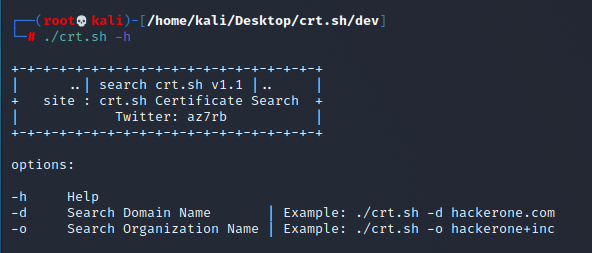
### Screenshot
For a quick visual guide, refer to the screenshot below:
---
### Additional Resources
Don't forget to visit [BugBountyzip](https://github.com/BugBountyzip) for more tools and resources.
Happy hunting! 🎯
================================================
FILE: crt.sh
================================================
#!/bin/bash
echo "
+-+-+-+-+-+-+-+-+-+-+-+-+-+-+-+-+-+-+-+
| ..| search crt.sh v1.1 |.. |
+ site : crt.sh Certificate Search +
| Twitter: az7rb |
+-+-+-+-+-+-+-+-+-+-+-+-+-+-+-+-+-+-+-+
"
Help()
{
# Display Help
echo "Options:"
echo ""
echo "-h Help"
echo "-d Search Domain Name | Example: $0 -d hackerone.com"
echo "-o Search Organization Name | Example: $0 -o hackerone+inc"
echo ""
}
# Request the Search with Domain Name
Domain() {
requestsearch="$(curl -s "https://crt.sh?q=%.$req&output=json")"
echo $requestsearch > req.txt
cat req.txt | jq ".[].common_name,.[].name_value"| cut -d'"' -f2 | sed 's/\\n/\n/g' | sed 's/\*.//g'| sed -r 's/([A-Za-z0-9._%+-]+@[A-Za-z0-9.-]+\.[A-Za-z]{2,4})//g' |sort | uniq > output/domain.$req.txt
rm req.txt
echo ""
cat output/domain.$req.txt
echo ""
echo -e "\e[32m[+]\e[0m Total Save will be \e[31m"$(cat output/domain.$req.txt | wc -l)"\e[0m Domain only"
echo -e "\e[32m[+]\e[0m Output saved in output/domain.$req.txt"
}
# Request the Search with Organization Name
Organization() {
requestsearch="$(curl -s "https://crt.sh?q=$req&output=json")"
echo $requestsearch > req.txt
cat req.txt | jq ".[].common_name"| cut -d'"' -f2 | sed 's/\\n/\n/g' | sed 's/\*.//g'| sed -r 's/([A-Za-z0-9._%+-]+@[A-Za-z0-9.-]+\.[A-Za-z]{2,4})//g' |sort | uniq > output/org.$req.txt
rm req.txt
echo ""
cat output/org.$req.txt
echo ""
echo -e "\e[32m[+]\e[0m Total Save will be \e[31m"$(cat output/org.$req.txt | wc -l)"\e[0m Domain only"
echo -e "\e[32m[+]\e[0m Output saved in output/org.$req.txt"
}
if [ -z $1 ]
then
Help
exit
else
req=$2
fi
while getopts "h|d|o|" option; do
case $option in
h) # display Help
Help
;;
d) # Search Domain Name
Domain
;;
o) # Search Organization Name
Organization
;;
*) # Invalid option
Help
;;
esac
done
================================================
FILE: crt_v2.sh
================================================
#!/bin/bash
# Display banner
echo "
+-+-+-+-+-+-+-+-+-+-+-+-+-+-+-+-+-+-+-+
| ..| search crt.sh v 2.0 |.. |
+ site : crt.sh Certificate Search +
| Twitter: az7rb |
+-+-+-+-+-+-+-+-+-+-+-+-+-+-+-+-+-+-+-+
"
# Function: Help
# Purpose: Display the help message with usage instructions.
Help() {
echo "Options:"
echo ""
echo "-h Help"
echo "-d Search Domain Name | Example: $0 -d hackerone.com"
echo "-o Search Organization Name | Example: $0 -o hackerone+inc"
echo ""
}
# Function: CleanResults
# Purpose: Clean and filter the results by removing unwanted characters and duplicates.
# - Converts escaped newlines to actual newlines.
# - Removes wildcard characters (*).
# - Filters out email addresses.
# - Sorts the results and removes duplicates.
CleanResults() {
sed 's/\\n/\n/g' | \
sed 's/\*.//g' | \
sed -r 's/([A-Za-z0-9._%+-]+@[A-Za-z0-9.-]+\.[A-Za-z]{2,4})//g' | \
sort | uniq
}
# Function: Domain
# Purpose: Search for certificates associated with a specific domain name.
# - Sends a request to crt.sh with the specified domain.
# - Processes the JSON response to extract common names and domain values.
# - Cleans and filters the results using CleanResults function.
# - Saves the results to an output file and displays them.
Domain() {
# Check if the domain name is provided
if [ -z "$req" ]; then
echo "Error: Domain name is required."
exit 1
fi
# Perform the search request to crt.sh
response=$(curl -s "https://crt.sh?q=%.$req&output=json")
# Check if the response is empty
if [ -z "$response" ]; then
echo "No results found for domain $req"
exit 1
fi
# Process the response, clean it, and store the results
results=$(echo "$response" | jq -r ".[].common_name,.[].name_value" | CleanResults)
# Check if there are any valid results after cleaning
if [ -z "$results" ]; then
echo "No valid results found."
exit 1
fi
# Define the output file name based on the domain
output_file="output/domain.$req.txt"
# Save the results to the output file
echo "$results" > "$output_file"
# Display the results and summary
echo ""
echo "$results"
echo ""
echo -e "\e[32m[+]\e[0m Total Save will be \e[31m$(echo "$results" | wc -l)\e[0m Domain only"
echo -e "\e[32m[+]\e[0m Output saved in $output_file"
}
# Function: Organization
# Purpose: Search for certificates associated with a specific organization name.
# - Sends a request to crt.sh with the specified organization name.
# - Processes the JSON response to extract common names.
# - Cleans and filters the results using CleanResults function.
# - Saves the results to an output file and displays them.
Organization() {
# Check if the organization name is provided
if [ -z "$req" ]; then
echo "Error: Organization name is required."
exit 1
fi
# Perform the search request to crt.sh
response=$(curl -s "https://crt.sh?q=$req&output=json")
# Check if the response is empty
if [ -z "$response" ]; then
echo "No results found for organization $req"
exit 1
fi
# Process the response, clean it, and store the results
results=$(echo "$response" | jq -r ".[].common_name" | CleanResults)
# Check if there are any valid results after cleaning
if [ -z "$results" ]; then
echo "No valid results found."
exit 1
fi
# Define the output file name based on the organization name
output_file="output/org.$req.txt"
# Save the results to the output file
echo "$results" > "$output_file"
# Display the results and summary
echo ""
echo "$results"
echo ""
echo -e "\e[32m[+]\e[0m Total Save will be \e[31m$(echo "$results" | wc -l)\e[0m Domain only"
echo -e "\e[32m[+]\e[0m Output saved in $output_file"
}
# Main Script Logic
# If no arguments are provided, display the help message
if [ -z "$1" ]; then
Help
exit
fi
# Parse command-line options using getopts
while getopts "h:d:o:" option; do
case $option in
h) # Display help
Help
;;
d) # Search for domain name
req=$OPTARG
Domain
;;
o) # Search for organization name
req=$OPTARG
Organization
;;
*) # Invalid option, display help
Help
;;
esac
done
================================================
FILE: output/domain.hackerone.com.txt
================================================
api.hackerone.com
docs.hackerone.com
enorekcah.com
events.hackerone.com
go.hackerone.com
gslink.hackerone.com
hackerone.com
info.hackerone.com
links.hackerone.com
mta-sts.forwarding.hackerone.com
mta-sts.hackerone.com
mta-sts.managed.hackerone.com
ssl105537.cloudflaressl.com
ssl333694.cloudflaressl.com
ssl383280.cloudflaressl.com
ssl383281.cloudflaressl.com
ssl383282.cloudflaressl.com
ssl3995.cloudflare.com
ssl4565.cloudflare.com
ssl581117.cloudflaressl.com
ssl581118.cloudflaressl.com
ssl581119.cloudflaressl.com
support.hackerone.com
www.hackerone.com
================================================
FILE: output/org.hackerone+inc.txt
================================================
attjira.inverselink.com
bd1.inverselink.com
bd2.inverselink.com
bd3.inverselink.com
ci.inverselink.com
ci-production.inverselink.com
enorekcah.com
errors.hackerone.net
events.hackerone.com
gitaly.code-pdx1.inverselink.com
go.hacker.one
go.inverselink.com
hacker.one
hackerone.com
hackerone-ext-content.com
hackerone-user-content.com
info.hacker.one
info.hackerone.com
kibana.inverselink.com
links.hackerone.com
logstash.inverselink.com
looker.inverselink.com
ma.hacker.one
payments-production.inverselink.com
phabricator.inverselink.com
proteus.inverselink.com
sentry.inverselink.com
signatures.hacker.one
staging.inverselink.com
storybook.inverselink.com
support-app.inverselink.com
support.hackerone.com
testserver.inverselink.com
ui-docs.inverselink.com
withinsecurity.com
www.enorekcah.com
www.hackerone.com
www.testserver.inverselink.com
gitextract_8x8u27li/
├── README.md
├── crt.sh
├── crt_v2.sh
└── output/
├── domain.hackerone.com.txt
└── org.hackerone+inc.txt
Condensed preview — 5 files, each showing path, character count, and a content snippet. Download the .json file or copy for the full structured content (11K chars).
[
  {
    "path": "README.md",
    "chars": 2131,
    "preview": "### Updated Documentation for crt.sh v2.0\n\nThe **v2.0** version of the script, now named `crt_v2.sh`, introduces signifi"
  },
  {
    "path": "crt.sh",
    "chars": 2097,
    "preview": "#!/bin/bash\n\necho \"\n+-+-+-+-+-+-+-+-+-+-+-+-+-+-+-+-+-+-+-+\n|      ..| search crt.sh v1.1 |..     |\n+   site : crt.sh Ce"
  },
  {
    "path": "crt_v2.sh",
    "chars": 4546,
    "preview": "#!/bin/bash\n\n# Display banner\necho \"\n+-+-+-+-+-+-+-+-+-+-+-+-+-+-+-+-+-+-+-+\n|      ..| search crt.sh v 2.0 |..    |\n+  "
  },
  {
    "path": "output/domain.hackerone.com.txt",
    "chars": 558,
    "preview": "api.hackerone.com\ndocs.hackerone.com\nenorekcah.com\nevents.hackerone.com\ngo.hackerone.com\ngslink.hackerone.com\nhackerone."
  },
  {
    "path": "output/org.hackerone+inc.txt",
    "chars": 843,
    "preview": "attjira.inverselink.com\nbd1.inverselink.com\nbd2.inverselink.com\nbd3.inverselink.com\nci.inverselink.com\nci-production.inv"
  }
]
About this extraction
This page contains the full source code of the az7rb/crt.sh GitHub repository, extracted and formatted as plain text for AI agents and large language models (LLMs). The extraction includes 5 files (9.9 KB), approximately 3.0k tokens. Use this with OpenClaw, Claude, ChatGPT, Cursor, Windsurf, or any other AI tool that accepts text input. You can copy the full output to your clipboard or download it as a .txt file.
Extracted by GitExtract — free GitHub repo to text converter for AI. Built by Nikandr Surkov.