Repository: baidu/mix-img Branch: master Commit: 176e32900a30 Files: 52 Total size: 71.8 KB Directory structure: gitextract_3wr5p3hn/ ├── .editorconfig ├── .eslintrc.js ├── .gitignore ├── .stylelintrc ├── CHANGELOG.md ├── LICENSE ├── README.md ├── babel.config.js ├── ci.yml ├── docs/ │ ├── dev.md │ ├── mixConfig.md │ ├── mixImg.md │ └── tool.md ├── jest.config.js ├── package.json ├── scripts/ │ ├── build.sh │ ├── rollup.config.js │ ├── rollup.e2e.config.js │ ├── rollup.umd.config.js │ └── tool.sh ├── src/ │ ├── config/ │ │ └── errorMap.js │ ├── index.js │ └── utils/ │ ├── canvasUtils.js │ ├── createImg.js │ ├── qrcode.js │ └── tools.js ├── test/ │ ├── config/ │ │ ├── allConfig.js │ │ └── index.js │ ├── e2e/ │ │ ├── index.js │ │ └── test.html │ └── unit/ │ ├── __snapshots__/ │ │ └── canvasUtils.test.js.snap │ ├── canvasUtils.test.js │ ├── index.test.js │ └── tools.test.js └── toolkit/ ├── .editorconfig ├── .eslintrc.js ├── .gitignore ├── .stylelintrc ├── babel.config.js ├── package.json ├── public/ │ └── index.html ├── src/ │ ├── App.vue │ ├── components/ │ │ └── layout/ │ │ └── default/ │ │ ├── Layout.vue │ │ ├── components/ │ │ │ └── header/ │ │ │ └── appHeader.vue │ │ ├── index.js │ │ └── layout.less │ ├── main.js │ ├── router/ │ │ ├── index.js │ │ └── routers.js │ └── template/ │ └── dynamicFe/ │ ├── index.js │ └── index.vue └── vue.config.js ================================================ FILE CONTENTS ================================================ ================================================ FILE: .editorconfig ================================================ root = true [*] charset = utf-8 indent_style = space indent_size = 4 end_of_line = lf insert_final_newline = true trim_trailing_whitespace = true ================================================ FILE: .eslintrc.js ================================================ module.exports = { parser: 'babel-eslint', extends: [ '@ecomfe/eslint-config' ], parserOptions: { babelOptions: { configFile: './babel.config.js' } }, rules: { 'comma-dangle': ['error', { objects: 'never' }] }, overrides: [ { files: [ '**/*.test.js' ], env: { jest: true } } ] }; ================================================ FILE: .gitignore ================================================ # Referenced from https://github.com/github/gitignore/blob/master/Node.gitignore # Logs logs *.log npm-debug.log* yarn-debug.log* yarn-error.log* # Runtime data pids *.pid *.seed *.pid.lock # Directory for instrumented libs generated by jscoverage/JSCover lib-cov # Coverage directory used by tools like istanbul coverage # nyc test coverage .nyc_output # Grunt intermediate storage (http://gruntjs.com/creating-plugins#storing-task-files) .grunt # Bower dependency directory (https://bower.io/) bower_components # node-waf configuration .lock-wscript # Compiled binary addons (https://nodejs.org/api/addons.html) build/Release # Dependency directories node_modules/ jspm_packages/ # Typescript v1 declaration files typings/ # Optional npm cache directory .npm # Optional eslint cache .eslintcache # Optional REPL history .node_repl_history # Output of 'npm pack' *.tgz # Yarn Integrity file .yarn-integrity # dotenv environment variables file .env # next.js build output .next # other stuff .DS_Store Thumbs.db # IDE configurations .idea .vscode # build assets output dist dll mock ================================================ FILE: .stylelintrc ================================================ { "extends": "@ecomfe/stylelint-config/baidu/default" } ================================================ FILE: CHANGELOG.md ================================================ # 更新日志 ### 1.0.6 [变更] 背景图backgroundImg可不传。若fileType为jpeg则背景为黑色,为png则背景透明 [修改] 绘制二维码时,需传入有效的宽高 ### 1.0.5 [修复] 绘制多组文字样式不正确问题 ### 1.0.4 [修改] 更新文档 ### 1.0.3 [修改] 修改参数名称以表达正确意义 ### 1.0.2 [修改] 配置文件整理 ### 1.0.1 [修复] 修复notUseCache字段取值错误 ### 1.0.0 [修改] 多个参数名称更新: baseConfig => base、dynamicConfig => dynamic、 imageTimeOut => loadImgTimeOut [修改] 统一使用img表示图片,弃用image ### 0.0.7 [新增] 新增weight属性控制动态元素绘制层级 [新增] 支持文字设置fontFamily属性 ### 0.0.6 [新增] 增加图片超时时间设置 [修改] 修改draw仅绘制逻辑 ### 0.0.5 [修改] 修改合成成功返回数据格式 ### 0.0.4 [修改] 输出方法名称变更为mix-image ### 0.0.3 [修改] 统一输出数据格式 ### 0.0.2 [修复] 修改依赖配置 ### 0.0.1 [发布] 图片合成工具库 ================================================ FILE: LICENSE ================================================ MIT License Copyright (c) 2021 Baidu Permission is hereby granted, free of charge, to any person obtaining a copy of this software and associated documentation files (the "Software"), to deal in the Software without restriction, including without limitation the rights to use, copy, modify, merge, publish, distribute, sublicense, and/or sell copies of the Software, and to permit persons to whom the Software is furnished to do so, subject to the following conditions: The above copyright notice and this permission notice shall be included in all copies or substantial portions of the Software. THE SOFTWARE IS PROVIDED "AS IS", WITHOUT WARRANTY OF ANY KIND, EXPRESS OR IMPLIED, INCLUDING BUT NOT LIMITED TO THE WARRANTIES OF MERCHANTABILITY, FITNESS FOR A PARTICULAR PURPOSE AND NONINFRINGEMENT. IN NO EVENT SHALL THE AUTHORS OR COPYRIGHT HOLDERS BE LIABLE FOR ANY CLAIM, DAMAGES OR OTHER LIABILITY, WHETHER IN AN ACTION OF CONTRACT, TORT OR OTHERWISE, ARISING FROM, OUT OF OR IN CONNECTION WITH THE SOFTWARE OR THE USE OR OTHER DEALINGS IN THE SOFTWARE. ================================================ FILE: README.md ================================================ # mix-img mix-img图片合成工具,通过调用canvas API实现包括图片和文字的合成并最终生成图片base64,合成成功后向用户展示和分享。 ![image](https://efe-h2.cdn.bcebos.com/ceug/resource/res/2021-03/1616594872570/aol5g54dm8p7.jpg) ## Install ```js npm install --save mix-img ``` ## Quick Start ```js import {mixImg} from 'mix-img'; import {mixConfig} from './mixConfig'; // 配置文件路径自定义 async function getImg() { const res = await mixImg(mixConfig); console.log('图片合成结束', res); } ``` > mixConfig参数配置可参见参数说明文档;Lib库使用者可以通过调试工具在本地进行预览调试,生成配置。 ## Document - [Start](https://github.com/baidu/mix-img/blob/master/README.md) - [Example](https://github.com/baidu/mix-img/blob/master/test/e2e/index.js) - [mixImg方法使用说明](https://github.com/baidu/mix-img/blob/master/docs/mixImg.md) - [mixConfig参数说明文档](https://github.com/baidu/mix-img/blob/master/docs/mixConfig.md) - [参数调试工具](https://github.com/baidu/mix-img/blob/master/docs/tool.md) - [本库开发者阅读](https://github.com/baidu/mix-img/blob/master/docs/dev.md) ## ChangeLog Please visit document [ChangeLog](https://github.com/baidu/mix-img/blob/master/CHANGELOG.md) ================================================ FILE: babel.config.js ================================================ /** * @file: babel配置文件 * @author: zhw * @Date: 2021-01-09 14:16:42 * @Last Modified by: zhw * @Last Modified time: 2021-05-31 22:08:36 */ module.exports = function (api) { api.cache(true); const presets = []; const plugins = [ '@babel/plugin-proposal-optional-chaining', '@babel/plugin-proposal-async-generator-functions', ['@babel/plugin-proposal-pipeline-operator', {proposal: 'smart'}] ]; // 打包umd模块包含完备的polyfill if (process.env.NODE_ENV === 'build:umd') { presets.push([ '@babel/preset-env', { useBuiltIns: 'usage', corejs: 3 } ]); } // 单测需要转一下es modules至commonjs if (process.env.NODE_ENV === 'test') { plugins.push('@babel/plugin-transform-modules-commonjs'); } return { presets, plugins }; }; ================================================ FILE: ci.yml ================================================ ================================================ FILE: docs/dev.md ================================================ ## 开发 ``` # 从本项目中fork代码后,将代码clone到本地。 # 安装依赖 npm i # 运行项目 npm run dev # 构建成功后会自动打开浏览器,访问本地IP:8899/test.html,进行调试。 ``` ## 测试 ``` # 自动化单元测试 npm run test # e2e测试, 同dev开发 npm run test:e2e ``` ================================================ FILE: docs/mixConfig.md ================================================ ## mixConfig 图片合成参数 ### 参数说明 #### mixConfig 参数说明 |参数名|类型|必填|说明|备注| |---|---|---|---|---| |replaceText|Object|否|替换字段配置|需要替换的属性设置为 `{变量}`

支持替换的内容:动态配置中文本的 text、动态配置中图片的 imgUrl、二维码配置的 text| |base|Object|是|基本配置|具体配置参见 base 参数说明| |qrCode|Object|否|二维码配置|具体配置参见 qrCode 参数说明| |dynamic|Array.<object>|否|动态配置|具体配置参见 dynamic 参数说明| |dev|Object|否|开发配置|具体配置参见 dev 参数说明| #### base 参数说明 |参数名|类型|必填|默认值|说明|备注| |---|---|---|---|---|---| |backgroundImg|String|否|-|合成图片的背景图,支持 url 或 base64
若不传,fileType 为 jpeg 时背景为黑色,为 png 时背景透明|图片过大影响性能,建议压缩至 100k 以下| |width|Number|是|300|合成图片的宽度|单位 px| |height|Number|是|300|合成图片的高度|单位 px| |quality|Number|否|0.8|生成图片的质量,取值范围为 (0, 1]|建议设置为0.9及以下| |fileType|String|否|jpeg|生成图片的数据类型,值为 jpeg 或 png|-| |dataType|String|否|base64|最终返回的数据格式,值为 base64 或 canvas|默认返回 base64 字符;若指定为 canvas,则返回绘制完毕的 canvas 对象| |loadingTimeout|Number|否|5000|加载图片响应超时时间|单位 ms,背景图、动态图片超过该时间未加载完毕则返回超时信息| #### qrCode 参数说明 |参数名|类型|必填|默认值|说明|备注| |---|---|---|---|---|---| |width|Number|是|70|生成二维码宽度|单位 px| |height|Number|是|70|生成二维码高度|单位 px| |text|String|是|-|要转换成二维码的文本|支持变量,如:`{qrcodeUrl}`| |x|Number|是|0|横坐标信息|起始点为背景图片左上角| |y|Number|是|0|纵坐标信息|起始点为背景图片左上角| |background|String|否|#ffffff|二维码背景色|-| |foreground|String|否|#000000|二维码前景色|-| |correctLevel|Number|否|1|容错级别,值为 1、0、3、2|对应容错率为:L (7%)、M (15%)、Q (25%)、H (30%)
级别越高,二维码图片允许遮挡的部分越多,二维码信息越复杂| #### dynamic 参数说明 * 动态信息为图片时:type = 1 |参数名|类型|必填|默认值|说明|备注| |---|---|---|---|---|---| |type|Number|是|-|动态信息类型,1 为图片、2 为文字|| |imgUrl|String|是|-|图片地址,支持 url 或 base64|支持变量,如:`{avatarUrl}`| |size|Object|是|-|-|-| |size.dWidth|Number|是|图片实际宽度|绘制图片的宽度|单位 px| |size.dHeight|Number|是|图片实际高度|绘制图片的高度|单位 px| |position|Object|是|-|-|-| |position.x|Number|是|0|横坐标信息|起始点为背景图片左上角| |position.y|Number|是|0|纵坐标信息|起始点为背景图片左上角| |isRound|Boolean|否|false|是否绘制成圆形|-| |weight|Number|否|0|绘制权重|权重越大,绘制越晚,层级越高| * 动态信息为文字时:type = 2 |参数名|类型|必填|默认值|说明|备注| |---|---|---|---|---|---| |type|Number|是|-|动态信息类型,1 为图片、2 为文字|-| |text|String|是|-|文字内容|支持变量,如:`{userName}`| |style|Object|是|-|-|-| |style.color|String|是|#000000|文字颜色|-| |style.fontSize|Number|是|20|文字大小|单位px| |style.fontWeight|String|否|normal|文字粗细,值为 normal、bold、lighter|-| |style.fontFamily|String|否|PingFang SC / Roboto|文字字体|IOS 为`PingFang SC`,Android 为`Roboto`| |style.textAlign|String|是|left|文字水平方向对齐方式,值为 left、center、right 等|[textAlign 文档](https://developer.mozilla.org/zh-CN/docs/Web/API/CanvasRenderingContext2D/textAlign)| |style.textBaseline|String|是|alphabetic|文字垂直方向对齐方式|[textBaseline 文档](https://developer.mozilla.org/zh-CN/docs/Web/API/CanvasRenderingContext2D/textBaseline)| |position|Object|是|-|-|-| |position.x|Number|是|0|横坐标信息|起始点为背景图片左上角| |position.y|Number|是|0|纵坐标信息|起始点为背景图片左上角| |weight|Number|否|0|绘制权重|权重越大,绘制越晚,层级越高| #### dev 参数说明 |参数名|类型|必填|默认值|说明|备注| |---|---|---|---|---|---| |notUseCache|Boolean|否|false|是否禁用缓存|默认启用缓存策略| > 缓存策略:当 dataType 为默认值返回 base64 时,会使用当前传入配置 mixConfig 的 md5 值做键名,缓存合成后的 base64 字符(仅缓存最新的两条)。当用户传入相同配置项时,会从缓存中直接读取 base64 字符。 ### 注意事项 #### 1. 动态元素 weight 属性 weight 属性可以控制动态元素的绘制层级,当动态配置中两个元素存在覆盖关系时,上方元素的 weight 属性需要设置更大的值。若 weight 属性值相同,则绘制层级随机。 - 图片示例 ![图片](https://efe-h2.cdn.bcebos.com/ceug/resource/res/2021-03/1615882302636/q7eb8uj36ww2.png) #### 2. 文字使用自定义字体 >【注意】请确认使用的自定义字体已获得授权,增强法律意识,避免字体侵权行为。 a. 声明自定义字体 - css ```css @font-face { font-family: 'myFont'; src: url("https://efe-h2.cdn.bcebos.com/ceug/resource/res/2021-1/1611891166782/c4964f1209aa.ttf") format('truetype'); } ``` b. 预下载自定义字体 通常情况下,当页面元素用到了 font-face 中定义的字体,则会执行下载。 - css ```css #font-loaded { font-size: 0; font-family: 'myFont', sans-serif; } ``` - html ```html
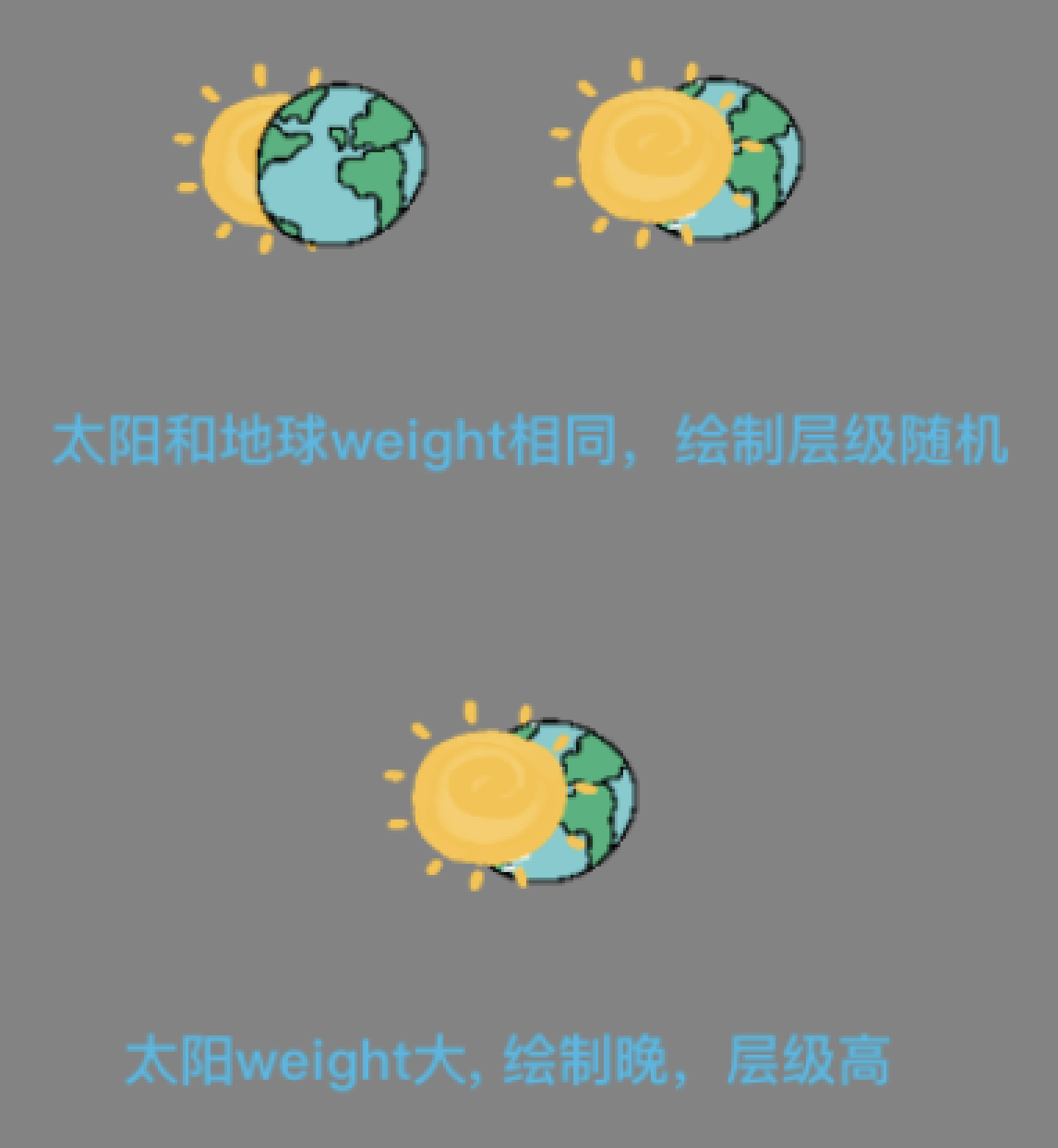
.
``` c. 动态配置中 fontFamily 设置为自定义字体 - 动态配置 ``` 'dynamic': [ { 'type': 2, 'position': { 'x': 187, 'y': 353 }, 'style': { 'fontFamily': 'myFont' 'fontSize': 22, 'color': '#ffebc0', 'textAlign': 'center' }, 'text': '『自定义字体abc123』' } ] ``` > 在绘制文字前,使用了 [FontFaceSet.load()](https://developer.mozilla.org/en-US/docs/Web/API/FontFaceSet/load) 方法等待自定义字体下载完毕再进行后续操作。由于该API存在兼容性问题,若当前环境不可用,且绘制文字时找不到已加载的自定义字体,本次将使用默认字体进行绘制,同时触发自定义字体的加载。 ================================================ FILE: docs/mixImg.md ================================================ ## mixImg 图片合成方法 ### 使用 ```js import {mixImg} from 'mix-img'; import {mixConfig} from './mixConfig'; // 配置文件路径自定义 async function getImg() { const res = await mixImg(mixConfig); console.log('图片合成结束', res); } ``` ### 参数示例 ```js export const mixConfig = { 'replaceText': { 'submitName': '朱雀号', 'userName': '百度网友123', 'avatarUrl': 'https://efe-h2.cdn.bcebos.com/ceug/resource/res/2020-07/1594717976441/idyexeq1u92w.png', 'qrCodeUrl': 'https://www.baidu.com' }, 'base': { 'backgroundImg': 'https://efe-h2.cdn.bcebos.com/ceug/resource/res/2020-07/1594797097021/ml9v716tnxoc.jpg', 'width': 375, 'height': 667, 'quality': 0.8, 'fileType': 'jpeg' }, 'qrCode': { 'width': 74, 'height': 74, 'text': '{qrCodeUrl}', 'x': 279, 'y': 576, 'correctLevel': 1 }, 'dynamic': [ { 'type': 2, 'position': { 'x': 187, 'y': 353 }, 'style': { 'fontSize': 22, 'color': '#ffebc0', 'textAlign': 'center', 'fontWeight': 'bold' }, 'text': '『{submitName}』' }, { 'type': 1, 'position': { 'x': 169, 'y': 207 }, 'size': { 'dWidth': 40, 'dHeight': 40 }, 'imgUrl': '{avatarUrl}', 'isRound': true }, { 'type': 2, 'position': { 'x': 187, 'y': 268 }, 'style': { 'textAlign': 'center', 'fontSize': 16, 'color': '#ffebc0', 'fontWeight': 'normal' }, 'text': '{userName}' } ] }; ``` > 参数含义可参见 [mixConfig参数说明文档](https://github.com/baidu/mix-img/blob/master/docs/mixConfig.md) ### 返回数据 #### 合成成功 1.dataType 为 base64 - 返回参数说明 | 参数 | 类型 | 说明 | | ------ | ------ | ------ | | errno | Number | 错误码,合成成功时为 0 | | data | Object | 数据对象 | | data.base64 | String | 图片的 base64 字符 | - 返回示例 ```json5 { errno: 0, data: { base64: 'data:image/jpeg;base64,000' } } ``` 2.dataType 为 draw - 返回参数说明 | 参数 | 类型 | 说明 | | ------ | ------ | ------ | | errno | Number | 错误码,合成成功时为 0 | | data | Object | 数据对象 | | data.canvas | Object | 绘制完成的 canvas 对象 | - 返回示例 ```json5 { errno: 0, data: { canvas: '' // 绘制完成的 canvas 对象 } } ``` #### 合成失败 - 返回参数说明 | 参数 | 类型 | 说明 | | ------ | ------ | ------ | | errno | Number | 错误码 | | errmsg | String | 错误描述 | | err | Object / String | 错误信息 | - 返回示例 ```json5 { errno: 90002, errmsg: '[mix img err] 创建img标签超时!', err: 'img response time more than 5000 ms' } ``` ================================================ FILE: docs/tool.md ================================================ ## 调试工具 ### 产生背景 图片合成的配置项包含 base(基本配置)、replaceText(替换字段配置)、qrCode(二维码配置)、dynamic(动态元素配置)四大项。 其中动态元素配置更是会有很多的情况,调试配置参数很困难。为了减少开发人员工作量,内置了参数调试工具。用户可以在平台内更改参数,预览合成图片效果。调试完毕后,复制最终配置到项目中使用。 ### 如何启动 ``` # 将本库代码clone到本地 # 安装依赖 npm i # 启动配置调试工具 npm run tool ``` ### 工具界面 ![图片](https://efe-h2.cdn.bcebos.com/ceug/resource/res/2021-05/1620978160538/b0006kpaixoi.png) ### 使用步骤 1. 修改 JSON 配置 2. 点击「生成预览」按钮,进行预览 3. 参数调试完毕,点击「复制配置」按钮 ================================================ FILE: jest.config.js ================================================ /** * @file: 测试配置文件 * @author: zhw * @Date: 2020-06-30 13:45:06 * @Last Modified by: zhw * @Last Modified time: 2021-01-09 16:44:09 */ module.exports = { setupFiles: ['jest-canvas-mock'], rootDir: __dirname, testMatch: ['/test/unit/*.test.js'] }; ================================================ FILE: package.json ================================================ { "name": "mix-img", "version": "1.0.6", "description": "A fast mix image javascript tool libary", "module": "dist/index.min.js", "browser": "dist/umd/index.umd.js", "files": [ "dist" ], "scripts": { "dev": "npm run test:e2e", "lint": "eslint src/** --ignore-path .gitignore", "build": "rollup -c scripts/rollup.config.js", "build:umd": "cross-env NODE_ENV=build:umd rollup -c scripts/rollup.umd.config.js", "test": "cross-env NODE_ENV=test jest --coverage", "test:e2e": "rollup -c scripts/rollup.e2e.config.js -w", "prepublishOnly": "npm run build && npm run build:umd", "tool": "sh ./scripts/tool.sh" }, "husky": { "hooks": { "pre-commit": "lint-staged" } }, "lint-staged": { "linters": { "*.js": [ "eslint" ] } }, "author": "zhenghaiwang", "devDependencies": { "@babel/core": "^7.11.1", "@babel/eslint-parser": "^7.13.4", "@babel/eslint-plugin": "^7.12.1", "@babel/plugin-proposal-async-generator-functions": "^7.12.1", "@babel/plugin-proposal-optional-chaining": "^7.12.7", "@babel/plugin-proposal-pipeline-operator": "^7.5.0", "@babel/plugin-transform-modules-commonjs": "^7.13.0", "@babel/preset-env": "^7.11.0", "@ecomfe/eslint-config": "^7.0.0", "@ecomfe/stylelint-config": "^1.1.1", "babel-eslint": "^11.0.0-beta.0", "core-js": "^3.6.5", "cross-env": "^5.2.0", "eslint": "^7.17.0", "husky": "^4.3.7", "internal-ip": "^6.2.0", "jest": "^26.6.3", "jest-canvas-mock": "^2.3.0", "lint-staged": "^8.1.0", "rollup": "^2.39.1", "rollup-plugin-babel": "^4.4.0", "rollup-plugin-commonjs": "^10.1.0", "rollup-plugin-node-resolve": "^5.2.0", "rollup-plugin-serve": "^1.1.0", "rollup-plugin-terser": "^7.0.0", "san": "^3.10.1", "stylelint": "^13.13.1" }, "engine": { "node": ">= 8" }, "dependencies": { "md5": "^2.3.0", "qrcodejs2-fixes": "0.0.2" }, "license": "MIT", "repository": { "type": "git", "url": "https://github.com/baidu/mix-img.git" } } ================================================ FILE: scripts/build.sh ================================================ export PATH=$NODEJS_BIN_LATEST:$PATH echo "node: $(node -v)" echo "npm: $(npm -v)" out_dir="output" # 安装依赖 export NODE_ENV=development npm install # 跑一遍build export NODE_ENV=production npm run build mkdir -p $out_dir mv ./dist $out_dir if [ $? -eq 0 ]; then echo '[publish] done' exit 0 else echo '[publish] fail' exit 1 fi ================================================ FILE: scripts/rollup.config.js ================================================ /** * @file: rollup配置文件 * @author: zhw * @Date: 2020-07-06 16:16:49 * @Last Modified by: zhw * @Last Modified time: 2021-01-09 16:27:16 */ // rollup.config.js import babel from 'rollup-plugin-babel'; import {terser} from 'rollup-plugin-terser'; export default [ { input: 'src/index.js', output: { file: './dist/index.min.js', format: 'es' }, plugins: [ babel({ runtimeHelpers: true, extensions: ['.js'], exclude: 'node_modules/**' }), terser() ], watch: { include: 'src/**' } }, { input: 'src/index.js', output: { file: './dist/index.js', format: 'es' }, plugins: [ babel({ runtimeHelpers: true, extensions: ['.js'], exclude: 'node_modules/**' }) ], watch: { include: 'src/**' } } ]; ================================================ FILE: scripts/rollup.e2e.config.js ================================================ import babel from 'rollup-plugin-babel'; import serve from 'rollup-plugin-serve'; import resolve from 'rollup-plugin-node-resolve'; import commonjs from 'rollup-plugin-commonjs'; const internalIp = require('internal-ip'); const devHost = internalIp.v4.sync(); export default { input: 'test/e2e/index.js', output: { file: 'dist/e2e/test.js', format: 'iife' }, plugins: [ babel({ include: ['src/**', 'test/**'] }), resolve(), commonjs(), serve({ host: devHost, open: true, openPage: '/test.html', contentBase: ['test/e2e', 'dist'], port: 8899 }) ] }; ================================================ FILE: scripts/rollup.umd.config.js ================================================ /** * @file: rollup umd配置文件 * @author: haoxin */ // rollup.umd.config.js import babel from 'rollup-plugin-babel'; import resolve from 'rollup-plugin-node-resolve'; import commonjs from 'rollup-plugin-commonjs'; import {terser} from 'rollup-plugin-terser'; export default [ { input: 'src/index.js', output: { file: './dist/umd/index.umd.js', format: 'umd', name: 'mixImg' }, plugins: [ babel({ runtimeHelpers: true, extensions: ['.js'], exclude: 'node_modules/**' }), resolve(), commonjs(), terser() ], watch: { include: 'src/**' } } ]; ================================================ FILE: scripts/tool.sh ================================================ cd toolkit || exit npm i npm run start ================================================ FILE: src/config/errorMap.js ================================================ /** * @file errorMap * @author haoxin */ export const errorMap = { CREATE_CANVAS_ERROR: {errno: 10001, errmsg: '[mix img err] 创建canvas标签出错!'}, ADD_BG_ERROR: {errno: 20001, errmsg: '[mix img err] 绘制背景图出错!'}, ADD_DYNAMIC_ERROR: {errno: 30001, errmsg: '[mix img err] 添加动态元素错误!'}, ADD_TEXT_ERROR: {errno: 300011, errmsg: '[mix img err] 添加文字错误!'}, ADD_IMG_ERROR: {errno: 300012, errmsg: '[mix img err] 添加图片错误!'}, ADD_QRCODE_ERROR: {errno: 30002, errmsg: '[mix img err] 添加二维码错误!'}, TO_BASE64_ERROR: {errno: 40001, errmsg: '[mix img err] canvas转base64出错!'}, CREATE_IMG_ERROR: {errno: 90001, errmsg: '[mix img err] 创建img标签出错!请排查该图片是否跨域'}, CREATE_IMG_TIMEOUT: {errno: 90002, errmsg: '[mix img err] 创建img标签超时!'} }; ================================================ FILE: src/index.js ================================================ /** * @file: 图片合成方法 * @author: haoxin */ import { addImgToCanvas, addTextToCanvas, addQrCodeToCanvas, createCanvas, canvasToBase64 } from './utils/canvasUtils'; import {createImg} from './utils/createImg'; import {errorMap} from './config/errorMap'; import {splitArr} from './utils/tools'; import md5 from 'md5'; let hash = ''; /** * 绘制背景图 * @param {Object} config 总配置项 * @return {Promise} config 总配置项 */ export const addBackgroundImg = async config => { try { const {base, ctx} = config; const width = base.width || 300; const height = base.height || 300; if (base.backgroundImg) { const img = await createImg(base.backgroundImg, base.loadingTimeout); ctx.drawImage(img, 0, 0, width, height); } return config; } catch (err) { return Promise.reject(Object.assign({}, errorMap.ADD_BG_ERROR, {err})); } }; /** * 添加动态元素 * @param {Object} config 总配置项 * @return {Promise} config 总配置项 */ export const addDynamicElementToCanvas = async config => { try { const {ctx, dynamic = [], replaceText} = config; const timeout = config.base.loadingTimeout; // 动态配置按weight属性分组 let weightConfig = splitArr(dynamic, 'weight', 0); let weightKeys = Object.keys(weightConfig); weightKeys.sort(function (a, b) { return a - b; }); // 分组绘制动态元素 for (let item of weightKeys) { let dynamicPromises = []; let currWeightConfig = weightConfig[item]; for (let i = 0; i < currWeightConfig.length; i++) { if (currWeightConfig[i].type === 1) { dynamicPromises.push(addImgToCanvas(ctx, currWeightConfig[i], replaceText, timeout)); } else { dynamicPromises.push(addTextToCanvas(ctx, currWeightConfig[i], replaceText)); } } await Promise.all(dynamicPromises); } return config; } catch (err) { return Promise.reject(Object.assign({}, errorMap.ADD_DYNAMIC_ERROR, {err})); } }; /** * 缓存base64文件 * @param {string} base64Img 图片base64字符 */ export const cacheFile = base64Img => { try { let base64Queue = JSON.parse(localStorage.getItem('mix_img_base64_queue')) || []; base64Queue.push(`mix_img_base64_${hash}`); // 缓存超过2个出队 && 删除对应的item if (base64Queue.length > 2) { localStorage.removeItem(base64Queue.shift()); } localStorage.setItem('mix_img_base64_queue', JSON.stringify(base64Queue)); localStorage.setItem(`mix_img_base64_${hash}`, base64Img); } catch (e) { console.log(`[mix img log] ${e}`); } }; /** * 生成base64图片 * @param {Object} config 总配置项 * @return {Promise} base64字符对象 */ export const getBase64 = async config => { const {canvasImg, base, dev} = config; const base64Img = await canvasToBase64(canvasImg, { fileType: base.fileType, quality: base.quality }); if (!dev?.notUseCache) { cacheFile(base64Img); } return { base64: base64Img }; }; /** * 获取canvas处理流程 * @param {Object} config 总配置项 * @return {Promise} base64字符对象 */ export const processCanvas = async config => { return config |> await createCanvas(#) |> await addBackgroundImg(#) |> await addDynamicElementToCanvas(#) |> await addQrCodeToCanvas(#); }; /** * 获取base64处理流程 * @param {Object} config 总配置项 * @return {Promise} canvas对象 */ export const processBase64 = async config => { hash = md5(JSON.stringify(config)); const localBase64Img = config.dev?.notUseCache ? '' : localStorage.getItem(`mix_img_base64_${hash}`); // 有缓存 直接读取 | 无缓存 重新获取 return localBase64Img ? {base64: localBase64Img} : config |> await createCanvas(#) |> await addBackgroundImg(#) |> await addDynamicElementToCanvas(#) |> await addQrCodeToCanvas(#) |> await getBase64(#); }; /** * 图片合成函数 * @param {Object} mixConfig * @param {string} mixConfig.base.dataType 合成类型 默认 'base64' 返回base64图片字符 | 'canvas' 返回canvas对象 * @return {Promise} 合成结果 */ export const mixImg = async mixConfig => { const start = (new Date()).getTime(); try { // 深拷贝配置项 let config = JSON.parse(JSON.stringify(mixConfig)); let data = config.base.dataType === 'canvas' ? await processCanvas(config) : await processBase64(config); console.log(`[mix img time] ${(new Date().getTime() - start)} ms`); return { errno: 0, data }; } catch (err) { return err; } }; ================================================ FILE: src/utils/canvasUtils.js ================================================ /** * @file: 向canvas中增加元素 * @author: haoxin */ import {getQrCodeImg} from './qrcode'; import {clientType, renameKey} from './tools'; import {errorMap} from '../config/errorMap'; import {createImg} from './createImg'; /** * 变量替换 * @param {string} text 带变量的原内容 * @param {Object} replaceText 待替换的变量对象 * @return {string} targetText 替换后的内容 */ export const replaceVariable = (text, replaceText = {}) => { const reg = /(.*)({(.*)})(.*)/g; const matchTextArr = reg.exec(text); return matchTextArr ? matchTextArr[1] + replaceText[matchTextArr[3]] + matchTextArr[4] : text; }; /** * 向canvas中添加文本 * @param {Object} ctx 上下文对象 * @param {Object} config 文本配置 * @param {number} config.position.x 距上距离 * @param {number} config.position.y 距左距离 * @param {string} config.style.color 颜色 * @param {number} config.style.fontSize 大小 * @param {string} config.style.fontWeight 粗细 * @param {string} config.style.textAlign 水平对齐方式 * @param {string} config.style.textBaseline 垂直对齐方式 * @param {string} config.font 字体设置 优先级高于style中的配置 * @param {Object} replaceText 替换项对象 */ export const addTextToCanvas = async (ctx, config = {}, replaceText) => { try { if (!config.text) { return; } // 读取字体配置 const fontSize = config.style?.fontSize ? `${config.style.fontSize}px` : '20px'; const fontWeight = config.style?.fontWeight ? `${config.style.fontWeight}` : 'normal'; const initFF = clientType() === 'ios' ? 'PingFang SC' : 'Roboto'; const fontFamily = config.style?.fontFamily ? `${config.style.fontFamily}, ${initFF}` : initFF; const font = config.font ? config.font : `${fontWeight} ${fontSize} ${fontFamily}`; // 等待字体加载完毕 try { document?.fonts?.load && await document.fonts.load(font); } catch (e) { console.error('[Font loading failed]', e); } // 颜色 ctx.fillStyle = config.style?.color; // 字体 ctx.font = font; // 水平对齐 ctx.textAlign = config.style?.textAlign ? config.style.textAlign : 'left'; // 垂直对齐 ctx.textBaseline = config.style?.textBaseline ? config.style.textBaseline : 'alphabetic'; // 文本 const text = replaceVariable(config.text, replaceText); ctx.fillText(text, config.position?.x || 0, config.position?.y || 0); } catch (err) { return Promise.reject(Object.assign({}, errorMap.ADD_TEXT_ERROR, {err})); } }; /** * 创建圆形裁剪区 * @param {Object} ctx 上下文对象 * @param {number} halfWidth 图形半宽 * @param {number} halfHeight 图形半高 * @param {number} x 图形距上距离 * @param {number} y 图形距左距离 */ export const setClipZone = (ctx, halfWidth, halfHeight, x, y) => { ctx.beginPath(); ctx.arc(halfWidth + x, halfHeight + y, halfWidth, 0, 2 * Math.PI); ctx.clip(); }; /** * 向canvas中添加图片 * @param {Object} ctx 上下文对象 * @param {Object} config 图片配置 * @param {number} config.position.x 距上距离 * @param {number} config.position.y 距左距离 * @param {number} config.size.dWidth 图片宽 * @param {number} config.size.dHeight 图片高 * @param {number} config.isRound 是否裁剪为圆形 * @param {Object} replaceText 替换项对象 * @param {number} timeout 请求图片的超时时间 */ export const addImgToCanvas = async (ctx, config = {}, replaceText, timeout) => { try { if (!config.imgUrl) { return; } // 传入图片为base64不进行变量替换 const isBase64 = config.imgUrl.startsWith('data:image'); const src = isBase64 ? config.imgUrl : replaceVariable(config.imgUrl, replaceText); const img = await createImg(src, timeout); let width = img.width; let height = img.height; if (config.size && config.size.dWidth && config.size.dHeight) { width = config.size.dWidth; height = config.size.dHeight; } ctx.save(); if (config.isRound) { setClipZone(ctx, width / 2, height / 2, config.position?.x, config.position?.y); } ctx.drawImage(img, config.position?.x, config.position?.y, width, height); ctx.restore(); } catch (err) { return Promise.reject(Object.assign({}, errorMap.ADD_IMG_ERROR, {err})); } }; /** * 向canvas中添加二维码 * @param {Object} config 配置项 * @return {Promise} config 配置项 */ export const addQrCodeToCanvas = async config => { try { let {ctx, qrCode, replaceText} = config; if (qrCode?.text && qrCode.width && qrCode.height) { qrCode.text = replaceVariable(qrCode.text, replaceText); qrCode = renameKey(qrCode, 'foreground', 'colorDark'); qrCode = renameKey(qrCode, 'background', 'colorLight'); const qrCodeCanvas = await getQrCodeImg(qrCode); ctx.drawImage(qrCodeCanvas, qrCode.x || 0, qrCode.y || 0, qrCode.width, qrCode.height); } return config.base.dataType === 'canvas' ? {canvas: config.canvasImg} : config; } catch (err) { return Promise.reject(Object.assign({}, errorMap.ADD_QRCODE_ERROR, {err})); } }; /** * 创建canvas标签 * @param {Object} config 配置项 * @return {Object} canvas对象、canvas上下文与配置项合并后的总配置项 */ export const createCanvas = config => { try { const canvasId = '_mixImgCanvas'; const {width, height} = config.base; let canvas = document.getElementById(canvasId); if (!canvas) { canvas = document.createElement('canvas'); canvas.id = canvasId; } canvas.width = width; canvas.height = height; const ctx = canvas.getContext('2d'); ctx.clearRect(0, 0, canvas.width, canvas.height); return Object.assign({canvasImg: canvas, ctx}, config); } catch (err) { return Promise.reject(Object.assign({}, errorMap.CREATE_CANVAS_ERROR, {err})); } }; /** * canvas转base64文件 * @param {Object} canvas canvas对象 * @param {Object} fileConfig 文件配置 * @param {string} fileConfig.fileType 文件类型 * @param {number} fileConfig.quality 文件质量 0-1 * @return {string} base64图片的 data URI */ export const canvasToBase64 = (canvas, fileConfig = {}) => { try { const fileType = fileConfig.fileType ? `image/${fileConfig.fileType}` : 'image/jpeg'; const quality = fileConfig.quality || 0.8; return canvas.toDataURL(fileType, quality); } catch (err) { return Promise.reject(Object.assign({}, errorMap.TO_BASE64_ERROR, {err})); } }; ================================================ FILE: src/utils/createImg.js ================================================ /** * 创建启用了CORS的图片 * @param {string} src 图片的src * @param {number} timeout 请求图片的超时时间 * @return {Promise} HTMLImageElement img对象 */ import {errorMap} from '../config/errorMap'; export const createImg = (src, timeout = 5000) => { return new Promise((resolve, reject) => { const img = new Image(); img.crossOrigin = 'Anonymous'; img.src = src; setTimeout(() => { reject(Object.assign({}, errorMap.CREATE_IMG_TIMEOUT, { err: `img response time more than ${timeout} ms`, errSrc: src })); }, timeout); img.onload = () => { resolve(img); }; img.onerror = err => { reject(Object.assign({}, errorMap.CREATE_IMG_ERROR, {err, errSrc: src})); }; }); }; ================================================ FILE: src/utils/qrcode.js ================================================ /** * @file: 二维码生成 * @author: haoxin */ import QRCode from 'qrcodejs2-fixes'; /** * 获取二维码canvas对象 * @param {Object} config 二维码配置项 * @return {Promise} HTMLCanvasElement 绘制了二维码的canvas对象 */ export const getQrCodeImg = config => { return new Promise((resolve, reject) => { const options = Object.assign({ width: 70, height: 70, colorDark: '#000000', colorLight: '#ffffff', correctLevel: QRCode.CorrectLevel.L }, config, {text: ''}); const qrWrap = document.createElement('div'); const qrCode = new QRCode(qrWrap, options); qrCode.makeCode(config.text); const qrCodeCanvas = qrWrap.getElementsByTagName('canvas')[0]; resolve(qrCodeCanvas); }); }; ================================================ FILE: src/utils/tools.js ================================================ /** * @file: 工具函数 * @author: haoxin */ /** * 判断客户端 * @return {string} 宿主类型 ios | android | pc */ export const clientType = () => { let client = ''; if (/(iPhone|iPad|iPod|iOS)/i.test(navigator.userAgent)) { client = 'ios'; } else if (/(Android)/i.test(navigator.userAgent)) { client = 'android'; } else { client = 'pc'; } return client; }; /** * JSON对象key值重命名 * @param {Object} object 配置项 * @param {string} key 键名 * @param {string} newKey 新键名 * @return {Object} key值重命名后的对象 */ export const renameKey = (object, key, newKey) => { const clonedObj = Object.assign({}, object); const targetKey = clonedObj[key]; if (targetKey && newKey) { delete clonedObj[key]; clonedObj[newKey] = targetKey; } return clonedObj; }; /** * 根据某属性将对象数组进行分组 * @param {Array} array 数组对象 * @param {string} key 键名 * @param {number} init 分组对象键名默认值 * @return {Object} 返回已分组的对象 */ export const splitArr = (array, key, init) => { return array.reduce((acc, item) => { let currentVal = item[key] || init; acc[currentVal] || (acc[currentVal] = []); acc[currentVal].push(item); return acc; }, {}); }; ================================================ FILE: test/config/allConfig.js ================================================ export const mixConfig = { 'dev': { 'notUseCache': false }, 'replaceText': { 'submitName': '朱雀号abc123', 'userName': '百度网友abc123', 'avatarUrl': 'https://efe-h2.cdn.bcebos.com/ceug/resource/res/2020-07/1594717976441/idyexeq1u92w.png', 'qrCodeUrl': 'https://www.baidu.com' }, 'base': { 'backgroundImg': 'https://efe-h2.cdn.bcebos.com/ceug/resource/res/2020-07/1594797097021/ml9v716tnxoc.jpg', 'width': 375, 'height': 667, 'quality': 0.8, 'fileType': 'jpeg', 'loadingTimeout': 3000, 'dataType': 'base64' }, 'qrCode': { 'width': 74, 'height': 74, 'text': '{qrCodeUrl}', 'x': 279, 'y': 576, 'correctLevel': 1 }, 'dynamic': [ { 'type': 2, 'position': { 'x': 187, 'y': 353 }, 'style': { 'fontSize': 20, 'color': '#ffebc0', 'textAlign': 'center', 'fontWeight': 'bold', 'fontFamily': 'myFont' }, 'text': '『{submitName}』' }, { 'type': 2, 'position': { 'x': 187, 'y': 254 }, 'style': { 'textAlign': 'center', 'fontSize': 26, 'color': '#ff0000', 'fontWeight': 'normal', 'fontFamily': 'myFont2' }, 'text': '{userName}', 'weight': 1 }, { 'type': 2, 'position': { 'x': 187, 'y': 204 }, 'style': { 'textAlign': 'center', 'fontSize': 26, 'color': '#ffff00', 'fontWeight': 'normal' }, 'text': '{userName}' }, { 'type': 1, 'position': { 'x': 169, 'y': 207 }, 'size': { 'dWidth': 40, 'dHeight': 40 }, 'imgUrl': '{avatarUrl}', 'isRound': true } ] }; export const base64Config = Object.assign({}, JSON.parse(JSON.stringify(mixConfig))); export const canvasConfig = Object.assign({}, JSON.parse(JSON.stringify(mixConfig))); canvasConfig.base.dataType = 'canvas'; ================================================ FILE: test/config/index.js ================================================ /** * @file: 配置 * @author: zhw * @Date: 2020-06-30 13:45:06 * @Last Modified by: zhw * @Last Modified time: 2020-12-13 17:44:24 */ export const addTextToCanvasConfig = { type: 2, position: { x: 187, y: 200 }, style: { fontSize: 34, color: '#ffebc0', textAlign: 'center', fontWeight: 'normal' }, text: '名字叫小芳' }; export const addTextToCanvasConfigWithReplaceText = { type: 2, position: { x: 187, y: 200 }, style: { fontSize: 34, color: '#ffebc0', textAlign: 'center', fontWeight: 'normal' }, text: '名字叫{name}', replaceText: { name: '小明' } }; export const addImgToCanvasConfig = { type: 1, imgUrl: 'https://efe-h2.cdn.bcebos.com/ceug/resource/res/2020-09/1599455753277/pu26hccjgzoj.png', position: { x: 39, y: 200 }, size: { dWidth: 150, dHeight: 50 } }; export const dynamicConfig = [addTextToCanvasConfig, addImgToCanvasConfig]; export const backgroundImgConfig = { backgroundImg: 'https://efe-h2.cdn.bcebos.com/ceug/resource/res/2020-07/1594797097021/ml9v716tnxoc.jpg', width: 375, height: 667, quality: 0.8, fileType: 'jpeg' }; export const qrCodeConfig = { width: 80, height: 80, text: 'https://www.baidu.com', x: 275, y: 573, background: '#cccccc', foreground: '#000d54', correctLevel: 1 }; export const userAgentMap = { pc: 'Mozilla/5.0 (Macintosh; Intel Mac OS X 10_13_6) AppleWebKit/537.36 (KHTML, like Gecko) Chrome/87.0.4280.88 Safari/537.36', android: 'Mozilla/5.0 (Linux; Android 10; YAL-AL10 Build/HUAWEIYAL-AL10; wv) AppleWebKit/537.36 (KHTML, like Gecko) Version/4.0 Chrome/76.0.3809.89 Mobile Safari/537.36 T7/12.5 SP-engine/2.26.0 baiduboxapp/12.5.1.10 (Baidu; P1 10) NABar/1.0', ios: 'Mozilla/5.0 (iPhone; CPU iPhone OS 14_2 like Mac OS X) AppleWebKit/602.1.50 (KHTML, like Gecko) BaiduBoxApp/12.5.0 Mobile/18B92 Safari/602.1 SP-engine/2.26.0 main%2F1.0 baiduboxapp/12.5.0.11 (Baidu; P2 14.2) NABar/1.0 webCore=0x12c6b1320' }; ================================================ FILE: test/e2e/index.js ================================================ /** * @file: e2e入口文件 * @author: zhw * @Date: 2021-01-09 13:34:21 * @Last Modified by: zhw * @Last Modified time: 2021-05-31 22:08:08 */ import san from 'san'; import {mixImg} from '../../src/index'; import {canvasConfig, base64Config} from '../config/allConfig'; const App = san.defineComponent({ template: `
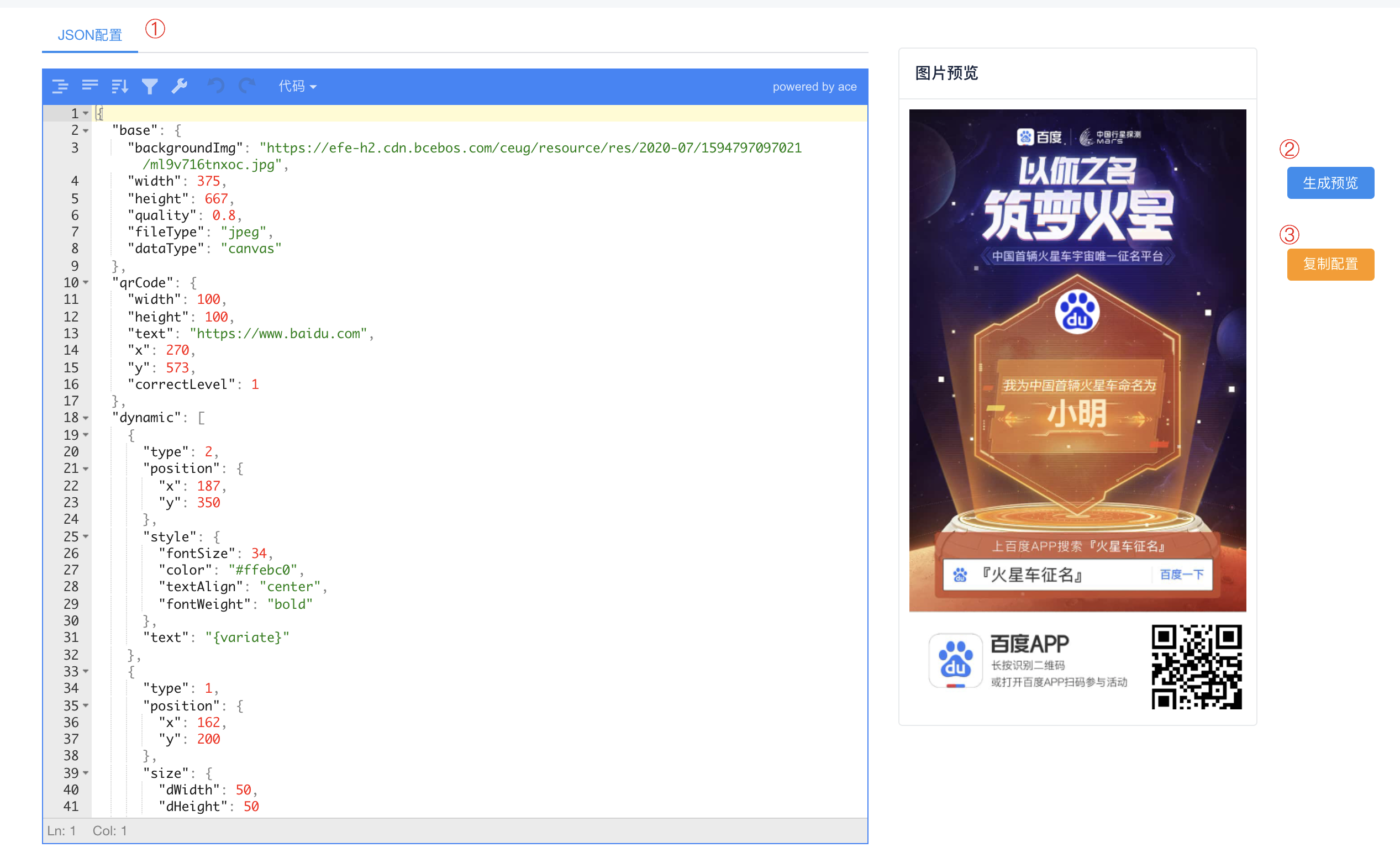
合成图片测试
合成图片
.
.
`, async getImg() { const res = await mixImg(canvasConfig); // 返回了canvas则置入页面 if (res.errno === 0 && res.data.canvas) { document.getElementById('show-img-wrap').appendChild(res.data.canvas); } console.log('图片合成结束~~', res); } }); new App().attach(document.body); ================================================ FILE: test/e2e/test.html ================================================ 合成图片测试 ================================================ FILE: test/unit/__snapshots__/canvasUtils.test.js.snap ================================================ // Jest Snapshot v1, https://goo.gl/fbAQLP exports[`向canvas中添加二维码 绘制二维码 1`] = ` Array [ Object { "props": Object { "dHeight": 150, "dWidth": 300, "dx": 275, "dy": 573, "img": , "sHeight": 150, "sWidth": 300, "sx": 0, "sy": 0, }, "transform": Array [ 1, 0, 0, 1, 0, 0, ], "type": "drawImage", }, ] `; exports[`向canvas中添加图片 添加图片 1`] = ` Array [ Object { "props": Object { "dHeight": 0, "dWidth": 0, "dx": 39, "dy": 200, "img": , "sHeight": 0, "sWidth": 0, "sx": 0, "sy": 0, }, "transform": Array [ 1, 0, 0, 1, 0, 0, ], "type": "drawImage", }, ] `; exports[`向canvas中添加文本 没有替换字段的文本 1`] = ` Array [ Object { "props": Object { "value": "#ffebc0", }, "transform": Array [ 1, 0, 0, 1, 0, 0, ], "type": "fillStyle", }, Object { "props": Object { "value": "34px Roboto", }, "transform": Array [ 1, 0, 0, 1, 0, 0, ], "type": "font", }, Object { "props": Object { "value": "center", }, "transform": Array [ 1, 0, 0, 1, 0, 0, ], "type": "textAlign", }, Object { "props": Object { "value": "alphabetic", }, "transform": Array [ 1, 0, 0, 1, 0, 0, ], "type": "textBaseline", }, Object { "props": Object { "maxWidth": null, "text": "名字叫小芳", "x": 187, "y": 200, }, "transform": Array [ 1, 0, 0, 1, 0, 0, ], "type": "fillText", }, ] `; exports[`设置clipZone 添加图片 1`] = `Array []`; ================================================ FILE: test/unit/canvasUtils.test.js ================================================ /** * @file: 测试h5 * @author: zhw * @Date: 2020-06-30 13:45:06 * @Last Modified by: zhw * @Last Modified time: 2021-01-09 16:48:33 */ let mockImg = {}; let mockCanvas = {}; // createImg方法调用了onload, 但jest-canvas-mock暂时还没找到可以开启这个方法的地方,故mock jest.mock('../../src/utils/createImg', () => { return { createImg: jest.fn(() => { const img = global.document.createElement('img'); img.src = 'https://efe-h2.cdn.bcebos.com/ceug/resource/res/2020-09/1599455753277/pu26hccjgzoj.png'; mockImg = img; return img; }), __esModule: true }; }); // 生成二维码canvas引用外部库,故mock jest.mock('../../src/utils/qrcode', () => { return { getQrCodeImg: jest.fn(() => { const qrcodeCanvas = global.document.createElement('canvas'); mockCanvas = qrcodeCanvas; return qrcodeCanvas; }), __esModule: true }; }); import { replaceVariable, addTextToCanvas, addImgToCanvas, setClipZone, addQrCodeToCanvas } from '../../src/utils/canvasUtils'; import { addTextToCanvasConfig, addTextToCanvasConfigWithReplaceText, addImgToCanvasConfig, qrCodeConfig } from '../config'; // const canvas = document.createElement('canvas'); // const events = canvas.__getEvents(); describe('replaceVariable替换方法', () => { it('replaceVariable变量替换返回是否正常', () => { const text = replaceVariable('{prize}元奖金', {prize: 100}); expect(text).toBe('100元奖金'); }); it('replaceVariable传入空和null返回是否正常', () => { const text = replaceVariable('', null); expect(text).toBe(''); }); it('replaceVariable仅传了变量文本返回是否正常', () => { const text = replaceVariable('{prize}元奖金'); expect(text).toBe('undefined元奖金'); }); }); describe('向canvas中添加文本', () => { Object.defineProperty(document, 'fonts', { writable: true, value: { load: jest.fn().mockImplementation(() => Promise.resolve()) } }); it('没有替换字段的文本', async () => { const canvas = document.createElement('canvas').getContext('2d'); await addTextToCanvas(canvas, addTextToCanvasConfig); const events = canvas.__getEvents(); expect(events).toMatchSnapshot(); }); it('有替换字段的文本', async () => { const canvas = document.createElement('canvas').getContext('2d'); await addTextToCanvas( canvas, addTextToCanvasConfigWithReplaceText, addTextToCanvasConfigWithReplaceText.replaceText ); expect(canvas.fillText).toBeCalledWith('名字叫小明', 187, 200); }); }); describe('向canvas中添加图片', () => { it('添加图片', async () => { const canvas = document.createElement('canvas').getContext('2d'); await addImgToCanvas(canvas, addImgToCanvasConfig); const calls = canvas.__getDrawCalls(); expect(calls).toMatchSnapshot(); expect(canvas.drawImage).toBeCalledWith(mockImg, 39, 200, 150, 50); }); }); describe('设置clipZone', () => { it('添加图片', () => { const canvas = document.createElement('canvas').getContext('2d'); setClipZone(canvas, 4, 4, 80, 80); const calls = canvas.__getDrawCalls(); expect(calls).toMatchSnapshot(); expect(canvas.arc).toBeCalledWith(84, 84, 4, 0, 6.283185307179586); }); }); describe('向canvas中添加二维码', () => { it('绘制二维码', async () => { const canvas = document.createElement('canvas').getContext('2d'); await addQrCodeToCanvas({ctx: canvas, qrCode: qrCodeConfig, base: {}}); const calls = canvas.__getDrawCalls(); expect(calls).toMatchSnapshot(); expect(canvas.drawImage).toBeCalledWith(mockCanvas, 275, 573, 80, 80); }); }); ================================================ FILE: test/unit/index.test.js ================================================ /** * @file: 测试index文件 * @author: haoxin */ // createImg方法调用了onload, 但jest-canvas-mock暂时还没找到可以开启这个方法的地方,故mock jest.mock('../../src/utils/createImg', () => { return { createImg: jest.fn(() => { const img = global.document.createElement('img'); img.src = ''; return img; }), __esModule: true }; }); import { addBackgroundImg, addDynamicElementToCanvas, getBase64, mixImg } from '../../src/index'; // config import {backgroundImgConfig, dynamic} from '../config'; import {base64Config, canvasConfig} from '../config/allConfig'; describe('绘制背景图', () => { it('绘制背景图成功', async () => { const canvas = document.createElement('canvas').getContext('2d'); const data = await addBackgroundImg({ctx: canvas, base: backgroundImgConfig}); expect(data).toHaveProperty('base'); }); it('绘制背景图失败', async () => { expect.assertions(1); try { await addBackgroundImg(); } catch (e) { expect(e).toHaveProperty('errno', 20001); } }); }); describe('添加动态元素', () => { Object.defineProperty(document, 'fonts', { writable: true, value: { load: jest.fn().mockImplementation(() => Promise.resolve()) } }); it('添加动态元素成功', async () => { const canvas = document.createElement('canvas').getContext('2d'); const data = await addDynamicElementToCanvas({ctx: canvas, dynamic, base: {}}); expect(data).toHaveProperty('dynamic'); }); it('添加动态元素失败', async () => { expect.assertions(1); try { await addDynamicElementToCanvas(); } catch (e) { expect(e).toHaveProperty('errno', 30001); } }); }); describe('生成base64图片对象', () => { it('生成jpeg图片', async () => { const canvas = document.createElement('canvas'); const {base64} = await getBase64({ canvasImg: canvas, base: { fileType: 'jpeg', quality: '0.8' } }); expect(base64).toMatch(/data:image\/jpeg;base64,/); }); it('生成png图片', async () => { let canvas = document.createElement('canvas'); const {base64} = await getBase64({ canvasImg: canvas, base: { fileType: 'png', quality: '1' } }); expect(base64).toMatch(/data:image\/png;base64,/); }); }); describe('图片合成函数是否正常', () => { it('dataType传参为base64', async () => { const res = await mixImg(base64Config); expect(res.data.base64).toMatch(/data:image\/jpeg;base64,/); }); it('dataType传参为canvas', async () => { const res = await mixImg(canvasConfig); expect(res.data.canvas).toHaveProperty('id', '_mixImgCanvas'); }); }); ================================================ FILE: test/unit/tools.test.js ================================================ /** * @file: 测试utils方法 * @author: haoxin */ import {clientType, renameKey, splitArr} from '../../src/utils/tools'; import {userAgentMap, qrCodeConfig, dynamicConfig} from '../config'; describe('判断clientType方法', () => { it('clientType为android', () => { Object.defineProperty(navigator, 'userAgent', { writable: true, value: userAgentMap.android }); expect(clientType()).toBe('android'); }); it('clientType为ios', () => { Object.defineProperty(navigator, 'userAgent', { writable: true, value: userAgentMap.ios }); expect(clientType()).toBe('ios'); }); it('clientType为pc', () => { Object.defineProperty(navigator, 'userAgent', { writable: true, value: userAgentMap.pc }); expect(clientType()).toBe('pc'); }); }); describe('renameKey方法', () => { it('重写对象属性名成功', () => { const obj = renameKey(qrCodeConfig, 'foreground', 'colorDark'); expect(obj).toHaveProperty('colorDark'); }); it('被重写的属性不存在时是否不做处理', () => { const obj = renameKey(qrCodeConfig, 'noExistKey', 'newName'); expect(obj).not.toHaveProperty('newName'); }); it('新属性名为空时是否不做处理', () => { const obj = renameKey(qrCodeConfig, 'foreground', ''); expect(obj).toHaveProperty('foreground'); }); }); describe('splitArr方法', () => { it('根据weight属性分组成功', () => { const obj = splitArr(dynamicConfig, 'weight', 0); expect(obj[0]).toHaveLength(2); }); }); ================================================ FILE: toolkit/.editorconfig ================================================ root = true [*] charset = utf-8 indent_style = space indent_size = 4 end_of_line = lf insert_final_newline = true trim_trailing_whitespace = true ================================================ FILE: toolkit/.eslintrc.js ================================================ module.exports = { extends: [ // 代码规范检查 '@ecomfe/eslint-config', // 支持vue文件 '@ecomfe/eslint-config/vue' ], rules: { 'comma-dangle': ['error', { objects: 'never' }] } }; ================================================ FILE: toolkit/.gitignore ================================================ # Referenced from https://github.com/github/gitignore/blob/master/Node.gitignore # Logs logs *.log npm-debug.log* yarn-debug.log* yarn-error.log* fis.conf.js # Runtime data pids *.pid *.seed *.pid.lock # Directory for instrumented libs generated by jscoverage/JSCover lib-cov # Coverage directory used by tools like istanbul coverage # nyc test coverage .nyc_output # Grunt intermediate storage (http://gruntjs.com/creating-plugins#storing-task-files) .grunt # Bower dependency directory (https://bower.io/) bower_components # node-waf configuration .lock-wscript # Compiled binary addons (https://nodejs.org/api/addons.html) build/Release # Dependency directories node_modules/ jspm_packages/ # Typescript v1 declaration files typings/ # Optional npm cache directory .npm # Optional eslint cache .eslintcache # Optional REPL history .node_repl_history # Output of 'npm pack' *.tgz # Yarn Integrity file .yarn-integrity # dotenv environment variables file .env # next.js build output .next # other stuff .DS_Store Thumbs.db # IDE configurations .idea .vscode # build assets /output /dist /dll ================================================ FILE: toolkit/.stylelintrc ================================================ { "extends": "@ecomfe/stylelint-config/baidu/default" } ================================================ FILE: toolkit/babel.config.js ================================================ /** * @file: babel配置 * @author: zhw * @Date: 2020-03-25 18:57:09 * @Last Modified by: zhw * @Last Modified time: 2020-12-27 14:04:50 */ module.exports = { presets: ['@vue/cli-plugin-babel/preset'], plugins: ['@babel/plugin-proposal-optional-chaining'] }; ================================================ FILE: toolkit/package.json ================================================ { "name": "mix-img-toolkit", "version": "0.0.1", "private": true, "scripts": { "serve": "vue-cli-service serve", "build": "vue-cli-service build", "lint": "eslint --ext .js,.vue src/ --ignore-path .gitignore", "start": "npm run serve" }, "dependencies": { "mix-img": "^1.0.6", "clipboard": "^2.0.6", "core-js": "^3.6.4", "jsoneditor": "^8.6.3", "view-design": "^4.3.2", "vue": "^2.6.11", "vue-router": "^3.0.6" }, "devDependencies": { "@babel/core": "^7.12.10", "@babel/eslint-parser": "^7.13.10", "@babel/eslint-plugin": "^7.13.10", "@babel/plugin-proposal-optional-chaining": "^7.11.0", "@ecomfe/eslint-config": "^7.0.0", "@ecomfe/stylelint-config": "^1.1.1", "@vue/cli-plugin-babel": "~4.5.6", "@vue/cli-service": "~4.2.0", "eslint": "^7.27.0", "less": "^3.11.1", "less-loader": "^5.0.0", "stylelint": "^13.13.1", "vue-template-compiler": "^2.6.11" } } ================================================ FILE: toolkit/public/index.html ================================================ 图片合成配置平台
================================================ FILE: toolkit/src/App.vue ================================================ ================================================ FILE: toolkit/src/components/layout/default/Layout.vue ================================================ ================================================ FILE: toolkit/src/components/layout/default/components/header/appHeader.vue ================================================ ================================================ FILE: toolkit/src/components/layout/default/index.js ================================================ /** * @file 路径配置配置 * @author zhw(zhw) */ import Layout from './Layout'; import './layout.less'; export default Layout; ================================================ FILE: toolkit/src/components/layout/default/layout.less ================================================ body { height: 100vh; } .app { height: 100%; } .font-weight { font-weight: bold; } * { margin: 0; padding: 0; list-style: none; } /* KISSY CSS Reset 理念:1. reset 的目的不是清除浏览器的默认样式,这仅是部分工作。清除和重置是紧密不可分的。 2. reset 的目的不是让默认样式在所有浏览器下一致,而是减少默认样式有可能带来的问题。 3. reset 期望提供一套普适通用的基础样式。但没有银弹,推荐根据具体需求,裁剪和修改后再使用。 特色:1. 适应中文;2. 基于最新主流浏览器。 维护:玉伯, 正淳 */ /** 清除内外边距 **/ body, h1, h2, h3, h4, h5, h6, hr, p, blockquote, /* structural elements 结构元素 */ dl, dt, dd, ul, ol, li, /* list elements 列表元素 */ pre, /* text formatting elements 文本格式元素 */ form, fieldset, legend, button, input, textarea, /* form elements 表单元素 */ th, td /* table elements 表格元素 */ { margin: 0; padding: 0; } /** 设置默认字体 **/ body, button, input, select, textarea /* for ie */ { font: 12px/1.5 tahoma, arial, \5b8b\4f53, sans-serif; } h1, h2, h3, h4, h5, h6 { font-size: 100%; } address, cite, dfn, em, var { font-style: normal; } /* 将斜体扶正 */ code, kbd, pre, samp { font-family: courier new, courier, monospace; } /* 统一等宽字体 */ small { font-size: 12px; } /* 小于 12px 的中文很难阅读,让 small 正常化 */ /** 重置列表元素 **/ ul, ol { list-style: none; } /** 重置文本格式元素 **/ a { text-decoration: none; } a:hover { text-decoration: underline; } /** 重置表单元素 **/ legend { color: #000; } /* for ie6 */ fieldset, img { border: 0; } /* img 搭车:让链接里的 img 无边框 */ button, input, select, textarea { font-size: 100%; } /* 使得表单元素在 ie 下能继承字体大小 */ /* 注:optgroup 无法扶正 */ /** 重置表格元素 **/ table { border-collapse: collapse; border-spacing: 0; } /* 清除浮动 */ .ks-clear:after, .clear:after { content: '\20'; display: block; height: 0; clear: both; } .ks-clear, .clear { *zoom: 1; } .main { padding: 30px 100px; width: 960px; margin: 0 auto; } .main h1 { font-size: 36px; color: #333; text-align: left; margin-bottom: 30px; border-bottom: 1px solid #eee; } .helps { margin-top: 40px; } .helps pre { padding: 20px; margin: 10px 0; border: solid 1px #e7e1cd; background-color: #fffdef; overflow: auto; } .icon_lists { width: 100% !important; } .icon_lists li { float: left; width: 100px; height: 180px; text-align: center; list-style: none !important; } .icon_lists .icon { font-size: 42px; line-height: 100px; margin: 10px 0; color: #333; -webkit-transition: font-size 0.25s ease-out 0s; -moz-transition: font-size 0.25s ease-out 0s; transition: font-size 0.25s ease-out 0s; } .icon_lists .icon:hover { font-size: 100px; } .markdown { color: #666; font-size: 14px; line-height: 1.8; } .highlight { line-height: 1.5; } .markdown img { vertical-align: middle; max-width: 100%; } .markdown h1 { color: #404040; font-weight: 500; line-height: 40px; margin-bottom: 24px; } .markdown h2, .markdown h3, .markdown h4, .markdown h5, .markdown h6 { color: #404040; margin: 1.6em 0 0.6em 0; font-weight: 500; clear: both; } .markdown h1 { font-size: 28px; } .markdown h2 { font-size: 22px; } .markdown h3 { font-size: 16px; } .markdown h4 { font-size: 14px; } .markdown h5 { font-size: 12px; } .markdown h6 { font-size: 12px; } .markdown hr { height: 1px; border: 0; background: #e9e9e9; margin: 16px 0; clear: both; } .markdown p, .markdown pre { margin: 1em 0; } .markdown>p, .markdown>blockquote, .markdown>.highlight, .markdown>ol, .markdown>ul { width: 80%; } .markdown ul>li { list-style: circle; } .markdown>ul li, .markdown blockquote ul>li { margin-left: 20px; padding-left: 4px; } .markdown>ul li p, .markdown>ol li p { margin: 0.6em 0; } .markdown ol>li { list-style: decimal; } .markdown>ol li, .markdown blockquote ol>li { margin-left: 20px; padding-left: 4px; } .markdown code { margin: 0 3px; padding: 0 5px; background: #eee; border-radius: 3px; } .markdown pre { border-radius: 6px; background: #f7f7f7; padding: 20px; } .markdown pre code { border: none; background: #f7f7f7; margin: 0; } .markdown strong, .markdown b { font-weight: 600; } .markdown>table { border-collapse: collapse; border-spacing: 0px; empty-cells: show; border: 1px solid #e9e9e9; width: 95%; margin-bottom: 24px; } .markdown>table th { white-space: nowrap; color: #333; font-weight: 600; } .markdown>table th, .markdown>table td { border: 1px solid #e9e9e9; padding: 8px 16px; text-align: left; } .markdown>table th { background: #F7F7F7; } .markdown blockquote { font-size: 90%; color: #999; border-left: 4px solid #e9e9e9; padding-left: 0.8em; margin: 1em 0; font-style: italic; } .markdown blockquote p { margin: 0; } .markdown .anchor { opacity: 0; transition: opacity 0.3s ease; margin-left: 8px; } .markdown .waiting { color: #ccc; } .markdown h1:hover .anchor, .markdown h2:hover .anchor, .markdown h3:hover .anchor, .markdown h4:hover .anchor, .markdown h5:hover .anchor, .markdown h6:hover .anchor { opacity: 1; display: inline-block; } .markdown>br, .markdown>p>br { clear: both; } .hljs { display: block; background: white; padding: 0.5em; color: #333333; overflow-x: auto; } .hljs-comment, .hljs-meta { color: #969896; } .hljs-string, .hljs-variable, .hljs-template-variable, .hljs-strong, .hljs-emphasis, .hljs-quote { color: #df5000; } .hljs-keyword, .hljs-selector-tag, .hljs-type { color: #a71d5d; } .hljs-literal, .hljs-symbol, .hljs-bullet, .hljs-attribute { color: #0086b3; } .hljs-section, .hljs-name { color: #63a35c; } .hljs-tag { color: #333333; } .hljs-title, .hljs-attr, .hljs-selector-id, .hljs-selector-class, .hljs-selector-attr, .hljs-selector-pseudo { color: #795da3; } .hljs-addition { color: #55a532; background-color: #eaffea; } .hljs-deletion { color: #bd2c00; background-color: #ffecec; } .hljs-link { text-decoration: underline; } pre { background: #fff; } ================================================ FILE: toolkit/src/main.js ================================================ /** * @file: 入口文件 * @author: zhw * @Date: 2020-03-25 00:04:33 * @Last Modified by: zhw * @Last Modified time: 2020-12-27 14:04:18 */ import Vue from 'vue'; import ViewUI from 'view-design'; import App from './App.vue'; import router from './router'; import 'view-design/dist/styles/iview.css'; Vue.use(ViewUI); // 开启debug模式 Vue.config.debug = true; // eslint-disable-next-line no-new new Vue({ el: '#app', router, render: h => h(App) }); ================================================ FILE: toolkit/src/router/index.js ================================================ /** * @file: 路由处理 * @author: zhw(zhenghaiwang) * @Date: 2020-03-24 23:36:24 * @Last Modified by: zhw * @Last Modified time: 2020-12-18 17:42:27 */ import Vue from 'vue'; import Router from 'vue-router'; import routes from './routers'; Vue.use(Router); const router = new Router({ routes, mode: 'hash' }); export default router; ================================================ FILE: toolkit/src/router/routers.js ================================================ /** * @file 路径配置配置 * @author zhw(zhw) */ import Main from '../components/layout/default'; export default [ { path: '/', component: Main, redirect: 'imageViewFe', children: [ { path: 'imageViewFe', component: () => import(/* webpackChunkName: 'dynamicFe' */ '../template/dynamicFe/index') } ] } ]; ================================================ FILE: toolkit/src/template/dynamicFe/index.js ================================================ /** * @file: zhw(zhenghaiwang) * @author: zhw(zhenghaiwang) * @Date: 2020-03-24 23:21:07 * @Last Modified by: zhw * @Last Modified time: 2020-03-25 23:54:12 */ import index from './index.vue'; export default index; ================================================ FILE: toolkit/src/template/dynamicFe/index.vue ================================================ ================================================ FILE: toolkit/vue.config.js ================================================ /** * @file: vue conf * @author: zhw(zhenghaiwang) * @Date: 2020-03-24 23:46:04 * @Last Modified by: zhw * @Last Modified time: 2020-12-31 15:57:50 */ module.exports = { publicPath: '/mix-img-toolkit', assetsDir: '', // outputDir: 'dist', devServer: { compress: true, port: 9000, // host: 'ug.baidu-int.com', host: '0.0.0.0', historyApiFallback: true, hot: true, inline: true, open: true } };