Showing preview only (325K chars total). Download the full file or copy to clipboard to get everything.
Repository: barun-saha/slide-deck-ai
Branch: main
Commit: 61160fe5e76b
Files: 118
Total size: 293.6 KB
Directory structure:
gitextract__mkq1u8x/

├── .codecov.yml
├── .coveragerc
├── .gitattributes
├── .gitconfig
├── .github/
│   ├── copilot-instructions.md
│   └── workflows/
│       ├── codeql.yml
│       ├── pr-workflow.yml
│       └── publish-to-pypi.yml
├── .gitignore
├── .readthedocs.yaml
├── .streamlit/
│   └── config.toml
├── LICENSE
├── LITELLM_MIGRATION_SUMMARY.md
├── MANIFEST.in
├── README.md
├── app.py
├── docs/
│   ├── _templates/
│   │   └── module.rst
│   ├── api.rst
│   ├── conf.py
│   ├── generated/
│   │   ├── slidedeckai.cli.CustomArgumentParser.rst
│   │   ├── slidedeckai.cli.CustomHelpFormatter.rst
│   │   ├── slidedeckai.cli.format_model_help.rst
│   │   ├── slidedeckai.cli.format_models_as_bullets.rst
│   │   ├── slidedeckai.cli.format_models_list.rst
│   │   ├── slidedeckai.cli.group_models_by_provider.rst
│   │   ├── slidedeckai.cli.main.rst
│   │   ├── slidedeckai.cli.rst
│   │   ├── slidedeckai.core.SlideDeckAI.rst
│   │   ├── slidedeckai.core.rst
│   │   ├── slidedeckai.helpers.chat_helper.AIMessage.rst
│   │   ├── slidedeckai.helpers.chat_helper.ChatMessage.rst
│   │   ├── slidedeckai.helpers.chat_helper.ChatMessageHistory.rst
│   │   ├── slidedeckai.helpers.chat_helper.ChatPromptTemplate.rst
│   │   ├── slidedeckai.helpers.chat_helper.HumanMessage.rst
│   │   ├── slidedeckai.helpers.chat_helper.rst
│   │   ├── slidedeckai.helpers.file_manager.get_pdf_contents.rst
│   │   ├── slidedeckai.helpers.file_manager.rst
│   │   ├── slidedeckai.helpers.file_manager.validate_page_range.rst
│   │   ├── slidedeckai.helpers.icons_embeddings.find_icons.rst
│   │   ├── slidedeckai.helpers.icons_embeddings.get_embeddings.rst
│   │   ├── slidedeckai.helpers.icons_embeddings.get_icons_list.rst
│   │   ├── slidedeckai.helpers.icons_embeddings.load_saved_embeddings.rst
│   │   ├── slidedeckai.helpers.icons_embeddings.main.rst
│   │   ├── slidedeckai.helpers.icons_embeddings.rst
│   │   ├── slidedeckai.helpers.icons_embeddings.save_icons_embeddings.rst
│   │   ├── slidedeckai.helpers.image_search.extract_dimensions.rst
│   │   ├── slidedeckai.helpers.image_search.get_image_from_url.rst
│   │   ├── slidedeckai.helpers.image_search.get_photo_url_from_api_response.rst
│   │   ├── slidedeckai.helpers.image_search.rst
│   │   ├── slidedeckai.helpers.image_search.search_pexels.rst
│   │   ├── slidedeckai.helpers.llm_helper.get_langchain_llm.rst
│   │   ├── slidedeckai.helpers.llm_helper.get_litellm_llm.rst
│   │   ├── slidedeckai.helpers.llm_helper.get_litellm_model_name.rst
│   │   ├── slidedeckai.helpers.llm_helper.get_provider_model.rst
│   │   ├── slidedeckai.helpers.llm_helper.is_valid_llm_provider_model.rst
│   │   ├── slidedeckai.helpers.llm_helper.rst
│   │   ├── slidedeckai.helpers.llm_helper.stream_litellm_completion.rst
│   │   ├── slidedeckai.helpers.pptx_helper.add_bulleted_items.rst
│   │   ├── slidedeckai.helpers.pptx_helper.format_text.rst
│   │   ├── slidedeckai.helpers.pptx_helper.generate_powerpoint_presentation.rst
│   │   ├── slidedeckai.helpers.pptx_helper.get_flat_list_of_contents.rst
│   │   ├── slidedeckai.helpers.pptx_helper.get_slide_placeholders.rst
│   │   ├── slidedeckai.helpers.pptx_helper.remove_slide_number_from_heading.rst
│   │   ├── slidedeckai.helpers.pptx_helper.rst
│   │   ├── slidedeckai.helpers.text_helper.fix_malformed_json.rst
│   │   ├── slidedeckai.helpers.text_helper.get_clean_json.rst
│   │   ├── slidedeckai.helpers.text_helper.is_valid_prompt.rst
│   │   └── slidedeckai.helpers.text_helper.rst
│   ├── index.rst
│   ├── installation.md
│   ├── models.md
│   ├── requirements.txt
│   └── usage.md
├── examples/
│   ├── example_01.json
│   ├── example_01_structured_output.json
│   ├── example_02.json
│   ├── example_02_structured_output.json
│   ├── example_03.json
│   └── example_04.json
├── pyproject.toml
├── requirements.txt
├── slides_for_this_project_by_this_project/
│   ├── 515fc765-4aaf-4485-a421-551363710c03_1693157001.5142696.pptx
│   └── prompt_on_this_idea.txt
├── src/
│   └── slidedeckai/
│       ├── __init__.py
│       ├── _version.py
│       ├── cli.py
│       ├── core.py
│       ├── file_embeddings/
│       │   ├── embeddings.npy
│       │   └── icons.npy
│       ├── global_config.py
│       ├── helpers/
│       │   ├── __init__.py
│       │   ├── chat_helper.py
│       │   ├── file_manager.py
│       │   ├── icons_embeddings.py
│       │   ├── image_search.py
│       │   ├── llm_helper.py
│       │   ├── pptx_helper.py
│       │   └── text_helper.py
│       ├── icons/
│       │   └── svg_repo.txt
│       ├── pptx_templates/
│       │   ├── Blank.pptx
│       │   ├── Ion_Boardroom.pptx
│       │   ├── Minimalist_sales_pitch.pptx
│       │   └── Urban_monochrome.pptx
│       ├── prompts/
│       │   ├── initial_template_v4_two_cols_img.txt
│       │   └── refinement_template_v4_two_cols_img.txt
│       └── strings.json
└── tests/
    ├── __init__.py
    └── unit/
        ├── __init__.py
        ├── conftest.py
        ├── test_cli.py
        ├── test_core.py
        ├── test_file_manager.py
        ├── test_icons_embeddings.py
        ├── test_image_search.py
        ├── test_llm_helper.py
        ├── test_pptx_helper.py
        ├── test_text_helper.py
        └── test_utils.py
================================================
FILE CONTENTS
================================================
================================================
FILE: .codecov.yml
================================================
ignore:
# Exclude the version file from all coverage calculations
- "src/slidedeckai/_version.py"
coverage:
status:
patch:
default:
target: 80%
threshold: 5%
================================================
FILE: .coveragerc
================================================
[run]
source = src/slidedeckai
omit =
tests/*
*/__init__.py
setup.py
[report]
exclude_lines =
pragma: no cover
def __repr__
if __name__ == '__main__':
raise NotImplementedError
pass
raise ImportError
================================================
FILE: .gitattributes
================================================
*.7z filter=lfs diff=lfs merge=lfs -text
*.arrow filter=lfs diff=lfs merge=lfs -text
*.bin filter=lfs diff=lfs merge=lfs -text
*.bz2 filter=lfs diff=lfs merge=lfs -text
*.ckpt filter=lfs diff=lfs merge=lfs -text
*.ftz filter=lfs diff=lfs merge=lfs -text
*.gz filter=lfs diff=lfs merge=lfs -text
*.h5 filter=lfs diff=lfs merge=lfs -text
*.joblib filter=lfs diff=lfs merge=lfs -text
*.lfs.* filter=lfs diff=lfs merge=lfs -text
*.mlmodel filter=lfs diff=lfs merge=lfs -text
*.model filter=lfs diff=lfs merge=lfs -text
*.msgpack filter=lfs diff=lfs merge=lfs -text
*.npy filter=lfs diff=lfs merge=lfs -text
*.npz filter=lfs diff=lfs merge=lfs -text
*.onnx filter=lfs diff=lfs merge=lfs -text
*.ot filter=lfs diff=lfs merge=lfs -text
*.parquet filter=lfs diff=lfs merge=lfs -text
*.pb filter=lfs diff=lfs merge=lfs -text
*.pickle filter=lfs diff=lfs merge=lfs -text
*.pkl filter=lfs diff=lfs merge=lfs -text
*.pt filter=lfs diff=lfs merge=lfs -text
*.pth filter=lfs diff=lfs merge=lfs -text
*.rar filter=lfs diff=lfs merge=lfs -text
*.safetensors filter=lfs diff=lfs merge=lfs -text
saved_model/**/* filter=lfs diff=lfs merge=lfs -text
*.tar.* filter=lfs diff=lfs merge=lfs -text
*.tar filter=lfs diff=lfs merge=lfs -text
*.tflite filter=lfs diff=lfs merge=lfs -text
*.tgz filter=lfs diff=lfs merge=lfs -text
*.wasm filter=lfs diff=lfs merge=lfs -text
*.xz filter=lfs diff=lfs merge=lfs -text
*.zip filter=lfs diff=lfs merge=lfs -text
*.zst filter=lfs diff=lfs merge=lfs -text
*tfevents* filter=lfs diff=lfs merge=lfs -text
*.pptx filter=lfs diff=lfs merge=lfs -text
pptx_templates/Minimalist_sales_pitch.pptx filter=lfs diff=lfs merge=lfs -text
================================================
FILE: .gitconfig
================================================
================================================
FILE: .github/copilot-instructions.md
================================================
1. In Python code, always use single quote for strings unless double quotes are necessary. Use triple double quotes for docstrings.
2. When defining functions, always include type hints for parameters and return types.
3. Except for logs, use f-strings for string formatting instead of other methods like % or .format().
4. Use Google-style docstrings for all functions and classes.
5. Two blank lines should precede top-level function and class definitions. One blank line between methods inside a class.
6. Max line length is 100 characters. Use brackets to break long lines. Wrap long strings (or expressions) inside ( and ).
7. Split long lines at braces, e.g., like this:
my_function(
param1,
param2
)
NOT like this:
my_function(param1,
param2)
================================================
FILE: .github/workflows/codeql.yml
================================================
# For most projects, this workflow file will not need changing; you simply need
# to commit it to your repository.
#
# You may wish to alter this file to override the set of languages analyzed,
# or to provide custom queries or build logic.
#
# ******** NOTE ********
# We have attempted to detect the languages in your repository. Please check
# the `language` matrix defined below to confirm you have the correct set of
# supported CodeQL languages.
#
name: "CodeQL Advanced"
on:
push:
branches: [ "main" ]
pull_request:
branches: [ "main" ]
schedule:
- cron: '35 12 * * 6'
jobs:
analyze:
name: Analyze (${{ matrix.language }})
# Runner size impacts CodeQL analysis time. To learn more, please see:
# - https://gh.io/recommended-hardware-resources-for-running-codeql
# - https://gh.io/supported-runners-and-hardware-resources
# - https://gh.io/using-larger-runners (GitHub.com only)
# Consider using larger runners or machines with greater resources for possible analysis time improvements.
runs-on: ubuntu-latest
permissions:
# required for all workflows
security-events: write
# required to fetch internal or private CodeQL packs
packages: read
# only required for workflows in private repositories
actions: read
contents: read
strategy:
fail-fast: false
matrix:
include:
- language: python
build-mode: none
# CodeQL supports the following values keywords for 'language': 'actions', 'c-cpp', 'csharp', 'go', 'java-kotlin', 'javascript-typescript', 'python', 'ruby', 'rust', 'swift'
# Use `c-cpp` to analyze code written in C, C++ or both
# Use 'java-kotlin' to analyze code written in Java, Kotlin or both
# Use 'javascript-typescript' to analyze code written in JavaScript, TypeScript or both
# To learn more about changing the languages that are analyzed or customizing the build mode for your analysis,
# see https://docs.github.com/en/code-security/code-scanning/creating-an-advanced-setup-for-code-scanning/customizing-your-advanced-setup-for-code-scanning.
# If you are analyzing a compiled language, you can modify the 'build-mode' for that language to customize how
# your codebase is analyzed, see https://docs.github.com/en/code-security/code-scanning/creating-an-advanced-setup-for-code-scanning/codeql-code-scanning-for-compiled-languages
steps:
- name: Checkout repository
uses: actions/checkout@v4
# Add any setup steps before running the `github/codeql-action/init` action.
# This includes steps like installing compilers or runtimes (`actions/setup-node`
# or others). This is typically only required for manual builds.
# - name: Setup runtime (example)
# uses: actions/setup-example@v1
# Initializes the CodeQL tools for scanning.
- name: Initialize CodeQL
uses: github/codeql-action/init@v3
with:
languages: ${{ matrix.language }}
build-mode: ${{ matrix.build-mode }}
# If you wish to specify custom queries, you can do so here or in a config file.
# By default, queries listed here will override any specified in a config file.
# Prefix the list here with "+" to use these queries and those in the config file.
# For more details on CodeQL's query packs, refer to: https://docs.github.com/en/code-security/code-scanning/automatically-scanning-your-code-for-vulnerabilities-and-errors/configuring-code-scanning#using-queries-in-ql-packs
# queries: security-extended,security-and-quality
# If the analyze step fails for one of the languages you are analyzing with
# "We were unable to automatically build your code", modify the matrix above
# to set the build mode to "manual" for that language. Then modify this step
# to build your code.
# ℹ️ Command-line programs to run using the OS shell.
# 📚 See https://docs.github.com/en/actions/using-workflows/workflow-syntax-for-github-actions#jobsjob_idstepsrun
- if: matrix.build-mode == 'manual'
shell: bash
run: |
echo 'If you are using a "manual" build mode for one or more of the' \
'languages you are analyzing, replace this with the commands to build' \
'your code, for example:'
echo ' make bootstrap'
echo ' make release'
exit 1
- name: Perform CodeQL Analysis
uses: github/codeql-action/analyze@v3
with:
category: "/language:${{matrix.language}}"
================================================
FILE: .github/workflows/pr-workflow.yml
================================================
name: PR Check
on:
pull_request:
branches: [ "main" ]
jobs:
test:
runs-on: ubuntu-latest
strategy:
matrix:
python-version: ["3.10", "3.11", "3.12", "3.13"]
steps:
- uses: actions/checkout@v4
- name: Set up Python ${{ matrix.python-version }}
uses: actions/setup-python@v5
with:
python-version: ${{ matrix.python-version }}
- name: Install dependencies
run: |
python -m pip install --upgrade pip
pip install -r requirements.txt
pip install pytest pytest-asyncio pytest-cov
- name: Run tests with coverage
run: |
pytest tests/unit --asyncio-mode=auto --cov=src/slidedeckai --cov-report=xml --cov-report=html
- name: Upload test results and coverage
uses: actions/upload-artifact@v4
if: always()
with:
name: pytest-results-py${{ matrix.python-version }}
path: |
htmlcov
coverage.xml
retention-days: 30
- name: Coverage Report
uses: codecov/codecov-action@v5
with:
# Provide the Codecov upload token from repo secrets
token: ${{ secrets.CODECOV_TOKEN }}
# Path to the coverage XML produced by pytest-cov
files: ./coverage.xml
# Fail the job if Codecov returns an error
fail_ci_if_error: true
verbose: true
================================================
FILE: .github/workflows/publish-to-pypi.yml
================================================
name: Publish to PyPI
on:
workflow_dispatch:
push:
tags:
- 'v*'
permissions:
contents: read # Default read permission for all jobs
id-token: write # Overridden for the pypi-publish job
jobs:
pypi-publish:
name: Upload release to PyPI
runs-on: ubuntu-latest
environment:
name: pypi
url: https://pypi.org/p/slidedeckai
permissions:
id-token: write # Enables OIDC authentication
steps:
- name: Checkout code
uses: actions/checkout@v4
with:
lfs: true # This ensures Git LFS files are downloaded
- name: Set up Python
uses: actions/setup-python@v5
with:
python-version: "3.10"
- name: Install build tools
run: |
python -m pip install --upgrade pip
pip install build
- name: Build package
run: |
rm -rf dist/ build/ *.egg-info
python -m build
- name: Publish package to PyPI
uses: pypa/gh-action-pypi-publish@release/v1
with:
packages-dir: dist
================================================
FILE: .gitignore
================================================
client_secret.json
credentials.json
token.json
/*.pptx
### Python template
# Byte-compiled / optimized / DLL files
__pycache__/
*.py[cod]
*$py.class
# C extensions
*.so
# Distribution / packaging
.Python
build/
develop-eggs/
dist/
downloads/
eggs/
.eggs/
lib/
lib64/
parts/
sdist/
var/
wheels/
share/python-wheels/
*.egg-info/
.installed.cfg
*.egg
MANIFEST
# PyInstaller
# Usually these files are written by a python script from a template
# before PyInstaller builds the exe, so as to inject date/other infos into it.
*.manifest
*.spec
# Installer logs
pip-log.txt
pip-delete-this-directory.txt
# Unit test / coverage reports
htmlcov/
.tox/
.nox/
.coverage
.coverage.*
.cache
nosetests.xml
coverage.xml
*.cover
*.py,cover
.hypothesis/
.pytest_cache/
cover/
# Translations
*.mo
*.pot
# Django stuff:
*.log
local_settings.py
db.sqlite3
db.sqlite3-journal
# Flask stuff:
instance/
.webassets-cache
# Scrapy stuff:
.scrapy
# Sphinx documentation
docs/_build/
# PyBuilder
.pybuilder/
target/
# Jupyter Notebook
.ipynb_checkpoints
# IPython
profile_default/
ipython_config.py
# pyenv
# For a library or package, you might want to ignore these files since the code is
# intended to run in multiple environments; otherwise, check them in:
# .python-version
# pipenv
# According to pypa/pipenv#598, it is recommended to include Pipfile.lock in version control.
# However, in case of collaboration, if having platform-specific dependencies or dependencies
# having no cross-platform support, pipenv may install dependencies that don't work, or not
# install all needed dependencies.
#Pipfile.lock
# PEP 582; used by e.g. github.com/David-OConnor/pyflow
__pypackages__/
# Celery stuff
celerybeat-schedule
celerybeat.pid
# SageMath parsed files
*.sage.py
# Environments
.env
.venv
env/
venv/
ENV/
env.bak/
venv.bak/
# Spyder project settings
.spyderproject
.spyproject
# Rope project settings
.ropeproject
# mkdocs documentation
/site
# mypy
.mypy_cache/
.dmypy.json
dmypy.json
# Pyre type checker
.pyre/
# pytype static type analyzer
.pytype/
# Cython debug symbols
cython_debug/
.DS_Store
.idea/**/.DS_Store
================================================
FILE: .readthedocs.yaml
================================================
# .readthedocs.yaml
version: 2
build:
os: ubuntu-22.04
tools:
python: "3.10"
sphinx:
configuration: docs/conf.py
python:
install:
- method: pip
# Install the main project code (required for autodoc)
path: .
- requirements: docs/requirements.txt
================================================
FILE: .streamlit/config.toml
================================================
[server]
runOnSave = true
headless = false
maxUploadSize = 2
[browser]
gatherUsageStats = false
[theme]
base = "dark"
================================================
FILE: LICENSE
================================================
MIT License
Copyright (c) 2023 Barun Saha
Permission is hereby granted, free of charge, to any person obtaining a copy
of this software and associated documentation files (the "Software"), to deal
in the Software without restriction, including without limitation the rights
to use, copy, modify, merge, publish, distribute, sublicense, and/or sell
copies of the Software, and to permit persons to whom the Software is
furnished to do so, subject to the following conditions:
The above copyright notice and this permission notice shall be included in all
copies or substantial portions of the Software.
THE SOFTWARE IS PROVIDED "AS IS", WITHOUT WARRANTY OF ANY KIND, EXPRESS OR
IMPLIED, INCLUDING BUT NOT LIMITED TO THE WARRANTIES OF MERCHANTABILITY,
FITNESS FOR A PARTICULAR PURPOSE AND NONINFRINGEMENT. IN NO EVENT SHALL THE
AUTHORS OR COPYRIGHT HOLDERS BE LIABLE FOR ANY CLAIM, DAMAGES OR OTHER
LIABILITY, WHETHER IN AN ACTION OF CONTRACT, TORT OR OTHERWISE, ARISING FROM,
OUT OF OR IN CONNECTION WITH THE SOFTWARE OR THE USE OR OTHER DEALINGS IN THE
SOFTWARE.
================================================
FILE: LITELLM_MIGRATION_SUMMARY.md
================================================
# LiteLLM Integration Summary
## Overview
Successfully replaced LangChain with LiteLLM in the SlideDeck AI project, providing a uniform API to access all LLMs while reducing software dependencies and build times.
## Changes Made
### 1. Updated Dependencies (`requirements.txt`)
**Before:**
```txt
langchain~=0.3.27
langchain-core~=0.3.35
langchain-community~=0.3.27
langchain-google-genai==2.0.10
langchain-cohere~=0.4.4
langchain-together~=0.3.0
langchain-ollama~=0.3.6
langchain-openai~=0.3.28
```
**After:**
```txt
litellm>=1.55.0
google-generativeai # ~=0.8.3
```
### 2. Replaced LLM Helper (`helpers/llm_helper.py`)
- **Removed:** All LangChain-specific imports and implementations
- **Added:** LiteLLM-based implementation with:
- `stream_litellm_completion()`: Handles streaming responses from LiteLLM
- `get_litellm_llm()`: Creates LiteLLM-compatible wrapper objects
- `get_litellm_model_name()`: Converts provider/model to LiteLLM format
- `get_litellm_api_key()`: Manages API keys for different providers
- Backward compatibility alias: `get_langchain_llm = get_litellm_llm`
### 3. Replaced Chat Components (`app.py`)
**Removed LangChain imports:**
```python
from langchain_community.chat_message_histories import StreamlitChatMessageHistory
from langchain_core.messages import HumanMessage
from langchain_core.prompts import ChatPromptTemplate
```
**Added custom implementations:**
```python
class ChatMessage:
def __init__(self, content: str, role: str):
self.content = content
self.role = role
self.type = role # For compatibility
class HumanMessage(ChatMessage):
def __init__(self, content: str):
super().__init__(content, "user")
class AIMessage(ChatMessage):
def __init__(self, content: str):
super().__init__(content, "ai")
class StreamlitChatMessageHistory:
def __init__(self, key: str):
self.key = key
if key not in st.session_state:
st.session_state[key] = []
@property
def messages(self):
return st.session_state[self.key]
def add_user_message(self, content: str):
st.session_state[self.key].append(HumanMessage(content))
def add_ai_message(self, content: str):
st.session_state[self.key].append(AIMessage(content))
class ChatPromptTemplate:
def __init__(self, template: str):
self.template = template
@classmethod
def from_template(cls, template: str):
return cls(template)
def format(self, **kwargs):
return self.template.format(**kwargs)
```
### 4. Updated Function Calls
- Changed `llm_helper.get_langchain_llm()` to `llm_helper.get_litellm_llm()`
- Maintained backward compatibility with existing function names
## Supported Providers
The LiteLLM integration supports all the same providers as before:
- **Azure OpenAI** (`az`): `azure/{model}`
- **Cohere** (`co`): `cohere/{model}`
- **Google Gemini** (`gg`): `gemini/{model}`
- **Hugging Face** (`hf`): `huggingface/{model}` (commented out in config)
- **Ollama** (`ol`): `ollama/{model}` (offline models)
- **OpenRouter** (`or`): `openrouter/{model}`
- **Together AI** (`to`): `together_ai/{model}`
## Benefits Achieved
1. **Reduced Dependencies:** Eliminated 8 LangChain packages, replaced with single LiteLLM package
2. **Faster Build Times:** Fewer packages to install and resolve
3. **Uniform API:** Single interface for all LLM providers
4. **Maintained Compatibility:** All existing functionality preserved
5. **Offline Support:** Ollama integration continues to work for offline models
6. **Streaming Support:** Maintained streaming capabilities for real-time responses
## Testing Results
✅ **LiteLLM Import:** Successfully imported and initialized
✅ **LLM Helper:** Provider parsing and validation working correctly
✅ **Ollama Integration:** Compatible with offline Ollama models
✅ **Custom Chat Components:** Message history and prompt templates working
✅ **App Structure:** All required files present and functional
## Migration Notes
- **Backward Compatibility:** Existing function names maintained (`get_langchain_llm` still works)
- **No Breaking Changes:** All existing functionality preserved
- **Environment Variables:** Same API key environment variables used
- **Configuration:** No changes needed to `global_config.py`
## Next Steps
1. **Deploy:** The app is ready for deployment with LiteLLM
2. **Monitor:** Watch for any provider-specific issues in production
3. **Optimize:** Consider LiteLLM-specific optimizations (caching, retries, etc.)
4. **Document:** Update user documentation to reflect the simplified dependency structure
## Verification
The integration has been thoroughly tested and verified to work with:
- Multiple LLM providers (Google Gemini, Cohere, Together AI, etc.)
- Ollama for offline models
- Streaming responses
- Chat message history
- Prompt template formatting
- Error handling and validation
The SlideDeck AI application is now successfully running on LiteLLM with reduced dependencies and improved maintainability.
================================================
FILE: MANIFEST.in
================================================
include src/slidedeckai/strings.json
recursive-include src/slidedeckai/prompts *.txt
recursive-include src/slidedeckai/pptx_templates *.pptx
recursive-include src/slidedeckai/icons *.png
recursive-include src/slidedeckai/icons *.txt
recursive-include src/slidedeckai/file_embeddings *.npy
================================================
FILE: README.md
================================================
---
title: SlideDeck AI
emoji: 🏢
colorFrom: yellow
colorTo: green
sdk: streamlit
sdk_version: 1.55.0
app_file: app.py
pinned: false
license: mit
---
[](https://pypi.org/project/slidedeckai/)
[](https://codecov.io/gh/barun-saha/slide-deck-ai)
[](https://slidedeckai.readthedocs.io/en/latest/?badge=latest)
[](https://opensource.org/licenses/MIT)

[](https://huggingface.co/spaces/barunsaha/slide-deck-ai)
# SlideDeck AI: The AI Assistant for Professional Presentations
We all spend countless hours **creating** slides and meticulously organizing our thoughts for any presentation.
**SlideDeck AI is your powerful AI assistant** for presentation generation. Co-create stunning, professional slide decks on any topic with the help of cutting-edge **Artificial Intelligence** and **Large Language Models**.
**The workflow is simple:** Describe your topic, and let SlideDeck AI generate a complete **PowerPoint slide deck** for you—it's that easy!
## Star History
[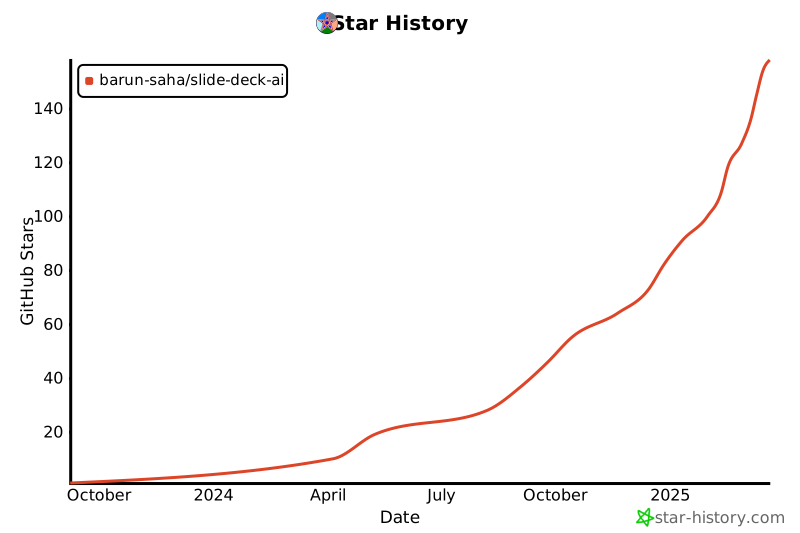](https://star-history.com/#barun-saha/slide-deck-ai&Date)
## How It Works: The Automated Deck Generation Process
SlideDeck AI streamlines the creation process through the following steps:
1. **AI Content Generation:** Given a topic description, a Large Language Model (LLM) generates the *initial* slide content as structured JSON data based on a pre-defined schema.
2. **Visual Enhancement:** It uses keywords from the JSON output to search and download relevant images, which are added to the presentation with a certain probability.
3. **PPTX Assembly:** Subsequently, the powerful `python-pptx` library is used to generate the slides based on the structured JSON data. A user can choose from a set of pre-defined presentation templates.
4. **Refinement & Iteration:** At this stage onward, a user can provide additional instructions to *refine* the content (e.g., "add another slide," or "modify an existing slide"). A history of instructions is maintained for seamless iteration.
5. **Instant Download:** Every time SlideDeck AI generates a PowerPoint presentation, a download button is provided to instantly save the file.
In addition, SlideDeck AI can also create a presentation based on **PDF files**, transforming documents into decks!
## Python API Quickstart
<a target="_blank" href="https://colab.research.google.com/drive/1YA9EEmyiQFk03bOSc7lZnxK5l2hAL60l?usp=sharing">
<img src="https://colab.research.google.com/assets/colab-badge.svg" alt="Open In Colab"/>
</a>
```python
from slidedeckai.core import SlideDeckAI
slide_generator = SlideDeckAI(
model='[gg]gemini-2.5-flash-lite',
topic='Make a slide deck on AI',
api_key='your-google-api-key', # Or set via environment variable
)
pptx_path = slide_generator.generate()
print(f'🤖 Generated slide deck: {pptx_path}')
```
## CLI Usage
Generate a new slide deck:
```bash
slidedeckai generate --model '[gg]gemini-2.5-flash-lite' --topic 'Make a slide deck on AI' --api-key 'your-google-api-key'
```
Launch the Streamlit app:
```bash
slidedeckai launch
```
List supported models (these are the only models supported by SlideDeck AI):
```bash
slidedeckai --list-models
```
## Unmatched Flexibility: Choose Your AI Brain
SlideDeck AI stands out by supporting a wide array of LLMs from several online providers—Azure/ OpenAI, Google, SambaNova, Together AI, and OpenRouter. This gives you flexibility and control over your content generation style.
Most supported service providers also offer generous free usage tiers, meaning you can often start building without immediate billing concerns.
Model names in SlideDeck AI are specified in the `[code]model-name` format. It begins with a two-character prefix code in square brackets to indicate the provider, for example, `[oa]` for OpenAI, `[gg]` for Google Gemini, and so on. Following the code, the model name is specified, for example, `gemini-2.0-flash` or `gpt-4o`. So, to use Google Gemini 2.0 Flash Lite, the model name would be `[gg]gemini-2.0-flash-lite`.
Based on several experiments, SlideDeck AI generally recommends the use of Gemini Flash and GPT-4o to generate the best-quality slide decks.
The supported LLMs offer different styles of content generation. Use one of the following LLMs along with relevant API keys/access tokens, as appropriate, to create the content of the slide deck:
| LLM | Provider (code) | Requires API key | Characteristics |
|:------------------------------------|:-------------------------|:-------------------------------------------------------------------------------------------------------------------------|:-------------------------|
| Claude Haiku 4.5 | Anthropic (`an`) | Mandatory; [get here](https://platform.claude.com/settings/keys) | Faster, detailed |
| Gemini 2.0 Flash | Google Gemini API (`gg`) | Mandatory; [get here](https://aistudio.google.com/apikey) | Faster, longer content |
| Gemini 2.0 Flash Lite | Google Gemini API (`gg`) | Mandatory; [get here](https://aistudio.google.com/apikey) | Fastest, longer content |
| Gemini 2.5 Flash | Google Gemini API (`gg`) | Mandatory; [get here](https://aistudio.google.com/apikey) | Faster, longer content |
| Gemini 2.5 Flash Lite | Google Gemini API (`gg`) | Mandatory; [get here](https://aistudio.google.com/apikey) | Fastest, longer content |
| GPT-4.1-mini | OpenAI (`oa`) | Mandatory; [get here](https://platform.openai.com/settings/organization/api-keys) | Faster, medium content |
| GPT-4.1-nano | OpenAI (`oa`) | Mandatory; [get here](https://platform.openai.com/settings/organization/api-keys) | Faster, shorter content |
| GPT-5 | OpenAI (`oa`) | Mandatory; [get here](https://platform.openai.com/settings/organization/api-keys) | Slow, shorter content |
| GPT | Azure OpenAI (`az`) | Mandatory; [get here](https://ai.azure.com/resource/playground) NOTE: You need to have your subscription/billing set up | Faster, longer content |
| Command R+ | Cohere (`co`) | Mandatory; [get here](https://dashboard.cohere.com/api-keys) | Shorter, simpler content |
| Gemini-2.0-flash-001 | OpenRouter (`or`) | Mandatory; [get here](https://openrouter.ai/settings/keys) | Faster, longer content |
| GPT-3.5 Turbo | OpenRouter (`or`) | Mandatory; [get here](https://openrouter.ai/settings/keys) | Faster, longer content |
| DeepSeek-V3.1 | SambaNova (`sn`) | Mandatory; [get here](https://cloud.sambanova.ai/apis) | Fast, detailed content |
| Meta-Llama-3.3-70B-Instruct | SambaNova (`sn`) | Mandatory; [get here](https://cloud.sambanova.ai/apis) | Fast, shorter |
| DeepSeek V3-0324 | Together AI (`to`) | Mandatory; [get here](https://api.together.ai/settings/api-keys) | Slower, medium-length |
| Llama 3.3 70B Instruct Turbo | Together AI (`to`) | Mandatory; [get here](https://api.together.ai/settings/api-keys) | Slower, detailed |
| Llama 3.1 8B Instruct Turbo 128K | Together AI (`to`) | Mandatory; [get here](https://api.together.ai/settings/api-keys) | Faster, shorter |
> **🔒 IMPORTANT: Your Privacy and Security are Paramount**
>
> SlideDeck AI does **NOT** store your API keys/tokens or transmit them elsewhere. Your key is _only_ used to invoke the relevant LLM for content generation—and that's it! As a fully **Open-Source** project, we encourage you to audit the code yourself for complete peace of mind.
In addition, offline LLMs provided by Ollama can be used. Read below to know more.
## Icons
SlideDeck AI uses a subset of icons from [bootstrap-icons-1.11.3](https://github.com/twbs/icons) (MIT license) in the slides. A few icons from [SVG Repo](https://www.svgrepo.com/)
(CC0, MIT, and Apache licenses) are also used.
## Local Development
SlideDeck AI uses LLMs via different providers. To run this project by yourself, you need to use an appropriate API key, for example, in a `.env` file.
Alternatively, you can provide the access token in the app's user interface itself (UI).
### Ultimate Privacy: Offline Generation with Ollama
SlideDeck AI allows the use of **offline LLMs** to generate the contents of the slide decks. This is typically suitable for individuals or organizations who would like to use self-hosted LLMs for privacy concerns, for example.
Offline LLMs are made available via Ollama. Therefore, a pre-requisite here is to have [Ollama installed](https://ollama.com/download) on the system and the desired [LLM](https://ollama.com/search) pulled locally. You should choose a model to use based on your hardware capacity. However, if you have no GPU, [gemma3:1b](https://ollama.com/library/gemma3:1b) can be a suitable model to run only on CPU.
In addition, the `RUN_IN_OFFLINE_MODE` environment variable needs to be set to `True` to enable the offline mode. This, for example, can be done using a `.env` file or from the terminal. The typical steps to use SlideDeck AI in offline mode (in a `bash` shell) are as follows:
```bash
# Environment initialization, especially on Debian
sudo apt update -y
sudo apt install python-is-python3 -y
sudo apt install git -y
# Change the package name based on the Python version installed: python -V
sudo apt install python3.11-venv -y
# Install Git Large File Storage (LFS)
sudo apt install git-lfs -y
git lfs install
ollama list # View locally available LLMs
export RUN_IN_OFFLINE_MODE=True # Enable the offline mode to use Ollama
git clone [https://github.com/barun-saha/slide-deck-ai.git](https://github.com/barun-saha/slide-deck-ai.git)
cd slide-deck-ai
git lfs pull # Pull the PPTX template files - ESSENTIAL STEP!
python -m venv venv # Create a virtual environment
source venv/bin/activate # On a Linux system
pip install -r requirements.txt
streamlit run ./app.py # Run the application
```
> 💡If you have cloned the repository locally but cannot open and view the PPTX templates, you may need to run `git lfs pull` to download the template files. Without this, although content generation will work, the slide deck cannot be created.
The `.env` file should be created inside the `slide-deck-ai` directory.
The UI is similar to the online mode. However, rather than selecting an LLM from a list, one has to write the name of the Ollama model to be used in a textbox. There is no API key asked here.
The online and offline modes are mutually exclusive. So, setting `RUN_IN_OFFLINE_MODE` to `False` will make SlideDeck AI use the online LLMs (i.e., the "original mode."). By default, `RUN_IN_OFFLINE_MODE` is set to `False`.
Finally, the focus is on using offline LLMs, not going completely offline. So, Internet connectivity would still be required to fetch the images from Pexels.
# Live Demo
Experience the power now!
- 🚀 Live App: [Try SlideDeck AI on Hugging Face Spaces](https://huggingface.co/spaces/barunsaha/slide-deck-ai)
- 🎥 Quick Demo: [Watch the core chat interface in action (YouTube)](https://youtu.be/QvAKzNKtk9k)
- 🤝 Enterprise Showcase: [See a demonstration using Azure OpenAI (YouTube)](https://youtu.be/oPbH-z3q0Mw)
# 🏆 Recognized Excellence
SlideDeck AI has won the 3rd Place in the [Llama 2 Hackathon with Clarifai](https://lablab.ai/event/llama-2-hackathon-with-clarifai) in 2023.
# Contributors
SlideDeck AI is glad to have the following community contributions:
- [Aditya](https://github.com/AdiBak): added support for page range selection for PDF files and new chat button.
- [Sagar Bharatbhai Bharadia](https://github.com/sagarbharadia17): added support for Gemini 2.5 Flash Lite and Gemini 2.5 Flash LLMs.
- [Sairam Pillai](https://github.com/sairampillai): unified the project's LLM access by migrating the API calls to **LiteLLM**.
- [Srinivasan Ragothaman](https://github.com/rsrini7): added OpenRouter support and API keys mapping from the `.env` file.
- [Zakir Jiwani](https://github.com/JiwaniZakir): updated SambaNova models.
Thank you all for your contributions!
[](#contributors)
================================================
FILE: app.py
================================================
"""
Streamlit app containing the UI and the application logic.
"""
import datetime
import logging
import os
import pathlib
import random
import sys
import httpx
import json5
import ollama
import requests
import streamlit as st
from dotenv import load_dotenv
sys.path.insert(0, os.path.abspath('src'))
from slidedeckai.core import SlideDeckAI
from slidedeckai import global_config as gcfg
from slidedeckai.global_config import GlobalConfig
from slidedeckai.helpers import llm_helper, text_helper
import slidedeckai.helpers.file_manager as filem
from slidedeckai.helpers.chat_helper import ChatMessage, HumanMessage, AIMessage
from slidedeckai.helpers import chat_helper
load_dotenv()
logger = logging.getLogger(__name__)
RUN_IN_OFFLINE_MODE = os.getenv('RUN_IN_OFFLINE_MODE', 'False').lower() == 'true'
# Session variables
SLIDE_GENERATOR = 'slide_generator_instance'
CHAT_MESSAGES = 'chat_messages'
DOWNLOAD_FILE_KEY = 'download_file_name'
IS_IT_REFINEMENT = 'is_it_refinement'
ADDITIONAL_INFO = 'additional_info'
PDF_FILE_KEY = 'pdf_file'
API_INPUT_KEY = 'api_key_input'
TEXTS = list(GlobalConfig.PPTX_TEMPLATE_FILES.keys())
CAPTIONS = [GlobalConfig.PPTX_TEMPLATE_FILES[x]['caption'] for x in TEXTS]
class StreamlitChatMessageHistory:
"""Chat message history stored in Streamlit session state."""
def __init__(self, key: str):
"""Initialize the chat message history."""
self.key = key
if key not in st.session_state:
st.session_state[key] = []
@property
def messages(self):
"""Get all chat messages in the history."""
return st.session_state[self.key]
def add_user_message(self, content: str):
"""Add a user message to the history."""
st.session_state[self.key].append(HumanMessage(content))
def add_ai_message(self, content: str):
"""Add an AI message to the history."""
st.session_state[self.key].append(AIMessage(content))
@st.cache_data
def _load_strings() -> dict:
"""
Load various strings to be displayed in the app.
Returns:
The dictionary of strings.
"""
with open(GlobalConfig.APP_STRINGS_FILE, 'r', encoding='utf-8') as in_file:
return json5.loads(in_file.read())
@st.cache_data
def _get_prompt_template(is_refinement: bool) -> str:
"""
Return a prompt template.
Args:
is_refinement: Whether this is the initial or refinement prompt.
Returns:
The prompt template as f-string.
"""
if is_refinement:
with open(GlobalConfig.REFINEMENT_PROMPT_TEMPLATE, 'r', encoding='utf-8') as in_file:
template = in_file.read()
else:
with open(GlobalConfig.INITIAL_PROMPT_TEMPLATE, 'r', encoding='utf-8') as in_file:
template = in_file.read()
return template
def are_all_inputs_valid(
user_prompt: str,
provider: str,
selected_model: str,
user_key: str,
azure_deployment_url: str = '',
azure_endpoint_name: str = '',
azure_api_version: str = '',
) -> bool:
"""
Validate user input and LLM selection.
Args:
user_prompt: The prompt.
provider: The LLM provider.
selected_model: Name of the model.
user_key: User-provided API key.
azure_deployment_url: Azure OpenAI deployment URL.
azure_endpoint_name: Azure OpenAI model endpoint.
azure_api_version: Azure OpenAI API version.
Returns:
`True` if all inputs "look" OK; `False` otherwise.
"""
if not text_helper.is_valid_prompt(user_prompt):
handle_error(
'Not enough information provided!'
' Please be a little more descriptive and type a few words'
' with a few characters :)',
False
)
return False
if not provider or not selected_model:
handle_error('No valid LLM provider and/or model name found!', False)
return False
if not llm_helper.is_valid_llm_provider_model(
provider, selected_model, user_key,
azure_endpoint_name, azure_deployment_url, azure_api_version
):
handle_error(
'The LLM settings do not look correct. Make sure that an API key/access token'
' is provided if the selected LLM requires it. An API key should be 6-200 characters'
' long, only containing alphanumeric characters, hyphens, and underscores.\n\n'
'If you are using Azure OpenAI, make sure that you have provided the additional and'
' correct configurations.',
False
)
return False
return True
def handle_error(error_msg: str, should_log: bool):
"""
Display an error message in the app.
Args:
error_msg: The error message to be displayed.
should_log: If `True`, log the message.
"""
if should_log:
logger.error(error_msg)
st.error(error_msg)
def reset_api_key():
"""
Clear API key input when a different LLM is selected from the dropdown list.
"""
st.session_state.api_key_input = ''
def reset_chat_history():
"""
Clear the chat history and related session state variables.
"""
# Clear session state variables using pop with None default
st.session_state.pop(SLIDE_GENERATOR, None)
st.session_state.pop(CHAT_MESSAGES, None)
st.session_state.pop(IS_IT_REFINEMENT, None)
st.session_state.pop(ADDITIONAL_INFO, None)
st.session_state.pop(PDF_FILE_KEY, None)
# Remove previously generated temp PPTX file
temp_pptx_path = st.session_state.pop(DOWNLOAD_FILE_KEY, None)
if temp_pptx_path:
pptx_path = pathlib.Path(temp_pptx_path)
if pptx_path.exists() and pptx_path.is_file():
pptx_path.unlink()
APP_TEXT = _load_strings()
# -----= UI display begins here =-----
with st.sidebar:
# New Chat button at the top of sidebar
col1, col2, col3 = st.columns([.17, 0.8, .1])
with col2:
if st.button('New Chat 💬', help='Start a new conversation', key='new_chat_button'):
reset_chat_history() # Reset the chat history when the button is clicked
# The PPT templates
pptx_template = st.sidebar.radio(
'1: Select a presentation template:',
TEXTS,
captions=CAPTIONS,
horizontal=True
)
if RUN_IN_OFFLINE_MODE:
llm_provider_to_use = st.text_input(
label='2: Enter Ollama model name to use (e.g., gemma3:1b):',
help=(
'Specify a correct, locally available LLM, found by running `ollama list`, for'
' example, `gemma3:1b`, `mistral:v0.2`, and `mistral-nemo:latest`. Having an'
' Ollama-compatible and supported GPU is strongly recommended.'
)
)
# If a SlideDeckAI instance already exists in session state, update its model
# to reflect the user change rather than reusing the old model
# No API key required for local models
if SLIDE_GENERATOR in st.session_state and llm_provider_to_use:
try:
st.session_state[SLIDE_GENERATOR].set_model(llm_provider_to_use)
except Exception as e:
logger.error('Failed to update model on existing SlideDeckAI: %s', e)
# If updating fails, drop the stored instance so a new one is created
st.session_state.pop(SLIDE_GENERATOR, None)
api_key_token: str = ''
azure_endpoint: str = ''
azure_deployment: str = ''
api_version: str = ''
else:
# The online LLMs
llm_provider_to_use = st.sidebar.selectbox(
label='2: Select a suitable LLM to use:\n\n(Gemini and Mistral-Nemo are recommended)',
options=[f'{k} ({v["description"]})' for k, v in GlobalConfig.VALID_MODELS.items()],
index=GlobalConfig.DEFAULT_MODEL_INDEX,
help=GlobalConfig.LLM_PROVIDER_HELP,
on_change=reset_api_key
).split(' ')[0]
# --- Automatically fetch API key from .env if available ---
# Extract provider key using regex
provider_match = GlobalConfig.PROVIDER_REGEX.match(llm_provider_to_use)
if provider_match:
selected_provider = provider_match.group(1)
else:
# If regex doesn't match, try to extract provider from the beginning
selected_provider = (
llm_provider_to_use.split(' ')[0]
if ' ' in llm_provider_to_use else llm_provider_to_use
)
logger.warning(
'Provider regex did not match for: %s, using: %s',
llm_provider_to_use, selected_provider
)
# Validate that the selected provider is valid
if selected_provider not in GlobalConfig.VALID_PROVIDERS:
logger.error('Invalid provider: %s', selected_provider)
handle_error(f'Invalid provider selected: {selected_provider}', True)
st.stop()
env_key_name = GlobalConfig.PROVIDER_ENV_KEYS.get(selected_provider)
default_api_key = os.getenv(env_key_name, '') if env_key_name else ''
# Always sync session state to env value if needed (autofill on provider change)
if default_api_key and st.session_state.get(API_INPUT_KEY, None) != default_api_key:
st.session_state[API_INPUT_KEY] = default_api_key
api_key_token = st.text_input(
label=(
'3: Paste your API key/access token:\n\n'
'*Mandatory* for all providers.'
),
key=API_INPUT_KEY,
type='password',
disabled=bool(default_api_key),
)
# If a model was updated in the sidebar, make sure to update it in the SlideDeckAI instance
if SLIDE_GENERATOR in st.session_state and llm_provider_to_use:
try:
st.session_state[SLIDE_GENERATOR].set_model(llm_provider_to_use, api_key_token)
except Exception as e:
logger.error('Failed to update model on existing SlideDeckAI: %s', e)
# If updating fails, drop the stored instance so a new one is created
st.session_state.pop(SLIDE_GENERATOR, None)
# Additional configs for Azure OpenAI
with st.expander('**Azure OpenAI-specific configurations**'):
azure_endpoint = st.text_input(
label=(
'4: Azure endpoint URL, e.g., https://example.openai.azure.com/.\n\n'
'*Mandatory* for Azure OpenAI (only).'
)
)
azure_deployment = st.text_input(
label=(
'5: Deployment name on Azure OpenAI:\n\n'
'*Mandatory* for Azure OpenAI (only).'
),
)
api_version = st.text_input(
label=(
'6: API version:\n\n'
'*Mandatory* field. Change based on your deployment configurations.'
),
value='2024-05-01-preview',
)
# Make slider with initial values
page_range_slider = st.slider(
'Specify a page range for the uploaded PDF file (if any):',
1, GlobalConfig.MAX_ALLOWED_PAGES,
[1, GlobalConfig.MAX_ALLOWED_PAGES]
)
st.session_state['page_range_slider'] = page_range_slider
def build_ui():
"""
Display the input elements for content generation.
"""
st.title(APP_TEXT['app_name'])
st.subheader(APP_TEXT['caption'])
st.markdown(
'' # noqa: E501
)
today = datetime.date.today()
if today.month == 1 and 1 <= today.day <= 15:
st.success(
(
'Wishing you a happy and successful New Year!'
' It is your appreciation that keeps SlideDeck AI going.'
f' May you make some great slide decks in {today.year} ✨'
),
icon='🎆'
)
with st.expander('Usage Policies and Limitations'):
st.text(APP_TEXT['tos'] + '\n\n' + APP_TEXT['tos2'])
set_up_chat_ui()
def set_up_chat_ui():
"""
Prepare the chat interface and related functionality.
"""
# Set start and end page
st.session_state['start_page'] = st.session_state['page_range_slider'][0]
st.session_state['end_page'] = st.session_state['page_range_slider'][1]
with st.expander('Usage Instructions'):
st.markdown(GlobalConfig.CHAT_USAGE_INSTRUCTIONS)
st.info(APP_TEXT['like_feedback'])
st.chat_message('ai').write(random.choice(APP_TEXT['ai_greetings']))
history = StreamlitChatMessageHistory(key=CHAT_MESSAGES)
# Since Streamlit app reloads at every interaction, display the chat history
# from the save session state
for msg in history.messages:
st.chat_message(msg.type).code(msg.content, language='json')
# Chat input at the bottom
prompt = st.chat_input(
placeholder=APP_TEXT['chat_placeholder'],
max_chars=GlobalConfig.LLM_MODEL_MAX_INPUT_LENGTH,
accept_file=True,
file_type=['pdf', ],
)
if prompt:
prompt_text = prompt.text or ''
if prompt['files']:
# Store uploaded pdf in session state
uploaded_pdf = prompt['files'][0]
st.session_state[PDF_FILE_KEY] = uploaded_pdf
# Apparently, Streamlit stores uploaded files in memory and clears on browser close
# https://docs.streamlit.io/knowledge-base/using-streamlit/where-file-uploader-store-when-deleted
# Check if pdf file is uploaded
# (we can use the same file if the user doesn't upload a new one)
if PDF_FILE_KEY in st.session_state:
# Get validated page range
(
st.session_state['start_page'],
st.session_state['end_page']
) = filem.validate_page_range(
st.session_state[PDF_FILE_KEY],
st.session_state['start_page'],
st.session_state['end_page']
)
# Show sidebar text for page selection and file name
with st.sidebar:
if st.session_state['end_page'] is None: # If the PDF has only one page
st.text(
f'Extracting page {st.session_state["start_page"]} in'
f' {st.session_state["pdf_file"].name}'
)
else:
st.text(
f'Extracting pages {st.session_state["start_page"]} to'
f' {st.session_state["end_page"]} in {st.session_state["pdf_file"].name}'
)
st.chat_message('user').write(prompt_text)
if SLIDE_GENERATOR in st.session_state:
slide_generator = st.session_state[SLIDE_GENERATOR]
else:
slide_generator = SlideDeckAI(
model=llm_provider_to_use,
topic=prompt_text,
api_key=api_key_token.strip(),
template_idx=list(GlobalConfig.PPTX_TEMPLATE_FILES.keys()).index(pptx_template),
pdf_path_or_stream=st.session_state.get(PDF_FILE_KEY),
pdf_page_range=(
st.session_state.get('start_page'), st.session_state.get('end_page')
),
)
st.session_state[SLIDE_GENERATOR] = slide_generator
progress_bar = st.progress(0, 'Preparing to call LLM...')
def progress_callback(current_progress):
progress_bar.progress(
min(current_progress / gcfg.get_max_output_tokens(llm_provider_to_use), 0.95),
text='Streaming content...this might take a while...'
)
try:
if _is_it_refinement():
path = slide_generator.revise(
instructions=prompt_text,
template_idx=list(
GlobalConfig.PPTX_TEMPLATE_FILES.keys()
).index(pptx_template),
progress_callback=progress_callback
)
else:
path = slide_generator.generate(progress_callback=progress_callback)
progress_bar.progress(1.0, text='Done!')
if path:
st.session_state[DOWNLOAD_FILE_KEY] = str(path)
history.add_user_message(prompt_text)
history.add_ai_message(slide_generator.last_response)
st.chat_message('ai').code(slide_generator.last_response, language='json')
_display_download_button(path)
else:
handle_error('Failed to generate slide deck.', True)
except (httpx.ConnectError, requests.exceptions.ConnectionError):
handle_error(
'A connection error occurred while streaming content from the LLM endpoint.'
' Unfortunately, the slide deck cannot be generated. Please try again later.'
' Alternatively, try selecting a different LLM from the dropdown list. If you are'
' using Ollama, make sure that Ollama is already running on your system.',
True
)
except ollama.ResponseError:
handle_error(
'The model is unavailable with Ollama on your system.'
' Make sure that you have provided the correct LLM name or pull it.'
' View LLMs available locally by running `ollama list`.',
True
)
except Exception as ex:
if 'litellm.AuthenticationError' in str(ex):
handle_error(
'LLM API authentication failed. Make sure that you have provided'
' a valid, correct API key. Read **[how to get free LLM API keys]'
'(https://github.com/barun-saha/slide-deck-ai?tab=readme-ov-file'
'#unmatched-flexibility-choose-your-ai-brain)**.',
True
)
else:
handle_error('An unexpected error occurred: ' + str(ex), True)
def _is_it_refinement() -> bool:
"""
Whether it is the initial prompt or a refinement.
Returns:
True if it is the initial prompt; False otherwise.
"""
if IS_IT_REFINEMENT in st.session_state:
return True
if len(st.session_state[CHAT_MESSAGES]) >= 2:
# Prepare for the next call
st.session_state[IS_IT_REFINEMENT] = True
return True
return False
def _get_user_messages() -> list[str]:
"""
Get a list of user messages submitted until now from the session state.
Returns:
The list of user messages.
"""
return [
msg.content for msg in st.session_state[CHAT_MESSAGES]
if isinstance(msg, chat_helper.HumanMessage)
]
def _display_download_button(file_path: pathlib.Path):
"""
Display a download button to download a slide deck.
Args:
file_path: The path of the .pptx file.
"""
with open(file_path, 'rb') as download_file:
st.download_button(
'Download PPTX file ⬇️',
data=download_file,
file_name='Presentation.pptx',
key=datetime.datetime.now()
)
if __name__ == '__main__':
build_ui()
================================================
FILE: docs/_templates/module.rst
================================================
{{ fullname | escape | underline }}
===================================
.. currentmodule:: {{ module }}
.. automodule:: {{ fullname }}
:noindex:
.. autosummary::
:toctree:
:nosignatures:
{% for item in functions %}
{{ item }}
{% endfor %}
{% for item in classes %}
{{ item }}
{% endfor %}
.. automodule:: {{ fullname }}
:members:
:undoc-members:
:show-inheritance:
:member-order: alphabetical
================================================
FILE: docs/api.rst
================================================
API Reference
=============
.. autosummary::
:toctree: generated/
:template: module.rst
:nosignatures:
:caption: Core Modules and Classes
slidedeckai.cli
slidedeckai.core
slidedeckai.helpers.chat_helper
slidedeckai.helpers.file_manager
slidedeckai.helpers.icons_embeddings
slidedeckai.helpers.image_search
slidedeckai.helpers.llm_helper
slidedeckai.helpers.pptx_helper
slidedeckai.helpers.text_helper
================================================
FILE: docs/conf.py
================================================
"""
Sphinx configuration file for the SlideDeck AI documentation.
This file sets up Sphinx to generate documentation from the source code
located in the 'src' directory, and includes support for Markdown files
using the MyST parser.
"""
import os
import sys
# --- Path setup ---
# Crucial: This tells Sphinx to look in 'src' to find the 'slidedeckai' package.
sys.path.insert(0, os.path.abspath('../src'))
# --- Project information ---
project = 'SlideDeck AI'
copyright = '2025, Barun Saha'
author = 'Barun Saha'
# --- General configuration ---
extensions = [
'sphinx.ext.autodoc',
'sphinx.ext.autosummary',
'sphinx.ext.napoleon', # Converts Google/NumPy style docstrings
'sphinx.ext.viewcode',
'myst_parser', # Enables Markdown support (.md files)
]
autosummary_generate = True
# --- Autodoc configuration for sorting ---
autodoc_member_order = 'alphabetical'
# Tell Sphinx to look for custom templates
templates_path = ['_templates']
# Configure MyST to allow cross-referencing and nested structure
myst_enable_extensions = [
'deflist',
'html_image',
'linkify',
'replacements',
'html_admonition'
]
source_suffix = {
'.rst': 'restructuredtext',
'.md': 'markdown',
}
html_theme = 'pydata_sphinx_theme'
master_doc = 'index'
html_show_sourcelink = True
================================================
FILE: docs/generated/slidedeckai.cli.CustomArgumentParser.rst
================================================
slidedeckai.cli.CustomArgumentParser
====================================
.. currentmodule:: slidedeckai.cli
.. autoclass:: CustomArgumentParser
.. automethod:: __init__
.. rubric:: Methods
.. autosummary::
~CustomArgumentParser.__init__
~CustomArgumentParser.add_argument
~CustomArgumentParser.add_argument_group
~CustomArgumentParser.add_mutually_exclusive_group
~CustomArgumentParser.add_subparsers
~CustomArgumentParser.convert_arg_line_to_args
~CustomArgumentParser.error
~CustomArgumentParser.exit
~CustomArgumentParser.format_help
~CustomArgumentParser.format_usage
~CustomArgumentParser.get_default
~CustomArgumentParser.parse_args
~CustomArgumentParser.parse_intermixed_args
~CustomArgumentParser.parse_known_args
~CustomArgumentParser.parse_known_intermixed_args
~CustomArgumentParser.print_help
~CustomArgumentParser.print_usage
~CustomArgumentParser.register
~CustomArgumentParser.set_defaults
================================================
FILE: docs/generated/slidedeckai.cli.CustomHelpFormatter.rst
================================================
slidedeckai.cli.CustomHelpFormatter
===================================
.. currentmodule:: slidedeckai.cli
.. autoclass:: CustomHelpFormatter
.. automethod:: __init__
.. rubric:: Methods
.. autosummary::
~CustomHelpFormatter.__init__
~CustomHelpFormatter.add_argument
~CustomHelpFormatter.add_arguments
~CustomHelpFormatter.add_text
~CustomHelpFormatter.add_usage
~CustomHelpFormatter.end_section
~CustomHelpFormatter.format_help
~CustomHelpFormatter.start_section
================================================
FILE: docs/generated/slidedeckai.cli.format_model_help.rst
================================================
slidedeckai.cli.format\_model\_help
===================================
.. currentmodule:: slidedeckai.cli
.. autofunction:: format_model_help
================================================
FILE: docs/generated/slidedeckai.cli.format_models_as_bullets.rst
================================================
slidedeckai.cli.format\_models\_as\_bullets
===========================================
.. currentmodule:: slidedeckai.cli
.. autofunction:: format_models_as_bullets
================================================
FILE: docs/generated/slidedeckai.cli.format_models_list.rst
================================================
slidedeckai.cli.format\_models\_list
====================================
.. currentmodule:: slidedeckai.cli
.. autofunction:: format_models_list
================================================
FILE: docs/generated/slidedeckai.cli.group_models_by_provider.rst
================================================
slidedeckai.cli.group\_models\_by\_provider
===========================================
.. currentmodule:: slidedeckai.cli
.. autofunction:: group_models_by_provider
================================================
FILE: docs/generated/slidedeckai.cli.main.rst
================================================
slidedeckai.cli.main
====================
.. currentmodule:: slidedeckai.cli
.. autofunction:: main
================================================
FILE: docs/generated/slidedeckai.cli.rst
================================================
slidedeckai.cli
===============
===================================
.. currentmodule:: slidedeckai
.. automodule:: slidedeckai.cli
:noindex:
.. autosummary::
:toctree:
:nosignatures:
format_model_help
format_models_as_bullets
format_models_list
group_models_by_provider
main
CustomArgumentParser
CustomHelpFormatter
.. automodule:: slidedeckai.cli
:members:
:undoc-members:
:show-inheritance:
:member-order: alphabetical
================================================
FILE: docs/generated/slidedeckai.core.SlideDeckAI.rst
================================================
slidedeckai.core.SlideDeckAI
============================
.. currentmodule:: slidedeckai.core
.. autoclass:: SlideDeckAI
.. automethod:: __init__
.. rubric:: Methods
.. autosummary::
~SlideDeckAI.__init__
~SlideDeckAI.generate
~SlideDeckAI.reset
~SlideDeckAI.revise
~SlideDeckAI.set_model
~SlideDeckAI.set_template
================================================
FILE: docs/generated/slidedeckai.core.rst
================================================
slidedeckai.core
================
===================================
.. currentmodule:: slidedeckai
.. automodule:: slidedeckai.core
:noindex:
.. autosummary::
:toctree:
:nosignatures:
SlideDeckAI
.. automodule:: slidedeckai.core
:members:
:undoc-members:
:show-inheritance:
:member-order: alphabetical
================================================
FILE: docs/generated/slidedeckai.helpers.chat_helper.AIMessage.rst
================================================
slidedeckai.helpers.chat\_helper.AIMessage
==========================================
.. currentmodule:: slidedeckai.helpers.chat_helper
.. autoclass:: AIMessage
.. automethod:: __init__
.. rubric:: Methods
.. autosummary::
~AIMessage.__init__
================================================
FILE: docs/generated/slidedeckai.helpers.chat_helper.ChatMessage.rst
================================================
slidedeckai.helpers.chat\_helper.ChatMessage
============================================
.. currentmodule:: slidedeckai.helpers.chat_helper
.. autoclass:: ChatMessage
.. automethod:: __init__
.. rubric:: Methods
.. autosummary::
~ChatMessage.__init__
================================================
FILE: docs/generated/slidedeckai.helpers.chat_helper.ChatMessageHistory.rst
================================================
slidedeckai.helpers.chat\_helper.ChatMessageHistory
===================================================
.. currentmodule:: slidedeckai.helpers.chat_helper
.. autoclass:: ChatMessageHistory
.. automethod:: __init__
.. rubric:: Methods
.. autosummary::
~ChatMessageHistory.__init__
~ChatMessageHistory.add_ai_message
~ChatMessageHistory.add_user_message
================================================
FILE: docs/generated/slidedeckai.helpers.chat_helper.ChatPromptTemplate.rst
================================================
slidedeckai.helpers.chat\_helper.ChatPromptTemplate
===================================================
.. currentmodule:: slidedeckai.helpers.chat_helper
.. autoclass:: ChatPromptTemplate
.. automethod:: __init__
.. rubric:: Methods
.. autosummary::
~ChatPromptTemplate.__init__
~ChatPromptTemplate.format
~ChatPromptTemplate.from_template
================================================
FILE: docs/generated/slidedeckai.helpers.chat_helper.HumanMessage.rst
================================================
slidedeckai.helpers.chat\_helper.HumanMessage
=============================================
.. currentmodule:: slidedeckai.helpers.chat_helper
.. autoclass:: HumanMessage
.. automethod:: __init__
.. rubric:: Methods
.. autosummary::
~HumanMessage.__init__
================================================
FILE: docs/generated/slidedeckai.helpers.chat_helper.rst
================================================
slidedeckai.helpers.chat\_helper
================================
===================================
.. currentmodule:: slidedeckai.helpers
.. automodule:: slidedeckai.helpers.chat_helper
:noindex:
.. autosummary::
:toctree:
:nosignatures:
AIMessage
ChatMessage
ChatMessageHistory
ChatPromptTemplate
HumanMessage
.. automodule:: slidedeckai.helpers.chat_helper
:members:
:undoc-members:
:show-inheritance:
:member-order: alphabetical
================================================
FILE: docs/generated/slidedeckai.helpers.file_manager.get_pdf_contents.rst
================================================
slidedeckai.helpers.file\_manager.get\_pdf\_contents
====================================================
.. currentmodule:: slidedeckai.helpers.file_manager
.. autofunction:: get_pdf_contents
================================================
FILE: docs/generated/slidedeckai.helpers.file_manager.rst
================================================
slidedeckai.helpers.file\_manager
=================================
===================================
.. currentmodule:: slidedeckai.helpers
.. automodule:: slidedeckai.helpers.file_manager
:noindex:
.. autosummary::
:toctree:
:nosignatures:
get_pdf_contents
validate_page_range
.. automodule:: slidedeckai.helpers.file_manager
:members:
:undoc-members:
:show-inheritance:
:member-order: alphabetical
================================================
FILE: docs/generated/slidedeckai.helpers.file_manager.validate_page_range.rst
================================================
slidedeckai.helpers.file\_manager.validate\_page\_range
=======================================================
.. currentmodule:: slidedeckai.helpers.file_manager
.. autofunction:: validate_page_range
================================================
FILE: docs/generated/slidedeckai.helpers.icons_embeddings.find_icons.rst
================================================
slidedeckai.helpers.icons\_embeddings.find\_icons
=================================================
.. currentmodule:: slidedeckai.helpers.icons_embeddings
.. autofunction:: find_icons
================================================
FILE: docs/generated/slidedeckai.helpers.icons_embeddings.get_embeddings.rst
================================================
slidedeckai.helpers.icons\_embeddings.get\_embeddings
=====================================================
.. currentmodule:: slidedeckai.helpers.icons_embeddings
.. autofunction:: get_embeddings
================================================
FILE: docs/generated/slidedeckai.helpers.icons_embeddings.get_icons_list.rst
================================================
slidedeckai.helpers.icons\_embeddings.get\_icons\_list
======================================================
.. currentmodule:: slidedeckai.helpers.icons_embeddings
.. autofunction:: get_icons_list
================================================
FILE: docs/generated/slidedeckai.helpers.icons_embeddings.load_saved_embeddings.rst
================================================
slidedeckai.helpers.icons\_embeddings.load\_saved\_embeddings
=============================================================
.. currentmodule:: slidedeckai.helpers.icons_embeddings
.. autofunction:: load_saved_embeddings
================================================
FILE: docs/generated/slidedeckai.helpers.icons_embeddings.main.rst
================================================
slidedeckai.helpers.icons\_embeddings.main
==========================================
.. currentmodule:: slidedeckai.helpers.icons_embeddings
.. autofunction:: main
================================================
FILE: docs/generated/slidedeckai.helpers.icons_embeddings.rst
================================================
slidedeckai.helpers.icons\_embeddings
=====================================
===================================
.. currentmodule:: slidedeckai.helpers
.. automodule:: slidedeckai.helpers.icons_embeddings
:noindex:
.. autosummary::
:toctree:
:nosignatures:
find_icons
get_embeddings
get_icons_list
load_saved_embeddings
main
save_icons_embeddings
.. automodule:: slidedeckai.helpers.icons_embeddings
:members:
:undoc-members:
:show-inheritance:
:member-order: alphabetical
================================================
FILE: docs/generated/slidedeckai.helpers.icons_embeddings.save_icons_embeddings.rst
================================================
slidedeckai.helpers.icons\_embeddings.save\_icons\_embeddings
=============================================================
.. currentmodule:: slidedeckai.helpers.icons_embeddings
.. autofunction:: save_icons_embeddings
================================================
FILE: docs/generated/slidedeckai.helpers.image_search.extract_dimensions.rst
================================================
slidedeckai.helpers.image\_search.extract\_dimensions
=====================================================
.. currentmodule:: slidedeckai.helpers.image_search
.. autofunction:: extract_dimensions
================================================
FILE: docs/generated/slidedeckai.helpers.image_search.get_image_from_url.rst
================================================
slidedeckai.helpers.image\_search.get\_image\_from\_url
=======================================================
.. currentmodule:: slidedeckai.helpers.image_search
.. autofunction:: get_image_from_url
================================================
FILE: docs/generated/slidedeckai.helpers.image_search.get_photo_url_from_api_response.rst
================================================
slidedeckai.helpers.image\_search.get\_photo\_url\_from\_api\_response
======================================================================
.. currentmodule:: slidedeckai.helpers.image_search
.. autofunction:: get_photo_url_from_api_response
================================================
FILE: docs/generated/slidedeckai.helpers.image_search.rst
================================================
slidedeckai.helpers.image\_search
=================================
===================================
.. currentmodule:: slidedeckai.helpers
.. automodule:: slidedeckai.helpers.image_search
:noindex:
.. autosummary::
:toctree:
:nosignatures:
extract_dimensions
get_image_from_url
get_photo_url_from_api_response
search_pexels
.. automodule:: slidedeckai.helpers.image_search
:members:
:undoc-members:
:show-inheritance:
:member-order: alphabetical
================================================
FILE: docs/generated/slidedeckai.helpers.image_search.search_pexels.rst
================================================
slidedeckai.helpers.image\_search.search\_pexels
================================================
.. currentmodule:: slidedeckai.helpers.image_search
.. autofunction:: search_pexels
================================================
FILE: docs/generated/slidedeckai.helpers.llm_helper.get_langchain_llm.rst
================================================
slidedeckai.helpers.llm\_helper.get\_langchain\_llm
===================================================
.. currentmodule:: slidedeckai.helpers.llm_helper
.. autofunction:: get_langchain_llm
================================================
FILE: docs/generated/slidedeckai.helpers.llm_helper.get_litellm_llm.rst
================================================
slidedeckai.helpers.llm\_helper.get\_litellm\_llm
=================================================
.. currentmodule:: slidedeckai.helpers.llm_helper
.. autofunction:: get_litellm_llm
================================================
FILE: docs/generated/slidedeckai.helpers.llm_helper.get_litellm_model_name.rst
================================================
slidedeckai.helpers.llm\_helper.get\_litellm\_model\_name
=========================================================
.. currentmodule:: slidedeckai.helpers.llm_helper
.. autofunction:: get_litellm_model_name
================================================
FILE: docs/generated/slidedeckai.helpers.llm_helper.get_provider_model.rst
================================================
slidedeckai.helpers.llm\_helper.get\_provider\_model
====================================================
.. currentmodule:: slidedeckai.helpers.llm_helper
.. autofunction:: get_provider_model
================================================
FILE: docs/generated/slidedeckai.helpers.llm_helper.is_valid_llm_provider_model.rst
================================================
slidedeckai.helpers.llm\_helper.is\_valid\_llm\_provider\_model
===============================================================
.. currentmodule:: slidedeckai.helpers.llm_helper
.. autofunction:: is_valid_llm_provider_model
================================================
FILE: docs/generated/slidedeckai.helpers.llm_helper.rst
================================================
slidedeckai.helpers.llm\_helper
===============================
===================================
.. currentmodule:: slidedeckai.helpers
.. automodule:: slidedeckai.helpers.llm_helper
:noindex:
.. autosummary::
:toctree:
:nosignatures:
get_langchain_llm
get_litellm_llm
get_litellm_model_name
get_provider_model
is_valid_llm_provider_model
stream_litellm_completion
.. automodule:: slidedeckai.helpers.llm_helper
:members:
:undoc-members:
:show-inheritance:
:member-order: alphabetical
================================================
FILE: docs/generated/slidedeckai.helpers.llm_helper.stream_litellm_completion.rst
================================================
slidedeckai.helpers.llm\_helper.stream\_litellm\_completion
===========================================================
.. currentmodule:: slidedeckai.helpers.llm_helper
.. autofunction:: stream_litellm_completion
================================================
FILE: docs/generated/slidedeckai.helpers.pptx_helper.add_bulleted_items.rst
================================================
slidedeckai.helpers.pptx\_helper.add\_bulleted\_items
=====================================================
.. currentmodule:: slidedeckai.helpers.pptx_helper
.. autofunction:: add_bulleted_items
================================================
FILE: docs/generated/slidedeckai.helpers.pptx_helper.format_text.rst
================================================
slidedeckai.helpers.pptx\_helper.format\_text
=============================================
.. currentmodule:: slidedeckai.helpers.pptx_helper
.. autofunction:: format_text
================================================
FILE: docs/generated/slidedeckai.helpers.pptx_helper.generate_powerpoint_presentation.rst
================================================
slidedeckai.helpers.pptx\_helper.generate\_powerpoint\_presentation
===================================================================
.. currentmodule:: slidedeckai.helpers.pptx_helper
.. autofunction:: generate_powerpoint_presentation
================================================
FILE: docs/generated/slidedeckai.helpers.pptx_helper.get_flat_list_of_contents.rst
================================================
slidedeckai.helpers.pptx\_helper.get\_flat\_list\_of\_contents
==============================================================
.. currentmodule:: slidedeckai.helpers.pptx_helper
.. autofunction:: get_flat_list_of_contents
================================================
FILE: docs/generated/slidedeckai.helpers.pptx_helper.get_slide_placeholders.rst
================================================
slidedeckai.helpers.pptx\_helper.get\_slide\_placeholders
=========================================================
.. currentmodule:: slidedeckai.helpers.pptx_helper
.. autofunction:: get_slide_placeholders
================================================
FILE: docs/generated/slidedeckai.helpers.pptx_helper.remove_slide_number_from_heading.rst
================================================
slidedeckai.helpers.pptx\_helper.remove\_slide\_number\_from\_heading
=====================================================================
.. currentmodule:: slidedeckai.helpers.pptx_helper
.. autofunction:: remove_slide_number_from_heading
================================================
FILE: docs/generated/slidedeckai.helpers.pptx_helper.rst
================================================
slidedeckai.helpers.pptx\_helper
================================
===================================
.. currentmodule:: slidedeckai.helpers
.. automodule:: slidedeckai.helpers.pptx_helper
:noindex:
.. autosummary::
:toctree:
:nosignatures:
add_bulleted_items
format_text
generate_powerpoint_presentation
get_flat_list_of_contents
get_slide_placeholders
remove_slide_number_from_heading
.. automodule:: slidedeckai.helpers.pptx_helper
:members:
:undoc-members:
:show-inheritance:
:member-order: alphabetical
================================================
FILE: docs/generated/slidedeckai.helpers.text_helper.fix_malformed_json.rst
================================================
slidedeckai.helpers.text\_helper.fix\_malformed\_json
=====================================================
.. currentmodule:: slidedeckai.helpers.text_helper
.. autofunction:: fix_malformed_json
================================================
FILE: docs/generated/slidedeckai.helpers.text_helper.get_clean_json.rst
================================================
slidedeckai.helpers.text\_helper.get\_clean\_json
=================================================
.. currentmodule:: slidedeckai.helpers.text_helper
.. autofunction:: get_clean_json
================================================
FILE: docs/generated/slidedeckai.helpers.text_helper.is_valid_prompt.rst
================================================
slidedeckai.helpers.text\_helper.is\_valid\_prompt
==================================================
.. currentmodule:: slidedeckai.helpers.text_helper
.. autofunction:: is_valid_prompt
================================================
FILE: docs/generated/slidedeckai.helpers.text_helper.rst
================================================
slidedeckai.helpers.text\_helper
================================
===================================
.. currentmodule:: slidedeckai.helpers
.. automodule:: slidedeckai.helpers.text_helper
:noindex:
.. autosummary::
:toctree:
:nosignatures:
fix_malformed_json
get_clean_json
is_valid_prompt
.. automodule:: slidedeckai.helpers.text_helper
:members:
:undoc-members:
:show-inheritance:
:member-order: alphabetical
================================================
FILE: docs/index.rst
================================================
SlideDeck AI Documentation
==========================
Welcome to the documentation for **SlideDeck AI!**
With SlideDeck AI, co-create a PowerPoint presentation using AI, iteratively.
Please select a section below or choose a version in the bottom-left corner.
.. toctree::
:maxdepth: 2
:caption: Getting Started
installation.md
usage.md
models.md
.. toctree::
:maxdepth: 2
:caption: API Reference
api.rst
================================================
FILE: docs/installation.md
================================================
# Installation
We recommend installing **SlideDeck AI** into a dedicated virtual environment.
## Stable Release
To install the latest stable version of SlideDeck AI, run this command:
```bash
pip install slidedeckai
```
You can verify the installation by checking the version of SlideDeck AI:
```python
import slidedeckai
print(slidedeckai.__version__)
```
## Development Version
If you want to use the latest features or contribute, clone the repository and install it in editable mode:
```bash
git clone https://github.com/barun-saha/slide-deck-ai/
cd slide-deck-ai
pip install -e .
```
================================================
FILE: docs/models.md
================================================
# Models
This section provides an overview of the large language models (LLMs) supported by SlideDeck AI for generating slide decks. SlideDeck AI leverages various LLMs to create high-quality presentations based on user inputs.
## Naming Convention
SlideDeck AI uses LiteLLM. However, the models here follow a different naming syntax. For example, to use Google Gemini 2.0 Flash Lite in SlideDeck AI, the model name would be `[gg]gemini-2.0-flash-lite`. This is automatically taken care of in the SlideDeck AI app when users choose any model. However, when using Python API, this naming convention needs to be followed.
In particular, model names in SlideDeck AI are specified in the `[code]model-name` format.
- The first two-character prefix code in square brackets indicates the provider, for example, `[oa]` for OpenAI, `[gg]` for Google Gemini, and so on.
- Following the code, the model name is specified, for example, `gemini-2.0-flash` or `gpt-4o`.
Note that not every LLM may be suitable for slide generation tasks. SlideDeck AI generally works best with the Gemini models. Some models can generate short contents. So, it is recommended to try out a few different models to see which one works best for your specific use case.
## Supported Models
SlideDeck AI supports the following online LLMs:
| LLM | Provider (code) | Requires API key | Characteristics |
|:------------------------------------|:-------------------------|:-------------------------------------------------------------------------------------------------------------------------|:-------------------------|
| Claude Haiku 4.5 | Anthropic (`an`) | Mandatory; [get here](https://platform.claude.com/settings/keys) | Faster, detailed |
| Gemini 2.0 Flash | Google Gemini API (`gg`) | Mandatory; [get here](https://aistudio.google.com/apikey) | Faster, longer content |
| Gemini 2.0 Flash Lite | Google Gemini API (`gg`) | Mandatory; [get here](https://aistudio.google.com/apikey) | Fastest, longer content |
| Gemini 2.5 Flash | Google Gemini API (`gg`) | Mandatory; [get here](https://aistudio.google.com/apikey) | Faster, longer content |
| Gemini 2.5 Flash Lite | Google Gemini API (`gg`) | Mandatory; [get here](https://aistudio.google.com/apikey) | Fastest, longer content |
| GPT-4.1-mini | OpenAI (`oa`) | Mandatory; [get here](https://platform.openai.com/settings/organization/api-keys) | Faster, medium content |
| GPT-4.1-nano | OpenAI (`oa`) | Mandatory; [get here](https://platform.openai.com/settings/organization/api-keys) | Faster, shorter content |
| GPT-5 | OpenAI (`oa`) | Mandatory; [get here](https://platform.openai.com/settings/organization/api-keys) | Slow, shorter content |
| GPT | Azure OpenAI (`az`) | Mandatory; [get here](https://ai.azure.com/resource/playground) NOTE: You need to have your subscription/billing set up | Faster, longer content |
| Command R+ | Cohere (`co`) | Mandatory; [get here](https://dashboard.cohere.com/api-keys) | Shorter, simpler content |
| Gemini-2.0-flash-001 | OpenRouter (`or`) | Mandatory; [get here](https://openrouter.ai/settings/keys) | Faster, longer content |
| GPT-3.5 Turbo | OpenRouter (`or`) | Mandatory; [get here](https://openrouter.ai/settings/keys) | Faster, longer content |
| DeepSeek-V3.1 | SambaNova (`sn`) | Mandatory; [get here](https://cloud.sambanova.ai/apis) | Fast, detailed content |
| Meta-Llama-3.3-70B-Instruct | SambaNova (`sn`) | Mandatory; [get here](https://cloud.sambanova.ai/apis) | Fast, shorter |
| DeepSeek V3-0324 | Together AI (`to`) | Mandatory; [get here](https://api.together.ai/settings/api-keys) | Slower, medium-length |
| Llama 3.3 70B Instruct Turbo | Together AI (`to`) | Mandatory; [get here](https://api.together.ai/settings/api-keys) | Slower, detailed |
| Llama 3.1 8B Instruct Turbo 128K | Together AI (`to`) | Mandatory; [get here](https://api.together.ai/settings/api-keys) | Faster, shorter |
================================================
FILE: docs/requirements.txt
================================================
sphinx==8.1.3
myst-parser==4.0.1
linkify-it-py==2.0.3
pydata_sphinx_theme==0.16.1
================================================
FILE: docs/usage.md
================================================
# Usage
Using SlideDeck AI, you can create a PowerPoint presentation on any topic like this:
```python
from slidedeckai.core import SlideDeckAI
slide_generator = SlideDeckAI(
model='[gg]gemini-2.5-flash-lite',
topic='Make a slide deck on AI',
api_key='your-google-api-key', # Or set via environment variable
)
pptx_path = slide_generator.generate()
print(f'🤖 Generated slide deck: {pptx_path}')
```
To change the slide template, use the `template_idx` parameter with values between 0 and 3, both inclusive.
Check out the list of [supported LLMs and the two-character provider codes](https://github.com/barun-saha/slide-deck-ai/?tab=readme-ov-file#summary-of-the-llms).
SlideDeck AI uses LiteLLM. You can either provide your [API key](https://docs.litellm.ai/docs/set_keys) in the code as shown above or set as an environment variable.
You can also use SlideDeck AI from the command line interface like this:
```bash
slidedeckai generate --model '[gg]gemini-2.5-flash-lite' --topic 'Make a slide deck on AI' --api-key 'your-google-api-key'
```
List supported models (these are the only models supported by SlideDeck AI):
```bash
slidedeckai --list-models
```
================================================
FILE: examples/example_01.json
================================================
{
"topic": "Create slides for a tutorial on Python, covering the basic data types, conditions, and loops.",
"audience": "People with no technology background"
}
================================================
FILE: examples/example_01_structured_output.json
================================================
{
"title": "Introduction to Python Programming",
"slides": [
{
"heading": "Slide 1: Introduction",
"bullet_points": [
"Brief overview of Python and its importance",
"Purpose of the tutorial"
]
},
{
"heading": "Slide 2: Basic Data Types",
"bullet_points": [
"Strings (e.g. \"hello\")",
"Integers (e.g. 42)",
"Floats (e.g. 3.14)",
"Booleans (e.g. True/False)",
"Lists (e.g. [1, 2, 3])",
"Tuples (e.g. (1, 2, 3))"
]
},
{
"heading": "Slide 3: Strings",
"bullet_points": [
"String literals (e.g. \"hello\")",
"String concatenation (e.g. \"hello\" + \" world\")",
"String slicing (e.g. \"hello\"[0] = h)"
]
},
{
"heading": "Slide 4: Integers",
"bullet_points": [
"Integer literals (e.g. 42)",
"Arithmetic operations (e.g. 2 + 3 = 5)"
]
},
{
"heading": "Slide 5: Floats",
"bullet_points": [
"Floating-point literals (e.g."
]
}
]
}
================================================
FILE: examples/example_02.json
================================================
{
"topic": "Talk about AI, covering what it is and how it works. Add its pros, cons, and future prospects. Also, cover its job prospects.",
"audience": "I am a teacher and want to present these slides to college students."
}
================================================
FILE: examples/example_02_structured_output.json
================================================
{
"title": "Understanding AI: Introduction to Artificial Intelligence",
"slides": [
{
"heading": "Slide 1: Introduction",
"bullet_points": [
"Brief overview of AI",
"Importance of understanding AI"
]
},
{
"heading": "Slide 2: What is AI?",
"bullet_points": [
"Definition of AI",
"Types of AI",
[
"Narrow or weak AI",
"General or strong AI"
],
"Differences between AI and machine learning"
]
},
{
"heading": "Slide 3: How AI Works",
"bullet_points": [
"Overview of AI algorithms",
"Types of AI algorithms",
[
"Rule-based systems",
"Decision tree systems",
"Neural networks"
],
"How AI processes data"
]
},
{
"heading": "Slide 4: Pros of AI",
"bullet_points": [
"Increased efficiency and productivity",
"Improved accuracy and precision",
"Enhanced decision-making capabilities",
"Personalized experiences"
]
},
{
"heading": "Slide 5: Cons of AI",
"bullet_points": [
"Job displacement and loss of employment",
"Bias and discrimination",
"Privacy and security concerns",
"Dependence on technology"
]
},
{
"heading": "Slide 6: Future Prospects of AI",
"bullet_points": [
"Advancements in fields such as healthcare and finance",
"Increased use"
]
}
]
}
================================================
FILE: examples/example_03.json
================================================
{
"topic": "wireless machine communication"
}
================================================
FILE: examples/example_04.json
================================================
{
"topic": "12 slides on a basic tutorial on Python along with examples"
}
================================================
FILE: pyproject.toml
================================================
[build-system]
requires = ["setuptools>=77.0.3"]
build-backend = "setuptools.build_meta"
[project]
name = "slidedeckai"
authors = [
{ name="Barun Saha", email="author@example.com" }
]
description = "Co-create PowerPoint slide decks with AI"
readme = "README.md"
requires-python = ">=3.10"
classifiers = [
"Programming Language :: Python :: 3",
"License :: OSI Approved :: MIT License",
"Operating System :: OS Independent"
]
dynamic = ["dependencies", "version"]
[tool.setuptools]
package-dir = {"" = "src"}
include-package-data = true
[tool.setuptools.packages.find]
where = ["src"]
[tool.setuptools.dynamic]
dependencies = {file = ["requirements.txt"]}
version = {attr = "slidedeckai._version.__version__"}
[tool.setuptools.package-data]
slidedeckai = ["prompts/**/*.txt", "strings.json", "pptx_templates/*.pptx", "icons/png128/*.png", "icons/svg_repo.txt", "file_embeddings/*.npy"]
[project.urls]
"Homepage" = "https://github.com/barun-saha/slide-deck-ai"
"Bug Tracker" = "https://github.com/barun-saha/slide-deck-ai/issues"
[project.scripts]
slidedeckai = "slidedeckai.cli:main"
================================================
FILE: requirements.txt
================================================
aiohttp>=3.13.4
python-dotenv[cli]~=1.0.1 # Downgraded because of LiteLLM 1.83.2 compatibility issues
gitpython==3.1.47
json-repair~=0.59.5
idna==3.11
jinja2>=3.1.6
Pillow~=12.2.0
pyarrow~=22.0.0
pydantic~=2.12.5
litellm~=1.83.7 # Higher versions require aiohttp==3.13.3
#google-generativeai # ~=0.8.3
google-genai
streamlit==1.55.0
protobuf~=6.33.5
python-pptx~=1.0.2
json5~=0.14.0
requests~=2.33.1
pypdf~=6.10.2
sentence-transformers~=5.3.0
transformers~=5.5.0
torch~=2.11.0
torchvision~=0.26.0
lxml~=6.1.0
tqdm~=4.67.3
numpy
scikit-learn~=1.7.2
certifi==2026.4.22
urllib3>=2.6.3
anyio~=4.13.0
httpx~=0.28.1
huggingface-hub #~=0.24.5
ollama~=0.6.1
================================================
FILE: slides_for_this_project_by_this_project/515fc765-4aaf-4485-a421-551363710c03_1693157001.5142696.pptx
================================================
version https://git-lfs.github.com/spec/v1
oid sha256:8647d9e928b730c24d4c2459cb74cd24d5c54f8922795810c0ed186c2d433505
size 46042
================================================
FILE: slides_for_this_project_by_this_project/prompt_on_this_idea.txt
================================================
Build a slide deck for a hackathon pitch. The idea is to use AI to generate presentation slides based on a topic. The contents are generated using an LLM, converted to JSON, and then the slides are generated based on structured data.
================================================
FILE: src/slidedeckai/__init__.py
================================================
"""
SlideDeck AI: Co-create PowerPoint presentations with AI.
"""
from ._version import __version__ # type: ignore
================================================
FILE: src/slidedeckai/_version.py
================================================
"""Version information for SlideDeckAI."""
__version__ = '8.1.1'
================================================
FILE: src/slidedeckai/cli.py
================================================
"""
Command-line interface for SlideDeck AI.
"""
import argparse
import sys
import shutil
from typing import Any
from slidedeckai.core import SlideDeckAI
from slidedeckai.global_config import GlobalConfig
def group_models_by_provider(models: list[str]) -> dict[str, list[str]]:
"""
Group model names by their provider.
Args:
models (list[str]): List of model names.
Returns:
dict[str, list[str]]: Dictionary mapping provider codes to lists of model names.
"""
provider_models = {}
for model in sorted(models):
if match := GlobalConfig.PROVIDER_REGEX.match(model):
provider = match.group(1)
if provider not in provider_models:
provider_models[provider] = []
provider_models[provider].append(model.strip())
return provider_models
def format_models_as_bullets(models: list[str]) -> str:
"""
Format models as a bulleted list, grouped by provider.
Args:
models (list[str]): List of model names.
Returns:
str: Formatted string of models.
"""
provider_models = group_models_by_provider(models)
lines = []
for provider in sorted(provider_models.keys()):
lines.append(f'\n{provider}:')
for model in sorted(provider_models[provider]):
lines.append(f' • {model}')
return '\n'.join(lines)
class CustomHelpFormatter(argparse.HelpFormatter):
"""
Custom formatter for argparse that improves the display of choices.
"""
def _format_action_invocation(self, action: Any) -> str:
if not action.option_strings or action.nargs == 0:
return super()._format_action_invocation(action)
default = self._get_default_metavar_for_optional(action)
args_string = self._format_args(action, default)
# If there are choices, and it's the model argument, handle it specially
if action.choices and '--model' in action.option_strings:
return ', '.join(action.option_strings) + ' MODEL'
return f"{', '.join(action.option_strings)} {args_string}"
def _split_lines(self, text: str, width: int) -> list[str]:
if text.startswith('Model choices:') or text.startswith('choose from'):
# Special handling for model choices and error messages
lines = []
header = 'Available models:'
separator = '------------------------' # Fixed-length separator
lines.append(header)
lines.append(separator)
# Extract models from text
if text.startswith('choose from'):
models = [
m.strip("' ") for m in text.replace('choose from', '').split(',')
]
else:
models = text.split('\n')[1:]
# Use the centralized formatting
lines.extend(format_models_as_bullets(models).split('\n'))
return lines
return super()._split_lines(text, width)
class CustomArgumentParser(argparse.ArgumentParser):
"""
Custom argument parser that formats error messages better.
"""
def error(self, message: str) -> None:
"""Custom error handler that formats model choices better"""
if 'invalid choice' in message and '--model' in message:
# Extract models from the error message
choices_str = message[message.find('(choose from'):]
models = [
m.strip("' ") for m in choices_str.replace(
'(choose from', ''
).rstrip(')').split(',')
]
error_lines = ['Error: Invalid model choice. Available models:']
error_lines.extend(format_models_as_bullets(models).split('\n'))
self.print_help()
print('\n' + '\n'.join(error_lines), file=sys.stderr)
sys.exit(2)
super().error(message)
def format_models_list() -> str:
"""Format the models list in a nice grouped format with descriptions."""
header = 'Supported SlideDeck AI models:\n'
models = list(GlobalConfig.VALID_MODELS.keys())
return header + format_models_as_bullets(models)
def format_model_help() -> str:
"""Format model choices as a grouped bulleted list for help text."""
return format_models_as_bullets(list(GlobalConfig.VALID_MODELS.keys()))
def main():
"""
The main function for the CLI.
"""
parser = CustomArgumentParser(
description='Generate slide decks with SlideDeck AI.',
formatter_class=CustomHelpFormatter
)
subparsers = parser.add_subparsers(dest='command')
# Top-level flag to list supported models
parser.add_argument(
'-l',
'--list-models',
action='store_true',
help='List supported model keys and exit.',
)
# 'generate' command
parser_generate = subparsers.add_parser(
'generate',
help='Generate a new slide deck.',
formatter_class=CustomHelpFormatter
)
parser_generate.add_argument(
'--model',
required=True,
choices=GlobalConfig.VALID_MODELS.keys(),
help=(
'Model name to use. Must be one of the supported models in the'
' `[provider-code]model_name` format.' + format_model_help()
),
metavar='MODEL'
)
parser_generate.add_argument(
'--topic',
required=True,
help='The topic of the slide deck.',
)
parser_generate.add_argument(
'--api-key',
help=(
'The API key for the LLM provider. Alternatively, set the appropriate API key'
' in the environment variable.'
),
)
parser_generate.add_argument(
'--template-id',
type=int,
default=0,
help='The index of the PowerPoint template to use.',
)
parser_generate.add_argument(
'--output-path',
help='The path to save the generated .pptx file.',
)
# Note: the 'launch' command has been intentionally disabled.
# If no arguments are provided, show help and exit
if len(sys.argv) == 1:
parser.print_help()
return
args = parser.parse_args()
# If --list-models flag was provided, print models and exit
if getattr(args, 'list_models', False):
print(format_models_list())
return
if args.command == 'generate':
slide_generator = SlideDeckAI(
model=args.model,
topic=args.topic,
api_key=args.api_key,
template_idx=args.template_id,
)
pptx_path = slide_generator.generate()
if args.output_path:
shutil.move(str(pptx_path), args.output_path)
print(f'\n🤖 Slide deck saved to: {args.output_path}')
else:
print(f'\n🤖 Slide deck saved to: {pptx_path}')
if __name__ == '__main__':
main()
================================================
FILE: src/slidedeckai/core.py
================================================
"""
Core functionality of SlideDeck AI.
"""
import logging
import os
import pathlib
import tempfile
from typing import Union, Any
import json5
from dotenv import load_dotenv
from . import global_config as gcfg
from .global_config import GlobalConfig
from .helpers import file_manager as filem
from .helpers import llm_helper, pptx_helper, text_helper
from .helpers.chat_helper import ChatMessageHistory
load_dotenv()
RUN_IN_OFFLINE_MODE = os.getenv('RUN_IN_OFFLINE_MODE', 'False').lower() == 'true'
VALID_MODEL_NAMES = list(GlobalConfig.VALID_MODELS.keys())
VALID_TEMPLATE_NAMES = list(GlobalConfig.PPTX_TEMPLATE_FILES.keys())
logger = logging.getLogger(__name__)
def _process_llm_chunk(chunk: Any) -> str:
"""
Helper function to process LLM response chunks consistently.
Args:
chunk: The chunk received from the LLM stream.
Returns:
The processed text from the chunk.
"""
if isinstance(chunk, str):
return chunk
content = getattr(chunk, 'content', None)
return content if content is not None else str(chunk)
def _stream_llm_response(llm: Any, prompt: str, progress_callback=None) -> str:
"""
Helper function to stream LLM responses with consistent handling.
Args:
llm: The LLM instance to use for generating responses.
prompt: The prompt to send to the LLM.
progress_callback: A callback function to report progress.
Returns:
The complete response from the LLM.
Raises:
RuntimeError: If there's an error getting response from LLM.
"""
response = ''
try:
for chunk in llm.stream(prompt):
chunk_text = _process_llm_chunk(chunk)
response += chunk_text
if progress_callback:
progress_callback(len(response))
return response
except Exception as e:
logger.error('Error streaming LLM response: %s', str(e))
raise RuntimeError(f'Failed to get response from LLM: {str(e)}') from e
class SlideDeckAI:
"""
The main class for generating slide decks.
"""
def __init__(
self,
model: str,
topic: str,
api_key: str = None,
pdf_path_or_stream=None,
pdf_page_range=None,
template_idx: int = 0
):
"""
Initialize the SlideDeckAI object.
Args:
model: The name of the LLM model to use.
topic: The topic of the slide deck.
api_key: The API key for the LLM provider.
pdf_path_or_stream: The path to a PDF file or a file-like object.
pdf_page_range: A tuple representing the page range to use from the PDF file.
template_idx: The index of the PowerPoint template to use.
Raises:
ValueError: If the model name is not in VALID_MODELS.
"""
if model not in GlobalConfig.VALID_MODELS:
raise ValueError(
f'Invalid model name: {model}.'
f' Must be one of: {", ".join(VALID_MODEL_NAMES)}.'
)
self.model: str = model
self.topic: str = topic
self.api_key: str = api_key
self.pdf_path_or_stream = pdf_path_or_stream
self.pdf_page_range = pdf_page_range
# Validate template_idx is within valid range
num_templates = len(GlobalConfig.PPTX_TEMPLATE_FILES)
self.template_idx: int = template_idx if 0 <= template_idx < num_templates else 0
self.chat_history = ChatMessageHistory()
self.last_response = None
logger.info('Using model: %s', model)
def _initialize_llm(self):
"""
Initialize and return an LLM instance with the current configuration.
Returns:
Configured LLM instance.
"""
provider, llm_name = llm_helper.get_provider_model(
self.model,
use_ollama=RUN_IN_OFFLINE_MODE
)
return llm_helper.get_litellm_llm(
provider=provider,
model=llm_name,
max_new_tokens=gcfg.get_max_output_tokens(self.model),
api_key=self.api_key,
)
def _get_prompt_template(self, is_refinement: bool) -> str:
"""
Return a prompt template.
Args:
is_refinement: Whether this is the initial or refinement prompt.
Returns:
The prompt template as f-string.
"""
if is_refinement:
with open(GlobalConfig.REFINEMENT_PROMPT_TEMPLATE, 'r', encoding='utf-8') as in_file:
template = in_file.read()
else:
with open(GlobalConfig.INITIAL_PROMPT_TEMPLATE, 'r', encoding='utf-8') as in_file:
template = in_file.read()
return template
def generate(self, progress_callback=None):
"""
Generate the initial slide deck.
Args:
progress_callback: Optional callback function to report progress.
Returns:
The path to the generated .pptx file.
"""
additional_info = ''
if self.pdf_path_or_stream:
additional_info = filem.get_pdf_contents(self.pdf_path_or_stream, self.pdf_page_range)
self.chat_history.add_user_message(self.topic)
prompt_template = self._get_prompt_template(is_refinement=False)
formatted_template = prompt_template.format(
question=self.topic,
additional_info=additional_info
)
llm = self._initialize_llm()
response = _stream_llm_response(llm, formatted_template, progress_callback)
self.last_response = text_helper.get_clean_json(response)
self.chat_history.add_ai_message(self.last_response)
return self._generate_slide_deck(self.last_response)
def revise(self, instructions: str, template_idx: int | None = None, progress_callback=None):
"""
Revise the slide deck with new instructions.
Args:
instructions: The instructions for revising the slide deck.
template_idx: Optional index of the PowerPoint template to use for the revised deck.
progress_callback: Optional callback function to report progress.
Returns:
The path to the revised .pptx file.
Raises:
ValueError: If no slide deck exists or chat history is full.
"""
if not self.last_response:
raise ValueError('You must generate a slide deck before you can revise it.')
if len(self.chat_history.messages) >= 16:
raise ValueError('Chat history is full. Please reset to continue.')
self.chat_history.add_user_message(instructions)
if template_idx is not None:
self.set_template(template_idx)
prompt_template = self._get_prompt_template(is_refinement=True)
list_of_msgs = [
f'{idx + 1}. {msg.content}'
for idx, msg in enumerate(self.chat_history.messages) if msg.role == 'user'
]
additional_info = ''
if self.pdf_path_or_stream:
additional_info = filem.get_pdf_contents(self.pdf_path_or_stream, self.pdf_page_range)
formatted_template = prompt_template.format(
instructions='\n'.join(list_of_msgs),
previous_content=self.last_response,
additional_info=additional_info,
)
llm = self._initialize_llm()
response = _stream_llm_response(llm, formatted_template, progress_callback)
self.last_response = text_helper.get_clean_json(response)
self.chat_history.add_ai_message(self.last_response)
return self._generate_slide_deck(self.last_response)
def _generate_slide_deck(self, json_str: str) -> Union[pathlib.Path, None]:
"""
Create a slide deck and return the file path.
Args:
json_str: The content in valid JSON format.
Returns:
The path to the .pptx file or None in case of error.
"""
try:
parsed_data = json5.loads(json_str)
except (ValueError, RecursionError) as e:
logger.error('Error parsing JSON: %s', e)
try:
parsed_data = json5.loads(text_helper.fix_malformed_json(json_str))
except (ValueError, RecursionError) as e2:
logger.error('Error parsing fixed JSON: %s', e2)
return None
temp = tempfile.NamedTemporaryFile(delete=False, suffix='.pptx')
path = pathlib.Path(temp.name)
temp.close()
try:
pptx_helper.generate_powerpoint_presentation(
parsed_data,
slides_template=VALID_TEMPLATE_NAMES[self.template_idx],
output_file_path=path
)
except Exception as ex:
logger.error('Caught a generic exception: %s', str(ex))
return None
return path
def set_model(self, model_name: str, api_key: str | None = None):
"""
Set the LLM model (and API key) to use.
Args:
model_name: The name of the model to use.
api_key: The API key for the LLM provider.
Raises:
ValueError: If the model name is not in VALID_MODELS.
"""
if model_name not in GlobalConfig.VALID_MODELS:
raise ValueError(
f'Invalid model name: {model_name}.'
f' Must be one of: {", ".join(VALID_MODEL_NAMES)}.'
)
self.model = model_name
if api_key:
self.api_key = api_key
logger.debug('Model set to: %s', model_name)
def set_template(self, idx):
"""
Set the PowerPoint template to use.
Args:
idx: The index of the template to use.
"""
num_templates = len(GlobalConfig.PPTX_TEMPLATE_FILES)
self.template_idx = idx if 0 <= idx < num_templates else 0
def reset(self):
"""
Reset the chat history and internal state.
"""
self.chat_history = ChatMessageHistory()
self.last_response = None
self.template_idx = 0
self.topic = ''
================================================
FILE: src/slidedeckai/file_embeddings/embeddings.npy
================================================
version https://git-lfs.github.com/spec/v1
oid sha256:64a1ba79b20c81ba7ed6604468736f74ae89813fe378191af1d8574c008b3ab5
size 326784
================================================
FILE: src/slidedeckai/file_embeddings/icons.npy
================================================
version https://git-lfs.github.com/spec/v1
oid sha256:ce5ce4c86bb213915606921084b3516464154edcae12f4bc708d62c6bd7acebb
size 51168
================================================
FILE: src/slidedeckai/global_config.py
================================================
"""
A set of configurations used by the app.
"""
import logging
import os
import re
from pathlib import Path
from dataclasses import dataclass
from dotenv import load_dotenv
load_dotenv()
_SRC_DIR = Path(__file__).resolve().parent
@dataclass(frozen=True)
class GlobalConfig:
"""
A data class holding the configurations.
"""
PROVIDER_ANTHROPIC = 'an'
PROVIDER_AZURE_OPENAI = 'az'
PROVIDER_COHERE = 'co'
PROVIDER_GOOGLE_GEMINI = 'gg'
PROVIDER_OLLAMA = 'ol'
PROVIDER_OPENAI = 'oa'
PROVIDER_OPENROUTER = 'or'
PROVIDER_TOGETHER_AI = 'to'
PROVIDER_SAMBANOVA = 'sn'
LITELLM_PROVIDER_MAPPING = {
PROVIDER_ANTHROPIC: 'anthropic',
PROVIDER_GOOGLE_GEMINI: 'gemini',
PROVIDER_AZURE_OPENAI: 'azure',
PROVIDER_OPENROUTER: 'openrouter',
PROVIDER_COHERE: 'cohere',
PROVIDER_SAMBANOVA: 'sambanova',
PROVIDER_TOGETHER_AI: 'together_ai',
PROVIDER_OLLAMA: 'ollama',
PROVIDER_OPENAI: 'openai',
}
VALID_PROVIDERS = {
PROVIDER_ANTHROPIC,
PROVIDER_AZURE_OPENAI,
PROVIDER_COHERE,
PROVIDER_GOOGLE_GEMINI,
PROVIDER_OLLAMA,
PROVIDER_OPENAI,
PROVIDER_OPENROUTER,
PROVIDER_SAMBANOVA,
PROVIDER_TOGETHER_AI,
}
PROVIDER_ENV_KEYS = {
PROVIDER_ANTHROPIC: 'ANTHROPIC_API_KEY',
PROVIDER_COHERE: 'COHERE_API_KEY',
PROVIDER_GOOGLE_GEMINI: 'GOOGLE_API_KEY',
PROVIDER_AZURE_OPENAI: 'AZURE_OPENAI_API_KEY',
PROVIDER_OPENAI: 'OPENAI_API_KEY',
PROVIDER_OPENROUTER: 'OPENROUTER_API_KEY',
PROVIDER_SAMBANOVA: 'SAMBANOVA_API_KEY',
PROVIDER_TOGETHER_AI: 'TOGETHER_API_KEY',
}
PROVIDER_REGEX = re.compile(r'\[(.*?)\]')
VALID_MODELS = {
'[an]claude-haiku-4-5': {
'description': 'faster, detailed',
'max_new_tokens': 8192,
'paid': True,
},
'[az]azure/open-ai': {
'description': 'faster, detailed',
'max_new_tokens': 8192,
'paid': True,
},
'[co]command-r-08-2024': {
'description': 'simpler, slower',
'max_new_tokens': 4096,
'paid': True,
},
'[gg]gemini-2.0-flash': {
'description': 'fast, detailed',
'max_new_tokens': 8192,
'paid': True,
},
'[gg]gemini-2.0-flash-lite': {
'description': 'fastest, detailed',
'max_new_tokens': 8192,
'paid': True,
},
'[gg]gemini-2.5-flash': {
'description': 'fast, detailed',
'max_new_tokens': 8192,
'paid': True,
},
'[gg]gemini-2.5-flash-lite': {
'description': 'fastest, detailed',
'max_new_tokens': 8192,
'paid': True,
},
'[oa]gpt-4.1-mini': {
'description': 'faster, medium',
'max_new_tokens': 8192,
'paid': True,
},
'[oa]gpt-4.1-nano': {
'description': 'faster, shorter',
'max_new_tokens': 8192,
'paid': True,
},
'[oa]gpt-5-nano': {
'description': 'slow, shorter',
'max_new_tokens': 8192,
'paid': True,
},
'[or]google/gemini-2.0-flash-001': {
'description': 'Google Gemini-2.0-flash-001 (via OpenRouter)',
'max_new_tokens': 8192,
'paid': True,
},
'[or]openai/gpt-3.5-turbo': {
'description': 'OpenAI GPT-3.5 Turbo (via OpenRouter)',
'max_new_tokens': 4096,
'paid': True,
},
'[sn]DeepSeek-V3.1': {
'description': 'fast, detailed',
'max_new_tokens': 8192,
'paid': True,
},
'[sn]Meta-Llama-3.3-70B-Instruct': {
'description': 'fast, shorter',
'max_new_tokens': 8192,
'paid': True,
},
'[to]deepseek-ai/DeepSeek-V3': {
'description': 'slower, medium',
'max_new_tokens': 8192,
'paid': True,
},
'[to]meta-llama/Llama-3.3-70B-Instruct-Turbo': {
'description': 'slower, detailed',
'max_new_tokens': 4096,
'paid': True,
},
'[to]meta-llama/Meta-Llama-3.1-8B-Instruct-Turbo-128K': {
'description': 'faster, shorter',
'max_new_tokens': 4096,
'paid': True,
}
}
LLM_PROVIDER_HELP = (
'LLM provider codes:\n\n'
'- **[an]**: Anthropic\n'
'- **[az]**: Azure OpenAI\n'
'- **[co]**: Cohere\n'
'- **[gg]**: Google Gemini API\n'
'- **[oa]**: OpenAI\n'
'- **[or]**: OpenRouter\n\n'
'- **[sn]**: SambaNova\n'
'- **[to]**: Together AI\n\n'
'[Find out more](https://github.com/barun-saha/slide-deck-ai?tab=readme-ov-file#summary-of-the-llms)'
)
DEFAULT_MODEL_INDEX = int(os.environ.get('DEFAULT_MODEL_INDEX', '4'))
LLM_MODEL_TEMPERATURE = 0.2
MAX_PAGE_COUNT = 50
MAX_ALLOWED_PAGES = 150
LLM_MODEL_MAX_INPUT_LENGTH = 1000 # characters
LOG_LEVEL = 'DEBUG'
COUNT_TOKENS = False
APP_STRINGS_FILE = _SRC_DIR / 'strings.json'
PRELOAD_DATA_FILE = _SRC_DIR / 'examples/example_02.json'
INITIAL_PROMPT_TEMPLATE = _SRC_DIR / 'prompts/initial_template_v4_two_cols_img.txt'
REFINEMENT_PROMPT_TEMPLATE = _SRC_DIR / 'prompts/refinement_template_v4_two_cols_img.txt'
LLM_PROGRESS_MAX = 90
ICONS_DIR = _SRC_DIR / 'icons/png128/'
TINY_BERT_MODEL = 'gaunernst/bert-mini-uncased'
EMBEDDINGS_FILE_NAME = _SRC_DIR / 'file_embeddings/embeddings.npy'
ICONS_FILE_NAME = _SRC_DIR / 'file_embeddings/icons.npy'
PPTX_TEMPLATE_FILES = {
'Basic': {
'file': _SRC_DIR / 'pptx_templates/Blank.pptx',
'caption': 'A good start (Uses [photos](https://unsplash.com/photos/AFZ-qBPEceA) by [cetteup](https://unsplash.com/@cetteup?utm_content=creditCopyText&utm_medium=referral&utm_source=unsplash) on [Unsplash](https://unsplash.com/photos/a-foggy-forest-filled-with-lots-of-trees-d3ci37Gcgxg?utm_content=creditCopyText&utm_medium=referral&utm_source=unsplash)) 🟧'
},
'Ion Boardroom': {
'file': _SRC_DIR / 'pptx_templates/Ion_Boardroom.pptx',
'caption': 'Make some bold decisions 🟥'
},
'Minimalist Sales Pitch': {
'file': _SRC_DIR / 'pptx_templates/Minimalist_sales_pitch.pptx',
'caption': 'In high contrast ⬛'
},
'Urban Monochrome': {
'file': _SRC_DIR / 'pptx_templates/Urban_monochrome.pptx',
'caption': 'Marvel in a monochrome dream ⬜'
},
}
# This is a long text, so not incorporated as a string in `strings.json`
CHAT_USAGE_INSTRUCTIONS = (
'Briefly describe your topic of presentation in the textbox provided below. For example:\n'
'- Make a slide deck on AI.'
'\n\n'
'Subsequently, you can add follow-up instructions, e.g.:\n'
'- Can you add a slide on GPUs?'
'\n\n'
' You can also ask it to refine any particular slide, e.g.:\n'
'- Make the slide with title \'Examples of AI\' a bit more descriptive.'
'\n\n'
'Finally, click on the download button at the bottom to download the slide deck.'
' See this [demo video](https://youtu.be/QvAKzNKtk9k) for a brief walkthrough.\n\n'
'Remember, the conversational interface is meant to (and will) update yor *initial*/'
'*previous* slide deck. If you want to create a new slide deck on a different topic,'
' start a new chat session by reloading this page.'
'\n\nSlideDeck AI can algo generate a presentation based on a PDF file. You can upload'
' a PDF file using the chat widget. Only a single file and up to max 50 pages will be'
' considered. For PDF-based slide deck generation, LLMs with large context windows, such'
' as Gemini and GPT, are recommended. Note: images from the PDF files will'
' not be used.'
'\n\nAlso, note that the uploaded file might disappear from the page after click.'
' You do not need to upload the same file again to continue'
' the interaction and refining—the contents of the PDF file will be retained in the'
' same interactive session.'
'\n\nCurrently, paid or *free-to-use* LLMs from several providers are supported.'
' A [summary of the supported LLMs]('
'https://github.com/barun-saha/slide-deck-ai?tab=readme-ov-file#unmatched-flexibility-choose-your-ai-brain)'
' is available for reference. SlideDeck AI does **NOT** store your API keys.'
'\n\nSlideDeck AI does not have access to the Web, apart for searching for images relevant'
' to the slides. Photos are added probabilistically; transparency needs to be changed'
' manually, if required.\n\n'
'[SlideDeck AI](https://github.com/barun-saha/slide-deck-ai) is an Open-Source project,'
' released under the'
' [MIT license](https://github.com/barun-saha/slide-deck-ai?tab=MIT-1-ov-file#readme).'
'\n\n---\n\n'
'© Copyright 2023-2025 Barun Saha.\n\n'
)
# Centralized logging configuration (early):
# - Ensure noisy third-party loggers (httpx, httpcore, urllib3, LiteLLM, etc.) are set to WARNING
# - Disable propagation so they don't bubble up to the root logger
# - Capture warnings from the warnings module into logging
# The log suppression must run before the noisy library is imported/initialised!
LOGGERS_TO_SUPPRESS = [
'asyncio',
'httpx',
'httpcore',
'langfuse',
'LiteLLM',
'litellm',
'openai',
'urllib3',
'urllib3.connectionpool',
]
logging.basicConfig(
level=GlobalConfig.LOG_LEVEL,
format='%(asctime)s - %(levelname)s - %(name)s - %(message)s',
datefmt='%Y-%m-%d %H:%M:%S'
)
for _lg in LOGGERS_TO_SUPPRESS:
logger_obj = logging.getLogger(_lg)
logger_obj.setLevel(logging.WARNING)
# Prevent these logs from propagating to the root logger
logger_obj.propagate = False
# Capture warnings from the warnings module (optional, helps centralize output)
if hasattr(logging, 'captureWarnings'):
logging.captureWarnings(True)
def get_max_output_tokens(llm_name: str) -> int:
"""
Get the max output tokens value configured for an LLM. Return a default value if not configured.
:param llm_name: The name of the LLM.
:return: Max output tokens or a default count.
"""
try:
return GlobalConfig.VALID_MODELS[llm_name]['max_new_tokens']
except KeyError:
return 2048
================================================
FILE: src/slidedeckai/helpers/__init__.py
================================================
================================================
FILE: src/slidedeckai/helpers/chat_helper.py
================================================
"""
Chat helper: message classes and history.
"""
class ChatMessage:
"""Base class for chat messages."""
def __init__(self, content: str, role: str):
self.content = content
self.role = role
self.type = role # For compatibility with existing code
class HumanMessage(ChatMessage):
"""Message from human user."""
def __init__(self, content: str):
super().__init__(content, 'user')
class AIMessage(ChatMessage):
"""Message from AI assistant."""
def __init__(self, content: str):
super().__init__(content, 'ai')
class ChatMessageHistory:
"""Chat message history stored in a list."""
def __init__(self):
self.messages = []
def add_user_message(self, content: str):
"""Append user message to the history."""
self.messages.append(HumanMessage(content))
def add_ai_message(self, content: str):
"""Append AI-generated response to the history."""
self.messages.append(AIMessage(content))
class ChatPromptTemplate:
"""Template for chat prompts."""
def __init__(self, template: str):
self.template = template
@classmethod
def from_template(cls, template: str):
return cls(template)
def format(self, **kwargs):
return self.template.format(**kwargs)
================================================
FILE: src/slidedeckai/helpers/file_manager.py
================================================
"""
File manager to help with uploaded PDF files.
"""
import logging
import streamlit as st
from pypdf import PdfReader
logger = logging.getLogger(__name__)
def get_pdf_contents(
pdf_file: st.runtime.uploaded_file_manager.UploadedFile,
page_range: tuple[int, None] | tuple[int, int]
) -> str:
"""
Extract the text contents from a PDF file.
Args:
pdf_file: The uploaded PDF file.
page_range: The range of pages to extract contents from.
Returns:
The contents.
"""
reader = PdfReader(pdf_file)
start, end = page_range # Set start and end per the range (user-specified values)
text = ''
if end is None:
# If end is None (where PDF has only 1 page or start = end), extract start
end = start
# Get the text from the specified page range
for page_num in range(start - 1, end):
text += reader.pages[page_num].extract_text()
return text
def validate_page_range(
pdf_file: st.runtime.uploaded_file_manager.UploadedFile,
start:int, end:int
) -> tuple[int, None] | tuple[int, int]:
"""
Validate the page range for the uploaded PDF file. Adjusts start and end
to be within the valid range of pages in the PDF.
Args:
pdf_file: The uploaded PDF file.
start: The start page
end: The end page
Returns:
The validated page range tuple
"""
n_pages = len(PdfReader(pdf_file).pages)
# Set start to max of 1 or specified start (whichever's higher)
start = max(1, start)
# Set end to min of pdf length or specified end (whichever's lower)
end = min(n_pages, end)
if start > end: # If the start is higher than the end, make it 1
start = 1
if start == end:
# If start = end (including when PDF is 1 page long), set end to None
return start, None
return start, end
================================================
FILE: src/slidedeckai/helpers/icons_embeddings.py
================================================
"""
Generate and save the embeddings of a pre-defined list of icons.
Compare them with keywords embeddings to find most relevant icons.
"""
from typing import Union
import numpy as np
from sklearn.metrics.pairwise import cosine_similarity
from transformers import BertTokenizer, BertModel
from ..global_config import GlobalConfig
tokenizer = BertTokenizer.from_pretrained(GlobalConfig.TINY_BERT_MODEL)
model = BertModel.from_pretrained(GlobalConfig.TINY_BERT_MODEL)
def get_icons_list() -> list[str]:
"""
Get a list of available icons.
Returns:
The icons file names.
"""
items = GlobalConfig.ICONS_DIR.glob('*.png')
items = [item.stem for item in items]
return items
def get_embeddings(texts: Union[str, list[str]]) -> np.ndarray:
"""
Generate embeddings for a list of texts using a pre-trained language model.
Args:
texts: A string or a list of strings to be converted into embeddings.
Returns:
A NumPy array containing the embeddings for the input texts.
Raises:
ValueError: If the input is not a string or a list of strings, or if any element
in the list is not a string.
Example usage:
>>> keyword = 'neural network'
>>> file_names = ['neural_network_icon.png', 'data_analysis_icon.png', 'machine_learning.png']
>>> keyword_embeddings = get_embeddings(keyword)
>>> file_name_embeddings = get_embeddings(file_names)
"""
inputs = tokenizer(texts, return_tensors='pt', padding=True, max_length=128, truncation=True)
outputs = model(**inputs)
return outputs.last_hidden_state.mean(dim=1).detach().numpy()
def save_icons_embeddings():
"""
Generate and save the embeddings for the icon file names.
"""
file_names = get_icons_list()
print(f'{len(file_names)} icon files available...')
file_name_embeddings = get_embeddings(file_names)
print(f'file_name_embeddings.shape: {file_name_embeddings.shape}')
# Save embeddings to a file
np.save(GlobalConfig.EMBEDDINGS_FILE_NAME, file_name_embeddings)
np.save(GlobalConfig.ICONS_FILE_NAME, file_names) # Save file names for reference
def load_saved_embeddings() -> tuple[np.ndarray, np.ndarray]:
"""
Load precomputed embeddings and icons file names.
Returns:
The embeddings and the icon file names.
"""
file_name_embeddings = np.load(GlobalConfig.EMBEDDINGS_FILE_NAME)
file_names = np.load(GlobalConfig.ICONS_FILE_NAME)
return file_name_embeddings, file_names
def find_icons(keywords: list[str]) -> list[str]:
"""
Find relevant icon file names for a list of keywords.
Args:
keywords: The list of one or more keywords.
Returns:
A list of the file names relevant for each keyword.
"""
keyword_embeddings = get_embeddings(keywords)
file_name_embeddings, file_names = load_saved_embeddings()
# Compute similarity
similarities = cosine_similarity(keyword_embeddings, file_name_embeddings)
icon_files = file_names[np.argmax(similarities, axis=-1)]
return icon_files
def main():
"""
Example usage.
"""
# Run this again if icons are to be added/removed
save_icons_embeddings()
keywords = [
'deep learning',
'',
'recycling',
'handshake',
'Ferry',
'rain drop',
'speech bubble',
'mental resilience',
'turmeric',
'Art',
'price tag',
'Oxygen',
'oxygen',
'Social Connection',
'Accomplishment',
'Python',
'XML',
'Handshake',
]
icon_files = find_icons(keywords)
print(
f'The relevant icon files are:\n'
f'{list(zip(keywords, icon_files))}'
)
# BERT tiny:
# [('deep learning', 'deep-learning'), ('', '123'), ('recycling', 'refinery'),
# ('handshake', 'dash-circle'), ('Ferry', 'cart'), ('rain drop', 'bucket'),
# ('speech bubble', 'globe'), ('mental resilience', 'exclamation-triangle'),
# ('turmeric', 'kebab'), ('Art', 'display'), ('price tag', 'bug-fill'),
# ('Oxygen', 'radioactive')]
# BERT mini
# [('deep learning', 'deep-learning'), ('', 'compass'), ('recycling', 'tools'),
# ('handshake', 'bandaid'), ('Ferry', 'cart'), ('rain drop', 'trash'),
# ('speech bubble', 'image'), ('mental resilience', 'recycle'), ('turmeric', 'linkedin'),
# ('Art', 'book'), ('price tag', 'card-image'), ('Oxygen', 'radioactive')]
# BERT small
# [('deep learning', 'deep-learning'), ('', 'gem'), ('recycling', 'tools'),
# ('handshake', 'handbag'), ('Ferry', 'truck'), ('rain drop', 'bucket'),
# ('speech bubble', 'strategy'), ('mental resilience', 'deep-learning'),
# ('turmeric', 'flower'),
# ('Art', 'book'), ('price tag', 'hotdog'), ('Oxygen', 'radioactive')]
if __name__ == '__main__':
main()
================================================
FILE: src/slidedeckai/helpers/image_search.py
================================================
"""
Search photos using Pexels API.
"""
import logging
import os
import random
import warnings
from io import BytesIO
from typing import Union, Literal
from urllib.parse import urlparse, parse_qs
import requests
from dotenv import load_dotenv
load_dotenv()
# If PEXEL_API_KEY env var is unavailable, issue a one-time warning
if not os.getenv('PEXEL_API_KEY'):
warnings.warn(
'PEXEL_API_KEY environment variable is not set. '
'Image search functionality will not work without it.',
stacklevel=2
)
PEXELS_URL = 'https://api.pexels.com/v1/search'
REQUEST_HEADER = {
'Authorization': os.getenv('PEXEL_API_KEY'),
'User-Agent': 'Mozilla/5.0 (X11; Linux x86_64; rv:10.0) Gecko/20100101 Firefox/10.0',
}
REQUEST_TIMEOUT = 12
MAX_PHOTOS = 3
# Only show errors
logging.getLogger('urllib3').setLevel(logging.ERROR)
# Disable all child loggers of urllib3, e.g. urllib3.connectionpool
# logging.getLogger('urllib3').propagate = True
def search_pexels(
query: str,
size: Literal['small', 'medium', 'large'] = 'medium',
per_page: int = MAX_PHOTOS
) -> dict:
"""
Searches for images on Pexels using the provided query.
This function sends a GET request to the Pexels API with the specified search query
and authorization header containing the API key. It returns the JSON response from the API.
[2024-08-31] Note:
`curl` succeeds but API call via Python `requests` fail. Apparently, this could be due to
Cloudflare (or others) blocking the requests, perhaps identifying as Web-scraping. So,
changing the user-agent to Firefox.
https://stackoverflow.com/a/74674276/147021
https://stackoverflow.com/a/51268523/147021
https://developer.mozilla.org/en-US/docs/Web/HTTP/Headers/User-Agent/Firefox#linux
Args:
query: The search query for finding images.
size: The size of the images: small, medium, or large.
per_page: No. of results to be displayed per page.
Returns:
The JSON response from the Pexels API containing search results. Empty dict if API key
is not set.
Raises:
requests.exceptions.RequestException: If the request to the Pexels API fails.
"""
if not os.getenv('PEXEL_API_KEY'):
return {}
params = {
'query': query,
'size': size,
'page': 1,
'per_page': per_page
}
response = requests.get(
PEXELS_URL,
headers=REQUEST_HEADER,
params=params,
timeout=REQUEST_TIMEOUT
)
response.raise_for_status() # Ensure the request was successful
return response.json()
def get_photo_url_from_api_response(
json_response: dict
) -> tuple[Union[str, None], Union[str, None]]:
"""
Return a randomly chosen photo from a Pexels search API response. In addition, also return
the original URL of the page on Pexels.
Args:
json_response: The JSON response.
Returns:
The selected photo URL and page URL or `None`. Empty tuple if no photos found or API key
is not set.
"""
if not os.getenv('PEXEL_API_KEY'):
return None, None
page_url = None
photo_url = None
if 'photos' in json_response:
photos = json_response['photos']
if photos:
photo_idx = random.choice(list(range(MAX_PHOTOS)))
photo = photos[photo_idx]
if 'url' in photo:
page_url = photo['url']
if 'src' in photo:
if 'large' in photo['src']:
photo_url = photo['src']['large']
elif 'original' in photo['src']:
photo_url = photo['src']['original']
return photo_url, page_url
def get_image_from_url(url: str) -> BytesIO:
"""
Fetches an image from the specified URL and returns it as a BytesIO object.
This function sends a GET request to the provided URL, retrieves the image data,
and wraps it in a BytesIO object, which can be used like a file.
Args:
url: The URL of the image to be fetched.
Returns:
A BytesIO object containing the image data.
Raises:
requests.exceptions.RequestException: If the request to the URL fails.
"""
response = requests.get(url, headers=REQUEST_HEADER, stream=True, timeout=REQUEST_TIMEOUT)
response.raise_for_status()
image_data = BytesIO(response.content)
return image_data
def extract_dimensions(url: str) -> tuple[int, int]:
"""
Extracts the height and width from the URL parameters.
Args:
url: The URL containing the image dimensions.
Returns:
A tuple containing the width and height as integers.
"""
parsed_url = urlparse(url)
query_params = parse_qs(parsed_url.query)
width = int(query_params.get('w', [0])[0])
height = int(query_params.get('h', [0])[0])
return width, height
if __name__ == '__main__':
print(
search_pexels(
query='people'
)
)
================================================
FILE: src/slidedeckai/helpers/llm_helper.py
================================================
"""
Helper functions to access LLMs using LiteLLM.
"""
import logging
import re
import urllib3
from typing import Tuple, Union, Iterator, Optional
from ..global_config import GlobalConfig
try:
import litellm
from litellm import completion
litellm.drop_params = True
# Ask LiteLLM to suppress debug information if possible
try:
litellm.suppress_debug_info = True
except AttributeError:
# Attribute not available in this version of LiteLLM
pass
except ImportError:
litellm = None
completion = None
LLM_PROVIDER_MODEL_REGEX = re.compile(r'\[(.*?)\](.*)')
OLLAMA_MODEL_REGEX = re.compile(r'[a-zA-Z0-9._:-]+$')
# 200 characters long, only containing alphanumeric characters, hyphens, and underscores
API_KEY_REGEX = re.compile(r'^[a-zA-Z0-9_-]{6,200}$')
logger = logging.getLogger(__name__)
def get_provider_model(provider_model: str, use_ollama: bool) -> Tuple[str, str]:
"""
Parse and get LLM provider and model name from strings like `[provider]model/name-version`.
:param provider_model: The provider, model name string from `GlobalConfig`.
:param use_ollama: Whether Ollama is used (i.e., running in offline mode).
:return: The provider and the model name; empty strings in case no matching pattern found.
"""
provider_model = provider_model.strip()
if use_ollama:
match = OLLAMA_MODEL_REGEX.match(provider_model)
if match:
return GlobalConfig.PROVIDER_OLLAMA, match.group(0)
else:
match = LLM_PROVIDER_MODEL_REGEX.match(provider_model)
if match:
inside_brackets = match.group(1)
outside_brackets = match.group(2)
# Validate that the provider is in the valid providers list
if inside_brackets not in GlobalConfig.VALID_PROVIDERS:
logger.warning(
"Provider '%s' not in VALID_PROVIDERS: %s",
inside_brackets, GlobalConfig.VALID_PROVIDERS
)
return '', ''
# Validate that the model name is not empty
if not outside_brackets.strip():
logger.warning("Empty model name for provider '%s'", inside_brackets)
return '', ''
return inside_brackets, outside_brackets
logger.warning(
"Could not parse provider_model: '%s' (use_ollama=%s)",
provider_model, use_ollama
)
return '', ''
def is_valid_llm_provider_model(
provider: str,
model: str,
api_key: str,
azure_endpoint_url: str = '',
azure_deployment_name: str = '',
azure_api_version: str = '',
) -> bool:
"""
Verify whether LLM settings are proper.
This function does not verify whether `api_key` is correct. It only confirms that the key has
at least five characters. Key verification is done when the LLM is created.
:param provider: Name of the LLM provider.
:param model: Name of the model.
:param api_key: The API key or access token.
:param azure_endpoint_url: Azure OpenAI endpoint URL.
:param azure_deployment_name: Azure OpenAI deployment name.
:param azure_api_version: Azure OpenAI API version.
:return: `True` if the settings "look" OK; `False` otherwise.
"""
if not provider or not model or provider not in GlobalConfig.VALID_PROVIDERS:
return False
if provider != GlobalConfig.PROVIDER_OLLAMA:
# No API key is required for offline Ollama models
if not api_key:
return False
if api_key and API_KEY_REGEX.match(api_key) is None:
return False
if provider == GlobalConfig.PROVIDER_AZURE_OPENAI:
valid_url = urllib3.util.parse_url(azure_endpoint_url)
all_status = all(
[azure_api_version, azure_deployment_name, str(valid_url)]
)
return all_status
return True
def get_litellm_model_name(provider: str, model: str) -> Optional[str]:
"""
Convert provider and model to LiteLLM model name format.
Note: Azure OpenAI models are handled separately in stream_litellm_completion()
and should not be passed to this function.
:param provider: The LLM provider.
:param model: The model name.
:return: LiteLLM-compatible model name, or None if provider is not supported.
"""
prefix = GlobalConfig.LITELLM_PROVIDER_MAPPING.get(provider)
if prefix:
return f'{prefix}/{model}'
# LiteLLM always expects a prefix for model names; if not found, return None
return None
def stream_litellm_completion(
provider: str,
model: str,
messages: list,
max_tokens: int,
api_key: str = '',
azure_endpoint_url: str = '',
azure_deployment_name: str = '',
azure_api_version: str = '',
) -> Iterator[str]:
"""
Stream completion from LiteLLM.
:param provider: The LLM provider.
:param model: The name of the LLM.
:param messages: List of messages for the chat completion.
:param max_tokens: The maximum number of tokens to generate.
:param api_key: API key or access token to use.
:param azure_endpoint_url: Azure OpenAI endpoint URL.
:param azure_deployment_name: Azure OpenAI deployment name.
:param azure_api_version: Azure OpenAI API version.
:return: Iterator of response chunks.
"""
if litellm is None:
raise ImportError("LiteLLM is not installed. Please install it with: pip install litellm")
# Convert to LiteLLM model name
if provider == GlobalConfig.PROVIDER_AZURE_OPENAI:
# For Azure OpenAI, use the deployment name as the model
# This is consistent with Azure OpenAI's requirement to use deployment names
if not azure_deployment_name:
raise ValueError("Azure deployment name is required for Azure OpenAI provider")
litellm_model = f'azure/{azure_deployment_name}'
else:
litellm_model = get_litellm_model_name(provider, model)
if not litellm_model:
raise ValueError(f"Invalid model name: {model} for provider: {provider}")
# Prepare the request parameters
request_params = {
'model': litellm_model,
'messages': messages,
'max_tokens': max_tokens,
'temperature': GlobalConfig.LLM_MODEL_TEMPERATURE,
'stream': True,
}
# Set API key and any provider-specific params
if provider != GlobalConfig.PROVIDER_OLLAMA:
# For OpenRouter, pass API key as parameter
if provider == GlobalConfig.PROVIDER_OPENROUTER:
request_params['api_key'] = api_key
elif provider == GlobalConfig.PROVIDER_AZURE_OPENAI:
# For Azure OpenAI, pass credentials as parameters
request_params['api_key'] = api_key
request_params['api_base'] = azure_endpoint_url
request_params['api_version'] = azure_api_version
else:
# For other providers, pass API key as parameter
request_params['api_key'] = api_key
logger.debug('Streaming completion via LiteLLM: %s', litellm_model)
try:
response = litellm.completion(**request_params)
for chunk in response:
if hasattr(chunk, 'choices') and chunk.choices:
choice = chunk.choices[0]
if hasattr(choice, 'delta') and hasattr(choice.delta, 'content'):
if choice.delta.content:
yield choice.delta.content
elif hasattr(choice, 'message') and hasattr(choice.message, 'content'):
if choice.message.content:
yield choice.message.content
except Exception as e:
raise
def get_litellm_llm(
provider: str,
model: str,
max_new_tokens: int,
api_key: str = '',
azure_endpoint_url: str = '',
azure_deployment_name: str = '',
azure_api_version: str = '',
) -> Union[object, None]:
"""
Get a LiteLLM-compatible object for streaming.
:param provider: The LLM provider.
:param model: The name of the LLM.
:param max_new_tokens: The maximum number of tokens to generate.
:param api_key: API key or access token to use.
:param azure_endpoint_url: Azure OpenAI endpoint URL.
:param azure_deployment_name: Azure OpenAI deployment name.
:param azure_api_version: Azure OpenAI API version.
:return: A LiteLLM-compatible object for streaming; `None` in case of any error.
"""
if litellm is None:
raise ImportError("LiteLLM is not installed. Please install it with: pip install litellm")
# Create a simple wrapper object that mimics the LangChain streaming interface
class LiteLLMWrapper:
def __init__(
self, provider, model, max_tokens, api_key, azure_endpoint_url,
azure_deployment_name, azure_api_version
):
self.provider = provider
self.model = model
self.max_tokens = max_tokens
self.api_key = api_key
self.azure_endpoint_url = azure_endpoint_url
self.azure_deployment_name = azure_deployment_name
self.azure_api_version = azure_api_version
def stream(self, prompt: str):
messages = [{'role': 'user', 'content': prompt}]
return stream_litellm_completion(
provider=self.provider,
model=self.model,
messages=messages,
max_tokens=self.max_tokens,
api_key=self.api_key,
azure_endpoint_url=self.azure_endpoint_url,
azure_deployment_name=self.azure_deployment_name,
azure_api_version=self.azure_api_version,
)
logger.debug('Creating LiteLLM wrapper for: %s', model)
return LiteLLMWrapper(
provider=provider,
model=model,
max_tokens=max_new_tokens,
api_key=api_key,
azure_endpoint_url=azure_endpoint_url,
azure_deployment_name=azure_deployment_name,
azure_api_version=azure_api_version,
)
# Keep the old function name for backward compatibility
get_langchain_llm = get_litellm_llm
if __name__ == '__main__':
inputs = [
'[co]Cohere',
'[hf]mistralai/Mistral-7B-Instruct-v0.2',
'[gg]gemini-1.5-flash-002'
]
for text in inputs:
print(get_provider_model(text, use_ollama=False))
================================================
FILE: src/slidedeckai/helpers/pptx_helper.py
================================================
"""
A set of functions to create a PowerPoint slide deck.
"""
import logging
import os
import pathlib
import random
import re
import tempfile
from typing import Optional
import json5
import pptx
from dotenv import load_dotenv
from pptx.enum.shapes import MSO_AUTO_SHAPE_TYPE
from pptx.shapes.placeholder import PicturePlaceholder, SlidePlaceholder
from . import icons_embeddings as ice
from . import image_search as ims
from ..global_config import GlobalConfig
load_dotenv()
# English Metric Unit (used by PowerPoint) to inches
EMU_TO_INCH_SCALING_FACTOR = 1.0 / 914400
INCHES_3 = pptx.util.Inches(3)
INCHES_2 = pptx.util.Inches(2)
INCHES_1_5 = pptx.util.Inches(1.5)
INCHES_1 = pptx.util.Inches(1)
INCHES_0_8 = pptx.util.Inches(0.8)
INCHES_0_9 = pptx.util.Inches(0.9)
INCHES_0_5 = pptx.util.Inches(0.5)
INCHES_0_4 = pptx.util.Inches(0.4)
INCHES_0_3 = pptx.util.Inches(0.3)
INCHES_0_2 = pptx.util.Inches(0.2)
STEP_BY_STEP_PROCESS_MARKER = '>> '
ICON_BEGINNING_MARKER = '[['
ICON_END_MARKER = ']]'
ICON_SIZE = INCHES_0_8
ICON_BG_SIZE = INCHES_1
IMAGE_DISPLAY_PROBABILITY = 1 / 3.0
FOREGROUND_IMAGE_PROBABILITY = 0.8
SLIDE_NUMBER_REGEX = re.compile(r"^slide[ ]+\d+:", re.IGNORECASE)
ICONS_REGEX = re.compile(r"\[\[(.*?)\]\]\s*(.*)")
BOLD_ITALICS_PATTERN = re.compile(r'(\*\*(.*?)\*\*|\*(.*?)\*)')
ICON_COLORS = [
pptx.dml.color.RGBColor.from_string('800000'), # Maroon
pptx.dml.color.RGBColor.from_string('6A5ACD'), # SlateBlue
pptx.dml.color.RGBColor.from_string('556B2F'), # DarkOliveGreen
pptx.dml.color.RGBColor.from_string('2F4F4F'), # DarkSlateGray
pptx.dml.color.RGBColor.from_string('4682B4'), # SteelBlue
pptx.dml.color.RGBColor.from_string('5F9EA0'), # CadetBlue
]
logger = logging.getLogger(__name__)
logging.getLogger('PIL.PngImagePlugin').setLevel(logging.ERROR)
def remove_slide_number_from_heading(header: str) -> str:
"""
Remove the slide number from a given slide header.
Args:
header: The header of a slide.
Returns:
str: The header without slide number.
"""
if SLIDE_NUMBER_REGEX.match(header):
idx = header.find(':')
header = header[idx + 1:].strip()
return header
def add_bulleted_items(text_frame: pptx.text.text.TextFrame, flat_items_list: list):
"""Add a list of texts as bullet points to a text frame and apply formatting.
Args:
text_frame (pptx.text.text.TextFrame): The text frame where text is to be
displayed.
flat_items_list (list): The list of items to be displayed.
"""
for idx, an_item in enumerate(flat_items_list):
if idx == 0:
paragraph = text_frame.paragraphs[0] # First paragraph for title text
else:
paragraph = text_frame.add_paragraph()
paragraph.level = an_item[1]
format_text(paragraph, an_item[0].removeprefix(STEP_BY_STEP_PROCESS_MARKER))
def format_text(frame_paragraph, text: str):
"""
Apply bold and italic formatting while preserving the original word order without duplication.
Args:
frame_paragraph: The paragraph to format.
text: The text to format with markdown-style formatting.
"""
matches = list(BOLD_ITALICS_PATTERN.finditer(text))
last_index = 0 # Track position in the text
# Group 0: Full match (e.g., **bold** or *italic*)
# Group 1: The outer parentheses (captures either bold or italic match, because of |)
# Group 2: The bold text inside **bold**
# Group 3: The italic text inside *italic*
for match in matches:
start, end = match.span()
# Add unformatted text before the formatted section
if start > last_index:
run = frame_paragraph.add_run()
run.text = text[last_index:start]
# Extract formatted text
if match.group(2): # Bold
run = frame_paragraph.add_run()
run.text = match.group(2)
run.font.bold = True
elif match.group(3): # Italics
run = frame_paragraph.add_run()
run.text = match.group(3)
run.font.italic = True
last_index = end # Update position
# Add any remaining unformatted text
if last_index < len(text):
run = frame_paragraph.add_run()
run.text = text[last_index:]
def generate_powerpoint_presentation(
parsed_data: dict,
slides_template: str,
output_file_path: pathlib.Path
) -> list:
"""
Create and save a PowerPoint presentation from parsed JSON content.
Args:
parsed_data (dict): The presentation content as parsed JSON data.
slides_template (str): The PPTX template key to use from GlobalConfig.
output_file_path (pathlib.Path): Destination path for the generated PPTX file.
Returns:
A list containing the presentation title and slide headers.
"""
presentation = pptx.Presentation(GlobalConfig.PPTX_TEMPLATE_FILES[slides_template]['file'])
slide_width_inch, slide_height_inch = _get_slide_width_height_inches(presentation)
# The title slide
title_slide_layout = presentation.slide_layouts[0]
slide = presentation.slides.add_slide(title_slide_layout)
title = slide.shapes.title
subtitle = slide.placeholders[1]
title.text = parsed_data['title']
logger.info(
'PPT title: %s | #slides: %d | template: %s',
title.text, len(parsed_data['slides']),
GlobalConfig.PPTX_TEMPLATE_FILES[slides_template]['file']
)
subtitle.text = 'by Myself and SlideDeck AI :)'
all_headers = [title.text, ]
# Add content in a loop
for a_slide in parsed_data['slides']:
try:
is_processing_done = _handle_icons_ideas(
presentation=presentation,
slide_json=a_slide,
slide_width_inch=slide_width_inch,
slide_height_inch=slide_height_inch
)
if not is_processing_done:
is_processing_done = _handle_table(
presentation=presentation,
slide_json=a_slide,
slide_width_inch=slide_width_inch,
slide_height_inch=slide_height_inch
)
if not is_processing_done:
is_processing_done = _handle_double_col_layout(
presentation=presentation,
slide_json=a_slide,
slide_width_inch=slide_width_inch,
slide_height_inch=slide_height_inch
)
if not is_processing_done:
is_processing_done = _handle_step_by_step_process(
presentation=presentation,
slide_json=a_slide,
slide_width_inch=slide_width_inch,
slide_height_inch=slide_height_inch
)
if not is_processing_done:
_handle_default_display(
presentation=presentation,
slide_json=a_slide,
slide_width_inch=slide_width_inch,
slide_height_inch=slide_height_inch
)
except Exception:
# In case of any unforeseen error, try to salvage what is available
logger.error(
'An error occurred while processing a slide...continuing with the next one',
exc_info=True
)
continue
# The thank-you slide
last_slide_layout = presentation.slide_layouts[0]
slide = presentation.slides.add_slide(last_slide_layout)
title = slide.shapes.title
title.text = 'Thank you!'
presentation.save(output_file_path)
return all_headers
def get_flat_list_of_contents(items: list, level: int) -> list[tuple]:
"""
Flatten a (hierarchical) list of bullet points to a single list containing each item and
its level.
Args:
items: A bullet point (string or list).
level: The current level of hierarchy.
Returns:
A list of (bullet item text, hierarchical level) tuples.
"""
flat_list = []
for item in items:
if isinstance(item, str):
flat_list.append((item, level))
elif isinstance(item, list):
flat_list = flat_list + get_flat_list_of_contents(item, level + 1)
return flat_list
def get_slide_placeholders(
slide: pptx.slide.Slide,
layout_number: int,
is_debug: bool = False
) -> list[tuple[int, str]]:
"""
Return the index and name (lower case) of all placeholders present in a
slide, except the title placeholder.
A placeholder in a slide is a place to add content. Each placeholder has a
name and an index. This index is not a list index; it is a key used to look up
a dict and may be non-contiguous. The title placeholder always has index 0.
User-added placeholders get indices starting from 10.
With user-edited or added placeholders, indices may be difficult to track. This
function returns the placeholders' names as well, which may help distinguish
between placeholders.
Args:
slide: The slide.
layout_number: The layout number used by the slide.
is_debug: Whether to print debugging statements.
Returns:
list[tuple[int, str]]: A list of (index, name) tuples for placeholders
present in the slide, excluding the title placeholder.
"""
if is_debug:
print(
f'Slide layout #{layout_number}:'
f' # of placeholders: {len(slide.shapes.placeholders)} (including the title)'
)
placeholders = [
(shape.placeholder_format.idx, shape.name.lower()) for shape in slide.shapes.placeholders
]
placeholders.pop(0) # Remove the title placeholder
if is_debug:
print(placeholders)
return placeholders
def _handle_default_display(
presentation: pptx.Presentation,
slide_json: dict,
slide_width_inch: float,
slide_height_inch: float
):
"""
Display a list of text in a slide.
Args:
presentation: The presentation object.
slide_json: The content of the slide as JSON data.
slide_width_inch: The width of the slide in inches.
slide_height_inch: The height of the slide in inches.
"""
status = False
if 'img_keywords' in slide_json:
if random.random() < IMAGE_DISPLAY_PROBABILITY:
if random.random() < FOREGROUND_IMAGE_PROBABILITY:
status = _handle_display_image__in_foreground(
presentation,
slide_json,
slide_width_inch,
slide_height_inch
)
else:
status = _handle_display_image__in_background(
presentation,
slide_json,
slide_width_inch,
slide_height_inch
)
if status:
return
# Image display failed, so display only text
bullet_slide_layout = presentation.slide_layouts[1]
slide = presentation.slides.add_slide(bullet_slide_layout)
shapes = slide.shapes
title_shape = shapes.title
try:
body_shape = shapes.placeholders[1]
except KeyError:
placeholders = get_slide_placeholders(slide, layout_number=1)
body_shape = shapes.placeholders[placeholders[0][0]]
title_shape.text = remove_slide_number_from_heading(slide_json['heading'])
text_frame = body_shape.text_frame
# The bullet_points may contain a nested hierarchy of JSON arrays
# In some scenarios, it may contain objects (dictionaries) because the LLM generated so
# ^ The second scenario is not covered
flat_items_list = get_flat_list_of_contents(slide_json['bullet_points'], level=0)
add_bulleted_items(text_frame, flat_items_list)
_handle_key_message(
the_slide=slide,
slide_json=slide_json,
slide_height_inch=slide_height_inch,
slide_width_inch=slide_width_inch
)
def _handle_display_image__in_foreground(
presentation: pptx.Presentation,
slide_json: dict,
slide_width_inch: float,
slide_height_inch: float
) -> bool:
"""
Create a slide with text and image using a picture placeholder layout. If not image keyword is
available, it will add only text to the slide.
Args:
presentation: The presentation object.
slide_json: The content of the slide as JSON data.
slide_width_inch: The width of the slide in inches.
slide_height_inch: The height of the slide in inches.
Returns:
bool: True if the side has been processed.
"""
img_keywords = slide_json['img_keywords'].strip()
slide = presentation.slide_layouts[8] # Picture with Caption
slide = presentation.slides.add_slide(slide)
placeholders = None
title_placeholder = slide.shapes.title
title_placeholder.text = remove_slide_number_from_heading(slide_json['heading'])
try:
pic_col: PicturePlaceholder = slide.shapes.placeholders[1]
except KeyError:
placeholders = get_slide_placeholders(slide, layout_number=8)
pic_col = None
for idx, name in placeholders:
if 'picture' in name:
pic_col: PicturePlaceholder = slide.shapes.placeholders[idx]
try:
text_col: SlidePlaceholder = slide.shapes.placeholders[2]
except KeyError:
text_col = None
if not placeholders:
placeholders = get_slide_placeholders(slide, layout_number=8)
for idx, name in placeholders:
if 'content' in name:
text_col: SlidePlaceholder = slide.shapes.placeholders[idx]
flat_items_list = get_flat_list_of_contents(slide_json['bullet_points'], level=0)
add_bulleted_items(text_col.text_frame, flat_items_list)
if not img_keywords:
# No keywords, so no image search and addition
return True
try:
photo_url, page_url = ims.get_photo_url_from_api_response(
ims.search_pexels(query=img_keywords, size='medium')
)
if photo_url:
pic_col.insert_picture(
ims.get_image_from_url(photo_url)
)
_add_text_at_bottom(
slide=slide,
slide_width_inch=slide_width_inch,
slide_height_inch=slide_height_inch,
text='Photo provided by Pexels',
hyperlink=page_url
)
except Exception as ex:
logger.error(
'*** Error occurred while running adding image to slide: %s',
str(ex)
)
return True
def _handle_display_image__in_background(
presentation: pptx.Presentation,
slide_json: dict,
slide_width_inch: float,
slide_height_inch: float
) -> bool:
"""
Add a slide with text and an image in the background. It works just like
`_handle_default_display()` but with a background image added. If not image keyword is
available, it will add only text to the slide.
Args:
presentation: The presentation object.
slide_json: The content of the slide as JSON data.
slide_width_inch: The width of the slide in inches.
slide_height_inch: The height of the slide in inches.
Returns:
True if the slide has been processed.
"""
img_keywords = slide_json['img_keywords'].strip()
# Add a photo in the background, text in the foreground
slide = presentation.slides.add_slide(presentation.slide_layouts[1])
title_shape = slide.shapes.title
try:
body_shape = slide.shapes.placeholders[1]
except KeyError:
placeholders = get_slide_placeholders(slide, layout_number=1)
# Layout 1 usually has two placeholders, including the title
body_shape = slide.shapes.placeholders[placeholders[0][0]]
title_shape.text = remove_slide_number_from_heading(slide_json['heading'])
flat_items_list = get_flat_list_of_contents(slide_json['bullet_points'], level=0)
add_bulleted_items(body_shape.text_frame, flat_items_list)
if not img_keywords:
# No keywords, so no image search and addition
return True
try:
photo_url, page_url = ims.get_photo_url_from_api_response(
ims.search_pexels(query=img_keywords, size='large')
)
if photo_url:
picture = slide.shapes.add_picture(
image_file=ims.get_image_from_url(photo_url),
left=0,
top=0,
width=pptx.util.Inches(slide_width_inch),
)
try:
# Find all blip elements to handle potential multiple instances
blip_elements = picture._element.xpath('.//a:blip')
if not blip_elements:
logger.warning(
'No blip element found in the picture. Transparency cannot be applied.'
)
return True
for blip in blip_elements:
# Add transparency to the image through the blip properties
alpha_mod = blip.makeelement(
'{http://schemas.openxmlformats.org/drawingml/2006/main}alphaModFix'
)
# Opacity value between 0-100000
alpha_mod.set('amt', '50000') # 50% opacity
# Check if alphaModFix already exists to avoid duplicates
existing_alpha_mod = blip.find(
'{http://schemas.openxmlformats.org/drawingml/2006/main}alphaModFix'
)
if existing_alpha_mod is not None:
blip.remove(existing_alpha_mod)
blip.append(alpha_mod)
logger.debug('Added transparency to blip element: %s', blip.xml)
except Exception as ex:
logger.error(
'Failed to apply transparency to the image: %s. Continuing without it.',
str(ex)
)
_add_text_at_bottom(
slide=slide,
slide_width_inch=slide_width_inch,
slide_height_inch=slide_height_inch,
text='Photo provided by Pexels',
hyperlink=page_url
)
# Move picture to background
try:
slide.shapes._spTree.remove(picture._element)
slide.shapes._spTree.insert(2, picture._element)
except Exception as ex:
logger.error(
'Failed to move image to background: %s. Image will remain in foreground.',
str(ex)
)
return True
except Exception as ex:
logger.error(
'*** Error occurred while adding image to the slide background: %s',
str(ex)
)
return True
return True
def _handle_icons_ideas(
presentation: pptx.Presentation,
slide_json: dict,
slide_width_inch: float,
slide_height_inch: float
):
"""
Add a slide with some icons and text.
If no suitable icons are found, the step numbers are shown.
Args:
presentation: The presentation object.
slide_json: The content of the slide as JSON data.
slide_width_inch: The width of the slide in inches.
slide_height_inch: The height of the slide in inches.
Returns:
True if the slide has been processed.
"""
if 'bullet_points' in slide_json and slide_json['bullet_points']:
items = slide_json['bullet_points']
# Ensure that it is a single list of strings without any sub-list
for step in items:
if not isinstance(step, str) or not step.startswith(ICON_BEGINNING_MARKER):
return False
slide_layout = presentation.slide_layouts[5]
slide = presentation.slides.add_slide(slide_layout)
slide.shapes.title.text = remove_slide_number_from_heading(slide_json['heading'])
n_items = len(items)
text_box_size = INCHES_2
# Calculate the total width of all pictures and the spacing
total_width = n_items * ICON_SIZE
spacing = (pptx.util.Inches(slide_width_inch) - total_width) / (n_items + 1)
top = INCHES_3
icons_texts = [
(match.group(1), match.group(2)) for match in [
ICONS_REGEX.search(item) for item in items
]
]
fallback_icon_files = ice.find_icons([item[0] for item in icons_texts])
for idx, item in enumerate(icons_texts):
icon, accompanying_text = item
icon_path = f'{GlobalConfig.ICONS_DIR}/{icon}.png'
if not os.path.exists(icon_path):
logger.warning(
'Icon not found: %s...using fallback icon: %s',
icon, fallback_icon_files[idx]
)
icon_path = f'{GlobalConfig.ICONS_DIR}/{fallback_icon_files[idx]}.png'
left = spacing + idx * (ICON_SIZE + spacing)
# Calculate the center position for alignment
center = left + ICON_SIZE / 2
# Add a rectangle shape with a fill color (background)
# The size of the shape is slightly bigger than the icon, so align the icon position
shape = slide.shapes.add_shape(
MSO_AUTO_SHAPE_TYPE.ROUNDED_RECTANGLE,
center - INCHES_0_5,
top - (ICON_BG_SIZE - ICON_SIZE) / 2,
INCHES_1, INCHES_1
)
shape.fill.solid()
shape.shadow.inherit = False
# Set the icon's background shape color
shape.fill.fore_color.rgb = shape.line.color.rgb = random.choice(ICON_COLORS)
# Add the icon image on top of the colored shape
slide.shapes.add_picture(icon_path, left, top, height=ICON_SIZE)
# Add a text box below the shape
text_box = slide.shapes.add_shape(
MSO_AUTO_SHAPE_TYPE.ROUNDED_RECTANGLE,
left=center - text_box_size / 2, # Center the text box horizontally
top=top + ICON_SIZE + INCHES_0_2,
width=text_box_size,
height=text_box_size
)
text_frame = text_box.text_frame
text_frame.word_wrap = True
text_frame.paragraphs[0].alignment = pptx.enum.text.PP_ALIGN.CENTER
format_text(text_frame.paragraphs[0], accompanying_text)
# Center the text vertically
text_frame.vertical_anchor = pptx.enum.text.MSO_ANCHOR.MIDDLE
text_box.fill.background() # No fill
text_box.line.fill.background() # No line
text_box.shadow.inherit = False
# Set the font color based on the theme
for paragraph in text_frame.paragraphs:
for run in paragraph.runs:
run.font.color.theme_color = pptx.enum.dml.MSO_THEME_COLOR.TEXT_2
_add_text_at_bottom(
slide=slide,
slide_width_inch=slide_width_inch,
slide_height_inch=slide_height_inch,
text='More icons available in the SlideDeck AI repository',
hyperlink='https://github.com/barun-saha/slide-deck-ai/tree/main/icons/png128'
)
return True
return False
def _add_text_at_bottom(
slide: pptx.slide.Slide,
slide_width_inch: float,
slide_height_inch: float,
text: str,
hyperlink: Optional[str] = None,
target_height: Optional[float] = 0.5
):
"""
Add arbitrary text to a textbox positioned near the lower-left side of a slide.
Args:
slide: The slide.
slide_width_inch: The width of the slide in inches.
slide_height_inch: The height of the slide in inches.
text: The text to be added.
hyperlink: Optional; the hyperlink to be added to the text.
target_height: Optional[float]; the target height of the box in inches.
"""
footer = slide.shapes.add_textbox(
left=INCHES_1,
top=pptx.util.Inches(slide_height_inch - target_height),
width=pptx.util.Inches(slide_width_inch),
height=pptx.util.Inches(target_height)
)
paragraph = footer.text_frame.paragraphs[0]
run = paragraph.add_run()
run.text = text
run.font.size = pptx.util.Pt(10)
run.font.underline = False
if hyperlink:
run.hyperlink.address = hyperlink
def _handle_double_col_layout(
presentation: pptx.Presentation,
slide_json: dict,
slide_width_inch: float,
slide_height_inch: float
) -> bool:
"""
Add a slide with a double column layout for comparison.
Args:
presentation (pptx.Presentation): The presentation object.
slide_json (dict): The content of the slide as JSON data.
slide_width_inch (float): The width of the slide in inches.
slide_height_inch (float): The height of the slide in inches.
Returns:
bool: True if double col layout has been added; False otherwise.
"""
if 'bullet_points' in slide_json and slide_json['bullet_points']:
double_col_content = slide_json['bullet_points']
if double_col_content and (
len(double_col_content) == 2
) and isinstance(double_col_content[0], dict) and isinstance(double_col_content[1], dict):
slide = presentation.slide_layouts[4]
slide = presentation.slides.add_slide(slide)
placeholders = None
shapes = slide.shapes
title_placeholder = shapes.title
title_placeholder.text = remove_slide_number_from_heading(slide_json['heading'])
try:
left_heading, right_heading = shapes.placeholders[1], shapes.placeholders[3]
except KeyError:
# For manually edited/added master slides, the placeholder idx numbers in the dict
# will be different (>= 10)
left_heading, right_heading = None, None
placeholders = get_slide_placeholders(slide, layout_number=4)
for idx, name in placeholders:
if 'text placeholder' in name:
if not left_heading:
left_heading = shapes.placeholders[idx]
elif not right_heading:
right_heading = shapes.placeholders[idx]
try:
left_col, right_col = shapes.placeholders[2], shapes.placeholders[4]
except KeyError:
left_col, right_col = None, None
if not placeholders:
placeholders = get_slide_placeholders(slide, layout_number=4)
for idx, name in placeholders:
if 'content placeholder' in name:
if not left_col:
left_col = shapes.placeholders[idx]
elif not right_col:
right_col = shapes.placeholders[idx]
left_col_frame, right_col_frame = left_col.text_frame, right_col.text_frame
if 'heading' in double_col_content[0] and left_heading:
left_heading.text = double_col_content[0]['heading']
if 'bullet_points' in double_col_content[0]:
flat_items_list = get_flat_list_of_contents(
double_col_content[0]['bullet_points'], level=0
)
if not left_heading:
left_col_frame.text = double_col_content[0]['heading']
add_bulleted_items(left_col_frame, flat_items_list)
if 'heading' in double_col_content[1] and right_heading:
right_heading.text = double_col_content[1]['heading']
if 'bullet_points' in double_col_content[1]:
flat_items_list = get_flat_list_of_contents(
double_col_content[1]['bullet_points'], level=0
)
if not right_heading:
right_col_frame.text = double_col_content[1]['heading']
add_bulleted_items(right_col_frame, flat_items_list)
_handle_key_message(
the_slide=slide,
slide_json=slide_json,
slide_height_inch=slide_height_inch,
slide_width_inch=slide_width_inch
)
return True
return False
def _handle_step_by_step_process(
presentation: pptx.Presentation,
slide_json: dict,
slide_width_inch: float,
slide_height_inch: float
) -> bool:
"""Add shapes to display a step-by-step process in the slide, if available.
Args:
presentation (pptx.Presentation): The presentation object.
slide_json (dict): The content of the slide as JSON data.
slide_width_inch (float): The width of the slide in inches.
slide_height_inch (float): The height of the slide in inches.
Returns:
bool: True if this slide has a step-by-step process depiction added; False otherwise.
"""
if 'bullet_points' in slide_json and slide_json['bullet_points']:
steps = slide_json['bullet_points']
no_marker_count = 0.0
n_steps = len(steps)
# Ensure that it is a single list of strings without any sub-list
for step in steps:
if not isinstance(step, str):
return False
# In some cases, one or two steps may not begin with >>, e.g.:
# {
# "heading": "Step-by-Step Process: Creating a Legacy",
# "bullet_points": [
# "Identify your unique talents and passions",
# ">> Develop your skills and knowledge",
# ">> Create meaningful work",
# ">> Share your work with the world",
# ">> Continuously learn and adapt"
# ],
# "key_message": ""
# },
#
# Use a threshold, e.g., at most 20%
if not step.startswith(STEP_BY_STEP_PROCESS_MARKER):
no_marker_count += 1
slide_header = slide_json['heading'].lower()
if (no_marker_count / n_steps > 0.25) and not (
('step-by-step' in slide_header) or ('step by step' in slide_header)
):
return False
if n_steps < 3 or n_steps > 6:
# Two steps -- probably not a process
# More than 5--6 steps -- would likely cause a visual clutter
return False
bullet_slide_layout = presentation.slide_layouts[1]
slide = presentation.slides.add_slide(bullet_slide_layout)
shapes = slide.shapes
shapes.title.text = remove_slide_number_from_heading(slide_json['heading'])
if 3 <= n_steps <= 4:
# Horizontal display
height = INCHES_1_5
width = pptx.util.Inches(slide_width_inch / n_steps - 0.01)
top = pptx.util.Inches(slide_height_inch / 2)
left = pptx.util.Inches((slide_width_inch - width.inches * n_steps) / 2 + 0.05)
for step in steps:
shape = shapes.add_shape(MSO_AUTO_SHAPE_TYPE.CHEVRON, left, top, width, height)
text_frame = shape.text_frame
text_frame.clear()
paragraph = text_frame.paragraphs[0]
paragraph.alignment = pptx.enum.text.PP_ALIGN.LEFT
format_text(paragraph, step.removeprefix(STEP_BY_STEP_PROCESS_MARKER))
left += width - INCHES_0_4
elif 4 < n_steps <= 6:
# Vertical display
height = pptx.util.Inches(0.65)
top = pptx.util.Inches(slide_height_inch / 4)
left = INCHES_1 # slide_width_inch - width.inches)
# Find the close to median width, based on the length of each text, to be set
# for the shapes
width = pptx.util.Inches(slide_width_inch * 2 / 3)
lengths = [len(step) for step in steps]
font_size_20pt = pptx.util.Pt(20)
widths = sorted(
[
min(
pptx.util.Inches(font_size_20pt.inches * a_len),
width
) for a_len in lengths
]
)
width = widths[len(widths) // 2]
for step in steps:
shape = shapes.add_shape(MSO_AUTO_SHAPE_TYPE.PENTAGON, left, top, width, height)
text_frame = shape.text_frame
text_frame.clear()
paragraph = text_frame.paragraphs[0]
paragraph.alignment = pptx.enum.text.PP_ALIGN.LEFT
format_text(paragraph, step.removeprefix(STEP_BY_STEP_PROCESS_MARKER))
top += height + INCHES_0_3
left += INCHES_0_5
return True
def _handle_table(
presentation: pptx.Presentation,
slide_json: dict,
slide_width_inch: float,
slide_height_inch: float
) -> bool:
"""
Add a table to a slide, if available.
Args:
presentation (pptx.Presentation): The presentation object.
slide_json (dict): The content of the slide as JSON data.
slide_width_inch (float): The width of the slide in inches.
slide_height_inch (float): The height of the slide in inches.
Returns:
bool: True if a table was added to the slide; False otherwise.
"""
if 'table' not in slide_json or not slide_json['table']:
return False
headers = slide_json['table'].get('headers', [])
rows = slide_json['table'].get('rows', [])
bullet_slide_layout = presentation.slide_layouts[1]
slide = presentation.slides.add_slide(bullet_slide_layout)
shapes = slide.shapes
shapes.title.text = remove_slide_number_from_heading(slide_json['heading'])
target_idx = 1
for plachelder in slide.placeholders:
if 'content' in plachelder.name.lower():
target_idx = plachelder.placeholder_format.idx
break
left = slide.placeholders[target_idx].left
top = slide.placeholders[target_idx].top
width = slide.placeholders[target_idx].width
height = slide.placeholders[target_idx].height
table = slide.shapes.add_table(len(rows) + 1, len(headers), left, top, width, height).table
# Set headers
for col_idx, header_text in enumerate(headers):
table.cell(0, col_idx).text = header_text
table.cell(0, col_idx).text_frame.paragraphs[
0].font.bold = True # Make header bold
# Fill in rows
for row_idx, row_data in enumerate(rows, start=1):
for col_idx, cell_text in enumerate(row_data):
table.cell(row_idx, col_idx).text = cell_text
return True
def _handle_key_message(
the_slide: pptx.slide.Slide,
slide_json: dict,
slide_width_inch: float,
slide_height_inch: float
):
"""
Add a shape to display the key message in the slide, if available.
Args:
the_slide (pptx.slide.Slide): The slide to be processed.
slide_json (dict): The content of the slide as JSON data.
slide_width_inch (float): The width of the slide in inches.
slide_height_inch (float): The height of the slide in inches.
Returns:
None
"""
if 'key_message' in slide_json and slide_json['key_message']:
height = pptx.util.Inches(1.6)
width = pptx.util.Inches(slide_width_inch / 2.3)
top = pptx.util.Inches(slide_height_inch - height.inches - 0.1)
left = pptx.util.Inches((slide_width_inch - width.inches) / 2)
shape = the_slide.shapes.add_shape(
MSO_AUTO_SHAPE_TYPE.ROUNDED_RECTANGLE,
left=left,
top=top,
width=width,
height=height
)
format_text(shape.text_frame.paragraphs[0], slide_json['key_message'])
def _get_slide_width_height_inches(presentation: pptx.Presentation) -> tuple[float, float]:
"""
Get the dimensions of a slide in inches.
Args:
presentation: The presentation object.
Returns:
The width and the height.
"""
slide_width_inch = EMU_TO_INCH_SCALING_FACTOR * presentation.slide_width
slide_height_inch = EMU_TO_INCH_SCALING_FACTOR * presentation.slide_height
return slide_width_inch, slide_height_inch
def print_slide_layouts(slides_template: str) -> None:
"""
Print all slide layouts and their placeholder indices/names.
Args:
slides_template: The name of the slide template to be used.
"""
presentation = pptx.Presentation(GlobalConfig.PPTX_TEMPLATE_FILES[slides_template]['file'])
for layout_idx, layout in enumerate(presentation.slide_layouts):
print(f'Layout {layout_idx}: {layout.name}')
for placeholder in layout.placeholders:
print(
f' idx={placeholder.placeholder_format.idx} | name={placeholder.name} |'
f' type={placeholder.placeholder_format.type}'
)
print()
if __name__ == '__main__':
_JSON_DATA = '''
{
"title": "AI Applications: Transforming Industries",
"slides": [
{
"heading": "Introduction to AI Applications",
"bullet_points": [
"Artificial Intelligence (AI) is *transforming* various industries",
"AI applications range from simple decision-making tools to complex systems",
"AI can be categorized into types: Rule-based, Instance-based, and Model-based"
],
"key_message": "AI is a broad field with diverse applications and categories",
"img_keywords": "AI, transformation, industries, decision-making, categories"
},
{
"heading": "AI in Everyday Life",
"bullet_points": [
"**Virtual assistants** like Siri, Alexa, and Google Assistant",
"**Recommender systems** in Netflix, Amazon, and Spotify",
"**Fraud detection** in banking and *credit card* transactions"
],
"key_message": "AI is integrated into our daily lives through various services",
"img_keywords": "virtual assistants, recommender systems, fraud detection"
},
{
"heading": "AI in Healthcare",
"bullet_points": [
"Disease diagnosis and prediction using machine learning algorithms",
"Personalized medicine and drug discovery",
"AI-powered robotic surgeries and remote patient monitoring"
],
"key_message": "AI is revolutionizing healthcare with improved diagnostics and patient care",
"img_keywords": "healthcare, disease diagnosis, personalized medicine, robotic surgeries"
},
{
"heading": "AI in Key Industries",
"bullet_points": [
{
"heading": "Retail",
"bullet_points": [
"Inventory management and demand forecasting",
"Customer segmentation and targeted marketing",
"AI-driven chatbots for customer service"
]
},
{
"heading": "Finance",
"bullet_points": [
"Credit scoring and risk assessment",
"Algorithmic trading and portfolio management",
"AI for detecting money laundering and cyber fraud"
]
}
],
"key_message": "AI is transforming retail and finance with improved operations and decision-making",
"img_keywords": "retail, finance, inventory management, credit scoring, algorithmic trading"
},
{
"heading": "AI in Education",
"bullet_points": [
"Personalized learning paths and adaptive testing",
"Intelligent tutoring systems for skill development",
"AI for predicting student performance and dropout rates"
],
"key_message": "AI is personalizing education and improving student outcomes",
},
{
"heading": "Step-by-Step: AI Development Process",
"bullet_points": [
">> **Step 1:** Define the problem and objectives",
">> **Step 2:** Collect and preprocess data",
">> **Step 3:** Select and train the AI model",
">> **Step 4:** Evaluate and optimize the model",
">> **Step 5:** Deploy and monitor the AI system"
],
"key_message": "Developing AI involves a structured process from problem definition to deployment",
"img_keywords": ""
},
{
"heading": "AI Icons: Key Aspects",
"bullet_points": [
"[[brain]] Human-like *intelligence* and decision-making",
"[[robot]] Automation and physical *tasks*",
"[[]] Data processing and cloud computing",
"[[lightbulb]] Insights and *predictions*",
"[[globe2]] Global connectivity and *impact*"
],
"key_message": "AI encompasses various aspects, from human-like intelligence to global impact",
"img_keywords": "AI aspects, intelligence, automation, data processing, global impact"
},
{
"heading": "AI vs. ML vs. DL: A Tabular Comparison",
"table": {
"headers": ["Feature", "AI", "ML", "DL"],
"rows": [
["Definition", "Creating intelligent agents", "Learning from data", "Deep neural networks"],
["Approach", "Rule-based, expert systems", "Algorithms, statistical models", "Deep neural networks"],
["Data Requirements", "Varies", "Large datasets", "Massive datasets"],
["Complexity", "Varies", "Moderate", "High"],
["Computational Cost", "Low to Moderate", "Moderate", "High"],
["Examples", "Chess, recommendation systems", "Spam filters, image recognition", "Image recognition, NLP"]
]
},
"key_message": "This table provides a concise comparison of the key features of AI, ML, and DL.",
"img_keywords": "AI, ML, DL, comparison, table, features"
},
{
"heading": "Conclusion: Embracing AI's Potential",
"bullet_points": [
"AI is transforming industries and improving lives",
"Ethical considerations are crucial for responsible AI development",
"Invest in AI education and workforce development",
"Call to action: Explore AI applications and contribute to shaping its future"
],
"key_message": "AI offers *immense potential*, and we must embrace it responsibly",
"img_keywords": "AI transformation, ethical considerations, AI education, future of AI"
}
]
}'''
# temp = tempfile.NamedTemporaryFile(delete=False, suffix='.pptx')
# path = pathlib.Path(temp.name)
#
# generate_powerpoint_presentation(
# json5.loads(_JSON_DATA),
# output_file_path=path,
# slides_template='Basic'
# )
# print(f'File path: {path}')
#
# temp.close()
print('\n\nSLIDE LAYOUTS')
for template_name in GlobalConfig.PPTX_TEMPLATE_FILES:
print(f'\nTemplate: {template_name}\n{"-" * 40}')
print_slide_layouts(template_name)
================================================
FILE: src/slidedeckai/helpers/text_helper.py
================================================
"""
Utility functions to help with text processing.
"""
import json_repair as jr
def is_valid_prompt(prompt: str) -> bool:
"""
Verify whether user input satisfies the concerned constraints.
Args:
prompt: The user input text.
Returns:
True if all criteria are satisfied; False otherwise.
"""
if len(prompt) < 7 or ' ' not in prompt:
return False
return True
def get_clean_json(json_str: str) -> str:
"""
Attempt to clean a JSON response string from the LLM by removing ```json at the beginning and
trailing ``` and any text beyond that.
CAUTION: May not be always accurate.
Args:
json_str: The input string in JSON format.
Returns:
The "cleaned" JSON string.
"""
response_cleaned = json_str
if json_str.startswith('```json'):
json_str = json_str[7:]
while True:
idx = json_str.rfind('```') # -1 on failure
if idx <= 0:
break
# In the ideal scenario, the character before the last ``` should be
# a new line or a closing bracket
prev_char = json_str[idx - 1]
if (prev_char == '}') or (prev_char == '\n' and json_str[idx - 2] == '}'):
response_cleaned = json_str[:idx]
json_str = json_str[:idx]
return response_cleaned
def fix_malformed_json(json_str: str) -> str:
"""
Try and fix the syntax error(s) in a JSON string.
Args:
json_str: The input JSON string.
Returns:
The fixed JSON string.
"""
return jr.repair_json(json_str, skip_json_loads=True)
if __name__ == '__main__':
JSON1 = '''{
"key": "value"
}
'''
JSON2 = '''["Reason": "Regular updates help protect against known vulnerabilities."]'''
JSON3 = '''["Reason" Regular updates help protect against known vulnerabilities."]'''
JSON4 = '''
{"bullet_points": [
">> Write without stopping or editing",
>> Set daily writing goals and stick to them,
">> Allow yourself to make mistakes"
],}
'''
print(fix_malformed_json(JSON1))
print(fix_malformed_json(JSON2))
print(fix_malformed_json(JSON3))
print(fix_malformed_json(JSON4))
================================================
FILE: src/slidedeckai/icons/svg_repo.txt
================================================
Icons collections used (and their licenses) from SVG Repo:
- Basicons Interface Line Icons Collection (MIT License): https://www.svgrepo.com/collection/basicons-interface-line-icons/
- Big Data And Web Analytics (CC0 License): https://www.svgrepo.com/collection/big-data-and-web-analytics/
- Calcite Sharp Line Icons Collection (MIT License): https://www.svgrepo.com/collection/calcite-sharp-line-icons/
- Carbon Design Pictograms (Apache License): https://www.svgrepo.com/collection/carbon-design-pictograms/
- Communication 71 Collection (CC0 License): https://www.svgrepo.com/collection/communication-71/
- Denali Solid Interface Icons Collection (MIT License): https://www.svgrepo.com/collection/denali-solid-interface-icons/
- Fast Food Junk Line Vectors Collection (CC0 License): https://www.svgrepo.com/collection/fast-food-junk-line-vectors/
- Flexicon Sharp Interface Glyphs (MIT License): https://www.svgrepo.com/collection/flexicon-sharp-interface-glyphs/
- Future Technology 2 (CC0 License): https://www.svgrepo.com/collection/future-technology-2/
- Linear Monuments Collection (CC0 License): https://www.svgrepo.com/collection/linear-monuments/
- Monuments 1 Collection (CC0 License): https://www.svgrepo.com/collection/monuments-1/
- Monuments 3 Collection (CC0 License): https://www.svgrepo.com/collection/monuments-3/
- Monuments 5 Collection (CC0 License): https://www.svgrepo.com/collection/monuments-5/
- Monuments 9 Collection (CC0 License): https://www.svgrepo.com/collection/monuments-9/
- Network 7 (CC0 License): https://www.svgrepo.com/collection/network-7/
- Objects Infographic Icons (CC0 License): https://www.svgrepo.com/collection/objects-infographic-icons/
- Scientifics Study Collection (CC0 License): https://www.svgrepo.com/collection/scientifics-study/
- Thanksgiving 4 Collection (CC0 License): https://www.svgrepo.com/collection/thanksgiving-4/
- Using Hands Collection (CC0 License): https://www.svgrepo.com/collection/using-hands/
- Vaadin Flat Vectors Collection (Apache License): https://www.svgrepo.com/collection/vaadin-flat-vectors/
- India ICON SET (SVG) [NO attribution required]: https://icon666.com/collection/india_m7tgpnohh
The specific icons used are:
https://www.svgrepo.com/download/235147/artificial-intelligence.svg
https://www.svgrepo.com/download/235194/windmill.svg
https://www.svgrepo.com/download/235161/robot-ai.svg
https://www.svgrepo.com/download/235166/industrial-robot.svg
https://www.svgrepo.com/download/235170/drone.svg
https://www.svgrepo.com/download/235189/solar-panel.svg
https://www.svgrepo.com/download/235191/graphene-carbon.svg
https://www.svgrepo.com/download/235192/tap-hands-and-gestures.svg
https://www.svgrepo.com/download/506680/smartphone.svg
https://www.svgrepo.com/download/259945/router.svg
https://www.svgrepo.com/download/299210/warehouse.svg
https://www.svgrepo.com/download/299178/value.svg
https://www.svgrepo.com/download/299170/data-document.svg
https://www.svgrepo.com/download/339330/machine-learning-03.svg
https://www.svgrepo.com/download/450794/deep-learning.svg
https://www.svgrepo.com/download/450704/certificate.svg
https://www.svgrepo.com/download/451006/knowledge-graph.svg
https://www.svgrepo.com/download/451276/satellite-3.svg
https://www.svgrepo.com/download/32364/glasses.svg
https://www.svgrepo.com/download/42246/gloves.svg
https://www.svgrepo.com/download/127799/alien-head.svg
https://www.svgrepo.com/download/128855/pulse.svg
https://www.svgrepo.com/download/156615/brain.svg
https://www.svgrepo.com/download/108458/cardiogram.svg
https://www.svgrepo.com/download/7010/microscope.svg
https://www.svgrepo.com/download/5170/flask.svg
https://www.svgrepo.com/download/445375/stethoscope-solid.svg
https://www.svgrepo.com/download/286233/laptop.svg
https://www.svgrepo.com/download/286239/computer-tv.svg
https://www.svgrepo.com/download/286242/conversation.svg
https://www.svgrepo.com/download/286250/megaphone-loudspeaker.svg
https://www.svgrepo.com/download/286262/webcam-video-chat.svg
https://www.svgrepo.com/download/286243/microphone.svg
https://www.svgrepo.com/download/286283/morse-code.svg
https://www.svgrepo.com/download/286275/telemarketer-customer-service.svg
https://www.svgrepo.com/download/339144/doctor-patient.svg
https://www.svgrepo.com/download/339182/eye.svg
https://www.svgrepo.com/download/339203/finance-strategy.svg
https://www.svgrepo.com/download/339434/police.svg
https://www.svgrepo.com/download/339442/prescription.svg
https://www.svgrepo.com/download/339484/robotics.svg
https://www.svgrepo.com/download/339552/strategy.svg
https://www.svgrepo.com/download/339032/chart-t-sne.svg
https://www.svgrepo.com/download/339141/dna.svg
https://www.svgrepo.com/download/3
gitextract__mkq1u8x/
├── .codecov.yml
├── .coveragerc
├── .gitattributes
├── .gitconfig
├── .github/
│ ├── copilot-instructions.md
│ └── workflows/
│ ├── codeql.yml
│ ├── pr-workflow.yml
│ └── publish-to-pypi.yml
├── .gitignore
├── .readthedocs.yaml
├── .streamlit/
│ └── config.toml
├── LICENSE
├── LITELLM_MIGRATION_SUMMARY.md
├── MANIFEST.in
├── README.md
├── app.py
├── docs/
│ ├── _templates/
│ │ └── module.rst
│ ├── api.rst
│ ├── conf.py
│ ├── generated/
│ │ ├── slidedeckai.cli.CustomArgumentParser.rst
│ │ ├── slidedeckai.cli.CustomHelpFormatter.rst
│ │ ├── slidedeckai.cli.format_model_help.rst
│ │ ├── slidedeckai.cli.format_models_as_bullets.rst
│ │ ├── slidedeckai.cli.format_models_list.rst
│ │ ├── slidedeckai.cli.group_models_by_provider.rst
│ │ ├── slidedeckai.cli.main.rst
│ │ ├── slidedeckai.cli.rst
│ │ ├── slidedeckai.core.SlideDeckAI.rst
│ │ ├── slidedeckai.core.rst
│ │ ├── slidedeckai.helpers.chat_helper.AIMessage.rst
│ │ ├── slidedeckai.helpers.chat_helper.ChatMessage.rst
│ │ ├── slidedeckai.helpers.chat_helper.ChatMessageHistory.rst
│ │ ├── slidedeckai.helpers.chat_helper.ChatPromptTemplate.rst
│ │ ├── slidedeckai.helpers.chat_helper.HumanMessage.rst
│ │ ├── slidedeckai.helpers.chat_helper.rst
│ │ ├── slidedeckai.helpers.file_manager.get_pdf_contents.rst
│ │ ├── slidedeckai.helpers.file_manager.rst
│ │ ├── slidedeckai.helpers.file_manager.validate_page_range.rst
│ │ ├── slidedeckai.helpers.icons_embeddings.find_icons.rst
│ │ ├── slidedeckai.helpers.icons_embeddings.get_embeddings.rst
│ │ ├── slidedeckai.helpers.icons_embeddings.get_icons_list.rst
│ │ ├── slidedeckai.helpers.icons_embeddings.load_saved_embeddings.rst
│ │ ├── slidedeckai.helpers.icons_embeddings.main.rst
│ │ ├── slidedeckai.helpers.icons_embeddings.rst
│ │ ├── slidedeckai.helpers.icons_embeddings.save_icons_embeddings.rst
│ │ ├── slidedeckai.helpers.image_search.extract_dimensions.rst
│ │ ├── slidedeckai.helpers.image_search.get_image_from_url.rst
│ │ ├── slidedeckai.helpers.image_search.get_photo_url_from_api_response.rst
│ │ ├── slidedeckai.helpers.image_search.rst
│ │ ├── slidedeckai.helpers.image_search.search_pexels.rst
│ │ ├── slidedeckai.helpers.llm_helper.get_langchain_llm.rst
│ │ ├── slidedeckai.helpers.llm_helper.get_litellm_llm.rst
│ │ ├── slidedeckai.helpers.llm_helper.get_litellm_model_name.rst
│ │ ├── slidedeckai.helpers.llm_helper.get_provider_model.rst
│ │ ├── slidedeckai.helpers.llm_helper.is_valid_llm_provider_model.rst
│ │ ├── slidedeckai.helpers.llm_helper.rst
│ │ ├── slidedeckai.helpers.llm_helper.stream_litellm_completion.rst
│ │ ├── slidedeckai.helpers.pptx_helper.add_bulleted_items.rst
│ │ ├── slidedeckai.helpers.pptx_helper.format_text.rst
│ │ ├── slidedeckai.helpers.pptx_helper.generate_powerpoint_presentation.rst
│ │ ├── slidedeckai.helpers.pptx_helper.get_flat_list_of_contents.rst
│ │ ├── slidedeckai.helpers.pptx_helper.get_slide_placeholders.rst
│ │ ├── slidedeckai.helpers.pptx_helper.remove_slide_number_from_heading.rst
│ │ ├── slidedeckai.helpers.pptx_helper.rst
│ │ ├── slidedeckai.helpers.text_helper.fix_malformed_json.rst
│ │ ├── slidedeckai.helpers.text_helper.get_clean_json.rst
│ │ ├── slidedeckai.helpers.text_helper.is_valid_prompt.rst
│ │ └── slidedeckai.helpers.text_helper.rst
│ ├── index.rst
│ ├── installation.md
│ ├── models.md
│ ├── requirements.txt
│ └── usage.md
├── examples/
│ ├── example_01.json
│ ├── example_01_structured_output.json
│ ├── example_02.json
│ ├── example_02_structured_output.json
│ ├── example_03.json
│ └── example_04.json
├── pyproject.toml
├── requirements.txt
├── slides_for_this_project_by_this_project/
│ ├── 515fc765-4aaf-4485-a421-551363710c03_1693157001.5142696.pptx
│ └── prompt_on_this_idea.txt
├── src/
│ └── slidedeckai/
│ ├── __init__.py
│ ├── _version.py
│ ├── cli.py
│ ├── core.py
│ ├── file_embeddings/
│ │ ├── embeddings.npy
│ │ └── icons.npy
│ ├── global_config.py
│ ├── helpers/
│ │ ├── __init__.py
│ │ ├── chat_helper.py
│ │ ├── file_manager.py
│ │ ├── icons_embeddings.py
│ │ ├── image_search.py
│ │ ├── llm_helper.py
│ │ ├── pptx_helper.py
│ │ └── text_helper.py
│ ├── icons/
│ │ └── svg_repo.txt
│ ├── pptx_templates/
│ │ ├── Blank.pptx
│ │ ├── Ion_Boardroom.pptx
│ │ ├── Minimalist_sales_pitch.pptx
│ │ └── Urban_monochrome.pptx
│ ├── prompts/
│ │ ├── initial_template_v4_two_cols_img.txt
│ │ └── refinement_template_v4_two_cols_img.txt
│ └── strings.json
└── tests/
├── __init__.py
└── unit/
├── __init__.py
├── conftest.py
├── test_cli.py
├── test_core.py
├── test_file_manager.py
├── test_icons_embeddings.py
├── test_image_search.py
├── test_llm_helper.py
├── test_pptx_helper.py
├── test_text_helper.py
└── test_utils.py
SYMBOL INDEX (227 symbols across 21 files)

FILE: app.py
  class StreamlitChatMessageHistory (line 47) | class StreamlitChatMessageHistory:
    method __init__ (line 50) | def __init__(self, key: str):
    method messages (line 57) | def messages(self):
    method add_user_message (line 61) | def add_user_message(self, content: str):
    method add_ai_message (line 65) | def add_ai_message(self, content: str):
  function _load_strings (line 71) | def _load_strings() -> dict:
  function _get_prompt_template (line 83) | def _get_prompt_template(is_refinement: bool) -> str:
  function are_all_inputs_valid (line 103) | def are_all_inputs_valid(
  function handle_error (line 157) | def handle_error(error_msg: str, should_log: bool):
  function reset_api_key (line 171) | def reset_api_key():
  function reset_chat_history (line 178) | def reset_chat_history():
  function build_ui (line 331) | def build_ui():
  function set_up_chat_ui (line 358) | def set_up_chat_ui():
  function _is_it_refinement (line 497) | def _is_it_refinement() -> bool:
  function _get_user_messages (line 515) | def _get_user_messages() -> list[str]:
  function _display_download_button (line 528) | def _display_download_button(file_path: pathlib.Path):

FILE: src/slidedeckai/cli.py
  function group_models_by_provider (line 13) | def group_models_by_provider(models: list[str]) -> dict[str, list[str]]:
  function format_models_as_bullets (line 34) | def format_models_as_bullets(models: list[str]) -> str:
  class CustomHelpFormatter (line 54) | class CustomHelpFormatter(argparse.HelpFormatter):
    method _format_action_invocation (line 58) | def _format_action_invocation(self, action: Any) -> str:
    method _split_lines (line 71) | def _split_lines(self, text: str, width: int) -> list[str]:
  class CustomArgumentParser (line 95) | class CustomArgumentParser(argparse.ArgumentParser):
    method error (line 99) | def error(self, message: str) -> None:
  function format_models_list (line 120) | def format_models_list() -> str:
  function format_model_help (line 127) | def format_model_help() -> str:
  function main (line 132) | def main():

FILE: src/slidedeckai/core.py
  function _process_llm_chunk (line 28) | def _process_llm_chunk(chunk: Any) -> str:
  function _stream_llm_response (line 45) | def _stream_llm_response(llm: Any, prompt: str, progress_callback=None) ...
  class SlideDeckAI (line 73) | class SlideDeckAI:
    method __init__ (line 78) | def __init__(
    method _initialize_llm (line 119) | def _initialize_llm(self):
    method _get_prompt_template (line 138) | def _get_prompt_template(self, is_refinement: bool) -> str:
    method generate (line 156) | def generate(self, progress_callback=None):
    method revise (line 185) | def revise(self, instructions: str, template_idx: int | None = None, p...
    method _generate_slide_deck (line 236) | def _generate_slide_deck(self, json_str: str) -> Union[pathlib.Path, N...
    method set_model (line 272) | def set_model(self, model_name: str, api_key: str | None = None):
    method set_template (line 293) | def set_template(self, idx):
    method reset (line 303) | def reset(self):

FILE: src/slidedeckai/global_config.py
  class GlobalConfig (line 19) | class GlobalConfig:
  function get_max_output_tokens (line 278) | def get_max_output_tokens(llm_name: str) -> int:

FILE: src/slidedeckai/helpers/chat_helper.py
  class ChatMessage (line 6) | class ChatMessage:
    method __init__ (line 9) | def __init__(self, content: str, role: str):
  class HumanMessage (line 15) | class HumanMessage(ChatMessage):
    method __init__ (line 18) | def __init__(self, content: str):
  class AIMessage (line 22) | class AIMessage(ChatMessage):
    method __init__ (line 25) | def __init__(self, content: str):
  class ChatMessageHistory (line 29) | class ChatMessageHistory:
    method __init__ (line 32) | def __init__(self):
    method add_user_message (line 35) | def add_user_message(self, content: str):
    method add_ai_message (line 39) | def add_ai_message(self, content: str):
  class ChatPromptTemplate (line 44) | class ChatPromptTemplate:
    method __init__ (line 47) | def __init__(self, template: str):
    method from_template (line 51) | def from_template(cls, template: str):
    method format (line 54) | def format(self, **kwargs):

FILE: src/slidedeckai/helpers/file_manager.py
  function get_pdf_contents (line 13) | def get_pdf_contents(
  function validate_page_range (line 41) | def validate_page_range(

FILE: src/slidedeckai/helpers/icons_embeddings.py
  function get_icons_list (line 18) | def get_icons_list() -> list[str]:
  function get_embeddings (line 31) | def get_embeddings(texts: Union[str, list[str]]) -> np.ndarray:
  function save_icons_embeddings (line 57) | def save_icons_embeddings():
  function load_saved_embeddings (line 71) | def load_saved_embeddings() -> tuple[np.ndarray, np.ndarray]:
  function find_icons (line 84) | def find_icons(keywords: list[str]) -> list[str]:
  function main (line 104) | def main():

FILE: src/slidedeckai/helpers/image_search.py
  function search_pexels (line 42) | def search_pexels(
  function get_photo_url_from_api_response (line 93) | def get_photo_url_from_api_response(
  function get_image_from_url (line 132) | def get_image_from_url(url: str) -> BytesIO:
  function extract_dimensions (line 155) | def extract_dimensions(url: str) -> tuple[int, int]:

FILE: src/slidedeckai/helpers/llm_helper.py
  function get_provider_model (line 39) | def get_provider_model(provider_model: str, use_ollama: bool) -> Tuple[s...
  function is_valid_llm_provider_model (line 82) | def is_valid_llm_provider_model(
  function get_litellm_model_name (line 124) | def get_litellm_model_name(provider: str, model: str) -> Optional[str]:
  function stream_litellm_completion (line 142) | def stream_litellm_completion(
  function get_litellm_llm (line 222) | def get_litellm_llm(

FILE: src/slidedeckai/helpers/pptx_helper.py
  function remove_slide_number_from_heading (line 67) | def remove_slide_number_from_heading(header: str) -> str:
  function add_bulleted_items (line 84) | def add_bulleted_items(text_frame: pptx.text.text.TextFrame, flat_items_...
  function format_text (line 103) | def format_text(frame_paragraph, text: str):
  function generate_powerpoint_presentation (line 142) | def generate_powerpoint_presentation(
  function get_flat_list_of_contents (line 237) | def get_flat_list_of_contents(items: list, level: int) -> list[tuple]:
  function get_slide_placeholders (line 261) | def get_slide_placeholders(
  function _handle_default_display (line 306) | def _handle_default_display(
  function _handle_display_image__in_foreground (line 374) | def _handle_display_image__in_foreground(
  function _handle_display_image__in_background (line 455) | def _handle_display_image__in_background(
  function _handle_icons_ideas (line 573) | def _handle_icons_ideas(
  function _add_text_at_bottom (line 688) | def _add_text_at_bottom(
  function _handle_double_col_layout (line 725) | def _handle_double_col_layout(
  function _handle_step_by_step_process (line 825) | def _handle_step_by_step_process(
  function _handle_table (line 936) | def _handle_table(
  function _handle_key_message (line 990) | def _handle_key_message(
  function _get_slide_width_height_inches (line 1024) | def _get_slide_width_height_inches(presentation: pptx.Presentation) -> t...
  function print_slide_layouts (line 1041) | def print_slide_layouts(slides_template: str) -> None:

FILE: src/slidedeckai/helpers/text_helper.py
  function is_valid_prompt (line 7) | def is_valid_prompt(prompt: str) -> bool:
  function get_clean_json (line 23) | def get_clean_json(json_str: str) -> str:
  function fix_malformed_json (line 58) | def fix_malformed_json(json_str: str) -> str:

FILE: tests/unit/conftest.py
  function mock_dependencies (line 18) | def mock_dependencies():
  function mock_env_vars (line 26) | def mock_env_vars():
  function mock_temp_file (line 32) | def mock_temp_file():

FILE: tests/unit/test_cli.py
  function test_group_models_by_provider (line 27) | def test_group_models_by_provider():
  function test_format_models_as_bullets (line 49) | def test_format_models_as_bullets():
  function test_custom_help_formatter_comprehensive (line 72) | def test_custom_help_formatter_comprehensive():
  function test_custom_argument_parser_error_handling (line 113) | def test_custom_argument_parser_error_handling():
  function test_format_models_list (line 135) | def test_format_models_list():
  function test_format_model_help (line 148) | def test_format_model_help():
  function test_main_no_args (line 159) | def test_main_no_args():
  function test_main_list_models (line 173) | def test_main_list_models():
  function test_main_generate_command (line 185) | def test_main_generate_command(mock_move, mock_slidedeckai):
  function test_main_generate_with_all_options (line 210) | def test_main_generate_with_all_options(mock_move, mock_slidedeckai):
  function test_main_generate_missing_required_args (line 244) | def test_main_generate_missing_required_args(mock_slidedeckai):
  function test_main_generate_invalid_template_id (line 272) | def test_main_generate_invalid_template_id(mock_slidedeckai):

FILE: tests/unit/test_core.py
  function mock_env (line 24) | def mock_env():
  function mock_temp_file (line 31) | def mock_temp_file():
  function slide_deck_ai (line 39) | def slide_deck_ai():
  function test_process_llm_chunk_string (line 48) | def test_process_llm_chunk_string():
  function test_process_llm_chunk_object (line 54) | def test_process_llm_chunk_object():
  function test_stream_llm_response (line 61) | def test_stream_llm_response(mock_llm_helper):
  function test_stream_llm_response_with_callback (line 69) | def test_stream_llm_response_with_callback(mock_llm_helper):
  function test_slide_deck_ai_init_invalid_model (line 82) | def test_slide_deck_ai_init_invalid_model():
  function test_slide_deck_ai_init_valid (line 89) | def test_slide_deck_ai_init_valid(slide_deck_ai):
  function test_set_model_valid_updates_model (line 103) | def test_set_model_valid_updates_model(slide_deck_ai) -> None:
  function test_set_model_valid_updates_api_key (line 125) | def test_set_model_valid_updates_api_key(slide_deck_ai) -> None:
  function test_set_model_invalid_raises (line 135) | def test_set_model_invalid_raises(slide_deck_ai) -> None:
  function test_generate_slide_deck (line 144) | def test_generate_slide_deck(mock_get_llm, mock_get_provider, mock_temp_...
  function test_slide_deck (line 157) | def test_slide_deck(mock_get_llm, mock_get_provider, mock_temp_file, sli...
  function test_revise_without_generate (line 172) | def test_revise_without_generate(slide_deck_ai):
  function test_revise_with_new_template (line 181) | def test_revise_with_new_template(mock_get_llm, mock_get_provider, mock_...
  function test_set_template (line 197) | def test_set_template(slide_deck_ai):
  function test_reset (line 206) | def test_reset(slide_deck_ai):
  function test_get_prompt_template (line 218) | def test_get_prompt_template(mock_get_llm, mock_get_provider, slide_deck...
  function test_generate_with_pdf (line 230) | def test_generate_with_pdf(mock_get_llm, mock_get_provider, slide_deck_ai):
  function test_chat_history_limit (line 245) | def test_chat_history_limit(slide_deck_ai):
  function test_generate_slide_deck_json_error (line 260) | def test_generate_slide_deck_json_error(mock_json_loads, slide_deck_ai):
  function test_generate_slide_deck_unrecoverable_json_error (line 272) | def test_generate_slide_deck_unrecoverable_json_error(mock_json_loads, s...
  function test_generate_slide_deck_pptx_error (line 282) | def test_generate_slide_deck_pptx_error(mock_json_loads, mock_generate_p...
  function test_stream_llm_response_error (line 293) | def test_stream_llm_response_error():
  function test_initialize_llm (line 305) | def test_initialize_llm(mock_get_llm, mock_get_provider, slide_deck_ai):
  function test_topic_reset (line 316) | def test_topic_reset(slide_deck_ai):

FILE: tests/unit/test_file_manager.py
  class _FakePage (line 12) | class _FakePage:
    method __init__ (line 13) | def __init__(self, text: str) -> None:
    method extract_text (line 16) | def extract_text(self) -> str:
  class _FakePdf (line 20) | class _FakePdf:
    method __init__ (line 21) | def __init__(self, pages_text: list[str]) -> None:
  function _make_fake_pdf_reader (line 25) | def _make_fake_pdf_reader(pages_text: list[str]) -> Any:
  function test_get_pdf_contents_single_page (line 38) | def test_get_pdf_contents_single_page(monkeypatch: pytest.MonkeyPatch) -...
  function test_get_pdf_contents_multi_page_range (line 56) | def test_get_pdf_contents_multi_page_range(monkeypatch: pytest.MonkeyPat...
  function test_validate_page_range_various (line 83) | def test_validate_page_range_various(
  function test_validate_page_range_two_page_return (line 101) | def test_validate_page_range_two_page_return(monkeypatch: pytest.MonkeyP...
  function test_get_pdf_contents_handles_empty_page_text (line 118) | def test_get_pdf_contents_handles_empty_page_text(monkeypatch: pytest.Mo...

FILE: tests/unit/test_icons_embeddings.py
  function _reload_module_with_dummies (line 13) | def _reload_module_with_dummies(monkeypatch: Any, emb_dim: int = 4):
  function test_get_icons_list (line 81) | def test_get_icons_list(tmp_path: Path, monkeypatch: Any) -> None:
  function test_get_embeddings_single_and_list (line 101) | def test_get_embeddings_single_and_list(monkeypatch: Any) -> None:
  function test_save_and_load_embeddings (line 125) | def test_save_and_load_embeddings(tmp_path: Path, monkeypatch: Any) -> N...
  function test_find_icons (line 157) | def test_find_icons(monkeypatch: Any, tmp_path: Path) -> None:
  function test_main_calls_and_prints (line 194) | def test_main_calls_and_prints(monkeypatch: Any, capsys: Any) -> None:

FILE: tests/unit/test_image_search.py
  class _MockResponse (line 12) | class _MockResponse:
    method __init__ (line 15) | def __init__(
    method raise_for_status (line 26) | def raise_for_status(self) -> None:
    method json (line 32) | def json(self) -> Any:
  function _dummy_requests_get_success_search (line 38) | def _dummy_requests_get_success_search(
  function _dummy_requests_get_image (line 68) | def _dummy_requests_get_image(
  function test_extract_dimensions_with_params (line 81) | def test_extract_dimensions_with_params() -> None:
  function test_extract_dimensions_missing_params (line 91) | def test_extract_dimensions_missing_params() -> None:
  function test_get_photo_url_from_api_response_none (line 97) | def test_get_photo_url_from_api_response_none() -> None:
  function test_get_photo_url_from_api_response_selects_large_and_original (line 103) | def test_get_photo_url_from_api_response_selects_large_and_original(monk...
  function test_get_image_from_url_success (line 136) | def test_get_image_from_url_success(monkeypatch) -> None:
  function test_search_pexels_success (line 150) | def test_search_pexels_success(monkeypatch) -> None:
  function test_search_pexels_raises_on_request_error (line 164) | def test_search_pexels_raises_on_request_error(monkeypatch) -> None:
  function test_search_pexels_returns_empty_when_no_api_key (line 176) | def test_search_pexels_returns_empty_when_no_api_key(monkeypatch) -> None:
  function test_get_photo_url_from_api_response_returns_none_when_no_api_key (line 184) | def test_get_photo_url_from_api_response_returns_none_when_no_api_key(mo...

FILE: tests/unit/test_llm_helper.py
  function test_get_provider_model (line 31) | def test_get_provider_model(provider_model, use_ollama, expected):
  function test_is_valid_llm_provider_model (line 85) | def test_is_valid_llm_provider_model(
  function test_get_litellm_model_name (line 117) | def test_get_litellm_model_name(provider, model, expected):
  function test_stream_litellm_completion_success (line 124) | def test_stream_litellm_completion_success(mock_litellm):
  function test_stream_litellm_completion_azure (line 153) | def test_stream_litellm_completion_azure(mock_litellm):
  function test_stream_litellm_completion_error (line 180) | def test_stream_litellm_completion_error(mock_litellm):
  function test_get_litellm_llm (line 199) | def test_get_litellm_llm(mock_stream):
  function test_litellm_not_installed (line 215) | def test_litellm_not_installed():
  function test_stream_litellm_completion_message_format (line 234) | def test_stream_litellm_completion_message_format(mock_litellm):

FILE: tests/unit/test_pptx_helper.py
  function mock_pptx_presentation (line 17) | def mock_pptx_presentation() -> Mock:
  function mock_slide (line 58) | def mock_slide() -> Mock:
  function mock_text_frame (line 108) | def mock_text_frame() -> Mock:
  function mock_shape (line 143) | def mock_shape() -> Mock:
  function test_remove_slide_number_from_heading (line 174) | def test_remove_slide_number_from_heading():
  function test_format_text (line 188) | def test_format_text():
  function test_get_flat_list_of_contents (line 226) | def test_get_flat_list_of_contents():
  function test_add_bulleted_items (line 249) | def test_add_bulleted_items(mock_format_text, mock_text_frame: Mock):
  function test_handle_table (line 273) | def test_handle_table(mock_pptx_presentation: Mock):
  function test_handle_table_no_table (line 343) | def test_handle_table_no_table(mock_pptx_presentation: Mock):
  function test_handle_icons_ideas (line 363) | def test_handle_icons_ideas(
  function test_handle_icons_ideas_invalid (line 400) | def test_handle_icons_ideas_invalid(mock_pptx_presentation: Mock):
  function test_generate_powerpoint_presentation (line 422) | def test_generate_powerpoint_presentation(
  function test_generate_powerpoint_presentation_error_handling (line 478) | def test_generate_powerpoint_presentation_error_handling(
  function test_handle_double_col_layout (line 499) | def test_handle_double_col_layout(
  function test_handle_double_col_layout_invalid (line 530) | def test_handle_double_col_layout_invalid(mock_pptx_presentation: Mock):
  function test_handle_display_image__in_foreground (line 553) | def test_handle_display_image__in_foreground(
  function test_handle_display_image__in_foreground_no_keywords (line 591) | def test_handle_display_image__in_foreground_no_keywords(
  function test_handle_display_image__in_background (line 617) | def test_handle_display_image__in_background(
  function test_handle_step_by_step_process (line 661) | def test_handle_step_by_step_process(mock_pptx_presentation: Mock):
  function test_handle_step_by_step_process_vertical (line 705) | def test_handle_step_by_step_process_vertical(mock_pptx_presentation: Mo...
  function test_handle_step_by_step_process_invalid (line 750) | def test_handle_step_by_step_process_invalid(mock_pptx_presentation: Mock):
  function test_handle_default_display_with_foreground_image (line 795) | def test_handle_default_display_with_foreground_image(
  function test_handle_default_display_with_background_image (line 808) | def test_handle_default_display_with_background_image(
  function test_handle_default_display (line 819) | def test_handle_default_display(mock_pptx_presentation: Mock, mock_text_...
  function test_get_slide_width_height_inches (line 853) | def test_get_slide_width_height_inches(mock_pptx_presentation: Mock):
  function test_get_slide_placeholders (line 860) | def test_get_slide_placeholders(mock_slide: Mock):
  function test_add_text_at_bottom (line 868) | def test_add_text_at_bottom(mock_slide: Mock):
  function test_add_text_at_bottom_no_hyperlink (line 880) | def test_add_text_at_bottom_no_hyperlink(mock_slide: Mock):
  function test_handle_double_col_layout_key_error (line 891) | def test_handle_double_col_layout_key_error(mock_pptx_presentation: Mock):
  function test_handle_display_image__in_background_no_keywords (line 919) | def test_handle_display_image__in_background_no_keywords(mock_pptx_prese...
  function test_handle_key_message (line 935) | def test_handle_key_message(mock_pptx_presentation: Mock):
  function test_format_text_complex (line 970) | def test_format_text_complex():
  function test_print_slide_layouts (line 1048) | def test_print_slide_layouts(mock_pptx_presentation: Mock, capsys: pytes...

FILE: tests/unit/test_text_helper.py
  function test_is_valid_prompt_valid (line 10) | def test_is_valid_prompt_valid() -> None:
  function test_is_valid_prompt_invalid_short (line 18) | def test_is_valid_prompt_invalid_short() -> None:
  function test_is_valid_prompt_invalid_no_space (line 23) | def test_is_valid_prompt_invalid_no_space() -> None:
  function test_get_clean_json_with_backticks (line 28) | def test_get_clean_json_with_backticks() -> None:
  function test_get_clean_json_with_extra_text (line 35) | def test_get_clean_json_with_extra_text() -> None:
  function test_get_clean_json_no_fences (line 42) | def test_get_clean_json_no_fences() -> None:
  function test_get_clean_json_irrelevant_fence (line 49) | def test_get_clean_json_irrelevant_fence() -> None:
  function test_fix_malformed_json_uses_json_repair (line 57) | def test_fix_malformed_json_uses_json_repair() -> None:

FILE: tests/unit/test_utils.py
  class MockBertTokenizer (line 7) | class MockBertTokenizer:
    method __init__ (line 11) | def __init__(self, *args, **kwargs):
    method encode (line 16) | def encode(self, text, add_special_tokens=True, truncation=True, max_l...
    method decode (line 23) | def decode(self, token_ids, skip_special_tokens=True):
    method __call__ (line 30) | def __call__(self, text, padding=True, truncation=True, max_length=Non...
  function patch_bert_tokenizer (line 40) | def patch_bert_tokenizer():
  function get_mock_llm_response (line 49) | def get_mock_llm_response():
  class MockStreamResponse (line 67) | class MockStreamResponse:
    method __init__ (line 71) | def __init__(self, content):
    method __iter__ (line 74) | def __iter__(self):
  function get_mock_llm (line 78) | def get_mock_llm():
Condensed preview — 118 files, each showing path, character count, and a content snippet. Download the .json file or copy for the full structured content (321K chars).
[
  {
    "path": ".codecov.yml",
    "chars": 190,
    "preview": "ignore:\n  # Exclude the version file from all coverage calculations\n  - \"src/slidedeckai/_version.py\"\n\ncoverage:\n  statu"
  },
  {
    "path": ".coveragerc",
    "chars": 237,
    "preview": "[run]\nsource = src/slidedeckai\nomit =\n    tests/*\n    */__init__.py\n    setup.py\n\n[report]\nexclude_lines =\n    pragma: n"
  },
  {
    "path": ".gitattributes",
    "chars": 1641,
    "preview": "*.7z filter=lfs diff=lfs merge=lfs -text\n*.arrow filter=lfs diff=lfs merge=lfs -text\n*.bin filter=lfs diff=lfs merge=lfs"
  },
  {
    "path": ".gitconfig",
    "chars": 0,
    "preview": ""
  },
  {
    "path": ".github/copilot-instructions.md",
    "chars": 789,
    "preview": "1. In Python code, always use single quote for strings unless double quotes are necessary. Use triple double quotes for "
  },
  {
    "path": ".github/workflows/codeql.yml",
    "chars": 4569,
    "preview": "# For most projects, this workflow file will not need changing; you simply need\n# to commit it to your repository.\n#\n# Y"
  },
  {
    "path": ".github/workflows/pr-workflow.yml",
    "chars": 1362,
    "preview": "name: PR Check\n\non:\n  pull_request:\n    branches: [ \"main\" ]\n\njobs:\n  test:\n    runs-on: ubuntu-latest\n    strategy:\n   "
  },
  {
    "path": ".github/workflows/publish-to-pypi.yml",
    "chars": 1072,
    "preview": "name: Publish to PyPI\n\non:\n  workflow_dispatch:\n  push:\n    tags:\n      - 'v*'\n\npermissions:\n  contents: read  # Default"
  },
  {
    "path": ".gitignore",
    "chars": 2142,
    "preview": "client_secret.json\ncredentials.json\ntoken.json\n/*.pptx\n\n\n### Python template\n# Byte-compiled / optimized / DLL files\n__p"
  },
  {
    "path": ".readthedocs.yaml",
    "chars": 279,
    "preview": "# .readthedocs.yaml\nversion: 2\n\nbuild:\n  os: ubuntu-22.04\n  tools:\n    python: \"3.10\"\n\nsphinx:\n  configuration: docs/con"
  },
  {
    "path": ".streamlit/config.toml",
    "chars": 120,
    "preview": "[server]\nrunOnSave = true\nheadless = false\nmaxUploadSize = 2\n\n[browser]\ngatherUsageStats = false\n\n[theme]\nbase = \"dark\"\n"
  },
  {
    "path": "LICENSE",
    "chars": 1067,
    "preview": "MIT License\n\nCopyright (c) 2023 Barun Saha\n\nPermission is hereby granted, free of charge, to any person obtaining a copy"
  },
  {
    "path": "LITELLM_MIGRATION_SUMMARY.md",
    "chars": 5081,
    "preview": "# LiteLLM Integration Summary\n\n## Overview\nSuccessfully replaced LangChain with LiteLLM in the SlideDeck AI project, pro"
  },
  {
    "path": "MANIFEST.in",
    "chars": 289,
    "preview": "include src/slidedeckai/strings.json\nrecursive-include src/slidedeckai/prompts *.txt\nrecursive-include src/slidedeckai/p"
  },
  {
    "path": "README.md",
    "chars": 13988,
    "preview": "---\ntitle: SlideDeck AI\nemoji: 🏢\ncolorFrom: yellow\ncolorTo: green\nsdk: streamlit\nsdk_version: 1.55.0\napp_file: app.py\npi"
  },
  {
    "path": "app.py",
    "chars": 19569,
    "preview": "\"\"\"\nStreamlit app containing the UI and the application logic.\n\"\"\"\nimport datetime\nimport logging\nimport os\nimport pathl"
  },
  {
    "path": "docs/_templates/module.rst",
    "chars": 437,
    "preview": "{{ fullname | escape | underline }}\n===================================\n\n.. currentmodule:: {{ module }}\n\n.. automodule:"
  },
  {
    "path": "docs/api.rst",
    "chars": 442,
    "preview": "API Reference\n=============\n\n.. autosummary::\n   :toctree: generated/\n   :template: module.rst\n   :nosignatures:\n   :cap"
  },
  {
    "path": "docs/conf.py",
    "chars": 1321,
    "preview": "\"\"\"\nSphinx configuration file for the SlideDeck AI documentation.\nThis file sets up Sphinx to generate documentation fro"
  },
  {
    "path": "docs/generated/slidedeckai.cli.CustomArgumentParser.rst",
    "chars": 1066,
    "preview": "slidedeckai.cli.CustomArgumentParser\n====================================\n\n.. currentmodule:: slidedeckai.cli\n\n.. autocl"
  },
  {
    "path": "docs/generated/slidedeckai.cli.CustomHelpFormatter.rst",
    "chars": 559,
    "preview": "slidedeckai.cli.CustomHelpFormatter\n===================================\n\n.. currentmodule:: slidedeckai.cli\n\n.. autoclas"
  },
  {
    "path": "docs/generated/slidedeckai.cli.format_model_help.rst",
    "chars": 144,
    "preview": "slidedeckai.cli.format\\_model\\_help\n===================================\n\n.. currentmodule:: slidedeckai.cli\n\n.. autofunc"
  },
  {
    "path": "docs/generated/slidedeckai.cli.format_models_as_bullets.rst",
    "chars": 167,
    "preview": "slidedeckai.cli.format\\_models\\_as\\_bullets\n===========================================\n\n.. currentmodule:: slidedeckai."
  },
  {
    "path": "docs/generated/slidedeckai.cli.format_models_list.rst",
    "chars": 147,
    "preview": "slidedeckai.cli.format\\_models\\_list\n====================================\n\n.. currentmodule:: slidedeckai.cli\n\n.. autofu"
  },
  {
    "path": "docs/generated/slidedeckai.cli.group_models_by_provider.rst",
    "chars": 167,
    "preview": "slidedeckai.cli.group\\_models\\_by\\_provider\n===========================================\n\n.. currentmodule:: slidedeckai."
  },
  {
    "path": "docs/generated/slidedeckai.cli.main.rst",
    "chars": 101,
    "preview": "slidedeckai.cli.main\n====================\n\n.. currentmodule:: slidedeckai.cli\n\n.. autofunction:: main"
  },
  {
    "path": "docs/generated/slidedeckai.cli.rst",
    "chars": 505,
    "preview": "slidedeckai.cli\n===============\n===================================\n\n.. currentmodule:: slidedeckai\n\n.. automodule:: sl"
  },
  {
    "path": "docs/generated/slidedeckai.core.SlideDeckAI.rst",
    "chars": 397,
    "preview": "slidedeckai.core.SlideDeckAI\n============================\n\n.. currentmodule:: slidedeckai.core\n\n.. autoclass:: SlideDeck"
  },
  {
    "path": "docs/generated/slidedeckai.core.rst",
    "chars": 346,
    "preview": "slidedeckai.core\n================\n===================================\n\n.. currentmodule:: slidedeckai\n\n.. automodule:: "
  },
  {
    "path": "docs/generated/slidedeckai.helpers.chat_helper.AIMessage.rst",
    "chars": 296,
    "preview": "slidedeckai.helpers.chat\\_helper.AIMessage\n==========================================\n\n.. currentmodule:: slidedeckai.he"
  },
  {
    "path": "docs/generated/slidedeckai.helpers.chat_helper.ChatMessage.rst",
    "chars": 304,
    "preview": "slidedeckai.helpers.chat\\_helper.ChatMessage\n============================================\n\n.. currentmodule:: slidedecka"
  },
  {
    "path": "docs/generated/slidedeckai.helpers.chat_helper.ChatMessageHistory.rst",
    "chars": 416,
    "preview": "slidedeckai.helpers.chat\\_helper.ChatMessageHistory\n===================================================\n\n.. currentmodul"
  },
  {
    "path": "docs/generated/slidedeckai.helpers.chat_helper.ChatPromptTemplate.rst",
    "chars": 405,
    "preview": "slidedeckai.helpers.chat\\_helper.ChatPromptTemplate\n===================================================\n\n.. currentmodul"
  },
  {
    "path": "docs/generated/slidedeckai.helpers.chat_helper.HumanMessage.rst",
    "chars": 308,
    "preview": "slidedeckai.helpers.chat\\_helper.HumanMessage\n=============================================\n\n.. currentmodule:: slidedec"
  },
  {
    "path": "docs/generated/slidedeckai.helpers.chat_helper.rst",
    "chars": 505,
    "preview": "slidedeckai.helpers.chat\\_helper\n================================\n===================================\n\n.. currentmodule"
  },
  {
    "path": "docs/generated/slidedeckai.helpers.file_manager.get_pdf_contents.rst",
    "chars": 194,
    "preview": "slidedeckai.helpers.file\\_manager.get\\_pdf\\_contents\n====================================================\n\n.. currentmod"
  },
  {
    "path": "docs/generated/slidedeckai.helpers.file_manager.rst",
    "chars": 452,
    "preview": "slidedeckai.helpers.file\\_manager\n=================================\n===================================\n\n.. currentmodu"
  },
  {
    "path": "docs/generated/slidedeckai.helpers.file_manager.validate_page_range.rst",
    "chars": 203,
    "preview": "slidedeckai.helpers.file\\_manager.validate\\_page\\_range\n=======================================================\n\n.. curr"
  },
  {
    "path": "docs/generated/slidedeckai.helpers.icons_embeddings.find_icons.rst",
    "chars": 186,
    "preview": "slidedeckai.helpers.icons\\_embeddings.find\\_icons\n=================================================\n\n.. currentmodule:: "
  },
  {
    "path": "docs/generated/slidedeckai.helpers.icons_embeddings.get_embeddings.rst",
    "chars": 198,
    "preview": "slidedeckai.helpers.icons\\_embeddings.get\\_embeddings\n=====================================================\n\n.. currentm"
  },
  {
    "path": "docs/generated/slidedeckai.helpers.icons_embeddings.get_icons_list.rst",
    "chars": 200,
    "preview": "slidedeckai.helpers.icons\\_embeddings.get\\_icons\\_list\n======================================================\n\n.. curren"
  },
  {
    "path": "docs/generated/slidedeckai.helpers.icons_embeddings.load_saved_embeddings.rst",
    "chars": 221,
    "preview": "slidedeckai.helpers.icons\\_embeddings.load\\_saved\\_embeddings\n=========================================================="
  },
  {
    "path": "docs/generated/slidedeckai.helpers.icons_embeddings.main.rst",
    "chars": 166,
    "preview": "slidedeckai.helpers.icons\\_embeddings.main\n==========================================\n\n.. currentmodule:: slidedeckai.he"
  },
  {
    "path": "docs/generated/slidedeckai.helpers.icons_embeddings.rst",
    "chars": 549,
    "preview": "slidedeckai.helpers.icons\\_embeddings\n=====================================\n===================================\n\n.. cur"
  },
  {
    "path": "docs/generated/slidedeckai.helpers.icons_embeddings.save_icons_embeddings.rst",
    "chars": 221,
    "preview": "slidedeckai.helpers.icons\\_embeddings.save\\_icons\\_embeddings\n=========================================================="
  },
  {
    "path": "docs/generated/slidedeckai.helpers.image_search.extract_dimensions.rst",
    "chars": 198,
    "preview": "slidedeckai.helpers.image\\_search.extract\\_dimensions\n=====================================================\n\n.. currentm"
  },
  {
    "path": "docs/generated/slidedeckai.helpers.image_search.get_image_from_url.rst",
    "chars": 202,
    "preview": "slidedeckai.helpers.image\\_search.get\\_image\\_from\\_url\n=======================================================\n\n.. curr"
  },
  {
    "path": "docs/generated/slidedeckai.helpers.image_search.get_photo_url_from_api_response.rst",
    "chars": 245,
    "preview": "slidedeckai.helpers.image\\_search.get\\_photo\\_url\\_from\\_api\\_response\n================================================="
  },
  {
    "path": "docs/generated/slidedeckai.helpers.image_search.rst",
    "chars": 513,
    "preview": "slidedeckai.helpers.image\\_search\n=================================\n===================================\n\n.. currentmodu"
  },
  {
    "path": "docs/generated/slidedeckai.helpers.image_search.search_pexels.rst",
    "chars": 183,
    "preview": "slidedeckai.helpers.image\\_search.search\\_pexels\n================================================\n\n.. currentmodule:: sl"
  },
  {
    "path": "docs/generated/slidedeckai.helpers.llm_helper.get_langchain_llm.rst",
    "chars": 191,
    "preview": "slidedeckai.helpers.llm\\_helper.get\\_langchain\\_llm\n===================================================\n\n.. currentmodul"
  },
  {
    "path": "docs/generated/slidedeckai.helpers.llm_helper.get_litellm_llm.rst",
    "chars": 185,
    "preview": "slidedeckai.helpers.llm\\_helper.get\\_litellm\\_llm\n=================================================\n\n.. currentmodule:: "
  },
  {
    "path": "docs/generated/slidedeckai.helpers.llm_helper.get_litellm_model_name.rst",
    "chars": 208,
    "preview": "slidedeckai.helpers.llm\\_helper.get\\_litellm\\_model\\_name\n=========================================================\n\n.. "
  },
  {
    "path": "docs/generated/slidedeckai.helpers.llm_helper.get_provider_model.rst",
    "chars": 194,
    "preview": "slidedeckai.helpers.llm\\_helper.get\\_provider\\_model\n====================================================\n\n.. currentmod"
  },
  {
    "path": "docs/generated/slidedeckai.helpers.llm_helper.is_valid_llm_provider_model.rst",
    "chars": 225,
    "preview": "slidedeckai.helpers.llm\\_helper.is\\_valid\\_llm\\_provider\\_model\n========================================================"
  },
  {
    "path": "docs/generated/slidedeckai.helpers.llm_helper.rst",
    "chars": 565,
    "preview": "slidedeckai.helpers.llm\\_helper\n===============================\n===================================\n\n.. currentmodule::"
  },
  {
    "path": "docs/generated/slidedeckai.helpers.llm_helper.stream_litellm_completion.rst",
    "chars": 215,
    "preview": "slidedeckai.helpers.llm\\_helper.stream\\_litellm\\_completion\n===========================================================\n"
  },
  {
    "path": "docs/generated/slidedeckai.helpers.pptx_helper.add_bulleted_items.rst",
    "chars": 197,
    "preview": "slidedeckai.helpers.pptx\\_helper.add\\_bulleted\\_items\n=====================================================\n\n.. currentm"
  },
  {
    "path": "docs/generated/slidedeckai.helpers.pptx_helper.format_text.rst",
    "chars": 174,
    "preview": "slidedeckai.helpers.pptx\\_helper.format\\_text\n=============================================\n\n.. currentmodule:: slidedec"
  },
  {
    "path": "docs/generated/slidedeckai.helpers.pptx_helper.generate_powerpoint_presentation.rst",
    "chars": 239,
    "preview": "slidedeckai.helpers.pptx\\_helper.generate\\_powerpoint\\_presentation\n===================================================="
  },
  {
    "path": "docs/generated/slidedeckai.helpers.pptx_helper.get_flat_list_of_contents.rst",
    "chars": 222,
    "preview": "slidedeckai.helpers.pptx\\_helper.get\\_flat\\_list\\_of\\_contents\n========================================================="
  },
  {
    "path": "docs/generated/slidedeckai.helpers.pptx_helper.get_slide_placeholders.rst",
    "chars": 209,
    "preview": "slidedeckai.helpers.pptx\\_helper.get\\_slide\\_placeholders\n=========================================================\n\n.. "
  },
  {
    "path": "docs/generated/slidedeckai.helpers.pptx_helper.remove_slide_number_from_heading.rst",
    "chars": 243,
    "preview": "slidedeckai.helpers.pptx\\_helper.remove\\_slide\\_number\\_from\\_heading\n=================================================="
  },
  {
    "path": "docs/generated/slidedeckai.helpers.pptx_helper.rst",
    "chars": 585,
    "preview": "slidedeckai.helpers.pptx\\_helper\n================================\n===================================\n\n.. currentmodule"
  },
  {
    "path": "docs/generated/slidedeckai.helpers.text_helper.fix_malformed_json.rst",
    "chars": 197,
    "preview": "slidedeckai.helpers.text\\_helper.fix\\_malformed\\_json\n=====================================================\n\n.. currentm"
  },
  {
    "path": "docs/generated/slidedeckai.helpers.text_helper.get_clean_json.rst",
    "chars": 185,
    "preview": "slidedeckai.helpers.text\\_helper.get\\_clean\\_json\n=================================================\n\n.. currentmodule:: "
  },
  {
    "path": "docs/generated/slidedeckai.helpers.text_helper.is_valid_prompt.rst",
    "chars": 188,
    "preview": "slidedeckai.helpers.text\\_helper.is\\_valid\\_prompt\n==================================================\n\n.. currentmodule:"
  },
  {
    "path": "docs/generated/slidedeckai.helpers.text_helper.rst",
    "chars": 468,
    "preview": "slidedeckai.helpers.text\\_helper\n================================\n===================================\n\n.. currentmodule"
  },
  {
    "path": "docs/index.rst",
    "chars": 434,
    "preview": "SlideDeck AI Documentation\n==========================\n\nWelcome to the documentation for **SlideDeck AI!**\n\nWith SlideDec"
  },
  {
    "path": "docs/installation.md",
    "chars": 599,
    "preview": "# Installation\n\nWe recommend installing **SlideDeck AI** into a dedicated virtual environment.\n\n## Stable Release\n\nTo in"
  },
  {
    "path": "docs/models.md",
    "chars": 5439,
    "preview": "# Models\n\nThis section provides an overview of the large language models (LLMs) supported by SlideDeck AI for generating"
  },
  {
    "path": "docs/requirements.txt",
    "chars": 81,
    "preview": "sphinx==8.1.3\nmyst-parser==4.0.1\nlinkify-it-py==2.0.3\npydata_sphinx_theme==0.16.1"
  },
  {
    "path": "docs/usage.md",
    "chars": 1179,
    "preview": "# Usage\n\nUsing SlideDeck AI, you can create a PowerPoint presentation on any topic like this:\n\n```python\nfrom slidedecka"
  },
  {
    "path": "examples/example_01.json",
    "chars": 168,
    "preview": "{\n    \"topic\": \"Create slides for a tutorial on Python, covering the basic data types, conditions, and loops.\",\n    \"aud"
  },
  {
    "path": "examples/example_01_structured_output.json",
    "chars": 1319,
    "preview": "{\n    \"title\": \"Introduction to Python Programming\",\n    \"slides\": [\n        {\n            \"heading\": \"Slide 1: Introduc"
  },
  {
    "path": "examples/example_02.json",
    "chars": 232,
    "preview": "{\n    \"topic\": \"Talk about AI, covering what it is and how it works. Add its pros, cons, and future prospects. Also, cov"
  },
  {
    "path": "examples/example_02_structured_output.json",
    "chars": 1922,
    "preview": "{\n    \"title\": \"Understanding AI: Introduction to Artificial Intelligence\",\n    \"slides\": [\n        {\n            \"headi"
  },
  {
    "path": "examples/example_03.json",
    "chars": 49,
    "preview": "{\n    \"topic\": \"wireless machine communication\"\n}"
  },
  {
    "path": "examples/example_04.json",
    "chars": 78,
    "preview": "{\n    \"topic\": \"12 slides on a basic tutorial on Python along with examples\"\n}"
  },
  {
    "path": "pyproject.toml",
    "chars": 1104,
    "preview": "[build-system]\nrequires = [\"setuptools>=77.0.3\"]\nbuild-backend = \"setuptools.build_meta\"\n\n[project]\nname = \"slidedeckai\""
  },
  {
    "path": "requirements.txt",
    "chars": 659,
    "preview": "aiohttp>=3.13.4\npython-dotenv[cli]~=1.0.1  # Downgraded because of LiteLLM 1.83.2 compatibility issues\ngitpython==3.1.47"
  },
  {
    "path": "slides_for_this_project_by_this_project/515fc765-4aaf-4485-a421-551363710c03_1693157001.5142696.pptx",
    "chars": 130,
    "preview": "version https://git-lfs.github.com/spec/v1\noid sha256:8647d9e928b730c24d4c2459cb74cd24d5c54f8922795810c0ed186c2d433505\ns"
  },
  {
    "path": "slides_for_this_project_by_this_project/prompt_on_this_idea.txt",
    "chars": 234,
    "preview": "Build a slide deck for a hackathon pitch. The idea is to use AI to generate presentation slides based on a topic. The co"
  },
  {
    "path": "src/slidedeckai/__init__.py",
    "chars": 116,
    "preview": "\"\"\"\nSlideDeck AI: Co-create PowerPoint presentations with AI.\n\"\"\"\nfrom ._version import __version__  # type: ignore\n"
  },
  {
    "path": "src/slidedeckai/_version.py",
    "chars": 66,
    "preview": "\"\"\"Version information for SlideDeckAI.\"\"\"\n\n__version__ = '8.1.1'\n"
  },
  {
    "path": "src/slidedeckai/cli.py",
    "chars": 6899,
    "preview": "\"\"\"\nCommand-line interface for SlideDeck AI.\n\"\"\"\nimport argparse\nimport sys\nimport shutil\nfrom typing import Any\n\nfrom s"
  },
  {
    "path": "src/slidedeckai/core.py",
    "chars": 10186,
    "preview": "\"\"\"\nCore functionality of SlideDeck AI.\n\"\"\"\nimport logging\nimport os\nimport pathlib\nimport tempfile\nfrom typing import U"
  },
  {
    "path": "src/slidedeckai/file_embeddings/embeddings.npy",
    "chars": 131,
    "preview": "version https://git-lfs.github.com/spec/v1\noid sha256:64a1ba79b20c81ba7ed6604468736f74ae89813fe378191af1d8574c008b3ab5\ns"
  },
  {
    "path": "src/slidedeckai/file_embeddings/icons.npy",
    "chars": 130,
    "preview": "version https://git-lfs.github.com/spec/v1\noid sha256:ce5ce4c86bb213915606921084b3516464154edcae12f4bc708d62c6bd7acebb\ns"
  },
  {
    "path": "src/slidedeckai/global_config.py",
    "chars": 10744,
    "preview": "\"\"\"\nA set of configurations used by the app.\n\"\"\"\nimport logging\nimport os\nimport re\nfrom pathlib import Path\n\nfrom datac"
  },
  {
    "path": "src/slidedeckai/helpers/__init__.py",
    "chars": 0,
    "preview": ""
  },
  {
    "path": "src/slidedeckai/helpers/chat_helper.py",
    "chars": 1351,
    "preview": "\"\"\"\nChat helper: message classes and history.\n\"\"\"\n\n\nclass ChatMessage:\n    \"\"\"Base class for chat messages.\"\"\"\n\n    def "
  },
  {
    "path": "src/slidedeckai/helpers/file_manager.py",
    "chars": 1898,
    "preview": "\"\"\"\nFile manager to help with uploaded PDF files.\n\"\"\"\nimport logging\n\nimport streamlit as st\nfrom pypdf import PdfReader"
  },
  {
    "path": "src/slidedeckai/helpers/icons_embeddings.py",
    "chars": 4887,
    "preview": "\"\"\"\nGenerate and save the embeddings of a pre-defined list of icons.\nCompare them with keywords embeddings to find most "
  },
  {
    "path": "src/slidedeckai/helpers/image_search.py",
    "chars": 5016,
    "preview": "\"\"\"\nSearch photos using Pexels API.\n\"\"\"\nimport logging\nimport os\nimport random\nimport warnings\nfrom io import BytesIO\nfr"
  },
  {
    "path": "src/slidedeckai/helpers/llm_helper.py",
    "chars": 10575,
    "preview": "\"\"\"\nHelper functions to access LLMs using LiteLLM.\n\"\"\"\nimport logging\nimport re\nimport urllib3\nfrom typing import Tuple,"
  },
  {
    "path": "src/slidedeckai/helpers/pptx_helper.py",
    "chars": 43376,
    "preview": "\"\"\"\nA set of functions to create a PowerPoint slide deck.\n\"\"\"\nimport logging\nimport os\nimport pathlib\nimport random\nimpo"
  },
  {
    "path": "src/slidedeckai/helpers/text_helper.py",
    "chars": 2219,
    "preview": "\"\"\"\nUtility functions to help with text processing.\n\"\"\"\nimport json_repair as jr\n\n\ndef is_valid_prompt(prompt: str) -> b"
  },
  {
    "path": "src/slidedeckai/icons/svg_repo.txt",
    "chars": 10734,
    "preview": "Icons collections used (and their licenses) from SVG Repo:\n- Basicons Interface Line Icons Collection (MIT License): htt"
  },
  {
    "path": "src/slidedeckai/pptx_templates/Blank.pptx",
    "chars": 130,
    "preview": "version https://git-lfs.github.com/spec/v1\noid sha256:2911b846f96d2a060ca4183d56d8059e3d62d51c5ed690950dc1dfd29824a1dc\ns"
  },
  {
    "path": "src/slidedeckai/pptx_templates/Ion_Boardroom.pptx",
    "chars": 131,
    "preview": "version https://git-lfs.github.com/spec/v1\noid sha256:9255473a0fd80a891beb45147b9d131442d805f6b963dcd8e8f65adb71b3b427\ns"
  },
  {
    "path": "src/slidedeckai/pptx_templates/Minimalist_sales_pitch.pptx",
    "chars": 131,
    "preview": "version https://git-lfs.github.com/spec/v1\noid sha256:c78e378f5f5f2708034be3b2c8732da848e8e62378444e9e5a34497f3ea2e523\ns"
  },
  {
    "path": "src/slidedeckai/pptx_templates/Urban_monochrome.pptx",
    "chars": 130,
    "preview": "version https://git-lfs.github.com/spec/v1\noid sha256:19068f274c2d85afd081a78bf3a66a841879dd2aa5eb90673361f2dc76b567a6\ns"
  },
  {
    "path": "src/slidedeckai/prompts/initial_template_v4_two_cols_img.txt",
    "chars": 8534,
    "preview": "You are an expert in creating PowerPoint slide decks.\nYour job is to create the slides for a presentation on the given t"
  },
  {
    "path": "src/slidedeckai/prompts/refinement_template_v4_two_cols_img.txt",
    "chars": 9046,
    "preview": "You are an expert in creating PowerPoint slide decks.\nYour job is to create the slides for a presentation on the given t"
  },
  {
    "path": "src/slidedeckai/strings.json",
    "chars": 2627,
    "preview": "{\n    \"app_name\": \":green[SlideDeck AI $^{[Reloaded]}$]\",\n    \"caption\": \"*Create and improve your next PowerPoint slide"
  },
  {
    "path": "tests/__init__.py",
    "chars": 0,
    "preview": ""
  },
  {
    "path": "tests/unit/__init__.py",
    "chars": 0,
    "preview": ""
  },
  {
    "path": "tests/unit/conftest.py",
    "chars": 1030,
    "preview": "\"\"\"\nPytest configuration file.\n\"\"\"\nimport sys\nfrom pathlib import Path\nfrom unittest.mock import patch, MagicMock\n\nimpor"
  },
  {
    "path": "tests/unit/test_cli.py",
    "chars": 9715,
    "preview": "\"\"\"\nUnit tests for the CLI of SlideDeck AI.\n\"\"\"\nimport argparse\nimport sys\nfrom pathlib import Path\nfrom unittest.mock i"
  },
  {
    "path": "tests/unit/test_core.py",
    "chars": 11356,
    "preview": "\"\"\"\nUnit tests for the core module of SlideDeck AI.\n\"\"\"\nimport os\nfrom pathlib import Path\nfrom unittest import mock\nfro"
  },
  {
    "path": "tests/unit/test_file_manager.py",
    "chars": 4110,
    "preview": "\"\"\"\nUnit tests for the file manager module.\n\"\"\"\nimport io\nfrom typing import Any\n\nimport pytest\n\nfrom slidedeckai.helper"
  },
  {
    "path": "tests/unit/test_icons_embeddings.py",
    "chars": 7160,
    "preview": "\"\"\"\nUnit tests for the icons embeddings module.\n\"\"\"\nimport importlib\nimport sys\nfrom pathlib import Path\nfrom types impo"
  },
  {
    "path": "tests/unit/test_image_search.py",
    "chars": 6524,
    "preview": "\"\"\"\nTests for the image search module.\n\"\"\"\nfrom io import BytesIO\nfrom typing import Any, Dict\n\nimport pytest\n\nfrom slid"
  },
  {
    "path": "tests/unit/test_llm_helper.py",
    "chars": 8380,
    "preview": "\"\"\"\nUnit tests for llm_helper module.\n\"\"\"\nfrom unittest.mock import patch, MagicMock\n\nimport pytest\n\nfrom slidedeckai.he"
  },
  {
    "path": "tests/unit/test_pptx_helper.py",
    "chars": 36592,
    "preview": "\"\"\"Unit tests for the PPTX helper module.\"\"\"\nfrom unittest.mock import Mock, patch, MagicMock\n\nimport pptx\nimport pytest"
  },
  {
    "path": "tests/unit/test_text_helper.py",
    "chars": 1958,
    "preview": "\"\"\"\nUnit tests text helper.\n\"\"\"\nimport importlib\n\n# Now import the module under test\ntext_helper = importlib.import_modu"
  },
  {
    "path": "tests/unit/test_utils.py",
    "chars": 2090,
    "preview": "\"\"\"\nCommon test utilities and mocks for unit tests.\n\"\"\"\nfrom unittest.mock import MagicMock\n\n\nclass MockBertTokenizer:\n "
  }
]
About this extraction
This page contains the full source code of the barun-saha/slide-deck-ai GitHub repository, extracted and formatted as plain text for AI agents and large language models (LLMs). The extraction includes 118 files (293.6 KB), approximately 74.9k tokens, and a symbol index with 227 extracted functions, classes, methods, constants, and types. Use this with OpenClaw, Claude, ChatGPT, Cursor, Windsurf, or any other AI tool that accepts text input. You can copy the full output to your clipboard or download it as a .txt file.
Extracted by GitExtract — free GitHub repo to text converter for AI. Built by Nikandr Surkov.