Repository: beeyev/Mikrotik-Duckdns-Dynamic-IP-Updater
Branch: master
Commit: d1d630c4fbb8
Files: 3
Total size: 6.2 KB
Directory structure:
gitextract_d82g_3sa/

├── LICENSE.txt
├── README.md
└── mikrotik-duckdns-dynamic-ip-updater.rsc
================================================
FILE CONTENTS
================================================
================================================
FILE: LICENSE.txt
================================================
MIT License
Copyright (c) 2018 Aleksandr Tebiev
Permission is hereby granted, free of charge, to any person obtaining a copy
of this software and associated documentation files (the "Software"), to deal
in the Software without restriction, including without limitation the rights
to use, copy, modify, merge, publish, distribute, sublicense, and/or sell
copies of the Software, and to permit persons to whom the Software is
furnished to do so, subject to the following conditions:
The above copyright notice and this permission notice shall be included in all
copies or substantial portions of the Software.
THE SOFTWARE IS PROVIDED "AS IS", WITHOUT WARRANTY OF ANY KIND, EXPRESS OR
IMPLIED, INCLUDING BUT NOT LIMITED TO THE WARRANTIES OF MERCHANTABILITY,
FITNESS FOR A PARTICULAR PURPOSE AND NONINFRINGEMENT. IN NO EVENT SHALL THE
AUTHORS OR COPYRIGHT HOLDERS BE LIABLE FOR ANY CLAIM, DAMAGES OR OTHER
LIABILITY, WHETHER IN AN ACTION OF CONTRACT, TORT OR OTHERWISE, ARISING FROM,
OUT OF OR IN CONNECTION WITH THE SOFTWARE OR THE USE OR OTHER DEALINGS IN THE
SOFTWARE.
================================================
FILE: README.md
================================================
# Mikrotik Duck DNS Dynamic IP Updater
## How to use
#### 1. Duck DNS token and subdomain
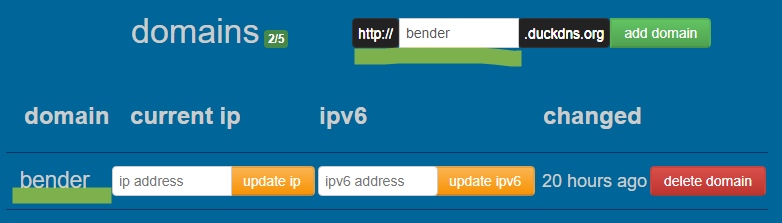
Go to [duckdns.org](https://www.duckdns.org) authorise and get your token.

Then create your new subdomain.
#### 2. Create new mikrotik script
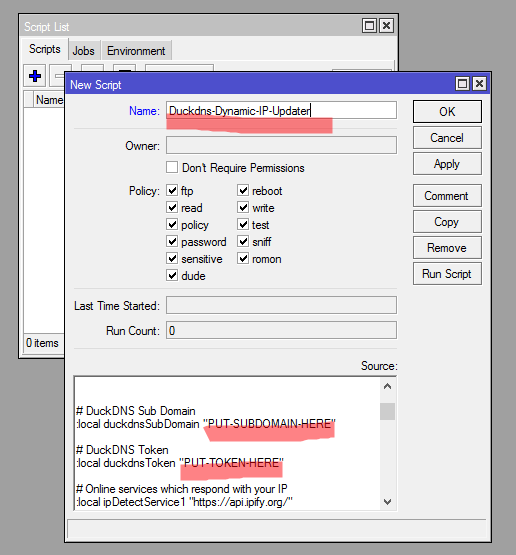
Using WinBox tool, go to: System -> Scripts [Add]
**Imprtant!** Script name has to be `Duckdns-Dynamic-IP-Updater`
Put [script source](https://raw.githubusercontent.com/beeyev/Mikrotik-Duckdns-Dynamic-IP-Updater/master/mikrotik-duckdns-dynamic-ip-updater.rsc) and set your **token** and **subdomain** into corresponding variables.
> If you want to use **IPv6**, change `ipv6mode` variable in the script
#### 3. Create scheduled task
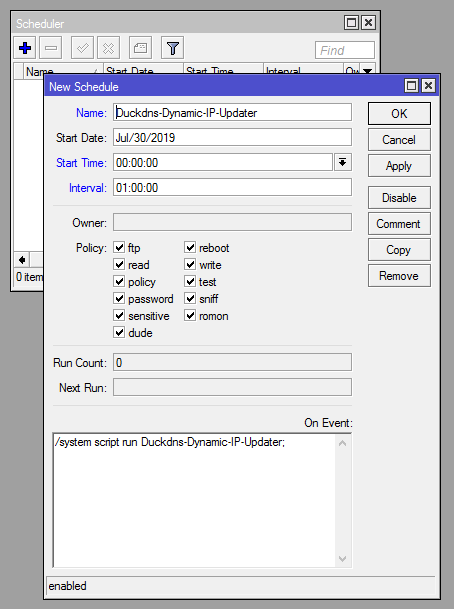
WinBox: System -> Scheduler [Add]
Name: `Duckdns-Dynamic-IP-Updater`
Start Time: `00:10:00`
Interval: `01:10:00`
On Event: `/system script run Duckdns-Dynamic-IP-Updater;`
Scheduler will run the script to update IP address every hour. If you want to make it more frequently, change the "Interval" parameter.
Or you can use this command to create the task:
```
/system scheduler add name="Duckdns-Dynamic-IP-Updater" on-event="/system script run Duckdns-Dynamic-IP-Updater;" start-time=00:10:00 interval=01:10:00 comment="" disabled=no
```
---
If you love this project, please consider giving me a ⭐
================================================
FILE: mikrotik-duckdns-dynamic-ip-updater.rsc
================================================
#----------SCRIPT INFORMATION---------------------------------------------------
#
# Script: Beeyev DuckDNS.org Dynamic DNS Update Script
# Version: 1.2.1
# Created: 29/07/2019
# Updated: 11/08/2022
# Author: Alexander Tebiev
# Website: https://github.com/beeyev
#
#----------MODIFY THIS SECTION AS NEEDED----------------------------------------
# DuckDNS Sub Domain
:local duckdnsSubDomain "PUT-SUBDOMAIN-HERE"
# DuckDNS Token
:local duckdnsToken "PUT-TOKEN-HERE"
# Set true if you want to use IPv6
:local ipv6mode false;
#-------------------------------------------------------------------------------
# Online services which respond with your IPv4, two for redundancy
:local ipDetectService1 "https://api.ipify.org/"
:local ipDetectService2 "https://ipv4.icanhazip.com/"
# Online services which respond with your IPv6, two for redundancy
:local ipv6DetectService1 "https://api64.ipify.org/"
:local ipv6DetectService2 "https://ipv6.icanhazip.com/"
#-------------------------------------------------------------------------------
:local previousIP; :local currentIP
# DuckDNS Full Domain (FQDN)
:local duckdnsFullDomain "$duckdnsSubDomain.duckdns.org"
:log warning message="START: DuckDNS.org DDNS Update"
if ($ipv6mode = true) do={
:set ipDetectService1 $ipv6DetectService1;
:set ipDetectService2 $ipv6DetectService2;
:log error "DuckDNS: ipv6 mode enabled"
}
# Resolve current DuckDNS subdomain ip address
:do {:set previousIP [:resolve $duckdnsFullDomain]} on-error={ :log warning "DuckDNS: Could not resolve dns name $duckdnsFullDomain" };
# Detect our public IP adress useing special services
:do {:set currentIP ([/tool fetch url=$ipDetectService1 output=user as-value]->"data")} on-error={
:log error "DuckDNS: Service does not work: $ipDetectService1"
#Second try in case the first one is failed
:do {:set currentIP ([/tool fetch url=$ipDetectService2 output=user as-value]->"data")} on-error={
:log error "DuckDNS: Service does not work: $ipDetectService2"
};
};
:log info "DuckDNS: DNS IP ($previousIP), current internet IP ($currentIP)"
:if ($currentIP != $previousIP) do={
:log info "DuckDNS: Current IP $currentIP is not equal to previous IP, update needed"
:log info "DuckDNS: Sending update for $duckdnsFullDomain"
:local duckRequestUrl "https://www.duckdns.org/update\?domains=$duckdnsSubDomain&token=$duckdnsToken&ip=$currentIP&verbose=true"
:log info "DuckDNS: using GET request: $duckRequestUrl"
:local duckResponse
:do {:set duckResponse ([/tool fetch url=$duckRequestUrl output=user as-value]->"data")} on-error={
:log error "DuckDNS: could not send GET request to the DuckDNS server. Going to try again in a while."
:delay 5m;
:do {:set duckResponse ([/tool fetch url=$duckRequestUrl output=user as-value]->"data")} on-error={
:log error "DuckDNS: could not send GET request to the DuckDNS server for the second time."
:error "DuckDNS: bye!"
}
}
# Checking server's answer
:if ([:pick $duckResponse 0 2] = "OK") do={
:log info "DuckDNS: New IP address ($currentIP) for domain $duckdnsFullDomain has been successfully set!"
} else={
:log warning "DuckDNS: There is an error occurred during IP address update, server did not answer with \"OK\" response!"
}
:log info "DuckDNS: server answer is: $duckResponse"
} else={
:log info "DuckDNS: Previous IP ($previousIP) is equal to current IP ($currentIP), no need to update"
}
:log warning message="END: DuckDNS.org DDNS Update finished"
gitextract_d82g_3sa/ ├── LICENSE.txt ├── README.md └── mikrotik-duckdns-dynamic-ip-updater.rsc
Condensed preview — 3 files, each showing path, character count, and a content snippet. Download the .json file or copy for the full structured content (7K chars).
[
  {
    "path": "LICENSE.txt",
    "chars": 1073,
    "preview": "MIT License\n\nCopyright (c) 2018 Aleksandr Tebiev\n\nPermission is hereby granted, free of charge, to any person obtaining "
  },
  {
    "path": "README.md",
    "chars": 1752,
    "preview": "# Mikrotik Duck DNS Dynamic IP Updater\n## How to use\n#### 1.  Duck DNS token and subdomain\nGo to [duckdns.org](https://w"
  },
  {
    "path": "mikrotik-duckdns-dynamic-ip-updater.rsc",
    "chars": 3478,
    "preview": "#----------SCRIPT INFORMATION---------------------------------------------------\n#\n# Script:  Beeyev DuckDNS.org Dynamic"
  }
]
About this extraction
This page contains the full source code of the beeyev/Mikrotik-Duckdns-Dynamic-IP-Updater GitHub repository, extracted and formatted as plain text for AI agents and large language models (LLMs). The extraction includes 3 files (6.2 KB), approximately 1.8k tokens. Use this with OpenClaw, Claude, ChatGPT, Cursor, Windsurf, or any other AI tool that accepts text input. You can copy the full output to your clipboard or download it as a .txt file.
Extracted by GitExtract — free GitHub repo to text converter for AI. Built by Nikandr Surkov.