
Repository: bestaone/HiAuth Branch: master Commit: dba8e2850dee Files: 2040 Total size: 6.2 MB Directory structure: gitextract_2zakr5hl/ ├── .github/ │ └── workflows/ │ └── deploy.yml ├── .gitignore ├── LICENSE ├── README.md ├── cicd/ │ ├── Dockerfile │ ├── Jenkinsfile │ ├── hiauth.properties │ └── nginx.conf ├── docs/ │ ├── .postcssrc.json │ ├── .vitepress/ │ │ ├── config/ │ │ │ ├── en.ts │ │ │ ├── index.ts │ │ │ ├── shared.ts │ │ │ └── zh.ts │ │ └── theme/ │ │ ├── index.ts │ │ └── styles.css │ ├── en/ │ │ ├── guide/ │ │ │ ├── about-topic.md │ │ │ ├── backend.md │ │ │ ├── docker.md │ │ │ ├── frontend.md │ │ │ ├── hiauth-client.md │ │ │ ├── issue.md │ │ │ ├── k8s.md │ │ │ ├── quick-start.md │ │ │ ├── saas.md │ │ │ ├── sourcecode.md │ │ │ ├── test.md │ │ │ └── what-is-hiauth.md │ │ └── index.md │ ├── lunaria.config.json │ ├── package.json │ ├── public/ │ │ ├── hiauth-logo-large.psd │ │ └── pure.html │ └── zh/ │ ├── guide/ │ │ ├── about-topic.md │ │ ├── backend.md │ │ ├── docker.md │ │ ├── frontend.md │ │ ├── hiauth-client.md │ │ ├── issue.md │ │ ├── k8s.md │ │ ├── quick-start.md │ │ ├── saas.md │ │ ├── sourcecode.md │ │ ├── test.md │ │ └── what-is-hiauth.md │ └── index.md ├── example/ │ ├── demo/ │ │ ├── pom.xml │ │ └── src/ │ │ └── main/ │ │ ├── java/ │ │ │ └── cn/ │ │ │ └── hiauth/ │ │ │ └── demo/ │ │ │ ├── DemoApplication.java │ │ │ └── IndexController.java │ │ └── resources/ │ │ └── application.yml │ ├── hiauth-client/ │ │ ├── pom.xml │ │ └── src/ │ │ └── main/ │ │ ├── java/ │ │ │ └── cn/ │ │ │ └── hiauth/ │ │ │ └── hiauthclient/ │ │ │ ├── HiauthClientStarter.java │ │ │ ├── config/ │ │ │ │ └── WebMvcConfig.java │ │ │ └── controller/ │ │ │ ├── ApiController.java │ │ │ └── IndexController.java │ │ └── resources/ │ │ ├── application.yml │ │ ├── logback.xml │ │ ├── static/ │ │ │ └── css/ │ │ │ └── index.css │ │ └── templates/ │ │ ├── demo.html │ │ ├── index.html │ │ └── profile.html │ ├── hiauth-client-exp/ │ │ ├── pom.xml │ │ └── src/ │ │ └── main/ │ │ ├── java/ │ │ │ └── cn/ │ │ │ └── hiauth/ │ │ │ └── client/ │ │ │ ├── ClientStarter.java │ │ │ ├── config/ │ │ │ │ ├── BeanConfig.java │ │ │ │ ├── SecurityConfig.java │ │ │ │ └── WebMvcConfig.java │ │ │ └── controller/ │ │ │ └── ClientController.java │ │ └── resources/ │ │ ├── application.yml │ │ ├── logback.xml │ │ └── templates/ │ │ └── index.html │ ├── hiauth-server-exp/ │ │ ├── pom.xml │ │ └── src/ │ │ └── main/ │ │ ├── java/ │ │ │ └── cn/ │ │ │ └── hiauth/ │ │ │ └── server/ │ │ │ ├── ServerStarter.java │ │ │ ├── config/ │ │ │ │ ├── AuthServerConfig.java │ │ │ │ ├── BeanConfig.java │ │ │ │ ├── SecurityConfig.java │ │ │ │ └── WebMvcConfig.java │ │ │ ├── controller/ │ │ │ │ ├── IndexController.java │ │ │ │ └── LoginController.java │ │ │ ├── federation/ │ │ │ │ ├── FederatedIdentityAuthenticationSuccessHandler.java │ │ │ │ └── FederatedIdentityIdTokenCustomizer.java │ │ │ ├── mapper/ │ │ │ │ └── SimpleJdbcRegisteredClientRepository.java │ │ │ └── utils/ │ │ │ ├── jose/ │ │ │ │ ├── Jwks.java │ │ │ │ └── KeyGeneratorUtils.java │ │ │ └── package-info.java │ │ └── resources/ │ │ ├── application-hiauth.yml │ │ ├── application-redis.yml │ │ ├── application.yml │ │ ├── logback.xml │ │ └── templates/ │ │ └── index.html │ ├── himall/ │ │ ├── pom.xml │ │ └── src/ │ │ └── main/ │ │ ├── java/ │ │ │ └── cn/ │ │ │ └── hiauth/ │ │ │ └── himall/ │ │ │ ├── HiMallStarter.java │ │ │ ├── config/ │ │ │ │ ├── SecurityConfig.java │ │ │ │ └── WebMvcConfig.java │ │ │ └── controller/ │ │ │ ├── AuthController.java │ │ │ └── IndexController.java │ │ └── resources/ │ │ ├── application.yml │ │ ├── logback.xml │ │ ├── static/ │ │ │ └── css/ │ │ │ └── index.css │ │ └── templates/ │ │ ├── demo.html │ │ ├── index.html │ │ └── profile.html │ ├── resource/ │ │ ├── pom.xml │ │ └── src/ │ │ └── main/ │ │ ├── java/ │ │ │ └── cn/ │ │ │ └── hiauth/ │ │ │ └── resource/ │ │ │ ├── ResourceStarter.java │ │ │ ├── config/ │ │ │ │ ├── ResourceServerConfig.java │ │ │ │ └── auth/ │ │ │ │ ├── SimpleAccessDeniedHandler.java │ │ │ │ └── SimpleAuthenticationEntryPoint.java │ │ │ ├── controller/ │ │ │ │ ├── IndexController.java │ │ │ │ ├── ProfileController.java │ │ │ │ ├── UnpapiController.java │ │ │ │ └── UserController.java │ │ │ └── utils/ │ │ │ └── ResponseTools.java │ │ └── resources/ │ │ ├── application.yml │ │ └── logback.xml │ ├── spring-cloud/ │ │ ├── README.md │ │ ├── gateway/ │ │ │ ├── pom.xml │ │ │ └── src/ │ │ │ └── main/ │ │ │ ├── java/ │ │ │ │ └── cn/ │ │ │ │ └── hiauth/ │ │ │ │ └── gateway/ │ │ │ │ ├── ApiController.java │ │ │ │ ├── GatewayStarter.java │ │ │ │ ├── IndexController.java │ │ │ │ └── SecurityConfig.java │ │ │ └── resources/ │ │ │ ├── application.yml │ │ │ └── logback.xml │ │ ├── ordersvc/ │ │ │ ├── pom.xml │ │ │ └── src/ │ │ │ └── main/ │ │ │ ├── java/ │ │ │ │ └── cn/ │ │ │ │ └── hiauth/ │ │ │ │ └── gateway/ │ │ │ │ ├── IndexController.java │ │ │ │ └── OrderStarter.java │ │ │ └── resources/ │ │ │ ├── application.yml │ │ │ └── logback.xml │ │ └── pom.xml │ ├── spring-cloud-with-hiauth-client/ │ │ ├── README.md │ │ ├── gateway1/ │ │ │ ├── pom.xml │ │ │ └── src/ │ │ │ └── main/ │ │ │ ├── java/ │ │ │ │ └── cn/ │ │ │ │ └── hiauth/ │ │ │ │ └── gateway/ │ │ │ │ ├── ApiController.java │ │ │ │ ├── GatewayStarter.java │ │ │ │ └── IndexController.java │ │ │ └── resources/ │ │ │ ├── application.yml │ │ │ └── logback.xml │ │ ├── ordersvc1/ │ │ │ ├── pom.xml │ │ │ └── src/ │ │ │ └── main/ │ │ │ ├── java/ │ │ │ │ └── cn/ │ │ │ │ └── hiauth/ │ │ │ │ └── gateway/ │ │ │ │ ├── IndexController.java │ │ │ │ └── OrderStarter.java │ │ │ └── resources/ │ │ │ ├── application.yml │ │ │ └── logback.xml │ │ └── pom.xml │ └── wechat-login/ │ ├── pom.xml │ └── src/ │ └── main/ │ ├── java/ │ │ └── cn/ │ │ └── hiauth/ │ │ └── wechatlogin/ │ │ ├── WechatLoginStarter.java │ │ ├── config/ │ │ │ ├── SecurityConfig.java │ │ │ ├── WebMvcConfig.java │ │ │ └── web/ │ │ │ ├── auth/ │ │ │ │ └── package-info.java │ │ │ └── security/ │ │ │ ├── phone/ │ │ │ │ ├── SmsCodeAuthenticationFilter.java │ │ │ │ ├── SmsCodeAuthenticationProvider.java │ │ │ │ └── SmsCodeAuthenticationToken.java │ │ │ └── wechat/ │ │ │ ├── QrCodeAuthenticationFilter.java │ │ │ ├── QrCodeAuthenticationProvider.java │ │ │ └── QrCodeAuthenticationToken.java │ │ ├── controller/ │ │ │ ├── AuthController.java │ │ │ └── IndexController.java │ │ ├── entity/ │ │ │ └── CustomUserDetails.java │ │ └── service/ │ │ └── CustomUserDetailsService.java │ └── resources/ │ ├── application.yml │ ├── logback.xml │ └── templates/ │ ├── home.html │ ├── index.html │ └── login.html ├── hiauth-client-starter/ │ ├── hiauth-client-commons/ │ │ ├── pom.xml │ │ └── src/ │ │ └── main/ │ │ └── java/ │ │ └── cn/ │ │ └── hiauth/ │ │ └── client/ │ │ ├── Authentication.java │ │ ├── Client.java │ │ ├── Constant.java │ │ ├── HiAuthToken.java │ │ ├── JwtUtils.java │ │ ├── SecurityCorp.java │ │ ├── SecurityService.java │ │ ├── SecurityUser.java │ │ ├── SessionContext.java │ │ ├── SessionContextHolder.java │ │ ├── TokenVo.java │ │ └── UserinfoVo.java │ ├── hiauth-client-resource-spring-boot-starter/ │ │ ├── pom.xml │ │ └── src/ │ │ └── main/ │ │ ├── java/ │ │ │ └── cn/ │ │ │ └── hiauth/ │ │ │ └── client/ │ │ │ └── resource/ │ │ │ ├── HiAuthClientResourceAutoConfig.java │ │ │ └── HiAuthClientResourceProperties.java │ │ └── resources/ │ │ └── META-INF/ │ │ ├── spring-configuration-metadata.json │ │ └── spring.factories │ ├── hiauth-client-session-spring-boot-starter/ │ │ ├── pom.xml │ │ └── src/ │ │ └── main/ │ │ ├── java/ │ │ │ └── cn/ │ │ │ └── hiauth/ │ │ │ └── client/ │ │ │ └── session/ │ │ │ ├── AuthFilter.java │ │ │ ├── HiAuthClientSessionAutoConfig.java │ │ │ ├── HiAuthClientSessionCacheConfig.java │ │ │ ├── HiAuthClientSessionController.java │ │ │ ├── HiAuthClientSessionProperties.java │ │ │ └── HiAuthClientSessionRunner.java │ │ └── resources/ │ │ └── META-INF/ │ │ ├── spring-configuration-metadata.json │ │ └── spring.factories │ ├── hiauth-client-spring-boot-starter/ │ │ ├── docs/ │ │ │ └── apisvc-oms.yml │ │ ├── pom.xml │ │ └── src/ │ │ └── main/ │ │ ├── java/ │ │ │ └── cn/ │ │ │ └── hiauth/ │ │ │ └── client/ │ │ │ ├── AuthFilter.java │ │ │ ├── HiAuthCacheConfig.java │ │ │ ├── HiAuthClientAutoConfig.java │ │ │ ├── HiAuthClientController.java │ │ │ ├── HiAuthClientProperties.java │ │ │ ├── HiAuthClientProviderProperties.java │ │ │ ├── HiAuthClientRegistrationProperties.java │ │ │ ├── HiAuthClientRunner.java │ │ │ └── api/ │ │ │ ├── TokenVo.java │ │ │ └── UserPwdUpdateDto.java │ │ └── resources/ │ │ └── META-INF/ │ │ ├── spring-configuration-metadata.json │ │ └── spring.factories │ ├── hiauth-client-spring-cloud-gateway-starter/ │ │ ├── pom.xml │ │ └── src/ │ │ └── main/ │ │ ├── java/ │ │ │ └── cn/ │ │ │ └── hiauth/ │ │ │ └── client/ │ │ │ └── gateway/ │ │ │ ├── AuthGatewayFilterFactory.java │ │ │ ├── HiAuthClientGatewayAutoConfig.java │ │ │ ├── HiAuthClientGatewayController.java │ │ │ ├── HiAuthClientGatewayProperties.java │ │ │ ├── HiAuthClientGatewayRunner.java │ │ │ └── UserPwdUpdateDto.java │ │ └── resources/ │ │ └── META-INF/ │ │ ├── spring-configuration-metadata.json │ │ └── spring.factories │ └── pom.xml ├── hiauth-front/ │ ├── .browserslistrc │ ├── .changeset/ │ │ ├── README.md │ │ └── config.json │ ├── .commitlintrc.js │ ├── .dockerignore │ ├── .editorconfig │ ├── .gitattributes │ ├── .gitconfig │ ├── .gitignore │ ├── .gitpod.yml │ ├── .node-version │ ├── .npmrc │ ├── .prettierignore │ ├── .prettierrc.mjs │ ├── .stylelintignore │ ├── Dockerfile │ ├── LICENSE │ ├── README.ja-JP.md │ ├── README.md │ ├── README.zh-CN.md │ ├── apps/ │ │ ├── backend-mock/ │ │ │ ├── README.md │ │ │ ├── api/ │ │ │ │ ├── auth/ │ │ │ │ │ ├── codes.ts │ │ │ │ │ ├── login.post.ts │ │ │ │ │ ├── logout.post.ts │ │ │ │ │ └── refresh.post.ts │ │ │ │ ├── demo/ │ │ │ │ │ └── bigint.ts │ │ │ │ ├── menu/ │ │ │ │ │ └── all.ts │ │ │ │ ├── status.ts │ │ │ │ ├── system/ │ │ │ │ │ ├── dept/ │ │ │ │ │ │ ├── .post.ts │ │ │ │ │ │ ├── [id].delete.ts │ │ │ │ │ │ ├── [id].put.ts │ │ │ │ │ │ └── list.ts │ │ │ │ │ ├── menu/ │ │ │ │ │ │ ├── list.ts │ │ │ │ │ │ ├── name-exists.ts │ │ │ │ │ │ └── path-exists.ts │ │ │ │ │ └── role/ │ │ │ │ │ └── list.ts │ │ │ │ ├── table/ │ │ │ │ │ └── list.ts │ │ │ │ ├── test.get.ts │ │ │ │ ├── test.post.ts │ │ │ │ ├── upload.ts │ │ │ │ └── user/ │ │ │ │ └── info.ts │ │ │ ├── error.ts │ │ │ ├── middleware/ │ │ │ │ └── 1.api.ts │ │ │ ├── nitro.config.ts │ │ │ ├── package.json │ │ │ ├── routes/ │ │ │ │ └── [...].ts │ │ │ ├── tsconfig.build.json │ │ │ ├── tsconfig.json │ │ │ └── utils/ │ │ │ ├── cookie-utils.ts │ │ │ ├── jwt-utils.ts │ │ │ ├── mock-data.ts │ │ │ └── response.ts │ │ ├── web-antd/ │ │ │ ├── index.html │ │ │ ├── package.json │ │ │ ├── postcss.config.mjs │ │ │ ├── src/ │ │ │ │ ├── adapter/ │ │ │ │ │ ├── component/ │ │ │ │ │ │ └── index.ts │ │ │ │ │ ├── form.ts │ │ │ │ │ └── vxe-table.ts │ │ │ │ ├── api/ │ │ │ │ │ ├── core/ │ │ │ │ │ │ ├── auth.ts │ │ │ │ │ │ ├── index.ts │ │ │ │ │ │ ├── menu.ts │ │ │ │ │ │ └── user.ts │ │ │ │ │ ├── index.ts │ │ │ │ │ └── request.ts │ │ │ │ ├── app.vue │ │ │ │ ├── bootstrap.ts │ │ │ │ ├── layouts/ │ │ │ │ │ ├── auth.vue │ │ │ │ │ ├── basic.vue │ │ │ │ │ └── index.ts │ │ │ │ ├── locales/ │ │ │ │ │ ├── README.md │ │ │ │ │ ├── index.ts │ │ │ │ │ └── langs/ │ │ │ │ │ ├── en-US/ │ │ │ │ │ │ ├── demos.json │ │ │ │ │ │ └── page.json │ │ │ │ │ └── zh-CN/ │ │ │ │ │ ├── demos.json │ │ │ │ │ └── page.json │ │ │ │ ├── main.ts │ │ │ │ ├── preferences.ts │ │ │ │ ├── router/ │ │ │ │ │ ├── access.ts │ │ │ │ │ ├── guard.ts │ │ │ │ │ ├── index.ts │ │ │ │ │ └── routes/ │ │ │ │ │ ├── core.ts │ │ │ │ │ ├── index.ts │ │ │ │ │ └── modules/ │ │ │ │ │ ├── dashboard.ts │ │ │ │ │ ├── demos.ts │ │ │ │ │ └── vben.ts │ │ │ │ ├── store/ │ │ │ │ │ ├── auth.ts │ │ │ │ │ └── index.ts │ │ │ │ └── views/ │ │ │ │ ├── _core/ │ │ │ │ │ ├── README.md │ │ │ │ │ ├── about/ │ │ │ │ │ │ └── index.vue │ │ │ │ │ ├── authentication/ │ │ │ │ │ │ ├── code-login.vue │ │ │ │ │ │ ├── forget-password.vue │ │ │ │ │ │ ├── login.vue │ │ │ │ │ │ ├── qrcode-login.vue │ │ │ │ │ │ └── register.vue │ │ │ │ │ └── fallback/ │ │ │ │ │ ├── coming-soon.vue │ │ │ │ │ ├── forbidden.vue │ │ │ │ │ ├── internal-error.vue │ │ │ │ │ ├── not-found.vue │ │ │ │ │ └── offline.vue │ │ │ │ ├── dashboard/ │ │ │ │ │ ├── analytics/ │ │ │ │ │ │ ├── analytics-trends.vue │ │ │ │ │ │ ├── analytics-visits-data.vue │ │ │ │ │ │ ├── analytics-visits-sales.vue │ │ │ │ │ │ ├── analytics-visits-source.vue │ │ │ │ │ │ ├── analytics-visits.vue │ │ │ │ │ │ └── index.vue │ │ │ │ │ └── workspace/ │ │ │ │ │ └── index.vue │ │ │ │ └── demos/ │ │ │ │ └── antd/ │ │ │ │ └── index.vue │ │ │ ├── tailwind.config.mjs │ │ │ ├── tsconfig.json │ │ │ ├── tsconfig.node.json │ │ │ └── vite.config.mts │ │ ├── web-auth/ │ │ │ ├── index.html │ │ │ ├── package.json │ │ │ ├── postcss.config.mjs │ │ │ ├── src/ │ │ │ │ ├── adapter/ │ │ │ │ │ ├── component/ │ │ │ │ │ │ └── index.ts │ │ │ │ │ ├── form.ts │ │ │ │ │ └── vxe-table.ts │ │ │ │ ├── api/ │ │ │ │ │ ├── core/ │ │ │ │ │ │ ├── app.ts │ │ │ │ │ │ ├── appClient.ts │ │ │ │ │ │ ├── appResource.ts │ │ │ │ │ │ ├── auth.ts │ │ │ │ │ │ ├── common.ts │ │ │ │ │ │ ├── corp.ts │ │ │ │ │ │ ├── dep.ts │ │ │ │ │ │ ├── dict.ts │ │ │ │ │ │ ├── emp.ts │ │ │ │ │ │ ├── index.ts │ │ │ │ │ │ ├── menu.ts │ │ │ │ │ │ ├── role.ts │ │ │ │ │ │ └── user.ts │ │ │ │ │ ├── index.ts │ │ │ │ │ └── request.ts │ │ │ │ ├── app.vue │ │ │ │ ├── bootstrap.ts │ │ │ │ ├── common/ │ │ │ │ │ ├── config.ts │ │ │ │ │ ├── constants.ts │ │ │ │ │ ├── context.ts │ │ │ │ │ ├── index.ts │ │ │ │ │ └── types.ts │ │ │ │ ├── layouts/ │ │ │ │ │ ├── auth.vue │ │ │ │ │ ├── basic.vue │ │ │ │ │ ├── change-corp.vue │ │ │ │ │ ├── go-admin-space-button.vue │ │ │ │ │ └── index.ts │ │ │ │ ├── locales/ │ │ │ │ │ ├── README.md │ │ │ │ │ ├── index.ts │ │ │ │ │ └── langs/ │ │ │ │ │ ├── en-US/ │ │ │ │ │ │ ├── demos.json │ │ │ │ │ │ └── page.json │ │ │ │ │ └── zh-CN/ │ │ │ │ │ ├── demos.json │ │ │ │ │ └── page.json │ │ │ │ ├── main.ts │ │ │ │ ├── preferences.ts │ │ │ │ ├── router/ │ │ │ │ │ ├── access.ts │ │ │ │ │ ├── guard.ts │ │ │ │ │ ├── index.ts │ │ │ │ │ └── routes/ │ │ │ │ │ ├── core.ts │ │ │ │ │ ├── index.ts │ │ │ │ │ └── modules/ │ │ │ │ │ ├── adminSpace.ts │ │ │ │ │ ├── common.ts │ │ │ │ │ ├── corpSpace.ts │ │ │ │ │ └── dashboard.ts │ │ │ │ ├── store/ │ │ │ │ │ ├── auth.ts │ │ │ │ │ ├── content.ts │ │ │ │ │ └── index.ts │ │ │ │ ├── utils/ │ │ │ │ │ └── rsa.ts │ │ │ │ └── views/ │ │ │ │ ├── _core/ │ │ │ │ │ ├── README.md │ │ │ │ │ ├── about/ │ │ │ │ │ │ └── index.vue │ │ │ │ │ ├── authentication/ │ │ │ │ │ │ ├── code-login.vue │ │ │ │ │ │ ├── forget-password.vue │ │ │ │ │ │ ├── login.vue │ │ │ │ │ │ ├── qrcode-login.vue │ │ │ │ │ │ └── register.vue │ │ │ │ │ └── fallback/ │ │ │ │ │ ├── coming-soon.vue │ │ │ │ │ ├── forbidden.vue │ │ │ │ │ ├── internal-error.vue │ │ │ │ │ ├── not-found.vue │ │ │ │ │ └── offline.vue │ │ │ │ ├── adminSpace/ │ │ │ │ │ ├── corpMgr/ │ │ │ │ │ │ ├── corp-drawer.vue │ │ │ │ │ │ └── index.vue │ │ │ │ │ └── userMgr/ │ │ │ │ │ ├── index.vue │ │ │ │ │ └── user-drawer.vue │ │ │ │ ├── common/ │ │ │ │ │ ├── appMgr/ │ │ │ │ │ │ ├── app-drawer.vue │ │ │ │ │ │ └── index.vue │ │ │ │ │ └── appResourceMgr/ │ │ │ │ │ ├── app-resource-drawer.vue │ │ │ │ │ └── index.vue │ │ │ │ ├── corpSpace/ │ │ │ │ │ ├── appClientMgr/ │ │ │ │ │ │ ├── app-client-add-modal.vue │ │ │ │ │ │ ├── app-client-drawer.vue │ │ │ │ │ │ └── index.vue │ │ │ │ │ ├── depMgr/ │ │ │ │ │ │ ├── dep-drawer.vue │ │ │ │ │ │ └── index.vue │ │ │ │ │ ├── empMgr/ │ │ │ │ │ │ ├── emp-drawer.vue │ │ │ │ │ │ └── index.vue │ │ │ │ │ ├── roleMgr/ │ │ │ │ │ │ ├── auth-modal.vue │ │ │ │ │ │ ├── index.vue │ │ │ │ │ │ └── role-drawer.vue │ │ │ │ │ └── sysMgr/ │ │ │ │ │ └── dictMgr/ │ │ │ │ │ ├── dict-drawer.vue │ │ │ │ │ └── index.vue │ │ │ │ ├── dashboard/ │ │ │ │ │ ├── analytics/ │ │ │ │ │ │ ├── analytics-trends.vue │ │ │ │ │ │ ├── analytics-visits-data.vue │ │ │ │ │ │ ├── analytics-visits-sales.vue │ │ │ │ │ │ ├── analytics-visits-source.vue │ │ │ │ │ │ ├── analytics-visits.vue │ │ │ │ │ │ └── index.vue │ │ │ │ │ └── workspace/ │ │ │ │ │ └── index.vue │ │ │ │ └── demos/ │ │ │ │ └── antd/ │ │ │ │ └── index.vue │ │ │ ├── tailwind.config.mjs │ │ │ ├── tsconfig.json │ │ │ ├── tsconfig.node.json │ │ │ └── vite.config.mts │ │ ├── web-ele/ │ │ │ ├── index.html │ │ │ ├── package.json │ │ │ ├── postcss.config.mjs │ │ │ ├── src/ │ │ │ │ ├── adapter/ │ │ │ │ │ ├── component/ │ │ │ │ │ │ └── index.ts │ │ │ │ │ ├── form.ts │ │ │ │ │ └── vxe-table.ts │ │ │ │ ├── api/ │ │ │ │ │ ├── core/ │ │ │ │ │ │ ├── auth.ts │ │ │ │ │ │ ├── index.ts │ │ │ │ │ │ ├── menu.ts │ │ │ │ │ │ └── user.ts │ │ │ │ │ ├── index.ts │ │ │ │ │ └── request.ts │ │ │ │ ├── app.vue │ │ │ │ ├── bootstrap.ts │ │ │ │ ├── layouts/ │ │ │ │ │ ├── auth.vue │ │ │ │ │ ├── basic.vue │ │ │ │ │ └── index.ts │ │ │ │ ├── locales/ │ │ │ │ │ ├── README.md │ │ │ │ │ ├── index.ts │ │ │ │ │ └── langs/ │ │ │ │ │ ├── en-US/ │ │ │ │ │ │ ├── demos.json │ │ │ │ │ │ └── page.json │ │ │ │ │ └── zh-CN/ │ │ │ │ │ ├── demos.json │ │ │ │ │ └── page.json │ │ │ │ ├── main.ts │ │ │ │ ├── preferences.ts │ │ │ │ ├── router/ │ │ │ │ │ ├── access.ts │ │ │ │ │ ├── guard.ts │ │ │ │ │ ├── index.ts │ │ │ │ │ └── routes/ │ │ │ │ │ ├── core.ts │ │ │ │ │ ├── index.ts │ │ │ │ │ └── modules/ │ │ │ │ │ ├── dashboard.ts │ │ │ │ │ ├── demos.ts │ │ │ │ │ └── vben.ts │ │ │ │ ├── store/ │ │ │ │ │ ├── auth.ts │ │ │ │ │ └── index.ts │ │ │ │ └── views/ │ │ │ │ ├── _core/ │ │ │ │ │ ├── README.md │ │ │ │ │ ├── about/ │ │ │ │ │ │ └── index.vue │ │ │ │ │ ├── authentication/ │ │ │ │ │ │ ├── code-login.vue │ │ │ │ │ │ ├── forget-password.vue │ │ │ │ │ │ ├── login.vue │ │ │ │ │ │ ├── qrcode-login.vue │ │ │ │ │ │ └── register.vue │ │ │ │ │ └── fallback/ │ │ │ │ │ ├── coming-soon.vue │ │ │ │ │ ├── forbidden.vue │ │ │ │ │ ├── internal-error.vue │ │ │ │ │ ├── not-found.vue │ │ │ │ │ └── offline.vue │ │ │ │ ├── dashboard/ │ │ │ │ │ ├── analytics/ │ │ │ │ │ │ ├── analytics-trends.vue │ │ │ │ │ │ ├── analytics-visits-data.vue │ │ │ │ │ │ ├── analytics-visits-sales.vue │ │ │ │ │ │ ├── analytics-visits-source.vue │ │ │ │ │ │ ├── analytics-visits.vue │ │ │ │ │ │ └── index.vue │ │ │ │ │ └── workspace/ │ │ │ │ │ └── index.vue │ │ │ │ └── demos/ │ │ │ │ ├── element/ │ │ │ │ │ └── index.vue │ │ │ │ └── form/ │ │ │ │ └── basic.vue │ │ │ ├── tailwind.config.mjs │ │ │ ├── tsconfig.json │ │ │ ├── tsconfig.node.json │ │ │ └── vite.config.mts │ │ └── web-naive/ │ │ ├── index.html │ │ ├── package.json │ │ ├── postcss.config.mjs │ │ ├── src/ │ │ │ ├── adapter/ │ │ │ │ ├── component/ │ │ │ │ │ └── index.ts │ │ │ │ ├── form.ts │ │ │ │ ├── naive.ts │ │ │ │ └── vxe-table.ts │ │ │ ├── api/ │ │ │ │ ├── core/ │ │ │ │ │ ├── auth.ts │ │ │ │ │ ├── index.ts │ │ │ │ │ ├── menu.ts │ │ │ │ │ └── user.ts │ │ │ │ ├── index.ts │ │ │ │ └── request.ts │ │ │ ├── app.vue │ │ │ ├── bootstrap.ts │ │ │ ├── layouts/ │ │ │ │ ├── auth.vue │ │ │ │ ├── basic.vue │ │ │ │ └── index.ts │ │ │ ├── locales/ │ │ │ │ ├── README.md │ │ │ │ ├── index.ts │ │ │ │ └── langs/ │ │ │ │ ├── en-US/ │ │ │ │ │ ├── demos.json │ │ │ │ │ └── page.json │ │ │ │ └── zh-CN/ │ │ │ │ ├── demos.json │ │ │ │ └── page.json │ │ │ ├── main.ts │ │ │ ├── preferences.ts │ │ │ ├── router/ │ │ │ │ ├── access.ts │ │ │ │ ├── guard.ts │ │ │ │ ├── index.ts │ │ │ │ └── routes/ │ │ │ │ ├── core.ts │ │ │ │ ├── index.ts │ │ │ │ └── modules/ │ │ │ │ ├── dashboard.ts │ │ │ │ ├── demos.ts │ │ │ │ └── vben.ts │ │ │ ├── store/ │ │ │ │ ├── auth.ts │ │ │ │ └── index.ts │ │ │ └── views/ │ │ │ ├── _core/ │ │ │ │ ├── README.md │ │ │ │ ├── about/ │ │ │ │ │ └── index.vue │ │ │ │ ├── authentication/ │ │ │ │ │ ├── code-login.vue │ │ │ │ │ ├── forget-password.vue │ │ │ │ │ ├── login.vue │ │ │ │ │ ├── qrcode-login.vue │ │ │ │ │ └── register.vue │ │ │ │ └── fallback/ │ │ │ │ ├── coming-soon.vue │ │ │ │ ├── forbidden.vue │ │ │ │ ├── internal-error.vue │ │ │ │ ├── not-found.vue │ │ │ │ └── offline.vue │ │ │ ├── dashboard/ │ │ │ │ ├── analytics/ │ │ │ │ │ ├── analytics-trends.vue │ │ │ │ │ ├── analytics-visits-data.vue │ │ │ │ │ ├── analytics-visits-sales.vue │ │ │ │ │ ├── analytics-visits-source.vue │ │ │ │ │ ├── analytics-visits.vue │ │ │ │ │ └── index.vue │ │ │ │ └── workspace/ │ │ │ │ └── index.vue │ │ │ └── demos/ │ │ │ ├── form/ │ │ │ │ ├── basic.vue │ │ │ │ └── modal.vue │ │ │ ├── naive/ │ │ │ │ └── index.vue │ │ │ └── table/ │ │ │ └── index.vue │ │ ├── tailwind.config.mjs │ │ ├── tsconfig.json │ │ ├── tsconfig.node.json │ │ └── vite.config.mts │ ├── changlist.txt │ ├── cspell.json │ ├── deploy.yaml │ ├── docs/ │ │ ├── .vitepress/ │ │ │ ├── components/ │ │ │ │ ├── demo-preview.vue │ │ │ │ ├── index.ts │ │ │ │ └── preview-group.vue │ │ │ ├── config/ │ │ │ │ ├── en.mts │ │ │ │ ├── index.mts │ │ │ │ ├── plugins/ │ │ │ │ │ └── demo-preview.ts │ │ │ │ ├── shared.mts │ │ │ │ └── zh.mts │ │ │ └── theme/ │ │ │ ├── components/ │ │ │ │ ├── site-layout.vue │ │ │ │ └── vben-contributors.vue │ │ │ ├── index.ts │ │ │ ├── plugins/ │ │ │ │ └── hm.ts │ │ │ └── styles/ │ │ │ ├── base.css │ │ │ ├── index.ts │ │ │ └── variables.css │ │ ├── package.json │ │ ├── src/ │ │ │ ├── _env/ │ │ │ │ ├── adapter/ │ │ │ │ │ ├── component.ts │ │ │ │ │ ├── form.ts │ │ │ │ │ └── vxe-table.ts │ │ │ │ └── node/ │ │ │ │ └── adapter/ │ │ │ │ ├── form.ts │ │ │ │ └── vxe-table.ts │ │ │ ├── commercial/ │ │ │ │ ├── community.md │ │ │ │ ├── customized.md │ │ │ │ └── technical-support.md │ │ │ ├── components/ │ │ │ │ ├── common-ui/ │ │ │ │ │ ├── vben-alert.md │ │ │ │ │ ├── vben-api-component.md │ │ │ │ │ ├── vben-count-to-animator.md │ │ │ │ │ ├── vben-drawer.md │ │ │ │ │ ├── vben-ellipsis-text.md │ │ │ │ │ ├── vben-form.md │ │ │ │ │ ├── vben-modal.md │ │ │ │ │ └── vben-vxe-table.md │ │ │ │ ├── introduction.md │ │ │ │ └── layout-ui/ │ │ │ │ └── page.md │ │ │ ├── demos/ │ │ │ │ ├── vben-alert/ │ │ │ │ │ ├── alert/ │ │ │ │ │ │ └── index.vue │ │ │ │ │ ├── confirm/ │ │ │ │ │ │ └── index.vue │ │ │ │ │ └── prompt/ │ │ │ │ │ └── index.vue │ │ │ │ ├── vben-api-component/ │ │ │ │ │ └── cascader/ │ │ │ │ │ └── index.vue │ │ │ │ ├── vben-count-to-animator/ │ │ │ │ │ ├── basic/ │ │ │ │ │ │ └── index.vue │ │ │ │ │ └── custom/ │ │ │ │ │ └── index.vue │ │ │ │ ├── vben-drawer/ │ │ │ │ │ ├── auto-height/ │ │ │ │ │ │ ├── drawer.vue │ │ │ │ │ │ └── index.vue │ │ │ │ │ ├── basic/ │ │ │ │ │ │ └── index.vue │ │ │ │ │ ├── dynamic/ │ │ │ │ │ │ ├── drawer.vue │ │ │ │ │ │ └── index.vue │ │ │ │ │ ├── extra/ │ │ │ │ │ │ ├── drawer.vue │ │ │ │ │ │ └── index.vue │ │ │ │ │ └── shared-data/ │ │ │ │ │ ├── drawer.vue │ │ │ │ │ └── index.vue │ │ │ │ ├── vben-ellipsis-text/ │ │ │ │ │ ├── auto-display/ │ │ │ │ │ │ └── index.vue │ │ │ │ │ ├── expand/ │ │ │ │ │ │ └── index.vue │ │ │ │ │ ├── line/ │ │ │ │ │ │ └── index.vue │ │ │ │ │ └── tooltip/ │ │ │ │ │ └── index.vue │ │ │ │ ├── vben-form/ │ │ │ │ │ ├── api/ │ │ │ │ │ │ └── index.vue │ │ │ │ │ ├── basic/ │ │ │ │ │ │ └── index.vue │ │ │ │ │ ├── custom/ │ │ │ │ │ │ └── index.vue │ │ │ │ │ ├── dynamic/ │ │ │ │ │ │ └── index.vue │ │ │ │ │ ├── query/ │ │ │ │ │ │ └── index.vue │ │ │ │ │ └── rules/ │ │ │ │ │ └── index.vue │ │ │ │ ├── vben-modal/ │ │ │ │ │ ├── animation-type/ │ │ │ │ │ │ └── index.vue │ │ │ │ │ ├── auto-height/ │ │ │ │ │ │ ├── index.vue │ │ │ │ │ │ └── modal.vue │ │ │ │ │ ├── basic/ │ │ │ │ │ │ └── index.vue │ │ │ │ │ ├── draggable/ │ │ │ │ │ │ ├── index.vue │ │ │ │ │ │ └── modal.vue │ │ │ │ │ ├── dynamic/ │ │ │ │ │ │ ├── index.vue │ │ │ │ │ │ └── modal.vue │ │ │ │ │ ├── extra/ │ │ │ │ │ │ ├── index.vue │ │ │ │ │ │ └── modal.vue │ │ │ │ │ └── shared-data/ │ │ │ │ │ ├── index.vue │ │ │ │ │ └── modal.vue │ │ │ │ └── vben-vxe-table/ │ │ │ │ ├── basic/ │ │ │ │ │ └── index.vue │ │ │ │ ├── custom-cell/ │ │ │ │ │ └── index.vue │ │ │ │ ├── edit-cell/ │ │ │ │ │ └── index.vue │ │ │ │ ├── edit-row/ │ │ │ │ │ └── index.vue │ │ │ │ ├── fixed/ │ │ │ │ │ └── index.vue │ │ │ │ ├── form/ │ │ │ │ │ └── index.vue │ │ │ │ ├── mock-api.ts │ │ │ │ ├── remote/ │ │ │ │ │ └── index.vue │ │ │ │ ├── table-data.ts │ │ │ │ ├── tree/ │ │ │ │ │ └── index.vue │ │ │ │ └── virtual/ │ │ │ │ └── index.vue │ │ │ ├── en/ │ │ │ │ ├── guide/ │ │ │ │ │ ├── essentials/ │ │ │ │ │ │ ├── build.md │ │ │ │ │ │ ├── concept.md │ │ │ │ │ │ ├── development.md │ │ │ │ │ │ ├── external-module.md │ │ │ │ │ │ ├── icons.md │ │ │ │ │ │ ├── route.md │ │ │ │ │ │ ├── server.md │ │ │ │ │ │ ├── settings.md │ │ │ │ │ │ └── styles.md │ │ │ │ │ ├── in-depth/ │ │ │ │ │ │ ├── access.md │ │ │ │ │ │ ├── check-updates.md │ │ │ │ │ │ ├── features.md │ │ │ │ │ │ ├── layout.md │ │ │ │ │ │ ├── loading.md │ │ │ │ │ │ ├── locale.md │ │ │ │ │ │ ├── login.md │ │ │ │ │ │ ├── theme.md │ │ │ │ │ │ └── ui-framework.md │ │ │ │ │ ├── introduction/ │ │ │ │ │ │ ├── changelog.md │ │ │ │ │ │ ├── quick-start.md │ │ │ │ │ │ ├── roadmap.md │ │ │ │ │ │ ├── thin.md │ │ │ │ │ │ ├── vben.md │ │ │ │ │ │ └── why.md │ │ │ │ │ ├── other/ │ │ │ │ │ │ ├── faq.md │ │ │ │ │ │ ├── project-update.md │ │ │ │ │ │ └── remove-code.md │ │ │ │ │ └── project/ │ │ │ │ │ ├── changeset.md │ │ │ │ │ ├── cli.md │ │ │ │ │ ├── dir.md │ │ │ │ │ ├── standard.md │ │ │ │ │ ├── tailwindcss.md │ │ │ │ │ ├── test.md │ │ │ │ │ └── vite.md │ │ │ │ └── index.md │ │ │ ├── friend-links/ │ │ │ │ └── index.md │ │ │ ├── guide/ │ │ │ │ ├── essentials/ │ │ │ │ │ ├── build.md │ │ │ │ │ ├── concept.md │ │ │ │ │ ├── development.md │ │ │ │ │ ├── external-module.md │ │ │ │ │ ├── icons.md │ │ │ │ │ ├── route.md │ │ │ │ │ ├── server.md │ │ │ │ │ ├── settings.md │ │ │ │ │ └── styles.md │ │ │ │ ├── in-depth/ │ │ │ │ │ ├── access.md │ │ │ │ │ ├── check-updates.md │ │ │ │ │ ├── features.md │ │ │ │ │ ├── layout.md │ │ │ │ │ ├── loading.md │ │ │ │ │ ├── locale.md │ │ │ │ │ ├── login.md │ │ │ │ │ ├── theme.md │ │ │ │ │ └── ui-framework.md │ │ │ │ ├── introduction/ │ │ │ │ │ ├── changelog.md │ │ │ │ │ ├── quick-start.md │ │ │ │ │ ├── roadmap.md │ │ │ │ │ ├── thin.md │ │ │ │ │ ├── vben.md │ │ │ │ │ └── why.md │ │ │ │ ├── other/ │ │ │ │ │ ├── faq.md │ │ │ │ │ ├── project-update.md │ │ │ │ │ └── remove-code.md │ │ │ │ └── project/ │ │ │ │ ├── changeset.md │ │ │ │ ├── cli.md │ │ │ │ ├── dir.md │ │ │ │ ├── standard.md │ │ │ │ ├── tailwindcss.md │ │ │ │ ├── test.md │ │ │ │ └── vite.md │ │ │ ├── index.md │ │ │ └── sponsor/ │ │ │ └── personal.md │ │ ├── tailwind.config.mjs │ │ └── tsconfig.json │ ├── eslint.config.mjs │ ├── internal/ │ │ ├── lint-configs/ │ │ │ ├── commitlint-config/ │ │ │ │ ├── index.mjs │ │ │ │ └── package.json │ │ │ ├── eslint-config/ │ │ │ │ ├── build.config.ts │ │ │ │ ├── package.json │ │ │ │ ├── src/ │ │ │ │ │ ├── configs/ │ │ │ │ │ │ ├── command.ts │ │ │ │ │ │ ├── comments.ts │ │ │ │ │ │ ├── disableds.ts │ │ │ │ │ │ ├── ignores.ts │ │ │ │ │ │ ├── import.ts │ │ │ │ │ │ ├── index.ts │ │ │ │ │ │ ├── javascript.ts │ │ │ │ │ │ ├── jsdoc.ts │ │ │ │ │ │ ├── jsonc.ts │ │ │ │ │ │ ├── node.ts │ │ │ │ │ │ ├── perfectionist.ts │ │ │ │ │ │ ├── prettier.ts │ │ │ │ │ │ ├── regexp.ts │ │ │ │ │ │ ├── test.ts │ │ │ │ │ │ ├── turbo.ts │ │ │ │ │ │ ├── typescript.ts │ │ │ │ │ │ ├── unicorn.ts │ │ │ │ │ │ └── vue.ts │ │ │ │ │ ├── custom-config.ts │ │ │ │ │ ├── index.ts │ │ │ │ │ └── util.ts │ │ │ │ └── tsconfig.json │ │ │ ├── prettier-config/ │ │ │ │ ├── index.mjs │ │ │ │ └── package.json │ │ │ └── stylelint-config/ │ │ │ ├── index.mjs │ │ │ └── package.json │ │ ├── node-utils/ │ │ │ ├── build.config.ts │ │ │ ├── package.json │ │ │ ├── src/ │ │ │ │ ├── __tests__/ │ │ │ │ │ ├── hash.test.ts │ │ │ │ │ └── path.test.ts │ │ │ │ ├── constants.ts │ │ │ │ ├── date.ts │ │ │ │ ├── fs.ts │ │ │ │ ├── git.ts │ │ │ │ ├── hash.ts │ │ │ │ ├── index.ts │ │ │ │ ├── monorepo.ts │ │ │ │ ├── path.ts │ │ │ │ ├── prettier.ts │ │ │ │ └── spinner.ts │ │ │ └── tsconfig.json │ │ ├── tailwind-config/ │ │ │ ├── build.config.ts │ │ │ ├── package.json │ │ │ ├── src/ │ │ │ │ ├── index.ts │ │ │ │ ├── module.d.ts │ │ │ │ ├── plugins/ │ │ │ │ │ └── entry.ts │ │ │ │ └── postcss.config.ts │ │ │ └── tsconfig.json │ │ ├── tsconfig/ │ │ │ ├── base.json │ │ │ ├── library.json │ │ │ ├── node.json │ │ │ ├── package.json │ │ │ ├── web-app.json │ │ │ └── web.json │ │ └── vite-config/ │ │ ├── build.config.ts │ │ ├── package.json │ │ ├── src/ │ │ │ ├── config/ │ │ │ │ ├── application.ts │ │ │ │ ├── common.ts │ │ │ │ ├── index.ts │ │ │ │ └── library.ts │ │ │ ├── index.ts │ │ │ ├── options.ts │ │ │ ├── plugins/ │ │ │ │ ├── archiver.ts │ │ │ │ ├── extra-app-config.ts │ │ │ │ ├── importmap.ts │ │ │ │ ├── index.ts │ │ │ │ ├── inject-app-loading/ │ │ │ │ │ ├── README.md │ │ │ │ │ ├── default-loading-antd.html │ │ │ │ │ ├── default-loading.html │ │ │ │ │ └── index.ts │ │ │ │ ├── inject-metadata.ts │ │ │ │ ├── license.ts │ │ │ │ ├── nitro-mock.ts │ │ │ │ ├── print.ts │ │ │ │ └── vxe-table.ts │ │ │ ├── typing.ts │ │ │ └── utils/ │ │ │ └── env.ts │ │ └── tsconfig.json │ ├── package.json │ ├── packages/ │ │ ├── @core/ │ │ │ ├── README.md │ │ │ ├── base/ │ │ │ │ ├── README.md │ │ │ │ ├── design/ │ │ │ │ │ ├── package.json │ │ │ │ │ ├── src/ │ │ │ │ │ │ ├── css/ │ │ │ │ │ │ │ ├── global.css │ │ │ │ │ │ │ ├── nprogress.css │ │ │ │ │ │ │ ├── transition.css │ │ │ │ │ │ │ └── ui.css │ │ │ │ │ │ ├── design-tokens/ │ │ │ │ │ │ │ ├── dark.css │ │ │ │ │ │ │ ├── default.css │ │ │ │ │ │ │ └── index.ts │ │ │ │ │ │ ├── index.ts │ │ │ │ │ │ └── scss-bem/ │ │ │ │ │ │ ├── bem.scss │ │ │ │ │ │ └── constants.scss │ │ │ │ │ ├── tsconfig.json │ │ │ │ │ └── vite.config.mts │ │ │ │ ├── icons/ │ │ │ │ │ ├── build.config.ts │ │ │ │ │ ├── package.json │ │ │ │ │ ├── src/ │ │ │ │ │ │ ├── create-icon.ts │ │ │ │ │ │ ├── index.ts │ │ │ │ │ │ └── lucide.ts │ │ │ │ │ └── tsconfig.json │ │ │ │ ├── shared/ │ │ │ │ │ ├── build.config.ts │ │ │ │ │ ├── package.json │ │ │ │ │ ├── src/ │ │ │ │ │ │ ├── cache/ │ │ │ │ │ │ │ ├── __tests__/ │ │ │ │ │ │ │ │ └── storage-manager.test.ts │ │ │ │ │ │ │ ├── index.ts │ │ │ │ │ │ │ ├── storage-manager.ts │ │ │ │ │ │ │ └── types.ts │ │ │ │ │ │ ├── color/ │ │ │ │ │ │ │ ├── __tests__/ │ │ │ │ │ │ │ │ └── convert.test.ts │ │ │ │ │ │ │ ├── color.ts │ │ │ │ │ │ │ ├── convert.ts │ │ │ │ │ │ │ ├── generator.ts │ │ │ │ │ │ │ └── index.ts │ │ │ │ │ │ ├── constants/ │ │ │ │ │ │ │ ├── globals.ts │ │ │ │ │ │ │ ├── index.ts │ │ │ │ │ │ │ └── vben.ts │ │ │ │ │ │ ├── global-state.ts │ │ │ │ │ │ ├── store.ts │ │ │ │ │ │ └── utils/ │ │ │ │ │ │ ├── __tests__/ │ │ │ │ │ │ │ ├── diff.test.ts │ │ │ │ │ │ │ ├── dom.test.ts │ │ │ │ │ │ │ ├── inference.test.ts │ │ │ │ │ │ │ ├── letter.test.ts │ │ │ │ │ │ │ ├── resources.test.ts │ │ │ │ │ │ │ ├── state-handler.test.ts │ │ │ │ │ │ │ ├── tree.test.ts │ │ │ │ │ │ │ ├── unique.test.ts │ │ │ │ │ │ │ ├── update-css-variables.test.ts │ │ │ │ │ │ │ ├── util.test.ts │ │ │ │ │ │ │ └── window.test.ts │ │ │ │ │ │ ├── cn.ts │ │ │ │ │ │ ├── date.ts │ │ │ │ │ │ ├── diff.ts │ │ │ │ │ │ ├── dom.ts │ │ │ │ │ │ ├── download.ts │ │ │ │ │ │ ├── index.ts │ │ │ │ │ │ ├── inference.ts │ │ │ │ │ │ ├── letter.ts │ │ │ │ │ │ ├── merge.ts │ │ │ │ │ │ ├── nprogress.ts │ │ │ │ │ │ ├── resources.ts │ │ │ │ │ │ ├── state-handler.ts │ │ │ │ │ │ ├── to.ts │ │ │ │ │ │ ├── tree.ts │ │ │ │ │ │ ├── unique.ts │ │ │ │ │ │ ├── update-css-variables.ts │ │ │ │ │ │ ├── util.ts │ │ │ │ │ │ └── window.ts │ │ │ │ │ └── tsconfig.json │ │ │ │ └── typings/ │ │ │ │ ├── build.config.ts │ │ │ │ ├── package.json │ │ │ │ ├── src/ │ │ │ │ │ ├── app.d.ts │ │ │ │ │ ├── basic.d.ts │ │ │ │ │ ├── helper.d.ts │ │ │ │ │ ├── index.ts │ │ │ │ │ ├── menu-record.ts │ │ │ │ │ ├── tabs.ts │ │ │ │ │ └── vue-router.d.ts │ │ │ │ ├── tsconfig.json │ │ │ │ └── vue-router.d.ts │ │ │ ├── composables/ │ │ │ │ ├── build.config.ts │ │ │ │ ├── package.json │ │ │ │ ├── src/ │ │ │ │ │ ├── __tests__/ │ │ │ │ │ │ └── use-sortable.test.ts │ │ │ │ │ ├── index.ts │ │ │ │ │ ├── use-is-mobile.ts │ │ │ │ │ ├── use-layout-style.ts │ │ │ │ │ ├── use-namespace.ts │ │ │ │ │ ├── use-priority-value.ts │ │ │ │ │ ├── use-scroll-lock.ts │ │ │ │ │ ├── use-simple-locale/ │ │ │ │ │ │ ├── README.md │ │ │ │ │ │ ├── index.ts │ │ │ │ │ │ └── messages.ts │ │ │ │ │ └── use-sortable.ts │ │ │ │ └── tsconfig.json │ │ │ ├── preferences/ │ │ │ │ ├── __tests__/ │ │ │ │ │ ├── __snapshots__/ │ │ │ │ │ │ └── config.test.ts.snap │ │ │ │ │ ├── config.test.ts │ │ │ │ │ └── preferences.test.ts │ │ │ │ ├── build.config.ts │ │ │ │ ├── package.json │ │ │ │ ├── src/ │ │ │ │ │ ├── config.ts │ │ │ │ │ ├── constants.ts │ │ │ │ │ ├── index.ts │ │ │ │ │ ├── preferences.ts │ │ │ │ │ ├── types.ts │ │ │ │ │ ├── update-css-variables.ts │ │ │ │ │ └── use-preferences.ts │ │ │ │ └── tsconfig.json │ │ │ └── ui-kit/ │ │ │ ├── README.md │ │ │ ├── form-ui/ │ │ │ │ ├── __tests__/ │ │ │ │ │ └── form-api.test.ts │ │ │ │ ├── build.config.ts │ │ │ │ ├── package.json │ │ │ │ ├── postcss.config.mjs │ │ │ │ ├── src/ │ │ │ │ │ ├── components/ │ │ │ │ │ │ └── form-actions.vue │ │ │ │ │ ├── config.ts │ │ │ │ │ ├── form-api.ts │ │ │ │ │ ├── form-render/ │ │ │ │ │ │ ├── context.ts │ │ │ │ │ │ ├── dependencies.ts │ │ │ │ │ │ ├── expandable.ts │ │ │ │ │ │ ├── form-field.vue │ │ │ │ │ │ ├── form-label.vue │ │ │ │ │ │ ├── form.vue │ │ │ │ │ │ ├── helper.ts │ │ │ │ │ │ └── index.ts │ │ │ │ │ ├── index.ts │ │ │ │ │ ├── types.ts │ │ │ │ │ ├── use-form-context.ts │ │ │ │ │ ├── use-vben-form.ts │ │ │ │ │ ├── vben-form.vue │ │ │ │ │ └── vben-use-form.vue │ │ │ │ ├── tailwind.config.mjs │ │ │ │ └── tsconfig.json │ │ │ ├── layout-ui/ │ │ │ │ ├── build.config.ts │ │ │ │ ├── package.json │ │ │ │ ├── postcss.config.mjs │ │ │ │ ├── src/ │ │ │ │ │ ├── components/ │ │ │ │ │ │ ├── index.ts │ │ │ │ │ │ ├── layout-content.vue │ │ │ │ │ │ ├── layout-footer.vue │ │ │ │ │ │ ├── layout-header.vue │ │ │ │ │ │ ├── layout-sidebar.vue │ │ │ │ │ │ ├── layout-tabbar.vue │ │ │ │ │ │ └── widgets/ │ │ │ │ │ │ ├── index.ts │ │ │ │ │ │ ├── sidebar-collapse-button.vue │ │ │ │ │ │ └── sidebar-fixed-button.vue │ │ │ │ │ ├── hooks/ │ │ │ │ │ │ └── use-layout.ts │ │ │ │ │ ├── index.ts │ │ │ │ │ ├── vben-layout.ts │ │ │ │ │ └── vben-layout.vue │ │ │ │ ├── tailwind.config.mjs │ │ │ │ └── tsconfig.json │ │ │ ├── menu-ui/ │ │ │ │ ├── README.md │ │ │ │ ├── build.config.ts │ │ │ │ ├── package.json │ │ │ │ ├── postcss.config.mjs │ │ │ │ ├── src/ │ │ │ │ │ ├── components/ │ │ │ │ │ │ ├── collapse-transition.vue │ │ │ │ │ │ ├── index.ts │ │ │ │ │ │ ├── menu-badge-dot.vue │ │ │ │ │ │ ├── menu-badge.vue │ │ │ │ │ │ ├── menu-item.vue │ │ │ │ │ │ ├── menu.vue │ │ │ │ │ │ ├── normal-menu/ │ │ │ │ │ │ │ ├── index.ts │ │ │ │ │ │ │ ├── normal-menu.ts │ │ │ │ │ │ │ └── normal-menu.vue │ │ │ │ │ │ ├── sub-menu-content.vue │ │ │ │ │ │ └── sub-menu.vue │ │ │ │ │ ├── hooks/ │ │ │ │ │ │ ├── index.ts │ │ │ │ │ │ ├── use-menu-context.ts │ │ │ │ │ │ ├── use-menu-scroll.ts │ │ │ │ │ │ └── use-menu.ts │ │ │ │ │ ├── index.ts │ │ │ │ │ ├── menu.vue │ │ │ │ │ ├── sub-menu.vue │ │ │ │ │ ├── types.ts │ │ │ │ │ └── utils/ │ │ │ │ │ └── index.ts │ │ │ │ ├── tailwind.config.mjs │ │ │ │ └── tsconfig.json │ │ │ ├── popup-ui/ │ │ │ │ ├── build.config.ts │ │ │ │ ├── package.json │ │ │ │ ├── postcss.config.mjs │ │ │ │ ├── src/ │ │ │ │ │ ├── alert/ │ │ │ │ │ │ ├── AlertBuilder.ts │ │ │ │ │ │ ├── alert.ts │ │ │ │ │ │ ├── alert.vue │ │ │ │ │ │ └── index.ts │ │ │ │ │ ├── drawer/ │ │ │ │ │ │ ├── __tests__/ │ │ │ │ │ │ │ └── drawer-api.test.ts │ │ │ │ │ │ ├── drawer-api.ts │ │ │ │ │ │ ├── drawer.ts │ │ │ │ │ │ ├── drawer.vue │ │ │ │ │ │ ├── index.ts │ │ │ │ │ │ └── use-drawer.ts │ │ │ │ │ ├── index.ts │ │ │ │ │ └── modal/ │ │ │ │ │ ├── __tests__/ │ │ │ │ │ │ └── modal-api.test.ts │ │ │ │ │ ├── index.ts │ │ │ │ │ ├── modal-api.ts │ │ │ │ │ ├── modal.ts │ │ │ │ │ ├── modal.vue │ │ │ │ │ ├── use-modal-draggable.ts │ │ │ │ │ └── use-modal.ts │ │ │ │ ├── tailwind.config.mjs │ │ │ │ └── tsconfig.json │ │ │ ├── shadcn-ui/ │ │ │ │ ├── build.config.ts │ │ │ │ ├── components.json │ │ │ │ ├── package.json │ │ │ │ ├── postcss.config.mjs │ │ │ │ ├── src/ │ │ │ │ │ ├── components/ │ │ │ │ │ │ ├── avatar/ │ │ │ │ │ │ │ ├── avatar.vue │ │ │ │ │ │ │ └── index.ts │ │ │ │ │ │ ├── back-top/ │ │ │ │ │ │ │ ├── back-top.vue │ │ │ │ │ │ │ ├── backtop.ts │ │ │ │ │ │ │ ├── index.ts │ │ │ │ │ │ │ └── use-backtop.ts │ │ │ │ │ │ ├── breadcrumb/ │ │ │ │ │ │ │ ├── breadcrumb-background.vue │ │ │ │ │ │ │ ├── breadcrumb-view.vue │ │ │ │ │ │ │ ├── breadcrumb.vue │ │ │ │ │ │ │ ├── index.ts │ │ │ │ │ │ │ └── types.ts │ │ │ │ │ │ ├── button/ │ │ │ │ │ │ │ ├── button-group.vue │ │ │ │ │ │ │ ├── button.ts │ │ │ │ │ │ │ ├── button.vue │ │ │ │ │ │ │ ├── check-button-group.vue │ │ │ │ │ │ │ ├── icon-button.vue │ │ │ │ │ │ │ └── index.ts │ │ │ │ │ │ ├── checkbox/ │ │ │ │ │ │ │ ├── checkbox.vue │ │ │ │ │ │ │ └── index.ts │ │ │ │ │ │ ├── context-menu/ │ │ │ │ │ │ │ ├── context-menu.vue │ │ │ │ │ │ │ ├── index.ts │ │ │ │ │ │ │ └── interface.ts │ │ │ │ │ │ ├── count-to-animator/ │ │ │ │ │ │ │ ├── count-to-animator.vue │ │ │ │ │ │ │ └── index.ts │ │ │ │ │ │ ├── dropdown-menu/ │ │ │ │ │ │ │ ├── dropdown-menu.vue │ │ │ │ │ │ │ ├── dropdown-radio-menu.vue │ │ │ │ │ │ │ ├── index.ts │ │ │ │ │ │ │ └── interface.ts │ │ │ │ │ │ ├── expandable-arrow/ │ │ │ │ │ │ │ ├── expandable-arrow.vue │ │ │ │ │ │ │ └── index.ts │ │ │ │ │ │ ├── full-screen/ │ │ │ │ │ │ │ ├── full-screen.vue │ │ │ │ │ │ │ └── index.ts │ │ │ │ │ │ ├── hover-card/ │ │ │ │ │ │ │ ├── hover-card.vue │ │ │ │ │ │ │ └── index.ts │ │ │ │ │ │ ├── icon/ │ │ │ │ │ │ │ ├── icon.vue │ │ │ │ │ │ │ └── index.ts │ │ │ │ │ │ ├── index.ts │ │ │ │ │ │ ├── input-password/ │ │ │ │ │ │ │ ├── index.ts │ │ │ │ │ │ │ ├── input-password.vue │ │ │ │ │ │ │ └── password-strength.vue │ │ │ │ │ │ ├── logo/ │ │ │ │ │ │ │ ├── index.ts │ │ │ │ │ │ │ └── logo.vue │ │ │ │ │ │ ├── pin-input/ │ │ │ │ │ │ │ ├── index.ts │ │ │ │ │ │ │ ├── input.vue │ │ │ │ │ │ │ └── types.ts │ │ │ │ │ │ ├── popover/ │ │ │ │ │ │ │ ├── index.ts │ │ │ │ │ │ │ └── popover.vue │ │ │ │ │ │ ├── render-content/ │ │ │ │ │ │ │ ├── index.ts │ │ │ │ │ │ │ └── render-content.vue │ │ │ │ │ │ ├── scrollbar/ │ │ │ │ │ │ │ ├── index.ts │ │ │ │ │ │ │ └── scrollbar.vue │ │ │ │ │ │ ├── segmented/ │ │ │ │ │ │ │ ├── index.ts │ │ │ │ │ │ │ ├── segmented.vue │ │ │ │ │ │ │ ├── tabs-indicator.vue │ │ │ │ │ │ │ └── types.ts │ │ │ │ │ │ ├── select/ │ │ │ │ │ │ │ ├── index.ts │ │ │ │ │ │ │ └── select.vue │ │ │ │ │ │ ├── spine-text/ │ │ │ │ │ │ │ ├── index.ts │ │ │ │ │ │ │ └── spine-text.vue │ │ │ │ │ │ ├── spinner/ │ │ │ │ │ │ │ ├── index.ts │ │ │ │ │ │ │ ├── loading.vue │ │ │ │ │ │ │ └── spinner.vue │ │ │ │ │ │ └── tooltip/ │ │ │ │ │ │ ├── help-tooltip.vue │ │ │ │ │ │ ├── index.ts │ │ │ │ │ │ └── tooltip.vue │ │ │ │ │ ├── index.ts │ │ │ │ │ └── ui/ │ │ │ │ │ ├── accordion/ │ │ │ │ │ │ ├── Accordion.vue │ │ │ │ │ │ ├── AccordionContent.vue │ │ │ │ │ │ ├── AccordionItem.vue │ │ │ │ │ │ ├── AccordionTrigger.vue │ │ │ │ │ │ └── index.ts │ │ │ │ │ ├── alert-dialog/ │ │ │ │ │ │ ├── AlertDialog.vue │ │ │ │ │ │ ├── AlertDialogAction.vue │ │ │ │ │ │ ├── AlertDialogCancel.vue │ │ │ │ │ │ ├── AlertDialogContent.vue │ │ │ │ │ │ ├── AlertDialogDescription.vue │ │ │ │ │ │ ├── AlertDialogOverlay.vue │ │ │ │ │ │ ├── AlertDialogTitle.vue │ │ │ │ │ │ └── index.ts │ │ │ │ │ ├── avatar/ │ │ │ │ │ │ ├── Avatar.vue │ │ │ │ │ │ ├── AvatarFallback.vue │ │ │ │ │ │ ├── AvatarImage.vue │ │ │ │ │ │ ├── avatar.ts │ │ │ │ │ │ └── index.ts │ │ │ │ │ ├── badge/ │ │ │ │ │ │ ├── Badge.vue │ │ │ │ │ │ ├── badge.ts │ │ │ │ │ │ └── index.ts │ │ │ │ │ ├── breadcrumb/ │ │ │ │ │ │ ├── Breadcrumb.vue │ │ │ │ │ │ ├── BreadcrumbEllipsis.vue │ │ │ │ │ │ ├── BreadcrumbItem.vue │ │ │ │ │ │ ├── BreadcrumbLink.vue │ │ │ │ │ │ ├── BreadcrumbList.vue │ │ │ │ │ │ ├── BreadcrumbPage.vue │ │ │ │ │ │ ├── BreadcrumbSeparator.vue │ │ │ │ │ │ └── index.ts │ │ │ │ │ ├── button/ │ │ │ │ │ │ ├── Button.vue │ │ │ │ │ │ ├── button.ts │ │ │ │ │ │ ├── index.ts │ │ │ │ │ │ └── types.ts │ │ │ │ │ ├── card/ │ │ │ │ │ │ ├── Card.vue │ │ │ │ │ │ ├── CardContent.vue │ │ │ │ │ │ ├── CardDescription.vue │ │ │ │ │ │ ├── CardFooter.vue │ │ │ │ │ │ ├── CardHeader.vue │ │ │ │ │ │ ├── CardTitle.vue │ │ │ │ │ │ └── index.ts │ │ │ │ │ ├── checkbox/ │ │ │ │ │ │ ├── Checkbox.vue │ │ │ │ │ │ └── index.ts │ │ │ │ │ ├── context-menu/ │ │ │ │ │ │ ├── ContextMenu.vue │ │ │ │ │ │ ├── ContextMenuCheckboxItem.vue │ │ │ │ │ │ ├── ContextMenuContent.vue │ │ │ │ │ │ ├── ContextMenuGroup.vue │ │ │ │ │ │ ├── ContextMenuItem.vue │ │ │ │ │ │ ├── ContextMenuLabel.vue │ │ │ │ │ │ ├── ContextMenuPortal.vue │ │ │ │ │ │ ├── ContextMenuRadioGroup.vue │ │ │ │ │ │ ├── ContextMenuRadioItem.vue │ │ │ │ │ │ ├── ContextMenuSeparator.vue │ │ │ │ │ │ ├── ContextMenuShortcut.vue │ │ │ │ │ │ ├── ContextMenuSub.vue │ │ │ │ │ │ ├── ContextMenuSubContent.vue │ │ │ │ │ │ ├── ContextMenuSubTrigger.vue │ │ │ │ │ │ ├── ContextMenuTrigger.vue │ │ │ │ │ │ └── index.ts │ │ │ │ │ ├── dialog/ │ │ │ │ │ │ ├── Dialog.vue │ │ │ │ │ │ ├── DialogClose.vue │ │ │ │ │ │ ├── DialogContent.vue │ │ │ │ │ │ ├── DialogDescription.vue │ │ │ │ │ │ ├── DialogFooter.vue │ │ │ │ │ │ ├── DialogHeader.vue │ │ │ │ │ │ ├── DialogOverlay.vue │ │ │ │ │ │ ├── DialogScrollContent.vue │ │ │ │ │ │ ├── DialogTitle.vue │ │ │ │ │ │ ├── DialogTrigger.vue │ │ │ │ │ │ └── index.ts │ │ │ │ │ ├── dropdown-menu/ │ │ │ │ │ │ ├── DropdownMenu.vue │ │ │ │ │ │ ├── DropdownMenuCheckboxItem.vue │ │ │ │ │ │ ├── DropdownMenuContent.vue │ │ │ │ │ │ ├── DropdownMenuGroup.vue │ │ │ │ │ │ ├── DropdownMenuItem.vue │ │ │ │ │ │ ├── DropdownMenuLabel.vue │ │ │ │ │ │ ├── DropdownMenuRadioGroup.vue │ │ │ │ │ │ ├── DropdownMenuRadioItem.vue │ │ │ │ │ │ ├── DropdownMenuSeparator.vue │ │ │ │ │ │ ├── DropdownMenuShortcut.vue │ │ │ │ │ │ ├── DropdownMenuSub.vue │ │ │ │ │ │ ├── DropdownMenuSubContent.vue │ │ │ │ │ │ ├── DropdownMenuSubTrigger.vue │ │ │ │ │ │ ├── DropdownMenuTrigger.vue │ │ │ │ │ │ └── index.ts │ │ │ │ │ ├── form/ │ │ │ │ │ │ ├── FormControl.vue │ │ │ │ │ │ ├── FormDescription.vue │ │ │ │ │ │ ├── FormItem.vue │ │ │ │ │ │ ├── FormLabel.vue │ │ │ │ │ │ ├── FormMessage.vue │ │ │ │ │ │ ├── index.ts │ │ │ │ │ │ ├── injectionKeys.ts │ │ │ │ │ │ └── useFormField.ts │ │ │ │ │ ├── hover-card/ │ │ │ │ │ │ ├── HoverCard.vue │ │ │ │ │ │ ├── HoverCardContent.vue │ │ │ │ │ │ ├── HoverCardTrigger.vue │ │ │ │ │ │ └── index.ts │ │ │ │ │ ├── index.ts │ │ │ │ │ ├── input/ │ │ │ │ │ │ ├── Input.vue │ │ │ │ │ │ └── index.ts │ │ │ │ │ ├── label/ │ │ │ │ │ │ ├── Label.vue │ │ │ │ │ │ └── index.ts │ │ │ │ │ ├── number-field/ │ │ │ │ │ │ ├── NumberField.vue │ │ │ │ │ │ ├── NumberFieldContent.vue │ │ │ │ │ │ ├── NumberFieldDecrement.vue │ │ │ │ │ │ ├── NumberFieldIncrement.vue │ │ │ │ │ │ ├── NumberFieldInput.vue │ │ │ │ │ │ └── index.ts │ │ │ │ │ ├── pagination/ │ │ │ │ │ │ ├── PaginationEllipsis.vue │ │ │ │ │ │ ├── PaginationFirst.vue │ │ │ │ │ │ ├── PaginationLast.vue │ │ │ │ │ │ ├── PaginationNext.vue │ │ │ │ │ │ ├── PaginationPrev.vue │ │ │ │ │ │ └── index.ts │ │ │ │ │ ├── pin-input/ │ │ │ │ │ │ ├── PinInput.vue │ │ │ │ │ │ ├── PinInputGroup.vue │ │ │ │ │ │ ├── PinInputInput.vue │ │ │ │ │ │ ├── PinInputSeparator.vue │ │ │ │ │ │ └── index.ts │ │ │ │ │ ├── popover/ │ │ │ │ │ │ ├── Popover.vue │ │ │ │ │ │ ├── PopoverContent.vue │ │ │ │ │ │ ├── PopoverTrigger.vue │ │ │ │ │ │ └── index.ts │ │ │ │ │ ├── radio-group/ │ │ │ │ │ │ ├── RadioGroup.vue │ │ │ │ │ │ ├── RadioGroupItem.vue │ │ │ │ │ │ └── index.ts │ │ │ │ │ ├── resizable/ │ │ │ │ │ │ ├── ResizableHandle.vue │ │ │ │ │ │ ├── ResizablePanelGroup.vue │ │ │ │ │ │ └── index.ts │ │ │ │ │ ├── scroll-area/ │ │ │ │ │ │ ├── ScrollArea.vue │ │ │ │ │ │ ├── ScrollBar.vue │ │ │ │ │ │ └── index.ts │ │ │ │ │ ├── select/ │ │ │ │ │ │ ├── Select.vue │ │ │ │ │ │ ├── SelectContent.vue │ │ │ │ │ │ ├── SelectGroup.vue │ │ │ │ │ │ ├── SelectItem.vue │ │ │ │ │ │ ├── SelectItemText.vue │ │ │ │ │ │ ├── SelectLabel.vue │ │ │ │ │ │ ├── SelectScrollDownButton.vue │ │ │ │ │ │ ├── SelectScrollUpButton.vue │ │ │ │ │ │ ├── SelectSeparator.vue │ │ │ │ │ │ ├── SelectTrigger.vue │ │ │ │ │ │ ├── SelectValue.vue │ │ │ │ │ │ └── index.ts │ │ │ │ │ ├── separator/ │ │ │ │ │ │ ├── Separator.vue │ │ │ │ │ │ └── index.ts │ │ │ │ │ ├── sheet/ │ │ │ │ │ │ ├── Sheet.vue │ │ │ │ │ │ ├── SheetClose.vue │ │ │ │ │ │ ├── SheetContent.vue │ │ │ │ │ │ ├── SheetDescription.vue │ │ │ │ │ │ ├── SheetFooter.vue │ │ │ │ │ │ ├── SheetHeader.vue │ │ │ │ │ │ ├── SheetOverlay.vue │ │ │ │ │ │ ├── SheetTitle.vue │ │ │ │ │ │ ├── SheetTrigger.vue │ │ │ │ │ │ ├── index.ts │ │ │ │ │ │ └── sheet.ts │ │ │ │ │ ├── switch/ │ │ │ │ │ │ ├── Switch.vue │ │ │ │ │ │ └── index.ts │ │ │ │ │ ├── tabs/ │ │ │ │ │ │ ├── Tabs.vue │ │ │ │ │ │ ├── TabsContent.vue │ │ │ │ │ │ ├── TabsList.vue │ │ │ │ │ │ ├── TabsTrigger.vue │ │ │ │ │ │ └── index.ts │ │ │ │ │ ├── textarea/ │ │ │ │ │ │ ├── Textarea.vue │ │ │ │ │ │ └── index.ts │ │ │ │ │ ├── toggle/ │ │ │ │ │ │ ├── Toggle.vue │ │ │ │ │ │ ├── index.ts │ │ │ │ │ │ └── toggle.ts │ │ │ │ │ ├── toggle-group/ │ │ │ │ │ │ ├── ToggleGroup.vue │ │ │ │ │ │ ├── ToggleGroupItem.vue │ │ │ │ │ │ └── index.ts │ │ │ │ │ ├── tooltip/ │ │ │ │ │ │ ├── Tooltip.vue │ │ │ │ │ │ ├── TooltipContent.vue │ │ │ │ │ │ ├── TooltipProvider.vue │ │ │ │ │ │ ├── TooltipTrigger.vue │ │ │ │ │ │ └── index.ts │ │ │ │ │ └── tree/ │ │ │ │ │ ├── index.ts │ │ │ │ │ ├── tree.vue │ │ │ │ │ └── types.ts │ │ │ │ ├── tailwind.config.mjs │ │ │ │ └── tsconfig.json │ │ │ └── tabs-ui/ │ │ │ ├── build.config.ts │ │ │ ├── package.json │ │ │ ├── postcss.config.mjs │ │ │ ├── src/ │ │ │ │ ├── components/ │ │ │ │ │ ├── index.ts │ │ │ │ │ ├── tabs/ │ │ │ │ │ │ └── tabs.vue │ │ │ │ │ ├── tabs-chrome/ │ │ │ │ │ │ └── tabs.vue │ │ │ │ │ └── widgets/ │ │ │ │ │ ├── index.ts │ │ │ │ │ ├── tool-more.vue │ │ │ │ │ └── tool-screen.vue │ │ │ │ ├── index.ts │ │ │ │ ├── tabs-view.vue │ │ │ │ ├── types.ts │ │ │ │ ├── use-tabs-drag.ts │ │ │ │ └── use-tabs-view-scroll.ts │ │ │ ├── tailwind.config.mjs │ │ │ └── tsconfig.json │ │ ├── constants/ │ │ │ ├── README.md │ │ │ ├── package.json │ │ │ ├── src/ │ │ │ │ ├── core.ts │ │ │ │ └── index.ts │ │ │ └── tsconfig.json │ │ ├── effects/ │ │ │ ├── README.md │ │ │ ├── access/ │ │ │ │ ├── package.json │ │ │ │ ├── src/ │ │ │ │ │ ├── access-control.vue │ │ │ │ │ ├── accessible.ts │ │ │ │ │ ├── directive.ts │ │ │ │ │ ├── index.ts │ │ │ │ │ └── use-access.ts │ │ │ │ └── tsconfig.json │ │ │ ├── common-ui/ │ │ │ │ ├── package.json │ │ │ │ ├── src/ │ │ │ │ │ ├── components/ │ │ │ │ │ │ ├── api-component/ │ │ │ │ │ │ │ ├── api-component.vue │ │ │ │ │ │ │ └── index.ts │ │ │ │ │ │ ├── captcha/ │ │ │ │ │ │ │ ├── hooks/ │ │ │ │ │ │ │ │ └── useCaptchaPoints.ts │ │ │ │ │ │ │ ├── index.ts │ │ │ │ │ │ │ ├── point-selection-captcha/ │ │ │ │ │ │ │ │ ├── index.vue │ │ │ │ │ │ │ │ └── point-selection-captcha-card.vue │ │ │ │ │ │ │ ├── slider-captcha/ │ │ │ │ │ │ │ │ ├── index.vue │ │ │ │ │ │ │ │ ├── slider-captcha-action.vue │ │ │ │ │ │ │ │ ├── slider-captcha-bar.vue │ │ │ │ │ │ │ │ └── slider-captcha-content.vue │ │ │ │ │ │ │ ├── slider-rotate-captcha/ │ │ │ │ │ │ │ │ └── index.vue │ │ │ │ │ │ │ ├── slider-translate-captcha/ │ │ │ │ │ │ │ │ └── index.vue │ │ │ │ │ │ │ └── types.ts │ │ │ │ │ │ ├── col-page/ │ │ │ │ │ │ │ ├── col-page.vue │ │ │ │ │ │ │ ├── index.ts │ │ │ │ │ │ │ └── types.ts │ │ │ │ │ │ ├── count-to/ │ │ │ │ │ │ │ ├── count-to.vue │ │ │ │ │ │ │ ├── index.ts │ │ │ │ │ │ │ └── types.ts │ │ │ │ │ │ ├── ellipsis-text/ │ │ │ │ │ │ │ ├── ellipsis-text.vue │ │ │ │ │ │ │ └── index.ts │ │ │ │ │ │ ├── icon-picker/ │ │ │ │ │ │ │ ├── icon-picker.vue │ │ │ │ │ │ │ ├── icons.ts │ │ │ │ │ │ │ └── index.ts │ │ │ │ │ │ ├── index.ts │ │ │ │ │ │ ├── json-viewer/ │ │ │ │ │ │ │ ├── index.ts │ │ │ │ │ │ │ ├── index.vue │ │ │ │ │ │ │ ├── style.scss │ │ │ │ │ │ │ └── types.ts │ │ │ │ │ │ ├── loading/ │ │ │ │ │ │ │ ├── directive.ts │ │ │ │ │ │ │ ├── index.ts │ │ │ │ │ │ │ ├── loading.vue │ │ │ │ │ │ │ └── spinner.vue │ │ │ │ │ │ ├── page/ │ │ │ │ │ │ │ ├── __tests__/ │ │ │ │ │ │ │ │ └── page.test.ts │ │ │ │ │ │ │ ├── index.ts │ │ │ │ │ │ │ ├── page.vue │ │ │ │ │ │ │ └── types.ts │ │ │ │ │ │ ├── resize/ │ │ │ │ │ │ │ ├── index.ts │ │ │ │ │ │ │ └── resize.vue │ │ │ │ │ │ ├── tippy/ │ │ │ │ │ │ │ ├── directive.ts │ │ │ │ │ │ │ └── index.ts │ │ │ │ │ │ └── tree/ │ │ │ │ │ │ ├── index.ts │ │ │ │ │ │ └── tree.vue │ │ │ │ │ ├── index.ts │ │ │ │ │ └── ui/ │ │ │ │ │ ├── about/ │ │ │ │ │ │ ├── about.ts │ │ │ │ │ │ ├── about.vue │ │ │ │ │ │ └── index.ts │ │ │ │ │ ├── authentication/ │ │ │ │ │ │ ├── auth-title.vue │ │ │ │ │ │ ├── code-login.vue │ │ │ │ │ │ ├── dingding-login.vue │ │ │ │ │ │ ├── forget-password.vue │ │ │ │ │ │ ├── index.ts │ │ │ │ │ │ ├── login-expired-modal.vue │ │ │ │ │ │ ├── login.vue │ │ │ │ │ │ ├── qrcode-login.vue │ │ │ │ │ │ ├── register.vue │ │ │ │ │ │ ├── third-party-login.vue │ │ │ │ │ │ └── types.ts │ │ │ │ │ ├── dashboard/ │ │ │ │ │ │ ├── analysis/ │ │ │ │ │ │ │ ├── analysis-chart-card.vue │ │ │ │ │ │ │ ├── analysis-charts-tabs.vue │ │ │ │ │ │ │ ├── analysis-overview.vue │ │ │ │ │ │ │ └── index.ts │ │ │ │ │ │ ├── index.ts │ │ │ │ │ │ ├── typing.ts │ │ │ │ │ │ └── workbench/ │ │ │ │ │ │ ├── index.ts │ │ │ │ │ │ ├── workbench-header.vue │ │ │ │ │ │ ├── workbench-project.vue │ │ │ │ │ │ ├── workbench-quick-nav.vue │ │ │ │ │ │ ├── workbench-todo.vue │ │ │ │ │ │ └── workbench-trends.vue │ │ │ │ │ ├── fallback/ │ │ │ │ │ │ ├── fallback.ts │ │ │ │ │ │ ├── fallback.vue │ │ │ │ │ │ ├── icons/ │ │ │ │ │ │ │ ├── icon-403.vue │ │ │ │ │ │ │ ├── icon-404.vue │ │ │ │ │ │ │ ├── icon-500.vue │ │ │ │ │ │ │ ├── icon-coming-soon.vue │ │ │ │ │ │ │ └── icon-offline.vue │ │ │ │ │ │ └── index.ts │ │ │ │ │ └── index.ts │ │ │ │ └── tsconfig.json │ │ │ ├── hooks/ │ │ │ │ ├── README.md │ │ │ │ ├── package.json │ │ │ │ ├── src/ │ │ │ │ │ ├── index.ts │ │ │ │ │ ├── use-app-config.ts │ │ │ │ │ ├── use-content-maximize.ts │ │ │ │ │ ├── use-design-tokens.ts │ │ │ │ │ ├── use-hover-toggle.ts │ │ │ │ │ ├── use-pagination.ts │ │ │ │ │ ├── use-refresh.ts │ │ │ │ │ ├── use-tabs.ts │ │ │ │ │ └── use-watermark.ts │ │ │ │ └── tsconfig.json │ │ │ ├── layouts/ │ │ │ │ ├── package.json │ │ │ │ ├── src/ │ │ │ │ │ ├── authentication/ │ │ │ │ │ │ ├── authentication.vue │ │ │ │ │ │ ├── form.vue │ │ │ │ │ │ ├── icons/ │ │ │ │ │ │ │ └── slogan.vue │ │ │ │ │ │ ├── index.ts │ │ │ │ │ │ ├── toolbar.vue │ │ │ │ │ │ └── types.ts │ │ │ │ │ ├── basic/ │ │ │ │ │ │ ├── README.md │ │ │ │ │ │ ├── content/ │ │ │ │ │ │ │ ├── content-spinner.vue │ │ │ │ │ │ │ ├── content.vue │ │ │ │ │ │ │ ├── index.ts │ │ │ │ │ │ │ └── use-content-spinner.ts │ │ │ │ │ │ ├── copyright/ │ │ │ │ │ │ │ ├── copyright.vue │ │ │ │ │ │ │ └── index.ts │ │ │ │ │ │ ├── footer/ │ │ │ │ │ │ │ ├── footer.vue │ │ │ │ │ │ │ └── index.ts │ │ │ │ │ │ ├── header/ │ │ │ │ │ │ │ ├── header.vue │ │ │ │ │ │ │ └── index.ts │ │ │ │ │ │ ├── index.ts │ │ │ │ │ │ ├── layout.vue │ │ │ │ │ │ ├── menu/ │ │ │ │ │ │ │ ├── extra-menu.vue │ │ │ │ │ │ │ ├── index.ts │ │ │ │ │ │ │ ├── menu.vue │ │ │ │ │ │ │ ├── mixed-menu.vue │ │ │ │ │ │ │ ├── use-extra-menu.ts │ │ │ │ │ │ │ ├── use-mixed-menu.ts │ │ │ │ │ │ │ └── use-navigation.ts │ │ │ │ │ │ └── tabbar/ │ │ │ │ │ │ ├── index.ts │ │ │ │ │ │ ├── tabbar.vue │ │ │ │ │ │ └── use-tabbar.ts │ │ │ │ │ ├── iframe/ │ │ │ │ │ │ ├── iframe-router-view.vue │ │ │ │ │ │ ├── iframe-view.vue │ │ │ │ │ │ └── index.ts │ │ │ │ │ ├── index.ts │ │ │ │ │ └── widgets/ │ │ │ │ │ ├── breadcrumb.vue │ │ │ │ │ ├── check-updates/ │ │ │ │ │ │ ├── check-updates.vue │ │ │ │ │ │ └── index.ts │ │ │ │ │ ├── color-toggle.vue │ │ │ │ │ ├── global-search/ │ │ │ │ │ │ ├── global-search.vue │ │ │ │ │ │ ├── index.ts │ │ │ │ │ │ └── search-panel.vue │ │ │ │ │ ├── index.ts │ │ │ │ │ ├── language-toggle.vue │ │ │ │ │ ├── layout-toggle.vue │ │ │ │ │ ├── lock-screen/ │ │ │ │ │ │ ├── index.ts │ │ │ │ │ │ ├── lock-screen-modal.vue │ │ │ │ │ │ └── lock-screen.vue │ │ │ │ │ ├── notification/ │ │ │ │ │ │ ├── index.ts │ │ │ │ │ │ ├── notification.vue │ │ │ │ │ │ └── types.ts │ │ │ │ │ ├── preferences/ │ │ │ │ │ │ ├── blocks/ │ │ │ │ │ │ │ ├── block.vue │ │ │ │ │ │ │ ├── checkbox-item.vue │ │ │ │ │ │ │ ├── general/ │ │ │ │ │ │ │ │ ├── animation.vue │ │ │ │ │ │ │ │ └── general.vue │ │ │ │ │ │ │ ├── index.ts │ │ │ │ │ │ │ ├── input-item.vue │ │ │ │ │ │ │ ├── layout/ │ │ │ │ │ │ │ │ ├── breadcrumb.vue │ │ │ │ │ │ │ │ ├── content.vue │ │ │ │ │ │ │ │ ├── copyright.vue │ │ │ │ │ │ │ │ ├── footer.vue │ │ │ │ │ │ │ │ ├── header.vue │ │ │ │ │ │ │ │ ├── layout.vue │ │ │ │ │ │ │ │ ├── navigation.vue │ │ │ │ │ │ │ │ ├── sidebar.vue │ │ │ │ │ │ │ │ ├── tabbar.vue │ │ │ │ │ │ │ │ └── widget.vue │ │ │ │ │ │ │ ├── number-field-item.vue │ │ │ │ │ │ │ ├── select-item.vue │ │ │ │ │ │ │ ├── shortcut-keys/ │ │ │ │ │ │ │ │ └── global.vue │ │ │ │ │ │ │ ├── switch-item.vue │ │ │ │ │ │ │ ├── theme/ │ │ │ │ │ │ │ │ ├── builtin.vue │ │ │ │ │ │ │ │ ├── color-mode.vue │ │ │ │ │ │ │ │ ├── radius.vue │ │ │ │ │ │ │ │ └── theme.vue │ │ │ │ │ │ │ └── toggle-item.vue │ │ │ │ │ │ ├── icons/ │ │ │ │ │ │ │ ├── content-compact.vue │ │ │ │ │ │ │ ├── full-content.vue │ │ │ │ │ │ │ ├── header-mixed-nav.vue │ │ │ │ │ │ │ ├── header-nav.vue │ │ │ │ │ │ │ ├── header-sidebar-nav.vue │ │ │ │ │ │ │ ├── index.ts │ │ │ │ │ │ │ ├── mixed-nav.vue │ │ │ │ │ │ │ ├── setting.vue │ │ │ │ │ │ │ ├── sidebar-mixed-nav.vue │ │ │ │ │ │ │ └── sidebar-nav.vue │ │ │ │ │ │ ├── index.ts │ │ │ │ │ │ ├── preferences-button.vue │ │ │ │ │ │ ├── preferences-drawer.vue │ │ │ │ │ │ ├── preferences.vue │ │ │ │ │ │ └── use-open-preferences.ts │ │ │ │ │ ├── theme-toggle/ │ │ │ │ │ │ ├── index.ts │ │ │ │ │ │ ├── theme-button.vue │ │ │ │ │ │ └── theme-toggle.vue │ │ │ │ │ └── user-dropdown/ │ │ │ │ │ ├── index.ts │ │ │ │ │ └── user-dropdown.vue │ │ │ │ └── tsconfig.json │ │ │ ├── plugins/ │ │ │ │ ├── README.md │ │ │ │ ├── package.json │ │ │ │ ├── src/ │ │ │ │ │ ├── echarts/ │ │ │ │ │ │ ├── echarts-ui.vue │ │ │ │ │ │ ├── echarts.ts │ │ │ │ │ │ ├── index.ts │ │ │ │ │ │ └── use-echarts.ts │ │ │ │ │ ├── motion/ │ │ │ │ │ │ ├── index.ts │ │ │ │ │ │ └── types.ts │ │ │ │ │ └── vxe-table/ │ │ │ │ │ ├── api.ts │ │ │ │ │ ├── extends.ts │ │ │ │ │ ├── index.ts │ │ │ │ │ ├── init.ts │ │ │ │ │ ├── style.css │ │ │ │ │ ├── types.ts │ │ │ │ │ ├── use-vxe-grid.ts │ │ │ │ │ └── use-vxe-grid.vue │ │ │ │ └── tsconfig.json │ │ │ └── request/ │ │ │ ├── package.json │ │ │ ├── src/ │ │ │ │ ├── index.ts │ │ │ │ └── request-client/ │ │ │ │ ├── index.ts │ │ │ │ ├── modules/ │ │ │ │ │ ├── downloader.test.ts │ │ │ │ │ ├── downloader.ts │ │ │ │ │ ├── interceptor.ts │ │ │ │ │ ├── sse.test.ts │ │ │ │ │ ├── sse.ts │ │ │ │ │ ├── uploader.test.ts │ │ │ │ │ └── uploader.ts │ │ │ │ ├── preset-interceptors.ts │ │ │ │ ├── request-client.test.ts │ │ │ │ ├── request-client.ts │ │ │ │ └── types.ts │ │ │ └── tsconfig.json │ │ ├── icons/ │ │ │ ├── README.md │ │ │ ├── package.json │ │ │ ├── src/ │ │ │ │ ├── iconify/ │ │ │ │ │ └── index.ts │ │ │ │ ├── icons/ │ │ │ │ │ └── empty-icon.vue │ │ │ │ ├── index.ts │ │ │ │ └── svg/ │ │ │ │ ├── index.ts │ │ │ │ └── load.ts │ │ │ └── tsconfig.json │ │ ├── locales/ │ │ │ ├── package.json │ │ │ ├── src/ │ │ │ │ ├── i18n.ts │ │ │ │ ├── index.ts │ │ │ │ ├── langs/ │ │ │ │ │ ├── en-US/ │ │ │ │ │ │ ├── authentication.json │ │ │ │ │ │ ├── common.json │ │ │ │ │ │ ├── preferences.json │ │ │ │ │ │ └── ui.json │ │ │ │ │ └── zh-CN/ │ │ │ │ │ ├── authentication.json │ │ │ │ │ ├── common.json │ │ │ │ │ ├── preferences.json │ │ │ │ │ └── ui.json │ │ │ │ └── typing.ts │ │ │ └── tsconfig.json │ │ ├── preferences/ │ │ │ ├── package.json │ │ │ ├── src/ │ │ │ │ └── index.ts │ │ │ └── tsconfig.json │ │ ├── stores/ │ │ │ ├── package.json │ │ │ ├── shim-pinia.d.ts │ │ │ ├── src/ │ │ │ │ ├── index.ts │ │ │ │ ├── modules/ │ │ │ │ │ ├── access.test.ts │ │ │ │ │ ├── access.ts │ │ │ │ │ ├── index.ts │ │ │ │ │ ├── tabbar.test.ts │ │ │ │ │ ├── tabbar.ts │ │ │ │ │ ├── user.test.ts │ │ │ │ │ └── user.ts │ │ │ │ └── setup.ts │ │ │ └── tsconfig.json │ │ ├── styles/ │ │ │ ├── README.md │ │ │ ├── package.json │ │ │ ├── src/ │ │ │ │ ├── antd/ │ │ │ │ │ └── index.css │ │ │ │ ├── ele/ │ │ │ │ │ └── index.css │ │ │ │ ├── global/ │ │ │ │ │ └── index.scss │ │ │ │ ├── index.ts │ │ │ │ └── naive/ │ │ │ │ └── index.css │ │ │ └── tsconfig.json │ │ ├── types/ │ │ │ ├── README.md │ │ │ ├── global.d.ts │ │ │ ├── package.json │ │ │ ├── src/ │ │ │ │ ├── index.ts │ │ │ │ └── user.ts │ │ │ └── tsconfig.json │ │ └── utils/ │ │ ├── README.md │ │ ├── package.json │ │ ├── src/ │ │ │ ├── helpers/ │ │ │ │ ├── __tests__/ │ │ │ │ │ ├── find-menu-by-path.test.ts │ │ │ │ │ ├── generate-menus.test.ts │ │ │ │ │ ├── generate-routes-frontend.test.ts │ │ │ │ │ └── merge-route-modules.test.ts │ │ │ │ ├── find-menu-by-path.ts │ │ │ │ ├── generate-menus.ts │ │ │ │ ├── generate-routes-backend.ts │ │ │ │ ├── generate-routes-frontend.ts │ │ │ │ ├── get-popup-container.ts │ │ │ │ ├── index.ts │ │ │ │ ├── merge-route-modules.ts │ │ │ │ ├── reset-routes.ts │ │ │ │ └── unmount-global-loading.ts │ │ │ └── index.ts │ │ └── tsconfig.json │ ├── playground/ │ │ ├── __tests__/ │ │ │ └── e2e/ │ │ │ ├── auth-login.spec.ts │ │ │ └── common/ │ │ │ └── auth.ts │ │ ├── index.html │ │ ├── package.json │ │ ├── playwright.config.ts │ │ ├── postcss.config.mjs │ │ ├── src/ │ │ │ ├── adapter/ │ │ │ │ ├── component/ │ │ │ │ │ └── index.ts │ │ │ │ ├── form.ts │ │ │ │ └── vxe-table.ts │ │ │ ├── api/ │ │ │ │ ├── core/ │ │ │ │ │ ├── auth.ts │ │ │ │ │ ├── index.ts │ │ │ │ │ ├── menu.ts │ │ │ │ │ └── user.ts │ │ │ │ ├── examples/ │ │ │ │ │ ├── download.ts │ │ │ │ │ ├── index.ts │ │ │ │ │ ├── json-bigint.ts │ │ │ │ │ ├── params.ts │ │ │ │ │ ├── status.ts │ │ │ │ │ ├── table.ts │ │ │ │ │ └── upload.ts │ │ │ │ ├── index.ts │ │ │ │ ├── request.ts │ │ │ │ └── system/ │ │ │ │ ├── dept.ts │ │ │ │ ├── index.ts │ │ │ │ ├── menu.ts │ │ │ │ └── role.ts │ │ │ ├── app.vue │ │ │ ├── bootstrap.ts │ │ │ ├── layouts/ │ │ │ │ ├── auth.vue │ │ │ │ ├── basic.vue │ │ │ │ └── index.ts │ │ │ ├── locales/ │ │ │ │ ├── README.md │ │ │ │ ├── index.ts │ │ │ │ └── langs/ │ │ │ │ ├── en-US/ │ │ │ │ │ ├── demos.json │ │ │ │ │ ├── examples.json │ │ │ │ │ ├── page.json │ │ │ │ │ └── system.json │ │ │ │ └── zh-CN/ │ │ │ │ ├── demos.json │ │ │ │ ├── examples.json │ │ │ │ ├── page.json │ │ │ │ └── system.json │ │ │ ├── main.ts │ │ │ ├── preferences.ts │ │ │ ├── router/ │ │ │ │ ├── access.ts │ │ │ │ ├── guard.ts │ │ │ │ ├── index.ts │ │ │ │ └── routes/ │ │ │ │ ├── core.ts │ │ │ │ ├── index.ts │ │ │ │ └── modules/ │ │ │ │ ├── dashboard.ts │ │ │ │ ├── demos.ts │ │ │ │ ├── examples.ts │ │ │ │ ├── system.ts │ │ │ │ └── vben.ts │ │ │ ├── store/ │ │ │ │ ├── auth.ts │ │ │ │ └── index.ts │ │ │ └── views/ │ │ │ ├── _core/ │ │ │ │ ├── README.md │ │ │ │ ├── about/ │ │ │ │ │ └── index.vue │ │ │ │ ├── authentication/ │ │ │ │ │ ├── code-login.vue │ │ │ │ │ ├── forget-password.vue │ │ │ │ │ ├── login.vue │ │ │ │ │ ├── qrcode-login.vue │ │ │ │ │ └── register.vue │ │ │ │ └── fallback/ │ │ │ │ ├── coming-soon.vue │ │ │ │ ├── forbidden.vue │ │ │ │ ├── internal-error.vue │ │ │ │ ├── not-found.vue │ │ │ │ └── offline.vue │ │ │ ├── dashboard/ │ │ │ │ ├── analytics/ │ │ │ │ │ ├── analytics-trends.vue │ │ │ │ │ ├── analytics-visits-data.vue │ │ │ │ │ ├── analytics-visits-sales.vue │ │ │ │ │ ├── analytics-visits-source.vue │ │ │ │ │ ├── analytics-visits.vue │ │ │ │ │ └── index.vue │ │ │ │ └── workspace/ │ │ │ │ └── index.vue │ │ │ ├── demos/ │ │ │ │ ├── access/ │ │ │ │ │ ├── admin-visible.vue │ │ │ │ │ ├── button-control.vue │ │ │ │ │ ├── index.vue │ │ │ │ │ ├── menu-visible-403.vue │ │ │ │ │ ├── super-visible.vue │ │ │ │ │ └── user-visible.vue │ │ │ │ ├── active-icon/ │ │ │ │ │ └── index.vue │ │ │ │ ├── badge/ │ │ │ │ │ └── index.vue │ │ │ │ ├── breadcrumb/ │ │ │ │ │ ├── lateral-detail.vue │ │ │ │ │ ├── lateral.vue │ │ │ │ │ └── level-detail.vue │ │ │ │ ├── features/ │ │ │ │ │ ├── clipboard/ │ │ │ │ │ │ └── index.vue │ │ │ │ │ ├── file-download/ │ │ │ │ │ │ ├── base64.ts │ │ │ │ │ │ └── index.vue │ │ │ │ │ ├── full-screen/ │ │ │ │ │ │ └── index.vue │ │ │ │ │ ├── hide-menu-children/ │ │ │ │ │ │ ├── children.vue │ │ │ │ │ │ └── parent.vue │ │ │ │ │ ├── icons/ │ │ │ │ │ │ └── index.vue │ │ │ │ │ ├── json-bigint/ │ │ │ │ │ │ └── index.vue │ │ │ │ │ ├── login-expired/ │ │ │ │ │ │ └── index.vue │ │ │ │ │ ├── menu-query/ │ │ │ │ │ │ └── index.vue │ │ │ │ │ ├── new-window/ │ │ │ │ │ │ └── index.vue │ │ │ │ │ ├── request-params-serializer/ │ │ │ │ │ │ └── index.vue │ │ │ │ │ ├── tabs/ │ │ │ │ │ │ ├── index.vue │ │ │ │ │ │ └── tab-detail.vue │ │ │ │ │ ├── vue-query/ │ │ │ │ │ │ ├── concurrency-caching.vue │ │ │ │ │ │ ├── index.vue │ │ │ │ │ │ ├── infinite-queries.vue │ │ │ │ │ │ ├── paginated-queries.vue │ │ │ │ │ │ ├── query-retries.vue │ │ │ │ │ │ └── typing.ts │ │ │ │ │ └── watermark/ │ │ │ │ │ └── index.vue │ │ │ │ └── nested/ │ │ │ │ ├── menu-1.vue │ │ │ │ ├── menu-2-1.vue │ │ │ │ ├── menu-3-1.vue │ │ │ │ └── menu-3-2-1.vue │ │ │ ├── examples/ │ │ │ │ ├── button-group/ │ │ │ │ │ └── index.vue │ │ │ │ ├── captcha/ │ │ │ │ │ ├── point-selection-captcha.vue │ │ │ │ │ ├── slider-captcha.vue │ │ │ │ │ ├── slider-rotate-captcha.vue │ │ │ │ │ └── slider-translate-captcha.vue │ │ │ │ ├── count-to/ │ │ │ │ │ └── index.vue │ │ │ │ ├── doc-button.vue │ │ │ │ ├── drawer/ │ │ │ │ │ ├── auto-height-demo.vue │ │ │ │ │ ├── base-demo.vue │ │ │ │ │ ├── dynamic-demo.vue │ │ │ │ │ ├── form-drawer-demo.vue │ │ │ │ │ ├── in-content-demo.vue │ │ │ │ │ ├── index.vue │ │ │ │ │ └── shared-data-demo.vue │ │ │ │ ├── ellipsis/ │ │ │ │ │ └── index.vue │ │ │ │ ├── form/ │ │ │ │ │ ├── api.vue │ │ │ │ │ ├── basic.vue │ │ │ │ │ ├── custom-layout.vue │ │ │ │ │ ├── custom.vue │ │ │ │ │ ├── dynamic.vue │ │ │ │ │ ├── merge.vue │ │ │ │ │ ├── modules/ │ │ │ │ │ │ └── two-fields.vue │ │ │ │ │ ├── query.vue │ │ │ │ │ ├── rules.vue │ │ │ │ │ └── scroll-to-error-test.vue │ │ │ │ ├── json-viewer/ │ │ │ │ │ ├── data.ts │ │ │ │ │ └── index.vue │ │ │ │ ├── layout/ │ │ │ │ │ └── col-page.vue │ │ │ │ ├── loading/ │ │ │ │ │ └── index.vue │ │ │ │ ├── modal/ │ │ │ │ │ ├── auto-height-demo.vue │ │ │ │ │ ├── base-demo.vue │ │ │ │ │ ├── blur-demo.vue │ │ │ │ │ ├── drag-demo.vue │ │ │ │ │ ├── dynamic-demo.vue │ │ │ │ │ ├── form-modal-demo.vue │ │ │ │ │ ├── in-content-demo.vue │ │ │ │ │ ├── index.vue │ │ │ │ │ ├── nested-demo.vue │ │ │ │ │ └── shared-data-demo.vue │ │ │ │ ├── motion/ │ │ │ │ │ └── index.vue │ │ │ │ ├── resize/ │ │ │ │ │ └── basic.vue │ │ │ │ ├── tippy/ │ │ │ │ │ └── index.vue │ │ │ │ └── vxe-table/ │ │ │ │ ├── basic.vue │ │ │ │ ├── custom-cell.vue │ │ │ │ ├── edit-cell.vue │ │ │ │ ├── edit-row.vue │ │ │ │ ├── fixed.vue │ │ │ │ ├── form.vue │ │ │ │ ├── remote.vue │ │ │ │ ├── table-data.ts │ │ │ │ ├── tree.vue │ │ │ │ └── virtual.vue │ │ │ └── system/ │ │ │ ├── dept/ │ │ │ │ ├── data.ts │ │ │ │ ├── list.vue │ │ │ │ └── modules/ │ │ │ │ └── form.vue │ │ │ ├── menu/ │ │ │ │ ├── data.ts │ │ │ │ ├── list.vue │ │ │ │ └── modules/ │ │ │ │ └── form.vue │ │ │ └── role/ │ │ │ ├── data.ts │ │ │ ├── list.vue │ │ │ └── modules/ │ │ │ └── form.vue │ │ ├── tailwind.config.mjs │ │ ├── tsconfig.json │ │ ├── tsconfig.node.json │ │ └── vite.config.mts │ ├── pnpm-workspace.yaml │ ├── scripts/ │ │ ├── clean.mjs │ │ ├── deploy/ │ │ │ ├── Dockerfile │ │ │ ├── build-local-docker-image.sh │ │ │ └── nginx.conf │ │ ├── turbo-run/ │ │ │ ├── README.md │ │ │ ├── bin/ │ │ │ │ └── turbo-run.mjs │ │ │ ├── build.config.ts │ │ │ ├── package.json │ │ │ ├── src/ │ │ │ │ ├── index.ts │ │ │ │ └── run.ts │ │ │ └── tsconfig.json │ │ └── vsh/ │ │ ├── README.md │ │ ├── bin/ │ │ │ └── vsh.mjs │ │ ├── build.config.ts │ │ ├── package.json │ │ ├── src/ │ │ │ ├── check-circular/ │ │ │ │ └── index.ts │ │ │ ├── check-dep/ │ │ │ │ └── index.ts │ │ │ ├── code-workspace/ │ │ │ │ └── index.ts │ │ │ ├── index.ts │ │ │ ├── lint/ │ │ │ │ └── index.ts │ │ │ └── publint/ │ │ │ └── index.ts │ │ └── tsconfig.json │ ├── stylelint.config.mjs │ ├── tea.yaml │ ├── turbo.json │ ├── vben-admin.code-workspace │ ├── vitest.config.ts │ └── vitest.workspace.ts ├── hiauth-server/ │ ├── pom.xml │ └── src/ │ ├── main/ │ │ ├── java/ │ │ │ └── cn/ │ │ │ └── hiauth/ │ │ │ └── server/ │ │ │ ├── ServerStarter.java │ │ │ ├── api/ │ │ │ │ ├── dto/ │ │ │ │ │ ├── KeywordPageUserDto.java │ │ │ │ │ ├── PageDepDto.java │ │ │ │ │ ├── PageEmpDto.java │ │ │ │ │ ├── PageRoleDto.java │ │ │ │ │ ├── RegisterDto.java │ │ │ │ │ ├── app/ │ │ │ │ │ │ ├── AppCreateDto.java │ │ │ │ │ │ ├── AppLimitDto.java │ │ │ │ │ │ ├── AppPageDto.java │ │ │ │ │ │ └── AppUpdateDto.java │ │ │ │ │ ├── appClient/ │ │ │ │ │ │ ├── AppClientCreateDto.java │ │ │ │ │ │ ├── AppClientDeleteDto.java │ │ │ │ │ │ ├── AppClientLimitDto.java │ │ │ │ │ │ ├── AppClientPageDto.java │ │ │ │ │ │ └── AppClientUpdateDto.java │ │ │ │ │ ├── appResource/ │ │ │ │ │ │ ├── AppResourceCreateDto.java │ │ │ │ │ │ ├── AppResourcePageDto.java │ │ │ │ │ │ ├── AppResourceUpdateDto.java │ │ │ │ │ │ └── FindAppResourceIdsByRoleAndAppDto.java │ │ │ │ │ ├── corp/ │ │ │ │ │ │ ├── CorpCreateDto.java │ │ │ │ │ │ ├── CorpPageDto.java │ │ │ │ │ │ └── CorpUpdateDto.java │ │ │ │ │ ├── dep/ │ │ │ │ │ │ ├── DepCreateDto.java │ │ │ │ │ │ ├── DepLimitDto.java │ │ │ │ │ │ ├── DepPageDto.java │ │ │ │ │ │ └── DepUpdateDto.java │ │ │ │ │ ├── dict/ │ │ │ │ │ │ ├── DictCreateDto.java │ │ │ │ │ │ ├── DictLimitDto.java │ │ │ │ │ │ ├── DictPageDto.java │ │ │ │ │ │ └── DictUpdateDto.java │ │ │ │ │ ├── emp/ │ │ │ │ │ │ ├── EmpCreateDto.java │ │ │ │ │ │ ├── EmpPageDto.java │ │ │ │ │ │ └── EmpUpdateDto.java │ │ │ │ │ ├── login/ │ │ │ │ │ │ ├── CaptchaVerifyDto.java │ │ │ │ │ │ ├── SmsCodeDto.java │ │ │ │ │ │ └── SmsCodeLoginDto.java │ │ │ │ │ ├── role/ │ │ │ │ │ │ ├── RoleAuthDto.java │ │ │ │ │ │ ├── RoleCreateDto.java │ │ │ │ │ │ ├── RoleLimitDto.java │ │ │ │ │ │ ├── RolePageDto.java │ │ │ │ │ │ └── RoleUpdateDto.java │ │ │ │ │ └── user/ │ │ │ │ │ ├── UserCreateDto.java │ │ │ │ │ ├── UserLimitDto.java │ │ │ │ │ ├── UserPageDto.java │ │ │ │ │ ├── UserPwdUpdateDto.java │ │ │ │ │ └── UserUpdateDto.java │ │ │ │ └── vo/ │ │ │ │ ├── CommonTreeNodeVo.java │ │ │ │ ├── CorpAppVo.java │ │ │ │ ├── CorpResourceTreeNodeVo.java │ │ │ │ ├── CorpVo.java │ │ │ │ ├── CurrentLoginUserVo.java │ │ │ │ ├── EmpVo.java │ │ │ │ ├── IndexCorpAppVo.java │ │ │ │ ├── SysMenuVo.java │ │ │ │ └── UserVo.java │ │ │ ├── config/ │ │ │ │ ├── AuthServerConfig.java │ │ │ │ ├── BeanConfig.java │ │ │ │ ├── DocConfig.java │ │ │ │ ├── SecurityConfig.java │ │ │ │ ├── WebMvcConfig.java │ │ │ │ ├── props/ │ │ │ │ │ ├── AppProperties.java │ │ │ │ │ └── WechatProperties.java │ │ │ │ ├── rest/ │ │ │ │ │ ├── ApiExceptionAdvice.java │ │ │ │ │ ├── ResourceAccessDeniedHandler.java │ │ │ │ │ ├── ResourceApi.java │ │ │ │ │ ├── ResourceAuthenticationEntryPoint.java │ │ │ │ │ └── security/ │ │ │ │ │ ├── ApiFilter.java │ │ │ │ │ ├── MySecurityUser.java │ │ │ │ │ └── ReadonlyFilter.java │ │ │ │ └── web/ │ │ │ │ ├── auth/ │ │ │ │ │ ├── AuthFailureHandler.java │ │ │ │ │ ├── AuthGrantedAuthority.java │ │ │ │ │ ├── AuthGrantedAuthorityDeserializer.java │ │ │ │ │ ├── AuthGrantedAuthorityMixin.java │ │ │ │ │ ├── AuthUser.java │ │ │ │ │ ├── AuthUserDeserializer.java │ │ │ │ │ ├── AuthUserMixin.java │ │ │ │ │ ├── CustomAuthUserAttrs.java │ │ │ │ │ ├── CustomAuthorizationResponseHandler.java │ │ │ │ │ ├── CustomJdbcRegisteredClientRepository.java │ │ │ │ │ ├── CustomOidcUserInfoMapper.java │ │ │ │ │ └── FederatedIdentityIdTokenCustomizer.java │ │ │ │ └── security/ │ │ │ │ ├── CaptchaFilter.java │ │ │ │ ├── CustomAuthenticationFailureHandler.java │ │ │ │ ├── CustomAuthenticationSuccessHandler.java │ │ │ │ ├── CustomLoginUrlAuthenticationEntryPoint.java │ │ │ │ ├── MultiAppHttpSessionRequestCache.java │ │ │ │ ├── MultiAuthUserService.java │ │ │ │ ├── MultiAuthenticationProvider.java │ │ │ │ ├── account/ │ │ │ │ │ ├── AccountAuthenticationFilter.java │ │ │ │ │ ├── AccountAuthenticationProvider.java │ │ │ │ │ └── AccountAuthenticationToken.java │ │ │ │ ├── phone/ │ │ │ │ │ ├── SmsCodeAuthenticationFilter.java │ │ │ │ │ ├── SmsCodeAuthenticationProvider.java │ │ │ │ │ └── SmsCodeAuthenticationToken.java │ │ │ │ └── wechat/ │ │ │ │ ├── QrCodeAuthenticationFilter.java │ │ │ │ ├── QrCodeAuthenticationProvider.java │ │ │ │ └── QrCodeAuthenticationToken.java │ │ │ ├── controller/ │ │ │ │ ├── AuthConsentController.java │ │ │ │ ├── IndexController.java │ │ │ │ ├── LoginController.java │ │ │ │ ├── OauthController.java │ │ │ │ ├── TestController.java │ │ │ │ ├── UnpController.java │ │ │ │ ├── adminspace/ │ │ │ │ │ ├── CorpMgrController.java │ │ │ │ │ └── UserMgrController.java │ │ │ │ ├── common/ │ │ │ │ │ ├── AppMgrController.java │ │ │ │ │ ├── AppResourceMgrController.java │ │ │ │ │ └── CommonController.java │ │ │ │ └── corpspace/ │ │ │ │ ├── AppClientMgrController.java │ │ │ │ ├── DepMgrController.java │ │ │ │ ├── DictMgrController.java │ │ │ │ ├── EmpMgrController.java │ │ │ │ └── RoleMgrController.java │ │ │ ├── entity/ │ │ │ │ ├── App.java │ │ │ │ ├── AppResource.java │ │ │ │ ├── AuthorizationConsent.java │ │ │ │ ├── Corp.java │ │ │ │ ├── CorpApp.java │ │ │ │ ├── CorpAppInfo.java │ │ │ │ ├── Department.java │ │ │ │ ├── Dict.java │ │ │ │ ├── Employee.java │ │ │ │ ├── File.java │ │ │ │ ├── Oauth2Authorization.java │ │ │ │ ├── Oauth2AuthorizationConsent.java │ │ │ │ ├── Oauth2RegisteredClient.java │ │ │ │ ├── Role.java │ │ │ │ ├── RoleAppResource.java │ │ │ │ ├── SysLog.java │ │ │ │ └── User.java │ │ │ ├── mapper/ │ │ │ │ ├── AppMapper.java │ │ │ │ ├── AppResourceMapper.java │ │ │ │ ├── CorpAppMapper.java │ │ │ │ ├── CorpMapper.java │ │ │ │ ├── DepartmentMapper.java │ │ │ │ ├── DictMapper.java │ │ │ │ ├── EmployeeMapper.java │ │ │ │ ├── FileMapper.java │ │ │ │ ├── Oauth2AuthorizationConsentMapper.java │ │ │ │ ├── Oauth2AuthorizationMapper.java │ │ │ │ ├── Oauth2RegisteredClientMapper.java │ │ │ │ ├── RoleAppResourceMapper.java │ │ │ │ ├── RoleMapper.java │ │ │ │ ├── SysLogMapper.java │ │ │ │ └── UserMapper.java │ │ │ ├── service/ │ │ │ │ ├── AppResourceService.java │ │ │ │ ├── AppService.java │ │ │ │ ├── CorpAppService.java │ │ │ │ ├── CorpService.java │ │ │ │ ├── DepartmentService.java │ │ │ │ ├── DictService.java │ │ │ │ ├── EmployeeService.java │ │ │ │ ├── FileService.java │ │ │ │ ├── Oauth2AuthorizationConsentService.java │ │ │ │ ├── Oauth2AuthorizationService.java │ │ │ │ ├── Oauth2RegisteredClientService.java │ │ │ │ ├── RoleService.java │ │ │ │ ├── SimpleSecurityService.java │ │ │ │ ├── SysLogService.java │ │ │ │ ├── UserService.java │ │ │ │ └── impl/ │ │ │ │ ├── AppResourceServiceImpl.java │ │ │ │ ├── AppServiceImpl.java │ │ │ │ ├── CorpAppServiceImpl.java │ │ │ │ ├── CorpServiceImpl.java │ │ │ │ ├── DepartmentServiceImpl.java │ │ │ │ ├── DictServiceImpl.java │ │ │ │ ├── EmployeeServiceImpl.java │ │ │ │ ├── FileServiceImpl.java │ │ │ │ ├── Oauth2AuthorizationConsentServiceImpl.java │ │ │ │ ├── Oauth2AuthorizationServiceImpl.java │ │ │ │ ├── Oauth2RegisteredClientServiceImpl.java │ │ │ │ ├── RoleServiceImpl.java │ │ │ │ ├── SysLogServiceImpl.java │ │ │ │ └── UserServiceImpl.java │ │ │ └── utils/ │ │ │ ├── AliyunSmsUtils.java │ │ │ ├── AppResourceUtils.java │ │ │ ├── Constant.java │ │ │ ├── DateTimeUtils.java │ │ │ ├── DepartmentUtils.java │ │ │ ├── Oauth2RegisteredClientUtils.java │ │ │ ├── RsaUtils.java │ │ │ ├── SmsUtils.java │ │ │ └── jose/ │ │ │ ├── Jwks.java │ │ │ └── KeyGeneratorUtils.java │ │ └── resources/ │ │ ├── application-common.yml │ │ ├── application-doc.yml │ │ ├── application-hiauth.yml │ │ ├── application-mybatis.yml │ │ ├── application-redis.yml │ │ ├── application.yml │ │ ├── logback.xml │ │ ├── mapper/ │ │ │ ├── AppMapper.xml │ │ │ ├── AppResourceMapper.xml │ │ │ ├── CorpAppMapper.xml │ │ │ ├── CorpMapper.xml │ │ │ ├── DepartmentMapper.xml │ │ │ ├── DictMapper.xml │ │ │ ├── EmployeeMapper.xml │ │ │ ├── FileMapper.xml │ │ │ ├── Oauth2AuthorizationConsentMapper.xml │ │ │ ├── Oauth2AuthorizationMapper.xml │ │ │ ├── Oauth2RegisteredClientMapper.xml │ │ │ ├── RoleMapper.xml │ │ │ ├── SysLogMapper.xml │ │ │ └── UserMapper.xml │ │ ├── static/ │ │ │ ├── bootstrap-5.3.0/ │ │ │ │ ├── css/ │ │ │ │ │ ├── bootstrap.min.css │ │ │ │ │ ├── bootstrap.min.css.map │ │ │ │ │ ├── bootstrap.rtl.min.css │ │ │ │ │ └── bootstrap.rtl.min.css.map │ │ │ │ └── js/ │ │ │ │ ├── bootstrap.bundle.min.js │ │ │ │ └── bootstrap.bundle.min.js.map │ │ │ ├── css/ │ │ │ │ ├── all.min.css │ │ │ │ ├── common.css │ │ │ │ ├── fontawesome.min.css │ │ │ │ ├── index.css │ │ │ │ ├── jquery.treetable.css │ │ │ │ ├── jquery.treetable.theme.default.css │ │ │ │ ├── login.css │ │ │ │ ├── login1.css │ │ │ │ ├── login2.css │ │ │ │ ├── login3.css │ │ │ │ ├── navbar.css │ │ │ │ └── user_me.css │ │ │ ├── fontawesome-5.15.4/ │ │ │ │ └── css/ │ │ │ │ ├── all.css │ │ │ │ ├── all.min.css │ │ │ │ ├── brands.css │ │ │ │ ├── brands.min.css │ │ │ │ ├── fontawesome.css │ │ │ │ ├── fontawesome.min.css │ │ │ │ ├── regular.css │ │ │ │ ├── regular.min.css │ │ │ │ ├── solid.css │ │ │ │ ├── solid.min.css │ │ │ │ ├── svg-with-js.css │ │ │ │ ├── svg-with-js.min.css │ │ │ │ ├── v4-shims.css │ │ │ │ └── v4-shims.min.css │ │ │ ├── img/ │ │ │ │ └── logo.psd │ │ │ └── js/ │ │ │ ├── depTree.js │ │ │ ├── jquery.min.js │ │ │ ├── jquery.treetable.js │ │ │ ├── jquery.validate.min.js │ │ │ ├── login.js │ │ │ ├── particle.js │ │ │ ├── sliderCaptcha.js │ │ │ └── wxLogin.js │ │ └── templates/ │ │ ├── common/ │ │ │ └── include.html │ │ ├── consent.html │ │ ├── consent_bak.html │ │ ├── error/ │ │ │ ├── 401.html │ │ │ ├── 403.html │ │ │ ├── 404.html │ │ │ ├── 500.html │ │ │ └── unconsent.html │ │ ├── index.html │ │ ├── login.html │ │ ├── login1.html │ │ ├── login2.html │ │ ├── login3.html │ │ ├── oauth/ │ │ │ ├── oauth_approval.html │ │ │ └── oauth_error.html │ │ ├── profile.html │ │ ├── setting.html │ │ └── user/ │ │ ├── detail.html │ │ ├── list.html │ │ ├── me.html │ │ └── user.html │ └── test/ │ └── java/ │ └── cn/ │ └── hiauth/ │ └── server/ │ ├── AuthServerTests.java │ ├── CustomJdbcRegisteredClientRepositoryTests.java │ ├── DefaultAuthorizationServerApplicationTests.java │ ├── DefaultAuthorizationServerConsentTests.java │ └── service/ │ ├── AppResourceServiceTests.java │ ├── AppServiceTests.java │ ├── CorpServiceTests.java │ ├── DepartmentServiceTests.java │ ├── DictServiceTests.java │ ├── EmployeeServiceTests.java │ ├── FileServiceTests.java │ ├── Oauth2AuthorizationConsentServiceTests.java │ ├── Oauth2AuthorizationServiceTests.java │ ├── Oauth2RegisteredClientServiceTests.java │ ├── RoleServiceTests.java │ ├── SysLogServiceTests.java │ └── UserServiceTests.java ├── other/ │ └── hiauth.sql └── pom.xml ================================================ FILE CONTENTS ================================================ ================================================ FILE: .github/workflows/deploy.yml ================================================ name: Deploy Docs Pages on: push: #分支名字 branches: [master] # 设置tokenn访问权限 permissions: contents: read pages: write id-token: write # 只允许同时进行一次部署,跳过正在运行和最新队列之间的运行队列 # 但是,不要取消正在进行的运行,因为我们希望允许这些生产部署完成 concurrency: group: pages cancel-in-progress: false jobs: build: runs-on: ubuntu-latest steps: - name: Checkout uses: actions/checkout@v4 with: fetch-depth: 0 # 如果未启用 lastUpdated,则不需要 - name: Setup pnpm uses: pnpm/action-setup@v2 # 安装pnpm并添加到环境变量 with: version: 10.10.0 # 指定 pnpm 版本 - name: Setup Pages uses: actions/configure-pages@v4 # 在工作流程自动配置GithubPages - name: Install dependencies run: | cd docs pnpm install # 安装依赖 - name: Build with VitePress run: | cd docs pnpm run build # 启动项目 touch .vitepress/dist/.nojekyll # 通知githubpages不要使用Jekyll处理这个站点 - name: Upload artifact uses: actions/upload-pages-artifact@v3 # 上传构建产物 with: path: docs/.vitepress/dist # 指定上传的路径 deploy: environment: name: github-pages url: ${{ steps.deployment.outputs.page_url }} # 从后续的输出中获取部署后的页面URL needs: build # 在build后面完成 runs-on: ubuntu-latest # 运行在最新版本的ubuntu系统上 name: Deploy steps: - name: Deploy to GitHub Pages id: deployment # 指定id uses: actions/deploy-pages@v4 # 将之前的构建产物部署到github pages中 ================================================ FILE: .gitignore ================================================ HELP.md target/ target/* !.mvn/wrapper/maven-wrapper.jar !**/src/main/** !**/src/test/** *.pdf ### STS ### .apt_generated .classpath .factorypath .project .settings .springBeans .sts4-cache ### IntelliJ IDEA ### .idea *.ipr *.iws *.iml **/.idea **/*.iml rebel.xml ### IntelliJ IDEA Local ### target *.log *.log.* logs .DS_Store ### NetBeans ### /nbproject/private/ /nbbuild/ /dist/ /nbdist/ /.nb-gradle/ build/ ### VS Code ### .vscode/ /logs/ **/node_modules **/.umi temp ### java ### *.class /docs/.vitepress/dist /docs/.vitepress/cache /docs/package-lock.json /docs/pnpm-lock.yaml lefthook.yml ================================================ FILE: LICENSE ================================================ MIT License (MIT) Copyright © 2025 HiAuth Permission is hereby granted, free of charge, to any person obtaining a copy of this software and associated documentation files (the “Software”), to deal in the Software without restriction, including without limitation the rights to use, copy, modify, merge, publish, distribute, sublicense, and/or sell copies of the Software, and to permit persons to whom the Software is furnished to do so, subject to the following conditions: The above copyright notice and this permission notice shall be included in all copies or substantial portions of the Software. THE SOFTWARE IS PROVIDED “AS IS”, WITHOUT WARRANTY OF ANY KIND, EXPRESS OR IMPLIED, INCLUDING BUT NOT LIMITED TO THE WARRANTIES OF MERCHANTABILITY, FITNESS FOR A PARTICULAR PURPOSE AND NONINFRINGEMENT. IN NO EVENT SHALL THE AUTHORS OR COPYRIGHT HOLDERS BE LIABLE FOR ANY CLAIM, DAMAGES OR OTHER LIABILITY, WHETHER IN AN ACTION OF CONTRACT, TORT OR OTHERWISE, ARISING FROM, OUT OF OR IN CONNECTION WITH THE SOFTWARE OR THE USE OR OTHER DEALINGS IN THE SOFTWARE. ================================================ FILE: README.md ================================================

Hi Auth

HiAuth是一个开源的基于OAuth2.0协议的认证、授权系统,除了标准的OAuth2.0授权流程功能外,还提供了应用管理、用户管理、权限管理等相关功能。 [![Star](https://img.shields.io/github/stars/bestaone/HiAuth?color=42b883&logo=github&style=flat-square)](https://github.com/bestaone/HiAuth/stargazers) [![Fork](https://img.shields.io/github/forks/bestaone/HiAuth?color=42b883&logo=github&style=flat-square)](https://github.com/bestaone/HiAuth/network/members) [![Language](https://img.shields.io/badge/%E8%AF%AD%E8%A8%80-Java%20%7C%20Springboot%20%7C%20Vue3-red?style=flat-square&color=42b883)](https://github.com/bestaone/HiAuth) [![License](https://img.shields.io/github/license/bestaone/HiAuth?color=42b883&style=flat-square)](https://github.com/bestaone/HiAuth/blob/master/LICENSE) [![Author](https://img.shields.io/badge/作者-码道功臣-orange.svg)](https://github.com/bestaone)
## 介绍 除了认证相关功能外,还提供了`/example/demo`、`/example/himall`项目,供用户参考如何集成。 - 参考`demo`实例,你可以几分钟之内快速验证如何集成HiAuth; - 参考`himall`实例,你可以快速的启动一个带页面的实例; ### LIVE - HiAuth Docs:http://docs.hiauth.cn - HiAuth Admin:http://auth.hiauth.cn/admin - HiAuth 授权页:http://auth.hiauth.cn ### 目录结构 ``` ├─cicd 持续集成 ├─docs 开发文档 ├─example 样例 │ ├─demo 基础样例 │ ├─hiauth-client 使用hiauth-client-spring-boot-starter集成hiauth的样例 │ ├─hiauth-client-exp hiauth-client的简易版,用于做实验 │ ├─hiauth-server-exp hiauth-server的简易版,用于做实验 │ ├─himall 带有页面的样例 │ ├─resource 资源服务样例 │ ├─spring-cloud spring-cloud微服务集成样例,原生集成 │ ├─spring-cloud-with-hiauth-client spring-cloud微服务集成样例,使用starter集成 │ ├─wechat-login 微信登录样例 ├─hiauth-client-starter hiauth-client SDK │ ├─hiauth-client-commons 基础包 │ ├─hiauth-client-spring-boot-starter 适用于SpringBoot直接集成 │ ├─hiauth-client-session-spring-boot-starter SpringCloud架构中,业务服务中的session管理SDK │ ├─hiauth-client-spring-cloud-gateway-starter SpringCloudGateway中集成认证授权 ├─hiauth-front 管理端前端项目 ├─hiauth-server HiAuth服务端 ├─other 其他内容,数据库脚本等 ``` ## 效果图 - 认证中心登录页

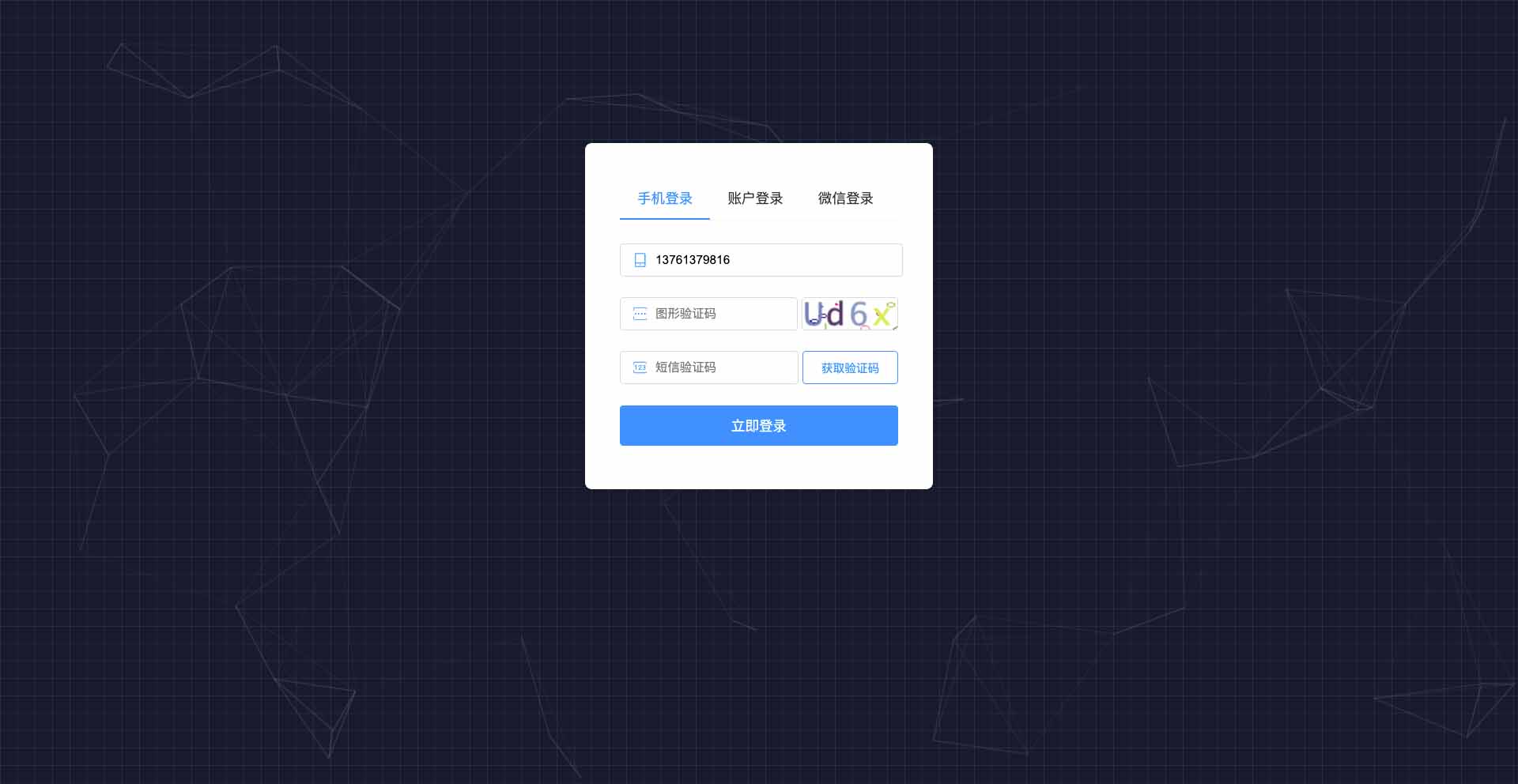
- 管理后台登录页

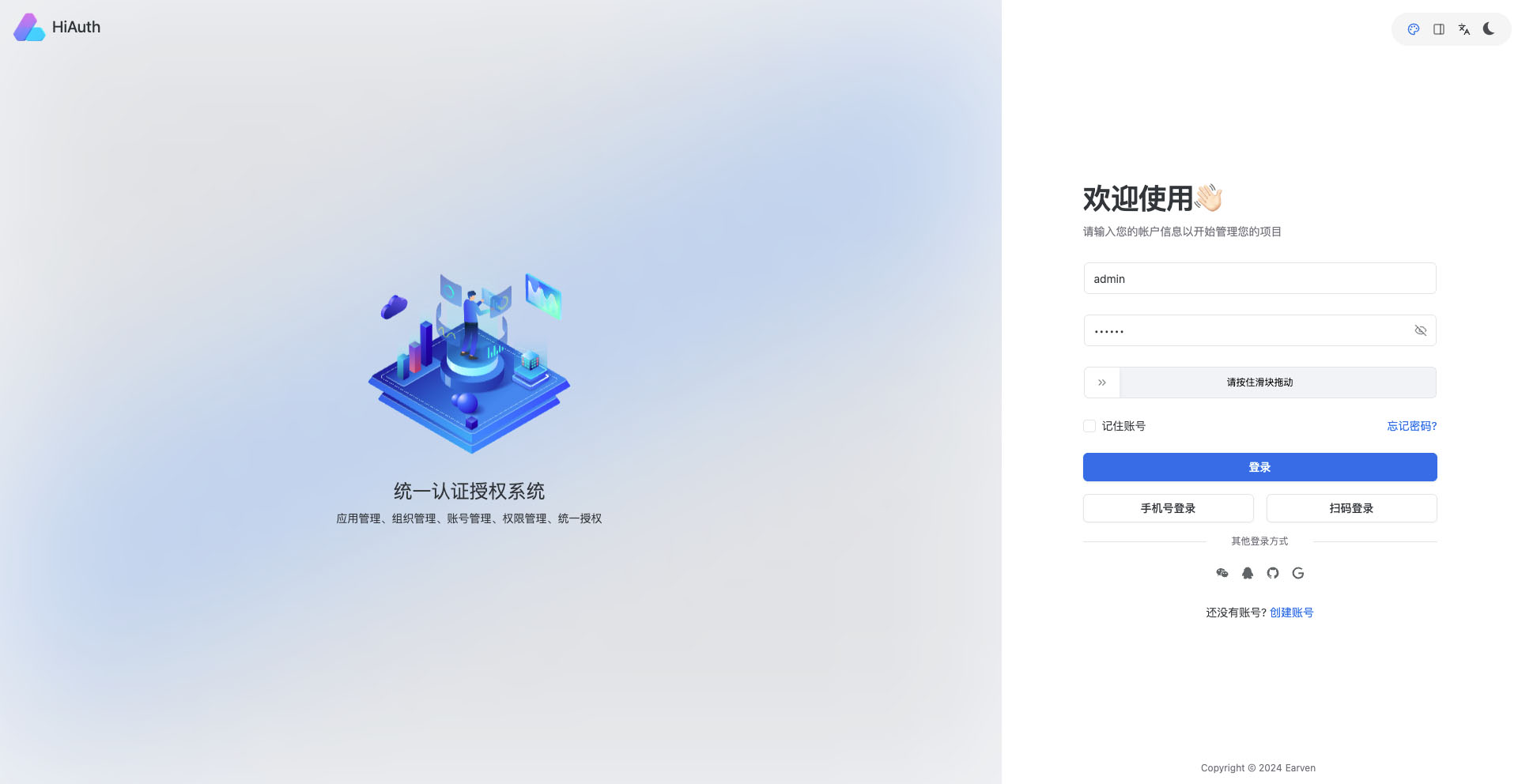
- 超级管理员-用户管理页

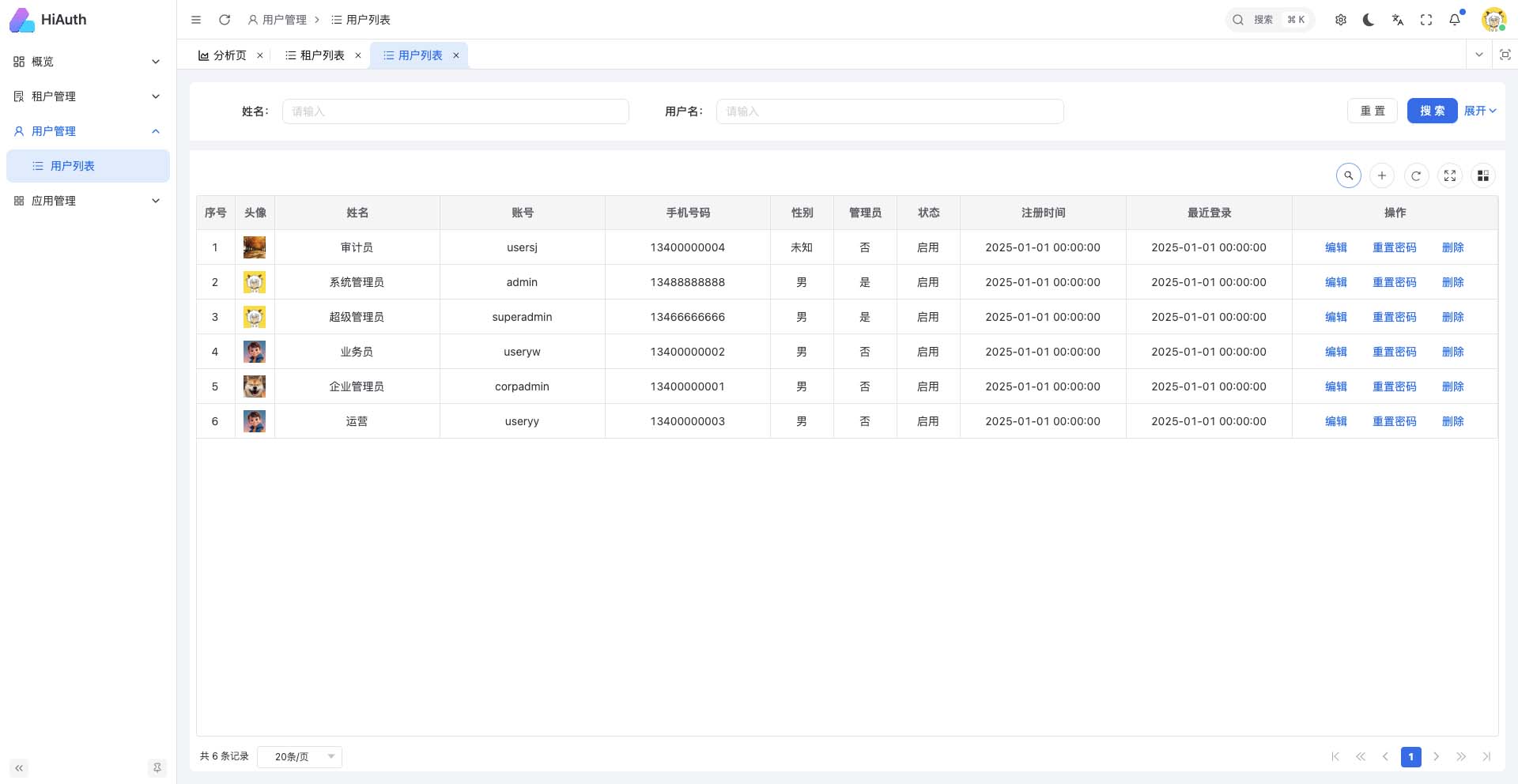
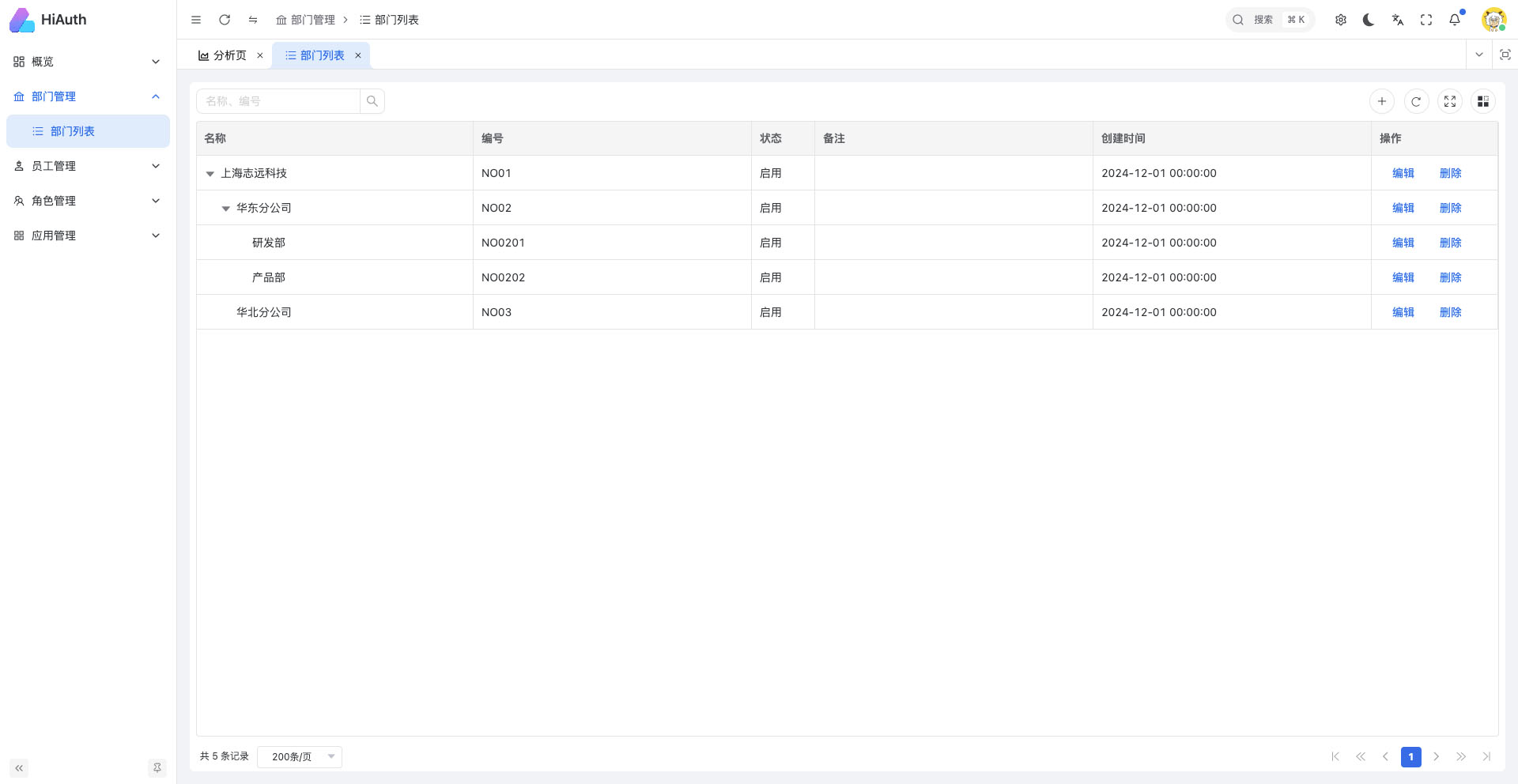
- 企业管理员-部门列表页

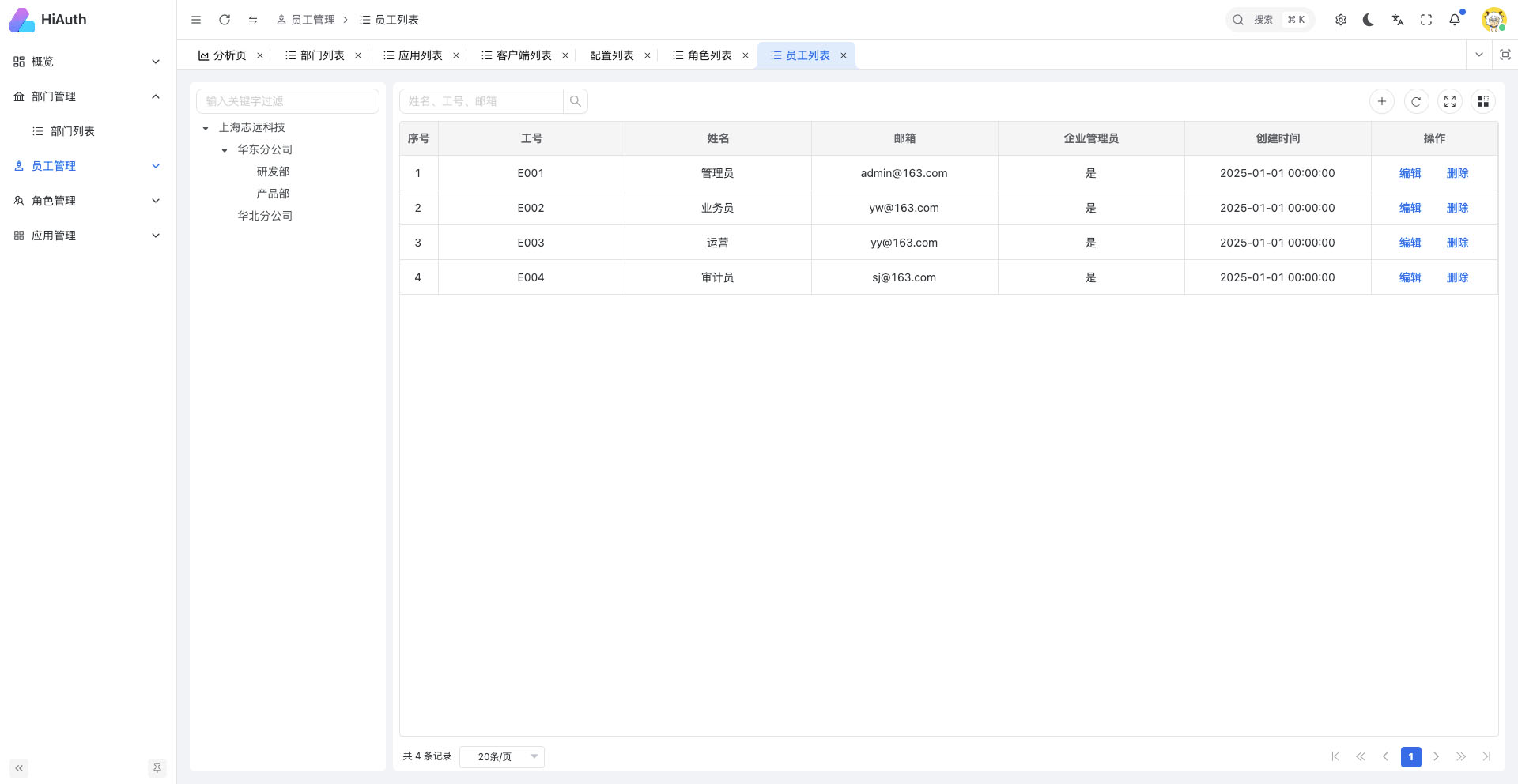
- 企业管理员-员工列表页

**如果你觉得此项目对你有帮助,请给我点个star,谢谢!** ## 快速尝试 ### 环境要求 - Git - JDK17+ - Maven 3.8+ ### 下载源码 ```sh $ git clone https://github.com/bestaone/HiAuth.git ``` ### 构建、启动 ```sh # 启动himall实例 $ cd HiAuth/example/himall $ mvn clean install $ mvn spring-boot:run ``` ### 验证 - 访问HiMall:http://127.0.0.1:9000 点击`Login`按钮,登录账号:`corpadmin/123456` > 注意:`127.0.0.1`不能使用`localhost`代替,因为数据库中配置了回调地址为`http://127.0.0.1:9000`。 ## 认证模式 **authorization_code模式:** - 访问授权端点获取`授权码`: http://auth.hiauth.cn/oauth2/authorize?response_type=code&client_id=himall&scope=openid%20profile&redirect_uri=http://127.0.0.1:9000/login/oauth2/code/hiauth-code - 用户登录并授权后,重定向到`redirect_uri`并附带`授权码`,如下(注意:浏览器开发模式下,网络控制台中,url的参数code值): ```shell http://127.0.0.1:9000/login/oauth2/code/hiauth-code?code=R4vhO65LvdsNqQ9A3KHwjb... ``` - 使用`授权码`换取访问`令牌` ```shell # 最后的YourCode替换为上面步骤获取的授权码 $ curl --location --request POST 'http://auth.hiauth.cn/oauth2/token' \ --header 'Content-Type: application/x-www-form-urlencoded' \ --header 'Authorization: Basic aGltYWxsOnNlY3JldA==' \ --data-urlencode 'grant_type=authorization_code' \ --data-urlencode 'redirect_uri=http://127.0.0.1:9000/login/oauth2/code/hiauth-code' \ --data-urlencode 'code=YourCode' # 或者 $ curl --location --request POST 'http://auth.hiauth.cn/oauth2/token' \ --header 'Content-Type: application/x-www-form-urlencoded;charset=UTF-8' \ --header 'Authorization: Basic aGltYWxsOnNlY3JldA==' \ --data 'grant_type=authorization_code&redirect_uri=http://127.0.0.1:9000/login/oauth2/code/hiauth-code&client_id=himall&client_secret=secret&code=YourCode' ``` > 上述“Authorization: Basic aGltYWxsOnNlY3JldA==”中的值“aGltYWxsOnNlY3JldA==”, > 计算方式为:Base64.encode(client_id:client_secret), > 例如:client_id=himall,client_secret=secret时,base64解码为:Base64.encode("himall:secret") 返回结果: ```json { "access_token": "eyJraWQiOiJkZTYxMjVmNi0wYTQ5LTQwMGYtYWMzMC02M2U2Zm", "refresh_token": "8WS6liiSW0gmUy8yudFAPIHGor3Hf6yBtaBTUNjj3-q9y4JXRlBZ", "scope": "openid profile", "token_type": "Bearer", "expires_in": 35999 } ```

**client_credentials模式:** ```shell $ curl --location --request POST 'http://auth.hiauth.cn/oauth2/token' \ --header 'Content-Type: application/x-www-form-urlencoded' \ --data-urlencode 'grant_type=client_credentials' \ --data-urlencode 'client_id=himall' \ --data-urlencode 'client_secret=secret' \ --data-urlencode 'scope=profile' # 或者 $ curl --location --request POST 'http://auth.hiauth.cn/oauth2/token' \ --header 'Content-Type: application/x-www-form-urlencoded' \ --data 'grant_type=client_credentials&client_id=himall&client_secret=secret&scope=profile' ``` 返回结果: ```json { "access_token": "eyJraWQiOiJkZTYxMjVmNi0wYTQ5LTQwMGYtYWMzMC02M2U2Zm", "scope": "profile user", "token_type": "Bearer", "expires_in": 35999 } ``` **用户信息获取:** ```shell # 将accessToken替换为上面步骤获取的访问令牌 $ curl --location --request POST 'http://auth.hiauth.cn/userinfo' \ --header 'Accept: application/json' \ --header 'Authorization: Bearer accessToken' ``` > 注意:只在code码模式`grant_type=authorization_code`下生效。 返回结果: ```shell { "sub": "corpadmin", "empId": 1, "avatarUrl": "/unpapi/image/2c924149ddfe4bd181959ee9bede10c0.jpeg", "appId": 91, "name": "企业管理员", "phoneNum": "13400000001", "userId": 11, "authorities": [], "cid": 1, "username": "corpadmin" } ```

**scop权限:** - 在授权请求中包含所需scope - 获取的访问令牌将包含授予的scope - 资源服务器验证请求的scope是否匹配 ```java @PreAuthorize("hasAuthority('SCOPE_profile')") @GetMapping("/protected") public String protectedResource() { return "Accessed protected resource"; } ``` ### 其他 - 获取认证服务器配置信息:http://auth.hiauth.cn/.well-known/openid-configuration ### 更多集成方式 - 云端SaaS版集成,[参考文档](http://docs.hiauth.cn/guide/saas); - 本地Docker版集成,[参考文档](http://docs.hiauth.cn/guide/docker); - 源码编译安装集成,[参考文档](http://docs.hiauth.cn/guide/sourcecode); ## 社区与作者

>如果群二维码失效了,请先添加我的微信,然我我拉你入群。 ## 授权协议 本项目执行 [MIT](https://github.com/bestaone/HiAuth/blob/master/LICENSE) 协议 ================================================ FILE: cicd/Dockerfile ================================================ FROM ubuntu:jdk21-ng-24 # 设置语言 ENV LANG en_US.UTF-8 ENV LANG C.UTF-8 ENV LC_ALL C.UTF-8 # 设置地理位置 ENV TZ=Asia/Shanghai # 设置时区 RUN ln -snf /usr/share/zoneinfo/$TZ /etc/localtime && echo $TZ > /etc/timezone # 安装工具 RUN apt-get update && apt-get install -y curl && apt-get clean # 挂在目录 VOLUME /data # 安装jar包 ADD ./hiauth-server/target/hiauth-server.jar /hiauth/app.jar COPY ./cicd/hiauth.properties /hiauth/conf/hiauth.properties # 安装前端 ADD ./hiauth-front/apps/web-auth/dist.zip dist.zip RUN mkdir -p /html && chmod a+rwx -R /html RUN unzip dist.zip -d /html/admin # 安装文档 # COPY ./docs/.vitepress/dist /html/docs # 配置nginx COPY ./cicd/nginx.conf /etc/nginx/nginx.conf # 配置启动脚本 RUN echo "#!/bin/bash" > /hiauth/run.sh RUN echo "java -jar /hiauth/app.jar & nginx -g 'daemon off;'" >> /hiauth/run.sh # 设置权限 RUN chmod +x /hiauth/run.sh # 暴露端口 EXPOSE 80 8080 # 设置容器启动时执行的命令 ENTRYPOINT ["/hiauth/run.sh"] ================================================ FILE: cicd/Jenkinsfile ================================================ pipeline { agent any // 设置环境变量 environment { BUILD_VERSION = sh(script: 'git rev-parse --short HEAD', returnStdout: true).trim() CONFIG_FILE = '/var/jenkins_home/hiauth/conf/hiauth.properties' } // 设置参数, 设置后,构建时会提示填写 // parameters { // string(name: 'DEPLOY_ENV', defaultValue: 'dev', description: 'Environment to deploy to') // } stages { stage('Check Env') { steps { sh 'echo ${BUILD_VERSION}' sh 'docker -v' sh 'java -version' sh 'mvn -v' sh 'node -v' sh 'pnpm -v' } } stage('Install') { steps { sh "mvn clean install -Dmaven.test.skip=false" sh "cd hiauth-front && pnpm install --no-frozen-lockfile && pnpm build:auth" // sh "cd docs && pnpm install && pnpm run build" sh 'docker stop hiauth || true' sh 'docker rm -f hiauth || true' sh "docker rmi -f bestaone/hiauth:3.0.0 || true" sh "docker build -f ./cicd/Dockerfile -t bestaone/hiauth:3.0.0 ." sh """ docker run -d \ --restart=always \ -p 9080:80 \ -v /opt/install/hiauth/conf:/hiauth/conf \ -v /opt/install/hiauth/logs:/hiauth/logs \ --name hiauth bestaone/hiauth:3.0.0 """ } } } } ================================================ FILE: cicd/hiauth.properties ================================================ # login page title, default: loginPage.title=\u7edf\u4e00\u8ba4\u8bc1\u4e2d\u5fc3 # login page static file name loginPage.path=login # login page default username loginPage.username=corpadmin # login page default password loginPage.password=123456 # login page username placeholder loginPage.usernamePlaceholder=\u4f01\u4e1a\u7ba1\u7406\u5458\uff1acorpadmin\u3001\u7cfb\u7edf\u7ba1\u7406\u5458\uff1aadmin # login page password placeholder loginPage.passwordPlaceholder=123456 # login types loginPage.loginTypes=phone,account,wechat # aliyun sms aliyun.sms.accessKeyId=abcdefghi aliyun.sms.accessKeySecret=jklmnopqrstuvwxyz aliyun.sms.sign=HiAuth aliyun.sms.smsTemplateCode=SMS_00000001 aliyun.sms.superSmsCode=888888 # supported wechat qrcode login, config in wx open platform wechat.open.appid=wx9b04c3f125a24962 wechat.open.appSecret=abcdefghijklmnopqrstuvwxyz wechat.open.redirectUri=http://127.0.0.1:8080/wechat/doLogin wechat.open.style=black wechat.open.href= # only supported postgresql datasource.type=com.alibaba.druid.pool.DruidDataSource datasource.driverClassName=org.postgresql.Driver datasource.url=jdbc:postgresql://127.0.0.1:5432/hiauth?stringtype=unspecified datasource.username=test datasource.password=123456 # redis redis.host=127.0.0.1 redis.port=6379 redis.database=0 redis.username= redis.password= ================================================ FILE: cicd/nginx.conf ================================================ worker_processes auto; pid /run/nginx.pid; include /etc/nginx/modules-enabled/*.conf; events { worker_connections 768; # multi_accept on; } http { sendfile on; tcp_nopush on; tcp_nodelay on; keepalive_timeout 65; types_hash_max_size 2048; # server_tokens off; # server_names_hash_bucket_size 64; # server_name_in_redirect off; include /etc/nginx/mime.types; default_type application/octet-stream; ssl_protocols TLSv1 TLSv1.1 TLSv1.2 TLSv1.3; # Dropping SSLv3, ref: POODLE ssl_prefer_server_ciphers on; access_log /var/log/nginx/access.log; error_log /var/log/nginx/error.log; gzip on; # gzip_vary on; # gzip_proxied any; # gzip_comp_level 6; # gzip_buffers 16 8k; # gzip_http_version 1.1; # gzip_types text/plain text/css application/json application/javascript text/xml application/xml application/xml+rss text/javascript; server { listen 80; # hiauth授权服务 location / { proxy_set_header Host $http_host; proxy_set_header X-Real-IP $remote_addr; proxy_pass http://127.0.0.1:8080/; } # hiauth管理后台静态页面 location /admin { root /html; index index.html index.htm; try_files $uri $uri/ /index.html; } # hiauth管理后台接口服务 location /gateway/ { proxy_set_header Host $http_host; proxy_set_header X-Real-IP $remote_addr; proxy_pass http://127.0.0.1:8080/; rewrite "^/gateway/(.*)$" /$1 break; } # 文档 # location /docs { # root /html; # index index.html index.htm; # try_files $uri $uri/ /index.html; # } } } ================================================ FILE: docs/.postcssrc.json ================================================ { "plugins": { "postcss-rtlcss": { "ltrPrefix": ":where([dir=\"ltr\"])", "rtlPrefix": ":where([dir=\"rtl\"])" } } } ================================================ FILE: docs/.vitepress/config/en.ts ================================================ import { createRequire } from 'module' import { defineConfig, type DefaultTheme } from 'vitepress' const require = createRequire(import.meta.url) const pkg = require('../../package.json') export const en = defineConfig({ lang: 'en-US', description: 'Vite & Vue powered static site generator.', themeConfig: { nav: nav(), sidebar: { '/en/guide/': { base: '/en/guide/', items: sidebarGuide() }, '/en/other/': { base: '/en/other/', items: sidebarOther() } }, editLink: { pattern: 'https://github.com/bestaone/HiAuth/edit/main/docs/:path', text: 'Edit this page on GitHub' }, footer: { message: 'Released under the MIT License.', copyright: `Copyright © 2024-${new Date().getFullYear()} Earven` } } }) function nav(): DefaultTheme.NavItem[] { return [ { text: 'Guide', link: '/en/guide/what-is-hiauth', activeMatch: '/en/guide/' }, { text: 'Other', link: '/en/other/support', activeMatch: '/en/other/' }, { text: pkg.version, items: [ { text: 'Changelog', link: 'https://github.com/bestaone/HiAuth/blob/main/CHANGELOG.md' }, { text: 'Contributing', link: 'https://github.com/bestaone/HiAuth/blob/main/.github/contributing.md' } ] } ] } function sidebarGuide(): DefaultTheme.SidebarItem[] { return [ { text: 'Introduction', collapsed: false, items: [ { text: 'What is HiAuth', link: 'what-is-hiauth' }, { text: 'Quick Start', link: 'quick-start' } ] }, { text: 'Deployment & Integration', collapsed: false, items: [ { text: 'SaaS Edition', link: 'saas' }, { text: 'Docker Edition', link: 'docker' }, { text: 'Source Code Edition', link: 'sourcecode' }, { text: 'hiauth-client Integration', link: 'hiauth-client' }, { text: 'Deploying on K8S', link: 'k8s' }, { text: 'Integration Testing', link: 'test' } ] }, { text: 'Secondary Development', collapsed: false, items: [ { text: 'Project Structure', link: 'project' }, { text: 'Front-end Development', link: 'frontend' }, { text: 'Backend Development', link: 'backend' } ] }, { text: 'Other', collapsed: false, items: [ { text: 'About Topic', link: 'about-topic' }, { text: 'Issue', link: 'issue' } ] } ] } function sidebarOther(): DefaultTheme.SidebarItem[] { return [ { text: 'other', items: [ { text: 'support', link: 'support' }, { text: 'community', link: 'community' } ] } ] } ================================================ FILE: docs/.vitepress/config/index.ts ================================================ import { defineConfig } from 'vitepress' import { shared } from './shared' import { en } from './en' import { zh } from './zh' export default defineConfig({ ...shared, locales: { root: { label: '简体中文', ...zh }, en: { label: 'English', ...en } } }) ================================================ FILE: docs/.vitepress/config/shared.ts ================================================ import {defineConfig} from 'vitepress' import {groupIconMdPlugin, groupIconVitePlugin, localIconLoader} from 'vitepress-plugin-group-icons' import {search as zhSearch} from './zh' export const shared = defineConfig({ title: 'HiAuth', base: "/", rewrites: { 'zh/:rest*': ':rest*' }, lastUpdated: true, cleanUrls: true, metaChunk: true, markdown: { math: true, codeTransformers: [ // We use `[!!code` in demo to prevent transformation, here we revert it back. { postprocess(code) { return code.replace(/\[\!\!code/g, '[!code') } } ], config(md) { // TODO: remove when https://github.com/vuejs/vitepress/issues/4431 is fixed const fence = md.renderer.rules.fence! md.renderer.rules.fence = function (tokens, idx, options, env, self) { const { localeIndex = 'root' } = env const codeCopyButtonTitle = (() => { switch (localeIndex) { case 'zh': return '复制代码' case 'en': return 'Copy code' default: return 'Copy code' } })() return fence(tokens, idx, options, env, self).replace( '', `` ) } md.use(groupIconMdPlugin) } }, sitemap: { hostname: 'http://docs.hiauth.cn', transformItems(items) { return items.filter((item) => !item.url.includes('migration')) } }, /* prettier-ignore */ head: [ ['link', { rel: 'icon', type: 'image/svg+xml', href: '/hiauth-logo-mini.svg' }], ['link', { rel: 'icon', type: 'image/png', href: '/hiauth-logo-mini.png' }], ['meta', { name: 'theme-color', content: '#5f67ee' }], ['meta', { property: 'og:type', content: 'website' }], ['meta', { property: 'og:locale', content: 'zh' }], ['meta', { property: 'og:title', content: 'HiAuth | 基于OAuth2.0协议的认证授权服务' }], ['meta', { property: 'og:site_name', content: 'VitePress' }], ['meta', { property: 'og:image', content: 'https://vitepress.dev/vitepress-og.jpg' }], ['meta', { property: 'og:url', content: 'http://docs.hiauth.cn' }], ['script', { src: 'https://cdn.usefathom.com/script.js', 'data-site': 'AZBRSFGG', 'data-spa': 'auto', defer: '' }] ], themeConfig: { logo: { src: '/hiauth-logo-mini.svg', width: 24, height: 24 }, socialLinks: [ { icon: 'github', link: 'https://github.com/bestaone/HiAuth' } ], search: { provider: 'algolia', options: { appId: '8J64VVRP8K', apiKey: '52f578a92b88ad6abde815aae2b0ad7c', indexName: 'vitepress', locales: { ...zhSearch } } }, carbonAds: { code: 'CEBDT27Y', placement: 'vuejsorg' } }, vite: { plugins: [ groupIconVitePlugin({ customIcon: { vitepress: localIconLoader( import.meta.url, '../../public/hiauth-logo-mini.svg' ), firebase: 'logos:firebase' } }) ] } }) ================================================ FILE: docs/.vitepress/config/zh.ts ================================================ import { createRequire } from 'module' import { defineConfig, type DefaultTheme } from 'vitepress' const require = createRequire(import.meta.url) const pkg = require('../../package.json') export const zh = defineConfig({ lang: 'zh-Hans', description: '基于OAuth2.0协议的认证授权服务', themeConfig: { nav: nav(), sidebar: { '/guide/': { base: '/guide/', items: sidebarGuide() }, '/other/': { base: '/other/', items: sidebarOther() } }, editLink: { pattern: 'https://github.com/bestaone/HiAuth/edit/main/docs/:path', text: '在 GitHub 上编辑此页面' }, footer: { message: '基于 MIT 许可发布', copyright: `版权所有 © 2024-${new Date().getFullYear()} 张国圣` }, docFooter: { prev: '上一页', next: '下一页' }, outline: { label: '页面导航' }, lastUpdated: { text: '最后更新于', formatOptions: { dateStyle: 'short', timeStyle: 'medium' } }, langMenuLabel: '多语言', returnToTopLabel: '回到顶部', sidebarMenuLabel: '菜单', darkModeSwitchLabel: '主题', lightModeSwitchTitle: '切换到浅色模式', darkModeSwitchTitle: '切换到深色模式', skipToContentLabel: '跳转到内容' } }) function nav(): DefaultTheme.NavItem[] { return [ { text: '文档', link: '/guide/what-is-hiauth', activeMatch: '/guide/' }, { text: '其他', link: '/other/support', activeMatch: '/other/' }, { text: pkg.version, items: [ { text: '更新日志', link: 'https://github.com/bestaone/HiAuth/blob/main/CHANGELOG.md' }, { text: '参与贡献', link: 'https://github.com/bestaone/HiAuth/blob/main/.github/contributing.md' } ] } ] } function sidebarGuide(): DefaultTheme.SidebarItem[] { return [ { text: '简介', collapsed: false, items: [ { text: '什么是HiAuth', link: 'what-is-hiauth' }, { text: '快速体验', link: 'quick-start' } ] }, { text: '部署&集成', collapsed: false, items: [ { text: 'SaaS版', link: 'saas' }, { text: 'Docker版', link: 'docker' }, { text: '源码版', link: 'sourcecode' }, { text: 'hiauth-client集成', link: 'hiauth-client' }, { text: 'K8S上部署', link: 'k8s' }, { text: '集成测试', link: 'test' } ] }, { text: '二次开发', collapsed: false, items: [ { text: '项目结构', link: 'project' }, { text: '前端开发', link: 'frontend' }, { text: '后端开发', link: 'backend' } ] }, { text: '其他', collapsed: false, items: [ { text: '相关资料', link: 'about-topic' }, { text: '问题', link: 'issue' } ] } ] } function sidebarOther(): DefaultTheme.SidebarItem[] { return [ { text: '其他', items: [ { text: '技术支持', link: 'support' }, { text: '社区', link: 'community' } ] } ] } export const search: DefaultTheme.AlgoliaSearchOptions['locales'] = { zh: { placeholder: '搜索文档', translations: { button: { buttonText: '搜索文档', buttonAriaLabel: '搜索文档' }, modal: { searchBox: { resetButtonTitle: '清除查询条件', resetButtonAriaLabel: '清除查询条件', cancelButtonText: '取消', cancelButtonAriaLabel: '取消' }, startScreen: { recentSearchesTitle: '搜索历史', noRecentSearchesText: '没有搜索历史', saveRecentSearchButtonTitle: '保存至搜索历史', removeRecentSearchButtonTitle: '从搜索历史中移除', favoriteSearchesTitle: '收藏', removeFavoriteSearchButtonTitle: '从收藏中移除' }, errorScreen: { titleText: '无法获取结果', helpText: '你可能需要检查你的网络连接' }, footer: { selectText: '选择', navigateText: '切换', closeText: '关闭', searchByText: '搜索提供者' }, noResultsScreen: { noResultsText: '无法找到相关结果', suggestedQueryText: '你可以尝试查询', reportMissingResultsText: '你认为该查询应该有结果?', reportMissingResultsLinkText: '点击反馈' } } } } } ================================================ FILE: docs/.vitepress/theme/index.ts ================================================ import Theme from 'vitepress/theme' import 'virtual:group-icons.css' import './styles.css' export default Theme ================================================ FILE: docs/.vitepress/theme/styles.css ================================================ @import url('https://fonts.googleapis.com/css2?family=Vazirmatn:wght@100..900&display=swap'); :root:where(:lang(fa)) { --vp-font-family-base: 'Vazirmatn', 'Inter', ui-sans-serif, system-ui, sans-serif, 'Apple Color Emoji', 'Segoe UI Emoji', 'Segoe UI Symbol', 'Noto Color Emoji'; } :root { --vp-home-hero-name-color: transparent; --vp-home-hero-name-background: -webkit-linear-gradient( 120deg, #bd34fe 30%, #41d1ff ); --vp-home-hero-image-background-image: linear-gradient( -45deg, #bd34fe 50%, #47caff 50% ); --vp-home-hero-image-filter: blur(44px); } @media (min-width: 640px) { :root { --vp-home-hero-image-filter: blur(56px); } } @media (min-width: 960px) { :root { --vp-home-hero-image-filter: blur(68px); } } /* used in reference/default-theme-search */ img[src='/search.png'] { width: 100%; aspect-ratio: 1 / 1; } /* 屏蔽更新时间 */ .last-updated { display: none !important; } ================================================ FILE: docs/en/guide/about-topic.md ================================================ edit... ================================================ FILE: docs/en/guide/backend.md ================================================ edit... ================================================ FILE: docs/en/guide/docker.md ================================================ # Docker Edition {#docker} The integration process for the Docker edition is similar to the SaaS edition, except that before integration, we need to deploy a Docker version of HiAuth. The local installation and deployment of the Docker edition rely on `PostgreSQL 16+` and `Redis`. If you need to run the HiAuth demo, you will also need a `JDK 17` and `Maven 3.8+` environment. ## Installation and Integration Steps: - Check the server environment - Initialize the HiAuth database by executing SQL scripts - Configure the HiAuth startup configuration file - Download the image and start the service - Verify using the HiAuth source code demo ### Check the Server Environment {#check-env} ```shell # Check the git version $ git --version git version 1.8.3.1 # Check the Docker version $ docker -v Docker version 26.1.4, build 5650f9b # Check the JDK version $ java -version openjdk version "17.0.5" 2022-10-18 # Check the Maven version $ mvn -v Apache Maven 3.8.6 (36645f6c9b5079805ea5009217e36f2cffd34256) ``` ### Initialize the HiAuth Database by Executing SQL Scripts {#init-db} - Install `PostgreSQL 16+`; - Create a database named `hiauth`; - Execute the initialization script `HiAuth/other/hiauth.sql`; ### Configure the HiAuth Startup Configuration File {#config-file} - Create the configuration file `/opt/install/hiauth/conf/hiauth.properties` and configure the correct parameters; ```properties [hiauth.properties] # login page title, default: loginPage.title=Welcome Login # login page static file name loginPage.path=login # login page default username loginPage.username= # login page default password loginPage.password= # login page username placeholder loginPage.usernamePlaceholder= # login page password placeholder loginPage.passwordPlaceholder= # login types loginPage.loginTypes=phone,account,wechat # aliyun sms aliyun.sms.accessKeyId=abcdefghi aliyun.sms.accessKeySecret=abcdefghi aliyun.sms.sign=HiAuth aliyun.sms.smsTemplateCode=SMS_00000001 aliyun.sms.superSmsCode=888888 # supported wechat qrcode login, config in wx open platform wechat.open.appid=wx123456789 wechat.open.appSecret=abcdefghijklmnopqrstuvwxyz wechat.open.redirectUri=http://127.0.0.1:8080/wechat/doLogin wechat.open.style=black wechat.open.href= # only supported postgresql datasource.type=com.alibaba.druid.pool.DruidDataSource datasource.driverClassName=org.postgresql.Driver datasource.url=jdbc:postgresql://db_host:5432/hiauth?stringtype=unspecified datasource.username=test datasource.password=123456 # redis redis.host=redis_host redis.port=6379 redis.database=0 redis.username=test redis.password=123456 ``` > Configuration reference: [hiauth.properties](https://github.com/bestaone/HiAuth/blob/master/other/hiauth.properties) ### Download the Image and Start the Service {#download-image} ```shell # You need to be able to access the Docker Hub central repository, which may require a proxy. $ docker run -d \ --restart=always \ -p 9080:80 -p 8080:8080 \ -v /opt/install/hiauth/conf:/hiauth/conf \ -v /opt/install/hiauth/logs:/hiauth/logs \ --name hiauth bestaone/hiauth:3.0.0 # If you cannot access the Docker Hub central repository, you can download the image from the Alibaba Cloud repository. $ docker run -d \ --restart=always \ -p 9080:80 -p 8080:8080 \ -v /opt/install/hiauth/conf:/hiauth/conf \ -v /opt/install/hiauth/logs:/hiauth/logs \ --name hiauth registry.cn-zhangjiakou.aliyuncs.com/bestaone/hiauth:3.0.0 # Check the images $ docker images REPOSITORY TAG IMAGE ID CREATED SIZE bestaone/hiauth 3.0.0 c5e4140bd5aa 3 hours ago 810MB registry-vpc.cn-zhangjiakou.aliyuncs.com/bestaone/hiauth 3.0.0 c5e4140bd5aa 3 hours ago 810MB # Check the services $ docker ps CONTAINER ID IMAGE COMMAND CREATED STATUS PORTS NAMES 3ea0fdb8a165 bestaone/hiauth:3.0.0 "/hiauth/run.sh" 3 hours ago Up 3 hours 8080/tcp, 0.0.0.0:9080->80/tcp, :::9080->80/tcp hiauth # Check the logs $ docker logs 3ea0fdb8a165 ... INFO 7 [main] org.springframework.boot.web.embedded.tomcat.TomcatWebServer Tomcat started on port 8080 (http) with context path '/' INFO 7 [main] cn.hiauth.server.ServerStarter Started ServerStarter in 10.094 seconds (process running for 11.107) ... # Access the service $ curl http://127.0.0.1:9080 { "code": 50000, "message": "Invalid or expired token" } ``` - The authorization address for the Docker edition of HiAuth is: http://127.0.0.1:9080 - The management address for the Docker edition of HiAuth is: http://127.0.0.1:9080/admin ### Verify Using the HiAuth Source Code Demo {#hiauth-himall} - Download the source code ```shell $ git clone https://github.com/bestaone/HiAuth.git ``` - Modify the configuration `HiAuth/example/himall/src/main/resources/application.yml` ```yaml ... spring.security.oauth2.client: provider: hiauth-server: # Change the value of issuer-uri from http://auth.hiauth.cn to http://127.0.0.1:9080 issuer-uri: http://auth.hiauth.cn ... ``` - Compile and run ```shell $ cd HiAuth/example/himall $ mvn clean install $ mvn spring-boot:run ``` ### Verification - Open a browser and visit: http://127.0.0.1:9000 - Click the `Login` button, and you will be redirected to the unified authentication system. Enter the account: `corpadmin`, password: `123456` - After successful login, you will see the home page and the logged-in user information! ## Video Tutorial ================================================ FILE: docs/en/guide/frontend.md ================================================ edit... ================================================ FILE: docs/en/guide/hiauth-client.md ================================================ edit... ================================================ FILE: docs/en/guide/issue.md ================================================ edit... ================================================ FILE: docs/en/guide/k8s.md ================================================ edit... ================================================ FILE: docs/en/guide/quick-start.md ================================================ # Quick Start {#quick-start} ## Admin Console {#admin} Experience it on the [Admin End](http://auth.hiauth.cn/admin). - **System Administrator Account**: `admin\123456`. This account can view all configurations. By switching tenants, you can view the configurations of the current tenant. To prevent unauthorized changes, this account has read-only access. - **Corporate Administrator Account**: `corpadmin\123456`. This account can view all configurations within the tenant. To prevent unauthorized changes, this account has read-only access. ## Unified Authentication System {#auth} Experience the [Authentication End](http://auth.hiauth.cn) for application login authorization. After integrating with third-party applications, you will be redirected to this page for authentication. ## Documentation {#docs} Get help from the [Documentation](http://hiauth.cn). ================================================ FILE: docs/en/guide/saas.md ================================================ # SaaS Edition {#saas} To integrate the SaaS edition, users need to sign up for an account on HiAuth, add applications, and perform relevant settings. Then, they can use the obtained `client-id` and `client-secret` for integration. For a quick validation, we will use the demo account provided in the system for integration. After completing the validation, users can replace it with their own account. - The HiAuth authorization address is: http://auth.hiauth.cn - The HiAuth management address is: http://auth.hiauth.cn/admin ## Example of Integrating with a SpringBoot Project - Create a SpringBoot project - Add dependencies - Add configurations - Add a home page Integration with the SaaS edition can be completed with just these simple steps. ## Running the HiAuth Source Code Demo {#hiauth-demo} ### Environment Requirements - Git - JDK 17+ - Maven 3.8+ ### Running Script ```shell # Download HiAuth source code $ git clone https://github.com/bestaone/HiAuth.git # Enter the demo directory $ cd HiAuth/example/himall # Compile and install $ mvn clean install # Run $ mvn spring-boot:run ``` ### Verification - Open a browser and visit: http://127.0.0.1:9000 - Click the `Login` button, and you will be redirected to the unified authentication system. Enter the account: `corpadmin`, password: `123456` - After successful login, you will see the home page and the logged-in user information! ## Step-by-Step Integration {#hand-by-hand} ### Environment Requirements - JDK 17+ - Maven 3.8+ ### Create an Empty SpringBoot Project Use [Spring Initializr](https://start.spring.io/) to create an empty SpringBoot project. The `pom.xml` file is as follows: ```xml [pom.xml] 4.0.0 org.springframework.boot spring-boot-starter-parent 3.4.5 cn.hiauth demo 0.0.1-SNAPSHOT demo Demo project for Spring Boot 17 org.springframework.boot spring-boot-starter-web org.springframework.boot spring-boot-starter-test test org.springframework.boot spring-boot-maven-plugin ``` ### Add Dependencies ```xml [pom.xml] org.springframework.boot spring-boot-starter-oauth2-client ``` ### Add Configurations ```yml [application.yml] server.port: 9000 spring.security.oauth2.client: provider: # Authentication server information hiauth-server: # If you have deployed HiAuth privately, replace this address with the private deployment authentication server address issuer-uri: http://auth.hiauth.cn authorizationUri: http://auth.hiauth.cn/oauth2/authorize # Token acquisition address tokenUri: http://auth.hiauth.cn/oauth2/token userInfoUri: http://auth.hiauth.cn/userinfo jwkSetUri: http://auth.hiauth.cn/oauth2/jwks #userNameAttribute: name registration: hiauth-code: # Authentication provider, indicating which authentication server to use for authentication, associated with the above hiauth-server provider: hiauth-server # Client name client-name: himall # Client ID, obtained from the authentication platform client-id: himall # Client secret client-secret: secret # Client authentication method client_secret_basic\client_secret_post client-authentication-method: client_secret_basic # Use authorization code mode to obtain token authorization-grant-type: authorization_code # Callback address after authentication, this address needs to be registered in the oauth2_registered_client table, # otherwise the callback will be rejected redirect-uri: http://127.0.0.1:9000/login/oauth2/code/hiauth-code scope: - profile - openid ``` > Note: After adding the `application.yml` file, delete the `application.properties` file. ### Add a Controller ```java [IndexController.java] package cn.hiauth.demo; import org.springframework.beans.factory.annotation.Value; import org.springframework.http.HttpEntity; import org.springframework.http.HttpHeaders; import org.springframework.http.MediaType; import org.springframework.security.oauth2.client.OAuth2AuthorizedClient; import org.springframework.security.oauth2.client.annotation.RegisteredOAuth2AuthorizedClient; import org.springframework.ui.Model; import org.springframework.util.LinkedMultiValueMap; import org.springframework.util.MultiValueMap; import org.springframework.web.bind.annotation.GetMapping; import org.springframework.web.bind.annotation.RestController; import org.springframework.web.client.RestTemplate; import java.util.Map; @RestController public class IndexController { private final RestTemplate restTemplate = new RestTemplate(); @Value("${spring.security.oauth2.client.provider.hiauth-server.userInfoUri}") private String userInfoUri; @GetMapping("/") public Map index(Model model, @RegisteredOAuth2AuthorizedClient OAuth2AuthorizedClient oAuth2AuthorizedClient) { // After authentication, the accessToken will be obtained String accessToken = oAuth2AuthorizedClient.getAccessToken().getTokenValue(); HttpHeaders headers = new HttpHeaders(); headers.setContentType(MediaType.APPLICATION_FORM_URLENCODED); // Set the request header and include the accessToken in it headers.add("Authorization", "Bearer " + accessToken); MultiValueMap map = new LinkedMultiValueMap<>(); HttpEntity> entity = new HttpEntity<>(map, headers); // Request the authentication server to obtain user information return restTemplate.postForObject(this.userInfoUri, entity, Map.class); } } ``` ### Verification - Start the project and visit: http://127.0.0.1:9000. The system will detect that you are not logged in and redirect you to the unified authentication system; - Enter the account: `corpadmin`, password: `123456`. After successful login, you will be redirected back to the application; - In this demo, the home page directly outputs the logged-in user information in `json` format; ```json { "sub": "corpadmin", "empId": 1, "avatarUrl": "/unpapi/image/2c924149ddfe4bd181959ee9bede10c0.jpeg", "appId": 91, "name": "Corporate Administrator", "phoneNum": "13400000001", "userId": 11, "authorities": [], "cid": 1, "username": "corpadmin" } ``` ## Video Tutorial ================================================ FILE: docs/en/guide/sourcecode.md ================================================ # Source Code Edition {#sourcecode} The integration process for the source code edition is similar to the Docker edition, except that the Docker version of HiAuth is replaced with a source code compilation and startup. ## Environment Requirements {#env-demand} - Git - JDK 17+ - Maven 3.8+ - Node.js v20.15+ - pnpm 10.10+ - PostgreSQL 16+ - Redis ## Installation and Integration Steps - Check the server environment - Download the source code - Initialize the HiAuth database by executing SQL scripts - Configure the HiAuth startup configuration file - Compile the source code and start the service - Verify using the HiAuth source code demo ### Check the Server Environment {#check-env} ```shell # Check the git version $ git --version git version 1.8.3.1 # Check the JDK version $ java -version openjdk version "17.0.5" 2022-10-18 # Check the Maven version $ mvn -v Apache Maven 3.8.6 (36645f6c9b5079805ea5009217e36f2cffd34256) # Check the Node.js version $ node -v v20.15.0 # Check the pnpm version $ pnpm -v 9.14.2 ``` ### Download the Source Code {#download-source} ```shell $ git clone https://github.com/bestaone/HiAuth.git ``` ### Initialize the HiAuth Database by Executing SQL Scripts {#init-db} - Install `PostgreSQL 16+`; - Create a database named `hiauth`; - Execute the initialization script `HiAuth/other/hiauth.sql`; ### Configure the HiAuth Startup Configuration File {#config-file} - Modify the configuration file `HiAuth/cicd/hiauth.properties` to your own settings; ```properties [hiauth.properties] # Only PostgreSQL is supported datasource.type=com.alibaba.druid.pool.DruidDataSource datasource.driverClassName=org.postgresql.Driver datasource.url=jdbc:postgresql://db_host:5432/hiauth datasource.username=test datasource.password=123456 redis.host=redis_host redis.port=6379 redis.database=0 redis.username=test redis.password=123456 ``` - Apply the configuration file by modifying `HiAuth/hiauth-server/src/main/resources/application.yml`; ```yaml ... # Replace `/hiauth/conf/hiauth.properties` with the file path you configured above spring.config.import: ${CONFIG_FILE:optional:/hiauth/conf/hiauth.properties} ... ``` ### Compile the Source Code and Start the Service {#compile-start} ```shell # Compile and start the backend service $ cd HiAuth/hiauth-server $ mvn clean install $ mvn spring-boot:run # Compile and start the frontend service $ cd HiAuth/hiauth-front $ pnpm install $ pnpm dev:auth # Access the service $ curl http://127.0.0.1:8080 { "code": 50000, "message": "Invalid or expired token" } ``` - Check the backend service: http://127.0.0.1:8080 - Check the frontend service: http://127.0.0.1:5666/admin (The port may change, please check the console) ### Verify Using the HiAuth Source Code Demo {#hiauth-himall} - Modify the configuration `HiAuth/example/himall/src/main/resources/application.yml` ```yaml ... spring.security.oauth2.client: provider: hiauth-server: # Change the value of issuer-uri from http://auth.hiauth.cn to http://127.0.0.1:8080 issuer-uri: http://auth.hiauth.cn ... ``` - Compile and run ```shell $ cd HiAuth/example/himall $ mvn clean install $ mvn spring-boot:run ``` ### Verification - Open a browser and visit: http://127.0.0.1:9000 - Click the `Login` button, and you will be redirected to the unified authentication system. Enter the account: `corpadmin`, password: `123456` - After successful login, you will see the home page and the logged-in user information! ## Video Tutorial ================================================ FILE: docs/en/guide/test.md ================================================ edit... ================================================ FILE: docs/en/guide/what-is-hiauth.md ================================================ # What is HiAuth? {#what-is-hiauth} HiAuth is an authentication and authorization system based on the OAuth2.0 protocol. By integrating the HiAuth system, you can quickly enable authentication and authorization functions for your application. HiAuth supports SaaS mode, Docker private deployment mode, and source code compilation installation mode. Moreover, it is completely free and open-source.
Want to give it a try? Jump to [Quick Start](./quick-start).
## Functions {#function} ### **1. Authentication** Based on the `OAuth2.0` authorization protocol, it allows third-party applications to access user resources with user authorization, without sharing user credentials. - **Core Process**: - **Authorization Code Mode**: Suitable for web applications, obtaining an access token through an authorization code exchange (most secure). - **Implicit Mode**: Suitable for Single Page Applications (SPAs), directly returning an access token (no refresh token). - **Password Mode**: Users directly provide their account and password to the client (for use only in trusted scenarios). - **Client Credentials Mode**: Applications obtain tokens directly with their own identity (for service-to-service communication). - **Token Management**: - Access Token is used for resource access, with a relatively short validity period. - Refresh Token is used to obtain a new access token and must be securely stored. - **Security**: - Enforces HTTPS transmission to prevent token leakage. - Token Binding to prevent man-in-the-middle attacks. ### **2. Access Authorization** Access authorization (`Authorization`) determines whether users/applications can perform specific operations or access resources. It is based on `RBAC` (Role-Based Access Control), assigning permissions through roles (e.g., administrator, regular user). ### **3. Application Management** Manages the integration and lifecycle of third-party or internal applications. - **Core Functions**: - **Application Registration**: Assigns unique `ClientID`/`ClientSecret`, defining permission scopes. - **Key Rotation**: Regularly updates `ClientSecret` to prevent leakage risks. - **Permission Control**: Limits the API or data scope that applications can access. - **Security Auditing**: - Logs application behavior (e.g., API call frequency). - Reviews application permission requests to ensure the principle of least privilege. ### **4. Organization Management** Manages the hierarchical structure and member relationships of enterprises or teams. - **Functions**: - **Multi-level Architecture**: Supports nested structures such as departments, teams, and project groups. - **Multi-tenancy Support**: Isolates data and permissions of different organizations (e.g., in SaaS scenarios). - **Administrator Assignment**: Sets organization administrators to manage members and permissions. ### **5. Permission Management** Defines and manages the operations that users or roles can perform. - **Core Mechanism**: - **Permission Granularity**: Supports control at the API level, functional level, or data field level. - **Permission Groups**: Packages permissions into templates (e.g., "Finance Approval Group"). - **Permission Inheritance and Overrides**: Sub-roles inherit permissions from parent roles, with the ability to make local adjustments. - **Audit and Compliance**: - Permission change logs: Records who modified permissions and when. - Regularly reviews permission assignments to avoid redundancy or excessive authorization. ### **6. User Management** Manages user identities, authentication, and lifecycle. - **Core Functions**: - **Identity Storage**: Supports local databases. - **Lifecycle Management**: User registration, disabling, deletion, and profile updates. - **Authentication Enhancement**: Multi-Factor Authentication (MFA), Single Sign-On (SSO). ## Video Tutorial ================================================ FILE: docs/en/index.md ================================================ --- layout: home title: HiAuth titleTemplate: Authentication and Authorization Service Based on OAuth2.0 Protocol hero: name: HiAuth text: Authentication and Authorization Service Based on OAuth2.0 Protocol tagline: With just a few simple steps, you can integrate into your application actions: - theme: brand text: Quick Start -> link: /zh/guide/what-is-vitepress - theme: alt text: Online Preview link: http://auth.hiauth.cn - theme: alt text: GitHub link: https://github.com/bestaone/HiAuth image: src: /hiauth-large.png alt: HiAuth features: - icon: 📝 title: Login authentication details: Single sign on, multi login, single end login, mutually exclusive login, no login Multiple login strategies can be configured. - icon: 🔐 title: Rights Management details: Permission authentication, role management, permission management, menu management, session management, interface authentication Multiple flexible authentication schemes. - icon: 🌐 title: OAuth2.0 protocol details: Authentication service based on OAuth2.0 protocol, supporting four authorization modes for easy integration with different development language environments. - icon: 🚀 title: Out of box details: Provide SAAS version, one click deployment Docker version, and source code local deployment version, which can be developed based on source code for secondary development. --- ================================================ FILE: docs/lunaria.config.json ================================================ { "$schema": "./node_modules/@lunariajs/core/config.schema.json", "repository": { "name": "bestaone/HiAuth", "rootDir": "docs" }, "files": [ { "location": ".vitepress/config/{en,zh,pt,ru,es,ko,fa}.ts", "pattern": ".vitepress/config/@lang.ts", "type": "universal" }, { "location": "**/*.md", "pattern": "@lang/@path", "type": "universal" } ], "defaultLocale": { "label": "简体中文", "lang": "zh" }, "locales": [ { "label": "English", "lang": "en" } ], "outDir": ".vitepress/dist/_translations", "ignoreKeywords": ["lunaria-ignore"] } ================================================ FILE: docs/package.json ================================================ { "name": "docs", "version": "3.0.0", "private": true, "type": "module", "scripts": { "dev": "vitepress dev", "build": "vitepress build", "preview": "vitepress preview", "lunaria:build": "lunaria build", "lunaria:open": "open-cli .vitepress/dist/_translations/index.html" }, "devDependencies": { "@lunariajs/core": "^0.1.1", "markdown-it-mathjax3": "^4.3.2", "open-cli": "^8.0.0", "postcss-rtlcss": "^5.6.0", "vitepress": "2.0.0-alpha.3", "vitepress-plugin-group-icons": "^1.3.6" } } ================================================ FILE: docs/public/pure.html ================================================ Plain HTML page | VitePress

Not part of the main VitePress docs site

This page is plain HTML in the public directory.
================================================ FILE: docs/zh/guide/about-topic.md ================================================ 编辑中... ================================================ FILE: docs/zh/guide/backend.md ================================================ 编辑中... ================================================ FILE: docs/zh/guide/docker.md ================================================ # Docker版 {#docker} Docker版的集成过程和SaaS版类似,只不过在集成前,我们需要部署一个Docker版本的HiAuth。Docker版的本地安装部署,依赖`PostgreSQL16+`、`Redis`,如果需要运行HiAuth自带的Demo的话,还需要 `JDK17` 和 `Maven 3.8+`环境。 ## 安装及集成步骤: - 检查服务器环境 - 初始化HiAuth数据库,执行SQL脚本 - 配置HiAuth的启动配置文件 - 下载镜像、启动服务 - 使用HiAuth源码Demo验证 ### 检查服务器环境 {#check-env} ```shell # 检查git版本 $ git --version git version 1.8.3.1 # 检查daocker版本 $ docker -v Docker version 26.1.4, build 5650f9b # 检查JDK版本 $ java -version openjdk version "17.0.5" 2022-10-18 # 检查maven版本 $ mvn -v Apache Maven 3.8.6 (36645f6c9b5079805ea5009217e36f2cffd34256) ``` ### 初始化HiAuth数据库,执行SQL脚本 {#init-db} - 安装`PostgreSQL16+`; - 创建数据库`hiauth`; - 执行初始化脚本 `HiAuth/other/hiauth.sql` ; ### 配置HiAuth的启动配置文件 {#config-file} - 创建配置文件 `/opt/install/hiauth/conf/hiauth.properties`,并配置正确的参数; ```properties [hiauth.properties] # login page title, default: loginPage.title=Welcome Login # login page static file name loginPage.path=login # login page default username loginPage.username= # login page default password loginPage.password= # login page username placeholder loginPage.usernamePlaceholder= # login page password placeholder loginPage.passwordPlaceholder= # login types loginPage.loginTypes=phone,account,wechat # aliyun sms aliyun.sms.accessKeyId=abcdefghi aliyun.sms.accessKeySecret=abcdefghi aliyun.sms.sign=HiAuth aliyun.sms.smsTemplateCode=SMS_00000001 aliyun.sms.superSmsCode=888888 # supported wechat qrcode login, config in wx open platform wechat.open.appid=wx123456789 wechat.open.appSecret=abcdefghijklmnopqrstuvwxyz wechat.open.redirectUri=http://127.0.0.1:8080/wechat/doLogin wechat.open.style=black wechat.open.href= # only supported postgresql datasource.type=com.alibaba.druid.pool.DruidDataSource datasource.driverClassName=org.postgresql.Driver datasource.url=jdbc:postgresql://db_host:5432/hiauth?stringtype=unspecified datasource.username=test datasource.password=123456 # redis redis.host=redis_host redis.port=6379 redis.database=0 redis.username=test redis.password=123456 ``` > 配置参考:[hiauth.properties](https://github.com/bestaone/HiAuth/blob/master/other/hiauth.properties) ### 下载镜像、启动服务 {#download-image} ```shell # 需要能够访问dockerhub中央仓库,可能需要梯子 $ docker run -d \ --restart=always \ -p 9080:80 -p 8080:8080 \ -v /opt/install/hiauth/conf:/hiauth/conf \ -v /opt/install/hiauth/logs:/hiauth/logs \ --name hiauth bestaone/hiauth:3.0.0 # 如果无法访问dockerhub中央仓库,可以从阿里云仓库下载镜像 $ docker run -d \ --restart=always \ -p 9080:80 -p 8080:8080 \ -v /opt/install/hiauth/conf:/hiauth/conf \ -v /opt/install/hiauth/logs:/hiauth/logs \ --name hiauth registry.cn-zhangjiakou.aliyuncs.com/bestaone/hiauth:3.0.0 # 查看镜像 $ docker images REPOSITORY TAG IMAGE ID CREATED SIZE bestaone/hiauth 3.0.0 c5e4140bd5aa 3 hours ago 810MB registry-vpc.cn-zhangjiakou.aliyuncs.com/bestaone/hiauth 3.0.0 c5e4140bd5aa 3 hours ago 810MB # 查看服务 $ docker ps CONTAINER ID IMAGE COMMAND CREATED STATUS PORTS NAMES 3ea0fdb8a165 bestaone/hiauth:3.0.0 "/hiauth/run.sh" 3 hours ago Up 3 hours 8080/tcp, 0.0.0.0:9080->80/tcp, :::9080->80/tcp hiauth # 查看日志 $ docker logs 3ea0fdb8a165 ... INFO 7 [main] org.springframework.boot.web.embedded.tomcat.TomcatWebServer Tomcat started on port 8080 (http) with context path '/' INFO 7 [main] cn.hiauth.server.ServerStarter Started ServerStarter in 10.094 seconds (process running for 11.107) ... # 访问服务 $ curl http://127.0.0.1:9080 { "code": 50000, "message": "令牌无效或已过期" } ``` - Docker 版 HiAuth 授权地址为:http://127.0.0.1:9080 - Docker 版 HiAuth 管理地址为:http://127.0.0.1:9080/admin ### 使用HiAuth源码Demo验证 {#hiauth-himall} - 下载源码 ```shell $ git clone https://github.com/bestaone/HiAuth.git ``` - 修改配置`HiAuth/example/himall/src/main/resources/application.yml` ```yaml ... spring.security.oauth2.client: provider: hiauth-server: # 将 issuer-uri 的值从 http://auth.hiauth.cn 改为 http://127.0.0.1:9080 issuer-uri: http://auth.hiauth.cn ... ``` - 编译运行 ```shell $ cd HiAuth/example/himall $ mvn clean install $ mvn spring-boot:run ``` ### 验证 - 浏览器访问: http://127.0.0.1:9000 - 点击`Login`按钮,会被重定向到统一认证系统,输入账号:`corpadmin`,密码:`123456` - 登录成功后,会看到首页及登录用户信息! ## 视频教程 ================================================ FILE: docs/zh/guide/frontend.md ================================================ 编辑中... ================================================ FILE: docs/zh/guide/hiauth-client.md ================================================ 编辑中... ================================================ FILE: docs/zh/guide/issue.md ================================================ 编辑中... ================================================ FILE: docs/zh/guide/k8s.md ================================================ 编辑中... ================================================ FILE: docs/zh/guide/quick-start.md ================================================ # 快速体验 {#quikc-start} ## 管理后台 {#admin} 在 [Admin端](http://auth.hiauth.cn/admin) 上体验。 - 系统管理员账号:admin\123456,可以看到所有的配置。通过切换租户,可以查看到当前租户的配置。为了防止乱改数据,此账号只有只读权限。 - 企业管理员账号:corpadmin\123456,可以看到租户内所有的配置。为了防止乱改数据,此账号只有只读权限。 ## 统一认证系统 {#auth} 体验 [认证端](http://auth.hiauth.cn) 授权应用登录。三方应用集成后,会被重定向到此页面进行登录认证。 ## 文档 {#docs} 在 [文档](http://hiauth.cn) 中获取帮助。 ================================================ FILE: docs/zh/guide/saas.md ================================================ # SaaS版 {#saas} SaaS版的集成,需要用户在HiAuth上开通账号、添加应,并进行相关的设置后,使用你获取的 `client-id` 和 `client-secret` 进行集成。这里为了快速验证,我们使用系统中提供的demo账号来进行集成。等完成验证后,用户可以替换成自己的账号即可。 - HiAuth 授权地址为:http://auth.hiauth.cn - HiAuth 管理地址为:http://auth.hiauth.cn/admin ## 以SpringBoot项目为例,我们的集成需要以下几步: - 创建一个SpringBoot项目 - 添加依赖 - 添加配置 - 添加一个首页 只需以上简单几步就可以完成集成SaaS版。 ## 运行HiAuth源码自带demo {#hiauth-demo} ### 环境要求 - Git - JDK 17+ - Maven 3.8+ ### 运行脚本 ```shell # 下载HiAuth源码 $ git clone https://github.com/bestaone/HiAuth.git # 进入demo $ cd HiAuth/example/himall # 编译和安装 $ mvn clean install # 运行 $ mvn spring-boot:run ``` ### 验证 - 浏览器访问: http://127.0.0.1:9000 - 点击`Login`按钮,会被重定向到统一认证系统,输入账号:`corpadmin`,密码:`123456` - 登录成功后,会看到首页及登录用户信息! ## 手把手集成 {#hand-by-hand} ### 环境要求 - JDK 17+ - Maven 3.8+ ### 创建一个空的SpringBoot项目 使用 [Spring Initializr](https://start.spring.io/) 创建一个空的SpringBoot项目。pom.xml 文件如下: ```xml [pom.xml] 4.0.0 org.springframework.boot spring-boot-starter-parent 3.4.5 cn.hiauth demo 0.0.1-SNAPSHOT demo Demo project for Spring Boot 17 org.springframework.boot spring-boot-starter-web org.springframework.boot spring-boot-starter-test test org.springframework.boot spring-boot-maven-plugin ``` ### 添加依赖 ```xml [pom.xml] org.springframework.boot spring-boot-starter-oauth2-client ``` ### 添加配置 ```yml [application.yml] server.port: 9000 spring.security.oauth2.client: provider: #认证服务器信息 hiauth-server: # 如果你私有化部署了 HiAuth服务,请将此地址替换为私有部署的认证服务器地址 issuer-uri: http://auth.hiauth.cn authorizationUri: http://auth.hiauth.cn/oauth2/authorize #令牌获取地址 tokenUri: http://auth.hiauth.cn/oauth2/token userInfoUri: http://auth.hiauth.cn/userinfo jwkSetUri: http://auth.hiauth.cn/oauth2/jwks #userNameAttribute: name registration: hiauth-code: #认证提供者,标识由哪个认证服务器进行认证,和上面的hiauth-server进行关联 provider: hiauth-server #客户端名称 client-name: himall #客户端id,从认证平台申请的客户端id client-id: himall #客户端秘钥 client-secret: secret #客户端认证方式 client_secret_basic\client_secret_post client-authentication-method: client_secret_basic #使用授权码模式获取令牌(token) authorization-grant-type: authorization_code # 认证完成后回调的地址,需要在数据库表oauth2_registered_client中登记这个地址, # 否则会拒绝回调 redirect-uri: http://127.0.0.1:9000/login/oauth2/code/hiauth-code scope: - profile - openid ``` > 注意:添加完成 `application.yml` 文件后,将 `application.properties` 文件删除掉 ### 添加一个Controller ```java [IndexController.java] package cn.hiauth.demo; import org.springframework.beans.factory.annotation.Value; import org.springframework.http.HttpEntity; import org.springframework.http.HttpHeaders; import org.springframework.http.MediaType; import org.springframework.security.oauth2.client.OAuth2AuthorizedClient; import org.springframework.security.oauth2.client.annotation.RegisteredOAuth2AuthorizedClient; import org.springframework.ui.Model; import org.springframework.util.LinkedMultiValueMap; import org.springframework.util.MultiValueMap; import org.springframework.web.bind.annotation.GetMapping; import org.springframework.web.bind.annotation.RestController; import org.springframework.web.client.RestTemplate; import java.util.Map; @RestController public class IndexController { private final RestTemplate restTemplate = new RestTemplate(); @Value("${spring.security.oauth2.client.provider.hiauth-server.userInfoUri}") private String userInfoUri; @GetMapping("/") public Map index(Model model, @RegisteredOAuth2AuthorizedClient OAuth2AuthorizedClient oAuth2AuthorizedClient) { // 认证完后会获取到 accessToken String accessToken = oAuth2AuthorizedClient.getAccessToken().getTokenValue(); HttpHeaders headers = new HttpHeaders(); headers.setContentType(MediaType.APPLICATION_FORM_URLENCODED); // 设置请求头,将 accessToken 放入请求头中 headers.add("Authorization", "Bearer " + accessToken); MultiValueMap map = new LinkedMultiValueMap<>(); HttpEntity> entity = new HttpEntity<>(map, headers); // 请求认证服务器获取用户信息 return restTemplate.postForObject(this.userInfoUri, entity, Map.class); } } ``` ### 验证 - 启动项目,访问: http://127.0.0.1:9000,系统检测到未登录,会被重定向到统一认证系统; - 输入账号:`corpadmin`,密码:`123456`,登录成功后,会跳转回应用; - 这个demo中。首页直接输出了登录用户信息,以`json`格式; ```json { "sub": "corpadmin", "empId": 1, "avatarUrl": "/unpapi/image/2c924149ddfe4bd181959ee9bede10c0.jpeg", "appId": 91, "name": "企业管理员", "phoneNum": "13400000001", "userId": 11, "authorities": [], "cid": 1, "username": "corpadmin" } ``` ## 视频教程 ================================================ FILE: docs/zh/guide/sourcecode.md ================================================ # 源码版 {#sourcecode} 源码版的集成过程和Docker版类似,只不过将Docker版本的HiAuth改为源码编译启动。 ## 环境要求 {#env-demand} - Git - JDK 17+ - Maven 3.8+ - Nodejs v20.15+ - pnpm 10.10+ - PostgreSQL16+ - Redis ## 安装及集成步骤 - 检查服务器环境 - 下载源码 - 初始化HiAuth数据库,执行SQL脚本 - 配置HiAuth的启动配置文件 - 编译源码、启动服务 - 使用HiAuth源码Demo验证 ### 检查服务器环境 {#check-env} ```shell # 检查git版本 $ git --version git version 1.8.3.1 # 检查JDK版本 $ java -version openjdk version "17.0.5" 2022-10-18 # 检查maven版本 $ mvn -v Apache Maven 3.8.6 (36645f6c9b5079805ea5009217e36f2cffd34256) # 检查node版本 $ node -v v20.15.0 # 检查pnpm版本 $ pnpm -v 9.14.2 ``` ### 下载源码 {#download-source} ```shell $ git clone https://github.com/bestaone/HiAuth.git ``` ### 初始化HiAuth数据库,执行SQL脚本 {#init-db} - 安装`PostgreSQL16+`; - 创建数据库`hiauth`; - 执行初始化脚本 `HiAuth/other/hiauth.sql` ; ### 配置HiAuth的启动配置文件 {#config-file} - 修改配置文件 `HiAuth/cicd/hiauth.properties`,改成你自己的配置; ```properties [hiauth.properties] # only supported postgresql datasource.type=com.alibaba.druid.pool.DruidDataSource datasource.driverClassName=org.postgresql.Driver datasource.url=jdbc:postgresql://db_host:5432/hiauth datasource.username=test datasource.password=123456 redis.host=redis_host redis.port=6379 redis.database=0 redis.username=test redis.password=123456 ``` - 应用配置文件,修改`HiAuth/hiauth-server/src/main/resources/application.yml`; ```yaml ... # 将 /hiauth/conf/hiauth.properties 替换为你上面配置的文件路径 spring.config.import: ${CONFIG_FILE:optional:/hiauth/conf/hiauth.properties} ... ``` ### 编译源码、启动服务 {#compile-start} ```shell # 编译、启动服务端 $ cd HiAuth/hiauth-server $ mvn clean install $ mvn spring-boot:run # 编译、启动前端 $ cd HiAuth/hiauth-front $ pnpm install $ pnpm dev:auth # 访问服务 $ curl http://127.0.0.1:8080 { "code": 50000, "message": "令牌无效或已过期" } ``` - 检查后端服务:http://127.0.0.1:8080 - 检查前端服务:http://127.0.0.1:5666/admin (端口可能会变化,请自行查看控制台) ### 使用HiAuth源码Demo验证 {#hiauth-himall} - 修改配置`HiAuth/example/himall/src/main/resources/application.yml` ```yaml ... spring.security.oauth2.client: provider: hiauth-server: # 将 issuer-uri 的值从 http://auth.hiauth.cn 改为 http://127.0.0.1:8080 issuer-uri: http://auth.hiauth.cn ... ``` - 编译运行 ```shell $ cd HiAuth/example/himall $ mvn clean install $ mvn spring-boot:run ``` ### 验证 - 浏览器访问: http://127.0.0.1:9000 - 点击`Login`按钮,会被重定向到统一认证系统,输入账号:`corpadmin`,密码:`123456` - 登录成功后,会看到首页及登录用户信息! ## 视频教程 ================================================ FILE: docs/zh/guide/test.md ================================================ 编辑中... ================================================ FILE: docs/zh/guide/what-is-hiauth.md ================================================ # HiAuth是什么? {#what-is-hiauth} HiAuth是一个基于OAuth2.0协议的认证授权系统,通过集成HiAuth系统可以快速的开启应用的认证和授权功能。HiAuth支持SaaS模式、Docker私有化部署模式、源码编译安装模式。而且完全免费,完全开源。
想尝试一下?跳到 [快速开始](./quick-start)。
## 功能 {#function} ### **1. 登录认证** 基于`OAuth2.0`授权协议,允许第三方应用在用户授权下访问其资源,而无需共享用户凭证。 - **核心流程**: - **授权码模式**:适用于Web应用,通过授权码交换访问令牌(最安全)。 - **隐式模式**:适用于单页应用(SPA),直接返回访问令牌(无刷新令牌)。 - **密码模式**:用户直接提供账号密码给客户端(仅信任场景使用)。 - **客户端凭证模式**:应用直接以自身身份获取令牌(用于服务间通信)。 - **令牌管理**: - 访问令牌(Access Token)用于资源访问,有效期较短。 - 刷新令牌(Refresh Token)用于获取新访问令牌,需安全存储。 - **安全性**: - 强制HTTPS传输,防止令牌泄露。 - 令牌绑定(Token Binding)防止中间人攻击。 ### **2. 访问授权** 访问授权(`Authorization`)决定用户/应用能否执行特定操作或访问资源。基于`RBAC`(基于角色的访问控制),通过角色分配权限(如管理员、普通用户)。 ### **3. 应用管理** 管理第三方或内部应用的接入与生命周期。 - **核心功能**: - **应用注册**:分配唯一`ClientID`/`ClientSecret`,定义权限范围`Scopes`。 - **密钥轮换**:定期更新`ClientSecret`,防止泄露风险。 - **权限控制**:限制应用可访问的API或数据范围。 - **安全审计**: - 记录应用行为日志(如API调用频率)。 - 审核应用权限申请,确保最小权限原则。 ### **4. 组织管理** 管理企业或团队的层级结构与成员关系。 - **功能**: - **多层级架构**:支持部门、团队、项目组等嵌套结构。 - **多租户支持**:隔离不同组织的数据与权限(如SaaS场景)。 - **管理员分配**:设置组织管理员,管理成员与权限。 ### **5. 权限管理** 定义和管理用户或角色可执行的操作。 - **核心机制**: - **权限粒度**:支持API级、功能级或数据字段级控制。 - **权限组**:将权限打包为模板(如“财务审批组”)。 - **权限继承与覆盖**:子角色继承父角色权限,可局部调整。 - **审计与合规**: - 权限变更日志:记录谁在何时修改了权限。 - 定期审查权限分配,避免冗余或过度授权。 ### **6. 用户管理** 管理用户身份、认证与生命周期。 - **核心功能**: - **身份存储**:支持本地数据库。 - **生命周期管理**:用户注册、禁用、删除及资料更新。 - **认证增强**:多因素认证(MFA)、单点登录(SSO)。 ## 视频教程 ================================================ FILE: docs/zh/index.md ================================================ --- layout: home title: HiAuth titleTemplate: 基于OAuth2.0协议的认证授权服务 hero: name: HiAuth text: 基于OAuth2.0协议的认证授权服务 tagline: 只需简单几步,即可将认证授权功能集成到你的应用中 actions: - theme: brand text: 快速开始 -> link: /guide/what-is-hiauth - theme: alt text: 在线预览 link: http://auth.hiauth.cn/admin - theme: alt text: GitHub link: https://github.com/bestaone/HiAuth image: src: /hiauth-large.png alt: HiAuth features: - icon: 📝 title: 登录认证 details: 单点登录、多端登录、单端登录、互斥登录、免登录... 多种登录策略可配置。 - icon: 🔐 title: 权限管理 details: 权限认证、角色管理、权限管理、菜单管理、会话管理、接口鉴权... 多种方案灵活鉴权。 - icon: 🌐 title: OAuth2.0协议 details: 基于OAuth2.0协议的认证服务,支持四种授权模式,方便与不同开发语言环境对接。 - icon: 🚀 title: 开箱即用 details: 提供SaaS版、一键部署Docker版、源码本地部署版,可以基于源码二次开发,免费、开源。 --- ================================================ FILE: example/demo/pom.xml ================================================ 4.0.0 org.springframework.boot spring-boot-starter-parent 3.4.5 cn.hiauth demo 0.0.1-SNAPSHOT demo Demo project for Spring Boot 17 org.springframework.boot spring-boot-starter-web org.springframework.boot spring-boot-starter-test test org.springframework.boot spring-boot-starter-oauth2-client org.springframework.boot spring-boot-maven-plugin ================================================ FILE: example/demo/src/main/java/cn/hiauth/demo/DemoApplication.java ================================================ package cn.hiauth.demo; import org.springframework.boot.SpringApplication; import org.springframework.boot.autoconfigure.SpringBootApplication; @SpringBootApplication public class DemoApplication { public static void main(String[] args) { SpringApplication.run(DemoApplication.class, args); } } ================================================ FILE: example/demo/src/main/java/cn/hiauth/demo/IndexController.java ================================================ package cn.hiauth.demo; import org.springframework.beans.factory.annotation.Value; import org.springframework.http.HttpEntity; import org.springframework.http.HttpHeaders; import org.springframework.http.MediaType; import org.springframework.security.core.annotation.AuthenticationPrincipal; import org.springframework.security.oauth2.client.OAuth2AuthorizedClient; import org.springframework.security.oauth2.client.annotation.RegisteredOAuth2AuthorizedClient; import org.springframework.security.oauth2.core.oidc.user.OidcUser; import org.springframework.ui.Model; import org.springframework.util.LinkedMultiValueMap; import org.springframework.util.MultiValueMap; import org.springframework.web.bind.annotation.GetMapping; import org.springframework.web.bind.annotation.RestController; import org.springframework.web.client.RestTemplate; import java.util.Map; @RestController public class IndexController { private final RestTemplate restTemplate = new RestTemplate(); @Value("${spring.security.oauth2.client.provider.hiauth-server.userInfoUri}") private String userInfoUri; @GetMapping("/") public Map index(Model model, @RegisteredOAuth2AuthorizedClient OAuth2AuthorizedClient oAuth2AuthorizedClient, @AuthenticationPrincipal OidcUser oidcUser) { // 认证完后会获取到 accessToken String accessToken = oAuth2AuthorizedClient.getAccessToken().getTokenValue(); HttpHeaders headers = new HttpHeaders(); headers.setContentType(MediaType.APPLICATION_FORM_URLENCODED); // 设置请求头,将 accessToken 放入请求头中 headers.add("Authorization", "Bearer " + accessToken); MultiValueMap map = new LinkedMultiValueMap<>(); HttpEntity> entity = new HttpEntity<>(map, headers); // 请求认证服务器获取用户信息 return restTemplate.postForObject(this.userInfoUri, entity, Map.class); } } ================================================ FILE: example/demo/src/main/resources/application.yml ================================================ server.port: 9000 logging.level: root: DEBUG spring.security.oauth2.client: provider: #认证服务器信息 hiauth-server: # 如果你私有化部署了 HiAuth服务,请将此地址替换为私有部署的认证服务器地址 issuer-uri: http://auth.hiauth.cn authorizationUri: ${spring.security.oauth2.client.provider.hiauth-server.issuer-uri}/oauth2/authorize tokenUri: ${spring.security.oauth2.client.provider.hiauth-server.issuer-uri}/oauth2/token userInfoUri: ${spring.security.oauth2.client.provider.hiauth-server.issuer-uri}/userinfo jwkSetUri: ${spring.security.oauth2.client.provider.hiauth-server.issuer-uri}/oauth2/jwks #userNameAttribute: name registration: hiauth-code: #认证提供者,标识由哪个认证服务器进行认证,和上面的hiauth-server进行关联 provider: hiauth-server client-name: himall client-id: himall client-secret: secret #客户端认证方式 client_secret_basic\client_secret_post client-authentication-method: client_secret_basic #使用授权码模式获取令牌(token) authorization-grant-type: authorization_code # 认证完成后回调的地址,需要在数据库表oauth2_registered_client中登记这个地址, # 否则会拒绝回调 redirect-uri: http://127.0.0.1:9000/login/oauth2/code/hiauth-code scope: openid,profile ================================================ FILE: example/hiauth-client/pom.xml ================================================ 4.0.0 org.springframework.boot spring-boot-starter-parent 3.4.5 cn.hiauth hiauth-client 1.0.0-SNAPSHOT hiauth-client 集成HiAuth认证系统 17 org.springframework.boot spring-boot-devtools true org.springframework.boot spring-boot-starter-web org.springframework.boot spring-boot-starter-thymeleaf org.projectlombok lombok org.webjars webjars-locator-core org.webjars bootstrap 3.3.7 org.webjars jquery 3.6.3 org.springframework.boot spring-boot-starter-data-redis cn.hiauth hiauth-client-spring-boot-starter 1.0.9 hiauth-client src/main/resources true org.apache.maven.plugins maven-resources-plugin UTF-8 org.springframework.boot spring-boot-maven-plugin package repackage org.apache.maven.plugins maven-compiler-plugin 17 17 UTF-8 ================================================ FILE: example/hiauth-client/src/main/java/cn/hiauth/hiauthclient/HiauthClientStarter.java ================================================ package cn.hiauth.hiauthclient; import org.springframework.boot.SpringApplication; import org.springframework.boot.autoconfigure.SpringBootApplication; import org.springframework.context.annotation.ComponentScan; @ComponentScan(basePackages = {"cn.hiauth.client", "cn.hiauth.hiauthclient"}) @SpringBootApplication public class HiauthClientStarter { public static void main(String[] args) { SpringApplication.run(HiauthClientStarter.class, args); } } ================================================ FILE: example/hiauth-client/src/main/java/cn/hiauth/hiauthclient/config/WebMvcConfig.java ================================================ package cn.hiauth.hiauthclient.config; import org.springframework.context.annotation.Configuration; import org.springframework.http.CacheControl; import org.springframework.web.servlet.config.annotation.ResourceHandlerRegistry; import org.springframework.web.servlet.config.annotation.WebMvcConfigurer; import java.util.concurrent.TimeUnit; @Configuration public class WebMvcConfig implements WebMvcConfigurer { @Override public void addResourceHandlers(ResourceHandlerRegistry registry) { registry.addResourceHandler("/static/**", "/webjars/**") .addResourceLocations("classpath:/static/", "classpath:/META-INF/resources/webjars/") .setCacheControl(CacheControl.maxAge(0, TimeUnit.HOURS).cachePrivate()); } } ================================================ FILE: example/hiauth-client/src/main/java/cn/hiauth/hiauthclient/controller/ApiController.java ================================================ package cn.hiauth.hiauthclient.controller; import cn.hiauth.client.Authentication; import cn.hiauth.client.SessionContextHolder; import cn.webestar.scms.commons.R; import jakarta.servlet.http.HttpServletRequest; import lombok.extern.slf4j.Slf4j; import org.springframework.validation.annotation.Validated; import org.springframework.web.bind.annotation.GetMapping; import org.springframework.web.bind.annotation.RequestMapping; import org.springframework.web.bind.annotation.RestController; @Slf4j @Validated @RestController @RequestMapping("/api") public class ApiController { @GetMapping("/getAuth") public R getAuth(HttpServletRequest request) { Authentication auth = SessionContextHolder.getAuthentication(); return R.success(auth); } } ================================================ FILE: example/hiauth-client/src/main/java/cn/hiauth/hiauthclient/controller/IndexController.java ================================================ package cn.hiauth.hiauthclient.controller; import cn.hiauth.client.Authentication; import cn.hiauth.client.Constant; import cn.hiauth.client.SessionContextHolder; import jakarta.servlet.http.HttpServletRequest; import jakarta.servlet.http.HttpServletResponse; import lombok.extern.slf4j.Slf4j; import org.springframework.stereotype.Controller; import org.springframework.ui.Model; import org.springframework.util.StringUtils; import org.springframework.web.bind.annotation.GetMapping; import java.time.LocalDateTime; @Slf4j @Controller public class IndexController { @GetMapping({"/", "/index"}) public String index(HttpServletRequest request, HttpServletResponse response, Model model) { // 这个为了简单就直接判断accessToken了,实际情况应该判断 SessionContextHolder.getContext().getAuth() String accessToken = request.getParameter(Constant.PARAMETER_TOKEN_KEY); if (StringUtils.hasText(accessToken)) { request.getSession().setAttribute("isAuth", true); model.addAttribute(Constant.PARAMETER_TOKEN_KEY, accessToken); } else { request.getSession().setAttribute("isAuth", false); } return "index"; } @GetMapping("/api/profile") public String profile(HttpServletRequest request, Model model) { Authentication auth = SessionContextHolder.getContext().getAuth(); model.addAttribute(Constant.PARAMETER_TOKEN_KEY, request.getParameter(Constant.PARAMETER_TOKEN_KEY)); model.addAttribute("name", auth.getName()); model.addAttribute("username", auth.getUsername()); model.addAttribute("tel", auth.getPhoneNum()); model.addAttribute("lastLoginTime", LocalDateTime.now()); request.getSession().setAttribute("isAuth", true); return "profile"; } } ================================================ FILE: example/hiauth-client/src/main/resources/application.yml ================================================ server.port: 9000 logging.level: root: INFO cn.hiauth: DEBUG spring.security.oauth2.client: provider: #认证服务器信息 hiauth-server: # 如果你私有化部署了 HiAuth服务,请将此地址替换为私有部署的认证服务器地址 issuer-uri: http://auth.hiauth.cn authorizationUri: ${spring.security.oauth2.client.provider.hiauth-server.issuer-uri}/oauth2/authorize tokenUri: ${spring.security.oauth2.client.provider.hiauth-server.issuer-uri}/oauth2/token userInfoUri: ${spring.security.oauth2.client.provider.hiauth-server.issuer-uri}/userinfo jwkSetUri: ${spring.security.oauth2.client.provider.hiauth-server.issuer-uri}/oauth2/jwks #userNameAttribute: name registration: hiauth-code: #认证提供者,标识由哪个认证服务器进行认证,和上面的hiauth-server进行关联 provider: hiauth-server client-name: himall client-id: himall client-secret: secret #客户端认证方式 client_secret_basic\client_secret_post client-authentication-method: client_secret_basic #使用授权码模式获取令牌(token) authorization-grant-type: authorization_code # 认证完成后回调的地址,需要在数据库表oauth2_registered_client中登记这个地址,否则会拒绝回调 redirect-uri: http://127.0.0.1:9000/oauth2/token/redirect scope: openid,profile app.security.enable: true hiauth.client: cachePrefix: hiauthclient checkPermission: false authSuccessRedirectUri: http://127.0.0.1:9000 authUris: - /api/** ignoreUris: - /unpapi/** spring.data.redis: host: 192.168.3.143 port: 26379 database: 0 username: password: Vking1357! timeout: 10000 connect-timeout: 10000 ================================================ FILE: example/hiauth-client/src/main/resources/logback.xml ================================================ false ${LOG_PATTERN_COLORED} UTF-8 ${LOG_PATTERN} UTF-8 ${LOG_FILE} ${LOG_FILE}.%i.zip 1 10 100MB ================================================ FILE: example/hiauth-client/src/main/resources/static/css/index.css ================================================ /* Space out content a bit */ body { padding-top: 20px; padding-bottom: 20px; } /* Everything but the jumbotron gets side spacing for mobile first views */ .header, .marketing, .footer { padding-right: 15px; padding-left: 15px; } /* Custom page header */ .header { padding-bottom: 20px; border-bottom: 1px solid #e5e5e5; } /* Make the masthead heading the same height as the navigation */ .header h3 { margin-top: 0; margin-bottom: 0; line-height: 40px; } /* Custom page footer */ .footer { padding-top: 19px; color: #777; border-top: 1px solid #e5e5e5; } /* Customize container */ @media (min-width: 768px) { .container { max-width: 730px; } } .container-narrow > hr { margin: 30px 0; } /* Main marketing message and sign up button */ .jumbotron { text-align: center; border-bottom: 1px solid #e5e5e5; } .jumbotron .btn { padding: 14px 24px; font-size: 21px; } /* Supporting marketing content */ .marketing { margin: 40px 0; } .marketing p + h4 { margin-top: 28px; } /* Responsive: Portrait tablets and up */ @media screen and (min-width: 768px) { /* Remove the padding we set earlier */ .header, .marketing, .footer { padding-right: 0; padding-left: 0; } /* Space out the masthead */ .header { margin-bottom: 30px; } /* Remove the bottom border on the jumbotron for visual effect */ .jumbotron { border-bottom: 0; } } ================================================ FILE: example/hiauth-client/src/main/resources/templates/demo.html ================================================ Spring Security OAuth 2.0 Sample
================================================ FILE: example/hiauth-client/src/main/resources/templates/index.html ================================================ HiMall

HiMall Example

This example is a quick exercise to illustrate how Integrate HiAuth by Oauth2, an integrated instance of microservices is also included here, so you can find some best practices.

View HiMall docs

© HiMall system for hiauth.com, by 码道功臣@webestar.cn

================================================ FILE: example/hiauth-client/src/main/resources/templates/profile.html ================================================ HiMall
用户信息
用户姓名:
用户账号:
手机号码:
最近登录:
我的订单
订单编号:
订单标题:
创建时间:
订单总额:
商品列表
# 商品名称 单价(元) 库存(个) 上架时间

© HiMall system for hiauth.com, by 码道功臣@webestar.cn.

================================================ FILE: example/hiauth-client-exp/pom.xml ================================================ 4.0.0 org.springframework.boot spring-boot-starter-parent 3.4.5 cn.hiauth hiauth-client-exp 3.0.0-SNAPSHOT hiauth-server Demo project for Spring Boot 17 org.springframework.boot spring-boot-starter-web org.springframework.boot spring-boot-starter-security org.springframework.boot spring-boot-starter-thymeleaf org.springframework.boot spring-boot-starter-oauth2-client hiauth-client-exp org.apache.maven.plugins maven-compiler-plugin org.graalvm.buildtools native-maven-plugin org.springframework.boot spring-boot-maven-plugin org.projectlombok lombok ================================================ FILE: example/hiauth-client-exp/src/main/java/cn/hiauth/client/ClientStarter.java ================================================ package cn.hiauth.client; import org.springframework.boot.SpringApplication; import org.springframework.boot.autoconfigure.SpringBootApplication; @SpringBootApplication public class ClientStarter { public static void main(String[] args) { SpringApplication.run(ClientStarter.class, args); } } ================================================ FILE: example/hiauth-client-exp/src/main/java/cn/hiauth/client/config/BeanConfig.java ================================================ package cn.hiauth.client.config; import org.springframework.context.annotation.Configuration; @Configuration public class BeanConfig { } ================================================ FILE: example/hiauth-client-exp/src/main/java/cn/hiauth/client/config/SecurityConfig.java ================================================ package cn.hiauth.client.config; import org.springframework.context.annotation.Configuration; import org.springframework.security.config.annotation.web.configuration.EnableWebSecurity; @Configuration @EnableWebSecurity public class SecurityConfig { } ================================================ FILE: example/hiauth-client-exp/src/main/java/cn/hiauth/client/config/WebMvcConfig.java ================================================ package cn.hiauth.client.config; import org.springframework.beans.factory.annotation.Value; import org.springframework.context.annotation.Configuration; import org.springframework.http.CacheControl; import org.springframework.web.servlet.config.annotation.ResourceHandlerRegistry; import org.springframework.web.servlet.config.annotation.WebMvcConfigurer; import java.util.concurrent.TimeUnit; @Configuration public class WebMvcConfig implements WebMvcConfigurer { @Value("${app.cacheControl.maxAge:0}") private Integer maxAge; @Override public void addResourceHandlers(ResourceHandlerRegistry registry) { registry.addResourceHandler("/static/**", "/webjars/**") .addResourceLocations("classpath:/static/", "classpath:/META-INF/resources/webjars/") .setCacheControl(CacheControl.maxAge(maxAge, TimeUnit.HOURS).cachePrivate()); } } ================================================ FILE: example/hiauth-client-exp/src/main/java/cn/hiauth/client/controller/ClientController.java ================================================ package cn.hiauth.client.controller; import org.springframework.stereotype.Controller; @Controller public class ClientController { } ================================================ FILE: example/hiauth-client-exp/src/main/resources/application.yml ================================================ server.port: 9000 spring.security.oauth2.client: provider: hiauth-code: issuer-uri: http://localhost:8080 authorizationUri: ${spring.security.oauth2.client.provider.hiauth-server.issuer-uri}/oauth2/authorize tokenUri: ${spring.security.oauth2.client.provider.hiauth-server.issuer-uri}/oauth2/token userInfoUri: ${spring.security.oauth2.client.provider.hiauth-server.issuer-uri}/userinfo jwkSetUri: ${spring.security.oauth2.client.provider.hiauth-server.issuer-uri}/oauth2/jwks user-name-attribute: sub registration: hiauth-code: client-name: HiAuth Authorization Server client-id: himall client-secret: secret authorization-grant-type: authorization_code redirect-uri: http://127.0.0.1:9000/login/oauth2/code/hiauth-code scope: openid,profile ================================================ FILE: example/hiauth-client-exp/src/main/resources/logback.xml ================================================ false ${LOG_PATTERN_COLORED} UTF-8 ${LOG_PATTERN} UTF-8 ${LOG_FILE} ${LOG_FILE}.%i.zip 1 10 100MB ================================================ FILE: example/hiauth-client-exp/src/main/resources/templates/index.html ================================================ OAuth2 Client Demo index ================================================ FILE: example/hiauth-server-exp/pom.xml ================================================ 4.0.0 org.springframework.boot spring-boot-starter-parent 3.4.5 cn.hiauth hiauth-server-exp 3.0.0-SNAPSHOT hiauth-server Demo project for Spring Boot 17 org.springframework.boot spring-boot-devtools runtime true org.springframework.boot spring-boot-starter-web org.springframework.boot spring-boot-starter-oauth2-authorization-server org.springframework.boot spring-boot-starter-validation org.springframework.boot spring-boot-starter-thymeleaf org.springframework.boot spring-boot-starter-security org.springframework.boot spring-boot-starter-jdbc cn.hutool hutool-all 5.8.38 org.projectlombok lombok true cn.webestar.scms commons 1.2.0 org.postgresql postgresql runtime com.alibaba druid-spring-boot-starter 1.2.24 org.springframework.security spring-security-oauth2-client hiauth-server org.apache.maven.plugins maven-compiler-plugin org.graalvm.buildtools native-maven-plugin org.springframework.boot spring-boot-maven-plugin org.projectlombok lombok ================================================ FILE: example/hiauth-server-exp/src/main/java/cn/hiauth/server/ServerStarter.java ================================================ package cn.hiauth.server; import cn.webestar.scms.commons.Constant; import org.springframework.boot.SpringApplication; import org.springframework.boot.autoconfigure.SpringBootApplication; import org.springframework.context.annotation.ComponentScan; @ComponentScan(basePackages = {"cn.hiauth.server", Constant.SCMS_BASIC_PKG}) @SpringBootApplication public class ServerStarter { public static void main(String[] args) { SpringApplication.run(ServerStarter.class, args); } } ================================================ FILE: example/hiauth-server-exp/src/main/java/cn/hiauth/server/config/AuthServerConfig.java ================================================ package cn.hiauth.server.config; import cn.hiauth.server.federation.FederatedIdentityIdTokenCustomizer; import cn.hiauth.server.mapper.SimpleJdbcRegisteredClientRepository; import cn.hiauth.server.utils.jose.Jwks; import com.nimbusds.jose.jwk.JWKSet; import com.nimbusds.jose.jwk.RSAKey; import com.nimbusds.jose.jwk.source.JWKSource; import com.nimbusds.jose.proc.SecurityContext; import org.springframework.context.annotation.Bean; import org.springframework.context.annotation.Configuration; import org.springframework.core.Ordered; import org.springframework.core.annotation.Order; import org.springframework.http.MediaType; import org.springframework.jdbc.core.JdbcTemplate; import org.springframework.security.config.Customizer; import org.springframework.security.config.annotation.web.builders.HttpSecurity; import org.springframework.security.oauth2.jwt.JwtDecoder; import org.springframework.security.oauth2.server.authorization.JdbcOAuth2AuthorizationConsentService; import org.springframework.security.oauth2.server.authorization.JdbcOAuth2AuthorizationService; import org.springframework.security.oauth2.server.authorization.client.RegisteredClientRepository; import org.springframework.security.oauth2.server.authorization.config.annotation.web.configuration.OAuth2AuthorizationServerConfiguration; import org.springframework.security.oauth2.server.authorization.config.annotation.web.configurers.OAuth2AuthorizationServerConfigurer; import org.springframework.security.oauth2.server.authorization.settings.AuthorizationServerSettings; import org.springframework.security.oauth2.server.authorization.token.JwtEncodingContext; import org.springframework.security.oauth2.server.authorization.token.OAuth2TokenCustomizer; import org.springframework.security.web.SecurityFilterChain; import org.springframework.security.web.authentication.LoginUrlAuthenticationEntryPoint; import org.springframework.security.web.util.matcher.MediaTypeRequestMatcher; @Configuration(proxyBeanMethods = false) public class AuthServerConfig { /** * Spring Authorization Server 相关配置 * 主要配置OAuth 2.1和OpenID Connect 1.0 */ @Bean @Order(Ordered.HIGHEST_PRECEDENCE) public SecurityFilterChain authorizationServerSecurityFilterChain(HttpSecurity http) throws Exception { OAuth2AuthorizationServerConfigurer authorizationServerConfigurer = OAuth2AuthorizationServerConfigurer.authorizationServer(); http .securityMatcher(authorizationServerConfigurer.getEndpointsMatcher()) .with(authorizationServerConfigurer, (authorizationServer) -> authorizationServer .authorizationEndpoint(authorizationEndpoint -> authorizationEndpoint.consentPage("/oauth2/consent")) .oidc(Customizer.withDefaults()) ) .authorizeHttpRequests((authorize) -> authorize.anyRequest().authenticated() ) .exceptionHandling((exceptions) -> exceptions .defaultAuthenticationEntryPointFor( new LoginUrlAuthenticationEntryPoint("/login"), new MediaTypeRequestMatcher(MediaType.TEXT_HTML) ) ) .oauth2ResourceServer((resourceServer) -> resourceServer.jwt(Customizer.withDefaults())); return http.build(); } /** * 客户端信息 * 对应表:oauth2_registered_client */ @Bean public SimpleJdbcRegisteredClientRepository registeredClientRepository(JdbcTemplate jdbcTemplate) { return new SimpleJdbcRegisteredClientRepository(jdbcTemplate); } @Bean public JdbcOAuth2AuthorizationService authorizationService(JdbcTemplate jdbcTemplate, RegisteredClientRepository registeredClientRepository) { return new JdbcOAuth2AuthorizationService(jdbcTemplate, registeredClientRepository); } @Bean public JdbcOAuth2AuthorizationConsentService authorizationConsentService(JdbcTemplate jdbcTemplate, RegisteredClientRepository registeredClientRepository) { return new JdbcOAuth2AuthorizationConsentService(jdbcTemplate, registeredClientRepository); } @Bean public OAuth2TokenCustomizer idTokenCustomizer() { return new FederatedIdentityIdTokenCustomizer(); } @Bean public JWKSource jwkSource() { RSAKey rsaKey = Jwks.generateRsa(); JWKSet jwkSet = new JWKSet(rsaKey); return (jwkSelector, securityContext) -> jwkSelector.select(jwkSet); } @Bean public JwtDecoder jwtDecoder(JWKSource jwkSource) { return OAuth2AuthorizationServerConfiguration.jwtDecoder(jwkSource); } @Bean public AuthorizationServerSettings authorizationServerSettings() { return AuthorizationServerSettings.builder().build(); } } ================================================ FILE: example/hiauth-server-exp/src/main/java/cn/hiauth/server/config/BeanConfig.java ================================================ package cn.hiauth.server.config; import lombok.extern.slf4j.Slf4j; import org.springframework.context.annotation.Configuration; @Slf4j @Configuration public class BeanConfig { } ================================================ FILE: example/hiauth-server-exp/src/main/java/cn/hiauth/server/config/SecurityConfig.java ================================================ package cn.hiauth.server.config; import cn.hiauth.server.federation.FederatedIdentityAuthenticationSuccessHandler; import org.springframework.context.annotation.Bean; import org.springframework.context.annotation.Configuration; import org.springframework.security.config.Customizer; import org.springframework.security.config.annotation.method.configuration.EnableMethodSecurity; import org.springframework.security.config.annotation.web.builders.HttpSecurity; import org.springframework.security.config.annotation.web.configuration.EnableWebSecurity; import org.springframework.security.config.annotation.web.configurers.AbstractHttpConfigurer; import org.springframework.security.core.session.SessionRegistry; import org.springframework.security.core.session.SessionRegistryImpl; import org.springframework.security.core.userdetails.User; import org.springframework.security.core.userdetails.UserDetails; import org.springframework.security.core.userdetails.UserDetailsService; import org.springframework.security.provisioning.InMemoryUserDetailsManager; import org.springframework.security.web.SecurityFilterChain; import org.springframework.security.web.authentication.AuthenticationSuccessHandler; import org.springframework.security.web.session.HttpSessionEventPublisher; @EnableWebSecurity @Configuration(proxyBeanMethods = true) @EnableMethodSecurity(jsr250Enabled = true, securedEnabled = true) public class SecurityConfig { @Bean public SecurityFilterChain defaultSecurityFilterChain(HttpSecurity http) throws Exception { http .authorizeHttpRequests((authorize) -> authorize .anyRequest().authenticated() ) .cors(Customizer.withDefaults()) .csrf(AbstractHttpConfigurer::disable) .formLogin(Customizer.withDefaults()); return http.build(); } @Bean public UserDetailsService userDetailsService() { UserDetails userDetails = User.withDefaultPasswordEncoder() .username("user") .password("123456") .roles("USER") .build(); return new InMemoryUserDetailsManager(userDetails); } private AuthenticationSuccessHandler authenticationSuccessHandler() { return new FederatedIdentityAuthenticationSuccessHandler(); } @Bean public SessionRegistry sessionRegistry() { return new SessionRegistryImpl(); } @Bean public HttpSessionEventPublisher httpSessionEventPublisher() { return new HttpSessionEventPublisher(); } } ================================================ FILE: example/hiauth-server-exp/src/main/java/cn/hiauth/server/config/WebMvcConfig.java ================================================ package cn.hiauth.server.config; import org.springframework.beans.factory.annotation.Value; import org.springframework.context.annotation.Configuration; import org.springframework.http.CacheControl; import org.springframework.web.servlet.config.annotation.ResourceHandlerRegistry; import org.springframework.web.servlet.config.annotation.WebMvcConfigurer; import java.util.concurrent.TimeUnit; @Configuration public class WebMvcConfig implements WebMvcConfigurer { @Value("${app.cacheControl.maxAge:0}") private Integer maxAge; @Override public void addResourceHandlers(ResourceHandlerRegistry registry) { registry.addResourceHandler("/static/**", "/webjars/**") .addResourceLocations("classpath:/static/", "classpath:/META-INF/resources/webjars/") .setCacheControl(CacheControl.maxAge(maxAge, TimeUnit.HOURS).cachePrivate()); } } ================================================ FILE: example/hiauth-server-exp/src/main/java/cn/hiauth/server/controller/IndexController.java ================================================ package cn.hiauth.server.controller; import org.springframework.stereotype.Controller; @Controller public class IndexController { } ================================================ FILE: example/hiauth-server-exp/src/main/java/cn/hiauth/server/controller/LoginController.java ================================================ package cn.hiauth.server.controller; import lombok.extern.slf4j.Slf4j; import org.springframework.stereotype.Controller; @Slf4j @Controller public class LoginController { } ================================================ FILE: example/hiauth-server-exp/src/main/java/cn/hiauth/server/federation/FederatedIdentityAuthenticationSuccessHandler.java ================================================ /* * Copyright 2020-2025 the original author or authors. * * Licensed under the Apache License, Version 2.0 (the "License"); * you may not use this file except in compliance with the License. * You may obtain a copy of the License at * * https://www.apache.org/licenses/LICENSE-2.0 * * Unless required by applicable law or agreed to in writing, software * distributed under the License is distributed on an "AS IS" BASIS, * WITHOUT WARRANTIES OR CONDITIONS OF ANY KIND, either express or implied. * See the License for the specific language governing permissions and * limitations under the License. */ package cn.hiauth.server.federation; import jakarta.servlet.ServletException; import jakarta.servlet.http.HttpServletRequest; import jakarta.servlet.http.HttpServletResponse; import org.springframework.security.core.Authentication; import org.springframework.security.oauth2.client.authentication.OAuth2AuthenticationToken; import org.springframework.security.oauth2.core.oidc.user.OidcUser; import org.springframework.security.oauth2.core.user.OAuth2User; import org.springframework.security.web.authentication.AuthenticationSuccessHandler; import org.springframework.security.web.authentication.SavedRequestAwareAuthenticationSuccessHandler; import java.io.IOException; import java.util.function.Consumer; /** * An {@link AuthenticationSuccessHandler} for capturing the {@link OidcUser} or * {@link OAuth2User} for Federated Account Linking or JIT Account Provisioning. * * @author Steve Riesenberg * @since 1.1 */ public final class FederatedIdentityAuthenticationSuccessHandler implements AuthenticationSuccessHandler { private final AuthenticationSuccessHandler delegate = new SavedRequestAwareAuthenticationSuccessHandler(); private Consumer oauth2UserHandler = (user) -> { }; private Consumer oidcUserHandler = (user) -> this.oauth2UserHandler.accept(user); @Override public void onAuthenticationSuccess(HttpServletRequest request, HttpServletResponse response, Authentication authentication) throws IOException, ServletException { if (authentication instanceof OAuth2AuthenticationToken) { if (authentication.getPrincipal() instanceof OidcUser oidcUser) { this.oidcUserHandler.accept(oidcUser); } else if (authentication.getPrincipal() instanceof OAuth2User oauth2User) { this.oauth2UserHandler.accept(oauth2User); } } this.delegate.onAuthenticationSuccess(request, response, authentication); } public void setOAuth2UserHandler(Consumer oauth2UserHandler) { this.oauth2UserHandler = oauth2UserHandler; } public void setOidcUserHandler(Consumer oidcUserHandler) { this.oidcUserHandler = oidcUserHandler; } } ================================================ FILE: example/hiauth-server-exp/src/main/java/cn/hiauth/server/federation/FederatedIdentityIdTokenCustomizer.java ================================================ /* * Copyright 2020-2025 the original author or authors. * * Licensed under the Apache License, Version 2.0 (the "License"); * you may not use this file except in compliance with the License. * You may obtain a copy of the License at * * https://www.apache.org/licenses/LICENSE-2.0 * * Unless required by applicable law or agreed to in writing, software * distributed under the License is distributed on an "AS IS" BASIS, * WITHOUT WARRANTIES OR CONDITIONS OF ANY KIND, either express or implied. * See the License for the specific language governing permissions and * limitations under the License. */ package cn.hiauth.server.federation; import org.springframework.security.core.Authentication; import org.springframework.security.oauth2.core.oidc.IdTokenClaimNames; import org.springframework.security.oauth2.core.oidc.OidcIdToken; import org.springframework.security.oauth2.core.oidc.endpoint.OidcParameterNames; import org.springframework.security.oauth2.core.oidc.user.OidcUser; import org.springframework.security.oauth2.core.user.OAuth2User; import org.springframework.security.oauth2.server.authorization.token.JwtEncodingContext; import org.springframework.security.oauth2.server.authorization.token.OAuth2TokenCustomizer; import java.util.*; /** * An {@link OAuth2TokenCustomizer} to map claims from a federated identity to * the {@code id_token} produced by this authorization server. * * @author Steve Riesenberg * @since 1.1 */ public final class FederatedIdentityIdTokenCustomizer implements OAuth2TokenCustomizer { private static final Set ID_TOKEN_CLAIMS = Collections.unmodifiableSet(new HashSet<>(Arrays.asList( IdTokenClaimNames.ISS, IdTokenClaimNames.SUB, IdTokenClaimNames.AUD, IdTokenClaimNames.EXP, IdTokenClaimNames.IAT, IdTokenClaimNames.AUTH_TIME, IdTokenClaimNames.NONCE, IdTokenClaimNames.ACR, IdTokenClaimNames.AMR, IdTokenClaimNames.AZP, IdTokenClaimNames.AT_HASH, IdTokenClaimNames.C_HASH ))); @Override public void customize(JwtEncodingContext context) { if (OidcParameterNames.ID_TOKEN.equals(context.getTokenType().getValue())) { Map thirdPartyClaims = extractClaims(context.getPrincipal()); context.getClaims().claims(existingClaims -> { // Remove conflicting claims set by this authorization server existingClaims.keySet().forEach(thirdPartyClaims::remove); // Remove standard id_token claims that could cause problems with clients ID_TOKEN_CLAIMS.forEach(thirdPartyClaims::remove); // Add all other claims directly to id_token existingClaims.putAll(thirdPartyClaims); }); } } private Map extractClaims(Authentication principal) { Map claims; if (principal.getPrincipal() instanceof OidcUser oidcUser) { OidcIdToken idToken = oidcUser.getIdToken(); claims = idToken.getClaims(); } else if (principal.getPrincipal() instanceof OAuth2User oauth2User) { claims = oauth2User.getAttributes(); } else { claims = Collections.emptyMap(); } return new HashMap<>(claims); } } ================================================ FILE: example/hiauth-server-exp/src/main/java/cn/hiauth/server/mapper/SimpleJdbcRegisteredClientRepository.java ================================================ package cn.hiauth.server.mapper; import org.springframework.jdbc.core.JdbcOperations; import org.springframework.jdbc.core.namedparam.MapSqlParameterSource; import org.springframework.security.oauth2.server.authorization.client.JdbcRegisteredClientRepository; import org.springframework.security.oauth2.server.authorization.client.RegisteredClient; import java.util.List; import java.util.Set; public class SimpleJdbcRegisteredClientRepository extends JdbcRegisteredClientRepository { private static final String TABLE_NAME = "oauth2_registered_client"; private static final String COLUMN_NAMES = "id, " + "client_id, " + "client_id_issued_at, " + "client_secret, " + "client_secret_expires_at, " + "client_name, " + "client_authentication_methods, " + "authorization_grant_types, " + "redirect_uris, " + "post_logout_redirect_uris, " + "scopes, " + "client_settings," + "token_settings"; private static final String LOAD_REGISTERED_CLIENT_SQL = "SELECT " + COLUMN_NAMES + " FROM " + TABLE_NAME + " WHERE "; public SimpleJdbcRegisteredClientRepository(JdbcOperations jdbcOperations) { super(jdbcOperations); } public List findByClientIds(Set clientIds) { MapSqlParameterSource parameters = new MapSqlParameterSource(); parameters.addValue("clientIds", clientIds); StringBuilder sb = new StringBuilder(); sb.append(LOAD_REGISTERED_CLIENT_SQL).append("client_id IN ("); clientIds.forEach(i -> sb.append("'").append(i).append("',")); sb.deleteCharAt(sb.length() - 1); sb.append(")"); List result = this.getJdbcOperations().query(sb.toString(), this.getRegisteredClientRowMapper()); return !result.isEmpty() ? result : null; } } ================================================ FILE: example/hiauth-server-exp/src/main/java/cn/hiauth/server/utils/jose/Jwks.java ================================================ /* * Copyright 2020-2023 the original author or authors. * * Licensed under the Apache License, Version 2.0 (the "License"); * you may not use this file except in compliance with the License. * You may obtain a copy of the License at * * https://www.apache.org/licenses/LICENSE-2.0 * * Unless required by applicable law or agreed to in writing, software * distributed under the License is distributed on an "AS IS" BASIS, * WITHOUT WARRANTIES OR CONDITIONS OF ANY KIND, either express or implied. * See the License for the specific language governing permissions and * limitations under the License. */ package cn.hiauth.server.utils.jose; import com.nimbusds.jose.jwk.Curve; import com.nimbusds.jose.jwk.ECKey; import com.nimbusds.jose.jwk.OctetSequenceKey; import com.nimbusds.jose.jwk.RSAKey; import javax.crypto.SecretKey; import java.security.KeyPair; import java.security.interfaces.ECPrivateKey; import java.security.interfaces.ECPublicKey; import java.security.interfaces.RSAPrivateKey; import java.security.interfaces.RSAPublicKey; import java.util.UUID; /** * @author Joe Grandja * @since 1.1 */ public final class Jwks { private Jwks() { } public static RSAKey generateRsa() { KeyPair keyPair = KeyGeneratorUtils.generateRsaKey(); RSAPublicKey publicKey = (RSAPublicKey) keyPair.getPublic(); RSAPrivateKey privateKey = (RSAPrivateKey) keyPair.getPrivate(); // @formatter:off return new RSAKey.Builder(publicKey) .privateKey(privateKey) .keyID(UUID.randomUUID().toString()) .build(); // @formatter:on } public static ECKey generateEc() { KeyPair keyPair = KeyGeneratorUtils.generateEcKey(); ECPublicKey publicKey = (ECPublicKey) keyPair.getPublic(); ECPrivateKey privateKey = (ECPrivateKey) keyPair.getPrivate(); Curve curve = Curve.forECParameterSpec(publicKey.getParams()); // @formatter:off return new ECKey.Builder(curve, publicKey) .privateKey(privateKey) .keyID(UUID.randomUUID().toString()) .build(); // @formatter:on } public static OctetSequenceKey generateSecret() { SecretKey secretKey = KeyGeneratorUtils.generateSecretKey(); // @formatter:off return new OctetSequenceKey.Builder(secretKey) .keyID(UUID.randomUUID().toString()) .build(); // @formatter:on } } ================================================ FILE: example/hiauth-server-exp/src/main/java/cn/hiauth/server/utils/jose/KeyGeneratorUtils.java ================================================ /* * Copyright 2020-2023 the original author or authors. * * Licensed under the Apache License, Version 2.0 (the "License"); * you may not use this file except in compliance with the License. * You may obtain a copy of the License at * * https://www.apache.org/licenses/LICENSE-2.0 * * Unless required by applicable law or agreed to in writing, software * distributed under the License is distributed on an "AS IS" BASIS, * WITHOUT WARRANTIES OR CONDITIONS OF ANY KIND, either express or implied. * See the License for the specific language governing permissions and * limitations under the License. */ package cn.hiauth.server.utils.jose; import javax.crypto.KeyGenerator; import javax.crypto.SecretKey; import java.math.BigInteger; import java.security.KeyPair; import java.security.KeyPairGenerator; import java.security.spec.ECFieldFp; import java.security.spec.ECParameterSpec; import java.security.spec.ECPoint; import java.security.spec.EllipticCurve; /** * @author Joe Grandja * @since 1.1 */ final class KeyGeneratorUtils { private KeyGeneratorUtils() { } static SecretKey generateSecretKey() { SecretKey hmacKey; try { hmacKey = KeyGenerator.getInstance("HmacSha256").generateKey(); } catch (Exception ex) { throw new IllegalStateException(ex); } return hmacKey; } static KeyPair generateRsaKey() { KeyPair keyPair; try { KeyPairGenerator keyPairGenerator = KeyPairGenerator.getInstance("RSA"); keyPairGenerator.initialize(2048); keyPair = keyPairGenerator.generateKeyPair(); } catch (Exception ex) { throw new IllegalStateException(ex); } return keyPair; } static KeyPair generateEcKey() { EllipticCurve ellipticCurve = new EllipticCurve( new ECFieldFp( new BigInteger("115792089210356248762697446949407573530086143415290314195533631308867097853951")), new BigInteger("115792089210356248762697446949407573530086143415290314195533631308867097853948"), new BigInteger("41058363725152142129326129780047268409114441015993725554835256314039467401291")); ECPoint ecPoint = new ECPoint( new BigInteger("48439561293906451759052585252797914202762949526041747995844080717082404635286"), new BigInteger("36134250956749795798585127919587881956611106672985015071877198253568414405109")); ECParameterSpec ecParameterSpec = new ECParameterSpec( ellipticCurve, ecPoint, new BigInteger("115792089210356248762697446949407573529996955224135760342422259061068512044369"), 1); KeyPair keyPair; try { KeyPairGenerator keyPairGenerator = KeyPairGenerator.getInstance("EC"); keyPairGenerator.initialize(ecParameterSpec); keyPair = keyPairGenerator.generateKeyPair(); } catch (Exception ex) { throw new IllegalStateException(ex); } return keyPair; } } ================================================ FILE: example/hiauth-server-exp/src/main/java/cn/hiauth/server/utils/package-info.java ================================================ package cn.hiauth.server.utils; ================================================ FILE: example/hiauth-server-exp/src/main/resources/application-hiauth.yml ================================================ server.port: 8080 logging.level: root: INFO cn.hiauth: DEBUG com.alibaba.nacos: INFO org.springframework.data.redis: INFO io.lettuce.core: INFO spring.datasource: type: ${datasource.type} driver-class-name: ${datasource.driverClassName} url: ${datasource.url} username: ${datasource.username} password: ${datasource.password} spring.session.timeout: 600m spring.session.redis: # 支持发布session事件,默认值不支持发布session事件 repository-type: indexed namespace: "hiauth:session" # 每次保存或更新 session 时立即将数据同步到 Redis flush-mode: on_save # 每次请求结束时都保存 session save-mode: always # 关闭Spring Session的自动配置检查,否则在使用aliyun redis(Tair)时会报错 # 报错内容为:NOPERM this user has no permissions to run the 'config|get' command configure-action: none ================================================ FILE: example/hiauth-server-exp/src/main/resources/application-redis.yml ================================================ # 单节点写法 spring.data.redis: host: ${redis.host} port: ${redis.port} database: ${redis.database} username: ${redis.username} password: ${redis.password} timeout: 10000 connect-timeout: 10000 ================================================ FILE: example/hiauth-server-exp/src/main/resources/application.yml ================================================ app.version: '@project.version@' app.build.timestamp: '@app.build.timestamp@' spring.application.name: hiauth-server # 加载模块化配置 spring.profiles.active: hiauth,redis # 加载外部配置文件,覆盖内置配置文件 spring.config.import: ${CONFIG_FILE:optional:/hiauth/conf/hiauth.properties} datasource: type: com.alibaba.druid.pool.DruidDataSource driverClassName: org.postgresql.Driver url: jdbc:mysql://${DB_HOST:127.0.0.1}:3306/hiauth username: ${DB_USER:test} password: ${DB_pwd:123456} redis: host: ${REDIS_HOST:127.0.0.1} username: ${REDIS_USERNAME:} password: ${REDIS_PWD:} port: 6379 database: 0 ================================================ FILE: example/hiauth-server-exp/src/main/resources/logback.xml ================================================ false ${LOG_PATTERN_COLORED} UTF-8 ${LOG_PATTERN} UTF-8 ${LOG_FILE} ${LOG_FILE}.%i.zip 1 10 100MB ================================================ FILE: example/hiauth-server-exp/src/main/resources/templates/index.html ================================================ index 退出 ================================================ FILE: example/himall/pom.xml ================================================ 4.0.0 org.springframework.boot spring-boot-starter-parent 3.4.5 cn.hiauth himall 1.0.0-SNAPSHOT himall 集成HiAuth认证系统 17 org.springframework.boot spring-boot-starter-web org.springframework.boot spring-boot-starter-thymeleaf org.projectlombok lombok org.webjars webjars-locator-core org.webjars bootstrap 3.3.7 org.webjars jquery 3.6.3 org.springframework.boot spring-boot-starter-oauth2-client himall src/main/resources true org.apache.maven.plugins maven-resources-plugin UTF-8 org.springframework.boot spring-boot-maven-plugin package repackage org.apache.maven.plugins maven-compiler-plugin 17 17 UTF-8 ================================================ FILE: example/himall/src/main/java/cn/hiauth/himall/HiMallStarter.java ================================================ package cn.hiauth.himall; import org.springframework.boot.SpringApplication; import org.springframework.boot.autoconfigure.SpringBootApplication; @SpringBootApplication public class HiMallStarter { public static void main(String[] args) { SpringApplication.run(HiMallStarter.class, args); } } ================================================ FILE: example/himall/src/main/java/cn/hiauth/himall/config/SecurityConfig.java ================================================ package cn.hiauth.himall.config; import org.springframework.boot.web.client.RestTemplateBuilder; import org.springframework.context.annotation.Bean; import org.springframework.context.annotation.Configuration; import org.springframework.security.config.annotation.web.builders.HttpSecurity; import org.springframework.security.config.annotation.web.configuration.EnableWebSecurity; import org.springframework.security.config.annotation.web.configuration.WebSecurityCustomizer; import org.springframework.security.web.SecurityFilterChain; import org.springframework.security.web.util.matcher.AntPathRequestMatcher; import org.springframework.web.client.RestTemplate; import static org.springframework.security.config.Customizer.withDefaults; @EnableWebSecurity @Configuration(proxyBeanMethods = true) public class SecurityConfig { @Bean public RestTemplate restTemplate(RestTemplateBuilder builder) { return builder.build(); } @Bean WebSecurityCustomizer webSecurityCustomizer() { return web -> web.ignoring().requestMatchers("/static/**", "/webjars/**"); } @Bean public SecurityFilterChain securityFilterChain(HttpSecurity http) throws Exception { http .authorizeHttpRequests(authorize -> authorize.requestMatchers("/", "/index").permitAll().anyRequest().authenticated() ) .oauth2Login(oauth2Login -> oauth2Login.failureUrl("/login?error")) .logout(logout -> logout .logoutRequestMatcher(new AntPathRequestMatcher("/logout")) .invalidateHttpSession(true) .clearAuthentication(true) .deleteCookies("JSESSIONID") ) .oauth2Client(withDefaults()); return http.build(); } } ================================================ FILE: example/himall/src/main/java/cn/hiauth/himall/config/WebMvcConfig.java ================================================ package cn.hiauth.himall.config; import org.springframework.context.annotation.Configuration; import org.springframework.http.CacheControl; import org.springframework.web.servlet.config.annotation.ResourceHandlerRegistry; import org.springframework.web.servlet.config.annotation.WebMvcConfigurer; import java.util.concurrent.TimeUnit; @Configuration public class WebMvcConfig implements WebMvcConfigurer { @Override public void addResourceHandlers(ResourceHandlerRegistry registry) { registry.addResourceHandler("/static/**", "/webjars/**") .addResourceLocations("classpath:/static/", "classpath:/META-INF/resources/webjars/") .setCacheControl(CacheControl.maxAge(0, TimeUnit.HOURS).cachePrivate()); } } ================================================ FILE: example/himall/src/main/java/cn/hiauth/himall/controller/AuthController.java ================================================ package cn.hiauth.himall.controller; import jakarta.servlet.http.HttpServletRequest; import org.springframework.security.oauth2.client.OAuth2AuthorizedClient; import org.springframework.security.oauth2.client.annotation.RegisteredOAuth2AuthorizedClient; import org.springframework.web.bind.annotation.GetMapping; import org.springframework.web.bind.annotation.ResponseBody; import org.springframework.web.bind.annotation.RestController; @RestController public class AuthController { @ResponseBody @GetMapping("/api/client") public OAuth2AuthorizedClient client(HttpServletRequest request, @RegisteredOAuth2AuthorizedClient OAuth2AuthorizedClient oAuth2AuthorizedClient) { // 通过OAuth2AuthorizedClient对象获取到客户端和令牌相关的信息,然后直接返回给前端页面 request.getSession().setAttribute("isAuth", true); return oAuth2AuthorizedClient; } } ================================================ FILE: example/himall/src/main/java/cn/hiauth/himall/controller/IndexController.java ================================================ package cn.hiauth.himall.controller; import jakarta.servlet.http.Cookie; import jakarta.servlet.http.HttpServletRequest; import jakarta.servlet.http.HttpServletResponse; import lombok.extern.slf4j.Slf4j; import org.springframework.beans.factory.annotation.Autowired; import org.springframework.beans.factory.annotation.Value; import org.springframework.http.HttpEntity; import org.springframework.http.HttpHeaders; import org.springframework.http.MediaType; import org.springframework.security.core.annotation.AuthenticationPrincipal; import org.springframework.security.core.context.SecurityContextHolder; import org.springframework.security.oauth2.client.OAuth2AuthorizedClient; import org.springframework.security.oauth2.client.annotation.RegisteredOAuth2AuthorizedClient; import org.springframework.security.oauth2.core.oidc.user.OidcUser; import org.springframework.stereotype.Controller; import org.springframework.ui.Model; import org.springframework.util.LinkedMultiValueMap; import org.springframework.util.MultiValueMap; import org.springframework.web.bind.annotation.GetMapping; import org.springframework.web.client.RestTemplate; import java.time.LocalDateTime; import java.util.Map; @Slf4j @Controller public class IndexController { @Autowired private RestTemplate restTemplate; @Value("${spring.security.oauth2.client.provider.hiauth-server.issuer-uri}") private String issuerUri; @Value("${spring.security.oauth2.client.provider.hiauth-server.userInfoUri}") private String userInfoUri; @GetMapping({"/", "/index"}) public String index(HttpServletRequest request, HttpServletResponse response) { return "index"; } @GetMapping("/user/logout") public String logout(HttpServletRequest request, HttpServletResponse response) { SecurityContextHolder.clearContext(); Cookie cookie = new Cookie("JSESSIONID", null); cookie.setMaxAge(0); cookie.setPath("/"); response.addCookie(cookie); return "redirect:" + issuerUri + "/unpapi/logoutWithRedirect?redirect_uri=http://127.0.0.1:9000"; } @GetMapping("/profile") public String profile(HttpServletRequest request, Model model, @RegisteredOAuth2AuthorizedClient OAuth2AuthorizedClient oAuth2AuthorizedClient, @AuthenticationPrincipal OidcUser oidcUser) { String accessToken = oAuth2AuthorizedClient.getAccessToken().getTokenValue(); HttpHeaders headers = new HttpHeaders(); headers.setContentType(MediaType.APPLICATION_FORM_URLENCODED); headers.add("Authorization", "Bearer " + accessToken); MultiValueMap map = new LinkedMultiValueMap<>(); HttpEntity> entity = new HttpEntity<>(map, headers); Map res = restTemplate.postForObject(this.userInfoUri, entity, Map.class); log.info("res:{}", res); model.addAttribute("name", res.get("name")); model.addAttribute("username", res.get("username")); model.addAttribute("tel", res.get("phoneNum")); model.addAttribute("lastLoginTime", LocalDateTime.now()); request.getSession().setAttribute("isAuth", true); return "profile"; } } ================================================ FILE: example/himall/src/main/resources/application.yml ================================================ server.port: 9000 logging.level: root: DEBUG cn.hiauth: DEBUG spring.security.oauth2.client: provider: #认证服务器信息 hiauth-server: # 如果你私有化部署了 HiAuth服务,请将此地址替换为私有部署的认证服务器地址 #issuer-uri: http://localhost:8080 issuer-uri: http://auth.hiauth.cn authorizationUri: ${spring.security.oauth2.client.provider.hiauth-server.issuer-uri}/oauth2/authorize #令牌获取地址 tokenUri: ${spring.security.oauth2.client.provider.hiauth-server.issuer-uri}/oauth2/token userInfoUri: ${spring.security.oauth2.client.provider.hiauth-server.issuer-uri}/userinfo jwkSetUri: ${spring.security.oauth2.client.provider.hiauth-server.issuer-uri}/oauth2/jwks #userNameAttribute: name registration: hiauth-code: #认证提供者,标识由哪个认证服务器进行认证,和上面的hiauth-server进行关联 provider: hiauth-server client-name: himall client-id: himall client-secret: secret #客户端认证方式 client_secret_basic\client_secret_post client-authentication-method: client_secret_basic #使用授权码模式获取令牌(token) authorization-grant-type: authorization_code # 认证完成后回调的地址,需要在数据库表oauth2_registered_client中登记这个地址,否则会拒绝回调 redirect-uri: http://127.0.0.1:9000/login/oauth2/code/hiauth-code scope: openid,profile ================================================ FILE: example/himall/src/main/resources/logback.xml ================================================ false ${LOG_PATTERN_COLORED} UTF-8 ${LOG_PATTERN} UTF-8 ${LOG_FILE} ${LOG_FILE}.%i.zip 1 10 100MB ================================================ FILE: example/himall/src/main/resources/static/css/index.css ================================================ /* Space out content a bit */ body { padding-top: 20px; padding-bottom: 20px; } /* Everything but the jumbotron gets side spacing for mobile first views */ .header, .marketing, .footer { padding-right: 15px; padding-left: 15px; } /* Custom page header */ .header { padding-bottom: 20px; border-bottom: 1px solid #e5e5e5; } /* Make the masthead heading the same height as the navigation */ .header h3 { margin-top: 0; margin-bottom: 0; line-height: 40px; } /* Custom page footer */ .footer { padding-top: 19px; color: #777; border-top: 1px solid #e5e5e5; } /* Customize container */ @media (min-width: 768px) { .container { max-width: 730px; } } .container-narrow > hr { margin: 30px 0; } /* Main marketing message and sign up button */ .jumbotron { text-align: center; border-bottom: 1px solid #e5e5e5; } .jumbotron .btn { padding: 14px 24px; font-size: 21px; } /* Supporting marketing content */ .marketing { margin: 40px 0; } .marketing p + h4 { margin-top: 28px; } /* Responsive: Portrait tablets and up */ @media screen and (min-width: 768px) { /* Remove the padding we set earlier */ .header, .marketing, .footer { padding-right: 0; padding-left: 0; } /* Space out the masthead */ .header { margin-bottom: 30px; } /* Remove the bottom border on the jumbotron for visual effect */ .jumbotron { border-bottom: 0; } } ================================================ FILE: example/himall/src/main/resources/templates/demo.html ================================================ Spring Security OAuth 2.0 Sample
================================================ FILE: example/himall/src/main/resources/templates/index.html ================================================ HiMall

HiMall Example

This example is a quick exercise to illustrate how Integrate HiAuth by Oauth2, an integrated instance of microservices is also included here, so you can find some best practices.

View HiMall docs

© HiMall system for hiauth.com, by 码道功臣@webestar.cn

================================================ FILE: example/himall/src/main/resources/templates/profile.html ================================================ HiMall
用户信息
用户姓名:
用户账号:
手机号码:
最近登录:
我的订单
订单编号:
订单标题:
创建时间:
订单总额:
商品列表
# 商品名称 单价(元) 库存(个) 上架时间

© HiMall system for hiauth.com, by 码道功臣@webestar.cn.

================================================ FILE: example/resource/pom.xml ================================================ 4.0.0 org.springframework.boot spring-boot-starter-parent 3.4.5 cn.hiauth resource 0.0.1-SNAPSHOT demo Demo project for Spring Boot 17 org.springframework.boot spring-boot-starter-test test org.springframework.boot spring-boot-starter-web org.springframework.boot spring-boot-starter-security org.springframework.boot spring-boot-starter-oauth2-resource-server cn.webestar.scms commons 1.2.0 org.springframework.boot spring-boot-maven-plugin ================================================ FILE: example/resource/src/main/java/cn/hiauth/resource/ResourceStarter.java ================================================ package cn.hiauth.resource; import org.springframework.boot.SpringApplication; import org.springframework.boot.autoconfigure.SpringBootApplication; @SpringBootApplication public class ResourceStarter { public static void main(String[] args) { SpringApplication.run(ResourceStarter.class, args); } } ================================================ FILE: example/resource/src/main/java/cn/hiauth/resource/config/ResourceServerConfig.java ================================================ package cn.hiauth.resource.config; import cn.hiauth.resource.config.auth.SimpleAccessDeniedHandler; import cn.hiauth.resource.config.auth.SimpleAuthenticationEntryPoint; import org.springframework.context.annotation.Bean; import org.springframework.context.annotation.Configuration; import org.springframework.security.config.Customizer; import org.springframework.security.config.annotation.method.configuration.EnableMethodSecurity; import org.springframework.security.config.annotation.web.builders.HttpSecurity; import org.springframework.security.config.annotation.web.configuration.EnableWebSecurity; import org.springframework.security.web.SecurityFilterChain; @Configuration @EnableWebSecurity @EnableMethodSecurity(jsr250Enabled = true, securedEnabled = true) public class ResourceServerConfig { @Bean SecurityFilterChain securityFilterChain(HttpSecurity http) throws Exception { http .authorizeHttpRequests(authorize -> authorize .requestMatchers("/unpapi/**").permitAll() .anyRequest().authenticated() ) .oauth2ResourceServer(oauth2ResourceServer -> oauth2ResourceServer .jwt(Customizer.withDefaults()) .authenticationEntryPoint(new SimpleAuthenticationEntryPoint()) .accessDeniedHandler(new SimpleAccessDeniedHandler()) ); return http.build(); } } ================================================ FILE: example/resource/src/main/java/cn/hiauth/resource/config/auth/SimpleAccessDeniedHandler.java ================================================ package cn.hiauth.resource.config.auth; import cn.hiauth.resource.utils.ResponseTools; import cn.webestar.scms.commons.R; import jakarta.servlet.ServletException; import jakarta.servlet.http.HttpServletRequest; import jakarta.servlet.http.HttpServletResponse; import org.springframework.security.access.AccessDeniedException; import org.springframework.security.oauth2.server.resource.authentication.AbstractOAuth2TokenAuthenticationToken; import org.springframework.security.web.access.AccessDeniedHandler; import java.io.IOException; public class SimpleAccessDeniedHandler implements AccessDeniedHandler { @Override public void handle(HttpServletRequest request, HttpServletResponse response, AccessDeniedException exception) throws IOException, ServletException { if (request.getUserPrincipal() instanceof AbstractOAuth2TokenAuthenticationToken) { ResponseTools.write(response, R.fail(10403, "没有权限访问")); } else { ResponseTools.write(response, R.fail(10403, exception.getMessage())); } } } ================================================ FILE: example/resource/src/main/java/cn/hiauth/resource/config/auth/SimpleAuthenticationEntryPoint.java ================================================ package cn.hiauth.resource.config.auth; import cn.hiauth.resource.utils.ResponseTools; import cn.webestar.scms.commons.R; import jakarta.servlet.ServletException; import jakarta.servlet.http.HttpServletRequest; import jakarta.servlet.http.HttpServletResponse; import org.springframework.http.MediaType; import org.springframework.security.authentication.InsufficientAuthenticationException; import org.springframework.security.core.AuthenticationException; import org.springframework.security.oauth2.server.resource.InvalidBearerTokenException; import org.springframework.security.web.AuthenticationEntryPoint; import org.springframework.security.web.authentication.LoginUrlAuthenticationEntryPoint; import java.io.IOException; public class SimpleAuthenticationEntryPoint implements AuthenticationEntryPoint { @Override public void commence(HttpServletRequest request, HttpServletResponse response, AuthenticationException exception) throws IOException, ServletException { if (exception instanceof InsufficientAuthenticationException) { String accept = request.getHeader("accept"); if (accept.contains(MediaType.TEXT_HTML_VALUE)) { //如果是html请求类型,则返回登录页 LoginUrlAuthenticationEntryPoint loginUrlAuthenticationEntryPoint = new LoginUrlAuthenticationEntryPoint("/login"); loginUrlAuthenticationEntryPoint.commence(request, response, exception); } else { //如果是api请求类型,则返回json ResponseTools.write(response, R.fail(10401, "缺少访问令牌")); } } else if (exception instanceof InvalidBearerTokenException) { ResponseTools.write(response, R.fail(10401, "令牌无效或过期")); } else { ResponseTools.write(response, R.fail(10401, exception.getMessage())); } } } ================================================ FILE: example/resource/src/main/java/cn/hiauth/resource/controller/IndexController.java ================================================ package cn.hiauth.resource.controller; import org.springframework.web.bind.annotation.GetMapping; import org.springframework.web.bind.annotation.RestController; @RestController public class IndexController { @GetMapping("/") public String index() { return "index"; } } ================================================ FILE: example/resource/src/main/java/cn/hiauth/resource/controller/ProfileController.java ================================================ package cn.hiauth.resource.controller; import cn.webestar.scms.commons.R; import org.springframework.security.access.prepost.PreAuthorize; import org.springframework.web.bind.annotation.GetMapping; import org.springframework.web.bind.annotation.RequestMapping; import org.springframework.web.bind.annotation.RestController; @PreAuthorize("hasAuthority('SCOPE_profile')") @RestController @RequestMapping("/api/profile") public class ProfileController { @GetMapping("/info") public R info() { return R.success("profile:superman"); } } ================================================ FILE: example/resource/src/main/java/cn/hiauth/resource/controller/UnpapiController.java ================================================ package cn.hiauth.resource.controller; import cn.webestar.scms.commons.R; import org.springframework.web.bind.annotation.GetMapping; import org.springframework.web.bind.annotation.RequestMapping; import org.springframework.web.bind.annotation.RestController; import java.util.HashMap; import java.util.Map; @RestController @RequestMapping("/unpapi") public class UnpapiController { @GetMapping("/metadata") public R> metadata() { Map data = new HashMap<>(5); data.put("name", "hiauth-resource"); data.put("description", "hiauth-resource"); data.put("version", "1.0.0"); return R.success(data); } } ================================================ FILE: example/resource/src/main/java/cn/hiauth/resource/controller/UserController.java ================================================ package cn.hiauth.resource.controller; import cn.webestar.scms.commons.R; import org.springframework.security.access.prepost.PreAuthorize; import org.springframework.web.bind.annotation.GetMapping; import org.springframework.web.bind.annotation.RequestMapping; import org.springframework.web.bind.annotation.RestController; @PreAuthorize("hasAuthority('SCOPE_user')") @RestController @RequestMapping("/api/user") public class UserController { @GetMapping("/info") public R info() { return R.success("user:zhangsan"); } } ================================================ FILE: example/resource/src/main/java/cn/hiauth/resource/utils/ResponseTools.java ================================================ package cn.hiauth.resource.utils; import cn.webestar.scms.commons.R; import com.fasterxml.jackson.annotation.JsonInclude; import com.fasterxml.jackson.databind.ObjectMapper; import jakarta.servlet.http.HttpServletResponse; import java.io.IOException; public class ResponseTools { private static final ObjectMapper om = new ObjectMapper(); static { om.setSerializationInclusion(JsonInclude.Include.NON_NULL); } public static void write(HttpServletResponse response, R r) throws IOException { // 设置响应头 response.setStatus(HttpServletResponse.SC_OK); response.setContentType("application/json;charset=UTF-8"); response.setCharacterEncoding("UTF-8"); // 序列化并写入响应 try { String jsonResponse = om.writeValueAsString(r); response.getWriter().write(jsonResponse); response.getWriter().flush(); } catch (IOException e) { // 如果JSON序列化失败,使用简单文本响应 response.setContentType("text/plain;charset=UTF-8"); response.getWriter().write("错误处理失败: " + e.getMessage()); } } } ================================================ FILE: example/resource/src/main/resources/application.yml ================================================ server.port: 9002 logging.level: root: DEBUG spring.jackson: default-property-inclusion: NON_NULL serialization: indent-output: true spring.security.oauth2.resourceServer: jwt: issuerUri: http://auth.hiauth.cn jwkSetUri: ${spring.security.oauth2.resourceServer.jwt.issuerUri}/oauth2/jwks ================================================ FILE: example/resource/src/main/resources/logback.xml ================================================ false ${LOG_PATTERN_COLORED} UTF-8 ${LOG_PATTERN} UTF-8 ${LOG_FILE} ${LOG_FILE}.%i.zip 1 10 100MB ================================================ FILE: example/spring-cloud/README.md ================================================ - 访问:http://auth.hiauth.cn,如果是登录状态,先退出登录 - 然后访问:http://127.0.0.1:9000/ordersvc ================================================ FILE: example/spring-cloud/gateway/pom.xml ================================================ 4.0.0 cn.hiauth gateway 0.0.1-SNAPSHOT gateway Demo project for Spring Boot 17 org.springframework.boot spring-boot-dependencies 3.3.10 pom import org.springframework.cloud spring-cloud-dependencies 2023.0.6 pom import com.alibaba.cloud spring-cloud-alibaba-dependencies 2023.0.3.3 pom import org.springframework.boot spring-boot-devtools runtime true org.springframework.boot spring-boot-starter-webflux org.springframework.boot spring-boot-starter-actuator org.springframework.cloud spring-cloud-starter-gateway com.alibaba.cloud spring-cloud-starter-alibaba-nacos-discovery org.springframework.cloud spring-cloud-starter-loadbalancer org.springframework.boot spring-boot-starter-oauth2-client org.springframework.boot spring-boot-starter-security org.springframework.boot spring-boot-maven-plugin ================================================ FILE: example/spring-cloud/gateway/src/main/java/cn/hiauth/gateway/ApiController.java ================================================ package cn.hiauth.gateway; import org.springframework.security.oauth2.client.authentication.OAuth2AuthenticationToken; import org.springframework.security.oauth2.core.user.OAuth2User; import org.springframework.web.bind.annotation.GetMapping; import org.springframework.web.bind.annotation.RequestMapping; import org.springframework.web.bind.annotation.RestController; @RestController @RequestMapping("/api/common") public class ApiController { @GetMapping("/userinfo") public OAuth2User userinfo(OAuth2AuthenticationToken authentication) { return authentication.getPrincipal(); } } ================================================ FILE: example/spring-cloud/gateway/src/main/java/cn/hiauth/gateway/GatewayStarter.java ================================================ package cn.hiauth.gateway; import org.springframework.boot.SpringApplication; import org.springframework.boot.autoconfigure.SpringBootApplication; @SpringBootApplication public class GatewayStarter { public static void main(String[] args) { SpringApplication.run(GatewayStarter.class, args); } } ================================================ FILE: example/spring-cloud/gateway/src/main/java/cn/hiauth/gateway/IndexController.java ================================================ package cn.hiauth.gateway; import org.springframework.web.bind.annotation.GetMapping; import org.springframework.web.bind.annotation.RestController; @RestController public class IndexController { @GetMapping("/") public String index() { return "gateway"; } @GetMapping("/home") public String home() { return "home"; } } ================================================ FILE: example/spring-cloud/gateway/src/main/java/cn/hiauth/gateway/SecurityConfig.java ================================================ package cn.hiauth.gateway; import org.springframework.context.annotation.Bean; import org.springframework.context.annotation.Configuration; import org.springframework.security.config.annotation.web.reactive.EnableWebFluxSecurity; import org.springframework.security.config.web.server.ServerHttpSecurity; import org.springframework.security.core.Authentication; import org.springframework.security.web.server.SecurityWebFilterChain; import org.springframework.security.web.server.WebFilterExchange; import org.springframework.security.web.server.authentication.RedirectServerAuthenticationSuccessHandler; import org.springframework.security.web.server.authentication.logout.LogoutWebFilter; import org.springframework.security.web.server.authentication.logout.ServerLogoutSuccessHandler; import org.springframework.security.web.server.authentication.logout.WebSessionServerLogoutHandler; import reactor.core.publisher.Mono; @Configuration @EnableWebFluxSecurity public class SecurityConfig { @Bean public SecurityWebFilterChain securityWebFilterChain(ServerHttpSecurity http) { return http .authorizeExchange(exchanges -> exchanges .pathMatchers("/login", "logout", "/oauth2/**").permitAll() .anyExchange().authenticated() ) .oauth2Login(oauth2 -> oauth2 .authenticationSuccessHandler(new RedirectServerAuthenticationSuccessHandler("/home")) ) .logout(logout -> logout .logoutUrl("/logout") // 退出登录端点 .logoutHandler(new WebSessionServerLogoutHandler()) // 清除会话 .logoutSuccessHandler(logoutSuccessHandler()) // 退出成功处理 ) .csrf(ServerHttpSecurity.CsrfSpec::disable) .build(); } @Bean public ServerLogoutSuccessHandler logoutSuccessHandler() { return new ServerLogoutSuccessHandler() { @Override public Mono onLogoutSuccess(WebFilterExchange exchange, Authentication authentication) { // 重定向到登录页面或首页 return Mono.fromRunnable(() -> { exchange.getExchange().getResponse().setStatusCode(org.springframework.http.HttpStatus.FOUND); exchange.getExchange().getResponse().getHeaders().setLocation(java.net.URI.create("/login?logout")); }); } }; } /** * 可选:添加自定义的LogoutWebFilter */ @Bean public LogoutWebFilter logoutWebFilter() { return new LogoutWebFilter(); } } ================================================ FILE: example/spring-cloud/gateway/src/main/resources/application.yml ================================================ server.port: 9000 spring.application.name: gateway logging.level.root: INFO # Nacos注册中心配置 spring.cloud.nacos.discovery.server-addr: 192.168.1.250:8848 # 网关路由配置 spring.cloud.gateway.routes: - id: ordersvc uri: lb://ordersvc/ predicates: - Path=/ordersvc/** filters: - StripPrefix=1 - TokenRelay= # oauth2客户端配置 spring.security.oauth2.client: provider: #认证服务器信息 hiauth-server: # 如果你私有化部署了 HiAuth服务,请将此地址替换为私有部署的认证服务器地址 issuer-uri: http://auth.hiauth.cn authorizationUri: ${spring.security.oauth2.client.provider.hiauth-server.issuer-uri}/oauth2/authorize #令牌获取地址 tokenUri: ${spring.security.oauth2.client.provider.hiauth-server.issuer-uri}/oauth2/token userInfoUri: ${spring.security.oauth2.client.provider.hiauth-server.issuer-uri}/userinfo jwkSetUri: ${spring.security.oauth2.client.provider.hiauth-server.issuer-uri}/oauth2/jwks #userNameAttribute: name registration: hiauth-code: #认证提供者,标识由哪个认证服务器进行认证,和上面的hiauth-server进行关联 provider: hiauth-server client-name: himall client-id: himall client-secret: secret #客户端认证方式 client_secret_basic\client_secret_post client-authentication-method: client_secret_basic #使用授权码模式获取令牌(token) authorization-grant-type: authorization_code # 认证完成后回调的地址,需要在数据库表oauth2_registered_client中登记这个地址,否则会拒绝回调 redirect-uri: http://127.0.0.1:9000/login/oauth2/code/hiauth-code #redirect-uri: http://127.0.0.1:9000/home scope: openid,profile ================================================ FILE: example/spring-cloud/gateway/src/main/resources/logback.xml ================================================ false ${LOG_PATTERN_COLORED} UTF-8 ${LOG_PATTERN} UTF-8 ${LOG_FILE} ${LOG_FILE}.%i.zip 1 10 100MB ================================================ FILE: example/spring-cloud/ordersvc/pom.xml ================================================ 4.0.0 org.springframework.boot spring-boot-starter-parent 3.3.10 cn.hiauth ordersvc 0.0.1-SNAPSHOT ordersvc Demo project for Spring Boot 17 org.springframework.cloud spring-cloud-dependencies 2023.0.6 pom import com.alibaba.cloud spring-cloud-alibaba-dependencies 2023.0.3.3 pom import org.springframework.boot spring-boot-devtools runtime true org.springframework.boot spring-boot-starter-web org.springframework.boot spring-boot-starter-test test com.alibaba.cloud spring-cloud-starter-alibaba-nacos-discovery org.springframework.boot spring-boot-maven-plugin ================================================ FILE: example/spring-cloud/ordersvc/src/main/java/cn/hiauth/gateway/IndexController.java ================================================ package cn.hiauth.gateway; import org.springframework.web.bind.annotation.GetMapping; import org.springframework.web.bind.annotation.RequestHeader; import org.springframework.web.bind.annotation.RestController; @RestController public class IndexController { @GetMapping("/") public String index(@RequestHeader("Authorization") String authHeader) { return "ordersvc" + authHeader; } } ================================================ FILE: example/spring-cloud/ordersvc/src/main/java/cn/hiauth/gateway/OrderStarter.java ================================================ package cn.hiauth.gateway; import org.springframework.boot.SpringApplication; import org.springframework.boot.autoconfigure.SpringBootApplication; import org.springframework.cloud.client.discovery.EnableDiscoveryClient; @EnableDiscoveryClient @SpringBootApplication public class OrderStarter { public static void main(String[] args) { SpringApplication.run(OrderStarter.class, args); } } ================================================ FILE: example/spring-cloud/ordersvc/src/main/resources/application.yml ================================================ server.port: 9001 spring.application.name: ordersvc logging.level.root: INFO # Nacos注册中心配置 spring.cloud.nacos.discovery.server-addr: 192.168.1.250:8848 ================================================ FILE: example/spring-cloud/ordersvc/src/main/resources/logback.xml ================================================ false ${LOG_PATTERN_COLORED} UTF-8 ${LOG_PATTERN} UTF-8 ${LOG_FILE} ${LOG_FILE}.%i.zip 1 10 100MB ================================================ FILE: example/spring-cloud/pom.xml ================================================ 4.0.0 cn.hiauth spring-cloud 0.0.1-SNAPSHOT pom gateway ordersvc ================================================ FILE: example/spring-cloud-with-hiauth-client/README.md ================================================ - 清空登录状态:访问 http://auth.hiauth.cn,如果是登录状态,先退出登录; - 登录授权:访问 http://127.0.0.1:9000/unpapi/himall/oauth2/login - 访问接口:登录成功后,浏览器会自动跳转到配置文件中指定的地址,并在参数中携带accessToken; - 退出:访问 http://127.0.0.1:9000/unpapi/himall/oauth2/logout ================================================ FILE: example/spring-cloud-with-hiauth-client/gateway1/pom.xml ================================================ 4.0.0 cn.hiauth gateway1 0.0.1-SNAPSHOT gateway Demo project for Spring Boot 17 org.springframework.boot spring-boot-dependencies 3.3.10 pom import org.springframework.cloud spring-cloud-dependencies 2023.0.6 pom import com.alibaba.cloud spring-cloud-alibaba-dependencies 2023.0.3.3 pom import org.springframework.cloud spring-cloud-starter-bootstrap org.springframework.boot spring-boot-starter-webflux com.alibaba.cloud spring-cloud-starter-alibaba-nacos-discovery org.springframework.cloud spring-cloud-starter-gateway org.springframework.cloud spring-cloud-starter-loadbalancer org.springframework.boot spring-boot-devtools true org.springframework.boot spring-boot-starter-test test org.springframework.boot spring-boot-starter-actuator io.netty netty-resolver-dns-native-macos 4.1.112.Final runtime org.springframework.boot spring-boot-starter-data-redis cn.hiauth hiauth-client-spring-cloud-gateway-starter 1.0.8 org.springframework.boot spring-boot-maven-plugin ================================================ FILE: example/spring-cloud-with-hiauth-client/gateway1/src/main/java/cn/hiauth/gateway/ApiController.java ================================================ package cn.hiauth.gateway; import cn.hiauth.client.Authentication; import cn.hiauth.client.SessionContextHolder; import cn.hiauth.client.UserinfoVo; import cn.webestar.scms.commons.R; import org.springframework.web.bind.annotation.GetMapping; import org.springframework.web.bind.annotation.RequestMapping; import org.springframework.web.bind.annotation.ResponseBody; import org.springframework.web.bind.annotation.RestController; @RestController @RequestMapping("/api/common") public class ApiController { @ResponseBody @GetMapping(value = "/api/userinfo") public R userinfo() { Authentication auth = SessionContextHolder.getContext().getAuth(); return R.success(UserinfoVo.toVo(auth)); } } ================================================ FILE: example/spring-cloud-with-hiauth-client/gateway1/src/main/java/cn/hiauth/gateway/GatewayStarter.java ================================================ package cn.hiauth.gateway; import cn.hiauth.client.Constant; import org.springframework.boot.SpringApplication; import org.springframework.boot.autoconfigure.SpringBootApplication; import org.springframework.context.annotation.ComponentScan; @SpringBootApplication @ComponentScan(basePackages = {Constant.HIAUTH_BASIC_PKG, "cn.hiauth.gateway"}) public class GatewayStarter { public static void main(String[] args) { SpringApplication.run(GatewayStarter.class, args); } } ================================================ FILE: example/spring-cloud-with-hiauth-client/gateway1/src/main/java/cn/hiauth/gateway/IndexController.java ================================================ package cn.hiauth.gateway; import org.springframework.web.bind.annotation.GetMapping; import org.springframework.web.bind.annotation.RestController; @RestController public class IndexController { @GetMapping("/") public String index() { return "gateway"; } @GetMapping("/home") public String home() { return "home"; } } ================================================ FILE: example/spring-cloud-with-hiauth-client/gateway1/src/main/resources/application.yml ================================================ server.port: 9000 spring.application.name: gateway logging.level.root: INFO # 网关启动方式 spring.main.web-application-type: reactive # Nacos注册中心配置 spring.cloud.nacos.discovery.server-addr: 192.168.1.250:8848 # 网关路由配置 spring.cloud.gateway.routes: - id: ordersvc uri: lb://ordersvc/ predicates: - Path=/ordersvc/** filters: - StripPrefix=1 # HiAuth客户端配置 hiauth.client.gateway: issuerUri: http://auth.hiauth.cn authorizationUri: ${hiauth.client.gateway.issuerUri}/oauth2/authorize tokenUri: ${hiauth.client.gateway.issuerUri}/oauth2/token userInfoUri: ${hiauth.client.gateway.issuerUri}/userinfo clients: himall: clientId: himall clientSecret: secret scope: profile,openid redirectUri: http://127.0.0.1:9000/unpapi/himall/oauth2/token/redirect # 登录成功后会将accessToken通过这个地址返回给前端 authSuccessRedirectUri: http://127.0.0.1:9000/ordersvc/api/info cachePrefix: himall cacheExpire: 2592000 checkPermission: false # Redis配置 spring.data.redis: host: 192.168.3.143 port: 26379 database: 5 username: password: Vking1357! timeout: 10000 connect-timeout: 10000 ================================================ FILE: example/spring-cloud-with-hiauth-client/gateway1/src/main/resources/logback.xml ================================================ false ${LOG_PATTERN_COLORED} UTF-8 ${LOG_PATTERN} UTF-8 ${LOG_FILE} ${LOG_FILE}.%i.zip 1 10 100MB ================================================ FILE: example/spring-cloud-with-hiauth-client/ordersvc1/pom.xml ================================================ 4.0.0 org.springframework.boot spring-boot-starter-parent 3.3.10 cn.hiauth ordersvc1 0.0.1-SNAPSHOT ordersvc Demo project for Spring Boot 17 org.springframework.cloud spring-cloud-dependencies 2023.0.6 pom import com.alibaba.cloud spring-cloud-alibaba-dependencies 2023.0.3.3 pom import org.springframework.boot spring-boot-devtools runtime true org.springframework.boot spring-boot-starter-web org.springframework.boot spring-boot-starter-test test com.alibaba.cloud spring-cloud-starter-alibaba-nacos-discovery cn.hiauth hiauth-client-session-spring-boot-starter 1.0.0 org.springframework.boot spring-boot-maven-plugin ================================================ FILE: example/spring-cloud-with-hiauth-client/ordersvc1/src/main/java/cn/hiauth/gateway/IndexController.java ================================================ package cn.hiauth.gateway; import cn.hiauth.client.Authentication; import cn.hiauth.client.SessionContextHolder; import org.springframework.web.bind.annotation.GetMapping; import org.springframework.web.bind.annotation.RequestHeader; import org.springframework.web.bind.annotation.RestController; @RestController public class IndexController { @GetMapping("/api/info") public Authentication index(@RequestHeader(value = "Authorization", required = false) String authHeader) { Authentication auth = SessionContextHolder.getContext().getAuth(); return auth; } } ================================================ FILE: example/spring-cloud-with-hiauth-client/ordersvc1/src/main/java/cn/hiauth/gateway/OrderStarter.java ================================================ package cn.hiauth.gateway; import cn.hiauth.client.Constant; import org.springframework.boot.SpringApplication; import org.springframework.boot.autoconfigure.SpringBootApplication; import org.springframework.cloud.client.discovery.EnableDiscoveryClient; import org.springframework.context.annotation.ComponentScan; @EnableDiscoveryClient @SpringBootApplication @ComponentScan(basePackages = {Constant.HIAUTH_BASIC_PKG, "cn.hiauth.gateway"}) public class OrderStarter { public static void main(String[] args) { SpringApplication.run(OrderStarter.class, args); } } ================================================ FILE: example/spring-cloud-with-hiauth-client/ordersvc1/src/main/resources/application.yml ================================================ server.port: 9001 spring.application.name: ordersvc logging.level.root: INFO # Nacos注册中心配置 spring.cloud.nacos.discovery.server-addr: 192.168.1.250:8848 # HiAuth Client 配置 app.security.enable: true hiauth.client.cachePrefix: himall # Redis配置 spring.data.redis: host: 192.168.3.143 port: 26379 database: 5 username: password: Vking1357! timeout: 10000 connect-timeout: 10000 ================================================ FILE: example/spring-cloud-with-hiauth-client/ordersvc1/src/main/resources/logback.xml ================================================ false ${LOG_PATTERN_COLORED} UTF-8 ${LOG_PATTERN} UTF-8 ${LOG_FILE} ${LOG_FILE}.%i.zip 1 10 100MB ================================================ FILE: example/spring-cloud-with-hiauth-client/pom.xml ================================================ 4.0.0 cn.hiauth spring-cloud-with-hiauth-client 0.0.1-SNAPSHOT pom gateway1 ordersvc1 ================================================ FILE: example/wechat-login/pom.xml ================================================ 4.0.0 org.springframework.boot spring-boot-starter-parent 3.4.5 cn.hiauth wechat-login 1.0.0-SNAPSHOT wechat-login wechat-login 17 org.springframework.boot spring-boot-devtools runtime true org.springframework.boot spring-boot-starter-web org.springframework.boot spring-boot-starter-security org.springframework.boot spring-boot-starter-thymeleaf org.projectlombok lombok wechat-login src/main/resources true org.apache.maven.plugins maven-resources-plugin UTF-8 org.springframework.boot spring-boot-maven-plugin package repackage org.apache.maven.plugins maven-compiler-plugin 17 17 UTF-8 ================================================ FILE: example/wechat-login/src/main/java/cn/hiauth/wechatlogin/WechatLoginStarter.java ================================================ package cn.hiauth.wechatlogin; import org.springframework.boot.SpringApplication; import org.springframework.boot.autoconfigure.SpringBootApplication; @SpringBootApplication public class WechatLoginStarter { public static void main(String[] args) { SpringApplication.run(WechatLoginStarter.class, args); } } ================================================ FILE: example/wechat-login/src/main/java/cn/hiauth/wechatlogin/config/SecurityConfig.java ================================================ package cn.hiauth.wechatlogin.config; import cn.hiauth.wechatlogin.config.web.security.phone.SmsCodeAuthenticationFilter; import cn.hiauth.wechatlogin.config.web.security.phone.SmsCodeAuthenticationProvider; import cn.hiauth.wechatlogin.config.web.security.wechat.QrCodeAuthenticationFilter; import cn.hiauth.wechatlogin.config.web.security.wechat.QrCodeAuthenticationProvider; import cn.hiauth.wechatlogin.service.CustomUserDetailsService; import org.springframework.boot.web.client.RestTemplateBuilder; import org.springframework.context.annotation.Bean; import org.springframework.context.annotation.Configuration; import org.springframework.security.authentication.AuthenticationManager; import org.springframework.security.authentication.ProviderManager; import org.springframework.security.authentication.dao.DaoAuthenticationProvider; import org.springframework.security.config.Customizer; import org.springframework.security.config.annotation.web.builders.HttpSecurity; import org.springframework.security.config.annotation.web.configuration.EnableWebSecurity; import org.springframework.security.config.annotation.web.configuration.WebSecurityCustomizer; import org.springframework.security.crypto.bcrypt.BCryptPasswordEncoder; import org.springframework.security.crypto.password.PasswordEncoder; import org.springframework.security.web.SecurityFilterChain; import org.springframework.security.web.authentication.UsernamePasswordAuthenticationFilter; import org.springframework.security.web.context.DelegatingSecurityContextRepository; import org.springframework.security.web.context.HttpSessionSecurityContextRepository; import org.springframework.security.web.context.RequestAttributeSecurityContextRepository; import org.springframework.security.web.context.SecurityContextRepository; import org.springframework.web.client.RestTemplate; @EnableWebSecurity @Configuration(proxyBeanMethods = true) public class SecurityConfig { @Bean public PasswordEncoder passwordEncoder() { return new BCryptPasswordEncoder(); } @Bean public CustomUserDetailsService customUserDetailsService() { return new CustomUserDetailsService(passwordEncoder()); } @Bean public RestTemplate restTemplate(RestTemplateBuilder builder) { return builder.build(); } @Bean WebSecurityCustomizer webSecurityCustomizer() { return web -> web.ignoring().requestMatchers("/static/**", "/webjars/**"); } /** * 定义securityContextRepository,加入两种securityContextRepository */ @Bean public SecurityContextRepository securityContextRepository() { HttpSessionSecurityContextRepository httpSecurityRepository = new HttpSessionSecurityContextRepository(); return new DelegatingSecurityContextRepository(httpSecurityRepository, new RequestAttributeSecurityContextRepository()); } @Bean public SecurityFilterChain securityFilterChain(HttpSecurity http) throws Exception { http.authorizeHttpRequests(auth -> auth .requestMatchers("/login").permitAll() .anyRequest().authenticated() ) .formLogin(Customizer.withDefaults()) // 用户名密码登录配置 .formLogin(form -> form .loginPage("/login") .loginProcessingUrl("/account/doLogin") .defaultSuccessUrl("/index", true) .permitAll() ) // 添加手机验证码认证过滤器 .addFilterBefore(smsCodeAuthenticationFilter(), UsernamePasswordAuthenticationFilter.class) .addFilterBefore(qrCodeAuthenticationFilter(), UsernamePasswordAuthenticationFilter.class) // 设置全局authenticationManager .authenticationManager(authenticationManager()) // 设置全局securityContextRepository .securityContext(c -> c.securityContextRepository(securityContextRepository())); // .csrf(AbstractHttpConfigurer::disable) return http.build(); } @Bean public SmsCodeAuthenticationFilter smsCodeAuthenticationFilter() { // 手机验证码登录过滤器 SmsCodeAuthenticationFilter smsCodeAuthenticationFilter = new SmsCodeAuthenticationFilter(); smsCodeAuthenticationFilter.setAuthenticationManager(authenticationManager()); smsCodeAuthenticationFilter.setSecurityContextRepository(securityContextRepository()); return smsCodeAuthenticationFilter; } @Bean public QrCodeAuthenticationFilter qrCodeAuthenticationFilter() { QrCodeAuthenticationFilter qrCodeAuthenticationFilter = new QrCodeAuthenticationFilter(); qrCodeAuthenticationFilter.setAuthenticationManager(authenticationManager()); qrCodeAuthenticationFilter.setSecurityContextRepository(securityContextRepository()); return qrCodeAuthenticationFilter; } @Bean public AuthenticationManager authenticationManager() { DaoAuthenticationProvider daoAuthenticationProvider = new DaoAuthenticationProvider(); daoAuthenticationProvider.setUserDetailsService(customUserDetailsService()); daoAuthenticationProvider.setPasswordEncoder(passwordEncoder()); SmsCodeAuthenticationProvider smsCodeAuthenticationProvider = new SmsCodeAuthenticationProvider(customUserDetailsService()); QrCodeAuthenticationProvider qrCodeAuthenticationProvider = new QrCodeAuthenticationProvider(customUserDetailsService()); return new ProviderManager(daoAuthenticationProvider, smsCodeAuthenticationProvider, qrCodeAuthenticationProvider); } } ================================================ FILE: example/wechat-login/src/main/java/cn/hiauth/wechatlogin/config/WebMvcConfig.java ================================================ package cn.hiauth.wechatlogin.config; import org.springframework.context.annotation.Configuration; import org.springframework.http.CacheControl; import org.springframework.web.servlet.config.annotation.ResourceHandlerRegistry; import org.springframework.web.servlet.config.annotation.WebMvcConfigurer; import java.util.concurrent.TimeUnit; @Configuration public class WebMvcConfig implements WebMvcConfigurer { @Override public void addResourceHandlers(ResourceHandlerRegistry registry) { registry.addResourceHandler("/static/**", "/webjars/**") .addResourceLocations("classpath:/static/", "classpath:/META-INF/resources/webjars/") .setCacheControl(CacheControl.maxAge(0, TimeUnit.HOURS).cachePrivate()); } } ================================================ FILE: example/wechat-login/src/main/java/cn/hiauth/wechatlogin/config/web/auth/package-info.java ================================================ package cn.hiauth.wechatlogin.config.web.auth; ================================================ FILE: example/wechat-login/src/main/java/cn/hiauth/wechatlogin/config/web/security/phone/SmsCodeAuthenticationFilter.java ================================================ package cn.hiauth.wechatlogin.config.web.security.phone; import jakarta.servlet.http.HttpServletRequest; import jakarta.servlet.http.HttpServletResponse; import org.springframework.http.HttpMethod; import org.springframework.security.authentication.AuthenticationServiceException; import org.springframework.security.core.Authentication; import org.springframework.security.core.AuthenticationException; import org.springframework.security.web.authentication.AbstractAuthenticationProcessingFilter; import org.springframework.security.web.util.matcher.AntPathRequestMatcher; public class SmsCodeAuthenticationFilter extends AbstractAuthenticationProcessingFilter { public SmsCodeAuthenticationFilter() { super(new AntPathRequestMatcher("/phone/doLogin", HttpMethod.POST.name())); } @Override public Authentication attemptAuthentication(HttpServletRequest request, HttpServletResponse response) throws AuthenticationException { String method = request.getMethod(); if (!HttpMethod.POST.name().equalsIgnoreCase(method)) { throw new AuthenticationServiceException("Authentication method not supported: " + request.getMethod()); } else { String phone = request.getParameter("phone"); String code = request.getParameter("code"); SmsCodeAuthenticationToken authenticationToken = new SmsCodeAuthenticationToken(phone, code); return this.getAuthenticationManager().authenticate(authenticationToken); } } } ================================================ FILE: example/wechat-login/src/main/java/cn/hiauth/wechatlogin/config/web/security/phone/SmsCodeAuthenticationProvider.java ================================================ package cn.hiauth.wechatlogin.config.web.security.phone; import cn.hiauth.wechatlogin.service.CustomUserDetailsService; import org.springframework.security.authentication.AuthenticationProvider; import org.springframework.security.authentication.BadCredentialsException; import org.springframework.security.core.Authentication; import org.springframework.security.core.AuthenticationException; import org.springframework.security.core.userdetails.UserDetails; public class SmsCodeAuthenticationProvider implements AuthenticationProvider { private final CustomUserDetailsService userDetailsService; public SmsCodeAuthenticationProvider(CustomUserDetailsService userDetailsService) { this.userDetailsService = userDetailsService; } @Override public Authentication authenticate(Authentication authentication) throws AuthenticationException { SmsCodeAuthenticationToken authenticationToken = (SmsCodeAuthenticationToken) authentication; String mobile = (String) authenticationToken.getPrincipal(); String code = (String) authenticationToken.getCredentials(); // 这里应该添加验证码校验逻辑,验证手机号和验证码是否匹配 // 示例中简化处理,实际应用中应该调用短信验证服务验证code是否正确 UserDetails userDetails = userDetailsService.loadUserByMobile(mobile); if (userDetails == null) { throw new BadCredentialsException("手机号未注册"); } // 验证通过后,返回认证成功的令牌 SmsCodeAuthenticationToken token = new SmsCodeAuthenticationToken(userDetails, userDetails.getAuthorities()); token.setDetails(authenticationToken.getDetails()); return token; } @Override public boolean supports(Class authentication) { return SmsCodeAuthenticationToken.class.isAssignableFrom(authentication); } } ================================================ FILE: example/wechat-login/src/main/java/cn/hiauth/wechatlogin/config/web/security/phone/SmsCodeAuthenticationToken.java ================================================ package cn.hiauth.wechatlogin.config.web.security.phone; import org.springframework.security.authentication.AbstractAuthenticationToken; import org.springframework.security.core.GrantedAuthority; import java.util.Collection; public class SmsCodeAuthenticationToken extends AbstractAuthenticationToken { private static final long serialVersionUID = 1L; private final Object principal; private String code; public SmsCodeAuthenticationToken(String mobile, String code) { super(null); this.principal = mobile; this.code = code; setAuthenticated(false); } public SmsCodeAuthenticationToken(Object principal, Collection authorities) { super(authorities); this.principal = principal; super.setAuthenticated(true); } @Override public Object getCredentials() { return code; } @Override public Object getPrincipal() { return principal; } } ================================================ FILE: example/wechat-login/src/main/java/cn/hiauth/wechatlogin/config/web/security/wechat/QrCodeAuthenticationFilter.java ================================================ package cn.hiauth.wechatlogin.config.web.security.wechat; import jakarta.servlet.http.HttpServletRequest; import jakarta.servlet.http.HttpServletResponse; import org.springframework.security.core.Authentication; import org.springframework.security.core.AuthenticationException; import org.springframework.security.web.authentication.AbstractAuthenticationProcessingFilter; import org.springframework.security.web.util.matcher.AntPathRequestMatcher; public class QrCodeAuthenticationFilter extends AbstractAuthenticationProcessingFilter { public QrCodeAuthenticationFilter() { super(new AntPathRequestMatcher("/wechat/qrcode/doLogin")); } @Override public Authentication attemptAuthentication(HttpServletRequest request, HttpServletResponse response) throws AuthenticationException { String code = request.getParameter("code"); QrCodeAuthenticationToken authenticationToken = new QrCodeAuthenticationToken(code); return this.getAuthenticationManager().authenticate(authenticationToken); } } ================================================ FILE: example/wechat-login/src/main/java/cn/hiauth/wechatlogin/config/web/security/wechat/QrCodeAuthenticationProvider.java ================================================ package cn.hiauth.wechatlogin.config.web.security.wechat; import cn.hiauth.wechatlogin.service.CustomUserDetailsService; import org.springframework.security.authentication.AuthenticationProvider; import org.springframework.security.authentication.BadCredentialsException; import org.springframework.security.core.Authentication; import org.springframework.security.core.AuthenticationException; import org.springframework.security.core.userdetails.UserDetails; public class QrCodeAuthenticationProvider implements AuthenticationProvider { private final CustomUserDetailsService userDetailsService; public QrCodeAuthenticationProvider(CustomUserDetailsService userDetailsService) { this.userDetailsService = userDetailsService; } @Override public Authentication authenticate(Authentication authentication) throws AuthenticationException { QrCodeAuthenticationToken authenticationToken = (QrCodeAuthenticationToken) authentication; String code = (String) authenticationToken.getPrincipal(); // 这里应该添加验证码校验逻辑,验证手机号和验证码是否匹配 // 示例中简化处理,实际应用中应该调用短信验证服务验证code是否正确 UserDetails userDetails = userDetailsService.loadUserWeChatCode(code); if (userDetails == null) { throw new BadCredentialsException("手机号未注册"); } // 验证通过后,返回认证成功的令牌 QrCodeAuthenticationToken token = new QrCodeAuthenticationToken(userDetails, userDetails.getAuthorities()); token.setDetails(authenticationToken.getDetails()); return token; } @Override public boolean supports(Class authentication) { return QrCodeAuthenticationToken.class.isAssignableFrom(authentication); } } ================================================ FILE: example/wechat-login/src/main/java/cn/hiauth/wechatlogin/config/web/security/wechat/QrCodeAuthenticationToken.java ================================================ package cn.hiauth.wechatlogin.config.web.security.wechat; import org.springframework.security.authentication.AbstractAuthenticationToken; import org.springframework.security.core.GrantedAuthority; import java.util.Collection; public class QrCodeAuthenticationToken extends AbstractAuthenticationToken { private static final long serialVersionUID = 1L; private final Object principal; private String code; public QrCodeAuthenticationToken(String code) { super(null); this.principal = code; this.code = code; setAuthenticated(false); } public QrCodeAuthenticationToken(Object principal, Collection authorities) { super(authorities); this.principal = principal; super.setAuthenticated(true); } @Override public Object getCredentials() { return code; } @Override public Object getPrincipal() { return principal; } } ================================================ FILE: example/wechat-login/src/main/java/cn/hiauth/wechatlogin/controller/AuthController.java ================================================ package cn.hiauth.wechatlogin.controller; import org.springframework.web.bind.annotation.RestController; @RestController public class AuthController { } ================================================ FILE: example/wechat-login/src/main/java/cn/hiauth/wechatlogin/controller/IndexController.java ================================================ package cn.hiauth.wechatlogin.controller; import jakarta.servlet.http.HttpServletRequest; import jakarta.servlet.http.HttpServletResponse; import lombok.extern.slf4j.Slf4j; import org.springframework.security.core.Authentication; import org.springframework.security.core.context.SecurityContextHolder; import org.springframework.stereotype.Controller; import org.springframework.ui.Model; import org.springframework.web.bind.annotation.GetMapping; @Slf4j @Controller public class IndexController { @GetMapping("/login") public String login() { return "login"; } @GetMapping({"/", "/index"}) public String index(HttpServletRequest request, HttpServletResponse response, Model model) { Authentication auth = SecurityContextHolder.getContext().getAuthentication(); model.addAttribute("token", auth); return "index"; } @GetMapping({"/home"}) public String home() { Authentication auth = SecurityContextHolder.getContext().getAuthentication(); return "home"; } } ================================================ FILE: example/wechat-login/src/main/java/cn/hiauth/wechatlogin/entity/CustomUserDetails.java ================================================ package cn.hiauth.wechatlogin.entity; import org.springframework.security.core.GrantedAuthority; import org.springframework.security.core.userdetails.UserDetails; import java.util.Collection; public class CustomUserDetails implements UserDetails { private final String username; private final String password; private final boolean enabled; private final Collection authorities; public CustomUserDetails(String username, String password, boolean enabled, Collection authorities) { this.username = username; this.password = password; this.enabled = enabled; this.authorities = authorities; } @Override public Collection getAuthorities() { return authorities; } @Override public String getPassword() { return password; } @Override public String getUsername() { return username; } @Override public boolean isAccountNonExpired() { return true; } @Override public boolean isAccountNonLocked() { return true; } @Override public boolean isCredentialsNonExpired() { return true; } @Override public boolean isEnabled() { return enabled; } } ================================================ FILE: example/wechat-login/src/main/java/cn/hiauth/wechatlogin/service/CustomUserDetailsService.java ================================================ package cn.hiauth.wechatlogin.service; import cn.hiauth.wechatlogin.entity.CustomUserDetails; import org.springframework.security.core.userdetails.UserDetails; import org.springframework.security.core.userdetails.UserDetailsService; import org.springframework.security.core.userdetails.UsernameNotFoundException; import org.springframework.security.crypto.password.PasswordEncoder; import java.util.Collections; public class CustomUserDetailsService implements UserDetailsService { private PasswordEncoder passwordEncoder; public CustomUserDetailsService(PasswordEncoder passwordEncoder) { this.passwordEncoder = passwordEncoder; } @Override public UserDetails loadUserByUsername(String username) throws UsernameNotFoundException { if ("admin".equals(username)) { return new CustomUserDetails( "admin", passwordEncoder.encode("123456"), true, Collections.singletonList(() -> "ROLE_ADMIN") ); } else if ("user".equals(username)) { return new CustomUserDetails( "user", passwordEncoder.encode("123456"), true, Collections.singletonList(() -> "ROLE_USER") ); } throw new UsernameNotFoundException("User not found: " + username); } public UserDetails loadUserByMobile(String mobile) throws UsernameNotFoundException { if ("1388888888".equals(mobile)) { return new CustomUserDetails( "admin", passwordEncoder.encode("123456"), true, Collections.singletonList(() -> "ROLE_ADMIN") ); } throw new UsernameNotFoundException("User not found: " + mobile); } public UserDetails loadUserWeChatCode(String code) { return new CustomUserDetails( "admin", passwordEncoder.encode("123456"), true, Collections.singletonList(() -> "ROLE_ADMIN") ); } } ================================================ FILE: example/wechat-login/src/main/resources/application.yml ================================================ server.port: 9000 logging.level: root: INFO cn.hiauth: DEBUG ================================================ FILE: example/wechat-login/src/main/resources/logback.xml ================================================ false ${LOG_PATTERN_COLORED} UTF-8 ${LOG_PATTERN} UTF-8 ${LOG_FILE} ${LOG_FILE}.%i.zip 1 10 100MB ================================================ FILE: example/wechat-login/src/main/resources/templates/home.html ================================================ HiMall HOME ================================================ FILE: example/wechat-login/src/main/resources/templates/index.html ================================================ HiMall INDEX
================================================ FILE: example/wechat-login/src/main/resources/templates/login.html ================================================ Custom Login Page

Account Login

Phone Login

WeChat Login POST

WeChat Login GET

================================================ FILE: hiauth-client-starter/hiauth-client-commons/pom.xml ================================================ 4.0.0 cn.hiauth hiauth-client-commons 1.0.0 jar hiauth-client-commons hiauth-client-commons https://github.com/bestaone/hiauth 17 17 UTF-8 org.springframework.boot spring-boot-dependencies 3.4.5 pom import org.projectlombok lombok 1.18.30 compile cn.hutool hutool-all 5.8.38 compile org.springframework.boot spring-boot-starter-data-redis compile org.apache.maven.plugins maven-compiler-plugin 3.13.0 17 17 UTF-8 org.apache.maven.plugins maven-source-plugin 3.3.1 attach-sources package jar org.apache.maven.plugins maven-javadoc-plugin 3.3.0 17 UTF-8 -Xdoclint:none attach-javadocs jar org.apache.maven.plugins maven-gpg-plugin 3.2.0 sign-artifacts verify sign org.sonatype.central central-publishing-maven-plugin 0.4.0 true ossrh true ${project.groupId}:${project.artifactId}:${project.version} https://gitee.com/bestaone/scms scm:git:https://github.com/bestaone/scms.git scm:git:https://github.com/bestaone/hiauth.git zgs bestaone@163.com https://github.com/bestaone/hiauth +8 The Apache Software License, Version 2.0 http://www.apache.org/licenses/LICENSE-2.0.txt ================================================ FILE: hiauth-client-starter/hiauth-client-commons/src/main/java/cn/hiauth/client/Authentication.java ================================================ package cn.hiauth.client; import lombok.Data; import java.util.List; import java.util.Map; @Data public class Authentication { private Long appId; private Long cid; private Long userId; private Long empId; private String name; private String username; private String phoneNum; private String avatarUrl; private List> authorities; private SecurityUser principal; private Boolean isCorpAdmin; } ================================================ FILE: hiauth-client-starter/hiauth-client-commons/src/main/java/cn/hiauth/client/Client.java ================================================ package cn.hiauth.client; import lombok.Data; @Data public class Client { private String clientId; private String clientSecret; private String[] scope; private String redirectUri; /** * TODO 登录成功后会将accessToken通过这个地址返回给前端 * 这里需优化,accessToken不能直接给到前端,存在安全隐患 */ private String authSuccessRedirectUri; private Boolean checkPermission; private String cachePrefix; private Integer cacheExpire = 60 * 60 * 5; } ================================================ FILE: hiauth-client-starter/hiauth-client-commons/src/main/java/cn/hiauth/client/Constant.java ================================================ package cn.hiauth.client; public class Constant { public final static String RESULT_JSON = "{ \"code\": %d, \"message\": \"%s\" }"; public final static String HIAUTH_BASIC_PKG = "cn.hiauth.client"; public final static String PARAMETER_TOKEN_KEY = "accessToken"; public final static String TOKEN_HEADER = "Authorization"; public final static String TOKEN_PREFIX = "Bearer"; public final static String IGNORE_METHOD = "OPTIONS"; /** * token 有效期 */ // public final static Integer ACCESS_TOKEN_EXPIRE = 60 * 60 * 5; // // /** // * refresh_token 有效期 // */ // public final static Integer REFRESH_TOKEN_EXPIRE = 60 * 60 * 24 * 3; /** * token key 的key格式 */ public final static String ACCESS_TOKEN_CACHE_KEY = "%s:security:accessToken:%s:%s"; /** * refresh_token 的key格式 */ public final static String REFRESH_TOKEN_CACHE_KEY = "%s:security:refreshToken:%s:%s"; } ================================================ FILE: hiauth-client-starter/hiauth-client-commons/src/main/java/cn/hiauth/client/HiAuthToken.java ================================================ package cn.hiauth.client; import lombok.Data; import java.time.LocalDateTime; @Data public class HiAuthToken { private String accessToken; private String refreshToken; private String scope; private LocalDateTime expire; } ================================================ FILE: hiauth-client-starter/hiauth-client-commons/src/main/java/cn/hiauth/client/JwtUtils.java ================================================ package cn.hiauth.client; import cn.hutool.jwt.JWT; import cn.hutool.jwt.JWTPayload; import cn.hutool.jwt.JWTUtil; import java.time.LocalDateTime; import java.util.HashMap; import java.util.Map; public class JwtUtils { public static final String SUB_KEY = "sub"; /** * 10小时 */ // public static final Integer EXPIRE = 60 * 60 * 10; private static final String KEY = "jwtsecret"; // public static String generateToken(String sub) { // return generateToken(sub, EXPIRE); // } public static String generateToken(String sub, Integer expire) { Map payload = new HashMap<>(2); payload.put(SUB_KEY, sub); //过期时间 LocalDateTime now = LocalDateTime.now(); LocalDateTime expireTime = now.plusSeconds(expire); payload.put(JWTPayload.EXPIRES_AT, expireTime); //签发时间 payload.put(JWTPayload.ISSUED_AT, now); //生效时间 payload.put(JWTPayload.NOT_BEFORE, now); return generateToken(payload); } private static String generateToken(Map payload) { return JWTUtil.createToken(payload, KEY.getBytes()); } public static JWT parseToken(String token) { return JWT.of(token); } } ================================================ FILE: hiauth-client-starter/hiauth-client-commons/src/main/java/cn/hiauth/client/SecurityCorp.java ================================================ package cn.hiauth.client; import lombok.Data; @Data public class SecurityCorp { private Long id; private String name; public SecurityCorp(Long id, String name) { this.id = id; this.name = name; } } ================================================ FILE: hiauth-client-starter/hiauth-client-commons/src/main/java/cn/hiauth/client/SecurityService.java ================================================ package cn.hiauth.client; import java.util.List; /** * @author zgs */ public interface SecurityService { SecurityUser loadSecurityUser(Authentication auth); /** * 根据用户ID查询所属租户列表,按照最近登录时间排序 */ List loadUserCorps(Long userId); /** * 切换租户 */ Boolean switchCorp(Long id); } ================================================ FILE: hiauth-client-starter/hiauth-client-commons/src/main/java/cn/hiauth/client/SecurityUser.java ================================================ package cn.hiauth.client; import lombok.Data; @Data public class SecurityUser { } ================================================ FILE: hiauth-client-starter/hiauth-client-commons/src/main/java/cn/hiauth/client/SessionContext.java ================================================ package cn.hiauth.client; import lombok.Data; import java.io.Serializable; import java.time.LocalDateTime; import java.util.HashMap; import java.util.Map; /** * @author zgs */ @Data public class SessionContext implements Serializable { private String clientName; private String cachePrefix; private Integer cacheExpire; private String accessToken; private String refreshToken; private LocalDateTime expire; private Authentication auth; private HiAuthToken token; private Map extend = new HashMap<>(); public SessionContext(String clientName, String cachePrefix, Integer cacheExpire) { this.clientName = clientName; this.cachePrefix = cachePrefix; this.cacheExpire = cacheExpire; } } ================================================ FILE: hiauth-client-starter/hiauth-client-commons/src/main/java/cn/hiauth/client/SessionContextHolder.java ================================================ package cn.hiauth.client; import cn.hutool.json.JSONUtil; import org.springframework.data.redis.core.RedisTemplate; import java.time.LocalDateTime; import java.util.UUID; import java.util.concurrent.TimeUnit; /** * @author zgs */ public class SessionContextHolder { private static final InheritableThreadLocal contexts = new InheritableThreadLocal<>(); private static RedisTemplate redisTemplate; public static void setRedisTemplate(RedisTemplate redisTemplate) { SessionContextHolder.redisTemplate = redisTemplate; } public static SessionContext getContext() { return contexts.get(); } public static void setContext(SessionContext context) { contexts.set(context); } public static Authentication getAuthentication() { SessionContext context = getContext(); return context == null ? null : context.getAuth(); } public static SecurityUser getPrincipal() { Authentication auth = getAuthentication(); return auth == null ? null : auth.getPrincipal(); } public static void refresh() { SessionContext context = contexts.get(); String tokenKey = String.format(Constant.ACCESS_TOKEN_CACHE_KEY, context.getCachePrefix(), context.getAuth().getUserId(), context.getAccessToken()); String refreshTokenKey = String.format(Constant.REFRESH_TOKEN_CACHE_KEY, context.getCachePrefix(), context.getAuth().getUserId(), context.getRefreshToken()); String json = JSONUtil.toJsonStr(context); redisTemplate.opsForValue().set(tokenKey, json, context.getCacheExpire(), TimeUnit.SECONDS); redisTemplate.expire(refreshTokenKey, context.getCacheExpire() * 2, TimeUnit.SECONDS); } public static SessionContext auth(String clientName, String cachePrefix, Integer cacheExpire, Authentication authentication) { SessionContext context = new SessionContext(clientName, cachePrefix, cacheExpire); context.setAuth(authentication); return auth(context); } public static SessionContext auth(SessionContext context) { return auth(context, context.getCachePrefix(), context.getCacheExpire()); } public static SessionContext auth(SessionContext context, String cachePrefix, Integer expire) { String userId = context.getAuth().getUserId().toString(); String accessToken = JwtUtils.generateToken(userId, expire); String refreshToken = UUID.randomUUID().toString().replace("-", ""); context.setAccessToken(accessToken); context.setRefreshToken(refreshToken); context.setExpire(LocalDateTime.now().plusMinutes(expire)); SessionContextHolder.setContext(context); String json = JSONUtil.toJsonStr(context); redisTemplate.opsForValue().set(String.format(Constant.ACCESS_TOKEN_CACHE_KEY, cachePrefix, userId, accessToken), json, expire, TimeUnit.SECONDS); redisTemplate.opsForValue().set(String.format(Constant.REFRESH_TOKEN_CACHE_KEY, cachePrefix, userId, refreshToken), accessToken, expire * 2, TimeUnit.SECONDS); return context; } public static void logout() { SessionContext context = SessionContextHolder.getContext(); String username = context.getAuth().getUsername(); String accessToken = context.getAccessToken(); String refreshToken = context.getRefreshToken(); if (redisTemplate != null) { redisTemplate.expire(String.format(Constant.ACCESS_TOKEN_CACHE_KEY, context.getCachePrefix(), username, accessToken), 0, TimeUnit.SECONDS); redisTemplate.expire(String.format(Constant.REFRESH_TOKEN_CACHE_KEY, context.getCachePrefix(), username, refreshToken), 0, TimeUnit.SECONDS); } } } ================================================ FILE: hiauth-client-starter/hiauth-client-commons/src/main/java/cn/hiauth/client/TokenVo.java ================================================ package cn.hiauth.client; public class TokenVo { private String accessToken; private Integer expireIn; private String refreshToken; private String scope; public TokenVo() { } public TokenVo(String accessToken, String refreshToken, Integer expireIn, String scope) { this.accessToken = accessToken; this.expireIn = expireIn; this.refreshToken = refreshToken; this.scope = scope; } public String getScope() { return scope; } public void setScope(String scope) { this.scope = scope; } public String getAccessToken() { return accessToken; } public void setAccessToken(String accessToken) { this.accessToken = accessToken; } public Integer getExpireIn() { return expireIn; } public void setExpireIn(Integer expireIn) { this.expireIn = expireIn; } public String getRefreshToken() { return refreshToken; } public void setRefreshToken(String refreshToken) { this.refreshToken = refreshToken; } } ================================================ FILE: hiauth-client-starter/hiauth-client-commons/src/main/java/cn/hiauth/client/UserinfoVo.java ================================================ package cn.hiauth.client; import lombok.Data; import java.util.ArrayList; import java.util.List; @Data public class UserinfoVo { private Long cid; private Long appId; private Long userId; private Long empId; private String name; private String username; private String phoneNum; private String avatarUrl; private List authorities; private Boolean isCorpAdmin; public static UserinfoVo toVo(Authentication auth) { UserinfoVo vo = new UserinfoVo(); vo.setCid(auth.getCid()); vo.setAppId(auth.getAppId()); vo.setUserId(auth.getUserId()); vo.setEmpId(auth.getEmpId()); vo.setName(auth.getName()); vo.setUsername(auth.getUsername()); vo.setPhoneNum(auth.getPhoneNum()); vo.setAvatarUrl(auth.getAvatarUrl()); if (auth.getAuthorities() != null && !auth.getAuthorities().isEmpty()) { vo.setAuthorities(new ArrayList<>()); auth.getAuthorities().forEach(item -> vo.getAuthorities().add(item.get("code"))); } vo.setIsCorpAdmin(auth.getIsCorpAdmin()); return vo; } } ================================================ FILE: hiauth-client-starter/hiauth-client-resource-spring-boot-starter/pom.xml ================================================ 4.0.0 cn.hiauth hiauth-client-resource-spring-boot-starter 1.0.0 jar hiauth-client-resource-spring-boot-starter hiauth-client-resource-spring-boot-starter https://github.com/bestaone/hiauth 17 17 UTF-8 org.springframework.boot spring-boot-dependencies 3.4.5 pom import org.springframework.boot spring-boot-configuration-processor compile true org.springframework.boot spring-boot-autoconfigure org.springframework.boot spring-boot-starter-web org.springframework.boot spring-boot-starter-data-redis org.projectlombok lombok cn.hutool hutool-all 5.8.38 cn.webestar.scms commons 1.2.0 cn.hiauth hiauth-client-commons 1.0.0 org.apache.maven.plugins maven-compiler-plugin 3.13.0 17 17 UTF-8 org.apache.maven.plugins maven-source-plugin 3.3.1 attach-sources package jar org.apache.maven.plugins maven-javadoc-plugin 3.3.0 17 UTF-8 -Xdoclint:none attach-javadocs jar org.apache.maven.plugins maven-gpg-plugin 3.2.0 sign-artifacts verify sign org.sonatype.central central-publishing-maven-plugin 0.4.0 true ossrh true ${project.groupId}:${project.artifactId}:${project.version} https://gitee.com/bestaone/scms scm:git:https://github.com/bestaone/scms.git scm:git:https://github.com/bestaone/hiauth.git zgs bestaone@163.com https://github.com/bestaone/hiauth +8 The Apache Software License, Version 2.0 http://www.apache.org/licenses/LICENSE-2.0.txt ================================================ FILE: hiauth-client-starter/hiauth-client-resource-spring-boot-starter/src/main/java/cn/hiauth/client/resource/HiAuthClientResourceAutoConfig.java ================================================ package cn.hiauth.client.resource; import lombok.extern.slf4j.Slf4j; import org.springframework.boot.context.properties.EnableConfigurationProperties; import org.springframework.context.annotation.Configuration; /** * @author zgs */ @Slf4j @Configuration @EnableConfigurationProperties({HiAuthClientResourceProperties.class}) public class HiAuthClientResourceAutoConfig { } ================================================ FILE: hiauth-client-starter/hiauth-client-resource-spring-boot-starter/src/main/java/cn/hiauth/client/resource/HiAuthClientResourceProperties.java ================================================ package cn.hiauth.client.resource; import lombok.Data; import org.springframework.boot.context.properties.ConfigurationProperties; import java.io.Serializable; @Data @ConfigurationProperties("hiauth.client.resource") public class HiAuthClientResourceProperties implements Serializable { } ================================================ FILE: hiauth-client-starter/hiauth-client-resource-spring-boot-starter/src/main/resources/META-INF/spring-configuration-metadata.json ================================================ { "properties": { "hiauth.client.resource.url": { "description": "授权服务端地址", "type": "string" } } } ================================================ FILE: hiauth-client-starter/hiauth-client-resource-spring-boot-starter/src/main/resources/META-INF/spring.factories ================================================ org.springframework.boot.autoconfigure.EnableAutoConfiguration=cn.hiauth.client.resource.HiAuthClientResourceAutoConfig ================================================ FILE: hiauth-client-starter/hiauth-client-session-spring-boot-starter/pom.xml ================================================ 4.0.0 cn.hiauth hiauth-client-session-spring-boot-starter 1.0.0 jar hiauth-client-session-spring-boot-starter hiauth-client-session-spring-boot-starter https://github.com/bestaone/hiauth 17 17 UTF-8 org.springframework.boot spring-boot-dependencies 3.4.5 pom import org.springframework.boot spring-boot-configuration-processor compile true org.springframework.boot spring-boot-autoconfigure org.springframework.boot spring-boot-starter-web org.springframework.boot spring-boot-starter-data-redis org.projectlombok lombok cn.hutool hutool-all 5.8.38 cn.webestar.scms commons 1.2.0 cn.hiauth hiauth-client-commons 1.0.0 org.apache.maven.plugins maven-compiler-plugin 3.13.0 17 17 UTF-8 org.apache.maven.plugins maven-source-plugin 3.3.1 attach-sources package jar org.apache.maven.plugins maven-javadoc-plugin 3.3.0 17 UTF-8 -Xdoclint:none attach-javadocs jar org.apache.maven.plugins maven-gpg-plugin 3.2.0 sign-artifacts verify sign org.sonatype.central central-publishing-maven-plugin 0.4.0 true ossrh true ${project.groupId}:${project.artifactId}:${project.version} https://gitee.com/bestaone/scms scm:git:https://github.com/bestaone/scms.git scm:git:https://github.com/bestaone/hiauth.git zgs bestaone@163.com https://github.com/bestaone/hiauth +8 The Apache Software License, Version 2.0 http://www.apache.org/licenses/LICENSE-2.0.txt ================================================ FILE: hiauth-client-starter/hiauth-client-session-spring-boot-starter/src/main/java/cn/hiauth/client/session/AuthFilter.java ================================================ package cn.hiauth.client.session; import cn.hiauth.client.Constant; import cn.hiauth.client.JwtUtils; import cn.hiauth.client.SessionContext; import cn.hiauth.client.SessionContextHolder; import cn.hutool.json.JSONUtil; import cn.hutool.jwt.JWT; import cn.webestar.scms.commons.Assert; import cn.webestar.scms.commons.CommonException; import jakarta.servlet.*; import jakarta.servlet.http.HttpServletRequest; import jakarta.servlet.http.HttpServletResponse; import lombok.extern.slf4j.Slf4j; import org.springframework.data.redis.core.RedisTemplate; import org.springframework.util.AntPathMatcher; import org.springframework.util.StringUtils; import java.io.IOException; import java.io.PrintWriter; import java.net.URLDecoder; import java.nio.charset.StandardCharsets; /** * @author zgs */ @Slf4j public class AuthFilter implements Filter { private final AntPathMatcher matcher = new AntPathMatcher(); private final RedisTemplate redisTemplate; private final HiAuthClientSessionProperties properties; public AuthFilter(HiAuthClientSessionProperties properties, RedisTemplate redisTemplate) { this.properties = properties; this.redisTemplate = redisTemplate; } @Override public void init(FilterConfig filterConfig) throws ServletException { Filter.super.init(filterConfig); } @Override public void doFilter(ServletRequest servletRequest, ServletResponse servletResponse, FilterChain chain) { final HttpServletRequest request = (HttpServletRequest) servletRequest; final HttpServletResponse response = (HttpServletResponse) servletResponse; try { doIt(request, response, chain); } catch (Exception e) { printError(request, response, e); } } private void doIt(HttpServletRequest request, HttpServletResponse response, FilterChain chain) throws Exception { if (Constant.IGNORE_METHOD.equalsIgnoreCase(request.getMethod())) { chain.doFilter(request, response); } else if (matcherUrl(request.getRequestURI())) { SessionContext context = getSessionContext(request); Assert.notNull(context, 10401, "request fail"); SessionContextHolder.setContext(context); chain.doFilter(request, response); } else { chain.doFilter(request, response); } } private SessionContext getSessionContext(HttpServletRequest request) throws Exception { String accessToken = null; String authHeader = request.getHeader(Constant.TOKEN_HEADER); if (StringUtils.hasText(authHeader)) { authHeader = URLDecoder.decode(authHeader, StandardCharsets.UTF_8); Assert.isTrue(authHeader.startsWith(Constant.TOKEN_PREFIX), 10401, "miss bearer"); accessToken = authHeader.substring(Constant.TOKEN_PREFIX.length()).trim(); } if (!StringUtils.hasText(accessToken)) { accessToken = request.getParameter(Constant.PARAMETER_TOKEN_KEY); } Assert.notNull(accessToken, 10401, "miss token"); JWT jwt = JwtUtils.parseToken(accessToken); Assert.notNull(jwt, 10401, "invalid token"); String username = (String) jwt.getPayload(JwtUtils.SUB_KEY); Assert.notNull(username, 10401, "invalid token"); String accessTokenKey = String.format(Constant.ACCESS_TOKEN_CACHE_KEY, properties.getCachePrefix(), username, accessToken); String json = redisTemplate.opsForValue().get(accessTokenKey); Assert.notNull(json, 10401, "invalid token"); SessionContext context = JSONUtil.toBean(json, SessionContext.class); Assert.notNull(context, 10401, "invalid token"); return context; } public boolean matcherUrl(String uri) { for (String authUrl : properties.getAuthUris()) { if (matcher.match(authUrl, uri)) { return true; } } return false; } public boolean ignoreUrl(String uri) { for (String ignoreUrl : properties.getIgnoreUris()) { if (matcher.match(ignoreUrl, uri)) { return true; } } return false; } private void printError(HttpServletRequest request, HttpServletResponse response, Exception e) { log.error(e.getMessage(), e); response.setContentType("application/json;charset=utf-8"); response.setStatus(HttpServletResponse.SC_OK); Integer code = 50000; String msg; if (e instanceof CommonException ce) { code = ce.getCode(); msg = e.getMessage(); } else { msg = "系统异常"; } PrintWriter out = null; try { out = response.getWriter(); out.write(String.format(Constant.RESULT_JSON, code, msg)); } catch (IOException ex) { ex.printStackTrace(); } finally { if (out != null) { out.flush(); out.close(); } } } @Override public void destroy() { Filter.super.destroy(); } } ================================================ FILE: hiauth-client-starter/hiauth-client-session-spring-boot-starter/src/main/java/cn/hiauth/client/session/HiAuthClientSessionAutoConfig.java ================================================ package cn.hiauth.client.session; import lombok.extern.slf4j.Slf4j; import org.springframework.beans.factory.annotation.Autowired; import org.springframework.boot.autoconfigure.condition.ConditionalOnExpression; import org.springframework.boot.autoconfigure.condition.ConditionalOnMissingBean; import org.springframework.boot.context.properties.EnableConfigurationProperties; import org.springframework.boot.web.servlet.FilterRegistrationBean; import org.springframework.context.annotation.Bean; import org.springframework.context.annotation.Configuration; import org.springframework.data.redis.core.RedisTemplate; /** * @author zgs */ @Slf4j @Configuration @EnableConfigurationProperties({HiAuthClientSessionProperties.class}) public class HiAuthClientSessionAutoConfig { @Autowired private HiAuthClientSessionProperties hiAuthClientSessionProperties; @Autowired private RedisTemplate redisTemplate; @Bean @ConditionalOnMissingBean @ConditionalOnExpression("${app.security.enable:false}") public FilterRegistrationBean authFilterRegister() { FilterRegistrationBean registration = new FilterRegistrationBean<>(); registration.setOrder(FilterRegistrationBean.LOWEST_PRECEDENCE); registration.setFilter(new AuthFilter(hiAuthClientSessionProperties, redisTemplate)); registration.setName("authFilter"); registration.addUrlPatterns("/*"); log.info("Register AuthFilter,url=/*"); return registration; } } ================================================ FILE: hiauth-client-starter/hiauth-client-session-spring-boot-starter/src/main/java/cn/hiauth/client/session/HiAuthClientSessionCacheConfig.java ================================================ package cn.hiauth.client.session; import com.fasterxml.jackson.annotation.JsonAutoDetect; import com.fasterxml.jackson.annotation.JsonTypeInfo; import com.fasterxml.jackson.annotation.PropertyAccessor; import com.fasterxml.jackson.databind.ObjectMapper; import com.fasterxml.jackson.databind.SerializationFeature; import com.fasterxml.jackson.databind.jsontype.impl.LaissezFaireSubTypeValidator; import com.fasterxml.jackson.datatype.jsr310.JavaTimeModule; import lombok.extern.slf4j.Slf4j; import org.springframework.boot.autoconfigure.condition.ConditionalOnMissingBean; import org.springframework.context.annotation.Bean; import org.springframework.context.annotation.Configuration; import org.springframework.data.redis.connection.RedisConnectionFactory; import org.springframework.data.redis.core.RedisTemplate; import org.springframework.data.redis.serializer.Jackson2JsonRedisSerializer; import org.springframework.data.redis.serializer.StringRedisSerializer; @Slf4j @Configuration public class HiAuthClientSessionCacheConfig { @Bean @ConditionalOnMissingBean public RedisTemplate redisTemplate(RedisConnectionFactory factory) { log.info("[cache-spring-boot-starter]:Init RedisTemplate"); ObjectMapper om = new ObjectMapper(); // 支持 LocalDate、LocalDateTime的序列号 om.disable(SerializationFeature.WRITE_DATE_KEYS_AS_TIMESTAMPS); om.registerModule(new JavaTimeModule()); om.setVisibility(PropertyAccessor.ALL, JsonAutoDetect.Visibility.ANY); om.activateDefaultTyping(LaissezFaireSubTypeValidator.instance, ObjectMapper.DefaultTyping.NON_FINAL, JsonTypeInfo.As.PROPERTY); RedisTemplate template = new RedisTemplate<>(); template.setConnectionFactory(factory); Jackson2JsonRedisSerializer jackson2JsonRedisSerializer = new Jackson2JsonRedisSerializer<>(om, Object.class); StringRedisSerializer stringRedisSerializer = new StringRedisSerializer(); // key采用String的序列化方式 template.setKeySerializer(stringRedisSerializer); // hash的key也采用String的序列化方式 template.setHashKeySerializer(stringRedisSerializer); // value序列化方式采用jackson template.setValueSerializer(jackson2JsonRedisSerializer); // hash的value序列化方式采用jackson template.setHashValueSerializer(jackson2JsonRedisSerializer); template.afterPropertiesSet(); return template; } } ================================================ FILE: hiauth-client-starter/hiauth-client-session-spring-boot-starter/src/main/java/cn/hiauth/client/session/HiAuthClientSessionController.java ================================================ package cn.hiauth.client.session; import cn.hiauth.client.*; import cn.webestar.scms.commons.R; import lombok.extern.slf4j.Slf4j; import org.springframework.beans.factory.annotation.Autowired; import org.springframework.stereotype.Controller; import org.springframework.web.bind.annotation.*; import java.util.List; @Slf4j @Controller @RequestMapping("/") public class HiAuthClientSessionController { @Autowired(required = false) private SecurityService securityService; @ResponseBody @GetMapping(value = "/api/common/user/info") public R userInfo() { Authentication auth = SessionContextHolder.getContext().getAuth(); return R.success(UserinfoVo.toVo(auth)); } @ResponseBody @PostMapping(value = "/api/common/myCorps") public R> myCorps() { Authentication auth = SessionContextHolder.getContext().getAuth(); List corps = securityService.loadUserCorps(auth.getUserId()); return R.success(corps); } @ResponseBody @PostMapping(value = "/api/common/switchCorp") public R switchCorp(@RequestParam("id") Long id) { return R.success(securityService.switchCorp(id)); } } ================================================ FILE: hiauth-client-starter/hiauth-client-session-spring-boot-starter/src/main/java/cn/hiauth/client/session/HiAuthClientSessionProperties.java ================================================ package cn.hiauth.client.session; import lombok.Data; import org.springframework.boot.context.properties.ConfigurationProperties; import java.io.Serializable; import java.util.Set; @Data @ConfigurationProperties("hiauth.client") public class HiAuthClientSessionProperties implements Serializable { /** * 缓存前缀 */ private String cachePrefix = "hiauth"; /** * 无需登录也无需鉴权的接口(暂时未启用) */ private Set ignoreUris = Set.of("/unpapi/**"); /** * 需要登录,并且需要拥有权限,才可访问的接口 */ private Set authUris = Set.of("/api/**"); } ================================================ FILE: hiauth-client-starter/hiauth-client-session-spring-boot-starter/src/main/java/cn/hiauth/client/session/HiAuthClientSessionRunner.java ================================================ package cn.hiauth.client.session; import cn.hiauth.client.SessionContextHolder; import lombok.extern.slf4j.Slf4j; import org.springframework.beans.factory.annotation.Autowired; import org.springframework.boot.ApplicationArguments; import org.springframework.boot.ApplicationRunner; import org.springframework.data.redis.core.RedisTemplate; import org.springframework.stereotype.Component; /** * @author zgs */ @Slf4j @Component public class HiAuthClientSessionRunner implements ApplicationRunner { @Autowired private RedisTemplate redisTemplate; @Override public void run(ApplicationArguments args) { SessionContextHolder.setRedisTemplate(redisTemplate); } } ================================================ FILE: hiauth-client-starter/hiauth-client-session-spring-boot-starter/src/main/resources/META-INF/spring-configuration-metadata.json ================================================ { "properties": { "app.security.enable": { "description": "开启安全拦截。默认值:false", "type": "boolean" }, "hiauth.client.cachePrefix": { "description": "缓存前缀。默认值:hiauth", "type": "string" }, "hiauth.client.authUris": { "description": "需要登录,并且需要拥有权限,才可访问的接口。默认值:/api/**", "type": "string[]" }, "hiauth.client.ignoreUris": { "description": "无需登录也无需鉴权的接口(暂时未启用)。默认值:/unpapi/**", "type": "string[]" } } } ================================================ FILE: hiauth-client-starter/hiauth-client-session-spring-boot-starter/src/main/resources/META-INF/spring.factories ================================================ org.springframework.boot.autoconfigure.EnableAutoConfiguration=cn.hiauth.client.session.HiAuthClientSessionAutoConfig ================================================ FILE: hiauth-client-starter/hiauth-client-spring-boot-starter/docs/apisvc-oms.yml ================================================ server.port: 9003 logging.level: root: INFO com.vking: DEBUG app.cache.prefix: uavs:oms app.security.enable: true spring.security.oauth2.client: provider: hiauth-server: issuer-uri: ${AUTH_URI:http://auth-dev.vking.fun:31000} authorizationUri: ${spring.security.oauth2.client.provider.hiauth-server.issuer-uri}/oauth2/authorize tokenUri: ${spring.security.oauth2.client.provider.hiauth-server.issuer-uri}/oauth2/token userInfoUri: ${spring.security.oauth2.client.provider.hiauth-server.issuer-uri}/userinfo jwkSetUri: ${spring.security.oauth2.client.provider.hiauth-server.issuer-uri}/oauth2/jwks # userNameAttribute: name registration: hiauth-code: # 认证提供者,标识由哪个认证服务器进行认证,和上面的auth-server进行关联 provider: hiauth-server client-name: uavs-oms client-id: uavs-oms client-secret: 123456 # 客户端认证方式 client_secret_basic\client_secret_post client-authentication-method: client_secret_basic authorization-grant-type: authorization_code # 回调地址,接收认证服务器回传code的接口地址,之前我们是使用http://www.baidu.com代替 # 注意:和认证服务器配置的回调地址要一致 '{baseUrl}/{action}/oauth2/code/{registrationId}' redirect-uri: ${REDIRECT_URI:http://oms-dev.mayizhifei.com:30281/gateway/apisvc-oms/oauth2/token/redirect} scope: profile,openid hiauth.client: cachePrefix: ${app.cache.prefix} checkPermission: false authSuccessRedirectUri: ${AUTH_SUCCESS_REDIRECT_URI:http://oms-dev.mayizhifei.com:30281} ================================================ FILE: hiauth-client-starter/hiauth-client-spring-boot-starter/pom.xml ================================================ 4.0.0 cn.hiauth hiauth-client-spring-boot-starter 1.0.9 jar hiauth-client-spring-boot-starter hiauth-client-spring-boot-starter https://github.com/bestaone/hiauth 17 17 UTF-8 org.springframework.boot spring-boot-dependencies 3.4.5 pom import org.springframework.boot spring-boot-configuration-processor compile true org.springframework.boot spring-boot-autoconfigure org.springframework.boot spring-boot-starter-web compile org.springframework.boot spring-boot-starter-data-redis org.projectlombok lombok cn.hutool hutool-all 5.8.38 cn.webestar.scms commons 1.2.0 cn.hiauth hiauth-client-commons 1.0.0 org.apache.maven.plugins maven-compiler-plugin 3.13.0 17 17 UTF-8 org.apache.maven.plugins maven-source-plugin 3.3.1 attach-sources package jar org.apache.maven.plugins maven-javadoc-plugin 3.3.0 17 UTF-8 -Xdoclint:none attach-javadocs jar org.apache.maven.plugins maven-gpg-plugin 3.2.0 sign-artifacts verify sign org.sonatype.central central-publishing-maven-plugin 0.4.0 true ossrh true ${project.groupId}:${project.artifactId}:${project.version} https://gitee.com/bestaone/scms scm:git:https://github.com/bestaone/scms.git scm:git:https://github.com/bestaone/hiauth.git zgs bestaone@163.com https://github.com/bestaone/hiauth +8 The Apache Software License, Version 2.0 http://www.apache.org/licenses/LICENSE-2.0.txt ================================================ FILE: hiauth-client-starter/hiauth-client-spring-boot-starter/src/main/java/cn/hiauth/client/AuthFilter.java ================================================ package cn.hiauth.client; import cn.hutool.json.JSONUtil; import cn.hutool.jwt.JWT; import cn.webestar.scms.commons.Assert; import cn.webestar.scms.commons.CommonException; import cn.webestar.scms.commons.SysCode; import jakarta.servlet.*; import jakarta.servlet.http.HttpServletRequest; import jakarta.servlet.http.HttpServletResponse; import lombok.extern.slf4j.Slf4j; import org.springframework.data.redis.core.RedisTemplate; import org.springframework.util.AntPathMatcher; import org.springframework.util.StringUtils; import java.io.IOException; import java.io.PrintWriter; import java.net.URLDecoder; import java.nio.charset.StandardCharsets; import java.util.List; import java.util.Map; /** * @author zgs */ @Slf4j public class AuthFilter implements Filter { private final static String ERROR_RESULT = "{ \"code\": %d, \"message\": \"%s\" }"; private final AntPathMatcher matcher = new AntPathMatcher(); private final RedisTemplate redisTemplate; private final HiAuthClientProperties properties; public AuthFilter(HiAuthClientProperties properties, RedisTemplate redisTemplate) { this.properties = properties; this.redisTemplate = redisTemplate; } @Override public void init(FilterConfig filterConfig) throws ServletException { Filter.super.init(filterConfig); } @Override public void doFilter(ServletRequest servletRequest, ServletResponse servletResponse, FilterChain chain) { final HttpServletRequest request = (HttpServletRequest) servletRequest; final HttpServletResponse response = (HttpServletResponse) servletResponse; try { doIt(request, response, chain); } catch (Exception e) { printError(request, response, e); } } private void doIt(HttpServletRequest request, HttpServletResponse response, FilterChain chain) throws Exception { // String cid = request.getHeader("_CID_"); // if(StringUtils.hasText(cid)){ // RequestContext context = new RequestContext(); // context.setCid(Long.parseLong(cid)); // ApiRequestContextHolder.setContext(context); // } else { // ApiRequestContextHolder.setContext(null); // } if (Constant.IGNORE_METHOD.equalsIgnoreCase(request.getMethod())) { chain.doFilter(request, response); } else if (matcherUrl(request.getRequestURI())) { SessionContext context = getSessionContext(request); Assert.notNull(context, 10401, "request fail"); SessionContextHolder.setContext(context); checkPermissions(request, context.getAuth().getAuthorities()); chain.doFilter(request, response); } else { chain.doFilter(request, response); } } private void checkPermissions(HttpServletRequest request, List> authorities) { //是否开启了权限检查 if (!properties.isCheckPermission()) { return; } String uri = request.getRequestURI(); //检查是否为无需权限的api for (String api : properties.getIgnorePermissionUris()) { if (StringUtils.hasText(api) && StringUtils.hasText(uri) && matcher.match(api, uri)) { return; } } //检查是否分配了权限 for (Map o : authorities) { String api = o.get("api"); if (StringUtils.hasText(api) && StringUtils.hasText(uri) && matcher.match(api, uri)) { return; } } throw new CommonException(SysCode.FORBIDDEN.getCode(), "没有权限"); } private SessionContext getSessionContext(HttpServletRequest request) throws Exception { String accessToken = null; String authHeader = request.getHeader(Constant.TOKEN_HEADER); if (StringUtils.hasText(authHeader)) { authHeader = URLDecoder.decode(authHeader, StandardCharsets.UTF_8); Assert.isTrue(authHeader.startsWith(Constant.TOKEN_PREFIX), 10401, "miss bearer"); accessToken = authHeader.substring(Constant.TOKEN_PREFIX.length()).trim(); } if (!StringUtils.hasText(accessToken)) { accessToken = request.getParameter(Constant.PARAMETER_TOKEN_KEY); } Assert.notNull(accessToken, 10401, "miss token"); JWT jwt = JwtUtils.parseToken(accessToken); Assert.notNull(jwt, 10401, "invalid token"); String username = (String) jwt.getPayload(JwtUtils.SUB_KEY); Assert.notNull(username, 10401, "invalid token"); String accessTokenKey = String.format(Constant.ACCESS_TOKEN_CACHE_KEY, properties.getCachePrefix(), username, accessToken); String json = redisTemplate.opsForValue().get(accessTokenKey); Assert.notNull(json, 10401, "invalid token"); SessionContext context = JSONUtil.toBean(json, SessionContext.class); Assert.notNull(context, 10401, "invalid token"); return context; } public boolean matcherUrl(String uri) { for (String authUrl : properties.getAuthUris()) { if (matcher.match(authUrl, uri)) { return true; } } return false; } public boolean ignoreUrl(String uri) { for (String ignoreUrl : properties.getIgnoreUris()) { if (matcher.match(ignoreUrl, uri)) { return true; } } return false; } private void printError(HttpServletRequest request, HttpServletResponse response, Exception e) { log.error(e.getMessage(), e); response.setContentType("application/json;charset=utf-8"); response.setStatus(HttpServletResponse.SC_OK); Integer code = 50000; String msg; if (e instanceof CommonException ce) { code = ce.getCode(); msg = e.getMessage(); } else { msg = "系统异常"; } PrintWriter out = null; try { out = response.getWriter(); out.write(String.format(ERROR_RESULT, code, msg)); } catch (IOException ex) { ex.printStackTrace(); } finally { if (out != null) { out.flush(); out.close(); } } } @Override public void destroy() { Filter.super.destroy(); } } ================================================ FILE: hiauth-client-starter/hiauth-client-spring-boot-starter/src/main/java/cn/hiauth/client/HiAuthCacheConfig.java ================================================ package cn.hiauth.client; import com.fasterxml.jackson.annotation.JsonAutoDetect; import com.fasterxml.jackson.annotation.JsonTypeInfo; import com.fasterxml.jackson.annotation.PropertyAccessor; import com.fasterxml.jackson.databind.ObjectMapper; import com.fasterxml.jackson.databind.SerializationFeature; import com.fasterxml.jackson.databind.jsontype.impl.LaissezFaireSubTypeValidator; import com.fasterxml.jackson.datatype.jsr310.JavaTimeModule; import lombok.extern.slf4j.Slf4j; import org.springframework.boot.autoconfigure.condition.ConditionalOnMissingBean; import org.springframework.context.annotation.Bean; import org.springframework.context.annotation.Configuration; import org.springframework.data.redis.connection.RedisConnectionFactory; import org.springframework.data.redis.core.RedisTemplate; import org.springframework.data.redis.serializer.Jackson2JsonRedisSerializer; import org.springframework.data.redis.serializer.StringRedisSerializer; @Slf4j @Configuration public class HiAuthCacheConfig { @Bean @ConditionalOnMissingBean public RedisTemplate redisTemplate(RedisConnectionFactory factory) { log.info("[cache-spring-boot-starter]:Init RedisTemplate"); ObjectMapper om = new ObjectMapper(); // 支持 LocalDate、LocalDateTime的序列号 om.disable(SerializationFeature.WRITE_DATE_KEYS_AS_TIMESTAMPS); om.registerModule(new JavaTimeModule()); om.setVisibility(PropertyAccessor.ALL, JsonAutoDetect.Visibility.ANY); om.activateDefaultTyping(LaissezFaireSubTypeValidator.instance, ObjectMapper.DefaultTyping.NON_FINAL, JsonTypeInfo.As.PROPERTY); RedisTemplate template = new RedisTemplate<>(); template.setConnectionFactory(factory); Jackson2JsonRedisSerializer jackson2JsonRedisSerializer = new Jackson2JsonRedisSerializer<>(om, Object.class); StringRedisSerializer stringRedisSerializer = new StringRedisSerializer(); // key采用String的序列化方式 template.setKeySerializer(stringRedisSerializer); // hash的key也采用String的序列化方式 template.setHashKeySerializer(stringRedisSerializer); // value序列化方式采用jackson template.setValueSerializer(jackson2JsonRedisSerializer); // hash的value序列化方式采用jackson template.setHashValueSerializer(jackson2JsonRedisSerializer); template.afterPropertiesSet(); return template; } } ================================================ FILE: hiauth-client-starter/hiauth-client-spring-boot-starter/src/main/java/cn/hiauth/client/HiAuthClientAutoConfig.java ================================================ package cn.hiauth.client; import lombok.extern.slf4j.Slf4j; import org.springframework.beans.factory.annotation.Autowired; import org.springframework.boot.autoconfigure.condition.ConditionalOnExpression; import org.springframework.boot.autoconfigure.condition.ConditionalOnMissingBean; import org.springframework.boot.context.properties.EnableConfigurationProperties; import org.springframework.boot.web.servlet.FilterRegistrationBean; import org.springframework.context.annotation.Bean; import org.springframework.context.annotation.Configuration; import org.springframework.data.redis.core.RedisTemplate; import org.springframework.web.client.RestTemplate; /** * @author zgs */ @Slf4j @Configuration @EnableConfigurationProperties({HiAuthClientProviderProperties.class, HiAuthClientRegistrationProperties.class, HiAuthClientProperties.class}) public class HiAuthClientAutoConfig { @Autowired private HiAuthClientProperties authClientProperties; @Autowired private RedisTemplate redisTemplate; @Bean @ConditionalOnMissingBean(RestTemplate.class) public RestTemplate restTemplate() { return new RestTemplate(); } @Bean @ConditionalOnMissingBean @ConditionalOnExpression("${app.security.enable:false}") public FilterRegistrationBean authFilterRegister() { FilterRegistrationBean registration = new FilterRegistrationBean<>(); registration.setOrder(FilterRegistrationBean.LOWEST_PRECEDENCE); registration.setFilter(new AuthFilter(authClientProperties, redisTemplate)); registration.setName("authFilter"); registration.addUrlPatterns("/*"); log.info("Register AuthFilter,url=/*"); return registration; } } ================================================ FILE: hiauth-client-starter/hiauth-client-spring-boot-starter/src/main/java/cn/hiauth/client/HiAuthClientController.java ================================================ package cn.hiauth.client; import cn.hiauth.client.api.TokenVo; import cn.hiauth.client.api.UserPwdUpdateDto; import cn.hutool.core.codec.Base64; import cn.webestar.scms.commons.Assert; import cn.webestar.scms.commons.R; import cn.webestar.scms.commons.SysCode; import jakarta.servlet.http.HttpServletRequest; import lombok.extern.slf4j.Slf4j; import org.springframework.beans.factory.annotation.Autowired; import org.springframework.http.HttpEntity; import org.springframework.http.HttpHeaders; import org.springframework.http.MediaType; import org.springframework.stereotype.Controller; import org.springframework.util.LinkedMultiValueMap; import org.springframework.util.MultiValueMap; import org.springframework.util.StringUtils; import org.springframework.web.bind.annotation.*; import org.springframework.web.client.HttpClientErrorException; import org.springframework.web.client.RestTemplate; import java.time.LocalDateTime; import java.time.temporal.ChronoUnit; import java.util.HashMap; import java.util.List; import java.util.Map; @Slf4j @Controller @RequestMapping("/") public class HiAuthClientController { @Autowired private HiAuthClientProviderProperties authClientProviderProperties; @Autowired private HiAuthClientRegistrationProperties authClientRegistrationProperties; @Autowired private HiAuthClientProperties authClientProperties; @Autowired private RestTemplate restTemplate; @Autowired(required = false) private SecurityService securityService; @GetMapping("/oauth2/login") public String login(HttpServletRequest request) { String authUrl = authClientProviderProperties.getAuthorizationUri() + "?response_type=code" + "&client_id=" + authClientRegistrationProperties.getClientId() + "&scope=" + String.join(" ", authClientRegistrationProperties.getScope()) + "&redirect_uri=" + authClientRegistrationProperties.getRedirectUri(); return "redirect:" + authUrl; } @GetMapping("/oauth2/logout") public String logout(HttpServletRequest request) { String redirectUri = authClientProperties.getAuthSuccessRedirectUri(); if (!StringUtils.hasText(redirectUri)) { redirectUri = authClientRegistrationProperties.getRedirectUri(); } String logoutUrl = authClientProviderProperties.getIssuerUri() + "/unpapi/logoutWithRedirect?redirect_uri=" + redirectUri; return "redirect:" + logoutUrl; } @ResponseBody @GetMapping(value = "/oauth2/token") public R getTokenJson(HttpServletRequest request, @RequestParam("code") String code) { SessionContext context = auth(code); long expireIn = ChronoUnit.SECONDS.between(LocalDateTime.now(), context.getExpire()); TokenVo vo = new TokenVo(); vo.setAccessToken(context.getAccessToken()); vo.setRefreshToken(context.getRefreshToken()); vo.setExpireIn((int) expireIn); return R.success(vo); } @GetMapping(value = "/oauth2/token/redirect") public String getTokenHtml(HttpServletRequest request, @RequestParam("code") String code) { Assert.notNull(authClientProperties.getAuthSuccessRedirectUri(), SysCode.biz(1), "请先配置参数:hiauth.client.authSuccessRedirectUri"); String customAuthSuccessRedirectUri = request.getHeader("dev-auth-success-redirect-uri"); String authSuccessRedirectUri = customAuthSuccessRedirectUri != null ? customAuthSuccessRedirectUri : authClientProperties.getAuthSuccessRedirectUri(); try { SessionContext context = auth(code); log.debug("REDIRECT-URI:{}?accessToken={}", authSuccessRedirectUri, context.getAccessToken()); return "redirect:" + authSuccessRedirectUri + "?accessToken=" + context.getAccessToken(); } catch (HttpClientErrorException e) { log.debug("权限不足,退出重新登陆。"); return logout(request); } } private SessionContext auth(String code) throws HttpClientErrorException { Assert.notEmpty(code, 300001, "code不能为空。"); Map tokenMap = getTokenByOauthServer(code); assert tokenMap != null; Assert.isTrue(tokenMap.containsKey("access_token"), 300002, "无法获取accessToken。"); String accessToken = (String) tokenMap.get("access_token"); String refreshToken = (String) tokenMap.get("refresh_token"); String scope = (String) tokenMap.get("scope"); Integer expireIn = (Integer) tokenMap.get("expires_in"); Map userinfoMap = getUserInfoByOauthServer(accessToken); Long appId = Long.parseLong(userinfoMap.get("appId").toString()); Long cid = Long.parseLong(userinfoMap.get("cid").toString()); Long userId = Long.parseLong(userinfoMap.get("userId").toString()); Long empId = Long.parseLong(userinfoMap.get("empId").toString()); String username = (String) userinfoMap.get("username"); String phoneNum = (String) userinfoMap.get("phoneNum"); String avatarUrl = (String) userinfoMap.get("avatarUrl"); String name = (String) userinfoMap.get("name"); List> authorities = (List>) userinfoMap.get("authorities"); Boolean isCorpAdmin = null; if (userinfoMap.containsKey("isCorpAdmin")) { isCorpAdmin = (Boolean) userinfoMap.get("isCorpAdmin"); } HiAuthToken token = new HiAuthToken(); token.setAccessToken(accessToken); token.setRefreshToken(refreshToken); token.setScope(scope); token.setExpire(LocalDateTime.now().plusSeconds(expireIn)); //设置认证信息 Authentication auth = new Authentication(); auth.setAppId(appId); auth.setCid(cid); auth.setUserId(userId); auth.setUsername(username); auth.setPhoneNum(phoneNum); auth.setAvatarUrl(avatarUrl); auth.setEmpId(empId); auth.setName(name); auth.setAuthorities(authorities); auth.setIsCorpAdmin(isCorpAdmin); //设置用户扩展信息 if (securityService != null) { SecurityUser principal = securityService.loadSecurityUser(auth); auth.setPrincipal(principal); } SessionContext context = new SessionContext(null, authClientProperties.getCachePrefix(), authClientProperties.getCacheExpire()); context.setToken(token); context.setAuth(auth); return SessionContextHolder.auth(context); } @ResponseBody @GetMapping(value = "/api/common/userinfo") public R userinfo(HttpServletRequest request) { Authentication auth = SessionContextHolder.getContext().getAuth(); return R.success(UserinfoVo.toVo(auth)); } @ResponseBody @PostMapping(value = "/api/common/updatePwd") public Map updatePwd(@RequestBody UserPwdUpdateDto body) { SessionContext context = SessionContextHolder.getContext(); HiAuthToken hiAuthToken = context.getToken(); return updatePwdByOauthServer(hiAuthToken.getAccessToken(), body.getRawPwd(), body.getNewPwd()); } @ResponseBody @PostMapping(value = "/api/common/myCorps") public R> myCorps() { Authentication auth = SessionContextHolder.getContext().getAuth(); List corps = securityService.loadUserCorps(auth.getUserId()); return R.success(corps); } @ResponseBody @PostMapping(value = "/api/common/switchCorp") public R switchCorp(@RequestParam("id") Long id) { return R.success(securityService.switchCorp(id)); } private Map getTokenByOauthServer(String code) { String basicStr = authClientRegistrationProperties.getClientId() + ":" + authClientRegistrationProperties.getClientSecret(); HttpHeaders headers = new HttpHeaders(); headers.setContentType(MediaType.APPLICATION_FORM_URLENCODED); headers.add("Authorization", "Basic " + Base64.encode(basicStr.getBytes())); MultiValueMap map = new LinkedMultiValueMap<>(); map.add("grant_type", "authorization_code"); map.add("code", code); map.add("redirect_uri", authClientRegistrationProperties.getRedirectUri()); HttpEntity> request = new HttpEntity<>(map, headers); return restTemplate.postForObject(authClientProviderProperties.getTokenUri(), request, Map.class); } private Map getUserInfoByOauthServer(String accessToken) throws HttpClientErrorException { HttpHeaders headers = new HttpHeaders(); headers.setContentType(MediaType.APPLICATION_FORM_URLENCODED); headers.add("Authorization", "Bearer " + accessToken); MultiValueMap map = new LinkedMultiValueMap<>(); HttpEntity> request = new HttpEntity<>(map, headers); return restTemplate.postForObject(authClientProviderProperties.getUserInfoUri(), request, Map.class); } private Map updatePwdByOauthServer(String accessToken, String rawPwd, String newPwd) { HttpHeaders headers = new HttpHeaders(); headers.setContentType(MediaType.APPLICATION_JSON); headers.add("Authorization", "Bearer " + accessToken); Map map = new HashMap<>(2); map.put("rawPwd", rawPwd); map.put("pwd", newPwd); HttpEntity> request = new HttpEntity<>(map, headers); return restTemplate.postForObject(authClientProviderProperties.getIssuerUri() + "/oauth2/user/updatePwd", request, Map.class); } } ================================================ FILE: hiauth-client-starter/hiauth-client-spring-boot-starter/src/main/java/cn/hiauth/client/HiAuthClientProperties.java ================================================ package cn.hiauth.client; import lombok.Data; import org.springframework.boot.context.properties.ConfigurationProperties; import java.io.Serializable; import java.util.Set; @Data @ConfigurationProperties("hiauth.client") public class HiAuthClientProperties implements Serializable { /** * 认证完成后跳转的页面 */ private String authSuccessRedirectUri; /** * 缓存前缀 */ private String cachePrefix = "hiauth"; /** * 缓存过期时间(秒),默认值:10天 */ private Integer cacheExpire = 60 * 60 * 24 * 10; /** * 是否开启检查权限 */ private boolean checkPermission = true; /** * 无需登录也无需鉴权的接口(暂时未启用) */ private Set ignoreUris = Set.of("/unpapi/**"); /** * 需要登录,并且需要拥有权限,才可访问的接口 */ private Set authUris = Set.of("/api/**"); /** * 需要登录,无需分配权限,就能访问的接口(需要时authUris的子路径) */ private Set ignorePermissionUris = Set.of("/api/common/**"); } ================================================ FILE: hiauth-client-starter/hiauth-client-spring-boot-starter/src/main/java/cn/hiauth/client/HiAuthClientProviderProperties.java ================================================ package cn.hiauth.client; import lombok.Data; import org.springframework.boot.context.properties.ConfigurationProperties; import java.io.Serializable; @Data @ConfigurationProperties("spring.security.oauth2.client.provider.hiauth-server") public class HiAuthClientProviderProperties implements Serializable { private String issuerUri; private String authorizationUri; private String tokenUri; private String userInfoUri; private String jwkSetUri; } ================================================ FILE: hiauth-client-starter/hiauth-client-spring-boot-starter/src/main/java/cn/hiauth/client/HiAuthClientRegistrationProperties.java ================================================ package cn.hiauth.client; import lombok.Data; import org.springframework.boot.context.properties.ConfigurationProperties; import java.io.Serializable; import java.util.Set; @Data @ConfigurationProperties("spring.security.oauth2.client.registration.hiauth-code") public class HiAuthClientRegistrationProperties implements Serializable { private String provider; private String clientName; private String clientId; private String clientSecret; private String clientAuthenticationMethod; private String authorizationGrantType; private String redirectUri; private Set scope; } ================================================ FILE: hiauth-client-starter/hiauth-client-spring-boot-starter/src/main/java/cn/hiauth/client/HiAuthClientRunner.java ================================================ package cn.hiauth.client; import lombok.extern.slf4j.Slf4j; import org.springframework.beans.factory.annotation.Autowired; import org.springframework.boot.ApplicationArguments; import org.springframework.boot.ApplicationRunner; import org.springframework.data.redis.core.RedisTemplate; import org.springframework.stereotype.Component; /** * @author zgs */ @Slf4j @Component public class HiAuthClientRunner implements ApplicationRunner { @Autowired private RedisTemplate redisTemplate; @Override public void run(ApplicationArguments args) { SessionContextHolder.setRedisTemplate(redisTemplate); } } ================================================ FILE: hiauth-client-starter/hiauth-client-spring-boot-starter/src/main/java/cn/hiauth/client/api/TokenVo.java ================================================ package cn.hiauth.client.api; public class TokenVo { private String accessToken; private Integer expireIn; private String refreshToken; private String scope; public TokenVo() { } public TokenVo(String accessToken, String refreshToken, Integer expireIn, String scope) { this.accessToken = accessToken; this.expireIn = expireIn; this.refreshToken = refreshToken; this.scope = scope; } public String getScope() { return scope; } public void setScope(String scope) { this.scope = scope; } public String getAccessToken() { return accessToken; } public void setAccessToken(String accessToken) { this.accessToken = accessToken; } public Integer getExpireIn() { return expireIn; } public void setExpireIn(Integer expireIn) { this.expireIn = expireIn; } public String getRefreshToken() { return refreshToken; } public void setRefreshToken(String refreshToken) { this.refreshToken = refreshToken; } } ================================================ FILE: hiauth-client-starter/hiauth-client-spring-boot-starter/src/main/java/cn/hiauth/client/api/UserPwdUpdateDto.java ================================================ package cn.hiauth.client.api; import lombok.Data; @Data public class UserPwdUpdateDto { private String newPwd; private String rawPwd; } ================================================ FILE: hiauth-client-starter/hiauth-client-spring-boot-starter/src/main/resources/META-INF/spring-configuration-metadata.json ================================================ { "properties": { "app.security.enable": { "description": "是否启用安全拦截。默认值:false", "type": "boolean" }, "hiauth.client.cachePrefix": { "description": "缓存前缀。默认值:hiauth", "type": "string" }, "hiauth.client.checkPermission": { "description": "是否需要检查权限。默认值:hiauth", "type": "boolean" }, "hiauth.client.authSuccessRedirectUri": { "description": "认证完成后跳转的页面。无默认值", "type": "string" }, "hiauth.client.authUris": { "description": "需要登录,并且需要拥有权限,才可访问的接口。默认值:/api/**", "type": "string[]" }, "hiauth.client.ignoreUris": { "description": "无需登录也无需鉴权的接口(暂时未启用)。默认值:/unpapi/**", "type": "string[]" }, "spring.security.oauth2.client.provider.hiauth-server": { "description": "HiAuth授权服务端地址", "type": "string" }, "spring.security.oauth2.client.registration.hiauth-code": { "description": "HiAuth客户端注册", "type": "string" } } } ================================================ FILE: hiauth-client-starter/hiauth-client-spring-boot-starter/src/main/resources/META-INF/spring.factories ================================================ org.springframework.boot.autoconfigure.EnableAutoConfiguration=cn.hiauth.client.HiAuthClientAutoConfig ================================================ FILE: hiauth-client-starter/hiauth-client-spring-cloud-gateway-starter/pom.xml ================================================ 4.0.0 cn.hiauth hiauth-client-spring-cloud-gateway-starter 1.0.8 jar hiauth-client-spring-cloud-gateway-starter hiauth-client-spring-cloud-gateway-starter https://github.com/bestaone/hiauth 17 17 UTF-8 org.springframework.boot spring-boot-dependencies 3.4.5 pom import org.springframework.cloud spring-cloud-dependencies 2023.0.5 pom import org.springframework.boot spring-boot-configuration-processor compile true org.springframework.boot spring-boot-autoconfigure org.springframework.cloud spring-cloud-gateway-server compile org.springframework.boot spring-boot-starter-web org.springframework.boot spring-boot-starter-data-redis org.projectlombok lombok cn.hutool hutool-all 5.8.38 cn.webestar.scms commons 1.2.0 cn.hiauth hiauth-client-commons 1.0.0 org.apache.maven.plugins maven-compiler-plugin 3.13.0 17 17 UTF-8 org.apache.maven.plugins maven-source-plugin 3.3.1 attach-sources package jar org.apache.maven.plugins maven-javadoc-plugin 3.3.0 17 UTF-8 -Xdoclint:none attach-javadocs jar org.apache.maven.plugins maven-gpg-plugin 3.2.0 sign-artifacts verify sign org.sonatype.central central-publishing-maven-plugin 0.4.0 true ossrh true ${project.groupId}:${project.artifactId}:${project.version} https://gitee.com/bestaone/scms scm:git:https://github.com/bestaone/scms.git scm:git:https://github.com/bestaone/hiauth.git zgs bestaone@163.com https://github.com/bestaone/hiauth +8 The Apache Software License, Version 2.0 http://www.apache.org/licenses/LICENSE-2.0.txt ================================================ FILE: hiauth-client-starter/hiauth-client-spring-cloud-gateway-starter/src/main/java/cn/hiauth/client/gateway/AuthGatewayFilterFactory.java ================================================ package cn.hiauth.client.gateway; import cn.hiauth.client.*; import cn.hutool.json.JSONUtil; import cn.hutool.jwt.JWT; import cn.webestar.scms.commons.Assert; import cn.webestar.scms.commons.CommonException; import lombok.Data; import lombok.extern.slf4j.Slf4j; import org.springframework.cloud.gateway.filter.GatewayFilter; import org.springframework.cloud.gateway.filter.factory.AbstractGatewayFilterFactory; import org.springframework.core.io.buffer.DataBuffer; import org.springframework.data.redis.core.RedisTemplate; import org.springframework.http.HttpStatus; import org.springframework.http.MediaType; import org.springframework.http.server.reactive.ServerHttpRequest; import org.springframework.util.AntPathMatcher; import org.springframework.web.server.ServerWebExchange; import reactor.core.publisher.Mono; import java.net.URLDecoder; import java.nio.charset.StandardCharsets; import java.util.Arrays; import java.util.List; /** * @author zgs */ @Slf4j public class AuthGatewayFilterFactory extends AbstractGatewayFilterFactory { private final AntPathMatcher matcher = new AntPathMatcher(); private final HiAuthClientGatewayProperties hiAuthClientGatewayProperties; private final RedisTemplate redisTemplate; public AuthGatewayFilterFactory(HiAuthClientGatewayProperties hiAuthClientGatewayProperties, RedisTemplate redisTemplate) { super(Config.class); this.hiAuthClientGatewayProperties = hiAuthClientGatewayProperties; this.redisTemplate = redisTemplate; } @Override public GatewayFilter apply(Config config) { return (exchange, chain) -> { Client client = hiAuthClientGatewayProperties.getClients().get(config.getClientName()); try { // 检查是否已认证 checkAuth(exchange, client.getCachePrefix()); //TODO 检查是否已授权 } catch (Exception e) { return handleException(exchange, e); } return chain.filter(exchange).then(Mono.fromRunnable(() -> { })).then(); }; } private void checkAuth(ServerWebExchange exchange, String cachePrefix) { ServerHttpRequest request = exchange.getRequest(); final String url = request.getPath().pathWithinApplication().value(); final String method = exchange.getRequest().getMethod().name(); if (Constant.IGNORE_METHOD.equalsIgnoreCase(method) || !matcherAuthUrl(url)) { return; } SessionContext context = getSessionContext(request, cachePrefix); Assert.notNull(context, 10401, "request fail"); Assert.notNull(cachePrefix, 10401, "cachePrefix is null"); //Assert.isTrue(cachePrefix.equals(context.getCachePrefix()), 10401, "invalid token"); SessionContextHolder.setContext(context); } public boolean matcherAuthUrl(String uri) { for (String authUrl : hiAuthClientGatewayProperties.getAuthUris()) { if (matcher.match(authUrl, uri)) { return true; } } return false; } private SessionContext getSessionContext(ServerHttpRequest request, String cachePrefix) { String authHeader = request.getHeaders().getFirst(Constant.TOKEN_HEADER); Assert.notNull(authHeader, 10401, "miss token"); authHeader = URLDecoder.decode(authHeader, StandardCharsets.UTF_8); Assert.isTrue(authHeader.startsWith(Constant.TOKEN_PREFIX), 10401, "miss bearer"); String accessToken = authHeader.substring(Constant.TOKEN_PREFIX.length()).trim(); JWT jwt = JwtUtils.parseToken(accessToken); Assert.notNull(jwt, 10401, "invalid token"); String username = (String) jwt.getPayload(JwtUtils.SUB_KEY); Assert.notNull(username, 10401, "invalid token"); String accessTokenKey = String.format(Constant.ACCESS_TOKEN_CACHE_KEY, cachePrefix, username, accessToken); String json = redisTemplate.opsForValue().get(accessTokenKey); Assert.notNull(json, 10401, "invalid token"); SessionContext context = JSONUtil.toBean(json, SessionContext.class); Assert.notNull(context, 10401, "invalid token"); return context; } private Mono handleException(ServerWebExchange exchange, Throwable ex) { // 设置响应状态码 exchange.getResponse().setStatusCode(HttpStatus.INTERNAL_SERVER_ERROR); exchange.getResponse().getHeaders().setContentType(MediaType.APPLICATION_JSON); Integer code = 50000; String msg; if (ex instanceof CommonException ce) { code = ce.getCode(); msg = ex.getMessage(); } else { msg = "系统异常"; } byte[] bytes = String.format(Constant.RESULT_JSON, code, msg).getBytes(); DataBuffer buffer = exchange.getResponse().bufferFactory().wrap(bytes); return exchange.getResponse().writeWith(Mono.just(buffer)); } @Override public List shortcutFieldOrder() { return Arrays.asList("clientName", "enabled"); } @Data public static class Config { private String clientName; private boolean enabled; } } ================================================ FILE: hiauth-client-starter/hiauth-client-spring-cloud-gateway-starter/src/main/java/cn/hiauth/client/gateway/HiAuthClientGatewayAutoConfig.java ================================================ package cn.hiauth.client.gateway; import com.fasterxml.jackson.annotation.JsonAutoDetect; import com.fasterxml.jackson.annotation.JsonTypeInfo; import com.fasterxml.jackson.annotation.PropertyAccessor; import com.fasterxml.jackson.databind.ObjectMapper; import com.fasterxml.jackson.databind.SerializationFeature; import com.fasterxml.jackson.databind.jsontype.impl.LaissezFaireSubTypeValidator; import com.fasterxml.jackson.datatype.jsr310.JavaTimeModule; import lombok.extern.slf4j.Slf4j; import org.springframework.beans.factory.annotation.Autowired; import org.springframework.boot.autoconfigure.condition.ConditionalOnMissingBean; import org.springframework.boot.context.properties.EnableConfigurationProperties; import org.springframework.context.annotation.Bean; import org.springframework.context.annotation.Configuration; import org.springframework.data.redis.connection.RedisConnectionFactory; import org.springframework.data.redis.core.RedisTemplate; import org.springframework.data.redis.serializer.Jackson2JsonRedisSerializer; import org.springframework.data.redis.serializer.StringRedisSerializer; import org.springframework.web.client.RestTemplate; /** * @author zgs */ @Slf4j @Configuration @EnableConfigurationProperties(HiAuthClientGatewayProperties.class) public class HiAuthClientGatewayAutoConfig { @Autowired private HiAuthClientGatewayProperties hiAuthClientGatewayProperties; @Bean public AuthGatewayFilterFactory authGatewayFilterFactory(RedisTemplate redisTemplate) { return new AuthGatewayFilterFactory(hiAuthClientGatewayProperties, redisTemplate); } @Bean @ConditionalOnMissingBean(RestTemplate.class) public RestTemplate restTemplate() { return new RestTemplate(); } @Bean @ConditionalOnMissingBean public RedisTemplate redisTemplate(RedisConnectionFactory factory) { log.info("[cache-spring-boot-starter]:Init RedisTemplate"); ObjectMapper om = new ObjectMapper(); // 支持 LocalDate、LocalDateTime的序列号 om.disable(SerializationFeature.WRITE_DATE_KEYS_AS_TIMESTAMPS); om.registerModule(new JavaTimeModule()); om.setVisibility(PropertyAccessor.ALL, JsonAutoDetect.Visibility.ANY); om.activateDefaultTyping(LaissezFaireSubTypeValidator.instance, ObjectMapper.DefaultTyping.NON_FINAL, JsonTypeInfo.As.PROPERTY); RedisTemplate template = new RedisTemplate<>(); template.setConnectionFactory(factory); Jackson2JsonRedisSerializer jackson2JsonRedisSerializer = new Jackson2JsonRedisSerializer<>(om, Object.class); StringRedisSerializer stringRedisSerializer = new StringRedisSerializer(); // key采用String的序列化方式 template.setKeySerializer(stringRedisSerializer); // hash的key也采用String的序列化方式 template.setHashKeySerializer(stringRedisSerializer); // value序列化方式采用jackson template.setValueSerializer(jackson2JsonRedisSerializer); // hash的value序列化方式采用jackson template.setHashValueSerializer(jackson2JsonRedisSerializer); template.afterPropertiesSet(); return template; } } ================================================ FILE: hiauth-client-starter/hiauth-client-spring-cloud-gateway-starter/src/main/java/cn/hiauth/client/gateway/HiAuthClientGatewayController.java ================================================ package cn.hiauth.client.gateway; import cn.hiauth.client.*; import cn.hutool.core.codec.Base64; import cn.webestar.scms.commons.Assert; import cn.webestar.scms.commons.R; import cn.webestar.scms.commons.SysCode; import lombok.extern.slf4j.Slf4j; import org.springframework.beans.factory.annotation.Autowired; import org.springframework.http.HttpEntity; import org.springframework.http.HttpHeaders; import org.springframework.http.HttpStatus; import org.springframework.http.MediaType; import org.springframework.stereotype.Controller; import org.springframework.util.LinkedMultiValueMap; import org.springframework.util.MultiValueMap; import org.springframework.web.bind.annotation.*; import org.springframework.web.client.HttpClientErrorException; import org.springframework.web.client.RestTemplate; import org.springframework.web.server.ServerWebExchange; import org.springframework.web.util.UriComponentsBuilder; import reactor.core.publisher.Mono; import java.time.LocalDateTime; import java.util.HashMap; import java.util.List; import java.util.Map; @Slf4j @Controller @RequestMapping("/") public class HiAuthClientGatewayController { @Autowired private RestTemplate restTemplate; @Autowired(required = false) private SecurityService securityService; @Autowired private HiAuthClientGatewayProperties hiauthClientProperties; @GetMapping("/unpapi/{clientName}/oauth2/login") public Mono login(@PathVariable("clientName") String clientName, ServerWebExchange exchange) { Client client = hiauthClientProperties.getClients().get(clientName); UriComponentsBuilder uriBuilder = UriComponentsBuilder .fromUriString(hiauthClientProperties.getAuthorizationUri()) .queryParam("response_type", "code") .queryParam("client_id", client.getClientId()) .queryParam("scope", String.join(" ", client.getScope())) .queryParam("redirect_uri", client.getRedirectUri()); exchange.getResponse().setStatusCode(HttpStatus.TEMPORARY_REDIRECT); exchange.getResponse().getHeaders().setLocation(uriBuilder.build().toUri()); return exchange.getResponse().setComplete(); } @GetMapping(value = "/unpapi/{clientName}/oauth2/token/redirect") public Mono getTokenHtml(@PathVariable("clientName") String clientName, @RequestParam("code") String code, ServerWebExchange exchange) { Client client = hiauthClientProperties.getClients().get(clientName); Assert.notNull(client.getAuthSuccessRedirectUri(), SysCode.biz(1), "请先配置参数:hiauth.client.authSuccessRedirectUri"); String customAuthSuccessRedirectUri = exchange.getRequest().getHeaders().getFirst("dev-auth-success-redirect-uri"); String authSuccessRedirectUri = customAuthSuccessRedirectUri != null ? customAuthSuccessRedirectUri : client.getAuthSuccessRedirectUri(); try { SessionContext context = auth(clientName, client, code); log.debug("REDIRECT-URI:{}?accessToken={}", authSuccessRedirectUri, context.getAccessToken()); UriComponentsBuilder uriBuilder = UriComponentsBuilder .fromUriString(authSuccessRedirectUri) .queryParam("accessToken", context.getAccessToken()); exchange.getResponse().setStatusCode(HttpStatus.TEMPORARY_REDIRECT); exchange.getResponse().getHeaders().setLocation(uriBuilder.build().toUri()); return exchange.getResponse().setComplete(); } catch (HttpClientErrorException e) { log.debug("权限不足,退出重新登陆。"); return logout(clientName, exchange); } } @GetMapping("/unpapi/{clientName}/oauth2/logout") public Mono logout(@PathVariable("clientName") String clientName, ServerWebExchange exchange) { Client client = hiauthClientProperties.getClients().get(clientName); UriComponentsBuilder uriBuilder = UriComponentsBuilder .fromUriString(hiauthClientProperties.getIssuerUri() + "/unpapi/logoutWithRedirect") .queryParam("redirect_uri", client.getAuthSuccessRedirectUri()); exchange.getResponse().setStatusCode(HttpStatus.TEMPORARY_REDIRECT); exchange.getResponse().getHeaders().setLocation(uriBuilder.build().toUri()); return exchange.getResponse().setComplete(); } @ResponseBody @GetMapping(value = "/api/common/userinfo") public R userinfo() { Authentication auth = SessionContextHolder.getContext().getAuth(); return R.success(UserinfoVo.toVo(auth)); } @ResponseBody @PostMapping(value = "/api/common/updatePwd") public Map updatePwd(@RequestBody UserPwdUpdateDto body) { SessionContext context = SessionContextHolder.getContext(); HiAuthToken token = context.getToken(); return updatePwdByOauthServer(token.getAccessToken(), body.getRawPwd(), body.getNewPwd()); } private SessionContext auth(String clientName, Client client, String code) throws HttpClientErrorException { Assert.notEmpty(code, 300001, "code不能为空。"); Map tokenMap = getTokenByOauthServer(client, code); assert tokenMap != null; Assert.isTrue(tokenMap.containsKey("access_token"), 300002, "无法获取accessToken。"); String accessToken = (String) tokenMap.get("access_token"); String refreshToken = (String) tokenMap.get("refresh_token"); String scope = (String) tokenMap.get("scope"); Integer expireIn = (Integer) tokenMap.get("expires_in"); Map userinfoMap = getUserInfoByOauthServer(accessToken); Long appId = Long.parseLong(userinfoMap.get("appId").toString()); Long cid = Long.parseLong(userinfoMap.get("cid").toString()); Long userId = Long.parseLong(userinfoMap.get("userId").toString()); Long empId = Long.parseLong(userinfoMap.get("empId").toString()); String username = (String) userinfoMap.get("username"); String phoneNum = (String) userinfoMap.get("phoneNum"); String avatarUrl = (String) userinfoMap.get("avatarUrl"); String name = (String) userinfoMap.get("name"); List> authorities = (List>) userinfoMap.get("authorities"); Boolean isCorpAdmin = null; if (userinfoMap.containsKey("isCorpAdmin")) { isCorpAdmin = (Boolean) userinfoMap.get("isCorpAdmin"); } HiAuthToken token = new HiAuthToken(); token.setAccessToken(accessToken); token.setRefreshToken(refreshToken); token.setScope(scope); token.setExpire(LocalDateTime.now().plusSeconds(expireIn)); //设置认证信息 Authentication auth = new Authentication(); auth.setAppId(appId); auth.setCid(cid); auth.setUserId(userId); auth.setUsername(username); auth.setPhoneNum(phoneNum); auth.setAvatarUrl(avatarUrl); auth.setEmpId(empId); auth.setName(name); auth.setAuthorities(authorities); auth.setIsCorpAdmin(isCorpAdmin); //设置用户扩展信息 if (securityService != null) { SecurityUser principal = securityService.loadSecurityUser(auth); auth.setPrincipal(principal); } SessionContext context = new SessionContext(clientName, client.getCachePrefix(), client.getCacheExpire()); context.setToken(token); context.setAuth(auth); return SessionContextHolder.auth(context); } private Map getTokenByOauthServer(Client client, String code) { String basicStr = client.getClientId() + ":" + client.getClientSecret(); HttpHeaders headers = new HttpHeaders(); headers.setContentType(MediaType.APPLICATION_FORM_URLENCODED); headers.add("Authorization", "Basic " + Base64.encode(basicStr.getBytes())); MultiValueMap map = new LinkedMultiValueMap<>(); map.add("grant_type", "authorization_code"); map.add("code", code); map.add("redirect_uri", client.getRedirectUri()); HttpEntity> request = new HttpEntity<>(map, headers); return restTemplate.postForObject(hiauthClientProperties.getTokenUri(), request, Map.class); } private Map getUserInfoByOauthServer(String accessToken) throws HttpClientErrorException { HttpHeaders headers = new HttpHeaders(); headers.setContentType(MediaType.APPLICATION_FORM_URLENCODED); headers.add("Authorization", "Bearer " + accessToken); MultiValueMap map = new LinkedMultiValueMap<>(); HttpEntity> request = new HttpEntity<>(map, headers); return restTemplate.postForObject(hiauthClientProperties.getUserInfoUri(), request, Map.class); } private Map updatePwdByOauthServer(String accessToken, String rawPwd, String newPwd) { HttpHeaders headers = new HttpHeaders(); headers.setContentType(MediaType.APPLICATION_JSON); headers.add("Authorization", "Bearer " + accessToken); Map map = new HashMap<>(2); map.put("rawPwd", rawPwd); map.put("pwd", newPwd); HttpEntity> request = new HttpEntity<>(map, headers); return restTemplate.postForObject(hiauthClientProperties.getIssuerUri() + "/oauth2/user/updatePwd", request, Map.class); } } ================================================ FILE: hiauth-client-starter/hiauth-client-spring-cloud-gateway-starter/src/main/java/cn/hiauth/client/gateway/HiAuthClientGatewayProperties.java ================================================ package cn.hiauth.client.gateway; import cn.hiauth.client.Client; import lombok.Data; import org.springframework.boot.context.properties.ConfigurationProperties; import java.util.HashMap; import java.util.Map; import java.util.Set; @Data @ConfigurationProperties("hiauth.client.gateway") public class HiAuthClientGatewayProperties { private String issuerUri; private String authorizationUri; private String tokenUri; private String userInfoUri; private Map clients = new HashMap<>(); /** * 无需登录也无需鉴权的接口(暂时未启用) */ private Set ignoreUris = Set.of("/unpapi/**"); /** * 需要登录,并且需要拥有权限,才可访问的接口 */ private Set authUris = Set.of("/api/**"); /** * 需要登录,无需分配权限,就能访问的接口(需要时authUris的子路径) */ private Set ignorePermissionUris = Set.of("/api/common/**"); } ================================================ FILE: hiauth-client-starter/hiauth-client-spring-cloud-gateway-starter/src/main/java/cn/hiauth/client/gateway/HiAuthClientGatewayRunner.java ================================================ package cn.hiauth.client.gateway; import cn.hiauth.client.SessionContextHolder; import lombok.extern.slf4j.Slf4j; import org.springframework.beans.factory.annotation.Autowired; import org.springframework.boot.ApplicationArguments; import org.springframework.boot.ApplicationRunner; import org.springframework.data.redis.core.RedisTemplate; import org.springframework.stereotype.Component; /** * @author zgs */ @Slf4j @Component public class HiAuthClientGatewayRunner implements ApplicationRunner { @Autowired private RedisTemplate redisTemplate; @Override public void run(ApplicationArguments args) { SessionContextHolder.setRedisTemplate(redisTemplate); } } ================================================ FILE: hiauth-client-starter/hiauth-client-spring-cloud-gateway-starter/src/main/java/cn/hiauth/client/gateway/UserPwdUpdateDto.java ================================================ package cn.hiauth.client.gateway; import lombok.Data; @Data public class UserPwdUpdateDto { private String newPwd; private String rawPwd; } ================================================ FILE: hiauth-client-starter/hiauth-client-spring-cloud-gateway-starter/src/main/resources/META-INF/spring-configuration-metadata.json ================================================ { "properties": { "hiauth.client.gateway.issuerUri": { "description": "HiAuth认证服务地址。", "type": "string" }, "hiauth.client.gateway.authorizationUri": { "description": "authorization端点地址", "type": "string" }, "hiauth.client.gateway.tokenUri": { "description": "token端点地址", "type": "string" }, "hiauth.client.gateway.userInfoUri": { "description": "userInfo端点地址", "type": "string" }, "hiauth.client.gateway.clients": { "description": "客户端配置", "type": "[]" }, "hiauth.client.gateway.ignoreUris": { "description": "无需登录也无需鉴权的接口(暂时未启用)。默认值:/unpapi/**", "type": "string[]" }, "hiauth.client.gateway.authUris": { "description": "需要登录,并且需要拥有权限,才可访问的接口。默认值:/api/**", "type": "string[]" } } } ================================================ FILE: hiauth-client-starter/hiauth-client-spring-cloud-gateway-starter/src/main/resources/META-INF/spring.factories ================================================ org.springframework.boot.autoconfigure.EnableAutoConfiguration=cn.hiauth.client.gateway.HiAuthClientGatewayAutoConfig ================================================ FILE: hiauth-client-starter/pom.xml ================================================ 4.0.0 cn.hiauth hiauth-client-starter 1.0.0-SNAPSHOT pom hiauth-client-commons hiauth-client-spring-boot-starter hiauth-client-session-spring-boot-starter hiauth-client-spring-cloud-gateway-starter hiauth-client-resource-spring-boot-starter ================================================ FILE: hiauth-front/.browserslistrc ================================================ > 1% last 2 versions not dead not ie 11 ================================================ FILE: hiauth-front/.changeset/README.md ================================================ # Changesets Hello and welcome! This folder has been automatically generated by `@changesets/cli`, a build tool that works with multi-package repos, or single-package repos to help you version and publish your code. You can find the full documentation for it [in our repository](https://github.com/changesets/changesets) We have a quick list of common questions to get you started engaging with this project in [our documentation](https://github.com/changesets/changesets/blob/main/docs/common-questions.md) ================================================ FILE: hiauth-front/.changeset/config.json ================================================ { "$schema": "https://unpkg.com/@changesets/config@3.0.0/schema.json", "changelog": [ "@changesets/changelog-github", { "repo": "vbenjs/vue-vben-admin" } ], "commit": false, "fixed": [["@vben-core/*", "@vben/*"]], "snapshot": { "prereleaseTemplate": "{tag}-{datetime}" }, "privatePackages": { "version": true, "tag": true }, "linked": [], "access": "public", "baseBranch": "main", "updateInternalDependencies": "patch", "ignore": [] } ================================================ FILE: hiauth-front/.commitlintrc.js ================================================ export { default } from '@vben/commitlint-config'; ================================================ FILE: hiauth-front/.dockerignore ================================================ node_modules .git .gitignore *.md dist .turbo dist.zip ================================================ FILE: hiauth-front/.editorconfig ================================================ root = true [*] charset=utf-8 end_of_line=lf insert_final_newline=true indent_style=space indent_size=2 max_line_length = 100 trim_trailing_whitespace = true quote_type = single [*.{yml,yaml,json}] indent_style = space indent_size = 2 [*.md] trim_trailing_whitespace = false ================================================ FILE: hiauth-front/.gitattributes ================================================ # https://docs.github.com/cn/get-started/getting-started-with-git/configuring-git-to-handle-line-endings # Automatically normalize line endings (to LF) for all text-based files. * text=auto eol=lf # Declare files that will always have CRLF line endings on checkout. *.{cmd,[cC][mM][dD]} text eol=crlf *.{bat,[bB][aA][tT]} text eol=crlf # Denote all files that are truly binary and should not be modified. *.{ico,png,jpg,jpeg,gif,webp,svg,woff,woff2} binary ================================================ FILE: hiauth-front/.gitconfig ================================================ [core] ignorecase = false ================================================ FILE: hiauth-front/.gitignore ================================================ node_modules .DS_Store dist dist-ssr dist.zip dist.tar dist.war .nitro .output *-dist.zip *-dist.tar *-dist.war coverage *.local **/.vitepress/cache .cache .turbo .temp dev-dist .stylelintcache yarn.lock package-lock.json .VSCodeCounter **/backend-mock/data # local env files .env.local .env.*.local .eslintcache logs *.log npm-debug.log* yarn-debug.log* yarn-error.log* pnpm-debug.log* lerna-debug.log* vite.config.mts.* vite.config.mjs.* vite.config.js.* vite.config.ts.* # Editor directories and files .idea # .vscode *.suo *.ntvs* *.njsproj *.sln *.sw? .history .cursor ================================================ FILE: hiauth-front/.gitpod.yml ================================================ ports: - port: 5555 onOpen: open-preview tasks: - init: npm i -g corepack && pnpm install command: pnpm run dev:play ================================================ FILE: hiauth-front/.node-version ================================================ 22.1.0 ================================================ FILE: hiauth-front/.npmrc ================================================ registry = "https://registry.npmmirror.com" public-hoist-pattern[]=lefthook public-hoist-pattern[]=eslint public-hoist-pattern[]=prettier public-hoist-pattern[]=prettier-plugin-tailwindcss public-hoist-pattern[]=stylelint public-hoist-pattern[]=*postcss* public-hoist-pattern[]=@commitlint/* public-hoist-pattern[]=czg strict-peer-dependencies=false auto-install-peers=true dedupe-peer-dependents=true ================================================ FILE: hiauth-front/.prettierignore ================================================ dist dev-dist .local .output.js node_modules .nvmrc coverage CODEOWNERS .nitro .output **/*.svg **/*.sh public .npmrc *-lock.yaml ================================================ FILE: hiauth-front/.prettierrc.mjs ================================================ export { default } from '@vben/prettier-config'; ================================================ FILE: hiauth-front/.stylelintignore ================================================ dist public __tests__ coverage ================================================ FILE: hiauth-front/Dockerfile ================================================ FROM harbor.vking.fun/vking/nginx:1.25.5 VOLUME /tmp # 设置语言 ENV LANG en_US.UTF-8 # 设置地理位置 ENV TZ=Asia/Shanghai RUN mkdir -p /html && chmod a+rwx -R /html ADD ./apps/web-auth/dist.zip front-auth.zip RUN unzip front-auth.zip -d /html/front-auth EXPOSE 80 EXPOSE 443 ================================================ FILE: hiauth-front/LICENSE ================================================ MIT License Copyright (c) 2024-present, Vben Permission is hereby granted, free of charge, to any person obtaining a copy of this software and associated documentation files (the "Software"), to deal in the Software without restriction, including without limitation the rights to use, copy, modify, merge, publish, distribute, sublicense, and/or sell copies of the Software, and to permit persons to whom the Software is furnished to do so, subject to the following conditions: The above copyright notice and this permission notice shall be included in all copies or substantial portions of the Software. THE SOFTWARE IS PROVIDED "AS IS", WITHOUT WARRANTY OF ANY KIND, EXPRESS OR IMPLIED, INCLUDING BUT NOT LIMITED TO THE WARRANTIES OF MERCHANTABILITY, FITNESS FOR A PARTICULAR PURPOSE AND NONINFRINGEMENT. IN NO EVENT SHALL THE AUTHORS OR COPYRIGHT HOLDERS BE LIABLE FOR ANY CLAIM, DAMAGES OR OTHER LIABILITY, WHETHER IN AN ACTION OF CONTRACT, TORT OR OTHERWISE, ARISING FROM, OUT OF OR IN CONNECTION WITH THE SOFTWARE OR THE USE OR OTHER DEALINGS IN THE SOFTWARE. ================================================ FILE: hiauth-front/README.ja-JP.md ================================================
VbenAdmin Logo

[![license](https://img.shields.io/github/license/anncwb/vue-vben-admin.svg)](LICENSE)

Vue Vben Admin

[![Quality Gate Status](https://sonarcloud.io/api/project_badges/measure?project=vbenjs_vue-vben-admin&metric=alert_status)](https://sonarcloud.io/summary/new_code?id=vbenjs_vue-vben-admin) ![codeql](https://github.com/vbenjs/vue-vben-admin/actions/workflows/codeql.yml/badge.svg) ![build](https://github.com/vbenjs/vue-vben-admin/actions/workflows/build.yml/badge.svg) ![ci](https://github.com/vbenjs/vue-vben-admin/actions/workflows/ci.yml/badge.svg) ![deploy](https://github.com/vbenjs/vue-vben-admin/actions/workflows/deploy.yml/badge.svg) **日本語** | [English](./README.md) | [中文](./README.zh-CN.md) ## 紹介 Vue Vben Adminは、最新の`vue3`、`vite`、`TypeScript`などの主流技術を使用して開発された、無料でオープンソースの中・後端テンプレートです。すぐに使える中・後端のフロントエンドソリューションとして、学習の参考にもなります。 ## アップグレード通知 これは最新バージョン `5.0` であり、以前のバージョンとは互換性がありません。新しいプロジェクトを開始する場合は、最新バージョンを使用することをお勧めします。古いバージョンを表示したい場合は、[v2ブランチ](https://github.com/vbenjs/vue-vben-admin/tree/v2)を使用してください。 ## 特徴 - **最新技術スタック**:Vue 3やViteなどの最先端フロントエンド技術で開発 - **TypeScript**:アプリケーション規模のJavaScriptのための言語 - **テーマ**:複数のテーマカラーが利用可能で、カスタマイズオプションも豊富 - **国際化**:完全な内蔵国際化サポート - **権限管理**:動的ルートベースの権限生成ソリューションを内蔵 ## プレビュー - [Vben Admin](https://vben.pro/) - フルバージョンの中国語サイト テストアカウント:vben/123456
VbenAdmin Logo VbenAdmin Logo VbenAdmin Logo
### Gitpodを使用 Gitpod(GitHub用の無料オンライン開発環境)でプロジェクトを開き、すぐにコーディングを開始します。 [![Open in Gitpod](https://gitpod.io/button/open-in-gitpod.svg)](https://gitpod.io/#https://github.com/vbenjs/vue-vben-admin) ## ドキュメント [ドキュメント](https://doc.vben.pro/) ## インストールと使用 1. プロジェクトコードを取得 ```bash git clone https://github.com/vbenjs/vue-vben-admin.git ``` 2. 依存関係のインストール ```bash cd vue-vben-admin npm i -g corepack pnpm install ``` 3. 実行 ```bash pnpm dev ``` 4. ビルド ```bash pnpm build ``` ## 変更ログ [CHANGELOG](https://github.com/vbenjs/vue-vben-admin/releases) ## 貢献方法 ご参加をお待ちしております![Issueを提出](https://github.com/anncwb/vue-vben-admin/issues/new/choose)するか、Pull Requestを送信してください。 **Pull Request プロセス:** 1. コードをフォーク 2. 自分のブランチを作成:`git checkout -b feat/xxxx` 3. 変更をコミット:`git commit -am 'feat(function): add xxxxx'` 4. ブランチをプッシュ:`git push origin feat/xxxx` 5. `pull request`を送信 ## Git貢献提出規則 参考 [vue](https://github.com/vuejs/vue/blob/dev/.github/COMMIT_CONVENTION.md) 規則 ([Angular](https://github.com/conventional-changelog/conventional-changelog/tree/master/packages/conventional-changelog-angular)) - `feat` 新機能の追加 - `fix` 問題/バグの修正 - `style` コードスタイルに関連し、実行結果に影響しない - `perf` 最適化/パフォーマンス向上 - `refactor` リファクタリング - `revert` 変更の取り消し - `test` テスト関連 - `docs` ドキュメント/注釈 - `chore` 依存関係の更新/スキャフォールディング設定の変更など - `ci` 継続的インテグレーション - `types` 型定義ファイルの変更 ## ブラウザサポート ローカル開発には `Chrome 80+` ブラウザを推奨します モダンブラウザをサポートし、IEはサポートしません | [Edge](http://godban.github.io/browsers-support-badges/)
Edge | [Firefox](http://godban.github.io/browsers-support-badges/)
Firefox | [Chrome](http://godban.github.io/browsers-support-badges/)
Chrome | [Safari](http://godban.github.io/browsers-support-badges/)
Safari | | :-: | :-: | :-: | :-: | | 最新2バージョン | 最新2バージョン | 最新2バージョン | 最新2バージョン | ## メンテナー [@Vben](https://github.com/anncwb) ## スター歴史 [![Star History Chart](https://api.star-history.com/svg?repos=vbenjs/vue-vben-admin&type=Date)](https://star-history.com/#vbenjs/vue-vben-admin&Date) ## 寄付 このプロジェクトが役に立つと思われた場合、作者にコーヒーを一杯おごってサポートを示すことができます! ![donate](https://unpkg.com/@vbenjs/static-source@0.1.7/source/sponsor.png) Paypal Me ## 貢献者 Contribution Leaderboard Contributors ## Discord - [Github Discussions](https://github.com/anncwb/vue-vben-admin/discussions) ## ライセンス [MIT © Vben-2020](./LICENSE) ================================================ FILE: hiauth-front/README.md ================================================
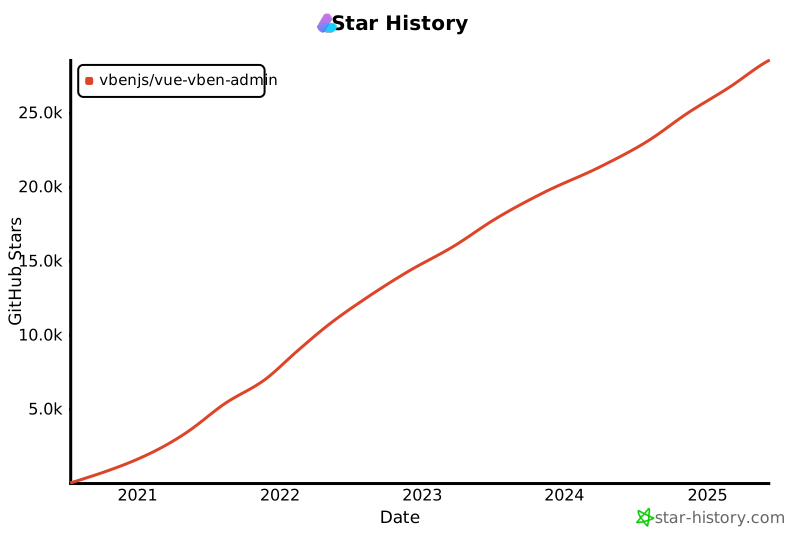

VbenAdmin Logo

[![license](https://img.shields.io/github/license/anncwb/vue-vben-admin.svg)](LICENSE)

Vue Vben Admin

[![Quality Gate Status](https://sonarcloud.io/api/project_badges/measure?project=vbenjs_vue-vben-admin&metric=alert_status)](https://sonarcloud.io/summary/new_code?id=vbenjs_vue-vben-admin) ![codeql](https://github.com/vbenjs/vue-vben-admin/actions/workflows/codeql.yml/badge.svg) ![build](https://github.com/vbenjs/vue-vben-admin/actions/workflows/build.yml/badge.svg) ![ci](https://github.com/vbenjs/vue-vben-admin/actions/workflows/ci.yml/badge.svg) ![deploy](https://github.com/vbenjs/vue-vben-admin/actions/workflows/deploy.yml/badge.svg) **English** | [中文](./README.zh-CN.md) | [日本語](./README.ja-JP.md) ## Introduction Vue Vben Admin is a free and open source middle and back-end template. Using the latest `vue3`, `vite`, `TypeScript` and other mainstream technology development, the out-of-the-box middle and back-end front-end solutions can also be used for learning reference. ## Upgrade Notice This is the latest version, 5.0, and it is not compatible with previous versions. If you are starting a new project, it is recommended to use the latest version. If you wish to view the old version, please use the [v2 branch](https://github.com/vbenjs/vue-vben-admin/tree/v2). ## Features - **Latest Technology Stack**: Developed with cutting-edge front-end technologies like Vue 3 and Vite - **TypeScript**: A language for application-scale JavaScript - **Themes**: Multiple theme colors available with customizable options - **Internationalization**: Comprehensive built-in internationalization support - **Permissions**: Built-in solution for dynamic route-based permission generation ## Preview - [Vben Admin](https://vben.pro/) - Full version Chinese site Test Account: vben/123456
VbenAdmin Logo VbenAdmin Logo VbenAdmin Logo
### Use Gitpod Open the project in Gitpod (free online dev environment for GitHub) and start coding immediately. [![Open in Gitpod](https://gitpod.io/button/open-in-gitpod.svg)](https://gitpod.io/#https://github.com/vbenjs/vue-vben-admin) ## Documentation [Document](https://doc.vben.pro/) ## Install and Use 1. Get the project code ```bash git clone https://github.com/vbenjs/vue-vben-admin.git ``` 2. Install dependencies ```bash cd vue-vben-admin npm i -g corepack pnpm install ``` 3. Run ```bash pnpm dev ``` 4. Build ```bash pnpm build ``` ## Change Log [CHANGELOG](https://github.com/vbenjs/vue-vben-admin/releases) ## How to Contribute You are very welcome to join! [Raise an issue](https://github.com/anncwb/vue-vben-admin/issues/new/choose) or submit a Pull Request. **Pull Request Process:** 1. Fork the code 2. Create your branch: `git checkout -b feat/xxxx` 3. Submit your changes: `git commit -am 'feat(function): add xxxxx'` 4. Push your branch: `git push origin feat/xxxx` 5. Submit `pull request` ## Git Contribution Submission Specification Reference [vue](https://github.com/vuejs/vue/blob/dev/.github/COMMIT_CONVENTION.md) specification ([Angular](https://github.com/conventional-changelog/conventional-changelog/tree/master/packages/conventional-changelog-angular)) - `feat` Add new features - `fix` Fix the problem/BUG - `style` The code style is related and does not affect the running result - `perf` Optimization/performance improvement - `refactor` Refactor - `revert` Undo edit - `test` Test related - `docs` Documentation/notes - `chore` Dependency update/scaffolding configuration modification etc. - `ci` Continuous integration - `types` Type definition file changes ## Browser Support The `Chrome 80+` browser is recommended for local development Support modern browsers, not IE | [Edge](http://godban.github.io/browsers-support-badges/)
Edge | [Firefox](http://godban.github.io/browsers-support-badges/)
Firefox | [Chrome](http://godban.github.io/browsers-support-badges/)
Chrome | [Safari](http://godban.github.io/browsers-support-badges/)
Safari | | :-: | :-: | :-: | :-: | | last 2 versions | last 2 versions | last 2 versions | last 2 versions | ## Maintainer [@Vben](https://github.com/anncwb) ## Star History [![Star History Chart](https://api.star-history.com/svg?repos=vbenjs/vue-vben-admin&type=Date)](https://star-history.com/#vbenjs/vue-vben-admin&Date) ## Donate If you think this project is helpful to you, you can help the author buy a cup of coffee to show your support! ![donate](https://unpkg.com/@vbenjs/static-source@0.1.7/source/sponsor.png) Paypal Me ## Contributors Contribution Leaderboard Contributors ## Discord - [Github Discussions](https://github.com/anncwb/vue-vben-admin/discussions) ## License [MIT © Vben-2020](./LICENSE) ================================================ FILE: hiauth-front/README.zh-CN.md ================================================


VbenAdmin Logo

[![license](https://img.shields.io/github/license/anncwb/vue-vben-admin.svg)](LICENSE)

Vue Vben Admin

[![Quality Gate Status](https://sonarcloud.io/api/project_badges/measure?project=vbenjs_vue-vben-admin&metric=alert_status)](https://sonarcloud.io/summary/new_code?id=vbenjs_vue-vben-admin) ![codeql](https://github.com/vbenjs/vue-vben-admin/actions/workflows/codeql.yml/badge.svg) ![build](https://github.com/vbenjs/vue-vben-admin/actions/workflows/build.yml/badge.svg) ![ci](https://github.com/vbenjs/vue-vben-admin/actions/workflows/ci.yml/badge.svg) ![deploy](https://github.com/vbenjs/vue-vben-admin/actions/workflows/deploy.yml/badge.svg) **中文** | [English](./README.md) | [日本語](./README.ja-JP.md) ## 简介 Vue Vben Admin 是 Vue Vben Admin 的升级版本。作为一个免费开源的中后台模板,它采用了最新的 Vue 3、Vite、TypeScript 等主流技术开发,开箱即用,可用于中后台前端开发,也适合学习参考。 ## 升级提示 该版本为最新版本 `5.0`,与其他版本不兼容,如果你是新项目,建议使用最新版本。如果你想查看旧版本,请使用 [v2 分支](https://github.com/vbenjs/vue-vben-admin/tree/v2) ## 特性 - **最新技术栈**:使用 Vue3/vite 等前端前沿技术开发 - **TypeScript**:应用程序级 JavaScript 的语言 - **主题**:提供多套主题色彩,可配置自定义主题 - **国际化**:内置完善的国际化方案 - **权限**:内置完善的动态路由权限生成方案 ## 预览 - [Vben Admin](https://vben.pro/) - 完整版中文站点 测试账号:vben/123456
VbenAdmin Logo VbenAdmin Logo VbenAdmin Logo
### 使用 Gitpod 在 Gitpod(适用于 GitHub 的免费在线开发环境)中打开项目,并立即开始编码。 [![Open in Gitpod](https://gitpod.io/button/open-in-gitpod.svg)](https://gitpod.io/#https://github.com/vbenjs/vue-vben-admin) ## 文档 [文档地址](https://doc.vben.pro/) ## 安装使用 1. 获取项目代码 ```bash git clone https://github.com/vbenjs/vue-vben-admin.git ``` 2. 安装依赖 ```bash cd vue-vben-admin npm i -g corepack pnpm install ``` 3. 运行 ```bash pnpm dev ``` 4. 打包 ```bash pnpm build ``` ## 更新日志 [CHANGELOG](https://github.com/vbenjs/vue-vben-admin/releases) ## 如何贡献 非常欢迎你的加入![提一个 Issue](https://github.com/anncwb/vue-vben-admin/issues/new/choose) 或者提交一个 Pull Request。 **Pull Request 流程:** 1. Fork 代码 2. 创建自己的分支:`git checkout -b feature/xxxx` 3. 提交你的修改:`git commit -am 'feat(function): add xxxxx'` 4. 推送您的分支:`git push origin feature/xxxx` 5. 提交 `pull request` ## Git 贡献提交规范 参考 [vue](https://github.com/vuejs/vue/blob/dev/.github/COMMIT_CONVENTION.md) 规范 ([Angular](https://github.com/conventional-changelog/conventional-changelog/tree/master/packages/conventional-changelog-angular)) - `feat` 增加新功能 - `fix` 修复问题/BUG - `style` 代码风格相关无影响运行结果的 - `perf` 优化/性能提升 - `refactor` 重构 - `revert` 撤销修改 - `test` 测试相关 - `docs` 文档/注释 - `chore` 依赖更新/脚手架配置修改等 - `ci` 持续集成 - `types` 类型定义文件更改 ## 浏览器支持 本地开发推荐使用 `Chrome 80+` 浏览器 支持现代浏览器,不支持 IE | [Edge](http://godban.github.io/browsers-support-badges/)
Edge | [Firefox](http://godban.github.io/browsers-support-badges/)
Firefox | [Chrome](http://godban.github.io/browsers-support-badges/)
Chrome | [Safari](http://godban.github.io/browsers-support-badges/)
Safari | | :-: | :-: | :-: | :-: | | last 2 versions | last 2 versions | last 2 versions | last 2 versions | ## 维护者 [@Vben](https://github.com/anncwb) ## Star 历史 [![Star History Chart](https://api.star-history.com/svg?repos=vbenjs/vue-vben-admin&type=Date)](https://star-history.com/#vbenjs/vue-vben-admin&Date) ## 捐赠 如果你觉得这个项目对你有帮助,你可以帮作者买一杯咖啡表示支持! ![donate](https://unpkg.com/@vbenjs/static-source@0.1.7/source/sponsor.png) Paypal Me ## 贡献者 Contribution Leaderboard Contributors ## Discord - [Github Discussions](https://github.com/anncwb/vue-vben-admin/discussions) ## 许可证 [MIT © Vben-2020](./LICENSE) ================================================ FILE: hiauth-front/apps/backend-mock/README.md ================================================ # @vben/backend-mock ## Description Vben Admin 数据 mock 服务,没有对接任何的数据库,所有数据都是模拟的,用于前端开发时提供数据支持。线上环境不再提供 mock 集成,可自行部署服务或者对接真实数据,由于 `mock.js` 等工具有一些限制,比如上传文件不行、无法模拟复杂的逻辑等,所以这里使用了真实的后端服务来实现。唯一麻烦的是本地需要同时启动后端服务和前端服务,但是这样可以更好的模拟真实环境。该服务不需要手动启动,已经集成在 vite 插件内,随应用一起启用。 ## Running the app ```bash # development $ pnpm run start # production mode $ pnpm run build ``` ================================================ FILE: hiauth-front/apps/backend-mock/api/auth/codes.ts ================================================ import { eventHandler } from 'h3'; import { verifyAccessToken } from '~/utils/jwt-utils'; import { MOCK_CODES } from '~/utils/mock-data'; import { unAuthorizedResponse, useResponseSuccess } from '~/utils/response'; export default eventHandler((event) => { const userinfo = verifyAccessToken(event); if (!userinfo) { return unAuthorizedResponse(event); } const codes = MOCK_CODES.find((item) => item.username === userinfo.username)?.codes ?? []; return useResponseSuccess(codes); }); ================================================ FILE: hiauth-front/apps/backend-mock/api/auth/login.post.ts ================================================ import { defineEventHandler, readBody, setResponseStatus } from 'h3'; import { clearRefreshTokenCookie, setRefreshTokenCookie, } from '~/utils/cookie-utils'; import { generateAccessToken, generateRefreshToken } from '~/utils/jwt-utils'; import { MOCK_USERS } from '~/utils/mock-data'; import { forbiddenResponse, useResponseError, useResponseSuccess, } from '~/utils/response'; export default defineEventHandler(async (event) => { const { password, username } = await readBody(event); if (!password || !username) { setResponseStatus(event, 400); return useResponseError( 'BadRequestException', 'Username and password are required', ); } const findUser = MOCK_USERS.find( (item) => item.username === username && item.password === password, ); if (!findUser) { clearRefreshTokenCookie(event); return forbiddenResponse(event, 'Username or password is incorrect.'); } const accessToken = generateAccessToken(findUser); const refreshToken = generateRefreshToken(findUser); setRefreshTokenCookie(event, refreshToken); return useResponseSuccess({ ...findUser, accessToken, }); }); ================================================ FILE: hiauth-front/apps/backend-mock/api/auth/logout.post.ts ================================================ import { defineEventHandler } from 'h3'; import { clearRefreshTokenCookie, getRefreshTokenFromCookie, } from '~/utils/cookie-utils'; import { useResponseSuccess } from '~/utils/response'; export default defineEventHandler(async (event) => { const refreshToken = getRefreshTokenFromCookie(event); if (!refreshToken) { return useResponseSuccess(''); } clearRefreshTokenCookie(event); return useResponseSuccess(''); }); ================================================ FILE: hiauth-front/apps/backend-mock/api/auth/refresh.post.ts ================================================ import { defineEventHandler } from 'h3'; import { clearRefreshTokenCookie, getRefreshTokenFromCookie, setRefreshTokenCookie, } from '~/utils/cookie-utils'; import { generateAccessToken, verifyRefreshToken } from '~/utils/jwt-utils'; import { MOCK_USERS } from '~/utils/mock-data'; import { forbiddenResponse } from '~/utils/response'; export default defineEventHandler(async (event) => { const refreshToken = getRefreshTokenFromCookie(event); if (!refreshToken) { return forbiddenResponse(event); } clearRefreshTokenCookie(event); const userinfo = verifyRefreshToken(refreshToken); if (!userinfo) { return forbiddenResponse(event); } const findUser = MOCK_USERS.find( (item) => item.username === userinfo.username, ); if (!findUser) { return forbiddenResponse(event); } const accessToken = generateAccessToken(findUser); setRefreshTokenCookie(event, refreshToken); return accessToken; }); ================================================ FILE: hiauth-front/apps/backend-mock/api/demo/bigint.ts ================================================ import { eventHandler, setHeader } from 'h3'; import { verifyAccessToken } from '~/utils/jwt-utils'; import { unAuthorizedResponse } from '~/utils/response'; export default eventHandler(async (event) => { const userinfo = verifyAccessToken(event); if (!userinfo) { return unAuthorizedResponse(event); } const data = ` { "code": 0, "message": "success", "data": [ { "id": 123456789012345678901234567890123456789012345678901234567890, "name": "John Doe", "age": 30, "email": "john-doe@demo.com" }, { "id": 987654321098765432109876543210987654321098765432109876543210, "name": "Jane Smith", "age": 25, "email": "jane@demo.com" } ] } `; setHeader(event, 'Content-Type', 'application/json'); return data; }); ================================================ FILE: hiauth-front/apps/backend-mock/api/menu/all.ts ================================================ import { eventHandler } from 'h3'; import { verifyAccessToken } from '~/utils/jwt-utils'; import { MOCK_MENUS } from '~/utils/mock-data'; import { unAuthorizedResponse, useResponseSuccess } from '~/utils/response'; export default eventHandler(async (event) => { const userinfo = verifyAccessToken(event); if (!userinfo) { return unAuthorizedResponse(event); } const menus = MOCK_MENUS.find((item) => item.username === userinfo.username)?.menus ?? []; return useResponseSuccess(menus); }); ================================================ FILE: hiauth-front/apps/backend-mock/api/status.ts ================================================ import { eventHandler, getQuery, setResponseStatus } from 'h3'; import { useResponseError } from '~/utils/response'; export default eventHandler((event) => { const { status } = getQuery(event); setResponseStatus(event, Number(status)); return useResponseError(`${status}`); }); ================================================ FILE: hiauth-front/apps/backend-mock/api/system/dept/.post.ts ================================================ import { eventHandler } from 'h3'; import { verifyAccessToken } from '~/utils/jwt-utils'; import { sleep, unAuthorizedResponse, useResponseSuccess, } from '~/utils/response'; export default eventHandler(async (event) => { const userinfo = verifyAccessToken(event); if (!userinfo) { return unAuthorizedResponse(event); } await sleep(600); return useResponseSuccess(null); }); ================================================ FILE: hiauth-front/apps/backend-mock/api/system/dept/[id].delete.ts ================================================ import { eventHandler } from 'h3'; import { verifyAccessToken } from '~/utils/jwt-utils'; import { sleep, unAuthorizedResponse, useResponseSuccess, } from '~/utils/response'; export default eventHandler(async (event) => { const userinfo = verifyAccessToken(event); if (!userinfo) { return unAuthorizedResponse(event); } await sleep(1000); return useResponseSuccess(null); }); ================================================ FILE: hiauth-front/apps/backend-mock/api/system/dept/[id].put.ts ================================================ import { eventHandler } from 'h3'; import { verifyAccessToken } from '~/utils/jwt-utils'; import { sleep, unAuthorizedResponse, useResponseSuccess, } from '~/utils/response'; export default eventHandler(async (event) => { const userinfo = verifyAccessToken(event); if (!userinfo) { return unAuthorizedResponse(event); } await sleep(2000); return useResponseSuccess(null); }); ================================================ FILE: hiauth-front/apps/backend-mock/api/system/dept/list.ts ================================================ import { faker } from '@faker-js/faker'; import { eventHandler } from 'h3'; import { verifyAccessToken } from '~/utils/jwt-utils'; import { unAuthorizedResponse, useResponseSuccess } from '~/utils/response'; const formatterCN = new Intl.DateTimeFormat('zh-CN', { timeZone: 'Asia/Shanghai', year: 'numeric', month: '2-digit', day: '2-digit', hour: '2-digit', minute: '2-digit', second: '2-digit', }); function generateMockDataList(count: number) { const dataList = []; for (let i = 0; i < count; i++) { const dataItem: Record = { id: faker.string.uuid(), pid: 0, name: faker.commerce.department(), status: faker.helpers.arrayElement([0, 1]), createTime: formatterCN.format( faker.date.between({ from: '2021-01-01', to: '2022-12-31' }), ), remark: faker.lorem.sentence(), }; if (faker.datatype.boolean()) { dataItem.children = Array.from( { length: faker.number.int({ min: 1, max: 5 }) }, () => ({ id: faker.string.uuid(), pid: dataItem.id, name: faker.commerce.department(), status: faker.helpers.arrayElement([0, 1]), createTime: formatterCN.format( faker.date.between({ from: '2023-01-01', to: '2023-12-31' }), ), remark: faker.lorem.sentence(), }), ); } dataList.push(dataItem); } return dataList; } const mockData = generateMockDataList(10); export default eventHandler(async (event) => { const userinfo = verifyAccessToken(event); if (!userinfo) { return unAuthorizedResponse(event); } const listData = structuredClone(mockData); return useResponseSuccess(listData); }); ================================================ FILE: hiauth-front/apps/backend-mock/api/system/menu/list.ts ================================================ import { eventHandler } from 'h3'; import { verifyAccessToken } from '~/utils/jwt-utils'; import { MOCK_MENU_LIST } from '~/utils/mock-data'; import { unAuthorizedResponse, useResponseSuccess } from '~/utils/response'; export default eventHandler(async (event) => { const userinfo = verifyAccessToken(event); if (!userinfo) { return unAuthorizedResponse(event); } return useResponseSuccess(MOCK_MENU_LIST); }); ================================================ FILE: hiauth-front/apps/backend-mock/api/system/menu/name-exists.ts ================================================ import { eventHandler, getQuery } from 'h3'; import { verifyAccessToken } from '~/utils/jwt-utils'; import { MOCK_MENU_LIST } from '~/utils/mock-data'; import { unAuthorizedResponse, useResponseSuccess } from '~/utils/response'; const namesMap: Record = {}; function getNames(menus: any[]) { menus.forEach((menu) => { namesMap[menu.name] = String(menu.id); if (menu.children) { getNames(menu.children); } }); } getNames(MOCK_MENU_LIST); export default eventHandler(async (event) => { const userinfo = verifyAccessToken(event); if (!userinfo) { return unAuthorizedResponse(event); } const { id, name } = getQuery(event); return (name as string) in namesMap && (!id || namesMap[name as string] !== String(id)) ? useResponseSuccess(true) : useResponseSuccess(false); }); ================================================ FILE: hiauth-front/apps/backend-mock/api/system/menu/path-exists.ts ================================================ import { eventHandler, getQuery } from 'h3'; import { verifyAccessToken } from '~/utils/jwt-utils'; import { MOCK_MENU_LIST } from '~/utils/mock-data'; import { unAuthorizedResponse, useResponseSuccess } from '~/utils/response'; const pathMap: Record = { '/': 0 }; function getPaths(menus: any[]) { menus.forEach((menu) => { pathMap[menu.path] = String(menu.id); if (menu.children) { getPaths(menu.children); } }); } getPaths(MOCK_MENU_LIST); export default eventHandler(async (event) => { const userinfo = verifyAccessToken(event); if (!userinfo) { return unAuthorizedResponse(event); } const { id, path } = getQuery(event); return (path as string) in pathMap && (!id || pathMap[path as string] !== String(id)) ? useResponseSuccess(true) : useResponseSuccess(false); }); ================================================ FILE: hiauth-front/apps/backend-mock/api/system/role/list.ts ================================================ import { faker } from '@faker-js/faker'; import { eventHandler, getQuery } from 'h3'; import { verifyAccessToken } from '~/utils/jwt-utils'; import { getMenuIds, MOCK_MENU_LIST } from '~/utils/mock-data'; import { unAuthorizedResponse, usePageResponseSuccess } from '~/utils/response'; const formatterCN = new Intl.DateTimeFormat('zh-CN', { timeZone: 'Asia/Shanghai', year: 'numeric', month: '2-digit', day: '2-digit', hour: '2-digit', minute: '2-digit', second: '2-digit', }); const menuIds = getMenuIds(MOCK_MENU_LIST); function generateMockDataList(count: number) { const dataList = []; for (let i = 0; i < count; i++) { const dataItem: Record = { id: faker.string.uuid(), name: faker.commerce.product(), status: faker.helpers.arrayElement([0, 1]), createTime: formatterCN.format( faker.date.between({ from: '2022-01-01', to: '2025-01-01' }), ), permissions: faker.helpers.arrayElements(menuIds), remark: faker.lorem.sentence(), }; dataList.push(dataItem); } return dataList; } const mockData = generateMockDataList(100); export default eventHandler(async (event) => { const userinfo = verifyAccessToken(event); if (!userinfo) { return unAuthorizedResponse(event); } const { page = 1, pageSize = 20, name, id, remark, startTime, endTime, status, } = getQuery(event); let listData = structuredClone(mockData); if (name) { listData = listData.filter((item) => item.name.toLowerCase().includes(String(name).toLowerCase()), ); } if (id) { listData = listData.filter((item) => item.id.toLowerCase().includes(String(id).toLowerCase()), ); } if (remark) { listData = listData.filter((item) => item.remark?.toLowerCase()?.includes(String(remark).toLowerCase()), ); } if (startTime) { listData = listData.filter((item) => item.createTime >= startTime); } if (endTime) { listData = listData.filter((item) => item.createTime <= endTime); } if (['0', '1'].includes(status as string)) { listData = listData.filter((item) => item.status === Number(status)); } return usePageResponseSuccess(page as string, pageSize as string, listData); }); ================================================ FILE: hiauth-front/apps/backend-mock/api/table/list.ts ================================================ import { faker } from '@faker-js/faker'; import { eventHandler, getQuery } from 'h3'; import { verifyAccessToken } from '~/utils/jwt-utils'; import { sleep, unAuthorizedResponse, usePageResponseSuccess, } from '~/utils/response'; function generateMockDataList(count: number) { const dataList = []; for (let i = 0; i < count; i++) { const dataItem = { id: faker.string.uuid(), imageUrl: faker.image.avatar(), imageUrl2: faker.image.avatar(), open: faker.datatype.boolean(), status: faker.helpers.arrayElement(['success', 'error', 'warning']), productName: faker.commerce.productName(), price: faker.commerce.price(), currency: faker.finance.currencyCode(), quantity: faker.number.int({ min: 1, max: 100 }), available: faker.datatype.boolean(), category: faker.commerce.department(), releaseDate: faker.date.past(), rating: faker.number.float({ min: 1, max: 5 }), description: faker.commerce.productDescription(), weight: faker.number.float({ min: 0.1, max: 10 }), color: faker.color.human(), inProduction: faker.datatype.boolean(), tags: Array.from({ length: 3 }, () => faker.commerce.productAdjective()), }; dataList.push(dataItem); } return dataList; } const mockData = generateMockDataList(100); export default eventHandler(async (event) => { const userinfo = verifyAccessToken(event); if (!userinfo) { return unAuthorizedResponse(event); } await sleep(600); const { page, pageSize, sortBy, sortOrder } = getQuery(event); // 规范化分页参数,处理 string[] const pageRaw = Array.isArray(page) ? page[0] : page; const pageSizeRaw = Array.isArray(pageSize) ? pageSize[0] : pageSize; const pageNumber = Math.max( 1, Number.parseInt(String(pageRaw ?? '1'), 10) || 1, ); const pageSizeNumber = Math.min( 100, Math.max(1, Number.parseInt(String(pageSizeRaw ?? '10'), 10) || 10), ); const listData = structuredClone(mockData); // 规范化 query 入参,兼容 string[] const sortKeyRaw = Array.isArray(sortBy) ? sortBy[0] : sortBy; const sortOrderRaw = Array.isArray(sortOrder) ? sortOrder[0] : sortOrder; // 检查 sortBy 是否是 listData 元素的合法属性键 if ( typeof sortKeyRaw === 'string' && listData[0] && Object.prototype.hasOwnProperty.call(listData[0], sortKeyRaw) ) { // 定义数组元素的类型 type ItemType = (typeof listData)[0]; const sortKey = sortKeyRaw as keyof ItemType; // 将 sortBy 断言为合法键 const isDesc = sortOrderRaw === 'desc'; listData.sort((a, b) => { const aValue = a[sortKey] as unknown; const bValue = b[sortKey] as unknown; let result = 0; if (typeof aValue === 'number' && typeof bValue === 'number') { result = aValue - bValue; } else if (aValue instanceof Date && bValue instanceof Date) { result = aValue.getTime() - bValue.getTime(); } else if (typeof aValue === 'boolean' && typeof bValue === 'boolean') { if (aValue === bValue) { result = 0; } else { result = aValue ? 1 : -1; } } else { const aStr = String(aValue); const bStr = String(bValue); const aNum = Number(aStr); const bNum = Number(bStr); result = Number.isFinite(aNum) && Number.isFinite(bNum) ? aNum - bNum : aStr.localeCompare(bStr, undefined, { numeric: true, sensitivity: 'base', }); } return isDesc ? -result : result; }); } return usePageResponseSuccess( String(pageNumber), String(pageSizeNumber), listData, ); }); ================================================ FILE: hiauth-front/apps/backend-mock/api/test.get.ts ================================================ import { defineEventHandler } from 'h3'; export default defineEventHandler(() => 'Test get handler'); ================================================ FILE: hiauth-front/apps/backend-mock/api/test.post.ts ================================================ import { defineEventHandler } from 'h3'; export default defineEventHandler(() => 'Test post handler'); ================================================ FILE: hiauth-front/apps/backend-mock/api/upload.ts ================================================ import { eventHandler } from 'h3'; import { verifyAccessToken } from '~/utils/jwt-utils'; import { unAuthorizedResponse, useResponseSuccess } from '~/utils/response'; export default eventHandler((event) => { const userinfo = verifyAccessToken(event); if (!userinfo) { return unAuthorizedResponse(event); } return useResponseSuccess({ url: 'https://unpkg.com/@vbenjs/static-source@0.1.7/source/logo-v1.webp', }); // return useResponseError("test") }); ================================================ FILE: hiauth-front/apps/backend-mock/api/user/info.ts ================================================ import { eventHandler } from 'h3'; import { verifyAccessToken } from '~/utils/jwt-utils'; import { unAuthorizedResponse, useResponseSuccess } from '~/utils/response'; export default eventHandler((event) => { const userinfo = verifyAccessToken(event); if (!userinfo) { return unAuthorizedResponse(event); } return useResponseSuccess(userinfo); }); ================================================ FILE: hiauth-front/apps/backend-mock/error.ts ================================================ import type { NitroErrorHandler } from 'nitropack'; const errorHandler: NitroErrorHandler = function (error, event) { event.node.res.end(`[Error Handler] ${error.stack}`); }; export default errorHandler; ================================================ FILE: hiauth-front/apps/backend-mock/middleware/1.api.ts ================================================ import { defineEventHandler } from 'h3'; import { forbiddenResponse, sleep } from '~/utils/response'; export default defineEventHandler(async (event) => { event.node.res.setHeader( 'Access-Control-Allow-Origin', event.headers.get('Origin') ?? '*', ); if (event.method === 'OPTIONS') { event.node.res.statusCode = 204; event.node.res.statusMessage = 'No Content.'; return 'OK'; } else if ( ['DELETE', 'PATCH', 'POST', 'PUT'].includes(event.method) && event.path.startsWith('/api/system/') ) { await sleep(Math.floor(Math.random() * 2000)); return forbiddenResponse(event, '演示环境,禁止修改'); } }); ================================================ FILE: hiauth-front/apps/backend-mock/nitro.config.ts ================================================ import errorHandler from './error'; process.env.COMPATIBILITY_DATE = new Date().toISOString(); export default defineNitroConfig({ devErrorHandler: errorHandler, errorHandler: '~/error', routeRules: { '/api/**': { cors: true, headers: { 'Access-Control-Allow-Credentials': 'true', 'Access-Control-Allow-Headers': 'Accept, Authorization, Content-Length, Content-Type, If-Match, If-Modified-Since, If-None-Match, If-Unmodified-Since, X-CSRF-TOKEN, X-Requested-With', 'Access-Control-Allow-Methods': 'GET,HEAD,PUT,PATCH,POST,DELETE', 'Access-Control-Allow-Origin': '*', 'Access-Control-Expose-Headers': '*', }, }, }, }); ================================================ FILE: hiauth-front/apps/backend-mock/package.json ================================================ { "name": "@vben/backend-mock", "version": "0.0.1", "description": "", "private": true, "license": "MIT", "author": "", "scripts": { "build": "nitro build", "start": "nitro dev" }, "dependencies": { "@faker-js/faker": "catalog:", "jsonwebtoken": "catalog:", "nitropack": "catalog:" }, "devDependencies": { "@types/jsonwebtoken": "catalog:", "h3": "catalog:" } } ================================================ FILE: hiauth-front/apps/backend-mock/routes/[...].ts ================================================ import { defineEventHandler } from 'h3'; export default defineEventHandler(() => { return `


Hello Vben Admin

Mock service is starting

`; }); ================================================ FILE: hiauth-front/apps/backend-mock/tsconfig.build.json ================================================ { "extends": "./tsconfig.json", "exclude": ["node_modules", "test", "dist", "**/*spec.ts"] } ================================================ FILE: hiauth-front/apps/backend-mock/tsconfig.json ================================================ { "extends": "./.nitro/types/tsconfig.json" } ================================================ FILE: hiauth-front/apps/backend-mock/utils/cookie-utils.ts ================================================ import type { EventHandlerRequest, H3Event } from 'h3'; import { deleteCookie, getCookie, setCookie } from 'h3'; export function clearRefreshTokenCookie(event: H3Event) { deleteCookie(event, 'jwt', { httpOnly: true, sameSite: 'none', secure: true, }); } export function setRefreshTokenCookie( event: H3Event, refreshToken: string, ) { setCookie(event, 'jwt', refreshToken, { httpOnly: true, maxAge: 24 * 60 * 60, // unit: seconds sameSite: 'none', secure: true, }); } export function getRefreshTokenFromCookie(event: H3Event) { const refreshToken = getCookie(event, 'jwt'); return refreshToken; } ================================================ FILE: hiauth-front/apps/backend-mock/utils/jwt-utils.ts ================================================ import type { EventHandlerRequest, H3Event } from 'h3'; import type { UserInfo } from './mock-data'; import { getHeader } from 'h3'; import jwt from 'jsonwebtoken'; import { MOCK_USERS } from './mock-data'; // TODO: Replace with your own secret key const ACCESS_TOKEN_SECRET = 'access_token_secret'; const REFRESH_TOKEN_SECRET = 'refresh_token_secret'; export interface UserPayload extends UserInfo { iat: number; exp: number; } export function generateAccessToken(user: UserInfo) { return jwt.sign(user, ACCESS_TOKEN_SECRET, { expiresIn: '7d' }); } export function generateRefreshToken(user: UserInfo) { return jwt.sign(user, REFRESH_TOKEN_SECRET, { expiresIn: '30d', }); } export function verifyAccessToken( event: H3Event, ): null | Omit { const authHeader = getHeader(event, 'Authorization'); if (!authHeader?.startsWith('Bearer')) { return null; } const tokenParts = authHeader.split(' '); if (tokenParts.length !== 2) { return null; } const token = tokenParts[1] as string; try { const decoded = jwt.verify( token, ACCESS_TOKEN_SECRET, ) as unknown as UserPayload; const username = decoded.username; const user = MOCK_USERS.find((item) => item.username === username); if (!user) { return null; } const { password: _pwd, ...userinfo } = user; return userinfo; } catch { return null; } } export function verifyRefreshToken( token: string, ): null | Omit { try { const decoded = jwt.verify(token, REFRESH_TOKEN_SECRET) as UserPayload; const username = decoded.username; const user = MOCK_USERS.find( (item) => item.username === username, ) as UserInfo; if (!user) { return null; } const { password: _pwd, ...userinfo } = user; return userinfo; } catch { return null; } } ================================================ FILE: hiauth-front/apps/backend-mock/utils/mock-data.ts ================================================ export interface UserInfo { id: number; password: string; realName: string; roles: string[]; username: string; homePath?: string; } export const MOCK_USERS: UserInfo[] = [ { id: 0, password: '123456', realName: 'Vben', roles: ['super'], username: 'vben', }, { id: 1, password: '123456', realName: 'Admin', roles: ['admin'], username: 'admin', homePath: '/workspace', }, { id: 2, password: '123456', realName: 'Jack', roles: ['user'], username: 'jack', homePath: '/analytics', }, ]; export const MOCK_CODES = [ // super { codes: ['AC_100100', 'AC_100110', 'AC_100120', 'AC_100010'], username: 'vben', }, { // admin codes: ['AC_100010', 'AC_100020', 'AC_100030'], username: 'admin', }, { // user codes: ['AC_1000001', 'AC_1000002'], username: 'jack', }, ]; const dashboardMenus = [ { meta: { order: -1, title: 'page.dashboard.title', }, name: 'Dashboard', path: '/dashboard', redirect: '/analytics', children: [ { name: 'Analytics', path: '/analytics', component: '/dashboard/analytics/index', meta: { affixTab: true, title: 'page.dashboard.analytics', }, }, { name: 'Workspace', path: '/workspace', component: '/dashboard/workspace/index', meta: { title: 'page.dashboard.workspace', }, }, ], }, ]; const createDemosMenus = (role: 'admin' | 'super' | 'user') => { const roleWithMenus = { admin: { component: '/demos/access/admin-visible', meta: { icon: 'mdi:button-cursor', title: 'demos.access.adminVisible', }, name: 'AccessAdminVisibleDemo', path: '/demos/access/admin-visible', }, super: { component: '/demos/access/super-visible', meta: { icon: 'mdi:button-cursor', title: 'demos.access.superVisible', }, name: 'AccessSuperVisibleDemo', path: '/demos/access/super-visible', }, user: { component: '/demos/access/user-visible', meta: { icon: 'mdi:button-cursor', title: 'demos.access.userVisible', }, name: 'AccessUserVisibleDemo', path: '/demos/access/user-visible', }, }; return [ { meta: { icon: 'ic:baseline-view-in-ar', keepAlive: true, order: 1000, title: 'demos.title', }, name: 'Demos', path: '/demos', redirect: '/demos/access', children: [ { name: 'AccessDemos', path: '/demosaccess', meta: { icon: 'mdi:cloud-key-outline', title: 'demos.access.backendPermissions', }, redirect: '/demos/access/page-control', children: [ { name: 'AccessPageControlDemo', path: '/demos/access/page-control', component: '/demos/access/index', meta: { icon: 'mdi:page-previous-outline', title: 'demos.access.pageAccess', }, }, { name: 'AccessButtonControlDemo', path: '/demos/access/button-control', component: '/demos/access/button-control', meta: { icon: 'mdi:button-cursor', title: 'demos.access.buttonControl', }, }, { name: 'AccessMenuVisible403Demo', path: '/demos/access/menu-visible-403', component: '/demos/access/menu-visible-403', meta: { authority: ['no-body'], icon: 'mdi:button-cursor', menuVisibleWithForbidden: true, title: 'demos.access.menuVisible403', }, }, roleWithMenus[role], ], }, ], }, ]; }; export const MOCK_MENUS = [ { menus: [...dashboardMenus, ...createDemosMenus('super')], username: 'vben', }, { menus: [...dashboardMenus, ...createDemosMenus('admin')], username: 'admin', }, { menus: [...dashboardMenus, ...createDemosMenus('user')], username: 'jack', }, ]; export const MOCK_MENU_LIST = [ { id: 1, name: 'Workspace', status: 1, type: 'menu', icon: 'mdi:dashboard', path: '/workspace', component: '/dashboard/workspace/index', meta: { icon: 'carbon:workspace', title: 'page.dashboard.workspace', affixTab: true, order: 0, }, }, { id: 2, meta: { icon: 'carbon:settings', order: 9997, title: 'system.title', badge: 'new', badgeType: 'normal', badgeVariants: 'primary', }, status: 1, type: 'catalog', name: 'System', path: '/system', children: [ { id: 201, pid: 2, path: '/system/menu', name: 'SystemMenu', authCode: 'System:Menu:List', status: 1, type: 'menu', meta: { icon: 'carbon:menu', title: 'system.menu.title', }, component: '/system/menu/list', children: [ { id: 20_101, pid: 201, name: 'SystemMenuCreate', status: 1, type: 'button', authCode: 'System:Menu:Create', meta: { title: 'common.create' }, }, { id: 20_102, pid: 201, name: 'SystemMenuEdit', status: 1, type: 'button', authCode: 'System:Menu:Edit', meta: { title: 'common.edit' }, }, { id: 20_103, pid: 201, name: 'SystemMenuDelete', status: 1, type: 'button', authCode: 'System:Menu:Delete', meta: { title: 'common.delete' }, }, ], }, { id: 202, pid: 2, path: '/system/dept', name: 'SystemDept', status: 1, type: 'menu', authCode: 'System:Dept:List', meta: { icon: 'carbon:container-services', title: 'system.dept.title', }, component: '/system/dept/list', children: [ { id: 20_401, pid: 201, name: 'SystemDeptCreate', status: 1, type: 'button', authCode: 'System:Dept:Create', meta: { title: 'common.create' }, }, { id: 20_402, pid: 201, name: 'SystemDeptEdit', status: 1, type: 'button', authCode: 'System:Dept:Edit', meta: { title: 'common.edit' }, }, { id: 20_403, pid: 201, name: 'SystemDeptDelete', status: 1, type: 'button', authCode: 'System:Dept:Delete', meta: { title: 'common.delete' }, }, ], }, ], }, { id: 9, meta: { badgeType: 'dot', order: 9998, title: 'demos.vben.title', icon: 'carbon:data-center', }, name: 'Project', path: '/vben-admin', type: 'catalog', status: 1, children: [ { id: 901, pid: 9, name: 'VbenDocument', path: '/vben-admin/document', component: 'IFrameView', type: 'embedded', status: 1, meta: { icon: 'carbon:book', iframeSrc: 'https://doc.vben.pro', title: 'demos.vben.document', }, }, { id: 902, pid: 9, name: 'VbenGithub', path: '/vben-admin/github', component: 'IFrameView', type: 'link', status: 1, meta: { icon: 'carbon:logo-github', link: 'https://github.com/vbenjs/vue-vben-admin', title: 'Github', }, }, { id: 903, pid: 9, name: 'VbenAntdv', path: '/vben-admin/antdv', component: 'IFrameView', type: 'link', status: 0, meta: { icon: 'carbon:hexagon-vertical-solid', badgeType: 'dot', link: 'https://ant.vben.pro', title: 'demos.vben.antdv', }, }, ], }, { id: 10, component: '_core/about/index', type: 'menu', status: 1, meta: { icon: 'lucide:copyright', order: 9999, title: 'demos.vben.about', }, name: 'About', path: '/about', }, ]; export function getMenuIds(menus: any[]) { const ids: number[] = []; menus.forEach((item) => { ids.push(item.id); if (item.children && item.children.length > 0) { ids.push(...getMenuIds(item.children)); } }); return ids; } ================================================ FILE: hiauth-front/apps/backend-mock/utils/response.ts ================================================ import type { EventHandlerRequest, H3Event } from 'h3'; import { setResponseStatus } from 'h3'; export function useResponseSuccess(data: T) { return { code: 0, data, error: null, message: 'ok', }; } export function usePageResponseSuccess( page: number | string, pageSize: number | string, list: T[], { message = 'ok' } = {}, ) { const pageData = pagination( Number.parseInt(`${page}`), Number.parseInt(`${pageSize}`), list, ); return { ...useResponseSuccess({ items: pageData, total: list.length, }), message, }; } export function useResponseError(message: string, error: any = null) { return { code: -1, data: null, error, message, }; } export function forbiddenResponse( event: H3Event, message = 'Forbidden Exception', ) { setResponseStatus(event, 403); return useResponseError(message, message); } export function unAuthorizedResponse(event: H3Event) { setResponseStatus(event, 401); return useResponseError('Unauthorized Exception', 'Unauthorized Exception'); } export function sleep(ms: number) { return new Promise((resolve) => setTimeout(resolve, ms)); } export function pagination( pageNo: number, pageSize: number, array: T[], ): T[] { const offset = (pageNo - 1) * Number(pageSize); return offset + Number(pageSize) >= array.length ? array.slice(offset) : array.slice(offset, offset + Number(pageSize)); } ================================================ FILE: hiauth-front/apps/web-antd/index.html ================================================ <%= VITE_APP_TITLE %>
================================================ FILE: hiauth-front/apps/web-antd/package.json ================================================ { "name": "@vben/web-antd", "version": "5.5.9", "homepage": "https://vben.pro", "bugs": "https://github.com/vbenjs/vue-vben-admin/issues", "repository": { "type": "git", "url": "git+https://github.com/vbenjs/vue-vben-admin.git", "directory": "apps/web-antd" }, "license": "MIT", "author": { "name": "vben", "email": "ann.vben@gmail.com", "url": "https://github.com/anncwb" }, "type": "module", "scripts": { "build": "pnpm vite build --mode production", "build:analyze": "pnpm vite build --mode analyze", "dev": "pnpm vite --mode development", "preview": "vite preview", "typecheck": "vue-tsc --noEmit --skipLibCheck" }, "imports": { "#/*": "./src/*" }, "dependencies": { "@vben/access": "workspace:*", "@vben/common-ui": "workspace:*", "@vben/constants": "workspace:*", "@vben/hooks": "workspace:*", "@vben/icons": "workspace:*", "@vben/layouts": "workspace:*", "@vben/locales": "workspace:*", "@vben/plugins": "workspace:*", "@vben/preferences": "workspace:*", "@vben/request": "workspace:*", "@vben/stores": "workspace:*", "@vben/styles": "workspace:*", "@vben/types": "workspace:*", "@vben/utils": "workspace:*", "@vueuse/core": "catalog:", "ant-design-vue": "catalog:", "dayjs": "catalog:", "pinia": "catalog:", "vue": "catalog:", "vue-router": "catalog:" } } ================================================ FILE: hiauth-front/apps/web-antd/postcss.config.mjs ================================================ export { default } from '@vben/tailwind-config/postcss'; ================================================ FILE: hiauth-front/apps/web-antd/src/adapter/component/index.ts ================================================ /** * 通用组件共同的使用的基础组件,原先放在 adapter/form 内部,限制了使用范围,这里提取出来,方便其他地方使用 * 可用于 vben-form、vben-modal、vben-drawer 等组件使用, */ import type { Component } from 'vue'; import type { BaseFormComponentType } from '@vben/common-ui'; import type { Recordable } from '@vben/types'; import { defineAsyncComponent, defineComponent, h, ref } from 'vue'; import { ApiComponent, globalShareState, IconPicker } from '@vben/common-ui'; import { $t } from '@vben/locales'; import { notification } from 'ant-design-vue'; const AutoComplete = defineAsyncComponent( () => import('ant-design-vue/es/auto-complete'), ); const Button = defineAsyncComponent(() => import('ant-design-vue/es/button')); const Checkbox = defineAsyncComponent( () => import('ant-design-vue/es/checkbox'), ); const CheckboxGroup = defineAsyncComponent(() => import('ant-design-vue/es/checkbox').then((res) => res.CheckboxGroup), ); const DatePicker = defineAsyncComponent( () => import('ant-design-vue/es/date-picker'), ); const Divider = defineAsyncComponent(() => import('ant-design-vue/es/divider')); const Input = defineAsyncComponent(() => import('ant-design-vue/es/input')); const InputNumber = defineAsyncComponent( () => import('ant-design-vue/es/input-number'), ); const InputPassword = defineAsyncComponent(() => import('ant-design-vue/es/input').then((res) => res.InputPassword), ); const Mentions = defineAsyncComponent( () => import('ant-design-vue/es/mentions'), ); const Radio = defineAsyncComponent(() => import('ant-design-vue/es/radio')); const RadioGroup = defineAsyncComponent(() => import('ant-design-vue/es/radio').then((res) => res.RadioGroup), ); const RangePicker = defineAsyncComponent(() => import('ant-design-vue/es/date-picker').then((res) => res.RangePicker), ); const Rate = defineAsyncComponent(() => import('ant-design-vue/es/rate')); const Select = defineAsyncComponent(() => import('ant-design-vue/es/select')); const Space = defineAsyncComponent(() => import('ant-design-vue/es/space')); const Switch = defineAsyncComponent(() => import('ant-design-vue/es/switch')); const Textarea = defineAsyncComponent(() => import('ant-design-vue/es/input').then((res) => res.Textarea), ); const TimePicker = defineAsyncComponent( () => import('ant-design-vue/es/time-picker'), ); const TreeSelect = defineAsyncComponent( () => import('ant-design-vue/es/tree-select'), ); const Upload = defineAsyncComponent(() => import('ant-design-vue/es/upload')); const withDefaultPlaceholder = ( component: T, type: 'input' | 'select', componentProps: Recordable = {}, ) => { return defineComponent({ name: component.name, inheritAttrs: false, setup: (props: any, { attrs, expose, slots }) => { const placeholder = props?.placeholder || attrs?.placeholder || $t(`ui.placeholder.${type}`); // 透传组件暴露的方法 const innerRef = ref(); expose( new Proxy( {}, { get: (_target, key) => innerRef.value?.[key], has: (_target, key) => key in (innerRef.value || {}), }, ), ); return () => h( component, { ...componentProps, placeholder, ...props, ...attrs, ref: innerRef }, slots, ); }, }); }; // 这里需要自行根据业务组件库进行适配,需要用到的组件都需要在这里类型说明 export type ComponentType = | 'ApiSelect' | 'ApiTreeSelect' | 'AutoComplete' | 'Checkbox' | 'CheckboxGroup' | 'DatePicker' | 'DefaultButton' | 'Divider' | 'IconPicker' | 'Input' | 'InputNumber' | 'InputPassword' | 'Mentions' | 'PrimaryButton' | 'Radio' | 'RadioGroup' | 'RangePicker' | 'Rate' | 'Select' | 'Space' | 'Switch' | 'Textarea' | 'TimePicker' | 'TreeSelect' | 'Upload' | BaseFormComponentType; async function initComponentAdapter() { const components: Partial> = { // 如果你的组件体积比较大,可以使用异步加载 // Button: () => // import('xxx').then((res) => res.Button), ApiSelect: withDefaultPlaceholder( { ...ApiComponent, name: 'ApiSelect', }, 'select', { component: Select, loadingSlot: 'suffixIcon', visibleEvent: 'onDropdownVisibleChange', modelPropName: 'value', }, ), ApiTreeSelect: withDefaultPlaceholder( { ...ApiComponent, name: 'ApiTreeSelect', }, 'select', { component: TreeSelect, fieldNames: { label: 'label', value: 'value', children: 'children' }, loadingSlot: 'suffixIcon', modelPropName: 'value', optionsPropName: 'treeData', visibleEvent: 'onVisibleChange', }, ), AutoComplete, Checkbox, CheckboxGroup, DatePicker, // 自定义默认按钮 DefaultButton: (props, { attrs, slots }) => { return h(Button, { ...props, attrs, type: 'default' }, slots); }, Divider, IconPicker: withDefaultPlaceholder(IconPicker, 'select', { iconSlot: 'addonAfter', inputComponent: Input, modelValueProp: 'value', }), Input: withDefaultPlaceholder(Input, 'input'), InputNumber: withDefaultPlaceholder(InputNumber, 'input'), InputPassword: withDefaultPlaceholder(InputPassword, 'input'), Mentions: withDefaultPlaceholder(Mentions, 'input'), // 自定义主要按钮 PrimaryButton: (props, { attrs, slots }) => { return h(Button, { ...props, attrs, type: 'primary' }, slots); }, Radio, RadioGroup, RangePicker, Rate, Select: withDefaultPlaceholder(Select, 'select'), Space, Switch, Textarea: withDefaultPlaceholder(Textarea, 'input'), TimePicker, TreeSelect: withDefaultPlaceholder(TreeSelect, 'select'), Upload, }; // 将组件注册到全局共享状态中 globalShareState.setComponents(components); // 定义全局共享状态中的消息提示 globalShareState.defineMessage({ // 复制成功消息提示 copyPreferencesSuccess: (title, content) => { notification.success({ description: content, message: title, placement: 'bottomRight', }); }, }); } export { initComponentAdapter }; ================================================ FILE: hiauth-front/apps/web-antd/src/adapter/form.ts ================================================ import type { VbenFormSchema as FormSchema, VbenFormProps, } from '@vben/common-ui'; import type { ComponentType } from './component'; import { setupVbenForm, useVbenForm as useForm, z } from '@vben/common-ui'; import { $t } from '@vben/locales'; async function initSetupVbenForm() { setupVbenForm({ config: { // ant design vue组件库默认都是 v-model:value baseModelPropName: 'value', // 一些组件是 v-model:checked 或者 v-model:fileList modelPropNameMap: { Checkbox: 'checked', Radio: 'checked', Switch: 'checked', Upload: 'fileList', }, }, defineRules: { // 输入项目必填国际化适配 required: (value, _params, ctx) => { if (value === undefined || value === null || value.length === 0) { return $t('ui.formRules.required', [ctx.label]); } return true; }, // 选择项目必填国际化适配 selectRequired: (value, _params, ctx) => { if (value === undefined || value === null) { return $t('ui.formRules.selectRequired', [ctx.label]); } return true; }, }, }); } const useVbenForm = useForm; export { initSetupVbenForm, useVbenForm, z }; export type VbenFormSchema = FormSchema; export type { VbenFormProps }; ================================================ FILE: hiauth-front/apps/web-antd/src/adapter/vxe-table.ts ================================================ import type { VxeTableGridOptions } from '@vben/plugins/vxe-table'; import { h } from 'vue'; import { setupVbenVxeTable, useVbenVxeGrid } from '@vben/plugins/vxe-table'; import { Button, Image } from 'ant-design-vue'; import { useVbenForm } from './form'; setupVbenVxeTable({ configVxeTable: (vxeUI) => { vxeUI.setConfig({ grid: { align: 'center', border: false, columnConfig: { resizable: true, }, minHeight: 180, formConfig: { // 全局禁用vxe-table的表单配置,使用formOptions enabled: false, }, proxyConfig: { autoLoad: true, response: { result: 'items', total: 'total', list: 'items', }, showActiveMsg: true, showResponseMsg: false, }, round: true, showOverflow: true, size: 'small', } as VxeTableGridOptions, }); // 表格配置项可以用 cellRender: { name: 'CellImage' }, vxeUI.renderer.add('CellImage', { renderTableDefault(_renderOpts, params) { const { column, row } = params; return h(Image, { src: row[column.field] }); }, }); // 表格配置项可以用 cellRender: { name: 'CellLink' }, vxeUI.renderer.add('CellLink', { renderTableDefault(renderOpts) { const { props } = renderOpts; return h( Button, { size: 'small', type: 'link' }, { default: () => props?.text }, ); }, }); // 这里可以自行扩展 vxe-table 的全局配置,比如自定义格式化 // vxeUI.formats.add }, useVbenForm, }); export { useVbenVxeGrid }; export type * from '@vben/plugins/vxe-table'; ================================================ FILE: hiauth-front/apps/web-antd/src/api/core/auth.ts ================================================ import { baseRequestClient, requestClient } from '#/api/request'; export namespace AuthApi { /** 登录接口参数 */ export interface LoginParams { password?: string; username?: string; } /** 登录接口返回值 */ export interface LoginResult { accessToken: string; } export interface RefreshTokenResult { data: string; status: number; } } /** * 登录 */ export async function loginApi(data: AuthApi.LoginParams) { return requestClient.post('/auth/login', data); } /** * 刷新accessToken */ export async function refreshTokenApi() { return baseRequestClient.post('/auth/refresh', { withCredentials: true, }); } /** * 退出登录 */ export async function logoutApi() { return baseRequestClient.post('/auth/logout', { withCredentials: true, }); } /** * 获取用户权限码 */ export async function getAccessCodesApi() { return requestClient.get('/auth/codes'); } ================================================ FILE: hiauth-front/apps/web-antd/src/api/core/index.ts ================================================ export * from './auth'; export * from './menu'; export * from './user'; ================================================ FILE: hiauth-front/apps/web-antd/src/api/core/menu.ts ================================================ import type { RouteRecordStringComponent } from '@vben/types'; import { requestClient } from '#/api/request'; /** * 获取用户所有菜单 */ export async function getAllMenusApi() { return requestClient.get('/menu/all'); } ================================================ FILE: hiauth-front/apps/web-antd/src/api/core/user.ts ================================================ import type { UserInfo } from '@vben/types'; import { requestClient } from '#/api/request'; /** * 获取用户信息 */ export async function getUserInfoApi() { return requestClient.get('/user/info'); } ================================================ FILE: hiauth-front/apps/web-antd/src/api/index.ts ================================================ export * from './core'; ================================================ FILE: hiauth-front/apps/web-antd/src/api/request.ts ================================================ /** * 该文件可自行根据业务逻辑进行调整 */ import type { RequestClientOptions } from '@vben/request'; import { useAppConfig } from '@vben/hooks'; import { preferences } from '@vben/preferences'; import { authenticateResponseInterceptor, defaultResponseInterceptor, errorMessageResponseInterceptor, RequestClient, } from '@vben/request'; import { useAccessStore } from '@vben/stores'; import { message } from 'ant-design-vue'; import { useAuthStore } from '#/store'; import { refreshTokenApi } from './core'; const { apiURL } = useAppConfig(import.meta.env, import.meta.env.PROD); function createRequestClient(baseURL: string, options?: RequestClientOptions) { const client = new RequestClient({ ...options, baseURL, }); /** * 重新认证逻辑 */ async function doReAuthenticate() { console.warn('Access token or refresh token is invalid or expired. '); const accessStore = useAccessStore(); const authStore = useAuthStore(); accessStore.setAccessToken(null); if ( preferences.app.loginExpiredMode === 'modal' && accessStore.isAccessChecked ) { accessStore.setLoginExpired(true); } else { await authStore.logout(); } } /** * 刷新token逻辑 */ async function doRefreshToken() { const accessStore = useAccessStore(); const resp = await refreshTokenApi(); const newToken = resp.data; accessStore.setAccessToken(newToken); return newToken; } function formatToken(token: null | string) { return token ? `Bearer ${token}` : null; } // 请求头处理 client.addRequestInterceptor({ fulfilled: async (config) => { const accessStore = useAccessStore(); config.headers.Authorization = formatToken(accessStore.accessToken); config.headers['Accept-Language'] = preferences.app.locale; return config; }, }); // 处理返回的响应数据格式 client.addResponseInterceptor( defaultResponseInterceptor({ codeField: 'code', dataField: 'data', successCode: 0, }), ); // token过期的处理 client.addResponseInterceptor( authenticateResponseInterceptor({ client, doReAuthenticate, doRefreshToken, enableRefreshToken: preferences.app.enableRefreshToken, formatToken, }), ); // 通用的错误处理,如果没有进入上面的错误处理逻辑,就会进入这里 client.addResponseInterceptor( errorMessageResponseInterceptor((msg: string, error) => { // 这里可以根据业务进行定制,你可以拿到 error 内的信息进行定制化处理,根据不同的 code 做不同的提示,而不是直接使用 message.error 提示 msg // 当前mock接口返回的错误字段是 error 或者 message const responseData = error?.response?.data ?? {}; const errorMessage = responseData?.error ?? responseData?.message ?? ''; // 如果没有错误信息,则会根据状态码进行提示 message.error(errorMessage || msg); }), ); return client; } export const requestClient = createRequestClient(apiURL, { responseReturn: 'data', }); export const baseRequestClient = new RequestClient({ baseURL: apiURL }); ================================================ FILE: hiauth-front/apps/web-antd/src/app.vue ================================================ ================================================ FILE: hiauth-front/apps/web-antd/src/bootstrap.ts ================================================ import { createApp, watchEffect } from 'vue'; import { registerAccessDirective } from '@vben/access'; import { registerLoadingDirective } from '@vben/common-ui/es/loading'; import { preferences } from '@vben/preferences'; import { initStores } from '@vben/stores'; import '@vben/styles'; import '@vben/styles/antd'; import { useTitle } from '@vueuse/core'; import { $t, setupI18n } from '#/locales'; import { initComponentAdapter } from './adapter/component'; import { initSetupVbenForm } from './adapter/form'; import App from './app.vue'; import { router } from './router'; async function bootstrap(namespace: string) { // 初始化组件适配器 await initComponentAdapter(); // 初始化表单组件 await initSetupVbenForm(); // // 设置弹窗的默认配置 // setDefaultModalProps({ // fullscreenButton: false, // }); // // 设置抽屉的默认配置 // setDefaultDrawerProps({ // zIndex: 1020, // }); const app = createApp(App); // 注册v-loading指令 registerLoadingDirective(app, { loading: 'loading', // 在这里可以自定义指令名称,也可以明确提供false表示不注册这个指令 spinning: 'spinning', }); // 国际化 i18n 配置 await setupI18n(app); // 配置 pinia-tore await initStores(app, { namespace }); // 安装权限指令 registerAccessDirective(app); // 初始化 tippy const { initTippy } = await import('@vben/common-ui/es/tippy'); initTippy(app); // 配置路由及路由守卫 app.use(router); // 配置Motion插件 const { MotionPlugin } = await import('@vben/plugins/motion'); app.use(MotionPlugin); // 动态更新标题 watchEffect(() => { if (preferences.app.dynamicTitle) { const routeTitle = router.currentRoute.value.meta?.title; const pageTitle = (routeTitle ? `${$t(routeTitle)} - ` : '') + preferences.app.name; useTitle(pageTitle); } }); app.mount('#app'); } export { bootstrap }; ================================================ FILE: hiauth-front/apps/web-antd/src/layouts/auth.vue ================================================ ================================================ FILE: hiauth-front/apps/web-antd/src/layouts/basic.vue ================================================ ================================================ FILE: hiauth-front/apps/web-antd/src/layouts/index.ts ================================================ const BasicLayout = () => import('./basic.vue'); const AuthPageLayout = () => import('./auth.vue'); const IFrameView = () => import('@vben/layouts').then((m) => m.IFrameView); export { AuthPageLayout, BasicLayout, IFrameView }; ================================================ FILE: hiauth-front/apps/web-antd/src/locales/README.md ================================================ # locale 每个app使用的国际化可能不同,这里用于扩展国际化的功能,例如扩展 dayjs、antd组件库的多语言切换,以及app本身的国际化文件。 ================================================ FILE: hiauth-front/apps/web-antd/src/locales/index.ts ================================================ import type { Locale } from 'ant-design-vue/es/locale'; import type { App } from 'vue'; import type { LocaleSetupOptions, SupportedLanguagesType } from '@vben/locales'; import { ref } from 'vue'; import { $t, setupI18n as coreSetup, loadLocalesMapFromDir, } from '@vben/locales'; import { preferences } from '@vben/preferences'; import antdEnLocale from 'ant-design-vue/es/locale/en_US'; import antdDefaultLocale from 'ant-design-vue/es/locale/zh_CN'; import dayjs from 'dayjs'; const antdLocale = ref(antdDefaultLocale); const modules = import.meta.glob('./langs/**/*.json'); const localesMap = loadLocalesMapFromDir( /\.\/langs\/([^/]+)\/(.*)\.json$/, modules, ); /** * 加载应用特有的语言包 * 这里也可以改造为从服务端获取翻译数据 * @param lang */ async function loadMessages(lang: SupportedLanguagesType) { const [appLocaleMessages] = await Promise.all([ localesMap[lang]?.(), loadThirdPartyMessage(lang), ]); return appLocaleMessages?.default; } /** * 加载第三方组件库的语言包 * @param lang */ async function loadThirdPartyMessage(lang: SupportedLanguagesType) { await Promise.all([loadAntdLocale(lang), loadDayjsLocale(lang)]); } /** * 加载dayjs的语言包 * @param lang */ async function loadDayjsLocale(lang: SupportedLanguagesType) { let locale; switch (lang) { case 'en-US': { locale = await import('dayjs/locale/en'); break; } case 'zh-CN': { locale = await import('dayjs/locale/zh-cn'); break; } // 默认使用英语 default: { locale = await import('dayjs/locale/en'); } } if (locale) { dayjs.locale(locale); } else { console.error(`Failed to load dayjs locale for ${lang}`); } } /** * 加载antd的语言包 * @param lang */ async function loadAntdLocale(lang: SupportedLanguagesType) { switch (lang) { case 'en-US': { antdLocale.value = antdEnLocale; break; } case 'zh-CN': { antdLocale.value = antdDefaultLocale; break; } } } async function setupI18n(app: App, options: LocaleSetupOptions = {}) { await coreSetup(app, { defaultLocale: preferences.app.locale, loadMessages, missingWarn: !import.meta.env.PROD, ...options, }); } export { $t, antdLocale, setupI18n }; ================================================ FILE: hiauth-front/apps/web-antd/src/locales/langs/en-US/demos.json ================================================ { "title": "Demos", "antd": "Ant Design Vue", "vben": { "title": "Project", "about": "About", "document": "Document", "antdv": "Ant Design Vue Version", "naive-ui": "Naive UI Version", "element-plus": "Element Plus Version" } } ================================================ FILE: hiauth-front/apps/web-antd/src/locales/langs/en-US/page.json ================================================ { "auth": { "login": "Login", "register": "Register", "codeLogin": "Code Login", "qrcodeLogin": "Qr Code Login", "forgetPassword": "Forget Password" }, "dashboard": { "title": "Dashboard", "analytics": "Analytics", "workspace": "Workspace" } } ================================================ FILE: hiauth-front/apps/web-antd/src/locales/langs/zh-CN/demos.json ================================================ { "title": "演示", "antd": "Ant Design Vue", "vben": { "title": "项目", "about": "关于", "document": "文档", "antdv": "Ant Design Vue 版本", "naive-ui": "Naive UI 版本", "element-plus": "Element Plus 版本" } } ================================================ FILE: hiauth-front/apps/web-antd/src/locales/langs/zh-CN/page.json ================================================ { "auth": { "login": "登录", "register": "注册", "codeLogin": "验证码登录", "qrcodeLogin": "二维码登录", "forgetPassword": "忘记密码" }, "dashboard": { "title": "概览", "analytics": "分析页", "workspace": "工作台" } } ================================================ FILE: hiauth-front/apps/web-antd/src/main.ts ================================================ import { initPreferences } from '@vben/preferences'; import { unmountGlobalLoading } from '@vben/utils'; import { overridesPreferences } from './preferences'; /** * 应用初始化完成之后再进行页面加载渲染 */ async function initApplication() { // name用于指定项目唯一标识 // 用于区分不同项目的偏好设置以及存储数据的key前缀以及其他一些需要隔离的数据 const env = import.meta.env.PROD ? 'prod' : 'dev'; const appVersion = import.meta.env.VITE_APP_VERSION; const namespace = `${import.meta.env.VITE_APP_NAMESPACE}-${appVersion}-${env}`; // app偏好设置初始化 await initPreferences({ namespace, overrides: overridesPreferences, }); // 启动应用并挂载 // vue应用主要逻辑及视图 const { bootstrap } = await import('./bootstrap'); await bootstrap(namespace); // 移除并销毁loading unmountGlobalLoading(); } initApplication(); ================================================ FILE: hiauth-front/apps/web-antd/src/preferences.ts ================================================ import { defineOverridesPreferences } from '@vben/preferences'; /** * @description 项目配置文件 * 只需要覆盖项目中的一部分配置,不需要的配置不用覆盖,会自动使用默认配置 * !!! 更改配置后请清空缓存,否则可能不生效 */ export const overridesPreferences = defineOverridesPreferences({ // overrides app: { name: import.meta.env.VITE_APP_TITLE, }, }); ================================================ FILE: hiauth-front/apps/web-antd/src/router/access.ts ================================================ import type { ComponentRecordType, GenerateMenuAndRoutesOptions, } from '@vben/types'; import { generateAccessible } from '@vben/access'; import { preferences } from '@vben/preferences'; import { message } from 'ant-design-vue'; import { getAllMenusApi } from '#/api'; import { BasicLayout, IFrameView } from '#/layouts'; import { $t } from '#/locales'; const forbiddenComponent = () => import('#/views/_core/fallback/forbidden.vue'); async function generateAccess(options: GenerateMenuAndRoutesOptions) { const pageMap: ComponentRecordType = import.meta.glob('../views/**/*.vue'); const layoutMap: ComponentRecordType = { BasicLayout, IFrameView, }; return await generateAccessible(preferences.app.accessMode, { ...options, fetchMenuListAsync: async () => { message.loading({ content: `${$t('common.loadingMenu')}...`, duration: 1.5, }); return await getAllMenusApi(); }, // 可以指定没有权限跳转403页面 forbiddenComponent, // 如果 route.meta.menuVisibleWithForbidden = true layoutMap, pageMap, }); } export { generateAccess }; ================================================ FILE: hiauth-front/apps/web-antd/src/router/guard.ts ================================================ import type { Router } from 'vue-router'; import { LOGIN_PATH } from '@vben/constants'; import { preferences } from '@vben/preferences'; import { useAccessStore, useUserStore } from '@vben/stores'; import { startProgress, stopProgress } from '@vben/utils'; import { accessRoutes, coreRouteNames } from '#/router/routes'; import { useAuthStore } from '#/store'; import { generateAccess } from './access'; /** * 通用守卫配置 * @param router */ function setupCommonGuard(router: Router) { // 记录已经加载的页面 const loadedPaths = new Set(); router.beforeEach((to) => { to.meta.loaded = loadedPaths.has(to.path); // 页面加载进度条 if (!to.meta.loaded && preferences.transition.progress) { startProgress(); } return true; }); router.afterEach((to) => { // 记录页面是否加载,如果已经加载,后续的页面切换动画等效果不在重复执行 loadedPaths.add(to.path); // 关闭页面加载进度条 if (preferences.transition.progress) { stopProgress(); } }); } /** * 权限访问守卫配置 * @param router */ function setupAccessGuard(router: Router) { router.beforeEach(async (to, from) => { const accessStore = useAccessStore(); const userStore = useUserStore(); const authStore = useAuthStore(); // 基本路由,这些路由不需要进入权限拦截 if (coreRouteNames.includes(to.name as string)) { if (to.path === LOGIN_PATH && accessStore.accessToken) { return decodeURIComponent( (to.query?.redirect as string) || userStore.userInfo?.homePath || preferences.app.defaultHomePath, ); } return true; } // accessToken 检查 if (!accessStore.accessToken) { // 明确声明忽略权限访问权限,则可以访问 if (to.meta.ignoreAccess) { return true; } // 没有访问权限,跳转登录页面 if (to.fullPath !== LOGIN_PATH) { return { path: LOGIN_PATH, // 如不需要,直接删除 query query: to.fullPath === preferences.app.defaultHomePath ? {} : { redirect: encodeURIComponent(to.fullPath) }, // 携带当前跳转的页面,登录后重新跳转该页面 replace: true, }; } return to; } // 是否已经生成过动态路由 if (accessStore.isAccessChecked) { return true; } // 生成路由表 // 当前登录用户拥有的角色标识列表 const userInfo = userStore.userInfo || (await authStore.fetchUserInfo()); const userRoles = userInfo.roles ?? []; // 生成菜单和路由 const { accessibleMenus, accessibleRoutes } = await generateAccess({ roles: userRoles, router, // 则会在菜单中显示,但是访问会被重定向到403 routes: accessRoutes, }); // 保存菜单信息和路由信息 accessStore.setAccessMenus(accessibleMenus); accessStore.setAccessRoutes(accessibleRoutes); accessStore.setIsAccessChecked(true); const redirectPath = (from.query.redirect ?? (to.path === preferences.app.defaultHomePath ? userInfo.homePath || preferences.app.defaultHomePath : to.fullPath)) as string; return { ...router.resolve(decodeURIComponent(redirectPath)), replace: true, }; }); } /** * 项目守卫配置 * @param router */ function createRouterGuard(router: Router) { /** 通用 */ setupCommonGuard(router); /** 权限访问 */ setupAccessGuard(router); } export { createRouterGuard }; ================================================ FILE: hiauth-front/apps/web-antd/src/router/index.ts ================================================ import { createRouter, createWebHashHistory, createWebHistory, } from 'vue-router'; import { resetStaticRoutes } from '@vben/utils'; import { createRouterGuard } from './guard'; import { routes } from './routes'; /** * @zh_CN 创建vue-router实例 */ const router = createRouter({ history: import.meta.env.VITE_ROUTER_HISTORY === 'hash' ? createWebHashHistory(import.meta.env.VITE_BASE) : createWebHistory(import.meta.env.VITE_BASE), // 应该添加到路由的初始路由列表。 routes, scrollBehavior: (to, _from, savedPosition) => { if (savedPosition) { return savedPosition; } return to.hash ? { behavior: 'smooth', el: to.hash } : { left: 0, top: 0 }; }, // 是否应该禁止尾部斜杠。 // strict: true, }); const resetRoutes = () => resetStaticRoutes(router, routes); // 创建路由守卫 createRouterGuard(router); export { resetRoutes, router }; ================================================ FILE: hiauth-front/apps/web-antd/src/router/routes/core.ts ================================================ import type { RouteRecordRaw } from 'vue-router'; import { LOGIN_PATH } from '@vben/constants'; import { preferences } from '@vben/preferences'; import { $t } from '#/locales'; const BasicLayout = () => import('#/layouts/basic.vue'); const AuthPageLayout = () => import('#/layouts/auth.vue'); /** 全局404页面 */ const fallbackNotFoundRoute: RouteRecordRaw = { component: () => import('#/views/_core/fallback/not-found.vue'), meta: { hideInBreadcrumb: true, hideInMenu: true, hideInTab: true, title: '404', }, name: 'FallbackNotFound', path: '/:path(.*)*', }; /** 基本路由,这些路由是必须存在的 */ const coreRoutes: RouteRecordRaw[] = [ /** * 根路由 * 使用基础布局,作为所有页面的父级容器,子级就不必配置BasicLayout。 * 此路由必须存在,且不应修改 */ { component: BasicLayout, meta: { hideInBreadcrumb: true, title: 'Root', }, name: 'Root', path: '/', redirect: preferences.app.defaultHomePath, children: [], }, { component: AuthPageLayout, meta: { hideInTab: true, title: 'Authentication', }, name: 'Authentication', path: '/auth', redirect: LOGIN_PATH, children: [ { name: 'Login', path: 'login', component: () => import('#/views/_core/authentication/login.vue'), meta: { title: $t('page.auth.login'), }, }, { name: 'CodeLogin', path: 'code-login', component: () => import('#/views/_core/authentication/code-login.vue'), meta: { title: $t('page.auth.codeLogin'), }, }, { name: 'QrCodeLogin', path: 'qrcode-login', component: () => import('#/views/_core/authentication/qrcode-login.vue'), meta: { title: $t('page.auth.qrcodeLogin'), }, }, { name: 'ForgetPassword', path: 'forget-password', component: () => import('#/views/_core/authentication/forget-password.vue'), meta: { title: $t('page.auth.forgetPassword'), }, }, { name: 'Register', path: 'register', component: () => import('#/views/_core/authentication/register.vue'), meta: { title: $t('page.auth.register'), }, }, ], }, ]; export { coreRoutes, fallbackNotFoundRoute }; ================================================ FILE: hiauth-front/apps/web-antd/src/router/routes/index.ts ================================================ import type { RouteRecordRaw } from 'vue-router'; import { mergeRouteModules, traverseTreeValues } from '@vben/utils'; import { coreRoutes, fallbackNotFoundRoute } from './core'; const dynamicRouteFiles = import.meta.glob('./modules/**/*.ts', { eager: true, }); // 有需要可以自行打开注释,并创建文件夹 // const externalRouteFiles = import.meta.glob('./external/**/*.ts', { eager: true }); // const staticRouteFiles = import.meta.glob('./static/**/*.ts', { eager: true }); /** 动态路由 */ const dynamicRoutes: RouteRecordRaw[] = mergeRouteModules(dynamicRouteFiles); /** 外部路由列表,访问这些页面可以不需要Layout,可能用于内嵌在别的系统(不会显示在菜单中) */ // const externalRoutes: RouteRecordRaw[] = mergeRouteModules(externalRouteFiles); // const staticRoutes: RouteRecordRaw[] = mergeRouteModules(staticRouteFiles); const staticRoutes: RouteRecordRaw[] = []; const externalRoutes: RouteRecordRaw[] = []; /** 路由列表,由基本路由、外部路由和404兜底路由组成 * 无需走权限验证(会一直显示在菜单中) */ const routes: RouteRecordRaw[] = [ ...coreRoutes, ...externalRoutes, fallbackNotFoundRoute, ]; /** 基本路由列表,这些路由不需要进入权限拦截 */ const coreRouteNames = traverseTreeValues(coreRoutes, (route) => route.name); /** 有权限校验的路由列表,包含动态路由和静态路由 */ const accessRoutes = [...dynamicRoutes, ...staticRoutes]; export { accessRoutes, coreRouteNames, routes }; ================================================ FILE: hiauth-front/apps/web-antd/src/router/routes/modules/dashboard.ts ================================================ import type { RouteRecordRaw } from 'vue-router'; import { $t } from '#/locales'; const routes: RouteRecordRaw[] = [ { meta: { icon: 'lucide:layout-dashboard', order: -1, title: $t('page.dashboard.title'), }, name: 'Dashboard', path: '/dashboard', children: [ { name: 'Analytics', path: '/analytics', component: () => import('#/views/dashboard/analytics/index.vue'), meta: { affixTab: true, icon: 'lucide:area-chart', title: $t('page.dashboard.analytics'), }, }, { name: 'Workspace', path: '/workspace', component: () => import('#/views/dashboard/workspace/index.vue'), meta: { icon: 'carbon:workspace', title: $t('page.dashboard.workspace'), }, }, ], }, ]; export default routes; ================================================ FILE: hiauth-front/apps/web-antd/src/router/routes/modules/demos.ts ================================================ import type { RouteRecordRaw } from 'vue-router'; import { $t } from '#/locales'; const routes: RouteRecordRaw[] = [ { meta: { icon: 'ic:baseline-view-in-ar', keepAlive: true, order: 1000, title: $t('demos.title'), }, name: 'Demos', path: '/demos', children: [ { meta: { title: $t('demos.antd'), }, name: 'AntDesignDemos', path: '/demos/ant-design', component: () => import('#/views/demos/antd/index.vue'), }, ], }, ]; export default routes; ================================================ FILE: hiauth-front/apps/web-antd/src/router/routes/modules/vben.ts ================================================ import type { RouteRecordRaw } from 'vue-router'; import { VBEN_DOC_URL, VBEN_ELE_PREVIEW_URL, VBEN_GITHUB_URL, VBEN_LOGO_URL, VBEN_NAIVE_PREVIEW_URL, } from '@vben/constants'; import { IFrameView } from '#/layouts'; import { $t } from '#/locales'; const routes: RouteRecordRaw[] = [ { meta: { badgeType: 'dot', icon: VBEN_LOGO_URL, order: 9998, title: $t('demos.vben.title'), }, name: 'VbenProject', path: '/vben-admin', children: [ { name: 'VbenDocument', path: '/vben-admin/document', component: IFrameView, meta: { icon: 'lucide:book-open-text', link: VBEN_DOC_URL, title: $t('demos.vben.document'), }, }, { name: 'VbenGithub', path: '/vben-admin/github', component: IFrameView, meta: { icon: 'mdi:github', link: VBEN_GITHUB_URL, title: 'Github', }, }, { name: 'VbenNaive', path: '/vben-admin/naive', component: IFrameView, meta: { badgeType: 'dot', icon: 'logos:naiveui', link: VBEN_NAIVE_PREVIEW_URL, title: $t('demos.vben.naive-ui'), }, }, { name: 'VbenElementPlus', path: '/vben-admin/ele', component: IFrameView, meta: { badgeType: 'dot', icon: 'logos:element', link: VBEN_ELE_PREVIEW_URL, title: $t('demos.vben.element-plus'), }, }, ], }, { name: 'VbenAbout', path: '/vben-admin/about', component: () => import('#/views/_core/about/index.vue'), meta: { icon: 'lucide:copyright', title: $t('demos.vben.about'), order: 9999, }, }, ]; export default routes; ================================================ FILE: hiauth-front/apps/web-antd/src/store/auth.ts ================================================ import type { Recordable, UserInfo } from '@vben/types'; import { ref } from 'vue'; import { useRouter } from 'vue-router'; import { LOGIN_PATH } from '@vben/constants'; import { preferences } from '@vben/preferences'; import { resetAllStores, useAccessStore, useUserStore } from '@vben/stores'; import { notification } from 'ant-design-vue'; import { defineStore } from 'pinia'; import { getAccessCodesApi, getUserInfoApi, loginApi, logoutApi } from '#/api'; import { $t } from '#/locales'; export const useAuthStore = defineStore('auth', () => { const accessStore = useAccessStore(); const userStore = useUserStore(); const router = useRouter(); const loginLoading = ref(false); /** * 异步处理登录操作 * Asynchronously handle the login process * @param params 登录表单数据 */ async function authLogin( params: Recordable, onSuccess?: () => Promise | void, ) { // 异步处理用户登录操作并获取 accessToken let userInfo: null | UserInfo = null; try { loginLoading.value = true; const { accessToken } = await loginApi(params); // 如果成功获取到 accessToken if (accessToken) { accessStore.setAccessToken(accessToken); // 获取用户信息并存储到 accessStore 中 const [fetchUserInfoResult, accessCodes] = await Promise.all([ fetchUserInfo(), getAccessCodesApi(), ]); userInfo = fetchUserInfoResult; userStore.setUserInfo(userInfo); accessStore.setAccessCodes(accessCodes); if (accessStore.loginExpired) { accessStore.setLoginExpired(false); } else { onSuccess ? await onSuccess?.() : await router.push( userInfo.homePath || preferences.app.defaultHomePath, ); } if (userInfo?.realName) { notification.success({ description: `${$t('authentication.loginSuccessDesc')}:${userInfo?.realName}`, duration: 3, message: $t('authentication.loginSuccess'), }); } } } finally { loginLoading.value = false; } return { userInfo, }; } async function logout(redirect: boolean = true) { try { await logoutApi(); } catch { // 不做任何处理 } resetAllStores(); accessStore.setLoginExpired(false); // 回登录页带上当前路由地址 await router.replace({ path: LOGIN_PATH, query: redirect ? { redirect: encodeURIComponent(router.currentRoute.value.fullPath), } : {}, }); } async function fetchUserInfo() { let userInfo: null | UserInfo = null; userInfo = await getUserInfoApi(); userStore.setUserInfo(userInfo); return userInfo; } function $reset() { loginLoading.value = false; } return { $reset, authLogin, fetchUserInfo, loginLoading, logout, }; }); ================================================ FILE: hiauth-front/apps/web-antd/src/store/index.ts ================================================ export * from './auth'; ================================================ FILE: hiauth-front/apps/web-antd/src/views/_core/README.md ================================================ # \_core 此目录包含应用程序正常运行所需的基本视图。这些视图是应用程序布局中使用的视图。 ================================================ FILE: hiauth-front/apps/web-antd/src/views/_core/about/index.vue ================================================ ================================================ FILE: hiauth-front/apps/web-antd/src/views/_core/authentication/code-login.vue ================================================ ================================================ FILE: hiauth-front/apps/web-antd/src/views/_core/authentication/forget-password.vue ================================================ ================================================ FILE: hiauth-front/apps/web-antd/src/views/_core/authentication/login.vue ================================================ ================================================ FILE: hiauth-front/apps/web-antd/src/views/_core/authentication/qrcode-login.vue ================================================ ================================================ FILE: hiauth-front/apps/web-antd/src/views/_core/authentication/register.vue ================================================ ================================================ FILE: hiauth-front/apps/web-antd/src/views/_core/fallback/coming-soon.vue ================================================ ================================================ FILE: hiauth-front/apps/web-antd/src/views/_core/fallback/forbidden.vue ================================================ ================================================ FILE: hiauth-front/apps/web-antd/src/views/_core/fallback/internal-error.vue ================================================ ================================================ FILE: hiauth-front/apps/web-antd/src/views/_core/fallback/not-found.vue ================================================ ================================================ FILE: hiauth-front/apps/web-antd/src/views/_core/fallback/offline.vue ================================================ ================================================ FILE: hiauth-front/apps/web-antd/src/views/dashboard/analytics/analytics-trends.vue ================================================ ================================================ FILE: hiauth-front/apps/web-antd/src/views/dashboard/analytics/analytics-visits-data.vue ================================================ ================================================ FILE: hiauth-front/apps/web-antd/src/views/dashboard/analytics/analytics-visits-sales.vue ================================================ ================================================ FILE: hiauth-front/apps/web-antd/src/views/dashboard/analytics/analytics-visits-source.vue ================================================ ================================================ FILE: hiauth-front/apps/web-antd/src/views/dashboard/analytics/analytics-visits.vue ================================================ ================================================ FILE: hiauth-front/apps/web-antd/src/views/dashboard/analytics/index.vue ================================================ ================================================ FILE: hiauth-front/apps/web-antd/src/views/dashboard/workspace/index.vue ================================================ ================================================ FILE: hiauth-front/apps/web-antd/src/views/demos/antd/index.vue ================================================ ================================================ FILE: hiauth-front/apps/web-antd/tailwind.config.mjs ================================================ export { default } from '@vben/tailwind-config'; ================================================ FILE: hiauth-front/apps/web-antd/tsconfig.json ================================================ { "$schema": "https://json.schemastore.org/tsconfig", "extends": "@vben/tsconfig/web-app.json", "compilerOptions": { "baseUrl": ".", "paths": { "#/*": ["./src/*"] } }, "references": [{ "path": "./tsconfig.node.json" }], "include": ["src/**/*.ts", "src/**/*.tsx", "src/**/*.vue"] } ================================================ FILE: hiauth-front/apps/web-antd/tsconfig.node.json ================================================ { "$schema": "https://json.schemastore.org/tsconfig", "extends": "@vben/tsconfig/node.json", "compilerOptions": { "composite": true, "tsBuildInfoFile": "./node_modules/.tmp/tsconfig.node.tsbuildinfo", "noEmit": false }, "include": ["vite.config.mts"] } ================================================ FILE: hiauth-front/apps/web-antd/vite.config.mts ================================================ import { defineConfig } from '@vben/vite-config'; export default defineConfig(async () => { return { application: {}, vite: { server: { proxy: { '/api': { changeOrigin: true, rewrite: (path) => path.replace(/^\/api/, ''), // mock代理目标地址 target: 'http://localhost:5320/api', ws: true, }, }, }, }, }; }); ================================================ FILE: hiauth-front/apps/web-auth/index.html ================================================ <%= VITE_APP_TITLE %>
================================================ FILE: hiauth-front/apps/web-auth/package.json ================================================ { "name": "@vben/web-auth", "version": "5.5.9", "homepage": "https://vben.pro", "bugs": "https://github.com/vbenjs/vue-vben-admin/issues", "repository": { "type": "git", "url": "git+https://github.com/vbenjs/vue-vben-admin.git", "directory": "apps/web-auth" }, "license": "MIT", "author": { "name": "vben", "email": "ann.vben@gmail.com", "url": "https://github.com/anncwb" }, "type": "module", "scripts": { "build": "pnpm vite build --mode production", "build:analyze": "pnpm vite build --mode analyze", "dev": "pnpm vite --mode development", "preview": "vite preview", "typecheck": "vue-tsc --noEmit --skipLibCheck" }, "imports": { "#/*": "./src/*" }, "dependencies": { "@vben/access": "workspace:*", "@vben/common-ui": "workspace:*", "@vben/constants": "workspace:*", "@vben/hooks": "workspace:*", "@vben/icons": "workspace:*", "@vben/layouts": "workspace:*", "@vben/locales": "workspace:*", "@vben/plugins": "workspace:*", "@vben/preferences": "workspace:*", "@vben/request": "workspace:*", "@vben/stores": "workspace:*", "@vben/styles": "workspace:*", "@vben/types": "workspace:*", "@vben/utils": "workspace:*", "@vueuse/core": "catalog:", "ant-design-vue": "catalog:", "dayjs": "catalog:", "jsencrypt": "^3.3.2", "pinia": "catalog:", "vue": "catalog:", "vue-router": "catalog:" } } ================================================ FILE: hiauth-front/apps/web-auth/postcss.config.mjs ================================================ export { default } from '@vben/tailwind-config/postcss'; ================================================ FILE: hiauth-front/apps/web-auth/src/adapter/component/index.ts ================================================ /** * 通用组件共同的使用的基础组件,原先放在 adapter/form 内部,限制了使用范围,这里提取出来,方便其他地方使用 * 可用于 vben-form、vben-modal、vben-drawer 等组件使用, */ import type { Component } from 'vue'; import type { BaseFormComponentType } from '@vben/common-ui'; import type { Recordable } from '@vben/types'; import { defineAsyncComponent, defineComponent, h, ref } from 'vue'; import { ApiComponent, globalShareState, IconPicker } from '@vben/common-ui'; import { $t } from '@vben/locales'; import { notification } from 'ant-design-vue'; const AutoComplete = defineAsyncComponent( () => import('ant-design-vue/es/auto-complete'), ); const Button = defineAsyncComponent(() => import('ant-design-vue/es/button')); const Checkbox = defineAsyncComponent( () => import('ant-design-vue/es/checkbox'), ); const CheckboxGroup = defineAsyncComponent(() => import('ant-design-vue/es/checkbox').then((res) => res.CheckboxGroup), ); const DatePicker = defineAsyncComponent( () => import('ant-design-vue/es/date-picker'), ); const Divider = defineAsyncComponent(() => import('ant-design-vue/es/divider')); const Input = defineAsyncComponent(() => import('ant-design-vue/es/input')); const InputNumber = defineAsyncComponent( () => import('ant-design-vue/es/input-number'), ); const InputPassword = defineAsyncComponent(() => import('ant-design-vue/es/input').then((res) => res.InputPassword), ); const Mentions = defineAsyncComponent( () => import('ant-design-vue/es/mentions'), ); const Radio = defineAsyncComponent(() => import('ant-design-vue/es/radio')); const RadioGroup = defineAsyncComponent(() => import('ant-design-vue/es/radio').then((res) => res.RadioGroup), ); const RangePicker = defineAsyncComponent(() => import('ant-design-vue/es/date-picker').then((res) => res.RangePicker), ); const Rate = defineAsyncComponent(() => import('ant-design-vue/es/rate')); const Select = defineAsyncComponent(() => import('ant-design-vue/es/select')); const Space = defineAsyncComponent(() => import('ant-design-vue/es/space')); const Switch = defineAsyncComponent(() => import('ant-design-vue/es/switch')); const Textarea = defineAsyncComponent(() => import('ant-design-vue/es/input').then((res) => res.Textarea), ); const TimePicker = defineAsyncComponent( () => import('ant-design-vue/es/time-picker'), ); const TreeSelect = defineAsyncComponent( () => import('ant-design-vue/es/tree-select'), ); const Upload = defineAsyncComponent(() => import('ant-design-vue/es/upload')); const withDefaultPlaceholder = ( component: T, type: 'input' | 'select', componentProps: Recordable = {}, ) => { return defineComponent({ name: component.name, inheritAttrs: false, setup: (props: any, { attrs, expose, slots }) => { const placeholder = props?.placeholder || attrs?.placeholder || $t(`ui.placeholder.${type}`); // 透传组件暴露的方法 const innerRef = ref(); expose( new Proxy( {}, { get: (_target, key) => innerRef.value?.[key], has: (_target, key) => key in (innerRef.value || {}), }, ), ); return () => h( component, { ...componentProps, placeholder, ...props, ...attrs, ref: innerRef }, slots, ); }, }); }; // 这里需要自行根据业务组件库进行适配,需要用到的组件都需要在这里类型说明 export type ComponentType = | 'ApiSelect' | 'ApiTreeSelect' | 'AutoComplete' | 'Checkbox' | 'CheckboxGroup' | 'DatePicker' | 'DefaultButton' | 'Divider' | 'IconPicker' | 'Input' | 'InputNumber' | 'InputPassword' | 'Mentions' | 'PrimaryButton' | 'Radio' | 'RadioGroup' | 'RangePicker' | 'Rate' | 'Select' | 'Space' | 'Switch' | 'Textarea' | 'TimePicker' | 'TreeSelect' | 'Upload' | BaseFormComponentType; async function initComponentAdapter() { const components: Partial> = { // 如果你的组件体积比较大,可以使用异步加载 // Button: () => // import('xxx').then((res) => res.Button), ApiSelect: withDefaultPlaceholder( { ...ApiComponent, name: 'ApiSelect', }, 'select', { component: Select, loadingSlot: 'suffixIcon', visibleEvent: 'onDropdownVisibleChange', modelPropName: 'value', }, ), ApiTreeSelect: withDefaultPlaceholder( { ...ApiComponent, name: 'ApiTreeSelect', }, 'select', { component: TreeSelect, fieldNames: { label: 'label', value: 'value', children: 'children' }, loadingSlot: 'suffixIcon', modelPropName: 'value', optionsPropName: 'treeData', visibleEvent: 'onVisibleChange', }, ), AutoComplete, Checkbox, CheckboxGroup, DatePicker, // 自定义默认按钮 DefaultButton: (props, { attrs, slots }) => { return h(Button, { ...props, attrs, type: 'default' }, slots); }, Divider, IconPicker: withDefaultPlaceholder(IconPicker, 'select', { iconSlot: 'addonAfter', inputComponent: Input, modelValueProp: 'value', }), Input: withDefaultPlaceholder(Input, 'input'), InputNumber: withDefaultPlaceholder(InputNumber, 'input'), InputPassword: withDefaultPlaceholder(InputPassword, 'input'), Mentions: withDefaultPlaceholder(Mentions, 'input'), // 自定义主要按钮 PrimaryButton: (props, { attrs, slots }) => { return h(Button, { ...props, attrs, type: 'primary' }, slots); }, Radio, RadioGroup, RangePicker, Rate, Select: withDefaultPlaceholder(Select, 'select'), Space, Switch, Textarea: withDefaultPlaceholder(Textarea, 'input'), TimePicker, TreeSelect: withDefaultPlaceholder(TreeSelect, 'select'), Upload, }; // 将组件注册到全局共享状态中 globalShareState.setComponents(components); // 定义全局共享状态中的消息提示 globalShareState.defineMessage({ // 复制成功消息提示 copyPreferencesSuccess: (title, content) => { notification.success({ description: content, message: title, placement: 'bottomRight', }); }, }); } export { initComponentAdapter }; ================================================ FILE: hiauth-front/apps/web-auth/src/adapter/form.ts ================================================ import type { VbenFormSchema as FormSchema, VbenFormProps, } from '@vben/common-ui'; import type { ComponentType } from './component'; import { setupVbenForm, useVbenForm as useForm, z } from '@vben/common-ui'; import { $t } from '@vben/locales'; async function initSetupVbenForm() { setupVbenForm({ config: { // ant design vue组件库默认都是 v-model:value baseModelPropName: 'value', // 一些组件是 v-model:checked 或者 v-model:fileList modelPropNameMap: { Checkbox: 'checked', Radio: 'checked', Switch: 'checked', Upload: 'fileList', }, }, defineRules: { // 输入项目必填国际化适配 required: (value, _params, ctx) => { if (value === undefined || value === null || value.length === 0) { return $t('ui.formRules.required', [ctx.label]); } return true; }, // 选择项目必填国际化适配 selectRequired: (value, _params, ctx) => { if (value === undefined || value === null) { return $t('ui.formRules.selectRequired', [ctx.label]); } return true; }, }, }); } const useVbenForm = useForm; export { initSetupVbenForm, useVbenForm, z }; export type VbenFormSchema = FormSchema; export type { VbenFormProps }; ================================================ FILE: hiauth-front/apps/web-auth/src/adapter/vxe-table.ts ================================================ import type { VxeTableGridOptions } from '@vben/plugins/vxe-table'; import { h } from 'vue'; import { setupVbenVxeTable, useVbenVxeGrid } from '@vben/plugins/vxe-table'; import { Button, Image } from 'ant-design-vue'; import { useVbenForm } from './form'; setupVbenVxeTable({ configVxeTable: (vxeUI) => { vxeUI.setConfig({ grid: { align: 'center', border: false, columnConfig: { resizable: true, }, minHeight: 180, formConfig: { // 全局禁用vxe-table的表单配置,使用formOptions enabled: false, }, proxyConfig: { autoLoad: true, response: { result: 'items', total: 'total', list: 'items', }, showActiveMsg: true, showResponseMsg: false, }, round: true, showOverflow: true, size: 'small', } as VxeTableGridOptions, }); // 表格配置项可以用 cellRender: { name: 'CellImage' }, vxeUI.renderer.add('CellImage', { renderTableDefault(_renderOpts, params) { const { column, row } = params; return h(Image, { src: row[column.field] }); }, }); // 表格配置项可以用 cellRender: { name: 'CellLink' }, vxeUI.renderer.add('CellLink', { renderTableDefault(renderOpts) { const { props } = renderOpts; return h( Button, { size: 'small', type: 'link' }, { default: () => props?.text }, ); }, }); // 这里可以自行扩展 vxe-table 的全局配置,比如自定义格式化 // vxeUI.formats.add }, useVbenForm, }); export { useVbenVxeGrid }; export type * from '@vben/plugins/vxe-table'; ================================================ FILE: hiauth-front/apps/web-auth/src/api/core/app.ts ================================================ import type { LimitDto, PageDto, PageVo } from '#/api/core/common'; import { requestClient } from '#/api/request'; export interface AppPageDto extends PageDto { name?: string; } export interface AppLimitDto extends LimitDto { name?: string; } export interface AppCreateDto { name?: string; icon?: string; remark?: string; } export interface AppUpdateDto { id: string; name?: string; icon?: string; remark?: string; } export interface AppVo { id: string; name: string; icon: string; createTime: string; remark: string; } export const pageAppApi = async (params: AppPageDto) => { return requestClient.post>('/api/common/appMgr/page', params); }; export const getAppByIdApi = async (id: string) => { return requestClient.post(`/api/common/appMgr/findById?id=${id}`); }; // 新增用户 export const createAppApi = async (params: AppCreateDto) => { return requestClient.post('/api/common/appMgr/create', params); }; export const updateAppApi = async (params: AppUpdateDto) => { return requestClient.post('/api/common/appMgr/update', params); }; export const deleteAppsApi = async (params: { ids: string[] }) => { return requestClient.post('/api/common/appMgr/delete', params); }; export const limitAppApi = async (params: AppLimitDto) => { return requestClient.post('/api/common/appMgr/limitList', params); }; ================================================ FILE: hiauth-front/apps/web-auth/src/api/core/appClient.ts ================================================ import type { AppVo } from '#/api/core/app'; import type { LimitDto, PageDto, PageVo } from '#/api/core/common'; import { requestClient } from '#/api/request'; export interface AppClientPageDto extends PageDto { cid?: string; keyword?: string; } export interface AppClientLimitDto extends LimitDto { cid?: string; name?: string; } export interface AppClientCreateDto { appIds: string[]; corpId?: string; } export interface AppClientUpdateDto { id: string; clientId?: string; clientSecret?: string; clientName?: string; redirectUris?: string; scopes?: string; accessTokenTimeToLive?: number; } export interface AppClientDeleteDto { appIds: string[]; corpId: string; } export interface AppClientVo { id: string; cid: string; appId: string; name: string; icon: string; createTime: string; remark: string; clientId: string; clientSecret: string; clientName: string; redirectUris: string[]; scopes: string; accessTokenTimeToLive: number; } export const pageAppClientApi = (params: AppClientPageDto) => { return requestClient.post>( `/api/corpSpace/appClientMgr/page`, params, ); }; export const getAppClientByIdApi = async (id: string) => { return requestClient.post( `/api/corpSpace/appClientMgr/findById?id=${id}`, ); }; // 新增用户 export const addAppClientsApi = async (params: AppClientCreateDto) => { return requestClient.post( `/api/corpSpace/appClientMgr/add`, params, ); }; export const createAppClientApi = async (params: AppClientCreateDto) => { return requestClient.post( `/api/corpSpace/appClientMgr/create`, params, ); }; export const updateAppClientApi = async (params: AppClientUpdateDto) => { return requestClient.post( `/api/corpSpace/appClientMgr/update`, params, ); }; export const deleteAppClientsApi = async (params: { ids: string[] }) => { return requestClient.post(`/api/corpSpace/appClientMgr/delete`, params); }; export const limitHaveAppApi = async (params: AppClientLimitDto) => { return requestClient.post( `/api/corpSpace/appClientMgr/limitHaveApp`, params, ); }; export const limitNotHaveAppApi = async (params: AppClientLimitDto) => { return requestClient.post( `/api/corpSpace/appClientMgr/limitNotHaveApp`, params, ); }; ================================================ FILE: hiauth-front/apps/web-auth/src/api/core/appResource.ts ================================================ import type { PageDto, PageVo } from '#/api/core/common'; import { requestClient } from '#/api/request'; export interface AppResourcePageDto extends PageDto { appId: string; pid?: string; keyword?: string; code?: string; url?: string; api?: string; name?: string; type?: number; } export interface AppResourceCreateDto { appId: string; pid?: string; code?: string; url?: string; api?: string; name?: string; type?: number; remark?: string; extend?: string; } export interface AppResourceUpdateDto { id: string; pid?: string; code?: string; url?: string; api?: string; name?: string; type?: number; remark?: string; extend?: string; } export interface FindAppResourceIdsByRoleAndAppDto { appId: string; roleId: string; } export interface AppResourceVo { id: string; appId: string; pid: string; code: string; url: string; api: string; name: string; type: number; remark: string; extend: string; } export const AppResourceType = { 0: 'xx', 1: '菜单', 2: '页面', 3: '功能' }; export const AppResourceTypeOpt = [ { label: 'xx', value: 0 }, { label: '菜单', value: 1 }, { label: '页面', value: 2 }, { label: '功能', value: 3 }, ]; export const pageAppResourceApi = (params: AppResourcePageDto) => { return requestClient.post>( `/api/common/appResourceMgr/page`, params, ); }; export const getAppResourceByIdApi = async (id: string) => { return requestClient.post( `/api/common/appResourceMgr/findById?id=${id}`, ); }; export const createAppResourceApi = (params: AppResourceCreateDto) => { return requestClient.post( `/api/common/appResourceMgr/create`, params, ); }; export const updateAppResourceApi = (params: AppResourceUpdateDto) => { return requestClient.post( `/api/common/appResourceMgr/update`, params, ); }; export const deleteAppResourcesApi = (params: { ids: string[] }) => { return requestClient.post(`/api/common/appResourceMgr/delete`, params); }; export const appResourceTreeApi = (appId: string) => { return requestClient.post( `/api/common/appResourceMgr/tree?appId=${appId}`, {}, ); }; export const findAppResourceIdsByRoleAndAppApi = ( params: FindAppResourceIdsByRoleAndAppDto, ) => { return requestClient.post( `/api/common/appResourceMgr/findAppResourceIdsByRoleAndApp`, params, ); }; ================================================ FILE: hiauth-front/apps/web-auth/src/api/core/auth.ts ================================================ import { baseRequestClient, requestClient } from '#/api/request'; export namespace AuthApi { /** 登录接口参数 */ export interface LoginParams { password?: string; username?: string; } export interface SmsCodeDto { type: number; requestId: string; phoneNum: string; } export interface PhoneNumLoginDto { requestId: string; phoneNum: string; smsCode: string; } /** 登录接口返回值 */ export interface LoginResult { accessToken: string; } export interface RefreshTokenResult { data: string; status: number; } } export interface RegisterDto { corpName: string; username: string; password: string; phoneNum: string; smsCode: string; } /** * 登录 */ export async function loginApi(data: AuthApi.LoginParams) { return requestClient.post('/unpapi/login/account', data); } export async function phoneNumLoginApi(data: AuthApi.PhoneNumLoginDto) { return requestClient.post( '/unpapi/login/phoneNum', data, ); } export async function getSmsCodeApi(data: AuthApi.SmsCodeDto) { return requestClient.post('/unpapi/captcha/smsCode', data); } /** * 刷新accessToken */ export async function refreshTokenApi() { return baseRequestClient.post('/auth/refresh', { withCredentials: true, }); } /** * 退出登录 */ export async function logoutApi() { return baseRequestClient.get('/api/logout', { withCredentials: true, }); } /** * 获取用户权限码 */ export async function getAccessCodesApi() { return requestClient.post('/api/common/codes'); } export async function registerApi(data: RegisterDto) { return requestClient.post('/unpapi/register', data); } ================================================ FILE: hiauth-front/apps/web-auth/src/api/core/common.ts ================================================ import { requestClient } from '#/api/request'; export interface R { code: string; msg: string; data: T; } export interface PageVo { records: T[]; pageNum: number; pageSize: number; totalCount: number; } export interface PageDto { pageNum: number; pageSize: number; } export interface LimitDto { offset: number; limit: number; } export interface FileUrlVo { fileUrl: string; } export interface MetadataVo { usernamePlaceholder: string; passwordPlaceholder: string; encryptType: string; publicKey: string; } export const YesOrNoUseNum = { 0: '否', 1: '是' }; export const YesOrNoUseNumOpt = [ { label: '否', value: 0 }, { label: '是', value: 1 }, ]; export const YesOrNoUseBool = { false: '否', true: '是' }; export const YesOrNoUseBoolOpt = [ { label: '否', value: false }, { label: '是', value: true }, ]; export const EnableStatusUseNum = { 0: '禁用', 1: '启用' }; export const EnableStatusUseNumOpt = [ { label: '禁用', value: 0 }, { label: '启用', value: 1 }, ]; export const EnableStatusUseBool = { false: '禁用', true: '启用' }; export const EnableStatusUseBoolOpt = [ { label: '禁用', value: false }, { label: '启用', value: true }, ]; export async function getMetadataApi() { return requestClient.post('/unpapi/metadata', {}); } export async function uploadImgApi(file: File) { return await requestClient.upload('/api/common/file/uploadImg', { file }); } ================================================ FILE: hiauth-front/apps/web-auth/src/api/core/corp.ts ================================================ import type { LimitDto, PageDto, PageVo } from '#/api/core/common'; import { requestClient } from '#/api/request'; export interface CorpPageDto extends PageDto { keyword?: string; } export interface CorpLimitDto extends LimitDto { keyword?: string; } export interface CorpCreateDto { name?: string; status?: number; } export interface CorpUpdateDto { id: string; name?: string; status?: number; } export interface CorpVo { id: string; name: string; appCount: number; depCount: number; empCount: number; } export const listCorpApi = () => { return requestClient.post('/api/adminSpace/corpMgr/listCorp'); }; export const pageCorpApi = (params: CorpPageDto) => { return requestClient.post>( '/api/adminSpace/corpMgr/page', params, ); }; export const limitCorpApi = (params: CorpLimitDto) => { return requestClient.post('/api/adminSpace/corpMgr/limit', params); }; export const getCorpByIdApi = async (id: string) => { return requestClient.post( `/api/adminSpace/corpMgr/findById?id=${id}`, ); }; export const createCorpApi = (params: CorpCreateDto) => { return requestClient.post('/api/adminSpace/corpMgr/create', params); }; export const updateCorpApi = (params: CorpUpdateDto) => { return requestClient.post('/api/adminSpace/corpMgr/update', params); }; export const deleteCorpsApi = (params: { ids: string[] }) => { return requestClient.post('/api/adminSpace/corpMgr/delete', params); }; export const intoCorpSpaceApi = (cid: string) => { return requestClient.post( `/api/adminSpace/corpMgr/intoCorpSpace?cid=${cid}`, ); }; export const intoAdminSpaceApi = () => { return requestClient.post('/api/adminSpace/corpMgr/intoAdminSpace'); }; ================================================ FILE: hiauth-front/apps/web-auth/src/api/core/dep.ts ================================================ import type { LimitDto, PageDto, PageVo } from '#/api/core/common'; import { requestClient } from '#/api/request'; export interface DepPageDto extends PageDto { cid?: string; keyword?: string; no?: string; name?: string; status?: number; } export interface DepLimitDto extends LimitDto { cid?: string; keyword?: string; } export interface DepCreateDto { cid?: string; sort?: number; no?: string; name?: string; status?: number; remark?: string; } export interface DepUpdateDto { id: string; sort?: number; no?: string; name?: string; status?: number; remark?: string; } export interface DepVo { id: string; cid: string; sort: number; no: string; name: string; createTime: string; status: number; remark: string; } export const pageDepApi = (params: DepPageDto) => { return requestClient.post>( '/api/corpSpace/depMgr/page', params, ); }; export const limitDepApi = (params: DepLimitDto) => { return requestClient.post('/api/corpSpace/depMgr/limit', params); }; export const getDepByIdApi = async (id: string) => { return requestClient.post(`/api/corpSpace/depMgr/findById?id=${id}`); }; export const createDepApi = (params: DepCreateDto) => { return requestClient.post('/api/corpSpace/depMgr/create', params); }; export const updateDepApi = (params: DepUpdateDto) => { return requestClient.post('/api/corpSpace/depMgr/update', params); }; export const deleteDepsApi = (params: { ids: string[] }) => { return requestClient.post('/api/corpSpace/depMgr/delete', params); }; export const depTreeApi = () => { return requestClient.post('/api/corpSpace/depMgr/depTree', {}); }; ================================================ FILE: hiauth-front/apps/web-auth/src/api/core/dict.ts ================================================ import type { LimitDto, PageDto, PageVo } from '#/api/core/common'; import { requestClient } from '#/api/request'; export interface DictPageDto extends PageDto { keyword: string | undefined; code?: string; name?: string; isRoot: boolean; } export interface DictLimitDto extends LimitDto { keyword?: string; pcode?: string; } export interface DictCreateDto { sort?: number; code?: string; pcode?: string; name?: string; value?: string; } export interface DictUpdateDto { id: string; sort?: number; code?: string; pcode?: string; name?: string; value?: string; isEnable?: boolean; } export interface DictVo { id: string; sort: number; code: string; pCode: string; name: string; value: string; isEnable: boolean; createTime: string; hasChild: boolean; } export async function pageDictApi(params: DictPageDto) { return requestClient.post>( '/api/corpSpace/dictMgr/page', params, ); } export async function getDictByIdApi(id: string) { return requestClient.post(`/api/corpSpace/dictMgr/findById?id=${id}`); } // 新增用户 export async function createDictApi(params: DictCreateDto) { return requestClient.post('/api/corpSpace/dictMgr/create', params); } export async function updateDictApi(params: DictUpdateDto) { return requestClient.post('/api/corpSpace/dictMgr/update', params); } export async function deleteDictApi(params: { ids: string[] }) { return requestClient.post('/api/corpSpace/dictMgr/delete', params); } export async function findDictApi(params: DictLimitDto) { return requestClient.post( '/api/corpSpace/dictMgr/findDict', params, ); } export async function findSubDictApi(params: DictLimitDto) { return requestClient.post( '/api/corpSpace/dictMgr/findSubDict', params, ); } ================================================ FILE: hiauth-front/apps/web-auth/src/api/core/emp.ts ================================================ import type { UserLimitDto, UserVo } from '#/api'; import type { PageDto, PageVo } from '#/api/core/common'; import { requestClient } from '#/api/request'; export interface EmpPageDto extends PageDto { cid?: string; depIds?: string[]; keyword?: string; name?: string; } export interface EmpCreateDto { cid?: string; userId?: string; no?: string; name?: string; email?: string; isCorpAdmin?: boolean; depIds?: string[]; roleIds?: string[]; } export interface EmpUpdateDto { id: string; userId?: string; no?: string; name?: string; email?: string; isCorpAdmin?: boolean; depIds?: string[]; roleIds?: string[]; } export interface EmpVo { id: string; cid: string; userId: string; no: string; name: string; email: string; createTime: string; isCorpAdmin: boolean; depIds: string[]; } export const pageEmpApi = (params: EmpPageDto) => { return requestClient.post>( '/api/corpSpace/empMgr/page', params, ); }; export const getEmpByIdApi = async (id: string) => { return requestClient.post(`/api/corpSpace/empMgr/findById?id=${id}`); }; // 新增用户 export const createEmpApi = (params: EmpCreateDto) => { return requestClient.post('/api/corpSpace/empMgr/create', params); }; export const updateEmpApi = (params: EmpUpdateDto) => { return requestClient.post('/api/corpSpace/empMgr/update', params); }; export const deleteEmpsApi = (params: { ids: string[] }) => { return requestClient.post('/api/corpSpace/empMgr/delete', params); }; export const findUserApi = (params: UserLimitDto) => { return requestClient.post('/api/corpSpace/empMgr/findUser', params); }; ================================================ FILE: hiauth-front/apps/web-auth/src/api/core/index.ts ================================================ export * from './auth'; export * from './dict'; export * from './menu'; export * from './user'; ================================================ FILE: hiauth-front/apps/web-auth/src/api/core/menu.ts ================================================ import type { RouteRecordStringComponent } from '@vben/types'; import { requestClient } from '#/api/request'; /** * 获取用户所有菜单 */ export async function getAllMenusApi() { return requestClient.get('/menu/all'); } ================================================ FILE: hiauth-front/apps/web-auth/src/api/core/role.ts ================================================ import type { LimitDto, PageDto, PageVo } from '#/api/core/common'; import { requestClient } from '#/api/request'; export interface RolePageDto extends PageDto { cid?: string; name?: string; } export interface RoleLimitDto extends LimitDto { keyword?: string; } export interface RoleCreateDto { cid?: string; name?: string; remark?: string; isEnable?: boolean; } export interface RoleUpdateDto { id: string; name?: string; remark?: string; isEnable?: boolean; } export interface RoleAuthDto { appId: string; roleId: string | undefined; appResourceIds: string[]; } export interface RoleVo { id: string; cid: string; name: string; createTime: string; remark: string; isEnable: boolean; } export const pageRoleApi = (params: RolePageDto) => { return requestClient.post>( '/api/corpSpace/roleMgr/page', params, ); }; export const limitRoleApi = (params: RoleLimitDto) => { return requestClient.post('/api/corpSpace/roleMgr/limit', params); }; export const getRoleByIdApi = async (id: string) => { return requestClient.post(`/api/corpSpace/roleMgr/findById?id=${id}`); }; // 新增用户 export const createRoleApi = (params: RoleCreateDto) => { return requestClient.post('/api/corpSpace/roleMgr/create', params); }; export const updateRoleApi = (params: RoleUpdateDto) => { return requestClient.post('/api/corpSpace/roleMgr/update', params); }; export const deleteRolesApi = (params: { ids: string[] }) => { return requestClient.post('/api/corpSpace/roleMgr/delete', params); }; export const authRoleApi = (params: RoleAuthDto) => { return requestClient.post('/api/corpSpace/roleMgr/auth', params); }; ================================================ FILE: hiauth-front/apps/web-auth/src/api/core/user.ts ================================================ import type { UserInfo } from '@vben/types'; import type { LimitDto, PageDto, PageVo } from '#/api/core/common'; import { requestClient } from '#/api/request'; export interface UserPageDto extends PageDto { keyword: string; name: string; username: string; phoneNum: string; gender: number; status: number; regtime: string[]; isSysAdmin: boolean; } export interface UserLimitDto extends LimitDto { keyword?: string; } export interface UserCreateDto { name?: string; avatar?: string; username?: string; phoneNum?: string; gender?: number; status?: number; isSysAdmin?: boolean; } export interface UserUpdateDto { id: string; name?: string; avatar?: string; username?: string; phoneNum?: string; gender?: number; status?: number; isSysAdmin?: boolean; } export interface UserVo { id: string; name: string; avatar: string; username: string; phoneNum: string; gender: number; status: number; regtime: string; lastLoginTime: string; isSysAdmin: boolean; } /** * @description:用户性别 */ export const GenderType = { 0: '未知', 1: '男', 2: '女' }; export const GenderTypeOpt = [ { label: '未知', value: 0 }, { label: '男', value: 1 }, { label: '女', value: 2 }, ]; /** * 获取用户信息 */ export async function getUserInfoApi() { return requestClient.post('/api/common/userInfo'); } export async function pageUserApi(params: UserPageDto) { return requestClient.post>( '/api/adminSpace/userMgr/page', params, ); } export async function getUserByIdApi(id: string) { return requestClient.post( `/api/adminSpace/userMgr/findById?id=${id}`, ); } // 新增用户 export async function createUserApi(params: UserCreateDto) { return requestClient.post('/api/adminSpace/userMgr/create', params); } export async function updateUserApi(params: UserUpdateDto) { return requestClient.post('/api/adminSpace/userMgr/update', params); } export async function deleteUsersApi(params: { ids: string[] }) { return requestClient.post('/api/adminSpace/userMgr/delete', params); } ================================================ FILE: hiauth-front/apps/web-auth/src/api/index.ts ================================================ export * from './core'; ================================================ FILE: hiauth-front/apps/web-auth/src/api/request.ts ================================================ /** * 该文件可自行根据业务逻辑进行调整 */ import type { RequestClientOptions } from '@vben/request'; import { useAppConfig } from '@vben/hooks'; import { preferences } from '@vben/preferences'; import { authenticateResponseInterceptor, defaultResponseInterceptor, errorMessageResponseInterceptor, RequestClient, } from '@vben/request'; import { useAccessStore } from '@vben/stores'; import { message } from 'ant-design-vue'; import { useAuthStore } from '#/store'; import { refreshTokenApi } from './core'; const { apiURL } = useAppConfig(import.meta.env, import.meta.env.PROD); function createRequestClient(baseURL: string, options?: RequestClientOptions) { const client = new RequestClient({ ...options, baseURL, }); /** * 重新认证逻辑 */ async function doReAuthenticate() { console.warn('Access token or refresh token is invalid or expired. '); const accessStore = useAccessStore(); const authStore = useAuthStore(); accessStore.setAccessToken(null); if ( preferences.app.loginExpiredMode === 'modal' && accessStore.isAccessChecked ) { accessStore.setLoginExpired(true); } else { await authStore.logout(); } } /** * 刷新token逻辑 */ async function doRefreshToken() { const accessStore = useAccessStore(); const resp = await refreshTokenApi(); const newToken = resp.data; accessStore.setAccessToken(newToken); return newToken; } function formatToken(token: null | string) { return token ? `Bearer ${token}` : null; } // 请求头处理 client.addRequestInterceptor({ fulfilled: async (config) => { const accessStore = useAccessStore(); config.headers.Authorization = formatToken(accessStore.accessToken); config.headers['Accept-Language'] = preferences.app.locale; return config; }, }); // 处理返回的响应数据格式 client.addResponseInterceptor( defaultResponseInterceptor({ codeField: 'code', dataField: 'data', successCode: 10_000, }), ); // token过期的处理 client.addResponseInterceptor( authenticateResponseInterceptor({ client, doReAuthenticate, doRefreshToken, enableRefreshToken: preferences.app.enableRefreshToken, formatToken, }), ); // 通用的错误处理,如果没有进入上面的错误处理逻辑,就会进入这里 client.addResponseInterceptor( errorMessageResponseInterceptor((msg: string, error) => { // 这里可以根据业务进行定制,你可以拿到 error 内的信息进行定制化处理,根据不同的 code 做不同的提示,而不是直接使用 message.error 提示 msg // 当前mock接口返回的错误字段是 error 或者 message const responseData = error?.response?.data ?? {}; const errorMessage = responseData?.error ?? responseData?.message ?? ''; // 如果没有错误信息,则会根据状态码进行提示 message.error(errorMessage || msg); }), ); return client; } export const requestClient = createRequestClient(apiURL, { responseReturn: 'data', }); export const baseRequestClient = new RequestClient({ baseURL: apiURL }); ================================================ FILE: hiauth-front/apps/web-auth/src/app.vue ================================================ ================================================ FILE: hiauth-front/apps/web-auth/src/bootstrap.ts ================================================ import { createApp, watchEffect } from 'vue'; import { registerAccessDirective } from '@vben/access'; import { registerLoadingDirective } from '@vben/common-ui/es/loading'; import { preferences } from '@vben/preferences'; import { initStores } from '@vben/stores'; import '@vben/styles'; import '@vben/styles/antd'; import { useTitle } from '@vueuse/core'; import { $t, setupI18n } from '#/locales'; import { initComponentAdapter } from './adapter/component'; import { initSetupVbenForm } from './adapter/form'; import App from './app.vue'; import { router } from './router'; async function bootstrap(namespace: string) { // 初始化组件适配器 await initComponentAdapter(); // 初始化表单组件 await initSetupVbenForm(); // // 设置弹窗的默认配置 // setDefaultModalProps({ // fullscreenButton: false, // }); // // 设置抽屉的默认配置 // setDefaultDrawerProps({ // zIndex: 1020, // }); const app = createApp(App); // 注册v-loading指令 registerLoadingDirective(app, { loading: 'loading', // 在这里可以自定义指令名称,也可以明确提供false表示不注册这个指令 spinning: 'spinning', }); // 国际化 i18n 配置 await setupI18n(app); // 配置 pinia-tore await initStores(app, { namespace }); // 安装权限指令 registerAccessDirective(app); // 初始化 tippy const { initTippy } = await import('@vben/common-ui/es/tippy'); initTippy(app); // 配置路由及路由守卫 app.use(router); // 配置Motion插件 const { MotionPlugin } = await import('@vben/plugins/motion'); app.use(MotionPlugin); // 动态更新标题 watchEffect(() => { if (preferences.app.dynamicTitle) { const routeTitle = router.currentRoute.value.meta?.title; const pageTitle = (routeTitle ? `${$t(routeTitle)} - ` : '') + preferences.app.name; useTitle(pageTitle); } }); app.mount('#app'); } export { bootstrap }; ================================================ FILE: hiauth-front/apps/web-auth/src/common/config.ts ================================================ import type { Context } from './types'; const defaultContext: Context = { app: { showGoAdminSpaceBut: false, }, }; export { defaultContext }; ================================================ FILE: hiauth-front/apps/web-auth/src/common/constants.ts ================================================ const ROLE_SYS_ADMIN = 'sysAdmin'; const ROLE_CORP_ADMIN = 'corpAdmin'; enum ACTION { ADD = 'ADD', EDIT = 'EDIT', VIEW = 'VIEW', } export { ACTION, ROLE_CORP_ADMIN, ROLE_SYS_ADMIN }; ================================================ FILE: hiauth-front/apps/web-auth/src/common/context.ts ================================================ import type { DeepPartial } from '@vben/types'; import type { Context } from './types'; import { markRaw, reactive, readonly } from 'vue'; import { merge, StorageManager } from '@vben/utils'; import { useDebounceFn } from '@vueuse/core'; import { defaultContext } from './config'; const STORAGE_KEY = 'app-context'; class ContextManager { private cache: null | StorageManager = new StorageManager({ prefix: 'auth' }); private initialContext: Context = defaultContext; private saveContext: (preference: Context) => void; private state: Context = reactive({ ...this.loadContext(), }); constructor() { // 避免频繁的操作缓存 this.saveContext = useDebounceFn( (context: Context) => this._saveContext(context), 150, ); } public getContext() { return readonly(this.state); } resetContext() { // 将状态重置为初始偏好设置 Object.assign(this.state, this.initialContext); // 保存重置后的偏好设置 this.saveContext(this.state); // 从存储中移除偏好设置项 [STORAGE_KEY].forEach((key) => { this.cache?.removeItem(key); }); this.updateContext(this.state); } public updateContext(updates: DeepPartial) { const mergedState = merge({}, updates, markRaw(this.state)); Object.assign(this.state, mergedState); this.saveContext(this.state); } private _saveContext(preference: Context) { this.cache?.setItem(STORAGE_KEY, preference); } private loadCachedContext() { return this.cache?.getItem(STORAGE_KEY); } private loadContext(): Context { return this.loadCachedContext() || { ...defaultContext }; } } const contextManager = new ContextManager(); export { ContextManager, contextManager }; ================================================ FILE: hiauth-front/apps/web-auth/src/common/index.ts ================================================ import type { Context } from './types'; import { contextManager } from './context'; // 偏好设置(带有层级关系) const context: Context = contextManager.getContext.apply(contextManager); // 更新偏好设置 const updateContext = contextManager.updateContext.bind(contextManager); // 重置偏好设置 const resetContext = contextManager.resetContext.bind(contextManager); export { context, contextManager, resetContext, updateContext }; export type * from './types'; ================================================ FILE: hiauth-front/apps/web-auth/src/common/types.ts ================================================ interface AppContext { /** 是否显示去管理员空间按钮 */ showGoAdminSpaceBut: boolean; } interface Context { /** 全局配置 */ app: AppContext; } export type { AppContext, Context }; ================================================ FILE: hiauth-front/apps/web-auth/src/layouts/auth.vue ================================================ ================================================ FILE: hiauth-front/apps/web-auth/src/layouts/basic.vue ================================================ ================================================ FILE: hiauth-front/apps/web-auth/src/layouts/change-corp.vue ================================================ ================================================ FILE: hiauth-front/apps/web-auth/src/layouts/go-admin-space-button.vue ================================================ ================================================ FILE: hiauth-front/apps/web-auth/src/layouts/index.ts ================================================ const BasicLayout = () => import('./basic.vue'); const AuthPageLayout = () => import('./auth.vue'); const IFrameView = () => import('@vben/layouts').then((m) => m.IFrameView); export { AuthPageLayout, BasicLayout, IFrameView }; ================================================ FILE: hiauth-front/apps/web-auth/src/locales/README.md ================================================ # locale 每个app使用的国际化可能不同,这里用于扩展国际化的功能,例如扩展 dayjs、antd组件库的多语言切换,以及app本身的国际化文件。 ================================================ FILE: hiauth-front/apps/web-auth/src/locales/index.ts ================================================ import type { Locale } from 'ant-design-vue/es/locale'; import type { App } from 'vue'; import type { LocaleSetupOptions, SupportedLanguagesType } from '@vben/locales'; import { ref } from 'vue'; import { $t, setupI18n as coreSetup, loadLocalesMapFromDir, } from '@vben/locales'; import { preferences } from '@vben/preferences'; import antdEnLocale from 'ant-design-vue/es/locale/en_US'; import antdDefaultLocale from 'ant-design-vue/es/locale/zh_CN'; import dayjs from 'dayjs'; const antdLocale = ref(antdDefaultLocale); const modules = import.meta.glob('./langs/**/*.json'); const localesMap = loadLocalesMapFromDir( /\.\/langs\/([^/]+)\/(.*)\.json$/, modules, ); /** * 加载应用特有的语言包 * 这里也可以改造为从服务端获取翻译数据 * @param lang */ async function loadMessages(lang: SupportedLanguagesType) { const [appLocaleMessages] = await Promise.all([ localesMap[lang]?.(), loadThirdPartyMessage(lang), ]); return appLocaleMessages?.default; } /** * 加载第三方组件库的语言包 * @param lang */ async function loadThirdPartyMessage(lang: SupportedLanguagesType) { await Promise.all([loadAntdLocale(lang), loadDayjsLocale(lang)]); } /** * 加载dayjs的语言包 * @param lang */ async function loadDayjsLocale(lang: SupportedLanguagesType) { let locale; switch (lang) { case 'en-US': { locale = await import('dayjs/locale/en'); break; } case 'zh-CN': { locale = await import('dayjs/locale/zh-cn'); break; } // 默认使用英语 default: { locale = await import('dayjs/locale/en'); } } if (locale) { dayjs.locale(locale); } else { console.error(`Failed to load dayjs locale for ${lang}`); } } /** * 加载antd的语言包 * @param lang */ async function loadAntdLocale(lang: SupportedLanguagesType) { switch (lang) { case 'en-US': { antdLocale.value = antdEnLocale; break; } case 'zh-CN': { antdLocale.value = antdDefaultLocale; break; } } } async function setupI18n(app: App, options: LocaleSetupOptions = {}) { await coreSetup(app, { defaultLocale: preferences.app.locale, loadMessages, missingWarn: !import.meta.env.PROD, ...options, }); } export { $t, antdLocale, setupI18n }; ================================================ FILE: hiauth-front/apps/web-auth/src/locales/langs/en-US/demos.json ================================================ { "title": "Demos", "antd": "Ant Design Vue", "vben": { "title": "Project", "about": "About", "document": "Document", "antdv": "Ant Design Vue Version", "naive-ui": "Naive UI Version", "element-plus": "Element Plus Version" } } ================================================ FILE: hiauth-front/apps/web-auth/src/locales/langs/en-US/page.json ================================================ { "auth": { "login": "Login", "register": "Register", "codeLogin": "Code Login", "qrcodeLogin": "Qr Code Login", "forgetPassword": "Forget Password" }, "dashboard": { "title": "Dashboard", "analytics": "Analytics", "workspace": "Workspace" } } ================================================ FILE: hiauth-front/apps/web-auth/src/locales/langs/zh-CN/demos.json ================================================ { "title": "演示", "antd": "Ant Design Vue", "vben": { "title": "项目", "about": "关于", "document": "文档", "antdv": "Ant Design Vue 版本", "naive-ui": "Naive UI 版本", "element-plus": "Element Plus 版本" } } ================================================ FILE: hiauth-front/apps/web-auth/src/locales/langs/zh-CN/page.json ================================================ { "auth": { "login": "登录", "register": "注册", "codeLogin": "验证码登录", "qrcodeLogin": "二维码登录", "forgetPassword": "忘记密码" }, "dashboard": { "title": "概览", "analytics": "分析页", "workspace": "工作台" } } ================================================ FILE: hiauth-front/apps/web-auth/src/main.ts ================================================ import { initPreferences } from '@vben/preferences'; import { unmountGlobalLoading } from '@vben/utils'; import { overridesPreferences } from './preferences'; /** * 应用初始化完成之后再进行页面加载渲染 */ async function initApplication() { // name用于指定项目唯一标识 // 用于区分不同项目的偏好设置以及存储数据的key前缀以及其他一些需要隔离的数据 const env = import.meta.env.PROD ? 'prod' : 'dev'; const appVersion = import.meta.env.VITE_APP_VERSION; const namespace = `${import.meta.env.VITE_APP_NAMESPACE}-${appVersion}-${env}`; // app偏好设置初始化 await initPreferences({ namespace, overrides: overridesPreferences, }); // 启动应用并挂载 // vue应用主要逻辑及视图 const { bootstrap } = await import('./bootstrap'); await bootstrap(namespace); // 移除并销毁loading unmountGlobalLoading(); } initApplication(); ================================================ FILE: hiauth-front/apps/web-auth/src/preferences.ts ================================================ import { defineOverridesPreferences } from '@vben/preferences'; /** * @description 项目配置文件 * 只需要覆盖项目中的一部分配置,不需要的配置不用覆盖,会自动使用默认配置 * !!! 更改配置后请清空缓存,否则可能不生效 */ export const overridesPreferences = defineOverridesPreferences({ // overrides app: { name: import.meta.env.VITE_APP_TITLE, }, copyright: { companyName: 'Earven', }, theme: { mode: 'light', }, }); ================================================ FILE: hiauth-front/apps/web-auth/src/router/access.ts ================================================ import type { ComponentRecordType, GenerateMenuAndRoutesOptions, } from '@vben/types'; import { generateAccessible } from '@vben/access'; import { preferences } from '@vben/preferences'; import { message } from 'ant-design-vue'; import { getAllMenusApi } from '#/api'; import { BasicLayout, IFrameView } from '#/layouts'; import { $t } from '#/locales'; const forbiddenComponent = () => import('#/views/_core/fallback/forbidden.vue'); async function generateAccess(options: GenerateMenuAndRoutesOptions) { const pageMap: ComponentRecordType = import.meta.glob('../views/**/*.vue'); const layoutMap: ComponentRecordType = { BasicLayout, IFrameView, }; return await generateAccessible(preferences.app.accessMode, { ...options, fetchMenuListAsync: async () => { message.loading({ content: `${$t('common.loadingMenu')}...`, duration: 1.5, }); return await getAllMenusApi(); }, // 可以指定没有权限跳转403页面 forbiddenComponent, // 如果 route.meta.menuVisibleWithForbidden = true layoutMap, pageMap, }); } export { generateAccess }; ================================================ FILE: hiauth-front/apps/web-auth/src/router/guard.ts ================================================ import type { Router } from 'vue-router'; import { LOGIN_PATH } from '@vben/constants'; import { preferences } from '@vben/preferences'; import { useAccessStore, useUserStore } from '@vben/stores'; import { startProgress, stopProgress } from '@vben/utils'; import { accessRoutes, coreRouteNames } from '#/router/routes'; import { useAuthStore } from '#/store'; import { generateAccess } from './access'; /** * 通用守卫配置 * @param router */ function setupCommonGuard(router: Router) { // 记录已经加载的页面 const loadedPaths = new Set(); router.beforeEach((to) => { to.meta.loaded = loadedPaths.has(to.path); // 页面加载进度条 if (!to.meta.loaded && preferences.transition.progress) { startProgress(); } return true; }); router.afterEach((to) => { // 记录页面是否加载,如果已经加载,后续的页面切换动画等效果不在重复执行 loadedPaths.add(to.path); // 关闭页面加载进度条 if (preferences.transition.progress) { stopProgress(); } }); } /** * 权限访问守卫配置 * @param router */ function setupAccessGuard(router: Router) { router.beforeEach(async (to, from) => { const accessStore = useAccessStore(); const userStore = useUserStore(); const authStore = useAuthStore(); // 基本路由,这些路由不需要进入权限拦截 if (coreRouteNames.includes(to.name as string)) { if (to.path === LOGIN_PATH && accessStore.accessToken) { return decodeURIComponent( (to.query?.redirect as string) || userStore.userInfo?.homePath || preferences.app.defaultHomePath, ); } return true; } // accessToken 检查 if (!accessStore.accessToken) { // 明确声明忽略权限访问权限,则可以访问 if (to.meta.ignoreAccess) { return true; } // 没有访问权限,跳转登录页面 if (to.fullPath !== LOGIN_PATH) { return { path: LOGIN_PATH, // 如不需要,直接删除 query query: to.fullPath === preferences.app.defaultHomePath ? {} : { redirect: encodeURIComponent(to.fullPath) }, // 携带当前跳转的页面,登录后重新跳转该页面 replace: true, }; } return to; } // 是否已经生成过动态路由 if (accessStore.isAccessChecked) { return true; } // 生成路由表 // 当前登录用户拥有的角色标识列表 const userInfo = userStore.userInfo || (await authStore.fetchUserInfo()); const userRoles = userInfo.roles ?? []; // 生成菜单和路由 const { accessibleMenus, accessibleRoutes } = await generateAccess({ roles: userRoles, router, // 则会在菜单中显示,但是访问会被重定向到403 routes: accessRoutes, }); // 保存菜单信息和路由信息 accessStore.setAccessMenus(accessibleMenus); accessStore.setAccessRoutes(accessibleRoutes); accessStore.setIsAccessChecked(true); const redirectPath = (from.query.redirect ?? (to.path === preferences.app.defaultHomePath ? userInfo.homePath || preferences.app.defaultHomePath : to.fullPath)) as string; return { ...router.resolve(decodeURIComponent(redirectPath)), replace: true, }; }); } /** * 项目守卫配置 * @param router */ function createRouterGuard(router: Router) { /** 通用 */ setupCommonGuard(router); /** 权限访问 */ setupAccessGuard(router); } export { createRouterGuard }; ================================================ FILE: hiauth-front/apps/web-auth/src/router/index.ts ================================================ import { createRouter, createWebHashHistory, createWebHistory, } from 'vue-router'; import { resetStaticRoutes } from '@vben/utils'; import { createRouterGuard } from './guard'; import { routes } from './routes'; /** * @zh_CN 创建vue-router实例 */ const router = createRouter({ history: import.meta.env.VITE_ROUTER_HISTORY === 'hash' ? createWebHashHistory(import.meta.env.VITE_BASE) : createWebHistory(import.meta.env.VITE_BASE), // 应该添加到路由的初始路由列表。 routes, scrollBehavior: (to, _from, savedPosition) => { if (savedPosition) { return savedPosition; } return to.hash ? { behavior: 'smooth', el: to.hash } : { left: 0, top: 0 }; }, // 是否应该禁止尾部斜杠。 // strict: true, }); const resetRoutes = () => resetStaticRoutes(router, routes); // 创建路由守卫 createRouterGuard(router); export { resetRoutes, router }; ================================================ FILE: hiauth-front/apps/web-auth/src/router/routes/core.ts ================================================ import type { RouteRecordRaw } from 'vue-router'; import { LOGIN_PATH } from '@vben/constants'; import { preferences } from '@vben/preferences'; import { $t } from '#/locales'; const BasicLayout = () => import('#/layouts/basic.vue'); const AuthPageLayout = () => import('#/layouts/auth.vue'); /** 全局404页面 */ const fallbackNotFoundRoute: RouteRecordRaw = { component: () => import('#/views/_core/fallback/not-found.vue'), meta: { hideInBreadcrumb: true, hideInMenu: true, hideInTab: true, title: '404', }, name: 'FallbackNotFound', path: '/:path(.*)*', }; /** 基本路由,这些路由是必须存在的 */ const coreRoutes: RouteRecordRaw[] = [ /** * 根路由 * 使用基础布局,作为所有页面的父级容器,子级就不必配置BasicLayout。 * 此路由必须存在,且不应修改 */ { component: BasicLayout, meta: { hideInBreadcrumb: true, title: 'Root', }, name: 'Root', path: '/', redirect: preferences.app.defaultHomePath, children: [], }, { component: AuthPageLayout, props: { pageTitle: '统一认证授权系统', pageDescription: '应用管理、组织管理、账号管理、权限管理、统一授权', }, meta: { hideInTab: true, title: 'Authentication', }, name: 'Authentication', path: '/auth', redirect: LOGIN_PATH, children: [ { name: 'Login', path: 'login', component: () => import('#/views/_core/authentication/login.vue'), meta: { title: $t('page.auth.login'), }, }, { name: 'CodeLogin', path: 'code-login', component: () => import('#/views/_core/authentication/code-login.vue'), meta: { title: $t('page.auth.codeLogin'), }, }, { name: 'QrCodeLogin', path: 'qrcode-login', component: () => import('#/views/_core/authentication/qrcode-login.vue'), meta: { title: $t('page.auth.qrcodeLogin'), }, }, { name: 'ForgetPassword', path: 'forget-password', component: () => import('#/views/_core/authentication/forget-password.vue'), meta: { title: $t('page.auth.forgetPassword'), }, }, { name: 'Register', path: 'register', component: () => import('#/views/_core/authentication/register.vue'), meta: { title: $t('page.auth.register'), }, }, ], }, ]; export { coreRoutes, fallbackNotFoundRoute }; ================================================ FILE: hiauth-front/apps/web-auth/src/router/routes/index.ts ================================================ import type { RouteRecordRaw } from 'vue-router'; import { mergeRouteModules, traverseTreeValues } from '@vben/utils'; import { coreRoutes, fallbackNotFoundRoute } from './core'; const dynamicRouteFiles = import.meta.glob('./modules/**/*.ts', { eager: true, }); // 有需要可以自行打开注释,并创建文件夹 // const externalRouteFiles = import.meta.glob('./external/**/*.ts', { eager: true }); // const staticRouteFiles = import.meta.glob('./static/**/*.ts', { eager: true }); /** 动态路由 */ const dynamicRoutes: RouteRecordRaw[] = mergeRouteModules(dynamicRouteFiles); /** 外部路由列表,访问这些页面可以不需要Layout,可能用于内嵌在别的系统(不会显示在菜单中) */ // const externalRoutes: RouteRecordRaw[] = mergeRouteModules(externalRouteFiles); // const staticRoutes: RouteRecordRaw[] = mergeRouteModules(staticRouteFiles); const staticRoutes: RouteRecordRaw[] = []; const externalRoutes: RouteRecordRaw[] = []; /** 路由列表,由基本路由、外部路由和404兜底路由组成 * 无需走权限验证(会一直显示在菜单中) */ const routes: RouteRecordRaw[] = [ ...coreRoutes, ...externalRoutes, fallbackNotFoundRoute, ]; /** 基本路由列表,这些路由不需要进入权限拦截 */ const coreRouteNames = traverseTreeValues(coreRoutes, (route) => route.name); /** 有权限校验的路由列表,包含动态路由和静态路由 */ const accessRoutes = [...dynamicRoutes, ...staticRoutes]; export { accessRoutes, coreRouteNames, routes }; ================================================ FILE: hiauth-front/apps/web-auth/src/router/routes/modules/adminSpace.ts ================================================ import type { RouteRecordRaw } from 'vue-router'; import { ROLE_SYS_ADMIN } from '#/common/constants'; import { BasicLayout } from '#/layouts'; const routes: RouteRecordRaw[] = [ { component: BasicLayout, name: 'corpMgr', path: '/adminSpace/corpMgr', meta: { title: '租户管理', icon: 'ant-design:solution-outlined', keepAlive: true, order: 1000, authority: [ROLE_SYS_ADMIN], }, children: [ { name: 'corpList', path: '/adminSpace/corpMgr/list', meta: { title: '租户列表', icon: 'ant-design:bars-outlined', }, component: () => import('#/views/adminSpace/corpMgr/index.vue'), }, ], }, { component: BasicLayout, name: 'userMgr', path: '/adminSpace/userMgr', meta: { title: '用户管理', icon: 'ant-design:user-outlined', keepAlive: true, order: 1000, authority: [ROLE_SYS_ADMIN], }, children: [ { name: 'userList', path: '/adminSpace/userMgr/list', meta: { title: '用户列表', icon: 'ant-design:bars-outlined', }, component: () => import('#/views/adminSpace/userMgr/index.vue'), }, ], }, { component: BasicLayout, name: 'appMgr', path: '/adminSpace/appMgr', meta: { title: '应用管理', icon: 'ant-design:appstore-twotone', keepAlive: true, order: 1000, authority: [ROLE_SYS_ADMIN], }, children: [ { name: 'appList', path: '/adminSpace/appMgr/list', meta: { title: '应用列表', icon: 'ant-design:bars-outlined', }, component: () => import('#/views/common/appMgr/index.vue'), }, ], }, ]; export default routes; ================================================ FILE: hiauth-front/apps/web-auth/src/router/routes/modules/common.ts ================================================ import type { RouteRecordRaw } from 'vue-router'; import { BasicLayout } from '#/layouts'; const routes: RouteRecordRaw[] = [ { component: BasicLayout, name: 'appResourceMgr', path: '/common/appResourceMgr', meta: { title: '应用配置', icon: 'ic:baseline-view-in-ar', keepAlive: true, order: 1000, hideInMenu: true, }, children: [ { name: 'appResourceList', path: '/common/appResourceMgr/list/:id', meta: { title: '配置列表', isHide: true, }, component: () => import('#/views/common/appResourceMgr/index.vue'), }, ], }, ]; export default routes; ================================================ FILE: hiauth-front/apps/web-auth/src/router/routes/modules/corpSpace.ts ================================================ import type { RouteRecordRaw } from 'vue-router'; import { ROLE_CORP_ADMIN } from '#/common/constants'; import { BasicLayout } from '#/layouts'; const routes: RouteRecordRaw[] = [ { component: BasicLayout, name: 'depMgr', path: '/corpSpace/depMgr', meta: { title: '部门管理', icon: 'ant-design:bank-twotone', keepAlive: true, order: 1000, authority: [ROLE_CORP_ADMIN], }, children: [ { name: 'depList', path: '/corpSpace/depMgr/list', meta: { title: '部门列表', icon: 'ant-design:bars-outlined', }, component: () => import('#/views/corpSpace/depMgr/index.vue'), }, ], }, { component: BasicLayout, name: 'empMgr', path: '/corpSpace/empMgr', meta: { title: '员工管理', icon: 'mdi:account-hard-hat-outline', keepAlive: true, order: 1000, authority: [ROLE_CORP_ADMIN], }, children: [ { name: 'empList', path: '/corpSpace/empMgr/list', meta: { title: '员工列表', icon: 'ant-design:bars-outlined', }, component: () => import('#/views/corpSpace/empMgr/index.vue'), }, ], }, { component: BasicLayout, name: 'roleMgr', path: '/corpSpace/roleMgr', meta: { title: '角色管理', icon: 'ant-design:team-outlined', keepAlive: true, order: 1000, authority: [ROLE_CORP_ADMIN], }, children: [ { name: 'roleList', path: '/corpSpace/roleMgr/list', meta: { title: '角色列表', icon: 'ant-design:bars-outlined', }, component: () => import('#/views/corpSpace/roleMgr/index.vue'), }, ], }, { component: BasicLayout, name: 'corpAppMgr', path: '/corpSpace/corpAppMgr', meta: { title: '应用管理', icon: 'ant-design:appstore-twotone', keepAlive: true, order: 1000, authority: [ROLE_CORP_ADMIN], }, children: [ { name: 'corpAppList', path: '/corpSpace/corpAppMgr/list', meta: { title: '应用列表', icon: 'ant-design:bars-outlined', }, component: () => import('#/views/common/appMgr/index.vue'), }, { name: 'appClientList', path: '/corpSpace/appClientMgr/list', meta: { title: '客户端列表', icon: 'ant-design:bars-outlined', }, component: () => import('#/views/corpSpace/appClientMgr/index.vue'), }, ], }, { component: BasicLayout, name: 'sysMgr', path: '/corpSpace/sysMgr', meta: { title: '系统管理', icon: 'ant-design:setting-outlined', keepAlive: true, order: 1000, authority: [ROLE_CORP_ADMIN], }, children: [ { name: 'dictMgr', path: '/corpSpace/sysMgr/dictMgr/list', meta: { title: '字典管理', icon: 'material-symbols:book-3-outline', }, component: () => import('#/views/corpSpace/sysMgr/dictMgr/index.vue'), }, ], }, ]; export default routes; ================================================ FILE: hiauth-front/apps/web-auth/src/router/routes/modules/dashboard.ts ================================================ import type { RouteRecordRaw } from 'vue-router'; import { $t } from '#/locales'; const routes: RouteRecordRaw[] = [ { meta: { icon: 'lucide:layout-dashboard', order: -1, title: $t('page.dashboard.title'), }, name: 'Dashboard', path: '/dashboard', children: [ { name: 'Analytics', path: '/analytics', component: () => import('#/views/dashboard/analytics/index.vue'), meta: { affixTab: false, icon: 'lucide:area-chart', title: $t('page.dashboard.analytics'), }, }, { name: 'Workspace', path: '/workspace', component: () => import('#/views/dashboard/workspace/index.vue'), meta: { icon: 'carbon:workspace', title: $t('page.dashboard.workspace'), }, }, ], }, ]; export default routes; ================================================ FILE: hiauth-front/apps/web-auth/src/store/auth.ts ================================================ import type { Recordable, UserInfo } from '@vben/types'; import { ref } from 'vue'; import { useRouter } from 'vue-router'; import { LOGIN_PATH } from '@vben/constants'; import { preferences } from '@vben/preferences'; import { resetAllStores, useAccessStore, useUserStore } from '@vben/stores'; import { notification } from 'ant-design-vue'; import { defineStore } from 'pinia'; import { getAccessCodesApi, getUserInfoApi, loginApi, logoutApi, phoneNumLoginApi, } from '#/api'; import { updateContext } from '#/common'; import { ROLE_CORP_ADMIN } from '#/common/constants'; import { $t } from '#/locales'; import { useContentStore } from '#/store/content'; import { encrypt } from '#/utils/rsa'; const apiUrl = import.meta.env.VITE_GLOB_API_URL; export const useAuthStore = defineStore('auth', () => { const accessStore = useAccessStore(); const userStore = useUserStore(); const router = useRouter(); const contentStore = useContentStore(); const loginLoading = ref(false); /** * 异步处理登录操作 * Asynchronously handle the login process * @param params 登录表单数据 * @param onSuccess */ async function authLogin( params: Recordable, onSuccess?: () => Promise | void, ) { const ePwd = contentStore.encryptType === 'RSA' ? encrypt(contentStore.publicKey, params.password) : params.password; const { accessToken } = await loginApi({ ...params, password: ePwd }); return changeSpace(accessToken, onSuccess); } async function smsCodeLogin( params: Recordable, onSuccess?: () => Promise | void, ) { const { accessToken } = await phoneNumLoginApi({ requestId: params.phoneNumber, phoneNum: params.phoneNumber, smsCode: params.code, }); return changeSpace(accessToken, onSuccess); } async function changeSpace( accessToken: string, onSuccess?: () => Promise | void, ) { // 异步处理用户登录操作并获取 accessToken let userInfo: null | UserInfo = null; try { loginLoading.value = true; // 如果成功获取到 accessToken if (accessToken) { accessStore.setAccessToken(accessToken); // 获取用户信息并存储到 accessStore 中 const [fetchUserInfoResult, accessCodes] = await Promise.all([ fetchUserInfo(), getAccessCodesApi(), ]); userInfo = fetchUserInfoResult; userStore.setUserInfo(userInfo); accessStore.setAccessCodes(accessCodes); const { roles } = userInfo; const isCorpSpace: boolean = roles !== undefined && roles.some((role) => { return ROLE_CORP_ADMIN.includes(role); }); updateContext({ app: { showGoAdminSpaceBut: isCorpSpace } }); if (accessStore.loginExpired) { accessStore.setLoginExpired(false); } else { onSuccess ? await onSuccess?.() : await router.push( userInfo.homePath || preferences.app.defaultHomePath, ); } if (userInfo?.realName) { notification.success({ description: `${$t('authentication.loginSuccessDesc')}:${userInfo?.realName}`, duration: 3, message: $t('authentication.loginSuccess'), }); } } } finally { loginLoading.value = false; } return { userInfo }; } async function logout(redirect: boolean = true) { try { await logoutApi(); } catch { // 不做任何处理 } resetAllStores(); accessStore.setLoginExpired(false); // 回登录页带上当前路由地址 await router.replace({ path: LOGIN_PATH, query: redirect ? { redirect: encodeURIComponent(router.currentRoute.value.fullPath), } : {}, }); } async function fetchUserInfo() { const userInfo: UserInfo = await getUserInfoApi(); userStore.setUserInfo(userInfo); userInfo.avatar = apiUrl + userInfo.avatar; return userInfo; } function $reset() { loginLoading.value = false; } return { $reset, authLogin, smsCodeLogin, changeSpace, fetchUserInfo, loginLoading, logout, }; }); ================================================ FILE: hiauth-front/apps/web-auth/src/store/content.ts ================================================ import { acceptHMRUpdate, defineStore } from 'pinia'; interface ContentState { /** * 加密公钥,和后台传输敏感数据时使用 */ publicKey: string; /** * 加密公钥的加密算法,默认为 RSA */ encryptType: string; } /** * @zh_CN 上下文信息相关 */ export const useContentStore = defineStore('core-content', { actions: { setEncrypt(publicKey: string, encryptType: string) { this.publicKey = publicKey; this.encryptType = encryptType; }, }, state: (): ContentState => ({ publicKey: '', encryptType: 'RSA', }), }); // 解决热更新问题 const hot = import.meta.hot; if (hot) { hot.accept(acceptHMRUpdate(useContentStore, hot)); } ================================================ FILE: hiauth-front/apps/web-auth/src/store/index.ts ================================================ export * from './auth'; ================================================ FILE: hiauth-front/apps/web-auth/src/utils/rsa.ts ================================================ import JSEncrypt from 'jsencrypt'; const encryptor = new JSEncrypt(); export function encrypt(publicKey: string, content: string) { encryptor.setPublicKey(publicKey); return encryptor.encrypt(content); } ================================================ FILE: hiauth-front/apps/web-auth/src/views/_core/README.md ================================================ # \_core 此目录包含应用程序正常运行所需的基本视图。这些视图是应用程序布局中使用的视图。 ================================================ FILE: hiauth-front/apps/web-auth/src/views/_core/about/index.vue ================================================ ================================================ FILE: hiauth-front/apps/web-auth/src/views/_core/authentication/code-login.vue ================================================ ================================================ FILE: hiauth-front/apps/web-auth/src/views/_core/authentication/forget-password.vue ================================================ ================================================ FILE: hiauth-front/apps/web-auth/src/views/_core/authentication/login.vue ================================================ ================================================ FILE: hiauth-front/apps/web-auth/src/views/_core/authentication/qrcode-login.vue ================================================ ================================================ FILE: hiauth-front/apps/web-auth/src/views/_core/authentication/register.vue ================================================ ================================================ FILE: hiauth-front/apps/web-auth/src/views/_core/fallback/coming-soon.vue ================================================ ================================================ FILE: hiauth-front/apps/web-auth/src/views/_core/fallback/forbidden.vue ================================================ ================================================ FILE: hiauth-front/apps/web-auth/src/views/_core/fallback/internal-error.vue ================================================ ================================================ FILE: hiauth-front/apps/web-auth/src/views/_core/fallback/not-found.vue ================================================ ================================================ FILE: hiauth-front/apps/web-auth/src/views/_core/fallback/offline.vue ================================================ ================================================ FILE: hiauth-front/apps/web-auth/src/views/adminSpace/corpMgr/corp-drawer.vue ================================================ ================================================ FILE: hiauth-front/apps/web-auth/src/views/adminSpace/corpMgr/index.vue ================================================ ================================================ FILE: hiauth-front/apps/web-auth/src/views/adminSpace/userMgr/index.vue ================================================ ================================================ FILE: hiauth-front/apps/web-auth/src/views/adminSpace/userMgr/user-drawer.vue ================================================ ================================================ FILE: hiauth-front/apps/web-auth/src/views/common/appMgr/app-drawer.vue ================================================ ================================================ FILE: hiauth-front/apps/web-auth/src/views/common/appMgr/index.vue ================================================ ================================================ FILE: hiauth-front/apps/web-auth/src/views/common/appResourceMgr/app-resource-drawer.vue ================================================ ================================================ FILE: hiauth-front/apps/web-auth/src/views/common/appResourceMgr/index.vue ================================================ ================================================ FILE: hiauth-front/apps/web-auth/src/views/corpSpace/appClientMgr/app-client-add-modal.vue ================================================ ================================================ FILE: hiauth-front/apps/web-auth/src/views/corpSpace/appClientMgr/app-client-drawer.vue ================================================ ================================================ FILE: hiauth-front/apps/web-auth/src/views/corpSpace/appClientMgr/index.vue ================================================ ================================================ FILE: hiauth-front/apps/web-auth/src/views/corpSpace/depMgr/dep-drawer.vue ================================================ ================================================ FILE: hiauth-front/apps/web-auth/src/views/corpSpace/depMgr/index.vue ================================================ ================================================ FILE: hiauth-front/apps/web-auth/src/views/corpSpace/empMgr/emp-drawer.vue ================================================ ================================================ FILE: hiauth-front/apps/web-auth/src/views/corpSpace/empMgr/index.vue ================================================ ================================================ FILE: hiauth-front/apps/web-auth/src/views/corpSpace/roleMgr/auth-modal.vue ================================================ ================================================ FILE: hiauth-front/apps/web-auth/src/views/corpSpace/roleMgr/index.vue ================================================ ================================================ FILE: hiauth-front/apps/web-auth/src/views/corpSpace/roleMgr/role-drawer.vue ================================================ ================================================ FILE: hiauth-front/apps/web-auth/src/views/corpSpace/sysMgr/dictMgr/dict-drawer.vue ================================================ ================================================ FILE: hiauth-front/apps/web-auth/src/views/corpSpace/sysMgr/dictMgr/index.vue ================================================ ================================================ FILE: hiauth-front/apps/web-auth/src/views/dashboard/analytics/analytics-trends.vue ================================================ ================================================ FILE: hiauth-front/apps/web-auth/src/views/dashboard/analytics/analytics-visits-data.vue ================================================ ================================================ FILE: hiauth-front/apps/web-auth/src/views/dashboard/analytics/analytics-visits-sales.vue ================================================ ================================================ FILE: hiauth-front/apps/web-auth/src/views/dashboard/analytics/analytics-visits-source.vue ================================================ ================================================ FILE: hiauth-front/apps/web-auth/src/views/dashboard/analytics/analytics-visits.vue ================================================ ================================================ FILE: hiauth-front/apps/web-auth/src/views/dashboard/analytics/index.vue ================================================ ================================================ FILE: hiauth-front/apps/web-auth/src/views/dashboard/workspace/index.vue ================================================ ================================================ FILE: hiauth-front/apps/web-auth/src/views/demos/antd/index.vue ================================================ ================================================ FILE: hiauth-front/apps/web-auth/tailwind.config.mjs ================================================ export { default } from '@vben/tailwind-config'; ================================================ FILE: hiauth-front/apps/web-auth/tsconfig.json ================================================ { "$schema": "https://json.schemastore.org/tsconfig", "extends": "@vben/tsconfig/web-app.json", "compilerOptions": { "baseUrl": ".", "paths": { "#/*": ["./src/*"] } }, "references": [{ "path": "./tsconfig.node.json" }], "include": ["src/**/*.ts", "src/**/*.tsx", "src/**/*.vue"] } ================================================ FILE: hiauth-front/apps/web-auth/tsconfig.node.json ================================================ { "$schema": "https://json.schemastore.org/tsconfig", "extends": "@vben/tsconfig/node.json", "compilerOptions": { "composite": true, "tsBuildInfoFile": "./node_modules/.tmp/tsconfig.node.tsbuildinfo", "noEmit": false }, "include": ["vite.config.mts"] } ================================================ FILE: hiauth-front/apps/web-auth/vite.config.mts ================================================ import { defineConfig } from '@vben/vite-config'; export default defineConfig(async () => { return { application: {}, vite: { server: { proxy: { '/gateway': { changeOrigin: true, rewrite: (path) => path.replace(/^\/gateway/, ''), target: 'http://127.0.0.1:8080', ws: true, }, }, }, }, }; }); ================================================ FILE: hiauth-front/apps/web-ele/index.html ================================================ <%= VITE_APP_TITLE %>
================================================ FILE: hiauth-front/apps/web-ele/package.json ================================================ { "name": "@vben/web-ele", "version": "5.5.9", "homepage": "https://vben.pro", "bugs": "https://github.com/vbenjs/vue-vben-admin/issues", "repository": { "type": "git", "url": "git+https://github.com/vbenjs/vue-vben-admin.git", "directory": "apps/web-ele" }, "license": "MIT", "author": { "name": "vben", "email": "ann.vben@gmail.com", "url": "https://github.com/anncwb" }, "type": "module", "scripts": { "build": "pnpm vite build --mode production", "build:analyze": "pnpm vite build --mode analyze", "dev": "pnpm vite --mode development", "preview": "vite preview", "typecheck": "vue-tsc --noEmit --skipLibCheck" }, "imports": { "#/*": "./src/*" }, "dependencies": { "@vben/access": "workspace:*", "@vben/common-ui": "workspace:*", "@vben/constants": "workspace:*", "@vben/hooks": "workspace:*", "@vben/icons": "workspace:*", "@vben/layouts": "workspace:*", "@vben/locales": "workspace:*", "@vben/plugins": "workspace:*", "@vben/preferences": "workspace:*", "@vben/request": "workspace:*", "@vben/stores": "workspace:*", "@vben/styles": "workspace:*", "@vben/types": "workspace:*", "@vben/utils": "workspace:*", "@vueuse/core": "catalog:", "dayjs": "catalog:", "element-plus": "catalog:", "pinia": "catalog:", "vue": "catalog:", "vue-router": "catalog:" }, "devDependencies": { "unplugin-element-plus": "catalog:" } } ================================================ FILE: hiauth-front/apps/web-ele/postcss.config.mjs ================================================ export { default } from '@vben/tailwind-config/postcss'; ================================================ FILE: hiauth-front/apps/web-ele/src/adapter/component/index.ts ================================================ /** * 通用组件共同的使用的基础组件,原先放在 adapter/form 内部,限制了使用范围,这里提取出来,方便其他地方使用 * 可用于 vben-form、vben-modal、vben-drawer 等组件使用, */ import type { Component } from 'vue'; import type { BaseFormComponentType } from '@vben/common-ui'; import type { Recordable } from '@vben/types'; import { defineAsyncComponent, defineComponent, h, ref } from 'vue'; import { ApiComponent, globalShareState, IconPicker } from '@vben/common-ui'; import { $t } from '@vben/locales'; import { ElNotification } from 'element-plus'; const ElButton = defineAsyncComponent(() => Promise.all([ import('element-plus/es/components/button/index'), import('element-plus/es/components/button/style/css'), ]).then(([res]) => res.ElButton), ); const ElCheckbox = defineAsyncComponent(() => Promise.all([ import('element-plus/es/components/checkbox/index'), import('element-plus/es/components/checkbox/style/css'), ]).then(([res]) => res.ElCheckbox), ); const ElCheckboxButton = defineAsyncComponent(() => Promise.all([ import('element-plus/es/components/checkbox/index'), import('element-plus/es/components/checkbox-button/style/css'), ]).then(([res]) => res.ElCheckboxButton), ); const ElCheckboxGroup = defineAsyncComponent(() => Promise.all([ import('element-plus/es/components/checkbox/index'), import('element-plus/es/components/checkbox-group/style/css'), ]).then(([res]) => res.ElCheckboxGroup), ); const ElDatePicker = defineAsyncComponent(() => Promise.all([ import('element-plus/es/components/date-picker/index'), import('element-plus/es/components/date-picker/style/css'), ]).then(([res]) => res.ElDatePicker), ); const ElDivider = defineAsyncComponent(() => Promise.all([ import('element-plus/es/components/divider/index'), import('element-plus/es/components/divider/style/css'), ]).then(([res]) => res.ElDivider), ); const ElInput = defineAsyncComponent(() => Promise.all([ import('element-plus/es/components/input/index'), import('element-plus/es/components/input/style/css'), ]).then(([res]) => res.ElInput), ); const ElInputNumber = defineAsyncComponent(() => Promise.all([ import('element-plus/es/components/input-number/index'), import('element-plus/es/components/input-number/style/css'), ]).then(([res]) => res.ElInputNumber), ); const ElRadio = defineAsyncComponent(() => Promise.all([ import('element-plus/es/components/radio/index'), import('element-plus/es/components/radio/style/css'), ]).then(([res]) => res.ElRadio), ); const ElRadioButton = defineAsyncComponent(() => Promise.all([ import('element-plus/es/components/radio/index'), import('element-plus/es/components/radio-button/style/css'), ]).then(([res]) => res.ElRadioButton), ); const ElRadioGroup = defineAsyncComponent(() => Promise.all([ import('element-plus/es/components/radio/index'), import('element-plus/es/components/radio-group/style/css'), ]).then(([res]) => res.ElRadioGroup), ); const ElSelectV2 = defineAsyncComponent(() => Promise.all([ import('element-plus/es/components/select-v2/index'), import('element-plus/es/components/select-v2/style/css'), ]).then(([res]) => res.ElSelectV2), ); const ElSpace = defineAsyncComponent(() => Promise.all([ import('element-plus/es/components/space/index'), import('element-plus/es/components/space/style/css'), ]).then(([res]) => res.ElSpace), ); const ElSwitch = defineAsyncComponent(() => Promise.all([ import('element-plus/es/components/switch/index'), import('element-plus/es/components/switch/style/css'), ]).then(([res]) => res.ElSwitch), ); const ElTimePicker = defineAsyncComponent(() => Promise.all([ import('element-plus/es/components/time-picker/index'), import('element-plus/es/components/time-picker/style/css'), ]).then(([res]) => res.ElTimePicker), ); const ElTreeSelect = defineAsyncComponent(() => Promise.all([ import('element-plus/es/components/tree-select/index'), import('element-plus/es/components/tree-select/style/css'), ]).then(([res]) => res.ElTreeSelect), ); const ElUpload = defineAsyncComponent(() => Promise.all([ import('element-plus/es/components/upload/index'), import('element-plus/es/components/upload/style/css'), ]).then(([res]) => res.ElUpload), ); const withDefaultPlaceholder = ( component: T, type: 'input' | 'select', componentProps: Recordable = {}, ) => { return defineComponent({ name: component.name, inheritAttrs: false, setup: (props: any, { attrs, expose, slots }) => { const placeholder = props?.placeholder || attrs?.placeholder || $t(`ui.placeholder.${type}`); // 透传组件暴露的方法 const innerRef = ref(); expose( new Proxy( {}, { get: (_target, key) => innerRef.value?.[key], has: (_target, key) => key in (innerRef.value || {}), }, ), ); return () => h( component, { ...componentProps, placeholder, ...props, ...attrs, ref: innerRef }, slots, ); }, }); }; // 这里需要自行根据业务组件库进行适配,需要用到的组件都需要在这里类型说明 export type ComponentType = | 'ApiSelect' | 'ApiTreeSelect' | 'Checkbox' | 'CheckboxGroup' | 'DatePicker' | 'Divider' | 'IconPicker' | 'Input' | 'InputNumber' | 'RadioGroup' | 'Select' | 'Space' | 'Switch' | 'TimePicker' | 'TreeSelect' | 'Upload' | BaseFormComponentType; async function initComponentAdapter() { const components: Partial> = { // 如果你的组件体积比较大,可以使用异步加载 // Button: () => // import('xxx').then((res) => res.Button), ApiSelect: withDefaultPlaceholder( { ...ApiComponent, name: 'ApiSelect', }, 'select', { component: ElSelectV2, loadingSlot: 'loading', visibleEvent: 'onVisibleChange', }, ), ApiTreeSelect: withDefaultPlaceholder( { ...ApiComponent, name: 'ApiTreeSelect', }, 'select', { component: ElTreeSelect, props: { label: 'label', children: 'children' }, nodeKey: 'value', loadingSlot: 'loading', optionsPropName: 'data', visibleEvent: 'onVisibleChange', }, ), Checkbox: ElCheckbox, CheckboxGroup: (props, { attrs, slots }) => { let defaultSlot; if (Reflect.has(slots, 'default')) { defaultSlot = slots.default; } else { const { options, isButton } = attrs; if (Array.isArray(options)) { defaultSlot = () => options.map((option) => h(isButton ? ElCheckboxButton : ElCheckbox, option), ); } } return h( ElCheckboxGroup, { ...props, ...attrs }, { ...slots, default: defaultSlot }, ); }, // 自定义默认按钮 DefaultButton: (props, { attrs, slots }) => { return h(ElButton, { ...props, attrs, type: 'info' }, slots); }, // 自定义主要按钮 PrimaryButton: (props, { attrs, slots }) => { return h(ElButton, { ...props, attrs, type: 'primary' }, slots); }, Divider: ElDivider, IconPicker: withDefaultPlaceholder(IconPicker, 'select', { iconSlot: 'append', modelValueProp: 'model-value', inputComponent: ElInput, }), Input: withDefaultPlaceholder(ElInput, 'input'), InputNumber: withDefaultPlaceholder(ElInputNumber, 'input'), RadioGroup: (props, { attrs, slots }) => { let defaultSlot; if (Reflect.has(slots, 'default')) { defaultSlot = slots.default; } else { const { options } = attrs; if (Array.isArray(options)) { defaultSlot = () => options.map((option) => h(attrs.isButton ? ElRadioButton : ElRadio, option), ); } } return h( ElRadioGroup, { ...props, ...attrs }, { ...slots, default: defaultSlot }, ); }, Select: (props, { attrs, slots }) => { return h(ElSelectV2, { ...props, attrs }, slots); }, Space: ElSpace, Switch: ElSwitch, TimePicker: (props, { attrs, slots }) => { const { name, id, isRange } = props; const extraProps: Recordable = {}; if (isRange) { if (name && !Array.isArray(name)) { extraProps.name = [name, `${name}_end`]; } if (id && !Array.isArray(id)) { extraProps.id = [id, `${id}_end`]; } } return h( ElTimePicker, { ...props, ...attrs, ...extraProps, }, slots, ); }, DatePicker: (props, { attrs, slots }) => { const { name, id, type } = props; const extraProps: Recordable = {}; if (type && type.includes('range')) { if (name && !Array.isArray(name)) { extraProps.name = [name, `${name}_end`]; } if (id && !Array.isArray(id)) { extraProps.id = [id, `${id}_end`]; } } return h( ElDatePicker, { ...props, ...attrs, ...extraProps, }, slots, ); }, TreeSelect: withDefaultPlaceholder(ElTreeSelect, 'select'), Upload: ElUpload, }; // 将组件注册到全局共享状态中 globalShareState.setComponents(components); // 定义全局共享状态中的消息提示 globalShareState.defineMessage({ // 复制成功消息提示 copyPreferencesSuccess: (title, content) => { ElNotification({ title, message: content, position: 'bottom-right', duration: 0, type: 'success', }); }, }); } export { initComponentAdapter }; ================================================ FILE: hiauth-front/apps/web-ele/src/adapter/form.ts ================================================ import type { VbenFormSchema as FormSchema, VbenFormProps, } from '@vben/common-ui'; import type { ComponentType } from './component'; import { setupVbenForm, useVbenForm as useForm, z } from '@vben/common-ui'; import { $t } from '@vben/locales'; async function initSetupVbenForm() { setupVbenForm({ config: { modelPropNameMap: { Upload: 'fileList', CheckboxGroup: 'model-value', }, }, defineRules: { required: (value, _params, ctx) => { if (value === undefined || value === null || value.length === 0) { return $t('ui.formRules.required', [ctx.label]); } return true; }, selectRequired: (value, _params, ctx) => { if (value === undefined || value === null) { return $t('ui.formRules.selectRequired', [ctx.label]); } return true; }, }, }); } const useVbenForm = useForm; export { initSetupVbenForm, useVbenForm, z }; export type VbenFormSchema = FormSchema; export type { VbenFormProps }; ================================================ FILE: hiauth-front/apps/web-ele/src/adapter/vxe-table.ts ================================================ import type { VxeTableGridOptions } from '@vben/plugins/vxe-table'; import { h } from 'vue'; import { setupVbenVxeTable, useVbenVxeGrid } from '@vben/plugins/vxe-table'; import { ElButton, ElImage } from 'element-plus'; import { useVbenForm } from './form'; setupVbenVxeTable({ configVxeTable: (vxeUI) => { vxeUI.setConfig({ grid: { align: 'center', border: false, columnConfig: { resizable: true, }, minHeight: 180, formConfig: { // 全局禁用vxe-table的表单配置,使用formOptions enabled: false, }, proxyConfig: { autoLoad: true, response: { result: 'items', total: 'total', list: 'items', }, showActiveMsg: true, showResponseMsg: false, }, round: true, showOverflow: true, size: 'small', } as VxeTableGridOptions, }); // 表格配置项可以用 cellRender: { name: 'CellImage' }, vxeUI.renderer.add('CellImage', { renderTableDefault(_renderOpts, params) { const { column, row } = params; const src = row[column.field]; return h(ElImage, { src, previewSrcList: [src] }); }, }); // 表格配置项可以用 cellRender: { name: 'CellLink' }, vxeUI.renderer.add('CellLink', { renderTableDefault(renderOpts) { const { props } = renderOpts; return h( ElButton, { size: 'small', link: true }, { default: () => props?.text }, ); }, }); // 这里可以自行扩展 vxe-table 的全局配置,比如自定义格式化 // vxeUI.formats.add }, useVbenForm, }); export { useVbenVxeGrid }; export type * from '@vben/plugins/vxe-table'; ================================================ FILE: hiauth-front/apps/web-ele/src/api/core/auth.ts ================================================ import { baseRequestClient, requestClient } from '#/api/request'; export namespace AuthApi { /** 登录接口参数 */ export interface LoginParams { password?: string; username?: string; } /** 登录接口返回值 */ export interface LoginResult { accessToken: string; } export interface RefreshTokenResult { data: string; status: number; } } /** * 登录 */ export async function loginApi(data: AuthApi.LoginParams) { return requestClient.post('/auth/login', data); } /** * 刷新accessToken */ export async function refreshTokenApi() { return baseRequestClient.post('/auth/refresh', { withCredentials: true, }); } /** * 退出登录 */ export async function logoutApi() { return baseRequestClient.post('/auth/logout', { withCredentials: true, }); } /** * 获取用户权限码 */ export async function getAccessCodesApi() { return requestClient.get('/auth/codes'); } ================================================ FILE: hiauth-front/apps/web-ele/src/api/core/index.ts ================================================ export * from './auth'; export * from './menu'; export * from './user'; ================================================ FILE: hiauth-front/apps/web-ele/src/api/core/menu.ts ================================================ import type { RouteRecordStringComponent } from '@vben/types'; import { requestClient } from '#/api/request'; /** * 获取用户所有菜单 */ export async function getAllMenusApi() { return requestClient.get('/menu/all'); } ================================================ FILE: hiauth-front/apps/web-ele/src/api/core/user.ts ================================================ import type { UserInfo } from '@vben/types'; import { requestClient } from '#/api/request'; /** * 获取用户信息 */ export async function getUserInfoApi() { return requestClient.get('/user/info'); } ================================================ FILE: hiauth-front/apps/web-ele/src/api/index.ts ================================================ export * from './core'; ================================================ FILE: hiauth-front/apps/web-ele/src/api/request.ts ================================================ /** * 该文件可自行根据业务逻辑进行调整 */ import type { RequestClientOptions } from '@vben/request'; import { useAppConfig } from '@vben/hooks'; import { preferences } from '@vben/preferences'; import { authenticateResponseInterceptor, defaultResponseInterceptor, errorMessageResponseInterceptor, RequestClient, } from '@vben/request'; import { useAccessStore } from '@vben/stores'; import { ElMessage } from 'element-plus'; import { useAuthStore } from '#/store'; import { refreshTokenApi } from './core'; const { apiURL } = useAppConfig(import.meta.env, import.meta.env.PROD); function createRequestClient(baseURL: string, options?: RequestClientOptions) { const client = new RequestClient({ ...options, baseURL, }); /** * 重新认证逻辑 */ async function doReAuthenticate() { console.warn('Access token or refresh token is invalid or expired. '); const accessStore = useAccessStore(); const authStore = useAuthStore(); accessStore.setAccessToken(null); if ( preferences.app.loginExpiredMode === 'modal' && accessStore.isAccessChecked ) { accessStore.setLoginExpired(true); } else { await authStore.logout(); } } /** * 刷新token逻辑 */ async function doRefreshToken() { const accessStore = useAccessStore(); const resp = await refreshTokenApi(); const newToken = resp.data; accessStore.setAccessToken(newToken); return newToken; } function formatToken(token: null | string) { return token ? `Bearer ${token}` : null; } // 请求头处理 client.addRequestInterceptor({ fulfilled: async (config) => { const accessStore = useAccessStore(); config.headers.Authorization = formatToken(accessStore.accessToken); config.headers['Accept-Language'] = preferences.app.locale; return config; }, }); // 处理返回的响应数据格式 client.addResponseInterceptor( defaultResponseInterceptor({ codeField: 'code', dataField: 'data', successCode: 0, }), ); // token过期的处理 client.addResponseInterceptor( authenticateResponseInterceptor({ client, doReAuthenticate, doRefreshToken, enableRefreshToken: preferences.app.enableRefreshToken, formatToken, }), ); // 通用的错误处理,如果没有进入上面的错误处理逻辑,就会进入这里 client.addResponseInterceptor( errorMessageResponseInterceptor((msg: string, error) => { // 这里可以根据业务进行定制,你可以拿到 error 内的信息进行定制化处理,根据不同的 code 做不同的提示,而不是直接使用 message.error 提示 msg // 当前mock接口返回的错误字段是 error 或者 message const responseData = error?.response?.data ?? {}; const errorMessage = responseData?.error ?? responseData?.message ?? ''; // 如果没有错误信息,则会根据状态码进行提示 ElMessage.error(errorMessage || msg); }), ); return client; } export const requestClient = createRequestClient(apiURL, { responseReturn: 'data', }); export const baseRequestClient = new RequestClient({ baseURL: apiURL }); ================================================ FILE: hiauth-front/apps/web-ele/src/app.vue ================================================ ================================================ FILE: hiauth-front/apps/web-ele/src/bootstrap.ts ================================================ import { createApp, watchEffect } from 'vue'; import { registerAccessDirective } from '@vben/access'; import { registerLoadingDirective } from '@vben/common-ui'; import { preferences } from '@vben/preferences'; import { initStores } from '@vben/stores'; import '@vben/styles'; import '@vben/styles/ele'; import { useTitle } from '@vueuse/core'; import { ElLoading } from 'element-plus'; import { $t, setupI18n } from '#/locales'; import { initComponentAdapter } from './adapter/component'; import { initSetupVbenForm } from './adapter/form'; import App from './app.vue'; import { router } from './router'; async function bootstrap(namespace: string) { // 初始化组件适配器 await initComponentAdapter(); // 初始化表单组件 await initSetupVbenForm(); // // 设置弹窗的默认配置 // setDefaultModalProps({ // fullscreenButton: false, // }); // // 设置抽屉的默认配置 // setDefaultDrawerProps({ // zIndex: 2000, // }); const app = createApp(App); // 注册Element Plus提供的v-loading指令 app.directive('loading', ElLoading.directive); // 注册Vben提供的v-loading和v-spinning指令 registerLoadingDirective(app, { loading: false, // Vben提供的v-loading指令和Element Plus提供的v-loading指令二选一即可,此处false表示不注册Vben提供的v-loading指令 spinning: 'spinning', }); // 国际化 i18n 配置 await setupI18n(app); // 配置 pinia-tore await initStores(app, { namespace }); // 安装权限指令 registerAccessDirective(app); // 初始化 tippy const { initTippy } = await import('@vben/common-ui/es/tippy'); initTippy(app); // 配置路由及路由守卫 app.use(router); // 配置Motion插件 const { MotionPlugin } = await import('@vben/plugins/motion'); app.use(MotionPlugin); // 动态更新标题 watchEffect(() => { if (preferences.app.dynamicTitle) { const routeTitle = router.currentRoute.value.meta?.title; const pageTitle = (routeTitle ? `${$t(routeTitle)} - ` : '') + preferences.app.name; useTitle(pageTitle); } }); app.mount('#app'); } export { bootstrap }; ================================================ FILE: hiauth-front/apps/web-ele/src/layouts/auth.vue ================================================ ================================================ FILE: hiauth-front/apps/web-ele/src/layouts/basic.vue ================================================ ================================================ FILE: hiauth-front/apps/web-ele/src/layouts/index.ts ================================================ const BasicLayout = () => import('./basic.vue'); const AuthPageLayout = () => import('./auth.vue'); const IFrameView = () => import('@vben/layouts').then((m) => m.IFrameView); export { AuthPageLayout, BasicLayout, IFrameView }; ================================================ FILE: hiauth-front/apps/web-ele/src/locales/README.md ================================================ # locale 每个app使用的国际化可能不同,这里用于扩展国际化的功能,例如扩展 dayjs、antd组件库的多语言切换,以及app本身的国际化文件。 ================================================ FILE: hiauth-front/apps/web-ele/src/locales/index.ts ================================================ import type { Language } from 'element-plus/es/locale'; import type { App } from 'vue'; import type { LocaleSetupOptions, SupportedLanguagesType } from '@vben/locales'; import { ref } from 'vue'; import { $t, setupI18n as coreSetup, loadLocalesMapFromDir, } from '@vben/locales'; import { preferences } from '@vben/preferences'; import dayjs from 'dayjs'; import enLocale from 'element-plus/es/locale/lang/en'; import defaultLocale from 'element-plus/es/locale/lang/zh-cn'; const elementLocale = ref(defaultLocale); const modules = import.meta.glob('./langs/**/*.json'); const localesMap = loadLocalesMapFromDir( /\.\/langs\/([^/]+)\/(.*)\.json$/, modules, ); /** * 加载应用特有的语言包 * 这里也可以改造为从服务端获取翻译数据 * @param lang */ async function loadMessages(lang: SupportedLanguagesType) { const [appLocaleMessages] = await Promise.all([ localesMap[lang]?.(), loadThirdPartyMessage(lang), ]); return appLocaleMessages?.default; } /** * 加载第三方组件库的语言包 * @param lang */ async function loadThirdPartyMessage(lang: SupportedLanguagesType) { await Promise.all([loadElementLocale(lang), loadDayjsLocale(lang)]); } /** * 加载dayjs的语言包 * @param lang */ async function loadDayjsLocale(lang: SupportedLanguagesType) { let locale; switch (lang) { case 'en-US': { locale = await import('dayjs/locale/en'); break; } case 'zh-CN': { locale = await import('dayjs/locale/zh-cn'); break; } // 默认使用英语 default: { locale = await import('dayjs/locale/en'); } } if (locale) { dayjs.locale(locale); } else { console.error(`Failed to load dayjs locale for ${lang}`); } } /** * 加载element-plus的语言包 * @param lang */ async function loadElementLocale(lang: SupportedLanguagesType) { switch (lang) { case 'en-US': { elementLocale.value = enLocale; break; } case 'zh-CN': { elementLocale.value = defaultLocale; break; } } } async function setupI18n(app: App, options: LocaleSetupOptions = {}) { await coreSetup(app, { defaultLocale: preferences.app.locale, loadMessages, missingWarn: !import.meta.env.PROD, ...options, }); } export { $t, elementLocale, setupI18n }; ================================================ FILE: hiauth-front/apps/web-ele/src/locales/langs/en-US/demos.json ================================================ { "title": "Demos", "elementPlus": "Element Plus", "form": "Form", "vben": { "title": "Project", "about": "About", "document": "Document", "antdv": "Ant Design Vue Version", "naive-ui": "Naive UI Version", "element-plus": "Element Plus Version" } } ================================================ FILE: hiauth-front/apps/web-ele/src/locales/langs/en-US/page.json ================================================ { "auth": { "login": "Login", "register": "Register", "codeLogin": "Code Login", "qrcodeLogin": "Qr Code Login", "forgetPassword": "Forget Password" }, "dashboard": { "title": "Dashboard", "analytics": "Analytics", "workspace": "Workspace" } } ================================================ FILE: hiauth-front/apps/web-ele/src/locales/langs/zh-CN/demos.json ================================================ { "title": "演示", "elementPlus": "Element Plus", "form": "表单演示", "vben": { "title": "项目", "about": "关于", "document": "文档", "antdv": "Ant Design Vue 版本", "naive-ui": "Naive UI 版本", "element-plus": "Element Plus 版本" } } ================================================ FILE: hiauth-front/apps/web-ele/src/locales/langs/zh-CN/page.json ================================================ { "auth": { "login": "登录", "register": "注册", "codeLogin": "验证码登录", "qrcodeLogin": "二维码登录", "forgetPassword": "忘记密码" }, "dashboard": { "title": "概览", "analytics": "分析页", "workspace": "工作台" } } ================================================ FILE: hiauth-front/apps/web-ele/src/main.ts ================================================ import { initPreferences } from '@vben/preferences'; import { unmountGlobalLoading } from '@vben/utils'; import { overridesPreferences } from './preferences'; /** * 应用初始化完成之后再进行页面加载渲染 */ async function initApplication() { // name用于指定项目唯一标识 // 用于区分不同项目的偏好设置以及存储数据的key前缀以及其他一些需要隔离的数据 const env = import.meta.env.PROD ? 'prod' : 'dev'; const appVersion = import.meta.env.VITE_APP_VERSION; const namespace = `${import.meta.env.VITE_APP_NAMESPACE}-${appVersion}-${env}`; // app偏好设置初始化 await initPreferences({ namespace, overrides: overridesPreferences, }); // 启动应用并挂载 // vue应用主要逻辑及视图 const { bootstrap } = await import('./bootstrap'); await bootstrap(namespace); // 移除并销毁loading unmountGlobalLoading(); } initApplication(); ================================================ FILE: hiauth-front/apps/web-ele/src/preferences.ts ================================================ import { defineOverridesPreferences } from '@vben/preferences'; /** * @description 项目配置文件 * 只需要覆盖项目中的一部分配置,不需要的配置不用覆盖,会自动使用默认配置 * !!! 更改配置后请清空缓存,否则可能不生效 */ export const overridesPreferences = defineOverridesPreferences({ // overrides app: { name: import.meta.env.VITE_APP_TITLE, }, }); ================================================ FILE: hiauth-front/apps/web-ele/src/router/access.ts ================================================ import type { ComponentRecordType, GenerateMenuAndRoutesOptions, } from '@vben/types'; import { generateAccessible } from '@vben/access'; import { preferences } from '@vben/preferences'; import { ElMessage } from 'element-plus'; import { getAllMenusApi } from '#/api'; import { BasicLayout, IFrameView } from '#/layouts'; import { $t } from '#/locales'; const forbiddenComponent = () => import('#/views/_core/fallback/forbidden.vue'); async function generateAccess(options: GenerateMenuAndRoutesOptions) { const pageMap: ComponentRecordType = import.meta.glob('../views/**/*.vue'); const layoutMap: ComponentRecordType = { BasicLayout, IFrameView, }; return await generateAccessible(preferences.app.accessMode, { ...options, fetchMenuListAsync: async () => { ElMessage({ duration: 1500, message: `${$t('common.loadingMenu')}...`, }); return await getAllMenusApi(); }, // 可以指定没有权限跳转403页面 forbiddenComponent, // 如果 route.meta.menuVisibleWithForbidden = true layoutMap, pageMap, }); } export { generateAccess }; ================================================ FILE: hiauth-front/apps/web-ele/src/router/guard.ts ================================================ import type { Router } from 'vue-router'; import { LOGIN_PATH } from '@vben/constants'; import { preferences } from '@vben/preferences'; import { useAccessStore, useUserStore } from '@vben/stores'; import { startProgress, stopProgress } from '@vben/utils'; import { accessRoutes, coreRouteNames } from '#/router/routes'; import { useAuthStore } from '#/store'; import { generateAccess } from './access'; /** * 通用守卫配置 * @param router */ function setupCommonGuard(router: Router) { // 记录已经加载的页面 const loadedPaths = new Set(); router.beforeEach((to) => { to.meta.loaded = loadedPaths.has(to.path); // 页面加载进度条 if (!to.meta.loaded && preferences.transition.progress) { startProgress(); } return true; }); router.afterEach((to) => { // 记录页面是否加载,如果已经加载,后续的页面切换动画等效果不在重复执行 loadedPaths.add(to.path); // 关闭页面加载进度条 if (preferences.transition.progress) { stopProgress(); } }); } /** * 权限访问守卫配置 * @param router */ function setupAccessGuard(router: Router) { router.beforeEach(async (to, from) => { const accessStore = useAccessStore(); const userStore = useUserStore(); const authStore = useAuthStore(); // 基本路由,这些路由不需要进入权限拦截 if (coreRouteNames.includes(to.name as string)) { if (to.path === LOGIN_PATH && accessStore.accessToken) { return decodeURIComponent( (to.query?.redirect as string) || userStore.userInfo?.homePath || preferences.app.defaultHomePath, ); } return true; } // accessToken 检查 if (!accessStore.accessToken) { // 明确声明忽略权限访问权限,则可以访问 if (to.meta.ignoreAccess) { return true; } // 没有访问权限,跳转登录页面 if (to.fullPath !== LOGIN_PATH) { return { path: LOGIN_PATH, // 如不需要,直接删除 query query: to.fullPath === preferences.app.defaultHomePath ? {} : { redirect: encodeURIComponent(to.fullPath) }, // 携带当前跳转的页面,登录后重新跳转该页面 replace: true, }; } return to; } // 是否已经生成过动态路由 if (accessStore.isAccessChecked) { return true; } // 生成路由表 // 当前登录用户拥有的角色标识列表 const userInfo = userStore.userInfo || (await authStore.fetchUserInfo()); const userRoles = userInfo.roles ?? []; // 生成菜单和路由 const { accessibleMenus, accessibleRoutes } = await generateAccess({ roles: userRoles, router, // 则会在菜单中显示,但是访问会被重定向到403 routes: accessRoutes, }); // 保存菜单信息和路由信息 accessStore.setAccessMenus(accessibleMenus); accessStore.setAccessRoutes(accessibleRoutes); accessStore.setIsAccessChecked(true); const redirectPath = (from.query.redirect ?? (to.path === preferences.app.defaultHomePath ? userInfo.homePath || preferences.app.defaultHomePath : to.fullPath)) as string; return { ...router.resolve(decodeURIComponent(redirectPath)), replace: true, }; }); } /** * 项目守卫配置 * @param router */ function createRouterGuard(router: Router) { /** 通用 */ setupCommonGuard(router); /** 权限访问 */ setupAccessGuard(router); } export { createRouterGuard }; ================================================ FILE: hiauth-front/apps/web-ele/src/router/index.ts ================================================ import { createRouter, createWebHashHistory, createWebHistory, } from 'vue-router'; import { resetStaticRoutes } from '@vben/utils'; import { createRouterGuard } from './guard'; import { routes } from './routes'; /** * @zh_CN 创建vue-router实例 */ const router = createRouter({ history: import.meta.env.VITE_ROUTER_HISTORY === 'hash' ? createWebHashHistory(import.meta.env.VITE_BASE) : createWebHistory(import.meta.env.VITE_BASE), // 应该添加到路由的初始路由列表。 routes, scrollBehavior: (to, _from, savedPosition) => { if (savedPosition) { return savedPosition; } return to.hash ? { behavior: 'smooth', el: to.hash } : { left: 0, top: 0 }; }, // 是否应该禁止尾部斜杠。 // strict: true, }); const resetRoutes = () => resetStaticRoutes(router, routes); // 创建路由守卫 createRouterGuard(router); export { resetRoutes, router }; ================================================ FILE: hiauth-front/apps/web-ele/src/router/routes/core.ts ================================================ import type { RouteRecordRaw } from 'vue-router'; import { LOGIN_PATH } from '@vben/constants'; import { preferences } from '@vben/preferences'; import { $t } from '#/locales'; const BasicLayout = () => import('#/layouts/basic.vue'); const AuthPageLayout = () => import('#/layouts/auth.vue'); /** 全局404页面 */ const fallbackNotFoundRoute: RouteRecordRaw = { component: () => import('#/views/_core/fallback/not-found.vue'), meta: { hideInBreadcrumb: true, hideInMenu: true, hideInTab: true, title: '404', }, name: 'FallbackNotFound', path: '/:path(.*)*', }; /** 基本路由,这些路由是必须存在的 */ const coreRoutes: RouteRecordRaw[] = [ /** * 根路由 * 使用基础布局,作为所有页面的父级容器,子级就不必配置BasicLayout。 * 此路由必须存在,且不应修改 */ { component: BasicLayout, meta: { hideInBreadcrumb: true, title: 'Root', }, name: 'Root', path: '/', redirect: preferences.app.defaultHomePath, children: [], }, { component: AuthPageLayout, meta: { hideInTab: true, title: 'Authentication', }, name: 'Authentication', path: '/auth', redirect: LOGIN_PATH, children: [ { name: 'Login', path: 'login', component: () => import('#/views/_core/authentication/login.vue'), meta: { title: $t('page.auth.login'), }, }, { name: 'CodeLogin', path: 'code-login', component: () => import('#/views/_core/authentication/code-login.vue'), meta: { title: $t('page.auth.codeLogin'), }, }, { name: 'QrCodeLogin', path: 'qrcode-login', component: () => import('#/views/_core/authentication/qrcode-login.vue'), meta: { title: $t('page.auth.qrcodeLogin'), }, }, { name: 'ForgetPassword', path: 'forget-password', component: () => import('#/views/_core/authentication/forget-password.vue'), meta: { title: $t('page.auth.forgetPassword'), }, }, { name: 'Register', path: 'register', component: () => import('#/views/_core/authentication/register.vue'), meta: { title: $t('page.auth.register'), }, }, ], }, ]; export { coreRoutes, fallbackNotFoundRoute }; ================================================ FILE: hiauth-front/apps/web-ele/src/router/routes/index.ts ================================================ import type { RouteRecordRaw } from 'vue-router'; import { mergeRouteModules, traverseTreeValues } from '@vben/utils'; import { coreRoutes, fallbackNotFoundRoute } from './core'; const dynamicRouteFiles = import.meta.glob('./modules/**/*.ts', { eager: true, }); // 有需要可以自行打开注释,并创建文件夹 // const externalRouteFiles = import.meta.glob('./external/**/*.ts', { eager: true }); // const staticRouteFiles = import.meta.glob('./static/**/*.ts', { eager: true }); /** 动态路由 */ const dynamicRoutes: RouteRecordRaw[] = mergeRouteModules(dynamicRouteFiles); /** 外部路由列表,访问这些页面可以不需要Layout,可能用于内嵌在别的系统(不会显示在菜单中) */ // const externalRoutes: RouteRecordRaw[] = mergeRouteModules(externalRouteFiles); // const staticRoutes: RouteRecordRaw[] = mergeRouteModules(staticRouteFiles); const staticRoutes: RouteRecordRaw[] = []; const externalRoutes: RouteRecordRaw[] = []; /** 路由列表,由基本路由、外部路由和404兜底路由组成 * 无需走权限验证(会一直显示在菜单中) */ const routes: RouteRecordRaw[] = [ ...coreRoutes, ...externalRoutes, fallbackNotFoundRoute, ]; /** 基本路由列表,这些路由不需要进入权限拦截 */ const coreRouteNames = traverseTreeValues(coreRoutes, (route) => route.name); /** 有权限校验的路由列表,包含动态路由和静态路由 */ const accessRoutes = [...dynamicRoutes, ...staticRoutes]; export { accessRoutes, coreRouteNames, routes }; ================================================ FILE: hiauth-front/apps/web-ele/src/router/routes/modules/dashboard.ts ================================================ import type { RouteRecordRaw } from 'vue-router'; import { $t } from '#/locales'; const routes: RouteRecordRaw[] = [ { meta: { icon: 'lucide:layout-dashboard', order: -1, title: $t('page.dashboard.title'), }, name: 'Dashboard', path: '/dashboard', children: [ { name: 'Analytics', path: '/analytics', component: () => import('#/views/dashboard/analytics/index.vue'), meta: { affixTab: true, icon: 'lucide:area-chart', title: $t('page.dashboard.analytics'), }, }, { name: 'Workspace', path: '/workspace', component: () => import('#/views/dashboard/workspace/index.vue'), meta: { icon: 'carbon:workspace', title: $t('page.dashboard.workspace'), }, }, ], }, ]; export default routes; ================================================ FILE: hiauth-front/apps/web-ele/src/router/routes/modules/demos.ts ================================================ import type { RouteRecordRaw } from 'vue-router'; import { $t } from '#/locales'; const routes: RouteRecordRaw[] = [ { meta: { icon: 'ic:baseline-view-in-ar', keepAlive: true, order: 1000, title: $t('demos.title'), }, name: 'Demos', path: '/demos', children: [ { meta: { title: $t('demos.elementPlus'), }, name: 'NaiveDemos', path: '/demos/element', component: () => import('#/views/demos/element/index.vue'), }, { meta: { title: $t('demos.form'), }, name: 'BasicForm', path: '/demos/form', component: () => import('#/views/demos/form/basic.vue'), }, ], }, ]; export default routes; ================================================ FILE: hiauth-front/apps/web-ele/src/router/routes/modules/vben.ts ================================================ import type { RouteRecordRaw } from 'vue-router'; import { VBEN_ANT_PREVIEW_URL, VBEN_DOC_URL, VBEN_GITHUB_URL, VBEN_LOGO_URL, VBEN_NAIVE_PREVIEW_URL, } from '@vben/constants'; import { SvgAntdvLogoIcon } from '@vben/icons'; import { IFrameView } from '#/layouts'; import { $t } from '#/locales'; const routes: RouteRecordRaw[] = [ { meta: { badgeType: 'dot', icon: VBEN_LOGO_URL, order: 9998, title: $t('demos.vben.title'), }, name: 'VbenProject', path: '/vben-admin', children: [ { name: 'VbenDocument', path: '/vben-admin/document', component: IFrameView, meta: { icon: 'lucide:book-open-text', link: VBEN_DOC_URL, title: $t('demos.vben.document'), }, }, { name: 'VbenGithub', path: '/vben-admin/github', component: IFrameView, meta: { icon: 'mdi:github', link: VBEN_GITHUB_URL, title: 'Github', }, }, { name: 'VbenNaive', path: '/vben-admin/naive', component: IFrameView, meta: { badgeType: 'dot', icon: 'logos:naiveui', link: VBEN_NAIVE_PREVIEW_URL, title: $t('demos.vben.naive-ui'), }, }, { name: 'VbenAntd', path: '/vben-admin/antd', component: IFrameView, meta: { badgeType: 'dot', icon: SvgAntdvLogoIcon, link: VBEN_ANT_PREVIEW_URL, title: $t('demos.vben.antdv'), }, }, ], }, { name: 'VbenAbout', path: '/vben-admin/about', component: () => import('#/views/_core/about/index.vue'), meta: { icon: 'lucide:copyright', title: $t('demos.vben.about'), order: 9999, }, }, ]; export default routes; ================================================ FILE: hiauth-front/apps/web-ele/src/store/auth.ts ================================================ import type { Recordable, UserInfo } from '@vben/types'; import { ref } from 'vue'; import { useRouter } from 'vue-router'; import { LOGIN_PATH } from '@vben/constants'; import { preferences } from '@vben/preferences'; import { resetAllStores, useAccessStore, useUserStore } from '@vben/stores'; import { ElNotification } from 'element-plus'; import { defineStore } from 'pinia'; import { getAccessCodesApi, getUserInfoApi, loginApi, logoutApi } from '#/api'; import { $t } from '#/locales'; export const useAuthStore = defineStore('auth', () => { const accessStore = useAccessStore(); const userStore = useUserStore(); const router = useRouter(); const loginLoading = ref(false); /** * 异步处理登录操作 * Asynchronously handle the login process * @param params 登录表单数据 */ async function authLogin( params: Recordable, onSuccess?: () => Promise | void, ) { // 异步处理用户登录操作并获取 accessToken let userInfo: null | UserInfo = null; try { loginLoading.value = true; const { accessToken } = await loginApi(params); // 如果成功获取到 accessToken if (accessToken) { // 将 accessToken 存储到 accessStore 中 accessStore.setAccessToken(accessToken); // 获取用户信息并存储到 accessStore 中 const [fetchUserInfoResult, accessCodes] = await Promise.all([ fetchUserInfo(), getAccessCodesApi(), ]); userInfo = fetchUserInfoResult; userStore.setUserInfo(userInfo); accessStore.setAccessCodes(accessCodes); if (accessStore.loginExpired) { accessStore.setLoginExpired(false); } else { onSuccess ? await onSuccess?.() : await router.push( userInfo.homePath || preferences.app.defaultHomePath, ); } if (userInfo?.realName) { ElNotification({ message: `${$t('authentication.loginSuccessDesc')}:${userInfo?.realName}`, title: $t('authentication.loginSuccess'), type: 'success', }); } } } finally { loginLoading.value = false; } return { userInfo, }; } async function logout(redirect: boolean = true) { try { await logoutApi(); } catch { // 不做任何处理 } resetAllStores(); accessStore.setLoginExpired(false); // 回登录页带上当前路由地址 await router.replace({ path: LOGIN_PATH, query: redirect ? { redirect: encodeURIComponent(router.currentRoute.value.fullPath), } : {}, }); } async function fetchUserInfo() { let userInfo: null | UserInfo = null; userInfo = await getUserInfoApi(); userStore.setUserInfo(userInfo); return userInfo; } function $reset() { loginLoading.value = false; } return { $reset, authLogin, fetchUserInfo, loginLoading, logout, }; }); ================================================ FILE: hiauth-front/apps/web-ele/src/store/index.ts ================================================ export * from './auth'; ================================================ FILE: hiauth-front/apps/web-ele/src/views/_core/README.md ================================================ # \_core 此目录包含应用程序正常运行所需的基本视图。这些视图是应用程序布局中使用的视图。 ================================================ FILE: hiauth-front/apps/web-ele/src/views/_core/about/index.vue ================================================ ================================================ FILE: hiauth-front/apps/web-ele/src/views/_core/authentication/code-login.vue ================================================ ================================================ FILE: hiauth-front/apps/web-ele/src/views/_core/authentication/forget-password.vue ================================================ ================================================ FILE: hiauth-front/apps/web-ele/src/views/_core/authentication/login.vue ================================================ ================================================ FILE: hiauth-front/apps/web-ele/src/views/_core/authentication/qrcode-login.vue ================================================ ================================================ FILE: hiauth-front/apps/web-ele/src/views/_core/authentication/register.vue ================================================ ================================================ FILE: hiauth-front/apps/web-ele/src/views/_core/fallback/coming-soon.vue ================================================ ================================================ FILE: hiauth-front/apps/web-ele/src/views/_core/fallback/forbidden.vue ================================================ ================================================ FILE: hiauth-front/apps/web-ele/src/views/_core/fallback/internal-error.vue ================================================ ================================================ FILE: hiauth-front/apps/web-ele/src/views/_core/fallback/not-found.vue ================================================ ================================================ FILE: hiauth-front/apps/web-ele/src/views/_core/fallback/offline.vue ================================================ ================================================ FILE: hiauth-front/apps/web-ele/src/views/dashboard/analytics/analytics-trends.vue ================================================ ================================================ FILE: hiauth-front/apps/web-ele/src/views/dashboard/analytics/analytics-visits-data.vue ================================================ ================================================ FILE: hiauth-front/apps/web-ele/src/views/dashboard/analytics/analytics-visits-sales.vue ================================================ ================================================ FILE: hiauth-front/apps/web-ele/src/views/dashboard/analytics/analytics-visits-source.vue ================================================ ================================================ FILE: hiauth-front/apps/web-ele/src/views/dashboard/analytics/analytics-visits.vue ================================================ ================================================ FILE: hiauth-front/apps/web-ele/src/views/dashboard/analytics/index.vue ================================================ ================================================ FILE: hiauth-front/apps/web-ele/src/views/dashboard/workspace/index.vue ================================================ ================================================ FILE: hiauth-front/apps/web-ele/src/views/demos/element/index.vue ================================================ ================================================ FILE: hiauth-front/apps/web-ele/src/views/demos/form/basic.vue ================================================ ================================================ FILE: hiauth-front/apps/web-ele/tailwind.config.mjs ================================================ export { default } from '@vben/tailwind-config'; ================================================ FILE: hiauth-front/apps/web-ele/tsconfig.json ================================================ { "$schema": "https://json.schemastore.org/tsconfig", "extends": "@vben/tsconfig/web-app.json", "compilerOptions": { "baseUrl": ".", "paths": { "#/*": ["./src/*"] } }, "references": [{ "path": "./tsconfig.node.json" }], "include": ["src/**/*.ts", "src/**/*.tsx", "src/**/*.vue"] } ================================================ FILE: hiauth-front/apps/web-ele/tsconfig.node.json ================================================ { "$schema": "https://json.schemastore.org/tsconfig", "extends": "@vben/tsconfig/node.json", "compilerOptions": { "composite": true, "tsBuildInfoFile": "./node_modules/.tmp/tsconfig.node.tsbuildinfo", "noEmit": false }, "include": ["vite.config.mts"] } ================================================ FILE: hiauth-front/apps/web-ele/vite.config.mts ================================================ import { defineConfig } from '@vben/vite-config'; import ElementPlus from 'unplugin-element-plus/vite'; export default defineConfig(async () => { return { application: {}, vite: { plugins: [ ElementPlus({ format: 'esm', }), ], server: { proxy: { '/api': { changeOrigin: true, rewrite: (path) => path.replace(/^\/api/, ''), // mock代理目标地址 target: 'http://localhost:5320/api', ws: true, }, }, }, }, }; }); ================================================ FILE: hiauth-front/apps/web-naive/index.html ================================================ <%= VITE_APP_TITLE %>
================================================ FILE: hiauth-front/apps/web-naive/package.json ================================================ { "name": "@vben/web-naive", "version": "5.5.9", "homepage": "https://vben.pro", "bugs": "https://github.com/vbenjs/vue-vben-admin/issues", "repository": { "type": "git", "url": "git+https://github.com/vbenjs/vue-vben-admin.git", "directory": "apps/web-naive" }, "license": "MIT", "author": { "name": "vben", "email": "ann.vben@gmail.com", "url": "https://github.com/anncwb" }, "type": "module", "scripts": { "build": "pnpm vite build --mode production", "build:analyze": "pnpm vite build --mode analyze", "dev": "pnpm vite --mode development", "preview": "vite preview", "typecheck": "vue-tsc --noEmit --skipLibCheck" }, "imports": { "#/*": "./src/*" }, "dependencies": { "@vben/access": "workspace:*", "@vben/common-ui": "workspace:*", "@vben/constants": "workspace:*", "@vben/hooks": "workspace:*", "@vben/icons": "workspace:*", "@vben/layouts": "workspace:*", "@vben/locales": "workspace:*", "@vben/plugins": "workspace:*", "@vben/preferences": "workspace:*", "@vben/request": "workspace:*", "@vben/stores": "workspace:*", "@vben/styles": "workspace:*", "@vben/types": "workspace:*", "@vben/utils": "workspace:*", "@vueuse/core": "catalog:", "naive-ui": "catalog:", "pinia": "catalog:", "vue": "catalog:", "vue-router": "catalog:" } } ================================================ FILE: hiauth-front/apps/web-naive/postcss.config.mjs ================================================ export { default } from '@vben/tailwind-config/postcss'; ================================================ FILE: hiauth-front/apps/web-naive/src/adapter/component/index.ts ================================================ /** * 通用组件共同的使用的基础组件,原先放在 adapter/form 内部,限制了使用范围,这里提取出来,方便其他地方使用 * 可用于 vben-form、vben-modal、vben-drawer 等组件使用, */ import type { Component } from 'vue'; import type { BaseFormComponentType } from '@vben/common-ui'; import type { Recordable } from '@vben/types'; import { defineAsyncComponent, defineComponent, h, ref } from 'vue'; import { ApiComponent, globalShareState, IconPicker } from '@vben/common-ui'; import { $t } from '@vben/locales'; import { message } from '#/adapter/naive'; const NButton = defineAsyncComponent(() => import('naive-ui/es/button').then((res) => res.NButton), ); const NCheckbox = defineAsyncComponent(() => import('naive-ui/es/checkbox').then((res) => res.NCheckbox), ); const NCheckboxGroup = defineAsyncComponent(() => import('naive-ui/es/checkbox').then((res) => res.NCheckboxGroup), ); const NDatePicker = defineAsyncComponent(() => import('naive-ui/es/date-picker').then((res) => res.NDatePicker), ); const NDivider = defineAsyncComponent(() => import('naive-ui/es/divider').then((res) => res.NDivider), ); const NInput = defineAsyncComponent(() => import('naive-ui/es/input').then((res) => res.NInput), ); const NInputNumber = defineAsyncComponent(() => import('naive-ui/es/input-number').then((res) => res.NInputNumber), ); const NRadio = defineAsyncComponent(() => import('naive-ui/es/radio').then((res) => res.NRadio), ); const NRadioButton = defineAsyncComponent(() => import('naive-ui/es/radio').then((res) => res.NRadioButton), ); const NRadioGroup = defineAsyncComponent(() => import('naive-ui/es/radio').then((res) => res.NRadioGroup), ); const NSelect = defineAsyncComponent(() => import('naive-ui/es/select').then((res) => res.NSelect), ); const NSpace = defineAsyncComponent(() => import('naive-ui/es/space').then((res) => res.NSpace), ); const NSwitch = defineAsyncComponent(() => import('naive-ui/es/switch').then((res) => res.NSwitch), ); const NTimePicker = defineAsyncComponent(() => import('naive-ui/es/time-picker').then((res) => res.NTimePicker), ); const NTreeSelect = defineAsyncComponent(() => import('naive-ui/es/tree-select').then((res) => res.NTreeSelect), ); const NUpload = defineAsyncComponent(() => import('naive-ui/es/upload').then((res) => res.NUpload), ); const withDefaultPlaceholder = ( component: T, type: 'input' | 'select', componentProps: Recordable = {}, ) => { return defineComponent({ name: component.name, inheritAttrs: false, setup: (props: any, { attrs, expose, slots }) => { const placeholder = props?.placeholder || attrs?.placeholder || $t(`ui.placeholder.${type}`); // 透传组件暴露的方法 const innerRef = ref(); expose( new Proxy( {}, { get: (_target, key) => innerRef.value?.[key], has: (_target, key) => key in (innerRef.value || {}), }, ), ); return () => h( component, { ...componentProps, placeholder, ...props, ...attrs, ref: innerRef }, slots, ); }, }); }; // 这里需要自行根据业务组件库进行适配,需要用到的组件都需要在这里类型说明 export type ComponentType = | 'ApiSelect' | 'ApiTreeSelect' | 'Checkbox' | 'CheckboxGroup' | 'DatePicker' | 'Divider' | 'IconPicker' | 'Input' | 'InputNumber' | 'RadioGroup' | 'Select' | 'Space' | 'Switch' | 'TimePicker' | 'TreeSelect' | 'Upload' | BaseFormComponentType; async function initComponentAdapter() { const components: Partial> = { // 如果你的组件体积比较大,可以使用异步加载 // Button: () => // import('xxx').then((res) => res.Button), ApiSelect: withDefaultPlaceholder( { ...ApiComponent, name: 'ApiSelect', }, 'select', { component: NSelect, modelPropName: 'value', }, ), ApiTreeSelect: withDefaultPlaceholder( { ...ApiComponent, name: 'ApiTreeSelect', }, 'select', { component: NTreeSelect, nodeKey: 'value', loadingSlot: 'arrow', keyField: 'value', modelPropName: 'value', optionsPropName: 'options', visibleEvent: 'onVisibleChange', }, ), Checkbox: NCheckbox, CheckboxGroup: (props, { attrs, slots }) => { let defaultSlot; if (Reflect.has(slots, 'default')) { defaultSlot = slots.default; } else { const { options } = attrs; if (Array.isArray(options)) { defaultSlot = () => options.map((option) => h(NCheckbox, option)); } } return h( NCheckboxGroup, { ...props, ...attrs }, { default: defaultSlot }, ); }, DatePicker: NDatePicker, // 自定义默认按钮 DefaultButton: (props, { attrs, slots }) => { return h(NButton, { ...props, attrs, type: 'default' }, slots); }, // 自定义主要按钮 PrimaryButton: (props, { attrs, slots }) => { return h(NButton, { ...props, attrs, type: 'primary' }, slots); }, Divider: NDivider, IconPicker: withDefaultPlaceholder(IconPicker, 'select', { iconSlot: 'suffix', inputComponent: NInput, }), Input: withDefaultPlaceholder(NInput, 'input'), InputNumber: withDefaultPlaceholder(NInputNumber, 'input'), RadioGroup: (props, { attrs, slots }) => { let defaultSlot; if (Reflect.has(slots, 'default')) { defaultSlot = slots.default; } else { const { options } = attrs; if (Array.isArray(options)) { defaultSlot = () => options.map((option) => h(attrs.isButton ? NRadioButton : NRadio, option), ); } } const groupRender = h( NRadioGroup, { ...props, ...attrs }, { default: defaultSlot }, ); return attrs.isButton ? h(NSpace, { vertical: true }, () => groupRender) : groupRender; }, Select: withDefaultPlaceholder(NSelect, 'select'), Space: NSpace, Switch: NSwitch, TimePicker: NTimePicker, TreeSelect: withDefaultPlaceholder(NTreeSelect, 'select'), Upload: NUpload, }; // 将组件注册到全局共享状态中 globalShareState.setComponents(components); // 定义全局共享状态中的消息提示 globalShareState.defineMessage({ // 复制成功消息提示 copyPreferencesSuccess: (title, content) => { message.success(content || title, { duration: 0, }); }, }); } export { initComponentAdapter }; ================================================ FILE: hiauth-front/apps/web-naive/src/adapter/form.ts ================================================ import type { VbenFormSchema as FormSchema, VbenFormProps, } from '@vben/common-ui'; import type { ComponentType } from './component'; import { setupVbenForm, useVbenForm as useForm, z } from '@vben/common-ui'; import { $t } from '@vben/locales'; async function initSetupVbenForm() { setupVbenForm({ config: { // naive-ui组件的空值为null,不能是undefined,否则重置表单时不生效 emptyStateValue: null, baseModelPropName: 'value', modelPropNameMap: { Checkbox: 'checked', Radio: 'checked', Upload: 'fileList', }, }, defineRules: { required: (value, _params, ctx) => { if (value === undefined || value === null || value.length === 0) { return $t('ui.formRules.required', [ctx.label]); } return true; }, selectRequired: (value, _params, ctx) => { if (value === undefined || value === null) { return $t('ui.formRules.selectRequired', [ctx.label]); } return true; }, }, }); } const useVbenForm = useForm; export { initSetupVbenForm, useVbenForm, z }; export type VbenFormSchema = FormSchema; export type { VbenFormProps }; ================================================ FILE: hiauth-front/apps/web-naive/src/adapter/naive.ts ================================================ import { computed } from 'vue'; import { preferences } from '@vben/preferences'; import '@vben/styles'; import { createDiscreteApi, darkTheme, lightTheme } from 'naive-ui'; const themeOverridesProviderProps = computed(() => ({ themeOverrides: preferences.theme.mode === 'light' ? lightTheme : darkTheme, })); const themeProviderProps = computed(() => ({ theme: preferences.theme.mode === 'light' ? lightTheme : darkTheme, })); export const { dialog, loadingBar, message, modal, notification } = createDiscreteApi( ['message', 'dialog', 'notification', 'loadingBar', 'modal'], { configProviderProps: themeProviderProps, loadingBarProviderProps: themeOverridesProviderProps, messageProviderProps: themeOverridesProviderProps, notificationProviderProps: themeOverridesProviderProps, }, ); ================================================ FILE: hiauth-front/apps/web-naive/src/adapter/vxe-table.ts ================================================ import type { VxeTableGridOptions } from '@vben/plugins/vxe-table'; import { h } from 'vue'; import { setupVbenVxeTable, useVbenVxeGrid } from '@vben/plugins/vxe-table'; import { NButton, NImage } from 'naive-ui'; import { useVbenForm } from './form'; setupVbenVxeTable({ configVxeTable: (vxeUI) => { vxeUI.setConfig({ grid: { align: 'center', border: false, columnConfig: { resizable: true, }, minHeight: 180, formConfig: { // 全局禁用vxe-table的表单配置,使用formOptions enabled: false, }, proxyConfig: { autoLoad: true, response: { result: 'items', total: 'total', list: 'items', }, showActiveMsg: true, showResponseMsg: false, }, round: true, showOverflow: true, size: 'small', } as VxeTableGridOptions, }); // 表格配置项可以用 cellRender: { name: 'CellImage' }, vxeUI.renderer.add('CellImage', { renderTableDefault(_renderOpts, params) { const { column, row } = params; return h(NImage, { src: row[column.field] }); }, }); // 表格配置项可以用 cellRender: { name: 'CellLink' }, vxeUI.renderer.add('CellLink', { renderTableDefault(renderOpts) { const { props } = renderOpts; return h( NButton, { size: 'small', type: 'primary', quaternary: true }, { default: () => props?.text }, ); }, }); // 这里可以自行扩展 vxe-table 的全局配置,比如自定义格式化 // vxeUI.formats.add }, useVbenForm, }); export { useVbenVxeGrid }; export type * from '@vben/plugins/vxe-table'; ================================================ FILE: hiauth-front/apps/web-naive/src/api/core/auth.ts ================================================ import { baseRequestClient, requestClient } from '#/api/request'; export namespace AuthApi { /** 登录接口参数 */ export interface LoginParams { password?: string; username?: string; } /** 登录接口返回值 */ export interface LoginResult { accessToken: string; } export interface RefreshTokenResult { data: string; status: number; } } /** * 登录 */ export async function loginApi(data: AuthApi.LoginParams) { return requestClient.post('/auth/login', data); } /** * 刷新accessToken */ export async function refreshTokenApi() { return baseRequestClient.post('/auth/refresh', { withCredentials: true, }); } /** * 退出登录 */ export async function logoutApi() { return baseRequestClient.post('/auth/logout', { withCredentials: true, }); } /** * 获取用户权限码 */ export async function getAccessCodesApi() { return requestClient.get('/auth/codes'); } ================================================ FILE: hiauth-front/apps/web-naive/src/api/core/index.ts ================================================ export * from './auth'; export * from './menu'; export * from './user'; ================================================ FILE: hiauth-front/apps/web-naive/src/api/core/menu.ts ================================================ import type { RouteRecordStringComponent } from '@vben/types'; import { requestClient } from '#/api/request'; /** * 获取用户所有菜单 */ export async function getAllMenusApi() { return requestClient.get('/menu/all'); } ================================================ FILE: hiauth-front/apps/web-naive/src/api/core/user.ts ================================================ import type { UserInfo } from '@vben/types'; import { requestClient } from '#/api/request'; /** * 获取用户信息 */ export async function getUserInfoApi() { return requestClient.get('/user/info'); } ================================================ FILE: hiauth-front/apps/web-naive/src/api/index.ts ================================================ export * from './core'; ================================================ FILE: hiauth-front/apps/web-naive/src/api/request.ts ================================================ /** * 该文件可自行根据业务逻辑进行调整 */ import type { RequestClientOptions } from '@vben/request'; import { useAppConfig } from '@vben/hooks'; import { preferences } from '@vben/preferences'; import { authenticateResponseInterceptor, defaultResponseInterceptor, errorMessageResponseInterceptor, RequestClient, } from '@vben/request'; import { useAccessStore } from '@vben/stores'; import { message } from '#/adapter/naive'; import { useAuthStore } from '#/store'; import { refreshTokenApi } from './core'; const { apiURL } = useAppConfig(import.meta.env, import.meta.env.PROD); function createRequestClient(baseURL: string, options?: RequestClientOptions) { const client = new RequestClient({ ...options, baseURL, }); /** * 重新认证逻辑 */ async function doReAuthenticate() { console.warn('Access token or refresh token is invalid or expired. '); const accessStore = useAccessStore(); const authStore = useAuthStore(); accessStore.setAccessToken(null); if ( preferences.app.loginExpiredMode === 'modal' && accessStore.isAccessChecked ) { accessStore.setLoginExpired(true); } else { await authStore.logout(); } } /** * 刷新token逻辑 */ async function doRefreshToken() { const accessStore = useAccessStore(); const resp = await refreshTokenApi(); const newToken = resp.data; accessStore.setAccessToken(newToken); return newToken; } function formatToken(token: null | string) { return token ? `Bearer ${token}` : null; } // 请求头处理 client.addRequestInterceptor({ fulfilled: async (config) => { const accessStore = useAccessStore(); config.headers.Authorization = formatToken(accessStore.accessToken); config.headers['Accept-Language'] = preferences.app.locale; return config; }, }); // 处理返回的响应数据格式 client.addResponseInterceptor( defaultResponseInterceptor({ codeField: 'code', dataField: 'data', successCode: 0, }), ); // token过期的处理 client.addResponseInterceptor( authenticateResponseInterceptor({ client, doReAuthenticate, doRefreshToken, enableRefreshToken: preferences.app.enableRefreshToken, formatToken, }), ); // 通用的错误处理,如果没有进入上面的错误处理逻辑,就会进入这里 client.addResponseInterceptor( errorMessageResponseInterceptor((msg: string, error) => { // 这里可以根据业务进行定制,你可以拿到 error 内的信息进行定制化处理,根据不同的 code 做不同的提示,而不是直接使用 message.error 提示 msg // 当前mock接口返回的错误字段是 error 或者 message const responseData = error?.response?.data ?? {}; const errorMessage = responseData?.error ?? responseData?.message ?? ''; // 如果没有错误信息,则会根据状态码进行提示 message.error(errorMessage || msg); }), ); return client; } export const requestClient = createRequestClient(apiURL, { responseReturn: 'data', }); export const baseRequestClient = new RequestClient({ baseURL: apiURL }); ================================================ FILE: hiauth-front/apps/web-naive/src/app.vue ================================================ ================================================ FILE: hiauth-front/apps/web-naive/src/bootstrap.ts ================================================ import { createApp, watchEffect } from 'vue'; import { registerAccessDirective } from '@vben/access'; import { registerLoadingDirective } from '@vben/common-ui'; import { preferences } from '@vben/preferences'; import { initStores } from '@vben/stores'; import '@vben/styles'; import '@vben/styles/naive'; import { useTitle } from '@vueuse/core'; import { $t, setupI18n } from '#/locales'; import { initComponentAdapter } from './adapter/component'; import { initSetupVbenForm } from './adapter/form'; import App from './app.vue'; import { router } from './router'; async function bootstrap(namespace: string) { // 初始化组件适配器 await initComponentAdapter(); // 初始化表单组件 await initSetupVbenForm(); // // 设置弹窗的默认配置 // setDefaultModalProps({ // fullscreenButton: false, // }); // // 设置抽屉的默认配置 // setDefaultDrawerProps({ // // zIndex: 2000, // }); const app = createApp(App); // 注册v-loading指令 registerLoadingDirective(app, { loading: 'loading', // 在这里可以自定义指令名称,也可以明确提供false表示不注册这个指令 spinning: 'spinning', }); // 国际化 i18n 配置 await setupI18n(app); // 配置 pinia-tore await initStores(app, { namespace }); // 安装权限指令 registerAccessDirective(app); // 初始化 tippy const { initTippy } = await import('@vben/common-ui/es/tippy'); initTippy(app); // 配置路由及路由守卫 app.use(router); // 配置Motion插件 const { MotionPlugin } = await import('@vben/plugins/motion'); app.use(MotionPlugin); // 动态更新标题 watchEffect(() => { if (preferences.app.dynamicTitle) { const routeTitle = router.currentRoute.value.meta?.title; const pageTitle = (routeTitle ? `${$t(routeTitle)} - ` : '') + preferences.app.name; useTitle(pageTitle); } }); app.mount('#app'); } export { bootstrap }; ================================================ FILE: hiauth-front/apps/web-naive/src/layouts/auth.vue ================================================ ================================================ FILE: hiauth-front/apps/web-naive/src/layouts/basic.vue ================================================ ================================================ FILE: hiauth-front/apps/web-naive/src/layouts/index.ts ================================================ const BasicLayout = () => import('./basic.vue'); const AuthPageLayout = () => import('./auth.vue'); const IFrameView = () => import('@vben/layouts').then((m) => m.IFrameView); export { AuthPageLayout, BasicLayout, IFrameView }; ================================================ FILE: hiauth-front/apps/web-naive/src/locales/README.md ================================================ # locale 每个app使用的国际化可能不同,这里用于扩展国际化的功能,例如扩展 dayjs、antd组件库的多语言切换,以及app本身的国际化文件。 ================================================ FILE: hiauth-front/apps/web-naive/src/locales/index.ts ================================================ import type { App } from 'vue'; import type { LocaleSetupOptions, SupportedLanguagesType } from '@vben/locales'; import { $t, setupI18n as coreSetup, loadLocalesMapFromDir, } from '@vben/locales'; import { preferences } from '@vben/preferences'; const modules = import.meta.glob('./langs/**/*.json'); const localesMap = loadLocalesMapFromDir( /\.\/langs\/([^/]+)\/(.*)\.json$/, modules, ); /** * 加载应用特有的语言包 * 这里也可以改造为从服务端获取翻译数据 * @param lang */ async function loadMessages(lang: SupportedLanguagesType) { const appLocaleMessages = await localesMap[lang]?.(); return appLocaleMessages?.default; } async function setupI18n(app: App, options: LocaleSetupOptions = {}) { await coreSetup(app, { defaultLocale: preferences.app.locale, loadMessages, missingWarn: !import.meta.env.PROD, ...options, }); } export { $t, setupI18n }; ================================================ FILE: hiauth-front/apps/web-naive/src/locales/langs/en-US/demos.json ================================================ { "title": "Demos", "naive": "Naive UI", "table": "Table", "form": "Form", "vben": { "title": "Project", "about": "About", "document": "Document", "antdv": "Ant Design Vue Version", "naive-ui": "Naive UI Version", "element-plus": "Element Plus Version" } } ================================================ FILE: hiauth-front/apps/web-naive/src/locales/langs/en-US/page.json ================================================ { "auth": { "login": "Login", "register": "Register", "codeLogin": "Code Login", "qrcodeLogin": "Qr Code Login", "forgetPassword": "Forget Password" }, "dashboard": { "title": "Dashboard", "analytics": "Analytics", "workspace": "Workspace" } } ================================================ FILE: hiauth-front/apps/web-naive/src/locales/langs/zh-CN/demos.json ================================================ { "title": "演示", "naive": "Naive UI", "table": "Table", "form": "表单", "vben": { "title": "项目", "about": "关于", "document": "文档", "antdv": "Ant Design Vue 版本", "naive-ui": "Naive UI 版本", "element-plus": "Element Plus 版本" } } ================================================ FILE: hiauth-front/apps/web-naive/src/locales/langs/zh-CN/page.json ================================================ { "auth": { "login": "登录", "register": "注册", "codeLogin": "验证码登录", "qrcodeLogin": "二维码登录", "forgetPassword": "忘记密码" }, "dashboard": { "title": "概览", "analytics": "分析页", "workspace": "工作台" } } ================================================ FILE: hiauth-front/apps/web-naive/src/main.ts ================================================ import { initPreferences } from '@vben/preferences'; import { unmountGlobalLoading } from '@vben/utils'; import { overridesPreferences } from './preferences'; /** * 应用初始化完成之后再进行页面加载渲染 */ async function initApplication() { // name用于指定项目唯一标识 // 用于区分不同项目的偏好设置以及存储数据的key前缀以及其他一些需要隔离的数据 const env = import.meta.env.PROD ? 'prod' : 'dev'; const appVersion = import.meta.env.VITE_APP_VERSION; const namespace = `${import.meta.env.VITE_APP_NAMESPACE}-${appVersion}-${env}`; // app偏好设置初始化 await initPreferences({ namespace, overrides: overridesPreferences, }); // 启动应用并挂载 // vue应用主要逻辑及视图 const { bootstrap } = await import('./bootstrap'); await bootstrap(namespace); // 移除并销毁loading unmountGlobalLoading(); } initApplication(); ================================================ FILE: hiauth-front/apps/web-naive/src/preferences.ts ================================================ import { defineOverridesPreferences } from '@vben/preferences'; /** * @description 项目配置文件 * 只需要覆盖项目中的一部分配置,不需要的配置不用覆盖,会自动使用默认配置 * !!! 更改配置后请清空缓存,否则可能不生效 */ export const overridesPreferences = defineOverridesPreferences({ // overrides app: { name: import.meta.env.VITE_APP_TITLE, }, }); ================================================ FILE: hiauth-front/apps/web-naive/src/router/access.ts ================================================ import type { ComponentRecordType, GenerateMenuAndRoutesOptions, } from '@vben/types'; import { generateAccessible } from '@vben/access'; import { preferences } from '@vben/preferences'; import { message } from '#/adapter/naive'; import { getAllMenusApi } from '#/api'; import { BasicLayout, IFrameView } from '#/layouts'; import { $t } from '#/locales'; const forbiddenComponent = () => import('#/views/_core/fallback/forbidden.vue'); async function generateAccess(options: GenerateMenuAndRoutesOptions) { const pageMap: ComponentRecordType = import.meta.glob('../views/**/*.vue'); const layoutMap: ComponentRecordType = { BasicLayout, IFrameView, }; return await generateAccessible(preferences.app.accessMode, { ...options, fetchMenuListAsync: async () => { message.loading(`${$t('common.loadingMenu')}...`, { duration: 1.5, }); return await getAllMenusApi(); }, // 可以指定没有权限跳转403页面 forbiddenComponent, // 如果 route.meta.menuVisibleWithForbidden = true layoutMap, pageMap, }); } export { generateAccess }; ================================================ FILE: hiauth-front/apps/web-naive/src/router/guard.ts ================================================ import type { Router } from 'vue-router'; import { LOGIN_PATH } from '@vben/constants'; import { preferences } from '@vben/preferences'; import { useAccessStore, useUserStore } from '@vben/stores'; import { startProgress, stopProgress } from '@vben/utils'; import { accessRoutes, coreRouteNames } from '#/router/routes'; import { useAuthStore } from '#/store'; import { generateAccess } from './access'; /** * 通用守卫配置 * @param router */ function setupCommonGuard(router: Router) { // 记录已经加载的页面 const loadedPaths = new Set(); router.beforeEach((to) => { to.meta.loaded = loadedPaths.has(to.path); // 页面加载进度条 if (!to.meta.loaded && preferences.transition.progress) { startProgress(); } return true; }); router.afterEach((to) => { // 记录页面是否加载,如果已经加载,后续的页面切换动画等效果不在重复执行 loadedPaths.add(to.path); // 关闭页面加载进度条 if (preferences.transition.progress) { stopProgress(); } }); } /** * 权限访问守卫配置 * @param router */ function setupAccessGuard(router: Router) { router.beforeEach(async (to, from) => { const accessStore = useAccessStore(); const userStore = useUserStore(); const authStore = useAuthStore(); // 基本路由,这些路由不需要进入权限拦截 if (coreRouteNames.includes(to.name as string)) { if (to.path === LOGIN_PATH && accessStore.accessToken) { return decodeURIComponent( (to.query?.redirect as string) || userStore.userInfo?.homePath || preferences.app.defaultHomePath, ); } return true; } // accessToken 检查 if (!accessStore.accessToken) { // 明确声明忽略权限访问权限,则可以访问 if (to.meta.ignoreAccess) { return true; } // 没有访问权限,跳转登录页面 if (to.fullPath !== LOGIN_PATH) { return { path: LOGIN_PATH, // 如不需要,直接删除 query query: to.fullPath === preferences.app.defaultHomePath ? {} : { redirect: encodeURIComponent(to.fullPath) }, // 携带当前跳转的页面,登录后重新跳转该页面 replace: true, }; } return to; } // 是否已经生成过动态路由 if (accessStore.isAccessChecked) { return true; } // 生成路由表 // 当前登录用户拥有的角色标识列表 const userInfo = userStore.userInfo || (await authStore.fetchUserInfo()); const userRoles = userInfo.roles ?? []; // 生成菜单和路由 const { accessibleMenus, accessibleRoutes } = await generateAccess({ roles: userRoles, router, // 则会在菜单中显示,但是访问会被重定向到403 routes: accessRoutes, }); // 保存菜单信息和路由信息 accessStore.setAccessMenus(accessibleMenus); accessStore.setAccessRoutes(accessibleRoutes); accessStore.setIsAccessChecked(true); const redirectPath = (from.query.redirect ?? (to.path === preferences.app.defaultHomePath ? userInfo.homePath || preferences.app.defaultHomePath : to.fullPath)) as string; return { ...router.resolve(decodeURIComponent(redirectPath)), replace: true, }; }); } /** * 项目守卫配置 * @param router */ function createRouterGuard(router: Router) { /** 通用 */ setupCommonGuard(router); /** 权限访问 */ setupAccessGuard(router); } export { createRouterGuard }; ================================================ FILE: hiauth-front/apps/web-naive/src/router/index.ts ================================================ import { createRouter, createWebHashHistory, createWebHistory, } from 'vue-router'; import { resetStaticRoutes } from '@vben/utils'; import { createRouterGuard } from './guard'; import { routes } from './routes'; /** * @zh_CN 创建vue-router实例 */ const router = createRouter({ history: import.meta.env.VITE_ROUTER_HISTORY === 'hash' ? createWebHashHistory(import.meta.env.VITE_BASE) : createWebHistory(import.meta.env.VITE_BASE), // 应该添加到路由的初始路由列表。 routes, scrollBehavior: (to, _from, savedPosition) => { if (savedPosition) { return savedPosition; } return to.hash ? { behavior: 'smooth', el: to.hash } : { left: 0, top: 0 }; }, // 是否应该禁止尾部斜杠。 // strict: true, }); const resetRoutes = () => resetStaticRoutes(router, routes); // 创建路由守卫 createRouterGuard(router); export { resetRoutes, router }; ================================================ FILE: hiauth-front/apps/web-naive/src/router/routes/core.ts ================================================ import type { RouteRecordRaw } from 'vue-router'; import { LOGIN_PATH } from '@vben/constants'; import { preferences } from '@vben/preferences'; import { $t } from '#/locales'; const BasicLayout = () => import('#/layouts/basic.vue'); const AuthPageLayout = () => import('#/layouts/auth.vue'); /** 全局404页面 */ const fallbackNotFoundRoute: RouteRecordRaw = { component: () => import('#/views/_core/fallback/not-found.vue'), meta: { hideInBreadcrumb: true, hideInMenu: true, hideInTab: true, title: '404', }, name: 'FallbackNotFound', path: '/:path(.*)*', }; /** 基本路由,这些路由是必须存在的 */ const coreRoutes: RouteRecordRaw[] = [ /** * 根路由 * 使用基础布局,作为所有页面的父级容器,子级就不必配置BasicLayout。 * 此路由必须存在,且不应修改 */ { component: BasicLayout, meta: { hideInBreadcrumb: true, title: 'Root', }, name: 'Root', path: '/', redirect: preferences.app.defaultHomePath, children: [], }, { component: AuthPageLayout, meta: { hideInTab: true, title: 'Authentication', }, name: 'Authentication', path: '/auth', redirect: LOGIN_PATH, children: [ { name: 'Login', path: 'login', component: () => import('#/views/_core/authentication/login.vue'), meta: { title: $t('page.auth.login'), }, }, { name: 'CodeLogin', path: 'code-login', component: () => import('#/views/_core/authentication/code-login.vue'), meta: { title: $t('page.auth.codeLogin'), }, }, { name: 'QrCodeLogin', path: 'qrcode-login', component: () => import('#/views/_core/authentication/qrcode-login.vue'), meta: { title: $t('page.auth.qrcodeLogin'), }, }, { name: 'ForgetPassword', path: 'forget-password', component: () => import('#/views/_core/authentication/forget-password.vue'), meta: { title: $t('page.auth.forgetPassword'), }, }, { name: 'Register', path: 'register', component: () => import('#/views/_core/authentication/register.vue'), meta: { title: $t('page.auth.register'), }, }, ], }, ]; export { coreRoutes, fallbackNotFoundRoute }; ================================================ FILE: hiauth-front/apps/web-naive/src/router/routes/index.ts ================================================ import type { RouteRecordRaw } from 'vue-router'; import { mergeRouteModules, traverseTreeValues } from '@vben/utils'; import { coreRoutes, fallbackNotFoundRoute } from './core'; const dynamicRouteFiles = import.meta.glob('./modules/**/*.ts', { eager: true, }); // 有需要可以自行打开注释,并创建文件夹 // const externalRouteFiles = import.meta.glob('./external/**/*.ts', { eager: true }); // const staticRouteFiles = import.meta.glob('./static/**/*.ts', { eager: true }); /** 动态路由 */ const dynamicRoutes: RouteRecordRaw[] = mergeRouteModules(dynamicRouteFiles); /** 外部路由列表,访问这些页面可以不需要Layout,可能用于内嵌在别的系统(不会显示在菜单中) */ // const externalRoutes: RouteRecordRaw[] = mergeRouteModules(externalRouteFiles); // const staticRoutes: RouteRecordRaw[] = mergeRouteModules(staticRouteFiles); const staticRoutes: RouteRecordRaw[] = []; const externalRoutes: RouteRecordRaw[] = []; /** 路由列表,由基本路由、外部路由和404兜底路由组成 * 无需走权限验证(会一直显示在菜单中) */ const routes: RouteRecordRaw[] = [ ...coreRoutes, ...externalRoutes, fallbackNotFoundRoute, ]; /** 基本路由列表,这些路由不需要进入权限拦截 */ const coreRouteNames = traverseTreeValues(coreRoutes, (route) => route.name); /** 有权限校验的路由列表,包含动态路由和静态路由 */ const accessRoutes = [...dynamicRoutes, ...staticRoutes]; export { accessRoutes, coreRouteNames, routes }; ================================================ FILE: hiauth-front/apps/web-naive/src/router/routes/modules/dashboard.ts ================================================ import type { RouteRecordRaw } from 'vue-router'; import { $t } from '#/locales'; const routes: RouteRecordRaw[] = [ { meta: { icon: 'lucide:layout-dashboard', order: -1, title: $t('page.dashboard.title'), }, name: 'Dashboard', path: '/dashboard', children: [ { name: 'Analytics', path: '/analytics', component: () => import('#/views/dashboard/analytics/index.vue'), meta: { affixTab: true, icon: 'lucide:area-chart', title: $t('page.dashboard.analytics'), }, }, { name: 'Workspace', path: '/workspace', component: () => import('#/views/dashboard/workspace/index.vue'), meta: { icon: 'carbon:workspace', title: $t('page.dashboard.workspace'), }, }, ], }, ]; export default routes; ================================================ FILE: hiauth-front/apps/web-naive/src/router/routes/modules/demos.ts ================================================ import type { RouteRecordRaw } from 'vue-router'; import { $t } from '#/locales'; const routes: RouteRecordRaw[] = [ { meta: { icon: 'ic:baseline-view-in-ar', keepAlive: true, order: 1000, title: $t('demos.title'), }, name: 'Demos', path: '/demos', children: [ { meta: { title: $t('demos.naive'), }, name: 'NaiveDemos', path: '/demos/naive', component: () => import('#/views/demos/naive/index.vue'), }, { meta: { title: $t('demos.table'), }, name: 'Table', path: '/demos/table', component: () => import('#/views/demos/table/index.vue'), }, { meta: { title: $t('demos.form'), }, name: 'Form', path: '/demos/form', component: () => import('#/views/demos/form/basic.vue'), }, ], }, ]; export default routes; ================================================ FILE: hiauth-front/apps/web-naive/src/router/routes/modules/vben.ts ================================================ import type { RouteRecordRaw } from 'vue-router'; import { VBEN_ANT_PREVIEW_URL, VBEN_DOC_URL, VBEN_ELE_PREVIEW_URL, VBEN_GITHUB_URL, VBEN_LOGO_URL, } from '@vben/constants'; import { SvgAntdvLogoIcon } from '@vben/icons'; import { IFrameView } from '#/layouts'; import { $t } from '#/locales'; const routes: RouteRecordRaw[] = [ { meta: { badgeType: 'dot', icon: VBEN_LOGO_URL, order: 9998, title: $t('demos.vben.title'), }, name: 'VbenProject', path: '/vben-admin', children: [ { name: 'VbenDocument', path: '/vben-admin/document', component: IFrameView, meta: { icon: 'lucide:book-open-text', link: VBEN_DOC_URL, title: $t('demos.vben.document'), }, }, { name: 'VbenGithub', path: '/vben-admin/github', component: IFrameView, meta: { icon: 'mdi:github', link: VBEN_GITHUB_URL, title: 'Github', }, }, { name: 'VbenAntd', path: '/vben-admin/antd', component: IFrameView, meta: { badgeType: 'dot', icon: SvgAntdvLogoIcon, link: VBEN_ANT_PREVIEW_URL, title: $t('demos.vben.antdv'), }, }, { name: 'VbenElementPlus', path: '/vben-admin/ele', component: IFrameView, meta: { badgeType: 'dot', icon: 'logos:element', link: VBEN_ELE_PREVIEW_URL, title: $t('demos.vben.element-plus'), }, }, ], }, { name: 'VbenAbout', path: '/vben-admin/about', component: () => import('#/views/_core/about/index.vue'), meta: { icon: 'lucide:copyright', title: $t('demos.vben.about'), order: 9999, }, }, ]; export default routes; ================================================ FILE: hiauth-front/apps/web-naive/src/store/auth.ts ================================================ import type { Recordable, UserInfo } from '@vben/types'; import { ref } from 'vue'; import { useRouter } from 'vue-router'; import { LOGIN_PATH } from '@vben/constants'; import { preferences } from '@vben/preferences'; import { resetAllStores, useAccessStore, useUserStore } from '@vben/stores'; import { defineStore } from 'pinia'; import { notification } from '#/adapter/naive'; import { getAccessCodesApi, getUserInfoApi, loginApi, logoutApi } from '#/api'; import { $t } from '#/locales'; export const useAuthStore = defineStore('auth', () => { const accessStore = useAccessStore(); const userStore = useUserStore(); const router = useRouter(); const loginLoading = ref(false); /** * 异步处理登录操作 * Asynchronously handle the login process * @param params 登录表单数据 */ async function authLogin( params: Recordable, onSuccess?: () => Promise | void, ) { // 异步处理用户登录操作并获取 accessToken let userInfo: null | UserInfo = null; try { loginLoading.value = true; const { accessToken } = await loginApi(params); // 如果成功获取到 accessToken if (accessToken) { // 将 accessToken 存储到 accessStore 中 accessStore.setAccessToken(accessToken); // 获取用户信息并存储到 accessStore 中 const [fetchUserInfoResult, accessCodes] = await Promise.all([ fetchUserInfo(), getAccessCodesApi(), ]); userInfo = fetchUserInfoResult; userStore.setUserInfo(userInfo); accessStore.setAccessCodes(accessCodes); if (accessStore.loginExpired) { accessStore.setLoginExpired(false); } else { onSuccess ? await onSuccess?.() : await router.push( userInfo.homePath || preferences.app.defaultHomePath, ); } if (userInfo?.realName) { notification.success({ content: $t('authentication.loginSuccess'), description: `${$t('authentication.loginSuccessDesc')}:${userInfo?.realName}`, duration: 3000, }); } } } finally { loginLoading.value = false; } return { userInfo, }; } async function logout(redirect: boolean = true) { try { await logoutApi(); } catch { // 不做任何处理 } resetAllStores(); accessStore.setLoginExpired(false); // 回登录页带上当前路由地址 await router.replace({ path: LOGIN_PATH, query: redirect ? { redirect: encodeURIComponent(router.currentRoute.value.fullPath), } : {}, }); } async function fetchUserInfo() { let userInfo: null | UserInfo = null; userInfo = await getUserInfoApi(); userStore.setUserInfo(userInfo); return userInfo; } function $reset() { loginLoading.value = false; } return { $reset, authLogin, fetchUserInfo, loginLoading, logout, }; }); ================================================ FILE: hiauth-front/apps/web-naive/src/store/index.ts ================================================ export * from './auth'; ================================================ FILE: hiauth-front/apps/web-naive/src/views/_core/README.md ================================================ # \_core 此目录包含应用程序正常运行所需的基本视图。这些视图是应用程序布局中使用的视图。 ================================================ FILE: hiauth-front/apps/web-naive/src/views/_core/about/index.vue ================================================ ================================================ FILE: hiauth-front/apps/web-naive/src/views/_core/authentication/code-login.vue ================================================ ================================================ FILE: hiauth-front/apps/web-naive/src/views/_core/authentication/forget-password.vue ================================================ ================================================ FILE: hiauth-front/apps/web-naive/src/views/_core/authentication/login.vue ================================================ ================================================ FILE: hiauth-front/apps/web-naive/src/views/_core/authentication/qrcode-login.vue ================================================ ================================================ FILE: hiauth-front/apps/web-naive/src/views/_core/authentication/register.vue ================================================ ================================================ FILE: hiauth-front/apps/web-naive/src/views/_core/fallback/coming-soon.vue ================================================ ================================================ FILE: hiauth-front/apps/web-naive/src/views/_core/fallback/forbidden.vue ================================================ ================================================ FILE: hiauth-front/apps/web-naive/src/views/_core/fallback/internal-error.vue ================================================ ================================================ FILE: hiauth-front/apps/web-naive/src/views/_core/fallback/not-found.vue ================================================ ================================================ FILE: hiauth-front/apps/web-naive/src/views/_core/fallback/offline.vue ================================================ ================================================ FILE: hiauth-front/apps/web-naive/src/views/dashboard/analytics/analytics-trends.vue ================================================ ================================================ FILE: hiauth-front/apps/web-naive/src/views/dashboard/analytics/analytics-visits-data.vue ================================================ ================================================ FILE: hiauth-front/apps/web-naive/src/views/dashboard/analytics/analytics-visits-sales.vue ================================================ ================================================ FILE: hiauth-front/apps/web-naive/src/views/dashboard/analytics/analytics-visits-source.vue ================================================ ================================================ FILE: hiauth-front/apps/web-naive/src/views/dashboard/analytics/analytics-visits.vue ================================================ ================================================ FILE: hiauth-front/apps/web-naive/src/views/dashboard/analytics/index.vue ================================================ ================================================ FILE: hiauth-front/apps/web-naive/src/views/dashboard/workspace/index.vue ================================================ ================================================ FILE: hiauth-front/apps/web-naive/src/views/demos/form/basic.vue ================================================ ================================================ FILE: hiauth-front/apps/web-naive/src/views/demos/form/modal.vue ================================================ ================================================ FILE: hiauth-front/apps/web-naive/src/views/demos/naive/index.vue ================================================ ================================================ FILE: hiauth-front/apps/web-naive/src/views/demos/table/index.vue ================================================ ================================================ FILE: hiauth-front/apps/web-naive/tailwind.config.mjs ================================================ export { default } from '@vben/tailwind-config'; ================================================ FILE: hiauth-front/apps/web-naive/tsconfig.json ================================================ { "$schema": "https://json.schemastore.org/tsconfig", "extends": "@vben/tsconfig/web-app.json", "compilerOptions": { "baseUrl": ".", "paths": { "#/*": ["./src/*"] } }, "references": [{ "path": "./tsconfig.node.json" }], "include": ["src/**/*.ts", "src/**/*.tsx", "src/**/*.vue"] } ================================================ FILE: hiauth-front/apps/web-naive/tsconfig.node.json ================================================ { "$schema": "https://json.schemastore.org/tsconfig", "extends": "@vben/tsconfig/node.json", "compilerOptions": { "composite": true, "tsBuildInfoFile": "./node_modules/.tmp/tsconfig.node.tsbuildinfo", "noEmit": false }, "include": ["vite.config.mts"] } ================================================ FILE: hiauth-front/apps/web-naive/vite.config.mts ================================================ import { defineConfig } from '@vben/vite-config'; export default defineConfig(async () => { return { application: {}, vite: { server: { proxy: { '/api': { changeOrigin: true, rewrite: (path) => path.replace(/^\/api/, ''), // mock代理目标地址 target: 'http://localhost:5320/api', ws: true, }, }, }, }, }; }); ================================================ FILE: hiauth-front/changlist.txt ================================================ 本目录,除了如下内容,其他全部删除: 1、changlist.txt; 2、deploy.yaml; 3、Dockerfile; 4、apps;(单独处理) 官方源码,剔除的内容: 1、.git目录; 2、.github目录; 3、.idea目录; 4、apps目录;(单独处理) 需要手动合并的 1、./package.json - "build:auth": "pnpm run build --filter=@vben/web-auth" - "dev:auth": "pnpm -F @vben/web-auth run dev", 2、./vben-admin.code-workspace - 添加 web-auth 3、./apps/web-auth/package.json - "jsencrypt": "^3.3.2" ================================================ FILE: hiauth-front/cspell.json ================================================ { "$schema": "https://raw.githubusercontent.com/streetsidesoftware/cspell/main/cspell.schema.json", "version": "0.2", "language": "en,en-US", "allowCompoundWords": true, "words": [ "acmr", "antd", "antdv", "astro", "brotli", "clsx", "defu", "demi", "echarts", "ependencies", "esno", "etag", "execa", "iconify", "iconoir", "intlify", "lockb", "lucide", "minh", "minw", "mkdist", "mockjs", "naiveui", "nocheck", "noopener", "noreferrer", "nprogress", "nuxt", "pinia", "prefixs", "publint", "qrcode", "shadcn", "sonner", "sortablejs", "styl", "taze", "ui-kit", "uicons", "unplugin", "unref", "vben", "vbenjs", "vite", "vitejs", "vitepress", "vnode", "vueuse", "yxxx" ], "ignorePaths": [ "**/node_modules/**", "**/dist/**", "**/*-dist/**", "**/icons/**", "pnpm-lock.yaml", "**/*.log", "**/*.test.ts", "**/*.spec.ts", "**/__tests__/**" ] } ================================================ FILE: hiauth-front/deploy.yaml ================================================ kind: Deployment apiVersion: apps/v1 metadata: name: ingress namespace: $NAMESPACE spec: selector: matchLabels: app: ingress replicas: $APP_REPLICAS template: metadata: labels: app: ingress spec: imagePullSecrets: - name: harborsecret containers: - name: ingress image: $IMAGE_NAME imagePullPolicy: 'Always' ports: - containerPort: 80 - containerPort: 443 resources: requests: memory: 1Gi cpu: 1 limits: memory: 2Gi cpu: 2 volumeMounts: - name: nginx-config mountPath: /etc/nginx/ lifecycle: postStart: exec: command: [ '/bin/sh', '-c', 'cp -rf /etc/nginx/..data/nginx.conf /usr/local/nginx/conf/ && /usr/local/nginx/sbin/nginx -s reload', ] preStop: exec: command: - sh - '-c' - sleep 5 && kill -SIGQUIT 1 volumes: - name: nginx-config configMap: name: ingress.conf --- apiVersion: v1 kind: Service metadata: name: ingress-svc namespace: platform spec: ports: - name: http nodePort: 30280 port: 80 protocol: TCP targetPort: 80 selector: app: ingress type: LoadBalancer ================================================ FILE: hiauth-front/docs/.vitepress/components/demo-preview.vue ================================================ ================================================ FILE: hiauth-front/docs/.vitepress/components/index.ts ================================================ export { default as DemoPreview } from './demo-preview.vue'; ================================================ FILE: hiauth-front/docs/.vitepress/components/preview-group.vue ================================================ ================================================ FILE: hiauth-front/docs/.vitepress/config/en.mts ================================================ import type { DefaultTheme } from 'vitepress'; import { defineConfig } from 'vitepress'; import { version } from '../../../package.json'; export const en = defineConfig({ description: 'Vben Admin & Enterprise level management system framework', lang: 'en-US', themeConfig: { darkModeSwitchLabel: 'Theme', darkModeSwitchTitle: 'Switch to Dark Mode', docFooter: { next: 'Next Page', prev: 'Previous Page', }, editLink: { pattern: 'https://github.com/vbenjs/vue-vben-admin/edit/main/docs/src/:path', text: 'Edit this page on GitHub', }, footer: { copyright: `Copyright © 2020-${new Date().getFullYear()} Vben`, message: 'Released under the MIT License.', }, langMenuLabel: 'Language', lastUpdated: { formatOptions: { dateStyle: 'short', timeStyle: 'medium', }, text: 'Last updated on', }, lightModeSwitchTitle: 'Switch to Light Mode', nav: nav(), outline: { label: 'Navigate', }, returnToTopLabel: 'Back to top', sidebar: { '/en/commercial/': { base: '/en/commercial/', items: sidebarCommercial(), }, '/en/guide/': { base: '/en/guide/', items: sidebarGuide() }, }, }, }); function sidebarGuide(): DefaultTheme.SidebarItem[] { return [ { collapsed: false, text: 'Introduction', items: [ { link: 'introduction/vben', text: 'About Vben Admin', }, { link: 'introduction/why', text: 'Why Choose Us?', }, { link: 'introduction/quick-start', text: 'Quick Start' }, { link: 'introduction/thin', text: 'Lite Version' }, ], }, { text: 'Basics', items: [ { link: 'essentials/concept', text: 'Basic Concepts' }, { link: 'essentials/development', text: 'Local Development' }, { link: 'essentials/route', text: 'Routing and Menu' }, { link: 'essentials/settings', text: 'Configuration' }, { link: 'essentials/icons', text: 'Icons' }, { link: 'essentials/styles', text: 'Styles' }, { link: 'essentials/external-module', text: 'External Modules' }, { link: 'essentials/build', text: 'Build and Deployment' }, { link: 'essentials/server', text: 'Server Interaction and Data Mock' }, ], }, { text: 'Advanced', items: [ { link: 'in-depth/login', text: 'Login' }, { link: 'in-depth/theme', text: 'Theme' }, { link: 'in-depth/access', text: 'Access Control' }, { link: 'in-depth/locale', text: 'Internationalization' }, { link: 'in-depth/features', text: 'Common Features' }, { link: 'in-depth/check-updates', text: 'Check Updates' }, { link: 'in-depth/loading', text: 'Global Loading' }, { link: 'in-depth/ui-framework', text: 'UI Framework Switching' }, ], }, { text: 'Engineering', items: [ { link: 'project/standard', text: 'Standards' }, { link: 'project/cli', text: 'CLI' }, { link: 'project/dir', text: 'Directory Explanation' }, { link: 'project/test', text: 'Unit Testing' }, { link: 'project/tailwindcss', text: 'Tailwind CSS' }, { link: 'project/changeset', text: 'Changeset' }, { link: 'project/vite', text: 'Vite Config' }, ], }, { text: 'Others', items: [ { link: 'other/project-update', text: 'Project Update' }, { link: 'other/remove-code', text: 'Remove Code' }, { link: 'other/faq', text: 'FAQ' }, ], }, ]; } function sidebarCommercial(): DefaultTheme.SidebarItem[] { return [ { link: 'community', text: 'Community', }, { link: 'technical-support', text: 'Technical-support', }, { link: 'customized', text: 'Customized', }, ]; } function nav(): DefaultTheme.NavItem[] { return [ { activeMatch: '^/en/(guide|components)/', text: 'Doc', items: [ { activeMatch: '^/en/guide/', link: '/en/guide/introduction/vben', text: 'Guide', }, // { // activeMatch: '^/en/components/', // link: '/en/components/introduction', // text: 'Components', // }, { text: 'Historical Versions', items: [ { link: 'https://doc.vvbin.cn', text: '2.x Version Documentation', }, ], }, ], }, { text: 'Demo', items: [ { text: 'Vben Admin', items: [ { link: 'https://www.vben.pro', text: 'Demo Version', }, { link: 'https://ant.vben.pro', text: 'Ant Design Vue Version', }, { link: 'https://naive.vben.pro', text: 'Naive Version', }, { link: 'https://ele.vben.pro', text: 'Element Plus Version', }, ], }, { text: 'Others', items: [ { link: 'https://vben.vvbin.cn', text: 'Vben Admin 2.x', }, ], }, ], }, { text: version, items: [ { link: 'https://github.com/vbenjs/vue-vben-admin/releases', text: 'Changelog', }, { link: 'https://github.com/orgs/vbenjs/projects/5', text: 'Roadmap', }, { link: 'https://github.com/vbenjs/vue-vben-admin/blob/main/.github/contributing.md', text: 'Contribution', }, ], }, { link: '/commercial/technical-support', text: '🦄 Tech Support', }, { link: '/sponsor/personal', text: '✨ Sponsor', }, { link: '/commercial/community', text: '👨‍👦‍👦 Community', }, // { // link: '/friend-links/', // text: '🤝 Friend Links', // }, ]; } ================================================ FILE: hiauth-front/docs/.vitepress/config/index.mts ================================================ import { withPwa } from '@vite-pwa/vitepress'; import { defineConfigWithTheme } from 'vitepress'; import { en } from './en.mts'; import { shared } from './shared.mts'; import { zh } from './zh.mts'; export default withPwa( defineConfigWithTheme({ ...shared, locales: { en: { label: 'English', lang: 'en', link: '/en/', ...en, }, root: { label: '简体中文', lang: 'zh-CN', ...zh, }, }, }), ); ================================================ FILE: hiauth-front/docs/.vitepress/config/plugins/demo-preview.ts ================================================ import type { MarkdownEnv, MarkdownRenderer } from 'vitepress'; import crypto from 'node:crypto'; import { readdirSync } from 'node:fs'; import { join } from 'node:path'; export const rawPathRegexp = // eslint-disable-next-line regexp/no-super-linear-backtracking, regexp/strict /^(.+?(?:\.([\da-z]+))?)(#[\w-]+)?(?: ?{(\d+(?:[,-]\d+)*)? ?(\S+)?})? ?(?:\[(.+)])?$/; function rawPathToToken(rawPath: string) { const [ filepath = '', extension = '', region = '', lines = '', lang = '', rawTitle = '', ] = (rawPathRegexp.exec(rawPath) || []).slice(1); const title = rawTitle || filepath.split('/').pop() || ''; return { extension, filepath, lang, lines, region, title }; } export const demoPreviewPlugin = (md: MarkdownRenderer) => { md.core.ruler.after('inline', 'demo-preview', (state) => { const insertComponentImport = (importString: string) => { const index = state.tokens.findIndex( (i) => i.type === 'html_block' && i.content.match(/\n`; state.tokens.splice(0, 0, importComponent); } else { if (state.tokens[index]) { const content = state.tokens[index].content; state.tokens[index].content = content.replace( '', `${importString}\n`, ); } } }; // Define the regular expression to match the desired pattern const regex = /]*\sdir="([^"]*)"/g; // Iterate through the Markdown content and replace the pattern state.src = state.src.replaceAll(regex, (_match, dir) => { const componentDir = join(process.cwd(), 'src', dir).replaceAll( '\\', '/', ); let childFiles: string[] = []; let dirExists = true; try { childFiles = readdirSync(componentDir, { encoding: 'utf8', recursive: false, withFileTypes: false, }) || []; } catch { dirExists = false; } if (!dirExists) { return ''; } const uniqueWord = generateContentHash(componentDir); const ComponentName = `DemoComponent_${uniqueWord}`; insertComponentImport( `import ${ComponentName} from '${componentDir}/index.vue'`, ); const { path: _path } = state.env as MarkdownEnv; const index = state.tokens.findIndex((i) => i.content.match(regex)); if (!state.tokens[index]) { return ''; } const firstString = 'index.vue'; childFiles = childFiles.sort((a, b) => { if (a === firstString) return -1; if (b === firstString) return 1; return a.localeCompare(b, 'en', { sensitivity: 'base' }); }); state.tokens[index].content = `<${ComponentName}/> `; const _dummyToken = new state.Token('', '', 0); const tokenArray: Array = []; childFiles.forEach((filename) => { // const slotName = filename.replace(extname(filename), ''); const templateStart = new state.Token('html_inline', '', 0); templateStart.content = `'; tokenArray.push(templateEnd); }); const endTag = new state.Token('html_inline', '', 0); endTag.content = ''; tokenArray.push(endTag); state.tokens.splice(index + 1, 0, ...tokenArray); // console.log( // state.md.renderer.render(state.tokens, state?.options ?? [], state.env), // ); return ''; }); }); }; function generateContentHash(input: string, length: number = 10): string { // 使用 SHA-256 生成哈希值 const hash = crypto.createHash('sha256').update(input).digest('hex'); // 将哈希值转换为 Base36 编码,并取指定长度的字符作为结果 return Number.parseInt(hash, 16).toString(36).slice(0, length); } ================================================ FILE: hiauth-front/docs/.vitepress/config/shared.mts ================================================ import type { PwaOptions } from '@vite-pwa/vitepress'; import type { HeadConfig } from 'vitepress'; import { resolve } from 'node:path'; import { viteArchiverPlugin, viteVxeTableImportsPlugin, } from '@vben/vite-config'; import { GitChangelog, GitChangelogMarkdownSection, } from '@nolebase/vitepress-plugin-git-changelog/vite'; import tailwind from 'tailwindcss'; import { defineConfig, postcssIsolateStyles } from 'vitepress'; import { groupIconMdPlugin, groupIconVitePlugin, } from 'vitepress-plugin-group-icons'; import { demoPreviewPlugin } from './plugins/demo-preview'; import { search as zhSearch } from './zh.mts'; export const shared = defineConfig({ appearance: 'dark', head: head(), markdown: { preConfig(md) { md.use(demoPreviewPlugin); md.use(groupIconMdPlugin); }, }, pwa: pwa(), srcDir: 'src', themeConfig: { i18nRouting: true, logo: 'https://unpkg.com/@vbenjs/static-source@0.1.7/source/logo-v1.webp', search: { options: { locales: { ...zhSearch, }, }, provider: 'local', }, siteTitle: 'Vben Admin', socialLinks: [ { icon: 'github', link: 'https://github.com/vbenjs/vue-vben-admin' }, ], }, title: 'Vben Admin', vite: { build: { chunkSizeWarningLimit: Infinity, minify: 'terser', }, css: { postcss: { plugins: [ tailwind(), postcssIsolateStyles({ includeFiles: [/vp-doc\.css/] }), ], }, preprocessorOptions: { scss: { api: 'modern', }, }, }, json: { stringify: true, }, plugins: [ GitChangelog({ mapAuthors: [ { mapByNameAliases: ['Vben'], name: 'vben', username: 'anncwb', }, { name: 'vince', username: 'vince292007', }, { name: 'Li Kui', username: 'likui628', }, ], repoURL: () => 'https://github.com/vbenjs/vue-vben-admin', }), GitChangelogMarkdownSection(), viteArchiverPlugin({ outputDir: '.vitepress' }), groupIconVitePlugin(), await viteVxeTableImportsPlugin(), ], server: { fs: { allow: ['../..'], }, host: true, port: 6173, }, ssr: { external: ['@vue/repl'], }, }, }); function head(): HeadConfig[] { return [ ['meta', { content: 'Vbenjs Team', name: 'author' }], [ 'meta', { content: 'vben, vitejs, vite, shacdn-ui, vue', name: 'keywords', }, ], ['link', { href: '/favicon.ico', rel: 'icon', type: 'image/svg+xml' }], [ 'meta', { content: 'width=device-width,initial-scale=1,minimum-scale=1.0,maximum-scale=1.0,user-scalable=no', name: 'viewport', }, ], ['meta', { content: 'vben admin docs', name: 'keywords' }], ['link', { href: '/favicon.ico', rel: 'icon' }], // [ // 'script', // { // src: 'https://cdn.tailwindcss.com', // }, // ], ]; } function pwa(): PwaOptions { return { includeManifestIcons: false, manifest: { description: 'Vben Admin is a modern admin dashboard template based on Vue 3. ', icons: [ { sizes: '192x192', src: 'https://unpkg.com/@vbenjs/static-source@0.1.7/source/pwa-icon-192.png', type: 'image/png', }, { sizes: '512x512', src: 'https://unpkg.com/@vbenjs/static-source@0.1.7/source/pwa-icon-512.png', type: 'image/png', }, ], id: '/', name: 'Vben Admin Doc', short_name: 'vben_admin_doc', theme_color: '#ffffff', }, outDir: resolve(process.cwd(), '.vitepress/dist'), registerType: 'autoUpdate', workbox: { globPatterns: ['**/*.{css,js,html,svg,png,ico,txt,woff2}'], maximumFileSizeToCacheInBytes: 5 * 1024 * 1024, }, }; } ================================================ FILE: hiauth-front/docs/.vitepress/config/zh.mts ================================================ import type { DefaultTheme } from 'vitepress'; import { defineConfig } from 'vitepress'; import { version } from '../../../package.json'; export const zh = defineConfig({ description: 'Vben Admin & 企业级管理系统框架', lang: 'zh-Hans', themeConfig: { darkModeSwitchLabel: '主题', darkModeSwitchTitle: '切换到深色模式', docFooter: { next: '下一页', prev: '上一页', }, editLink: { pattern: 'https://github.com/vbenjs/vue-vben-admin/edit/main/docs/src/:path', text: '在 GitHub 上编辑此页面', }, footer: { copyright: `Copyright © 2020-${new Date().getFullYear()} Vben`, message: '基于 MIT 许可发布.', }, langMenuLabel: '多语言', lastUpdated: { formatOptions: { dateStyle: 'short', timeStyle: 'medium', }, text: '最后更新于', }, lightModeSwitchTitle: '切换到浅色模式', nav: nav(), outline: { label: '页面导航', }, returnToTopLabel: '回到顶部', sidebar: { '/commercial/': { base: '/commercial/', items: sidebarCommercial() }, '/components/': { base: '/components/', items: sidebarComponents() }, '/guide/': { base: '/guide/', items: sidebarGuide() }, }, sidebarMenuLabel: '菜单', }, }); function sidebarGuide(): DefaultTheme.SidebarItem[] { return [ { collapsed: false, text: '简介', items: [ { link: 'introduction/vben', text: '关于 Vben Admin', }, { link: 'introduction/why', text: '为什么选择我们?', }, { link: 'introduction/quick-start', text: '快速开始' }, { link: 'introduction/thin', text: '精简版本' }, { base: '/', link: 'components/introduction', text: '组件文档', }, ], }, { text: '基础', items: [ { link: 'essentials/concept', text: '基础概念' }, { link: 'essentials/development', text: '本地开发' }, { link: 'essentials/route', text: '路由和菜单' }, { link: 'essentials/settings', text: '配置' }, { link: 'essentials/icons', text: '图标' }, { link: 'essentials/styles', text: '样式' }, { link: 'essentials/external-module', text: '外部模块' }, { link: 'essentials/build', text: '构建与部署' }, { link: 'essentials/server', text: '服务端交互与数据Mock' }, ], }, { text: '深入', items: [ { link: 'in-depth/login', text: '登录' }, // { link: 'in-depth/layout', text: '布局' }, { link: 'in-depth/theme', text: '主题' }, { link: 'in-depth/access', text: '权限' }, { link: 'in-depth/locale', text: '国际化' }, { link: 'in-depth/features', text: '常用功能' }, { link: 'in-depth/check-updates', text: '检查更新' }, { link: 'in-depth/loading', text: '全局loading' }, { link: 'in-depth/ui-framework', text: '组件库切换' }, ], }, { text: '工程', items: [ { link: 'project/standard', text: '规范' }, { link: 'project/cli', text: 'CLI' }, { link: 'project/dir', text: '目录说明' }, { link: 'project/test', text: '单元测试' }, { link: 'project/tailwindcss', text: 'Tailwind CSS' }, { link: 'project/changeset', text: 'Changeset' }, { link: 'project/vite', text: 'Vite Config' }, ], }, { text: '其他', items: [ { link: 'other/project-update', text: '项目更新' }, { link: 'other/remove-code', text: '移除代码' }, { link: 'other/faq', text: '常见问题' }, ], }, ]; } function sidebarCommercial(): DefaultTheme.SidebarItem[] { return [ { link: 'community', text: '交流群', }, { link: 'technical-support', text: '技术支持', }, { link: 'customized', text: '定制开发', }, ]; } function sidebarComponents(): DefaultTheme.SidebarItem[] { return [ { text: '组件', items: [ { link: 'introduction', text: '介绍', }, ], }, { collapsed: false, text: '布局组件', items: [ { link: 'layout-ui/page', text: 'Page 页面', }, ], }, { collapsed: false, text: '通用组件', items: [ { link: 'common-ui/vben-api-component', text: 'ApiComponent Api组件包装器', }, { link: 'common-ui/vben-alert', text: 'Alert 轻量提示框', }, { link: 'common-ui/vben-modal', text: 'Modal 模态框', }, { link: 'common-ui/vben-drawer', text: 'Drawer 抽屉', }, { link: 'common-ui/vben-form', text: 'Form 表单', }, { link: 'common-ui/vben-vxe-table', text: 'Vxe Table 表格', }, { link: 'common-ui/vben-count-to-animator', text: 'CountToAnimator 数字动画', }, { link: 'common-ui/vben-ellipsis-text', text: 'EllipsisText 省略文本', }, ], }, ]; } function nav(): DefaultTheme.NavItem[] { return [ { activeMatch: '^/(guide|components)/', text: '文档', items: [ { activeMatch: '^/guide/', link: '/guide/introduction/vben', text: '指南', }, { activeMatch: '^/components/', link: '/components/introduction', text: '组件', }, { text: '历史版本', items: [ { link: 'https://doc.vvbin.cn', text: '2.x版本文档', }, ], }, ], }, { text: '演示', items: [ { text: 'Vben Admin', items: [ { link: 'https://www.vben.pro', text: '演示版本', }, { link: 'https://ant.vben.pro', text: 'Ant Design Vue 版本', }, { link: 'https://naive.vben.pro', text: 'Naive 版本', }, { link: 'https://ele.vben.pro', text: 'Element Plus版本', }, ], }, { text: '其他', items: [ { link: 'https://vben.vvbin.cn', text: 'Vben Admin 2.x', }, ], }, ], }, { text: version, items: [ { link: 'https://github.com/vbenjs/vue-vben-admin/releases', text: '更新日志', }, { link: 'https://github.com/orgs/vbenjs/projects/5', text: '路线图', }, { link: 'https://github.com/vbenjs/vue-vben-admin/blob/main/.github/contributing.md', text: '贡献', }, ], }, { link: '/commercial/technical-support', text: '🦄 技术支持', }, { link: '/sponsor/personal', text: '✨ 赞助', }, { link: '/commercial/community', text: '👨‍👦‍👦 交流群', // items: [ // { // link: 'https://qun.qq.com/qqweb/qunpro/share?_wv=3&_wwv=128&appChannel=share&inviteCode=22ySzj7pKiw&businessType=9&from=246610&biz=ka&mainSourceId=share&subSourceId=others&jumpsource=shorturl#/pc', // text: 'QQ频道', // }, // { // link: 'https://qm.qq.com/cgi-bin/qm/qr?_wv=1027&k=mjZmlhgVzzUxvdxllB6C1vHpX8O8QRL0&authKey=DBdFbBwERmfaKY95JvRWqLCJIRGJAmKyZbrpzZ41EKDMZ5SR6MfbjOBaaNRN73fr&noverify=0&group_code=4286109', // text: 'QQ群', // }, // { // link: 'https://discord.gg/VU62jTecad', // text: 'Discord', // }, // ], }, // { // link: '/friend-links/', // text: '🤝 友情链接', // }, ]; } export const search: DefaultTheme.AlgoliaSearchOptions['locales'] = { root: { placeholder: '搜索文档', translations: { button: { buttonAriaLabel: '搜索文档', buttonText: '搜索文档', }, modal: { errorScreen: { helpText: '你可能需要检查你的网络连接', titleText: '无法获取结果', }, footer: { closeText: '关闭', navigateText: '切换', searchByText: '搜索提供者', selectText: '选择', }, noResultsScreen: { noResultsText: '无法找到相关结果', reportMissingResultsLinkText: '点击反馈', reportMissingResultsText: '你认为该查询应该有结果?', suggestedQueryText: '你可以尝试查询', }, searchBox: { cancelButtonAriaLabel: '取消', cancelButtonText: '取消', resetButtonAriaLabel: '清除查询条件', resetButtonTitle: '清除查询条件', }, startScreen: { favoriteSearchesTitle: '收藏', noRecentSearchesText: '没有搜索历史', recentSearchesTitle: '搜索历史', removeFavoriteSearchButtonTitle: '从收藏中移除', removeRecentSearchButtonTitle: '从搜索历史中移除', saveRecentSearchButtonTitle: '保存至搜索历史', }, }, }, }, }; ================================================ FILE: hiauth-front/docs/.vitepress/theme/components/site-layout.vue ================================================ ================================================ FILE: hiauth-front/docs/.vitepress/theme/components/vben-contributors.vue ================================================ ================================================ FILE: hiauth-front/docs/.vitepress/theme/index.ts ================================================ // https://vitepress.dev/guide/custom-theme import type { EnhanceAppContext, Theme } from 'vitepress'; import { NolebaseGitChangelogPlugin } from '@nolebase/vitepress-plugin-git-changelog/client'; import DefaultTheme from 'vitepress/theme'; import { DemoPreview } from '../components'; import SiteLayout from './components/site-layout.vue'; import VbenContributors from './components/vben-contributors.vue'; import { initHmPlugin } from './plugins/hm'; import './styles'; import 'virtual:group-icons.css'; import '@nolebase/vitepress-plugin-git-changelog/client/style.css'; export default { async enhanceApp(ctx: EnhanceAppContext) { const { app } = ctx; app.component('VbenContributors', VbenContributors); app.component('DemoPreview', DemoPreview); app.use(NolebaseGitChangelogPlugin); // 百度统计 initHmPlugin(); }, extends: DefaultTheme, Layout: SiteLayout, } satisfies Theme; ================================================ FILE: hiauth-front/docs/.vitepress/theme/plugins/hm.ts ================================================ import { inBrowser } from 'vitepress'; const SITE_ID = '2e443a834727c065877c01d89921545e'; declare global { interface Window { _hmt: any; } } function registerAnalytics() { window._hmt = window._hmt || []; const script = document.createElement('script'); script.innerHTML = `var _hmt = _hmt || []; (function() { var hm = document.createElement("script"); hm.src = "https://hm.baidu.com/hm.js?${SITE_ID}"; var s = document.getElementsByTagName("script")[0]; s.parentNode.insertBefore(hm, s); })()`; document.querySelector('head')?.append(script); } export function initHmPlugin() { if (inBrowser && import.meta.env.PROD) { registerAnalytics(); } } ================================================ FILE: hiauth-front/docs/.vitepress/theme/styles/base.css ================================================ html.dark { color-scheme: dark; } .dark .VPContent { /* background-color: #14161a; */ } .form-valid-error p { margin: 0; } /* 顶部导航栏选中项样式 */ .VPNavBarMenuLink, .VPNavBarMenuGroup { border-bottom: 1px solid transparent; } .VPNavBarMenuLink.active, .VPNavBarMenuGroup.active { border-bottom-color: var(--vp-c-brand-1); } ================================================ FILE: hiauth-front/docs/.vitepress/theme/styles/index.ts ================================================ import '@vben/styles'; import './variables.css'; import './base.css'; ================================================ FILE: hiauth-front/docs/.vitepress/theme/styles/variables.css ================================================ /** * Customize default theme styling by overriding CSS variables: * https://github.com/vuejs/vitepress/blob/main/src/client/theme-default/styles/vars.css */ /** * Colors * * Each colors have exact same color scale system with 3 levels of solid * colors with different brightness, and 1 soft color. * * - `XXX-1`: The most solid color used mainly for colored text. It must * satisfy the contrast ratio against when used on top of `XXX-soft`. * * - `XXX-2`: The color used mainly for hover state of the button. * * - `XXX-3`: The color for solid background, such as bg color of the button. * It must satisfy the contrast ratio with pure white (#ffffff) text on * top of it. * * - `XXX-soft`: The color used for subtle background such as custom container * or badges. It must satisfy the contrast ratio when putting `XXX-1` colors * on top of it. * * The soft color must be semi transparent alpha channel. This is crucial * because it allows adding multiple "soft" colors on top of each other * to create a accent, such as when having inline code block inside * custom containers. * * - `default`: The color used purely for subtle indication without any * special meanings attched to it such as bg color for menu hover state. * * - `brand`: Used for primary brand colors, such as link text, button with * brand theme, etc. * * - `tip`: Used to indicate useful information. The default theme uses the * brand color for this by default. * * - `warning`: Used to indicate warning to the users. Used in custom * container, badges, etc. * * - `danger`: Used to show error, or dangerous message to the users. Used * in custom container, badges, etc. * -------------------------------------------------------------------------- */ :root { /* --vp-c-indigo-1: #4f69fd; */ --vp-c-default-1: var(--vp-c-gray-1); --vp-c-default-2: var(--vp-c-gray-2); --vp-c-default-3: var(--vp-c-gray-3); --vp-c-default-soft: var(--vp-c-gray-soft); --vp-c-brand-1: var(--vp-c-indigo-1); --vp-c-brand-2: var(--vp-c-indigo-2); --vp-c-brand-3: var(--vp-c-indigo-3); --vp-c-brand-soft: var(--vp-c-indigo-soft); --vp-c-tip-1: var(--vp-c-brand-1); --vp-c-tip-2: var(--vp-c-brand-2); --vp-c-tip-3: var(--vp-c-brand-3); --vp-c-tip-soft: var(--vp-c-brand-soft); --vp-c-warning-1: var(--vp-c-yellow-1); --vp-c-warning-2: var(--vp-c-yellow-2); --vp-c-warning-3: var(--vp-c-yellow-3); --vp-c-warning-soft: var(--vp-c-yellow-soft); --vp-c-danger-1: var(--vp-c-red-1); --vp-c-danger-2: var(--vp-c-red-2); --vp-c-danger-3: var(--vp-c-red-3); --vp-c-danger-soft: var(--vp-c-red-soft); /** * Component: Button * -------------------------------------------------------------------------- */ --vp-button-brand-border: transparent; --vp-button-brand-text: var(--vp-c-white); --vp-button-brand-bg: var(--vp-c-brand-3); --vp-button-brand-hover-border: transparent; --vp-button-brand-hover-text: var(--vp-c-white); --vp-button-brand-hover-bg: var(--vp-c-brand-2); --vp-button-brand-active-border: transparent; --vp-button-brand-active-text: var(--vp-c-white); --vp-button-brand-active-bg: var(--vp-c-brand-1); /** * Component: Home * -------------------------------------------------------------------------- */ --vp-home-hero-name-color: transparent; --vp-home-hero-name-background: linear-gradient( 120deg, var(--vp-c-indigo-1) 30%, #18cefe ); --vp-home-hero-image-background-image: linear-gradient( -45deg, #18cefe 50%, #c279ed 50% ); --vp-home-hero-image-filter: blur(44px); /** * Component: Custom Block * -------------------------------------------------------------------------- */ --vp-custom-block-tip-border: transparent; --vp-custom-block-tip-text: var(--vp-c-text-1); --vp-custom-block-tip-bg: var(--vp-c-brand-soft); --vp-custom-block-tip-code-bg: var(--vp-c-brand-soft); /** * modal zIndex */ --popup-z-index: 1000; } @media (min-width: 640px) { :root { --vp-home-hero-image-filter: blur(56px); } } @media (min-width: 960px) { :root { --vp-home-hero-image-filter: blur(68px); } } /** * Component: Algolia * -------------------------------------------------------------------------- */ .DocSearch { --docsearch-primary-color: var(--vp-c-brand-1) !important; } ================================================ FILE: hiauth-front/docs/package.json ================================================ { "name": "@vben/docs", "version": "5.5.9", "private": true, "scripts": { "build": "vitepress build", "dev": "vitepress dev", "docs:preview": "vitepress preview" }, "imports": { "#/*": { "node": "./src/_env/node/*", "default": "./src/_env/*" } }, "dependencies": { "@vben-core/shadcn-ui": "workspace:*", "@vben/common-ui": "workspace:*", "@vben/locales": "workspace:*", "@vben/plugins": "workspace:*", "@vben/styles": "workspace:*", "ant-design-vue": "catalog:", "lucide-vue-next": "catalog:", "medium-zoom": "catalog:", "radix-vue": "catalog:", "vitepress-plugin-group-icons": "catalog:" }, "devDependencies": { "@nolebase/vitepress-plugin-git-changelog": "catalog:", "@vben/vite-config": "workspace:*", "@vite-pwa/vitepress": "catalog:", "vitepress": "catalog:", "vue": "catalog:" } } ================================================ FILE: hiauth-front/docs/src/_env/adapter/component.ts ================================================ /** * 通用组件共同的使用的基础组件,原先放在 adapter/form 内部,限制了使用范围,这里提取出来,方便其他地方使用 * 可用于 vben-form、vben-modal、vben-drawer 等组件使用, */ import type { Component, SetupContext } from 'vue'; import type { BaseFormComponentType } from '@vben/common-ui'; import { h } from 'vue'; import { globalShareState } from '@vben/common-ui'; import { $t } from '@vben/locales'; import { AutoComplete, Button, Checkbox, CheckboxGroup, DatePicker, Divider, Input, InputNumber, InputPassword, Mentions, notification, Radio, RadioGroup, RangePicker, Rate, Select, Space, Switch, Textarea, TimePicker, TreeSelect, Upload, } from 'ant-design-vue'; const withDefaultPlaceholder = ( component: T, type: 'input' | 'select', ) => { return (props: any, { attrs, slots }: Omit) => { const placeholder = props?.placeholder || $t(`ui.placeholder.${type}`); return h(component, { ...props, ...attrs, placeholder }, slots); }; }; // 这里需要自行根据业务组件库进行适配,需要用到的组件都需要在这里类型说明 export type ComponentType = | 'AutoComplete' | 'Checkbox' | 'CheckboxGroup' | 'DatePicker' | 'DefaultButton' | 'Divider' | 'Input' | 'InputNumber' | 'InputPassword' | 'Mentions' | 'PrimaryButton' | 'Radio' | 'RadioGroup' | 'RangePicker' | 'Rate' | 'Select' | 'Space' | 'Switch' | 'Textarea' | 'TimePicker' | 'TreeSelect' | 'Upload' | BaseFormComponentType; async function initComponentAdapter() { const components: Partial> = { // 如果你的组件体积比较大,可以使用异步加载 // Button: () => // import('xxx').then((res) => res.Button), AutoComplete, Checkbox, CheckboxGroup, DatePicker, // 自定义默认按钮 DefaultButton: (props, { attrs, slots }) => { return h(Button, { ...props, attrs, type: 'default' }, slots); }, Divider, Input: withDefaultPlaceholder(Input, 'input'), InputNumber: withDefaultPlaceholder(InputNumber, 'input'), InputPassword: withDefaultPlaceholder(InputPassword, 'input'), Mentions: withDefaultPlaceholder(Mentions, 'input'), // 自定义主要按钮 PrimaryButton: (props, { attrs, slots }) => { return h(Button, { ...props, attrs, type: 'primary' }, slots); }, Radio, RadioGroup, RangePicker, Rate, Select: withDefaultPlaceholder(Select, 'select'), Space, Switch, Textarea: withDefaultPlaceholder(Textarea, 'input'), TimePicker, TreeSelect: withDefaultPlaceholder(TreeSelect, 'select'), Upload, }; // 将组件注册到全局共享状态中 globalShareState.setComponents(components); // 定义全局共享状态中的消息提示 globalShareState.defineMessage({ // 复制成功消息提示 copyPreferencesSuccess: (title, content) => { notification.success({ description: content, message: title, placement: 'bottomRight', }); }, }); } export { initComponentAdapter }; ================================================ FILE: hiauth-front/docs/src/_env/adapter/form.ts ================================================ import type { VbenFormSchema as FormSchema, VbenFormProps, } from '@vben/common-ui'; import type { ComponentType } from './component'; import { setupVbenForm, useVbenForm as useForm, z } from '@vben/common-ui'; import { $t } from '@vben/locales'; import { initComponentAdapter } from './component'; initComponentAdapter(); setupVbenForm({ config: { baseModelPropName: 'value', // naive-ui组件的空值为null,不能是undefined,否则重置表单时不生效 emptyStateValue: null, modelPropNameMap: { Checkbox: 'checked', Radio: 'checked', Switch: 'checked', Upload: 'fileList', }, }, defineRules: { required: (value, _params, ctx) => { if (value === undefined || value === null || value.length === 0) { return $t('ui.formRules.required', [ctx.label]); } return true; }, selectRequired: (value, _params, ctx) => { if (value === undefined || value === null) { return $t('ui.formRules.selectRequired', [ctx.label]); } return true; }, }, }); const useVbenForm = useForm; export { useVbenForm, z }; export type VbenFormSchema = FormSchema; export type { VbenFormProps }; ================================================ FILE: hiauth-front/docs/src/_env/adapter/vxe-table.ts ================================================ import { h } from 'vue'; import { setupVbenVxeTable, useVbenVxeGrid } from '@vben/plugins/vxe-table'; import { Button, Image } from 'ant-design-vue'; import { useVbenForm } from './form'; if (!import.meta.env.SSR) { setupVbenVxeTable({ configVxeTable: (vxeUI) => { vxeUI.setConfig({ grid: { align: 'center', border: false, columnConfig: { resizable: true, }, formConfig: { // 全局禁用vxe-table的表单配置,使用formOptions enabled: false, }, minHeight: 180, proxyConfig: { autoLoad: true, response: { result: 'items', total: 'total', list: 'items', }, showActiveMsg: true, showResponseMsg: false, }, round: true, showOverflow: true, size: 'small', }, }); // 表格配置项可以用 cellRender: { name: 'CellImage' }, vxeUI.renderer.add('CellImage', { renderTableDefault(_renderOpts, params) { const { column, row } = params; return h(Image, { src: row[column.field] }); }, }); // 表格配置项可以用 cellRender: { name: 'CellLink' }, vxeUI.renderer.add('CellLink', { renderTableDefault(renderOpts) { const { props } = renderOpts; return h( Button, { size: 'small', type: 'link' }, { default: () => props?.text }, ); }, }); // 这里可以自行扩展 vxe-table 的全局配置,比如自定义格式化 // vxeUI.formats.add }, useVbenForm, }); } export { useVbenVxeGrid }; export type * from '@vben/plugins/vxe-table'; ================================================ FILE: hiauth-front/docs/src/_env/node/adapter/form.ts ================================================ export const useVbenForm = () => {}; export const z = {}; export type VbenFormSchema = any; export type VbenFormProps = any; ================================================ FILE: hiauth-front/docs/src/_env/node/adapter/vxe-table.ts ================================================ export type * from '@vben/plugins/vxe-table'; export const useVbenVxeGrid = () => {}; ================================================ FILE: hiauth-front/docs/src/commercial/community.md ================================================ # 社区交流 社区交流群主要是为了方便大家交流,提问,解答问题,分享经验等。偏自助方式,如果你有问题,可以通过以下方式加入社区交流群: - [QQ频道](https://pd.qq.com/s/16p8lvvob):推荐!!!主要提供问题解答,分享经验等。 - QQ群:[大群](https://qm.qq.com/q/MEmHoCLbG0),[1群](https://qm.qq.com/q/YacMHPYAMu)、[2群](https://qm.qq.com/q/ajVKZvFICk)、[3群](https://qm.qq.com/q/36zdwThP2E),[4群](https://qm.qq.com/q/sCzSlm3504),[5群](https://qm.qq.com/q/ya9XrtbS6s),主要的使用者交流群。 - [Discord](https://discord.com/invite/VU62jTecad): 主要提供问题解答,分享经验等。 ::: tip 免费QQ群人数上限200,将会不定期清理。推荐加入QQ频道进行交流 ::: ## 微信群 作者主要通过微信群提供帮助,如果你有问题,可以通过以下方式加入微信群。 通过微信联系作者,注明加群来意: ::: tip 因为微信群人数有限制,加微信群要求: - 通过[赞助](../sponsor/personal.md)任意金额。 - 发送赞助`截图`,备注`加入微信群`即可。 ::: ================================================ FILE: hiauth-front/docs/src/commercial/customized.md ================================================ # 定制开发 我们提供基于 Vben Admin 的技术支持服务及定制开发,基本需求我们都可以满足。 详细需求可添加作者了解,并注明来意: - 通过邮箱联系开发者: [ann.vben@gmail.com](mailto:ann.vben@gmail.com) - 通过微信联系开发者: 我们会在第一时间回复您,定制费用根据需求而定。 ================================================ FILE: hiauth-front/docs/src/commercial/technical-support.md ================================================ # 技术支持 ## 问题反馈 在使用项目的过程中,如果遇到问题,你可以先详细阅读本文档,未找到解决方案时,可以通过以下方式获取技术支持: - 通过 [GitHub Issues](https://github.com/vbenjs/vue-vben-admin/issues) - 通过 [GitHub Discussions](https://github.com/vbenjs/vue-vben-admin/discussions) ================================================ FILE: hiauth-front/docs/src/components/common-ui/vben-alert.md ================================================ --- outline: deep --- # Vben Alert 轻量提示框 框架提供的一些用于轻量提示的弹窗,仅使用js代码即可快速动态创建提示而不需要在template写任何代码。 ::: info 应用场景 Alert提供的功能与Modal类似,但只适用于简单应用场景。例如临时性、动态地弹出模态确认框、输入框等。如果对弹窗有更复杂的需求,请使用VbenModal ::: ::: tip 注意 Alert提供的快捷方法alert、confirm、prompt动态创建的弹窗在已打开的情况下,不支持HMR(热更新),代码变更后需要关闭这些弹窗后重新打开。 ::: ::: tip README 下方示例代码中的,存在一些主题色未适配、样式缺失的问题,这些问题只在文档内会出现,实际使用并不会有这些问题,可忽略,不必纠结。 ::: ## 基础用法 使用 `alert` 创建只有一个确认按钮的提示框。 使用 `confirm` 创建有确认和取消按钮的提示框。 使用 `prompt` 创建有确认和取消按钮、接受用户输入的提示框。 ## useAlertContext 当弹窗的content、footer、icon使用自定义组件时,在这些组件中可以使用 `useAlertContext` 获取当前弹窗的上下文对象,用来主动控制弹窗。 ::: tip 注意 `useAlertContext`只能用在setup或者函数式组件中。 ::: ### Methods | 方法 | 描述 | 类型 | 版本要求 | | --------- | ------------------ | -------- | -------- | | doConfirm | 调用弹窗的确认操作 | ()=>void | >5.5.4 | | doCancel | 调用弹窗的取消操作 | ()=>void | >5.5.4 | ## 类型说明 ```ts /** 预置的图标类型 */ export type IconType = 'error' | 'info' | 'question' | 'success' | 'warning'; export type BeforeCloseScope = { /** 是否为点击确认按钮触发的关闭 */ isConfirm: boolean; }; /** * alert 属性 */ export type AlertProps = { /** 关闭前的回调,如果返回false,则终止关闭 */ beforeClose?: ( scope: BeforeCloseScope, ) => boolean | Promise | undefined; /** 边框 */ bordered?: boolean; /** 按钮对齐方式 */ buttonAlign?: 'center' | 'end' | 'start'; /** 取消按钮的标题 */ cancelText?: string; /** 是否居中显示 */ centered?: boolean; /** 确认按钮的标题 */ confirmText?: string; /** 弹窗容器的额外样式 */ containerClass?: string; /** 弹窗提示内容 */ content: Component | string; /** 弹窗内容的额外样式 */ contentClass?: string; /** 执行beforeClose回调期间,在内容区域显示一个loading遮罩*/ contentMasking?: boolean; /** 弹窗底部内容(与按钮在同一个容器中) */ footer?: Component | string; /** 弹窗的图标(在标题的前面) */ icon?: Component | IconType; /** * 弹窗遮罩模糊效果 */ overlayBlur?: number; /** 是否显示取消按钮 */ showCancel?: boolean; /** 弹窗标题 */ title?: string; }; /** prompt 属性 */ export type PromptProps = { /** 关闭前的回调,如果返回false,则终止关闭 */ beforeClose?: (scope: { isConfirm: boolean; value: T | undefined; }) => boolean | Promise | undefined; /** 用于接受用户输入的组件 */ component?: Component; /** 输入组件的属性 */ componentProps?: Recordable; /** 输入组件的插槽 */ componentSlots?: Recordable; /** 默认值 */ defaultValue?: T; /** 输入组件的值属性名 */ modelPropName?: string; } & Omit; /** * 函数签名 * alert和confirm的函数签名相同。 * confirm默认会显示取消按钮,而alert默认只有一个按钮 * */ export function alert(options: AlertProps): Promise; export function alert( message: string, options?: Partial, ): Promise; export function alert( message: string, title?: string, options?: Partial, ): Promise; /** * 弹出输入框的函数签名。 * beforeClose的参数会传入用户当前输入的值 * component指定接受用户输入的组件,默认为Input * componentProps 为输入组件设置的属性数据 * defaultValue 默认的值 * modelPropName 输入组件的值属性名称。默认为modelValue */ export async function prompt( options: Omit & { beforeClose?: ( scope: BeforeCloseScope & { /** 输入组件的当前值 */ value: T; }, ) => boolean | Promise | undefined; component?: Component; componentProps?: Recordable; defaultValue?: T; modelPropName?: string; }, ): Promise; ``` ================================================ FILE: hiauth-front/docs/src/components/common-ui/vben-api-component.md ================================================ --- outline: deep --- # Vben ApiComponent Api组件包装器 框架提供的API“包装器”,它一般不独立使用,主要用于包装其它组件,为目标组件提供自动获取远程数据的能力,但仍然保持了目标组件的原始用法。 ::: info 写在前面 我们在各个应用的组件适配器中,使用ApiComponent包装了Select、TreeSelect组件,使得这些组件可以自动获取远程数据并生成选项。其它类似的组件(比如Cascader)如有需要也可以参考示例代码自行进行包装。 ::: ## 基础用法 通过 `component` 传入其它组件的定义,并配置相关的其它属性(主要是一些名称映射)。包装组件将通过`api`获取数据(`beforerFetch`、`afterFetch`将分别在`api`运行前、运行后被调用),使用`resultField`从中提取数组,使用`valueField`、`labelField`等来从数据中提取value和label(如果提供了`childrenField`,会将其作为树形结构递归处理每一级数据),之后将处理好的数据通过`optionsPropName`指定的属性传递给目标组件。 ::: details 包装级联选择器,点击下拉时开始加载远程数据 ```vue ``` ::: ## 并发和缓存 有些场景下可能需要使用多个ApiComponent,它们使用了相同的远程数据源(例如用在可编辑的表格中)。如果直接将请求后端接口的函数传递给api属性,则每一个实例都会访问一次接口,这会造成资源浪费,是完全没有必要的。Tanstack Query提供了并发控制、缓存、重试等诸多特性,我们可以将接口请求函数用useQuery包装一下再传递给ApiComponent,这样的话无论页面有多少个使用相同数据源的ApiComponent实例,都只会发起一次远程请求。演示效果请参考 [Playground vue-query](https://www.vben.pro/#/demos/features/vue-query),具体代码请查看项目文件[concurrency-caching](https://github.com/vbenjs/vue-vben-admin/blob/main/playground/src/views/demos/features/vue-query/concurrency-caching.vue) ## API ### Props | 属性名 | 描述 | 类型 | 默认值 | 版本要求 | | --- | --- | --- | --- | --- | | modelValue(v-model) | 当前值 | `any` | - | - | | component | 欲包装的组件(以下称为目标组件) | `Component` | - | - | | numberToString | 是否将value从数字转为string | `boolean` | `false` | - | | api | 获取数据的函数 | `(arg?: any) => Promise>` | - | - | | params | 传递给api的参数 | `Record` | - | - | | resultField | 从api返回的结果中提取options数组的字段名 | `string` | - | - | | labelField | label字段名 | `string` | `label` | - | | childrenField | 子级数据字段名,需要层级数据的组件可用 | `string` | `` | - | | valueField | value字段名 | `string` | `value` | - | | optionsPropName | 目标组件接收options数据的属性名称 | `string` | `options` | - | | modelPropName | 目标组件的双向绑定属性名,默认为modelValue。部分组件可能为value | `string` | `modelValue` | - | | immediate | 是否立即调用api | `boolean` | `true` | - | | alwaysLoad | 每次`visibleEvent`事件发生时都重新请求数据 | `boolean` | `false` | - | | beforeFetch | 在api请求之前的回调函数 | `AnyPromiseFunction` | - | - | | afterFetch | 在api请求之后的回调函数 | `AnyPromiseFunction` | - | - | | options | 直接传入选项数据,也作为api返回空数据时的后备数据 | `OptionsItem[]` | - | - | | visibleEvent | 触发重新请求数据的事件名 | `string` | - | - | | loadingSlot | 目标组件的插槽名称,用来显示一个"加载中"的图标 | `string` | - | - | | autoSelect | 自动设置选项 | `'first' \| 'last' \| 'one'\| ((item: OptionsItem[]) => OptionsItem) \| false` | `false` | >5.5.4 | #### autoSelect 自动设置选项 如果当前值为undefined,在选项数据成功加载之后,自动从备选项中选择一个作为当前值。默认值为`false`,即不自动选择选项。注意:该属性不应用于多选组件。可选值有: - `"first"`:自动选择第一个选项 - `"last"`:自动选择最后一个选项 - `"one"`:有且仅有一个选项时,自动选择它 - `自定义函数`:自定义选择逻辑,函数的参数为options,返回值为选择的选项 - `false`:不自动选择选项 ### Methods | 方法 | 描述 | 类型 | 版本要求 | | --- | --- | --- | --- | | getComponentRef | 获取被包装的组件的实例 | ()=>T | >5.5.4 | | updateParam | 设置接口请求参数(将与params属性合并) | (newParams: Record)=>void | >5.5.4 | | getOptions | 获取已加载的选项数据 | ()=>OptionsItem[] | >5.5.4 | | getValue | 获取当前值 | ()=>any | >5.5.4 | ================================================ FILE: hiauth-front/docs/src/components/common-ui/vben-count-to-animator.md ================================================ --- outline: deep --- # Vben CountToAnimator 数字动画 框架提供的数字动画组件,支持数字动画效果。 > 如果文档内没有参数说明,可以尝试在在线示例内寻找 ::: info 写在前面 如果你觉得现有组件的封装不够理想,或者不完全符合你的需求,大可以直接使用原生组件,亦或亲手封装一个适合的组件。框架提供的组件并非束缚,使用与否,完全取决于你的需求与自由。 ::: ## 基础用法 通过 `start-val` 和 `end-val`设置数字动画的开始值和结束值, 持续时间`3000`ms。 ## 自定义前缀及分隔符 通过 `prefix` 和 `separator` 设置数字动画的前缀和分隔符。 ### Props | 属性名 | 描述 | 类型 | 默认值 | | ---------- | -------------- | --------- | -------- | | startVal | 起始值 | `number` | `0` | | endVal | 结束值 | `number` | `2021` | | duration | 动画持续时间 | `number` | `1500` | | autoplay | 自动执行 | `boolean` | `true` | | prefix | 前缀 | `string` | - | | suffix | 后缀 | `string` | - | | separator | 分隔符 | `string` | `,` | | color | 字体颜色 | `string` | - | | useEasing | 是否开启动画 | `boolean` | `true` | | transition | 动画效果 | `string` | `linear` | | decimals | 保留小数点位数 | `number` | `0` | ### Events | 事件名 | 描述 | 类型 | | -------------- | -------------- | -------------- | | started | 动画已开始 | `()=>void` | | finished | 动画已结束 | `()=>void` | | ~~onStarted~~ | ~~动画已开始~~ | ~~`()=>void`~~ | | ~~onFinished~~ | ~~动画已结束~~ | ~~`()=>void`~~ | ### Methods | 方法名 | 描述 | 类型 | | ------ | ------------ | ---------- | | start | 开始执行动画 | `()=>void` | | reset | 重置 | `()=>void` | ================================================ FILE: hiauth-front/docs/src/components/common-ui/vben-drawer.md ================================================ --- outline: deep --- # Vben Drawer 抽屉 框架提供的抽屉组件,支持`自动高度`、`loading`等功能。 > 如果文档内没有参数说明,可以尝试在在线示例内寻找 ::: info 写在前面 如果你觉得现有组件的封装不够理想,或者不完全符合你的需求,大可以直接使用原生组件,亦或亲手封装一个适合的组件。框架提供的组件并非束缚,使用与否,完全取决于你的需求与自由。 ::: ::: tip README 下方示例代码中的,存在一些国际化、主题色未适配问题,这些问题只在文档内会出现,实际使用并不会有这些问题,可忽略,不必纠结。 ::: ## 基础用法 使用 `useVbenDrawer` 创建最基础的抽屉。 ## 组件抽离 Drawer 内的内容一般业务中,会比较复杂,所以我们可以将 drawer 内的内容抽离出来,也方便复用。通过 `connectedComponent` 参数,可以将内外组件进行连接,而不用其他任何操作。 ## 自动计算高度 弹窗会自动计算内容高度,超过一定高度会出现滚动条,同时结合 `loading` 效果以及使用 `prepend-footer` 插槽。 ## 使用 Api 通过 `drawerApi` 可以调用 drawer 的方法以及使用 `setState` 更新 drawer 的状态。 ## 数据共享 如果你使用了 `connectedComponent` 参数,那么内外组件会共享数据,比如一些表单回填等操作。可以用 `drawerApi` 来获取数据和设置数据,配合 `onOpenChange`,可以满足大部分的需求。 ::: info 注意 - `VbenDrawer` 组件对于参数的处理优先级是 `slot` > `props` > `state`(通过api更新的状态以及useVbenDrawer参数)。如果你已经传入了 `slot` 或者 `props`,那么 `setState` 将不会生效,这种情况下你可以通过 `slot` 或者 `props` 来更新状态。 - 如果你使用到了 `connectedComponent` 参数,那么会存在 2 个`useVbenDrawer`, 此时,如果同时设置了相同的参数,那么以内部为准(也就是没有设置 connectedComponent 的代码)。比如 同时设置了 `onConfirm`,那么以内部的 `onConfirm` 为准。`onOpenChange`事件除外,内外都会触发。 - 使用了`connectedComponent`参数时,可以配置`destroyOnClose`属性来决定当关闭弹窗时,是否要销毁`connectedComponent`组件(重新创建`connectedComponent`组件,这将会把其内部所有的变量、状态、数据等恢复到初始状态。)。 - 如果抽屉的默认行为不符合你的预期,可以在`src\bootstrap.ts`中修改`setDefaultDrawerProps`的参数来设置默认的属性,如默认隐藏全屏按钮,修改默认ZIndex等。 ::: ## API ```ts // Drawer 为弹窗组件 // drawerApi 为弹窗的方法 const [Drawer, drawerApi] = useVbenDrawer({ // 属性 // 事件 }); ``` ### Props 所有属性都可以传入 `useVbenDrawer` 的第一个参数中。 | 属性名 | 描述 | 类型 | 默认值 | | --- | --- | --- | --- | | appendToMain | 是否挂载到内容区域(默认挂载到body) | `boolean` | `false` | | connectedComponent | 连接另一个Drawer组件 | `Component` | - | | destroyOnClose | 关闭时销毁 | `boolean` | `false` | | title | 标题 | `string\|slot` | - | | titleTooltip | 标题提示信息 | `string\|slot` | - | | description | 描述信息 | `string\|slot` | - | | isOpen | 弹窗打开状态 | `boolean` | `false` | | loading | 弹窗加载状态 | `boolean` | `false` | | closable | 显示关闭按钮 | `boolean` | `true` | | closeIconPlacement | 关闭按钮位置 | `'left'\|'right'` | `right` | | modal | 显示遮罩 | `boolean` | `true` | | header | 显示header | `boolean` | `true` | | footer | 显示footer | `boolean\|slot` | `true` | | confirmLoading | 确认按钮loading状态 | `boolean` | `false` | | closeOnClickModal | 点击遮罩关闭弹窗 | `boolean` | `true` | | closeOnPressEscape | esc 关闭弹窗 | `boolean` | `true` | | confirmText | 确认按钮文本 | `string\|slot` | `确认` | | cancelText | 取消按钮文本 | `string\|slot` | `取消` | | placement | 抽屉弹出位置 | `'left'\|'right'\|'top'\|'bottom'` | `right` | | showCancelButton | 显示取消按钮 | `boolean` | `true` | | showConfirmButton | 显示确认按钮 | `boolean` | `true` | | class | modal的class,宽度通过这个配置 | `string` | - | | contentClass | modal内容区域的class | `string` | - | | footerClass | modal底部区域的class | `string` | - | | headerClass | modal顶部区域的class | `string` | - | | zIndex | 抽屉的ZIndex层级 | `number` | `1000` | | overlayBlur | 遮罩模糊度 | `number` | - | ::: info appendToMain `appendToMain`可以指定将抽屉挂载到内容区域,打开抽屉时,内容区域以外的部分(标签栏、导航菜单等等)不会被遮挡。默认情况下,抽屉会挂载到body上。但是:挂载到内容区域时,作为页面根容器的`Page`组件,需要设置`auto-content-height`属性,以便抽屉能够正确计算高度。 ::: ### Event 以下事件,只有在 `useVbenDrawer({onCancel:()=>{}})` 中传入才会生效。 | 事件名 | 描述 | 类型 | 版本限制 | | --- | --- | --- | --- | | onBeforeClose | 关闭前触发,返回 `false`则禁止关闭 | `()=>boolean` | --- | | onCancel | 点击取消按钮触发 | `()=>void` | --- | | onClosed | 关闭动画播放完毕时触发 | `()=>void` | >5.5.2 | | onConfirm | 点击确认按钮触发 | `()=>void` | --- | | onOpenChange | 关闭或者打开弹窗时触发 | `(isOpen:boolean)=>void` | --- | | onOpened | 打开动画播放完毕时触发 | `()=>void` | >5.5.2 | ### Slots 除了上面的属性类型包含`slot`,还可以通过插槽来自定义弹窗的内容。 | 插槽名 | 描述 | | -------------- | -------------------------------------------------- | | default | 默认插槽 - 弹窗内容 | | prepend-footer | 取消按钮左侧 | | center-footer | 取消按钮和确认按钮中间(不使用 footer 插槽时有效) | | append-footer | 确认按钮右侧 | | close-icon | 关闭按钮图标 | | extra | 额外内容(标题右侧) | ### drawerApi | 方法 | 描述 | 类型 | 版本限制 | | --- | --- | --- | --- | | setState | 动态设置弹窗状态属性 | `(((prev: ModalState) => Partial)\| Partial)=>drawerApi` | | open | 打开弹窗 | `()=>void` | --- | | close | 关闭弹窗 | `()=>void` | --- | | setData | 设置共享数据 | `(data:T)=>drawerApi` | --- | | getData | 获取共享数据 | `()=>T` | --- | | useStore | 获取可响应式状态 | - | --- | | lock | 将抽屉标记为提交中,锁定当前状态 | `(isLock:boolean)=>drawerApi` | >5.5.3 | | unlock | lock方法的反操作,解除抽屉的锁定状态,也是lock(false)的别名 | `()=>drawerApi` | >5.5.3 | ::: info lock `lock`方法用于锁定抽屉的状态,一般用于提交数据的过程中防止用户重复提交或者抽屉被意外关闭、表单数据被改变等等。当处于锁定状态时,抽屉的确认按钮会变为loading状态,同时禁用取消按钮和关闭按钮、禁止ESC或者点击遮罩等方式关闭抽屉、开启抽屉的spinner动画以遮挡弹窗内容。调用`close`方法关闭处于锁定状态的抽屉时,会自动解锁。要主动解除这种状态,可以调用`unlock`方法或者再次调用lock方法并传入false参数。 ::: ================================================ FILE: hiauth-front/docs/src/components/common-ui/vben-ellipsis-text.md ================================================ --- outline: deep --- # Vben EllipsisText 省略文本 框架提供的文本展示组件,可配置超长省略、tooltip提示、展开收起等功能。 > 如果文档内没有参数说明,可以尝试在在线示例内寻找 ## 基础用法 通过默认插槽设置文本内容,`maxWidth`属性设置最大宽度。 ## 可折叠的文本块 通过`line`设置折叠后的行数,`expand`属性设置是否支持展开收起。 ## 自定义提示浮层 通过名为`tooltip`的插槽定制提示信息。 ## 自动显示 tooltip 通过`tooltip-when-ellipsis`设置,仅在文本长度超出导致省略号出现时才触发 tooltip。 ## API ### Props | 属性名 | 描述 | 类型 | 默认值 | | --- | --- | --- | --- | | expand | 支持点击展开或收起 | `boolean` | `false` | | line | 文本最大行数 | `number` | `1` | | maxWidth | 文本区域最大宽度 | `number \| string` | `'100%'` | | placement | 提示浮层的位置 | `'bottom'\|'left'\|'right'\|'top'` | `'top'` | | tooltip | 启用文本提示 | `boolean` | `true` | | tooltipWhenEllipsis | 内容超出,自动启用文本提示 | `boolean` | `false` | | ellipsisThreshold | 设置 tooltipWhenEllipsis 后才生效,文本截断检测的像素差异阈值,越大则判断越严格,如果碰见异常情况可以自己设置阈值 | `number` | `3` | | tooltipBackgroundColor | 提示文本的背景颜色 | `string` | - | | tooltipColor | 提示文本的颜色 | `string` | - | | tooltipFontSize | 提示文本的大小 | `string` | - | | tooltipMaxWidth | 提示浮层的最大宽度。如不设置则保持与文本宽度一致 | `number` | - | | tooltipOverlayStyle | 提示框内容区域样式 | `CSSProperties` | `{ textAlign: 'justify' }` | ### Events | 事件名 | 描述 | 类型 | | ------------ | ------------ | -------------------------- | | expandChange | 展开状态改变 | `(isExpand:boolean)=>void` | ### Slots | 插槽名 | 描述 | | ------- | -------------------------------- | | tooltip | 启用文本提示时,用来定制提示内容 | ================================================ FILE: hiauth-front/docs/src/components/common-ui/vben-form.md ================================================ --- outline: deep --- # Vben Form 表单 框架提供的表单组件,可适配 `Element Plus`、`Ant Design Vue`、`Naive UI` 等框架。 > 如果文档内没有参数说明,可以尝试在在线示例内寻找 ::: info 写在前面 如果你觉得现有组件的封装不够理想,或者不完全符合你的需求,大可以直接使用原生组件,亦或亲手封装一个适合的组件。框架提供的组件并非束缚,使用与否,完全取决于你的需求与自由。 ::: ## 适配器 表单底层使用 [vee-validate](https://vee-validate.logaretm.com/v4/) 进行表单验证,所以你可以使用 `vee-validate` 的所有功能。对于不同的 UI 框架,我们提供了适配器,以便更好的适配不同的 UI 框架。 ### 适配器说明 每个应用都有不同的 UI 框架,所以在应用的 `src/adapter/form` 和 `src/adapter/component` 内部,你可以根据自己的需求,进行组件适配。下面是 `Ant Design Vue` 的适配器示例代码,可根据注释查看说明: ::: details ant design vue 表单适配器 ```ts import type { VbenFormSchema as FormSchema, VbenFormProps, } from '@vben/common-ui'; import type { ComponentType } from './component'; import { setupVbenForm, useVbenForm as useForm, z } from '@vben/common-ui'; import { $t } from '@vben/locales'; setupVbenForm({ config: { // ant design vue组件库默认都是 v-model:value baseModelPropName: 'value', // 一些组件是 v-model:checked 或者 v-model:fileList modelPropNameMap: { Checkbox: 'checked', Radio: 'checked', Switch: 'checked', Upload: 'fileList', }, }, defineRules: { // 输入项目必填国际化适配 required: (value, _params, ctx) => { if (value === undefined || value === null || value.length === 0) { return $t('ui.formRules.required', [ctx.label]); } return true; }, // 选择项目必填国际化适配 selectRequired: (value, _params, ctx) => { if (value === undefined || value === null) { return $t('ui.formRules.selectRequired', [ctx.label]); } return true; }, }, }); const useVbenForm = useForm; export { useVbenForm, z }; export type VbenFormSchema = FormSchema; export type { VbenFormProps }; ``` ::: ::: details ant design vue 组件适配器 ```ts /** * 通用组件共同的使用的基础组件,原先放在 adapter/form 内部,限制了使用范围,这里提取出来,方便其他地方使用 * 可用于 vben-form、vben-modal、vben-drawer 等组件使用, */ import type { BaseFormComponentType } from '@vben/common-ui'; import type { Component, SetupContext } from 'vue'; import { h } from 'vue'; import { globalShareState, IconPicker } from '@vben/common-ui'; import { $t } from '@vben/locales'; const AutoComplete = defineAsyncComponent( () => import('ant-design-vue/es/auto-complete'), ); const Button = defineAsyncComponent(() => import('ant-design-vue/es/button')); const Checkbox = defineAsyncComponent( () => import('ant-design-vue/es/checkbox'), ); const CheckboxGroup = defineAsyncComponent(() => import('ant-design-vue/es/checkbox').then((res) => res.CheckboxGroup), ); const DatePicker = defineAsyncComponent( () => import('ant-design-vue/es/date-picker'), ); const Divider = defineAsyncComponent(() => import('ant-design-vue/es/divider')); const Input = defineAsyncComponent(() => import('ant-design-vue/es/input')); const InputNumber = defineAsyncComponent( () => import('ant-design-vue/es/input-number'), ); const InputPassword = defineAsyncComponent(() => import('ant-design-vue/es/input').then((res) => res.InputPassword), ); const Mentions = defineAsyncComponent( () => import('ant-design-vue/es/mentions'), ); const Radio = defineAsyncComponent(() => import('ant-design-vue/es/radio')); const RadioGroup = defineAsyncComponent(() => import('ant-design-vue/es/radio').then((res) => res.RadioGroup), ); const RangePicker = defineAsyncComponent(() => import('ant-design-vue/es/date-picker').then((res) => res.RangePicker), ); const Rate = defineAsyncComponent(() => import('ant-design-vue/es/rate')); const Select = defineAsyncComponent(() => import('ant-design-vue/es/select')); const Space = defineAsyncComponent(() => import('ant-design-vue/es/space')); const Switch = defineAsyncComponent(() => import('ant-design-vue/es/switch')); const Textarea = defineAsyncComponent(() => import('ant-design-vue/es/input').then((res) => res.Textarea), ); const TimePicker = defineAsyncComponent( () => import('ant-design-vue/es/time-picker'), ); const TreeSelect = defineAsyncComponent( () => import('ant-design-vue/es/tree-select'), ); const Upload = defineAsyncComponent(() => import('ant-design-vue/es/upload')); const withDefaultPlaceholder = ( component: T, type: 'input' | 'select', ) => { return (props: any, { attrs, slots }: Omit) => { const placeholder = props?.placeholder || $t(`ui.placeholder.${type}`); return h(component, { ...props, ...attrs, placeholder }, slots); }; }; // 这里需要自行根据业务组件库进行适配,需要用到的组件都需要在这里类型说明 export type ComponentType = | 'AutoComplete' | 'Checkbox' | 'CheckboxGroup' | 'DatePicker' | 'DefaultButton' | 'Divider' | 'Input' | 'InputNumber' | 'InputPassword' | 'Mentions' | 'PrimaryButton' | 'Radio' | 'RadioGroup' | 'RangePicker' | 'Rate' | 'Select' | 'Space' | 'Switch' | 'Textarea' | 'TimePicker' | 'TreeSelect' | 'Upload' | 'IconPicker'; | BaseFormComponentType; async function initComponentAdapter() { const components: Partial> = { // 如果你的组件体积比较大,可以使用异步加载 // Button: () => // import('xxx').then((res) => res.Button), AutoComplete, Checkbox, CheckboxGroup, DatePicker, // 自定义默认按钮 DefaultButton: (props, { attrs, slots }) => { return h(Button, { ...props, attrs, type: 'default' }, slots); }, Divider, IconPicker, Input: withDefaultPlaceholder(Input, 'input'), InputNumber: withDefaultPlaceholder(InputNumber, 'input'), InputPassword: withDefaultPlaceholder(InputPassword, 'input'), Mentions: withDefaultPlaceholder(Mentions, 'input'), // 自定义主要按钮 PrimaryButton: (props, { attrs, slots }) => { return h(Button, { ...props, attrs, type: 'primary' }, slots); }, Radio, RadioGroup, RangePicker, Rate, Select: withDefaultPlaceholder(Select, 'select'), Space, Switch, Textarea: withDefaultPlaceholder(Textarea, 'input'), TimePicker, TreeSelect: withDefaultPlaceholder(TreeSelect, 'select'), Upload, }; // 将组件注册到全局共享状态中 globalShareState.setComponents(components); // 定义全局共享状态中的消息提示 globalShareState.defineMessage({ // 复制成功消息提示 copyPreferencesSuccess: (title, content) => { notification.success({ description: content, message: title, placement: 'bottomRight', }); }, }); } export { initComponentAdapter }; ``` ::: ## 基础用法 ::: tip README 下方示例代码中的,存在一些国际化、主题色未适配问题,这些问题只在文档内会出现,实际使用并不会有这些问题,可忽略,不必纠结。 ::: 使用 `useVbenForm` 创建最基础的表单。 ## 查询表单 查询表单是一种特殊的表单,用于查询数据。查询表单不会触发表单验证,只会触发查询事件。 ## 表单校验 表单校验是一个非常重要的功能,可以通过 `rules` 属性进行校验。 ## 表单联动 表单联动是一个非常常见的功能,可以通过 `dependencies` 属性进行联动。 _注意_ 需要指定 `dependencies` 的 `triggerFields` 属性,设置由谁的改动来触发,以便表单组件能够正确的联动。 ## 自定义组件 如果你的业务组件库没有提供某个组件,你可以自行封装一个组件,然后加到表单内部。 ## 操作 一些常见的表单操作。 ## API `useVbenForm` 返回一个数组,第一个元素是表单组件,第二个元素是表单的方法。 ```vue ``` ### FormApi useVbenForm 返回的第二个参数,是一个对象,包含了一些表单的方法。 | 方法名 | 描述 | 类型 | 版本号 | | --- | --- | --- | --- | | submitForm | 提交表单 | `(e:Event)=>Promise>` | - | | validateAndSubmitForm | 提交并校验表单 | `(e:Event)=>Promise>` | - | | resetForm | 重置表单 | `()=>Promise` | - | | setValues | 设置表单值, 默认会过滤不在schema中定义的field, 可通过filterFields形参关闭过滤 | `(fields: Record, filterFields?: boolean, shouldValidate?: boolean) => Promise` | - | | getValues | 获取表单值 | `(fields:Record,shouldValidate: boolean = false)=>Promise` | - | | validate | 表单校验 | `()=>Promise` | - | | validateField | 校验指定字段 | `(fieldName: string)=>Promise>` | - | | isFieldValid | 检查某个字段是否已通过校验 | `(fieldName: string)=>Promise` | - | | resetValidate | 重置表单校验 | `()=>Promise` | - | | updateSchema | 更新formSchema | `(schema:FormSchema[])=>void` | - | | setFieldValue | 设置字段值 | `(field: string, value: any, shouldValidate?: boolean)=>Promise` | - | | setState | 设置组件状态(props) | `(stateOrFn:\| ((prev: VbenFormProps) => Partial)\| Partial)=>Promise` | - | | getState | 获取组件状态(props) | `()=>Promise` | - | | form | 表单对象实例,可以操作表单,见 [useForm](https://vee-validate.logaretm.com/v4/api/use-form/) | - | - | | getFieldComponentRef | 获取指定字段的组件实例 | `(fieldName: string)=>T` | >5.5.3 | | getFocusedField | 获取当前已获得焦点的字段 | `()=>string\|undefined` | >5.5.3 | ## Props 所有属性都可以传入 `useVbenForm` 的第一个参数中。 | 属性名 | 描述 | 类型 | 默认值 | | --- | --- | --- | --- | | layout | 表单项布局 | `'horizontal' \| 'vertical'\| 'inline'` | `horizontal` | | showCollapseButton | 是否显示折叠按钮 | `boolean` | `false` | | wrapperClass | 表单的布局,基于tailwindcss | `any` | - | | actionWrapperClass | 表单操作区域class | `any` | - | | actionLayout | 表单操作按钮位置 | `'newLine' \| 'rowEnd' \| 'inline'` | `rowEnd` | | actionPosition | 表单操作按钮对齐方式 | `'left' \| 'center' \| 'right'` | `right` | | handleReset | 表单重置回调 | `(values: Record,) => Promise \| void` | - | | handleSubmit | 表单提交回调 | `(values: Record,) => Promise \| void` | - | | handleValuesChange | 表单值变化回调 | `(values: Record, fieldsChanged: string[]) => void` | - | | actionButtonsReverse | 调换操作按钮位置 | `boolean` | `false` | | resetButtonOptions | 重置按钮组件参数 | `ActionButtonOptions` | - | | submitButtonOptions | 提交按钮组件参数 | `ActionButtonOptions` | - | | showDefaultActions | 是否显示默认操作按钮 | `boolean` | `true` | | collapsed | 是否折叠,在`showCollapseButton`为`true`时生效 | `boolean` | `false` | | collapseTriggerResize | 折叠时,触发`resize`事件 | `boolean` | `false` | | collapsedRows | 折叠时保持的行数 | `number` | `1` | | fieldMappingTime | 用于将表单内的数组值映射成 2 个字段 | `[string, [string, string],Nullable\|[string,string]\|((any,string)=>any)?][]` | - | | commonConfig | 表单项的通用配置,每个配置都会传递到每个表单项,表单项可覆盖 | `FormCommonConfig` | - | | schema | 表单项的每一项配置 | `FormSchema[]` | - | | submitOnEnter | 按下回车健时提交表单 | `boolean` | false | | submitOnChange | 字段值改变时提交表单(内部防抖,这个属性一般用于表格的搜索表单) | `boolean` | false | | compact | 是否紧凑模式(忽略为校验信息所预留的空间) | `boolean` | false | | scrollToFirstError | 表单验证失败时是否自动滚动到第一个错误字段 | `boolean` | false | ::: tip handleValuesChange `handleValuesChange` 回调函数的第一个参数`values`装载了表单改变后的当前值对象,第二个参数`fieldsChanged`是一个数组,包含了所有被改变的字段名。注意:第二个参数仅在v5.5.4(不含)以上版本可用,并且传递的是已在schema中定义的字段名。如果你使用了字段映射并且需要检查是哪些字段发生了变化的话,请注意该参数并不会包含映射后的字段名。 ::: ::: tip fieldMappingTime 此属性用于将表单内的数组值映射成 2 个字段,它应当传入一个数组,数组的每一项是一个映射规则,规则的第一个成员是一个字符串,表示需要映射的字段名,第二个成员是一个数组,表示映射后的字段名,第三个成员是一个可选的格式掩码,用于格式化日期时间字段;也可以提供一个格式化函数(参数分别为当前值和当前字段名,返回格式化后的值)。如果明确地将格式掩码设为null,则原值映射而不进行格式化(适用于非日期时间字段)。例如:`[['timeRange', ['startTime', 'endTime'], 'YYYY-MM-DD']]`,`timeRange`应当是一个至少具有2个成员的数组类型的值。Form会将`timeRange`的值前两个值分别按照格式掩码`YYYY-MM-DD`格式化后映射到`startTime`和`endTime`字段上。每一项的第三个参数是一个可选的格式掩码, ::: ### TS 类型说明 ::: details ActionButtonOptions ```ts export interface ActionButtonOptions { /** 样式 */ class?: ClassType; /** 是否禁用 */ disabled?: boolean; /** 是否加载中 */ loading?: boolean; /** 按钮大小 */ size?: ButtonVariantSize; /** 按钮类型 */ variant?: ButtonVariants; /** 是否显示 */ show?: boolean; /** 按钮文本 */ content?: string; /** 任意属性 */ [key: string]: any; } ``` ::: ::: details FormCommonConfig ```ts export interface FormCommonConfig { /** * 所有表单项的props */ componentProps?: ComponentProps; /** * 所有表单项的控件样式 */ controlClass?: string; /** * 在表单项的Label后显示一个冒号 */ colon?: boolean; /** * 所有表单项的禁用状态 * @default false */ disabled?: boolean; /** * 所有表单项的控件样式 * @default {} */ formFieldProps?: Partial; /** * 所有表单项的栅格布局 * @default "" */ formItemClass?: (() => string) | string; /** * 隐藏所有表单项label * @default false */ hideLabel?: boolean; /** * 是否隐藏必填标记 * @default false */ hideRequiredMark?: boolean; /** * 所有表单项的label样式 * @default "" */ labelClass?: string; /** * 所有表单项的label宽度 */ labelWidth?: number; /** * 所有表单项的model属性名。使用自定义组件时可通过此配置指定组件的model属性名。已经在modelPropNameMap中注册的组件不受此配置影响 * @default "modelValue" */ modelPropName?: string; /** * 所有表单项的wrapper样式 */ wrapperClass?: string; } ``` ::: ::: details FormSchema ```ts export interface FormSchema< T extends BaseFormComponentType = BaseFormComponentType, > extends FormCommonConfig { /** 组件 */ component: Component | T; /** 组件参数 */ componentProps?: ComponentProps; /** 默认值 */ defaultValue?: any; /** 依赖 */ dependencies?: FormItemDependencies; /** 描述 */ description?: string; /** 字段名,也作为自定义插槽的名称 */ fieldName: string; /** 帮助信息 */ help?: CustomRenderType; /** 是否隐藏表单项 */ hide?: boolean; /** 表单的标签(如果是一个string,会用于默认必选规则的消息提示) */ label?: CustomRenderType; /** 自定义组件内部渲染 */ renderComponentContent?: RenderComponentContentType; /** 字段规则 */ rules?: FormSchemaRuleType; /** 后缀 */ suffix?: CustomRenderType; } ``` ::: ### 表单联动 表单联动需要通过 schema 内的 `dependencies` 属性进行联动,允许您添加字段之间的依赖项,以根据其他字段的值控制字段。 ```ts dependencies: { // 触发字段。只有这些字段值变动时,联动才会触发 triggerFields: ['name'], // 动态判断当前字段是否需要显示,不显示则直接销毁 if(values,formApi){}, // 动态判断当前字段是否需要显示,不显示用css隐藏 show(values,formApi){}, // 动态判断当前字段是否需要禁用 disabled(values,formApi){}, // 字段变更时,都会触发该函数 trigger(values,formApi){}, // 动态rules rules(values,formApi){}, // 动态必填 required(values,formApi){}, // 动态组件参数 componentProps(values,formApi){}, } ``` ### 表单校验 表单校验需要通过 schema 内的 `rules` 属性进行配置。 rules的值可以是字符串(预定义的校验规则名称),也可以是一个zod的schema。 #### 预定义的校验规则 ```ts // 表示字段必填,默认会根据适配器的required进行国际化 { rules: 'required'; } // 表示字段必填,默认会根据适配器的required进行国际化,用于下拉选择之类 { rules: 'selectRequired'; } ``` #### zod rules也支持 zod 的 schema,可以进行更复杂的校验,zod 的使用请查看 [zod文档](https://zod.dev/)。 ```ts import { z } from '#/adapter/form'; // 基础类型 { rules: z.string().min(1, { message: '请输入字符串' }); } // 可选(可以是undefined),并且携带默认值。注意zod的optional不包括空字符串'' { rules: z.string().default('默认值').optional(); } // 可以是空字符串、undefined或者一个邮箱地址(两种不同的用法) { rules: z.union([z.string().email().optional(), z.literal('')]); } { rules: z.string().email().or(z.literal('')).optional(); } // 复杂校验 { z.string() .min(1, { message: '请输入' }) .refine((value) => value === '123', { message: '值必须为123', }); } ``` ## Slots 可以使用以下插槽在表单中插入自定义的内容 | 插槽名 | 描述 | | ------------- | ------------------ | | reset-before | 重置按钮之前的位置 | | submit-before | 提交按钮之前的位置 | | expand-before | 展开按钮之前的位置 | | expand-after | 展开按钮之后的位置 | ::: tip 字段插槽 除了以上内置插槽之外,`schema`属性中每个字段的`fieldName`都可以作为插槽名称,这些字段插槽的优先级高于`component`定义的组件。也就是说,当提供了与`fieldName`同名的插槽时,这些插槽的内容将会作为这些字段的组件,此时`component`的值将会被忽略。 ::: ================================================ FILE: hiauth-front/docs/src/components/common-ui/vben-modal.md ================================================ --- outline: deep --- # Vben Modal 模态框 框架提供的模态框组件,支持`拖拽`、`全屏`、`自动高度`、`loading`等功能。 > 如果文档内没有参数说明,可以尝试在在线示例内寻找 ::: info 写在前面 如果你觉得现有组件的封装不够理想,或者不完全符合你的需求,大可以直接使用原生组件,亦或亲手封装一个适合的组件。框架提供的组件并非束缚,使用与否,完全取决于你的需求与自由。 ::: ::: tip README 下方示例代码中的,存在一些国际化、主题色未适配问题,这些问题只在文档内会出现,实际使用并不会有这些问题,可忽略,不必纠结。 ::: ## 基础用法 使用 `useVbenModal` 创建最基础的模态框。 ## 组件抽离 Modal 内的内容一般业务中,会比较复杂,所以我们可以将 modal 内的内容抽离出来,也方便复用。通过 `connectedComponent` 参数,可以将内外组件进行连接,而不用其他任何操作。 ## 开启拖拽 通过 `draggable` 参数,可开启拖拽功能。 ## 自动计算高度 弹窗会自动计算内容高度,超过一定高度会出现滚动条,同时结合 `loading` 效果以及使用 `prepend-footer` 插槽。 ## 使用 Api 通过 `modalApi` 可以调用 modal 的方法以及使用 `setState` 更新 modal 的状态。 ## 数据共享 如果你使用了 `connectedComponent` 参数,那么内外组件会共享数据,比如一些表单回填等操作。可以用 `modalApi` 来获取数据和设置数据,配合 `onOpenChange`,可以满足大部分的需求。 ## 动画类型 通过 `animationType` 属性可以控制弹窗的动画效果: - `slide`(默认):从顶部向下滑动进入/退出 - `scale`:缩放淡入/淡出效果 ::: info 注意 - `VbenModal` 组件对与参数的处理优先级是 `slot` > `props` > `state`(通过api更新的状态以及useVbenModal参数)。如果你已经传入了 `slot` 或者 `props`,那么 `setState` 将不会生效,这种情况下你可以通过 `slot` 或者 `props` 来更新状态。 - 如果你使用到了 `connectedComponent` 参数,那么会存在 2 个`useVbenModal`, 此时,如果同时设置了相同的参数,那么以内部为准(也就是没有设置 connectedComponent 的代码)。比如 同时设置了 `onConfirm`,那么以内部的 `onConfirm` 为准。`onOpenChange`事件除外,内外都会触发。另外,如果设置了`destroyOnClose`,内部Modal及其子组件会在被关闭后完全销毁。 - 如果弹窗的默认行为不符合你的预期,可以在`src\bootstrap.ts`中修改`setDefaultModalProps`的参数来设置默认的属性,如默认隐藏全屏按钮,修改默认ZIndex等。 ::: ## API ```ts // Modal 为弹窗组件 // modalApi 为弹窗的方法 const [Modal, modalApi] = useVbenModal({ // 属性 // 事件 }); ``` ### Props 所有属性都可以传入 `useVbenModal` 的第一个参数中。 | 属性名 | 描述 | 类型 | 默认值 | | --- | --- | --- | --- | | appendToMain | 是否挂载到内容区域(默认挂载到body) | `boolean` | `false` | | connectedComponent | 连接另一个Modal组件 | `Component` | - | | destroyOnClose | 关闭时销毁 | `boolean` | `false` | | title | 标题 | `string\|slot` | - | | titleTooltip | 标题提示信息 | `string\|slot` | - | | description | 描述信息 | `string\|slot` | - | | isOpen | 弹窗打开状态 | `boolean` | `false` | | loading | 弹窗加载状态 | `boolean` | `false` | | fullscreen | 全屏显示 | `boolean` | `false` | | fullscreenButton | 显示全屏按钮 | `boolean` | `true` | | draggable | 可拖拽 | `boolean` | `false` | | closable | 显示关闭按钮 | `boolean` | `true` | | centered | 居中显示 | `boolean` | `false` | | modal | 显示遮罩 | `boolean` | `true` | | header | 显示header | `boolean` | `true` | | footer | 显示footer | `boolean\|slot` | `true` | | confirmDisabled | 禁用确认按钮 | `boolean` | `false` | | confirmLoading | 确认按钮loading状态 | `boolean` | `false` | | closeOnClickModal | 点击遮罩关闭弹窗 | `boolean` | `true` | | closeOnPressEscape | esc 关闭弹窗 | `boolean` | `true` | | confirmText | 确认按钮文本 | `string\|slot` | `确认` | | cancelText | 取消按钮文本 | `string\|slot` | `取消` | | showCancelButton | 显示取消按钮 | `boolean` | `true` | | showConfirmButton | 显示确认按钮 | `boolean` | `true` | | class | modal的class,宽度通过这个配置 | `string` | - | | contentClass | modal内容区域的class | `string` | - | | footerClass | modal底部区域的class | `string` | - | | headerClass | modal顶部区域的class | `string` | - | | bordered | 是否显示border | `boolean` | `false` | | zIndex | 弹窗的ZIndex层级 | `number` | `1000` | | overlayBlur | 遮罩模糊度 | `number` | - | | animationType | 动画类型 | `'slide' \| 'scale'` | `'slide'` | | submitting | 标记为提交中,锁定弹窗当前状态 | `boolean` | `false` | ::: info appendToMain `appendToMain`可以指定将弹窗挂载到内容区域,打开这种弹窗时,内容区域以外的部分(标签栏、导航菜单等等)不会被遮挡。默认情况下,弹窗会挂载到body上。但是:挂载到内容区域时,作为页面根容器的`Page`组件,需要设置`auto-content-height`属性,以便弹窗能够正确计算高度。 ::: ### Event 以下事件,只有在 `useVbenModal({onCancel:()=>{}})` 中传入才会生效。 | 事件名 | 描述 | 类型 | 版本号 | | --- | --- | --- | --- | | onBeforeClose | 关闭前触发,返回 `false`或者被`reject`则禁止关闭 | `()=>Promise\|boolean` | >5.5.2支持Promise | | onCancel | 点击取消按钮触发 | `()=>void` | | | onClosed | 关闭动画播放完毕时触发 | `()=>void` | >5.4.3 | | onConfirm | 点击确认按钮触发 | `()=>void` | | | onOpenChange | 关闭或者打开弹窗时触发 | `(isOpen:boolean)=>void` | | | onOpened | 打开动画播放完毕时触发 | `()=>void` | >5.4.3 | ### Slots 除了上面的属性类型包含`slot`,还可以通过插槽来自定义弹窗的内容。 | 插槽名 | 描述 | | -------------- | -------------------------------------------------- | | default | 默认插槽 - 弹窗内容 | | prepend-footer | 取消按钮左侧 | | center-footer | 取消按钮和确认按钮中间(不使用 footer 插槽时有效) | | append-footer | 确认按钮右侧 | ### modalApi | 方法 | 描述 | 类型 | 版本 | | --- | --- | --- | --- | | setState | 动态设置弹窗状态属性 | `(((prev: ModalState) => Partial)\| Partial)=>modalApi` | - | | open | 打开弹窗 | `()=>void` | - | | close | 关闭弹窗 | `()=>void` | - | | setData | 设置共享数据 | `(data:T)=>modalApi` | - | | getData | 获取共享数据 | `()=>T` | - | | useStore | 获取可响应式状态 | - | - | | lock | 将弹窗标记为提交中,锁定当前状态 | `(isLock:boolean)=>modalApi` | >5.5.2 | | unlock | lock方法的反操作,解除弹窗的锁定状态,也是lock(false)的别名 | `()=>modalApi` | >5.5.3 | ::: info lock `lock`方法用于锁定当前弹窗的状态,一般用于提交数据的过程中防止用户重复提交或者弹窗被意外关闭、表单数据被改变等等。当处于锁定状态时,弹窗的确认按钮会变为loading状态,同时禁用取消按钮和关闭按钮、禁止ESC或者点击遮罩等方式关闭弹窗、开启弹窗的spinner动画以遮挡弹窗内容。调用`close`方法关闭处于锁定状态的弹窗时,会自动解锁。要主动解除这种状态,可以调用`unlock`方法或者再次调用lock方法并传入false参数。 ::: ================================================ FILE: hiauth-front/docs/src/components/common-ui/vben-vxe-table.md ================================================ --- outline: deep --- # Vben Vxe Table 表格 框架提供的Table 列表组件基于 [vxe-table](https://vxetable.cn/v4/#/grid/api?apiKey=grid),结合`Vben Form 表单`进行了二次封装。 其中,表头的 **表单搜索** 部分采用了`Vben Form表单`,表格主体部分使用了`vxe-grid`组件,支持表格的分页、排序、筛选等功能。 > 如果文档内没有参数说明,可以尝试在在线示例或者在 [vxe-grid 官方API 文档](https://vxetable.cn/v4/#/grid/api?apiKey=grid) 内寻找 ::: info 写在前面 如果你觉得现有组件的封装不够理想,或者不完全符合你的需求,大可以直接使用原生组件,亦或亲手封装一个适合的组件。框架提供的组件并非束缚,使用与否,完全取决于你的需求与自由。 ::: ## 适配器 表格底层使用 [vxe-table](https://vxetable.cn/#/start/install) 进行实现,所以你可以使用 `vxe-table` 的所有功能。对于不同的 UI 框架,我们提供了适配器,以便更好的适配不同的 UI 框架。 ### 适配器说明 每个应用都可以自己配置`vxe-table`的适配器,你可以根据自己的需求。下面是一个简单的配置示例: ::: details vxe-table 表格适配器 ```ts import { h } from 'vue'; import { setupVbenVxeTable, useVbenVxeGrid } from '@vben/plugins/vxe-table'; import { Button, Image } from 'ant-design-vue'; import { useVbenForm } from './form'; setupVbenVxeTable({ configVxeTable: (vxeUI) => { vxeUI.setConfig({ grid: { align: 'center', border: false, columnConfig: { resizable: true, }, minHeight: 180, formConfig: { // 全局禁用vxe-table的表单配置,使用formOptions enabled: false, }, proxyConfig: { autoLoad: true, response: { result: 'items', total: 'total', list: 'items', }, showActiveMsg: true, showResponseMsg: false, }, round: true, showOverflow: true, size: 'small', }, }); // 表格配置项可以用 cellRender: { name: 'CellImage' }, vxeUI.renderer.add('CellImage', { renderTableDefault(_renderOpts, params) { const { column, row } = params; return h(Image, { src: row[column.field] }); }, }); // 表格配置项可以用 cellRender: { name: 'CellLink' }, vxeUI.renderer.add('CellLink', { renderTableDefault(renderOpts) { const { props } = renderOpts; return h( Button, { size: 'small', type: 'link' }, { default: () => props?.text }, ); }, }); // 这里可以自行扩展 vxe-table 的全局配置,比如自定义格式化 // vxeUI.formats.add }, useVbenForm, }); export { useVbenVxeGrid }; export type * from '@vben/plugins/vxe-table'; ``` ::: ## 基础表格 使用 `useVbenVxeGrid` 创建最基础的表格。 ## 远程加载 通过指定 `proxyConfig.ajax` 的 `query` 方法,可以实现远程加载数据。 ## 树形表格 树形表格的数据源为扁平结构,可以指定`treeConfig`配置项,实现树形表格。 ```typescript treeConfig: { transform: true, // 指定表格为树形表格 parentField: 'parentId', // 父节点字段名 rowField: 'id', // 行数据字段名 }, ``` ## 固定表头/列 列固定可选参数: `'left' | 'right' | '' | null` ## 自定义单元格 自定义单元格有两种实现方式 - 通过 `slots` 插槽 - 通过 `customCell` 自定义单元格,但是要先添加渲染器 ```typescript // 表格配置项可以用 cellRender: { name: 'CellImage' }, vxeUI.renderer.add('CellImage', { renderDefault(_renderOpts, params) { const { column, row } = params; return h(Image, { src: row[column.field] } as any); // 注意此处的Image 组件,来源于Antd,需要自行引入,否则会使用js的Image类 }, }); // 表格配置项可以用 cellRender: { name: 'CellLink' }, vxeUI.renderer.add('CellLink', { renderDefault(renderOpts) { const { props } = renderOpts; return h( Button, { size: 'small', type: 'link' }, { default: () => props?.text }, ); }, }); ``` ## 搜索表单 **表单搜索** 部分采用了`Vben Form 表单`,参考 [Vben Form 表单文档](/components/common-ui/vben-form)。 当启用了表单搜索时,可以在toolbarConfig中配置`search`为`true`来让表格在工具栏区域显示一个搜索表单控制按钮。表格的所有以`form-`开头的命名插槽都会被传递给搜索表单。 ### 定制分隔条 当你启用表单搜索时,在表单和表格之间会显示一个分隔条。这个分隔条使用了默认的组件背景色,并且横向贯穿整个Vben Vxe Table在视觉上融入了页面的默认背景中。如果你在Vben Vxe Table的外层包裹了一个不同背景色的容器(如将其放在一个Card内),默认的表单和表格之间的分隔条可能就显得格格不入了,下面的代码演示了如何定制这个分隔条。 ```ts const [Grid] = useVbenVxeGrid({ formOptions: {}, gridOptions: {}, // 完全移除分隔条 separator: false, // 你也可以使用下面的代码来移除分隔条 // separator: { show: false }, // 或者使用下面的代码来改变分隔条的颜色 // separator: { backgroundColor: 'rgba(100,100,0,0.5)' }, }); ``` ## 单元格编辑 通过指定`editConfig.mode`为`cell`,可以实现单元格编辑。 ## 行编辑 通过指定`editConfig.mode`为`row`,可以实现行编辑。 ## 虚拟滚动 通过 scroll-y.enabled 与 scroll-y.gt 组合开启,其中 enabled 为总开关,gt 是指当总行数大于指定行数时自动开启。 > 参考 [vxe-table 官方文档 - 虚拟滚动](https://vxetable.cn/v4/#/component/grid/scroll/vertical)。 ## API `useVbenVxeGrid` 返回一个数组,第一个元素是表格组件,第二个元素是表格的方法。 ```vue ``` ### GridApi useVbenVxeGrid 返回的第二个参数,是一个对象,包含了一些表单的方法。 | 方法名 | 描述 | 类型 | 说明 | | --- | --- | --- | --- | | setLoading | 设置loading状态 | `(loading)=>void` | - | | setGridOptions | 设置vxe-table grid组件参数 | `(options: Partialvoid` | - | | reload | 重载表格,会进行初始化 | `(params:any)=>void` | - | | query | 重载表格,会保留当前分页 | `(params:any)=>void` | - | | grid | vxe-table grid实例 | `VxeGridInstance` | - | | formApi | vbenForm api实例 | `FormApi` | - | | toggleSearchForm | 设置搜索表单显示状态 | `(show?: boolean)=>boolean` | 当省略参数时,则将表单在显示和隐藏两种状态之间切换 | ## Props 所有属性都可以传入 `useVbenVxeGrid` 的第一个参数中。 | 属性名 | 描述 | 类型 | 版本要求 | | --- | --- | --- | --- | | tableTitle | 表格标题 | `string` | - | | tableTitleHelp | 表格标题帮助信息 | `string` | - | | gridClass | grid组件的class | `string` | - | | gridOptions | grid组件的参数 | `VxeTableGridProps` | - | | gridEvents | grid组件的触发的事件 | `VxeGridListeners` | - | | formOptions | 表单参数 | `VbenFormProps` | - | | showSearchForm | 是否显示搜索表单 | `boolean` | - | | separator | 搜索表单与表格主体之间的分隔条 | `boolean\|SeparatorOptions` | >5.5.4 | ## Slots 大部分插槽的说明请参考 [vxe-table 官方文档](https://vxetable.cn/v4/#/grid/api),但工具栏部分由于做了一些定制封装,需使用以下插槽定制表格的工具栏: | 插槽名 | 描述 | | --------------- | -------------------------------------------- | | toolbar-actions | 工具栏左侧部分(表格标题附近) | | toolbar-tools | 工具栏右侧部分(vxeTable原生工具按钮的左侧) | | table-title | 表格标题插槽 | ::: info 搜索表单的插槽 对于使用了搜索表单的表格来说,所有以`form-`开头的命名插槽都会传递给表单。 ::: ================================================ FILE: hiauth-front/docs/src/components/introduction.md ================================================ # 介绍 ::: info README 该文档介绍的是框架组件的使用方法、属性、事件等。如果你觉得现有组件的封装不够理想,或者不完全符合你的需求,大可以直接使用原生组件,亦或亲手封装一个适合的组件。框架提供的组件并非束缚,使用与否,完全取决于你的需求与自由。 ::: ## 布局组件 布局组件一般在页面内容区域用作顶层容器组件,提供一些统一的布局样式和基本功能。 ## 通用组件 通用组件是一些常用的组件,比如弹窗、抽屉、表单等。大部分基于 `Tailwind CSS` 实现,可适用于不同 UI 组件库的应用。 ================================================ FILE: hiauth-front/docs/src/components/layout-ui/page.md ================================================ --- outline: deep --- # Page 常规页面组件 提供一个常规页面布局的组件,包括头部、内容区域、底部三个部分。 ::: info 写在前面 本组件是一个基本布局组件。如果有更多的通用页面布局需求(比如双列布局等),可以根据实际需求自行封装。 ::: ## 基础用法 将`Page`作为你的业务页面的根组件即可。 ### Props | 属性名 | 描述 | 类型 | 默认值 | 说明 | | --- | --- | --- | --- | --- | | title | 页面标题 | `string\|slot` | - | - | | description | 页面描述(标题下的内容) | `string\|slot` | - | - | | contentClass | 内容区域的class | `string` | - | - | | headerClass | 头部区域的class | `string` | - | - | | footerClass | 底部区域的class | `string` | - | - | | autoContentHeight | 自动调整内容区域的高度 | `boolean` | `false` | - | ::: tip 注意 如果`title`、`description`、`extra`三者均未提供有效内容(通过`props`或者`slots`均可),则页面头部区域不会渲染。 ::: ### Slots | 插槽名称 | 描述 | | ----------- | ------------ | | default | 页面内容 | | title | 页面标题 | | description | 页面描述 | | extra | 页面头部右侧 | | footer | 页面底部 | ================================================ FILE: hiauth-front/docs/src/demos/vben-alert/alert/index.vue ================================================ ================================================ FILE: hiauth-front/docs/src/demos/vben-alert/confirm/index.vue ================================================ ================================================ FILE: hiauth-front/docs/src/demos/vben-alert/prompt/index.vue ================================================ ================================================ FILE: hiauth-front/docs/src/demos/vben-api-component/cascader/index.vue ================================================ ================================================ FILE: hiauth-front/docs/src/demos/vben-count-to-animator/basic/index.vue ================================================ ================================================ FILE: hiauth-front/docs/src/demos/vben-count-to-animator/custom/index.vue ================================================ ================================================ FILE: hiauth-front/docs/src/demos/vben-drawer/auto-height/drawer.vue ================================================ ================================================ FILE: hiauth-front/docs/src/demos/vben-drawer/auto-height/index.vue ================================================ ================================================ FILE: hiauth-front/docs/src/demos/vben-drawer/basic/index.vue ================================================ ================================================ FILE: hiauth-front/docs/src/demos/vben-drawer/dynamic/drawer.vue ================================================ ================================================ FILE: hiauth-front/docs/src/demos/vben-drawer/dynamic/index.vue ================================================ ================================================ FILE: hiauth-front/docs/src/demos/vben-drawer/extra/drawer.vue ================================================ ================================================ FILE: hiauth-front/docs/src/demos/vben-drawer/extra/index.vue ================================================ ================================================ FILE: hiauth-front/docs/src/demos/vben-drawer/shared-data/drawer.vue ================================================ ================================================ FILE: hiauth-front/docs/src/demos/vben-drawer/shared-data/index.vue ================================================ ================================================ FILE: hiauth-front/docs/src/demos/vben-ellipsis-text/auto-display/index.vue ================================================ ================================================ FILE: hiauth-front/docs/src/demos/vben-ellipsis-text/expand/index.vue ================================================ ================================================ FILE: hiauth-front/docs/src/demos/vben-ellipsis-text/line/index.vue ================================================ ================================================ FILE: hiauth-front/docs/src/demos/vben-ellipsis-text/tooltip/index.vue ================================================ ================================================ FILE: hiauth-front/docs/src/demos/vben-form/api/index.vue ================================================ ================================================ FILE: hiauth-front/docs/src/demos/vben-form/basic/index.vue ================================================ ================================================ FILE: hiauth-front/docs/src/demos/vben-form/custom/index.vue ================================================ ================================================ FILE: hiauth-front/docs/src/demos/vben-form/dynamic/index.vue ================================================ ================================================ FILE: hiauth-front/docs/src/demos/vben-form/query/index.vue ================================================ ================================================ FILE: hiauth-front/docs/src/demos/vben-form/rules/index.vue ================================================ ================================================ FILE: hiauth-front/docs/src/demos/vben-modal/animation-type/index.vue ================================================ ================================================ FILE: hiauth-front/docs/src/demos/vben-modal/auto-height/index.vue ================================================ ================================================ FILE: hiauth-front/docs/src/demos/vben-modal/auto-height/modal.vue ================================================ ================================================ FILE: hiauth-front/docs/src/demos/vben-modal/basic/index.vue ================================================ ================================================ FILE: hiauth-front/docs/src/demos/vben-modal/draggable/index.vue ================================================ ================================================ FILE: hiauth-front/docs/src/demos/vben-modal/draggable/modal.vue ================================================ ================================================ FILE: hiauth-front/docs/src/demos/vben-modal/dynamic/index.vue ================================================ ================================================ FILE: hiauth-front/docs/src/demos/vben-modal/dynamic/modal.vue ================================================ ================================================ FILE: hiauth-front/docs/src/demos/vben-modal/extra/index.vue ================================================ ================================================ FILE: hiauth-front/docs/src/demos/vben-modal/extra/modal.vue ================================================ ================================================ FILE: hiauth-front/docs/src/demos/vben-modal/shared-data/index.vue ================================================ ================================================ FILE: hiauth-front/docs/src/demos/vben-modal/shared-data/modal.vue ================================================ ================================================ FILE: hiauth-front/docs/src/demos/vben-vxe-table/basic/index.vue ================================================ ================================================ FILE: hiauth-front/docs/src/demos/vben-vxe-table/custom-cell/index.vue ================================================ ================================================ FILE: hiauth-front/docs/src/demos/vben-vxe-table/edit-cell/index.vue ================================================ ================================================ FILE: hiauth-front/docs/src/demos/vben-vxe-table/edit-row/index.vue ================================================ ================================================ FILE: hiauth-front/docs/src/demos/vben-vxe-table/fixed/index.vue ================================================ ================================================ FILE: hiauth-front/docs/src/demos/vben-vxe-table/form/index.vue ================================================ ================================================ FILE: hiauth-front/docs/src/demos/vben-vxe-table/mock-api.ts ================================================ import { MOCK_API_DATA } from './table-data'; export namespace DemoTableApi { export interface PageFetchParams { [key: string]: any; page: number; pageSize: number; } } export function sleep(time = 1000) { return new Promise((resolve) => { setTimeout(() => { resolve(true); }, time); }); } /** * 获取示例表格数据 */ async function getExampleTableApi(params: DemoTableApi.PageFetchParams) { return new Promise<{ items: any; total: number }>((resolve) => { const { page, pageSize } = params; const items = MOCK_API_DATA.slice((page - 1) * pageSize, page * pageSize); sleep(1000).then(() => { resolve({ total: items.length, items, }); }); }); } export { getExampleTableApi }; ================================================ FILE: hiauth-front/docs/src/demos/vben-vxe-table/remote/index.vue ================================================ ================================================ FILE: hiauth-front/docs/src/demos/vben-vxe-table/table-data.ts ================================================ interface TableRowData { address: string; age: number; id: number; name: string; nickname: string; role: string; } const roles = ['User', 'Admin', 'Manager', 'Guest']; export const MOCK_TABLE_DATA: TableRowData[] = (() => { const data: TableRowData[] = []; for (let i = 0; i < 10; i++) { data.push({ address: `New York${i}`, age: i + 1, id: i, name: `Test${i}`, nickname: `Test${i}`, role: roles[Math.floor(Math.random() * roles.length)] as string, }); } return data; })(); export const MOCK_TREE_TABLE_DATA = [ { date: '2020-08-01', id: 10_000, name: 'Test1', parentId: null, size: 1024, type: 'mp3', }, { date: '2021-04-01', id: 10_050, name: 'Test2', parentId: null, size: 0, type: 'mp4', }, { date: '2020-03-01', id: 24_300, name: 'Test3', parentId: 10_050, size: 1024, type: 'avi', }, { date: '2021-04-01', id: 20_045, name: 'Test4', parentId: 24_300, size: 600, type: 'html', }, { date: '2021-04-01', id: 10_053, name: 'Test5', parentId: 24_300, size: 0, type: 'avi', }, { date: '2021-10-01', id: 24_330, name: 'Test6', parentId: 10_053, size: 25, type: 'txt', }, { date: '2020-01-01', id: 21_011, name: 'Test7', parentId: 10_053, size: 512, type: 'pdf', }, { date: '2021-06-01', id: 22_200, name: 'Test8', parentId: 10_053, size: 1024, type: 'js', }, { date: '2020-11-01', id: 23_666, name: 'Test9', parentId: null, size: 2048, type: 'xlsx', }, { date: '2021-06-01', id: 23_677, name: 'Test10', parentId: 23_666, size: 1024, type: 'js', }, { date: '2021-06-01', id: 23_671, name: 'Test11', parentId: 23_677, size: 1024, type: 'js', }, { date: '2021-06-01', id: 23_672, name: 'Test12', parentId: 23_677, size: 1024, type: 'js', }, { date: '2021-06-01', id: 23_688, name: 'Test13', parentId: 23_666, size: 1024, type: 'js', }, { date: '2021-06-01', id: 23_681, name: 'Test14', parentId: 23_688, size: 1024, type: 'js', }, { date: '2021-06-01', id: 23_682, name: 'Test15', parentId: 23_688, size: 1024, type: 'js', }, { date: '2020-10-01', id: 24_555, name: 'Test16', parentId: null, size: 224, type: 'avi', }, { date: '2021-06-01', id: 24_566, name: 'Test17', parentId: 24_555, size: 1024, type: 'js', }, { date: '2021-06-01', id: 24_577, name: 'Test18', parentId: 24_555, size: 1024, type: 'js', }, ]; export const MOCK_API_DATA = [ { available: true, category: 'Computers', color: 'purple', currency: 'NAD', description: 'Ergonomic executive chair upholstered in bonded black leather and PVC padded seat and back for all-day comfort and support', id: '45a613df-227a-4907-a89f-4a7f1252ca0c', imageUrl: 'https://avatars.githubusercontent.com/u/62715097', imageUrl2: 'https://avatars.githubusercontent.com/u/75395683', inProduction: false, open: true, price: '48.89', productName: 'Handcrafted Steel Salad', quantity: 70, rating: 3.780_582_329_574_367, releaseDate: '2024-09-09T04:06:57.793Z', status: 'error', tags: ['Bespoke', 'Handmade', 'Luxurious'], weight: 1.031_015_671_912_002_5, }, { available: true, category: 'Toys', color: 'green', currency: 'CZK', description: 'The Nagasaki Lander is the trademarked name of several series of Nagasaki sport bikes, that started with the 1984 ABC800J', id: 'd02e5ee9-bc98-4de2-98fa-25a6567ecc19', imageUrl: 'https://avatars.githubusercontent.com/u/51512330', imageUrl2: 'https://avatars.githubusercontent.com/u/58698113', inProduction: false, open: false, price: '68.15', productName: 'Generic Cotton Gloves', quantity: 3, rating: 1.681_749_367_682_703_3, releaseDate: '2024-06-16T09:00:36.806Z', status: 'warning', tags: ['Rustic', 'Handcrafted', 'Recycled'], weight: 9.601_076_149_300_575, }, { available: true, category: 'Beauty', color: 'teal', currency: 'OMR', description: 'The Apollotech B340 is an affordable wireless mouse with reliable connectivity, 12 months battery life and modern design', id: '2b72521c-225c-4e64-8030-611b76b10b37', imageUrl: 'https://avatars.githubusercontent.com/u/50300075', imageUrl2: 'https://avatars.githubusercontent.com/u/36541691', inProduction: true, open: true, price: '696.94', productName: 'Gorgeous Soft Ball', quantity: 50, rating: 2.361_581_777_372_057_5, releaseDate: '2024-06-03T13:24:19.809Z', status: 'warning', tags: ['Gorgeous', 'Ergonomic', 'Licensed'], weight: 8.882_340_049_286_19, }, { available: true, category: 'Games', color: 'silver', currency: 'SOS', description: 'Carbonite web goalkeeper gloves are ergonomically designed to give easy fit', id: 'bafab694-3801-452c-b102-9eb519bd1143', imageUrl: 'https://avatars.githubusercontent.com/u/89827115', imageUrl2: 'https://avatars.githubusercontent.com/u/55952747', inProduction: false, open: false, price: '553.84', productName: 'Bespoke Soft Computer', quantity: 29, rating: 2.176_412_873_760_271_7, releaseDate: '2024-09-17T12:16:27.034Z', status: 'error', tags: ['Elegant', 'Rustic', 'Recycled'], weight: 9.653_285_869_978_038, }, { available: true, category: 'Toys', color: 'indigo', currency: 'BIF', description: 'Andy shoes are designed to keeping in mind durability as well as trends, the most stylish range of shoes & sandals', id: 'bf6dea6b-2a55-441d-8773-937e03d99389', imageUrl: 'https://avatars.githubusercontent.com/u/21431092', imageUrl2: 'https://avatars.githubusercontent.com/u/3771350', inProduction: true, open: true, price: '237.39', productName: 'Handcrafted Cotton Mouse', quantity: 54, rating: 4.363_265_388_265_461, releaseDate: '2023-10-23T13:42:34.947Z', status: 'error', tags: ['Unbranded', 'Handmade', 'Generic'], weight: 9.513_203_612_535_571, }, { available: false, category: 'Tools', color: 'violet', currency: 'TZS', description: 'New ABC 13 9370, 13.3, 5th Gen CoreA5-8250U, 8GB RAM, 256GB SSD, power UHD Graphics, OS 10 Home, OS Office A & J 2016', id: '135ba6ab-32ee-4989-8189-5cfa658ef970', imageUrl: 'https://avatars.githubusercontent.com/u/29946092', imageUrl2: 'https://avatars.githubusercontent.com/u/23842994', inProduction: false, open: false, price: '825.25', productName: 'Awesome Bronze Ball', quantity: 94, rating: 4.251_159_804_726_753, releaseDate: '2023-12-30T07:31:43.464Z', status: 'warning', tags: ['Handmade', 'Elegant', 'Unbranded'], weight: 2.247_473_385_732_636_8, }, { available: true, category: 'Automotive', color: 'teal', currency: 'BOB', description: 'The Football Is Good For Training And Recreational Purposes', id: '652ef256-7d4e-48b7-976c-7afaa781ea92', imageUrl: 'https://avatars.githubusercontent.com/u/2531904', imageUrl2: 'https://avatars.githubusercontent.com/u/15215990', inProduction: false, open: false, price: '780.49', productName: 'Oriental Rubber Pants', quantity: 70, rating: 2.636_323_417_377_916, releaseDate: '2024-02-23T23:30:49.628Z', status: 'success', tags: ['Unbranded', 'Elegant', 'Unbranded'], weight: 4.812_965_858_018_838, }, { available: false, category: 'Garden', color: 'plum', currency: 'LRD', description: 'The slim & simple Maple Gaming Keyboard from Dev Byte comes with a sleek body and 7- Color RGB LED Back-lighting for smart functionality', id: '3ea24798-6589-40cc-85f0-ab78752244a0', imageUrl: 'https://avatars.githubusercontent.com/u/23165285', imageUrl2: 'https://avatars.githubusercontent.com/u/14595665', inProduction: false, open: true, price: '583.85', productName: 'Handcrafted Concrete Hat', quantity: 15, rating: 1.371_600_527_752_802_7, releaseDate: '2024-03-02T19:40:50.255Z', status: 'error', tags: ['Rustic', 'Sleek', 'Ergonomic'], weight: 4.926_949_366_405_728_4, }, { available: false, category: 'Industrial', color: 'salmon', currency: 'AUD', description: 'The Apollotech B340 is an affordable wireless mouse with reliable connectivity, 12 months battery life and modern design', id: '997113dd-f6e4-4acc-9790-ef554c7498d1', imageUrl: 'https://avatars.githubusercontent.com/u/49021914', imageUrl2: 'https://avatars.githubusercontent.com/u/4690621', inProduction: true, open: false, price: '67.99', productName: 'Generic Rubber Bacon', quantity: 68, rating: 4.129_840_682_128_08, releaseDate: '2023-12-17T01:40:25.415Z', status: 'error', tags: ['Oriental', 'Small', 'Handcrafted'], weight: 1.080_114_331_801_906_4, }, { available: false, category: 'Tools', color: 'sky blue', currency: 'NOK', description: 'The Nagasaki Lander is the trademarked name of several series of Nagasaki sport bikes, that started with the 1984 ABC800J', id: 'f697a250-6cb2-46c8-b0f7-871ab1f2fa8d', imageUrl: 'https://avatars.githubusercontent.com/u/95928385', imageUrl2: 'https://avatars.githubusercontent.com/u/47588244', inProduction: false, open: false, price: '613.89', productName: 'Gorgeous Frozen Ball', quantity: 55, rating: 1.646_947_205_998_534_6, releaseDate: '2024-10-13T12:31:04.929Z', status: 'warning', tags: ['Handmade', 'Unbranded', 'Unbranded'], weight: 9.430_690_557_758_114, }, ]; ================================================ FILE: hiauth-front/docs/src/demos/vben-vxe-table/tree/index.vue ================================================ ================================================ FILE: hiauth-front/docs/src/demos/vben-vxe-table/virtual/index.vue ================================================ ================================================ FILE: hiauth-front/docs/src/en/guide/essentials/build.md ================================================ # Build and Deployment ::: tip Preface Since this is a demonstration project, the package size after building is relatively large. If there are plugins in the project that are not used, you can delete the corresponding files or routes. If they are not referenced, they will not be packaged. ::: ## Building After the project development is completed, execute the following command to build: **Note:** Please execute the following command in the project root directory. ```bash pnpm build ``` After the build is successful, a `dist` folder for the corresponding application will be generated in the root directory, which contains the built and packaged files, for example: `apps/web-antd/dist/` ## Preview Before publishing, you can preview it locally in several ways, here are two: - Using the project's custom command for preview (recommended) **Note:** Please execute the following command in the project root directory. ```bash pnpm preview ``` After waiting for the build to succeed, visit `http://localhost:4173` to view the effect. - Local server preview You can globally install a `serve` service on your computer, such as `live-server`, ```bash npm i -g live-server ``` Then execute the `live-server` command in the `dist` directory to view the effect locally. ```bash cd apps/web-antd/dist # Local preview, default port 8080 live-server # Specify port live-server --port 9000 ``` ## Compression ### Enable `gzip` Compression To enable during the build process, change the `.env.production` configuration: ```bash VITE_COMPRESS=gzip ``` ### Enable `brotli` Compression To enable during the build process, change the `.env.production` configuration: ```bash VITE_COMPRESS=brotli ``` ### Enable Both `gzip` and `brotli` Compression To enable during the build process, change the `.env.production` configuration: ```bash VITE_COMPRESS=gzip,brotli ``` ::: tip Note Both `gzip` and `brotli` require specific modules to be installed for use. ::: ::: details gzip 与 brotli 在 nginx 内的配置 ```bash http { # Enable gzip gzip on; # Enable gzip_static # After enabling gzip_static, there might be errors, requiring the installation of specific modules. The installation method can be researched independently. # Only with this enabled, the .gz files packaged by vue files will be effective; otherwise, there is no need to enable gzip for packaging. gzip_static on; gzip_proxied any; gzip_min_length 1k; gzip_buffers 4 16k; # If nginx uses multiple layers of proxy, this must be set to enable gzip. gzip_http_version 1.0; gzip_comp_level 2; gzip_types text/plain application/javascript application/x-javascript text/css application/xml text/javascript application/x-httpd-php image/jpeg image/gif image/png; gzip_vary off; gzip_disable "MSIE [1-6]\."; # Enable brotli compression # Requires the installation of the corresponding nginx module, which can be researched independently. # Can coexist with gzip without conflict. brotli on; brotli_comp_level 6; brotli_buffers 16 8k; brotli_min_length 20; brotli_types text/plain text/css application/json application/x-javascript text/xml application/xml application/xml+rss text/javascript application/javascript image/svg+xml; } ``` ::: ## Build Analysis If your build files are large, you can optimize your code by analyzing the code size with the built-in [rollup-plugin-analyzer](https://github.com/doesdev/rollup-plugin-analyzer) plugin. Just execute the following command in the `root directory`: ```bash pnpm run build:analyze ``` After running, you can see the specific distribution of sizes on the automatically opened page to analyze which dependencies are problematic. ![Build analysis report](/guide/report.png) ## Deployment A simple deployment only requires publishing the final static files, the static files in the dist folder, to your CDN or static server. It's important to note that the index.html is usually the entry page for your backend service. After determining the static js and css, you may need to change the page's import path. For example, to upload to an nginx server, you can upload the files under the dist folder to the server's `/srv/www/project/index.html` directory, and then access the configured domain name. ```bash # nginx configuration location / { # Do not cache html to prevent cache from continuing to be effective after program updates if ($request_filename ~* .*\.(?:htm|html)$) { add_header Cache-Control "private, no-store, no-cache, must-revalidate, proxy-revalidate"; access_log on; } # This is the storage path for the files inside the vue packaged dist folder root /srv/www/project/; index index.html index.htm; } ``` If you find the resource path is incorrect during deployment, you just need to modify the `.env.production` file. ```bash # Configure the change according to your own path # Note that it needs to start and end with / VITE_BASE=/ VITE_BASE=/xxx/ ``` ### Integration of Frontend Routing and Server The project uses vue-router for frontend routing, so you can choose between two modes: history and hash. - `hash` mode will append `#` to the URL by default. - `history` mode will not, but `history` mode requires server-side support. You can modify the mode in `.env.production`: ```bash VITE_ROUTER_HISTORY=hash ``` ### Server Configuration for History Mode Routing Enabling `history` mode requires server configuration. For more details on server configuration, see [history-mode](https://router.vuejs.org/guide/essentials/history-mode.html#html5-mode) Here is an example of `nginx` configuration: #### Deployment at the Root Directory ```bash {5} server { listen 80; location / { # For use with History mode try_files $uri $uri/ /index.html; } } ``` #### Deployment to a Non-root Directory - First, you need to change the `.env.production` configuration during packaging: ```bash VITE_BASE = /sub/ ``` - Then configure in the nginx configuration file ```bash {8} server { listen 80; server_name localhost; location /sub/ { # This is the path where the vue packaged dist files are stored alias /srv/www/project/; index index.html index.htm; try_files $uri $uri/ /sub/index.html; } } ``` ## Cross-Domain Handling Using nginx to handle cross-domain issues after project deployment 1. Configure the frontend project API address in the `.env.production` file in the project directory: ```bash VITE_GLOB_API_URL=/api ``` 2. Configure nginx to forward requests to the backend ```bash {10-11} server { listen 8080; server_name localhost; # API proxy for solving cross-domain issues location /api { proxy_set_header Host $host; proxy_set_header X-Real-IP $remote_addr; proxy_set_header X-Forwarded-For $proxy_add_x_forwarded_for; # Backend API address proxy_pass http://110.110.1.1:8080/api; rewrite "^/api/(.*)$" /$1 break; proxy_redirect default; add_header Access-Control-Allow-Origin *; add_header Access-Control-Allow-Headers X-Requested-With; add_header Access-Control-Allow-Methods GET,POST,OPTIONS; } } ``` ================================================ FILE: hiauth-front/docs/src/en/guide/essentials/concept.md ================================================ # Basic Concepts In the new version, the entire project has been restructured. Now, we will introduce some basic concepts to help you better understand the entire document. Please make sure to read this section first. ## Monorepo Monorepo refers to the repository of the entire project, which includes all code, packages, applications, standards, documentation, configurations, etc., that is, the entire content of a `Monorepo` directory. ## Applications Applications refer to a complete project; a project can contain multiple applications, which can reuse the code, packages, standards, etc., within the monorepo. Applications are placed in the `apps` directory. Each application is independent and can be run, built, tested, and deployed separately; it can also include different component libraries, etc. ::: tip Applications are not limited to front-end applications; they can also be back-end applications, mobile applications, etc. For example, `apps/backend-mock` is a back-end service. ::: ## Packages A package refers to an independent module, which can be a component, a tool, a library, etc. Packages can be referenced by multiple applications or other packages. Packages are placed in the `packages` directory. You can consider these packages as independent `npm` packages, and they are used in the same way as `npm` packages. ### Package Import Importing a package in `package.json`: ```json {3} { "dependencies": { "@vben/utils": "workspace:*" } } ``` ### Package Usage Importing a package in the code: ```ts import { isString } from '@vben/utils'; ``` ## Aliases In the project, you can see some paths starting with `#`, such as `#/api`, `#/views`. These paths are aliases, used for quickly locating a certain directory. They are not implemented through `vite`'s `alias`, but through the principle of [subpath imports](https://nodejs.org/api/packages.html#subpath-imports) in `Node.js` itself. You only need to configure the `imports` field in `package.json`. ```json {3} { "imports": { "#/*": "./src/*" } } ``` To make these aliases recognizable by the IDE, we also need to configure them in `tsconfig.json`: ```json {5} { "compilerOptions": { "baseUrl": ".", "paths": { "#/*": ["src/*"] } } } ``` This way, you can use aliases in your code. ================================================ FILE: hiauth-front/docs/src/en/guide/essentials/development.md ================================================ # Local Development {#development} ::: tip Code Acquisition If you haven't acquired the code yet, you can start by reading the documentation from [Quick Start](../introduction/quick-start.md). ::: ## Prerequisites For a better development experience, we provide some tool configurations and project descriptions to facilitate your development. ### Required Basic Knowledge This project requires some basic frontend knowledge. Please ensure you are familiar with the basics of Vue to handle common issues. It is recommended to learn the following topics before development. Understanding these will be very helpful for the project: - [Vue3](https://vuejs.org/) - [Tailwind CSS](https://tailwindcss.com/) - [TypeScript](https://www.typescriptlang.org/) - [Vue Router](https://router.vuejs.org/) - [Vitejs](https://vitejs.dev/) - [Pnpm](https://pnpm.io/) - [Turbo](https://turbo.build/) ### Tool Configuration If you are using [vscode](https://code.visualstudio.com/) (recommended) as your IDE, you can install the following tools to improve development efficiency and code formatting: - [Vue - Official](https://marketplace.visualstudio.com/items?itemName=Vue.volar) - Official Vue plugin (essential). - [Tailwind CSS](https://marketplace.visualstudio.com/items?itemName=bradlc.vscode-tailwindcss) - Tailwind CSS autocomplete plugin. - [CSS Variable Autocomplete](https://marketplace.visualstudio.com/items?itemName=vunguyentuan.vscode-css-variables) - CSS variable autocomplete plugin. - [Iconify IntelliSense](https://marketplace.visualstudio.com/items?itemName=antfu.iconify) - Iconify icon plugin. - [i18n Ally](https://marketplace.visualstudio.com/items?itemName=Lokalise.i18n-ally) - i18n plugin. - [ESLint](https://marketplace.visualstudio.com/items?itemName=dbaeumer.vscode-eslint) - Script code linting. - [Prettier](https://marketplace.visualstudio.com/items?itemName=esbenp.prettier-vscode) - Code formatting. - [Stylelint](https://marketplace.visualstudio.com/items?itemName=stylelint.vscode-stylelint) - CSS formatting. - [Code Spell Checker](https://marketplace.visualstudio.com/items?itemName=streetsidesoftware.code-spell-checker) - Spelling checker. - [DotENV](https://marketplace.visualstudio.com/items?itemName=mikestead.dotenv) - .env file highlighting. ## Npm Scripts Npm scripts are common configurations used in the project to perform common tasks such as starting the project, building the project, etc. The following scripts can be found in the `package.json` file at the root of the project. The execution command is: `pnpm run [script]` or `npm run [script]`. ```json { "scripts": { // Build the project "build": "cross-env NODE_OPTIONS=--max-old-space-size=8192 turbo build", // Build the project with analysis "build:analyze": "turbo build:analyze", // Build a local Docker image "build:docker": "./build-local-docker-image.sh", // Build the web-antd application separately "build:antd": "pnpm run build --filter=@vben/web-antd", // Build the documentation separately "build:docs": "pnpm run build --filter=@vben/docs", // Build the web-ele application separately "build:ele": "pnpm run build --filter=@vben/web-ele", // Build the web-naive application separately "build:naive": "pnpm run build --filter=@vben/naive", // Build the playground application separately "build:play": "pnpm run build --filter=@vben/playground", // Changeset version management "changeset": "pnpm exec changeset", // Check for various issues in the project "check": "pnpm run check:circular && pnpm run check:dep && pnpm run check:type && pnpm check:cspell", // Check for circular dependencies "check:circular": "vsh check-circular", // Check spelling "check:cspell": "cspell lint **/*.ts **/README.md .changeset/*.md --no-progress" // Check dependencies "check:dep": "vsh check-dep", // Check types "check:type": "turbo run typecheck", // Clean the project (delete node_modules, dist, .turbo, etc.) "clean": "node ./scripts/clean.mjs", // Commit code "commit": "czg", // Start the project (by default, the dev scripts of all packages in the entire repository will run) "dev": "turbo-run dev", // Start the web-antd application "dev:antd": "pnpm -F @vben/web-antd run dev", // Start the documentation "dev:docs": "pnpm -F @vben/docs run dev", // Start the web-ele application "dev:ele": "pnpm -F @vben/web-ele run dev", // Start the web-naive application "dev:naive": "pnpm -F @vben/web-naive run dev", // Start the playground application "dev:play": "pnpm -F @vben/playground run dev", // Format code "format": "vsh lint --format", // Lint code "lint": "vsh lint", // After installing dependencies, execute the stub script for all packages "postinstall": "pnpm -r run stub --if-present", // Only allow using pnpm "preinstall": "npx only-allow pnpm", // Install lefthook "prepare": "is-ci || lefthook install", // Preview the application "preview": "turbo-run preview", // Package specification check "publint": "vsh publint", // Delete all node_modules, yarn.lock, package.lock.json, and reinstall dependencies "reinstall": "pnpm clean --del-lock && pnpm install", // Run vitest unit tests "test:unit": "vitest run --dom", // Update project dependencies "update:deps": " pnpm update --latest --recursive", // Changeset generation and versioning "version": "pnpm exec changeset version && pnpm install --no-frozen-lockfile" } } ``` ## Running the Project Locally To run the documentation locally and make adjustments, you can execute the following command. This command allows you to select the application you want to develop: ```bash pnpm dev ``` If you want to run a specific application directly, you can execute the following commands: To run the `web-antd` application: ```bash pnpm dev:antd ``` To run the `web-naive` application: ```bash pnpm dev:naive ``` To run the `web-ele` application: ```bash pnpm dev:ele ``` To run the `docs` application: ```bash pnpm dev:docs ``` ### Distinguishing Build Environments In actual business development, multiple environments are usually distinguished during the build process, such as the test environment `test` and the production environment `build`. At this point, you can modify three files and add corresponding script configurations to distinguish between production environments. Take the addition of the test environment `test` to `@vben/web-antd` as an example: - `apps\web-antd\package.json` ```json "scripts": { "build:prod": "pnpm vite build --mode production", "build:test": "pnpm vite build --mode test", "build:analyze": "pnpm vite build --mode analyze", "dev": "pnpm vite --mode development", "preview": "vite preview", "typecheck": "vue-tsc --noEmit --skipLibCheck" } ``` Add the command `"build:test"` and change the original `"build"` to `"build:prod"` to avoid building packages for two environments simultaneously. - `package.json` ```json "scripts": { "build": "cross-env NODE_OPTIONS=--max-old-space-size=8192 turbo build", "build:analyze": "turbo build:analyze", "build:antd": "pnpm run build --filter=@vben/web-antd", "build-test:antd": "pnpm run build --filter=@vben/web-antd build:test", ······ } ``` Add the command to build the test environment in the root directory `package.json`. - `turbo.json` ```json "tasks": { "build": { "dependsOn": ["^build"], "outputs": [ "dist/**", "dist.zip", ".vitepress/dist.zip", ".vitepress/dist/**" ] }, "build-test:antd": { "dependsOn": ["@vben/web-antd#build:test"], "outputs": ["dist/**"] }, "@vben/web-antd#build:test": { "dependsOn": ["^build"], "outputs": ["dist/**"] }, ······ ``` Add the relevant dependent commands in `turbo.json`. ## Public Static Resources If you need to use public static resources in the project, such as images, static HTML, etc., and you want to directly import them in the development process through `src="/xxx.png"`. You need to put the resource in the corresponding project's `public/static` directory. The import path for the resource should be `src="/static/xxx.png"`. ## DevTools The project has a built-in [Vue DevTools](https://github.com/vuejs/devtools-next) plugin, which can be used during development. It is disabled by default, but can be enabled in the `.env.development` file. After enabling it, restart the project: ```bash VITE_DEVTOOLS=true ``` Once enabled, a Vue DevTools icon will appear at the bottom of the page during project runtime. Click it to open the DevTools. ![Vue DevTools](/guide/devtools.png) ## Running Documentation Locally To run the documentation locally and make adjustments, you can execute the following command: ```bash pnpm dev:docs ``` ## Troubleshooting If you encounter dependency-related issues, you can try reinstalling the dependencies: ```bash # Execute this command at the root of the project. # This command will delete all node_modules, yarn.lock, and package.lock.json files # and then reinstall dependencies (this process will be noticeably slower). pnpm reinstall ``` ================================================ FILE: hiauth-front/docs/src/en/guide/essentials/external-module.md ================================================ # External Modules In addition to the external modules that are included by default in the project, sometimes we need to import other external modules. Let's take [ant-design-vue](https://antdv.com/components/overview) as an example: ## Installing Dependencies ::: tip Install dependencies into a specific package - Since the project uses [pnpm](https://pnpm.io/) as the package management tool, we need to use the `pnpm` command to install dependencies. - As the project is managed using a Monorepo module, we need to install dependencies under a specific package. Please make sure you have entered the specific package directory before installing dependencies. ::: ```bash # cd /path/to/your/package pnpm add ant-design-vue ``` ## Usage ### Global Import ```ts import { createApp } from 'vue'; import Antd from 'ant-design-vue'; import App from './App'; import 'ant-design-vue/dist/reset.css'; const app = createApp(App); app.use(Antd).mount('#app'); ``` #### Usage ```vue ``` ### Partial Import ```vue ``` ::: warning Note - If the component depends on styles, you also need to import the style file. ::: ================================================ FILE: hiauth-front/docs/src/en/guide/essentials/icons.md ================================================ # Icons ::: tip About Icon Management - The icons in the project are mainly provided by the `@vben/icons` package. It is recommended to manage them within this package for unified management and maintenance. - If you are using `Vscode`, it is recommended to install the [Iconify IntelliSense](https://marketplace.visualstudio.com/items?itemName=antfu.iconify) plugin, which makes it easy to find and use icons. ::: There are several ways to use icons in the project, you can choose according to the actual situation: ## Iconify Icons Integrated with the [iconify](https://github.com/iconify/iconify) icon library ### Adding New Icons You can add new icons in the `packages/icons/src/iconify` directory: ```ts // packages/icons/src/iconify/index.ts import { createIconifyIcon } from '@vben-core/icons'; export const MdiKeyboardEsc = createIconifyIcon('mdi:keyboard-esc'); ``` ### Usage ```vue ``` ## SVG Icons Instead of using Svg Sprite, SVG icons are directly imported, ### Adding New Icons You can add new icon files `test.svg` in the `packages/icons/src/svg/icons` directory, and then import it in `packages/icons/src/svg/index.ts`: ```ts // packages/icons/src/svg/index.ts import { createIconifyIcon } from '@vben-core/icons'; const SvgTestIcon = createIconifyIcon('svg:test'); export { SvgTestIcon }; ``` ### Usage ```vue ``` ## Tailwind CSS Icons ### Usage You can use the icons by directly adding the Tailwind CSS icon class names, which can be found on [iconify](https://github.com/iconify/iconify) : ```vue ``` ================================================ FILE: hiauth-front/docs/src/en/guide/essentials/route.md ================================================ --- outline: deep --- # Routes and Menus ::: info This page is translated by machine translation and may not be very accurate. ::: In the project, the framework provides a basic routing system and **automatically generates the corresponding menu structure based on the routing files**. ## Types of Routes Routes are divided into core routes, static routes, and dynamic routes. Core routes are built-in routes of the framework, including root routes, login routes, 404 routes, etc.; static routes are routes that are determined when the project starts; dynamic routes are generally generated dynamically based on the user's permissions after the user logs in. Both static and dynamic routes go through permission control, which can be controlled by configuring the `authority` field in the `meta` property of the route. ### Core Routes Core routes are built-in routes of the framework, including root routes, login routes, 404 routes, etc. The configuration of core routes is in the `src/router/routes/core` directory under the application. ::: tip Core routes are mainly used for the basic functions of the framework, so it is not recommended to put business-related routes in core routes. It is recommended to put business-related routes in static or dynamic routes. ::: ### Static Routes The configuration of static routes is in the `src/router/routes/index` directory under the application. Open the commented file content: ::: tip Permission control is controlled by the `authority` field in the `meta` property of the route. If your page project does not require permission control, you can omit the `authority` field. ::: ```ts // Uncomment if needed and create the folder // const externalRouteFiles = import.meta.glob('./external/**/*.ts', { eager: true }); // [!code --] const staticRouteFiles = import.meta.glob('./static/**/*.ts', { eager: true }); // [!code ++] /** Dynamic routes */ const dynamicRoutes: RouteRecordRaw[] = mergeRouteModules(dynamicRouteFiles); /** External route list, these pages can be accessed without Layout, possibly used for embedding in other systems */ // const externalRoutes: RouteRecordRaw[] = mergeRouteModules(externalRouteFiles) // [!code --] const externalRoutes: RouteRecordRaw[] = []; // [!code --] const externalRoutes: RouteRecordRaw[] = mergeRouteModules(externalRouteFiles); // [!code ++] ``` ### Dynamic Routes The configuration of dynamic routes is in the `src/router/routes/modules` directory under the corresponding application. This directory contains all the route files. The content format of each file is consistent with the Vue Router route configuration format. Below is the configuration of secondary and multi-level routes. ## Route Definition The configuration method of static routes and dynamic routes is the same. Below is the configuration of secondary and multi-level routes: ### Secondary Routes ::: details Secondary Route Example Code ```ts import type { RouteRecordRaw } from 'vue-router'; import { VBEN_LOGO_URL } from '@vben/constants'; import { BasicLayout } from '#/layouts'; import { $t } from '#/locales'; const routes: RouteRecordRaw[] = [ { meta: { badgeType: 'dot', badgeVariants: 'destructive', icon: VBEN_LOGO_URL, order: 9999, title: $t('page.vben.title'), }, name: 'VbenProject', path: '/vben-admin', redirect: '/vben-admin/about', children: [ { name: 'VbenAbout', path: '/vben-admin/about', component: () => import('#/views/_core/about/index.vue'), meta: { badgeType: 'dot', badgeVariants: 'destructive', icon: 'lucide:copyright', title: $t('page.vben.about'), }, }, ], }, ]; export default routes; ``` ::: ### Multi-level Routes ::: tip - The parent route of multi-level routes does not need to set the `component` property, just set the `children` property. Unless you really need to display content nested under the parent route. - In most cases, the `redirect` property of the parent route does not need to be specified, it will default to the first child route. ::: ::: details Multi-level Route Example Code ```ts import type { RouteRecordRaw } from 'vue-router'; import { BasicLayout } from '#/layouts'; import { $t } from '#/locales'; const routes: RouteRecordRaw[] = [ { meta: { icon: 'ic:baseline-view-in-ar', keepAlive: true, order: 1000, title: $t('demos.title'), }, name: 'Demos', path: '/demos', redirect: '/demos/access', children: [ // Nested menu { meta: { icon: 'ic:round-menu', title: $t('demos.nested.title'), }, name: 'NestedDemos', path: '/demos/nested', redirect: '/demos/nested/menu1', children: [ { name: 'Menu1Demo', path: '/demos/nested/menu1', component: () => import('#/views/demos/nested/menu-1.vue'), meta: { icon: 'ic:round-menu', keepAlive: true, title: $t('demos.nested.menu1'), }, }, { name: 'Menu2Demo', path: '/demos/nested/menu2', meta: { icon: 'ic:round-menu', keepAlive: true, title: $t('demos.nested.menu2'), }, redirect: '/demos/nested/menu2/menu2-1', children: [ { name: 'Menu21Demo', path: '/demos/nested/menu2/menu2-1', component: () => import('#/views/demos/nested/menu-2-1.vue'), meta: { icon: 'ic:round-menu', keepAlive: true, title: $t('demos.nested.menu2_1'), }, }, ], }, { name: 'Menu3Demo', path: '/demos/nested/menu3', meta: { icon: 'ic:round-menu', title: $t('demos.nested.menu3'), }, redirect: '/demos/nested/menu3/menu3-1', children: [ { name: 'Menu31Demo', path: 'menu3-1', component: () => import('#/views/demos/nested/menu-3-1.vue'), meta: { icon: 'ic:round-menu', keepAlive: true, title: $t('demos.nested.menu3_1'), }, }, { name: 'Menu32Demo', path: 'menu3-2', meta: { icon: 'ic:round-menu', title: $t('demos.nested.menu3_2'), }, redirect: '/demos/nested/menu3/menu3-2/menu3-2-1', children: [ { name: 'Menu321Demo', path: '/demos/nested/menu3/menu3-2/menu3-2-1', component: () => import('#/views/demos/nested/menu-3-2-1.vue'), meta: { icon: 'ic:round-menu', keepAlive: true, title: $t('demos.nested.menu3_2_1'), }, }, ], }, ], }, ], }, ], }, ]; export default routes; ``` ::: ## Adding a New Page To add a new page, you only need to add a route and the corresponding page component. ### Adding a Route Add a route object in the corresponding route file, as follows: ```ts import type { RouteRecordRaw } from 'vue-router'; import { VBEN_LOGO_URL } from '@vben/constants'; import { BasicLayout } from '#/layouts'; import { $t } from '#/locales'; const routes: RouteRecordRaw[] = [ { meta: { icon: 'mdi:home', title: $t('page.home.title'), }, name: 'Home', path: '/home', redirect: '/home/index', children: [ { name: 'HomeIndex', path: '/home/index', component: () => import('#/views/home/index.vue'), meta: { icon: 'mdi:home', title: $t('page.home.index'), }, }, ], }, ]; export default routes; ``` ### Adding a Page Component In `#/views/home/`, add a new `index.vue` file, as follows: ```vue ``` ### Verification At this point, the page has been added. Visit `http://localhost:5555/home/index` to see the corresponding page. ## Route Configuration The route configuration items are mainly in the `meta` property of the route object. The following are common configuration items: ```ts {5-8} const routes = [ { name: 'HomeIndex', path: '/home/index', meta: { icon: 'mdi:home', title: $t('page.home.index'), }, }, ]; ``` ::: details Route Meta Configuration Type Definition ```ts interface RouteMeta { /** * Active icon (menu) */ activeIcon?: string; /** * The currently active menu, sometimes you don't want to activate the existing menu, use this to activate the parent menu */ activePath?: string; /** * Whether to fix the tab * @default false */ affixTab?: boolean; /** * The order of fixed tabs * @default 0 */ affixTabOrder?: number; /** * Specific roles required to access * @default [] */ authority?: string[]; /** * Badge */ badge?: string; /** * Badge type */ badgeType?: 'dot' | 'normal'; /** * Badge color */ badgeVariants?: | 'default' | 'destructive' | 'primary' | 'success' | 'warning' | string; /** * The children of the current route are not displayed in the menu * @default false */ hideChildrenInMenu?: boolean; /** * The current route is not displayed in the breadcrumb * @default false */ hideInBreadcrumb?: boolean; /** * The current route is not displayed in the menu * @default false */ hideInMenu?: boolean; /** * The current route is not displayed in the tab * @default false */ hideInTab?: boolean; /** * Icon (menu/tab) */ icon?: string; /** * iframe address */ iframeSrc?: string; /** * Ignore permissions, can be accessed directly * @default false */ ignoreAccess?: boolean; /** * Enable KeepAlive cache */ keepAlive?: boolean; /** * External link - jump path */ link?: string; /** * Whether the route has been loaded */ loaded?: boolean; /** * Maximum number of open tabs * @default false */ maxNumOfOpenTab?: number; /** * The menu can be seen, but access will be redirected to 403 */ menuVisibleWithForbidden?: boolean; /** * Open in a new window */ openInNewWindow?: boolean; /** * Used for route -> menu sorting */ order?: number; /** * Parameters carried by the menu */ query?: Recordable; /** * Title name */ title: string; } ``` ::: ### title - Type: `string` - Default: `''` Used to configure the title of the page, which will be displayed in the menu and tab. Generally used with internationalization. ### icon - Type: `string` - Default: `''` Used to configure the icon of the page, which will be displayed in the menu and tab. Generally used with an icon library, if it is an `http` link, the image will be loaded automatically. ### activeIcon - Type: `string` - Default: `''` Used to configure the active icon of the page, which will be displayed in the menu. Generally used with an icon library, if it is an `http` link, the image will be loaded automatically. ### keepAlive - Type: `boolean` - Default: `false` Used to configure whether the page cache is enabled. When enabled, the page will be cached and will not reload, only effective when the tab is enabled. ### hideInMenu - Type: `boolean` - Default: `false` Used to configure whether the page is hidden in the menu. When hidden, the page will not be displayed in the menu. ### hideInTab - Type: `boolean` - Default: `false` Used to configure whether the page is hidden in the tab. When hidden, the page will not be displayed in the tab. ### hideInBreadcrumb - Type: `boolean` - Default: `false` Used to configure whether the page is hidden in the breadcrumb. When hidden, the page will not be displayed in the breadcrumb. ### hideChildrenInMenu - Type: `boolean` - Default: `false` Used to configure whether the subpages of the page are hidden in the menu. When hidden, the subpages will not be displayed in the menu. ### authority - Type: `string[]` - Default: `[]` Used to configure the permissions of the page. Only users with the corresponding permissions can access the page. If not configured, no permissions are required. ### badge - Type: `string` - Default: `''` Used to configure the badge of the page, which will be displayed in the menu. ### badgeType - Type: `'dot' | 'normal'` - Default: `'normal'` Used to configure the badge type of the page. `dot` is a small red dot, `normal` is text. ### badgeVariants - Type: `'default' | 'destructive' | 'primary' | 'success' | 'warning' | string` - Default: `'success'` Used to configure the badge color of the page. ### activePath - Type: `string` - Default: `''` Used to configure the currently active menu. Sometimes the page is not displayed in the menu, and this is used to activate the parent menu. ### affixTab - Type: `boolean` - Default: `false` Used to configure whether the page is fixed in the tab. When fixed, the page cannot be closed. ### affixTabOrder - Type: `number` - Default: `0` Used to configure the order of fixed tabs, sorted in ascending order. ### iframeSrc - Type: `string` - Default: `''` Used to configure the `iframe` address of the embedded page. When set, the corresponding page will be embedded in the current page. ### ignoreAccess - Type: `boolean` - Default: `false` Used to configure whether the page ignores permissions and can be accessed directly. ### link - Type: `string` - Default: `''` Used to configure the external link jump path, which will open in a new window. ### maxNumOfOpenTab - Type: `number` - Default: `-1` Used to configure the maximum number of open tabs. When set, the earliest opened tab will be automatically closed when opening a new tab (only effective when opening tabs with the same name). ### menuVisibleWithForbidden - Type: `boolean` - Default: `false` Used to configure whether the page can be seen in the menu, but access will be redirected to 403. ### openInNewWindow - Type: `boolean` - Default: `false` When set to `true`, the page will open in a new window. ### order - Type: `number` - Default: `0` Used to configure the sorting of the page, used for route to menu sorting. _Note:_ Sorting is only effective for first-level menus. The sorting of second-level menus needs to be set in the corresponding first-level menu in code order. ### query - Type: `Recordable` - Default: `{}` Used to configure the menu parameters of the page, which will be passed to the page in the menu. ## Route Refresh The route refresh method is as follows: ```vue ``` ================================================ FILE: hiauth-front/docs/src/en/guide/essentials/server.md ================================================ # Server Interaction and Data Mocking ::: tip Note This document explains how to use Mock data and interact with the server in a development environment, involving technologies such as: - [Nitro](https://nitro.unjs.io/) A lightweight backend server that can be deployed anywhere, used as a Mock server in the project. - [axios](https://axios-http.com/docs/intro) Used to send HTTP requests to interact with the server. ::: ## Interaction in Development Environment If the frontend application and the backend API server are not running on the same host, you need to proxy the API requests to the API server in the development environment. If they are on the same host, you can directly request the specific API endpoint. ### Local Development CORS Configuration ::: tip Hint The CORS configuration for local development has already been set up. If you have other requirements, you can add or adjust the configuration as needed. ::: #### Configuring Local Development API Endpoint Configure the API endpoint in the `.env.development` file at the project root directory, here it is set to `/api`: ```bash VITE_GLOB_API_URL=/api ``` #### Configuring Development Server Proxy In the development environment, if you need to handle CORS, configure the API endpoint in the `vite.config.mts` file under the corresponding application directory: ```ts{8-16} // apps/web-antd/vite.config.mts import { defineConfig } from '@vben/vite-config'; export default defineConfig(async () => { return { vite: { server: { proxy: {// [!code focus:11] '/api': { changeOrigin: true, rewrite: (path) => path.replace(/^\/api/, ''), // mock proxy target: 'http://localhost:5320/api', ws: true, }, }, }, }, }; }); ``` #### API Requests Based on the above configuration, we can use `/api` as the prefix for API requests in our frontend project, for example: ```ts import axios from 'axios'; axios.get('/api/user').then((res) => { console.log(res); }); ``` At this point, the request will be proxied to `http://localhost:5320/api/user`. ::: warning Note From the browser's console Network tab, the request appears as `http://localhost:5555/api/user`. This is because the proxy configuration does not change the local request's URL. ::: ### Configuration Without CORS If there is no CORS issue, you can directly ignore the [Configure Development Server Proxy](./server.md#configure-development-server-proxy) settings and set the API endpoint directly in `VITE_GLOB_API_URL`. Configure the API endpoint in the `.env.development` file at the project root directory: ```bash VITE_GLOB_API_URL=https://mock-napi.vben.pro/api ``` ## Production Environment Interaction ### API Endpoint Configuration Configure the API endpoint in the `.env.production` file at the project root directory: ```bash VITE_GLOB_API_URL=https://mock-napi.vben.pro/api ``` ::: tip How to Dynamically Modify API Endpoint in Production Variables starting with `VITE_GLOB_*` in the `.env` file are injected into the `_app.config.js` file during packaging. After packaging, you can modify the corresponding API addresses in `dist/_app.config.js` and refresh the page to apply the changes. This eliminates the need to package multiple times for different environments, allowing a single package to be deployed across multiple API environments. ::: ### Cross-Origin Resource Sharing (CORS) Handling In the production environment, if CORS issues arise, you can use `nginx` to proxy the API address or enable `cors` on the backend to handle it (refer to the mock service for examples). ## API Request Configuration The project comes with a default basic request configuration based on `axios`, provided by the `@vben/request` package. The project does not overly complicate things but simply wraps some common configurations. If there are other requirements, you can add or adjust the configurations as needed. Depending on the app, different component libraries and `store` might be used, so under the `src/api/request.ts` folder in the application directory, there are corresponding request configuration files. For example, in the `web-antd` project, there's a `src/api/request.ts` file where you can configure according to your needs. ### Request Examples #### GET Request ```ts import { requestClient } from '#/api/request'; export async function getUserInfoApi() { return requestClient.get('/user/info'); } ``` #### POST/PUT Request ```ts import { requestClient } from '#/api/request'; export async function saveUserApi(user: UserInfo) { return requestClient.post('/user', user); } export async function saveUserApi(user: UserInfo) { return requestClient.put('/user', user); } export async function saveUserApi(user: UserInfo) { const url = user.id ? `/user/${user.id}` : '/user/'; return requestClient.request(url, { data: user, // OR PUT method: user.id ? 'PUT' : 'POST', }); } ``` #### DELETE Request ```ts import { requestClient } from '#/api/request'; export async function deleteUserApi(userId: number) { return requestClient.delete(`/user/${userId}`); } ``` ### Request Configuration The `src/api/request.ts` within the application can be configured according to the needs of your application: ```ts /** * This file can be adjusted according to business logic */ import type { HttpResponse } from '@vben/request'; import { useAppConfig } from '@vben/hooks'; import { preferences } from '@vben/preferences'; import { authenticateResponseInterceptor, errorMessageResponseInterceptor, RequestClient, } from '@vben/request'; import { useAccessStore } from '@vben/stores'; import { message } from 'ant-design-vue'; import { useAuthStore } from '#/store'; import { refreshTokenApi } from './core'; const { apiURL } = useAppConfig(import.meta.env, import.meta.env.PROD); function createRequestClient(baseURL: string) { const client = new RequestClient({ baseURL, }); /** * Re-authentication Logic */ async function doReAuthenticate() { console.warn('Access token or refresh token is invalid or expired. '); const accessStore = useAccessStore(); const authStore = useAuthStore(); accessStore.setAccessToken(null); if (preferences.app.loginExpiredMode === 'modal') { accessStore.setLoginExpired(true); } else { await authStore.logout(); } } /** * Refresh token Logic */ async function doRefreshToken() { const accessStore = useAccessStore(); const resp = await refreshTokenApi(); const newToken = resp.data; accessStore.setAccessToken(newToken); return newToken; } function formatToken(token: null | string) { return token ? `Bearer ${token}` : null; } // Request Header Processing client.addRequestInterceptor({ fulfilled: async (config) => { const accessStore = useAccessStore(); config.headers.Authorization = formatToken(accessStore.accessToken); config.headers['Accept-Language'] = preferences.app.locale; return config; }, }); // Deal Response Data client.addResponseInterceptor({ fulfilled: (response) => { const { data: responseData, status } = response; const { code, data } = responseData; if (status >= 200 && status < 400 && code === 0) { return data; } throw Object.assign({}, response, { response }); }, }); // Handling Token Expiration client.addResponseInterceptor( authenticateResponseInterceptor({ client, doReAuthenticate, doRefreshToken, enableRefreshToken: preferences.app.enableRefreshToken, formatToken, }), ); // Generic error handling; if none of the above error handling logic is triggered, it will fall back to this. client.addResponseInterceptor( errorMessageResponseInterceptor((msg: string, error) => { // 这里可以根据业务进行定制,你可以拿到 error 内的信息进行定制化处理,根据不同的 code 做不同的提示,而不是直接使用 message.error 提示 msg // 当前mock接口返回的错误字段是 error 或者 message const responseData = error?.response?.data ?? {}; const errorMessage = responseData?.error ?? responseData?.message ?? ''; // 如果没有错误信息,则会根据状态码进行提示 message.error(errorMessage || msg); }), ); return client; } export const requestClient = createRequestClient(apiURL); export const baseRequestClient = new RequestClient({ baseURL: apiURL }); ``` ### Multiple API Endpoints To handle multiple API endpoints, simply create multiple `requestClient` instances, as follows: ```ts const { apiURL, otherApiURL } = useAppConfig( import.meta.env, import.meta.env.PROD, ); export const requestClient = createRequestClient(apiURL); export const otherRequestClient = createRequestClient(otherApiURL); ``` ## Refresh Token The project provides a default logic for refreshing tokens. To enable it, follow the configuration below: - Ensure the refresh token feature is enabled Adjust the `preferences.ts` in the corresponding application directory to ensure `enableRefreshToken='true'`. ```ts import { defineOverridesPreferences } from '@vben/preferences'; export const overridesPreferences = defineOverridesPreferences({ // overrides app: { enableRefreshToken: true, }, }); ``` Configure the `doRefreshToken` method in `src/api/request.ts` as follows: ```ts // Adjust this to your token format function formatToken(token: null | string) { return token ? `Bearer ${token}` : null; } /** * Refresh token logic */ async function doRefreshToken() { const accessStore = useAccessStore(); // Adjust this to your refresh token API const resp = await refreshTokenApi(); const newToken = resp.data; accessStore.setAccessToken(newToken); return newToken; } ``` ## Data Mocking ::: tip Production Environment Mock The new version no longer supports mock in the production environment. Please use real interfaces. ::: Mock data is an indispensable part of frontend development, serving as a key link in separating frontend and backend development. By agreeing on interfaces with the server side in advance and simulating request data and even logic, frontend development can proceed independently, without being blocked by the backend development process. The project uses [Nitro](https://nitro.unjs.io/) for local mock data processing. The principle is to start an additional backend service locally, which is a real backend service that can handle requests and return data. ### Using Nitro The mock service code is located in the `apps/backend-mock` directory. It does not need to be started manually and is already integrated into the project. You only need to run `pnpm dev` in the project root directory. After running successfully, the console will print `http://localhost:5320/api`, and you can access this address to view the mock service. [Nitro](https://nitro.unjs.io/) syntax is simple, and you can configure and develop according to your needs. For specific configurations, you can refer to the [Nitro documentation](https://nitro.unjs.io/). ## Disabling Mock Service Since mock is essentially a real backend service, if you do not need the mock service, you can configure `VITE_NITRO_MOCK=false` in the `.env.development` file in the project root directory to disable the mock service. ```bash # .env.development VITE_NITRO_MOCK=false ``` ================================================ FILE: hiauth-front/docs/src/en/guide/essentials/settings.md ================================================ # Configuration ## Environment Variable Configuration The project's environment variable configuration is located in the application directory under `.env`, `.env.development`, `.env.production`. The rules are consistent with [Vite Env Variables and Modes](https://vitejs.dev/guide/env-and-mode.html). The format is as follows: ```bash .env # Loaded in all environments .env.local # Loaded in all environments, but ignored by git .env.[mode] # Only loaded in the specified mode .env.[mode].local # Only loaded in the specified mode, but ignored by git ``` ::: tip - Only variables starting with `VITE_` will be embedded into the client-side package. You can access them in the project code like this: ```ts console.log(import.meta.env.VITE_PROT); ``` - Variables starting with `VITE_GLOB_*` will be added to the `_app.config.js` configuration file during packaging. ::: ## Environment Configuration Description ::: code-group ```bash [.env] # Application title VITE_APP_TITLE=Vben Admin # Application namespace, used as a prefix for caching, store, etc., to ensure isolation VITE_APP_NAMESPACE=vben-web-antd ``` ```bash [.env.development] # Port Number VITE_PORT=5555 # Public Path for Resources, must start and end with / VITE_BASE=/ # API URL VITE_GLOB_API_URL=/api # Whether to enable Nitro Mock service, true to enable, false to disable VITE_NITRO_MOCK=true # Whether to open devtools, true to open, false to close VITE_DEVTOOLS=true # Whether to inject global loading VITE_INJECT_APP_LOADING=true # Whether to generate after packaging dist.zip VITE_ARCHIVER=true ``` ```bash [.env.production] # Public Path for Resources, must start and end with / VITE_BASE=/ # API URL VITE_GLOB_API_URL=https://mock-napi.vben.pro/api # Whether to enable compression, can be set to none, brotli, gzip VITE_COMPRESS=gzip # Whether to enable PWA VITE_PWA=false # vue-router mode VITE_ROUTER_HISTORY=hash # Whether to inject global loading VITE_INJECT_APP_LOADING=true # Whether to generate dist.zip after packaging VITE_ARCHIVER=true ``` ::: ## Dynamic Configuration in Production Environment When executing `pnpm build` in the root directory of the monorepo, a `dist/_app.config.js` file will be automatically generated in the corresponding application and inserted into `index.html`. `_app.config.js` is a dynamic configuration file that allows for modifications to the configuration dynamically based on different environments after the project has been built. The content is as follows: ```ts window._VBEN_ADMIN_PRO_APP_CONF_ = { VITE_GLOB_API_URL: 'https://mock-napi.vben.pro/api', }; Object.freeze(window._VBEN_ADMIN_PRO_APP_CONF_); Object.defineProperty(window, '_VBEN_ADMIN_PRO_APP_CONF_', { configurable: false, writable: false, }); ``` ### Purpose `_app.config.js` is used for projects that need to dynamically modify configurations after packaging, such as API endpoints. There's no need to repackage; you can simply modify the variables in `/dist/_app.config.js` after packaging, and refresh to update the variables in the code. A `js` file is used to ensure that the configuration file is loaded early in the order. ### Usage To access the variables inside `_app.config.js`, you need to use the `useAppConfig` method provided by `@vben/hooks`. ```ts const { apiURL } = useAppConfig(import.meta.env, import.meta.env.PROD); ``` ### Adding New To add a new dynamically modifiable configuration item, simply follow the steps below: - First, add the variable that needs to be dynamically configurable in the `.env` file or the corresponding development environment configuration file. The variable must start with `VITE_GLOB_*`, for example: ```bash VITE_GLOB_OTHER_API_URL=https://mock-napi.vben.pro/other-api ``` - In `packages/types/global.d.ts`, add the corresponding type definition, such as: ```ts export interface VbenAdminProAppConfigRaw { VITE_GLOB_API_URL: string; VITE_GLOB_OTHER_API_URL: string; // [!code ++] } export interface ApplicationConfig { apiURL: string; otherApiURL: string; // [!code ++] } ``` - In `packages/effects/hooks/src/use-app-config.ts`, add the corresponding configuration item, such as: ```ts export function useAppConfig( env: Record, isProduction: boolean, ): ApplicationConfig { // In production environment, directly use the window._VBEN_ADMIN_PRO_APP_CONF_ global variable const config = isProduction ? window._VBEN_ADMIN_PRO_APP_CONF_ : (env as VbenAdminProAppConfigRaw); const { VITE_GLOB_API_URL, VITE_GLOB_OTHER_API_URL } = config; // [!code ++] return { apiURL: VITE_GLOB_API_URL, otherApiURL: VITE_GLOB_OTHER_API_URL, // [!code ++] }; } ``` At this point, you can use the `useAppConfig` method within the project to access the newly added configuration item. ```ts const { otherApiURL } = useAppConfig(import.meta.env, import.meta.env.PROD); ``` ::: warning Warning The `useAppConfig` method should only be used within the application and not be coupled with the internals of a package. The reason for passing `import.meta.env` and `import.meta.env.PROD` is to avoid such coupling. A pure package should avoid using variables specific to a particular build tool. ::: ## Preferences The project offers a wide range of preference settings for dynamically configuring various features of the project: ![](/guide/preferences.png) If you cannot find documentation for a setting, you can try configuring it yourself and then click `Copy Preferences` to override the project defaults. The configuration file is located in the application directory under `preferences.ts`, where you can override the framework's default configurations to achieve custom settings. ```ts import { useAppConfig } from '@vben/hooks'; import { defineOverridesPreferences } from '@vben/preferences'; /** * @description Project configuration file * Only a part of the configuration in the project needs to be covered, and unnecessary configurations do not need to be covered. The default configuration will be automatically used * !!! Please clear the cache after changing the configuration, otherwise it may not take effect */ export const overridesPreferences = defineOverridesPreferences({ // overrides }); ``` ### Framework default configuration ::: details View the default configuration of the framework ```ts const defaultPreferences: Preferences = { app: { accessMode: 'frontend', authPageLayout: 'panel-right', checkUpdatesInterval: 1, colorGrayMode: false, colorWeakMode: false, compact: false, contentCompact: 'wide', contentCompactWidth: 1200, contentPadding: 0, contentPaddingBottom: 0, contentPaddingLeft: 0, contentPaddingRight: 0, contentPaddingTop: 0, defaultAvatar: 'https://unpkg.com/@vbenjs/static-source@0.1.7/source/avatar-v1.webp', defaultHomePath: '/analytics', dynamicTitle: true, enableCheckUpdates: true, enablePreferences: true, enableRefreshToken: false, isMobile: false, layout: 'sidebar-nav', locale: 'zh-CN', loginExpiredMode: 'page', name: 'Vben Admin', preferencesButtonPosition: 'auto', watermark: false, zIndex: 200, }, breadcrumb: { enable: true, hideOnlyOne: false, showHome: false, showIcon: true, styleType: 'normal', }, copyright: { companyName: 'Vben', companySiteLink: 'https://www.vben.pro', date: '2024', enable: true, icp: '', icpLink: '', settingShow: true, }, footer: { enable: false, fixed: false, height: 32, }, header: { enable: true, height: 50, hidden: false, menuAlign: 'start', mode: 'fixed', }, logo: { enable: true, fit: 'contain', source: 'https://unpkg.com/@vbenjs/static-source@0.1.7/source/logo-v1.webp', }, navigation: { accordion: true, split: true, styleType: 'rounded', }, shortcutKeys: { enable: true, globalLockScreen: true, globalLogout: true, globalPreferences: true, globalSearch: true, }, sidebar: { autoActivateChild: false, collapsed: false, collapsedButton: true, collapsedShowTitle: false, collapseWidth: 60, enable: true, expandOnHover: true, extraCollapse: false, extraCollapsedWidth: 60, fixedButton: true, hidden: false, mixedWidth: 80, width: 224, }, tabbar: { draggable: true, enable: true, height: 38, keepAlive: true, maxCount: 0, middleClickToClose: false, persist: true, showIcon: true, showMaximize: true, showMore: true, styleType: 'chrome', wheelable: true, }, theme: { builtinType: 'default', colorDestructive: 'hsl(348 100% 61%)', colorPrimary: 'hsl(212 100% 45%)', colorSuccess: 'hsl(144 57% 58%)', colorWarning: 'hsl(42 84% 61%)', mode: 'dark', radius: '0.5', semiDarkHeader: false, semiDarkSidebar: false, }, transition: { enable: true, loading: true, name: 'fade-slide', progress: true, }, widget: { fullscreen: true, globalSearch: true, languageToggle: true, lockScreen: true, notification: true, refresh: true, sidebarToggle: true, themeToggle: true, }, }; ``` ::: ::: details View the default configuration type of the framework ```ts interface AppPreferences { /** Permission mode */ accessMode: AccessModeType; /** Layout of the login/registration page */ authPageLayout: AuthPageLayoutType; /** Interval for checking updates */ checkUpdatesInterval: number; /** Whether to enable gray mode */ colorGrayMode: boolean; /** Whether to enable color weakness mode */ colorWeakMode: boolean; /** Whether to enable compact mode */ compact: boolean; /** Whether to enable content compact mode */ contentCompact: ContentCompactType; /** Content compact width */ contentCompactWidth: number; /** Content padding */ contentPadding: number; /** Content bottom padding */ contentPaddingBottom: number; /** Content left padding */ contentPaddingLeft: number; /** Content right padding */ contentPaddingRight: number; /** Content top padding */ contentPaddingTop: number; // /** Default application avatar */ defaultAvatar: string; /** Default homepage path */ defaultHomePath: string; // /** Enable dynamic title */ dynamicTitle: boolean; /** Whether to enable update checks */ enableCheckUpdates: boolean; /** Whether to display preferences */ enablePreferences: boolean; /** * @zh_CN Whether to enable refreshToken */ enableRefreshToken: boolean; /** Whether it's mobile */ isMobile: boolean; /** Layout method */ layout: LayoutType; /** Supported languages */ locale: SupportedLanguagesType; /** Login expiration mode */ loginExpiredMode: LoginExpiredModeType; /** Application name */ name: string; /** Position of the preferences button */ preferencesButtonPosition: PreferencesButtonPositionType; /** * @zh_CN Whether to enable watermark */ watermark: boolean; /** z-index */ zIndex: number; } interface BreadcrumbPreferences { /** Whether breadcrumbs are enabled */ enable: boolean; /** Whether to hide breadcrumbs when there is only one */ hideOnlyOne: boolean; /** Whether the home icon in breadcrumbs is visible */ showHome: boolean; /** Whether the icon in breadcrumbs is visible */ showIcon: boolean; /** Breadcrumb style */ styleType: BreadcrumbStyleType; } interface CopyrightPreferences { /** Copyright company name */ companyName: string; /** Link to the copyright company's site */ companySiteLink: string; /** Copyright date */ date: string; /** Whether copyright is visible */ enable: boolean; /** ICP number */ icp: string; /** Link to the ICP */ icpLink: string; /** Whether to show in settings panel */ settingShow?: boolean; } interface FooterPreferences { /** Whether the footer is visible */ enable: boolean; /** Whether the footer is fixed */ fixed: boolean; /** Footer height */ height: number; } interface HeaderPreferences { /** Whether the header is enabled */ enable: boolean; /** Header height */ height: number; /** Whether the header is hidden, css-hidden */ hidden: boolean; /** Header menu alignment */ menuAlign: LayoutHeaderMenuAlignType; /** Header display mode */ mode: LayoutHeaderModeType; } interface LogoPreferences { /** Whether the logo is visible */ enable: boolean; /** Logo image fitting method */ fit: 'contain' | 'cover' | 'fill' | 'none' | 'scale-down'; /** Logo URL */ source: string; } interface NavigationPreferences { /** Navigation menu accordion mode */ accordion: boolean; /** Whether the navigation menu is split, only effective in layout=mixed-nav */ split: boolean; /** Navigation menu style */ styleType: NavigationStyleType; } interface SidebarPreferences { /** Automatically activate child menu when clicking on directory */ autoActivateChild: boolean; /** Whether the sidebar is collapsed */ collapsed: boolean; /** Whether the sidebar collapse button is visible */ collapsedButton: boolean; /** Whether to show title when sidebar is collapsed */ collapsedShowTitle: boolean; /** Sidebar collapse width */ collapseWidth: number; /** Whether the sidebar is visible */ enable: boolean; /** Menu auto-expand state */ expandOnHover: boolean; /** Whether the sidebar extension area is collapsed */ extraCollapse: boolean; /** Sidebar extension area collapse width */ extraCollapsedWidth: number; /** Whether the sidebar fixed button is visible */ fixedButton: boolean; /** Whether the sidebar is hidden - css */ hidden: boolean; /** Mixed sidebar width */ mixedWidth: number; /** Sidebar width */ width: number; } interface ShortcutKeyPreferences { /** Whether shortcut keys are enabled globally */ enable: boolean; /** Whether the global lock screen shortcut is enabled */ globalLockScreen: boolean; /** Whether the global logout shortcut is enabled */ globalLogout: boolean; /** Whether the global preferences shortcut is enabled */ globalPreferences: boolean; /** Whether the global search shortcut is enabled */ globalSearch: boolean; } interface TabbarPreferences { /** Whether dragging of multiple tabs is enabled */ draggable: boolean; /** Whether multiple tabs are enabled */ enable: boolean; /** Tab height */ height: number; /** Whether tab caching is enabled */ keepAlive: boolean; /** Maximum number of tabs */ maxCount: number; /** Whether to close tab when middle-clicked */ middleClickToClose: boolean; /** Whether tabs are persistent */ persist: boolean; /** Whether icons in multiple tabs are enabled */ showIcon: boolean; /** Whether to show the maximize button */ showMaximize: boolean; /** Whether to show the more button */ showMore: boolean; /** Tab style */ styleType: TabsStyleType; /** Whether mouse wheel response is enabled */ wheelable: boolean; } interface ThemePreferences { /** Built-in theme name */ builtinType: BuiltinThemeType; /** Destructive color */ colorDestructive: string; /** Primary color */ colorPrimary: string; /** Success color */ colorSuccess: string; /** Warning color */ colorWarning: string; /** Current theme */ mode: ThemeModeType; /** Radius */ radius: string; /** Whether to enable semi-dark header (only effective when theme='light') */ semiDarkHeader: boolean; /** Whether to enable semi-dark sidebar (only effective when theme='light') */ semiDarkSidebar: boolean; } interface TransitionPreferences { /** Whether page transition animations are enabled */ enable: boolean; // /** Whether page loading loading is enabled */ loading: boolean; /** Page transition animation */ name: PageTransitionType | string; /** Whether page loading progress animation is enabled */ progress: boolean; } interface WidgetPreferences { /** Whether fullscreen widgets are enabled */ fullscreen: boolean; /** Whether global search widget is enabled */ globalSearch: boolean; /** Whether language switch widget is enabled */ languageToggle: boolean; /** Whether lock screen functionality is enabled */ lockScreen: boolean; /** Whether notification widget is displayed */ notification: boolean; /** Whether to show the refresh button */ refresh: boolean; /** Whether sidebar show/hide widget is displayed */ sidebarToggle: boolean; /** Whether theme switch widget is displayed */ themeToggle: boolean; } interface Preferences { /** Global configuration */ app: AppPreferences; /** Header configuration */ breadcrumb: BreadcrumbPreferences; /** Copyright configuration */ copyright: CopyrightPreferences; /** Footer configuration */ footer: FooterPreferences; /** Breadcrumb configuration */ header: HeaderPreferences; /** Logo configuration */ logo: LogoPreferences; /** Navigation configuration */ navigation: NavigationPreferences; /** Shortcut key configuration */ shortcutKeys: ShortcutKeyPreferences; /** Sidebar configuration */ sidebar: SidebarPreferences; /** Tab bar configuration */ tabbar: TabbarPreferences; /** Theme configuration */ theme: ThemePreferences; /** Animation configuration */ transition: TransitionPreferences; /** Widget configuration */ widget: WidgetPreferences; } ``` ::: ::: warning Warning - The `overridesPreferences` method only needs to override a part of the configurations in the project. There's no need to override configurations that are not needed; they will automatically use the default settings. - Any configuration item can be overridden. You just need to override it within the `overridesPreferences` method. Do not modify the default configuration file. - Please clear the cache after changing the configuration, otherwise it may not take effect. ::: ================================================ FILE: hiauth-front/docs/src/en/guide/essentials/styles.md ================================================ # Styles ::: tip Preface For Vue projects, the [official documentation](https://vuejs.org/api/sfc-css-features.html#deep-selectors) already provides a detailed introduction to the syntax. Here, we mainly introduce the structure and usage of style files in the project. ::: ## Project Structure The style files in the project are stored in `@vben/styles`, which includes some global styles, such as reset styles, global variables, etc. It inherits the styles and capabilities of `@vben-core/design` and can be overridden according to project needs. ## Scss The project uses `scss` as the style preprocessor, allowing the use of `scss` features such as variables, functions, mixins, etc., within the project. ```vue ``` ## Postcss If you're not accustomed to using `scss`, you can also use `postcss`, which is a more powerful style processor that supports a wider range of plugins. The project includes the [postcss-nested](https://github.com/postcss/postcss-nested) plugin and is configured with `Css Variables`, making it a complete substitute for `scss`. ```vue ``` ## Tailwind CSS The project integrates [Tailwind CSS](https://tailwindcss.com/), allowing the use of `tailwindcss` class names to quickly build pages. ```vue ``` ## BEM Standard Another option to avoid style conflicts is to use the `BEM` standard. If you choose `scss`, it is recommended to use the `BEM` naming convention for better style management. The project provides a default `useNamespace` function to easily generate namespaces. ```vue ``` ## CSS Modules Another solution to address style conflicts is to use the `CSS Modules` modular approach. The usage method is as follows. ```vue ``` For more usage, see the [CSS Modules official documentation](https://vuejs.org/api/sfc-css-features.html#css-modules). ================================================ FILE: hiauth-front/docs/src/en/guide/in-depth/access.md ================================================ --- outline: deep --- # Access Control The framework has built-in three types of access control methods: - Determining whether a menu or button can be accessed based on user roles - Determining whether a menu or button can be accessed through an API - Mixed mode: Using both frontend and backend access control simultaneously ## Frontend Access Control **Implementation Principle**: The permissions for routes are hardcoded on the frontend, specifying which permissions are required to view certain routes. Only general routes are initialized, and routes that require permissions are not added to the route table. After logging in or obtaining user roles through other means, the roles are used to traverse the route table to generate a route table that the role can access. This table is then added to the router instance using `router.addRoute`, achieving permission filtering. **Disadvantage**: The permissions are relatively inflexible; if the backend changes roles, the frontend needs to be adjusted accordingly. This is suitable for systems with relatively fixed roles. ### Steps - Ensure the current mode is set to frontend access control Adjust `preferences.ts` in the corresponding application directory to ensure `accessMode='frontend'`. ```ts import { defineOverridesPreferences } from '@vben/preferences'; export const overridesPreferences = defineOverridesPreferences({ // overrides app: { // Default value, optional accessMode: 'frontend', }, }); ``` - Configure route permissions #### If not configured, it is visible by default ```ts {3} { meta: { authority: ['super'], }, }, ``` - Ensure the roles returned by the interface match the permissions in the route table You can look under `src/store/auth` in the application to find the following code: ```ts // Set the login user information, ensuring that userInfo.roles is an array and contains permissions from the route table // For example: userInfo.roles=['super', 'admin'] authStore.setUserInfo(userInfo); ``` At this point, the configuration is complete. You need to ensure that the roles returned by the interface after login match the permissions in the route table; otherwise, access will not be possible. ### Menu Visible but Access Forbidden Sometimes, we need the menu to be visible but access to it forbidden. This can be achieved by setting `menuVisibleWithForbidden` to `true`. In this case, the menu will be visible, but access will be forbidden, redirecting to a 403 page. ```ts { meta: { menuVisibleWithForbidden: true, }, }, ``` ## Backend Access Control **Implementation Principle**: It is achieved by dynamically generating a routing table through an API, which returns data following a certain structure. The frontend processes this data into a recognizable structure, then adds it to the routing instance using `router.addRoute`, realizing the dynamic generation of permissions. **Disadvantage**: The backend needs to provide a data structure that meets the standards, and the frontend needs to process this structure. This is suitable for systems with more complex permissions. ### Steps - Ensure the current mode is set to backend access control Adjust `preferences.ts` in the corresponding application directory to ensure `accessMode='backend'`. ```ts import { defineOverridesPreferences } from '@vben/preferences'; export const overridesPreferences = defineOverridesPreferences({ // overrides app: { accessMode: 'backend', }, }); ``` - Ensure the structure of the menu data returned by the interface is correct You can look under `src/router/access.ts` in the application to find the following code: ```ts async function generateAccess(options: GenerateMenuAndRoutesOptions) { return await generateAccessible(preferences.app.accessMode, { fetchMenuListAsync: async () => { // This interface is for the menu data returned by the backend return await getAllMenus(); }, }); } ``` - Interface returns menu data, see comments for explanation ::: details Example of Interface Returning Menu Data ```ts const dashboardMenus = [ { // Here, 'BasicLayout' is hardcoded and cannot be changed component: 'BasicLayout', meta: { order: -1, title: 'page.dashboard.title', }, name: 'Dashboard', path: '/', redirect: '/analytics', children: [ { name: 'Analytics', path: '/analytics', // Here is the path of the page, need to remove 'views/' and '.vue' component: '/dashboard/analytics/index', meta: { affixTab: true, title: 'page.dashboard.analytics', }, }, { name: 'Workspace', path: '/workspace', component: '/dashboard/workspace/index', meta: { title: 'page.dashboard.workspace', }, }, ], }, ]; ``` ::: At this point, the configuration is complete. You need to ensure that after logging in, the format of the menu returned by the interface is correct; otherwise, access will not be possible. ## Mixed Access Control **Implementation Principle**: Mixed mode combines both frontend access control and backend access control methods. The system processes frontend fixed route permissions and backend dynamic menu data in parallel, ultimately merging both parts of routes to provide a more flexible access control solution. **Advantages**: Combines the performance advantages of frontend control with the flexibility of backend control, suitable for complex business scenarios requiring permission management. ### Steps - Ensure the current mode is set to mixed access control Adjust `preferences.ts` in the corresponding application directory to ensure `accessMode='mixed'`. ```ts import { defineOverridesPreferences } from '@vben/preferences'; export const overridesPreferences = defineOverridesPreferences({ // overrides app: { accessMode: 'mixed', }, }); ``` - Configure frontend route permissions Same as the route permission configuration method in [Frontend Access Control](#frontend-access-control) mode. - Configure backend menu interface Same as the interface configuration method in [Backend Access Control](#backend-access-control) mode. - Ensure roles and permissions match Must satisfy both frontend route permission configuration and backend menu data return requirements, ensuring user roles match the permission configurations of both modes. At this point, the configuration is complete. Mixed mode will automatically merge frontend and backend routes, providing complete access control functionality. ## Fine-grained Control of Buttons In some cases, we need to control the display of buttons with fine granularity. We can control the display of buttons through interfaces or roles. ### Permission Code The permission code is the code returned by the interface. The logic to determine whether a button is displayed is located under `src/store/auth`: ```ts const [fetchUserInfoResult, accessCodes] = await Promise.all([ fetchUserInfo(), getAccessCodes(), ]); userInfo = fetchUserInfoResult; authStore.setUserInfo(userInfo); accessStore.setAccessCodes(accessCodes); ``` Locate the `getAccessCodes` corresponding interface, which can be adjusted according to business logic. The data structure returned by the permission code is an array of strings, for example: `['AC_100100', 'AC_100110', 'AC_100120', 'AC_100010']` With the permission codes, you can use the `AccessControl` component and API provided by `@vben/access` to show and hide buttons. #### Component Method ```vue ``` #### API Method ```vue ``` #### Directive Method > The directive supports binding single or multiple permission codes. For a single one, you can pass a string or an array containing one permission code, and for multiple permission codes, you can pass an array. ```vue ``` ### Roles The method of determining roles does not require permission codes returned by the interface; it directly determines whether buttons are displayed based on roles. #### Component Method ```vue ``` #### API Method ```vue ``` #### Directive Method > The directive supports binding single or multiple permission codes. For a single one, you can pass a string or an array containing one permission code, and for multiple permission codes, you can pass an array. ```vue ``` ================================================ FILE: hiauth-front/docs/src/en/guide/in-depth/check-updates.md ================================================ # Check Updates ## Introduction When there are updates to the website, you might need to check for updates. The framework provides this functionality. By periodically checking for updates, you can configure the `checkUpdatesInterval` and `enableCheckUpdates` fields in your application's preferences.ts file to enable and set the interval for checking updates (in minutes). ```ts import { defineOverridesPreferences } from '@vben/preferences'; export const overridesPreferences = defineOverridesPreferences({ // overrides app: { // Whether to enable check for updates enableCheckUpdates: true, // The interval for checking updates, in minutes checkUpdatesInterval: 1, }, }); ``` ## Effect When an update is detected, a prompt will pop up asking the user whether to refresh the page: ![check-updates](/guide/update-notice.png) ## Replacing with Other Update Checking Methods If you need to check for updates in other ways, such as through an API to more flexibly control the update logic (such as force refresh, display update content, etc.), you can do so by modifying the `src/widgets/check-updates/check-updates.vue` file under `@vben/layouts`. ```ts // Replace this with your update checking logic async function getVersionTag() { try { const response = await fetch('/', { cache: 'no-cache', method: 'HEAD', }); return ( response.headers.get('etag') || response.headers.get('last-modified') ); } catch { console.error('Failed to fetch version tag'); return null; } } ``` ================================================ FILE: hiauth-front/docs/src/en/guide/in-depth/features.md ================================================ # Common Features A collection of some commonly used features. ## Login Authentication Expiry When the interface returns a `401` status code, the framework will consider the login authentication to have expired. Upon login timeout, it will redirect to the login page or open a login popup. This can be configured in `preferences.ts` in the application directory: ### Redirect to Login Page Upon login timeout, it will redirect to the login page. ```ts import { defineOverridesPreferences } from '@vben/preferences'; export const overridesPreferences = defineOverridesPreferences({ // overrides app: { loginExpiredMode: 'page', }, }); ``` ### Open Login Popup When login times out, a login popup will open. ![login-expired](/guide/login-expired.png) Configuration: ```ts import { defineOverridesPreferences } from '@vben/preferences'; export const overridesPreferences = defineOverridesPreferences({ // overrides app: { loginExpiredMode: 'modal', }, }); ``` ## Dynamic Title - Default value: `true` When enabled, the webpage title changes according to the route's `title`. You can enable or disable this in the `preferences.ts` file in your application directory. ```ts export const overridesPreferences = defineOverridesPreferences({ // overrides app: { dynamicTitle: true, }, }); ``` ## Page Watermark - Default value: `false` When enabled, the webpage will display a watermark. You can enable or disable this in the `preferences.ts` file in your application directory. ```ts export const overridesPreferences = defineOverridesPreferences({ // overrides app: { watermark: true, }, }); ``` If you want to update the content of the watermark, you can do so. The parameters can be referred to [watermark-js-plus](https://zhensherlock.github.io/watermark-js-plus/): ```ts import { useWatermark } from '@vben/hooks'; const { destroyWatermark, updateWatermark } = useWatermark(); await updateWatermark({ // watermark content content: 'hello my watermark', }); ``` ================================================ FILE: hiauth-front/docs/src/en/guide/in-depth/layout.md ================================================ # Layout ================================================ FILE: hiauth-front/docs/src/en/guide/in-depth/loading.md ================================================ # Global Loading Global loading refers to the loading effect that appears when the page is refreshed, usually a spinning icon: ![Global loading spinner](/guide/loading.png) ## Principle Implemented by the `vite-plugin-inject-app-loading` plugin, the plugin injects a global `loading html` into each application. ## Disable If you do not need global loading, you can disable it in the `.env` file: ```bash VITE_INJECT_APP_LOADING=false ``` ## Customization If you want to customize the global loading, you can create a `loading.html` file in the application directory, at the same level as `index.html`. The plugin will automatically read and inject this HTML. You can define the style and animation of this HTML as you wish. ::: tip - You can use the same syntax as in `index.html`, such as the `VITE_APP_TITLE` variable, to get the application's title. - You must ensure there is an element with `id="__app-loading__"`. - Add a `hidden` class to the element with `id="__app-loading__"`. - You must ensure there is a `style[data-app-loading="inject-css"]` element. ```html{1,4}
<%= VITE_APP_TITLE %>
``` ================================================ FILE: hiauth-front/docs/src/en/guide/in-depth/locale.md ================================================ # Internationalization The project has integrated [Vue i18n](https://kazupon.github.io/vue-i18n/), and Chinese and English language packs have been configured. ## IDE Plugin If you are using vscode as your development tool, it is recommended to install the [i18n Ally](https://marketplace.visualstudio.com/items?itemName=Lokalise.i18n-ally) plugin. It can help you manage internationalization copy more conveniently. After installing this plugin, you can see the corresponding language content in your code in real-time: ![](/public/guide/locale.png) ## Configure Default Language You just need to override the default preferences. In the corresponding application, find the `src/preferences.ts` file and modify the value of `locale`: ```ts {3} export const overridesPreferences = defineOverridesPreferences({ app: { locale: 'en-US', }, }); ``` ## Dynamic Language Switching Switching languages consists of two parts: - Updating preferences - Loading the corresponding language pack ```ts import type { SupportedLanguagesType } from '@vben/locales'; import { loadLocaleMessages } from '@vben/locales'; import { updatePreferences } from '@vben/preferences'; async function updateLocale(value: string) { // 1. Update preferences const locale = value as SupportedLanguagesType; updatePreferences({ app: { locale, }, }); // 2. Load the corresponding language pack await loadLocaleMessages(locale); } updateLocale('en-US'); ``` ## Adding Translation Texts ::: warning Attention - Do not place business translation texts inside `@vben/locales` to better manage business and general translation texts. - When adding new translation texts and multiple language packs are available, ensure to add the corresponding texts in all language packs. ::: To add new translation texts, simply find `src/locales/langs/` in the corresponding application and add the texts accordingly, for example: **src/locales/langs/zh-CN/\*.json** ````ts ```json { "about": { "desc": "Vben Admin 是一个现代的管理模版。" } } ```` **src/locales/langs/en-US.ts** ````ts ```json { "about": { "desc": "Vben Admin is a modern management template." } } ```` ## Using Translation Texts With `@vben/locales`, you can easily use translation texts: ### In Code ```vue ``` ## Adding a New Language Pack If you need to add a new language pack, follow these steps: - Add the corresponding language pack file in the `packages/locales/langs` directory, for example, `zh-TW.json`, and translate the respective texts. - In the corresponding application, locate the `src/locales/langs` file and add the new language pack `zh-TW.json`. - Add the corresponding language in `packages/constants/src/core.ts`: ```ts export interface LanguageOption { label: string; value: 'en-US' | 'zh-CN'; // [!code --] value: 'en-US' | 'zh-CN' | 'zh-TW'; // [!code ++] } export const SUPPORT_LANGUAGES: LanguageOption[] = [ { label: '简体中文', value: 'zh-CN', }, { label: 'English', value: 'en-US', }, { label: '繁体中文', // [!code ++] value: 'zh-TW', // [!code ++] }, ]; ``` - In `packages/locales/typing.ts`, add a new TypeScript type: ```ts export type SupportedLanguagesType = 'en-US' | 'zh-CN'; // [!code --] export type SupportedLanguagesType = 'en-US' | 'zh-CN' | 'zh-TW'; // [!code ++] ``` At this point, you can use the newly added language pack in the project. ## Interface Language Switching Function If you want to disable the language switching display button on the interface, in the corresponding application, find the `src/preferences.ts` file and modify the value of `locale` accordingly: ```ts {3} export const overridesPreferences = defineOverridesPreferences({ widget: { languageToggle: false, }, }); ``` ## Remote Loading of Language Packs ::: tip Tip When making interface requests through the project's built-in `request` tool, the default request header will include [Accept-Language](https://developer.mozilla.org/en-US/docs/Web/HTTP/Headers/Accept-Language), allowing the server to dynamically internationalize data based on the request header. ::: Each application has an independent language pack that can override the general language configuration. You can remotely load the corresponding language pack by finding the `src/locales/index.ts` file in the corresponding application and modifying the `loadMessages` method accordingly: ```ts {3-4} async function loadMessages(lang: SupportedLanguagesType) { const [appLocaleMessages] = await Promise.all([ // Modify here to load data via a remote interface localesMap[lang](), loadThirdPartyMessage(lang), ]); return appLocaleMessages.default; } ``` ## Third-Party Language Packs Different applications may use third-party component libraries or plugins with varying internationalization methods, so they need to be handled differently. If you need to introduce a third-party language pack, you can find the `src/locales/index.ts` file in the corresponding application and modify the `loadThirdPartyMessage` method accordingly: ```ts /** * Load the dayjs language pack * @param lang */ async function loadDayjsLocale(lang: SupportedLanguagesType) { let locale; switch (lang) { case 'zh-CN': { locale = await import('dayjs/locale/zh-cn'); break; } case 'en-US': { locale = await import('dayjs/locale/en'); break; } // Default to using English default: { locale = await import('dayjs/locale/en'); } } if (locale) { dayjs.locale(locale); } else { console.error(`Failed to load dayjs locale for ${lang}`); } } ``` ## Removing Internationalization Firstly, it is not recommended to remove internationalization, as it is a good development practice. However, if you really need to remove it, you can directly use Chinese copy and then retain the project's built-in language pack, which will not affect the overall development experience. The steps to remove internationalization are as follows: - Hide the language switching button on the interface, see: [Interface Language Switching Function](#interface-language-switching-function) - Modify the default language, see: [Configure Default Language](#configure-default-language) - Disable `vue-i18n` warning prompts, in the `src/locales/index.ts` file, modify `missingWarn` to `false`: ```ts async function setupI18n(app: App, options: LocaleSetupOptions = {}) { await coreSetup(app, { defaultLocale: preferences.app.locale, loadMessages, missingWarn: !import.meta.env.PROD, // [!code --] missingWarn: false, // [!code ++] ...options, }); } ``` ================================================ FILE: hiauth-front/docs/src/en/guide/in-depth/login.md ================================================ # Login This document explains how to customize the login page of your application. ## Login Page Adjustment If you want to adjust the title, description, icon, and toolbar of the login page, you can do so by configuring the `props` parameter of the `AuthPageLayout` component. ![login](/guide/login.png) You just need to configure the `props` parameter of `AuthPageLayout` in `src/router/routes/core.ts` within your application: ```ts {4-8} { component: AuthPageLayout, props: { sloganImage: "xxx/xxx.png", pageTitle: "开箱即用的大型中后台管理系统", pageDescription: "工程化、高性能、跨组件库的前端模版", toolbar: true, toolbarList: ['color', 'language', 'layout', 'theme'], } // ... }, ``` ::: tip If these configurations do not meet your needs, you can implement your own login page. Simply implement your own `AuthPageLayout`. ::: ## Login Form Adjustment If you want to adjust the content of the login form, you can configure the `AuthenticationLogin` component parameters in `src/views/_core/authentication/login.vue` within your application: ```vue ``` ::: details AuthenticationLogin Component Props ```ts { /** * @en Verification code login path */ codeLoginPath?: string; /** * @en Forget password path */ forgetPasswordPath?: string; /** * @en Whether it is in loading state */ loading?: boolean; /** * @en QR code login path */ qrCodeLoginPath?: string; /** * @en Registration path */ registerPath?: string; /** * @en Whether to show verification code login */ showCodeLogin?: boolean; /** * @en Whether to show forget password */ showForgetPassword?: boolean; /** * @en Whether to show QR code login */ showQrcodeLogin?: boolean; /** * @en Whether to show registration button */ showRegister?: boolean; /** * @en Whether to show remember account */ showRememberMe?: boolean; /** * @en Whether to show third-party login */ showThirdPartyLogin?: boolean; /** * @en Login box subtitle */ subTitle?: string; /** * @en Login box title */ title?: string; } ``` ::: ::: tip If these configurations do not meet your needs, you can implement your own login form and related login logic. ::: ================================================ FILE: hiauth-front/docs/src/en/guide/in-depth/theme.md ================================================ # Theme The framework is built on [shadcn-vue](https://www.shadcn-vue.com/themes.html) and [tailwindcss](https://tailwindcss.com/), offering a rich theme configuration. You can easily switch between various themes through simple configuration to meet personalized needs. You can choose to use CSS variables or Tailwind CSS utility classes for theme settings. ## CSS Variables The project follows the theme configuration of [shadcn-vue](https://www.shadcn-vue.com/themes.html), for example: ```html
``` We use a simple convention for colors. The `background` variable is used for the background color of components, and the `foreground` variable is used for text color. For the following components, `background` will be `hsl(var(--primary))`, and `foreground` will be `hsl(var(--primary-foreground))`. ## Detailed List of CSS Variables ::: warning Note The colors inside CSS variables must use the `hsl` format, such as `0 0% 100%`, without adding `hsl()` and `,`. ::: You can check the list below to understand all the available variables. ::: details Default theme CSS variables ```css :root { --font-family: -apple-system, blinkmacsystemfont, 'Segoe UI', roboto, 'Helvetica Neue', arial, 'Noto Sans', sans-serif, 'Apple Color Emoji', 'Segoe UI Emoji', 'Segoe UI Symbol', 'Noto Color Emoji'; /* Default background color of ...etc */ --background: 0 0% 100%; /* Main area background color */ --background-deep: 216 20.11% 95.47%; --foreground: 210 6% 21%; /* Background color for */ --card: 0 0% 100%; --card-foreground: 222.2 84% 4.9%; /* Background color for popovers such as , , */ --popover: 0 0% 100%; --popover-foreground: 222.2 84% 4.9%; /* Muted backgrounds such as , and */ --muted: 210 40% 96.1%; --muted-foreground: 215.4 16.3% 46.9%; /* Theme Colors */ --primary: 212 100% 45%; --primary-foreground: 0 0% 98%; /* Used for destructive actions such as