Repository: bhaskatripathi/pdfGPT
Branch: main
Commit: 04d7a41a23b9
Files: 7
Total size: 17.4 KB
Directory structure:
gitextract_ii5m0mw1/

├── Dockerfile
├── LICENSE.txt
├── README.md
├── api.py
├── app.py
├── docker-compose.yaml
└── requirements.txt
================================================
FILE CONTENTS
================================================
================================================
FILE: Dockerfile
================================================
FROM python:3.8-slim-buster as langchain-serve-img
RUN pip3 install langchain-serve
RUN pip3 install api
CMD [ "lc-serve", "deploy", "local", "api" ]
FROM python:3.8-slim-buster as pdf-gpt-img
WORKDIR /app
COPY requirements.txt requirements.txt
RUN pip3 install -r requirements.txt
COPY . .
CMD [ "python3", "app.py" ]
================================================
FILE: LICENSE.txt
================================================
MIT License
Copyright (c) [2023] [Bhaskar Tripathi]
Permission is hereby granted, free of charge, to any person obtaining a copy
of this software and associated documentation files (the "Software"), to deal
in the Software without restriction, including without limitation the rights
to use, copy, modify, merge, publish, distribute, sublicense, and/or sell
copies of the Software, and to permit persons to whom the Software is
furnished to do so, subject to the following conditions:
The above copyright notice and this permission notice shall be included in all
copies or substantial portions of the Software.
THE SOFTWARE IS PROVIDED "AS IS", WITHOUT WARRANTY OF ANY KIND, EXPRESS OR
IMPLIED, INCLUDING BUT NOT LIMITED TO THE WARRANTIES OF MERCHANTABILITY,
FITNESS FOR A PARTICULAR PURPOSE AND NONINFRINGEMENT. IN NO EVENT SHALL THE
AUTHORS OR COPYRIGHT HOLDERS BE LIABLE FOR ANY CLAIM, DAMAGES OR OTHER
LIABILITY, WHETHER IN AN ACTION OF CONTRACT, TORT OR OTHERWISE, ARISING FROM,
OUT OF OR IN CONNECTION WITH THE SOFTWARE OR THE USE OR OTHER DEALINGS IN THE
SOFTWARE.
================================================
FILE: README.md
================================================
# pdfGPT
## Demo
1. **Demo URL**: https://huggingface.co/spaces/bhaskartripathi/pdfChatter
2. **Demo Video**:
[](https://www.youtube.com/watch?v=LzPgmmqpBk8)
3. Despite so many fancy RAG solutions out there in Open Source and enterprise apps, pdfGPT is still the most accurate application that gives the most precise response. The first version was developed way back in 2021 as one of the world's earliest RAG open source solutions. To this day (Dec, 2024), it still remains one of the most accurate ones due to its very simple and unique architecture. It uses no third-party APIs such as langchain. It uses embeddings but no vectorDB, no indexing. But, it still doesn't compromise on the accuracy of response which is more critical than a fancy UI. The library documentation that you see below is a bit outdated as I do not get enough time to maintain it. However, if there is more demand then I am ready to put an enterprise grade RAG with more sophisticated retrieval tech available these days.
#### Version Updates (27 July, 2023):
1. Improved error handling
2. PDF GPT now supports Turbo models and GPT4 including 16K and 32K token model.
3. Pre-defined questions for auto-filling the input.
4. Implemented Chat History feature.

### Note on model performance
```If you find the response for a specific question in the PDF is not good using Turbo models, then you need to understand that Turbo models such as gpt-3.5-turbo are chat completion models and will not give a good response in some cases where the embedding similarity is low. Despite the claim by OpenAI, the turbo model is not the best model for Q&A. In those specific cases, either use the good old text-DaVinci-003 or use GPT4 and above. These models invariably give you the most relevant output.```
# Upcoming Release Pipeline:
1. Support for Falcon, Vicuna, Meta Llama
2. OCR Support
3. Multiple PDF file support
4. OCR Support
5. Node.Js based Web Application - With no trial, no API fees. 100% Open source.
### Problem Description :
1. When you pass a large text to Open AI, it suffers from a 4K token limit. It cannot take an entire pdf file as an input
2. Open AI sometimes becomes overtly chatty and returns irrelevant response not directly related to your query. This is because Open AI uses poor embeddings.
3. ChatGPT cannot directly talk to external data. Some solutions use Langchain but it is token hungry if not implemented correctly.
4. There are a number of solutions like https://www.chatpdf.com, https://www.bespacific.com/chat-with-any-pdf, https://www.filechat.io they have poor content quality and are prone to hallucination problem. One good way to avoid hallucinations and improve truthfulness is to use improved embeddings. To solve this problem, I propose to improve embeddings with Universal Sentence Encoder family of algorithms (Read more here: https://tfhub.dev/google/collections/universal-sentence-encoder/1).
### Solution: What is PDF GPT ?
1. PDF GPT allows you to chat with an uploaded PDF file using GPT functionalities.
2. The application intelligently breaks the document into smaller chunks and employs a powerful Deep Averaging Network Encoder to generate embeddings.
3. A semantic search is first performed on your pdf content and the most relevant embeddings are passed to the Open AI.
4. A custom logic generates precise responses. The returned response can even cite the page number in square brackets([]) where the information is located, adding credibility to the responses and helping to locate pertinent information quickly. The Responses are much better than the naive responses by Open AI.
5. Andrej Karpathy mentioned in this post that KNN algorithm is most appropriate for similar problems: https://twitter.com/karpathy/status/1647025230546886658
6. Enables APIs on Production using **[langchain-serve](https://github.com/jina-ai/langchain-serve)**.
### Docker
Run `docker-compose -f docker-compose.yaml up` to use it with Docker compose.
## UML
```mermaid
sequenceDiagram
participant User
participant System
User->>System: Enter API Key
User->>System: Upload PDF/PDF URL
User->>System: Ask Question
User->>System: Submit Call to Action
System->>System: Blank field Validations
System->>System: Convert PDF to Text
System->>System: Decompose Text to Chunks (150 word length)
System->>System: Check if embeddings file exists
System->>System: If file exists, load embeddings and set the fitted attribute to True
System->>System: If file doesn't exist, generate embeddings, fit the recommender, save embeddings to file and set fitted attribute to True
System->>System: Perform Semantic Search and return Top 5 Chunks with KNN
System->>System: Load Open AI prompt
System->>System: Embed Top 5 Chunks in Open AI Prompt
System->>System: Generate Answer with Davinci
System-->>User: Return Answer
```
### Flowchart
```mermaid
flowchart TB
A[Input] --> B[URL]
A -- Upload File manually --> C[Parse PDF]
B --> D[Parse PDF] -- Preprocess --> E[Dynamic Text Chunks]
C -- Preprocess --> E[Dynamic Text Chunks with citation history]
E --Fit-->F[Generate text embedding with Deep Averaging Network Encoder on each chunk]
F -- Query --> G[Get Top Results]
G -- K-Nearest Neighbour --> K[Get Nearest Neighbour - matching citation references]
K -- Generate Prompt --> H[Generate Answer]
H -- Output --> I[Output]
```
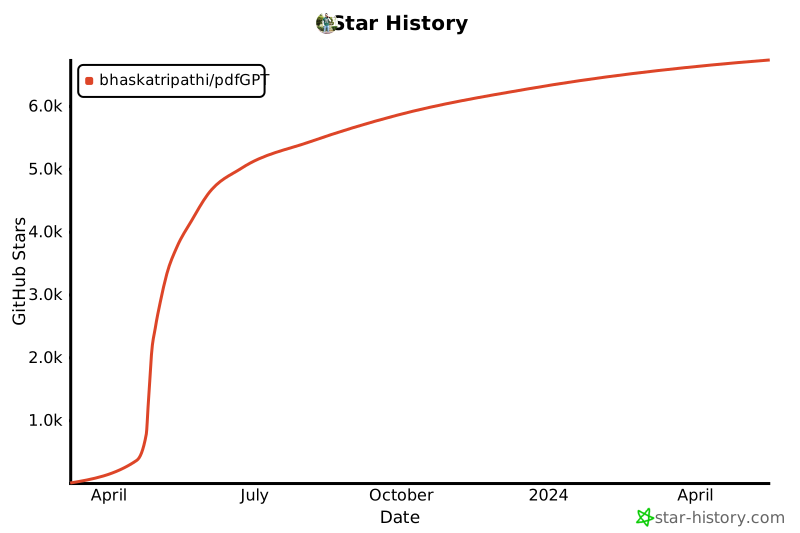
## Star History
[](https://star-history.com/#bhaskatripathi/pdfGPT&Date)
I am looking for more contributors from the open source community who can take up backlog items voluntarily and maintain the application jointly with me.
## Also Try this project - No Code LLM Quantization
Running Large Language Models on consumer hardware remains a challenge due to their massive size (in gigabytes). Model Quantization is a way to reduce their size while not compromising much on their performance. No-code Model Quantization is highly desired by ML Engineers and AI researchers for quick experimentation. I developed a no-code Model Quantization tool that addresses these key hurdles:
🔹 Size: Reduces model size, making them feasible to run on consumer-grade hardware.
🔹 Format: Converts training-optimized formats into ones suitable for efficient inference.
Project Link https://github.com/bhaskatripathi/LLM_Quantization
## License
This project is licensed under the MIT License. See the [LICENSE.txt](LICENSE.txt) file for details.
## Citation
If you use PDF-GPT in your research or wish to refer to the examples in this repo, please cite with:
```bibtex
@misc{pdfgpt2023,
author = {Bhaskar Tripathi},
title = {PDF-GPT},
year = {2023},
publisher = {GitHub},
journal = {GitHub Repository},
howpublished = {\url{https://github.com/bhaskatripathi/pdfGPT}}
}
================================================
FILE: api.py
================================================
import os
import re
import shutil
import urllib.request
from pathlib import Path
from tempfile import NamedTemporaryFile
from litellm import completion
import fitz
import numpy as np
import openai
import tensorflow_hub as hub
from fastapi import UploadFile
from lcserve import serving
from sklearn.neighbors import NearestNeighbors
recommender = None
def download_pdf(url, output_path):
urllib.request.urlretrieve(url, output_path)
def preprocess(text):
text = text.replace('\n', ' ')
text = re.sub('\s+', ' ', text)
return text
def pdf_to_text(path, start_page=1, end_page=None):
doc = fitz.open(path)
total_pages = doc.page_count
if end_page is None:
end_page = total_pages
text_list = []
for i in range(start_page - 1, end_page):
text = doc.load_page(i).get_text("text")
text = preprocess(text)
text_list.append(text)
doc.close()
return text_list
def text_to_chunks(texts, word_length=150, start_page=1):
text_toks = [t.split(' ') for t in texts]
chunks = []
for idx, words in enumerate(text_toks):
for i in range(0, len(words), word_length):
chunk = words[i : i + word_length]
if (
(i + word_length) > len(words)
and (len(chunk) < word_length)
and (len(text_toks) != (idx + 1))
):
text_toks[idx + 1] = chunk + text_toks[idx + 1]
continue
chunk = ' '.join(chunk).strip()
chunk = f'[Page no. {idx+start_page}]' + ' ' + '"' + chunk + '"'
chunks.append(chunk)
return chunks
class SemanticSearch:
def __init__(self):
self.use = hub.load('https://tfhub.dev/google/universal-sentence-encoder/4')
self.fitted = False
def fit(self, data, batch=1000, n_neighbors=5):
self.data = data
self.embeddings = self.get_text_embedding(data, batch=batch)
n_neighbors = min(n_neighbors, len(self.embeddings))
self.nn = NearestNeighbors(n_neighbors=n_neighbors)
self.nn.fit(self.embeddings)
self.fitted = True
def __call__(self, text, return_data=True):
inp_emb = self.use([text])
neighbors = self.nn.kneighbors(inp_emb, return_distance=False)[0]
if return_data:
return [self.data[i] for i in neighbors]
else:
return neighbors
def get_text_embedding(self, texts, batch=1000):
embeddings = []
for i in range(0, len(texts), batch):
text_batch = texts[i : (i + batch)]
emb_batch = self.use(text_batch)
embeddings.append(emb_batch)
embeddings = np.vstack(embeddings)
return embeddings
def load_recommender(path, start_page=1):
global recommender
if recommender is None:
recommender = SemanticSearch()
texts = pdf_to_text(path, start_page=start_page)
chunks = text_to_chunks(texts, start_page=start_page)
recommender.fit(chunks)
return 'Corpus Loaded.'
def generate_text(openAI_key, prompt, engine="text-davinci-003"):
# openai.api_key = openAI_key
try:
messages=[{ "content": prompt,"role": "user"}]
completions = completion(
model=engine,
messages=messages,
max_tokens=512,
n=1,
stop=None,
temperature=0.7,
api_key=openAI_key
)
message = completions['choices'][0]['message']['content']
except Exception as e:
message = f'API Error: {str(e)}'
return message
def generate_answer(question, openAI_key):
topn_chunks = recommender(question)
prompt = ""
prompt += 'search results:\n\n'
for c in topn_chunks:
prompt += c + '\n\n'
prompt += (
"Instructions: Compose a comprehensive reply to the query using the search results given. "
"Cite each reference using [ Page Number] notation (every result has this number at the beginning). "
"Citation should be done at the end of each sentence. If the search results mention multiple subjects "
"with the same name, create separate answers for each. Only include information found in the results and "
"don't add any additional information. Make sure the answer is correct and don't output false content. "
"If the text does not relate to the query, simply state 'Text Not Found in PDF'. Ignore outlier "
"search results which has nothing to do with the question. Only answer what is asked. The "
"answer should be short and concise. Answer step-by-step. \n\nQuery: {question}\nAnswer: "
)
prompt += f"Query: {question}\nAnswer:"
answer = generate_text(openAI_key, prompt, "text-davinci-003")
return answer
def load_openai_key() -> str:
key = os.environ.get("OPENAI_API_KEY")
if key is None:
raise ValueError(
"[ERROR]: Please pass your OPENAI_API_KEY. Get your key here : https://platform.openai.com/account/api-keys"
)
return key
@serving
def ask_url(url: str, question: str):
download_pdf(url, 'corpus.pdf')
load_recommender('corpus.pdf')
openAI_key = load_openai_key()
return generate_answer(question, openAI_key)
@serving
async def ask_file(file: UploadFile, question: str) -> str:
suffix = Path(file.filename).suffix
with NamedTemporaryFile(delete=False, suffix=suffix) as tmp:
shutil.copyfileobj(file.file, tmp)
tmp_path = Path(tmp.name)
load_recommender(str(tmp_path))
openAI_key = load_openai_key()
return generate_answer(question, openAI_key)
================================================
FILE: app.py
================================================
import json
from tempfile import _TemporaryFileWrapper
import gradio as gr
import requests
def ask_api(
lcserve_host: str,
url: str,
file: _TemporaryFileWrapper,
question: str,
openAI_key: str,
) -> str:
if not lcserve_host.startswith('http'):
return '[ERROR]: Invalid API Host'
if url.strip() == '' and file == None:
return '[ERROR]: Both URL and PDF is empty. Provide at least one.'
if url.strip() != '' and file != None:
return '[ERROR]: Both URL and PDF is provided. Please provide only one (either URL or PDF).'
if question.strip() == '':
return '[ERROR]: Question field is empty'
_data = {
'question': question,
'envs': {
'OPENAI_API_KEY': openAI_key,
},
}
if url.strip() != '':
r = requests.post(
f'{lcserve_host}/ask_url',
json={'url': url, **_data},
)
else:
with open(file.name, 'rb') as f:
r = requests.post(
f'{lcserve_host}/ask_file',
params={'input_data': json.dumps(_data)},
files={'file': f},
)
if r.status_code != 200:
raise ValueError(f'[ERROR]: {r.text}')
return r.json()['result']
title = 'PDF GPT'
description = """ PDF GPT allows you to chat with your PDF file using Universal Sentence Encoder and Open AI. It gives hallucination free response than other tools as the embeddings are better than OpenAI. The returned response can even cite the page number in square brackets([]) where the information is located, adding credibility to the responses and helping to locate pertinent information quickly."""
with gr.Blocks() as demo:
gr.Markdown(f'<center><h1>{title}</h1></center>')
gr.Markdown(description)
with gr.Row():
with gr.Group():
lcserve_host = gr.Textbox(
label='Enter your API Host here',
value='http://localhost:8080',
placeholder='http://localhost:8080',
)
gr.Markdown(
'<p style="text-align:center">Get your Open AI API key <a href="https://platform.openai.com/account/api-keys">here</a></p>'
)
openAI_key = gr.Textbox(
label='Enter your OpenAI API key here', type='password'
)
pdf_url = gr.Textbox(label='Enter PDF URL here')
gr.Markdown("<center><h4>OR<h4></center>")
file = gr.File(
label='Upload your PDF/ Research Paper / Book here', file_types=['.pdf']
)
question = gr.Textbox(label='Enter your question here')
btn = gr.Button(value='Submit')
btn.style(full_width=True)
with gr.Group():
answer = gr.Textbox(label='The answer to your question is :')
btn.click(
ask_api,
inputs=[lcserve_host, pdf_url, file, question, openAI_key],
outputs=[answer],
)
demo.app.server.timeout = 60000 # Set the maximum return time for the results of accessing the upstream server
demo.launch(server_port=7860, enable_queue=True) # `enable_queue=True` to ensure the validity of multi-user requests
================================================
FILE: docker-compose.yaml
================================================
version: '3'
services:
langchain-serve:
build:
context: .
target: langchain-serve-img
ports:
- '8080:8080'
pdf-gpt:
build:
context: .
target: pdf-gpt-img
ports:
- '7860:7860'
================================================
FILE: requirements.txt
================================================
PyMuPDF==1.22.1
numpy==1.23.5
scikit-learn==1.2.2
tensorflow>=2.0.0
tensorflow_hub==0.13.0
openai==0.27.4
gradio==4.11.0
langchain-serve>=0.0.19
litellm
gitextract_ii5m0mw1/ ├── Dockerfile ├── LICENSE.txt ├── README.md ├── api.py ├── app.py ├── docker-compose.yaml └── requirements.txt
SYMBOL INDEX (16 symbols across 2 files)

FILE: api.py
  function download_pdf (line 20) | def download_pdf(url, output_path):
  function preprocess (line 24) | def preprocess(text):
  function pdf_to_text (line 30) | def pdf_to_text(path, start_page=1, end_page=None):
  function text_to_chunks (line 48) | def text_to_chunks(texts, word_length=150, start_page=1):
  class SemanticSearch (line 68) | class SemanticSearch:
    method __init__ (line 69) | def __init__(self):
    method fit (line 73) | def fit(self, data, batch=1000, n_neighbors=5):
    method __call__ (line 81) | def __call__(self, text, return_data=True):
    method get_text_embedding (line 90) | def get_text_embedding(self, texts, batch=1000):
  function load_recommender (line 100) | def load_recommender(path, start_page=1):
  function generate_text (line 111) | def generate_text(openAI_key, prompt, engine="text-davinci-003"):
  function generate_answer (line 130) | def generate_answer(question, openAI_key):
  function load_openai_key (line 153) | def load_openai_key() -> str:
  function ask_url (line 163) | def ask_url(url: str, question: str):
  function ask_file (line 171) | async def ask_file(file: UploadFile, question: str) -> str:

FILE: app.py
  function ask_api (line 8) | def ask_api(
Condensed preview — 7 files, each showing path, character count, and a content snippet. Download the .json file or copy for the full structured content (19K chars).
[
  {
    "path": "Dockerfile",
    "chars": 326,
    "preview": "FROM python:3.8-slim-buster as langchain-serve-img\n\nRUN pip3 install langchain-serve\nRUN pip3 install api\n\nCMD [ \"lc-ser"
  },
  {
    "path": "LICENSE.txt",
    "chars": 1077,
    "preview": "MIT License\n\nCopyright (c) [2023] [Bhaskar Tripathi]\n\nPermission is hereby granted, free of charge, to any person obtain"
  },
  {
    "path": "README.md",
    "chars": 7051,
    "preview": "# pdfGPT\n## Demo\n1. **Demo URL**: https://huggingface.co/spaces/bhaskartripathi/pdfChatter\n2. **Demo Video**:\n   \n   [!["
  },
  {
    "path": "api.py",
    "chars": 5636,
    "preview": "import os\nimport re\nimport shutil\nimport urllib.request\nfrom pathlib import Path\nfrom tempfile import NamedTemporaryFile"
  },
  {
    "path": "app.py",
    "chars": 3329,
    "preview": "import json\r\nfrom tempfile import _TemporaryFileWrapper\r\n\r\nimport gradio as gr\r\nimport requests\r\n\r\n\r\ndef ask_api(\r\n    l"
  },
  {
    "path": "docker-compose.yaml",
    "chars": 233,
    "preview": "version: '3'\n\nservices:\n  langchain-serve:\n    build:\n      context: . \n      target: langchain-serve-img\n    ports:\n   "
  },
  {
    "path": "requirements.txt",
    "chars": 162,
    "preview": "PyMuPDF==1.22.1\r\nnumpy==1.23.5\r\nscikit-learn==1.2.2\r\ntensorflow>=2.0.0\r\ntensorflow_hub==0.13.0\r\nopenai==0.27.4\r\ngradio=="
  }
]
About this extraction
This page contains the full source code of the bhaskatripathi/pdfGPT GitHub repository, extracted and formatted as plain text for AI agents and large language models (LLMs). The extraction includes 7 files (17.4 KB), approximately 4.4k tokens, and a symbol index with 16 extracted functions, classes, methods, constants, and types. Use this with OpenClaw, Claude, ChatGPT, Cursor, Windsurf, or any other AI tool that accepts text input. You can copy the full output to your clipboard or download it as a .txt file.
Extracted by GitExtract — free GitHub repo to text converter for AI. Built by Nikandr Surkov.