Repository: bia-pain-bache/BPB-Worker-Panel
Branch: main
Commit: 9c4fb8145e65
Files: 51
Total size: 134.1 KB
Directory structure:
gitextract_5ayl71_a/

├── .gitignore
├── README.md
├── README_fa.md
├── RELEASE.md
├── docs/
│   ├── NAT64Prefixes.md
│   ├── assets/
│   │   ├── scripts/
│   │   │   └── lang-switch.js
│   │   └── stylesheet/
│   │       └── extra.css
│   ├── en/
│   │   ├── docs/
│   │   │   ├── configuration/
│   │   │   │   ├── common.md
│   │   │   │   ├── fragment.md
│   │   │   │   ├── index.md
│   │   │   │   ├── routing-rules.md
│   │   │   │   ├── vless-trojan.md
│   │   │   │   ├── warp-pro.md
│   │   │   │   └── warp.md
│   │   │   ├── faq.md
│   │   │   ├── index.md
│   │   │   ├── installation/
│   │   │   │   ├── pages-manual.md
│   │   │   │   ├── wizard.md
│   │   │   │   └── workers-manual.md
│   │   │   └── usage/
│   │   │       ├── doh.md
│   │   │       ├── fragment.md
│   │   │       ├── index.md
│   │   │       ├── my-ip.md
│   │   │       ├── normal.md
│   │   │       ├── raw.md
│   │   │       ├── warp-pro.md
│   │   │       └── warp.md
│   │   └── mkdocs.yml
│   └── fa/
│       ├── docs/
│       │   ├── configuration/
│       │   │   ├── common.md
│       │   │   ├── fragment.md
│       │   │   ├── index.md
│       │   │   ├── routing-rules.md
│       │   │   ├── vless-trojan.md
│       │   │   ├── warp-pro.md
│       │   │   └── warp.md
│       │   ├── faq.md
│       │   ├── index.md
│       │   ├── installation/
│       │   │   ├── pages-manual.md
│       │   │   ├── wizard.md
│       │   │   └── workers-manual.md
│       │   └── usage/
│       │       ├── doh.md
│       │       ├── fragment.md
│       │       ├── index.md
│       │       ├── my-ip.md
│       │       ├── normal.md
│       │       ├── raw.md
│       │       ├── warp-pro.md
│       │       └── warp.md
│       └── mkdocs.yml
├── package.json
└── tsconfig.json
================================================
FILE CONTENTS
================================================
================================================
FILE: .gitignore
================================================
*
!.gitignore
!package.json
!tsconfig.json
!src/
!src/**
!scripts/
!scripts/build.js
!.github/
!.github/**
!README_fa.md
!README.md
!RELEASE.md
!NAT64Prefixes.md
!docs
!docs/**
================================================
FILE: README.md
================================================
<h1 align="center">BPB Panel</h1>
### 🌏 Readme in [Farsi](README_fa.md)
<p align="center">
<img src="docs/assets/images/panel-overview.jpg">
</p>
<br>
## Introduction
This project is aimed to provide a user panel to access FREE, SECURE and PRIVATE **VLESS**, **Trojan** and **Warp** configs and also a **private DoH** server. It ensures connectivity even when domains or Warp services are blocked by ISPs, offering two deployment options:
- **Workers** deployment
- **Pages** deployment
🌟 If you found **BPB Panel** valuable, Your donations make all the difference 🌟
### USDT (BEP20)
```text
0xbdf15d41C56f861f25b2b11C835bd45dfD5b792F
```
## Features
1. **Free and Private**: No costs involved and the server is private.
2. **Intuitive Panel:** Streamlined for effortless navigation, configuration and use.
3. **Versatile Protocols:** Provides VLESS, Trojan and Wireguard (Warp) protocols.
4. **Private DoH:** A ready to use DoH server, capable of customizing underlying DNS server.
5. **Warp Pro configs:** Optimized Warp for crucial circumstances.
6. **Fragment support:** Supports Fragment functionality for crucial network situations.
7. **Comprehensive Routing Rules:** Bypassing Iran/China/Russia, Blocking QUIC, Porn, Ads, Malwares, Phishing and also bypassing sanctions.
8. **Chain Proxy:** Capable of adding a chain proxy (VLESS, Trojan, Shadowsocks, socks and http) to fix IP.
9. **Broad client compatibility:** Offers subscription links for Xray, Sing-box and Clash-Mihomo core clients.
10. **Password-protected panel:** Provides secure and private panel with password protection.
11. **Fully customizable:** Supports setting up clean IP-domains, Proxy IPs, DNS servers, choosing ports and protocols, Warp endpoints and more.
## Limitations
1. **UDP transport**: VLESS and Trojan protocols on workers do not handle **UDP** properly, so it is disabled by default (affecting features like Telegram video calls), UDP DNS is also unsupported. DoH is enabled by default for enhanced security.
2. **Request limit**: each worker supports 100K requests per day for VLESS and Trojan, suitable for 2-3 users. You can use limitless Warp configs.
## Getting started
- [Installation methods](https://bia-pain-bache.github.io/BPB-Worker-Panel/installation/wizard/)
- [Configuration](https://bia-pain-bache.github.io/BPB-Worker-Panel/configuration/)
- [How to use](https://bia-pain-bache.github.io/BPB-Worker-Panel/usage/)
- [FAQ](https://bia-pain-bache.github.io/BPB-Worker-Panel/faq/)
## Supported Clients
| Client | Version | Fragment support | Warp Pro support |
| :-----------------: | :---------------: | :----------------: | :----------------: |
| **v2rayNG** | 1.10.26 or higher | :heavy_check_mark: | :heavy_check_mark: |
| **MahsaNG** | 14 or higher | :heavy_check_mark: | :heavy_check_mark: |
| **v2rayN** | 7.15.4 or higher | :heavy_check_mark: | :heavy_check_mark: |
| **v2rayN-PRO** | 1.9 or higher | :heavy_check_mark: | :heavy_check_mark: |
| **Sing-box** | 1.12.0 or higher | :heavy_check_mark: | :x: |
| **Streisand** | 1.6.64 or higher | :heavy_check_mark: | :heavy_check_mark: |
| **Clash Meta** | | :x: | :heavy_check_mark: |
| **Clash Verge Rev** | | :x: | :heavy_check_mark: |
| **FLClash** | | :x: | :heavy_check_mark: |
| **AmneziaVPN** | | :x: | :heavy_check_mark: |
| **WG Tunnel** | | :x: | :heavy_check_mark: |
## Environment variables
| Variable | Usage | Mandatory |
| :----------: | :--------------------------------: | :----------------: |
| **UUID** | VLESS UUID | :heavy_check_mark: |
| **TR_PASS** | Trojan Password | :heavy_check_mark: |
| **PROXY_IP** | Proxy IP or domain (VLESS, Trojan) | :x: |
| **PREFIX** | NAT64 Prefixes (VLESS, Trojan) | :x: |
| **SUB_PATH** | Subscriptions' URI | :x: |
| **FALLBACK** | Fallback domain (VLESS, Trojan) | :x: |
| **DOH_URL** | Core DOH | :x: |
---
## Stargazers Over Time
[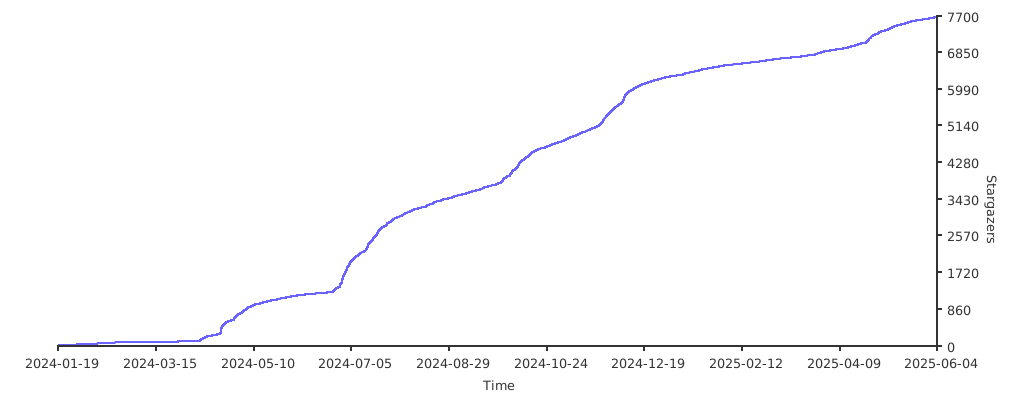](https://starchart.cc/bia-pain-bache/BPB-Worker-Panel)
---
### Special Thanks
- VLESS, Trojan [Cloudflare-workers/pages proxy script](https://github.com/yonggekkk/Cloudflare-workers-pages-vless) created by [yonggekkk](https://github.com/yonggekkk)
- CF-vless code author [3Kmfi6HP](https://github.com/3Kmfi6HP/EDtunnel)
- CF preferred IP program author [badafans](https://github.com/badafans/Cloudflare-IP-SpeedTest), [XIU2](https://github.com/XIU2/CloudflareSpeedTest)
================================================
FILE: README_fa.md
================================================
<h1 align="center">پنل BPB</h1>
#### 🌏 Readme in [English](README.md)
<p align="center">
<img src="docs/assets/images/panel-overview.jpg">
</p>
<br>
## معرفی
این پروژه یه پنل کاربری برای دسترسی به کانفیگهای رایگان، امن و خصوصی **VLESS**، **Trojan** و **Warp** ارائه میده. حتی وقتی دامنهها یا سرویس Warp توسط اپراتورها فیلتر شدن، اتصال رو تضمین میکنه. این پنل به دو روش راهاندازی میشه:
- با **Cloudflare Workers**
- با **Cloudflare Pages**
🌟 اگه **پنل BPB** براتون مفید بوده، با حمایتتون بهم دلگرمی میدید 🌟
### USDT (BEP20)
```text
0xbdf15d41C56f861f25b2b11C835bd45dfD5b792F
```
## ویژگیها
- **رایگان و شخصی**: بدون هیچ هزینهای، سرور شما شخصی هست.
- **پنل کاربری ساده**: کار باهاش راحته و تنظیمات و استفاده ازش خیلی آسونه.
- **پروتکلهای متنوع**: ارائه کانفیگهای VLESS، Trojan و Wireguard (Warp).
- **DoH شخصی**: یک DoH شخصی با قابلیت تنظیم DNS زیرینایی.
- **کانفیگهای Warp Pro**: کانفیگهای Warp بهینهشده برای شرایط خاص ایران.
- **پشتیبانی از Fragment**: اتصال حتی در صورت فیلتر شدن دامنه.
- **قوانین مسیریابی کامل**: دور زدن سایتهای ایرانی، چینی و روسی، مسدود کردن QUIC، محتوای پورن، تبلیغات، بدافزارها، فیشینگ و در زدن سایتهای تحریمی.
- **زنجیرهی Proxy**: میتونید یه Proxy زنجیرهای از نوع VLESS، Trojan، Shadowsocks، Socks یا http اضافه کنید تا IP ثابت بشه.
- **پشتیبانی از برنامههای مختلف**: لینکهای اشتراک برای برنامههای با هستههای Xray، Sing-box و Clash-Mihomo.
- **پنل امن با رمز عبور**: پنل محافظت شده با رمز عبور.
- **سفارشیسازی کامل**: تنظیم IP تمیز، Proxy IP، سرورهای DNS، انتخاب پورتها و پروتکلها، Warp Endpoint و خیلی امکانات دیگه.
## محدودیتها
- **اتصال UDP**: پروتکلهای VLESS و Trojan روی Workerها نمیتونن UDP رو بهخوبی پشتیبانی کنن، برای همین بهصورت پیشفرض غیرفعاله (این روی امکاناتی مثل تماس تصویری تلگرام تأثیر میذاره). DNSهای UDP هم پشتیبانی نمیشن. به جاش DoH فعاله که امنتره.
- **محدودیت تعداد درخواست**: هر Worker برای VLESS و Trojan روزانه 100 هزار درخواست پشتیبانی میکنه، که برای 2-3 نفر کافیه. برای اتصال نامحدود میتونید از کانفیگهای Warp استفاده کنید.
## شروع به کار
- [روشهای راهاندازی](https://bia-pain-bache.github.io/BPB-Worker-Panel/fa/installation/wizard/)
- [راهنمای تنظیمات](https://bia-pain-bache.github.io/BPB-Worker-Panel/fa/configuration/)
- [نحوهی استفاده](https://bia-pain-bache.github.io/BPB-Worker-Panel/fa/usage/)
- [پرسشهای متداول (FAQ)](https://bia-pain-bache.github.io/BPB-Worker-Panel/en/faq/)
## برنامههای پشتیبانی شده
<div dir="rtl">
| Client | Version | پشتیبانی از Fragment | پشتیبانی از Warp Pro |
| :-----------------: | :--------------: | :------------------: | :------------------: |
| **v2rayNG** | 1.10.26 و بالاتر | :heavy_check_mark: | :heavy_check_mark: |
| **MahsaNG** | 14 و بالاتر | :heavy_check_mark: | :heavy_check_mark: |
| **v2rayN** | 7.15.4 و بالاتر | :heavy_check_mark: | :heavy_check_mark: |
| **v2rayN-PRO** | 2.0 و بالاتر | :heavy_check_mark: | :heavy_check_mark: |
| **Sing-box** | 1.12.0 و بالاتر | :heavy_check_mark: | :x: |
| **Streisand** | 1.6.64 و بالاتر | :heavy_check_mark: | :heavy_check_mark: |
| **Clash Meta** | | :x: | :heavy_check_mark: |
| **Clash Verge Rev** | | :x: | :heavy_check_mark: |
| **FLClash** | | :x: | :heavy_check_mark: |
| **AmneziaVPN** | | :x: | :heavy_check_mark: |
| **WG Tunnel** | | :x: | :heavy_check_mark: |
</div>
## متغیرهای محیطی (داشبورد کلادفلر)
<div dir="rtl">
| نام متغیر | مورد استفاده | اجباری |
| :----------: | :-------------------------------: | :----------------: |
| **UUID** | UUID برای پروتکل VLESS | :heavy_check_mark: |
| **TR_PASS** | پسورد پروتکل Trojan | :heavy_check_mark: |
| **PROXY_IP** | Proxy IP برای VLESS و Trojan | :x: |
| **PREFIX** | NAT64 Prefix برای VLESS و Trojan | :x: |
| **SUB_PATH** | مسیر لینکهای اشتراک شخصی | :x: |
| **FALLBACK** | دامنهی پوششی برای VLESS و Trojan | :x: |
| **DOH_URL** | DOH برای عملیات داخلی ورکر | :x: |
</div>
---
## تعداد ستارهها به مرور زمان
[](https://starchart.cc/bia-pain-bache/BPB-Worker-Panel)
---
### تشکر ویژه
- نویسنده پروتکلهای VLESS و Trojan [پروکسی Cloudflare-workers/pages](https://github.com/yonggekkk/Cloudflare-workers-pages-vless)
- نویسنده کد CF-vless [3Kmfi6HP](https://github.com/3Kmfi6HP/EDtunnel)
- نویسنده برنامه IP ترجیحی CF [badafans](https://github.com/badafans/Cloudflare-IP-SpeedTest)، [XIU2](https://github.com/XIU2/CloudflareSpeedTest)
================================================
FILE: RELEASE.md
================================================
# 💡 Bug fixes & Improvements
- Due to nslookup issue for querying proxy IPs, the built-in proxy IPs list is now implemented and is accessible under `/proxy-ip` or by clicking provided shortcut in panel which lists Country, City and ISP. #1185
- Fixed ECH config query. Be aware that ECH config query is delegated to Core DNS module (Local DNS) now, so this DNS server should be locally available. Optional `ECH Server Name` is also added. #1190
> [!CAUTION]
> Please note that `ECH Server Name` option is available in Xray for a while, however sing-box supports this feature from 1.13.0 and Clash supports it from v1.19.20. If you leave it empty, it uses your worker domain to query ECH config which works on all cores' stable versions right now. Also if you enter a Cloudflare domain, it should have ECH enabled on it, otherwise it won't work. To check this, visit [here](https://dns.google/query?name=&rr_type=HTTPS&ecs=) and resolve your desired domain, you should see an `ech` value in `Answer` field.
> [!CAUTION]
> ECH is still unstable in IRAN.
> [!TIP]
> ECH applies only to `Normal` subscription, not `Fragment`.
- Fixed `ECH Server Name` bug #1224
- Fixed ECH query DNS if local DNS is set to `localhost`
- Fixed some typos, PR #1191
- Reverted back URL configs to panel as `Raw` subscription. None of panel settings apply to these configs as you know and also they consume more worker requests than `Normal` configs and won't perform as others. They're not recommended to use and connections issues will not be supported anymore, please use `Normal` configs instead.
> [!CAUTION]
> You have to manually set DoH as remote DNS in your clients and disable MUX to use `Raw` configs.
---
## 💡 Other tips
> [!NOTE]
> These days Fragment on some ISPs stopped working in Iran, you can change `Fragment packet` to `1-1` instead of `tlshello` and test, also you can try to change `Fragment mode` to bypass IR-GFW.
> [!CAUTION]
> If you are upgrading from versions below 3.5.1 to 4, you should get subscriptions from panel again.
> [!CAUTION]
> sing-box client version should be 1.12.0 or higher.
> [!CAUTION]
> Xray clients should be updated to the latest version i.e. v2rayNG, v2rayN and Streisand.
================================================
FILE: docs/NAT64Prefixes.md
================================================
| NAT64 Prefix | Location |
| :-----------------: | :--------------: |
| [2a02:898:146:64::] | Netherland |
| [2602:fc59:b0:64::] | USA |
| [2602:fc59:11:64::] | USA |
================================================
FILE: docs/assets/scripts/lang-switch.js
================================================
document.addEventListener("DOMContentLoaded", () => {
const langLink = document.querySelector('a[hreflang="fa"], a[hreflang="en"]');
if (!langLink) return;
const currentPath = window.location.pathname;
const base = "/BPB-Worker-Panel";
let newPath;
if (currentPath.startsWith(`${base}/fa/`)) {
newPath = currentPath.replace(`${base}/fa`, base);
} else {
newPath = currentPath.replace(base, `${base}/fa`);
}
langLink.setAttribute("href", newPath);
});
================================================
FILE: docs/assets/stylesheet/extra.css
================================================
h1 {
text-align: center;
}
img {
display: block;
margin-left: auto;
margin-right: auto;
}
================================================
FILE: docs/en/docs/configuration/common.md
================================================
# :material-cog-outline:{ .md .middle } Common settings

This section provides shared settings between all subscriptions and protocols.
## Local DNS
The local DNS is mainly used for routing bypass rules. By default the local DNS server is set to Google DNS.
Many DNS servers are available to use as Local DNS in shape of IP, however you can use **localhost** which uses your ISP DNS server which is fine for routing purposes.
## Fake DNS
You may enable Fake DNS to reduce DNS query latency, but use caution, it may be incompatible with some applications or interfere with system DNS. If you're unsure about its functionality, avoid enabling it.
## Anti Sanction DNS
This DNS server is used for **Sanction Rules** [explained here](./routing-rules.md). The default DNS server is [Shecan](https://shecan.ir/) (for iranian users). You should check whether it supports your desired domains before setting routing rules.
!!! info
DNS server can be in shape of an IP (UDP DNS), TCP DNS, DOT or DoH.
## Enabling IPv6
The panel provides IPv6 VLESS/Trojan configs by default. If your ISP doesn’t support IPv6, disable it to reduce the number of configs and also optimize DNS and routing settings for VLESS, Trojan and Warp configs.
## Allow connections from LAN
If you enable this feature, others in you network (for example WiFi network) can use your proxy by knowing your device local IP. They can set a socks proxy on their device, set your local IP as address and these ports based on which client you are using:
- v2ray: 10808
- sing-box: 2080
- Clash: 7890
Please note that this can be risky to use in office or public networks.
## Log Level
Specifies the level of client logs. Normally it's "warning" which is enough to debug issues, however you may need to change it to submit issues in Github or check your proxy activity.
================================================
FILE: docs/en/docs/configuration/fragment.md
================================================
# :material-cog-outline:{ .md .middle } Fragment settings
Fragment solution almost solves Clean IP issue for Cloudflare CDN by hiding SNI from MitM, however, settings should be obtained based on ISP. Also please note that Fragment can be enabled for sing-box, however sing-box does not use fragment settings and has its own default settings.

By default settings are:
- **Length**: 100-200
- **Interval**: 1-1
- **Packets**: tlshello
You can also switch Fragment modes and test based on network situation. Usually default or `Low` mode should be ok. Please note that by switching to `Medium`, `High` or `Severe` profiles, handshake ping goes higher but it can result in better and more stable connection in high situations. The `Best Fragment` config is always the best and smart solution, just connect and wait for at least 30 seconds.
You can set the parameters based on your ISP's situation.
!!! info
Packets have multiple modes. However, `tlshello` only applies to **TLS configurations**; ports like 80, 8080, etc., are not affected.
!!! tip "Tip for Iranians"
Currently, fragment performance is significantly more efficient on clients using the **Xray Knocker core**, specifically **MahsaNG** and **v2rayN PRO** clients. This core was developed and customized for conditions in Iran.
!!! tip
If you cannot find the optimum fragment settings for your ISP, there is a **Best fragment** configuration available in the subscription. Simply connect to it and wait a short while; it tests nearly all valid fragment settings and automatically connects to the best one.
!!! note
Fragment values have maximum limits. The Length cannot exceed 500, and the Interval cannot exceed 30ms.
!!! warning
Max Split feature is recently added to Xray core and is a little bit tricky, so please read Xray documents first before setting any value.
================================================
FILE: docs/en/docs/configuration/index.md
================================================
# :material-cog-outline:{ .md .middle } Settings Configuration
!!! tip
Please don't worry about incorrect configurations. There's a `Reset Settings` button next to the `Apply Settings` button that will reset the panel to default settings.
!!! info
You must update your subscriptions after making any changes.
<div class="grid cards" markdown>
- :material-cog-outline:{ .lg .middle } __Common__
---
Configure shared settings across all protocols and subscriptions.
[:octicons-arrow-right-24: Getting started](common.md)
- :material-cog-outline:{ .lg .middle } __VLESS - Trojan__
---
Configure general VLESS and Trojan settings such as DNS Servers, Clean IPs, Ports, and more.
[:octicons-arrow-right-24: Getting started](vless-trojan.md)
- :material-cog-outline:{ .lg .middle } __Fragment__
---
Configure Fragment settings to mitigate ISP or regional disruptions.
[:octicons-arrow-right-24: Getting started](fragment.md)
- :material-cog-outline:{ .lg .middle } __Warp__
---
Common Warp settings for __Warp__ and __Warp PRO__ subscriptions, including Endpoints, Scanner, IPv6, etc.
[:octicons-arrow-right-24: Getting started](warp.md)
- :material-cog-outline:{ .lg .middle } __Warp PRO__
---
PRO settings designed to bypass Warp blockage by your ISP.
[:octicons-arrow-right-24: Getting started](warp-pro.md)
- :material-cog-outline:{ .lg .middle } __Routing Rules__
---
Add routing rules to bypass local websites, block Ads, block unwanted content, and more.
[:octicons-arrow-right-24: Getting started](routing-rules.md)
</div>
================================================
FILE: docs/en/docs/configuration/routing-rules.md
================================================
# :material-cog-outline:{ .md .middle } Routing Rules

## Predefined rules
Using predefined routing rules, you can apply these settings to configs:
* Connect directly to Iranian addresses without a proxy (no need to disconnect for visiting some websites, especially payment gateways).
* Have direct access to Chinese websites.
* Have direct access to Russian websites.
* Block Iranian and foreign ads, up to 90 percent.
* Block Porn content websites.
* Block QUIC connections (due to network instability).
* Block Malware (Read warning)
* Block Phishing (Read warning)
* Block Cryptominers (Read warning)
Direct access to local addresses like 127.0.0.1 is set by default on configs and there's no need to manually add them.
!!! warning
v2ray users should change Geo Assets to **Chocolate4U** and download assets if they wanna use `Malware`, `Phishing` and `Cryptominers` rules, otherwise configs won't connect.
!!! warning
If you enable routing rules and the client does not connect, the primary reason is that the Geo asset is not updated. Go to the Geo assets settings in the v2rayNG menu and click the cloud or download icon to update them. If the update process is unsuccessful, you will not be able to connect. If you have tried everything and it still does not update, download the two files from the links below, and instead of clicking the update button, click the add button and import these two files:
```title="GeoIP"
https://github.com/Loyalsoldier/v2ray-rules-dat/releases/latest/download/geoip.dat
```
```title="GeoSite"
https://github.com/Loyalsoldier/v2ray-rules-dat/releases/latest/download/geosite.dat
```
## Custom Rules
There are cases which predefined rules cannot help. For example, if you have blocked porn contents but a specific website was not on the list and is not blocked, you will need to use custom rules.
You can use three different formats in this section i.e. **Domain**, **IP** and **IP/CIDR**.
Please be aware that if you enter `google.com`, all of its subdomains will also be blocked or routed directly, such as `drive.google.com` or `mail.google.com`. Examples:
```title="Domain"
google.com
```
```title="IPv4"
192.168.1.1
```
```title="IPv6"
2606:4700::6810:85e5
```
```title="IPv4 CIDR"
192.168.1.1/32
```
```title="IPv6 CIDR"
2606:4700::6810:85e5/128
```
## Sanction Rules
In case you need some websites to just bypass sanctions and connect directly (without proxy), you can use this section.
You can set your desired DNS server [in common settings](./common.md) (which should be a transparent proxy also) and choose preset rules or fill in custom addresses. you can even use configs like `WorkerLess` which do not use any proxy and access sanctioned websites.
!!! info
Please be aware that if you enter `google.com` in custom rules, all of its subdomains will also be routed directly, such as `drive.google.com` or `mail.google.com`.
!!! note
When these rules are activated, you should make sure the DNS supports domain, for example if you activate `Microsoft` rule and the DNS does not support it, you will fail to connect to Microsoft domains. Please check DNS catalogue and make sure your target rule or domain is supported.
================================================
FILE: docs/en/docs/configuration/vless-trojan.md
================================================
# :material-cog-outline:{ .md .middle } VLESS and Trojan settings

## Remote DNS
By default, the remote DNS is Google DNS over HTTPS (DoH). However, you can use other DoH or DoT servers, except Cloudflare DNS servers:
!!! tip "Well known DOH and DOT servers"
- `https://dns.google/dns-query`
- `https://dns.adguard-dns.com/dns-query`
- `https://dns.quad9.net/dns-query`
- `tls://dns.google`
## Chain Proxy
As noted, a Proxy IP fixes the IP for Cloudflare target addresses, but node IPs may differ for other targets. A **Chain Proxy** ensures a consistent IP for all targets. You can use a free config here, even if it’s blocked by your ISP, to permanently fix your IP to the Chain Proxy IP.
### Supported protocols
* VLESS
* VMess
* Trojan
* Shadowsocks
* Socks
* Http
### Supported Transports
* TCP
* TCP http header
* Websocket
* GRPC
* Httpupgrade
### Supported TLS
* TLS
* Reality
!!! note
The Chain Proxy config must not be a worker itself, or the final IP will still change.
!!! info
Socks and http configs should have username and password, Xray does not support raw configs.
!!! info
Shadowsocks cannot have any transport like websocket, grpc... and cannot have TLS.
!!! warning
VLESS, VMess and Trojan configs with `randomized` ALPN values are incompatible with Clash due to lack of Fingerprint
This setting applies to **Normal** and **Fragment** subscriptions. After applying, update the subscription. The chained configs will be added alongside original configs using 🔗 icon. This way, when Chain Proxy stops working, you still have access to original configs.
## Clean IP/Domains
For non-**Normal** subscription, you may want to use clean IPs. The panel includes a scanner, downloadable as a zip file for your operating system. Run the CloudflareScanner, and results will be saved in `result.csv`, allowing you to select IPs based on delay and download speed. Windows is recommended for this process, and ensure your VPN is disconnected during the test. For advanced scanning, refer to [this guide](https://github.com/bia-pain-bache/Cloudflare-Clean-IP-Scanner/blob/master/README.md).
!!! tip "Tip for Iranian Users"
On ISPs supporting IPv6 (e.g., Rightel, Irancell, Asiatech), enable IPv6 on your SIM card, activate the **Prefer IPv6** option in client settings, and use the last two or first default configs. IPv6 IPs generally perform better.
!!! tip
When using **Fragment**, Clean IPs do not play a significant role, but some ISPs, like Rightel, may still require them.
To add custom configs alongside default ones, enter clean IPs or domains as shown in the section image and click **Apply**. Updated subscription will import these new configs, which are also added to **Best Ping** and **Best Fragment** configs.
## Protocol Selection
Enable either or both **VLESS** and **Trojan** protocols.
## Port Selection
Select the required ports. TLS ports offer more secure configs, but during TLS disruptions or when **Fragment** underperforms, non-TLS configs can be a viable alternative.
!!! note
Non-TLS configs require the panel to be deployed using the Workers method. HTTP ports will not appear in the panel if the Pages method is used or you set a custom domain.
!!! info
Non-TLS configs are only added to **Normal** subscription.
## Fingerprint
Here you can select TLS fingerprint, default to randomized.
## Best Interval
By default, **Best** configs test every 30 seconds to identify the optimal config or Fragment value. For low-speed networks during activities like video streaming or gaming, this may cause lag. Adjust the interval between 10 and 90 seconds as needed.
## TCP Fast Open
If your device supports TCP Fast Open and your ISP does not interfere with TFO, you can enable the feature to enhance your connections. Please note that Linux users have to enable TFO before activating this feature.
## ECH (Encrypted Client Hello)
As you may know there are several techniques to obfuscate connection SNI to bypass firewall. Fragment hides SNI, Custom domain changes SNI and finally ECH can change SNI to Cloudflare default ECH domain. The problem is that Cloudflare uses a default domain named `cloudflare-ech.com` for all CDN and Worker domains, so the blockage is easy for ISPs. This option will not be activated on `Fragment` subscription.
### ECH Server Name
If you leave this field empty, the ECH config will be queried from your worker domain. however, if your worker domain is blocked, you can use another domains which have enabled ECH on Cloudflare CDN. To check this, visit [here](https://dns.google/query?name=&rr_type=HTTPS&ecs=) and resolve your desired domain, you should see an `ech` value in `Answer` field.
!!! warning
Please note that `ECH Server Name` option is available in Xray for a while, however sing-box supports this feature from 1.13.0 and Clash supports it from v1.19.20. So if your client doesn't meet these versions, please leave it empty.
## Proxy IP
### Mode
Starting with version 3.4.2 you can choose to use Proxy IP or NAT64 Prefix for connecting to Cloudflare CDN addresses.
### Proxy IPs / Domains
You can change the Proxy IP via the panel by applying the change and updating the subscription. However, setting the Proxy IP through the Cloudflare dashboard or using wizard is recommended because:
!!! note
Changing the Proxy IP via the panel requires updating the subscription if the IP stops working. This can disrupt donated configs, as users without an active subscription cannot update them. Use this method only for personal usage. Other methods don’t require subscription updates.
You can check available Proxy IPs by clicking the icon beside this field in panel or visiting `/proxy-ip` in browser, which lists IPs by region and ISP.
!!! info
To use multiple Proxy IPs, fill in them below each other.
### NAT64 Prefixes
You can change the Proxy IP mode and fill in NAT64 Prefixes via the panel by applying the changes and updating the subscription. However, setting the NAT64 prefixes through the Cloudflare dashboard or using wizard is recommended because:
!!! note
Changing the NAT64 Prefixes via the panel requires updating the subscription if the IP stops working. This can disrupt donated configs, as users without an active subscription cannot update them. Use this method only for personal usage. Other methods don’t require subscription updates.
You can find available NAT64 Prefixes [in here](https://github.com/bia-pain-bache/BPB-Worker-Panel/blob/main/docs/NAT64Prefixes.md), which lists IPs by region and ISP.
!!! info
To use multiple Prefixes, fill them in below each other.
## Custom CDN
Use a Custom CDN (e.g., Fastly, Gcore) to mask your Worker domain. Configure the following three sections:
### Addresses
These are the IPs or clean IPs specific to the CDN. You must use the CDN’s own IPs, not Cloudflare’s. Enter domains, IPv4, or IPv6 addresses as shown, with IPv6 addresses enclosed in brackets, e.g., `[2a04:4e42:200::731]`.
### Host
The host defined in the CDN that points to your Worker, such as a fake domain in Fastly.
### SNI
A fake domain or a site on the same CDN, e.g., `speedtest.net` (without `www`) for Fastly.
After configuring these fields, related configs will be added to **Normal** subscription, tagged with a `C` flag to distinguish them.
!!! info
Only ports 443 and 80 are supported for these configs.
================================================
FILE: docs/en/docs/configuration/warp-pro.md
================================================
# :material-cog-outline:{ .md .middle } Warp Pro settings
This section applies exclusively to the **Warp Pro** subscription, as detailed [here](../usage/warp-pro.md).

## Definitions
Several common terms are used across all implementations of Warp noise (fake packets). Most cores, including **Xray**, **Xray Knocker**, and **Amnezia**, share at least two parameters:
### Mode
Each Warp noise implementation has a specific mode that determines in which shape noise is sent to the server to obfuscate the connection.
### Count
The number of noise packets sent by the client to the server.
### Size
The size of each noise packet, measured in bytes.
### Delay
The interval between sending noise packets.
## MahsaNG
### MahsaNG Mode
- **none**: No noise is applied, equivalent to a standard Warp config.
- **quic**: Recommended by developers for conditions in Iran.
- **random**: Generates noise randomly.
- Custom mode: Allows use of a custom HEX string (e.g., `fe09ad5600bc...`).
## Clash and Amnezia
This section applies to **Amnezia**, **WG Tunnel**, and **Clash-Mihomo** core clients, which share the same settings. You specify the number of noise packets and their minimum and maximum sizes. In the **Warp Pro** subscription table, you can also download a zip file for **Amnezia** and **WG Tunnel** configs, in addition to the subscriptions.
These settings are determined experimentally for each ISP through trial and error.
## v2rayNG and v2rayN
### v2ray Modes
Four modes are available for **v2rayNG** and **v2rayN** clients: **base64**, **string**, **hex**, and **random**. In the Noise Count section, you can specify how many noise packets to include in the config. Multiple noises with different types can be added; they do not need to be uniform.
### Noise Packet
The packet value must correspond to the selected mode:
- **Base64**: Requires a valid Base64 value.
- **String**: Can be any string.
- **Random**: Specify the string length.
- **Hex**: Requires a Hex string.
Example:
```title="Base64"
NTUyMjU0NjItN2I4MC00YWFmLWE3NDgtNjZiYWZiNjlmNmQ2
```
```title="String"
salamchetori123
```
```title="Random"
10-30
```
```title="Hex"
01d800f9373b2c418713aafde43021004ac3b89f
```
!!! tip
- Convert text to Base64 using [this tool](https://onlinebase64tools.com/base64-encode).
- Generate a Hex string with [this tool](https://onlinetools.com/random/generate-random-hexadecimal-numbers).
### Applies To
Specifies which type of IPs the noise apply to. The default is IP which applies to both IPv4 and v6.
================================================
FILE: docs/en/docs/configuration/warp.md
================================================
# :material-cog-outline:{ .md .middle } Warp General settings
These settings apply to both **Warp** and **Warp Pro** subscriptions.

## Remote DNS
Warp remote DNS can be only of type IPv4 for performance and compatibility. The default DNS is Cloudflare public DNS which is a perfect candidate. It's highly recommended to use Cloudflare DNS servers if you insist on changing it, which have most compatibility and efficiency when used with Cloudflare Warp, like:
- 1.1.1.2, 1.0.0.2 (Cloudflare security DNS)
- 1.1.1.3, 1.0.0.3 (Cloudflare adult DNS)
## Endpoints - Scanner
Endpoints for Warp function similarly to Clean IPs for VLESS and Trojan. The panel provides a scanner that you can run on Termux (Android), Windows, macOS or Linux and input the results here. Note that the results are not 100% reliable, so testing is necessary. Please note that you have to exit any proxy app before testing, if you use v2rayN, you should completely exit it from taskbar, clearing proxy is not enough.
!!! info
- Endpoints are formatted as IP:Port or Domain:Port and must be entered one per line.
- For IPv6 addresses, enclose them in square brackets. See the example below:
```title="IPv4"
123.45.8.6:1701
```
```title="IPv6"
[2a06:98c1:3120::3]:939
```
```title="Domain"
engage.cloudflareclient:2408
```
## Fake DNS
You can enable Fake DNS for Warp configs to reduce DNS latency. However, use caution, as it may be incompatible with some applications or interfere with system DNS. If you're unsure about its functionality, avoid enabling it.
## Enabling IPv6
If your ISP does not support IPv6, disable it to optimize DNS and proxy performance.
## Best Interval
**Warp** and **Warp Pro** subscriptions include **Best Ping** configs. By default, these test configs every 30 seconds to identify the optimal config or Endpoint for connection. On slower networks, this interval may cause lag during activities like video streaming or gaming. You can adjust the interval between 10 and 90 seconds.
## Warp Accounts
Updating the accounts retrieves new Warp accounts from **Cloudflare**. This process does not affect connection speed or other settings.
================================================
FILE: docs/en/docs/faq.md
================================================
# :material-cloud-question-outline:{ .lg .middle } Frequently Asked Questions
??? question "Why don't v2ray configs connect?"
If you enabled `Routing rules` and the VPN doesn't connect, the only reason is that the Geo assets are not updated. In the v2rayN(G) client menu, go to the `Asset files` section and tap the cloud or download icon to update. Note that it takes a while to update, you have to wait to see `success` for all files. If the update fails, it won't connect. If you tried everything and it still doesn't update, download the two files below from the links and instead of updating, tap the add button and import these two files:
```title="GeoIP"
https://github.com/Loyalsoldier/v2ray-rules-dat/releases/latest/download/geoip.dat
```
```title="GeoSite"
https://github.com/Loyalsoldier/v2ray-rules-dat/releases/latest/download/geosite.dat
```
??? question "Why don't Raw subscription configs connect or cannot open websites?"
To use these configs, disable `Mux` in the settings of whichever app you’re using. Also set remote DNS to DOH, DoT or TCP:
```title="DoH"
https://8.8.8.8/dns-query
```
```title="DoT"
tls://8.8.8.8
```
```title="TCP"
tcp://8.8.8.8
```
??? question "Why configs connect in v2rayNG and not Streisand for example?"
BPB tries adapting new cores' features ASAP, meanwhile some developers just upgrade cores to the latest version regardless of full features adaption and optimizations. So you should communicate such issues with their own developers.
??? question "Why Fragment configs speed is slow on my ISP?"
Each ISP has its own prefered Fragment settings. Most are fine with the panel defaults, but these values may work well on yours. You may need to change Fragment profile to `Medium`, `High` or even manually change settings in `Custom` profile to achieve better results. Also MahsaNG is recommended to connect to fragment configs.
??? question "I extracted and used a Proxy IP regarding tutorials, why some sites or applications like X still won't work!"
There are many public IPs and some of them might be unstable. You need to test to find a good one.
??? question "It worked when I set a proxy IP, but now it's not working!"
If you use a single IP, it may stop working after some time and many sites won’t open. You need to redo the steps. Preferably, if you're not doing anything that needs a static IP, just use the panel default and don't use a single proxy IP.
??? question "Why do I get an error when I go to the `panel/` address?"
Follow the installation guide or use **Wizard**; KV, UUID or Trojan password are not properly configured.
??? question "I deployed it but Cloudflare returns error 1101!"
Your Cloudflare account has likely been flagged. Create a new Cloudflare account with an official email like Gmail and. Also, make sure the project name doesn't include the word "bpb".
It is recommended to use **Wizard** for installation.
??? question "Can I use this for trading?"
If your Cloudflare IP is located in Germany (which it usually is), using a single Germany proxy IP should be fine. But preferably use the Chain Proxy method to stabilize the IP.
??? question "Why I can't see non-TLS ports in panel?"
To use non-TLS configs, you must deploy via Workers method and without a custom domain.
??? question "Why doesn’t the Best Fragment config connect or work properly?"
Turn off `Prefer IPv6` in settings.
??? question "Why don't Telegram calls or Clubhouse work?"
Cloudflare can't properly handle the UDP traffic. There is currently no effective solution. Use Warp configs instead.
??? question "Why won't ChatGPT open?"
Because the panel's default proxy IPs are public and many might appear suspicious to ChatGPT. Set a single clean Proxy IP regarding instructions or enable the `Bypass ChatGPT` option in the routing section of the panel.
??? question "I forgot the panel password. What should I do?"
Go to your Cloudflare dashboard, find the KV created for Worker or Pages, click view, go to the KV Pairs section. In the table, you’ll see a `pwd` key — the value next to it is your password.
??? question "What happens if I don’t change the UUID and Trojan password?"
From version 2.7.7 onward, setting these two parameters is mandatory and the panel won’t run without them.
??? question "I used the Pages upload method but I get a 404."
Cloudflare takes about 4–5 minutes to register Pages domains. Give it time, refresh, and it should work.
??? question "Why doesn’t the panel show the Block Ads checkbox?"
Extensions like `uBlock`, `AdGuard` or even some browsers with built-in ad-block settings, can hide it. Disable them for the panel.
??? question "Why wizard is detected as Virus in windows?"
The wizard app lacks `Code signing certificate` and has to download worker.js on you PC, customize it and deploy to Cloudflare which is a suspicious behaviour to Anti Viruses, known as Trojan/Downloader. So you have to temporarily disable Windows defender or any other Anti Virus program.
??? question "Why v2rayN cannot ping test configs?"
Right now v2rayN is experiencing some issues with custom configs and BPB panel configs are all custom. No worries, just enable config and use it. You also have Best Ping config in all subscriptions which connects to best IP automatically, so you don't need to test all configs everytime.
??? question "Why sing-box throws error while importing subscription?"
BPB only supports sing-box 1.12.0 or higher
================================================
FILE: docs/en/docs/index.md
================================================
# BPB Panel

## Introduction
This project is aimed to provide a user panel to access FREE, SECURE and PRIVATE **VLESS**, **Trojan** and **Warp** configs, It ensures connectivity even when domains or Warp services are blocked by ISPs, offering two deployment options:
- **Workers** deployment
- **Pages** deployment
🌟 If you found **BPB Panel** valuable, Your donations make all the difference 🌟
```title="USDT (BEP20)"
0xbdf15d41C56f861f25b2b11C835bd45dfD5b792F
```
## Features
1. **Free and Private**: No costs involved and the server is private.
2. **Intuitive Panel:** Streamlined for effortless navigation, configuration and use.
3. **Versatile Protocols:** Provides VLESS, Trojan and Wireguard (Warp) protocols.
4. **Private DoH:** A ready to use DoH server, capable of customizing underlying DNS server.
5. **Warp Pro configs:** Optimized Warp for crucial circumstances.
6. **Fragment support:** Supports Fragment functionality for crucial network situations.
7. **Comprehensive Routing Rules:** Bypassing Iran/China/Russia, Blocking QUIC, Porn, Ads, Malwares, Phishing and also bypassing sanctions.
8. **Chain Proxy:** Capable of adding a chain proxy (VLESS, Trojan, Shadowsocks, socks and http) to fix IP.
9. **Broad client compatibility:** Offers subscription links for Xray, Sing-box and Clash-Mihomo core clients.
10. **Password-protected panel:** Provides secure and private panel with password protection.
11. **Fully customizable:** Supports setting up clean IP-domains, Proxy IPs, DNS servers, choosing ports and protocols, Warp endpoints and more.
## Limitations
1. **UDP transport**: VLESS and Trojan protocols on workers do not handle **UDP** properly, so it is disabled by default (affecting features like Telegram video calls), UDP DNS is also unsupported. DoH is enabled by default for enhanced security.
2. **Request limit**: each worker supports 100K requests per day for VLESS and Trojan, suitable for 2-3 users. You can use limitless Warp configs.
## Getting started
- [Installation methods](installation/wizard.md)
- [Configuration](configuration/index.md)
- [How to use](usage/index.md)
- [FAQ](faq.md)
## Supported Clients
| Client | Version | Fragment support | Warp Pro support |
| :-----------------: | :---------------: | :--------------: | :--------------: |
| **v2rayNG** | 1.10.26 or higher | :material-check: | :material-check: |
| **MahsaNG** | 14 or higher | :material-check: | :material-check: |
| **v2rayN** | 7.15.4 or higher | :material-check: | :material-check: |
| **v2rayN-PRO** | 1.9 or higher | :material-check: | :material-check: |
| **Sing-box** | 1.12.0 or higher | :material-check: | :material-close: |
| **Streisand** | 1.6.64 or higher | :material-check: | :material-check: |
| **Clash Meta** | | :material-close: | :material-check: |
| **Clash Verge Rev** | | :material-close: | :material-check: |
| **FLClash** | | :material-close: | :material-check: |
| **AmneziaVPN** | | :material-close: | :material-check: |
| **WG Tunnel** | | :material-close: | :material-check: |
## Environment variables
| Variable | Usage | Mandatory |
| :----------: | :--------------------------------: | :----------------: |
| **UUID** | VLESS UUID | :heavy_check_mark: |
| **TR_PASS** | Trojan Password | :heavy_check_mark: |
| **PROXY_IP** | Proxy IP or domain (VLESS, Trojan) | :x: |
| **PREFIX** | NAT64 Prefixes (VLESS, Trojan) | :x: |
| **SUB_PATH** | Subscriptions' URI | :x: |
| **FALLBACK** | Fallback domain (VLESS, Trojan) | :x: |
| **DOH_URL** | Core DOH | :x: |
---
## Stargazers Over Time
[](https://starchart.cc/bia-pain-bache/BPB-Worker-Panel)
================================================
FILE: docs/en/docs/installation/pages-manual.md
================================================
# :material-new-box:{ .md .middle } Pages manual installation (Direct Upload)
It is highly recommended to use [Wizard installation](./wizard.md) to avoid Cloudflare 1101 error, user errors and also save time to setup panel.
## Steps
### 1. Create Cloudflare Account
If you don’t have a Cloudflare account, create one [from here](https://dash.cloudflare.com/sign-up). You only need an email for registration. Due to Cloudflare’s restrictions, use a reputable email provider like Gmail.
### 2. Create Pages Project
Download the Worker zip file [from here](https://github.com/bia-pain-bache/BPB-Worker-Panel/releases/latest/download/worker.zip).
In your Cloudflare account, navigate to the `Developer Platform` section, click `Create application`, select `Pages` tab and then `Use direct upload` > `Get started`.
Enter a `Project Name`, which will form your panel’s domain.
!!! danger
Choose a name that does not include the word `bpb`, as this may trigger Cloudflare’s detection and result in a `1101` error.
Click `Create Project` and then Upload the downloaded zip file by clicking `Select from computer`, selecting `Upload zip`.
Now click `Deploy site` and then `Continue to project`.
Your project is created but not yet functional. From the `Deployment` page, in the `Production` section, click `Visit`.
!!! warning
Cloudflare may take up to 5 minutes to set up the Pages domain. Don’t worry if the URL isn’t immediately accessible.
You’ll encounter an error indicating that the UUID and Trojan Password must be set. A link will be provided; open it in your browser and save it for the next step.

### 3. Create KV
From the left menu, go to `Storage and Databases` > `KV`:

Click `Create`, assign a desired name, and click `Add`.
Return to the `Workers & Pages` section and open your Pages project. Go to the `Binding` section, as shown below:

In the `Bindings` section, click `Add` and select `KV Namespace`. Set the `Variable name` to `kv` (exactly as shown) and select the KV created earlier for `KV namespace`. Click `Save`.

The KV setup is now complete.
### 4. Set UUID, Trojan password and Subscription path
Click `Copy all` from the `Secrets generator` page provided earlier, In Cloudflare dashboard go to `Settings` section, locate the `Variables and Secrets` section. Click `Add` and paste into the `Variable name` field and click `Save`. This will automatically add these 3 parameters to panel.
Click `Create deployment` at the top of the page and upload the same zip file again, as done previously.
Return to the `Deployments` page, click `Visit` in the `Production` section, append `panel/` to the URL, and access the panel.
Additional configuration and tips are available in the [main guide](../configuration/index.md). The installation is complete, and the following advanced settings are optional.
## Advanced configuration (Optional)
### Fixing the Proxy IP
By default, the code uses multiple Proxy IPs randomly, assigning a new random IP for each connection to Cloudflare addresses (covering much of the web). This IP rotation may cause issues, particularly for traders. From version 2.3.5 onward, you can change the Proxy IP via the panel and update the subscription. However, the method below is recommended:
!!! note
Changing the Proxy IP via the panel requires updating the subscription if the IP stops working, which can disrupt donated configurations, as users without an active subscription cannot update them. Use this method only for personal use. Other methods don’t require subscription updates.
In the project’s `Settings` section, open `Variables and Secrets`:

Click `Add` and enter `PROXY_IP` (in capital letters) in the first box.
You can check available Proxy IPs by clicking the icon beside `Proxy IPs / Domains` field in the panel or visiting `/proxy-ip` in browser, which lists IPs by region and ISP.

!!! info
To use multiple Proxy IPs, fill them comma-separated.
```title="Example"
151.213.181.145, 5.163.51.41, bpb.yousef.isegaro.com
```
Enter the IPs in the `Value` field and click `Save`. Click `Create deployment` at the top of the page and upload the zip file again. The changes will take effect.
### Fixing the NAT64 Prefixes
By default, the code uses multiple NAT64 prefixes randomly, assigning a new random prefix for each connection to Cloudflare addresses (covering much of the web). This IP rotation may cause issues, particularly for traders. From version 3.4.2 onward, you can change the prefixes via the panel and update the subscription. However, the method below is recommended:
!!! note
Changing the NAT64 prefixes via the panel requires updating the subscription if the IP stops working, which can disrupt donated configurations, as users without an active subscription cannot update them. Use this method only for personal use. Other methods don’t require subscription updates.
In the project’s `Settings` section, open `Variables and Secrets`, click `Add` and enter `NAT64_PREFIX` (in capital letters) in the first box. Obtain IPs from the following link, which lists IPs from various regions and ISPs:
```text
https://github.com/bia-pain-bache/BPB-Worker-Panel/blob/main/NAT64Prefixes.md
```
!!! info
To use multiple IPs, fill them comma-separated.
```title="Example"
[2602:fc59:b0:64::], [2602:fc59:11:64::]
```
Enter the IPs in the `Value` field and click `Save`. Click `Create deployment` at the top of the page and upload the zip file again. The changes will take effect.
### Setting Fallback Domain
By default, accessing the main Pages domain redirects to the Cloudflare speed test site. To change this, follow the same steps as for the Proxy IP, but set the variable name to `FALLBACK` and provide a domain (without `https://` or `http://`) as the value, e.g., `www.speedtest.net` or `npmjs.org`.
### Changing the Subscription Path
The default subscription link path uses the same UUID as VLESS. For increased privacy, you can change this. Follow the same steps as above, but set the variable name to `SUB_PATH`. The secrets page or Secrets generator provides a `Random Subscription URI path` value, which you can use or replace with a custom value (using allowed characters).
### Adding Custom Domain
In your Cloudflare dashboard, navigate to `Compute (Workers)` > `Workers & Pages` and select your panel. In the `Custom domains` tab, click `Set up a custom domain`. Enter a domain (you must own and have activated it on the same account). For example, if you own `bpb.com`, you can use the domain itself or a subdomain like `xyz.bpb.com`. Click `Continue` and then `Activate domain`.
In your domain zone, add a CNAME DNS Record for `xyz.bpb.com` pointing to your Pages domain. Cloudflare will connect the Pages to your domain after a short period. You can then access your panel via `https://xyz.bpb.com/panel` and retrieve new subscriptions.
## Updating the Panel
To update your panel, download the new zip file [from here](https://github.com/bia-pain-bache/BPB-Worker-Panel/releases/latest/download/worker.zip). In your Cloudflare account, go to `Compute (Workers)` > `Workers & Pages`, select your Pages project, click `Create deployment`, and upload the new zip file.
================================================
FILE: docs/en/docs/installation/wizard.md
================================================
# :material-new-box:{ .md .middle } Workers and Pages installation - Wizard
To simplify the setup process and prevent user mistakes during creation, the [BPB Wizard](https://github.com/bia-pain-bache/BPB-Wizard) project was launched. It supports both Workers and Pages methods and is highly recommended to use.

## 1. Cloudflare account
To use this method, all you need is a Cloudflare account. You can [sign up here](https://dash.cloudflare.com/sign-up/), and don’t forget to check your email afterward to verify your account.
## 2. Install BPB Panel
!!! warning
If you're connected to a VPN, disconnect it.
### Windows - Linux - macOS
Based on your operating system, [download the ZIP file](https://github.com/bia-pain-bache/BPB-Wizard/releases/latest), unzip it, and run the program.
### Android
Android users who have Termux installed on their phone can install the BPB Panel by just copying this code into Termux:
```bash title="Termux - Linux"
bash <(curl -fsSL https://raw.githubusercontent.com/bia-pain-bache/BPB-Wizard/main/install.sh)
```
!!! warning
Be sure to download and install Termux only from its [official source](https://github.com/termux/termux-app/releases/latest). Installing via Google Play might cause issues.
The first question asks whether you want to create a new panel or modify existing panels in the account.
Then logs into your Cloudflare account, Asks for your permission, returns to the terminal and asks you a series of questions.
If you choose option 1, it will ask a series of configuration questions. You can use the default values or input your own. In the end, it opens the panel for you in your browser — that’s it.
!!! note
For each setting it asks about, it has already generated a secure, personal value for you. You can simply press Enter to accept it and move on to the next question, or input your own values.
If you choose option 2, it lists deployed Workers and Pages projects and you can choose which one to modify.
## Updating Panel
Just run wizard and select option 2 for the first question. It will show you a list of project names in your account — you can choose any to update or delete.
================================================
FILE: docs/en/docs/installation/workers-manual.md
================================================
# :material-new-box:{ .md .middle } Workers manual installation
It is highly recommended to use [Wizard installation](./wizard.md) to avoid Cloudflare 1101 error, user errors and also save time to setup panel.
## Installation
### 1. Create Cloudflare Account
If you don’t have a Cloudflare account, create one [from here](https://dash.cloudflare.com/sign-up). You only need an email for registration. Due to Cloudflare’s restrictions, use a reputable email provider like Gmail.
### 2. Create worker
First, download the Worker code from [from here](https://github.com/bia-pain-bache/BPB-Worker-Panel/releases/latest/download/worker.js).
In your Cloudflare account, navigate to the `Developer Platform` tab and click `Create application`, from `Workers` tab find `Start with Hello World!` and `Get started`.
Enter a desired name, which will form your panel’s domain and `Deploy`.
!!! danger
Choose a name that does not include the word `bpb`, as this may trigger Cloudflare’s detection and result in a `1101` error.
Then click `Edit code` here. In the left sidebar, delete the `worker.js` file and upload the new one. If it gives an error, delete the `package-lock.json` file too. Since the code has become large, copying and pasting on mobile is difficult — refer to the image below and upload it properly. On mobile, open the side menu, long-press the Explorer, and click `Upload...`.

Finally, `Deploy` the Worker.
!!! tip
Note that the panel update process is exactly the same — you delete the old files, upload the new ones, and deploy. Previous settings remain safe, only the panel gets updated.
First, at the top of the dashboard, click `Visit`. You’ll see an error saying you need to set the UUID and Trojan Password first. It includes a link (Secrets generator) — open it in your browser and keep it open for the next step.

### 3. Create KV
Return to the Worker dashboard and follow these steps:

From here, go to the `KV` page:

In the KV section, click `Create`, give it a name (e.g., Test), and click `Add`.
Again, go to the `Developer Platform` section, open the Worker you just created, go to `Bindings`. Click `Add binding` and choose `KV Namespace`. From the dropdown, select the KV you just created (e.g., Test). What’s important is the first field — it **must** be set to `kv`. Then click `Deploy`.

### 4. Set UUID, Trojan password and Subscription path
Click `Copy all` from the `Secrets generator` page provided earlier, In Cloudflare dashboard go to `Settings` section, locate the `Variables and Secrets` section. Click `Add` and paste into the `Variable name` field and click `Deploy`. This will automatically add these 3 parameters to panel.
Again click `Visit` in your worker dashboard, you see speedtest in browser, just add `/panel` to the end of address and see your panel:
It will ask you to set a new password and log in — that’s it.
Installation is complete; the rest of the information below may not be needed by everyone.
For settings tutorials and tips, refer to the [main guide](../configuration/index.md).
## Advanced configuration (Optional)
### Fixing the Proxy IP
By default, the code uses multiple Proxy IPs randomly, assigning a new random IP for each connection to Cloudflare addresses (covering much of the web). This IP rotation may cause issues, particularly for traders. From version 2.3.5 onward, you can change the Proxy IP via the panel and update the subscription. However, the method below is recommended:
!!! note
Changing the Proxy IP via the panel requires updating the subscription if the IP stops working, which can disrupt donated configurations, as users without an active subscription cannot update them. Use this method only for personal use. Other methods don’t require subscription updates.
To change the Proxy IP, go to `Workers & Pages`, open your Worker, then go to `Settings` → `Variables and Secrets`:

Click `Add`, write `PROXY_IP` (uppercase) as the `Variable name`.
You can check available Proxy IPs by clicking the icon beside `Proxy IPs / Domains` field in the panel or visiting `/proxy-ip` in browser, which lists IPs by region and ISP.

!!! info
To use multiple Proxy IPs, enter them comma-separated.
```title="Example"
151.213.181.145, 5.163.51.41, bpb.yousef.isegaro.com
```
Enter the IPs in the `Value` field and click `Deploy`.
### Fixing the NAT64 Prefixes
By default, the code uses multiple NAT64 prefixes randomly, assigning a new random prefix for each connection to Cloudflare addresses (covering much of the web). This IP rotation may cause issues, particularly for traders. From version 3.4.2 onward, you can change the prefixes via the panel and update the subscription. However, the method below is recommended:
!!! note
Changing the NAT64 prefixes via the panel requires updating the subscription if the IP stops working, which can disrupt donated configurations, as users without an active subscription cannot update them. Use this method only for personal use. Other methods don’t require subscription updates.
In the project’s `Settings` section, open `Variables and Secrets`, click `Add` and enter `NAT64_PREFIX` (in capital letters) in the first box. Obtain IPs from the following link, which lists IPs from various regions and ISPs:
```text
https://github.com/bia-pain-bache/BPB-Worker-Panel/blob/main/NAT64Prefixes.md
```
!!! info
To use multiple IPs, fill them comma-separated.
```title="Example"
[2602:fc59:b0:64::], [2602:fc59:11:64::]
```
Enter the IPs in the `Value` field and click `Deploy`.
### Setting Fallback Domain
By default, accessing the main Worker domain redirects to the Cloudflare speed test site. To change this, follow the same steps as for the Proxy IP, but set the variable name to `FALLBACK` and provide a domain (without `https://` or `http://`) as the value, e.g., `www.speedtest.net` or `npmjs.org`.
### Changing the Subscription Path
The default subscription link path uses the same UUID as VLESS. For increased privacy, you can change this. Follow the same steps as above, but set the variable name to `SUB_PATH`. The Secrets generator at `/secrets` provides a `Random Subscription URI path` value, which you can use or replace with a custom value (using allowed characters).
### Adding Custom Domain
Go to your Cloudflare dashboard, open your Worker from `Compute (Workers)` > `Workers & Pages`. Go to `Settings` and at the top, you’ll see `Domains & Routes`. Click `Add +`, then choose `Custom domain`.
Enter a domain (you must own and have activated it on the same account).
Suppose your domain is `bpb.com`. You can enter the main domain or a subdomain, like `xyz.bpb.com`, then click `Add domain`.
Cloudflare will connect the Worker to your domain (this might take a while — they say up to 24 hours).
Then click `Add +` again, but this time select `Route`. Choose your domain from the `Zone` section, and in the `Route` section, enter it like this:
```title="Route"
*bpb.com/*
```
You can then access your panel via `https://xyz.bpb.com/panel` and retrieve new subscriptions.
!!! tip
- If you connect a domain to the Worker, your traffic becomes probably unlimited.
- Worker panels support non-TLS ports like 80, 8080, etc. But once you add a custom domain, those ports stop working and won’t be available in the panel.
## Updating the Panel
To update your panel, download the new worker.js file [from here](https://github.com/bia-pain-bache/BPB-Worker-Panel/releases/latest/download/worker.js). In your Cloudflare account, go to `Compute (Workers)` > `Workers & Pages`, select your Worker project, edit it, delete old worker, upload new one and Deploy.
================================================
FILE: docs/en/docs/usage/doh.md
================================================
# :material-playlist-check:{ .md .middle } DNS over HTTPS (DoH)
As most of famous public DoH servers are blocked by firewalls, we can use domain fronting to successfully use them. BPB DoH only supports RFC 8484 standard DoH servers which typically are in `https://domain/dns-query` format. For example Google has two types of DoH `https://dns.google/dns-query` which is RFC 8484 and `https://dns.google/resolve` which is JSON API. BPB only supports the first type.
To change underlying DoH you can set an environment variable named `DOH_URL` in worker settings and set your desired DoH.
!!! warning
Avoid using BPB DoH for `remote DNS`, otherwise you will waste your worker requests. It's better be use in browsers or DoH based clients like Intra, Rethink...
================================================
FILE: docs/en/docs/usage/fragment.md
================================================
# :material-playlist-check:{ .md .middle } Fragment subscription

!!! tip "**Benefits of Fragment configs**"
- Maintains connectivity even if the Custom Domain or Worker domain is blocked by the ISP.
- Enhances stability and speed across all ISPs, particularly those experiencing disruptions with Cloudflare.
## Fragment for Xray
This applies to clients using the Xray core, such as v2rayNG, MansaNG, and v2rayN PRO. Imported configs are marked with an `F` flag in their names. This subscription provides the same number of configs as the **Normal** subscription, enhanced with fragment settings adjustable in the panel, plus **Best Fragment** and **Workerless** configs. Any panel setting changes are applied to all configs upon subscription update.
???+ question "What is the Workerless config?"
The Workerless config unblocks many restricted websites and applications (e.g., YouTube, Twitter, Google Play...) without using a Worker. Note that this config does not change your local IP, so avoid using it for activities requiring security or anonymity. Fragment setting changes apply to this config, except for Chain Proxy.
???+ question "What is the Best Fragment config?"
The Best Fragment config tests 18 different fragment settings, selecting the fastest based on your ISP’s performance. These modes are designed to cover all primary scenarios, with the config testing all modes every 30s and connecting to the optimal one. Advanced fragment settings are [explained here](../configuration/fragment.md).
## Fragment for sing-box
Starting from version 1.12.0 sing-box core and related clients support fragment, you can use this sub by official sing-box client like husi or v2rayN which has sing-box core embeded.
================================================
FILE: docs/en/docs/usage/index.md
================================================
# :material-lan-connect:{ .md .middle } How to use
First, update your client to the latest version or refer to the table below. These are the tested and verified clients officially supported by the BPB project. You may use other clients at your own risk.
| Client | Version | Fragment support | Warp Pro support |
| :-----------------: | :---------------: | :--------------: | :--------------: |
| **v2rayNG** | 1.10.11 or higher | :material-check: | :material-check: |
| **MahsaNG** | 14 or higher | :material-check: | :material-check: |
| **v2rayN** | 7.14.6 or higher | :material-check: | :material-check: |
| **v2rayN-PRO** | 1.9 or higher | :material-check: | :material-check: |
| **Sing-box** | 1.12.0 or higher | :material-check: | :material-close: |
| **Streisand** | 1.6.60 or higher | :material-check: | :material-check: |
| **Clash Meta** | | :material-close: | :material-check: |
| **Clash Verge Rev** | | :material-close: | :material-check: |
| **FLClash** | | :material-close: | :material-check: |
| **AmneziaVPN** | | :material-close: | :material-check: |
| **WG Tunnel** | | :material-close: | :material-check: |
**Warp** and **Warp Pro** subscriptions which provide **WireGuard** configs, need scanning some endpoints first. You can refer to [this guide](../configuration/warp.md) to learn how to scan some endpoints.
<div class="grid cards" markdown>
- :material-playlist-check:{ .lg .middle } **Normal**
---
Connect to **VLESS** and **Trojan** configs with fully bundled configurations, no need to configure manually.
[:octicons-arrow-right-24: Getting started](normal.md)
- :material-playlist-check:{ .lg .middle } **Fragment**
---
Connect even if your domain is blocked with fully bundled configurations.
[:octicons-arrow-right-24: Getting started](fragment.md)
- :material-playlist-check:{ .lg .middle } **Raw**
---
Connect to Raw **VLESS** and **Trojan** configs which don't include panel settings.
[:octicons-arrow-right-24: Getting started](raw.md)
- :material-playlist-check:{ .lg .middle } **Warp**
---
Connect to Cloudflare Warp servers after scanning some endpoints.
[:octicons-arrow-right-24: Getting started](warp.md)
- :material-playlist-check:{ .lg .middle } **Warp Pro**
---
Connect to Cloudflare Warp even if Warp is blocked in your region.
[:octicons-arrow-right-24: Getting started](warp-pro.md)
- :material-playlist-check:{ .lg .middle } **DNS over HTTPS**
---
Set DoH in your browser or use in DNS based clients like Intra.
[:octicons-arrow-right-24: Getting started](doh.md)
</div>
================================================
FILE: docs/en/docs/usage/my-ip.md
================================================
# :material-fingerprint:{ .md .middle } My IP

After connecting to the proxy, refresh this section and check it to view your IPs. The table displays two rows:
- The first row shows your node IP for Cloudflare target addresses. If a Proxy IP is set, this will be your IP for Cloudflare addresses, while other target addresses use a random Cloudflare IP. This allows you to verify if the Proxy IP is functioning.
- If using Warp configs, both rows should display the same IP.
!!! warning
Disable extensions like `uBlock` or `AdGuard`, Otherwise this section won't work properly.
================================================
FILE: docs/en/docs/usage/normal.md
================================================
# :material-playlist-check:{ .md .middle } Normal subscription

This subscription applies all optimal VLESS and Trojan settings, DNS servers, routing rules etc., minimizing user errors. It also includes a **Best Ping** config.
???+ question "What is the **Best Ping** config?"
This config aggregates all panel configs and checks every 30 seconds to identify and connect to the fastest one. If you’ve added Clean IPs, enabled the Trojan protocol, or selected additional ports, these are included in the **Best Ping** config too. This feature is also available in Fragment and Warp subscriptions.
With routing settings applied, this subscription blocks approximately 90% of Iranian and foreign ads, bypasses Iranian, Chinese, and Russian websites (eliminating the need to disable the VPN for payment gateways), bypasses LAN, blocks porn and QUIC protocol, and for Sing-box and Clash subscriptions, effectively blocks phishing and malware content.
================================================
FILE: docs/en/docs/usage/raw.md
================================================
# :material-playlist-check:{ .md .middle } Raw subscription

The **Normal** subscription is strongly recommended over this subscription, as it automatically applies all panel settings without requiring manual configuration. Note that almost all of panel settings are not applied to this subscription and must be configured manually in the client.
!!! warning
Raw configs consume more Worker requests compared to `Normal` configs and have more worker errors.
!!! warning
You must set the remote DNS to a DoH, DoT, or TCP DNS server in your client, otherwise, this subscription’s configs will not work. Examples:
```title="DoH"
https://8.8.8.8/dns-query
```
```title="DoT"
tls://8.8.8.8
```
```title="TCP"
tcp://8.8.8.8
```
================================================
FILE: docs/en/docs/usage/warp-pro.md
================================================
# :material-playlist-check:{ .md .middle } Warp Pro subscription

Recent advancements by the GFW-Knocker on Xray, Xray itself and Mihomo cores have enabled Warp unblocking, resulting in applications like **MahsaNG** and **v2rayN-PRO**. These developments optimize Warp connections for specific conditions in Iran, similar to efforts by the **Oblivion** team. The **Warp Pro** subscription has been added to the panel, with customizable settings.
Optimal values for each ISP are determined experimentally and may vary over time, like fragment settings. The default values are tested and currently effective; you only need to scan and set clean Endpoints.
You can download Warp Pro configs as a zip file for use in the **WG Tunnel** client. In the client, click `+` and import the zip file; no additional settings are required for the configs to connect. For **Amnezia**, the process is similar, but Amnezia does not import zip files correctly. Extract the zip file first, then import each desired config into Amnezia and connect.
================================================
FILE: docs/en/docs/usage/warp.md
================================================
# :material-playlist-check:{ .md .middle } Warp subscriptions

This subscription includes:
- A **Warp** config, with node IPs from your region’s Cloudflare IPs.
- A **Warp on Warp (WoW)** config, with node IPs from foreign Cloudflare IPs (primarily Germany).
- A **Warp Best Ping** config, connecting to the fastest Warp config.
- A **WoW Best Ping** config, connecting to the fastest WoW config.
By default, there is one Warp and one WoW config. Editing the `Endpoints` in the `Warp General` settings adds additional Warp and WoW configs based on the specified Endpoints.
You can download Warp WireGuard configs as a zip file to import into WireGuard clients. Note that most ISPs normally block Warp, so use this only if your ISP permits WireGuard protocol.
For optimal performance, use a scanner to identify Endpoints suitable for your ISP. The scanner script is available in the panel; copy and run it in Termux on Android or Linux terminal. The Normal Warp subscription may perform well on some operators like MTN-Irancell, but for others, use the **Warp Pro** subscription.
================================================
FILE: docs/en/mkdocs.yml
================================================
site_name: BPB Panel
site_url: https://bia-pain-bache.github.io
repo_url: https://github.com/bia-pain-bache/BPB-Worker-Panel
copyright: Copyright © BPB
use_directory_urls: true
site_dir: ../../site
extra_css:
- stylesheet/extra.css
extra_javascript:
- scripts/lang-switch.js
theme:
name: material
custom_dir: ../assets
logo: favicon.ico
favicon: favicon.ico
direction: ltr
language: en
font:
text: Vazirmatn
palette:
- media: "(prefers-color-scheme)"
toggle:
icon: material/brightness-auto
name: Switch to light mode
- media: "(prefers-color-scheme: light)"
scheme: default
toggle:
icon: material/brightness-7
name: Switch to dark mode
- media: "(prefers-color-scheme: dark)"
scheme: slate
toggle:
icon: material/brightness-4
name: Switch to system preference
features:
- navigation.tabs
- navigation.tabs.sticky
- navigation.sections
- navigation.instant
- navigation.indexes
- navigation.top
- content.code.copy
- toc.integrate
- navigation.tracking
markdown_extensions:
- admonition
- pymdownx.details
- pymdownx.superfences
- pymdownx.highlight:
anchor_linenums: true
line_spans: __span
pygments_lang_class: true
- pymdownx.inlinehilite
- pymdownx.snippets
- attr_list
- pymdownx.emoji:
emoji_index: !!python/name:material.extensions.emoji.twemoji
emoji_generator: !!python/name:material.extensions.emoji.to_svg
- md_in_html
extra:
alternate:
- name: فارسی
lang: fa
link: /BPB-Worker-Panel/fa/
social:
- icon: fontawesome/brands/github
link: https://github.com/bia-pain-bache/BPB-Worker-Panel
name: Source code
plugins:
- search
nav:
- Home: index.md
- Installation:
- Wizard: installation/wizard.md
- Manual - Pages: installation/pages-manual.md
- Manual - Workers: installation/workers-manual.md
- Configuration:
- configuration/index.md
- Common: configuration/common.md
- VLESS - Trojan: configuration/vless-trojan.md
- Fragment: configuration/fragment.md
- Warp General: configuration/warp.md
- Warp PRO: configuration/warp-pro.md
- Routing rules: configuration/routing-rules.md
- Usage:
- usage/index.md
- Normal: usage/normal.md
- Fragment: usage/fragment.md
- Raw: usage/raw.md
- Warp: usage/warp.md
- Warp PRO: usage/warp-pro.md
- DoH: usage/doh.md
- My IP: usage/my-ip.md
- FAQ: faq.md
================================================
FILE: docs/fa/docs/configuration/common.md
================================================
# :material-cog-outline:{ .md .middle } تنظیمات مشترک یا Common

این بخش شامل تنظیماتی میشه که بین همه پروتکلها و لینکهای اشتراک ثابت هستن.
## Local DNS
این DNS بیشتر برای مقاصد مسیریابی استفاده میشه و بهصورت پیشفرض، سرور Local DNS از Google DNS استفاده میکنه.
سرورهای DNS زیادی بهصورت IP برای Local DNS در دسترسن، ولی میتونید از **localhost** استفاده کنید که از سرور DNS اپراتورتون استفاده میکنه و برای مسیریابی مناسبه.
## DNS ضد تحریم
این سرور DNS برای [قوانین مسیریابی تحریمها](./routing-rules.md) استفاده میشه. سرور DNS پیشفرض [Shecan](https://shecan.ir/) هست. قبل از تنظیم قوانین مسیریابی، باید بررسی کنید که آیا این DNS از دامنههای مورد نظر شما پشتیبانی میکنه یا نه.
!!! info "راهنمایی"
سرور DNS میتونه به شکل IP (UDP DNS)، TCP DNS، DOT یا DoH باشه.
## Fake DNS
میتونید Fake DNS رو فعال کنید تا تأخیر DNS کمتر بشه، ولی با احتیاط — ممکنه با بعضی برنامهها سازگار نباشه یا با DNS سیستم تداخل ایجاد کنه. اگه از کارکردش مطمئن نیستید، فعالش نکنید.
## فعالسازی IPv6
پنل بهصورت پیشفرض برای پروتکلهای VLESS و Trojan کانفیگهای IPv6 ارائه میده. اگه اپراتورتون از IPv6 پشتیبانی نمیکنه، غیرفعالش کنید تا تعداد کانفیگها کم بشه و همچنین تنظیمات DNS و مسیریابی برای همه پروتکلهای VLESS، Trojan و Warp بهینه بشن.
## Allow connections from LAN
اگر این ویژگی رو فعال کنید، دیگران در شبکه شما (به عنوان مثال شبکه Wifi) میتونن با داشتن IP محلی دستگاه شما از پروکسی شما استفاده کنن. در اصل میتونن یه پروکسی socks روی دستگاه خودشون تنظیم کنن، IP محلی شما رو به عنوان آدرس و این پورتها رو بر اساس برنامهای که استفاده میکنید تنظیم کنن:
- v2ray: 10808
- sing-box: 2080
- Clash: 7890
لطفاً توجه داشته باشید که استفاده از این قابلیت در شبکههای اداری یا عمومی میتونه خطرناک باشه.
## Log Level
سطح گزارشهای برنامه رو مشخص میکنه. بصورت پیشفرض "warning" هست که برای اشکالزدایی مشکلات کافیه، با این حال ممکنه لازم باشه برای ثبت issue در Github یا بررسی دقیق فعالیت پروکسی تغییرش بدید.
================================================
FILE: docs/fa/docs/configuration/fragment.md
================================================
# :material-cog-outline:{ .md .middle } تنظیمات Fragment
راهحل Fragment تقریباً مشکل IP تمیز رو برای CDN Cloudflare با مخفی کردن SNI حل میکنه، ولی تنظیمات باید بر اساس اپراتور شما تعیین بشن. لطفا دقت کنید sing-box از فرگمنت پشتیبانی میکنه، اگرچه تنظیمات فرگمنت روش اعمال نمیشه و تنظیمات پیشفرض خودش رو داره.

بهصورت پیشفرض، تنظیمات اینجوریه:
- **Length**: 100-200
- **Interval**: 1-1
- **Packets**: tlshello
میتونید پارامترها رو بر اساس وضعیت اپراتورتون تنظیم کنید. معمولاً حالت پیشفرض یا `Low` باید مناسب باشه. لطفاً توجه داشته باشید که با تغییر به حالتای `Medium` ،`High`و یا `Severe` ، پینگ handshake بالاتر میره اما میتونه منجر به اتصال بهتر و پایدارتر بشه. استفاده از `Best Fragment` همیشه بهترین و هوشمندانهترین راه حله، فقط متصل بشید و حداقل 30 ثانیه صبر کنید.
!!! info "راهنمایی"
* Packetها چند حالت دارن. ولی `tlshello` فقط برای **کانفیگهای TLS** اعمال میشه؛ پورتهایی مثل 80، 8080 و غیره تحت تأثیر نیستن.
!!! tip "نکته"
در حال حاضر، عملکرد Fragment توی برنامههایی که از هسته **Xray Knocker** استفاده میکنن، مثل **MahsaNG** و **v2rayN PRO**، بهمراتب بهتره. این هسته برای شرایط ایران توسعه داده شده و سفارشیسازی شده.
!!! tip "نکته"
اگه نمیتونید تنظیمات بهینه Fragment رو برای اپراتورتون پیدا کنید، یه کانفیگ **Best Fragment** توی اشتراک در دسترسه. فقط بهش وصل بشید و کمی صبر کنید؛ تقریباً همه تنظیمات معتبر Fragment رو روی اپراتور شما تست میکنه و بهصورت خودکار به بهترینش وصل میشه.
!!! note "یادداشت"
مقادیر Fragment محدودیت حداکثری دارن. Length نمیتونه بیشتر از 500 باشه و Interval نمیتونه بیشتر از 30 میلیثانیه باشه.
!!! warning "هشدار"
ویژگی Max Split اخیراً به هسته Xray اضافه شده و کمی پیچیده هست، بنابراین لطفاً قبل از تنظیم هر مقداری، اول اسناد Xray رو مطالعه کنید.
================================================
FILE: docs/fa/docs/configuration/index.md
================================================
# :material-cog-outline:{ .md .middle } راهنمای تنظیمات
!!! tip "نکته"
نگران تنظیمات اشتباه نباشید. کنار دکمه `Apply Settings` یه دکمه `Reset Settings` هست که پنل رو به تنظیمات پیشفرض برمیگردونه.
!!! info "راهنمایی"
بعد از هر تغییری، باید اشتراکهاتون رو بهروزرسانی کنید.
<div class="grid cards" markdown>
- :material-cog-outline:{ .lg .middle } __تنظیمات مشترک یا Common__
---
شامل تنظیمات عمومی که برای همه پروتکلها و لینکای اشتراک، مشترک هستن.
[:octicons-arrow-right-24: شروع](common.md)
- :material-cog-outline:{ .lg .middle } __پروتکلهای VLESS و Trojan__
---
تنظیمات عمومی VLESS و Trojan مثل سرورهای DNS، Clean IPs، پورتها و غیره رو پیکربندی کنید.
[:octicons-arrow-right-24: شروع](vless-trojan.md)
- :material-cog-outline:{ .lg .middle } __تنظیمات Fragment__
---
تنظیمات Fragment رو برای رفع اختلالات اپراتور یا رفع فیلتر دامنه پیکربندی کنید.
[:octicons-arrow-right-24: شروع](fragment.md)
- :material-cog-outline:{ .lg .middle } __تنظیمات عمومی Warp__
---
تنظیمات عمومی Warp برای اشتراکهای __Warp__ و __Warp PRO__، شامل Endpointها، اسکنر، IPv6 و غیره.
[:octicons-arrow-right-24: شروع](warp.md)
- :material-cog-outline:{ .lg .middle } __تنظیمات Warp PRO__
---
تنظیمات PRO برای رفع فیلتر Warp توسط اپراتور شما.
[:octicons-arrow-right-24: شروع](warp-pro.md)
- :material-cog-outline:{ .lg .middle } __قوانین مسیریابی یا Routing Rules__
---
قوانین مسیریابی رو برای دور زدن وبسایتهای محلی، بلاک تبلیغات، بلاک محتوای ناخواسته و غیره اضافه کنید.
[:octicons-arrow-right-24: شروع](routing-rules.md)
</div>
================================================
FILE: docs/fa/docs/configuration/routing-rules.md
================================================
# :material-cog-outline:{ .md .middle } قوانین مسیریابی یا Routing Rules

## قوانین از پیش تعریفشده
با استفاده از قوانین مسیریابی از پیش تعریفشده، میتونید این تنظیمات رو برای کانفیگها اعمال کنید:
* اتصال مستقیم به آدرسهای ایرانی بدون پراکسی (نیازی به قطع اتصال برای بازدید از بعضی وبسایتها، بهویژه درگاههای پرداخت، نیست).
* دسترسی مستقیم به وبسایتهای چینی.
* دسترسی مستقیم به وبسایتهای روسی.
* مسدود کردن تبلیغات ایرانی و خارجی، تا 90 درصد.
* مسدود کردن وبسایتهای محتوای پورن.
* مسدود کردن اتصالهای QUIC (به دلیل ناپایداری شبکه).
* مسدود کردن محتوای Malware یا بدافزارها
* مسدود کردن محتوای Phishing یا کلاهبرداری
* مسدود کردن محتوای Cryptominers
اتصال مستقیم به آدرسهای Local مثل 127.0.0.1 به صورت پیشفرض روی کانفیگها هست و نیازی به تنظیم نداره.
!!! warning "هشدار"
کاربرای v2ray در صورتی که میخوان از گزینههای `Malware`، `Phishing` یا `Cryptominers` استفاده کنن، باید Geo Asset رو به **Chocolate4U** تغییر بدن و asset رو دانلود کنن، در غیر اینصورت کانفیگا وصل نمیشه.
!!! warning "هشدار"
اگه قوانین مسیریابی رو فعال کنید و برنامه وصل نشه، دلیل اصلیش اینه که Geo asset بهروز نیست. توی منوی v2rayNG به تنظیمات Geo assets برید و روی آیکون ابر یا دانلود کلیک کنید تا بهروز بشه. اگه فرآیند بهروزرسانی موفق نباشه، نمیتونید وصل بشید. اگه همهچیز رو امتحان کردید و بازم بهروز نشد، دو فایل زیر رو از لینکها دانلود کنید و به جای دکمه بهروزرسانی، روی دکمه افزودن کلیک کنید و این دو فایل رو وارد کنید:
```title="GeoIP"
https://github.com/Loyalsoldier/v2ray-rules-dat/releases/latest/download/geoip.dat
```
```title="GeoSite"
https://github.com/Loyalsoldier/v2ray-rules-dat/releases/latest/download/geosite.dat
```
## قوانین سفارشی یا Custom Rules
بعضی وقتها قوانین از پیش تعریفشده کافی نیستن. مثلاً، اگه محتوای پورن رو مسدود کردید ولی یه وبسایت خاص توی لیست نبود و مسدود نشده، باید از قوانین سفارشی استفاده کنید.
توی این بخش میتونید از سه فرمت مختلف استفاده کنید: دامنه، IP یا IP/CIDR.
توجه کنید که اگه `google.com` رو وارد کنید، همه زیردامنههاش هم مسدود میشن یا مستقیم مسیریابی میشن، مثل `drive.google.com` یا `mail.google.com`. مثالها:
```title="دامنه"
google.com
```
```title="IPv4"
192.168.1.1
```
```title="IPv6"
[2606:4700::6810:85e5]
```
```title="محدوده IPv4"
192.168.1.1/32
```
```title="محدوده IPv6"
[2606:4700::6810:85e5]/128
```
## قوانین تحریمها
در صورتی که میخواید وبسایتهای تحریمی رو مستقیم دور بزنید، میتونید از این بخش استفاده کنید. حتی با استفاده از کانفیگ Workerless یا کانفیگای Warp که IP ایران برمیگردونن و سایتای تحریمی باز نمیشه.
میتونید سرور DNS تحریمشکن مدنظرتون رو [در تنظیمات عمومی](./common.md) تغییر بدید و قوانین از پیش تعیین شده رو انتخاب کنید یا آدرسهای سفارشی رو وارد کنید.
!!! info "راهنمایی"
توجه کنید که اگه توی قوانین سفارشی `google.com` رو وارد کنید، همه زیر دامنههاش مثل `drive.google.com` یا `mail.google.com` هم مستقیم مسیریابی میشن.
!!! note "یادداشت"
وقتی یک قانون یا دامنه رو در این قسمت برای دور زدن تحریمها فعال میکنید، باید قبلش مطمئن بشید اون DNS این دامنهها رو پشتیبانی میکنه. برای مثال ممکنه دامنههای Microsoft رو فعال کنید ولی DNS پیشفرض این دامنهها رو پشتیبانی نکنه. برای اطمینان قبل از فعال کردن یک قانون یا وارد کردن دامنه، به وبسایت اون DNS برید و دامنه رو سرچ کنید تا از پشتیبانی اون دامنه مطمئن باشید.
================================================
FILE: docs/fa/docs/configuration/vless-trojan.md
================================================
# :material-cog-outline:{ .md .middle } تنظیمات VLESS و Trojan

## Remote DNS
بهصورت پیشفرض، Remote DNS از Google DNS با پروتکل DoH دیگه استفاده میکنه، اگرچه میتونید از سرورهای معروف DoH یا DoT استفاده کنید، مثل:
!!! tip "چند DNS معروف"
- `https://dns.google/dns-query`
- `https://dns.adguard-dns.com/dns-query`
- `https://dns.quad9.net/dns-query`
- `tls://dns.google`
## Chain Proxy
همونطور که گفته شد، Proxy IP باعث ثابت شدن IP برای آدرسهای هدف Cloudflare میشه، ولی IP شما برای بقیه آدرسها ممکنه فرق کنه. **Chain Proxy** یه IP ثابت برای همه آدرسها تضمین میکنه. اینجا میتونید از یه کانفیگ رایگان استفاده کنید، حتی اگه توسط اپراتورتون فیلتر شده باشه، تا IP شما به IP این کانفیگ تغییر کنه.
### پروتکلهای پشتیبانی شده
* VLESS
* VMess
* Trojan
* Shadowsocks
* Socks
* Http
### انواع Transport پشتیبانی شده
* TCP
* TCP http header
* Websocket
* GRPC
* Httpupgrade
### انواع TLS پشتیبانی شده
* TLS
* Reality
!!! note "یادداشت"
کانفیگ Chain Proxy نباید خودش Worker باشه، وگرنه IP نهایی بازم تغییر میکنه.
!!! info
کانفیگهای Socks و http باید username و password داشته باشن، هسته Xray این رو اجباری کرده.
!!! info "راهنمایی"
کانفیگ Shadowsocks باید ساده باشه و نمیتونه از نوع websocket، grpc و غیره باشه و همچنین نمیتونه TLS داشته باشه.
!!! warning "هشدار"
کانفیگهای VLESS، VMess و Trojan با مقادیر ALPN `randomized` با Clash سازگار نیستن چون از این Fingerprint پشتیبانی نمیکنه.
زنجیره پروکسی فقط روی اشتراکهای **Normal** و **Fragment** اعمال میشن، فراموش نکنید بعد از تنظیم در پنل اشتراک رو بروزرسانی کنید. کانفیگهای زنجیرهای با آیکون 🔗 به کانفیگهای اصلی اضافه میشن، بنابراین وقتی کانفیگ Chain Proxy قطع بشه کماکان به کانفیگای اصلی دسترسی دارید.
## Clean IP/Domains
برای اشتراک بدون **Fragment**، شاید بخواید از Clean IPs استفاده کنید. پنل یه اسکنر داره که بهصورت فایل زیپ برای سیستمعاملتون قابل دانلوده. CloudflareScanner رو اجرا کنید، نتایج توی `result.csv` ذخیره میشن و میتونید IPها رو بر اساس تأخیر و سرعت دانلود انتخاب کنید. ویندوز برای این کار توصیه میشه و حین تست مطمئن بشید VPN خاموشه. برای اسکن پیشرفته، به [این راهنما](https://github.com/bia-pain-bache/Cloudflare-Clean-IP-Scanner/blob/master/README.md) مراجعه کنید.
!!! tip "نکته"
توی اپراتورهایی که از IPv6 پشتیبانی میکنن (مثل رایتل، ایرانسل، آسیاتک)، IPv6 رو توی سیمکارتتون فعال کنید، گزینه **Prefer IPv6** رو توی تنظیمات برنامه فعال کنید و از دو کانفیگ آخر یا کانفیگ پیشفرض اول استفاده کنید. IPهای v6 معمولاً عملکرد بهتری دارن.
!!! tip "نکته"
وقتی از **Fragment** استفاده میکنید، Clean IPs نقش زیادی ندارن، ولی بعضی اپراتورها مثل رایتل ممکنه بازم بهشون نیاز داشته باشن.
برای اضافه کردن کانفیگهای سفارشی در کنار کانفیگهای پیشفرض، IP یا دامنههای تمیز رو همونطور که توی تصویر بخش نشون داده شده وارد کنید و روی **Apply** کلیک کنید. بعد از بهروزرسانی اشتراک این کانفیگهای جدید اضافه میشن و به کانفیگهای **Best Ping** و **Best Fragment** هم اضافه میشن.
## انتخاب Protocol
یکی یا هر دو پروتکل **VLESS** و **Trojan** رو فعال کنید.
## انتخاب Port
پورتهای مورد نیاز رو انتخاب کنید. پورتهای TLS کانفیگهای امنتری ارائه میدن، ولی حین اختلالات TLS یا وقتی **Fragment** خوب کار نمیکنه، کانفیگهای غیر TLS میتونن جایگزین خوبی باشن.
!!! note "یادداشت"
کانفیگهای غیر TLS نیاز دارن که پنل با روش Workers ساخته بشه. اگه از روش Pages استفاده شده باشه یا دامنه شخصی برای پنل گذاشته باشید، پورتهای none TLS توی پنل نشون داده نمیشن.
!!! info "راهنمایی"
کانفیگهای غیر TLS فقط به اشتراک **Normal** اضافه میشن.
## انتخاب Fingerprint
از این قسمت میتونید Fingerprint یا اثر انگشت TLS رو انتخاب کنید که بصورت پیشفرض روی randomized هست.
## Best Interval
بهصورت پیشفرض، کانفیگهای **Best** هر 30 ثانیه تست میکنن تا بهترین کانفیگ یا مقدار Fragment رو پیدا کنن. توی شبکههای کمسرعت حین کارهایی مثل تماشای ویدیو یا بازی، این ممکنه باعث لگ بشه. بازه زمانی رو بین 10 تا 90 ثانیه بر اساس نیاز تنظیم کنید.
## TCP Fast Open
در صورتیکه سختافزار و سیستم عامل شما از TCP Fast Open پشتیبانی میکنه و شبکه شما هم اختلالی روی این ویژگی ایجاد نمیکنه، میتونید این گزینه رو فعال کنید که بهبود قابل توجهی هم ایجاد میکنه. دقت داشته باشید کاربران لینوکس باید این ویژگی رو روی سیستمعاملشون فعال کنن.
## فعالسازی ECH
حتما در جریان هستید که روشهای مختلفی برای پنهانسازی SNI اتصال وجود داره تا بشه فایروالها رو دور زد. Fragment میاد SNI رو مخفی میکنه، دامنه سفارشی SNI رو تغییر میده و در نهایت ECH میتونه SNI رو به دامنه پیشفرض ECH کلادفلر تغییر بده. مشکل اینجاست که کلادفلر از یک دامنه پیشفرض به نام `cloudflare-ech.com` برای همه دامنههای CDN و Worker استفاده میکنه، پس مسدود کردنش برای ISPها خیلی آسونه. این گزینه روی اشتراک Fragment فعال نمیشه.
### ECH Server Name
اگر این فیلد رو خالی بذارید، پیکربندی ECH از دامنهی ورکر شما بدست میاد. با این حال، اگر دامنهی ورکر شما مسدود شده باشه، میتونید از دامنههای دیگه که پشت CDN کلادفلر قرار دارن و ECH رو فعال کردن استفاده کنید. برای بررسی این موضوع، به [اینجا](https://dns.google/query?name=&rr_type=HTTPS&ecs=) مراجعه کنید و دامنهی مورد نظر خودتون رو چک کنید، باید مقدار `ech` رو در بخش `Answer` مشاهده کنید.
!!! warning "هشدار"
لطفاً توجه داشته باشید که گزینه `ECH Server Name`مدتی هست که روی Xray موجوده، اما sing-box از نسخه ۱.۱۳.۰ و Clash از نسخه ۱.۱۹.۲۰ از این ویژگی پشتیبانی میکنن. بنابراین اگر هسته برنامه شما با این نسخهها سازگار نیست، لطفاً خالی بذارید.
## Proxy IP
### انتخاب Mode
از نسخه 3.4.2 به بعد میتونید انتخاب کنید که از Proxy IP برای آدرسهای پشت CDN کلادفلر استفاده بشه یا NAT64 Prefixes.
### Proxy IPs / Domains
میتونید Proxy IP رو از طریق پنل تغییر بدید و با اعمال تغییرات، اشتراک رو بهروزرسانی کنید. ولی توصیه میشه Proxy IP رو از طریق داشبورد Cloudflare یا ویزارد تنظیم کنید، چون:
!!! note "یادداشت"
تغییر Proxy IP از طریق پنل نیاز به بهروزرسانی اشتراک داره اگه IP از کار بیفته. این میتونه کانفیگهای اهدایی رو مختل کنه، چون کاربرایی که اشتراک فعال ندارن نمیتونن بهروزرسانی کنن. این روش فقط برای استفاده شخصی خوبه. روشهای دیگه نیازی به بهروزرسانی اشتراک ندارن.
میتونید Proxy IP های موجود رو با کلیک روی آیکون کنار این فیلد در پنل یا مراجعه به `/proxy-ip` در مرورگر ببینید، که IP ها رو بر اساس منطقه و ISP فهرست میکنه.
!!! info "راهنمایی"
برای استفاده از چند Proxy IP، اونا رو زیر هم وارد کنید.
### NAT64 Prefixes
میتونید NAT64 Prefix رو از طریق پنل تغییر بدید و با اعمال تغییرات، اشتراک رو بهروزرسانی کنید. ولی توصیه میشه NAT64 Prefix رو از طریق داشبورد Cloudflare یا Wizard تنظیم کنید، چون:
!!! note "یادداشت"
تغییر NAT64 Prefix از طریق پنل نیاز به بهروزرسانی اشتراک داره اگه IP از کار بیفته. این میتونه کانفیگهای اهدایی رو مختل کنه، چون کاربرایی که اشتراک فعال ندارن نمیتونن بهروزرسانی کنن. این روش فقط برای استفاده شخصی خوبه. روشهای دیگه نیازی به بهروزرسانی اشتراک ندارن.
میتونید یک یا چند NAT64 Prefix [از اینجا](https://github.com/bia-pain-bache/BPB-Worker-Panel/blob/main/docs/NAT64Prefixes.md) انتخاب کنید که IPها رو بر اساس منطقه و ISP لیست کرده.
!!! info "راهنمایی"
برای استفاده از چند IP، اونا رو زیر هم وارد کنید.
## Custom CDN
برای اینکه از یه Custom CDN (مثل Fastly، Gcore) برای مخفی کردن دامنه Worker خودتون استفاده کنید باید سه بخش زیر رو پیکربندی کنید:
### Addresses
اینا IPها یا IPهای تمیز مخصوص CDN هستن. باید از IPهای خود CDN استفاده کنید، نه Cloudflare. دامنهها، آدرسهای IPv4 یا IPv6 رو همونطور که نشون داده شده وارد کنید، با آدرسهای IPv6 توی کروشه، مثلاً `[2a04:4e42:200::731]`.
### Host
هاستی که توی CDN تعریف شده و به Worker شما اشاره میکنه، مثل یه دامنه جعلی توی Fastly.
### SNI
یه دامنه جعلی یا یه سایت روی همون CDN، مثلاً `speedtest.net` (بدون `www`) برای Fastly.
بعد از پیکربندی این قسمتها، کانفیگهای مرتبط به اشتراک **Normal** اضافه میشن و با علامت `C` مشخص میشن.
!!! info "راهنمایی"
فقط پورتهای 443 و 80 برای این کانفیگها پشتیبانی میشن.
================================================
FILE: docs/fa/docs/configuration/warp-pro.md
================================================
# :material-cog-outline:{ .md .middle } تنظیمات Warp Pro
این بخش فقط برای اشتراک **Warp Pro** اعمال میشه، همونطور که [اینجا](../usage/warp-pro.md) توضیح داده شده.

## تعریفها
چند اصطلاح رایج توی همه پیادهسازیهای نویز Warp استفاده میشن. بیشتر هستهها، از جمله **Xray**، **Xray Knocker** و **Amnezia**، حداقل دو تا از این پارامترا رو دارن:
### Mode
هر پیادهسازی نویز Warp یه حالت خاص داره که تعیین میکنه نویز به چه شکلی به سرور فرستاده بشه تا اتصال مخفی بشه.
### Count
تعداد بستههای نویز که برنامه به سرور میفرسته.
### Size
اندازه هر بسته نویز، به بایت.
### Delay
بازه زمانی بین فرستادن بستههای نویز.
## MahsaNG
### MahsaNG Mode
* **none**: هیچ نویزی اعمال نمیشه، مثل یه کانفیگ Warp معمولی.
* **quic**: توسط توسعهدهندهها برای شرایط ایران توصیه شده.
* **random**: نویز بهصورت تصادفی تولید میشه.
* حالت سفارشی: امکان استفاده از یه رشته HEX سفارشی (مثل `fe09ad5600bc...`).
## Clash و Amnezia
این بخش برای برنامههای **Amnezia**، **WG Tunnel** و **Clash-Mihomo** اعمال میشه که تنظیمات مشترکی دارن. شما تعداد بستههای نویز و حداقل و حداکثر اندازهشون رو مشخص میکنید. از جدول اشتراک **Warp Pro**، علاوه بر اشتراکها میتونید یه فایل زیپ برای کانفیگهای **Amnezia** و **WG Tunnel** هم دانلود کنید.
این تنظیمات برای هر اپراتور با آزمون و خطا تعیین میشن.
## v2rayNG و v2rayN
### v2ray Mode
چهار حالت برای برنامههای **v2rayNG** و **v2rayN** در دسترسه: **base64**، **string**، **hex** و **random**. توی بخش Noise Count، میتونید مشخص کنید چندتا از این نویز توی کانفیگ باشه. میشه چند نویز با انواع مختلف اضافه کرد؛ لازم نیست یکسان باشن.
### Noise Packet
مقدار packet باید با mode انتخابشده مطابقت داشته باشه:
* **Base64**: نیاز به یه مقدار معتبر Base64 داره.
* **String**: میتونه هر رشتهای باشه.
* **Random**: فقط طول رشته رو مشخص میکنید.
* **Hex**: نیاز به یه رشته Hex داره.
مثال:
```title="Base64"
NTUyMjU0NjItN2I4MC00YWFmLWE3NDgtNjZiYWZiNjlmNmQ2
```
```title="String"
salamchetori123
```
```title="Random"
10-30
```
```title="Hex"
01d800f9373b2c418713aafde43021004ac3b89f
```
!!! tip "نکته"
- برای تبدیل متن به Base64 میتونید از [این ابزار](https://onlinebase64tools.com/base64-encode) استفاده کنید.
- برای تولید رشته Hex میتونید از [این ابزار](https://onlinetools.com/random/generate-random-hexadecimal-numbers) استفاده کنید.
### Applies To
مشخص میکنه نویزی که تعریف کردید به کدوم نوع از IP اضافه بشه، بصورت پیشفرض روی IP هست که هم به IPv4 و هم به v6 اضافه میشه.
================================================
FILE: docs/fa/docs/configuration/warp.md
================================================
# :material-cog-outline:{ .md .middle } تنظیمات عمومی Warp
این تنظیمات برای اشتراکهای **Warp** و **Warp Pro** اعمال میشن.

## Remote DNS
این DNS برای سازگاری بیشتر و عملکرد بهتر باید از نوع IPv4 باشه و اکیدا توصیه میکنم اگر قصد تعویضش رو دارید از DNS های خود کلادفلر استفاده کنید چون با Warp کلادفلر سازگاری و عملکرد بهتری دارن، برای مثال:
- 1.1.1.2، 1.0.0.2 (DNS امنیتی Cloudflare)
- 1.1.1.3، 1.0.0.3 (DNS بزرگسالان Cloudflare)
## Endpoints - Scan Endpoint
Endpoint ها برای Warp مثل IP تمیز برای VLESS و Trojan عمل میکنن. پنل یه اسکنر ارائه میده که میتونید توی Termux (اندروید)، Windows، macOS یا Linux اجرا کنید و نتایج رو اینجا وارد کنید. توجه کنید که نتایج 100% قابل اعتماد نیستن، پس تست کردن لازمه. در ضمن حواستون باشه که قبل از اسکن تمام برنامههای فیلترشکن ر. ببندید، اگر از v2rayN استفاده میکنید از نوارابزار پایین باید Exit کنید، قطع کردن پروکسی کافی نیست.
!!! info "راهنمایی"
- Endpoint ها باید بهصورت IP:Port یا Domain:Port باشن و باید خط به خط وارد بشن.
- برای آدرسهای IPv6، اونا رو توی کروشه بذارید. مثالهای زیر رو ببینید:
```title="IPv4"
123.45.8.6:1701
```
```title="IPv6"
[2a06:98c1:3120::3]:939
```
```title="Domain"
engage.cloudflareclient:2408
```
## Fake DNS
میتونید Fake DNS رو برای کانفیگهای Warp فعال کنید تا تأخیر DNS کمتر بشه. ولی با احتیاط، چون ممکنه با بعضی برنامهها سازگار نباشه یا با DNS سیستم تداخل ایجاد کنه. اگه از کارکردش مطمئن نیستید، فعالش نکنید.
## IPv6
اگه اپراتورتون از IPv6 پشتیبانی نمیکنه، غیرفعالش کنید تا عملکرد DNS و پراکسی بهینه بشه.
## Best Interval
اشتراکهای **Warp** و **Warp Pro** شامل کانفیگهای **Best Ping** هستن. بهصورت پیشفرض، این کانفیگها هر 30 ثانیه تست میشن تا بهترین کانفیگ یا Endpoint برای اتصال پیدا بشه. توی شبکههای کند، این بازه ممکنه حین کارهایی مثل تماشای ویدیو یا بازی آنلاین باعث لگ بشه. میتونید بازه رو بین 10 تا 90 ثانیه تنظیم کنید.
## Warp Accounts
بهروزرسانی، اکانتهای جدید Warp رو از **Cloudflare** میگیره. این فرآیند روی سرعت اتصال و تنظیمات تأثیری نداره.
================================================
FILE: docs/fa/docs/faq.md
================================================
# :material-cloud-question-outline:{ .md .middle } سوالات متداول
??? question "چرا کانفیگهای v2ray وصل نمیشن؟"
اگر `Routing` فعال کردید و VPN متصل نشد تنها دلیلش آپدیت نبودن Geo asset هست. از منوی برنامهی v2rayNG وارد قسمت `Asset files` بشید و اون علامت ابر یا دانلود رو بزنید تا آپدیت بشن، اگر آپدیت ناموفق باشه وصل نمیشید. توجه داشته باشید آپدیت شدن فایلها ممکنه زمان ببره، باید صبر کنید تا برای تک تک فایلها پیام `success` رو ببینید. اگر هر کاری کردید آپدیت نشد دو تا فایل از دو تا لینک زیر دانلود کنید و بجای آپدیت زدن، دکمه اضافه کردن رو بزنید و این دوتا فایل رو وارد کنید:
```title="GeoIP"
https://github.com/Loyalsoldier/v2ray-rules-dat/releases/latest/download/geoip.dat
```
```title="GeoSite"
https://github.com/Loyalsoldier/v2ray-rules-dat/releases/latest/download/geosite.dat
```
??? question "چرا کانفیگهای اشتراک Raw وصل نمیشن یا هیچ سایتی رو باز نمیکنن؟"
برای استفاده از این کانفیگ ها `Mux` رو از تنظیمات هر اپلیکیشنی که استفاده میکنید خاموش کنید.
همینطوردر تنظیمات برنامه remote DNS به یکی از اشکال زیر باشه:
```title="DoH"
https://8.8.8.8/dns-query
```
```title="DoT"
tls://8.8.8.8
```
```title="TCP"
tcp://8.8.8.8
```
??? question "چرا کانفیگا مثلا روی v2rayNG وصل میشن ولی روی Streisand وصل نمیشن؟"
سعی من بر این هست که سریعا تغییرات جدید هستهها رو پیادهسازی کنم، در همین حال بعضی از برنامهها فقط میان هسته رو آپدیت میکنن بدون اینکه تغییراتش رو به درستی اعمال کنن و این مشکلات پیش میاد. بنابراین در چنین مواردی باید مشکل رو با خود توسعه دهنده برنامه مطرح کنید.
??? question "چرا کانفیگ فرگمنت روی اپراتور من سرعتش کمه؟"
هر اپراتوری تنظیمات فرگمنت بهینه خودش رو داره. اکثرا با پیشفرض پنل اوکی هستن ولی ممکنه روی اپراتور شما این مقادیر بهینه نباشه، میتونید از مودهای دیگه مثل Medium و High استفاده کنید یا روی مود Custom تنظیمات دستی وارد کنید. در نظر داشته باشید اپ MahsaNG هم فرگمنتش بهتر کار میکنه.
??? question "من از اون لینک آموزش Proxy IP گذاشتم ولی بعضی سایتها یا برنامهها مثل توییتر رو باز نمیکنه!"
تعداد این IP ها زیاده و ممکنه تعداد زیادیشون پایدار نباشن. باید تست کنید تا یه خوبشو پیدا کنید.
??? question "وقتی proxy IP گذاشتم کار میکرد ولی الان از کار افتاده!"
اگر از تک IP استفاده کنید احتمالا بعد یه مدت دوباره از کار میافته و خیلی سایتا باز نمیشن. باید از اول این مراحلو برید. ترجیحا اگر کار خاصی انجام نمیدید که نیاز به IP ثابت داشته باشه بذارید پیشفرض پنل بمونه، Proxy IP تکی نذارید.
??? question "چرا وقتی میرم به آدرس `panel/` ارور میده؟"
طبق آموزش راهاندازی کنید، KV یا UUID یا Trojan Pasword درست تنظیم نشده.
??? question "دپلوی کردم ولی ارور 1101 میده کلادفلر!"
اکانت کلادفلر شما شناسایی شده، با یک ایمیل رسمی مثل Gmail یه اکانت جدید کلادفلر بسازید، در ضمن در اسم پروژه کلمهی bpb نباشه.
[روش ساخت خودکار](installation/wizard.md) ارائه شده که از همهی روشها بیشتر توصیه میشه. در حال حاضر از این روش اقدام کنید.
??? question "آیا میتونم ازش برای ترید استفاده کنم؟"
اگر IP کلادفلر شما آلمان هست (که معمولا همینطوره) از Proxy IP تکی آلمان استفاده کنید احتمالا مشکلی نداشته باشه ولی ترجیحا از روش Chain Proxy استفاده کنید برای فیکس کردن IP.
??? question "چرا در پنل پورتهای none TLS رو ندارم؟"
دقت کنید برای استفاده از کانفیگهای non TLS باید فقط از طریق Workers بدون دامنه شخصی (Custom Domain) دپلوی کرده باشید.
??? question "کانفیگ Best Fragment چرا وصل نمیشه یا پینگ میده کار نمیکنه؟"
از تنظیمات `Prefer IPv6` رو خاموش کنید.
??? question "چرا تماس صوتی Telegram یا clubhouse کار نمیکنه؟"
کلادفلر نمیتونه درست ترافیک UPD رو برقرار کنه، در حال حاضر راه حل موثری براش نیست. از کانفیگهای Warp استفاده کنید.
??? question "چرا ChatGPT باز نمیشه؟"
بخاطر اینکه Proxy IP های پیشفرض پنل عمومی هستن و ممکنه خیلیاشون برای ChatGPT مشکوک باشن. با توجه به آموزشها یه IP مناسب پیدا کنید یا اینکه گزینهی Bypass ChatGPT رو در قسمت routing پنل فعال کنید.
??? question "پسورد پنل یادم نمیاد چیکار کنم؟"
به داشبورد کلادفلر برید، از قسمت KV اون KV که برای Worker یا Pages ساختید رو پیدا کنید و view رو بزنید، به قسمت KV Pairs برید، توی جدول یه pwd میبینید، مقدار روبروش پسوردتونه.
??? question "اگر UUID و پسورد Trojan رو عوض نکنم چی میشه؟"
از وزژن 2.7.7 به بعد تنظیم این دو پارامتر الزامیه و پنل بدون اینها بالا نماد.
??? question "از روش آپلود Pages ساختم ولی 404 میاد."
کلادفلر برای ثبت دامنههای Pages کمی زمان در حدود 4-5 دقیقه نیاز داره، بنابراین بهش زمان بدید و برگردید رفرش کنید درست میشه.
??? question "چرا پنل تیک Block Ads رو نشون نمیده؟"
افزونههای uBlock یا AdGuard یا حتی بعضی مرورگرهایی که تنظیمات حذف تبلیغات دارن این کارو میکنن. برای پنل غیرفعال کنید.
??? question "چرا ویندوز BPB Wizard رو ویروس تشخیص میده؟"
برنامه Wizard فاقد امضای دیجیتال هست و علاوه بر اون باید کد ورکر رو روی سیستم شما دانلود کنه، شخصیسازیش کنه و آپلود کنه روی کلادفلرتون که این رفتار از نظر آنتیویروسها مشکوکه و الگویی شبیه ویروسهای Trojan downloader داره. بنابراین باید موقتا Windows defender یا ویروسیاب خودتون رو غیرفعال کنید، از حالت زیپ خارج کنید و بعد اجراش کنید.
??? question "چرا v2rayN تست سرعت و پینگ کانفیگها رو نمیده؟"
در حال حاضر v2rayN نمیتونه به درستی برای کانفیگهای کاستوم تست بگیره و کانفیگهای پنل همگی کاستوم هستن. اما نگران نباشید، کافیه فقط کانفیگ رو انتخاب کنید و وصل بشید. برای اطمینان بیشتر از تست سرعت و پینگ میتونید از کانفیگ Best Ping استفاده کنید که بصورت خودکار مرتب همه IP ها رو تست میکنه و به سریعترین وصل میشه که شما رو از تست دستی سرعت بینیاز میکنه.
??? question "چرا وقتی میخوام ساب sing-box رو وارد کنم ارور میده"
کانفیگهای BPB فقط از sing-box نسخه 1.12.0 و بالاتر پشتیبانی میکنن.
================================================
FILE: docs/fa/docs/index.md
================================================
# پنل BPB

## معرفی
این پروژه یه پنل کاربری برای دسترسی به کانفیگهای رایگان، امن و خصوصی **VLESS**، **Trojan** و **Warp** ارائه میده. حتی وقتی دامنهها یا سرویس Warp توسط اپراتورها فیلتر شدن، اتصال رو تضمین میکنه. این پنل به دو روش راهاندازی میشه:
- با **Cloudflare Workers**
- با **Cloudflare Pages**
🌟 اگه **پنل BPB** براتون مفید بوده، با حمایتتون بهم دلگرمی میدید 🌟
```title="USDT (BEP20)"
0xbdf15d41C56f861f25b2b11C835bd45dfD5b792F
```
## ویژگیها
- **رایگان و شخصی**: بدون هیچ هزینهای، سرور شما شخصی هست.
- **پنل کاربری ساده**: کار باهاش راحته و تنظیمات و استفاده ازش خیلی آسونه.
- **پروتکلهای متنوع**: ارائه کانفیگهای VLESS، Trojan و Wireguard (Warp).
- **DoH شخصی**: یک DoH شخصی با قابلیت تنظیم DNS زیربنایی.
- **کانفیگهای Warp Pro**: کانفیگهای Warp بهینهشده برای شرایط خاص ایران.
- **پشتیبانی از Fragment**: اتصال حتی در صورت فیلتر شدن دامنه.
- **قوانین مسیریابی کامل**: دور زدن سایتهای ایرانی، چینی و روسی، مسدود کردن QUIC، محتوای پورن، تبلیغات، بدافزارها، فیشینگ و در زدن سایتهای تحریمی.
- **زنجیرهی Proxy**: میتونید یه Proxy زنجیرهای از نوع VLESS، Trojan، Shadowsocks، Socks یا http اضافه کنید تا IP ثابت بشه.
- **پشتیبانی از برنامههای مختلف**: لینکهای اشتراک برای برنامههای با هستههای Xray، Sing-box و Clash-Mihomo.
- **پنل امن با رمز عبور**: پنل محافظت شده با رمز عبور.
- **سفارشیسازی کامل**: تنظیم IP تمیز، Proxy IP، سرورهای DNS، انتخاب پورتها و پروتکلها، Warp Endpoint و خیلی امکانات دیگه.
## محدودیتها
- **اتصال UDP**: پروتکلهای VLESS و Trojan روی Workerها نمیتونن UDP رو بهخوبی پشتیبانی کنن، برای همین بهصورت پیشفرض غیرفعاله (این روی امکاناتی مثل تماس تصویری تلگرام تأثیر میذاره). DNSهای UDP هم پشتیبانی نمیشن. به جاش DoH فعاله که امنتره.
- **محدودیت تعداد درخواست**: هر Worker برای VLESS و Trojan روزانه 100 هزار درخواست پشتیبانی میکنه، که برای 2-3 نفر کافیه. برای اتصال نامحدود میتونید از کانفیگهای Warp استفاده کنید.
## شروع به کار
- [روشهای راهاندازی](installation/wizard.md)
- [راهنمای تنظیمات](configuration/index.md)
- [نحوهی استفاده](usage/index.md)
- [پرسشهای متداول (FAQ)](faq.md)
## برنامههای پشتیبانیشده
| Client | Version | پشتیبانی از Fragment | پشتیبانی از Warp Pro |
| :-----------------: | :---------------: | :------------------: | :------------------: |
| **v2rayNG** | 1.10.26 یا بالاتر | :material-check: | :material-check: |
| **MahsaNG** | 14 یا بالاتر | :material-check: | :material-check: |
| **v2rayN** | 7.15.4 یا بالاتر | :material-check: | :material-check: |
| **v2rayN-PRO** | 1.9 یا بالاتر | :material-check: | :material-check: |
| **Sing-box** | 1.11.2 یا بالاتر | :material-close: | :material-close: |
| **Streisand** | 1.6.64 یا بالاتر | :material-check: | :material-check: |
| **Clash Meta** | | :material-close: | :material-check: |
| **Clash Verge Rev** | | :material-close: | :material-check: |
| **FLClash** | | :material-close: | :material-check: |
| **AmneziaVPN** | | :material-close: | :material-check: |
| **WG Tunnel** | | :material-close: | :material-check: |
## متغیرهای محیطی (داشبورد کلادفلر)
| نام متغیر | مورد استفاده | اجباری |
| :----------: | :-------------------------------: | :----------------: |
| **UUID** | UUID برای پروتکل VLESS | :heavy_check_mark: |
| **TR_PASS** | پسورد پروتکل Trojan | :heavy_check_mark: |
| **PROXY_IP** | Proxy IP برای VLESS و Trojan | :x: |
| **PREFIX** | NAT64 Prefix برای VLESS و Trojan | :x: |
| **SUB_PATH** | مسیر لینکهای اشتراک شخصی | :x: |
| **FALLBACK** | دامنهی پوششی برای VLESS و Trojan | :x: |
| **DOH_URL** | DOH برای عملیات داخلی ورکر | :x: |
---
## تعداد ستارهها به مرور زمان
[](https://starchart.cc/bia-pain-bache/BPB-Worker-Panel)
================================================
FILE: docs/fa/docs/installation/pages-manual.md
================================================
# :material-new-box:{ .md .middle } راهاندازی دستی Pages با آپلود مستقیم
به شدت توصیه میکنم از [روش نصب خودکار](./wizard.md) برای ساخت پنل استفاده کنید تا از خطاهای کلادفلر مثل 1101، خطاهای موقع ساخت و همچنین اتلاف وقت جلوگیری کنید.
## مراحل ساخت
### ۱. ساخت حساب کاربری Cloudflare
اگه اکانت Cloudflare ندارید، از [اینجا](https://dash.cloudflare.com/sign-up) یه اکانت بسازید. فقط یه ایمیل برای ثبتنام لازمه. به خاطر محدودیتهای Cloudflare، بهتره از یه ارائهدهنده ایمیل معتبر مثل Gmail استفاده کنید.
### ۲. ساخت پروژه Pages
فایل زیپ Worker رو از [اینجا](https://github.com/bia-pain-bache/BPB-Worker-Panel/releases/latest/download/worker.zip) دانلود کنید.
توی اکانت Cloudflare از نوارابزار سمت چپ به بخش `Compute & AI` برید و `Workers & Pages` رو انتخاب کنید `Create application` رو بزنید. اون پایین نوشته `Looking to deploy Pages?`. اینجا `Get started` رو بزنید و از صفحهای که باز میشه `Drag and drop your files` رو استارت کنید.
یه `Project Name` وارد کنید که دامنه پنل شما رو تشکیل میده.
!!! danger "خطر"
اسمی انتخاب کنید که کلمه `bpb` توش نباشه، چون ممکنه Cloudflare اکانتتون رو شناسایی کنه و خطای `1101` بده.
روی `Create Project` کلیک کنید و بعد در قسمت آپلود `file` رو انتخاب کنید و فایل زیپی که دانلود کردید رو آپلود کنید.
حالا روی `Deploy site` و بعد `Continue to project` کلیک کنید.
پروژهتون ساخته شده، ولی هنوز کار نمیکنه. از صفحه `Deployment`، توی بخش `Production`، روی `Visit` کلیک کنید.
!!! warning "هشدار"
Cloudflare ممکنه تا 5 دقیقه طول بکشه تا دامنه Pages رو راهاندازی کنه. اگه URL فوراً در دسترس نبود، نگران نباشید.
یه ارور میبینید که میگه باید UUID و Trojan Password رو تنظیم کنید. یه لینک ارائه شده؛ اونو توی مرورگر باز کنید و برای مرحله بعد نگه دارید.

### ۳. ساخت KV
مطابق تصویر از نوارابزار به صفحه `Workers KV` برید:

روی `Create Instance` کلیک کنید، یه اسم بذارید (مثلاً Test) و `Create` رو بزنید.
برگردید به بخش `Workers & Pages` و پروژه Pages که ساختید رو باز کنید. به بخش `Settings` برید، همونطور که توی تصویر زیر نشون داده شده:

توی بخش `Bindings`، روی `Add` کلیک کنید و `KV namespace` رو انتخاب کنید. `Variable name` رو حتماً `kv` (دقیقاً به همین شکل) بذارید و برای `KV namespace` اون KV که قبلاً ساختید رو انتخاب کنید. روی `Save` کلیک کنید.

تنظیمات KV تموم شد.
### ۴. تنظیم UUID ، پسورد Trojanو مسیر امن لینکهای اشتراک
به صفحه `Secrets generator` که از قبل باز کرده بودید برید و `Copy all` رو بزنید. به داشبورد کلادفلر برگردید، توی همون بخش `Settings`، قسمت `Variables and Secrets` رو پیدا کنید. روی `Add` کلیک کنید. توی خونه `Variable name` کپی کنید و `Save` رو بزنید. این کار بصورت خودکار هر 3 متغیر رو به پنل شما اضافه میکنه.
از بالای صفحه روی `Create deployment` کلیک کنید و همون فایل زیپ رو دوباره مثل قبل آپلود کنید.
برگردید به صفحه `Deployments`، توی بخش `Production` روی `Visit` کلیک کنید، `panel/` رو به آخر URL اضافه کنید و وارد پنل بشید.
تنظیمات و نکات اضافی توی [راهنمای اصلی](../configuration/index.md) هست. نصب تموم شده و تنظیمات پیشرفته زیر اختیاریه.
## تنظیمات پیشرفته (اختیاری)
### ثابت کردن Proxy IP
بهصورت پیشفرض، این کد از تعداد زیادی Proxy IP بهصورت تصادفی استفاده میکنه و برای هر اتصال به آدرسهای Cloudflare (که بخش زیادی از وب رو شامل میشه) یه IP جدید انتخاب میکنه. این تغییر IP ممکنه برای بعضیها، مخصوصاً تریدرها، مشکلساز باشه. از نسخه 2.3.5 به بعد، میتونید Proxy IP رو از طریق پنل تغییر بدید و اشتراک رو آپدیت کنید. ولی روش زیر توصیه میشه:
!!! note "یادداشت"
اگه Proxy IP رو از طریق پنل تغییر بدید و اون IP از کار بیفته، باید IP دیگهای بذارید و اشتراک رو آپدیت کنید. این یعنی اگه کانفیگ اهدا کرده باشید، کاربرا نمیتونن کانفیگ رو آپدیت کنن چون اشتراک ندارن. برای همین، این روش فقط برای استفاده شخصی خوبه. روشهای دیگه نیازی به آپدیت اشتراک ندارن.
توی بخش `Settings` پروژه، قسمت `Variables and Secrets` رو باز کنید:

روی `Add` کلیک کنید و توی خونه اول `PROXY_IP` (با حروف بزرگ) رو وارد کنید.
میتونید Proxy IP های موجود رو با کلیک روی آیکون کنار فیلد `Proxy IPs / Domains` در پنل یا مراجعه به `/proxy-ip` در مرورگر ببینید، که IP ها رو بر اساس منطقه و ISP فهرست میکنه.

!!! info "راهنمایی"
برای استفاده از چند Proxy IP، اونا رو با کاما جدا کنید، مثلاً:
> 151.213.181.145, 5.163.51.41, bpb.yousef.isegaro.com
IPها رو توی قسمت `Value` وارد کنید و `Save` کنید. از بالای صفحه روی `Create deployment` کلیک کنید و فایل زیپ رو دوباره آپلود کنید. تغییرات اعمال میشه.
### ثابت کردن NAT64 Prefix
بهصورت پیشفرض، این کد از تعدادی NAT64 Prefix بهصورت تصادفی استفاده میکنه و برای هر اتصال به آدرسهای Cloudflare (که بخش زیادی از وب رو شامل میشه) یه IP جدید انتخاب میکنه. این تغییر IP ممکنه برای بعضیها، مخصوصاً تریدرها، مشکلساز باشه. از نسخه 3.4.2 به بعد، میتونیداز پنل Mode روی NAT64 قرار بدید و NAT64 Prefix رو از طریق پنل تغییر بدید و اشتراک رو آپدیت کنید. ولی روش زیر توصیه میشه:
!!! note "یادداشت"
اگه NAT64 Prefix رو از طریق پنل تغییر بدید و اون IP از کار بیفته، باید IP دیگهای بذارید و اشتراک رو آپدیت کنید. این یعنی اگه کانفیگ اهدا کرده باشید، کاربرا نمیتونن کانفیگ رو آپدیت کنن چون اشتراک ندارن. برای همین، این روش فقط برای استفاده شخصی خوبه. روشهای دیگه نیازی به آپدیت اشتراک ندارن.
توی بخش `Settings` پروژه، قسمت `Variables and Secrets` رو باز کنید، روی `Add` کلیک کنید و توی خونه اول `PREFIX` (با حروف بزرگ) رو وارد کنید. IPها رو میتونید از لینک زیر بگیرید که IPهای مناطق و ISPهای مختلف رو نشون میده:
```text
https://github.com/bia-pain-bache/BPB-Worker-Panel/blob/main/NAT64Prefixes.md
```
!!! info "راهنمایی"
برای استفاده از چند IP، اونا رو با ویرگول جدا کنید، مثلاً:
> [2602:fc59:b0:64::], [2602:fc59:11:64::]
IPها رو توی قسمت `Value` وارد کنید و `Save` کنید. از بالای صفحه روی `Create deployment` کلیک کنید و فایل زیپ رو دوباره آپلود کنید. تغییرات اعمال میشه.
### تنظیم دامنه Fallback
بهصورت پیشفرض، وقتی دامنه اصلی Pages رو باز میکنید، به سایت تست سرعت Cloudflare میره. برای تغییرش، همون مراحل Proxy IP رو دنبال کنید، ولی اسم متغیر رو `FALLBACK` بذارید و یه دامنه (بدون `https://` یا `http://`) بهعنوان مقدار وارد کنید، مثلاً `www.speedtest.net` یا `npmjs.org`.
### تغییر مسیر اشتراکها
مسیر پیشفرض لینکهای اشتراک همون UUID هست که برای VLESS استفاده میشه. برای افزایش حریم خصوصی، میتونید این مسیر رو تغییر بدید. همون مراحل بالا رو دنبال کنید، ولی اسم متغیر رو `SUB_PATH` بذارید. توی صفحه Secrets generator، یه گزینه `Random Subscription URI path` هست که یه مسیر براتون تولید میکنه؛ میتونید ازش استفاده کنید یا یه مقدار دلخواه (با کاراکترهای مجاز) بذارید.
### افزودن دامنه اختصاصی
توی داشبورد Cloudflare، از نوارابزار سمت چپ به `Compute & AI` > `Workers & Pages` برید و پنلتون رو انتخاب کنید. توی تب `Custom domains`، روی `Set up a custom domain` کلیک کنید. یه دامنه وارد کنید (باید قبلاً دامنه رو خریده باشید و توی همین اکانت فعال کرده باشید). مثلاً اگه دامنه `bpb.com` دارید، میتونید خود دامنه یا یه زیردامنه مثل `xyz.bpb.com` رو وارد کنید. روی `Continue` و بعد `Activate domain` کلیک کنید.
توی رکوردهای DNS دامنهتون، یه CNAME DNS Record برای `xyz.bpb.com` اضافه کنید که به دامنه Pages اشاره کنه. Cloudflare بعد از یه مدت کوتاه Pages رو به دامنهتون متصل میکنه. بعدش میتونید از آدرس `https://xyz.bpb.com/panel` وارد پنلتون بشید و اشتراکهای جدید بگیرید.
## بهروزرسانی پنل
برای بهروزرسانی پنل، فایل زیپ جدید رو از [اینجا](https://github.com/bia-pain-bache/BPB-Worker-Panel/releases/latest/download/worker.zip) دانلود کنید. توی اکانت Cloudflare، از نوارابزار سمت چپ به `Compute & AI` > `Workers & Pages` برید، پروژه Pages رو انتخاب کنید، روی `Create deployment` کلیک کنید و فایل زیپ جدید رو آپلود کنید.
================================================
FILE: docs/fa/docs/installation/wizard.md
================================================
# :material-new-box:{ .md .middle } راهاندازی خودکار Workers و Pages
برای سادهتر کردن فرآیند راهاندازی و جلوگیری از اشتباهات کاربرها، پروژه [BPB Wizard](https://github.com/bia-pain-bache/BPB-Wizard) راهاندازی شده. این ابزار از هر دو روش Workers و Pages پشتیبانی میکنه و استفاده ازش خیلی توصیه میشه.

## ۱. حساب Cloudflare
برای استفاده از این روش، فقط به یه حساب Cloudflare نیاز دارید. میتونید [از اینجا ثبتنام کنید](https://dash.cloudflare.com/sign-up/). بعدش یادتون نره ایمیلتون رو چک کنید تا حساب رو تأیید کنید.
## ۲. نصب پنل BPB
!!! warning
اگه به VPN وصل هستید، قطعش کنید.
### Windows و macOS
بر اساس سیستمعاملتون، [فایل ZIP رو دانلود کنید](https://github.com/bia-pain-bache/BPB-Wizard/releases/latest)، از حالت فشرده خارج کنید و برنامه رو اجرا کنید.
### Android (Termux) و Linux
کاربرای اندروید که Termux رو روی گوشیشون نصب کردن، میتونن با کپی کردن کد زیر توی Termux پنل BPB رو نصب کنن:
```bash title="Termux - Linux"
bash <(curl -fsSL https://raw.githubusercontent.com/bia-pain-bache/BPB-Wizard/main/install.sh)
```
!!! warning
حتماً Termux رو فقط از [منبع رسمی](https://github.com/termux/termux-app/releases/latest) دانلود و نصب کنید. نصب از گوگل پلی ممکنه مشکلاتی ایجاد کنه.
اولین سؤال اینه که میخواید یه پنل جدید بسازید یا پنلهای موجود توی حساب رو ویرایش کنید.
بعدش وارد حساب Cloudflare شما میشه و ازتون اجازه دسترسی میخواد، به ترمینال برمیگرده و چندتا سؤال ازتون میپرسه.
اگه گزینه ۱ رو انتخاب کرده باشید، یه سری سؤال درباره تنظیمات میپرسه. میتونید از مقادیر پیشفرض استفاده کنید یا مقادیر خودتون رو وارد کنید. در نهایت، پنل رو توی مرورگرتون باز میکنه — همین!
!!! note
برای هر تنظیماتی که میپرسه، یه مقدار امن و شخصیسازیشده از قبل براتون ساخته. میتونید فقط Enter بزنید تا همون رو قبول کنه و بره سؤال بعدی، یا مقادیر خودتون رو وارد کنید.
اگه گزینه ۲ رو انتخاب کرده باشید، لیست پروژههای Workers و Pages ساخته شده رو نشون میده و میتونید انتخاب کنید کدوم رو ویرایش کنید.
## بهروزرسانی پنل
فقط Wizard رو اجرا کنید و برای سؤال اول گزینه ۲ رو انتخاب کنید. یه لیست از اسم پروژههای توی حسابتون نشون میده — میتونید هر کدوم رو به آخرین نسخه آپدیت کنید یا کلا حذف کنید.
================================================
FILE: docs/fa/docs/installation/workers-manual.md
================================================
# :material-new-box:{ .md .middle } راهاندازی دستی Workers
به شدت توصیه میکنم از [روش نصب خودکار](./wizard.md) برای ساخت پنل استفاده کنید تا از خطاهای کلادفلر مثل 1101، خطاهای موقع ساخت و همچنین اتلاف وقت جلوگیری کنید.
## مراحل راهاندازی
### ۱. ساخت حساب کاربری Cloudflare
اگه اکانت Cloudflare ندارید، از [اینجا](https://dash.cloudflare.com/sign-up) یه اکانت بسازید. فقط یه ایمیل برای ثبتنام لازمه. به خاطر محدودیتهای Cloudflare، بهتره از یه ارائهدهنده ایمیل معتبر مثل Gmail استفاده کنید.
### ۲. ساخت Worker
اول، کد Worker رو از [اینجا](https://github.com/bia-pain-bache/BPB-Worker-Panel/releases/latest/download/worker.js) دانلود کنید.
توی اکانت Cloudflare از نوارابزار سمت چپ به بخش `Compute & AI` برید و `Workers & Pages` رو انتخاب کنید `Create application` رو بزنید و `Start with Hello World!` رو بزنید.
یه اسم دلخواه وارد کنید که دامنه پنل شما رو تشکیل میده و `Deploy` کنید.
!!! danger "خطر"
اسمی انتخاب کنید که کلمه `bpb` توش نباشه، چون ممکنه Cloudflare اکانتتون رو شناسایی کنه و خطای `1101` بده.
بعد روی `Edit code` کلیک کنید. توی نوار کناری سمت چپ، فایل `worker.js` رو حذف کنید و فایل جدیدی که دانلود کردید رو آپلود کنید. چون کد بزرگ شده، کپی و پیست کردن توی موبایل سخته، به تصویر زیر نگاه کنید و درست آپلود کنید. توی موبایل، منوی کناری رو باز کنید، روی Explorer کلیک طولانی کنید و `Upload...` رو بزنید.

در نهایت، Worker رو `Deploy` کنید و صبر کنید تا پیغام سبز `Version saved` رو ببینید.
!!! tip "نکته"
توجه کنید که فرآیند بهروزرسانی پنل دقیقاً همینه، فایل قدیمی رو حذف میکنید، فایل جدید رو آپلود میکنید و Deploy میکنید. تنظیمات دستنخورده میمونن، فقط پنل بروزرسانی میشه.
اول، بالای داشبورد روی `Visit` کلیک کنید. یه ارور میبینید که میگه باید اول UUID و Trojan Password رو تنظیم کنید. یه لینک (Secrets generator) داره، اونو توی مرورگر باز کنید و برای مرحله بعد نگه دارید.

### ۳. ساخت KV
برگردید به داشبورد Worker و این مراحل رو دنبال کنید:

مطابق تصویر از نوارابزار به صفحه `Workers KV` برید:

روی `Create Instance` کلیک کنید، یه اسم بذارید (مثلاً Test) و `Create` رو بزنید.
دوباره از نوارابزار به بخش `Workers & Pages` برید، Worker که ساختید رو باز کنید، به `Bindings`برید و `Add binding` رو بزنید و `KV namespace` رو انتخاب کنید و `Add Binding` رو بزنید. از منوی کشویی، KV که تازه ساختید (مثلاً Test) رو انتخاب کنید. مهم اینه که خونه اول یا `Variable name` باید حتماً `kv` باشه. بعد دوباره ` Add Binding` رو بزنید.

### ۴. تنظیم UUID ، پسورد Trojanو مسیر امن لینکهای اشتراک
به صفحه `Secrets generator` که از قبل باز کرده بودید برید و `Copy all` رو بزنید. به داشبورد کلادفلر برگردید، توی همون بخش `Settings`، قسمت `Variables and Secrets` رو پیدا کنید. روی `Add` کلیک کنید. توی خونه `Variable name` کپی کنید و `Deploy` رو بزنید. این کار بصورت خودکار هر 3 متغیر رو به پنل شما اضافه میکنه.
دوباره توی داشبورد Worker روی `Visit` کلیک کنید، توی مرورگر speedtest رو میبینید، فقط `/panel` رو به آخر آدرس اضافه کنید و پنلتون رو ببینید:
ازتون میخواد یه رمز جدید بذارید و وارد بشید — همین!
نصب تموم شده؛ بقیه اطلاعات پایین شاید برای همه لازم نباشه.
برای آموزش تنظیمات و نکات، به [راهنمای اصلی](../configuration/index.md) مراجعه کنید.
## تنظیمات پیشرفته (اختیاری)
### ثابت کردن Proxy IP
بهصورت پیشفرض، این کد از تعداد زیادی Proxy IP بهصورت تصادفی استفاده میکنه و برای هر اتصال به آدرسهای Cloudflare (که بخش زیادی از وب رو شامل میشه) یه IP جدید انتخاب میکنه. این تغییر IP ممکنه برای بعضیها، مخصوصاً تریدرها، مشکلساز باشه. از نسخه 2.3.5 به بعد، میتونید Proxy IP رو از طریق پنل تغییر بدید و اشتراک رو آپدیت کنید. ولی روش زیر توصیه میشه:
!!! note "یادداشت"
اگه Proxy IP رو از طریق پنل تغییر بدید و اون IP از کار بیفته، باید IP دیگهای بذارید و اشتراک رو آپدیت کنید. این یعنی اگه کانفیگ اهدا کرده باشید، کاربرا نمیتونن کانفیگ رو آپدیت کنن چون اشتراک ندارن. برای همین، این روش فقط برای استفاده شخصی خوبه. روشهای دیگه نیازی به آپدیت اشتراک ندارن.
برای تغییر Proxy IP، به `Workers & Pages` برید، Worker خودتون رو باز کنید، بعد به `Settings` → `Variables and Secrets` برید:

روی `Add` کلیک کنید، `PROXY_IP` (با حروف بزرگ) رو بهعنوان `Variable name` بنویسید.
میتونید Proxy IP های موجود رو با کلیک روی آیکون کنار فیلد `Proxy IPs / Domains` در پنل یا مراجعه به `/proxy-ip` در مرورگر ببینید، که IP ها رو بر اساس منطقه و ISP فهرست میکنه.

!!! info "راهنمایی"
برای استفاده از چند Proxy IP، اونا رو با کاما جدا کنید، مثلاً:
> 151.213.181.145, 5.163.51.41, bpb.yousef.isegaro.com
IPها رو توی قسمت `Value` وارد کنید و `Deploy` کنید.
### ثابت کردن NAT64 Prefix
بهصورت پیشفرض، این کد از تعدادی NAT64 Prefix بهصورت تصادفی استفاده میکنه و برای هر اتصال به آدرسهای Cloudflare (که بخش زیادی از وب رو شامل میشه) یه IP جدید انتخاب میکنه. این تغییر IP ممکنه برای بعضیها، مخصوصاً تریدرها، مشکلساز باشه. از نسخه 3.4.2 به بعد، میتونیداز پنل Mode روی NAT64 قرار بدید و NAT64 Prefix رو از طریق پنل تغییر بدید و اشتراک رو آپدیت کنید. ولی روش زیر توصیه میشه:
!!! note "یادداشت"
اگه NAT64 Prefix رو از طریق پنل تغییر بدید و اون IP از کار بیفته، باید IP دیگهای بذارید و اشتراک رو آپدیت کنید. این یعنی اگه کانفیگ اهدا کرده باشید، کاربرا نمیتونن کانفیگ رو آپدیت کنن چون اشتراک ندارن. برای همین، این روش فقط برای استفاده شخصی خوبه. روشهای دیگه نیازی به آپدیت اشتراک ندارن.
توی بخش `Settings` پروژه، قسمت `Variables and Secrets` رو باز کنید، روی `Add` کلیک کنید و توی خونه اول `PREFIX` (با حروف بزرگ) رو وارد کنید. IPها رو میتونید از لینک زیر بگیرید که IPهای مناطق و ISPهای مختلف رو نشون میده:
```text
https://github.com/bia-pain-bache/BPB-Worker-Panel/blob/main/NAT64Prefixes.md
```
!!! info "راهنمایی"
برای استفاده از چند IP، اونا رو با ویرگول جدا کنید، مثلاً:
> [2602:fc59:b0:64::], [2602:fc59:11:64::]
IPها رو توی قسمت `Value` وارد کنید و `Deploy` کنید.
### تنظیم دامنه Fallback
بهصورت پیشفرض، وقتی دامنه اصلی Worker رو باز میکنید، به سایت تست سرعت Cloudflare میره. برای تغییرش، همون مراحل Proxy IP رو دنبال کنید، ولی اسم متغیر رو `FALLBACK` بذارید و یه دامنه (بدون `https://` یا `http://`) بهعنوان مقدار وارد کنید، مثلاً `www.speedtest.net` یا `npmjs.org`.
### تغییر مسیر اشتراکها
مسیر پیشفرض لینکهای اشتراک همون UUID هست که برای VLESS استفاده میشه. برای افزایش حریم خصوصی، میتونید این مسیر رو تغییر بدید. همون مراحل بالا رو دنبال کنید، ولی اسم متغیر رو `SUB_PATH` بذارید. Secrets generator توی `/secrets` یه مقدار `Random Subscription URI path` میده که میتونید ازش استفاده کنید یا یه مقدار دلخواه (با کاراکترهای مجاز) بذارید.
### افزودن دامنه اختصاصی
توی داشبورد Cloudflare، از `Compute & AI` > `Workers & Pages` ورکر خودتون رو باز کنید. به `Settings` برید و بالای صفحه، `Domains & Routes` رو میبینید. روی `Add +` کلیک کنید، بعد `Custom domain` رو انتخاب کنید.
یه دامنه وارد کنید (باید دامنه رو داشته باشید و توی همین اکانت فعال کرده باشید).
فرض کنید دامنهتون `bpb.com` هست. میتونید دامنه اصلی یا یه زیردامنه مثل `xyz.bpb.com` رو وارد کنید، بعد روی `Add domain` کلیک کنید.
Cloudflare Worker رو به دامنهتون متصل میکنه (ممکنه یه کم طول بکشه — میگن تا 24 ساعت).
بعد دوباره روی `Add +` کلیک کنید، ولی این بار `Route` رو انتخاب کنید. از بخش `Zone` دامنهتون رو انتخاب کنید و توی بخش `Route` به این شکل وارد کنید:
```title="Route"
*bpb.com/*
```
بعدش میتونید از آدرس `https://xyz.bpb.com/panel` وارد پنلتون بشید و اشتراکهای جدید بگیرید.
!!! tip "نکته"
- اگه یه دامنه به Worker وصل کنید، احتمالاً ترافیک شما نامحدود میشه.
- پنلهای Worker از پورتهای غیر TLS مثل 80، 8080 و غیره پشتیبانی میکنن. ولی وقتی دامنه اختصاصی اضافه میکنید، این پورتها کار نمیکنن و توی پنل در دسترس نیستن.
## بهروزرسانی پنل
برای بهروزرسانی پنل، فایل worker.js جدید رو از [اینجا](https://github.com/bia-pain-bache/BPB-Worker-Panel/releases/latest/download/worker.js) دانلود کنید. توی اکانت Cloudflare، از نوارابزار به `Compute & AI` > `Workers & Pages` برید، پروژه Worker رو انتخاب کنید، ویرایش کنید، فایل قدیمی رو حذف کنید، فایل جدید رو آپلود کنید و Deploy کنید.
================================================
FILE: docs/fa/docs/usage/doh.md
================================================
# :material-playlist-check:{ .md .middle } DNS over HTTPS (DoH)
از اونجایی که بیشتر سرورهای عمومی معروف DoH توسط فایروالها مسدود شدن، میتونیم از domain fronting استفاده کنیم تا بتونیم با موفقیت فایروال رو دور بزنیم. BPB DoH فقط از سرورهای استاندارد DoH بر اساس RFC 8484 پشتیبانی میکنه که معمولاً در فرمت `https://domain/dns-query` هستن. مثلاً گوگل دو نوع DoH داره: `https://dns.google/dns-query` که RFC 8484 هست و `https://dns.google/resolve` که API JSON هست. BPB فقط از نوع اول پشتیبانی میکنه.
برای تغییر DoH اصلی، میتونید یک متغیر محیطی به نام `DOH_URL` رو در تنظیمات worker تعریف کنید و DoH دلخواهتون رو اونجا وارد کنید.
!!! warning "هشدار"
از BPB DoH برای remote DNS استفاده نکنید، وگرنه درخواستهای workerتون رو هدر میدید. بهتره در مرورگرها یا کلاینتهای مبتنی بر DoH مثل Intra و Rethink ازش استفاده کنید.
================================================
FILE: docs/fa/docs/usage/fragment.md
================================================
# :material-playlist-check:{ .md .middle } اشتراک Fragment

!!! tip "**مزایای کانفیگهای Fragment**"
- حتی اگه دامنه اختصاصی یا دامنه Worker توسط ISP فیلتر بشه، بازم وصل میشه.
- پایداری و سرعت رو برای همه اپراتورها، بهخصوص اونایی که با Cloudflare مشکل دارن، بهبود میده.
## Fragment برای Xray
این بخش برای برنامههایی که از هسته Xray استفاده میکنن، مثل v2rayNG، MahsaNG و v2rayN PRO، کاربرد داره. کانفیگهای واردشده با یه علامت `F` توی اسمشون مشخص شدن. این اشتراک همون تعداد کانفیگهای اشتراک **Normal** رو داره، اما با تنظیمات Fragment که توی پنل قابل تنظیمن، بهعلاوه کانفیگهای **Best Fragment** و **Workerless**. هر تغییری توی تنظیمات پنل با بهروزرسانی اشتراک روی همه کانفیگها اعمال میشه.
???+ question "کانفیگ Workerless چیه؟"
کانفیگ Workerless بدون استفاده از Worker، خیلی از وبسایتها و برنامههای محدودشده (مثل YouTube، Twitter، Google Play و...) رو باز میکنه. توجه کنید که این کانفیگ IP شما رو تغییر نمیده، پس برای فعالیتهایی که به امنیت یا ناشناس بودن نیاز دارن، مناسب نیست. تنظیمات پنل روی این کانفیگ اعمال میشه، به جز Chain Proxy.
???+ question "کانفیگ Best Fragment چیه؟"
کانفیگ Best Fragment هجده تنظیم مختلف Fragment رو تست میکنه و بر اساس عملکرد اپراتور شما، سریعترین رو انتخاب میکنه. این حالتهای Fragment برای پوشش همه سناریوهای ممکن طراحی شدن و کانفیگ هر 30 ثانیه همه حالتها رو تست میکنه و به بهترینش متصل میشه. جزئیات پیشرفته تنظیمات Fragment رو میتونید [اینجا](../configuration/fragment.md) ببینید.
## Fragment برای sing-box
از نسخه 1.12.0 به بعد شما میتونید از این ساب استفاده کنید، روی تمامی برنامههایی که از هسته sing-box استفاده میکنن هم قابل استفاده هست مثل husi یا v2rayN که هسته sing-box هم داره.
================================================
FILE: docs/fa/docs/usage/index.md
================================================
# :material-lan-connect:{ .md .middle } نحوه استفاده
قبل از هر چیز برنامه خودتون رو به آخرین نسخه بروزرسانی کنید و یا به جدول زیر مراجعه کنید. اینها برنامههای تست شده و معتبر برای استفاده از BPB هستن و پشتیبانی میشن، میتونید با مسئولیت خودتون از برنامههای دیگه استفاده کنید.
| Client | Version | پشتیبانی از Fragment | پشتیبانی از Warp Pro |
| :-----------------: | :---------------: | :------------------: | :------------------: |
| **v2rayNG** | 1.10.11 یا بالاتر | :material-check: | :material-check: |
| **MahsaNG** | 14 یا بالاتر | :material-check: | :material-check: |
| **v2rayN** | 7.14.6 یا بالاتر | :material-check: | :material-check: |
| **v2rayN-PRO** | 1.9 یا بالاتر | :material-check: | :material-check: |
| **Sing-box** | 1.11.2 یا بالاتر | :material-close: | :material-close: |
| **Streisand** | 1.6.60 یا بالاتر | :material-check: | :material-check: |
| **Clash Meta** | | :material-close: | :material-check: |
| **Clash Verge Rev** | | :material-close: | :material-check: |
| **FLClash** | | :material-close: | :material-check: |
| **AmneziaVPN** | | :material-close: | :material-check: |
| **WG Tunnel** | | :material-close: | :material-check: |
از طرف دیگه، اشتراکهای **Warp** و **Warp Pro** که کانفیگهای **WireGuard** ارائه میدن، نیاز به اسکن Endpoints دارن. میتونید به [این راهنما](../configuration/warp.md) مراجعه کنید تا یاد بگیرید چطور Endpoint رو اسکن کنید.
<div class="grid cards" markdown>
- :material-playlist-check:{ .lg .middle } **اشتراک Normal**
---
اتصال به کانفیگهای **VLESS** و **Trojan** با تنظیمات کامل، بدون نیاز به تنظیم دستی.
[:octicons-arrow-right-24: شروع](normal.md)
- :material-playlist-check:{ .lg .middle } **اشتراک Fragment**
---
اتصال حتی اگه دامنهتون بلاک شده باشه، با تنظیمات کامل.
[:octicons-arrow-right-24: شروع](fragment.md)
- :material-playlist-check:{ .lg .middle } **اشتراک Raw یا خام**
---
کانفیگهای خام **VLESS** و **Trojan** بدون اعمال تنظیمات پنل.
[:octicons-arrow-right-24: شروع](raw.md)
- :material-playlist-check:{ .lg .middle } **اشتراک Warp**
---
اتصال به سرورهای Cloudflare Warp بعد از اسکن چند Endpoint.
[:octicons-arrow-right-24: شروع](warp.md)
- :material-playlist-check:{ .lg .middle } **اشتراک Warp Pro**
---
اتصال به Cloudflare Warp حتی اگه Warp روی اپراتورتون فیلتر شده باشه.
[:octicons-arrow-right-24: شروع](warp-pro.md)
- :material-playlist-check:{ .lg .middle } **DNS over HTTPS**
---
برای استفاده در مرورگر یا برنامههای بر پایه DNS مثل Intra و Rethink
[:octicons-arrow-right-24: شروع](doh.md)
</div>
================================================
FILE: docs/fa/docs/usage/my-ip.md
================================================
# :material-fingerprint:{ .md .middle } IP من

بعد از اتصال به پراکسی، دکمه رفرش رو بزنید و این بخش رو چک کنید تا IPهاتون رو ببینید. جدول دو ردیف نشون میده:
* ردیف اول IP شما رو برای آدرسهای هدف Cloudflare نشون میده. اگه Proxy IP تنظیم شده باشه، این IP برای آدرسهای Cloudflare استفاده میشه، ولی برای بقیه آدرسهای هدف، یه IP تصادفی از Cloudflare استفاده میشه. اینطوری میتونید چک کنید که Proxy IP درست کار میکنه یا نه.
* اگه از کانفیگهای Warp استفاده میکنید، هر دو ردیف باید یه IP یکسان رو نشون بدن.
!!! warning "هشدار"
برای اینکه این بخش کار کنه، افزونههایی مثل `uBlock` یا `AdGuard` رو غیرفعال کنید.
================================================
FILE: docs/fa/docs/usage/normal.md
================================================
# :material-playlist-check:{ .md .middle } اشتراک Normal

این اشتراک بهصورت خودکار تنظیمات بهینه VLESS و Trojan، سرورهای DNS، قوانین مسیریابی و غیره رو اعمال میکنه تا خطاهای کاربر به حداقل برسه. همچنین شامل یه کانفیگ **Best Ping** هم میشه.
???+ question "کانفیگ **Best Ping** چیه؟"
این کانفیگ همه کانفیگهای پنل رو جمعآوری میکنه و هر 30 ثانیه بررسی میکنه تا سریعترینشون رو پیدا کنه و بهش متصل بشه. اگه IPهای تمیز اضافه کرده باشید، پروتکل Trojan رو فعال کرده باشید یا پورتهای اضافی انتخاب کرده باشید، اینا هم توی کانفیگ **Best Ping** لحاظ میشن. این قابلیت توی اشتراکهای Fragment و Warp هم در دسترسه.
با اعمال تنظیمات مسیریابی، این اشتراک حدود 90٪ تبلیغات ایرانی و خارجی رو بلاک میکنه، وبسایتهای ایرانی، چینی و روسی رو دور میزنه (پس نیازی نیست برای درگاههای پرداخت VPN رو خاموش کنید)، LAN رو دور میزنه، محتوای پورن و پروتکل QUIC رو بلاک میکنه و برای اشتراکهای Sing-box و Clash، محتوای فیشینگ و بدافزار رو بهخوبی بلاک میکنه.
================================================
FILE: docs/fa/docs/usage/raw.md
================================================
# :material-playlist-check:{ .md .middle } اشتراک Raw یا خام

در مقایسه با این کانفیگها، اشتراک **Normal** به شدت توصیه میشه، چون همه تنظیمات پنل رو بهصورت خودکار اعمال میکنه و نیازی به پیکربندی دستی نداره. توجه کنید که اکثرتنظیمات پنل در این اشتراک اعمال نمیشن و باید بهصورت دستی در برنامه تنظیم بشن.
!!! warning "هشدار"
این کانفیگها به نسبت بقیه اشتراکها تعداد درخواست ورکر بیشتری هدر میدن و خطای ورکر بیشتری هم ایجاد میکنن،
!!! warning "هشدار"
حتماً باید Remote DNS رو در برنامهتون روی یک سرور DNS از نوع DoH، DoT یا TCP تنظیم کنید، وگرنه کانفیگهای این اشتراک کار نمیکنن. چند مثال:
```title="DoH"
https://8.8.8.8/dns-query
```
```title="DoT"
tls://8.8.8.8
```
```title="TCP"
tcp://8.8.8.8
```
!!! warning "هشدار"
برای استفاده از این اشتراک، باید Mux رو در برنامهای که استفاده میکنید غیرفعال کنید.
================================================
FILE: docs/fa/docs/usage/warp-pro.md
================================================
# :material-playlist-check:{ .md .middle } اشتراک Warp Pro

پیشرفتهای اخیر تیمهای Xray و GFW-Knocker و Mihomo روی هستههای Xray و Clash باعث شده که Warp در ایران بشه و برنامههایی مثل **MahsaNG**، **v2rayN-PRO** و **Clash Meta** به وجود بیان. این پیشرفتها اتصالات Warp رو برای شرایط خاص ایران بهینه میکنن، شبیه کارهایی که تیم **Oblivion** انجام داده. اشتراک **Warp Pro** به پنل اضافه شده و تنظیماتش قابل سفارشیسازیه.
مقادیر بهینه برای هر اپراتور بهصورت تجربی بدست میان و ممکنه با گذشت زمان تغییر کنن، مثل تنظیمات Fragment. مقادیر پیشفرض تست شدن و در حال حاضر کار میکنن؛ فقط کافیه Endpoints تمیز رو اسکن و تنظیم کنید.
میتونید کانفیگهای Warp Pro رو بهصورت فایل زیپ دانلود کنید و توی برنامه **WG Tunnel** استفاده کنید. توی برنامه، روی `+` کلیک کنید و فایل زیپ رو وارد کنید؛ هیچ تنظیمات اضافی برای اتصال کانفیگها لازم نیست. برای **Amnezia** هم روند مشابهه، ولی Amnezia فایل زیپ رو درست وارد نمیکنه. اول فایل زیپ رو استخراج کنید، بعد هر کانفیگ دلخواه رو توی Amnezia وارد کنید و متصل بشید.
================================================
FILE: docs/fa/docs/usage/warp.md
================================================
# :material-playlist-check:{ .md .middle } اشتراک Warp

این اشتراک شامل موارد زیره:
* کانفیگ **Warp** با IPهای نود از IPهای Cloudflare منطقه شما.
* کانفیگ **Warp on Warp (WoW)** با IPهای نود از IPهای Cloudflare خارجی (عمدتاً آلمان).
* کانفیگ **Warp Best Ping** که به سریعترین کانفیگ Warp متصل میشه.
* کانفیگ **WoW Best Ping** که به سریعترین کانفیگ WoW متصل میشه.
!!! info "راهنمایی"
بهصورت پیشفرض، یه کانفیگ Warp و یه کانفیگ WoW وجود داره که در ایران وصل نمیشن. با ویرایش **Endpoints** توی تنظیمات **Warp General**، میتونید بر اساس Endpoints مشخصشده، کانفیگهای Warp و WoW بیشتری اضافه کنید.
میتونید برای این کار با مراجعه به [دستورالعملها](../configuration/warp.md) از اسکنر استفاده کنید.
میتونید کانفیگهای Warp WireGuard رو بهصورت فایل زیپ دانلود کنید و توی برنامههای WireGuard وارد کنید. توجه کنید که اکثر ISPها معمولاً Warp رو بلاک میکنن، پس فقط اگه اپراتور شما پروتکل WireGuard رو آزاد گذاشته، از این استفاده کنید.
اشتراک Normal Warp ممکنه برای بعضی اپراتورها مثل MTN-Irancell خوب کار کنه، ولی برای بقیه، از اشتراک **Warp Pro** استفاده کنید.
================================================
FILE: docs/fa/mkdocs.yml
================================================
site_name: BPB Panel
site_url: https://bia-pain-bache.github.io
repo_url: https://github.com/bia-pain-bache/BPB-Worker-Panel
copyright: Copyright © BPB
use_directory_urls: true
site_dir: ../../site/fa
extra_css:
- stylesheet/extra.css
extra_javascript:
- scripts/lang-switch.js
theme:
name: material
custom_dir: ../assets
logo: favicon.ico
favicon: favicon.ico
direction: rtl
language: fa
font:
text: Vazirmatn
palette:
- media: "(prefers-color-scheme)"
toggle:
icon: material/brightness-auto
name: Switch to light mode
- media: "(prefers-color-scheme: light)"
scheme: default
toggle:
icon: material/brightness-7
name: Switch to dark mode
- media: "(prefers-color-scheme: dark)"
scheme: slate
toggle:
icon: material/brightness-4
name: Switch to system preference
features:
- navigation.tabs
- navigation.tabs.sticky
- navigation.sections
- navigation.instant
- navigation.indexes
- navigation.top
- content.code.copy
- toc.integrate
- navigation.tracking
markdown_extensions:
- admonition
- pymdownx.details
- pymdownx.superfences
- pymdownx.highlight:
anchor_linenums: true
line_spans: __span
pygments_lang_class: true
- pymdownx.inlinehilite
- pymdownx.snippets
- attr_list
- pymdownx.emoji:
emoji_index: !!python/name:material.extensions.emoji.twemoji
emoji_generator: !!python/name:material.extensions.emoji.to_svg
- md_in_html
extra:
alternate:
- name: English
lang: en
link: /BPB-Worker-Panel/
social:
- icon: fontawesome/brands/github
link: https://github.com/bia-pain-bache/BPB-Worker-Panel
name: Source code
plugins:
- search
nav:
- خانه: index.md
- راهاندازی:
- خودکار: installation/wizard.md
- Pages دستی: installation/pages-manual.md
- Workers دستی: installation/workers-manual.md
- راهنمای تنظیمات:
- configuration/index.md
- تنظیمات مشترک یا Common: configuration/common.md
- پروتکلهای VLESS و Trojan: configuration/vless-trojan.md
- تنظیمات Fragment: configuration/fragment.md
- تنظیمات عمومی Warp: configuration/warp.md
- تنظیمات Warp PRO: configuration/warp-pro.md
- قوانین مسیریابی یا Routing Rules: configuration/routing-rules.md
- نحوهی استفاده:
- usage/index.md
- اشتراک Normal: usage/normal.md
- اشتراک Fragment: usage/fragment.md
- اشتراک Raw: usage/raw.md
- اشتراک Warp: usage/warp.md
- اشتراک Warp PRO: usage/warp-pro.md
- DoH شخصی: usage/doh.md
- IP من: usage/my-ip.md
- سوالات متداول: faq.md
================================================
FILE: package.json
================================================
{
"name": "bpb-panel",
"version": "4.1.3",
"homepage": "https://github.com/bia-pain-bache/BPB-Worker-Panel",
"license": "GPL-3.0",
"private": true,
"type": "module",
"scripts": {
"check": "tsc --noEmit",
"build": "node scripts/build.js"
},
"devDependencies": {
"@eslint/css": "^0.8.1",
"@eslint/js": "^9.28.0",
"@eslint/markdown": "^6.5.0",
"@types/node": "^24.7.2",
"eslint": "^9.28.0",
"typescript": "^5.9.3"
},
"dependencies": {
"@cloudflare/workers-types": "^4.20251011.0",
"esbuild": "^0.25.5",
"glob": "^11.0.2",
"globals": "^16.2.0",
"html-minifier": "^4.0.0",
"javascript-obfuscator": "latest",
"jose": "^6.0.11",
"jszip": "^3.10.1",
"terser": "^5.42.0"
}
}
================================================
FILE: tsconfig.json
================================================
{
"include": ["src"],
"compilerOptions": {
"target": "esnext",
"module": "esnext",
"types": ["@cloudflare/workers-types"],
"moduleResolution": "node",
"baseUrl": "src",
"strict": true,
"esModuleInterop": true,
"forceConsistentCasingInFileNames": true,
"skipLibCheck": true,
"resolveJsonModule": true,
"isolatedModules": true,
"paths": {
"@xray/*": ["cores/xray/*"],
"@sing-box/*": ["cores/sing-box/*"],
"@clash/*": ["cores/clash/*"],
"@utils": ["cores/utils"],
"@handlers": ["common/handlers"],
"@init": ["common/init"],
"@common": ["common/common"],
"@vless": ["protocols/websocket/vless"],
"@trojan": ["protocols/websocket/trojan"],
"@warp": ["protocols/warp"]
}
}
}
gitextract_5ayl71_a/ ├── .gitignore ├── README.md ├── README_fa.md ├── RELEASE.md ├── docs/ │ ├── NAT64Prefixes.md │ ├── assets/ │ │ ├── scripts/ │ │ │ └── lang-switch.js │ │ └── stylesheet/ │ │ └── extra.css │ ├── en/ │ │ ├── docs/ │ │ │ ├── configuration/ │ │ │ │ ├── common.md │ │ │ │ ├── fragment.md │ │ │ │ ├── index.md │ │ │ │ ├── routing-rules.md │ │ │ │ ├── vless-trojan.md │ │ │ │ ├── warp-pro.md │ │ │ │ └── warp.md │ │ │ ├── faq.md │ │ │ ├── index.md │ │ │ ├── installation/ │ │ │ │ ├── pages-manual.md │ │ │ │ ├── wizard.md │ │ │ │ └── workers-manual.md │ │ │ └── usage/ │ │ │ ├── doh.md │ │ │ ├── fragment.md │ │ │ ├── index.md │ │ │ ├── my-ip.md │ │ │ ├── normal.md │ │ │ ├── raw.md │ │ │ ├── warp-pro.md │ │ │ └── warp.md │ │ └── mkdocs.yml │ └── fa/ │ ├── docs/ │ │ ├── configuration/ │ │ │ ├── common.md │ │ │ ├── fragment.md │ │ │ ├── index.md │ │ │ ├── routing-rules.md │ │ │ ├── vless-trojan.md │ │ │ ├── warp-pro.md │ │ │ └── warp.md │ │ ├── faq.md │ │ ├── index.md │ │ ├── installation/ │ │ │ ├── pages-manual.md │ │ │ ├── wizard.md │ │ │ └── workers-manual.md │ │ └── usage/ │ │ ├── doh.md │ │ ├── fragment.md │ │ ├── index.md │ │ ├── my-ip.md │ │ ├── normal.md │ │ ├── raw.md │ │ ├── warp-pro.md │ │ └── warp.md │ └── mkdocs.yml ├── package.json └── tsconfig.json
Condensed preview — 51 files, each showing path, character count, and a content snippet. Download the .json file or copy for the full structured content (144K chars).
[
{
"path": ".gitignore",
"chars": 176,
"preview": "*\n!.gitignore\n!package.json\n!tsconfig.json\n!src/\n!src/**\n!scripts/\n!scripts/build.js\n!.github/\n!.github/**\n!README_fa.md"
},
{
"path": "README.md",
"chars": 4946,
"preview": "<h1 align=\"center\">BPB Panel</h1>\n\n### 🌏 Readme in [Farsi](README_fa.md)\n\n<p align=\"center\">\n <img src=\"docs/assets/ima"
},
{
"path": "README_fa.md",
"chars": 4905,
"preview": "<h1 align=\"center\">پنل BPB</h1>\n\n#### 🌏 Readme in [English](README.md)\n\n<p align=\"center\">\n <img src=\"docs/assets/image"
},
{
"path": "RELEASE.md",
"chars": 2214,
"preview": "# 💡 Bug fixes & Improvements\n\n- Due to nslookup issue for querying proxy IPs, the built-in proxy IPs list is now impleme"
},
{
"path": "docs/NAT64Prefixes.md",
"chars": 215,
"preview": "| NAT64 Prefix | Location |\n| :-----------------: | :--------------: |\n| [2a02:898:146:64::] | Netherl"
},
{
"path": "docs/assets/scripts/lang-switch.js",
"chars": 505,
"preview": "document.addEventListener(\"DOMContentLoaded\", () => {\n const langLink = document.querySelector('a[hreflang=\"fa\"], a[h"
},
{
"path": "docs/assets/stylesheet/extra.css",
"chars": 106,
"preview": "h1 {\n text-align: center;\n}\n\nimg {\n display: block;\n margin-left: auto;\n margin-right: auto;\n}"
},
{
"path": "docs/en/docs/configuration/common.md",
"chars": 1893,
"preview": "# :material-cog-outline:{ .md .middle } Common settings\n\n\n\nThis section"
},
{
"path": "docs/en/docs/configuration/fragment.md",
"chars": 1915,
"preview": "# :material-cog-outline:{ .md .middle } Fragment settings\n\nFragment solution almost solves Clean IP issue for Cloudflare"
},
{
"path": "docs/en/docs/configuration/index.md",
"chars": 1633,
"preview": "# :material-cog-outline:{ .md .middle } Settings Configuration\n\n!!! tip\n Please don't worry about incorrect configura"
},
{
"path": "docs/en/docs/configuration/routing-rules.md",
"chars": 3253,
"preview": "# :material-cog-outline:{ .md .middle } Routing Rules\n\n\n\n## Predefined rule"
},
{
"path": "docs/en/docs/configuration/vless-trojan.md",
"chars": 7508,
"preview": "# :material-cog-outline:{ .md .middle } VLESS and Trojan settings\n\n\n\n## Introduction\n\nThis project is aimed to provide a user p"
},
{
"path": "docs/en/docs/installation/pages-manual.md",
"chars": 7544,
"preview": "# :material-new-box:{ .md .middle } Pages manual installation (Direct Upload)\n\nIt is highly recommended to use [Wizard i"
},
{
"path": "docs/en/docs/installation/wizard.md",
"chars": 2217,
"preview": "# :material-new-box:{ .md .middle } Workers and Pages installation - Wizard\n\nTo simplify the setup process and prevent u"
},
{
"path": "docs/en/docs/installation/workers-manual.md",
"chars": 8034,
"preview": "# :material-new-box:{ .md .middle } Workers manual installation\n\nIt is highly recommended to use [Wizard installation](."
},
{
"path": "docs/en/docs/usage/doh.md",
"chars": 766,
"preview": "# :material-playlist-check:{ .md .middle } DNS over HTTPS (DoH)\n\nAs most of famous public DoH servers are blocked by fir"
},
{
"path": "docs/en/docs/usage/fragment.md",
"chars": 1793,
"preview": "# :material-playlist-check:{ .md .middle } Fragment subscription\n\n\n\n"
},
{
"path": "docs/en/docs/usage/index.md",
"chars": 2815,
"preview": "# :material-lan-connect:{ .md .middle } How to use\n\nFirst, update your client to the latest version or refer to the tabl"
},
{
"path": "docs/en/docs/usage/my-ip.md",
"chars": 614,
"preview": "# :material-fingerprint:{ .md .middle } My IP\n\n\n\nAfter connecting to the proxy, refresh thi"
},
{
"path": "docs/en/docs/usage/normal.md",
"chars": 1001,
"preview": "# :material-playlist-check:{ .md .middle } Normal subscription\n\n\n\nThis s"
},
{
"path": "docs/en/docs/usage/raw.md",
"chars": 816,
"preview": "# :material-playlist-check:{ .md .middle } Raw subscription\n\n\n\nThe **Normal** "
},
{
"path": "docs/en/docs/usage/warp-pro.md",
"chars": 1085,
"preview": "# :material-playlist-check:{ .md .middle } Warp Pro subscription\n\n\n\n"
},
{
"path": "docs/en/docs/usage/warp.md",
"chars": 1130,
"preview": "# :material-playlist-check:{ .md .middle } Warp subscriptions\n\n\n\nThis subsc"
},
{
"path": "docs/en/mkdocs.yml",
"chars": 2532,
"preview": "site_name: BPB Panel\nsite_url: https://bia-pain-bache.github.io\nrepo_url: https://github.com/bia-pain-bache/BPB-Worker-P"
},
{
"path": "docs/fa/docs/configuration/common.md",
"chars": 1963,
"preview": "# :material-cog-outline:{ .md .middle } تنظیمات مشترک یا Common\n\n\n\nاین "
},
{
"path": "docs/fa/docs/configuration/fragment.md",
"chars": 1789,
"preview": "# :material-cog-outline:{ .md .middle } تنظیمات Fragment\n\nراهحل Fragment تقریباً مشکل IP تمیز رو برای CDN Cloudflare با"
},
{
"path": "docs/fa/docs/configuration/index.md",
"chars": 1619,
"preview": "# :material-cog-outline:{ .md .middle } راهنمای تنظیمات\n\n!!! tip \"نکته\"\n نگران تنظیمات اشتباه نباشید. کنار دکمه `Appl"
},
{
"path": "docs/fa/docs/configuration/routing-rules.md",
"chars": 3278,
"preview": "# :material-cog-outline:{ .md .middle } قوانین مسیریابی یا Routing Rules\n\n\n"
},
{
"path": "docs/fa/docs/configuration/vless-trojan.md",
"chars": 7753,
"preview": "# :material-cog-outline:{ .md .middle } تنظیمات VLESS و Trojan\n\n\n\n## معرفی\n\nاین پروژه یه پنل کاربری برای دسترسی به کانفیگهای رایگان، ام"
},
{
"path": "docs/fa/docs/installation/pages-manual.md",
"chars": 7702,
"preview": "# :material-new-box:{ .md .middle } راهاندازی دستی Pages با آپلود مستقیم\n\nبه شدت توصیه میکنم از [روش نصب خودکار](./wiza"
},
{
"path": "docs/fa/docs/installation/wizard.md",
"chars": 2162,
"preview": "# :material-new-box:{ .md .middle } راهاندازی خودکار Workers و Pages\n\nبرای سادهتر کردن فرآیند راهاندازی و جلوگیری از "
},
{
"path": "docs/fa/docs/installation/workers-manual.md",
"chars": 8124,
"preview": "# :material-new-box:{ .md .middle } راهاندازی دستی Workers\n\nبه شدت توصیه میکنم از [روش نصب خودکار](./wizard.md) برای سا"
},
{
"path": "docs/fa/docs/usage/doh.md",
"chars": 825,
"preview": "# :material-playlist-check:{ .md .middle } DNS over HTTPS (DoH)\n\nاز اونجایی که بیشتر سرورهای عمومی معروف DoH توسط فایروا"
},
{
"path": "docs/fa/docs/usage/fragment.md",
"chars": 1720,
"preview": "# :material-playlist-check:{ .md .middle } اشتراک Fragment\n\n\n\n!!! ti"
},
{
"path": "docs/fa/docs/usage/index.md",
"chars": 2869,
"preview": "# :material-lan-connect:{ .md .middle } نحوه استفاده\n\nقبل از هر چیز برنامه خودتون رو به آخرین نسخه بروزرسانی کنید و یا ب"
},
{
"path": "docs/fa/docs/usage/my-ip.md",
"chars": 649,
"preview": "# :material-fingerprint:{ .md .middle } IP من\n\n\n\nبعد از اتصال به پراکسی، دکمه رفرش رو بزنید"
},
{
"path": "docs/fa/docs/usage/normal.md",
"chars": 998,
"preview": "# :material-playlist-check:{ .md .middle } اشتراک Normal\n\n\n\nاین اشتراک ب"
},
{
"path": "docs/fa/docs/usage/raw.md",
"chars": 915,
"preview": "# :material-playlist-check:{ .md .middle } اشتراک Raw یا خام\n\n\n\nدر مقایسه با ا"
},
{
"path": "docs/fa/docs/usage/warp-pro.md",
"chars": 1053,
"preview": "# :material-playlist-check:{ .md .middle } اشتراک Warp Pro\n\n\n\nپیشرفت"
},
{
"path": "docs/fa/docs/usage/warp.md",
"chars": 1122,
"preview": "# :material-playlist-check:{ .md .middle } اشتراک Warp\n\n\n\nاین اشتراک شامل "
},
{
"path": "docs/fa/mkdocs.yml",
"chars": 2658,
"preview": "site_name: BPB Panel\nsite_url: https://bia-pain-bache.github.io\nrepo_url: https://github.com/bia-pain-bache/BPB-Worker-P"
},
{
"path": "package.json",
"chars": 712,
"preview": "{\n\t\"name\": \"bpb-panel\",\n\t\"version\": \"4.1.3\",\n\t\"homepage\": \"https://github.com/bia-pain-bache/BPB-Worker-Panel\",\n\t\"licens"
},
{
"path": "tsconfig.json",
"chars": 905,
"preview": "{\n \"include\": [\"src\"],\n \"compilerOptions\": {\n \"target\": \"esnext\",\n \"module\": \"esnext\",\n \"type"
}
]
About this extraction
This page contains the full source code of the bia-pain-bache/BPB-Worker-Panel GitHub repository, extracted and formatted as plain text for AI agents and large language models (LLMs). The extraction includes 51 files (134.1 KB), approximately 40.0k tokens. Use this with OpenClaw, Claude, ChatGPT, Cursor, Windsurf, or any other AI tool that accepts text input. You can copy the full output to your clipboard or download it as a .txt file.
Extracted by GitExtract — free GitHub repo to text converter for AI. Built by Nikandr Surkov.