Showing preview only (605K chars total). Download the full file or copy to clipboard to get everything.
Repository: bin456789/reinstall
Branch: main
Commit: e104735538f0
Files: 41
Total size: 585.3 KB
Directory structure:
gitextract_8gs5ci9z/

├── .editorconfig
├── .github/
│   ├── FUNDING.yml
│   ├── ISSUE_TEMPLATE/
│   │   ├── bug_report.md
│   │   └── feature_request.md
│   └── workflows/
│       ├── run_reinstall.yml
│       └── sync_to_cnb.yml
├── LICENSE
├── README.en.md
├── README.md
├── cloud-init-fix-onlink.sh
├── cloud-init.yaml
├── debian.cfg
├── fix-eth-name.initd
├── fix-eth-name.service
├── fix-eth-name.sh
├── frpc-example.toml
├── frpc.service
├── get-frpc-url.sh
├── get-xda.sh
├── initrd-network.sh
├── logviewer-nginx.conf
├── logviewer.html
├── redhat.cfg
├── reinstall.bat
├── reinstall.sh
├── resize.sh
├── trans.sh
├── ttys.sh
├── ubuntu-storage-early.sh
├── ubuntu.yaml
├── windows-allow-ping.bat
├── windows-change-rdp-port.bat
├── windows-del-gpo.bat
├── windows-driver-utils.sh
├── windows-frpc.bat
├── windows-frpc.xml
├── windows-resize.bat
├── windows-set-netconf.bat
├── windows-setup.bat
├── windows.xml
└── wmic.ps1
================================================
FILE CONTENTS
================================================
================================================
FILE: .editorconfig
================================================
root = true
[*]
indent_style = space
indent_size = 4
end_of_line = lf
charset = utf-8
trim_trailing_whitespace = true
insert_final_newline = true
[{windows.xml,windows-*.xml}]
end_of_line = crlf
[windows-frpc.xml]
charset = utf-16-le
indent_size = 2
[*.{bat,cmd,ps1}]
end_of_line = crlf
[*.ps1]
charset = utf-8-bom
[*.{yml,yaml}]
indent_size = 2
[reinstall.sh]
shell_variant = bash
================================================
FILE: .github/FUNDING.yml
================================================
github: bin456789
================================================
FILE: .github/ISSUE_TEMPLATE/bug_report.md
================================================
---
name: Bug report (问题反馈)
about: Create a report to help us improve
title: ''
labels: ''
assignees: ''
---
原来的系统 (Original system):
要安装的系统 (System to be installed):
遇到的问题 (Issue):
<!--
请上传截图或者报错内容,注意删除 IP 地址和密码
(Please Upload Screenshot or error message. Be sure to delete the IP address and password)
-->
================================================
FILE: .github/ISSUE_TEMPLATE/feature_request.md
================================================
---
name: Feature request (功能请求)
about: Suggest an idea for this project
title: ''
labels: ''
assignees: ''
---
================================================
FILE: .github/workflows/run_reinstall.yml
================================================
name: 运行主程序
on:
workflow_dispatch:
push:
paths:
- "reinstall.*"
jobs:
run:
name: 运行主程序
strategy:
matrix:
os: [ubuntu-latest, windows-latest]
include:
- os: ubuntu-latest
command: sudo bash reinstall.sh --debug --password 123@@@
- os: windows-latest
command: ./reinstall.bat --debug --password 123@@@
runs-on: ${{ matrix.os }}
steps:
- run: |
git config --global core.autocrlf false
- uses: actions/checkout@v4
- run: |
# ${{ matrix.command }} centos
${{ matrix.command }} almalinux
# ${{ matrix.command }} rocky
# ${{ matrix.command }} fedora
# ${{ matrix.command }} oracle
${{ matrix.command }} ubuntu
${{ matrix.command }} debian
${{ matrix.command }} debian --ci
# ${{ matrix.command }} kali
# ${{ matrix.command }} alpine
# ${{ matrix.command }} opensuse
# ${{ matrix.command }} arch
# ${{ matrix.command }} gentoo
${{ matrix.command }} netboot.xyz
${{ matrix.command }} dd --img=https://download.opensuse.org/tumbleweed/appliances/openSUSE-MicroOS.x86_64-SelfInstall.raw.xz
${{ matrix.command }} windows --image-name='Windows Server blah' --iso https://aka.ms/HCIReleaseImage
${{ matrix.command }} reset
# 测试失败例子
# ${{ matrix.command }} wrong-os
# ${{ matrix.command }} dd --img=https://github.com/
# ${{ matrix.command }} windows --iso=https://github.com/ --image-name=abc
================================================
FILE: .github/workflows/sync_to_cnb.yml
================================================
name: 同步到 CNB
on:
workflow_dispatch:
push:
jobs:
run:
name: 同步到 CNB
runs-on: ubuntu-latest
steps:
- uses: actions/checkout@v4
with:
fetch-depth: 0
- uses: yesolutions/mirror-action@master
with:
REMOTE: https://cnb.cool/bin456789/reinstall.git
GIT_USERNAME: cnb
GIT_PASSWORD: ${{ secrets.CNB_TOKEN }}
PUSH_ALL_REFS: false
================================================
FILE: LICENSE
================================================
GNU GENERAL PUBLIC LICENSE
Version 3, 29 June 2007
Copyright (C) 2007 Free Software Foundation, Inc. <https://fsf.org/>
Everyone is permitted to copy and distribute verbatim copies
of this license document, but changing it is not allowed.
Preamble
The GNU General Public License is a free, copyleft license for
software and other kinds of works.
The licenses for most software and other practical works are designed
to take away your freedom to share and change the works. By contrast,
the GNU General Public License is intended to guarantee your freedom to
share and change all versions of a program--to make sure it remains free
software for all its users. We, the Free Software Foundation, use the
GNU General Public License for most of our software; it applies also to
any other work released this way by its authors. You can apply it to
your programs, too.
When we speak of free software, we are referring to freedom, not
price. Our General Public Licenses are designed to make sure that you
have the freedom to distribute copies of free software (and charge for
them if you wish), that you receive source code or can get it if you
want it, that you can change the software or use pieces of it in new
free programs, and that you know you can do these things.
To protect your rights, we need to prevent others from denying you
these rights or asking you to surrender the rights. Therefore, you have
certain responsibilities if you distribute copies of the software, or if
you modify it: responsibilities to respect the freedom of others.
For example, if you distribute copies of such a program, whether
gratis or for a fee, you must pass on to the recipients the same
freedoms that you received. You must make sure that they, too, receive
or can get the source code. And you must show them these terms so they
know their rights.
Developers that use the GNU GPL protect your rights with two steps:
(1) assert copyright on the software, and (2) offer you this License
giving you legal permission to copy, distribute and/or modify it.
For the developers' and authors' protection, the GPL clearly explains
that there is no warranty for this free software. For both users' and
authors' sake, the GPL requires that modified versions be marked as
changed, so that their problems will not be attributed erroneously to
authors of previous versions.
Some devices are designed to deny users access to install or run
modified versions of the software inside them, although the manufacturer
can do so. This is fundamentally incompatible with the aim of
protecting users' freedom to change the software. The systematic
pattern of such abuse occurs in the area of products for individuals to
use, which is precisely where it is most unacceptable. Therefore, we
have designed this version of the GPL to prohibit the practice for those
products. If such problems arise substantially in other domains, we
stand ready to extend this provision to those domains in future versions
of the GPL, as needed to protect the freedom of users.
Finally, every program is threatened constantly by software patents.
States should not allow patents to restrict development and use of
software on general-purpose computers, but in those that do, we wish to
avoid the special danger that patents applied to a free program could
make it effectively proprietary. To prevent this, the GPL assures that
patents cannot be used to render the program non-free.
The precise terms and conditions for copying, distribution and
modification follow.
TERMS AND CONDITIONS
0. Definitions.
"This License" refers to version 3 of the GNU General Public License.
"Copyright" also means copyright-like laws that apply to other kinds of
works, such as semiconductor masks.
"The Program" refers to any copyrightable work licensed under this
License. Each licensee is addressed as "you". "Licensees" and
"recipients" may be individuals or organizations.
To "modify" a work means to copy from or adapt all or part of the work
in a fashion requiring copyright permission, other than the making of an
exact copy. The resulting work is called a "modified version" of the
earlier work or a work "based on" the earlier work.
A "covered work" means either the unmodified Program or a work based
on the Program.
To "propagate" a work means to do anything with it that, without
permission, would make you directly or secondarily liable for
infringement under applicable copyright law, except executing it on a
computer or modifying a private copy. Propagation includes copying,
distribution (with or without modification), making available to the
public, and in some countries other activities as well.
To "convey" a work means any kind of propagation that enables other
parties to make or receive copies. Mere interaction with a user through
a computer network, with no transfer of a copy, is not conveying.
An interactive user interface displays "Appropriate Legal Notices"
to the extent that it includes a convenient and prominently visible
feature that (1) displays an appropriate copyright notice, and (2)
tells the user that there is no warranty for the work (except to the
extent that warranties are provided), that licensees may convey the
work under this License, and how to view a copy of this License. If
the interface presents a list of user commands or options, such as a
menu, a prominent item in the list meets this criterion.
1. Source Code.
The "source code" for a work means the preferred form of the work
for making modifications to it. "Object code" means any non-source
form of a work.
A "Standard Interface" means an interface that either is an official
standard defined by a recognized standards body, or, in the case of
interfaces specified for a particular programming language, one that
is widely used among developers working in that language.
The "System Libraries" of an executable work include anything, other
than the work as a whole, that (a) is included in the normal form of
packaging a Major Component, but which is not part of that Major
Component, and (b) serves only to enable use of the work with that
Major Component, or to implement a Standard Interface for which an
implementation is available to the public in source code form. A
"Major Component", in this context, means a major essential component
(kernel, window system, and so on) of the specific operating system
(if any) on which the executable work runs, or a compiler used to
produce the work, or an object code interpreter used to run it.
The "Corresponding Source" for a work in object code form means all
the source code needed to generate, install, and (for an executable
work) run the object code and to modify the work, including scripts to
control those activities. However, it does not include the work's
System Libraries, or general-purpose tools or generally available free
programs which are used unmodified in performing those activities but
which are not part of the work. For example, Corresponding Source
includes interface definition files associated with source files for
the work, and the source code for shared libraries and dynamically
linked subprograms that the work is specifically designed to require,
such as by intimate data communication or control flow between those
subprograms and other parts of the work.
The Corresponding Source need not include anything that users
can regenerate automatically from other parts of the Corresponding
Source.
The Corresponding Source for a work in source code form is that
same work.
2. Basic Permissions.
All rights granted under this License are granted for the term of
copyright on the Program, and are irrevocable provided the stated
conditions are met. This License explicitly affirms your unlimited
permission to run the unmodified Program. The output from running a
covered work is covered by this License only if the output, given its
content, constitutes a covered work. This License acknowledges your
rights of fair use or other equivalent, as provided by copyright law.
You may make, run and propagate covered works that you do not
convey, without conditions so long as your license otherwise remains
in force. You may convey covered works to others for the sole purpose
of having them make modifications exclusively for you, or provide you
with facilities for running those works, provided that you comply with
the terms of this License in conveying all material for which you do
not control copyright. Those thus making or running the covered works
for you must do so exclusively on your behalf, under your direction
and control, on terms that prohibit them from making any copies of
your copyrighted material outside their relationship with you.
Conveying under any other circumstances is permitted solely under
the conditions stated below. Sublicensing is not allowed; section 10
makes it unnecessary.
3. Protecting Users' Legal Rights From Anti-Circumvention Law.
No covered work shall be deemed part of an effective technological
measure under any applicable law fulfilling obligations under article
11 of the WIPO copyright treaty adopted on 20 December 1996, or
similar laws prohibiting or restricting circumvention of such
measures.
When you convey a covered work, you waive any legal power to forbid
circumvention of technological measures to the extent such circumvention
is effected by exercising rights under this License with respect to
the covered work, and you disclaim any intention to limit operation or
modification of the work as a means of enforcing, against the work's
users, your or third parties' legal rights to forbid circumvention of
technological measures.
4. Conveying Verbatim Copies.
You may convey verbatim copies of the Program's source code as you
receive it, in any medium, provided that you conspicuously and
appropriately publish on each copy an appropriate copyright notice;
keep intact all notices stating that this License and any
non-permissive terms added in accord with section 7 apply to the code;
keep intact all notices of the absence of any warranty; and give all
recipients a copy of this License along with the Program.
You may charge any price or no price for each copy that you convey,
and you may offer support or warranty protection for a fee.
5. Conveying Modified Source Versions.
You may convey a work based on the Program, or the modifications to
produce it from the Program, in the form of source code under the
terms of section 4, provided that you also meet all of these conditions:
a) The work must carry prominent notices stating that you modified
it, and giving a relevant date.
b) The work must carry prominent notices stating that it is
released under this License and any conditions added under section
7. This requirement modifies the requirement in section 4 to
"keep intact all notices".
c) You must license the entire work, as a whole, under this
License to anyone who comes into possession of a copy. This
License will therefore apply, along with any applicable section 7
additional terms, to the whole of the work, and all its parts,
regardless of how they are packaged. This License gives no
permission to license the work in any other way, but it does not
invalidate such permission if you have separately received it.
d) If the work has interactive user interfaces, each must display
Appropriate Legal Notices; however, if the Program has interactive
interfaces that do not display Appropriate Legal Notices, your
work need not make them do so.
A compilation of a covered work with other separate and independent
works, which are not by their nature extensions of the covered work,
and which are not combined with it such as to form a larger program,
in or on a volume of a storage or distribution medium, is called an
"aggregate" if the compilation and its resulting copyright are not
used to limit the access or legal rights of the compilation's users
beyond what the individual works permit. Inclusion of a covered work
in an aggregate does not cause this License to apply to the other
parts of the aggregate.
6. Conveying Non-Source Forms.
You may convey a covered work in object code form under the terms
of sections 4 and 5, provided that you also convey the
machine-readable Corresponding Source under the terms of this License,
in one of these ways:
a) Convey the object code in, or embodied in, a physical product
(including a physical distribution medium), accompanied by the
Corresponding Source fixed on a durable physical medium
customarily used for software interchange.
b) Convey the object code in, or embodied in, a physical product
(including a physical distribution medium), accompanied by a
written offer, valid for at least three years and valid for as
long as you offer spare parts or customer support for that product
model, to give anyone who possesses the object code either (1) a
copy of the Corresponding Source for all the software in the
product that is covered by this License, on a durable physical
medium customarily used for software interchange, for a price no
more than your reasonable cost of physically performing this
conveying of source, or (2) access to copy the
Corresponding Source from a network server at no charge.
c) Convey individual copies of the object code with a copy of the
written offer to provide the Corresponding Source. This
alternative is allowed only occasionally and noncommercially, and
only if you received the object code with such an offer, in accord
with subsection 6b.
d) Convey the object code by offering access from a designated
place (gratis or for a charge), and offer equivalent access to the
Corresponding Source in the same way through the same place at no
further charge. You need not require recipients to copy the
Corresponding Source along with the object code. If the place to
copy the object code is a network server, the Corresponding Source
may be on a different server (operated by you or a third party)
that supports equivalent copying facilities, provided you maintain
clear directions next to the object code saying where to find the
Corresponding Source. Regardless of what server hosts the
Corresponding Source, you remain obligated to ensure that it is
available for as long as needed to satisfy these requirements.
e) Convey the object code using peer-to-peer transmission, provided
you inform other peers where the object code and Corresponding
Source of the work are being offered to the general public at no
charge under subsection 6d.
A separable portion of the object code, whose source code is excluded
from the Corresponding Source as a System Library, need not be
included in conveying the object code work.
A "User Product" is either (1) a "consumer product", which means any
tangible personal property which is normally used for personal, family,
or household purposes, or (2) anything designed or sold for incorporation
into a dwelling. In determining whether a product is a consumer product,
doubtful cases shall be resolved in favor of coverage. For a particular
product received by a particular user, "normally used" refers to a
typical or common use of that class of product, regardless of the status
of the particular user or of the way in which the particular user
actually uses, or expects or is expected to use, the product. A product
is a consumer product regardless of whether the product has substantial
commercial, industrial or non-consumer uses, unless such uses represent
the only significant mode of use of the product.
"Installation Information" for a User Product means any methods,
procedures, authorization keys, or other information required to install
and execute modified versions of a covered work in that User Product from
a modified version of its Corresponding Source. The information must
suffice to ensure that the continued functioning of the modified object
code is in no case prevented or interfered with solely because
modification has been made.
If you convey an object code work under this section in, or with, or
specifically for use in, a User Product, and the conveying occurs as
part of a transaction in which the right of possession and use of the
User Product is transferred to the recipient in perpetuity or for a
fixed term (regardless of how the transaction is characterized), the
Corresponding Source conveyed under this section must be accompanied
by the Installation Information. But this requirement does not apply
if neither you nor any third party retains the ability to install
modified object code on the User Product (for example, the work has
been installed in ROM).
The requirement to provide Installation Information does not include a
requirement to continue to provide support service, warranty, or updates
for a work that has been modified or installed by the recipient, or for
the User Product in which it has been modified or installed. Access to a
network may be denied when the modification itself materially and
adversely affects the operation of the network or violates the rules and
protocols for communication across the network.
Corresponding Source conveyed, and Installation Information provided,
in accord with this section must be in a format that is publicly
documented (and with an implementation available to the public in
source code form), and must require no special password or key for
unpacking, reading or copying.
7. Additional Terms.
"Additional permissions" are terms that supplement the terms of this
License by making exceptions from one or more of its conditions.
Additional permissions that are applicable to the entire Program shall
be treated as though they were included in this License, to the extent
that they are valid under applicable law. If additional permissions
apply only to part of the Program, that part may be used separately
under those permissions, but the entire Program remains governed by
this License without regard to the additional permissions.
When you convey a copy of a covered work, you may at your option
remove any additional permissions from that copy, or from any part of
it. (Additional permissions may be written to require their own
removal in certain cases when you modify the work.) You may place
additional permissions on material, added by you to a covered work,
for which you have or can give appropriate copyright permission.
Notwithstanding any other provision of this License, for material you
add to a covered work, you may (if authorized by the copyright holders of
that material) supplement the terms of this License with terms:
a) Disclaiming warranty or limiting liability differently from the
terms of sections 15 and 16 of this License; or
b) Requiring preservation of specified reasonable legal notices or
author attributions in that material or in the Appropriate Legal
Notices displayed by works containing it; or
c) Prohibiting misrepresentation of the origin of that material, or
requiring that modified versions of such material be marked in
reasonable ways as different from the original version; or
d) Limiting the use for publicity purposes of names of licensors or
authors of the material; or
e) Declining to grant rights under trademark law for use of some
trade names, trademarks, or service marks; or
f) Requiring indemnification of licensors and authors of that
material by anyone who conveys the material (or modified versions of
it) with contractual assumptions of liability to the recipient, for
any liability that these contractual assumptions directly impose on
those licensors and authors.
All other non-permissive additional terms are considered "further
restrictions" within the meaning of section 10. If the Program as you
received it, or any part of it, contains a notice stating that it is
governed by this License along with a term that is a further
restriction, you may remove that term. If a license document contains
a further restriction but permits relicensing or conveying under this
License, you may add to a covered work material governed by the terms
of that license document, provided that the further restriction does
not survive such relicensing or conveying.
If you add terms to a covered work in accord with this section, you
must place, in the relevant source files, a statement of the
additional terms that apply to those files, or a notice indicating
where to find the applicable terms.
Additional terms, permissive or non-permissive, may be stated in the
form of a separately written license, or stated as exceptions;
the above requirements apply either way.
8. Termination.
You may not propagate or modify a covered work except as expressly
provided under this License. Any attempt otherwise to propagate or
modify it is void, and will automatically terminate your rights under
this License (including any patent licenses granted under the third
paragraph of section 11).
However, if you cease all violation of this License, then your
license from a particular copyright holder is reinstated (a)
provisionally, unless and until the copyright holder explicitly and
finally terminates your license, and (b) permanently, if the copyright
holder fails to notify you of the violation by some reasonable means
prior to 60 days after the cessation.
Moreover, your license from a particular copyright holder is
reinstated permanently if the copyright holder notifies you of the
violation by some reasonable means, this is the first time you have
received notice of violation of this License (for any work) from that
copyright holder, and you cure the violation prior to 30 days after
your receipt of the notice.
Termination of your rights under this section does not terminate the
licenses of parties who have received copies or rights from you under
this License. If your rights have been terminated and not permanently
reinstated, you do not qualify to receive new licenses for the same
material under section 10.
9. Acceptance Not Required for Having Copies.
You are not required to accept this License in order to receive or
run a copy of the Program. Ancillary propagation of a covered work
occurring solely as a consequence of using peer-to-peer transmission
to receive a copy likewise does not require acceptance. However,
nothing other than this License grants you permission to propagate or
modify any covered work. These actions infringe copyright if you do
not accept this License. Therefore, by modifying or propagating a
covered work, you indicate your acceptance of this License to do so.
10. Automatic Licensing of Downstream Recipients.
Each time you convey a covered work, the recipient automatically
receives a license from the original licensors, to run, modify and
propagate that work, subject to this License. You are not responsible
for enforcing compliance by third parties with this License.
An "entity transaction" is a transaction transferring control of an
organization, or substantially all assets of one, or subdividing an
organization, or merging organizations. If propagation of a covered
work results from an entity transaction, each party to that
transaction who receives a copy of the work also receives whatever
licenses to the work the party's predecessor in interest had or could
give under the previous paragraph, plus a right to possession of the
Corresponding Source of the work from the predecessor in interest, if
the predecessor has it or can get it with reasonable efforts.
You may not impose any further restrictions on the exercise of the
rights granted or affirmed under this License. For example, you may
not impose a license fee, royalty, or other charge for exercise of
rights granted under this License, and you may not initiate litigation
(including a cross-claim or counterclaim in a lawsuit) alleging that
any patent claim is infringed by making, using, selling, offering for
sale, or importing the Program or any portion of it.
11. Patents.
A "contributor" is a copyright holder who authorizes use under this
License of the Program or a work on which the Program is based. The
work thus licensed is called the contributor's "contributor version".
A contributor's "essential patent claims" are all patent claims
owned or controlled by the contributor, whether already acquired or
hereafter acquired, that would be infringed by some manner, permitted
by this License, of making, using, or selling its contributor version,
but do not include claims that would be infringed only as a
consequence of further modification of the contributor version. For
purposes of this definition, "control" includes the right to grant
patent sublicenses in a manner consistent with the requirements of
this License.
Each contributor grants you a non-exclusive, worldwide, royalty-free
patent license under the contributor's essential patent claims, to
make, use, sell, offer for sale, import and otherwise run, modify and
propagate the contents of its contributor version.
In the following three paragraphs, a "patent license" is any express
agreement or commitment, however denominated, not to enforce a patent
(such as an express permission to practice a patent or covenant not to
sue for patent infringement). To "grant" such a patent license to a
party means to make such an agreement or commitment not to enforce a
patent against the party.
If you convey a covered work, knowingly relying on a patent license,
and the Corresponding Source of the work is not available for anyone
to copy, free of charge and under the terms of this License, through a
publicly available network server or other readily accessible means,
then you must either (1) cause the Corresponding Source to be so
available, or (2) arrange to deprive yourself of the benefit of the
patent license for this particular work, or (3) arrange, in a manner
consistent with the requirements of this License, to extend the patent
license to downstream recipients. "Knowingly relying" means you have
actual knowledge that, but for the patent license, your conveying the
covered work in a country, or your recipient's use of the covered work
in a country, would infringe one or more identifiable patents in that
country that you have reason to believe are valid.
If, pursuant to or in connection with a single transaction or
arrangement, you convey, or propagate by procuring conveyance of, a
covered work, and grant a patent license to some of the parties
receiving the covered work authorizing them to use, propagate, modify
or convey a specific copy of the covered work, then the patent license
you grant is automatically extended to all recipients of the covered
work and works based on it.
A patent license is "discriminatory" if it does not include within
the scope of its coverage, prohibits the exercise of, or is
conditioned on the non-exercise of one or more of the rights that are
specifically granted under this License. You may not convey a covered
work if you are a party to an arrangement with a third party that is
in the business of distributing software, under which you make payment
to the third party based on the extent of your activity of conveying
the work, and under which the third party grants, to any of the
parties who would receive the covered work from you, a discriminatory
patent license (a) in connection with copies of the covered work
conveyed by you (or copies made from those copies), or (b) primarily
for and in connection with specific products or compilations that
contain the covered work, unless you entered into that arrangement,
or that patent license was granted, prior to 28 March 2007.
Nothing in this License shall be construed as excluding or limiting
any implied license or other defenses to infringement that may
otherwise be available to you under applicable patent law.
12. No Surrender of Others' Freedom.
If conditions are imposed on you (whether by court order, agreement or
otherwise) that contradict the conditions of this License, they do not
excuse you from the conditions of this License. If you cannot convey a
covered work so as to satisfy simultaneously your obligations under this
License and any other pertinent obligations, then as a consequence you may
not convey it at all. For example, if you agree to terms that obligate you
to collect a royalty for further conveying from those to whom you convey
the Program, the only way you could satisfy both those terms and this
License would be to refrain entirely from conveying the Program.
13. Use with the GNU Affero General Public License.
Notwithstanding any other provision of this License, you have
permission to link or combine any covered work with a work licensed
under version 3 of the GNU Affero General Public License into a single
combined work, and to convey the resulting work. The terms of this
License will continue to apply to the part which is the covered work,
but the special requirements of the GNU Affero General Public License,
section 13, concerning interaction through a network will apply to the
combination as such.
14. Revised Versions of this License.
The Free Software Foundation may publish revised and/or new versions of
the GNU General Public License from time to time. Such new versions will
be similar in spirit to the present version, but may differ in detail to
address new problems or concerns.
Each version is given a distinguishing version number. If the
Program specifies that a certain numbered version of the GNU General
Public License "or any later version" applies to it, you have the
option of following the terms and conditions either of that numbered
version or of any later version published by the Free Software
Foundation. If the Program does not specify a version number of the
GNU General Public License, you may choose any version ever published
by the Free Software Foundation.
If the Program specifies that a proxy can decide which future
versions of the GNU General Public License can be used, that proxy's
public statement of acceptance of a version permanently authorizes you
to choose that version for the Program.
Later license versions may give you additional or different
permissions. However, no additional obligations are imposed on any
author or copyright holder as a result of your choosing to follow a
later version.
15. Disclaimer of Warranty.
THERE IS NO WARRANTY FOR THE PROGRAM, TO THE EXTENT PERMITTED BY
APPLICABLE LAW. EXCEPT WHEN OTHERWISE STATED IN WRITING THE COPYRIGHT
HOLDERS AND/OR OTHER PARTIES PROVIDE THE PROGRAM "AS IS" WITHOUT WARRANTY
OF ANY KIND, EITHER EXPRESSED OR IMPLIED, INCLUDING, BUT NOT LIMITED TO,
THE IMPLIED WARRANTIES OF MERCHANTABILITY AND FITNESS FOR A PARTICULAR
PURPOSE. THE ENTIRE RISK AS TO THE QUALITY AND PERFORMANCE OF THE PROGRAM
IS WITH YOU. SHOULD THE PROGRAM PROVE DEFECTIVE, YOU ASSUME THE COST OF
ALL NECESSARY SERVICING, REPAIR OR CORRECTION.
16. Limitation of Liability.
IN NO EVENT UNLESS REQUIRED BY APPLICABLE LAW OR AGREED TO IN WRITING
WILL ANY COPYRIGHT HOLDER, OR ANY OTHER PARTY WHO MODIFIES AND/OR CONVEYS
THE PROGRAM AS PERMITTED ABOVE, BE LIABLE TO YOU FOR DAMAGES, INCLUDING ANY
GENERAL, SPECIAL, INCIDENTAL OR CONSEQUENTIAL DAMAGES ARISING OUT OF THE
USE OR INABILITY TO USE THE PROGRAM (INCLUDING BUT NOT LIMITED TO LOSS OF
DATA OR DATA BEING RENDERED INACCURATE OR LOSSES SUSTAINED BY YOU OR THIRD
PARTIES OR A FAILURE OF THE PROGRAM TO OPERATE WITH ANY OTHER PROGRAMS),
EVEN IF SUCH HOLDER OR OTHER PARTY HAS BEEN ADVISED OF THE POSSIBILITY OF
SUCH DAMAGES.
17. Interpretation of Sections 15 and 16.
If the disclaimer of warranty and limitation of liability provided
above cannot be given local legal effect according to their terms,
reviewing courts shall apply local law that most closely approximates
an absolute waiver of all civil liability in connection with the
Program, unless a warranty or assumption of liability accompanies a
copy of the Program in return for a fee.
END OF TERMS AND CONDITIONS
How to Apply These Terms to Your New Programs
If you develop a new program, and you want it to be of the greatest
possible use to the public, the best way to achieve this is to make it
free software which everyone can redistribute and change under these terms.
To do so, attach the following notices to the program. It is safest
to attach them to the start of each source file to most effectively
state the exclusion of warranty; and each file should have at least
the "copyright" line and a pointer to where the full notice is found.
<one line to give the program's name and a brief idea of what it does.>
Copyright (C) <year> <name of author>
This program is free software: you can redistribute it and/or modify
it under the terms of the GNU General Public License as published by
the Free Software Foundation, either version 3 of the License, or
(at your option) any later version.
This program is distributed in the hope that it will be useful,
but WITHOUT ANY WARRANTY; without even the implied warranty of
MERCHANTABILITY or FITNESS FOR A PARTICULAR PURPOSE. See the
GNU General Public License for more details.
You should have received a copy of the GNU General Public License
along with this program. If not, see <https://www.gnu.org/licenses/>.
Also add information on how to contact you by electronic and paper mail.
If the program does terminal interaction, make it output a short
notice like this when it starts in an interactive mode:
<program> Copyright (C) <year> <name of author>
This program comes with ABSOLUTELY NO WARRANTY; for details type `show w'.
This is free software, and you are welcome to redistribute it
under certain conditions; type `show c' for details.
The hypothetical commands `show w' and `show c' should show the appropriate
parts of the General Public License. Of course, your program's commands
might be different; for a GUI interface, you would use an "about box".
You should also get your employer (if you work as a programmer) or school,
if any, to sign a "copyright disclaimer" for the program, if necessary.
For more information on this, and how to apply and follow the GNU GPL, see
<https://www.gnu.org/licenses/>.
The GNU General Public License does not permit incorporating your program
into proprietary programs. If your program is a subroutine library, you
may consider it more useful to permit linking proprietary applications with
the library. If this is what you want to do, use the GNU Lesser General
Public License instead of this License. But first, please read
<https://www.gnu.org/licenses/why-not-lgpl.html>.
================================================
FILE: README.en.md
================================================
<!-- markdownlint-disable MD028 MD033 MD045 -->
# reinstall
[](https://app.codacy.com/gh/bin456789/reinstall/dashboard)
[](https://www.codefactor.io/repository/github/bin456789/reinstall)
[](https://github.com/aschey/vercel-tokei)
<!-- [](https://github.com/XAMPPRocky/tokei_rs) -->
One-Click system reinstallation script for VPS [中文](README.md)
## Introduction
- One-click reinstallation to Linux: Supports 19 common distributions.
- One-click reinstallation to Windows: Uses the official original ISO instead of custom images. The script can automatically fetch the ISO link and installs public cloud drivers like `VirtIO`.
- Supports reinstallation in any direction, i.e., `Linux to Linux`, `Linux to Windows`, `Windows to Windows`, `Windows to Linux`
- Automatically configures IP and intelligently sets it as static or dynamic. Supports `/32`, `/128`, `gateway outside subnet`, `IPv6 only`, `IPv4/IPv6 on different NIC`
- Specially optimized for low-spec servers, requires less memory than the official netboot
- Uses partition table ID to identify hard drives throughout the process, ensuring no wrong disk is written
- Supports BIOS and EFI boot, and ARM Server
- No homemades image included, all resources are obtained in real-time from mirror sites
If this helped you, you can buy me a milk tea.
[](https://github.com/sponsors/bin456789)
[](https://github.com/sponsors/bin456789)
### Feedback
[](https://github.com/bin456789/reinstall/issues)
[](https://t.me/reinstall_os)
## Quick Start
- [Download](#download-current-system-is--linux)
- [Feature 1. One-click reinstallation to Linux](#feature-1-install--linux)
- [Feature 2. One-click DD Raw image to hard disk](#feature-2-dd-raw-image-to-hard-disk)
- [Feature 3. One-click reboot to Alpine Live OS](#feature-3-reboot-to--alpine-live-os)
- [Feature 4. One-click reboot to netboot.xyz](#feature-4-reboot-to--netbootxyz)
- [Feature 5. One-click reinstallation to Windows](#feature-5-install--windows-iso)
- [Cancel the reinstallation](#cancel-the-reinstallation)
## System Requirements
The original system can be any system listed in the table.
The system requirements for the target system are as follows:
| System | Version | Memory | Disk |
| ---------------------------------------------------------------------------------------------------------------------------------------------------------------------------------------------------------------------------------------------------------------------------------------------------------------------------------------------------------------------- | ------------------------------------- | --------- | ---------------- |
| <img width="16" height="16" src="https://www.alpinelinux.org/alpine-logo.ico" /> Alpine | 3.20, 3.21, 3.22, 3.23 | 256 MB | 1 GB |
| <img width="16" height="16" src="https://www.debian.org/favicon.ico" /> Debian | 9, 10, 11, 12, 13 | 256 MB | 1 ~ 1.5 GB ^ |
| <img width="16" height="16" src="https://github.com/bin456789/reinstall/assets/7548515/f74b3d5b-085f-4df3-bcc9-8a9bd80bb16d" /> Kali | Rolling | 256 MB | 1 ~ 1.5 GB ^ |
| <img width="16" height="16" src="https://documentation.ubuntu.com/server/_static/favicon.png" /> Ubuntu | 16.04 LTS - 24.04 LTS, 25.10 | 512 MB \* | 2 GB |
| <img width="16" height="16" src="https://img.alicdn.com/imgextra/i1/O1CN01oJnJZg1yK4RzI4Rx2_!!6000000006559-2-tps-118-118.png" /> Anolis | 7, 8, 23 | 512 MB \* | 5 GB |
| <img width="16" height="16" src="https://www.redhat.com/favicon.ico" /> RHEL <img width="16" height="16" src="https://almalinux.org/fav/favicon.ico" /> AlmaLinux <img width="16" height="16" src="https://rockylinux.org/favicon.png" /> Rocky <img width="16" height="16" src="https://www.oracle.com/asset/web/favicons/favicon-32.png" /> Oracle | 8, 9, 10 | 512 MB \* | 5 GB |
| <img width="16" height="16" src="https://opencloudos.org/qq.ico" /> OpenCloudOS | 8, 9, Stream 23 | 512 MB \* | 5 GB |
| <img width="16" height="16" src="https://www.centos.org/assets/icons/favicon.svg" /> CentOS Stream | 9, 10 | 512 MB \* | 5 GB |
| <img width="16" height="16" src="https://fedoraproject.org/favicon.ico" /> Fedora | 42, 43 | 512 MB \* | 5 GB |
| <img width="16" height="16" src="https://www.openeuler.org/favicon.ico" /> openEuler | 20.03 LTS - 24.03 LTS, 25.09 | 512 MB \* | 5 GB |
| <img width="16" height="16" src="https://static.opensuse.org/favicon.ico" /> openSUSE | Leap 15.6, 16.0, Tumbleweed (Rolling) | 512 MB \* | 5 GB |
| <img width="16" height="16" src="https://nixos.org/favicon.svg" /> NixOS | 25.11 | 512 MB | 5 GB |
| <img width="16" height="16" src="https://archlinux.org/static/favicon.png" /> Arch | Rolling | 512 MB | 5 GB |
| <img width="16" height="16" src="https://www.gentoo.org/assets/img/logo/gentoo-g.png" /> Gentoo | Rolling | 512 MB | 5 GB |
| <img width="16" height="16" src="https://aosc.io/distros/aosc-os.svg" /> AOSC OS | Rolling | 512 MB | 5 GB |
| <img width="16" height="16" src="https://www.fnnas.com/favicon.ico" /> fnOS | 1 | 512 MB | 8 GB |
| <img width="16" height="16" src="https://blogs.windows.com/wp-content/uploads/prod/2022/09/cropped-Windows11IconTransparent512-32x32.png" /> Windows (DD) | Any | 512 MB | Depends on image |
| <img width="16" height="16" src="https://blogs.windows.com/wp-content/uploads/prod/2022/09/cropped-Windows11IconTransparent512-32x32.png" /> Windows (ISO) | Vista, 7, 8.x (Server 2008 - 2012 R2) | 512 MB | 25 GB |
| <img width="16" height="16" src="https://blogs.windows.com/wp-content/uploads/prod/2022/09/cropped-Windows11IconTransparent512-32x32.png" /> Windows (ISO) | 10, 11 (Server 2016 - 2025) | 1 GB | 25 GB |
\* Indicates installation using cloud images, not traditional network installation.
^ Indicates requiring either 256 MB memory + 1.5 GB disk, or 512 MB memory + 1 GB disk
> [!WARNING]
>
> In theory it also supports dedicated servers and PCs
>
> but if you can use IPMI or a USB drive, this script is not recommended.
> [!WARNING]
>
> ❌ This script does not support OpenVZ or LXC virtual machines.
>
> Please use <https://github.com/LloydAsp/OsMutation> instead.
## Download (Current system is <img width="20" height="20" src="https://www.kernel.org/theme/images/logos/favicon.png" /> Linux)
For server outside China:
```bash
curl -O https://raw.githubusercontent.com/bin456789/reinstall/main/reinstall.sh || wget -O ${_##*/} $_
```
For server inside China:
```bash
curl -O https://cnb.cool/bin456789/reinstall/-/git/raw/main/reinstall.sh || wget -O ${_##*/} $_
```
## Download (Current system is <img width="20" height="20" src="https://blogs.windows.com/wp-content/uploads/prod/2022/09/cropped-Windows11IconTransparent512-32x32.png" /> Windows)
> [!IMPORTANT]
> Before proceeding, please disable the 'Real-time protection' feature in `Windows Defender`. This feature may prevent `certutil` from downloading any files.
<details>
<summary>Resolving Script Download Issues on Windows 7</summary>
Due to lack of support for TLS 1.2, SHA-256, or outdated root certificates, Windows Vista, 7, and Server 2008 (R2) may not be able to download scripts automatically. Manual downloading is required, as follows:
Use Internet Explorer (enable TLS 1.2 in IE's advanced settings first) to download, or use Remote Desktop to save the following two files into the same directory:
- <https://raw.githubusercontent.com/bin456789/reinstall/main/reinstall.bat>
- <https://www.cygwin.com/setup-x86.exe>
To use, run the downloaded `reinstall.bat`.
</details>
For server outside China:
```batch
certutil -urlcache -f -split https://raw.githubusercontent.com/bin456789/reinstall/main/reinstall.bat
```
For server inside China:
```batch
certutil -urlcache -f -split https://cnb.cool/bin456789/reinstall/-/git/raw/main/reinstall.bat
```
## Usage
**All features** can be used on both Linux and Windows.
- on Linux, run `bash reinstall.sh ...`
- on Windows, first run `cmd`, then run `.\reinstall.bat ...`
- If the link in the parameter contains special characters, it should be enclosed in `""`, not `''`.
### Feature 1: Install <img width="16" height="16" src="https://www.kernel.org/theme/images/logos/favicon.png" /> Linux
> [!CAUTION]
>
> This feature will erase **the entire hard disk** of the current system (including other partitions)!
>
> If the script was run by mistake, you can run `bash reinstall.sh reset` before rebooting to cancel the reinstallation operation.
- Username `root`. The script prompts for a password. If left blank, a random one is generated.
- When installing the latest version, the version number does not need to be specified.
- Maximizes disk space usage: no boot partition (except for Fedora) and no swap partition.
- Automatically selects different optimized kernels based on machine type, such as `Cloud` or `HWE` kernels.
- When installing Red Hat, you must provide the `qcow2` image link obtained from <https://access.redhat.com/downloads/content/rhel>. You can also install `qcow2` of other RHEL-based OS, such as `Alibaba Cloud Linux` and `TencentOS Server`.
- After reinstallation, if you need to change the SSH port or switch to key-based login, make sure to also modify the files inside `/etc/ssh/sshd_config.d/`.
```bash
bash reinstall.sh anolis 7|8|23
rocky 8|9|10
oracle 8|9|10
almalinux 8|9|10
opencloudos 8|9|23
centos 9|10
fnos 1
nixos 25.11
fedora 42|43
debian 9|10|11|12|13
alpine 3.20|3.21|3.22|3.23
opensuse 15.6|16.0|tumbleweed
openeuler 20.03|22.03|24.03|25.09
ubuntu 16.04|18.04|20.04|22.04|24.04|25.10 [--minimal]
kali
arch
gentoo
aosc
redhat --img="http://access.cdn.redhat.com/xxx.qcow2"
```
#### Optional Parameters
- `--password PASSWORD` Set the password
- `--ssh-key KEY` Set up SSH login public key, [formatted as follows](#--ssh-key). When using public key, password is empty.
- `--ssh-port PORT` Change the SSH port (for log observation during installation and for the new system)
- `--web-port PORT` Change the Web port (for log observation during installation only)
- `--frpc-config PATH` Add frpc for intranet tunneling. Parameter can be local filepath or HTTP URL of the configuration file.
- `--hold 1` Reboot only into install environment, without running installer, only for SSH connect to test network connection.
- `--hold 2` Prevent reboot after installation completes, allowing SSH login to modify system content; the system is mounted at `/target` for Debian/Kali and `/os` for other distros.
> [!TIP]
>
> Can monitor the progress through various methods (SSH, HTTP 80 port, VNC from server provider, serial console).
>
> Even if errors occur during the installation process, SSH is available for manual recovery.
>
> If the target system is not Debian/Kali, run `/trans.sh alpine` can automatically recover to Alpine Linux.
<details>
<summary>Experimental Features</summary>
Install Debian using a cloud image
- Suitable for machines with slower CPUs
```bash
bash reinstall.sh debian --ci
```
Install CentOS, AlmaLinux, Rocky, Fedora using ISO
- Only supports machines with more than 2G of memory and dynamic IP.
- Password is `123@@@`, and the SSH port is `22`; modifying them using parameters is not supported.
```bash
bash reinstall.sh centos --installer
```
Install Ubuntu using ISO
- Only supports machines with more than 1G of memory and dynamic IP.
- Password is `123@@@`, and the SSH port is `22`; modifying them using parameters is not supported.
```bash
bash reinstall.sh ubuntu --installer
```
</details>
### Feature 2: DD RAW image to hard disk
> [!CAUTION]
>
> This feature will erase **the entire hard disk** of the current system (including other partitions)!
>
> If the script was run by mistake, you can run `bash reinstall.sh reset` before rebooting to cancel the reinstallation operation.
- Supports `raw` and fixed-size `vhd` image formats. Either uncompressed or compressed as `.gz`, `.xz`, `.zst`, `.tar`, `.tar.gz`, `.tar.xz`, `.tar.zst`.
- When deploy a Windows image, the system disk will be automatically expanded, and machines with a static IP will have their IP configured, and may take a few minutes after the first boot for the configuration to take effect.
- When deploy a Linux image, will **NOT** modify any contents of the image.
```bash
bash reinstall.sh dd --img "https://example.com/xxx.xz"
```
#### Optional Parameters
- `--allow-ping` Configure Windows Firewall to Allow Ping Responses (DD Windows only)
- `--rdp-port PORT` Change RDP port (DD Windows only)
- `--ssh-port PORT` Change SSH port (for log observation during installation)
- `--web-port PORT` Change Web port (for log observation during installation)
- `--frpc-config PATH` Add frpc for intranet tunneling (DD Windows only). Parameter can be local filepath or HTTP URL of the configuration file.
- `--cloud-data PATH_OR_URL` Inject cloud-init NoCloud configuration into the DD'd Linux image (DD Linux only)
- `--hold 1` Reboot only into install environment, without running installer, only for SSH connect to test network connection.
- `--hold 2` Prevent reboot after the DD process finishes. For SSH login to modify system content. The Windows system will be mounted at `/os`, but Linux systems will **NOT** be automatically mounted.
> [!TIP]
>
> `--cloud-data` accepts a local directory path or an HTTP base URL. The directory must contain a `user-data` file; `meta-data` and `network-config` are optional:
>
> ```
> seed/
> ├── user-data # required
> ├── meta-data # optional
> └── network-config # optional
> ```
>
> ```bash
> # Local directory
> bash reinstall.sh dd --img "https://example.com/xxx.xz" --cloud-data /path/to/seed/
> # HTTP directory
> bash reinstall.sh dd --img "https://example.com/xxx.xz" --cloud-data "https://example.com/seed/"
> ```
> [!TIP]
>
> Can monitor the progress through various methods (SSH, HTTP 80 port, VNC from server provider, serial console).
>
> Even if errors occur during the installation process, SSH is available for manual recovery.
>
> Or Run `/trans.sh alpine` to automatically recover to Alpine Linux.
### Feature 3: Reboot to <img width="16" height="16" src="https://www.alpinelinux.org/alpine-logo.ico" /> Alpine Live OS
- You can use SSH to backup/restore disk, manually perform DD operations, partition modifications, manual Alpine installation, and other operations.
- Username `root`. The script prompts for a password. If left blank, a random one is generated.
> [!TIP]
>
> Although the script being run is `reinstall`, this feature **does not** delete any data or perform an automatic reinstallation; manual user operation is required.
>
> If the user does not damage the original system during manual operation, rebooting will return to the original system.
```bash
bash reinstall.sh alpine --hold 1
```
#### Optional Parameters
- `--password PASSWORD` Set password
- `--ssh-port PORT` Change SSH port
- `--ssh-key KEY` Set up SSH login public key, [formatted as follows](#--ssh-key). When using public key, password is empty.
- `--frpc-config PATH` Add frpc for intranet tunneling. Parameter can be local filepath or HTTP URL of the configuration file.
### Feature 4: Reboot to <img width="16" height="16" src="https://netboot.xyz/img/favicon.ico" /> netboot.xyz
- Can manually install [more systems](https://github.com/netbootxyz/netboot.xyz?tab=readme-ov-file#what-operating-systems-are-currently-available-on-netbootxyz) using vendor backend VNC.
> [!TIP]
>
> Although the script being run is `reinstall`, this feature **does not** delete any data or perform an automatic reinstallation; manual user operation is required.
>
> If the user does not damage the original system during manual operation, rebooting will return to the original system.
```bash
bash reinstall.sh netboot.xyz
```
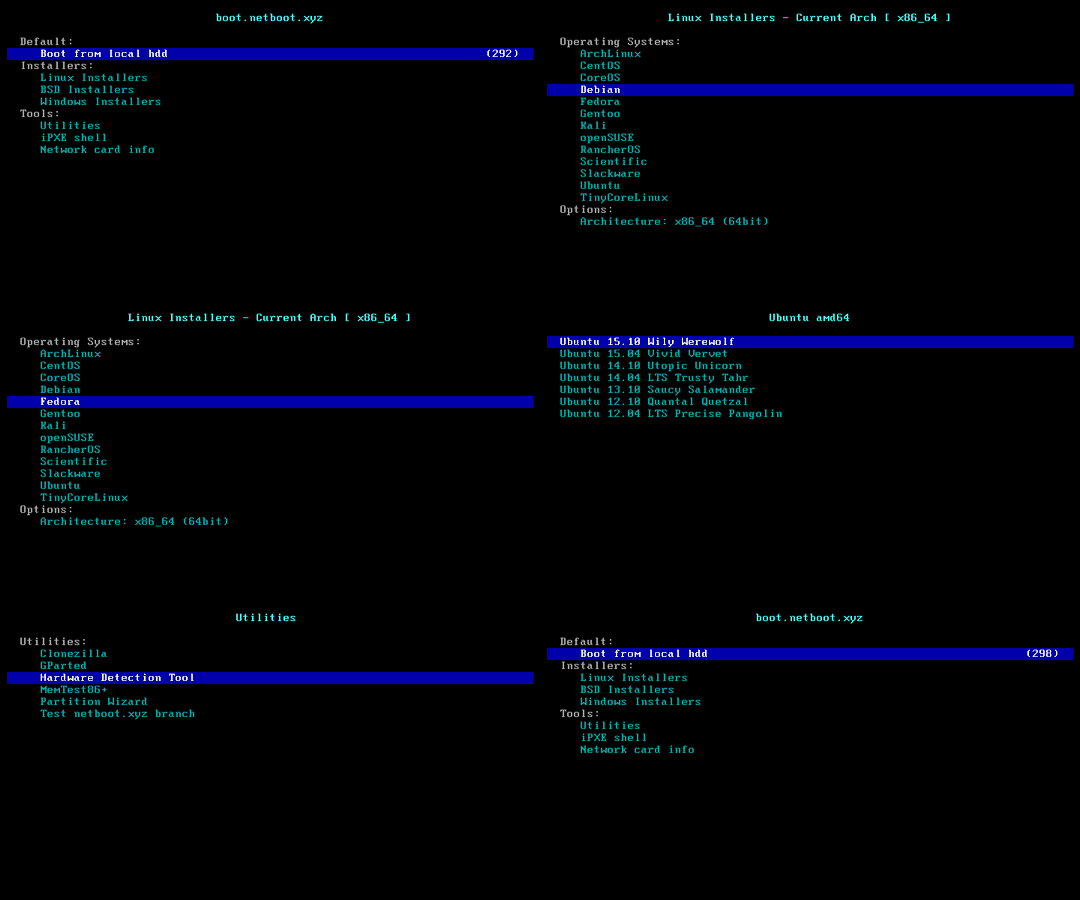
### Feature 5: Install <img width="16" height="16" src="https://blogs.windows.com/wp-content/uploads/prod/2022/09/cropped-Windows11IconTransparent512-32x32.png" /> Windows ISO

> [!CAUTION]
>
> This feature will erase **the entire hard disk** of the current system (including other partitions)!
>
> If the script was run by mistake, you can run `bash reinstall.sh reset` before rebooting to cancel the reinstallation operation.
- Username `administrator`. The script prompts for a password. If left blank, a random one is generated.
- If remote login fails, try using the username `.\administrator`.
- The machine with a static IP will automatically configure the IP. It may take a few minutes to take effect on the first boot.
- Supports ISO images in any language.
- Supports bypassing Windows 11 hardware requirements.
#### Supported Systems
- Windows (Vista ~ 11)
- Windows Server (2008 ~ 2025)
- Windows Server Essentials
- Windows Server (Semi) Annual Channel
- Hyper-V Server
- Azure Local (Azure Stack HCI)
#### Method 1: Let the Script Automatically Search for ISO
- The script will search for ISOs from <https://massgrave.dev/genuine-installation-media>, a site that collects official ISOs.
- Only supports ISOs searching for Windows 10, 11, Server 2019, 2022, 2025.
```bash
bash reinstall.sh windows \
--image-name "Windows 11 Enterprise LTSC 2024" \
--lang zh-cn
```
<details>
<summary>Supported languages</summary>
```text
ar-sa
bg-bg
cs-cz
da-dk
de-de
el-gr
en-gb
en-us
es-es
es-mx
et-ee
fi-fi
fr-ca
fr-fr
he-il
hr-hr
hu-hu
it-it
ja-jp
ko-kr
lt-lt
lv-lv
nb-no
nl-nl
pl-pl
pt-pt
pt-br
ro-ro
ru-ru
sk-sk
sl-si
sr-latn-rs
sv-se
th-th
tr-tr
uk-ua
zh-cn
zh-hk
zh-tw
```
</details>
#### Method 2: Specify the ISO link manually
- If you don't know the `--image-name`, you can enter any value. After rebooting, connect via SSH and re-enter the correct value based on the error messages.
```bash
bash reinstall.sh windows \
--image-name "Windows 11 Enterprise LTSC 2024 Evaluation" \
--iso "https://go.microsoft.com/fwlink/?linkid=2289029"
```
or Magnet Link
```bash
bash reinstall.sh windows \
--image-name "Windows 11 Enterprise LTSC 2024" \
--iso "magnet:?xt=urn:btih:7352bd2db48c3381dffa783763dc75aa4a6f1cff"
```
<details>
<summary>The following website provides ISO links.</summary>
- General
- <https://msdl.gravesoft.dev>
- <https://massgrave.dev/genuine-installation-media>
- <https://next.itellyou.cn>
- <https://www.xitongku.com>
- <https://www.microsoft.com/software-download/windows10> (Need to open it with a non-Windows User-Agent)
- <https://www.microsoft.com/software-download/windows11>
- <https://www.microsoft.com/software-download/windows11arm64>
- Evaluation
- <https://www.microsoft.com/evalcenter/download-windows-11-enterprise>
- <https://www.microsoft.com/evalcenter/download-windows-11-iot-enterprise-ltsc-eval>
- <https://www.microsoft.com/evalcenter/download-windows-server-2012-r2>
- <https://www.microsoft.com/evalcenter/download-windows-server-2016>
- <https://www.microsoft.com/evalcenter/download-windows-server-2019>
- <https://www.microsoft.com/evalcenter/download-windows-server-2022>
- <https://www.microsoft.com/evalcenter/download-windows-server-2025>
- Insider Preview
- <https://www.microsoft.com/en-us/software-download/windowsinsiderpreviewiso>
- <https://www.microsoft.com/en-us/software-download/windowsinsiderpreviewserver>
</details>
#### Optional Parameters
- `--password PASSWORD` Set Password
- `--allow-ping` Configure Windows Firewall to Allow Ping Responses
- `--rdp-port PORT` Change RDP port
- `--ssh-port PORT` Change SSH port (for log observation during installation only)
- `--web-port PORT` Change Web port (for log observation during installation only)
- `--add-driver INF_OR_DIR` Add additional driver, specifying .inf path, or the folder contains .inf file.
- The driver must be downloaded to current system first.
- This parameter can be set multiple times to add different driver.
- `--frpc-config PATH` Add frpc for intranet tunneling. Parameter can be local filepath or HTTP URL of the configuration file.
- `--hold 1` Reboot only into install environment, without running installer, only for SSH connect to test network connection.
- `--hold 2` Allow SSH connections for modifying `boot.wim`, `install.wim` or other contents before rebooting into the official Windows installation program, with the disk mounted at `/os`.
#### The following drivers will automatic download and install as needed, without the need for manual addition
- VirtIO ([Community][virtio-virtio], [Alibaba Cloud][virtio-aliyun], [Tencent Cloud][virtio-qcloud], [GCP][virtio-gcp])
- XEN ([~~Community~~][xen-xen] (unsigned), [Citrix][xen-citrix], [AWS][xen-aws])
- AWS ([ENA Network Adapter][aws-ena], [NVME Storage Controller][aws-nvme])
- GCP ([gVNIC Network Adapter][gcp-gvnic], [GGA Display Adapter][gcp-gga])
- Azure ([MANA Network Adapter][azure-mana])
- Intel (VMD Storage Controller: [11th Gen Core][intel-vmd-gen11], [12th-15th Gen Core][intel-vmd-gen12-to-gen15], Network Adapter: [7][intel-nic-7], [8.x][intel-nic-8.1], [10][intel-nic-10], [11][intel-nic-11], [2008 R2][intel-nic-7], [2012][intel-nic-2012], [2012 R2][intel-nic-2012-r2], [2016][intel-nic-2016], [2019][intel-nic-2019], [2022][intel-nic-2022], [2025][intel-nic-2025])
[virtio-virtio]: https://fedorapeople.org/groups/virt/virtio-win/direct-downloads/
[virtio-aliyun]: https://www.alibabacloud.com/help/ecs/user-guide/install-the-virtio-driver-1
[virtio-qcloud]: https://cloud.tencent.com/document/product/213/17815#b84b2032-752c-43c4-a509-73530b8f82ff
[virtio-gcp]: https://console.cloud.google.com/storage/browser/gce-windows-drivers-public
[xen-xen]: https://xenproject.org/resources/downloads/
[xen-aws]: https://docs.aws.amazon.com/AWSEC2/latest/UserGuide/xen-drivers-overview.html
[xen-citrix]: https://docs.aws.amazon.com/AWSEC2/latest/UserGuide/Upgrading_PV_drivers.html#win2008-citrix-upgrade
[aws-ena]: https://docs.aws.amazon.com/AWSEC2/latest/UserGuide/ena-driver-releases-windows.html
[aws-nvme]: https://docs.aws.amazon.com/AWSEC2/latest/UserGuide/nvme-driver-version-history.html
[gcp-gvnic]: https://cloud.google.com/compute/docs/networking/using-gvnic
[gcp-gga]: https://cloud.google.com/compute/docs/instances/enable-instance-virtual-display
[azure-mana]: https://learn.microsoft.com/azure/virtual-network/accelerated-networking-mana-windows
[intel-vmd-gen11]: https://www.intel.com/content/www/us/en/download/849933/intel-rapid-storage-technology-driver-installation-software-with-intel-optane-memory-12th-to-13th-gen-platforms.html
[intel-vmd-gen12-to-gen15]: https://www.intel.com/content/www/us/en/download/849936/intel-rapid-storage-technology-driver-installation-software-with-intel-optane-memory-12th-to-15th-gen-platforms.html
[intel-nic-7]: https://www.intel.com/content/www/us/en/download/15590/intel-network-adapter-driver-for-windows-7-final-release.html
[intel-nic-8.1]: https://www.intel.com/content/www/us/en/download/17479/intel-network-adapter-driver-for-windows-8-1.html
[intel-nic-10]: https://www.intel.com/content/www/us/en/download/18293/intel-network-adapter-driver-for-windows-10.html
[intel-nic-11]: https://www.intel.com/content/www/us/en/download/727998/intel-network-adapter-driver-for-microsoft-windows-11.html
[intel-nic-2012]: https://www.intel.com/content/www/us/en/download/16789/intel-network-adapter-driver-for-windows-server-2012.html
[intel-nic-2012-r2]: https://www.intel.com/content/www/us/en/download/17480/intel-network-adapter-driver-for-windows-server-2012-r2.html
[intel-nic-2016]: https://www.intel.com/content/www/us/en/download/18737/intel-network-adapter-driver-for-windows-server-2016.html
[intel-nic-2019]: https://www.intel.com/content/www/us/en/download/19372/intel-network-adapter-driver-for-windows-server-2019.html
[intel-nic-2022]: https://www.intel.com/content/www/us/en/download/706171/intel-network-adapter-driver-for-windows-server-2022.html
[intel-nic-2025]: https://www.intel.com/content/www/us/en/download/838943/intel-network-adapter-driver-for-windows-server-2025.html
#### How to Specify the Image Name `--image-name`
An ISO usually contains multiple system editions, such as Home and Pro. Therefore, you need to use `--image-name` to specify the system edition (image name) to install, case-insensitive.
You can use tools like DISM, DISM++, or Wimlib to query the image names included in the ISO.
Commonly used image names include:
```text
Windows 7 Ultimate
Windows 11 Pro
Windows 11 Enterprise LTSC 2024
Windows Server 2025 SERVERDATACENTER
```
#### How to Use [DISM++](https://github.com/Chuyu-Team/Dism-Multi-language/releases) to Query the Image Names Included in the ISO
Open File menu > Open Image File, select the iso to be installed to get the image name (full system name), and all available image names are installable.

> [!WARNING]
> Vista (Server 2008) and 32-bit systems may lack drivers.
> [!WARNING]
>
> For Windows 7 (Server 2008 R2) installation:
>
> 1. EFI-boot machines must enable CSM.
>
> 2. On Hyper-V (Azure), select Generation 1 VM. <https://learn.microsoft.com/windows-server/virtualization/hyper-v/plan/should-i-create-a-generation-1-or-2-virtual-machine-in-hyper-v>
> [!WARNING]
>
> In the Chinese version of Windows 10 LTSC 2021 ISO `zh-cn_windows_10_enterprise_ltsc_2021_x64_dvd_033b7312.iso`, the `wsappx` process may indefinitely consume CPU resources.
>
> The solution is to update the system patches or manually install the `VCLibs` library <https://www.google.com/search?q=ltsc+wsappx>.
> [!WARNING]
>
> When installing Windows ISOs released in `May 2022` or later on GCP, the system may repeatedly reboot during the Windows installation (PE) stage. You can resolve this issue using one of the following two methods:
>
> 1. Add the `--force-boot-mode bios` parameter. The script will install Windows in `BIOS boot + MBR partition table` mode.
>
> (Optional) After installation, you can convert it to `EFI boot + GPT partition table` using the command `MBR2GPT /convert /allowFullOS`.
>
> 2. Create a custom RAW image and install it via DD.
#### Considerations for Installing Windows on ARM
Most ARM machines support installing latest Windows 11.
During the installation process, you might encounter a black screen, and the serial console may display `ConvertPages: failed to find range`, but neither issue affects the installation.
| Compatibility | Cloud Provider | Instance Type | Issues |
| ------------- | -------------- | ----------------------- | ----------------------------------------------------------------------------------- |
| ✔️ | Azure | B2pts_v2 | |
| ✔️ | AWS | T4g | |
| ✔️ | Scaleway | COPARM1 | |
| ✔️ | Gcore | | |
| ❔ | Alibaba Cloud | g6r, c6r, g8y, c8y, r8y | Might hanging at the boot logo during restart; forced reboot will resolve it. |
| ❔ | Oracle Cloud | A1.Flex | Installation success is not guaranteed; newer instances are more likely to succeed. |
| ❌ | Google Cloud | t2a | Missing network card drivers |
### Cancel the reinstallation
- If the script was run by mistake, you can run this command to cancel the reinstallation operation.
- Must be run before rebooting.
```bash
bash reinstall.sh reset
```
## Parameter Format
### --ssh-key
- `--ssh-key "ssh-rsa ..."`
- `--ssh-key "ssh-ed25519 ..."`
- `--ssh-key "ecdsa-sha2-nistp256/384/521 ..."`
- `--ssh-key http://path/to/public_key`
- `--ssh-key github:your_username`
- `--ssh-key gitlab:your_username`
- `--ssh-key /path/to/public_key`
- `--ssh-key C:\path\to\public_key`
## How to Use an Old Version
According to the Law of Bug Conservation, fixing old bugs often introduces new ones.
If a new bug occurs, try using an older version to see if it works.
Go to <https://github.com/bin456789/reinstall/commits/main> and find the old version’s `commit_id` on the right side.
```bash
commit_id=xxxxxxx
curl -O https://raw.githubusercontent.com/bin456789/reinstall/$commit_id/reinstall.sh || wget -O ${_##*/} $_
sed -i "/^confhome.*main$/s/main/$commit_id/" reinstall.sh
bash reinstall.sh ...
```
## How to Modify the Script for Your Own
1. Fork this repository.
2. Modify the `confhome` and `confhome_cn` at the beginning of `reinstall.sh` and `reinstall.bat`.
3. Make changes to the other code.
## Thanks
Thanks to the following businesses for providing free servers.
[](https://www.oracle.com/cloud/)
[](https://dartnode.com/)
================================================
FILE: README.md
================================================
<!-- markdownlint-disable MD028 MD033 MD045 -->
# reinstall
[](https://app.codacy.com/gh/bin456789/reinstall/dashboard)
[](https://www.codefactor.io/repository/github/bin456789/reinstall)
[](https://github.com/aschey/vercel-tokei)
<!-- [](https://github.com/XAMPPRocky/tokei_rs) -->
一键 VPS 系统重装脚本 [English](README.en.md)
## 介绍
- 一键重装到 Linux,支持 19 种常见发行版
- 一键重装到 Windows,使用官方原版 ISO 而非自制镜像,脚本支持自动查找 ISO 链接、自动安装 `VirtIO` 等公有云驱动
- 支持任意方向重装,即 `Linux to Linux`、`Linux to Windows`、`Windows to Windows`、`Windows to Linux`
- 自动设置 IP,智能设置动静态,支持 `/32`、`/128`、`网关不在子网范围内`、`纯 IPv6`、`IPv4/IPv6 在不同的网卡`
- 专门适配低配小鸡,比官方 netboot 需要更少的内存
- 全程用分区表 ID 识别硬盘,确保不会写错硬盘
- 支持 BIOS、EFI 引导,支持 ARM 服务器
- 不含自制包,所有资源均实时从镜像源获得
如果帮到你,可以请我喝奶茶。
[](https://github.com/sponsors/bin456789)
[](https://github.com/sponsors/bin456789)
### 反馈
[](https://github.com/bin456789/reinstall/issues)
[](https://t.me/reinstall_os)
## 快速开始
- [下载](#下载当前系统是--linux)
- [功能 1. 一键重装到 Linux](#功能-1-安装--linux)
- [功能 2. 一键 DD Raw 镜像到硬盘](#功能-2-dd-raw-镜像到硬盘)
- [功能 3. 一键引导到 Alpine Live OS 内存系统](#功能-3-重启到--alpine-live-os内存系统)
- [功能 4. 一键引导到 netboot.xyz](#功能-4-重启到--netbootxyz)
- [功能 5. 一键重装到 Windows](#功能-5-安装--windows-iso)
- [取消重装](#取消重装)
## 系统要求
原系统可以是表格中的任意系统
目标系统的配置要求如下:
| 系统 | 版本 | 内存 | 硬盘 |
| ---------------------------------------------------------------------------------------------------------------------------------------------------------------------------------------------------------------------------------------------------------------------------------------------------------------------------------------------------------------------- | ------------------------------------- | --------- | ------------ |
| <img width="16" height="16" src="https://www.alpinelinux.org/alpine-logo.ico" /> Alpine | 3.20, 3.21, 3.22, 3.23 | 256 MB | 1 GB |
| <img width="16" height="16" src="https://www.debian.org/favicon.ico" /> Debian | 9, 10, 11, 12, 13 | 256 MB | 1 ~ 1.5 GB ^ |
| <img width="16" height="16" src="https://github.com/bin456789/reinstall/assets/7548515/f74b3d5b-085f-4df3-bcc9-8a9bd80bb16d" /> Kali | 滚动 | 256 MB | 1 ~ 1.5 GB ^ |
| <img width="16" height="16" src="https://documentation.ubuntu.com/server/_static/favicon.png" /> Ubuntu | 16.04 LTS - 24.04 LTS, 25.10 | 512 MB \* | 2 GB |
| <img width="16" height="16" src="https://img.alicdn.com/imgextra/i1/O1CN01oJnJZg1yK4RzI4Rx2_!!6000000006559-2-tps-118-118.png" /> Anolis | 7, 8, 23 | 512 MB \* | 5 GB |
| <img width="16" height="16" src="https://www.redhat.com/favicon.ico" /> RHEL <img width="16" height="16" src="https://almalinux.org/fav/favicon.ico" /> AlmaLinux <img width="16" height="16" src="https://rockylinux.org/favicon.png" /> Rocky <img width="16" height="16" src="https://www.oracle.com/asset/web/favicons/favicon-32.png" /> Oracle | 8, 9, 10 | 512 MB \* | 5 GB |
| <img width="16" height="16" src="https://opencloudos.org/qq.ico" /> OpenCloudOS | 8, 9, Stream 23 | 512 MB \* | 5 GB |
| <img width="16" height="16" src="https://www.centos.org/assets/icons/favicon.svg" /> CentOS Stream | 9, 10 | 512 MB \* | 5 GB |
| <img width="16" height="16" src="https://fedoraproject.org/favicon.ico" /> Fedora | 42, 43 | 512 MB \* | 5 GB |
| <img width="16" height="16" src="https://www.openeuler.org/favicon.ico" /> openEuler | 20.03 LTS - 24.03 LTS, 25.09 | 512 MB \* | 5 GB |
| <img width="16" height="16" src="https://static.opensuse.org/favicon.ico" /> openSUSE | Leap 15.6, 16.0, Tumbleweed (滚动) | 512 MB \* | 5 GB |
| <img width="16" height="16" src="https://nixos.org/favicon.svg" /> NixOS | 25.11 | 512 MB | 5 GB |
| <img width="16" height="16" src="https://archlinux.org/static/favicon.png" /> Arch | 滚动 | 512 MB | 5 GB |
| <img width="16" height="16" src="https://www.gentoo.org/assets/img/logo/gentoo-g.png" /> Gentoo | 滚动 | 512 MB | 5 GB |
| <img width="16" height="16" src="https://aosc.io/distros/aosc-os.svg" /> 安同 OS | 滚动 | 512 MB | 5 GB |
| <img width="16" height="16" src="https://www.fnnas.com/favicon.ico" /> 飞牛 fnOS | 1 | 512 MB | 8 GB |
| <img width="16" height="16" src="https://blogs.windows.com/wp-content/uploads/prod/2022/09/cropped-Windows11IconTransparent512-32x32.png" /> Windows (DD) | 任何 | 512 MB | 取决于镜像 |
| <img width="16" height="16" src="https://blogs.windows.com/wp-content/uploads/prod/2022/09/cropped-Windows11IconTransparent512-32x32.png" /> Windows (ISO) | Vista, 7, 8.x (Server 2008 - 2012 R2) | 512 MB | 25 GB |
| <img width="16" height="16" src="https://blogs.windows.com/wp-content/uploads/prod/2022/09/cropped-Windows11IconTransparent512-32x32.png" /> Windows (ISO) | 10, 11 (Server 2016 - 2025) | 1 GB | 25 GB |
\* 表示使用云镜像安装,非传统网络安装
^ 表示需要 256 MB 内存 + 1.5 GB 硬盘,或 512 MB 内存 + 1 GB 硬盘
> [!WARNING]
>
> 本脚本理论上支持独服和 PC
>
> 但如果能使用 IPMI 或 U 盘,则不建议使用本脚本
> [!WARNING]
>
> ❌ 本脚本不支持 OpenVZ、LXC 虚拟机
>
> 请改用 <https://github.com/LloydAsp/OsMutation>
## 下载(当前系统是 <img width="20" height="20" src="https://www.kernel.org/theme/images/logos/favicon.png" /> Linux)
国外服务器:
```bash
curl -O https://raw.githubusercontent.com/bin456789/reinstall/main/reinstall.sh || wget -O ${_##*/} $_
```
国内服务器:
```bash
curl -O https://cnb.cool/bin456789/reinstall/-/git/raw/main/reinstall.sh || wget -O ${_##*/} $_
```
## 下载(当前系统是 <img width="20" height="20" src="https://blogs.windows.com/wp-content/uploads/prod/2022/09/cropped-Windows11IconTransparent512-32x32.png" /> Windows)
> [!IMPORTANT]
> 请先关闭 `Windows Defender` 的 `实时保护` 功能。该功能会阻止 `certutil` 下载任何文件。
<details>
<summary>解决 Windows 7 下无法下载脚本</summary>
由于不支持 TLS 1.2、SHA-256、根证书没有更新等原因,Vista,7 和 Server 2008 (R2) 可能无法自动下载脚本,因此需要手动下载,具体操作如下:
用 IE 下载 (先在 IE 高级设置里启用 TLS 1.2),或者通过远程桌面,将这两个文件保存到同一个目录
- <https://raw.githubusercontent.com/bin456789/reinstall/main/reinstall.bat>
- <https://www.cygwin.com/setup-x86.exe>
使用时运行下载的 `reinstall.bat`
</details>
国外服务器:
```batch
certutil -urlcache -f -split https://raw.githubusercontent.com/bin456789/reinstall/main/reinstall.bat
```
国内服务器:
```batch
certutil -urlcache -f -split https://cnb.cool/bin456789/reinstall/-/git/raw/main/reinstall.bat
```
## 使用
**所有功能** 都可在 Linux / Windows 下运行
- Linux 下运行 `bash reinstall.sh ...`
- Windows 下先运行 `cmd`,再运行 `reinstall.bat ...`
- 如果参数中的链接包含特殊字符,要用 `""` 将链接包裹起来,不能用 `''`
### 功能 1: 安装 <img width="16" height="16" src="https://www.kernel.org/theme/images/logos/favicon.png" /> Linux
> [!CAUTION]
>
> 此功能会清除当前系统**整个硬盘**的全部数据(包含其它分区)!
>
> 如果不小心运行了脚本,可以在重启前运行 `bash reinstall.sh reset` 取消重装
- 用户名为 `root`,脚本会提示输入密码,不输入则使用随机密码
- 安装最新版可不输入版本号
- 最大化利用磁盘空间:不含 boot 分区(Fedora 例外),不含 swap 分区
- 自动根据机器类型选择不同的优化内核,例如 `Cloud`、`HWE` 内核
- 安装 Red Hat 时需填写 <https://access.redhat.com/downloads/content/rhel> 得到的 `qcow2` 镜像链接,也可以安装其它类 RHEL 系统的 `qcow2`,例如 `Alibaba Cloud Linux` 和 `TencentOS Server`
- 重装后如需修改 SSH 端口或者改成密钥登录,注意还要修改 `/etc/ssh/sshd_config.d/` 里面的文件
```bash
bash reinstall.sh anolis 7|8|23
rocky 8|9|10
oracle 8|9|10
almalinux 8|9|10
opencloudos 8|9|23
centos 9|10
fnos 1
nixos 25.11
fedora 42|43
debian 9|10|11|12|13
alpine 3.20|3.21|3.22|3.23
opensuse 15.6|16.0|tumbleweed
openeuler 20.03|22.03|24.03|25.09
ubuntu 16.04|18.04|20.04|22.04|24.04|25.10 [--minimal]
kali
arch
gentoo
aosc
redhat --img="http://access.cdn.redhat.com/xxx.qcow2"
```
#### 可选参数
- `--password PASSWORD` 设置密码
- `--ssh-key KEY` 设置 SSH 登录公钥,[格式如下](#--ssh-key)。当使用公钥时,密码为空
- `--ssh-port PORT` 修改 SSH 端口(安装期间观察日志用,也作用于新系统)
- `--web-port PORT` 修改 Web 端口(安装期间观察日志用)
- `--frpc-config PATH` 添加 frpc 内网穿透,参数填配置文件的本地路径或 HTTP 链接
- `--hold 1` 仅重启到安装环境,不运行安装,用于 SSH 登录验证网络连通性
- `--hold 2` 安装结束后不重启,用于 SSH 登录修改系统内容,Debian/Kali 会挂载在 `/target`,其它系统会挂载在 `/os`
> [!TIP]
>
> 可通过多种方式(SSH、HTTP 80 端口、商家后台 VNC、串行控制台)查看安装进度。
>
> 即使安装过程出错,也能连接 SSH 手动救砖。
>
> 目标系统非 Debian/Kali 时,可以运行 `/trans.sh alpine` 自动救砖成 Alpine 系统。
<details>
<summary>实验性功能</summary>
云镜像安装 Debian
- 适合于 CPU 较慢的机器
```bash
bash reinstall.sh debian --ci
```
ISO 安装 CentOS, AlmaLinux, Rocky, Fedora
- 仅支持内存大于 2G 且为动态 IP 的机器
- 密码 `123@@@`,SSH 端口 `22`,不支持用参数修改
```bash
bash reinstall.sh centos --installer
```
ISO 安装 Ubuntu
- 仅支持内存大于 1G 且为动态 IP 的机器
- 密码 `123@@@`,SSH 端口 `22`,不支持用参数修改
```bash
bash reinstall.sh ubuntu --installer
```
</details>
### 功能 2: DD RAW 镜像到硬盘
> [!CAUTION]
>
> 此功能会清除当前系统**整个硬盘**的全部数据(包含其它分区)!
>
> 如果不小心运行了脚本,可以在重启前运行 `bash reinstall.sh reset` 取消重装
- 支持 `raw` 和固定大小的 `vhd` 镜像。未压缩或者压缩成 `.gz` `.xz` `.zst` `.tar` `.tar.gz` `.tar.xz` `.tar.zst`
- DD Windows 镜像时,会自动扩展系统盘,静态 IP 的机器会配置好 IP,可能首次开机几分钟后才生效
- DD Linux 镜像时,**不会**修改镜像的任何内容
```bash
bash reinstall.sh dd --img "https://example.com/xxx.xz"
```
#### 可选参数
- `--allow-ping` 设置 Windows 防火墙允许被 Ping (仅限 DD Windows)
- `--rdp-port PORT` 修改 RDP 端口 (仅限 DD Windows)
- `--ssh-port PORT` 修改 SSH 端口(安装期间观察日志用)
- `--web-port PORT` 修改 Web 端口(安装期间观察日志用)
- `--frpc-config PATH` 添加 frpc 内网穿透(仅限 DD Windows),参数填配置文件的本地路径或 HTTP 链接
- `--cloud-data PATH_OR_URL` 为 DD Linux 镜像注入 cloud-init NoCloud 配置(仅限 DD Linux)
- `--hold 1` 仅重启到安装环境,不运行安装,用于 SSH 登录验证网络连通性
- `--hold 2` DD 结束后不重启,用于 SSH 登录修改系统内容,Windows 系统会挂载在 `/os`,Linux 系统**不会**自动挂载
> [!TIP]
>
> `--cloud-data` 参数为本地目录或 HTTP 基础 URL,目录须包含 `user-data` 文件,`meta-data`、`network-config` 可选:
>
> ```
> seed/
> ├── user-data # 必须
> ├── meta-data # 可选
> └── network-config # 可选
> ```
>
> ```bash
> # 使用本地目录
> bash reinstall.sh dd --img "https://example.com/xxx.xz" --cloud-data /path/to/seed/
> # 使用 HTTP 目录
> bash reinstall.sh dd --img "https://example.com/xxx.xz" --cloud-data "https://example.com/seed/"
> ```
> [!TIP]
>
> 可通过多种方式(SSH、HTTP 80 端口、商家后台 VNC、串行控制台)查看安装进度。
>
> 即使安装过程出错,也能连接 SSH 手动救砖
>
> 也可以运行 `/trans.sh alpine` 自动救砖成 Alpine 系统。
### 功能 3: 重启到 <img width="16" height="16" src="https://www.alpinelinux.org/alpine-logo.ico" /> Alpine Live OS(内存系统)
- 可用 ssh 连接,进行备份/恢复硬盘、手动 DD、修改分区、手动安装 Alpine 等操作
- 用户名为 `root`,脚本会提示输入密码,不输入则使用随机密码
> [!TIP]
>
> 虽然运行的脚本叫 `reinstall`,但是此功能**不会**删除任何数据和进行自动重装,而是要用户手动操作
>
> 如果用户手动操作没有破坏原系统,再次重启将回到原系统
```bash
bash reinstall.sh alpine --hold 1
```
#### 可选参数
- `--password PASSWORD` 设置密码
- `--ssh-port PORT` 修改 SSH 端口
- `--ssh-key KEY` 设置 SSH 登录公钥,[格式如下](#--ssh-key)。当使用公钥时,密码为空
- `--frpc-config PATH` 添加 frpc 内网穿透,参数填配置文件的本地路径或 HTTP 链接
### 功能 4: 重启到 <img width="16" height="16" src="https://netboot.xyz/img/favicon.ico" /> netboot.xyz
- 可使用商家后台 VNC 手动安装 [更多系统](https://github.com/netbootxyz/netboot.xyz?tab=readme-ov-file#what-operating-systems-are-currently-available-on-netbootxyz)
> [!TIP]
>
> 虽然运行的脚本叫 `reinstall`,但是此功能**不会**删除任何数据和进行自动重装,而是要用户手动操作
>
> 如果用户手动操作没有破坏原系统,再次重启将回到原系统
```bash
bash reinstall.sh netboot.xyz
```

### 功能 5: 安装 <img width="16" height="16" src="https://blogs.windows.com/wp-content/uploads/prod/2022/09/cropped-Windows11IconTransparent512-32x32.png" /> Windows ISO

> [!CAUTION]
>
> 此功能会清除当前系统**整个硬盘**的全部数据(包含其它分区)!
>
> 如果不小心运行了脚本,可以在重启前运行 `bash reinstall.sh reset` 取消重装
- 用户名为 `administrator`,脚本会提示输入密码,不输入则使用随机密码
- 如果远程登录失败,可以尝试使用用户名 `.\administrator`
- 静态机器会自动配置好 IP,可能首次开机几分钟后才生效
- 支持任意语言的 ISO
- 支持绕过 Windows 11 硬件限制
#### 支持的系统
- Windows (Vista ~ 11)
- Windows Server (2008 ~ 2025)
- Windows Server Essentials
- Windows Server (Semi) Annual Channel
- Hyper-V Server
- Azure Local (Azure Stack HCI)
#### 方法 1: 让脚本自动查找 ISO
- 脚本会从 <https://massgrave.dev/genuine-installation-media> 查找 ISO,该网站专门提供官方 ISO 下载
- 只支持查找 Windows 10, 11, Server 2019, 2022, 2025 的 ISO
```bash
bash reinstall.sh windows \
--image-name "Windows 11 Enterprise LTSC 2024" \
--lang zh-cn
```
<details>
<summary>支持的语言</summary>
```text
ar-sa
bg-bg
cs-cz
da-dk
de-de
el-gr
en-gb
en-us
es-es
es-mx
et-ee
fi-fi
fr-ca
fr-fr
he-il
hr-hr
hu-hu
it-it
ja-jp
ko-kr
lt-lt
lv-lv
nb-no
nl-nl
pl-pl
pt-pt
pt-br
ro-ro
ru-ru
sk-sk
sl-si
sr-latn-rs
sv-se
th-th
tr-tr
uk-ua
zh-cn
zh-hk
zh-tw
```
</details>
#### 方法 2: 自行指定 ISO 连接
- 如果不知道 `--image-name`,可以随便填,在重启后连接 SSH,根据错误提示重新输入正确的值
```bash
bash reinstall.sh windows \
--image-name "Windows 11 Enterprise LTSC 2024 Evaluation" \
--iso "https://go.microsoft.com/fwlink/?linkid=2289029"
```
或者磁力链接
```bash
bash reinstall.sh windows \
--image-name "Windows 11 Enterprise LTSC 2024" \
--iso "magnet:?xt=urn:btih:7352bd2db48c3381dffa783763dc75aa4a6f1cff"
```
<details>
<summary>以下网站可找到 ISO 链接</summary>
- 正式版
- <https://msdl.gravesoft.dev>
- <https://massgrave.dev/genuine-installation-media>
- <https://next.itellyou.cn>
- <https://www.xitongku.com>
- <https://www.microsoft.com/software-download/windows10> (需用非 Windows User-Agent 打开)
- <https://www.microsoft.com/software-download/windows11>
- <https://www.microsoft.com/software-download/windows11arm64>
- 评估版
- <https://www.microsoft.com/evalcenter/download-windows-11-enterprise>
- <https://www.microsoft.com/evalcenter/download-windows-11-iot-enterprise-ltsc-eval>
- <https://www.microsoft.com/evalcenter/download-windows-server-2012-r2>
- <https://www.microsoft.com/evalcenter/download-windows-server-2016>
- <https://www.microsoft.com/evalcenter/download-windows-server-2019>
- <https://www.microsoft.com/evalcenter/download-windows-server-2022>
- <https://www.microsoft.com/evalcenter/download-windows-server-2025>
- Insider 预览版
- <https://www.microsoft.com/en-us/software-download/windowsinsiderpreviewiso>
- <https://www.microsoft.com/en-us/software-download/windowsinsiderpreviewserver>
</details>
#### 可选参数
- `--password PASSWORD` 设置密码
- `--allow-ping` 设置 Windows 防火墙允许被 Ping
- `--rdp-port PORT` 更改 RDP 端口
- `--ssh-port PORT` 修改 SSH 端口(仅安装期间观察日志用)
- `--web-port PORT` 修改 Web 端口(仅安装期间观察日志用)
- `--add-driver INF_OR_DIR` 添加额外驱动,填写 .inf 路径,或者 .inf 所在的文件夹
- 需先下载驱动到当前系统
- 可多次设置该参数以添加不同的驱动
- `--frpc-config PATH` 添加 frpc 内网穿透,参数填配置文件的本地路径或 HTTP 链接
- `--hold 1` 仅重启到安装环境,不运行安装,用于 SSH 登录验证网络连通性
- `--hold 2` 用于在进入 Windows 官方安装程序之前,SSH 登录修改 `boot.wim`、`install.wim` 或者其它内容,硬盘挂载在 `/os`
#### 以下驱动会自动按需下载安装,无需手动添加
- VirtIO ([社区版][virtio-virtio], [阿里云][virtio-aliyun], [腾讯云][virtio-qcloud], [GCP][virtio-gcp])
- XEN ([~~社区版~~][xen-xen] (未签名), [Citrix][xen-citrix], [AWS][xen-aws])
- AWS ([ENA 网卡][aws-ena], [NVME 存储控制器][aws-nvme])
- GCP ([gVNIC 网卡][gcp-gvnic], [GGA 显卡][gcp-gga])
- Azure ([MANA 网卡][azure-mana])
- Intel (VMD 存储控制器: [11代酷睿][intel-vmd-gen11], [12-15代酷睿][intel-vmd-gen12-to-gen15], 网卡: [7][intel-nic-7], [8.x][intel-nic-8.1], [10][intel-nic-10], [11][intel-nic-11], [2008 R2][intel-nic-7], [2012][intel-nic-2012], [2012 R2][intel-nic-2012-r2], [2016][intel-nic-2016], [2019][intel-nic-2019], [2022][intel-nic-2022], [2025][intel-nic-2025])
[virtio-virtio]: https://fedorapeople.org/groups/virt/virtio-win/direct-downloads/
[virtio-aliyun]: https://www.alibabacloud.com/help/ecs/user-guide/install-the-virtio-driver-1
[virtio-qcloud]: https://cloud.tencent.com/document/product/213/17815#b84b2032-752c-43c4-a509-73530b8f82ff
[virtio-gcp]: https://console.cloud.google.com/storage/browser/gce-windows-drivers-public
[xen-xen]: https://xenproject.org/resources/downloads/
[xen-aws]: https://docs.aws.amazon.com/AWSEC2/latest/UserGuide/xen-drivers-overview.html
[xen-citrix]: https://docs.aws.amazon.com/AWSEC2/latest/UserGuide/Upgrading_PV_drivers.html#win2008-citrix-upgrade
[aws-ena]: https://docs.aws.amazon.com/AWSEC2/latest/UserGuide/ena-driver-releases-windows.html
[aws-nvme]: https://docs.aws.amazon.com/AWSEC2/latest/UserGuide/nvme-driver-version-history.html
[gcp-gvnic]: https://cloud.google.com/compute/docs/networking/using-gvnic
[gcp-gga]: https://cloud.google.com/compute/docs/instances/enable-instance-virtual-display
[azure-mana]: https://learn.microsoft.com/azure/virtual-network/accelerated-networking-mana-windows
[intel-vmd-gen11]: https://www.intel.com/content/www/us/en/download/849933/intel-rapid-storage-technology-driver-installation-software-with-intel-optane-memory-12th-to-13th-gen-platforms.html
[intel-vmd-gen12-to-gen15]: https://www.intel.com/content/www/us/en/download/849936/intel-rapid-storage-technology-driver-installation-software-with-intel-optane-memory-12th-to-15th-gen-platforms.html
[intel-nic-7]: https://www.intel.com/content/www/us/en/download/15590/intel-network-adapter-driver-for-windows-7-final-release.html
[intel-nic-8.1]: https://www.intel.com/content/www/us/en/download/17479/intel-network-adapter-driver-for-windows-8-1.html
[intel-nic-10]: https://www.intel.com/content/www/us/en/download/18293/intel-network-adapter-driver-for-windows-10.html
[intel-nic-11]: https://www.intel.com/content/www/us/en/download/727998/intel-network-adapter-driver-for-microsoft-windows-11.html
[intel-nic-2012]: https://www.intel.com/content/www/us/en/download/16789/intel-network-adapter-driver-for-windows-server-2012.html
[intel-nic-2012-r2]: https://www.intel.com/content/www/us/en/download/17480/intel-network-adapter-driver-for-windows-server-2012-r2.html
[intel-nic-2016]: https://www.intel.com/content/www/us/en/download/18737/intel-network-adapter-driver-for-windows-server-2016.html
[intel-nic-2019]: https://www.intel.com/content/www/us/en/download/19372/intel-network-adapter-driver-for-windows-server-2019.html
[intel-nic-2022]: https://www.intel.com/content/www/us/en/download/706171/intel-network-adapter-driver-for-windows-server-2022.html
[intel-nic-2025]: https://www.intel.com/content/www/us/en/download/838943/intel-network-adapter-driver-for-windows-server-2025.html
#### 如何填写映像名称 `--image-name`
一个 ISO 通常包含多个系统版本,例如家庭版、专业版。因此需要用 `--image-name` 指定要安装的系统版本(映像名称),不区分大小写
可以用 DISM、DISM++、Wimlib 等工具查询 ISO 包含的映像名称
常用的映像名称有:
```text
Windows 7 Ultimate
Windows 11 Pro
Windows 11 Enterprise LTSC 2024
Windows Server 2025 SERVERDATACENTER
```
#### 如何用 [DISM++](https://github.com/Chuyu-Team/Dism-Multi-language/releases) 查询 ISO 包含的映像名称
打开文件菜单 > 打开映像文件,选择要安装的 iso,即可得到映像名称,所有映像名称都可以安装

> [!WARNING]
> Vista (Server 2008) 和 32 位系统可能会缺少驱动
> [!WARNING]
>
> 安装 Windows 7 (Server 2008 R2) 时
>
> 1. EFI 引导的机器要开启 CSM
>
> 2. Hyper-V (Azure) 需选择第 1 代虚拟机 <https://learn.microsoft.com/windows-server/virtualization/hyper-v/plan/should-i-create-a-generation-1-or-2-virtual-machine-in-hyper-v>
> [!WARNING]
>
> Windows 10 LTSC 2021 中文版镜像 `zh-cn_windows_10_enterprise_ltsc_2021_x64_dvd_033b7312.iso` 的 `wsappx` 进程会长期占用 CPU
>
> 解决方法是更新系统补丁,或者手动安装 `VCLibs` 库 <https://www.google.com/search?q=ltsc+wsappx>
> [!WARNING]
>
> 在 GCP 上安装 `2022年5月` 和之后发布的 Windows ISO,在引导 Windows 安装界面 (PE) 时会不断反复重启。解决方法如下,二选一
>
> 1. 添加 `--force-boot-mode bios` 参数,脚本将以 `BIOS 引导 + MBR 分区表` 方式安装 Windows
>
> (可选) 安装完成后用 `MBR2GPT /convert /allowFullOS` 命令转为 `EFI 引导 + GPT 分区表`
>
> 2. 自制 RAW 镜像并通过 DD 安装
#### ARM 安装 Windows 的注意事项
大部分 ARM 机器都支持安装最新版 Windows 11
安装过程可能会黑屏,串行控制台可能会显示 `ConvertPages: failed to find range`,均不影响正常安装
| 兼容性 | 云服务商 | 实例类型 | 问题 |
| ------ | -------- | ----------------------- | ------------------------------------------ |
| ✔️ | Azure | B2pts_v2 | |
| ✔️ | AWS | T4g | |
| ✔️ | Scaleway | COPARM1 | |
| ✔️ | Gcore | | |
| ❔ | 阿里云 | g6r, c6r, g8y, c8y, r8y | 有几率重启时卡开机 Logo,强制重启即可 |
| ❔ | 甲骨文云 | A1.Flex | 不一定能安装成功,越新创建的实例越容易成功 |
| ❌ | 谷歌云 | t2a | 缺少网卡驱动 |
### 取消重装
- 如果不小心运行了脚本,可以运行以下命令取消重装
- 需要在重启前运行
```bash
bash reinstall.sh reset
```
## 参数格式
### --ssh-key
- `--ssh-key "ssh-rsa ..."`
- `--ssh-key "ssh-ed25519 ..."`
- `--ssh-key "ecdsa-sha2-nistp256/384/521 ..."`
- `--ssh-key http://path/to/public_key`
- `--ssh-key github:your_username`
- `--ssh-key gitlab:your_username`
- `--ssh-key /path/to/public_key`
- `--ssh-key C:\path\to\public_key`
## 如何使用旧版本
根据 Bug 守恒定律,修复旧 Bug 的同时会引入新的 Bug
如果遇到新的 Bug,可以试下旧版本是否正常
从 <https://github.com/bin456789/reinstall/commits/main> 右侧找到旧版本的 `commit_id`
```bash
commit_id=xxxxxxx
curl -O https://raw.githubusercontent.com/bin456789/reinstall/$commit_id/reinstall.sh || wget -O ${_##*/} $_
sed -i "/^confhome.*main$/s/main/$commit_id/" reinstall.sh
bash reinstall.sh ...
```
## 如何修改脚本自用
1. Fork 本仓库
2. 修改 `reinstall.sh` 和 `reinstall.bat` 开头的 `confhome` 和 `confhome_cn`
3. 修改其它代码
## 感谢
感谢以下商家提供白嫖机器
[](https://www.oracle.com/cloud/)
[](https://dartnode.com/)
================================================
FILE: cloud-init-fix-onlink.sh
================================================
#!/bin/bash
# 修复 cloud-init 没有正确渲染 onlink 网关
set -eE
os_dir=$1
# 该脚本也会在 alpine live 下调用
# 防止在 alpine live 下运行 systemctl netplan 报错
systemctl() {
if systemd-detect-virt --chroot; then
return
fi
command systemctl "$@"
}
netplan() {
if systemd-detect-virt --chroot; then
return
fi
command netplan "$@"
}
insert_into_file() {
file=$1
location=$2
regex_to_find=$3
if [ "$location" = head ]; then
bak=$(mktemp)
cp "$file" "$bak"
cat - "$bak" >"$file"
else
line_num=$(grep -E -n "$regex_to_find" "$file" | cut -d: -f1)
found_count=$(echo "$line_num" | wc -l)
if [ ! "$found_count" -eq 1 ]; then
return 1
fi
case "$location" in
before) line_num=$((line_num - 1)) ;;
after) ;;
*) return 1 ;;
esac
sed -i "${line_num}r /dev/stdin" "$file"
fi
}
fix_netplan_conf() {
# 修改前
# gateway4: 1.1.1.1
# gateway6: ::1
# 修改后
# routes:
# - to: 0.0.0.0/0
# via: 1.1.1.1
# on-link: true
# routes:
# - to: ::/0
# via: ::1
# on-link: true
conf=$os_dir/etc/netplan/50-cloud-init.yaml
if ! [ -f "$conf" ]; then
return
fi
# 判断 bug 是否已经修复
if grep -q 'on-link:' "$conf"; then
return
fi
# 获取网关
gateways=$(grep 'gateway[4|6]:' "$conf" | awk '{print $2}')
if [ -z "$gateways" ]; then
return
fi
# 获取缩进
spaces=$(grep 'gateway[4|6]:' "$conf" | head -1 | grep -o '^[[:space:]]*')
{
# 网关头部
cat <<EOF
${spaces}routes:
EOF
# 网关条目
for gateway in $gateways; do
# debian 11 的 netplan 不支持 to: default
case $gateway in
*.*) to='0.0.0.0/0' ;;
*:*) to='::/0' ;;
esac
cat <<EOF
${spaces} - to: $to
${spaces} via: $gateway
${spaces} on-link: true
EOF
done
} | insert_into_file "$conf" before 'match:'
# 删除原来的条目
sed -i '/gateway[4|6]:/d' "$conf"
# 重新应用配置
if command -v netplan && {
systemctl -q is-enabled systemd-networkd || systemctl -q is-enabled NetworkManager
}; then
netplan apply
fi
}
fix_networkd_conf() {
# 修改前 gentoo
# [Route]
# Gateway=1.1.1.1
# Gateway=2602::1
# 修改前 arch
# [Route]
# Gateway=1.1.1.1
#
# [Route]
# Gateway=2602::1
# 修改后
# [Route]
# Gateway=1.1.1.1
# GatewayOnLink=yes
#
# [Route]
# Gateway=2602::1
# GatewayOnLink=yes
if ! confs=$(ls "$os_dir"/etc/systemd/network/10-cloud-init-*.network 2>/dev/null); then
return
fi
for conf in $confs; do
# 判断 bug 是否已经修复
if grep -q '^GatewayOnLink=' "$conf"; then
return
fi
# 获取网关
gateways=$(grep '^Gateway=' "$conf" | cut -d= -f2)
if [ -z "$gateways" ]; then
return
fi
# 删除原来的条目
sed -i '/^\[Route\]/d; /^Gateway=/d; /^GatewayOnLink=/d' "$conf"
# 创建新条目
for gateway in $gateways; do
echo "
[Route]
Gateway=$gateway
GatewayOnLink=yes
"
done >>"$conf"
done
# 重新应用配置
# networkctl reload 不起作用
if systemctl -q is-enabled systemd-networkd; then
systemctl restart systemd-networkd
fi
}
fix_wicked_conf() {
# https://github.com/openSUSE/wicked/wiki/FAQ#q-why-wicked-does-not-set-my-default-static-route
# 修改前
# default 1.1.1.1 - -
# default 2602::1 - -
# 修改后
# 1.1.1.1 - -
# 2602::1 - -
# default 1.1.1.1 - -
# default 2602::1 - -
if ! confs=$(ls "$os_dir/etc/sysconfig/network/ifroute-"* 2>/dev/null); then
return
fi
for conf in $confs; do
# 判断 bug 是否已经修复
if grep -v 'default' "$conf" | grep -q '-'; then
return
fi
# 获取网关
gateways=$(awk '$1=="default" {print $2}' "$conf")
if [ -z "$gateways" ]; then
return
fi
# 创建新条目
for gateway in $gateways; do
echo "$gateway - -"
done | insert_into_file "$conf" head
done
# 重新应用配置
if systemctl -q is-enabled wicked; then
systemctl restart wicked
fi
}
# ubuntu 18.04 cloud-init 版本 23.1.2,因此不用处理
# debian 10/11 云镜像原本用 ifupdown + resolvconf,脚本改成用 netplan + networkd/resolved
# debian 12 云镜像: netplan + networkd/resolved
# 23.1.1 修复
fix_netplan_conf
# arch: networkd/resolved
# gentoo: networkd/resolved
# 24.2 修复
# 只需对云镜像处理
# 因为普通安装用的是 alpine 的 cloud-init,版本够新,不用处理
fix_networkd_conf
# opensuse 15.5: ifcfg + netconfig (dns) + wicked
fix_wicked_conf
================================================
FILE: cloud-init.yaml
================================================
#cloud-config
datasource_list: [None]
timezone: Asia/Shanghai
disable_root: false
ssh_pwauth: true
users:
- name: root
lock_passwd: false
chpasswd:
expire: false
# <= cloud-init 22.2.x 需要
list: |
root:@PASSWORD@
users:
- name: root
password: "@PASSWORD@"
type: hash
runcmd:
# opensuse tumbleweed 镜像有 /etc/ssh/sshd_config.d/ 文件夹,没有 /etc/ssh/sshd_config,有/usr/etc/ssh/sshd_config
# opensuse tumbleweed cloud-init 直接创建并写入 /etc/ssh/sshd_config,造成默认配置丢失
# 下面这行删除 clout-init 创建的 sshd_config
- test $(wc -l </etc/ssh/sshd_config) -le 1 && cat /etc/ssh/sshd_config >>/etc/ssh/sshd_config.d/50-cloud-init.conf && rm -f /etc/ssh/sshd_config
- echo "PermitRootLogin yes" >/etc/ssh/sshd_config.d/01-permitrootlogin.conf 2>/dev/null || sed -Ei 's/^#?PermitRootLogin.*/PermitRootLogin yes/' /etc/ssh/sshd_config
- echo "Port @SSH_PORT@" >/etc/ssh/sshd_config.d/01-change-ssh-port.conf || sed -Ei 's/^#?Port .*/Port @SSH_PORT@/' /etc/ssh/sshd_config
# 已创建的 ssh 连接会沿用旧的配置(未开启密码登录),这时即使输入正确的密码,也会提示 Access Denied
# systemctl restart sshd 只会重启监听进程,不会关闭已创建的连接(子进程)
- pkill sshd || true
# daemon-reload 会刷新 /run/systemd/generator/ssh.socket.d/addresses.conf
- systemctl daemon-reload
- for s in ssh.socket ssh.service sshd.socket sshd.service; do systemctl is-enabled $s 2>/dev/null && systemctl restart $s && break; done
# 删除有密码的行
- sed -i -e '/^[[:space:]]*password:/d' -e '/[[:space:]]*root:/d' /etc/cloud/cloud.cfg.d/99_fallback.cfg
- touch /etc/cloud/cloud-init.disabled
# ubuntu 镜像运行 echo -e '\nDone' ,-e 会被显示出来
# 加 true 因为有的 tty 不可写
- for tty in tty0 ttyS0 ttyAMA0; do [ -c /dev/$tty ] && printf '\n%s\n' 'reinstall done' >/dev/$tty || true; done
================================================
FILE: debian.cfg
================================================
#_preseed_V1
# shellcheck disable=SC1091,SC2148
# https://www.debian.org/releases/stable/amd64/apbs04.zh-cn.html
# https://www.debian.org/releases/stable/example-preseed.txt
# https://preseed.debian.net/debian-preseed/trixie/amd64-main-full.txt
# 需要留意 kali initrd 自带的 /preseed.cfg
# 下面这行语句无效,因为本行后面有反斜杠,前面有空格(安装器认为不算注释)\
d-i debian-installer/locale string en_US.UTF-8
# B.4.1. 本地化
d-i debian-installer/locale string en_US.UTF-8
d-i keyboard-configuration/xkb-keymap select us
# B.4.2. 网络设置
d-i netcfg/get_hostname string unassigned-hostname
d-i netcfg/get_domain string unassigned-domain
d-i netcfg/hostname string localhost
# B.4.3. 网络控制台
# B.4.4. 镜像设置
d-i mirror/country string manual
# d-i mirror/http/hostname string deb.debian.org
# B.4.5. 帐号设置
d-i passwd/make-user boolean false
# 注意如果用 ssh key 后面还要删除密码
# d-i passwd/root-password password ''
# d-i passwd/root-password-again password ''
# d-i passwd/root-password-crypted password ''
# kali 需要下面这行,否则会提示输入用户名
d-i passwd/root-login boolean true
# B.4.6. 时钟与时区设置
d-i time/zone string Asia/Shanghai
# B.4.7. 分区
d-i partman-auto/method string regular
d-i partman-lvm/device_remove_lvm boolean true
d-i partman-md/device_remove_md boolean true
d-i partman-partitioning/confirm_write_new_label boolean true
d-i partman/choose_partition select finish
d-i partman/confirm boolean true
d-i partman/confirm_nooverwrite boolean true
# vm 原有系统是 bios + gpt,切换成 efi,用 iso 重装,需要确认此项
# 用脚本重装的话,强制安装在第二个硬盘上也可能会遇到?
d-i partman-efi/non_efi_system boolean true
### Description: Do you want to return to the partitioning menu?
# You have not selected any partitions for use as swap space. Enabling swap
# space is recommended so that the system can make better use of the
# available physical memory, and so that it behaves better when physical
# memory is scarce. You may experience installation problems if you do not
# have enough physical memory.
# .
# If you do not go back to the partitioning menu and assign a swap partition,
# the installation will continue without swap space.
# 坑的一比
# 不是确认是否 no_swap
# 而是 recipe no_swap 时,确认是否返回上一级重新分区
# 选择 true 就一直死循环
d-i partman-basicfilesystems/no_swap boolean false
# 分区大小计算
# https://salsa.debian.org/installer-team/partman-base/-/blob/master/lib/base.sh
# 最小值 膨胀权重 最大值
# https://salsa.debian.org/installer-team/partman-auto/-/blob/master/recipes/atomic?ref_type=heads
# https://salsa.debian.org/installer-team/partman-auto/-/blob/master/recipes-amd64-efi/atomic?ref_type=heads
# shellcheck disable=SC1083,SC2086,SC2154
d-i partman-auto/expert_recipe_efi string efi :: \
106 1 106 free \
$iflabel{ gpt } method{ efi } format{ } . \
1 1 -1 $default_filesystem \
method{ format } format{ } use_filesystem{ } $default_filesystem{ } mountpoint{ / } .
# 大于 2T 会自动用 gpt
# shellcheck disable=SC1083,SC2086,SC2154
d-i partman-auto/expert_recipe_bios string bios :: \
1 1 1 free \
$iflabel{ gpt } method{ biosgrub } . \
1 1 -1 $default_filesystem \
method{ format } format{ } use_filesystem{ } $default_filesystem{ } mountpoint{ / } .
# B.4.8. 基本系统安装
# B.4.9. 设置 apt
d-i apt-setup/non-free boolean true
d-i apt-setup/non-free-firmware boolean true
d-i apt-setup/contrib boolean true
d-i apt-setup/enable-source-repositories boolean false
# kali 不要设置
# d-i apt-setup/security_host string security.debian.org
# B.4.10. 选择软件包
tasksel tasksel/first multiselect ssh-server
d-i pkgsel/upgrade select none
# B.4.11. 安装 bootloader
# 添加 bootx64.efi
d-i grub-installer/force-efi-extra-removable boolean true
# B.4.12. 完成安装
# 由下面的 hold 2 设置
# d-i finish-install/reboot_in_progress note
# B.4.13. 预置其他的软件包
# 其他设置
# d-i anna/standard_modules boolean false
# d-i anna/choose_modules string network-console
# d-i network-console/password password ''
# d-i network-console/password-again password ''
# B.5.1. 安装过程中运行用户命令
# 注意所有命令都会合并成一行命令
# 最后的 true; \ 没什么用,只是让 vscode 代码高亮不报错误
# debian 11+ 才有 websocketd
# 有 /cdrom/simple-cdd 才安装 simple-cdd-profiles
# 不然安装时 control 脚本会报错:
# Loading simple-cdd-profiles failed for unknown reasons
# 未下载的组件,无法用 debconf-set,需要用 debconf-set-selections
# https://salsa.debian.org/installer-team/network-console/-/blob/master/debian/network-console.postinst?ref_type=heads
# https://salsa.debian.org/installer-team/user-setup/-/blob/master/user-setup-apply?ref_type=heads
# 此时还没有配置源,anna-install 会在配置完源后再安装
d-i preseed/early_command string true; \
for str in $(grep -wo "extra_[^ ]*" /proc/cmdline | sed 's/^extra_//'); do eval "$str"; done; \
di(){ \
echo "d-i $*" >/tmp/selections.cfg; \
echo "d-i $*" >>/tmp/selections.cfg.all; \
debconf-set-selections /tmp/selections.cfg; \
rm -f /tmp/selections.cfg; \
}; \
run_as_service_with_screen() { \
if ! [ -f /etc/screenrc.bak ]; then \
cp /etc/screenrc /etc/screenrc.bak; \
fi; \
true >/etc/screenrc; \
screen sh -c 'while true; do pidof ${1##*/} || "$@"; sleep 5; done' _ "$@"; \
cp -f /etc/screenrc.bak /etc/screenrc; \
}; \
if [ "$hold" = 1 ]; then \
di auto-install/enable boolean false; \
di debconf/priority select low; \
di partman/early_command string; \
else \
{ \
echo 'Reinstalling...'; \
echo 'Option 1. View logs:'; \
echo ' tail -fn+1 /var/log/syslog'; \
echo 'Option 2. Attach to the installer:'; \
echo ' TERM=screen screen -xp1'; \
} >>/etc/motd; \
mem=$(grep ^MemTotal: /proc/meminfo | { read -r _ y _; echo "$((y / 1024))"; }); \
if command -v websocketd && [ "$mem" -ge 400 ]; then \
for _ in {1..10}; do \
if wget "$confhome/logviewer.html" -O /tmp/index.html; then \
break; \
fi; \
sleep 5; \
done; \
if [ -z "$web_port" ]; then \
web_port=80; \
fi; \
run_as_service_with_screen websocketd --port 80 --loglevel=fatal --staticdir=/tmp \
sh -c "tail -fn+0 /var/log/syslog | tr '\r' '\n' | grep -Fiv -e password -e token" ; \
fi; \
fi; \
if ! [ "$hold" = 2 ]; then \
di finish-install/reboot_in_progress note; \
fi; \
if [ -s /configs/ssh_keys ]; then \
di passwd/root-password-crypted password "''"; \
else \
di passwd/root-password-crypted password "$(cat /configs/password-linux-sha512)"; \
fi; \
mkdir -p /etc/ssh; \
true >/etc/ssh/sshd_config; \
if [ -s /configs/ssh_keys ]; then \
(umask 077; mkdir -p /.ssh; cat /configs/ssh_keys >/.ssh/authorized_keys); \
else \
echo "PermitRootLogin yes" >>/etc/ssh/sshd_config; \
fi; \
if [ -n "$ssh_port" ] && ! [ "$ssh_port" = 22 ]; then \
echo "Port $ssh_port" >>/etc/ssh/sshd_config; \
fi; \
grep -qs ^root: /etc/shadow || echo "root:$(cat /configs/password-linux-sha512):1:0:99999:7:::" >>/etc/shadow; \
grep -qs ^nogroup: /etc/group || echo "nogroup:*:65534:" >>/etc/group; \
grep -qs ^sshd: /etc/passwd || echo "sshd:*:100:65534::/run/sshd:/bin/false" >>/etc/passwd; \
mkdir -p /run/sshd; \
chmod 0755 /run/sshd; \
ssh-keygen -A; \
run_as_service_with_screen /usr/sbin/sshd -D; \
if ls /configs/frpc.* >/dev/null 2>&1; then \
url=$(sh /get-frpc-url.sh linux); \
mkdir -p /usr/local/bin; \
mkdir -p /usr/local/etc/frpc; \
for _ in {1..10}; do \
if wget -O- "$url" | tar xz "*/frpc" -O >/usr/local/bin/frpc; then \
break; \
fi; \
sleep 5; \
done; \
chmod a+x /usr/local/bin/frpc; \
cp /configs/frpc.* /usr/local/etc/frpc/; \
run_as_service_with_screen /usr/local/bin/frpc -c /usr/local/etc/frpc/frpc.*; \
fi; \
if [ -d /cdrom/simple-cdd ]; then \
anna-install simple-cdd-profiles; \
fi
# debian 11 initrd 没有 xargs awk
# debian 12 initrd 没有 xargs
# efi 分区大小未改变时,不会被格式化,因此需要手动删除旧系统的 efi 文件
# os-prober 卡太久,因此跳过
d-i partman/early_command string true; \
eval "$(grep -o 'extra_confhome=[^ ]*' /proc/cmdline | sed 's/^extra_//')"; \
postinst=/var/lib/dpkg/info/bootstrap-base.postinst; \
cp $postinst $postinst.orig; \
true >$postinst; \
swapfile=/target/swapfile; \
mem=$(grep ^MemTotal: /proc/meminfo | { read -r _ y _; echo "$((y / 1024))"; }); \
swap_size=$((512 - mem)); \
if [ $swap_size -gt 0 ]; then \
echo "fallocate -l ${swap_size}M $swapfile; mkswap $swapfile; swapon $swapfile" >>$postinst; \
fi; \
echo "swapoff -a; rm -f $swapfile" >/usr/lib/finish-install.d/95swapoff; \
chmod a+x /usr/lib/finish-install.d/95swapoff; \
echo "rm -rf /target/boot/efi/*; $postinst.orig" >>$postinst; \
xda=$(sh /get-xda.sh); \
debconf-set partman-auto/disk "/dev/$xda"; \
debconf-set grub-installer/bootdev "/dev/$xda"; \
rm -rf /usr/sbin/fdisk /usr/sbin/sfdisk; \
ttys=$(sh /ttys.sh console=); \
debconf-set debian-installer/add-kernel-opts "$ttys"; \
eths=$(cd /dev/netconf/ && ls); \
if ! sh /can_use_cloud_kernel.sh "$xda" $eths; then \
debconf-set base-installer/kernel/image "$(debconf-get base-installer/kernel/image | sed 's/-cloud//')"; \
fi; \
if [ -d /sys/firmware/efi ]; then \
debconf-set partman-auto/expert_recipe "$(debconf-get partman-auto/expert_recipe_efi)"; \
else \
debconf-set partman-auto/expert_recipe "$(debconf-get partman-auto/expert_recipe_bios)"; \
fi; \
true >/bin/os-prober
# kali ssh 默认关闭
# 另一种方法处理 cloudcone
# if [ "$link_grub_dir" = 1 ]; then mkdir /target/boot/grub2; echo 'chainloader (hd0)+1' >/target/boot/grub2/grub.cfg; fi; \
# debian 9 tar 不支持 --strip-components
d-i preseed/late_command string true; \
for str in $(grep -wo "extra_[^ ]*" /proc/cmdline | sed 's/^extra_//'); do eval "$str"; done; \
if [ "$elts" = 1 ]; then sed -i "s|deb\.freexian\.com/extended-lts|$deb_mirror|" /target/etc/apt/sources.list; fi; \
if [ "$link_grub_dir" = 1 ]; then ln -s grub /target/boot/grub2; fi; \
in-target systemctl enable ssh; \
if [ -s /configs/ssh_keys ]; then \
(umask 077; mkdir -p /target/root/.ssh; cat /configs/ssh_keys >/target/root/.ssh/authorized_keys); \
in-target passwd -d root; \
else \
echo "PermitRootLogin yes" >/target/etc/ssh/sshd_config.d/01-permitrootlogin.conf || \
echo "PermitRootLogin yes" >>/target/etc/ssh/sshd_config; \
fi; \
if [ -n "$ssh_port" ] && ! [ "$ssh_port" = 22 ]; then \
echo "Port $ssh_port" >/target/etc/ssh/sshd_config.d/01-change-ssh-port.conf || \
echo "Port $ssh_port" >>/target/etc/ssh/sshd_config; \
fi; \
if ls /configs/frpc.* >/dev/null 2>&1; then \
mkdir -p /target/usr/local/bin; \
mkdir -p /target/usr/local/etc/frpc; \
cp /usr/local/bin/frpc /target/usr/local/bin/; \
cp /usr/local/etc/frpc/frpc.* /target/usr/local/etc/frpc/; \
chmod a+x /target/usr/local/bin/frpc; \
cp /frpc.service /target/etc/systemd/system/; \
in-target systemctl enable frpc; \
fi; \
cp /fix-eth-name.sh /target/; \
cp /fix-eth-name.service /target/etc/systemd/system/; \
in-target systemctl enable fix-eth-name
================================================
FILE: fix-eth-name.initd
================================================
#!/sbin/openrc-run
Description="Fix Eth Name"
# https://gitlab.alpinelinux.org/alpine/aports/-/blob/master/main/openrc/networking.initd
# https://gitlab.alpinelinux.org/alpine/aports/-/blob/master/main/dhcpcd/dhcpcd.initd
depend() {
need localmount
want dev-settle
after bootmisc hwdrivers modules
before net networking dhcpcd
}
start() {
ebegin "Fix Eth Name"
ash /fix-eth-name.sh
eend $?
}
start_post() {
rc-service fix-eth-name zap
rc-update del fix-eth-name boot
rm -f /etc/init.d/fix-eth-name
rm -f /fix-eth-name.sh
}
================================================
FILE: fix-eth-name.service
================================================
[Unit]
Description=Fix Eth Name
ConditionPathExists=/fix-eth-name.sh
After=dbus.service
Before=cloud-init-local.service
Before=network.service
Before=networking.service
Before=systemd-networkd.service
Before=NetworkManager.service
Before=wickedd-auto4.service
Before=wickedd-dhcp4.service
Before=wickedd-dhcp6.service
Before=wickedd.service
Before=network.target
[Service]
Type=oneshot
ExecStart=/usr/bin/env bash /fix-eth-name.sh
ExecStart=/usr/bin/env rm -f /fix-eth-name.sh
ExecStart=/usr/bin/env rm -f /etc/systemd/system/fix-eth-name.service
ExecStart=/usr/bin/env rm -f /etc/systemd/system/multi-user.target.wants/fix-eth-name.service
ExecStart=/usr/bin/env rm -f /lib/systemd/system-preset/01-fix-eth-name.preset
ExecStart=/usr/bin/env rm -f /usr/lib/systemd/system-preset/01-fix-eth-name.preset
[Install]
WantedBy=multi-user.target
================================================
FILE: fix-eth-name.sh
================================================
#!/usr/bin/env bash
# shellcheck shell=dash
# shellcheck disable=SC3001,SC3010
# alpine 使用 busybox ash
set -eE
# openeuler 需等待 udev 将网卡名从 eth0 改为 enp3s0
sleep 10
# 不知道有没有用
if command -v udevadm >/dev/null; then
# udevadm trigger
udevadm settle
elif command -v mdev >/dev/null; then
mdev -sf
fi
# 本脚本在首次进入新系统后运行
# 将 trans 阶段生成的网络配置中的网卡名(eth0) 改为正确的网卡名,也适用于以下情况
# 1. alpine 要运行此脚本,因为安装后的内核可能有 netboot 没有的驱动
# 2. dmit debian 普通内核(安装时)和云内核网卡名不一致
# https://bugs.debian.org/cgi-bin/bugreport.cgi?bug=928923
# todo: 删除 cloud-init
to_lower() {
tr '[:upper:]' '[:lower:]'
}
retry() {
local max_try=$1
shift
for i in $(seq "$max_try"); do
if "$@"; then
return
else
ret=$?
if [ "$i" -ge "$max_try" ]; then
return $ret
fi
sleep 1
fi
done
}
# openeuler 本脚本运行一秒后才有 enp3s0
# 用 systemd-analyze plot >a.svg 发现 sys-subsystem-net-devices-enp3s0.device 也是出现在 NetworkManager 之后
# 因此需要等待网卡出现
get_ethx_by_mac() {
retry 10 _get_ethx_by_mac "$@"
}
_get_ethx_by_mac() {
mac=$(echo "$1" | to_lower)
flag=$2
if [ -z "$flag" ]; then
flag=master
fi
if true; then
if [ "$flag" = master ]; then
# master
# 过滤 azure vf (带 master ethx)
ip -o link | grep -i "$mac" | grep -v master | awk '{print $2}' | cut -d: -f1 | grep .
else
# slave
# 带 master ethx
ip -o link | grep -i "$mac" | grep -w master | awk '{print $2}' | cut -d: -f1 | grep .
fi
else
for i in $(cd /sys/class/net && echo *); do
if [ "$(cat "/sys/class/net/$i/address")" = "$mac" ]; then
if [ $(($(cat "/sys/class/net/$i/flags") & 0x800)) -ne 0 ]; then
fact_flag=slave
else
fact_flag=master
fi
if [ "$flag" = "$fact_flag" ]; then
echo "$i"
return
fi
fi
done
return 1
fi
}
fix_rh_sysconfig() {
for file in /etc/sysconfig/network-scripts/ifcfg-eth*; do
# 没有 ifcfg-eth* 也会执行一次,因此要判断文件是否存在
[ -f "$file" ] || continue
mac=$(grep ^HWADDR= "$file" | cut -d= -f2 | grep .) || continue
ethx=$(get_ethx_by_mac "$mac") || continue
proper_file=/etc/sysconfig/network-scripts/ifcfg-$ethx
if [ "$file" != "$proper_file" ]; then
# 更改文件内容
sed -i "s/^DEVICE=.*/DEVICE=$ethx/" "$file"
# 不要直接更改文件名,因为可能覆盖已有文件
mv "$file" "$proper_file.tmp"
fi
done
# 更改文件名
for tmp_file in /etc/sysconfig/network-scripts/ifcfg-e*.tmp; do
if [ -f "$tmp_file" ]; then
mv "$tmp_file" "${tmp_file%.tmp}"
fi
done
}
fix_suse_sysconfig() {
for file in /etc/sysconfig/network/ifcfg-eth*; do
[ -f "$file" ] || continue
# 可能两边有引号
mac=$(grep ^LLADDR= "$file" | cut -d= -f2 | sed "s/'//g" | grep .) || continue
ethx=$(get_ethx_by_mac "$mac") || continue
old_ethx=${file##*-}
if ! [ "$old_ethx" = "$ethx" ]; then
# 不要直接更改文件名,因为可能覆盖已有文件
for type in ifcfg ifroute; do
old_file=/etc/sysconfig/network/$type-$old_ethx
new_file=/etc/sysconfig/network/$type-$ethx.tmp
# 防止没有 ifroute-eth* 导致中断脚本
if [ -f "$old_file" ]; then
mv "$old_file" "$new_file"
fi
done
fi
done
# 上面的循环结束后,再将 tmp 改成正式文件
for tmp_file in \
/etc/sysconfig/network/ifcfg-e*.tmp \
/etc/sysconfig/network/ifroute-e*.tmp; do
if [ -f "$tmp_file" ]; then
mv "$tmp_file" "${tmp_file%.tmp}"
fi
done
}
fix_network_manager() {
for file in /etc/NetworkManager/system-connections/cloud-init-eth*.nmconnection; do
[ -f "$file" ] || continue
mac=$(grep ^mac-address= "$file" | cut -d= -f2 | grep .) || continue
ethx=$(get_ethx_by_mac "$mac") || continue
proper_file=/etc/NetworkManager/system-connections/$ethx.nmconnection
# 更改文件内容
sed -i "s/^id=.*/id=$ethx/" "$file"
# 更改文件名
mv "$file" "$proper_file"
# NM 不会自动忽略 Azure 的 slave 网卡,需手动设置
# azure 文档中的方法不够通用,只适合 azure
# https://learn.microsoft.com/zh-cn/azure/virtual-network/accelerated-networking-overview
# 我们采用红帽的方法
# https://docs.redhat.com/en/documentation/red_hat_enterprise_linux/8/html/configuring_and_managing_networking/configuring-networkmanager-to-ignore-certain-devices_configuring-and-managing-networking
if slave_ethx=$(get_ethx_by_mac "$mac" slave); then
cat >"/etc/NetworkManager/conf.d/99-$slave_ethx-unmanaged.conf" <<EOF
[device-$slave_ethx-unmanaged]
match-device=interface-name:$slave_ethx
managed=0
EOF
fi
# 也可以设置 unmanaged-devices, 但是官方文档不推荐
# https://networkmanager.pages.freedesktop.org/NetworkManager/NetworkManager/NetworkManager.conf.html#:~:text=may%20be%20a-,better%20choice,-.
done
}
# debian 9 IPV6 onlink 路由需要 post-up
# auto lo
# iface lo inet loopback
# # mac 11:22:33:44:55:66 # 用此行匹配网卡
# auto eth0
# iface eth0 inet static
# address 1.1.1.1/25
# gateway 1.1.1.1
# dns-nameservers 1.1.1.1
# dns-nameservers 8.8.8.8
# iface eth0 inet6 static
# address 2602:1:0:80::100/64
# gateway 2602:1:0:80::1
# post-up ip route add 2602:1:0:80::1 dev eth0
# post-up ip route add default via 2602:1:0:80::1 dev eth0
# dns-nameserver 2606:4700:4700::1111
# dns-nameserver 2001:4860:4860::8888
fix_ifupdown() {
file=/etc/network/interfaces
tmp_file=$file.tmp
rm -f "$tmp_file"
if [ -f "$file" ]; then
while IFS= read -r line; do
del_this_line=false
if [[ "$line" = "# mac "* ]]; then
ethx=
if mac=$(echo "$line" | awk '{print $NF}'); then
ethx=$(get_ethx_by_mac "$mac") || true
fi
del_this_line=true
elif [[ "$line" = "iface e"* ]] ||
[[ "$line" = "auto e"* ]] ||
[[ "$line" = "allow-hotplug e"* ]]; then
if [ -n "$ethx" ]; then
line=$(echo "$line" | awk "{\$2=\"$ethx\"; print \$0}")
fi
elif [[ "$line" = *" dev e"* ]]; then
if [ -n "$ethx" ]; then
# awk 会去除前面的空格
line=$(echo "$line" | sed -E "s/[^ ]*$/$ethx/")
fi
fi
if ! $del_this_line; then
echo "$line" >>"$tmp_file"
fi
done <"$file"
mv "$tmp_file" "$file"
fi
}
fix_netplan() {
file=/etc/netplan/50-cloud-init.yaml
tmp_file=$file.tmp
rm -f "$tmp_file"
if [ -f "$file" ]; then
while IFS= read -r line; do
if echo "$line" | grep -Eq '^[[:space:]]+macaddress:'; then
# 得到正确的网卡名
mac=$(echo "$line" | awk '{print $NF}' | sed 's/"//g')
ethx=$(get_ethx_by_mac "$mac") || true
elif echo "$line" | grep -Eq '^[[:space:]]+eth[0-9]+:'; then
# 改成正确的网卡名
if [ -n "$ethx" ]; then
line=$(echo "$line" | sed -E "s/[^[:space:]]+/$ethx:/")
fi
fi
echo "$line" >>"$tmp_file"
# 删除 set-name 不过这一步在 trans 已完成
# 因为 netplan-generator 会在 systemd generator 阶段就根据 netplan 配置重命名网卡
# systemd generator 阶段比本脚本和 systemd-networkd 更早运行
# 倒序
done < <(grep -Ev "^[[:space:]]+set-name:" "$file" | tac)
# 再倒序回来
tac "$tmp_file" >"$file"
rm -f "$tmp_file"
# 通过 systemd netplan generator 生成 /run/systemd/network/10-netplan-enp3s0.network
systemctl daemon-reload
fi
}
fix_systemd_networkd() {
for file in /etc/systemd/network/10-cloud-init-eth*.network; do
[ -f "$file" ] || continue
mac=$(grep ^MACAddress= "$file" | cut -d= -f2 | grep .) || continue
ethx=$(get_ethx_by_mac "$mac") || continue
proper_file=/etc/systemd/network/10-$ethx.network
# 更改文件内容
sed -Ei "s/^Name=eth[0-9]+/Name=$ethx/" "$file"
# 更改文件名
mv "$file" "$proper_file"
done
}
fix_rh_sysconfig
fix_suse_sysconfig
fix_network_manager
fix_ifupdown
fix_netplan
fix_systemd_networkd
================================================
FILE: frpc-example.toml
================================================
serverAddr = "11.22.33.44"
serverPort = 7000
auth.token = "123456"
[[proxies]]
name = "ssh"
type = "tcp"
localIP = "127.0.0.1"
localPort = 22
remotePort = 2222
[[proxies]]
name = "rdp_tcp"
type = "tcp"
localIP = "127.0.0.1"
localPort = 3389
remotePort = 33890
[[proxies]]
name = "rdp_udp"
type = "udp"
localIP = "127.0.0.1"
localPort = 3389
remotePort = 33890
================================================
FILE: frpc.service
================================================
# https://github.com/archlinuxcn/repo/blob/master/archlinuxcn/frp/frpc.service
[Unit]
Description=Frp Client Service
After=network-online.target
Wants=network-online.target
[Service]
Type=simple
User=nobody
Restart=on-failure
RestartSec=5s
ExecStart=/usr/local/bin/frpc -c /usr/local/etc/frpc/frpc.conf
ExecReload=/usr/local/bin/frpc reload -c /usr/local/etc/frpc/frpc.conf
[Install]
WantedBy=multi-user.target
================================================
FILE: get-frpc-url.sh
================================================
#!/bin/ash
# shellcheck shell=dash
# trans.sh/debian.cfg 共用此脚本
# debian 9 不支持 set -E
set -e
is_in_china() {
grep -q 1 /dev/netconf/*/is_in_china
}
is_ipv6_only() {
! grep -q 1 /dev/netconf/*/ipv4_has_internet
}
get_frpc_url() {
# 传入 windows 或者 linux
local os_type=$1
local nt_ver=$2
local os_bit=${3:-64}
get_old_version() {
# 脚本不支持安装 32 位 linux 系统,因此不用管
if [ "$os_type" = windows ]; then
# 最早支持 toml 的版本是 0.52.0
# 最后支持 vista 的版本是 0.29.0
# 最后支持 32 位的版本是 0.51.3
# 最后支持 win7 的版本是 0.54.0
case "$os_bit" in
32)
case "$nt_ver" in
6.0) echo 0.29.0 ;; # vista
*) echo 0.51.3 ;; # win7+
esac
;;
64)
case "$nt_ver" in
6.0) echo 0.29.0 ;; # vista
6.1) echo 0.54.0 ;; # win7
# 目前最新版本 v0.66.0 依然可以在 win8 上运行
esac
;;
esac
fi
}
is_need_old_version() {
[ -n "$(get_old_version)" ]
}
version=$(
if is_need_old_version; then
get_old_version
else
# debian 11 initrd 没有 xargs awk
# debian 12 initrd 没有 xargs
# github 不支持 ipv6
if is_in_china || is_ipv6_only; then
wget -O- https://mirrors.nju.edu.cn/github-release/fatedier/frp/LatestRelease/frp_sha256_checksums.txt |
grep -m1 frp_ | cut -d_ -f2
else
# https://api.github.com/repos/fatedier/frp/releases/latest 有请求次数限制
# root@localhost:~# wget --spider -S https://github.com/fatedier/frp/releases/latest 2>&1 | grep Location:
# Location: https://github.com/fatedier/frp/releases/tag/v0.62.0
# Location: https://github.com/fatedier/frp/releases/tag/v0.62.0 [following] # 原版 wget 多了这行
wget --spider -S https://github.com/fatedier/frp/releases/latest 2>&1 |
grep -m1 '^ Location:' | sed 's,.*/tag/v,,'
fi
fi
)
if [ -z "$version" ]; then
echo 'cannot find version' >&2
return 1
fi
suffix=$(
case "$os_type" in
linux) echo tar.gz ;;
windows) echo zip ;;
esac
)
mirror=$(
# nju 没有 win7 用的旧版
# github 不支持 ipv6
# daocloud 加速不支持 ipv6
# jsdelivr 不支持 github releases 文件
if is_ipv6_only; then
if is_need_old_version; then
echo 'NOT_SUPPORT' >&2
return 1
else
echo https://mirrors.nju.edu.cn/github-release/fatedier/frp
fi
else
if is_in_china; then
if is_need_old_version; then
echo https://files.m.daocloud.io/github.com/fatedier/frp/releases/download
else
echo https://mirrors.nju.edu.cn/github-release/fatedier/frp
fi
else
echo https://github.com/fatedier/frp/releases/download
fi
fi
)
arch=$(
case "$(uname -m)" in
x86_64)
case "$os_bit" in
32) echo 386 ;;
64) echo amd64 ;;
esac
;;
aarch64) echo arm64 ;;
esac
)
filename=frp_${version}_${os_type}_${arch}.$suffix
echo "${mirror}/v${version}/${filename}"
}
get_frpc_url "$@"
================================================
FILE: get-xda.sh
================================================
#!/bin/sh
# debian ubuntu redhat 安装模式共用此脚本
# alpine 未用到此脚本
get_all_disks() {
# shellcheck disable=SC2010
ls /sys/block/ | grep -Ev '^(loop|sr|nbd)'
}
get_xda() {
# 如果没找到 main_disk 或 xda
# 返回假的值,防止意外地格式化全部盘
eval "$(grep -o 'extra_main_disk=[^ ]*' /proc/cmdline | sed 's/^extra_//')"
if [ -z "$main_disk" ]; then
echo 'MAIN_DISK_NOT_FOUND'
return 1
fi
for disk in $(get_all_disks); do
if fdisk -l "/dev/$disk" | grep -iq "$main_disk"; then
echo "$disk"
return
fi
done
echo 'XDA_NOT_FOUND'
return 1
}
get_xda
================================================
FILE: initrd-network.sh
================================================
#!/bin/ash
# shellcheck shell=dash
# alpine/debian initrd 共用此脚本
# accept_ra 接收 RA + 自动配置网关
# autoconf 自动配置地址,依赖 accept_ra
mac_addr=$1
ipv4_addr=$2
ipv4_gateway=$3
ipv6_addr=$4
ipv6_gateway=$5
is_in_china=$6
ipv6_extra_addrs=$7
DHCP_TIMEOUT=15
DNS_FILE_TIMEOUT=5
TEST_TIMEOUT=10
# 检测是否有网络是通过检测这些 IP 的端口是否开放
# 因为 debian initrd 没有 nslookup
# 改成 generate_204?但检测网络时可能 resolv.conf 为空
# HTTP 80
# HTTPS/DOH 443
# DOT 853
if $is_in_china; then
ipv4_dns1='223.5.5.5'
ipv4_dns2='119.29.29.29' # 不开放 853
ipv6_dns1='2400:3200::1'
ipv6_dns2='2402:4e00::' # 不开放 853
else
ipv4_dns1='1.1.1.1'
ipv4_dns2='8.8.8.8' # 不开放 80
ipv6_dns1='2606:4700:4700::1111'
ipv6_dns2='2001:4860:4860::8888' # 不开放 80
fi
# 找到主网卡
# debian 11 initrd 没有 xargs awk
# debian 12 initrd 没有 xargs
get_ethx() {
# 过滤 azure vf (带 master ethx)
# 2: eth0: <BROADCAST,MULTICAST,UP,LOWER_UP> mtu 1500 qdisc mq state UP qlen 1000\ link/ether 60:45:bd:21:8a:51 brd ff:ff:ff:ff:ff:ff
# 3: eth1: <BROADCAST,MULTICAST,UP,LOWER_UP800> mtu 1500 qdisc mq master eth0 state UP qlen 1000\ link/ether 60:45:bd:21:8a:51 brd ff:ff:ff
if false; then
ip -o link | grep -i "$mac_addr" | grep -v master | awk '{print $2}' | cut -d: -f1 | grep .
else
ip -o link | grep -i "$mac_addr" | grep -v master | cut -d' ' -f2 | cut -d: -f1 | grep .
fi
}
get_ipv4_gateway() {
# debian 11 initrd 没有 xargs awk
# debian 12 initrd 没有 xargs
ip -4 route show default dev "$ethx" | head -1 | cut -d ' ' -f3
}
get_ipv6_gateway() {
# debian 11 initrd 没有 xargs awk
# debian 12 initrd 没有 xargs
ip -6 route show default dev "$ethx" | head -1 | cut -d ' ' -f3
}
get_first_ipv4_addr() {
# debian 11 initrd 没有 xargs awk
# debian 12 initrd 没有 xargs
if false; then
ip -4 -o addr show scope global dev "$ethx" | head -1 | awk '{print $4}'
else
ip -4 -o addr show scope global dev "$ethx" | head -1 | grep -o '[0-9\.]*/[0-9]*'
fi
}
get_first_ipv4_gateway() {
# debian 11 initrd 没有 xargs awk
# debian 12 initrd 没有 xargs
if false; then
ip -4 route show default dev "$ethx" | head -1 | awk '{print $3}'
else
ip -4 route show default dev "$ethx" | head -1 | cut -d' ' -f3
fi
}
remove_netmask() {
cut -d/ -f1
}
get_first_ipv6_addr() {
# debian 11 initrd 没有 xargs awk
# debian 12 initrd 没有 xargs
if false; then
ip -6 -o addr show scope global dev "$ethx" | head -1 | awk '{print $4}'
else
ip -6 -o addr show scope global dev "$ethx" | head -1 | grep -o '[0-9a-f\:]*/[0-9]*'
fi
}
get_first_ipv6_gateway() {
# debian 11 initrd 没有 xargs awk
# debian 12 initrd 没有 xargs
if false; then
ip -6 route show default dev "$ethx" | head -1 | awk '{print $3}'
else
ip -6 route show default dev "$ethx" | head -1 | cut -d' ' -f3
fi
}
is_have_ipv4_addr() {
ip -4 addr show scope global dev "$ethx" | grep -q inet
}
is_have_ipv6_addr() {
ip -6 addr show scope global dev "$ethx" | grep -q inet6
}
is_have_ipv4_gateway() {
ip -4 route show default dev "$ethx" | grep -q .
}
is_have_ipv6_gateway() {
ip -6 route show default dev "$ethx" | grep -q .
}
is_have_ipv4() {
is_have_ipv4_addr && is_have_ipv4_gateway
}
is_have_ipv6() {
is_have_ipv6_addr && is_have_ipv6_gateway
}
is_have_ipv4_dns() {
[ -f /etc/resolv.conf ] && grep -q '^nameserver .*\.' /etc/resolv.conf
}
is_have_ipv6_dns() {
[ -f /etc/resolv.conf ] && grep -q '^nameserver .*:' /etc/resolv.conf
}
add_missing_ipv4_config() {
if [ -n "$ipv4_addr" ] && [ -n "$ipv4_gateway" ]; then
if ! is_have_ipv4_addr; then
ip -4 addr add "$ipv4_addr" dev "$ethx"
fi
if ! is_have_ipv4_gateway; then
# 如果 dhcp 无法设置onlink网关,那么在这里设置
# debian 9 ipv6 不能识别 onlink,但 ipv4 能识别 onlink
if true; then
ip -4 route add "$ipv4_gateway" dev "$ethx"
ip -4 route add default via "$ipv4_gateway" dev "$ethx"
else
ip -4 route add default via "$ipv4_gateway" dev "$ethx" onlink
fi
fi
fi
}
add_missing_ipv6_config() {
if [ -n "$ipv6_addr" ] && [ -n "$ipv6_gateway" ]; then
if ! is_have_ipv6_addr; then
ip -6 addr add "$ipv6_addr" dev "$ethx"
fi
if ! is_have_ipv6_gateway; then
# 如果 dhcp 无法设置onlink网关,那么在这里设置
# debian 9 ipv6 不能识别 onlink
if true; then
ip -6 route add "$ipv6_gateway" dev "$ethx"
ip -6 route add default via "$ipv6_gateway" dev "$ethx"
else
ip -6 route add default via "$ipv6_gateway" dev "$ethx" onlink
fi
fi
# 添加额外的 IPv6 地址(逗号分隔)
if [ -n "$ipv6_extra_addrs" ]; then
printf '%s\n' "$ipv6_extra_addrs" | tr ',' '\n' | while IFS= read -r addr; do
if [ -n "$addr" ]; then
ip -6 addr add "$addr" dev "$ethx" 2>/dev/null || true
fi
done
fi
fi
}
is_need_test_ipv4() {
is_have_ipv4 && ! $ipv4_has_internet
}
is_need_test_ipv6() {
is_have_ipv6 && ! $ipv6_has_internet
}
# 测试方法:
# ping 有的机器禁止
# nc 测试 dot doh 端口是否开启
# wget 测试下载
# initrd 里面的软件版本,是否支持指定源IP/网卡
# 软件 nc wget nslookup
# debian9 × √ 没有此软件
# alpine √ × ×
test_by_wget() {
src=$1
dst=$2
# ipv6 需要添加 []
if echo "$dst" | grep -q ':'; then
url="https://[$dst]"
else
url="https://$dst"
fi
# tcp 443 通了就算成功,不管 http 是不是 404
# grep -m1 快速返回
wget -T "$TEST_TIMEOUT" \
--bind-address="$src" \
--no-check-certificate \
--max-redirect 0 \
--tries 1 \
-O /dev/null \
"$url" 2>&1 | grep -iq -m1 connected
}
test_by_nc() {
src=$1
dst=$2
# tcp 443 通了就算成功
nc -z -v \
-w "$TEST_TIMEOUT" \
-s "$src" \
"$dst" 443
}
is_debian_kali() {
[ -f /etc/lsb-release ] && grep -Eiq 'Debian|Kali' /etc/lsb-release
}
test_connect() {
if is_debian_kali; then
test_by_wget "$1" "$2"
else
test_by_nc "$1" "$2"
fi
}
test_internet() {
for i in $(seq 5); do
echo "Testing Internet Connection. Test $i... "
if is_need_test_ipv4 &&
current_ipv4_addr="$(get_first_ipv4_addr | remove_netmask)" &&
{ test_connect "$current_ipv4_addr" "$ipv4_dns1" ||
test_connect "$current_ipv4_addr" "$ipv4_dns2"; } >/dev/null 2>&1; then
echo "IPv4 has internet."
ipv4_has_internet=true
fi
if is_need_test_ipv6 &&
current_ipv6_addr="$(get_first_ipv6_addr | remove_netmask)" &&
{ test_connect "$current_ipv6_addr" "$ipv6_dns1" ||
test_connect "$current_ipv6_addr" "$ipv6_dns2"; } >/dev/null 2>&1; then
echo "IPv6 has internet."
ipv6_has_internet=true
fi
if ! is_need_test_ipv4 && ! is_need_test_ipv6; then
break
fi
sleep 1
done
}
flush_ipv4_config() {
ip -4 addr flush scope global dev "$ethx"
ip -4 route flush dev "$ethx"
# DHCP 获取的 IP 不是重装前的 IP 时,一并删除 DHCP 获取的 DNS,以防 DNS 无效
sed -i "/\./d" /etc/resolv.conf
}
should_disable_dhcpv4=false
should_disable_accept_ra=false
should_disable_autoconf=false
flush_ipv6_config() {
if $should_disable_accept_ra; then
echo 0 >"/proc/sys/net/ipv6/conf/$ethx/accept_ra"
fi
if $should_disable_autoconf; then
echo 0 >"/proc/sys/net/ipv6/conf/$ethx/autoconf"
fi
ip -6 addr flush scope global dev "$ethx"
ip -6 route flush dev "$ethx"
# DHCP 获取的 IP 不是重装前的 IP 时,一并删除 DHCP 获取的 DNS,以防 DNS 无效
sed -i "/:/d" /etc/resolv.conf
}
for i in $(seq 20); do
if ethx=$(get_ethx); then
break
fi
sleep 1
done
if [ -z "$ethx" ]; then
echo "Not found network card: $mac_addr"
exit
fi
echo "Configuring $ethx ($mac_addr)..."
# 不开启 lo 则 frp 无法连接 127.0.0.1 22
ip link set dev lo up
# 开启 ethx
ip link set dev "$ethx" up
sleep 1
# 开启 dhcpv4/v6
# debian / kali
if [ -f /usr/share/debconf/confmodule ]; then
# shellcheck source=/dev/null
. /usr/share/debconf/confmodule
db_progress STEP 1
# dhcpv4
# 无需等待写入 dns,在 dhcpv6 等待
db_progress INFO netcfg/dhcp_progress
udhcpc -i "$ethx" -f -q -n || true
db_progress STEP 1
# slaac + dhcpv6
db_progress INFO netcfg/slaac_wait_title
# https://salsa.debian.org/installer-team/netcfg/-/blob/master/autoconfig.c#L148
cat <<EOF >/var/lib/netcfg/dhcp6c.conf
interface $ethx {
send ia-na 0;
request domain-name-servers;
request domain-name;
script "/lib/netcfg/print-dhcp6c-info";
};
id-assoc na 0 {
};
EOF
dhcp6c -c /var/lib/netcfg/dhcp6c.conf "$ethx" || true
sleep $DHCP_TIMEOUT # 等待获取 ip 和写入 dns
# kill-all-dhcp
kill -9 "$(cat /var/run/dhcp6c.pid)" || true
db_progress STEP 1
# 静态 + 检测网络提示
db_subst netcfg/link_detect_progress interface "$ethx"
db_progress INFO netcfg/link_detect_progress
else
# alpine
# h3c 移动云电脑使用 udhcpc 会重复提示 sending select,因此添加 timeout 强制结束进程
# dhcpcd 会配置租约时间,过期会移除 IP,但我们的没有在后台运行 dhcpcd ,因此用 udhcpc
method=udhcpc
case "$method" in
udhcpc)
timeout $DHCP_TIMEOUT udhcpc -i "$ethx" -f -q -n || true
timeout $DHCP_TIMEOUT udhcpc6 -i "$ethx" -f -q -n || true
sleep $DNS_FILE_TIMEOUT # 好像不用等待写入 dns,但是以防万一
;;
dhcpcd)
# https://gitlab.alpinelinux.org/alpine/aports/-/blob/master/main/dhcpcd/dhcpcd.pre-install
grep -q dhcpcd /etc/group || addgroup -S dhcpcd
grep -q dhcpcd /etc/passwd || adduser -S -D -H \
-h /var/lib/dhcpcd \
-s /sbin/nologin \
-G dhcpcd \
-g dhcpcd \
dhcpcd
# --noipv4ll 禁止生成 169.254.x.x
if false; then
# 等待 DHCP 全过程
timeout $DHCP_TIMEOUT \
dhcpcd --persistent --noipv4ll --nobackground "$ethx"
else
# 等待 DNS
dhcpcd --persistent --noipv4ll "$ethx" # 获取到 IP 后立即切换到后台
sleep $DNS_FILE_TIMEOUT # 需要等待写入 dns
dhcpcd -x "$ethx" # 终止
fi
# autoconf 和 accept_ra 会被 dhcpcd 自动关闭,因此需要重新打开
# 如果没重新打开,重新运行 dhcpcd 命令依然可以正常生成 slaac 地址和路由
sysctl -w "net.ipv6.conf.$ethx.autoconf=1"
sysctl -w "net.ipv6.conf.$ethx.accept_ra=1"
;;
esac
fi
# 等待slaac
# 有ipv6地址就跳过,不管是slaac或者dhcpv6
# 因为会在trans里判断
# 这里等待5秒就够了,因为之前尝试获取dhcp6也用了一段时间
for i in $(seq 5 -1 0); do
is_have_ipv6 && break
echo "waiting slaac for ${i}s"
sleep 1
done
# 记录是否有动态地址
# 由于还没设置静态ip,所以有条目表示有动态地址
is_have_ipv4_addr && dhcpv4=true || dhcpv4=false
is_have_ipv6_addr && dhcpv6_or_slaac=true || dhcpv6_or_slaac=false
is_have_ipv6_gateway && ra_has_gateway=true || ra_has_gateway=false
# 如果自动获取的 IP 不是重装前的,则改成静态,使用之前的 IP
# 只比较 IP,不比较掩码/网关,因为
# 1. 假设掩码/网关导致无法上网,后面也会检测到并改成静态
# 2. openSUSE wicked dhcpv6 是 64 位掩码,aws lightsail 模板上的也是,而其它 dhcpv6 软件都是 128 位掩码
if $dhcpv4 && [ -n "$ipv4_addr" ] && [ -n "$ipv4_gateway" ] &&
! [ "$(echo "$ipv4_addr" | cut -d/ -f1)" = "$(get_first_ipv4_addr | cut -d/ -f1)" ]; then
echo "IPv4 address obtained from DHCP is different from old system."
should_disable_dhcpv4=true
flush_ipv4_config
fi
if $dhcpv6_or_slaac && [ -n "$ipv6_addr" ] && [ -n "$ipv6_gateway" ] &&
! [ "$(echo "$ipv6_addr" | cut -d/ -f1)" = "$(get_first_ipv6_addr | cut -d/ -f1)" ]; then
echo "IPv6 address obtained from SLAAC/DHCPv6 is different from old system."
should_disable_accept_ra=true
should_disable_autoconf=true
flush_ipv6_config
fi
# 设置静态地址,或者设置 debian 9 udhcpc 无法设置的网关
add_missing_ipv4_config
add_missing_ipv6_config
# 检查 ipv4/ipv6 是否连接联网
ipv4_has_internet=false
ipv6_has_internet=false
test_internet
# 如果无法上网,并且自动获取的 掩码/网关 不是重装前的,则改成静态
# ip_addr 包括 IP/掩码,所以可以用来判断掩码是否不同
# IP 不同的情况在前面已经改成静态了
if ! $ipv4_has_internet &&
$dhcpv4 && [ -n "$ipv4_addr" ] && [ -n "$ipv4_gateway" ] &&
! { [ "$ipv4_addr" = "$(get_first_ipv4_addr)" ] && [ "$ipv4_gateway" = "$(get_first_ipv4_gateway)" ]; }; then
echo "IPv4 netmask/gateway obtained from DHCP is different from old system."
should_disable_dhcpv4=true
flush_ipv4_config
add_missing_ipv4_config
test_internet
fi
# 有可能是静态 IPv6 但能从 RA 获取到网关,因此加上 || $ra_has_gateway
if ! $ipv6_has_internet &&
{ $dhcpv6_or_slaac || $ra_has_gateway; } &&
[ -n "$ipv6_addr" ] && [ -n "$ipv6_gateway" ] &&
! { [ "$ipv6_addr" = "$(get_first_ipv6_addr)" ] && [ "$ipv6_gateway" = "$(get_first_ipv6_gateway)" ]; }; then
echo "IPv6 netmask/gateway obtained from SLAAC/DHCPv6 is different from old system."
should_disable_accept_ra=true
should_disable_autoconf=true
flush_ipv6_config
add_missing_ipv6_config
test_internet
fi
# 要删除不联网协议的ip,因为
# 1 甲骨文云管理面板添加ipv6地址然后取消
# 依然会分配ipv6地址,但ipv6没网络
# 此时alpine只会用ipv6下载apk,而不用会ipv4下载
# 2 有ipv4地址但没有ipv4网关的情况(vultr $2.5 ipv6 only),aria2会用ipv4下载
# 假设 ipv4 ipv6 在不同网卡,ipv4 能上网但 ipv6 不能上网,这时也要删除 ipv6
# 不能用 ipv4_has_internet && ! ipv6_has_internet 判断,因为它判断的是同一个网卡
if ! $ipv4_has_internet; then
if $dhcpv4; then
should_disable_dhcpv4=true
fi
flush_ipv4_config
fi
if ! $ipv6_has_internet; then
# 防止删除 IPv6 后再次通过 SLAAC 获得
# 不用判断 || $ra_has_gateway ,因为没有 IPv6 地址但有 IPv6 网关时,不会出现下载问题
if $dhcpv6_or_slaac; then
should_disable_accept_ra=true
should_disable_autoconf=true
fi
flush_ipv6_config
fi
# 如果联网了,但没获取到默认 DNS,则添加我们的 DNS
# 有一种情况是,多网卡,且能上网的网卡先完成了这个脚本,不能上网的网卡后完成
# 无法上网的网卡通过 flush_ipv4_config 删除了不能上网的 IP 和 dns
# (原计划是删除无法上网的网卡 dhcp4 获取的 dns,但实际上无法区分)
# 因此这里直接添加 dns,不判断是否联网
if ! is_have_ipv4_dns; then
echo "nameserver $ipv4_dns1" >>/etc/resolv.conf
echo "nameserver $ipv4_dns2" >>/etc/resolv.conf
fi
if ! is_have_ipv6_dns; then
echo "nameserver $ipv6_dns1" >>/etc/resolv.conf
echo "nameserver $ipv6_dns2" >>/etc/resolv.conf
fi
# 传参给 trans.start
netconf="/dev/netconf/$ethx"
mkdir -p "$netconf"
$dhcpv4 && echo 1 >"$netconf/dhcpv4" || echo 0 >"$netconf/dhcpv4"
$dhcpv6_or_slaac && echo 1 >"$netconf/dhcpv6_or_slaac" || echo 0 >"$netconf/dhcpv6_or_slaac"
$should_disable_dhcpv4 && echo 1 >"$netconf/should_disable_dhcpv4" || echo 0 >"$netconf/should_disable_dhcpv4"
$should_disable_accept_ra && echo 1 >"$netconf/should_disable_accept_ra" || echo 0 >"$netconf/should_disable_accept_ra"
$should_disable_autoconf && echo 1 >"$netconf/should_disable_autoconf" || echo 0 >"$netconf/should_disable_autoconf"
$is_in_china && echo 1 >"$netconf/is_in_china" || echo 0 >"$netconf/is_in_china"
echo "$ethx" >"$netconf/ethx"
echo "$mac_addr" >"$netconf/mac_addr"
echo "$ipv4_addr" >"$netconf/ipv4_addr"
echo "$ipv4_gateway" >"$netconf/ipv4_gateway"
echo "$ipv6_addr" >"$netconf/ipv6_addr"
echo "$ipv6_gateway" >"$netconf/ipv6_gateway"
echo "$ipv6_extra_addrs" >"$netconf/ipv6_extra_addrs"
$ipv4_has_internet && echo 1 >"$netconf/ipv4_has_internet" || echo 0 >"$netconf/ipv4_has_internet"
$ipv6_has_internet && echo 1 >"$netconf/ipv6_has_internet" || echo 0 >"$netconf/ipv6_has_internet"
================================================
FILE: logviewer-nginx.conf
================================================
server {
listen @WEB_PORT@;
listen [::]:@WEB_PORT@;
root /;
gzip on;
gzip_types text/plain;
location = / {
try_files /logviewer.html 404;
}
location = /reinstall.log {
types {
text/plain log;
}
try_files $uri 404;
}
location / {
return 404;
}
}
================================================
FILE: logviewer.html
================================================
<!DOCTYPE html>
<html>
<head>
<title>Reinstall Logs</title>
<style>
body {
margin: 0;
padding: 0;
overflow: hidden;
}
#log-container {
height: calc(100vh);
margin: 0;
padding: 8px;
overflow-y: scroll;
}
#scroll-to-bottom {
position: fixed;
bottom: 24px;
right: 24px;
background-color: #0099FF;
color: #fff;
border: none;
cursor: pointer;
display: none;
width: 48px;
height: 48px;
border-radius: 50%;
}
#scroll-to-bottom:hover {
background-color: #00CCFF;
}
#scroll-to-bottom svg {
fill: #fff;
}
.done {
background-color: #cfc;
}
.error {
background-color: #fcc;
}
</style>
</head>
<body>
<pre id="log-container"></pre>
<button id="scroll-to-bottom">
<svg xmlns="http://www.w3.org/2000/svg" viewBox="0 0 24 24">
<path d="M5 10l7 7 7-7H5z" />
</svg>
</button>
<script
src="https://mirrors.sustech.edu.cn/cdnjs/ajax/libs/reconnecting-websocket/1.0.0/reconnecting-websocket.min.js"
type="application/javascript"></script>
<script>
const logContainer = document.getElementById('log-container');
const scrollToBottomButton = document.getElementById('scroll-to-bottom');
let shouldScrollToBottom = true;
// 缓冲区相关
let messageBuffer = [];
let flushScheduled = false;
const BUFFER_FLUSH_INTERVAL = 100; // 毫秒
const BUFFER_MAX_SIZE = 50; // 最大缓冲消息数
scrollToBottomButton.addEventListener('click', () => {
logContainer.scrollTop = logContainer.scrollHeight;
});
logContainer.addEventListener('scroll', () => {
const isAtBottom = Math.ceil(logContainer.scrollTop + logContainer.clientHeight) >= logContainer.scrollHeight;
if (isAtBottom) {
scrollToBottomButton.style.display = 'none';
} else {
scrollToBottomButton.style.display = 'block';
}
shouldScrollToBottom = isAtBottom;
});
// 刷新缓冲区到 DOM
function flushBuffer() {
if (messageBuffer.length === 0) {
flushScheduled = false;
return;
}
// 批量更新文本内容
const batchText = messageBuffer.join('\n');
logContainer.textContent += '\n' + batchText;
// 检查状态变化(优先级:error > done > start)
if (batchText.includes('***** ERROR *****')) {
document.body.className = 'error';
} else if (batchText.includes('***** DONE *****')) {
document.body.className = 'done';
} else if (batchText.includes('***** START TRANS *****')) {
document.body.className = '';
}
// 自动滚动
if (shouldScrollToBottom) {
logContainer.scrollTop = logContainer.scrollHeight;
}
// 清空缓冲区
messageBuffer = [];
flushScheduled = false;
}
// 调度刷新
function scheduleFlush() {
if (!flushScheduled) {
flushScheduled = true;
requestAnimationFrame(() => {
setTimeout(flushBuffer, BUFFER_FLUSH_INTERVAL);
});
}
}
// 添加消息到缓冲区
function bufferMessage(message) {
messageBuffer.push(message);
// 如果缓冲区满了,立即刷新
if (messageBuffer.length >= BUFFER_MAX_SIZE) {
if (flushScheduled) {
// 取消之前的调度,立即刷新
flushScheduled = false;
}
flushBuffer();
} else {
scheduleFlush();
}
}
var ws = new ReconnectingWebSocket('ws://' + location.host + '/');
ws.onopen = function () {
bufferMessage('WebSocket Connected.');
};
ws.onclose = function () {
bufferMessage('WebSocket Disconnected.');
};
ws.onmessage = function (event) {
bufferMessage(event.data);
};
</script>
</body>
</html>
================================================
FILE: redhat.cfg
================================================
# shellcheck disable=SC2148
# 设置
keyboard --vckeymap=us --xlayouts='us'
lang en_US.UTF-8
timezone Asia/Shanghai --utc
rootpw --plaintext 123@@@
text
reboot
%include /tmp/include-url-command
# 分区
%include /tmp/include-disk-only-use
%include /tmp/include-bootloader
clearpart --all --initlabel
reqpart # 如果需要,自动创建 efi 或 biosboot 分区
part / --fstype=xfs --grow
# 软件
%packages --ignoremissing # el9 minimal.iso fedora Server repo/iso 没有 tuned
@^Minimal Install
%include /tmp/include-packages-for-resize
%include /tmp/exclude-packages-for-vm
%end
# 禁用防火墙
# firewall --disabled
# 禁用 selinux
selinux --disabled
# 禁用 kdump
%addon com_redhat_kdump --disable
%end
##############################################
%pre
distro=$(awk -F: '{ print $3 }' </etc/system-release-cpe)
releasever=$(awk -F: '{ print $5 }' </etc/system-release-cpe)
# 重新整理 extra,grub把两侧的引号吃掉了,eval出错,要重新添加引号
# 提取 extra_confhome extra_mirrorlist extra_main_disk
prefix=extra
for var in $(grep -o "\b${prefix}_[^ ]*" /proc/cmdline | xargs); do
eval "$(echo "$var" | sed -E "s/${prefix}_([^=]*)=(.*)/\1='\2'/")"
done
# centos7 证书链未更新,需要 --no-check-certificate
# 只使用主硬盘
include=/tmp/include-disk-only-use
xda=$(wget --no-check-certificate --tries=5 "$confhome/get-xda.sh" -O- | sh -s)
echo "ignoredisk --only-use=$xda" >$include
# 设置 tty
include=/tmp/include-bootloader
# shellcheck disable=SC2154
console_cmdline=$(wget --no-check-certificate --tries=5 "$confhome/ttys.sh" -O- | sh -s console=)
echo "bootloader --append=\"$console_cmdline\"" >$include
# 有 installer 分区,表示用了两步安装
include=/tmp/include-packages-for-resize
touch $include
if [ -e /dev/disk/by-label/installer ]; then
# 1g内存下,安装器默认开启了zram ,但安装f38还是不够内存
# 具体表现为不断重启安装界面,所以还要开启swap
ram_size=$(lsmem -b 2>/dev/null | grep 'Total online memory:' | awk '{ print $NF/1024/1024 }')
if [ -z "$ram_size" ] || [ "$ram_size" -le 1024 ]; then
mount /dev/disk/by-label/installer /run/install/repo -o remount,rw
swapfile=/run/install/repo/swapfile
if command -v fallocate; then
fallocate -l 1G $swapfile
else
dd if=/dev/zero of=$swapfile bs=1M count=1024
fi
chmod 0600 $swapfile
mkswap $swapfile
swapon $swapfile
fi
# feroda 默认不包含 cronie
echo cronie >>$include
# el7 的parted不支持在线扩容,要用 growpart 和 gdisk 处理 gpt 分区
if [ "$releasever" = "7" ]; then
echo cloud-utils-growpart >>$include
echo gdisk >>$include
fi
fi
# 排除虚拟机用不上的组件
include=/tmp/exclude-packages-for-vm
touch $include
if systemd-detect-virt -v; then
cat <<EOF >$include
# 不删除usb相关的包 因为甲骨文云有usb设备 作用未知
# -usb_modeswitch
# -usbutils
# 无线
-iw
-crda
-rfkill
-iwl*-firmware
# 其他
-irqbalance # 多核+直通设备可能有用?
-microcode_ctl
-smartmontools
# 各种固件
-aic94xx-firmware
-alsa-firmware
-ivtv-firmware
# -linux-firmware # 去除后安装centos 8会报错
# fedora 特有固件
-amd-gpu-firmware
-atheros-firmware
-brcmfmac-firmware
-intel-gpu-firmware
-mt7xxx-firmware
-nvidia-gpu-firmware
-realtek-firmware
EOF
fi
# 设置安装源
include=/tmp/include-url-command
# shellcheck disable=SC2154
if [ "$localtest" = 1 ]; then
echo "url --url=$confhome/$releasever/" >$include
# echo cdrom >$include
else
echo "url --mirrorlist=$mirrorlist" >$include
# 对于el7/fedora, 添加了 updates repo 才会安装最新的包
if [ "$releasever" = "7" ] || [ "$distro" = "fedoraproject" ]; then
echo "repo --name=updates" >>$include
fi
fi
%end
##############################################
%post
# el9/fedora的sshd默认不允许root密码登录,需手动开启
# rootpw --allow-ssh 9.1 以上才支持
distro=$(awk -F: '{ print $3 }' </etc/system-release-cpe)
releasever=$(awk -F: '{ print $5 }' </etc/system-release-cpe)
if [ "$releasever" = "9" ] || [ "$distro" = "fedoraproject" ]; then
echo "PermitRootLogin yes" >/etc/ssh/sshd_config.d/01-permitrootlogin.conf
fi
# 分步安装的系统,要将最后一个分区(installer)合并到系统分区
if [ -e /dev/disk/by-label/installer ]; then
# 提取 extra_localtest extra_confhome extra_mirrorlist
prefix=extra
for var in $(grep -o "\b${prefix}_[^ ]*" /proc/cmdline | xargs); do
eval "$(echo "$var" | sed -E "s/${prefix}_([^=]*)=(.*)/\1='\2'/")"
done
cd /
curl -O "$confhome/resize.sh"
echo '@reboot root bash /resize.sh' >/etc/cron.d/resize
fi
%end
================================================
FILE: reinstall.bat
================================================
@echo off
mode con cp select=437 >nul
setlocal EnableDelayedExpansion
set confhome=https://raw.githubusercontent.com/bin456789/reinstall/main
set confhome_cn=https://cnb.cool/bin456789/reinstall/-/git/raw/main
rem set confhome_cn=https://www.ghproxy.cc/https://raw.githubusercontent.com/bin456789/reinstall/main
set pkgs=curl,cpio,p7zip,dos2unix,jq,xz,gzip,zstd,openssl,bind-utils,libiconv,binutils
set cmds=curl,cpio,p7zip,dos2unix,jq,xz,gzip,zstd,openssl,nslookup,iconv,ar
rem 65001 代码页会乱码
rem 不要用 :: 注释
rem 否则可能会出现 系统找不到指定的驱动器
rem Windows 7 SP1 winhttp 默认不支持 tls 1.2
rem https://support.microsoft.com/en-us/topic/update-to-enable-tls-1-1-and-tls-1-2-as-default-secure-protocols-in-winhttp-in-windows-c4bd73d2-31d7-761e-0178-11268bb10392
rem 有些系统根证书没更新
rem 所以不要用https
rem 进入脚本目录
cd /d %~dp0
rem 检查是否有管理员权限
fltmc >nul 2>&1
if errorlevel 1 (
echo Please run as administrator^^!
exit /b
)
rem 有时 %tmp% 带会话 id,且文件夹不存在
rem https://learn.microsoft.com/troubleshoot/windows-server/shell-experience/temp-folder-with-logon-session-id-deleted
rem if not exist %tmp% (
rem md %tmp%
rem )
rem 下载 geoip
if not exist geoip (
rem www.cloudflare.com/dash.cloudflare.com 国内访问的是美国服务器,而且部分地区被墙
call :download http://www.qualcomm.cn/cdn-cgi/trace %~dp0geoip || goto :download_failed
)
rem 判断是否有 loc=
findstr /c:"loc=" geoip >nul
if errorlevel 1 (
echo Invalid geoip file
del geoip
exit /b 1
)
rem 检查是否国内
findstr /c:"loc=CN" geoip >nul
if not errorlevel 1 (
rem mirrors.tuna.tsinghua.edu.cn 会强制跳转 https
set mirror=http://mirror.nju.edu.cn
if defined confhome_cn (
set confhome=!confhome_cn!
) else if defined github_proxy (
echo !confhome! | findstr /c:"://raw.githubusercontent.com/" >nul
if not errorlevel 1 (
set confhome=!confhome:http://=https://!
set confhome=!confhome:https://raw.githubusercontent.com=%github_proxy%!
)
)
) else (
rem 服务器在美国 equinix 机房,不是 cdn
set mirror=http://mirrors.kernel.org
)
call :check_cygwin_installed || (
rem win10 arm 支持运行 x86 软件
rem win11 arm 支持运行 x86 和 x86_64 软件
rem windows 11 24h2 没有 wmic
rem wmic os get osarchitecture 显示中文,即使设置了 mode con cp select=437
rem wmic ComputerSystem get SystemType 显示英文
rem for /f "tokens=*" %%a in ('wmic ComputerSystem get SystemType ^| find /i "based"') do (
rem set "SystemType=%%a"
rem )
rem 有的系统精简了 powershell
rem for /f "delims=" %%a in ('powershell -NoLogo -NoProfile -NonInteractive -Command "(Get-WmiObject win32_computersystem).SystemType"') do (
rem set "SystemType=%%a"
rem )
rem SystemArch
for /f "tokens=3" %%a in ('reg query "HKLM\SYSTEM\CurrentControlSet\Control\Session Manager\Environment" /v PROCESSOR_ARCHITECTURE') do (
set SystemArch=%%a
)
rem 也可以用 PROCESSOR_ARCHITEW6432 和 PROCESSOR_ARCHITECTURE 判断
rem ARM64 win11 PROCESSOR_ARCHITEW6432 PROCESSOR_ARCHITECTURE
rem 原生cmd 未定义 ARM64
rem 32位cmd ARM64 x86
rem if defined PROCESSOR_ARCHITEW6432 (
rem set "SystemArch=%PROCESSOR_ARCHITEW6432%"
rem ) else (
rem set "SystemArch=%PROCESSOR_ARCHITECTURE%"
rem )
rem BuildNumber
for /f "tokens=3" %%a in ('reg query "HKLM\SOFTWARE\Microsoft\Windows NT\CurrentVersion" /v CurrentBuildNumber') do (
set /a BuildNumber=%%a
)
set CygwinEOL=1
echo !SystemArch! | find "ARM" > nul
if not errorlevel 1 (
if !BuildNumber! GEQ 22000 (
set CygwinEOL=0
)
) else (
echo !SystemArch! | find "AMD64" > nul
if not errorlevel 1 (
if !BuildNumber! GEQ 9600 (
set CygwinEOL=0
)
)
)
rem win7/8 cygwin 已 EOL,不能用最新 cygwin 源,而要用 Cygwin Time Machine 源
rem 但 Cygwin Time Machine 没有国内源
rem 为了保证国内下载速度, cygwin EOL 统一使用 cygwin-archive x86 源
if !CygwinEOL! == 1 (
set CygwinArch=x86
set dir=/sourceware/cygwin-archive/20221123
) else (
set CygwinArch=x86_64
set dir=/sourceware/cygwin
)
rem daocloud 加速有 90 天缓存,且不支持 IPv6
rem https://github.com/DaoCloud/public-binary-files-mirror
rem 无法用查询字符串强制刷新缓存
rem https://files.m.daocloud.io/www.cloudflare.com/cdn-cgi/trace?a=1
rem https://files.m.daocloud.io/www.cloudflare.com/cdn-cgi/trace?b=2
rem 也就无法用 https://www.cygwin.com/setup-x86_64.exe?xxx=20250101 强制每天刷新缓存
rem 下载 Cygwin
if not exist setup-!CygwinArch!.exe (
call :download http://www.cygwin.com/setup-!CygwinArch!.exe %~dp0setup-!CygwinArch!.exe || goto :download_failed
)
rem 少于 1M 视为无效
rem 有的 IP 被官网拉黑,无法下载 exe,下载得到 html
for %%A in (setup-!CygwinArch!.exe) do if %%~zA LSS 1048576 (
echo Invalid Cgywin installer
del setup-!CygwinArch!.exe
exit /b 1
)
rem 安装 Cygwin
set site=!mirror!!dir!
start /wait setup-!CygwinArch!.exe ^
--allow-unsupported-windows ^
--quiet-mode ^
--only-site ^
--site !site! ^
--root %SystemDrive%\cygwin ^
--local-package-dir %~dp0cygwin-local-package-dir ^
--packages %pkgs%
rem 检查 Cygwin 是否成功安装
if errorlevel 1 goto :install_cygwin_failed
call :check_cygwin_installed || goto :install_cygwin_failed
)
rem 在c盘根目录下执行 cygpath -ua . 会得到 /cygdrive/c,因此末尾要有 /
for /f %%a in ('%SystemDrive%\cygwin\bin\cygpath -ua ./') do set thisdir=%%a
rem 下载 reinstall.sh
if not exist reinstall.sh (
call :download_with_curl %confhome%/reinstall.sh %thisdir%reinstall.sh || goto :download_failed
call :chmod a+x %thisdir%reinstall.sh
)
rem %* 无法处理 --iso https://x.com/?yyy=123
rem 为每个参数添加引号,使参数正确传递到 bash
rem for %%a in (%*) do (
rem set "param=!param! "%%~a""
rem )
rem 转成 unix 格式,避免用户用 windows 记事本编辑后换行符不对
%SystemDrive%\cygwin\bin\dos2unix -q '%thisdir%reinstall.sh'
rem 用 bash 运行
rem %SystemDrive%\cygwin\bin\bash -l %thisdir%reinstall.sh %* 运行后会清屏
rem 因此不能用 -l
rem 这就需要在 reinstall.sh 里运行 source /etc/profile
rem 或者添加 export PATH=/usr/local/sbin:/usr/local/bin:/usr/sbin:/usr/bin:/sbin:/bin:$PATH
%SystemDrive%\cygwin\bin\bash %thisdir%reinstall.sh %*
exit /b
rem bits 要求有 Content-Length 才能下载
rem cloudflare 的 cdn-cgi/trace 没有 Content-Length
rem 据说如果网络设为“按流量计费” bits 也无法下载
rem https://learn.microsoft.com/en-us/windows/win32/bits/http-requirements-for-bits-downloads
rem bitsadmin /transfer "%~3" /priority foreground %~1 %~2
:download
rem certutil 会被 windows Defender 报毒
rem windows server 2019 要用第二条 certutil 命令
echo Downloading: %~1 %~2
del /q "%~2" 2>nul
if exist "%~2" (echo Cannot delete %~2 & exit /b 1)
certutil -urlcache -f -split "%~1" "%~2" >nul
if not errorlevel 1 if exist "%~2" exit /b 0
certutil -urlcache -split "%~1" "%~2" >nul
if not errorlevel 1 if exist "%~2" exit /b 0
rem 下载失败时删除文件,防止下载了一部分导致下次运行时跳过了下载
del /q "%~2" 2>nul
exit /b 1
:download_with_curl
rem 加 --insecure 防止以下错误
rem curl: (77) error setting certificate verify locations:
rem CAfile: /etc/ssl/certs/ca-certificates.crt
rem CApath: none
echo Download: %~1 %~2
%SystemDrive%\cygwin\bin\curl -L --insecure "%~1" -o "%~2"
exit /b
:chmod
%SystemDrive%\cygwin\bin\chmod "%~1" "%~2"
exit /b
:download_failed
echo Download failed.
exit /b 1
:install_cygwin_failed
echo Failed to install Cygwin.
exit /b 1
:check_cygwin_installed
set "cmds_space=%cmds:,= %"
for %%c in (%cmds_space%) do (
if not exist "%SystemDrive%\cygwin\bin\%%c" if not exist "%SystemDrive%\cygwin\bin\%%c.exe" (
exit /b 1
)
)
exit /b 0
================================================
FILE: reinstall.sh
================================================
#!/usr/bin/env sh
# shellcheck shell=bash
# shellcheck disable=SC2086
# nixos 默认的配置不会生成 /bin/bash,因此需要用 /usr/bin/env
# alpine 默认没有 bash,因此 shebang 用 sh,再 exec 切换到 bash
set -eE
confhome=https://raw.githubusercontent.com/bin456789/reinstall/main
confhome_cn=https://cnb.cool/bin456789/reinstall/-/git/raw/main
# confhome_cn=https://www.ghproxy.cc/https://raw.githubusercontent.com/bin456789/reinstall/main
# 用于判断 reinstall.sh 和 trans.sh 是否兼容
SCRIPT_VERSION=4BACD833-A585-23BA-6CBB-9AA4E08E0004
# 记录要用到的 windows 程序,运行时输出删除 \r
WINDOWS_EXES='cmd powershell wmic reg diskpart netsh bcdedit mountvol'
BOOT_ENTEY_START_MARK='### BEGIN reinstall.sh ###'
BOOT_ENTEY_END_MARK='### END reinstall.sh ###'
# 临时目录
# 不用 /tmp,因为 /tmp 挂载在内存的话,可能不够空间
tmp=/reinstall-tmp
# 强制 linux 程序输出英文,防止 grep 不到想要的内容
# https://www.gnu.org/software/gettext/manual/html_node/The-LANGUAGE-variable.html
export LC_ALL=C
# 处理部分用户用 su 切换成 root 导致环境变量没 sbin 目录
# 也能处理 cygwin bash 没有添加 -l 运行 reinstall.sh
# 不要漏了最后的 $PATH,否则会找不到 windows 系统程序例如 diskpart
export PATH=/usr/local/sbin:/usr/local/bin:/usr/sbin:/usr/bin:/sbin:/bin:$PATH
# 如果不是 bash 的话,继续执行会有语法错误,因此在这里判断是否 bash
if [ -z "$BASH" ]; then
if ! command -v bash >/dev/null; then
if [ -f /etc/alpine-release ]; then
if ! apk add bash; then
echo "Error while install bash." >&2
exit 1
fi
else
echo "Please run this script with bash." >&2
exit 1
fi
fi
exec bash "$0" "$@"
fi
# 好像跟 trap SIGINT 有冲突
# 记录日志,过滤含有 password 的行
# exec > >(tee >(grep -iv password >>/reinstall.log)) 2>&1
THIS_SCRIPT=$(readlink -f "$0")
trap 'trap_err $LINENO $?' ERR
trap_err() {
line_no=$1
ret_no=$2
error "Line $line_no return $ret_no"
sed -n "$line_no"p "$THIS_SCRIPT"
}
is_in_windows() {
[ "$(uname -o)" = Cygwin ] || [ "$(uname -o)" = Msys ]
}
if is_in_windows; then
reinstall_____='.\reinstall.bat'
else
reinstall_____='sh reinstall.sh'
fi
usage_and_exit() {
cat <<EOF
Usage: $reinstall_____ anolis 7|8|23
opencloudos 8|9|23
rocky 8|9|10
oracle 8|9|10
almalinux 8|9|10
centos 9|10
fnos 1
nixos 25.11
fedora 42|43
debian 9|10|11|12|13
alpine 3.20|3.21|3.22|3.23
opensuse 15.6|16.0|tumbleweed
openeuler 20.03|22.03|24.03|25.09
ubuntu 16.04|18.04|20.04|22.04|24.04|25.10 [--minimal]
kali
arch
gentoo
aosc
redhat --img="http://access.cdn.redhat.com/xxx.qcow2"
dd --img="http://xxx.com/yyy.zzz" (raw image stores in raw/vhd/tar/gz/xz/zst)
windows --image-name="windows xxx yyy" --lang=xx-yy
windows --image-name="windows xxx yyy" --iso="http://xxx.com/xxx.iso"
netboot.xyz
reset
Options: For Linux/Windows:
[--password PASSWORD]
[--ssh-key KEY]
[--ssh-port PORT]
[--web-port PORT]
[--frpc-config PATH]
For Windows Only:
[--allow-ping]
[--rdp-port PORT]
[--add-driver INF_OR_DIR]
Manual: https://github.com/bin456789/reinstall
EOF
exit 1
}
info() {
local msg
if [ "$1" = false ]; then
shift
msg=$*
else
msg="***** $(to_upper <<<"$*") *****"
fi
echo_color_text '\e[32m' "$msg" >&2
}
warn() {
local msg
if [ "$1" = false ]; then
shift
msg=$*
else
msg="Warning: $*"
fi
echo_color_text '\e[33m' "$msg" >&2
}
error() {
echo_color_text '\e[31m' "***** ERROR *****" >&2
echo_color_text '\e[31m' "$*" >&2
}
echo_color_text() {
color="$1"
shift
plain="\e[0m"
echo -e "$color$*$plain"
}
error_and_exit() {
error "$@"
exit 1
}
show_dd_password_tips() {
warn false "
This password is only used for SSH access to view logs during the installation.
Password of the image will NOT modify.
密码仅用于安装过程中通过 SSH 查看日志。
镜像的密码不会被修改。
"
}
show_url_in_args() {
while [ $# -gt 0 ]; do
case "$1" in
[Hh][Tt][Tt][Pp][Ss]://* | [Hh][Tt][Tt][Pp]://* | [Mm][Aa][Gg][Nn][Ee][Tt]:*) echo "$1" ;;
esac
shift
done
}
curl() {
is_have_cmd curl || install_pkg curl
# 显示 url
show_url_in_args "$@" >&2
# 添加 -f, --fail,不然 404 退出码也为0
# 32位 cygwin 已停止更新,证书可能有问题,先添加 --insecure
# centos 7 curl 不支持 --retry-connrefused --retry-all-errors
# 因此手动 retry
for i in $(seq 5); do
if command curl --insecure --connect-timeout 10 -f "$@"; then
return
else
ret=$?
# 403 404 错误,或者达到重试次数
if [ $ret -eq 22 ] || [ $i -eq 5 ]; then
return $ret
fi
sleep 1
fi
done
}
mask2cidr() {
local x=${1##*255.}
set -- 0^^^128^192^224^240^248^252^254^ $(((${#1} - ${#x}) * 2)) ${x%%.*}
x=${1%%"$3"*}
echo $(($2 + (${#x} / 4)))
}
is_in_china() {
[ "$force_cn" = 1 ] && return 0
if [ -z "$_loc" ]; then
# www.cloudflare.com/dash.cloudflare.com 国内访问的是美国服务器,而且部分地区被墙
# 没有ipv6 www.visa.cn
# 没有ipv6 www.bose.cn
# 没有ipv6 www.garmin.com.cn
# 备用 www.prologis.cn
# 备用 www.autodesk.com.cn
# 备用 www.keysight.com.cn
if ! _loc=$(curl -L http://www.qualcomm.cn/cdn-cgi/trace | grep '^loc=' | cut -d= -f2 | grep .); then
error_and_exit "Can not get location."
fi
echo "Location: $_loc" >&2
fi
[ "$_loc" = CN ]
}
is_in_windows() {
[ "$(uname -o)" = Cygwin ] || [ "$(uname -o)" = Msys ]
}
is_in_alpine() {
[ -f /etc/alpine-release ]
}
is_use_cloud_image() {
[ -n "$cloud_image" ] && [ "$cloud_image" = 1 ]
}
is_force_use_installer() {
[ -n "$installer" ] && [ "$installer" = 1 ]
}
is_use_dd() {
[ "$distro" = dd ]
}
is_boot_in_separate_partition() {
mount | grep -q ' on /boot type '
}
is_os_in_btrfs() {
mount | grep -q ' on / type btrfs '
}
is_os_in_subvol() {
subvol=$(awk '($2=="/") { print $i }' /proc/mounts | grep -o 'subvol=[^ ]*' | cut -d= -f2)
[ "$subvol" != / ]
}
get_os_part() {
awk '($2=="/") { print $1 }' /proc/mounts
}
umount_all() {
# windows defender 打开时,cygwin 运行 mount 很慢,但 cat /proc/mounts 很快
if mount_lists=$(mount | grep -w "on $1" | awk '{print $3}' | grep .); then
# alpine 没有 -R
if umount --help 2>&1 | grep -wq -- '-R'; then
umount -R "$1"
else
echo "$mount_lists" | tac | xargs -n1 umount
fi
fi
}
cp_to_btrfs_root() {
mount_dir=$tmp/reinstall-btrfs-root
if ! grep -q $mount_dir /proc/mounts; then
mkdir -p $mount_dir
mount "$(get_os_part)" $mount_dir -t btrfs -o subvol=/
fi
cp -rf "$@" "$mount_dir"
}
is_host_has_ipv4_and_ipv6() {
host=$1
install_pkg dig
# dig会显示cname结果,cname结果以.结尾,grep -v '\.$' 用于去除 cname 结果
res=$(dig +short $host A $host AAAA | grep -v '\.$')
# 有.表示有ipv4地址,有:表示有ipv6地址
grep -q \. <<<$res && grep -q : <<<$res
}
is_netboot_xyz() {
[ "$distro" = netboot.xyz ]
}
is_alpine_live() {
[ "$distro" = alpine ] && [ "$hold" = 1 ]
}
is_have_initrd() {
! is_netboot_xyz
}
is_use_firmware() {
# shellcheck disable=SC2154
[ "$nextos_distro" = debian ] && ! is_virt
}
is_digit() {
[[ "$1" =~ ^[0-9]+$ ]]
}
is_port_valid() {
is_digit "$1" && [ "$1" -ge 1 ] && [ "$1" -le 65535 ]
}
get_host_by_url() {
cut -d/ -f3 <<<$1
}
get_scheme_and_host_by_url() {
cut -d/ -f1-3 <<<$1
}
get_function() {
declare -f "$1"
}
get_function_content() {
declare -f "$1" | sed '1d;2d;$d'
}
insert_into_file() {
local file=$1
local location=$2
local regex_to_find=$3
shift 3
if ! [ -f "$file" ]; then
error_and_exit "File not found: $file"
fi
# 默认 grep -E
if [ $# -eq 0 ]; then
set -- -E
fi
line_num=$(grep "$@" -n "$regex_to_find" "$file" | cut -d: -f1)
found_count=$(echo "$line_num" | wc -l)
if [ ! "$found_count" -eq 1 ]; then
return 1
fi
case "$location" in
before) line_num=$((line_num - 1)) ;;
after) ;;
*) return 1 ;;
esac
sed -i "${line_num}r /dev/stdin" "$file"
}
test_url() {
test_url_real false "$@"
}
test_url_grace() {
test_url_real true "$@"
}
test_url_real() {
grace=$1
url=$2
expect_types=$3
var_to_eval=$4
info test url
failed() {
$grace && return 1
error_and_exit "$@"
}
tmp_file=$tmp/img-test
# TODO: 好像无法识别 nixos 官方源的跳转
# 有的服务器不支持 range,curl会下载整个文件
# 所以用 head 限制 1M
# 过滤 curl 23 错误(head 限制了大小)
# 也可用 ulimit -f 但好像 cygwin 不支持
# ${PIPESTATUS[n]} 表示第n个管道的返回值
echo $url
for i in $(seq 5 -1 0); do
if command curl --insecure --connect-timeout 10 -Lfr 0-1048575 "$url" \
1> >(exec head -c 1048576 >$tmp_file) \
2> >(exec grep -v 'curl: (23)' >&2); then
break
else
ret=$?
msg="$url not accessible"
case $ret in
22)
# 403 404
# 这里的 failed 虽然返回 1,但是不会中断脚本,因此要手动 return
failed "$msg"
return "$ret"
;;
23)
# 限制了空间
break
;;
*)
# 其他错误
if [ $i -eq 0 ]; then
failed "$msg"
return "$ret"
fi
;;
esac
sleep 1
fi
done
# 如果要检查文件类型
if [ -n "$expect_types" ]; then
install_pkg file
real_type=$(file_enhanced $tmp_file)
echo "File type: $real_type"
# debian 9 ubuntu 16.04-20.04 可能会将 iso 识别成 raw
for type in $expect_types $([ "$expect_types" = iso ] && echo raw); do
if [[ ."$real_type" = *."$type" ]]; then
# 如果要设置变量
if [ -n "$var_to_eval" ]; then
IFS=. read -r "${var_to_eval?}" "${var_to_eval}_warp" <<<"$real_type"
fi
return
fi
done
failed "$url
Expected type: $expect_types
Actually type: $real_type"
fi
}
fix_file_type() {
# gzip的mime有很多种写法
# centos7中显示为 x-gzip,在其他系统中显示为 gzip,可能还有其他
# 所以不用mime判断
# https://www.digipres.org/formats/sources/tika/formats/#application/gzip
# centos 7 上的 file 显示 qcow2 的 mime 为 application/octet-stream
# file debian-12-genericcloud-amd64.qcow2
# debian-12-genericcloud-amd64.qcow2: QEMU QCOW Image (v3), 2147483648 bytes
# file --mime debian-12-genericcloud-amd64.qcow2
# debian-12-genericcloud-amd64.qcow2: application/octet-stream; charset=binary
# --extension 不靠谱
# file -b /reinstall-tmp/img-test --mime-type
# application/x-qemu-disk
# file -b /reinstall-tmp/img-test --extension
# ???
# 1. 删除,;#
# DOS/MBR boot sector; partition 1: ...
# gzip compressed data, was ...
# # ISO 9660 CD-ROM filesystem data... (有些 file 版本开头输出有井号)
# 2. 删除开头的空格
# 3. 删除无意义的单词 POSIX, Unicode, UTF-8, ASCII
# POSIX tar archive (GNU)
# Unicode text, UTF-8 text
# UTF-8 Unicode text, with very long lines
# ASCII text
# 4. 下面两种都是 raw
# DOS/MBR boot sector
# x86 boot sector; partition 1: ...
sed -E \
-e 's/[,;#]//g' \
-e 's/^[[:space:]]*//' \
-e 's/(POSIX|Unicode|UTF-8|ASCII)//gi' \
-e 's/^DOS\/MBR boot sector/raw/i' \
-e 's/^x86 boot sector/raw/i' \
-e 's/^Zstandard/zstd/i' \
-e 's/^UDF/iso/i' \
-e 's/^Windows imaging \(WIM\) image/wim/i' |
awk '{print $1}' | to_lower
}
# 不用 file -z,因为
# 1. file -z 只能看透一层
# 2. alpine file -z 无法看透部分镜像(前1M),例如:
# guajibao-win10-ent-ltsc-2021-x64-cn-efi.vhd.gz
# guajibao-win7-sp1-ent-x64-cn-efi.vhd.gz
# win7-ent-sp1-x64-cn-efi.vhd.gz
# 还要注意 centos 7 没有 -Z 只有 -z
file_enhanced() {
file=$1
full_type=
while true; do
type="$(file -b $file | fix_file_type)"
full_type="$type.$full_type"
case "$type" in
xz | gzip | zstd)
install_pkg "$type"
$type -dc <"$file" | head -c 1048576 >"$file.inside"
mv -f "$file.inside" "$file"
;;
tar)
install_pkg "$type"
# 隐藏 gzip: unexpected end of file 提醒
tar xf "$file" -O 2>/dev/null | head -c 1048576 >"$file.inside"
mv -f "$file.inside" "$file"
;;
*)
break
;;
esac
done
# shellcheck disable=SC2001
echo "$full_type" | sed 's/\.$//'
}
add_community_repo_for_alpine() {
local alpine_ver
# 先检查原来的repo是不是egde
if grep -q '^http.*/edge/main$' /etc/apk/repositories; then
alpine_ver=edge
else
alpine_ver=v$(cut -d. -f1,2 </etc/alpine-release)
fi
if ! grep -q "^http.*/$alpine_ver/community$" /etc/apk/repositories; then
mirror=$(grep '^http.*/main$' /etc/apk/repositories | sed 's,/[^/]*/main$,,' | head -1)
echo $mirror/$alpine_ver/community >>/etc/apk/repositories
fi
}
is_in_container() {
{ is_have_cmd systemd-detect-virt && systemd-detect-virt -qc; } ||
[ -d /proc/vz ] ||
{ [ -f /proc/1/environ ] && grep -q container=lxc /proc/1/environ; }
}
# 使用 | del_br ,但返回 del_br 之前返回值
run_with_del_cr() {
if false; then
# ash 不支持 PIPESTATUS[n]
res=$("$@") && ret=0 || ret=$?
echo "$res" | del_cr
return $ret
else
"$@" | del_cr
return ${PIPESTATUS[0]}
fi
}
run_with_del_cr_template() {
if get_function _$exe >/dev/null; then
run_with_del_cr _$exe "$@"
else
run_with_del_cr command $exe "$@"
fi
}
wmic() {
if is_have_cmd wmic; then
# 如果参数没有 GET,添加 GET,防止以下报错
# wmic memorychip /format:list
# 此级别的开关异常。
has_get=false
for i in "$@"; do
# 如果参数有 GET
if [ "$(to_upper <<<"$i")" = GET ]; then
has_get=true
break
fi
done
# 输出为 /format:list 格式
if $has_get; then
command wmic "$@" /format:list
else
command wmic "$@" get /format:list
fi
return
fi
# powershell wmi 默认参数
local namespace='root\cimv2'
local class=
local filter=
local props=
# namespace
if [[ "$(to_upper <<<"$1")" = /NAMESPACE* ]]; then
# 删除引号,删除 \\
namespace=$(cut -d: -f2 <<<"$1" | sed -e "s/[\"']//g" -e 's/\\\\//g')
shift
fi
# class
if [[ "$(to_upper <<<"$1")" = PATH ]]; then
class=$2
shift 2
else
# wmic alias list brief
case "$(to_lower <<<"$1")" in
nicconfig) class=Win32_NetworkAdapterConfiguration ;;
memorychip) class=Win32_PhysicalMemory ;;
*) class=Win32_$1 ;;
esac
shift
fi
# filter
if [[ "$(to_upper <<<"$1")" = WHERE ]]; then
filter=$2
shift 2
fi
# props
if [[ "$(to_upper <<<"$1")" = GET ]]; then
props=$2
shift 2
fi
if ! [ -f "$tmp/wmic.ps1" ]; then
curl -Lo "$tmp/wmic.ps1" "$confhome/wmic.ps1"
fi
# shellcheck disable=SC2046
powershell -NoLogo -NoProfile -NonInteractive -ExecutionPolicy Bypass \
-File "$(cygpath -w "$tmp/wmic.ps1")" \
-Namespace "$namespace" \
-Class "$class" \
$([ -n "$filter" ] && echo -Filter "$filter") \
$([ -n "$props" ] && echo -Properties "$props")
}
is_virt() {
if [ -z "$_is_virt" ]; then
if is_in_windows; then
# https://github.com/systemd/systemd/blob/main/src/basic/virt.c
# https://sources.debian.org/src/hw-detect/1.159/hw-detect.finish-install.d/08hw-detect/
vmstr='VMware|Virtual|Virtualization|VirtualBox|VMW|Hyper-V|Bochs|QEMU|KVM|OpenStack|KubeVirt|innotek|Xen|Parallels|BHYVE'
for name in ComputerSystem BIOS BaseBoard; do
if wmic $name | grep -Eiw $vmstr; then
_is_virt=true
break
fi
done
# 用运行 windows ,肯定够内存运行 alpine lts netboot
# 何况还能停止 modloop
# 没有风扇和温度信息,大概是虚拟机
# 阿里云 倚天710 arm 有温度传感器
# ovh KS-LE-3 没有风扇和温度信息?
if false && [ -z "$_is_virt" ] &&
! wmic /namespace:'\\root\cimv2' PATH Win32_Fan 2>/dev/null | grep -q ^Name &&
! wmic /namespace:'\\root\wmi' PATH MSAcpi_ThermalZoneTemperature 2>/dev/null | grep -q ^Name; then
_is_virt=true
fi
else
# aws t4g debian 11
# systemd-detect-virt: 为 none,即使装了dmidecode
# virt-what: 未装 deidecode时结果为空,装了deidecode后结果为aws
# 所以综合两个命令的结果来判断
if is_have_cmd systemd-detect-virt && systemd-detect-virt -v; then
_is_virt=true
fi
if [ -z "$_is_virt" ]; then
# debian 安装 virt-what 不会自动安装 dmidecode,因此结果有误
install_pkg dmidecode virt-what
# virt-what 返回值始终是0,所以用是否有输出作为判断
if [ -n "$(virt-what)" ]; then
_is_virt=true
fi
fi
fi
if [ -z "$_is_virt" ]; then
_is_virt=false
fi
echo "VM: $_is_virt"
fi
$_is_virt
}
is_absolute_path() {
# 检查路径是否以/开头
# 注意语法和 ash 不同
[[ "$1" = /* ]]
}
is_cpu_supports_x86_64_v3() {
# 用 ld.so/cpuid/coreinfo.exe 更准确
# centos 7 /usr/lib64/ld-linux-x86-64.so.2 没有 --help
# alpine gcompat /lib/ld-linux-x86-64.so.2 没有 --help
# https://en.wikipedia.org/wiki/X86-64#Microarchitecture_levels
# https://learn.microsoft.com/sysinternals/downloads/coreinfo
# abm = popcnt + lzcnt
# /proc/cpuinfo 不显示 lzcnt, 可用 abm 代替,但 cygwin 也不显示 abm
# /proc/cpuinfo 不显示 osxsave, 故用 xsave 代替
need_flags="avx avx2 bmi1 bmi2 f16c fma movbe xsave"
had_flags=$(grep -m 1 ^flags /proc/cpuinfo | awk -F': ' '{print $2}')
for flag in $need_flags; do
if ! grep -qw $flag <<<"$had_flags"; then
return 1
fi
done
}
assert_cpu_supports_x86_64_v3() {
if ! is_cpu_supports_x86_64_v3; then
error_and_exit "Could not install $distro $releasever because the CPU does not support x86-64-v3."
fi
}
# sr-latn-rs 到 sr-latn
en_us() {
echo "$lang" | awk -F- '{print $1"-"$2}'
# zh-hk 可回落到 zh-tw
if [ "$lang" = zh-hk ]; then
echo zh-tw
fi
}
# fr-ca 到 ca
us() {
# 葡萄牙准确对应 pp
if [ "$lang" = pt-pt ]; then
echo pp
return
fi
# 巴西准确对应 pt
if [ "$lang" = pt-br ]; then
echo pt
return
fi
echo "$lang" | awk -F- '{print $2}'
# hk 额外回落到 tw
if [ "$lang" = zh-hk ]; then
echo tw
fi
}
# fr-ca 到 fr-fr
en_en() {
echo "$lang" | awk -F- '{print $1"-"$1}'
# en-gb 额外回落到 en-us
if [ "$lang" = en-gb ]; then
echo en-us
fi
}
# fr-ca 到 fr
en() {
# 巴西/葡萄牙回落到葡萄牙语
if [ "$lang" = pt-br ] || [ "$lang" = pt-pt ]; then
echo "pp"
return
fi
echo "$lang" | awk -F- '{print $1}'
}
english() {
case "$lang" in
ar-sa) echo Arabic ;;
bg-bg) echo Bulgarian ;;
cs-cz) echo Czech ;;
da-dk) echo Danish ;;
de-de) echo German ;;
el-gr) echo Greek ;;
en-gb) echo Eng_Intl ;;
en-us) echo English ;;
es-es) echo Spanish ;;
es-mx) echo Spanish_Latam ;;
et-ee) echo Estonian ;;
fi-fi) echo Finnish ;;
fr-ca) echo FrenchCanadian ;;
fr-fr) echo French ;;
he-il) echo Hebrew ;;
hr-hr) echo Croatian ;;
hu-hu) echo Hungarian ;;
it-it) echo Italian ;;
ja-jp) echo Japanese ;;
ko-kr) echo Korean ;;
lt-lt) echo Lithuanian ;;
lv-lv) echo Latvian ;;
nb-no) echo Norwegian ;;
nl-nl) echo Dutch ;;
pl-pl) echo Polish ;;
pt-pt) echo Portuguese ;;
pt-br) echo Brazilian ;;
ro-ro) echo Romanian ;;
ru-ru) echo Russian ;;
sk-sk) echo Slovak ;;
sl-si) echo Slovenian ;;
sr-latn | sr-latn-rs) echo Serbian_Latin ;;
sv-se) echo Swedish ;;
th-th) echo Thai ;;
tr-tr) echo Turkish ;;
uk-ua) echo Ukrainian ;;
zh-cn) echo ChnSimp ;;
zh-hk | zh-tw) echo ChnTrad ;;
esac
}
parse_windows_image_name() {
set -- $image_name
if ! [ "$1" = windows ]; then
return 1
fi
shift
if [ "$1" = server ]; then
server=server
shift
fi
version=$1
shift
if [ "$1" = r2 ]; then
version+=" r2"
shift
fi
edition=
while [ $# -gt 0 ]; do
case "$1" in
# windows 10 enterprise n ltsc 2021
k | n | kn) ;;
*)
if [ -n "$edition" ]; then
edition+=" "
fi
edition+="$1"
;;
esac
shift
done
}
is_have_arm_version() {
case "$version" in
10)
case "$edition" in
home | 'home single language' | pro | education | enterprise | 'pro education' | 'pro for workstations') return ;;
'iot enterprise') return ;;
# arm ltsc 只有 2021 有 iso
'enterprise ltsc 2021' | 'iot enterprise ltsc 2021') return ;;
esac
;;
11) return ;;
esac
return 1
}
find_windows_iso() {
parse_windows_image_name || error_and_exit "--image-name wrong: $image_name"
if ! { [ "$version" = 8 ] || [ "$version" = 8.1 ]; } && [ -z "$edition" ]; then
error_and_exit "Edition is not set."
fi
if [ -z "$lang" ]; then
lang=en-us
fi
langs="$lang $(en_us) $(us) $(en_en) $(en)"
langs=$(echo "$langs" | xargs -n 1 | awk '!seen[$0]++')
full_lang=$(english)
case "$basearch" in
x86_64)
arch_win=x64
arch_win_vlsc=64bit
;;
aarch64)
arch_win=arm64
arch_win_vlsc=arm64
;;
esac
get_windows_iso_link
}
get_windows_iso_link() {
get_label_msdn() {
if [ -n "$server" ]; then
case "$version" in
2019 | 2022 | 2025)
case "$edition" in
serverstandard | serverstandardcore) echo _ ;;
serverdatacenter | serverdatacentercore) echo _ ;;
esac
;;
esac
else
case "$version" in
10)
case "$edition" in
home | 'home single language') echo consumer ;;
pro | enterprise) echo business ;;
education | 'pro education' | 'pro for workstations')
case "$arch_win" in
arm64) echo consumer ;;
x64) echo business ;; # iso 更小
esac
;;
# iot
'iot enterprise') echo 'iot enterprise' ;;
# iot ltsc
'iot enterprise ltsc 2021') echo "$edition" ;;
# ltsc
'enterprise ltsc 2021')
# arm64 的 enterprise ltsc 2021 要下载 iot enterprise ltsc 2021 iso
case "$arch_win" in
arm64) echo 'iot enterprise ltsc 2021' ;;
x86 | x64) echo 'enterprise ltsc 2021' ;;
esac
;;
esac
;;
11)
# arm business iso 都没有 education, pro education, pro for workstations
# 即使它的名字包含 EDU
# SW_DVD9_Win_Pro_10_22H2.31_Arm64_English_Pro_Ent_EDU_N_MLF_X24-05074.ISO
# en-us_windows_11_business_editions_version_25h2_arm64_dvd_8afc9b39.iso
case "$edition" in
home | 'home single language') echo consumer ;;
pro | enterprise) echo business ;;
education | 'pro education' | 'pro for workstations')
case "$arch_win" in
arm64) echo consumer ;;
x64) echo business ;; # iso 更小
esac
;;
# iot
'iot enterprise' | 'iot enterprise subscription') echo 'iot enterprise' ;;
# iot ltsc
'iot enterprise ltsc 2024' | 'iot enterprise subscription ltsc 2024') echo 'iot enterprise ltsc 2024' ;;
# ltsc
'enterprise ltsc 2024')
# arm64 的 enterprise ltsc 2024 要下载 iot enterprise ltsc 2024 iso
case "$arch_win" in
arm64) echo 'iot enterprise ltsc 2024' ;;
x64) echo 'enterprise ltsc 2024' ;;
esac
;;
esac
;;
esac
fi
}
get_label_vlsc() {
case "$version" in
10 | 11)
case "$edition" in
pro | education | enterprise | 'pro education' | 'pro for workstations') echo pro ;;
esac
;;
2025)
echo SrvSTDCORE
;;
esac
}
# msdl 没有每月发布的 iso
# msdl 只有 consumer 版本,因此里面的 pro 版本不是 vl 版
# 8.1 没有每月发布的 iso,因此优先从 msdl 下载
# win10 22h2 arm 有每月发布的 iso,因此不从 msdl 下载
# win10/11 ltsc 没有每月发布的 iso,但是 msdl 没有 ltsc 版本
get_label_msdl() {
:
}
get_page() {
if [ "$arch_win" = arm64 ]; then
echo arm
elif is_ltsc; then
echo ltsc
elif [ "$server" = 'server' ]; then
echo server
else
case "$version" in
10 | 11)
echo "$version"
;;
esac
fi
}
is_ltsc() {
grep -Ewq 'ltsb|ltsc' <<<"$edition"
}
# 部分 bash 不支持 $() 里面嵌套case,所以定义成函数
label_msdn=$(get_label_msdn)
label_msdl=$(get_label_msdl)
label_vlsc=$(get_label_vlsc)
page=$(get_page)
if [ "$page" = server ]; then
page_url=https://massgrave.dev/windows-server-links
else
page_url=https://massgrave.dev/windows_${page}_links
fi
info "Find windows iso"
echo "Version: $version"
echo "Edition: $edition"
echo "Label msdn: $label_msdn"
echo "Label msdl: $label_msdl"
echo "Label vlsc: $label_vlsc"
echo "List: $page_url"
echo
# 先判断是否能自动查找该版本
# 再判断是否支持 arm
# 这样可以在输入错误 Edition 时例如 windows 11 enterprise ltsc 2021
# 显示名称错误,而不是显示该版本不支持 arm
if [ -z "$page" ] || { [ -z "$label_msdn" ] && [ -z "$label_msdl" ] && [ -z "$label_vlsc" ]; }; then
error_and_exit "Not support find this iso. Check if --image-name is wrong. Or set --iso manually."
fi
if [ "$basearch" = aarch64 ] && ! is_have_arm_version; then
error_and_exit "No ARM iso for this Windows Version or Edition."
fi
if [ -n "$label_msdl" ]; then
iso=$(curl -L "$page_url" | grep -ioP 'https://[^ ]+?#[0-9]+' | head -1 | grep .)
else
http_to_host=$(get_scheme_and_host_by_url "$page_url")
http_to_current_dir=$(dirname "$page_url")
curl -L "$page_url" |
tr -d '\n' | sed -e 's,<a ,\n<a ,g' -e 's,</a>,</a>\n,g' | # 使每个 <a></a> 占一行
grep -Ei '\.(iso|img)</a>$' | # 找出是 iso 或 img 的行
# 提取文件名和链接
# 如果链接是 / 开头,则补全域名
# 如果链接非 https:// 开头,则补全域名和目录
sed -E -e 's,<a href="?([^" ]+)"?.+>(.+)</a>,\2 \1,' \
-e "s, (/), $http_to_host\1," |
awk '{if ($2 !~ /^https?:\/\//) $2 = "'$http_to_current_dir/'" $2; print}' >$tmp/win.list
# 如果不是 ltsc ,应该先去除 ltsc 链接,否则最终链接有 ltsc 的
# 例如查找 windows 10 iot enterprise,会得到
# en-us_windows_10_iot_enterprise_ltsc_2021_arm64_dvd_e8d4fc46.iso
# en-us_windows_10_iot_enterprise_version_22h2_arm64_dvd_39566b6b.iso
# sed -Ei 和 sed -iE 是不同的
if is_ltsc; then
sed -Ei '/ltsc|ltsb/!d' $tmp/win.list
else
sed -Ei '/ltsc|ltsb/d' $tmp/win.list
fi
get_windows_iso_link_inner
fi
}
get_shortest_line() {
awk '(NR == 1 || length($0) < length(shortest)) { shortest = $0 } END { print shortest }'
}
get_shortest_line_by_field() {
local field=$1
awk "(NR == 1 || length(\$$field) < length(field)) { line = \$0; field = \$$field } END { print line }"
}
get_windows_iso_link_inner() {
regexs=()
# msdn
if [ -n "$label_msdn" ]; then
if [ "$label_msdn" = _ ]; then
label_msdn=
fi
for lang in $langs; do
regex=
for i in ${lang} windows ${server} ${version} ${label_msdn}; do
if [ -n "$i" ]; then
regex+="${i}_"
fi
done
regex+=".*${arch_win}.*.(iso|img)"
regexs+=("$regex")
done
fi
# vlsc
# SW_DVD5_Win_10_IOT_Enterprise_2015_LTSB_64Bit_EMB_English_OEM_X20-20063.IMG
# SW_DVD9_Win_Pro_10_22H2.15_Arm64_English_Pro_Ent_EDU_N_MLF_X23-67223.ISO
# SWDVD9_WinSrvSTDCORE2025_24H2.16_64Bit_English_DC_STD_MLF_RTMUpdJan26_X24-26760.iso
# 先判断 full_lang 是否为空
# 因为假如用户输入的 lang 不正确,full_lang 就为空,正则表达式就无法只匹配当前语言
if [ -n "$label_vlsc" ] && [ -n "$full_lang" ]; then
regex="sw_?dvd[59]_win_?${label_vlsc}_?${version}.*${arch_win_vlsc}_${full_lang}.*.(iso|img)"
regexs+=("$regex")
fi
# 查找
for regex in "${regexs[@]}"; do
regex=${regex// /_}
echo "looking for: $regex" >&2
gitextract_8gs5ci9z/ ├── .editorconfig ├── .github/ │ ├── FUNDING.yml │ ├── ISSUE_TEMPLATE/ │ │ ├── bug_report.md │ │ └── feature_request.md │ └── workflows/ │ ├── run_reinstall.yml │ └── sync_to_cnb.yml ├── LICENSE ├── README.en.md ├── README.md ├── cloud-init-fix-onlink.sh ├── cloud-init.yaml ├── debian.cfg ├── fix-eth-name.initd ├── fix-eth-name.service ├── fix-eth-name.sh ├── frpc-example.toml ├── frpc.service ├── get-frpc-url.sh ├── get-xda.sh ├── initrd-network.sh ├── logviewer-nginx.conf ├── logviewer.html ├── redhat.cfg ├── reinstall.bat ├── reinstall.sh ├── resize.sh ├── trans.sh ├── ttys.sh ├── ubuntu-storage-early.sh ├── ubuntu.yaml ├── windows-allow-ping.bat ├── windows-change-rdp-port.bat ├── windows-del-gpo.bat ├── windows-driver-utils.sh ├── windows-frpc.bat ├── windows-frpc.xml ├── windows-resize.bat ├── windows-set-netconf.bat ├── windows-setup.bat ├── windows.xml └── wmic.ps1
Condensed preview — 41 files, each showing path, character count, and a content snippet. Download the .json file or copy for the full structured content (628K chars).
[
{
"path": ".editorconfig",
"chars": 389,
"preview": "root = true\n\n[*]\nindent_style = space\nindent_size = 4\nend_of_line = lf\ncharset = utf-8\ntrim_trailing_whitespace = true\ni"
},
{
"path": ".github/FUNDING.yml",
"chars": 18,
"preview": "github: bin456789\n"
},
{
"path": ".github/ISSUE_TEMPLATE/bug_report.md",
"chars": 313,
"preview": "---\nname: Bug report (问题反馈)\nabout: Create a report to help us improve\ntitle: ''\nlabels: ''\nassignees: ''\n\n---\n\n原来的系统 (Or"
},
{
"path": ".github/ISSUE_TEMPLATE/feature_request.md",
"chars": 115,
"preview": "---\nname: Feature request (功能请求)\nabout: Suggest an idea for this project\ntitle: ''\nlabels: ''\nassignees: ''\n\n---\n\n\n"
},
{
"path": ".github/workflows/run_reinstall.yml",
"chars": 1618,
"preview": "name: 运行主程序\non:\n workflow_dispatch:\n push:\n paths:\n - \"reinstall.*\"\njobs:\n run:\n name: 运行主程序\n strategy:"
},
{
"path": ".github/workflows/sync_to_cnb.yml",
"chars": 417,
"preview": "name: 同步到 CNB\non:\n workflow_dispatch:\n push:\njobs:\n run:\n name: 同步到 CNB\n runs-on: ubuntu-latest\n steps:\n "
},
{
"path": "LICENSE",
"chars": 35149,
"preview": " GNU GENERAL PUBLIC LICENSE\n Version 3, 29 June 2007\n\n Copyright (C) 2007 Free "
},
{
"path": "README.en.md",
"chars": 36415,
"preview": "<!-- markdownlint-disable MD028 MD033 MD045 -->\n\n# reinstall\n\n[ {\n grep -"
},
{
"path": "get-xda.sh",
"chars": 612,
"preview": "#!/bin/sh\n# debian ubuntu redhat 安装模式共用此脚本\n# alpine 未用到此脚本\n\nget_all_disks() {\n # shellcheck disable=SC2010\n ls /sy"
},
{
"path": "initrd-network.sh",
"chars": 15172,
"preview": "#!/bin/ash\n# shellcheck shell=dash\n# alpine/debian initrd 共用此脚本\n\n# accept_ra 接收 RA + 自动配置网关\n# autoconf 自动配置地址,依赖 accept"
},
{
"path": "logviewer-nginx.conf",
"chars": 346,
"preview": "server {\n listen @WEB_PORT@;\n listen [::]:@WEB_PORT@;\n root /;\n\n gzip on;\n gzip_types text/plain;\n\n\n l"
},
{
"path": "logviewer.html",
"chars": 4417,
"preview": "<!DOCTYPE html>\n<html>\n\n<head>\n <title>Reinstall Logs</title>\n <style>\n body {\n margin: 0;\n "
},
{
"path": "redhat.cfg",
"chars": 4439,
"preview": "# shellcheck disable=SC2148\n# 设置\nkeyboard --vckeymap=us --xlayouts='us'\nlang en_US.UTF-8\ntimezone Asia/Shanghai --utc\nro"
},
{
"path": "reinstall.bat",
"chars": 7804,
"preview": "@echo off\r\nmode con cp select=437 >nul\r\nsetlocal EnableDelayedExpansion\r\n\r\nset confhome=https://raw.githubusercontent.co"
},
{
"path": "reinstall.sh",
"chars": 152407,
"preview": "#!/usr/bin/env sh\n# shellcheck shell=bash\n# shellcheck disable=SC2086\n\n# nixos 默认的配置不会生成 /bin/bash,因此需要用 /usr/bin/env\n# "
},
{
"path": "resize.sh",
"chars": 1474,
"preview": "#!/bin/bash\nPATH=\"/usr/sbin:/usr/bin\"\n\nupdate_part() {\n partx -u \"$1\"\n udevadm trigger\n udevadm settle\n}\n\n# el "
},
{
"path": "trans.sh",
"chars": 236069,
"preview": "#!/bin/ash\n# shellcheck shell=dash\n# shellcheck disable=SC2086,SC3047,SC3036,SC3010,SC3001,SC3060\n# alpine 默认使用 busybox "
},
{
"path": "ttys.sh",
"chars": 649,
"preview": "#!/bin/sh\nprefix=$1\n\n# 不要在 windows 上使用,因为不准确\n# 在原系统上使用,也可能不准确?例如安装了 cloud 内核的甲骨文?\n\n# 注意 debian initrd 没有 xargs\n\n# 最后一个 t"
},
{
"path": "ubuntu-storage-early.sh",
"chars": 2651,
"preview": "#!/bin/bash\nsed -i -E '/^\\.{3}$/d' /autoinstall.yaml\necho 'storage:' >>/autoinstall.yaml\n\n# 禁用 swap\ncat <<EOF >>/autoins"
},
{
"path": "ubuntu.yaml",
"chars": 2910,
"preview": "#cloud-config\n# 顺序 early-commands > 安装系统 > late-commands > 重启进入系统 > cloud-init: runcmd > cloud-init: 其他\nautoinstall:\n v"
},
{
"path": "windows-allow-ping.bat",
"chars": 641,
"preview": "@echo off\r\nmode con cp select=437 >nul\r\nsetlocal EnableDelayedExpansion\r\n\r\nrem https://learn.microsoft.com/troubleshoot/"
},
{
"path": "windows-change-rdp-port.bat",
"chars": 2332,
"preview": "@echo off\r\nmode con cp select=437 >nul\r\n\r\nrem set RdpPort=3333\r\n\r\nrem https://learn.microsoft.com/windows-server/remote/"
},
{
"path": "windows-del-gpo.bat",
"chars": 382,
"preview": "@echo off\r\nmode con cp select=437 >nul\r\nsetlocal enabledelayedexpansion\r\n\r\nset \"files[1]=%windir%\\System32\\GroupPolicy\\g"
},
{
"path": "windows-driver-utils.sh",
"chars": 10171,
"preview": "#!/bin/ash\n# shellcheck shell=dash\n# shellcheck disable=SC3001,SC3003,SC3010\n# reinstall.sh / trans.sh 共用此文件\n\n# grep 无法处"
},
{
"path": "windows-frpc.bat",
"chars": 1055,
"preview": "@echo off\r\nmode con cp select=437 >nul\r\n\r\nrem Windows Deferder 会误报,因此要添加白名单\r\npowershell -ExecutionPolicy Bypass -Command"
},
{
"path": "windows-resize.bat",
"chars": 350,
"preview": "@echo off\r\nmode con cp select=437 >nul\r\n\r\nset C=%SystemDrive:~0,1%\r\nfor /f \"tokens=2\" %%a in ('echo list vol ^| diskpart"
},
{
"path": "windows-set-netconf.bat",
"chars": 3362,
"preview": "rem set mac_addr=11:22:33:aa:bb:cc\r\n\r\nrem set ipv4_addr=192.168.1.2/24\r\nrem set ipv4_gateway=192.168.1.1\r\nrem set ipv4_d"
},
{
"path": "windows-setup.bat",
"chars": 6071,
"preview": "@echo off\r\nmode con cp select=437 >nul\r\n\r\nrem 还原 setup.exe\r\nrename X:\\setup.exe.disabled setup.exe\r\n\r\nrem 等待 10 秒才自动安装\r\n"
},
{
"path": "windows.xml",
"chars": 11123,
"preview": "<?xml version=\"1.0\" encoding=\"utf-8\"?>\r\n<unattend xmlns=\"urn:schemas-microsoft-com:unattend\">\r\n\r\n <settings pass=\"win"
},
{
"path": "wmic.ps1",
"chars": 902,
"preview": "param(\r\n [string]$Namespace,\r\n [string]$Class,\r\n [string]$Filter,\r\n [string]$Properties\r\n)\r\n\r\n$propertiesTo"
}
]
// ... and 1 more files (download for full content)
About this extraction
This page contains the full source code of the bin456789/reinstall GitHub repository, extracted and formatted as plain text for AI agents and large language models (LLMs). The extraction includes 41 files (585.3 KB), approximately 184.2k tokens. Use this with OpenClaw, Claude, ChatGPT, Cursor, Windsurf, or any other AI tool that accepts text input. You can copy the full output to your clipboard or download it as a .txt file.
Extracted by GitExtract — free GitHub repo to text converter for AI. Built by Nikandr Surkov.