Showing preview only (906K chars total). Download the full file or copy to clipboard to get everything.
Repository: camel-ai/owl
Branch: main
Commit: 83c5c37e05bf
Files: 130
Total size: 861.2 KB
Directory structure:
gitextract_ojmlklsr/

├── .container/
│   ├── .dockerignore
│   ├── DOCKER_README.md
│   ├── DOCKER_README_en.md
│   ├── Dockerfile
│   ├── build_docker.bat
│   ├── build_docker.sh
│   ├── check_docker.bat
│   ├── check_docker.sh
│   ├── docker-compose.yml
│   ├── run_in_docker.bat
│   └── run_in_docker.sh
├── .github/
│   └── workflows/
│       ├── codespell.yml
│       └── docker-build.yml
├── .gitignore
├── .pre-commit-config.yaml
├── CITATION.cff
├── README.md
├── README_ja.md
├── README_zh.md
├── community_challenges.md
├── community_usecase/
│   ├── Airbnb-MCP/
│   │   ├── Airbnb_MCP.py
│   │   ├── README.md
│   │   └── mcp_servers_config.json
│   ├── COMMUNITY_CALL_FOR_USE_CASES.md
│   ├── Mcp_use_case/
│   │   ├── Content_curator.py
│   │   ├── Readme.md
│   │   └── mcp_servers_config.json
│   ├── Notion-MCP/
│   │   ├── README.md
│   │   ├── mcp_servers_config.json
│   │   └── notion_manager.py
│   ├── OWL Interview Preparation Assistant/
│   │   ├── .gitignore
│   │   ├── PROJECT_DESCRIPTION.md
│   │   ├── README.md
│   │   ├── app.py
│   │   ├── config/
│   │   │   └── prompts.py
│   │   ├── logging_utils.py
│   │   ├── main.py
│   │   └── requirements.txt
│   ├── PHI_Sanitization_Summarization_and_Article_Writing/
│   │   ├── project.py
│   │   └── readme.md
│   ├── Puppeteer MCP/
│   │   ├── README.md
│   │   ├── demo.py
│   │   ├── mcp_servers_config.json
│   │   └── requirements.txt
│   ├── Whatsapp-MCP/
│   │   ├── README.md
│   │   ├── app.py
│   │   └── mcp_servers_config.json
│   ├── a_share_investment_agent_camel/
│   │   ├── Dockerfile
│   │   ├── LICENSE
│   │   ├── README.md
│   │   ├── README_EN.md
│   │   ├── requirements.txt
│   │   └── src/
│   │       ├── __init__.py
│   │       ├── agents/
│   │       │   ├── __init__.py
│   │       │   ├── base_agent.py
│   │       │   ├── debate_room.py
│   │       │   ├── fundamentals_analyst.py
│   │       │   ├── investment_agent.py
│   │       │   ├── market_data_agent.py
│   │       │   ├── portfolio_manager.py
│   │       │   ├── researcher_bear.py
│   │       │   ├── researcher_bull.py
│   │       │   ├── risk_manager.py
│   │       │   ├── sentiment_analyst.py
│   │       │   ├── technical_analyst.py
│   │       │   └── valuation_analyst.py
│   │       ├── main.py
│   │       ├── models.py
│   │       ├── roles.py
│   │       ├── tools/
│   │       │   ├── __init__.py
│   │       │   ├── api.py
│   │       │   └── data_helper.py
│   │       └── utils/
│   │           ├── __init__.py
│   │           └── logging_utils.py
│   ├── cooking-assistant/
│   │   ├── README.md
│   │   └── run_gpt4o.py
│   ├── excel_analyzer/
│   │   ├── README.md
│   │   ├── README_zh.md
│   │   ├── data/
│   │   │   ├── admission_en.xlsx
│   │   │   └── admission_zh.xlsx
│   │   ├── data_analyzer_en.py
│   │   └── data_analyzer_zh.py
│   ├── learning-assistant/
│   │   ├── README.md
│   │   └── run_gpt4o.py
│   ├── qwen3_mcp/
│   │   ├── README.md
│   │   ├── mcp_sse_config.json
│   │   └── run_mcp_qwen3.py
│   ├── resume-analysis-assistant/
│   │   ├── README.md
│   │   ├── mcp_servers_config.json
│   │   ├── resume_analysis.md
│   │   └── run_mcp.py
│   ├── stock-analysis/
│   │   ├── .gitignore
│   │   ├── README-zh.md
│   │   ├── README.md
│   │   ├── agent/
│   │   │   └── sec_agent.py
│   │   ├── example/
│   │   │   ├── Alibaba/
│   │   │   │   ├── Alibaba_chat_history.json
│   │   │   │   └── Alibaba_investment_analysis.md
│   │   │   ├── Apple/
│   │   │   │   ├── Apple_chat_history.json
│   │   │   │   └── Apple_investment_analysis.md
│   │   │   └── Google/
│   │   │       ├── Google_chat_history.json
│   │   │       └── Google_investment_analysis.md
│   │   ├── prompts.py
│   │   ├── requirements.txt
│   │   ├── run.py
│   │   └── tools/
│   │       └── sec_tools.py
│   └── virtual_fitting_room/
│       ├── readme.md
│       └── run_gpt4o.py
├── examples/
│   ├── __init__.py
│   ├── run.py
│   ├── run_claude.py
│   ├── run_deepseek.py
│   ├── run_gemini.py
│   ├── run_groq.py
│   ├── run_qwen.py
│   └── run_vllm.py
├── licenses/
│   ├── LICENSE
│   ├── license_template.txt
│   └── update_license.py
├── owl/
│   ├── .env_template
│   ├── utils/
│   │   ├── __init__.py
│   │   ├── common.py
│   │   ├── document_toolkit.py
│   │   ├── enhanced_role_playing.py
│   │   └── gaia.py
│   ├── webapp.py
│   ├── webapp_backup.py
│   ├── webapp_jp.py
│   └── webapp_zh.py
├── pyproject.toml
└── requirements.txt
================================================
FILE CONTENTS
================================================
================================================
FILE: .container/.dockerignore
================================================
# Git
.git
.gitignore
.github
# Docker
Dockerfile
docker-compose.yml
.dockerignore
DOCKER_README.md
run_in_docker.sh
# Python
__pycache__/
*.py[cod]
*$py.class
*.so
.Python
env/
build/
develop-eggs/
dist/
downloads/
eggs/
.eggs/
lib/
lib64/
parts/
sdist/
var/
*.egg-info/
.installed.cfg
*.egg
.pytest_cache/
.coverage
htmlcov/
# Virtual environments
venv/
ENV/
env/
.env
# IDE
.idea/
.vscode/
*.swp
*.swo
.DS_Store
# Temporary files
temp_*
*.tmp
*.log
*.bak
# Cache
.cache/
.npm/
.yarn/
# Large data files
*.csv
*.sqlite
*.db
*.hdf5
*.h5
*.parquet
*.feather
*.pkl
*.pickle
# Data directory
data/
================================================
FILE: .container/DOCKER_README.md
================================================
# OWL项目Docker使用指南
本文档提供了如何使用Docker运行OWL项目的详细说明。
## 前提条件
- 安装 [Docker](https://docs.docker.com/get-docker/)
- 安装 [Docker Compose](https://docs.docker.com/compose/install/) (推荐v2.x版本)
- 获取必要的API密钥(OpenAI API等)
## 技术说明
本Docker配置使用了以下技术来确保OWL项目在容器中正常运行:
- **Xvfb**:虚拟帧缓冲区,用于在无显示器的环境中模拟X服务器
- **Playwright**:用于自动化浏览器操作,配置为无头模式
- **共享内存**:增加了共享内存大小,以提高浏览器性能
- **BuildKit**:使用Docker BuildKit加速构建过程
- **缓存优化**:使用持久化卷缓存pip和Playwright依赖
- **跨平台兼容**:提供了适用于Windows和macOS/Linux的脚本
## Docker Compose版本说明
本项目使用的docker-compose.yml文件兼容Docker Compose v2.x版本。如果您使用的是较旧的Docker Compose v1.x版本,可能需要手动添加版本号:
```yaml
version: '3'
services:
# ...其余配置保持不变
```
## 快速开始
### 0. 检查环境
首先,运行检查脚本确保您的环境已准备好:
#### 在macOS/Linux上检查
```bash
# 先给脚本添加执行权限
chmod +x check_docker.sh
# 运行检查脚本
./check_docker.sh
```
#### 在Windows上检查
```cmd
check_docker.bat
```
如果检查脚本发现任何问题,请按照提示进行修复。
### 1. 配置环境变量
复制环境变量模板文件并填写必要的API密钥:
```bash
cp owl/.env_template owl/.env
```
然后编辑 `owl/.env` 文件,填写必要的API密钥,例如:
```
OPENAI_API_KEY=your_openai_api_key
GOOGLE_API_KEY=your_google_api_key
SEARCH_ENGINE_ID=your_search_engine_id
```
### 2. 快速构建Docker镜像
#### 在macOS/Linux上构建
使用提供的Shell脚本,可以加速Docker镜像的构建:
```bash
# 先给脚本添加执行权限
chmod +x build_docker.sh
# 运行构建脚本
./build_docker.sh
```
#### 在Windows上构建
使用提供的批处理文件:
```cmd
build_docker.bat
```
或者使用标准方式构建并启动:
```bash
# 使用BuildKit加速构建
set DOCKER_BUILDKIT=1
set COMPOSE_DOCKER_CLI_BUILD=1
docker-compose build --build-arg BUILDKIT_INLINE_CACHE=1
# 启动容器
docker-compose up -d
```
### 3. 交互式使用容器
容器启动后,会自动进入交互式shell环境,并显示欢迎信息和可用脚本列表:
```bash
# 进入容器(如果没有自动进入)
docker-compose exec owl bash
```
在容器内,您可以直接运行任何可用的脚本:
```bash
# 运行默认脚本
xvfb-python run.py
# 运行DeepSeek示例
xvfb-python run_deepseek_example.py
# 运行脚本并传递查询参数
xvfb-python run.py "什么是人工智能?"
```
### 4. 使用外部脚本运行查询
#### 在macOS/Linux上运行
```bash
# 先给脚本添加执行权限
chmod +x run_in_docker.sh
# 默认使用 run.py 脚本
./run_in_docker.sh "你的问题"
# 指定使用特定脚本
./run_in_docker.sh run_deepseek_example.py "你的问题"
```
#### 在Windows上运行
```cmd
REM 默认使用 run.py 脚本
run_in_docker.bat "你的问题"
REM 指定使用特定脚本
run_in_docker.bat run_deepseek_example.py "你的问题"
```
**可用脚本**:
- `run.py` - 默认脚本,使用OpenAI GPT-4o模型
- `run_deepseek_example.py` - 使用DeepSeek模型
- `run_gaia_roleplaying.py` - GAIA基准测试脚本
## 目录挂载
Docker Compose配置中已经设置了以下挂载点:
- `./owl/.env:/app/owl/.env`:挂载环境变量文件,方便修改API密钥
- `./data:/app/data`:挂载数据目录,用于存储和访问数据文件
- `playwright-cache`:持久化卷,用于缓存Playwright浏览器
- `pip-cache`:持久化卷,用于缓存pip包
## 环境变量
您可以通过以下两种方式设置环境变量:
1. 修改 `owl/.env` 文件
2. 在 `docker-compose.yml` 文件的 `environment` 部分添加环境变量
## 构建优化
本Docker配置包含多项构建优化:
1. **使用国内镜像源**:使用清华大学镜像源加速pip包下载
2. **层优化**:减少Dockerfile中的层数,提高构建效率
3. **缓存利用**:
- 启用pip缓存,避免重复下载依赖包
- 使用Docker BuildKit内联缓存
- 合理安排Dockerfile指令顺序,最大化利用缓存
4. **BuildKit**:启用Docker BuildKit加速构建
5. **持久化缓存**:
- 使用Docker卷缓存pip包(`pip-cache`)
- 使用Docker卷缓存Playwright浏览器(`playwright-cache`)
- 本地缓存目录(`.docker-cache`)
### 缓存清理
如果需要清理缓存,可以使用以下命令:
```bash
# 清理Docker构建缓存
docker builder prune
# 清理Docker卷(会删除所有未使用的卷,包括缓存卷)
docker volume prune
# 清理本地缓存目录
rm -rf .docker-cache
```
## 跨平台兼容性
本项目提供了适用于不同操作系统的脚本:
1. **检查脚本**:
- `check_docker.sh`(macOS/Linux):检查Docker环境
- `check_docker.bat`(Windows):检查Docker环境
2. **构建脚本**:
- `build_docker.sh`(macOS/Linux):构建Docker镜像
- `build_docker.bat`(Windows):构建Docker镜像
3. **运行脚本**:
- `run_in_docker.sh`(macOS/Linux):运行Docker容器中的脚本
- `run_in_docker.bat`(Windows):运行Docker容器中的脚本
这些脚本会自动检测操作系统类型,并使用适当的命令。
## 故障排除
### 容器无法启动
检查日志以获取更多信息:
```bash
docker-compose logs
```
### API密钥问题
确保您已经在 `owl/.env` 文件中正确设置了所有必要的API密钥。
### Docker Compose警告
如果您看到关于`version`属性过时的警告:
```
WARN[0000] docker-compose.yml: the attribute `version` is obsolete
```
这是因为您使用的是Docker Compose v2.x,它不再需要显式指定版本号。我们已经从配置文件中移除了这个属性,所以您不会再看到这个警告。
### 浏览器相关问题
如果遇到浏览器相关的问题,可以尝试以下解决方案:
1. 确保在Docker容器中使用`xvfb-python`命令运行Python脚本
2. 检查是否正确安装了Xvfb和相关依赖
3. 增加共享内存大小(在docker-compose.yml中已设置为2GB)
### 构建速度慢
如果构建速度慢,可以尝试以下解决方案:
1. 确保启用了Docker BuildKit(`DOCKER_BUILDKIT=1`)
2. 确保启用了pip缓存(已在docker-compose.yml中配置)
3. 使用`--build-arg BUILDKIT_INLINE_CACHE=1`参数构建(已在构建脚本中配置)
4. 如果是首次构建,下载依赖包可能需要较长时间,后续构建会更快
### Windows特有问题
如果在Windows上遇到问题:
1. 确保使用管理员权限运行命令提示符或PowerShell
2. 如果遇到路径问题,尝试使用正斜杠(/)而不是反斜杠(\)
3. 如果遇到Docker Compose命令问题,尝试使用`docker compose`(无连字符)
### 内存不足
如果遇到内存不足的问题,可以在 `docker-compose.yml` 文件中调整资源限制:
```yaml
services:
owl:
# 其他配置...
deploy:
resources:
limits:
cpus: '4' # 增加CPU核心数
memory: 8G # 增加内存限制
```
## 自定义Docker镜像
如果需要自定义Docker镜像,可以修改 `Dockerfile` 文件,然后重新构建:
```bash
# macOS/Linux
./build_docker.sh
# Windows
build_docker.bat
```
================================================
FILE: .container/DOCKER_README_en.md
================================================
# OWL Project Docker Usage Guide
This document provides detailed instructions on how to run the OWL project using Docker.
## Prerequisites
• Install [Docker](https://docs.docker.com/get-docker/)
• Install [Docker Compose](https://docs.docker.com/compose/install/) (recommended v2.x version)
• Obtain necessary API keys (OpenAI API, etc.)
## Technical Notes
This Docker configuration uses the following technologies to ensure the OWL project runs smoothly in containers:
• **Xvfb**: Virtual framebuffer, used to simulate an X server in a headless environment
• **Playwright**: Used for browser automation, configured in headless mode
• **Shared Memory**: Increased shared memory size to improve browser performance
• **BuildKit**: Uses Docker BuildKit to accelerate the build process
• **Cache Optimization**: Uses persistent volumes to cache pip and Playwright dependencies
• **Cross-Platform Compatibility**: Provides scripts for both Windows and macOS/Linux
## Docker Compose Version Notes
The docker-compose.yml file used in this project is compatible with Docker Compose v2.x. If you are using an older Docker Compose v1.x version, you may need to manually add the version number:
```yaml
version: '3'
services:
# ...rest of the configuration remains unchanged
```
## Quick Start
### 0. Check Environment
First, run the check script to ensure your environment is ready:
#### Check on macOS/Linux
```bash
# First, add execute permissions to the script
chmod +x check_docker.sh
# Run the check script
./check_docker.sh
```
#### Check on Windows
```cmd
check_docker.bat
```
If the check script finds any issues, please follow the prompts to fix them.
### 1. Configure Environment Variables
Copy the environment variable template file and fill in the necessary API keys:
```bash
cp owl/.env_template owl/.env
```
Then edit the `owl/.env` file and fill in the necessary API keys, for example:
```
OPENAI_API_KEY=your_openai_api_key
GOOGLE_API_KEY=your_google_api_key
SEARCH_ENGINE_ID=your_search_engine_id
```
### 2. Quick Build Docker Image
#### Build on macOS/Linux
Use the provided shell script to speed up the Docker image build:
```bash
# First, add execute permissions to the script
chmod +x build_docker.sh
# Run the build script
./build_docker.sh
```
#### Build on Windows
Use the provided batch file:
```cmd
build_docker.bat
```
Or build and start using the standard method:
```bash
# Use BuildKit to accelerate the build
set DOCKER_BUILDKIT=1
set COMPOSE_DOCKER_CLI_BUILD=1
docker-compose build --build-arg BUILDKIT_INLINE_CACHE=1
# Start the container
docker-compose up -d
```
### 3. Interactive Use of the Container
After the container starts, it will automatically enter an interactive shell environment and display a welcome message and a list of available scripts:
```bash
# Enter the container (if not automatically entered)
docker-compose exec owl bash
```
Inside the container, you can directly run any available script:
```bash
# Run the default script
xvfb-python run.py
# Run the DeepSeek example
xvfb-python run_deepseek_example.py
# Run the script and pass query parameters
xvfb-python run.py "What is artificial intelligence?"
```
### 4. Run Queries Using External Scripts
#### Run on macOS/Linux
```bash
# First, add execute permissions to the script
chmod +x run_in_docker.sh
# Default to using the run.py script
./run_in_docker.sh "your question"
# Specify a particular script
./run_in_docker.sh run_deepseek_example.py "your question"
```
#### Run on Windows
```cmd
REM Default to using the run.py script
run_in_docker.bat "your question"
REM Specify a particular script
run_in_docker.bat run_deepseek_example.py "your question"
```
**Available Scripts**:
• `run.py` - Default script, uses OpenAI GPT-4o model
• `run_deepseek_example.py` - Uses the DeepSeek model
• `run_gaia_roleplaying.py` - GAIA benchmark script
## Directory Mounts
The Docker Compose configuration has set up the following mount points:
• `./owl/.env:/app/owl/.env`: Mounts the environment variable file for easy modification of API keys
• `./data:/app/data`: Mounts the data directory for storing and accessing data files
• `playwright-cache`: Persistent volume for caching Playwright browsers
• `pip-cache`: Persistent volume for caching pip packages
## Environment Variables
You can set environment variables in two ways:
1. Modify the `owl/.env` file
2. Add environment variables in the `environment` section of the `docker-compose.yml` file
## Build Optimization
This Docker configuration includes several build optimizations:
1. **Use of Domestic Mirror Sources**: Uses Tsinghua University mirror sources to accelerate pip package downloads
2. **Layer Optimization**: Reduces the number of layers in the Dockerfile to improve build efficiency
3. **Cache Utilization**:
• Enables pip caching to avoid repeated dependency downloads
• Uses Docker BuildKit inline caching
• Arranges Dockerfile instructions to maximize cache utilization
4. **BuildKit**: Enables Docker BuildKit to accelerate builds
5. **Persistent Caching**:
• Uses Docker volumes to cache pip packages (`pip-cache`)
• Uses Docker volumes to cache Playwright browsers (`playwright-cache`)
• Local cache directory (`.docker-cache`)
### Cache Cleanup
If you need to clean the cache, you can use the following commands:
```bash
# Clean Docker build cache
docker builder prune
# Clean Docker volumes (will delete all unused volumes, including cache volumes)
docker volume prune
# Clean local cache directory
rm -rf .docker-cache
```
## Cross-Platform Compatibility
This project provides scripts for different operating systems:
1. **Check Scripts**:
• `check_docker.sh` (macOS/Linux): Checks the Docker environment
• `check_docker.bat` (Windows): Checks the Docker environment
2. **Build Scripts**:
• `build_docker.sh` (macOS/Linux): Builds the Docker image
• `build_docker.bat` (Windows): Builds the Docker image
3. **Run Scripts**:
• `run_in_docker.sh` (macOS/Linux): Runs scripts in the Docker container
• `run_in_docker.bat` (Windows): Runs scripts in the Docker container
These scripts automatically detect the operating system type and use appropriate commands.
## Troubleshooting
### Container Fails to Start
Check the logs for more information:
```bash
docker-compose logs
```
### API Key Issues
Ensure that you have correctly set all necessary API keys in the `owl/.env` file.
### Docker Compose Warnings
If you see a warning about the `version` attribute being obsolete:
```
WARN[0000] docker-compose.yml: the attribute `version` is obsolete
```
This is because you are using Docker Compose v2.x, which no longer requires an explicit version number. We have removed this attribute from the configuration file, so you should no longer see this warning.
### Browser-Related Issues
If you encounter browser-related issues, try the following solutions:
1. Ensure that you are using the `xvfb-python` command to run Python scripts in the Docker container
2. Check that Xvfb and related dependencies are correctly installed
3. Increase the shared memory size (set to 2GB in docker-compose.yml)
### Slow Build Speed
If the build speed is slow, try the following solutions:
1. Ensure that Docker BuildKit is enabled (`DOCKER_BUILDKIT=1`)
2. Ensure that pip caching is enabled (configured in docker-compose.yml)
3. Use the `--build-arg BUILDKIT_INLINE_CACHE=1` parameter when building (configured in the build script)
4. If this is the first build, downloading dependencies may take some time, but subsequent builds will be faster
### Windows-Specific Issues
If you encounter issues on Windows:
1. Ensure that you are running the Command Prompt or PowerShell with administrator privileges
2. If you encounter path issues, try using forward slashes (/) instead of backslashes (\)
3. If you encounter Docker Compose command issues, try using `docker compose` (without the hyphen)
### Insufficient Memory
If you encounter insufficient memory issues, you can adjust resource limits in the `docker-compose.yml` file:
```yaml
services:
owl:
# Other configurations...
deploy:
resources:
limits:
cpus: '4' # Increase CPU cores
memory: 8G # Increase memory limit
```
## Custom Docker Image
If you need to customize the Docker image, modify the `Dockerfile` file and then rebuild:
```bash
# macOS/Linux
./build_docker.sh
# Windows
build_docker.bat
```
================================================
FILE: .container/Dockerfile
================================================
FROM python:3.10-slim
# Set environment variables
ENV PYTHONDONTWRITEBYTECODE=1 \
PYTHONUNBUFFERED=1 \
PIP_NO_CACHE_DIR=0 \
PIP_INDEX_URL=https://pypi.tuna.tsinghua.edu.cn/simple \
PLAYWRIGHT_DOWNLOAD_HOST=https://npmmirror.com/mirrors/playwright \
PLAYWRIGHT_BROWSERS_PATH=/root/.cache/ms-playwright \
DEBIAN_FRONTEND=noninteractive \
PATH="/app/.venv/bin:$PATH"
# Set working directory
WORKDIR /app
# Install system dependencies (combine into one RUN command to reduce layers)
RUN apt-get update && apt-get install -y --no-install-recommends \
curl git ffmpeg libsm6 libxext6 xvfb xauth x11-utils \
build-essential python3-dev vim\
&& apt-get clean \
&& rm -rf /var/lib/apt/lists/*
# Install uv tool
RUN pip install uv
# Copy project build files
COPY pyproject.toml .
COPY README.md .
# Create README.md if it doesn't exist
RUN if [ ! -f "README.md" ]; then echo -e "# OWL Project\n\nThis is the Docker environment for the OWL project." > README.md; fi
# Create virtual environment and install dependencies
RUN uv venv .venv --python=3.10 && \
. .venv/bin/activate && \
uv pip install -e .
# Copy project runtime files
COPY owl/ ./owl/
COPY licenses/ ./licenses/
COPY assets/ ./assets/
COPY README_zh.md .
# Create startup script
RUN printf '#!/bin/bash\nxvfb-run --auto-servernum --server-args="-screen 0 1280x960x24" python "$@"' > /usr/local/bin/xvfb-python && \
chmod +x /usr/local/bin/xvfb-python
# Create welcome script
RUN printf '#!/bin/bash\necho "Welcome to the OWL Project Docker environment!"\necho "Welcome to OWL Project Docker environment!"\necho ""\necho "Available scripts:"\nls -1 *.py | grep -v "__" | sed "s/^/- /"\necho ""\necho "Run examples:"\necho " xvfb-python run.py # Run default script"\necho " xvfb-python run_deepseek_example.py # Run DeepSeek example"\necho ""\necho "Or use custom query:"\necho " xvfb-python run.py \"Your question\""\necho ""' > /usr/local/bin/owl-welcome && \
chmod +x /usr/local/bin/owl-welcome
# Set working directory
WORKDIR /app/owl
# Add health check
HEALTHCHECK --interval=30s --timeout=10s --start-period=5s --retries=3 \
CMD python -c "import sys; sys.exit(0 if __import__('os').path.exists('/app/owl') else 1)"
# Container startup command
CMD ["/bin/bash", "-c", "owl-welcome && /bin/bash"]
================================================
FILE: .container/build_docker.bat
================================================
@echo off
chcp 65001 >nul
setlocal enabledelayedexpansion
echo 在Windows上构建Docker镜像...
echo Building Docker image on Windows...
REM 设置Docker BuildKit环境变量
REM Set Docker BuildKit environment variables
set DOCKER_BUILDKIT=1
set COMPOSE_DOCKER_CLI_BUILD=1
REM 设置配置变量
REM Set configuration variables
set CACHE_DIR=.docker-cache\pip
set BUILD_ARGS=--build-arg BUILDKIT_INLINE_CACHE=1
set COMPOSE_FILE=docker-compose.yml
REM 解析命令行参数
REM Parse command line arguments
set CLEAN_CACHE=0
set REBUILD=0
set SERVICE=
:parse_args
if "%~1"=="" goto :end_parse_args
if /i "%~1"=="--clean" (
set CLEAN_CACHE=1
shift
goto :parse_args
)
if /i "%~1"=="--rebuild" (
set REBUILD=1
shift
goto :parse_args
)
if /i "%~1"=="--service" (
set SERVICE=%~2
shift
shift
goto :parse_args
)
if /i "%~1"=="--help" (
echo 用法: build_docker.bat [选项]
echo Usage: build_docker.bat [options]
echo 选项:
echo Options:
echo --clean 清理缓存目录
echo --clean Clean cache directory
echo --rebuild 强制重新构建镜像
echo --rebuild Force rebuild image
echo --service 指定要构建的服务名称
echo --service Specify service name to build
echo --help 显示此帮助信息
echo --help Show this help message
exit /b 0
)
shift
goto :parse_args
:end_parse_args
REM 检查Docker是否安装
REM Check if Docker is installed
where docker >nul 2>nul
if %ERRORLEVEL% NEQ 0 (
echo 错误: Docker未安装
echo Error: Docker not installed
echo 请先安装Docker Desktop
echo Please install Docker Desktop first: https://docs.docker.com/desktop/install/windows-install/
pause
exit /b 1
)
REM 检查Docker是否运行
REM Check if Docker is running
docker info >nul 2>nul
if %ERRORLEVEL% NEQ 0 (
echo 错误: Docker未运行
echo Error: Docker not running
echo 请启动Docker Desktop应用程序
echo Please start Docker Desktop application
pause
exit /b 1
)
REM 检查docker-compose.yml文件是否存在
REM Check if docker-compose.yml file exists
if not exist "%COMPOSE_FILE%" (
echo 错误: 未找到%COMPOSE_FILE%文件
echo Error: %COMPOSE_FILE% file not found
echo 请确保在正确的目录中运行此脚本
echo Please make sure you are running this script in the correct directory
pause
exit /b 1
)
REM 检查Docker Compose命令
REM Check Docker Compose command
where docker-compose >nul 2>nul
if %ERRORLEVEL% EQU 0 (
set COMPOSE_CMD=docker-compose
) else (
echo 尝试使用新的docker compose命令...
echo Trying to use new docker compose command...
docker compose version >nul 2>nul
if %ERRORLEVEL% EQU 0 (
set COMPOSE_CMD=docker compose
) else (
echo 错误: 未找到Docker Compose命令
echo Error: Docker Compose command not found
echo 请确保Docker Desktop已正确安装
echo Please make sure Docker Desktop is properly installed
pause
exit /b 1
)
)
echo 启用Docker BuildKit加速构建...
echo Enabling Docker BuildKit to accelerate build...
REM 清理缓存(如果指定)
REM Clean cache (if specified)
if %CLEAN_CACHE% EQU 1 (
echo 清理缓存目录...
echo Cleaning cache directory...
if exist "%CACHE_DIR%" rmdir /s /q "%CACHE_DIR%"
)
REM 创建缓存目录
REM Create cache directory
if not exist "%CACHE_DIR%" (
echo 创建缓存目录...
echo Creating cache directory...
mkdir "%CACHE_DIR%"
)
REM 添加构建时间标记
REM Add build time tag
for /f "tokens=2 delims==" %%a in ('wmic OS Get localdatetime /value') do set "dt=%%a"
set "YEAR=%dt:~0,4%"
set "MONTH=%dt:~4,2%"
set "DAY=%dt:~6,2%"
set "HOUR=%dt:~8,2%"
set "MINUTE=%dt:~10,2%"
set "BUILD_TIME=%YEAR%%MONTH%%DAY%_%HOUR%%MINUTE%"
set "BUILD_ARGS=%BUILD_ARGS% --build-arg BUILD_TIME=%BUILD_TIME%"
REM 构建Docker镜像
REM Build Docker image
echo 开始构建Docker镜像...
echo Starting to build Docker image...
if "%SERVICE%"=="" (
if %REBUILD% EQU 1 (
echo 强制重新构建所有服务...
echo Force rebuilding all services...
%COMPOSE_CMD% build --no-cache %BUILD_ARGS%
) else (
%COMPOSE_CMD% build %BUILD_ARGS%
)
) else (
if %REBUILD% EQU 1 (
echo 强制重新构建服务 %SERVICE%...
echo Force rebuilding service %SERVICE%...
%COMPOSE_CMD% build --no-cache %BUILD_ARGS% %SERVICE%
) else (
echo 构建服务 %SERVICE%...
echo Building service %SERVICE%...
%COMPOSE_CMD% build %BUILD_ARGS% %SERVICE%
)
)
if %ERRORLEVEL% EQU 0 (
echo Docker镜像构建成功!
echo Docker image build successful!
echo 构建时间: %BUILD_TIME%
echo Build time: %BUILD_TIME%
echo 可以使用以下命令启动容器:
echo You can use the following command to start the container:
echo %COMPOSE_CMD% up -d
) else (
echo Docker镜像构建失败,请检查错误信息。
echo Docker image build failed, please check error messages.
)
pause
================================================
FILE: .container/build_docker.sh
================================================
#!/bin/bash
# 设置配置变量 | Set configuration variables
CACHE_DIR=".docker-cache/pip"
BUILD_ARGS="--build-arg BUILDKIT_INLINE_CACHE=1"
COMPOSE_FILE="docker-compose.yml"
CLEAN_CACHE=0
REBUILD=0
SERVICE=""
# 设置Docker BuildKit环境变量 | Set Docker BuildKit environment variables
export DOCKER_BUILDKIT=1
export COMPOSE_DOCKER_CLI_BUILD=1
# 解析命令行参数 | Parse command line arguments
while [[ $# -gt 0 ]]; do
case "$1" in
--clean)
CLEAN_CACHE=1
shift
;;
--rebuild)
REBUILD=1
shift
;;
--service)
SERVICE="$2"
shift 2
;;
--help)
echo "用法 | Usage: ./build_docker.sh [选项 | options]"
echo "选项 | Options:"
echo " --clean 清理缓存目录 | Clean cache directory"
echo " --rebuild 强制重新构建镜像 | Force rebuild image"
echo " --service 指定要构建的服务名称 | Specify service name to build"
echo " --help 显示此帮助信息 | Show this help message"
exit 0
;;
*)
echo "未知选项 | Unknown option: $1"
echo "使用 --help 查看帮助 | Use --help to see help"
exit 1
;;
esac
done
# 检测操作系统类型 | Detect operating system type
OS_TYPE=$(uname -s)
echo "检测到操作系统 | Detected OS: $OS_TYPE"
# 检查Docker是否安装 | Check if Docker is installed
if ! command -v docker &> /dev/null; then
echo "错误 | Error: Docker未安装 | Docker not installed"
echo "请先安装Docker | Please install Docker first: https://docs.docker.com/get-docker/"
exit 1
fi
# 检查Docker是否运行 | Check if Docker is running
if ! docker info &> /dev/null; then
echo "错误 | Error: Docker未运行 | Docker not running"
echo "请启动Docker服务 | Please start Docker service"
exit 1
fi
# 检查docker-compose.yml文件是否存在 | Check if docker-compose.yml file exists
if [ ! -f "$COMPOSE_FILE" ]; then
echo "错误 | Error: 未找到$COMPOSE_FILE文件 | $COMPOSE_FILE file not found"
echo "请确保在正确的目录中运行此脚本 | Please make sure you are running this script in the correct directory"
exit 1
fi
echo "启用Docker BuildKit加速构建... | Enabling Docker BuildKit to accelerate build..."
# 清理缓存(如果指定) | Clean cache (if specified)
if [ $CLEAN_CACHE -eq 1 ]; then
echo "清理缓存目录... | Cleaning cache directory..."
rm -rf "$CACHE_DIR"
fi
# 创建缓存目录 | Create cache directory
mkdir -p "$CACHE_DIR"
# 添加构建时间标记 | Add build time tag
BUILD_TIME=$(date +"%Y%m%d_%H%M%S")
BUILD_ARGS="$BUILD_ARGS --build-arg BUILD_TIME=$BUILD_TIME"
# 获取脚本所在目录 | Get script directory
SCRIPT_DIR="$(cd "$(dirname "${BASH_SOURCE[0]}")" && pwd)"
# 获取项目根目录(脚本所在目录的父目录) | Get project root directory (parent directory of script directory)
PROJECT_ROOT="$(dirname "$SCRIPT_DIR")"
echo "脚本目录 | Script directory: $SCRIPT_DIR"
echo "项目根目录 | Project root directory: $PROJECT_ROOT"
# 切换到项目根目录 | Change to project root directory
cd "$PROJECT_ROOT"
# 检查Docker Compose命令 | Check Docker Compose command
if command -v docker-compose &> /dev/null; then
COMPOSE_CMD="docker-compose"
echo "使用 docker-compose 命令 | Using docker-compose command"
elif docker compose version &> /dev/null; then
COMPOSE_CMD="docker compose"
echo "使用 docker compose 命令 | Using docker compose command"
else
echo "错误 | Error: 未找到Docker Compose命令 | Docker Compose command not found"
echo "请安装Docker Compose | Please install Docker Compose: https://docs.docker.com/compose/install/"
exit 1
fi
# 检测CPU核心数,用于并行构建 | Detect CPU cores for parallel build
CPU_CORES=$(grep -c ^processor /proc/cpuinfo 2>/dev/null || sysctl -n hw.ncpu 2>/dev/null || echo 2)
if [ $CPU_CORES -gt 2 ]; then
PARALLEL_FLAG="--parallel"
echo "检测到${CPU_CORES}个CPU核心,启用并行构建... | Detected ${CPU_CORES} CPU cores, enabling parallel build..."
else
PARALLEL_FLAG=""
fi
# 构建命令基础部分 | Base part of build command
BUILD_CMD="$COMPOSE_CMD -f \"$SCRIPT_DIR/docker-compose.yml\" build $PARALLEL_FLAG --build-arg BUILDKIT_INLINE_CACHE=1"
# 根据操作系统类型执行不同的命令 | Execute different commands based on OS type
if [[ "$OS_TYPE" == "Darwin" ]]; then
# macOS
echo "在macOS上构建Docker镜像... | Building Docker image on macOS..."
eval $BUILD_CMD
elif [[ "$OS_TYPE" == "Linux" ]]; then
# Linux
echo "在Linux上构建Docker镜像... | Building Docker image on Linux..."
eval $BUILD_CMD
elif [[ "$OS_TYPE" == MINGW* ]] || [[ "$OS_TYPE" == CYGWIN* ]] || [[ "$OS_TYPE" == MSYS* ]]; then
# Windows
echo "在Windows上构建Docker镜像... | Building Docker image on Windows..."
eval $BUILD_CMD
else
echo "未知操作系统,尝试使用标准命令构建... | Unknown OS, trying to build with standard command..."
eval $BUILD_CMD
fi
# 检查构建结果 | Check build result
if [ $? -eq 0 ]; then
echo "Docker镜像构建成功! | Docker image build successful!"
echo "构建时间 | Build time: $BUILD_TIME"
echo "可以使用以下命令启动容器: | You can use the following command to start the container:"
echo "$COMPOSE_CMD -f \"$SCRIPT_DIR/docker-compose.yml\" up -d"
else
echo "Docker镜像构建失败,请检查错误信息。 | Docker image build failed, please check error messages."
exit 1
fi
================================================
FILE: .container/check_docker.bat
================================================
@echo off
chcp 65001 >nul
echo 检查Docker环境...
echo Checking Docker environment...
REM 检查Docker是否安装
REM Check if Docker is installed
where docker >nul 2>nul
if %ERRORLEVEL% NEQ 0 (
echo 错误: Docker未安装
echo Error: Docker not installed
echo 在Windows上安装Docker的方法:
echo How to install Docker on Windows:
echo 1. 访问 https://docs.docker.com/desktop/install/windows-install/ 下载Docker Desktop
echo 1. Visit https://docs.docker.com/desktop/install/windows-install/ to download Docker Desktop
echo 2. 安装并启动Docker Desktop
echo 2. Install and start Docker Desktop
pause
exit /b 1
)
echo Docker已安装
echo Docker is installed
REM 检查Docker Compose是否安装
REM Check if Docker Compose is installed
where docker-compose >nul 2>nul
if %ERRORLEVEL% NEQ 0 (
echo 警告: Docker-Compose未找到,尝试使用新的docker compose命令
echo Warning: Docker-Compose not found, trying to use new docker compose command
docker compose version >nul 2>nul
if %ERRORLEVEL% NEQ 0 (
echo 错误: Docker Compose未安装
echo Error: Docker Compose not installed
echo Docker Desktop for Windows应该已包含Docker Compose
echo Docker Desktop for Windows should already include Docker Compose
echo 请确保Docker Desktop已正确安装
echo Please make sure Docker Desktop is properly installed
pause
exit /b 1
) else (
echo 使用新的docker compose命令
echo Using new docker compose command
set COMPOSE_CMD=docker compose
)
) else (
echo Docker-Compose已安装
echo Docker-Compose is installed
set COMPOSE_CMD=docker-compose
)
REM 检查Docker是否正在运行
REM Check if Docker is running
docker info >nul 2>nul
if %ERRORLEVEL% NEQ 0 (
echo 错误: Docker未运行
echo Error: Docker not running
echo 请启动Docker Desktop应用程序
echo Please start Docker Desktop application
pause
exit /b 1
)
echo Docker正在运行
echo Docker is running
REM 检查是否有.env文件
REM Check if .env file exists
if not exist "..\owl\.env" (
echo 警告: 未找到owl\.env文件
echo Warning: owl\.env file not found
echo 请运行以下命令创建环境变量文件
echo Please run the following command to create environment variable file:
echo copy ..\owl\.env_template ..\owl\.env
echo 然后编辑owl\.env文件,填写必要的API密钥
echo Then edit owl\.env file and fill in necessary API keys
) else (
echo 环境变量文件已存在
echo Environment variable file exists
)
echo 所有检查完成,您的系统已准备好构建和运行OWL项目的Docker容器
echo All checks completed, your system is ready to build and run OWL project Docker container
echo 请运行以下命令构建Docker镜像:
echo Please run the following command to build Docker image:
echo %COMPOSE_CMD% build
pause
================================================
FILE: .container/check_docker.sh
================================================
#!/bin/bash
# 检测操作系统类型 | Detect operating system type
OS_TYPE=$(uname -s)
echo "检测到操作系统 | Detected OS: $OS_TYPE"
# 检查Docker是否安装 | Check if Docker is installed
if ! command -v docker &> /dev/null; then
echo "错误 | Error: Docker未安装 | Docker not installed"
if [[ "$OS_TYPE" == "Darwin" ]]; then
echo "在macOS上安装Docker的方法 | How to install Docker on macOS:"
echo "1. 访问 | Visit https://docs.docker.com/desktop/install/mac-install/ 下载Docker Desktop | to download Docker Desktop"
echo "2. 安装并启动Docker Desktop | Install and start Docker Desktop"
elif [[ "$OS_TYPE" == "Linux" ]]; then
echo "在Linux上安装Docker的方法 | How to install Docker on Linux:"
echo "1. 运行以下命令 | Run the following commands:"
echo " sudo apt-get update"
echo " sudo apt-get install docker.io docker-compose"
echo "2. 启动Docker服务 | Start Docker service:"
echo " sudo systemctl start docker"
echo " sudo systemctl enable docker"
elif [[ "$OS_TYPE" == MINGW* ]] || [[ "$OS_TYPE" == CYGWIN* ]] || [[ "$OS_TYPE" == MSYS* ]]; then
echo "在Windows上安装Docker的方法 | How to install Docker on Windows:"
echo "1. 访问 | Visit https://docs.docker.com/desktop/install/windows-install/ 下载Docker Desktop | to download Docker Desktop"
echo "2. 安装并启动Docker Desktop | Install and start Docker Desktop"
fi
exit 1
fi
echo "Docker已安装 | Docker is installed"
# 检查Docker Compose是否安装 | Check if Docker Compose is installed
if ! command -v docker-compose &> /dev/null; then
echo "错误 | Error: Docker Compose未安装 | Docker Compose not installed"
if [[ "$OS_TYPE" == "Darwin" ]]; then
echo "Docker Desktop for Mac已包含Docker Compose | Docker Desktop for Mac already includes Docker Compose"
elif [[ "$OS_TYPE" == "Linux" ]]; then
echo "在Linux上安装Docker Compose的方法 | How to install Docker Compose on Linux:"
echo "1. 运行以下命令 | Run the following command:"
echo " sudo apt-get install docker-compose"
elif [[ "$OS_TYPE" == MINGW* ]] || [[ "$OS_TYPE" == CYGWIN* ]] || [[ "$OS_TYPE" == MSYS* ]]; then
echo "Docker Desktop for Windows已包含Docker Compose | Docker Desktop for Windows already includes Docker Compose"
fi
exit 1
fi
echo "Docker Compose已安装 | Docker Compose is installed"
# 检查Docker是否正在运行 | Check if Docker is running
if ! docker info &> /dev/null; then
echo "错误 | Error: Docker未运行 | Docker not running"
if [[ "$OS_TYPE" == "Darwin" ]]; then
echo "请启动Docker Desktop应用程序 | Please start Docker Desktop application"
elif [[ "$OS_TYPE" == "Linux" ]]; then
echo "请运行以下命令启动Docker服务 | Please run the following command to start Docker service:"
echo "sudo systemctl start docker"
elif [[ "$OS_TYPE" == MINGW* ]] || [[ "$OS_TYPE" == CYGWIN* ]] || [[ "$OS_TYPE" == MSYS* ]]; then
echo "请启动Docker Desktop应用程序 | Please start Docker Desktop application"
fi
exit 1
fi
echo "Docker正在运行 | Docker is running"
# 检查是否有足够的磁盘空间 | Check if there is enough disk space
FREE_SPACE=$(df -h . | awk 'NR==2 {print $4}')
echo "可用磁盘空间 | Available disk space: $FREE_SPACE"
# 检查是否有.env文件 | Check if .env file exists
if [ ! -f "../owl/.env" ]; then
echo "警告 | Warning: 未找到../owl/.env文件 | ../owl/.env file not found"
echo "请运行以下命令创建环境变量文件 | Please run the following command to create environment variable file:"
echo "cp ../owl/.env_template ../owl/.env"
echo "然后编辑../owl/.env文件,填写必要的API密钥 | Then edit ../owl/.env file and fill in necessary API keys"
else
echo "环境变量文件已存在 | Environment variable file exists"
fi
echo "所有检查完成,您的系统已准备好构建和运行OWL项目的Docker容器 | All checks completed, your system is ready to build and run OWL project Docker container"
echo "请运行以下命令构建Docker镜像 | Please run the following command to build Docker image:"
if [[ "$OS_TYPE" == MINGW* ]] || [[ "$OS_TYPE" == CYGWIN* ]] || [[ "$OS_TYPE" == MSYS* ]]; then
echo "build_docker.bat"
else
echo "./build_docker.sh"
fi
================================================
FILE: .container/docker-compose.yml
================================================
services:
owl:
# Option 1: Use pre-built image from Docker Hub
image: mugglejinx/owl:latest
# Option 2: Build image locally
# Uncomment the following lines and comment out the 'image' line above to build locally
# build:
# context: ..
# dockerfile: .container/Dockerfile
volumes:
# Mount .env file for easy API key configuration
- ../owl/.env:/app/owl/.env
# Mount examples folder to support running code examples inside the Docker container
- ../examples:/app/examples
# Mount data directory
- ./data:/app/owl/data
# Mount cache directories to avoid repeated downloads
- ~/.cache/pip:/root/.pip/cache
- ~/.cache/playwright:/root/.cache/ms-playwright
environment:
- OPENAI_API_KEY=${OPENAI_API_KEY}
- DISPLAY=:99
- PYTHONDONTWRITEBYTECODE=1
- PYTHONUNBUFFERED=1
- TERM=xterm-256color
- GRADIO_SERVER_NAME=0.0.0.0
- GRADIO_SERVER_PORT=7860
- PYTHONPATH=.
ports:
- "7860:7860"
stdin_open: true
tty: true
shm_size: 2gb
# Simplify resource limits
deploy:
resources:
limits:
memory: 4G
# Define persistent volumes for caching
volumes:
playwright-cache:
pip-cache:
================================================
FILE: .container/run_in_docker.bat
================================================
@echo off
chcp 65001 >nul
setlocal enabledelayedexpansion
REM 定义配置变量
REM Define configuration variables
set SERVICE_NAME=owl
set PYTHON_CMD=xvfb-python
set MAX_WAIT_SECONDS=60
set CHECK_INTERVAL_SECONDS=2
REM 检查参数
REM Check parameters
if "%~1"=="" (
echo 用法: run_in_docker.bat [脚本名称] "你的问题"
echo Usage: run_in_docker.bat [script name] "your question"
echo 例如: run_in_docker.bat run.py "什么是人工智能?"
echo Example: run_in_docker.bat run.py "What is artificial intelligence?"
echo 或者: run_in_docker.bat run_deepseek_example.py "什么是人工智能?"
echo Or: run_in_docker.bat run_deepseek_example.py "What is artificial intelligence?"
echo 如果不指定脚本名称,默认使用 run.py
echo If script name is not specified, run.py will be used by default
exit /b 1
)
REM 判断第一个参数是否是脚本名称
REM Determine if the first parameter is a script name
set SCRIPT_NAME=%~1
set QUERY=%~2
if "!SCRIPT_NAME:~-3!"==".py" (
REM 如果提供了第二个参数,则为查询内容
REM If a second parameter is provided, it's the query content
if "!QUERY!"=="" (
echo 请提供查询参数,例如: run_in_docker.bat !SCRIPT_NAME! "你的问题"
echo Please provide query parameter, e.g.: run_in_docker.bat !SCRIPT_NAME! "your question"
exit /b 1
)
) else (
REM 如果第一个参数不是脚本名称,则默认使用 run.py
REM If the first parameter is not a script name, use run.py by default
set QUERY=!SCRIPT_NAME!
set SCRIPT_NAME=run.py
)
REM 检查脚本是否存在
REM Check if the script exists
if not exist "..\owl\!SCRIPT_NAME!" (
echo 错误: 脚本 '..\owl\!SCRIPT_NAME!' 不存在
echo Error: Script '..\owl\!SCRIPT_NAME!' does not exist
echo 可用的脚本有:
echo Available scripts:
dir /b ..\owl\*.py | findstr /v "__"
exit /b 1
)
echo 使用脚本: !SCRIPT_NAME!
echo Using script: !SCRIPT_NAME!
echo 查询内容: !QUERY!
echo Query content: !QUERY!
REM 优先检查新版 docker compose 命令
REM Check new docker compose command first
docker compose version >nul 2>nul
if %ERRORLEVEL% EQU 0 (
echo 使用新版 docker compose 命令
echo Using new docker compose command
set COMPOSE_CMD=docker compose
) else (
REM 如果新版不可用,检查旧版 docker-compose
REM If new version is not available, check old docker-compose
where docker-compose >nul 2>nul
if %ERRORLEVEL% EQU 0 (
echo 使用旧版 docker-compose 命令
echo Using old docker-compose command
set COMPOSE_CMD=docker-compose
) else (
echo 错误: Docker Compose 未安装
echo Error: Docker Compose not installed
echo 请确保 Docker Desktop 已正确安装
echo Please make sure Docker Desktop is properly installed
pause
exit /b 1
)
)
REM 从docker-compose.yml获取服务名称(如果文件存在)
REM Get service name from docker-compose.yml (if file exists)
if exist "docker-compose.yml" (
for /f "tokens=*" %%a in ('findstr /r "^ [a-zA-Z0-9_-]*:" docker-compose.yml') do (
set line=%%a
set service=!line:~2,-1!
if not "!service!"=="" (
REM 使用第一个找到的服务名称
REM Use the first service name found
set SERVICE_NAME=!service!
echo 从docker-compose.yml检测到服务名称: !SERVICE_NAME!
echo Detected service name from docker-compose.yml: !SERVICE_NAME!
goto :found_service
)
)
)
:found_service
REM 确保Docker容器正在运行
REM Ensure Docker container is running
%COMPOSE_CMD% ps | findstr "!SERVICE_NAME!.*Up" > nul
if errorlevel 1 (
echo 启动Docker容器...
echo Starting Docker container...
%COMPOSE_CMD% up -d
REM 使用循环检查容器是否就绪
REM Use loop to check if container is ready
echo 等待容器启动...
echo Waiting for container to start...
set /a total_wait=0
:wait_loop
timeout /t !CHECK_INTERVAL_SECONDS! /nobreak > nul
set /a total_wait+=!CHECK_INTERVAL_SECONDS!
%COMPOSE_CMD% ps | findstr "!SERVICE_NAME!.*Up" > nul
if errorlevel 1 (
if !total_wait! LSS !MAX_WAIT_SECONDS! (
echo 容器尚未就绪,已等待!total_wait!秒,继续等待...
echo Container not ready yet, waited for !total_wait! seconds, continuing to wait...
goto :wait_loop
) else (
echo 错误:容器启动超时,已等待!MAX_WAIT_SECONDS!秒
echo Error: Container startup timeout, waited for !MAX_WAIT_SECONDS! seconds
echo 请检查Docker容器状态:%COMPOSE_CMD% ps
echo Please check Docker container status: %COMPOSE_CMD% ps
exit /b 1
)
) else (
echo 容器已就绪,共等待了!total_wait!秒
echo Container is ready, waited for !total_wait! seconds in total
)
)
REM 检查容器中是否存在xvfb-python命令
REM Check if xvfb-python command exists in container
echo 检查容器中的命令...
echo Checking commands in container...
%COMPOSE_CMD% exec -T !SERVICE_NAME! which !PYTHON_CMD! > nul 2>&1
if errorlevel 1 (
echo 警告:容器中未找到!PYTHON_CMD!命令,尝试使用python替代
echo Warning: !PYTHON_CMD! command not found in container, trying to use python instead
set PYTHON_CMD=python
REM 检查python命令是否存在
REM Check if python command exists
%COMPOSE_CMD% exec -T !SERVICE_NAME! which python > nul 2>&1
if errorlevel 1 (
echo 错误:容器中未找到python命令
echo Error: python command not found in container
echo 请检查容器配置
echo Please check container configuration
exit /b 1
)
)
REM 在容器中运行指定的脚本,传递查询参数
REM Run the specified script in container, passing query parameter
echo 在Docker容器中使用!PYTHON_CMD!运行脚本...
echo Running script in Docker container using !PYTHON_CMD!...
REM 修改执行命令,按照README中的方式执行
REM Modify execution command according to README
%COMPOSE_CMD% exec -T !SERVICE_NAME! bash -c "cd .. && source .venv/bin/activate && cd owl && !PYTHON_CMD! !SCRIPT_NAME! \"!QUERY!\""
if errorlevel 0 (
echo 查询完成!
echo Query completed!
) else (
echo 查询执行失败,请检查错误信息。
echo Query execution failed, please check error messages.
)
pause
================================================
FILE: .container/run_in_docker.sh
================================================
#!/bin/bash
# 定义配置变量 | Define configuration variables
SERVICE_NAME="owl"
PYTHON_CMD="xvfb-python"
MAX_WAIT_SECONDS=60
CHECK_INTERVAL_SECONDS=2
# 检测操作系统类型 | Detect operating system type
OS_TYPE=$(uname -s)
echo "检测到操作系统 | Detected operating system: $OS_TYPE"
# 检查是否提供了查询参数 | Check if query parameters are provided
if [ $# -lt 1 ]; then
echo "用法 | Usage: ./run_in_docker.sh [脚本名称 | script name] '你的问题 | your question'"
echo "例如 | Example: ./run_in_docker.sh run.py '什么是人工智能? | What is artificial intelligence?'"
echo "或者 | Or: ./run_in_docker.sh run_deepseek_example.py '什么是人工智能? | What is artificial intelligence?'"
echo "如果不指定脚本名称,默认使用 run.py | If script name is not specified, run.py will be used by default"
exit 1
fi
# 判断第一个参数是否是脚本名称 | Determine if the first parameter is a script name
if [[ $1 == *.py ]]; then
SCRIPT_NAME="$1"
# 如果提供了第二个参数,则为查询内容 | If a second parameter is provided, it's the query content
if [ $# -ge 2 ]; then
QUERY="$2"
else
echo "请提供查询参数,例如 | Please provide query parameter, e.g.: ./run_in_docker.sh $SCRIPT_NAME '你的问题 | your question'"
exit 1
fi
else
# 如果第一个参数不是脚本名称,则默认使用 run.py | If the first parameter is not a script name, use run.py by default
SCRIPT_NAME="run.py"
QUERY="$1"
fi
# 检查脚本是否存在 | Check if the script exists
if [ ! -f "../owl/$SCRIPT_NAME" ]; then
echo "错误 | Error: 脚本 | Script '../owl/$SCRIPT_NAME' 不存在 | does not exist"
echo "可用的脚本有 | Available scripts:"
if [[ "$OS_TYPE" == MINGW* ]] || [[ "$OS_TYPE" == CYGWIN* ]] || [[ "$OS_TYPE" == MSYS* ]]; then
find ../owl -name "*.py" | grep -v "__" | sed 's/\\/\//g'
else
ls -1 ../owl/*.py | grep -v "__"
fi
exit 1
fi
echo "使用脚本 | Using script: $SCRIPT_NAME"
echo "查询内容 | Query content: $QUERY"
# 从docker-compose.yml获取服务名称(如果文件存在) | Get service name from docker-compose.yml (if file exists)
if [ -f "docker-compose.yml" ]; then
DETECTED_SERVICE=$(grep -E "^ [a-zA-Z0-9_-]*:" docker-compose.yml | head -1 | sed 's/^ \(.*\):.*/\1/')
if [ ! -z "$DETECTED_SERVICE" ]; then
SERVICE_NAME="$DETECTED_SERVICE"
echo "从docker-compose.yml检测到服务名称 | Detected service name from docker-compose.yml: $SERVICE_NAME"
fi
fi
# 检查Docker Compose命令 | Check Docker Compose command
if command -v docker-compose &> /dev/null; then
COMPOSE_CMD="docker-compose"
elif docker compose version &> /dev/null; then
COMPOSE_CMD="docker compose"
else
echo "错误 | Error: 未找到Docker Compose命令 | Docker Compose command not found"
exit 1
fi
# 确保Docker容器正在运行 | Ensure Docker container is running
CONTAINER_RUNNING=$($COMPOSE_CMD ps | grep -c "$SERVICE_NAME.*Up" || true)
if [ "$CONTAINER_RUNNING" -eq 0 ]; then
echo "启动Docker容器... | Starting Docker container..."
$COMPOSE_CMD up -d
# 使用循环检查容器是否就绪 | Use loop to check if container is ready
echo "等待容器启动... | Waiting for container to start..."
TOTAL_WAIT=0
while [ $TOTAL_WAIT -lt $MAX_WAIT_SECONDS ]; do
sleep $CHECK_INTERVAL_SECONDS
TOTAL_WAIT=$((TOTAL_WAIT + CHECK_INTERVAL_SECONDS))
CONTAINER_RUNNING=$($COMPOSE_CMD ps | grep -c "$SERVICE_NAME.*Up" || true)
if [ "$CONTAINER_RUNNING" -gt 0 ]; then
echo "容器已就绪,共等待了 $TOTAL_WAIT 秒 | Container is ready, waited for $TOTAL_WAIT seconds in total"
break
else
echo "容器尚未就绪,已等待 $TOTAL_WAIT 秒,继续等待... | Container not ready yet, waited for $TOTAL_WAIT seconds, continuing to wait..."
fi
done
if [ "$CONTAINER_RUNNING" -eq 0 ]; then
echo "错误 | Error:容器启动超时,已等待 $MAX_WAIT_SECONDS 秒 | Container startup timeout, waited for $MAX_WAIT_SECONDS seconds"
echo "请检查Docker容器状态 | Please check Docker container status:$COMPOSE_CMD ps"
exit 1
fi
fi
# 检查容器中是否存在指定的Python命令 | Check if specified Python command exists in container
echo "检查容器中的命令... | Checking commands in container..."
if ! $COMPOSE_CMD exec -T $SERVICE_NAME which $PYTHON_CMD &> /dev/null; then
echo "警告 | Warning:容器中未找到 $PYTHON_CMD 命令,尝试使用python替代 | $PYTHON_CMD command not found in container, trying to use python instead"
PYTHON_CMD="python"
# 检查python命令是否存在 | Check if python command exists
if ! $COMPOSE_CMD exec -T $SERVICE_NAME which python &> /dev/null; then
echo "错误 | Error:容器中未找到python命令 | python command not found in container"
echo "请检查容器配置 | Please check container configuration"
exit 1
fi
fi
# 在容器中运行指定的脚本,传递查询参数 | Run the specified script in container, passing query parameter
echo "在Docker容器中使用 $PYTHON_CMD 运行脚本... | Running script in Docker container using $PYTHON_CMD..."
# 根据操作系统类型执行不同的命令 | Execute different commands based on operating system type
if [[ "$OS_TYPE" == MINGW* ]] || [[ "$OS_TYPE" == CYGWIN* ]] || [[ "$OS_TYPE" == MSYS* ]]; then
# Windows可能需要特殊处理引号 | Windows may need special handling for quotes
winpty $COMPOSE_CMD exec -T $SERVICE_NAME bash -c "cd .. && source .venv/bin/activate && cd owl && $PYTHON_CMD $SCRIPT_NAME \"$QUERY\""
RESULT=$?
else
# macOS 或 Linux | macOS or Linux
$COMPOSE_CMD exec -T $SERVICE_NAME bash -c "cd .. && source .venv/bin/activate && cd owl && $PYTHON_CMD $SCRIPT_NAME \"$QUERY\""
RESULT=$?
fi
# 检查命令执行结果 | Check command execution result
if [ $RESULT -eq 0 ]; then
echo "查询完成! | Query completed!"
else
echo "查询执行失败,请检查错误信息。 | Query execution failed, please check error messages."
fi
================================================
FILE: .github/workflows/codespell.yml
================================================
# Codespell configuration is within pyproject.toml
---
name: Codespell
on:
push:
branches: [main]
pull_request:
branches: [main]
permissions:
contents: read
jobs:
codespell:
name: Check for spelling errors
runs-on: ubuntu-latest
steps:
- name: Checkout
uses: actions/checkout@v4
- name: Annotate locations with typos
uses: codespell-project/codespell-problem-matcher@v1
- name: Codespell
uses: codespell-project/actions-codespell@v2
================================================
FILE: .github/workflows/docker-build.yml
================================================
name: Build and Publish Docker Image
on:
push:
branches:
- main
- test-docker-build
workflow_dispatch: # Allow manual triggering
jobs:
build-and-push:
name: Build and Push Docker Image
runs-on: ubuntu-latest
# Only run on main repo on and PRs that match the main repo.
if: |
github.repository == 'camel-ai/owl' &&
(github.event_name != 'pull_request' ||
github.event.pull_request.head.repo.full_name == github.repository)
steps:
- name: Checkout code
uses: actions/checkout@v3
- name: Set up QEMU
uses: docker/setup-qemu-action@v2
with:
platforms: 'arm64,amd64'
- name: Set up Docker Buildx
uses: docker/setup-buildx-action@v2
- name: Login to Docker Hub
uses: docker/login-action@v2
with:
username: ${{ secrets.DOCKERHUB_USERNAME }}
password: ${{ secrets.DOCKERHUB_TOKEN }}
- name: Build and push
uses: docker/build-push-action@v4
with:
context: .
file: .container/Dockerfile
platforms: linux/amd64,linux/arm64
push: true
tags: |
mugglejinx/owl:latest
mugglejinx/owl:${{ github.sha }}
cache-from: type=registry,ref=mugglejinx/owl:buildcache
cache-to: type=registry,ref=mugglejinx/owl:buildcache,mode=max
================================================
FILE: .gitignore
================================================
# Python
__pycache__/
**/__pycache__/
*/__pycache__/*
*.py[cod]
*$py.class
*.so
.Python
build/
develop-eggs/
.dist
downloads/
eggs/
.eggs/
lib/
lib64/
parts/
sdist/
var/
wheels/
*.egg-info/
.installed.cfg
*.egg
# Virtual Environment
venv/
env/
ENV/
.env
# Runtime Temporary files
tmp/
# IDE
.idea/
.vscode/
*.swp
*.swo
.DS_Store
# Project specific
owl/data
owl/tmp
owl/.env
owl/utils/__pycache__/
# Logs
*.log
logs/
log/
# Coverage reports
htmlcov/
.tox/
.coverage
.coverage.*
.cache
coverage.xml
*.cover
owl/camel/types/__pycache__/
owl/camel/__pycache__/
owl/camel/utils/__pycache_/
================================================
FILE: .pre-commit-config.yaml
================================================
repos:
- repo: https://github.com/astral-sh/ruff-pre-commit
rev: 'v0.7.4'
hooks:
- id: ruff
args: [--fix, --exit-non-zero-on-fix, --show-fixes]
exclude: ^(docs/cookbooks/|community_usecase/) # Ignore files under docs/cookbooks and community_usecase
- id: ruff-format
exclude: ^(docs/cookbooks/|community_usecase/) # Ignore files under docs/cookbooks and community_usecase
- repo: local
hooks:
- id: mypy
name: Check mypy
entry: mypy --namespace-packages -p owl
language: python
types: [python]
pass_filenames: false
require_serial: true
exclude: ^(docs/cookbooks/|community_usecase/) # Ignore files under docs/cookbooks and community_usecase
- repo: local
hooks:
- id: check-license
name: Check License
entry: python licenses/update_license.py . licenses/license_template.txt
language: system
types: [python]
exclude: ^(docs/cookbooks/|community_usecase/) # Ignore files under docs/cookbooks and community_usecase
- repo: https://github.com/codespell-project/codespell
# Configuration for codespell is in pyproject.toml
rev: v2.4.1
hooks:
- id: codespell
additional_dependencies:
- tomli # for python_version < '3.11'
================================================
FILE: CITATION.cff
================================================
# ── CITATION.cff ───────────────────────────────────────────────
cff-version: 1.2.0
title: "OWL: Optimized Workforce Learning for General Multi-Agent Assistance in Real-World Task Automation"
message: "If you use OWL or find it helpful, please cite this paper."
abstract: >
Large Language Model (LLM)-based multi-agent systems show promise for
automating real-world tasks but struggle to transfer across domains
due to their domain-specific nature. We introduce Workforce, a
hierarchical multi-agent framework that decouples strategic planning
from specialized execution via a domain-agnostic Planner, a
Coordinator, and domain-specific Worker agents. Optimized Workforce
Learning (OWL) further improves cross-domain generalization through
reinforcement learning from real-world feedback. Experiments on the
GAIA benchmark show state-of-the-art open-source performance
(69.70 %), surpassing commercial systems like Deep Research and
approaching GPT-4o. By enabling scalable generalization and modular
domain transfer, OWL lays a foundation for the next generation of
general-purpose AI assistants.
version: "v2"
doi: 10.48550/arXiv.2505.23885
url: https://arxiv.org/pdf/2505.23885
date-released: 2025-06-11
authors:
- family-names: Hu
given-names: Mengkang
- family-names: Zhou
given-names: Yuhang
- family-names: Fan
given-names: Wendong
- family-names: Nie
given-names: Yuzhou
- family-names: Xia
given-names: Bowei
- family-names: Sun
given-names: Tao
- family-names: Ye
given-names: Ziyu
- family-names: Jin
given-names: Zhaoxuan
- family-names: Li
given-names: Yingru
- family-names: Chen
given-names: Qiguang
- family-names: Zhang
given-names: Zeyu
- family-names: Wang
given-names: Yifeng
- family-names: Ye
given-names: Qianshuo
- family-names: Ghanem
given-names: Bernard
- family-names: Luo
given-names: Ping
- family-names: Li
given-names: Guohao
# ───────────────────────────────────────────────────────────────
================================================
FILE: README.md
================================================
<div align="center">
</div>
<h1 align="center">
🦉 OWL: Optimized Workforce Learning for General Multi-Agent Assistance in Real-World Task Automation
</h1>
<div align="center">
[![Documentation][docs-image]][docs-url]
[![Discord][discord-image]][discord-url]
[![X][x-image]][x-url]
[![Reddit][reddit-image]][reddit-url]
[![Wechat][wechat-image]][wechat-url]
[![Wechat][owl-image]][owl-url]
[![Hugging Face][huggingface-image]][huggingface-url]
[![Star][star-image]][star-url]
[![Package License][package-license-image]][package-license-url]
[](https://arxiv.org/abs/2505.23885)
</div>
<hr>
<div align="center">
<h4 align="center">
[中文阅读](https://github.com/camel-ai/owl/tree/main/README_zh.md) |
[Community](https://github.com/camel-ai/owl#community) |
[Installation](#️-installation) |
[Examples](https://github.com/camel-ai/owl/tree/main/owl) |
[Paper](https://arxiv.org/abs/2505.23885) |
[Citation](https://github.com/camel-ai/owl#citation) |
[Contributing](https://github.com/camel-ai/owl/graphs/contributors) |
[CAMEL-AI](https://www.camel-ai.org/) |
</h4>
<div align="center" style="background-color: #f0f7ff; padding: 10px; border-radius: 5px; margin: 15px 0;">
<h3 style="color: #1e88e5; margin: 0;">
🏆 OWL achieves <span style="color: #d81b60; font-weight: bold; font-size: 1.2em;">69.09</span> average score on GAIA benchmark and ranks <span style="color: #d81b60; font-weight: bold; font-size: 1.2em;">🏅️ #1</span> among open-source frameworks! 🏆
</h3>
</div>
<div align="center">
🦉 OWL is a cutting-edge framework for multi-agent collaboration that pushes the boundaries of task automation, built on top of the [CAMEL-AI Framework](https://github.com/camel-ai/camel).
Our vision is to revolutionize how AI agents collaborate to solve real-world tasks. By leveraging dynamic agent interactions, OWL enables more natural, efficient, and robust task automation across diverse domains.
If you find this repo useful, please consider citing our work ([citation](#-cite)).
</div>

<br>
</div>
<!-- # Key Features -->
# 📋 Table of Contents
- [📋 Table of Contents](#-table-of-contents)
- [🔥 News](#-news)
- [🎬 Demo Video](#-demo-video)
- [✨️ Core Features](#️-core-features)
- [🛠️ Installation](#️-installation)
- [**Prerequisites**](#prerequisites)
- [Install Python](#install-python)
- [**Installation Options**](#installation-options)
- [Option 1: Using uv (Recommended)](#option-1-using-uv-recommended)
- [Option 2: Using venv and pip](#option-2-using-venv-and-pip)
- [Option 3: Using conda](#option-3-using-conda)
- [Option 4: Using Docker](#option-4-using-docker)
- [**Using Pre-built Image (Recommended)**](#using-pre-built-image-recommended)
- [**Building Image Locally**](#building-image-locally)
- [**Using Convenience Scripts**](#using-convenience-scripts)
- [**Setup Environment Variables**](#setup-environment-variables)
- [Setting Environment Variables Directly](#setting-environment-variables-directly)
- [Alternative: Using a `.env` File](#alternative-using-a-env-file)
- [**MCP Desktop Commander Setup**](#mcp-desktop-commander-setup)
- [🚀 Quick Start](#-quick-start)
- [Basic Usage](#basic-usage)
- [Running with Different Models](#running-with-different-models)
- [Model Requirements](#model-requirements)
- [Supported Models](#supported-models)
- [Example Tasks](#example-tasks)
- [🧰 Toolkits and Capabilities](#-toolkits-and-capabilities)
- [Model Context Protocol (MCP)](#model-context-protocol-mcp)
- [**Install Node.js**](#install-nodejs)
- [Windows](#windows)
- [Linux](#linux)
- [Mac](#mac)
- [**Install Playwright MCP Service**](#install-playwright-mcp-service)
- [Available Toolkits](#available-toolkits)
- [Available Toolkits](#available-toolkits-1)
- [Multimodal Toolkits (Require multimodal model capabilities)](#multimodal-toolkits-require-multimodal-model-capabilities)
- [Text-Based Toolkits](#text-based-toolkits)
- [Customizing Your Configuration](#customizing-your-configuration)
- [🌐 Web Interface](#-web-interface)
- [Starting the Web UI](#starting-the-web-ui)
- [Features](#features)
- [🧪 Experiments](#-experiments)
- [📄 License](#-license)
- [🤝 Contributing](#-contributing)
- [🔥 Community](#-community)
- [❓ FAQ](#-faq)
- [General Questions](#general-questions)
- [Experiment Questions](#experiment-questions)
- [📚 Exploring CAMEL Dependency](#-exploring-camel-dependency)
- [Accessing CAMEL Source Code](#accessing-camel-source-code)
- [🖊️ Cite](#️-cite)
- [⭐ Star History](#-star-history)
# 🔥 News
<div align="center" style="background-color: #e8f5e9; padding: 15px; border-radius: 10px; border: 2px solid #4caf50; margin: 20px 0;">
<h3 style="color: #2e7d32; margin: 0; font-size: 1.3em;">
🧩 <b>NEW: COMMUNITY AGENT CHALLENGES!</b> 🧩
</h3>
<p style="font-size: 1.1em; margin: 10px 0;">
Showcase your creativity by designing unique challenges for AI agents! <br>
Join our community and see your innovative ideas tackled by cutting-edge AI.
</p>
<p>
<a href="https://github.com/camel-ai/owl/blob/main/community_challenges.md" style="background-color: #2e7d32; color: white; padding: 8px 15px; text-decoration: none; border-radius: 5px; font-weight: bold;">View & Submit Challenges</a>
</p>
</div>
<!-- <div style="background-color: #e3f2fd; padding: 12px; border-radius: 8px; border-left: 4px solid #1e88e5; margin: 10px 0;">
<h4 style="color: #1e88e5; margin: 0 0 8px 0;">
🎉 Latest Major Update - March 15, 2025
</h4>
<p style="margin: 0;">
<b>Significant Improvements:</b>
<ul style="margin: 5px 0 0 0; padding-left: 20px;">
<li>Restructured web-based UI architecture for enhanced stability 🏗️</li>
<li>Optimized OWL Agent execution mechanisms for better performance 🚀</li>
</ul>
<i>Try it now and experience the improved performance in your automation tasks!</i>
</p>
</div> -->
- **[2025.09.22]**: Exicited to announce that OWL has been accepted by NeurIPS 2025!🚀 Check the latest paper [here](https://arxiv.org/abs/2505.23885).
- **[2025.07.21]**: We open-sourced the training dataset and model checkpoints of OWL project. Training code coming soon. [huggingface link](https://huggingface.co/collections/camel-ai/optimized-workforce-learning-682ef4ab498befb9426e6e27).
- **[2025.05.27]**: We released the technical report of OWL, including more details on the workforce (framework) and optimized workforce learning (training methodology). [paper](https://arxiv.org/abs/2505.23885).
- **[2025.05.18]**: We open-sourced an initial version for replicating workforce experiment on GAIA [here](https://github.com/camel-ai/owl/tree/gaia69).
- **[2025.04.18]**: We uploaded OWL's new GAIA benchmark score of **69.09%**, ranking #1 among open-source frameworks. Check the technical report [here](https://hypnotic-mind-6bd.notion.site/OWL-Optimized-Workforce-Learning-for-General-Multi-Agent-Assistance-in-Real-World-Task-Automation-1d4004aeb21380158749c7f84b20643f).
- **[2025.03.27]**: Integrate SearxNGToolkit performing web searches using SearxNG search engine.
- **[2025.03.26]**: Enhanced Browser Toolkit with multi-browser support for "chrome", "msedge", and "chromium" channels.
- **[2025.03.25]**: Supported Gemini 2.5 Pro, added example run code
- **[2025.03.21]**: Integrated OpenRouter model platform, fix bug with Gemini tool calling.
- **[2025.03.20]**: Accept header in MCP Toolkit, support automatic playwright installation.
- **[2025.03.16]**: Support Bing search, Baidu search.
- **[2025.03.12]**: Added Bocha search in SearchToolkit, integrated Volcano Engine model platform, and enhanced Azure and OpenAI Compatible models with structured output and tool calling.
- **[2025.03.11]**: We added MCPToolkit, FileWriteToolkit, and TerminalToolkit to enhance OWL agents with MCP tool calling, file writing capabilities, and terminal command execution.
- **[2025.03.09]**: We added a web-based user interface that makes it easier to interact with the system.
- **[2025.03.07]**: We open-sourced the codebase of the 🦉 OWL project.
- **[2025.03.03]**: OWL achieved the #1 position among open-source frameworks on the GAIA benchmark with a score of 58.18.
# 🎬 Demo Video
https://github.com/user-attachments/assets/2a2a825d-39ea-45c5-9ba1-f9d58efbc372
https://private-user-images.githubusercontent.com/55657767/420212194-e813fc05-136a-485f-8df3-f10d9b4e63ec.mp4
This video demonstrates how to install OWL locally and showcases its capabilities as a cutting-edge framework for multi-agent collaboration: https://www.youtube.com/watch?v=8XlqVyAZOr8
# ✨️ Core Features
- **Online Search**: Support for multiple search engines (including Wikipedia, Google, DuckDuckGo, Baidu, Bocha, etc.) for real-time information retrieval and knowledge acquisition.
- **Multimodal Processing**: Support for handling internet or local videos, images, and audio data.
- **Browser Automation**: Utilize the Playwright framework for simulating browser interactions, including scrolling, clicking, input handling, downloading, navigation, and more.
- **Document Parsing**: Extract content from Word, Excel, PDF, and PowerPoint files, converting them into text or Markdown format.
- **Code Execution**: Write and execute Python code using interpreter.
- **Built-in Toolkits**: Access to a comprehensive set of built-in toolkits including:
- **Model Context Protocol (MCP)**: A universal protocol layer that standardizes AI model interactions with various tools and data sources
- **Core Toolkits**: ArxivToolkit, AudioAnalysisToolkit, CodeExecutionToolkit, DalleToolkit, DataCommonsToolkit, ExcelToolkit, GitHubToolkit, GoogleMapsToolkit, GoogleScholarToolkit, ImageAnalysisToolkit, MathToolkit, NetworkXToolkit, NotionToolkit, OpenAPIToolkit, RedditToolkit, SearchToolkit, SemanticScholarToolkit, SymPyToolkit, VideoAnalysisToolkit, WeatherToolkit, BrowserToolkit, and many more for specialized tasks
# 🛠️ Installation
## **Prerequisites**
### Install Python
Before installing OWL, ensure you have Python installed (version 3.10, 3.11, or 3.12 is supported):
> **Note for GAIA Benchmark Users**: When running the GAIA benchmark evaluation, please use the `gaia58.18` branch which includes a customized version of the CAMEL framework in the `owl/camel` directory. This version contains enhanced toolkits with improved stability specifically optimized for the GAIA benchmark compared to the standard CAMEL installation.
```bash
# Check if Python is installed
python --version
# If not installed, download and install from https://www.python.org/downloads/
# For macOS users with Homebrew:
brew install python@3.10
# For Ubuntu/Debian:
sudo apt update
sudo apt install python3.10 python3.10-venv python3-pip
```
## **Installation Options**
OWL supports multiple installation methods to fit your workflow preferences.
### Option 1: Using uv (Recommended)
```bash
# Clone github repo
git clone https://github.com/camel-ai/owl.git
# Change directory into project directory
cd owl
# Install uv if you don't have it already
pip install uv
# Create a virtual environment and install dependencies
uv venv .venv --python=3.10
# Activate the virtual environment
# For macOS/Linux
source .venv/bin/activate
# For Windows
.venv\Scripts\activate
# Install CAMEL with all dependencies
uv pip install -e .
```
### Option 2: Using venv and pip
```bash
# Clone github repo
git clone https://github.com/camel-ai/owl.git
# Change directory into project directory
cd owl
# Create a virtual environment
# For Python 3.10 (also works with 3.11, 3.12)
python3.10 -m venv .venv
# Activate the virtual environment
# For macOS/Linux
source .venv/bin/activate
# For Windows
.venv\Scripts\activate
# Install from requirements.txt
pip install -r requirements.txt --use-pep517
```
### Option 3: Using conda
```bash
# Clone github repo
git clone https://github.com/camel-ai/owl.git
# Change directory into project directory
cd owl
# Create a conda environment
conda create -n owl python=3.10
# Activate the conda environment
conda activate owl
# Option 1: Install as a package (recommended)
pip install -e .
# Option 2: Install from requirements.txt
pip install -r requirements.txt --use-pep517
```
### Option 4: Using Docker
#### **Using Pre-built Image (Recommended)**
```bash
# This option downloads a ready-to-use image from Docker Hub
# Fastest and recommended for most users
docker compose up -d
# Run OWL inside the container
docker compose exec owl bash
cd .. && source .venv/bin/activate
playwright install-deps
xvfb-python examples/run.py
```
#### **Building Image Locally**
```bash
# For users who need to customize the Docker image or cannot access Docker Hub:
# 1. Open docker-compose.yml
# 2. Comment out the "image: mugglejinx/owl:latest" line
# 3. Uncomment the "build:" section and its nested properties
# 4. Then run:
docker compose up -d --build
# Run OWL inside the container
docker compose exec owl bash
cd .. && source .venv/bin/activate
playwright install-deps
xvfb-python examples/run.py
```
#### **Using Convenience Scripts**
```bash
# Navigate to container directory
cd .container
# Make the script executable and build the Docker image
chmod +x build_docker.sh
./build_docker.sh
# Run OWL with your question
./run_in_docker.sh "your question"
```
## **Setup Environment Variables**
OWL requires various API keys to interact with different services.
### Setting Environment Variables Directly
You can set environment variables directly in your terminal:
- **macOS/Linux (Bash/Zsh)**:
```bash
export OPENAI_API_KEY="your-openai-api-key-here"
# Add other required API keys as needed
```
- **Windows (Command Prompt)**:
```batch
set OPENAI_API_KEY=your-openai-api-key-here
```
- **Windows (PowerShell)**:
```powershell
$env:OPENAI_API_KEY = "your-openai-api-key-here"
```
> **Note**: Environment variables set directly in the terminal will only persist for the current session.
### Alternative: Using a `.env` File
If you prefer using a `.env` file instead, you can:
1. **Copy and Rename the Template**:
```bash
# For macOS/Linux
cd owl
cp .env_template .env
# For Windows
cd owl
copy .env_template .env
```
Alternatively, you can manually create a new file named `.env` in the owl directory and copy the contents from `.env_template`.
2. **Configure Your API Keys**:
Open the `.env` file in your preferred text editor and insert your API keys in the corresponding fields.
> **Note**: For the minimal example (`examples/run_mini.py`), you only need to configure the LLM API key (e.g., `OPENAI_API_KEY`).
### **MCP Desktop Commander Setup**
If using MCP Desktop Commander within Docker, run:
```bash
npx -y @wonderwhy-er/desktop-commander setup --force-file-protocol
```
For more detailed Docker usage instructions, including cross-platform support, optimized configurations, and troubleshooting, please refer to [DOCKER_README.md](.container/DOCKER_README_en.md).
# 🚀 Quick Start
## Basic Usage
After installation and setting up your environment variables, you can start using OWL right away:
```bash
python examples/run.py
```
## Running with Different Models
### Model Requirements
- **Tool Calling**: OWL requires models with robust tool calling capabilities to interact with various toolkits. Models must be able to understand tool descriptions, generate appropriate tool calls, and process tool outputs.
- **Multimodal Understanding**: For tasks involving web interaction, image analysis, or video processing, models with multimodal capabilities are required to interpret visual content and context.
#### Supported Models
For information on configuring AI models, please refer to our [CAMEL models documentation](https://docs.camel-ai.org/key_modules/models.html#supported-model-platforms-in-camel).
> **Note**: For optimal performance, we strongly recommend using OpenAI models (GPT-4 or later versions). Our experiments show that other models may result in significantly lower performance on complex tasks and benchmarks, especially those requiring advanced multi-modal understanding and tool use.
OWL supports various LLM backends, though capabilities may vary depending on the model's tool calling and multimodal abilities. You can use the following scripts to run with different models:
```bash
# Run with Claude model
python examples/run_claude.py
# Run with Qwen model
python examples/run_qwen_zh.py
# Run with Deepseek model
python examples/run_deepseek_zh.py
# Run with other OpenAI-compatible models
python examples/run_openai_compatible_model.py
# Run with Gemini model
python examples/run_gemini.py
# Run with Azure OpenAI
python examples/run_azure_openai.py
# Run with Ollama
python examples/run_ollama.py
```
For a simpler version that only requires an LLM API key, you can try our minimal example:
```bash
python examples/run_mini.py
```
You can run OWL agent with your own task by modifying the `examples/run.py` script:
```python
# Define your own task
task = "Task description here."
society = construct_society(question)
answer, chat_history, token_count = run_society(society)
print(f"\033[94mAnswer: {answer}\033[0m")
```
For uploading files, simply provide the file path along with your question:
```python
# Task with a local file (e.g., file path: `tmp/example.docx`)
task = "What is in the given DOCX file? Here is the file path: tmp/example.docx"
society = construct_society(question)
answer, chat_history, token_count = run_society(society)
print(f"\033[94mAnswer: {answer}\033[0m")
```
OWL will then automatically invoke document-related tools to process the file and extract the answer.
### Example Tasks
Here are some tasks you can try with OWL:
- "Find the latest stock price for Apple Inc."
- "Analyze the sentiment of recent tweets about climate change"
- "Help me debug this Python code: [your code here]"
- "Summarize the main points from this research paper: [paper URL]"
- "Create a data visualization for this dataset: [dataset path]"
# 🧰 Toolkits and Capabilities
## Model Context Protocol (MCP)
OWL's MCP integration provides a standardized way for AI models to interact with various tools and data sources:
Before using MCP, you need to install Node.js first.
### **Install Node.js**
### Windows
Download the official installer: [Node.js](https://nodejs.org/en).
Check "Add to PATH" option during installation.
### Linux
```bash
sudo apt update
sudo apt install nodejs npm -y
```
### Mac
```bash
brew install node
```
### **Install Playwright MCP Service**
```bash
npm install -g @executeautomation/playwright-mcp-server
npx playwright install-deps
```
Try our comprehensive MCP examples:
- `examples/run_mcp.py` - Basic MCP functionality demonstration (local call, requires dependencies)
- `examples/run_mcp_sse.py` - Example using the SSE protocol (Use remote services, no dependencies)
## Available Toolkits
> **Important**: Effective use of toolkits requires models with strong tool calling capabilities. For multimodal toolkits (Web, Image, Video), models must also have multimodal understanding abilities.
OWL supports various toolkits that can be customized by modifying the `tools` list in your script:
```python
# Configure toolkits
tools = [
*BrowserToolkit(headless=False).get_tools(), # Browser automation
*VideoAnalysisToolkit(model=models["video"]).get_tools(),
*AudioAnalysisToolkit().get_tools(), # Requires OpenAI Key
*CodeExecutionToolkit(sandbox="subprocess").get_tools(),
*ImageAnalysisToolkit(model=models["image"]).get_tools(),
SearchToolkit().search_duckduckgo,
SearchToolkit().search_google, # Comment out if unavailable
SearchToolkit().search_wiki,
SearchToolkit().search_bocha,
SearchToolkit().search_baidu,
*ExcelToolkit().get_tools(),
*DocumentProcessingToolkit(model=models["document"]).get_tools(),
*FileWriteToolkit(output_dir="./").get_tools(),
]
```
## Available Toolkits
Key toolkits include:
### Multimodal Toolkits (Require multimodal model capabilities)
- **BrowserToolkit**: Browser automation for web interaction and navigation
- **VideoAnalysisToolkit**: Video processing and content analysis
- **ImageAnalysisToolkit**: Image analysis and interpretation
### Text-Based Toolkits
- **AudioAnalysisToolkit**: Audio processing (requires OpenAI API)
- **CodeExecutionToolkit**: Python code execution and evaluation
- **SearchToolkit**: Web searches (Google, DuckDuckGo, Wikipedia)
- **DocumentProcessingToolkit**: Document parsing (PDF, DOCX, etc.)
Additional specialized toolkits: ArxivToolkit, GitHubToolkit, GoogleMapsToolkit, MathToolkit, NetworkXToolkit, NotionToolkit, RedditToolkit, WeatherToolkit, and more. For a complete list, see the [CAMEL toolkits documentation](https://docs.camel-ai.org/key_modules/tools).
## Customizing Your Configuration
To customize available tools:
```python
# 1. Import toolkits
from camel.toolkits import BrowserToolkit, SearchToolkit, CodeExecutionToolkit
# 2. Configure tools list
tools = [
*BrowserToolkit(headless=True).get_tools(),
SearchToolkit().search_wiki,
*CodeExecutionToolkit(sandbox="subprocess").get_tools(),
]
# 3. Pass to assistant agent
assistant_agent_kwargs = {"model": models["assistant"], "tools": tools}
```
Selecting only necessary toolkits optimizes performance and reduces resource usage.
# 🌐 Web Interface
<div align="center" style="background-color: #f0f7ff; padding: 15px; border-radius: 10px; border: 2px solid #1e88e5; margin: 20px 0;">
<h3 style="color: #1e88e5; margin: 0;">
🚀 Enhanced Web Interface Now Available!
</h3>
<p style="margin: 10px 0;">
Experience improved system stability and optimized performance with our latest update.
Start exploring the power of OWL through our user-friendly interface!
</p>
</div>
## Starting the Web UI
```bash
# Start the Chinese version
python owl/webapp_zh.py
# Start the English version
python owl/webapp.py
# Start the Japanese version
python owl/webapp_jp.py
```
## Features
- **Easy Model Selection**: Choose between different models (OpenAI, Qwen, DeepSeek, etc.)
- **Environment Variable Management**: Configure your API keys and other settings directly from the UI
- **Interactive Chat Interface**: Communicate with OWL agents through a user-friendly interface
- **Task History**: View the history and results of your interactions
The web interface is built using Gradio and runs locally on your machine. No data is sent to external servers beyond what's required for the model API calls you configure.
# 🧪 Experiments
To reproduce OWL's GAIA benchmark score:
We also provide an enhanced OWL in the `main` branch, so you can directly benefit from upgraded toolkits and increased stability even without switching branches.
For the original GAIA-specific performance, we recommend our `gaia69` branch.
When running the benchmark evaluation:
1. Switch to the `gaia69` branch:
```bash
git checkout gaia69
```
2. Run the evaluation script:
```bash
python run_gaia_workforce_claude.py
```
This will execute the same configuration that achieved our top-ranking performance on the GAIA benchmark.
# 📄 License
The source code is licensed under Apache 2.0.
# 🤝 Contributing
We welcome contributions from the community! Here's how you can help:
1. Read our [Contribution Guidelines](https://github.com/camel-ai/camel/blob/master/CONTRIBUTING.md)
2. Check [open issues](https://github.com/camel-ai/camel/issues) or create new ones
3. Submit pull requests with your improvements
**Current Issues Open for Contribution:**
- [#1915](https://github.com/camel-ai/camel/issues/1915)
- [#2190](https://github.com/camel-ai/camel/issues/2190)
- [#2165](https://github.com/camel-ai/camel/issues/2165)
- [#2121](https://github.com/camel-ai/camel/issues/2121)
- [#1908](https://github.com/camel-ai/camel/issues/1908)
- [#1538](https://github.com/camel-ai/camel/issues/1538)
- [#1481](https://github.com/camel-ai/camel/issues/1481)
To take on an issue, simply leave a comment stating your interest.
# 🔥 Community
Join us ([_Discord_](https://discord.camel-ai.org/) or [_WeChat_](https://ghli.org/camel/wechat.png)) in pushing the boundaries of finding the scaling laws of agents.
Join us for further discussions!
<!--  -->
<img src="./assets/community_code.jpeg" width="50%" />
# ❓ FAQ
## General Questions
**Q: Why don't I see Chrome running locally after starting the example script?**
A: If OWL determines that a task can be completed using non-browser tools (such as search or code execution), the browser will not be launched. The browser window will only appear when OWL determines that browser-based interaction is necessary.
**Q: Which Python version should I use?**
A: OWL supports Python 3.10, 3.11, and 3.12.
**Q: How can I contribute to the project?**
A: See our [Contributing](#-contributing) section for details on how to get involved. We welcome contributions of all kinds, from code improvements to documentation updates.
## Experiment Questions
**Q: Which CAMEL version should I use for replicate the role playing result?**
A: We provide a modified version of CAMEL (owl/camel) in the gaia58.18 branch. Please make sure you use this CAMEL version for your experiments.
**Q: Why are my experiment results lower than the reported numbers?**
A: Since the GAIA benchmark evaluates LLM agents in a realistic world, it introduces a significant amount of randomness. Based on user feedback, one of the most common issues for replication is, for example, agents being blocked on certain webpages due to network reasons.
We have uploaded a keywords matching script to help quickly filter out these errors [here](https://github.com/camel-ai/owl/blob/gaia58.18/owl/filter_failed_cases.py).
You can also check this [technical report](https://hypnotic-mind-6bd.notion.site/OWL-Optimized-Workforce-Learning-for-General-Multi-Agent-Assistance-in-Real-World-Task-Automation-1d4004aeb21380158749c7f84b20643f?pvs=74) for more details when evaluating LLM agents in realistic open-world environments.
# 📚 Exploring CAMEL Dependency
OWL is built on top of the [CAMEL](https://github.com/camel-ai/camel) Framework, here's how you can explore the CAMEL source code and understand how it works with OWL:
## Accessing CAMEL Source Code
```bash
# Clone the CAMEL repository
git clone https://github.com/camel-ai/camel.git
cd camel
```
# 🖊️ Cite
If you find this repo useful, please cite:
```
@misc{hu2025owl,
title={OWL: Optimized Workforce Learning for General Multi-Agent Assistance in Real-World Task Automation},
author={Mengkang Hu and Yuhang Zhou and Wendong Fan and Yuzhou Nie and Bowei Xia and Tao Sun and Ziyu Ye and Zhaoxuan Jin and Yingru Li and Qiguang Chen and Zeyu Zhang and Yifeng Wang and Qianshuo Ye and Bernard Ghanem and Ping Luo and Guohao Li},
year={2025},
eprint={2505.23885},
archivePrefix={arXiv},
primaryClass={cs.AI},
url={https://arxiv.org/abs/2505.23885},
}
```
# ⭐ Star History
[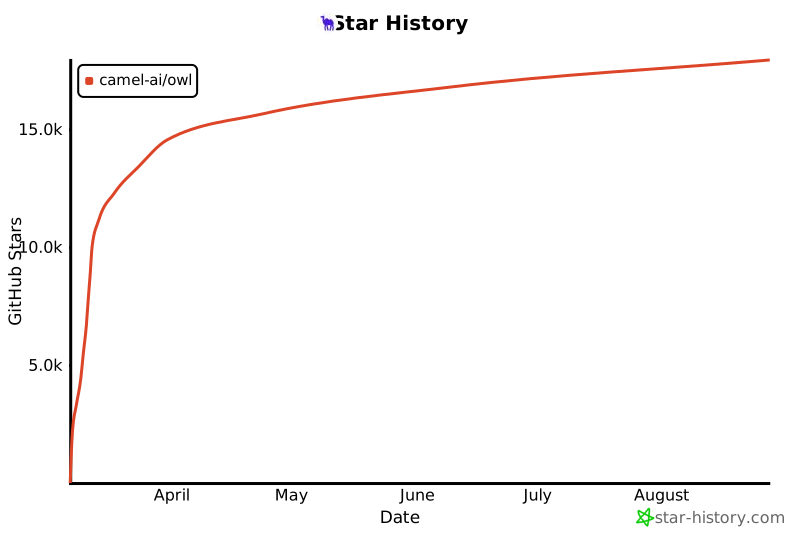](https://star-history.com/#camel-ai/owl&Date)
[docs-image]: https://img.shields.io/badge/Documentation-EB3ECC
[docs-url]: https://camel-ai.github.io/camel/index.html
[star-image]: https://img.shields.io/github/stars/camel-ai/owl?label=stars&logo=github&color=brightgreen
[star-url]: https://github.com/camel-ai/owl/stargazers
[package-license-image]: https://img.shields.io/badge/License-Apache_2.0-blue.svg
[package-license-url]: https://github.com/camel-ai/owl/blob/main/licenses/LICENSE
[colab-url]: https://colab.research.google.com/drive/1AzP33O8rnMW__7ocWJhVBXjKziJXPtim?usp=sharing
[colab-image]: https://colab.research.google.com/assets/colab-badge.svg
[huggingface-url]: https://huggingface.co/camel-ai
[huggingface-image]: https://img.shields.io/badge/%F0%9F%A4%97%20Hugging%20Face-CAMEL--AI-ffc107?color=ffc107&logoColor=white
[discord-url]: https://discord.camel-ai.org/
[discord-image]: https://img.shields.io/discord/1082486657678311454?logo=discord&labelColor=%20%235462eb&logoColor=%20%23f5f5f5&color=%20%235462eb
[wechat-url]: https://ghli.org/camel/wechat.png
[wechat-image]: https://img.shields.io/badge/WeChat-CamelAIOrg-brightgreen?logo=wechat&logoColor=white
[x-url]: https://x.com/CamelAIOrg
[x-image]: https://img.shields.io/twitter/follow/CamelAIOrg?style=social
[twitter-image]: https://img.shields.io/twitter/follow/CamelAIOrg?style=social&color=brightgreen&logo=twitter
[reddit-url]: https://www.reddit.com/r/CamelAI/
[reddit-image]: https://img.shields.io/reddit/subreddit-subscribers/CamelAI?style=plastic&logo=reddit&label=r%2FCAMEL&labelColor=white
[ambassador-url]: https://www.camel-ai.org/community
[owl-url]: ./assets/qr_code.jpg
[owl-image]: https://img.shields.io/badge/WeChat-OWLProject-brightgreen?logo=wechat&logoColor=white
================================================
FILE: README_ja.md
================================================
<h1 align="center">
🦉 OWL: 労働力学習の最適化による、現実世界のタスク自動化における一般的なマルチエージェント支援
</h1>
<div align="center">
[![ドキュメント][docs-image]][docs-url]
[![Discord][discord-image]][discord-url]
[![X][x-image]][x-url]
[![Reddit][reddit-image]][reddit-url]
[![Wechat][wechat-image]][wechat-url]
[![Wechat][owl-image]][owl-url]
[![Hugging Face][huggingface-image]][huggingface-url]
[![Star][star-image]][star-url]
[![パッケージライセンス][package-license-image]][package-license-url]
</div>
<hr>
<hr>
<div align="center">
<h4 align="center">
[中文阅读](https://github.com/camel-ai/owl/tree/main/README_zh.md) |
[コミュニティ](https://github.com/camel-ai/owl#community) |
[インストール](#️-installation) |
[例](https://github.com/camel-ai/owl/tree/main/owl) |
[論文](https://arxiv.org/abs/2303.17760) |
[引用](https://github.com/camel-ai/owl#citation) |
[貢献](https://github.com/camel-ai/owl/graphs/contributors) |
[CAMEL-AI](https://www.camel-ai.org/)
</h4>
<div align="center" style="background-color: #f0f7ff; padding: 10px; border-radius: 5px; margin: 15px 0;">
<h3 style="color: #1e88e5; margin: 0;">
🏆 OWLはGAIAベンチマークで<span style="color: #d81b60; font-weight: bold; font-size: 1.2em;">58.18</span>の平均スコアを達成し、オープンソースフレームワークの中で<span style="color: #d81b60; font-weight: bold; font-size: 1.2em;">🏅️ #1</span>にランクインしました! 🏆
</h3>
</div>
<div align="center">
🦉 OWLは、タスク自動化の限界を押し広げる最先端のマルチエージェント協力フレームワークであり、[CAMEL-AIフレームワーク](https://github.com/camel-ai/camel)の上に構築されています。
私たちのビジョンは、AIエージェントが現実のタスクを解決するためにどのように協力するかを革命的に変えることです。動的なエージェントの相互作用を活用することで、OWLは多様な分野でより自然で効率的かつ堅牢なタスク自動化を実現します。
</div>

<br>
</div>
<!-- # Key Features -->
# 📋 目次
- [📋 目次](#-目次)
- [🔥 ニュース](#-ニュース)
- [🎬 デモビデオ](#-デモビデオ)
- [✨️ コア機能](#️-コア機能)
- [🛠️ インストール](#️-インストール)
- [オプション1:uvを使用する(推奨)](#オプション1uvを使用する推奨)
- [オプション2:venvとpipを使用する](#オプション2venvとpipを使用する)
- [オプション3:condaを使用する](#オプション3condaを使用する)
- [**環境変数の設定**](#環境変数の設定)
- [オプション1:`.env`ファイルを使用する(推奨)](#オプション1envファイルを使用する推奨)
- [オプション2:環境変数を直接設定](#オプション2環境変数を直接設定)
- [**Dockerでの実行**](#dockerでの実行)
- [**セットアップ手順**](#セットアップ手順)
- [**デプロイメントオプション**](#デプロイメントオプション)
- [**オプション1:事前構築されたイメージを使用する(推奨)**](#オプション1事前構築されたイメージを使用する推奨)
- [**オプション2:ローカルでイメージを構築する**](#オプション2ローカルでイメージを構築する)
- [**オプション3:便利なスクリプトを使用する**](#オプション3便利なスクリプトを使用する)
- [**MCPデスクトップコマンダーのセットアップ**](#mcpデスクトップコマンダーのセットアップ)
- [🚀 クイックスタート](#-クイックスタート)
- [基本的な使用法](#基本的な使用法)
- [異なるモデルでの実行](#異なるモデルでの実行)
- [モデルの要件](#モデルの要件)
- [サポートされているモデル](#サポートされているモデル)
- [例のタスク](#例のタスク)
- [🧰 ツールキットと機能](#-ツールキットと機能)
- [モデルコンテキストプロトコル(MCP)](#モデルコンテキストプロトコルmcp)
- [**Node.jsのインストール**](#nodejsのインストール)
- [Windows](#windows)
- [Linux](#linux)
- [Mac](#mac)
- [**Playwright MCPサービスのインストール**](#playwright-mcpサービスのインストール)
- [利用可能なツールキット](#利用可能なツールキット)
- [利用可能なツールキット](#利用可能なツールキット-1)
- [マルチモーダルツールキット(マルチモーダルモデル機能が必要)](#マルチモーダルツールキットマルチモーダルモデル機能が必要)
- [テキストベースのツールキット](#テキストベースのツールキット)
- [カスタマイズ設定](#カスタマイズ設定)
- [🌐 ウェブインターフェース](#-ウェブインターフェース)
- [ウェブUIの起動](#ウェブuiの起動)
- [機能](#機能)
- [🧪 実験](#-実験)
- [⏱️ 将来の計画](#️-将来の計画)
- [📄 ライセンス](#-ライセンス)
- [🖊️ 引用](#️-引用)
- [🤝 貢献](#-貢献)
- [🔥 コミュニティ](#-コミュニティ)
- [❓ FAQ](#-faq)
- [📚 CAMEL依存関係の探索](#-camel依存関係の探索)
- [CAMELソースコードへのアクセス](#camelソースコードへのアクセス)
- [⭐ Star History](#-star-history)
# 🔥 ニュース
<div align="center" style="background-color: #e8f5e9; padding: 15px; border-radius: 10px; border: 2px solid #4caf50; margin: 20px 0;">
<h3 style="color: #2e7d32; margin: 0; font-size: 1.3em;">
🧩 <b>新機能:コミュニティエージェントチャレンジ!</b> 🧩
</h3>
<p style="font-size: 1.1em; margin: 10px 0;">
AIエージェントのためのユニークなチャレンジをデザインして、あなたの創造力を発揮してください! <br>
コミュニティに参加して、最先端のAIによってあなたの革新的なアイデアが実現されるのを見てみましょう。
</p>
<p>
<a href="https://github.com/camel-ai/owl/blob/main/community_challenges.md" style="background-color: #2e7d32; color: white; padding: 8px 15px; text-decoration: none; border-radius: 5px; font-weight: bold;">チャレンジの表示と提出</a>
</p>
</div>
<div style="background-color: #e3f2fd; padding: 12px; border-radius: 8px; border-left: 4px solid #1e88e5; margin: 10px 0;">
<h4 style="color: #1e88e5; margin: 0 0 8px 0;">
🎉 最新の主要アップデート - 2025年3月15日
</h4>
<p style="margin: 0;">
<b>重要な改善点:</b>
<ul style="margin: 5px 0 0 0; padding-left: 20px;">
<li>システムの安定性を向上させるために、ウェブベースのUIアーキテクチャを再構築しました 🏗️</li>
<li>パフォーマンスを向上させるために、OWLエージェントの実行メカニズムを最適化しました 🚀</li>
</ul>
<i>今すぐ試して、タスク自動化の改善されたパフォーマンスを体験してください!</i>
</p>
</div>
- **[2025.03.21]**: OpenRouterモデルプラットフォームを統合し、Geminiツール呼び出しのバグを修正
- **[2025.03.20]**: MCPツールキットにAcceptヘッダーを追加し、Playwrightの自動インストールをサポート
- **[2025.03.16]**: Bing検索、Baidu検索をサポート
- **[2025.03.12]**: SearchToolkitにBocha検索を追加し、Volcano Engineモデルプラットフォームを統合し、AzureおよびOpenAI互換モデルの構造化出力とツール呼び出し機能を強化
- **[2025.03.11]**: MCPToolkit、FileWriteToolkit、およびTerminalToolkitを追加し、MCPツール呼び出し、ファイル書き込み機能、およびターミナルコマンド実行機能を強化
- **[2025.03.09]**: システムとの対話を容易にするためのウェブベースのユーザーインターフェースを追加
- **[2025.03.07]**: 🦉 OWLプロジェクトのコードベースをオープンソース化
- **[2025.03.03]**: OWLはGAIAベンチマークで58.18のスコアを達成し、オープンソースフレームワークの中で1位を獲得
# 🎬 デモビデオ
https://github.com/user-attachments/assets/2a2a825d-39ea-45c5-9ba1-f9d58efbc372
https://private-user-images.githubusercontent.com/55657767/420212194-e813fc05-136a-485f-8df3-f10d9b4e63ec.mp4
# ✨️ コア機能
- **オンライン検索**:複数の検索エンジン(Wikipedia、Google、DuckDuckGo、Baidu、Bochaなど)をサポートし、リアルタイムの情報検索と知識取得を実現
- **マルチモーダル処理**:インターネットまたはローカルのビデオ、画像、音声データの処理をサポート
- **ブラウザ自動化**:Playwrightフレームワークを利用してブラウザの操作をシミュレートし、スクロール、クリック、入力処理、ダウンロード、ナビゲーションなどをサポート
- **ドキュメント解析**:Word、Excel、PDF、PowerPointファイルからコンテンツを抽出し、テキストまたはMarkdown形式に変換
- **コード実行**:Pythonコードを記述してインタープリタを使用して実行
- **組み込みツールキット**:包括的な組み込みツールキットにアクセス可能
- **モデルコンテキストプロトコル (MCP)**:AIモデルとさまざまなツールやデータソースとの相互作用を標準化するユニバーサルプロトコルレイヤー
- **コアツールキット**:ArxivToolkit、AudioAnalysisToolkit、CodeExecutionToolkit、DalleToolkit、DataCommonsToolkit、ExcelToolkit、GitHubToolkit、GoogleMapsToolkit、GoogleScholarToolkit、ImageAnalysisToolkit、MathToolkit、NetworkXToolkit、NotionToolkit、OpenAPIToolkit、RedditToolkit、SearchToolkit、SemanticScholarToolkit、SymPyToolkit、VideoAnalysisToolkit、WeatherToolkit、BrowserToolkitなど、専門的なタスクに対応する多くのツールキット
# 🛠️ インストール
OWLは、ワークフロープリファレンスに合わせた複数のインストール方法をサポートしています。最適なオプションを選択してください。
## オプション1:uvを使用する(推奨)
```bash
# GitHubリポジトリをクローン
git clone https://github.com/camel-ai/owl.git
# プロジェクトディレクトリに移動
cd owl
# uvがインストールされていない場合はインストール
pip install uv
# 仮想環境を作成し、依存関係をインストール
# Python 3.10、3.11、3.12の使用をサポート
uv venv .venv --python=3.10
# 仮想環境をアクティブ化
# macOS/Linuxの場合
source .venv/bin/activate
# Windowsの場合
.venv\Scripts\activate
# すべての依存関係を含むCAMELをインストール
uv pip install -e .
# 完了したら仮想環境を終了
deactivate
```
## オプション2:venvとpipを使用する
```bash
# GitHubリポジトリをクローン
git clone https://github.com/camel-ai/owl.git
# プロジェクトディレクトリに移動
cd owl
# 仮想環境を作成
# Python 3.10の場合(3.11、3.12でも動作)
python3.10 -m venv .venv
# 仮想環境をアクティブ化
# macOS/Linuxの場合
source .venv/bin/activate
# Windowsの場合
.venv\Scripts\activate
# requirements.txtからインストール
pip install -r requirements.txt --use-pep517
```
## オプション3:condaを使用する
```bash
# GitHubリポジトリをクローン
git clone https://github.com/camel-ai/owl.git
# プロジェクトディレクトリに移動
cd owl
# conda環境を作成
conda create -n owl python=3.10
# conda環境をアクティブ化
conda activate owl
# オプション1:パッケージとしてインストール(推奨)
pip install -e .
# オプション2:requirements.txtからインストール
pip install -r requirements.txt --use-pep517
# 完了したらconda環境を終了
conda deactivate
```
## **環境変数の設定**
OWLは、さまざまなサービスと対話するために複数のAPIキーを必要とします。`owl/.env_template`ファイルには、すべての必要なAPIキーのプレースホルダーと、それらのサービスに登録するためのリンクが含まれています。
### オプション1:`.env`ファイルを使用する(推奨)
1. **テンプレートをコピーして名前を変更**:
```bash
cd owl
cp .env_template .env
```
2. **APIキーを設定**:
お好みのテキストエディタで`.env`ファイルを開き、対応するフィールドにAPIキーを挿入します。
> **注意**:最小限の例(`examples/run_mini.py`)の場合、LLM APIキー(例:`OPENAI_API_KEY`)のみを設定する必要があります。
### オプション2:環境変数を直接設定
または、ターミナルで環境変数を直接設定することもできます:
- **macOS/Linux (Bash/Zsh)**:
```bash
export OPENAI_API_KEY="your-openai-api-key-here"
```
- **Windows (コマンドプロンプト)**:
```batch
set OPENAI_API_KEY="your-openai-api-key-here"
```
- **Windows (PowerShell)**:
```powershell
$env:OPENAI_API_KEY = "your-openai-api-key-here"
```
> **注意**:ターミナルで直接設定された環境変数は、現在のセッションでのみ有効です。
## **Dockerでの実行**
OWLはDockerを使用して簡単にデプロイでき、異なるプラットフォーム間で一貫した環境を提供します。
### **セットアップ手順**
```bash
# リポジトリをクローン
git clone https://github.com/camel-ai/owl.git
cd owl
# 環境変数を設定
cp owl/.env_template owl/.env
# .envファイルを編集し、APIキーを入力
```
### **デプロイメントオプション**
#### **オプション1:事前構築されたイメージを使用する(推奨)**
```bash
# このオプションはDocker Hubから即使用可能なイメージをダウンロードします
# 最速であり、ほとんどのユーザーに推奨されます
docker compose up -d
# コンテナ内でOWLを実行
docker compose exec owl bash
cd .. && source .venv/bin/activate
playwright install-deps
xvfb-python examples/run.py
```
#### **オプション2:ローカルでイメージを構築する**
```bash
# Dockerイメージをカスタマイズする必要があるユーザーやDocker Hubにアクセスできないユーザー向け:
# 1. docker-compose.ymlを開く
# 2. "image: mugglejinx/owl:latest"行をコメントアウト
# 3. "build:"セクションとそのネストされたプロパティをコメント解除
# 4. 次に実行:
docker compose up -d --build
# コンテナ内でOWLを実行
docker compose exec owl bash
cd .. && source .venv/bin/activate
playwright install-deps
xvfb-python examples/run.py
```
#### **オプション3:便利なスクリプトを使用する**
```bash
# コンテナディレクトリに移動
cd .container
# スクリプトを実行可能にし、Dockerイメージを構築
chmod +x build_docker.sh
./build_docker.sh
# 質問を使用してOWLを実行
./run_in_docker.sh "your question"
```
### **MCPデスクトップコマンダーのセットアップ**
Docker内でMCPデスクトップコマンダーを使用する場合、次を実行:
```bash
npx -y @wonderwhy-er/desktop-commander setup --force-file-protocol
```
クロスプラットフォームサポート、最適化された構成、トラブルシューティングなど、詳細なDocker使用手順については、[DOCKER_README.md](.container/DOCKER_README_en.md)を参照してください。
# 🚀 クイックスタート
## 基本的な使用法
インストールと環境変数の設定が完了したら、すぐにOWLを使用できます:
```bash
python examples/run.py
```
## 異なるモデルでの実行
### モデルの要件
- **ツール呼び出し**:OWLは、さまざまなツールキットと対話するために強力なツール呼び出し機能を持つモデルを必要とします。モデルはツールの説明を理解し、適切なツール呼び出しを生成し、ツールの出力を処理する必要があります。
- **マルチモーダル理解**:ウェブインタラクション、画像解析、ビデオ処理を含むタスクには、視覚コンテンツとコンテキストを解釈するためのマルチモーダル機能を持つモデルが必要です。
#### サポートされているモデル
AIモデルの設定に関する情報については、[CAMELモデルドキュメント](https://docs.camel-ai.org/key_modules/models.html#supported-model-platforms-in-camel)を参照してください。
> **注意**:最適なパフォーマンスを得るために、OpenAIモデル(GPT-4以降のバージョン)を強く推奨します。私たちの実験では、他のモデルは複雑なタスクやベンチマークで著しく低いパフォーマンスを示すことがあり、特に高度なマルチモーダル理解とツール使用を必要とするタスクでは顕著です。
OWLはさまざまなLLMバックエンドをサポートしていますが、機能はモデルのツール呼び出しおよびマルチモーダル機能に依存する場合があります。以下のスクリプトを使用して、異なるモデルで実行できます:
```bash
# Qwenモデルで実行
python examples/run_qwen_zh.py
# Deepseekモデルで実行
python examples/run_deepseek_zh.py
# 他のOpenAI互換モデルで実行
python examples/run_openai_compatible_model.py
# Azure OpenAIで実行
python examples/run_azure_openai.py
# Ollamaで実行
python examples/run_ollama.py
```
LLM APIキーのみを必要とするシンプルなバージョンについては、最小限の例を試してみてください:
```bash
python examples/run_mini.py
```
`examples/run.py`スクリプトを変更して、独自のタスクでOWLエージェントを実行できます:
```python
# 独自のタスクを定義
task = "Task description here."
society = construct_society(question)
answer, chat_history, token_count = run_society(society)
print(f"\033[94mAnswer: {answer}\033[0m")
```
ファイルをアップロードする場合は、質問と一緒にファイルパスを提供するだけです:
```python
# ローカルファイルを使用したタスク(例:ファイルパス:`tmp/example.docx`)
task = "What is in the given DOCX file? Here is the file path: tmp/example.docx"
society = construct_society(question)
answer, chat_history, token_count = run_society(society)
print(f"\033[94mAnswer: {answer}\033[0m")
```
OWLは自動的にドキュメント関連のツールを呼び出してファイルを処理し、回答を抽出します。
### 例のタスク
以下のタスクをOWLで試してみてください:
- "Apple Inc.の最新の株価を調べる"
- "気候変動に関する最近のツイートの感情を分析する"
- "このPythonコードのデバッグを手伝ってください:[ここにコードを貼り付け]"
- "この研究論文の主要なポイントを要約してください:[論文のURL]"
- "このデータセットのデータビジュアライゼーションを作成してください:[データセットのパス]"
# 🧰 ツールキットと機能
## モデルコンテキストプロトコル(MCP)
OWLのMCP統合は、AIモデルがさまざまなツールやデータソースと相互作用するための標準化された方法を提供します:
MCPを使用する前に、まずNode.jsをインストールする必要があります。
### **Node.jsのインストール**
### Windows
公式インストーラーをダウンロード:[Node.js](https://nodejs.org/en)。
インストール中に「Add to PATH」オプションをチェックします。
### Linux
```bash
sudo apt update
sudo apt install nodejs npm -y
```
### Mac
```bash
brew install node
```
### **Playwright MCPサービスのインストール**
```bash
npm install -g @executeautomation/playwright-mcp-server
npx playwright install-deps
```
`examples/run_mcp.py`の包括的なMCP例を試して、これらの機能を実際に体験してください!
## 利用可能なツールキット
> **重要**:ツールキットを効果的に使用するには、強力なツール呼び出し機能を持つモデルが必要です。マルチモーダルツールキット(Web、画像、ビデオ)には、マルチモーダル理解機能を持つモデルも必要です。
OWLはさまざまなツールキットをサポートしており、スクリプト内の`tools`リストを変更してカスタマイズできます:
```python
# ツールキットの設定
tools = [
*BrowserToolkit(headless=False).get_tools(), # ブラウザ自動化
*VideoAnalysisToolkit(model=models["video"]).get_tools(),
*AudioAnalysisToolkit().get_tools(), # OpenAIキーが必要
*CodeExecutionToolkit(sandbox="subprocess").get_tools(),
*ImageAnalysisToolkit(model=models["image"]).get_tools(),
SearchToolkit().search_duckduckgo,
SearchToolkit().search_google, # 利用できない場合はコメントアウト
SearchToolkit().search_wiki,
SearchToolkit().search_bocha,
SearchToolkit().search_baidu,
*ExcelToolkit().get_tools(),
*DocumentProcessingToolkit(model=models["document"]).get_tools(),
*FileWriteToolkit(output_dir="./").get_tools(),
]
```
## 利用可能なツールキット
主要なツールキットには以下が含まれます:
### マルチモーダルツールキット(マルチモーダルモデル機能が必要)
- **BrowserToolkit**:ウェブインタラクションとナビゲーションのためのブラウザ自動化
- **VideoAnalysisToolkit**:ビデオ処理とコンテンツ分析
- **ImageAnalysisToolkit**:画像解析と解釈
### テキストベースのツールキット
- **AudioAnalysisToolkit**:音声処理(OpenAI APIが必要)
- **CodeExecutionToolkit**:Pythonコードの実行と評価
- **SearchToolkit**:ウェブ検索(Google、DuckDuckGo、Wikipedia)
- **DocumentProcessingToolkit**:ドキュメント解析(PDF、DOCXなど)
その他の専門ツールキット:ArxivToolkit、GitHubToolkit、GoogleMapsToolkit、MathToolkit、NetworkXToolkit、NotionToolkit、RedditToolkit、WeatherToolkitなど。完全なツールキットのリストについては、[CAMELツールキットドキュメント](https://docs.camel-ai.org/key_modules/tools)を参照してください。
## カスタマイズ設定
利用可能なツールをカスタマイズするには:
```python
# 1. ツールキットをインポート
from camel.toolkits import BrowserToolkit, SearchToolkit, CodeExecutionToolkit
# 2. ツールリストを設定
tools = [
*BrowserToolkit(headless=True).get_tools(),
SearchToolkit().search_wiki,
*CodeExecutionToolkit(sandbox="subprocess").get_tools(),
]
# 3. アシスタントエージェントに渡す
assistant_agent_kwargs = {"model": models["assistant"], "tools": tools}
```
必要なツールキットのみを選択することで、パフォーマンスを最適化し、リソース使用量を削減できます。
# 🌐 ウェブインターフェース
<div align="center" style="background-color: #f0f7ff; padding: 15px; border-radius: 10px; border: 2px solid #1e88e5; margin: 20px 0;">
<h3 style="color: #1e88e5; margin: 0;">
🚀 強化されたウェブインターフェースが利用可能になりました!
</h3>
<p style="margin: 10px 0;">
最新のアップデートでシステムの安定性とパフォーマンスが向上しました。
使いやすいインターフェースを通じて、OWLの力を探索し始めましょう!
</p>
</div>
## ウェブUIの起動
```bash
# 中国語版を起動
python owl/webapp_zh.py
# 英語版を起動
python owl/webapp.py
# 日本語版を起動
python owl/webapp_jp.py
```
## 機能
- **簡単なモデル選択**:異なるモデル(OpenAI、Qwen、DeepSeekなど)を選択
- **環境変数管理**:UIから直接APIキーやその他の設定を構成
- **インタラクティブなチャットインターフェース**:使いやすいインターフェースを通じてOWLエージェントと対話
- **タスク履歴**:対話の履歴と結果を表示
ウェブインターフェースはGradioを使用して構築されており、ローカルマシン上で実行されます。設定したモデルAPI呼び出しに必要なデータ以外は外部サーバーに送信されません。
# 🧪 実験
OWLのGAIAベンチマークスコア58.18を再現するには:
1. `gaia58.18`ブランチに切り替え:
```bash
git checkout gaia58.18
```
2. 評価スクリプトを実行:
```bash
python run_gaia_roleplaying.py
```
これにより、GAIAベンチマークでトップランクのパフォーマンスを達成したのと同じ構成が実行されます。
# ⏱️ 将来の計画
私たちはOWLの改善に継続的に取り組んでいます。以下は私たちのロードマップです:
- [ ] 現実のタスクにおけるマルチエージェント協力の探求と洞察を詳述する技術ブログ記事を書く
- [ ] 特定の分野のタスクに対応する専門ツールを追加してツールキットエコシステムを強化
- [ ] より高度なエージェント相互作用パターンと通信プロトコルを開発
- [ ] 複雑な多段階推論タスクのパフォーマンスを向上
# 📄 ライセンス
ソースコードはApache 2.0ライセンスの下でライセンスされています。
# 🖊️ 引用
このリポジトリが役立つと思われる場合は、以下を引用してください:
```
@misc{owl2025,
title = {OWL: Optimized Workforce Learning for General Multi-Agent Assistance in Real-World Task Automation},
author = {{CAMEL-AI.org}},
howpublished = {\url{https://github.com/camel-ai/owl}},
note = {Accessed: 2025-03-07},
year = {2025}
}
```
# 🤝 貢献
私たちはコミュニティからの貢献を歓迎します!以下は、どのように支援できるかです:
1. [貢献ガイドライン](https://github.com/camel-ai/camel/blob/master/CONTRIBUTING.md)を読む
2. [オープンな問題](https://github.com/camel-ai/camel/issues)を確認するか、新しい問題を作成する
3. 改善点を含むプルリクエストを提出する
**現在貢献を受け付けている問題:**
- [#1915](https://github.com/camel-ai/camel/issues/1915)
- [#2190](https://github.com/camel-ai/camel/issues/2190)
- [#2165](https://github.com/camel-ai/camel/issues/2165)
- [#2121](https://github.com/camel-ai/camel/issues/2121)
- [#1908](https://github.com/camel-ai/camel/issues/1908)
- [#1538](https://github.com/camel-ai/camel/issues/1538)
- [#1481](https://github.com/camel-ai/camel/issues/1481)
問題を引き受けるには、興味を示すコメントを残すだけです。
# 🔥 コミュニティ
エージェントのスケーリング法則を見つけるための限界を押し広げるために、私たちと一緒に参加してください([_Discord_](https://discord.camel-ai.org/)または[_WeChat_](https://ghli.org/camel/wechat.png))。
さらなる議論に参加してください!
<!--  -->

# ❓ FAQ
**Q: サンプルスクリプトを起動した後、なぜローカルでChromeが実行されていないのですか?**
A: OWLがタスクを非ブラウザツール(検索やコード実行など)を使用して完了できると判断した場合、ブラウザは起動しません。ブラウザベースのインタラクションが必要と判断された場合にのみ、ブラウザウィンドウが表示されます。
**Q: どのPythonバージョンを使用すべきですか?**
A: OWLはPython 3.10、3.11、および3.12をサポートしています。
**Q: プロジェクトにどのように貢献できますか?**
A: 参加方法の詳細については、[貢献](#-貢献)セクションを参照してください。コードの改善からドキュメントの更新まで、あらゆる種類の貢献を歓迎します。
# 📚 CAMEL依存関係の探索
OWLは[CAMEL](https://github.com/camel-ai/camel)フレームワークの上に構築されています。以下は、CAMELのソースコードを探索し、OWLとの連携方法を理解する方法です:
## CAMELソースコードへのアクセス
```bash
# CAMELリポジトリをクローン
git clone https://github.com/camel-ai/camel.git
cd camel
```
# ⭐ Star History
[](https://star-history.com/#camel-ai/owl&Date)
[docs-image]: https://img.shields.io/badge/Documentation-EB3ECC
[docs-url]: https://camel-ai.github.io/camel/index.html
[star-image]: https://img.shields.io/github/stars/camel-ai/owl?label=stars&logo=github&color=brightgreen
[star-url]: https://github.com/camel-ai/owl/stargazers
[package-license-image]: https://img.shields.io/badge/License-Apache_2.0-blue.svg
[package-license-url]: https://github.com/camel-ai/owl/blob/main/licenses/LICENSE
[colab-url]: https://colab.research.google.com/drive/1AzP33O8rnMW__7ocWJhVBXjKziJXPtim?usp=sharing
[colab-image]: https://colab.research.google.com/assets/colab-badge.svg
[huggingface-url]: https://huggingface.co/camel-ai
[huggingface-image]: https://img.shields.io/badge/%F0%9F%A4%97%20Hugging%20Face-CAMEL--AI-ffc107?color=ffc107&logoColor=white
[discord-url]: https://discord.camel-ai.org/
[discord-image]: https://img.shields.io/discord/1082486657678311454?logo=discord&labelColor=%20%235462eb&logoColor=%20%23f5f5f5&color=%20%235462eb
[wechat-url]: https://ghli.org/camel/wechat.png
[wechat-image]: https://img.shields.io/badge/WeChat-CamelAIOrg-brightgreen?logo=wechat&logoColor=white
[x-url]: https://x.com/CamelAIOrg
[x-image]: https://img.shields.io/twitter/follow/CamelAIOrg?style=social
[twitter-image]: https://img.shields.io/twitter/follow/CamelAIOrg?style=social&color=brightgreen&logo=twitter
[reddit-url]: https://www.reddit.com/r/CamelAI/
[reddit-image]: https://img.shields.io/reddit/subreddit-subscribers/CamelAI?style=plastic&logo=reddit&label=r%2FCAMEL&labelColor=white
[ambassador-url]: https://www.camel-ai.org/community
[owl-url]: ./assets/qr_code.jpg
[owl-image]: https://img.shields.io/badge/WeChat-OWLProject-brightgreen?logo=wechat&logoColor=white
================================================
FILE: README_zh.md
================================================
<h1 align="center">
🦉 OWL: Optimized Workforce Learning for General Multi-Agent Assistance in Real-World Task Automation
🦉 OWL: 优化劳动力学习的通用智能体,用于处理现实世界的自动化任务
</h1>
<div align="center">
[![文档][docs-image]][docs-url]
[![Discord][discord-image]][discord-url]
[![X][x-image]][x-url]
[![Reddit][reddit-image]][reddit-url]
[![微信][wechat-image]][wechat-url]
[![微信][owl-image]][owl-url]
[![Hugging Face][huggingface-image]][huggingface-url]
[![Star][star-image]][star-url]
[![软件许可证][package-license-image]][package-license-url]
</div>
<div align="center">
<h4 align="center">
[English README](https://github.com/camel-ai/owl/tree/main) |
[社区](https://github.com/camel-ai/camel#community) |
[安装](#️-installation) |
[示例](https://github.com/camel-ai/owl/tree/main/owl) |
[论文](https://arxiv.org/abs/2303.17760) |
[引用](#-community) |
[贡献](https://github.com/camel-ai/owl/graphs/contributors) |
[CAMEL-AI](https://www.camel-ai.org/)
</h4>
<div align="center" style="background-color: #f0f7ff; padding: 10px; border-radius: 5px; margin: 15px 0;">
<h3 style="color: #1e88e5; margin: 0;">
🏆 OWL 在 GAIA 基准测试中取得 <span style="color: #d81b60; font-weight: bold; font-size: 1.2em;">58.18</span> 平均分,在开源框架中排名 <span style="color: #d81b60; font-weight: bold; font-size: 1.2em;">🏅️ #1</span>! 🏆
</h3>
</div>
<div align="center">
🦉 OWL 是一个前沿的多智能体协作框架,推动任务自动化的边界,构建在 [CAMEL-AI Framework](https://github.com/camel-ai/camel)。
我们的愿景是彻底变革 AI 智能体协作解决现实任务的方式。通过利用动态智能体交互,OWL 实现了跨多领域更自然、高效且稳健的任务自动化。
</div>

<br>
</div>
<!-- # Key Features -->
# 📋 目录
- [📋 目录](#-目录)
- [🔥 新闻](#-新闻)
- [🎬 演示视频](#-演示视频)
- [✨️ 核心功能](#️-核心功能)
- [🛠️ 安装](#️-安装)
- [选项1:使用 uv(推荐)](#选项1使用-uv推荐)
- [选项2:使用 venv 和 pip](#选项2使用-venv-和-pip)
- [选项3:使用 conda](#选项3使用-conda)
- [**设置环境变量**](#设置环境变量)
- [选项 1:使用 `.env` 文件(推荐)](#选项-1使用-env-文件推荐)
- [选项 2:直接设置环境变量](#选项-2直接设置环境变量)
- [**使用Docker运行**](#使用docker运行)
- [**设置说明**](#设置说明)
- [**部署选项**](#部署选项)
- [**选项1:使用预构建镜像(推荐)**](#选项1使用预构建镜像推荐)
- [**选项2:本地构建镜像**](#选项2本地构建镜像)
- [**选项3:使用便捷脚本**](#选项3使用便捷脚本)
- [**MCP Desktop Commander设置**](#mcp-desktop-commander设置)
- [🚀 快速开始](#-快速开始)
- [基本用法](#基本用法)
- [使用不同的模型](#使用不同的模型)
- [模型要求](#模型要求)
- [支持的模型](#支持的模型)
- [🧰 工具包与功能](#-工具包与功能)
- [模型上下文协议(MCP)](#模型上下文协议mcp)
- [**安装 Node.js**](#安装-nodejs)
- [Windows](#windows)
- [Linux](#linux)
- [Mac](#mac)
- [**安装 MCP 服务**](#安装-mcp-服务)
- [可用工具包](#可用工具包)
- [主要工具包](#主要工具包)
- [多模态工具包(需要模型具备多模态能力)](#多模态工具包需要模型具备多模态能力)
- [基于文本的工具包](#基于文本的工具包)
- [自定义配置](#自定义配置)
- [🌐 网页界面](#-网页界面)
- [🧪 实验](#-实验)
- [⏱️ 未来计划](#️-未来计划)
- [📄 许可证](#-许可证)
- [🖊️ 引用](#️-引用)
- [🤝 贡献](#-贡献)
- [🔥 社区](#-社区)
- [❓ 常见问题](#-常见问题)
- [📚 探索 CAMEL 依赖](#-探索-camel-依赖)
- [访问 CAMEL 源代码](#访问-camel-源代码)
- [⭐ Star History](#-star-history)
</div>
# 🔥 新闻
<div align="center" style="background-color: #e8f5e9; padding: 15px; border-radius: 10px; border: 2px solid #4caf50; margin: 20px 0;">
<h3 style="color: #2e7d32; margin: 0; font-size: 1.3em;">
🧩 <b>新增:社区智能体挑战!</b> 🧩
</h3>
<p style="font-size: 1.1em; margin: 10px 0;">
展示您的创造力,为AI智能体设计独特的挑战!<br>
加入我们的社区,见证您的创新想法被尖端AI技术实现。
</p>
<p>
<a href="https://github.com/camel-ai/owl/blob/main/community_challenges.md" style="background-color: #2e7d32; color: white; padding: 8px 15px; text-decoration: none; border-radius: 5px; font-weight: bold;">查看与提交挑战</a>
</p>
</div>
<div style="background-color: #e3f2fd; padding: 12px; border-radius: 8px; border-left: 4px solid #1e88e5; margin: 10px 0;">
<h4 style="color: #1e88e5; margin: 0 0 8px 0;">
🎉 最新重大更新 - 2025年3月15日
</h4>
<p style="margin: 0;">
<b>重要改进:</b>
<ul style="margin: 5px 0 0 0; padding-left: 20px;">
<li>重构网页用户界面架构,显著提升系统稳定性 🏗️</li>
<li>优化OWL Agent执行机制,大幅提升性能与效率 🚀</li>
</ul>
<i>立即体验全新升级的自动化任务处理能力!</i>
</p>
</div>
- **[2025.03.27]**: 集成SearxNGToolkit,使用SearxNG搜索引擎执行网络搜索。
- **[2025.03.26]**: 增强Browser Toolkit,支持"chrome"、"msedge"和"chromium"多种浏览器通道。
- **[2025.03.25]**: 支持Gemini 2.5 Pro模型,添加示例运行代码。
- **[2025.03.21]**: 集成OpenRouter模型平台,修复Gemini工具调用的bug。
- **[2025.03.20]**: 在MCP工具包中添加Accept header,支持自动安装playwright。
- **[2025.03.16]**: 支持必应搜索、百度搜索。
- **[2025.03.12]**: 在SearchToolkit中添加了Bocha搜索功能,集成了火山引擎模型平台,并更新了Azure和OpenAI Compatible模型的结构化输出和工具调用能力。
- **[2025.03.11]**: 我们添加了 MCPToolkit、FileWriteToolkit 和 TerminalToolkit,增强了 OWL Agent 的 MCP(模型上下文协议)集成、文件写入能力和终端命令执行功能。MCP 作为一个通用协议层,标准化了 AI 模型与各种数据源和工具的交互方式。
- **[2025.03.09]**: 我们添加了基于网页的用户界面,使系统交互变得更加简便。
- **[2025.03.07]**: 我们开源了 🦉 OWL 项目的代码库。
- **[2025.03.03]**: OWL 在 GAIA 基准测试中取得 58.18 平均分,在开源框架中排名第一!
# 🎬 演示视频
https://private-user-images.githubusercontent.com/55657767/420211368-f29f477d-7eef-46da-8d7a-8f3bcf506da2.mp4
https://private-user-images.githubusercontent.com/55657767/420212194-e813fc05-136a-485f-8df3-f10d9b4e63ec.mp4
此视频演示了如何在本地安装 OWL,展示了它作为一个前沿的多智能体协作框架,推动任务自动化边界的能力:https://www.youtube.com/watch?v=8XlqVyAZOr8
# ✨️ 核心功能
- **在线搜索**:支持多种搜索引擎(包括维基百科、Google、DuckDuckGo、百度、博查等),实现实时信息检索与知识获取
- **多模态处理**:支持互联网或本地视频、图片、语音处理
- **浏览器操作**:借助Playwright框架开发浏览器模拟交互,支持页面滚动、点击、输入、下载、历史回退等功能
- **文件解析**:word、excel、PDF、PowerPoint信息提取,内容转文本/Markdown
- **代码执行**:编写python代码,并使用解释器运行
- **丰富工具包**:提供丰富的工具包,包括ArxivToolkit(学术论文检索)、AudioAnalysisToolkit(音频分析)、CodeExecutionToolkit(代码执行)、DalleToolkit(图像生成)、DataCommonsToolkit(数据共享)、ExcelToolkit(Excel处理)、GitHubToolkit(GitHub交互)、GoogleMapsToolkit(地图服务)、GoogleScholarToolkit(学术搜索)、ImageAnalysisToolkit(图像分析)、MathToolkit(数学计算)、NetworkXToolkit(图形分析)、NotionToolkit(Notion交互)、OpenAPIToolkit(API操作)、RedditToolkit(Reddit交互)、SearchToolkit(搜索服务)、SemanticScholarToolkit(语义学术搜索)、SymPyToolkit(符号计算)、VideoAnalysisToolkit(视频分析)、WeatherToolkit(天气查询)、BrowserToolkit(网页交互)等多种专业工具,满足各类特定任务需求。
# 🛠️ 安装
## 选项1:使用 uv(推荐)
```bash
# 克隆 GitHub 仓库
git clone https://github.com/camel-ai/owl.git
# 进入项目目录
cd owl
# 如果你还没有安装 uv,请先安装
pip install uv
# 创建虚拟环境并安装依赖
# 我们支持使用 Python 3.10、3.11、3.12
uv venv .venv --python=3.10
# 激活虚拟环境
# 对于 macOS/Linux
source .venv/bin/activate
# 对于 Windows
.venv\Scripts\activate
# 安装 CAMEL 及其所有依赖
uv pip install -e .
# 完成后退出虚拟环境
deactivate
```
## 选项2:使用 venv 和 pip
```bash
# 克隆 GitHub 仓库
git clone https://github.com/camel-ai/owl.git
# 进入项目目录
cd owl
# 创建虚拟环境
# 对于 Python 3.10(也适用于 3.11、3.12)
python3.10 -m venv .venv
# 激活虚拟环境
# 对于 macOS/Linux
source .venv/bin/activate
# 对于 Windows
.venv\Scripts\activate
# 从 requirements.txt 安装
pip install -r requirements.txt --use-pep517
```
## 选项3:使用 conda
```bash
# 克隆 GitHub 仓库
git clone https://github.com/camel-ai/owl.git
# 进入项目目录
cd owl
# 创建 conda 环境
conda create -n owl python=3.10
# 激活 conda 环境
conda activate owl
# 选项1:作为包安装(推荐)
pip install -e .
# 选项2:从 requirements.txt 安装
pip install -r requirements.txt --use-pep517
# 完成后退出 conda 环境
conda deactivate
```
## **设置环境变量**
OWL 需要各种 API 密钥来与不同的服务进行交互。`owl/.env_template` 文件包含了所有必要 API 密钥的占位符,以及可以注册这些服务的链接。
### 选项 1:使用 `.env` 文件(推荐)
1. **复制并重命名模板**:
```bash
cd owl
cp .env_template .env
```
2. **配置你的 API 密钥**:
在你喜欢的文本编辑器中打开 `.env` 文件,并在相应字段中插入你的 API 密钥。
> **注意**:对于最小示例(`examples/run_mini.py`),你只需要配置 LLM API 密钥(例如,`OPENAI_API_KEY`)。
### 选项 2:直接设置环境变量
或者,你可以直接在终端中设置环境变量:
- **macOS/Linux (Bash/Zsh)**:
```bash
export OPENAI_API_KEY="你的-openai-api-密钥"
```
- **Windows (命令提示符)**:
```batch
set OPENAI_API_KEY="你的-openai-api-密钥"
```
- **Windows (PowerShell)**:
```powershell
$env:OPENAI_API_KEY = "你的-openai-api-密钥"
```
> **注意**:直接在终端中设置的环境变量仅在当前会话中有效。
## **使用Docker运行**
OWL可以通过Docker轻松部署,Docker提供了跨不同平台的一致环境。
### **设置说明**
```bash
# 克隆仓库
git clone https://github.com/camel-ai/owl.git
cd owl
# 配置环境变量
cp owl/.env_template owl/.env
# 编辑.env文件,填入您的API密钥
```
### **部署选项**
#### **选项1:使用预构建镜像(推荐)**
```bash
# 此选项从Docker Hub下载一个即用型镜像
# 最快速且推荐给大多数用户
docker compose up -d
# 在容器中运行OWL
docker compose exec owl bash
cd .. && source .venv/bin/activate
playwright install-deps
xvfb-python examples/run.py
```
#### **选项2:本地构建镜像**
```bash
# 适用于需要自定义Docker镜像或无法访问Docker Hub的用户:
# 1. 打开docker-compose.yml
# 2. 注释掉"image: mugglejinx/owl:latest"行
# 3. 取消注释"build:"部分及其嵌套属性
# 4. 然后运行:
docker compose up -d --build
# 在容器中运行OWL
docker compose exec owl bash
cd .. && source .venv/bin/activate
playwright install-deps
xvfb-python examples/run.py
```
#### **选项3:使用便捷脚本**
```bash
# 导航到容器目录
cd .container
# 使脚本可执行并构建Docker镜像
chmod +x build_docker.sh
./build_docker.sh
# 使用您的问题运行OWL
./run_in_docker.sh "您的问题"
```
### **MCP Desktop Commander设置**
如果在Docker中使用MCP Desktop Commander,请运行:
```bash
npx -y @wonderwhy-er/desktop-commander setup --force-file-protocol
```
更多详细的Docker使用说明,包括跨平台支持、优化配置和故障排除,请参阅 [DOCKER_README.md](.container/DOCKER_README_en.md)
# 🚀 快速开始
## 基本用法
运行以下示例:
```bash
python examples/run.py
```
我们还提供了一个最小化示例,只需配置LLM的API密钥即可运行:
```bash
python examples/run_mini.py
```
## 使用不同的模型
### 模型要求
- **工具调用能力**:OWL 需要具有强大工具调用能力的模型来与各种工具包交互。模型必须能够理解工具描述、生成适当的工具调用,并处理工具输出。
- **多模态理解能力**:对于涉及网页交互、图像分析或视频处理的任务,需要具备多模态能力的模型来解释视觉内容和上下文。
#### 支持的模型
有关配置模型的信息,请参阅我们的 [CAMEL 模型文档](https://docs.camel-ai.org/key_modules/models.html#supported-model-platforms-in-camel)。
> **注意**:为获得最佳性能,我们强烈推荐使用 OpenAI 模型(GPT-4 或更高版本)。我们的实验表明,其他模型在复杂任务和基准测试上可能表现明显较差,尤其是那些需要多模态理解和工具使用的任务。
OWL 支持多种 LLM 后端,但功能可能因模型的工具调用和多模态能力而异。您可以使用以下脚本来运行不同的模型:
```bash
# 使用 Claude 模型运行
python examples/run_claude.py
# 使用 Qwen 模型运行
python examples/run_qwen_zh.py
# 使用 Deepseek 模型运行
python examples/run_deepseek_zh.py
# 使用 Gemini 模型运行
python examples/run_gemini.py
# 使用其他 OpenAI 兼容模型运行
python examples/run_openai_compatible_model.py
# 使用 Azure OpenAI模型运行
python examples/run_azure_openai.py
# 使用 Ollama 运行
python examples/run_ollama.py
```
你可以通过修改 `examples/run.py` 脚本来运行自己的任务:
```python
# Define your own task
task = "Task description here."
society = construct_society(question)
answer, chat_history, token_count = run_society(society)
print(f"\033[94mAnswer: {answer}\033[0m")
```
上传文件时,只需提供文件路径和问题:
```python
# 处理本地文件(例如,文件路径为 `tmp/example.docx`)
task = "给定的 DOCX 文件中有什么内容?文件路径如下:tmp/example.docx"
society = construct_society(question)
answer, chat_history, token_count = run_society(society)
print(f"答案:{answer}")
```
OWL 将自动调用与文档相关的工具来处理文件并提取答案。
你可以尝试以下示例任务:
- "查询苹果公司的最新股票价格"
- "分析关于气候变化的最新推文情绪"
- "帮我调试这段 Python 代码:[在此粘贴你的代码]"
- "总结这篇研究论文的主要观点:[论文URL]"
# 🧰 工具包与功能
## 模型上下文协议(MCP)
OWL 的 MCP 集成为 AI 模型与各种工具和数据源的交互提供了标准化的方式。
在使用MCP前,需要先安装Node.js。
### **安装 Node.js**
### Windows
下载官方安装包:[Node.js](https://nodejs.org/zh-cn)。
安装时,勾选 "Add to PATH" 选项。
### Linux
```bash
sudo apt update
sudo apt install nodejs npm -y
```
### Mac
```bash
brew install node
```
### **安装 MCP 服务**
```bash
npm install -g @executeautomation/playwright-mcp-server
npx playwright install-deps
```
查看我们的MCP示例:
- `examples/run_mcp.py` - 基础MCP功能演示 (本地调用,需要安装依赖)
- `examples/run_mcp_sse.py` - 使用SSE协议的示例 (使用远程服务,无需安装依赖)
## 可用工具包
> **重要提示**:有效使用工具包需要具备强大工具调用能力的模型。对于多模态工具包(Web、图像、视频),模型还必须具备多模态理解能力。
OWL支持多种工具包,可通过修改脚本中的`tools`列表进行自定义:
```python
# 配置工具包
tools = [
*BrowserToolkit(headless=False).get_tools(), # 浏览器自动化
*VideoAnalysisToolkit(model=models["video"]).get_tools(),
*AudioAnalysisToolkit().get_tools(), # 需要OpenAI API密钥
*CodeExecutionToolkit(sandbox="subprocess").get_tools(),
*ImageAnalysisToolkit(model=models["image"]).get_tools(),
SearchToolkit().search_duckduckgo,
SearchToolkit().search_google, # 如果不可用请注释
SearchToolkit().search_wiki,
SearchToolkit().search_bocha,
SearchToolkit().search_baidu,
*ExcelToolkit().get_tools(),
*DocumentProcessingToolkit(model=models["document"]).get_tools(),
*FileWriteToolkit(output_dir="./").get_tools(),
]
```
## 主要工具包
关键工具包包括:
### 多模态工具包(需要模型具备多模态能力)
- **BrowserToolkit**:浏览器自动化,用于网页交互和导航
- **VideoAnalysisToolkit**:视频处理和内容分析
- **ImageAnalysisToolkit**:图像分析和解释
### 基于文本的工具包
- **AudioAnalysisToolkit**:音频处理(需要 OpenAI API)
- **CodeExecutionToolkit**:Python 代码执行和评估
- **SearchToolkit**:网络搜索(Google、DuckDuckGo、维基百科)
- **DocumentProcessingToolkit**:文档解析(PDF、DOCX等)
其他专用工具包:ArxivToolkit、GitHubToolkit、GoogleMapsToolkit、MathToolkit、NetworkXToolkit、NotionToolkit、RedditToolkit、WeatherToolkit等。完整工具包列表请参阅[CAMEL工具包文档](https://docs.camel-ai.org/key_modules/tools)。
## 自定义配置
自定义可用工具的方法:
```python
# 1. 导入工具包
from camel.toolkits import BrowserToolkit, SearchToolkit, CodeExecutionToolkit
# 2. 配置工具列表
tools = [
*BrowserToolkit(headless=True).get_tools(),
SearchToolkit().search_wiki,
*CodeExecutionToolkit(sandbox="subprocess").get_tools(),
]
# 3. 传递给助手代理
assistant_agent_kwargs = {"model": models["assistant"], "tools": tools}
```
选择必要的工具包可优化性能并减少资源使用。
# 🌐 网页界面
<div align="center" style="background-color: #f0f7ff; padding: 15px; border-radius: 10px; border: 2px solid #1e88e5; margin: 20px 0;">
<h3 style="color: #1e88e5; margin: 0;">
🚀 全新升级的网页界面现已发布!
</h3>
<p style="margin: 10px 0;">
体验更稳定的系统性能和优化后的执行效率。
通过我们直观的界面,开启OWL强大功能的探索之旅!
</p>
</div>
OWL 现在包含一个基于网页的用户界面,使与系统交互变得更加容易。要启动网页界面,请运行:
```bash
# 中文版本
python owl/webapp_zh.py
# 英文版本
python owl/webapp.py
# 日文版本
python owl/webapp_jp.py
```
网页界面提供以下功能:
- **便捷的模型选择**:选择不同的模型(OpenAI、Qwen、DeepSeek等)
- **环境变量管理**:直接从界面配置API密钥和其他设置
- **交互式聊天界面**:通过用户友好的界面与OWL智能体交流
- **任务历史**:查看交互的历史记录和结果
网页界面使用Gradio构建,在您的本地机器上运行。除了您配置的模型API调用所需的数据外,不会向外部服务器发送任何数据。
# 🧪 实验
我们提供了一个脚本用于复现 GAIA 上的实验结果。
要复现我们在 GAIA 基准测试中获得的 58.18 分:
1. 切换到 `gaia58.18` 分支:
```bash
git checkout gaia58.18
```
2. 运行评估脚本:
```bash
python examples/run_gaia_roleplaying.py
```
# ⏱️ 未来计划
我们正在不断努力改进 OWL。以下是我们的路线图:
- [ ] 撰写技术博客,详细介绍我们在现实任务中多智能体协作方面的探索与见解
- [ ] 通过引入更多针对特定领域任务的专业工具,进一步完善工具生态系统
- [ ] 开发更复杂的智能体交互模式和通信协议
- [ ] 提高复杂多步推理任务的性能
# 📄 许可证
源代码采用 Apache 2.0 许可证。
# 🖊️ 引用
如果你觉得这个仓库对你有帮助,请引用:
```
@misc{owl2025,
title = {OWL: Optimized Workforce Learning for General Multi-Agent Assistance in Real-World Task Automation},
author = {{CAMEL-AI.org}},
howpublished = {\url{https://github.com/camel-ai/owl}},
note = {Accessed: 2025-03-07},
year = {2025}
}
```
# 🤝 贡献
我们欢迎社区的贡献!以下是您可以提供帮助的方式:
1. 阅读我们的[贡献指南](https://github.com/camel-ai/camel/blob/master/CONTRIBUTING.md)
2. 查看[开放的问题](https://github.com/camel-ai/camel/issues)或创建新的问题
3. 提交包含您改进的拉取请求
**当前开放贡献的问题:**
- [#1915](https://github.com/camel-ai/camel/issues/1915)
- [#2190](https://github.com/camel-ai/camel/issues/2190)
- [#2165](https://github.com/camel-ai/camel/issues/2165)
- [#2121](https://github.com/camel-ai/camel/issues/2121)
- [#1908](https://github.com/camel-ai/camel/issues/1908)
- [#1538](https://github.com/camel-ai/camel/issues/1538)
- [#1481](https://github.com/camel-ai/camel/issues/1481)
要认领一个问题,只需在该问题下留言表明您的兴趣即可。
# 🔥 社区
加入我们的 ([_Discord_](https://discord.camel-ai.org/) 或 [_微信_](https://ghli.org/camel/wechat.png)) 社区,一起探索智能体扩展规律的边界。
加入我们,参与更多讨论!

# ❓ 常见问题
**Q: 为什么启动示例脚本后,我没有看到本地运行Chrome浏览器?**
A: 当OWL判断某个任务可以使用非浏览器工具(如搜索、代码分析等)完成时,浏览器就不会启动。只有在判断需要使用浏览器工具的时候,本地才会弹出浏览器窗口,并进行浏览器模拟交互。
**Q: 我应该使用哪个Python版本?**
A: OWL支持Python 3.10、3.11和3.12。为了与所有依赖项获得最佳兼容性,我们推荐使用Python 3.10。
**Q: 我如何为项目做贡献?**
A: 请参阅我们的[贡献](#-贡献)部分,了解如何参与的详细信息。我们欢迎各种形式的贡献,从代码改进到文档更新。
# 📚 探索 CAMEL 依赖
OWL 是基于 [CAMEL](https://github.com/camel-ai/camel) 框架构建的,以下是如何探索 CAMEL 源代码并了解其与 OWL 的工作方式:
## 访问 CAMEL 源代码
```bash
# 克隆 CAMEL 仓库
git clone https://github.com/camel-ai/camel.git
cd camel
```
# ⭐ Star History
[](https://star-history.com/#camel-ai/owl&Date)
[docs-image]: https://img.shields.io/badge/Documentation-EB3ECC
[docs-url]: https://camel-ai.github.io/camel/index.html
[star-image]: https://img.shields.io/github/stars/camel-ai/owl?label=stars&logo=github&color=brightgreen
[star-url]: https://github.com/camel-ai/owl/stargazers
[package-license-image]: https://img.shields.io/badge/License-Apache_2.0-blue.svg
[package-license-url]: https://github.com/camel-ai/owl/blob/main/licenses/LICENSE
[colab-url]: https://colab.research.google.com/drive/1AzP33O8rnMW__7ocWJhVBXjKziJXPtim?usp=sharing
[colab-image]: https://colab.research.google.com/assets/colab-badge.svg
[huggingface-url]: https://huggingface.co/camel-ai
[huggingface-image]: https://img.shields.io/badge/%F0%9F%A4%97%20Hugging%20Face-CAMEL--AI-ffc107?color=ffc107&logoColor=white
[discord-url]: https://discord.camel-ai.org/
[discord-image]: https://img.shields.io/discord/1082486657678311454?logo=discord&labelColor=%20%235462eb&logoColor=%20%23f5f5f5&color=%20%235462eb
[wechat-url]: https://ghli.org/camel/wechat.png
[wechat-image]: https://img.shields.io/badge/WeChat-CamelAIOrg-brightgreen?logo=wechat&logoColor=white
[x-url]: https://x.com/CamelAIOrg
[x-image]: https://img.shields.io/twitter/follow/CamelAIOrg?style=social
[twitter-image]: https://img.shields.io/twitter/follow/CamelAIOrg?style=social&color=brightgreen&logo=twitter
[reddit-url]: https://www.reddit.com/r/CamelAI/
[reddit-image]: https://img.shields.io/reddit/subreddit-subscribers/CamelAI?style=plastic&logo=reddit&label=r%2FCAMEL&labelColor=white
[ambassador-url]: https://www.camel-ai.org/community
[owl-url]: ./assets/qr_code.jpg
[owl-image]: https://img.shields.io/badge/WeChat-OWLProject-brightgreen?logo=wechat&logoColor=white
================================================
FILE: community_challenges.md
================================================
# 🧩 Community Agent Challenges
Welcome to the OWL Community Challenges hub! This is where creative minds come together to craft interesting, innovative, and thought-provoking challenges for AI agents. Got an idea for a task that would really put an AI to the test? We want to hear from you!
## 🚀 Why Submit a Challenge?
- **Showcase your creativity** - Design unique tasks that highlight your innovative thinking
- **Join our community** - Become part of the growing OWL ecosystem
- **See your ideas in action** - Watch as your challenges are tackled by cutting-edge AI
- **Help shape the future** - Contribute to advancing the capabilities of AI assistants
## 📝 How to Submit Your Challenge
It's easy! Simply add your challenge directly to this document by following the template below. The more detailed and creative your challenge, the better!
## ✨ Challenge Template
```markdown
### [Challenge Title]
**Task**: Detailed instructions for the task.
**Success Criteria**:
- What defines successful completion of this challenge?
**Hints** (Optional):
- Any helpful tips
```
## 🏆 Community Challenges
### GitHub Repository Statistics Visualization
**Task**: Open Google search, summarize the GitHub stars, fork counts, and other relevant statistics of camel-ai/camel framework. Then, write these numbers into a Python file using a plotting package (such as matplotlib or seaborn), save the visualization locally, and run the generated Python file to display the chart.
**Success Criteria**:
- Retrieve accurate GitHub statistics for the camel-ai/camel repository
- Generate a Python script that visualizes the data
- Successfully run the script and create a visualization
---
### Build an AI Agent for YouTube Channel Performance Insights
**Task**: Develop an AI agent that integrates with YouTube’s Analytics, Reporting, and Data APIs to automatically retrieve and analyze video and channel performance data. The agent should provide creators with a conversational interface where they can ask questions (e.g., "What are my top-performing videos this month?") and receive actionable insights and recommendations—such as optimal posting times, title improvements, or thumbnail suggestions—to improve engagement and overall channel strategy.
**Success Criteria**:
- The agent successfully authenticates with and retrieves real-time and historical data from YouTube’s APIs (views, watch time, retention, engagement).
- Creators can interact naturally with the agent to receive clear responses, including actionable recommendations (e.g., posting times, title improvements).
**Hints**:
- Review YouTube API docs and use NLP libraries (e.g., spaCy or GPT-based models) to build the conversational interface.
================================================
FILE: community_usecase/Airbnb-MCP/Airbnb_MCP.py
================================================
import asyncio
import sys
from pathlib import Path
from typing import List, Dict
from dotenv import load_dotenv
from camel.models import ModelFactory
from camel.toolkits import FunctionTool, MCPToolkit
from camel.types import ModelPlatformType, ModelType
from camel.logger import set_log_level
from owl.utils.enhanced_role_playing import OwlRolePlaying, arun_society
import pathlib
set_log_level(level="DEBUG")
# Load environment variables from .env file if available
load_dotenv()
async def construct_society(
question: str,
tools: List[FunctionTool],
) -> OwlRolePlaying:
"""Build a multi-agent OwlRolePlaying instance with enhanced content curation capabilities."""
models = {
"user": ModelFactory.create(
model_platform=ModelPlatformType.OPENAI,
model_type=ModelType.GPT_4O,
model_config_dict={
"temperature": 0.7,
# "max_tokens": 4000 # Add token limit to prevent overflow
},
),
"assistant": ModelFactory.create(
model_platform=ModelPlatformType.OPENAI,
model_type=ModelType.GPT_4O,
model_config_dict={
"temperature": 0.7,
#"max_tokens": 4000
},
),
}
user_agent_kwargs = {"model": models["user"]}
assistant_agent_kwargs = {
"model": models["assistant"],
"tools": tools,
}
task_kwargs = {
"task_prompt": question,
"with_task_specify": False,
}
return OwlRolePlaying(
**task_kwargs,
user_role_name="content_curator",
user_agent_kwargs=user_agent_kwargs,
assistant_role_name="research_assistant",
assistant_agent_kwargs=assistant_agent_kwargs,
)
async def main():
config_path = Path(__file__).parent / "mcp_servers_config.json"
mcp_toolkit = MCPToolkit(config_path=str(config_path))
try:
await mcp_toolkit.connect()
default_task = (
"Find me the best Airbnb in Gurugram with a check-in date of 2025-06-01 "
"and a check-out date of 2025-06-07 for 2 adults. Return the top 5 listings with their names, "
"prices, and locations."
)
task = sys.argv[1] if len(sys.argv) > 1 else default_task
# Connect to all MCP toolkits
tools = [*mcp_toolkit.get_tools()]
society = await construct_society(task, tools)
try:
# Add error handling for the society execution
result = await arun_society(society)
# Handle the result properly
if isinstance(result, tuple) and len(result) == 3:
answer, chat_history, token_count = result
else:
answer = str(result)
chat_history = []
token_count = 0
except Exception as e:
print(f"Error during society execution: {str(e)}")
raise
finally:
# Cleanup
await asyncio.sleep(1)
tasks = [t for t in asyncio.all_tasks() if t is not asyncio.current_task()]
for task in tasks:
task.cancel()
try:
await task
except asyncio.CancelledError:
pass
try:
await mcp_toolkit.disconnect()
except Exception as e:
print(f"Cleanup error (can be ignored): {e}")
if __name__ == "__main__":
try:
asyncio.run(main())
except KeyboardInterrupt:
print("\nShutting down gracefully...")
finally:
if sys.platform == 'win32':
try:
import asyncio.windows_events
asyncio.windows_events._overlapped = None
except (ImportError, AttributeError):
pass
================================================
FILE: community_usecase/Airbnb-MCP/README.md
================================================
# 🏡 CAMEL-AI + MCP: Airbnb Use Case
This example demonstrates how to use the [CAMEL-AI OWL framework](https://github.com/camel-ai/owl) and **MCP (Model Context Protocol)** to search for Airbnb listings using a custom MCP server (`@openbnb/mcp-server-airbnb`). Agents in the OWL framework coordinate to perform tool-augmented travel research in a structured, automated way.
---
## ✨ Use Case
> _“Find me the best Airbnb in Gurugram with a check-in date of 2025-06-01 and a check-out date of 2025-06-07 for 2 adults. Return the top 5 listings with their names, prices, and locations.”_
Agents leverage an MCP server to execute real-time Airbnb queries and return formatted results.
---
## 📦 Setup
### 1. Clone and install dependencies
```bash
git clone https://github.com/camel-ai/owl
cd owl
pip install -r requirements.txt
```
---
### 2. Configure MCP Server
In your `mcp_servers_config.json`, add the following:
```json
{
"mcpServers": {
"airbnb": {
"command": "npx",
"args": [
"-y",
"@openbnb/mcp-server-airbnb",
"--ignore-robots-txt"
]
}
}
}
```
> 🛠️ You will need **Node.js and NPM** installed. Run `npx` will automatically fetch the Airbnb MCP server.
---
### 3. Run the Example Script
```bash
python community_usecase/Airbnb_MCP
```
You can also customize the prompt inside the script itself. Edit the `default_task` section of `Airbnb_MCP.py` like this:
```python
# Replace this line:
default_task = (
"here you need to add the task"
)
# Example:
default_task = (
"Find me the best Airbnb in Gurugram with a check-in date of 2025-06-01 "
"and a check-out date of 2025-06-07 for 2 adults. Return the top 5 listings with their names, "
"prices, and locations."
)
```
This allows agents to work from your hardcoded task without passing anything via command line.
---
## 🧠 How It Works
- **MCPToolkit** reads the config and connects to the `@openbnb/mcp-server-airbnb`.
- **OWL RolePlaying Agents** simulate a conversation between a `content_curator` and a `research_assistant`.
- The **assistant agent** calls the MCP Airbnb server to fetch listings.
- The results are processed, formatted, and printed.
---
---
## 🚧 Notes
- This script uses **GPT-4o** via OpenAI for both user and assistant roles.
- Supports async execution and graceful cleanup of agents and MCP sessions.
- Add retries and fallback logic for production use.
---
## 📌 References
- [MCP Overview (Anthropic)](https://docs.anthropic.com/en/docs/agents-and-tools/mcp)
- [CAMEL-AI GitHub](https://github.com/camel-ai/camel)
- [OWL Framework](https://github.com/camel-ai/owl)
- [MCP Airbnb Plugin](https://www.npmjs.com/package/@openbnb/mcp-server-airbnb)
~~~
================================================
FILE: community_usecase/Airbnb-MCP/mcp_servers_config.json
================================================
{
"mcpServers": {
"airbnb": {
"command": "npx",
"args": [
"-y",
"@openbnb/mcp-server-airbnb",
"--ignore-robots-txt"
]
}
}
}
================================================
FILE: community_usecase/COMMUNITY_CALL_FOR_USE_CASES.md
================================================
# 🦉 OWL Community Call for Use Cases
# 🦉 OWL 社区用例征集令
<div align="center">
[![Documentation][docs-image]][docs-url]
[![Discord][discord-image]][discord-url]
[![X][x-image]][x-url]
[![Reddit][reddit-image]][reddit-url]
[![Wechat][wechat-image]][wechat-url]
[![Star][star-image]][star-url]
</div>
<div align="center">
<h4 align="center">
[English](#join-the-owl-community-contribute-your-use-cases) | [中文](#加入owl社区贡献您的用例)
</h4>
</div>
## Join the OWL Community: Contribute Your Use Cases!
Dear OWL Community,
We are excited to announce a special initiative to expand the capabilities and applications of the OWL framework! As the #1 ranked open-source multi-agent collaboration framework on the [GAIA benchmark](https://huggingface.co/spaces/gaia-benchmark/leaderboard), OWL is revolutionizing how AI agents collaborate to solve real-world tasks.
### 🌟 What We're Looking For
We invite you to contribute use cases that demonstrate the power and versatility of OWL in two ways:
1. **Leverage Existing Tools and Models**: Create innovative use cases using OWL's supported tools and models, then submit a PR to our repository.
2. **Extend OWL's Capabilities**: Develop new tools that expand OWL's functionality to implement your own unique use cases.
### 🏆 Community Rewards
The **top ten submissions** will receive:
- Special community gifts
- Featured promotion within the OWL community
- Recognition of your contributions and authorship
### 💡 Submission Guidelines
Your submission should include:
1. **Well-documented code**: Clear comments and instructions for running your use case
2. **Description file**: Explaining what your use case does and why it's valuable
3. **Requirements**: Any additional dependencies needed
4. **Example outputs**: Demonstrations of your use case in action
### 🔍 Evaluation Criteria
Submissions will be evaluated based on:
- **Innovation**: How creative and novel is your use case?
- **Utility**: How useful is it for real-world applications?
- **Implementation**: How well is it coded and documented?
- **Extensibility**: How easily can others build upon your work?
- **Community Engagement**: Sharing your use case on social media platforms (Zhihu, Xiaohongshu, X/Twitter, YouTube, etc.) will earn you extra points
### 📝 How to Submit
1. Fork the OWL repository
2. Create your use case in the `examples/community/` directory
3. Submit a Pull Request with a detailed description of your contribution
4. Tag your PR with `community-use-case`
### ⏰ Timeline
- Submission deadline: March 31, 2025
- Winners announcement: April 7, 2025
### 🚀 Inspiration Areas
Consider exploring use cases in:
- Data analysis and visualization
- Content creation and summarization
- Research assistance
- Educational tools
- Business process automation
- Creative applications
- Cross-modal interactions (text, image, audio, video)
### 🤝 Community Support
Need help or have questions? Join our community channels:
- [Discord](https://discord.gg/CNcNpquyDc)
- [GitHub Discussions](https://github.com/camel-ai/owl/discussions)
Let's build the future of multi-agent AI together!
---
## 加入OWL社区:贡献您的用例!
亲爱的OWL社区成员,
我们很高兴宣布一项特别计划,旨在扩展OWL框架的功能和应用!作为在[GAIA基准测试](https://huggingface.co/spaces/gaia-benchmark/leaderboard)中排名第一的开源多智能体协作框架,OWL正在彻底改变AI智能体协作解决现实任务的方式。
### 🌟 我们在寻找什么
我们邀请您通过以下两种方式贡献展示OWL强大功能和多样性的用例:
1. **利用现有工具和模型**:使用OWL支持的工具和模型创建创新用例,然后向我们的仓库提交PR。
2. **扩展OWL的功能**:开发新工具,扩展OWL的功能,实现您自己独特的用例。
### 🏆 社区奖励
**前十名**将获得:
- 特别社区礼物
- 在OWL社区内的推广展示
- 对您贡献和作者身份的认可
### 💡 提交指南
您的提交应包括:
1. **文档完善的代码**:清晰的注释和运行用例的说明
2. **描述文件**:解释您的用例做什么以及为什么它有价值
3. **依赖要求**:需要的任何额外依赖
4. **示例输出**:展示您的用例实际运行效果
### 🔍 评估标准
提交将基于以下标准进行评估:
- **创新性**:您的用例有多创新和新颖?
- **实用性**:它对现实世界应用有多大用处?
- **实现质量**:代码和文档的质量如何?
- **可扩展性**:其他人能多容易地在您的工作基础上进行扩展?
- **社区参与度**:在社交媒体平台(知乎、小红书、X/Twitter、YouTube等)分享您的用例将获得额外加分
### 📝 如何提交
1. Fork OWL仓库
2. 在`community_usecase/`目录中创建您的用例
3. 提交一个包含您贡献详细描述的Pull Request
4. 使用`community-use-case`标签标记您的PR
### ⏰ 时间线
- 提交截止日期:2025年3月31日
- 获奖者公布:2025年4月7日
### 🚀 灵感领域
考虑探索以下领域的用例:
- 数据分析和可视化
- 内容创建和摘要
- 研究辅助
- 教育工具
- 业务流程自动化
- 创意应用
- 跨模态交互(文本、图像、音频、视频)
### 🤝 社区支持
需要帮助或有问题?加入我们的社区渠道:
- [Discord](https://discord.gg/CNcNpquyDc)
- [GitHub讨论](https://github.com/camel-ai/owl/discussions)
让我们一起构建多智能体AI的未来!
<!-- Links and badges -->
[docs-image]: https://img.shields.io/badge/docs-OWL-blue
[docs-url]: https://docs.camel-ai.org/
[discord-image]: https://img.shields.io/discord/1135106975706013747?color=7289da&label=Discord&logo=discord&logoColor=white
[discord-url]: https://discord.gg/CNcNpquyDc
[x-image]: https://img.shields.io/badge/Twitter-black?logo=x
[x-url]: https://twitter.com/CamelAIOrg
[reddit-image]: https://img.shields.io/badge/Reddit-FF4500?logo=reddit&logoColor=white
[reddit-url]: https://www.reddit.com/r/camelai/
[wechat-image]: https://img.shields.io/badge/WeChat-07C160?logo=wechat&logoColor=white
[wechat-url]: https://docs.camel-ai.org/blog/2023/11/29/camel-wechat/
[star-image]: https://img.shields.io/github/stars/camel-ai/owl?style=social
[star-url]: https://github.com/camel-ai/owl
================================================
FILE: community_usecase/Mcp_use_case/Content_curator.py
================================================
import asyncio
import sys
from pathlib import Path
from typing import List, Dict
from dotenv import load_dotenv
from camel.models import ModelFactory
from camel.toolkits import FunctionTool, MCPToolkit
from camel.types import ModelPlatformType, ModelType
from camel.logger import set_log_level
from owl.utils.enhanced_role_playing import OwlRolePlaying, arun_society
import pathlib
set_log_level(level="DEBUG")
# Load environment variables from .env file if available
load_dotenv()
async def construct_society(
question: str,
tools: List[FunctionTool],
) -> OwlRolePlaying:
"""Build a multi-agent OwlRolePlaying instance with enhanced content curation capabilities."""
models = {
"user": ModelFactory.create(
model_platform=ModelPlatformType.OPENAI,
model_type=ModelType.GPT_4O,
model_config_dict={
"temperature": 0.7,
# "max_tokens": 4000 # Add token limit to prevent overflow
},
),
"assistant": ModelFactory.create(
model_platform=ModelPlatformType.OPENAI,
model_type=ModelType.GPT_4O,
model_config_dict={
"temperature": 0.7,
#"max_tokens": 4000
},
),
}
user_agent_kwargs = {"model": models["user"]}
assistant_agent_kwargs = {
"model": models["assistant"],
"tools": tools,
}
task_kwargs = {
"task_prompt": question,
"with_task_specify": False,
}
return OwlRolePlaying(
**task_kwargs,
user_role_name="content_curator",
user_agent_kwargs=user_agent_kwargs,
assistant_role_name="research_assistant",
assistant_agent_kwargs=assistant_agent_kwargs,
)
async def main():
config_path = Path(__file__).parent / "mcp_servers_config.json"
mcp_toolkit = MCPToolkit(config_path=str(config_path))
try:
await mcp_toolkit.connect()
default_task = (
"Content Curation Task:\n"
"1. Search for these tech websites:\n"
" - TechCrunch\n"
" - The Verge\n"
" - Wired\n"
"2. For each site:\n"
" - Use the firecrawl_scrape tool with proper extraction options\n"
" - Extract the homepage content\n"
" - Focus on headlines and recent articles\n"
"3. For each article found:\n"
" - Extract title and summary\n"
" - Note the publication date if available\n"
"4. Create a summary report including:\n"
" - Top stories from each source\n"
" - Common themes or trends\n"
"5. Save the report as 'Latest_tech_digest.md'\n"
)
task = sys.argv[1] if len(sys.argv) > 1 else default_task
# Connect to all MCP toolkits
tools = [*mcp_toolkit.get_tools()]
society = await construct_society(task, tools)
try:
# Add error handling for the society execution
result = await arun_society(society)
# Handle the result properly
if isinstance(result, tuple) and len(result) == 3:
answer, chat_history, token_count = result
else:
answer = str(result)
chat_history = []
token_count = 0
except Exception as e:
print(f"Error during society execution: {str(e)}")
raise
finally:
# Cleanup
await asyncio.sleep(1)
tasks = [t for t in asyncio.all_tasks() if t is not asyncio.current_task()]
for task in tasks:
task.cancel()
try:
await task
except asyncio.CancelledError:
pass
try:
await mcp_toolkit.disconnect()
except Exception as e:
print(f"Cleanup error (can be ignored): {e}")
if __name__ == "__main__":
try:
asyncio.run(main())
except KeyboardInterrupt:
print("\nShutting down gracefully...")
finally:
if sys.platform == 'win32':
try:
import asyncio.windows_events
asyncio.windows_events._overlapped = None
except (ImportError, AttributeError):
pass
================================================
FILE: community_usecase/Mcp_use_case/Readme.md
================================================
# Autonomous Website Scraping with OWL + FireCrawl MCP
This project leverages OWL (Optimized Workforce Learning) and FireCrawl MCP (Model Context Protocol) to automate content curation. The system scrapes top tech news websites, extracts relevant information, and compiles a summary report.
## Features
- Uses **FireCrawl MCP Server** for performing web scraping.
- Implements **OwlRolePlaying** for enhanced multi-agent task execution.
- Scrapes **TechCrunch, The Verge, and Wired** using **FireCrawl**.
- Extracts and summarizes **headlines, article summaries, and publication dates**.
- Generates a digest report **(Latest_tech_digest.md)** based on trends from these sources.
- Runs a default scraping task which can be updated before running the Script.
## Installation
1. Clone this repository:
```sh
git clone https://github.com/camel-ai/owl.git
cd owl
```
2. Install dependencies:
```sh
pip install -r requirements.txt
```
3. Set up environment variables:
- Create a `.env` file and add your API keys/configuration as needed.
## Usage
Navigate to the community use case directory before running the script:
```sh
cd community_usecase/Mcp_use_Case
```
Run the script using:
```sh
python Content_curator.py
```
The script automatically executes the default task without taking additional input from the terminal.
## Configuration
- The script reads from `mcp_servers_config.json`, which is located in the same folder as Mcp_use_case.
- Modify the `default_task` section in `Content_curator.py` to adjust scraping and summarization behavior.
## Improvements & Customization
- The current implementation runs a **default task** and does not take task input from the terminal.
- To modify the scraping target or change the extracted details, update the `default_task` in `Content_curator.py`.
- The project is stored in the `Mcp_use_Case` folder inside `community_usecase` in the OWL directory.
## Error Handling
- Ensures **graceful cleanup** in case of failures.
- Implements **try-except** blocks to handle tool execution errors.
- Cancels running async tasks to **prevent memory leaks**.
- Supports **KeyboardInterrupt** for a safe shutdown.
## Cleanup & Shutdown
- The script **automatically disconnects MCP** after execution.
- Cancels remaining async tasks to **prevent memory leaks**.
- Special handling for **Windows platforms** is included to ensure smooth termination.
## Repository
For more details, visit the OWL repository: [OWL GitHub Repo](https://github.com/camel-ai/owl)
================================================
FILE: community_usecase/Mcp_use_case/mcp_servers_config.json
================================================
{
"mcpServers": {
"desktop-commander": {
"command": "npx",
"args": [
"-y",
"@wonderwhy-er/desktop-commander"
]
},
"playwright": {
"command": "npx",
"args": ["-y", "@executeautomation/playwright-mcp-server", "--browser", "chromium"]
},
"mcp-server-firecrawl": {
"command": "npx",
"args": ["-y", "firecrawl-mcp"]
}
}
}
================================================
FILE: community_usecase/Notion-MCP/README.md
================================================
# Notion Integration with OWL
This project demonstrates the integration of Notion with OWL (Optimized Workforce Learning) using the official Notion MCP server. It provides automated interaction with Notion workspaces through AI agents.
## Prerequisites
- Python >=3.10,<3.13
- Node.js and npm
- CAMEL framework installed
- A Notion account and integration
## Installation
#### 1. Clone this repository:
```sh
git clone https://github.com/camel-ai/owl.git
cd owl
```
#### 2. Install dependencies:
```sh
pip install -r requirements.txt
```
#### 3. Set up environment variables:
- Create a `.env` file and add your API keys/configuration as needed.
## Setup
#### 1. Install the required Node.js package:
```bash
npm install -g @notionhq/notion-mcp-server@latest
```
#### 2. Set up your Notion integration:
- Go to https://www.notion.so/profile/integrations
- Create a new integration
- Copy the integration token
- Update `mcp_servers_config.json` with your token
#### 3. Connect your Notion pages:
- Open each Notion page you want to work with
- Click "..." (three dots) in the top right
- Select "Add connections"
- Choose your integration
#### 4. Visit official Notion MCP GitHub Repository
Visit the [Notion_MCP GitHub Repo](https://github.com/makenotion/notion-mcp-server) for detailed setup instructions.
## Usage
Navigate to the community use case directory before running the script:
```sh
cd community_usecase/Notion_MCP
```
#### Run the script using:
```bash
python notion_manager.py
```
This will run the default task which:
- Searches for a specific page
- Updates its properties
- Adds a comment
## Supported Operations
The integration supports these Notion API operations:
- Searching for pages
- Reading page content
- Updating page properties
- Adding comments
- Creating new pages
- Retrieving database content
## Troubleshooting
If you encounter errors:
1. Verify your Notion token is correct
2. Check that pages are connected to your integration
3. Ensure you have the required permissions
4. Check the Notion API version in config matches the current version
## Error Handling
The script includes:
- Graceful connection handling
- Task execution error catching
- Proper cleanup on exit
- Windows-specific asyncio handling
## Repository
For more details, visit the OWL repository: [OWL GitHub Repo](https://github.com/camel-ai/owl)
================================================
FILE: community_usecase/Notion-MCP/mcp_servers_config.json
================================================
{
"mcpServers": {
"notionApi": {
"command": "npx",
"args": ["-y", "@notionhq/notion-mcp-server"],
"env": {
"OPENAPI_MCP_HEADERS": "{\"Authorization\": \"Bearer ntn_****\", \"Notion-Version\": \"2022-06-28\" }"
}
}
}
}
================================================
FILE: community_usecase/Notion-MCP/notion_manager.py
================================================
import os
import asyncio
import sys
from pathlib import Path
from typing import List
from dotenv import load_dotenv
from camel.models import ModelFactory
from camel.toolkits import FunctionTool, MCPToolkit
from camel.types import ModelPlatformType, ModelType
from camel.logger import get_logger, set_log_file
from owl.utils.enhanced_role_playing import OwlRolePlaying, arun_society
# Set logging level
set_log_file("notion_mcp.log")
logger = get_logger(__name__)
# Load environment variables
load_dotenv(os.path.join(os.path.dirname(__file__), '../../owl/.env'))
async def construct_society(
question: str,
tools: List[FunctionTool],
) -> OwlRolePlaying:
"""Build a multi-agent OwlRolePlaying instance for Notion management."""
models = {
"user": ModelFactory.create(
model_platform=ModelPlatformType.OPENAI,
model_type=ModelType.GPT_4O,
model_config_dict={
"temperature": 0.7,
},
),
"assistant": ModelFactory.create(
model_platform=ModelPlatformType.OPENAI,
model_type=ModelType.GPT_4O,
model_config_dict={
"temperature": 0.7,
},
),
}
user_agent_kwargs = {"model": models["user"]}
assistant_agent_kwargs = {
"model": models["assistant"],
"tools": tools,
}
task_kwargs = {
"task_prompt": question,
"with_task_specify": False,
}
return OwlRolePlaying(
**task_kwargs,
user_role_name="notion_manager",
user_agent_kwargs=user_agent_kwargs,
assistant_role_name="notion_assistant",
assistant_agent_kwargs=assistant_agent_kwargs,
)
async def execute_notion_task(society: OwlRolePlaying):
"""Execute the Notion task and handle the result."""
try:
result = await arun_society(society)
if isinstance(result, tuple) and len(result) == 3:
answer, chat_history, token_count = result
logger.info(f"\nTask Result: {answer}")
logger.info(f"Token count: {token_count}")
else:
logger.info(f"\nTask Result: {result}")
except Exception as e:
logger.info(f"\nError during task execution: {str(e)}")
raise
async def main():
config_path = Path(__file__).parent / "mcp_servers_config.json"
mcp_toolkit = MCPToolkit(config_path=str(config_path))
try:
logger.info("Connecting to Notion MCP server...")
await mcp_toolkit.connect()
logger.info("Successfully connected to Notion MCP server")
default_task = (
"Notion Task:\n"
"1. Find the page titled 'Travel Itinerary\n"
"2. Create a list of Top 10 travel destinations in Europe and add them to the page along with their description.\n"
"3. Also mention the best time to visit these destintions.\n"
)
task = sys.argv[1] if len(sys.argv) > 1 else default_task
logger.info(f"\nExecuting task:\n{task}")
tools = [*mcp_toolkit.get_tools()]
society = await construct_society(task, tools)
await execute_notion_task(society)
except Exception as e:
logger.info(f"\nError: {str(e)}")
raise
finally:
logger.info("\nPerforming cleanup...")
tasks = [t for t in asyncio.all_tasks() if t is not asyncio.current_task()]
for task in tasks:
task.cancel()
try:
await task
except asyncio.CancelledError:
pass
try:
await mcp_toolkit.disconnect()
logger.info("Successfully disconnected from Notion MCP server")
except Exception as e:
logger.info(f"Cleanup error (can be ignored): {e}")
if __name__ == "__main__":
try:
asyncio.run(main())
except KeyboardInterrupt:
logger.info("\nReceived keyboard interrupt. Shutting down gracefully...")
finally:
if sys.platform == 'win32':
try:
import asyncio.windows_events
asyncio.windows_events._overlapped = None
except (ImportError, AttributeError):
pass
================================================
FILE: community_usecase/OWL Interview Preparation Assistant/.gitignore
================================================
# Byte-compiled / optimized / DLL files
__pycache__/
*.py[cod]
*$py.class
# C extensions
*.so
# Distribution / packaging
.Python
build/
develop-eggs/
dist/
downloads/
eggs/
.eggs/
lib/
lib64/
parts/
sdist/
var/
wheels/
share/python-wheels/
*.egg-info/
.installed.cfg
*.egg
MANIFEST
# PyInstaller
# Usually these files are written by a python script from a template
# before PyInstaller builds the exe, so as to inject date/other infos into it.
*.manifest
*.spec
# Installer logs
pip-log.txt
pip-delete-this-directory.txt
# Unit test / coverage reports
htmlcov/
.tox/
.nox/
.coverage
.coverage.*
.cache
nosetests.xml
coverage.xml
*.cover
*.py,cover
.hypothesis/
.pytest_cache/
cover/
# Translations
*.mo
*.pot
# Django stuff:
*.log
local_settings.py
db.sqlite3
db.sqlite3-journal
# Flask stuff:
instance/
.webassets-cache
# Scrapy stuff:
.scrapy
# Sphinx documentation
docs/_build/
# PyBuilder
.pybuilder/
target/
# Jupyter Notebook
.ipynb_checkpoints
# IPython
profile_default/
ipython_config.py
# pyenv
# For a library or package, you might want to ignore these files since the code is
# intended to run in multiple environments; otherwise, check them in:
# .python-version
# pipenv
# According to pypa/pipenv#598, it is recommended to include Pipfile.lock in version control.
# However, in case of collaboration, if having platform-specific dependencies or dependencies
# having no cross-platform support, pipenv may install dependencies that don't work, or not
# install all needed dependencies.
#Pipfile.lock
# UV
# Similar to Pipfile.lock, it is generally recommended to include uv.lock in version control.
# This is especially recommended for binary packages to ensure reproducibility, and is more
# commonly ignored for libraries.
#uv.lock
# poetry
# Similar to Pipfile.lock, it is generally recommended to include poetry.lock in version control.
# This is especially recommended for binary packages to ensure reproducibility, and is more
# commonly ignored for libraries.
# https://python-poetry.org/docs/basic-usage/#commit-your-poetrylock-file-to-version-control
#poetry.lock
# pdm
# Similar to Pipfile.lock, it is generally recommended to include pdm.lock in version control.
#pdm.lock
# pdm stores project-wide configurations in .pdm.toml, but it is recommended to not include it
# in version control.
# https://pdm.fming.dev/latest/usage/project/#working-with-version-control
.pdm.toml
.pdm-python
.pdm-build/
# PEP 582; used by e.g. github.com/David-OConnor/pyflow and github.com/pdm-project/pdm
__pypackages__/
# Celery stuff
celerybeat-schedule
celerybeat.pid
# SageMath parsed files
*.sage.py
# Environments
.env
.venv
env/
venv/
ENV/
env.bak/
venv.bak/
# Spyder project settings
.spyderproject
.spyproject
# Rope project settings
.ropeproject
# mkdocs documentation
/site
# mypy
.mypy_cache/
.dmypy.json
dmypy.json
# Pyre type checker
.pyre/
# pytype static type analyzer
.pytype/
# Cython debug symbols
cython_debug/
# PyCharm
# JetBrains specific template is maintained in a separate JetBrains.gitignore that can
# be found at https://github.com/github/gitignore/blob/main/Global/JetBrains.gitignore
# and can be added to the global gitignore or merged into this file. For a more nuclear
# option (not recommended) you can uncomment the following to ignore the entire idea folder.
#.idea/
# Ruff stuff:
.ruff_cache/
# PyPI configuration file
.pypirc
.directory
================================================
FILE: community_usecase/OWL Interview Preparation Assistant/PROJECT_DESCRIPTION.md
================================================
# 🦉 Interview Preparation Assistant: AI-Powered Interview Success
## Project Overview
The Interview Preparation Assistant is an advanced multi-agent AI system built on the OWL framework that revolutionizes how job seekers prepare for interviews. By leveraging the power of collaborative AI agents, it delivers personalized, comprehensive, and actionable interview preparation materials tailored to specific job roles and companies.
## The Problem We're Solving
Job interviews are critical gateways to career opportunities, yet preparation is often fragmented, generic, and time-consuming:
- **Information Overload**: Job seekers must sift through countless resources to find relevant information
- **Limited Personalization**: Generic interview guides fail to address specific company cultures and role requirements
- **Time Constraints**: Comprehensive research and preparation can take weeks of dedicated effort
- **Technical Complexity**: For technical roles, preparing appropriate code examples and solutions is challenging
- **Anxiety and Uncertainty**: Many candidates feel underprepared, increasing interview anxiety
## My Solution
The Interview Preparation Assistant transforms this experience by deploying multiple specialized AI agents working in concert to create a complete interview preparation package:
### 1. Company Research Agent
Performs deep, real-time research on target companies by:
- Analyzing company websites, news articles, and social media
- Investigating company culture, values, and work environment
- Examining technical stacks, product offerings, and industry positioning
- Reviewing known interview processes and expectations
### 2. Question Generation Agent
Creates tailored interview questions based on:
- The specific job role and required skills
- Company-specific technologies and methodologies
- Both technical and behavioral aspects of the interview
- Current industry trends and best practices
### 3. Preparation Plan Agent
Develops structured preparation plans that include:
- Day-by-day preparation schedules
- Prioritized study topics and resources
- Mock interview scenarios with sample answers
- Technical practice problems with detailed solutions
## Key Differentiators
What makes my solution unique:
- **Multi-Agent Collaboration**: Multiple specialized AI agents working together creates more comprehensive and accurate results than a single AI assistant
- **Real-Time Research**: Up-to-date information gathered from the web ensures relevance
- **Deep Personalization**: Materials tailored to specific companies and roles rather than generic advice
- **Technical Depth**: Detailed code examples and technical explanations for engineering roles
- **Structured Output**: Clear, organized preparation materials ready for immediate use
- **Conversation Transparency**: Users can observe the agents' thought processes, building trust and understanding
## Value Proposition
The Interview Preparation Assistant delivers significant value to users by:
- **Saving Time**: Reduces weeks of research and preparation to minutes
- **Increasing Confidence**: Comprehensive preparation materials reduce anxiety and build confidence
- **Improving Performance**: Better-prepared candidates perform stronger in interviews
- **Accelerating Career Growth**: Higher success rates in job interviews lead to better career opportunities
- **Democratizing Access**: Makes high-quality interview preparation accessible to everyone, not just those with professional networks or coaching
## Use Case Examples
### Technical Role Preparation
A software engineer applying to Google receives:
- Detailed analysis of Google's engineering culture and interview process
- Coding questions focused on algorithms, data structures, and system design
- Google-specific behavioral questions emphasizing innovation and collaboration
- A 14-day preparation plan with specific practice exercises
### Business Role Preparation
A marketing manager applying to Apple receives:
- Insights into Apple's marketing philosophy and brand positioning
- Case study questions focused on product launches and customer experience
- Behavioral questions targeting creativity and strategic thinking
- A preparation plan emphasizing Apple's unique approach to marketing
## Technical Implementation
The system is built using:
- **OWL Multi-Agent Framework**: Enabling coordinated collaboration between specialized AI agents
- **Dynamic Research Tools**: Real-time web search and content processing
- **Streamlit Interface**: User-friendly web application for easy interaction
- **Advanced LLM Models**: Utilizing state-of-the-art language models (OpenAI/Gemini)
## Impact and Future Development
The Interview Preparation Assistant demonstrates the transformative potential of multi-agent AI systems for personalized knowledge work. Future development paths include:
- **Interview Simulation**: Interactive mock interviews with feedback
- **Performance Analytics**: Tracking preparation progress and identifying areas for improvement
- **Specialized Modules**: Domain-specific preparation for fields like healthcare, finance, etc.
- **Mentor Matching**: Connecting candidates with industry professionals based on preparation insights
---
This project showcases how OWL's collaborative AI framework can transform complex, knowledge-intensive tasks that traditionally required significant human effort into accessible, high-quality services available on demand.
================================================
FILE: community_usecase/OWL Interview Preparation Assistant/README.md
================================================
# 🦉 Interview Preparation Assistant
An intelligent multi-agent interview preparation system powered by the OWL framework that helps you prepare for job interviews with comprehensive research, tailored questions, and detailed preparation plans.

## ✨ Features
- **🔍 Company Research**: Automatically researches companies using real-time web data
- **❓ Interview Question Generation**: Creates tailored interview questions specific to your job role and target company
- **📋 Preparation Plans**: Builds comprehensive step-by-step interview preparation plans
- **🧠 AI-Powered Agents**: Leverages multiple AI agents to work together on your interview preparation
- **💻 Code Examples**: Provides code examples for technical roles with explanations
- **🔄 Real-time Progress**: Shows conversation process between AI agents as they prepare your materials
## 📋 Table of Contents
- [Requirements](#-requirements)
- [Installation](#-installation)
- [Quick Start](#-quick-start)
- [Usage Guide](#-usage-guide)
- [Configuration](#-configuration)
- [Troubleshooting](#-troubleshooting)
- [Project Structure](#-project-structure)
## 🛠 Requirements
- Python 3.10+ (tested on Python 3.10)
- Access to one of the following AI models:
- OpenAI API (GPT-4)
- OpenRouter API (Gemini models)
- Internet connection for web search and company research
- Minimum 8GB RAM
## 🚀 Installation
### 1. Clone the OWL Repository
First, clone the OWL repository, which this project depends on:
```bash
git clone https://github.com/camel-ai/owl.git
cd owl
```
### 2. Create a Virtual Environment
```bash
# Create a conda environment (recommended)
conda create -n interview_assistant python=3.10
conda activate interview_assistant
# OR using venv
python -m venv interview_env
source interview_env/bin/activate # On Windows: interview_env\Scripts\activate
```
### 3. Install OWL and Dependencies
```bash
# Install OWL
pip install -e .
# Install additional dependencies
pip install streamlit numpy pandas opencv-python
```
### 4. Configure API Keys
Create a `.env` file in the project directory with your API keys:
```bash
# Navigate to the Interview Preparation Assistant directory
cd community_usecase/new\ int/
# Create .env file
touch .env
```
Add your API keys to the `.env` file:
```
# OpenAI API (recommended for best results)
OPENAI_API_KEY=your_openai_api_key_here
# OR OpenRouter API (for access to Gemini models)
OPENROUTER_API_KEY=your_openrouter_api_key_here
# Optional: Google Search API for enhanced research (optional)
GOOGLE_API_KEY=your_google_api_key_here
SEARCH_ENGINE_ID=your_google_search_engine_id_here
```
## ⚡ Quick Start
The fastest way to get started is to use the Streamlit web interface:
```bash
# Navigate to the project directory
cd community_usecase/new\ int/
# Start the web application
streamlit run app.py
```
This will open a web browser window with the Interview Preparation Assistant interface where you can:
1. Enter your target job role (e.g., "Machine Learning Engineer")
2. Enter your target company name (e.g., "Google")
3. Generate interview preparation materials
## 📚 Usage Guide
### Web Interface
The web interface provides three main functions:
#### 1. Company Research
Click on "Research Company" to generate a comprehensive report about your target company including:
- Company background and culture
- Technical stack and technologies used
- Interview process and expectations
- Key products and services
#### 2. Interview Questions
Click on "Generate Questions" to create tailored interview questions for your role and company:
- Technical questions with code examples
- Behavioral questions specific to the company culture
- Role-specific questions to showcase your expertise
- Sample answers and solution approaches
#### 3. Preparation Plan
Click on "Create Preparation Plan" to receive a detailed day-by-day preparation guide:
- Structured preparation timeline
- Technical topics to review
- Practice exercises and code challenges
- Research and preparation tasks
- Interview day tips
### Command Line Usage
You can also run specific functions from the command line:
```bash
# Run company research
python -c "from main import research_company; result = research_company('Google', detailed=True); print(result['answer'])"
# Generate interview questions
python -c "from main import generate_interview_questions; result = generate_interview_questions('Machine Learning Engineer', 'Google'); print(result['answer'])"
# Create preparation plan
python -c "from main import create_interview_prep_plan; result = create_interview_prep_plan('Machine Learning Engineer', 'Google'); print(result['answer'])"
```
### Log Monitoring
You can view the logs in real-time in the "System Logs" tab of the web interface to monitor:
- AI agent conversations
- Progress of each request
- Any errors or issues that occur
## ⚙️ Configuration
### Customizing Parameters
You can adjust the following parameters in `main.py`:
1. **Round Limit**: Change the conversation round limit by modifying the `round_limit` parameter in function calls (default: 5)
2. **Model Selection**: Edit the model configuration in `construct_interview_assistant()` to use different models
3. **Output Directory**: Change `INTERVIEW_PREP_DIR` to customize where results are stored
### Environment Variables
In addition to API keys, you can customize behavior with these environment variables:
- `LOG_LEVEL`: Set to `DEBUG`, `INFO`, `WARNING`, or `ERROR` to control logging verbosity
## 🔧 Troubleshooting
### Common Issues
1. **API Key Errors**
- Ensure your API keys are correctly set in the `.env` file
- Check that you're using the correct format without quotes or extra spaces
2. **Model Errors**
- If using OpenRouter, ensure the model specified is available on your account
- Verify you have sufficient API credits for your requests
3. **Round Limit Not Working**
- The system enforces a strict limit of 5 conversation rounds to prevent excessive token usage
- You can adjust this in the code if needed, but may encounter higher API costs
4. **Memory Errors**
- Processing large contexts can require significant memory
- Try using a machine with more RAM or reducing model context sizes
### Getting Help
If you encounter issues not covered here:
1. Check the logs in the "System Logs" tab of the web interface
2. Examine the console output for error messages
3. File an issue on the GitHub repository
## 📂 Project Structure
```
community_usecase/new int/
├── app.py # Streamlit web interface
├── main.py # Core functionality and API connections
├── config/
│ └── prompts.py # Prompt templates for different tasks
├── interview_prep/ # Generated interview preparation materials
├── logging_utils.py # Logging utilities
└── README.md # This documentation
```
## 📝 License
This project is built on top of the CAMEL-AI OWL framework, which is licensed under the Apache License 2.0.
## 🙏 Acknowledgements
- This project is built on the [CAMEL-AI OWL framework](https://github.com/camel-ai/owl)
- Special thanks to the contributors of CAMEL-AI for making multi-agent AI systems accessible
---
Made with ❤️ for job seekers everywhere.
================================================
FILE: community_usecase/OWL Interview Preparation Assistant/app.py
================================================
#app.py
import os
import streamlit as st
import logging
import queue
import time
import sys
# Add parent directory to path for OWL imports
sys.path.append('../')
try:
from main import research_company, generate_interview_questions, create_interview_prep_plan
except ImportError as e:
st.error(f"Error importing functions: {e}")
st.stop()
# Setup logging with queue to capture logs for display
log_queue = queue.Queue()
class StreamlitLogHandler(logging.Handler):
def __init__(self, log_queue):
super().__init__()
self.log_queue = log_queue
self.setFormatter(logging.Formatter('%(asctime)s - %(name)s - %(levelname)s - %(message)s'))
def emit(self, record):
log_entry = self.format(record)
self.log_queue.put(log_entry)
# Configure root logger
root_logger = logging.getLogger()
root_logger.setLevel(logging.INFO)
for handler in root_logger.handlers[:]:
root_logger.removeHandler(handler)
root_logger.addHandler(StreamlitLogHandler(log_queue))
root_logger.addHandler(logging.StreamHandler()) # Also log to console
# Configure Streamlit page
st.set_page_config(
page_title="Interview Prep Assistant(With OWL 🦉)",
page_icon="🦉",
layout="wide"
)
# Custom CSS
st.markdown("""
<style>
.main-title {
font-size: 2.5rem;
color: #4a89dc;
text-align: center;
margin-bottom: 1rem;
}
.sub-title {
font-size: 1.2rem;
color: #666;
text-align: center;
margin-bottom: 2rem;
}
.conversation-container {
border: 1px solid #e0e0e0;
border-radius: 8px;
margin: 10px 0;
padding: 10px;
max-height: 500px;
overflow-y: auto;
}
.user-message {
background-color: #f0f7ff;
border-left: 4px solid #4a89dc;
padding: 10px;
margin: 8px 0;
border-radius: 4px;
}
.assistant-message {
background-color: #f1f8e9;
border-left: 4px solid #7cb342;
padding: 10px;
margin: 8px 0;
border-radius: 4px;
}
.tool-call {
background-color: #fff8e1;
border: 1px solid #ffe0b2;
padding: 8px;
margin: 5px 0;
border-radius: 4px;
font-family: monospace;
font-size: 0.9em;
}
.round-header {
background-color: #e8eaf6;
padding: 5px 10px;
font-weight: bold;
border-radius: 4px;
margin: 15px 0 5px 0;
}
.final-answer {
background-color: #e8f5e9;
border-left: 5px solid #43a047;
padding: 15px;
margin: 15px 0;
border-radius: 4px;
}
.metrics-container {
display: flex;
justify-content: space-around;
margin: 15px 0;
padding: 10px;
background-color: #f5f5f5;
border-radius: 4px;
}
.metric-box {
text-align: center;
padding: 8px 15px;
background-color: white;
border-radius: 8px;
box-shadow: 0 1px 3px rgba(0,0,0,0.12);
}
.metric-value {
font-size: 1.4rem;
font-weight: bold;
color: #4a89dc;
}
.metric-label {
font-size: 0.8rem;
color: #666;
}
.running-indicator {
display: flex;
align-items: center;
justify-content: center;
gap: 10px;
margin: 15px 0;
padding: 10px;
background-color: #e3f2fd;
border-radius: 4px;
animation: pulse 2s infinite;
}
@keyframes pulse {
0% { opacity: 1; }
50% { opacity: 0.7; }
100% { opacity: 1; }
}
</style>
""", unsafe_allow_html=True)
def display_conversation(chat_history):
"""Display the conversation history in a structured format"""
if not chat_history:
st.info("No conversation available")
return
st.markdown("<div class='conversation-container'>", unsafe_allow_html=True)
for idx, message in enumerate(chat_history):
round_num = idx + 1
st.markdown(f"<div class='round-header'>Round {round_num}</div>", unsafe_allow_html=True)
# Display user message
if "user" in message and message["user"]:
st.markdown(f"<div class='user-message'><b>🧑💼 Job Seeker:</b><br>{message['user']}</div>", unsafe_allow_html=True)
# Display assistant message
if "assistant" in message and message["assistant"]:
assistant_content = message["assistant"]
# Remove any note about truncation for cleaner display
if "[Note: This conversation was limited" in assistant_content:
assistant_content = assistant_content.replace("[Note: This conversation was limited to maintain response quality. The complete thought process is available in the logs.]", "")
st.markdown(f"<div class='assistant-message'><b>🦉 Interview Coach:</b><br>{assistant_content}</div>", unsafe_allow_html=True)
# Display tool calls if any
if "tool_calls" in message and message["tool_calls"]:
for tool in message["tool_calls"]:
tool_name = tool.get('name', 'Unknown Tool')
st.markdown(f"<div class='tool-call'><b>🔧 Tool Used: {tool_name}</b></div>", unsafe_allow_html=True)
st.markdown("</div>", unsafe_allow_html=True)
def display_metrics(duration, token_count, num_rounds):
"""Display metrics in a visually appealing format"""
st.markdown("<div class='metrics-container'>", unsafe_allow_html=True)
# Time taken
st.markdown(f"""
<div class='metric-box'>
<div class='metric-value'>{duration:.1f}s</div>
<div class='metric-label'>Execution Time</div>
</div>
""", unsafe_allow_html=True)
# Token usage
completion_tokens = token_count.get('completion_token_count', 0)
prompt_tokens = token_count.get('prompt_token_count', 0)
total_tokens = completion_tokens + prompt_tokens
st.markdown(f"""
<div class='metric-box'>
<div class='metric-value'>{total_tokens:,}</div>
<div class='metric-label'>Total Tokens</div>
</div>
""", unsafe_allow_html=True)
# Conversation rounds
st.markdown(f"""
<div class='metric-box'>
<div class='metric-value'>{num_rounds}</div>
<div class='metric-label'>Conversation Rounds</div>
</div>
""", unsafe_allow_html=True)
st.markdown("</div>", unsafe_allow_html=True)
def get_logs():
"""Retrieve logs from the queue"""
logs = []
while not log_queue.empty():
try:
logs.append(log_queue.get_nowait())
except queue.Empty:
break
return logs
def main():
# Header
st.markdown("<h1 class='main-title'>🦉 Interview Preparation Assistant</h1>", unsafe_allow_html=True)
st.markdown("<p class='sub-title'>Powered by multi-agent AI collaboration</p>", unsafe_allow_html=True)
# Input section
with st.container():
col1, col2 = st.columns(2)
with col1:
job_role = st.text_input("Job Role", "Machine Learning Engineer")
with col2:
company_name = st.text_input("Company Name", "Google")
# Main functionality tabs
tab1, tab2, tab3, tab4 = st.tabs(["Company Research", "Interview Questions", "Preparation Plan", "System Logs"])
# Tab 1: Company Research
with tab1:
st.header("🔍 Company Research")
st.write("Get detailed insights about the company to help with your interview preparation.")
if st.button("Research Company", use_container_width=True):
with st.spinner():
# Display running indicator
status = st.empty()
status.markdown("<div class='running-indicator'>🔄 Researching company information...</div>", unsafe_allow_html=True)
# Progress bar
progress = st.progress(0)
# Progress callback
def update_progress(current_round, max_rounds):
progress_value = min(current_round / max_rounds, 0.95)
progress.progress(progress_value)
status.markdown(f"<div class='running-indicator'>🔄 Processing conversation round {current_round}/{max_rounds}...</div>", unsafe_allow_html=True)
# Execute research
try:
start_time = time.time()
result = research_company(
company_name=company_name,
detailed=True, # Always use detailed mode
limited_searches=False, # Don't limit searches
progress_callback=update_progress
)
duration = time.time() - start_time
# Update progress to complete
progress.progress(1.0)
status.markdown("<div class='running-indicator' style='background-color: #e8f5e9;'>✅ Research completed!</div>", unsafe_allow_html=True)
# Display metrics
display_metrics(
duration=duration,
token_count=result["token_count"],
num_rounds=len(result["chat_history"])
)
# Display final answer
st.subheader("📝 Research Results")
st.markdown(f"<div class='final-answer'>{result['answer']}</div>", unsafe_allow_html=True)
# Display conversation
st.subheader("💬 Conversation Process")
display_conversation(result["chat_history"])
except Exception as e:
st.error(f"Error: {str(e)}")
logging.exception("Error in company research")
# Tab 2: Interview Questions
with tab2:
st.header("❓ Interview Questions")
st.write("Generate tailored interview questions for your target role and company.")
# Question type selector (adds interactivity but doesn't change behavior for now)
question_type = st.radio(
"Question Type",
["Technical", "Behavioral", "Company-Specific", "All"],
horizontal=True
)
if st.button("Generate Questions", use_container_width=True):
with st.spinner():
# Display running indicator
status = st.empty()
status.markdown("<div class='running-indicator'>🔄 Creating interview questions...</div>", unsafe_allow_html=True)
# Progress bar
progress = st.progress(0)
# Progress callback
def update_progress(current_round, max_rounds):
progress_value = min(current_round / max_rounds, 0.95)
progress.progress(progress_value)
status.markdown(f"<div class='running-indicator'>🔄 Processing conversation round {current_round}/{max_rounds}...</div>", unsafe_allow_html=True)
# Execute question generation
try:
start_time = time.time()
result = generate_interview_questions(
job_role=job_role,
company_name=company_name,
detailed=True, # Always use detailed mode
limited_searches=False, # Don't limit searches
progress_callback=update_progress
)
duration = time.time() - start_time
# Update progress to complete
progress.progress(1.0)
status.markdown("<div class='running-indicator' style='background-color: #e8f5e9;'>✅ Questions generated!</div>", unsafe_allow_html=True)
# Display metrics
display_metrics(
duration=duration,
token_count=result["token_count"],
num_rounds=len(result["chat_history"])
)
# Display final answer
st.subheader("📝 Generated Questions")
st.markdown(f"<div class='final-answer'>{result['answer']}</div>", unsafe_allow_html=True)
# Display conversation
st.subheader("💬 Conversation Process")
display_conversation(result["chat_history"])
except Exception as e:
st.error(f"Error: {str(e)}")
logging.exception("Error in question generation")
# Tab 3: Preparation Plan
with tab3:
st.header("📋 Interview Preparation Plan")
st.write("Create a comprehensive step-by-step plan to prepare for your interview.")
if st.button("Create Preparation Plan", use_container_width=True):
with st.spinner():
# Display running indicator
status = st.empty()
status.markdown("<div class='running-indicator'>🔄 Creating preparation plan...</div>", unsafe_allow_html=True)
# Progress bar
progress = st.progress(0)
# Progress callback
def update_progress(current_round, max_rounds):
progress_value = min(current_round / max_rounds, 0.95)
progress.progress(progress_value)
status.markdown(f"<div class='running-indicator'>🔄 Processing conversation round {current_round}/{max_rounds}...</div>", unsafe_allow_html=True)
# Execute plan creation
try:
start_time = time.time()
result = create_interview_prep_plan(
job_role=job_role,
company_name=company_name,
detailed=True, # Always use detailed mode
limited_searches=False, # Don't limit searches
progress_callback=update_progress
)
duration = time.time() - start_time
# Update progress to complete
progress.progress(1.0)
status.markdown("<div class='running-indicator' style='background-color: #e8f5e9;'>✅ Plan created!</div>", unsafe_allow_html=True)
# Display metrics
display_metrics(
duration=duration,
token_count=result["token_count"],
num_rounds=len(result["chat_history"])
)
# Display final answer
st.subheader("📝 Preparation Plan")
st.markdown(f"<div class='final-answer'>{result['answer']}</div>", unsafe_allow_html=True)
# Display conversation
st.subheader("💬 Conversation Process")
display_conversation(result["chat_history"])
except Exception as e:
st.error(f"Error: {str(e)}")
logging.exception("Error in preparation plan creation")
# Tab 4: System Logs
with tab4:
st.header("🔧 System Logs")
st.write("View detailed system logs for debugging.")
logs_container = st.empty()
# Get and display logs
logs = get_logs()
if logs:
logs_container.code("\n".join(logs))
else:
logs_container.info("No logs available yet.")
# Manual refresh button
if st.button("Refresh Logs"):
logs = get_logs()
if logs:
logs_container.code("\n".join(logs))
else:
logs_container.info("No logs available yet.")
# Auto-refresh toggle
auto_refresh = st.checkbox("Auto-refresh logs", value=True)
if auto_refresh:
st.markdown(
"""
<script>
function refreshLogs() {
const checkbox = document.querySelector('.stCheckbox input[type="checkbox"]');
if (checkbox && checkbox.checked) {
const refreshButton = document.querySelector('button:contains("Refresh Logs")');
if (refreshButton) refreshButton.click();
}
setTimeout(refreshLogs, 3000);
}
setTimeout(refreshLogs, 3000);
</script>
""",
unsafe_allow_html=True
)
if __name__ == "__main__":
try:
logging.info("Starting Interview Preparation Assistant application")
main()
except Exception as e:
st.error(f"Application error: {str(e)}")
logging.exception("Application error")
================================================
FILE: community_usecase/OWL Interview Preparation Assistant/config/prompts.py
================================================
def get_system_prompt() -> str:
"""Get the enhanced system prompt for the interview assistant."""
return """
You are an advanced Interview Preparation Assistant powered by OWL multi-agent technology.
Your primary task is to provide COMPREHENSIVE, EXTREMELY DETAILED, and HIGHLY SPECIFIC
interview preparation materials with practical examples and actionable advice.
IMPORTANT OUTPUT REQUIREMENTS:
1. EXTREME DETAIL: Do not summarize or truncate your responses. Provide complete, comprehensive
information with multiple sections, subsections, and extensive details. The final output
should be at least 2000 words, ideally 3000-4000 for truly thorough coverage.
2. PRACTICAL CODE EXAMPLES: For technical roles, include relevant code snippets, detailed
technical scenarios, and at least 5-10 code samples or system design outlines.
3. COMPREHENSIVE CONTENT: Create exceptionally thorough content with step-by-step instructions,
deep explanations, and multiple examples. Never abbreviate or summarize your responses.
4. NO TRUNCATION: Never cut off your responses with '...' or similar. Always provide the
complete thought or explanation.
5. STRUCTURED OUTPUT: Use clear headings (H1, H2, H3, etc.), bullet points, numbered lists,
and well-organized sections to present the content in a digestible way.
6. SPECIFIC IMPLEMENTATIONS: For technical roles, always provide multiple code examples,
approaches, edge cases, and relevant optimizations.
7. FILE MANAGEMENT: You may save all information as well-formatted files, but also include
the entire unabridged content directly in your response.
"""
def get_company_research_prompt(company_name: str) -> str:
"""Get a specialized prompt for company research."""
return f"""
Conduct the most COMPREHENSIVE and EXTREMELY DETAILED research on {company_name} possible.
The final output must be at least 3000 words, covering the company's history, mission,
technology stack, culture, interview process, and more. Provide code or architecture
examples if relevant, and do not abbreviate or summarize.
"""
def get_question_generator_prompt(job_role: str, company_name: str) -> str:
"""Get a specialized prompt for interview question generation."""
return f"""
Generate an EXTREMELY COMPREHENSIVE, EXHAUSTIVELY DETAILED set of interview questions for
a {job_role} position at {company_name}. Provide at least 30 questions with deep sample
answers, code examples, multiple solution approaches, and a total of 3000+ words.
Do not truncate or summarize.
"""
def get_preparation_plan_prompt(job_role: str, company_name: str) -> str:
"""Get a specialized prompt for creating an interview preparation plan."""
return f"""
Create a HIGHLY THOROUGH, MULTI-DAY interview preparation plan for a {job_role} position
at {company_name}. The final plan should exceed 2000 words, with detailed daily tasks,
technical reviews, code examples (if relevant), and no summary or truncation.
Cover everything from fundamental skills to advanced interview strategies.
"""
================================================
FILE: community_usecase/OWL Interview Preparation Assistant/logging_utils.py
================================================
import os
import logging
import time
import functools
import inspect
import re
from typing import Dict, Any, List, Tuple, Callable, Optional
import queue
# Create a singleton log queue that can be shared between modules
class LogQueueSingleton:
_instance = None
@classmethod
def get_instance(cls):
if cls._instance is None:
cls._instance = queue.Queue()
return cls._instance
# Custom logging wrapper for tools
def log_tool_usage(func):
"""
Decorator to log when a tool is being used.
"""
@functools.wraps(func)
async def wrapper(*args, **kwargs):
tool_name = func.__name__
logging.info(f"🔧 TOOL TRIGGERED: {tool_name}")
try:
# Sanitize arguments to avoid logging sensitive info
safe_args = sanitize_args(args)
safe_kwargs = {k: sanitize_value(v) for k, v in kwargs.items()}
logging.info(f"🔍 TOOL ARGS: {tool_name} called with {len(safe_kwargs)} parameters")
result = await func(*args, **kwargs)
# Log completion but not the actual result content (might be large or sensitive)
logging.info(f"✅ TOOL COMPLETED: {tool_name}")
return result
except Exception as e:
logging.error(f"❌ TOOL ERROR: {tool_name} - {str(e)}")
raise
return wrapper
# Non-async version for synchronous functions
def log_tool_usage_sync(func):
"""
Decorator to log when a synchronous tool is being used.
"""
@functools.wraps(func)
def wrapper(*args, **kwargs):
tool_name = func.__name__
logging.info(f"🔧 TOOL TRIGGERED: {tool_name}")
try:
# Sanitize arguments to avoid logging sensitive info
safe_args = sanitize_args(args)
safe_kwargs = {k: sanitize_value(v) for k, v in kwargs.items()}
logging.info(f"🔍 TOOL ARGS: {tool_name} called with {len(safe_kwargs)} parameters")
result = func(*args, **kwargs)
# Log completion but not the actual result content (might be large or sensitive)
logging.info(f"✅ TOOL COMPLETED: {tool_name}")
return result
except Exception as e:
logging.error(f"❌ TOOL ERROR: {tool_name} - {str(e)}")
raise
return wrapper
def sanitize_args(args):
"""Sanitize arguments for logging to avoid sensitive data."""
safe_args = []
for arg in args:
safe_args.append(sanitize_value(arg))
return safe_args
def sanitize_value(value):
"""Sanitize a value for logging."""
if isinstance(value, str):
if len(value) > 50:
return value[:47] + "..."
return value
elif isinstance(value, (list, tuple)):
return f"{type(value).__name__} with {len(value)} items"
elif isinstance(value, dict):
return f"dict with {len(value)} items"
else:
return f"{type(value).__name__}"
class LoggingToolkitWrapper:
"""
Wrapper class to add logging to toolkit methods.
"""
def __init__(self, toolkit):
self.toolkit = toolkit
self.toolkit_name = toolkit.__class__.__name__
logging.info(f"📦 TOOLKIT INITIALIZED: {self.toolkit_name}")
def __getattr__(self, name):
attr = getattr(self.toolkit, name)
if callable(attr) and not name.startswith('_'):
if inspect.iscoroutinefunction(attr):
# It's an async function, wrap it with our async decorator
return log_tool_usage(attr)
else:
# For non-async functions
@functools.wraps(attr)
def wrapper(*args, **kwargs):
logging.info(f"🔧 TOOL TRIGGERED: {self.toolkit_name}.{name}")
try:
# Sanitize arguments to avoid logging sensitive info
safe_args = sanitize_args(args)
safe_kwargs = {k: sanitize_value(v) for k, v in kwargs.items()}
logging.info(f"🔍 TOOL ARGS: {name} called with {len(safe_kwargs)} parameters")
result = attr(*args, **kwargs)
logging.info(f"✅ TOOL COMPLETED: {self.toolkit_name}.{name}")
return result
except Exception as e:
logging.error(f"❌ TOOL ERROR: {self.toolkit_name}.{name} - {str(e)}")
raise
return wrapper
return attr
def wrap_toolkits(toolkits_list):
"""
Wrap a list of toolkits with logging functionality.
"""
wrapped_toolkits = []
for toolkit in toolkits_list:
wrapped_toolkits.append(LoggingToolkitWrapper(toolkit))
return wrapped_toolkits
# Find this function in logging_utils.py and replace it with this corrected version
# Enhanced run_society function with logging
def enhanced_run_society(society, verbose=True):
"""
Enhanced wrapper around the OWL run_society function with detailed logging.
"""
from owl.utils import run_society as original_run_society
# Log the society setup
user_role = getattr(society, 'user_role_name', 'User')
assistant_role = getattr(society, 'assistant_role_name', 'Assistant')
logging.info(f"🚀 STARTING AGENT SOCIETY: {user_role} & {assistant_role}")
logging.info(f"📝 TASK: {society.task_prompt[:100]}...")
# Log agent initialization
logging.info(f"🤖 INITIALIZING AGENT: {assistant_role}")
# Add hooks to log message exchanges if possible
original_send_message = None
if hasattr(society, 'assistant_agent') and hasattr(society.assistant_agent, 'send_message'):
original_send_message = society.assistant_agent.send_message
@functools.wraps(original_send_message)
def logged_send_message(*args, **kwargs):
logging.info(f"💬 AGENT MESSAGE: {assistant_role} is processing...")
result = original_send_message(*args, **kwargs)
logging.info(f"📨 AGENT RESPONSE RECEIVED from {assistant_role}")
return result
society.assistant_agent.send_message = logged_send_message
# Try to log tool usage if possible
if hasattr(society, 'assistant_agent') and hasattr(society.assistant_agent, 'tools'):
tools = getattr(society.assistant_agent, 'tools', [])
logging.info(f"🧰 AGENT HAS {len(tools)} TOOLS AVAILABLE")
# Attempt to wrap each tool with logging
for i, tool in enumerate(tools):
if callable(tool):
tool_name = getattr(tool, '__name__', f"tool_{i}")
logging.info(f"🔧 TOOL AVAILABLE: {tool_name}")
# Run the original function
start_time = time.time()
try:
logging.info(f"⏳ RUNNING SOCIETY...")
# Remove the verbose parameter from the call to original_run_society
answer, chat_history, token_count = original_run_society(society)
end_time = time.time()
duration = end_time - start_time
# Log prompt and completion tokens separately if available
if isinstance(token_count, dict):
prompt_tokens = token_count.get('prompt_token_count', 0)
completion_tokens = token_count.get('completion_token_count', 0)
logging.info(f"💰 TOKEN USAGE: Prompt={prompt_tokens}, Completion={completion_tokens}, Total={prompt_tokens + completion_tokens}")
else:
logging.info(f"💰 TOKEN USAGE: {token_count}")
logging.info(f"✅ AGENT SOCIETY COMPLETED: Duration {duration:.2f}s")
return answer, chat_history, token_count
except Exception as e:
logging.error(f"❌ AGENT SOCIETY ERROR: {str(e)}")
raise
finally:
# Restore original method if we modified it
if original_send_message and hasattr(society, 'assistant_agent'):
society.assistant_agent.send_message = original_send_message
# Function to sanitize logs to avoid exposing sensitive information
def sanitize_log(log_message):
"""
Sanitize log messages to avoid exposing sensitive information like IPs.
"""
# Simple IP address pattern matching
ip_pattern = r'\b\d{1,3}\.\d{1,3}\.\d{1,3}\.\d{1,3}\b'
sanitized = re.sub(ip_pattern, '[REDACTED_IP]', log_message)
# Redact API keys (common patterns)
api_key_pattern = r'(api[_-]?key|apikey|key|token)["\']?\s*[:=]\s*["\']?([a-zA-Z0-9]{20,})["\']?'
sanitized = re.sub(api_key_pattern, r'\1: [REDACTED_API_KEY]', sanitized, flags=re.IGNORECASE)
# Redact URLs with authentication information
url_auth_pattern = r'(https?://)([^:@/]+:[^@/]+@)([^\s/]+)'
sanitized = re.sub(url_auth_pattern, r'\1[REDACTED_AUTH]@\3', sanitized)
return sanitized
# Enhanced StreamlitLogHandler that sanitizes logs
class EnhancedStreamlitLogHandler(logging.Handler):
def __init__(self, log_queue):
super().__init__()
self.log_queue = log_queue
self.setFormatter(logging.Formatter('%(asctime)s - %(levelname)s - %(message)s'))
def emit(self, record):
log_entry = self.format(record)
# Sanitize the log to remove sensitive information
sanitized_log = sanitize_log(log_entry)
self.log_queue.put(sanitized_log)
# Add logging to specific OWL functions if possible
# Add this updated function to logging_utils.py
# Add logging to specific OWL functions if possible
def patch_owl_logging():
"""Try to patch specific OWL functions to add logging."""
try:
from owl import utils
# If run_society exists in utils, patch it to log
if hasattr(utils, 'run_society'):
original_run = utils.run_society
def logged_run_society(*args, **kwargs):
logging.info("🦉 OWL run_society called")
try:
result = original_run(*args, **kwargs)
logging.info("🦉 OWL run_society completed")
return result
except Exception as e:
logging.error(f"🦉 OWL run_society error: {str(e)}")
raise
# Replace the original function
utils.run_society = logged_run_society
logging.info("🦉 OWL run_society patched with logging")
return True
except ImportError:
logging.warning("⚠️ Could not patch OWL logging - module not found")
return False
except Exception as e:
logging.warning(f"⚠️ Error patching OWL logging: {str(e)}")
return False
================================================
FILE: community_usecase/OWL Interview Preparation Assistant/main.py
================================================
#main.py
import os
import logging
import time
from typing import Dict, Any, Callable, Optional
from pathlib import Path
import sys
# Add parent directory to path for OWL imports
sys.path.append('../')
from dotenv import load_dotenv
import numpy as np # Explicitly import numpy to avoid 'numpy' errors
from camel.models import ModelFactory
from camel.types import ModelPlatformType, ModelType
from camel.toolkits import (
SearchToolkit,
BrowserToolkit,
CodeExecutionToolkit
)
from camel.societies import RolePlaying
from camel.configs import ChatGPTConfig
from owl.utils import run_society # Official run_society with round_limit support
# Import prompt templates
from config.prompts import (
get_system_prompt,
get_company_research_prompt,
get_question_generator_prompt,
get_preparation_plan_prompt
)
# Set up logging
logging.basicConfig(level=logging.INFO, format='%(asctime)s - %(name)s - %(levelname)s - %(message)s')
logger = logging.getLogger(__name__)
# Load environment variables
load_dotenv()
# Create the output directory for interview preparation materials
INTERVIEW_PREP_DIR = "./interview_prep"
os.makedirs(INTERVIEW_PREP_DIR, exist_ok=True)
def run_society_with_strict_limit(society, round_limit=5, progress_callback=None):
"""Wrapper around run_society to ensure round limit is strictly enforced
This implementation hijacks the step method to force termination after a specific number of rounds.
"""
# Track rounds manually
round_count = 0
# Save original step function
original_step = society.step
# Override the step method
def limited_step(*args, **kwargs):
nonlocal round_count
round_count += 1
# Report progress if callback is provided
if progress_callback and callable(progress_callback):
progress_callback(round_cou
gitextract_ojmlklsr/ ├── .container/ │ ├── .dockerignore │ ├── DOCKER_README.md │ ├── DOCKER_README_en.md │ ├── Dockerfile │ ├── build_docker.bat │ ├── build_docker.sh │ ├── check_docker.bat │ ├── check_docker.sh │ ├── docker-compose.yml │ ├── run_in_docker.bat │ └── run_in_docker.sh ├── .github/ │ └── workflows/ │ ├── codespell.yml │ └── docker-build.yml ├── .gitignore ├── .pre-commit-config.yaml ├── CITATION.cff ├── README.md ├── README_ja.md ├── README_zh.md ├── community_challenges.md ├── community_usecase/ │ ├── Airbnb-MCP/ │ │ ├── Airbnb_MCP.py │ │ ├── README.md │ │ └── mcp_servers_config.json │ ├── COMMUNITY_CALL_FOR_USE_CASES.md │ ├── Mcp_use_case/ │ │ ├── Content_curator.py │ │ ├── Readme.md │ │ └── mcp_servers_config.json │ ├── Notion-MCP/ │ │ ├── README.md │ │ ├── mcp_servers_config.json │ │ └── notion_manager.py │ ├── OWL Interview Preparation Assistant/ │ │ ├── .gitignore │ │ ├── PROJECT_DESCRIPTION.md │ │ ├── README.md │ │ ├── app.py │ │ ├── config/ │ │ │ └── prompts.py │ │ ├── logging_utils.py │ │ ├── main.py │ │ └── requirements.txt │ ├── PHI_Sanitization_Summarization_and_Article_Writing/ │ │ ├── project.py │ │ └── readme.md │ ├── Puppeteer MCP/ │ │ ├── README.md │ │ ├── demo.py │ │ ├── mcp_servers_config.json │ │ └── requirements.txt │ ├── Whatsapp-MCP/ │ │ ├── README.md │ │ ├── app.py │ │ └── mcp_servers_config.json │ ├── a_share_investment_agent_camel/ │ │ ├── Dockerfile │ │ ├── LICENSE │ │ ├── README.md │ │ ├── README_EN.md │ │ ├── requirements.txt │ │ └── src/ │ │ ├── __init__.py │ │ ├── agents/ │ │ │ ├── __init__.py │ │ │ ├── base_agent.py │ │ │ ├── debate_room.py │ │ │ ├── fundamentals_analyst.py │ │ │ ├── investment_agent.py │ │ │ ├── market_data_agent.py │ │ │ ├── portfolio_manager.py │ │ │ ├── researcher_bear.py │ │ │ ├── researcher_bull.py │ │ │ ├── risk_manager.py │ │ │ ├── sentiment_analyst.py │ │ │ ├── technical_analyst.py │ │ │ └── valuation_analyst.py │ │ ├── main.py │ │ ├── models.py │ │ ├── roles.py │ │ ├── tools/ │ │ │ ├── __init__.py │ │ │ ├── api.py │ │ │ └── data_helper.py │ │ └── utils/ │ │ ├── __init__.py │ │ └── logging_utils.py │ ├── cooking-assistant/ │ │ ├── README.md │ │ └── run_gpt4o.py │ ├── excel_analyzer/ │ │ ├── README.md │ │ ├── README_zh.md │ │ ├── data/ │ │ │ ├── admission_en.xlsx │ │ │ └── admission_zh.xlsx │ │ ├── data_analyzer_en.py │ │ └── data_analyzer_zh.py │ ├── learning-assistant/ │ │ ├── README.md │ │ └── run_gpt4o.py │ ├── qwen3_mcp/ │ │ ├── README.md │ │ ├── mcp_sse_config.json │ │ └── run_mcp_qwen3.py │ ├── resume-analysis-assistant/ │ │ ├── README.md │ │ ├── mcp_servers_config.json │ │ ├── resume_analysis.md │ │ └── run_mcp.py │ ├── stock-analysis/ │ │ ├── .gitignore │ │ ├── README-zh.md │ │ ├── README.md │ │ ├── agent/ │ │ │ └── sec_agent.py │ │ ├── example/ │ │ │ ├── Alibaba/ │ │ │ │ ├── Alibaba_chat_history.json │ │ │ │ └── Alibaba_investment_analysis.md │ │ │ ├── Apple/ │ │ │ │ ├── Apple_chat_history.json │ │ │ │ └── Apple_investment_analysis.md │ │ │ └── Google/ │ │ │ ├── Google_chat_history.json │ │ │ └── Google_investment_analysis.md │ │ ├── prompts.py │ │ ├── requirements.txt │ │ ├── run.py │ │ └── tools/ │ │ └── sec_tools.py │ └── virtual_fitting_room/ │ ├── readme.md │ └── run_gpt4o.py ├── examples/ │ ├── __init__.py │ ├── run.py │ ├── run_claude.py │ ├── run_deepseek.py │ ├── run_gemini.py │ ├── run_groq.py │ ├── run_qwen.py │ └── run_vllm.py ├── licenses/ │ ├── LICENSE │ ├── license_template.txt │ └── update_license.py ├── owl/ │ ├── .env_template │ ├── utils/ │ │ ├── __init__.py │ │ ├── common.py │ │ ├── document_toolkit.py │ │ ├── enhanced_role_playing.py │ │ └── gaia.py │ ├── webapp.py │ ├── webapp_backup.py │ ├── webapp_jp.py │ └── webapp_zh.py ├── pyproject.toml └── requirements.txt
SYMBOL INDEX (322 symbols across 55 files)

FILE: community_usecase/Airbnb-MCP/Airbnb_MCP.py
  function construct_society (line 22) | async def construct_society(
  function main (line 65) | async def main():

FILE: community_usecase/Mcp_use_case/Content_curator.py
  function construct_society (line 24) | async def construct_society(
  function main (line 67) | async def main():

FILE: community_usecase/Notion-MCP/notion_manager.py
  function construct_society (line 23) | async def construct_society(
  function execute_notion_task (line 64) | async def execute_notion_task(society: OwlRolePlaying):
  function main (line 80) | async def main():

FILE: community_usecase/OWL Interview Preparation Assistant/app.py
  class StreamlitLogHandler (line 21) | class StreamlitLogHandler(logging.Handler):
    method __init__ (line 22) | def __init__(self, log_queue):
    method emit (line 26) | def emit(self, record):
  function display_conversation (line 148) | def display_conversation(chat_history):
  function display_metrics (line 181) | def display_metrics(duration, token_count, num_rounds):
  function get_logs (line 215) | def get_logs():
  function main (line 225) | def main():

FILE: community_usecase/OWL Interview Preparation Assistant/config/prompts.py
  function get_system_prompt (line 1) | def get_system_prompt() -> str:
  function get_company_research_prompt (line 33) | def get_company_research_prompt(company_name: str) -> str:
  function get_question_generator_prompt (line 42) | def get_question_generator_prompt(job_role: str, company_name: str) -> str:
  function get_preparation_plan_prompt (line 51) | def get_preparation_plan_prompt(job_role: str, company_name: str) -> str:

FILE: community_usecase/OWL Interview Preparation Assistant/logging_utils.py
  class LogQueueSingleton (line 11) | class LogQueueSingleton:
    method get_instance (line 15) | def get_instance(cls):
  function log_tool_usage (line 21) | def log_tool_usage(func):
  function log_tool_usage_sync (line 46) | def log_tool_usage_sync(func):
  function sanitize_args (line 70) | def sanitize_args(args):
  function sanitize_value (line 77) | def sanitize_value(value):
  class LoggingToolkitWrapper (line 90) | class LoggingToolkitWrapper:
    method __init__ (line 94) | def __init__(self, toolkit):
    method __getattr__ (line 99) | def __getattr__(self, name):
  function wrap_toolkits (line 128) | def wrap_toolkits(toolkits_list):
  function enhanced_run_society (line 139) | def enhanced_run_society(society, verbose=True):
  function sanitize_log (line 211) | def sanitize_log(log_message):
  class EnhancedStreamlitLogHandler (line 230) | class EnhancedStreamlitLogHandler(logging.Handler):
    method __init__ (line 231) | def __init__(self, log_queue):
    method emit (line 236) | def emit(self, record):
  function patch_owl_logging (line 246) | def patch_owl_logging():

FILE: community_usecase/OWL Interview Preparation Assistant/main.py
  function run_society_with_strict_limit (line 43) | def run_society_with_strict_limit(society, round_limit=5, progress_callb...
  function construct_interview_assistant (line 94) | def construct_interview_assistant(
  function research_company (line 196) | def research_company(
  function generate_interview_questions (line 234) | def generate_interview_questions(
  function create_interview_prep_plan (line 282) | def create_interview_prep_plan(

FILE: community_usecase/PHI_Sanitization_Summarization_and_Article_Writing/project.py
  function construct_society (line 26) | def construct_society(question: str) -> RolePlaying:
  function summarize_section (line 80) | def summarize_section():
  function write_and_refine_article_section (line 96) | def write_and_refine_article_section():
  function sanitize_data_section (line 116) | def sanitize_data_section():
  function main (line 132) | def main():

FILE: community_usecase/Puppeteer MCP/demo.py
  function construct_society (line 26) | async def construct_society(task: str, tools: list[FunctionTool]) -> Owl...
  function run_task (line 59) | async def run_task(task: str) -> str:
  function main (line 87) | def main():

FILE: community_usecase/Whatsapp-MCP/app.py
  function construct_society (line 95) | async def construct_society(
  function main (line 139) | async def main():

FILE: community_usecase/a_share_investment_agent_camel/src/agents/base_agent.py
  class BaseAgent (line 25) | class BaseAgent(ABC):
    method __init__ (line 28) | def __init__(self, role_agent: ChatAgent, show_reasoning: bool = False...
    method log_message (line 41) | def log_message(self, message: BaseMessage) -> None:
    method format_data (line 57) | def format_data(self, data: Dict[str, Any]) -> str:
    method parse_json_response (line 68) | def parse_json_response(self, response: str) -> Dict[str, Any]:
    method process (line 112) | def process(self, data: Dict[str, Any]) -> Dict[str, Any]:
    method generate_human_message (line 123) | def generate_human_message(self, content: str) -> BaseMessage:
    method generate_ai_message (line 134) | def generate_ai_message(self, content: str) -> BaseMessage:

FILE: community_usecase/a_share_investment_agent_camel/src/agents/debate_room.py
  class DebateRoomAgent (line 15) | class DebateRoomAgent(BaseAgent):
    method __init__ (line 18) | def __init__(self, show_reasoning: bool = False, model_name: str = "ge...
    method process (line 29) | def process(self, data: Dict[str, Any]) -> Dict[str, Any]:
    method _create_debate_signal (line 118) | def _create_debate_signal(self, analysis_result: Dict[str, Any], ticke...
    method _process_data_with_agent (line 156) | def _process_data_with_agent(self, prompt: str, data: Dict[str, Any]) ...

FILE: community_usecase/a_share_investment_agent_camel/src/agents/fundamentals_analyst.py
  class FundamentalsAnalystAgent (line 15) | class FundamentalsAnalystAgent(BaseAgent):
    method __init__ (line 18) | def __init__(self, show_reasoning: bool = False, model_name: str = "ge...
    method process (line 29) | def process(self, data: Dict[str, Any]) -> Dict[str, Any]:
    method _create_fundamentals_signal (line 103) | def _create_fundamentals_signal(self, analysis_result: Dict[str, Any],...
    method _process_data_with_agent (line 131) | def _process_data_with_agent(self, prompt: str, data: Dict[str, Any]) ...

FILE: community_usecase/a_share_investment_agent_camel/src/agents/investment_agent.py
  class InvestmentAgent (line 16) | class InvestmentAgent(BaseAgent):
    method __init__ (line 19) | def __init__(self, show_reasoning: bool = False, model_name: str = "ge...
    method process (line 30) | def process(self, data: Dict[str, Any]) -> Dict[str, Any]:
    method _process_data_with_agent (line 107) | def _process_data_with_agent(self, prompt: str, data: Dict[str, Any]) ...
    method generate_human_message (line 136) | def generate_human_message(self, content: str) -> BaseMessage:
    method parse_json_response (line 147) | def parse_json_response(self, response: str) -> Dict[str, Any]:
    method _extract_recommendation (line 175) | def _extract_recommendation(self, analysis: str) -> Dict[str, Any]:
    method _determine_rating (line 240) | def _determine_rating(self, analysis: str) -> str:
    method _analyze_financial_trends (line 260) | def _analyze_financial_trends(self, historical_data: List[Dict[str, An...

FILE: community_usecase/a_share_investment_agent_camel/src/agents/market_data_agent.py
  class MarketDataAgent (line 18) | class MarketDataAgent(BaseAgent):
    method __init__ (line 21) | def __init__(self, show_reasoning: bool = False, model_name: str = "ge...
    method process (line 32) | def process(self, data: Dict[str, Any]) -> Dict[str, Any]:
    method _get_historical_data (line 106) | def _get_historical_data(self, ticker: str, start_date: str, end_date:...
    method _calculate_technical_indicators (line 193) | def _calculate_technical_indicators(self, historical_data: Dict[str, A...
    method _prepare_summary_prompt (line 270) | def _prepare_summary_prompt(self, ticker: str, stock_data: StockData) ...
    method _process_data_with_agent (line 304) | def _process_data_with_agent(self, prompt: str, data: Dict[str, Any]) ...
    method _get_financial_data (line 342) | def _get_financial_data(self, ticker: str) -> Dict[str, Any]:
    method _get_historical_financial_data (line 457) | def _get_historical_financial_data(self, ticker: str, num_quarters: in...
    method _calculate_financial_trends (line 573) | def _calculate_financial_trends(self, historical_data: List[Dict[str, ...
    method _get_news_data (line 629) | def _get_news_data(self, ticker: str, num_of_news: int = 5) -> Dict[st...

FILE: community_usecase/a_share_investment_agent_camel/src/agents/portfolio_manager.py
  class PortfolioManagerAgent (line 16) | class PortfolioManagerAgent(BaseAgent):
    method __init__ (line 19) | def __init__(self, show_reasoning: bool = False, model_name: str = "ge...
    method process (line 30) | def process(self, data: Dict[str, Any]) -> Dict[str, Any]:
    method _get_latest_price (line 146) | def _get_latest_price(self, historical_data: Dict[str, Any]) -> float:
    method _create_trading_decision (line 168) | def _create_trading_decision(self, analysis_result: Dict[str, Any], ag...
    method _process_data_with_agent (line 201) | def _process_data_with_agent(self, prompt: str, data: Dict[str, Any]) ...

FILE: community_usecase/a_share_investment_agent_camel/src/agents/researcher_bear.py
  class ResearcherBearAgent (line 15) | class ResearcherBearAgent(BaseAgent):
    method __init__ (line 18) | def __init__(self, show_reasoning: bool = False, model_name: str = "ge...
    method process (line 29) | def process(self, data: Dict[str, Any]) -> Dict[str, Any]:
    method _create_research_report (line 119) | def _create_research_report(self, analysis_result: Dict[str, Any], tic...
    method _process_data_with_agent (line 148) | def _process_data_with_agent(self, prompt: str, data: Dict[str, Any]) ...

FILE: community_usecase/a_share_investment_agent_camel/src/agents/researcher_bull.py
  class ResearcherBullAgent (line 15) | class ResearcherBullAgent(BaseAgent):
    method __init__ (line 18) | def __init__(self, show_reasoning: bool = False, model_name: str = "ge...
    method process (line 29) | def process(self, data: Dict[str, Any]) -> Dict[str, Any]:
    method _create_research_report (line 119) | def _create_research_report(self, analysis_result: Dict[str, Any], tic...
    method _process_data_with_agent (line 148) | def _process_data_with_agent(self, prompt: str, data: Dict[str, Any]) ...

FILE: community_usecase/a_share_investment_agent_camel/src/agents/risk_manager.py
  class RiskManagerAgent (line 15) | class RiskManagerAgent(BaseAgent):
    method __init__ (line 18) | def __init__(self, show_reasoning: bool = False, model_name: str = "ge...
    method process (line 29) | def process(self, data: Dict[str, Any]) -> Dict[str, Any]:
    method _create_risk_analysis (line 120) | def _create_risk_analysis(self, analysis_result: Dict[str, Any]) -> Ri...
    method _process_data_with_agent (line 145) | def _process_data_with_agent(self, prompt: str, data: Dict[str, Any]) ...

FILE: community_usecase/a_share_investment_agent_camel/src/agents/sentiment_analyst.py
  class SentimentAnalystAgent (line 15) | class SentimentAnalystAgent(BaseAgent):
    method __init__ (line 18) | def __init__(self, show_reasoning: bool = False, model_name: str = "ge...
    method process (line 29) | def process(self, data: Dict[str, Any]) -> Dict[str, Any]:
    method _create_sentiment_signal (line 104) | def _create_sentiment_signal(self, analysis_result: Dict[str, Any], st...
    method _process_data_with_agent (line 132) | def _process_data_with_agent(self, prompt: str, data: Dict[str, Any]) ...

FILE: community_usecase/a_share_investment_agent_camel/src/agents/technical_analyst.py
  class TechnicalAnalystAgent (line 18) | class TechnicalAnalystAgent(BaseAgent):
    method __init__ (line 21) | def __init__(self, show_reasoning: bool = False, model_name: str = "ge...
    method process (line 32) | def process(self, data: Dict[str, Any]) -> Dict[str, Any]:
    method _prepare_analysis_prompt (line 106) | def _prepare_analysis_prompt(self, stock_data: StockData) -> str:
    method _create_technical_signal (line 139) | def _create_technical_signal(self, result: Dict[str, Any], stock_data:...
    method _process_data_with_agent (line 164) | def _process_data_with_agent(self, prompt: str, data: Dict[str, Any]) ...

FILE: community_usecase/a_share_investment_agent_camel/src/agents/valuation_analyst.py
  class ValuationAnalystAgent (line 15) | class ValuationAnalystAgent(BaseAgent):
    method __init__ (line 18) | def __init__(self, show_reasoning: bool = False, model_name: str = "ge...
    method process (line 29) | def process(self, data: Dict[str, Any]) -> Dict[str, Any]:
    method _create_valuation_signal (line 113) | def _create_valuation_signal(self, analysis_result: Dict[str, Any], st...
    method _process_data_with_agent (line 143) | def _process_data_with_agent(self, prompt: str, data: Dict[str, Any]) ...

FILE: community_usecase/a_share_investment_agent_camel/src/main.py
  function run_investment_analysis (line 41) | def run_investment_analysis(
  function test (line 227) | def test(ticker: str = "000001", model_name: str = "gemini"):
  function main (line 278) | def main():

FILE: community_usecase/a_share_investment_agent_camel/src/models.py
  class StockData (line 10) | class StockData(BaseModel):
  class AnalysisSignal (line 19) | class AnalysisSignal(BaseModel):
  class DateTimeEncoder (line 28) | class DateTimeEncoder(json.JSONEncoder):
    method default (line 30) | def default(self, obj):
  class TradingDecision (line 36) | class TradingDecision(BaseModel):
    method __init__ (line 45) | def __init__(self, **data):
    method dict (line 50) | def dict(self):
  class Portfolio (line 58) | class Portfolio(BaseModel):
    method update_total_value (line 66) | def update_total_value(self):
  class RiskAnalysis (line 71) | class RiskAnalysis(BaseModel):
  class ResearchReport (line 81) | class ResearchReport(BaseModel):

FILE: community_usecase/a_share_investment_agent_camel/src/roles.py
  function get_model_config (line 151) | def get_model_config(model_name: str = "gemini") -> tuple:
  function create_role_agent (line 194) | def create_role_agent(role: str, model_name: str = "gemini") -> ChatAgent:

FILE: community_usecase/a_share_investment_agent_camel/src/tools/api.py
  function get_price_data (line 12) | def get_price_data(ticker: str, start_date: str, end_date: str) -> Optio...

FILE: community_usecase/a_share_investment_agent_camel/src/tools/data_helper.py
  function get_stock_data (line 13) | def get_stock_data(ticker: str, start_date: str, end_date: str) -> pd.Da...
  function get_fundamental_data (line 49) | def get_fundamental_data(ticker: str) -> Dict[str, Any]:
  function get_stock_news (line 136) | def get_stock_news(ticker: str, num_of_news: int = 5) -> List[Dict[str, ...
  function calculate_technical_indicators (line 186) | def calculate_technical_indicators(df: pd.DataFrame) -> Dict[str, Any]:

FILE: community_usecase/a_share_investment_agent_camel/src/utils/logging_utils.py
  function setup_logger (line 10) | def setup_logger(name: str, log_level: int = logging.INFO, log_dir: str ...
  class OutputLogger (line 57) | class OutputLogger:
    method __init__ (line 61) | def __init__(self, filename: Optional[str] = None):
    method write (line 80) | def write(self, message):
    method flush (line 87) | def flush(self):
    method close (line 93) | def close(self):
    method __del__ (line 98) | def __del__(self):

FILE: community_usecase/cooking-assistant/run_gpt4o.py
  function construct_cooking_society (line 49) | def construct_cooking_society(task: str) -> RolePlaying:
  function analyze_chat_history (line 115) | def analyze_chat_history(chat_history):
  function run_cooking_companion (line 165) | def run_cooking_companion():

FILE: community_usecase/excel_analyzer/data_analyzer_en.py
  class ExcelRolePalying (line 44) | class ExcelRolePalying(OwlRolePlaying):
    method _construct_gaia_sys_msgs (line 45) | def _construct_gaia_sys_msgs(self):
  function run_society (line 124) | def run_society(
  function construct_society (line 188) | def construct_society(question: str) -> ExcelRolePalying:
  function main (line 241) | def main():

FILE: community_usecase/excel_analyzer/data_analyzer_zh.py
  class ExcelRolePalying (line 44) | class ExcelRolePalying(OwlRolePlaying):
    method _construct_gaia_sys_msgs (line 45) | def _construct_gaia_sys_msgs(self):
  function run_society (line 160) | def run_society(
  function construct_society (line 224) | def construct_society(question: str) -> ExcelRolePalying:
  function main (line 283) | def main():

FILE: community_usecase/learning-assistant/run_gpt4o.py
  function construct_learning_society (line 47) | def construct_learning_society(task: str) -> RolePlaying:
  function analyze_chat_history (line 119) | def analyze_chat_history(chat_history):
  function run_learning_companion (line 169) | def run_learning_companion(task: str = None):

FILE: community_usecase/qwen3_mcp/run_mcp_qwen3.py
  function construct_society (line 40) | async def construct_society(
  function create_md_file (line 87) | def create_md_file(task: str) -> str:
  function write_to_md (line 116) | def write_to_md(filename: str, content: Dict[str, Any]) -> None:
  function run_society_with_formatted_output (line 146) | async def run_society_with_formatted_output(society: OwlRolePlaying, md_...
  function main (line 264) | async def main():

FILE: community_usecase/resume-analysis-assistant/run_mcp.py
  function construct_society (line 72) | async def construct_society(
  function main (line 139) | async def main():

FILE: community_usecase/stock-analysis/agent/sec_agent.py
  function create_sec_agent (line 13) | def create_sec_agent() -> ChatAgent:
  function get_sec_summary_for_company (line 32) | def get_sec_summary_for_company(company_stock_name: str) -> str:

FILE: community_usecase/stock-analysis/prompts.py
  function get_system_prompt (line 5) | def get_system_prompt() -> str:
  function get_sec_system_prompt (line 43) | def get_sec_system_prompt() -> str:

FILE: community_usecase/stock-analysis/run.py
  function run_society_with_strict_limit (line 56) | def run_society_with_strict_limit(society, round_limit=5, progress_callb...
  function construct_stock_analysis_society (line 108) | def construct_stock_analysis_society( company_name: str) -> RolePlaying:
  function save_chat_history (line 187) | def save_chat_history(chat_history: List[dict[Any, Any]], company_name: ...
  function parse_arguments (line 197) | def parse_arguments() -> Namespace:
  function init_agentops (line 205) | def init_agentops(use_agentops) -> bool:
  function generate_stock_investment_report (line 220) | def generate_stock_investment_report(

FILE: community_usecase/stock-analysis/tools/sec_tools.py
  class SECToolkit (line 10) | class SECToolkit(BaseToolkit):
    method fetch_10k_filing (line 29) | def fetch_10k_filing(self, stock_name: str) -> Optional[str]:
    method fetch_10q_filing (line 104) | def fetch_10q_filing(self, stock_name: str) -> Optional[str]:
    method get_tools (line 174) | def get_tools(self) -> List[FunctionTool]:

FILE: community_usecase/virtual_fitting_room/run_gpt4o.py
  function construct_society (line 56) | def construct_society(question: str) -> RolePlaying:
  function main (line 144) | def main():

FILE: examples/run.py
  function construct_agent_list (line 45) | def construct_agent_list() -> List[Dict[str, Any]]:
  function construct_workforce (line 173) | def construct_workforce() -> Workforce:
  function main (line 217) | def main():

FILE: examples/run_claude.py
  function construct_agent_list (line 54) | def construct_agent_list() -> List[Dict[str, Any]]:
  function construct_workforce (line 182) | def construct_workforce() -> Workforce:
  function main (line 228) | def main():

FILE: examples/run_deepseek.py
  function construct_agent_list (line 52) | def construct_agent_list() -> List[Dict[str, Any]]:
  function construct_workforce (line 150) | def construct_workforce() -> Workforce:
  function main (line 196) | def main():

FILE: examples/run_gemini.py
  function construct_agent_list (line 54) | def construct_agent_list() -> List[Dict[str, Any]]:
  function construct_workforce (line 182) | def construct_workforce() -> Workforce:
  function main (line 228) | def main():

FILE: examples/run_groq.py
  function construct_agent_list (line 59) | def construct_agent_list() -> List[Dict[str, Any]]:
  function construct_workforce (line 180) | def construct_workforce() -> Workforce:
  function main (line 227) | def main():

FILE: examples/run_qwen.py
  function construct_agent_list (line 54) | def construct_agent_list() -> List[Dict[str, Any]]:
  function construct_workforce (line 183) | def construct_workforce() -> Workforce:
  function main (line 229) | def main():

FILE: examples/run_vllm.py
  function construct_agent_list (line 73) | def construct_agent_list() -> List[Dict[str, Any]]:
  function construct_workforce (line 208) | def construct_workforce() -> Workforce:
  function main (line 263) | def main():

FILE: licenses/update_license.py
  function fine_license_start_line (line 22) | def fine_license_start_line(lines: List[str], start_with: str) -> int:
  function find_license_end_line (line 29) | def find_license_end_line(lines: List[str], start_with: str) -> int:
  function update_license_in_file (line 36) | def update_license_in_file(
  function update_license_in_directory (line 76) | def update_license_in_directory(

FILE: owl/utils/common.py
  function extract_pattern (line 25) | def extract_pattern(content: str, pattern: str) -> Optional[str]:

FILE: owl/utils/document_toolkit.py
  class DocumentProcessingToolkit (line 41) | class DocumentProcessingToolkit(BaseToolkit):
    method __init__ (line 47) | def __init__(
    method extract_document_content (line 61) | def extract_document_content(self, document_path: str) -> Tuple[bool, ...
    method _is_webpage (line 153) | def _is_webpage(self, url: str) -> bool:
    method _extract_content_with_chunkr (line 183) | async def _extract_content_with_chunkr(
    method _extract_webpage_content (line 221) | def _extract_webpage_content(self, url: str) -> str:
    method _extract_webpage_content_with_crawl4ai (line 246) | def _extract_webpage_content_with_crawl4ai(self, url: str) -> str:
    method _async_extract_webpage_content_with_crawl4ai (line 255) | async def _async_extract_webpage_content_with_crawl4ai(self, url: str)...
    method _download_file (line 271) | def _download_file(self, url: str):
    method _get_formatted_time (line 289) | def _get_formatted_time(self) -> str:
    method _unzip_file (line 294) | def _unzip_file(self, zip_path: str) -> List[str]:
    method get_tools (line 314) | def get_tools(self) -> List[FunctionTool]:

FILE: owl/utils/enhanced_role_playing.py
  class OwlRolePlaying (line 31) | class OwlRolePlaying(RolePlaying):
    method __init__ (line 32) | def __init__(self, **kwargs):
    method _init_agents (line 68) | def _init_agents(
    method _construct_gaia_sys_msgs (line 182) | def _construct_gaia_sys_msgs(self):
    method step (line 255) | def step(
    method astep (line 325) | async def astep(
  class OwlGAIARolePlaying (line 394) | class OwlGAIARolePlaying(OwlRolePlaying):
    method __init__ (line 395) | def __init__(self, **kwargs):
    method step (line 398) | def step(
  function run_society (line 481) | def run_society(
  function arun_society (line 546) | async def arun_society(

FILE: owl/utils/gaia.py
  class GAIABenchmark (line 37) | class GAIABenchmark(BaseBenchmark):
    method __init__ (line 49) | def __init__(
    method download (line 65) | def download(self):
    method _check_task_completed (line 76) | def _check_task_completed(self, task_id: str) -> bool:
    method dump_tasks (line 82) | def dump_tasks(self, save_path: str, datas):
    method load (line 101) | def load(self, force_download=False):
    method train (line 154) | def train(self):
    method run (line 158) | def run(
    method _prepare_task (line 285) | def _prepare_task(self, task: Dict[str, Any]) -> Tuple[bool, str]:
    method _create_task (line 316) | def _create_task(self, task: Dict[str, Any]) -> Task:
    method _generate_summary (line 327) | def _generate_summary(self) -> Dict[str, Any]:
    method question_scorer (line 337) | def question_scorer(self, model_answer: str, ground_truth: str) -> bool:
    method normalize_number_str (line 390) | def normalize_number_str(self, number_str: str) -> float:
    method split_string (line 399) | def split_string(self, s: str, char_list: Optional[List[str]] = None) ...
    method normalize_str (line 413) | def normalize_str(self, input_str, remove_punct=True) -> str:

FILE: owl/webapp.py
  function setup_logging (line 33) | def setup_logging():
  function log_reader_thread (line 84) | def log_reader_thread(log_file):
  function get_latest_logs (line 102) | def get_latest_logs(max_lines=100, queue_source=None):
  function validate_input (line 303) | def validate_input(question: str) -> bool:
  function run_owl (line 318) | def run_owl(question: str, example_module: str) -> Tuple[str, str, str]:
  function update_module_description (line 439) | def update_module_description(module_name: str) -> str:
  function init_env_file (line 448) | def init_env_file():
  function load_env_vars (line 458) | def load_env_vars():
  function save_env_vars (line 504) | def save_env_vars(env_vars):
  function add_env_var (line 532) | def add_env_var(key, value, from_frontend=True):
  function delete_env_var (line 563) | def delete_env_var(key):
  function is_api_related (line 588) | def is_api_related(key: str) -> bool:
  function get_api_guide (line 619) | def get_api_guide(key: str) -> str:
  function update_env_table (line 651) | def update_env_table():
  function save_env_table_changes (line 671) | def save_env_table_changes(data):
  function get_env_var_value (line 768) | def get_env_var_value(key):
  function create_ui (line 781) | def create_ui():
  function main (line 1287) | def main():

FILE: owl/webapp_backup.py
  function format_chat_history (line 307) | def format_chat_history(chat_history: List[Dict[str, str]]) -> List[List...
  function validate_input (line 331) | def validate_input(question: str) -> bool:
  function run_owl (line 346) | def run_owl(
  function update_module_description (line 445) | def update_module_description(module_name: str) -> str:
  function init_env_file (line 451) | def init_env_file():
  function load_env_vars (line 461) | def load_env_vars():
  function save_env_vars (line 478) | def save_env_vars(env_vars):
  function add_env_var (line 496) | def add_env_var(key, value):
  function delete_env_var (line 511) | def delete_env_var(key):
  function mask_sensitive_value (line 529) | def mask_sensitive_value(key: str, value: str) -> str:
  function update_env_table (line 551) | def update_env_table():
  function create_ui (line 559) | def create_ui():
  function main (line 789) | def main():

FILE: owl/webapp_jp.py
  function setup_logging (line 33) | def setup_logging():
  function log_reader_thread (line 84) | def log_reader_thread(log_file):
  function get_latest_logs (line 102) | def get_latest_logs(max_lines=100, queue_source=None):
  function validate_input (line 299) | def validate_input(question: str) -> bool:
  function run_owl (line 314) | def run_owl(question: str, example_module: str) -> Tuple[str, str, str]:
  function update_module_description (line 437) | def update_module_description(module_name: str) -> str:
  function init_env_file (line 446) | def init_env_file():
  function load_env_vars (line 456) | def load_env_vars():
  function save_env_vars (line 502) | def save_env_vars(env_vars):
  function add_env_var (line 530) | def add_env_var(key, value, from_frontend=True):
  function delete_env_var (line 561) | def delete_env_var(key):
  function is_api_related (line 586) | def is_api_related(key: str) -> bool:
  function get_api_guide (line 617) | def get_api_guide(key: str) -> str:
  function update_env_table (line 645) | def update_env_table():
  function save_env_table_changes (line 665) | def save_env_table_changes(data):
  function get_env_var_value (line 760) | def get_env_var_value(key):
  function create_ui (line 773) | def create_ui():
  function main (line 1279) | def main():

FILE: owl/webapp_zh.py
  function setup_logging (line 33) | def setup_logging():
  function log_reader_thread (line 84) | def log_reader_thread(log_file):
  function get_latest_logs (line 102) | def get_latest_logs(max_lines=100, queue_source=None):
  function validate_input (line 302) | def validate_input(question: str) -> bool:
  function run_owl (line 317) | def run_owl(question: str, example_module: str) -> Tuple[str, str, str]:
  function update_module_description (line 422) | def update_module_description(module_name: str) -> str:
  function init_env_file (line 431) | def init_env_file():
  function load_env_vars (line 441) | def load_env_vars():
  function save_env_vars (line 487) | def save_env_vars(env_vars):
  function add_env_var (line 515) | def add_env_var(key, value, from_frontend=True):
  function delete_env_var (line 546) | def delete_env_var(key):
  function is_api_related (line 571) | def is_api_related(key: str) -> bool:
  function get_api_guide (line 602) | def get_api_guide(key: str) -> str:
  function update_env_table (line 634) | def update_env_table():
  function save_env_table_changes (line 654) | def save_env_table_changes(data):
  function get_env_var_value (line 745) | def get_env_var_value(key):
  function create_ui (line 758) | def create_ui():
  function main (line 1256) | def main():
Condensed preview — 130 files, each showing path, character count, and a content snippet. Download the .json file or copy for the full structured content (930K chars).
[
  {
    "path": ".container/.dockerignore",
    "chars": 604,
    "preview": "# Git\n.git\n.gitignore\n.github\n\n# Docker\nDockerfile\ndocker-compose.yml\n.dockerignore\nDOCKER_README.md\nrun_in_docker.sh\n\n#"
  },
  {
    "path": ".container/DOCKER_README.md",
    "chars": 4616,
    "preview": "# OWL项目Docker使用指南\n\n本文档提供了如何使用Docker运行OWL项目的详细说明。\n\n## 前提条件\n\n- 安装 [Docker](https://docs.docker.com/get-docker/)\n- 安装 [Dock"
  },
  {
    "path": ".container/DOCKER_README_en.md",
    "chars": 8486,
    "preview": "# OWL Project Docker Usage Guide\n\nThis document provides detailed instructions on how to run the OWL project using Docke"
  },
  {
    "path": ".container/Dockerfile",
    "chars": 2356,
    "preview": "FROM python:3.10-slim\n\n# Set environment variables\nENV PYTHONDONTWRITEBYTECODE=1 \\\n    PYTHONUNBUFFERED=1 \\\n    PIP_NO_C"
  },
  {
    "path": ".container/build_docker.bat",
    "chars": 4602,
    "preview": "@echo off\nchcp 65001 >nul\nsetlocal enabledelayedexpansion\n\necho 在Windows上构建Docker镜像... \necho Building Docker image on Wi"
  },
  {
    "path": ".container/build_docker.sh",
    "chars": 5005,
    "preview": "#!/bin/bash\n\n# 设置配置变量 | Set configuration variables\nCACHE_DIR=\".docker-cache/pip\"\nBUILD_ARGS=\"--build-arg BUILDKIT_INLIN"
  },
  {
    "path": ".container/check_docker.bat",
    "chars": 2601,
    "preview": "@echo off\nchcp 65001 >nul\necho 检查Docker环境...\necho Checking Docker environment...\n\nREM 检查Docker是否安装\nREM Check if Docker i"
  },
  {
    "path": ".container/check_docker.sh",
    "chars": 3990,
    "preview": "#!/bin/bash\n\n# 检测操作系统类型 | Detect operating system type\nOS_TYPE=$(uname -s)\necho \"检测到操作系统 | Detected OS: $OS_TYPE\"\n\n# 检查D"
  },
  {
    "path": ".container/docker-compose.yml",
    "chars": 1271,
    "preview": "services:\n  owl:\n    # Option 1: Use pre-built image from Docker Hub\n    image: mugglejinx/owl:latest\n    \n    # Option "
  },
  {
    "path": ".container/run_in_docker.bat",
    "chars": 5724,
    "preview": "@echo off\nchcp 65001 >nul\nsetlocal enabledelayedexpansion\n\nREM 定义配置变量\nREM Define configuration variables\nset SERVICE_NAM"
  },
  {
    "path": ".container/run_in_docker.sh",
    "chars": 5458,
    "preview": "#!/bin/bash\n\n# 定义配置变量 | Define configuration variables\nSERVICE_NAME=\"owl\"\nPYTHON_CMD=\"xvfb-python\"\nMAX_WAIT_SECONDS=60\nC"
  },
  {
    "path": ".github/workflows/codespell.yml",
    "chars": 507,
    "preview": "# Codespell configuration is within pyproject.toml\n---\nname: Codespell\n\non:\n  push:\n    branches: [main]\n  pull_request:"
  },
  {
    "path": ".github/workflows/docker-build.yml",
    "chars": 1433,
    "preview": "name: Build and Publish Docker Image\n\non:\n  push:\n    branches:\n      - main\n      - test-docker-build\n  workflow_dispat"
  },
  {
    "path": ".gitignore",
    "chars": 592,
    "preview": "# Python\n__pycache__/\n**/__pycache__/\n*/__pycache__/*\n*.py[cod]\n*$py.class\n*.so\n.Python\nbuild/\ndevelop-eggs/\n.dist\ndownl"
  },
  {
    "path": ".pre-commit-config.yaml",
    "chars": 1311,
    "preview": "repos:\n  - repo: https://github.com/astral-sh/ruff-pre-commit\n    rev: 'v0.7.4'\n    hooks:\n      - id: ruff\n        args"
  },
  {
    "path": "CITATION.cff",
    "chars": 2058,
    "preview": "# ── CITATION.cff ───────────────────────────────────────────────\ncff-version: 1.2.0\ntitle: \"OWL: Optimized Workforce Le"
  },
  {
    "path": "README.md",
    "chars": 29091,
    "preview": "<div align=\"center\">\n\n</div>\n\n<h1 align=\"center\">\n\t🦉 OWL: Optimized Workforce Learning for General Multi-Agent Assistanc"
  },
  {
    "path": "README_ja.md",
    "chars": 18991,
    "preview": "<h1 align=\"center\">\n\t🦉 OWL: 労働力学習の最適化による、現実世界のタスク自動化における一般的なマルチエージェント支援\n</h1>\n\n<div align=\"center\">\n\n[![ドキュメント][docs-ima"
  },
  {
    "path": "README_zh.md",
    "chars": 17160,
    "preview": "<h1 align=\"center\">\n\t🦉 OWL: Optimized Workforce Learning for General Multi-Agent Assistance in Real-World Task Automatio"
  },
  {
    "path": "community_challenges.md",
    "chars": 2723,
    "preview": "# 🧩 Community Agent Challenges\n\nWelcome to the OWL Community Challenges hub! This is where creative minds come together "
  },
  {
    "path": "community_usecase/Airbnb-MCP/Airbnb_MCP.py",
    "chars": 3818,
    "preview": "import asyncio\nimport sys\nfrom pathlib import Path\nfrom typing import List, Dict\n\nfrom dotenv import load_dotenv\nfrom ca"
  },
  {
    "path": "community_usecase/Airbnb-MCP/README.md",
    "chars": 2730,
    "preview": "\n# 🏡 CAMEL-AI + MCP: Airbnb Use Case\n\nThis example demonstrates how to use the [CAMEL-AI OWL framework](https://github.c"
  },
  {
    "path": "community_usecase/Airbnb-MCP/mcp_servers_config.json",
    "chars": 178,
    "preview": "{\n  \"mcpServers\": {\n    \"airbnb\": {\n      \"command\": \"npx\",\n      \"args\": [\n        \"-y\",\n        \"@openbnb/mcp-server-a"
  },
  {
    "path": "community_usecase/COMMUNITY_CALL_FOR_USE_CASES.md",
    "chars": 5058,
    "preview": "# 🦉 OWL Community Call for Use Cases\n# 🦉 OWL 社区用例征集令\n\n<div align=\"center\">\n\n[![Documentation][docs-image]][docs-url]\n[!["
  },
  {
    "path": "community_usecase/Mcp_use_case/Content_curator.py",
    "chars": 4356,
    "preview": "import asyncio\nimport sys\nfrom pathlib import Path\nfrom typing import List, Dict\n\n\nfrom dotenv import load_dotenv\n\nfrom "
  },
  {
    "path": "community_usecase/Mcp_use_case/Readme.md",
    "chars": 2540,
    "preview": "# Autonomous Website Scraping with OWL + FireCrawl MCP\n \nThis project leverages OWL (Optimized Workforce Learning) and F"
  },
  {
    "path": "community_usecase/Mcp_use_case/mcp_servers_config.json",
    "chars": 446,
    "preview": "{\n    \"mcpServers\": {\n      \"desktop-commander\": {\n        \"command\": \"npx\",\n        \"args\": [\n          \"-y\",\n         "
  },
  {
    "path": "community_usecase/Notion-MCP/README.md",
    "chars": 2465,
    "preview": "# Notion Integration with OWL\n\nThis project demonstrates the integration of Notion with OWL (Optimized Workforce Learnin"
  },
  {
    "path": "community_usecase/Notion-MCP/mcp_servers_config.json",
    "chars": 291,
    "preview": "{\r\n    \"mcpServers\": {\r\n      \"notionApi\": {\r\n        \"command\": \"npx\",\r\n        \"args\": [\"-y\", \"@notionhq/notion-mcp-se"
  },
  {
    "path": "community_usecase/Notion-MCP/notion_manager.py",
    "chars": 4387,
    "preview": "import os\r\nimport asyncio\r\nimport sys\r\nfrom pathlib import Path\r\nfrom typing import List\r\n\r\nfrom dotenv import load_dote"
  },
  {
    "path": "community_usecase/OWL Interview Preparation Assistant/.gitignore",
    "chars": 3454,
    "preview": "# Byte-compiled / optimized / DLL files\n__pycache__/\n*.py[cod]\n*$py.class\n\n# C extensions\n*.so\n\n# Distribution / packagi"
  },
  {
    "path": "community_usecase/OWL Interview Preparation Assistant/PROJECT_DESCRIPTION.md",
    "chars": 5472,
    "preview": "# 🦉 Interview Preparation Assistant: AI-Powered Interview Success\n\n## Project Overview\n\nThe Interview Preparation Assist"
  },
  {
    "path": "community_usecase/OWL Interview Preparation Assistant/README.md",
    "chars": 7490,
    "preview": "# 🦉 Interview Preparation Assistant\n\nAn intelligent multi-agent interview preparation system powered by the OWL framewor"
  },
  {
    "path": "community_usecase/OWL Interview Preparation Assistant/app.py",
    "chars": 17473,
    "preview": "#app.py\nimport os\nimport streamlit as st\nimport logging\nimport queue\nimport time\nimport sys\n\n# Add parent directory to p"
  },
  {
    "path": "community_usecase/OWL Interview Preparation Assistant/config/prompts.py",
    "chars": 3243,
    "preview": "def get_system_prompt() -> str:\n    \"\"\"Get the enhanced system prompt for the interview assistant.\"\"\"\n    return \"\"\"\n   "
  },
  {
    "path": "community_usecase/OWL Interview Preparation Assistant/logging_utils.py",
    "chars": 10800,
    "preview": "import os\nimport logging\nimport time\nimport functools\nimport inspect\nimport re\nfrom typing import Dict, Any, List, Tuple"
  },
  {
    "path": "community_usecase/OWL Interview Preparation Assistant/main.py",
    "chars": 12913,
    "preview": "#main.py\nimport os\nimport logging\nimport time\nfrom typing import Dict, Any, Callable, Optional\nfrom pathlib import Path\n"
  },
  {
    "path": "community_usecase/OWL Interview Preparation Assistant/requirements.txt",
    "chars": 408,
    "preview": "# Core dependencies\ncamel-ai[all]==0.2.35\nchunkr-ai>=0.0.41\ndocx2markdown>=0.1.1\nstreamlit>=1.24.0\n\n# UI and visualizati"
  },
  {
    "path": "community_usecase/PHI_Sanitization_Summarization_and_Article_Writing/project.py",
    "chars": 5375,
    "preview": "import streamlit as st\nfrom dotenv import load_dotenv\nfrom pathlib import Path\nimport os\n\n# Import Camel-AI and OWL modu"
  },
  {
    "path": "community_usecase/PHI_Sanitization_Summarization_and_Article_Writing/readme.md",
    "chars": 2688,
    "preview": "# 🚀 Collaborative Multi-Agent AI System\n\nWelcome to my latest project: a **multi-agent AI platform** that automates comp"
  },
  {
    "path": "community_usecase/Puppeteer MCP/README.md",
    "chars": 2869,
    "preview": "# 🤖 Puppeteer Task Runner (Streamlit + CAMEL-AI + MCP)\n\nA Streamlit app powered by the [CAMEL-AI OWL framework](https://"
  },
  {
    "path": "community_usecase/Puppeteer MCP/demo.py",
    "chars": 3792,
    "preview": "\nimport asyncio\nfrom pathlib import Path\n\nimport streamlit as st\nfrom dotenv import load_dotenv\n\nfrom camel.models impor"
  },
  {
    "path": "community_usecase/Puppeteer MCP/mcp_servers_config.json",
    "chars": 151,
    "preview": "{\n    \"mcpServers\": {\n      \"puppeteer\": {\n        \"command\": \"npx\",\n        \"args\": [\"-y\", \"@modelcontextprotocol/serve"
  },
  {
    "path": "community_usecase/Puppeteer MCP/requirements.txt",
    "chars": 39,
    "preview": "streamlit\ncamel-ai[\"all\"]\npython-dotenv"
  },
  {
    "path": "community_usecase/Whatsapp-MCP/README.md",
    "chars": 7732,
    "preview": "# OWL WhatsApp MCP Integration\n\nThis project demonstrates a use case connecting **OWL** (from [CAMEL-AI.org](https://cam"
  },
  {
    "path": "community_usecase/Whatsapp-MCP/app.py",
    "chars": 5383,
    "preview": "# ========= Copyright 2023-2024 @ CAMEL-AI.org. All Rights Reserved. =========\r\n# Licensed under the Apache License, Ver"
  },
  {
    "path": "community_usecase/Whatsapp-MCP/mcp_servers_config.json",
    "chars": 237,
    "preview": "{\r\n  \"mcpServers\": {\r\n    \"whatsapp\": {\r\n      \"command\": \"{{PATH_TO_UV}}\", \r\n      \"args\": [\r\n        \"--directory\",\r\n "
  },
  {
    "path": "community_usecase/a_share_investment_agent_camel/Dockerfile",
    "chars": 1134,
    "preview": "FROM python:3.9-slim\n\n# 设置工作目录\nWORKDIR /app\n\n# 安装系统依赖,包括 ta-lib 所需的编译工具和依赖\nRUN apt-get update && apt-get install -y \\\n  "
  },
  {
    "path": "community_usecase/a_share_investment_agent_camel/LICENSE",
    "chars": 1067,
    "preview": "MIT License\n\nCopyright (c) 2024 Virat Singh\n\nPermission is hereby granted, free of charge, to any person obtaining a cop"
  },
  {
    "path": "community_usecase/a_share_investment_agent_camel/README.md",
    "chars": 10146,
    "preview": "<h1 align=\"center\">\n\t🦉A股投资代理系统\n</h1>\n\n\n\n<div align=\"center\">\n<h4 align=\"center\">\n<div align=\"center\">\n基于OWL/camel框架的多代理A"
  },
  {
    "path": "community_usecase/a_share_investment_agent_camel/README_EN.md",
    "chars": 21740,
    "preview": "<h1 align=\"center\">\n\t🦉A-Share Investment Agent System\n</h1>\n\n\n\n<div align=\"center\">\n<h4 align=\"center\">\n<div align=\"cent"
  },
  {
    "path": "community_usecase/a_share_investment_agent_camel/requirements.txt",
    "chars": 418,
    "preview": "camel-ai[all]==0.2.36\npandas==2.0.3\nnumpy==1.24.4\npython-dotenv==1.0.0\nakshare==1.11.57\nmatplotlib==3.7.3\npydantic==1.10"
  },
  {
    "path": "community_usecase/a_share_investment_agent_camel/src/__init__.py",
    "chars": 50,
    "preview": "\"\"\"\n基于Camel框架的A股投资代理系统\n\"\"\"\n\n__version__ = \"0.1.0\" "
  },
  {
    "path": "community_usecase/a_share_investment_agent_camel/src/agents/__init__.py",
    "chars": 1044,
    "preview": "\"\"\"\n代理模块初始化\n\"\"\"\n\nfrom src.agents.base_agent import BaseAgent\nfrom src.agents.market_data_agent import MarketDataAgent\nfr"
  },
  {
    "path": "community_usecase/a_share_investment_agent_camel/src/agents/base_agent.py",
    "chars": 3703,
    "preview": "\"\"\"\n代理基类模块\n\n定义所有代理的共同基类和接口\n\"\"\"\nfrom typing import Dict, Any, Optional, List\nfrom abc import ABC, abstractmethod\nimport j"
  },
  {
    "path": "community_usecase/a_share_investment_agent_camel/src/agents/debate_room.py",
    "chars": 6127,
    "preview": "\"\"\"\n辩论室代理实现\n\"\"\"\nimport logging\nfrom typing import Dict, Any, List, Optional\nimport pandas as pd\n\nfrom src.agents.base_ag"
  },
  {
    "path": "community_usecase/a_share_investment_agent_camel/src/agents/fundamentals_analyst.py",
    "chars": 5020,
    "preview": "\"\"\"\n基本面分析代理实现\n\"\"\"\nimport logging\nfrom typing import Dict, Any, List, Optional\nimport pandas as pd\n\nfrom src.agents.base_"
  },
  {
    "path": "community_usecase/a_share_investment_agent_camel/src/agents/investment_agent.py",
    "chars": 11910,
    "preview": "\"\"\"\n投资分析代理实现\n\"\"\"\nimport logging\nfrom typing import Dict, Any, List, Optional\nimport json\nimport re\n\nfrom src.agents.base"
  },
  {
    "path": "community_usecase/a_share_investment_agent_camel/src/agents/market_data_agent.py",
    "chars": 28302,
    "preview": "\"\"\"\n市场数据分析代理实现\n\"\"\"\nimport os\nimport logging\nfrom typing import Dict, Any, List, Optional\nimport pandas as pd\nimport aksh"
  },
  {
    "path": "community_usecase/a_share_investment_agent_camel/src/agents/portfolio_manager.py",
    "chars": 7917,
    "preview": "\"\"\"\n投资组合管理代理实现\n\"\"\"\nimport logging\nfrom typing import Dict, Any, List, Optional\nimport pandas as pd\nimport math\n\nfrom src"
  },
  {
    "path": "community_usecase/a_share_investment_agent_camel/src/agents/researcher_bear.py",
    "chars": 6310,
    "preview": "\"\"\"\n空头研究员代理实现\n\"\"\"\nimport logging\nfrom typing import Dict, Any, List, Optional\nimport pandas as pd\n\nfrom src.agents.base_"
  },
  {
    "path": "community_usecase/a_share_investment_agent_camel/src/agents/researcher_bull.py",
    "chars": 6310,
    "preview": "\"\"\"\n多头研究员代理实现\n\"\"\"\nimport logging\nfrom typing import Dict, Any, List, Optional\nimport pandas as pd\n\nfrom src.agents.base_"
  },
  {
    "path": "community_usecase/a_share_investment_agent_camel/src/agents/risk_manager.py",
    "chars": 5713,
    "preview": "\"\"\"\n风险管理代理实现\n\"\"\"\nimport logging\nfrom typing import Dict, Any, List, Optional\nimport pandas as pd\n\nfrom src.agents.base_a"
  },
  {
    "path": "community_usecase/a_share_investment_agent_camel/src/agents/sentiment_analyst.py",
    "chars": 4890,
    "preview": "\"\"\"\n情绪分析代理实现\n\"\"\"\nimport logging\nfrom typing import Dict, Any, List, Optional\nimport pandas as pd\n\nfrom src.agents.base_a"
  },
  {
    "path": "community_usecase/a_share_investment_agent_camel/src/agents/technical_analyst.py",
    "chars": 5849,
    "preview": "\"\"\"\n技术分析代理实现\n\"\"\"\nimport logging\nfrom typing import Dict, Any, List, Optional\nimport pandas as pd\nimport numpy as np\nfrom"
  },
  {
    "path": "community_usecase/a_share_investment_agent_camel/src/agents/valuation_analyst.py",
    "chars": 5486,
    "preview": "\"\"\"\n估值分析代理实现\n\"\"\"\nimport logging\nfrom typing import Dict, Any, List, Optional\nimport pandas as pd\n\nfrom src.agents.base_a"
  },
  {
    "path": "community_usecase/a_share_investment_agent_camel/src/main.py",
    "chars": 11026,
    "preview": "\"\"\"\n基于Camel框架的A股投资代理系统主程序\n\"\"\"\nimport argparse\nimport logging\nimport json\nimport os\nimport sys\nfrom datetime import datet"
  },
  {
    "path": "community_usecase/a_share_investment_agent_camel/src/models.py",
    "chars": 2471,
    "preview": "\"\"\"\n数据模型定义\n\"\"\"\nfrom datetime import datetime\nfrom typing import Dict, List, Optional, Union, Any\nfrom pydantic import Ba"
  },
  {
    "path": "community_usecase/a_share_investment_agent_camel/src/roles.py",
    "chars": 6242,
    "preview": "\"\"\"\n角色定义模块\n\n使用Camel框架定义系统中的各种AI代理角色\n\"\"\"\nfrom camel.agents import ChatAgent\nfrom camel.messages import BaseMessage\nfrom c"
  },
  {
    "path": "community_usecase/a_share_investment_agent_camel/src/tools/__init__.py",
    "chars": 13,
    "preview": "\"\"\"\n工具模块\n\"\"\" "
  },
  {
    "path": "community_usecase/a_share_investment_agent_camel/src/tools/api.py",
    "chars": 2028,
    "preview": "\"\"\"\n数据API接口模块\n\"\"\"\nimport pandas as pd\nimport akshare as ak\nfrom datetime import datetime\nimport logging\nfrom typing impo"
  },
  {
    "path": "community_usecase/a_share_investment_agent_camel/src/tools/data_helper.py",
    "chars": 8519,
    "preview": "\"\"\"\n数据辅助工具模块\n\"\"\"\nimport pandas as pd\nimport akshare as ak\nfrom datetime import datetime, timedelta\nimport logging\nfrom t"
  },
  {
    "path": "community_usecase/a_share_investment_agent_camel/src/utils/__init__.py",
    "chars": 15,
    "preview": "\"\"\"\n实用工具模块\n\"\"\" "
  },
  {
    "path": "community_usecase/a_share_investment_agent_camel/src/utils/logging_utils.py",
    "chars": 2446,
    "preview": "\"\"\"\n日志工具模块\n\"\"\"\nimport logging\nimport os\nfrom datetime import datetime\nfrom typing import Optional\n\n\ndef setup_logger(nam"
  },
  {
    "path": "community_usecase/cooking-assistant/README.md",
    "chars": 578,
    "preview": "# Personal Dietician\n\nThis code example searches for recipes on the internet based on the ingredients you have, refines "
  },
  {
    "path": "community_usecase/cooking-assistant/run_gpt4o.py",
    "chars": 6551,
    "preview": "# ========= Copyright 2023-2024 @ CAMEL-AI.org. All Rights Reserved. =========\n# Licensed under the Apache License, Vers"
  },
  {
    "path": "community_usecase/excel_analyzer/README.md",
    "chars": 1074,
    "preview": "# Excel Analyzer  \n[中文](README_zh.md)\n\nThis project uses **Owl** for data analysis and visualization.\n\n## Features\n\n- Pr"
  },
  {
    "path": "community_usecase/excel_analyzer/README_zh.md",
    "chars": 623,
    "preview": "# Excel Analyzer\n这个项目使用owl来做数据分析和可视化\n\n\n## Features\n- 提供了英文,中文两个版本的原始数据和prompt,方便理解\n- 使用**CodeExecutionToolkit**,**ExcelT"
  },
  {
    "path": "community_usecase/excel_analyzer/data_analyzer_en.py",
    "chars": 10858,
    "preview": "# ========= Copyright 2023-2024 @ CAMEL-AI.org. All Rights Reserved. =========\n# Licensed under the Apache License, Vers"
  },
  {
    "path": "community_usecase/excel_analyzer/data_analyzer_zh.py",
    "chars": 8794,
    "preview": "# ========= Copyright 2023-2024 @ CAMEL-AI.org. All Rights Reserved. =========\n# Licensed under the Apache License, Vers"
  },
  {
    "path": "community_usecase/learning-assistant/README.md",
    "chars": 584,
    "preview": "# Learning Assistant\n\nThis code example searches the internet for relevant learning materials depending on the user's kn"
  },
  {
    "path": "community_usecase/learning-assistant/run_gpt4o.py",
    "chars": 6816,
    "preview": "# ========= Copyright 2023-2024 @ CAMEL-AI.org. All Rights Reserved. =========\n# Licensed under the Apache License, Vers"
  },
  {
    "path": "community_usecase/qwen3_mcp/README.md",
    "chars": 4401,
    "preview": "# 🚀 OWL with Qwen3 MCP Integration\n\nThis project demonstrates how to use the [CAMEL-AI OWL framework](https://github.com"
  },
  {
    "path": "community_usecase/qwen3_mcp/mcp_sse_config.json",
    "chars": 233,
    "preview": "{\n  \"mcpServers\": {\n    \"edgeone-pages-mcp-server\": {\n      \"command\": \"npx\",\n      \"args\": [\"edgeone-pages-mcp\"]\n    },"
  },
  {
    "path": "community_usecase/qwen3_mcp/run_mcp_qwen3.py",
    "chars": 12099,
    "preview": "# ========= Copyright 2023-2024 @ CAMEL-AI.org. All Rights Reserved. =========\n# Licensed under the Apache License, Vers"
  },
  {
    "path": "community_usecase/resume-analysis-assistant/README.md",
    "chars": 1785,
    "preview": "# Resume Assistant\n\nThis code example demonstrates an resume analysis assistant that evaluates candidate resumes against"
  },
  {
    "path": "community_usecase/resume-analysis-assistant/mcp_servers_config.json",
    "chars": 479,
    "preview": "{\n  \"mcpServers\": {\n    \"pdf-reader\": {\n      \"command\": \"docker\",\n      \"args\": [\n        \"run\",\n        \"-i\",\n        "
  },
  {
    "path": "community_usecase/resume-analysis-assistant/resume_analysis.md",
    "chars": 4020,
    "preview": "# Resume Analysis for AI/ML Engineer Position\n\n## Executive Summary\nThis document provides a detailed analysis of ten ca"
  },
  {
    "path": "community_usecase/resume-analysis-assistant/run_mcp.py",
    "chars": 6776,
    "preview": "# ========= Copyright 2023-2024 @ CAMEL-AI.org. All Rights Reserved. =========\n# Licensed under the Apache License, Vers"
  },
  {
    "path": "community_usecase/stock-analysis/.gitignore",
    "chars": 3454,
    "preview": "# Byte-compiled / optimized / DLL files\n__pycache__/\n*.py[cod]\n*$py.class\n\n# C extensions\n*.so\n\n# Distribution / packagi"
  },
  {
    "path": "community_usecase/stock-analysis/README-zh.md",
    "chars": 4081,
    "preview": "# 📈 Stock Analysis Agent\n\n简体中文 | [English](README.md)\n\n<p>\n\t<p align=\"center\">\n\t\t<img height=160 src=\"http://cdn.oyster-"
  },
  {
    "path": "community_usecase/stock-analysis/README.md",
    "chars": 5526,
    "preview": "# 📈 Stock Analysis Agent\n\n[简体中文](README-zh.md) | English\n\n<p>\n\t<p align=\"center\">\n\t\t<img height=160 src=\"http://cdn.oyst"
  },
  {
    "path": "community_usecase/stock-analysis/agent/sec_agent.py",
    "chars": 3184,
    "preview": "\nimport os\nfrom camel.agents.chat_agent import ChatAgent\nfrom pydantic import BaseModel\nfrom typing import List\nfrom cam"
  },
  {
    "path": "community_usecase/stock-analysis/example/Alibaba/Alibaba_chat_history.json",
    "chars": 17183,
    "preview": "[\n  {\n    \"user\": \"Instruction: Use search tools to gather general company background, industry position, and recent new"
  },
  {
    "path": "community_usecase/stock-analysis/example/Alibaba/Alibaba_investment_analysis.md",
    "chars": 2791,
    "preview": "# Alibaba Investment Analysis Report\n\n## 1. Company Overview and Business Model\n\n### Business Segments\n- **Core Commerce"
  },
  {
    "path": "community_usecase/stock-analysis/example/Apple/Apple_chat_history.json",
    "chars": 21429,
    "preview": "[\n  {\n    \"user\": \"Instruction: Use search tools to gather general company background, industry position, and recent new"
  },
  {
    "path": "community_usecase/stock-analysis/example/Apple/Apple_investment_analysis.md",
    "chars": 4527,
    "preview": "# Apple Inc. (AAPL) Comprehensive Investment Analysis Report  \n**Current Analysis Date: 2025-03-30**  \n\n---  \n\n## **1. C"
  },
  {
    "path": "community_usecase/stock-analysis/example/Google/Google_chat_history.json",
    "chars": 18309,
    "preview": "[\n  {\n    \"user\": \"Instruction: Use search tools to gather general company background information about Google (Alphabet"
  },
  {
    "path": "community_usecase/stock-analysis/example/Google/Google_investment_analysis.md",
    "chars": 4011,
    "preview": "# Google (Alphabet Inc.) Investment Analysis Report\n\n## 1. Company Overview and Business Model\n\n### History and Backgrou"
  },
  {
    "path": "community_usecase/stock-analysis/prompts.py",
    "chars": 3802,
    "preview": "# Define Prompts for Agents\n\nfrom datetime import datetime\n\ndef get_system_prompt() -> str:\n    r\"\"\"Get the enhanced sys"
  },
  {
    "path": "community_usecase/stock-analysis/requirements.txt",
    "chars": 121,
    "preview": "# Core dependencies\ncamel-ai[all]==0.2.35\nchunkr-ai>=0.0.41\ndocx2markdown>=0.1.1\nstreamlit>=1.24.0\n\n# SEC\nsec-api>=1.0.3"
  },
  {
    "path": "community_usecase/stock-analysis/run.py",
    "chars": 10316,
    "preview": "# Stock Analysis Agent with AI Agents, using OWL 🦉\n# This is a stock analysis system based on OWL multi-agent technology"
  },
  {
    "path": "community_usecase/stock-analysis/tools/sec_tools.py",
    "chars": 7255,
    "preview": "from typing import List\nfrom typing import Optional\nfrom camel.toolkits.base import BaseToolkit\nfrom camel.toolkits.func"
  },
  {
    "path": "community_usecase/virtual_fitting_room/readme.md",
    "chars": 1265,
    "preview": "# Virtual Fitting Room\n## What's this?\n\nThis code example can automatically search for suitable trending products from y"
  },
  {
    "path": "community_usecase/virtual_fitting_room/run_gpt4o.py",
    "chars": 5828,
    "preview": "# ========= Copyright 2023-2024 @ CAMEL-AI.org. All Rights Reserved. =========\n# Licensed under the Apache License, Vers"
  },
  {
    "path": "examples/__init__.py",
    "chars": 702,
    "preview": "# ========= Copyright 2023-2024 @ CAMEL-AI.org. All Rights Reserved. =========\n# Licensed under the Apache License, Vers"
  },
  {
    "path": "examples/run.py",
    "chars": 10673,
    "preview": "# ========= Copyright 2023-2024 @ CAMEL-AI.org. All Rights Reserved. =========\n# Licensed under the Apache License, Vers"
  },
  {
    "path": "examples/run_claude.py",
    "chars": 11099,
    "preview": "# ========= Copyright 2023-2024 @ CAMEL-AI.org. All Rights Reserved. =========\n# Licensed under the Apache License, Vers"
  },
  {
    "path": "examples/run_deepseek.py",
    "chars": 8332,
    "preview": "# ========= Copyright 2023-2024 @ CAMEL-AI.org. All Rights Reserved. =========\n# Licensed under the Apache License, Vers"
  },
  {
    "path": "examples/run_gemini.py",
    "chars": 11047,
    "preview": "# ========= Copyright 2023-2024 @ CAMEL-AI.org. All Rights Reserved. =========\n# Licensed under the Apache License, Vers"
  },
  {
    "path": "examples/run_groq.py",
    "chars": 10962,
    "preview": "# ========= Copyright 2023-2024 @ CAMEL-AI.org. All Rights Reserved. =========\n# Licensed under the Apache License, Vers"
  },
  {
    "path": "examples/run_qwen.py",
    "chars": 10954,
    "preview": "# ========= Copyright 2023-2024 @ CAMEL-AI.org. All Rights Reserved. =========\n# Licensed under the Apache License, Vers"
  },
  {
    "path": "examples/run_vllm.py",
    "chars": 12142,
    "preview": "# ========= Copyright 2023-2024 @ CAMEL-AI.org. All Rights Reserved. =========\n# Licensed under the Apache License, Vers"
  },
  {
    "path": "licenses/LICENSE",
    "chars": 702,
    "preview": "# ========= Copyright 2023-2024 @ CAMEL-AI.org. All Rights Reserved. =========\n# Licensed under the Apache License, Vers"
  },
  {
    "path": "licenses/license_template.txt",
    "chars": 702,
    "preview": "# ========= Copyright 2023-2024 @ CAMEL-AI.org. All Rights Reserved. =========\n# Licensed under the Apache License, Vers"
  },
  {
    "path": "licenses/update_license.py",
    "chars": 4528,
    "preview": "# ========= Copyright 2023-2024 @ CAMEL-AI.org. All Rights Reserved. =========\n# Licensed under the Apache License, Vers"
  },
  {
    "path": "owl/.env_template",
    "chars": 1570,
    "preview": "#===========================================\n# MODEL & API \n# (See https://docs.camel-ai.org/key_modules/models.html#)\n#"
  },
  {
    "path": "owl/utils/__init__.py",
    "chars": 1124,
    "preview": "# ========= Copyright 2023-2024 @ CAMEL-AI.org. All Rights Reserved. =========\n# Licensed under the Apache License, Vers"
  },
  {
    "path": "owl/utils/common.py",
    "chars": 1281,
    "preview": "# ========= Copyright 2023-2024 @ CAMEL-AI.org. All Rights Reserved. =========\n# Licensed under the Apache License, Vers"
  },
  {
    "path": "owl/utils/document_toolkit.py",
    "chars": 12547,
    "preview": "# ========= Copyright 2023-2024 @ CAMEL-AI.org. All Rights Reserved. =========\n# Licensed under the Apache License, Vers"
  },
  {
    "path": "owl/utils/enhanced_role_playing.py",
    "chars": 30800,
    "preview": "# ========= Copyright 2023-2024 @ CAMEL-AI.org. All Rights Reserved. =========\n# Licensed under the Apache License, Vers"
  },
  {
    "path": "owl/utils/gaia.py",
    "chars": 16107,
    "preview": "# ========= Copyright 2023-2024 @ CAMEL-AI.org. All Rights Reserved. =========\n# Licensed under the Apache License, Vers"
  },
  {
    "path": "owl/webapp.py",
    "chars": 49127,
    "preview": "# ========= Copyright 2023-2024 @ CAMEL-AI.org. All Rights Reserved. =========\n# Licensed under the Apache License, Vers"
  },
  {
    "path": "owl/webapp_backup.py",
    "chars": 23040,
    "preview": "# ========= Copyright 2023-2024 @ CAMEL-AI.org. All Rights Reserved. =========\n# Licensed under the Apache License, Vers"
  },
  {
    "path": "owl/webapp_jp.py",
    "chars": 43756,
    "preview": "# ========= Copyright 2023-2024 @ CAMEL-AI.org. All Rights Reserved. =========\n# Licensed under the Apache License, Vers"
  },
  {
    "path": "owl/webapp_zh.py",
    "chars": 39714,
    "preview": "# ========= Copyright 2023-2024 @ CAMEL-AI.org. All Rights Reserved. =========\n# Licensed under the Apache License, Vers"
  },
  {
    "path": "pyproject.toml",
    "chars": 1809,
    "preview": "[build-system]\nrequires = [\"hatchling\"]\nbuild-backend = \"hatchling.build\"\n\n[project]\nname = \"owl\"\nversion = \"0.0.1\"\ndesc"
  },
  {
    "path": "requirements.txt",
    "chars": 173,
    "preview": "camel-ai[owl]==0.2.84\ndocx2markdown>=0.1.1\ngradio>=3.50.2\nmcp-simple-arxiv==0.2.2\nmcp-server-fetch==2025.1.17\nxmltodict>"
  }
]

// ... and 2 more files (download for full content)
About this extraction
This page contains the full source code of the camel-ai/owl GitHub repository, extracted and formatted as plain text for AI agents and large language models (LLMs). The extraction includes 130 files (861.2 KB), approximately 225.8k tokens, and a symbol index with 322 extracted functions, classes, methods, constants, and types. Use this with OpenClaw, Claude, ChatGPT, Cursor, Windsurf, or any other AI tool that accepts text input. You can copy the full output to your clipboard or download it as a .txt file.
Extracted by GitExtract — free GitHub repo to text converter for AI. Built by Nikandr Surkov.