Repository: chenxinfeng4/ffmpegcv
Branch: main
Commit: 1847362ade5f
Files: 22
Total size: 117.1 KB
Directory structure:
gitextract_5kjt031g/
├── .github/
│ └── workflows/
│ └── python-publish.yml
├── .gitignore
├── README.md
├── README_CN.md
├── ffmpegcv/
│ ├── __init__.py
│ ├── ffmpeg_noblock.py
│ ├── ffmpeg_reader.py
│ ├── ffmpeg_reader_camera.py
│ ├── ffmpeg_reader_cuda.py
│ ├── ffmpeg_reader_noblock.py
│ ├── ffmpeg_reader_pannels.py
│ ├── ffmpeg_reader_qsv.py
│ ├── ffmpeg_reader_stream.py
│ ├── ffmpeg_reader_stream_realtime.py
│ ├── ffmpeg_writer.py
│ ├── ffmpeg_writer_noblock.py
│ ├── ffmpeg_writer_qsv.py
│ ├── ffmpeg_writer_stream_realtime.py
│ ├── stream_info.py
│ ├── version.py
│ └── video_info.py
└── setup.py
================================================
FILE CONTENTS
================================================
================================================
FILE: .github/workflows/python-publish.yml
================================================
# This workflow will upload a Python Package using Twine when a release is created
# For more information see: https://docs.github.com/en/actions/automating-builds-and-tests/building-and-testing-python#publishing-to-package-registries
# This workflow uses actions that are not certified by GitHub.
# They are provided by a third-party and are governed by
# separate terms of service, privacy policy, and support
# documentation.
name: Upload Python Package
on:
release:
types: [published]
permissions:
contents: read
jobs:
deploy:
runs-on: ubuntu-latest
steps:
- uses: actions/checkout@v3
- name: Set up Python
uses: actions/setup-python@v3
with:
python-version: '3.x'
- name: Install dependencies
run: |
python -m pip install --upgrade pip
pip install build
- name: Build package
run: python -m build
- name: Publish package
uses: pypa/gh-action-pypi-publish@27b31702a0e7fc50959f5ad993c78deac1bdfc29
with:
skip-existing: true
user: __token__
password: ${{ secrets.PYPI_API_TOKEN }}
================================================
FILE: .gitignore
================================================
/build
*.pyc
/dist
/ffmpegcv.egg-info
================================================
FILE: README.md
================================================
# FFMPEGCV is an alternative to OPENCV for video reading&writing.

[](https://pypi.org/project/ffmpegcv/)
[](https://pepy.tech/project/ffmpegcv)


English Version | [中文版本](./README_CN.md)
Here is the Python version of ffmpegcv. For the C++ version, please visit [FFMPEGCV-CPP](https://github.com/chenxinfeng4/ffmpegcv-cpp)
The ffmpegcv provide Video Reader and Video Witer with ffmpeg backbone, which are faster and powerful than cv2. Integrating ffmpegcv into your deeplearning pipeline is very smooth.
- The ffmpegcv is api **compatible** to open-cv.
- The ffmpegcv can use **GPU accelerate** encoding and decoding*.
- The ffmpegcv supports much more video **codecs** v.s. open-cv.
- The ffmpegcv supports **RGB** & BGR & GRAY format as you like.
- The ffmpegcv supports fp32 CHW & HWC format shortcut to CUDA memory.
- The ffmpegcv supports **Stream reading** (IP Camera) in low latency.
- The ffmpegcv supports ROI operations.You can **crop**, **resize** and **pad** the ROI.
In all, ffmpegcv is just similar to opencv api. But it has more codecs and does't require opencv installed at all. It's great for deeplearning pipeline.
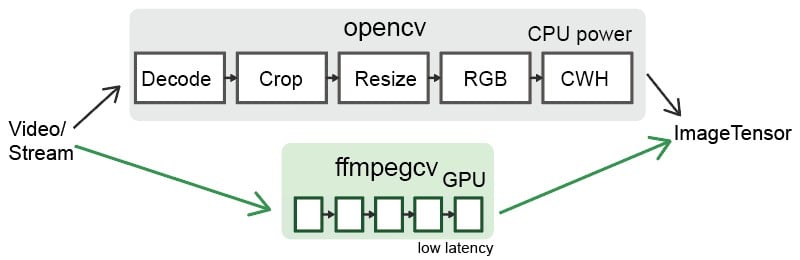
## Functions:
- `VideoWriter`: Write a video file.
- `VideoCapture`: Read a video file.
- `VideoCaptureNV`: Read a video file by NVIDIA GPU.
- `VideoCaptureQSV`: Read a video file by Intel QuickSync Video.
- `VideoCaptureCAM`: Read a camera.
- `VideoCaptureStream`: Read a RTP/RTSP/RTMP/HTTP stream.
- `VideoCaptureStreamRT`: Read a RTSP stream (IP Camera) in real time low latency as possible.
- `noblock`: Read/Write a video file in background using mulitprocssing.
- `toCUDA`: Translate a video/stream as CHW/HWC-float32 format into CUDA device, >2x faster.
## Install
You need to download ffmpeg before you can use ffmpegcv.
```
#1A. LINUX: sudo apt install ffmpeg
#1B. MAC (No NVIDIA GPU): brew install ffmpeg
#1C. WINDOWS: download ffmpeg and add to the path
#1D. CONDA: conda install ffmpeg=6.0.0 #don't use the default 4.x.x version
#2A. python
pip install ffmpegcv #stable verison
pip install git+https://github.com/chenxinfeng4/ffmpegcv #latest verison
#2B. recommand only when you want advanced functions. See the toCUDA section
pip install ffmpegcv[cuda]
```
## When should choose `ffmpegcv` other than `opencv`:
- The `opencv` is hard to install. The ffmpegcv only requires `numpy` and `FFmpeg`, works across Mac/Windows/Linux platforms.
- The `opencv` packages too much image processing toolbox. You just want a simple video/camero IO with GPU accessible.
- The `opencv` didn't support profiling `h264`/`h265` and other video writers.
- You want to **crop**, **resize** and **pad** the video/camero ROI.
- You are interested in deeplearning pipeline.
## Basic example
Read a video by CPU, and rewrite it by GPU.
```python
vidin = ffmpegcv.VideoCapture(vfile_in)
vidout = ffmpegcv.VideoWriterNV(vfile_out, 'h264', vidin.fps) #NVIDIA-GPU
with vidin, vidout:
for frame in vidin:
cv2.imshow('image', frame)
vidout.write(frame)
```
Read the camera.
```python
# by device ID
cap = ffmpegcv.VideoCaptureCAM(0)
# by device name
cap = ffmpegcv.VideoCaptureCAM("Integrated Camera")
```
Deeplearning pipeline.
```python
"""
—————————— NVIDIA GPU accelerating ⤴⤴ ———————
| |
V V
video -> decode -> crop -> resize -> RGB -> CUDA:CHW float32 -> model
"""
cap = ffmpegcv.toCUDA(
ffmpegcv.VideoCaptureNV(file, pix_fmt='nv12', resize=(W,H)),
tensor_format='chw')
for frame_CHW_cuda in cap:
frame_CHW_cuda = (frame_CHW_cuda - mean) / std
result = model(frame_CHW_cuda)
```
## Cross platform
The ffmpegcv is based on Python+FFmpeg, it can cross platform among `Windows, Linux, Mac, X86, Arm`systems.
## GPU Acceleration
- Support **NVIDIA** card only, test in x86_64 only.
- Works in **Windows**, **Linux** and **Anaconda**.
- Works in the **Google Colab** notebook.
- Infeasible in the **MacOS**. That ffmpeg didn't supports NVIDIA at all.
> \* The ffmegcv GPU reader is a bit slower than CPU reader, but much faster when use ROI operations (crop, resize, pad).
## Codecs
| Codecs | OpenCV-reader | ffmpegcv-cpu-r | gpu-r | OpenCV-writer | ffmpegcv-cpu-w | gpu-w |
| ----------- | ------------- | ---------------- | ---- | ------------- | ---------------- | ---- |
| h264 | √ | √ | √ | × | √ | √ |
| h265 (hevc) | not sure | √ | √ | × | √ | √ |
| mjpeg | √ | √ | × | √ | √ | × |
| mpeg | √ | √ | × | √ | √ | × |
| others | not sure | ffmpeg -decoders | × | not sure | ffmpeg -encoders | × |
## Benchmark
*On the way...(maybe never)*
## Video Reader
---
The ffmpegcv is just similar to opencv in api.
```python
# open cv
import cv2
cap = cv2.VideoCapture(file)
while True:
ret, frame = cap.read()
if not ret:
break
pass
# ffmpegcv
import ffmpegcv
cap = ffmpegcv.VideoCapture(file)
while True:
ret, frame = cap.read()
if not ret:
break
pass
cap.release()
# alternative
cap = ffmpegcv.VideoCapture(file)
nframe = len(cap)
for frame in cap:
pass
cap.release()
# more pythonic, recommand
with ffmpegcv.VideoCapture(file) as cap:
nframe = len(cap)
for iframe, frame in enumerate(cap):
if iframe>100: break
pass
```
Use GPU to accelerate decoding. It depends on the video codes.
h264_nvcuvid, hevc_nvcuvid ....
```python
cap_cpu = ffmpegcv.VideoCapture(file)
cap_gpu0 = ffmpegcv.VideoCaptureNV(file) #NVIDIA GPU0
cap_gpu1 = ffmpegcv.VideoCaptureNV(file, gpu=1) #NVIDIA GPU1
cap_qsv = ffmpegcv.VideoCaptureQSV(file) #Intel QSV, experimental
```
Use `rgb24` instead of `bgr24`. The `gray` version would be more efficient.
```python
cap = ffmpegcv.VideoCapture(file, pix_fmt='rgb24') #rgb24, bgr24, gray
ret, frame = cap.read()
plt.imshow(frame)
```
### ROI Operations
You can crop, resize and pad the video. These ROI operation is `ffmpegcv-GPU` > `ffmpegcv-CPU` >> `opencv`.
**Crop** video, which will be much faster than read the whole canvas. The top-left corner is (0, 0).
```python
cap = ffmpegcv.VideoCapture(file, crop_xywh=(0, 0, 640, 480))
```
**Resize** the video to the given size.
```python
cap = ffmpegcv.VideoCapture(file, resize=(640, 480))
```
**Resize** and keep the aspect ratio with black border **padding**.
```python
cap = ffmpegcv.VideoCapture(file, resize=(640, 480), resize_keepratio=True)
```
**Crop** and then **resize** the video.
```python
cap = ffmpegcv.VideoCapture(file, crop_xywh=(0, 0, 640, 480), resize=(512, 512))
```
### Extend Options
**INFILE_OPTIONS**: Add extra options to ffmpeg input.
```python
cap = ffmpegcv.VideoCapture(file, infile_options='-re -stream_loop -1')
# equivalent ffmpeg command
ffmpeg INFILE_OPTIONS -i FILE -f rawvideo pipe:
```
## toCUDA device
---
The ffmpegcv can translate the video/stream from HWC-uint8 cpu to CHW-float32 in CUDA device. It significantly reduce your cpu load, and get >2x faster than your manually convertion.
Prepare your environment. The cuda environment is required. The `pycuda` package is required. The `pytorch` package is non-essential.
> nvcc --version # check you've installed NVIDIA CUDA Compiler. Already installed if
> you've installed Tensorflow-gpu or Pytorch-gpu
>
> pip install ffmpegcv[cuda] #auto install pycuda
```python
# Read a video file to CUDA device, original
cap = ffmpegcv.VideoCaptureNV(file, pix_fmt='rgb24')
ret, frame_HWC_CPU = cap.read()
frame_CHW_CUDA = torch.from_numpy(frame_HWC_CPU).permute(2, 0, 1).cuda().contiguous().float() # 120fps, 1200% CPU load
# speed up
cap = toCUDA(ffmpegcv.VideoCapture(file, pix_fmt='yuv420p')) #pix_fmt: 'yuv420p' or 'nv12' only
cap = toCUDA(ffmpegcv.VideoCaptureNV(file, pix_fmt='nv12')) #'nv12' is better for gpu
cap = toCUDA(vid, tensor_format='chw') #tensor format:'chw'(default) or 'hwc', fp32 precision
cap = toCUDA(vid, gpu=1) #choose gpu
# read to the cuda device
ret, frame_CHW_pycuda = cap.read() #380fps, 200% CPU load, dtype is [pycuda array]
ret, frame_CHW_pycudamem = cap.read_cudamem() #dtype is [pycuda mem_alloc]
ret, frame_CHW_CUDA = cap.read_torch() #dtype is [pytorch tensor]
ret, _ = cap.read_torch(frame_CHW_CUDA) #no copy, but need to specify the output memory
frame_CHW_pycuda[:] = (frame_CHW_pycuda - mean) / std #normalize
```
How can `toCUDA` make it faster in your deeplearning pipeline than `opencv` or `ffmpeg`?
> 1. The opencv/ffmpeg uses the cpu to convert video pix_fmt from original YUV to RGB24, which is slow. The ffmpegcv use the cuda to accelerate pix_fmt convertion.
> 2. Use `yuv420p` or `nv12` can save the cpu load and reduce the memory copy from CPU to GPU.
> 3. The ffmpeg stores the image as HWC format. The ffmpegcv can use HWC & CHW format to accelerate the video reading.
## Video Writer
---
```python
# cv2
out = cv2.VideoWriter('outpy.avi',
cv2.VideoWriter_fourcc('M','J','P','G'),
10,
(w, h))
out.write(frame1)
out.write(frame2)
out.release()
# ffmpegcv, default codec is 'h264' in cpu 'h265' in gpu.
# frameSize is decided by the size of the first frame.
# use the 'mp4/mkv' instead of 'avi' to avoid the codec outdated.
out = ffmpegcv.VideoWriter('outpy.mp4', None, 10)
out.write(frame1)
out.write(frame2)
out.release()
# more pythonic
with ffmpegcv.VideoWriter('outpy.mp4', None, 10) as out:
out.write(frame1)
out.write(frame2)
```
Use GPU to accelerate encoding. Such as h264_nvenc, hevc_nvenc.
```python
out_cpu = ffmpegcv.VideoWriter('outpy.mp4', None, 10)
out_gpu0 = ffmpegcv.VideoWriterNV('outpy.mp4', 'h264', 10) #NVIDIA GPU0
out_gpu1 = ffmpegcv.VideoWriterNV('outpy.mp4', 'hevc', 10, gpu=1) #NVIDIA GPU1
out_qsv = ffmpegcv.VideoWriterQSV('outpy.mp4', 'h264', 10) #Intel QSV, experimental
```
Input image is rgb24 instead of bgr24
```python
out = ffmpegcv.VideoWriter('outpy.mp4', None, 10, pix_fmt='rgb24')
```
Resize the video
```python
out_resz = ffmpegcv.VideoWriter('outpy.mp4', None, 10, resize=(640, 480)) #Resize
```
## Video Reader and Writer
---
```python
import ffmpegcv
vfile_in = 'A.mp4'
vfile_out = 'A_h264.mp4'
vidin = ffmpegcv.VideoCapture(vfile_in)
vidout = ffmpegcv.VideoWriter(vfile_out, None, vidin.fps)
with vidin, vidout:
for frame in vidin:
vidout.write(frame)
```
## Camera Reader
---
**Experimental feature**. The ffmpegcv offers Camera reader. Which is consistent with VideoFiler reader.
- The `VideoCaptureCAM` aims to support ROI operations. The Opencv will be general fascinating than ffmpegcv in camera read. **I recommand the opencv in most camera reading case**.
- The ffmpegcv can use name to retrieve the camera device. Use `ffmpegcv.VideoCaptureCAM("Integrated Camera")` is readable than `cv2.VideoCaptureCAM(0)`.
- The `VideoCaptureCAM` will be laggy and dropping frames if your post-process takes long time. The VideoCaptureCAM will buffer the recent frames.
- The `VideoCaptureCAM` is continously working on background even if you didn't read it. **Please release it in time**.
- Works perfect in Windows, not-perfect in Linux and macOS.
```python
import cv2
cap = cv2.VideoCapture(0)
while True:
ret, frame = cap.read()
cv2.imshow('frame', frame)
if cv2.waitKey(1) & 0xFF == ord('q'):
break
cap.release()
# ffmpegcv, in Windows&Linux
import ffmpegcv
cap = ffmpegcv.VideoCaptureCAM(0)
while True:
ret, frame = cap.read()
cv2.imshow('frame', frame)
if cv2.waitKey(1) & 0xFF == ord('q'):
break
cap.release()
# ffmpegcv use by camera name, in Windows&Linux
cap = ffmpegcv.VideoCaptureCAM("Integrated Camera")
# ffmpegcv use camera path if multiple cameras conflict
cap = ffmpegcv.VideoCaptureCAM('@device_pnp_\\\\?\\usb#vid_2304&'
'pid_oot#media#0001#{65e8773d-8f56-11d0-a3b9-00a0c9223196}'
'\\global')
# ffmpegcv use camera with ROI operations
cap = ffmpegcv.VideoCaptureCAM("Integrated Camera", crop_xywh=(0, 0, 640, 480), resize=(512, 512), resize_keepratio=True)
```
**List all camera devices**
```python
from ffmpegcv.ffmpeg_reader_camera import query_camera_devices
devices = query_camera_devices()
print(devices)
```
>{0: ('Integrated Camera', '@device_pnp_\\\\?\\usb#vid_2304&pid_oot#media#0001#{65e8773d-8f56-11d0-a3b9-00a0c9223196}\\global'),
1: ('OBS Virtual Camera', '@device_sw_{860BB310-5D01-11D0-BD3B-00A0C911CE86}\\{A3FCE0F5-3493-419F-958A-ABA1250EC20B}')}
**Set the camera resolution, fps, vcodec/pixel-format**
```python
from ffmpegcv.ffmpeg_reader_camera import query_camera_options
options = query_camera_options(0) # or query_camera_options("Integrated Camera")
print(options)
cap = ffmpegcv.VideoCaptureCAM(0, **options[-1])
```
>[{'camcodec': 'mjpeg', 'campix_fmt': None, 'camsize_wh': (1280, 720), 'camfps': 60.0002}, {'camcodec': 'mjpeg', 'campix_fmt': None, 'camsize_wh': (640, 480), 'camfps': 60.0002}, {'camcodec': 'mjpeg', 'campix_fmt': None, 'camsize_wh': (1920, 1080), 'camfps': 60.0002}, {'camcodec': None, 'campix_fmt': 'yuyv422', 'camsize_wh': (1280, 720), 'camfps': 10}, {'camcodec': None, 'campix_fmt': 'yuyv422', 'camsize_wh': (640, 480), 'camfps': 30}, {'camcodec': None, 'campix_fmt': 'yuyv422', 'camsize_wh': (1920, 1080), 'camfps': 5}]
**Known issues**
1. The VideoCaptureCAM didn't give a smooth experience in macOS. You must specify all the camera parameters. And the query_camera_options woun't give any suggestion. That's because the `ffmpeg` cannot list device options using mac native `avfoundation`.
```python
# The macOS requires full argument.
cap = ffmpegcv.VideoCaptureCAM('FaceTime HD Camera', camsize_wh=(1280,720), camfps=30, campix_fmt='nv12')
```
2. The VideoCaptureCAM cann't list the FPS in linux. Because the `ffmpeg` cound't query the device's FPS using linux native `v4l2` module. However, it's just OK to let the FPS empty.
## Stream Reader (Live streaming, RTSP IP cameras)
**Experimental feature**. The ffmpegcv offers Stream reader. Which is consistent with VideoFiler reader, and more similiar to the camera.
Becareful when using it.
- Support `RTSP`, `RTP`, `RTMP`, `HTTP`, `HTTPS` streams.
- The `VideoCaptureStream` will be laggy and dropping frames if your post-process takes long time. The VideoCaptureCAM will buffer the recent frames.
- The `VideoCaptureStreamRT` is continously working on background even if you didn't read it. **Please release it in time**.
- **Low latency** RTSP IP camera reader. Batter than opencv.
- *It's still experimental*. Recommand you to use opencv.
```python
# opencv
import cv2
stream_url = 'http://devimages.apple.com.edgekey.net/streaming/examples/bipbop_4x3/gear2/prog_index.m3u8'
cap = cv2.VideoCapture(stream_url, cv2.CAP_FFMPEG)
if not cap.isOpened():
print('Cannot open the stream')
exit(-1)
while True:
ret, frame = cap.read()
if not ret:
break
pass
# ffmpegcv
import ffmpegcv
cap = ffmpegcv.VideoCaptureStream(stream_url)
while True:
ret, frame = cap.read()
if not ret:
break
pass
# ffmpegcv, IP Camera Low-latency
# e.g. HIK Vision IP Camera, `101` Main camera stream, `102` the second
stream_url = 'rtsp://admin:PASSWD@192.168.1.xxx:8554/Streaming/Channels/102'
cap = ffmpegcv.VideoCaptureStreamRT(stream_url) # Low latency & recent buffered
cap = ffmpegcv.ReadLiveLast(ffmpegcv.VideoCaptureStreamRT, stream_url) #no buffer
while True:
ret, frame = cap.read()
if not ret:
break
pass
```
## Noblock
A proxy to automatic prepare frames in backgroud, which does not block when reading&writing current frame (multiprocessing). This make your python program more efficient in CPU usage. Up to 2x boost.
> ffmpegcv.VideoCapture(*args) -> ffmpegcv.noblock(ffmpegcv.VideoCapture, *args)
>
> ffmpegcv.VideoWriter(*args) -> ffmpegcv.noblock(ffmpegcv.VideoWriter, *args)
```python
#Proxy any VideoCapture&VideoWriter args and kargs
vid_noblock = ffmpegcv.noblock(ffmpegcv.VideoCapture, vfile, pix_fmt='rbg24')
# this is fast
def cpu_tense(): time.sleep(0.01)
for _ in tqdm.trange(1000):
ret, img = vid_noblock.read() #current img is already buffered, take no time
cpu_tense() #meanwhile, the next img is buffering in background
# this is slow
vid = ffmpegcv.VideoCapture(vfile, pix_fmt='rbg24')
for _ in tqdm.trange(1000):
ret, img = vid.read() #this read will block cpu, take time
cpu_tense()
```
================================================
FILE: README_CN.md
================================================
# FFMPEGCV 读写视频,替代 OPENCV.

[](https://pypi.org/project/ffmpegcv/)
[](https://pypistats.org/packages/ffmpegcv)


[English Version](./README.md) | 中文版本
ffmpegcv提供了基于ffmpeg的视频读取器和视频编写器,比cv2更快和更强大。适合深度学习的视频处理。
- ffmpegcv与open-cv具有**兼容**的API。
- ffmpegcv可以使用**GPU加速**编码和解码。
- ffmpegcv支持比open-cv更多的**视频编码器**。
- ffmpegcv原生支持**RGB**/BGR/灰度像素格式。
- ffmpegcv支持网络**流视频读取** (网线监控相机)。
- ffmpegcv支持ROI(感兴趣区域)操作,可以对ROI进行**裁剪**、**调整大小**和**填充**。
总之,ffmpegcv与opencv的API非常相似。但它具有更多的编码器,并且不需要安装opencv。
- ffmpegcv支持导出图像帧到CUDA设备。
## 功能:
- `VideoWriter`:写入视频文件。
- `VideoCapture`:读取视频文件。
- `VideoCaptureNV`:使用NVIDIA GPU读取视频文件。
- `VideoCaptureQSV`: 使用Intel集成显卡读取视频文件.
- `VideoCaptureCAM`:读取摄像头。
- `VideoCaptureStream`:读取RTP/RTSP/RTMP/HTTP流。
- `VideoCaptureStreamRT`: 读取RTSP流 (网线监控相机),实时、低延迟。
- `noblock`:在后台读取视频文件(更快),使用多进程。
- `toCUDA`:将图像帧导出到CUDA设备,以 CHW/HWC-float32 格式存储,超过2倍性能提升。
## 安装
在使用ffmpegcv之前,您需要下载`ffmpeg`。
```
#1A. LINUX: sudo apt install ffmpeg
#1B. MAC: brew install ffmpeg
#1C. WINDOWS: 下载ffmpeg并添加至环境变量的路径中
#1D. CONDA: conda install ffmpeg=6.0.0
#2. python
pip install ffmpegcv #stable verison
pip install git+https://github.com/chenxinfeng4/ffmpegcv #latest verison
```
## 何时选择 `ffmpegcv` 而不是 `opencv`:
- 安装`opencv`比较困难。ffmpegcv仅需要`numpy`和`FFmpeg`,可以在Mac/Windows/Linux平台上工作。
- `opencv`包含太多的图像处理工具箱,而您只是想使用带GPU支持的简单视频/摄像头输入输出操作。
- `opencv`不支持`h264`/`h265`和其他视频编码器。
- 您想对视频/摄像头的感兴趣区域(ROI)进行**裁剪**、**调整大小**和**填充**操作。
## 基本示例
通过CPU读取视频,并通过GPU重写视频。
```python
vidin = ffmpegcv.VideoCapture(vfile_in)
vidout = ffmpegcv.VideoWriterNV(vfile_out, 'h264', vidin.fps) #NVIDIA 显卡
with vidin, vidout:
for frame in vidin:
cv2.imshow('image', frame)
vidout.write(frame)
```
读取摄像头。
```python
# 通过设备ID
cap = ffmpegcv.VideoCaptureCAM(0)
# 通过设备名称
cap = ffmpegcv.VideoCaptureCAM("Integrated Camera")
```
深度学习流水线
```python
"""
—————————— NVIDIA GPU 加速 ⤴⤴ ———————
| |
V V
视频 -> 解码器 -> 裁剪 -> 缩放 -> RGB -> CUDA:CHW float32 -> 模型
"""
cap = ffmpegcv.toCUDA(
ffmpegcv.VideoCaptureNV(file, pix_fmt='nv12', resize=(W,H)),
tensor_format='chw')
for frame_CHW_cuda in cap:
frame_CHW_cuda = (frame_CHW_cuda - mean) / std
result = model(frame_CHW_cuda)
```
## GPU加速
- 仅支持NVIDIA显卡,在 x86_64 上测试。
- 原生支持**Windows**, **Linux**, **Anaconda**。
- 在**Google Colab**上顺利运行。
- 在**MacOS**仅能使用CPU功能,上无法进行GPU加速,因为Mac根本就不支持NVIDIA。
> 在CPU数量充足的条件下,GPU读取速度可能比CPU读取速度稍慢。在使用感兴趣区域(ROI)操作(裁剪、调整大小、填充)时,GPU优势更凸显。
## 编解码器
| 编解码器 | OpenCV读取器 | ffmpegcv-CPU读取器 | GPU读取器 | OpenCV写入器 | ffmpegcv-CPU写入器 | GPU写入器 |
| ----------- | ------------- | ---------------- | ---- | ------------- | ---------------- | ---- |
| h264 | √ | √ | √ | × | √ | √ |
| h265 (hevc) | 不确定 | √ | √ | × | √ | √ |
| mjpeg | √ | √ | × | √ | √ | × |
| mpeg | √ | √ | × | √ | √ | × |
| 其他 | 不确定 | ffmpeg -decoders | × | 不确定 | ffmpeg -encoders | × |
## 基准测试
*正在进行中...(遥遥无期)*
## 视频读取器
---
ffmpegcv与opencv在API上非常类似。
```python
# OpenCV
import cv2
cap = cv2.VideoCapture(file)
while True:
ret, frame = cap.read()
if not ret:
break
pass
# ffmpegcv
import ffmpegcv
cap = ffmpegcv.VideoCapture(file)
while True:
ret, frame = cap.read()
if not ret:
break
pass
cap.release()
# 另一种写法
cap = ffmpegcv.VideoCapture(file)
nframe = len(cap)
for frame in cap:
pass
cap.release()
# 更加Pythonic的写法,推荐使用
with ffmpegcv.VideoCapture(file) as cap:
nframe = len(cap)
for iframe, frame in enumerate(cap):
if iframe>100: break
pass
```
使用GPU加速解码。具体取决于视频编码格式。
h264_nvcuvid, hevc_nvcuvid ....
```python
cap_cpu = ffmpegcv.VideoCapture(file)
cap_gpu = ffmpegcv.VideoCapture(file, codec='h264_cuvid') # NVIDIA GPU0
cap_gpu0 = ffmpegcv.VideoCaptureNV(file) # NVIDIA GPU0
cap_gpu1 = ffmpegcv.VideoCaptureNV(file, gpu=1) # NVIDIA GPU1
cap_qsv = ffmpegcv.VideoCaptureQSV(file) #Intel QSV, 测试中
```
使用`rgb24`代替`bgr24`。`gray`版本会更高效。
```python
cap = ffmpegcv.VideoCapture(file, pix_fmt='rgb24') # rgb24, bgr24, gray
ret, frame = cap.read()
plt.imshow(frame)
```
### 感兴趣区域(ROI)操作
您可以对视频进行裁剪、调整大小和填充。这些ROI操作中,`ffmpegcv-GPU` > `ffmpegcv-CPU` >> `opencv` 在性能上。
**裁剪**视频,比读取整个画布要快得多。
```python
cap = ffmpegcv.VideoCapture(file, crop_xywh=(0, 0, 640, 480))
```
将视频调整为给定大小的**大小**。
```python
cap = ffmpegcv.VideoCapture(file, resize=(640, 480))
```
**调整大小**并保持宽高比,使用黑色边框进行**填充**。
```python
cap = ffmpegcv.VideoCapture(file, resize=(640, 480), resize_keepratio=True)
```
对视频进行**裁剪**,然后进行**调整大小**。左上角为坐标 (0,0)。
```python
cap = ffmpegcv.VideoCapture(file, crop_xywh=(0, 0, 640, 480), resize=(512, 512))
```
### 扩展选项
**INFILE_OPTIONS**: 扩展 ffmpeg 输入选项。
```python
cap = ffmpegcv.VideoCapture(file, infile_options='-re -stream_loop -1')
# 等效于下面的 ffmpeg 命令
ffmpeg INFILE_OPTIONS -i FILE -f rawvideo pipe:
```
## toCUDA 将图像帧快速导出到CUDA设备
---
ffmpegcv 可以将 HWC-uint8 cpu 中的视频/流转换为 CUDA 设备中的 CHW-float32。它可以显著减少你的 CPU 负载,并比你的手动转换快 2 倍以上。
准备环境。你需要具备 cuda 环境,并且安装 pycuda 包。注意,pytorch 包是非必须的。
> nvcc --version # 检查你是否已经安装了 NVIDIA CUDA 编译器
> pip install pycuda # 安装 pycuda
```python
# 读取视频到CUDA设备,加速前
cap = ffmpegcv.VideoCaptureNV(file, pix_fmt='rgb24')
ret, frame_HWC_CPU = cap.read()
frame_CHW_CUDA = torch.from_numpy(frame_HWC_CPU).permute(2, 0, 1).cuda().contiguous().float() # 120fps, 1200% CPU 使用率
# 加速后
cap = toCUDA(ffmpegcv.VideoCapture(file, pix_fmt='yuv420p')) #必须设置, yuv420p 针对 cpu
cap = toCUDA(ffmpegcv.VideoCaptureNV(file, pix_fmt='nv12')) #必须设置, nv12 针对 gpu
cap = toCUDA(vid, tensor_format='chw') #tensor 格式:'chw'(默认) or 'hwc'
cap = toCUDA(vid, gpu=1) #选择 gpu
ret, frame_CHW_pycuda = cap.read() #380fps, 200% CPU load, [pycuda array]
ret, frame_CHW_pycudamem = cap.read_cudamem() #same as [pycuda mem_alloc]
ret, frame_CHW_CUDA = cap.read_torch() #same as [pytorch tensor]
ret, _ = cap.read_torch(frame_CHW_CUDA) #不拷贝, 但需要提前分配内存
frame_CHW_pycuda[:] = (frame_CHW_pycuda - mean) / std #归一化
```
为什么在深度学习流水线中使用 toCUDA 会更快?
> 1. ffmpeg 使用 CPU 将视频像素格式从原始 YUV 转换为 RGB24,这个过程很慢。`toCUDA` 使用 cuda 加速像素格式转换。
> 2. 使用 yuv420p 或 nv12 可以节省 CPU 负载并减少从 CPU 到 GPU 的内存复制。
> 3. ffmpeg 将图像存储为 HWC 格式。ffmpegcv 可以使用 HWC 和 CHW 格式来加速视频存储。
## 视频写入器
---
```python
# cv2
out = cv2.VideoWriter('outpy.avi',
cv2.VideoWriter_fourcc('M','J','P','G'),
10,
(w, h))
out.write(frame1)
out.write(frame2)
out.release()
# ffmpegcv,默认的编码器为'h264'在CPU上,'h265'在GPU上。
# 帧大小由第一帧决定
# 使用 'mp4/mkv' 来替代古老的 'avi' 格式
out = ffmpegcv.VideoWriter('outpy.mp4', None, 10)
out.write(frame1)
out.write(frame2)
out.release()
# 更加Pythonic的写法
with ffmpegcv.VideoWriter('outpy.mp4', None, 10) as out:
out.write(frame1)
out.write(frame2)
```
使用GPU加速编码。例如h264_nvenc,hevc_nvenc。
```python
out_cpu = ffmpegcv.VideoWriter('outpy.mp4', None, 10)
out_gpu0 = ffmpegcv.VideoWriterNV('outpy.mp4', 'h264', 10) # NVIDIA GPU0
out_gpu1 = ffmpegcv.VideoWriterNV('outpy.mp4', 'hevc', 10, gpu=1) # NVIDIA GPU1
out_qsv = ffmpegcv.VideoWriterQSV('outpy.mp4', 'h264', 10) #Intel QSV, 测试中
```
输入图像使用rgb24而不是bgr24。
```python
out = ffmpegcv.VideoWriter('outpy.mp4', None, 10, pix_fmt='rgb24')
```
缩放图像尺寸
```python
out_resz = ffmpegcv.VideoWriter('outpy.mp4', None, 10, resize=(640, 480))
```
## 视频读取器和写入器
---
```python
import ffmpegcv
vfile_in = 'A.mp4'
vfile_out = 'A_h264.mp4'
vidin = ffmpegcv.VideoCapture(vfile_in)
vidout = ffmpegcv.VideoWriter(vfile_out, None, vidin.fps)
with vidin, vidout:
for frame in vidin:
vidout.write(frame)
```
## 相机读取器
---
**实验性功能**。ffmpegcv提供了相机读取器。与VideoCapture读取器一致。
- VideoCaptureCAM旨在支持感兴趣区域(ROI)操作。在相机读取方面,Opencv比ffmpegcv更具吸引力。**对于大多数相机读取情况,我推荐使用Opencv**。
- ffmpegcv可以使用名称检索相机设备,使用`ffmpegcv.VideoCaptureCAM("Integrated Camera")`比使用`cv2.VideoCaptureCAM(0)`更易读。
- 如果后处理时间过长,VideoCaptureCAM将会出现卡顿和丢帧。VideoCaptureCAM会缓冲最近的帧。
- 即使没有读取视频帧,VideoCaptureCAM也会在后台不断工作。**请及时释放资源**。
- 在Windows上表现良好,在Linux和macOS上表现不完美。
```python
import cv2
cap = cv2.VideoCapture(0)
while True:
ret, frame = cap.read()
cv2.imshow('frame', frame)
if cv2.waitKey(1) & 0xFF == ord('q'):
break
cap.release()
# ffmpegcv,在Windows和Linux上
import ffmpegcv
cap = ffmpegcv.VideoCaptureCAM(0)
while True:
ret, frame = cap.read()
cv2.imshow('frame', frame)
if cv2.waitKey(1) & 0xFF == ord('q'):
break
cap.release()
# ffmpegcv 使用相机名称,在Windows和Linux上
cap = ffmpegcv.VideoCaptureCAM("Integrated Camera")
# ffmpegcv 使用相机路径(避免多个相机冲突)
cap = ffmpegcv.VideoCaptureCAM('@device_pnp_\\\\?\\usb#vid_2304&'
'pid_oot#media#0001#{65e8773d-8f56-11d0-a3b9-00a0c9223196}'
'\\global')
# ffmpegcv 使用具有ROI操作的相机
cap = ffmpegcv.VideoCaptureCAM("Integrated Camera", crop_xywh=(0, 0, 640, 480), resize=(512, 512), resize_keepratio=True)
```
**列出所有相机设备**
```python
from ffmpegcv.ffmpeg_reader_camera import query_camera_devices
devices = query_camera_devices()
print(devices)
```
>{0: ('Integrated Camera', '@device_pnp_\\\\?\\usb#vid_2304&pid_oot#media#0001#{65e8773d-8f56-11d0-a3b9-00a0c9223196}\\global'),
1: ('OBS Virtual Camera', '@device_sw_{860BB310-5D01-11D0-BD3B-00A0C911CE86}\\{A3FCE0F5-3493-419F-958A-ABA1250EC20B}')}
**设置相机的分辨率、帧率、视频编码/像素格式**
```python
from ffmpegcv.ffmpeg_reader_camera import query_camera_options
options = query_camera_options(0) # 或者 query_camera_options("Integrated Camera")
print(options)
cap = ffmpegcv.VideoCaptureCAM(0, **options[-1])
```
>[{'camcodec': 'mjpeg', 'campix_fmt': None, 'camsize_wh': (1280, 720), 'camfps': 60.0002}, {'camcodec': 'mjpeg', 'campix_fmt': None, 'camsize_wh': (640, 480), 'camfps': 60.0002}, {'camcodec': 'mjpeg', 'campix_fmt': None, 'camsize_wh': (1920, 1080), 'camfps': 60.0002}, {'camcodec': None, 'campix_fmt': 'yuyv422', 'camsize_wh': (1280, 720), 'camfps': 10}, {'camcodec': None, 'campix_fmt': 'yuyv422', 'camsize_wh': (640, 480), 'camfps': 30}, {'camcodec': None, 'campix_fmt': 'yuyv422', 'camsize_wh': (1920, 1080), 'camfps': 5}]
**已知问题**
1. VideoCaptureCAM在macOS上的体验不太流畅。你必须指定所有相机参数。而且query_camera_options不会给出任何建议。这是因为`ffmpeg`无法使用mac本机的`avfoundation`列出设备选项。
```python
# macOS需要提供完整参数。
cap = ffmpegcv.VideoCaptureCAM('FaceTime HD Camera', camsize_wh=(1280,720), camfps=30, campix_fmt='nv12')
```
2. 在Linux上VideoCaptureCAM无法列出FPS,因为`ffmpeg`无法使用Linux本机的`v4l2`模块查询设备的FPS。不过,让FPS为空也没问题。
## 流读取器 (直播流,网络监控摄像头)
**实验性功能**。ffmpegcv提供了流读取器,与VideoFile读取器一致,更类似于相机。
- 支持`RTSP`、`RTP`、`RTMP`、`HTTP`、`HTTPS`流。
- 如果后处理时间过长,VideoCaptureStream会出现卡顿和丢帧。VideoCaptureCAM会缓冲最近的帧。
- 即使没有读取视频帧,VideoCaptureStream也会在后台不断工作。**请及时释放资源**。
- 这仍然是实验性功能。建议您使用opencv。
```python
# opencv
import cv2
stream_url = 'http://devimages.apple.com.edgekey.net/streaming/examples/bipbop_4x3/gear2/prog_index.m3u8'
cap = cv2.VideoCapture(stream_url, cv2.CAP_FFMPEG)
if not cap.isOpened():
print('无法打开流')
exit(-1)
while True:
ret, frame = cap.read()
if not ret:
break
pass
# ffmpegcv
import ffmpegcv
cap = ffmpegcv.VideoCaptureStream(stream_url)
while True:
ret, frame = cap.read()
if not ret:
break
pass
# ffmpegcv, 网络监控摄像头
# 例如 海康威视, `101` 主视频流, `102` 子视频流
stream_url = 'rtsp://admin:PASSWD@192.168.1.xxx:8554/Streaming/Channels/102'
cap = ffmpegcv.VideoCaptureStreamRT(stream_url) # 低延迟 & 缓存
cap = ffmpegcv.ReadLiveLast(ffmpegcv.VideoCaptureStreamRT, stream_url) #不缓存
while True:
ret, frame = cap.read()
if not ret:
break
pass
```
## FFmpegReaderNoblock
更快的读写取视频。利用多进程在后台自动准备帧,这样在读写当前帧时不会阻塞。这使得您的Python程序在CPU使用方面更高效。带来最大翻倍效率提升。
> ffmpegcv.VideoCapture(*args) -> ffmpegcv.noblock(ffmpegcv.VideoCapture, *args)
>
> ffmpegcv.VideoWriter(*args) -> ffmpegcv.noblock(ffmpegcv.VideoWriter, *args)
```python
# 代理任何 VideoCapture&VideoWriter 的参数和kargs
vid_noblock = ffmpegcv.noblock(ffmpegcv.VideoCapture, vfile, pix_fmt='rbg24')
# 这很快
def cpu_tense(): time.sleep(0.01)
for _ in tqdm.trange(1000):
ret, img = vid_noblock.read() #当前图像已经被缓冲,不会占用时间
cpu_tense() #同时,下一帧在后台缓冲
# 这很慢
vid = ffmpegcv.VideoCapture(vfile, pix_fmt='rbg24')
for _ in tqdm.trange(2000):
ret, img = vid.read() #此读取将阻塞CPU,占用时间
cpu_tense()
```
================================================
FILE: ffmpegcv/__init__.py
================================================
from .ffmpeg_reader import FFmpegReader, FFmpegReaderNV
from .ffmpeg_writer import FFmpegWriter, FFmpegWriterNV
from .ffmpeg_reader_camera import FFmpegReaderCAM
from .ffmpeg_reader_stream import FFmpegReaderStream
from .ffmpeg_reader_stream_realtime import FFmpegReaderStreamRT, FFmpegReaderStreamRTNV
from .ffmpeg_writer_stream_realtime import FFmpegWriterStreamRT
from .ffmpeg_reader_qsv import FFmpegReaderQSV
from .ffmpeg_writer_qsv import FFmpegWriterQSV
from .ffmpeg_reader_pannels import FFmpegReaderPannels
from .ffmpeg_noblock import noblock, ReadLiveLast
from .video_info import get_num_NVIDIA_GPUs
import shutil
from subprocess import DEVNULL, check_output
from .version import __version__
def _check():
if not shutil.which("ffmpeg") or not shutil.which("ffprobe"):
raise RuntimeError(
"The ffmpeg is not installed. \n\n"
"Please install ffmpeg via:\n "
"conda install ffmpeg"
)
_check()
_check_nvidia_init = None
def _check_nvidia():
global _check_nvidia_init
run = lambda x: check_output(x, shell=True, stderr=DEVNULL)
if _check_nvidia_init is None:
calling_output = run("ffmpeg -h encoder=hevc_nvenc")
if "AVOptions" not in calling_output.decode("utf-8"):
raise RuntimeError(
"The ffmpeg is not compiled with NVENC support.\n\n"
"Please re-compile ffmpeg following the instructions at:\n "
"https://docs.nvidia.com/video-technologies/video-codec-sdk/ffmpeg-with-nvidia-gpu/"
)
calling_output = run("ffmpeg -h decoder=hevc_cuvid")
if "AVOptions" not in calling_output.decode("utf-8"):
raise RuntimeError(
"The ffmpeg is not compiled with NVENC support.\n\n"
"Please re-compile ffmpeg following the instructions at:\n "
"https://docs.nvidia.com/video-technologies/video-codec-sdk/ffmpeg-with-nvidia-gpu/"
)
if get_num_NVIDIA_GPUs() == 0:
raise RuntimeError(
"No NVIDIA GPU found.\n\n"
"Please use a NVIDIA GPU card listed at:\n "
"https://developer.nvidia.com/video-encode-and-decode-gpu-support-matrix-new"
)
_check_nvidia_init = True
return True
def VideoCapture(
file,
codec=None,
pix_fmt="bgr24",
crop_xywh=None,
resize=None,
resize_keepratio=True,
resize_keepratioalign="center",
infile_options=None
) -> FFmpegReader:
"""
Alternative to cv2.VideoCapture
Parameters
----------
file : str
Path to video file.
codec : str
Codec to use. Optional. Default is `None`.
pix_fmt : str
Pixel format. ['bgr24' | 'rgb24']. Optional. Default is 'bgr24'.
crop_xywh : tuple
Crop the frame. (x, y, width, height). Optional. Default is `None`.
resize : tuple
Resize the video to the given size. Optional. Default is `None`.
resize_keepratio : bool
Keep the aspect ratio and the border is black. Optional. Default is `True`.
resize_keepratioalign : str
Align the image to the `center`, `topleft`, `topright`, `bottomleft` or
`bottomright`. Optional. Default is 'center'.
infile_options : str
Additional options for ffmpeg. Optional. Default is `None`.
Examples
--------
opencv
```
cap = cv2.VideoCapture(file)
while True:
ret, frame = cap.read()
if not ret:
break
pass
```
ffmpegcv
```
cap = ffmpegcv.VideoCapture(file)
while True:
ret, frame = cap.read()
if not ret:
break
pass
```
Or use iterator
```
cap = ffmpegcv.VideoCapture(file)
for frame in cap:
pass
counts = len(cap)
```
Use GPU to accelerate decoding
```
cap_cpu = ffmpegcv.VideoCapture(file)
cap_gpu = ffmpegcv.VideoCaptureNV(file)
```
Use rgb24 instead of bgr24
```
cap = ffmpegcv.VideoCapture(file, pix_fmt='rgb24')
```
Crop video.
```python
cap = ffmpegcv.VideoCapture(file, crop_xywh=(0, 0, 640, 480))
```
Resize the video to the given size
```
cap = ffmpegcv.VideoCapture(file, resize=(640, 480))
```
Resize and keep the aspect ratio with black border
```
cap = ffmpegcv.VideoCapture(file, resize=(640, 480), resize_keepratio=True)
```
Crop and then resize the video.
```python
cap = ffmpegcv.VideoCapture(file, crop_xywh=(0, 0, 640, 480), resize=(512, 512))
```
Author: Chenxinfeng 2022-04-16, cxf529125853@163.com
"""
return FFmpegReader.VideoReader(
file, codec, pix_fmt, crop_xywh, resize, resize_keepratio, resize_keepratioalign, infile_options
)
VideoReader = VideoCapture
def VideoWriter(
file, codec=None, fps=30, pix_fmt="bgr24", bitrate=None, resize=None, preset=None
) -> FFmpegWriter:
"""
Alternative to cv2.VideoWriter
Parameters
----------
file : str
Path to video file.
codec : str
Codec to use. Optional. Default is `None` (x264).
fps : number
Frames per second. Optional. Default is 30.
pix_fmt : str
Pixel format of input. ['bgr24' | 'rgb24']. Optional. Default is 'bgr24'.
bitrate : str
Bitrate of output video. Optional. Default is `None`.
resize : tuple
Frame size of output. (width, height). Optional. Default is `None`.
preset : str
Preset of ffmpeg. Optional. Default is `None`.
Examples
--------
opencv
```
out = cv2.VideoWriter('outpy.avi',
cv2.VideoWriter_fourcc('M','J','P','G'),
10,
(w, h))
out.write(frame1)
out.write(frame2)
out.release()
```
ffmpegcv
```
out = ffmpegcv.VideoWriter('outpy.avi', None, 10)
out.write(frame1)
out.write(frame2)
out.release()
```
frameSize is decided by the size of the first frame
```
out = ffmpegcv.VideoWriter('outpy.avi', None, 10)
```
Use GPU to accelerate encoding
```
out_cpu = ffmpegcv.VideoWriter('outpy.avi', None, 10)
out_gpu = ffmpegcv.VideoWriter('outpy.avi', 'h264_nvenc', 10)
```
Use rgb24 instead of bgr24
```
out = ffmpegcv.VideoWriter('outpy.avi', None, 10, pix_fmt='rgb24')
out.write(cv2.cvtColor(frame, cv2.COLOR_BGR2RGB))
```
Author: Chenxinfeng 2022-04-16, cxf529125853@163.com
"""
return FFmpegWriter.VideoWriter(
file, codec, fps, pix_fmt, bitrate, resize, preset=preset
)
def VideoCaptureNV(
file,
pix_fmt="bgr24",
crop_xywh=None,
resize=None,
resize_keepratio=True,
resize_keepratioalign="center",
infile_options=None,
gpu=0
) -> FFmpegReaderNV:
"""
`ffmpegcv.VideoCaptureNV` is a gpu version for `ffmpegcv.VideoCapture`.
"""
_check_nvidia()
return FFmpegReaderNV.VideoReader(
file, pix_fmt, crop_xywh, resize, resize_keepratio,
resize_keepratioalign, infile_options, gpu
)
VideoReaderNV = VideoCaptureNV
def VideoCaptureQSV(
file,
pix_fmt="bgr24",
crop_xywh=None,
resize=None,
resize_keepratio=True,
resize_keepratioalign="center",
infile_options=None,
gpu=0
) -> FFmpegReaderQSV:
"""
`ffmpegcv.VideoCaptureQSV` is a gpu version for `ffmpegcv.VideoCapture`.
"""
return FFmpegReaderQSV.VideoReader(
file, pix_fmt, crop_xywh, resize, resize_keepratio,
resize_keepratioalign, infile_options, gpu
)
VideoReaderQSV = VideoCaptureQSV
def VideoWriterNV(
file,
codec=None,
fps=30,
pix_fmt="bgr24",
gpu=0,
bitrate=None,
resize=None,
preset=None,
) -> FFmpegWriterNV:
"""
`ffmpegcv.VideoWriterNV` is a gpu version for `ffmpegcv.VideoWriter`.
"""
_check_nvidia()
return FFmpegWriterNV.VideoWriter(
file, codec, fps, pix_fmt, gpu, bitrate, resize, preset=preset
)
def VideoWriterQSV(
file,
codec=None,
fps=30,
pix_fmt="bgr24",
gpu=0,
bitrate=None,
resize=None,
preset=None,
) -> FFmpegWriterQSV:
"""
`ffmpegcv.VideoWriterQSV` is a gpu version for `ffmpegcv.VideoWriter`.
"""
return FFmpegWriterQSV.VideoWriter(
file, codec, fps, pix_fmt, gpu, bitrate, resize, preset=preset
)
def VideoWriterStreamRT(
url, pix_fmt="bgr24", bitrate=None, resize=None, preset=None
) -> FFmpegWriterStreamRT:
return FFmpegWriterStreamRT.VideoWriter(
url, "libx264", pix_fmt, bitrate, resize, preset
)
def VideoCaptureCAM(
camname,
pix_fmt="bgr24",
crop_xywh=None,
resize=None,
resize_keepratio=True,
resize_keepratioalign="center",
camsize_wh=None,
camfps=None,
camcodec=None,
campix_fmt=None
) -> FFmpegReaderCAM:
"""
Alternative to cv2.VideoCapture
Parameters
----------
file : see ffmpegcv.VideoReader
codec : see ffmpegcv.VideoReader
pix_fmt : see ffmpegcv.VideoReader
crop_xywh : see ffmpegcv.VideoReader
resize : see ffmpegcv.VideoReader
resize_keepratio : see ffmpegcv.VideoReader
resize_keepratioalign : see ffmpegcv.VideoReader
camsize_wh: tuple or None
Camera resolution (width, height). e.g (800, 600)
camfps: float or None
Camera framerate. e.g. 30.
camcodec: str or None
Camera codec. e.g. 'mjpeg' or 'h264'.
campix_fmt: str or None
Camera pixel format. e.g. 'rgb24' or 'yuv420p'.
Just set one of `camcodec` or `campix_fmt`.
Examples
--------
opencv
```
cap = cv2.VideoCapture(0)
while True:
ret, frame = cap.read()
if not ret:
break
pass
```
ffmpegcv
```
cap = ffmpegcv.VideoCaptureCAM(0)
while True:
ret, frame = cap.read()
if not ret:
break
pass
```
Or use camera name
```
cap = ffmpegcv.VideoCaptureCAM("Integrated Camera")
```
Use full camera parameter
```
cap = ffmpegcv.VideoCaptureCAM('FaceTime HD Camera',
camsize_wh = (1280,720),
camfps = 30,
campix_fmt = 'nv12')
```
Use camera with ROI operations
```
cap = ffmpegcv.VideoCaptureCAM("Integrated Camera",
crop_xywh = (0, 0, 640, 480),
resize = (512, 512),
resize_keepratio = True)
```
Author: Chenxinfeng 2023-05-11, cxf529125853@163.com
"""
return FFmpegReaderCAM.VideoReader(
camname,
pix_fmt,
crop_xywh,
resize,
resize_keepratio,
resize_keepratioalign,
camsize_wh=camsize_wh,
camfps=camfps,
camcodec=camcodec,
campix_fmt=campix_fmt
)
VideoReaderCAM = VideoCaptureCAM
def VideoCaptureStream(
stream_url,
codec=None,
pix_fmt="bgr24",
crop_xywh=None,
resize=None,
resize_keepratio=True,
resize_keepratioalign="center",
infile_options=None,
timeout=None
) -> FFmpegReaderStream:
"""
Alternative to cv2.VideoCapture
Parameters
----------
stream_url : RTSP, RTP, RTMP, HTTP, HTTPS url
codec : see ffmpegcv.VideoReader
pix_fmt : see ffmpegcv.VideoReader
crop_xywh : see ffmpegcv.VideoReader
resize : see ffmpegcv.VideoReader
resize_keepratio : see ffmpegcv.VideoReader
resize_keepratioalign : see ffmpegcv.VideoReader
infile_options : see ffmpegcv.VideoReader
timeout : waits in seconds for stream video to connect
Examples
--------
opencv
```
stream_url = 'http://devimages.apple.com.edgekey.net/streaming/examples/bipbop_4x3/gear2/prog_index.m3u8'
cap = cv2.VideoCapture(stream_url, cv2.CAP_FFMPEG)
if not cap.isOpened():
print('Cannot open the stream')
exit(-1)
while True:
ret, frame = cap.read()
if not ret:
break
pass
```
ffmpegcv
```
cap = ffmpegcv.VideoCaptureStream(stream_url)
while True:
ret, frame = cap.read()
if not ret:
break
pass
```
Author: Chenxinfeng 2023-05-31, cxf529125853@163.com
"""
return FFmpegReaderStream.VideoReader(
stream_url,
codec,
pix_fmt,
crop_xywh,
resize,
resize_keepratio,
resize_keepratioalign,
infile_options,
timeout
)
VideoReaderStream = VideoCaptureStream
def VideoCaptureStreamRT(
stream_url,
codec=None,
pix_fmt="bgr24",
crop_xywh=None,
resize=None,
resize_keepratio=True,
resize_keepratioalign="center",
infile_options=None,
gpu=None,
timeout=None,
) -> FFmpegReaderStreamRT:
if gpu is None:
return FFmpegReaderStreamRT.VideoReader(
stream_url,
codec,
pix_fmt,
crop_xywh,
resize,
resize_keepratio,
resize_keepratioalign,
infile_options,
timeout=timeout
)
else:
return FFmpegReaderStreamRTNV.VideoReader(
stream_url,
codec,
pix_fmt,
crop_xywh,
resize,
resize_keepratio,
resize_keepratioalign,
infile_options,
gpu=gpu,
timeout=timeout
)
VideoReaderStreamRT = VideoCaptureStreamRT
def VideoCapturePannels(
file: str, crop_xywh_l: list, codec=None, pix_fmt="bgr24", resize=None
):
"""
Alternative to cv2.VideoCapture
Parameters
----------
file : str
Path to video file.
crop_xywh_l : list of crop_xywh
Crop the frame. [(x0, y0, w0, h0), (x1, y1, w1, h1), ...].
codec : str
Codec to use. Optional. Default is `None`.
pix_fmt : str
Pixel format. ['bgr24' | 'rgb24' | 'gray']. Optional. Default is 'bgr24'.
resize : tuple as (w,h)
Resize the pannels to identical size. Optional. Default is `None`.
Does not keep the ratio.
Examples
--------
ffmpegcv
```
w,h = 1280,800
cap = ffmpegcv.VideoCapturePannels(file,
[[0,0,w,h], [w,0,w,h],[0,h,w,h], [w,h,w,h]])
while True:
ret, frame_pannels = cap.read()
if not ret:
break
print(frame_pannels.shape) # shape=(4,h,w,3)
```
Author: Chenxinfeng 2024-02-15, cxf529125853@163.com
"""
return FFmpegReaderPannels.VideoReader(
file,
crop_xywh_l,
codec,
pix_fmt,
resize,
)
VideoReaderPannels = VideoCapturePannels
def toCUDA(vid: FFmpegReader, gpu: int = 0, tensor_format: str = "chw") -> FFmpegReader:
"""
Convert frames to CUDA tensor float32 in 'chw' or 'hwc' format.
"""
from ffmpegcv.ffmpeg_reader_cuda import FFmpegReaderCUDA
return FFmpegReaderCUDA(vid, gpu, tensor_format)
================================================
FILE: ffmpegcv/ffmpeg_noblock.py
================================================
from .ffmpeg_reader_noblock import FFmpegReaderNoblock
from .ffmpeg_writer_noblock import FFmpegWriterNoblock
from typing import Callable
import ffmpegcv
import threading
import numpy as np
import queue
def noblock(fun:Callable, *v_args, **v_kargs):
readerfuns = (ffmpegcv.VideoCapture, ffmpegcv.VideoCaptureNV)
writerfuns = (ffmpegcv.VideoWriter, ffmpegcv.VideoWriterNV)
if fun in readerfuns:
proxyfun = FFmpegReaderNoblock(fun, *v_args, **v_kargs)
elif fun in writerfuns:
proxyfun = FFmpegWriterNoblock(fun, *v_args, **v_kargs)
else:
raise ValueError('The function is not supported as a Reader or Writer')
return proxyfun
class ReadLiveLast(threading.Thread, ffmpegcv.FFmpegReader):
def __init__(self, fun, *args, **kvargs):
threading.Thread.__init__(self)
ffmpegcv.FFmpegReader.__init__(self)
self.vid = vid = fun(*args, **kvargs)
props_name = ['width', 'height', 'fps', 'count', 'codec', 'ffmpeg_cmd',
'size', 'pix_fmt', 'out_numpy_shape', 'iframe',
'duration', 'origin_width', 'origin_height']
for name in props_name:
setattr(self, name, getattr(vid, name, None))
self.img = np.zeros(self.out_numpy_shape, dtype=np.uint8)
self.ret = True
self._isopen = True
self._q = queue.Queue(maxsize=1) # synchronize new frame
self._lock = threading.Lock()
self.start()
def read(self):
if self.ret:
self._q.get() # if reading too freq, then wait until new frame
self.iframe += 1
return self.ret, self.img
def release(self):
with self._lock:
self._isopen = False
self.vid.release()
def run(self):
while True:
with self._lock:
if self._isopen:
self.ret, self.img = self.vid.read()
else:
break
if not self._q.full():
self._q.put(None)
if not self.ret:
break
================================================
FILE: ffmpegcv/ffmpeg_reader.py
================================================
import numpy as np
import pprint
import warnings
import os
import sys
import select
from .video_info import (
run_async_reader as run_async,
get_info,
get_num_NVIDIA_GPUs,
decoder_to_nvidia,
release_process,
)
def get_videofilter_cpu(
originsize: list,
pix_fmt: str,
crop_xywh: list,
resize: list,
resize_keepratio: bool,
resize_keepratioalign: str,
):
"""
ONGONING: common filter for video/cam/stream capture.
"""
assert pix_fmt in ["rgb24", "bgr24", "yuv420p", "yuvj420p", "nv12", "gray"]
origin_width, origin_height = originsize
if crop_xywh:
crop_w, crop_h = crop_xywh[2:]
if not all([n % 2 == 0] for n in crop_xywh):
print("Warning 'crop_xywh' would be replaced into even numbers")
crop_xywh = [int(n//2*2) for n in crop_xywh]
assert crop_w <= origin_width and crop_h <= origin_height
x, y, w, h = crop_xywh
cropopt = f"crop={w}:{h}:{x}:{y}"
else:
crop_w, crop_h = origin_width, origin_height
cropopt = ""
crop_wh = (crop_w, crop_h)
if resize is None or tuple(resize) == crop_wh:
scaleopt = ""
padopt = ""
final_size_wh = crop_wh
else:
final_size_wh = (dst_width, dst_height) = resize
assert all([n % 2 == 0] for n in resize), "'resize' must be even number"
if not resize_keepratio:
scaleopt = f"scale={dst_width}x{dst_height}"
padopt = ""
else:
re_width, re_height = crop_w / (crop_h / dst_height), dst_height
if re_width > dst_width:
re_width, re_height = dst_width, crop_h / (crop_w / dst_width)
re_width, re_height = int(re_width), int(re_height)
scaleopt = f"scale={re_width}x{re_height}"
if resize_keepratioalign is None:
resize_keepratioalign = "center"
paddings = {
"center": ((dst_width - re_width) // 2, (dst_height - re_height) // 2,),
"topleft": (0, 0),
"topright": (dst_width - re_width, 0),
"bottomleft": (0, dst_height - re_height),
"bottomright": (dst_width - re_width, dst_height - re_height),
}
assert (
resize_keepratioalign in paddings
), 'resize_keepratioalign must be one of "center"(mmpose), "topleft"(mmdetection), "topright", "bottomleft", "bottomright"'
xpading, ypading = paddings[resize_keepratioalign]
padopt = f"pad={dst_width}:{dst_height}:{xpading}:{ypading}:black"
pix_fmtopt = "extractplanes=y" if pix_fmt == "gray" else ""
if any([cropopt, scaleopt, padopt, pix_fmtopt]):
filterstr = ",".join(x for x in [cropopt, scaleopt, padopt, pix_fmtopt] if x)
filteropt = f"-vf {filterstr}"
else:
filteropt = ""
return crop_wh, final_size_wh, filteropt
def get_videofilter_gpu(
originsize: list,
pix_fmt: str,
crop_xywh: list,
resize: list,
resize_keepratio: bool,
resize_keepratioalign: str,
):
assert pix_fmt in ["rgb24", "bgr24", "yuv420p", "yuvj420p", "nv12", "gray"]
origin_width, origin_height = originsize
if crop_xywh:
crop_w, crop_h = crop_xywh[2:]
assert all([n % 2 == 0] for n in crop_xywh), "'crop_xywh' must be even number"
assert crop_w <= origin_width and crop_h <= origin_height
x, y, w, h = crop_xywh
top, bottom, left, right = (
y,
origin_height - (y + h),
x,
origin_width - (x + w),
) # crop length
cropopt = f"-crop {top}x{bottom}x{left}x{right}"
else:
crop_w, crop_h = origin_width, origin_height
cropopt = ""
crop_wh = (crop_w, crop_h)
filteropt = ""
scaleopt = ""
if resize is None or tuple(resize) == crop_wh:
final_size_wh = crop_wh
else:
final_size_wh = (dst_width, dst_height) = resize
assert all([n % 2 == 0] for n in resize), "'resize' must be even number"
if not resize_keepratio:
scaleopt = f"-resize {dst_width}x{dst_height}"
else:
re_width, re_height = crop_w / (crop_h / dst_height), dst_height
if re_width > dst_width:
re_width, re_height = dst_width, crop_h / (crop_w / dst_width)
re_width, re_height = int(re_width), int(re_height)
scaleopt = f"-resize {re_width}x{re_height}"
if resize_keepratioalign is None:
resize_keepratioalign = "center"
paddings = {
"center": ((dst_width - re_width) // 2, (dst_height - re_height) // 2,),
"topleft": (0, 0),
"topright": (dst_width - re_width, 0),
"bottomleft": (0, dst_height - re_height),
"bottomright": (dst_width - re_width, dst_height - re_height),
}
assert (
resize_keepratioalign in paddings
), 'resize_keepratioalign must be one of "center"(mmpose), "topleft"(mmdetection), "topright", "bottomleft", "bottomright"'
xpading, ypading = paddings[resize_keepratioalign]
padopt = f"pad={dst_width}:{dst_height}:{xpading}:{ypading}:black"
filteropt = f"-vf {padopt}"
if pix_fmt == "gray":
if filteropt:
filteropt = f"{filteropt},extractplanes=y"
else:
filteropt = f"-vf extractplanes=y"
return crop_wh, final_size_wh, [cropopt, scaleopt, filteropt]
def get_outnumpyshape(size_wh: list, pix_fmt: str) -> tuple:
width, height = size_wh
assert (not pix_fmt == "yuv420p") or (
height % 2 == 0 and width % 2 == 0
), "yuv420p must be even"
out_numpy_shape = {
"rgb24": (height, width, 3),
"bgr24": (height, width, 3),
"yuv420p": (int(height * 1.5), width),
"yuvj420p": (int(height * 1.5), width),
"nv12": (int(height * 1.5), width),
"gray": (height, width, 1),
}[pix_fmt]
return out_numpy_shape
class FFmpegReader:
def __init__(self):
self.filename:str = ''
self.iframe:int = -1
self.width:int = None
self.height:int = None
self.size = (None, None)
self.waitInit:bool = True
self.process = None
self._isopen:bool = True
self.debug:bool = False
self.fps:float = None
self.out_numpy_shape = (None, None, None)
def __repr__(self):
props = pprint.pformat(self.__dict__).replace("{", " ").replace("}", " ")
return f"{self.__class__}\n" + props
def __enter__(self):
return self
def __exit__(self, type, value, traceback):
self.release()
def __len__(self):
return self.count
def __iter__(self):
return self
def __next__(self):
ret, img = self.read()
if ret:
return img
else:
raise StopIteration
@staticmethod
def VideoReader(
filename,
codec,
pix_fmt,
crop_xywh,
resize,
resize_keepratio,
resize_keepratioalign,
infile_options=None
):
assert os.path.exists(filename) and os.path.isfile(
filename
), f"{filename} not exists"
vid = FFmpegReader()
vid.filename = filename
videoinfo = get_info(filename)
vid.origin_width = videoinfo.width
vid.origin_height = videoinfo.height
vid.fps = videoinfo.fps
vid.count = videoinfo.count
vid.duration = videoinfo.duration
vid.pix_fmt = pix_fmt
vid.codec = videoinfo.codec
if infile_options is None:
infile_options = ''
if codec is not None:
warnings.warn(
"The 'codec' parameter is auto detected and will be removed "
"in future versions. Please refrain from using this parameter.",
DeprecationWarning
)
(
(vid.crop_width, vid.crop_height),
(vid.width, vid.height),
filteropt,
) = get_videofilter_cpu(
(vid.origin_width, vid.origin_height),
pix_fmt,
crop_xywh,
resize,
resize_keepratio,
resize_keepratioalign,
)
vid.size = (vid.width, vid.height)
vid.ffmpeg_cmd = (
f"ffmpeg -loglevel error {infile_options}"
f' -vcodec {vid.codec} -r {vid.fps} -i "{filename}" '
f" {filteropt} -pix_fmt {pix_fmt} -r {vid.fps} -f rawvideo pipe:"
)
vid.out_numpy_shape = get_outnumpyshape(vid.size, pix_fmt)
return vid
def read(self):
if self.waitInit:
self.process = run_async(self.ffmpeg_cmd)
self.waitInit = False
in_bytes = self.process.stdout.read(np.prod(self.out_numpy_shape))
# check if ffmpeg process error
# if self.process.stderr.readable():
# print('---a')
# data = self.process.stderr.read()
# sys.stderr.buffer.write(data)
# print('---f')
if not in_bytes:
self.release()
return False, None
self.iframe += 1
img = np.frombuffer(in_bytes, np.uint8).reshape(self.out_numpy_shape)
return True, img
def isOpened(self):
return self._isopen
def release(self):
self._isopen = False
release_process(self.process, forcekill=True)
def close(self):
return self.release()
class FFmpegReaderNV(FFmpegReader):
def _get_opts(
vid,
videoinfo,
crop_xywh,
resize,
resize_keepratio,
resize_keepratioalign,
isgray,
):
vid.origin_width = videoinfo.width
vid.origin_height = videoinfo.height
vid.fps = videoinfo.fps
vid.count = videoinfo.count
vid.duration = videoinfo.duration
vid.width, vid.height = vid.origin_width, vid.origin_height
vid.codec = videoinfo.codec
assert vid.origin_height % 2 == 0, "height must be even"
assert vid.origin_width % 2 == 0, "width must be even"
if crop_xywh:
crop_w, crop_h = crop_xywh[2:]
vid.width, vid.height = crop_w, crop_h
x, y, w, h = crop_xywh
top, bottom, left, right = (
y,
vid.origin_height - (y + h),
x,
vid.origin_width - (x + w),
) # crop length
cropopt = f"-crop {top}x{bottom}x{left}x{right}"
else:
crop_w, crop_h = vid.origin_width, vid.origin_height
cropopt = ""
vid.crop_width, vid.crop_height = crop_w, crop_h
if resize is None or tuple(resize) == (vid.crop_width, vid.crop_height):
scaleopt = ""
filteropt = ""
else:
vid.width, vid.height = dst_width, dst_height = resize
if not resize_keepratio:
scaleopt = f"-resize {dst_width}x{dst_height}"
filteropt = ""
else:
re_width, re_height = crop_w / (crop_h / dst_height), dst_height
if re_width > dst_width:
re_width, re_height = dst_width, crop_h / (crop_w / dst_width)
re_width, re_height = int(re_width), int(re_height)
scaleopt = f"-resize {re_width}x{re_height}"
if resize_keepratioalign is None:
resize_keepratioalign = "center"
paddings = {
"center": (
(dst_width - re_width) // 2,
(dst_height - re_height) // 2,
),
"topleft": (0, 0),
"topright": (dst_width - re_width, 0),
"bottomleft": (0, dst_height - re_height),
"bottomright": (dst_width - re_width, dst_height - re_height),
}
assert (
resize_keepratioalign in paddings
), 'resize_keepratioalign must be one of "center"(mmpose), "topleft"(mmdetection), "topright", "bottomleft", "bottomright"'
xpading, ypading = paddings[resize_keepratioalign]
padopt = f"pad={dst_width}:{dst_height}:{xpading}:{ypading}:black"
filteropt = f"-vf {padopt}"
if isgray:
if filteropt:
filteropt = f"{filteropt},extractplanes=y"
else:
filteropt = f"-vf extractplanes=y"
vid.size = (vid.width, vid.height)
return cropopt, scaleopt, filteropt
@staticmethod
def VideoReader(
filename,
pix_fmt,
crop_xywh,
resize,
resize_keepratio,
resize_keepratioalign,
infile_options,
gpu,
):
assert os.path.exists(filename) and os.path.isfile(
filename
), f"{filename} not exists"
assert pix_fmt in ["rgb24", "bgr24", "yuv420p", "yuvj420p", "nv12", "gray"]
numGPU = get_num_NVIDIA_GPUs()
assert numGPU > 0, "No GPU found"
gpu = int(gpu) % numGPU if gpu is not None else 0
assert (
resize is None or len(resize) == 2
), "resize must be a tuple of (width, height)"
if infile_options is None:
infile_options = ''
videoinfo = get_info(filename)
vid = FFmpegReaderNV()
vid.filename = filename
isgray = pix_fmt == "gray"
cropopt, scaleopt, filteropt = vid._get_opts(
videoinfo,
crop_xywh,
resize,
resize_keepratio,
resize_keepratioalign,
isgray,
)
vid.codecNV = decoder_to_nvidia(vid.codec)
vid.ffmpeg_cmd = (
f"ffmpeg -loglevel error -hwaccel cuda -hwaccel_device {gpu} {infile_options} "
f' -vcodec {vid.codecNV} {cropopt} {scaleopt} -r {vid.fps} -i "{filename}" '
f" {filteropt} -pix_fmt {pix_fmt} -r {vid.fps} -f rawvideo pipe:"
)
vid.pix_fmt = pix_fmt
vid.out_numpy_shape = get_outnumpyshape(vid.size, pix_fmt)
return vid
================================================
FILE: ffmpegcv/ffmpeg_reader_camera.py
================================================
import numpy as np
import pprint
from .video_info import run_async, release_process
import re
import subprocess
from threading import Thread
from queue import Queue
import sys
import os
from ffmpegcv.ffmpeg_reader import get_videofilter_cpu, get_outnumpyshape
class platform:
win = 0
linux = 1
mac = 2
other = 3
if sys.platform.startswith("linux"):
this_os = platform.linux
elif sys.platform.startswith("win32"):
this_os = platform.win
elif sys.platform.startswith("darwin"):
this_os = platform.mac
else:
this_os = platform.other
def _query_camera_divices_mac() -> dict:
# run the command 'ffmpeg -f avfoundation -list_devices true -i "" '
command = 'ffmpeg -hide_banner -f avfoundation -list_devices true -i ""'
process = subprocess.Popen(
command, shell=True, stdout=subprocess.PIPE, stderr=subprocess.PIPE
)
stdout, stderr = process.communicate()
# parse the output into a dictionary
lines = stderr.decode("utf-8").split("AVFoundation audio devices:")[0].split("\n")
id_device_map = dict()
device_id_pattern = re.compile(r"\[[^\]]*?\] \[(\d*)\]")
device_name_pattern = re.compile(r".*\] (.*)")
for line in lines[1:-1]:
device_id = int(re.search(device_id_pattern, line).group(1))
device_name = re.search(device_name_pattern, line).group(1)
id_device_map[device_id] = (device_name, device_id)
return id_device_map
def _query_camera_divices_win() -> dict:
command = "ffmpeg -hide_banner -list_devices true -f dshow -i dummy"
process = subprocess.Popen(command, stdout=subprocess.PIPE, stderr=subprocess.PIPE)
stdout, stderr = process.communicate()
dshowliststr = stderr.decode("utf-8")
dshowliststr = dshowliststr.split("DirectShow audio devices")[0]
pattern = re.compile(r'\[*?\] *"([^"]*)"')
matches = pattern.findall(dshowliststr)
alternative_pattern = re.compile(r'Alternative name "(.*)"')
alternative_names = alternative_pattern.findall(dshowliststr)
assert len(matches) == len(alternative_names)
id_device_map = {
i: device for i, device in enumerate(zip(matches, alternative_names))
}
if len(id_device_map) == 0:
print("No camera divice found")
return id_device_map
def _query_camera_divices_linux() -> dict:
"edit from https://github.com/p513817/python-get-cam-name/blob/master/get_cam_name.py"
root = "/sys/class/video4linux"
cam_info = []
for index in sorted([file for file in os.listdir(root)]):
# Get Camera Name From /sys/class/video4linux//name
real_index_file = os.path.realpath("/sys/class/video4linux/" + index + "/index")
with open(real_index_file, "r") as name_file:
_index = name_file.read().rstrip()
if _index != "0":
continue
real_file = os.path.realpath("/sys/class/video4linux/" + index + "/name")
with open(real_file, "r") as name_file:
name = name_file.read().rstrip()
name = name.split(":")[0]
# Setup Each Camera and Index ( video* )
cam_info.append((name, "/dev/" + index))
id_device_map = {i: vname for i, vname in enumerate(cam_info)}
return id_device_map
def query_camera_devices(verbose_dict: bool = False) -> dict:
result = {
platform.linux: _query_camera_divices_linux,
platform.mac: _query_camera_divices_mac,
platform.win: _query_camera_divices_win,
}[this_os]()
if verbose_dict:
dict_by_v0 = {v[0]: v for v in result.values()}
dict_by_v1 = {v[1]: v for v in result.values()}
result.update(dict_by_v0)
result.update(dict_by_v1)
return result
def _query_camera_options_mac(cam_id_name) -> str:
print(
"\033[33m"
+ "FFmpeg& FFmpegcv CAN NOT query the camera options in MAC platform."
+ "\033[0m"
)
print("Please find the proper parameter other way.")
return [{"camsize_wh": None, "camfps": None}]
def _query_camera_options_linux(cam_id_name) -> str:
print(
"\033[33m"
+ "FFmpeg& FFmpegcv CAN NOT query the camera FPS in Linux platform."
+ "\033[0m"
)
print("Please find the proper parameter other way.")
camname = query_camera_devices(verbose_dict=True)[cam_id_name][1]
command = f'ffmpeg -hide_banner -f v4l2 -list_formats all -i "{camname}"'
process = subprocess.Popen(
command, shell=True, stdout=subprocess.PIPE, stderr=subprocess.PIPE
)
stdout, stderr = process.communicate()
lines = stderr.decode("utf-8").split("\n")
lines = [l for l in lines if "v4l2" in l]
outlist = []
for line in lines:
_, vcodec, *_, resolutions = line.split(":")
vcodec = vcodec.strip()
israw = "Raw" in line
camcodec = None if israw else vcodec
campix_fmt = vcodec if israw else None
resolutions = resolutions.strip()
camsize_wh_l = [tuple(map(int, r.split("x"))) for r in resolutions.split()]
outlist.extend(
[
{
"camcodec": camcodec,
"campix_fmt": campix_fmt,
"camsize_wh": wh,
"camfps": None,
}
for wh in camsize_wh_l
]
)
return outlist
def _query_camera_options_win(cam_id_name) -> str:
if isinstance(cam_id_name, int):
id_device_map = query_camera_devices()
camname = id_device_map[cam_id_name][1]
elif isinstance(cam_id_name, str):
camname = cam_id_name
else:
raise ValueError("Not valid camname")
command = f'ffmpeg -hide_banner -f dshow -list_options true -i video="{camname}"'
process = subprocess.Popen(command, stdout=subprocess.PIPE, stderr=subprocess.PIPE)
stdout, stderr = process.communicate()
dshowliststr = stderr.decode("utf-8").replace("\r\n", "\n").replace("\r", "\n")
dshowlist = [s for s in dshowliststr.split("\n") if "fps=" in s]
from collections import OrderedDict
unique_dshowlist = list(OrderedDict.fromkeys(dshowlist))
outlist = []
for text in unique_dshowlist:
cam_options = dict()
cam_options["camcodec"] = (
re.search(r"vcodec=(\w+)", text).group(1) if "vcodec" in text else None
)
cam_options["campix_fmt"] = (
re.search(r"pixel_format=(\w+)", text).group(1)
if "pixel_format" in text
else None
)
camsize_wh = re.search(r"min s=(\w+)", text).group(1)
cam_options["camsize_wh"] = tuple(int(v) for v in camsize_wh.split("x"))
camfps = float(re.findall(r"fps=([\d.]+)", text)[-1])
cam_options["camfps"] = int(camfps) if int(camfps) == camfps else camfps
outlist.append(cam_options)
return outlist
def query_camera_options(cam_id_name) -> str:
return {
platform.linux: _query_camera_options_linux,
platform.mac: _query_camera_options_mac,
platform.win: _query_camera_options_win,
}[this_os](cam_id_name)
class ProducerThread(Thread):
def __init__(self, vid, q):
super(ProducerThread, self).__init__()
self.vid = vid
self.q = q
def run(self):
q = self.q
while True:
if not self.vid.isOpened():
break
ret, img = self.vid.read_()
if q.full():
q.get() # drop frames
q.put((ret, img))
class FFmpegReaderCAM:
def __init__(self):
self.iframe = -1
self._isopen = True
def __repr__(self):
props = pprint.pformat(self.__dict__).replace("{", " ").replace("}", " ")
return f"{self.__class__}\n" + props
def __enter__(self):
return self
def __exit__(self, type, value, traceback):
self.release()
def __iter__(self):
return self
def __next__(self):
ret, img = self.read()
if ret:
return img
else:
raise StopIteration
@staticmethod
def VideoReader(
cam_id_name,
pix_fmt,
crop_xywh,
resize,
resize_keepratio,
resize_keepratioalign,
camsize_wh=None,
camfps=None,
camcodec=None,
campix_fmt=None,
step=1,
):
vid = FFmpegReaderCAM()
if this_os == platform.mac:
# use cam_id as the device marker
if isinstance(cam_id_name, str):
id_device_map = query_camera_devices()
camname = cam_id_name
id_device_map.update({v[0]: v for v in id_device_map.values()})
camid = id_device_map[cam_id_name][1]
else:
camname = None
camid = cam_id_name
elif this_os == platform.linux:
id_device_map = query_camera_devices(verbose_dict=True)
camname = id_device_map[cam_id_name][-1]
camid = None
else:
if isinstance(cam_id_name, int):
id_device_map = query_camera_devices()
camname = id_device_map[cam_id_name][1]
camid = cam_id_name
else:
camname = cam_id_name
camid = None
vid.camname = camname
vid.camid = camid
if camsize_wh is None:
cam_options = query_camera_options(camname)
resolutions = [c["camsize_wh"] for c in cam_options]
camsize_wh = max(resolutions, key=lambda x: sum(x))
assert len(camsize_wh) == 2
vid.origin_width, vid.origin_height = camsize_wh
opt_camfps = f" -framerate {camfps} " if camfps else ""
vid.camfps = camfps if camfps else None
opt_camcodec_ = {
platform.linux: "input_format",
platform.mac: "",
platform.win: "vcodec",
}[this_os]
opt_camcodec = f" -{opt_camcodec_} {camcodec} " if camcodec else ""
vid.camcodec = camcodec if camcodec else None
vid.pix_fmt = pix_fmt
opt_campix_fmt_ = {
platform.linux: "input_format",
platform.mac: "pixel_format",
platform.win: "pixel_format",
}[this_os]
opt_campix_fmt = f" -{opt_campix_fmt_} {campix_fmt} " if campix_fmt else ""
vid.campix_fmt = campix_fmt if campix_fmt else None
opt_camname = {
platform.linux: f'"{camname}"',
platform.win: f'video="{camname}"',
platform.mac: f"{camid}:none",
}[this_os]
(vid.crop_width, vid.crop_height), (vid.width, vid.height), filteropt = get_videofilter_cpu(
(vid.origin_width, vid.origin_height), pix_fmt, crop_xywh, resize, resize_keepratio, resize_keepratioalign)
vid.size = (vid.width, vid.height)
opt_driver_ = {
platform.linux: "v4l2",
platform.mac: "avfoundation",
platform.win: "dshow",
}[this_os]
vid.ffmpeg_cmd = (
f"ffmpeg -loglevel warning "
f" -f {opt_driver_} "
f" -video_size {vid.origin_width}x{vid.origin_height} "
f" {opt_camfps} {opt_camcodec} {opt_campix_fmt} "
f" -i {opt_camname} "
f" {filteropt} -pix_fmt {pix_fmt} -f rawvideo pipe:"
)
vid.out_numpy_shape = get_outnumpyshape(vid.size, pix_fmt)
vid.process = run_async(vid.ffmpeg_cmd)
# producer
assert step >= 1 and isinstance(step, int)
vid.step = step
vid.q = Queue(maxsize=30)
producer = ProducerThread(vid, vid.q)
producer.start()
return vid
def read_(self):
for i in range(self.step):
in_bytes = self.process.stdout.read(np.prod(self.out_numpy_shape))
if not in_bytes:
self.release()
return False, None
self.iframe += 1
img = None
img = np.frombuffer(in_bytes, np.uint8).reshape(self.out_numpy_shape)
return True, img
def read(self):
ret, img = self.q.get()
return ret, img
def isOpened(self):
return self._isopen
def release(self):
self._isopen = False
release_process(self.process)
def close(self):
return self.release()
================================================
FILE: ffmpegcv/ffmpeg_reader_cuda.py
================================================
import pycuda.driver as cuda
from pycuda.driver import PointerHolderBase
from pycuda.compiler import SourceModule
from pycuda import gpuarray
from ffmpegcv.ffmpeg_reader import FFmpegReader, FFmpegReaderNV
import numpy as np
from typing import Tuple
cuda.init()
mod_code = ("""
__device__ void yuv_to_rgb(unsigned char &y, unsigned char &u, unsigned char &v,
float &r, float &g, float &b)
{
// https://fourcc.org/fccyvrgb.php
float Y_val = (float)1.164 * ((float)y - 16.0);
float U_val = (float)u - 128.0;
float V_val = (float)v - 128.0;
r = Y_val + 1.596 * V_val;
r = max(0.0, min(255.0, r)); // clamp(r, 0.0, 255.0);
g = Y_val - 0.813 * V_val - 0.391 * U_val;
g = max(0.0, min(255.0, g));
b = Y_val + 2.018 * U_val;
b = max(0.0, min(255.0, b));
}
__global__ void yuv420p_CHW_fp32(unsigned char *YUV420p, float *RGB24, int *width_, int *height_)
{
int width = *width_; int height = *height_;
// Get the thread index
int x = blockIdx.x * blockDim.x + threadIdx.x;
int y = blockIdx.y * blockDim.y + threadIdx.y;
// Check if we are within the bounds of the image
if (x >= width || y >= height)
return;
// Get the Y, U, and V values for this pixel
auto w_h = width * height;
auto yW = y * width;
auto out_ind = yW + x;
unsigned char *Y = YUV420p;
unsigned char *U = YUV420p + w_h;
unsigned char *V = U + w_h/4;
int delta = (y/2)*(width/2)+x/2;
yuv_to_rgb(Y[out_ind], U[delta], V[delta],
RGB24[out_ind], RGB24[out_ind + w_h], RGB24[out_ind + w_h*2]);
}
__global__ void yuv420p_HWC_fp32(unsigned char *YUV420p, float *RGB24, int *width_, int *height_)
{
int width = *width_; int height = *height_;
// Get the thread index
int x = blockIdx.x * blockDim.x + threadIdx.x;
int y = blockIdx.y * blockDim.y + threadIdx.y;
// Check if we are within the bounds of the image
if (x >= width || y >= height)
return;
// Get the Y, U, and V values for this pixel
auto w_h = width * height;
auto yW = y * width;
auto out_ind = yW + x;
unsigned char *Y = YUV420p;
unsigned char *U = YUV420p + w_h;
unsigned char *V = U + w_h/4;
int delta = (y/2)*(width/2)+x/2;
auto ind = (yW + x)*3;
yuv_to_rgb(Y[out_ind], U[delta], V[delta],
RGB24[ind], RGB24[ind+1], RGB24[ind+2]);
}
__global__ void NV12_CHW_fp32(unsigned char *NV12, float *RGB24, int *width_, int *height_)
{
int width = *width_; int height = *height_;
// Get the thread index
int x = blockIdx.x * blockDim.x + threadIdx.x;
int y = blockIdx.y * blockDim.y + threadIdx.y;
// Check if we are within the bounds of the image
if (x >= width || y >= height)
return;
// Get the Y, U, and V values for this pixel
auto w_h = width * height;
auto yW = y * width;
auto out_ind = yW + x;
unsigned char *Y = NV12 + out_ind;
unsigned char *UV = NV12 + w_h + (y / 2) * width + (x / 2) * 2;
yuv_to_rgb(Y[0], UV[0], UV[1],
RGB24[out_ind], RGB24[out_ind + w_h], RGB24[out_ind + w_h*2]);
}
__global__ void NV12_HWC_fp32(unsigned char *NV12, float *RGB24, int *width_, int *height_)
{
int width = *width_; int height = *height_;
// Get the thread index
int x = blockIdx.x * blockDim.x + threadIdx.x;
int y = blockIdx.y * blockDim.y + threadIdx.y;
// Check if we are within the bounds of the image
if (x >= width || y >= height)
return;
// Get the Y, U, and V values for this pixel
auto w_h = width * height;
auto yW = y * width;
auto out_ind = yW + x;
unsigned char *Y = NV12 + out_ind;
unsigned char *UV = NV12 + w_h + (y / 2) * width + (x / 2) * 2;
auto ind = (yW + x)*3;
yuv_to_rgb(Y[0], UV[0], UV[1],
RGB24[ind], RGB24[ind+1], RGB24[ind+2]);
}
"""
)
def load_cuda_module():
mod = SourceModule(mod_code)
converter = {('yuv420p', 'chw'): mod.get_function('yuv420p_CHW_fp32'),
('yuv420p', 'hwc'): mod.get_function('yuv420p_HWC_fp32'),
('nv12', 'chw'): mod.get_function('NV12_CHW_fp32'),
('nv12', 'hwc'): mod.get_function('NV12_HWC_fp32')}
return converter
class Holder(PointerHolderBase):
def __init__(self, tensor):
super().__init__()
self.tensor = tensor
self.gpudata = tensor.data_ptr()
def get_pointer(self):
return self.tensor.data_ptr()
def __index__(self):
return self.gpudata
def tensor_to_gpuarray(tensor) -> gpuarray.GPUArray:
'''Convert a :class:`torch.Tensor` to a :class:`pycuda.gpuarray.GPUArray`. The underlying
storage will be shared, so that modifications to the array will reflect in the tensor object.
Parameters
----------
tensor : torch.Tensor
Returns
-------
pycuda.gpuarray.GPUArray
Raises
------
ValueError
If the ``tensor`` does not live on the gpu
'''
return gpuarray.GPUArray(tensor.shape, dtype=np.float32, gpudata=Holder(tensor))
class PycudaContext:
def __init__(self, gpu=0):
self.ctx = cuda.Device(gpu).make_context()
def __enter__(self):
if self.ctx is not None:
self.ctx.push()
return self
def __exit__(self, *args, **kwargs):
if self.ctx is not None:
self.ctx.pop()
def __del__(self):
if self.ctx is not None:
self.ctx.pop()
class FFmpegReaderCUDA(FFmpegReader):
def __init__(self, vid:FFmpegReader, gpu=0, tensor_format='hwc'):
assert vid.pix_fmt in ['yuv420p', 'nv12'], 'Set pix_fmt to yuv420p or nv12. Auto convert to rgb in cuda.'
assert tensor_format in ['hwc', 'chw'], 'tensor_format must be hwc or chw'
if isinstance(vid, FFmpegReaderNV) and vid.pix_fmt != 'nv12':
print('--Tips: please use VideoCaptureNV(..., pix_fmt="NV12") for better performance.')
elif not isinstance(vid, FFmpegReaderNV) and vid.pix_fmt == 'nv12':
print('--Tips: please use VideoCapture(..., pix_fmt="yuv420p") for better performance.')
# work like normal FFmpegReaderObj
props_name = ['width', 'height', 'fps', 'count', 'codec', 'ffmpeg_cmd',
'size', 'out_numpy_shape', 'iframe',
'duration', 'origin_width', 'origin_height']
for name in props_name:
setattr(self, name, getattr(vid, name, None))
self.ctx = PycudaContext(gpu)
self.pix_fmt = 'rgb24'
self.vid = vid
self.out_numpy_shape = (vid.height, vid.width, 3) if tensor_format == 'hwc' else (3, vid.height, vid.width)
self.torch_device = f'cuda:{gpu}'
self.block_size = (16, 16, 1)
self.grid_size = ((self.width + self.block_size[0] - 1) // self.block_size[0],
(self.height + self.block_size[1] - 1) // self.block_size[1])
self.process = None
with self.ctx:
self.converter = load_cuda_module()[(vid.pix_fmt, tensor_format)]
def read(self, out_MAT:gpuarray.GPUArray=None) -> Tuple[bool, gpuarray.GPUArray]:
self.waitInit = False
ret, frame_yuv420p = self.vid.read()
if not ret:
return False, None
with self.ctx:
if out_MAT is None:
out_MAT = gpuarray.empty(self.out_numpy_shape, dtype=np.float32)
self.converter(cuda.In(frame_yuv420p), out_MAT,
cuda.In(np.int32(self.width)), cuda.In(np.int32(self.height)),
block=self.block_size, grid=self.grid_size)
return True, out_MAT
def read_cudamem(self, out_MAT:cuda.DeviceAllocation=None) -> Tuple[bool, cuda.DeviceAllocation]:
self.waitInit = False
ret, frame_yuv420p = self.vid.read()
if not ret:
return False, None
with self.ctx:
if out_MAT is None:
out_MAT = cuda.mem_alloc(int(np.prod(self.out_numpy_shape) *
np.dtype(np.float32).itemsize))
self.converter(cuda.In(frame_yuv420p), out_MAT,
cuda.In(np.int32(self.width)), cuda.In(np.int32(self.height)),
block=self.block_size, grid=self.grid_size)
return True, out_MAT
def read_torch(self, out_MAT=None):
import torch
self.waitInit = False
ret, frame_yuv420p = self.vid.read()
if not ret:
return False, None
with self.ctx:
if out_MAT is None:
out_MAT = torch.empty(self.out_numpy_shape, dtype=torch.float32, device=self.torch_device)
tensor_proxy = tensor_to_gpuarray(out_MAT)
self.converter(cuda.In(frame_yuv420p), tensor_proxy.gpudata,
cuda.In(np.int32(self.width)), cuda.In(np.int32(self.height)),
block=self.block_size, grid=self.grid_size)
return True, out_MAT
def release(self):
self.vid.release()
super().release()
================================================
FILE: ffmpegcv/ffmpeg_reader_noblock.py
================================================
import multiprocessing
from multiprocessing import Queue
import numpy as np
from .ffmpeg_reader import FFmpegReader
NFRAME = 10
class FFmpegReaderNoblock(FFmpegReader):
def __init__(self,
vcap_fun,
*vcap_args, **vcap_kwargs):
vid:FFmpegReader = vcap_fun(*vcap_args, **vcap_kwargs)
vid.release()
# work like normal FFmpegReaderObj
props_name = ['width', 'height', 'fps', 'count', 'codec', 'ffmpeg_cmd',
'size', 'pix_fmt', 'out_numpy_shape', 'iframe',
'duration', 'origin_width', 'origin_height']
for name in props_name:
setattr(self, name, getattr(vid, name, None))
# 创建共享内存的NumPy数组
shared_array = multiprocessing.Array('b', int(NFRAME*np.prod(self.out_numpy_shape)))
# 将共享内存的NumPy数组转换为NumPy数组
self.np_array = np.frombuffer(shared_array.get_obj(), dtype=np.uint8).reshape((NFRAME,*self.out_numpy_shape))
self.shared_array = shared_array
self.vcap_args = vcap_args
self.vcap_kwargs = vcap_kwargs
self.q = Queue(maxsize=(NFRAME-2)) #buffer index, gluttonous snake NO biting its own tail
self.vcap_fun = vcap_fun
self.has_init = False
self.process = None
def read(self):
if not self.has_init:
self.has_init = True
process = multiprocessing.Process(target=child_process,
args=(self.shared_array, self.q, self.vcap_fun,
self.vcap_args, self.vcap_kwargs))
process.start()
self.process = process
data_id = self.q.get() # 读取子进程写入的数据
if data_id is None:
return False, None
else:
self.iframe += 1
return True, self.np_array[data_id]
def child_process(shared_array, q:Queue, vcap_fun, vcap_args, vcap_kwargs):
vid = vcap_fun(*vcap_args, **vcap_kwargs)
np_array = np.frombuffer(shared_array.get_obj(), dtype=np.uint8).reshape((NFRAME,*vid.out_numpy_shape))
with vid:
for i, img in enumerate(vid):
iloop = i % NFRAME
# 在子进程中修改共享内存的NumPy数组
np_array[iloop] = img
q.put(iloop) # 通知主进程已经写入了
q.put(None)
================================================
FILE: ffmpegcv/ffmpeg_reader_pannels.py
================================================
import os
import numpy as np
from ffmpegcv.ffmpeg_reader import FFmpegReader, get_outnumpyshape
from ffmpegcv.video_info import (
get_info,
run_async
)
class FFmpegReaderPannels(FFmpegReader):
@staticmethod
def VideoReader(
filename:str,
crop_xywh_l:list,
codec,
pix_fmt='bgr24',
resize=None
):
assert os.path.exists(filename) and os.path.isfile(
filename
), f"{filename} not exists"
assert pix_fmt in ["rgb24", "bgr24", "yuv420p", "nv12", "gray"]
vid = FFmpegReaderPannels()
crop_xywh_l = np.array(crop_xywh_l)
vid.crop_xywh_l = crop_xywh_l
videoinfo = get_info(filename)
vid.origin_width = videoinfo.width
vid.origin_height = videoinfo.height
vid.fps = videoinfo.fps
vid.count = videoinfo.count
vid.duration = videoinfo.duration
vid.pix_fmt = pix_fmt
vid.codec = codec if codec else videoinfo.codec
vid.crop_width_l = crop_xywh_l[:,2]
vid.crop_height_l = crop_xywh_l[:,3]
vid.size_l = crop_xywh_l[:,2:][:,::-1]
vid.npannel = len(crop_xywh_l)
vid.out_numpy_shape_l = [get_outnumpyshape(s[::-1], pix_fmt) for s in vid.size_l]
if len(set(vid.crop_width_l)) == len(set(vid.crop_height_l)) == 1:
vid.is_pannel_similar = True
vid.crop_width = vid.crop_width_l[0]
vid.crop_height = vid.crop_height_l[0]
vid.size = vid.size_l[0]
vid.out_numpy_shape = (vid.npannel, *vid.out_numpy_shape_l[0])
else:
vid.is_pannel_similar = False
vid.crop_width = vid.crop_height = vid.size = None
vid.out_numpy_shape = (np.sum(np.prod(s) for s in vid.out_numpy_shape_l),)
VINSRCs =''.join(f'[VSRC{i}]' for i in range(vid.npannel))
pix_fmtopt = ',extractplanes=y' if pix_fmt=='gray' else ''
CROPs = ';'.join(f'[VSRC{i}]crop={w}:{h}:{x}:{y}{pix_fmtopt}[VPANEL{i}]'
for i, (x,y,w,h) in enumerate(vid.crop_xywh_l))
filteropt = f' -filter_complex "split={vid.npannel}{VINSRCs};{CROPs}"'
outmaps = ''.join(f' -map [VPANEL{i}] -pix_fmt {pix_fmt} -r {vid.fps} -f rawvideo pipe:'
for i in range(vid.npannel))
vid.ffmpeg_cmd = (
f"ffmpeg -loglevel warning "
f' -r {vid.fps} -i "{filename}" '
f" {filteropt} {outmaps}"
)
return vid
def read(self):
if self.waitInit:
self.process = run_async(self.ffmpeg_cmd)
self.waitInit = False
in_bytes = self.process.stdout.read(np.prod(self.out_numpy_shape))
if not in_bytes:
self.release()
return False, None
self.iframe += 1
img0 = np.frombuffer(in_bytes, np.uint8)
if self.is_pannel_similar:
img = img0.reshape(self.out_numpy_shape)
else:
img = []
for out_numpy_shape in self.out_numpy_shape_l:
nbuff = np.prod(out_numpy_shape)
img.append(img0[:nbuff].reshape(out_numpy_shape))
img0 = img0[nbuff:]
return True, img
================================================
FILE: ffmpegcv/ffmpeg_reader_qsv.py
================================================
import os
from ffmpegcv.ffmpeg_reader import FFmpegReader, get_videofilter_cpu, get_outnumpyshape
from .video_info import (
get_info,
get_num_QSV_GPUs,
decoder_to_qsv,
)
class FFmpegReaderQSV(FFmpegReader):
@staticmethod
def VideoReader(
filename,
pix_fmt,
crop_xywh,
resize,
resize_keepratio,
resize_keepratioalign,
infile_options,
gpu,
):
"""
TODO: 1. only 1 gpu is recognized
TODO: 2. 'crop_xywh', 'resize*' are not supported yet
"""
assert os.path.exists(filename) and os.path.isfile(
filename
), f"{filename} not exists"
assert gpu is None or gpu == 0, "Cannot use multiple QSV gpu yet."
numGPU = get_num_QSV_GPUs()
assert numGPU > 0, "No GPU found"
gpu = int(gpu) % numGPU if gpu is not None else 0
assert (
resize is None or len(resize) == 2
), "resize must be a tuple of (width, height)"
vid = FFmpegReaderQSV()
videoinfo = get_info(filename)
vid.origin_width = videoinfo.width
vid.origin_height = videoinfo.height
vid.fps = videoinfo.fps
vid.count = videoinfo.count
vid.duration = videoinfo.duration
vid.codecQSV = decoder_to_qsv(videoinfo.codec)
vid.pix_fmt = pix_fmt
if infile_options is None:
infile_options = ''
(
(vid.crop_width, vid.crop_height),
(vid.width, vid.height),
filteropt,
) = get_videofilter_cpu(
(vid.origin_width, vid.origin_height),
pix_fmt,
crop_xywh,
resize,
resize_keepratio,
resize_keepratioalign,
)
vid.size = (vid.width, vid.height)
vid.ffmpeg_cmd = (
f"ffmpeg -loglevel warning {infile_options}"
f' -vcodec {vid.codecQSV} -r {vid.fps} -i "{filename}" '
f" {filteropt} -pix_fmt {pix_fmt} -r {vid.fps} -f rawvideo pipe:"
)
vid.out_numpy_shape = get_outnumpyshape(vid.size, pix_fmt)
return vid
================================================
FILE: ffmpegcv/ffmpeg_reader_stream.py
================================================
from .video_info import run_async
from queue import Queue
from ffmpegcv.stream_info import get_info
from ffmpegcv.ffmpeg_reader_camera import FFmpegReaderCAM, ProducerThread
from ffmpegcv.ffmpeg_reader import (
get_videofilter_cpu,
get_outnumpyshape,
get_videofilter_gpu,
get_num_NVIDIA_GPUs,
decoder_to_nvidia,
)
class FFmpegReaderStream(FFmpegReaderCAM):
def __init__(self):
super().__init__()
@staticmethod
def VideoReader(
stream_url,
codec,
pix_fmt,
crop_xywh,
resize,
resize_keepratio,
resize_keepratioalign,
infile_options,
timeout,
):
vid = FFmpegReaderStream()
videoinfo = get_info(stream_url, timeout)
vid.origin_width = videoinfo.width
vid.origin_height = videoinfo.height
vid.fps = videoinfo.fps
vid.codec = codec if codec else videoinfo.codec
vid.count = videoinfo.count
vid.duration = videoinfo.duration
vid.pix_fmt = pix_fmt
if infile_options is None:
infile_options = ''
(
(vid.crop_width, vid.crop_height),
(vid.width, vid.height),
filteropt,
) = get_videofilter_cpu(
(vid.origin_width, vid.origin_height),
pix_fmt,
crop_xywh,
resize,
resize_keepratio,
resize_keepratioalign,
)
vid.size = (vid.width, vid.height)
rtsp_opt = '' if not stream_url.startswith('rtsp://') else '-rtsp_flags prefer_tcp -pkt_size 736 '
vid.ffmpeg_cmd = (
f"ffmpeg -loglevel warning {infile_options}"
f" {rtsp_opt} "
f" -vcodec {vid.codec} -i {stream_url} "
f" {filteropt} -pix_fmt {pix_fmt} -f rawvideo pipe:"
)
vid.out_numpy_shape = get_outnumpyshape(vid.size, pix_fmt)
vid.process = run_async(vid.ffmpeg_cmd)
vid.isopened = True
# producer
vid.step = 1
vid.q = Queue(maxsize=30)
producer = ProducerThread(vid, vid.q)
producer.start()
return vid
class FFmpegReaderStreamNV(FFmpegReaderCAM):
def __init__(self):
super().__init__()
@staticmethod
def VideoReader(
stream_url,
codec,
pix_fmt,
crop_xywh,
resize,
resize_keepratio,
resize_keepratioalign,
infile_options,
gpu,
timeout,
):
numGPU = get_num_NVIDIA_GPUs()
vid = FFmpegReaderStreamNV()
videoinfo = get_info(stream_url, timeout)
vid.origin_width = videoinfo.width
vid.origin_height = videoinfo.height
vid.fps = videoinfo.fps
vid.codec = codec if codec else videoinfo.codec
vid.codecNV = decoder_to_nvidia(vid.codec)
vid.count = videoinfo.count
vid.duration = videoinfo.duration
vid.pix_fmt = pix_fmt
if infile_options is None:
infile_options = ''
(
(vid.crop_width, vid.crop_height),
(vid.width, vid.height),
(cropopt, scaleopt, filteropt),
) = get_videofilter_gpu(
(vid.origin_width, vid.origin_height),
pix_fmt,
crop_xywh,
resize,
resize_keepratio,
resize_keepratioalign,
)
vid.size = (vid.width, vid.height)
rtsp_opt = '' if not stream_url.startswith('rtsp://') else '-rtsp_flags prefer_tcp -pkt_size 736 '
vid.ffmpeg_cmd = (
f"ffmpeg -loglevel warning -hwaccel cuda -hwaccel_device {gpu}"
f" {infile_options} {rtsp_opt} "
f' -vcodec {vid.codecNV} {cropopt} {scaleopt} -i "{stream_url}" '
f" {filteropt} -pix_fmt {pix_fmt} -f rawvideo pipe:"
)
vid.out_numpy_shape = get_outnumpyshape(vid.size, pix_fmt)
vid.process = run_async(vid.ffmpeg_cmd)
vid.isopened = True
# producer
vid.step = 1
vid.q = Queue(maxsize=30)
producer = ProducerThread(vid, vid.q)
producer.start()
return vid
================================================
FILE: ffmpegcv/ffmpeg_reader_stream_realtime.py
================================================
from ffmpegcv.ffmpeg_reader import (
FFmpegReader,
get_videofilter_cpu,
get_outnumpyshape,
get_videofilter_gpu,
get_num_NVIDIA_GPUs,
decoder_to_nvidia,
)
from ffmpegcv.stream_info import get_info
class FFmpegReaderStreamRT(FFmpegReader):
def __init__(self):
super().__init__()
@staticmethod
def VideoReader(
stream_url,
codec,
pix_fmt,
crop_xywh,
resize,
resize_keepratio,
resize_keepratioalign,
infile_options,
timeout,
):
vid = FFmpegReaderStreamRT()
videoinfo = get_info(stream_url, timeout)
vid.origin_width = videoinfo.width
vid.origin_height = videoinfo.height
vid.fps = videoinfo.fps
vid.codec = codec if codec else videoinfo.codec
vid.count = videoinfo.count
vid.duration = videoinfo.duration
vid.pix_fmt = pix_fmt
if infile_options is None:
infile_options = ''
(
(vid.crop_width, vid.crop_height),
(vid.width, vid.height),
filteropt,
) = get_videofilter_cpu(
(vid.origin_width, vid.origin_height),
pix_fmt,
crop_xywh,
resize,
resize_keepratio,
resize_keepratioalign,
)
vid.size = (vid.width, vid.height)
rtsp_opt = '' if not stream_url.startswith('rtsp://') else '-rtsp_flags prefer_tcp -pkt_size 736 '
vid.ffmpeg_cmd = (
f"ffmpeg -loglevel error "
f" {infile_options} {rtsp_opt} "
"-fflags nobuffer -flags low_delay -strict experimental "
f" -vcodec {vid.codec} -i {stream_url}"
f" {filteropt} -pix_fmt {pix_fmt} -f rawvideo pipe:"
)
vid.out_numpy_shape = get_outnumpyshape(vid.size, pix_fmt)
return vid
class FFmpegReaderStreamRTNV(FFmpegReader):
def __init__(self):
super().__init__()
@staticmethod
def VideoReader(
stream_url,
codec,
pix_fmt,
crop_xywh,
resize,
resize_keepratio,
resize_keepratioalign,
infile_options,
gpu,
timeout,
):
vid = FFmpegReaderStreamRTNV()
videoinfo = get_info(stream_url, timeout)
vid.origin_width = videoinfo.width
vid.origin_height = videoinfo.height
vid.fps = videoinfo.fps
vid.codec = codec if codec else videoinfo.codec
vid.codecNV = decoder_to_nvidia(vid.codec)
vid.count = videoinfo.count
vid.duration = videoinfo.duration
vid.pix_fmt = pix_fmt
if infile_options is None:
infile_options = ''
numGPU = get_num_NVIDIA_GPUs()
assert numGPU > 0, "No GPU found"
gpu = int(gpu) % numGPU if gpu is not None else 0
(
(vid.crop_width, vid.crop_height),
(vid.width, vid.height),
(cropopt, scaleopt, filteropt),
) = get_videofilter_gpu(
(vid.origin_width, vid.origin_height),
pix_fmt,
crop_xywh,
resize,
resize_keepratio,
resize_keepratioalign,
)
vid.size = (vid.width, vid.height)
rtsp_opt = "-rtsp_transport tcp " if stream_url.startswith("rtsp://") else ""
vid.ffmpeg_cmd = (
f"ffmpeg -loglevel error -hwaccel cuda -hwaccel_device {gpu} "
f" {infile_options} {rtsp_opt} "
f"{cropopt} {scaleopt} "
"-fflags nobuffer -flags low_delay -strict experimental "
f' -vcodec {vid.codecNV} -i "{stream_url}" '
f" {filteropt} -pix_fmt {pix_fmt} -f rawvideo pipe:"
)
vid.out_numpy_shape = get_outnumpyshape(vid.size, pix_fmt)
return vid
================================================
FILE: ffmpegcv/ffmpeg_writer.py
================================================
import numpy as np
import warnings
import pprint
import select
import sys
from .video_info import run_async, release_process_writer, get_num_NVIDIA_GPUs
IN_COLAB = "google.colab" in sys.modules
class FFmpegWriter:
def __init__(self):
self.iframe = -1
self.size = None
self.width, self.height = None, None
self.waitInit = True
self._isopen = True
def __enter__(self):
return self
def __exit__(self, type, value, traceback):
self.release()
def __del__(self):
self.release()
def __repr__(self):
props = pprint.pformat(self.__dict__).replace("{", " ").replace("}", " ")
return f"{self.__class__}\n" + props
@staticmethod
def VideoWriter(
filename, codec, fps, pix_fmt, bitrate=None, resize=None, preset=None
):
if codec is None:
codec = "h264"
elif not isinstance(codec, str):
codec = "h264"
warnings.simplefilter(
"""
Codec should be a string. Eg `h264`, `h264_nvenc`.
You may used CV2.VideoWriter_fourcc, which will be ignored.
"""
)
assert resize is None or len(resize) == 2
vid = FFmpegWriter()
vid.fps = fps
vid.codec, vid.pix_fmt, vid.filename = codec, pix_fmt, filename
vid.bitrate = bitrate
vid.resize = resize
vid.preset = preset
return vid
def _init_video_stream(self):
bitrate_str = f"-b:v {self.bitrate} " if self.bitrate else ""
rtsp_str = f"-f rtsp" if self.filename.startswith("rtsp://") else ""
filter_str = (
""
if self.resize == self.size
else f"-vf scale={self.resize[0]}:{self.resize[1]}"
)
target_pix_fmt = getattr(self, "target_pix_fmt", "yuv420p")
preset_str = f"-preset {self.preset} " if self.preset else ""
self.ffmpeg_cmd = (
f"ffmpeg -y -loglevel error "
f"-f rawvideo -pix_fmt {self.pix_fmt} -s {self.width}x{self.height} -r {self.fps} -i pipe: "
f"{bitrate_str} "
f"-r {self.fps} -c:v {self.codec} "
f"{preset_str}"
f"{filter_str} {rtsp_str} "
f'-pix_fmt {target_pix_fmt} "{self.filename}"'
)
self.process = run_async(self.ffmpeg_cmd)
def write(self, img: np.ndarray):
if self.waitInit:
if self.pix_fmt in ("nv12", "yuv420p", "yuvj420p"):
height_15, width = img.shape[:2]
assert width % 2 == 0 and height_15 * 2 % 3 == 0
height = int(height_15 / 1.5)
else:
height, width = img.shape[:2]
self.width, self.height = width, height
self.in_numpy_shape = img.shape
self.size = (width, height)
self.resize = self.size if self.resize is None else tuple(self.resize)
self._init_video_stream()
self.waitInit = False
self.iframe += 1
assert self.in_numpy_shape == img.shape
img = img.astype(np.uint8).tobytes()
self.process.stdin.write(img)
stderrreadable, _, _ = select.select([self.process.stderr], [], [], 0)
if stderrreadable:
data = self.process.stderr.read(1024)
sys.stderr.buffer.write(data)
def isOpened(self):
return self._isopen
def release(self):
self._isopen = False
if hasattr(self, "process"):
release_process_writer(self.process)
def close(self):
return self.release()
class FFmpegWriterNV(FFmpegWriter):
@staticmethod
def VideoWriter(
filename, codec, fps, pix_fmt, gpu, bitrate=None, resize=None, preset=None
):
numGPU = get_num_NVIDIA_GPUs()
assert numGPU
gpu = int(gpu) % numGPU if gpu is not None else 0
if codec is None:
codec = "hevc_nvenc"
elif not isinstance(codec, str):
codec = "hevc_nvenc"
warnings.simplefilter(
"""
Codec should be a string. Eg `h264`, `h264_nvenc`.
You may used CV2.VideoWriter_fourcc, which will be ignored.
"""
)
elif codec.endswith("_nvenc"):
codec = codec
else:
codec = codec + "_nvenc"
assert codec in [
"hevc_nvenc",
"h264_nvenc",
], "codec should be `hevc_nvenc` or `h264_nvenc`"
assert resize is None or len(resize) == 2
vid = FFmpegWriterNV()
vid.fps = fps
vid.codec, vid.pix_fmt, vid.filename = codec, pix_fmt, filename
vid.gpu = gpu
vid.bitrate = bitrate
vid.resize = resize
vid.preset = preset if preset is not None else ("default" if IN_COLAB else "fast")
return vid
def _init_video_stream(self):
bitrate_str = f"-b:v {self.bitrate} " if self.bitrate else ""
rtsp_str = f"-f rtsp" if self.filename.startswith("rtsp://") else ""
filter_str = (
""
if self.resize == self.size
else f"-vf scale={self.resize[0]}:{self.resize[1]}"
)
self.ffmpeg_cmd = (
f"ffmpeg -y -loglevel error "
f"-f rawvideo -pix_fmt {self.pix_fmt} -s {self.width}x{self.height} -r {self.fps} -i pipe: "
f"-preset {self.preset} {bitrate_str} "
f"-r {self.fps} -gpu {self.gpu} -c:v {self.codec} "
f"{filter_str} {rtsp_str} "
f'-pix_fmt yuv420p "{self.filename}"'
)
self.process = run_async(self.ffmpeg_cmd)
================================================
FILE: ffmpegcv/ffmpeg_writer_noblock.py
================================================
from multiprocessing import Queue, Process, Array
import numpy as np
from .ffmpeg_writer import FFmpegWriter
NFRAME = 10
class FFmpegWriterNoblock(FFmpegWriter):
def __init__(self,
vwriter_fun,
*vwriter_args, **vwriter_kwargs):
super().__init__()
vid:FFmpegWriter = vwriter_fun(*vwriter_args, **vwriter_kwargs)
vid.release()
props_name = ['width', 'height', 'fps', 'codec', 'pix_fmt',
'filename', 'size', 'bitrate']
for name in props_name:
setattr(self, name, getattr(vid, name, None))
self.vwriter_fun = vwriter_fun
self.vwriter_args = vwriter_args
self.vwriter_kwargs = vwriter_kwargs
self.q = Queue(maxsize=(NFRAME-2)) #buffer index, gluttonous snake NO biting its own tail
self.waitInit = True
self.process = None
def write(self, img:np.ndarray):
if self.waitInit:
if self.size is None:
self.size = (img.shape[1], img.shape[0])
else:
assert tuple(self.size) == (img.shape[1], img.shape[0])
self.in_numpy_shape = img.shape
self._init_share_array()
process = Process(target=child_process,
args=(self.shared_array, self.q, self.in_numpy_shape,
self.vwriter_fun, self.vwriter_args, self.vwriter_kwargs))
process.start()
self.process = process
self.width, self.height = self.size
self.waitInit = False
self.iframe += 1
data_id = self.iframe % NFRAME
self.np_array[data_id] = img
self.q.put(data_id)
def _init_share_array(self):
self.shared_array = Array('b', int(NFRAME*np.prod(self.in_numpy_shape)))
self.np_array = np.frombuffer(self.shared_array.get_obj(), dtype=np.uint8).reshape((NFRAME,*self.in_numpy_shape))
def release(self):
if self.process is not None and self.process.is_alive():
self.q.put(None)
self.process.join()
def child_process(shared_array, q:Queue, in_numpy_shape, vwriter_fun, vwriter_args, vwriter_kwargs):
vid = vwriter_fun(*vwriter_args, **vwriter_kwargs)
np_array = np.frombuffer(shared_array.get_obj(), dtype=np.uint8).reshape((NFRAME,*in_numpy_shape))
with vid:
while True:
data_id = q.get()
if data_id is None:
break
else:
img = np_array[data_id]
vid.write(img)
================================================
FILE: ffmpegcv/ffmpeg_writer_qsv.py
================================================
import warnings
from ffmpegcv.ffmpeg_writer import FFmpegWriter
from .video_info import (
run_async,
get_num_QSV_GPUs,
decoder_to_qsv,
)
class FFmpegWriterQSV(FFmpegWriter):
@staticmethod
def VideoWriter(filename, codec, fps, pix_fmt, gpu, bitrate=None, resize=None, preset=None):
assert gpu is None or gpu == 0, 'Cannot use multiple QSV gpu yet.'
numGPU = get_num_QSV_GPUs()
assert numGPU
gpu = int(gpu) % numGPU if gpu is not None else 0
if codec is None:
codec = "hevc_qsv"
elif not isinstance(codec, str):
codec = "hevc_qsv"
warnings.simplefilter(
"""
Codec should be a string. Eg `h264`, `hevc`.
You may used CV2.VideoWriter_fourcc, which will be ignored.
"""
)
else:
codec = decoder_to_qsv(codec)
assert resize is None or len(resize) == 2
vid = FFmpegWriterQSV()
vid.fps = fps
vid.codec, vid.pix_fmt, vid.filename = codec, pix_fmt, filename
vid.gpu = gpu
vid.bitrate = bitrate
vid.resize = resize
vid.preset = preset
return vid
================================================
FILE: ffmpegcv/ffmpeg_writer_stream_realtime.py
================================================
from .video_info import run_async
from ffmpegcv.ffmpeg_writer import FFmpegWriter
class FFmpegWriterStreamRT(FFmpegWriter):
@staticmethod
def VideoWriter(
filename: str, codec, pix_fmt, bitrate=None, resize=None, preset=None
) -> FFmpegWriter:
assert codec in ["h264", "libx264", "x264", "mpeg4"]
assert pix_fmt in ["bgr24", "rgb24", "gray"]
# assert filename.startswith('rtmp://'), 'currently only support rtmp'
assert resize is None or len(resize) == 2
vid = FFmpegWriterStreamRT()
vid.filename = filename
vid.codec = codec
vid.pix_fmt = pix_fmt
vid.bitrate = bitrate
vid.resize = resize
if preset is not None:
print("Preset is auto configured in FFmpegWriterStreamRT")
vid.preset = "ultrafast"
return vid
def _init_video_stream(self):
bitrate_str = f"-b:v {self.bitrate} " if self.bitrate else ""
rtsp_str = f"-f rtsp" if self.filename.startswith("rtsp://") else ""
filter_str = (
""
if self.resize == self.size
else f"-vf scale={self.resize[0]}:{self.resize[1]}"
)
self.ffmpeg_cmd = (
f"ffmpeg -loglevel warning "
f"-f rawvideo -pix_fmt {self.pix_fmt} -s {self.width}x{self.height} -i pipe: "
f"{bitrate_str} -f flv -rtsp_transport tcp "
f" -tune zerolatency -preset {self.preset} "
f"{filter_str} {rtsp_str} "
f' -c:v {self.codec} -g 50 -pix_fmt yuv420p "{self.filename}"'
)
self.process = run_async(self.ffmpeg_cmd)
================================================
FILE: ffmpegcv/stream_info.py
================================================
import subprocess
from collections import namedtuple
import json
import shlex
def get_info(stream_url, timeout=None, duration_ms: int = 100):
rtsp_opt = '' if not stream_url.startswith('rtsp://') else '-rtsp_flags prefer_tcp -pkt_size 736 '
analyze_duration = f'-analyzeduration {duration_ms * 1000}'
cmd = (f'ffprobe -v quiet -print_format json=compact=1 {rtsp_opt} {analyze_duration} '
f'-select_streams v:0 -show_format -show_streams "{stream_url}"')
output = subprocess.check_output(shlex.split(cmd), shell=False, timeout=timeout)
data: dict = json.loads(output)
vinfo: dict = data['streams'][0]
StreamInfo = namedtuple(
"StreamInfo", ["width", "height", "fps", "count", "codec", "duration"]
)
outinfo = dict()
outinfo["width"] = int(vinfo["width"])
outinfo["height"] = int(vinfo["height"])
if 'avg_frame_rate' in vinfo and vinfo['avg_frame_rate']!= '0/0':
outinfo["fps"] = eval(vinfo["avg_frame_rate"])
else:
outinfo["fps"] = eval(vinfo["r_frame_rate"])
outinfo["count"] = None
outinfo["codec"] = vinfo["codec_name"]
outinfo["duration"] = None
streaminfo = StreamInfo(**outinfo)
return streaminfo
if __name__ == "__main__":
stream_url = "http://devimages.apple.com.edgekey.net/streaming/examples/bipbop_4x3/gear2/prog_index.m3u8"
streaminfo = get_info(stream_url)
print(streaminfo)
================================================
FILE: ffmpegcv/version.py
================================================
__version__='0.3.19'
================================================
FILE: ffmpegcv/video_info.py
================================================
import subprocess
from subprocess import Popen, PIPE
import re
from collections import namedtuple
import json
import shlex
import platform
scan_the_whole = {"mkv", "flv", "ts"} # scan the whole file to the count, slow
_is_windows = platform.system() == "Windows"
_inited_get_num_NVIDIA_GPUs = False
_inited_get_num_QSV_GPUs = False
_num_NVIDIA_GPUs = -1
_num_QSV_GPUs = -1
def get_info(video: str):
do_scan_the_whole = video.split(".")[-1] in scan_the_whole
def ffprobe_info_(do_scan_the_whole):
use_count_packets = '-count_packets' if do_scan_the_whole else ''
cmd = 'ffprobe -v quiet -print_format json=compact=1 -select_streams v:0 {} -show_streams "{}"'.format(
use_count_packets, video)
output = subprocess.check_output(shlex.split(cmd), shell=False)
data: dict = json.loads(output)
vinfo: dict = data['streams'][0]
return vinfo
vinfo = ffprobe_info_(do_scan_the_whole)
if "nb_frames" not in vinfo:
do_scan_the_whole = True
vinfo = ffprobe_info_(do_scan_the_whole)
# VideoInfo = namedtuple(
# "VideoInfo", ["width", "height", "fps", "count", "codec", "duration", "pix_fmt"]
# )
VideoInfo = namedtuple(
"VideoInfo", ["width", "height", "fps", "count", "codec", "duration"]
)
outinfo = dict()
outinfo["width"] = int(vinfo["width"])
outinfo["height"] = int(vinfo["height"])
outinfo["fps"] = eval(vinfo["r_frame_rate"])
outinfo["count"] = int(
vinfo["nb_read_packets" if do_scan_the_whole else "nb_frames"]
) # nb_read_packets | nb_frames
outinfo["codec"] = vinfo["codec_name"]
# outinfo['pix_fmt'] = vinfo['pix_fmt']
outinfo["duration"] = (
float(vinfo["duration"])
if "duration" in vinfo
else outinfo["count"] / outinfo["fps"]
)
videoinfo = VideoInfo(**outinfo)
return videoinfo
def get_info_precise(video: str):
videoinfo = get_info(video)
cmd = (
"ffprobe -v error -select_streams v:0 -show_entries frame=pts_time "
f' -of default=noprint_wrappers=1:nokey=1 -read_intervals 0%+#1,99999% "{video}"'
)
output = subprocess.check_output(
shlex.split(cmd), shell=False, stderr=subprocess.DEVNULL
)
pts_start, *_, pts_end = output.decode().split()
pts_start, pts_end = float(pts_start), float(pts_end)
videoinfod = videoinfo._asdict()
duration_ = pts_end - pts_start
videoinfod["fps"] = round((videoinfo.count - 1) / duration_, 3)
videoinfod["duration"] = round(duration_ + 1 / videoinfod["fps"], 3)
videoinfo_precise = videoinfo.__class__(*videoinfod.values())
return videoinfo_precise
def get_num_NVIDIA_GPUs():
global _num_NVIDIA_GPUs, _inited_get_num_NVIDIA_GPUs
if not _inited_get_num_NVIDIA_GPUs:
cmd = "ffmpeg -f lavfi -i nullsrc -c:v h264_nvenc -gpu list -f null -"
p = Popen(cmd.split(), shell=False, stdin=PIPE, stdout=PIPE, stderr=PIPE)
stdout, stderr = p.communicate(b"")
p.stdin.close()
p.stdout.close()
p.terminate()
pattern = re.compile(r"GPU #\d+ - < ")
nv_info = pattern.findall(stderr.decode())
_num_NVIDIA_GPUs = len(nv_info)
_inited_get_num_NVIDIA_GPUs = True
return _num_NVIDIA_GPUs
def get_num_QSV_GPUs():
global _num_QSV_GPUs, _inited_get_num_QSV_GPUs
if not _inited_get_num_QSV_GPUs:
cmd = "ffmpeg -hide_banner -f qsv -h encoder=h264_qsv"
p = Popen(cmd.split(), shell=False, stdin=PIPE, stdout=PIPE, stderr=PIPE)
stdout, stderr = p.communicate(b"")
_num_QSV_GPUs = 1 if len(stdout) > 50 else 0
_inited_get_num_QSV_GPUs = True
return _num_QSV_GPUs
def encoder_to_nvidia(codec):
codec_map = {"h264": "h264_nvenc", "hevc": "hevc_nvenc"}
if codec in codec_map:
return codec_map[codec]
elif codec in codec_map.values():
return codec
else:
raise Exception("No NV codec found for %s" % codec)
def encoder_to_qsv(codec):
codec_map = {
"h264": "h264_qsv",
"hevc": "hevc_qsv",
"mjpeg": "mjpeg_qsv",
"mpeg2video": "mpeg2_qsv",
"vp9": "vp9_qsv",
}
if codec in codec_map:
return codec_map[codec]
elif codec in codec_map.values():
return codec
else:
raise Exception("No QSV codec found for %s" % codec)
def decoder_to_nvidia(codec):
codec_map = {
"av1": "av1_cuvid",
"h264": "h264_cuvid",
"x264": "h264_cuvid",
"hevc": "hevc_cuvid",
"x265": "hevc_cuvid",
"h265": "hevc_cuvid",
"mjpeg": "mjpeg_cuvid",
"mpeg1video": "mpeg1_cuvid",
"mpeg2video": "mpeg2_cuvid",
"mpeg4": "mpeg4_cuvid",
"vp1": "vp1_cuvid",
"vp8": "vp8_cuvid",
"vp9": "vp9_cuvid",
}
if codec in codec_map:
return codec_map[codec]
elif codec in codec_map.values():
return codec
else:
raise Exception("No NV codec found for %s" % codec)
def decoder_to_qsv(codec):
codec_map = {
"av1": "av1_qsv",
"h264": "h264_qsv",
"hevc": "hevc_qsv",
"mjpeg": "mjpeg_qsv",
"mpeg2video": "mpeg2_qsv",
"vc1": "vc1_qsv",
"vp8": "vp8_qsv",
"vp9": "vp9_qsv",
}
if codec in codec_map:
return codec_map[codec]
elif codec in codec_map.values():
return codec
else:
raise Exception("No QSV codec found for %s" % codec)
def run_async(args):
bufsize = -1
if isinstance(args, str):
args = shlex.split(args)
return Popen(
args,
stdin=PIPE,
stdout=PIPE,
stderr=PIPE,
shell=False,
bufsize=bufsize,
)
def run_async_reader(args):
bufsize = -1
if isinstance(args, str):
args = shlex.split(args)
return Popen(
args,
stdin=None,
stdout=PIPE,
stderr=subprocess.DEVNULL,
shell=False,
bufsize=bufsize,
)
def release_process(process: Popen, forcekill=False):
if hasattr(process, "stdin") and process.stdin is not None:
process.stdin.close()
if hasattr(process, "stdout") and process.stdout is not None:
process.stdout.close()
if hasattr(process, "stderr") and process.stderr is not None:
process.stderr.close()
if forcekill and hasattr(process, "terminate") and not _is_windows:
process.terminate()
if forcekill and hasattr(process, "wait"):
process.wait()
def release_process_writer(process: Popen):
if hasattr(process, "stdin"):
process.stdin.close()
if hasattr(process, "stdout"):
process.stdout.close()
if hasattr(process, "wait"):
process.wait()
================================================
FILE: setup.py
================================================
# setup.py
from setuptools import setup, find_packages
from pathlib import Path
this_directory = Path(__file__).parent
long_description = (this_directory / "README.md").read_text("utf-8")
setup(
name="ffmpegcv", # 应用名
version="0.3.18", # 版本号
packages=find_packages(include=["ffmpegcv*"]), # 包括在安装包内的 Python 包
author="chenxf",
author_email="cxf529125853@163.com",
url="https://github.com/chenxinfeng4/ffmpegcv",
long_description=long_description,
long_description_content_type="text/markdown",
# 添加依赖项
python_requires=">=3.6",
install_requires=[
"numpy",
],
extras_require={"cuda": ["pycuda"]}, # 定义一个名为cuda的可选依赖项,并指定pycuda
)