Repository: chriskiehl/Gooey
Branch: master
Commit: c4994c12f182
Files: 218
Total size: 664.8 KB
Directory structure:
gitextract_qpw8yckv/
├── .gitignore
├── .gitmodules
├── CONTRIBUTING.md
├── ISSUE_TEMPLATE.md
├── LICENSE.txt
├── MANIFEST.in
├── README.md
├── TODO.md
├── docs/
│ ├── Gooey-Options.md
│ ├── Gracefully-Stopping.md
│ ├── Using-Richtext-Controls.md
│ ├── packaging/
│ │ ├── Packaging-Custom-Images.md
│ │ ├── Packaging-Gooey.md
│ │ ├── build-osx.spec
│ │ └── build-win.spec
│ ├── pull_request_template.md
│ └── releases/
│ ├── 1.0.3-release-notes.md
│ ├── 1.0.4-release-notes.md
│ ├── 1.0.5-release-notes.md
│ ├── 1.0.6-release-notes.md
│ ├── 1.0.7-release-notes.md
│ ├── 1.0.8-release-notes.md
│ ├── 1.0.8.1-release-notes.md
│ ├── 1.2.0-ALPHA-release-notes.md
│ ├── pypi-distribution.md
│ └── release-checklist.md
├── gooey/
│ ├── __init__.py
│ ├── __main__.py
│ ├── gui/
│ │ ├── __init__.py
│ │ ├── application/
│ │ │ ├── __init__.py
│ │ │ ├── application.py
│ │ │ └── components.py
│ │ ├── bootstrap.py
│ │ ├── cli.py
│ │ ├── components/
│ │ │ ├── __init__.py
│ │ │ ├── config.py
│ │ │ ├── console.py
│ │ │ ├── dialogs.py
│ │ │ ├── filtering/
│ │ │ │ ├── __init__.py
│ │ │ │ └── prefix_filter.py
│ │ │ ├── footer.py
│ │ │ ├── header.py
│ │ │ ├── layouts/
│ │ │ │ ├── __init__.py
│ │ │ │ └── layouts.py
│ │ │ ├── menubar.py
│ │ │ ├── modals.py
│ │ │ ├── mouse.py
│ │ │ ├── options/
│ │ │ │ ├── __init__.py
│ │ │ │ ├── options.py
│ │ │ │ └── validators.py
│ │ │ ├── sidebar.py
│ │ │ ├── tabbar.py
│ │ │ ├── util/
│ │ │ │ ├── __init__.py
│ │ │ │ └── wrapped_static_text.py
│ │ │ └── widgets/
│ │ │ ├── __init__.py
│ │ │ ├── bases.py
│ │ │ ├── basictextconsole.py
│ │ │ ├── checkbox.py
│ │ │ ├── choosers.py
│ │ │ ├── command.py
│ │ │ ├── core/
│ │ │ │ ├── __init__.py
│ │ │ │ ├── chooser.py
│ │ │ │ └── text_input.py
│ │ │ ├── counter.py
│ │ │ ├── dialogs/
│ │ │ │ ├── __init__.py
│ │ │ │ ├── base_dialog.py
│ │ │ │ ├── calender_dialog.py
│ │ │ │ └── time_dialog.py
│ │ │ ├── dropdown.py
│ │ │ ├── dropdown_filterable.py
│ │ │ ├── listbox.py
│ │ │ ├── numeric_fields.py
│ │ │ ├── password.py
│ │ │ ├── radio_group.py
│ │ │ ├── richtextconsole.py
│ │ │ ├── slider.py
│ │ │ ├── textarea.py
│ │ │ └── textfield.py
│ │ ├── constants.py
│ │ ├── containers/
│ │ │ ├── __init__.py
│ │ │ └── application.py
│ │ ├── events.py
│ │ ├── formatters.py
│ │ ├── host.py
│ │ ├── image_repository.py
│ │ ├── imageutil.py
│ │ ├── lang/
│ │ │ ├── __init__.py
│ │ │ ├── i18n.py
│ │ │ └── i18n_config.py
│ │ ├── processor.py
│ │ ├── pubsub.py
│ │ ├── seeder.py
│ │ ├── state.py
│ │ ├── three_to_four.py
│ │ ├── util/
│ │ │ ├── __init__.py
│ │ │ ├── casting.py
│ │ │ ├── filedrop.py
│ │ │ ├── freeze.py
│ │ │ ├── functional.py
│ │ │ ├── quoting.py
│ │ │ ├── time.py
│ │ │ └── wx_util.py
│ │ ├── validation.py
│ │ └── validators.py
│ ├── images/
│ │ ├── __init__.py
│ │ └── program_icon.icns
│ ├── languages/
│ │ ├── Hindi.json
│ │ ├── __init__.py
│ │ ├── bosnian.json
│ │ ├── chinese.json
│ │ ├── croatian.json
│ │ ├── czech.json
│ │ ├── dutch.json
│ │ ├── english.json
│ │ ├── french.json
│ │ ├── german.json
│ │ ├── greek.json
│ │ ├── hebrew.json
│ │ ├── italian.json
│ │ ├── japanese.json
│ │ ├── korean.json
│ │ ├── polish.json
│ │ ├── portuguese.json
│ │ ├── russian.json
│ │ ├── serbian.json
│ │ ├── spanish.json
│ │ ├── tamil.json
│ │ ├── traditional-chinese.json
│ │ ├── turkish.json
│ │ └── vietnamese.json
│ ├── python_bindings/
│ │ ├── __init__.py
│ │ ├── argparse_to_json.py
│ │ ├── cmd_args.py
│ │ ├── coms.py
│ │ ├── config_generator.py
│ │ ├── constants.py
│ │ ├── constraints.py
│ │ ├── control.py
│ │ ├── dynamics.py
│ │ ├── gooey_decorator.py
│ │ ├── gooey_parser.py
│ │ ├── parameters.py
│ │ ├── parser/
│ │ │ └── gooey_parser.py
│ │ ├── parser_exceptions.py
│ │ ├── schema.py
│ │ ├── signal_support.py
│ │ └── types.py
│ ├── tests/
│ │ ├── __init__.py
│ │ ├── all_widgets.py
│ │ ├── all_widgets_subparser.py
│ │ ├── auto_start.py
│ │ ├── dynamics/
│ │ │ ├── __init__.py
│ │ │ ├── files/
│ │ │ │ ├── __init__.py
│ │ │ │ ├── basic.py
│ │ │ │ ├── lifecycles.py
│ │ │ │ └── tmp.txt
│ │ │ ├── test_dynamics.py
│ │ │ ├── test_live_updates.py
│ │ │ └── tmp.txt
│ │ ├── gooey_config__autostart.json
│ │ ├── gooey_config__normal.json
│ │ ├── gooey_config__subparser.json
│ │ ├── gooey_config__validation.json
│ │ ├── harness.py
│ │ ├── integration/
│ │ │ ├── README.md
│ │ │ ├── __init__.py
│ │ │ ├── integ_autostart.py
│ │ │ ├── integ_subparser_demo.py
│ │ │ ├── integ_validations.py
│ │ │ ├── integ_widget_demo.py
│ │ │ ├── programs/
│ │ │ │ ├── __init__.py
│ │ │ │ ├── all_widgets.py
│ │ │ │ ├── all_widgets_subparser.py
│ │ │ │ ├── auto_start.py
│ │ │ │ ├── gooey_config.json
│ │ │ │ └── validations.py
│ │ │ └── runner.py
│ │ ├── processor/
│ │ │ ├── __init__.py
│ │ │ ├── files/
│ │ │ │ ├── __init__.py
│ │ │ │ ├── ignore_break.py
│ │ │ │ ├── ignore_interrupt.py
│ │ │ │ └── infinite_loop.py
│ │ │ └── test_processor.py
│ │ ├── test_application.py
│ │ ├── test_argparse_to_json.py
│ │ ├── test_checkbox.py
│ │ ├── test_chooser_results.py
│ │ ├── test_cli.py
│ │ ├── test_cmd_args.py
│ │ ├── test_common.py
│ │ ├── test_config_generator.py
│ │ ├── test_constraints.py
│ │ ├── test_control.py
│ │ ├── test_counter.py
│ │ ├── test_decoration.py
│ │ ├── test_dropdown.py
│ │ ├── test_filterable_dropdown.py
│ │ ├── test_filtering.py
│ │ ├── test_formatters.py
│ │ ├── test_header.py
│ │ ├── test_listbox.py
│ │ ├── test_numeric_inputs.py
│ │ ├── test_options.py
│ │ ├── test_parent_inheritance.py
│ │ ├── test_password.py
│ │ ├── test_radiogroup.py
│ │ ├── test_slider.py
│ │ ├── test_textarea.py
│ │ ├── test_textfield.py
│ │ ├── test_time_remaining.py
│ │ ├── test_util.py
│ │ ├── tmmmmp.py
│ │ └── tmp.txt
│ └── util/
│ ├── __init__.py
│ └── functional.py
├── pip_deploy.py
├── requirements.txt
└── setup.py
================================================
FILE CONTENTS
================================================
================================================
FILE: .gitignore
================================================
*.py[cod]
# C extensions
*.so
# Packages
*.egg
*.egg-info
dist
build
eggs
parts
var
sdist
develop-eggs
.installed.cfg
lib
lib64
__pycache__
# Installer logs
pip-log.txt
# Unit test / coverage reports
.coverage
htmlcov
.tox
nosetests.xml
.cache
# Translations
*.mo
# Mr Developer
.mr.developer.cfg
.project
.pydevproject
*.sublime*
#
.idea
.settings
MANIFEST
resources/
gooey/examples/
gooey/_tmp/
venv*/
================================================
FILE: .gitmodules
================================================
[submodule "images"]
path = images
url = https://github.com/chriskiehl/GooeyImages.git
================================================
FILE: CONTRIBUTING.md
================================================
# PLEASE STOP IGNORING THE ISSUE AND PR TEMPLATES
## How to Contribute
All contributions are welcome! This guide will get you up to speed with the contribution process for Gooey.
Some Caveats Up Front:
* Opening a PR does not guarantee it will be merged
* Feedback may take time
* Merges may take time
**--> The current release branch is [1.2.1](https://github.com/chriskiehl/Gooey/tree/1.2.1-release) <--**. All PRs should be opened against this branch.
### Getting Started:
All bugs and non-trivial changes must have an associated [issue](https://github.com/chriskiehl/Gooey/issues/new). So, step one should be making sure that your [issue doesn't already exist](https://github.com/chriskiehl/Gooey/issues?utf8=%E2%9C%93&q=is%3Aissue). If you find a relevant issue, feel free to add a comment with any additional details or problems specific to your use case. Otherwise, open a new issue and fill out the template in its entirety.
An exception to this rule is for any "trivial" change such as language additions, documentation fixes, typo corrections, etc.. no issue is required for these. Just include a good description / overview in your PR.
### Development Overview
All development and pull requests should be made against the **current release branch**. Master is reserved for the last stable working version of the code. As such, it will often be outdated.
Release branches take the form of `{semvar}-release`. For example:
* `1.0.2-release`
* `2.0.0-release`
You can find the current release branch by checking out the [branches page](https://github.com/chriskiehl/Gooey/branches).
**Making Changes:**
* Create a branch for your changes
* Use the current release branch
* Don't branch from `master`! This will cause you pain!
* Ideal branch naming would reference the issue number it is resolving (e.g. `issue-xxx-enabling-cool-feature` ).
* Group your commits into coarse feature-level chunks (preferably one) and reference the issue number in the message (e.g. `"closes #322 - added cool feature XXX"`)
* Make your commits about One Thing.
* Avoid stream of consciousness style commits as they'll just be asked to be cleaned up during code review
* Make sure you've added tests for your feature / bug fix
* Make sure it works on both Python 2.7 and Python 3.x (this is often overlooked!)
* Backwards compatibility must be honored
**When to PEP8:**
The vast majority of Gooey's code does _not_ follow PEP8. This is because the vast majority of Gooey's code is build on top of WxPython code, which does not follow PEP8. Everything in Gooey's core honors the general camelCase style used throughout Wx.
The exception to this rule is for everything in the `python_bindings/` package. This package holds the public API for Gooey, and thus honors PEP8. So the general rule is that if you're making a change to the public bindings: use PEP8. For all other internal Gooey code, honor the house style you find.
## Pull Request Process
Pull Requests should be made against the **current release branch**. You can find the current release branch [here](https://github.com/chriskiehl/Gooey/branches).
A good PR should hit these essentials.
Basic Checklist:
- [ ] Works on both Python 2.7 & Python 3.x
- [ ] Commit message includes the relevant issue number
- [ ] Pull request description contains link to relevant issue
- [ ] Bug fix / feature has associated tests
- [ ] README.md is updated (if relevant)
- [ ] PR has summary of the change and links to the detailed issue.
Super Cool Person Above and Beyond Checklist Additions:
- [ ] A sister commit in the [Examples Repo](https://github.com/chriskiehl/GooeyExamples) was created demonstrating your new feature
## Why is master the default branch when you don't want people submitting PRs to it?
In an ideal world, Github would give fine control over the semantics of what branches means what. I'd love to be able to say branch-xxx is for releases, branch-yyy is for staging, and branch-zzz for development. However, all we've got with tools of today is `default branch`. This default branch is what you get if you clone the library or pip install from source, and what you see when you land on the page. Personal preference is that this always give the healthiest view of the project possible. As such, the default branch tracks master, which houses the latest stable release, and mirrors what's in PyPi.
## Code of Conduct
None. Use your best judgement.
## Grumpy Stuff:
* Please do not email me directly to ask why your PR hasn't been merged
* Please do not email me directly to ask why your issue hasn't been addressed.
The answer will always be some stock variant of (1) I'm just _a_ guy, (2) I work on this for free (3) It's not a priority at the moment, (4) yes, I feel guilty all the time, (5) some weekends I just want to play a video game or something.
[Worth a read.](https://gist.github.com/richhickey/1563cddea1002958f96e7ba9519972d9)
================================================
FILE: ISSUE_TEMPLATE.md
================================================
Hello There, Future Issue Creator!
>README: Are you suddenly seeing errors related to Alignment flags when starting Gooey? Upgrade your gooey installation to the latest version (`pip install -U gooey`) to resolve the errors! See [this issue](https://github.com/chriskiehl/Gooey/issues/549) for additional information.
Found a bug? Just a friendly heads up, _debugging it requires information from you!_ Make sure the template below is filled out in its entirety.
- [ ] OS
- [ ] Python Version
- [ ] Gooey Version
- [ ] Thorough description of problem
- [ ] Expected Behavior
- [ ] Actual Behavior
- [ ] A minimal code example -- preferably copy/pastable in the issue itself (less time figuring out how to run your code == more time debugging!)
- [ ] Screenshot (if visual quirk)
- [ ] Anything else you may think will be helpful
Thanks! ^_^
================================================
FILE: LICENSE.txt
================================================
The MIT License (MIT)
Copyright (c) 2013-2017 Chris
Permission is hereby granted, free of charge, to any person obtaining a copy of
this software and associated documentation files (the "Software"), to deal in
the Software without restriction, including without limitation the rights to
use, copy, modify, merge, publish, distribute, sublicense, and/or sell copies of
the Software, and to permit persons to whom the Software is furnished to do so,
subject to the following conditions:
The above copyright notice and this permission notice shall be included in all
copies or substantial portions of the Software.
THE SOFTWARE IS PROVIDED "AS IS", WITHOUT WARRANTY OF ANY KIND, EXPRESS OR
IMPLIED, INCLUDING BUT NOT LIMITED TO THE WARRANTIES OF MERCHANTABILITY, FITNESS
FOR A PARTICULAR PURPOSE AND NONINFRINGEMENT. IN NO EVENT SHALL THE AUTHORS OR
COPYRIGHT HOLDERS BE LIABLE FOR ANY CLAIM, DAMAGES OR OTHER LIABILITY, WHETHER
IN AN ACTION OF CONTRACT, TORT OR OTHERWISE, ARISING FROM, OUT OF OR IN
CONNECTION WITH THE SOFTWARE OR THE USE OR OTHER DEALINGS IN THE SOFTWARE.
================================================
FILE: MANIFEST.in
================================================
include README.md
include LICENSE.txt
include MANIFEST.in
recursive-include gooey/images *
recursive-include gooey/languages *
recursive-exclude * __pycache__
recursive-exclude * *.py[co]
================================================
FILE: README.md
================================================
# Gooey
Turn (almost) any Python 3 Console Program into a GUI application with one line

Table of Contents
-----------------
- [Gooey](#gooey)
- [Table of contents](#table-of-contents)
- [Latest Update](#latest-update)
- [Quick Start](#quick-start)
- [Installation Instructions](#installation-instructions)
- [Usage](#usage)
- [Examples](#examples)
- [What It Is](#what-is-it)
- [Why Is It](#why)
- [Who is this for](#who-is-this-for)
- [How does it work](#how-does-it-work)
- [Internationalization](#internationalization)
- [Global Configuration](#global-configuration)
- [Layout Customization](#layout-customization)
- [Run Modes](#run-modes)
- [Full/Advanced](#advanced)
- [Basic](#basic)
- [No Config](#no-config)
- [Menus](#menus)
- [Dynamic Validation](#dynamic-validation)
- [Lifecycle Events and UI control](#lifecycle-events-and-ui-control)
- [Showing Progress](#showing-progress)
- [Elapsed / Remaining Time](#elapsed--remaining-time)
- [Customizing Icons](#customizing-icons)
- [Packaging](#packaging)
- [Screenshots](#screenshots)
- [Contributing](#wanna-help)
- [Image Credits](#image-credits)
----------------
## Quick Start
### Installation instructions
The easiest way to install Gooey is via `pip`
pip install Gooey
Alternatively, you can install Gooey by cloning the project to your local directory
git clone https://github.com/chriskiehl/Gooey.git
run `setup.py`
python setup.py install
### Usage
Gooey is attached to your code via a simple decorator on whichever method has your `argparse` declarations (usually `main`).
from gooey import Gooey
@Gooey <--- all it takes! :)
def main():
parser = ArgumentParser(...)
# rest of code
Different styling and functionality can be configured by passing arguments into the decorator.
# options
@Gooey(advanced=Boolean, # toggle whether to show advanced config or not
language=language_string, # Translations configurable via json
auto_start=True, # skip config screens all together
target=executable_cmd, # Explicitly set the subprocess executable arguments
program_name='name', # Defaults to script name
program_description, # Defaults to ArgParse Description
default_size=(610, 530), # starting size of the GUI
required_cols=1, # number of columns in the "Required" section
optional_cols=2, # number of columns in the "Optional" section
dump_build_config=False, # Dump the JSON Gooey uses to configure itself
load_build_config=None, # Loads a JSON Gooey-generated configuration
monospace_display=False) # Uses a mono-spaced font in the output screen
)
def main():
parser = ArgumentParser(...)
# rest of code
See: [How does it Work](#how-does-it-work) section for details on each option.
Gooey will do its best to choose sensible widget defaults to display in the GUI. However, if more fine tuning is desired, you can use the drop-in replacement `GooeyParser` in place of `ArgumentParser`. This lets you control which widget displays in the GUI. See: [GooeyParser](#gooeyparser)
from gooey import Gooey, GooeyParser
@Gooey
def main():
parser = GooeyParser(description="My Cool GUI Program!")
parser.add_argument('Filename', widget="FileChooser")
parser.add_argument('Date', widget="DateChooser")
...
### Examples
Gooey downloaded and installed? Great! Wanna see it in action? Head over the the [Examples Repository](https://github.com/chriskiehl/GooeyExamples) to download a few ready-to-go example scripts. They'll give you a quick tour of all Gooey's various layouts, widgets, and features.
[Direct Download](https://github.com/chriskiehl/GooeyExamples/archive/master.zip)
What is it?
-----------
Gooey converts your Console Applications into end-user-friendly GUI applications. It lets you focus on building robust, configurable programs in a familiar way, all without having to worry about how it will be presented to and interacted with by your average user.
Why?
---
Because as much as we love the command prompt, the rest of the world looks at it like an ugly relic from the early '80s. On top of that, more often than not programs need to do more than just one thing, and that means giving options, which previously meant either building a GUI, or trying to explain how to supply arguments to a Console Application. Gooey was made to (hopefully) solve those problems. It makes programs easy to use, and pretty to look at!
Who is this for?
----------------
If you're building utilities for yourself, other programmers, or something which produces a result that you want to capture and pipe over to another console application (e.g. *nix philosophy utils), Gooey probably isn't the tool for you. However, if you're building 'run and done,' around-the-office-style scripts, things that shovel bits from point A to point B, or simply something that's targeted at a non-programmer, Gooey is the perfect tool for the job. It lets you build as complex of an application as your heart desires all while getting the GUI side for free.
How does it work?
-----------------
Gooey is attached to your code via a simple decorator on whichever method has your `argparse` declarations.
@Gooey
def my_run_func():
parser = ArgumentParser(...)
# rest of code
At run-time, it parses your Python script for all references to `ArgumentParser`. (The older `optparse` is currently not supported.) These references are then extracted, assigned a `component type` based on the `'action'` they provide, and finally used to assemble the GUI.
#### Mappings:
Gooey does its best to choose sensible defaults based on the options it finds. Currently, `ArgumentParser._actions` are mapped to the following `WX` components.
| Parser Action | Widget | Example |
|:----------------------|-----------|------|
| store | TextCtrl |  |
| store_const | CheckBox |
|
| store_const | CheckBox | |
| store_true | CheckBox | |
| store_False | CheckBox| |
| version | CheckBox| |
| append | TextCtrl | |
| count | DropDown |
|
| store_true | CheckBox | |
| store_False | CheckBox| |
| version | CheckBox| |
| append | TextCtrl | |
| count | DropDown |  |
| Mutually Exclusive Group | RadioGroup |
|
| Mutually Exclusive Group | RadioGroup |  |choice | DropDown |
  |
### GooeyParser
If the above defaults aren't cutting it, you can control the exact widget type by using the drop-in `ArgumentParser` replacement `GooeyParser`. This gives you the additional keyword argument `widget`, to which you can supply the name of the component you want to display. Best part? You don't have to change any of your `argparse` code to use it. Drop it in, and you're good to go.
**Example:**
from argparse import ArgumentParser
....
def main():
parser = ArgumentParser(description="My Cool Gooey App!")
parser.add_argument('filename', help="name of the file to process")
Given then above, Gooey would select a normal `TextField` as the widget type like this:
|
### GooeyParser
If the above defaults aren't cutting it, you can control the exact widget type by using the drop-in `ArgumentParser` replacement `GooeyParser`. This gives you the additional keyword argument `widget`, to which you can supply the name of the component you want to display. Best part? You don't have to change any of your `argparse` code to use it. Drop it in, and you're good to go.
**Example:**
from argparse import ArgumentParser
....
def main():
parser = ArgumentParser(description="My Cool Gooey App!")
parser.add_argument('filename', help="name of the file to process")
Given then above, Gooey would select a normal `TextField` as the widget type like this:

However, by dropping in `GooeyParser` and supplying a `widget` name, you can display a much more user friendly `FileChooser`
from gooey import GooeyParser
....
def main():
parser = GooeyParser(description="My Cool Gooey App!")
parser.add_argument('filename', help="name of the file to process", widget='FileChooser')

**Custom Widgets:**
| Widget | Example |
|----------------|------------------------------|
| DirChooser, FileChooser, MultiFileChooser, FileSaver, MultiFileSaver | 
|
| DateChooser/TimeChooser | 
Please note that for both of these widgets the values passed to the application will always be in [ISO format](https://www.wxpython.org/Phoenix/docs/html/wx.DateTime.html#wx.DateTime.FormatISOTime) while localized values may appear in some parts of the GUI depending on end-user settings.
|
| PasswordField | 
|
| Listbox |  |
| BlockCheckbox | 
The default InlineCheck box can look less than ideal if a large help text block is present. `BlockCheckbox` moves the text block to the normal position and provides a short-form `block_label` for display next to the control. Use `gooey_options.checkbox_label` to control the label text |
| ColourChooser | 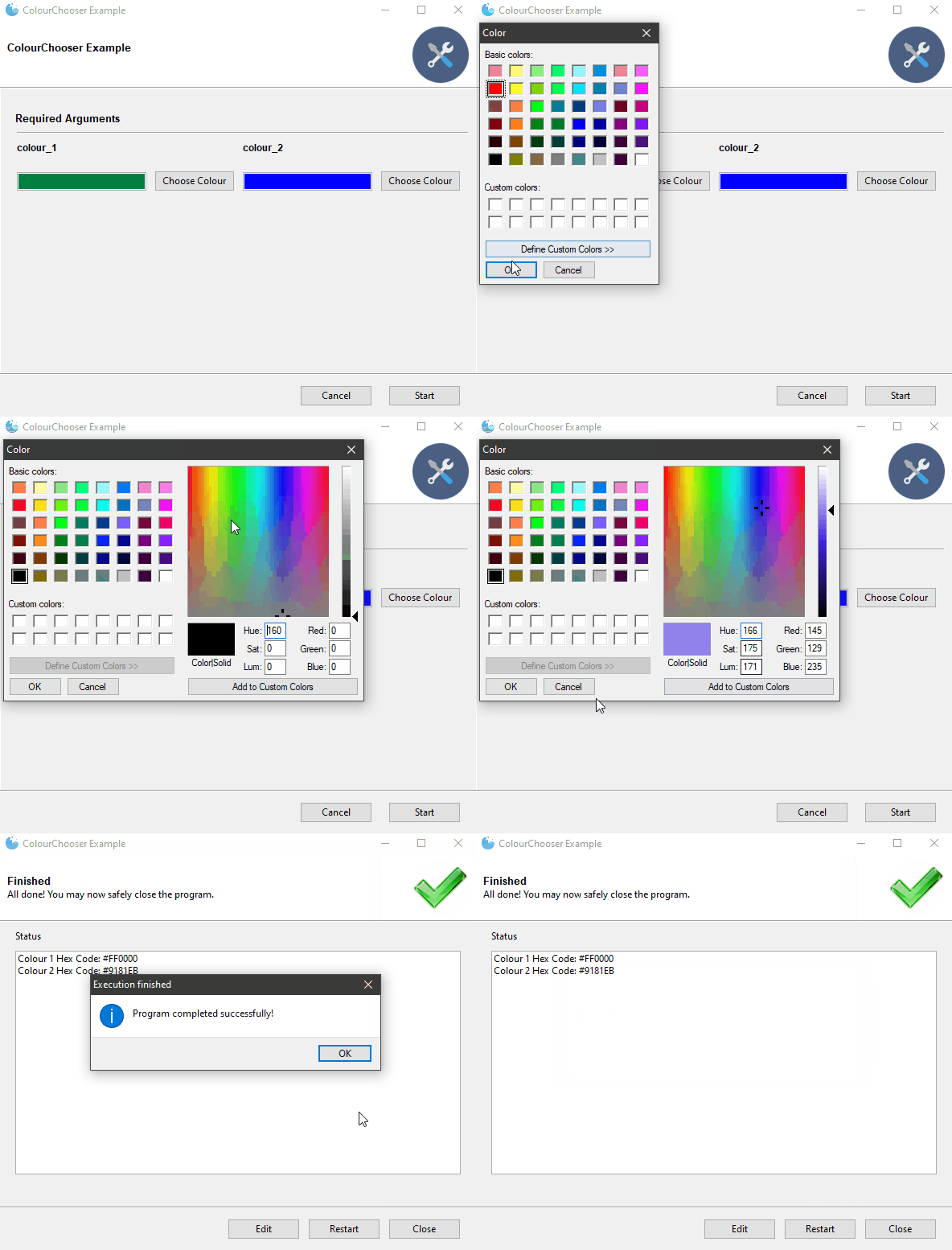
|
| FilterableDropdown | 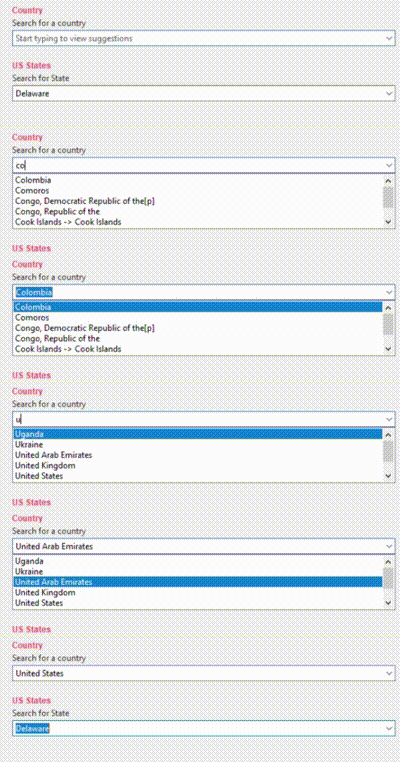
|
| IntegerField | 
|
| DecimalField | 
|
| Slider | 
|
Internationalization
--------------------
 Gooey is international ready and easily ported to your host language. Languages are controlled via an argument to the `Gooey` decorator.
@Gooey(language='russian')
def main():
...
All program text is stored externally in `json` files. So adding new language support is as easy as pasting a few key/value pairs in the `gooey/languages/` directory.
Thanks to some awesome [contributors](https://github.com/chriskiehl/Gooey/graphs/contributors), Gooey currently comes pre-stocked with over 18 different translations!
Want to add another one? Submit a [pull request!](https://github.com/chriskiehl/Gooey/compare)
-------------------------------------------
Global Configuration
--------------------
Just about everything in Gooey's overall look and feel can be customized by passing arguments to the decorator.
| Parameter | Summary |
|-----------|---------|
| encoding | Text encoding to use when displaying characters (default: 'utf-8') |
| use_legacy_titles | Rewrites the default argparse group name from "Positional" to "Required". This is primarily for retaining backward compatibility with previous versions of Gooey (which had poor support/awareness of groups and did its own naive bucketing of arguments). |
| advanced | Toggles whether to show the 'full' configuration screen, or a simplified version |
| auto_start | Skips the configuration all together and runs the program immediately |
| language | Tells Gooey which language set to load from the `gooey/languages` directory.|
| target | Tells Gooey how to re-invoke itself. By default Gooey will find python, but this allows you to specify the program (and arguments if supplied).|
| suppress_gooey_flag | Should be set when using a custom `target`. Prevent Gooey from injecting additional CLI params |
|program_name | The name displayed in the title bar of the GUI window. If not supplied, the title defaults to the script name pulled from `sys.argv[0]`. |
| program_description | Sets the text displayed in the top panel of the `Settings` screen. Defaults to the description pulled from `ArgumentParser`. |
| default_size | Initial size of the window |
| fullscreen | start Gooey in fullscreen mode |
| required_cols | Controls how many columns are in the Required Arguments section
Gooey is international ready and easily ported to your host language. Languages are controlled via an argument to the `Gooey` decorator.
@Gooey(language='russian')
def main():
...
All program text is stored externally in `json` files. So adding new language support is as easy as pasting a few key/value pairs in the `gooey/languages/` directory.
Thanks to some awesome [contributors](https://github.com/chriskiehl/Gooey/graphs/contributors), Gooey currently comes pre-stocked with over 18 different translations!
Want to add another one? Submit a [pull request!](https://github.com/chriskiehl/Gooey/compare)
-------------------------------------------
Global Configuration
--------------------
Just about everything in Gooey's overall look and feel can be customized by passing arguments to the decorator.
| Parameter | Summary |
|-----------|---------|
| encoding | Text encoding to use when displaying characters (default: 'utf-8') |
| use_legacy_titles | Rewrites the default argparse group name from "Positional" to "Required". This is primarily for retaining backward compatibility with previous versions of Gooey (which had poor support/awareness of groups and did its own naive bucketing of arguments). |
| advanced | Toggles whether to show the 'full' configuration screen, or a simplified version |
| auto_start | Skips the configuration all together and runs the program immediately |
| language | Tells Gooey which language set to load from the `gooey/languages` directory.|
| target | Tells Gooey how to re-invoke itself. By default Gooey will find python, but this allows you to specify the program (and arguments if supplied).|
| suppress_gooey_flag | Should be set when using a custom `target`. Prevent Gooey from injecting additional CLI params |
|program_name | The name displayed in the title bar of the GUI window. If not supplied, the title defaults to the script name pulled from `sys.argv[0]`. |
| program_description | Sets the text displayed in the top panel of the `Settings` screen. Defaults to the description pulled from `ArgumentParser`. |
| default_size | Initial size of the window |
| fullscreen | start Gooey in fullscreen mode |
| required_cols | Controls how many columns are in the Required Arguments section
:warning: **Deprecation notice:** See [Layout Customization](https://github.com/chriskiehl/Gooey#layout-customization) for modern layout controls|
| optional_cols | Controls how many columns are in the Optional Arguments section
:warning: **Deprecation notice:** See [Layout Customization](https://github.com/chriskiehl/Gooey#layout-customization) for modern layout controls|
| dump_build_config | Saves a `json` copy of its build configuration on disk for reuse/editing |
| load_build_config | Loads a `json` copy of its build configuration from disk |
| monospace_display | Uses a mono-spaced font in the output screen
:warning: **Deprecation notice:** See [Layout Customization](https://github.com/chriskiehl/Gooey#layout-customization) for modern font configuration|
| image_dir | Path to the directory in which Gooey should look for custom images/icons |
| language_dir | Path to the directory in which Gooey should look for custom languages files |
| disable_stop_button | Disable the `Stop` button when running |
| show_stop_warning | Displays a warning modal before allowing the user to force termination of your program |
| force_stop_is_error | Toggles whether an early termination by the shows the success or error screen |
| show_success_modal | Toggles whether or not to show a summary modal after a successful run |
| show_failure_modal | Toggles whether or not to show a summary modal on failure |
| show_restart_button | Toggles whether or not to show the restart button at the end of execution |
| run_validators | Controls whether or not to have Gooey perform validation before calling your program |
| poll_external_updates | (Experimental!) When True, Gooey will call your code with a `gooey-seed-ui` CLI argument and use the response to fill out dynamic values in the UI (See: [Using Dynamic Values](#using-dynamic-values))|
| use_cmd_args | Substitute any command line arguments provided at run time for the default values specified in the Gooey configuration |
| return_to_config | When True, Gooey will return to the configuration settings window upon successful run |
| progress_regex | A text regex used to pattern match runtime progress information. See: [Showing Progress](#showing-progress) for a detailed how-to |
| progress_expr | A python expression applied to any matches found via the `progress_regex`. See: [Showing Progress](#showing-progress) for a detailed how-to |
| hide_progress_msg | Option to hide textual progress updates which match the `progress_regex`. See: [Showing Progress](#showing-progress) for a detailed how-to |
| disable_progress_bar_animation | Disable the progress bar |
| timing_options | This contains the options for displaying time remaining and elapsed time, to be used with `progress_regex` and `progress_expr`. [Elapsed / Remaining Time](#elapsed--remaining-time). Contained as a dictionary with the options `show_time_remaining` and `hide_time_remaining_on_complete`. Eg: `timing_options={'show_time_remaining':True,'hide_time_remaining_on_complete':True}` |
| show_time_remaining | Disable the time remaining text see [Elapsed / Remaining Time](#elapsed--remaining-time) |
| hide_time_remaining_on_complete | Hide time remaining on complete screen see [Elapsed / Remaining Time](#elapsed--remaining-time) |
| requires_shell | Controls whether or not the `shell` argument is used when invoking your program. [More info here](https://stackoverflow.com/questions/3172470/actual-meaning-of-shell-true-in-subprocess#3172488) |
| shutdown_signal | Specifies the `signal` to send to the child process when the `stop` button is pressed. See [Gracefully Stopping](https://github.com/chriskiehl/Gooey/tree/master/docs) in the docs for more info. |
| navigation | Sets the "navigation" style of Gooey's top level window.
Options: | TABBED | SIDEBAR |
|---|
 |  |
|
| sidebar_title |  Controls the heading title above the SideBar's navigation pane. Defaults to: "Actions" |
| show_sidebar | Show/Hide the sidebar in when navigation mode == `SIDEBAR` |
| body_bg_color | HEX value of the main Gooey window |
| header_bg_color | HEX value of the header background |
| header_height | height in pixels of the header |
| header_show_title | Show/Hide the header title |
| header_show_subtitle | Show/Hide the header subtitle |
| footer_bg_color | HEX value of the Footer background |
| sidebar_bg_color | HEX value of the Sidebar's background |
| terminal_panel_color | HEX value of the terminal's panel |
| terminal_font_color | HEX value of the font displayed in Gooey's terminal |
| terminal_font_family | Name of the Font Family to use in the terminal |
| terminal_font_weight | Weight of the font (`constants.FONTWEIGHT_NORMAL`, `constants.FONTWEIGHT_XXX`) |
| terminal_font_size | Point size of the font displayed in the terminal |
| error_color | HEX value of the text displayed when a validation error occurs |
| richtext_controls | Switch on/off the console support for terminal control sequences (limited support for font weight and color). Defaults to : False. See [docs](https://github.com/chriskiehl/Gooey/tree/master/docs) for additional details |
| menus | Show custom menu groups and items (see: [Menus](#menus) |
| clear_before_run | When true, previous output will be cleared from the terminal when running program again |
Layout Customization
--------------------
You can achieve fairly flexible layouts with Gooey by using a few simple customizations.
At the highest level, you have several overall layout options controllable via various arguments to the Gooey decorator.
| `show_sidebar=True` | `show_sidebar=False` | `navigation='TABBED'` | `tabbed_groups=True` |
|---------------------|----------------------|----------------------|------------------------|
| |
Controls the heading title above the SideBar's navigation pane. Defaults to: "Actions" |
| show_sidebar | Show/Hide the sidebar in when navigation mode == `SIDEBAR` |
| body_bg_color | HEX value of the main Gooey window |
| header_bg_color | HEX value of the header background |
| header_height | height in pixels of the header |
| header_show_title | Show/Hide the header title |
| header_show_subtitle | Show/Hide the header subtitle |
| footer_bg_color | HEX value of the Footer background |
| sidebar_bg_color | HEX value of the Sidebar's background |
| terminal_panel_color | HEX value of the terminal's panel |
| terminal_font_color | HEX value of the font displayed in Gooey's terminal |
| terminal_font_family | Name of the Font Family to use in the terminal |
| terminal_font_weight | Weight of the font (`constants.FONTWEIGHT_NORMAL`, `constants.FONTWEIGHT_XXX`) |
| terminal_font_size | Point size of the font displayed in the terminal |
| error_color | HEX value of the text displayed when a validation error occurs |
| richtext_controls | Switch on/off the console support for terminal control sequences (limited support for font weight and color). Defaults to : False. See [docs](https://github.com/chriskiehl/Gooey/tree/master/docs) for additional details |
| menus | Show custom menu groups and items (see: [Menus](#menus) |
| clear_before_run | When true, previous output will be cleared from the terminal when running program again |
Layout Customization
--------------------
You can achieve fairly flexible layouts with Gooey by using a few simple customizations.
At the highest level, you have several overall layout options controllable via various arguments to the Gooey decorator.
| `show_sidebar=True` | `show_sidebar=False` | `navigation='TABBED'` | `tabbed_groups=True` |
|---------------------|----------------------|----------------------|------------------------|
| | |
| | |
**Grouping Inputs**
By default, if you're using Argparse with Gooey, your inputs will be split into two buckets: `positional` and `optional`. However, these aren't always the most descriptive groups to present to your user. You can arbitrarily bucket inputs into logic groups and customize the layout of each.
With `argparse` this is done via `add_argument_group()`
| |
**Grouping Inputs**
By default, if you're using Argparse with Gooey, your inputs will be split into two buckets: `positional` and `optional`. However, these aren't always the most descriptive groups to present to your user. You can arbitrarily bucket inputs into logic groups and customize the layout of each.
With `argparse` this is done via `add_argument_group()`
 ```
parser = ArgumentParser()
search_group = parser.add_argument_group(
"Search Options",
"Customize the search options"
)
```
You can add arguments to the group as normal
```
search_group.add_argument(
'--query',
help='Base search string'
)
```
Which will display them as part of the group within the UI.
Run Modes
---------
Gooey has a handful of presentation modes so you can tailor its layout to your content type and user's level or experience.
### Advanced
The default view is the "full" or "advanced" configuration screen. It has two different layouts depending on the type of command line interface it's wrapping. For most applications, the flat layout will be the one to go with, as its layout matches best to the familiar CLI schema of a primary command followed by many options (e.g. Curl, FFMPEG).
On the other side is the Column Layout. This one is best suited for CLIs that have multiple paths or are made up of multiple little tools each with their own arguments and options (think: git). It displays the primary paths along the left column, and their corresponding arguments in the right. This is a great way to package a lot of varied functionality into a single app.
```
parser = ArgumentParser()
search_group = parser.add_argument_group(
"Search Options",
"Customize the search options"
)
```
You can add arguments to the group as normal
```
search_group.add_argument(
'--query',
help='Base search string'
)
```
Which will display them as part of the group within the UI.
Run Modes
---------
Gooey has a handful of presentation modes so you can tailor its layout to your content type and user's level or experience.
### Advanced
The default view is the "full" or "advanced" configuration screen. It has two different layouts depending on the type of command line interface it's wrapping. For most applications, the flat layout will be the one to go with, as its layout matches best to the familiar CLI schema of a primary command followed by many options (e.g. Curl, FFMPEG).
On the other side is the Column Layout. This one is best suited for CLIs that have multiple paths or are made up of multiple little tools each with their own arguments and options (think: git). It displays the primary paths along the left column, and their corresponding arguments in the right. This is a great way to package a lot of varied functionality into a single app.

Both views present each action in the `Argument Parser` as a unique GUI component. It makes it ideal for presenting the program to users which are unfamiliar with command line options and/or Console Programs in general. Help messages are displayed along side each component to make it as clear as possible which each widget does.
**Setting the layout style:**
Currently, the layouts can't be explicitly specified via a parameter (on the TODO!). The layouts are built depending on whether or not there are `subparsers` used in your code base. So, if you want to trigger the `Column Layout`, you'll need to add a `subparser` to your `argparse` code.
It can be toggled via the `advanced` parameter in the `Gooey` decorator.
@gooey(advanced=True)
def main():
# rest of code
--------------------------------------------
### Basic
The basic view is best for times when the user is familiar with Console Applications, but you still want to present something a little more polished than a simple terminal. The basic display is accessed by setting the `advanced` parameter in the `gooey` decorator to `False`.
@gooey(advanced=False)
def main():
# rest of code

----------------------------------------------
### No Config
No Config pretty much does what you'd expect: it doesn't show a configuration screen. It hops right to the `display` section and begins execution of the host program. This is the one for improving the appearance of little one-off scripts.
To use this mode, set `auto_start=True` in the Gooey decorator.
```python
@Gooey(auto_start=True)
def main ():
...
```

--------------------------------------
### Menus

>Added 1.0.2
You can add a Menu Bar to the top of Gooey with customized menu groups and items.
Menus are specified on the main `@Gooey` decorator as a list of maps.
```
@Gooey(menu=[{}, {}, ...])
```
Each map is made up of two key/value pairs
1. `name` - the name for this menu group
2. `items` - the individual menu items within this group
You can have as many menu groups as you want. They're passed as a list to the `menu` argument on the `@Gooey` decorator.
```
@Gooey(menu=[{'name': 'File', 'items: []},
{'name': 'Tools', 'items': []},
{'name': 'Help', 'items': []}])
```
Individual menu items in a group are also just maps of key / value pairs. Their exact key set varies based on their `type`, but two keys will always be present:
* `type` - this controls the behavior that will be attached to the menu item as well as the keys it needs specified
* `menuTitle` - the name for this MenuItem
Currently, three types of menu options are supported:
* AboutDialog
* MessageDialog
* Link
* HtmlDialog
 **About Dialog** is your run-of-the-mill About Dialog. It displays program information such as name, version, and license info in a standard native AboutBox.
Schema
* `name` - (_optional_)
* `description` - (_optional_)
* `version` - (_optional_)
* `copyright` - (_optional_)
* `license` - (_optional_)
* `website` - (_optional_)
* `developer` - (_optional_)
Example:
```
{
'type': 'AboutDialog',
'menuTitle': 'About',
'name': 'Gooey Layout Demo',
'description': 'An example of Gooey\'s layout flexibility',
'version': '1.2.1',
'copyright': '2018',
'website': 'https://github.com/chriskiehl/Gooey',
'developer': 'http://chriskiehl.com/',
'license': 'MIT'
}
```
**About Dialog** is your run-of-the-mill About Dialog. It displays program information such as name, version, and license info in a standard native AboutBox.
Schema
* `name` - (_optional_)
* `description` - (_optional_)
* `version` - (_optional_)
* `copyright` - (_optional_)
* `license` - (_optional_)
* `website` - (_optional_)
* `developer` - (_optional_)
Example:
```
{
'type': 'AboutDialog',
'menuTitle': 'About',
'name': 'Gooey Layout Demo',
'description': 'An example of Gooey\'s layout flexibility',
'version': '1.2.1',
'copyright': '2018',
'website': 'https://github.com/chriskiehl/Gooey',
'developer': 'http://chriskiehl.com/',
'license': 'MIT'
}
```
 **MessageDialog** is a generic informational dialog box. You can display anything from small alerts, to long-form informational text to the user.
Schema:
* `message` - (_required_) the text to display in the body of the modal
* `caption` - (_optional_) the caption in the title bar of the modal
Example:
```python
{
'type': 'MessageDialog',
'menuTitle': 'Information',
'message': 'Hey, here is some cool info for ya!',
'caption': 'Stuff you should know'
}
```
**Link** is for sending the user to an external website. This will spawn their default browser at the URL you specify.
Schema:
* `url` - (_required_) - the fully qualified URL to visit
Example:
```python
{
'type': 'Link',
'menuTitle': 'Visit Out Site',
'url': 'http://www.example.com'
}
```
**MessageDialog** is a generic informational dialog box. You can display anything from small alerts, to long-form informational text to the user.
Schema:
* `message` - (_required_) the text to display in the body of the modal
* `caption` - (_optional_) the caption in the title bar of the modal
Example:
```python
{
'type': 'MessageDialog',
'menuTitle': 'Information',
'message': 'Hey, here is some cool info for ya!',
'caption': 'Stuff you should know'
}
```
**Link** is for sending the user to an external website. This will spawn their default browser at the URL you specify.
Schema:
* `url` - (_required_) - the fully qualified URL to visit
Example:
```python
{
'type': 'Link',
'menuTitle': 'Visit Out Site',
'url': 'http://www.example.com'
}
```
 **HtmlDialog** gives you full control over what's displayed in the message dialog (bonus: people can copy/paste text from this one!).
Schema:
* `caption` - (_optional_) the caption in the title bar of the modal
* `html` - (_required_) the html you want displayed in the dialog. Note: only a small subset of HTML is supported. [See the WX docs for more info](https://wxpython.org/Phoenix/docs/html/html_overview.html).
Example:
```python
{
'type': 'HtmlDialog',
'menuTitle': 'Fancy Dialog!',
'caption': 'Demo of the HtmlDialog',
'html': '''
**HtmlDialog** gives you full control over what's displayed in the message dialog (bonus: people can copy/paste text from this one!).
Schema:
* `caption` - (_optional_) the caption in the title bar of the modal
* `html` - (_required_) the html you want displayed in the dialog. Note: only a small subset of HTML is supported. [See the WX docs for more info](https://wxpython.org/Phoenix/docs/html/html_overview.html).
Example:
```python
{
'type': 'HtmlDialog',
'menuTitle': 'Fancy Dialog!',
'caption': 'Demo of the HtmlDialog',
'html': '''

Hello world!
Lorem ipsum dolor sit amet, consectetur
'''
}
```
**A full example:**
Two menu groups ("File" and "Help") with four menu items between them.
```python
@Gooey(
program_name='Advanced Layout Groups',
menu=[{
'name': 'File',
'items': [{
'type': 'AboutDialog',
'menuTitle': 'About',
'name': 'Gooey Layout Demo',
'description': 'An example of Gooey\'s layout flexibility',
'version': '1.2.1',
'copyright': '2018',
'website': 'https://github.com/chriskiehl/Gooey',
'developer': 'http://chriskiehl.com/',
'license': 'MIT'
}, {
'type': 'MessageDialog',
'menuTitle': 'Information',
'caption': 'My Message',
'message': 'I am demoing an informational dialog!'
}, {
'type': 'Link',
'menuTitle': 'Visit Our Site',
'url': 'https://github.com/chriskiehl/Gooey'
}]
},{
'name': 'Help',
'items': [{
'type': 'Link',
'menuTitle': 'Documentation',
'url': 'https://www.readthedocs.com/foo'
}]
}]
)
```
---------------------------------------
### Dynamic Validation
 >:warning:
>Note! This functionality is experimental and likely to be unstable. Its API may be changed or removed altogether. Feedback/thoughts on this feature is welcome and encouraged!
>:warning:
>See [Release Notes]() for guidance on upgrading from 1.0.8 to 1.2.0
Before passing the user's inputs to your program, Gooey can optionally run a special pre-flight validation to check that all arguments pass your specified validations.
**How does it work?**
Gooey piggy backs on the `type` parameter available to most Argparse Argument types.
```python
parser.add_argument('--some-number', type=int)
parser.add_argument('--some-number', type=float)
```
In addition to simple builtins like `int` and `float`, you can supply your own function to the `type` parameter to vet the incoming values.
```python
def must_be_exactly_ten(value):
number = int(value)
if number == 10:
return number
else:
raise TypeError("Hey! you need to provide exactly the number 10!")
def main():
parser = ArgumentParser()
parser.add_argument('--ten', type=must_be_exactly_ten)
```
**How to enable the pre-flight validation**
By default, Gooey won't run the validation. Why? This feature is fairly experimental and does a lot of intense Monkey Patching behind the scenes. As such, it's currently opt-in.
You enable to validation by telling Gooey you'd like to subscribe to the `VALIDATE_FORM` event.
```python
from gooey import Gooey, Events
@Gooey(use_events=[Events.VALIDATE_FORM])
def main():
...
```
>:warning:
>Note! This functionality is experimental and likely to be unstable. Its API may be changed or removed altogether. Feedback/thoughts on this feature is welcome and encouraged!
>:warning:
>See [Release Notes]() for guidance on upgrading from 1.0.8 to 1.2.0
Before passing the user's inputs to your program, Gooey can optionally run a special pre-flight validation to check that all arguments pass your specified validations.
**How does it work?**
Gooey piggy backs on the `type` parameter available to most Argparse Argument types.
```python
parser.add_argument('--some-number', type=int)
parser.add_argument('--some-number', type=float)
```
In addition to simple builtins like `int` and `float`, you can supply your own function to the `type` parameter to vet the incoming values.
```python
def must_be_exactly_ten(value):
number = int(value)
if number == 10:
return number
else:
raise TypeError("Hey! you need to provide exactly the number 10!")
def main():
parser = ArgumentParser()
parser.add_argument('--ten', type=must_be_exactly_ten)
```
**How to enable the pre-flight validation**
By default, Gooey won't run the validation. Why? This feature is fairly experimental and does a lot of intense Monkey Patching behind the scenes. As such, it's currently opt-in.
You enable to validation by telling Gooey you'd like to subscribe to the `VALIDATE_FORM` event.
```python
from gooey import Gooey, Events
@Gooey(use_events=[Events.VALIDATE_FORM])
def main():
...
```
 Now, when you run Gooey, before it invokes your main program, it'll send a separate pre-validation check and record any issues raised from your `type` functions.
**Full Code Example**
```
from gooey import Gooey, Events
from argparse import ArgumentParser
def must_be_exactly_ten(value):
number = int(value)
if number == 10:
return number
else:
raise TypeError("Hey! you need to provide exactly the number 10!")
@Gooey(program_name='Validation Example', use_events=[Events.VALIDATE_FORM])
def main():
parser = ArgumentParser(description="Checkout this validation!")
parser.add_argument('--ten', metavar='This field should be 10', type=must_be_exactly_ten)
args = parser.parse_args()
print(args)
```
---------------------------------------
## Lifecycle Events and UI control
>:warning:
>Note! This functionality is experimental. Its API may be changed or removed altogether. Feedback on this feature is welcome and encouraged!
As of 1.2.0, Gooey now exposes coarse grain lifecycle hooks to your program. This means you can now take additional follow-up actions in response to successful runs or failures and even control the current state of the UI itself!
Currently, two primary hooks are exposed:
* `on_success`
* `on_error`
These fire exactly when you'd expect: after your process has completed.
**Anatomy of an lifecycle handler**:
Both `on_success` and `on_error` have the same type signature.
```python
from typing import Mapping, Any, Optional
from gooey.types import PublicGooeyState
def on_success(args: Mapping[str, Any], state: PublicGooeyState) -> Optional[PublicGooeyState]:
"""
You can do anything you want in the handler including
returning an updated UI state for your next run!
"""
return state
def on_error(args: Mapping[str, Any], state: PublicGooeyState) -> Optional[PublicGooeyState]:
"""
You can do anything you want in the handler including
returning an updated UI state for your next run!
"""
return state
```
* **args** This is the parsed Argparse object (e.g. the output of `parse_args()`). This will be a mapping of the user's arguments as existed when your program was invoked.
* **state** This is the current state of Gooey's UI. If your program uses subparsers, this currently just lists the state of the active parser/form. Whatever updated version of this state you return will be reflected in the UI!
**Attaching the handlers:**
Handlers are attached when instantiating the `GooeyParser`.
```python
parser = GooeyParser(
on_success=my_success_handler,
on_failure=my_failure_handler)
```
**Subscribing to the lifecycle events**
Just like [Validation](#dynamic-validation), these lifecycle events are opt-in. Pass the event you'd like to subscribe to into the `use_events` Gooey decorator argument.
```python
from gooey import Gooey, Events
@Gooey(use_events=[Events.ON_SUCCESS, Events.ON_ERROR])
def main():
...
```
-------------------------------------
## Showing Progress
Now, when you run Gooey, before it invokes your main program, it'll send a separate pre-validation check and record any issues raised from your `type` functions.
**Full Code Example**
```
from gooey import Gooey, Events
from argparse import ArgumentParser
def must_be_exactly_ten(value):
number = int(value)
if number == 10:
return number
else:
raise TypeError("Hey! you need to provide exactly the number 10!")
@Gooey(program_name='Validation Example', use_events=[Events.VALIDATE_FORM])
def main():
parser = ArgumentParser(description="Checkout this validation!")
parser.add_argument('--ten', metavar='This field should be 10', type=must_be_exactly_ten)
args = parser.parse_args()
print(args)
```
---------------------------------------
## Lifecycle Events and UI control
>:warning:
>Note! This functionality is experimental. Its API may be changed or removed altogether. Feedback on this feature is welcome and encouraged!
As of 1.2.0, Gooey now exposes coarse grain lifecycle hooks to your program. This means you can now take additional follow-up actions in response to successful runs or failures and even control the current state of the UI itself!
Currently, two primary hooks are exposed:
* `on_success`
* `on_error`
These fire exactly when you'd expect: after your process has completed.
**Anatomy of an lifecycle handler**:
Both `on_success` and `on_error` have the same type signature.
```python
from typing import Mapping, Any, Optional
from gooey.types import PublicGooeyState
def on_success(args: Mapping[str, Any], state: PublicGooeyState) -> Optional[PublicGooeyState]:
"""
You can do anything you want in the handler including
returning an updated UI state for your next run!
"""
return state
def on_error(args: Mapping[str, Any], state: PublicGooeyState) -> Optional[PublicGooeyState]:
"""
You can do anything you want in the handler including
returning an updated UI state for your next run!
"""
return state
```
* **args** This is the parsed Argparse object (e.g. the output of `parse_args()`). This will be a mapping of the user's arguments as existed when your program was invoked.
* **state** This is the current state of Gooey's UI. If your program uses subparsers, this currently just lists the state of the active parser/form. Whatever updated version of this state you return will be reflected in the UI!
**Attaching the handlers:**
Handlers are attached when instantiating the `GooeyParser`.
```python
parser = GooeyParser(
on_success=my_success_handler,
on_failure=my_failure_handler)
```
**Subscribing to the lifecycle events**
Just like [Validation](#dynamic-validation), these lifecycle events are opt-in. Pass the event you'd like to subscribe to into the `use_events` Gooey decorator argument.
```python
from gooey import Gooey, Events
@Gooey(use_events=[Events.ON_SUCCESS, Events.ON_ERROR])
def main():
...
```
-------------------------------------
## Showing Progress
 Giving visual progress feedback with Gooey is easy! If you're already displaying textual progress updates, you can tell Gooey to hook into that existing output in order to power its Progress Bar.
For simple cases, output strings which resolve to a numeric representation of the completion percentage (e.g. `Progress 83%`) can be pattern matched and turned into a progress bar status with a simple regular expression (e.g. `@Gooey(progress_regex=r"^progress: (\d+)%$")`).
For more complicated outputs, you can pass in a custom evaluation expression (`progress_expr`) to transform regular expression matches as needed.
Output strings which satisfy the regular expression can be hidden from the console via the `hide_progress_msg` parameter (e.g. `@Gooey(progress_regex=r"^progress: (\d+)%$", hide_progress_msg=True)`.
**Regex and Processing Expression**
```python
@Gooey(progress_regex=r"^progress: (?P\d+)/(?P\d+)$",
progress_expr="current / total * 100")
```
**Program Output:**
```
progress: 1/100
progress: 2/100
progress: 3/100
...
```
There are lots of options for telling Gooey about progress as your program is running. Checkout the [Gooey Examples](https://github.com/chriskiehl/GooeyExamples) repository for more detailed usage and examples!
### Elapsed / Remaining Time
Gooey also supports tracking elapsed / remaining time when progress is used! This is done in a similar manner to that of the project [tqdm](https://github.com/tqdm/tqdm). This can be enabled with `timing_options`, the `timing_options` argument takes in a dictionary with the keys `show_time_remaining` and `hide_time_remaining_on_complete`. The default behavior is True for `show_time_remaining` and False for `hide_time_remaining_on_complete`. This will only work when `progress_regex` and `progress_expr` are used.
```python
@Gooey(progress_regex=r"^progress: (?P\d+)/(?P\d+)$",
progress_expr="current / total * 100",
timing_options = {
'show_time_remaining':True,
'hide_time_remaining_on_complete':True,
})
```
--------------------------------------
## Customizing Icons
Gooey comes with a set of six default icons. These can be overridden with your own custom images/icons by telling Gooey to search additional directories when initializing. This is done via the `image_dir` argument to the `Gooey` decorator.
@Gooey(program_name='Custom icon demo', image_dir='/path/to/my/image/directory')
def main():
# rest of program
Images are discovered by Gooey based on their _filenames_. So, for example, in order to supply a custom configuration icon, simply place an image with the filename `config_icon.png` in your images directory. These are the filenames which can be overridden:
* program_icon.png
* success_icon.png
* running_icon.png
* loading_icon.gif
* config_icon.png
* error_icon.png
## Packaging
Thanks to some [awesome contributors](https://github.com/chriskiehl/Gooey/issues/58), packaging Gooey as an executable is super easy.
The tl;dr [pyinstaller](https://github.com/pyinstaller/pyinstaller) version is to drop this [build.spec](https://raw.githubusercontent.com/chriskiehl/Gooey/master/docs/packaging/build-win.spec) into the root directory of your application. Edit its contents so that the `APPPNAME` and `name` are relevant to your project and the `pathex` value points to your applications root, then execute `pyinstaller -F --windowed build.spec` to bundle your app into a ready-to-go executable.
Detailed step by step instructions can be found [here](https://github.com/chriskiehl/Gooey/blob/master/docs/packaging/Packaging-Gooey.md).
Screenshots
------------
| Flat Layout | Column Layout |Success Screen | Error Screen | Warning Dialog |
|-------------|---------------|---------------|--------------|----------------|
|
Giving visual progress feedback with Gooey is easy! If you're already displaying textual progress updates, you can tell Gooey to hook into that existing output in order to power its Progress Bar.
For simple cases, output strings which resolve to a numeric representation of the completion percentage (e.g. `Progress 83%`) can be pattern matched and turned into a progress bar status with a simple regular expression (e.g. `@Gooey(progress_regex=r"^progress: (\d+)%$")`).
For more complicated outputs, you can pass in a custom evaluation expression (`progress_expr`) to transform regular expression matches as needed.
Output strings which satisfy the regular expression can be hidden from the console via the `hide_progress_msg` parameter (e.g. `@Gooey(progress_regex=r"^progress: (\d+)%$", hide_progress_msg=True)`.
**Regex and Processing Expression**
```python
@Gooey(progress_regex=r"^progress: (?P\d+)/(?P\d+)$",
progress_expr="current / total * 100")
```
**Program Output:**
```
progress: 1/100
progress: 2/100
progress: 3/100
...
```
There are lots of options for telling Gooey about progress as your program is running. Checkout the [Gooey Examples](https://github.com/chriskiehl/GooeyExamples) repository for more detailed usage and examples!
### Elapsed / Remaining Time
Gooey also supports tracking elapsed / remaining time when progress is used! This is done in a similar manner to that of the project [tqdm](https://github.com/tqdm/tqdm). This can be enabled with `timing_options`, the `timing_options` argument takes in a dictionary with the keys `show_time_remaining` and `hide_time_remaining_on_complete`. The default behavior is True for `show_time_remaining` and False for `hide_time_remaining_on_complete`. This will only work when `progress_regex` and `progress_expr` are used.
```python
@Gooey(progress_regex=r"^progress: (?P\d+)/(?P\d+)$",
progress_expr="current / total * 100",
timing_options = {
'show_time_remaining':True,
'hide_time_remaining_on_complete':True,
})
```
--------------------------------------
## Customizing Icons
Gooey comes with a set of six default icons. These can be overridden with your own custom images/icons by telling Gooey to search additional directories when initializing. This is done via the `image_dir` argument to the `Gooey` decorator.
@Gooey(program_name='Custom icon demo', image_dir='/path/to/my/image/directory')
def main():
# rest of program
Images are discovered by Gooey based on their _filenames_. So, for example, in order to supply a custom configuration icon, simply place an image with the filename `config_icon.png` in your images directory. These are the filenames which can be overridden:
* program_icon.png
* success_icon.png
* running_icon.png
* loading_icon.gif
* config_icon.png
* error_icon.png
## Packaging
Thanks to some [awesome contributors](https://github.com/chriskiehl/Gooey/issues/58), packaging Gooey as an executable is super easy.
The tl;dr [pyinstaller](https://github.com/pyinstaller/pyinstaller) version is to drop this [build.spec](https://raw.githubusercontent.com/chriskiehl/Gooey/master/docs/packaging/build-win.spec) into the root directory of your application. Edit its contents so that the `APPPNAME` and `name` are relevant to your project and the `pathex` value points to your applications root, then execute `pyinstaller -F --windowed build.spec` to bundle your app into a ready-to-go executable.
Detailed step by step instructions can be found [here](https://github.com/chriskiehl/Gooey/blob/master/docs/packaging/Packaging-Gooey.md).
Screenshots
------------
| Flat Layout | Column Layout |Success Screen | Error Screen | Warning Dialog |
|-------------|---------------|---------------|--------------|----------------|
|  |
|  |
|  |
|  |
|  |
| Custom Groups | Tabbed Groups | Tabbed Navigation | Sidebar Navigation | Input Validation |
|-------------|---------------|---------------|--------------|----------------|
|
|
| Custom Groups | Tabbed Groups | Tabbed Navigation | Sidebar Navigation | Input Validation |
|-------------|---------------|---------------|--------------|----------------|
|  | | | | |
----------------------------------------------
Wanna help?
-----------
Code, translation, documentation, or graphics? All pull requests are welcome. Just make sure to checkout [the contributing guidelines](https://github.com/chriskiehl/Gooey/blob/master/CONTRIBUTING.md) first.
================================================
FILE: TODO.md
================================================
Release TODO
============
- [ ] Fix user supplied directory path when packaged. Currently gives super cryptic failures
- [X] need ability to call out to external seed function for dynamic defaults
- [ ] update readme (SavingOverIt could be example use case)
- [ ] extend this to all types (currently only works for Dropdowns)
- [ ] think about stuff. Need a friendly way to specify mappings that's more
flexible than options_strings
- [X] success/error screen after a ForceStop should be configurable. Stopping early does not necessarily error
- [ ] customizable button text
- [X] text encoding
- [X] pass down the font info to the console
- [X] pass down the style info to the console
- [X] MUST add new entries to all language files
Issue #234
- allow general options
README:
- update README with all the things
- [ ] RadioGroup
- [ ] `initial_selection` option
- [ ] group name options
- [ ] force_stop_is_error
- [X] validation howto
- [ ] advanced layout howto
- [ ] turning on/off dialog options
- [X] full list of custom widgets and their options
- [ ] progress bar management
Custom Validation:
- [X] make sure user supplied validators fail gracefully and report something useful
- [ ] validator should be able to call outside itself -- either to a separate cmdline util, or a subset of the host prog
Later TODO:
- overview of Gooey for peeps who wanna dev against it
================================================
FILE: docs/Gooey-Options.md
================================================
# Gooey Options
Using `GooeyParser` we can extend the API of `argparse` to support lots of cool additional functionality.
The main addition to the top-level `argparse` API is that we pick up extra keywords: `widget` and `gooey_options`. `widget` is used to specified which UI element to provide for the argument, i.e., a listbox or a file browser. `gooey_options` accepts a dictionary of configuration parameters that lets you specify things like custom validators, style overrides, and a bunch of behavioral extensions for the various widget classes.
`GooeyParser` is a drop-in replacement for `argparse`. You can import it from the root Gooey namespace like this:
```python
from gooey import GooeyParser
```
and replace `ArgumentParser` with `GooeyParser`
```python
# parser = ArgumentParser() # old busted
parser = GooeyParser() # new hotness
```
and with that, you're ready to rock.
## Overview
* Global Style/Layout Options
* Global Config Options
* Custom Widget Options
* Textarea
* BlockCheckbox
* Listbox
* RadioGroups
* Argument Group Options
## Global Style / Layout Options
All widgets in Gooey (with the exception of RadioGroups) are made up of three basic components.
1. Label
2. Help Text
3. Input Control
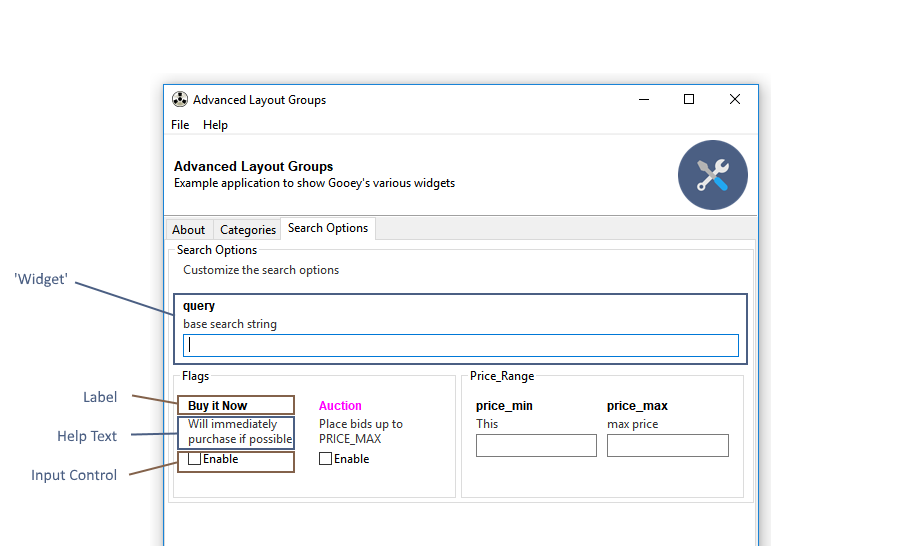
The following options apply to all Widget types in Gooey.
```python
parser.add_argument('-my-arg', gooey_options={
'label_color': '#ffffff',
'label_bg_color': '#ffffff',
'help_color': '#ffffff',
'help_bg_color': '#ffffff',
'error_color': '#ffffff',
'error_bg_color': '#ffffff',
'show_label': bool,
'show_help': bool,
'visible': bool,
'full_width': bool
})
```
| Keyword | Type | Description |
|---------|------|-------------|
| label_color | hex string | The foreground color of the label text (e.g. `#ff0000`) |
| label_bg_color | hex string | The background color of the label text. |
| help_color | hex string | The foreground color of the help text. |
| help_bg_color | hex string | The background color of the help text. |
| error_color | hex string | The foreground color of the error text (when visible). |
| error_bg_color | hex string | The background color of the error text (when visible). |
| show_label | bool | Toggles whether or not to display the label text |
| show_help | bool | Toggles whether or not to display the help text |
| visible | bool | Hides the entire widget when `False`. Note: the widget is still present in the UI and will still send along any default values that have been provided in code. This option is here for when you want to hide certain advanced / dangerous inputs from your GUI users. |
| full_width | bool | This is a layout hint for this widget. When `True` the widget will fill the entire available space within a given row. Otherwise, it will be sized based on the column rules provided elsewhere. |
## Global Config Options
> new in 1.0.8
All widgets in Gooey accept an `initial_value` option to seed the UI.
```python
parser.add_argument('-my-arg', widget='Textarea', gooey_options={
'initial_value': 'Hello world!'
})
```
## Individual Widget Options
A few widgets have additional options for controlling their layout and behavior.
### Textarea
```python
parser.add_argument('-my-arg', widget='Textarea', gooey_options={
# height of the text area in pixels
'height': int,
# prevents the user from editing when true
'readonly': bool
})
```
### IntegerField
```python
parser.add_argument('-my-arg', widget='IntegerField', gooey_options={
'min': int,
'max': int,
'increment': int
})
```
### DecimalField
```python
parser.add_argument('-my-arg', widget='IntegerField', gooey_options={
'min': float,
'max': float,
'increment': float,
'precision': int # 0 - 20
})
```
### Slider
The Slider is just a reskinned IntegerField, so it has the same options
```python
parser.add_argument('-my-arg', widget='Slider', gooey_options={
'min': int,
'max': int,
'increment': int
})
```
### BlockCheckbox
```python
parser.add_argument('-my-arg', widget='BlockCheckbox', gooey_options={
# allows customizing the checkbox's label
'checkbox_label': str
})
```
### Listbox
```python
parser.add_argument('-my-arg', widget='Listbox', gooey_options={
# height of the listbox in pixels
'height': int
})
```
### Radio Group
```python
parser.add_mutually_exclusive_group(gooey_options={
# Pre-select a specific option within a mutually exclusive group.
# default behavior is to have all options unselected by default.
'initial_selection': int
})
```
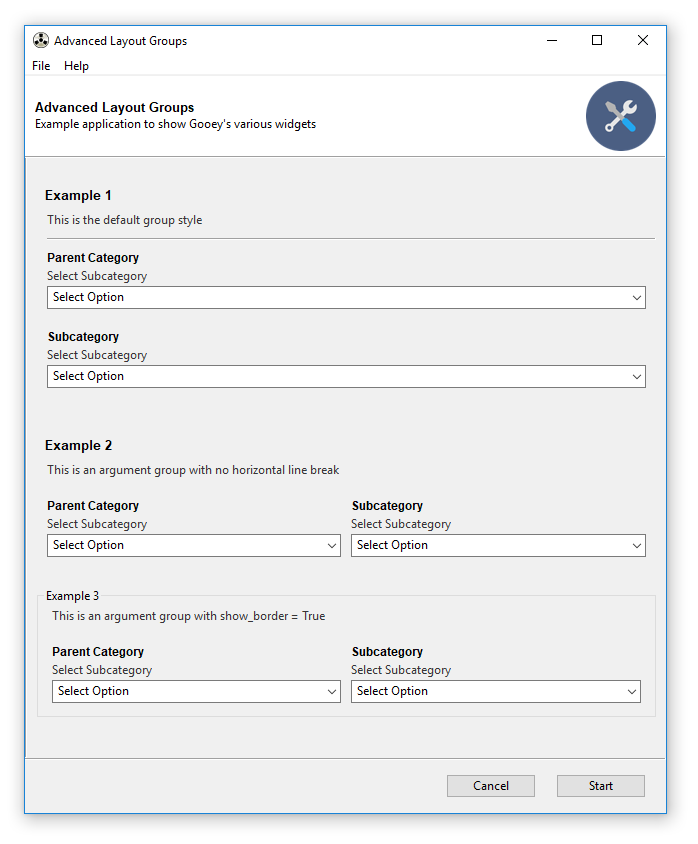
## Argument Groups
Argument Groups take a number of `gooey_options` to help control layout.
```python
parser.add_argument_group('MyGroup', desription='my cool group', gooey_options={
'show_border': bool,
'show_underline': bool,
'label_color': '#FF9900',
'columns': int,
'margin_top': int
})
```
| Keyword | Type | Description |
|---------|------|-------------|
| show_border | bool | When `True` a labeled border will surround all widgets added to this group. |
| show_underline | bool | Controls whether or not to display the underline when using the default border style |
| label_color | hex string | The foreground color for the group name |
| columns | int | Controls the number of widgets on each row |
| margin_top | int | specifies the top margin in pixels for this group |
## File and Folder choosers
File and Folder Choosers Groups take a number of `gooey_options` to help control default values.
```python
parser.add_argument("FileChooser", widget="FileChooser",
gooey_options={
'wildcard':
"Comma separated file (*.csv)|*.csv|"
"All files (*.*)|*.*",
'default_dir': "c:/batch",
'default_file': "def_file.csv",
'message': "pick me"
}
)
parser.add_argument("DirectoryChooser", widget="DirChooser",
gooey_options={
'wildcard':
"Comma separated file (*.csv)|*.csv|"
"All files (*.*)|*.*",
'message': "pick folder",
'default_path': "c:/batch/stuff"
}
)
parser.add_argument("FileSaver", widget="FileSaver",
gooey_options={
'wildcard':
"JPG (*.jpg)|*.jpg|"
"All files (*.*)|*.*",
'message': "pick folder",
'default_dir': "c:/projects",
'default_file': "def_file.csv"
}
)
parser.add_argument("MultiFileSaver", widget="MultiFileChooser",
gooey_options={
'wildcard':
"Comma separated file (*.csv)|*.csv|"
"All files (*.*)|*.*",
'message': "pick folder",
'default_dir': "c:/temp",
'default_file': "def_file.csv"
}
)
```
| Keyword | Type | Description |
|---------|------|-------------|
| wildcard | string | Sets the wildcard, which can contain multiple file types, for example: "BMP files (.bmp)|.bmp|GIF files (.gif)|.gif" |
| message | string | Sets the message that will be displayed on the dialog. |
| default_dir | string | The default directory |
| default_file | string | The default filename |
| default_path | string | The default path |
================================================
FILE: docs/Gracefully-Stopping.md
================================================
# Gracefully Stopping a Running Process
>New in v1.0.9!
| | | | |
----------------------------------------------
Wanna help?
-----------
Code, translation, documentation, or graphics? All pull requests are welcome. Just make sure to checkout [the contributing guidelines](https://github.com/chriskiehl/Gooey/blob/master/CONTRIBUTING.md) first.
================================================
FILE: TODO.md
================================================
Release TODO
============
- [ ] Fix user supplied directory path when packaged. Currently gives super cryptic failures
- [X] need ability to call out to external seed function for dynamic defaults
- [ ] update readme (SavingOverIt could be example use case)
- [ ] extend this to all types (currently only works for Dropdowns)
- [ ] think about stuff. Need a friendly way to specify mappings that's more
flexible than options_strings
- [X] success/error screen after a ForceStop should be configurable. Stopping early does not necessarily error
- [ ] customizable button text
- [X] text encoding
- [X] pass down the font info to the console
- [X] pass down the style info to the console
- [X] MUST add new entries to all language files
Issue #234
- allow general options
README:
- update README with all the things
- [ ] RadioGroup
- [ ] `initial_selection` option
- [ ] group name options
- [ ] force_stop_is_error
- [X] validation howto
- [ ] advanced layout howto
- [ ] turning on/off dialog options
- [X] full list of custom widgets and their options
- [ ] progress bar management
Custom Validation:
- [X] make sure user supplied validators fail gracefully and report something useful
- [ ] validator should be able to call outside itself -- either to a separate cmdline util, or a subset of the host prog
Later TODO:
- overview of Gooey for peeps who wanna dev against it
================================================
FILE: docs/Gooey-Options.md
================================================
# Gooey Options
Using `GooeyParser` we can extend the API of `argparse` to support lots of cool additional functionality.
The main addition to the top-level `argparse` API is that we pick up extra keywords: `widget` and `gooey_options`. `widget` is used to specified which UI element to provide for the argument, i.e., a listbox or a file browser. `gooey_options` accepts a dictionary of configuration parameters that lets you specify things like custom validators, style overrides, and a bunch of behavioral extensions for the various widget classes.
`GooeyParser` is a drop-in replacement for `argparse`. You can import it from the root Gooey namespace like this:
```python
from gooey import GooeyParser
```
and replace `ArgumentParser` with `GooeyParser`
```python
# parser = ArgumentParser() # old busted
parser = GooeyParser() # new hotness
```
and with that, you're ready to rock.
## Overview
* Global Style/Layout Options
* Global Config Options
* Custom Widget Options
* Textarea
* BlockCheckbox
* Listbox
* RadioGroups
* Argument Group Options
## Global Style / Layout Options
All widgets in Gooey (with the exception of RadioGroups) are made up of three basic components.
1. Label
2. Help Text
3. Input Control

The following options apply to all Widget types in Gooey.
```python
parser.add_argument('-my-arg', gooey_options={
'label_color': '#ffffff',
'label_bg_color': '#ffffff',
'help_color': '#ffffff',
'help_bg_color': '#ffffff',
'error_color': '#ffffff',
'error_bg_color': '#ffffff',
'show_label': bool,
'show_help': bool,
'visible': bool,
'full_width': bool
})
```
| Keyword | Type | Description |
|---------|------|-------------|
| label_color | hex string | The foreground color of the label text (e.g. `#ff0000`) |
| label_bg_color | hex string | The background color of the label text. |
| help_color | hex string | The foreground color of the help text. |
| help_bg_color | hex string | The background color of the help text. |
| error_color | hex string | The foreground color of the error text (when visible). |
| error_bg_color | hex string | The background color of the error text (when visible). |
| show_label | bool | Toggles whether or not to display the label text |
| show_help | bool | Toggles whether or not to display the help text |
| visible | bool | Hides the entire widget when `False`. Note: the widget is still present in the UI and will still send along any default values that have been provided in code. This option is here for when you want to hide certain advanced / dangerous inputs from your GUI users. |
| full_width | bool | This is a layout hint for this widget. When `True` the widget will fill the entire available space within a given row. Otherwise, it will be sized based on the column rules provided elsewhere. |
## Global Config Options
> new in 1.0.8
All widgets in Gooey accept an `initial_value` option to seed the UI.
```python
parser.add_argument('-my-arg', widget='Textarea', gooey_options={
'initial_value': 'Hello world!'
})
```
## Individual Widget Options
A few widgets have additional options for controlling their layout and behavior.
### Textarea
```python
parser.add_argument('-my-arg', widget='Textarea', gooey_options={
# height of the text area in pixels
'height': int,
# prevents the user from editing when true
'readonly': bool
})
```
### IntegerField
```python
parser.add_argument('-my-arg', widget='IntegerField', gooey_options={
'min': int,
'max': int,
'increment': int
})
```
### DecimalField
```python
parser.add_argument('-my-arg', widget='IntegerField', gooey_options={
'min': float,
'max': float,
'increment': float,
'precision': int # 0 - 20
})
```
### Slider
The Slider is just a reskinned IntegerField, so it has the same options
```python
parser.add_argument('-my-arg', widget='Slider', gooey_options={
'min': int,
'max': int,
'increment': int
})
```
### BlockCheckbox
```python
parser.add_argument('-my-arg', widget='BlockCheckbox', gooey_options={
# allows customizing the checkbox's label
'checkbox_label': str
})
```
### Listbox
```python
parser.add_argument('-my-arg', widget='Listbox', gooey_options={
# height of the listbox in pixels
'height': int
})
```
### Radio Group
```python
parser.add_mutually_exclusive_group(gooey_options={
# Pre-select a specific option within a mutually exclusive group.
# default behavior is to have all options unselected by default.
'initial_selection': int
})
```
## Argument Groups
Argument Groups take a number of `gooey_options` to help control layout.
```python
parser.add_argument_group('MyGroup', desription='my cool group', gooey_options={
'show_border': bool,
'show_underline': bool,
'label_color': '#FF9900',
'columns': int,
'margin_top': int
})
```
| Keyword | Type | Description |
|---------|------|-------------|
| show_border | bool | When `True` a labeled border will surround all widgets added to this group. |
| show_underline | bool | Controls whether or not to display the underline when using the default border style |
| label_color | hex string | The foreground color for the group name |
| columns | int | Controls the number of widgets on each row |
| margin_top | int | specifies the top margin in pixels for this group |

## File and Folder choosers
File and Folder Choosers Groups take a number of `gooey_options` to help control default values.
```python
parser.add_argument("FileChooser", widget="FileChooser",
gooey_options={
'wildcard':
"Comma separated file (*.csv)|*.csv|"
"All files (*.*)|*.*",
'default_dir': "c:/batch",
'default_file': "def_file.csv",
'message': "pick me"
}
)
parser.add_argument("DirectoryChooser", widget="DirChooser",
gooey_options={
'wildcard':
"Comma separated file (*.csv)|*.csv|"
"All files (*.*)|*.*",
'message': "pick folder",
'default_path': "c:/batch/stuff"
}
)
parser.add_argument("FileSaver", widget="FileSaver",
gooey_options={
'wildcard':
"JPG (*.jpg)|*.jpg|"
"All files (*.*)|*.*",
'message': "pick folder",
'default_dir': "c:/projects",
'default_file': "def_file.csv"
}
)
parser.add_argument("MultiFileSaver", widget="MultiFileChooser",
gooey_options={
'wildcard':
"Comma separated file (*.csv)|*.csv|"
"All files (*.*)|*.*",
'message': "pick folder",
'default_dir': "c:/temp",
'default_file': "def_file.csv"
}
)
```
| Keyword | Type | Description |
|---------|------|-------------|
| wildcard | string | Sets the wildcard, which can contain multiple file types, for example: "BMP files (.bmp)|.bmp|GIF files (.gif)|.gif" |
| message | string | Sets the message that will be displayed on the dialog. |
| default_dir | string | The default directory |
| default_file | string | The default filename |
| default_path | string | The default path |
================================================
FILE: docs/Gracefully-Stopping.md
================================================
# Gracefully Stopping a Running Process
>New in v1.0.9!

**Contents:**
* [How to tell Gooey which shutdown signal to use](#how-to-tell-gooey-which-signal-to-use)
* [How to catch KeyboardInterrupts](#How-to-catch-KeyboardInterrupts)
* [How to catch general interrupt signals](#How-to-catch-general-interrupt-signals)
By default, Gooey will kill the child process without any chance for cleanup. This guide will explain how to adjust that behavior so that you can detect when Gooey is attempting to close your process and use that signal to shutdown gracefully.
### Basics: How to tell Gooey which shutdown signal to use:
You can control the signal Gooey sends while stopping your process via `shutdown_signal` decorator argument. Signal values come from the builtin `signal` python module. On linux, any of the available constants may be used as a value. However, on Windows, only `CTRL_BREAK_EVENT`, `CTRL_C_EVENT` and `SIGTERM` are supported by the OS.
```python
import signal
@Gooey(shutdown_signal=signal.CTRL_C_EVENT)
def main():
...
```
### How to catch KeyboardInterrupts:
Keyboard interrupts are triggered in response to the `CTRL_C_EVENT` signal.
```python
import signal
@Gooey(shutdown_signal=signal.CTRL_C_EVENT)
def main():
...
```
Catching them in your code is really easy! They conveniently show up as top-level Exceptions. Just wrap your main logic in a try/except and you'll be able to catch when Gooey tries to shut down your process.
```python
try
# your code here
except KeyboardInterrupt:
# cleanup and shutdown or ignore
```
### How to catch general interrupt signals
Handling other signals is only slightly more involved than the `CTRL_C_EVENT` one. You need to install a handler via the `signal` module and tie it to the specific signal you want to handle. Let's use the `CTRL_BREAK_EVENT` signal as example.
```python
import signal
# (1)
def handler(*args):
print("I am called in response to an external signal!")
raise Exception("Kaboom!")
# (2)
signal.signal(signal.SIGBREAK, handler)
# (3)
@Gooey(shutdown_signal=signal.CTRL_BREAK_EVENT)
def main():
# your code here
# ...
```
Here we setup a handler called `handler` (1). This function can do anything you want in response to the signal including ignoring it entirely. Next we tie the signal we're interested in to the handler (2). Finally, we tell Gooey to send the `BREAK` signal(3) when the stop button is clicked.
> Note: pay close attention to the different constants used while specifying a handler (e.g. `SIGBREAK`) versus specifying which signal will be sent (e.g. `CTRL_BREAK_SIGNAL`).
================================================
FILE: docs/Using-Richtext-Controls.md
================================================
# Using the Richtext Controls

Gooey has a support for basic terminal control sequences. These let you control weight and color of the output font. For a full runnable example, checkout the code [from the examples repository](https://github.com/chriskiehl/GooeyExamples/blob/master/examples/richtext_demo.py)
You can enable this mode by passing the `richtext_controls` option to the Gooey decorator.
```python
@Gooey(richtext_controls=True)
def main():
...
```
### Usage
The [colored library](https://pypi.org/project/colored/) provides functions for adding markup controls to your text. Gooey supports the foreground (`fg`) and attributes (`attr`).
```python
from colored import stylize, attr, fg
```
You can modify your text's output by wrapping it in the `stylize` function provided by colored.py. For instance, this line will be displayed as bold (`attr(1)`) and red (`fg('red')`) when rendered by Gooey.
```python
print(stylize('Hello world!', fg('red') + attr('bold')))
```
> Note that you combine the foreground and attribute functions with the `+` operator.
### Attributes:
Richtext currently supports the following attributes:
|Code | Description |
|:----|------------------|
| 1 | bold |
| 4 | underlined |
| 0 | reset |
| 21 | res_bold |
| 24 | res_underlined |
These can be used either via their code (`attr(1)`) or their verbose form (`attr('bold')`)
### Foreground Colors:
Similar to the Attributes, foreground colors can be specified either by their code (`fg(2)`) or verbose form (`fg('green')`)
|Code | Description |
|:----|---------------------|
| 0 | black |
| 1 | red |
| 2 | green |
| 3 | yellow |
| 4 | blue |
| 5 | magenta |
| 6 | cyan |
| 7 | light_gray |
| 8 | dark_gray |
| 9 | light_red |
| 10 | light_green |
| 11 | light_yellow |
| 12 | light_blue |
| 13 | light_magenta |
| 14 | light_cyan |
| 15 | white |
| 16 | grey_0 |
| 17 | navy_blue |
| 18 | dark_blue |
| 19 | blue_3a |
| 20 | blue_3b |
| 21 | blue_1 |
| 22 | dark_green |
| 23 | deep_sky_blue_4a |
| 24 | deep_sky_blue_4b |
| 25 | deep_sky_blue_4c |
| 26 | dodger_blue_3 |
| 27 | dodger_blue_2 |
| 28 | green_4 |
| 29 | spring_green_4 |
| 30 | turquoise_4 |
| 31 | deep_sky_blue_3a |
| 32 | deep_sky_blue_3b |
| 33 | dodger_blue_1 |
| 34 | green_3a |
| 35 | spring_green_3a |
| 36 | dark_cyan |
| 37 | light_sea_green |
| 38 | deep_sky_blue_2 |
| 39 | deep_sky_blue_1 |
| 40 | green_3b |
| 41 | spring_green_3b |
| 42 | spring_green_2a |
| 43 | cyan_3 |
| 44 | dark_turquoise |
| 45 | turquoise_2 |
| 46 | green_1 |
| 47 | spring_green_2b |
| 48 | spring_green_1 |
| 49 | medium_spring_green |
| 50 | cyan_2 |
| 51 | cyan_1 |
| 52 | dark_red_1 |
| 53 | deep_pink_4a |
| 54 | purple_4a |
| 55 | purple_4b |
| 56 | purple_3 |
| 57 | blue_violet |
| 58 | orange_4a |
| 59 | grey_37 |
| 60 | medium_purple_4 |
| 61 | slate_blue_3a |
| 62 | slate_blue_3b |
| 63 | royal_blue_1 |
| 64 | chartreuse_4 |
| 65 | dark_sea_green_4a |
| 66 | pale_turquoise_4 |
| 67 | steel_blue |
| 68 | steel_blue_3 |
| 69 | cornflower_blue |
| 70 | chartreuse_3a |
| 71 | dark_sea_green_4b |
| 72 | cadet_blue_2 |
| 73 | cadet_blue_1 |
| 74 | sky_blue_3 |
| 75 | steel_blue_1a |
| 76 | chartreuse_3b |
| 77 | pale_green_3a |
| 78 | sea_green_3 |
| 79 | aquamarine_3 |
| 80 | medium_turquoise |
| 81 | steel_blue_1b |
| 82 | chartreuse_2a |
| 83 | sea_green_2 |
| 84 | sea_green_1a |
| 85 | sea_green_1b |
| 86 | aquamarine_1a |
| 87 | dark_slate_gray_2 |
| 88 | dark_red_2 |
| 89 | deep_pink_4b |
| 90 | dark_magenta_1 |
| 91 | dark_magenta_2 |
| 92 | dark_violet_1a |
| 93 | purple_1a |
| 94 | orange_4b |
| 95 | light_pink_4 |
| 96 | plum_4 |
| 97 | medium_purple_3a |
| 98 | medium_purple_3b |
| 99 | slate_blue_1 |
| 100 | yellow_4a |
| 101 | wheat_4 |
| 102 | grey_53 |
| 103 | light_slate_grey |
| 104 | medium_purple |
| 105 | light_slate_blue |
| 106 | yellow_4b |
| 107 | dark_olive_green_3a |
| 108 | dark_green_sea |
| 109 | light_sky_blue_3a |
| 110 | light_sky_blue_3b |
| 111 | sky_blue_2 |
| 112 | chartreuse_2b |
| 113 | dark_olive_green_3b |
| 114 | pale_green_3b |
| 115 | dark_sea_green_3a |
| 116 | dark_slate_gray_3 |
| 117 | sky_blue_1 |
| 118 | chartreuse_1 |
| 119 | light_green_2 |
| 120 | light_green_3 |
| 121 | pale_green_1a |
| 122 | aquamarine_1b |
| 123 | dark_slate_gray_1 |
| 124 | red_3a |
| 125 | deep_pink_4c |
| 126 | medium_violet_red |
| 127 | magenta_3a |
| 128 | dark_violet_1b |
| 129 | purple_1b |
| 130 | dark_orange_3a |
| 131 | indian_red_1a |
| 132 | hot_pink_3a |
| 133 | medium_orchid_3 |
| 134 | medium_orchid |
| 135 | medium_purple_2a |
| 136 | dark_goldenrod |
| 137 | light_salmon_3a |
| 138 | rosy_brown |
| 139 | grey_63 |
| 140 | medium_purple_2b |
| 141 | medium_purple_1 |
| 142 | gold_3a |
| 143 | dark_khaki |
| 144 | navajo_white_3 |
| 145 | grey_69 |
| 146 | light_steel_blue_3 |
| 147 | light_steel_blue |
| 148 | yellow_3a |
| 149 | dark_olive_green_3 |
| 150 | dark_sea_green_3b |
| 151 | dark_sea_green_2 |
| 152 | light_cyan_3 |
| 153 | light_sky_blue_1 |
| 154 | green_yellow |
| 155 | dark_olive_green_2 |
| 156 | pale_green_1b |
| 157 | dark_sea_green_5b |
| 158 | dark_sea_green_5a |
| 159 | pale_turquoise_1 |
| 160 | red_3b |
| 161 | deep_pink_3a |
| 162 | deep_pink_3b |
| 163 | magenta_3b |
| 164 | magenta_3c |
| 165 | magenta_2a |
| 166 | dark_orange_3b |
| 167 | indian_red_1b |
| 168 | hot_pink_3b |
| 169 | hot_pink_2 |
| 170 | orchid |
| 171 | medium_orchid_1a |
| 172 | orange_3 |
| 173 | light_salmon_3b |
| 174 | light_pink_3 |
| 175 | pink_3 |
| 176 | plum_3 |
| 177 | violet |
| 178 | gold_3b |
| 179 | light_goldenrod_3 |
| 180 | tan |
| 181 | misty_rose_3 |
| 182 | thistle_3 |
| 183 | plum_2 |
| 184 | yellow_3b |
| 185 | khaki_3 |
| 186 | light_goldenrod_2a |
| 187 | light_yellow_3 |
| 188 | grey_84 |
| 189 | light_steel_blue_1 |
| 190 | yellow_2 |
| 191 | dark_olive_green_1a |
| 192 | dark_olive_green_1b |
| 193 | dark_sea_green_1 |
| 194 | honeydew_2 |
| 195 | light_cyan_1 |
| 196 | red_1 |
| 197 | deep_pink_2 |
| 198 | deep_pink_1a |
| 199 | deep_pink_1b |
| 200 | magenta_2b |
| 201 | magenta_1 |
| 202 | orange_red_1 |
| 203 | indian_red_1c |
| 204 | indian_red_1d |
| 205 | hot_pink_1a |
| 206 | hot_pink_1b |
| 207 | medium_orchid_1b |
| 208 | dark_orange |
| 209 | salmon_1 |
| 210 | light_coral |
| 211 | pale_violet_red_1 |
| 212 | orchid_2 |
| 213 | orchid_1 |
| 214 | orange_1 |
| 215 | sandy_brown |
| 216 | light_salmon_1 |
| 217 | light_pink_1 |
| 218 | pink_1 |
| 219 | plum_1 |
| 220 | gold_1 |
| 221 | light_goldenrod_2b |
| 222 | light_goldenrod_2c |
| 223 | navajo_white_1 |
| 224 | misty_rose1 |
| 225 | thistle_1 |
| 226 | yellow_1 |
| 227 | light_goldenrod_1 |
| 228 | khaki_1 |
| 229 | wheat_1 |
| 230 | cornsilk_1 |
| 231 | grey_100 |
| 232 | grey_3 |
| 233 | grey_7 |
| 234 | grey_11 |
| 235 | grey_15 |
| 236 | grey_19 |
| 237 | grey_23 |
| 238 | grey_27 |
| 239 | grey_30 |
| 240 | grey_35 |
| 241 | grey_39 |
| 242 | grey_42 |
| 243 | grey_46 |
| 244 | grey_50 |
| 245 | grey_54 |
| 246 | grey_58 |
| 247 | grey_62 |
| 248 | grey_66 |
| 249 | grey_70 |
| 250 | grey_74 |
| 251 | grey_78 |
| 252 | grey_82 |
| 253 | grey_85 |
| 254 | grey_89 |
| 255 | grey_93 |
| 256 | default |
================================================
FILE: docs/packaging/Packaging-Custom-Images.md
================================================
# Using Custom Images while Packaging
> Note: if you're new to packaging Gooey, checkout the main [Packaging Guide](https://github.com/chriskiehl/Gooey/blob/doc-improvements/docs/packaging/Packaging-Gooey.md) first!
Gooey comes with a set of six default icons. These can be overridden with your own custom images/icons by telling Gooey to search additional directories when initializing. This is done via the `image_dir` argument to the `Gooey` decorator.
```python
@Gooey(program_name='Custom icon demo', image_dir='/path/to/images')
def main():
# rest of program
```
While this works for regular executions, a little additional work is required to make sure that your images will actually be available when running as a stand alone executable.
To make your custom images available after packaging, you have to do two things.
**Step 1:** wrap the path to your image directory in the `local_resource_path()` function provided by Gooey. When PyInstaller runs your application, it decompresses all the contents to a random temp directory. This function will handle the logic of resolving that directory and fetching your resources from it.
```python
from gooey import Gooey, local_resource_path
@Gooey(image_dir=local_resource_path('relative/path/to/images'))
def main():
...
```
**Step 2:** Update `build.spec` to include the image directory during bundling. This is done by giving the path to your Images as a Tree object to Pyinstaller's `EXE` section.
```
# -*- mode: python ; coding: utf-8 -*-
import os
...
# LOOK AT ME! I AM A TREE OBJECT
image_overrides = Tree('path/to/images', prefix='path/to/images')
...
exe = EXE(pyz,
a.scripts,
a.binaries,
a.zipfiles,
a.datas,
options,
image_overrides, # <-- NEW
name='APPNAME',
debug=False,
strip=None,
upx=True,
console=False,
icon=os.path.join(gooey_root, 'images', 'program_icon.ico'))
```
And then build via PyInstaller as usual.
```
pyinstaller -F --windowed build.spec
```
PyInstaller will now include your images in its bundle.
================================================
FILE: docs/packaging/Packaging-Gooey.md
================================================
# Packaging Gooey as a Stand Alone Application

>:warning: Packaging Gooey is an ongoing science. Gooey currently runs on all the major platforms, can be installed in a bajillion different ways, and has several active versions in wide usage. In short, edge cases abound. If you run into any problems, hit up [this issue](https://github.com/chriskiehl/Gooey/issues/259).
You can package all of your programs files into a single easy to distribute executable using PyInstaller.
Packing Gooey into a standalone executable is super straight forward thanks to [PyInstaller](http://www.pyinstaller.org/). It is the only dependency you'll need and can be installed via the following.
```
pip install pyinstaller
```
**Setting up the build:**
PyInstaller uses [spec files](http://pythonhosted.org/PyInstaller/#using-spec-files) to determine how to bundle the project. These are a bit like `setup.py` files, but contain rules for how PyInstaller should bundle your whole application as a stand alone executable.
This file is usually placed in the root of your project. e.g.
```
MyProject/
- src/
- build.spec # <-- goes here!
- LICENCE.txt
- README.md
```
**Download Spec Files**
* Windows users can grab a pre-built spec file [here](https://raw.githubusercontent.com/chriskiehl/Gooey/master/docs/packaging/build-win.spec).
* For OSX users, you'll want [this one](https://raw.githubusercontent.com/chriskiehl/Gooey/master/docs/packaging/build-osx.spec).
The exact contents of the spec files will vary based on your OS, but at a high level, they'll share the same core pieces: `Analysis`, `EXE`, and, if you're on OSX, `BUNDLE`
```
# -*- mode: python ; coding: utf-8 -*-
block_cipher = None
a = Analysis(
['main.py'], # replace me with the main entry point
pathex=['/path/to/main.py'], # replace me with the appropriate path
...
)
pyz = PYZ(a.pure)
options = [('u', None, 'OPTION'), ('v', None, 'OPTION'), ('w', None, 'OPTION')]
exe = EXE(pyz,
...
name='MyCoolApplication' # replace me with exe name
console=False)
## OSX only below!
app = BUNDLE(exe,
name='APPNAME.app', # osx users replace me!
bundle_identifier=None,
info_plist=info_plist
)
```
The `Analysis` section is where you'll tell PyInstaller about your program. Using the build.spec from above, you'll need to make two edits to this section.
1. replace `APPNAME` in the `Analysis()` section with the name of _your_ application
2. replace the `pathex` value in the `Analysis()` section with the path to your application's root
> note: If you use additional data resources (e.g. images, data, etc..) you'll also need to explicitly add them to the EXE section. See [packaging custom images] for more info.
Next is `EXE`. In this section you'll replace the `name` argument with what you'd like the final `.exe` to be named.
>Note: if you're providing your own icon file, EXE is where you'll provide it. If you're on Windows, you must provide an .ico file (not PNG).
If you're on OSX, you'll have an additional `BUNDLE` section. You'll need to make one final edit here as well to control the name of the `.app` bundle that PyInstaller produces. Additionally, if you're customizing the bundle's icon, this is where you would supply the override (versus Windows, which places it in the EXE section).
Once you've updated the `.spec` to reflect your program's details. All that's left to do is build the executable!
### Running the .spec file
From the command line, run
```
pyinstaller -F --windowed build.spec
```
* `-F` tells PyInstaller to create a single bundled output file
* `--windowed` disables the terminal which would otherwise launch when you opened your app.
And that's it. Inside of the `dist/` directory, you'll find a beautiful stand-alone executable that you can distribute to your users.
## Troubleshooting
**PROBLEM: My bundled Application won't work!**
First things first: _See if you can package your application **without** Gooey!_
Read and understand all of the PyInstaller docs. If you're referencing binaries or external data files, you may have to do a little extra work in your `.spec` to get PyInstaller to understand all of your dependencies.
Rebuild your bundle with `debug=True` set in the `.spec` file. This will give lots of useful output when your application bootstraps which can make pinning down the problem much easier.
Rebuild your bundle without the `-F` flag (e.g. just `pyinstaller build.spec`). This will build a directory with all of your dependencies. This can make it easier to poke around and see what PyInstaller's view of your project actually is.
**PROBLEM: I'm seeing the wrong icon on my executable**
First things first: Is Windows gas lighting you?
Windows caches icons semi-aggressively. This can lead to it showing an icon in the file explorer that doesn't actually reflect reality.

Right-click on the executable and select "properties." This will show you the icon that's actually associated with file. As long as everything looks good there, you're golden. Windows will catch up... _eventually_.
**PROBLEM: Exception: This program needs access to the screen. Please run with a Framework build of python, and only when you are logged in on the main display of your Mac.**
This happens on OSX when you neglect the `--windowed` flag during your build step.
wrong:
```
pyinstaller build.spec ## oops! forgot the required flags
```
Correct:
```
pyinstaller --windowed build.spec
```
Checkout the [Pyinstaller Manual](https://github.com/pyinstaller/pyinstaller/wiki/FAQ) for more details.
================================================
FILE: docs/packaging/build-osx.spec
================================================
# -*- mode: python ; coding: utf-8 -*-
"""
Example build.spec file
This hits most of the major notes required for
building a stand alone version of your Gooey application.
"""
import os
import platform
import gooey
gooey_root = os.path.dirname(gooey.__file__)
gooey_languages = Tree(os.path.join(gooey_root, 'languages'), prefix = 'gooey/languages')
gooey_images = Tree(os.path.join(gooey_root, 'images'), prefix = 'gooey/images')
from PyInstaller.building.api import EXE, PYZ, COLLECT
from PyInstaller.building.build_main import Analysis
from PyInstaller.building.datastruct import Tree
from PyInstaller.building.osx import BUNDLE
block_cipher = None
a = Analysis(['APPNAME.py'], # replace me with your path
pathex=['/path/to/APP.py'],
hiddenimports=[],
hookspath=None,
runtime_hooks=None,
)
pyz = PYZ(a.pure)
options = [('u', None, 'OPTION'), ('v', None, 'OPTION'), ('w', None, 'OPTION')]
exe = EXE(pyz,
a.scripts,
a.binaries,
a.zipfiles,
a.datas,
options,
gooey_languages,
gooey_images,
name='APPNAME',
debug=False,
strip=False,
upx=True,
console=False,
icon=os.path.join(gooey_root, 'images', 'program_icon.ico'))
info_plist = {'addition_prop': 'additional_value'}
app = BUNDLE(exe,
name='APPNAME.app',
bundle_identifier=None,
info_plist=info_plist
)
================================================
FILE: docs/packaging/build-win.spec
================================================
# -*- mode: python ; coding: utf-8 -*-
import gooey
gooey_root = os.path.dirname(gooey.__file__)
block_cipher = None
a = Analysis(['APPNAME.py'], # replace me with your path
pathex=['/path/to/APP.py'],
binaries=[],
datas=[],
hiddenimports=[],
hookspath=[],
runtime_hooks=[],
excludes=[],
win_no_prefer_redirects=False,
win_private_assemblies=False,
cipher=block_cipher,
noarchive=False)
pyz = PYZ(a.pure, a.zipped_data,
cipher=block_cipher)
exe = EXE(pyz,
a.scripts,
a.binaries,
a.zipfiles,
a.datas,
[],
name='main',
debug=False,
bootloader_ignore_signals=False,
strip=False,
upx=True,
upx_exclude=[],
runtime_tmpdir=None,
console=False,
icon=os.path.join(gooey_root, 'images', 'program_icon.ico'))
================================================
FILE: docs/pull_request_template.md
================================================
Hello there!
Make sure you've followed the [Contributing](https://github.com/chriskiehl/Gooey/blob/master/CONTRIBUTING.md) guidelines before finalizing your pull request.
TL;DR:
- [ ] You're opening this PR against the current [release branch](https://github.com/chriskiehl/Gooey/blob/master/CONTRIBUTING.md#development-overview)
- [ ] Works on both Python 2.7 & Python 3.x
- [ ] Commits have been squashed and includes the relevant issue number
- [ ] Pull request description contains link to relevant issue or detailed notes on changes
- [ ] This **must** include example code demonstrating your feature or the bug being fixed
- [ ] All existing tests pass
- [ ] Your bug fix / feature has associated test coverage
- [ ] README.md is updated (if relevant)
================================================
FILE: docs/releases/1.0.3-release-notes.md
================================================
# Gooey 1.0.3 Released!

After cooking for far too long, **Gooey 1.0.3 is released!**
Grab the latest version:
* [github](https://github.com/chriskiehl/Gooey)
* [PyPi](TODO)
Runnable demos for all the new features can be found in the [Examples repo](https://github.com/chriskiehl/GooeyExamples).
## Overview:
A lot of focus was put on settling Gooey down into a more stable mature project. In addition to all of the new features, a lot of time was spent writing documentation, stamping down cross platform issues / quirks, and making numerous tweaks and additions to enable a smoother experience when packaging Gooey for distribution.
## What's new
### Fancy Layout controls!

The main goal of this release was enabling more complex real-world layouts and more customization of Gooey's UI. As of 1.1.0, you now have have control over every color, font, and display status within the application. You can now brand Gooey to your organization's colors, logically group related items under a central heading, and optionally show/hide all the individual components that make up an input widget.
### Menu Bars
Gooey now includes a simple declarative system for creating top level menu bars and items.

The menu option currently supports three flavors:
**AboutDialog**
This is an AboutDialog as rendered natively by your OS. It's a good place to show standard info like version info, descriptions, licenses, etc.. in a standard way across platforms.
**MessageDialogs**
Next up are general message dialogs. You can display any informational text inside of these.
**Link**
Finally, you can create fixed menu items that simply link to external resources, for instance, your site, documentation, pdfs, etc..
## Rich Text Controls
Thanks to @NathanRichard, Gooey can now optionally honor terminal control sequences and display Rich Text in the output panel.

### New Gooey Program Icon
 New icon provided by professional cool guy and crazy talented UX designer [Justin Rhee](https://www.linkedin.com/in/justinrhee/).
## Additional features
* OSX now shows program Icon in Dock
* `show_error_modal` option to toggle whether or not failures additionally raise alert modals.
* `BlockCheckbox` widget.
* Hyperlinks written to the console appear as such and will launch a browser on click
* `clear_before_run` option lets you control whether or not subsequent program runs start from a fresh terminal or preserve the previous output.
* Conditionally show/hide restart button
* `requires_shell` option - controls how `Popen` spawns your program. By default (and historically), this value is False.
* Optionally silence textual progress updates when using the Progress widget (via @conradhilley)
* Multi-Directory Choosers - these were accidentally dropped from the project. @HenrykHaniewicz added them back!
* Additional explicit wx imports to make packaging on OSX easier
* Textfields can now be made Readonly for informational purposes
* better custom target support via `suppress_gooey_flag` which prevents the `--ignore-gooey` flag from being injected
## Breaking Changes
No breaking changes between `1.0.0` and `1.1.0`!
## Language Additions / Improvements
* Completed Italian translation - @gison93
* Updated French translation - @NathanRichard
* Updated Hebrew translation - @eturkes
## Bug Fixes
* Fixed 5 year old bug(!) where an errant lambda function wasn't passing through all of its arguments which caused frustratingly opaque failures under specific conditions.
* Fixed bug where external updates weren't applied to `ListBox`
* Fix bug where tuples weren't coerced to List which causes concatenation errors
* Fixed bug where string coercion in `argparse_to_json` was too broad and caused type errors
* Fixed bug where wrong validator was applied to Dropdown type causing preflight checks to always fail
* Fixed bug where Radio Groups would apply too much vertical spacing between components
* Fixed bug where subgroups with single items were attached to the wrong UI parent
* Fixed bug where legacy default groups weren't being translated
* Fixed bug where certain languages would sometimes cause components to be rendered off screen
================================================
FILE: docs/releases/1.0.4-release-notes.md
================================================
# Gooey 1.0.4 Released!
Gooey picked up some cool new widget types thanks to awesome contributions from @NathanRichard and @conradhilley.
The rest of this release was focused on bug fixes and quality improvements. My commitment is to having Gooey be a stable, reliable project. This has required slowly shedding it's fast and loose hobby project past. Test coverage more than doubled between 1.0.3 and 1.0.4 and several bugs were fixed along the way as a result of this. The next few releases of Gooey will be similarly focused on bringing its codebase up to snuff so that wider changes can be made without introducing unexpected regressions.
## Upgrading from 1.0.3 to 1.0.4
Translation notice! Yes/No options in confirmation modals are now backed by the language files. Previously, they were fixed to english regardless of the selected language. If the new language options aren't configured for your language, you will now see a translation request in the button label!
## What's new
### Widgets: TimeChooser
New icon provided by professional cool guy and crazy talented UX designer [Justin Rhee](https://www.linkedin.com/in/justinrhee/).
## Additional features
* OSX now shows program Icon in Dock
* `show_error_modal` option to toggle whether or not failures additionally raise alert modals.
* `BlockCheckbox` widget.
* Hyperlinks written to the console appear as such and will launch a browser on click
* `clear_before_run` option lets you control whether or not subsequent program runs start from a fresh terminal or preserve the previous output.
* Conditionally show/hide restart button
* `requires_shell` option - controls how `Popen` spawns your program. By default (and historically), this value is False.
* Optionally silence textual progress updates when using the Progress widget (via @conradhilley)
* Multi-Directory Choosers - these were accidentally dropped from the project. @HenrykHaniewicz added them back!
* Additional explicit wx imports to make packaging on OSX easier
* Textfields can now be made Readonly for informational purposes
* better custom target support via `suppress_gooey_flag` which prevents the `--ignore-gooey` flag from being injected
## Breaking Changes
No breaking changes between `1.0.0` and `1.1.0`!
## Language Additions / Improvements
* Completed Italian translation - @gison93
* Updated French translation - @NathanRichard
* Updated Hebrew translation - @eturkes
## Bug Fixes
* Fixed 5 year old bug(!) where an errant lambda function wasn't passing through all of its arguments which caused frustratingly opaque failures under specific conditions.
* Fixed bug where external updates weren't applied to `ListBox`
* Fix bug where tuples weren't coerced to List which causes concatenation errors
* Fixed bug where string coercion in `argparse_to_json` was too broad and caused type errors
* Fixed bug where wrong validator was applied to Dropdown type causing preflight checks to always fail
* Fixed bug where Radio Groups would apply too much vertical spacing between components
* Fixed bug where subgroups with single items were attached to the wrong UI parent
* Fixed bug where legacy default groups weren't being translated
* Fixed bug where certain languages would sometimes cause components to be rendered off screen
================================================
FILE: docs/releases/1.0.4-release-notes.md
================================================
# Gooey 1.0.4 Released!
Gooey picked up some cool new widget types thanks to awesome contributions from @NathanRichard and @conradhilley.
The rest of this release was focused on bug fixes and quality improvements. My commitment is to having Gooey be a stable, reliable project. This has required slowly shedding it's fast and loose hobby project past. Test coverage more than doubled between 1.0.3 and 1.0.4 and several bugs were fixed along the way as a result of this. The next few releases of Gooey will be similarly focused on bringing its codebase up to snuff so that wider changes can be made without introducing unexpected regressions.
## Upgrading from 1.0.3 to 1.0.4
Translation notice! Yes/No options in confirmation modals are now backed by the language files. Previously, they were fixed to english regardless of the selected language. If the new language options aren't configured for your language, you will now see a translation request in the button label!
## What's new
### Widgets: TimeChooser

Usage:
```python
parser = GooeyParser()
parser.add_argument('--time', widget='TimeChooser')
```
@NathanRichard added this one after an excellent deep dive into the complexities of dealing with time inside of WX. See the README for notes on usage.
### Widgets: ColourChooser

Usage:
```python
parser = GooeyParser()
parser.add_argument('--color', widget='ColourChooser')
```
@conradhilley brought this one to life. You can now select colors from an awesome little chooser widget.
### CLI based defaults
@jschultz added the ability to use arguments passed on the command line as defaults in Gooey. Enable this functionality by passing `use_cmd_args` to the Gooey decorator.
```python
@Gooey(use_cmd_args=True)
def main():
parser = ArgumentParser()
parser.add_argument('--foo')
```
Now any CLI args you pass when invoking your program will show up as defaults in Gooey.
```
python my_program.py --foo "hello!"
```
### Additional features
- Added option to start Gooey in full screen mode
## Language Additions / Improvements
* @foben - documentation fixes
* @gediz - turkish translations
* @dsardelic - bosnian & Croatian translations
* @partrita - Korean translations
## Bug Fixes
- Main README image had a typo "Command Lines Applications"
- Truthy values
- Fixed bug where nargs in textfields weren't being mapped correctly
- Fixed bug where argparse's SUPPRESS flag was showing in the UI
- Fixed missing i18n capabilities in modals
- Fixed bug where program_description wasn't being honored
- Fixed bug where gooey_options weren't being honored in the Header
- Fixed bug where RadioGroup wasn't enabling it's child widget when `initial_selection` was set
- Fixed bug where checkboxes weren't honoring visibility options
- Fixed bug where gooey_options weren't being passed to footer
================================================
FILE: docs/releases/1.0.5-release-notes.md
================================================
## Gooey 1.0.5 Released!
Gooey is now using WX 4.1.0!
This change should resolve several issues in Ubuntu as well as the numerous other quirks which have been reported.
## Thank you to the current Patreon supporters!
* Qteal
* Joseph Rhodes
# New widgets:
### FilterableDropdown

You can checkout a runnable example in the GooeyExamples repo [here](https://github.com/chriskiehl/GooeyExamples/blob/1.0.5-release/examples/FilterableDropdown.py)
Example Code:
```python
add_argument(
choices=['a', 'b', 'c'],
widget='FilterableDropdown',
gooey_options={
'no_match': 'No results found!',
'placeholder': 'Type something!'
})
```
This introduces a new language translation key: "no_matches_found" to handle the case where the user's input doesn't match any of the choices. This is used by default, but can be overridden via gooey options
### Elapsed Time / Estimated time remaining
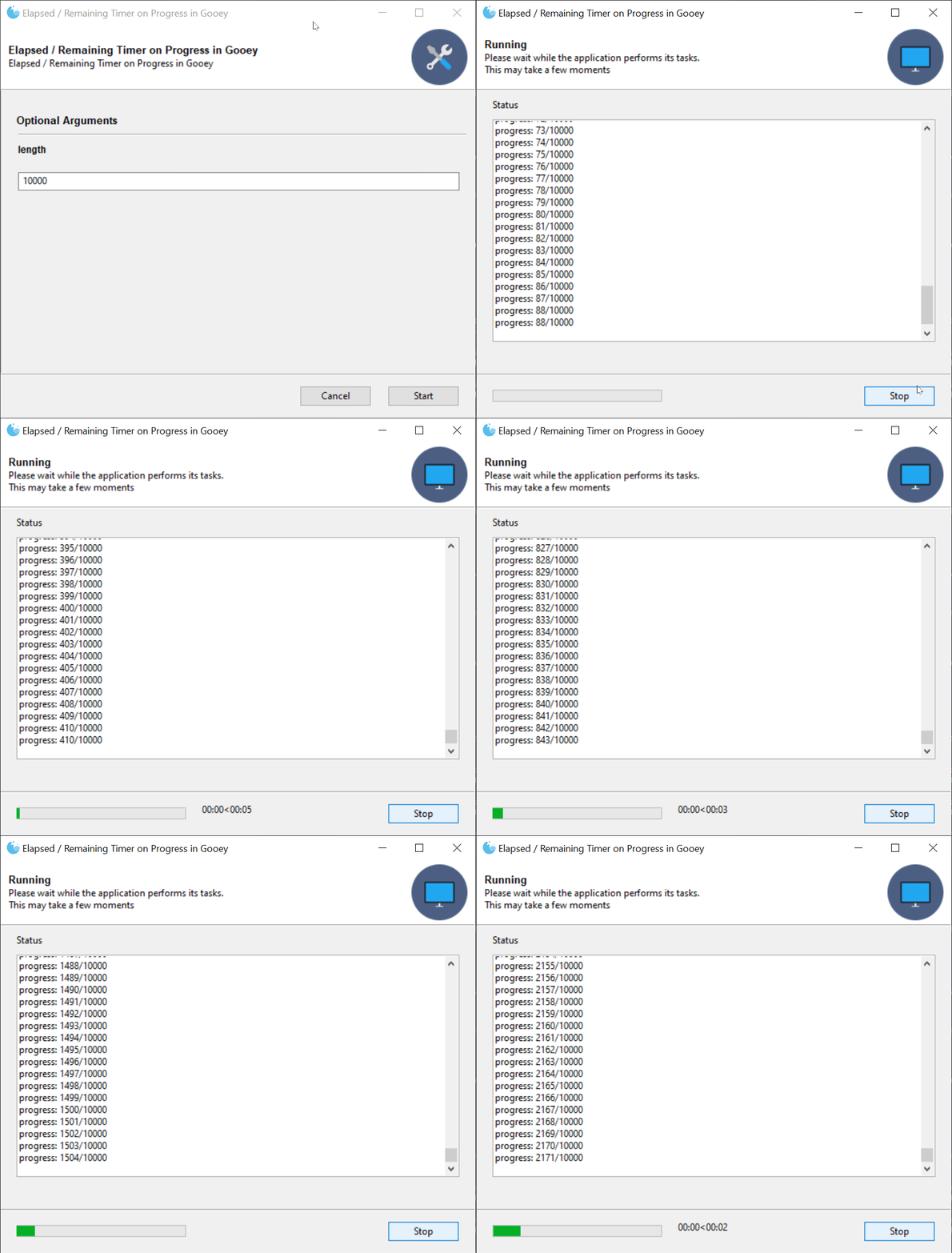
@JackMcKew put in a herculean effort and introduced a new feature where elapsed and estimated remaining time can be shown in addition to the standard progress bar.
You can checkout an example [here](https://github.com/chriskiehl/GooeyExamples/blob/master/examples/example_time_remaining.py)
Example Code:
```python
@Gooey(timing_options={
'show_time_remaining':True,
'hide_time_remaining_on_complete':True
})
```
## Breaking Changes
* (documentation breaking)`terminal_font_weight`'s public documented API allowed the strings "NORMAL" and "BOLD" while its internal implementation relied on numeric font weights (light=200, normal=300, etc..). The documentation was updated to show the correct usage and a constants file was added to the public API.
## Functionality
* @neonbunny enabled Parsers to use configuration from parents.
* @eladeyal-intel updated `RichTextConsole` to allow control+scrollwheel to zoom the text
## Language Additions / Improvements
* @soleil0-0 - Additional Chinese translation
* @dancergraham - Additional French translation
* @ajvirSingh1313 - Hindi translation
## Bug Fixes
* Fixed bug where dynamic updates to a Dropdown would cause the selection to be lost
* Fixed performance issues where dynamic updates with large items would cause Gooey to hang
* @rotu fixed a bug in dynamic updates related to `Popen` usage.
* @neonbunny - resolved warning cause by missing return statement
* Fixed bug where terminal font and colors were not being set correctly
* Fixed mysterious RadioGroup issue where underlying WxWidgets would 'forget' the current selection under certain circumstances
================================================
FILE: docs/releases/1.0.6-release-notes.md
================================================
## Gooey 1.0.6 Released!
This is a minor release beefing up the new FilterableDropdown's search capabilities and performance. In the previous release, the dropdown was backed by WX's `ListBox` widget. 1.0.6 replaces this for a fully virtualized version which allows Gooey to operate on massive datasets without taking a hit to UI performance. Additionally, how Gooey internally filters for matches has also been updated. Choice are now backed by a trie for super fast lookup even against large data sets. Tokenization and match strategies can be customized to support just about any lookup style.
Head over to the [Examples Repo](https://github.com/chriskiehl/GooeyExamples) to see the updated demo which now uses a dataset consisting of about 25k unique items.
**New Gooey Options:**
`FilterableDropdown` now takes a `search_strategy` in its `gooey_options`.
```python
from gooey import Gooey, GooeyParser, PrefixTokenizers
gooey_options={
'label_color': (255, 100, 100),
'placeholder': 'Start typing to view suggestions',
'search_strategy': {
'type': 'PrefixFilter',
'choice_tokenizer': PrefixTokenizers.ENTIRE_PHRASE,
'input_tokenizer': PrefixTokenizers.REGEX('\s'),
'ignore_case': True,
'operator': 'AND',
'index_suffix': False
}
})
```
This gives control over how the choices and user input get tokenized, as well as how those tokenized matches get treated (ANDed together vs ORd). Want to match on any part of any word? Enable the `index_suffix` option to index all of your candidate words by their individual parts. e.g.
```
Word: 'Banana'
Suffixes: ['Banana', 'anana', 'nana', 'ana']
```
These all get loaded into a trie for super fast lookup. Combine this with the `WORDs` tokenizer, and you get really fine grained search though your options!
## Thank you to the current Patreon supporters!
* Qteal
* Joseph Rhodes
## Breaking Changes
No breaking changes from 1.0.5.
================================================
FILE: docs/releases/1.0.7-release-notes.md
================================================
## Gooey 1.0.7 Released!
Lots of new stuff this release! We've got 3 new widget types, new gooey_options, as well as some quality of Life improvements for using Gooey Options.
### New Widgets: IntegerField, DecimalField, and Slider

Gooey now has 3 inputs specifically geared towards accepting numeric inputs. Previously, all Gooey had were text fields which you could add `validators` to in order to enforce only numbers were entered, but now we have top level widgets which do all of that out of the box!
**Important Usage Note:** since these numeric inputs don't allow any non-numeric characters to be entered, they do **not** give you the ability to blank them out. Unlike a `TextField` which can be left empty and thus have its value not passed to your program, the numeric inputs will always send a value. Thus, you have to have sane handling in user-land.
Checkout the [Options docs](https://github.com/chriskiehl/Gooey/blob/master/docs/Gooey-Options.md) for more details.
### New Gooey Options: placeholder

Widgets with text inputs now all accept a `placeholder` Gooey option.
```python
add_argument('--foo', widget='TextField', gooey_options=options.TextField(
placeholder='Type some text here!'
)
# or without the options helper
add_argument('--foo', widget='TextField', gooey_options={
'placeholder': 'Type some text here!'
})
```
### New Validator option: RegexValidator
```python
add_argument('--foo', widget='TextField', gooey_options=options.TextField(
placeholder='Type some text here!',
validator=options.RegexValidator(
test='\d{4}',
message='Must be exactly 4 digits long!'
)
)
# or without the options helper
add_argument('--foo', widget='TextField', gooey_options={
'placeholder': 'Type some text here!',
'validator': {
'type': 'RegexValidator',
'test': '\d{4}',
'message': 'Must be exactly 4 digits long!'
}
})
```
### New feature: Options helpers
Gooey now has a top-level `options` module which can be imported. Previously, Gooey Options have been an opaque map. While great for openness / extensibility, it's pretty terrible from a discoverability / "what does this actually take again..?" perspective. The new `options` module aims to make using `gooey_options` easier and more discoverable.
```python
from gooey import options
```
The goal is to enable IDE's to provide better auto-completion help as well as more REPL driven usefulness via help() and docstrings.
```python
from gooey import options
parser.add_argument(
'--foo',
help='Some foo thing',
widget='FilterableDropdown',
gooey_options=options.FilterableDropdown(
placeholder='Search for a Foo',
search_strategy=options.PrefixSearchStrategy(
ignore_case=True
)
))
```
Note that these are _just_ helpers for generating the right data shapes. They're still generating plain data behind the scenes and thus all existing `gooey_options` code remains 100% compatible.
**Better Docs:**
Which is to say, documentation which actually exists rather than _not_ exist. You can inspect the docs live in the REPL or by hopping to the symbol in editors which support such things.
```
>>> from gooey import options
>>> help(options.RadioGroup)
Help on function FileChooser in module __main__:
FileChooser(wildcard=None, default_dir=None, default_file=None, message=None, **layout_options)
:param wildcard: Sets the wildcard, which can contain multiple file types, for
example: "BMP files (.bmp)|.bmp|GIF files (.gif)|.gif"
:param message: Sets the message that will be displayed on the dialog.
:param default_dir: The default directory selected when the dialog spawns
:param default_file: The default filename used in the dialog
Layout Options:
---------------
Color options can be passed either as a hex string ('#ff0000') or as
a collection of RGB values (e.g. `[255, 0, 0]` or `(255, 0, 0)`)
:param label_color: The foreground color of the label text
:param label_bg_color: The background color of the label text.
:param help_color: The foreground color of the help text.
:param help_bg_color: The background color of the help text.
:param error_color: The foreground color of the error text (when visible).
:param error_bg_color: The background color of the error text (when visible).
:param show_label: Toggles whether or not to display the label text
:param show_help: Toggles whether or not to display the help text
:param visible: Hides the entire widget when False. Note: the widget
is still present in the UI and will still send along any
default values that have been provided in code. This option
is here for when you want to hide certain advanced / dangerous
inputs from your GUI users.
:param full_width: This is a layout hint for this widget. When True the widget
will fill the entire available space within a given row.
Otherwise, it will be sized based on the column rules
provided elsewhere.
```
Ideally, and eventually, we'll be able to completely type these options to increase visibility / usability even more. However, for backwards compatibility reasons, Gooey will continue to be sans anything more than the most basic of type hinting for the time being.
## Breaking Changes
**No breaking API changes from 1.0.6 to 1.0.7.** However, the _strictness_ of existing Gooey Options has been increased, which _could_ result in issues when upgrading from 1.0.6. In an attempt to be helpful, Gooey now throws an exception if invalid Gooey Options are supplied. This is to catch things like invalid types or ill-formed data. If you were passing bad data in 1.0.6, it will now be flagged as such in 1.0.7.
## Thank you to the current [Patreon supporters](https://www.patreon.com/chriskiehl)!
* Sponsors:
* Qteal
* Individuals:
* Joseph Rhodes
* Nicholas
================================================
FILE: docs/releases/1.0.8-release-notes.md
================================================
## Gooey 1.0.8 Released!
Another minor Gooey release! This one brings a new global Gooey Option for setting initial values in the UI, support for `version` action types, plus a few bug/linting fixes.
Additionally, I continue to plug away at getting the test coverage to useful levels. We're now pushing 80% coverage which is making working on Gooey with confidence much easier!
### New Gooey Options: initial_value
This option lets you specify the value present in the widget when Gooey starts.
```python
parser.add_argument('-my-arg', widget='Textarea', gooey_options={
'initial_value': 'Hello world!'
})
```
Or, using the new `options` helpers:
```python
from gooey import options
parser.add_argument('-my-arg', widget='Textarea', gooey_options=options.Textarea(
initial_value='Hello World!'
))
```
If you've been using Gooey awhile, you'll recognize that this overlaps with the current behavior of `default`. The new `initial_value` enables you to supply a truly optional seed value to the UI. When using `default`, even if the user clears your value out of the UI, argparse will add it back in when it parses the CLI string. While this is often useful behavior, it prevents certain workflows from being possible. `initial_value` let's you control the UI independent of argparse. This means you can now, for instance, set a checkbox to be checked by default in the UI, but optionally allow the user to deselect it without having argprase re-populate the 'checked' state (a behavior which comes up frequently in the issue tracker due to it being technically correct, but also very confusing!).
### action=version support
When using `action='version'` Gooey will now map it a CheckBox widget type.
### Other Fixes / Changes:
* Bug fix: add missing translation step for tabbed group titles (@neonbunny)
* Linting: swap `is not` for `!=` (@DrStrinky)
## Breaking Changes
**No breaking API changes from 1.0.7 to 1.0.8**
## Thank you to the current [Patreon supporters](https://www.patreon.com/chriskiehl)!
* Sponsors:
* Qteal
* Individuals:
* Joseph Rhodes
* Nicholas
* Joey
================================================
FILE: docs/releases/1.0.8.1-release-notes.md
================================================
## Gooey 1.0.8.1 Released!
This is a tiny intermediate release which just loosen Gooey's WxPython dependency from `=4.1.0` to `>=4.1.0` in `setup.py`. The strict version requirement was causing numerous installation issues across environments.
================================================
FILE: docs/releases/1.2.0-ALPHA-release-notes.md
================================================
# Gooey 1.2.0-ALPHA Released!
### Warning:
>**Upgrade with caution!** 1.2.0 removes the experimental Dynamic Updates feature and replaces it with a _new_ experimental Dynamic Updates feature! The two APIs are incompatible.
This release brings a whole host of new features to Gooey. Chief among them are the new Dynamic Updates and Validation functionality. This was effectively a rebuild of a substantial portion of Gooey's internal to enable a more client/server style functionality. This means that you have more control over the gooey's lifecycle, and can subscribe to high level events. Currently, FormSubmit, OnComplete, and OnError are supported, but more are on their way! Soon you'll be able to have fine grained control over the UI and its presentation, and still without having to write a single line of traditional GUI code!
### Breaking Changes (1.0.8 -> 1.2.0)
* **Validation** - the validation mechanism available via gooey_options has been removed entirely in favor of the new API.
* **Dynamic Updates** - there was previously minimal support for loading new data at run time. This has been revomed in favor of a new system which gives advanced control over the state of the UI.
### New Features
* **Dynamic Updates and Validation** - Checkout the [README](https://github.com/chriskiehl/Gooey/blob/master/README.md) for details on how to get started. This feature is really hairy behind the scenes and involves all kinds of crazy monkey patching in order to work. Odds of encountering a bug or scenario that doesn't work for your use case is high in this initial release. Please fill out an issue if any problems pop up! Checkout [the examples repo](https://github.com/chriskiehl/GooeyExamples/blob/master/examples/lifecycle_hooks.py) to see the new lifecycle hooks in action.
* **Graceful Shutdown control** - Gooey previously would `SIGTERM` your application when you tried to halt it while running. However, with 1.2.0, you have control over which signal Gooey sends when you request a shutdown. This gives you a chance to catch that signal and clean up and resources currently un use before shutting down.
* **Better sys.argv handling** - Gooey no longer mutates the global sys.argv variable. This caused people all kinds of problems -- most frequent being Gooey spawning multiple windows. This is now removed, and hopefully all the pain stemming from it as well.
================================================
FILE: docs/releases/pypi-distribution.md
================================================
# Testing PyPi distribution before upload
The 1.0.4 release was botched when uploading to PyPi as it pulled in the 1.0.3 artifacts sitting in my dev directory. This meant that the 1.0.4 version was now clobbered on PyPi and could no longer be used. More care is needed when deploying.
### How to test locally before uploading
1\. build the wheel
```
python pip_build_wheel.py
```
this will output the wheel to the `dist/` directory.
2/. Copy the file location.
Copy the absolute path to the .gz output file. It will look something like this:
```
dist/Gooey-1.0.4.tar.gz
```
3\. In a different virtual environment, install the local wheel
```
cd ~/projects/GooeyExamples
virtualenv venv
source ./venv/Scripts/activate
pip install /path/to/local/dist/Gooey-1.0.4.tar.gz
```
If everything installs OK, you're good to upload.
```
python pip_deploy.py
```
================================================
FILE: docs/releases/release-checklist.md
================================================
# Release Checklist
- [ ] Release commit is tagged
- [ ] The next release-branch is created
- [ ] CONTRIBUTING.md has been updated to point at the next release branch
- [ ] Release is created on Github
- [ ] All tests pass on 2.7 and 3.x
- [ ] All warnings are resolved (run tests with `PYTHONWARNINGS=default`)
- [ ] All Gooey Examples run and work as expected
- [ ] All new features have corresponding examples
- [ ] All new features have README updates
- [ ] Wx Inspection tool is removed from the runner
- [ ] all debug prints removed
- [ ] setup.py version is updated
- [ ] __init__.py version is updated
- [ ] types check (for the most part) `./venv/Scripts/python.exe -m mypy /path/to/python_bindings/types.py`
- [ ] pip install of release branch works.
- [ ] All Gooey Examples run and work as expected
- [ ] pypi is updated
- [ ] pypi pip install tested 2.7 & 3.x
- [ ] All Gooey Examples run and work as expected
- [ ] Release notes written:
- [ ] major features
- [ ] bug fixes
- [ ] language additions
- [ ] breaking changes
- [ ] contributors
================================================
FILE: gooey/__init__.py
================================================
import os
from gooey.python_bindings.gooey_decorator import Gooey
from gooey.python_bindings.gooey_parser import GooeyParser
from gooey.gui.util.freeze import localResourcePath as local_resource_path
from gooey.python_bindings import constants
from gooey.python_bindings.constants import Events
from gooey.gui.components.filtering.prefix_filter import PrefixTokenizers
from gooey.gui.components.options import options
from gooey.python_bindings import types
types = types
__version__ = '1.2.0-ALPHA'
================================================
FILE: gooey/__main__.py
================================================
# '''
# Delegates arguments to the main Gooey runner
#
# For use when run directly from command line with the -m (module) flag:
#
# e.g. $ python -m gooey
#
# '''
#
# from gooey import application
#
# application.main()
================================================
FILE: gooey/gui/__init__.py
================================================
__author__ = 'Chris'
================================================
FILE: gooey/gui/application/__init__.py
================================================
================================================
FILE: gooey/gui/application/application.py
================================================
import sys
from json import JSONDecodeError
import six
import wx # type: ignore
from gooey import Events
from gooey.gui import events
from gooey.gui import host
from gooey.gui import state as s
from gooey.gui.application.components import RHeader, ProgressSpinner, ErrorWarning, RTabbedLayout, \
RSidebar, RFooter
from gooey.gui.components import modals
from gooey.gui.components.config import ConfigPage
from gooey.gui.components.config import TabbedConfigPage
from gooey.gui.components.console import Console
from gooey.gui.components.menubar import MenuBar
from gooey.gui.lang.i18n import _
from gooey.gui.processor import ProcessController
from gooey.gui.pubsub import pub
from gooey.gui.state import FullGooeyState
from gooey.gui.state import initial_state, ProgressEvent, TimingEvent
from gooey.gui.util.wx_util import transactUI, callafter
from gooey.python_bindings import constants
from gooey.python_bindings.dynamics import unexpected_exit_explanations, \
deserialize_failure_explanations
from gooey.python_bindings.types import PublicGooeyState
from gooey.python_bindings.types import Try
from gooey.util.functional import assoc
from gooey.gui.util.time import Timing
from rewx import components as c # type: ignore
from rewx import wsx # type: ignore
from rewx.core import Component, Ref # type: ignore
class RGooey(Component):
"""
Main Application container for Gooey.
State Management
----------------
Pending further refactor, state is tracked in two places:
1. On this instance (React style)
2. In the WX Form Elements themselves[0]
As needed, these two states are merged to form the `FullGooeyState`, which
is the canonical state object against which all logic runs.
Dynamic Updates
---------------
[0] this is legacy and will (eventually) be refactored away
"""
def __init__(self, props):
super().__init__(props)
self.frameRef = Ref()
self.consoleRef = Ref()
self.configRef = Ref()
self.buildSpec = props
self.state = initial_state(props)
self.headerprops = lambda state: {
'background_color': self.buildSpec['header_bg_color'],
'title': state['title'],
'show_title': state['header_show_title'],
'subtitle': state['subtitle'],
'show_subtitle': state['header_show_subtitle'],
'flag': wx.EXPAND,
'height': self.buildSpec['header_height'],
'image_uri': state['image'],
'image_size': (six.MAXSIZE, self.buildSpec['header_height'] - 10)}
self.fprops = lambda state: {
'buttons': state['buttons'],
'progress': state['progress'],
'timing': state['timing'],
'bg_color': self.buildSpec['footer_bg_color'],
'flag': wx.EXPAND,
}
self.clientRunner = ProcessController.of(self.buildSpec)
self.timer = None
def component_did_mount(self):
pub.subscribe(events.WINDOW_START, self.onStart)
pub.subscribe(events.WINDOW_RESTART, self.onStart)
pub.subscribe(events.WINDOW_STOP, self.handleInterrupt)
pub.subscribe(events.WINDOW_CLOSE, self.handleClose)
pub.subscribe(events.WINDOW_CANCEL, self.handleCancel)
pub.subscribe(events.WINDOW_EDIT, self.handleEdit)
pub.subscribe(events.CONSOLE_UPDATE, self.consoleRef.instance.logOutput)
pub.subscribe(events.EXECUTION_COMPLETE, self.handleComplete)
pub.subscribe(events.PROGRESS_UPDATE, self.updateProgressBar)
pub.subscribe(events.TIME_UPDATE, self.updateTime)
# # Top level wx close event
frame: wx.Frame = self.frameRef.instance
frame.Bind(wx.EVT_CLOSE, self.handleClose)
frame.SetMenuBar(MenuBar(self.buildSpec))
self.timer = Timing(frame)
if self.state['fullscreen']:
frame.ShowFullScreen(True)
if self.state['show_preview_warning'] and not 'unittest' in sys.modules.keys():
wx.MessageDialog(None, caption='YOU CAN DISABLE THIS MESSAGE',
message="""
This is a preview build of 1.2.0! There may be instability or
broken functionality. If you encounter any issues, please open an issue
here: https://github.com/chriskiehl/Gooey/issues
The current stable version is 1.0.8.
NOTE! You can disable this message by setting `show_preview_warning` to False.
e.g.
`@Gooey(show_preview_warning=False)`
""").ShowModal()
def getActiveConfig(self):
return [item
for child in self.configRef.instance.Children
# we descend down another level of children to account
# for Notebook layouts (which have wrapper objects)
for item in [child] + list(child.Children)
if isinstance(item, ConfigPage)
or isinstance(item, TabbedConfigPage)][self.state['activeSelection']]
def getActiveFormState(self):
"""
This boiler-plate and manual interrogation of the UIs
state is required until we finish porting the Config Form
over to rewx (which is a battle left for another day given
its complexity)
"""
return self.getActiveConfig().getFormState()
def fullState(self):
"""
Re: final porting is a to do. For now we merge the UI
state into the main tracked state.
"""
formState = self.getActiveFormState()
return s.combine(self.state, self.props, formState)
def onStart(self, *args, **kwargs):
"""
Dispatches the start behavior.
"""
if Events.VALIDATE_FORM in self.state['use_events']:
self.runAsyncValidation()
else:
self.startRun()
def startRun(self):
"""
Kicks off a run by invoking the host's code
and pumping its stdout to Gooey's Console window.
"""
state = self.fullState()
if state['clear_before_run']:
self.consoleRef.instance.Clear()
self.set_state(s.consoleScreen(_, state))
self.clientRunner.run(s.buildInvocationCmd(state))
self.timer.start()
self.frameRef.instance.Layout()
for child in self.frameRef.instance.Children:
child.Layout()
def syncExternalState(self, state: FullGooeyState):
"""
Sync the UI's state to what the host program has requested.
"""
self.getActiveConfig().syncFormState(s.activeFormState(state))
self.frameRef.instance.Layout()
for child in self.frameRef.instance.Children:
child.Layout()
def handleInterrupt(self, *args, **kwargs):
if self.shouldStopExecution():
self.clientRunner.stop()
def handleComplete(self, *args, **kwargs):
self.timer.stop()
if self.clientRunner.was_success():
self.handleSuccessfulRun()
if Events.ON_SUCCESS in self.state['use_events']:
self.runAsyncExternalOnCompleteHandler(was_success=True)
else:
self.handleErrantRun()
if Events.ON_ERROR in self.state['use_events']:
self.runAsyncExternalOnCompleteHandler(was_success=False)
def handleSuccessfulRun(self):
if self.state['return_to_config']:
self.set_state(s.editScreen(_, self.state))
else:
self.set_state(s.successScreen(_, self.state))
if self.state['show_success_modal']:
wx.CallAfter(modals.showSuccess)
def handleErrantRun(self):
if self.clientRunner.wasForcefullyStopped:
self.set_state(s.interruptedScreen(_, self.state))
else:
self.set_state(s.errorScreen(_, self.state))
if self.state['show_failure_modal']:
wx.CallAfter(modals.showFailure)
def successScreen(self):
strings = {'title': _('finished_title'), 'subtitle': _('finished_msg')}
self.set_state(s.success(self.state, strings, self.buildSpec))
def handleEdit(self, *args, **kwargs):
self.set_state(s.editScreen(_, self.state))
def handleCancel(self, *args, **kwargs):
if modals.confirmExit():
self.handleClose()
def handleClose(self, *args, **kwargs):
"""Stop any actively running client program, cleanup the top
level WxFrame and shutdown the current process"""
# issue #592 - we need to run the same onStopExecution machinery
# when the exit button is clicked to ensure everything is cleaned
# up correctly.
frame: wx.Frame = self.frameRef.instance
if self.clientRunner.running():
if self.shouldStopExecution():
self.clientRunner.stop()
frame.Destroy()
# TODO: NOT exiting here would allow
# spawing the gooey to input params then
# returning control to the CLI
sys.exit()
else:
frame.Destroy()
sys.exit()
def shouldStopExecution(self):
return not self.state['show_stop_warning'] or modals.confirmForceStop()
def updateProgressBar(self, *args, progress=None):
self.set_state(s.updateProgress(self.state, ProgressEvent(progress=progress)))
def updateTime(self, *args, elapsed_time=None, estimatedRemaining=None, **kwargs):
event = TimingEvent(elapsed_time=elapsed_time, estimatedRemaining=estimatedRemaining)
self.set_state(s.updateTime(self.state, event))
def handleSelectAction(self, event):
self.set_state(assoc(self.state, 'activeSelection', event.Selection))
def runAsyncValidation(self):
def handleHostResponse(hostState: PublicGooeyState):
self.set_state(s.finishUpdate(self.state))
currentState = self.fullState()
self.syncExternalState(s.mergeExternalState(currentState, hostState))
if not s.has_errors(self.fullState()):
self.startRun()
else:
self.set_state(s.editScreen(_, s.show_alert(self.fullState())))
def onComplete(result: Try[PublicGooeyState]):
result.onSuccess(handleHostResponse)
result.onError(self.handleHostError)
self.set_state(s.beginUpdate(self.state))
fullState = self.fullState()
host.communicateFormValidation(fullState, callafter(onComplete))
def runAsyncExternalOnCompleteHandler(self, was_success):
def handleHostResponse(hostState):
if hostState:
self.syncExternalState(s.mergeExternalState(self.fullState(), hostState))
def onComplete(result: Try[PublicGooeyState]):
result.onError(self.handleHostError)
result.onSuccess(handleHostResponse)
if was_success:
host.communicateSuccessState(self.fullState(), callafter(onComplete))
else:
host.communicateErrorState(self.fullState(), callafter(onComplete))
def handleHostError(self, ex):
"""
All async errors get pumped here where we dump out the
error and they hopefully provide a lot of helpful debugging info
for the user.
"""
try:
self.set_state(s.errorScreen(_, self.state))
self.consoleRef.instance.appendText(str(ex))
self.consoleRef.instance.appendText(str(getattr(ex, 'output', '')))
self.consoleRef.instance.appendText(str(getattr(ex, 'stderr', '')))
raise ex
except JSONDecodeError as e:
self.consoleRef.instance.appendText(deserialize_failure_explanations)
except Exception as e:
self.consoleRef.instance.appendText(unexpected_exit_explanations)
finally:
self.set_state({**self.state, 'fetchingUpdate': False})
def render(self):
return wsx(
[c.Frame, {'title': self.buildSpec['program_name'],
'background_color': self.buildSpec['body_bg_color'],
'double_buffered': True,
'min_size': (400, 300),
'icon_uri': self.state['images']['programIcon'],
'size': self.buildSpec['default_size'],
'ref': self.frameRef},
[c.Block, {'orient': wx.VERTICAL},
[RHeader, self.headerprops(self.state)],
[c.StaticLine, {'style': wx.LI_HORIZONTAL, 'flag': wx.EXPAND}],
[ProgressSpinner, {'show': self.state['fetchingUpdate']}],
[ErrorWarning, {'show': self.state['show_error_alert'],
'uri': self.state['images']['errorIcon']}],
[Console, {**self.buildSpec,
'flag': wx.EXPAND,
'proportion': 1,
'show': self.state['screen'] == 'CONSOLE',
'ref': self.consoleRef}],
[RTabbedLayout if self.buildSpec['navigation'] == constants.TABBED else RSidebar,
{'bg_color': self.buildSpec['sidebar_bg_color'],
'label': 'Some Action!',
'tabbed_groups': self.buildSpec['tabbed_groups'],
'show_sidebar': self.state['show_sidebar'],
'ref': self.configRef,
'show': self.state['screen'] == 'FORM',
'activeSelection': self.state['activeSelection'],
'options': list(self.buildSpec['widgets'].keys()),
'on_change': self.handleSelectAction,
'config': self.buildSpec['widgets'],
'flag': wx.EXPAND,
'proportion': 1}],
[c.StaticLine, {'style': wx.LI_HORIZONTAL, 'flag': wx.EXPAND}],
[RFooter, self.fprops(self.state)]]]
)
================================================
FILE: gooey/gui/application/components.py
================================================
"""
Houses all the supporting rewx components for
the main application window.
"""
import wx # type: ignore
from typing_extensions import TypedDict
from gooey.gui.components.config import ConfigPage, TabbedConfigPage
from gooey.gui.components.console import Console
from gooey.gui.components.mouse import notifyMouseEvent
from gooey.gui.components.sidebar import Sidebar
from gooey.gui.components.tabbar import Tabbar
from gooey.gui.lang.i18n import _
from gooey.gui.pubsub import pub
from gooey.gui.state import present_time
from gooey.gui.three_to_four import Constants
from gooey.python_bindings import constants
from rewx import components as c # type: ignore
from rewx import wsx, mount, update # type: ignore
from rewx.core import Component, Ref # type: ignore
from rewx.widgets import set_basic_props # type: ignore
def attach_notifier(parent):
"""
Recursively attaches the mouseEvent notifier
to all elements in the tree
"""
parent.Bind(wx.EVT_LEFT_DOWN, notifyMouseEvent)
for child in parent.Children:
attach_notifier(child)
class HeaderProps(TypedDict):
background_color: str
title: str
show_title: bool
subtitle: str
show_subtitle: bool
class RHeader(Component):
def __init__(self, props):
super().__init__(props)
self.parentRef = Ref()
def component_did_mount(self):
attach_notifier(self.parentRef.instance)
def render(self):
if 'running' not in self.props['image_uri']:
imageProps = {
'uri': self.props['image_uri'],
'size': self.props['image_size'],
'flag': wx.RIGHT,
'border': 10}
else:
imageProps = {
'size': self.props['image_size'],
'flag': wx.RIGHT,
'border': 10}
return wsx(
[c.Block, {'orient': wx.HORIZONTAL,
'ref': self.parentRef,
'min_size': (120, self.props['height']),
'background_color': self.props['background_color']},
[c.Block, {'orient': wx.VERTICAL,
'flag': wx.ALIGN_CENTER_VERTICAL | wx.ALL,
'proportion': 1,
'border': 10},
[TitleText, {'label': self.props['title'],
'show': self.props['show_title'],
'wx_name': 'header_title'}],
[c.StaticText, {'label': self.props['subtitle'],
'show': self.props['show_subtitle'],
'wx_name': 'header_subtitle'}]],
[c.StaticBitmap, imageProps]]
)
class RFooter(Component):
def __init__(self, props):
super().__init__(props)
self.ref = Ref()
def component_did_mount(self):
"""
We have to manually wire up LEFT_DOWN handlers
for every component due to wx limitations.
See: mouse.py docs for background.
"""
block: wx.BoxSizer = self.ref.instance
attach_notifier(block)
def handle(self, btn):
def inner(*args, **kwargs):
pub.send_message(btn['id'])
return inner
def render(self):
return wsx(
[c.Block, {'orient': wx.VERTICAL,
'min_size': (30, 53),
'background_color': self.props['bg_color']},
[c.Block, {'orient': wx.VERTICAL, 'proportion': 1}],
[c.Block, {'orient': wx.HORIZONTAL,
'border': 20,
'flag': wx.EXPAND | wx.LEFT | wx.RIGHT,
'ref': self.ref},
[c.Gauge, {'range': 100,
'proportion': 1,
'value': self.props['progress']['value'],
'show': self.props['progress']['show']}],
[c.StaticText, {'label': present_time(self.props['timing']),
'flag': wx.LEFT,
'wx_name': 'timing',
'show': self.props['timing']['show'],
'border': 20}],
[c.Block, {'orient': wx.HORIZONTAL, 'proportion': 1}],
*[[c.Button, {**btn,
'label': _(btn['label_id']),
'min_size': (90, 23),
'flag': wx.LEFT,
'border': 10,
'on_click': self.handle(btn)
}]
for btn in self.props['buttons']]],
[c.Block, {'orient': wx.VERTICAL, 'proportion': 1}]]
)
class RNavbar(Component):
def __init__(self, props):
super().__init__(props)
# if self.buildSpec['navigation'] == constants.TABBED:
# navigation = Tabbar(self, self.buildSpec, self.configs)
# else:
# navigation = Sidebar(self, self.buildSpec, self.configs)
# if self.buildSpec['navigation'] == constants.HIDDEN:
# navigation.Hide()
def render(self):
return wsx(
)
def VerticalSpacer(props):
return wsx([c.Block, {'orient': wx.VERTICAL, 'min_size': (-1, props['height'])}])
def SidebarControls(props):
return wsx(
[c.Block, {'orient': wx.VERTICAL,
'min_size': (180, 0),
'size': (180, 0),
'show': props.get('show', True),
'flag': wx.EXPAND,
'proportion': 0,
'background_color': props['bg_color']},
[c.Block, {'orient': wx.VERTICAL,
'min_size': (180, 0),
'size': (180, 0),
'flag': wx.EXPAND | wx.LEFT | wx.RIGHT | wx.BOTTOM,
'border': 10,
'proportion': 1,
'background_color': props['bg_color']},
[VerticalSpacer, {'height': 15}],
[TitleText, {'label': props['label']}],
[VerticalSpacer, {'height': 5}],
[c.ListBox, {'choices': props['options'],
'value': props['activeSelection'],
'proportion': 1,
'on_change': props['on_change'],
'flag': wx.EXPAND}],
[VerticalSpacer, {'height': 10}]]]
)
def ProgressSpinner(props):
return wsx(
[c.Block, {'flag': wx.EXPAND, 'show': props['show']},
[c.Gauge, {'flag': wx.EXPAND,
'value': -1,
'size': (-1, 4)}],
[c.StaticLine, {'style': wx.LI_HORIZONTAL,
'flag': wx.EXPAND}]]
)
def ErrorWarning(props):
return wsx(
[c.Block, {'orient': wx.HORIZONTAL,
'background_color': '#fdeded',
'style': wx.SIMPLE_BORDER,
'flag': wx.EXPAND | wx.ALL,
'proportion': 0,
'border': 5,
'min_size': (-1, 45),
'show': props.get('show', True)},
[c.StaticBitmap, {'size': (24, 24),
'flag': wx.LEFT | wx.RIGHT | wx.ALIGN_CENTER_VERTICAL,
'border': 6,
'uri': props['uri']}],
[c.StaticText, {'label': 'Whoops! You have some errors which must be corrected',
'flag': wx.ALIGN_CENTER_VERTICAL}]]
)
def RSidebar(props):
return wsx(
[c.Block, {'orient': wx.HORIZONTAL,
'show': props.get('show', True),
'flag': props['flag'],
'proportion': props['proportion'],
'ref': props['ref']},
[SidebarControls, {**props, 'show': props['show_sidebar']}],
[c.StaticLine, {'style': wx.LI_VERTICAL,
'flag': wx.EXPAND,
'min_size': (1, -1)}],
*[[TabbedConfigPage if props['tabbed_groups'] else ConfigPage,
{'flag': wx.EXPAND,
'proportion': 3,
'config': config,
'show': i == props['activeSelection']}]
for i, config in enumerate(props['config'].values())]
]
)
def RTabbedLayout(props):
return wsx(
[c.Notebook, {'flag': wx.EXPAND | wx.ALL,
'show': props.get('show', True),
'proportion': 1,
'on_change': props['on_change'],
'ref': props['ref']},
*[[c.NotebookItem,
{'title': props['options'][i], 'selected': props['activeSelection'] == i},
[TabbedConfigPage if props['tabbed_groups'] else ConfigPage,
{'flag': wx.EXPAND,
'proportion': 3,
'config': config,
'show': i == props['activeSelection']}]]
for i, config in enumerate(props['config'].values())]]
)
def layout_choose():
def buildNavigation(self):
"""
Chooses the appropriate layout navigation component based on user prefs
"""
if self.buildSpec['navigation'] == constants.TABBED:
navigation = Tabbar(self, self.buildSpec, self.configs)
else:
navigation = Sidebar(self, self.buildSpec, self.configs)
if self.buildSpec['navigation'] == constants.HIDDEN:
navigation.Hide()
return navigation
def buildConfigPanels(self, parent):
page_class = TabbedConfigPage if self.buildSpec['tabbed_groups'] else ConfigPage
return [page_class(parent, widgets, self.buildSpec)
for widgets in self.buildSpec['widgets'].values()]
class TitleText(Component):
def __init__(self, props):
super().__init__(props)
self.ref = Ref()
def component_did_mount(self):
text: wx.StaticText = self.ref.instance
font_size = text.GetFont().GetPointSize()
text.SetFont(wx.Font(
int(font_size * 1.2),
wx.FONTFAMILY_DEFAULT,
Constants.WX_FONTSTYLE_NORMAL,
wx.FONTWEIGHT_BOLD,
False
))
def render(self):
return wsx([c.StaticText, {**self.props, 'label': self.props['label'], 'ref': self.ref}])
##
## REWX definitions:
##
@mount.register(ConfigPage) # type: ignore
def config(element, parent):
return update(element, ConfigPage(parent, element['props']['config'], {'contents': []}))
@update.register(ConfigPage) # type: ignore
def config(element, instance: ConfigPage):
set_basic_props(instance, element['props'])
return instance
@mount.register(TabbedConfigPage) # type: ignore
def tabbedconfig(element, parent):
return update(element, TabbedConfigPage(parent, element['props']['config'], {'contents': []}))
@update.register(TabbedConfigPage) # type: ignore
def tabbedconfig(element, instance: TabbedConfigPage):
set_basic_props(instance, element['props'])
return instance
@mount.register(Console) # type: ignore
def console(element, parent):
return update(element, Console(parent, element['props']))
@update.register(Console) # type: ignore
def console(element, instance: Console):
set_basic_props(instance, element['props'])
if 'show' in element['props']:
instance.Show(element['props']['show'])
return instance
================================================
FILE: gooey/gui/bootstrap.py
================================================
'''
Main runner entry point for Gooey.
'''
from typing import Any, Tuple
import wx # type: ignore
# wx.html and wx.xml imports required here to make packaging with
# pyinstaller on OSX possible without manually specifying `hidden_imports`
# in the build.spec
import wx.html # type: ignore
import wx.lib.inspection # type: ignore
import wx.richtext # type: ignore
import wx.xml # type: ignore
from gooey.gui import image_repository
from gooey.gui.application.application import RGooey
from gooey.gui.lang import i18n
from gooey.util.functional import merge
from rewx import render, create_element # type: ignore
def run(build_spec):
app, _ = build_app(build_spec)
app.MainLoop()
def build_app(build_spec):
app = wx.App(False)
return _build_app(build_spec, app)
def _build_app(build_spec, app) -> Tuple[Any, wx.Frame]:
"""
Note: this method is broken out with app as
an argument to facilitate testing.
"""
# use actual program name instead of script file name in macOS menu
app.SetAppDisplayName(build_spec['program_name'])
i18n.load(build_spec['language_dir'], build_spec['language'], build_spec['encoding'])
imagesPaths = image_repository.loadImages(build_spec['image_dir'])
gapp2 = render(create_element(RGooey, merge(build_spec, imagesPaths)), None)
# wx.lib.inspection.InspectionTool().Show()
# gapp.Show()
gapp2.Show()
return (app, gapp2)
================================================
FILE: gooey/gui/cli.py
================================================
import json
from itertools import chain
from copy import deepcopy
from gooey.util.functional import compact
from typing import List, Optional
from gooey.gui.constants import VALUE_PLACEHOLDER
from gooey.gui.formatters import formatArgument
from gooey.python_bindings.types import FieldValue, Group, Item
from gooey.util.functional import merge # type: ignore
from gooey.gui.state import FullGooeyState
'''
primary :: Target -> Command -> Array Arg -> Array Arg -> Boolean -> CliString
validateForm :: Target -> Command -> Array Arg -> Array Arg -> CliString
validateField :: Target -> Command -> Array Arg -> Array Arg -> ArgId -> CliString
completed :: Target -> Command -> FromState -> CliString
failed :: Target -> Command -> FromState -> CliString
fieldAction :: Target -> Command ->
'''
def buildSuccessCmd(state: FullGooeyState):
subcommand = state['subcommands'][state['activeSelection']]
widgets = state['widgets'][subcommand]
def onSuccessCmd(target: str, subCommand: str, formState: List[str]) -> str:
command = subCommand if not subCommand == '::gooey/default' else ''
return f'{target} {command} --gooey-on-success {json.dumps(formState)}'
def onErrorCmd(target: str, subCommand: str, formState: List[str]) -> str:
command = subCommand if not subCommand == '::gooey/default' else ''
return f'{target} {command} --gooey-on-error {json.dumps(formState)}'
def formValidationCmd(target: str, subCommand: str, positionals: List[FieldValue], optionals: List[FieldValue]) -> str:
positional_args = [cmdOrPlaceholderOrNone(x) for x in positionals]
optional_args = [cmdOrPlaceholderOrNone(x) for x in optionals]
command = subCommand if not subCommand == '::gooey/default' else ''
return u' '.join(compact([
target,
command,
*optional_args,
'--gooey-validate-form',
'--' if positional_args else '',
*positional_args]))
def cliCmd(target: str,
subCommand: str,
positionals: List[FieldValue],
optionals: List[FieldValue],
suppress_gooey_flag=False) -> str:
positional_args = [arg['cmd'] for arg in positionals]
optional_args = [arg['cmd'] for arg in optionals]
command = subCommand if not subCommand == '::gooey/default' else ''
ignore_flag = '' if suppress_gooey_flag else '--ignore-gooey'
return u' '.join(compact([
target,
command,
*optional_args,
ignore_flag,
'--' if positional_args else '',
*positional_args]))
def cmdOrPlaceholderOrNone(field: FieldValue) -> Optional[str]:
# Argparse has a fail-fast-and-exit behavior for any missing
# values. This poses a problem for dynamic validation, as we
# want to collect _all_ errors to be more useful to the user.
# As such, if there is no value currently available, we pass
# through a stock placeholder values which allows GooeyParser
# to handle it being missing without Argparse exploding due to
# it actually being missing.
if field['clitype'] == 'positional':
return field['cmd'] or VALUE_PLACEHOLDER
elif field['clitype'] != 'positional' and field['meta']['required']:
# same rationale applies here. We supply the argument
# along with a fixed placeholder (when relevant i.e. `store`
# actions)
return field['cmd'] or formatArgument(field['meta'], VALUE_PLACEHOLDER)
else:
# Optional values are, well, optional. So, like usual, we send
# them if present or drop them if not.
return field['cmd']
def buildCliString(target, subCommand, positional, optional, suppress_gooey_flag=False):
positionals = deepcopy(positional)
if positionals:
positionals.insert(0, "--")
arguments = ' '.join(compact(chain(optional, positionals)))
if subCommand != '::gooey/default':
arguments = u'{} {}'.format(subCommand, arguments)
ignore_flag = '' if suppress_gooey_flag else '--ignore-gooey'
return u'{} {} {}'.format(target, ignore_flag, arguments)
================================================
FILE: gooey/gui/components/__init__.py
================================================
================================================
FILE: gooey/gui/components/config.py
================================================
from typing import Mapping, List
import wx # type: ignore
from wx.lib.scrolledpanel import ScrolledPanel # type: ignore
from gooey.gui.components.mouse import notifyMouseEvent
from gooey.gui.components.util.wrapped_static_text import AutoWrappedStaticText
from gooey.gui.lang.i18n import _
from gooey.gui.util import wx_util
from gooey.python_bindings.types import FormField
from gooey.util.functional import getin, flatmap, indexunique
class ConfigPage(ScrolledPanel):
self_managed = True
def __init__(self, parent, rawWidgets, buildSpec, *args, **kwargs):
super(ConfigPage, self).__init__(parent, *args, **kwargs)
self.SetupScrolling(scroll_x=False, scrollToTop=False)
self.rawWidgets = rawWidgets
self.buildSpec = buildSpec
self.reifiedWidgets = []
self.layoutComponent()
self.Layout()
self.widgetsMap = indexunique(lambda x: x._id, self.reifiedWidgets)
self.Bind(wx.EVT_LEFT_DOWN, notifyMouseEvent)
## TODO: need to rethink what uniquely identifies an argument.
## Out-of-band IDs, while simple, make talking to the client program difficult
## unless they're agreed upon before hand. Commands, as used here, have the problem
## of (a) not being nearly granular enough (for instance, `-v` could represent totally different
## things given context/parser position), and (b) cannot identify positional args.
def getName(self, group):
"""
retrieve the group name from the group object while accounting for
legacy fixed-name manual translation requirements.
"""
name = group['name']
return (_(name)
if name in {'optional_args_msg', 'required_args_msg'}
else name)
def firstCommandIfPresent(self, widget):
commands = widget._meta['commands']
return commands[0] if commands else ''
def getPositionalArgs(self):
return [widget.getValue()['cmd'] for widget in self.reifiedWidgets
if widget.info['cli_type'] == 'positional']
def getOptionalArgs(self):
return [widget.getValue()['cmd'] for widget in self.reifiedWidgets
if widget.info['cli_type'] != 'positional']
def getPositionalValues(self):
return [widget.getValue() for widget in self.reifiedWidgets
if widget.info['cli_type'] == 'positional']
def getOptionalValues(self):
return [widget.getValue() for widget in self.reifiedWidgets
if widget.info['cli_type'] != 'positional']
def getFormState(self) -> List[FormField]:
return [widget.getUiState()
for widget in self.reifiedWidgets]
def syncFormState(self, formState: List[FormField]):
for item in formState:
self.widgetsMap[item['id']].syncUiState(item)
def isValid(self):
return not any(self.getErrors())
def getErrors(self):
states = [widget.getValue() for widget in self.reifiedWidgets]
return {state['meta']['dest']: state['error'] for state in states
if state['error']}
def seedUI(self, seeds):
radioWidgets = self.indexInternalRadioGroupWidgets()
for id, values in seeds.items():
if id in self.widgetsMap:
self.widgetsMap[id].setOptions(values)
if id in radioWidgets:
radioWidgets[id].setOptions(values)
def setErrors(self, errorMap: Mapping[str, str]):
self.resetErrors()
radioWidgets = self.indexInternalRadioGroupWidgets()
widgetsByDest = {v._meta['dest']: v for k,v in self.widgetsMap.items()
if v.info['type'] != 'RadioGroup'}
# if there are any errors, then all error blocks should
# be displayed so that the UI elements remain inline with
# each other.
if errorMap:
for widget in self.widgetsMap.values():
widget.showErrorString(True)
for id, message in errorMap.items():
if id in widgetsByDest:
widgetsByDest[id].setErrorString(message)
widgetsByDest[id].showErrorString(True)
if id in radioWidgets:
radioWidgets[id].setErrorString(message)
radioWidgets[id].showErrorString(True)
def indexInternalRadioGroupWidgets(self):
groups = filter(lambda x: x.info['type'] == 'RadioGroup', self.reifiedWidgets)
widgets = flatmap(lambda group: group.widgets, groups)
return indexunique(lambda x: x._meta['dest'], widgets)
def displayErrors(self):
states = [widget.getValue() for widget in self.reifiedWidgets]
errors = [state for state in states if state['error']]
for error in errors:
widget = self.widgetsMap[error['id']]
widget.setErrorString(error['error'])
widget.showErrorString(True)
while widget.GetParent():
widget.Layout()
widget = widget.GetParent()
def resetErrors(self):
for widget in self.reifiedWidgets:
widget.setErrorString('')
widget.showErrorString(False)
def hideErrors(self):
for widget in self.reifiedWidgets:
widget.hideErrorString()
def layoutComponent(self):
sizer = wx.BoxSizer(wx.VERTICAL)
for item in self.rawWidgets['contents']:
self.makeGroup(self, sizer, item, 0, wx.EXPAND | wx.ALL, 10)
self.SetSizer(sizer)
def makeGroup(self, parent, thissizer, group, *args):
'''
Messily builds the (potentially) nested and grouped layout
Note! Mutates `self.reifiedWidgets` in place with the widgets as they're
instantiated! I cannot figure out how to split out the creation of the
widgets from their styling without WxPython violently exploding
TODO: sort out the WX quirks and clean this up.
'''
# determine the type of border , if any, the main sizer will use
if getin(group, ['options', 'show_border'], False):
boxDetails = wx.StaticBox(parent, -1, self.getName(group) or '')
boxSizer = wx.StaticBoxSizer(boxDetails, wx.VERTICAL)
else:
boxSizer = wx.BoxSizer(wx.VERTICAL)
boxSizer.AddSpacer(10)
if group['name']:
groupName = wx_util.h1(parent, self.getName(group) or '')
groupName.SetForegroundColour(getin(group, ['options', 'label_color']))
groupName.Bind(wx.EVT_LEFT_DOWN, notifyMouseEvent)
boxSizer.Add(groupName, 0, wx.TOP | wx.BOTTOM | wx.LEFT, 8)
group_description = getin(group, ['description'])
if group_description:
description = AutoWrappedStaticText(parent, label=group_description, target=boxSizer)
description.SetForegroundColour(getin(group, ['options', 'description_color']))
description.SetMinSize((0, -1))
description.Bind(wx.EVT_LEFT_DOWN, notifyMouseEvent)
boxSizer.Add(description, 1, wx.EXPAND | wx.LEFT | wx.RIGHT | wx.BOTTOM, 10)
# apply an underline when a grouping border is not specified
# unless the user specifically requests not to show it
if not getin(group, ['options', 'show_border'], False) and group['name'] \
and getin(group, ['options', 'show_underline'], True):
boxSizer.Add(wx_util.horizontal_rule(parent), 0, wx.EXPAND | wx.LEFT, 10)
ui_groups = self.chunkWidgets(group)
for uigroup in ui_groups:
sizer = wx.BoxSizer(wx.HORIZONTAL)
for item in uigroup:
widget = self.reifyWidget(parent, item)
if not getin(item, ['options', 'visible'], True):
widget.Hide()
# !Mutate the reifiedWidgets instance variable in place
self.reifiedWidgets.append(widget)
sizer.Add(widget, 1, wx.ALL | wx.EXPAND, 5)
boxSizer.Add(sizer, 0, wx.ALL | wx.EXPAND, 5)
# apply the same layout rules recursively for subgroups
hs = wx.BoxSizer(wx.HORIZONTAL)
for e, subgroup in enumerate(group['groups']):
self.makeGroup(parent, hs, subgroup, 1, wx.EXPAND)
if len(group['groups']) != e:
hs.AddSpacer(5)
# self.makeGroup(parent, hs, subgroup, 1, wx.ALL | wx.EXPAND, 5)
itemsPerColumn = getin(group, ['options', 'columns'], 2)
if e % itemsPerColumn or (e + 1) == len(group['groups']):
boxSizer.Add(hs, *args)
hs = wx.BoxSizer(wx.HORIZONTAL)
group_top_margin = getin(group, ['options', 'margin_top'], 1)
marginSizer = wx.BoxSizer(wx.VERTICAL)
marginSizer.Add(boxSizer, 1, wx.EXPAND | wx.TOP, group_top_margin)
thissizer.Add(marginSizer, *args)
def chunkWidgets(self, group):
''' chunk the widgets up into groups based on their sizing hints '''
ui_groups = []
subgroup = []
for index, item in enumerate(group['items']):
if getin(item, ['options', 'full_width'], False):
ui_groups.append(subgroup)
ui_groups.append([item])
subgroup = []
else:
subgroup.append(item)
if len(subgroup) == getin(group, ['options', 'columns'], 2) \
or item == group['items'][-1]:
ui_groups.append(subgroup)
subgroup = []
return ui_groups
def reifyWidget(self, parent, item):
''' Convert a JSON description of a widget into a WxObject '''
from gooey.gui.components import widgets
widgetClass = getattr(widgets, item['type'])
return widgetClass(parent, item)
class TabbedConfigPage(ConfigPage):
"""
Splits top-level groups across tabs
"""
def layoutComponent(self):
# self.rawWidgets['contents'] = self.rawWidgets['contents'][1:2]
self.notebook = wx.Notebook(self, style=wx.BK_DEFAULT)
panels = [wx.Panel(self.notebook) for _ in self.rawWidgets['contents']]
sizers = [wx.BoxSizer(wx.VERTICAL) for _ in panels]
for group, panel, sizer in zip(self.rawWidgets['contents'], panels, sizers):
self.makeGroup(panel, sizer, group, 0, wx.EXPAND)
panel.SetSizer(sizer)
panel.Layout()
self.notebook.AddPage(panel, self.getName(group))
self.notebook.Layout()
_sizer = wx.BoxSizer(wx.VERTICAL)
_sizer.Add(self.notebook, 1, wx.EXPAND)
self.SetSizer(_sizer)
self.Layout()
def snapToErrorTab(self):
pass
================================================
FILE: gooey/gui/components/console.py
================================================
import webbrowser
import wx # type: ignore
from gooey.gui.lang.i18n import _
from .widgets.basictextconsole import BasicTextConsole
class Console(wx.Panel):
'''
Textbox console/terminal displayed during the client program's execution.
'''
self_managed = True
def __init__(self, parent, buildSpec, **kwargs):
wx.Panel.__init__(self, parent, name='console', **kwargs)
self.buildSpec = buildSpec
self.text = wx.StaticText(self, label=_("status"))
if buildSpec["richtext_controls"]:
from .widgets.richtextconsole import RichTextConsole
self.textbox = RichTextConsole(self)
else:
self.textbox = BasicTextConsole(self)
self.defaultFont = self.textbox.GetFont()
self.textbox.SetFont(wx.Font(
self.buildSpec['terminal_font_size'] or self.defaultFont.GetPointSize(),
self.getFontStyle(),
wx.NORMAL,
self.buildSpec['terminal_font_weight'] or wx.NORMAL,
False,
self.getFontFace(),
))
self.textbox.SetForegroundColour(self.buildSpec['terminal_font_color'])
self.layoutComponent()
self.Layout()
self.Bind(wx.EVT_TEXT_URL, self.evtUrl, self.textbox)
def evtUrl(self, event):
if event.MouseEvent.LeftUp():
# The rich console provides the embedded URL via GetString()
# but the basic console does not
webbrowser.open(
event.GetString() or
self.textbox.GetRange(event.URLStart,event.URLEnd))
event.Skip()
def getFontStyle(self):
"""
Force wx.Modern style to support legacy
monospace_display param when present
"""
return (wx.MODERN
if self.buildSpec['monospace_display']
else wx.DEFAULT)
def getFontFace(self):
"""Choose the best font face available given the user options"""
userFace = self.buildSpec['terminal_font_family'] or self.defaultFont.GetFaceName()
return (''
if self.buildSpec['monospace_display']
else userFace)
def logOutput(self, *args, **kwargs):
"""Event Handler for console updates coming from the client's program"""
self.appendText(kwargs.get('msg'))
def appendText(self, txt):
"""
Append the text to the main TextCtrl.
Note! Must be called from a Wx specific thread handler to avoid
multi-threaded explosions (e.g. wx.CallAfter)
"""
self.textbox.AppendText(txt)
def clear(self):
"""
Clear the the main TextCtrl.
"""
self.textbox.Clear()
def getText(self):
return self.textbox.GetValue()
def layoutComponent(self):
self.SetBackgroundColour(self.buildSpec.get('terminal_panel_color', '#F0F0F0'))
sizer = wx.BoxSizer(wx.VERTICAL)
sizer.AddSpacer(10)
sizer.Add(self.text, 0, wx.LEFT, 20)
sizer.AddSpacer(10)
sizer.Add(self.textbox, 1, wx.LEFT | wx.RIGHT | wx.BOTTOM | wx.EXPAND, 20)
sizer.AddSpacer(20)
self.SetSizer(sizer)
================================================
FILE: gooey/gui/components/dialogs.py
================================================
import rewx.components as c # type: ignore
import wx # type: ignore
import wx.html2 # type: ignore
from rewx import wsx, render # type: ignore
def _html_window(html):
return wsx(
[c.Block, {'orient': wx.VERTICAL, 'flag': wx.EXPAND},
[c.HtmlWindow, {'style': wx.TE_READONLY, 'flag': wx.EXPAND | wx.ALL,
'proportion': 1, 'value': html}]]
)
class HtmlDialog(wx.Dialog):
"""
A MessageDialog where the central contents are an HTML window
customizable by the user.
"""
def __init__(self, *args, **kwargs):
caption = kwargs.pop('caption', '')
html = kwargs.pop('html', '')
super(HtmlDialog, self).__init__(None, *args, **kwargs)
wx.InitAllImageHandlers()
self.SetTitle(caption)
sizer = wx.BoxSizer(wx.VERTICAL)
sizer.Add(render(_html_window(html), self), 1, wx.EXPAND)
# in addition to creating the sizer, this actually attached
# a few common handlers which makes it feel more dialog-y. Thus
# it being done here rather than in rewx
btnSizer = self.CreateStdDialogButtonSizer(wx.OK)
sizer.Add(btnSizer, 0, wx.ALL | wx.EXPAND, 9)
self.SetSizer(sizer)
self.Layout()
================================================
FILE: gooey/gui/components/filtering/__init__.py
================================================
================================================
FILE: gooey/gui/components/filtering/prefix_filter.py
================================================
import re
import pygtrie as trie # type: ignore
from functools import reduce
__ALL__ = ('PrefixTokenizers', 'PrefixSearch')
class PrefixTokenizers:
# This string here is just an arbitrary long string so that
# re.split finds no matches and returns the entire phrase
ENTIRE_PHRASE = '::gooey/tokenization/entire-phrase'
# \s == any whitespace character
WORDS = r'\s'
@classmethod
def REGEX(cls, expression):
return expression
class OperatorType:
AND = 'AND'
OR = 'OR'
class SearchOptions:
def __init__(self,
choice_tokenizer=PrefixTokenizers.ENTIRE_PHRASE,
input_tokenizer=PrefixTokenizers.ENTIRE_PHRASE,
ignore_case=True,
operator='AND',
index_suffix= False,
**kwargs):
self.choice_tokenizer = choice_tokenizer
self.input_tokenizer = input_tokenizer
self.ignore_case = ignore_case
self.operator = operator
self.index_suffix = index_suffix
class PrefixSearch(object):
"""
A trie backed index for quickly finding substrings
in a list of options.
"""
def __init__(self, choices, options={}, *args, **kwargs):
self.choices = sorted(filter(None, choices))
self.options: SearchOptions = SearchOptions(**options)
self.searchtree = self.buildSearchTrie(choices)
def updateChoices(self, choices):
self.choices = sorted(filter(None, choices))
self.searchtree = self.buildSearchTrie(choices)
def findMatches(self, token):
if not token:
return sorted(self.choices)
tokens = self.tokenizeInput(token)
matches = [set(flatten(self._vals(self.searchtree, prefix=t))) for t in tokens]
op = intersection if self.options.operator == 'AND' else union
return sorted(reduce(op, matches))
def tokenizeInput(self, token):
"""
Cleans and tokenizes the user's input.
empty characters and spaces are trimmed to prevent
matching all paths in the index.
"""
return list(filter(None, re.split(self.options.input_tokenizer, self.clean(token))))
def tokenizeChoice(self, choice):
"""
Splits the `choice` into a series of tokens based on
the user's criteria.
If suffix indexing is enabled, the individual tokens
are further broken down and indexed by their suffix offsets. e.g.
'Banana', 'anana', 'nana', 'ana'
"""
choice_ = self.clean(choice)
tokens = re.split(self.options.choice_tokenizer, choice_)
if self.options.index_suffix:
return [token[i:]
for token in tokens
for i in range(len(token) - 2)]
else:
return tokens
def clean(self, text):
return text.lower() if self.options.ignore_case else text
def buildSearchTrie(self, choices):
searchtrie = trie.Trie()
for choice in choices:
for token in self.tokenizeChoice(choice):
if not searchtrie.has_key(token):
searchtrie[token] = []
searchtrie[token].append(choice)
return searchtrie
def _vals(self, searchtrie, **kwargs):
try:
return searchtrie.values(**kwargs)
except KeyError:
return []
def intersection(a, b):
return a.intersection(b)
def union(a, b):
return a.union(b)
def flatten(xs):
return [item for x in xs for item in x]
================================================
FILE: gooey/gui/components/footer.py
================================================
import sys
import wx # type: ignore
from gooey.gui import events
from gooey.gui.lang.i18n import _
from gooey.gui.pubsub import pub
from gooey.gui.components.mouse import notifyMouseEvent
class Footer(wx.Panel):
'''
Footer section used on the configuration
screen of the application
'''
def __init__(self, parent, buildSpec, **kwargs):
wx.Panel.__init__(self, parent, **kwargs)
self.buildSpec = buildSpec
self.SetMinSize((30, 53))
# TODO: The was set to True for the timer addition
# however, it leads to 'tearing' issues when resizing
# the GUI in windows. Disabling until I can dig into it.
self.SetDoubleBuffered(False)
# components
self.cancel_button = None
self.start_button = None
self.progress_bar = None
self.close_button = None
self.stop_button = None
self.restart_button = None
self.edit_button = None
self.buttons = []
self.layouts = {}
self._init_components()
self._do_layout()
for button in self.buttons:
self.Bind(wx.EVT_BUTTON, self.dispatch_click, button)
self.Bind(wx.EVT_LEFT_DOWN, notifyMouseEvent, button)
self.Bind(wx.EVT_LEFT_DOWN, notifyMouseEvent)
def updateTimeRemaining(self,*args,**kwargs):
estimate_time_remaining = kwargs.get('estimatedRemaining')
elapsed_time_value = kwargs.get('elapsed_time')
if elapsed_time_value is None:
return
elif estimate_time_remaining is not None:
self.time_remaining_text.SetLabel(f"{elapsed_time_value}<{estimate_time_remaining}")
return
else:
self.time_remaining_text.SetLabel(f"{elapsed_time_value}")
def updateProgressBar(self, *args, **kwargs):
'''
value, disable_animation=False
:param args:
:param kwargs:
:return:
'''
value = kwargs.get('progress')
pb = self.progress_bar
if value is None:
return
if value < 0:
pb.Pulse()
else:
value = min(int(value), pb.GetRange())
if pb.GetValue() != value:
# Windows 7 progress bar animation hack
# http://stackoverflow.com/questions/5332616/disabling-net-progressbar-animation-when-changing-value
if self.buildSpec['disable_progress_bar_animation'] \
and sys.platform.startswith("win"):
if pb.GetRange() == value:
pb.SetValue(value)
pb.SetValue(value - 1)
else:
pb.SetValue(value + 1)
pb.SetValue(value)
def showButtons(self, *buttonsToShow):
for button in self.buttons:
button.Show(False)
for button in buttonsToShow:
getattr(self, button).Show(True)
self.Layout()
def _init_components(self):
self.cancel_button = self.button(_('cancel'), wx.ID_CANCEL, event_id=events.WINDOW_CANCEL)
self.stop_button = self.button(_('stop'), wx.ID_OK, event_id=events.WINDOW_STOP)
self.start_button = self.button(_('start'), wx.ID_OK, event_id=int(events.WINDOW_START))
self.close_button = self.button(_("close"), wx.ID_OK, event_id=int(events.WINDOW_CLOSE))
self.restart_button = self.button(_('restart'), wx.ID_OK, event_id=int(events.WINDOW_RESTART))
self.edit_button = self.button(_('edit'), wx.ID_OK, event_id=int(events.WINDOW_EDIT))
self.progress_bar = wx.Gauge(self, range=100)
self.time_remaining_text = wx.StaticText(self)
self.buttons = [self.cancel_button, self.start_button,
self.stop_button, self.close_button,
self.restart_button, self.edit_button]
if self.buildSpec['disable_stop_button']:
self.stop_button.Enable(False)
def _do_layout(self):
self.SetBackgroundColour(self.buildSpec['footer_bg_color'])
self.stop_button.Hide()
self.restart_button.Hide()
v_sizer = wx.BoxSizer(wx.VERTICAL)
h_sizer = wx.BoxSizer(wx.HORIZONTAL)
h_sizer.Add(self.progress_bar, 1,
wx.ALIGN_LEFT | wx.ALIGN_CENTER_VERTICAL | wx.LEFT, 20)
h_sizer.Add(self.time_remaining_text,0,wx.LEFT | wx.ALIGN_CENTER_VERTICAL, 20)
h_sizer.AddStretchSpacer(1)
h_sizer.Add(self.cancel_button, 0,wx.RIGHT, 20)
h_sizer.Add(self.start_button, 0, wx.RIGHT, 20)
h_sizer.Add(self.stop_button, 0, wx.RIGHT, 20)
v_sizer.AddStretchSpacer(1)
v_sizer.Add(h_sizer, 0, wx.EXPAND)
h_sizer.Add(self.edit_button, 0, wx.RIGHT, 10)
h_sizer.Add(self.restart_button, 0, wx.RIGHT, 10)
h_sizer.Add(self.close_button, 0, wx.RIGHT, 20)
self.edit_button.Hide()
self.restart_button.Hide()
self.close_button.Hide()
# self.progress_bar.Hide()
v_sizer.AddStretchSpacer(1)
self.SetSizer(v_sizer)
def button(self, label=None, style=None, event_id=-1):
return wx.Button(
parent=self,
id=event_id,
size=(90, -1),
label=label,
style=style)
def dispatch_click(self, event):
if event.EventObject.Enabled:
pub.send_message(event.GetId())
def hide_all_buttons(self):
for button in self.buttons:
button.Hide()
================================================
FILE: gooey/gui/components/header.py
================================================
'''
Created on Dec 23, 2013
@author: Chris
'''
import wx # type: ignore
from rewx import wsx
import rewx.components as c
from gooey.gui import imageutil, image_repository
from gooey.gui.util import wx_util
from gooey.gui.three_to_four import bitmapFromImage
from gooey.util.functional import getin
from gooey.gui.components.mouse import notifyMouseEvent
PAD_SIZE = 10
class FrameHeader(wx.Panel):
def __init__(self, parent, buildSpec, **kwargs):
wx.Panel.__init__(self, parent, **kwargs)
self.SetDoubleBuffered(True)
self.buildSpec = buildSpec
self._header = None
self._subheader = None
self.settings_img = None
self.running_img = None
self.check_mark = None
self.error_symbol = None
self.images = []
self.layoutComponent()
self.bindMouseEvents()
def setTitle(self, title):
self._header.SetLabel(title)
def setSubtitle(self, subtitle):
self._subheader.SetLabel(subtitle)
def setImage(self, image):
for img in self.images:
img.Show(False)
getattr(self, image).Show(True)
self.Layout()
def layoutComponent(self):
self.SetBackgroundColour(self.buildSpec['header_bg_color'])
self.SetSize((30, self.buildSpec['header_height']))
self.SetMinSize((120, self.buildSpec['header_height']))
self._header = wx_util.h1(self, label=self.buildSpec['program_name'])
self._subheader = wx.StaticText(self, label=self.buildSpec['program_description'])
images = self.buildSpec['images']
targetHeight = self.buildSpec['header_height'] - 10
self.settings_img = self._load_image(images['configIcon'], targetHeight)
self.running_img = self._load_image(images['runningIcon'], targetHeight)
self.check_mark = self._load_image(images['successIcon'], targetHeight)
self.error_symbol = self._load_image(images['errorIcon'], targetHeight)
self.images = [
self.settings_img,
self.running_img,
self.check_mark,
self.error_symbol
]
vsizer = wx.BoxSizer(wx.VERTICAL)
sizer = wx.BoxSizer(wx.HORIZONTAL)
headings_sizer = self.build_heading_sizer()
sizer.Add(headings_sizer, 1,
wx.ALIGN_LEFT | wx.EXPAND | wx.LEFT,
PAD_SIZE)
sizer.Add(self.settings_img, 0, wx.EXPAND | wx.RIGHT, PAD_SIZE)
sizer.Add(self.running_img, 0, wx.EXPAND | wx.RIGHT, PAD_SIZE)
sizer.Add(self.check_mark, 0, wx.EXPAND | wx.RIGHT, PAD_SIZE)
sizer.Add(self.error_symbol, 0, wx.EXPAND | wx.RIGHT, PAD_SIZE)
self.running_img.Hide()
self.check_mark.Hide()
self.error_symbol.Hide()
vsizer.Add(sizer, 1, wx.EXPAND)
self.SetSizer(vsizer)
def _load_image(self, imgPath, targetHeight):
rawImage = imageutil.loadImage(imgPath)
sizedImage = imageutil.resizeImage(rawImage, targetHeight)
return imageutil.wrapBitmap(sizedImage, self)
def build_heading_sizer(self):
sizer = wx.BoxSizer(wx.VERTICAL)
sizer.AddStretchSpacer(1)
if self.buildSpec['header_show_title']:
sizer.Add(self._header, 0)
else:
self._header.Hide()
if self.buildSpec['header_show_subtitle']:
sizer.Add(self._subheader, 0)
else:
self._subheader.Hide()
sizer.AddStretchSpacer(1)
return sizer
def bindMouseEvents(self):
"""
Manually binding all LEFT_DOWN events.
See: gooey.gui.mouse for background.
"""
self.Bind(wx.EVT_LEFT_DOWN, notifyMouseEvent)
self._header.Bind(wx.EVT_LEFT_DOWN, notifyMouseEvent)
self._subheader.Bind(wx.EVT_LEFT_DOWN, notifyMouseEvent)
for image in self.images:
image.Bind(wx.EVT_LEFT_DOWN, notifyMouseEvent)
================================================
FILE: gooey/gui/components/layouts/__init__.py
================================================
================================================
FILE: gooey/gui/components/layouts/layouts.py
================================================
import wx # type: ignore
def standard_layout(title, subtitle, widget):
container = wx.BoxSizer(wx.VERTICAL)
container.Add(title)
container.AddSpacer(2)
if subtitle:
container.Add(subtitle, 1, wx.EXPAND)
container.AddSpacer(2)
else:
container.AddStretchSpacer(1)
container.Add(widget, 0, wx.EXPAND)
return container
================================================
FILE: gooey/gui/components/menubar.py
================================================
import webbrowser
from functools import partial
import wx # type: ignore
from gooey.gui import three_to_four
from gooey.gui.components.dialogs import HtmlDialog
class MenuBar(wx.MenuBar):
"""
Wx.MenuBar handles converting the users list of Menu Groups into
concrete wx.Menu instances.
"""
def __init__(self, buildSpec, *args, **kwargs):
super(MenuBar,self).__init__(*args, **kwargs)
self.buildSpec = buildSpec
self.makeMenuItems(buildSpec.get('menu', []))
def makeMenuItems(self, menuGroups):
"""
Assign the menu groups list to wx.Menu instances
and bind the appropriate handlers.
"""
for menuGroup in menuGroups:
menu = wx.Menu()
for item in menuGroup.get('items'):
option = menu.Append(wx.NewId(), item.get('menuTitle', ''))
self.Bind(wx.EVT_MENU, self.handleMenuAction(item), option)
self.Append(menu, '&' + menuGroup.get('name'))
def handleMenuAction(self, item):
"""
Dispatch based on the value of the type field.
"""
handlers = {
'Link': self.openBrowser,
'AboutDialog': self.spawnAboutDialog,
'MessageDialog': self.spawnMessageDialog,
'HtmlDialog': self.spawnHtmlDialog
}
f = handlers[item['type']]
return partial(f, item)
def openBrowser(self, item, *args, **kwargs):
"""
Open the supplied URL in the user's default browser.
"""
webbrowser.open(item.get('url'))
def spawnMessageDialog(self, item, *args, **kwargs):
"""
Show a simple message dialog with the user's message and caption.
"""
wx.MessageDialog(self, item.get('message', ''),
caption=item.get('caption', '')).ShowModal()
def spawnHtmlDialog(self, item, *args, **kwargs):
HtmlDialog(caption=item.get('caption', ''), html=item.get('html')).ShowModal()
def spawnAboutDialog(self, item, *args, **kwargs):
"""
Fill the wx.AboutBox with any relevant info the user provided
and launch the dialog
"""
aboutOptions = {
'name': 'SetName',
'version': 'SetVersion',
'description': 'SetDescription',
'copyright': 'SetCopyright',
'website': 'SetWebSite',
'developer': 'AddDeveloper',
'license': 'SetLicense'
}
about = three_to_four.AboutDialog()
for field, method in aboutOptions.items():
if field in item:
getattr(about, method)(item[field])
three_to_four.AboutBox(about)
================================================
FILE: gooey/gui/components/modals.py
================================================
"""
All of the dialogs used throughout Gooey
"""
from collections import namedtuple
import wx # type: ignore
from gooey.gui.lang.i18n import _
# These don't seem to be specified anywhere in WX for some reason
DialogConstants = namedtuple('DialogConstants', 'YES NO')(5103, 5104) # type: ignore
def showDialog(title, content, style):
dlg = wx.MessageDialog(None, content, title, style)
dlg.SetYesNoLabels(_('dialog_button_yes'), _('dialog_button_no'))
dlg.SetOKLabel(_('dialog_button_ok'))
result = dlg.ShowModal()
dlg.Destroy()
return result
def missingArgsDialog():
showDialog(_('error_title'), _('error_required_fields'), wx.ICON_ERROR)
def validationFailure():
showDialog(_('error_title'), _('validation_failed'), wx.ICON_WARNING)
def showSuccess():
showDialog(_('execution_finished'), _('success_message'), wx.ICON_INFORMATION)
def showFailure():
showDialog(_('execution_finished'), _('uh_oh'), wx.ICON_ERROR)
def confirmExit():
result = showDialog(_('sure_you_want_to_exit'), _('close_program'), wx.YES_NO | wx.ICON_INFORMATION)
return result == DialogConstants.YES
def confirmForceStop():
result = showDialog(_('stop_task'), _('sure_you_want_to_stop'), wx.YES_NO | wx.ICON_WARNING)
return result == DialogConstants.YES
================================================
FILE: gooey/gui/components/mouse.py
================================================
"""
WxPython lacks window level event hooks. Meaning, there's no
general way to subscribe to every mouse event that goes on within
the application.
To implement features which respond to clicks outside of their
immediate scope, for instance, dropdowns, a workaround in the form
of manually binding all mouse events, for every component, to a single
top level handler needs to be done.
Normally, this type of functionality would be handled by wx.PopupTransientWindow.
However, there's a long standing bug with it and the ListBox/Ctrl
classes which prevents its usage and thus forcing this garbage.
See: https://github.com/wxWidgets/Phoenix/blob/705aa63d75715f8abe484f4559a37cb6b09decb3/demo/PopupWindow.py
"""
from gooey.gui.pubsub import pub
import gooey.gui.events as events
def notifyMouseEvent(event):
"""
Notify interested listeners of the LEFT_DOWN mouse event
"""
# TODO: is there ever a situation where this wouldn't be skipped..?
event.Skip()
pub.send_message_sync(events.LEFT_DOWN, wxEvent=event)
================================================
FILE: gooey/gui/components/options/__init__.py
================================================
================================================
FILE: gooey/gui/components/options/options.py
================================================
from gooey.gui.components.filtering.prefix_filter import PrefixTokenizers
def _include_layout_docs(f):
"""
Combines the layout_options docsstring with the
wrapped function's doc string.
"""
f.__doc__ = (f.__doc__ or '') + (LayoutOptions.__doc__ or '')
return f
def _include_global_option_docs(f):
"""
Combines docstrings for options available to
all widget types.
"""
_doc = """:param initial_value: Sets the initial value in the UI.
"""
f.__doc__ = (f.__doc__ or '') + _doc
return f
def _include_chooser_msg_wildcard_docs(f):
"""
Combines the basic Chooser options (wildard, message) docsstring
with the wrapped function's doc string.
"""
_doc = """:param wildcard: Sets the wildcard, which can contain multiple file types, for
example: "BMP files (.bmp)|.bmp|GIF files (.gif)|.gif"
:param message: Sets the message that will be displayed on the dialog.
"""
f.__doc__ = (f.__doc__ or '') + _doc
return f
def _include_choose_dir_file_docs(f):
"""
Combines the basic Chooser options (wildard, message) docsstring
with the wrapped function's doc string.
"""
_doc = """:param default_dir: The default directory selected when the dialog spawns
:param default_file: The default filename used in the dialog
"""
f.__doc__ = (f.__doc__ or '') + _doc
return f
def LayoutOptions(label_color=None,
label_bg_color=None,
help_color=None,
help_bg_color=None,
error_color=None,
error_bg_color=None,
show_label=True,
show_help=True,
visible=True,
full_width=False):
"""
Layout Options:
---------------
Color options can be passed either as a hex string ('#ff0000') or as
a collection of RGB values (e.g. `[255, 0, 0]` or `(255, 0, 0)`)
:param label_color: The foreground color of the label text
:param label_bg_color: The background color of the label text.
:param help_color: The foreground color of the help text.
:param help_bg_color: The background color of the help text.
:param error_color: The foreground color of the error text (when visible).
:param error_bg_color: The background color of the error text (when visible).
:param show_label: Toggles whether or not to display the label text
:param show_help: Toggles whether or not to display the help text
:param visible: Hides the entire widget when False. Note: the widget
is still present in the UI and will still send along any
default values that have been provided in code. This option
is here for when you want to hide certain advanced / dangerous
inputs from your GUI users.
:param full_width: This is a layout hint for this widget. When True the widget
will fill the entire available space within a given row.
Otherwise, it will be sized based on the column rules
provided elsewhere.
"""
return _clean(locals())
@_include_layout_docs
@_include_global_option_docs
def TextField(initial_value=None, validator=None, **layout_options):
return _clean(locals())
@_include_layout_docs
@_include_global_option_docs
def PasswordField(initial_value=None, validator=None, **layout_options):
return _clean(locals())
@_include_layout_docs
@_include_global_option_docs
def IntegerField(initial_value=None, validator=None, min=0, max=100, increment=1, **layout_options):
"""
:param min: The minimum value allowed
:param max: The maximum value allowed
:param increment: The step size of the spinner
"""
return _clean(locals())
@_include_layout_docs
@_include_global_option_docs
def Slider(initial_value=None, validator=None, min=0, max=100, increment=1, **layout_options):
"""
:param min: The minimum value allowed
:param max: The maximum value allowed
:param increment: The step size of the slider
"""
return _clean(locals())
@_include_layout_docs
@_include_global_option_docs
def DecimalField(validator=None,
initial_value=None,
min=0.0,
max=1.0,
increment=0.01,
precision=2,
**layout_options):
"""
:param min: The minimum value allowed
:param max: The maximum value allowed
:param increment: The step size of the spinner
:param precision: The precision of the decimal (0-20)
"""
return _clean(locals())
@_include_layout_docs
@_include_global_option_docs
def TextArea(initial_value=None, height=None, readonly=False, validator=None, **layout_options):
"""
:param height: The height of the TextArea.
:param readonly: Controls whether or not user's may modify the contents
"""
return _clean(locals())
@_include_layout_docs
@_include_global_option_docs
def RichTextConsole(**layout_options):
return _clean(locals())
@_include_layout_docs
@_include_global_option_docs
def ListBox(initial_value=None, height=None, **layout_options):
"""
:param height: The height of the Listbox
"""
return _clean(locals())
# TODO: what are this guy's layout options..?
def MutexGroup(initial_selection=None, title=None, **layout_options):
"""
:param initial_selection: The index of the option which should be initially selected.
:param title: Adds the supplied title above the RadioGroup options (when present)
"""
return _clean(locals())
@_include_layout_docs
@_include_global_option_docs
def Dropdown(initial_value=None, **layout_options):
return _clean(locals())
@_include_layout_docs
@_include_global_option_docs
def Counter(initial_value=None, **layout_options):
return _clean(locals())
@_include_layout_docs
@_include_global_option_docs
def CheckBox(initial_value=None, **layout_options):
return _clean(locals())
@_include_layout_docs
@_include_global_option_docs
def BlockCheckBox(initial_value=None, checkbox_label=None, **layout_options):
return _clean(locals())
@_include_layout_docs
@_include_global_option_docs
def FilterableDropdown(placeholder=None,
empty_message=None,
max_size=80,
search_strategy=None,
initial_value=None,
**layout_options):
"""
:param placeholder: Text to display when the user has provided no input
:param empty_message: Text to display if the user's query doesn't match anything
:param max_size: maximum height of the dropdown
:param search_strategy: see: PrefixSearchStrategy
"""
return _clean(locals())
def PrefixSearchStrategy(
choice_tokenizer=PrefixTokenizers.WORDS,
input_tokenizer=PrefixTokenizers.REGEX('\s'),
ignore_case=True,
operator='AND',
index_suffix=False):
"""
:param choice_tokenizer: See: PrefixTokenizers - sets the tokenization strategy
for the `choices`
:param input_tokenizer: See: PrefixTokenizers sets how the users's `input` get tokenized.
:param ignore_case: Controls whether or not to honor case while searching
:param operator: see: `OperatorType` - controls whether or not individual
search tokens
get `AND`ed or `OR`d together when evaluating a match.
:param index_suffix: When enabled, generates a suffix-tree to enable efficient
partial-matching against any of the tokens.
"""
return {**_clean(locals()), 'type': 'PrefixFilter'}
@_include_layout_docs
@_include_global_option_docs
@_include_choose_dir_file_docs
@_include_chooser_msg_wildcard_docs
def FileChooser(wildcard=None,
default_dir=None,
default_file=None,
message=None,
initial_value=None,
**layout_options):
return _clean(locals())
@_include_layout_docs
@_include_global_option_docs
@_include_chooser_msg_wildcard_docs
def DirectoryChooser(wildcard=None,
default_path=None,
message=None,
initial_value=None,
**layout_options):
"""
:param default_path: The default path selected when the dialog spawns
"""
return _clean(locals())
@_include_layout_docs
@_include_global_option_docs
@_include_choose_dir_file_docs
@_include_chooser_msg_wildcard_docs
def FileSaver(wildcard=None,
default_dir=None,
default_file=None,
message=None,
initial_value=None,
**layout_options):
return _clean(locals())
@_include_layout_docs
@_include_global_option_docs
@_include_choose_dir_file_docs
@_include_chooser_msg_wildcard_docs
def MultiFileSaver(wildcard=None,
default_dir=None,
default_file=None,
message=None,
initial_value=None,
**layout_options):
return _clean(locals())
def ExpressionValidator(test=None, message=None):
"""
Creates the data for a basic expression validator.
Your test function can be made up of any valid Python expression.
It receives the variable user_input as an argument against which to
perform its validation. Note that all values coming from Gooey
are in the form of a string, so you'll have to cast as needed
in order to perform your validation.
"""
return {**_clean(locals()), 'type': 'ExpressionValidator'}
def RegexValidator(test=None, message=None):
"""
Creates the data for a basic RegexValidator.
:param test: the regex expression. This should be the expression
directly (i.e. `test='\d+'`). Gooey will test
that the user's input satisfies this expression.
:param message: The message to display if the input doesn't match
the regex
"""
return {**_clean(locals()), 'type': 'RegexValidator'}
def ArgumentGroup(show_border=False,
show_underline=True,
label_color=None,
columns=None,
margin_top=None):
"""
:param show_border: When True a labeled border will surround all widgets added to this group.
:param show_underline: Controls whether or not to display the underline when using the default border style
:param label_color: The foreground color for the group name
:param columns: Controls the number of widgets on each row
:param margin_top: specifies the top margin in pixels for this group
"""
return _clean(locals())
def _clean(options):
cleaned = {k: v for k, v in options.items()
if v is not None and k != "layout_options"}
return {**options.get('layout_options', {}), **cleaned}
================================================
FILE: gooey/gui/components/options/validators.py
================================================
import re
from functools import wraps
from gooey.gui.components.filtering.prefix_filter import OperatorType
class SuperBool(object):
"""
A boolean which keeps with it the rationale
for when it is false.
"""
def __init__(self, value, rationale):
self.value = value
self.rationale = rationale
def __bool__(self):
return self.value
__nonzero__ = __bool__
def __str__(self):
return str(self.value)
def lift(f):
"""
Lifts a basic predicate to the SuperBool type
stealing the docstring as the rationale message.
This is largely just goofing around and experimenting
since it's a private internal API.
"""
@wraps(f)
def inner(value):
result = f(value)
return SuperBool(result, f.__doc__) if not isinstance(result, SuperBool) else result
return inner
@lift
def is_tuple_or_list(value):
"""Must be either a list or tuple"""
return isinstance(value, list) or isinstance(value, tuple)
@lift
def is_str(value):
"""Must be of type `str`"""
return isinstance(value, str)
@lift
def is_str_or_coll(value):
"""
Colors must be either a hex string or collection of RGB values.
e.g.
Hex string: #fff0ce
RGB Collection: [0, 255, 128] or (0, 255, 128)
"""
return bool(is_str(value)) or bool(is_tuple_or_list(value))
@lift
def has_valid_channel_values(rgb_coll):
"""Colors in an RGB collection must all be in the range 0-255"""
return all([is_0to255(c) and is_int(c) for c in rgb_coll])
@lift
def is_three_channeled(value):
"""Missing channels! Colors in an RGB collection should be of the form [R,G,B] or (R,G,B)"""
return len(value) == 3
@lift
def is_hex_string(value: str):
"""Invalid hexadecimal format. Expected: "#FFFFFF" """
return isinstance(value, str) and bool(re.match('^#[\dABCDEF]{6}$', value, flags=2))
@lift
def is_bool(value):
"""Must be of type Boolean"""
return isinstance(value, bool)
@lift
def non_empty_string(value):
"""Must be a non-empty non-blank string"""
return bool(value) and bool(value.strip())
@lift
def is_tokenization_operator(value):
"""Operator must be a valid OperatorType i.e. one of: (AND, OR)"""
return bool(value) in (OperatorType.AND, OperatorType.OR)
@lift
def is_tokenizer(value):
"""Tokenizers must be valid Regular expressions. see: options.PrefixTokenizers"""
return bool(non_empty_string(value))
@lift
def is_int(value):
"""Invalid type. Expected `int`"""
return isinstance(value, int)
@lift
def is_0to255(value):
"""RGB values must be in the range 0 - 255 (inclusive)"""
return 0 <= value <= 255
def is_0to20(value):
"""Precision values must be in the range 0 - 20 (inclusive)"""
return 0 <= value <= 20
@lift
def is_valid_color(value):
"""Must be either a valid hex string or RGB list"""
if is_str(value):
return is_hex_string(value)
elif is_tuple_or_list(value):
return (is_tuple_or_list(value)
and is_three_channeled(value)
and has_valid_channel_values(value))
else:
return is_str_or_coll(value)
validators = {
'label_color': is_valid_color,
'label_bg_color': is_valid_color,
'help_color': is_valid_color,
'help_bg_color': is_valid_color,
'error_color': is_valid_color,
'error_bg_color': is_valid_color,
'show_label': is_bool,
'show_help': is_bool,
'visible': is_bool,
'full_width': is_bool,
'height': is_int,
'readonly': is_bool,
'initial_selection': is_int,
'title': non_empty_string,
'checkbox_label': non_empty_string,
'placeholder': non_empty_string,
'empty_message': non_empty_string,
'max_size': is_int,
'choice_tokenizer': is_tokenizer,
'input_tokenizer': is_tokenizer,
'ignore_case': is_bool,
'operator': is_tokenization_operator,
'index_suffix': is_bool,
'wildcard': non_empty_string,
'default_dir': non_empty_string,
'default_file': non_empty_string,
'default_path': non_empty_string,
'message': non_empty_string,
'precision': is_0to20
}
def collect_errors(predicates, m):
return {
k:predicates[k](v).rationale
for k,v in m.items()
if k in predicates and not predicates[k](v)}
def validate(pred, value):
result = pred(value)
if not result:
raise ValueError(result.rationale)
if __name__ == '__main__':
# TODO: there should be tests
pass
# print(validateColor((1, 'ergerg', 1234)))
# print(validateColor(1234))
# print(validateColor(123.234))
# print(validateColor('123.234'))
# print(validateColor('FFFAAA'))
# print(validateColor('#FFFAAA'))
# print(validateColor([]))
# print(validateColor(()))
# print(validateColor((1, 2)))
# print(validateColor((1, 2, 1234)))
# print(is_lifted(lift(is_int)))
# print(is_lifted(is_int))
# print(OR(is_poop, is_int)('poop'))
# print(AND(is_poop, is_lower, is_lower)('pooP'))
# print(OR(is_poop, is_int))
# print(is_lifted(OR(is_poop, is_int)))
# print(validate(is_valid_color, [255, 255, 256]))
# print(is_valid_color('#fff000'))
# print(is_valid_color([255, 244, 256]))
# print(non_empty_string('asdf') and non_empty_string('asdf'))
# validate(is_valid_color, 1234)
================================================
FILE: gooey/gui/components/sidebar.py
================================================
import wx # type: ignore
from gooey.gui.util import wx_util
class Sidebar(wx.Panel):
"""
Sidebar handles the show/hide logic so that it mirrors the functionality
of the wx.Notebook class (which wants to control everything)
"""
def __init__(self, parent, buildSpec, configPanels, *args, **kwargs):
super(Sidebar, self).__init__(parent, *args, **kwargs)
self._parent = parent
self.buildSpec = buildSpec
self.configPanels = configPanels
self.activeSelection = 0
self.options = list(self.buildSpec['widgets'].keys())
self.leftPanel = wx.Panel(self)
self.label = wx_util.h1(self.leftPanel, self.buildSpec.get('sidebar_title'))
self.listbox = wx.ListBox(self.leftPanel, -1, choices=self.options)
self.Bind(wx.EVT_LISTBOX, self.swapConfigPanels, self.listbox)
self.layoutComponent()
self.listbox.SetSelection(0)
def getSelectedGroup(self):
"""Return the currently active 'group' i.e. the root SubParser """
return self.options[self.activeSelection]
def getActiveConfig(self):
"""Return the currently visible config screen"""
return self.configPanels[self.activeSelection]
def swapConfigPanels(self, event):
"""Hide/show configuration panels based on the currently selected
option in the sidebar """
for id, panel in enumerate(self.configPanels):
panel.Hide()
self.activeSelection = event.Selection
self.configPanels[event.Selection].Show()
self._parent.Layout()
def layoutComponent(self):
left = self.layoutLeftSide()
hsizer = wx.BoxSizer(wx.HORIZONTAL)
hsizer.Add(left, 0, wx.EXPAND)
if not self.buildSpec['tabbed_groups']:
# only add it for non-tabbed layouts as it looks
# weird against the tabbed ones
hsizer.Add(wx_util.vertical_rule(self), 0, wx.EXPAND)
for body in self.configPanels:
body.Reparent(self)
hsizer.Add(body, 1, wx.EXPAND)
body.Hide()
self.configPanels[0].Show()
self.SetSizer(hsizer)
if not self.buildSpec['show_sidebar']:
left.Show(False)
self.Layout()
def layoutLeftSide(self):
self.leftPanel.SetBackgroundColour(self.buildSpec['sidebar_bg_color'])
self.leftPanel.SetSize((180, 0))
self.leftPanel.SetMinSize((180, 0))
container = wx.BoxSizer(wx.VERTICAL)
container.AddSpacer(15)
container.Add(self.label, 0, wx.LEFT | wx.RIGHT | wx.EXPAND, 10)
container.AddSpacer(5)
container.Add(self.listbox, 1, wx.LEFT | wx.RIGHT | wx.EXPAND, 10)
container.AddSpacer(20)
self.leftPanel.SetSizer(container)
return self.leftPanel
================================================
FILE: gooey/gui/components/tabbar.py
================================================
import wx # type: ignore
from gooey.gui import events
from gooey.gui.pubsub import pub
from gooey.gui.util import wx_util
class Tabbar(wx.Panel):
def __init__(self, parent, buildSpec, configPanels, *args, **kwargs):
super(Tabbar, self).__init__(parent, *args, **kwargs)
self._parent = parent
self.notebook = wx.Notebook(self, style=wx.BK_DEFAULT)
self.buildSpec = buildSpec
self.configPanels = configPanels
self.options = list(self.buildSpec['widgets'].keys())
self.layoutComponent()
def layoutComponent(self):
for group, panel in zip(self.options, self.configPanels):
panel.Reparent( self.notebook)
self.notebook.AddPage(panel, group)
self.notebook.Layout()
sizer = wx.BoxSizer(wx.VERTICAL)
sizer.Add(self.notebook, 1, wx.EXPAND)
self.SetSizer(sizer)
self.Layout()
def getSelectedGroup(self):
return self.options[self.notebook.Selection]
def getActiveConfig(self):
return self.configPanels[self.notebook.Selection]
def show(self, b):
self.Show(b)
================================================
FILE: gooey/gui/components/util/__init__.py
================================================
================================================
FILE: gooey/gui/components/util/wrapped_static_text.py
================================================
import wx # type: ignore
from wx.lib.wordwrap import wordwrap # type: ignore
class AutoWrappedStaticText(wx.StaticText):
"""
Copy/pasta of wx.lib.agw.infobar.AutoWrapStaticText with 3 modifications:
1. Extends wx.StaticText rather than GenStaticText
2. Does not set the fore/background colors to sys defaults
3. takes an optional `target` parameter for sizing info
The behavior of GenStaticText's background color is pretty buggy cross-
platform. It doesn't reliably match its parent components background
colors[0] (for instance when rendered inside of a Notebook) which leads to
ugly 'boxing' around the text components.
There is either a bug in WX, or or human error on my end, which causes
EVT_SIZE events to continuously spawn from this (and AutoWrapStaticText) but
with ever decreasing widths (in response to the SetLabel action in the
wrap handler). The end result is a single skinny column of letters.
The work around is to respond the EVT_SIZE event, but follow the size of the
`target` component rather than relying on the size of the event.
[0] more specifically, they'll match 1:1 on paper, but still ultimately
render differently.
"""
def __init__(self, parent, *args, **kwargs):
self.target = kwargs.pop('target', None)
super(AutoWrappedStaticText, self).__init__(parent, *args, **kwargs)
self.label = kwargs.get('label')
self.Bind(wx.EVT_SIZE, self.OnSize)
self.parent = parent
def OnSize(self, event):
"""
Handles the ``wx.EVT_SIZE`` event for :class:`AutoWrapStaticText`.
:param `event`: a :class:`wx.SizeEvent` event to be processed.
"""
event.Skip()
if self.target:
self.Wrap(self.target.GetSize().width)
else:
self.Wrap(self.parent.GetSize()[0])
def Wrap(self, width):
"""
This functions wraps the controls label so that each of its lines becomes at
most `width` pixels wide if possible (the lines are broken at words boundaries
so it might not be the case if words are too long).
If `width` is negative, no wrapping is done.
:param integer `width`: the maximum available width for the text, in pixels.
:note: Note that this `width` is not necessarily the total width of the control,
since a few pixels for the border (depending on the controls border style) may be added.
"""
if width < 0:
return
self.Freeze()
dc = wx.ClientDC(self)
dc.SetFont(self.GetFont())
text = wordwrap(self.label, width, dc)
self.SetLabel(text, wrapped=True)
self.Thaw()
def SetLabel(self, label, wrapped=False):
"""
Sets the :class:`AutoWrapStaticText` label.
All "&" characters in the label are special and indicate that the following character is
a mnemonic for this control and can be used to activate it from the keyboard (typically
by using ``Alt`` key in combination with it). To insert a literal ampersand character, you
need to double it, i.e. use "&&". If this behaviour is undesirable, use :meth:`~Control.SetLabelText` instead.
:param string `label`: the new :class:`AutoWrapStaticText` text label;
:param bool `wrapped`: ``True`` if this method was called by the developer using :meth:`~AutoWrapStaticText.SetLabel`,
``False`` if it comes from the :meth:`~AutoWrapStaticText.OnSize` event handler.
:note: Reimplemented from :class:`wx.Control`.
"""
if not wrapped:
self.label = label
wx.StaticText.SetLabel(self, label)
================================================
FILE: gooey/gui/components/widgets/__init__.py
================================================
from __future__ import absolute_import
from .textfield import TextField
from .textarea import Textarea
from .password import PasswordField
from .command import CommandField
from .dropdown import Dropdown
from .listbox import Listbox
from .checkbox import CheckBox
from .checkbox import BlockCheckbox
from .counter import Counter
from .radio_group import RadioGroup
from .choosers import *
from .dropdown_filterable import FilterableDropdown
from .numeric_fields import IntegerField, DecimalField
from .slider import Slider
================================================
FILE: gooey/gui/components/widgets/bases.py
================================================
import re
from functools import reduce
from typing import Optional, Callable, Any, Type, Union
import wx # type: ignore
from gooey.gui import formatters, events
from gooey.gui.util import wx_util
from gooey.python_bindings.types import FormField
from gooey.util.functional import getin, ifPresent
from gooey.gui.validators import runValidator
from gooey.gui.components.util.wrapped_static_text import AutoWrappedStaticText
from gooey.gui.components.mouse import notifyMouseEvent
from gooey.python_bindings import types as t
class BaseWidget(wx.Panel):
widget_class: Any
def arrange(self, label, text):
raise NotImplementedError
def getWidget(self, parent: wx.Window, **options):
return self.widget_class(parent, **options)
def connectSignal(self):
raise NotImplementedError
def getSublayout(self, *args, **kwargs):
raise NotImplementedError
def setValue(self, value):
raise NotImplementedError
def setPlaceholder(self, value):
raise NotImplementedError
def receiveChange(self, *args, **kwargs):
raise NotImplementedError
def dispatchChange(self, value, **kwargs):
raise NotImplementedError
def formatOutput(self, metatdata, value):
raise NotImplementedError
class TextContainer(BaseWidget):
# TODO: fix this busted-ass inheritance hierarchy.
# Cracking at the seems for more advanced widgets
# problems:
# - all the usual textbook problems of inheritance
# - assumes there will only ever be ONE widget created
# - assumes those widgets are all created in `getWidget`
# - all the above make for extremely awkward lifecycle management
# - no clear point at which binding is correct.
# - I think the core problem here is that I couple the interface
# for shared presentation layout with the specification of
# a behavioral interface
# - This should be broken apart.
# - presentation can be ad-hoc or composed
# - behavioral just needs a typeclass of get/set/format for Gooey's purposes
widget_class = None # type: ignore
def __init__(self, parent, widgetInfo, *args, **kwargs):
super(TextContainer, self).__init__(parent, *args, **kwargs)
self.info = widgetInfo
self._id = widgetInfo['id']
self.widgetInfo = widgetInfo
self._meta = widgetInfo['data']
self._options = widgetInfo['options']
self.label = wx.StaticText(self, label=widgetInfo['data']['display_name'])
self.help_text = AutoWrappedStaticText(self, label=widgetInfo['data']['help'] or '')
self.error = AutoWrappedStaticText(self, label='')
self.error.Hide()
self.widget = self.getWidget(self)
self.layout = self.arrange(*args, **kwargs)
self.setColors()
self.SetSizer(self.layout)
self.bindMouseEvents()
self.Bind(wx.EVT_SIZE, self.onSize)
# 1.0.7 initial_value should supersede default when both are present
if self._options.get('initial_value') is not None:
self.setValue(self._options['initial_value'])
# Checking for None instead of truthiness means False-evaluaded defaults can be used.
elif self._meta['default'] is not None:
self.setValue(self._meta['default'])
if self._options.get('placeholder'):
self.setPlaceholder(self._options.get('placeholder'))
self.onComponentInitialized()
def onComponentInitialized(self):
pass
def bindMouseEvents(self):
"""
Send any LEFT DOWN mouse events to interested
listeners via pubsub. see: gooey.gui.mouse for background.
"""
self.Bind(wx.EVT_LEFT_DOWN, notifyMouseEvent)
self.label.Bind(wx.EVT_LEFT_DOWN, notifyMouseEvent)
self.help_text.Bind(wx.EVT_LEFT_DOWN, notifyMouseEvent)
self.error.Bind(wx.EVT_LEFT_DOWN, notifyMouseEvent)
self.widget.Bind(wx.EVT_LEFT_DOWN, notifyMouseEvent)
def arrange(self, *args, **kwargs):
wx_util.make_bold(self.label)
wx_util.withColor(self.label, self._options['label_color'])
wx_util.withColor(self.help_text, self._options['help_color'])
wx_util.withColor(self.error, self._options['error_color'])
self.help_text.SetMinSize((0,-1))
layout = wx.BoxSizer(wx.VERTICAL)
if self._options.get('show_label', True):
layout.Add(self.label, 0, wx.EXPAND)
else:
self.label.Show(False)
layout.AddStretchSpacer(1)
layout.AddSpacer(2)
if self.help_text and self._options.get('show_help', True):
layout.Add(self.help_text, 1, wx.EXPAND)
layout.AddSpacer(2)
else:
self.help_text.Show(False)
layout.AddStretchSpacer(1)
layout.Add(self.getSublayout(), 0, wx.EXPAND)
layout.Add(self.error, 1, wx.EXPAND)
# self.error.SetLabel("HELLOOOOO??")
# self.error.Show()
# print(self.error.Shown)
return layout
def setColors(self):
wx_util.make_bold(self.label)
wx_util.withColor(self.label, self._options['label_color'])
wx_util.withColor(self.help_text, self._options['help_color'])
wx_util.withColor(self.error, self._options['error_color'])
if self._options.get('label_bg_color'):
self.label.SetBackgroundColour(self._options.get('label_bg_color'))
if self._options.get('help_bg_color'):
self.help_text.SetBackgroundColour(self._options.get('help_bg_color'))
if self._options.get('error_bg_color'):
self.error.SetBackgroundColour(self._options.get('error_bg_color'))
def getWidget(self, *args, **options):
return self.widget_class(*args, **options)
def getWidgetValue(self):
raise NotImplementedError
def getSublayout(self, *args, **kwargs):
layout = wx.BoxSizer(wx.HORIZONTAL)
layout.Add(self.widget, 1, wx.EXPAND)
return layout
def onSize(self, event):
# print(self.GetSize())
# self.error.Wrap(self.GetSize().width)
# self.help_text.Wrap(500)
# self.Layout()
event.Skip()
def getUiState(self) -> t.FormField:
return t.TextField(
id=self._id,
type=self.widgetInfo['type'],
value=self.getWidgetValue(),
placeholder=self.widget.widget.GetHint(),
error=self.error.GetLabel().replace('\n', ' '),
enabled=self.IsEnabled(),
visible=self.IsShown()
)
def syncUiState(self, state: FormField): # type: ignore
self.widget.setValue(state['value']) # type: ignore
self.error.SetLabel(state['error'] or '')
self.error.Show(state['error'] is not None and state['error'] is not '')
def getValue(self) -> t.FieldValue:
regexFunc: Callable[[str], bool] = lambda x: bool(re.match(userValidator, x))
userValidator = getin(self._options, ['validator', 'test'], 'True')
message = getin(self._options, ['validator', 'message'], '')
testFunc = regexFunc \
if getin(self._options, ['validator', 'type'], None) == 'RegexValidator'\
else eval('lambda user_input: bool(%s)' % userValidator)
satisfies = testFunc if self._meta['required'] else ifPresent(testFunc)
value = self.getWidgetValue()
return t.FieldValue( # type: ignore
id=self._id,
cmd=self.formatOutput(self._meta, value),
meta=self._meta,
rawValue= value,
# type=self.info['type'],
enabled=self.IsEnabled(),
visible=self.IsShown(),
test= runValidator(satisfies, value),
error=None if runValidator(satisfies, value) else message,
clitype=('positional'
if self._meta['required'] and not self._meta['commands']
else 'optional')
)
def setValue(self, value):
self.widget.SetValue(value)
def setPlaceholder(self, value):
if getattr(self.widget, 'SetHint', None):
self.widget.SetHint(value)
def setErrorString(self, message):
self.error.SetLabel(message)
self.error.Wrap(self.Size.width)
self.Layout()
def showErrorString(self, b):
self.error.Wrap(self.Size.width)
self.error.Show(b)
def setOptions(self, values):
return None
def receiveChange(self, metatdata, value):
raise NotImplementedError
def dispatchChange(self, value, **kwargs):
raise NotImplementedError
def formatOutput(self, metadata, value) -> str:
raise NotImplementedError
class BaseChooser(TextContainer):
""" Base Class for the Chooser widget types """
def setValue(self, value):
self.widget.setValue(value)
def setPlaceholder(self, value):
self.widget.SetHint(value)
def getWidgetValue(self):
return self.widget.getValue()
def formatOutput(self, metatdata, value):
return formatters.general(metatdata, value)
def getUiState(self) -> t.FormField:
btn: wx.Button = self.widget.button # type: ignore
return t.Chooser(
id=self._id,
type=self.widgetInfo['type'],
value=self.widget.getValue(),
btn_label=btn.GetLabel(),
error=self.error.GetLabel() or None,
enabled=self.IsEnabled(),
visible=self.IsShown()
)
================================================
FILE: gooey/gui/components/widgets/basictextconsole.py
================================================
import wx # type: ignore
class BasicTextConsole(wx.TextCtrl):
def __init__(self, parent):
super(BasicTextConsole, self).__init__(parent, -1, "", style=wx.TE_MULTILINE | wx.TE_READONLY | wx.TE_RICH | wx.TE_AUTO_URL )
================================================
FILE: gooey/gui/components/widgets/checkbox.py
================================================
import wx # type: ignore
from gooey.gui import formatters
from gooey.gui.components.widgets.bases import TextContainer
from gooey.gui.lang.i18n import _
from gooey.gui.util import wx_util
from gooey.python_bindings import types as t
class CheckBox(TextContainer):
widget_class = wx.CheckBox
def arrange(self, *args, **kwargs):
wx_util.make_bold(self.label)
wx_util.withColor(self.label, self._options['label_color'])
wx_util.withColor(self.help_text, self._options['help_color'])
wx_util.withColor(self.error, self._options['error_color'])
self.error.Hide()
self.help_text.SetMinSize((0,-1))
layout = wx.BoxSizer(wx.VERTICAL)
if self._options.get('show_label', True):
layout.Add(self.label, 0, wx.EXPAND)
else:
self.label.Show(False)
layout.AddStretchSpacer(1)
layout.AddSpacer(2)
if self.help_text:
hsizer = wx.BoxSizer(wx.HORIZONTAL)
hsizer.Add(self.widget, 0)
hsizer.Add(self.help_text, 1)
layout.Add(hsizer, 1, wx.EXPAND)
layout.AddSpacer(2)
else:
layout.Add(self.widget, 0, wx.EXPAND)
layout.AddStretchSpacer(1)
return layout
def setValue(self, value):
self.widget.SetValue(value)
def getWidgetValue(self):
return self.widget.GetValue()
def formatOutput(self, metatdata, value):
return formatters.checkbox(metatdata, value)
def hideInput(self):
self.widget.Hide()
def getUiState(self) -> t.FormField:
return t.Checkbox(
id=self._id,
type='Checkbox',
checked=self.widget.GetValue(),
error=self.error.GetLabel() or None, # type: ignore
enabled=self.IsEnabled(),
visible=self.IsShown()
)
def syncUiState(self, state: t.Checkbox): # type: ignore
checkbox: wx.CheckBox = self.widget
checkbox.SetValue(state['checked'])
checkbox.Enable(state['enabled'])
self.Show(state['visible'])
self.error.SetLabel(state['error'] or '')
self.error.Show(state['error'] is not None and state['error'] is not '')
class BlockCheckbox(CheckBox):
"""
A block style layout which places the help text in the normal
location rather than inline next to the checkbox. A replacement label
called `block_label` is shown next to the checkbox control.
+-----------------+
|label |
|help_text |
|[ ] block_label |
+-----------------+
This option tends to look better when there is a large amount of
help text.
"""
def arrange(self, *args, **kwargs):
wx_util.make_bold(self.label)
wx_util.withColor(self.label, self._options['label_color'])
wx_util.withColor(self.help_text, self._options['help_color'])
wx_util.withColor(self.error, self._options['error_color'])
self.error.Hide()
self.help_text.SetMinSize((0,-1))
layout = wx.BoxSizer(wx.VERTICAL)
if self._options.get('show_label', True):
layout.Add(self.label, 0, wx.EXPAND)
else:
layout.AddStretchSpacer(1)
layout.AddSpacer(2)
if self.help_text and self._options.get('show_help', True):
layout.Add(self.help_text, 1, wx.EXPAND)
layout.AddSpacer(2)
else:
layout.AddStretchSpacer(1)
layout.AddSpacer(2)
block_label = self._options.get('checkbox_label', _('checkbox_label'))
hsizer = wx.BoxSizer(wx.HORIZONTAL)
hsizer.Add(self.widget, 0)
hsizer.Add(wx.StaticText(self, label=block_label), 1)
layout.Add(hsizer, 1, wx.EXPAND)
layout.AddSpacer(2)
return layout
================================================
FILE: gooey/gui/components/widgets/choosers.py
================================================
from gooey.gui import formatters
from gooey.gui.components.widgets import core
from gooey.gui.components.widgets.bases import TextContainer, BaseChooser
__ALL__ = [
'FileChooser',
'MultiFileChooser',
'FileSaver',
'DirChooser',
'MultiDirChooser',
'DateChooser',
'ColourChooser',
'TimeChooser'
]
class FileChooser(BaseChooser):
widget_class = core.FileChooser
class MultiFileChooser(BaseChooser):
widget_class = core.MultiFileChooser
def formatOutput(self, metatdata, value):
return formatters.multiFileChooser(metatdata, value)
class FileSaver(BaseChooser):
widget_class = core.FileSaver
class DirChooser(BaseChooser):
widget_class = core.DirChooser
class MultiDirChooser(BaseChooser):
widget_class = core.MultiDirChooser
def formatOutput(self, metadata, value):
return formatters.multiFileChooser(metadata, value)
class DateChooser(BaseChooser):
widget_class = core.DateChooser
class ColourChooser(BaseChooser):
widget_class = core.ColourChooser
class TimeChooser(BaseChooser):
widget_class = core.TimeChooser
================================================
FILE: gooey/gui/components/widgets/command.py
================================================
from gooey.gui.components.widgets.textfield import TextField
from gooey.python_bindings import types as t
__ALL__ = ('CommandField',)
class CommandField(TextField):
def getUiState(self) -> t.FormField:
return t.Command(**super().getUiState()) # type: ignore
================================================
FILE: gooey/gui/components/widgets/core/__init__.py
================================================
from . chooser import Chooser, FileChooser, FileSaver, DirChooser, DateChooser, TimeChooser, MultiFileChooser, MultiDirChooser, ColourChooser
from . text_input import PasswordInput, MultilineTextInput, TextInput
================================================
FILE: gooey/gui/components/widgets/core/chooser.py
================================================
import wx # type: ignore
import wx.lib.agw.multidirdialog as MDD # type: ignore
import os
import re
from gooey.gui.components.widgets.core.text_input import TextInput
from gooey.gui.components.widgets.dialogs.calender_dialog import CalendarDlg
from gooey.gui.components.widgets.dialogs.time_dialog import TimeDlg
from gooey.gui.lang.i18n import _
from gooey.util.functional import merge
from gooey.gui.util.filedrop import FileDrop
class Chooser(wx.Panel):
"""
TODO: Tests!
TODO: Document GooeyOptions!
Base 'Chooser' type.
Launches a Dialog box that allows the user to pick files, directories,
dates, etc.. and places the result into a TextInput in the UI
TODO: oh, young me. DRY != Good Abstraction
TODO: this is another weird inheritance hierarchy that's hard
to follow. Why do subclasses reach into, not their parent
class, but their _physical_ UI parent to grab the Gooey Options?
All this could be simplified to make the data flow
more apparent.
"""
_gooey_options = {
'pathsep': str
}
def __init__(self, parent, *args, **kwargs):
super(Chooser, self).__init__(parent)
self.options = parent._options
buttonLabel = kwargs.pop('label', _('browse'))
self.widget = TextInput(self, *args, **kwargs)
self.button = wx.Button(self, label=buttonLabel)
self.button.Bind(wx.EVT_BUTTON, self.spawnDialog)
self.dropTarget = FileDrop(self.widget, self.dropHandler)
self.widget.SetDropTarget(self.dropTarget)
self.layout()
def dropHandler(self, x, y, filenames):
sep = self.options.get('pathsep', os.pathsep)
self.widget.setValue(sep.join(filenames))
return True
def layout(self):
layout = wx.BoxSizer(wx.HORIZONTAL)
layout.Add(self.widget, 1, wx.EXPAND | wx.TOP, 2)
layout.Add(self.button, 0, wx.LEFT, 10)
v = wx.BoxSizer(wx.VERTICAL)
v.Add(layout, 1, wx.EXPAND, wx.TOP, 1)
self.SetSizer(v)
def spawnDialog(self, event):
fd = self.getDialog()
if fd.ShowModal() == wx.ID_CANCEL:
return
self.processResult(self.getResult(fd))
def getDialog(self):
return wx.FileDialog(self, _('open_file'))
def getResult(self, dialog):
return dialog.GetPath()
def processResult(self, result):
self.setValue(result)
def setValue(self, value):
self.widget.setValue(value)
def SetHint(self, value):
self.widget.SetHint(value)
def getValue(self):
return self.widget.getValue()
class FileChooser(Chooser):
""" Retrieve an existing file from the system """
def getDialog(self):
options = self.Parent._options
return wx.FileDialog(self, message=options.get('message', _('open_file')),
style=wx.FD_OPEN | wx.FD_FILE_MUST_EXIST,
defaultFile=options.get('default_file', _("enter_filename")),
defaultDir=options.get('default_dir', _('')),
wildcard=options.get('wildcard', wx.FileSelectorDefaultWildcardStr))
class MultiFileChooser(Chooser):
""" Retrieve an multiple files from the system """
def getDialog(self):
options = self.Parent._options
return wx.FileDialog(self, message=options.get('message', _('open_files')),
style=wx.FD_OPEN | wx.FD_FILE_MUST_EXIST | wx.FD_MULTIPLE,
defaultFile=options.get('default_file', _("enter_filename")),
defaultDir=options.get('default_dir', _('')),
wildcard=options.get('wildcard', wx.FileSelectorDefaultWildcardStr))
def getResult(self, dialog):
return os.pathsep.join(dialog.GetPaths())
class FileSaver(Chooser):
""" Specify the path to save a new file """
def getDialog(self):
options = self.Parent._options
return wx.FileDialog(
self,
style=wx.FD_SAVE | wx.FD_OVERWRITE_PROMPT,
defaultFile=options.get('default_file', _("enter_filename")),
defaultDir=options.get('default_dir', _('')),
message=options.get('message', _('choose_file')),
wildcard=options.get('wildcard', wx.FileSelectorDefaultWildcardStr)
)
class DirChooser(Chooser):
""" Retrieve a path to the supplied directory """
def getDialog(self):
options = self.Parent._options
return wx.DirDialog(self, message=options.get('message', _('choose_folder')),
defaultPath=options.get('default_path', os.getcwd()))
class MultiDirChooser(Chooser):
""" Retrieve multiple directories from the system """
def getDialog(self):
options = self.Parent._options
return MDD.MultiDirDialog(self,
message=options.get('message', _('choose_folders')),
title=_('choose_folders_title'),
defaultPath=options.get('default_path', os.getcwd()),
agwStyle=MDD.DD_MULTIPLE | MDD.DD_DIR_MUST_EXIST)
def getResult(self, dialog):
paths = dialog.GetPaths()
# Remove volume labels from Windows paths
if 'nt' == os.name:
for i, path in enumerate(paths):
if path:
parts = path.split(os.sep)
vol = parts[0]
drives = re.match(r'.*\((?P\w:)\)', vol)
paths[i] = os.sep.join([drives.group('drive')] + parts[1:])
return os.pathsep.join(paths)
class DateChooser(Chooser):
""" Launches a date picker which returns an ISO Date """
def __init__(self, *args, **kwargs):
defaults = {'label': _('choose_date')}
super(DateChooser, self).__init__(*args, **merge(kwargs, defaults))
def getDialog(self):
return CalendarDlg(self)
class TimeChooser(Chooser):
""" Launches a time picker which returns and ISO Time """
def __init__(self, *args, **kwargs):
defaults = {'label': _('choose_time')}
super(TimeChooser, self).__init__(*args, **merge(kwargs, defaults))
def getDialog(self):
return TimeDlg(self)
class ColourChooser(Chooser):
""" Launches a color picker which returns a hex color code"""
def __init__(self, *args, **kwargs):
defaults = {'label': _('choose_colour'),
'style': wx.TE_RICH}
super(ColourChooser, self).__init__(*args, **merge(kwargs, defaults))
def setValue(self, value):
colour = wx.Colour(value)
self.widget.widget.SetForegroundColour(colour)
self.widget.widget.SetBackgroundColour(colour)
self.widget.setValue(value)
def getResult(self, dialog):
colour = dialog.GetColourData().GetColour()
# Set text box back/foreground to selected colour
self.widget.widget.SetForegroundColour(colour)
self.widget.widget.SetBackgroundColour(colour)
return colour.GetAsString(wx.C2S_HTML_SYNTAX)
def getDialog(self):
return wx.ColourDialog(self)
================================================
FILE: gooey/gui/components/widgets/core/text_input.py
================================================
import wx # type: ignore
from gooey.gui.util.filedrop import FileDrop
from gooey.util.functional import merge
from gooey.gui.components.mouse import notifyMouseEvent
class TextInput(wx.Panel):
def __init__(self, parent, *args, **kwargs):
super(TextInput, self).__init__(parent)
self.widget = wx.TextCtrl(self, *args, **kwargs)
dt = FileDrop(self.widget)
self.widget.SetDropTarget(dt)
self.widget.SetMinSize((0, -1))
self.widget.SetDoubleBuffered(True)
self.widget.AppendText('')
self.layout()
self.widget.Bind(wx.EVT_LEFT_DOWN, notifyMouseEvent)
def layout(self):
sizer = wx.BoxSizer(wx.VERTICAL)
sizer.Add(self.widget, 0, wx.EXPAND)
self.SetSizer(sizer)
def setValue(self, value):
self.widget.Clear()
self.widget.AppendText(str(value))
self.widget.SetInsertionPoint(0)
def getValue(self):
return self.widget.GetValue()
def SetHint(self, value):
self.widget.SetHint(value)
def SetDropTarget(self, target):
self.widget.SetDropTarget(target)
def PasswordInput(_, parent, *args, **kwargs):
style = {'style': wx.TE_PASSWORD}
return TextInput(parent, *args, **merge(kwargs, style))
def MultilineTextInput(_, parent, *args, **kwargs):
style = {'style': wx.TE_MULTILINE}
return TextInput(parent, *args, **merge(kwargs, style))
================================================
FILE: gooey/gui/components/widgets/counter.py
================================================
import wx # type: ignore
from gooey.gui.components.widgets.dropdown import Dropdown
from gooey.python_bindings import types as t
from gooey.gui import formatters
class Counter(Dropdown):
def setValue(self, value):
index = self._meta['choices'].index(value) + 1
self.widget.SetSelection(index)
def getUiState(self) -> t.FormField:
widget: wx.ComboBox = self.widget
return t.Counter(
id=self._id,
type=self.widgetInfo['type'],
selected=self.getWidgetValue(),
choices=widget.GetStrings(),
error=self.error.GetLabel() or None,
enabled=self.IsEnabled(),
visible=self.IsShown()
)
def formatOutput(self, metadata, value):
return formatters.counter(metadata, value)
================================================
FILE: gooey/gui/components/widgets/dialogs/__init__.py
================================================
================================================
FILE: gooey/gui/components/widgets/dialogs/base_dialog.py
================================================
from gooey.gui.lang.i18n import _
import wx # type: ignore
from gooey.gui.three_to_four import Constants
class BaseDialog(wx.Dialog):
"""
Common base for CalendarDlg and TimeDlg.
"""
def __init__(self, parent, pickerClass, pickerGetter, localizedPickerLabel):
wx.Dialog.__init__(self, parent, title=localizedPickerLabel)
self.SetBackgroundColour('#ffffff')
self.ok_button = wx.Button(self, wx.ID_OK, label=_('ok'))
self.picker = pickerClass(self, style=Constants.WX_DP_DROPDOWN)
self.pickerGetter = pickerGetter
vertical_container = wx.BoxSizer(wx.VERTICAL)
vertical_container.AddSpacer(10)
vertical_container.Add(self.picker, 0, wx.LEFT | wx.RIGHT | wx.ALIGN_CENTER, 15)
vertical_container.AddSpacer(10)
button_sizer = wx.BoxSizer(wx.HORIZONTAL)
button_sizer.AddStretchSpacer(1)
button_sizer.Add(self.ok_button, 0)
vertical_container.Add(button_sizer, 0, wx.LEFT | wx.RIGHT | wx.ALIGN_CENTER, 15)
vertical_container.AddSpacer(20)
self.SetSizerAndFit(vertical_container)
self.Bind(wx.EVT_BUTTON, self.onOkButton, self.ok_button)
def onOkButton(self, event):
self.EndModal(wx.ID_OK)
event.Skip()
def onCancelButton(self, event):
try:
return None
except:
self.Close()
def GetPath(self):
"""
Return the value chosen in the picker.
The method is called GetPath() instead of getPath() to emulate the WX Pickers API.
This allows the Chooser class to work same way with native WX dialogs or children of BaseDialog.
"""
return self.pickerGetter(self.picker)
================================================
FILE: gooey/gui/components/widgets/dialogs/calender_dialog.py
================================================
from .base_dialog import BaseDialog
from gooey.gui.three_to_four import Classes
from gooey.gui.lang.i18n import _
class CalendarDlg(BaseDialog):
def __init__(self, parent):
super(CalendarDlg, self).__init__(parent,
pickerClass=Classes.DatePickerCtrl,
pickerGetter=lambda datepicker: datepicker.GetValue().FormatISODate(),
localizedPickerLabel=_('select_date'))
================================================
FILE: gooey/gui/components/widgets/dialogs/time_dialog.py
================================================
from .base_dialog import BaseDialog
from gooey.gui.three_to_four import Classes
from gooey.gui.lang.i18n import _
class TimeDlg(BaseDialog):
def __init__(self, parent):
super(TimeDlg, self).__init__(parent,
pickerClass=Classes.TimePickerCtrl,
pickerGetter=lambda datepicker: datepicker.GetValue().FormatISOTime(),
localizedPickerLabel=_('select_time'))
================================================
FILE: gooey/gui/components/widgets/dropdown.py
================================================
from contextlib import contextmanager
from gooey.gui.components.widgets.bases import TextContainer
import wx # type: ignore
from gooey.gui import formatters
from gooey.gui.lang.i18n import _
from gooey.python_bindings import types as t
from gooey.python_bindings.types import FormField
class Dropdown(TextContainer):
_gooey_options = {
'placeholder': str,
'readonly': bool,
'enable_autocomplete': bool
}
def getWidget(self, parent, *args, **options):
default = _('select_option')
return wx.ComboBox(
parent=parent,
id=-1,
# str conversion allows using stringyfiable values in addition to pure strings
value=str(default),
choices=[str(default)] + [str(choice) for choice in self._meta['choices']],
style=wx.CB_DROPDOWN)
def setOptions(self, options):
with self.retainSelection():
self.widget.Clear()
self.widget.SetItems([_('select_option')] + options)
def setValue(self, value):
## +1 to offset the default placeholder value
index = self._meta['choices'].index(value) + 1
self.widget.SetSelection(index)
def getWidgetValue(self):
value = self.widget.GetValue()
# filter out the extra default option that's
# appended during creation
if value == _('select_option'):
return None
return value
def formatOutput(self, metadata, value):
return formatters.dropdown(metadata, value)
def syncUiState(self, state: FormField):
self.setOptions(state['choices']) # type: ignore
if state['selected'] is not None: # type: ignore
self.setValue(state['selected']) # type: ignore
self.error.SetLabel(state['error'] or '')
self.error.Show(state['error'] is not None and state['error'] is not '')
def getUiState(self) -> t.FormField:
widget: wx.ComboBox = self.widget
return t.Dropdown(
id=self._id,
type=self.widgetInfo['type'],
selected=self.getWidgetValue(),
choices=widget.GetStrings(),
error=self.error.GetLabel() or None,
enabled=self.IsEnabled(),
visible=self.IsShown()
)
@contextmanager
def retainSelection(self):
""""
Retains the selected dropdown option (when possible)
across mutations due to dynamic updates.
"""
prevSelection = self.widget.GetSelection()
prevValue = self.widget.GetValue()
try:
yield
finally:
current_at_index = self.widget.GetString(prevSelection)
if prevValue == current_at_index:
self.widget.SetSelection(prevSelection)
else:
self.widget.SetSelection(0)
================================================
FILE: gooey/gui/components/widgets/dropdown_filterable.py
================================================
from contextlib import contextmanager
import wx # type: ignore
import wx.html # type: ignore
import gooey.gui.events as events
from gooey.gui.components.filtering.prefix_filter import PrefixSearch
from gooey.gui.components.mouse import notifyMouseEvent
from gooey.gui.components.widgets.dropdown import Dropdown
from gooey.gui.lang.i18n import _
from gooey.gui.pubsub import pub
from gooey.python_bindings import types as t
__ALL__ = ('FilterableDropdown',)
class FilterableDropdown(Dropdown):
"""
TODO: tests for gooey_options
TODO: documentation
A dropdown with auto-complete / filtering behaviors.
This is largely a recreation of the `AutoComplete` functionality baked
into WX itself.
Background info:
The Dropdown's listbox and its Autocomplete dialog are different components.
This means that if the former is open, the latter cannot be used. Additionally,
this leads to annoying UX quirks like the boxes having different styles and sizes.
If we ignore the UX issues, a possible solution for still leveraging the current built-in
AutoComplete functionality would have been to capture EVT_TEXT and conditionally
close the dropdown while spawning the AutoComplete dialog, but due to
(a) non-overridable behaviors and (b) lack a fine grained events, this cannot be
done in a seamless manner.
FAQ:
Q: Why does it slide down rather than hover over elements like the native ComboBox?
A: The only mechanism for layering in WX is the wx.PopupTransientWindow. There's a long
standing issue in wxPython which prevents Listbox/Ctrl from capturing events when
inside of a PopupTransientWindow (see: https://tinyurl.com/y28ngh7v)
Q: Why is visibility handled by changing its size rather than using Show/Hide?
A: WX's Layout engine is strangely quirky when it comes to toggling visibility.
Repeated calls to Layout() after the first show/hide cycle no longer produce
the same results. I have no idea why. I keep checking it thinking I'm crazy, but
alas... seems to be the case.
"""
gooey_options = {
'placeholder': str,
'empty_message': str,
'max_size': str
}
def __init__(self, *args, **kwargs):
# these are declared here and created inside
# of getWidget() because the structure of all
# this inheritance garbage is broken.
self.listbox = None
self.model = None
super(FilterableDropdown, self).__init__(*args, **kwargs)
self.SetDoubleBuffered(True)
def interpretState(self, model):
"""
Updates the UI to reflect the current state of the model.
"""
if self.widget.GetValue() != self.model.displayValue:
self.widget.ChangeValue(model.displayValue)
self.listbox.Clear()
self.listbox.SetItemCount(len(self.model.suggestions))
if len(self.model.suggestions) == 1:
# I have no clue why this is required, but without
# manually flicking the virtualized listbox off/on
# it won't paint the update when there's only a single
# item being displayed
self.listbox.Show(False)
self.listbox.Show(self.model.suggestionsVisible)
if model.selectedSuggestion > -1:
self.listbox.SetSelection(model.selectedSuggestion)
self.widget.SetInsertionPoint(-1)
self.widget.SetSelection(999, -1)
else:
self.listbox.SetSelection(-1)
self.estimateBestSize()
self.listbox.Show(self.model.suggestionsVisible)
self.Layout()
self.GetParent().Layout()
def onComponentInitialized(self):
self.widget.GetTextCtrl().Bind(wx.EVT_TEXT, self.onTextInput)
self.widget.GetTextCtrl().Bind(wx.EVT_CHAR_HOOK, self.onKeyboardControls)
self.widget.Bind(wx.EVT_LEFT_DOWN, notifyMouseEvent)
self.widget.GetTextCtrl().Bind(wx.EVT_LEFT_DOWN, notifyMouseEvent)
self.listbox.Bind(wx.EVT_LISTBOX, self.onClickSuggestion)
pub.subscribe(events.LEFT_DOWN, self.onMouseClick)
self.widget.SetHint(self._options.get('placeholder', ''))
def getWidget(self, parent, *args, **options):
# self.widget = wx.ComboCtrl(parent)
self.comboCtrl = wx.ComboCtrl(parent)
self.comboCtrl.OnButtonClick = self.onButton
self.foo = ListCtrlComboPopup()
self.comboCtrl.SetPopupControl(self.foo)
self.listbox = VirtualizedListBox(self)
self.listbox.OnGetItem = self.OnGetItem
# model is created here because the design of these widget
# classes is broken.
self.model = FilterableDropdownModel(self._meta['choices'], self._options, listeners=[self.interpretState])
# overriding this to false removes it from tab behavior.
# and keeps the tabbing at the top-level widget level
self.listbox.AcceptsFocusFromKeyboard = lambda *args, **kwargs: False
return self.comboCtrl
def getUiState(self) -> t.FormField:
widget: wx.ComboBox = self.widget
return t.DropdownFilterable(
id=self._id,
type=self.widgetInfo['type'],
value=self.model.actualValue,
choices=self.model.choices,
error=self.error.GetLabel() or None,
enabled=self.IsEnabled(),
visible=self.IsShown()
)
def syncUiState(self, state: t.DropdownFilterable): # type: ignore
self.setOptions(state['choices'])
if state['value'] is not None:
self.setValue(state['value'])
self.error.SetLabel(state['error'] or '')
self.error.Show(state['error'] is not None and state['error'] is not '')
def OnGetItem(self, n):
return self.model.suggestions[n]
def getSublayout(self, *args, **kwargs):
verticalSizer = wx.BoxSizer(wx.VERTICAL)
layout = wx.BoxSizer(wx.HORIZONTAL)
layout.Add(self.widget, 1, wx.EXPAND)
verticalSizer.Add(layout, 0, wx.EXPAND)
verticalSizer.Add(self.listbox, 0, wx.EXPAND)
self.listbox.SetMaxSize(self.model.maxSize)
self.listbox.Hide()
self.Layout()
return verticalSizer
def setOptions(self, options):
self.model.updateChoices(options)
if not self.model.actualValue in options:
self.model.updateActualValue('')
def setValue(self, value):
self.model.updateActualValue(value)
def onButton(self):
if self.model.suggestionsVisible:
self.model.hideSuggestions()
else:
self.model.showSuggestions()
def onClickSuggestion(self, event):
self.model.acceptSuggestion(self.model.suggestions[event.Selection])
event.Skip()
def onMouseClick(self, wxEvent):
"""
Closes the suggestions when the user clicks anywhere
outside of the current widget.
"""
if wxEvent.EventObject not in (self.widget, self.widget.GetTextCtrl()):
self.model.hideSuggestions()
wxEvent.Skip()
else:
wxEvent.Skip()
def onTextInput(self, event):
"""Processes the user's input and show relevant suggestions"""
self.model.handleTextInput(event.GetString())
def onKeyboardControls(self, event):
"""
Handles any keyboard events relevant to the
control/navigation of the suggestion box.
All other events are passed through via `Skip()`
and bubble up to `onTextInput` to be handled.
"""
if event.GetKeyCode() == wx.WXK_ESCAPE:
self.model.ignoreSuggestions()
elif event.GetKeyCode() in (wx.WXK_TAB, wx.WXK_RETURN):
self.model.acceptSuggestion(self.model.displayValue)
event.Skip()
elif event.GetKeyCode() in (wx.WXK_DOWN, wx.WXK_UP):
if not self.model.suggestionsVisible:
self.model.generateSuggestions(self.model.displayValue)
self.model.showSuggestions()
else:
if self.listbox.OnGetItem(0) != self.model.noMatch:
self.ignore = True
if event.GetKeyCode() == wx.WXK_DOWN:
self.model.incSelectedSuggestion()
else:
self.model.decSelectedSuggestion()
else:
# for some reason deleting text doesn't
# trigger the usual evt_text event, even though
# it IS a modification of the text... so handled here.
if event.GetKeyCode() == wx.WXK_DELETE:
self.model.handleTextInput('')
event.Skip()
def estimateBestSize(self):
"""
Restricts the size of the dropdown based on the number
of items within it. This is a rough estimate based on the
current font size.
"""
padding = 11
rowHeight = self.listbox.GetFont().GetPixelSize()[1] + padding
maxHeight = self.model.maxSize[1]
self.listbox.SetMaxSize((-1, min(maxHeight, len(self.model.suggestions) * rowHeight)))
self.listbox.SetMinSize((-1, min(maxHeight, len(self.model.suggestions) * rowHeight)))
self.listbox.SetSize((-1, -1))
class VirtualizedListBox(wx.html.HtmlListBox):
def __init__(self, *args, **kwargs):
super(VirtualizedListBox, self).__init__(*args, **kwargs)
self.SetItemCount(1)
def OnGetItem(self, n):
return ''
class FilterableDropdownModel(object):
"""
The model/state for the FilterableDropdown. While this is still one
big ball of mutation (hard to get away from in WX), it serves the purpose
of keeping data transforms independent of presentation concerns.
"""
gooey_options = {
'placeholder': str,
'empty_message': str,
'max_size': str
}
def __init__(self, choices, options, listeners=[], *args, **kwargs):
self.listeners = listeners
self.actualValue = ''
self.displayValue = ''
self.dropEvent = False
self.suggestionsVisible = False
self.noMatch = options.get('no_matches', _('dropdown.no_matches'))
self.choices = choices
self.suggestions = choices
self.selectedSuggestion = -1
self.suggestionsVisible = False
self.maxSize = (-1, options.get('max_size', 80))
self.strat = PrefixSearch(choices, options.get('search_strategy', {}))
def __str__(self):
return str(vars(self))
@contextmanager
def notify(self):
try:
yield
finally:
for listener in self.listeners:
listener(self)
def updateChoices(self, choices):
"""Update the available choices in response
to a dynamic update"""
self.choices = choices
self.strat.updateChoices(choices)
def handleTextInput(self, value):
if self.dropEvent:
self.dropEvent = False
else:
with self.notify():
self.actualValue = value
self.displayValue = value
self.selectedSuggestion = -1
self.generateSuggestions(value)
self.suggestionsVisible = True
def updateActualValue(self, value):
with self.notify():
self.actualValue = value
self.displayValue = value
def acceptSuggestion(self, suggestion):
"""Accept the currently selected option as the user's input"""
with self.notify():
self.actualValue = suggestion
self.displayValue = suggestion
self.suggestionsVisible = False
self.selectedSuggestion = -1
def ignoreSuggestions(self):
"""
Ignore the suggested values and replace the
user's original input.
"""
with self.notify():
self.displayValue = self.actualValue
self.suggestionsVisible = False
self.selectedSuggestion = -1
def generateSuggestions(self, prompt):
suggestions = self.strat.findMatches(prompt)
final_suggestions = suggestions if suggestions else [self.noMatch]
self.suggestions = final_suggestions
def incSelectedSuggestion(self):
with self.notify():
nextIndex = (self.selectedSuggestion + 1) % len(self.suggestions)
suggestion = self.suggestions[nextIndex]
self.selectedSuggestion = nextIndex
self.displayValue = suggestion
self.dropEvent = True
def decSelectedSuggestion(self):
with self.notify():
currentIndex = max(-1, self.selectedSuggestion - 1)
nextIndex = currentIndex % len(self.suggestions)
nextDisplay = self.suggestions[nextIndex]
self.displayValue = nextDisplay
self.selectedSuggestion = nextIndex
self.dropEvent = True
def hideSuggestions(self):
with self.notify():
self.suggestionsVisible = False
def showSuggestions(self):
with self.notify():
self.generateSuggestions(self.displayValue)
self.suggestionsVisible = True
def isShowingSuggestions(self):
"""
Check if we're currently showing the suggestion dropdown
by checking if we've made it's height non-zero.
"""
return self.suggestionsVisible
class ListCtrlComboPopup(wx.ComboPopup):
"""
This is an empty placeholder to satisfy the interface of
the ComboCtrl which uses it. All Popup behavior is handled
inside of `FilterableDropdown`. See its docs for additional
details.
"""
def __init__(self):
wx.ComboPopup.__init__(self)
self.lc = None
def Create(self, parent):
# this ComboCtrl requires a real Wx widget be created
# thus creating a blank static text object
self.lc = wx.StaticText(parent)
return True
def GetControl(self):
return self.lc
================================================
FILE: gooey/gui/components/widgets/listbox.py
================================================
import wx # type: ignore
from gooey.gui import formatters
from gooey.gui.components.widgets.bases import TextContainer
from gooey.python_bindings import types as t
class Listbox(TextContainer):
def getWidget(self, parent, *args, **options):
height = self._options.get('height', 60)
return wx.ListBox(
parent=parent,
choices=self._meta['choices'],
size=(-1, height),
style=wx.LB_MULTIPLE
)
def setOptions(self, options):
self.widget.Clear()
for option in options:
self.widget.Append(option)
def setValue(self, values):
for string in values:
self.widget.SetStringSelection(string)
def getWidgetValue(self):
return [self.widget.GetString(index)
for index in self.widget.GetSelections()]
def formatOutput(self, metadata, value):
return formatters.listbox(metadata, value)
def getUiState(self) -> t.FormField:
widget: wx.ComboBox = self.widget
return t.Listbox(
id=self._id,
type=self.widgetInfo['type'],
selected=self.getWidgetValue(),
choices=self._meta['choices'],
error=self.error.GetLabel() or None,
enabled=self.IsEnabled(),
visible=self.IsShown()
)
def syncUiState(self, state: t.Listbox): # type: ignore
widget: wx.ComboBox = self.widget
widget.Clear()
widget.AppendItems(state.get('choices', []))
for string in state['selected']:
widget.SetStringSelection(string)
self.error.SetLabel(state['error'] or '')
self.error.Show(state['error'] is not None and state['error'] is not '')
================================================
FILE: gooey/gui/components/widgets/numeric_fields.py
================================================
import wx # type: ignore
from gooey.gui import formatters
from gooey.gui.components.widgets.bases import TextContainer
from gooey.python_bindings import types as t
class IntegerField(TextContainer):
"""
An integer input field
"""
widget_class = wx.SpinCtrl
def getWidget(self, *args, **options):
widget = self.widget_class(self,
value='',
min=self._options.get('min', 0),
max=self._options.get('max', 100))
return widget
def getWidgetValue(self):
return self.widget.GetValue()
def setValue(self, value):
self.widget.SetValue(int(value))
def formatOutput(self, metatdata, value):
# casting to string so that the generic formatter
# doesn't treat 0 as false/None
return formatters.general(metatdata, str(value))
def getUiState(self) -> t.FormField:
widget: wx.SpinCtrl = self.widget
return t.IntegerField(
id=self._id,
type=self.widgetInfo['type'],
value=self.getWidgetValue(),
min=widget.GetMin(),
max=widget.GetMax(),
error=self.error.GetLabel() or None,
enabled=self.IsEnabled(),
visible=self.IsShown()
)
class DecimalField(IntegerField):
"""
A decimal input field
"""
widget_class = wx.SpinCtrlDouble
def getWidget(self, *args, **options):
widget = self.widget_class(self,
value='',
min=self._options.get('min', 0),
max=self._options.get('max', 100),
inc=self._options.get('increment', 0.01))
widget.SetDigits(self._options.get('precision', widget.GetDigits()))
return widget
def setValue(self, value):
self.widget.SetValue(value)
def getUiState(self) -> t.FormField:
widget: wx.SpinCtrlDouble = self.widget
return t.IntegerField(
id=self._id,
type=self.widgetInfo['type'],
value=self.getWidgetValue(),
min=widget.GetMin(),
max=widget.GetMax(),
error=self.error.GetLabel() or None,
enabled=self.IsEnabled(),
visible=self.IsShown()
)
================================================
FILE: gooey/gui/components/widgets/password.py
================================================
from gooey.gui.components.widgets.core.text_input import PasswordInput
from gooey.gui.components.widgets.textfield import TextField
from gooey.python_bindings import types as t
__ALL__ = ('PasswordField',)
class PasswordField(TextField):
widget_class = PasswordInput # type: ignore
def __init__(self, *args, **kwargs):
super(PasswordField, self).__init__(*args, **kwargs)
def getUiState(self) -> t.FormField: # type: ignore
return t.PasswordField(**super().getUiState()) # type: ignore
================================================
FILE: gooey/gui/components/widgets/radio_group.py
================================================
from typing import Optional
import wx # type: ignore
from gooey.gui.components.widgets.bases import BaseWidget
from gooey.gui.lang.i18n import _
from gooey.gui.util import wx_util
from gooey.gui.components.widgets import CheckBox
from gooey.util.functional import getin, merge
from gooey.python_bindings import types as t
class RadioGroup(BaseWidget):
"""
"""
def __init__(self, parent, widgetInfo, *args, **kwargs):
super(RadioGroup, self).__init__(parent, *args, **kwargs)
self._parent = parent
self.info = widgetInfo
self._id = widgetInfo['id']
self._options = widgetInfo['options']
self.widgetInfo = widgetInfo
self.error = wx.StaticText(self, label='')
self.radioButtons = self.createRadioButtons()
self.selected = None
self.widgets = self.createWidgets()
self.arrange()
for button in self.radioButtons:
button.Bind(wx.EVT_LEFT_DOWN, self.handleButtonClick)
initialSelection = getin(self.info, ['options', 'initial_selection'], None)
if initialSelection is not None:
self.selected = self.radioButtons[initialSelection]
self.selected.SetValue(True)
self.handleImplicitCheck()
self.applyStyleRules()
def getValue(self):
for button, widget in zip(self.radioButtons, self.widgets):
if button.GetValue(): # is Checked
return merge(widget.getValue(), {'id': self._id})
else:
# just return the first widget's value even though it's
# not active so that the expected interface is satisfied
return self.widgets[0].getValue()
def syncUiState(self, state: t.RadioGroup):
if state['selected'] is not None:
self.radioButtons[state['selected']].SetValue(True)
for option, widget in zip(state['options'], self.widgets):
widget.syncUiState(option)
# Fit required here to force WX to actually
# show newly Enabled/Shown things for some reason.
self.Fit()
def getUiState(self):
return t.RadioGroup(
id=self._id,
type=self.widgetInfo['type'],
error=self.error.GetLabel(),
enabled=self.Enabled,
visible=self.Shown,
selected=self.getSelectedIndex(),
options=[x.getUiState() for x in self.widgets]
)
def getSelectedIndex(self) -> Optional[int]:
for index, btn in enumerate(self.radioButtons):
if btn.GetValue():
return index
return None
def setErrorString(self, message):
for button, widget in zip(self.radioButtons, self.widgets):
if button.GetValue(): # is Checked
widget.setErrorString(message)
self.Layout()
def showErrorString(self, b):
for button, widget in zip(self.radioButtons, self.widgets):
if button.GetValue(): # is Checked
widget.showErrorString(b)
def arrange(self, *args, **kwargs):
title = getin(self.widgetInfo, ['options', 'title'], _('choose_one'))
if getin(self.widgetInfo, ['options', 'show_border'], False):
boxDetails = wx.StaticBox(self, -1, title)
boxSizer = wx.StaticBoxSizer(boxDetails, wx.VERTICAL)
else:
title = wx_util.h1(self, title)
title.SetForegroundColour(self._options['label_color'])
boxSizer = wx.BoxSizer(wx.VERTICAL)
boxSizer.AddSpacer(10)
boxSizer.Add(title, 0)
for btn, widget in zip(self.radioButtons, self.widgets):
sizer = wx.BoxSizer(wx.HORIZONTAL)
sizer.Add(btn,0, wx.RIGHT, 4)
sizer.Add(widget, 1, wx.EXPAND)
boxSizer.Add(sizer, 0, wx.ALL | wx.EXPAND, 5)
self.SetSizer(boxSizer)
def handleButtonClick(self, event):
currentSelection = self.selected
nextSelection = event.EventObject
if not self.isSameRadioButton(currentSelection, nextSelection):
self.selected = nextSelection
self.selected.SetValue(True)
else:
# user clicked on an already enabled radio button.
# if it is not in the required section, allow it to be deselected
if not self.widgetInfo['required']:
self.selected.SetValue(False)
self.selected = None
self.applyStyleRules()
self.handleImplicitCheck()
def isSameRadioButton(self, radioButton1, radioButton2):
return (getattr(radioButton1, 'Id', 'r1-not-found') ==
getattr(radioButton2, 'Id', 'r2-not-found'))
def applyStyleRules(self):
"""
Conditionally disabled/enables form fields based on the current
section in the radio group
"""
# for reasons I have been completely unable to figure out
# or understand, IFF you've interacted with one of the radio Buttons's
# child components, then the act of disabling that component will
# reset the state of the radioButtons thus causing it to forget
# what should be selected. So, that is why we're collected the initial
# state of all the buttons and resetting each button's state as we go.
# it's wonky as hell
states = [x.GetValue() for x in self.radioButtons]
for widget in self.widgets:
widget.Enable()
for button, selected, widget in zip(self.radioButtons, states, self.widgets):
if isinstance(widget, CheckBox):
widget.hideInput()
if not selected: # not checked
widget.Disable()
else:
# More "I don't understand" style code
# Under some conditions, Enable() doesn't cascade
# as listed in the docs. We have to manually drill
# into the children to enable everything.
widget = widget
while widget:
widget.Enable()
widget = getattr(widget, 'widget', None)
button.SetValue(selected)
def handleImplicitCheck(self):
"""
Checkboxes are hidden when inside of a RadioGroup as a selection of
the Radio button is an implicit selection of the Checkbox. As such, we have
to manually "check" any checkbox as needed.
"""
for button, widget in zip(self.radioButtons, self.widgets):
if isinstance(widget, CheckBox):
if button.GetValue(): # checked
widget.setValue(True)
else:
widget.setValue(False)
def createRadioButtons(self):
# button groups in wx are statefully determined via a style flag
# on the first button (what???). All button instances are part of the
# same group until a new button is created with the style flag RG_GROUP
# https://wxpython.org/Phoenix/docs/html/wx.RadioButton.html
# (What???)
firstButton = wx.RadioButton(self, style=wx.RB_GROUP)
firstButton.SetValue(False)
buttons = [firstButton]
for _ in getin(self.widgetInfo, ['data','widgets'], [])[1:]:
buttons.append(wx.RadioButton(self))
return buttons
def createWidgets(self):
"""
Instantiate the Gooey Widgets that are used within the RadioGroup
"""
from gooey.gui.components import widgets
widgets = [getattr(widgets, item['type'])(self, item)
for item in getin(self.widgetInfo, ['data', 'widgets'], [])]
# widgets should be disabled unless
# explicitly selected
for widget in widgets:
widget.Disable()
return widgets
================================================
FILE: gooey/gui/components/widgets/richtextconsole.py
================================================
import wx # type: ignore
import wx.richtext # type: ignore
import colored # type: ignore
import re
from gooey.python_bindings import types as t
kColorList = ["#000000", "#800000", "#008000", "#808000", "#000080", "#800080", "#008080", "#c0c0c0",
"#808080", "#ff0000", "#00ff00", "#ffff00", "#0000ff", "#ff00ff", "#00ffff", "#ffffff", "#000000",
"#00005f", "#000087", "#0000af", "#0000d7", "#0000ff", "#005f00", "#005f5f", "#005f87", "#005faf",
"#005fd7", "#005fff", "#008700", "#00875f", "#008787", "#0087af", "#0087d7", "#0087ff", "#00af00",
"#00af5f", "#00af87", "#00afaf", "#00afd7", "#00afff", "#00d700", "#00d75f", "#00d787", "#00d7af",
"#00d7d7", "#00d7ff", "#00ff00", "#00ff5f", "#00ff87", "#00ffaf", "#00ffd7", "#00ffff", "#5f0000",
"#5f005f", "#5f0087", "#5f00af", "#5f00d7", "#5f00ff", "#5f5f00", "#5f5f5f", "#5f5f87", "#5f5faf",
"#5f5fd7", "#5f5fff", "#5f8700", "#5f875f", "#5f8787", "#5f87af", "#5f87d7", "#5f87ff", "#5faf00",
"#5faf5f", "#5faf87", "#5fafaf", "#5fafd7", "#5fafff", "#5fd700", "#5fd75f", "#5fd787", "#5fd7af",
"#5fd7d7", "#5fd7ff", "#5fff00", "#5fff5f", "#5fff87", "#5fffaf", "#5fffd7", "#5fffff", "#870000",
"#87005f", "#870087", "#8700af", "#8700d7", "#8700ff", "#875f00", "#875f5f", "#875f87", "#875faf",
"#875fd7", "#875fff", "#878700", "#87875f", "#878787", "#8787af", "#8787d7", "#8787ff", "#87af00",
"#87af5f", "#87af87", "#87afaf", "#87afd7", "#87afff", "#87d700", "#87d75f", "#87d787", "#87d7af",
"#87d7d7", "#87d7ff", "#87ff00", "#87ff5f", "#87ff87", "#87ffaf", "#87ffd7", "#87ffff", "#af0000",
"#af005f", "#af0087", "#af00af", "#af00d7", "#af00ff", "#af5f00", "#af5f5f", "#af5f87", "#af5faf",
"#af5fd7", "#af5fff", "#af8700", "#af875f", "#af8787", "#af87af", "#af87d7", "#af87ff", "#afaf00",
"#afaf5f", "#afaf87", "#afafaf", "#afafd7", "#afafff", "#afd700", "#afd75f", "#afd787", "#afd7af",
"#afd7d7", "#afd7ff", "#afff00", "#afff5f", "#afff87", "#afffaf", "#afffd7", "#afffff", "#d70000",
"#d7005f", "#d70087", "#d700af", "#d700d7", "#d700ff", "#d75f00", "#d75f5f", "#d75f87", "#d75faf",
"#d75fd7", "#d75fff", "#d78700", "#d7875f", "#d78787", "#d787af", "#d787d7", "#d787ff", "#d7af00",
"#d7af5f", "#d7af87", "#d7afaf", "#d7afd7", "#d7afff", "#d7d700", "#d7d75f", "#d7d787", "#d7d7af",
"#d7d7d7", "#d7d7ff", "#d7ff00", "#d7ff5f", "#d7ff87", "#d7ffaf", "#d7ffd7", "#d7ffff", "#ff0000",
"#ff005f", "#ff0087", "#ff00af", "#ff00d7", "#ff00ff", "#ff5f00", "#ff5f5f", "#ff5f87", "#ff5faf",
"#ff5fd7", "#ff5fff", "#ff8700", "#ff875f", "#ff8787", "#ff87af", "#ff87d7", "#ff87ff", "#ffaf00",
"#ffaf5f", "#ffaf87", "#ffafaf", "#ffafd7", "#ffafff", "#ffd700", "#ffd75f", "#ffd787", "#ffd7af",
"#ffd7d7", "#ffd7ff", "#ffff00", "#ffff5f", "#ffff87", "#ffffaf", "#ffffd7", "#ffffff", "#080808",
"#121212", "#1c1c1c", "#262626", "#303030", "#3a3a3a", "#444444", "#4e4e4e", "#585858", "#626262",
"#6c6c6c", "#767676", "#808080", "#8a8a8a", "#949494", "#9e9e9e", "#a8a8a8", "#b2b2b2", "#bcbcbc",
"#c6c6c6", "#d0d0d0", "#dadada", "#e4e4e4", "#eeeeee"]
class RichTextConsole(wx.richtext.RichTextCtrl):
"""
An advanced rich test console panel supporting some Xterm control codes.
"""
def __init__(self, parent):
super(wx.richtext.RichTextCtrl, self).__init__(parent, -1, "", style=wx.richtext.RE_MULTILINE | wx.richtext.RE_READONLY)
self.regex_urls=re.compile(r'\b((?:file://|https?://|mailto:)[^][\s<>|]*)')
self.url_colour = wx.Colour(0,0,255)
self.esc = colored.style.ESC
self.end = colored.style.END
self.noop = lambda *args, **kwargs: None
self.actionsMap = {
colored.style.BOLD: self.BeginBold,
colored.style.RES_BOLD: self.EndBold,
colored.style.UNDERLINED: self.BeginUnderline,
colored.style.RES_UNDERLINED: self.EndUnderline,
colored.style.RESET: self.EndAllStyles,
}
# Actions for coloring text
for index, hex in enumerate(kColorList):
escSeq = '{}{}{}'.format(colored.fore.ESC, index, colored.fore.END)
wxcolor = wx.Colour(int(hex[1:3],16), int(hex[3:5],16), int(hex[5:],16), alpha=wx.ALPHA_OPAQUE)
# NB : we use a default parameter to force the evaluation of the binding
self.actionsMap[escSeq] = lambda bindedColor=wxcolor: self.BeginTextColour(bindedColor)
self.Bind(wx.EVT_MOUSEWHEEL, self.onMouseWheel)
def PreprocessAndWriteText(self, content):
"""Write text into console, while capturing URLs and making
them blue, underlined, and clickable.
"""
textStream=iter(re.split(self.regex_urls, content))
# The odd elements in textStream are plaintext;
# the even elements are URLs.
for plaintext in textStream:
url=next(textStream, None)
self.WriteText(plaintext)
if url:
self.BeginTextColour(self.url_colour)
self.BeginUnderline()
self.BeginURL(url)
self.WriteText(url)
self.EndURL()
self.EndUnderline()
self.EndTextColour()
def AppendText(self, content):
"""
wx method overridden to capture the terminal control character and translate them into wx styles.
Complexity : o(len(content))
"""
self.SetInsertionPointEnd()
unprocIndex = 0
while True:
# Invariant : unprocIndex is the starting index of the unprocessed part of the buffer
escPos = content.find(self.esc, unprocIndex)
if escPos == -1:
break
# Invariant : found an escape sequence starting at escPos
# NB : we flush all the characters before the escape sequence, if any
if content[unprocIndex:escPos]:
self.PreprocessAndWriteText(content[unprocIndex:escPos])
endEsc = content.find(self.end, escPos)
if endEsc == -1:
unprocIndex = escPos + len(self.esc)
continue
# Invariant : end of sequence has been found
self.actionsMap.get(content[escPos:endEsc+1], self.noop)()
unprocIndex = endEsc + 1
# Invariant : unprocessed end of buffer is escape-free, ready to be printed
self.PreprocessAndWriteText(content[unprocIndex:])
self.ShowPosition(self.GetInsertionPoint())
def onMouseWheel(self, event):
if event.GetModifiers()==2 and event.GetWheelAxis()==wx.MOUSE_WHEEL_VERTICAL:
if event.GetWheelRotation() >= event.GetWheelDelta():
r=1.1
elif event.GetWheelRotation() <= -event.GetWheelDelta():
r=1.0/1.1
else:
return
self.SetFontScale(self.GetFontScale() * r, True)
else:
event.Skip()
================================================
FILE: gooey/gui/components/widgets/slider.py
================================================
import wx # type: ignore
from gooey.gui import formatters
from gooey.gui.components.widgets.bases import TextContainer
from gooey.python_bindings import types as t
class Slider(TextContainer):
"""
An integer input field
"""
widget_class = wx.Slider
def getWidget(self, *args, **options):
widget = self.widget_class(self,
minValue=self._options.get('min', 0),
maxValue=self._options.get('max', 100),
style=wx.SL_MIN_MAX_LABELS | wx.SL_VALUE_LABEL)
return widget
def getWidgetValue(self):
return self.widget.GetValue()
def setValue(self, value):
self.widget.SetValue(value)
def formatOutput(self, metatdata, value):
return formatters.general(metatdata, str(value))
def getUiState(self) -> t.FormField:
widget: wx.Slider = self.widget
return t.Slider(
id=self._id,
type=self.widgetInfo['type'],
value=self.getWidgetValue(),
min=widget.GetMin(),
max=widget.GetMax(),
error=self.error.GetLabel() or None,
enabled=self.IsEnabled(),
visible=self.IsShown()
)
================================================
FILE: gooey/gui/components/widgets/textarea.py
================================================
import os
import wx # type: ignore
from functools import reduce
from gooey.gui.components.widgets.core.text_input import MultilineTextInput
from gooey.gui.components.widgets.textfield import TextField
from gooey.gui.components.widgets.bases import TextContainer
from gooey.gui import formatters
from gooey.python_bindings import types as t
from gooey.python_bindings.types import FormField
class Textarea(TextContainer):
def getWidget(self, parent, *args, **options):
widgetHeight = self._options.get('height', -1)
return wx.TextCtrl(
parent=parent,
size=(-1, widgetHeight),
style=self.getModifiers()
)
def getModifiers(self):
readonly = (wx.TE_READONLY
if self._options.get('readonly', False)
# using TE_MUTLI as a safe OR-able no-op value
else wx.TE_MULTILINE)
return reduce(lambda acc, val: acc | val, [wx.TE_MULTILINE, readonly])
def getWidgetValue(self):
return self.widget.GetValue()
def setValue(self, value):
self.widget.Clear()
self.widget.AppendText(str(value))
self.widget.SetInsertionPoint(0)
def formatOutput(self, metatdata, value: str):
return formatters.general(metatdata, value.replace('\n', os.linesep))
def syncUiState(self, state: FormField):
self.setValue(state['value']) # type: ignore
self.error.SetLabel(state['error'] or '')
self.error.Show(state['error'] is not None and state['error'] is not '')
def getUiState(self) -> t.FormField:
return t.TextField(
id=self._id,
type=self.widgetInfo['type'],
value=self.getWidgetValue(),
placeholder=self.widget.GetHint(),
error=self.error.GetLabel().replace('\n', ' '),
enabled=self.IsEnabled(),
visible=self.IsShown()
)
================================================
FILE: gooey/gui/components/widgets/textfield.py
================================================
import wx # type: ignore
from gooey.gui import formatters
from gooey.gui.components.widgets.bases import TextContainer
from gooey.gui.components.widgets.core.text_input import TextInput
from gooey.python_bindings import types as t
class TextField(TextContainer):
widget_class = TextInput
def getWidgetValue(self):
return self.widget.getValue()
def setValue(self, value):
self.widget.setValue(str(value))
def setPlaceholder(self, value):
self.widget.SetHint(value)
def formatOutput(self, metatdata, value):
return formatters.general(metatdata, value)
def syncUiState(self, state: t.TextField): # type: ignore
textctr: wx.TextCtrl = self.widget.widget
textctr.SetValue(state['value'])
textctr.SetHint(state['placeholder'])
textctr.Enable(state['enabled'])
self.Show(state['visible'])
self.error.SetLabel(state['error'] or '')
self.error.Show(state['error'] is not None and state['error'] is not '')
self.Layout()
================================================
FILE: gooey/gui/constants.py
================================================
VALUE_PLACEHOLDER = '::gooey/placeholder'
RADIO_PLACEHOLDER = '::gooey/radio-placeholder'
================================================
FILE: gooey/gui/containers/__init__.py
================================================
================================================
FILE: gooey/gui/containers/application.py
================================================
"""
Primary orchestration and control point for Gooey.
"""
import queue
import sys
import threading
from contextlib import contextmanager
from functools import wraps
from json import JSONDecodeError
from pprint import pprint
from subprocess import CalledProcessError
from threading import Thread, get_ident
from typing import Mapping, Dict, Type, Iterable
import six
import wx # type: ignore
from gooey.gui.state import FullGooeyState
from gooey.python_bindings.types import PublicGooeyState
from rewx.widgets import set_basic_props
from gooey.gui.components.mouse import notifyMouseEvent
from gooey.gui.state import initial_state, present_time, form_page, ProgressEvent, TimingEvent
from gooey.gui import state as s
from gooey.gui.three_to_four import Constants
from rewx.core import Component, Ref, updatewx, patch
from typing_extensions import TypedDict
from rewx import wsx, render, create_element, mount, update
from rewx import components as c
from wx.adv import TaskBarIcon # type: ignore
import signal
from gooey import Events
from gooey.gui import cli
from gooey.gui import events
from gooey.gui import seeder
from gooey.gui.components import modals
from gooey.gui.components.config import ConfigPage, TabbedConfigPage
from gooey.gui.components.console import Console
from gooey.gui.components.footer import Footer
from gooey.gui.components.header import FrameHeader
from gooey.gui.components.menubar import MenuBar
from gooey.gui.components.sidebar import Sidebar
from gooey.gui.components.tabbar import Tabbar
from gooey.gui.lang.i18n import _
from gooey.gui.processor import ProcessController
from gooey.gui.util.time import Timing
from gooey.gui.pubsub import pub
from gooey.gui.util import wx_util
from gooey.gui.util.wx_util import transactUI
from gooey.python_bindings import constants
from gooey.python_bindings.types import Failure, Success, CommandDetails, Try
from gooey.util.functional import merge, associn, assoc
from gooey.gui.image_repository import loadImages
from gooey.gui import host
from threading import Lock
from gooey.util.functional import associnMany
lock = Lock()
class GooeyApplication(wx.Frame):
"""
Main window for Gooey.
"""
def __init__(self, buildSpec, *args, **kwargs):
super(GooeyApplication, self).__init__(None, *args, **kwargs)
self._state = {}
self.buildSpec = buildSpec
self.applyConfiguration()
self.menu = MenuBar(buildSpec)
self.SetMenuBar(self.menu)
self.header = FrameHeader(self, buildSpec)
self.configs = self.buildConfigPanels(self)
self.navbar = self.buildNavigation()
self.footer = Footer(self, buildSpec)
self.console = Console(self, buildSpec)
self.props = {
'background_color': self.buildSpec['header_bg_color'],
'title': self.buildSpec['program_name'],
'subtitle': self.buildSpec['program_description'],
'height': self.buildSpec['header_height'],
'image_uri': self.buildSpec['images']['configIcon'],
'image_size': (six.MAXSIZE, self.buildSpec['header_height'] - 10)}
state = form_page(initial_state(self.buildSpec))
self.fprops = {
'buttons': state['buttons'],
'progress': state['progress'],
'timing': state['timing'],
'bg_color': self.buildSpec['footer_bg_color']
}
# self.hhh = render(create_element(RHeader, self.props), self)
# self.fff = render(create_element(RFooter, self.fprops), self)
# patch(self.hhh, create_element(RHeader, {**self.props, 'image_uri': self.buildSpec['images']['runningIcon']}))
self.layoutComponent()
self.timer = Timing(self)
self.clientRunner = ProcessController(
self.buildSpec.get('progress_regex'),
self.buildSpec.get('progress_expr'),
self.buildSpec.get('hide_progress_msg'),
self.buildSpec.get('encoding'),
self.buildSpec.get('requires_shell'),
self.buildSpec.get('shutdown_signal', signal.SIGTERM)
)
pub.subscribe(events.WINDOW_START, self.onStart)
pub.subscribe(events.WINDOW_RESTART, self.onStart)
pub.subscribe(events.WINDOW_STOP, self.onStopExecution)
pub.subscribe(events.WINDOW_CLOSE, self.onClose)
pub.subscribe(events.WINDOW_CANCEL, self.onCancel)
pub.subscribe(events.WINDOW_EDIT, self.onEdit)
pub.subscribe(events.CONSOLE_UPDATE, self.console.logOutput)
pub.subscribe(events.EXECUTION_COMPLETE, self.onComplete)
pub.subscribe(events.PROGRESS_UPDATE, self.footer.updateProgressBar)
pub.subscribe(events.TIME_UPDATE, self.footer.updateTimeRemaining)
# Top level wx close event
# self.Bind(wx.EVT_CLOSE, self.onClose)
# TODO: handle child focus for per-field level validation.
# self.Bind(wx.EVT_CHILD_FOCUS, self.handleFocus)
if self.buildSpec.get('auto_start', False):
self.onStart()
def applyConfiguration(self):
self.SetTitle(self.buildSpec['program_name'])
self.SetBackgroundColour(self.buildSpec.get('body_bg_color'))
def onStart(self, *args, **kwarg):
"""
Verify user input and kick off the client's program if valid
"""
# navigates away from the button because a
# disabled focused button still looks enabled.
self.footer.cancel_button.Disable()
self.footer.start_button.Disable()
self.footer.start_button.Navigate()
if Events.VALIDATE_FORM in self.buildSpec.get('use_events', []):
# TODO: make this wx thread safe so that it can
# actually run asynchronously
Thread(target=self.onStartAsync).run()
else:
Thread(target=self.onStartAsync).run()
def onStartAsync(self, *args, **kwargs):
with transactUI(self):
try:
errors = self.validateForm().getOrThrow()
if errors: # TODO
config = self.navbar.getActiveConfig()
config.setErrors(errors)
self.Layout()
# TODO: account for tabbed layouts
# TODO: scroll the first error into view
# TODO: rather than just snapping to the top
self.configs[0].Scroll(0, 0)
else:
if self.buildSpec['clear_before_run']:
self.console.clear()
self.clientRunner.run(self.buildCliString())
self.showConsole()
except CalledProcessError as e:
self.showError()
self.console.appendText(str(e))
self.console.appendText(
'\n\nThis failure happens when Gooey tries to invoke your '
'code for the VALIDATE_FORM event and receives an expected '
'error code in response.'
)
wx.CallAfter(modals.showFailure)
except JSONDecodeError as e:
self.showError()
self.console.appendText(str(e))
self.console.appendText(
'\n\nGooey was unable to parse the response to the VALIDATE_FORM event. '
'This can happen if you have additional logs to stdout beyond what Gooey '
'expects.'
)
wx.CallAfter(modals.showFailure)
# for some reason, we have to delay the re-enabling of
# the buttons by a few ms otherwise they pickup pending
# events created while they were disabled. Trial and error
# let to this solution.
wx.CallLater(20, self.footer.start_button.Enable)
wx.CallLater(20, self.footer.cancel_button.Enable)
def onEdit(self):
"""Return the user to the settings screen for further editing"""
with transactUI(self):
for config in self.configs:
config.resetErrors()
self.showSettings()
def onComplete(self, *args, **kwargs):
"""
Display the appropriate screen based on the success/fail of the
host program
"""
with transactUI(self):
if self.clientRunner.was_success():
if self.buildSpec.get('return_to_config', False):
self.showSettings()
else:
self.showSuccess()
if self.buildSpec.get('show_success_modal', True):
wx.CallAfter(modals.showSuccess)
else:
if self.clientRunner.wasForcefullyStopped:
self.showForceStopped()
else:
self.showError()
if self.buildSpec.get('show_failure_modal'):
wx.CallAfter(modals.showFailure)
def onCancel(self):
"""Close the program after confirming
We treat the behavior of the "cancel" button slightly
differently than the general window close X button only
because this is 'part of' the form.
"""
if modals.confirmExit():
self.onClose()
def onStopExecution(self):
"""Displays a scary message and then force-quits the executing
client code if the user accepts"""
if self.shouldStopExecution():
self.clientRunner.stop()
def onClose(self, *args, **kwargs):
"""Stop any actively running client program, cleanup the top
level WxFrame and shutdown the current process"""
# issue #592 - we need to run the same onStopExecution machinery
# when the exit button is clicked to ensure everything is cleaned
# up correctly.
if self.clientRunner.running():
if self.shouldStopExecution():
self.clientRunner.stop()
self.destroyGooey()
else:
self.destroyGooey()
def buildCliString(self) -> str:
"""
Collect all of the required information from the config screen and
build a CLI string which can be used to invoke the client program
"""
cmd = self.getCommandDetails()
return cli.cliCmd(
cmd.target,
cmd.subcommand,
cmd.positionals,
cmd.optionals,
suppress_gooey_flag=self.buildSpec['suppress_gooey_flag']
)
def validateForm(self) -> Try[Mapping[str, str]]:
config = self.navbar.getActiveConfig()
localErrors: Mapping[str, str] = config.getErrors()
dynamicResult: Try[Mapping[str, str]] = self.fetchDynamicValidations()
combineErrors = lambda m: merge(localErrors, m)
return dynamicResult.map(combineErrors)
def fetchDynamicValidations(self) -> Try[Mapping[str, str]]:
# only run the dynamic validation if the user has
# specifically subscribed to that event
if Events.VALIDATE_FORM in self.buildSpec.get('use_events', []):
cmd = self.getCommandDetails()
return seeder.communicate(cli.formValidationCmd(
cmd.target,
cmd.subcommand,
cmd.positionals,
cmd.optionals
), self.buildSpec['encoding'])
else:
# shim response if nothing to do.
return Success({})
def getCommandDetails(self) -> CommandDetails:
"""
Temporary helper for getting the state of the current Config.
To be deprecated upon (the desperately needed) refactor.
"""
config = self.navbar.getActiveConfig()
group = self.buildSpec['widgets'][self.navbar.getSelectedGroup()]
return CommandDetails(
self.buildSpec['target'],
group['command'],
config.getPositionalValues(),
config.getOptionalValues(),
)
def shouldStopExecution(self):
return not self.buildSpec['show_stop_warning'] or modals.confirmForceStop()
def destroyGooey(self):
self.Destroy()
sys.exit()
def block(self, **kwargs):
pass
def layoutComponent(self):
sizer = wx.BoxSizer(wx.VERTICAL)
# sizer.Add(self.hhh, 0, wx.EXPAND)
sizer.Add(self.header, 0, wx.EXPAND)
sizer.Add(wx_util.horizontal_rule(self), 0, wx.EXPAND)
sizer.Add(self.navbar, 1, wx.EXPAND)
sizer.Add(self.console, 1, wx.EXPAND)
sizer.Add(wx_util.horizontal_rule(self), 0, wx.EXPAND)
# sizer.Add(self.fff, 0, wx.EXPAND)
sizer.Add(self.footer, 0, wx.EXPAND)
self.SetMinSize((400, 300))
self.SetSize(self.buildSpec['default_size'])
self.SetSizer(sizer)
self.console.Hide()
self.Layout()
if self.buildSpec.get('fullscreen', True):
self.ShowFullScreen(True)
# Program Icon (Windows)
icon = wx.Icon(self.buildSpec['images']['programIcon'], wx.BITMAP_TYPE_PNG)
self.SetIcon(icon)
if sys.platform != 'win32':
# OSX needs to have its taskbar icon explicitly set
# bizarrely, wx requires the TaskBarIcon to be attached to the Frame
# as instance data (self.). Otherwise, it will not render correctly.
self.taskbarIcon = TaskBarIcon(iconType=wx.adv.TBI_DOCK)
self.taskbarIcon.SetIcon(icon)
def buildNavigation(self):
"""
Chooses the appropriate layout navigation component based on user prefs
"""
if self.buildSpec['navigation'] == constants.TABBED:
navigation = Tabbar(self, self.buildSpec, self.configs)
else:
navigation = Sidebar(self, self.buildSpec, self.configs)
if self.buildSpec['navigation'] == constants.HIDDEN:
navigation.Hide()
return navigation
def buildConfigPanels(self, parent):
page_class = TabbedConfigPage if self.buildSpec['tabbed_groups'] else ConfigPage
return [page_class(parent, widgets, self.buildSpec)
for widgets in self.buildSpec['widgets'].values()]
def showSettings(self):
self.navbar.Show(True)
self.console.Show(False)
self.header.setImage('settings_img')
self.header.setTitle(_("settings_title"))
self.header.setSubtitle(self.buildSpec['program_description'])
self.footer.showButtons('cancel_button', 'start_button')
self.footer.progress_bar.Show(False)
self.footer.time_remaining_text.Show(False)
def showConsole(self):
self.navbar.Show(False)
self.console.Show(True)
self.header.setImage('running_img')
self.header.setTitle(_("running_title"))
self.header.setSubtitle(_('running_msg'))
self.footer.showButtons('stop_button')
if not self.buildSpec.get('disable_progress_bar_animation', False):
self.footer.progress_bar.Show(True)
self.footer.time_remaining_text.Show(False)
if self.buildSpec.get('timing_options')['show_time_remaining']:
self.timer.start()
self.footer.time_remaining_text.Show(True)
if not self.buildSpec['progress_regex']:
self.footer.progress_bar.Pulse()
def showComplete(self):
self.navbar.Show(False)
self.console.Show(True)
buttons = (['edit_button', 'restart_button', 'close_button']
if self.buildSpec.get('show_restart_button', True)
else ['edit_button', 'close_button'])
self.footer.showButtons(*buttons)
self.footer.progress_bar.Show(False)
if self.buildSpec.get('timing_options')['show_time_remaining']:
self.timer.stop()
self.footer.time_remaining_text.Show(True)
if self.buildSpec.get('timing_options')['hide_time_remaining_on_complete']:
self.footer.time_remaining_text.Show(False)
def showSuccess(self):
self.showComplete()
self.header.setImage('check_mark')
self.header.setTitle(_('finished_title'))
self.header.setSubtitle(_('finished_msg'))
self.Layout()
def showError(self):
self.showComplete()
self.header.setImage('error_symbol')
self.header.setTitle(_('finished_title'))
self.header.setSubtitle(_('finished_error'))
def showForceStopped(self):
self.showComplete()
if self.buildSpec.get('force_stop_is_error', True):
self.showError()
else:
self.showSuccess()
self.header.setSubtitle(_('finished_forced_quit'))
================================================
FILE: gooey/gui/events.py
================================================
"""
App wide event registry
Everything in the application is communicated via pubsub. These are the events
that tie everything together.
"""
import wx # type: ignore
WINDOW_STOP = wx.Window.NewControlId()
WINDOW_CANCEL = wx.Window.NewControlId()
WINDOW_CLOSE = wx.Window.NewControlId()
WINDOW_START = wx.Window.NewControlId()
WINDOW_RESTART = wx.Window.NewControlId()
WINDOW_EDIT = wx.Window.NewControlId()
WINDOW_CHANGE = wx.Window.NewControlId()
PANEL_CHANGE = wx.Window.NewControlId()
LIST_BOX = wx.Window.NewControlId()
CONSOLE_UPDATE = wx.Window.NewControlId()
EXECUTION_COMPLETE = wx.Window.NewControlId()
PROGRESS_UPDATE = wx.Window.NewControlId()
TIME_UPDATE = wx.Window.NewControlId()
USER_INPUT = wx.Window.NewControlId()
LEFT_DOWN = wx.Window.NewControlId()
================================================
FILE: gooey/gui/formatters.py
================================================
import os
import itertools
from gooey.gui.util.quoting import quote
from gooey.python_bindings.types import EnrichedItem, FormField
from gooey.gui.constants import VALUE_PLACEHOLDER, RADIO_PLACEHOLDER
from gooey.util.functional import assoc, associnMany
def value(field: FormField):
if field['type'] in ['Checkbox', 'BlockCheckbox']:
return field['checked'] # type: ignore
elif field['type'] in ['Dropdown', 'Listbox', 'Counter']:
return field['selected'] # type: ignore
elif field['type'] == 'RadioGroup':
if field['selected'] is not None: # type: ignore
return value(field['options'][field['selected']]) # type: ignore
else:
return None
else:
return field['value'] # type: ignore
def add_placeholder(field: FormField, placeholder=VALUE_PLACEHOLDER):
"""
TODO: Docs about placeholders
"""
if field['type'] in ['Checkbox', 'CheckBox', 'BlockCheckbox']:
# there's no sane placeholder we can make for this one, as
# it's kind of a nonsensical case: a required optional flag.
# We set it to True here, which is equally nonsensical, but
# ultimately will allow the validation to pass. We have no
# way of passing a placeholder without even MORE monket patching
# of the user's parser to rewrite the action type
return assoc(field, 'checked', True)
elif field['type'] in ['Dropdown', 'Listbox', 'Counter']:
return assoc(field, 'selected', placeholder)
elif field['type'] == 'RadioGroup':
# We arbitrarily attach a placeholder for first RadioGroup option
# and mark it as the selected one.
return {
**field,
'selected': 0,
'options': [
add_placeholder(field['options'][0], placeholder=RADIO_PLACEHOLDER), # type: ignore
*field['options'][1:] # type: ignore
]
}
else:
return assoc(field, 'value', placeholder)
def formatArgument(item: EnrichedItem):
if item['type'] in ['Checkbox', 'CheckBox', 'BlockCheckbox']:
return checkbox(item['data'], value(item['field']))
elif item['type'] == 'MultiFileChooser':
return multiFileChooser(item['data'], value(item['field']))
elif item['type'] == 'Textarea':
return textArea(item['data'], value(item['field']))
elif item['type'] == 'CommandField':
return textArea(item['data'], value(item['field']))
elif item['type'] == 'Counter':
return counter(item['data'], value(item['field']))
elif item['type'] == 'Dropdown':
return dropdown(item['data'], value(item['field']))
elif item['type'] == 'Listbox':
return listbox(item['data'], value(item['field']))
elif item['type'] == 'RadioGroup':
selected = item['field']['selected'] # type: ignore
if selected is not None:
formField = item['field']['options'][selected] # type: ignore
argparseDefinition = item['data']['widgets'][selected] # type: ignore
return formatArgument(assoc(argparseDefinition, 'field', formField)) # type: ignore
else:
return None
else:
return general(item['data'], value(item['field']))
def placeholder(item: EnrichedItem):
pass
def checkbox(metadata, value):
return metadata['commands'][0] if value else None
def multiFileChooser(metadata, value):
paths = ' '.join(quote(x) for x in value.split(os.pathsep) if x)
if metadata['commands'] and paths:
return u'{} {}'.format(metadata['commands'][0], paths)
return paths or None
def textArea(metadata, value):
if metadata['commands'] and value:
return '{} {}'.format(metadata['commands'][0], quote(value.encode('unicode_escape')))
else:
return quote(value.encode('unicode_escape')) if value else ''
def commandField(metadata, value):
if metadata['commands'] and value:
return u'{} {}'.format(metadata['commands'][0], value)
else:
return value or None
def counter(metatdata, value):
'''
Returns
str(option_string * DropDown Value)
e.g.
-vvvvv
'''
if not str(value).isdigit():
return None
command = str(metatdata['commands'][0]).strip()
return ' '.join(itertools.repeat(command, int(value)))
def dropdown(metadata, value):
if value == 'Select Option':
return None
elif metadata['commands'] and value:
return u'{} {}'.format(metadata['commands'][0], quote(value))
else:
return quote(value) if value else ''
def listbox(meta, value):
if meta['commands'] and value:
return u'{} {}'.format(meta['commands'][0], ' '.join(map(quote, value)))
else:
return ' '.join(map(quote, value)) if value else ''
def general(metadata, value):
if metadata.get('commands') and value:
if not metadata.get('nargs'):
v = quote(value)
else:
v = value
return u'{0} {1}'.format(metadata['commands'][0], v)
else:
if not value:
return None
elif not metadata.get('nargs'):
return quote(value)
else:
return value
================================================
FILE: gooey/gui/host.py
================================================
from concurrent.futures import ThreadPoolExecutor
from threading import Thread
from typing import Callable, Dict, Any
from gooey.gui import seeder
from gooey.gui import state as s
from gooey.gui.state import FullGooeyState
from gooey.python_bindings.types import Try, PublicGooeyState
def communicateFormValidation(state: FullGooeyState, callback: Callable[[Try[Dict[str, str]]], None]) -> None:
communicateAsync(s.buildFormValidationCmd(state), state, callback)
def communicateSuccessState(state: FullGooeyState, callback: Callable[[Try[PublicGooeyState]], None]) -> None:
communicateAsync(s.buildOnSuccessCmd(state), state, callback)
def communicateErrorState(state: FullGooeyState, callback: Callable[[Try[PublicGooeyState]], None]) -> None:
communicateAsync(s.buildOnErrorCmd(state), state, callback)
def fetchFieldValidation():
pass
def fetchFieldAction():
pass
def fetchFormAction():
pass
def communicateAsync(cmd: str, state: FullGooeyState, callback: Callable[[Any], None]):
"""
Callable MUST be wrapped in wx.CallAfter if its going to
modify the UI.
"""
def work():
result = seeder.communicate(cmd, state['encoding'])
callback(result)
thread = Thread(target=work)
thread.start()
================================================
FILE: gooey/gui/image_repository.py
================================================
'''
Collection of the image paths.
The module is meant to act as a singleton, hence the globals() abuse.
Image credit: kidcomic.net
'''
import os
from functools import partial
from gooey.gui.util.freeze import getResourcePath
from gooey.util.functional import merge
filenames = {
'programIcon': 'program_icon.png',
'successIcon': 'success_icon.png',
'runningIcon': 'running_icon.png',
'configIcon': 'config_icon.png',
'errorIcon': 'error_icon.png'
}
def loadImages(targetDir):
defaultImages = resolvePaths(getResourcePath('images'), filenames)
return {'images': merge(defaultImages, collectOverrides(targetDir, filenames))}
def getImageDirectory(targetDir):
return getResourcePath('images') \
if targetDir == 'default' \
else targetDir
def collectOverrides(targetDir, filenames):
if targetDir == '::gooey/default':
return {}
pathto = partial(os.path.join, targetDir)
if not os.path.isdir(targetDir):
raise IOError('Unable to find the user supplied directory {}'.format(
targetDir))
return {varname: pathto(filename)
for varname, filename in filenames.items()
if os.path.exists(pathto(filename))}
def resolvePaths(dirname, filenames):
return {key: os.path.join(dirname, filename)
for key, filename in filenames.items()}
================================================
FILE: gooey/gui/imageutil.py
================================================
'''
Utilities for loading, resizing and converting between PIL and WX image formats
'''
import six
from PIL import Image # type: ignore
import wx # type: ignore
from gooey.gui.three_to_four import bitmapFromBufferRGBA
def loadImage(img_path):
return Image.open(img_path)
def resizeImage(im, targetHeight):
im.thumbnail((six.MAXSIZE, targetHeight))
return im
def wrapBitmap(im, parent):
try:
rgba = im.convert('RGBA').tobytes()
except AttributeError:
rgba = im.convert('RGBA').tostring()
bitmapData = bitmapFromBufferRGBA(im, rgba)
return wx.StaticBitmap(parent, bitmap=bitmapData)
if __name__ == '__main__':
pass
================================================
FILE: gooey/gui/lang/__init__.py
================================================
__author__ = 'Chris'
================================================
FILE: gooey/gui/lang/i18n.py
================================================
'''
Created on Jan 25, 2014
@author: Chris
Provides Internationalization for all text within the program.
'''
import io
import os
import json
__all__ = ['load', '_']
_DICTIONARY = None
def load(language_dir, filename, encoding):
''' Open and return the supplied json file '''
global _DICTIONARY
try:
json_file = filename + '.json'
with io.open(os.path.join(language_dir, json_file), 'r', encoding=encoding) as f:
_DICTIONARY = json.load(f)
except IOError:
raise IOError('{0} Language file not found at location {1}. '
'Make sure that your translation file is in the '
'listed language directory'.format(filename.title(), language_dir))
def translate(key):
return _DICTIONARY.get(key, '(Translate me!) {}'.format(key))
def _(key):
return translate(key)
================================================
FILE: gooey/gui/lang/i18n_config.py
================================================
"""
Configuration settings for the program.
More or less, this is just used so that the i18n module
can load the right language file at runtime.
"""
LANG = 'english'
================================================
FILE: gooey/gui/processor.py
================================================
import os
import re
import signal
import subprocess
import sys
from functools import partial
from threading import Thread
import psutil # type: ignore
from gooey.gui import events
from gooey.gui.pubsub import pub
from gooey.gui.util.casting import safe_float
from gooey.util.functional import unit, bind
from gooey.python_bindings.types import GooeyParams
try:
import _winapi
creationflag = subprocess.CREATE_NEW_PROCESS_GROUP
except ModuleNotFoundError:
# default Popen creation flag
creationflag = 0
class ProcessController(object):
@classmethod
def of(cls, params: GooeyParams):
return cls(
params.get('progress_regex'),
params.get('progress_expr'),
params.get('hide_progress_msg'),
params.get('encoding'),
params.get('requires_shell'),
params.get('shutdown_signal', signal.SIGTERM)
)
def __init__(self, progress_regex, progress_expr, hide_progress_msg,
encoding, shell=True, shutdown_signal=signal.SIGTERM, testmode=False):
self._process = None
self.progress_regex = progress_regex
self.progress_expr = progress_expr
self.hide_progress_msg = hide_progress_msg
self.encoding = encoding
self.wasForcefullyStopped = False
self.shell_execution = shell
self.shutdown_signal = shutdown_signal
self.testMode = testmode
def was_success(self):
self._process.communicate()
return self._process.returncode == 0
def poll(self):
if not self._process:
raise Exception('Not started!')
return self._process.poll()
def stop(self):
"""
Sends a signal of the user's choosing (default SIGTERM) to
the child process.
"""
if self.running():
self.wasForcefullyStopped = True
self.send_shutdown_signal()
def send_shutdown_signal(self):
self._send_signal(self.shutdown_signal)
def _send_signal(self, sig):
parent = psutil.Process(self._process.pid)
for child in parent.children(recursive=True):
child.send_signal(sig)
parent.send_signal(sig)
def running(self):
return self._process and self.poll() is None
def run(self, command):
"""
Kicks off the user's code in a subprocess.
Implementation Note: CREATE_NEW_SUBPROCESS is required to have signals behave sanely
on windows. See the signal_support module for full background.
"""
self.wasForcefullyStopped = False
env = os.environ.copy()
env["GOOEY"] = "1"
env["PYTHONIOENCODING"] = self.encoding
# TODO: why is this try/catch here..?
try:
self._process = subprocess.Popen(
command.encode(sys.getfilesystemencoding()),
stdout=subprocess.PIPE, stdin=subprocess.PIPE,
stderr=subprocess.STDOUT, shell=self.shell_execution, env=env,
creationflags=creationflag)
except:
self._process = subprocess.Popen(
command,
stdout=subprocess.PIPE, stdin=subprocess.PIPE,
stderr = subprocess.STDOUT, shell = self.shell_execution, env=env,
creationflags=creationflag
)
# the message pump depends on the wx instance being initiated and its
# mainloop running (to dispatch pubsub messages). This makes testing difficult
# so we only spin up the thread when we're not testing.
if not self.testMode:
t = Thread(target=self._forward_stdout, args=(self._process,))
t.start()
def _forward_stdout(self, process):
'''
Reads the stdout of `process` and forwards lines and progress
to any interested subscribers
'''
while True:
line = process.stdout.readline()
if not line:
break
_progress = self._extract_progress(line)
pub.send_message(events.PROGRESS_UPDATE, progress=_progress)
if _progress is None or self.hide_progress_msg is False:
pub.send_message(events.CONSOLE_UPDATE,
msg=line.decode(self.encoding))
pub.send_message(events.EXECUTION_COMPLETE)
def _extract_progress(self, text):
'''
Finds progress information in the text using the
user-supplied regex and calculation instructions
'''
# monad-ish dispatch to avoid the if/else soup
find = partial(re.search, string=text.strip().decode(self.encoding))
regex = unit(self.progress_regex)
match = bind(regex, find)
result = bind(match, self._calculate_progress)
return result
def _calculate_progress(self, match):
'''
Calculates the final progress value found by the regex
'''
if not self.progress_expr:
return safe_float(match.group(1))
else:
return self._eval_progress(match)
def _eval_progress(self, match):
'''
Runs the user-supplied progress calculation rule
'''
_locals = {k: safe_float(v) for k, v in match.groupdict().items()}
if "x" not in _locals:
_locals["x"] = [safe_float(x) for x in match.groups()]
try:
return int(eval(self.progress_expr, {}, _locals))
except:
return None
================================================
FILE: gooey/gui/pubsub.py
================================================
import wx # type: ignore
from collections import defaultdict
__ALL__ = ['pub']
class PubSub(object):
"""
A super simplified clone of Wx.lib.pubsub since it doesn't exist on linux
"""
def __init__(self):
self.registry = defaultdict(list)
def subscribe(self, event, handler):
self.registry[event].append(handler)
def send_message(self, event, **kwargs):
for event_handler in self.registry.get(event, []):
wx.CallAfter(event_handler, **kwargs)
def send_message_sync(self, event, **kwargs):
"""
===== THIS IS NOT THREAD SAFE =====
Synchronously sends the message to all relevant consumers
and blocks until a response is received.
This MUST ONLY be used for communication within
the same thread! It exists primarily as an escape
hatch for bubbling up messages (which would be garbage
collected in the CallAfter form) to interested components
"""
for event_handler in self.registry.get(event, []):
event_handler(**kwargs)
pub = PubSub()
================================================
FILE: gooey/gui/seeder.py
================================================
"""
Util for talking to the client program in order to retrieve
dynamic defaults for the UI
"""
import subprocess
from json import JSONDecodeError
from subprocess import CalledProcessError
from gooey.python_bindings.types import Try, Success, Failure
from gooey.python_bindings.coms import deserialize_inbound
def communicate(cmd, encoding) -> Try:
"""
Invoke the processes specified by `cmd`.
Assumes that the process speaks JSON over stdout. Non-json response
are treated as an error.
Implementation Note: I don't know why, but `Popen` is like ~5-6x faster
than `check_output`. in practice, it means waiting for ~1/10th
of a second rather than ~7/10ths of a second. A
difference which is pretty weighty when there's a
user waiting on the other end.
"""
try:
proc = subprocess.Popen(
cmd,
stdout=subprocess.PIPE,
stderr=subprocess.PIPE
)
out, err = proc.communicate()
if out and proc.poll() == 0:
return Success(deserialize_inbound(out, encoding))
else:
return Failure(CalledProcessError(proc.returncode, cmd, output=out, stderr=err))
except JSONDecodeError as e:
return Failure(e)
================================================
FILE: gooey/gui/state.py
================================================
import json
from base64 import b64encode
from typing import Optional, List, Dict, Any, Union, Callable
from typing_extensions import TypedDict
import wx
from gooey.gui import events
from gooey.gui.lang.i18n import _
from gooey.python_bindings.types import GooeyParams, Item, Group, TopLevelParser, EnrichedItem, \
FieldValue
from gooey.util.functional import associn, assoc, associnMany, compact
from gooey.gui.formatters import formatArgument
from gooey.python_bindings.types import FormField
from gooey.gui.constants import VALUE_PLACEHOLDER
from gooey.gui.formatters import add_placeholder
from gooey.python_bindings.types import CommandPieces, PublicGooeyState
class TimingEvent(TypedDict):
elapsed_time: Optional[str]
estimatedRemaining: Optional[str]
class ProgressEvent(TypedDict):
progress: Optional[int]
class ButtonState(TypedDict):
id: str
style: str
label_id: str
show: bool
enabled: bool
class ProgressState(TypedDict):
show: bool
range: int
value: int
class TimingState(TypedDict):
show: bool
elapsedTime: Optional[str]
estimated_remaining: Optional[str]
class GooeyState(GooeyParams):
fetchingUpdate: bool
screen: str
title: str
subtitle: str
images: Dict[str, str]
image: str
buttons: List[ButtonState]
progress: ProgressState
timing: TimingState
subcommands: List[str]
activeSelection: int
show_error_alert: bool
class FullGooeyState(GooeyState):
forms: Dict[str, List[FormField]]
widgets: Dict[str, Dict[str, Any]]
def extract_items(groups: List[Group]) -> List[Item]:
if not groups:
return []
group = groups[0]
return group['items'] \
+ extract_items(groups[1:]) \
+ extract_items(group['groups'])
def widgets(descriptor: TopLevelParser) -> List[Item]:
return extract_items(descriptor['contents'])
def enrichValue(formState: List[FormField], items: List[Item]) -> List[EnrichedItem]:
formIndex = {k['id']:k for k in formState}
return [EnrichedItem(field=formIndex[item['id']], **item) for item in items] # type: ignore
def positional(items: List[Union[Item, EnrichedItem]]):
return [item for item in items if item['cli_type'] == 'positional']
def optional(items: List[Union[Item, EnrichedItem]]):
return [item for item in items if item['cli_type'] != 'positional']
def cli_pieces(state: FullGooeyState, formatter=formatArgument) -> CommandPieces:
parserName = state['subcommands'][state['activeSelection']]
parserSpec = state['widgets'][parserName]
formState = state['forms'][parserName]
subcommand = parserSpec['command'] if parserSpec['command'] != '::gooey/default' else ''
items = enrichValue(formState, widgets(parserSpec))
positional_args = [formatter(item) for item in positional(items)] # type: ignore
optional_args = [formatter(item) for item in optional(items)] # type: ignore
ignoreFlag = '' if state['suppress_gooey_flag'] else '--ignore-gooey'
return CommandPieces(
target=state['target'],
subcommand=subcommand,
positionals=compact(positional_args),
optionals=compact(optional_args),
ignoreFlag=ignoreFlag
)
def activeFormState(state: FullGooeyState):
subcommand = state['subcommands'][state['activeSelection']]
return state['forms'][subcommand]
def buildInvocationCmd(state: FullGooeyState):
pieces = cli_pieces(state)
return u' '.join(compact([
pieces.target,
pieces.subcommand,
*pieces.optionals,
pieces.ignoreFlag,
'--' if pieces.positionals else '',
*pieces.positionals]))
def buildFormValidationCmd(state: FullGooeyState):
pieces = cli_pieces(state, formatter=cmdOrPlaceholderOrNone)
serializedForm = json.dumps({'active_form': activeFormState(state)})
b64ecoded = b64encode(serializedForm.encode('utf-8'))
return ' '.join(compact([
pieces.target,
pieces.subcommand,
*pieces.optionals,
'--gooey-validate-form',
'--gooey-state ' + b64ecoded.decode('utf-8'),
'--' if pieces.positionals else '',
*pieces.positionals]))
def buildOnCompleteCmd(state: FullGooeyState, was_success: bool):
pieces = cli_pieces(state)
serializedForm = json.dumps({'active_form': activeFormState(state)})
b64ecoded = b64encode(serializedForm.encode('utf-8'))
return u' '.join(compact([
pieces.target,
pieces.subcommand,
*pieces.optionals,
'--gooey-state ' + b64ecoded.decode('utf-8'),
'--gooey-run-is-success' if was_success else '--gooey-run-is-failure',
'--' if pieces.positionals else '',
*pieces.positionals]))
def buildOnSuccessCmd(state: FullGooeyState):
return buildOnCompleteCmd(state, True)
def buildOnErrorCmd(state: FullGooeyState):
return buildOnCompleteCmd(state, False)
def cmdOrPlaceholderOrNone(item: EnrichedItem) -> Optional[str]:
# Argparse has a fail-fast-and-exit behavior for any missing
# values. This poses a problem for dynamic validation, as we
# want to collect _all_ errors to be more useful to the user.
# As such, if there is no value currently available, we pass
# through a stock placeholder values which allows GooeyParser
# to handle it being missing without Argparse exploding due to
# it actually being missing.
if item['cli_type'] == 'positional':
return formatArgument(item) or VALUE_PLACEHOLDER
elif item['cli_type'] != 'positional' and item['required']:
# same rationale applies here. We supply the argument
# along with a fixed placeholder (when relevant i.e. `store`
# actions)
return formatArgument(item) or formatArgument(assoc(item, 'field', add_placeholder(item['field'])))
else:
# Optional values are, well, optional. So, like usual, we send
# them if present or drop them if not.
return formatArgument(item)
def combine(state: GooeyState, params: GooeyParams, formState: List[FormField]) -> FullGooeyState:
"""
I'm leaving the refactor of the form elements to another day.
For now, we'll just merge in the state of the form fields as tracked
in the UI into the main state blob as needed.
"""
subcommand = list(params['widgets'].keys())[state['activeSelection']]
return FullGooeyState(**{
**state,
**params,
'forms': {subcommand: formState}
})
def enable_buttons(state, to_enable: List[str]):
updated = [{**btn, 'enabled': btn['label_id'] in to_enable}
for btn in state['buttons']]
return assoc(state, 'buttons', updated)
def activeCommand(state, params: GooeyParams):
"""
Retrieve the active sub-parser command as determined by the
current selection.
"""
return list(params['widgets'].keys())[state['activeSelection']]
def mergeExternalState(state: FullGooeyState, extern: PublicGooeyState) -> FullGooeyState:
# TODO: insane amounts of helpful validation
subcommand = state['subcommands'][state['activeSelection']]
formItems: List[FormField] = state['forms'][subcommand]
hostForm: List[FormField] = extern['active_form']
return associn(state, ['forms', subcommand], hostForm)
def show_alert(state: FullGooeyState):
return assoc(state, 'show_error_alert', True)
def has_errors(state: FullGooeyState):
"""
Searches through the form elements (including down into
RadioGroup's internal options to find the presence of
any errors.
"""
return any([item['error'] or any(x['error'] for x in item.get('options', []))
for items in state['forms'].values()
for item in items])
def initial_state(params: GooeyParams) -> GooeyState:
buttons = [
('cancel', events.WINDOW_CANCEL, wx.ID_CANCEL),
('start', events.WINDOW_START, wx.ID_OK),
('stop', events.WINDOW_STOP, wx.ID_OK),
('edit', events.WINDOW_EDIT,wx.ID_OK),
('restart', events.WINDOW_RESTART, wx.ID_OK),
('close', events.WINDOW_CLOSE, wx.ID_OK),
]
# helping out the type system
params: Dict[str, Any] = params
return GooeyState(
**params,
fetchingUpdate=False,
screen='FORM',
title=params['program_name'],
subtitle=params['program_description'],
image=params['images']['configIcon'],
buttons=[ButtonState(
id=event_id,
style=style,
label_id=label,
show=label in ('cancel', 'start'),
enabled=True)
for label, event_id, style in buttons],
progress=ProgressState(
show=False,
range=100,
value=0 if params['progress_regex'] else -1
),
timing=TimingState(
show=False,
elapsed_time=None,
estimatedRemaining=None,
),
show_error_alert=False,
subcommands=list(params['widgets'].keys()),
activeSelection=0
)
def header_props(state, params):
return {
'background_color': params['header_bg_color'],
'title': params['program_name'],
'subtitle': params['program_description'],
'height': params['header_height'],
'image_uri': ims['images']['configIcon'],
'image_size': (six.MAXSIZE, params['header_height'] - 10)
}
def form_page(state):
return {
**state,
'buttons': [{**btn, 'show': btn['label_id'] in ('start', 'cancel')}
for btn in state['buttons']]
}
def consoleScreen(_: Callable[[str], str], state: GooeyState):
return {
**state,
'screen': 'CONSOLE',
'title': _("running_title"),
'subtitle': _('running_msg'),
'image': state['images']['runningIcon'],
'buttons': [{**btn,
'show': btn['label_id'] == 'stop',
'enabled': True}
for btn in state['buttons']],
'progress': {
'show': not state['disable_progress_bar_animation'],
'range': 100,
'value': 0 if state['progress_regex'] else -1
},
'timing': {
'show': state['timing_options']['show_time_remaining'],
'elapsed_time': None,
'estimatedRemaining': None
},
'show_error_alert': False
}
def editScreen(_: Callable[[str], str], state: FullGooeyState):
use_buttons = ('cancel', 'start')
return associnMany(
state,
('screen', 'FORM'),
('buttons', [{**btn,
'show': btn['label_id'] in use_buttons,
'enabled': True}
for btn in state['buttons']]),
('image', state['images']['configIcon']),
('title', state['program_name']),
('subtitle', state['program_description']))
def beginUpdate(state: GooeyState):
return {
**enable_buttons(state, ['cancel']),
'fetchingUpdate': True
}
def finishUpdate(state: GooeyState):
return {
**enable_buttons(state, ['cancel', 'start']),
'fetchingUpdate': False
}
def finalScreen(_: Callable[[str], str], state: GooeyState) -> GooeyState:
use_buttons = ('edit', 'restart', 'close')
return associnMany(
state,
('screen', 'CONSOLE'),
('buttons', [{**btn,
'show': btn['label_id'] in use_buttons,
'enabled': True}
for btn in state['buttons']]),
('image', state['images']['successIcon']),
('title', _('finished_title')),
('subtitle', _('finished_msg')),
('progress.show', False),
('timing.show', not state['timing_options']['hide_time_remaining_on_complete']))
def successScreen(_: Callable[[str], str], state: GooeyState) -> GooeyState:
return associnMany(
finalScreen(_, state),
('image', state['images']['successIcon']),
('title', _('finished_title')),
('subtitle', _('finished_msg')))
def errorScreen(_: Callable[[str], str], state: GooeyState) -> GooeyState:
return associnMany(
finalScreen(_, state),
('image', state['images']['errorIcon']),
('title', _('finished_title')),
('subtitle', _('finished_error')))
def interruptedScreen(_: Callable[[str], str], state: GooeyState):
next_state = errorScreen(_, state) if state['force_stop_is_error'] else successScreen(_, state)
return assoc(next_state, 'subtitle', _('finished_forced_quit'))
def updateProgress(state, event: ProgressEvent):
return associn(state, ['progress', 'value'], event['progress'] or 0)
def updateTime(state, event):
return associnMany(
state,
('timing.elapsed_time', event['elapsed_time']),
('timing.estimatedRemaining', event['estimatedRemaining'])
)
def update_time(state, event: TimingEvent):
return {
**state,
'timer': {
**state['timer'],
'elapsed_time': event['elapsed_time'],
'estimatedRemaining': event['estimatedRemaining']
}
}
def present_time(timer):
estimate_time_remaining = timer['estimatedRemaining']
elapsed_time_value = timer['elapsed_time']
if elapsed_time_value is None:
return ''
elif estimate_time_remaining is not None:
return f'{elapsed_time_value}<{estimate_time_remaining}'
else:
return f'{elapsed_time_value}'
================================================
FILE: gooey/gui/three_to_four.py
================================================
'''
Util for supporting WxPython 3 & 4
'''
import wx # type: ignore
try:
import wx.adv # type: ignore
except ImportError:
pass
isLatestVersion = wx.version().startswith('4')
class Constants:
if isLatestVersion:
WX_FONTSTYLE_NORMAL = wx.FONTSTYLE_NORMAL
WX_DP_DROPDOWN = wx.adv.DP_DROPDOWN
else:
WX_FONTSTYLE_NORMAL = wx.FONTWEIGHT_NORMAL
WX_DP_DROPDOWN = wx.DP_DROPDOWN
class Classes:
if isLatestVersion:
DatePickerCtrl = wx.adv.DatePickerCtrl
else:
DatePickerCtrl = wx.DatePickerCtrl
if isLatestVersion:
TimePickerCtrl = wx.adv.TimePickerCtrl
else:
TimePickerCtrl = wx.TimePickerCtrl
def imageFromBitmap(bitmap):
if isLatestVersion:
return bitmap.ConvertToImage()
else:
return wx.ImageFromBitmap(bitmap)
def bitmapFromImage(image):
if isLatestVersion:
return wx.Bitmap(image)
else:
return wx.BitmapFromImage(image)
def bitmapFromBufferRGBA(im, rgba):
if isLatestVersion:
return wx.Bitmap.FromBufferRGBA(im.size[0], im.size[1], rgba)
else:
return wx.BitmapFromBufferRGBA(im.size[0], im.size[1], rgba)
def AboutDialog():
if isLatestVersion:
return wx.adv.AboutDialogInfo()
else:
return wx.AboutDialogInfo()
def AboutBox(aboutDialog):
return (wx.adv.AboutBox(aboutDialog)
if isLatestVersion
else wx.AboutBox(aboutDialog))
================================================
FILE: gooey/gui/util/__init__.py
================================================
__author__ = 'Chris'
================================================
FILE: gooey/gui/util/casting.py
================================================
def safe_int(n):
return _safe_cast(int, n)
def safe_float(n):
return _safe_cast(float, n)
def _safe_cast(_type, val):
try:
return _type(val)
except ValueError:
return None
================================================
FILE: gooey/gui/util/filedrop.py
================================================
import wx # type: ignore
class FileDrop(wx.FileDropTarget):
def __init__(self, window, dropStrategy=None):
wx.FileDropTarget.__init__(self)
self.window = window
self.dropHandler = dropStrategy or self._defaultStrategy
def OnDropFiles(self, x, y, filenames):
return self.dropHandler(x, y, filenames)
def _defaultStrategy(self, x, y, filenames):
for name in filenames:
self.window.WriteText(name)
return True
================================================
FILE: gooey/gui/util/freeze.py
================================================
'''
Utils for retrieving resources when when in a frozen state.
MEIPASS explanation:
https://pythonhosted.org/PyInstaller/#run-time-operation
'''
import os
import sys
def is_frozen():
return getattr(sys, 'frozen', False)
def getResourcePath(*args):
if is_frozen():
# MEIPASS explanation:
# https://pythonhosted.org/PyInstaller/#run-time-operation
basedir = getattr(sys, '_MEIPASS', None)
if not basedir:
basedir = os.path.dirname(sys.executable)
resource_dir = os.path.join(basedir, 'gooey')
if not os.path.isdir(resource_dir):
raise IOError(
(
"Cannot locate Gooey resources. It seems that the program was frozen, "
"but resource files were not copied into directory of the executable "
"file. Please copy `languages` and `images` folders from gooey module "
"directory into `{}{}` directory. Using PyInstaller, a.datas in .spec "
"file must be specified.".format(resource_dir, os.sep)))
else:
resource_dir = os.path.normpath(
os.path.join(os.path.dirname(__file__), '..', '..'))
return os.path.join(resource_dir, *args)
def localResourcePath(path):
"""
A packaging aware util for getting the path to the local working directory.
When non-packaged, this is os.getcwd(), when packaged, it will be the local
(dynamic) directory where PyInstaller decompresses content.
"""
if is_frozen():
basedir = getattr(sys, '_MEIPASS', None)
return os.path.join(basedir or sys.executable, path)
else:
return os.path.join(os.getcwd(), path)
================================================
FILE: gooey/gui/util/functional.py
================================================
'''
Utils for functional methodologies throughout Gooey
'''
def merge_dictionaries(x,y):
"""
Merge 2 dictionaries with y taking overwriting x if a key collision is found
This is mainly useful for maintaining the dictionary arguments to allow for more expressive & extensible arguments.
https://stackoverflow.com/questions/38987/how-do-i-merge-two-dictionaries-in-a-single-expression-in-python-taking-union-o
Args:
x (dict): Input dictionary
y (dict): Input dictionary
Returns:
The combined dictionary of x & y with y taking preference on the occasion of key collision
"""
if x is None:
x = {}
if y is None:
y = {}
try:
return {**x,**y}
except:
z = x.copy()
z.update(y)
return z
================================================
FILE: gooey/gui/util/quoting.py
================================================
import sys
if sys.platform.startswith("win"):
def quote(value):
return u'"{}"'.format(u'{}'.format(value).replace(u'"', u'""'))
else: # POSIX shell
def quote(value):
return u"'{}'".format(u'{}'.format(value).replace(u"'", u"'\\''"))
================================================
FILE: gooey/gui/util/time.py
================================================
"""
Module for evaluating time elapsed & time remaining from progress
"""
import wx # type: ignore
from gooey.gui.pubsub import pub
from gooey.gui import events
class Timing(object):
def __init__(self, parent):
self.startTime = 0
self.estimatedRemaining = None
self.wxTimer = wx.Timer(parent)
self.parent = parent
parent.Bind(wx.EVT_TIMER, self.publishTime, self.wxTimer)
pub.subscribe(events.PROGRESS_UPDATE, self._updateEstimate)
def _updateEstimate(self, *args, **kwargs):
prog = kwargs.get('progress')
if(not prog):
self.estimatedRemaining = None
return
if(prog > 0):
self.estimatedRemaining = estimate_time_remaining(prog,self.startTime)
def publishTime(self, *args, **kwargs):
pub.send_message(
events.TIME_UPDATE,
start=self.startTime,
current=get_current_time(),
elapsed_time=format_interval(get_elapsed_time(self.startTime)),
estimatedRemaining=format_interval(self.estimatedRemaining))
def start(self):
self.startTime = get_current_time()
self.estimatedRemaining = None
self.wxTimer.Start()
def stop(self):
self.wxTimer.Stop()
def format_interval(timeValue):
"""
Formats a number of seconds as a clock time, [H:]MM:SS
Parameters
----------
t : int
Number of seconds.
Returns
-------
out : str
[H:]MM:SS
"""
# https://github.com/tqdm/tqdm/blob/0cd9448b2bc08125e74538a2aea6af42ee1a7b6f/tqdm/std.py#L228
try:
mins, s = divmod(int(timeValue), 60)
h, m = divmod(mins, 60)
if h:
return '{0:d}:{1:02d}:{2:02d}'.format(h, m, s)
else:
return '{0:02d}:{1:02d}'.format(m, s)
except:
return None
def get_elapsed_time(startTime):
"""
Get elapsed time in form of seconds. Provide a start time in seconds as float.
Args:
startTime (float): Start time to compare against in seconds.
Returns:
float: Time between start time and now
"""
return get_current_time() - startTime
def estimate_time_remaining(progress,startTime):
# https://github.com/tqdm/tqdm/blob/0cd9448b2bc08125e74538a2aea6af42ee1a7b6f/tqdm/std.py#L392
# https://github.com/tqdm/tqdm/blob/0cd9448b2bc08125e74538a2aea6af42ee1a7b6f/tqdm/std.py#L417
_rate = progress / get_elapsed_time(startTime)
return ((100 - progress) / _rate)
def get_current_time():
"""
Returns a float of the current time in seconds. Attempt to import perf_counter (more accurate in 3.4+), otherwise utilise timeit.
Returns:
float: Current time in seconds from performance counter.
"""
try:
from time import perf_counter
return perf_counter()
except:
import timeit
return timeit.default_timer()
================================================
FILE: gooey/gui/util/wx_util.py
================================================
"""
Collection of Utility methods for creating often used, pre-styled wx Widgets
"""
from functools import wraps
import wx # type: ignore
from contextlib import contextmanager
from gooey.gui.three_to_four import Constants
def callafter(f):
"""
Wraps the supplied function in a wx.CallAfter
for Thread-safe interop with WX.
"""
@wraps(f)
def inner(*args, **kwargs):
wx.CallAfter(f, *args, **kwargs)
return inner
@contextmanager
def transactUI(obj):
"""
Coarse grain UI locking to avoid glitchy UI updates
"""
obj.Freeze()
try:
yield
finally:
obj.Layout()
obj.Thaw()
styles = {
'h0': (wx.FONTFAMILY_DEFAULT, Constants.WX_FONTSTYLE_NORMAL, wx.FONTWEIGHT_BOLD, False),
'h1': (wx.FONTFAMILY_DEFAULT, Constants.WX_FONTSTYLE_NORMAL, wx.FONTWEIGHT_BOLD, False),
'h2': (wx.FONTFAMILY_DEFAULT, Constants.WX_FONTSTYLE_NORMAL, wx.FONTWEIGHT_NORMAL, False),
'bold': (wx.FONTFAMILY_DEFAULT, Constants.WX_FONTSTYLE_NORMAL, wx.FONTWEIGHT_BOLD, False)
}
def make_bold(statictext):
pointsize = statictext.GetFont().GetPointSize()
font = wx.Font(pointsize, *styles['bold'])
statictext.SetFont(font)
def dark_grey(statictext):
return withColor(statictext, (54, 54, 54))
def withColor(statictext, hex):
statictext.SetForegroundColour(hex)
return statictext
def h0(parent, label):
text = wx.StaticText(parent, label=label)
font_size = text.GetFont().GetPointSize()
font = wx.Font(int(font_size * 1.4, *styles['h0']))
text.SetFont(font)
return text
def h1(parent, label):
return _header(parent, label, styles['h1'])
def h2(parent, label):
return _header(parent, label, styles['h2'])
def _header(parent, label, styles):
text = wx.StaticText(parent, label=label)
font_size = text.GetFont().GetPointSize()
font = wx.Font(int(font_size * 1.2), *styles)
text.SetFont(font)
return text
def horizontal_rule(parent):
return _rule(parent, wx.LI_HORIZONTAL)
def vertical_rule(parent):
return _rule(parent, wx.LI_VERTICAL)
def _rule(parent, direction):
line = wx.StaticLine(parent, -1, style=direction)
line.SetSize((10, 10))
return line
================================================
FILE: gooey/gui/validation.py
================================================
from typing import Mapping
from gooey import Events
from gooey.python_bindings.types import Try
from gooey.util.functional import merge
def validateForm(self) -> Try[Mapping[str, str]]: # or Exception
config = self.navbar.getActiveConfig()
localErrors: Mapping[str, str] = config.getErrors()
dynamicResult: Try[Mapping[str, str]] = self.fetchDynamicValidations()
combineErrors = lambda m: merge(localErrors, m)
return dynamicResult.map(combineErrors)
def fetchDynamicValidations(self) -> Try[Mapping[str, str]]:
# only run the dynamic validation if the user has
# specifically subscribed to that event
if Events.VALIDATE_FORM in self.buildSpec.get('use_events', []):
cmd = self.getCommandDetails()
return seeder.communicate2(cli.formValidationCmd(
cmd.target,
cmd.subcommand + 'baba',
cmd.positionals,
cmd.optionals
), self.buildSpec['encoding'])
else:
# shim response if nothing to do.
return Success({})
================================================
FILE: gooey/gui/validators.py
================================================
def runValidator(f, value) -> bool:
"""
Attempt to run the user supplied validation function
Fall back to False in the even of any errors
"""
try:
return f(value)
except:
return False
================================================
FILE: gooey/images/__init__.py
================================================
================================================
FILE: gooey/languages/Hindi.json
================================================
{
"browse": "ब्राउज़",
"cancel": "रद्द करना",
"checkbox_label": "सक्षम करें",
"choose_colour": "रंग चुनें",
"choose_date": "तिथि चुनें",
"choose_time": "समय चुनें",
"choose_file": "फ़ाइल चुनें",
"choose_folder": "फोल्डर चुनें",
"choose_folders_msg": "एक या अधिक फ़ोल्डर चुनें:",
"choose_folders_title": "फ़ोल्डर के लिए ब्राउज़ करें",
"choose_one": "एक चुनो",
"close": "बंद करे",
"close_program": "प्रोग्रेम को बंद करें?",
"edit": "संपादित करें",
"enter_filename": "फ़ाइल नाम दर्ज करें",
"error_required_fields": "आवश्यक अनुभाग में सभी क्षेत्रों को भरना चाहिए!",
"error_title": "त्रुटि",
"execution_finished": "निष्पादन समाप्त हो गया",
"finished_error": "एक गलती हुई है।",
"finished_forced_quit": "उपयोगकर्ता द्वारा समाप्त किया गया",
"finished_msg": "सब कुछ कर दिया! अब आप प्रोग्राम को सुरक्षित रूप से बंद कर सकते हैं।",
"finished_title": "ख़त्म होना",
"ok": "ठीक",
"open_file": "खुली फाइल",
"open_files": "खुली फ़ाइलें",
"optional_args_msg": "वैकल्पिक तर्क",
"required_args_msg": "आवश्यक तर्क",
"restart": "पुनर्प्रारंभ करें",
"running_msg": "कृपया प्रतीक्षा करें जब आवेदन अपने कार्य करता है। \nइसमें कुछ क्षण लग सकते हैं",
"running_title": "चल रहा है",
"select_date": "एक तिथि चुनें",
"select_time": "एक समय का चयन करें",
"select_option": "विकल्प चुनें",
"settings_title": "समायोजन",
"simple_config": "कमांड लाइन तर्क दर्ज करें",
"start": "शुरू",
"status": "स्थिति",
"stop": "रुकें",
"stop_task": "कार्य रोकें?",
"success_message": "कार्यक्रम सफलतापूर्वक पूरा हुआ!",
"sure_you_want_to_exit": "क्या आप वाकई प्रोग्राम से बाहर निकलना चाहते हैं?",
"sure_you_want_to_stop": "क्या आप वाकई कार्य को रोकना चाहते हैं? \nव्यवधान आपके डेटा को दूषित कर सकता है!",
"uh_oh": "\nउह ओह! लगता है कि कोई समस्या थी। \nअपने डेवलपर को क्या गलत हुआ, यह बताने के लिए स्टेटस विंडो से टेक्स्ट कॉपी करें।\n",
"validation_failed": "एक या अधिक फ़ील्ड सत्यापन विफल हो गए।",
"dialog_button_yes": "हाँ",
"dialog_button_no": "नहीं",
"dialog_button_ok": "हाँ"
}
================================================
FILE: gooey/languages/__init__.py
================================================
================================================
FILE: gooey/languages/bosnian.json
================================================
{
"browse": "Pretraži",
"cancel": "Otkaži",
"checkbox_label": "Uključi",
"choose_date": "Odaberite datum",
"choose_file": "Odaberite datoteku",
"choose_folder": "Odaberite direktorij",
"choose_folders_msg": "Odaberite jedan ili više direktorija:",
"choose_folders_title": "Razgledajte direktorije",
"choose_one": "Odaberite jedan element",
"close": "Zatvori",
"close_program": "Zatvori program?",
"edit": "Uredi",
"enter_filename": "Unesite ime datoteke",
"error_required_fields": "Morate popuniti sva polja u obaveznoj sekciji!",
"error_title": "Greška",
"execution_finished": "Izvršenje završeno",
"finished_error": "Greška se pojavila.",
"finished_forced_quit": "Prekinuto od strane korisnika",
"finished_msg": "Sve gotovo! Sada možete zatvoriti program.",
"finished_title": "Završeno",
"ok": "Ok",
"open_file": "Otvori datoteku",
"open_files": "Otvori datoteke",
"optional_args_msg": "Opcioni argument",
"required_args_msg": "Obavezan argument",
"restart": "Ponovno pokretanje",
"running_msg": "Molimo sačekajte dok aplikacija izvrši sve zadatke. \nOvo može potrajati nekoliko trenutaka",
"running_title": "Radni",
"select_date": "Odaberite datum",
"select_option": "Odaberite opciju",
"settings_title": "Postavke",
"simple_config": "Unesite argumente komandne linije",
"start": "Start",
"status": "Status",
"stop": "Stop",
"stop_task": "Zaustavi operaciju?",
"success_message": "Program izvršen uspješno",
"sure_you_want_to_exit": "Jeste li sigurni da želite da izađete?",
"sure_you_want_to_stop": "Jeste li sigurni da želite zaustaviti zadatak? \nPrekid može pokvariti vaše podatke!",
"uh_oh": "\nUh oh! Izgleda da je došlo do problema. \nKopirajte tekst iz status prozora kako bi pomogli programeru da shvati šta je pošlo naopako.\n",
"validation_failed": "Jedno ili više polja nisu prošla validaciju."
}
================================================
FILE: gooey/languages/chinese.json
================================================
{
"browse": "浏览",
"cancel": "取消",
"checkbox_label": "启用",
"choose_colour": "选择颜色",
"choose_date": "选择日期",
"choose_time": "选择时间",
"choose_file": "选择文件",
"choose_folder": "选择文件目录",
"choose_folders_msg": "选择一个或更多文件目录:",
"choose_folders_title": "浏览文件目录",
"choose_one": "选择一项",
"close": "关闭",
"close_program": "确认退出?",
"edit": "编辑",
"enter_filename": "输入文件名",
"error_required_fields": "必须填充所有的必填选项!",
"error_title": "错误",
"execution_finished": "运行完成",
"finished_error": "运行出错",
"finished_forced_quit": "用户终结运行",
"finished_msg": "运行结束! 你现在可以安全的关闭程序。",
"finished_title": "运行结束",
"ok": "Ok",
"open_file": "打开文件",
"open_files": "打开多个文件",
"optional_args_msg": "可选参数",
"required_args_msg": "必填参数",
"restart": "重启",
"running_msg": "请稍等,程序正在运行。 \n这可能将需要一定时间。",
"running_title": "运行中",
"select_date": "选择日期",
"select_time": "选择时间",
"select_option": "选择选项",
"settings_title": "配置",
"simple_config": "输入运行参数",
"start": "开始",
"status": "状态",
"stop": "停止",
"stop_task": "停止运行当前任务?",
"success_message": "程序成功退出!\n按OK键退出",
"sure_you_want_to_exit": "你确定要退出?",
"sure_you_want_to_stop": "你确定要停止当前运行的任务? \n中断有可能会破坏你的数据!",
"uh_oh": "\nUh 糟糕! 程序运行出现故障。 \n复制下方的错误信息给程序的开发员。\n\n{} \t\t\n\t\t",
"validation_failed": "一个或一个以上的输入数据不符合格式要求",
"dialog_button_yes": "是",
"dialog_button_no": "否",
"dialog_button_ok": "OK"
}
================================================
FILE: gooey/languages/croatian.json
================================================
{
"browse": "Pretraži",
"cancel": "Otkaži",
"checkbox_label": "Uključi",
"choose_date": "Odaberite datum",
"choose_file": "Odaberite datoteku",
"choose_folder": "Odaberite mapu",
"choose_folders_msg": "Odaberite jednu ili više mapa:",
"choose_folders_title": "Razgledajte mape",
"choose_one": "Odaberite jedan element",
"close": "Zatvori",
"close_program": "Zatvoriti program?",
"edit": "Uredi",
"enter_filename": "Unesite ime datoteke",
"error_required_fields": "Moraju biti popunjena sva polja u bloku Obavezno!",
"error_title": "Greška",
"execution_finished": "Izvršavanje završeno",
"finished_error": "Pojavila se greška.",
"finished_forced_quit": "Prekinuto od strane korisnika",
"finished_msg": "Sve završeno! Program sada možete zatvoriti na siguran način.",
"finished_title": "Završeno",
"ok": "Ok",
"open_file": "Otvori datoteku",
"open_files": "Otvori datoteke",
"optional_args_msg": "Neobavezan argument",
"required_args_msg": "Obavezan argument",
"restart": "Ponovno pokretanje",
"running_msg": "Molim pričekajte dok aplikacija obavi svoje zadatke. \nOvo može potrajati nekoliko trenutaka",
"running_title": "Izvodi se",
"select_date": "Odaberite datum",
"select_option": "Odaberite opciju",
"settings_title": "Postavke",
"simple_config": "Unesite argumente naredbenog retka",
"start": "Početak",
"status": "Status",
"stop": "Stop",
"stop_task": "Zaustaviti zadatak?",
"success_message": "Program uspješno izvršen!",
"sure_you_want_to_exit": "Jeste li sigurni da želite izaći?",
"sure_you_want_to_stop": "Jeste li sigurni da želite zaustaviti zadatak? \nPrekid može iskvariti vaše podatke!",
"uh_oh": "\nUh oh! Izgleda da je došlo do problema. \nKopirajte tekst iz statusnog prozora kako biste vašem programeru dali do znanja što je pošlo krivo.\n",
"validation_failed": "Jedno ili više polja nije prošlo validaciju."
}
================================================
FILE: gooey/languages/czech.json
================================================
{
"browse": "Prohlížet",
"cancel": "Storno",
"choose_date": "Zvolte Datum",
"choose_file": "Zvolte Soubor",
"choose_folder": "Zvolte složku",
"choose_one": "Zvolte Jeden",
"close": "Zavřít",
"close_program": "Ukončit Program?",
"edit": "Upravit",
"enter_filename": "Zadejte Název Souboru",
"error_required_fields": "Vyplňte všechna pole!",
"error_title": "Chyba!",
"execution_finished": "Exekuce Programu Dokončena",
"finished_error": "Chyba!",
"finished_forced_quit": "Ukončeno uživatelem",
"finished_msg": "Úloha dokončena! Nyní můžete bezpečně ukončit program.",
"finished_title": "Hotovo",
"open_file": "Otevřít Soubor",
"optional_args_msg": "Volitelné",
"required_args_msg": "Povinné",
"restart": "Restart",
"running_msg": "Prosím čekejte na dokončení úloh aplikace. \nToto může chvíli trvat",
"running_title": "Běh",
"select_option": "Vyberte Možnost",
"settings_title": "Nastavení",
"simple_config": "Zadejte Argumenty Příkazové Řádky",
"start": "Start",
"status": "Stav",
"stop": "Stop",
"stop_task": "Ukončit úlohu?",
"success_message": "Úloha dokončena!",
"sure_you_want_to_exit": "Opravdu chcete zavřít program?",
"sure_you_want_to_stop": "Opravdu chcete zavřít program? \nUkončení může způsobit strátu dat!",
"uh_oh": "\nOops! Vypadá to, že se vyskytl problém. \nZkopírujte text ze stavového okna a pošlete ho vývojáři programu, aby ho spravil.\n",
"validation_failed": "Jedno nebo více polí je špatně vyplněno."
}
================================================
FILE: gooey/languages/dutch.json
================================================
{
"browse": "Bladeren",
"cancel": "Annuleren",
"checkbox_label": "Inschakelen",
"choose_colour": "Kies een kleur",
"choose_date": "Kies een datum",
"choose_file": "Kies een bestand",
"choose_folder": "Kies een map",
"choose_folders_msg": "Kies één of meer mappen:",
"choose_folders_title": "Mappen bladeren",
"choose_one": "Kies één",
"choose_time": "Kies een tijd",
"close": "Afsluiten",
"close_program": "Wilt u het programma afsluiten?",
"dialog_button_no": "Nee",
"dialog_button_ok": "OK",
"dialog_button_yes": "Ja",
"dropdown": {
"no_matches": "Geen overeenkomsten gevonden"
},
"edit": "Bewerken",
"enter_filename": "Voer bestandsnaam in",
"error_required_fields": "Voer alle verplichte velden in!",
"error_title": "Fout",
"execution_finished": "Uitvoering is klaar",
"finished_error": "Er is een fout opgetreden",
"finished_forced_quit": "Afgebroken",
"finished_msg": "Alles is klaar, u kunt het programma veilig afsluiten",
"finished_title": "Klaar",
"ok": "OK",
"open_file": "Bestand openen",
"open_files": "Bestanden openen",
"optional_args_msg": "Optionele velden",
"required_args_msg": "Verplichte velden",
"restart": "Herstarten",
"running_msg": "Wacht alstublieft tot het programma klaar is, dit kan even duren",
"running_title": "Bezig",
"select_date": "Kies een datum",
"select_option": "Selecteer een optie",
"select_time": "Kies een tijd",
"settings_title": "Opties",
"simple_config": "Voer commandoregel-argumenten in",
"start": "Start",
"status": "Status",
"stop": "Afbreken",
"stop_task": "Wilt u het programma onderbreken?",
"success_message": "Het programma is succesvol voltooid!\nDruk op de OK knop om af te sluiten",
"sure_you_want_to_exit": "Weet u het zeker?",
"sure_you_want_to_stop": "Weet u zeker dat u het programma wilt onderbreken?\nDit kan leiden tot datacorruptie!",
"uh_oh": "\nOeps! Er is iets misgegaan!\nKopieër de foutmelding hieronder om de ontwikkelaar te laten weten wat er mis is gegaan.\n",
"validation_failed": "Tenminste één veld voldoet niet aan de eisen"
}
================================================
FILE: gooey/languages/english.json
================================================
{
"browse": "Browse",
"cancel": "Cancel",
"checkbox_label": "Enable",
"choose_colour": "Choose Colour",
"choose_date": "Choose Date",
"choose_time": "Choose Time",
"choose_file": "Choose File",
"choose_folder": "Choose Folder",
"choose_folders_msg": "Choose one or more folders:",
"choose_folders_title": "Browse For Folders",
"choose_one": "Choose One",
"close": "Close",
"close_program": "Close program?",
"edit": "Edit",
"enter_filename": "Enter Filename",
"error_required_fields": "Must fill in all fields in the Required section!",
"error_title": "Error",
"execution_finished": "Execution finished",
"finished_error": "An error has occurred.",
"finished_forced_quit": "Terminated by user",
"finished_msg": "All done! You may now safely close the program.",
"finished_title": "Finished",
"dropdown.no_matches": "No matches found",
"ok": "Ok",
"open_file": "Open File",
"open_files": "Open Files",
"optional_args_msg": "Optional Arguments",
"required_args_msg": "Required Arguments",
"restart": "Restart",
"running_msg": "Please wait while the application performs its tasks. \nThis may take a few moments",
"running_title": "Running",
"select_date": "Select a Date",
"select_time": "Select a Time",
"select_option": "Select Option",
"settings_title": "Settings",
"simple_config": "Enter Command Line Arguments",
"start": "Start",
"status": "Status",
"stop": "Stop",
"stop_task": "Stop task?",
"success_message": "Program completed successfully!",
"sure_you_want_to_exit": "Are you sure you want to exit?",
"sure_you_want_to_stop": "Are you sure you want to stop the task? \nInterruption can corrupt your data!",
"uh_oh": "\nUh oh! Looks like there was a problem. \nCopy the text from the status window to let your developer know what went wrong.\n",
"validation_failed": "One or more fields failed validation.",
"dialog_button_yes": "Yes",
"dialog_button_no": "No",
"dialog_button_ok": "OK"
}
================================================
FILE: gooey/languages/french.json
================================================
{
"browse": "Naviguer",
"cancel": "Annuler",
"checkbox_label": "Activer",
"choose_colour": "Choisir une couleur",
"choose_date": "Choisir une date",
"choose_time": "Choisir une heure",
"choose_file": "Choisir un fichier",
"choose_folder": "Choisir un dossier",
"choose_folders_msg": "Choisir un ou plusieurs dossiers:",
"choose_folders_title": "Parcourir les dossiers",
"choose_one": "Choisir entre :",
"close": "Fermer",
"close_program": "Fermer le programme ?",
"edit": "Éditer",
"enter_filename": "Entrer un nom de fichier",
"error_required_fields": "Tous les champs dans la section obligatoire doivent être remplis !",
"error_title": "Erreur",
"execution_finished": "Exécution terminée",
"finished_error": "Une erreur s'est produite.",
"finished_forced_quit": "Stoppé par l'utilisateur",
"finished_msg": "Terminé ! Vous pouvez maintenant fermer le programme.",
"finished_title": "Terminé",
"ok": "Ok",
"open_file": "Ouvrir fichier",
"open_files": "Ouvrir fichiers",
"optional_args_msg": "Arguments optionnels",
"required_args_msg": "Arguments obligatoires",
"restart": "Redémarrer",
"running_msg": "Veuillez attendre la fin de l'exécution. \nCela peut prendre quelques instants.",
"running_title": "Exécution en cours.",
"select_date": "Sélectionner une date",
"select_time": "Sélectionner une heure",
"select_option": "Sélectionner une option",
"settings_title": "Paramètres",
"simple_config": "Entrer les arguments de ligne de commande",
"start": "Démarrer",
"status": "Statut",
"stop": "Arrêter",
"stop_task": "Arrêter la tâche ?",
"success_message": "Programme terminé avec succès !\nAppuyez sur le bouton OK pour fermer.",
"sure_you_want_to_exit": "Êtes vous sûr de vouloir quitter ?",
"sure_you_want_to_stop": "Êtes vous sûr de vouloir arrêter le traitement ? \nUne interruption peut corrompre les données !",
"uh_oh": "\nOups ! Il semble qu'une erreur soit survenue. \nCopiez le message d'erreur ci-dessous pour en informer le développeur :\n\n{} \t\t\n\t\t",
"validation_failed": "Un ou plusieurs champs ne passent pas la validation.",
"dialog_button_yes": "Oui",
"dialog_button_no": "Non",
"dialog_button_ok": "Ok"
}
================================================
FILE: gooey/languages/german.json
================================================
{
"browse": "Durchsuchen",
"cancel": "Abbrechen",
"choose_date": "Datum auswählen",
"choose_file": "Datei auswählen",
"choose_folder": "Ordner auswählen",
"choose_one": "Auswählen",
"close": "Schließen",
"close_program": "Programm Schließen?",
"edit": "Bearbeiten",
"enter_filename": "Dateinamen eingeben",
"error_required_fields": "Bitte alle benötigten Argumente ausfüllen!",
"error_title": "Fehler",
"execution_finished": "Die Ausführung war erfolgreich",
"finished_error": "Es ist ein Fehler aufgetreten.",
"finished_forced_quit": "Die Ausführung wurde abgebrochen.",
"finished_msg": "Fertig! Sie können das Programm jetzt schließen",
"finished_title": "Fertig",
"open_file": "Datei öffnen",
"optional_args_msg": "optionale Argumente",
"required_args_msg": "benötigte Argumente",
"restart": "Neustart",
"running_msg": "Bitte warten Sie auf die Anwendung \nDies kann einen Moment dauern.",
"running_title": "Läuft",
"select_option": "Option wählen",
"settings_title": "Einstellungen",
"simple_config": "Befehlszeilenargumente eingeben",
"start": "Start",
"status": "Status",
"stop": "Stop",
"stop_task": "Ausführung abbrechen?",
"success_message": "Das Programm wurde erfolgreich ausgeführt!",
"sure_you_want_to_exit": "Wollen Sie das Programm wirklich beenden?",
"sure_you_want_to_stop": "Wollen Sie die Ausführung wirklich abbrechen? \nDies kann zu Datenverlust führen!",
"uh_oh": "\nUpps ! Irgendwas ist schief gelaufen. \nKopieren Sie den Text aus diesem Fenster und senden ihn an den Entwickler.\n\n{} \t\t\n\t\t",
"validation_failed": "Ein oder mehrere Felder konnten nicht validiert werden"
}
================================================
FILE: gooey/languages/greek.json
================================================
{
"browse": "Περιήγηση",
"cancel": "Ακύρωση",
"choose_date": "(translate me) Choose Date",
"choose_file": "(translate me) Choose file",
"choose_folder": "(translate me) Choose folder",
"choose_one": "(translate me) Choose One",
"close": "Κλείσιμο",
"close_program": "Κλείσιμο προγράμματος;",
"edit": "Επεξεργασία",
"enter_filename": "(translate me) Enter filename",
"error_required_fields": "Πρέπει να συμπληρώσετε όλα τα απαραίτητα πεδία!",
"error_title": "Σφάλμα",
"execution_finished": "Η εκτέλεση ολοκληρώθηκε",
"finished_error": "Ένα σφάλμα συνέβη.",
"finished_forced_quit": "(translate me) Terminated by user",
"finished_msg": "Τελείωσε! Μπορείς να τερματίσεις το πρόγραμμα με ασφάλεια.",
"finished_title": "Τελείωσε",
"open_file": "(translate me) Open File",
"optional_args_msg": "Προαιρετικοί Παράμετροι",
"required_args_msg": "Απαραίτητοι Παράμετροι",
"restart": "Επανεκκίνηση",
"running_msg": "Παρακαλώ περιμένετε όσο η εφαρμογή λειτουργεί. \nΊσως διαρκέσει λίγη ώρα",
"running_title": "Εκτελείτε",
"select_option": "(translate me) Select Option",
"settings_title": "Επιλογές",
"simple_config": "Εισάγετε Παράμετρους Γραμμής Εντολών",
"start": "Έναρξη",
"status": "Κατάσταση",
"stop": "Διακοπή",
"stop_task": "Διακοπή διαδικασίας;",
"success_message": "Το πρόγραμμα εκτελέστηκε με επιτυχία!",
"sure_you_want_to_exit": "Θέλετε σίγουρα να το κλείσετε;",
"sure_you_want_to_stop": "Θέλετε σίγουρα να διακόψετε την εργασία; \nΗ διακοπή μπορεί να καταστρέψει τα δεδομένα σας!",
"uh_oh": "\nΟυπς! Φαίνεται πως υπάρχει κάποιο πρόβλημα. \nΑντιγράψτε το κείμενο από το παράθυρο κατάστασης για να ενημερώσετε τον προγραμματιστή τι πήγε λάθος.\n",
"validation_failed": "(translate me)One or more fields failed validation"
}
================================================
FILE: gooey/languages/hebrew.json
================================================
{
"browse": "בחירה",
"cancel": "בטל",
"choose_date": "בחר תאריך",
"choose_file": "בחר קובץ",
"choose_folder": "בחר תיקייה",
"choose_one": "בחר פריט",
"close": "סגור",
"close_program": "לסגור את התוכנית?",
"edit": "ערוך",
"enter_filename": "נא להזין שם קובץ",
"error_required_fields": "יש למלא את כל השדות שנמצאים באזור החובה",
"error_title": "שגיאה",
"execution_finished": "הפעולה הסתיימה",
"finished_error": "אירעה תקלה",
"finished_forced_quit": "הופסק על יד המשתמש",
"finished_msg": "סיימנו! ניתן לסגור את התוכנית בבטחה",
"finished_title": "סיום",
"open_file": "פתיחת קובץ",
"optional_args_msg": "נתונים אפשריים",
"required_args_msg": "נתוני חובה",
"restart": "התחל מחדש",
"running_msg": "נא להמתין בזמן שהתוכנית מבצעת את משימותיה. זה עשוי להימשך מספר רגעים",
"running_title": "בריצה",
"select_option": "נא לבחור אפשרות",
"settings_title": "אפשרויות",
"simple_config": "נא להזין נתוני שורת פקודות",
"start": "התחל",
"status": "סטטוס",
"stop": "עצור",
"stop_task": "לעצור את הפעולה?",
"success_message": "התוכנית הסתיימה בהצלחה",
"sure_you_want_to_exit": "האם לצאת?",
"sure_you_want_to_stop": "להפסיק את הפעולה? הפסקה מוקדמת עלולה להשחית נתונים",
"uh_oh": "\nאוי ואבוי! נראה שאירעה תקלה. \nניתן להעתיק את הטקסט מחלון הסטטוס כדי להודיע למפתחי/ות התוכנה מה השתבש.",
"validation_failed": "חלק מהשדות מכילים נתונים לא חוקיים"
}
================================================
FILE: gooey/languages/italian.json
================================================
{
"browse": "Apri",
"cancel": "Annulla",
"choose_date": "Seleziona data",
"choose_file": "Seleziona file",
"choose_folder": "Seleziona cartella",
"choose_one": "Scegline una",
"close": "Chiudi",
"close_program": "Chiudere l'applicazione?",
"edit": "Modifica",
"enter_filename": "Inserisci filename",
"error_required_fields": "Devi compilare tutti i campi della sezione Richiesti!",
"error_title": "Errore",
"execution_finished": "Esecuzione finita",
"finished_error": "Si è verificato un errore.",
"finished_forced_quit": "Terminato dall'utente",
"finished_msg": "Tutto fatto! Ora puoi chiudere il programma.",
"finished_title": "Finito",
"open_file": "Apri file",
"optional_args_msg": "Parametri opzionali",
"required_args_msg": "Parametri richiesti",
"restart": "Restart",
"running_msg": "Attendi finchè l'applicazione non avrà finito. \nQuest'operazione potrebbe durare qualche minuto",
"running_title": "In esecuzione",
"select_option": "Seleziona opzione",
"settings_title": "Opzioni",
"simple_config": "Inserici i parametri di linea di comando",
"start": "Start",
"status": "Stato",
"stop": "Stop",
"stop_task": "Fermare il processo?",
"success_message": "Programma eseguito con successo!",
"sure_you_want_to_exit": "Sei sicuro di voler uscire?",
"sure_you_want_to_stop": "Sei sicuro di voler interrompere il processo? \nL'interruzione potrebbe corrempere i dati!",
"uh_oh": "\nOh oh! Sembra che ci sia stato un problema. \nCopia il testo dalla finestra di stato per far sapere allo sviluppatore cosa è andato storto.\n",
"validation_failed": "Validazione fallita in uno o più campi"
}
================================================
FILE: gooey/languages/japanese.json
================================================
{
"browse": "ブラウズ",
"cancel": "キャンセル",
"choose_date": "日付を選択",
"choose_file": "ファイルを選ぶ",
"choose_folder": "フォルダーを選択",
"choose_one": "いずれかを選択",
"close": "終了",
"close_program": "終了しますか?",
"edit": "修正",
"enter_filename": "ファイル名入力",
"error_required_fields": "必須引数を全部入力してください。",
"error_title": "エラー",
"execution_finished": "実行完了",
"finished_error": "エラーが発生しました。",
"finished_forced_quit": "ユーザーによる終了",
"finished_msg": "完了しました。もうアップリを閉じても大丈夫です。",
"finished_title": "完了",
"open_file": "ファイルを開く",
"optional_args_msg": "オプション引数",
"required_args_msg": "必須引数",
"restart": "再実行",
"running_msg": "アップリが作業を終えるまで待ってください。\n完了までしばらくかかります",
"running_title": "実行中",
"select_option": "(オプションの選択",
"settings_title": "[設定]",
"simple_config": "コマンドライン引数を入力してください。",
"start": "実行",
"status": "状態",
"stop": "中止",
"stop_task": "作業を中断しますか?",
"success_message": "完了しました。\n完了ボタンを押してアップリを終了します。",
"sure_you_want_to_exit": "本当に終了しますか?",
"sure_you_want_to_stop": "本当に中断しますか?\nデータに問題が発生する恐れがあります!",
"uh_oh": "\n問題が発生したようです。\n下のエラーメッセージを開発者に送って何の問題か教えてください。",
"validation_failed": "フィールドの検証に失敗しました"
}
================================================
FILE: gooey/languages/korean.json
================================================
{
"browse": "찾기",
"cancel": "취소",
"choose_date": "날짜 선택",
"choose_file": "파일 선택",
"choose_folder": "폴더 선택",
"choose_one": "하나만 선택",
"close": "종료",
"close_program": "종료하시겠습니까?",
"edit": "편집",
"enter_filename": "파일 이름을 입력하세요",
"error_required_fields": "필수 인자들을 모두 입력해주세요.",
"error_title": "오류",
"execution_finished": "실행 완료",
"finished_error": "오류가 발생했습니다.",
"finished_forced_quit": "사용자에 의해 종료",
"finished_msg": "모두 완료되었습니다! 이제 종료하셔도 좋습니다.",
"finished_title": "완료",
"open_file": "파일 열기",
"optional_args_msg": "선택적인 입력",
"required_args_msg": "필수적인 입력",
"restart": "다시 시작하기",
"running_msg": "작업을 완료될때까지 기다려주세요. \n 시간이 필요합니다.",
"running_title": "실행 중",
"select_option": "옵션 선택",
"settings_title": "설정",
"simple_config": "커맨드 라인 인자를 입력해주세요.",
"start": "시작",
"status": "상태",
"stop": "중지",
"stop_task": "작업을 중지하시겠습니까?",
"success_message": "프로그램이 성공적으로 완료되었습니다.\n완료 버튼을 누르면 종료됩니다.",
"sure_you_want_to_exit": "정말로 종료하시겠습니까?",
"sure_you_want_to_stop": "정말로 작업을 중지하시겠습니까? \n데이터에 문제가 발생할 수 있습니다!",
"uh_oh": "\n이런! 문제가 발생한 것 같군요\n아래의 에러를 복사해 개발자에게 보내 무엇이 문제인지 알려주세요.\n",
"validation_failed": "하나 이상의 입력값이 올바르지 않습니다."
}
================================================
FILE: gooey/languages/polish.json
================================================
{
"browse": "Przeglądaj",
"cancel": "Anuluj",
"choose_date": "Wybierz datę",
"choose_file": "Wybierz plik",
"choose_folder": "Wybierz katalog",
"choose_one": "Wybierz wariant",
"close": "Zamknij",
"close_program": "Zamknąć program?",
"edit": "Edytuj",
"enter_filename": "Wprowadź nazwę pliku",
"error_required_fields": "Trzeba wypełnić wszystkie pola z grupy wymaganych!",
"error_title": "Błąd",
"execution_finished": "Wykonano",
"finished_error": "Wystąpił błąd.",
"finished_forced_quit": "Zakończone przez użytkownika",
"finished_msg": "Wszystko gotowe! Można teraz bezpiecznie zamknąć program.",
"finished_title": "Skończone",
"open_file": "Otwórz plik",
"optional_args_msg": "Argumenty opcjonalne",
"required_args_msg": "Argumenty wymagane",
"restart": "Uruchom ponownie",
"running_msg": "Proszę poczekać na wykonanie zadań przez program. \nTo może trochę potrwać",
"running_title": "Wykonuje się",
"select_option": "Wybierz opcję",
"settings_title": "Ustawienia",
"simple_config": "Wprowadź argumenty linii poleceń",
"start": "Start",
"status": "Status",
"stop": "Stop",
"stop_task": "Zatrzymać zadanie?",
"success_message": "Program udanie zakończył działanie!",
"sure_you_want_to_exit": "Potwierdzasz zamiar opuszczenia?",
"sure_you_want_to_stop": "Potwierdzasz zamiar przerwania zadania? \nPrzerwanie może uszkokdzić Twoje dane!",
"uh_oh": "\nOch, ach! Wydaje się, że wystąpił jakiś problem. \nSkopiuj tekst z okna statusu - w celu powiadomienia autora programu o tym, co poszło źle.\n",
"validation_failed": "Jedno lub więcej pól nie przeszło weryfikacji."
}
================================================
FILE: gooey/languages/portuguese.json
================================================
{
"browse": "Procurar",
"cancel": "Cancelar",
"checkbox_label": "Habilitar",
"choose_colour": "Escolha uma cor",
"choose_date": "Escolha uma data",
"choose_time": "Escolha um horário",
"choose_file": "Escolha um arquivo",
"choose_folder": "Escolha uma pasta",
"choose_folders_msg": "Escolha uma ou mais pastas:",
"choose_folders_title": "Procurar por pastas",
"choose_one": "Escolha um",
"close": "Fechar",
"close_program": "Fechar o programa?",
"edit": "Editar",
"enter_filename": "Entre com o nome do arquivo",
"error_required_fields": "Você deve preencher todos os campos na seção obrigatória!",
"error_title": "Erro",
"execution_finished": "Execução Finalizada",
"finished_error": "Ocorreu um erro.",
"finished_forced_quit": "Terminado pelo usuário",
"finished_msg": "Acabou! Você agora pode fechar o programa com segurança.",
"finished_title": "Finalizado",
"dropdown.no_matches": "Nenhum resultado encontrado",
"ok": "Ok",
"open_file": "Abrir arquivo",
"open_files": "Abrir arquivos",
"optional_args_msg": "Argumentos Opcionais",
"required_args_msg": "Argumentos Obrigatórios",
"restart": "Reiniciar",
"running_msg": "Aguarde enquanto a aplicação executa suas tarefas. \nIsto pode demorar alguns instantes",
"running_title": "Em Execução",
"select_date": "Selecione uma data",
"select_time": "Selecione um horário",
"select_option": "Selecione uma opção",
"settings_title": "Configurações",
"simple_config": "Insira os argumentos da linha de comando",
"start": "Iniciar",
"status": "Status",
"stop": "Parar",
"stop_task": "Parar a execução?",
"success_message": "Programa finalizado com sucesso!\nPressione OK para sair",
"sure_you_want_to_exit": "Você tem certeza que deseja sair?",
"sure_you_want_to_stop": "Você tem certeza que deseja interromper a tarefa?\nA interrupção pode corromper os seus dados!",
"uh_oh": "\nOps! Parece que ocorreu um problmea. \nCopie o texto da janela de status e envie para o desenvolvedor para que ele saiba o que deu errado.\n",
"validation_failed": "Um ou mais campos não puderam ser validados",
"dialog_button_yes": "Sim",
"dialog_button_no": "Não",
"dialog_button_ok": "OK"
}
================================================
FILE: gooey/languages/russian.json
================================================
{
"browse": "просматривать",
"cancel": "Отмена",
"choose_date": "Выбор даты",
"choose_file": "Выбор файла",
"choose_folder": "Выбор директории",
"choose_one": "Выберите один вариант",
"close": "Закрыть",
"close_program": "Закрыть программу?",
"edit": "редактировать",
"enter_filename": "Введите имя файла",
"error_required_fields": "Нужно заполнить все поля в разделе Требуется !",
"error_title": "Ошибка",
"execution_finished": "Выполнено",
"finished_error": "Произошла ошибка.",
"finished_forced_quit": "Завершено пользователем",
"finished_msg": "Готово! Теперь вы можете закрыть программу.",
"finished_title": "Готово",
"open_file": "Открыть файл",
"optional_args_msg": "Необязательные аргументы (опции)",
"required_args_msg": "Обязательные аргументы",
"restart": "перезапуск",
"running_msg": "Пожалуйста, подождите, пока приложение выполняет задачи. \nЭто может занять пару минут.",
"running_title": "Выполняется",
"select_option": "Выберите вариант",
"settings_title": "Настройки",
"simple_config": "Введите аргументы командной строки",
"start": "Запуск",
"status": "Статус",
"stop": "стоп",
"stop_task": "Остановить задание?",
"success_message": "Программа выполнена успешно!\nНажмите OK для выхода",
"sure_you_want_to_exit": "Вы уверены, что хотите выйти?",
"sure_you_want_to_stop": "Вы уверены, что хотите остановить задание? \nОстановка может повредить ваши данные!",
"uh_oh": "\nБеда! Кажется, случилось что-то плохое. \nОтправьте ошибку разработчику чтобы узнать, что пошло не так.\n\n{} \t\t\n\t\t",
"validation_failed": "Одно или несколько полей не прошли валидацию"
}
================================================
FILE: gooey/languages/serbian.json
================================================
{
"browse": "Pretraži",
"cancel": "Otkaži",
"checkbox_label": "Uključi",
"choose_colour": "Odaberite boju",
"choose_date": "Odaberite datum",
"choose_file": "Odaberite datoteku",
"choose_folder": "Odaberite direktorijum",
"choose_folders_msg": "Odaberite jedan ili više direktorijuma:",
"choose_folders_title": "Pregled direktorijuma",
"choose_one": "Odaberite jedan element",
"close": "Zatvori",
"close_program": "Zatvori program?",
"edit": "Uredi",
"enter_filename": "Unesite ime datoteke",
"error_required_fields": "Morate popuniti sva polja u obaveznoj sekciji!",
"error_title": "Greška",
"execution_finished": "Izvršavanje završeno",
"finished_error": "Greška se desila prilikom izvršavanja.",
"finished_forced_quit": "Izvršavanje prekinuto od strane korisnika",
"finished_msg": "Izvršavanje uspešno! Sada možete zatvoriti program.",
"finished_title": "Završeno",
"dropdown.no_matches": "Nisu pronađeni elementi koji zadovoljavaju kriterijum",
"ok": "Ok",
"open_file": "Otvori datoteku",
"open_files": "Otvori datoteke",
"optional_args_msg": "Opcioni argument",
"required_args_msg": "Obavezan argument",
"restart": "Ponovno pokretanje",
"running_msg": "Molimo sačekajte dok aplikacija izvrši sve zadatke. \nOvo može potrajati nekoliko trenutaka",
"running_title": "Radni",
"select_date": "Odaberite datum",
"select_option": "Odaberite opciju",
"settings_title": "Podešavanja",
"simple_config": "Unesite argumente komandne linije",
"start": "Start",
"status": "Status",
"stop": "Stop",
"stop_task": "Zaustavi operaciju?",
"success_message": "Program izvršen uspešno!",
"sure_you_want_to_exit": "Jeste li sigurni da želite da izađete?",
"sure_you_want_to_stop": "Jeste li sigurni da želite zaustaviti izvršavanje zadatka? \nPrekid može učiniti vaše podatke neupotrebljivima!",
"uh_oh": "\nOh ne! Izgleda da je došlo do problema. \nKopirajte tekst iz status prozora kako bi pomogli autoru da uvidi i ispravi grešku.\n",
"validation_failed": "Jedno ili više polja nisu u skladu sa validacijom.",
"dialog_button_yes": "Da",
"dialog_button_no": "Ne",
"dialog_button_ok": "OK"
}
================================================
FILE: gooey/languages/spanish.json
================================================
{
"browse": "Examinar",
"cancel": "Cancelar",
"choose_date": "Escoger fecha",
"choose_file": "Escoger archivo",
"choose_folder": "Escoger carpeta",
"choose_one": "Escoger uno(a)",
"close": "Cerrar",
"close_program": "¿Cerrar programa?",
"edit": "Editar",
"enter_filename": "Ingrese nombre de archivo",
"error_required_fields": "¡Debe rellenar todos los campos de la sección obligatoria!",
"error_title": "Error",
"execution_finished": "Ejecución completada",
"finished_error": "Ha ocurrido un error.",
"finished_forced_quit": "Programa cerrado por usuario",
"finished_msg": "¡Terminado! Ya puede cerrar el programa de forma segura.",
"finished_title": "Terminado",
"open_file": "Abrir archivo",
"optional_args_msg": "Parámetros opcionales",
"required_args_msg": "Parámetros obligatorios",
"restart": "Reiniciar",
"running_msg": "Por favor espera mientras la aplicación realiza sus tareas \nPuede tardar unos instantes",
"running_title": "Ejecutando",
"select_option": "Seleccione opción",
"settings_title": "Ajustes",
"simple_config": "Introduzca parámetros de línea de comandos",
"start": "Empezar",
"status": "Estado",
"stop": "Parar",
"stop_task": "¿Detener tarea?",
"success_message": "¡EL programa terminó con éxito!\nPresione el botón OK para salir",
"sure_you_want_to_exit": "¿Está seguro de que desea salir?",
"sure_you_want_to_stop": "¿Está seguro(a) de que desea detener la tarea? \nLa interrupción puede corromper la data",
"uh_oh": "\n¡Ops! Parece que hubo un problema. \nEnvíe el error que aparece debajo a su desarrollador para comunicar el problema.\n",
"validation_failed": "Uno o más campos fallaron en la validación"
}
================================================
FILE: gooey/languages/tamil.json
================================================
{
"browse": "உலாவு",
"cancel": "ரத்துசெய்",
"checkbox_label": "இயக்கு",
"choose_colour": "வண்ணத்தைத் தேர்வுசெய்க",
"choose_date": "தேதியைத் தேர்வுசெய்க",
"choose_time": "நேரத்தைத் தேர்வுசெய்க",
"choose_file": "கோப்பை தேர்வுசெய்க",
"choose_folder": "கோப்புறையைத் தேர்வுசெய்க",
"choose_folders_msg": "ஒன்று அல்லது அதற்கு மேற்பட்ட கோப்புறைகளைத் தேர்வுசெய்க:",
"choose_folders_title": "கோப்புறைகளுக்கு உலாவுக",
"choose_one": "ஒன்றை தேர்ந்தெடு",
"close": "மூடு",
"close_program": "நிரலை மூடவா?",
"edit": "திருத்து",
"enter_filename": "கோப்பு பெயரை உள்ளிடவும்",
"error_required_fields": "தேவையான பிரிவில் உள்ள அனைத்து உரைப்பகுதியும் நிரப்ப வேண்டும்!",
"error_title": "பிழை",
"execution_finished": "செயல்படுத்தல் முடிந்தது",
"finished_error": "தவறு நிகழ்ந்துவிட்டது.",
"finished_forced_quit": "பயனரால் நிறுத்தப்பட்டது",
"finished_msg": "அனைத்தும் முடிந்தது! நீங்கள் இப்போது நிரலை பாதுகாப்பாக மூடலாம்.",
"finished_title": "முடிந்தது",
"dropdown.no_matches": "பொருத்தங்கள் எதுவும் கிடைக்கவில்லை",
"ok": "சரி",
"open_file": "கோப்பைத் திறக்க",
"open_files": "கோப்புகளைத் திறக்க",
"optional_args_msg": "விருப்ப வாதங்கள்",
"required_args_msg": "தேவையான வாதங்கள்",
"restart": "மறுதொடக்கம்",
"running_msg": "பயன்பாடு அதன் பணிகளைச் செய்யும்போது காத்திருக்கவும். \nஇதற்கு சில தருணங்கள் ஆகலாம்",
"running_title": "இயங்குகிறது",
"select_date": "தேதியைத் தேர்ந்தெடுக்கவும்",
"select_time": "நேரத்தைத் தேர்ந்தெடுக்கவும்",
"select_option": "விருப்பத்தைத் தேர்ந்தெடுக்கவும்",
"settings_title": "அமைப்புகள்",
"simple_config": "கட்டளை வரி வாதங்களை உள்ளிடவும்",
"start": "தொடங்கு",
"status": "நிலை",
"stop": "நிறுத்து",
"stop_task": "பணியை நிறுத்தவா?",
"success_message": "நிரல் வெற்றிகரமாக முடிந்தது!",
"sure_you_want_to_exit": "நிச்சயமாக நீங்கள் வெளியேற வேண்டுமா?",
"sure_you_want_to_stop": "நீங்கள் நிச்சயமாக பணியை நிறுத்த விரும்புகிறீர்களா? \nதடங்கல் உங்கள் தரவை சிதைக்கும்!",
"uh_oh": "\nஅட டா! சிக்கல் இருப்பதாகத் தெரிகிறது. \nதவறு என்ன என்பதை உங்கள் படைப்பாளருக்கு தெரியப்படுத்த, நிலை சாளரத்திலிருந்து உரையை நகலெடுக்கவும்.\n",
"validation_failed": "ஒன்று அல்லது அதற்கு மேற்பட்ட புலங்கள் சரிபார்ப்பில் தோல்வியுற்றன.",
"dialog_button_yes": "ஆம்",
"dialog_button_no": "இல்லை",
"dialog_button_ok": "சரி"
}
================================================
FILE: gooey/languages/traditional-chinese.json
================================================
{
"browse": "瀏覽",
"cancel": "取消",
"choose_date": "(translate me) Choose Date",
"choose_file": "(translate me) Choose file",
"choose_folder": "(translate me) Choose folder",
"choose_one": "(translate me) Choose One",
"close": "關閉",
"close_program": "確認退出?",
"edit": "編輯",
"enter_filename": "(translate me) Enter filename",
"error_required_fields": "必須填充所有的必填選項!",
"error_title": "錯誤",
"execution_finished": "運行完成",
"finished_error": "運行出錯",
"finished_forced_quit": "(translate me) Terminated by user",
"finished_msg": "運行結束! 您現在可以安全的關閉程序。",
"finished_title": "運行結束",
"open_file": "(translate me) Open File",
"optional_args_msg": "可選參數",
"required_args_msg": "必填參數",
"restart": "重啟",
"running_msg": "請稍等,程序正在運行。 \n這可能將需要一定時間。",
"running_title": "運行中",
"select_option": "(translate me) Select Option",
"settings_title": "設置",
"simple_config": "輸入運行參數",
"start": "開始",
"status": "狀態",
"stop": "停止",
"stop_task": "您確定要停止任務?",
"success_message": "程序成功退出!\n按OK鍵退出",
"sure_you_want_to_exit": "您確定要退出?",
"sure_you_want_to_stop": "您確定您想要停止任務? \n這可能會損壞您的數據!",
"uh_oh": "\nUh 糟糕! 程序出現了故障。 \n覆制下方的錯誤信息給開發者。\n\n{} \t\t\n\t\t",
"validation_failed": "(translate me) One or more fields failed validation"
}
================================================
FILE: gooey/languages/turkish.json
================================================
{
"browse": "Göz at",
"cancel": "İptal",
"checkbox_label": "Etkinleştir",
"choose_date": "Tarih seç",
"choose_file": "Dosya seç",
"choose_folder": "Klasör seç",
"choose_folders_msg": "Bir veya daha çok klasör seçiniz:",
"choose_folders_title": "Klasörlere göz at",
"choose_one": "Birini seç",
"close": "Kapat",
"close_program": "Program kapatılsın mı?",
"edit": "Düzenle",
"enter_filename": "Dosya adı giriniz",
"error_required_fields": "Gerekli olarak işaretlenen tüm alanları doldurunuz!",
"error_title": "Hata",
"execution_finished": "Çalıştırma sona erdi",
"finished_error": "Bir hata oluştu.",
"finished_forced_quit": "Kullanıcı tarafından sonlandırıldı",
"finished_msg": "Her şey tamamlandı! Şimdi programı güvenle kapatabilirsiniz.",
"finished_title": "Tamamlandı",
"ok": "Tamam",
"open_file": "Dosya aç",
"open_files": "Dosyaları aç",
"optional_args_msg": "İsteğe bağlı argümanlar",
"required_args_msg": "Gerekli argümanlar",
"restart": "Yeniden başlat",
"running_msg": "Lütfen uygulama görevleri yerine getirirken bekleyiniz. \nBu işlem biraz vakit alabilir",
"running_title": "Çalışıyor",
"select_date": "Tarih seçiniz",
"select_option": "Seçim yapınız",
"settings_title": "Ayarlar",
"simple_config": "Komut satırı argümanlarını giriniz",
"start": "Başlat",
"status": "Durum",
"stop": "Durdur",
"stop_task": "Görev durdurulsun mu?",
"success_message": "Program başarıyla tamamlandı!",
"sure_you_want_to_exit": "Çıkmak istediğinizden emin misiniz?",
"sure_you_want_to_stop": "Görevi durdurmak istediğinizden emin misiniz? \nÇalışmanın yarıda kesilmesi veri kaybına sebep olabilir!",
"uh_oh": "\nHay aksi! Bir sorun oluşmuş gibi gözüküyor. \nGeliştiriciyi yanlış giden durumdan haberdar etmek için durum penceresindeki metni kopyalayınız.\n",
"validation_failed": "Bir veya birden fazla alanda geçersiz veri bulunuyor."
}
================================================
FILE: gooey/languages/vietnamese.json
================================================
{
"browse": "Duyệt",
"cancel": "Hủy",
"choose_date": "(translate me) Choose Date",
"choose_file": "(translate me) Choose file",
"choose_folder": "(translate me) Choose folder",
"choose_one": "(translate me) Choose One",
"close": "Đóng",
"close_program": "Có đóng cửa sổ?",
"edit": "Hiệu chỉnh",
"enter_filename": "(translate me) Enter filename",
"error_required_fields": "Bạn phải nhập các tham số bắt buộc",
"error_title": "Lỗi",
"execution_finished": "Kết thúc thực thi",
"finished_error": "Đã xảy ra một lỗi.",
"finished_forced_quit": "(translate me) Terminated by user",
"finished_msg": "Hoàn thành! Bạn có thể yên tâm đóng cửa sổ này",
"finished_title": "Kết thúc",
"open_file": "(translate me) Open File",
"optional_args_msg": "Các tham số tùy chọn",
"required_args_msg": "Các tham số bắt buộc",
"restart": "Chạy lại",
"running_msg": "Hãy đợi chương trình thực hiện các tác vụ. \nCó thể kéo dài một lát.",
"running_title": "Đang chạy",
"select_option": "(translate me) Select Option",
"settings_title": "Cấu hình",
"simple_config": "Hãy nhập các tham số dòng lệnh!",
"start": "Bắt đầu",
"status": "Trạng thái",
"stop": "Kết thúc",
"stop_task": "Có dừng tác vụ?",
"success_message": "Chương trình kết thúc thành công.",
"sure_you_want_to_exit": "Bạn có thực sự muốn thoát?",
"sure_you_want_to_stop": "Bạn có thực sự muốn dừng tác vụ? \nNgừng giữa chừng có thể làm hỏng dữ liệu của bạn!",
"uh_oh": "\nỒ! Có vấn đề. \nHãy sao chép các văn bản trong cửa sổ trạng thái và gửi cho tác giả phần mềm!\n",
"validation_failed": "(translate me) One or more fields failed validation"
}
================================================
FILE: gooey/python_bindings/__init__.py
================================================
__author__ = 'Chris'
================================================
FILE: gooey/python_bindings/argparse_to_json.py
================================================
"""
Converts argparse parser actions into json "Build Specs"
"""
import argparse
import json
import os
import sys
from argparse import (
_CountAction,
_HelpAction,
_StoreConstAction,
_StoreFalseAction,
_StoreTrueAction,
_StoreAction,
_SubParsersAction,
_VersionAction, _MutuallyExclusiveGroup)
from collections import OrderedDict
from functools import partial
from uuid import uuid4
from gooey.python_bindings.gooey_parser import GooeyParser
from gooey.util.functional import merge, getin, identity, assoc
from gooey.gui.components.options.validators import validators
from gooey.gui.components.options.validators import collect_errors
VALID_WIDGETS = (
'FileChooser',
'MultiFileChooser',
'FileSaver',
'DirChooser',
'DateChooser',
'TimeChooser',
'TextField',
'Dropdown',
'Counter',
'RadioGroup',
'CheckBox',
'BlockCheckbox',
'MultiDirChooser',
'Textarea',
'PasswordField',
'Listbox',
'FilterableDropdown',
'IntegerField',
'DecimalField',
'Slider'
)
# TODO: validate Listbox. When required, nargs must be +
class UnknownWidgetType(Exception):
pass
class UnsupportedConfiguration(Exception):
pass
# TODO: merge the default foreground and bg colors from the
# baseline build_spec
item_default = {
'error_color': '#ea7878',
'label_color': '#000000',
'help_color': '#363636',
'full_width': False,
'validator': {
'type': 'local',
'test': 'lambda x: True',
'message': ''
},
'external_validator': {
'cmd': '',
}
}
def convert(parser, **kwargs):
"""
Converts a parser into a JSON representation
TODO:
This is in desperate need of refactor. It wasn't build with supporting
all (or any) of this configuration in mind. The use of global defaults
are actively getting in the way of easily adding more configuration options.
Pain points:
- global data sprinkled throughout the calls
- local data threaded through calls
- totally unclear what the data structures even hold
- everything is just mushed together and gross. unwinding argparse also
builds validators, handles coercion, and so on...
- converts to an entirely bespoke json mini-language that mirrors
the internal structure of argparse.
Refactor plan:
- Investigate restructuring the core data representation. As is, it is ad-hoc
and largely tied to argparse's goofy internal structure. May be worth moving to
something "standard." Though, not sure what the options are.
- standardize how these things read from the environment. No global in some local in others.
- Investigate splitting the whole thing into phases (ala Ring). Current thinking is that
a lot of this stuff could be modelled more like pluggable upgrades to the base structure.
- I want to add a helpful validation stage to catch user errors like invalid gooey_options
"""
group_defaults = {
'legacy': {
'required_cols': kwargs['required_cols'],
'optional_cols': kwargs['optional_cols']
},
'columns': 2,
'padding': 10,
'show_border': False
}
assert_subparser_constraints(parser)
x = {
'layout': 'standard',
'widgets': OrderedDict(
(choose_name(name, sub_parser), {
'command': name,
'name': choose_name(name, sub_parser),
'help': get_subparser_help(sub_parser),
'description': '',
'contents': process(sub_parser,
getattr(sub_parser, 'widgets', {}),
getattr(sub_parser, 'options', {}),
group_defaults)
}) for name, sub_parser in iter_parsers(parser))
}
if kwargs.get('use_legacy_titles'):
return apply_default_rewrites(x)
return x
def process(parser, widget_dict, options, group_defaults):
mutex_groups = parser._mutually_exclusive_groups
raw_action_groups = [extract_groups(group, group_defaults) for group in parser._action_groups
if group._group_actions]
corrected_action_groups = reapply_mutex_groups(mutex_groups, raw_action_groups)
return categorize2(strip_empty(corrected_action_groups), widget_dict, options)
def strip_empty(groups):
return [group for group in groups if group['items']]
def assert_subparser_constraints(parser):
if has_subparsers(parser._actions):
if has_required(parser._actions):
raise UnsupportedConfiguration(
"Gooey doesn't currently support top level required arguments "
"when subparsers are present.")
def iter_parsers(parser):
''' Iterate over name, parser pairs '''
try:
return get_subparser(parser._actions).choices.items()
except:
return iter([('::gooey/default', parser)])
def get_subparser_help(parser):
if isinstance(parser, GooeyParser):
return getattr(parser.parser, 'usage', '')
else:
return getattr(parser, 'usage', '')
def extract_groups(action_group, group_defaults):
'''
Recursively extract argument groups and associated actions
from ParserGroup objects
'''
return {
'name': action_group.title,
'description': action_group.description,
'items': [action for action in action_group._group_actions
if not is_help_message(action)],
'groups': [extract_groups(group, group_defaults)
for group in action_group._action_groups],
'options': handle_option_merge(
group_defaults,
getattr(action_group, 'gooey_options', {}),
action_group.title)
}
def handle_option_merge(group_defaults, incoming_options, title):
"""
Merges a set of group defaults with incoming options.
A bunch of ceremony here is to ensure backwards compatibility with the old
num_required_cols and num_optional_cols decorator args. They are used as
the seed values for the new group defaults which keeps the old behavior
_mostly_ in tact.
Known failure points:
* Using custom groups / names. No 'positional arguments' group
means no required_cols arg being honored
* Non-positional args marked as required. It would take group
shuffling along the lines of that required to make
mutually exclusive groups show in the correct place. In short, not
worth the complexity for a legacy feature that's been succeeded by
a much more powerful alternative.
"""
if title == 'positional arguments':
# the argparse default 'required' bucket
req_cols = getin(group_defaults, ['legacy', 'required_cols'], 2)
new_defaults = assoc(group_defaults, 'columns', req_cols)
return merge(new_defaults, incoming_options)
else:
opt_cols = getin(group_defaults, ['legacy', 'optional_cols'], 2)
new_defaults = assoc(group_defaults, 'columns', opt_cols)
return merge(new_defaults, incoming_options)
def apply_default_rewrites(spec):
top_level_subgroups = list(spec['widgets'].keys())
for subgroup in top_level_subgroups:
path = ['widgets', subgroup, 'contents']
contents = getin(spec, path)
for group in contents:
if group['name'] == 'positional arguments':
group['name'] = 'required_args_msg'
if group['name'] == 'optional arguments':
group['name'] = 'optional_args_msg'
return spec
def contains_actions(a, b):
''' check if any actions(a) are present in actions(b) '''
return set(a).intersection(set(b))
def reapply_mutex_groups(mutex_groups, action_groups):
# argparse stores mutually exclusive groups independently
# of all other groups. So, they must be manually re-combined
# with the groups/subgroups to which they were originally declared
# in order to have them appear in the correct location in the UI.
#
# Order is attempted to be preserved by inserting the MutexGroup
# into the _actions list at the first occurrence of any item
# where the two groups intersect
def swap_actions(actions):
for mutexgroup in mutex_groups:
mutex_actions = mutexgroup._group_actions
if contains_actions(mutex_actions, actions):
# make a best guess as to where we should store the group
targetindex = actions.index(mutexgroup._group_actions[0])
# insert the _ArgumentGroup container
actions[targetindex] = mutexgroup
# remove the duplicated individual actions
actions = [action for action in actions
if action not in mutex_actions]
return actions
return [group.update({'items': swap_actions(group['items'])}) or group
for group in action_groups]
def categorize2(groups, widget_dict, options):
defaults = {'label_color': '#000000', 'description_color': '#363636'}
return [{
'name': group['name'],
'items': list(categorize(group['items'], widget_dict, options)),
'groups': categorize2(group['groups'], widget_dict, options),
'description': group['description'],
'options': merge(defaults ,group['options'])
} for group in groups]
def categorize(actions, widget_dict, options):
_get_widget = partial(get_widget, widget_dict)
for action in actions:
if is_version(action):
yield action_to_json(action, _get_widget(action, 'CheckBox'), options)
elif is_mutex(action):
yield build_radio_group(action, widget_dict, options)
elif is_standard(action):
yield action_to_json(action, _get_widget(action, 'TextField'), options)
elif is_writemode_file(action):
yield action_to_json(action, _get_widget(action, 'FileSaver'), options)
elif is_readmode_file(action):
yield action_to_json(action, _get_widget(action, 'FileChooser'), options)
elif is_choice(action):
yield action_to_json(action, _get_widget(action, 'Dropdown'), options)
elif is_flag(action):
yield action_to_json(action, _get_widget(action, 'CheckBox'), options)
elif is_counter(action):
_json = action_to_json(action, _get_widget(action, 'Counter'), options)
# pre-fill the 'counter' dropdown
_json['data']['choices'] = list(map(str, range(0, 11)))
yield _json
else:
raise UnknownWidgetType(action)
def get_widget(widgets, action, default):
supplied_widget = widgets.get(action.dest, None)
return supplied_widget or default
def is_required(action):
'''
_actions possessing the `required` flag and not implicitly optional
through `nargs` being '*' or '?'
'''
return not isinstance(action, _SubParsersAction) and (
action.required == True and action.nargs not in ['*', '?'])
def is_mutex(action):
return isinstance(action, argparse._MutuallyExclusiveGroup)
def has_required(actions):
return list(filter(None, list(filter(is_required, actions))))
def is_subparser(action):
return isinstance(action, _SubParsersAction)
def has_subparsers(actions):
return list(filter(is_subparser, actions))
def get_subparser(actions):
return list(filter(is_subparser, actions))[0]
def is_optional(action):
'''
_actions either not possessing the `required` flag or implicitly optional
through `nargs` being '*' or '?'
'''
return (not action.required) or action.nargs in ['*', '?']
def is_choice(action):
''' action with choices supplied '''
return action.choices
def is_file(action):
''' action with FileType '''
return isinstance(action.type, argparse.FileType)
def is_readmode_file(action):
return is_file(action) and 'r' in action.type._mode
def is_writemode_file(action):
# FileType uses the same modes as the builtin `open`
# as such, all modes that aren't explicitly `r` (which is
# also the default) are writable or read/writable, thus
# making a FileChooser a good choice.
return is_file(action) and 'r' not in action.type._mode
def is_version(action):
return isinstance(action, _VersionAction) or issubclass(type(action), _VersionAction)
def is_standard(action):
""" actions which are general "store" instructions.
e.g. anything which has an argument style like:
$ script.py -f myfilename.txt
"""
boolean_actions = (
_StoreConstAction, _StoreFalseAction,
_StoreTrueAction
)
return (not action.choices
and not isinstance(action.type, argparse.FileType)
and not isinstance(action, (_CountAction, _HelpAction))
# subclass checking is to handle the GooeyParser case
# where Action get wrapped in a custom class
and not issubclass(type(action), boolean_actions)
and type(action) not in boolean_actions)
def is_flag(action):
""" _actions which are either storeconst, store_bool, etc.. """
# TODO: refactor to isinstance tuple form
action_types = [_StoreTrueAction, _StoreFalseAction, _StoreConstAction]
return (any(list(map(lambda Action: isinstance(action, Action), action_types)))
or issubclass(type(action), (_StoreTrueAction, _StoreFalseAction, _StoreConstAction)))
def is_counter(action):
""" _actions which are of type _CountAction """
return isinstance(action, _CountAction)
def is_default_progname(name, subparser):
return subparser.prog == '{} {}'.format(os.path.split(sys.argv[0])[-1], name)
def is_help_message(action):
return isinstance(action, _HelpAction)
def choose_name(name, subparser):
return name if is_default_progname(name, subparser) else subparser.prog
def build_radio_group(mutex_group, widget_group, options):
dests = [action.dest for action in mutex_group._group_actions]
return {
'id': 'group_' + '_'.join(dests),
'type': 'RadioGroup',
'cli_type': 'optional',
'group_name': 'Choose Option',
'required': mutex_group.required,
'options': merge(item_default, getattr(mutex_group, 'gooey_options', {})),
'data': {
'commands': [action.option_strings for action in mutex_group._group_actions],
'widgets': list(categorize(mutex_group._group_actions, widget_group, options))
}
}
def action_to_json(action, widget, options):
dropdown_types = {'Listbox', 'Dropdown', 'Counter'}
if action.required:
# Text fields get a default check that user input is present
# and not just spaces, dropdown types get a simplified
# is-it-present style check
validator = ('user_input and not user_input.isspace()'
if widget not in dropdown_types
else 'user_input')
error_msg = 'This field is required'
else:
# not required; do nothing;
validator = 'True'
error_msg = ''
base = merge(item_default, {
'validator': {
'type': 'ExpressionValidator',
'test': validator,
'message': error_msg
},
})
if (options.get(action.dest) or {}).get('initial_value') != None:
value = options[action.dest]['initial_value']
options[action.dest]['initial_value'] = handle_initial_values(action, widget, value)
default = handle_initial_values(action, widget, action.default)
if default == argparse.SUPPRESS:
default = None
final_options = merge(base, options.get(action.dest) or {})
validate_gooey_options(action, widget, final_options)
return {
'id': action.dest,
'type': widget,
'cli_type': choose_cli_type(action),
'required': action.required,
'data': {
'display_name': action.metavar or action.dest,
'help': (action.help or '').replace('%%', '%'),
'required': action.required,
'nargs': action.nargs or '',
'commands': action.option_strings,
'choices': list(map(str, action.choices)) if action.choices else [],
'default': default,
'dest': action.dest,
},
'options': final_options
}
def validate_gooey_options(action, widget, options):
"""Very basic field validation / sanity checking for
the time being.
Future plans are to assert against the options and actions together
to facilitate checking that certain options like `initial_selection` in
RadioGroups map to a value which actually exists (rather than exploding
at runtime with an unhelpful error)
Additional problems with the current approach is that no feedback is given
as to WHERE the issue took place (in terms of stacktrace). Which means we should
probably explode in GooeyParser proper rather than trying to collect all the errors here.
It's not super ideal in that the user will need to run multiple times to
see all the issues, but, ultimately probably less annoying that trying to
debug which `gooey_option` key had an issue in a large program.
That said "better is the enemy of done." This is good enough for now. It'll be
a TODO: better validation
"""
errors = collect_errors(validators, options)
if errors:
from pprint import pformat
raise ValueError(str(action.dest) + str(pformat(errors)))
def choose_cli_type(action):
return 'positional' \
if action.required and not action.option_strings \
else 'optional'
def coerce_default(default, widget):
"""coerce a default value to the best appropriate type for
ingestion into wx"""
dispatcher = {
'Listbox': clean_list_defaults,
'Dropdown': safe_string,
'Counter': safe_string
}
# Issue #321:
# Defaults for choice types must be coerced to strings
# to be able to match the stringified `choices` used by `wx.ComboBox`
cleaned = clean_default(default)
# dispatch to the appropriate cleaning function, or return the value
# as is if no special handler is present
return dispatcher.get(widget, identity)(cleaned)
def handle_initial_values(action, widget, value):
handlers = [
[textinput_with_nargs_and_list_default, coerse_nargs_list],
[is_widget('Listbox'), clean_list_defaults],
[is_widget('Dropdown'), coerce_str],
[is_widget('Counter'), safe_string]
]
for matches, apply_coercion in handlers:
if matches(action, widget):
return apply_coercion(value)
return clean_default(value)
def coerse_nargs_list(default):
"""
nargs=* and defaults which are collection types
must be transformed into a CLI equivalent form. So, for
instance, ['one two', 'three'] => "one two" "three"
This only applies when the target widget is a text input. List
based widgets such as Listbox should keep their defaults in list form
Without this transformation, `add_arg('--foo', default=['a b'], nargs='*')` would show up in
the UI as the literal string `['a b']` brackets and all.
"""
return ' '.join('"{}"'.format(x) for x in default)
def is_widget(name):
def equals(action, widget):
return widget == name
return equals
def textinput_with_nargs_and_list_default(action, widget):
"""
Vanilla TextInputs which have nargs options which produce lists (i.e.
nargs +, *, N, or REMAINDER) need to have their default values transformed
into CLI style space-separated entries when they're supplied as a list of values
on the Python side.
"""
return (
widget in {'TextField', 'Textarea', 'PasswordField'}
and (isinstance(action.default, list) or isinstance(action.default, tuple))
and is_list_based_nargs(action))
def is_list_based_nargs(action):
""" """
return isinstance(action.nargs, int) or action.nargs in {'*', '+', '...'}
def clean_list_defaults(default_values):
"""
Listbox's default's can be passed as a single value
or a collection of values (due to multiple selections). The list interface
is standardized on for ease.
"""
wrapped_values = ([default_values]
if isinstance(default_values, str)
else default_values)
return [safe_string(value) for value in wrapped_values or []]
def clean_default(default):
"""
Attempts to safely coalesce the default value down to
a valid JSON type.
"""
try:
json.dumps(default)
return default
except TypeError as e:
# see: Issue #377
# if is isn't json serializable (i.e. primitive data) there's nothing
# useful for Gooey to do with it (since Gooey deals in primitive data
# types). So the correct behavior is dropping them. This affects ONLY
# gooey, not the client code.
return None
def safe_string(value):
"""
Coerce a type to string as long as it isn't None or Boolean
TODO: why do I have this special boolean case..?
"""
if value is None or isinstance(value, bool):
return value
else:
return str(value)
def coerce_str(value):
"""
Coerce the incoming type to string as long as it isn't None
"""
return str(value) if value is not None else value
def this_is_a_comment(action, widget):
"""
TODO:
- better handling of nargs.
- allowing a class of "Narg'able" widget variants that allow dynamically adding options.
Below are some rough notes on the current widgets and their nargs behavior (or lack of)
"""
asdf = [
# choosers are all currently treated as
# singular inputs regardless of nargs status.
'FileChooser',
'MultiFileChooser',
'FileSaver',
'DirChooser',
'DateChooser',
'TimeChooser',
# radiogroup requires no special logic. Delegates to internal widgets
'RadioGroup',
# nargs invalid
'CheckBox',
# nargs invalid
'BlockCheckbox',
# currently combines everything into a single, system _sep separated string
# potential nargs behavior
# input: - each item gets a readonly textbox?
# - each item is its own editable widget?
# - problem with this idea is selected a ton of files would break the UI.
# maybe a better option would be to expose what's been added as a small
# list view? That way its a fixed size even if they choose 100s of files.
#
'MultiDirChooser',
# special case. convert default to list of strings
'Listbox',
# special cases. coerce default to string
'Dropdown',
'Counter',
# nargs behavior:
# - convert to space separated list of strings
'TextField',
'Textarea',
'PasswordField',
]
================================================
FILE: gooey/python_bindings/cmd_args.py
================================================
'''
Created on Jan 15 2019
@author: Jonathan Schultz
This file contains code that allows the default argument values to be specified
on the command line.
'''
from argparse import _SubParsersAction
def parse_cmd_args(self, args=None):
def prepare_to_read_cmd_args(item):
'''
Before reading the command-line arguments, we need to fudge a few things:
1. If there are subparsers, we need a dest in order to know in which
subparser the command-line values should be stored.
2. Any required argument or mutex group needs to be made not required,
otherwise it will be compulsory to enter those values on the command
line.
We save the everything as it was before the fudge, so we can restore later.
'''
for action in item._actions:
if isinstance(action, _SubParsersAction):
action.save_dest = action.dest
if not action.dest:
action.dest = '_subparser'
else:
action.save_required = action.required
action.required = False
action.save_nargs = action.nargs
if action.nargs == '+':
action.nargs = '*'
elif action.nargs is None:
action.nargs = '?'
for mutex_group in item._mutually_exclusive_groups:
mutex_group.save_required = mutex_group.required
mutex_group.required = False
def overwrite_default_values(item, cmd_args):
'''
Subsistute arguments provided on the command line in the place of the
default values provided to argparse.
'''
for action in item._actions:
if isinstance(action, _SubParsersAction):
subparser_arg = getattr(cmd_args, action.dest, None)
if subparser_arg:
overwrite_default_values(action.choices[subparser_arg], cmd_args)
else:
dest = getattr(action, 'dest', None)
if dest:
cmd_arg = getattr(cmd_args, dest, None)
if cmd_arg:
action.default = cmd_arg
def restore_original_configuration(item):
'''
Restore the old values as they were to start with.
'''
for action in item._actions:
if isinstance(action, _SubParsersAction):
action.dest = action.save_dest
del action.save_dest
else:
action.required = action.save_required
del action.save_required
action.nargs = action.save_nargs
del action.save_nargs
for mutex_group in item._mutually_exclusive_groups:
mutex_group.required = mutex_group.save_required
del mutex_group.save_required
prepare_to_read_cmd_args(self)
overwrite_default_values(self, self.original_parse_args(args))
restore_original_configuration(self)
================================================
FILE: gooey/python_bindings/coms.py
================================================
"""
Because Gooey communicates with the host program
over stdin/out, we have to be able to differentiate what's
coming from gooey and structured, versus what is arbitrary
junk coming from the host's own logging.
To do this, we just prefix all written by gooey with the
literal string 'gooey::'. This lets us dig through all the
noisy stdout to find just the structured Gooey data we're
after.
"""
import json
from base64 import b64decode
from typing import Dict, Any
from gooey.python_bindings.schema import validate_public_state
from gooey.python_bindings.types import PublicGooeyState
prefix = 'gooey::'
def serialize_outbound(out: PublicGooeyState):
"""
Attaches a prefix to whatever is about to be written
to stdout so that we can differentiate it in the
sea of other stdout writes
"""
return prefix + json.dumps(out)
def deserialize_inbound(stdout: bytes, encoding):
"""
Deserializes the incoming stdout payload after
finding the relevant sections give the gooey prefix.
e.g.
std='foo\nbar\nstarting run\ngooey::{active_form: [...]}\n'
=> {active_form: [...]}
"""
data = json.loads(stdout.decode(encoding).split(prefix)[-1])
return validate_public_state(data)
def decode_payload(x):
"""
To avoid quoting shenanigans, the json state sent from
Gooey is b64ecoded for ease of CLI transfer. Argparse will
usually barf when trying to parse json directly
"""
return json.loads(b64decode(x))
================================================
FILE: gooey/python_bindings/config_generator.py
================================================
import os
import sys
import signal
import warnings
import textwrap
from gooey.python_bindings import argparse_to_json
from gooey.gui.util.quoting import quote
from gooey.python_bindings import constants
from gooey.python_bindings import gooey_decorator
from gooey.gui.util.functional import merge_dictionaries
default_layout = {
'widgets': [{
'type': 'CommandField',
'required': True,
'data': {
'display_name': 'Enter Commands',
'help': 'Enter command line arguments',
'nargs': '',
'commands': '',
'choices': [],
'default': None,
}
}],
}
# TODO: deprecate me
def create_from_parser(parser, source_path, **kwargs):
run_cmd = kwargs.get('target')
if run_cmd is None:
if hasattr(sys, 'frozen'):
run_cmd = quote(source_path)
else:
run_cmd = '{} -u {}'.format(quote(sys.executable), quote(source_path))
build_spec = {**kwargs, 'target': run_cmd}
if build_spec['monospace_display']:
warnings.warn('Gooey Option `monospace_display` is a legacy option.\n'
'See the terminal_font_x options for more flexible control '
'over Gooey\'s text formatting')
build_spec['program_description'] = build_spec['program_description'] or parser.description or ''
layout_data = (argparse_to_json.convert(parser, **build_spec)
if build_spec['advanced']
else default_layout.items())
build_spec.update(layout_data)
if len(build_spec['widgets']) > 1:
# there are subparsers involved
build_spec['show_sidebar'] = True
return build_spec
================================================
FILE: gooey/python_bindings/constants.py
================================================
from collections import namedtuple
SIDEBAR = 'SIDEBAR'
TABBED = 'TABBED'
INLINE = 'INLINE'
HIDDEN = 'HIDDEN'
FONTWEIGHT_THIN = 100
FONTWEIGHT_EXTRALIGHT = 200
FONTWEIGHT_LIGHT = 300
FONTWEIGHT_NORMAL = 400
FONTWEIGHT_MEDIUM = 500
FONTWEIGHT_SEMIBOLD = 600
FONTWEIGHT_BOLD = 700
FONTWEIGHT_EXTRABOLD = 800
FONTWEIGHT_HEAVY = 900
FONTWEIGHT_EXTRAHEAVY = 1000
Events = namedtuple('Events', [
'VALIDATE_FORM', 'ON_SUCCESS', 'ON_ERROR'
])('VALIDATE_FORM', 'ON_SUCCESS', 'ON_ERROR')
# class Events:
# VALIDATE_FORM = 'VALIDATE_FORM'
# ON_SUCCESS = 'ON_SUCCESS'
# ON_ERROR = 'ON_ERROR'
================================================
FILE: gooey/python_bindings/constraints.py
================================================
"""
Basic constraints to ensure GooeyParser is fed all the info it needs
for various widget classes.
TODO: this should all live in the build_config stage here where it is used
within the GooeyParser directly. As is, logic is fragmented across files. Some
assertions happen in argparse_to_json, while others happen in GooeyParser.
Whenever refactoring happens, these should be removed from GooeyParser.
"""
from textwrap import dedent
def is_required(action):
return action.required
def is_hidden(options):
return not options.get('visible', True)
def has_validator(options):
return bool(options.get('validator'))
def has_default(action):
return bool(action.default)
def assert_visibility_requirements(action, options):
if action.required and is_hidden(options) \
and not (has_validator(options) or has_default(action)):
raise ValueError(dedent(
'''
When using Gooey's hidden field functionality, you must either '
(a) provide a default value, or '
(b) provide a custom validator'
Without one of those, your users will be unable to advance past
the configuration screen as they cannot interact with your
hidden field, and the default validator requires something to
be present for fields marked as `required`.
'''
))
def assert_listbox_constraints(widget, **kwargs):
if widget and widget == 'Listbox':
if not 'nargs' in kwargs or kwargs['nargs'] not in ['*', '+']:
raise ValueError(
'Gooey\'s Listbox widget requires that nargs be specified.\n'
'Nargs must be set to either `*` or `+` (e.g. nargs="*")'
)
================================================
FILE: gooey/python_bindings/control.py
================================================
"""
!!!!!!!!!!!!!!!!!!!!!!!!!!!!!!!!!!!!
!!!!!!!!!!!DEBUGGING NOTE!!!!!!!!!!!
!!!!!!!!!!!!!!!!!!!!!!!!!!!!!!!!!!!!
PyCharm will inject addition params into stdout when starting
a new process. This can make debugging VERY VERY CONFUSING as
the thing being injected starts complaining about unknown
arguments...
TL;DR: disable the "Attaach to subprocess automatically" option
in the Debugger settings, and the world will be sane again.
See: https://youtrack.jetbrains.com/issue/PY-24929
and: https://www.jetbrains.com/help/pycharm/2017.1/python-debugger.html
!!!!!!!!!!!!!!!!!!!!!!!!!!!!!!!!!!!!
!!!!!!!!!!!DEBUGGING NOTE!!!!!!!!!!!
!!!!!!!!!!!!!!!!!!!!!!!!!!!!!!!!!!!!
"""
import json
import os
import sys
import traceback
from argparse import ArgumentParser
from copy import deepcopy
from typing import List, Dict
from gooey.python_bindings.dynamics import monkey_patch_for_form_validation
from gooey.python_bindings.dynamics import patch_argument, collect_errors
from gooey.python_bindings.types import GooeyParams
from gooey.python_bindings.coms import serialize_outbound, decode_payload
from gooey.python_bindings.types import PublicGooeyState
from . import cmd_args
from . import config_generator
def noop(*args, **kwargs):
"""
No-op for dev/null-ing handlers which
haven't been specified by the user.
"""
return None
def bypass_gooey(params):
"""
Bypasses all the Gooey machinery and runs the user's code directly.
"""
def parse_args(self: ArgumentParser, args=None, namespace=None):
# We previously mutated sys.argv directly to remove
# the --ignore-gooey flag. But this caused lots of issues
# See: https://github.com/chriskiehl/Gooey/issues/686
# So, we instead modify the parser to transparently
# consume the extra token.
patched_parser = patch_argument(self, '--ignore-gooey', action='store_true')
args = patched_parser.original_parse_args(args, namespace) # type: ignore
# removed from the arg object so the user doesn't have
# to deal with it or be confused by it
del args.ignore_gooey
return args
return parse_args
def boostrap_gooey(params: GooeyParams):
"""Bootstraps the Gooey UI."""
def parse_args(self: ArgumentParser, args=None, namespace=None):
# This import is delayed so it is not in the --ignore-gooey codepath.
from gooey.gui import bootstrap
source_path = sys.argv[0]
build_spec = None
if params['load_build_config']:
try:
exec_dir = os.path.dirname(sys.argv[0])
open_path = os.path.join(exec_dir, params['load_build_config']) # type: ignore
build_spec = json.load(open(open_path, "r"))
except Exception as e:
print('Exception loading Build Config from {0}: {1}'.format(params['load_build_config'], e))
sys.exit(1)
if not build_spec:
if params['use_cmd_args']:
cmd_args.parse_cmd_args(self, args)
build_spec = config_generator.create_from_parser(
self,
source_path,
**params)
if params['dump_build_config']:
config_path = os.path.join(os.path.dirname(sys.argv[0]), 'gooey_config.json')
print('Writing Build Config to: {}'.format(config_path))
with open(config_path, 'w') as f:
f.write(json.dumps(build_spec, indent=2))
bootstrap.run(build_spec)
return parse_args
def validate_form(params: GooeyParams, write=print, exit=sys.exit):
"""
Validates the user's current form.
"""
def merge_errors(state: PublicGooeyState, errors: Dict[str, str]) -> PublicGooeyState:
changes = deepcopy(state['active_form'])
for item in changes:
if item['type'] == 'RadioGroup':
for subitem in item['options']: # type: ignore
subitem['error'] = errors.get(subitem['id'], None)
item['error'] = any(x['error'] for x in item['options']) # type: ignore
else:
item['error'] = errors.get(item['id'], None) # type: ignore
return PublicGooeyState(active_form=changes)
def parse_args(self: ArgumentParser, args=None, namespace=None):
error_registry: Dict[str, Exception] = {}
patched_parser = monkey_patch_for_form_validation(error_registry, self)
try:
args = patched_parser.original_parse_args(args, namespace) # type: ignore
state = args.gooey_state
next_state = merge_errors(state, collect_errors(patched_parser, error_registry, vars(args)))
write(serialize_outbound(next_state))
exit(0)
except Exception as e:
write(e)
exit(1)
return parse_args
def validate_field(params):
def parse_args(self: ArgumentParser, args=None, namespace=None):
raise NotImplementedError
return parse_args
def handle_completed_run(params, write=print, exit=sys.exit):
def parse_args(self: ArgumentParser, args=None, namespace=None):
# because we're running under the context of a successful
# invocation having just completed, the arguments supplied to
# the parser to trigger it are thus, by definition, safe to parse.
# So, we don't need any error patching monkey business and just need
# to attach our specific arg to parse the extra option Gooey passes
patch_argument(self, '--gooey-state', action='store', type=decode_payload)
patch_argument(self, '--gooey-run-is-success', default=False, action='store_true')
patch_argument(self, '--gooey-run-is-failure', default=False, action='store_true')
try:
args = self.original_parse_args(args, namespace) # type: ignore
form_state = args.gooey_state
was_success = args.gooey_run_is_success
# removing the injected gooey value so as not
# to clutter the user's object
del args.gooey_state
del args.gooey_run_is_success
del args.gooey_run_is_failure
if was_success:
next_state = getattr(self, 'on_gooey_success', noop)(args, form_state) # type: ignore
else:
next_state = getattr(self, 'on_gooey_error', noop)(args, form_state) # type: ignore
write(serialize_outbound(next_state))
exit(0)
except Exception as e:
write(''.join(traceback.format_stack()))
write(e)
exit(1)
return parse_args
def handle_error(params):
def parse_args(self: ArgumentParser, args=None, namespace=None):
raise NotImplementedError
return parse_args
def handle_field_update(params):
def parse_args(self: ArgumentParser, args=None, namespace=None):
raise NotImplementedError
return parse_args
def handle_submit(params):
def parse_args(self: ArgumentParser, args=None, namespace=None):
raise NotImplementedError
return parse_args
def choose_hander(params: GooeyParams, cliargs: List[str]):
"""
Dispatches to the appropriate handler based on values
found in the CLI arguments
"""
with open('tmp.txt', 'w') as f:
f.write(str(sys.argv))
if '--gooey-validate-form' in cliargs:
return validate_form(params)
elif '--gooey-run-is-success' in cliargs or '--gooey-run-is-failure' in cliargs:
return handle_completed_run(params)
elif '--ignore-gooey' in cliargs:
return bypass_gooey(params)
else:
return boostrap_gooey(params)
================================================
FILE: gooey/python_bindings/dynamics.py
================================================
"""
All things Dynamic Updates & Validation.
Hear me all ye who enter!
=========================
This is a module of disgusting hacks and monkey patching. Control flow
is all over the place and a comprised of hodgepodge of various strategies.
This is all because Argparse's internal parsing design (a) really,
really, REALLY wants to fail and sys.exit at the first error it
finds, and (b) does these program ending validations at seemingly random
points throughout its code base. Meaning, there is no single centralized
validation module, class, or function which could be overridden in order to
achieve the desired behavior.
All that means is that it takes a fair amount of indirect, non-standard, and
gross monkey-patching to get Argparse to collect all its errors as it parses
rather than violently explode each time it finds one.
For additional background, see the original design here:
https://github.com/chriskiehl/Gooey/issues/755
"""
from argparse import ArgumentParser, _SubParsersAction, _MutuallyExclusiveGroup
from functools import wraps
from typing import Union, Any, Mapping, Dict, Callable
from gooey.python_bindings.types import Success, Failure, Try, InvalidChoiceException
from gooey.python_bindings.argparse_to_json import is_subparser
from gooey.util.functional import lift, identity, merge
from gooey.gui.constants import VALUE_PLACEHOLDER
from gooey.python_bindings.constants import Events
from gooey.python_bindings.coms import decode_payload
from gooey.gui.constants import RADIO_PLACEHOLDER
unexpected_exit_explanations = f'''
+=======================+
|Gooey Unexpected Error!|
+=======================+
Gooey encountered an unexpected error while trying to communicate
with your program to process one of the {Events._fields} events.
These features are new and experimental! You may have encountered a bug!
You can open a ticket with a small reproducible example here
https://github.com/chriskiehl/Gooey/issues
''' # type: ignore
deserialize_failure_explanations = f'''
+==================================+
|Gooey Event Deserialization Error!|
+==================================+
Gooey was unable to deserialize the payload returned from your
program when processing one of the {Events._fields} events.
The payload *MUST* be in the `GooeyPublicState` schema. You can
view the type information in `gooey.python_bindings.types.py`
Note, these features are new an experimental. This may be a bug on
Gooey's side!
You can open a ticket with a small reproducible example here:
https://github.com/chriskiehl/Gooey/issues
'''
def check_value(registry: Dict[str, Exception], original_fn):
"""
A Monkey Patch for `Argparse._check_value` which changes its
behavior from one which throws an exception, to one which swallows
the exception and silently records the failure.
For certain argument types, Argparse calls a
one-off `check_value` method. This method is inconvenient for us
as it either returns nothing or throws an ArgumentException (thus leading
to a sys.exit). Because our goal is to collect ALL
errors for the entire parser, we must patch around this behavior.
"""
@wraps(original_fn)
def inner(self, action, value: Union[Any, Success, Failure]):
def update_reg(_self, _action, _value):
try:
original_fn(_action, _value)
except Exception as e:
# check_value exclusively handles validating that the
# supplied argument is a member of the `choices` set.
# by default, it pops an exception containing all of the
# available choices. However, since we're in a UI environment
# all of that is redundant information. It's also *way too much*
# information for things like FilterableDropdown. Thus we just
# remap it to a 'simple' exception here.
error = InvalidChoiceException("Selected option is not a valid choice")
# IMPORTANT! note that this mutates the
# reference that is passed in!
registry[action.dest] = error
# Inside of Argparse, `type_func` gets applied before the calls
# to `check_value`. A such, depending on the type, this may already
# be a lifted value.
if isinstance(value, Success) and not isinstance(value, Failure):
update_reg(self, action, value.value)
elif isinstance(value, list) and all(x.isSuccess() for x in value):
update_reg(self, action, [x.value for x in value])
else:
update_reg(self, action, value)
return inner
def patch_args(*args, **kwargs):
def inner(parser):
return patch_argument(parser, *args, **kwargs)
return inner
def patch_argument(parser, *args, **kwargs):
"""
Mutates the supplied parser to append the arguments (args, kwargs) to
the root parser and all subparsers.
Example: `patch_argument(parser, '--ignore-gooey', action='store_true')
This is used to punch additional cli arguments into the user's
existing parser definition. By adding our arguments everywhere it allows
us to use the `parse_args` machinery 'for free' without needing to
worry about context shifts (like a repeated `dest` between subparsers).
"""
parser.add_argument(*args, **kwargs)
subparsers = list(filter(is_subparser, parser._actions))
if subparsers:
for sub in subparsers[0].choices.values(): # type: ignore
patch_argument(sub, *args, **kwargs)
return parser
def patch_all_parsers(patch_fn: Callable[[ArgumentParser], None], parser):
subparsers = list(filter(is_subparser, parser._actions))
if subparsers:
for sub in subparsers[0].choices.values(): # type: ignore
patch_all_parsers(patch_fn, sub)
return parser
def recursively_patch_parser(parser, fn, *args):
fn(parser, *args)
subparsers = list(filter(is_subparser, parser._actions))
if subparsers:
for sub in subparsers[0].choices.values(): # type: ignore
recursively_patch_parser(sub, fn, *args)
return parser
def recursively_patch_actions(parser, fn):
for action in parser._actions:
if issubclass(type(action), _SubParsersAction):
for subparser in action.choices.values():
recursively_patch_actions(subparser, fn)
else:
fn(action)
def lift_action_type(action):
""""""
action.type = lift(action.type or identity)
def lift_actions_mutating(parser):
"""
Mutates the supplied parser to lift all of its (likely) partial
functions into total functions. See module docs for additional
background. TL;DR: we have to "trick" Argparse into thinking
every value is valid so that it doesn't short-circuit and sys.exit
when it encounters a validation error. As such, we wrap everything
in an Either/Try, and defer deciding the actual success/failure of
the type transform until later in the execution when we have control.
"""
recursively_patch_actions(parser, lift_action_type)
# for action in parser._actions:
# if issubclass(type(action), _SubParsersAction):
# for subparser in action.choices.values():
# lift_actions_mutating(subparser)
# else:
# action.type = lift(action.type or identity)
def collect_errors(parser, error_registry: Dict[str, Exception], args: Dict[str, Try]) -> Dict[str, str]:
"""
Merges all the errors from the Args mapping and error registry
into a final dict.
"""
# As is a theme throughout this module, to avoid Argparse
# short-circuiting during parse-time, we pass a placeholder string
# for required positional arguments which haven't yet been provided
# by the user. So, what's happening here is that we're now collecting
# all the args which have the placeholders so that we can flag them
# all as required and missing.
# Again, to be hyper clear, this is about being able to collect ALL
# errors, versus just ONE error (Argparse default).
required_but_missing = {k: 'This field is required'
for k, v in args.items()
if isinstance(v, Success) and v.value == VALUE_PLACEHOLDER}
mutexes_required_but_missing = collect_mutex_errors(parser, args)
errors = {k: str(v.error)
for k, v in args.items()
if v is not None and isinstance(v, Failure)}
# Secondary errors are those which get frustratingly applied by
# Argparse in a way which can't be easily tracked with patching
# or higher order functions. See: `check_value` for more details.
secondary = {k: str(e) for k, e in error_registry.items() if e}
return merge(required_but_missing, errors, secondary, mutexes_required_but_missing)
def collect_mutex_errors(parser, args: Dict[str, Try]):
"""
RadioGroups / MutuallyExclusiveGroup require extra care.
Mutexes are not normal actions. They're not argument targets
themselves, they have no `dest`, they're just parse-time containers
for arguments. As such, there's no top-level argument destination
we can tie a single error to. So, the strategy here is to mark _all_ of
a radio group's children with an error if *any* of them are missing.
It's a bit clunky, but what we've got to work with.
"""
def dest_targets(group: _MutuallyExclusiveGroup):
return [action.dest for action in group._group_actions]
mutexes_missing = {dest for dest, v in args.items()
if isinstance(v, Success) and v.value == RADIO_PLACEHOLDER}
return {dest: 'One of these must be provided'
for group in parser._mutually_exclusive_groups
for dest in dest_targets(group)
# if the group is required and we've got one of its
# children marked as missing
if group.required and set(dest_targets(group)).intersection(mutexes_missing)}
def patch(obj, old_fn, new_fn):
setattr(obj, old_fn, new_fn.__get__(obj, ArgumentParser))
def monkey_patch_check_value(parser, new_fn):
parser._check_value = new_fn.__get__(parser, ArgumentParser)
return parser
def monkey_patch(patcher, error_registry: Dict[str, Exception], parser):
lift_actions_mutating(parser)
patcher(parser)
new_check_value = check_value(error_registry, parser._check_value)
# https://stackoverflow.com/questions/28127874/monkey-patching-python-an-instance-method
# parser._check_value = new_check_value.__get__(parser, ArgumentParser)
return parser
def monkey_patch_for_form_validation(error_registry: Dict[str, Exception], parser):
"""
Applies all the crufty monkey patching required to
process a validate_form event
"""
lift_actions_mutating(parser)
patch_argument(parser, '--gooey-validate-form', action='store_true')
patch_argument(parser, '--gooey-state', action='store', type=decode_payload)
new_check_value = check_value(error_registry, parser._check_value)
recursively_patch_parser(parser, monkey_patch_check_value, new_check_value)
# https://stackoverflow.com/questions/28127874/monkey-patching-python-an-instance-method
# patch(parser, '_check_value', new_check_value)
# parser._check_value = new_check_value.__get__(parser, ArgumentParser)
return monkey_patch_check_value(parser, new_check_value)
================================================
FILE: gooey/python_bindings/gooey_decorator.py
================================================
"""
Created on Jan 24, 2014 <-- so long ago!
"""
import sys
from argparse import ArgumentParser
from functools import wraps
from gooey.python_bindings.control import choose_hander
from gooey.python_bindings.parameters import gooey_params
from gooey.python_bindings.types import GooeyParams
IGNORE_COMMAND = '--ignore-gooey'
def Gooey(f=None, **gkwargs):
"""
Decoration entry point for the Gooey process.
See types.GooeyParams for kwargs options
"""
params: GooeyParams = gooey_params(**gkwargs)
@wraps(f)
def inner(*args, **kwargs):
parser_handler = choose_hander(params, gkwargs.get('cli', sys.argv))
# monkey patch parser
ArgumentParser.original_parse_args = ArgumentParser.parse_args
ArgumentParser.parse_args = parser_handler
# return the wrapped, now monkey-patched, user function
# to be later invoked
return f(*args, **kwargs)
def thunk(func):
"""
This just handles the case where the decorator is called
with arguments (i.e. @Gooey(foo=bar) rather than @Gooey).
Cause python is weird, when a decorator is called (e.g. @decorator())
rather than just declared (e.g. @decorator), in complete and utter
defiance of what your lying eyes see, it changes from a higher order
function, to a function that takes an arbitrary argument *and then*
returns a higher order function. i.e.
decorate :: (a -> b) -> (a -> b)
decorate() :: c -> (a -> b) -> (a -> b)
wat.
"""
return Gooey(func, **params)
return inner if callable(f) else thunk
================================================
FILE: gooey/python_bindings/gooey_parser.py
================================================
from argparse import ArgumentParser, _SubParsersAction
from argparse import _MutuallyExclusiveGroup, _ArgumentGroup
class GooeySubParser(_SubParsersAction):
def __init__(self, *args, **kwargs):
super(GooeySubParser, self).__init__(*args, **kwargs)
# TODO: figure out how to correctly dispatch all of these
# so that the individual wrappers aren't needed
class GooeyArgumentGroup(_ArgumentGroup):
def __init__(self, parser, widgets, options, *args, **kwargs):
self.parser = parser
self.widgets = widgets
self.options = options
super(GooeyArgumentGroup, self).__init__(self.parser, *args, **kwargs)
def add_argument(self, *args, **kwargs):
widget = kwargs.pop('widget', None)
metavar = kwargs.pop('metavar', None)
options = kwargs.pop('gooey_options', None)
action = super(GooeyArgumentGroup, self).add_argument(*args, **kwargs)
self.parser._actions[-1].metavar = metavar
self.widgets[self.parser._actions[-1].dest] = widget
self.options[self.parser._actions[-1].dest] = options
return action
def add_argument_group(self, *args, **kwargs):
options = kwargs.pop('gooey_options', {})
group = GooeyArgumentGroup(self.parser, self.widgets, self.options, *args, **kwargs)
group.gooey_options = options
self._action_groups.append(group)
return group
def add_mutually_exclusive_group(self, *args, **kwargs):
options = kwargs.pop('gooey_options', {})
container = self
group = GooeyMutuallyExclusiveGroup(container, self.parser, self.widgets, self.options, *args, **kwargs)
group.gooey_options = options
self.parser._mutually_exclusive_groups.append(group)
return group
class GooeyMutuallyExclusiveGroup(_MutuallyExclusiveGroup):
def __init__(self, container, parser, widgets, options, *args, **kwargs):
self.parser = parser
self.widgets = widgets
self.options = options
super(GooeyMutuallyExclusiveGroup, self).__init__(container, *args, **kwargs)
def add_argument(self, *args, **kwargs):
widget = kwargs.pop('widget', None)
metavar = kwargs.pop('metavar', None)
options = kwargs.pop('gooey_options', None)
super(GooeyMutuallyExclusiveGroup, self).add_argument(*args, **kwargs)
self.parser._actions[-1].metavar = metavar
self.widgets[self.parser._actions[-1].dest] = widget
self.options[self.parser._actions[-1].dest] = options
class MyArgumentParser(ArgumentParser):
def __init__(self, **kwargs):
self._errors = []
super(MyArgumentParser, self).__init__(**kwargs)
def error(self, message):
self._errors.append(message)
def lift_relevant(**kwargs):
"""
Lifts the user's (likely) partial function into
total one of type `String -> Either Error a`
"""
try:
# Not all Parser Actions accept a type function. Rather
# than track what allows what explicitly, we just try to
# pass the `type` var to constructor. If is doesn't
# explode, then we're good and we use the lifted type. Otherwise
# we use the original kwargs
p = ArgumentParser()
lifted_kwargs = {**kwargs, 'type': lift(kwargs.get('type', identity))}
p.add_argument('-a', **lifted_kwargs)
return lifted_kwargs
except TypeError as e:
return kwargs
def cls_wrapper(cls, **options):
def inner(*args, **kwargs):
class ActionWrapper(cls):
def __call__(self, p, namespace, values, option_string, **qkwargs):
# print('hello from', options, namespace, values, option_string, qkwargs)
super(ActionWrapper, self).__call__(p, namespace, values, option_string, **qkwargs)
return ActionWrapper(*args, **kwargs)
return inner
class GooeyParser(object):
def __init__(self, **kwargs):
on_success = kwargs.pop('on_success', None)
on_error = kwargs.pop('on_error', None)
self.__dict__['parser'] = ArgumentParser(**kwargs)
self.widgets = {}
self.options = {}
self.on_gooey_success = on_success
self.on_gooey_error = on_error
if 'parents' in kwargs:
for parent in kwargs['parents']:
if isinstance(parent, self.__class__):
self.widgets.update(parent.widgets)
self.options.update(parent.options)
@property
def _mutually_exclusive_groups(self):
return self.parser._mutually_exclusive_groups
@property
def _actions(self):
return self.parser._actions
@property
def description(self):
return self.parser.description
def add_argument(self, *args, **kwargs):
widget = kwargs.pop('widget', None)
metavar = kwargs.pop('metavar', None)
options = kwargs.pop('gooey_options', None)
# TODO: move this to the control module. No need to do it
# at creation time.
# lifted_kwargs = lift_relevant(**kwargs)
#
# action_cls = self.parser._pop_action_class(kwargs)
# enhanced_action = cls_wrapper(action_cls, **(options if options else {}))
#
# action = self.parser.add_argument(*args, **{**lifted_kwargs, 'action': enhanced_action})
action = self.parser.add_argument(*args, **kwargs)
self.parser._actions[-1].metavar = metavar
action_dest = self.parser._actions[-1].dest
if action_dest not in self.widgets or self.widgets[action_dest] is None:
self.widgets[action_dest] = widget
if action_dest not in self.options or self.options[action_dest] is None:
self.options[self.parser._actions[-1].dest] = options
self._validate_constraints(
self.parser._actions[-1],
widget,
options or {},
**kwargs
)
return action
def add_mutually_exclusive_group(self, *args, **kwargs):
options = kwargs.pop('gooey_options', {})
group = GooeyMutuallyExclusiveGroup(self, self.parser, self.widgets, self.options, *args, **kwargs)
group.gooey_options = options
self.parser._mutually_exclusive_groups.append(group)
return group
def add_argument_group(self, *args, **kwargs):
options = kwargs.pop('gooey_options', {})
group = GooeyArgumentGroup(self.parser, self.widgets, self.options, *args, **kwargs)
group.gooey_options = options
self.parser._action_groups.append(group)
return group
def parse_args(self, args=None, namespace=None):
return self.parser.parse_args(args, namespace)
def add_subparsers(self, **kwargs):
if self._subparsers is not None:
self.error(_('cannot have multiple subparser arguments'))
# add the parser class to the arguments if it's not present
kwargs.setdefault('parser_class', type(self))
if 'title' in kwargs or 'description' in kwargs:
title = kwargs.pop('title', 'subcommands')
description = kwargs.pop('description', None)
self._subparsers = self.add_argument_group(title, description)
else:
self._subparsers = self._positionals
# prog defaults to the usage message of this parser, skipping
# optional arguments and with no "usage:" prefix
if kwargs.get('prog') is None:
formatter = self._get_formatter()
positionals = self._get_positional_actions()
groups = self._mutually_exclusive_groups
formatter.add_usage(self.usage, positionals, groups, '')
kwargs['prog'] = formatter.format_help().strip()
# create the parsers action and add it to the positionals list
parsers_class = self._pop_action_class(kwargs, 'parsers')
action = parsers_class(option_strings=[], **kwargs)
self._subparsers._add_action(action)
# return the created parsers action
return action
def _validate_constraints(self, parser_action, widget, options, **kwargs):
from gooey.python_bindings import constraints
constraints.assert_listbox_constraints(widget, **kwargs)
constraints.assert_visibility_requirements(parser_action, options)
def __getattr__(self, item):
return getattr(self.parser, item)
def __setattr__(self, key, value):
return setattr(self.parser, key, value)
================================================
FILE: gooey/python_bindings/parameters.py
================================================
import signal
import sys
import textwrap
import os
from typing import List
from gooey.python_bindings.constants import Events
from gooey.python_bindings import constants
from gooey.gui.util.freeze import getResourcePath
from gooey.python_bindings.types import GooeyParams
from gooey.util.functional import merge
def _get_font_weight(kwargs):
error_msg = textwrap.dedent('''
Unknown font weight {}.
The available weights can be found in the `constants` module.
They're prefixed with "FONTWEIGHT" (e.g. `FONTWEIGHT_BOLD`)
example code:
```
from gooey import constants
@Gooey(terminal_font_weight=constants.FONTWEIGHT_NORMAL)
```
''')
weights = {
constants.FONTWEIGHT_THIN,
constants.FONTWEIGHT_EXTRALIGHT,
constants.FONTWEIGHT_LIGHT,
constants.FONTWEIGHT_NORMAL,
constants.FONTWEIGHT_MEDIUM,
constants.FONTWEIGHT_SEMIBOLD,
constants.FONTWEIGHT_BOLD,
constants.FONTWEIGHT_EXTRABOLD,
constants.FONTWEIGHT_HEAVY,
constants.FONTWEIGHT_EXTRAHEAVY
}
weight = kwargs.get('terminal_font_weight', constants.FONTWEIGHT_NORMAL)
if weight not in weights:
raise ValueError(error_msg.format(weight))
return weight
# python can't type kwargs? wtf..
def gooey_params(**kwargs) -> GooeyParams:
"""
Builds the full GooeyParams object from an arbitrary subset of supplied values
"""
return GooeyParams(**{ # type: ignore
'show_preview_warning': kwargs.get('show_preview_warning', True),
'language': kwargs.get('language', 'english'),
'target': kwargs.get('target'),
'dump_build_config': kwargs.get('dump_build_config', False),
'load_build_config': kwargs.get('load_build_config'),
'use_cmd_args': kwargs.get('use_cmd_args', False),
'suppress_gooey_flag': kwargs.get('suppress_gooey_flag') or False,
# TODO: I should not read from the environment.
# remains here for legacy reasons pending refactor
'program_name': kwargs.get('program_name') or os.path.basename(sys.argv[0]).replace('.py', ''),
'program_description': kwargs.get('program_description') or '',
'sidebar_title': kwargs.get('sidebar_title', 'Actions'),
'default_size': kwargs.get('default_size', (610, 530)),
'auto_start': kwargs.get('auto_start', False),
'advanced': kwargs.get('advanced', True),
'run_validators': kwargs.get('run_validators', True),
'encoding': kwargs.get('encoding', 'utf-8'),
'show_stop_warning': kwargs.get('show_stop_warning', True),
'show_success_modal': kwargs.get('show_success_modal', True),
'show_failure_modal': kwargs.get('show_failure_modal', True),
'force_stop_is_error': kwargs.get('force_stop_is_error', True),
'poll_external_updates': kwargs.get('poll_external_updates', False),
'return_to_config': kwargs.get('return_to_config', False),
'show_restart_button': kwargs.get('show_restart_button', True),
'requires_shell': kwargs.get('requires_shell', True),
'menu': kwargs.get('menu', []),
'clear_before_run': kwargs.get('clear_before_run', False),
'fullscreen': kwargs.get('fullscreen', False),
'use_legacy_titles': kwargs.get('use_legacy_titles', True),
'required_cols': kwargs.get('required_cols', 2),
'optional_cols': kwargs.get('optional_cols', 2),
'manual_start': False,
'monospace_display': kwargs.get('monospace_display', False),
'image_dir': kwargs.get('image_dir', '::gooey/default'),
# TODO: this directory resolution shouldn't happen here!
# TODO: leaving due to legacy for now
'language_dir': kwargs.get('language_dir', getResourcePath('languages')),
'progress_regex': kwargs.get('progress_regex'),
'progress_expr': kwargs.get('progress_expr'),
'hide_progress_msg': kwargs.get('hide_progress_msg', False),
'timing_options': merge({
'show_time_remaining': False,
'hide_time_remaining_on_complete': True
}, kwargs.get('timing_options', {})),
'disable_progress_bar_animation': kwargs.get('disable_progress_bar_animation', False),
'disable_stop_button': kwargs.get('disable_stop_button'),
'shutdown_signal': kwargs.get('shutdown_signal', signal.SIGTERM),
'use_events': parse_events(kwargs.get('use_events', [])),
'navigation': kwargs.get('navigation', constants.SIDEBAR),
'show_sidebar': kwargs.get('show_sidebar', False),
'tabbed_groups': kwargs.get('tabbed_groups', False),
'group_by_type': kwargs.get('group_by_type', True),
'body_bg_color': kwargs.get('body_bg_color', '#f0f0f0'),
'header_bg_color': kwargs.get('header_bg_color', '#ffffff'),
'header_height': kwargs.get('header_height', 90),
'header_show_title': kwargs.get('header_show_title', True),
'header_show_subtitle': kwargs.get('header_show_subtitle', True),
'header_image_center': kwargs.get('header_image_center', False),
'footer_bg_color': kwargs.get('footer_bg_color', '#f0f0f0'),
'sidebar_bg_color': kwargs.get('sidebar_bg_color', '#f2f2f2'),
'terminal_panel_color': kwargs.get('terminal_panel_color', '#F0F0F0'),
'terminal_font_color': kwargs.get('terminal_font_color', '#000000'),
'terminal_font_family': kwargs.get('terminal_font_family', None),
'terminal_font_weight': _get_font_weight(kwargs),
'terminal_font_size': kwargs.get('terminal_font_size', None),
'richtext_controls': kwargs.get('richtext_controls', False),
'error_color': kwargs.get('error_color', '#ea7878'),
# TODO: remove. Only useful for testing
'cli': kwargs.get('cli', sys.argv),
})
def parse_events(events: List[str]) -> List[str]:
if not isinstance(events, list):
raise TypeError(
f"`use_events` requires a list of events. You provided "
"{events}. \n"
"Example: \n"
"\tfrom gooey import Events"
"\t@Gooey(use_events=[Events.VALIDATE_FORM]")
unknown_events = set(events) - set(Events)
if unknown_events:
raise ValueError(
f'nrecognized event(s) were passed to `use_events`: {unknown_events}\n'
f'Must be one of {Events._fields}\n'
f'Consider using the `Events` object: `from gooey import Events`')
else:
return events
================================================
FILE: gooey/python_bindings/parser/gooey_parser.py
================================================
================================================
FILE: gooey/python_bindings/parser_exceptions.py
================================================
'''
Created on Feb 10, 2014
@author: Chris
'''
class ParserError(Exception):
"""Thrown when the parser can't find argparse functions the client code"""
pass
class ArgumentError(Exception):
"""Thrown when the parser is supplied with an incorrect argument format"""
pass
if __name__ == '__main__':
pass
================================================
FILE: gooey/python_bindings/schema.py
================================================
from typing import Dict, Any
from gooey.python_bindings.types import PublicGooeyState
from gooey.python_bindings import types as t
def validate_public_state(state: Dict[str, Any]) -> PublicGooeyState:
"""
Very, very minimal validation the shape of the incoming state
is inline with the PublicGooeyState type.
TODO: turn this into something useful.
"""
top_level_keys = PublicGooeyState.__annotations__.keys()
assert set(top_level_keys) == set(state.keys())
for item in state['active_form']:
assert 'type' in item
expected_keys = getattr(t, item['type']).__annotations__.keys()
a = set(expected_keys)
b = set(item.keys())
assert set(expected_keys) == set(item.keys())
return state
================================================
FILE: gooey/python_bindings/signal_support.py
================================================
"""
Utilities for patching Windows so that CTRL-C signals
can be received by process groups.
The best resource for understanding why this is required is the Python
Issue here: https://bugs.python.org/issue13368
**The official docs from both Python and Microsoft cannot be trusted due to inaccuracies**
The two sources directly conflict with regards to what signals are possible on Windows
under which circumstances.
Python's docs:
https://bugs.python.org/issue13368
On Windows, SIGTERM is an alias for terminate(). CTRL_C_EVENT and
CTRL_BREAK_EVENT can be sent to processes started with a creationflags
parameter which includes CREATE_NEW_PROCESS_GROUP.
Microsoft's docs:
https://docs.microsoft.com/en-us/windows/console/generateconsolectrlevent
Generates a CTRL+C signal. This signal cannot be generated for process groups.
Another piece of the puzzle:
https://docs.microsoft.com/en-us/windows/console/handlerroutine#remarks
Each console process has its own list of HandlerRoutine functions. Initially,
this list contains only a default handler function that calls ExitProcess. A
console process adds or removes additional handler functions by calling the
SetConsoleCtrlHandler function, which does not affect the list of handler
functions for other processes.
The most important line here is: "Initially, this list contains only the default
handler function that calls exit Process"
So, despite what Microsoft's docs for ctrlcevent state, it IS possible to send
the ctrl+c signal to process groups **IFF** the leader for that process group has
the appropriate handler installed.
We can solve this transparently in Gooey land by installing the handler on behalf
of the user when required.
"""
import sys
import signal
from textwrap import dedent
def requires_special_handler(platform, requested_signal):
"""
Checks whether we need to attach additional handlers
to this process to deal with ctrl-C signals
"""
return platform.startswith("win") and requested_signal == signal.CTRL_C_EVENT
def install_handler():
"""
Adds a Ctrl+C 'handler routine'. This allows the CTRL-C
signal to be received even when the process was created in
a new process group.
See module docstring for additional info.
"""
assert sys.platform.startswith("win")
import ctypes
help_msg = dedent('''
Please open an issue here: https://github.com/chriskiehl/Gooey/issues
GOOD NEWS: THERE IS A WORK AROUND:
Gooey only needs to attach special Windows handlers for the CTRL-C event. Consider using
the `CTRL_BREAK_EVENT` or `SIGTERM` instead to get past this error.
See the Graceful Shutdown docs for information on how to catch alternative signals.
https://github.com/chriskiehl/Gooey/tree/master/docs
''')
try:
kernel32 = ctypes.WinDLL('kernel32')
if kernel32.SetConsoleCtrlHandler(None, 0) == 0:
raise Exception(dedent('''
Gooey was unable to install the handler required for processing
CTRL-C signals. This is a **very** unexpected failure.
''') + help_msg)
except OSError as e:
raise OSError(dedent('''
Gooey failed while trying to find the kernel32 module.
Gooey requires this module in order to attach handlers for CTRL-C signal.
Not being able to find this is **very** unexpected.
''') + help_msg)
================================================
FILE: gooey/python_bindings/types.py
================================================
from typing import Optional, Tuple, List, Union, Mapping, Any, TypeVar, Generic, Dict
from dataclasses import dataclass
from typing_extensions import TypedDict
class MenuHtmlDialog(TypedDict):
type: str
menuTitle: str
caption: Optional[str]
html: str
class MenuLink(TypedDict):
type: str
menuTitle: str
url: str
class MenuMessageDialog(TypedDict):
type: str
menuTitle: str
message: str
caption: Optional[str]
class MenuAboutDialog(TypedDict):
type: str
menuTitle: str
name: Optional[str]
description: Optional[str]
version: Optional[str]
copyright: Optional[str]
license: Optional[str]
website: Optional[str]
developer: Optional[str]
MenuItem = Union[
MenuLink,
MenuMessageDialog,
MenuAboutDialog,
MenuHtmlDialog
]
class TimingOptions(TypedDict):
show_time_remaining: bool
hide_time_remaining_on_complete: bool
class GooeyParams(TypedDict):
# when running with a custom target, there is no need to inject
# --ignore-gooey into the CLI args
show_preview_warning: bool
suppress_gooey_flag: bool
advanced: bool
language: str
target: Optional[str]
program_name: Optional[str]
program_description: Optional[str]
sidebar_title: str
default_size: Tuple[int, int]
auto_start: bool
show_advanced: bool
run_validators: bool
encoding: str
show_stop_warning: bool
show_success_modal: bool
show_failure_modal: bool
force_stop_is_error: bool
poll_external_updates: bool # BEING DEPRECATED
return_to_config: bool
show_restart_button: bool
requires_shell: bool
menu: List[MenuItem]
clear_before_run: bool
fullscreen: bool
# Legacy/Backward compatibility interop
use_legacy_titles: bool
required_cols: int
optional_cols: int
manual_start: bool
monospace_display: bool
image_dir: str
language_dir: str
progress_regex: Optional[str]
progress_expr: Optional[str]
hide_progress_msg: bool
timing_options: TimingOptions
disable_progress_bar_animation: bool
disable_stop_button: bool
shutdown_signal: int
use_events: List[str]
# Layouts
navigation: str
show_sidebar: bool
tabbed_groups: bool
group_by_type: bool
# styles
body_bg_color: str
header_bg_color: str
header_height: int
header_show_title: bool
header_show_subtitle: bool
header_image_center: bool
footer_bg_color: str
sidebar_bg_color: str
# font family, weight, and size are determined at runtime
terminal_panel_color: str
terminal_font_color: str
terminal_font_family: Optional[str]
terminal_font_weight: Optional[int]
terminal_font_size: Optional[int]
richtext_controls: bool
error_color: str
use_cmd_args: bool
dump_build_config: bool
load_build_config: Optional[str]
# TODO:
# use the syntax here rather than inheritance, as the latter is a type error
# https://jdkandersson.com/2020/01/27/python-typeddict-arbitrary-key-names-with-totality/
# class BuildSpecification(GooeyParams):
# target: str
# widgets: str
class BasicField(TypedDict):
id: str
type: str
# required: bool
# positional: bool
error: Optional[str]
enabled: bool
visible: bool
class Dropdown(BasicField):
selected: int
choices: List[str]
class Chooser(BasicField):
btn_label: str
value: str
class MultiFileChooser(Chooser):
pass
class FileChooser(Chooser):
pass
class FileSaver(Chooser):
pass
class DirChooser(Chooser):
pass
class MultiDirChooser(Chooser):
pass
class DateChooser(Chooser):
pass
class TimeChooser(Chooser):
pass
class ColourChooser(Chooser):
pass
class Command(BasicField):
value: str
placeholder: str
class Counter(BasicField):
selected: int
choices: List[str]
class DropdownFilterable(BasicField):
value: str
choices: List[str]
class Listbox(BasicField):
selected: List[str]
choices: List[str]
class IntegerField(BasicField):
value: str
min: int
max: int
class DecimalField(BasicField):
value: float
min: float
max: float
class Slider(BasicField):
value: float
min: float
max: float
class Textarea(BasicField):
value: float
height: int
class TextField(BasicField):
value: str
placeholder: str
class PasswordField(TextField):
pass
class Checkbox(BasicField):
checked: bool
class RadioGroup(BasicField):
selected: Optional[int]
options: List['FormField']
FormField = Union[
Textarea,
Slider,
Command,
Counter,
Checkbox,
TextField,
Dropdown,
Chooser,
RadioGroup,
DropdownFilterable,
Listbox,
IntegerField
]
class FieldValue(TypedDict):
"""
The current value of a widget in the UI.
TODO: Why are things like cmd and cli type tracked IN the
UI and returned as part of the getValue() call?
What the hell, young me?
"""
id: str
cmd: Optional[str]
rawValue: str
placeholder: str
positional: bool
required: bool
enabled: bool
visible: bool
test: bool
error: Optional[str]
clitype: str
meta: Any
class PublicGooeyState(TypedDict):
"""
A minimal representation of Gooey's current UI state
"""
active_form: List[FormField]
class Group(TypedDict):
name: str
items: List['Item']
groups: List['Group']
description: str
options: Dict[Any, Any]
class Item(TypedDict):
id: str
type: str
cli_type: str
group_name: str
required: bool
options: Dict[Any, Any]
data: 'ItemData'
class EnrichedItem(Item):
"""
An argparse item paired with its associated Gooey form
field and current state.
"""
field: FormField
ItemData = Union['StandardData', 'RadioData']
class StandardData(TypedDict):
display_name: str
help: str
required: bool
nargs: str
commands: List[str]
choices: List[str]
default: Union[str, List[str]]
dest: str
class RadioData(TypedDict):
commands: List[List[str]]
widgets: List[Item]
class TopLevelParser(TypedDict):
command: str
name: str
help: Optional[str]
description: str
contents: List[Group]
A = TypeVar('A')
## TODO: dynamic types
@dataclass(frozen=True, eq=True)
class CommandDetails:
target: str
subcommand: str
positionals: List[FieldValue]
optionals: List[FieldValue]
@dataclass(frozen=True, eq=True)
class CommandPieces:
target: str
subcommand: str
positionals: List[str]
optionals: List[str]
ignoreFlag: str
@dataclass(frozen=True, eq=True)
class Success(Generic[A]):
value: A
def map(self, f):
return Success(f(self.value))
def flatmap(self, f):
return f(self.value)
def onSuccess(self, f):
f(self.value)
return self
def onError(self, f):
return self
def isSuccess(self):
return True
def getOrThrow(self):
return self.value
@dataclass(frozen=True, eq=True)
class Failure:
error: Exception
def map(self, f):
return Failure(self.error)
def flatmap(self, f):
return Failure(self.error)
def onSuccess(self, f):
return self
def onError(self, f):
f(self.error)
return self
def isSuccess(self):
return False
def getOrThrow(self):
raise self.error
Try = Union[Success[A], Failure]
ValidationResponse = Mapping[str, str]
class InvalidChoiceException(ValueError):
pass
================================================
FILE: gooey/tests/__init__.py
================================================
"""
This weirdness exists to work around a very specific problem
with testing WX: you can only ever have one App() instance per
process. I've spent hours and hours trying to work around this and
figure out how to gracefully destroy and recreate them, but... no dice.
This is echo'd in the docs: https://wxpython.org/Phoenix/docs/html/wx.App.html
Destroying/recreating causes instability in the tests. We can work around that
by reusing the same App instance across tests and only destroying the top level
frame (which is fine). However, this causes a new problem: the last test which
runs will now always fail, cause we're not Destroying the App instance.
Ideal world: UnitTest would expose a global "done" hook regardless of test
discovery type. That doesn't exist, so the best we can do is use the Module cleanup
methods. These aren't perfect, but destroying / recreating at the module boundary
gives slightly more reliable tests. These are picked up by the test runner
by their existence in the module's globals(). There's no other way to hook
things together. We need it in every test, and thus... that's the background
for why this weirdness is going on.
It's a hack around a hack around a problem in Wx.
Usage:
In any tests which use WX, you must import this module's definitions
into the test's global scope
```
from gooey.tests import *
```
"""
import wx
import locale
import platform
class TestApp(wx.App):
"""
Stolen from the mailing list here:
https://groups.google.com/g/wxpython-users/c/q5DSyyuKluA
Wx started randomly exploding with locale issues while running
the tests. For whatever reason, manually setting it in InitLocale
seems to solve the problem.
"""
def __init__(self, with_c_locale=None, **kws):
if with_c_locale is None:
with_c_locale = (platform.system() == 'Windows')
self.with_c_locale = with_c_locale
wx.App.__init__(self, **kws)
def InitLocale(self):
"""over-ride wxPython default initial locale"""
if self.with_c_locale:
self._initial_locale = None
locale.setlocale(locale.LC_ALL, 'C')
else:
lang, enc = locale.getdefaultlocale()
self._initial_locale = wx.Locale(lang, lang[:2], lang)
locale.setlocale(locale.LC_ALL, lang)
def OnInit(self):
self.createApp()
return True
def createApp(self):
return True
app = None
def setUpModule():
global app
app = TestApp()
def tearDownModule():
global app
app.Destroy()
================================================
FILE: gooey/tests/all_widgets.py
================================================
"""
Parser containing all Gooey widgets.
"""
from gooey import GooeyParser
parser = GooeyParser()
parser.add_argument('--textfield', default=2, widget="TextField")
parser.add_argument('--textarea', default="oneline twoline", widget='Textarea')
parser.add_argument('--password', default="hunter42", widget='PasswordField')
parser.add_argument('--commandfield', default="cmdr", widget='CommandField')
parser.add_argument('--dropdown', choices=["one", "two"], default="two", widget='Dropdown')
parser.add_argument(
'--listboxie',
nargs='+',
default=['three', 'four'],
choices=['one', 'two', 'three', 'four'],
widget='Listbox',
gooey_options={
'height': 300,
'validate': '',
'heading_color': '',
'text_color': '',
'hide_heading': True,
'hide_text': True,
}
)
parser.add_argument('--counter', default=3, action='count', widget='Counter')
parser.add_argument("--overwrite1", action="store_true", default=True, widget='CheckBox')
parser.add_argument("--overwrite2", action="store_true", default=True, widget='BlockCheckbox')
verbosity = parser.add_mutually_exclusive_group(
gooey_options={
'initial_selection': 0
}
)
verbosity.add_argument('--mutexone', default='hello')
parser.add_argument('--mutextwo', default='3', widget='Slider')
parser.add_argument('--mutextwo', default='1', widget='IntegerField')
parser.add_argument('--mutextwo', default='4', widget='DecimalField')
parser.add_argument("--filechooser", default="fc-value", widget='FileChooser')
parser.add_argument("--filesaver", default="fs-value", widget='FileSaver')
parser.add_argument("--dirchooser", default="dc-value", widget='DirChooser')
parser.add_argument("--datechooser", default="2015-01-01", widget='DateChooser')
parser.add_argument("--colourchooser", default="#000000", widget='ColourChooser')
================================================
FILE: gooey/tests/all_widgets_subparser.py
================================================
"""
Example program to demonstrate Gooey's presentation of subparsers
"""
from gooey import Gooey, GooeyParser
running = True
@Gooey(
optional_cols=2,
program_name="Subparser Demo",
dump_build_config=True,
show_success_modal=False)
def main():
parser = GooeyParser()
subs = parser.add_subparsers(help='commands', dest='command')
parser_one = subs.add_parser('parser1', prog="Parser 1")
parser_one.add_argument('--textfield', default=2, widget="TextField")
parser_one.add_argument('--textarea', default="oneline twoline", widget='Textarea')
parser_one.add_argument('--password', default="hunter42", widget='PasswordField')
parser_one.add_argument('--commandfield', default="cmdr", widget='CommandField')
parser_one.add_argument('--dropdown',
choices=["one", "two"], default="two", widget='Dropdown')
parser_one.add_argument('--listboxie',
nargs='+',
default=['Option three', 'Option four'],
choices=['Option one', 'Option two', 'Option three',
'Option four'],
widget='Listbox',
gooey_options={
'height': 300,
'validate': '',
'heading_color': '',
'text_color': '',
'hide_heading': True,
'hide_text': True,
}
)
parser_one.add_argument('-c', '--counter', default=3, action='count',
widget='Counter')
#
parser_one.add_argument("-o", "--overwrite", action="store_true",
default=True,
widget='CheckBox')
### Mutex Group ###
verbosity = parser_one.add_mutually_exclusive_group(
required=True,
gooey_options={
'initial_selection': 1
}
)
verbosity.add_argument(
'--mutexone',
default=True,
action='store_true',
help="Show more details")
verbosity.add_argument(
'--mutextwo',
default='mut-2',
widget='TextField')
parser_one.add_argument("--filechooser", default="fc-value", widget='FileChooser')
parser_one.add_argument("--filesaver", default="fs-value", widget='FileSaver')
parser_one.add_argument("--dirchooser", default="dc-value", widget='DirChooser')
parser_one.add_argument("--datechooser", default="2015-01-01", widget='DateChooser')
parser_one.add_argument("--colourchooser", default="#000000", widget='ColourChooser')
parser_two = subs.add_parser('parser2', prog="parser 2")
parser_two.add_argument('--textfield', default=2, widget="TextField")
parser_two.add_argument('--textarea', default="oneline twoline",
widget='Textarea')
parser_two.add_argument('--password', default="hunter42", widget='PasswordField')
parser_two.add_argument('--commandfield', default="cmdr", widget='CommandField')
parser_two.add_argument('--dropdown',
choices=["one", "two"], default="two", widget='Dropdown')
parser_two.add_argument('--listboxie',
nargs='+',
default=['Option three', 'Option four'],
choices=['Option one', 'Option two', 'Option three',
'Option four'],
widget='Listbox',
gooey_options={
'height': 300,
'validate': '',
'heading_color': '',
'text_color': '',
'hide_heading': True,
'hide_text': True,
}
)
parser_two.add_argument('-c', '--counter', default=3, action='count',
widget='Counter')
#
parser_two.add_argument("-o", "--overwrite", action="store_true",
default=True,
widget='CheckBox')
### Mutex Group ###
verbosity = parser_two.add_mutually_exclusive_group(
required=True,
gooey_options={
'initial_selection': 1
}
)
verbosity.add_argument(
'--mutexone',
default=True,
action='store_true',
help="Show more details")
verbosity.add_argument(
'--mutextwo',
default='mut-2',
widget='TextField')
parser_two.add_argument("--filechooser", default="fc-value", widget='FileChooser')
parser_two.add_argument("--filesaver", default="fs-value", widget='FileSaver')
parser_two.add_argument("--dirchooser", default="dc-value", widget='DirChooser')
parser_two.add_argument("--datechooser", default="2015-01-01",widget='DateChooser')
parser_two.add_argument("--colourchooser", default="#000000", widget='ColourChooser')
dest_vars = [
'textfield',
'textarea',
'password',
'commandfield',
'dropdown',
'listboxie',
'counter',
'overwrite',
'mutextwo',
'filechooser',
'filesaver',
'dirchooser',
'datechooser',
'colourchooser'
]
parser.parse_args()
args = parser.parse_args()
import time
time.sleep(.6)
for i in dest_vars:
assert getattr(args, i) is not None
print("Success")
if __name__ == '__main__':
main()
================================================
FILE: gooey/tests/auto_start.py
================================================
import sys
from gooey import Gooey
from gooey import GooeyParser
from argparse import ArgumentParser
@Gooey(
progress_regex=r"^progress: (-?\d+)%$",
disable_progress_bar_animation=True,
dump_build_config=True,
show_success_modal=False,
auto_start=True
)
def main():
desc = "Example application to show Gooey's various widgets"
parser = GooeyParser(prog="example_progress_bar_1")
_ = parser.parse_args(sys.argv[1:])
import time
time.sleep(1)
print('Success')
if __name__ == '__main__':
main()
================================================
FILE: gooey/tests/dynamics/__init__.py
================================================
================================================
FILE: gooey/tests/dynamics/files/__init__.py
================================================
================================================
FILE: gooey/tests/dynamics/files/basic.py
================================================
from argparse import ArgumentParser
from gooey import Events, Gooey
with open('tmp.txt', 'w') as f:
import sys
f.write(str(sys.argv))
def make_parser():
parser = ArgumentParser()
parser.add_argument('foo', type=int)
return parser
@Gooey(use_events=[Events.VALIDATE_FORM])
def main():
parser = make_parser()
print(parser.parse_args())
print('DONE')
if __name__ == '__main__':
main()
================================================
FILE: gooey/tests/dynamics/files/lifecycles.py
================================================
from argparse import ArgumentParser
from gooey import Events, Gooey, GooeyParser
from gooey import types as t
with open('tmp.txt', 'w') as f:
import sys
f.write(str(sys.argv))
def handle_success(args, state: t.PublicGooeyState):
field = state['active_form'][0]
field['value'] = 'success'
return {**state, 'active_form': [field]}
def handle_error(args, state: t.PublicGooeyState):
field = state['active_form'][0]
field['value'] = 'error'
return {**state, 'active_form': [field]}
def make_parser():
parser = GooeyParser(on_error=handle_error, on_success=handle_success)
parser.add_argument('foo')
return parser
@Gooey(use_events=[Events.ON_ERROR, Events.ON_SUCCESS])
def main():
parser = make_parser()
args = parser.parse_args()
if args.foo == 'fail':
raise Exception('EXCEPTION')
print('DONE')
if __name__ == '__main__':
main()
================================================
FILE: gooey/tests/dynamics/files/tmp.txt
================================================
['C:/Users/Chris/Documents/Gooey/gooey/tests/dynamics/files/basic.py', '--ignore-gooey', '--', '1234']
================================================
FILE: gooey/tests/dynamics/test_dynamics.py
================================================
import unittest
from argparse import ArgumentParser
from typing import Dict
from unittest.mock import MagicMock
from python_bindings.dynamics import patch_argument, monkey_patch_for_form_validation
class TestDynamicUpdates(unittest.TestCase):
def tearDown(self):
"""
Undoes the monkey patching after every tests
"""
if hasattr(ArgumentParser, 'original_parse_args'):
ArgumentParser.parse_args = ArgumentParser.original_parse_args
def test_patch_argument(self):
"""
Asserting that regardless of parser complexity, we attach our
new argument at every level.
"""
parser = ArgumentParser()
subparsers = parser.add_subparsers()
# multiple subparsers
a = subparsers.add_parser('a')
b = subparsers.add_parser('b')
a.add_argument('--level-1')
b.add_argument('--level-1')
# deeply nested subparsers
a_subparsers = a.add_subparsers()
b_subparsers = b.add_subparsers()
# nested args:
a__nested = a_subparsers.add_parser('a1')
b__nested = b_subparsers.add_parser('b1')
a__nested.add_argument('--level-2')
b__nested.add_argument('--level-2')
# sanity check / showing the parser behavior
# we've got two levels of parser nesting, each level
# has some options available.
mock = MagicMock()
ArgumentParser.error = mock
assert parser.parse_args('a --level-1 some-value'.split())
assert parser.parse_args('b --level-1 some-value'.split())
assert parser.parse_args('a a1 --level-2 some-value'.split())
assert parser.parse_args('b b1 --level-2 some-value'.split())
assert not mock.called
# if we try passing an arbitrary unknown flag we explode
# patching over the `error` method which usually sys.exit's
# for any errors.
parser.parse_args('a --level-1 some-value --some-flag'.split())
assert mock.called
patch_argument(parser, '--some-flag', action='store_true')
mock.reset_mock()
# now ever call combination accepts the flag we added
assert parser.parse_args('--some-flag'.split())
assert parser.parse_args('a --level-1 some-value --some-flag'.split())
assert parser.parse_args('b --level-1 some-value --some-flag'.split())
assert parser.parse_args('a a1 --level-2 some-value --some-flag'.split())
assert parser.parse_args('b b1 --level-2 some-value --some-flag'.split())
assert not mock.called
================================================
FILE: gooey/tests/dynamics/test_live_updates.py
================================================
import sys
import unittest
from copy import deepcopy
from gooey import Events
from gooey.tests.harness import instrumentGooey
from gooey.tests import *
class TestLiveDynamicUpdates(unittest.TestCase):
def test_validate_form(self):
"""
Integration testing the Dynamic Validation features.
"""
# Because it's a live test, nothing is mocked. This basic.py file
# will be called via subprocess as part of the test. As such, we
# grab both its path on disk (for use as a target for Gooey) as
# well as its parser instance (so that we can bootstrap)
from gooey.tests.dynamics.files import basic
params = {
'target': '{} -u {}'.format(sys.executable, basic.__file__),
'use_events': [Events.VALIDATE_FORM],
}
with instrumentGooey(basic.make_parser(), **params) as (app, frame, gapp):
# the parser has a single arg of type int.
# We purposefully give it invalid input for the sake of the test.
gapp.getActiveConfig().widgetsMap['foo'].setValue('not a number')
# and make sure we're not somehow starting with an error
self.assertEqual(gapp.getActiveFormState()[0]['error'], '')
gapp.onStart()
# All subprocess calls ultimately pump though wx's event queue
# so we have to kick off the mainloop and let it run long enough
# to let the subprocess complete and the event queue flush
wx.CallLater(2500, app.ExitMainLoop)
app.MainLoop()
# after the subprocess call is complete, our UI should have
# been updated with the data dynamically returned from the
# basic.py invocation.
self.assertIn('invalid literal', gapp.getActiveFormState()[0]['error'])
def test_validate_form_without_errors(self):
from gooey.tests.dynamics.files import basic
params = {
'target': '{} -u {}'.format(sys.executable, basic.__file__),
'use_events': [Events.VALIDATE_FORM],
# setting to false because it interferes with the test
'show_success_modal': False
}
with instrumentGooey(basic.make_parser(), **params) as (app, frame, gapp):
gapp.getActiveConfig().widgetsMap['foo'].setValue('10') # valid int
self.assertEqual(gapp.getActiveFormState()[0]['error'], '')
gapp.onStart()
wx.CallLater(2500, app.ExitMainLoop)
app.MainLoop()
# no errors blocked the run, so we should have executed and finished.
# we're now on the success screen.
self.assertEqual(gapp.state['image'], gapp.state['images']['successIcon'])
# and indeed no errors were written to the UI
self.assertEqual(gapp.getActiveFormState()[0]['error'], '')
# and we find the expected output written to the console
# rather than some unexpected error
self.assertIn('DONE', frame.FindWindowByName("console").getText())
def test_lifecycle_handlers(self):
cases = [
{'input': 'happy path', 'expected_stdout': 'DONE', 'expected_update': 'success'},
{'input': 'fail', 'expected_stdout': 'EXCEPTION', 'expected_update': 'error'}
]
from gooey.tests.dynamics.files import lifecycles
params = {
'target': '{} -u {}'.format(sys.executable, lifecycles.__file__),
'use_events': [Events.ON_SUCCESS, Events.ON_ERROR],
'show_success_modal': False,
'show_failure_modal': False
}
for case in cases:
with self.subTest(case):
with instrumentGooey(lifecycles.make_parser(), **params) as (app, frame, gapp):
gapp.getActiveConfig().widgetsMap['foo'].setValue(case['input'])
gapp.onStart()
# give everything a chance to run
wx.CallLater(2000, app.ExitMainLoop)
app.MainLoop()
# `lifecycle.py` is set up to raise an exception for certain inputs
# so we check that we find our expected stdout here
console = frame.FindWindowByName("console")
self.assertIn(case['expected_stdout'], console.getText())
# Now, based on what happened during the run (success/exception) our
# respective lifecycle handler should have been called. These are
# configured to update the form field in the UI with a relevant value.
# Thus we we're checking here to see that out input has changed, and now
# matches the value we expect from the handler
textfield = gapp.getActiveFormState()[0]
print(case['expected_update'], textfield['value'])
self.assertEqual(case['expected_update'], textfield['value'])
================================================
FILE: gooey/tests/dynamics/tmp.txt
================================================
['C:\\Users\\Chris\\Documents\\Gooey\\gooey\\tests\\dynamics\\files\\basic.py', '--ignore-gooey', '--', '10']
================================================
FILE: gooey/tests/gooey_config__autostart.json
================================================
{
"default_size": [
610,
530
],
"terminal_font_weight": null,
"header_bg_color": "#ffffff",
"show_success_modal": false,
"num_optional_cols": 2,
"layout": "standard",
"language_dir": "F:\\Dropbox\\pretty_gui\\Gooey\\gooey\\languages",
"terminal_panel_color": "#F0F0F0",
"footer_bg_color": "#f0f0f0",
"image_dir": "::gooey/default",
"terminal_font_family": null,
"progress_expr": null,
"header_show_subtitle": true,
"show_sidebar": false,
"progress_regex": "^progress: (-?\\d+)%$",
"header_height": 80,
"run_validators": true,
"poll_external_updates": false,
"disable_stop_button": false,
"manual_start": false,
"header_show_title": true,
"language": "english",
"header_image_center": false,
"tabbed_groups": false,
"program_name": "auto_start",
"sidebar_bg_color": "#f2f2f2",
"monospace_display": false,
"program_description": "",
"terminal_font_color": "#000000",
"disable_progress_bar_animation": true,
"group_by_type": true,
"target": "\"F:\\Dropbox\\pretty_gui\\Gooey\\venv3\\Scripts\\python.exe\" -u \"F:/Dropbox/pretty_gui/Gooey/gooey/tests/auto_start.py\"",
"encoding": "utf-8",
"auto_start": true,
"error_color": "#ea7878",
"show_advanced": true,
"sidebar_title": "Actions",
"body_bg_color": "#f0f0f0",
"widgets": {
"example_progress_bar_1": {
"command": "::gooey/default",
"contents": []
}
},
"navigation": "SIDEBAR",
"terminal_font_size": null,
"use_legacy_titles": true,
"num_required_cols": 2,
"show_stop_warning": true
}
================================================
FILE: gooey/tests/gooey_config__normal.json
================================================
{
"progress_expr": null,
"disable_stop_button": false,
"header_bg_color": "#ffffff",
"progress_regex": null,
"terminal_font_family": null,
"disable_progress_bar_animation": false,
"error_color": "#ea7878",
"language": "english",
"run_validators": true,
"show_sidebar": true,
"program_description": "Example application to show Gooey's various widgets",
"image_dir": "::gooey/default",
"auto_start": false,
"target": "\"F:\\Dropbox\\pretty_gui\\Gooey\\venv3\\Scripts\\python.exe\" -u \"F:/Dropbox/pretty_gui/Gooey/gooey/tests/all_widgets.py\"",
"header_image_center": false,
"layout": "standard",
"program_name": "all_widgets",
"show_success_modal": false,
"monospace_display": false,
"num_optional_cols": 2,
"encoding": "utf-8",
"tabbed_groups": false,
"poll_external_updates": false,
"body_bg_color": "#f0f0f0",
"show_stop_warning": true,
"widgets": {
"all_widgets.py": {
"contents": [
{
"name": "Optional Arguments",
"items": [
{
"options": {
"validator": {
"test": "True",
"message": ""
},
"external_validator": {
"cmd": ""
},
"error_color": "#ea7878"
},
"type": "TextField",
"required": false,
"id": "--textfield",
"cli_type": "optional",
"data": {
"choices": [],
"default": 2,
"help": null,
"required": false,
"commands": [
"--textfield"
],
"nargs": "",
"display_name": "textfield",
"dest": "textfield"
}
},
{
"options": {
"validator": {
"test": "True",
"message": ""
},
"external_validator": {
"cmd": ""
},
"error_color": "#ea7878"
},
"type": "Textarea",
"required": false,
"id": "--textarea",
"cli_type": "optional",
"data": {
"choices": [],
"default": "oneline twoline",
"help": null,
"required": false,
"commands": [
"--textarea"
],
"nargs": "",
"display_name": "textarea",
"dest": "textarea"
}
},
{
"options": {
"validator": {
"test": "True",
"message": ""
},
"external_validator": {
"cmd": ""
},
"error_color": "#ea7878"
},
"type": "PasswordField",
"required": false,
"id": "--password",
"cli_type": "optional",
"data": {
"choices": [],
"default": "hunter42",
"help": null,
"required": false,
"commands": [
"--password"
],
"nargs": "",
"display_name": "password",
"dest": "password"
}
},
{
"options": {
"validator": {
"test": "True",
"message": ""
},
"external_validator": {
"cmd": ""
},
"error_color": "#ea7878"
},
"type": "CommandField",
"required": false,
"id": "--commandfield",
"cli_type": "optional",
"data": {
"choices": [],
"default": "cmdr",
"help": null,
"required": false,
"commands": [
"--commandfield"
],
"nargs": "",
"display_name": "commandfield",
"dest": "commandfield"
}
},
{
"options": {
"validator": {
"test": "True",
"message": ""
},
"external_validator": {
"cmd": ""
},
"error_color": "#ea7878"
},
"type": "Dropdown",
"required": false,
"id": "--dropdown",
"cli_type": "optional",
"data": {
"choices": [
"one",
"two"
],
"default": "two",
"help": null,
"required": false,
"commands": [
"--dropdown"
],
"nargs": "",
"display_name": "dropdown",
"dest": "dropdown"
}
},
{
"options": {
"validate": "",
"external_validator": {
"cmd": ""
},
"hide_text": true,
"heading_color": "",
"text_color": "",
"error_color": "#ea7878",
"height": 300,
"hide_heading": true,
"validator": {
"test": "True",
"message": ""
}
},
"type": "Listbox",
"required": false,
"id": "--listboxie",
"cli_type": "optional",
"data": {
"choices": [
"Option one",
"Option two",
"Option three",
"Option four"
],
"default": [
"Option three",
"Option four"
],
"help": null,
"required": false,
"commands": [
"--listboxie"
],
"nargs": "+",
"display_name": "listboxie",
"dest": "listboxie"
}
},
{
"options": {
"validator": {
"test": "True",
"message": ""
},
"external_validator": {
"cmd": ""
},
"error_color": "#ea7878"
},
"type": "Counter",
"required": false,
"id": "-c",
"cli_type": "optional",
"data": {
"choices": [
"1",
"2",
"3",
"4",
"5",
"6",
"7",
"8",
"9",
"10"
],
"default": 3,
"help": null,
"required": false,
"commands": [
"-c",
"--counter"
],
"nargs": "",
"display_name": "counter",
"dest": "counter"
}
},
{
"options": {
"validator": {
"test": "True",
"message": ""
},
"external_validator": {
"cmd": ""
},
"error_color": "#ea7878"
},
"type": "CheckBox",
"required": false,
"id": "-o",
"cli_type": "optional",
"data": {
"choices": [],
"default": true,
"help": null,
"required": false,
"commands": [
"-o",
"--overwrite"
],
"nargs": "",
"display_name": "overwrite",
"dest": "overwrite"
}
},
{
"options": {
"initial_selection": 1
},
"type": "RadioGroup",
"required": true,
"id": "5aa16ff9-9bd8-46b0-a7e4-7c209d34f0bc",
"data": {
"widgets": [
{
"options": {
"validator": {
"test": "True",
"message": ""
},
"external_validator": {
"cmd": ""
},
"error_color": "#ea7878"
},
"type": "CheckBox",
"required": false,
"id": "--mutexone",
"cli_type": "optional",
"data": {
"choices": [],
"default": true,
"help": "Show more details",
"required": false,
"commands": [
"--mutexone"
],
"nargs": "",
"display_name": "mutexone",
"dest": "mutexone"
}
},
{
"options": {
"validator": {
"test": "True",
"message": ""
},
"external_validator": {
"cmd": ""
},
"error_color": "#ea7878"
},
"type": "TextField",
"required": false,
"id": "--mutextwo",
"cli_type": "optional",
"data": {
"choices": [],
"default": "mut-2",
"help": null,
"required": false,
"commands": [
"--mutextwo"
],
"nargs": "",
"display_name": "mutextwo",
"dest": "mutextwo"
}
}
],
"commands": [
[
"--mutexone"
],
[
"--mutextwo"
]
]
},
"cli_type": "optional",
"group_name": "Choose Option"
},
{
"options": {
"validator": {
"test": "True",
"message": ""
},
"external_validator": {
"cmd": ""
},
"error_color": "#ea7878"
},
"type": "FileChooser",
"required": false,
"id": "--filechooser",
"cli_type": "optional",
"data": {
"choices": [],
"default": "fc-value",
"help": null,
"required": false,
"commands": [
"--filechooser"
],
"nargs": "",
"display_name": "filechooser",
"dest": "filechooser"
}
},
{
"options": {
"validator": {
"test": "True",
"message": ""
},
"external_validator": {
"cmd": ""
},
"error_color": "#ea7878"
},
"type": "FileSaver",
"required": false,
"id": "--filesaver",
"cli_type": "optional",
"data": {
"choices": [],
"default": "fs-value",
"help": null,
"required": false,
"commands": [
"--filesaver"
],
"nargs": "",
"display_name": "filesaver",
"dest": "filesaver"
}
},
{
"options": {
"validator": {
"test": "True",
"message": ""
},
"external_validator": {
"cmd": ""
},
"error_color": "#ea7878"
},
"type": "DirChooser",
"required": false,
"id": "--dirchooser",
"cli_type": "optional",
"data": {
"choices": [],
"default": "dc-value",
"help": null,
"required": false,
"commands": [
"--dirchooser"
],
"nargs": "",
"display_name": "dirchooser",
"dest": "dirchooser"
}
},
{
"options": {
"validator": {
"test": "True",
"message": ""
},
"external_validator": {
"cmd": ""
},
"error_color": "#ea7878"
},
"type": "DateChooser",
"required": false,
"id": "--datechooser",
"cli_type": "optional",
"data": {
"choices": [],
"default": "2015-01-01",
"help": null,
"required": false,
"commands": [
"--datechooser"
],
"nargs": "",
"display_name": "datechooser",
"dest": "datechooser"
}
}
],
"groups": [],
"description": null,
"options": {
"columns": 2,
"show_border": false,
"padding": 10
}
}
],
"command": "::gooey/default"
}
},
"terminal_font_weight": null,
"default_size": [
610,
530
],
"footer_bg_color": "#f0f0f0",
"num_required_cols": 2,
"terminal_panel_color": "#F0F0F0",
"use_legacy_titles": true,
"group_by_type": true,
"manual_start": false,
"language_dir": "F:\\Dropbox\\pretty_gui\\Gooey\\gooey\\languages",
"terminal_font_size": null,
"navigation": "SIDEBAR",
"header_height": 80,
"header_show_title": true,
"terminal_font_color": "#000000",
"sidebar_bg_color": "#f2f2f2",
"show_advanced": true,
"header_show_subtitle": true,
"sidebar_title": "Your Custom Title"
}
================================================
FILE: gooey/tests/gooey_config__subparser.json
================================================
{
"default_size": [
610,
530
],
"header_height": 80,
"language": "english",
"terminal_font_weight": null,
"auto_start": false,
"num_optional_cols": 2,
"monospace_display": false,
"progress_expr": null,
"widgets": {
"Parser 1": {
"command": "parser1",
"contents": [
{
"groups": [],
"description": null,
"name": "Optional Arguments",
"options": {
"show_border": false,
"columns": 2,
"padding": 10
},
"items": [
{
"id": "--textfield",
"type": "TextField",
"required": false,
"data": {
"choices": [],
"dest": "textfield",
"required": false,
"display_name": "textfield",
"default": 2,
"help": null,
"nargs": "",
"commands": [
"--textfield"
]
},
"options": {
"error_color": "#ea7878",
"external_validator": {
"cmd": ""
},
"validator": {
"message": "",
"test": "True"
}
},
"cli_type": "optional"
},
{
"id": "--textarea",
"type": "Textarea",
"required": false,
"data": {
"choices": [],
"dest": "textarea",
"required": false,
"display_name": "textarea",
"default": "oneline twoline",
"help": null,
"nargs": "",
"commands": [
"--textarea"
]
},
"options": {
"error_color": "#ea7878",
"external_validator": {
"cmd": ""
},
"validator": {
"message": "",
"test": "True"
}
},
"cli_type": "optional"
},
{
"id": "--password",
"type": "PasswordField",
"required": false,
"data": {
"choices": [],
"dest": "password",
"required": false,
"display_name": "password",
"default": "hunter42",
"help": null,
"nargs": "",
"commands": [
"--password"
]
},
"options": {
"error_color": "#ea7878",
"external_validator": {
"cmd": ""
},
"validator": {
"message": "",
"test": "True"
}
},
"cli_type": "optional"
},
{
"id": "--commandfield",
"type": "CommandField",
"required": false,
"data": {
"choices": [],
"dest": "commandfield",
"required": false,
"display_name": "commandfield",
"default": "cmdr",
"help": null,
"nargs": "",
"commands": [
"--commandfield"
]
},
"options": {
"error_color": "#ea7878",
"external_validator": {
"cmd": ""
},
"validator": {
"message": "",
"test": "True"
}
},
"cli_type": "optional"
},
{
"id": "--dropdown",
"type": "Dropdown",
"required": false,
"data": {
"choices": [
"one",
"two"
],
"dest": "dropdown",
"required": false,
"display_name": "dropdown",
"default": "two",
"help": null,
"nargs": "",
"commands": [
"--dropdown"
]
},
"options": {
"error_color": "#ea7878",
"external_validator": {
"cmd": ""
},
"validator": {
"message": "",
"test": "True"
}
},
"cli_type": "optional"
},
{
"id": "--listboxie",
"type": "Listbox",
"required": false,
"data": {
"choices": [
"Option one",
"Option two",
"Option three",
"Option four"
],
"dest": "listboxie",
"required": false,
"display_name": "listboxie",
"default": [
"Option three",
"Option four"
],
"help": null,
"nargs": "+",
"commands": [
"--listboxie"
]
},
"options": {
"height": 300,
"validate": "",
"text_color": "",
"heading_color": "",
"hide_text": true,
"external_validator": {
"cmd": ""
},
"validator": {
"message": "",
"test": "True"
},
"hide_heading": true,
"error_color": "#ea7878"
},
"cli_type": "optional"
},
{
"id": "-c",
"type": "Counter",
"required": false,
"data": {
"choices": [
"1",
"2",
"3",
"4",
"5",
"6",
"7",
"8",
"9",
"10"
],
"dest": "counter",
"required": false,
"display_name": "counter",
"default": 3,
"help": null,
"nargs": "",
"commands": [
"-c",
"--counter"
]
},
"options": {
"error_color": "#ea7878",
"external_validator": {
"cmd": ""
},
"validator": {
"message": "",
"test": "True"
}
},
"cli_type": "optional"
},
{
"id": "-o",
"type": "CheckBox",
"required": false,
"data": {
"choices": [],
"dest": "overwrite",
"required": false,
"display_name": "overwrite",
"default": true,
"help": null,
"nargs": "",
"commands": [
"-o",
"--overwrite"
]
},
"options": {
"error_color": "#ea7878",
"external_validator": {
"cmd": ""
},
"validator": {
"message": "",
"test": "True"
}
},
"cli_type": "optional"
},
{
"id": "744eb075-ff4b-4731-9539-795846089b37",
"type": "RadioGroup",
"required": true,
"data": {
"widgets": [
{
"id": "--mutexone",
"type": "CheckBox",
"required": false,
"data": {
"choices": [],
"dest": "mutexone",
"required": false,
"display_name": "mutexone",
"default": true,
"help": "Show more details",
"nargs": "",
"commands": [
"--mutexone"
]
},
"options": {
"error_color": "#ea7878",
"external_validator": {
"cmd": ""
},
"validator": {
"message": "",
"test": "True"
}
},
"cli_type": "optional"
},
{
"id": "--mutextwo",
"type": "TextField",
"required": false,
"data": {
"choices": [],
"dest": "mutextwo",
"required": false,
"display_name": "mutextwo",
"default": "mut-2",
"help": null,
"nargs": "",
"commands": [
"--mutextwo"
]
},
"options": {
"error_color": "#ea7878",
"external_validator": {
"cmd": ""
},
"validator": {
"message": "",
"test": "True"
}
},
"cli_type": "optional"
}
],
"commands": [
[
"--mutexone"
],
[
"--mutextwo"
]
]
},
"options": {
"initial_selection": 1
},
"group_name": "Choose Option",
"cli_type": "optional"
},
{
"id": "--filechooser",
"type": "FileChooser",
"required": false,
"data": {
"choices": [],
"dest": "filechooser",
"required": false,
"display_name": "filechooser",
"default": "fc-value",
"help": null,
"nargs": "",
"commands": [
"--filechooser"
]
},
"options": {
"error_color": "#ea7878",
"external_validator": {
"cmd": ""
},
"validator": {
"message": "",
"test": "True"
}
},
"cli_type": "optional"
},
{
"id": "--filesaver",
"type": "FileSaver",
"required": false,
"data": {
"choices": [],
"dest": "filesaver",
"required": false,
"display_name": "filesaver",
"default": "fs-value",
"help": null,
"nargs": "",
"commands": [
"--filesaver"
]
},
"options": {
"error_color": "#ea7878",
"external_validator": {
"cmd": ""
},
"validator": {
"message": "",
"test": "True"
}
},
"cli_type": "optional"
},
{
"id": "--dirchooser",
"type": "DirChooser",
"required": false,
"data": {
"choices": [],
"dest": "dirchooser",
"required": false,
"display_name": "dirchooser",
"default": "dc-value",
"help": null,
"nargs": "",
"commands": [
"--dirchooser"
]
},
"options": {
"error_color": "#ea7878",
"external_validator": {
"cmd": ""
},
"validator": {
"message": "",
"test": "True"
}
},
"cli_type": "optional"
},
{
"id": "--datechooser",
"type": "DateChooser",
"required": false,
"data": {
"choices": [],
"dest": "datechooser",
"required": false,
"display_name": "datechooser",
"default": "2015-01-01",
"help": null,
"nargs": "",
"commands": [
"--datechooser"
]
},
"options": {
"error_color": "#ea7878",
"external_validator": {
"cmd": ""
},
"validator": {
"message": "",
"test": "True"
}
},
"cli_type": "optional"
}
]
}
]
},
"parser 2": {
"command": "parser2",
"contents": [
{
"groups": [],
"description": null,
"name": "Optional Arguments",
"options": {
"show_border": false,
"columns": 2,
"padding": 10
},
"items": [
{
"id": "--textfield",
"type": "TextField",
"required": false,
"data": {
"choices": [],
"dest": "textfield",
"required": false,
"display_name": "textfield",
"default": 2,
"help": null,
"nargs": "",
"commands": [
"--textfield"
]
},
"options": {
"error_color": "#ea7878",
"external_validator": {
"cmd": ""
},
"validator": {
"message": "",
"test": "True"
}
},
"cli_type": "optional"
},
{
"id": "--textarea",
"type": "Textarea",
"required": false,
"data": {
"choices": [],
"dest": "textarea",
"required": false,
"display_name": "textarea",
"default": "oneline twoline",
"help": null,
"nargs": "",
"commands": [
"--textarea"
]
},
"options": {
"error_color": "#ea7878",
"external_validator": {
"cmd": ""
},
"validator": {
"message": "",
"test": "True"
}
},
"cli_type": "optional"
},
{
"id": "--password",
"type": "PasswordField",
"required": false,
"data": {
"choices": [],
"dest": "password",
"required": false,
"display_name": "password",
"default": "hunter42",
"help": null,
"nargs": "",
"commands": [
"--password"
]
},
"options": {
"error_color": "#ea7878",
"external_validator": {
"cmd": ""
},
"validator": {
"message": "",
"test": "True"
}
},
"cli_type": "optional"
},
{
"id": "--commandfield",
"type": "CommandField",
"required": false,
"data": {
"choices": [],
"dest": "commandfield",
"required": false,
"display_name": "commandfield",
"default": "cmdr",
"help": null,
"nargs": "",
"commands": [
"--commandfield"
]
},
"options": {
"error_color": "#ea7878",
"external_validator": {
"cmd": ""
},
"validator": {
"message": "",
"test": "True"
}
},
"cli_type": "optional"
},
{
"id": "--dropdown",
"type": "Dropdown",
"required": false,
"data": {
"choices": [
"one",
"two"
],
"dest": "dropdown",
"required": false,
"display_name": "dropdown",
"default": "two",
"help": null,
"nargs": "",
"commands": [
"--dropdown"
]
},
"options": {
"error_color": "#ea7878",
"external_validator": {
"cmd": ""
},
"validator": {
"message": "",
"test": "True"
}
},
"cli_type": "optional"
},
{
"id": "--listboxie",
"type": "Listbox",
"required": false,
"data": {
"choices": [
"Option one",
"Option two",
"Option three",
"Option four"
],
"dest": "listboxie",
"required": false,
"display_name": "listboxie",
"default": [
"Option three",
"Option four"
],
"help": null,
"nargs": "+",
"commands": [
"--listboxie"
]
},
"options": {
"height": 300,
"validate": "",
"text_color": "",
"heading_color": "",
"hide_text": true,
"external_validator": {
"cmd": ""
},
"validator": {
"message": "",
"test": "True"
},
"hide_heading": true,
"error_color": "#ea7878"
},
"cli_type": "optional"
},
{
"id": "-c",
"type": "Counter",
"required": false,
"data": {
"choices": [
"1",
"2",
"3",
"4",
"5",
"6",
"7",
"8",
"9",
"10"
],
"dest": "counter",
"required": false,
"display_name": "counter",
"default": 3,
"help": null,
"nargs": "",
"commands": [
"-c",
"--counter"
]
},
"options": {
"error_color": "#ea7878",
"external_validator": {
"cmd": ""
},
"validator": {
"message": "",
"test": "True"
}
},
"cli_type": "optional"
},
{
"id": "-o",
"type": "CheckBox",
"required": false,
"data": {
"choices": [],
"dest": "overwrite",
"required": false,
"display_name": "overwrite",
"default": true,
"help": null,
"nargs": "",
"commands": [
"-o",
"--overwrite"
]
},
"options": {
"error_color": "#ea7878",
"external_validator": {
"cmd": ""
},
"validator": {
"message": "",
"test": "True"
}
},
"cli_type": "optional"
},
{
"id": "18fe890f-3df3-43d4-b842-cf9ad3d02178",
"type": "RadioGroup",
"required": true,
"data": {
"widgets": [
{
"id": "--mutexone",
"type": "CheckBox",
"required": false,
"data": {
"choices": [],
"dest": "mutexone",
"required": false,
"display_name": "mutexone",
"default": true,
"help": "Show more details",
"nargs": "",
"commands": [
"--mutexone"
]
},
"options": {
"error_color": "#ea7878",
"external_validator": {
"cmd": ""
},
"validator": {
"message": "",
"test": "True"
}
},
"cli_type": "optional"
},
{
"id": "--mutextwo",
"type": "TextField",
"required": false,
"data": {
"choices": [],
"dest": "mutextwo",
"required": false,
"display_name": "mutextwo",
"default": "mut-2",
"help": null,
"nargs": "",
"commands": [
"--mutextwo"
]
},
"options": {
"error_color": "#ea7878",
"external_validator": {
"cmd": ""
},
"validator": {
"message": "",
"test": "True"
}
},
"cli_type": "optional"
}
],
"commands": [
[
"--mutexone"
],
[
"--mutextwo"
]
]
},
"options": {
"initial_selection": 1
},
"group_name": "Choose Option",
"cli_type": "optional"
},
{
"id": "--filechooser",
"type": "FileChooser",
"required": false,
"data": {
"choices": [],
"dest": "filechooser",
"required": false,
"display_name": "filechooser",
"default": "fc-value",
"help": null,
"nargs": "",
"commands": [
"--filechooser"
]
},
"options": {
"error_color": "#ea7878",
"external_validator": {
"cmd": ""
},
"validator": {
"message": "",
"test": "True"
}
},
"cli_type": "optional"
},
{
"id": "--filesaver",
"type": "FileSaver",
"required": false,
"data": {
"choices": [],
"dest": "filesaver",
"required": false,
"display_name": "filesaver",
"default": "fs-value",
"help": null,
"nargs": "",
"commands": [
"--filesaver"
]
},
"options": {
"error_color": "#ea7878",
"external_validator": {
"cmd": ""
},
"validator": {
"message": "",
"test": "True"
}
},
"cli_type": "optional"
},
{
"id": "--dirchooser",
"type": "DirChooser",
"required": false,
"data": {
"choices": [],
"dest": "dirchooser",
"required": false,
"display_name": "dirchooser",
"default": "dc-value",
"help": null,
"nargs": "",
"commands": [
"--dirchooser"
]
},
"options": {
"error_color": "#ea7878",
"external_validator": {
"cmd": ""
},
"validator": {
"message": "",
"test": "True"
}
},
"cli_type": "optional"
},
{
"id": "--datechooser",
"type": "DateChooser",
"required": false,
"data": {
"choices": [],
"dest": "datechooser",
"required": false,
"display_name": "datechooser",
"default": "2015-01-01",
"help": null,
"nargs": "",
"commands": [
"--datechooser"
]
},
"options": {
"error_color": "#ea7878",
"external_validator": {
"cmd": ""
},
"validator": {
"message": "",
"test": "True"
}
},
"cli_type": "optional"
}
]
}
]
}
},
"run_validators": true,
"use_legacy_titles": true,
"header_bg_color": "#ffffff",
"disable_progress_bar_animation": false,
"terminal_font_size": null,
"target": "\"F:\\Dropbox\\pretty_gui\\Gooey\\venv3\\Scripts\\python.exe\" -u \"F:/Dropbox/pretty_gui/Gooey/gooey/tests/all_widgets_subparser.py\"",
"body_bg_color": "#f0f0f0",
"show_stop_warning": true,
"image_dir": "::gooey/default",
"progress_regex": null,
"program_description": "",
"header_image_center": false,
"header_show_title": true,
"program_name": "Subparser Demo",
"terminal_font_family": null,
"footer_bg_color": "#f0f0f0",
"poll_external_updates": false,
"sidebar_title": "Actions",
"layout": "standard",
"navigation": "SIDEBAR",
"num_required_cols": 2,
"tabbed_groups": false,
"disable_stop_button": false,
"encoding": "utf-8",
"terminal_panel_color": "#F0F0F0",
"group_by_type": true,
"terminal_font_color": "#000000",
"manual_start": false,
"show_success_modal": false,
"language_dir": "F:\\Dropbox\\pretty_gui\\Gooey\\gooey\\languages",
"show_sidebar": true,
"sidebar_bg_color": "#f2f2f2",
"error_color": "#ea7878",
"show_advanced": true,
"header_show_subtitle": true
}
================================================
FILE: gooey/tests/gooey_config__validation.json
================================================
{
"image_dir": "::gooey/default",
"progress_regex": null,
"error_color": "#ea7878",
"navigation": "SIDEBAR",
"encoding": "utf-8",
"run_validators": true,
"default_size": [
610,
530
],
"num_required_cols": 2,
"program_description": "Example application to show Gooey's various widgets",
"poll_external_updates": false,
"header_bg_color": "#ffffff",
"footer_bg_color": "#f0f0f0",
"sidebar_title": "Your Custom Title",
"sidebar_bg_color": "#f2f2f2",
"program_name": "all_widgets",
"progress_expr": null,
"language": "english",
"auto_start": false,
"show_stop_warning": true,
"disable_stop_button": false,
"use_legacy_titles": true,
"terminal_font_family": null,
"show_advanced": true,
"header_height": 80,
"widgets": {
"all_widgets.py": {
"command": "::gooey/default",
"contents": [
{
"items": [
{
"data": {
"commands": [
"--textfield"
],
"help": null,
"display_name": "textfield",
"choices": [],
"dest": "textfield",
"nargs": "",
"default": 2,
"required": false
},
"id": "--textfield",
"options": {
"error_color": "#ea7878",
"validator": {
"test": "int(user_input) > 5",
"message": "number must be greater than 5"
},
"external_validator": {
"cmd": ""
}
},
"type": "TextField",
"cli_type": "optional",
"required": false
},
{
"data": {
"commands": [
"--textarea"
],
"help": null,
"display_name": "textarea",
"choices": [],
"dest": "textarea",
"nargs": "",
"default": "oneline twoline",
"required": false
},
"id": "--textarea",
"options": {
"error_color": "#ea7878",
"validator": {
"test": "True",
"message": ""
},
"external_validator": {
"cmd": ""
}
},
"type": "Textarea",
"cli_type": "optional",
"required": false
},
{
"data": {
"commands": [
"--password"
],
"help": null,
"display_name": "password",
"choices": [],
"dest": "password",
"nargs": "",
"default": "hunter42",
"required": false
},
"id": "--password",
"options": {
"error_color": "#ea7878",
"validator": {
"test": "True",
"message": ""
},
"external_validator": {
"cmd": ""
}
},
"type": "PasswordField",
"cli_type": "optional",
"required": false
},
{
"data": {
"commands": [
"--commandfield"
],
"help": null,
"display_name": "commandfield",
"choices": [],
"dest": "commandfield",
"nargs": "",
"default": "cmdr",
"required": false
},
"id": "--commandfield",
"options": {
"error_color": "#ea7878",
"validator": {
"test": "True",
"message": ""
},
"external_validator": {
"cmd": ""
}
},
"type": "CommandField",
"cli_type": "optional",
"required": false
},
{
"data": {
"commands": [
"--dropdown"
],
"help": null,
"display_name": "dropdown",
"choices": [
"one",
"two"
],
"dest": "dropdown",
"nargs": "",
"default": "two",
"required": false
},
"id": "--dropdown",
"options": {
"error_color": "#ea7878",
"validator": {
"test": "True",
"message": ""
},
"external_validator": {
"cmd": ""
}
},
"type": "Dropdown",
"cli_type": "optional",
"required": false
},
{
"data": {
"commands": [
"--listboxie"
],
"help": null,
"display_name": "listboxie",
"choices": [
"Option one",
"Option two",
"Option three",
"Option four"
],
"dest": "listboxie",
"nargs": "+",
"default": [
"Option three",
"Option four"
],
"required": false
},
"id": "--listboxie",
"options": {
"text_color": "",
"hide_text": true,
"validate": "",
"error_color": "#ea7878",
"external_validator": {
"cmd": ""
},
"heading_color": "",
"height": 300,
"validator": {
"test": "True",
"message": ""
},
"hide_heading": true
},
"type": "Listbox",
"cli_type": "optional",
"required": false
},
{
"data": {
"commands": [
"-c",
"--counter"
],
"help": null,
"display_name": "counter",
"choices": [
"1",
"2",
"3",
"4",
"5",
"6",
"7",
"8",
"9",
"10"
],
"dest": "counter",
"nargs": "",
"default": 3,
"required": false
},
"id": "-c",
"options": {
"error_color": "#ea7878",
"validator": {
"test": "True",
"message": ""
},
"external_validator": {
"cmd": ""
}
},
"type": "Counter",
"cli_type": "optional",
"required": false
},
{
"data": {
"commands": [
"-o",
"--overwrite"
],
"help": null,
"display_name": "overwrite",
"choices": [],
"dest": "overwrite",
"nargs": "",
"default": true,
"required": false
},
"id": "-o",
"options": {
"error_color": "#ea7878",
"validator": {
"test": "True",
"message": ""
},
"external_validator": {
"cmd": ""
}
},
"type": "CheckBox",
"cli_type": "optional",
"required": false
},
{
"options": {
"initial_selection": 1
},
"data": {
"commands": [
[
"--mutexone"
],
[
"--mutextwo"
]
],
"widgets": [
{
"data": {
"commands": [
"--mutexone"
],
"help": "Show more details",
"display_name": "mutexone",
"choices": [],
"dest": "mutexone",
"nargs": "",
"default": true,
"required": false
},
"id": "--mutexone",
"options": {
"error_color": "#ea7878",
"validator": {
"test": "True",
"message": ""
},
"external_validator": {
"cmd": ""
}
},
"type": "CheckBox",
"cli_type": "optional",
"required": false
},
{
"data": {
"commands": [
"--mutextwo"
],
"help": null,
"display_name": "mutextwo",
"choices": [],
"dest": "mutextwo",
"nargs": "",
"default": "mut-2",
"required": false
},
"id": "--mutextwo",
"options": {
"error_color": "#ea7878",
"validator": {
"test": "True",
"message": ""
},
"external_validator": {
"cmd": ""
}
},
"type": "TextField",
"cli_type": "optional",
"required": false
}
]
},
"id": "08995171-905b-4ec3-9b93-6e91fb1369d7",
"group_name": "Choose Option",
"type": "RadioGroup",
"cli_type": "optional",
"required": true
},
{
"data": {
"commands": [
"--filechooser"
],
"help": null,
"display_name": "filechooser",
"choices": [],
"dest": "filechooser",
"nargs": "",
"default": "fc-value",
"required": false
},
"id": "--filechooser",
"options": {
"error_color": "#ea7878",
"validator": {
"test": "True",
"message": ""
},
"external_validator": {
"cmd": ""
}
},
"type": "FileChooser",
"cli_type": "optional",
"required": false
},
{
"data": {
"commands": [
"--filesaver"
],
"help": null,
"display_name": "filesaver",
"choices": [],
"dest": "filesaver",
"nargs": "",
"default": "fs-value",
"required": false
},
"id": "--filesaver",
"options": {
"error_color": "#ea7878",
"validator": {
"test": "True",
"message": ""
},
"external_validator": {
"cmd": ""
}
},
"type": "FileSaver",
"cli_type": "optional",
"required": false
},
{
"data": {
"commands": [
"--dirchooser"
],
"help": null,
"display_name": "dirchooser",
"choices": [],
"dest": "dirchooser",
"nargs": "",
"default": "dc-value",
"required": false
},
"id": "--dirchooser",
"options": {
"error_color": "#ea7878",
"validator": {
"test": "True",
"message": ""
},
"external_validator": {
"cmd": ""
}
},
"type": "DirChooser",
"cli_type": "optional",
"required": false
},
{
"data": {
"commands": [
"--datechooser"
],
"help": null,
"display_name": "datechooser",
"choices": [],
"dest": "datechooser",
"nargs": "",
"default": "2015-01-01",
"required": false
},
"id": "--datechooser",
"options": {
"error_color": "#ea7878",
"validator": {
"test": "True",
"message": ""
},
"external_validator": {
"cmd": ""
}
},
"type": "DateChooser",
"cli_type": "optional",
"required": false
}
],
"name": "Optional Arguments",
"groups": [],
"options": {
"show_border": false,
"columns": 2,
"padding": 10
},
"description": null
}
]
}
},
"num_optional_cols": 2,
"tabbed_groups": false,
"terminal_font_weight": null,
"terminal_panel_color": "#F0F0F0",
"disable_progress_bar_animation": false,
"target": "\"F:\\Dropbox\\pretty_gui\\Gooey\\venv3\\Scripts\\python.exe\" -u \"F:/Dropbox/pretty_gui/Gooey/gooey/tests/all_widgets.py\"",
"manual_start": false,
"group_by_type": true,
"header_show_title": true,
"show_success_modal": false,
"language_dir": "F:\\Dropbox\\pretty_gui\\Gooey\\gooey\\languages",
"header_show_subtitle": true,
"monospace_display": false,
"terminal_font_size": null,
"layout": "standard",
"header_image_center": false,
"body_bg_color": "#f0f0f0",
"terminal_font_color": "#000000",
"show_sidebar": true
}
================================================
FILE: gooey/tests/harness.py
================================================
from contextlib import contextmanager
import time
from threading import Thread
from typing import Tuple
import wx
from gooey.gui import bootstrap
from gooey.python_bindings.config_generator import create_from_parser
from gooey.python_bindings.parameters import gooey_params
from gooey.util.functional import merge
from gooey.gui.application.application import RGooey
@contextmanager
def instrumentGooey(parser, **kwargs) -> Tuple[wx.App, wx.Frame, RGooey]:
"""
Context manager used during testing for setup/tear down of the
WX infrastructure during subTests.
Weirdness warning: this uses a globally reused wx.App instance.
"""
from gooey.tests import app
if app == None:
raise Exception("App instance has not been created! This is likely due to "
"you forgetting to add the magical import which makes all these "
"tests work. See the module doc in gooey.tests.__init__ for guidance")
buildspec = create_from_parser(parser, "", **gooey_params(**kwargs))
app, frame = bootstrap._build_app(buildspec, app)
app.SetTopWindow(frame)
try:
# we need to run the main loop temporarily to get it to
# apply any pending updates from the initial creation.
# The UI state will be stale otherwise
# this works because CallLater just enqueues the message to
# be processed. The MainLoop starts running, picks it up, and
# then exists
wx.CallLater(1, app.ExitMainLoop)
app.MainLoop()
yield (app, frame, frame._instance)
finally:
frame.Destroy()
del frame
================================================
FILE: gooey/tests/integration/README.md
================================================
These integration tests must be run one at a time. I can't figure out how to clear the wx context between runs and Unittest doesn't allow process isolation..
================================================
FILE: gooey/tests/integration/__init__.py
================================================
"""
Integration tests that exercise Gooey's various run modes
WX Python needs to control the main thread. So, in order to simulate a user
running through the system, we have to execute the actual assertions in a
different thread
"""
================================================
FILE: gooey/tests/integration/integ_autostart.py
================================================
import time
import unittest
from gooey.gui.lang.i18n import _
from tests.integration.programs import auto_start as auto_start_module
class TestGooeyIntegration(unittest.TestCase):
def test__gooeyAutoStart(self):
"""Verifies that issue #201 doesn't regress and auto_start skips the config
screen and hops right into the client's program"""
from gooey.tests.integration import runner
runner.run_integration(auto_start_module, self.verifyAutoStart, auto_start=True)
def verifyAutoStart(self, app, buildSpec):
"""
When the auto_start flag == True Gooey should skip the
configuration screen
"""
time.sleep(1)
try:
# Gooey should NOT be showing the name/description headers
# present on the config page
title = app.TopWindow.header._header.GetLabel()
subtitle = app.TopWindow.header._subheader.GetLabel()
self.assertNotEqual(title, buildSpec['program_name'])
self.assertNotEqual(subtitle, buildSpec['program_description'])
# Gooey should be showing the console messages straight away
# without manually starting the program
title = app.TopWindow.header._header.GetLabel()
subtitle = app.TopWindow.header._subheader.GetLabel()
self.assertEqual(title,_("running_title"))
self.assertEqual(subtitle, _('running_msg'))
# Wait for Gooey to swap the header to the final screen
while app.TopWindow.header._header.GetLabel() == _("running_title"):
time.sleep(.1)
# verify that we've landed on the success screen
title = app.TopWindow.header._header.GetLabel()
subtitle = app.TopWindow.header._subheader.GetLabel()
self.assertEqual(title, _("finished_title"))
self.assertEqual(subtitle, _('finished_msg'))
# and that output was actually written to the console
self.assertIn("Success", app.TopWindow.console.textbox.GetValue())
except:
app.TopWindow.Destroy()
raise
else:
import wx
wx.CallAfter(app.TopWindow.Destroy)
return None
if __name__ == '__main__':
unittest.main()
================================================
FILE: gooey/tests/integration/integ_subparser_demo.py
================================================
import wx
import time
import unittest
from gooey.gui.lang.i18n import _
from tests.integration.programs import \
all_widgets_subparser as all_widgets_subparser_module
class TestGooeyIntegration11(unittest.TestCase):
def test_gooeySubparserMode(self):
""" Tests the happy path through the subparser run mode of Gooey """
from gooey.tests.integration import runner
runner.run_integration(all_widgets_subparser_module, self.gooeySanityTest)
def gooeySanityTest(self, app, buildSpec):
try:
# Check out header is present and showing data
title = app.TopWindow.header._header.GetLabel()
subtitle = app.TopWindow.header._subheader.GetLabel()
self.assertEqual(title, buildSpec['program_name'])
self.assertEqual(subtitle, buildSpec['program_description'])
# switch to the run screen
app.TopWindow.onStart()
# Should find the expected test in the header
title = app.TopWindow.header._header.GetLabel()
subtitle = app.TopWindow.header._subheader.GetLabel()
self.assertEqual(title,_("running_title"))
self.assertEqual(subtitle, _('running_msg'))
# Wait for Gooey to swap the header to the final screen
while app.TopWindow.header._header.GetLabel() == _("running_title"):
time.sleep(.1)
# verify that we've landed on the success screen
title = app.TopWindow.header._header.GetLabel()
subtitle = app.TopWindow.header._subheader.GetLabel()
self.assertEqual(title, _("finished_title"))
self.assertEqual(subtitle, _('finished_msg'))
# and that output was actually written to the console
self.assertIn("Success", app.TopWindow.console.textbox.GetValue())
time.sleep(1)
except:
wx.CallAfter(app.TopWindow.Destroy)
raise
else:
wx.CallAfter(app.TopWindow.Destroy)
return None
if __name__ == '__main__':
unittest.main()
================================================
FILE: gooey/tests/integration/integ_validations.py
================================================
import time
import unittest
from tests.integration.programs import validations as validations_module
class TestGooeyIntegration(unittest.TestCase):
"""
A few quick integration tests that exercise Gooey's various run modes
WX Python needs to control the main thread. So, in order to simulate a user
running through the system, we have to execute the actual assertions in a
different thread
"""
def test__gooeyValidation(self):
"""Verifies that custom validation routines supplied via gooey_options prevents
the user from advancing past the configuration page when they fail"""
from gooey.tests.integration import runner
runner.run_integration(validations_module, self.verifyValidators)
def verifyValidators(self, app, buildSpec):
time.sleep(1)
try:
app.TopWindow.onStart()
title = app.TopWindow.header._header.GetLabel()
subtitle = app.TopWindow.header._subheader.GetLabel()
self.assertNotEqual(title, buildSpec['program_name'])
self.assertNotEqual(subtitle, buildSpec['program_description'])
except:
app.TopWindow.Destroy()
raise
else:
import wx
wx.CallAfter(app.TopWindow.Destroy)
return None
if __name__ == '__main__':
unittest.main()
================================================
FILE: gooey/tests/integration/integ_widget_demo.py
================================================
import time
import unittest
import wx
from gooey.gui.lang.i18n import _
from tests.integration.programs import all_widgets as all_widgets_module
class TestGooeyIntegration99(unittest.TestCase):
def test_gooeyNormalRun(self):
""" Tests the happy path through the default run mode of Gooey """
from gooey.tests.integration import runner
runner.run_integration(all_widgets_module, self.gooeySanityTest)
def gooeySanityTest(self, app, buildSpec):
time.sleep(1)
try:
# Check out header is present and showing data
title = app.TopWindow.header._header.GetLabel()
subtitle = app.TopWindow.header._subheader.GetLabel()
self.assertEqual(title, buildSpec['program_name'])
self.assertEqual(subtitle, buildSpec['program_description'])
# switch to the run screen
app.TopWindow.onStart()
# Should find the expected test in the header
title = app.TopWindow.header._header.GetLabel()
subtitle = app.TopWindow.header._subheader.GetLabel()
self.assertEqual(title,_("running_title"))
self.assertEqual(subtitle, _('running_msg'))
# Wait for Gooey to swap the header to the final screen
while app.TopWindow.header._header.GetLabel() == _("running_title"):
time.sleep(.1)
# verify that we've landed on the success screen
title = app.TopWindow.header._header.GetLabel()
subtitle = app.TopWindow.header._subheader.GetLabel()
self.assertEqual(title, _("finished_title"))
self.assertEqual(subtitle, _('finished_msg'))
# and that output was actually written to the console
self.assertIn("Success", app.TopWindow.console.textbox.GetValue())
time.sleep(1)
except:
app.TopWindow.Destroy()
raise
else:
wx.CallAfter(app.TopWindow.Destroy)
return None
if __name__ == '__main__':
unittest.main()
================================================
FILE: gooey/tests/integration/programs/__init__.py
================================================
================================================
FILE: gooey/tests/integration/programs/all_widgets.py
================================================
from gooey import Gooey
from gooey import GooeyParser
@Gooey(
sidebar_title="Your Custom Title",
show_sidebar=True,
dump_build_config=True,
show_success_modal=False,
force_stop_is_error=False,
language='chinese'
)
def main():
dest_vars = [
'textfield',
'textarea',
'password',
'commandfield',
'dropdown',
'listboxie',
'counter',
'overwrite',
'mutextwo',
'filechooser',
'filesaver',
'dirchooser',
'datechooser'
]
parser = get_parser()
args = parser.parse_args()
import time
for i in dest_vars:
assert getattr(args, i) is not None
print("Success")
def get_parser():
desc = "Example application to show Gooey's various widgets"
parser = GooeyParser(description=desc, add_help=False)
parser.add_argument('--textfield', default=2, widget="TextField")
parser.add_argument('--textarea', default="oneline twoline", widget='Textarea')
parser.add_argument('--password', default="hunter42", widget='PasswordField')
parser.add_argument('--commandfield', default="cmdr", widget='CommandField')
parser.add_argument('--dropdown', choices=["one", "two"], default="two", widget='Dropdown')
parser.add_argument('--listboxie',
nargs='+',
default=['Option three', 'Option four'],
choices=['Option one', 'Option two', 'Option three',
'Option four'],
widget='Listbox',
gooey_options={
'height': 300,
'validate': '',
'heading_color': '',
'text_color': '',
'hide_heading': True,
'hide_text': True,
})
parser.add_argument('-c', '--counter', default=3, action='count', widget='Counter')
parser.add_argument("-o", "--overwrite", action="store_true", default=True, widget='CheckBox')
parser.add_argument("-bo", "--blockcheckbox", action="store_true", default=True, widget='BlockCheckbox')
### Mutex Group ###
verbosity = parser.add_mutually_exclusive_group(
required=True,
gooey_options={
'initial_selection': 1
}
)
verbosity.add_argument(
'--mutexone',
default=True,
action='store_true',
help="Show more details")
verbosity.add_argument(
'--mutextwo',
default='mut-2',
widget='TextField')
parser.add_argument("--filechooser", default="fc-value", widget='FileChooser')
parser.add_argument("--filesaver", default="fs-value", widget='FileSaver')
parser.add_argument("--dirchooser", default="dc-value", widget='DirChooser')
parser.add_argument("--datechooser", default="2015-01-01", widget='DateChooser')
parser.add_argument("--multidirchooser", default="2015-01-01", widget='MultiDirChooser')
return parser
if __name__ == '__main__':
main()
================================================
FILE: gooey/tests/integration/programs/all_widgets_subparser.py
================================================
"""
Example program to demonstrate Gooey's presentation of subparsers
"""
from gooey import Gooey, GooeyParser
@Gooey(
optional_cols=2,
program_name="Subparser Demo",
dump_build_config=True,
show_success_modal=False)
def main():
dest_vars = [
'textfield',
'textarea',
'password',
'commandfield',
'dropdown',
'listboxie',
'counter',
'overwrite',
'mutextwo',
'filechooser',
'filesaver',
'dirchooser',
'datechooser'
]
parser = get_parser()
args = parser.parse_args()
import time
time.sleep(.6)
for i in dest_vars:
assert getattr(args, i) is not None
print("Success")
def get_parser():
parser = GooeyParser()
subs = parser.add_subparsers(help='commands', dest='command')
parser_one = subs.add_parser('parser1', prog="Parser 1")
parser_one.add_argument('--textfield', default=2, widget="TextField")
parser_one.add_argument('--textarea', default="oneline twoline",
widget='Textarea')
parser_one.add_argument('--password', default="hunter42",
widget='PasswordField')
parser_one.add_argument('--commandfield', default="cmdr",
widget='CommandField')
parser_one.add_argument('--dropdown',
choices=["one", "two"], default="two",
widget='Dropdown')
parser_one.add_argument('--listboxie',
nargs='+',
default=['Option three', 'Option four'],
choices=['Option one', 'Option two', 'Option three',
'Option four'],
widget='Listbox',
gooey_options={
'height': 300,
'validate': '',
'heading_color': '',
'text_color': '',
'hide_heading': True,
'hide_text': True,
}
)
parser_one.add_argument('-c', '--counter', default=3, action='count',
widget='Counter')
#
parser_one.add_argument("-o", "--overwrite", action="store_true",
default=True,
widget='CheckBox')
### Mutex Group ###
verbosity = parser_one.add_mutually_exclusive_group(
required=True,
gooey_options={
'initial_selection': 1
}
)
verbosity.add_argument(
'--mutexone',
default=True,
action='store_true',
help="Show more details")
verbosity.add_argument(
'--mutextwo',
default='mut-2',
widget='TextField')
parser_one.add_argument("--filechooser", default="fc-value", widget='FileChooser')
parser_one.add_argument("--filesaver", default="fs-value", widget='FileSaver')
parser_one.add_argument("--dirchooser", default="dc-value", widget='DirChooser')
parser_one.add_argument("--datechooser", default="2015-01-01", widget='DateChooser')
parser_two = subs.add_parser('parser2', prog="parser 2")
parser_two.add_argument('--textfield', default=2, widget="TextField")
parser_two.add_argument('--textarea', default="oneline twoline", widget='Textarea')
parser_two.add_argument('--password', default="hunter42", widget='PasswordField')
parser_two.add_argument('--commandfield', default="cmdr", widget='CommandField')
parser_two.add_argument('--dropdown', choices=["one", "two"], default="two", widget='Dropdown')
parser_two.add_argument('--listboxie',
nargs='+',
default=['Option three', 'Option four'],
choices=['Option one', 'Option two', 'Option three',
'Option four'],
widget='Listbox',
gooey_options={
'height': 300,
'validate': '',
'heading_color': '',
'text_color': '',
'hide_heading': True,
'hide_text': True,
}
)
parser_two.add_argument('-c', '--counter', default=3, action='count', widget='Counter')
parser_two.add_argument("-o", "--overwrite", action="store_true", default=True, widget='CheckBox')
### Mutex Group ###
verbosity = parser_two.add_mutually_exclusive_group(
required=True,
gooey_options={
'initial_selection': 1
}
)
verbosity.add_argument(
'--mutexone',
default=True,
action='store_true',
help="Show more details")
verbosity.add_argument(
'--mutextwo',
default='mut-2',
widget='TextField')
parser_two.add_argument("--filechooser", default="fc-value", widget='FileChooser')
parser_two.add_argument("--filesaver", default="fs-value", widget='FileSaver')
parser_two.add_argument("--dirchooser", default="dc-value", widget='DirChooser')
parser_two.add_argument("--datechooser", default="2015-01-01", widget='DateChooser')
return parser
if __name__ == '__main__':
main()
================================================
FILE: gooey/tests/integration/programs/auto_start.py
================================================
import sys
from gooey import Gooey
from gooey import GooeyParser
from argparse import ArgumentParser
@Gooey(
progress_regex=r"^progress: (-?\d+)%$",
disable_progress_bar_animation=True,
dump_build_config=True,
show_success_modal=False,
auto_start=True
)
def main():
parser = get_parser()
_ = parser.parse_args(sys.argv[1:])
import time
time.sleep(2)
print('Success')
def get_parser():
return GooeyParser(prog="example_progress_bar_1")
if __name__ == '__main__':
main()
================================================
FILE: gooey/tests/integration/programs/gooey_config.json
================================================
{
"language": "chinese",
"target": "\"C:\\Users\\Chris\\Dropbox\\pretty_gui\\Gooey\\venv3\\Scripts\\python.exe\" -u \"C:/Users/Chris/Dropbox/pretty_gui/Gooey/gooey/tests/integration/programs/all_widgets.py\"",
"program_name": "all_widgets",
"program_description": "Example application to show Gooey's various widgets",
"sidebar_title": "Your Custom Title",
"default_size": [
610,
530
],
"auto_start": false,
"show_advanced": true,
"run_validators": true,
"encoding": "utf-8",
"show_stop_warning": true,
"show_success_modal": false,
"force_stop_is_error": false,
"poll_external_updates": false,
"return_to_config": false,
"show_restart_button": true,
"requires_shell": true,
"menu": [],
"clear_before_run": false,
"use_legacy_titles": true,
"num_required_cols": 2,
"num_optional_cols": 2,
"manual_start": false,
"monospace_display": false,
"image_dir": "::gooey/default",
"language_dir": "C:\\Users\\Chris\\Dropbox\\pretty_gui\\Gooey\\gooey\\languages",
"progress_regex": null,
"progress_expr": null,
"hide_progress_msg": false,
"disable_progress_bar_animation": false,
"disable_stop_button": false,
"navigation": "SIDEBAR",
"show_sidebar": true,
"tabbed_groups": false,
"group_by_type": true,
"body_bg_color": "#f0f0f0",
"header_bg_color": "#ffffff",
"header_height": 80,
"header_show_title": true,
"header_show_subtitle": true,
"header_image_center": false,
"footer_bg_color": "#f0f0f0",
"sidebar_bg_color": "#f2f2f2",
"terminal_panel_color": "#F0F0F0",
"terminal_font_color": "#000000",
"terminal_font_family": null,
"terminal_font_weight": null,
"terminal_font_size": null,
"richtext_controls": false,
"error_color": "#ea7878",
"layout": "standard",
"widgets": {
"all_widgets.py": {
"command": "::gooey/default",
"name": "all_widgets.py",
"help": null,
"description": "",
"contents": [
{
"name": "Optional Arguments",
"items": [
{
"id": "--textfield",
"type": "TextField",
"cli_type": "optional",
"required": false,
"data": {
"display_name": "textfield",
"help": null,
"required": false,
"nargs": "",
"commands": [
"--textfield"
],
"choices": [],
"default": 2,
"dest": "textfield"
},
"options": {
"error_color": "#ea7878",
"label_color": "#000000",
"help_color": "#363636",
"full_width": false,
"validator": {
"test": "True",
"message": ""
},
"external_validator": {
"cmd": ""
}
}
},
{
"id": "--textarea",
"type": "Textarea",
"cli_type": "optional",
"required": false,
"data": {
"display_name": "textarea",
"help": null,
"required": false,
"nargs": "",
"commands": [
"--textarea"
],
"choices": [],
"default": "oneline twoline",
"dest": "textarea"
},
"options": {
"error_color": "#ea7878",
"label_color": "#000000",
"help_color": "#363636",
"full_width": false,
"validator": {
"test": "True",
"message": ""
},
"external_validator": {
"cmd": ""
}
}
},
{
"id": "--password",
"type": "PasswordField",
"cli_type": "optional",
"required": false,
"data": {
"display_name": "password",
"help": null,
"required": false,
"nargs": "",
"commands": [
"--password"
],
"choices": [],
"default": "hunter42",
"dest": "password"
},
"options": {
"error_color": "#ea7878",
"label_color": "#000000",
"help_color": "#363636",
"full_width": false,
"validator": {
"test": "True",
"message": ""
},
"external_validator": {
"cmd": ""
}
}
},
{
"id": "--commandfield",
"type": "CommandField",
"cli_type": "optional",
"required": false,
"data": {
"display_name": "commandfield",
"help": null,
"required": false,
"nargs": "",
"commands": [
"--commandfield"
],
"choices": [],
"default": "cmdr",
"dest": "commandfield"
},
"options": {
"error_color": "#ea7878",
"label_color": "#000000",
"help_color": "#363636",
"full_width": false,
"validator": {
"test": "True",
"message": ""
},
"external_validator": {
"cmd": ""
}
}
},
{
"id": "--dropdown",
"type": "Dropdown",
"cli_type": "optional",
"required": false,
"data": {
"display_name": "dropdown",
"help": null,
"required": false,
"nargs": "",
"commands": [
"--dropdown"
],
"choices": [
"one",
"two"
],
"default": "two",
"dest": "dropdown"
},
"options": {
"error_color": "#ea7878",
"label_color": "#000000",
"help_color": "#363636",
"full_width": false,
"validator": {
"test": "True",
"message": ""
},
"external_validator": {
"cmd": ""
}
}
},
{
"id": "--listboxie",
"type": "Listbox",
"cli_type": "optional",
"required": false,
"data": {
"display_name": "listboxie",
"help": null,
"required": false,
"nargs": "+",
"commands": [
"--listboxie"
],
"choices": [
"Option one",
"Option two",
"Option three",
"Option four"
],
"default": [
"Option three",
"Option four"
],
"dest": "listboxie"
},
"options": {
"error_color": "#ea7878",
"label_color": "#000000",
"help_color": "#363636",
"full_width": false,
"validator": {
"test": "True",
"message": ""
},
"external_validator": {
"cmd": ""
},
"height": 300,
"validate": "",
"heading_color": "",
"text_color": "",
"hide_heading": true,
"hide_text": true
}
},
{
"id": "-c",
"type": "Counter",
"cli_type": "optional",
"required": false,
"data": {
"display_name": "counter",
"help": null,
"required": false,
"nargs": "",
"commands": [
"-c",
"--counter"
],
"choices": [
"1",
"2",
"3",
"4",
"5",
"6",
"7",
"8",
"9",
"10"
],
"default": "3",
"dest": "counter"
},
"options": {
"error_color": "#ea7878",
"label_color": "#000000",
"help_color": "#363636",
"full_width": false,
"validator": {
"test": "True",
"message": ""
},
"external_validator": {
"cmd": ""
}
}
},
{
"id": "-o",
"type": "CheckBox",
"cli_type": "optional",
"required": false,
"data": {
"display_name": "overwrite",
"help": null,
"required": false,
"nargs": "",
"commands": [
"-o",
"--overwrite"
],
"choices": [],
"default": true,
"dest": "overwrite"
},
"options": {
"error_color": "#ea7878",
"label_color": "#000000",
"help_color": "#363636",
"full_width": false,
"validator": {
"test": "True",
"message": ""
},
"external_validator": {
"cmd": ""
}
}
},
{
"id": "-bo",
"type": "BlockCheckbox",
"cli_type": "optional",
"required": false,
"data": {
"display_name": "blockcheckbox",
"help": null,
"required": false,
"nargs": "",
"commands": [
"-bo",
"--blockcheckbox"
],
"choices": [],
"default": true,
"dest": "blockcheckbox"
},
"options": {
"error_color": "#ea7878",
"label_color": "#000000",
"help_color": "#363636",
"full_width": false,
"validator": {
"test": "True",
"message": ""
},
"external_validator": {
"cmd": ""
}
}
},
{
"id": "94c2fd11-1925-4cc8-8634-44ef0ce07986",
"type": "RadioGroup",
"cli_type": "optional",
"group_name": "Choose Option",
"required": true,
"options": {
"error_color": "#ea7878",
"label_color": "#000000",
"help_color": "#363636",
"full_width": false,
"validator": {
"type": "local",
"test": "lambda x: True",
"message": ""
},
"external_validator": {
"cmd": ""
},
"initial_selection": 1
},
"data": {
"commands": [
[
"--mutexone"
],
[
"--mutextwo"
]
],
"widgets": [
{
"id": "--mutexone",
"type": "CheckBox",
"cli_type": "optional",
"required": false,
"data": {
"display_name": "mutexone",
"help": "Show more details",
"required": false,
"nargs": "",
"commands": [
"--mutexone"
],
"choices": [],
"default": true,
"dest": "mutexone"
},
"options": {
"error_color": "#ea7878",
"label_color": "#000000",
"help_color": "#363636",
"full_width": false,
"validator": {
"test": "True",
"message": ""
},
"external_validator": {
"cmd": ""
}
}
},
{
"id": "--mutextwo",
"type": "TextField",
"cli_type": "optional",
"required": false,
"data": {
"display_name": "mutextwo",
"help": null,
"required": false,
"nargs": "",
"commands": [
"--mutextwo"
],
"choices": [],
"default": "mut-2",
"dest": "mutextwo"
},
"options": {
"error_color": "#ea7878",
"label_color": "#000000",
"help_color": "#363636",
"full_width": false,
"validator": {
"test": "True",
"message": ""
},
"external_validator": {
"cmd": ""
}
}
}
]
}
},
{
"id": "--filechooser",
"type": "FileChooser",
"cli_type": "optional",
"required": false,
"data": {
"display_name": "filechooser",
"help": null,
"required": false,
"nargs": "",
"commands": [
"--filechooser"
],
"choices": [],
"default": "fc-value",
"dest": "filechooser"
},
"options": {
"error_color": "#ea7878",
"label_color": "#000000",
"help_color": "#363636",
"full_width": false,
"validator": {
"test": "True",
"message": ""
},
"external_validator": {
"cmd": ""
}
}
},
{
"id": "--filesaver",
"type": "FileSaver",
"cli_type": "optional",
"required": false,
"data": {
"display_name": "filesaver",
"help": null,
"required": false,
"nargs": "",
"commands": [
"--filesaver"
],
"choices": [],
"default": "fs-value",
"dest": "filesaver"
},
"options": {
"error_color": "#ea7878",
"label_color": "#000000",
"help_color": "#363636",
"full_width": false,
"validator": {
"test": "True",
"message": ""
},
"external_validator": {
"cmd": ""
}
}
},
{
"id": "--dirchooser",
"type": "DirChooser",
"cli_type": "optional",
"required": false,
"data": {
"display_name": "dirchooser",
"help": null,
"required": false,
"nargs": "",
"commands": [
"--dirchooser"
],
"choices": [],
"default": "dc-value",
"dest": "dirchooser"
},
"options": {
"error_color": "#ea7878",
"label_color": "#000000",
"help_color": "#363636",
"full_width": false,
"validator": {
"test": "True",
"message": ""
},
"external_validator": {
"cmd": ""
}
}
},
{
"id": "--datechooser",
"type": "DateChooser",
"cli_type": "optional",
"required": false,
"data": {
"display_name": "datechooser",
"help": null,
"required": false,
"nargs": "",
"commands": [
"--datechooser"
],
"choices": [],
"default": "2015-01-01",
"dest": "datechooser"
},
"options": {
"error_color": "#ea7878",
"label_color": "#000000",
"help_color": "#363636",
"full_width": false,
"validator": {
"test": "True",
"message": ""
},
"external_validator": {
"cmd": ""
}
}
},
{
"id": "--multidirchooser",
"type": "MultiDirChooser",
"cli_type": "optional",
"required": false,
"data": {
"display_name": "multidirchooser",
"help": null,
"required": false,
"nargs": "",
"commands": [
"--multidirchooser"
],
"choices": [],
"default": "2015-01-01",
"dest": "multidirchooser"
},
"options": {
"error_color": "#ea7878",
"label_color": "#000000",
"help_color": "#363636",
"full_width": false,
"validator": {
"test": "True",
"message": ""
},
"external_validator": {
"cmd": ""
}
}
}
],
"groups": [],
"description": null,
"options": {
"label_color": "#000000",
"description_color": "#363636",
"legacy": {
"required_cols": 2,
"optional_cols": 2
},
"columns": 2,
"padding": 10,
"show_border": false
}
}
]
}
}
}
================================================
FILE: gooey/tests/integration/programs/validations.py
================================================
import time
from gooey import Gooey
from gooey import GooeyParser
@Gooey(
sidebar_title="Your Custom Title",
show_sidebar=True,
show_success_modal=False,
force_stop_is_error=False,
)
def main():
parser = get_parser()
args = parser.parse_args()
time.sleep(2)
print("Success")
def get_parser():
"""
A simple parser with a single required argument and no default thus
ensuring that clicking the start button in the UI will throw
a validation error.
"""
desc = "Example application to show Gooey's various widgets"
parser = GooeyParser(description=desc, add_help=False)
parser.add_argument('--textfield', widget="TextField", required=True)
return parser
if __name__ == '__main__':
main()
================================================
FILE: gooey/tests/integration/runner.py
================================================
import os
import time
from concurrent import futures
from gooey.gui.util.freeze import getResourcePath
from gooey.python_bindings import config_generator
from gooey.util.functional import merge
def run_integration(module, assertionFunction, **kwargs):
"""
Integration test harness.
WXPython is *super* finicky when it comes to integration tests. It needs
the main Python thread for its app loop, which means we have to integration
test on a separate thread. The causes further strangeness in how Unittest
and WXPython interact. In short, each test must be in its own module and
thus import its own wx instance, and be run in its own "space."
So long as the above is satisfied, then integration tests can run reliably.
"""
from gooey.gui import application
options = merge({
'image_dir': '::gooey/default',
'language_dir': getResourcePath('languages'),
'show_success_modal': False
}, kwargs)
module_path = os.path.abspath(module.__file__)
parser = module.get_parser()
build_spec = config_generator.create_from_parser(parser, module_path, **options)
time.sleep(2)
app = application.build_app(build_spec=build_spec)
executor = futures.ThreadPoolExecutor(max_workers=1)
# executor runs in parallel and will submit a wx.Destroy request
# when done making its assertions
testResult = executor.submit(assertionFunction, app, build_spec)
# main loop blocks the main thread
app.MainLoop()
# .result() blocks as well while we wait for the thread to finish
# any waiting it may be doing.
testResult.result()
del app
================================================
FILE: gooey/tests/processor/__init__.py
================================================
================================================
FILE: gooey/tests/processor/files/__init__.py
================================================
================================================
FILE: gooey/tests/processor/files/ignore_break.py
================================================
"""
Python file for Processor test suite
Short 1s loop which purposefully ignores
Keyboard Interrupts in order to continue
executing
"""
import time
import signal
def ignored_it(*args):
print("INTERRUPT")
signal.signal(signal.SIGBREAK, ignored_it)
while True:
print(time.time())
time.sleep(0.1)
================================================
FILE: gooey/tests/processor/files/ignore_interrupt.py
================================================
"""
Python file for Processor test suite
Infinite loop which purposefully ignores
Keyboard Interrupts in order to continue
executing. The only way to kill it is via
SIGTERM family signals.
"""
import time
import sys
if sys.platform.startswith('win'):
import ctypes
kernel32 = ctypes.WinDLL('kernel32')
kernel32.SetConsoleCtrlHandler(None, 0)
while True:
try:
print(time.time())
time.sleep(0.1)
except KeyboardInterrupt:
# Ignored!
print("INTERRUPT")
================================================
FILE: gooey/tests/processor/files/infinite_loop.py
================================================
"""
Python file for Processor test suite
Infinite loop which would continue forever if not
interrupted.
"""
import time
import sys
if sys.platform.startswith('win'):
import ctypes
kernel32 = ctypes.WinDLL('kernel32')
kernel32.SetConsoleCtrlHandler(None, 0)
while True:
print(time.time())
time.sleep(0.1)
================================================
FILE: gooey/tests/processor/test_processor.py
================================================
import re
import signal
import subprocess
import sys
import unittest
import os
import time
import wx
from gooey.gui import events, processor
from gooey.gui.pubsub import pub
from gooey.gui.processor import ProcessController
class TestProcessor(unittest.TestCase):
def test_extract_progress(self):
# should pull out a number based on the supplied
# regex and expression
processor = ProcessController(r"^progress: (\d+)%$", None, False, 'utf-8')
self.assertEqual(processor._extract_progress(b'progress: 50%'), 50)
processor = ProcessController(r"total: (\d+)%$", None, False, 'utf-8')
self.assertEqual(processor._extract_progress(b'my cool total: 100%'), 100)
def test_extract_progress_returns_none_if_no_regex_supplied(self):
processor = ProcessController(None, None, False, 'utf-8')
self.assertIsNone(processor._extract_progress(b'Total progress: 100%'))
def test_extract_progress_returns_none_if_no_match_found(self):
processor = ProcessController(r'(\d+)%$', None, False, 'utf-8')
self.assertIsNone(processor._extract_progress(b'No match in dis string'))
def test_eval_progress(self):
# given a match in the string, should eval the result
regex = r'(\d+)/(\d+)$'
processor = ProcessController(regex, r'x[0] / x[1]', False,False, 'utf-8')
match = re.search(regex, '50/50')
self.assertEqual(processor._eval_progress(match), 1.0)
def test_eval_progress_returns_none_on_failure(self):
# given a match in the string, should eval the result
regex = r'(\d+)/(\d+)$'
processor = ProcessController(regex, r'x[0] *^/* x[1]', False, False,'utf-8')
match = re.search(regex, '50/50')
self.assertIsNone(processor._eval_progress(match))
def test_all_interrupts_halt_process(self):
"""
TODO: These tests are hella flaky. I'm confident that the feature works. However, getting
signals, subprocesses and unittest to all play together reliably is proving tricky. It
primarily seems to come down to how long the time.sleep() is before sending the shutdown
signal.
"""
cmd = 'python ' + os.path.join(os.getcwd(), 'files', 'infinite_loop.py')
try:
import _winapi
signals = [signal.SIGTERM, signal.CTRL_BREAK_EVENT, signal.CTRL_C_EVENT]
except ModuleNotFoundError:
signals = [signal.SIGTERM, signal.SIGINT]
try:
for sig in signals:
print('sig', sig)
processor = ProcessController(None, None, False, 'utf-8', True, shutdown_signal=sig)
processor.run(cmd)
self.assertTrue(processor.running())
# super-duper important sleep so that the
# signal is actually received by the child process
# see: https://stackoverflow.com/questions/32023719/how-to-simulate-a-terminal-ctrl-c-event-from-a-unittest
time.sleep(1)
processor.stop()
max_wait = time.time() + 4
while processor.running() and time.time() < max_wait:
time.sleep(0.1)
self.assertFalse(processor.running())
except KeyboardInterrupt:
pass
def test_ignore_sigint_family_signals(self):
try:
import _winapi
signals = [signal.CTRL_BREAK_EVENT, signal.CTRL_C_EVENT]
programs = ['ignore_break.py', 'ignore_interrupt.py']
except ModuleNotFoundError:
signals = [signal.SIGINT]
programs = ['ignore_interrupt.py']
for program, sig in zip(programs, signals):
cmd = sys.executable + ' ' + os.path.join(os.getcwd(), 'files', program)
process = processor = ProcessController(None, None, False, 'utf-8', True, shutdown_signal=sig, testmode=True)
process.run(cmd)
# super-duper important sleep so that the
# signal is actually received by the child process
# see: https://stackoverflow.com/questions/32023719/how-to-simulate-a-terminal-ctrl-c-event-from-a-unittest
time.sleep(1)
process.send_shutdown_signal()
# wait to give stdout enough time to write
time.sleep(1)
# now our signal should have been received, but rejected.
self.assertTrue(processor.running())
# so we sigterm to actually shut down the process.
process._send_signal(signal.SIGTERM)
# sanity wait
max_wait = time.time() + 2
while processor.running() and time.time() < max_wait:
time.sleep(0.1)
# now we should be shut down due to killing the process.
self.assertFalse(processor.running())
# and we'll see in the stdout out from the process that our
# interrupt was received
output = process._process.stdout.read().decode('utf-8')
self.assertIn("INTERRUPT", str(output))
# but indeed ignored. It continued running and writing to stdout after
# receiving the signal
self.assertTrue(output.index("INTERRUPT") < len(output))
================================================
FILE: gooey/tests/test_application.py
================================================
import sys
import unittest
from argparse import ArgumentParser
from collections import namedtuple
from pprint import pprint
from unittest.mock import patch
from unittest.mock import MagicMock
from python_bindings import constants
from tests.harness import instrumentGooey
from gooey.tests import *
class TestGooeyApplication(unittest.TestCase):
def testFullscreen(self):
parser = self.basicParser()
for shouldShow in [True, False]:
with self.subTest('Should set full screen: {}'.format(shouldShow)):
with instrumentGooey(parser, fullscreen=shouldShow) as (app, frame, gapp):
self.assertEqual(frame.IsFullScreen(), shouldShow)
@patch("gui.containers.application.modals.confirmForceStop")
def testGooeyRequestsConfirmationWhenShowStopWarningModalTrue(self, mockModal):
"""
When show_stop_warning=False, Gooey should immediately kill the
running program without additional user confirmation.
Otherwise, Gooey should show a confirmation modal and, dependending on the
user's choice, either do nothing or kill the running program.
"""
Case = namedtuple('Case', ['show_warning', 'shouldSeeConfirm', 'userChooses', 'shouldHaltProgram'])
testcases = [
Case(show_warning=True, shouldSeeConfirm=True, userChooses=True, shouldHaltProgram=True),
Case(show_warning=True, shouldSeeConfirm=True, userChooses=False, shouldHaltProgram=False),
Case(show_warning=False, shouldSeeConfirm=False, userChooses='N/A', shouldHaltProgram=True),
]
for case in testcases:
mockModal.reset_mock()
parser = self.basicParser()
with instrumentGooey(parser, show_stop_warning=case.show_warning) as (app, frame, gapp):
mockClientRunner = MagicMock()
mockModal.return_value = case.userChooses
gapp.clientRunner = mockClientRunner
gapp.handleInterrupt()
if case.shouldSeeConfirm:
mockModal.assert_called()
else:
mockModal.assert_not_called()
if case.shouldHaltProgram:
mockClientRunner.stop.assert_called()
else:
mockClientRunner.stop.assert_not_called()
# @patch("gui.containers.application.modals.confirmForceStop")
# def testOnCloseShutsDownActiveClients(self, mockModal):
# """
# Issue 592: Closing the UI should clean up any actively running programs
# """
# parser = self.basicParser()
# with instrumentGooey(parser) as (app, frame):
# frame.clientRunner = MagicMock()
# frame.destroyGooey = MagicMock()
# # mocking that the user clicks "yes shut down" in the warning modal
# mockModal.return_value = True
# frame._instance.handleClose()
#
# mockModal.assert_called()
# frame.destroyGooey.assert_called()
def testTerminalColorChanges(self):
## Issue #625 terminal panel color wasn't being set due to a typo
parser = self.basicParser()
expectedColors = [(255, 0, 0, 255), (255, 255, 255, 255), (100, 100, 100,100)]
for expectedColor in expectedColors:
with instrumentGooey(parser, terminal_panel_color=expectedColor) as (app, frame, gapp):
foundColor = gapp.consoleRef.instance.GetBackgroundColour()
self.assertEqual(tuple(foundColor), expectedColor)
def testFontWeightsGetSet(self):
## Issue #625 font weight wasn't being correctly passed to the terminal
for weight in [constants.FONTWEIGHT_LIGHT, constants.FONTWEIGHT_BOLD]:
parser = self.basicParser()
with instrumentGooey(parser, terminal_font_weight=weight) as (app, frame, gapp):
terminal = gapp.consoleRef.instance.textbox
self.assertEqual(terminal.GetFont().GetWeight(), weight)
def testProgressBarHiddenWhenDisabled(self):
options = [
{'disable_progress_bar_animation': True},
{'disable_progress_bar_animation': False},
{}
]
for kwargs in options:
parser = self.basicParser()
with instrumentGooey(parser, **kwargs) as (app, frame, gapp):
mockClientRunner = MagicMock()
frame.clientRunner = mockClientRunner
# transition's Gooey to the running state using the now mocked processor.
# so that we can make assertions about the visibility of footer buttons
gapp.onStart()
# the progress bar flag is awkwardly inverted (is_disabled, rather than
# is_enabled). Thus inverting the expectation here. When disabled is true,
# shown should be False,
expect_shown = not kwargs.get('disable_progress_bar_animation', False)
self.assertEqual(gapp.state['progress']['show'], expect_shown)
def basicParser(self):
parser = ArgumentParser()
parser.add_argument('--foo')
return parser
if __name__ == '__main__':
unittest.main()
================================================
FILE: gooey/tests/test_argparse_to_json.py
================================================
import argparse
import sys
import unittest
from argparse import ArgumentParser, FileType
from gooey import GooeyParser
from gooey.python_bindings import argparse_to_json
from gooey.util.functional import getin
from gooey.tests import *
from gui.components.options.options import FileChooser
from gui.components.widgets import FileSaver
class TestArgparse(unittest.TestCase):
def test_mutex_groups_conversion(self):
"""
Ensure multiple mutex groups are processed correctly.
"""
parser = ArgumentParser()
g1 = parser.add_mutually_exclusive_group(required=True)
g1.add_argument('--choose1')
g1.add_argument('--choose2')
g2 = parser.add_mutually_exclusive_group(required=True)
g2.add_argument('--choose3')
g2.add_argument('--choose4')
output = argparse_to_json.process(parser, {}, {}, {})
# assert that we get two groups of two choices back
items = output[0]['items']
self.assertTrue(len(items) == 2)
group1 = items[0]
group2 = items[1]
self.assertTrue(['--choose1'] in group1['data']['commands'])
self.assertTrue(['--choose2'] in group1['data']['commands'])
self.assertTrue(['--choose3'] in group2['data']['commands'])
self.assertTrue(['--choose4'] in group2['data']['commands'])
self.assertTrue(group1['type'] == 'RadioGroup')
self.assertTrue(group2['type'] == 'RadioGroup')
def test_json_iterable_conversion(self):
"""
Issue #312 - tuples weren't being coerced to list during argparse
conversion causing downstream issues when concatenating
"""
# our original functionality accepted only lists as the choices arg
parser = ArgumentParser()
parser.add_argument("-foo", choices=['foo','bar', 'baz'])
result = argparse_to_json.action_to_json(parser._actions[-1], "Dropdown", {})
choices = result['data']['choices']
self.assertTrue(isinstance(choices, list))
self.assertEqual(choices, ['foo','bar', 'baz'])
# Now we allow tuples as well.
parser = ArgumentParser()
parser.add_argument("-foo", choices=('foo','bar', 'baz'))
result = argparse_to_json.action_to_json(parser._actions[-1], "Dropdown", {})
choices = result['data']['choices']
self.assertTrue(isinstance(choices, list))
self.assertEqual(choices, ['foo','bar', 'baz'])
def test_choice_string_cooersion(self):
"""
Issue 321 - must coerce choice types to string to support wx.ComboBox
"""
parser = ArgumentParser()
parser.add_argument('--foo', default=1, choices=[1, 2, 3])
choice_action = parser._actions[-1]
result = argparse_to_json.action_to_json(choice_action, 'Dropdown', {})
self.assertEqual(getin(result, ['data', 'choices']), ['1', '2', '3'])
# default value is also converted to a string type
self.assertEqual(getin(result, ['data', 'default']), '1')
def test_choice_string_cooersion_no_default(self):
"""
Make sure that choice types without a default don't create
the literal string "None" but stick with the value None
"""
parser = ArgumentParser()
parser.add_argument('--foo', choices=[1, 2, 3])
choice_action = parser._actions[-1]
result = argparse_to_json.action_to_json(choice_action, 'Dropdown', {})
self.assertEqual(getin(result, ['data', 'default']), None)
def test_listbox_defaults_cast_correctly(self):
"""
Issue XXX - defaults supplied in a list were turned into a string
wholesale (list and all). The defaults should be stored as a list
proper with only the _internal_ values coerced to strings.
"""
parser = GooeyParser()
parser.add_argument('--foo', widget="Listbox", nargs="*", choices=[1, 2, 3], default=[1, 2])
choice_action = parser._actions[-1]
result = argparse_to_json.action_to_json(choice_action, 'Listbox', {})
self.assertEqual(getin(result, ['data', 'default']), ['1', '2'])
def test_listbox_single_default_cast_correctly(self):
"""
Single arg defaults to listbox should be wrapped in a list and
their contents coerced as usual.
"""
parser = GooeyParser()
parser.add_argument('--foo', widget="Listbox",
nargs="*", choices=[1, 2, 3], default="sup")
choice_action = parser._actions[-1]
result = argparse_to_json.action_to_json(choice_action, 'Listbox', {})
self.assertEqual(getin(result, ['data', 'default']), ['sup'])
def test_non_data_defaults_are_dropped_entirely(self):
"""
This is a refinement in understanding of Issue #147
Caused by Issue 377 - passing arbitrary objects as defaults
causes failures.
"""
# passing plain data to cleaning function results in plain data
# being returned
data = ['abc',
123,
['a', 'b'],
[1, 2, 3]]
for datum in data:
result = argparse_to_json.clean_default(datum)
self.assertEqual(result, datum)
# passing in complex objects results in None
objects = [sys.stdout, sys.stdin, object(), max, min]
for obj in objects:
result = argparse_to_json.clean_default(obj)
self.assertEqual(result, None)
def test_suppress_is_removed_as_default_value(self):
"""
Issue #469
Argparse uses the literal string ==SUPPRESS== as an internal flag.
When encountered in Gooey, these should be dropped and mapped to `None`.
"""
parser = ArgumentParser(prog='test_program')
parser.add_argument("--foo", default=argparse.SUPPRESS)
parser.add_argument('--version', action='version', version='1.0')
result = argparse_to_json.convert(parser, required_cols=2, optional_cols=2)
groups = getin(result, ['widgets', 'test_program', 'contents'])
for item in groups[0]['items']:
self.assertEqual(getin(item, ['data', 'default']), None)
def test_version_maps_to_checkbox(self):
testcases = [
[['--version'], {}, 'TextField'],
# we only remap if the action is version
# i.e. we don't care about the argument name itself
[['--version'], {'action': 'store'}, 'TextField'],
# should get mapped to CheckBox because of the action
[['--version'], {'action': 'version'}, 'CheckBox'],
# ditto, even through the 'name' isn't 'version'
[['--foobar'], {'action': 'version'}, 'CheckBox'],
]
for args, kwargs, expectedType in testcases:
with self.subTest([args, kwargs]):
parser = argparse.ArgumentParser(prog='test')
parser.add_argument(*args, **kwargs)
result = argparse_to_json.convert(parser, required_cols=2, optional_cols=2)
contents = getin(result, ['widgets', 'test', 'contents'])[0]
self.assertEqual(contents['items'][0]['type'], expectedType)
def test_textinput_with_list_default_mapped_to_cli_friendly_value(self):
"""
Issue: #500
Using nargs and a `default` value with a list causes the literal list string
to be put into the UI.
"""
testcases = [
{'nargs': '+', 'default': ['a b', 'c'], 'gooey_default': '"a b" "c"', 'w': 'TextField'},
{'nargs': '*', 'default': ['a b', 'c'], 'gooey_default': '"a b" "c"', 'w': 'TextField'},
{'nargs': '...', 'default': ['a b', 'c'], 'gooey_default': '"a b" "c"', 'w': 'TextField'},
{'nargs': 2, 'default': ['a b', 'c'], 'gooey_default': '"a b" "c"', 'w': 'TextField'},
# TODO: this demos the current nargs behavior for string defaults, but
# TODO: it is wrong! These should be wrapped in quotes so spaces aren't
# TODO: interpreted as unique arguments.
{'nargs': '+', 'default': 'a b', 'gooey_default': 'a b', 'w': 'TextField'},
{'nargs': '*', 'default': 'a b', 'gooey_default': 'a b', 'w': 'TextField'},
{'nargs': '...', 'default': 'a b', 'gooey_default': 'a b', 'w': 'TextField'},
{'nargs': 1, 'default': 'a b', 'gooey_default': 'a b', 'w': 'TextField'},
# Listbox has special nargs handling which keeps the list in tact.
{'nargs': '+', 'default': ['a b', 'c'], 'gooey_default': ['a b', 'c'], 'w': 'Listbox'},
{'nargs': '*', 'default': ['a b', 'c'], 'gooey_default': ['a b', 'c'], 'w': 'Listbox'},
{'nargs': '...', 'default': ['a b', 'c'], 'gooey_default': ['a b', 'c'],'w': 'Listbox'},
{'nargs': 2, 'default': ['a b', 'c'], 'gooey_default': ['a b', 'c'], 'w': 'Listbox'},
{'nargs': '+', 'default': 'a b', 'gooey_default': ['a b'], 'w': 'Listbox'},
{'nargs': '*', 'default': 'a b', 'gooey_default': ['a b'], 'w': 'Listbox'},
{'nargs': '...', 'default': 'a b', 'gooey_default': ['a b'], 'w': 'Listbox'},
{'nargs': 1, 'default': 'a b', 'gooey_default': ['a b'], 'w': 'Listbox'},
]
for case in testcases:
with self.subTest(case):
parser = ArgumentParser(prog='test_program')
parser.add_argument('--foo', nargs=case['nargs'], default=case['default'])
action = parser._actions[-1]
result = argparse_to_json.handle_initial_values(action, case['w'], action.default)
self.assertEqual(result, case['gooey_default'])
def test_nargs(self):
"""
so there are just a few simple rules here:
if nargs in [*, N, +, remainder]:
default MUST be a list OR we must map it to one
action:_StoreAction
- nargs '?'
- default:validate list is invalid
- default:coerce stringify
- nargs #{*, N, +, REMAINDER}
- default:validate None
- default:coerce
if string: stringify
if list: convert from list to cli style input string
action:_StoreConstAction
- nargs: invalid
- defaults:stringify
action:{_StoreFalseAction, _StoreTrueAction}
- nargs: invalid
- defaults:validate: require bool
- defaults:coerce: no stringify; leave bool
action:_CountAction
- nargs: invalid
- default:validate: must be numeric index within range OR None
- default:coerce: integer or None
action:_AppendAction
TODO: NOT CURRENTLY SUPPORTED BY GOOEY
nargs behavior is weird and needs to be understood.
- nargs
action:CustomUserAction:
- nargs: no way to know expected behavior. Ignore
- default: jsonify type if possible.
"""
parser = ArgumentParser()
parser.add_argument(
'--bar',
nargs='+',
choices=["one", "two"],
default="one",
)
def test_filetype_chooses_good_widget(self):
"""
#743 chose the picker type based on the FileType mode
when available.
"""
cases = [
(FileType(), 'FileChooser'),
(FileType('r'), 'FileChooser'),
(FileType('rb'), 'FileChooser'),
(FileType('rt'), 'FileChooser'),
(FileType('w'), 'FileSaver'),
(FileType('wt'), 'FileSaver'),
(FileType('wb'), 'FileSaver'),
(FileType('a'), 'FileSaver'),
(FileType('x'), 'FileSaver'),
(FileType('+'), 'FileSaver'),
]
for filetype, expected_widget in cases:
with self.subTest(f'expect {filetype} to produce {expected_widget})'):
parser = ArgumentParser()
parser.add_argument('foo', type=filetype)
action = [parser._actions[-1]]
result = next(argparse_to_json.categorize(action, {}, {}))
self.assertEqual(result['type'], expected_widget)
================================================
FILE: gooey/tests/test_checkbox.py
================================================
import unittest
from tests.harness import instrumentGooey
from gooey import GooeyParser
from gooey.tests import *
class TestCheckbox(unittest.TestCase):
def makeParser(self, **kwargs):
parser = GooeyParser(description='description')
parser.add_argument(
'--widget',
action='store_true',
**kwargs)
return parser
def testInitialValue(self):
cases = [
# `initial` should supersede `default`
{'inputs': {'default': False,
'widget': 'CheckBox',
'gooey_options': {'initial_value': True}},
'expect': True},
{'inputs': {'gooey_options': {'initial_value': True},
'widget': 'CheckBox'},
'expect': True},
{'inputs': {'gooey_options': {'initial_value': False},
'widget': 'CheckBox'},
'expect': False},
{'inputs': {'default': True,
'widget': 'CheckBox',
'gooey_options': {}},
'expect': True},
{'inputs': {'default': True,
'widget': 'CheckBox'},
'expect': True},
{'inputs': {'widget': 'CheckBox'},
'expect': False}
]
for case in cases:
with self.subTest(case):
parser = self.makeParser(**case['inputs'])
with instrumentGooey(parser) as (app, frame, gapp):
widget = gapp.getActiveConfig().reifiedWidgets[0]
self.assertEqual(widget.getValue()['rawValue'], case['expect'])
if __name__ == '__main__':
unittest.main()
================================================
FILE: gooey/tests/test_chooser_results.py
================================================
import argparse
import os
import unittest
from gooey.gui.components.widgets.core import chooser
from gooey.tests import *
class MockWxMDD:
def GetPaths(self):
pass
class TestChooserResults(unittest.TestCase):
def test_multiDirChooserGetResult(self):
expected_outputs = [
(None, "", [""]),
# Windows
('nt', "C:", ["OS and System (C:)"]),
('nt', "D:\\A Folder\\Yep Another One",
["Other Stuff (D:)\\A Folder\\Yep Another One"]),
('nt', "A:\\Wow Remember Floppy Drives;E:\\Righto Then",
["Flipflop (A:)\\Wow Remember Floppy Drives",
"Elephants Only (E:)\\Righto Then"])
]
for osname, expected, pathsoutput in expected_outputs:
if not osname or osname == os.name:
chooser.MDD.MultiDirDialog = MockWxMDD
chooser.MDD.MultiDirDialog.GetPaths = lambda self : pathsoutput
result = chooser.MultiDirChooser.getResult(None, MockWxMDD())
print(result)
self.assertEqual(result, expected)
if __name__ == '__main__':
unittest.main()
================================================
FILE: gooey/tests/test_cli.py
================================================
import unittest
from gooey.gui import cli
class TestCliStringCreation(unittest.TestCase):
# TODO: exercise the formValidationCase (which will require tedious test data creation)
def test_cli(self):
print(cli.buildCliString('target', 'cmd', ['pos1', 'pos2'], ['-a 1', '-b 2']))
positionals = [
{'clitype': 'positional', 'cmd': 'pos1', 'required': True},
{'clitype': 'positional', 'cmd': 'pos2', 'required': True}
]
optionals = [
{'clitype': 'optional', 'cmd': '-a 1', 'required': False},
{'clitype': 'optional', 'cmd': '-b 2', 'required': False},
]
# print(cli.formValidationCmd('target', 'cmd', positionals, optionals))
================================================
FILE: gooey/tests/test_cmd_args.py
================================================
import unittest
from gooey import GooeyParser
from gooey.python_bindings import cmd_args
from argparse import ArgumentParser
from gooey.tests import *
class TextCommandLine(unittest.TestCase):
def test_default_overwritten(self):
parser = GooeyParser()
ArgumentParser.original_parse_args = ArgumentParser.parse_args
parser.add_argument('arg', type=int, default=0)
# Supply 1 as command line argument, check that it overwrites argparse default
cmd_args.parse_cmd_args(parser, ['1'])
argdefault = next(action for action in parser._actions if action.dest == 'arg').default
self.assertEqual(argdefault, 1)
def test_required_not_enforced(self):
parser = GooeyParser()
ArgumentParser.original_parse_args = ArgumentParser.parse_args
parser.add_argument('--arg', type=int, required=True)
parser.add_argument('--argn', type=int, nargs='+')
parser.add_argument('argp', type=int)
mutex=parser.add_mutually_exclusive_group(required=True)
mutex.add_argument('--one', action='store_true')
mutex.add_argument('--two', action='store_true')
# No error when we don't provide required arguments
cmd_args.parse_cmd_args(parser)
# Test that required/argn have been restored in parser
argrequired = next(action for action in parser._actions if action.dest == 'arg').required
self.assertEqual(argrequired, True)
argnnargs = next(action for action in parser._actions if action.dest == 'argn').nargs
self.assertEqual(argnnargs, '+')
argpnargs = next(action for action in parser._actions if action.dest == 'argp').nargs
self.assertEqual(argpnargs, None)
mutexrequired = next(mutex for mutex in parser._mutually_exclusive_groups).required
self.assertEqual(mutexrequired, True)
def test_cmd_args_subparser(self):
parser = GooeyParser()
subparsers = parser.add_subparsers(dest='subparser')
subparserA = subparsers.add_parser('A')
subparserB = subparsers.add_parser('B')
subparserA.add_argument('argA', type=int, default=0)
subparserB.add_argument('argB', type=int, default=0)
ArgumentParser.original_parse_args = ArgumentParser.parse_args
cmd_args.parse_cmd_args(parser, ['A', '1'])
# Check that argA is overwritten but not argB
subparseraction = next(action for action in parser._actions if action.dest == 'subparser')
argAdefault = next(action for action in subparseraction.choices['A']._actions if action.dest == 'argA').default
self.assertEqual(argAdefault, 1)
argBdefault = next(action for action in subparseraction.choices['B']._actions if action.dest == 'argB').default
self.assertEqual(argBdefault, 0)
================================================
FILE: gooey/tests/test_common.py
================================================
import unittest
from collections import namedtuple
from tests.harness import instrumentGooey
from gooey import GooeyParser
from gooey.tests import *
Case = namedtuple('Case', 'inputs initialExpected')
class TestCommonProperties(unittest.TestCase):
"""
Test options and functionality
common across all widgets.
"""
def makeParser(self, **kwargs):
parser = GooeyParser(description='description')
parser.add_argument('--widget', **kwargs)
return parser
def testInitialValue(self):
widgets = ['ColourChooser',
'CommandField',
'DateChooser', 'DirChooser', 'FileChooser', 'FileSaver',
'FilterableDropdown', 'MultiDirChooser', 'MultiFileChooser',
'PasswordField', 'TextField', 'Textarea', 'TimeChooser']
cases = [
# initial_value supersedes, default
Case(
{'default': 'default', 'gooey_options': {'initial_value': 'some val'}},
'some val'),
Case(
{'gooey_options': {'initial_value': 'some val'}},
'some val'),
Case(
{'default': 'default', 'gooey_options': {}},
'default'),
Case({'default': 'default'},
'default')
]
for widgetName in widgets:
with self.subTest(widgetName):
for case in cases:
parser = self.makeParser(widget=widgetName, **case.inputs)
with instrumentGooey(parser) as (app, frame, gapp):
widget = gapp.getActiveConfig().reifiedWidgets[0]
self.assertEqual(widget.getValue()['rawValue'], case.initialExpected)
if __name__ == '__main__':
unittest.main()
================================================
FILE: gooey/tests/test_config_generator.py
================================================
import unittest
from argparse import ArgumentParser
from python_bindings import constants
from python_bindings.config_generator import create_from_parser
from gooey.tests import *
from gooey.python_bindings.parameters import gooey_params
class TextConfigGenerator(unittest.TestCase):
def test_program_description(self):
"""
Should use `program_description` if supplied, otherwise
fallback to the description on the `parser`
"""
parser = ArgumentParser(description="Parser Description")
# when supplied explicitly, we assign it as the description
params = gooey_params(program_description='Custom Description')
buildspec = create_from_parser(parser, "", **params)
self.assertEqual(buildspec['program_description'], 'Custom Description')
# when no explicit program_definition supplied, we fallback to the parser's description
buildspec = create_from_parser(parser, "", **gooey_params())
self.assertEqual(buildspec['program_description'], 'Parser Description')
# if no description is provided anywhere, we just set it to be an empty string.
blank_parser = ArgumentParser()
buildspec = create_from_parser(blank_parser, "", **gooey_params())
self.assertEqual(buildspec['program_description'], '')
def test_valid_font_weights(self):
"""
Asserting that only valid font-weights are allowable.
"""
all_valid_weights = range(100, 1001, 100)
for weight in all_valid_weights:
parser = ArgumentParser(description="test parser")
params = gooey_params(terminal_font_weight=weight)
buildspec = create_from_parser(parser, "", **params)
self.assertEqual(buildspec['terminal_font_weight'], weight)
def test_font_weight_defaults_to_normal(self):
parser = ArgumentParser(description="test parser")
# no font_weight explicitly provided
buildspec = create_from_parser(parser, "", **gooey_params())
self.assertEqual(buildspec['terminal_font_weight'], constants.FONTWEIGHT_NORMAL)
def test_invalid_font_weights_throw_error(self):
parser = ArgumentParser(description="test parser")
with self.assertRaises(ValueError):
invalid_weight = 9123
params = gooey_params(terminal_font_weight=invalid_weight)
buildspec = create_from_parser(parser, "", **params)
if __name__ == '__main__':
unittest.main()
================================================
FILE: gooey/tests/test_constraints.py
================================================
import unittest
from gooey import GooeyParser
from gooey.tests import *
class TestConstraints(unittest.TestCase):
def test_listbox_constraints(self):
"""
Listbox widgets must be provided a nargs option
"""
# Trying to create a listbox widget without specifying nargs
# throws an error
with self.assertRaises(ValueError):
parser = GooeyParser()
parser.add_argument('one', choices=['one', 'two'], widget='Listbox')
# Listbox with an invalid nargs value throws an error
with self.assertRaises(ValueError):
parser = GooeyParser()
parser.add_argument(
'one', choices=['one', 'two'], widget='Listbox', nargs='?')
# Listbox with an invalid nargs value throws an error
with self.assertRaises(ValueError):
parser = GooeyParser()
parser.add_argument(
'one', choices=['one', 'two'], widget='Listbox', nargs=3)
# valid nargs throw no errors
for narg in ['*', '+']:
parser = GooeyParser()
parser.add_argument(
'one', choices=['one', 'two'], widget='Listbox', nargs=narg)
def test_visibility_constraint(self):
"""
When visible=False in Gooey config, the user MUST supply either
a custom validator or a default value.
"""
# added without issue
parser = GooeyParser()
parser.add_argument('one')
# still fine
parser = GooeyParser()
parser.add_argument('one', gooey_options={'visible': True})
# trying to hide an input without a default or custom validator
# results in an error
with self.assertRaises(ValueError):
parser = GooeyParser()
parser.add_argument('one', gooey_options={'visible': False})
# explicit default=None; still error
with self.assertRaises(ValueError):
parser = GooeyParser()
parser.add_argument(
'one',
default=None,
gooey_options={'visible': False})
# default = empty string. Still error
with self.assertRaises(ValueError):
parser = GooeyParser()
parser.add_argument(
'one',
default='',
gooey_options={'visible': False})
# default = valid string. No Error
parser = GooeyParser()
parser.add_argument(
'one',
default='Hello',
gooey_options={'visible': False})
# No default, but custom validator: Success
parser = GooeyParser()
parser.add_argument(
'one',
gooey_options={
'visible': False,
'validator': {'test': 'true'}
})
# default AND validator, still fine
parser = GooeyParser()
parser.add_argument(
'one',
default='Hai',
gooey_options={
'visible': False,
'validator': {'test': 'true'}
})
================================================
FILE: gooey/tests/test_control.py
================================================
import json
import unittest
from argparse import ArgumentParser
from contextlib import contextmanager
from pprint import pprint
from typing import Dict, List
from unittest.mock import MagicMock, patch
import sys
import shlex
from wx._core import CommandEvent
from gooey import GooeyParser
from python_bindings.coms import decode_payload, deserialize_inbound
from python_bindings.dynamics import patch_argument, check_value
from gooey.python_bindings import control
from gooey.python_bindings.parameters import gooey_params
from gooey.gui import state as s
from gooey.python_bindings.schema import validate_public_state
from python_bindings.types import FormField
from tests.harness import instrumentGooey
from gooey.tests import *
def custom_type(x):
if x == '1234':
return x
else:
raise Exception('KABOOM!')
class TestControl(unittest.TestCase):
def tearDown(self):
"""
Undoes the monkey patching after every tests
"""
if hasattr(ArgumentParser, 'original_parse_args'):
ArgumentParser.parse_args = ArgumentParser.original_parse_args
def test_validate_form(self):
"""
Testing the major validation cases we support.
"""
writer = MagicMock()
exit = MagicMock()
monkey_patch = control.validate_form(gooey_params(), write=writer, exit=exit)
ArgumentParser.original_parse_args = ArgumentParser.parse_args
ArgumentParser.parse_args = monkey_patch
parser = GooeyParser()
# examples:
# ERROR: mismatched builtin type
parser.add_argument('a', type=int, gooey_options={'initial_value': 'not-an-int'})
# ERROR: mismatched custom type
parser.add_argument('b', type=custom_type, gooey_options={'initial_value': 'not-a-float'})
# ERROR: missing required positional arg
parser.add_argument('c')
# ERROR: missing required 'optional' arg
parser.add_argument('--oc', required=True)
# VALID: This is one of the bizarre cases which are possible
# but don't make much sense. It should pass through as valid
# because there's no way for us to send a 'not present optional value'
parser.add_argument('--bo', action='store_true', required=True)
# ERROR: a required mutex group, with no args supplied.
# Should flag all as missing.
group = parser.add_mutually_exclusive_group(required=True)
group.add_argument('--gp1-a', type=str)
group.add_argument('--gp1-b', type=str)
# ERROR: required mutex group with a default option but nothing
# selected will still fail
group2 = parser.add_mutually_exclusive_group(required=True)
group2.add_argument('--gp2-a', type=str)
group2.add_argument('--gp2-b', type=str, default='Heeeeyyyyy')
# VALID: now, same as above, but now the option is actually enabled via
# the initial selection. No error.
group3 = parser.add_mutually_exclusive_group(required=True, gooey_options={'initial_selection': 1})
group3.add_argument('--gp3-a', type=str)
group3.add_argument('--gp3-b', type=str, default='Heeeeyyyyy')
# VALID: optional mutex.
group4 = parser.add_mutually_exclusive_group()
group4.add_argument('--gp4-a', type=str)
group4.add_argument('--gp4-b', type=str)
# VALID: arg present and type satisfied
parser.add_argument('ga', type=str, gooey_options={'initial_value': 'whatever'})
# VALID: arg present and custom type satisfied
parser.add_argument('gb', type=custom_type, gooey_options={'initial_value': '1234'})
# VALID: optional
parser.add_argument('--gc')
# now we're adding the same
with instrumentGooey(parser, target='test') as (app, frame, gapp):
# we start off with no errors
self.assertFalse(s.has_errors(gapp.fullState()))
# now we feed our form-validation
cmd = s.buildFormValidationCmd(gapp.fullState())
asdf = shlex.split(cmd)[1:]
parser.parse_args(shlex.split(cmd)[1:])
assert writer.called
assert exit.called
result = deserialize_inbound(writer.call_args[0][0].encode('utf-8'), 'utf-8')
# Host->Gooey communication is all done over the PublicGooeyState schema
# as such, we coarsely validate it's shape here
validate_public_state(result)
# manually merging the two states back together
nextState = s.mergeExternalState(gapp.fullState(), result)
# and now we find that we have errors!
self.assertTrue(s.has_errors(nextState))
items = s.activeFormState(nextState)
self.assertIn('invalid literal', get_by_id(items, 'a')['error'])
self.assertIn('KABOOM!', get_by_id(items, 'b')['error'])
self.assertIn('required', get_by_id(items, 'c')['error'])
self.assertIn('required', get_by_id(items, 'oc')['error'])
for item in get_by_id(items, 'group_gp1_a_gp1_b')['options']:
self.assertIsNotNone(item['error'])
for item in get_by_id(items, 'group_gp2_a_gp2_b')['options']:
self.assertIsNotNone(item['error'])
for item in get_by_id(items, 'group_gp3_a_gp3_b')['options']:
self.assertIsNone(item['error'])
# should be None, since this one was entirely optional
for item in get_by_id(items, 'group_gp4_a_gp4_b')['options']:
self.assertIsNone(item['error'])
self.assertIsNone(get_by_id(items, 'bo')['error'])
self.assertIsNone(get_by_id(items, 'ga')['error'])
self.assertIsNone(get_by_id(items, 'gb')['error'])
self.assertIsNone(get_by_id(items, 'gc')['error'])
def test_subparsers(self):
"""
Making sure that subparsers are handled correctly and
all validations still work as expected.
"""
writer = MagicMock()
exit = MagicMock()
monkey_patch = control.validate_form(gooey_params(), write=writer, exit=exit)
ArgumentParser.original_parse_args = ArgumentParser.parse_args
ArgumentParser.parse_args = monkey_patch
def build_parser():
# we build a new parser for each subtest
# since we monkey patch the hell out of it
# each time
parser = GooeyParser()
subs = parser.add_subparsers()
foo = subs.add_parser('foo')
foo.add_argument('a')
foo.add_argument('b')
foo.add_argument('p')
bar = subs.add_parser('bar')
bar.add_argument('a')
bar.add_argument('b')
bar.add_argument('z')
return parser
parser = build_parser()
with instrumentGooey(parser, target='test') as (app, frame, gapp):
with self.subTest('first subparser'):
# we start off with no errors
self.assertFalse(s.has_errors(gapp.fullState()))
cmd = s.buildFormValidationCmd(gapp.fullState())
parser.parse_args(shlex.split(cmd)[1:])
assert writer.called
assert exit.called
result = deserialize_inbound(writer.call_args[0][0].encode('utf-8'), 'utf-8')
nextState = s.mergeExternalState(gapp.fullState(), result)
# by default, the subparser defined first, 'foo', is selected.
self.assertIn('foo', nextState['forms'])
# and we should find its attributes
expected = {'a', 'b', 'p'}
actual = {x['id'] for x in nextState['forms']['foo']}
self.assertEqual(expected, actual)
parser = build_parser()
with instrumentGooey(parser, target='test') as (app, frame, gapp):
with self.subTest('Second subparser'):
# mocking a 'selection change' event to select
# the second subparser
event = MagicMock()
event.Selection = 1
gapp.handleSelectAction(event)
# Flushing our events by running the main loop
wx.CallLater(1, app.ExitMainLoop)
app.MainLoop()
cmd = s.buildFormValidationCmd(gapp.fullState())
parser.parse_args(shlex.split(cmd)[1:])
assert writer.called
assert exit.called
result = deserialize_inbound(writer.call_args[0][0].encode('utf-8'), 'utf-8')
nextState = s.mergeExternalState(gapp.fullState(), result)
# Now our second subparer, 'bar', should be present.
self.assertIn('bar', nextState['forms'])
# and we should find its attributes
expected = {'a', 'b', 'z'}
actual = {x['id'] for x in nextState['forms']['bar']}
self.assertEqual(expected, actual)
def test_ignore_gooey(self):
parser = GooeyParser()
subs = parser.add_subparsers()
foo = subs.add_parser('foo')
foo.add_argument('a')
foo.add_argument('b')
foo.add_argument('p')
bar = subs.add_parser('bar')
bar.add_argument('a')
bar.add_argument('b')
bar.add_argument('z')
control.bypass_gooey(gooey_params())(parser)
def get_by_id(items: List[FormField], id: str):
return [x for x in items if x['id'] == id][0]
================================================
FILE: gooey/tests/test_counter.py
================================================
import unittest
from tests.harness import instrumentGooey
from gooey import GooeyParser
from gooey.tests import *
class TestCounter(unittest.TestCase):
def makeParser(self, **kwargs):
parser = GooeyParser(description='description')
parser.add_argument(
'--widget',
action='count',
widget="Counter",
**kwargs)
return parser
def testInitialValue(self):
cases = [
# `initial` should supersede `default`
{'inputs': {'default': 1,
'gooey_options': {'initial_value': 3}},
'expect': '3'},
{'inputs': {'gooey_options': {'initial_value': 1}},
'expect': '1'},
{'inputs': {'default': 2,
'gooey_options': {}},
'expect': '2'},
{'inputs': {'default': 1},
'expect': '1'},
{'inputs': {},
'expect': None}
]
for case in cases:
with self.subTest(case):
parser = self.makeParser(**case['inputs'])
with instrumentGooey(parser) as (app, frame, gapp):
widget = gapp.getActiveConfig().reifiedWidgets[0]
self.assertEqual(widget.getValue()['rawValue'], case['expect'])
if __name__ == '__main__':
unittest.main()
================================================
FILE: gooey/tests/test_decoration.py
================================================
import unittest
from argparse import ArgumentParser
from functools import wraps
from python_bindings.types import TimingOptions
# TODO:
# def decor(f=None, *gargs, **gkwargs):
# @wraps(f)
# def inner(*args, **kwargs):
# print('hello from decorator', gargs, gkwargs)
# # choose handler
# # monkey patch parser
#
# return f(*args, **kwargs)
#
# def inner2(func):
# return decor(func, *gargs, **gkwargs)
#
# return inner if callable(f) else inner2
#
#
# def handle_success(params):
# def parse_args(self: ArgumentParser, args=None, namespace=None):
# return self._original_parse_args()
# return parse_args
#
#
# # @decor
# def main(*args, **kwargs):
# """Hellow world!!!!!"""
# print('sup from main', args, kwargs)
#
# # ArgumentParser._original_parse_args = ArgumentParser.parse_args
# # ArgumentParser.parse_args = handle_success(ArgumentParser.parse_args)
#
# parser = ArgumentParser()
# parser.add_argument('-f', '--foo', help='is foo')
# subs = parser.add_subparsers()
# sp = subs.add_parser('hh')
# sp.add_argument('-f', '--foo', help='sp.foo')
# print(parser.parse_args(['hh', '-f', 'asdf']))
#
# print(TimingOptions(show_time_remaining=True, hide_time_remaining_on_complete=True).hide_time_remaining_on_complete)
#
#
#
#
# class Testie(unittest.TestCase):
#
# def test_thing(self, **kwargs):
# print(main(1, 2))
# print(help(main))
================================================
FILE: gooey/tests/test_dropdown.py
================================================
import unittest
from argparse import ArgumentParser
from unittest.mock import patch
from gooey import GooeyParser
from tests.harness import instrumentGooey
from gooey.tests import *
class TestGooeyDropdown(unittest.TestCase):
def makeParser(self, **kwargs):
parser = GooeyParser(description='description')
parser.add_argument('--dropdown', **kwargs)
return parser
# @patch("gui.containers.application.seeder.fetchDynamicProperties")
# def test_dropdown_behavior(self, mock):
# """
# Testing that:
# - default values are used as the initial selection (when present)
# - Initial selection defaults to placeholder when no defaults supplied
# - selection is preserved (when possible) across dynamic updates
# """
# testcases = [
# # tuples of [choices, default, initalSelection, dynamicUpdate, expectedFinalSelection]
# [['1', '2'], None, 'Select Option', ['1', '2','3'], 'Select Option'],
# [['1', '2'], '2', '2', ['1', '2','3'], '2'],
# [['1', '2'], '1', '1', ['1', '2','3'], '1'],
# # dynamic updates removed our selected value; defaults back to placeholder
# [['1', '2'], '2', '2', ['1', '3'], 'Select Option'],
# # TODO: this test case is currently passing wrong data for the dynamic
# # TODO: update due to a bug where Gooey doesn't apply the same ingestion
# # TODO: rules for data received dynamically as it does for parsers.
# # TODO: In short, Gooey should be able to handle a list of bools [True, False]
# # TODO: from dynamics just like it does in parser land. It doesn't currently
# # TODO: do this, so I'm manually casting it to strings for now.
# [[True, False], True, 'True', ['True', 'False'], 'True']
# ]
#
# for choices, default, initalSelection, dynamicUpdate, expectedFinalSelection in testcases:
# parser = self.makeParser(choices=choices, default=default)
# with instrumentGooey(parser) as (app, frame):
# dropdown = frame.configs[0].reifiedWidgets[0]
# # ensure that default values (when supplied) are selected in the UI
# self.assertEqual(dropdown.widget.GetValue(), initalSelection)
# # fire a dynamic update with the mock values
# mock.return_value = {'--dropdown': dynamicUpdate}
# frame.fetchExternalUpdates()
# # the values in the UI now reflect those returned from the update
# # note: we're appending the ['select option'] bit here as it gets automatically added
# # in the UI.
# expectedValues = ['Select Option'] + dynamicUpdate
# self.assertEqual(dropdown.widget.GetItems(), expectedValues)
# # and our selection is what we expect
# self.assertEqual(dropdown.widget.GetValue(), expectedFinalSelection)
def testInitialValue(self):
cases = [
# `initial` should supersede `default`
{'inputs': {'default': 'b',
'choices': ['a', 'b', 'c'],
'gooey_options': {'initial_value': 'a'}},
'expect': 'a'},
{'inputs': {'choices': ['a', 'b', 'c'],
'gooey_options': {'initial_value': 'a'}},
'expect': 'a'},
{'inputs': {'choices': ['a', 'b', 'c'],
'default': 'b',
'gooey_options': {}},
'expect': 'b'},
{'inputs': {'choices': ['a', 'b', 'c'],
'default': 'b'},
'expect': 'b'},
{'inputs': {'choices': ['a', 'b', 'c']},
'expect': None}
]
for case in cases:
with self.subTest(case):
parser = self.makeParser(**case['inputs'])
with instrumentGooey(parser) as (app, frame, gapp):
widget = gapp.getActiveConfig().reifiedWidgets[0]
self.assertEqual(widget.getValue()['rawValue'], case['expect'])
if __name__ == '__main__':
unittest.main()
================================================
FILE: gooey/tests/test_filterable_dropdown.py
================================================
import unittest
from argparse import ArgumentParser
from collections import namedtuple
from unittest.mock import patch
import wx
from gooey.tests import *
from gooey.tests.harness import instrumentGooey
from gooey import GooeyParser
class TestGooeyFilterableDropdown(unittest.TestCase):
def make_parser(self, **kwargs):
parser = GooeyParser(description='description')
parser.add_argument('--dropdown', widget='FilterableDropdown', **kwargs)
return parser
def test_input_spawns_popup(self):
parser = self.make_parser(choices=['alpha1', 'alpha2', 'beta', 'gamma'])
with instrumentGooey(parser) as (app, frame, gapp):
dropdown = gapp.getActiveConfig().reifiedWidgets[0]
event = wx.CommandEvent(wx.wxEVT_TEXT, wx.Window.NewControlId())
event.SetEventObject(dropdown.widget.GetTextCtrl())
dropdown.widget.GetTextCtrl().ProcessEvent(event)
self.assertTrue(
dropdown.model.suggestionsVisible,
dropdown.listbox.IsShown()
)
def test_arrow_key_selection_cycling(self):
"""
Testing that the up/down arrow keys spawn the dropdown
and cycle through its options wrapping around as needed.
"""
Scenario = namedtuple('Scenario', [
'key', 'expectVisible', 'expectedSelection', 'expectedDisplayValue'])
choices = ['alpha', 'beta']
# no text entered yet
initial = Scenario(None, False, -1, '')
scenarios = [
# cycling down
[
Scenario(wx.WXK_DOWN, True, -1, ''),
Scenario(wx.WXK_DOWN, True, 0, 'alpha'),
Scenario(wx.WXK_DOWN, True, 1, 'beta'),
# wraps around to top
Scenario(wx.WXK_DOWN, True, 0, 'alpha')
], # cycling up
[
Scenario(wx.WXK_UP, True, -1, ''),
Scenario(wx.WXK_UP, True, 1, 'beta'),
Scenario(wx.WXK_UP, True, 0, 'alpha'),
# wraps around to top
Scenario(wx.WXK_UP, True, 1, 'beta'),
]]
for actions in scenarios:
parser = self.make_parser(choices=choices)
with instrumentGooey(parser) as (app, frame, gapp):
dropdown = gapp.getActiveConfig().reifiedWidgets[0]
# sanity check we're starting from our known initial state
self.assertEqual(dropdown.model.suggestionsVisible, initial.expectVisible)
self.assertEqual(dropdown.model.displayValue, initial.expectedDisplayValue)
self.assertEqual(dropdown.model.selectedSuggestion, initial.expectedSelection)
for action in actions:
self.pressButton(dropdown, action.key)
self.assertEqual(
dropdown.model.suggestionsVisible,
dropdown.listbox.IsShown()
)
self.assertEqual(
dropdown.model.displayValue,
action.expectedDisplayValue
)
self.assertEqual(
dropdown.model.selectedSuggestion,
action.expectedSelection
)
def enterText(self, dropdown, text):
event = wx.CommandEvent(wx.wxEVT_TEXT, wx.Window.NewControlId())
event.SetString(text)
dropdown.widget.GetTextCtrl().ProcessEvent(event)
def pressButton(self, dropdown, keycode):
event = mockKeyEvent(keycode)
dropdown.onKeyboardControls(event)
def mockKeyEvent(keycode):
"""
Manually bypassing the setters as they don't allow
the non wx.wxXXX event variants by default.
The internal WX post/process machinery doesn't handle key
codes well for some reason, thus has to be mocked and
manually passed to the relevant handler.
"""
event = wx.KeyEvent()
event.KeyCode = keycode
return event
if __name__ == '__main__':
unittest.main()
================================================
FILE: gooey/tests/test_filtering.py
================================================
import unittest
from gooey import PrefixTokenizers
from gui.components.filtering.prefix_filter import SearchOptions, PrefixSearch
from collections import namedtuple
TestData = namedtuple('TestData', [
'options',
'input_string',
'expected_results',
])
Places = namedtuple('Places', [
'kabul',
'tirana',
'kyoto',
'tokyo'
])
class TestPrefixFilter(unittest.TestCase):
def setUp(self):
self.testdata = Places(
'Afghanistan Kabul',
'Albania Tirana',
'Japan Kyoto',
'Japan Tokyo'
)
def test_prefix_searching(self):
p = self.testdata
cases = [
TestData({'ignore_case': True}, 'a', [p.kabul, p.tirana]),
TestData({'ignore_case': True}, 'A', [p.kabul, p.tirana]),
TestData({'ignore_case': False}, 'a', []),
TestData({'ignore_case': False}, 'A', [p.kabul, p.tirana]),
# when using the phrase tokenizer, the search input must
# match starting from the beginning. So we find Afghanistan
TestData({'choice_tokenizer': PrefixTokenizers.ENTIRE_PHRASE}, 'Afghan', [p.kabul]),
# but we cannot look up Kyoto because the phrase begins with "Japan"
TestData({'choice_tokenizer': PrefixTokenizers.ENTIRE_PHRASE}, 'Kyoto', []),
# So if we start with "Japan K" it'll be returned
TestData({'choice_tokenizer': PrefixTokenizers.ENTIRE_PHRASE}, 'Japan K', [p.kyoto]),
# word tokenizer will split on all whitespace and index
# each choice one for each UNIQUE word
# so passing in 'a' will match "Af" and "Al" as usual
TestData({'choice_tokenizer': PrefixTokenizers.WORDS}, 'a', [p.kabul, p.tirana]),
# but now we can also find Kyoto without prefixing "japan" as we'd
# need to do with the phrase tokenizer
TestData({'choice_tokenizer': PrefixTokenizers.WORDS}, 'kyo', [p.kyoto]),
# if we tokenize the input, we're perform two searches against the index
# The default operator is AND, which means all the words in your search
# input must match the choice for it to count as as a hit.
# In this example, we index the choices under PHRASE, but set the input
# tokenizer to WORDS. Our input 'Japan K' gets tokenized to ['Japan', 'K']
# There is no phrase which starts with Both "Japan" and "K" so we get no
# matches returned
TestData({'choice_tokenizer': PrefixTokenizers.ENTIRE_PHRASE,
'input_tokenizer': PrefixTokenizers.WORDS}, 'Japan K', []),
# Tokenize the choices by WORDS means we can now filter on both words
TestData({'choice_tokenizer': PrefixTokenizers.WORDS,
'input_tokenizer': PrefixTokenizers.WORDS}, 'Jap K', [p.kyoto]),
# the default AND behavior can be swapped to OR to facilitate matching across
# different records in the index.
TestData({'choice_tokenizer': PrefixTokenizers.WORDS,
'input_tokenizer': PrefixTokenizers.WORDS,
'operator': 'OR'}, 'Kyo Tok', [p.kyoto, p.tokyo]),
# Turning on Suffix indexing allow matching anywhere within a word.
# Now 'kyo' will match both the beginning 'Kyoto' and substring 'ToKYO'
TestData({'choice_tokenizer': PrefixTokenizers.WORDS,
'input_tokenizer': PrefixTokenizers.WORDS,
'index_suffix': True}, 'kyo ', [p.kyoto, p.tokyo]),
TestData({'choice_tokenizer': PrefixTokenizers.WORDS,
'input_tokenizer': PrefixTokenizers.WORDS,
'index_suffix': True}, 'j kyo ', [p.kyoto, p.tokyo]),
]
for case in cases:
with self.subTest(case):
searcher = PrefixSearch(self.testdata, case.options)
result = searcher.findMatches(case.input_string)
self.assertEqual(result, case.expected_results)
================================================
FILE: gooey/tests/test_formatters.py
================================================
import argparse
import os
import shlex
import unittest
from gooey.gui import formatters
class TestFormatters(unittest.TestCase):
def test_counter_formatter(self):
"""
Should return the first option repeated N times
None if N is unspecified
Issue #316 - using long-form argument caused formatter to produce incorrect output
"""
expected_outputs = [
(['-v', '--verbose'], '-v', 1),
(['-v', '--verbose'], '-v -v', 2),
(['-v', '--verbose'], '-v -v -v', 3),
(['-v', '--verbose'], '', 0),
# ensuring that log-forms are handled correctly
(['--verbose', '-v'], '--verbose', 1),
(['--verbose', '-v'], '--verbose --verbose', 2),
(['--verbose', '-v'], '--verbose --verbose --verbose', 3),
# single args
(['-v'], '-v', 1),
(['-v'], '-v -v', 2),
(['--verbose'], '--verbose', 1),
# bad inputs
(['-v'], None, None),
(['-v'], None, 'some-garbage'),
(['-v'], None, 'af3gd'),
]
for commands, expected, vebosity_level in expected_outputs:
result = formatters.counter({'commands': commands}, vebosity_level)
self.assertEqual(result, expected)
# make sure that argparse actually accepts it as valid.
if result:
parser = argparse.ArgumentParser()
parser.add_argument('-v', '--verbose', action='count')
parser.parse_args(result.split())
def test_multifilechooser_formatter(self):
"""
Should return files (quoted), separated by spaces if there is more
than one, preceded by optional command if the argument is optional.
Assumes the argument has been created with some form of nargs, which
only makes sense for possibly choosing multiple values.
"""
# Helper function to generalize the variants we need to test
def multifilechooser_helper(names):
# Note that the MultiFileChooser widget produces a single string with
# paths separated by os.pathsep.
if names:
prefix = names[0] + ' '
else:
prefix = ''
expected_outputs = [
(names, None, ''),
(names, prefix + '"abc"', 'abc'),
(names, prefix + '"abc" "def"', os.pathsep.join(['abc', 'def'])),
# paths with spaces
(names, prefix + '"a b c"', 'a b c'),
(names, prefix + '"a b c" "d e f"', os.pathsep.join(['a b c', 'd e f'])),
]
for commands, expected, widget_result in expected_outputs:
result = formatters.multiFileChooser({'commands': commands}, widget_result)
self.assertEqual(result, expected)
# make sure that argparse actually accepts it as valid.
if result:
parser = argparse.ArgumentParser()
if not names:
names = ["file"]
parser.add_argument(names[0], nargs='+')
parser.parse_args(shlex.split(result))
# Positional argument, with nargs
multifilechooser_helper([])
# Optional argument, with nargs
multifilechooser_helper(["-f", "--file"])
================================================
FILE: gooey/tests/test_header.py
================================================
import unittest
from argparse import ArgumentParser
from itertools import *
from tests.harness import instrumentGooey
from gooey.tests import *
class TestGooeyHeader(unittest.TestCase):
def make_parser(self):
parser = ArgumentParser(description='description')
return parser
def test_header_visibility(self):
"""
Test that the title and subtitle components correctly show/hide
based on config settings.
Verifying Issue #497
"""
for testdata in self.testcases():
with self.subTest(testdata):
with instrumentGooey(self.make_parser(), **testdata) as (app, frame, gapp):
frame: wx.Frame = frame
self.assertEqual(
frame.FindWindowByName("header_title").IsShown(),
testdata.get('header_show_title', True)
)
self.assertEqual(
frame.FindWindowByName("header_subtitle").IsShown(),
testdata.get('header_show_subtitle', True)
)
def test_header_string(self):
"""
Verify that string in the buildspec get correctly
placed into the UI.
"""
parser = ArgumentParser(description='Foobar')
with instrumentGooey(parser, program_name='BaZzEr') as (app, frame, gapp):
self.assertEqual(frame.FindWindowByName("header_title").GetLabel(), 'BaZzEr')
self.assertEqual(frame.FindWindowByName("header_subtitle").GetLabel(), 'Foobar')
def testcases(self):
"""
Generate a powerset of all possible combinations of
the header parameters (empty, some present, all present, all combos)
"""
iterable = product(['header_show_title', 'header_show_subtitle'], [True, False])
allCombinations = list(powerset(iterable))
return [{k: v for k,v in args}
for args in allCombinations]
def powerset(iterable):
"powerset([1,2,3]) --> () (1,) (2,) (3,) (1,2) (1,3) (2,3) (1,2,3)"
s = list(iterable)
return chain.from_iterable(combinations(s, r) for r in range(len(s)+1))
if __name__ == '__main__':
unittest.main()
================================================
FILE: gooey/tests/test_listbox.py
================================================
import unittest
from tests.harness import instrumentGooey
from gooey import GooeyParser
from gooey.tests import *
class TestListbox(unittest.TestCase):
def makeParser(self, **kwargs):
parser = GooeyParser(description='description')
parser.add_argument(
'--widget',
widget="Listbox",
nargs="*",
**kwargs)
return parser
def testInitialValue(self):
cases = [
# `initial` should supersede `default`
{'inputs': {'default': 'b',
'choices': ['a', 'b', 'c'],
'gooey_options': {'initial_value': 'a'}},
'expect': ['a']},
{'inputs': {'choices': ['a', 'b', 'c'],
'gooey_options': {'initial_value': 'a'}},
'expect': ['a']},
{'inputs': {'choices': ['a', 'b', 'c'],
'gooey_options': {'initial_value': ['a', 'c']}},
'expect': ['a', 'c']},
{'inputs': {'choices': ['a', 'b', 'c'],
'default': 'b',
'gooey_options': {}},
'expect': ['b']},
{'inputs': {'choices': ['a', 'b', 'c'],
'default': 'b'},
'expect': ['b']},
{'inputs': {'choices': ['a', 'b', 'c']},
'expect': []}
]
for case in cases:
with self.subTest(case):
parser = self.makeParser(**case['inputs'])
with instrumentGooey(parser) as (app, frame, gapp):
widget = gapp.getActiveConfig().reifiedWidgets[0]
self.assertEqual(widget.getValue()['rawValue'], case['expect'])
if __name__ == '__main__':
unittest.main()
================================================
FILE: gooey/tests/test_numeric_inputs.py
================================================
import unittest
from random import randint
from unittest.mock import patch
from tests.harness import instrumentGooey
from gooey import GooeyParser
from gooey.tests import *
class TestNumbericInputs(unittest.TestCase):
def makeParser(self, **kwargs):
parser = GooeyParser(description='description')
parser.add_argument('--input', **kwargs)
return parser
def testDefault(self):
cases = [
[{'widget': 'IntegerField'}, 0],
[{'default': 0, 'widget': 'IntegerField'}, 0],
[{'default': 10, 'widget': 'IntegerField'}, 10],
[{'default': 76, 'widget': 'IntegerField'}, 76],
# note that WX caps the value
# unless explicitly widened via gooey_options
[{'default': 81234, 'widget': 'IntegerField'}, 100],
# here we set the max to something higher than
# the default and all works as expected.
# this is a TODO for validation
[{'default': 81234, 'widget': 'IntegerField', 'gooey_options': {'max': 99999}}, 81234],
# Initial Value cases
[{'widget': 'IntegerField', 'gooey_options': {'initial_value': 0}}, 0],
[{'widget': 'IntegerField', 'gooey_options': {'initial_value': 10}}, 10],
[{'widget': 'IntegerField', 'gooey_options': {'initial_value': 76}}, 76],
# note that WX caps the value
# unless explicitly widened via gooey_options
[{'widget': 'IntegerField', 'gooey_options': {'initial_value': 81234}}, 100],
# here we set the max to something higher than
# the default and all works as expected.
# this is a TODO for validation
[{'widget': 'IntegerField', 'gooey_options': {'initial_value': 81234, 'max': 99999}}, 81234],
[{'widget': 'DecimalField'}, 0],
[{'default': 0, 'widget': 'DecimalField'}, 0],
[{'default': 81234, 'widget': 'DecimalField'}, 100],
[{'default': 81234, 'widget': 'DecimalField', 'gooey_options': {'max': 99999}}, 81234],
# Initial Value cases
[{'widget': 'DecimalField', 'gooey_options': {'initial_value': 0}}, 0],
[{'widget': 'DecimalField', 'gooey_options': {'initial_value': 10}}, 10],
[{'widget': 'DecimalField', 'gooey_options': {'initial_value': 76}}, 76],
# note that WX caps the value
# unless explicitly widened via gooey_options
[{'widget': 'DecimalField', 'gooey_options': {'initial_value': 81234}}, 100],
# here we set the max to something higher than
# the default and all works as expected.
# this is a TODO for validation
[{'widget': 'DecimalField', 'gooey_options': {'initial_value': 81234, 'max': 99999}}, 81234],
]
for inputs, expected in cases:
with self.subTest(inputs):
parser = self.makeParser(**inputs)
with instrumentGooey(parser) as (app, frame, gapp):
input = gapp.getActiveConfig().reifiedWidgets[0]
self.assertEqual(input.getValue()['rawValue'], expected)
def testGooeyOptions(self):
cases = [
{'widget': 'DecimalField', 'gooey_options': {'min': -100, 'max': 1234, 'increment': 1.240}},
{'widget': 'DecimalField', 'gooey_options': {'min': 1234, 'max': 3456, 'increment': 2.2}},
{'widget': 'IntegerField', 'gooey_options': {'min': -100, 'max': 1234}},
{'widget': 'IntegerField', 'gooey_options': {'min': 1234, 'max': 3456}}
];
using = {
'min': lambda widget: widget.GetMin(),
'max': lambda widget: widget.GetMax(),
'increment': lambda widget: widget.GetIncrement(),
}
for case in cases:
with self.subTest(case):
parser = self.makeParser(**case)
with instrumentGooey(parser) as (app, frame, gapp):
wxWidget = gapp.getActiveConfig().reifiedWidgets[0].widget
for option, value in case['gooey_options'].items():
self.assertEqual(using[option](wxWidget), value)
def testZerosAreReturned(self):
"""
Originally the formatter was dropping '0' due to
it being interpreted as falsey
"""
parser = self.makeParser(widget='IntegerField')
with instrumentGooey(parser) as (app, frame, gapp):
field = gapp.getActiveConfig().reifiedWidgets[0]
result = field.getValue()
self.assertEqual(result['rawValue'], 0)
self.assertIsNotNone(result['cmd'])
def testNoLossOfPrecision(self):
parser = self.makeParser(widget='DecimalField', default=12.23534, gooey_options={'precision': 20})
with instrumentGooey(parser) as (app, frame, gapp):
field = gapp.getActiveConfig().reifiedWidgets[0]
result = field.getValue()
self.assertEqual(result['rawValue'], 12.23534)
self.assertIsNotNone(result['cmd'])
if __name__ == '__main__':
unittest.main()
================================================
FILE: gooey/tests/test_options.py
================================================
import unittest
from gooey.gui.components.options import options
class TestPrefixFilter(unittest.TestCase):
def test_doc_schenanigans(self):
"""Sanity check that my docstring wrappers all behave as expected"""
@options._include_layout_docs
def no_self_docstring():
pass
@options._include_layout_docs
def yes_self_docstring():
"""sup"""
pass
# gets attached to functions even if they don't have a docstring
self.assertIn(options.LayoutOptions.__doc__, no_self_docstring.__doc__)
# gets attached to the *end* of existing doc strings
self.assertTrue(yes_self_docstring.__doc__.startswith('sup'))
self.assertIn(options.LayoutOptions.__doc__, yes_self_docstring.__doc__)
def test_clean_method(self):
"""
_clean should drop any keys with None values
and flatten the layout_option kwargs to the root level
"""
result = options._clean({'a': None, 'b': 123, 'c': 0})
self.assertEqual(result, {'b': 123, 'c': 0})
result = options._clean({'root_level': 123, 'layout_options': {
'nested': 'hello',
'another': 1234
}})
self.assertEqual(result, {'root_level': 123, 'nested': 'hello', 'another': 1234})
def test_only_provided_arguments_included(self):
"""
More sanity checking that the internal use of locals()
does the Right Thing
"""
option = options.LayoutOptions(label_color='#ffffff')
self.assertIn('label_color', option)
option = options.LayoutOptions()
self.assertNotIn('label_color', option)
option = options.TextField(label_color='#ffffff')
self.assertIn('label_color', option)
option = options.TextField()
self.assertNotIn('label_color', option)
================================================
FILE: gooey/tests/test_parent_inheritance.py
================================================
import argparse
import unittest
from gooey import GooeyParser
from gooey.tests import *
class TestParentInheritance(unittest.TestCase):
def test_parent_arguments_exist_in_child(self):
"""
Verifies that the parents parameter is honoured.
"""
base_parser = GooeyParser(add_help=False)
base_parser.add_argument("a_file", widget="FileChooser")
parser = GooeyParser(parents=[base_parser])
parser.add_argument("b_file", widget="DirChooser")
found = 0
for action in parser._actions:
if action.dest == "a_file":
found += 1
elif action.dest == "b_file":
found += 1
self.assertEqual(2, found, "Did not find 2 expected arguments, found " + str(found))
self.assertEqual(parser.widgets["a_file"], "FileChooser")
self.assertEqual(parser.widgets["b_file"], "DirChooser")
def test_parent_arguments_are_not_overridden(self):
"""
Verifies that the same named argument in a parent and child parser is accepted, and only the child
parser survives.
"""
# Verify how vanilla argparse works
base_parser = argparse.ArgumentParser(add_help=False)
action1 = base_parser.add_argument("a_file", default="a")
parser = argparse.ArgumentParser(parents=[base_parser])
action2 = parser.add_argument("a_file", default="b")
self._verify_duplicate_parameters(action1, action2, parser)
# So a child can't override a parent - this isn't textbook inheritance
# Run the same test on GooeyParser
base_parser = GooeyParser(add_help=False)
action1 = base_parser.add_argument("a_file", widget="FileChooser", default="a")
parser = GooeyParser(parents=[base_parser])
action2 = parser.add_argument("a_file", widget="DirChooser", default="b")
self._verify_duplicate_parameters(action1, action2, parser)
self.assertEqual(parser.widgets["a_file"], "FileChooser")
def test_duplicates_on_same_parser_are_ignored(self):
"""
Verify that adding duplicate named arguments works the same in argparse and Gooey.
Assuming the behaviour of the "default" parameter is a good match for the "widget" parameter.
"""
# Verify how vanilla argparse works
parser = argparse.ArgumentParser()
action1 = parser.add_argument("a_file", default="a")
action2 = parser.add_argument("a_file", default="b")
self._verify_duplicate_parameters(action1, action2, parser)
# Run the same test on GooeyParser
parser = GooeyParser()
action1 = parser.add_argument("a_file", default="a", widget="FileChooser")
action2 = parser.add_argument("a_file", default="b", widget="DirChooser")
self._verify_duplicate_parameters(action1, action2, parser)
self.assertEqual(parser.widgets["a_file"], "FileChooser")
def _verify_duplicate_parameters(self, action1, action2, parser):
"""
Verify two parameters named a_file exist and the default value is "a".
"""
found = 0
for action in parser._actions:
if action.dest == "a_file":
found += 1
self.assertEqual(2, found, "Expected a both actions handling a_file but got " + str(found))
self.assertEqual(parser.get_default("a_file"), "a")
self.assertNotEqual(action1, action2)
================================================
FILE: gooey/tests/test_password.py
================================================
import unittest
from tests.harness import instrumentGooey
from gooey import GooeyParser
from gooey.tests import *
class TestPasswordField(unittest.TestCase):
def makeParser(self, **kwargs):
parser = GooeyParser(description='description')
parser.add_argument('--widget', widget="PasswordField", **kwargs)
return parser
def testPlaceholder(self):
cases = [
[{}, ''],
[{'placeholder': 'Hello'}, 'Hello']
]
for options, expected in cases:
parser = self.makeParser(gooey_options=options)
with instrumentGooey(parser) as (app, frame, gapp):
# because of how poorly designed the Gooey widgets are
# we have to reach down 3 levels in order to find the
# actual WX object we need to test.
widget = gapp.getActiveConfig().reifiedWidgets[0].widget
self.assertEqual(widget.widget.GetHint(), expected)
if __name__ == '__main__':
unittest.main()
================================================
FILE: gooey/tests/test_radiogroup.py
================================================
import unittest
from gooey import GooeyParser
from gooey.tests import *
from tests.harness import instrumentGooey
class TestRadioGroupBehavior(unittest.TestCase):
def mutext_group(self, options):
"""
Basic radio group consisting of two options.
"""
parser = GooeyParser()
group = parser.add_mutually_exclusive_group(**options)
group.add_argument("-b", type=str)
group.add_argument("-d", type=str, widget="DateChooser")
return parser
def test_initial_selection_options(self):
"""
Ensure that the initial_selection GooeyOption behaves as expected.
"""
# each pair in the below datastructure represents input/output
# First position: kwargs which will be supplied to the parser
# Second position: expected indices which buttons/widgets should be enabled/disabled
testCases = [
[{'required': True, 'gooey_options': {}},
{'selected': None, 'enabled': [], 'disabled': [0, 1]}],
# Issue #517 - initial section with required=True was not enabling
# the inner widget
[{'required': True, 'gooey_options': {"initial_selection": 0}},
{'selected': 0, 'enabled': [0], 'disabled': [1]}],
[{'required': True, 'gooey_options': {"initial_selection": 1}},
{'selected': 1, 'enabled': [1], 'disabled': [0]}],
[{'required': False, 'gooey_options': {}},
{'selected': None, 'enabled': [], 'disabled': [0, 1]}],
[{'required': False, 'gooey_options': {"initial_selection": 0}},
{'selected': 0, 'enabled': [0], 'disabled': [1]}],
[{'required': False, 'gooey_options': {"initial_selection": 1}},
{'selected': 1, 'enabled': [1], 'disabled': [0]}],
]
for options, expected in testCases:
parser = self.mutext_group(options)
with self.subTest(options):
with instrumentGooey(parser) as (app, frame, gapp):
radioGroup = gapp.getActiveConfig().reifiedWidgets[0]
# verify that the checkboxes themselves are correct
if expected['selected'] is not None:
self.assertEqual(
radioGroup.selected,
radioGroup.radioButtons[expected['selected']])
else:
self.assertEqual(radioGroup.selected, None)
# verify the widgets contained in the radio group
# are in the correct state
for enabled in expected['enabled']:
# The widget contained within the group should be enabled
self.assertTrue(radioGroup.widgets[enabled].IsEnabled())
# make sure all widgets other than the selected
# are disabled
for enabled in expected['disabled']:
self.assertFalse(radioGroup.widgets[enabled].IsEnabled())
def test_optional_radiogroup_click_behavior(self):
"""
Testing that select/deselect behaves as expected
"""
testcases = [
self.click_scenarios_optional_widget(),
self.click_scenarios_required_widget(),
self.click_scenarios_initial_selection()
]
for testcase in testcases:
with self.subTest(testcase['name']):
# wire up the parse with our test case options
parser = self.mutext_group(testcase['input'])
with instrumentGooey(parser) as (app, frame, gapp):
radioGroup = gapp.getActiveConfig().reifiedWidgets[0]
for scenario in testcase['scenario']:
targetButton = scenario['clickButton']
event = wx.CommandEvent(wx.wxEVT_LEFT_DOWN, wx.Window.NewControlId())
event.SetEventObject(radioGroup.radioButtons[targetButton])
radioGroup.radioButtons[targetButton].ProcessEvent(event)
expectedEnabled, expectedDisabled = scenario['postState']
for index in expectedEnabled:
self.assertEqual(radioGroup.selected, radioGroup.radioButtons[index])
self.assertTrue(radioGroup.widgets[index].IsEnabled())
for index in expectedDisabled:
self.assertNotEqual(radioGroup.selected, radioGroup.radioButtons[index])
self.assertFalse(radioGroup.widgets[index].IsEnabled())
def click_scenarios_optional_widget(self):
return {
'name': 'click_scenarios_optional_widget',
'input': {'required': False},
'scenario': [
# clicking enabled the button
{'clickButton': 0,
'postState': [[0], [1]]},
# clicking again disables the button (*when not required*)
{'clickButton': 0,
'postState': [[], [0, 1]]},
# clicking group 2 enabled it
{'clickButton': 1,
'postState': [[1], [0]]},
# and similarly clicking group 2 again disables it
{'clickButton': 1,
'postState': [[], [0, 1]]},
# enable second group
{'clickButton': 1,
'postState': [[1], [0]]},
# can switch to group one
{'clickButton': 0,
'postState': [[0], [1]]},
]
}
def click_scenarios_required_widget(self):
return {
'name': 'click_scenarios_required_widget',
'input': {'required': True},
'scenario': [
# clicking enables the button
{'clickButton': 0,
'postState': [[0], [1]]},
# unlike the the optional case, this
# has no effect. You cannot _not_ select something
# when it is required.
{'clickButton': 0,
'postState': [[0], [1]]},
# we can select a different button
{'clickButton': 1,
'postState': [[1], [0]]},
# again, if we click it again, we cannot deselect it
{'clickButton': 1,
'postState': [[1], [0]]},
# we can click back to the other group
{'clickButton': 0,
'postState': [[0], [1]]},
]}
def click_scenarios_initial_selection(self):
return {
'name': 'click_scenarios_initial_selection',
'input': {'required': False, 'gooey_options': {'initial_selection': 0}},
'scenario': [
# we start already selected via GooeyOptions. As such,
# clicking on the radiobutton should deselect it
{'clickButton': 0,
'postState': [[], [0, 1]]},
# clicking again reselected it
{'clickButton': 0,
'postState': [[0], [1]]},
]}
if __name__ == '__main__':
unittest.main()
================================================
FILE: gooey/tests/test_slider.py
================================================
import unittest
from unittest.mock import patch
from tests.harness import instrumentGooey
from gooey import GooeyParser
from gooey.tests import *
class TestGooeySlider(unittest.TestCase):
def makeParser(self, **kwargs):
parser = GooeyParser(description='description')
parser.add_argument('--slider', widget="Slider", **kwargs)
return parser
def testSliderDefault(self):
cases = [
[{}, 0],
[{'default': 0}, 0],
[{'default': 10}, 10],
[{'default': 76}, 76],
# note that WX caps the value
# unless explicitly widened via gooey_options
[{'default': 81234}, 100],
# here we set the max to something higher than
# the default and all works as expected.
# this is a TODO for validation
[{'default': 81234, 'gooey_options': {'max': 99999}}, 81234],
# Initial Value cases
[{}, 0],
[{'gooey_options': {'initial_value': 0}}, 0],
[{'gooey_options': {'initial_value': 10}}, 10],
[{'gooey_options': {'initial_value': 76}}, 76],
# note that WX caps the value
# unless explicitly widened via gooey_options
[{'gooey_options': {'initial_value': 81234}}, 100],
# here we set the max to something higher than
# the default and all works as expected.
# this is a TODO for validation
[{'gooey_options': {'initial_value': 81234, 'max': 99999}}, 81234],
]
for inputs, expected in cases:
with self.subTest(inputs):
parser = self.makeParser(**inputs)
with instrumentGooey(parser) as (app, frame, gapp):
slider = gapp.getActiveConfig().reifiedWidgets[0]
self.assertEqual(slider.getValue()['rawValue'], expected)
def testZerosAreReturned(self):
"""
Originally the formatter was dropping '0' due to
it being interpreted as falsey
"""
parser = self.makeParser()
with instrumentGooey(parser) as (app, frame, gapp):
field = gapp.getActiveConfig().reifiedWidgets[0]
result = field.getValue()
self.assertEqual(result['rawValue'], 0)
self.assertIsNotNone(result['cmd'])
if __name__ == '__main__':
unittest.main()
================================================
FILE: gooey/tests/test_textarea.py
================================================
import unittest
from tests.harness import instrumentGooey
from gooey import GooeyParser
from gooey.tests import *
class TestTextarea(unittest.TestCase):
def makeParser(self, **kwargs):
parser = GooeyParser(description='description')
parser.add_argument('--widget', widget="Textarea", **kwargs)
return parser
def testPlaceholder(self):
cases = [
[{}, ''],
[{'placeholder': 'Hello'}, 'Hello']
]
for options, expected in cases:
parser = self.makeParser(gooey_options=options)
with instrumentGooey(parser) as (app, frame, gapp):
# because of how poorly designed the Gooey widgets are
# we have to reach down 3 levels in order to find the
# actual WX object we need to test.
widget = gapp.getActiveConfig().reifiedWidgets[0]
self.assertEqual(widget.widget.GetHint(), expected)
if __name__ == '__main__':
unittest.main()
================================================
FILE: gooey/tests/test_textfield.py
================================================
import unittest
from collections import namedtuple
from tests.harness import instrumentGooey
from gooey import GooeyParser
from gooey.tests import *
Case = namedtuple('Case', 'inputs initialExpected expectedAfterClearing')
class TestTextField(unittest.TestCase):
def makeParser(self, **kwargs):
parser = GooeyParser(description='description')
parser.add_argument('--widget', widget="TextField", **kwargs)
return parser
def testPlaceholder(self):
cases = [
[{}, ''],
[{'placeholder': 'Hello'}, 'Hello']
]
for options, expected in cases:
parser = self.makeParser(gooey_options=options)
with instrumentGooey(parser) as (app, frame, gapp):
# because of how poorly designed the Gooey widgets are
# we have to reach down 3 levels in order to find the
# actual WX object we need to test.
widget = gapp.getActiveConfig().reifiedWidgets[0].widget
self.assertEqual(widget.widget.GetHint(), expected)
def testDefaultAndInitialValue(self):
cases = [
# initial_value takes precedence when both are present
Case(
{'default': 'default_val', 'gooey_options': {'initial_value': 'some val'}},
'some val',
None),
# when no default is present
# Case({'gooey_options': {'initial_value': 'some val'}},
# 'some val',
# ''),
# [{'default': 'default', 'gooey_options': {}},
# 'default'],
# [{'default': 'default'},
# 'default'],
]
for case in cases:
parser = self.makeParser(**case.inputs)
with instrumentGooey(parser) as (app, frame, gapp):
widget = gapp.getActiveConfig().reifiedWidgets[0]
self.assertEqual(widget.getValue()['rawValue'], case.initialExpected)
widget.setValue('')
print(widget.getValue())
self.assertEqual(widget.getValue()['cmd'], case.expectedAfterClearing)
if __name__ == '__main__':
unittest.main()
================================================
FILE: gooey/tests/test_time_remaining.py
================================================
import time
import unittest
from argparse import ArgumentParser
from itertools import *
from gooey.gui import state as s
from tests.harness import instrumentGooey
from gooey.tests import *
from gooey.util.functional import identity
class TestFooterTimeRemaining(unittest.TestCase):
def make_parser(self):
parser = ArgumentParser(description='description')
return parser
def test_time_remaining_visibility(self):
for testdata in self.testcases():
with self.subTest(testdata):
with instrumentGooey(self.make_parser(), timing_options=testdata) as (app, frame, gapp):
gapp.set_state(s.consoleScreen(identity, gapp.state))
app: wx.App = app
wx.CallLater(1, app.ExitMainLoop)
app.MainLoop()
self.assertEqual(
frame.FindWindowByName('timing').Shown,
testdata.get('show_time_remaining',False)
)
def test_time_remaining_visibility_on_complete(self):
for testdata in self.testcases():
with self.subTest(testdata):
with instrumentGooey(self.make_parser(), timing_options=testdata) as (app, frame, gapp):
gapp.set_state(s.successScreen(identity, gapp.state))
app: wx.App = app
wx.CallLater(1, app.ExitMainLoop)
app.MainLoop()
if not testdata.get('show_time_remaining') and testdata:
self.assertEqual(
frame.FindWindowByName('timing').Shown,
testdata.get('hide_time_remaining_on_complete',True)
)
else:
return True
def testcases(self):
"""
Generate a powerset of all possible combinations of
the header parameters (empty, some present, all present, all combos)
"""
iterable = product(['show_time_remaining', 'hide_time_remaining_on_complete'], [True, False])
allCombinations = list(powerset(iterable))
return [{k: v for k,v in args}
for args in allCombinations]
def powerset(iterable):
"powerset([1,2,3]) --> () (1,) (2,) (3,) (1,2) (1,3) (2,3) (1,2,3)"
s = list(iterable)
return chain.from_iterable(combinations(s, r) for r in range(len(s)+1))
if __name__ == '__main__':
unittest.main()
================================================
FILE: gooey/tests/test_util.py
================================================
import re
import unittest
from gooey.tests import *
from gooey.gui.util.time import get_current_time,get_elapsed_time,estimate_time_remaining,format_interval
class TestTimeUtil(unittest.TestCase):
def test_time_elapsed(self):
# Check that time elapsed is greater than zero
_start_time = get_current_time()
elapsed = get_elapsed_time(_start_time)
self.assertGreater(elapsed,0)
def test_time_remaining(self):
# Check that time elapsed is greater than zero
_start_time = get_current_time()
remaining = estimate_time_remaining(30,_start_time)
self.assertGreater(remaining,0)
def test_current_time(self):
# Test that current time is greater than zero
_start_time = get_current_time()
self.assertGreater(_start_time,0)
def test_format_interval(self):
# Test same as TQDM https://github.com/tqdm/tqdm/blob/0cd9448b2bc08125e74538a2aea6af42ee1a7b6f/tqdm/tests/tests_tqdm.py#L234
# but in unittest form
self.assertEqual(format_interval(60), '01:00')
self.assertEqual(format_interval(6160), '1:42:40')
self.assertEqual(format_interval(238113), '66:08:33')
================================================
FILE: gooey/tests/tmmmmp.py
================================================
from gooey import GooeyParser, Gooey
def main():
parser = GooeyParser()
subs = parser.add_subparsers()
foo = subs.add_parser('foo')
foo.add_argument('a')
foo.add_argument('b')
foo.add_argument('p')
bar = subs.add_parser('bar')
bar.add_argument('a')
bar.add_argument('b')
bar.add_argument('z')
parser.parse_args(['foo'])
main()
================================================
FILE: gooey/tests/tmp.txt
================================================
['C:\\Users\\Chris\\Documents\\Gooey\\gooey\\tests\\dynamics\\files\\basic.py', '--ignore-gooey', '--', '10']
================================================
FILE: gooey/util/__init__.py
================================================
================================================
FILE: gooey/util/functional.py
================================================
"""
A collection of functional utilities/helpers
"""
from functools import reduce, wraps
from copy import deepcopy
from itertools import chain, dropwhile
from typing import Tuple, Any, List, Union
from gooey.python_bindings.types import Try, Success, Failure
def getin(m, path, default=None):
"""returns the value in a nested dict"""
keynotfound = ':com.gooey-project/not-found'
result = reduce(lambda acc, val: acc.get(val, {keynotfound: None}), path, m)
# falsey values like 0 would incorrectly trigger the default to be returned
# so the keynotfound val is used to signify a miss vs just a falesy val
if isinstance(result, dict) and keynotfound in result:
return default
return result
def assoc(m, key, val):
"""Copy-on-write associates a value in a dict"""
cpy = deepcopy(m)
cpy[key] = val
return cpy
def dissoc(m, key, val):
cpy = deepcopy(m)
del cpy[key]
return cpy
def associn(m, path, value):
""" Copy-on-write associates a value in a nested dict """
def assoc_recursively(m, path, value):
if not path:
return value
p = path[0]
return assoc(m, p, assoc_recursively(m.get(p,{}), path[1:], value))
return assoc_recursively(m, path, value)
def associnMany(m, *args: Tuple[Union[str, List[str]], Any]):
def apply(_m, change: Tuple[Union[str, List[str]], Any]):
path, value = change
if isinstance(path, list):
return associn(_m, path, value)
else:
return associn(_m, path.split('.'), value)
return reduce(apply, args, m)
def merge(*maps):
"""Merge all maps left to right"""
copies = map(deepcopy, maps)
return reduce(lambda acc, val: acc.update(val) or acc, copies)
def flatmap(f, coll):
"""Applies concat to the result of applying f to colls"""
return list(chain(*map(f, coll)))
def indexunique(f, coll):
"""Build a map from the collection keyed off of f
e.g.
[{id:1,..}, {id:2, ...}] => {1: {id:1,...}, 2: {id:2,...}}
Note: duplicates, if present, are overwritten
"""
return zipmap(map(f, coll), coll)
def zipmap(keys, vals):
"""Return a map from keys to values"""
return dict(zip(keys, vals))
def compact(coll):
"""Returns a new list with all falsy values removed"""
if isinstance(coll, dict):
return {k:v for k,v in coll.items() if v is not None}
else:
return list(filter(None, coll))
def ifPresent(f):
"""Execute f only if value is present and not None"""
def inner(value):
if value:
return f(value)
else:
return True
return inner
def identity(x):
"""Identity function always returns the supplied argument"""
return x
def unit(val):
return val
def bind(val, f):
return f(val) if val else None
def lift(f):
@wraps(f)
def inner(x) -> Try:
try:
return Success(f(x))
except Exception as e:
return Failure(e)
return inner
================================================
FILE: pip_deploy.py
================================================
import subprocess
subprocess.call('python setup.py sdist')
subprocess.call('python setup.py bdist_wheel --universal')
subprocess.call('twine upload dist/*')
================================================
FILE: requirements.txt
================================================
wxpython>=4.1.0
Pillow>=4.3.0
psutil>=5.4.2
colored>=1.3.93
pygtrie>=2.3.3
re-wx>=0.0.2
typing-extensions==3.10.0.2
mypy-extensions==0.4.3
================================================
FILE: setup.py
================================================
"""Script for setuptools."""
import sys
from setuptools import setup, find_packages
with open('README.md') as readme:
long_description = readme.read()
version = '1.2.0-ALPHA'
deps = [
'Pillow>=4.3.0',
'psutil>=5.4.2',
'colored>=1.3.93',
'pygtrie>=2.3.3',
're-wx>=0.0.9',
'typing-extensions==3.10.0.2',
'wxpython>=4.1.0',
"dataclasses>=0.8;python_version<'3.7'",
]
setup(
name='Gooey',
version=version,
url='http://pypi.python.org/pypi/Gooey/',
author='Chris Kiehl',
author_email='audionautic@gmail.com',
description=('Turn (almost) any command line program into a full GUI '
'application with one line'),
license='MIT',
python_requires='>=3.6',
packages=find_packages(),
install_requires=deps,
include_package_data=True,
dependency_links = ["http://www.wxpython.org/download.php"],
classifiers = [
'Development Status :: 4 - Beta',
'Intended Audience :: Developers',
'Topic :: Desktop Environment',
'Topic :: Software Development :: Build Tools',
'Topic :: Software Development :: Widget Sets',
'Programming Language :: Python :: 3',
'License :: OSI Approved :: MIT License'
],
long_description='''
Gooey (Beta)
############
Turn (almost) any Python Console Program into a GUI application with one line
-----------------------------------------------------------------------------
.. image:: https://cloud.githubusercontent.com/assets/1408720/7904381/f54f97f6-07c5-11e5-9bcb-c3c102920769.png
Quick Start
-----------
Gooey is attached to your code via a simple decorator on your `main` method.
.. code-block::
from gooey import Gooey
@Gooey <--- all it takes! :)
def main():
# rest of code
With the decorator attached, run your program and the GUI will now appear!
Checkout the full documentation, instructions, and source on `Github `_'''
)