Showing preview only (4,474K chars total). Download the full file or copy to clipboard to get everything.
Repository: cockpit-project/cockpit-project.github.io
Branch: main
Commit: afe8e36e56e0
Files: 501
Total size: 4.2 MB
Directory structure:
gitextract_v3tdzmoy/

├── .github/
│   └── workflows/
│       └── update-externals.yml
├── .gitignore
├── .travis.yml
├── .well-known/
│   └── org.flathub.VerifiedApps.txt
├── 404.md
├── CNAME
├── Gemfile
├── LICENSE
├── README.md
├── _config.yml
├── _data/
│   ├── applications.yml
│   ├── authors.yml
│   ├── browser_support.yml
│   ├── browsers.yml
│   ├── distros.yml
│   ├── maintainers.yml
│   └── navigation.yml
├── _includes/
│   ├── apps.html
│   ├── email.html
│   ├── feed.html
│   ├── feed_category.html
│   ├── github.html
│   ├── nav.html
│   ├── nav_dir.html
│   ├── page_footer.html
│   ├── page_header.html
│   ├── pagination.html
│   ├── post.html
│   ├── posts.html
│   ├── posts_category.html
│   ├── rss.html
│   ├── search.html
│   ├── search_json.html
│   ├── search_json_items.html
│   └── twitter.html
├── _layouts/
│   ├── default.html
│   ├── essential.html
│   ├── guide.html
│   ├── markdown.html
│   ├── page.html
│   └── post.html
├── _posts/
│   ├── 2014-02-13-introducing-cockpit.md
│   ├── 2014-04-22-cockpit-has-a-terminal.md
│   ├── 2014-04-25-cockpit-does-docker.md
│   ├── 2014-06-20-cockpit-simple-networking-configuration.md
│   ├── 2014-06-24-cockpit-has-docker-pull-support.md
│   ├── 2014-11-04-cockpit-multi-server-dashboard.md
│   ├── 2014-11-04-dbus-powerful-ipc.md
│   ├── 2014-11-13-cockpit-plugin-tutorial.md
│   ├── 2014-11-13-dbus-basics.md
│   ├── 2014-11-20-rhel-atomic-beta.md
│   ├── 2014-12-16-protocol-interaction.md
│   ├── 2015-06-09-cockpit-does-kubernetes.md
│   ├── 2015-07-10-rest-api-plugin.md
│   ├── 2015-09-23-cockpit-0.77.md
│   ├── 2015-09-30-cockpit-0.78.md
│   ├── 2015-10-07-cockpit-0.79.md
│   ├── 2015-10-08-cockpit-vagrantfile.md
│   ├── 2015-10-14-cockpit-0.80.md
│   ├── 2015-10-21-cockpit-0.81.md
│   ├── 2015-10-28-cockpit-0.82.md
│   ├── 2015-11-19-cockpit-0.84.md
│   ├── 2015-11-27-cockpit-0.85.md
│   ├── 2015-12-04-cockpit-0.86.md
│   ├── 2015-12-22-cockpit-0.89.md
│   ├── 2016-02-12-cockpit-0.95.md
│   ├── 2016-03-24-cockpit-0.99.md
│   ├── 2016-04-01-cockpit-0.100.md
│   ├── 2016-04-08-cockpit-0.101.md
│   ├── 2016-04-14-cockpit-0.102.md
│   ├── 2016-04-20-cockpit-0.103.md
│   ├── 2016-04-28-cockpit-0.104.md
│   ├── 2016-05-04-cockpit-0.105.md
│   ├── 2016-05-12-cockpit-0.106.md
│   ├── 2016-06-26-cockpit-0.111.md
│   ├── 2016-07-07-cockpit-0.113.md
│   ├── 2016-07-12-cockpit-0.114.md
│   ├── 2016-08-11-cockpit-0.117.md
│   ├── 2016-09-08-cockpit-118.md
│   ├── 2016-10-21-cockpit-120.md
│   ├── 2016-10-28-cockpit-121.md
│   ├── 2016-11-03-cockpit-122.md
│   ├── 2016-11-25-cockpit-125.md
│   ├── 2017-01-09-cockpit-127.md
│   ├── 2017-01-19-cockpit-129.md
│   ├── 2017-02-24-cockpit-132.md
│   ├── 2017-03-02-cockpit-133.md
│   ├── 2017-03-09-cockpit-134.md
│   ├── 2017-03-15-cockpit-135.md
│   ├── 2017-03-30-cockpit-137.md
│   ├── 2017-06-09-cockpit-142.md
│   ├── 2017-06-19-cockpit-143.md
│   ├── 2017-06-27-cockpit-hackfest.md
│   ├── 2017-07-03-cockpit-hackfest-wrapup.md
│   ├── 2017-07-07-cockpit-145.md
│   ├── 2017-07-21-cockpit-146.md
│   ├── 2017-07-25-cockpit-workshop-all-systems-go.md
│   ├── 2017-07-27-cockpit-147.md
│   ├── 2017-08-04-cockpit-148.md
│   ├── 2017-09-08-cockpit-150.md
│   ├── 2017-09-21-cockpit-151.md
│   ├── 2017-10-06-cockpit-152.md
│   ├── 2017-10-17-cockpit-153.md
│   ├── 2017-11-06-cockpit-155.md
│   ├── 2017-11-16-cockpit-156.md
│   ├── 2017-11-30-cockpit-157.md
│   ├── 2017-12-13-cockpit-158.md
│   ├── 2018-01-10-cockpit-159.md
│   ├── 2018-01-24-cockpit-160.md
│   ├── 2018-02-07-cockpit-161.md
│   ├── 2018-02-21-cockpit-162.md
│   ├── 2018-03-07-cockpit-163.md
│   ├── 2018-03-09-starter-kit.md
│   ├── 2018-03-21-cockpit-164.md
│   ├── 2018-03-28-puppeteer-tests.md
│   ├── 2018-04-04-cockpit-165.md
│   ├── 2018-04-11-making-a-cockpit-application.md
│   ├── 2018-04-18-cockpit-166.md
│   ├── 2018-05-02-cockpit-167.md
│   ├── 2018-05-16-cockpit-168.md
│   ├── 2018-05-28-sso-oauth.md
│   ├── 2018-05-30-cockpit-169.md
│   ├── 2018-06-13-cockpit-170.md
│   ├── 2018-06-27-cockpit-171.md
│   ├── 2018-07-11-cockpit-172.md
│   ├── 2018-07-25-cockpit-173.md
│   ├── 2018-08-01-cockpit-174.md
│   ├── 2018-08-08-cockpit-175.md
│   ├── 2018-08-22-cockpit-176.md
│   ├── 2018-09-05-cockpit-177.md
│   ├── 2018-09-13-is-cockpit-secure.md
│   ├── 2018-09-19-cockpit-178.md
│   ├── 2018-10-04-cockpit-179.md
│   ├── 2018-10-04-cockpit-180.md
│   ├── 2018-10-31-cockpit-181.md
│   ├── 2018-11-14-cockpit-182.md
│   ├── 2018-11-28-cockpit-183.md
│   ├── 2018-12-12-cockpit-184.md
│   ├── 2019-01-09-cockpit-185.md
│   ├── 2019-01-23-cockpit-186.md
│   ├── 2019-02-06-cockpit-187.md
│   ├── 2019-02-20-cockpit-188.md
│   ├── 2019-03-06-cockpit-189.md
│   ├── 2019-03-22-cockpit-190.md
│   ├── 2019-04-03-cockpit-191.md
│   ├── 2019-04-17-cockpit-192.md
│   ├── 2019-05-02-cockpit-193.md
│   ├── 2019-05-15-cockpit-194.md
│   ├── 2019-05-29-cockpit-195.md
│   ├── 2019-06-12-cockpit-196.md
│   ├── 2019-06-26-cockpit-197.md
│   ├── 2019-07-10-cockpit-198.md
│   ├── 2019-07-24-cockpit-199.md
│   ├── 2019-08-07-cockpit-200.md
│   ├── 2019-08-21-cockpit-201.md
│   ├── 2019-09-04-cockpit-202.md
│   ├── 2019-09-18-cockpit-203.md
│   ├── 2019-10-02-cockpit-204.md
│   ├── 2019-10-16-cockpit-205.md
│   ├── 2019-10-30-cockpit-206.md
│   ├── 2019-11-13-cockpit-207.md
│   ├── 2019-11-27-cockpit-208.md
│   ├── 2019-12-13-cockpit-209.md
│   ├── 2020-01-08-cockpit-210.md
│   ├── 2020-01-22-cockpit-211.md
│   ├── 2020-02-05-cockpit-212.md
│   ├── 2020-02-19-cockpit-213.md
│   ├── 2020-03-04-cockpit-214.md
│   ├── 2020-03-18-cockpit-215.md
│   ├── 2020-04-01-cockpit-216.md
│   ├── 2020-04-15-cockpit-217.md
│   ├── 2020-04-29-cockpit-218.md
│   ├── 2020-05-06-cockpit-ansible.md
│   ├── 2020-05-13-cockpit-219.md
│   ├── 2020-05-27-cockpit-220.md
│   ├── 2020-05-29-cockpit-common-criteria.md
│   ├── 2020-06-10-cockpit-221.md
│   ├── 2020-06-24-cockpit-222.md
│   ├── 2020-07-08-cockpit-223.md
│   ├── 2020-07-22-cockpit-224.md
│   ├── 2020-08-05-cockpit-225.md
│   ├── 2020-08-19-cockpit-226-cockpit-podman-22.md
│   ├── 2020-09-02-cockpit-227.md
│   ├── 2020-09-16-cockpit-228.md
│   ├── 2020-09-30-cockpit-229.md
│   ├── 2020-10-14-cockpit-230.md
│   ├── 2020-10-29-cockpit-231.md
│   ├── 2020-11-11-cockpit-232.md
│   ├── 2020-11-25-cockpit-233.md
│   ├── 2020-12-09-cockpit-234.md
│   ├── 2021-01-07-cockpit-235.md
│   ├── 2021-01-21-cockpit-236.md
│   ├── 2021-02-03-cockpit-237.md
│   ├── 2021-02-16-cockpit-238.md
│   ├── 2021-03-03-cockpit-239.md
│   ├── 2021-03-17-cockpit-240.md
│   ├── 2021-03-31-cockpit-241.md
│   ├── 2021-04-05-fmf-unified-testing.md
│   ├── 2021-04-14-cockpit-242.md
│   ├── 2021-04-28-cockpit-243.md
│   ├── 2021-05-06-pixel-tests.md
│   ├── 2021-05-12-244.md
│   ├── 2021-05-26-cockpit-245.md
│   ├── 2021-06-23-cockpit-247.md
│   ├── 2021-07-05-pcp-grafana.md
│   ├── 2021-07-07-cockpit-248.md
│   ├── 2021-07-13-ci-metrics.md
│   ├── 2021-08-04-cockpit-250.md
│   ├── 2021-08-18-cockpit-251.md
│   ├── 2021-09-01-cockpit-252.md
│   ├── 2021-09-15-cockpit-253.md
│   ├── 2021-09-29-cockpit-254.md
│   ├── 2021-10-13-cockpit-255.md
│   ├── 2021-10-27-cockpit-256.md
│   ├── 2021-11-10-cockpit-257.md
│   ├── 2021-12-08-cockpit-259.md
│   ├── 2022-01-05-cockpit-260.md
│   ├── 2022-01-25-cockpit-261.md
│   ├── 2022-02-02-cockpit-262.md
│   ├── 2022-02-03-pixel-tests-update.md
│   ├── 2022-02-16-cockpit-263.md
│   ├── 2022-03-16-cockpit-265.md
│   ├── 2022-03-30-cockpit-266.md
│   ├── 2022-04-13-cockpit-267.md
│   ├── 2022-04-28-cockpit-268.md
│   ├── 2022-05-12-cockpit-269.md
│   ├── 2022-05-24-cockpit-270.md
│   ├── 2022-06-08-cockpit-271.md
│   ├── 2022-06-23-cockpit-272.md
│   ├── 2022-07-20-cockpit-273.md
│   ├── 2022-08-25-cockpit-275.md
│   ├── 2022-09-22-cockpit-277.md
│   ├── 2022-10-18-cockpit-278.md
│   ├── 2022-10-20-login-issues.md
│   ├── 2022-11-03-cockpit-279.md
│   ├── 2022-11-16-cockpit-280.md
│   ├── 2022-12-01-cockpit-281.md
│   ├── 2022-12-14-cockpit-282.md
│   ├── 2023-01-12-cockpit-283.md
│   ├── 2023-01-25-cockpit-284.md
│   ├── 2023-02-08-cockpit-285.md
│   ├── 2023-02-22-cockpit-286.md
│   ├── 2023-03-09-cockpit-287.md
│   ├── 2023-03-22-cockpit-288.md
│   ├── 2023-03-29-matrix-channel.md
│   ├── 2023-04-06-cockpit-289.md
│   ├── 2023-04-19-cockpit-290.md
│   ├── 2023-05-03-cockpit-291.md
│   ├── 2023-05-03-patternfly-v5-alpha.md
│   ├── 2023-05-16-cockpit-292.md
│   ├── 2023-06-01-cockpit-293.md
│   ├── 2023-06-14-cockpit-294.md
│   ├── 2023-06-28-cockpit-295.md
│   ├── 2023-07-26-cockpit-297.md
│   ├── 2023-08-01-tmt-cross-project-testing.md
│   ├── 2023-08-09-cockpit-298.md
│   ├── 2023-08-23-cockpit-299.md
│   ├── 2023-09-06-cockpit-300.md
│   ├── 2023-09-20-cockpit-301.md
│   ├── 2023-10-05-cockpit-302.md
│   ├── 2023-10-18-cockpit-303.md
│   ├── 2023-11-01-cockpit-304.md
│   ├── 2023-11-29-cockpit-306.md
│   ├── 2023-12-14-cockpit-307.md
│   ├── 2024-01-18-cockpit-309.md
│   ├── 2024-01-31-cockpit-310.md
│   ├── 2024-02-14-cockpit-311.md
│   ├── 2024-03-27-cockpit-314.md
│   ├── 2024-04-24-cockpit-316.md
│   ├── 2024-05-28-cockpit-317.md
│   ├── 2024-06-10-first-cockpit-files-release.md
│   ├── 2024-06-12-cockpit-318.md
│   ├── 2024-06-26-cockpit-319.md
│   ├── 2024-07-03-cockpit-320.md
│   ├── 2024-08-08-cockpit-322.md
│   ├── 2024-09-04-cockpit-324.md
│   ├── 2024-09-25-cockpit-325.md
│   ├── 2024-10-08-cockpit-326.md
│   ├── 2024-10-23-cockpit-327.md
│   ├── 2024-11-06-cockpit-328.md
│   ├── 2024-11-20-cockpit-329.md
│   ├── 2024-12-04-cockpit-330.md
│   ├── 2024-12-18-cockpit-331.md
│   ├── 2025-01-29-cockpit-332.md
│   ├── 2025-02-13-cockpit-333.md
│   ├── 2025-02-27-cockpit-334.md
│   ├── 2025-03-12-cockpit-335.md
│   ├── 2025-04-17-cockpit-337.md
│   ├── 2025-05-21-cockpit-339.md
│   ├── 2025-06-04-cockpit-340.md
│   ├── 2025-06-25-cockpit-341.md
│   ├── 2025-07-23-cockpit-343.md
│   ├── 2025-08-19-cockpit-345.md
│   ├── 2025-09-03-cockpit-346.md
│   ├── 2025-09-17-cockpit-347.md
│   ├── 2025-10-02-cockpit-348.md
│   ├── 2025-10-15-cockpit-349.md
│   ├── 2025-10-29-cockpit-350.md
│   ├── 2025-11-11-cockpit-351.md
│   ├── 2025-11-26-cockpit-352.md
│   ├── 2025-12-10-cockpit-353.md
│   ├── 2026-01-29-cockpit-355.md
│   ├── 2026-02-11-cockpit-356.md
│   ├── 2026-02-25-cockpit-357.md
│   ├── 2026-03-18-cockpit-358.md
│   └── 2026-04-08-cockpit-360.md
├── _scripts/
│   ├── container-create
│   ├── container-delete
│   ├── container-jekyll
│   ├── container-ruby
│   ├── container-run
│   ├── container-update-gems
│   ├── generate-release-notes
│   ├── update-browser-data.rb
│   └── update-external-docs.rb
├── applications.md
├── assets/
│   ├── default.scss
│   ├── lib/
│   │   ├── blog.scss
│   │   ├── browser-support.js
│   │   ├── minima-unset.scss
│   │   ├── nav.scss
│   │   ├── pagination.scss
│   │   ├── quicklinks.scss
│   │   ├── screenshot-gallery.js
│   │   ├── scrollbar-on.scss
│   │   ├── search.coffee
│   │   ├── search.scss
│   │   ├── stickyfooter.scss
│   │   └── stickyheader.scss
│   ├── main.js
│   ├── main.scss
│   ├── site/
│   │   ├── animation.scss
│   │   ├── applications.scss
│   │   ├── fonts.scss
│   │   ├── frontpage.scss
│   │   └── guide.scss
│   ├── site.scss
│   └── vendor/
│       ├── gridlex-vars.scss
│       ├── gridlex.scss
│       ├── jquery.js
│       └── string_score.coffee
├── blog/
│   ├── authors.html
│   ├── category/
│   │   ├── index.md
│   │   ├── linux.md
│   │   ├── release.md
│   │   └── tutorial.md
│   ├── feeds/
│   │   ├── all.atom.xml
│   │   ├── index.md
│   │   ├── linux.atom.xml
│   │   ├── release.atom.xml
│   │   └── tutorial.atom.xml
│   ├── index.html
│   └── tags.html
├── code-of-conduct.md
├── documentation.md
├── external/
│   ├── bots/
│   │   └── README.md
│   ├── source/
│   │   ├── HACKING.md
│   │   └── test/
│   │       └── README.md
│   └── wiki/
│       ├── Cockpit-Coding-Guidelines.md
│       ├── Contributing.md
│       ├── Demos-and-Talks.md
│       ├── Proxying-Cockpit-over-Apache-with-LetsEncrypt.md
│       ├── Proxying-Cockpit-over-NGINX.md
│       └── Workflow.md
├── faq.md
├── feed.xml
├── files/
│   ├── docker-info.tgz
│   ├── pinger.tgz
│   ├── starter-kit/
│   │   └── check-puppeteer.js
│   └── zoner.tgz
├── guide/
│   ├── 195/
│   │   ├── api-base1-patternfly.html
│   │   ├── api-base1.html
│   │   ├── api-cockpit.html
│   │   ├── api-console-html.html
│   │   ├── api-docker.html
│   │   ├── api-logs-html.html
│   │   ├── api-shell-html.html
│   │   ├── api-shell.html
│   │   ├── api-system.html
│   │   ├── api-terminal-html.html
│   │   ├── authentication.html
│   │   ├── cockpit-bridge.1.html
│   │   ├── cockpit-cache.html
│   │   ├── cockpit-channels.html
│   │   ├── cockpit-dbus.html
│   │   ├── cockpit-desktop.1.html
│   │   ├── cockpit-error.html
│   │   ├── cockpit-file.html
│   │   ├── cockpit-http.html
│   │   ├── cockpit-locale.html
│   │   ├── cockpit-location.html
│   │   ├── cockpit-login.html
│   │   ├── cockpit-manifest.html
│   │   ├── cockpit-manual.html
│   │   ├── cockpit-metrics.html
│   │   ├── cockpit-series-data.html
│   │   ├── cockpit-spawn.html
│   │   ├── cockpit-util.html
│   │   ├── cockpit-ws.8.html
│   │   ├── cockpit.conf.5.html
│   │   ├── development.html
│   │   ├── embedding.html
│   │   ├── feature-docker.html
│   │   ├── feature-firewall.html
│   │   ├── feature-journal.html
│   │   ├── feature-kubernetes.html
│   │   ├── feature-machines.html
│   │   ├── feature-networkmanager.html
│   │   ├── feature-ovirtvirtualmachines.html
│   │   ├── feature-packagekit.html
│   │   ├── feature-pcp.html
│   │   ├── feature-realmd.html
│   │   ├── feature-selinux.html
│   │   ├── feature-sosreport.html
│   │   ├── feature-storaged.html
│   │   ├── feature-subscription.html
│   │   ├── feature-systemd.html
│   │   ├── feature-terminal.html
│   │   ├── feature-tuned.html
│   │   ├── feature-users.html
│   │   ├── feature-virtualmachines.html
│   │   ├── features.html
│   │   ├── gtk-doc.css
│   │   ├── guide.html
│   │   ├── https.html
│   │   ├── index.html
│   │   ├── index.sgml
│   │   ├── listen.html
│   │   ├── packages.html
│   │   ├── privileges.html
│   │   ├── remotectl.8.html
│   │   ├── sso.html
│   │   ├── startup.html
│   │   ├── style.css
│   │   └── urls.html
│   ├── index.md
│   └── latest/
│       ├── api-base1.html
│       ├── api-cockpit.html
│       ├── api-logs-html.html
│       ├── api-shell-html.html
│       ├── api-shell.html
│       ├── api-system.html
│       ├── api-terminal-html.html
│       ├── authentication.html
│       ├── cert-authentication.html
│       ├── cockpit-bridge.1.html
│       ├── cockpit-cache.html
│       ├── cockpit-channels.html
│       ├── cockpit-dbus.html
│       ├── cockpit-desktop.1.html
│       ├── cockpit-error.html
│       ├── cockpit-file.html
│       ├── cockpit-http.html
│       ├── cockpit-locale.html
│       ├── cockpit-location.html
│       ├── cockpit-login.html
│       ├── cockpit-manifest.html
│       ├── cockpit-manual.html
│       ├── cockpit-metrics.html
│       ├── cockpit-series-data.html
│       ├── cockpit-spawn.html
│       ├── cockpit-tls.8.html
│       ├── cockpit-util.html
│       ├── cockpit-ws.8.html
│       ├── cockpit.1.html
│       ├── cockpit.conf.5.html
│       ├── development.html
│       ├── embedding.html
│       ├── feature-firewall.html
│       ├── feature-journal.html
│       ├── feature-machines.html
│       ├── feature-networkmanager.html
│       ├── feature-packagekit.html
│       ├── feature-pcp.html
│       ├── feature-realmd.html
│       ├── feature-selinux.html
│       ├── feature-sosreport.html
│       ├── feature-storaged.html
│       ├── feature-systemd.html
│       ├── feature-terminal.html
│       ├── feature-tuned.html
│       ├── feature-users.html
│       ├── features.html
│       ├── https.html
│       ├── index.html
│       ├── listen.html
│       ├── multi-host.html
│       ├── packages.html
│       ├── pam_ssh_add.8.html
│       ├── privileges.html
│       ├── sso.html
│       ├── startup.html
│       └── urls.html
├── ideals.md
├── index.md
├── manifest.json
├── privacy.md
├── running/
│   └── safari.md
├── running.md
├── search.json
└── search.md
================================================
FILE CONTENTS
================================================
================================================
FILE: .github/workflows/update-externals.yml
================================================
name: Update external pages
on:
schedule:
- cron: '30 1 * * 4'
workflow_dispatch:
jobs:
update:
runs-on: ubuntu-latest
timeout-minutes: 15
steps:
- name: Clone repository
uses: actions/checkout@v2
- name: Install dependencies
run: |
sudo apt-get update
sudo apt-get install -y ruby-bundler
- name: Run update script
run: _scripts/update-external-docs.rb
- name: Create pull request
uses: peter-evans/create-pull-request@v3
with:
title: Update external docs
body: ''
commit-message: Update external docs
# do *not* use any suffix here -- if there is an open unreviewed PR,
# we want to force-push to that, not create a new one
branch: update-externals
================================================
FILE: .gitignore
================================================
_site
.gem
.sass-cache
.jekyll-metadata
*.pyc
*.sw?
*~
================================================
FILE: .travis.yml
================================================
language: ruby
rvm:
- 2.1
script: "bundle exec jekyll build"
================================================
FILE: .well-known/org.flathub.VerifiedApps.txt
================================================
d57c9cbd-223d-40cf-91f0-eda43b53cb8b
================================================
FILE: 404.md
================================================
---
title: Document Not Found
index: false
permalink: /404.html
---
{% include search.html %}
<script>$(function(){ trigger404("{{ site.baseurl }}"); });</script>
================================================
FILE: CNAME
================================================
cockpit-project.org
================================================
FILE: Gemfile
================================================
source "https://rubygems.org"
ruby RUBY_VERSION
# Hello! This is where you manage which Jekyll version is used to run.
# When you want to use a different version, change it below, save the
# file and run `bundle install`. Run Jekyll with `bundle exec`, like so:
#
# bundle exec jekyll serve
#
# This will help ensure the proper Jekyll version is running.
# Happy Jekylling!
# To upgrade, run `bundle update github-pages`.
gem "github-pages", group: :jekyll_plugins
# This is the default theme for new Jekyll sites. You may change this to anything you like.
gem "minima"
# Ruby 3.x doesn't have webrick; so it needs to be manually added
# https://github.com/github/pages-gem/issues/752#issuecomment-764647862
gem "webrick"
# Squelch Jekyll run's faraday message by installing the gem it recommends
gem "faraday-retry"
# CSV is no longer part of Ruby; it needs to explicitly be included
gem "csv"
================================================
FILE: LICENSE
================================================
MIT License
Copyright (c) 2015, 2016 Garrett LeSage & Red Hat, Inc.
Permission is hereby granted, free of charge, to any person obtaining a copy of this software and associated documentation files (the "Software"), to deal in the Software without restriction, including without limitation the rights to use, copy, modify, merge, publish, distribute, sublicense, and/or sell copies of the Software, and to permit persons to whom the Software is furnished to do so, subject to the following conditions:
The above copyright notice and this permission notice shall be included in all copies or substantial portions of the Software.
THE SOFTWARE IS PROVIDED "AS IS", WITHOUT WARRANTY OF ANY KIND, EXPRESS OR IMPLIED, INCLUDING BUT NOT LIMITED TO THE WARRANTIES OF MERCHANTABILITY, FITNESS FOR A PARTICULAR PURPOSE AND NONINFRINGEMENT. IN NO EVENT SHALL THE AUTHORS OR COPYRIGHT HOLDERS BE LIABLE FOR ANY CLAIM, DAMAGES OR OTHER LIABILITY, WHETHER IN AN ACTION OF CONTRACT, TORT OR OTHERWISE, ARISING FROM, OUT OF OR IN CONNECTION WITH THE SOFTWARE OR THE USE OR OTHER DEALINGS IN THE SOFTWARE.
================================================
FILE: README.md
================================================
# Cockpit Project Website
[The Cockpit project website](https://cockpit-project.org/) is based on Springboard, which is a MIT-licensed preconfigured build of Jekyll, used for starting up a site quickly.
This repository manages the content and presentation of the Cockpit project's website, including blog articles, release notes, the Cockpit guide, and screenshots.
For more details on Springboard, see [jekyll-springboard](https://github.com/garrett/jekyll-springboard).
## Get Started
### Using a Podman container
#### Setting up the container for the first time
0. Install Podman (if you haven't already; it's preinstalled with Silverblue and available elsewhere). Depending on your distribution, use `sudo dnf install podman` or `sudo apt install podman`
1. Create the container and install the dependencies with:
`_scripts/container-create`
#### Initial setup on Windows
Running the container is possible on Windows by running a podman container in [Windows Subsystem for Linux](https://learn.microsoft.com/en-us/windows/wsl/install):
0. Install some Linux distribution (Ubuntu is the default): `wsl --install`
1. Clone the repository to your Linux filesystem `/home/<username>`
2. You can now follow the instructions for Linux, inside your WSL2 Linux environment
#### Running the Jekyll server locally
Run the website locally using Jekyll with:
1. `_scripts/container-jekyll`
2. Visit <http://127.0.0.1:4000/>
You can pass arguments to the `container-jekyll` command. To see everything available, pass `--help`.
The most useful arguments are:
- `-I` for incremental, which speeds up page compilation by recompiling only parts that have changed
- `-l` for livereload, which updates the browser when parts of the page change
So, for instant rendering of local changes, you'd run:
- `_scripts/container-jekyll -Il`
#### Updating when Gemfile / Gemfile.lock changes
1. `_scripts/container-update-gems`
#### Deleting the container
1. `_scripts/container-delete`
This removes the container and the local `.gem` directory.
### Installing locally without a container
In order to convert content into web pages, you will need to have Ruby, Bundler, and Jekyll installed.
1. Install Ruby & Bundler (as root):
_Note: To become root, you must either run `su` or `sudo -s`_
* **Fedora** / **RHEL** / **CentOS**:
```
dnf install -y rubygem-bundler ruby-devel libffi-devel make gcc gcc-c++ \
redhat-rpm-config zlib-devel libxml2-devel libxslt-devel tar nodejs
```
* **openSUSE**:
```
zypper install ruby2.1-rubygem-bundler ruby2.1-devel make gcc-c++ \
libxml2-devel libxslt-devel tar
```
* **Debian** / **Ubuntu**:
```
apt update && apt install bundler zlib1g-dev
```
* **macOS** / **OS X**:
_Note: First, you must install Mac developer tools. Then, run the following:_
```
gem update --system
gem install bundler
```
2. Configure bundler to work as a user:
```
bundle config path ~/.gem
```
3. Install gems (as user):
```
bundle install
```
4. Run Jekyll:
```
bundle exec jekyll server
```
## Work with the Site
As this site scaffolding is built on Jekyll, most all Jekyll documentation applies.
Useful references:
- [the official Jekyll documentation](http://jekyllrb.com/docs/home/)
- [CloudCannon Jekyll tutorials](https://learn.cloudcannon.com/)
### Release Notes
Release notes are in the form of a Markdown-formatted blog post, and are located in `_posts` with the date and URL slug as parts of the filename.
For more details, read [the section on blog posts](#blog-posts).
### Frontmatter
Frontmatter is embedded YAML, included in every document Jekyll processes. If the Frontmatter YAML is left out, Jekyll will not process the file, and will merely copy it out, unprocessed, to the output `_site` sub-directory.
Example Markdown file with Frontmatter (at the top):
```markdown
---
title: This is a blog post!
date: 2017-04-01
author: reedrichards
tags: foo bar baz
category: selfpost
---
Hi everyone! Welcome to my first blog post!
```
The author should be a nickname (ideally) and you should fill out information in the `_data/authors.yml` file.
Blog posts _need_ Frontmatter with most of the above fields. The fields for `tags` and `category` are optional. All other files that are to be processed by Jekyll should have at least the opening and closing Frontmatter lines (the two triple dashes `---`), and should _probably_ at least include the `title` as well.
### Markdown
Jekyll uses Markdown... specifically, GitHub-flavored Markdown via Kramdown.
You're able to use all Markdown conventions that GitHub adds on top (including tables, etc.) and also able to add in classes and IDs (among other things) thanks to Kramdown.
In addition, Jekyll uses what's called "Liquid" tags for simple logic and flow control. (Variables, if/then/else, loops, etc.) Liquid is supported not just in HTML and what Jekyll considers plaintext (JSON, XML, etc.), but also in Markdown.
If you would like to mix Markdown with a bit more advanced layout, you may want to consider capture blocks with Markdown rendering in Liquid tags. It looks like this (using a simple [Grlidlex](http://gridlex.devlint.fr/) grid):
```markdown
{% capture intro %}
## Intro title here
A list:
1. Item 1
2. Item 2
{% endcapture %}
{% capture details %}
Some other information to the side...
{% endcapture %}
<section class="grid">
<div class="col">{{ intro | markdownify }}</div>
<div class="col">{{ details | markdownify }}</div>
</section>
```
This allows you to mix-and-match content in pure Markdown with a bit of HTML for more advanced layout. Generally, you'll want to just keep eveything in pure Markdown and keep this technique for special pages (such as landing pages or anything that needs to be a little more complex).
### Liquid
[Liquid is a templating language](https://shopify.github.io/liquid/) originally made by Shopify and included in Jekyll by default.
There are basically two types of Liquid tags:
1. Objects, which look like `{{ objectname }}`
2. Tags look similar to objects, but instead of using double brackets, tags use percent signs. `{% tagname %}`
Both objects and tags take filters, which is written as a pipe followed by a directive. Filters can (sometimes optionally) take arguments as well, and can also be chained.
Simple example (the assignment is a bit silly here, but important to point out):
```liquid
{% if person %}
{% assign role = person.job_title | capitalize %}
Hello, {{ person.name }}!
How long have you worked at {{ role }}?
{% endif %}
```
Please note that whitespace shows up in files. This usually doesn't matter much for HTML, but can matter a lot for XML or JSON (especially if the generated file loops and becomes large). Workarounds include breaking up Liquid tags over multiple lines and using throw-away capture groups for assignments.
Space-reducing example (mainly useful for loops):
```liquid
{%
if foo
%}{{
foo.bar
| split: "::"
| join: ", "
| strip
}}{%
endif
%}
```
- [Official Liquid documentation](https://shopify.github.io/liquid/basics/introduction/)
- [Jekyll Cheat Sheet](https://learn.cloudcannon.com/jekyll-cheat-sheet/) — Jekyll-specific liquid tags
- [Liquid for Designers](https://github.com/Shopify/liquid/wiki/Liquid-for-Designers) — an excellent overview on how to use Liquid tags in documents (both Markdown and HTML)
### Blog Posts
All blog posts belong in the `_posts` directory and must be formatted with the year, slug (usually a shortened title, used as part of the URL), and extension. This look like `2017-04-01-welcome-to-the-blog.md`
In addition, every blog post needs to have Frontmatter including the fields `title` and `date` (which should be the same as the filename's date) and should also include `author` to give the person credit (as well as to show up under the author on the authors page). In addition, a blog post may have `tags` and a `category`, but they're not necessary (only suggested).
To make this process easier we have `_scripts/generate-release-notes` which will take release notes from all our Cockpit repos and generate a blog post for you.
```bash
_scripts/generate-release-notes --user YourAuthorName
```
For all arguments check `--help` section
```bash
_scripts/generate-release-notes --help
```
#### Blog Authors
While not necessary, it is suggested to use nicknames for authors in the Frontmatter of blog posts.
There's a bit of logic in the blog post code that uses information from a `_data/authors.yml` file if it exists.
The format for an authors file looks like this:
```yaml
default:
name: Site Admin
example:
name: Ann Example
twitter: example
googleplus: somegoogleaccount
facebook: somefacebookaccount
gravatar: 5658ffccee7f0ebfda2b226238b1eb6e
description: |
This is an example author. To get a gravatar, do something like:
echo -n email@example.com | md5sum
reedrichards:
name: 'Reed "Fantastic" Richards'
twitter: MrFantastic__
description: |
Along with a few of my friends, I was blasted by cosmic radiation,
and now I'm super bendy and stretchy.
We fight crime.
```
In the above snippet, `default`, `example`, and `reedrichards` are nicknames that are used in the blog posts. All fields are optional, but you'll probably at least want a `name`.
Note that some characters need to be escaped in quote marks. In the above snipped, the word __"Fantastic"__ has quotes around it, so it has single quotes around the string. In most cases, you can leave out the quote strings, but if in doubt, go ahead and wrap the string in quotes.
### Navigation
Navigation is controlled by a `_data/navigation.yml` file, if it exists.
Simply add navigation info in the correct format and your site will take care of all the navigation needs for you, including highlighting the current page.
```yaml
- title: Home
url: "/"
- title: Software
url: /software/
- title: Standards
url: /standards/
- title: Search
url: /search/
```
Note that the URL to "/" is in quotes. This is necessary, due to YAML. The other `title`s and `url`s skip quoting and still work, however.
You can even get fancy and add sub-navigation if you want to (although you probably shouldn't, for usability reasons):
```yaml
- title: About
url: /about/
nav:
- title: Things
url: /about/things/
- title: FAQ
url: /about/faq/
nav:
- title: Test1
url: /test1
- title: Test2
url: /test2
```
### Customization
Site customization happens mainly in two places: `_config.yml` and `assets/site.scss` (or `assets/site.sass`). By default, the site CSS file doesn't exist, so you'll need to create it.
#### Config YAML
The `_config.yaml` file is pretty straightforward. It has a configuration by default that makes things work locally in a similar manner to how GitHub Pages works.
For more details on the `_config.yaml` file, [read Jekyll's documentation](https://jekyllrb.com/docs/configuration/).
#### Custom CSS
Creating the custom site CSS is easy. Run one of the following commands:
- If you're using **SCSS**: `cp assets/default.scss assets/site.scss`
- If you'd rather use **SASS**: `sass-convert assets/default.scss assets/site.sass`
_**Note**: If you convert the default file to SASS, the comments about turning on and off imports will be in the wrong place. Thankfully, editing the comments is an easy one-time fix._
Next step is to edit the site scss/sass file.
Inside the file, you'll see a bunch of variables at the top and a whole lot of imports underneith. The variables are pretty self explanitory, and let you quickly tweak the look of your site without having to actually edit CSS. Imports are there to include special styling for your site. A good set of defaults are turned on, but you can turn on and off several by uncommenting to turn on or commenting (or deleting) to turn off various styles.
Add any custom style specific to your site below all the imports.
#### Custom Logo
Drop your logo, preferably in SVG format, in the images directory. Call it `logo.svg` (or `logo.png` if you don't have it available in SVG). That's it! Done!
### Directory structure
Exporting rule of thumb: Directories and files starting with an underscore are seen by Jekyll (and some are vital in most Jekyll codebases, such as `_layouts`), but are not included in the output.
- **`_data`** — [Data files](http://jekyllrb.com/docs/datafiles/), in YAML (`yml`) or JSON format. Referenced in Liquid tags as `site.data.`_`FILENAME`_`.`_`DATA…`_.
- `navigation.yml` _(optional, but strongly recommended)_ — Navigation used across the site
- `authors.yml` _(optional, but recommended)_ — Information about blog authors
- **`_includes`** — Partials used for inclusion in documents and layouts, useful for abstracting complex HTML & Liquid logic, especially when it may be reused across the site. Includes are invoked as `{% include FILENAME.html key=value %}` (key and value are optional, and can be anything — value itself can be a variable or a string enclosed in quotes).
- **`_layouts`** — Templates for pages, especially HTML — most noteworthy layouts are `essential`, which is "bare-bones" HTML, and leaving `layout:` in Frontmatter blank for no layout at all (which is useful for JSON, XML, plain text, etc.).
- **`_posts`** — Blog posts go here, in Markdown format. Posts should contain basic Frontmatter (YAML at the top of the file). The filename matters, too: `YYYY-MM-DD-your-post-short-title-in-lowercase.md`. For more information, please consult [the official Jekyll documentation on blog posts](http://jekyllrb.com/docs/posts/).
- **`_site`** — Output of the Jekyll compilation process. This should not be checked into git (and is already in the `.gitignore`). On a clean git checkout, this directory does not exist.
- **`assets`** — This is the place for CSS, JavaScript, and fonts. CoffeScript (`.coffee`) and SASS (`.sass`, `.scss`) are supported as Jekyll will process them to CSS and JavaScript, provided they have a Frontmatter directive (which can be empty, as in two immediate lines of three dashes `---`) for top-level processed files (files which are included via SASS includes need not — and even should not — have Frontmatter).
- **`fonts`** — Any fonts served locally should go here.
- **`lib`** — Custom CSS & JavaScript.
- **`vendor`** — Included CSS & JavaScript from other projects (such as jQuery, etc.)
- **`blog`** — This is not the place for blog posts. It is, however, the place for files that make blogs work (the index file, author file, category files, feeds, etc.). In most cases, you don't need to touch what's here.
- **`guide`** — Cockpit-specific guides, dumped as HTML and included in the website.
- **`latest`** — The latest guide. This is what the other pages should link. Other guides are included for posterity under their version number.
- **`images`** — Images live here. These are the images blog posts and other pages usually link to.
- **`site`** — Site-specific images (various icons, logos, etc.) should be placed here.
- **`logo.svg`** — Logo file, in SVG. Using `logo.png` is also supported, but using an SVG is recommended.
- **`favicon.png`** — Large 512px square version of the site icon.
- **`favicon-small.png`** — Small 16px square version of the site icon.
## Deployment
### GitHub Pages
If you're deploying on GitHub using GitHub pages, all you need to do is:
1. Click the "Settings" tables
2. Scroll down to "GitHub Pages"
3. Select "Master branch" (if it's not already selected)
4. Click "Save"
The first time it sets up your pages may take several minutes. Please be patient.
_**Tip**: If your development model has others fork this repo into their own personal namespace, they can follow these same directions to have their very own staging version of the site to demonstrate their changes._
_**Note**: GitHub may complain about the CNAME _"The CNAME cockpit-project.org is already taken"_. This is just a warningverything is fine and it should still work._
### Custom Deployment
The detailed process of deploying is outside of the scope of this document.
A quick overview, however, would be to do something such as:
1. Run `bundle exec jekyll build`
2. Sync the results of the `_site` directory to your webhost via some means (rsync, sftp, etc.)
================================================
FILE: _config.yml
================================================
# Welcome to Jekyll!
#
# This config file is meant for settings that affect your whole blog, values
# which you are expected to set up once and rarely edit after that. If you find
# yourself editing these this file very often, consider using Jekyll's data files
# feature for the data you need to update frequently.
#
# For technical reasons, this file is *NOT* reloaded automatically when you use
# 'jekyll serve'. If you change this file, please restart the server process.
# Site settings
# These are used to personalize your new site. If you look in the HTML files,
# you will see them accessed via {{ site.title }}, {{ site.email }}, and so on.
# You can create any custom variable you would like, and they will be accessible
# in the templates via {{ site.myvariable }}.
title: Cockpit Project
#email: your-email@domain.com
description: > # this means to ignore newlines until "baseurl:"
Cockpit makes it easy to administer your Linux servers via a web browser.
#baseurl: "/cockpit" # the subpath of your site, e.g. /blog
#url: "http://example.com" # the base hostname & protocol for your site
#twitter_username: jekyllrb
#github_username: jekyll
#repository: cockpit/cockpit-website
#permalink: blog/:year/:month/:slug/
permalink: blog/:slug.html
paginate: 12
paginate_path: "/blog/page=:num"
# Publish articles with a date/time set in the future
future: true
# Ignore certain phrases from the blog listing (comma-separated)
blog_ignore: "We release regularly,Here are the release notes,Try it out,From the future,Note:,Cockpit is a user interface for servers"
# Summarize to blog content to headings?
blog_summary_headings: true
# Truncate blog summaries to this length
blog_summary_length: 50
lang: en
logo: /images/site/cockpit-logo.svg
color: "#3e5375"
# Build settings
markdown: kramdown
theme: minima
# YAML defaults for pages
defaults:
-
scope:
path: ""
values:
layout: "page"
-
scope:
path: _posts
values:
layout: "post"
# GitHub builds with safe mode, so enable it for previewing locally too
safe: true
excerpt_separator: <!--BREAK-->
# Don't compile these files/dirs into the website
exclude:
- Gemfile
- Gemfile.lock
- README.md
- bin
- LICENSE
include:
- _stylesheets
- _javascript
- assets/site.js
- .well-known
sass:
sass_dir: assets/
style: compressed
# Let the following Jekyll plugins work in safemode
# (mimicking GitHub's config)
plugins:
- jekyll-redirect-from
- jekyll-sass-converter
- jemoji
- jekyll-mentions
- jekyll-sitemap
- jekyll-feed
- jekyll-gist
- jekyll-paginate
- jekyll-coffeescript
- jekyll-seo-tag
- jekyll-github-metadata
whitelist:
- jekyll-redirect-from
- jekyll-sass-converter
- jemoji
- jekyll-mentions
- jekyll-sitemap
- jekyll-feed
- jekyll-gist
- jekyll-paginate
- jekyll-coffeescript
- jekyll-seo-tag
- jekyll-github-metadata
================================================
FILE: _data/applications.yml
================================================
# Entries here are displayed under their respective maintainer field.
# If let unset it will be seen as third-party.
# Available options are seen in maintainers.yml and for example be
# - cockpit
# - redhat
# - suse
# The Cockpit group is special, it inherits source, issues, license for the `source: cockpit` entries
cockpit:
source: https://github.com/cockpit-project/cockpit/
issues: https://github.com/cockpit-project/cockpit/issues
license: LGPL 2.1
comment: |
This is the default template that "source: cockpit" pulls from, so source, issues, and license don't need to be filled out everywhere.
storaged:
title: Storage
package: cockpit-storaged
source: cockpit
maintainer: cockpit
description: |
Manage your system's storage. Supports local partitions, encryption, NFS, RAID, iSCSI, and more.
networkmanager:
title: Network
package: cockpit-networkmanager
source: cockpit
maintainer: cockpit
description: |
Manage your network interfaces and edit your firewall with ease.
packagekit:
title: Software Updates (PackageKit)
package: cockpit-packagekit
source: cockpit
maintainer: cockpit
description: |
See and apply updates to your system. Supports RPM and DEB based systems through PackageKit.
ostree:
title: Software Updates (OSTree)
package: cockpit-ostree
maintainer: cockpit
source: https://github.com/cockpit-project/cockpit-ostree
issues: https://github.com/cockpit-project/cockpit-ostree/issues
license: LGPL 2.1
description: |
Upgrade OSTree-based systems.
machines:
title: Virtual Machines
package: cockpit-machines
source: https://github.com/cockpit-project/cockpit-machines
issues: https://github.com/cockpit-project/cockpit-machines/issues
license: LGPL 2.1
maintainer: cockpit
description: |
Create, run, and manage virtual machines.
podman:
title: Podman Containers
package: cockpit-podman
source: https://github.com/cockpit-project/cockpit-podman
issues: https://github.com/cockpit-project/cockpit-podman/issues
license: LGPL 2.1
maintainer: cockpit
description: |
Download, use, and manage containers. (Podman replaces Docker.)
selinux:
title: SELinux
package: cockpit-selinux
source: cockpit
maintainer: cockpit
description: |
View and manage SELinux exceptions. Instantly apply overrides and export your rules to apply to other systems.
kdump:
title: Kernel Dump
package: cockpit-kdump
source: cockpit
maintainer: cockpit
description: |
Debugging the Linux kernel? This `kdump` add-on helps with catching stack traces.
image-builder:
title: Cockpit Image Builder
package: cockpit-image-builder
source: https://github.com/osbuild/image-builder-frontend
issues: https://github.com/osbuild/image-builder-frontend/issues
maintainer: redhat
description: |
On-premise frontend for image building. It allows users to create, manage, and compose custom operating system images, with images stored locally.
sosreport:
title: Diagnostic Reports
package: cockpit-sosreport
source: cockpit
maintainer: cockpit
description: |
Collect system configuration and diagnostic information from systems, to help with diagnosing problems.
files:
title: Cockpit Files
package: cockpit-files
source: https://github.com/cockpit-project/cockpit-files
issues: https://github.com/cockpit-project/cockpit-files/issues
maintainer: cockpit
description: |
A featureful file browser.
389-ds:
title: 389 Directory Server
package: cockpit-389-ds
homepage: https://directory.fedoraproject.org/docs/389ds/download.html
source:
maintainer: redhat
description: |
A web-based interface to the enterprise-class Open Source LDAP server for Linux.
session-recording:
title: Session Recording
package: cockpit-session-recording
source: https://github.com/Scribery/cockpit-session-recording
issues: https://github.com/Scribery/cockpit-session-recording/issues
maintainer: redhat
description: |
Session recording configuration and playback based on [Scribery](https://scribery.github.io/), to record a user's actions for watching later.
subscriptions:
title: Subscription Manager
package: subscription-manager-cockpit
source: https://github.com/cockpit-project/subscription-manager-cockpit
issues: https://github.com/cockpit-project/subscription-manager-cockpit/issues
maintainer: redhat
description: |
Manage subscriptions to Red Hat Enterprise Linux.
ha-cluster:
title: High Availability Cluster Management
package: cockpit-ha-cluster
source: https://github.com/ClusterLabs/pcs-web-ui
maintainer: redhat
description: |
Manage Pacemaker based clusters with [PCS](https://github.com/ClusterLabs/pcs).
# leapp:
# package: cockpit-leap
# title: Leapp
# homepage: https://leapp.readthedocs.io/en/latest/
# source: https://github.com/oamg/leapp
# license: Apache 2
# issues: https://github.com/oamg/leapp/issues
# description: |
# Leapp is an OS and application modernization framework. It is used to upgrade Red Hat Enterprise Linux. (For example: Upgrading RHEL 7 to 8.)
zfs:
title: ZFS Manager
package: cockpit-zfs
source: https://github.com/45Drives/cockpit-zfs
issues: https://github.com/45Drives/cockpit-zfs/issues
prerelease: false
description: |
Interactive ZFS on Linux administration.
file-sharing:
title: File Sharing
source: https://github.com/45Drives/cockpit-file-sharing
issues: https://github.com/45Drives/cockpit-file-sharing/issues
prerelease: false
description: |
Easily manage Samba and NFS file sharing.
navigator:
title: Navigator
source: https://github.com/45Drives/cockpit-navigator
issues: https://github.com/45Drives/cockpit-navigator/issues
prerelease: false
description: |
A featureful file browser.
benchmark:
title: Benchmark
source: https://github.com/45Drives/cockpit-benchmark
issues: https://github.com/45Drives/cockpit-benchmark/issues
prerelease: false
description: |
A storage benchmark utility.
tukit:
title: Software Updates (transactional-update from OpenSUSE with tukit)
package: cockpit-tukit
maintainer: suse
source: https://github.com/openSUSE/cockpit-tukit
issues: https://github.com/openSUSE/cockpit-tukit/issues
license: LGPL 2.1
description: |
Upgrade systems based on transactional-update from OpenSUSE with tukit.
sensors:
title: Sensors
package: cockpit-sensors
source: https://github.com/ocristopfer/cockpit-sensors
issues: https://github.com/ocristopfer/cockpit-sensors/issues
license: LGPL 2.1
description: |
List all available sensors on the machine provided by `lm-sensors`.
tailscale:
title: Tailscale
package: cockpit-tailscale
prerelease: true
source: https://github.com/spotsnel/cockpit-tailscale
issues: https://github.com/spotsnel/cockpit-tailscale/issues
license: LGPL 2.1
description: |
Manage Tailscale.
headscale:
title: Headscale
package: cockpit-headscale
prerelease: true
source: https://github.com/spotsnel/cockpit-headscale
issues: https://github.com/spotsnel/cockpit-headscale/issues
license: LGPL 2.1
description: |
Manage Headscale coordination server.
cloudflared:
title: Cloudflare tunnels
package: cockpit-cloudflared
prerelease: true
source: https://github.com/spotsnel/cockpit-cloudflared
issues: https://github.com/spotsnel/cockpit-cloudflared/issues
license: LGPL 2.1
description: |
Show Cloudflare tunnel state.
repos:
title: Manage Repositories
package: cockpit-repos
maintainer: suse
source: https://github.com/openSUSE/cockpit-repos
issues: https://github.com/openSUSE/cockpit-repos/issues
license: LGPL 2.1
description: |
Manage package manager repositories on SUSE/openSUSE systems
subscriptions-suse:
title: Subscription Manager
package: cockpit-subscriptions
maintainer: suse
source: https://github.com/openSUSE/cockpit-subscriptions
issues: https://github.com/openSUSE/cockpit-subscriptions/issues
license: LGPL 2.1
description: |
Manage your SUSE Linux Enterprise subscriptions.
packages:
title: Packages
package: cockpit-packages
maintainer: suse
source: https://github.com/openSUSE/cockpit-packages
issues: https://github.com/openSUSE/cockpit-packages/issues
license: LGPL 2.1
description: |
Install/Uninstall packages.
bootloader:
title: Bootloader
prerelease: true
package: cockpit-bootloader
maintainer: suse
source: https://github.com/openSUSE/cockpit-bootloader
issues: https://github.com/openSUSE/cockpit-bootloader/issues
license: LGPL 2.1
description: |
Manage bootloader configurations.
dockermanager:
title: Docker Manager
prerelease: true
source: https://github.com/chrisjbawden/cockpit-dockermanager
issues: https://github.com/chrisjbawden/cockpit-dockermanager/issues
description: |
A lightweight interface for simple management of docker containers.
backblaze-b2:
title: Backblaze B2 backup
prerelease: false
source: https://github.com/rabol/backblaze-b2
issues: https://github.com/rabol/backblaze-b2/issues
description: |
A lightweight interface for simple back up to Backblaze B2.
ros2-diagnostics:
title: ROS 2 Diagnostics
package: cockpit-ros2-diagnostics
source: https://github.com/clearpathrobotics/cockpit-ros2-diagnostics
issues: https://github.com/clearpathrobotics/cockpit-ros2-diagnostics/issues
license: LGPL 2.1
description: |
View ROS 2 diagnostics.
package-manager:
title: Package Manager
source: https://github.com/hatlabs/cockpit-package-manager
issues: https://github.com/hatlabs/cockpit-package-manager/issues
license: LGPL 2.1
description: |
DEB (APT) / RPM browsing and installation tool using PackageKit.
port-forward:
title: Port Forward Manager
source: https://github.com/kuznetz/cockpit-port-forward
issues: https://github.com/kuznetz/cockpit-port-forward/issues
license: MIT
description: |
Manage firewalld port forwarding rules and masquerading.
sudo-manager:
title: Sudo Manager
source: https://github.com/josephoaks/Cockpit-SUDO-Manager
issues: https://github.com/josephoaks/Cockpit-SUDO-Manager/issues
license: Apache-2.0
description: |
Manage sudo policy on Linux systems in a structured, auditable, and
policy-driven way. Developed for SUSE Linux.
pacman:
title: Pacman Package Manager
package: cockpit-pacman
source: https://github.com/pfeifferj/cockpit-pacman
issues: https://github.com/pfeifferj/cockpit-pacman/issues
license: GPL-3.0
description: |
Arch Linux package management using direct alpm.rs integration.
download-superstation:
title: Download Superstation
package: cockpit-download-superstation
source: https://github.com/dl-romero/cockpit-download-superstation
issues: https://github.com/dl-romero/cockpit-download-superstation/issues
license: MIT
prerelease: false
description: |
Torrent management backed by libtorrent. Add torrents via .torrent file or
magnet link, set per-torrent and per-file download priorities, and monitor
speeds, peers, and trackers in real time. Includes one-click Start/Stop for
the Download Superstation systemd service.
================================================
FILE: _data/authors.yml
================================================
default:
name: Cockpit Team
example:
name: Ann Example
twitter: example
googleplus: somegoogleaccount
facebook: somefacebookaccount
# gravatar:
description: |
This is an example author. To get a gravatar, do something like:
echo -n email@example.com | md5sum
dperpeet:
name: Dominik Perpeet
jelle:
name: Jelle van der Waa
lars:
name: Lars Karlitski
pitti:
name: Martin Pitt
stef:
name: Stef Walter
garrett:
name: Garrett LeSage
gravatar: ee31aa48c51297eb062133b15eaff702
description: |
Garrett has been a designer in the FOSS (free and open source software)
world since the late 90s and works at Red Hat in the Cockpit team.
mvo:
name: Marius Vollmer
lis:
name: Allison Karlitskaya
marusak:
name: Matej Marušák
kkoukiou:
name: Katerina Koukiou
tmatus:
name: Tomáš Matuš
Venefilyn:
name: Freya Gustavsson
description: |
The one who touches codebases everywhere and lead with smiles.
================================================
FILE: _data/browser_support.yml
================================================
---
comment: Generated by _scripts/update-browser-data.rb
browsers:
edge: '18'
firefox: '58'
chrome: '63'
safari: '11.1'
opera: '50'
ios_saf: '11.3'
rules:
websockets:
req:
- WebSocket
- window
xhr2:
req:
- XMLHttpRequest
- window
namevalue-storage:
req:
- sessionStorage
- window
json:
req:
- JSON
- window
es5:
req:
- defineProperty
- Object
console-basic:
req:
- console
- window
history:
req:
- pushState
- window.history
textcontent:
req:
- textContent
- document
css-variables:
req:
- CSS
- window
css-supports-api:
css: selector(test)
promise-finally:
req:
- finally
- Promise.prototype
mdn-javascript_builtins_string_replaceall:
req:
- replaceAll
- String.prototype
flexbox:
css:
- display
- flex
css-grid:
css:
- display
- grid
mdn-css_selectors_where:
css: selector(:is(*):where(*))
================================================
FILE: _data/browsers.yml
================================================
- firefox:
vendor: Mozilla
name: Firefox
version: 82
- chrome:
vendor: Google
name: Chrome
version: 88
- edge:
vendor: Microsoft
name: Edge
version: 88
- safari:
vendor: Apple
os: iOS
name: Safari
version: 14.5
================================================
FILE: _data/distros.yml
================================================
- fedora:
name: Fedora
tested: true
included: true
- rhel:
name: Red Hat Enterprise Linux
tested: true
included: true
- coreos:
name: Fedora CoreOS
tested: true
included: true
- centos:
name: CentOS
tested: true
included: true
- debian:
name: Debian GNU/Linux
tested: true
included: true
- archlinux:
name: Arch Linux
tested: true
included: true
- ubuntu:
name: Ubuntu
tested: true
included: true
- tumbleweed:
name: openSUSE Tumbleweed
included: true
- slemicro:
name: SUSE Linux Enterprise Micro
included: true
================================================
FILE: _data/maintainers.yml
================================================
# Entries on the page show up in the order listed here
# - cockpit (official) first
# - redhat (unofficial; non-team RH developed) second
# - suse (unofficial; developed and maintained by suse)
# - nil/not set (third party) last
cockpit:
title: Cockpit
redhat:
title: Red Hat
suse:
title: SUSE
================================================
FILE: _data/navigation.yml
================================================
- title: Home
url: "/"
- title: Install
url: /running.html
- title: Documentation
url: /documentation.html
- title: Contribute
url: /external/wiki/Contributing.html
- title: Blog
url: /blog/
- title: Search
url: /search.html
================================================
FILE: _includes/apps.html
================================================
{% capture apps_html %}
{% assign default = site.data.applications.cockpit %}
{% assign href = '<a href="#">#</a>' %}
{% assign https = '>https://' %}
{% assign gt = '>' %}
{% for app in include.apps %}
{% assign slug = app.package %}
{% comment %} Title is mandatory for output {% endcomment %}
{% unless app.title %}{% continue %}{% endunless %}
{% if app.source == 'cockpit'
%}{% comment %}
Graft in Cockpit's defaults
{% endcomment %}{%
assign app_source = default.source
%}{%
assign app_issues = default.issues
%}{%
assign app_license = default.license
%}{% else %}{%
assign app_source = app.source
%}{%
assign app_issues = app.issues
%}{%
assign app_license = app.license
%}{% endif %}
{% assign link_url = app.homepage | default: app_source %}
<article id="{{slug}}" class="app">
<h4 class="app-title">{{ app.title }}</h4>
<header class="app-tags">
{% if app.official %}
<span class="app-tag app-official">official</span>
{% endif %}
{% if app.prerelease %}
<span class="app-tag app-prerelease">pre-release</span>
{% endif %}
</header>
<section class="app-description">
{{ app.description | markdownify }}
</section>
<dl class="app-details">
{% if app.package %}
<dt>Package</dt>
<dd class="app-package"><kbd>{{ app.package }}</kbd></dd>
{% endif %}
{% if app.homepage %}
<dt>Homepage</dt>
{% assign link_html = href | replace: '#', app.homepage | replace: https, gt %}
<dd>{{ link_html }}</dd>
{% endif %}
{% if app.source %}
<dt>Source</dt>
{% assign source = href | replace: '#', app_source | replace: https, gt %}
<dd class="app-source">{{ source }}</dd>
{% endif %}
{% if app.issues %}
<dt>Issue tracker</dt>
{% assign issues = href | replace: '#', app.issues | replace: https, gt %}
<dd class="app-issues">{{ issues }}</dd>
{% endif %}
</dl>
</article>
{% endfor %}
{% endcapture %}
<section class="apps">{{ apps_html }}</section>
================================================
FILE: _includes/email.html
================================================
{% capture output %}
{% assign email = include.username
| append: " AT "
| append: include.domain
| replace: ".", " DOT "
| prepend: " RemoveThisText "
| append: " RemoveThisText "
%}
{% if include.script != true %}
<a href="mailto:{{ email }}" class="mailto-obfuscated">{{
include.name
}}</a>
{% else %}
<script>
document.addEventListener("DOMContentLoaded", function(event) {
document.querySelectorAll('.mailto-obfuscated').forEach(function(el){
setTimeout(function(){
el['href'] = el['href']
.replace(/AT/, '@')
.replace(/DOT/g, '.')
.replace(/RemoveThisText/g, '')
.replace(/ /g, '');
}, 300);
});
});
</script>
{% endif %}
{% endcapture %}{{ output | strip_newlines | strip }}{{ include.after }}
================================================
FILE: _includes/feed.html
================================================
{%
assign posts = include.posts | default: site.posts
%}{%
assign limit = include.limit | default: site.paginate | default: 10
%}{%
assign title = include.title | default: site.title
%}{%
assign url_prefix = site.url | append: site.baseurl | append: '/'
%}<?xml version="1.0" encoding="UTF-8"?>
<rss version="2.0" xmlns:atom="http://www.w3.org/2005/Atom">
<channel>
<title>{{ title | xml_escape }}</title>
<description>{{ site.description | xml_escape }}</description>
<link>{{ url_prefix }}</link>
<atom:link href="{{ page.url | remove_first: '/' | prepend: url_prefix }}" rel="self" type="application/rss+xml"/>
<pubDate>{{ site.time | date_to_rfc822 }}</pubDate>
<lastBuildDate>{{ site.time | date_to_rfc822 }}</lastBuildDate>
<generator>Jekyll v{{ jekyll.version }}</generator>
{% for post in posts limit: limit %}
<item>
<title>{{ post.title | xml_escape }}</title>
<description>
{{ post.content
| markdownify
| replace: 'img src="/', 'img src="$SITE_GOES_HERE'
| replace: 'a href="/', 'a href="$SITE_GOES_HERE'
| replace: '$SITE_GOES_HERE', url_prefix
| xml_escape
}}
</description>
<pubDate>{{ post.date | date_to_rfc822 }}</pubDate>
<link>{{ post.url | prepend: url_prefix }}</link>
<guid isPermaLink="true">{{ post.url | prepend: url_prefix }}</guid>
{% for tag in post.tags %}
<category>{{ tag | xml_escape }}</category>
{% endfor %}
{% for cat in post.categories %}
<category>{{ cat | xml_escape }}</category>
{% endfor %}
</item>
{% endfor %}
</channel>
</rss>
================================================
FILE: _includes/feed_category.html
================================================
{%
assign cat_default = page.url | split: '/' | last | split: '.' | first
%}{%
assign category = include.category | default: cat_default
%}{%
assign category_posts = site.posts | where: 'category', category
%}{%
assign title = category | capitalize | prepend: " - " | prepend: site.title
%}{% include feed.html posts=category_posts title=title %}
================================================
FILE: _includes/github.html
================================================
{% if site.github %}{% capture github_link %}
{% assign github_edit_text = site.github_edit_text | default: "Edit page on GitHub" %}
{% if page.source %}
{% if page.source contains '/wiki/' %}
{% assign wiki = '/_edit'%}
{% endif %}
<a href="{{ page.source | replace_first: '/blob/', '/edit/' }}{{ wiki }}">{{ github_edit_text }}</a>
{% else %}
<a
href="https://github.com/{{
site.github.owner_name
}}/{{
site.github.repository_name
}}/edit/main/{{
page.path
}}">{{
github_edit_text
}}</a>
{% endif %}
{% endcapture %}{{ github_link | strip_new_lines | lstrip | rstrip }}{% endif %}
================================================
FILE: _includes/nav.html
================================================
{% assign navs = include.nav | default: site.data.navigation %}
{% unless include.wrap == false %}
<nav role="{{ include.role }}" class="{{ include.class }}">
{% endunless %}
<ul class="nav-menu" role="menubar">
{% for nav in navs %}
{% capture vars %}
{% if nav.url == page.url | replace: ".html", "/" %}
{% assign active = " active" %}
{% elsif nav.url == page.url | remove: ".html" %}
{% assign active = " active" %}
{% else %}
{% assign active = "" %}
{% endif %}
{% assign protocol = nav.url | split: ':' | first | downcase %}
{% if protocol == 'https' %}
{% assign baseurl = '' %}
{% elsif protocol == 'http' %}
{% assign baseurl = '' %}
{% elsif protocol == 'ftps' %}
{% assign baseurl = '' %}
{% elsif protocol == 'ftp' %}
{% assign baseurl = '' %}
{% elsif protocol == 'mailto' %}
{% assign baseurl = '' %}
{% else %}
{% assign baseurl = site.baseurl %}
{% endif %}
{% if nav.nav %}
{% assign navgroup = " nav-group" %}
{% else %}
{% assign navgroup = "" %}
{% endif %}
{% if nav.icon-only == true %}
{% assign nav_label = '' %}
{% assign nav_title = nav.title | prepend: ' title="' | append: '"' %}
{% assign nav_alt = nav.title %}
{% else%}
{% assign nav_label = nav.title | prepend: '<span class="label">' | append: '</span>' %}
{% assign nav_title = '' %}
{% assign nav_alt = '' %}
{% endif %}
{% if nav.icon %}
{% assign nav_class = nav.class | append: " nav-icon" %}
{% capture nav_icon %}
<img src="{{ site.baseurl }}/images/{{ nav.icon }}.svg" alt="{{ nav_alt }}"{{ nav_title }}>
{% endcapture %}
{% else %}
{% assign nav_class = nav.class %}
{% endif %}
{% endcapture %}{% assign vars = nil %}
<li class="nav--{{ nav.title | slugify | default: "home" }}{{ nav_class }}{{ navgroup }}{{ active }}" role="menuitem">
{% if nav.url %}
<a href="{{ nav.url | prepend: baseurl }}">{{
nav_icon | strip
}}{{
nav_label | strip
}}</a>
{% else %}
<span class="not-a-link">{{ nav.title }}</span>
{% endif %}
{% if nav.nav %}
{% include nav.html nav=nav.nav wrap=false %}
{% endif %}
</li>
{% endfor %}
</ul>
{% unless include.wrap == false %}
</nav>
{% endunless %}
================================================
FILE: _includes/nav_dir.html
================================================
{% comment %}
This builds upon nav.html, but feeds it the current directory as the
navigation source. It's intended for use in special layouts that are
assigned by directories, but also can be used in individual files.
TODO: Add filtering and weighted sorting.
{% endcomment %}
{% assign current_dir = site.html_pages | where: "dir", page.dir %}
{% include nav.html nav=current_dir %}
================================================
FILE: _includes/page_footer.html
================================================
<footer class="footer-cockpit" role="contentinfo">
<p class="copyright">
{% comment %}
Copyright dates, mainly to indicate:
1. the project has been around for a while
2. currently maintained
{% endcomment %}
© 2013 - {{ site.time | date: "%Y" }}
—
Cockpit is a <a href="https://redhat.com/">Red Hat</a> sponsored
free software project released under the
<a href="https://opensource.org/licenses/lgpl-2.1.php">LGPL v2.1+</a>
</p>
<p class="policy">
<a href="{{ site.baseurl }}/privacy.html">
Privacy Policy
</a>
—
<a href="{{ site.baseurl }}/code-of-conduct.html">
Code of Conduct
</a>
</p>
<p class="edit-page">{% include github.html %}</p>
</footer>
================================================
FILE: _includes/page_header.html
================================================
<header class="masthead hidden-print" id="branding" role="banner">
<section class="hgroup">
{% assign logo_path = site.logo | default: "/images/logo.svg" %}
{% assign has_logo = site.static_files | where: "path", logo_path %}
{% if has_logo[0] %}
<h1><a href="{{ "/" | prepend: site.baseurl }}"><img id="logo" class="logo is-svg" alt="{{ site.title }}" src="{{ logo_path | prepend: site.baseurl }}"></a></h1>
{% else %}
<h1><a href="/">{{ site.title }}</a></h1>
{% endif %}
{% if site.subtitle %}
<h2 id="site-title">{{ site.subtitle }}</h2>
{% endif %}
</section>
{% if site.data.navigation %}
<div class="nav-wrap">
{% include nav.html role="navigation" %}
</div>
{% endif %}
</header>
================================================
FILE: _includes/pagination.html
================================================
{% if paginator.total_pages > 1 %}
{% assign display_before = paginator.page | minus: 5 %}
{% assign display_after = paginator.page | plus: 5 %}
{% comment %}
Balance after pages based on lack of previous pages
{% endcomment %}
{% if display_before < 0 %}
{% assign display_after = display_after | minus: display_before %}
{% endif %}
<nav aria-label="Page navigation">
<ul class="pagination" aria-label="Page navigation">
{% if paginator.previous_page %}
<li class="newest">
<a href="{{ site.paginate_path | remove: "page" | remove: "=" | remove: ":num" | prepend: site.baseurl }}">Newest</a>
</li>
<li class="newer">
<a href="{{ paginator.previous_page_path | prepend: site.baseurl }}">Newer</a>
</li>
{% endif %}
{% for page in (1..paginator.total_pages) %}
{% if page > display_before and page < display_after %}
<li>
{% if page == paginator.page %}
<span class="current">{{ page }}</span>
{% elsif page == 1 %}
<a href="{{ paginator.previous_page_path | prepend: site.baseurl }}">{{ page }}</a>
{% else %}
<a href="{{ site.paginate_path | prepend: site.baseurl | replace: ":num", page }}">{{ page }}</a>
{% endif %}
</li>
{% endif %}
{% endfor %}
{% if paginator.next_page %}
<li class="older">
<a href="{{ paginator.next_page_path | prepend: site.baseurl }}" class="next">Older</a>
</li>
<li class="oldest">
<a href="{{ site.paginate_path | prepend: site.baseurl | replace: ":num", paginator.total_pages }}" class="next">Oldest</a>
</li>
{% endif %}
</ul>
</nav>
{% endif %}
================================================
FILE: _includes/post.html
================================================
{% assign post = include.post | default: page %}
{% assign excerpt = include.excerpt | default: false %}
{% assign link_title = include.link | default: false %}
{% assign author_card = include.author_card | default: false %}
{% assign author = site.data.authors[post.author] %}
{% assign separator = site.excerpt_separator | prepend: "<p>" | append: "</p>" %}
{% assign summary_length = site.blog_summary_length | default: 50 %}
{% assign ignore = include.ignore | default: site.blog_ignore | split: ',' %}
{% assign summary_headings = site.blog_summary_headings %}
{% assign heading_summary = include.heading_summary %}
{% assign newline = '
' %}
<article class="post hentry" id="{{ post.url | replace: "/", "-" }}">
<header class="post-header">
<h2 class="post-title entry-title">
{% if link_title %}
<a href="{{ post.url | prepend: site.baseurl }}">{{ post.title | escape }}</a>
{% else %}
{{ post.title | escape }}
{% endif %}
</h2>
<header class="post-meta">
{% if post.author %}
{% if author %}
<span class="byline">
by
<span class="author vcard">
<a href="{{ site.baseurl }}/blog/authors#{{ post.author }}">{{ author.name }}</a>
</span>
</span>
{% else %}
<span class="byline">
by
<span class="author vcard">
{{ post.author }}
</span>
</span>
{% endif %}
–
{% endif %}
<time class="published" datetime="{{ post.date | date: "%u" }}">
{{ post.date | date: "%b %-d, %Y" }}
</time>
{% if post.category %}
{% assign cat_path = "/blog/category/" | append: post.category %}
{% assign cat_url = site.baseurl | append: cat_path | append: ".html" %}
{% assign cat_page = site.html_pages | where: 'url', cat_path | first %}
<div class="category">
{% if cat_page.path %}
category: <a href="{{ cat_url }}">{{ post.category }}</a>
{% else %}
category: {{ post.category }}
{% endif %}
</div>
{% endif %}
</header>
</header>
{% assign content_stripped = '' %}
{% assign content_headings = '' %}
{% assign content_lines = post.excerpt | split: newline %}
{% for line in content_lines %}
{% assign skip = ignore
| where_exp: "item", "line contains item"
| join: ''
| strip
%}
{% if skip == '' %}
{% assign line_stripped = line | strip_html %}
{% if line contains '<h' %}
{% assign content_headings = line_stripped
| prepend: '- '
| prepend: newline
| prepend: content_headings
%}
{% assign content_stripped = content_stripped
| append: ' <h3 class="post-content-subtitle">'
| append: line_stripped
| append: '</h3> '
| append: newline
%}
{% else %}
{% assign content_stripped = line_stripped
| prepend: content_stripped
%}
{% endif %}
{% endif %}
{% endfor %}
<section class="post-content entry-content">
{% if excerpt %}
{% if summary_headings and content_headings != '' and heading_summary %}
{{ content_headings | markdownify }}
{% else %}
{{ content_stripped | truncatewords: summary_length }}
{% endif %}
{% else %}
{{ post.content | remove_first: separator }}
{% endif %}
</section>
{% if excerpt %}
<footer class="post-meta">
<a class="more-link read-more" href="{{ post.url | prepend: site.baseurl}}">Read More »</a>
</footer>
{% endif %}
</article>
{% if author_card %}
{% if author.name %}
{% assign author_title = "About " | append: author.name %}
{% assign author_blurb = "View all posts by " | append: author.name | append: " »" %}
{% else %}
{% assign author_title = "Other posts" %}
{% assign author_blurb = "View all posts »" %}
{% endif %}
<div class="author-info author-card" id="author-info">
<h2>{{ author_title }}</h2>
<div class="author-blurb">
{{ author.description | markdownify }}
<div class="more-link">
<a href="{{ site.baseurl }}/blog/authors#{{ post.author }}">
{{ author_blurb }}
</a>
</div>
{% if author.twitter or author.facebook %}
<div class="follow-on">
Follow {{ author.name | split: " " | first }} on:
{% if author.twitter %}
<a class="icon-twitter" href="https://twitter.com/{{ author.twitter }}">Twitter</a>
{% endif %}
{% if author.facebook %}
<a class="icon-facebook" href="https://facebook.com/{{ author.facebook }}">Facebook</a>
{% endif %}
</div>
{% endif %}
</div>
</div>
{% endif %}
================================================
FILE: _includes/posts.html
================================================
{% assign post_set = include.posts | default: site.posts %}
{% assign limiter = include.limit | default: site.paginate %}
<div class="blog-posts-list">
<section class="articles">
{% for post in post_set limit: limiter %}
{% if post.category == "release" %}
{% assign heading_summary = true %}
{% else %}
{% assign heading_summary = false %}
{% endif %}
{% include post.html post=post excerpt=true link=true heading_summary=heading_summary %}
{% endfor %}
</section>
</div>
================================================
FILE: _includes/posts_category.html
================================================
{% assign cat_default = page.url | split: '/' | last %}
{% assign category = include.category | default: cat_default %}
<h1>Category: {{ category | capitalize }}</h1>
{% assign category_posts = site.posts | where: 'category', category %}
{% include posts.html posts=category_posts %}
================================================
FILE: _includes/rss.html
================================================
<p class="rss-subscribe">subscribe <a href="{{ "/feed.xml" | prepend: site.baseurl }}">via RSS</a></p>
================================================
FILE: _includes/search.html
================================================
{% unless include.js == false %}
<script src="{{ site.baseurl }}/assets/vendor/string_score.js"></script>
<script src="{{ site.baseurl }}/assets/lib/search.js"></script>
{% endunless %}
{% unless include.template == false %}
<div class="search-page">
<!-- Search form -->
<form class="search-form" id="search-form" action="https://duckduckgo.com/" role="search">
<div class="search-input-wrapper">
<input autocomplete="off" id="search-input" name="q" class="search-input" aria-labelledby="searchFormButton">
</div>
<input type="hidden" name="sites" value="cockpit-project.org">
<button class="search-button" id="searchFormButton">Search</button>
</form>
<!-- Spinner while the JSON DB is loading -->
<div class="progress-container">
<i class="spinner fa fa-circle-o-notch fa-spin hidden" id="progress"></i>
</div>
<!-- Possibly related keywords -->
<div class="similar hidden" id="similar">
Possibly related:
<span id="similar-list">...</span>
</div>
<!-- Display number of results -->
<div class="search-match-string hidden" id="matches">
<span class="number">#</span>
result<span class="plural">s</span> found.
</div>
<!-- Search results go here -->
<section class="articles" id="results"></section>
<!-- Show if no results are found -->
<section hidden id="results-none">
<h2>No results found.</h2>
Sorry; try again.
</section>
<!-- Template used for the JavaScript-based search results -->
<template hidden id="template">
<article class="post hentry">
<h2 class="post-title entry-title">
<a class="title"></a>
</h2>
<section class="post-content entry-content summary"></section>
<header class="post-meta">
<time class="published date">Unknown</time>
<a class="url" role="presentation"></a>
</header>
</article>
</template>
</div>
{% endunless %}
================================================
FILE: _includes/search_json.html
================================================
{%
assign _words = ""
%}{%
assign _wordlists = "" | split: ","
%}{"pages": [
{%
capture _docs
%}{%
include search_json_items.html type="doc"
%}{%
endcapture
%}{%
assign _docs = _docs | strip
%}{%
capture _pages
%}{%
include search_json_items.html pages=site.html_pages type="page"
%}{%
endcapture
%}{%
assign _pages = _pages | strip
%}
{{ _docs }}{%
if _docs != "" and _pages != ""
%},{%
endif
%}{{ _pages }}
]}
================================================
FILE: _includes/search_json_items.html
================================================
{% capture codeblock %}
{% assign docs = include.pages | default: site.documents %}
{% assign _type = include.type | default: 'doc' %}
{% assign _first = true %}
{% endcapture %}
{% for _page in docs %}{% capture codeblock %}
{% assign _content = _page.content
| strip_html
| markdownify
| strip_html
| remove: site.excerpt_separator
| strip
%}
{% if _page.summary %}
{% assign _blurb = _page.summary %}
{% else %}
{% if _content contains site.excerpt_separator %}
{% assign _blurb = _content | split: site.excerpt_separator | first %}
{% else %}
{% assign _blurb = _content %}
{% endif %}
{% endif %}
{% if _type == 'page' %}
{% assign fallback_title = _page.content
| split: "</title>"
| first
| strip_html
| truncatewords: 10
| strip
%}
{% assign _blurb = _blurb | replace_first: fallback_title, '' %}
{% endif %}
{% if _page.date %}
{% assign _date_parts = _page.date | date: '%Y %B %-d' %}
{% endif %}
{% assign _wordlist = _content
| append: " " | append: _page.title
| append: " " | append: _page.tags
| append: " " | append: _page.category
| append: " " | append: _page.url
| append: " " | append: _page.author
| append: " " | append: _page.summary
| append: " " | append: _date_parts
| downcase
| remove: '!'
| remove: '"'
| remove: '#'
| remove: '$'
| remove: '%'
| remove: '&'
| remove: '('
| remove: ')'
| remove: '['
| remove: ']'
| remove: '*'
| remove: '+'
| remove: ','
| remove: ';'
| remove: '='
| remove: '?'
| remove: '“'
| remove: '”'
| replace: "‘", "'"
| replace: "’", "'"
| replace: "'s ", " "
| replace: " '", " "
| replace: "' ", " "
| replace: '-', ' '
| replace: '–', ' '
| replace: '—', ' '
| replace: '@', ' '
| replace: '...', ' '
| replace: '…', ' '
| replace: '.', ' '
| replace: '/', ' '
| replace: ':', ' '
| replace: ',', ' '
| split: ' '
| sort
| uniq
| where_exp: "item", "item.size > 2"
| where_exp: "item", "item.size < 21"
%}
{% assign _wordlist_string = _wordlist | join: ',' %}
{% assign _words = _words | append: "," | append: _wordlist_string %}
{% assign _wordlists = _wordlists | push: _wordlist %}
{% assign _id = forloop.index | minus: 1 %}
{% endcapture %}{% assign codeblock = nil %}{%
unless _page.index == false
%}{%
if _first == false
%},{%
endif
%}{
"id": {{ _id }},
"title": {{ _page.title | strip | default: fallback_title | jsonify }},
"slug": {{ _page.slug | strip | jsonify }},
"url": "{{ site.baseurl }}{{ _page.url }}",
"type": {{ _type | jsonify }},
"category": {{ _page.category | join: "," | strip | jsonify }},
"tags": {{ _page.tags | join: "," | strip | replace: ", ", "," | replace: ",,", "," | downcase | split: "," | sort | uniq | jsonify }},
{% if _page.date %}
"date" : "{{ _page.date | date_to_xmlschema }}",
"datestring" : "{{ _page.date | date: '%A %-d %B %Y' }}",
{% endif %}
"wordcount": {{ _content | remove: site.excerpt_separator | number_of_words }},
"wordlist": {{ _wordlist | join: " " | jsonify }},
"summary": {{ _blurb | replace: "\n", " " | strip | truncatewords: 50 | jsonify }}
}{%
assign _first = false
%}{%
endunless
%}{% endfor %}
================================================
FILE: _includes/twitter.html
================================================
{% assign id = include.id | default: config.twitter_id %}
{% assign _account = include.account | default: config.twitter_username %}
{% assign limit = include.limit | default: 3 %}
{% if include.id %}
<script id="twitter-wjs" src="//platform.twitter.com/widgets.js"></script>
<script>
// Load the Twitter widget JS in a <script> at the top of the doc
!function (doc, tag, id) {
var scriptTag,
firstScriptTag = doc.getElementsByTagName(tag) [0];
if (!doc.getElementById(id)) {
scriptTag = doc.createElement(tag);
scriptTag.id = id;
scriptTag.src = '//platform.twitter.com/widgets.js';
firstScriptTag.parentNode.insertBefore(scriptTag, firstScriptTag);
}
}(document, 'script', 'twitter-wjs');
</script>
<div class="twitter-timeline"
data-chrome="noheader nofooter noborders noscrollbar transparent"
data-dnt=""
{% if include.color %}
data-link-color="{{ include.color }}"
{% endif %}
data-tweet-limit="{{ limit }}"
data-widget-id="{{ id }}"
href="https://twitter.com/{{ _account }}">
<noscript>The embedded Twitter timeline requires JavaScript.</noscript>
</div>
<div class="more-link pull-right">
<a href="https://twitter.com/{{ _account }}">More tweets by @{{ _account }}…</a>
</div>
{% else %}
<em><strong>ERROR</strong>: You must include a Twitter ID.</em>
{% endif %}
================================================
FILE: _layouts/default.html
================================================
---
layout: essential
---
{% include page_header.html %}
<div class="page-content" id="page-wrap" role="main">
<div class="wrapper">
{{ content }}
</div>
</div>
{% include page_footer.html %}
================================================
FILE: _layouts/essential.html
================================================
<!DOCTYPE html>
<html class="{{ page.class }} {{ page.url | replace: "/", "-" | prepend: "-path"}}" lang="{{ site.lang | default: 'en' }}">
<head>
<meta charset="utf-8">
<meta name="viewport" content="width=device-width initial-scale=1" />
<meta http-equiv="X-UA-Compatible" content="IE=edge">
<title>{% if page.title %}{{ page.title | strip_html }} — {% endif %}{{ site.title | strip_html }}</title>
<link rel="canonical" href="{{ page.url | replace:'index.html','' | prepend: site.baseurl | prepend: site.url }}">
<link rel="manifest" href="{{ site.baseurl }}/manifest.json">
<meta name="description" content="{{ site.description }}">
<meta property="og:site_name" content="{{ site.title }}">
<meta property="og:title" content="{{ page.title | strip_html }}">
<meta property="og:description" content="{{ page.summary | strip_html }}">
<meta property="og:type" content="website">
<meta property="og:url" content="{{ page.url | replace:'index.html','' | prepend: site.baseurl | prepend: site.url }}">
<meta name="author" content="{{ site.data.authors[page.author].name }}">
<meta property="og:image" content="{{ site.baseurl }}/images/site/opengraph.png">
{% if site.color %}<meta name="theme-color" content="{{ site.color }}">{% endif %}
<!-- Favicon -->
{% assign _favicon = site.static_files | where_exp: "item", "item.path contains '/images/favicon.'" %}
{% if _favicon[0] %}
<link rel="shortcut icon" href="{{ _favicon[0].path | prepend: site.baseurl }}" type="image/png">
{% endif %}
<!-- HTML5 Shim and Respond.js IE8 support of HTML5 elements and media queries -->
<!-- WARNING: Respond.js doesn't work if you view the page via file:// -->
<!--[if lt IE 9]>
<script src="//oss.maxcdn.com/libs/html5shiv/3.7.0/html5shiv.js"></script>
<script src="//oss.maxcdn.com/libs/respond.js/1.4.2/respond.min.js"></script>
<![endif]-->
<script src="{{ "/assets/main.js" | prepend: site.baseurl }}"></script>
<link rel="stylesheet" href="{{ "/assets/main.css" | prepend: site.baseurl }}">
</head>
<body id="page-top">
{% assign content_fixedyt = content
| replace: 'youtube.com/embed', 'www.youtube-nocookie.com/embed'
| replace: 'www.www.youtube', 'www.youtube' %}
{% if site.rewrite_images == false %}
{{ content_fixedyt }}
{% else %}
{% assign img_untreated = 'img src="/' %}
{% assign baseurlslash = site.baseurl | append: "/" %}
{% assign img_baseurl = img_untreated | replace: "/", baseurlslash | replace: 'img', 'img loading="lazy"' %}
{% assign rewritten = content_fixedyt | replace: img_untreated, img_baseurl %}
{% if site.baseurl != "" %}
{% assign doublebase = site.baseurl | append: site.baseurl %}
{{ rewritten | replace: doublebase, site.baseurl }}
{% else %}
{{ rewritten }}
{% endif %}
{% endif %}
</body>
</html>
================================================
FILE: _layouts/guide.html
================================================
---
layout:
---
{% capture empty %}
{% comment %} Cockpit-specific guide template {% endcomment %}
{% assign html_tag = '<html' %}
{% assign head_tag = '</head>' %}
{% assign nav_tag = '<table class="navigation"' %}
{% assign book_tag = '<div class="book"'%}
{% assign toc_tag = '<div class="toc"'%}
{% assign part_tag = '<div class="part"'%}
{% assign ref_tag = '<div class="refentry"'%}
{% assign chap_tag = '<div class="chapter"'%}
{% assign html_mod = '<html class="cockpit-guide" lang="en"'%}
{% assign role_main = ' role="main"'%}
{% assign role_nav = ' role="navigation"'%}
{% capture head_mod %}
<meta name="viewport" content="width=device-width initial-scale=1" />
<meta http-equiv="X-UA-Compatible" content="IE=edge">
<link rel="canonical" href="{{ page.url | replace:'index.html','' | prepend: site.baseurl | prepend: site.url }}">
<link rel="manifest" href="{{ site.baseurl }}/manifest.json">
{% assign _favicon = site.static_files | where_exp: "item", "item.path contains '/images/favicon.'" %}
{% if _favicon[0] %}
<link rel="shortcut icon" href="{{ _favicon[0].path | prepend: site.baseurl }}" type="image/png">
{% endif %}
<link rel="stylesheet" href="{{ "/assets/main.css" | prepend: site.baseurl }}">
{{ head_tag }}
{% endcapture %}
{% capture header_html %}{% include page_header.html %}{% endcapture %}
{% if content contains book_tag %}
{% assign header_orig = book_tag %}
{% assign header_mod = book_tag | prepend: header_html %}
{% assign toc_mod = toc_tag | append: role_main %}
{% else %}
{% assign header_orig = nav_tag %}
{% assign header_mod = nav_tag | prepend: header_html | append: role_nav %}
{% assign ref_mod = ref_tag | append: role_main %}
{% assign chap_mod = chap_tag | append: role_main %}
{% assign part_mod = part_tag | append: role_main %}
{% assign toc_mod = toc_tag %}
{% endif %}
{%
endcapture
%}{{ content
| replace_first: html_tag, html_mod
| replace_first: head_tag, head_mod
| replace_first: ref_tag, ref_mod
| replace_first: chap_tag, chap_mod
| replace_first: part_tag, part_mod
| replace_first: toc_tag, toc_mod
| replace_first: header_orig, header_mod
}}
================================================
FILE: _layouts/markdown.html
================================================
---
layout: default
---
<div class="post">
<header class="post-header">
<h1 class="post-title">{{ page.title }}</h1>
</header>
<h1>THIS IS MARKDOWN</h1>
<article class="post-content">
{{ content }}
</article>
</div>
================================================
FILE: _layouts/page.html
================================================
---
layout: default
---
<header class="post-header">
<h2 class="post-title">{{ page.title }}</h2>
</header>
<article class="post-content">
{{ content }}
</article>
================================================
FILE: _layouts/post.html
================================================
---
layout: default
---
{% include post.html author_card=true %}
================================================
FILE: _posts/2014-02-13-introducing-cockpit.md
================================================
---
title: Introducing Cockpit
date: 2014-02-13 12:46
tags: technical
slug: introducing-cockpit
category: release
---
Gave a [talk at DevConf][] in Brno about the project a bunch of us have
been working on: [Cockpit][]. It's a UI for Linux Servers. Currently in
the prototype stage...

Hopefully there'll be a video of the talk available soon. You can try
out the Cockpit prototype in Fedora like so:
```text
# yum install --enablerepo=updates-testing cockpit
# setenforce 0 # issue 200
# systemctl enable cockpit-ws.socket
$ xdg-open http://localhost:21064
**Don't run this on a system you care about (yet).** Sorry about the
```
certificate warning. Groan ... I know ... working on that.
Needless to say I'm excited about where this is going...
[talk at DevConf]: http://thewalter.net/stef/misc/cockpit-devconf-2014-talk.pdf
[Cockpit]: https://cockpit-project.org/
================================================
FILE: _posts/2014-04-22-cockpit-has-a-terminal.md
================================================
---
title: Cockpit has a terminal
date: 2014-04-22 16:06
tags: cockpit technical
slug: cockpit-has-terminal
category: release
---
[Cockpit][] 0.5 now has a nice terminal in a web browser. AKA
[term.js][] is awesome.

[Cockpit]: https://cockpit-project.org/
[term.js]: https://github.com/chjj/term.js/
================================================
FILE: _posts/2014-04-25-cockpit-does-docker.md
================================================
---
title: Cockpit does Docker
date: 2014-04-25 19:39
tags: cockpit technical
slug: cockpit-does-docker
category: release
---
Here's a short video showing how Cockpit manages Docker containers.
Cockpit is in RHEL branding here, but it's basically the same thing as
you get from [cockpit-project.org][]
<iframe src="//www.youtube.com/embed/5dM4CqIp2s4" allowfullscreen="" frameborder="0" height="480" width="853"></iframe>
This UI is going to be refined somewhat, but it's nice to see things
coming together.
[cockpit-project.org]: https://cockpit-project.org/
================================================
FILE: _posts/2014-06-20-cockpit-simple-networking-configuration.md
================================================
---
title: Cockpit Simple Networking Configuration
date: '2014-06-20'
category: release
tags: cockpit network-manager linux
---
Cockpit 0.11 now has an all new simple Networking UI. Still some work to do, but it's
coming together. You can see it here:

================================================
FILE: _posts/2014-06-24-cockpit-has-docker-pull-support.md
================================================
---
title: Cockpit has Docker pull support
date: '2014-06-24'
category: release
tags: cockpit docker
---
Cockpit 0.12 now has support for pulling Docker images from the
[Docker registry](https://registry.hub.docker.com/).

Unfortunately Docker doesn't have support for cancelling the pull of an image. So that
sort of hampers the UI a bit. At least for now.
================================================
FILE: _posts/2014-11-04-cockpit-multi-server-dashboard.md
================================================
---
title: Cockpit Multi-Server Dashboard
date: '2014-11-04'
category: release
tags: cockpit kubernetes
---
Andreas and Marius have been working on implementing a new multi-server dash
board for Cockpit. It's really looking great.
The goal here is that the dash board should work with either one server or several,
and give you an overview of what's going on. Problems that require attention should
be highlighted clearly. You should be able to click in spots to jump either to a
server, a sub-system, a service/container/pod or to the source of a problem.
The graphs will be correlated across multiple machines, and draggable. Hopefully down
road we'll be using a source of data like [PCP](http://www.performancecopilot.org/) to
gather the data more consistently. Problems will show up on the graphs as clickable.
You can add and remove servers, and we want to show the state of important services/server
applications/pods on those servers.
Once the basic code has landed, it would be good to tie this into Kubernetes as well.
If running a [Kubernetes](https://github.com/GoogleCloudPlatform/kubernetes) cluster,
and Cockpit is loaded on the master, we should use information from Kubernetes to
populate the dashboard.
Here are some wireframes, click to expand:

[Pull request is here ](https://github.com/cockpit-project/cockpit/pull/1455)
================================================
FILE: _posts/2014-11-04-dbus-powerful-ipc.md
================================================
---
title: DBus is powerful IPC
date: '2014-11-04'
category: linux
tags: dbus linux
slug: d-bus-is-powerful-ipc
---
D-Bus is powerful IPC Cockpit is heavily built around DBus. We send DBus over our
[WebSocket transport](https://github.com/cockpit-project/cockpit/blob/master/doc/protocol.md),
and marshal them in JSON.
DBus is powerful, with lots of capabilities. Not all projects use all of these, but so many of
these capabilities are what allow Cockpit to implement its UI.
* Method Call Transactions
* Object Oriented
* Efficient Signalling
* Properties and notifications
* Race free watching of entire Object trees for changes
* Broadcasting
* Discovery
* Introspection
* Policy
* Activation
* Synchronization
* Type-safe Marshalling
* Caller Credentials
* Security
* Debug Monitoring
* File Descriptor Passing
* Language agnostic
* Network transparency
* No trust required
* High-level error concept
* Adhoc type definitions
Lennart goes into these further [in a kdbus talk](http://youtu.be/HPbQzm_iz_k?t=2m6s), as well as some of the weaknesses of DBus.
================================================
FILE: _posts/2014-11-13-cockpit-plugin-tutorial.md
================================================
---
title: Creating Plugins for the Cockpit User Interface
author: stef
date: '2020-05-04'
category: tutorial
tags: cockpit linux
slug: creating-plugins-for-the-cockpit-user-interface
---
_**Note**: This post was updated in Aug 2022 to adjust to reflect Cockpit UI and development best practices._
{:.note}
[Cockpit is a web-based graphical interface for servers](https://cockpit-project.org). You can easily add your own custom pages to the navigation.

For this tutorial you need to [install your distribution's cockpit packages](../running.html) or [build it from git](https://github.com/cockpit-project/cockpit/blob/master/HACKING.md).
We'll make a package called *pinger* that checks whether your server has network connectivity to the Internet by pinging another host. It's simple and not too fancy. The package will spawn a process on the server to do all the work.
This example package is already [included in the Cockpit sources](https://github.com/cockpit-project/cockpit/tree/master/examples/pinger). You can look it over and modify it.
To start, let's get ready for development by launching a terminal on your local computer.
First, create a project directory and download the example:
```sh
mkdir pinger; cd pinger
curl -O https://raw.githubusercontent.com/cockpit-project/cockpit/master/examples/pinger/manifest.json
curl -O https://raw.githubusercontent.com/cockpit-project/cockpit/master/examples/pinger/ping.html
curl -O https://raw.githubusercontent.com/cockpit-project/cockpit/master/examples/pinger/pinger.js
```
Cockpit pages — more specifically their HTML and Javascript files — live in [package directories](https://cockpit-project.org/guide/latest/packages.html). In the package directory there's also a [manifest.json](https://cockpit-project.org/guide/latest/packages.html#package-manifest) file which tells Cockpit about the package. The `pinger` directory above is such a package. Its `manifest.json` file looks like this:
```text
{
"version": 0,
"tools": {
"pinger": {
"label": "Pinger",
"path": "ping.html"
}
}
}
```
The manifest above has a `"tools"` subsection, which means that it will appear in the lower section of the menu (see the [manifest documentation](https://cockpit-project.org/guide/latest/packages.html#package-manifest) for details). Each tool is listed in the menu by Cockpit. The `"path"` is the name of the HTML file that implements the tool, and the `"label"` is the text to show in the menu.
You'll notice that we haven't told Cockpit about how to find the package yet. To do so you either copy or symlink the package into one of two places:
* `~/.local/share/cockpit` in your home directory. It's used for user specific packages and ones that you're developing. You can edit these on the fly and refresh your browser to see changes.
* `/usr/share/cockpit` is the location for installed packages available to all users of a system. Changing files in this path requires administrator ("root") privileges. These should not be changed while Cockpit is running.
Since we're going to be actively editing this package, let's symlink it into the first location, in your home directory.
```sh
mkdir -p ~/.local/share/cockpit
ln -snf $PWD ~/.local/share/cockpit/pinger
```
To list the Cockpit packages which are installed, use the following command:
```text
$ cockpit-bridge --packages
...
pinger: /home/.../.local/share/cockpit/pinger
...
```
You should see `pinger` listed among all the active modules, like the above example.
Log into Cockpit on this machine with your current user name, as the package is installed in your home directory. (If you're already logged in to Cockpit with your user account, you can simply reload your browser.)
You should now see a new item:

The pinger tool itself looks like this:

Lets take a look at the pinger HTML, and see how it works.
```html
<!DOCTYPE html>
<html>
<head>
<title>Pinger</title>
<meta charset="utf-8">
<script src="../base1/cockpit.js"></script>
</head>
<body>
<main tabindex="-1">
<section>
<div>
<div>
<label for="address">Address</label>
<input id="address" value="8.8.8.8">
</div>
<div>
<button id="ping">Ping</button>
<span id="result"></span>
</div>
<div>
<pre id="output"></pre>
</div>
</div>
</section>
</main>
<script src="pinger.js"></script>
</body>
</html>
```
Included in the `<head>` block: `cockpit.js` is the basic API for interacting with the system, as well as Cockpit itself. You can find [detailed documentation in the Cockpit guide](https://cockpit-project.org/guide/latest/api-base1.html).
The HTML is pretty basic. It defines a little form with a field to type an address, a button to click to start pinging, and an area to present output and results.
The logic lives in `pinger.js`, shown in full here:
```js
const address = document.getElementById("address");
const output = document.getElementById("output");
const result = document.getElementById("result");
const button = document.getElementById("ping");
function ping_run() {
cockpit.spawn(["ping", "-c", "4", address.value])
.stream(ping_output)
.then(ping_success)
.catch(ping_fail);
result.innerHTML = "";
output.innerHTML = "";
}
function ping_success() {
result.style.color = "green";
result.innerHTML = "success";
}
function ping_fail() {
result.style.color = "red";
result.innerHTML = "fail";
}
function ping_output(data) {
output.append(document.createTextNode(data));
}
// Connect the button to starting the "ping" process
button.addEventListener("click", ping_run);
// Send a 'init' message. This tells integration tests that we are ready to go
cockpit.transport.wait(function() { });
```
First we get a bunch of variables pointing to the HTML elements we want to interact with. Next we attach a handler to the *Ping* button so that the `ping_run()` function is called when it is clicked.
```js
function ping_run() {
}
...
button.addEventListener("click", ping_run);
```
The `ping_run()` function is where the magic happens. [cockpit.spawn](https://cockpit-project.org/guide/latest/cockpit-spawn.html) lets you spawn processes on the server and interact with them via `stdin` and `stdout`.
Here we spawn the `ping` command with some arguments:
```js
cockpit.spawn(["ping", "-c", "4", address.val()])
```
In a web browser you cannot block and wait until a method call completes. Anything that doesn't happen instantaneously gets its results reported back to you by [means of callback handlers](https://cockpit-project.org/guide/latest/cockpit-spawn.html#cockpit-spawn-then).
JavaScript has a standard interface called a [Promise](https://developer.mozilla.org/en-US/docs/Web/JavaScript/Reference/Global_Objects/Promise). You add handlers by calling the `.then()` or `.catch()` methods and registering callbacks (Note: historically these have been called `.done()` and `.fail()`, but these should not be used any more in new code.) The `cockpit.spawn` specific `.stream()` handler registers a callback to be invoked whenever the process produces output.
```js
<some promise>
.stream(ping_output)
.then(ping_success)
.catch(ping_fail);
}
```
The `ping_success()` and `ping_fail()` and `ping_output()` update the display as you would expect.
_**Warning**: Don't start long-running, uninterruptible processes in this naïve way. Browser tabs are easily closed, network connections get severed, laptops suspend, and so on. Take care to use a mechanism like [systemd-run](https://www.freedesktop.org/software/systemd/man/systemd-run.html) (or similar) for processes that should not be interrupted, such as installation procedures._
{:.warning}
This should be enough to get you started with your first useful (but admittedly basic) Cockpit page! Please see the [Contributing](https://cockpit-project.org/external/wiki/Contributing.html) page for more documentation on where to grow from here.
================================================
FILE: _posts/2014-11-13-dbus-basics.md
================================================
---
title: Using DBus from Javascript in Cockpit
date: '2014-11-13'
category: tutorial
tags: cockpit linux
slug: using-dbus-from-javascript-in-cockpit
---
*Note: This post has been updated for changes in Cockpit 0.90 and later.*
{:.note}
[Cockpit is a user interface for servers](https://cockpit-project.org). As we covered in the [last tutorial](https://cockpit-project.org/blog/creating-plugins-for-the-cockpit-user-interface.html) you can add user interface component to Cockpit, and build your own parts of the Server UI.
Much of Cockpit interacts with the server using DBus. We have a powerful yet simple API for doing that, and you should use DBus too when building your own Cockpit user interfaces. For this tutorial you'll need at least Cockpit 0.41. A few tweaks landed in that release to solve a couple rough edges we had in our DBus support. You can install it in [Fedora 21](https://lists.fedorahosted.org/pipermail/cockpit-devel/2014-November/000196.html) or [build it from git](https://github.com/cockpit-project/cockpit/blob/master/HACKING.md).
Here we'll make a package called *zoner* which lets you set the time zone of your server. We use the systemd [timedated DBus API](http://www.freedesktop.org/wiki/Software/systemd/timedated/) to do actually switch time zones.
I've prepared the [zoner package here](https://cockpit-project.org/files/zoner.tgz). It's just two files. To download them and extract to your current directory, and installs it as a Cockpit package:
```text
$ wget https://cockpit-project.org/files/zoner.tgz -O - | tar -xzf -
$ cd zoner/
$ mkdir -p ~/.local/share/cockpit
$ ln -snf $PWD ~/.local/share/cockpit/zoner
```
Previously we [talked about](https://cockpit-project.org/blog/creating-plugins-for-the-cockpit-user-interface.html) how packages are installed, and what `manifest.json` does so I won't repeat myself here. But to make sure the above worked correctly, you can run the following command. You should see `zoner` listed in the output:
```text
$ cockpit-bridge --packages
...
zoner: .../.local/share/cockpit/zoner
...
```
If you're logged into Cockpit on this machine, first log out. And log in again. Make sure to log into Cockpit with your current user name, since you installed the package in your home directory. You should now see a new item in the *Tools* menu called *Time Zone*:

Try it out by typing `Australia/Tasmania` in the box, and clicking *Change*. You should see that the *Time Zone* changes. You can verify this by typing the following on the same server in a terminal:
```text
$ date
Sa 15. Nov 01:48:01 AEDT 2014
```
Try typing an invalid timezone like `blah`, and you'll see an error message displayed. Now try changing the timezone from the terminal using the `timedatectl` command while you have Cockpit open displaying your *Time Zone* screen:
```text
$ sudo timedatectl set-timezone UTC
```
You should see your timezone on your screen update immediately to reflect the new state of the server. So how does this work? Lets take a look at the zoner HTML:
```html
<head>
<title>Time Zone</title>
<meta charset="utf-8">
<link href="../base1/cockpit.css" type="text/css" rel="stylesheet">
<script src="../base1/jquery.js"></script>
<script src="../base1/cockpit.js"></script>
</head>
<body>
<div class="container-fluid" style='max-width: 400px'>
<table class="cockpit-form-table">
<tr>
<td>Time Zone</td>
<td><span id="current"></span></td>
</tr>
<tr>
<td>New Zone</td>
<td><input class="form-control" id="new" value="UTC"></td>
</tr>
<tr>
<td><button class="btn btn-default btn-primary" id="change">Change</button></td>
<td><span id="failure"></span></td>
</tr>
</table>
</div>
<script>
var input = $("#new");
var current = $("#current");
var failure = $("#failure");
$("#change").on("click", change_zone);
var service = cockpit.dbus('org.freedesktop.timedate1');
var timedate = service.proxy();
$(timedate).on("changed", display_zone);
function display_zone() {
current.text(timedate.Timezone);
}
function change_zone() {
var call = timedate.SetTimezone(input.val(), true);
call.fail(change_fail);
failure.empty();
}
function change_fail(err) {
failure.text(err.message);
}
</script>
</body>
</html>
```
First we include `jquery.js` and `cockpit.js`. `cockpit.js` defines the basic API for interacting with the system, as well as Cockpit itself. You can find [detailed documentation here](https://cockpit-project.org/guide/latest/api-cockpit.html).
```html
<script src="../base1/jquery.js"></script>
<script src="../base1/cockpit.js"></script>
```
We also include the cockpit.css file to make sure the look of our tool matches that of Cockpit. The HTML is pretty basic, defining a little form where the current timezone is shown, a field to type an address, a button to click change to a new one, and an area to show errors.
In the javascript code, first we get a bunch of variables pointing to the HTML elements we want to interact with.
Next we attach a handler to the *Change* button so that the `change_zone()` function is called when it is clicked.
```javascript
$("#change").on("click", change_zone);
```
Next we connect to the [timedated](http://www.freedesktop.org/wiki/Software/systemd/timedated/) DBus service using the [`cockpit.dbus()`](https://cockpit-project.org/guide/latest/api-cockpit.html#latest-dbus-dbus) function:
```javascript
var service = cockpit.dbus('org.freedesktop.timedate1');
```
Now we make a proxy which represents a particular DBus interface containing methods and properties. Simple services have only one interface. When more than one interface or instance of that interface is present, there are additional arguments to the [`.proxy()`](https://cockpit-project.org/guide/latest/api-cockpit.html#latest-dbus-proxy) method that you can specify.
```javascript
var timedate = service.proxy();
```
Each interface proxy has a [`"changed"`](https://cockpit-project.org/guide/latest/api-cockpit.html#latest-dbus-proxy-onchanged) event we can connect to. When properties on the proxy change, or are received for the first time, this event is fired. We use this to call our `display_zone()` function and update the display of the current time zone:
```javascript
$(timedate).on("changed", display_zone);
`Timezone` is a property on the [timedated DBus interface](http://www.freedesktop.org/wiki/Software/systemd/timedated/). We can access these properties directly, and the proxy will keep them up to date. Here we use the property to update our display of the current time zone:
function display_zone() {
current.text(timedate.Timezone);
}
`SetTimezone` is a method on the [timedated DBus interface](http://www.freedesktop.org/wiki/Software/systemd/timedated/) interface, and we can invoke it directly as we would a javascript function. In this case we pass the arguments the DBus method expects, a `timezone` string, and a `user_interaction` boolean.
function change_zone() {
var call = timedate.SetTimezone(input.val(), true);
```
In a web browser you cannot block and wait until a method call completes. Anything that doesn't happen instantaneously gets its results reported back to you by [means of callback handlers](https://cockpit-project.org/guide/latest/api-cockpit.html#latest-dbus-done). jQuery has a standard interface [called a promise](http://api.jquery.com/deferred.promise/). You add handlers by calling the `.done()` or `.fail()` methods and registering callbacks.
```unknown
call.fail(change_fail);
failure.empty();
}
```
The `change_fail()` displays any failures that happen. In this case, `SetTimezone` DBus method has no return value, however if there were, we could use something like `call.done(myhandler)` to register a handler to receive them.
Notice that we relied on DBus to tell us when things changed and just updated the display from our event handler. That way we reacted both when the time zone changed due to an action in Cockpit, as well as an action on the server.
Again this is a simple example, but I hope it will whet your appetite to what [Cockpit can do with DBus](https://cockpit-project.org/guide/latest/api-cockpit.html#latest-dbus). Obviously you can also do signal handling, working with return values from methods, tracking all instances of a given interface, and other stuff you would expect to do as a DBus client.
================================================
FILE: _posts/2014-11-20-rhel-atomic-beta.md
================================================
---
title: Cockpit on RHEL Atomic Beta
date: '2014-11-20'
category: release
tags: cockpit linux rhel atomic
slug: cockpit-on-rhel-atomic-beta
---
If you've tried out the [RHEL Atomic Host Beta](http://developerblog.redhat.com/2014/11/11/red-hat-enterprise-linux-7-atomic-host-beta-now-available/) you might notice that Cockpit is not included by default, like it is in the Fedora Atomic or CentOS Atomic. But there's an easy work around:
```:text
$ sudo docker run --privileged -v /:/host -d stefwalter/cockpit-atomic:wip
```
This is an interim solution, and has some drawbacks:
* Only really allows Cockpit to be used as root.
* The Storage and user accounts UIs don't work.
And in general privileged containers are a mixed bag. They're not portable, and really not containers at all, in the sense that they're not contained. But this is an easy way to get Cockpit going on RHEL Atomic for the time being.
================================================
FILE: _posts/2014-12-16-protocol-interaction.md
================================================
---
title: Protocol for Web access to System APIs
date: '2014-12-16'
category: tutorial
tags: cockpit linux
slug: protocol-for-web-access-to-system-apis
---
*Note: This post has been updated for changes in Cockpit 0.48 and later.*
{:.note}
A Linux system today has a lot of local system configuration APIs. I'm not talking about library APIs here, but things like DBus services, command/scripts to be executed, or files placed in various locations. All of these constitute the API by which we configure a Linux system. In [Cockpit](https://cockpit-project.org) we access these APIs from a web browser (after authentication of course).
How do we access the system APIs? The answer is the `cockpit-bridge` tool. It proxies requests from the Cockpit user interface, running in a web browser, to the system. Typically the `cockpit-bridge` runs as the logged in user, in a user session. It has similar permissions and capabilities as if you had used `ssh` to log into the system.
Lets look at an example DBus API that we call from Cockpit. systemd has an API to set the system host name, called [SetStaticHostname](http://www.freedesktop.org/wiki/Software/systemd/hostnamed/). In Cockpit we can invoke that API using simple JSON like this:
```text
{
"call": [
"/org/freedesktop/hostname1",
"org.freedesktop.hostname1",
"SetStaticHostname", [ "mypinkpony.local", true ]
]
}
```
The protocol that the web browser uses is a [message based protocol](https://github.com/cockpit-project/cockpit/blob/master/doc/protocol.md), and runs over a [WebSocket](http://en.wikipedia.org/wiki/WebSocket). This is a "post-HTTP" protocol, and isn't limited by the request/response semantics inherent to HTTP. Our protocol has a lot of JSON, and has a number of interesting characteristics, which you'll see below. In general we've tried to keep this protocol readable and debuggable.
The `cockpit-bridge` tool speaks this protocol on its standard in and standard output. The `cockpit-ws` process hosts the WebSocket and passes the messages to `cockpit-bridge` for processing.
**Following along:** In order to follow along with the stuff below, you'll need at least Cockpit 0.48. The protocol is not yet frozen, and we merged some cleanup recently. You can install it on [Fedora 21 using a COPR](https://lists.fedorahosted.org/pipermail/cockpit-devel/2014-November/000196.html) or [build it from git](https://github.com/cockpit-project/cockpit/blob/master/HACKING.md).
Channels
--------
Cockpit can be doing lots of things at the same time and we don't want to have to open a new WebSocket each time. So we allow the protocol to be shared by multiple concurrent tasks. Each of these is assigned a *channel*. Channels have a string identifier. The data transferred in a channel is called the payload. To combine these into a message I simply concatenate the identifier, a new line, and the payload. Lets say I wanted to send the message `Oh marmalade!` over the channel called `scruffy` the message would look like this:
```text
scruffy
Oh marmalade!
```
How do we know what channel to send messages on? We send *control messages* on a *control channel* to open other channels, and indicate what they should do. The identifier for the control channel is an empty string. More on that below.
Framing
-------
In order to pass a message based protocol over a plain stream, such the standard in and standard out of `cockpit-bridge`, one needs some form of framing. This framing is not used when the messages are passed over a WebSocket, since WebSockets inherently have a message concept.
The framing the `cockpit-bridge` uses is simply the byte length of the message, encoded as a string, and followed by a new line. So Scruffy's 21 byte message above, when sent over a stream, would like this:
```text
21
scruffy
Oh marmalade!
```
Alternatively, when debugging or testing `cockpit-bridge` you can run in an interactive mode, where we frame our messages by using boundaries. That way we don't have to count the byte length of all of our messages meticulously, if we're writing them by hand. We specify the boundary when invoking `cockpit-bridge` like so:
```text
$ cockpit-bridge --interact=----
```
And then we can send a message by using the `----` boundary on a line by itself:
```text
scruffy
Oh marmalade!
----
```
Control channels
----------------
Before we can use a channel, we need to tell `cockpit-bridge` about the channel and what that channel is meant to do. We do this with a *control message* sent on the *control channel*. The *control channel* is a channel with an empty string as an identifier. Each control message is a JSON object, or dict. Each control message has a `"command"` field, which determines what kind of control message it is.
The `"open"` control message opens a new channel. The `"payload"` field indicates the type of the channel, so that `cockpit-bridge` knows what to do with the messages. The various [channel types are documented](https://github.com/cockpit-project/cockpit/blob/master/doc/protocol.md). Some channels connect talk to a DBus service, others spawn a process, etc.
When you send an `"open"` you also choose a new channel identifier and place it in the `"channel"` field. This channel identifier must not already be in use.
The `"echo"` channel type just sends the messages you send to the `cockpit-bridge` back to you. Here's the control message that is used to open an echo channel. Note the empty channel identifier on the first line:
<pre>
{
"command": "open",
"channel": "mychannel",
"payload": "echo"
}
</pre>
Now we're ready to play ... Well almost.
The very first control message sent to and from `cockpit-bridge` should be an `"init"` message containing a version number. That version number is `1` for the foreseeable future.
<pre>
{
"command": "init",
"version": 1
}
</pre>
Try it out
----------
So combining our knowledge so far, we can run the following:
```text
$ cockpit-bridge --interact=----
```
In this debugging mode sent by `cockpit-bridge` will be bold in your terminal. Now paste the following in:
<pre>
{ "command": "open", "channel": "mychannel", "payload": "echo" }
----
mychannel
This is a test
----
</pre>
You'll notice that `cockpit-bridge` sends your message back. You can use this technique to experiment. Unfortunately
`cockpit-bridge` exits immediately when it's stdin closes, so you [can't yet use shell redirection from a file effectively](https://github.com/cockpit-project/cockpit/issues/1594).
Making a DBus method call
-------------------------
To make a DBus method call, we open a channel with the payload type `"dbus-json3"`. Then we send JSON messages as payloads inside that channel. An additional field in the `"open"` control message is required. The `"name"` field is the bus name of the DBus service we want to talk to:
<pre>
{
"command": "open",
"channel": "mydbus",
"payload": "dbus-json3",
"name": "org.freedesktop.hostname1"
}
</pre>
Once the channel is open we send a JSON object as a payload in the channel with a `"call"` field. It is set to an array with the DBus interface, DBus object path, method name, and an array of arguments.
<pre>
mydbus
{
"call": [ "/org/freedesktop/hostname1", "org.freedesktop.hostname1",
```unknown
"SetStaticHostname", [ "mypinkpony.local", true ] ],
"id": "cookie"
}
</pre>
```
If we want a reply from the service we specify an `"id"` field. The resulting `"reply"` will have a matching `"id"` and would look something like this:
<pre>
mydbus
{
"reply": [ null ],
"id": "cookie"
}
</pre>
If an error occurred you would see a reply like this:
<pre>
mydbus
{
"error": [
```unknown
"org.freedesktop.DBus.Error.UnknownMethod",
[ "MyMethodName not available"]
],
"id":"cookie"
}
</pre>
```
This is just the basics. You can do much more than this with DBus, including watching for signals, lookup up properties, tracking when they change, introspecting services, watching for new objects to show up, and so on.
Spawning a process
------------------
Spawning a process is easier than calling a DBus method. You open the channel with the payload type `"stream"` and you specify the process you would like to spawn in the `"open"` control message:
<pre>
{
"command": "open",
"channel": "myproc",
"payload": "stream",
"spawn": [ "ip", "addr", "show" ]
}
</pre>
The process will send its output in the payload of one or more messages of the `"myproc"` channel, and at the end you'll encounter the `"close"` control message. We haven't looked at until now. A `"close"` control message is sent when a channel closes. Either the `cockpit-bridge` or its caller can send this message to close a channel. Often the `"close"` message contains additional information, such as a problem encountered, or in this case the exit status of the process:
<pre>
{
"command": "close",
"channel": "myproc",
"exit-status": 0
}
</pre>
Doing it over a WebSocket
-------------------------
Obviously in Cockpit we send all of these messages from the browser through a WebSocket hosted by `cockpit-ws`. `cockpit-ws` then passes them on to `cockpit-bridge`. You can communicate this way too, if you [configure Cockpit to accept different Websocket Origins](https://cockpit-project.org/guide/cockpit.conf.5.html).
And on it goes
--------------
There are payload types for reading files, replacing them, connecting to unix sockets, accessing system resource metrics, doing local HTTP requests, and more. Once the protocol is stable, solid documentation is in order.
I hope that this has given some insight into how Cockpit works under the hood. If you're interested in using this same protocol, I'd love to get feedback ... especially while the basics of the protocol are not yet frozen.
================================================
FILE: _posts/2015-06-09-cockpit-does-kubernetes.md
================================================
---
title: Cockpit's Kubernetes Dashboard
date: 2015-06-09 23:51
tags: cockpit technical kubernetes
slug: cockpit-kubernetes-dashboard
category: release
---
Here's a video showing what I've been working on together with some help from a couple Cockpit folks. It's a [Cockpit](https://cockpit-project.org) dashboard for Kubernetes.
If you haven't heard about [Kubernetes](http://kubernetes.io/) ... it's a way to schedule docker containers across a cluster of machines, and take care of their networking, storage, name resolution etc. It's not completely baked, but pretty cool when it works.
<iframe src="//www.youtube.com/embed/Fcfsu22RssU" html5=1 frameborder="0" height="450" width="800"></iframe>
The Cockpit dashboard you see in the video isn't done by any means ... there's a lot missing. But I'm pretty happy with what we have so far. I'm using Cockpit 0.61 in the demo. There are some nagging details to make things work, but hopefully we can solve them later. The Nulecule support isn't merged yet, [Subin has been working on it](https://github.com/cockpit-project/cockpit/pull/2332).
The Cockpit dashboard actually mostly works with [Openshift v3](https://github.com/openshift/origin). Openshift v3 is based on Kubernetes underneath, which makes apps that are developed there really portable.
================================================
FILE: _posts/2015-07-10-rest-api-plugin.md
================================================
---
title: Making REST calls from Javascript in Cockpit
date: '2015-07-10'
category: tutorial
tags: cockpit linux
slug: making-rest-calls-from-javascript-in-cockpit
---
*Note: This post has been updated for changes in Cockpit 0.90 and later.*
{:.note}
[Cockpit is a user interface for servers](https://cockpit-project.org). In [earlier](https://cockpit-project.org/blog/creating-plugins-for-the-cockpit-user-interface.html) [tutorials](https://cockpit-project.org/blog/using-dbus-from-javascript-in-cockpit.html) there's a guide on how to add components to Cockpit.
Not all of the [system APIs use DBus](https://cockpit-project.org/blog/d-bus-is-powerful-ipc.html). So sometimes we find ourselves in a situation where we have to use REST (which is often just treated as another word for HTTP) to talk to certain parts of the system. For example [Docker has a REST API](https://docs.docker.com/reference/api/docker_remote_api/).
For this tutorial you'll need at least Cockpit 0.58. There was one last tweak that helped with the ```superuser``` option you see below. You can install it in [Fedora 22](https://cockpit-project.org/running.html) or [build it from git](https://github.com/cockpit-project/cockpit/blob/master/HACKING.md).
Here we'll make a package called *docker-info* which shows info about the docker daemon. We use the `/info` [docker API](https://docs.docker.com/reference/api/docker_remote_api_v1.18/#display-system-wide-information) to retrieve that info.
I've prepared the [docker-info package here](https://cockpit-project.org/files/docker-info.tgz). It's just two files. To download them and extract to your current directory, and installs it as a Cockpit package:
```text
$ wget https://cockpit-project.org/files/docker-info.tgz -O - | tar -xzf -
$ cd docker-info/
$ mkdir -p ~/.local/share/cockpit
$ ln -snf $PWD ~/.local/share/cockpit/
```
Previously we [talked about](https://cockpit-project.org/blog/creating-plugins-for-the-cockpit-user-interface.html) how packages are installed, and what `manifest.json` does so I won't repeat myself here. But to make sure the above worked correctly, you can run the following command. You should see `docker-info` listed in the output:
```text
$ cockpit-bridge --packages
...
docker-info: .../.local/share/cockpit/docker-info
...
```
If you're logged into Cockpit on this machine, first log out. And log in again. Make sure to log into Cockpit with your current user name, since you installed the package in your home directory. You should now see a new item in the *Tools* menu called *Docker Info*:

After a moment, you should see numbers pop up with some stats about the docker daemon. Now in a terminal try to run something like:
```text
$ sudo docker run -ti fedora /bin/bash
```
You should see the numbers update as the container is pulled and started. When you type ```exit``` in the container, you should see the numbers update again. How is this happening? Lets take a look at the `docker-info` HTML:
```html
<head>
<title>Docker Info</title>
<meta charset="utf-8">
<link href="../base1/cockpit.css" type="text/css" rel="stylesheet">
<script src="../base1/jquery.js"></script>
<script src="../base1/cockpit.js"></script>
</head>
<body>
<div class="container-fluid">
<h2>Docker Daemon Info</h2>
<ul>
<li>Total Memory: <span id="docker-memory">?</span></li>
<li>Go Routines: <span id="docker-routines">?</span></li>
<li>File Descriptors: <span id="docker-files">?</span></li>
<li>Containers: <span id="docker-containers">?</span></li>
<li>Images: <span id="docker-images">?</span></li>
</ul>
</div>
<script>
var docker = cockpit.http("/var/run/docker.sock", { superuser: "try" });
function retrieve_info() {
var info = docker.get("/info");
info.done(process_info);
info.fail(print_failure);
}
function process_info(data) {
var resp = JSON.parse(data);
$("#docker-memory").text(resp.MemTotal);
$("#docker-routines").text(resp.NGoroutines);
$("#docker-files").text(resp.NFd);
$("#docker-containers").text(resp.Containers);
$("#docker-images").text(resp.Images);
}
/* First time */
retrieve_info();
var events = docker.get("/events");
events.stream(got_event);
events.always(print_failure);
function got_event() {
retrieve_info();
}
function print_failure(ex) {
console.log(ex);
}
</script>
</body>
</html>
```
First we include `jquery.js` and `cockpit.js`. `cockpit.js` defines the basic API for interacting with the system, as well as Cockpit itself. You can find [detailed documentation here](https://cockpit-project.org/guide/latest/api-cockpit.html).
```html
<script src="../base1/jquery.js"></script>
<script src="../base1/cockpit.js"></script>
```
We also include the cockpit.css file to make sure the look of our tool matches that of Cockpit. The HTML is pretty basic, defining a little list where the info shown.
In the javascript code, first we setup an HTTP client to access docker. Docker listens for HTTP requests on a Unix socket called `/var/run/docker.sock`. In addition the permissions on that socket often require escalated privileges to access, so we tell Cockpit to try to gain `superuser` privileges for this task, but continue anyway if it cannot:
```javascript
var docker = cockpit.http("/var/run/docker.sock", { superuser: "try" });
```
First we define how to retrieve info from Docker. We use the REST `/info` API to do this.
```javascipt
function retrieve_info() {
var info = docker.get("/info");
info.done(process_info);
info.fail(print_failure);
}
```
In a browser you cannot stop and wait until a REST call completes. Anything that doesn't happen instantaneously gets its results reported back to you by [means of callback handlers](https://cockpit-project.org/guide/latest/api-cockpit.html#cockpit-http-done). jQuery has a standard interface [called a promise](http://api.jquery.com/deferred.promise/). You add handlers by calling the `.done()` or `.fail()` methods and registering callbacks.
The result of the `/info` call is JSON, and we process it here. This is standard jQuery for filling in text data into the various elements:
```javascript
function process_info(data) {
var resp = JSON.parse(data);
$("#docker-memory").text(resp.MemTotal);
$("#docker-routines").text(resp.NGoroutines);
$("#docker-files").text(resp.NFd);
$("#docker-containers").text(resp.Containers);
$("#docker-images").text(resp.Images);
}
```
And then we trigger the invocation of our `/info` REST API call.
```javascript
/* First time */
retrieve_info();
```
Because we want to react to changes in Docker state, we also start a long request to its `/events` API.
```javascript
var events = docker.get("/events");
```
The `.get("/events")` call returns a jQuery Promise. When a line of event data arrives, the `.stream()` callback in invoked, and we use it to trigger a reload of the Docker info.
```javascript
events.stream(got_event);
events.always(print_failure);
function got_event() {
retrieve_info();
}
```
This is a simple example, but I hope it helps you get started. There are further REST [javascript calls](https://cockpit-project.org/guide/latest/api-cockpit.html#latest-http). Obviously you can also do `POST` and so on.
================================================
FILE: _posts/2015-09-23-cockpit-0.77.md
================================================
---
title: Cockpit 0.77 Released
date: 2015-09-23 21:23
tags: cockpit linux technical
slug: cockpit-0.77
summary: Cockpit releases every week. This week it was 0.77
category: release
---
Cockpit releases every week. This week it was 0.77
### Componentizing Cockpit
Marius and Stef completed a long running refactoring task of splitting
Cockpit into components.
In an age long gone Cockpit used to be one monolithic piece of HTML and
javascript. Over the last year we've steadily refactored to split this
out so various components can be loaded optionally and/or from different
servers depending on capabilities and operating system versions.
Marius also removed a cockpitd DBus service that we've also been moving
away from. Cockpit wants to talk to system APIs and not install its own
API wrappers like cockpitd.
### The URLs changed
Because of the above, we unfortunately had to change the URLs. But we've
taken the opportunity to make them a lot simpler and cleaner.
<iframe width="640" height="480" src="//youtube.com/embed/xLa4uRyGVrA?rel=0" frameborder="0" allowfullscreen></iframe>
### Authentication when Embedding Cockpit
Stef worked on partitioning the cockpit authentication so that embedders
of Cockpit components don't need to share authentication state with a
normal instance of Cockpit loaded in a browser.
<iframe width="640" height="480" src="//youtube.com/embed/xbxvEFXaIGw?rel=0" frameborder="0" allowfullscreen></iframe>
### Deleting and Adjusting Kubernetes Objects
Subin implemented deletion kubernetes objects, and adjust things like
the number of replicas in Replication Controllers.
<iframe width="640" height="480" src="//youtube.com/embed/tiv9tIs4qkw?rel=0" frameborder="0" allowfullscreen></iframe>
### Warning when too many machines
Cockpit now gives a warning when adding "too many" machines to the
dashboard. We've set the warning to 20 machines, but various operating
systems can set this warning to be lower.

### From the Future
Andreas did designs for managing the SSH keys loaded for use when connecting to machines:

### Try it out
Cockpit 0.77 is available now here:
* [Source Tarball](https://github.com/cockpit-project/cockpit/releases/tag/0.77)
* [Fedora 23 and Fedora Rawhide](https://bodhi.fedoraproject.org/updates/FEDORA-2015-16557)
* [COPR for Fedora 21, 22, CentOS and RHEL](https://copr.fedoraproject.org/coprs/sgallagh/cockpit-preview/)
================================================
FILE: _posts/2015-09-30-cockpit-0.78.md
================================================
---
title: Cockpit 0.78 Released
date: 2015-09-30 21:23
tags: cockpit linux technical
slug: cockpit-0.78
summary: Cockpit releases every week. This week it was 0.78
category: release
---
Cockpit releases every week. This week it was 0.78
<!--BREAK-->
### Multipath Storage
Cockpit now deals with multipath storage, although it doesn't yet provide a way to set it up.
<iframe width="640" height="480" src="//youtube.com/embed/QPDUNpG7Z2o?rel=0" frameborder="0" allowfullscreen></iframe>
### Cockpit Guide
The Cockpit Guide has been updated and includes information about how
various features are implemented, and what sort of privileges they use
on the system.
Here's a link to [the guide](https://cockpit-project.org/guide/latest/) or you can take a look at
the [privileges docs](https://cockpit-project.org/guide/latest/privileges.html).
### Compatibility with old Cockpit
Recent releases of Cockpit had some compatibility issues when older servers were added to the dashboard, and vice versa. These have been fixed in 0.78
### CPU usage issue
A CPU usage bug in Cockpit 0.77 was fixed.
### From the future
Marius has done some really cool work on iSCSI. It's not yet in a Cockpit release, but take a peek here:
<iframe width="640" height="480" src="//youtube.com/embed/N1Lw2OVLDoo?rel=0" frameborder="0" allowfullscreen></iframe>
### Try it out
Cockpit 0.78 is available now:
* [Source Tarball](https://github.com/cockpit-project/cockpit/releases/tag/0.78)
* [Fedora 23 and Fedora Rawhide](https://bodhi.fedoraproject.org/updates/FEDORA-2015-977ba13a92)
* [COPR for Fedora 21, 22, CentOS and RHEL](https://copr.fedoraproject.org/coprs/sgallagh/cockpit-preview/)
================================================
FILE: _posts/2015-10-07-cockpit-0.79.md
================================================
---
title: Cockpit 0.79 Released
date: 2015-10-07 22:23
tags: cockpit linux technical
slug: cockpit-0.79
summary: Cockpit releases every week. This week it was 0.79
category: release
---
Cockpit releases every week. This week it was 0.79
### Vagrant File
Cockpit now has a vagrant file. If you want to checkout the latest
Cockpit, test pull requests, or hack on Cockpit, you can:
```text
$ sudo vagrant up
... in a Cockpit git repo. There's a
[tutorial with more information](https://cockpit-project.org/blog/cockpit-vagrantfile.html)
```
### Testing with libvirt
Dominik migrated the Cockpit integration tests to run on libvirt, rather
than using Qemu directly. This makes the tests more portable, and is an
important step towards running them distributed.
### From the future
Marius has done some work on configuring NTP servers. Hopefully this will
be in a release soon:
<iframe width="640" height="480" src="//youtube.com/embed/aZ1Nm2ZkW3Q?rel=0" frameborder="0" allowfullscreen></iframe>
### Try it out
Cockpit 0.79 is available now:
* [Source Tarball](https://github.com/cockpit-project/cockpit/releases/tag/0.79)
* [Fedora 23 and Fedora Rawhide](https://bodhi.fedoraproject.org/updates/FEDORA-2015-7e1880ba02)
* [COPR for Fedora 21, 22, CentOS and RHEL](https://copr.fedoraproject.org/coprs/sgallagh/cockpit-preview/)
================================================
FILE: _posts/2015-10-08-cockpit-vagrantfile.md
================================================
---
title: Using Vagrant to Develop Cockpit
date: '2015-10-08'
category: tutorial
tags: cockpit linux
slug: cockpit-vagrantfile
---
Starting with Cockpit release 0.79 you can use [Vagrant](https://www.vagrantup.com/) to bring up a VM in which
you can test or develop Cockpit. The VM is isolated from your main system so any system configuration
you change via Cockpit will only happen in the VM.
The Vagrant VM mounts the Cockpit package assets from your git repository checkout, so when you make on the
host system, you can refresh the browser and immediately see the resulting changes. For changes to
C code, the Cockpit binaries would have to be rebuilt and testing via Vagrant won't work.
## Getting Started
To start, you'll need Vagrant. On Fedora I use *vagrant-libvirt*. In addition keep in mind that on
*vagrant-libvirt* requires root privileges, so you'll need to use vagrant with `sudo`.
```text
$ sudo yum install vagrant vagrant-libvirt
```
Next, in a copy of the Cockpit git repository, you run `vagrant up`:
```text
$ git clone https://github.com/cockpit-project/cockpit
$ cd cockpit
$ sudo vagrant up
```
The first time this runs it'll take a while, but eventually you'll have a Vagrant VM running. When you
do this step again, it should be pretty fast.
The VM will
listen for connections on your local machine's [`http://localhost:9090`](http://localhost:9090), but
even though you're connecting to *localhost* it'll be Cockpit in the VM you're talking to.
If you already have Cockpit running on your local machine, then this won't work, and you'll need to
use the IP address of the VM instead of *localhost*. To find it:
```text
$ sudo vagrant ssh-config
```
Two user accounts are created in the VM, and you can use either one to log into Cockpit:
* User: "admin" Password: "foobar"
* User: "root" Password: "foobar"
## Testing a Pull Request
If there's a Cockpit [pull request](https://github.com/cockpit-project/cockpit/pulls) that you'd like to
test, you can now do that with the Vagrant VM. Replace the *0000* in the following command with the
number of the pull request:
```text
$ git fetch origin pull/0000/head
$ git checkout FETCH_HEAD
```
The pull request can only contain code to Cockpit package assets. If it contains changes to the `src/`
directory, then the pull request involves rebuilding binaries, and testing it via Vagrant won't work.
Now refresh your browser, or if necessary, login again. You should see the changes in the pull request
reflected in Cockpit.
## Making a change
You can make a change to Cockpit while testing that out in your Vagrant VM. The changes should be
to Cockpit package assets. If you change something in the `src/` directory, then binaries will have
to be rebuilt, and testing it via Vagrant won't work.
I chose change some wording in the sidebar in `pkg/shell/index.html`:
```text
<a data-toggle="collapse" data-target="#tools-panel" class="collapsed" translatable="yes">
- Tools
+ Beavers 'n Ducks
</a>
```
And after refreshing Cockpit, I can see that change:

The same applies to javascript or CSS changes as well. In order to actually contribute a change to Cockpit
you'll want to look at the information about
[Contributing](https://github.com/cockpit-project/cockpit/wiki/Contributing) and if you need help
understanding how to add a
[plugin package](https://cockpit-project.org/blog/creating-plugins-for-the-cockpit-user-interface.html)
you can look at the [Developer Guide](https://cockpit-project.org/guide/latest/development.html).
## Bringing the Vagrant VM in sync
After each Cockpit release, there will be new binary parts to Cockpit. In order to continue to use the
Vagrant VM, you'll need to rebuild it. A message like this should appear when that's necessary.

Rebuild the Vagrant VM like this:
```text
$ sudo vagrant destroy
$ sudo vagrant up
```
## Troubleshooting
On Fedora, FirewallD got in the way of Vagrants use of NFS. On my machine, I had to do this
to get it to work:
```text
$ sudo firewall-cmd --set-default-zone=trusted
================================================
FILE: _posts/2015-10-14-cockpit-0.80.md
================================================
---
title: Cockpit 0.80 Released
date: 2015-10-14 22:19
tags: cockpit linux technical
slug: cockpit-0.80
summary: Cockpit releases every week. This week it was 0.80
category: release
---
Cockpit releases every week. This week it was 0.80
### SSH private keys
You can now use Cockpit to load SSH private keys into the ssh-agent that's
running in the Cockpit login session. These keys are used to authenticate
against other systems when they are added to the dashboard. Cockpit also
supports inspecting and changing the passwords for SSH private keys.
<iframe width="853" height="480" src="//youtube.com/embed/RZ_N2iCPm_U" frameborder="0" allowfullscreen></iframe>
### Always start an SSH agent
Cockpit now always starts an SSH agent in the Cockpit login session. Previously
this would happen if the correct PAM modules were loaded.
### From the future
Peter has done work to build an OSTree UI, useful for upgrading and rolling back
the operating system on Atomic Host:
[](https://raw.githubusercontent.com/cockpit-project/cockpit-design/master/software-updates/software-updates-ostree-alt.png)
Subin has done work to get Nulecule Kubernetes applications working with Atomic
and larger Kubernetes clusters.
### Try it out
Cockpit 0.80 is available now:
* [Source Tarball](https://github.com/cockpit-project/cockpit/releases/tag/0.80)
* [Fedora 23 and Fedora Rawhide](https://bodhi.fedoraproject.org/updates/FEDORA-2015-28a7f2b07f)
* [COPR for Fedora 21, 22, CentOS and RHEL](https://copr.fedoraproject.org/coprs/sgallagh/cockpit-preview/)
================================================
FILE: _posts/2015-10-21-cockpit-0.81.md
================================================
---
title: Cockpit 0.81 Released
date: 2015-10-21 22:19
tags: cockpit linux technical
slug: cockpit-0.81
summary: Cockpit releases every week. This week it was 0.81
category: release
---
Cockpit releases every week. This week it was 0.81
### NTP servers
Cockpit now allows configuration of which NTP servers are used for time syncing. This configuration is possible when [timesyncd](http://www.freedesktop.org/software/systemd/man/systemd-timesyncd.service.html) is being used as the NTP service.
<iframe width="640" height="480" src="//youtube.com/embed/Rmzt1L4ANgo?rel=0" frameborder="0" allowfullscreen></iframe>
### Network switch regression
There was a regression in Cockpit 0.78 where certain on/off switches in the networking configuration stopped working. This has now been fixed.
### Delete Openshift routes and deployment configs
In the Kubernetes cluster dashboard, it's now possible to delete Openshift style routes and deployment configs.
### From the future
I've refactored the Cockpit Kubernetes [container terminal widget](https://github.com/kubernetes-ui/container-terminal/) for use by other projects. It's been integrated into the Openshift Web Console for starters. This widget will be used by Cockpit soon.
<iframe width="853" height="480" src="//youtube.com/embed/SMxVQBD3Kho?rel=0" frameborder="0" allowfullscreen></iframe>
### Try it out
Cockpit 0.81 is available now:
* [Source Tarball](https://github.com/cockpit-project/cockpit/releases/tag/0.81)
* [Fedora 23 and Fedora Rawhide](https://bodhi.fedoraproject.org/updates/FEDORA-2015-c3b74dffee)
* [COPR for Fedora 21, 22, CentOS and RHEL](https://copr.fedoraproject.org/coprs/sgallagh/cockpit-preview/)
================================================
FILE: _posts/2015-10-28-cockpit-0.82.md
================================================
---
title: Cockpit 0.82 Released
date: 2015-10-28 19:05
tags: cockpit linux technical
slug: cockpit-0.82
summary: Cockpit releases every week. This week it was 0.82
category: release
---
Cockpit releases every week. This week it was 0.82
### Distributed Tests
In Cockpit we run thousands of integration tests per day against pull requests and git master. Each test brings up up Cockpit in a full operating system VM, and hammers on it in some way. Without these tests it's impossible to validate that Cockpit actually works.
Last week, the server doing this testing work broke down. I've been working over the last week to fix that, along with others.
But we've done more, instead of just putting this on another server, we've worked to make these integration tests run in a distributed manner across several machines each doing a part of the tests.
The tests are staged via privileged containers, and run in libvirt VMs.
Here's [some documentation](https://github.com/cockpit-project/cockpit/blob/master/test/README) on how to use the new tests.
### Certificate Chains
Cockpit has supported using certificate chains for its cockpit-ws component, but only when the underying GLib (2.44+) supported it. In this release we start to support running TLS with proper certificate chains even on older GLib versions. The [documentation](https://cockpit-project.org/guide/0.82/https.html#https-certificates) and appropriate tests were updated.
### Try it out
Cockpit 0.82 is available now:
* [Source Tarball](https://github.com/cockpit-project/cockpit/releases/tag/0.82)
* [Fedora 23 and Fedora Rawhide](https://bodhi.fedoraproject.org/updates/FEDORA-2015-273bc74c11)
* [COPR for Fedora 21, 22, CentOS and RHEL](https://copr.fedoraproject.org/coprs/sgallagh/cockpit-preview/)
================================================
FILE: _posts/2015-11-19-cockpit-0.84.md
================================================
---
title: Cockpit 0.83 and 0.84 Released
date: 2015-11-19 11:24
tags: cockpit linux technical
slug: cockpit-0.84
summary: Cockpit releases every week. This week it was 0.84
category: release
---
Cockpit releases every week. This week it was 0.84. I'll also include notes from 0.83 here.
### Building Cockpit on Debian
At systemd.conf Dominik worked with Michael Biebl one of the Debian systemd maintainers on packaging Cockpit for Debian. We're still looking for a maintainer long term.
Here's a [blog post](http://dominik.perpeet.eu/cockpit-on-debian-8-2) with more details.
### Cross Distro Integration Tests
In Cockpit we run hundreds of tests on real operating systems for each pull request. Without running these tests on an OS it's impossible to know that the features of Cockpit actually works. So far we've been running these tests on Fedora, Atomic, and RHEL. But we'd really like to run them on Debian as well. That'll make Cockpit much more well rounded.
Marius worked on the first steps toward running the tests on Debian, by doing the Cockpit [build inside of our test VM images](https://github.com/cockpit-project/cockpit/pull/3138). Hopefully we'll see more progress on this.
### SELinux certificate file type
The ```cockpit.service``` helpfully sets the appropriate user and group [on the certificates](https://cockpit-project.org/guide/latest/https.html) that cockpit-ws will use for TLS. Now it also sets the SELinux file context type properly, so this is one less things to break for an admin.
### Cockpit manual page
There is now a ```man cockpit``` overview manual page that links to the guide and elsewhere.
### From the future
Marius has done work on an SOS reporting view. Needs some further backend work, but should be ready soon:
<iframe width="640" height="480" src="//youtube.com/embed/-6rfWUoOQbs?rel=0" frameborder="0" allowfullscreen></iframe>
Peter has mostly completed the work to add machines with alternate users, and non-standard SSH ports. Among other things, this is useful for cloud instances. I'm looking forward to seeing this in Cockpit 0.85.
[](https://raw.githubusercontent.com/cockpit-project/cockpit-design/master/add-system/machine-dialogs.png)
### Try it out
Cockpit 0.84 is available now:
* [Source Tarball](https://github.com/cockpit-project/cockpit/releases/tag/0.84)
* [Fedora 23 and Fedora Rawhide](https://bodhi.fedoraproject.org/updates/FEDORA-2015-96b41c5190)
* [COPR for Fedora 22, CentOS and RHEL](https://copr.fedoraproject.org/coprs/g/cockpit/cockpit-preview/)
================================================
FILE: _posts/2015-11-27-cockpit-0.85.md
================================================
---
title: Cockpit 0.85 Released
date: 2015-11-27 11:24
tags: cockpit linux technical
slug: cockpit-0.85
summary: Cockpit releases every week. This week it was 0.85
category: release
---
Cockpit releases every week. This week it was 0.85.
### Varying users on dashboard machines
Cockpit now supports adding machines to the dashboard with different
user logins for each one. This can be useful in cases where you're
adding cloud instances to your dashboard, and they require logging in
with a *cloud-user* and not the same user as your other servers.
<iframe width="853" height="480" src="//youtube.com/embed/N93I0gzvj5c?rel=0" frameborder="0" allowfullscreen></iframe>
### Non standard SSH ports
When Cockpit connects to a machine that was added to the dashboard, it
does so over SSH. Cockpit can now connect on non-standard SSH ports.
See the video above.
### Troubleshooting machine connectivity
Cockpit now allows you to fix connectivity issues for servers that are
added to the dashboard. This includes adjusting authentication, checking
on host keys and more.
[](https://raw.githubusercontent.com/cockpit-project/cockpit-design/master/add-system/machine-dialogs.png)
### Fix SELinux certificate file type bug
Cockpit 0.84 failed to start on certain distros because SELinux wasn't
available or couldn't be used to reset the certificate file context.
This [bug has been fixed](https://github.com/cockpit-project/cockpit/issues/3206).
### Work around bug in Firefox 42
A bug in Firefox 42 caused Cockpit to often load with a blank screen,
due to layout calculation issues. The layout code has been changed to
work around [this issue](https://bugzilla.redhat.com/show_bug.cgi?id=1185136).
### Docker restart container timeout
Previously Cockpit called the Docker API without a timeout when
restarting containers. This caused Docker to immediately kill the
container without waiting for it to shutdown cleanly. Cockpit now
[passes a timeout](https://github.com/cockpit-project/cockpit/issues/3230).
### From the future
Marius has [made progress](https://github.com/cockpit-project/cockpit/pull/3202)
getting the Cockpit integration test suite to run on Debian. Without the
integration tests running for a certain distro, there's no way to ensure Cockpit
actually works there.
### Try it out
Cockpit 0.85 is available now:
* [Source Tarball](https://github.com/cockpit-project/cockpit/releases/tag/0.85)
* [Fedora 23 and Fedora Rawhide](https://bodhi.fedoraproject.org/updates/FEDORA-2015-e368240084)
* [COPR for Fedora 22, CentOS and RHEL](https://copr.fedoraproject.org/coprs/g/cockpit/cockpit-preview/)
================================================
FILE: _posts/2015-12-04-cockpit-0.86.md
================================================
---
title: Cockpit 0.86 Released
date: 2015-12-04 13:04
tags: cockpit linux technical
slug: cockpit-0.86
category: release
summary: Cockpit releases every week. This week it was 0.86
---
Cockpit releases every week. This week it was 0.86.
### SOS Reporting
Users can now prepare an SOS Report containing information about the system and send it to their support representative.
<iframe width="640" height="480" src="//youtube.com/embed/-6rfWUoOQbs?rel=0" frameborder="0" allowfullscreen></iframe>
### From the future
Stef has done work to cleanup the Javascript dependencies of Cockpit. Broadly these fall into two categories:
* Development dependencies: only used while developing Cockpit, not even used while building the tarball. These are ```node_modules```
* Runtime dependencies: used while Cockpit is running and built
into the various Cockpit packages. These are ```bower_components```
The latter should be replaceable at build-time. The cleanup work moves in this direction, but it's not complete yet.
### Try it out
Cockpit 0.86 is available now:
* [Source Tarball](https://github.com/cockpit-project/cockpit/releases/tag/0.85)
* [Fedora 23 and Fedora Rawhide](https://bodhi.fedoraproject.org/updates/FEDORA-2015-36d1df063f)
* [COPR for Fedora 22, CentOS and RHEL](https://copr.fedoraproject.org/coprs/g/cockpit/cockpit-preview/)
================================================
FILE: _posts/2015-12-22-cockpit-0.89.md
================================================
---
title: Cockpit 0.89 Released
date: 2015-12-22 13:04
tags: cockpit linux technical
slug: cockpit-0.89
category: release
summary: Cockpit releases every week. This week it was 0.89
---
Cockpit releases every week. Here's a summary of the 0.87, 0.88 and 0.89 releases.
### OSTree upgrades and rollbacks
Peter worked to finish the basic OSTree UI has been merged into Cockpit.
This lets the admin perform upgrades and rollbacks on Atomic Host.
Colin, Peter and the OSTree guys worked together to build a DBus
interface in rpm-ostree so that callers can interact with the update system.
Demo: https://youtu.be/Tmj0Nrkasmk
Before this is usable by users, the cockpit-ostree package will need to
(be included in Atomic Host, first on Fedora)[https://bugzilla.redhat.com/show_bug.cgi?id=1292826].
Custom login authentication scripts
-----------------------------------
The Cockpit WebService cockpit-ws component now supports custom
authenticators for various auth mechanisms. Some assembly required.
Peter has implemented this as part of containerizing the kubernetes and
docker registry admin dashboards.
<https://github.com/cockpit-project/cockpit/blob/master/doc/authentication.md>
Stubbed out bridge for non-local users
--------------------------------------
This means that the Cockpit parts can be customized to that we can allow
non-local users to log in and interact with certain Cockpit components
that don't interact with the local system. Again this is part of
containerizing the kubernetes and docker registry admin dashboards.
Specific dashboards can now be shown as default
-----------------------------------------------
A specific Cockpit dashboard can now be shown as the default when
logging in, by specifying a lower "order" than default dashboard.
<https://github.com/cockpit-project/cockpit/pull/3317>
Fix login on Windows
--------------------
Cockpit no longer prompts for a strange second login (which had to do
with SSO) on Windows. There are some remaining issues with how Cockpit
works on Internet Explorer, but most have been solved.
<https://github.com/cockpit-project/cockpit/issues/2164>
Host name in self-signed certificate
------------------------------------
In order to make life easier, when generating a self-signed certificate,
Cockpit now includes the local host name. Self-signed certificates
remain a stop gap. Real world deployments should replace them with
properly signed certificates from a certificate authority:
<https://cockpit-project.org/guide/latest/https.html>
Routine Debian testing
----------------------
The Cockpit Project has started routinely testing each Cockpit pull request on Debian Unstable using real Debian packaging. Marius did some great work here. This means we're are close to doing real continuous delivery to Debian. Next step, a repo, and a maintainer.
<https://fedorapeople.org/groups/cockpit/status/debian-unstable.html>
Case insensitive cockpit.conf
-----------------------------
The cockpit.conf file is now case insensitive for options and headings. This should make editing it less error prone.
<https://cockpit-project.org/guide/latest/cockpit.conf.5.html>
Reorder graphs on server summary page
-------------------------------------
Thijs reordered the resource graphs on the server summary page in the same order as GNOME, Windows, and elsewhere.
Syncing of users when adding a server
-------------------------------------
Cockpit no longer requires or suggests that the admin accounts be synced between servers when adding another server to the dashboard. This feature is still available when editing the server options on the dashboard.
Weak dependencies on Fedora 24+
-------------------------------
On Fedora 24 and later, one can have 'Suggests' and 'Recommends' dependencies between packages. Cockpit now takes advantage of these for its 'cockpit' meta package making certain parts removable without removing 'cockpit'.
Vagrantfile working again
-------------------------
The Vagrant file now pulls from the correct latest binary builds of Cockpit. To use it:
```bash
$ git clone https://github.com/cockpit-project/cockpit
$ cd cockpit
$ sudo vagrant up
```
### SOS Reporting
Users can now prepare an SOS Report containing information about the system and send it to their support representative.
<iframe width="640" height="480" src="//youtube.com/embed/-6rfWUoOQbs?rel=0" frameborder="0" allowfullscreen></iframe>
### From the future
Stef has done work to cleanup the Javascript dependencies of Cockpit. Broadly these fall into two categories:
* Development dependencies: only used while developing Cockpit, not even used while building the tarball. These are ```node_modules```
* Runtime dependencies: used while Cockpit is running and built
into the various Cockpit packages. These are ```bower_components```
The latter should be replaceable at build-time. The cleanup work moves in this direction, but it's not complete yet.
### From the future
Ryan Barry has posted a pull request adding tuned (system performance
profile) support to Cockpit:
<https://github.com/cockpit-project/cockpit/pull/3279>
### Try it out
Cockpit 0.86 is available now:
* [Source Tarball](https://github.com/cockpit-project/cockpit/releases/tag/0.85)
* [Fedora 23 and Fedora Rawhide](https://bodhi.fedoraproject.org/updates/FEDORA-2015-36d1df063f)
* [COPR for Fedora 22, CentOS and RHEL](https://copr.fedoraproject.org/coprs/g/cockpit/cockpit-preview/)
================================================
FILE: _posts/2016-02-12-cockpit-0.95.md
================================================
---
title: Cockpit 0.95 Released
date: 2016-02-12 20:32
tags: cockpit linux technical
slug: cockpit-0.95
category: release
summary: Cockpit releases every week. Here's highlights from 0.90 through 0.95
---
Cockpit releases every week. Here are the highlights from 0.90 through 0.95.
Set CPU performance profile via tuned
-------------------------------------
Cockpit can now talk to tuned and set the CPU performance profile of the
system. Thanks to Ryan Barry for doing the initial prototype, and
Jaroslav Škarvada for fixing up tuned to include profile descriptions.
<iframe width="640" height="480" src="//youtube.com/embed/u1ba4aQkueA?rel=0" frameborder="0" allowfullscreen></iframe>
iSCSI initiator support
-----------------------
The iSCSI support that Marius worked on with the storaged folks has
finally landed in a Cockpit release. It was waiting on fixes in some
dependencies. Have a look:
<iframe width="640" height="480" src="//youtube.com/embed/N1Lw2OVLDoo?rel=0" frameborder="0" allowfullscreen></iframe>
Support for WebSocket client in cockpit-bridge
----------------------------------------------
In order to better talk to services like Kubernetes or the Atomic Docker
Registry we've added WebSocket support to the cockpit-bridge. It can now
connect to local WebSockets on the system.
But here's an example of what you can do with that: The demo below shows
GTK+ 3 apps running inside of Cockpit. GTK+ 3 supports HTML5 as a
display mode, and Cockpit can wrap that in authentication and a real
Linux login session:
<iframe width="640" height="480" src="//youtube.com/embed/6ZbTYj3xzzg?rel=0" frameborder="0" allowfullscreen></iframe>
Debian Source Packages
----------------------
As a step towards working getting Cockpit into Debian we now create
Debian source packages during our continuous delivery process. These end
up here for now:
<pre>
deb-src https://fedorapeople.org/groups/cockpit/debian-unstable ./
</pre>
Content Security Policy
-----------------------
Because the Cockpit javascript code has as much access to the system as
the logged in user, Cockpit needs to make sure that attackers cannot
sneak in javascript code into the browser session.
Obviously we do this by escaping HTML output carefully and other best
practices. But in addition to that we've started to deploy Content
Security Policy.
If you're unfamiliar with [Content Security Policy](https://en.wikipedia.org/wiki/Content_Security_Policy)
it's a bit like SELinux for a browser session. It tells the browser we explicitly don't
want to execute any code, styling or other resources that get loaded
from Cockpit itself.
We haven't turned on the strict policy for all of Cockpit yet, and we're
doing it component by component.
Fix cockpit-ws start while reading from /dev/urandom
----------------------------------------------------
Previously when there were interruptions during reading from
/dev/urandom while starting cockpit-ws, then initialization would fail.
This has now been fixed.
OAuth login support
-------------------
Cockpit now has OAuth login support. It doesn't exactly work out of the
box for logging into a local Linux system, but it can be used to create
custom dashboards or containers based on Cockpit components that use
OAuth to authenticate.
See [the documentation](https://rawgit.com/cockpit-project/cockpit/master/doc/authentication.md)
for more info.
Running RHEL QE Tests
---------------------
When you open a Cockpit pull request, take a look at the test suites
that are run against it.
This week we finished work to run the Cockpit RHEL QE tests upstream git
pull request. Rather than catching issues on the backend of things,
we'll be ahead of the game.
Vagrant without NFS
-------------------
Cockpit's Vagrantfile used to use NFS to keep the git checkout in sync
with the image. This caused many folks to have a hard time using Vagrant
to hack on Cockpit, so the NFS stuff is now dropped. You can still bring
up the vagrant VM as before:
```unknown
$ sudo vagrant up
```
And then access Cockpit on https://localhost:9090
However if you make changes to the stuff in the git repo, you need to
run an extra vagrant command before the running VM will pick it up:
```unknown
$ sudo vagrant rsync
```
See [HACKING.md in the git](https://rawgit.com/cockpit-project/cockpit/master/HACKING.md)
repo for more details.
### Try it out
Cockpit 0.95 is available now:
* [Source Tarball](https://github.com/cockpit-project/cockpit/releases/tag/0.95)
* [Fedora 23 and Fedora Rawhide](https://bodhi.fedoraproject.org/updates/cockpit-0.95-1.fc23)
* [COPR for Fedora 22, CentOS and RHEL](https://copr.fedoraproject.org/coprs/g/cockpit/cockpit-preview/)
================================================
FILE: _posts/2016-03-24-cockpit-0.99.md
================================================
---
title: Cockpit 0.99 Released
date: 2016-03-24 18:35
tags: cockpit linux technical
slug: cockpit-0.99
category: release
summary: Cockpit releases every week. Here's highlights from 0.96 through 0.99
---
Cockpit is the [modern Linux admin interface](https://cockpit-project.org/). There's a new release every week. Here are the highlights from 0.96 through 0.99.
### Kubernetes Cockpit Pod
The Kubernetes cluster admin interface is now deployable as a [Kubernetes](http://kubernetes.io) pod. Peter did a lot of work to make this happen. It's a good example of taking just one part Cockpit, containerizing it and running it in a completely different environment.
You can use the [commands listed in the documentation](https://cockpit-project.org/guide/latest/feature-kubernetes.html) to run the pod. Here's a demo:
<iframe width="853" height="480" src="//youtube.com/embed/OCbuzBe7Ems?rel=0" frameborder="0" allowfullscreen></iframe>
### Locking down Cockpit with Content-Security-Policy
[Content-Security-Policy](http://content-security-policy.com/) is like SELinux in your browser. You declare
what your application is allowed to do, and the browser prevents other things from happening, like cross site scripting attacks. Because the Cockpit javascript code has as much access to the system as the logged in user, Cockpit needs to make sure that attackers cannot sneak in javascript code into the browser session.
In the last few releases, a strict policy was applied to the network, Kubernetes, Docker, storage, and accounts parts of the interface, just a few more remaining before all of Cockpit is locked down in this way.
### Debian packages
Cockpit has been testing each change and release against Debian during continuous integration for a while. Lars recently added installable Debian binary packages for each release. We're still looking for a [DD maintainer](https://wiki.debian.org/DebianDeveloper) to help take those tested packages and include them in Debian proper.
See the [documentation for how to use the Cockpit Debian packages](https://cockpit-project.org/running.html).
### From the future
The ability to troubleshoot [SELinux](http://stopdisablingselinux.com/) in Cockpit is pretty exciting. Dominik has lots of the work in this area and it's nearly ready. Watch the video below. Once it's finished you'll be able to just click a button to resolve many (most?) SELinux issues found on a server.
<iframe width="960" height="720" src="//youtube.com/embed/s6C29f8dSRQ?rel=0" frameborder="0" allowfullscreen></iframe>
Garret designed a UI for using Docker with an LVM pool as you would on [Atomic Host](http://www.projectatomic.io/download/). That is: A UI for [docker-storage-setup](https://github.com/projectatomic/docker-storage-setup). I'm looking forward to this in Cockpit. Sneak peak here:
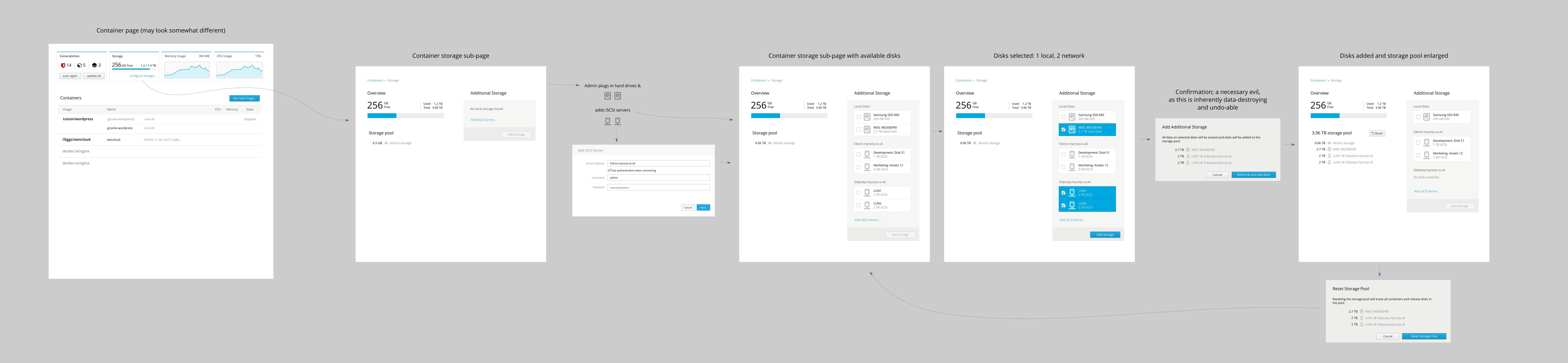
### Try it out
Cockpit 0.99 is available now:
* [For your Linux system](https://cockpit-project.org/running.html)
* [Source Tarball](https://github.com/cockpit-project/cockpit/releases/tag/0.95)
* [Fedora 24](https://bodhi.fedoraproject.org/updates/cockpit-0.99-1.fc24)
* [COPR for Fedora 23, CentOS and RHEL](https://copr.fedoraproject.org/coprs/g/cockpit/cockpit-preview/)
================================================
FILE: _posts/2016-04-01-cockpit-0.100.md
================================================
---
title: Cockpit 0.100 Released
date: 2016-04-01 15:30
tags: cockpit linux technical kubernetes
slug: cockpit-0.100
category: release
summary: Cockpit releases every week. Here's highlights from 0.100
---
Cockpit is the [modern Linux admin interface](https://cockpit-project.org/). There's a new release every week. Here are the highlights from this weeks 0.100 release. Even though 0.100 may seem to be a magical number ... it's really just the number after 0.99 :D
### SELinux Troubleshooting
Cockpit can now help you troubleshoot [SELinux](http://stopdisablingselinux.com/) problems, and show you fixes for repairing the various issues. This is pretty amazing for system admins who really would rather be secure, but keep bumping into stuff that SELinux is blocking. There's more to come on both SELinux and troubleshooting in the future. Take a look at what landed in this release:
<iframe width="960" height="720" src="//youtube.com/embed/eBGK6qSmnng?rel=0" frameborder="0" allowfullscreen></iframe>
### Image Registry Interface
There's a new Image Registry user interface. It works with [Atomic Platform](http://www.projectatomic.io/) or [Openshift](https://www.openshift.org/) clusters. By default this shows up in the Cockpit "Cluster" admin dashboard.
But more importantly you can deploy this as a standalone image registry, complete with storage, authentication and an interface. See [www.projectatomic.io/registry](http://www.projectatomic.io/registry) for more info.
Here's a quick demo:
<iframe width="853" height="480" src="//youtube.com/embed/VSOAASf1Usw?rel=0" frameborder="0" allowfullscreen></iframe>
### Storage sliders and more
Marius has been working on cleaning up the storage UI. One of the changes you'll notice is that you can now use a slider to choose a size for new volumes or file systems, and specify the size units you want to use:

Debian builds now also include the Storage page.
### From the future
Peter worked on adding Cluster storage configuration to the Kubernetes admin dashboard. Basic support will be in the next release. Here's a screenshot:

### Try it out
Cockpit 0.100 is available now:
* [For your Linux system](https://cockpit-project.org/running.html)
* [Source Tarball](https://github.com/cockpit-project/cockpit/releases/tag/0.100)
* [Fedora 24](https://bodhi.fedoraproject.org/updates/cockpit-0.100-1.fc24)
* [COPR for Fedora 23, CentOS and RHEL](https://copr.fedoraproject.org/coprs/g/cockpit/cockpit-preview/)
================================================
FILE: _posts/2016-04-08-cockpit-0.101.md
================================================
---
title: Cockpit does Kubernetes Data Volumes
date: 2016-04-08 12:35
tags: cockpit linux technical kubernetes
slug: cockpit-0.101
category: release
summary: Cockpit releases every week. Here's highlights from 0.101
---
Cockpit is the [modern Linux admin interface](https://cockpit-project.org/). There's a new release every week. Here are the highlights from this weeks 0.101 release.
### Kubernetes Volumes
You can now set up Kubernetes [persistent volume claims](http://kubernetes.io/docs/user-guide/persistent-volumes/) through the Cockpit cluster admin interface. These volumes are used to store persistent container data and possibly share them between containers. Each container pod declares the volumes it needs, and when deploying such an application admins configure the locations to store the data in those volumes.
Take a look:
<iframe width="960" height="720" src="//youtube.com/embed/rlWeO_MsJOA?rel=0" frameborder="0" allowfullscreen></iframe>
### Show SELinux failure messages properly
As a follow up from last week, several bug fixes landed in the new SELinux troubleshooting support.
### Try it out
Cockpit 0.101 is available now:
* [For your Linux system](https://cockpit-project.org/running.html)
* [Source Tarball](https://github.com/cockpit-project/cockpit/releases/tag/0.101)
* [Fedora 24](https://bodhi.fedoraproject.org/updates/cockpit-0.101-1.fc24)
* [COPR for Fedora 23, CentOS and RHEL](https://copr.fedoraproject.org/coprs/g/cockpit/cockpit-preview/)
================================================
FILE: _posts/2016-04-14-cockpit-0.102.md
================================================
---
title: Cockpit with Docker Restart Policy
date: 2016-04-14 13:33
tags: cockpit linux technical kubernetes
slug: cockpit-0.102
category: release
summary: Cockpit releases every week. Here's highlights from 0.102
---
Cockpit is the [modern Linux admin interface](https://cockpit-project.org/). There's a new release every week. Here are the highlights from this weeks 0.102 release.
### Docker Restart Policy
When running a Docker container in Cockpit, you can now set the restart policy, so when the docker daemon restarts the containers will be restarted too. Justin Robertson contributed this feature. Take a look.
<iframe width="853" height="480" src="//youtube.com/embed/8YYHui-FQco?rel=0" frameborder="0" allowfullscreen></iframe>
### Single Dialog for Creating Logical Volumes
The storage interface in Cockpit now has a single combined dialog when creating logical volumes.
This is a first tiny step towards advanced LVM2 features such as RAID layouts and caches. The dialog will get more fields and more interesting behavior as we implement more of the features offered by LVM2, such as the various RAID levels, as indicated by the hidden options for the "Purpose" and "Layout" fields.

### Storage interface now available on Debian
The storage interface in Cockpit has been enabled and built on Debian. The
[storaged API](https://github.com/storaged-project/storaged/) is now available on Debian too.
### Don't Distribute jshint due to License
We stopped distributing [jshint](http://jshint.com/) or requiring it as a build dependency due
to its [controversial license](https://github.com/jshint/jshint/issues/1234).
### Try it out
Cockpit 0.102 is available now:
* [For your Linux system](https://cockpit-project.org/running.html)
* [Source Tarball](https://github.com/cockpit-project/cockpit/releases/tag/0.102)
* [Fedora 24](https://bodhi.fedoraproject.org/updates/cockpit-0.102-1.fc24)
* [COPR for Fedora 23, CentOS and RHEL](https://copr.fedoraproject.org/coprs/g/cockpit/cockpit-preview/)
================================================
FILE: _posts/2016-04-20-cockpit-0.103.md
================================================
---
title: Cockpit 0.103
date: 2016-04-20 15:45
tags: cockpit linux technical kubernetes
slug: cockpit-0.103
category: release
summary: Cockpit releases every week. Here's highlights from 0.102
---
Cockpit is the [modern Linux admin interface](https://cockpit-project.org/). There's a new release every week. Here are the highlights from this weeks 0.103 release.
### Kubernetes connection configuration
When a Kubernetes client wants to access the API of the cluster, it looks for a "kubeconfig" file to tell it how to find the cluster and how to authenticate when accessing the API. The usual location for this file is in the current user's home directory at the ```~/.kube/config``` file path. If that doesn't exist, then usually the cluster isn't available. This applies to both clients like the ```kubectl``` command as well as Cockpit's cluster dashboard.
Cockpit can now prompt for this information, and build this file for you. If it doesn't exist, then there's a helpful "Troubleshoot" button to help get this configuration in place.
<iframe width="853" height="480" src="//youtube.com/embed/WSh7wYhAXrA" frameborder="0" allowfullscreen></iframe>
### Upload each Release to an Ubuntu PPA
Each weekly release of Cockpit is now uploaded to an Ubuntu PPA. Here's how to make use of it:
```unknown
sudo add-apt-repository ppa:cockpit-project/cockpit
sudo apt-get update
sudo apt-get install cockpit
```
### Remove jQuery Usage from cockpit.js API
As part of stabilizing the internals of Cockpit, we removed jQuery usage from the cockpit.js file. [The javascript API itself](https://cockpit-project.org/guide/latest/api-base1.html) hasn't changed, but this change helps to help keep a stable API in the future.
### Try it out
Cockpit 0.103 is available now:
* [For your Linux system](https://cockpit-project.org/running.html)
* [Source Tarball](https://github.com/cockpit-project/cockpit/releases/tag/0.103)
* [Fedora 24](https://bodhi.fedoraproject.org/updates/cockpit-0.103-1.fc24)
* [COPR for Fedora 23, CentOS and RHEL](https://copr.fedoraproject.org/coprs/g/cockpit/cockpit-preview/)
================================================
FILE: _posts/2016-04-28-cockpit-0.104.md
================================================
---
title: Cockpit 0.104
date: 2016-04-28 15:21
tags: cockpit linux technical kubernetes
slug: cockpit-0.104
category: release
summary: Cockpit releases every week. Here's highlights from 0.104
---
Cockpit is the [modern Linux admin interface](https://cockpit-project.org/). There's a new release every week. Here are the highlights from this weeks 0.104 release.
### Kubernetes iSCSI Volumes
Peter added support for iSCSI Kubernetes Volumes in the Cockpit Cluster dashboard. When you
have container pods that need to store data somewhere, it's now real easy to configure use
an iSCSI initiator. Take a look:
<iframe width="853" height="480" src="//youtube.com/embed/ytNGsIDYNSQ" frameborder="0" allowfullscreen></iframe>
### Listing View Expansion
Andreas, Dominik, and I worked on a better listing view pattern. In Cockpit we like to give
admins the option to expand data inline, and compare it between multiple entries on the same
page. But after feedback from the [Patternfly folks](https://www.patternfly.org/) we added an
explicit expander to do this.
<iframe width="853" height="480" src="//youtube.com/embed/myXr_hnr5Jg" frameborder="0" allowfullscreen></iframe>
### Tagging Docker Images in the Registry
The Atomic Registry and Openshift Registry support mirroring images from another image registry
such as the Docker Hub. When the images are mirrored, they are copied and available in your
own registry. Cockpit now has support for telling the registry which specific tags you'd like
to mirror. And Aaron is adding support for various mirroring options as well.
<iframe width="853" height="480" src="//youtube.com/embed/MJzqob5AYI8" frameborder="0" allowfullscreen></iframe>
### From the Future
Marius has a working proof of concept that lets you configure where Docker stores container and image
data on its host. Take a look at the demo below. Marius adds disks to the container storage pool:
<iframe width="960" height="720" src="//youtube.com/embed/9YiG4AY6HeY?rel=0" frameborder="0" allowfullscreen></iframe>
### Try it out
Cockpit 0.104 is available now:
* [For your Linux system](https://cockpit-project.org/running.html)
* [Source Tarball](https://github.com/cockpit-project/cockpit/releases/tag/0.104)
* [Fedora 24](https://bodhi.fedoraproject.org/updates/cockpit-0.104-1.fc24)
* [COPR for Fedora 23, CentOS and RHEL](https://copr.fedoraproject.org/coprs/g/cockpit/cockpit-preview/)
================================================
FILE: _posts/2016-05-04-cockpit-0.105.md
================================================
---
title: Cockpit 0.105
date: 2016-05-04 14:27
tags: cockpit linux technical kubernetes
slug: cockpit-0.105
category: release
summary: Cockpit releases every week. Here's highlights from 0.105
---
Cockpit is the [modern Linux admin interface](https://cockpit-project.org/). There's a new release every week. Here are the highlights from this weeks 0.105 release.
### Strict Content-Security-Policy enforced everywhere
All of the Cockpit components now ship strict Content-Security-Policy. This is like
SELinux in your browser, where you declare the kind of things the application is
permitted to do and anything else is blocked.
Cockpit now only allows talking to and loading code from the server(s) that it's
running on. Everything else is blocked, including inline scripts, evaluating
javascript code, and using inline styles.
### Timeout for Cockpit Authentication
Cockpit uses PAM for authenticating local users. It now expects that authentication
process to complete within a certain timeout.
More details [in this document](https://github.com/cockpit-project/cockpit/blob/master/doc/authentication.md).
### Cluster Users can be Added and Removed from Groups
In the Cluster admin interface, users can be added to groups and remove
them with a few clicks. Here's a short video:
<iframe width="853" height="480" src="//youtube.com/embed/TzvqNj9VywM"frameborder="0" allowfullscreen></iframe>
### Registry Mirroring from Insecure Registries
In [the Registry user interface](http://www.projectatomic.io/registry/) there's now a
checkbox that allows you to choose whether the registry from which you're mirroring
container images is insecure or not.

### Deletion of Kubernetes Nodes
In the Cluster admin interface you can now delete Nodes from the cluster, and select
which ones to delete. Andreas has also done design work to allow upgrading the
node operating system as well as cordoning nodes, which makes them unavailable for
scheduling containers.

### Try it out
Cockpit 0.105 is available now:
* [For your Linux system](https://cockpit-project.org/running.html)
* [Source Tarball](https://github.com/cockpit-project/cockpit/releases/tag/0.105)
* [Fedora 24](https://bodhi.fedoraproject.org/updates/cockpit-0.105-1.fc24)
* [COPR for Fedora 23, CentOS and RHEL](https://copr.fedoraproject.org/coprs/g/cockpit/cockpit-preview/)
================================================
FILE: _posts/2016-05-12-cockpit-0.106.md
================================================
---
title: Cockpit 0.106
date: 2016-05-12 15:40
tags: cockpit linux technical kubernetes
slug: cockpit-0.106
category: release
summary: Cockpit releases every week. Here's highlights from 0.106
---
Cockpit is the [modern Linux admin interface](https://cockpit-project.org/). There's a new release every week. Here are the highlights from this weeks 0.106 release.
### Stable Cockpit Styles
One of the annoying things about CSS is that when you bring in stylesheets from
multiple projects, they can conflict. You have to choose a nomen-clature to
namespace your CSS, or nest it appropriately.
We're stabilizing the internals of Cockpit in the browser, so when folks write
plugins, they can count on them working. To make that happen we had to namespace
all our own Cockpit specific CSS classes. Most of the styling used in Cockpit
come from [Patternfly](https://www.patternfly.org/) and this change doesn't affect
those styles at all.
[Documentation is on the wiki](https://github.com/cockpit-project/cockpit/wiki/Cockpit-CSS-Styling)
### Container Image Layers
Docker container image layers are now shown much more clearly. It should be clearer to tell
which is the base layer, and how the others are layered on top:

### Try it out
Cockpit 0.106 is available now:
* [For your Linux system](https://cockpit-project.org/running.html)
* [Source Tarball](https://github.com/cockpit-project/cockpit/releases/tag/0.106)
* [Fedora 24](https://bodhi.fedoraproject.org/updates/cockpit-0.106-1.fc24)
* [COPR for Fedora 23, CentOS and RHEL](https://copr.fedoraproject.org/coprs/g/cockpit/cockpit-preview/)
================================================
FILE: _posts/2016-06-26-cockpit-0.111.md
================================================
---
title: Cockpit 0.111
date: 2016-06-26 09:00
tags: cockpit linux technical
slug: cockpit-0.111
category: release
summary: Cockpit releases every week. Here's highlights from 0.107 through 0.111.
---
Cockpit is the [modern Linux admin interface](https://cockpit-project.org/). There's a new release every week, although it's been a while since the release notes were posted. Here are the highlights from this weeks 0.107 through 0.111 releases.
### SELinux enforcing policy
You can now temporarily disable SELinux enforcing mode from the SELinux troubleshooting
dashboard. This is useful when diagnosing permission issues that you might think are
SELinux related.

### Stable Javascript API
Cockpit now has a [stable Javascript API](https://cockpit-project.org/guide/latest/api-base1.html)
for components or plugins to build off of. Various unstable portions were removed from the
base1 package in preparation for this. There's more work going on to help make it easy to build
out of tree components or plugins.
### GlusterFS in Kubernetes Dashboard
The [Kubernetes](http://kubernetes.io/) dashboard now lists [Gluster](http://gluster.org/)
volumes in the dashboard, lets you configure them for pods to use.

### Kubernetes pending Persistent Volume Claims
The [Kubernetes](http://kubernetes.io/) dashboard lists pods which have
outstanding volume claims, and then allows you to fulfill those claims
by creating appropriate persistent volumes.


### From the Future
Marius [has worked on](https://github.com/cockpit-project/cockpit/pull/4571) adding support
for Linux [network teaming](http://libteam.org/) to the Cockpit admin interface. Teaming
is a better more coherent way of building a network bond.
### Try it out
Cockpit 0.111 is available now:
* [For your Linux system](https://cockpit-project.org/running.html)
* [Source Tarball](https://github.com/cockpit-project/cockpit/releases/tag/0.111)
* [Fedora 24](https://bodhi.fedoraproject.org/updates/cockpit-0.111-1.fc24)
* [COPR for Fedora 23, CentOS and RHEL](https://copr.fedoraproject.org/coprs/g/cockpit/cockpit-preview/)
================================================
FILE: _posts/2016-07-07-cockpit-0.113.md
================================================
---
title: Cockpit 0.113
date: 2016-07-07 17:30
tags: cockpit linux technical
slug: cockpit-0.113
category: release
summary: Cockpit releases every week. Here's highlights from 0.112 and 0.113.
---
Cockpit is the [modern Linux admin interface](https://cockpit-project.org/). There's a new release every week. Here are the highlights from this weeks 0.111 and 0.112 releases.
### Display time information for systemd timer jobs
Harish Anand a Google Summer of Code student working on Cockpit, and he's implementing
systemd timers. These are similar to cron jobs, and are a structured way of running
a command or other systemd unit at a specific time. Some of his initial work got merged,
and you can see it in action here:
<iframe width="853" height="480" src="//youtube.com/embed/2mGAlpZWQUQ?rel=0"
frameborder="0" allowfullscreen></iframe>
### Hide Unmanaged Network Interfaces
NetworkManager has the concept of marking certain network interfaces as "unmanaged".
This is done with a ```NM_CONTROLLED="no"``` setting in a file placed in
```/etc/sysconfig/network-scripts/```. Cockpit now respects the admins wishes and
and hides such interfaces from its Network configuration.
The *On/Off* switch is also disabled appropriately for unknown interfaces.
### Network bonds are created with Active/Backup
When a new network bond is created the *Active/Backup* mode is used as
the default. This is a more common choice for admins, and makes sense
to point people in this direction.

### Added textual fields to container resource sliders
Users can now type actual amounts in memory megabytes, or CPU shares
when starting a container, in addition to being able to use a slider.

### Disable tuned correctly when disabling performance profiles
The tuned service needs to be stopped and disabled when choosing the "none"
performance profile. The behavior now lines up with what users expect
using the ```tuned-adm``` command line tooling.
### From the Future
Lars [is working on](https://github.com/cockpit-project/cockpit/pull/4633) making the
terminal be resizable, so you're not limited to a small display when working on
the machine.
### Try it out
Cockpit 0.113 is available now:
* [For your Linux system](https://cockpit-project.org/running.html)
* [Source Tarball](https://github.com/cockpit-project/cockpit/releases/tag/0.113)
* [Fedora 24](https://bodhi.fedoraproject.org/updates/cockpit-0.113-1.fc24)
* [COPR for Fedora 23, CentOS and RHEL](https://copr.fedoraproject.org/coprs/g/cockpit/cockpit-preview/)
================================================
FILE: _posts/2016-07-12-cockpit-0.114.md
================================================
---
title: Cockpit 0.114
date: 2016-07-12 13:51
tags: cockpit linux technical
slug: cockpit-0.114
category: release
summary: Cockpit releases every week. Here's highlights from 0.114.
---
Cockpit is the [modern Linux admin interface](https://cockpit-project.org/). There's a new release every week. Here are the highlights from this weeks 0.114 release.
### Test every change on CentOS
Cockpit runs all its tests suites against code before that code is merged, much less
becomes part of a release. This isn't just unit tests, but integration booting of
RHEL, Debian, Fedora and Atomic machines.
We now added CentOS to that list. We now boot CentOS 7.x instances many hundreds of times
a day to test aspects of the system, and how Cockpit and a given pull request interact with it.
### Show SSH host keys and machine ID
The main system info page now shows the
[local machine ID](https://www.freedesktop.org/software/systemd/man/machine-id.html) for
easy access.
You can also see the fingerprints of all the [SSH host keys](https://en.wikipedia.org/wiki/Secure_Shell).
These are the fingerprints that you would be expected to recognize and/or add to the
```known_hosts``` file when accessing the machine over SSH.

### Allow changing the ethernet MTU
You can now change the ethernet
[maximum transmission unit](https://en.wikipedia.org/wiki/Maximum_transmission_unit) in the
network configuration.
### Show intelligent password error messages
When choosing a password Cockpit validates the password using the ```pwscore``` tool.
Appropriate and descriptive error messages are now shown when the validation fails:

### Red Hat subscription registration options
The Red Hat subscriptions functionality has been enhanced. You can now specify an activation
key when registering the system. This key is generated in your organization in such a
way that it uniquely identifies whan kind of software should be available on the system.
You can now also specify an organization when registering the system.
### From the Future
Marek [is working on](https://github.com/cockpit-project/cockpit/pull/4434) a new part of
the admin interface to list the virtual machines running on the current system. This is
the beginnings of a web accessible [virt-manager](https://virt-manager.org/) tool:

### Try it out
Cockpit 0.114 is available now:
* [For your Linux system](https://cockpit-project.org/running.html)
* [Source Tarball](https://github.com/cockpit-project/cockpit/releases/tag/0.114)
* [Fedora 24](https://bodhi.fedoraproject.org/updates/cockpit-0.114-1.fc24)
* [COPR for Fedora 23, CentOS and RHEL](https://copr.fedoraproject.org/coprs/g/cockpit/cockpit-preview/)
================================================
FILE: _posts/2016-08-11-cockpit-0.117.md
================================================
---
title: Cockpit 0.117
date: 2016-08-11 12:36
tags: cockpit linux technical
slug: cockpit-0.117
category: release
summary: Cockpit releases every week. Here's highlights from 0.115, 0.116 and 0.117.
---
Cockpit is the [modern Linux admin interface](https://cockpit-project.org/). There's a new release almost every week. Here are the highlights from this the 0.115, 0.116 and 0.117 releases.
### Configure volumes and environment for a Docker container
Vanlos Wang implemented support for configuring volumes and environment
variables when running a container in the Cockpit UI. This allows you
see what environment variables and volumes an image is pre-configured
to have. It then allows the user to define additional environment variables
and volumes for the new container, and then commit those changes to a
new image if desired.
Take a look:
<iframe width="1280" height="720" src="//youtube.com/embed/l9E78Uevg00"
frameborder="0" allowfullscreen></iframe>
### Setup container and image storage
Marius worked with Dan Walsh and and others to implement a UI for configuring
the Docker container and image storage pool. It's now easy to add additional
disks or storage to that pool, or reset it to a clean state.
On some operating systems like [Atomic Host](http://www.projectatomic.io/download/),
this storage pool is present by default,
and elsewhere this container storage pool can be set up.
Relatedly on the command line, checkout the new
[```atomic storage```](https://raw.githubusercontent.com/projectatomic/atomic/master/docs/atomic-storage.1.md)
sub-command which does the same configuration tasks, that previously had to be configured
with arcane configuration files.
<iframe width="1280" height="720" src="//youtube.com/embed/l9fmMa5WJMk?rel=0"
frameborder="0" allowfullscreen></iframe>
### Support for Network Teaming
Marius also added support for
[configuring network teaming](https://access.redhat.com/documentation/en-US/Red_Hat_Enterprise_Linux/7/html/Networking_Guide/ch-Configure_Network_Teaming.html)
to Cockpit. Network teams are
similar to network bonds, in that they combine two network interfaces into
one, and involve failover or load balancing modes. But teams have more robust
terminology and implementation.
Since teams are a server side feature, this will replace the functionality for
defining teams in Linux Desktop control center applications.
Support for configuring bonds in Cockpit will remain for the time being until
the team support can be relied upon to completely replace that functionality.
Both NetworkManager and Cockpit are involved in this.
Here's a video demoing the changes:
<iframe width="960" height="720" src="//youtube.com/embed/-sob1W33Xus?rel=0"
frameborder="0" allowfullscreen></iframe>
### Pulling images without authentication from the Openshift Registry
The Openshift image registry now supports pulling images without first
logging in. It can be configured to allow this on a per-project basis.
This allows images to be shared from the registry with a broader audience
of developers or image consumers, such as scripts.
Aaron Weitekamp worked on adding support the Registry console to
configure projects to allow pulling images without authentication.
Here's a video of those changes:
<iframe width="1280" height="720" src="//youtube.com/embed/fpsvtq5hENk" frameborder="0" allowfullscreen></iframe>
### Don't allow formatting extended partitions
Cockpit no longer erroneously allows formatting certain partitions, such as
extended partitions containing other logical partitions.
### Try it out
Cockpit 0.117 is available now:
* [For your Linux system](https://cockpit-project.org/running.html)
* [Source Tarball](https://github.com/cockpit-project/cockpit/releases/tag/0.117)
* [Fedora 24](https://bodhi.fedoraproject.org/updates/cockpit-0.117-1.fc24)
* [COPR for Fedora 23, CentOS and RHEL](https://copr.fedoraproject.org/coprs/g/cockpit/cockpit-preview/)
================================================
FILE: _posts/2016-09-08-cockpit-118.md
================================================
---
title: Cockpit 118
date: 2016-09-08 14:50
tags: cockpit linux technical
slug: cockpit-118
category: release
summary: Cockpit releases regularly. Here's highlights from 118
---
Cockpit is the [modern Linux admin interface](https://cockpit-project.org/). There's usually
a release every week, but this time around we were delinquent and it's been nearly a month.
You'll notice that we've dropped the ```0.x``` from the beginning of the
version numbers. This underscores the fact that Cockpit is stable. We've been
regularly releasing functionally stable releases for most of the last year.
And over the last few months we've worked hard on identifying stable javascript
APIs and protocols for various Cockpit components to consume. We'll be itemizing
these stability guarantees in the documentation shortly.
### Timer jobs in systemd
Harish did great work during Google Summer of Code to add support for
[systemd timers](https://www.freedesktop.org/software/systemd/man/systemd.timer.html).
Timers let users schedule tasks similar to cron jobs. Timers are now listed,
and dialogs for defining jobs and their recurring patterns are now included
in Cockpit.
Harish [detailed his work in a blog post](https://medium.com/@harishanand95/gsoc-creating-timers-in-cockpit-f4034c79df51#.wdq8gtdxc).

### Two factor auth on login screen
Peter pulled off a major change to have full PAM conversations supported
on the Cockpit login screen. This means you can use two factor
authentication dongles or Yubikeys in your login workflow in Cockpit.
In addition, for the next release Stef worked on allowing the user to
change expired passwords while logging in, similar to how they would
on the console.
Take a look:
<iframe width="853" height="480" src="//youtube.com/embed/gXsOt6zgBs4?rel=0"
frameborder="0" allowfullscreen></iframe>
### Use Webpack to build the Cockpit interface
Most of Cockpit is written in javascript and runs in the browser. This
code is now built with [Webpack](https://webpack.github.io/). It's bundled
into single page application bundles per Cockpit component. Among
other things, this makes hacking on Cockpit much easier.
The [documentation has been updated](https://github.com/cockpit-project/cockpit/blob/master/HACKING.md)
to show what you need to do to make a change to Cockpit either with
Vagrant or on your local machine.
### SSH key loading and Docker resources work on Debian
The container resource usage graphs and resource limit dialogs now
work properly on Debian. Stef adapted the code to account for the different
CGroup layout than Docker uses on Debian.
In addition the SSH key listing code now works on Debian.
### Configure Cockpit URLs with an HTTP prefix
The HTTP URLs that Cockpit uses can now have a (mostly) arbitrary prefix
in their path. This is useful in scenarios where Cockpit is proxied by
another application or management console. Use the ```UrlRoot``` option
[in cockpit.conf](https://cockpit-project.org/guide/latest/cockpit.conf.5.html).
### Components can require a minimum Cockpit version
Cockpit is built from various components that are independently installable
and composable. Various components provide network configuration, or storage,
or container functionality.
These components can now indicate which part of the base javascript and base
```cockpit-bridge``` they require in order to function. This is
[configured in the package manifest](https://cockpit-project.org/guide/latest/packages.html#package-manifest).

### Try it out
Cockpit 118 is available now:
* [For your Linux system](https://cockpit-project.org/running.html)
* [Source Tarball](https://github.com/cockpit-project/cockpit/releases/tag/118)
* [Fedora 25](https://bodhi.fedoraproject.org/updates/cockpit-118-1.fc25)
* [COPR for Fedora 24, CentOS and RHEL](https://copr.fedoraproject.org/coprs/g/cockpit/cockpit-preview/)
================================================
FILE: _posts/2016-10-21-cockpit-120.md
================================================
---
title: Cockpit 120
date: 2016-10-21 13:22
tags: cockpit linux technical
slug: cockpit-120
category: release
summary: Cockpit releases regularly. Here's highlights from 119 and 120
---
Cockpit is the [modern Linux admin interface](https://cockpit-project.org/). We release
regularly. Here are the release notes from versions 119 and 120.
You'll notice that we've dropped the ```0.x``` from the beginning of the
version numbers. This underscores the fact that Cockpit is stable. We've been
regularly releasing functionally stable releases for most of the last year.
### Expandable and Filterable Containers and Images
Lars reworked the Containers section of Cockpit. The various images and
containers are not expandable inline, and it's also easy to find a specific
image and container by using the filter bar to search for it.
Take a look:
<iframe width="853" height="480" src="//youtube.com/embed/-huY6q7kcmU" frameborder="0" allowfullscreen></iframe>
### VM Configuration and Monitoring
Marek worked on a new interface in Cockpit for configuring and monitoring
virtual machines running on the current system. This has the ability to
grow into something like the desktop ```virt-manager``` tool.
It looks something like this:

### Unmanaged Network Devices
Cockpit now shows unmanaged network devices in its listing. You can't configure
them or do much with them, but their presence is acknowledged. This should make
troubleshooting non-standard configurations easier.
### Sidebar for Physical Volumes in a Volume Group
Marius added a sidebar that shows up on LVM groups or volumes, that shows
which physical devices are involved.
Here's an example:

### SSH connections are run in a separate process
When Cockpit connects to an additional server it uses SSH, much like
Ansible or other tools. We now launch a separate ```cockpit-ssh``` process
for each outgoing connection to another server.
This lets us isolate the involved code much better, providing security
benefits. But it also makes it possible to insert additional logic when
embedding Cockpit. It's possible to put in shims to lookup keys, single-sign-on
tokens or keytabs, and so on.

### Only connect to remote machines already known to Cockpit
When connecting to additional machines via SSH, Cockpit now refuses to
connect to machines it doesn't have a host key for. This tightens up
security and prevents certain reflection attacks.
### Fix bugs preventing Logs page from working in Firefox 49
The Logs section of Cockpit failed to function on Firefox 49. This
version includes a fix for that.
### Add tooltip describing group name in Roles list
When configuring local user accounts, one can assign various roles such
as 'Server Administrator' to the account. Cockpit now displays the Unix
user group that is involved in the role.

### From the future
Marius added support for NetworkManager checkpoints. This means that
while configuring network interfaces, if a change would cause Cockpit
to disconnect, then Cockpit can revert the change and retain connectivity
to the system.
This is similar to how a Linux Desktop asks you to click in a dialog
if you accept the new screen configuration. Except in the networking
case we can test the connectivity automatically.
### Try it out
Cockpit 120 is available now:
* [For your Linux system](https://cockpit-project.org/running.html)
* [Source Tarball](https://github.com/cockpit-project/cockpit/releases/tag/120)
* [Fedora 25](https://bodhi.fedoraproject.org/updates/cockpit-120-1.fc25)
* [COPR for Fedora, CentOS and RHEL](https://copr.fedoraproject.org/coprs/g/cockpit/cockpit-preview/)
================================================
FILE: _posts/2016-10-28-cockpit-121.md
================================================
---
title: Cockpit 121
date: 2016-10-28 18:06
tags: cockpit linux technical
slug: cockpit-121
category: release
summary: Cockpit releases regularly. Network Checkpoints and other highlights from
version 121
---
Cockpit is the [modern Linux admin interface](https://cockpit-project.org/). We release
regularly. Here are the release notes from version 121
You'll notice that we've dropped the ```0.x``` from the beginning of the
version numbers. This underscores the fact that Cockpit is stable. We've been
regularly releasing functionally stable releases for most of the last year.
### Network Configuration Rollback
NetworkManager now has support in its API for detecting whether a network
configuration change broke connectivity to the system. Marius did work
so that Cockpit can detect this and have NetworkManager rollback the
changes that would have caused a remote admin to be disconnected from
the system.
This is similar to how a Linux desktop asks you to click in a dialog
if you accept the new display configuration. Except in the networking
case we can test the connectivity automatically.
Check it out:
<iframe width="853" height="480" src="//youtube.com/embed/fNIaDl5UR4Q?rel=0" frameborder="0" allowfullscreen></iframe>
### Debian Branding
Cockpit now shows proper branding when running on Debian, and uses the
logo installed on the system on its login screen.

### Fix Kerberos single sign on Debian and Ubuntu
Stef fixed Kerberos single sign on Debian and Ubuntu. More changes are
coming in the next release including support for use with
[gssproxy](https://fedoraproject.org/wiki/Features/gss-proxy) and expanding
support for non-Kerberos GSSAPI authentication mechanisms.
### Debugging info for Javascript and CSS
Cockpit now ships proper Javascript and CSS debugging "map" files in its
cockpit-debuginfo packages. These make it easier to troubleshoot issues
and develop code that runs in Cockpit.
### From the future
Peter is adding support for specifying an alternate server to connect
to on the login screen.
This completes the story of the "bastion host" which is accessible via
a web browser, in effect letting you connect via the Web Browser from
the login screen to other machines which only have SSH access available.
When using a bastion setup like this you only need a single trusted
TLS certificate and the remaining trust is ensured by SSH known host keys.
This feature will be used to implement click-through access to configure a host
in projects such as ManageIQ or RHEV.
### Try it out
Cockpit 121 is available now:
* [For your Linux system](https://cockpit-project.org/running.html)
* [Source Tarball](https://github.com/cockpit-project/cockpit/releases/tag/121)
* [Fedora 25](https://bodhi.fedoraproject.org/updates/cockpit-121-1.fc25)
* [COPR for Fedora, CentOS and RHEL](https://copr.fedoraproject.org/coprs/g/cockpit/cockpit-preview/)
================================================
FILE: _posts/2016-11-03-cockpit-122.md
================================================
---
title: Cockpit 122
date: 2016-11-03 20:31
tags: cockpit linux technical
slug: cockpit-122
category: release
summary: About bastion hosts and other highlights from version 122
---
Cockpit is the [modern Linux admin interface](https://cockpit-project.org/). We release
regularly. Here are the release notes from version 122
### Logging into a system via a Bastion Host
On the Cockpit login screen you can now choose an alternate host to connect
to. Cockpit with use SSH to authenticate you against that host, and display
the admin interface for that host.
Although browsers cannot use SSH directly to connect to machines or
authenticate against them, Cockpit can make this happen. Only one host
needs to have Cockpit listen on port 9090 available to browsers over TLS,
and other hosts can only have SSH accessible on the usual port 22.
Here's an example:
<iframe width="853" height="480" src="//youtube.com/embed/yc64DUydciI" frameborder="0" allowfullscreen></iframe>
### Works with UDisks in addition to storaged
[storaged](https://github.com/storaged-project/storaged)
is an actively maintained API for configuring storage on a Linux system.
It is a fork of the older
[UDisks](https://www.freedesktop.org/wiki/Software/udisks/). storaged
has additional functionality, like LVM, iSCSI and Btrfs and a large number
of stability fixes.
However some systems like older RHEL or Ubuntu don't yet have storaged.
Cockpit can now also use the older UDisks to configure storage on a system.
A large number of features are disabled, but basic functionality is present.
### Explicitly specify javascript dependency versions
Cockpit's bundles various javascript dependencies in its admin interfaces,
such as
[Patternfly](http://www.patternfly.org) or
[React](https://reactjs.org/). In order to help packagers
we've now explicitly specified the versions of those dependencies. And
during development we pull them in using the standard
[Bower](https://bower.io/) registry.
You can see [those versions here](https://raw.githubusercontent.com/cockpit-project/cockpit/master/bower.json).
### From the future
Lars has worked on functionality to show the OpenSCAP security scan results
for containers. This uses the usual ```atomic scan``` functionality that
you see on Atomic Host.

### Try it out
Cockpit 122 is available now:
* [For your Linux system](https://cockpit-project.org/running.html)
* [Source Tarball](https://github.com/cockpit-project/cockpit/releases/tag/122)
* [Fedora 25](https://bodhi.fedoraproject.org/updates/cockpit-122-1.fc25)
* [COPR for Fedora, CentOS and RHEL](https://copr.fedoraproject.org/coprs/g/cockpit/cockpit-preview/)
================================================
FILE: _posts/2016-11-25-cockpit-125.md
================================================
---
title: Cockpit 125
author: stef
date: 2016-11-25 09:14
tags: cockpit linux
slug: cockpit-125
category: release
summary: Cockpit is properly translatable and displays OSTree signatures.
comments: 'true'
---
Cockpit is the [modern Linux admin interface](https://cockpit-project.org/). We release
regularly. Here are the release notes from version 123, 124 and 125.
### Cockpit is now properly translatable
Cockpit is now properly translatable. It was a big task to extract
all the translatable strings and make translations work consistently
between the browser and installed tools like the bridge.
We now start also run the login user session with a proper locale and
```LANG``` environment variables.
You can help
[translate cockpit in Zanata](https://fedora.zanata.org/iteration/view/cockpit/master)
or if you find text in the frontend that isn't translatable, then
please do report it.

### Display OSTree signatures
Peter implement displaying
[OSTree tree](http://www.projectatomic.io/docs/os-updates/) signatures. You
can tell where a certain update tree came from and who signed it.

### New expandable views for storage partitions
Marius implemented expandable views in the *Storage* pages. These let
you dive into the details of a particular partition without having
to navigate away from the page describing where it lives.

### Other storage fixes
Marius did work to fix many other storage related bugs. In particular
Cockpit now deals properly with passphrases stored for LUKS encrypted
devices, and also no longer offers to format read-only block devices.
### Full testing on RHEL 7.3, Ubuntu 16.04 and Debian 8 Jessie
The Cockpit project started testing on Cockpit on RHEL 7.3, Ubuntu 16.04
and Debian 8 Jessie along with the operating systems we tested with earlier.
These will be part of our usual continuous integration, where we boot
thousands or tens of thousands of instances per day to test code changes
and contributions.
Marius fixed many bugs we found, and filed operating system bugs in
the issue trackers for those operating systems.
You can see the [which operating systems](https://cockpit-project.org/running.html)
we test Cockpit on. There's no Debian Jessie repository yet, but hopefully
we can have that ready as time permits.
### System shutdown can be scheduled by date
Fridolin did work a long time ago, so that users could select a specific
date and time to schedule a shutdown or reboot of the system. Stef
finished that work added tests and it's now in Cockpit.

### Properly terminate user sessions on the Accounts page
The *Accounts* page now properly terminates user sessions when the
*Terminate Session* button is clicked. We use the correct systemd
[loginctl](https://www.freedesktop.org/software/systemd/man/loginctl.html)
commands.
### Try it out
Cockpit 125 is available now:
* [For your Linux system](https://cockpit-project.org/running.html)
* [Source Tarball](https://github.com/cockpit-project/cockpit/releases/tag/125)
* [Fedora 25](https://bodhi.fedoraproject.org/updates/cockpit-125-1.fc25)
================================================
FILE
gitextract_v3tdzmoy/ ├── .github/ │ └── workflows/ │ └── update-externals.yml ├── .gitignore ├── .travis.yml ├── .well-known/ │ └── org.flathub.VerifiedApps.txt ├── 404.md ├── CNAME ├── Gemfile ├── LICENSE ├── README.md ├── _config.yml ├── _data/ │ ├── applications.yml │ ├── authors.yml │ ├── browser_support.yml │ ├── browsers.yml │ ├── distros.yml │ ├── maintainers.yml │ └── navigation.yml ├── _includes/ │ ├── apps.html │ ├── email.html │ ├── feed.html │ ├── feed_category.html │ ├── github.html │ ├── nav.html │ ├── nav_dir.html │ ├── page_footer.html │ ├── page_header.html │ ├── pagination.html │ ├── post.html │ ├── posts.html │ ├── posts_category.html │ ├── rss.html │ ├── search.html │ ├── search_json.html │ ├── search_json_items.html │ └── twitter.html ├── _layouts/ │ ├── default.html │ ├── essential.html │ ├── guide.html │ ├── markdown.html │ ├── page.html │ └── post.html ├── _posts/ │ ├── 2014-02-13-introducing-cockpit.md │ ├── 2014-04-22-cockpit-has-a-terminal.md │ ├── 2014-04-25-cockpit-does-docker.md │ ├── 2014-06-20-cockpit-simple-networking-configuration.md │ ├── 2014-06-24-cockpit-has-docker-pull-support.md │ ├── 2014-11-04-cockpit-multi-server-dashboard.md │ ├── 2014-11-04-dbus-powerful-ipc.md │ ├── 2014-11-13-cockpit-plugin-tutorial.md │ ├── 2014-11-13-dbus-basics.md │ ├── 2014-11-20-rhel-atomic-beta.md │ ├── 2014-12-16-protocol-interaction.md │ ├── 2015-06-09-cockpit-does-kubernetes.md │ ├── 2015-07-10-rest-api-plugin.md │ ├── 2015-09-23-cockpit-0.77.md │ ├── 2015-09-30-cockpit-0.78.md │ ├── 2015-10-07-cockpit-0.79.md │ ├── 2015-10-08-cockpit-vagrantfile.md │ ├── 2015-10-14-cockpit-0.80.md │ ├── 2015-10-21-cockpit-0.81.md │ ├── 2015-10-28-cockpit-0.82.md │ ├── 2015-11-19-cockpit-0.84.md │ ├── 2015-11-27-cockpit-0.85.md │ ├── 2015-12-04-cockpit-0.86.md │ ├── 2015-12-22-cockpit-0.89.md │ ├── 2016-02-12-cockpit-0.95.md │ ├── 2016-03-24-cockpit-0.99.md │ ├── 2016-04-01-cockpit-0.100.md │ ├── 2016-04-08-cockpit-0.101.md │ ├── 2016-04-14-cockpit-0.102.md │ ├── 2016-04-20-cockpit-0.103.md │ ├── 2016-04-28-cockpit-0.104.md │ ├── 2016-05-04-cockpit-0.105.md │ ├── 2016-05-12-cockpit-0.106.md │ ├── 2016-06-26-cockpit-0.111.md │ ├── 2016-07-07-cockpit-0.113.md │ ├── 2016-07-12-cockpit-0.114.md │ ├── 2016-08-11-cockpit-0.117.md │ ├── 2016-09-08-cockpit-118.md │ ├── 2016-10-21-cockpit-120.md │ ├── 2016-10-28-cockpit-121.md │ ├── 2016-11-03-cockpit-122.md │ ├── 2016-11-25-cockpit-125.md │ ├── 2017-01-09-cockpit-127.md │ ├── 2017-01-19-cockpit-129.md │ ├── 2017-02-24-cockpit-132.md │ ├── 2017-03-02-cockpit-133.md │ ├── 2017-03-09-cockpit-134.md │ ├── 2017-03-15-cockpit-135.md │ ├── 2017-03-30-cockpit-137.md │ ├── 2017-06-09-cockpit-142.md │ ├── 2017-06-19-cockpit-143.md │ ├── 2017-06-27-cockpit-hackfest.md │ ├── 2017-07-03-cockpit-hackfest-wrapup.md │ ├── 2017-07-07-cockpit-145.md │ ├── 2017-07-21-cockpit-146.md │ ├── 2017-07-25-cockpit-workshop-all-systems-go.md │ ├── 2017-07-27-cockpit-147.md │ ├── 2017-08-04-cockpit-148.md │ ├── 2017-09-08-cockpit-150.md │ ├── 2017-09-21-cockpit-151.md │ ├── 2017-10-06-cockpit-152.md │ ├── 2017-10-17-cockpit-153.md │ ├── 2017-11-06-cockpit-155.md │ ├── 2017-11-16-cockpit-156.md │ ├── 2017-11-30-cockpit-157.md │ ├── 2017-12-13-cockpit-158.md │ ├── 2018-01-10-cockpit-159.md │ ├── 2018-01-24-cockpit-160.md │ ├── 2018-02-07-cockpit-161.md │ ├── 2018-02-21-cockpit-162.md │ ├── 2018-03-07-cockpit-163.md │ ├── 2018-03-09-starter-kit.md │ ├── 2018-03-21-cockpit-164.md │ ├── 2018-03-28-puppeteer-tests.md │ ├── 2018-04-04-cockpit-165.md │ ├── 2018-04-11-making-a-cockpit-application.md │ ├── 2018-04-18-cockpit-166.md │ ├── 2018-05-02-cockpit-167.md │ ├── 2018-05-16-cockpit-168.md │ ├── 2018-05-28-sso-oauth.md │ ├── 2018-05-30-cockpit-169.md │ ├── 2018-06-13-cockpit-170.md │ ├── 2018-06-27-cockpit-171.md │ ├── 2018-07-11-cockpit-172.md │ ├── 2018-07-25-cockpit-173.md │ ├── 2018-08-01-cockpit-174.md │ ├── 2018-08-08-cockpit-175.md │ ├── 2018-08-22-cockpit-176.md │ ├── 2018-09-05-cockpit-177.md │ ├── 2018-09-13-is-cockpit-secure.md │ ├── 2018-09-19-cockpit-178.md │ ├── 2018-10-04-cockpit-179.md │ ├── 2018-10-04-cockpit-180.md │ ├── 2018-10-31-cockpit-181.md │ ├── 2018-11-14-cockpit-182.md │ ├── 2018-11-28-cockpit-183.md │ ├── 2018-12-12-cockpit-184.md │ ├── 2019-01-09-cockpit-185.md │ ├── 2019-01-23-cockpit-186.md │ ├── 2019-02-06-cockpit-187.md │ ├── 2019-02-20-cockpit-188.md │ ├── 2019-03-06-cockpit-189.md │ ├── 2019-03-22-cockpit-190.md │ ├── 2019-04-03-cockpit-191.md │ ├── 2019-04-17-cockpit-192.md │ ├── 2019-05-02-cockpit-193.md │ ├── 2019-05-15-cockpit-194.md │ ├── 2019-05-29-cockpit-195.md │ ├── 2019-06-12-cockpit-196.md │ ├── 2019-06-26-cockpit-197.md │ ├── 2019-07-10-cockpit-198.md │ ├── 2019-07-24-cockpit-199.md │ ├── 2019-08-07-cockpit-200.md │ ├── 2019-08-21-cockpit-201.md │ ├── 2019-09-04-cockpit-202.md │ ├── 2019-09-18-cockpit-203.md │ ├── 2019-10-02-cockpit-204.md │ ├── 2019-10-16-cockpit-205.md │ ├── 2019-10-30-cockpit-206.md │ ├── 2019-11-13-cockpit-207.md │ ├── 2019-11-27-cockpit-208.md │ ├── 2019-12-13-cockpit-209.md │ ├── 2020-01-08-cockpit-210.md │ ├── 2020-01-22-cockpit-211.md │ ├── 2020-02-05-cockpit-212.md │ ├── 2020-02-19-cockpit-213.md │ ├── 2020-03-04-cockpit-214.md │ ├── 2020-03-18-cockpit-215.md │ ├── 2020-04-01-cockpit-216.md │ ├── 2020-04-15-cockpit-217.md │ ├── 2020-04-29-cockpit-218.md │ ├── 2020-05-06-cockpit-ansible.md │ ├── 2020-05-13-cockpit-219.md │ ├── 2020-05-27-cockpit-220.md │ ├── 2020-05-29-cockpit-common-criteria.md │ ├── 2020-06-10-cockpit-221.md │ ├── 2020-06-24-cockpit-222.md │ ├── 2020-07-08-cockpit-223.md │ ├── 2020-07-22-cockpit-224.md │ ├── 2020-08-05-cockpit-225.md │ ├── 2020-08-19-cockpit-226-cockpit-podman-22.md │ ├── 2020-09-02-cockpit-227.md │ ├── 2020-09-16-cockpit-228.md │ ├── 2020-09-30-cockpit-229.md │ ├── 2020-10-14-cockpit-230.md │ ├── 2020-10-29-cockpit-231.md │ ├── 2020-11-11-cockpit-232.md │ ├── 2020-11-25-cockpit-233.md │ ├── 2020-12-09-cockpit-234.md │ ├── 2021-01-07-cockpit-235.md │ ├── 2021-01-21-cockpit-236.md │ ├── 2021-02-03-cockpit-237.md │ ├── 2021-02-16-cockpit-238.md │ ├── 2021-03-03-cockpit-239.md │ ├── 2021-03-17-cockpit-240.md │ ├── 2021-03-31-cockpit-241.md │ ├── 2021-04-05-fmf-unified-testing.md │ ├── 2021-04-14-cockpit-242.md │ ├── 2021-04-28-cockpit-243.md │ ├── 2021-05-06-pixel-tests.md │ ├── 2021-05-12-244.md │ ├── 2021-05-26-cockpit-245.md │ ├── 2021-06-23-cockpit-247.md │ ├── 2021-07-05-pcp-grafana.md │ ├── 2021-07-07-cockpit-248.md │ ├── 2021-07-13-ci-metrics.md │ ├── 2021-08-04-cockpit-250.md │ ├── 2021-08-18-cockpit-251.md │ ├── 2021-09-01-cockpit-252.md │ ├── 2021-09-15-cockpit-253.md │ ├── 2021-09-29-cockpit-254.md │ ├── 2021-10-13-cockpit-255.md │ ├── 2021-10-27-cockpit-256.md │ ├── 2021-11-10-cockpit-257.md │ ├── 2021-12-08-cockpit-259.md │ ├── 2022-01-05-cockpit-260.md │ ├── 2022-01-25-cockpit-261.md │ ├── 2022-02-02-cockpit-262.md │ ├── 2022-02-03-pixel-tests-update.md │ ├── 2022-02-16-cockpit-263.md │ ├── 2022-03-16-cockpit-265.md │ ├── 2022-03-30-cockpit-266.md │ ├── 2022-04-13-cockpit-267.md │ ├── 2022-04-28-cockpit-268.md │ ├── 2022-05-12-cockpit-269.md │ ├── 2022-05-24-cockpit-270.md │ ├── 2022-06-08-cockpit-271.md │ ├── 2022-06-23-cockpit-272.md │ ├── 2022-07-20-cockpit-273.md │ ├── 2022-08-25-cockpit-275.md │ ├── 2022-09-22-cockpit-277.md │ ├── 2022-10-18-cockpit-278.md │ ├── 2022-10-20-login-issues.md │ ├── 2022-11-03-cockpit-279.md │ ├── 2022-11-16-cockpit-280.md │ ├── 2022-12-01-cockpit-281.md │ ├── 2022-12-14-cockpit-282.md │ ├── 2023-01-12-cockpit-283.md │ ├── 2023-01-25-cockpit-284.md │ ├── 2023-02-08-cockpit-285.md │ ├── 2023-02-22-cockpit-286.md │ ├── 2023-03-09-cockpit-287.md │ ├── 2023-03-22-cockpit-288.md │ ├── 2023-03-29-matrix-channel.md │ ├── 2023-04-06-cockpit-289.md │ ├── 2023-04-19-cockpit-290.md │ ├── 2023-05-03-cockpit-291.md │ ├── 2023-05-03-patternfly-v5-alpha.md │ ├── 2023-05-16-cockpit-292.md │ ├── 2023-06-01-cockpit-293.md │ ├── 2023-06-14-cockpit-294.md │ ├── 2023-06-28-cockpit-295.md │ ├── 2023-07-26-cockpit-297.md │ ├── 2023-08-01-tmt-cross-project-testing.md │ ├── 2023-08-09-cockpit-298.md │ ├── 2023-08-23-cockpit-299.md │ ├── 2023-09-06-cockpit-300.md │ ├── 2023-09-20-cockpit-301.md │ ├── 2023-10-05-cockpit-302.md │ ├── 2023-10-18-cockpit-303.md │ ├── 2023-11-01-cockpit-304.md │ ├── 2023-11-29-cockpit-306.md │ ├── 2023-12-14-cockpit-307.md │ ├── 2024-01-18-cockpit-309.md │ ├── 2024-01-31-cockpit-310.md │ ├── 2024-02-14-cockpit-311.md │ ├── 2024-03-27-cockpit-314.md │ ├── 2024-04-24-cockpit-316.md │ ├── 2024-05-28-cockpit-317.md │ ├── 2024-06-10-first-cockpit-files-release.md │ ├── 2024-06-12-cockpit-318.md │ ├── 2024-06-26-cockpit-319.md │ ├── 2024-07-03-cockpit-320.md │ ├── 2024-08-08-cockpit-322.md │ ├── 2024-09-04-cockpit-324.md │ ├── 2024-09-25-cockpit-325.md │ ├── 2024-10-08-cockpit-326.md │ ├── 2024-10-23-cockpit-327.md │ ├── 2024-11-06-cockpit-328.md │ ├── 2024-11-20-cockpit-329.md │ ├── 2024-12-04-cockpit-330.md │ ├── 2024-12-18-cockpit-331.md │ ├── 2025-01-29-cockpit-332.md │ ├── 2025-02-13-cockpit-333.md │ ├── 2025-02-27-cockpit-334.md │ ├── 2025-03-12-cockpit-335.md │ ├── 2025-04-17-cockpit-337.md │ ├── 2025-05-21-cockpit-339.md │ ├── 2025-06-04-cockpit-340.md │ ├── 2025-06-25-cockpit-341.md │ ├── 2025-07-23-cockpit-343.md │ ├── 2025-08-19-cockpit-345.md │ ├── 2025-09-03-cockpit-346.md │ ├── 2025-09-17-cockpit-347.md │ ├── 2025-10-02-cockpit-348.md │ ├── 2025-10-15-cockpit-349.md │ ├── 2025-10-29-cockpit-350.md │ ├── 2025-11-11-cockpit-351.md │ ├── 2025-11-26-cockpit-352.md │ ├── 2025-12-10-cockpit-353.md │ ├── 2026-01-29-cockpit-355.md │ ├── 2026-02-11-cockpit-356.md │ ├── 2026-02-25-cockpit-357.md │ ├── 2026-03-18-cockpit-358.md │ └── 2026-04-08-cockpit-360.md ├── _scripts/ │ ├── container-create │ ├── container-delete │ ├── container-jekyll │ ├── container-ruby │ ├── container-run │ ├── container-update-gems │ ├── generate-release-notes │ ├── update-browser-data.rb │ └── update-external-docs.rb ├── applications.md ├── assets/ │ ├── default.scss │ ├── lib/ │ │ ├── blog.scss │ │ ├── browser-support.js │ │ ├── minima-unset.scss │ │ ├── nav.scss │ │ ├── pagination.scss │ │ ├── quicklinks.scss │ │ ├── screenshot-gallery.js │ │ ├── scrollbar-on.scss │ │ ├── search.coffee │ │ ├── search.scss │ │ ├── stickyfooter.scss │ │ └── stickyheader.scss │ ├── main.js │ ├── main.scss │ ├── site/ │ │ ├── animation.scss │ │ ├── applications.scss │ │ ├── fonts.scss │ │ ├── frontpage.scss │ │ └── guide.scss │ ├── site.scss │ └── vendor/ │ ├── gridlex-vars.scss │ ├── gridlex.scss │ ├── jquery.js │ └── string_score.coffee ├── blog/ │ ├── authors.html │ ├── category/ │ │ ├── index.md │ │ ├── linux.md │ │ ├── release.md │ │ └── tutorial.md │ ├── feeds/ │ │ ├── all.atom.xml │ │ ├── index.md │ │ ├── linux.atom.xml │ │ ├── release.atom.xml │ │ └── tutorial.atom.xml │ ├── index.html │ └── tags.html ├── code-of-conduct.md ├── documentation.md ├── external/ │ ├── bots/ │ │ └── README.md │ ├── source/ │ │ ├── HACKING.md │ │ └── test/ │ │ └── README.md │ └── wiki/ │ ├── Cockpit-Coding-Guidelines.md │ ├── Contributing.md │ ├── Demos-and-Talks.md │ ├── Proxying-Cockpit-over-Apache-with-LetsEncrypt.md │ ├── Proxying-Cockpit-over-NGINX.md │ └── Workflow.md ├── faq.md ├── feed.xml ├── files/ │ ├── docker-info.tgz │ ├── pinger.tgz │ ├── starter-kit/ │ │ └── check-puppeteer.js │ └── zoner.tgz ├── guide/ │ ├── 195/ │ │ ├── api-base1-patternfly.html │ │ ├── api-base1.html │ │ ├── api-cockpit.html │ │ ├── api-console-html.html │ │ ├── api-docker.html │ │ ├── api-logs-html.html │ │ ├── api-shell-html.html │ │ ├── api-shell.html │ │ ├── api-system.html │ │ ├── api-terminal-html.html │ │ ├── authentication.html │ │ ├── cockpit-bridge.1.html │ │ ├── cockpit-cache.html │ │ ├── cockpit-channels.html │ │ ├── cockpit-dbus.html │ │ ├── cockpit-desktop.1.html │ │ ├── cockpit-error.html │ │ ├── cockpit-file.html │ │ ├── cockpit-http.html │ │ ├── cockpit-locale.html │ │ ├── cockpit-location.html │ │ ├── cockpit-login.html │ │ ├── cockpit-manifest.html │ │ ├── cockpit-manual.html │ │ ├── cockpit-metrics.html │ │ ├── cockpit-series-data.html │ │ ├── cockpit-spawn.html │ │ ├── cockpit-util.html │ │ ├── cockpit-ws.8.html │ │ ├── cockpit.conf.5.html │ │ ├── development.html │ │ ├── embedding.html │ │ ├── feature-docker.html │ │ ├── feature-firewall.html │ │ ├── feature-journal.html │ │ ├── feature-kubernetes.html │ │ ├── feature-machines.html │ │ ├── feature-networkmanager.html │ │ ├── feature-ovirtvirtualmachines.html │ │ ├── feature-packagekit.html │ │ ├── feature-pcp.html │ │ ├── feature-realmd.html │ │ ├── feature-selinux.html │ │ ├── feature-sosreport.html │ │ ├── feature-storaged.html │ │ ├── feature-subscription.html │ │ ├── feature-systemd.html │ │ ├── feature-terminal.html │ │ ├── feature-tuned.html │ │ ├── feature-users.html │ │ ├── feature-virtualmachines.html │ │ ├── features.html │ │ ├── gtk-doc.css │ │ ├── guide.html │ │ ├── https.html │ │ ├── index.html │ │ ├── index.sgml │ │ ├── listen.html │ │ ├── packages.html │ │ ├── privileges.html │ │ ├── remotectl.8.html │ │ ├── sso.html │ │ ├── startup.html │ │ ├── style.css │ │ └── urls.html │ ├── index.md │ └── latest/ │ ├── api-base1.html │ ├── api-cockpit.html │ ├── api-logs-html.html │ ├── api-shell-html.html │ ├── api-shell.html │ ├── api-system.html │ ├── api-terminal-html.html │ ├── authentication.html │ ├── cert-authentication.html │ ├── cockpit-bridge.1.html │ ├── cockpit-cache.html │ ├── cockpit-channels.html │ ├── cockpit-dbus.html │ ├── cockpit-desktop.1.html │ ├── cockpit-error.html │ ├── cockpit-file.html │ ├── cockpit-http.html │ ├── cockpit-locale.html │ ├── cockpit-location.html │ ├── cockpit-login.html │ ├── cockpit-manifest.html │ ├── cockpit-manual.html │ ├── cockpit-metrics.html │ ├── cockpit-series-data.html │ ├── cockpit-spawn.html │ ├── cockpit-tls.8.html │ ├── cockpit-util.html │ ├── cockpit-ws.8.html │ ├── cockpit.1.html │ ├── cockpit.conf.5.html │ ├── development.html │ ├── embedding.html │ ├── feature-firewall.html │ ├── feature-journal.html │ ├── feature-machines.html │ ├── feature-networkmanager.html │ ├── feature-packagekit.html │ ├── feature-pcp.html │ ├── feature-realmd.html │ ├── feature-selinux.html │ ├── feature-sosreport.html │ ├── feature-storaged.html │ ├── feature-systemd.html │ ├── feature-terminal.html │ ├── feature-tuned.html │ ├── feature-users.html │ ├── features.html │ ├── https.html │ ├── index.html │ ├── listen.html │ ├── multi-host.html │ ├── packages.html │ ├── pam_ssh_add.8.html │ ├── privileges.html │ ├── sso.html │ ├── startup.html │ └── urls.html ├── ideals.md ├── index.md ├── manifest.json ├── privacy.md ├── running/ │ └── safari.md ├── running.md ├── search.json └── search.md
SYMBOL INDEX (90 symbols across 5 files)

FILE: _scripts/update-external-docs.rb
  function fetch_and_add (line 98) | def fetch_and_add(pages, type = :source)

FILE: assets/lib/browser-support.js
  function req (line 2) | function req(name, obj) {
  function css (line 15) | function css(prop, val) {
  function browserCheck (line 33) | function browserCheck() {
  function success (line 67) | function success() {

FILE: assets/lib/screenshot-gallery.js
  function lockScrolling (line 5) | function lockScrolling(bool) {
  function makePreview (line 10) | function makePreview(element) {
  function showPreview (line 30) | function showPreview(element) {
  function switchPreview (line 37) | function switchPreview(direction) {
  function closePreview (line 51) | function closePreview(element) {
  function previewIsVisible (line 60) | function previewIsVisible() {

FILE: assets/vendor/jquery.js
  function DOMEval (line 76) | function DOMEval( code, doc ) {
  function isArrayLike (line 528) | function isArrayLike( obj ) {
  function Sizzle (line 760) | function Sizzle( selector, context, results, seed ) {
  function createCache (line 899) | function createCache() {
  function markFunction (line 917) | function markFunction( fn ) {
  function assert (line 926) | function assert( fn ) {
  function addHandle (line 948) | function addHandle( attrs, handler ) {
  function siblingCheck (line 963) | function siblingCheck( a, b ) {
  function createInputPseudo (line 989) | function createInputPseudo( type ) {
  function createButtonPseudo (line 1000) | function createButtonPseudo( type ) {
  function createDisabledPseudo (line 1011) | function createDisabledPseudo( disabled ) {
  function createPositionalPseudo (line 1067) | function createPositionalPseudo( fn ) {
  function testContext (line 1090) | function testContext( context ) {
  function setFilters (line 2172) | function setFilters() {}
  function toSelector (line 2243) | function toSelector( tokens ) {
  function addCombinator (line 2253) | function addCombinator( matcher, combinator, base ) {
  function elementMatcher (line 2317) | function elementMatcher( matchers ) {
  function multipleContexts (line 2331) | function multipleContexts( selector, contexts, results ) {
  function condense (line 2340) | function condense( unmatched, map, filter, context, xml ) {
  function setMatcher (line 2361) | function setMatcher( preFilter, selector, matcher, postFilter, postFinde...
  function matcherFromTokens (line 2454) | function matcherFromTokens( tokens ) {
  function matcherFromGroupMatchers (line 2512) | function matcherFromGroupMatchers( elementMatchers, setMatchers ) {
  function winnow (line 2853) | function winnow( elements, qualifier, not ) {
  function sibling (line 3156) | function sibling( cur, dir ) {
  function createOptions (line 3232) | function createOptions( options ) {
  function Identity (line 3457) | function Identity( v ) {
  function Thrower (line 3460) | function Thrower( ex ) {
  function adoptValue (line 3464) | function adoptValue( value, resolve, reject ) {
  function resolve (line 3556) | function resolve( depth, deferred, handler, special ) {
  function completed (line 3922) | function completed() {
  function Data (line 4024) | function Data() {
  function getData (line 4193) | function getData( data ) {
  function dataAttr (line 4218) | function dataAttr( elem, key, data ) {
  function adjustCSS (line 4531) | function adjustCSS( elem, prop, valueParts, tween ) {
  function getDefaultDisplay (line 4596) | function getDefaultDisplay( elem ) {
  function showHide (line 4619) | function showHide( elements, show ) {
  function getAll (line 4720) | function getAll( context, tag ) {
  function setGlobalEval (line 4745) | function setGlobalEval( elems, refElements ) {
  function buildFragment (line 4761) | function buildFragment( elems, context, scripts, selection, ignored ) {
  function returnTrue (line 4884) | function returnTrue() {
  function returnFalse (line 4888) | function returnFalse() {
  function safeActiveElement (line 4894) | function safeActiveElement() {
  function on (line 4900) | function on( elem, types, selector, data, fn, one ) {
  function manipulationTarget (line 5628) | function manipulationTarget( elem, content ) {
  function disableScript (line 5639) | function disableScript( elem ) {
  function restoreScript (line 5643) | function restoreScript( elem ) {
  function cloneCopyEvent (line 5655) | function cloneCopyEvent( src, dest ) {
  function fixInput (line 5690) | function fixInput( src, dest ) {
  function domManip (line 5703) | function domManip( collection, args, callback, ignored ) {
  function remove (line 5793) | function remove( elem, selector, keepData ) {
  function computeStyleTests (line 6086) | function computeStyleTests() {
  function curCSS (line 6160) | function curCSS( elem, name, computed ) {
  function addGetHookIf (line 6207) | function addGetHookIf( conditionFn, hookFn ) {
  function vendorPropName (line 6243) | function vendorPropName( name ) {
  function setPositiveNumber (line 6262) | function setPositiveNumber( elem, value, subtract ) {
  function augmentWidthOrHeight (line 6274) | function augmentWidthOrHeight( elem, name, extra, isBorderBox, styles ) {
  function getWidthOrHeight (line 6320) | function getWidthOrHeight( elem, name, extra ) {
  function Tween (line 6628) | function Tween( elem, options, prop, end, easing ) {
  function raf (line 6751) | function raf() {
  function createFxNow (line 6759) | function createFxNow() {
  function genFx (line 6767) | function genFx( type, includeWidth ) {
  function createTween (line 6787) | function createTween( value, prop, animation ) {
  function defaultPrefilter (line 6801) | function defaultPrefilter( elem, props, opts ) {
  function propFilter (line 6972) | function propFilter( props, specialEasing ) {
  function Animation (line 7009) | function Animation( elem, properties, options ) {
  function stripAndCollapse (line 7723) | function stripAndCollapse( value ) {
  function getClass (line 7729) | function getClass( elem ) {
  function buildParams (line 8353) | function buildParams( prefix, obj, traditional, add ) {
  function addToPrefiltersOrTransports (line 8503) | function addToPrefiltersOrTransports( structure ) {
  function inspectPrefiltersOrTransports (line 8537) | function inspectPrefiltersOrTransports( structure, options, originalOpti...
  function ajaxExtend (line 8566) | function ajaxExtend( target, src ) {
  function ajaxHandleResponses (line 8586) | function ajaxHandleResponses( s, jqXHR, responses ) {
  function ajaxConvert (line 8644) | function ajaxConvert( s, response, jqXHR, isSuccess ) {
  function done (line 9157) | function done( status, nativeStatusText, responses, headers ) {
  function getWindow (line 9882) | function getWindow( elem ) {

FILE: files/starter-kit/check-puppeteer.js
  function startVm (line 27) | function startVm() {
  function vmExecute (line 43) | function vmExecute(vm, command) {
  function getFrame (line 51) | function getFrame(page, id) {
  function testStarterKit (line 55) | async function testStarterKit() {
Condensed preview — 501 files, each showing path, character count, and a content snippet. Download the .json file or copy for the full structured content (4,586K chars).
[
  {
    "path": ".github/workflows/update-externals.yml",
    "chars": 820,
    "preview": "name: Update external pages\non:\n  schedule:\n    - cron: '30 1 * * 4'\n  workflow_dispatch:\njobs:\n  update:\n    runs-on: u"
  },
  {
    "path": ".gitignore",
    "chars": 55,
    "preview": "_site\n.gem\n.sass-cache\n.jekyll-metadata\n*.pyc\n*.sw?\n*~\n"
  },
  {
    "path": ".travis.yml",
    "chars": 61,
    "preview": "language: ruby\nrvm:\n- 2.1\nscript: \"bundle exec jekyll build\"\n"
  },
  {
    "path": ".well-known/org.flathub.VerifiedApps.txt",
    "chars": 37,
    "preview": "d57c9cbd-223d-40cf-91f0-eda43b53cb8b\n"
  },
  {
    "path": "404.md",
    "chars": 165,
    "preview": "---\ntitle: Document Not Found\nindex: false\npermalink: /404.html\n---\n\n{% include search.html %}\n\n<script>$(function(){ tr"
  },
  {
    "path": "CNAME",
    "chars": 19,
    "preview": "cockpit-project.org"
  },
  {
    "path": "Gemfile",
    "chars": 905,
    "preview": "source \"https://rubygems.org\"\nruby RUBY_VERSION\n\n# Hello! This is where you manage which Jekyll version is used to run.\n"
  },
  {
    "path": "LICENSE",
    "chars": 1092,
    "preview": "MIT License\nCopyright (c) 2015, 2016 Garrett LeSage & Red Hat, Inc.\n\nPermission is hereby granted, free of charge, to an"
  },
  {
    "path": "README.md",
    "chars": 16492,
    "preview": "# Cockpit Project Website\n\n[The Cockpit project website](https://cockpit-project.org/) is based on Springboard, which is"
  },
  {
    "path": "_config.yml",
    "chars": 2908,
    "preview": "# Welcome to Jekyll!\n#\n# This config file is meant for settings that affect your whole blog, values\n# which you are expe"
  },
  {
    "path": "_data/applications.yml",
    "chars": 11233,
    "preview": "# Entries here are displayed under their respective maintainer field.\n# If let unset it will be seen as third-party.\n# A"
  },
  {
    "path": "_data/authors.yml",
    "chars": 959,
    "preview": "default:\n  name: Cockpit Team\n\nexample:\n  name: Ann Example\n  twitter: example\n  googleplus: somegoogleaccount\n  faceboo"
  },
  {
    "path": "_data/browser_support.yml",
    "chars": 999,
    "preview": "---\ncomment: Generated by _scripts/update-browser-data.rb\nbrowsers:\n  edge: '18'\n  firefox: '58'\n  chrome: '63'\n  safari"
  },
  {
    "path": "_data/browsers.yml",
    "chars": 240,
    "preview": "- firefox:\n  vendor: Mozilla\n  name: Firefox\n  version: 82\n\n- chrome:\n  vendor: Google\n  name: Chrome\n  version: 88\n\n- e"
  },
  {
    "path": "_data/distros.yml",
    "chars": 571,
    "preview": "- fedora:\n  name: Fedora\n  tested: true\n  included: true\n\n- rhel:\n  name: Red Hat Enterprise Linux\n  tested: true\n  incl"
  },
  {
    "path": "_data/maintainers.yml",
    "chars": 304,
    "preview": "# Entries on the page show up in the order listed here\n# - cockpit (official) first\n# - redhat  (unofficial; non-team RH"
  },
  {
    "path": "_data/navigation.yml",
    "chars": 242,
    "preview": "- title: Home\n  url: \"/\"\n\n- title: Install\n  url: /running.html\n\n- title: Documentation\n  url: /documentation.html\n\n- ti"
  },
  {
    "path": "_includes/apps.html",
    "chars": 2061,
    "preview": "{% capture apps_html %}\n{% assign default = site.data.applications.cockpit %}\n{% assign href = '<a href=\"#\">#</a>' %}\n{%"
  },
  {
    "path": "_includes/email.html",
    "chars": 776,
    "preview": "{% capture output %}\n{% assign email = include.username\n| append: \" AT \"\n| append: include.domain\n| replace: \".\", \" DOT "
  },
  {
    "path": "_includes/feed.html",
    "chars": 1701,
    "preview": "{%\nassign posts = include.posts | default: site.posts\n%}{%\nassign limit = include.limit | default: site.paginate | defau"
  },
  {
    "path": "_includes/feed_category.html",
    "chars": 347,
    "preview": "{%\nassign cat_default = page.url | split: '/' | last | split: '.' | first\n%}{%\nassign category = include.category | defa"
  },
  {
    "path": "_includes/github.html",
    "chars": 675,
    "preview": "{% if site.github %}{% capture github_link %}\n  {% assign github_edit_text = site.github_edit_text | default: \"Edit page"
  },
  {
    "path": "_includes/nav.html",
    "chars": 2633,
    "preview": "{% assign navs = include.nav | default: site.data.navigation %}\n\n{% unless include.wrap == false %}\n  <nav role=\"{{ incl"
  },
  {
    "path": "_includes/nav_dir.html",
    "chars": 387,
    "preview": "{% comment %}\nThis builds upon nav.html, but feeds it the current directory as the\nnavigation source. It's intended for "
  },
  {
    "path": "_includes/page_footer.html",
    "chars": 841,
    "preview": "<footer class=\"footer-cockpit\" role=\"contentinfo\">\n    <p class=\"copyright\">\n        {% comment %}\n        Copyright dat"
  },
  {
    "path": "_includes/page_header.html",
    "chars": 763,
    "preview": "<header class=\"masthead hidden-print\" id=\"branding\" role=\"banner\">\n\n  <section class=\"hgroup\">\n    {% assign logo_path ="
  },
  {
    "path": "_includes/pagination.html",
    "chars": 1787,
    "preview": "{% if paginator.total_pages > 1 %}\n  {% assign display_before = paginator.page | minus: 5 %}\n  {% assign display_after ="
  },
  {
    "path": "_includes/post.html",
    "chars": 4828,
    "preview": "{% assign post = include.post | default: page %}\n{% assign excerpt = include.excerpt | default: false %}\n{% assign link_"
  },
  {
    "path": "_includes/posts.html",
    "chars": 530,
    "preview": "{% assign post_set = include.posts | default: site.posts %}\n{% assign limiter = include.limit | default: site.paginate %"
  },
  {
    "path": "_includes/posts_category.html",
    "chars": 286,
    "preview": "{% assign cat_default = page.url | split: '/' | last %}\n{% assign category = include.category | default: cat_default %}\n"
  },
  {
    "path": "_includes/rss.html",
    "chars": 103,
    "preview": "<p class=\"rss-subscribe\">subscribe <a href=\"{{ \"/feed.xml\" | prepend: site.baseurl }}\">via RSS</a></p>\n"
  },
  {
    "path": "_includes/search.html",
    "chars": 1910,
    "preview": "{% unless include.js == false %}\n<script src=\"{{ site.baseurl }}/assets/vendor/string_score.js\"></script>\n<script src=\"{"
  },
  {
    "path": "_includes/search_json.html",
    "chars": 507,
    "preview": "{%\n  assign _words = \"\"\n  %}{%\n  assign _wordlists = \"\" | split: \",\"\n%}{\"pages\": [\n  {%\n    capture _docs\n      %}{%\n   "
  },
  {
    "path": "_includes/search_json_items.html",
    "chars": 3520,
    "preview": "{% capture codeblock %}\n  {% assign docs = include.pages | default: site.documents %}\n  {% assign _type = include.type |"
  },
  {
    "path": "_includes/twitter.html",
    "chars": 1429,
    "preview": "{% assign id = include.id | default: config.twitter_id %}\n{% assign _account = include.account | default: config.twitter"
  },
  {
    "path": "_layouts/default.html",
    "chars": 202,
    "preview": "---\nlayout: essential\n---\n{% include page_header.html %}\n\n<div class=\"page-content\" id=\"page-wrap\" role=\"main\">\n  <div c"
  },
  {
    "path": "_layouts/essential.html",
    "chars": 2963,
    "preview": "<!DOCTYPE html>\n<html class=\"{{ page.class }} {{ page.url | replace: \"/\", \"-\" | prepend: \"-path\"}}\" lang=\"{{ site.lang |"
  },
  {
    "path": "_layouts/guide.html",
    "chars": 2251,
    "preview": "---\nlayout:\n---\n{% capture empty %}\n  {% comment %} Cockpit-specific guide template {% endcomment %}\n\n  {% assign html_t"
  },
  {
    "path": "_layouts/markdown.html",
    "chars": 238,
    "preview": "---\nlayout: default\n---\n<div class=\"post\">\n\n  <header class=\"post-header\">\n    <h1 class=\"post-title\">{{ page.title }}</"
  },
  {
    "path": "_layouts/page.html",
    "chars": 169,
    "preview": "---\nlayout: default\n---\n\n<header class=\"post-header\">\n  <h2 class=\"post-title\">{{ page.title }}</h2>\n</header>\n\n<article"
  },
  {
    "path": "_layouts/post.html",
    "chars": 66,
    "preview": "---\nlayout: default\n---\n\n{% include post.html author_card=true %}\n"
  },
  {
    "path": "_posts/2014-02-13-introducing-cockpit.md",
    "chars": 933,
    "preview": "---\ntitle: Introducing Cockpit\ndate: 2014-02-13 12:46\ntags: technical\nslug: introducing-cockpit\ncategory: release\n---\n\nG"
  },
  {
    "path": "_posts/2014-04-22-cockpit-has-a-terminal.md",
    "chars": 361,
    "preview": "---\ntitle: Cockpit has a terminal\ndate: 2014-04-22 16:06\ntags: cockpit technical\nslug: cockpit-has-terminal\ncategory: re"
  },
  {
    "path": "_posts/2014-04-25-cockpit-does-docker.md",
    "chars": 568,
    "preview": "---\ntitle: Cockpit does Docker\ndate: 2014-04-25 19:39\ntags: cockpit technical\nslug: cockpit-does-docker\ncategory: releas"
  },
  {
    "path": "_posts/2014-06-20-cockpit-simple-networking-configuration.md",
    "chars": 334,
    "preview": "---\ntitle: Cockpit Simple Networking Configuration\ndate: '2014-06-20'\ncategory: release\ntags: cockpit network-manager li"
  },
  {
    "path": "_posts/2014-06-24-cockpit-has-docker-pull-support.md",
    "chars": 416,
    "preview": "---\ntitle: Cockpit has Docker pull support\ndate: '2014-06-24'\ncategory: release\ntags: cockpit docker\n---\n\nCockpit 0.12 n"
  },
  {
    "path": "_posts/2014-11-04-cockpit-multi-server-dashboard.md",
    "chars": 1422,
    "preview": "---\ntitle: Cockpit Multi-Server Dashboard\ndate: '2014-11-04'\ncategory: release\ntags: cockpit kubernetes\n---\n\nAndreas and"
  },
  {
    "path": "_posts/2014-11-04-dbus-powerful-ipc.md",
    "chars": 1086,
    "preview": "---\ntitle: DBus is powerful IPC\ndate: '2014-11-04'\ncategory: linux\ntags: dbus linux\nslug: d-bus-is-powerful-ipc\n---\n\nD-B"
  },
  {
    "path": "_posts/2014-11-13-cockpit-plugin-tutorial.md",
    "chars": 8357,
    "preview": "---\ntitle: Creating Plugins for the Cockpit User Interface\nauthor: stef\ndate: '2020-05-04'\ncategory: tutorial\ntags: cock"
  },
  {
    "path": "_posts/2014-11-13-dbus-basics.md",
    "chars": 8751,
    "preview": "---\ntitle: Using DBus from Javascript in Cockpit\ndate: '2014-11-13'\ncategory: tutorial\ntags: cockpit linux\nslug: using-d"
  },
  {
    "path": "_posts/2014-11-20-rhel-atomic-beta.md",
    "chars": 915,
    "preview": "---\ntitle: Cockpit on RHEL Atomic Beta\ndate: '2014-11-20'\ncategory: release\ntags: cockpit linux rhel atomic\nslug: cockpi"
  },
  {
    "path": "_posts/2014-12-16-protocol-interaction.md",
    "chars": 9790,
    "preview": "---\ntitle: Protocol for Web access to System APIs\ndate: '2014-12-16'\ncategory: tutorial\ntags: cockpit linux\nslug: protoc"
  },
  {
    "path": "_posts/2015-06-09-cockpit-does-kubernetes.md",
    "chars": 1308,
    "preview": "---\ntitle: Cockpit's Kubernetes Dashboard\ndate: 2015-06-09 23:51\ntags: cockpit technical kubernetes\nslug: cockpit-kubern"
  },
  {
    "path": "_posts/2015-07-10-rest-api-plugin.md",
    "chars": 7603,
    "preview": "---\ntitle: Making REST calls from Javascript in Cockpit\ndate: '2015-07-10'\ncategory: tutorial\ntags: cockpit linux\nslug: "
  },
  {
    "path": "_posts/2015-09-23-cockpit-0.77.md",
    "chars": 2724,
    "preview": "---\ntitle: Cockpit 0.77 Released\ndate: 2015-09-23 21:23\ntags: cockpit linux technical\nslug: cockpit-0.77\nsummary: Cockpi"
  },
  {
    "path": "_posts/2015-09-30-cockpit-0.78.md",
    "chars": 1690,
    "preview": "---\ntitle: Cockpit 0.78 Released\ndate: 2015-09-30 21:23\ntags: cockpit linux technical\nslug: cockpit-0.78\nsummary: Cockpi"
  },
  {
    "path": "_posts/2015-10-07-cockpit-0.79.md",
    "chars": 1344,
    "preview": "---\ntitle: Cockpit 0.79 Released\ndate: 2015-10-07 22:23\ntags: cockpit linux technical\nslug: cockpit-0.79\nsummary: Cockpi"
  },
  {
    "path": "_posts/2015-10-08-cockpit-vagrantfile.md",
    "chars": 4227,
    "preview": "---\ntitle: Using Vagrant to Develop Cockpit\ndate: '2015-10-08'\ncategory: tutorial\ntags: cockpit linux\nslug: cockpit-vagr"
  },
  {
    "path": "_posts/2015-10-14-cockpit-0.80.md",
    "chars": 1611,
    "preview": "---\ntitle: Cockpit 0.80 Released\ndate: 2015-10-14 22:19\ntags: cockpit linux technical\nslug: cockpit-0.80\nsummary: Cockpi"
  },
  {
    "path": "_posts/2015-10-21-cockpit-0.81.md",
    "chars": 1700,
    "preview": "---\ntitle: Cockpit 0.81 Released\ndate: 2015-10-21 22:19\ntags: cockpit linux technical\nslug: cockpit-0.81\nsummary: Cockpi"
  },
  {
    "path": "_posts/2015-10-28-cockpit-0.82.md",
    "chars": 1785,
    "preview": "---\ntitle: Cockpit 0.82 Released\ndate: 2015-10-28 19:05\ntags: cockpit linux technical\nslug: cockpit-0.82\nsummary: Cockpi"
  },
  {
    "path": "_posts/2015-11-19-cockpit-0.84.md",
    "chars": 2609,
    "preview": "---\ntitle: Cockpit 0.83 and 0.84 Released\ndate: 2015-11-19 11:24\ntags: cockpit linux technical\nslug: cockpit-0.84\nsummar"
  },
  {
    "path": "_posts/2015-11-27-cockpit-0.85.md",
    "chars": 2695,
    "preview": "---\ntitle: Cockpit 0.85 Released\ndate: 2015-11-27 11:24\ntags: cockpit linux technical\nslug: cockpit-0.85\nsummary: Cockpi"
  },
  {
    "path": "_posts/2015-12-04-cockpit-0.86.md",
    "chars": 1356,
    "preview": "---\ntitle: Cockpit 0.86 Released\ndate: 2015-12-04 13:04\ntags: cockpit linux technical\nslug: cockpit-0.86\ncategory: relea"
  },
  {
    "path": "_posts/2015-12-22-cockpit-0.89.md",
    "chars": 5491,
    "preview": "---\ntitle: Cockpit 0.89 Released\ndate: 2015-12-22 13:04\ntags: cockpit linux technical\nslug: cockpit-0.89\ncategory: relea"
  },
  {
    "path": "_posts/2016-02-12-cockpit-0.95.md",
    "chars": 4712,
    "preview": "---\ntitle: Cockpit 0.95 Released\ndate: 2016-02-12 20:32\ntags: cockpit linux technical\nslug: cockpit-0.95\ncategory: relea"
  },
  {
    "path": "_posts/2016-03-24-cockpit-0.99.md",
    "chars": 3389,
    "preview": "---\ntitle: Cockpit 0.99 Released\ndate: 2016-03-24 18:35\ntags: cockpit linux technical\nslug: cockpit-0.99\ncategory: relea"
  },
  {
    "path": "_posts/2016-04-01-cockpit-0.100.md",
    "chars": 2622,
    "preview": "---\ntitle: Cockpit 0.100 Released\ndate: 2016-04-01 15:30\ntags: cockpit linux technical kubernetes\nslug: cockpit-0.100\nca"
  },
  {
    "path": "_posts/2016-04-08-cockpit-0.101.md",
    "chars": 1496,
    "preview": "---\ntitle: Cockpit does Kubernetes Data Volumes\ndate: 2016-04-08 12:35\ntags: cockpit linux technical kubernetes\nslug: co"
  },
  {
    "path": "_posts/2016-04-14-cockpit-0.102.md",
    "chars": 2108,
    "preview": "---\ntitle: Cockpit with Docker Restart Policy\ndate: 2016-04-14 13:33\ntags: cockpit linux technical kubernetes\nslug: cock"
  },
  {
    "path": "_posts/2016-04-20-cockpit-0.103.md",
    "chars": 2113,
    "preview": "---\ntitle: Cockpit 0.103\ndate: 2016-04-20 15:45\ntags: cockpit linux technical kubernetes\nslug: cockpit-0.103\ncategory: r"
  },
  {
    "path": "_posts/2016-04-28-cockpit-0.104.md",
    "chars": 2429,
    "preview": "---\ntitle: Cockpit 0.104\ndate: 2016-04-28 15:21\ntags: cockpit linux technical kubernetes\nslug: cockpit-0.104\ncategory: r"
  },
  {
    "path": "_posts/2016-05-04-cockpit-0.105.md",
    "chars": 2477,
    "preview": "---\ntitle: Cockpit 0.105\ndate: 2016-05-04 14:27\ntags: cockpit linux technical kubernetes\nslug: cockpit-0.105\ncategory: r"
  },
  {
    "path": "_posts/2016-05-12-cockpit-0.106.md",
    "chars": 1663,
    "preview": "---\ntitle: Cockpit 0.106\ndate: 2016-05-12 15:40\ntags: cockpit linux technical kubernetes\nslug: cockpit-0.106\ncategory: r"
  },
  {
    "path": "_posts/2016-06-26-cockpit-0.111.md",
    "chars": 2362,
    "preview": "---\ntitle: Cockpit 0.111\ndate: 2016-06-26 09:00\ntags: cockpit linux technical\nslug: cockpit-0.111\ncategory: release\nsumm"
  },
  {
    "path": "_posts/2016-07-07-cockpit-0.113.md",
    "chars": 2655,
    "preview": "---\ntitle: Cockpit 0.113\ndate: 2016-07-07 17:30\ntags: cockpit linux technical\nslug: cockpit-0.113\ncategory: release\nsumm"
  },
  {
    "path": "_posts/2016-07-12-cockpit-0.114.md",
    "chars": 2844,
    "preview": "---\ntitle: Cockpit 0.114\ndate: 2016-07-12 13:51\ntags: cockpit linux technical\nslug: cockpit-0.114\ncategory: release\nsumm"
  },
  {
    "path": "_posts/2016-08-11-cockpit-0.117.md",
    "chars": 3951,
    "preview": "---\ntitle: Cockpit 0.117\ndate: 2016-08-11 12:36\ntags: cockpit linux technical\nslug: cockpit-0.117\ncategory: release\nsumm"
  },
  {
    "path": "_posts/2016-09-08-cockpit-118.md",
    "chars": 3972,
    "preview": "---\ntitle: Cockpit 118\ndate: 2016-09-08 14:50\ntags: cockpit linux technical\nslug: cockpit-118\ncategory: release\nsummary:"
  },
  {
    "path": "_posts/2016-10-21-cockpit-120.md",
    "chars": 3823,
    "preview": "---\ntitle: Cockpit 120\ndate: 2016-10-21 13:22\ntags: cockpit linux technical\nslug: cockpit-120\ncategory: release\nsummary:"
  },
  {
    "path": "_posts/2016-10-28-cockpit-121.md",
    "chars": 2950,
    "preview": "---\ntitle: Cockpit 121\ndate: 2016-10-28 18:06\ntags: cockpit linux technical\nslug: cockpit-121\ncategory: release\nsummary:"
  },
  {
    "path": "_posts/2016-11-03-cockpit-122.md",
    "chars": 2707,
    "preview": "---\ntitle: Cockpit 122\ndate: 2016-11-03 20:31\ntags: cockpit linux technical\nslug: cockpit-122\ncategory: release\nsummary:"
  },
  {
    "path": "_posts/2016-11-25-cockpit-125.md",
    "chars": 3298,
    "preview": "---\ntitle: Cockpit 125\nauthor: stef\ndate: 2016-11-25 09:14\ntags: cockpit linux\nslug: cockpit-125\ncategory: release\nsumma"
  },
  {
    "path": "_posts/2017-01-09-cockpit-127.md",
    "chars": 3698,
    "preview": "---\ntitle: Cockpit 126 and 127\nauthor: stef\ndate: 2017-01-09 09:44\ntags: cockpit linux\nslug: cockpit-127\ncategory: relea"
  },
  {
    "path": "_posts/2017-01-19-cockpit-129.md",
    "chars": 2596,
    "preview": "---\ntitle: Cockpit 128 and 129\nauthor: dperpeet\ndate: 2017-01-19 09:00\ntags: cockpit linux\nslug: cockpit-129\ncategory: r"
  },
  {
    "path": "_posts/2017-02-24-cockpit-132.md",
    "chars": 2780,
    "preview": "---\ntitle: Cockpit 130, 131 and 132\nauthor: dperpeet\ndate: 2017-02-24 09:00\ntags: cockpit linux\nslug: cockpit-132\ncatego"
  },
  {
    "path": "_posts/2017-03-02-cockpit-133.md",
    "chars": 2521,
    "preview": "---\ntitle: Cockpit 133\nauthor: dperpeet\ndate: 2017-03-02 09:00\ntags: cockpit linux\nslug: cockpit-133\ncategory: release\ns"
  },
  {
    "path": "_posts/2017-03-09-cockpit-134.md",
    "chars": 2102,
    "preview": "---\ntitle: Cockpit 134\nauthor: dperpeet\ndate: 2017-03-09 18:00\ntags: cockpit linux\nslug: cockpit-134\ncategory: release\ns"
  },
  {
    "path": "_posts/2017-03-15-cockpit-135.md",
    "chars": 3778,
    "preview": "---\ntitle: Cockpit 135\nauthor: dperpeet\ndate: 2017-03-15 22:00\ntags: cockpit linux\nslug: cockpit-135\ncategory: release\ns"
  },
  {
    "path": "_posts/2017-03-30-cockpit-137.md",
    "chars": 2051,
    "preview": "---\ntitle: Cockpit 136 and 137\nauthor: dperpeet\ndate: 2017-03-30 22:00\ntags: cockpit linux\nslug: cockpit-137\ncategory: r"
  },
  {
    "path": "_posts/2017-06-09-cockpit-142.md",
    "chars": 2220,
    "preview": "---\ntitle: Cockpit 142\nauthor: pitti\ndate: 2017-06-09 16:00\ntags: cockpit linux\nslug: cockpit-142\ncategory: release\nsumm"
  },
  {
    "path": "_posts/2017-06-19-cockpit-143.md",
    "chars": 1888,
    "preview": "---\ntitle: Cockpit 143\nauthor: pitti\ndate: 2017-06-19 14:00\ntags: cockpit linux\nslug: cockpit-143\ncategory: release\nsumm"
  },
  {
    "path": "_posts/2017-06-27-cockpit-hackfest.md",
    "chars": 1672,
    "preview": "---\ntitle: Cockpit Virtual Hackfest\nauthor: stef\ndate: 2017-06-27 10:25\ntags: cockpit linux\nslug: cockpit-virtual-hackfe"
  },
  {
    "path": "_posts/2017-07-03-cockpit-hackfest-wrapup.md",
    "chars": 3165,
    "preview": "---\ntitle: Cockpit Virtual Hackfest Wrapup\nauthor: stef\ndate: 2017-07-03 16:25\ntags: cockpit linux\nslug: cockpit-virtual"
  },
  {
    "path": "_posts/2017-07-07-cockpit-145.md",
    "chars": 2710,
    "preview": "---\ntitle: Cockpit 145\nauthor: pitti\ndate: 2017-07-07 16:00\ntags: cockpit linux\nslug: cockpit-145\ncategory: release\nsumm"
  },
  {
    "path": "_posts/2017-07-21-cockpit-146.md",
    "chars": 2326,
    "preview": "---\ntitle: Cockpit 146\nauthor: pitti\ndate: 2017-07-21 10:00\ntags: cockpit linux\nslug: cockpit-146\ncategory: release\nsumm"
  },
  {
    "path": "_posts/2017-07-25-cockpit-workshop-all-systems-go.md",
    "chars": 886,
    "preview": "---\ntitle: 'Cockpit Workshop before \"All Systems Go!\"'\nauthor: lars\ndate: 2017-07-25 16:00\n---\n\nWe're organizing a Cockp"
  },
  {
    "path": "_posts/2017-07-27-cockpit-147.md",
    "chars": 1506,
    "preview": "---\ntitle: Cockpit 147\nauthor: pitti\ndate: 2017-07-27 15:00\ntags: cockpit linux\nslug: cockpit-147\ncategory: release\nsumm"
  },
  {
    "path": "_posts/2017-08-04-cockpit-148.md",
    "chars": 1803,
    "preview": "---\ntitle: Cockpit 148\nauthor: pitti\ndate: 2017-08-04 12:00\ntags: cockpit linux\nslug: cockpit-148\ncategory: release\nsumm"
  },
  {
    "path": "_posts/2017-09-08-cockpit-150.md",
    "chars": 2491,
    "preview": "---\ntitle: Cockpit 150\nauthor: pitti\ndate: 2017-09-08 10:00\ntags: cockpit linux\nslug: cockpit-150\ncategory: release\nsumm"
  },
  {
    "path": "_posts/2017-09-21-cockpit-151.md",
    "chars": 1831,
    "preview": "---\ntitle: Cockpit 151\nauthor: pitti\ndate: 2017-09-21 09:00\ntags: cockpit linux\nslug: cockpit-151\ncategory: release\nsumm"
  },
  {
    "path": "_posts/2017-10-06-cockpit-152.md",
    "chars": 2069,
    "preview": "---\ntitle: Cockpit 152\nauthor: pitti\ndate: 2017-10-06 09:00\ntags: cockpit linux\nslug: cockpit-152\ncategory: release\nsumm"
  },
  {
    "path": "_posts/2017-10-17-cockpit-153.md",
    "chars": 1130,
    "preview": "---\ntitle: Cockpit 153\nauthor: pitti\ndate: 2017-10-17 10:00\ntags: cockpit linux\nslug: cockpit-153\ncategory: release\nsumm"
  },
  {
    "path": "_posts/2017-11-06-cockpit-155.md",
    "chars": 1972,
    "preview": "---\ntitle: Cockpit 155\nauthor: pitti\ndate: 2017-11-06 17:00\ntags: cockpit linux\nslug: cockpit-155\ncategory: release\nsumm"
  },
  {
    "path": "_posts/2017-11-16-cockpit-156.md",
    "chars": 2422,
    "preview": "---\ntitle: Cockpit 156\nauthor: pitti\ndate: 2017-11-16 08:00\ntags: cockpit linux\nslug: cockpit-156\ncategory: release\nsumm"
  },
  {
    "path": "_posts/2017-11-30-cockpit-157.md",
    "chars": 1060,
    "preview": "---\ntitle: Cockpit 157\nauthor: pitti\ndate: 2017-11-30 15:00\ntags: cockpit linux\nslug: cockpit-157\ncategory: release\nsumm"
  },
  {
    "path": "_posts/2017-12-13-cockpit-158.md",
    "chars": 1911,
    "preview": "---\ntitle: Cockpit 158\nauthor: pitti\ndate: 2017-12-13 09:30\ntags: cockpit linux\nslug: cockpit-158\ncategory: release\nsumm"
  },
  {
    "path": "_posts/2018-01-10-cockpit-159.md",
    "chars": 2379,
    "preview": "---\ntitle: Cockpit 159\nauthor: pitti\ndate: 2018-01-10 10:30\ntags: cockpit linux\nslug: cockpit-159\ncategory: release\nsumm"
  },
  {
    "path": "_posts/2018-01-24-cockpit-160.md",
    "chars": 4011,
    "preview": "---\ntitle: Cockpit 160\nauthor: pitti\ndate: 2018-01-24 10:00\ntags: cockpit linux\nslug: cockpit-160\ncategory: release\nsumm"
  },
  {
    "path": "_posts/2018-02-07-cockpit-161.md",
    "chars": 3220,
    "preview": "---\ntitle: Cockpit 161\nauthor: pitti\ndate: 2018-02-07 10:00\ntags: cockpit linux\nslug: cockpit-161\ncategory: release\nsumm"
  },
  {
    "path": "_posts/2018-02-21-cockpit-162.md",
    "chars": 2167,
    "preview": "---\ntitle: Cockpit 162\nauthor: pitti\ndate: 2018-02-21 10:30\ntags: cockpit linux\nslug: cockpit-162\ncategory: release\nsumm"
  },
  {
    "path": "_posts/2018-03-07-cockpit-163.md",
    "chars": 2242,
    "preview": "---\ntitle: Cockpit 163\nauthor: pitti\ndate: 2018-03-07 11:00\ntags: cockpit linux\nslug: cockpit-163\ncategory: release\nsumm"
  },
  {
    "path": "_posts/2018-03-09-starter-kit.md",
    "chars": 10286,
    "preview": "---\ntitle: Starter Kit - the turn-key template for your own pages\nauthor: pitti\ndate: 2018-03-09\ncategory: tutorial\ntags"
  },
  {
    "path": "_posts/2018-03-21-cockpit-164.md",
    "chars": 4111,
    "preview": "---\ntitle: Cockpit 164\nauthor: pitti\ndate: 2018-03-21 13:00\ntags: cockpit linux\nslug: cockpit-164\ncategory: release\nsumm"
  },
  {
    "path": "_posts/2018-03-28-puppeteer-tests.md",
    "chars": 8220,
    "preview": "---\ntitle: Using Cockpit test VMs with your own test framework\nauthor: pitti\ndate: 2018-03-28\ncategory: tutorial\ntags: c"
  },
  {
    "path": "_posts/2018-04-04-cockpit-165.md",
    "chars": 2005,
    "preview": "---\ntitle: Cockpit 165\nauthor: pitti\ndate: 2018-04-04 12:00\ntags: cockpit linux\nslug: cockpit-165\ncategory: release\nsumm"
  },
  {
    "path": "_posts/2018-04-11-making-a-cockpit-application.md",
    "chars": 1999,
    "preview": "---\ntitle: Make your Cockpit page easily installable\nauthor: mvo\ndate: 2018-04-09 10:00\ntags: cockpit\nslug: making-a-coc"
  },
  {
    "path": "_posts/2018-04-18-cockpit-166.md",
    "chars": 1686,
    "preview": "---\ntitle: Cockpit 166\nauthor: pitti\ndate: 2018-04-18 10:30\ntags: cockpit linux\nslug: cockpit-166\ncategory: release\nsumm"
  },
  {
    "path": "_posts/2018-05-02-cockpit-167.md",
    "chars": 1526,
    "preview": "---\ntitle: Cockpit 167\nauthor: pitti\ndate: 2018-05-02 14:00\ntags: cockpit linux\nslug: cockpit-167\ncategory: release\nsumm"
  },
  {
    "path": "_posts/2018-05-16-cockpit-168.md",
    "chars": 1508,
    "preview": "---\ntitle: Cockpit 168\nauthor: pitti\ndate: 2018-05-16 11:00\ntags: cockpit linux\nslug: cockpit-168\ncategory: release\nsumm"
  },
  {
    "path": "_posts/2018-05-28-sso-oauth.md",
    "chars": 2211,
    "preview": "---\ntitle: Seamless single-sign-on\nauthor: mvo\ndate: 2018-05-28 10:00\ntags: cockpit\nslug: sso-oauth\ncategory: blog\n---\n\n"
  },
  {
    "path": "_posts/2018-05-30-cockpit-169.md",
    "chars": 2137,
    "preview": "---\ntitle: Cockpit 169\nauthor: pitti\ndate: 2018-05-30\ntags: cockpit linux\nslug: cockpit-169\ncategory: release\nsummary: C"
  },
  {
    "path": "_posts/2018-06-13-cockpit-170.md",
    "chars": 1547,
    "preview": "---\ntitle: Cockpit 170\nauthor: pitti\ndate: 2018-06-13\ntags: cockpit linux\nslug: cockpit-170\ncategory: release\nsummary: C"
  },
  {
    "path": "_posts/2018-06-27-cockpit-171.md",
    "chars": 3072,
    "preview": "---\ntitle: Cockpit 171\nauthor: pitti\ndate: 2018-06-27\ntags: cockpit linux\nslug: cockpit-171\ncategory: release\nsummary: C"
  },
  {
    "path": "_posts/2018-07-11-cockpit-172.md",
    "chars": 2742,
    "preview": "---\ntitle: Cockpit 172\nauthor: pitti\ndate: 2018-07-11\ntags: cockpit linux\nslug: cockpit-172\ncategory: release\nsummary: C"
  },
  {
    "path": "_posts/2018-07-25-cockpit-173.md",
    "chars": 1363,
    "preview": "---\ntitle: Cockpit 173\nauthor: pitti\ndate: 2018-07-25\ntags: cockpit linux\nslug: cockpit-173\ncategory: release\nsummary: C"
  },
  {
    "path": "_posts/2018-08-01-cockpit-174.md",
    "chars": 1281,
    "preview": "---\ntitle: Cockpit 174\nauthor: Gundersanne\ndate: 2018-08-01\ntags: cockpit linux\nslug: cockpit-174\ncategory: release\nsumm"
  },
  {
    "path": "_posts/2018-08-08-cockpit-175.md",
    "chars": 1342,
    "preview": "---\ntitle: Cockpit 175\nauthor: mvo\ndate: 2018-08-08\ntags: cockpit linux\nslug: cockpit-175\ncategory: release\nsummary: Key"
  },
  {
    "path": "_posts/2018-08-22-cockpit-176.md",
    "chars": 1300,
    "preview": "---\ntitle: Cockpit 176\nauthor: Gundersanne\ndate: 2018-08-22\ntags: cockpit linux\nslug: cockpit-176\ncategory: release\nsumm"
  },
  {
    "path": "_posts/2018-09-05-cockpit-177.md",
    "chars": 2290,
    "preview": "---\ntitle: Cockpit 177\nauthor: pitti\ndate: 2018-09-05\ntags: cockpit linux\nslug: cockpit-177\ncategory: release\nsummary: C"
  },
  {
    "path": "_posts/2018-09-13-is-cockpit-secure.md",
    "chars": 12145,
    "preview": "---\ntitle: Is Cockpit Secure?\ndate: 2018-09-13 10:00\ncategory: blog\ntags: cockpit\nslug: is-cockpit-secure\n---\n\nSecurity "
  },
  {
    "path": "_posts/2018-09-19-cockpit-178.md",
    "chars": 2305,
    "preview": "---\ntitle: Cockpit 178\nauthor: mvo\ndate: 2018-09-19\ntags: cockpit linux\nslug: cockpit-178\ncategory: release\nsummary: Fix"
  },
  {
    "path": "_posts/2018-10-04-cockpit-179.md",
    "chars": 1252,
    "preview": "---\ntitle: Cockpit 179\nauthor: Gundersanne\ndate: 2018-10-04\ntags: cockpit linux\nslug: cockpit-179\ncategory: release\nsumm"
  },
  {
    "path": "_posts/2018-10-04-cockpit-180.md",
    "chars": 1896,
    "preview": "---\ntitle: Cockpit 180\nauthor: pitti\ndate: 2018-10-04\ntags: cockpit linux\nslug: cockpit-180\ncategory: release\nsummary: C"
  },
  {
    "path": "_posts/2018-10-31-cockpit-181.md",
    "chars": 2182,
    "preview": "---\ntitle: Cockpit 181\nauthor: mvo\ndate: 2018-10-31\ntags: cockpit linux\nslug: cockpit-181\ncategory: release\nsummary: ..."
  },
  {
    "path": "_posts/2018-11-14-cockpit-182.md",
    "chars": 1696,
    "preview": "---\ntitle: Cockpit 182\nauthor: Gundersanne\ndate: 2018-11-14\ntags: cockpit linux\nslug: cockpit-182\ncategory: release\nsumm"
  },
  {
    "path": "_posts/2018-11-28-cockpit-183.md",
    "chars": 2528,
    "preview": "---\ntitle: Cockpit 183\nauthor: pitti\ndate: 2018-11-28\ntags: cockpit linux\nslug: cockpit-183\ncategory: release\nsummary: C"
  },
  {
    "path": "_posts/2018-12-12-cockpit-184.md",
    "chars": 2570,
    "preview": "---\ntitle: Cockpit 184\nauthor: mvollmer\ndate: 2018-12-12\ntags: cockpit linux\nslug: cockpit-184\ncategory: release\nsummary"
  },
  {
    "path": "_posts/2019-01-09-cockpit-185.md",
    "chars": 1253,
    "preview": "---\ntitle: Cockpit 185\nauthor: Gundersanne\ndate: 2019-01-09\ntags: cockpit linux\nslug: cockpit-185\ncategory: release\nsumm"
  },
  {
    "path": "_posts/2019-01-23-cockpit-186.md",
    "chars": 1226,
    "preview": "---\ntitle: Cockpit 186\nauthor: Katerina Koukiou\ndate: 2019-01-23\ntags: cockpit linux\nslug: cockpit-186\ncategory: release"
  },
  {
    "path": "_posts/2019-02-06-cockpit-187.md",
    "chars": 1560,
    "preview": "---\ntitle: Cockpit 187\nauthor: mvollmer\ndate: 2019-02-06\ntags: cockpit linux\nslug: cockpit-187\ncategory: release\nsummary"
  },
  {
    "path": "_posts/2019-02-20-cockpit-188.md",
    "chars": 2124,
    "preview": "---\ntitle: Cockpit 188\nauthor: pitti\ndate: 2019-02-20\ntags: cockpit linux\nslug: cockpit-188\ncategory: release\nsummary: C"
  },
  {
    "path": "_posts/2019-03-06-cockpit-189.md",
    "chars": 1537,
    "preview": "---\ntitle: Cockpit 189\nauthor: Gundersanne\ndate: 2019-03-06\ntags: cockpit linux\nslug: cockpit-189\ncategory: release\nsumm"
  },
  {
    "path": "_posts/2019-03-22-cockpit-190.md",
    "chars": 1790,
    "preview": "---\ntitle: Cockpit 190\nauthor: kkoukiou\ndate: 2019-03-22\ntags: cockpit linux\nslug: cockpit-190\ncategory: release\nsummary"
  },
  {
    "path": "_posts/2019-04-03-cockpit-191.md",
    "chars": 1498,
    "preview": "---\ntitle: Cockpit 191\nauthor: mvo\ndate: 2019-04-03\ntags: cockpit linux\nslug: cockpit-191\ncategory: release\nsummary: Coc"
  },
  {
    "path": "_posts/2019-04-17-cockpit-192.md",
    "chars": 2040,
    "preview": "---\ntitle: Cockpit 192\nauthor: pitti\ndate: 2019-04-17\ntags: cockpit linux\nslug: cockpit-192\ncategory: release\nsummary: C"
  },
  {
    "path": "_posts/2019-05-02-cockpit-193.md",
    "chars": 1445,
    "preview": "---\ntitle: Cockpit 193\nauthor: Gundersanne\ndate: 2019-05-02\ntags: cockpit linux\nslug: cockpit-193\ncategory: release\nsumm"
  },
  {
    "path": "_posts/2019-05-15-cockpit-194.md",
    "chars": 1933,
    "preview": "---\ntitle: Cockpit 194\nauthor: lis\ndate: 2019-05-15\ntags: cockpit linux\nslug: cockpit-194\ncategory: release\nsummary: Fir"
  },
  {
    "path": "_posts/2019-05-29-cockpit-195.md",
    "chars": 2746,
    "preview": "---\ntitle: Cockpit 195\nauthor: lis\ndate: 2019-05-29\ntags: cockpit linux\nslug: cockpit-195\ncategory: release\nsummary: Fir"
  },
  {
    "path": "_posts/2019-06-12-cockpit-196.md",
    "chars": 950,
    "preview": "---\ntitle: Cockpit 196\nauthor: mvo\ndate: 2019-06-12\ntags: cockpit linux\nslug: cockpit-196\ncategory: release\nsummary: Mac"
  },
  {
    "path": "_posts/2019-06-26-cockpit-197.md",
    "chars": 1342,
    "preview": "---\ntitle: Cockpit 197\nauthor: kkoukiou\ndate: 2019-06-26\ntags: cockpit linux\nslug: cockpit-197\ncategory: release\nsummary"
  },
  {
    "path": "_posts/2019-07-10-cockpit-198.md",
    "chars": 2955,
    "preview": "---\ntitle: Cockpit 198\nauthor: pitti\ndate: 2019-07-10\ntags: cockpit linux\nslug: cockpit-198\ncategory: release\nsummary: C"
  },
  {
    "path": "_posts/2019-07-24-cockpit-199.md",
    "chars": 1682,
    "preview": "---\ntitle: Cockpit 199\nauthor: kkoukiou\ndate: 2019-07-24\ntags: cockpit linux\nslug: cockpit-199\ncategory: release\nsummary"
  },
  {
    "path": "_posts/2019-08-07-cockpit-200.md",
    "chars": 2571,
    "preview": "---\ntitle: Cockpit 200\nauthor: pitti\ndate: 2019-08-07\ntags: cockpit linux\nslug: cockpit-200\ncategory: release\nsummary: C"
  },
  {
    "path": "_posts/2019-08-21-cockpit-201.md",
    "chars": 2018,
    "preview": "---\ntitle: Cockpit 201\nauthor: Gundersanne\ndate: 2019-08-21\ntags: cockpit linux\nslug: cockpit-201\ncategory: release\nsumm"
  },
  {
    "path": "_posts/2019-09-04-cockpit-202.md",
    "chars": 1423,
    "preview": "---\ntitle: Cockpit 202\nauthor: kkoukiou\ndate: 2019-09-04\ntags: cockpit linux\nslug: cockpit-202\ncategory: release\nsummary"
  },
  {
    "path": "_posts/2019-09-18-cockpit-203.md",
    "chars": 847,
    "preview": "---\ntitle: Cockpit 203\nauthor: mvo\ndate: 2019-09-18\ntags: cockpit linux\nslug: cockpit-203\ncategory: release\nsummary: Coc"
  },
  {
    "path": "_posts/2019-10-02-cockpit-204.md",
    "chars": 2215,
    "preview": "---\ntitle: Cockpit 204\nauthor: pitti\ndate: 2019-10-02\ntags: cockpit linux\nslug: cockpit-204\ncategory: release\nsummary: C"
  },
  {
    "path": "_posts/2019-10-16-cockpit-205.md",
    "chars": 2326,
    "preview": "---\ntitle: Cockpit 205\nauthor: skobyda\ndate: 2019-10-16\ntags: cockpit linux\nslug: cockpit-205\ncategory: release\nsummary:"
  },
  {
    "path": "_posts/2019-10-30-cockpit-206.md",
    "chars": 2248,
    "preview": "---\ntitle: Cockpit 206 and Cockpit-podman 10\nauthor: Gundersanne\ndate: 2019-10-30\ntags: cockpit linux\nslug: cockpit-206\n"
  },
  {
    "path": "_posts/2019-11-13-cockpit-207.md",
    "chars": 1406,
    "preview": "---\ntitle: Cockpit 207\nauthor: kkoukiou\ndate: 2019-10-30\ntags: cockpit linux\nslug: cockpit-207\ncategory: release\nsummary"
  },
  {
    "path": "_posts/2019-11-27-cockpit-208.md",
    "chars": 2367,
    "preview": "---\ntitle: Cockpit 208\nauthor: pitti\ndate: 2019-11-27\ntags: cockpit linux\nslug: cockpit-208\ncategory: release\nsummary: C"
  },
  {
    "path": "_posts/2019-12-13-cockpit-209.md",
    "chars": 3366,
    "preview": "---\ntitle: Cockpit 209\nauthor: mvo\ndate: 2019-12-13\ntags: cockpit linux\nslug: cockpit-209\ncategory: release\nsummary: Coc"
  },
  {
    "path": "_posts/2020-01-08-cockpit-210.md",
    "chars": 4026,
    "preview": "---\ntitle: Cockpit 210 and Cockpit-podman 12\nauthor: kkoukiou\ndate: 2020-01-08\ntags: cockpit linux podman\nslug: cockpit-"
  },
  {
    "path": "_posts/2020-01-22-cockpit-211.md",
    "chars": 1520,
    "preview": "---\ntitle: Cockpit 211\nauthor: mvo\ndate: 2020-01-22\ntags: cockpit linux\nslug: cockpit-211\ncategory: release\nsummary: Coc"
  },
  {
    "path": "_posts/2020-02-05-cockpit-212.md",
    "chars": 1643,
    "preview": "---\ntitle: Cockpit 212 and Cockpit-podman 13\nauthor: Gundersanne\ndate: 2020-02-05\ntags: cockpit linux podman\nslug: cockp"
  },
  {
    "path": "_posts/2020-02-19-cockpit-213.md",
    "chars": 1776,
    "preview": "---\ntitle: Cockpit 213\nauthor: mvo\ndate: 2020-02-19\ntags: cockpit linux\nslug: cockpit-213\ncategory: release\nsummary: Coc"
  },
  {
    "path": "_posts/2020-03-04-cockpit-214.md",
    "chars": 1619,
    "preview": "---\ntitle: Cockpit 214\nauthor: pitti\ndate: 2020-03-04\ntags: cockpit linux\nslug: cockpit-214\ncategory: release\nsummary: C"
  },
  {
    "path": "_posts/2020-03-18-cockpit-215.md",
    "chars": 1268,
    "preview": "---\ntitle: Cockpit 215\nauthor: kkoukiou\ndate: 2020-03-18\ntags: cockpit linux\nslug: cockpit-215\ncategory: release\nsummary"
  },
  {
    "path": "_posts/2020-04-01-cockpit-216.md",
    "chars": 2239,
    "preview": "---\ntitle: Cockpit 216\nauthor: lis\ndate: 2020-04-01\ntags: cockpit linux\nslug: cockpit-216\ncategory: release\nsummary: Coc"
  },
  {
    "path": "_posts/2020-04-15-cockpit-217.md",
    "chars": 1786,
    "preview": "---\ntitle: Cockpit 217\nauthor: mvo\ndate: 2020-04-15\ntags: cockpit linux\nslug: cockpit-217\ncategory: release\nsummary: Coc"
  },
  {
    "path": "_posts/2020-04-29-cockpit-218.md",
    "chars": 2360,
    "preview": "---\ntitle: Cockpit 218\nauthor: pitti\ndate: 2020-04-29\ntags: cockpit linux\nslug: cockpit-218\ncategory: release\nsummary: C"
  },
  {
    "path": "_posts/2020-05-06-cockpit-ansible.md",
    "chars": 2794,
    "preview": "---\ntitle: Scale Cockpit troubleshooting to your computing fleet\nauthor: pitti\ndate: 2020-05-06\ncategory: announcement\nt"
  },
  {
    "path": "_posts/2020-05-13-cockpit-219.md",
    "chars": 2840,
    "preview": "---\ntitle: Cockpit 219\nauthor: kkoukiou\ndate: 2020-05-13\ntags: cockpit linux\nslug: cockpit-219\ncategory: release\nsummary"
  },
  {
    "path": "_posts/2020-05-27-cockpit-220.md",
    "chars": 2050,
    "preview": "---\ntitle: Cockpit 220\nauthor: marusak\ndate: 2020-05-27\ntags: cockpit linux\nslug: cockpit-220\ncategory: release\nsummary:"
  },
  {
    "path": "_posts/2020-05-29-cockpit-common-criteria.md",
    "chars": 3543,
    "preview": "---\ntitle: Aligning Cockpit with Common Criteria\nauthor: marusak\ndate: 2020-05-29\ncategory: announcement\ntags: cockpit c"
  },
  {
    "path": "_posts/2020-06-10-cockpit-221.md",
    "chars": 2616,
    "preview": "---\ntitle: Cockpit 221\nauthor: mvo\ndate: 2020-06-10\ntags: cockpit linux\nslug: cockpit-221\ncategory: release\nsummary: Coc"
  },
  {
    "path": "_posts/2020-06-24-cockpit-222.md",
    "chars": 2132,
    "preview": "---\ntitle: Cockpit 222\nauthor: pitti\ndate: 2020-06-24\ntags: cockpit linux\nslug: cockpit-222\ncategory: release\nsummary: C"
  },
  {
    "path": "_posts/2020-07-08-cockpit-223.md",
    "chars": 1684,
    "preview": "---\ntitle: Cockpit 223\nauthor: kkoukiou\ndate: 2020-07-08\ntags: cockpit linux\nslug: cockpit-223\ncategory: release\nsummary"
  },
  {
    "path": "_posts/2020-07-22-cockpit-224.md",
    "chars": 2090,
    "preview": "---\ntitle: Cockpit 224 and Cockpit Podman 20\nauthor: kkoukiou\ndate: 2020-07-22\ntags: cockpit linux\nslug: cockpit-224\ncat"
  },
  {
    "path": "_posts/2020-08-05-cockpit-225.md",
    "chars": 3871,
    "preview": "---\ntitle: Cockpit 225 and Cockpit Podman 21\nauthor: marusak\ndate: 2020-08-05\ntags: cockpit linux\nslug: cockpit-225\ncate"
  },
  {
    "path": "_posts/2020-08-19-cockpit-226-cockpit-podman-22.md",
    "chars": 1658,
    "preview": "---\ntitle: Cockpit 226 and Cockpit Podman 22\nauthor: mvo\ndate: 2020-08-19\ntags: cockpit linux\nslug: cockpit-226\ncategory"
  },
  {
    "path": "_posts/2020-09-02-cockpit-227.md",
    "chars": 1305,
    "preview": "---\ntitle: Cockpit 227\nauthor: pitti\ndate: 2020-09-02\ntags: cockpit linux\nslug: cockpit-227\ncategory: release\nsummary: C"
  },
  {
    "path": "_posts/2020-09-16-cockpit-228.md",
    "chars": 2564,
    "preview": "---\ntitle: Cockpit 228\nauthor: kkoukiou\ndate: 2020-09-16\ntags: cockpit linux\nslug: cockpit-228\ncategory: release\nsummary"
  },
  {
    "path": "_posts/2020-09-30-cockpit-229.md",
    "chars": 1297,
    "preview": "---\ntitle: Cockpit 229\nauthor: mvo\ndate: 2020-09-30\ntags: cockpit linux\nslug: cockpit-229\ncategory: release\nsummary: Coc"
  },
  {
    "path": "_posts/2020-10-14-cockpit-230.md",
    "chars": 1387,
    "preview": "---\ntitle: Cockpit 230\nauthor: Gundersanne\ndate: 2020-10-14\ntags: cockpit linux\nslug: cockpit-230\ncategory: release\nsumm"
  },
  {
    "path": "_posts/2020-10-29-cockpit-231.md",
    "chars": 1961,
    "preview": "---\ntitle: Cockpit 231\nauthor: marusak\ndate: 2020-10-29\ntags: cockpit linux\nslug: cockpit-231\ncategory: release\nsummary:"
  },
  {
    "path": "_posts/2020-11-11-cockpit-232.md",
    "chars": 1238,
    "preview": "---\ntitle: Cockpit 232\nauthor: kkoukiou\ndate: 2020-11-11\ntags: cockpit linux\nslug: cockpit-232\ncategory: release\nsummary"
  },
  {
    "path": "_posts/2020-11-25-cockpit-233.md",
    "chars": 1609,
    "preview": "---\ntitle: Cockpit 233\nauthor: lis\ndate: 2020-11-25\ntags: cockpit linux\nslug: cockpit-233\ncategory: release\nsummary: Coc"
  },
  {
    "path": "_posts/2020-12-09-cockpit-234.md",
    "chars": 3914,
    "preview": "---\ntitle: Cockpit 234 and Cockpit-Podman 26\nauthor: mvo\ndate: 2020-12-09\ntags: cockpit linux\nslug: cockpit-234\ncategory"
  },
  {
    "path": "_posts/2021-01-07-cockpit-235.md",
    "chars": 1266,
    "preview": "---\ntitle: Cockpit 235\nauthor: pitti\ndate: 2021-01-07\ntags: cockpit linux\nslug: cockpit-235\ncategory: release\nsummary: C"
  },
  {
    "path": "_posts/2021-01-21-cockpit-236.md",
    "chars": 1673,
    "preview": "---\ntitle: Cockpit 236\nauthor: pitti\ndate: 2021-01-22\ntags: cockpit linux\nslug: cockpit-236\ncategory: release\nsummary: C"
  },
  {
    "path": "_posts/2021-02-03-cockpit-237.md",
    "chars": 2010,
    "preview": "---\ntitle: Cockpit 237\nauthor: marusak\ndate: 2021-02-03\ntags: cockpit linux\nslug: cockpit-237\ncategory: release\nsummary:"
  },
  {
    "path": "_posts/2021-02-16-cockpit-238.md",
    "chars": 2450,
    "preview": "---\ntitle: Cockpit 238\nauthor: kkoukiou\ndate: 2021-02-17\ntags: cockpit linux\nslug: cockpit-238\ncategory: release\nsummary"
  },
  {
    "path": "_posts/2021-03-03-cockpit-239.md",
    "chars": 2068,
    "preview": "---\ntitle: Cockpit 239\nauthor: lis\ndate: 2021-03-03\ntags: cockpit linux\nslug: cockpit-239\ncategory: release\nsummary: Coc"
  },
  {
    "path": "_posts/2021-03-17-cockpit-240.md",
    "chars": 1575,
    "preview": "---\ntitle: Cockpit 240\nauthor: mvo\ndate: 2021-03-17\ntags: cockpit linux\nslug: cockpit-240\ncategory: release\nsummary: Coc"
  },
  {
    "path": "_posts/2021-03-31-cockpit-241.md",
    "chars": 1424,
    "preview": "---\ntitle: Cockpit 241\nauthor: skobyda\ndate: 2021-03-31\ntags: cockpit linux\nslug: cockpit-241\ncategory: release\nsummary:"
  },
  {
    "path": "_posts/2021-04-05-fmf-unified-testing.md",
    "chars": 13401,
    "preview": "---\ntitle: Unified upstream and downstream testing with tmt and Packit\nauthor: pitti\ndate: 2021-04-05\ncategory: howto\nta"
  },
  {
    "path": "_posts/2021-04-14-cockpit-242.md",
    "chars": 2538,
    "preview": "---\ntitle: Cockpit 242\nauthor: marusak\ndate: 2021-04-14\ntags: cockpit linux\nslug: cockpit-242\ncategory: release\nsummary:"
  },
  {
    "path": "_posts/2021-04-28-cockpit-243.md",
    "chars": 1748,
    "preview": "---\ntitle: Cockpit 243\nauthor: pitti\ndate: 2021-04-28\ntags: cockpit linux\nslug: cockpit-243\ncategory: release\nsummary: C"
  }
]

// ... and 301 more files (download for full content)
About this extraction
This page contains the full source code of the cockpit-project/cockpit-project.github.io GitHub repository, extracted and formatted as plain text for AI agents and large language models (LLMs). The extraction includes 501 files (4.2 MB), approximately 1.1M tokens, and a symbol index with 90 extracted functions, classes, methods, constants, and types. Use this with OpenClaw, Claude, ChatGPT, Cursor, Windsurf, or any other AI tool that accepts text input. You can copy the full output to your clipboard or download it as a .txt file.
Extracted by GitExtract — free GitHub repo to text converter for AI. Built by Nikandr Surkov.