Repository: codrops/DraggableMenu
Branch: master
Commit: c943b24ee1c3
Files: 5
Total size: 58.8 KB
Directory structure:
gitextract_rf728phk/

├── .gitignore
├── README.md
├── css/
│   └── base.css
├── index.html
└── js/
    └── demo.js
================================================
FILE CONTENTS
================================================
================================================
FILE: .gitignore
================================================
.DS_Store
*.zip
================================================
FILE: README.md
================================================
# Draggable Menu with Image Grid Previews
A draggable inline menu with a scattered thumbnail preview of an image grid.
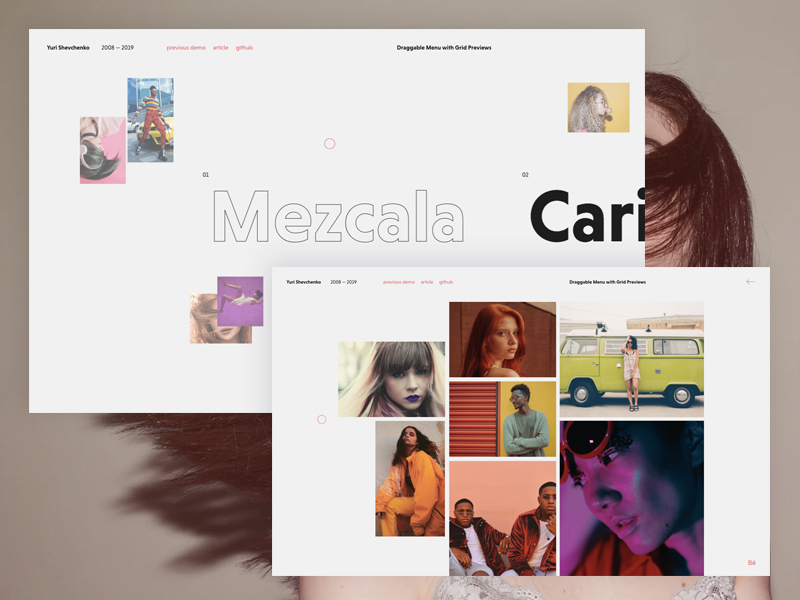
[Article on Codrops](https://tympanus.net/codrops/?p=40926)
[Demo](http://tympanus.net/Development/DraggableMenu/)
## Credits
* Fonts used in the demo: [Niveau Grotesk](https://fonts.adobe.com/fonts/niveau-grotesk)
* [TweenMax](https://greensock.com/tweenmax) by Greensock
* [Draggabilly](https://draggabilly.desandro.com/) by Dave DeSandro
* [imagesLoaded](https://imagesloaded.desandro.com/) by Dave DeSandro
* Images from [Unsplash.com](https://unsplash.com/)
## License
This resource can be used freely if integrated or build upon in personal or commercial projects such as websites, web apps and web templates intended for sale. It is not allowed to take the resource "as-is" and sell it, redistribute, re-publish it, or sell "pluginized" versions of it. Free plugins built using this resource should have a visible mention and link to the original work. Always consider the licenses of all included libraries, scripts and images used.
## Misc
Follow Codrops: [Twitter](http://www.twitter.com/codrops), [Facebook](http://www.facebook.com/codrops), [Google+](https://plus.google.com/101095823814290637419), [GitHub](https://github.com/codrops), [Pinterest](http://www.pinterest.com/codrops/), [Instagram](https://www.instagram.com/codropsss/)
[© Codrops 2019](http://www.codrops.com)
================================================
FILE: css/base.css
================================================
*,
*::after,
*::before {
box-sizing: border-box;
}
:root {
font-size: 14px;
}
body {
margin: 0;
--color-text: #1E1E1E;
--color-bg: #f1f1f1;
--color-link: #de6565;
--color-link-hover: #1E1E1E;
--color-menu-stroke: #1E1E1E;
--color-menu-item: #1E1E1E;
--color-explore: #1E1E1E;
color: var(--color-text);
background-color: var(--color-bg);
font-family: niveau-grotesk, sans-serif;
-webkit-font-smoothing: antialiased;
-moz-osx-font-smoothing: grayscale;
overflow: scroll;
overflow-x: hidden;
}
.cursor {
display: none;
}
main {
width: 100%;
overflow: hidden;
}
/* Page Loader */
.js .loading::before {
content: '';
position: fixed;
z-index: 100000;
top: 0;
left: 0;
width: 100%;
height: 100%;
background: var(--color-bg);
}
.js .loading::after {
content: '';
position: fixed;
z-index: 100000;
top: 50%;
left: 50%;
width: 60px;
height: 60px;
margin: -30px 0 0 -30px;
pointer-events: none;
border-radius: 50%;
opacity: 0.4;
background: var(--color-link);
animation: loaderAnim 0.7s linear infinite alternate forwards;
}
@keyframes loaderAnim {
to {
opacity: 1;
transform: scale3d(0.5,0.5,1);
}
}
a {
text-decoration: none;
color: var(--color-link);
outline: none;
}
a:hover,
a:focus {
color: var(--color-link-hover);
outline: none;
}
.frame {
padding: 2rem 1rem;
text-align: center;
position: absolute;
top: 0;
left: 0;
width: 100%;
z-index: 1000;
pointer-events: none;
}
.frame__title {
font-size: 1rem;
margin: 0 0 1rem;
}
.frame__links {
display: inline;
}
.frame a {
pointer-events: auto;
text-transform: lowercase;
}
.frame__links a:not(:last-child) {
margin-right: 1rem;
}
.frame__social {
margin: 1rem 0 0 0;
}
.frame__social-behance {
width: 20px;
display: inline-block;
}
.frame__pagetitle {
font-weight: bold;
margin: 0 0 1rem;
}
.menu-wrap {
position: absolute;
top: 0;
height: 100%;
width: 100%;
overflow: hidden;
pointer-events: none;
}
.page--preview ~ .menu-wrap {
pointer-events: auto;
}
.menu-draggable {
top: 0;
left: 0;
height: 100%;
width: 100%;
position: absolute;
cursor: grab;
}
.menu-draggable:active {
cursor: grabbing;
}
.menu {
display: flex;
width: 100vw;
height: 100vh;
position: relative;
justify-content: flex-start;
align-items: center;
width: -moz-fit-content;
width: fit-content;
counter-reset: menu-number;
pointer-events: none;
will-change: transform;
}
.menu__item {
position: relative;
text-align: center;
margin: 0 10vw 0 0;
--counter-opacity: 0;
color: var(--color-menu-item);
-webkit-touch-callout: none;
-webkit-user-select: none;
-moz-user-select: none;
-ms-user-select: none;
user-select: none;
}
.page--preview ~ .menu-wrap .menu__item {
--counter-opacity: 1;
}
.menu__item::before {
counter-increment: menu-number;
content: counter(menu-number, decimal-leading-zero);
position: absolute;
top: 0;
right: 100%;
opacity: var(--counter-opacity);
transition: opacity 0.3s;
}
.menu__item--current {
color: var(--color-menu-item);
}
.menu__item-link {
color: currentColor;
font-weight: bold;
font-size: 12vw;
display: flex;
line-height: 1.2;
}
.menu__item-explore {
cursor: pointer;
margin: 0.5rem 0 0 0;
display: inline-block;
color: var(--color-explore);
text-decoration: underline;
opacity: 0;
padding: 0.5rem 0.5rem 0;
will-change: transform;
}
.menu__item-explore:hover,
.menu__item-explore:focus {
text-decoration: none;
}
.page--preview ~ .menu-wrap .menu__item--current .menu__item-explore {
pointer-events: auto;
}
.letter {
position: relative;
overflow: hidden;
display: inline-block;
}
.letter__inner {
display: block;
will-change: transform;
}
.letter__inner--stroke {
position: absolute;
left: 100%;
top: 0;
-webkit-text-stroke: 1px var(--color-menu-stroke);
text-stroke: 1px var(--color-menu-stroke);
-webkit-text-fill-color: transparent;
text-fill-color: transparent;
color: transparent;
}
.menu__item--current .letter__inner {
transform: translate3d(-100%,0,0);
}
.grid-wrap {
display: grid;
margin: 0 auto;
grid-template-columns: 100%;
grid-template-rows: 3rem 1fr;
position: relative;
padding: 13rem 5vw 2rem;
pointer-events: none;
}
.gridback {
align-self: start;
grid-area: 1 / 1 / 2 / 2;
justify-self: center;
background: none;
border: 0;
margin: 0;
padding: 0;
color: #fff;
opacity: 0;
pointer-events: auto;
}
.page--preview .gridback {
pointer-events: none;
}
.gridback:hover {
color: var(--color-link-hover);
}
.gridback:focus {
outline: none;
}
.grid {
grid-area: 2 / 1 / 3 / 2;
--gridgap: 1vw;
--gridwidth: 100%;
--gridheight: 80vw;
display: grid;
width: var(--gridwidth);
height: var(--gridheight);
grid-template-rows: repeat(10,calc(var(--gridheight) / 10 - var(--gridgap)));
grid-template-columns: repeat(10,calc(var(--gridwidth) / 10 - var(--gridgap)));
grid-gap: var(--gridgap);
align-content: center;
justify-content: center;
}
.grid__item-wrap {
position: relative;
will-change: transform;
}
.grid__item {
opacity: 0;
position: relative;
width: 100%;
height: 100%;
background-repeat: no-repeat;
background-position: 50% 50%;
background-size: cover;
will-change: transform;
-webkit-filter: grayscale(0) contrast(1) brightness(1);
filter: grayscale(0) contrast(1) brightness(1);
}
.page--preview .grid__item {
-webkit-filter: grayscale(0.5) contrast(0.4) brightness(1.5);
filter: grayscale(0.5) contrast(0.4) brightness(1.5);
}
/* Layout 1 */
.grid--layout-1 .grid__item-wrap:first-child {grid-area: 3 / 1 / 8 / 4;}
.grid--layout-1 .grid__item-wrap:nth-child(2) {grid-area: 1 / 2 / 3 / 4;}
.grid--layout-1 .grid__item-wrap:nth-child(3) {grid-area: 5 / 4 / 8 / 8; }
.grid--layout-1 .grid__item-wrap:nth-child(4) {grid-area: 2 / 7 / 5 / 11;}
.grid--layout-1 .grid__item-wrap:nth-child(5) {grid-area: 1 / 4 / 5 / 7;}
.grid--layout-1 .grid__item-wrap:nth-child(6) {grid-area: 8 / 5 / 11 / 2;}
.grid--layout-1 .grid__item-wrap:nth-child(7) {grid-area: 10 / 9 / 8 / 11;}
.grid--layout-1 .grid__item-wrap:nth-child(8) {grid-area: 5 / 8 / 8 / 10;}
.grid--layout-1 .grid__item-wrap:nth-child(9) {grid-area: 8 / 5 / 11 / 9;}
/* Layout 2 */
.grid--layout-2 .grid__item-wrap:first-child { grid-area: 2 / 1 / 5 / 4; }
.grid--layout-2 .grid__item-wrap:nth-child(2) { grid-area: 1 / 4 / 4 / 7; }
.grid--layout-2 .grid__item-wrap:nth-child(3) {grid-area: 1 / 7 / 5 / 10;}
.grid--layout-2 .grid__item-wrap:nth-child(4) {grid-area: 5 / 1 / 7 / 4;}
.grid--layout-2 .grid__item-wrap:nth-child(5) {grid-area: 4 / 4 / 7 / 7;}
.grid--layout-2 .grid__item-wrap:nth-child(6) {grid-area: 7 / 7 / 11 / 4;}
.grid--layout-2 .grid__item-wrap:nth-child(7) {grid-area: 5 / 7 / 8 / 11;}
.grid--layout-2 .grid__item-wrap:nth-child(8) {grid-area: 7 / 2 / 9 / 4;}
/* Layout 3 */
.grid--layout-3 .grid__item-wrap:first-child {grid-area: 1 / 2 / 3 / 5;}
.grid--layout-3 .grid__item-wrap:nth-child(2) {grid-area: 3 / 1 / 6 / 5;}
.grid--layout-3 .grid__item-wrap:nth-child(3) {grid-area: 1 / 5 / 5 / 8;}
.grid--layout-3 .grid__item-wrap:nth-child(4) {grid-area: 2 / 8 / 6 / 11;}
.grid--layout-3 .grid__item-wrap:nth-child(5) {grid-area: 5 / 5 / 8 / 8;}
.grid--layout-3 .grid__item-wrap:nth-child(6) {grid-area: 6 / 8 / 8 / 11;}
.grid--layout-3 .grid__item-wrap:nth-child(7) {grid-area: 6 / 2 / 8 / 5;}
.grid--layout-3 .grid__item-wrap:nth-child(8) {grid-area: 11 / 4 / 8 / 7;}
.grid--layout-3 .grid__item-wrap:nth-child(9) {grid-area: 8 / 9 / 11 / 7;}
/* Layout 4 */
.grid--layout-4 .grid__item-wrap:first-child {grid-area: 2 / 1 / 4 / 4;}
.grid--layout-4 .grid__item-wrap:nth-child(2) {grid-area: 1 / 4 / 3 / 7;}
.grid--layout-4 .grid__item-wrap:nth-child(3) {grid-area: 3 / 4 / 5 / 7;}
.grid--layout-4 .grid__item-wrap:nth-child(4) {grid-area: 1 / 7 / 4 / 11;}
.grid--layout-4 .grid__item-wrap:nth-child(5) {grid-area: 4 / 2 / 7 / 4;}
.grid--layout-4 .grid__item-wrap:nth-child(6) {grid-area: 5 / 7 / 8 / 4;}
.grid--layout-4 .grid__item-wrap:nth-child(7) {grid-area: 4 / 7 / 8 / 11;}
.grid--layout-4 .grid__item-wrap:nth-child(8) {grid-area: 8 / 9 / 11 / 4;}
/* Layout 5 */
.grid--layout-5 .grid__item-wrap:first-child {grid-area: 2 / 1 / 5 / 4;}
.grid--layout-5 .grid__item-wrap:nth-child(2) {grid-area: 1 / 4 / 5 / 7;}
.grid--layout-5 .grid__item-wrap:nth-child(3) {grid-area: 5 / 2 / 7 / 5;}
.grid--layout-5 .grid__item-wrap:nth-child(4) {grid-area: 1 / 7 / 4 / 11;}
.grid--layout-5 .grid__item-wrap:nth-child(5) {grid-area: 5 / 7 / 7 / 5;}
.grid--layout-5 .grid__item-wrap:nth-child(6) {grid-area: 7 / 5 / 10 / 1;}
.grid--layout-5 .grid__item-wrap:nth-child(7) {grid-area: 4 / 7 / 7 / 9;}
.grid--layout-5 .grid__item-wrap:nth-child(8) {grid-area: 4 / 9 / 9 / 11;}
.grid--layout-5 .grid__item-wrap:nth-child(9) {grid-area: 7 / 5 / 11 / 9;}
.page--preview {
position: relative;
overflow: hidden;
height: 100vh;
pointer-events: none;
}
@media screen and (min-width: 53em) {
.frame {
position: fixed;
text-align: left;
z-index: 10000;
top: 0;
left: 0;
display: grid;
align-content: space-between;
width: 100%;
max-width: none;
height: 100vh;
padding: 2.5rem 3rem;
grid-template-columns: 20rem 1fr 1fr;
grid-template-rows: auto auto auto;
grid-template-areas: 'title links pagetitle'
'... ... ...'
'... ... social';
}
.frame__pagetitle {
grid-area: pagetitle;
margin: 0;
}
.frame__title-wrap {
grid-area: title;
display: flex;
}
.frame__title {
margin: 0;
}
.frame__tagline {
position: relative;
margin: 0 0 0 1rem;
padding: 0 0 0 1rem;
}
.frame__social {
margin: 0;
grid-area: social;
justify-self: end;
}
.frame__links {
grid-area: links;
padding: 0;
justify-self: start;
}
.grid-wrap {
grid-template-rows: 1.25rem 1fr;
grid-gap: 3rem;
padding: 2.5rem 3rem;
}
.grid {
padding: 0 10vw;
}
.gridback {
justify-self: end;
}
}
@media (any-pointer: fine) {
.cursor {
display: block;
}
.cursor__inner {
z-index: 9999;
pointer-events: none;
position: absolute;
top: 0;
left: 0;
mix-blend-mode: difference;
border-radius: 50%;
}
.cursor__side {
position: absolute;
top: 50%;
width: 5px;
height: 1px;
background: #de6565;
opacity: 0;
}
.cursor__side--left {
right: calc(100% + 5px);
}
.cursor__side--right {
left: calc(100% + 5px);
}
.cursor__inner--circle {
width: 25px;
height: 25px;
border: 1px solid #de6565;
}
}
================================================
FILE: index.html
================================================
<!DOCTYPE html>
<html lang="en" class="no-js">
<head>
<meta charset="UTF-8" />
<meta name="viewport" content="width=device-width, initial-scale=1">
<title>Draggable Menu with Grid Previews | Codrops</title>
<meta name="description" content="A draggable menu that shows a thumbnail preview of an image grid" />
<meta name="keywords" content="draggable, menu, navigation, thumbnails, grid, javascript, gsap, web design, layout" />
<meta name="author" content="Codrops" />
<link rel="shortcut icon" href="favicon.ico">
<link rel="stylesheet" href="https://use.typekit.net/crf4rue.css">
<link rel="stylesheet" type="text/css" href="css/base.css" />
<script src="https://ajax.googleapis.com/ajax/libs/webfont/1.6.26/webfont.js"></script>
<script>document.documentElement.className="js";var supportsCssVars=function(){var e,t=document.createElement("style");return t.innerHTML="root: { --tmp-var: bold; }",document.head.appendChild(t),e=!!(window.CSS&&window.CSS.supports&&window.CSS.supports("font-weight","var(--tmp-var)")),t.parentNode.removeChild(t),e};supportsCssVars()||alert("Please view this demo in a modern browser that supports CSS Variables.");</script>
</head>
<body class="loading">
<main>
<div class="frame">
<div class="frame__pagetitle">Draggable Menu with Grid Previews</div>
<div class="frame__title-wrap">
<h1 class="frame__title">Yuri Shevchenko</h1>
<p class="frame__tagline">2008 — 2019</a></p>
</div>
<div class="frame__links">
<a href="https://tympanus.net/Development/DraggableImageStrip/">Previous Demo</a>
<a href="https://tympanus.net/codrops/?p=40926">Article</a>
<a href="https://github.com/codrops/DraggableMenu/">GitHub</a>
</div>
<div class="frame__social">
<a href="#" aria-label="Link to Yuri's Behance profile"><img src="img/behance.svg" class="frame__social-behance" alt="Behance Logo"/></a>
</div>
</div>
<div class="page page--preview">
<div class="grid-wrap">
<div class="grid grid--layout-1">
<div class="grid__item-wrap"><div class="grid__item" style="background-image: url(img/1.jpg)"></div></div>
<div class="grid__item-wrap"><div class="grid__item" style="background-image: url(img/2.jpg)"></div></div>
<div class="grid__item-wrap"><div class="grid__item" style="background-image: url(img/3.jpg)"></div></div>
<div class="grid__item-wrap"><div class="grid__item" style="background-image: url(img/4.jpg)"></div></div>
<div class="grid__item-wrap"><div class="grid__item" style="background-image: url(img/5.jpg)"></div></div>
<div class="grid__item-wrap"><div class="grid__item" style="background-image: url(img/6.jpg)"></div></div>
<div class="grid__item-wrap"><div class="grid__item" style="background-image: url(img/7.jpg)"></div></div>
<div class="grid__item-wrap"><div class="grid__item" style="background-image: url(img/8.jpg)"></div></div>
<div class="grid__item-wrap"><div class="grid__item" style="background-image: url(img/9.jpg)"></div></div>
</div>
<div class="grid grid--layout-2">
<div class="grid__item-wrap"><div class="grid__item" style="background-image: url(img/10.jpg)"></div></div>
<div class="grid__item-wrap"><div class="grid__item" style="background-image: url(img/11.jpg)"></div></div>
<div class="grid__item-wrap"><div class="grid__item" style="background-image: url(img/12.jpg)"></div></div>
<div class="grid__item-wrap"><div class="grid__item" style="background-image: url(img/13.jpg)"></div></div>
<div class="grid__item-wrap"><div class="grid__item" style="background-image: url(img/14.jpg)"></div></div>
<div class="grid__item-wrap"><div class="grid__item" style="background-image: url(img/15.jpg)"></div></div>
<div class="grid__item-wrap"><div class="grid__item" style="background-image: url(img/16.jpg)"></div></div>
<div class="grid__item-wrap"><div class="grid__item" style="background-image: url(img/17.jpg)"></div></div>
</div>
<div class="grid grid--layout-3">
<div class="grid__item-wrap"><div class="grid__item" style="background-image: url(img/18.jpg)"></div></div>
<div class="grid__item-wrap"><div class="grid__item" style="background-image: url(img/19.jpg)"></div></div>
<div class="grid__item-wrap"><div class="grid__item" style="background-image: url(img/20.jpg)"></div></div>
<div class="grid__item-wrap"><div class="grid__item" style="background-image: url(img/21.jpg)"></div></div>
<div class="grid__item-wrap"><div class="grid__item" style="background-image: url(img/22.jpg)"></div></div>
<div class="grid__item-wrap"><div class="grid__item" style="background-image: url(img/23.jpg)"></div></div>
<div class="grid__item-wrap"><div class="grid__item" style="background-image: url(img/24.jpg)"></div></div>
<div class="grid__item-wrap"><div class="grid__item" style="background-image: url(img/42.jpg)"></div></div>
<div class="grid__item-wrap"><div class="grid__item" style="background-image: url(img/43.jpg)"></div></div>
</div>
<div class="grid grid--layout-4">
<div class="grid__item-wrap"><div class="grid__item" style="background-image: url(img/25.jpg)"></div></div>
<div class="grid__item-wrap"><div class="grid__item" style="background-image: url(img/26.jpg)"></div></div>
<div class="grid__item-wrap"><div class="grid__item" style="background-image: url(img/27.jpg)"></div></div>
<div class="grid__item-wrap"><div class="grid__item" style="background-image: url(img/28.jpg)"></div></div>
<div class="grid__item-wrap"><div class="grid__item" style="background-image: url(img/29.jpg)"></div></div>
<div class="grid__item-wrap"><div class="grid__item" style="background-image: url(img/30.jpg)"></div></div>
<div class="grid__item-wrap"><div class="grid__item" style="background-image: url(img/31.jpg)"></div></div>
<div class="grid__item-wrap"><div class="grid__item" style="background-image: url(img/32.jpg)"></div></div>
</div>
<div class="grid grid--layout-5">
<div class="grid__item-wrap"><div class="grid__item" style="background-image: url(img/33.jpg)"></div></div>
<div class="grid__item-wrap"><div class="grid__item" style="background-image: url(img/34.jpg)"></div></div>
<div class="grid__item-wrap"><div class="grid__item" style="background-image: url(img/35.jpg)"></div></div>
<div class="grid__item-wrap"><div class="grid__item" style="background-image: url(img/36.jpg)"></div></div>
<div class="grid__item-wrap"><div class="grid__item" style="background-image: url(img/37.jpg)"></div></div>
<div class="grid__item-wrap"><div class="grid__item" style="background-image: url(img/38.jpg)"></div></div>
<div class="grid__item-wrap"><div class="grid__item" style="background-image: url(img/39.jpg)"></div></div>
<div class="grid__item-wrap"><div class="grid__item" style="background-image: url(img/40.jpg)"></div></div>
<div class="grid__item-wrap"><div class="grid__item" style="background-image: url(img/41.jpg)"></div></div>
</div>
<button class="gridback"><svg width="27px" height="15px" viewBox="0 0 27 15"><path d="M1.469 6.75l-.719.719 7.938 6.937.718-.719L1.47 6.75zM8.594.531L.75 7.375l.688.688L9.28 1.218 8.594.53zM1.406 6.938v1h24.75v-1H1.406z" fill="#de6565"/></svg></button>
</div><!-- /grid-wrap -->
</div><!-- /page -->
<div class="menu-wrap">
<div class="menu-draggable"></div>
<nav class="menu">
<div class="menu__item">
<a class="menu__item-link">Mezcala</a>
<a class="menu__item-explore">explore</a>
</div>
<div class="menu__item">
<a class="menu__item-link">Caricia</a>
<a class="menu__item-explore">explore</a>
</div>
<div class="menu__item">
<a class="menu__item-link">Esquirla</a>
<a class="menu__item-explore">explore</a>
</div>
<div class="menu__item">
<a class="menu__item-link">Sangre</a>
<a class="menu__item-explore">explore</a>
</div>
<div class="menu__item">
<a class="menu__item-link">Petricor</a>
<a class="menu__item-explore">explore</a>
</div>
</nav><!--menu-->
</div><!--/menu-wrap-->
</main>
<div class="cursor">
<div class="cursor__inner cursor__inner--circle">
<div class="cursor__side cursor__side--left"></div>
<div class="cursor__side cursor__side--right"></div>
</div>
</div>
<script src="js/imagesloaded.pkgd.min.js"></script>
<script src="js/charming.min.js"></script>
<script src="js/TweenMax.min.js"></script>
<script src="js/draggabilly.pkgd.min.js"></script>
<script src="js/demo.js"></script>
</body>
</html>
================================================
FILE: js/demo.js
================================================
/**
* demo.js
* http://www.codrops.com
*
* Licensed under the MIT license.
* http://www.opensource.org/licenses/mit-license.php
*
* Copyright 2019, Codrops
* http://www.codrops.com
*/
{
// Helper functions
const MathUtils = {
lineEq: (y2, y1, x2, x1, currentVal) => {
// y = mx + b
var m = (y2 - y1) / (x2 - x1), b = y1 - m * x1;
return m * currentVal + b;
},
lerp: (a, b, n) => (1 - n) * a + n * b,
getRandomFloat: (min, max) => (Math.random() * (max - min) + min).toFixed(2)
};
// Gets the mouse position
const getMousePos = (e) => {
let posx = 0;
let posy = 0;
if (!e) e = window.event;
if (e.pageX || e.pageY) {
posx = e.pageX;
posy = e.pageY;
}
else if (e.clientX || e.clientY) {
posx = e.clientX + body.scrollLeft + document.documentElement.scrollLeft;
posy = e.clientY + body.scrollTop + document.documentElement.scrollTop;
}
return { x : posx, y : posy }
};
// https://pawelgrzybek.com/page-scroll-in-vanilla-javascript/
function scrollIt(destination, duration = 200, easing = 'linear', callback) {
const easings = {
linear(t) {
return t;
},
easeOutQuad(t) {
return t * (2 - t);
},
};
const start = window.pageYOffset;
const startTime = 'now' in window.performance ? performance.now() : new Date().getTime();
const documentHeight = Math.max(document.body.scrollHeight, document.body.offsetHeight, document.documentElement.clientHeight, document.documentElement.scrollHeight, document.documentElement.offsetHeight);
const windowHeight = window.innerHeight || document.documentElement.clientHeight || document.getElementsByTagName('body')[0].clientHeight;
const destinationOffset = typeof destination === 'number' ? destination : destination.offsetTop;
const destinationOffsetToScroll = Math.round(documentHeight - destinationOffset < windowHeight ? documentHeight - windowHeight : destinationOffset);
if ('requestAnimationFrame' in window === false) {
window.scroll(0, destinationOffsetToScroll);
if (callback) {
callback();
}
return;
}
function scroll() {
const now = 'now' in window.performance ? performance.now() : new Date().getTime();
const time = Math.min(1, ((now - startTime) / duration));
const timeFunction = easings[easing](time);
window.scroll(0, Math.abs(Math.ceil((timeFunction * (destinationOffsetToScroll - start)) + start)));
if (window.pageYOffset === destinationOffsetToScroll) {
if (callback) {
callback();
}
return;
}
requestAnimationFrame(scroll);
}
scroll();
}
// Calculate the viewport size
let winsize;
const calcWinsize = () => winsize = {width: window.innerWidth, height: window.innerHeight};
calcWinsize();
window.addEventListener('resize', calcWinsize);
// Track the mouse position
let mousepos = {x: winsize.width/2, y: winsize.height/2};
window.addEventListener('mousemove', ev => mousepos = getMousePos(ev));
// Custom cursor
class Cursor {
constructor(el) {
this.DOM = {el: el};
this.DOM.circle = this.DOM.el.querySelector('.cursor__inner--circle');
this.DOM.arrows = {
right: this.DOM.el.querySelector('.cursor__side--right'),
left: this.DOM.el.querySelector('.cursor__side--left')
};
this.bounds = this.DOM.circle.getBoundingClientRect();
this.renderedStyles = {
tx: {previous: 0, current: 0, amt: 0.2},
ty: {previous: 0, current: 0, amt: 0.2},
scale: {previous: 1, current: 1, amt: 0.2}
};
requestAnimationFrame(() => this.render());
}
render() {
this.renderedStyles['tx'].current = mousepos.x - this.bounds.width/2;
this.renderedStyles['ty'].current = mousepos.y - this.bounds.height/2;
for (const key in this.renderedStyles ) {
this.renderedStyles[key].previous = MathUtils.lerp(this.renderedStyles[key].previous, this.renderedStyles[key].current, this.renderedStyles[key].amt);
}
this.DOM.circle.style.transform = `translateX(${(this.renderedStyles['tx'].previous)}px) translateY(${this.renderedStyles['ty'].previous}px) scale(${this.renderedStyles['scale'].previous})`;
requestAnimationFrame(() => this.render());
}
enter() {
this.renderedStyles['scale'].current = 1.9;
}
leave() {
this.renderedStyles['scale'].current = 1;
}
click() {
this.renderedStyles['scale'].previous = 0.4;
}
showArrows() {
TweenMax.to(Object.values(this.DOM.arrows), ANIMATION_SETTINGS.cursor.duration, {
ease: ANIMATION_SETTINGS.cursor.ease,
startAt: {x: i => i ? 10 : -10 },
opacity: 1,
x: 0
});
}
hideArrows() {
TweenMax.to(Object.values(this.DOM.arrows), ANIMATION_SETTINGS.cursor.duration, {
ease: ANIMATION_SETTINGS.cursor.ease,
x: i => i ? 10 : -10,
opacity: 0
});
}
}
// Images Grid
class ImageGrid {
constructor(el) {
this.DOM = {el: el};
this.DOM.imageWrap = [...this.DOM.el.querySelectorAll('.grid__item-wrap')];
this.itemsTotal = this.DOM.imageWrap.length;
this.DOM.images = [...this.DOM.el.querySelectorAll('.grid__item')];
// Spread the grid items
this.spread();
}
// Spreads the grid items by randomly positioning them and scaling them down
spread(animate = false) {
return new Promise((resolve, reject) => {
let animateCount = 0;
const gridHeight = this.DOM.el.scrollHeight;
const gridTop = this.DOM.el.offsetTop;
this.DOM.imageWrap.forEach((item) => {
const rect = item.getBoundingClientRect();
// Item´s center point
const center = {x: rect.left+rect.width/2, y: rect.top+rect.height/2};
// Calculate the item´s quadrant in the viewport
const quadrant = center.x >= winsize.width/2 ?
center.y <= gridHeight/2 + gridTop ? 1 : 4 :
center.y <= gridHeight/2 + gridTop ? 2 : 3;
// Now calculate how much to translate the item
// The positions will be random but only in the area of the item´s quadrant
// Also, consider a margin so the item does not stay completely out of the viewport or its quadrant
const margins = {x: winsize.width*.02, y: winsize.height*.04}
const tx = quadrant === 1 || quadrant === 4 ?
MathUtils.getRandomFloat(-1*center.x + winsize.width/2 + margins.x*4, winsize.width - center.x - margins.x) :
MathUtils.getRandomFloat(-1*center.x + margins.x, winsize.width/2 - center.x - margins.x*4);
const ty = quadrant === 1 || quadrant === 2 ?
MathUtils.getRandomFloat(-1*center.y + margins.y, winsize.height/2 - center.y - margins.y*4) :
MathUtils.getRandomFloat(-1*center.y + winsize.height/2 + margins.y*4, winsize.height - center.y - margins.y);
// Save the current translation
item.dataset.ctx = tx;
item.dataset.cty = ty;
if ( animate ) {
TweenMax.to(item, ANIMATION_SETTINGS.grid.duration, {
ease: ANIMATION_SETTINGS.grid.ease,
x: tx,
y: ty,
scale: 0.35,
onComplete: () => {
++animateCount;
if ( animateCount === this.itemsTotal ) {
resolve();
}
}
});
}
else {
TweenMax.set(item, {
x: tx,
y: ty,
scale: 0.35
});
resolve();
}
});
});
}
// Resets the items to the original position (forming again the original grid)
collapse() {
return new Promise((resolve, reject) => {
TweenMax.to(this.DOM.imageWrap, ANIMATION_SETTINGS.grid.duration, {
ease: ANIMATION_SETTINGS.grid.ease,
x: 0,
y: 0,
scale: 1.01,
onComplete: resolve
});
});
}
showImages() {
TweenMax.set(this.DOM.images, {opacity: 1});
}
}
// A menu item
class MenuItem {
constructor(el, imageGrid) {
// The main wrapper
this.DOM = {el: el};
// The inner link (.menu__item-link)
this.DOM.link = this.DOM.el.querySelector('.menu__item-link');
// The explore link
this.DOM.explore = this.DOM.el.querySelector('.menu__item-explore');
// We will need the size and position for the calculations needed to drag/translate the menu
this.rect = this.DOM.el.getBoundingClientRect();
// The images grid for this menu item
this.imageGrid = imageGrid;
// As we drag, the letters will switch from only stroke to filled and vice versa
// We need to split the letters into spans and create the necessary structure (we will have two spans per letter, one for the stroke version and one for the filled)
charming(this.DOM.link, {classPrefix: false});
const linkInner = [...this.DOM.link.querySelectorAll('span')];
linkInner.forEach((span) => {
const stroke = span.cloneNode(true);
span.classList.add('letter__inner','letter__inner--filled');
stroke.classList.add('letter__inner','letter__inner--stroke');
this.DOM.link.insertBefore(stroke, span.nextSibling);
const letter = document.createElement('span');
letter.classList = 'letter';
letter.appendChild(span);
letter.appendChild(stroke);
this.DOM.link.appendChild(letter);
});
this.letters = [...this.DOM.link.querySelectorAll('.letter__inner')];
// Need to recalculate size and position on window resize
window.addEventListener('resize', () => this.rect = this.DOM.el.getBoundingClientRect());
}
setCurrent() {
this.DOM.el.classList.add('menu__item--current');
return this;
}
unsetCurrent() {
this.DOM.el.classList.remove('menu__item--current');
}
isCurrent() {
return this.DOM.el.classList.contains('menu__item--current');
}
// Show/Hide the explore link
showExplore() {
return this.toggleExplorer('show');
}
hideExplore() {
return this.toggleExplorer('hide');
}
toggleExplorer(action = 'show') {
return new Promise((resolve, reject) => {
TweenMax.to(this.DOM.explore, ANIMATION_SETTINGS.explore.duration, {
ease: ANIMATION_SETTINGS.explore.ease,
startAt: action === 'hide' ? null : {scale: 0.5},
opacity: action === 'hide' ? 0 : 1,
scale: action === 'hide' ? 0.8 : 1,
onComplete: resolve
});
});
}
// Show/Hide the letters
show() {
return this.toggle('show');
}
hide() {
return this.toggle('hide');
}
toggle(action = 'show') {
return new Promise((resolve, reject) => {
const tx = action === 'hide' ? this.isCurrent() ? '-200%' : '100%' : this.isCurrent() ? '-100%' : '0%';
TweenMax.to(this.letters, ANIMATION_SETTINGS.allMenuLettersToggle.duration, {
ease: ANIMATION_SETTINGS.allMenuLettersToggle.ease,
x: tx,
onComplete: resolve
});
});
}
}
// The menu
class Menu {
constructor(el) {
// The menu wrap (.menu-wrap)
this.DOM = {el: el};
// The menu element
this.DOM.menu = this.DOM.el.querySelector('.menu');
// The draggable container
this.DOM.draggable = this.DOM.el.querySelector('.menu-draggable');
// Content wrap
this.DOM.pagePreview = document.querySelector('.page--preview');
// The ctrl that closes the grid view and shows back the menu
this.DOM.backToMenuCtrl = this.DOM.pagePreview.querySelector('.gridback');
// The image grids (one per menu item)
this.imageGrids = [];
[...this.DOM.pagePreview.querySelectorAll('.grid')].forEach(item => this.imageGrids.push(new ImageGrid(item)));
// MenuItem instances
this.menuItems = [];
[...this.DOM.menu.querySelectorAll('.menu__item')].forEach((item, position) => this.menuItems.push(new MenuItem(item, this.imageGrids[position])));
// Total number of menu items
this.menuItemsTotal = this.menuItems.length;
// Index of the current menuItem
this.current = 0;
// Set the first menu item to current and show its explore link
this.menuItems[this.current].setCurrent().showExplore();
// Show the first grid items
this.menuItems[this.current].imageGrid.showImages();
// Initialize the Draggabilly (on the x axis)
this.draggie = new Draggabilly(this.DOM.draggable, { axis: 'x' });
// The current amount (in pixels) that was dragged
this.dragPosition = 0;
// Minimum amount to drag in order to navigate to the next/previous menu item
this.minDrag = winsize.width*.04;
// Set the menu initial position
this.layout();
// The following are the values that need to be updated inside the render (rAF) function:
// - the menu translation value
// - the letters/spans (stroke and filled) translation values
// - and the grid images opacity and transform values
// The "current" and the "previous" hold the values to interpolate ("current" being the one we want to get to) and the "amt" is the amount to interpolate
this.renderedStyles = {
menuTranslation: {previous: this.dragPosition + this.initTx, current: this.dragPosition + this.initTx, amt: 0.1},
letterTranslation: {previous: 0, current: 0, amt: 0.1},
imgOpacity: {previous: 1, current: 1, amt: 0.1},
imgScaleX: {previous: 1, current: 1, amt: 0.06},
imgScaleY: {previous: 1, current: 1, amt: 0.06},
imgTranslation: {previous: 0, current: 0, amt: 0.1}
};
// Start the rAF loop to render the menu and letters positions
this.renderId = requestAnimationFrame(() => this.render());
// Initialize/Bind some events
this.initEvents();
}
layout() {
// Set the menu position/translation so that the first menu item is the current one thus positioned at the center
// We need to save these values for later calculations when translating the menu
this.initTx = this.currentPosition = winsize.width/2 - this.menuItems[this.current].rect.width/2;
TweenMax.set(this.DOM.menu, {x: this.initTx});
}
// Window resize
resize() {
this.minDrag = winsize.width*.04;
// Update position
this.currentPosition = winsize.width/2 - this.menuItems[this.current].DOM.el.offsetLeft - this.menuItems[this.current].rect.width/2;
this.renderedStyles.menuTranslation.current = this.renderedStyles.menuTranslation.previous = this.currentPosition;
}
isDragging() {
// dragDirection is only set when we drag the menu, so this can be used to checked if we are currently dragging
return this.dragDirection != undefined && this.dragDirection != '';
}
render() {
this.renderId = undefined;
// Apply the lerp function to the updated values
for (const key in this.renderedStyles ) {
this.renderedStyles[key].previous = MathUtils.lerp(this.renderedStyles[key].previous, this.renderedStyles[key].current, this.renderedStyles[key].amt);
}
// Translate the menu
TweenMax.set(this.DOM.menu, {x: this.renderedStyles.menuTranslation.previous});
// Switch the filled spans with stroke ones and vice versa
// Also update the grid images
if ( this.isDragging() && this.currentItem && this.upcomingItem ) {
let tx = this.renderedStyles.letterTranslation.previous;
TweenMax.set(this.currentItem.letters, {x: this.dragDirection === 'left' ? -1*tx-100 + '%' : tx-100 + '%'});
TweenMax.set(this.upcomingItem.letters, {x: this.dragDirection === 'left' ? tx + '%' : -1*tx + '%'});
TweenMax.set(this.currentItem.imageGrid.DOM.images, {
transformOrigin: this.dragDirection === 'left' ? '100% 50%' : '0% 50%',
opacity: this.renderedStyles.imgOpacity.previous,
scaleX: this.renderedStyles.imgScaleX.previous,
scaleY: this.renderedStyles.imgScaleY.previous,
x: this.dragDirection === 'left' ? -1*this.renderedStyles.imgTranslation.previous + '%' : this.renderedStyles.imgTranslation.previous + '%'
});
TweenMax.set(this.upcomingItem.imageGrid.DOM.images, {
transformOrigin: this.dragDirection === 'left' ? '0% 50%' : '100% 50%',
opacity: Math.abs(1-this.renderedStyles.imgOpacity.previous),
scaleX: 3-this.renderedStyles.imgScaleX.previous,
scaleY: 1.8-this.renderedStyles.imgScaleY.previous,
x: this.dragDirection === 'left' ? 150 - this.renderedStyles.imgTranslation.previous + '%' : -1*(150 - this.renderedStyles.imgTranslation.previous) + '%'
});
}
if ( !this.renderId ) {
this.renderId = requestAnimationFrame(() => this.render());
}
}
initEvents() {
this.onPointerDown = () => {
// Scale up the cursor
cursor.renderedStyles['scale'].current = 1.5;
// And show the "drag mode" arrows
cursor.showArrows();
};
this.onDragStart = () => {
if ( this.isAnimating ) return;
// Reset the drag direction value
this.dragDirection = '';
};
// Save the previous moveVector obj that Draggability provides for every drag move
// We need this to track the current direction of dragging in order to compare it later with the initial intended direction
// Like so we know if the menu should navigate to the next/previous item or if the navigation needs to be cancelled
this.cachedVectorMovement = {x:0,y:0};
this.onDragMove = (event, pointer, moveVector) => {
// Update the mouse position
mousepos = getMousePos(event);
// Return if theres an active animation
if ( this.isAnimating ) return;
// Track the current direction of the drag
if ( moveVector.x != this.cachedVectorMovement.x ) {
this.currentDirection = moveVector.x > this.cachedVectorMovement.x ? 'right' : 'left';
this.cachedVectorMovement = moveVector;
}
if ( this.dragDirection === '' ) {
// Hide the explorer link
this.menuItems[this.current].hideExplore();
// The initial intended direction
this.dragDirection = moveVector.x > 0 ? 'right' : 'left';
// We need to calculate the amount to move the menu as we drag from one point of the screen to another.
// If we are switching between two menu items then this value is the distance from the center of the current menu item to the center of the next or previous menuItem (depending on the dragging direction)
// otherwise it will be the same as this.minDrag so that when we stop dragging the navigation gets cancelled
// Boundary cases
if ( this.dragDirection === 'right' && this.current === 0 || this.dragDirection === 'left' && this.current === this.menuItemsTotal - 1 ) {
this.amountToMove = this.minDrag;
}
// else move to the next/previous menuItem
else {
this.upcomingIdx = this.dragDirection === 'left' ? this.current+1 : this.current-1;
this.currentItem = this.menuItems[this.current];
this.upcomingItem = this.menuItems[this.upcomingIdx];
this.amountToMove = Math.abs((this.currentItem.rect.left + this.currentItem.rect.width/2) - (this.upcomingItem.rect.left + this.upcomingItem.rect.width/2));
}
}
// Update the dragPosition:
// We need to map the draggable movement ([0,winsize.width]) to the menu movement ([0,amountToMove])
this.dragPosition = MathUtils.lineEq(this.amountToMove, 0, winsize.width, 0, this.draggie.position.x);
// Finally update both the menu translation, letters translation and grid images (rAF render function)
this.renderedStyles.menuTranslation.current = this.dragPosition + this.currentPosition;
this.renderedStyles.letterTranslation.current = MathUtils.lineEq(100, 0, winsize.width, 0, this.dragDirection === 'left' ? Math.min(this.draggie.position.x, 0) : Math.max(this.draggie.position.x, 0));
this.renderedStyles.imgOpacity.current = MathUtils.lineEq(0, 1, winsize.width, 0, this.dragDirection === 'left' ? Math.abs(Math.min(this.draggie.position.x, 0)) : Math.abs(Math.max(this.draggie.position.x, 0)));
this.renderedStyles.imgScaleX.current = MathUtils.lineEq(2, 1, winsize.width, 0, this.dragDirection === 'left' ? Math.abs(Math.min(this.draggie.position.x, 0)) : Math.abs(Math.max(this.draggie.position.x, 0)));
this.renderedStyles.imgScaleY.current = MathUtils.lineEq(0.8, 1, winsize.width, 0, this.dragDirection === 'left' ? Math.abs(Math.min(this.draggie.position.x, 0)) : Math.abs(Math.max(this.draggie.position.x, 0)));
this.renderedStyles.imgTranslation.current = MathUtils.lineEq(150, 0, winsize.width, 0, this.dragDirection === 'left' ? Math.abs(Math.min(this.draggie.position.x, 0)) : Math.abs(Math.max(this.draggie.position.x, 0)));
};
this.onPointerUp = () => {
// Scale down the cursor (reset)
cursor.renderedStyles['scale'].current = 1;
// And hide the "drag mode" arrows
cursor.hideArrows();
};
this.onDragEnd = () => {
if ( !this.isAnimating ) {
this.isAnimating = true;
// Cancel the render function (rAF)
if ( this.renderId ) {
window.cancelAnimationFrame(this.renderId);
this.renderId = undefined;
}
// Cancel the navigation:
// Either it didn´t drag enough (<= minDrag) or the drag direction changed to the opposite one, meaning the user stepped back from navigating
if ( Math.abs(this.dragPosition) <= this.minDrag || this.dragDirection !== this.currentDirection ) {
// Show the explore link
this.menuItems[this.current].showExplore();
// Reset the rAF updated values
this.renderedStyles.menuTranslation.current = this.renderedStyles.menuTranslation.previous = this.currentPosition;
this.renderedStyles.letterTranslation.current = this.renderedStyles.letterTranslation.previous = 0;
this.renderedStyles.imgOpacity.current = this.renderedStyles.imgOpacity.previous = 1;
this.renderedStyles.imgScaleX.current = this.renderedStyles.imgScaleX.previous = 1;
this.renderedStyles.imgScaleY.current = this.renderedStyles.imgScaleY.previous = 1;
this.renderedStyles.imgTranslation.current = this.renderedStyles.imgTranslation.previous = 0;
const tl = new TimelineMax({
onComplete: () => {
// Restart the rAF loop
this.renderId = requestAnimationFrame(() => this.render());
// Reset values..
this.currentItem = undefined;
this.upcomingItem = undefined;
// Able to drag and animate again
this.isAnimating = false;
}
})
// Animate the menu back to the previous position
.to(this.DOM.menu, ANIMATION_SETTINGS.menu.duration, {
ease: ANIMATION_SETTINGS.menu.ease,
x: this.currentPosition
}, 0);
// Reset the letters translations and grid images
if ( this.currentItem && this.upcomingItem ) {
tl
.to(this.currentItem.letters, ANIMATION_SETTINGS.letters.duration, {
ease: ANIMATION_SETTINGS.letters.ease,
x: '-100%'
}, 0)
.to(this.upcomingItem.letters, ANIMATION_SETTINGS.letters.duration, {
ease: ANIMATION_SETTINGS.letters.ease,
x: '0%'
}, 0)
.to(this.currentItem.imageGrid.DOM.images, ANIMATION_SETTINGS.images.duration, {
ease: ANIMATION_SETTINGS.images.ease,
opacity: 1,
scaleX: 1,
scaleY: 1,
x: '0%'
}, 0)
.to(this.upcomingItem.imageGrid.DOM.images, ANIMATION_SETTINGS.images.duration, {
ease: ANIMATION_SETTINGS.images.ease,
opacity: 0,
scaleX: 2,
scaleY: 0.8,
x: this.dragDirection === 'left' ? '150%' : '-150%'
}, 0);
}
}
// Move to the next/previous menu item
else {
// Show the explore link
this.menuItems[this.upcomingIdx].showExplore();
// Set the updated menu translation value
this.currentPosition
= this.renderedStyles.menuTranslation.current = this.renderedStyles.menuTranslation.previous
= this.dragDirection === 'left' ?
this.currentPosition - this.amountToMove :
this.currentPosition + this.amountToMove;
// Reset letters translation value
this.renderedStyles.letterTranslation.current = this.renderedStyles.letterTranslation.previous = 0;
// Reset grid images values
this.renderedStyles.imgOpacity.current = this.renderedStyles.imgOpacity.previous = 1;
this.renderedStyles.imgScaleX.current = this.renderedStyles.imgScaleX.previous = 1;
this.renderedStyles.imgScaleY.current = this.renderedStyles.imgScaleY.previous = 1;
this.renderedStyles.imgTranslation.current = this.renderedStyles.imgTranslation.previous = 0;
const tl = new TimelineMax({
onComplete: () => {
// Restart the rAF loop
this.renderId = requestAnimationFrame(() => this.render());
// Update the menu item current state
this.currentItem.unsetCurrent();
this.upcomingItem.setCurrent();
// Update the current item index value
this.current = this.upcomingIdx;
// Reset values..
this.currentItem = undefined;
this.upcomingItem = undefined;
// Able to drag and animate again
this.isAnimating = false;
}
})
// Animate the menu translation
.to(this.DOM.menu, ANIMATION_SETTINGS.menu.duration, {
ease: ANIMATION_SETTINGS.menu.ease,
x: this.currentPosition
}, 0)
// Animate the letters (current item gets stroke letters while the previous current item gets filled, thus the translation needs to be set differently for the current and upcoming item)
.to(this.currentItem.letters, ANIMATION_SETTINGS.letters.duration, {
ease: ANIMATION_SETTINGS.letters.ease,
x: '0%'
}, 0)
.to(this.upcomingItem.letters, ANIMATION_SETTINGS.letters.duration, {
ease: ANIMATION_SETTINGS.letters.ease,
x: '-100%'
}, 0)
// And animate the grid images
.to(this.currentItem.imageGrid.DOM.images, ANIMATION_SETTINGS.images.duration, {
ease: ANIMATION_SETTINGS.images.ease,
opacity: 0,
scaleX: 2,
scaleY: 0.8,
x: this.dragDirection === 'left' ? '-150%' : '150%'
}, 0)
.to(this.upcomingItem.imageGrid.DOM.images, ANIMATION_SETTINGS.images.duration, {
ease: ANIMATION_SETTINGS.images.ease,
opacity: 1,
scaleX: 1,
scaleY: 1,
x: '0%'
}, 0);
}
}
// Reset the drag position value
this.dragPosition = 0;
this.draggie.setPosition(this.dragPosition, this.draggie.position.y);
// Reset the drag direction value
this.dragDirection = '';
};
// Draggabily events
this.draggie.on('pointerDown', this.onPointerDown);
this.draggie.on('dragStart', this.onDragStart);
this.draggie.on('dragMove', this.onDragMove);
this.draggie.on('pointerUp', this.onPointerUp);
this.draggie.on('dragEnd', this.onDragEnd);
// Clicking the explore opens up the grid for the current menu item
for ( let menuItem of this.menuItems ) {
menuItem.DOM.explore.addEventListener('click', () => this.showContent());
}
// Back to menu from grid view
this.DOM.backToMenuCtrl.addEventListener('click', () => this.hideContent());
// Resize window: update menu position
window.addEventListener('resize', () => this.resize());
}
showBackCtrl() {
return this.toggleBackCtrl('show');
}
hideBackCtrl() {
return this.toggleBackCtrl('hide');
}
toggleBackCtrl(action = 'show') {
return new Promise((resolve, reject) => {
TweenMax.to(this.DOM.backToMenuCtrl, ANIMATION_SETTINGS.backCtrl.duration, {
ease: ANIMATION_SETTINGS.backCtrl.ease,
startAt: action === 'hide' ? null : {x: '100%'},
opacity: action === 'hide' ? 0 : 1,
x: action === 'hide' ? '-100%' : '0%',
onComplete: resolve
});
});
}
showContent() {
if ( this.isAnimating ) return;
this.isAnimating = true;
// Cancel the render function (rAF)
if ( this.renderId ) {
window.cancelAnimationFrame(this.renderId);
this.renderId = undefined;
}
// Remove this class so we see a scrollable area now
this.DOM.pagePreview.classList.remove('page--preview');
let promises = [];
// Reset the transforms of the grid items forming again the original grid
promises.push(this.menuItems[this.current].imageGrid.collapse());
// Hide the explore link
promises.push(this.menuItems[this.current].hideExplore());
// Slide menu items letters out
for (let item of this.menuItems) {
promises.push(item.hide());
}
// Show back control
promises.push(this.showBackCtrl());
Promise.all(promises).then(() => this.isAnimating = false);
}
hideContent() {
if ( this.isAnimating ) return;
this.isAnimating = true;
// First scroll to the top
scrollIt(0, 300, 'easeOutQuad', () => {
// Add this class to disable scrolling
this.DOM.pagePreview.classList.add('page--preview');
// Restart the rAF loop
this.renderId = requestAnimationFrame(() => this.render());
let promises = [];
// Spread the grid items forming again the original grid
promises.push(this.menuItems[this.current].imageGrid.spread(true));
// Show the explore link
promises.push(this.menuItems[this.current].showExplore());
// Slide menu items letters in
for (let item of this.menuItems) {
promises.push(item.show());
}
// Hide back control
promises.push(this.hideBackCtrl());
Promise.all(promises).then(() => {
this.isAnimating = false;
});
});
}
}
const ANIMATION_SETTINGS = {
// Animation settings (after the drag ends, the menu, letters and images need to be positioned or reset)
menu: {duration: 0.8, ease: Cubic.easeOut},
letters: {duration: 0.8, ease: Cubic.easeOut},
images: {duration: 1, ease: Quint.easeOut},
// Grid
grid: {duration: 0.8, ease: Expo.easeOut},
// Hiding the letters to show the images grid
allMenuLettersToggle: {duration: 0.8, ease: Expo.easeOut},
// Explore link
explore: {duration: 0.6, ease: Expo.easeOut},
// backToMenuCtrl
backCtrl: {duration: 0.6, ease: Expo.easeOut},
// Cursor arrows
cursor: {duration: 1, ease: Expo.easeOut},
};
// Custom mouse cursor
const cursor = new Cursor(document.querySelector('.cursor'));
/***********************************/
/****** Custom cursor related ******/
// Activate the enter/leave/click methods of the custom cursor when hovering in/out on every <a> and the back to menu ctrl
[...document.querySelectorAll('a'), document.querySelector('button')].forEach((link) => {
link.addEventListener('mouseenter', () => cursor.enter());
link.addEventListener('mouseleave', () => cursor.leave());
});
/***********************************/
/********** Preload stuff **********/
// Preload images
const preloadImages = () => {
return new Promise((resolve, reject) => {
imagesLoaded(document.querySelectorAll('.grid__item'), {background: true}, resolve);
});
};
// Preload fonts
const preloadFonts = () => {
return new Promise((resolve, reject) => {
WebFont.load({
typekit: {
id: 'crf4rue'
},
active: resolve
});
});
};
Promise.all([
preloadImages(),
preloadFonts()
]).then(() => {
// the Menu
const menu = new Menu(document.querySelector('.menu-wrap'));
document.body.classList.remove('loading');
});
}
gitextract_rf728phk/
├── .gitignore
├── README.md
├── css/
│ └── base.css
├── index.html
└── js/
└── demo.js
SYMBOL INDEX (37 symbols across 1 files)

FILE: js/demo.js
  function scrollIt (line 40) | function scrollIt(destination, duration = 200, easing = 'linear', callba...
  class Cursor (line 95) | class Cursor {
    method constructor (line 96) | constructor(el) {
    method render (line 112) | render() {
    method enter (line 123) | enter() {
    method leave (line 126) | leave() {
    method click (line 129) | click() {
    method showArrows (line 132) | showArrows() {
    method hideArrows (line 140) | hideArrows() {
  class ImageGrid (line 150) | class ImageGrid {
    method constructor (line 151) | constructor(el) {
    method spread (line 160) | spread(animate = false) {
    method collapse (line 216) | collapse() {
    method showImages (line 227) | showImages() {
  class MenuItem (line 233) | class MenuItem {
    method constructor (line 234) | constructor(el, imageGrid) {
    method setCurrent (line 264) | setCurrent() {
    method unsetCurrent (line 268) | unsetCurrent() {
    method isCurrent (line 271) | isCurrent() {
    method showExplore (line 275) | showExplore() {
    method hideExplore (line 278) | hideExplore() {
    method toggleExplorer (line 281) | toggleExplorer(action = 'show') {
    method show (line 293) | show() {
    method hide (line 296) | hide() {
    method toggle (line 299) | toggle(action = 'show') {
  class Menu (line 312) | class Menu {
    method constructor (line 313) | constructor(el) {
    method layout (line 365) | layout() {
    method resize (line 372) | resize() {
    method isDragging (line 378) | isDragging() {
    method render (line 382) | render() {
    method initEvents (line 420) | initEvents() {
    method showBackCtrl (line 656) | showBackCtrl() {
    method hideBackCtrl (line 659) | hideBackCtrl() {
    method toggleBackCtrl (line 662) | toggleBackCtrl(action = 'show') {
    method showContent (line 673) | showContent() {
    method hideContent (line 700) | hideContent() {
Condensed preview — 5 files, each showing path, character count, and a content snippet. Download the .json file or copy for the full structured content (64K chars).
[
  {
    "path": ".gitignore",
    "chars": 15,
    "preview": ".DS_Store\n*.zip"
  },
  {
    "path": "README.md",
    "chars": 1531,
    "preview": "# Draggable Menu with Image Grid Previews\n\nA draggable inline menu with a scattered thumbnail preview of an image grid.\n"
  },
  {
    "path": "css/base.css",
    "chars": 10821,
    "preview": "*,\r\n*::after,\r\n*::before {\r\n\tbox-sizing: border-box;\r\n}\r\n\r\n:root {\r\n\tfont-size: 14px;\r\n}\r\n\r\nbody {\r\n\tmargin: 0;\r\n\t--colo"
  },
  {
    "path": "index.html",
    "chars": 8742,
    "preview": "<!DOCTYPE html>\n<html lang=\"en\" class=\"no-js\">\n\t<head>\n\t\t<meta charset=\"UTF-8\" />\n\t\t<meta name=\"viewport\" content=\"width"
  },
  {
    "path": "js/demo.js",
    "chars": 39062,
    "preview": "/**\n* demo.js\n* http://www.codrops.com\n*\n* Licensed under the MIT license.\n* http://www.opensource.org/licenses/mit-lice"
  }
]
About this extraction
This page contains the full source code of the codrops/DraggableMenu GitHub repository, extracted and formatted as plain text for AI agents and large language models (LLMs). The extraction includes 5 files (58.8 KB), approximately 14.6k tokens, and a symbol index with 37 extracted functions, classes, methods, constants, and types. Use this with OpenClaw, Claude, ChatGPT, Cursor, Windsurf, or any other AI tool that accepts text input. You can copy the full output to your clipboard or download it as a .txt file.
Extracted by GitExtract — free GitHub repo to text converter for AI. Built by Nikandr Surkov.