Repository: codrops/ImageTrailEffects
Branch: master
Commit: 5722f59a1ffb
Files: 15
Total size: 64.2 KB
Directory structure:
gitextract_27kb7z8o/

├── .gitignore
├── README.md
├── css/
│   └── base.css
├── index.html
├── index2.html
├── index3.html
├── index4.html
├── index5.html
├── index6.html
└── js/
    ├── demo.js
    ├── demo2.js
    ├── demo3.js
    ├── demo4.js
    ├── demo5.js
    └── demo6.js
================================================
FILE CONTENTS
================================================
================================================
FILE: .gitignore
================================================
*.DS_Store
================================================
FILE: README.md
================================================
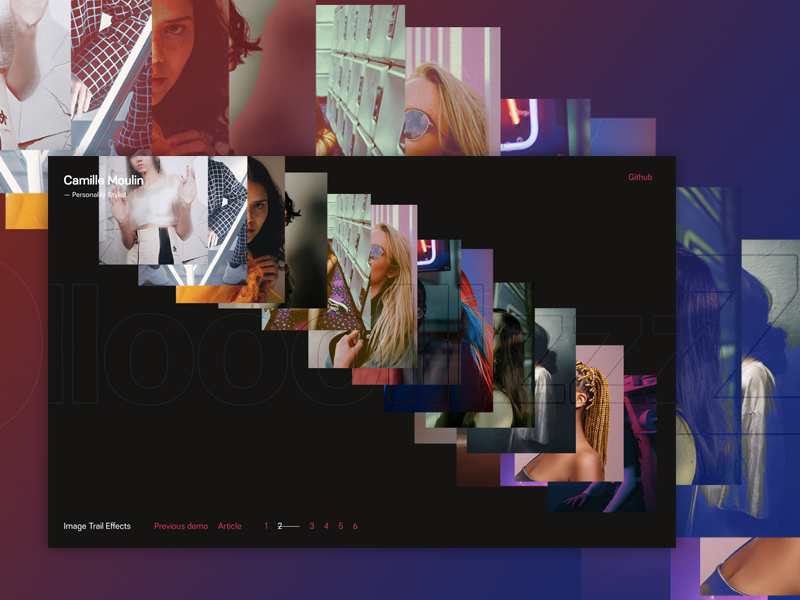
# Image Trail Effects
A set of effects for mouse-following image trails that show a random series of images. Inspired by the effect seen on [VLNC Studio](http://www.vlnc.studio/).
[Article on Codrops](https://tympanus.net/codrops/?p=42696)
[Demo](https://tympanus.net/Development/ImageTrailEffects/)
## Credits
- [TweenMax](https://greensock.com/tweenmax) by Greensock
- [imagesLoaded](https://imagesloaded.desandro.com/) by Dave DeSandro
- Images from [Unsplash.com](https://unsplash.com/)
## License
This resource can be used freely if integrated or build upon in personal or commercial projects such as websites, web apps and web templates intended for sale. It is not allowed to take the resource "as-is" and sell it, redistribute, re-publish it, or sell "pluginized" versions of it. Free plugins built using this resource should have a visible mention and link to the original work. Always consider the licenses of all included libraries, scripts and images used.
## Misc
Follow Codrops: [Twitter](http://www.twitter.com/codrops), [Facebook](http://www.facebook.com/codrops), [Google+](https://plus.google.com/101095823814290637419), [GitHub](https://github.com/codrops), [Pinterest](http://www.pinterest.com/codrops/), [Instagram](https://www.instagram.com/codropsss/)
[© Codrops 2019](http://www.codrops.com)
================================================
FILE: css/base.css
================================================
article,aside,details,figcaption,figure,footer,header,hgroup,main,nav,section,summary{display:block;}audio,canvas,video{display:inline-block;}audio:not([controls]){display:none;height:0;}[hidden]{display:none;}html{font-family:sans-serif;-ms-text-size-adjust:100%;-webkit-text-size-adjust:100%;}body{margin:0;}a:focus{outline:thin dotted;}a:active,a:hover{outline:0;}h1{font-size:2em;margin:0.67em 0;}abbr[title]{border-bottom:1px dotted;}b,strong{font-weight:bold;}dfn{font-style:italic;}hr{-moz-box-sizing:content-box;box-sizing:content-box;height:0;}mark{background:#ff0;color:#000;}code,kbd,pre,samp{font-family:monospace,serif;font-size:1em;}pre{white-space:pre-wrap;}q{quotes:"\201C" "\201D" "\2018" "\2019";}small{font-size:80%;}sub,sup{font-size:75%;line-height:0;position:relative;vertical-align:baseline;}sup{top:-0.5em;}sub{bottom:-0.25em;}img{border:0;}svg:not(:root){overflow:hidden;}figure{margin:0;}fieldset{border:1px solid #c0c0c0;margin:0 2px;padding:0.35em 0.625em 0.75em;}legend{border:0;padding:0;}button,input,select,textarea{font-family:inherit;font-size:100%;margin:0;}button,input{line-height:normal;}button,select{text-transform:none;}button,html input[type="button"],input[type="reset"],input[type="submit"]{-webkit-appearance:button;cursor:pointer;}button[disabled],html input[disabled]{cursor:default;}input[type="checkbox"],input[type="radio"]{box-sizing:border-box;padding:0;}input[type="search"]{-webkit-appearance:textfield;-moz-box-sizing:content-box;-webkit-box-sizing:content-box;box-sizing:content-box;}input[type="search"]::-webkit-search-cancel-button,input[type="search"]::-webkit-search-decoration{-webkit-appearance:none;}button::-moz-focus-inner,input::-moz-focus-inner{border:0;padding:0;}textarea{overflow:auto;vertical-align:top;}table{border-collapse:collapse;border-spacing:0;}
*,
*::after,
*::before {
box-sizing: border-box;
}
:root {
font-size: 16px;
}
html, body {
height: 100%;
}
body {
--color-text: #262523;
--color-bg: #efece5;
--color-link: #eca324;
--color-link-hover: #262523;
--color-title: #ffffff;
--img-maxwidth: 250px;
--blendmode-title: difference;
--filter-img: none;
color: var(--color-text);
background-color: var(--color-bg);
font-family: quiroh, sans-serif;
-webkit-font-smoothing: antialiased;
-moz-osx-font-smoothing: grayscale;
}
.demo-2 {
--color-text: #ffffff;
--color-bg: #151413;
--color-link: #d02d55;
--color-link-hover: #ffffff;
--color-title: #232323;
}
.demo-3 {
--color-text: #320065;
--color-bg: #d02d55;
--color-link: #ffffff;
--color-link-hover: #000000;
--color-title: #320065;
--filter-img: sepia(1) saturate(1) contrast(180%) brightness(80%) hue-rotate(295deg);
}
.demo-4 {
--color-text: #000000;
--color-bg: #e0fafb;
--color-link: #ff3a7e;
--color-link-hover: #000000;
--color-title: #f9dae5;
}
.demo-5 {
--color-text: #ffffff;
--color-bg: #485656;
--color-link: #000000;
--color-link-hover: #ffffff;
--color-title: #444c4c;
--filter-img: hue-rotate(70deg) contrast(70%);
}
.demo-6 {
--color-text: #fff;
--color-bg: #000;
--color-link: #f0f0f0;
--color-link-hover: #fff;
--color-title: #fff;
--img-maxwidth: none;
--blendmode-title: overlay;
}
/* Page Loader */
.js .loading::before {
content: '';
position: fixed;
z-index: 100000;
top: 0;
left: 0;
width: 100%;
height: 100%;
background: var(--color-bg);
}
.js .loading::after {
content: '';
position: fixed;
z-index: 100000;
top: 50%;
left: 50%;
width: 60px;
height: 60px;
margin: -30px 0 0 -30px;
pointer-events: none;
border-radius: 50%;
opacity: 0.4;
background: var(--color-link);
animation: loaderAnim 0.7s linear infinite alternate forwards;
}
@keyframes loaderAnim {
to {
opacity: 1;
transform: scale3d(0.5,0.5,1);
}
}
a {
text-decoration: none;
color: var(--color-link);
}
a:hover,
a:focus {
color: var(--color-link-hover);
outline: 0;
}
.message {
padding: 1rem;
color: var(--color-bg);
background: var(--color-text);
text-align: center;
font-weight: bold;
}
.frame {
padding: 1rem;
text-align: center;
position: relative;
z-index: 1000;
grid-area: 1 / 1 / 2 / 2;
align-self: start;
}
.frame__title {
font-size: 1rem;
margin: 0 0 1rem;
}
.frame__links {
display: inline;
}
.frame__github,
.frame__links a:not(:last-child),
.frame__demos a:not(:last-child) {
margin-right: 1rem;
}
.frame__demos {
margin: 1rem 0;
}
.frame__demo--current,
.frame__demo--current:hover {
color: var(--color-text);
text-decoration: line-through;
letter-spacing: 40px;
}
.frame__pagetitle {
margin: 3rem 0 0 0;
}
.frame__pagetitle span {
display: block;
font-weight: normal;
font-size: 0.85rem;
}
.frame__pagetitle span::before {
content: '\2015 ';
}
.content {
height: 300px;
position: relative;
display: flex;
justify-content: center;
align-items: center;
isolation: isolate;
}
.content__title {
font-family: forma-djr-display, sans-serif;
font-weight: 700;
position: relative;
z-index: 10000;
font-size: 27vw;
mix-blend-mode: var(--blendmode-title);
-webkit-text-stroke: 2px var(--color-title);
text-stroke: 2px var(--color-title);
-webkit-text-fill-color: transparent;
text-fill-color: transparent;
color: transparent;
pointer-events: none;
}
.content__img {
max-width: var(--img-maxwidth);
position: absolute;
top: 0;
left: 0;
opacity: 0;
will-change: transform;
filter: var(--filter-img);
}
.content__img--full {
width: 100%;
height: 100%;
background-size: cover;
}
@media screen and (min-width: 53em) {
:root {
font-size: 18px;
}
body {
overflow: hidden;
}
.message {
display: none;
}
.frame {
position: fixed;
text-align: left;
z-index: 10000;
top: 0;
left: 0;
display: grid;
align-content: space-between;
width: 100%;
max-width: none;
height: 100vh;
padding: 2rem;
pointer-events: none;
grid-template-columns: 75% 25%;
grid-template-rows: auto auto auto;
grid-template-areas: 'pagetitle github'
'... ...'
'title ...';
}
.frame__pagetitle {
grid-area: pagetitle;
margin: 0;
}
.frame__title-wrap {
grid-area: title;
display: flex;
}
.frame__title {
margin: 0;
font-weight: normal;
}
.frame__links {
padding: 0;
margin: 0 0 0 3rem;
justify-self: end;
}
.frame__demos {
margin: 0 0 0 3rem;
}
.frame__github {
grid-area: github;
justify-self: end;
}
.frame a {
pointer-events: auto;
}
.content {
height: 100vh;
overflow: hidden;
}
}
================================================
FILE: index.html
================================================
<!DOCTYPE html>
<html lang="en" class="no-js">
<head>
<meta charset="UTF-8" />
<meta name="viewport" content="width=device-width, initial-scale=1">
<title>Image Trail Effects | Demo 1 | Codrops</title>
<meta name="description" content="A set of fun effects for mouse-following image trails." />
<meta name="keywords" content="image trail, effect, web design, mouse, javascript, gsap" />
<meta name="author" content="Codrops" />
<link rel="shortcut icon" href="favicon.ico">
<link rel="stylesheet" href="https://use.typekit.net/lpe8txe.css">
<link rel="stylesheet" type="text/css" href="css/base.css" />
<script>document.documentElement.className="js";var supportsCssVars=function(){var e,t=document.createElement("style");return t.innerHTML="root: { --tmp-var: bold; }",document.head.appendChild(t),e=!!(window.CSS&&window.CSS.supports&&window.CSS.supports("font-weight","var(--tmp-var)")),t.parentNode.removeChild(t),e};supportsCssVars()||alert("Please view this demo in a modern browser that supports CSS Variables.");</script></head>
<body class="demo-1 loading">
<main>
<div class="message">Hover effect — please view on desktop.</div>
<div class="frame">
<div class="frame__title-wrap">
<h1 class="frame__title">Image Trail Effects</h1>
<div class="frame__links">
<a href="https://tympanus.net/Development/SmoothScrollingImageEffects/">Previous demo</a>
<a href="https://tympanus.net/codrops/?p=42696">Article</a>
</div>
<div class="frame__demos">
<a href="index.html" class="frame__demo frame__demo--current">1</a>
<a href="index2.html" class="frame__demo">2</a>
<a href="index3.html" class="frame__demo">3</a>
<a href="index4.html" class="frame__demo">4</a>
<a href="index5.html" class="frame__demo">5</a>
<a href="index6.html" class="frame__demo">6</a>
</div>
</div>
<a class="frame__github" href="https://github.com/codrops/ImageTrailEffects/">Github</a>
<h2 class="frame__pagetitle">Camille Moulin <span>Personality Stylist</span></h2>
</div>
<div class="content">
<img class="content__img" src="img/1.jpg" alt="Some image" />
<img class="content__img" src="img/2.jpg" alt="Some image" />
<img class="content__img" src="img/3.jpg" alt="Some image" />
<img class="content__img" src="img/4.jpg" alt="Some image" />
<img class="content__img" src="img/5.jpg" alt="Some image" />
<img class="content__img" src="img/6.jpg" alt="Some image" />
<img class="content__img" src="img/7.jpg" alt="Some image" />
<img class="content__img" src="img/8.jpg" alt="Some image" />
<img class="content__img" src="img/9.jpg" alt="Some image" />
<img class="content__img" src="img/10.jpg" alt="Some image" />
<img class="content__img" src="img/11.jpg" alt="Some image" />
<img class="content__img" src="img/12.jpg" alt="Some image" />
<img class="content__img" src="img/13.jpg" alt="Some image" />
<img class="content__img" src="img/14.jpg" alt="Some image" />
<img class="content__img" src="img/15.jpg" alt="Some image" />
<h3 class="content__title">llssmmhh</h3>
</div><!--/content-->
</main>
<script src="js/imagesloaded.pkgd.min.js"></script>
<script src="js/TweenMax.min.js"></script>
<script src="js/demo.js"></script></body>
</html>
================================================
FILE: index2.html
================================================
<!DOCTYPE html>
<html lang="en" class="no-js">
<head>
<meta charset="UTF-8" />
<meta name="viewport" content="width=device-width, initial-scale=1">
<title>Image Trail Effects | Demo 2 | Codrops</title>
<meta name="description" content="A set of fun effects for mouse-following image trails." />
<meta name="keywords" content="image trail, effect, web design, mouse, javascript, gsap" />
<meta name="author" content="Codrops" />
<link rel="shortcut icon" href="favicon.ico">
<link rel="stylesheet" href="https://use.typekit.net/lpe8txe.css">
<link rel="stylesheet" type="text/css" href="css/base.css" />
<script>document.documentElement.className="js";var supportsCssVars=function(){var e,t=document.createElement("style");return t.innerHTML="root: { --tmp-var: bold; }",document.head.appendChild(t),e=!!(window.CSS&&window.CSS.supports&&window.CSS.supports("font-weight","var(--tmp-var)")),t.parentNode.removeChild(t),e};supportsCssVars()||alert("Please view this demo in a modern browser that supports CSS Variables.");</script></head>
<body class="demo-2 loading">
<main>
<div class="message">Hover effect — please view on desktop.</div>
<div class="frame">
<div class="frame__title-wrap">
<h1 class="frame__title">Image Trail Effects</h1>
<div class="frame__links">
<a href="https://tympanus.net/Development/SmoothScrollingImageEffects/">Previous demo</a>
<a href="https://tympanus.net/codrops/?p=42696">Article</a>
</div>
<div class="frame__demos">
<a href="index.html" class="frame__demo">1</a>
<a href="index2.html" class="frame__demo frame__demo--current">2</a>
<a href="index3.html" class="frame__demo">3</a>
<a href="index4.html" class="frame__demo">4</a>
<a href="index5.html" class="frame__demo">5</a>
<a href="index6.html" class="frame__demo">6</a>
</div>
</div>
<a class="frame__github" href="https://github.com/codrops/ImageTrailEffects/">Github</a>
<h2 class="frame__pagetitle">Camille Moulin <span>Personality Stylist</span></h2>
</div>
<div class="content">
<img class="content__img" src="img/1.jpg" alt="Some image" />
<img class="content__img" src="img/2.jpg" alt="Some image" />
<img class="content__img" src="img/3.jpg" alt="Some image" />
<img class="content__img" src="img/4.jpg" alt="Some image" />
<img class="content__img" src="img/5.jpg" alt="Some image" />
<img class="content__img" src="img/6.jpg" alt="Some image" />
<img class="content__img" src="img/7.jpg" alt="Some image" />
<img class="content__img" src="img/8.jpg" alt="Some image" />
<img class="content__img" src="img/9.jpg" alt="Some image" />
<img class="content__img" src="img/10.jpg" alt="Some image" />
<img class="content__img" src="img/11.jpg" alt="Some image" />
<img class="content__img" src="img/12.jpg" alt="Some image" />
<img class="content__img" src="img/13.jpg" alt="Some image" />
<img class="content__img" src="img/14.jpg" alt="Some image" />
<img class="content__img" src="img/15.jpg" alt="Some image" />
<h3 class="content__title">lllooolllzzz</h3>
</div><!--/content-->
</main>
<script src="js/imagesloaded.pkgd.min.js"></script>
<script src="js/TweenMax.min.js"></script>
<script src="js/demo2.js"></script></body>
</html>
================================================
FILE: index3.html
================================================
<!DOCTYPE html>
<html lang="en" class="no-js">
<head>
<meta charset="UTF-8" />
<meta name="viewport" content="width=device-width, initial-scale=1">
<title>Image Trail Effects | Demo 3 | Codrops</title>
<meta name="description" content="A set of fun effects for mouse-following image trails." />
<meta name="keywords" content="image trail, effect, web design, mouse, javascript, gsap" />
<meta name="author" content="Codrops" />
<link rel="shortcut icon" href="favicon.ico">
<link rel="stylesheet" href="https://use.typekit.net/lpe8txe.css">
<link rel="stylesheet" type="text/css" href="css/base.css" />
<script>document.documentElement.className="js";var supportsCssVars=function(){var e,t=document.createElement("style");return t.innerHTML="root: { --tmp-var: bold; }",document.head.appendChild(t),e=!!(window.CSS&&window.CSS.supports&&window.CSS.supports("font-weight","var(--tmp-var)")),t.parentNode.removeChild(t),e};supportsCssVars()||alert("Please view this demo in a modern browser that supports CSS Variables.");</script></head>
<body class="demo-3 loading">
<main>
<div class="message">Hover effect — please view on desktop.</div>
<div class="frame">
<div class="frame__title-wrap">
<h1 class="frame__title">Image Trail Effects</h1>
<div class="frame__links">
<a href="https://tympanus.net/Development/SmoothScrollingImageEffects/">Previous demo</a>
<a href="https://tympanus.net/codrops/?p=42696">Article</a>
</div>
<div class="frame__demos">
<a href="index.html" class="frame__demo">1</a>
<a href="index2.html" class="frame__demo">2</a>
<a href="index3.html" class="frame__demo frame__demo--current">3</a>
<a href="index4.html" class="frame__demo">4</a>
<a href="index5.html" class="frame__demo">5</a>
<a href="index6.html" class="frame__demo">6</a>
</div>
</div>
<a class="frame__github" href="https://github.com/codrops/ImageTrailEffects/">Github</a>
<h2 class="frame__pagetitle">Camille Moulin <span>Personality Stylist</span></h2>
</div>
<div class="content">
<img class="content__img" src="img/1.jpg" alt="Some image" />
<img class="content__img" src="img/2.jpg" alt="Some image" />
<img class="content__img" src="img/3.jpg" alt="Some image" />
<img class="content__img" src="img/4.jpg" alt="Some image" />
<img class="content__img" src="img/5.jpg" alt="Some image" />
<img class="content__img" src="img/6.jpg" alt="Some image" />
<img class="content__img" src="img/7.jpg" alt="Some image" />
<img class="content__img" src="img/8.jpg" alt="Some image" />
<img class="content__img" src="img/9.jpg" alt="Some image" />
<img class="content__img" src="img/10.jpg" alt="Some image" />
<img class="content__img" src="img/11.jpg" alt="Some image" />
<img class="content__img" src="img/12.jpg" alt="Some image" />
<img class="content__img" src="img/13.jpg" alt="Some image" />
<img class="content__img" src="img/14.jpg" alt="Some image" />
<img class="content__img" src="img/15.jpg" alt="Some image" />
<h3 class="content__title">oommgg</h3>
</div><!--/content-->
</main>
<script src="js/imagesloaded.pkgd.min.js"></script>
<script src="js/TweenMax.min.js"></script>
<script src="js/demo3.js"></script></body>
</html>
================================================
FILE: index4.html
================================================
<!DOCTYPE html>
<html lang="en" class="no-js">
<head>
<meta charset="UTF-8" />
<meta name="viewport" content="width=device-width, initial-scale=1">
<title>Image Trail Effects | Demo 4 | Codrops</title>
<meta name="description" content="A set of fun effects for mouse-following image trails." />
<meta name="keywords" content="image trail, effect, web design, mouse, javascript, gsap" />
<meta name="author" content="Codrops" />
<link rel="shortcut icon" href="favicon.ico">
<link rel="stylesheet" href="https://use.typekit.net/lpe8txe.css">
<link rel="stylesheet" type="text/css" href="css/base.css" />
<script>document.documentElement.className="js";var supportsCssVars=function(){var e,t=document.createElement("style");return t.innerHTML="root: { --tmp-var: bold; }",document.head.appendChild(t),e=!!(window.CSS&&window.CSS.supports&&window.CSS.supports("font-weight","var(--tmp-var)")),t.parentNode.removeChild(t),e};supportsCssVars()||alert("Please view this demo in a modern browser that supports CSS Variables.");</script></head>
<body class="demo-4 loading">
<main>
<div class="message">Hover effect — please view on desktop.</div>
<div class="frame">
<div class="frame__title-wrap">
<h1 class="frame__title">Image Trail Effects</h1>
<div class="frame__links">
<a href="https://tympanus.net/Development/SmoothScrollingImageEffects/">Previous demo</a>
<a href="https://tympanus.net/codrops/?p=42696">Article</a>
</div>
<div class="frame__demos">
<a href="index.html" class="frame__demo">1</a>
<a href="index2.html" class="frame__demo">2</a>
<a href="index3.html" class="frame__demo">3</a>
<a href="index4.html" class="frame__demo frame__demo--current">4</a>
<a href="index5.html" class="frame__demo">5</a>
<a href="index6.html" class="frame__demo">6</a>
</div>
</div>
<a class="frame__github" href="https://github.com/codrops/ImageTrailEffects/">Github</a>
<h2 class="frame__pagetitle">Camille Moulin <span>Personality Stylist</span></h2>
</div>
<div class="content">
<img class="content__img" src="img/1.jpg" alt="Some image" />
<img class="content__img" src="img/2.jpg" alt="Some image" />
<img class="content__img" src="img/3.jpg" alt="Some image" />
<img class="content__img" src="img/4.jpg" alt="Some image" />
<img class="content__img" src="img/5.jpg" alt="Some image" />
<img class="content__img" src="img/6.jpg" alt="Some image" />
<img class="content__img" src="img/7.jpg" alt="Some image" />
<img class="content__img" src="img/8.jpg" alt="Some image" />
<img class="content__img" src="img/9.jpg" alt="Some image" />
<img class="content__img" src="img/10.jpg" alt="Some image" />
<img class="content__img" src="img/11.jpg" alt="Some image" />
<img class="content__img" src="img/12.jpg" alt="Some image" />
<img class="content__img" src="img/13.jpg" alt="Some image" />
<img class="content__img" src="img/14.jpg" alt="Some image" />
<img class="content__img" src="img/15.jpg" alt="Some image" />
<h3 class="content__title">bingbong</h3>
</div><!--/content-->
</main>
<script src="js/imagesloaded.pkgd.min.js"></script>
<script src="js/TweenMax.min.js"></script>
<script src="js/demo4.js"></script></body>
</html>
================================================
FILE: index5.html
================================================
<!DOCTYPE html>
<html lang="en" class="no-js">
<head>
<meta charset="UTF-8" />
<meta name="viewport" content="width=device-width, initial-scale=1">
<title>Image Trail Effects | Demo 5 | Codrops</title>
<meta name="description" content="A set of fun effects for mouse-following image trails." />
<meta name="keywords" content="image trail, effect, web design, mouse, javascript, gsap" />
<meta name="author" content="Codrops" />
<link rel="shortcut icon" href="favicon.ico">
<link rel="stylesheet" href="https://use.typekit.net/lpe8txe.css">
<link rel="stylesheet" type="text/css" href="css/base.css" />
<script>document.documentElement.className="js";var supportsCssVars=function(){var e,t=document.createElement("style");return t.innerHTML="root: { --tmp-var: bold; }",document.head.appendChild(t),e=!!(window.CSS&&window.CSS.supports&&window.CSS.supports("font-weight","var(--tmp-var)")),t.parentNode.removeChild(t),e};supportsCssVars()||alert("Please view this demo in a modern browser that supports CSS Variables.");</script></head>
<body class="demo-5 loading">
<main>
<div class="message">Hover effect — please view on desktop.</div>
<div class="frame">
<div class="frame__title-wrap">
<h1 class="frame__title">Image Trail Effects</h1>
<div class="frame__links">
<a href="https://tympanus.net/Development/SmoothScrollingImageEffects/">Previous demo</a>
<a href="https://tympanus.net/codrops/?p=42696">Article</a>
</div>
<div class="frame__demos">
<a href="index.html" class="frame__demo">1</a>
<a href="index2.html" class="frame__demo">2</a>
<a href="index3.html" class="frame__demo">3</a>
<a href="index4.html" class="frame__demo">4</a>
<a href="index5.html" class="frame__demo frame__demo--current">5</a>
<a href="index6.html" class="frame__demo">6</a>
</div>
</div>
<a class="frame__github" href="https://github.com/codrops/ImageTrailEffects/">Github</a>
<h2 class="frame__pagetitle">Camille Moulin <span>Personality Stylist</span></h2>
</div>
<div class="content">
<img class="content__img" src="img/1.jpg" alt="Some image" />
<img class="content__img" src="img/2.jpg" alt="Some image" />
<img class="content__img" src="img/3.jpg" alt="Some image" />
<img class="content__img" src="img/4.jpg" alt="Some image" />
<img class="content__img" src="img/5.jpg" alt="Some image" />
<img class="content__img" src="img/6.jpg" alt="Some image" />
<img class="content__img" src="img/7.jpg" alt="Some image" />
<img class="content__img" src="img/8.jpg" alt="Some image" />
<img class="content__img" src="img/9.jpg" alt="Some image" />
<img class="content__img" src="img/10.jpg" alt="Some image" />
<img class="content__img" src="img/11.jpg" alt="Some image" />
<img class="content__img" src="img/12.jpg" alt="Some image" />
<img class="content__img" src="img/13.jpg" alt="Some image" />
<img class="content__img" src="img/14.jpg" alt="Some image" />
<img class="content__img" src="img/15.jpg" alt="Some image" />
<h3 class="content__title">duhsduh</h3>
</div><!--/content-->
</main>
<script src="js/imagesloaded.pkgd.min.js"></script>
<script src="js/TweenMax.min.js"></script>
<script src="js/demo5.js"></script></body>
</html>
================================================
FILE: index6.html
================================================
<!DOCTYPE html>
<html lang="en" class="no-js">
<head>
<meta charset="UTF-8" />
<meta name="viewport" content="width=device-width, initial-scale=1">
<title>Image Trail Effects | Demo 6 | Codrops</title>
<meta name="description" content="A set of fun effects for mouse-following image trails." />
<meta name="keywords" content="image trail, effect, web design, mouse, javascript, gsap" />
<meta name="author" content="Codrops" />
<link rel="shortcut icon" href="favicon.ico">
<link rel="stylesheet" href="https://use.typekit.net/lpe8txe.css">
<link rel="stylesheet" type="text/css" href="css/base.css" />
<script>document.documentElement.className="js";var supportsCssVars=function(){var e,t=document.createElement("style");return t.innerHTML="root: { --tmp-var: bold; }",document.head.appendChild(t),e=!!(window.CSS&&window.CSS.supports&&window.CSS.supports("font-weight","var(--tmp-var)")),t.parentNode.removeChild(t),e};supportsCssVars()||alert("Please view this demo in a modern browser that supports CSS Variables.");</script></head>
<body class="demo-6 loading">
<main>
<div class="message">Hover effect — please view on desktop.</div>
<div class="frame">
<div class="frame__title-wrap">
<h1 class="frame__title">Image Trail Effects</h1>
<div class="frame__links">
<a href="https://tympanus.net/Development/SmoothScrollingImageEffects/">Previous demo</a>
<a href="https://tympanus.net/codrops/?p=42696">Article</a>
</div>
<div class="frame__demos">
<a href="index.html" class="frame__demo">1</a>
<a href="index2.html" class="frame__demo">2</a>
<a href="index3.html" class="frame__demo">3</a>
<a href="index4.html" class="frame__demo">4</a>
<a href="index5.html" class="frame__demo">5</a>
<a href="index6.html" class="frame__demo frame__demo--current">6</a>
</div>
</div>
<a class="frame__github" href="https://github.com/codrops/ImageTrailEffects/">Github</a>
<h2 class="frame__pagetitle">Camille Moulin <span>Personality Stylist</span></h2>
</div>
<div class="content">
<div class="content__img content__img--full" style="background-image:url(img/full1.jpg);"></div>
<div class="content__img content__img--full" style="background-image:url(img/full2.jpg);"></div>
<div class="content__img content__img--full" style="background-image:url(img/full3.jpg);"></div>
<div class="content__img content__img--full" style="background-image:url(img/full4.jpg);"></div>
<div class="content__img content__img--full" style="background-image:url(img/full5.jpg);"></div>
<div class="content__img content__img--full" style="background-image:url(img/full6.jpg);"></div>
<div class="content__img content__img--full" style="background-image:url(img/full7.jpg);"></div>
<div class="content__img content__img--full" style="background-image:url(img/full8.jpg);"></div>
<div class="content__img content__img--full" style="background-image:url(img/full9.jpg);"></div>
<h3 class="content__title">xmxmxmx</h3>
</div><!--/content-->
</main>
<script src="js/imagesloaded.pkgd.min.js"></script>
<script src="js/TweenMax.min.js"></script>
<script src="js/demo6.js"></script></body>
</html>
================================================
FILE: js/demo.js
================================================
/**
* demo.js
* http://www.codrops.com
*
* Licensed under the MIT license.
* http://www.opensource.org/licenses/mit-license.php
*
* Copyright 2019, Codrops
* http://www.codrops.com
*/
{
// body element
const body = document.body;
// helper functions
const MathUtils = {
// linear interpolation
lerp: (a, b, n) => (1 - n) * a + n * b,
// distance between two points
distance: (x1,y1,x2,y2) => Math.hypot(x2-x1, y2-y1)
}
// get the mouse position
const getMousePos = (ev) => {
let posx = 0;
let posy = 0;
if (!ev) ev = window.event;
if (ev.pageX || ev.pageY) {
posx = ev.pageX;
posy = ev.pageY;
}
else if (ev.clientX || ev.clientY) {
posx = ev.clientX + body.scrollLeft + docEl.scrollLeft;
posy = ev.clientY + body.scrollTop + docEl.scrollTop;
}
return {x: posx, y: posy};
}
// mousePos: current mouse position
// cacheMousePos: previous mouse position
// lastMousePos: last last recorded mouse position (at the time the last image was shown)
let mousePos = lastMousePos = cacheMousePos = {x: 0, y: 0};
// update the mouse position
window.addEventListener('mousemove', ev => mousePos = getMousePos(ev));
// gets the distance from the current mouse position to the last recorded mouse position
const getMouseDistance = () => MathUtils.distance(mousePos.x,mousePos.y,lastMousePos.x,lastMousePos.y);
class Image {
constructor(el) {
this.DOM = {el: el};
// image deafult styles
this.defaultStyle = {
scale: 1,
x: 0,
y: 0,
opacity: 0
};
// get sizes/position
this.getRect();
// init/bind events
this.initEvents();
}
initEvents() {
// on resize get updated sizes/position
window.addEventListener('resize', () => this.resize());
}
resize() {
// reset styles
TweenMax.set(this.DOM.el, this.defaultStyle);
// get sizes/position
this.getRect();
}
getRect() {
this.rect = this.DOM.el.getBoundingClientRect();
}
isActive() {
// check if image is animating or if it's visible
return TweenMax.isTweening(this.DOM.el) || this.DOM.el.style.opacity != 0;
}
}
class ImageTrail {
constructor() {
// images container
this.DOM = {content: document.querySelector('.content')};
// array of Image objs, one per image element
this.images = [];
[...this.DOM.content.querySelectorAll('img')].forEach(img => this.images.push(new Image(img)));
// total number of images
this.imagesTotal = this.images.length;
// upcoming image index
this.imgPosition = 0;
// zIndex value to apply to the upcoming image
this.zIndexVal = 1;
// mouse distance required to show the next image
this.threshold = 100;
// render the images
requestAnimationFrame(() => this.render());
}
render() {
// get distance between the current mouse position and the position of the previous image
let distance = getMouseDistance();
// cache previous mouse position
cacheMousePos.x = MathUtils.lerp(cacheMousePos.x || mousePos.x, mousePos.x, 0.1);
cacheMousePos.y = MathUtils.lerp(cacheMousePos.y || mousePos.y, mousePos.y, 0.1);
// if the mouse moved more than [this.threshold] then show the next image
if ( distance > this.threshold ) {
this.showNextImage();
++this.zIndexVal;
this.imgPosition = this.imgPosition < this.imagesTotal-1 ? this.imgPosition+1 : 0;
lastMousePos = mousePos;
}
// check when mousemove stops and all images are inactive (not visible and not animating)
let isIdle = true;
for (let img of this.images) {
if ( img.isActive() ) {
isIdle = false;
break;
}
}
// reset z-index initial value
if ( isIdle && this.zIndexVal !== 1 ) {
this.zIndexVal = 1;
}
// loop..
requestAnimationFrame(() => this.render());
}
showNextImage() {
// show image at position [this.imgPosition]
const img = this.images[this.imgPosition];
// kill any tween on the image
TweenMax.killTweensOf(img.DOM.el);
new TimelineMax()
// show the image
.set(img.DOM.el, {
startAt: {opacity: 0, scale: 1},
opacity: 1,
scale: 1,
zIndex: this.zIndexVal,
x: cacheMousePos.x - img.rect.width/2,
y: cacheMousePos.y - img.rect.height/2
}, 0)
// animate position
.to(img.DOM.el, 0.9, {
ease: Expo.easeOut,
x: mousePos.x - img.rect.width/2,
y: mousePos.y - img.rect.height/2
}, 0)
// then make it disappear
.to(img.DOM.el, 1, {
ease: Power1.easeOut,
opacity: 0
}, 0.4)
// scale down the image
.to(img.DOM.el, 1, {
ease: Quint.easeOut,
scale: 0.2
}, 0.4);
}
}
/***********************************/
/********** Preload stuff **********/
// Preload images
const preloadImages = () => {
return new Promise((resolve, reject) => {
imagesLoaded(document.querySelectorAll('.content__img'), resolve);
});
};
// And then..
preloadImages().then(() => {
// Remove the loader
document.body.classList.remove('loading');
new ImageTrail();
});
}
================================================
FILE: js/demo2.js
================================================
/**
* demo2.js
* http://www.codrops.com
*
* Licensed under the MIT license.
* http://www.opensource.org/licenses/mit-license.php
*
* Copyright 2019, Codrops
* http://www.codrops.com
*/
{
// body element
const body = document.body;
// helper functions
const MathUtils = {
// linear interpolation
lerp: (a, b, n) => (1 - n) * a + n * b,
// distance between two points
distance: (x1,y1,x2,y2) => Math.hypot(x2-x1, y2-y1)
}
// get the mouse position
const getMousePos = (ev) => {
let posx = 0;
let posy = 0;
if (!ev) ev = window.event;
if (ev.pageX || ev.pageY) {
posx = ev.pageX;
posy = ev.pageY;
}
else if (ev.clientX || ev.clientY) {
posx = ev.clientX + body.scrollLeft + docEl.scrollLeft;
posy = ev.clientY + body.scrollTop + docEl.scrollTop;
}
return {x: posx, y: posy};
}
// mousePos: current mouse position
// cacheMousePos: previous mouse position
// lastMousePos: last last recorded mouse position (at the time the last image was shown)
let mousePos = lastMousePos = cacheMousePos = {x: 0, y: 0};
// update the mouse position
window.addEventListener('mousemove', ev => mousePos = getMousePos(ev));
// gets the distance from the current mouse position to the last recorded mouse position
const getMouseDistance = () => MathUtils.distance(mousePos.x,mousePos.y,lastMousePos.x,lastMousePos.y);
class Image {
constructor(el) {
this.DOM = {el: el};
// image deafult styles
this.defaultStyle = {
x: 0,
y: 0,
opacity: 0
};
// get sizes/position
this.getRect();
// init/bind events
this.initEvents();
}
initEvents() {
// on resize get updated sizes/position
window.addEventListener('resize', () => this.resize());
}
resize() {
// reset styles
TweenMax.set(this.DOM.el, this.defaultStyle);
// get sizes/position
this.getRect();
}
getRect() {
this.rect = this.DOM.el.getBoundingClientRect();
}
isActive() {
// check if image is animating or if it's visible
return TweenMax.isTweening(this.DOM.el) || this.DOM.el.style.opacity != 0;
}
}
class ImageTrail {
constructor() {
// images container
this.DOM = {content: document.querySelector('.content')};
// array of Image objs, one per image element
this.images = [];
[...this.DOM.content.querySelectorAll('img')].forEach(img => this.images.push(new Image(img)));
// total number of images
this.imagesTotal = this.images.length;
// upcoming image index
this.imgPosition = 0;
// zIndex value to apply to the upcoming image
this.zIndexVal = 1;
// mouse distance required to show the next image
this.threshold = 100;
// render the images
requestAnimationFrame(() => this.render());
}
render() {
// get distance between the current mouse position and the position of the previous image
let distance = getMouseDistance();
// cache previous mouse position
cacheMousePos.x = MathUtils.lerp(cacheMousePos.x || mousePos.x, mousePos.x, 0.1);
cacheMousePos.y = MathUtils.lerp(cacheMousePos.y || mousePos.y, mousePos.y, 0.1);
// if the mouse moved more than [this.threshold] then show the next image
if ( distance > this.threshold ) {
this.showNextImage();
++this.zIndexVal;
this.imgPosition = this.imgPosition < this.imagesTotal-1 ? this.imgPosition+1 : 0;
lastMousePos = mousePos;
}
// check when mousemove stops and all images are inactive (not visible and not animating)
let isIdle = true;
for (let img of this.images) {
if ( img.isActive() ) {
isIdle = false;
break;
}
}
// reset z-index initial value
if ( isIdle && this.zIndexVal !== 1 ) {
this.zIndexVal = 1;
}
// loop..
requestAnimationFrame(() => this.render());
}
showNextImage() {
// show image at position [this.imgPosition]
const img = this.images[this.imgPosition];
// kill any tween on the image
TweenMax.killTweensOf(img.DOM.el);
new TimelineMax()
// show the image
.set(img.DOM.el, {
startAt: {opacity: 0},
opacity: 1,
scale: 1,
zIndex: this.zIndexVal,
x: cacheMousePos.x - img.rect.width/2,
y: cacheMousePos.y - img.rect.height/2
}, 0)
// animate position
.to(img.DOM.el, 1.8, {
ease: Expo.easeOut,
x: mousePos.x - img.rect.width/2,
y: mousePos.y - img.rect.height/2
}, 0)
// then make it disappear
.to(img.DOM.el, 0.8, {
ease: Power1.easeOut,
opacity: 0
}, 0.8)
// scale down the image
.to(img.DOM.el, 0.8, {
ease: Quint.easeInOut,
scale: 2
}, 0.8);
}
}
/***********************************/
/********** Preload stuff **********/
// Preload images
const preloadImages = () => {
return new Promise((resolve, reject) => {
imagesLoaded(document.querySelectorAll('.content__img'), resolve);
});
};
// And then..
preloadImages().then(() => {
// Remove the loader
document.body.classList.remove('loading');
new ImageTrail();
});
}
================================================
FILE: js/demo3.js
================================================
/**
* demo3.js
* http://www.codrops.com
*
* Licensed under the MIT license.
* http://www.opensource.org/licenses/mit-license.php
*
* Copyright 2019, Codrops
* http://www.codrops.com
*/
{
// body element
const body = document.body;
// helper functions
const MathUtils = {
// linear interpolation
lerp: (a, b, n) => (1 - n) * a + n * b,
// distance between two points
distance: (x1,y1,x2,y2) => Math.hypot(x2-x1, y2-y1)
}
// calculate the viewport size
let winsize;
const calcWinsize = () => winsize = {width: window.innerWidth, height: window.innerHeight};
calcWinsize();
// and recalculate on resize
window.addEventListener('resize', calcWinsize);
// get the mouse position
const getMousePos = (ev) => {
let posx = 0;
let posy = 0;
if (!ev) ev = window.event;
if (ev.pageX || ev.pageY) {
posx = ev.pageX;
posy = ev.pageY;
}
else if (ev.clientX || ev.clientY) {
posx = ev.clientX + body.scrollLeft + docEl.scrollLeft;
posy = ev.clientY + body.scrollTop + docEl.scrollTop;
}
return {x: posx, y: posy};
}
// mousePos: current mouse position
// cacheMousePos: previous mouse position
// lastMousePos: last last recorded mouse position (at the time the last image was shown)
let mousePos = lastMousePos = cacheMousePos = {x: 0, y: 0};
// update the mouse position
window.addEventListener('mousemove', ev => mousePos = getMousePos(ev));
// gets the distance from the current mouse position to the last recorded mouse position
const getMouseDistance = () => MathUtils.distance(mousePos.x,mousePos.y,lastMousePos.x,lastMousePos.y);
class Image {
constructor(el) {
this.DOM = {el: el};
// image deafult styles
this.defaultStyle = {
x: 0,
y: 0,
opacity: 0
};
// get sizes/position
this.getRect();
// init/bind events
this.initEvents();
}
initEvents() {
// on resize get updated sizes/position
window.addEventListener('resize', () => this.resize());
}
resize() {
// reset styles
TweenMax.set(this.DOM.el, this.defaultStyle);
// get sizes/position
this.getRect();
}
getRect() {
this.rect = this.DOM.el.getBoundingClientRect();
}
isActive() {
// check if image is animating or if it's visible
return TweenMax.isTweening(this.DOM.el) || this.DOM.el.style.opacity != 0;
}
}
class ImageTrail {
constructor() {
// images container
this.DOM = {content: document.querySelector('.content')};
// array of Image objs, one per image element
this.images = [];
[...this.DOM.content.querySelectorAll('img')].forEach(img => this.images.push(new Image(img)));
// total number of images
this.imagesTotal = this.images.length;
// upcoming image index
this.imgPosition = 0;
// zIndex value to apply to the upcoming image
this.zIndexVal = 1;
// mouse distance required to show the next image
this.threshold = 50;
// render the images
requestAnimationFrame(() => this.render());
}
render() {
// get distance between the current mouse position and the position of the previous image
let distance = getMouseDistance();
// cache previous mouse position
cacheMousePos.x = MathUtils.lerp(cacheMousePos.x || mousePos.x, mousePos.x, 0.1);
cacheMousePos.y = MathUtils.lerp(cacheMousePos.y || mousePos.y, mousePos.y, 0.1);
// if the mouse moved more than [this.threshold] then show the next image
if ( distance > this.threshold ) {
this.showNextImage();
++this.zIndexVal;
this.imgPosition = this.imgPosition < this.imagesTotal-1 ? this.imgPosition+1 : 0;
lastMousePos = mousePos;
}
// check when mousemove stops and all images are inactive (not visible and not animating)
let isIdle = true;
for (let img of this.images) {
if ( img.isActive() ) {
isIdle = false;
break;
}
}
// reset z-index initial value
if ( isIdle && this.zIndexVal !== 1 ) {
this.zIndexVal = 1;
}
// loop..
requestAnimationFrame(() => this.render());
}
showNextImage() {
// show image at position [this.imgPosition]
const img = this.images[this.imgPosition];
// kill any tween on the image
TweenMax.killTweensOf(img.DOM.el);
new TimelineMax()
// show the image
.set(img.DOM.el, {
startAt: {opacity: 0},
opacity: 1,
zIndex: this.zIndexVal,
x: cacheMousePos.x - img.rect.width/2,
y: cacheMousePos.y - img.rect.height/2
}, 0)
// animate position
.to(img.DOM.el, 1.6, {
ease: Expo.easeOut,
x: mousePos.x - img.rect.width/2,
y: mousePos.y - img.rect.height/2
}, 0)
// then make it disappear
.to(img.DOM.el, 1, {
ease: Power1.easeOut,
opacity: 0
}, 0.4)
// translate down the image
.to(img.DOM.el, 1, {
ease: Quint.easeInOut,
y: `+=${winsize.height + img.rect.height/2}`
}, 0.4);
}
}
/***********************************/
/********** Preload stuff **********/
// Preload images
const preloadImages = () => {
return new Promise((resolve, reject) => {
imagesLoaded(document.querySelectorAll('.content__img'), resolve);
});
};
// And then..
preloadImages().then(() => {
// Remove the loader
document.body.classList.remove('loading');
new ImageTrail();
});
}
================================================
FILE: js/demo4.js
================================================
/**
* demo4.js
* http://www.codrops.com
*
* Licensed under the MIT license.
* http://www.opensource.org/licenses/mit-license.php
*
* Copyright 2019, Codrops
* http://www.codrops.com
*/
{
// body element
const body = document.body;
// helper functions
const MathUtils = {
// linear interpolation
lerp: (a, b, n) => (1 - n) * a + n * b,
// distance between two points
distance: (x1,y1,x2,y2) => Math.hypot(x2-x1, y2-y1),
// Random float
getRandomFloat: (min, max) => (Math.random() * (max - min) + min).toFixed(2)
}
// calculate the viewport size
let winsize;
const calcWinsize = () => winsize = {width: window.innerWidth, height: window.innerHeight};
calcWinsize();
// and recalculate on resize
window.addEventListener('resize', calcWinsize);
// get the mouse position
const getMousePos = (ev) => {
let posx = 0;
let posy = 0;
if (!ev) ev = window.event;
if (ev.pageX || ev.pageY) {
posx = ev.pageX;
posy = ev.pageY;
}
else if (ev.clientX || ev.clientY) {
posx = ev.clientX + body.scrollLeft + docEl.scrollLeft;
posy = ev.clientY + body.scrollTop + docEl.scrollTop;
}
return {x: posx, y: posy};
}
// mousePos: current mouse position
// cacheMousePos: previous mouse position
// lastMousePos: last last recorded mouse position (at the time the last image was shown)
let mousePos = lastMousePos = cacheMousePos = {x: 0, y: 0};
// update the mouse position
window.addEventListener('mousemove', ev => mousePos = getMousePos(ev));
// gets the distance from the current mouse position to the last recorded mouse position
const getMouseDistance = () => MathUtils.distance(mousePos.x,mousePos.y,lastMousePos.x,lastMousePos.y);
class Image {
constructor(el) {
this.DOM = {el: el};
// image deafult styles
this.defaultStyle = {
rotation: 0,
x: 0,
y: 0,
opacity: 0
};
// get sizes/position
this.getRect();
// init/bind events
this.initEvents();
}
initEvents() {
// on resize get updated sizes/position
window.addEventListener('resize', () => this.resize());
}
resize() {
// reset styles
TweenMax.set(this.DOM.el, this.defaultStyle);
// get sizes/position
this.getRect();
}
getRect() {
this.rect = this.DOM.el.getBoundingClientRect();
}
isActive() {
// check if image is animating or if it's visible
return TweenMax.isTweening(this.DOM.el) || this.DOM.el.style.opacity != 0;
}
setRatio() {
this.DOM.el.style.setProperty('--img-maxwidth', `${MathUtils.getRandomFloat(150,350)}px`);
// get sizes/position
this.getRect();
}
}
class ImageTrail {
constructor() {
// images container
this.DOM = {content: document.querySelector('.content')};
// array of Image objs, one per image element
this.images = [];
[...this.DOM.content.querySelectorAll('img')].forEach(img => this.images.push(new Image(img)));
// total number of images
this.imagesTotal = this.images.length;
// upcoming image index
this.imgPosition = 0;
// zIndex value to apply to the upcoming image
this.zIndexVal = 1;
// mouse distance required to show the next image
this.threshold = 80;
// render the images
requestAnimationFrame(() => this.render());
}
render() {
// get distance between the current mouse position and the position of the previous image
let distance = getMouseDistance();
// cache previous mouse position
cacheMousePos.x = MathUtils.lerp(cacheMousePos.x || mousePos.x, mousePos.x, 0.1);
cacheMousePos.y = MathUtils.lerp(cacheMousePos.y || mousePos.y, mousePos.y, 0.1);
// if the mouse moved more than [this.threshold] then show the next image
if ( distance > this.threshold ) {
this.showNextImage();
++this.zIndexVal;
this.imgPosition = this.imgPosition < this.imagesTotal-1 ? this.imgPosition+1 : 0;
lastMousePos = mousePos;
}
// check when mousemove stops and all images are inactive (not visible and not animating)
let isIdle = true;
for (let img of this.images) {
if ( img.isActive() ) {
isIdle = false;
break;
}
}
// reset z-index initial value
if ( isIdle && this.zIndexVal !== 1 ) {
this.zIndexVal = 1;
}
// loop..
requestAnimationFrame(() => this.render());
}
showNextImage() {
// show image at position [this.imgPosition]
const img = this.images[this.imgPosition];
img.setRatio();
// kill any tween on the image
TweenMax.killTweensOf(img.DOM.el);
new TimelineMax()
// show the image
.set(img.DOM.el, {
startAt: {opacity: 0},
opacity: 1,
rotation: 0,
zIndex: this.zIndexVal,
x: cacheMousePos.x - img.rect.width/2,
y: cacheMousePos.y - img.rect.height/2
}, 0)
// animate position
.to(img.DOM.el, 1.6, {
ease: Expo.easeOut,
x: mousePos.x - img.rect.width/2,
y: mousePos.y - img.rect.height/2
}, 0)
// then make it disappear
.to(img.DOM.el, 0.8, {
ease: Power1.easeOut,
opacity: 0
}, 0.6)
// translate down the image
.to(img.DOM.el, 1, {
ease: Quint.easeOut,
x: `+=${MathUtils.getRandomFloat(-1*(winsize.width + img.rect.width/2), winsize.width + img.rect.width/2)}`,
y: `+=${MathUtils.getRandomFloat(-1*(winsize.height + img.rect.height/2), winsize.height + img.rect.height/2)}`,
rotation: MathUtils.getRandomFloat(-40,40)
}, 0.6);
}
}
/***********************************/
/********** Preload stuff **********/
// Preload images
const preloadImages = () => {
return new Promise((resolve, reject) => {
imagesLoaded(document.querySelectorAll('.content__img'), resolve);
});
};
// And then..
preloadImages().then(() => {
// Remove the loader
document.body.classList.remove('loading');
new ImageTrail();
});
}
================================================
FILE: js/demo5.js
================================================
/**
* demo5.js
* http://www.codrops.com
*
* Licensed under the MIT license.
* http://www.opensource.org/licenses/mit-license.php
*
* Copyright 2019, Codrops
* http://www.codrops.com
*/
{
// body element
const body = document.body;
// helper functions
const MathUtils = {
// linear interpolation
lerp: (a, b, n) => (1 - n) * a + n * b,
// distance between two points
distance: (x1,y1,x2,y2) => Math.hypot(x2-x1, y2-y1),
// Random float
getRandomFloat: (min, max) => (Math.random() * (max - min) + min).toFixed(2)
}
// calculate the viewport size
let winsize;
const calcWinsize = () => winsize = {width: window.innerWidth, height: window.innerHeight};
calcWinsize();
// and recalculate on resize
window.addEventListener('resize', calcWinsize);
// get the mouse position
const getMousePos = (ev) => {
let posx = 0;
let posy = 0;
if (!ev) ev = window.event;
if (ev.pageX || ev.pageY) {
posx = ev.pageX;
posy = ev.pageY;
}
else if (ev.clientX || ev.clientY) {
posx = ev.clientX + body.scrollLeft + docEl.scrollLeft;
posy = ev.clientY + body.scrollTop + docEl.scrollTop;
}
return {x: posx, y: posy};
}
// mousePos: current mouse position
// cacheMousePos: previous mouse position
// lastMousePos: last last recorded mouse position (at the time the last image was shown)
let mousePos = lastMousePos = cacheMousePos = {x: 0, y: 0};
// update the mouse position
window.addEventListener('mousemove', ev => mousePos = getMousePos(ev));
// gets the distance from the current mouse position to the last recorded mouse position
const getMouseDistance = () => MathUtils.distance(mousePos.x,mousePos.y,lastMousePos.x,lastMousePos.y);
class Image {
constructor(el) {
this.DOM = {el: el};
// image deafult styles
this.defaultStyle = {
scaleX: 1,
scaleY: 1,
x: 0,
y: 0,
opacity: 0
};
// get sizes/position
this.getRect();
// init/bind events
this.initEvents();
}
initEvents() {
// on resize get updated sizes/position
window.addEventListener('resize', () => this.resize());
}
resize() {
// reset styles
TweenMax.set(this.DOM.el, this.defaultStyle);
// get sizes/position
this.getRect();
}
getRect() {
this.rect = this.DOM.el.getBoundingClientRect();
}
isActive() {
// check if image is animating or if it's visible
return TweenMax.isTweening(this.DOM.el) || this.DOM.el.style.opacity != 0;
}
}
class ImageTrail {
constructor() {
// images container
this.DOM = {content: document.querySelector('.content')};
// array of Image objs, one per image element
this.images = [];
[...this.DOM.content.querySelectorAll('img')].forEach(img => this.images.push(new Image(img)));
// total number of images
this.imagesTotal = this.images.length;
// upcoming image index
this.imgPosition = 0;
// zIndex value to apply to the upcoming image
this.zIndexVal = 1;
// mouse distance required to show the next image
this.threshold = 100;
// render the images
requestAnimationFrame(() => this.render());
}
render() {
// get distance between the current mouse position and the position of the previous image
let distance = getMouseDistance();
// cache previous mouse position
cacheMousePos.x = MathUtils.lerp(cacheMousePos.x || mousePos.x, mousePos.x, 0.1);
cacheMousePos.y = MathUtils.lerp(cacheMousePos.y || mousePos.y, mousePos.y, 0.1);
// if the mouse moved more than [this.threshold] then show the next image
if ( distance > this.threshold ) {
this.showNextImage();
++this.zIndexVal;
this.imgPosition = this.imgPosition < this.imagesTotal-1 ? this.imgPosition+1 : 0;
lastMousePos = mousePos;
}
// check when mousemove stops and all images are inactive (not visible and not animating)
let isIdle = true;
for (let img of this.images) {
if ( img.isActive() ) {
isIdle = false;
break;
}
}
// reset z-index initial value
if ( isIdle && this.zIndexVal !== 1 ) {
this.zIndexVal = 1;
}
// loop..
requestAnimationFrame(() => this.render());
}
showNextImage() {
// show image at position [this.imgPosition]
const img = this.images[this.imgPosition];
// kill any tween on the image
TweenMax.killTweensOf(img.DOM.el);
new TimelineMax()
// show the image
.set(img.DOM.el, {
startAt: {opacity: 0},
opacity: 1,
scaleX: 1,
scaleY: 1,
zIndex: this.zIndexVal,
x: mousePos.x - img.rect.width/2,
y: mousePos.y - img.rect.height/2,
transformOrigin: '50% -10%'
}, 0)
// then make it disappear
.to(img.DOM.el, 0.5, {
ease: Power1.easeOut,
opacity: 0
}, 0.4)
// translate down the image
.to(img.DOM.el, 0.2, {
ease: Quad.easeIn,
scaleX: 0.5,
scaleY: 2
}, 0.4)
// translate down the image
.to(img.DOM.el, 0.5, {
ease: Expo.easeOut,
scaleX: 0.7,
scaleY: 1.7,
y: `+=${MathUtils.getRandomFloat(winsize.height/2,winsize.height)}`
}, 0.6);
}
}
/***********************************/
/********** Preload stuff **********/
// Preload images
const preloadImages = () => {
return new Promise((resolve, reject) => {
imagesLoaded(document.querySelectorAll('.content__img'), resolve);
});
};
// And then..
preloadImages().then(() => {
// Remove the loader
document.body.classList.remove('loading');
new ImageTrail();
});
}
================================================
FILE: js/demo6.js
================================================
/**
* demo6.js
* http://www.codrops.com
*
* Licensed under the MIT license.
* http://www.opensource.org/licenses/mit-license.php
*
* Copyright 2019, Codrops
* http://www.codrops.com
*/
{
// body element
const body = document.body;
// helper functions
const MathUtils = {
// linear interpolation
lerp: (a, b, n) => (1 - n) * a + n * b,
// distance between two points
distance: (x1,y1,x2,y2) => Math.hypot(x2-x1, y2-y1)
}
// get the mouse position
const getMousePos = (ev) => {
let posx = 0;
let posy = 0;
if (!ev) ev = window.event;
if (ev.pageX || ev.pageY) {
posx = ev.pageX;
posy = ev.pageY;
}
else if (ev.clientX || ev.clientY) {
posx = ev.clientX + body.scrollLeft + docEl.scrollLeft;
posy = ev.clientY + body.scrollTop + docEl.scrollTop;
}
return {x: posx, y: posy};
}
// mousePos: current mouse position
// lastMousePos: last last recorded mouse position (at the time the last image was shown)
let mousePos = lastMousePos = {x: 0, y: 0};
// update the mouse position
window.addEventListener('mousemove', ev => mousePos = getMousePos(ev));
// gets the distance from the current mouse position to the last recorded mouse position
const getMouseDistance = () => MathUtils.distance(mousePos.x,mousePos.y,lastMousePos.x,lastMousePos.y);
class Image {
constructor(el) {
this.DOM = {el: el};
// image deafult styles
this.defaultStyle = {
x: 0,
y: 0,
opacity: 1
};
// get sizes/position
this.getRect();
// init/bind events
this.initEvents();
}
initEvents() {
// on resize get updated sizes/position
window.addEventListener('resize', () => this.resize());
}
resize() {
// reset styles
TweenMax.set(this.DOM.el, this.defaultStyle);
// get sizes/position
this.getRect();
}
getRect() {
this.rect = this.DOM.el.getBoundingClientRect();
}
}
class ImageTrail {
constructor() {
// images container
this.DOM = {content: document.querySelector('.content')};
// array of Image objs, one per image element
this.images = [];
[...this.DOM.content.querySelectorAll('div.content__img')].forEach(img => this.images.push(new Image(img)));
// total number of images
this.imagesTotal = this.images.length;
// upcoming image index
this.imgPosition = 0;
// zIndex value to apply to the upcoming image
this.zIndexVal = 1;
// mouse distance required to show the next image
this.threshold = 100;
this.showNextImage();
// render the images
requestAnimationFrame(() => this.render());
}
render() {
// get distance between the current mouse position and the position of the previous image
let distance = getMouseDistance();
// if the mouse moved more than [this.threshold] then show the next image
if ( distance > this.threshold ) {
this.showNextImage();
}
// loop..
requestAnimationFrame(() => this.render());
}
showNextImage() {
// show image at position [this.imgPosition]
const img = this.images[this.imgPosition];
// kill any tween on the image
TweenMax.killTweensOf(img.DOM.el);
new TimelineMax()
// show the image
.set(img.DOM.el, {
opacity: 1,
x: mousePos.x > lastMousePos.x ? 100 : -100,
zIndex: this.zIndexVal
}, 0)
// animate position
.to(img.DOM.el, 1.2, {
ease: Expo.easeOut,
x: 0
}, 0);
++this.zIndexVal;
this.imgPosition = this.imgPosition < this.imagesTotal-1 ? this.imgPosition+1 : 0;
lastMousePos = mousePos;
}
}
/***********************************/
/********** Preload stuff **********/
// Preload images
const preloadImages = () => {
return new Promise((resolve, reject) => {
imagesLoaded(document.querySelectorAll('.content__img'), {background: true}, resolve);
});
};
// And then..
preloadImages().then(() => {
// Remove the loader
document.body.classList.remove('loading');
new ImageTrail();
});
}
gitextract_27kb7z8o/
├── .gitignore
├── README.md
├── css/
│ └── base.css
├── index.html
├── index2.html
├── index3.html
├── index4.html
├── index5.html
├── index6.html
└── js/
├── demo.js
├── demo2.js
├── demo3.js
├── demo4.js
├── demo5.js
└── demo6.js
SYMBOL INDEX (60 symbols across 6 files)

FILE: js/demo.js
  class Image (line 50) | class Image {
    method constructor (line 51) | constructor(el) {
    method initEvents (line 65) | initEvents() {
    method resize (line 69) | resize() {
    method getRect (line 75) | getRect() {
    method isActive (line 78) | isActive() {
  class ImageTrail (line 84) | class ImageTrail {
    method constructor (line 85) | constructor() {
    method render (line 102) | render() {
    method showNextImage (line 135) | showNextImage() {

FILE: js/demo2.js
  class Image (line 50) | class Image {
    method constructor (line 51) | constructor(el) {
    method initEvents (line 64) | initEvents() {
    method resize (line 68) | resize() {
    method getRect (line 74) | getRect() {
    method isActive (line 77) | isActive() {
  class ImageTrail (line 83) | class ImageTrail {
    method constructor (line 84) | constructor() {
    method render (line 101) | render() {
    method showNextImage (line 134) | showNextImage() {

FILE: js/demo3.js
  class Image (line 57) | class Image {
    method constructor (line 58) | constructor(el) {
    method initEvents (line 71) | initEvents() {
    method resize (line 75) | resize() {
    method getRect (line 81) | getRect() {
    method isActive (line 84) | isActive() {
  class ImageTrail (line 90) | class ImageTrail {
    method constructor (line 91) | constructor() {
    method render (line 108) | render() {
    method showNextImage (line 141) | showNextImage() {

FILE: js/demo4.js
  class Image (line 59) | class Image {
    method constructor (line 60) | constructor(el) {
    method initEvents (line 74) | initEvents() {
    method resize (line 78) | resize() {
    method getRect (line 84) | getRect() {
    method isActive (line 87) | isActive() {
    method setRatio (line 91) | setRatio() {
  class ImageTrail (line 98) | class ImageTrail {
    method constructor (line 99) | constructor() {
    method render (line 116) | render() {
    method showNextImage (line 149) | showNextImage() {

FILE: js/demo5.js
  class Image (line 59) | class Image {
    method constructor (line 60) | constructor(el) {
    method initEvents (line 75) | initEvents() {
    method resize (line 79) | resize() {
    method getRect (line 85) | getRect() {
    method isActive (line 88) | isActive() {
  class ImageTrail (line 94) | class ImageTrail {
    method constructor (line 95) | constructor() {
    method render (line 112) | render() {
    method showNextImage (line 145) | showNextImage() {

FILE: js/demo6.js
  class Image (line 49) | class Image {
    method constructor (line 50) | constructor(el) {
    method initEvents (line 63) | initEvents() {
    method resize (line 67) | resize() {
    method getRect (line 73) | getRect() {
  class ImageTrail (line 78) | class ImageTrail {
    method constructor (line 79) | constructor() {
    method render (line 97) | render() {
    method showNextImage (line 109) | showNextImage() {
Condensed preview — 15 files, each showing path, character count, and a content snippet. Download the .json file or copy for the full structured content (71K chars).
[
  {
    "path": ".gitignore",
    "chars": 11,
    "preview": "*.DS_Store\n"
  },
  {
    "path": "README.md",
    "chars": 1443,
    "preview": "# Image Trail Effects\nA set of effects for mouse-following image trails that show a random series of images. Inspired by"
  },
  {
    "path": "css/base.css",
    "chars": 6802,
    "preview": "article,aside,details,figcaption,figure,footer,header,hgroup,main,nav,section,summary{display:block;}audio,canvas,video{"
  },
  {
    "path": "index.html",
    "chars": 3333,
    "preview": "<!DOCTYPE html>\n<html lang=\"en\" class=\"no-js\">\n\t<head>\n\t\t<meta charset=\"UTF-8\" />\n\t\t<meta name=\"viewport\" content=\"width"
  },
  {
    "path": "index2.html",
    "chars": 3338,
    "preview": "<!DOCTYPE html>\n<html lang=\"en\" class=\"no-js\">\n\t<head>\n\t\t<meta charset=\"UTF-8\" />\n\t\t<meta name=\"viewport\" content=\"width"
  },
  {
    "path": "index3.html",
    "chars": 3332,
    "preview": "<!DOCTYPE html>\n<html lang=\"en\" class=\"no-js\">\n\t<head>\n\t\t<meta charset=\"UTF-8\" />\n\t\t<meta name=\"viewport\" content=\"width"
  },
  {
    "path": "index4.html",
    "chars": 3334,
    "preview": "<!DOCTYPE html>\n<html lang=\"en\" class=\"no-js\">\n\t<head>\n\t\t<meta charset=\"UTF-8\" />\n\t\t<meta name=\"viewport\" content=\"width"
  },
  {
    "path": "index5.html",
    "chars": 3333,
    "preview": "<!DOCTYPE html>\n<html lang=\"en\" class=\"no-js\">\n\t<head>\n\t\t<meta charset=\"UTF-8\" />\n\t\t<meta name=\"viewport\" content=\"width"
  },
  {
    "path": "index6.html",
    "chars": 3246,
    "preview": "<!DOCTYPE html>\n<html lang=\"en\" class=\"no-js\">\n\t<head>\n\t\t<meta charset=\"UTF-8\" />\n\t\t<meta name=\"viewport\" content=\"width"
  },
  {
    "path": "js/demo.js",
    "chars": 6235,
    "preview": "/**\n* demo.js\n* http://www.codrops.com\n*\n* Licensed under the MIT license.\n* http://www.opensource.org/licenses/mit-lice"
  },
  {
    "path": "js/demo2.js",
    "chars": 6204,
    "preview": "/**\n* demo2.js\n* http://www.codrops.com\n*\n* Licensed under the MIT license.\n* http://www.opensource.org/licenses/mit-lic"
  },
  {
    "path": "js/demo3.js",
    "chars": 6466,
    "preview": "/**\n* demo3.js\n* http://www.codrops.com\n*\n* Licensed under the MIT license.\n* http://www.opensource.org/licenses/mit-lic"
  },
  {
    "path": "js/demo4.js",
    "chars": 7110,
    "preview": "/**\n* demo4.js\n* http://www.codrops.com\n*\n* Licensed under the MIT license.\n* http://www.opensource.org/licenses/mit-lic"
  },
  {
    "path": "js/demo5.js",
    "chars": 6778,
    "preview": "/**\n* demo5.js\n* http://www.codrops.com\n*\n* Licensed under the MIT license.\n* http://www.opensource.org/licenses/mit-lic"
  },
  {
    "path": "js/demo6.js",
    "chars": 4816,
    "preview": "/**\n* demo6.js\n* http://www.codrops.com\n*\n* Licensed under the MIT license.\n* http://www.opensource.org/licenses/mit-lic"
  }
]
About this extraction
This page contains the full source code of the codrops/ImageTrailEffects GitHub repository, extracted and formatted as plain text for AI agents and large language models (LLMs). The extraction includes 15 files (64.2 KB), approximately 17.4k tokens, and a symbol index with 60 extracted functions, classes, methods, constants, and types. Use this with OpenClaw, Claude, ChatGPT, Cursor, Windsurf, or any other AI tool that accepts text input. You can copy the full output to your clipboard or download it as a .txt file.
Extracted by GitExtract — free GitHub repo to text converter for AI. Built by Nikandr Surkov.