Repository: conwnet/github1s
Branch: master
Commit: 71ac760cb1ca
Files: 240
Total size: 1.0 MB
Directory structure:
gitextract_hk2wqped/
├── .devcontainer/
│ ├── Dockerfile
│ └── devcontainer.json
├── .editorconfig
├── .github/
│ ├── config.yml
│ └── workflows/
│ ├── build.yml
│ ├── codacy-analysis.yaml
│ ├── test-wtih-vscode-build.yml
│ └── welcome-first-time-contributors.yml
├── .gitignore
├── .gitpod.Dockerfile
├── .gitpod.yml
├── .husky/
│ ├── .gitignore
│ └── pre-commit
├── .prettierignore
├── .prettierrc.js
├── LICENSE
├── README.md
├── docs/
│ └── guide.md
├── eslint.config.js
├── extensions/
│ ├── elm-web/
│ │ ├── LICENSE
│ │ ├── README.md
│ │ ├── language-configuration.json
│ │ ├── package.json
│ │ └── syntaxes/
│ │ ├── codeblock.json
│ │ └── elm-syntax.json
│ ├── github1s/
│ │ ├── assets/
│ │ │ └── pages/
│ │ │ ├── components.css
│ │ │ ├── components.js
│ │ │ ├── github1s-authentication.css
│ │ │ ├── github1s-authentication.js
│ │ │ ├── github1s-settings.css
│ │ │ ├── github1s-settings.js
│ │ │ └── libraries/
│ │ │ ├── htm.module.js
│ │ │ ├── preact-hooks.module.js
│ │ │ └── preact.module.js
│ │ ├── package.json
│ │ ├── src/
│ │ │ ├── adapters/
│ │ │ │ ├── bitbucket1s/
│ │ │ │ │ ├── index.ts
│ │ │ │ │ ├── parse-path.ts
│ │ │ │ │ └── router-parser.ts
│ │ │ │ ├── github1s/
│ │ │ │ │ ├── authentication.ts
│ │ │ │ │ ├── data-source.ts
│ │ │ │ │ ├── fetcher.ts
│ │ │ │ │ ├── graphql.ts
│ │ │ │ │ ├── index.ts
│ │ │ │ │ ├── parse-path.ts
│ │ │ │ │ ├── router-parser.ts
│ │ │ │ │ ├── settings.ts
│ │ │ │ │ └── token.ts
│ │ │ │ ├── gitlab1s/
│ │ │ │ │ ├── authentication.ts
│ │ │ │ │ ├── data-source.ts
│ │ │ │ │ ├── fetcher.ts
│ │ │ │ │ ├── index.ts
│ │ │ │ │ ├── parse-path.ts
│ │ │ │ │ ├── router-parser.ts
│ │ │ │ │ ├── settings.ts
│ │ │ │ │ └── token.ts
│ │ │ │ ├── index.ts
│ │ │ │ ├── manager.ts
│ │ │ │ ├── npmjs1s/
│ │ │ │ │ ├── data-source.ts
│ │ │ │ │ ├── index.ts
│ │ │ │ │ └── router-parser.ts
│ │ │ │ ├── ossinsight/
│ │ │ │ │ ├── constants.ts
│ │ │ │ │ ├── data-source.ts
│ │ │ │ │ ├── index.ts
│ │ │ │ │ ├── interfaces.ts
│ │ │ │ │ ├── router-parser.ts
│ │ │ │ │ └── templates.ts
│ │ │ │ ├── sourcegraph/
│ │ │ │ │ ├── blame.ts
│ │ │ │ │ ├── commit.ts
│ │ │ │ │ ├── common.ts
│ │ │ │ │ ├── comparison.ts
│ │ │ │ │ ├── data-source.ts
│ │ │ │ │ ├── definition.ts
│ │ │ │ │ ├── file.ts
│ │ │ │ │ ├── hover.ts
│ │ │ │ │ ├── position.ts
│ │ │ │ │ ├── ref.ts
│ │ │ │ │ ├── reference.ts
│ │ │ │ │ ├── repository.ts
│ │ │ │ │ └── search.ts
│ │ │ │ └── types.ts
│ │ │ ├── changes/
│ │ │ │ ├── files.ts
│ │ │ │ ├── index.ts
│ │ │ │ └── quick-diff.ts
│ │ │ ├── commands/
│ │ │ │ ├── blame.ts
│ │ │ │ ├── code-review.ts
│ │ │ │ ├── commit.ts
│ │ │ │ ├── editor.ts
│ │ │ │ ├── global.ts
│ │ │ │ ├── index.ts
│ │ │ │ └── ref.ts
│ │ │ ├── extension.ts
│ │ │ ├── global.d.ts
│ │ │ ├── helpers/
│ │ │ │ ├── async.ts
│ │ │ │ ├── context.ts
│ │ │ │ ├── date.ts
│ │ │ │ ├── func.ts
│ │ │ │ ├── page.ts
│ │ │ │ ├── submodule.ts
│ │ │ │ ├── urls.ts
│ │ │ │ ├── util.ts
│ │ │ │ └── vscode.ts
│ │ │ ├── listeners/
│ │ │ │ ├── index.ts
│ │ │ │ ├── router/
│ │ │ │ │ ├── changes.ts
│ │ │ │ │ ├── explorer.ts
│ │ │ │ │ └── index.ts
│ │ │ │ └── vscode.ts
│ │ │ ├── messages.ts
│ │ │ ├── providers/
│ │ │ │ ├── decorations/
│ │ │ │ │ ├── changed-file.ts
│ │ │ │ │ ├── source-control.ts
│ │ │ │ │ └── submodule.ts
│ │ │ │ ├── definition.ts
│ │ │ │ ├── file-search.ts
│ │ │ │ ├── file-system/
│ │ │ │ │ ├── index.ts
│ │ │ │ │ └── types.ts
│ │ │ │ ├── hover.ts
│ │ │ │ ├── index.ts
│ │ │ │ ├── reference.ts
│ │ │ │ └── text-search.ts
│ │ │ ├── repository/
│ │ │ │ ├── branch-tag-manager.ts
│ │ │ │ ├── code-review-manager.ts
│ │ │ │ ├── commit-manager.ts
│ │ │ │ └── index.ts
│ │ │ ├── router/
│ │ │ │ ├── events.ts
│ │ │ │ └── index.ts
│ │ │ ├── statusbar/
│ │ │ │ ├── checkout.ts
│ │ │ │ ├── index.ts
│ │ │ │ └── sponsors.ts
│ │ │ ├── views/
│ │ │ │ ├── code-review-list.ts
│ │ │ │ ├── commit-list.ts
│ │ │ │ └── index.ts
│ │ │ └── vscode.proposed.d.ts
│ │ ├── tsconfig.json
│ │ └── webpack.config.js
│ ├── nim-web/
│ │ ├── LICENSE
│ │ ├── README.md
│ │ ├── nimcfg.json
│ │ ├── package.json
│ │ ├── snippets/
│ │ │ └── nim.json
│ │ └── syntaxes/
│ │ ├── nim.json
│ │ └── nimble.json
│ ├── ocaml-web/
│ │ ├── LICENSE
│ │ ├── README.md
│ │ ├── languages/
│ │ │ ├── META.json
│ │ │ ├── dune.json
│ │ │ ├── menhir.json
│ │ │ ├── oasis.json
│ │ │ ├── ocaml.json
│ │ │ ├── ocamlbuild.json
│ │ │ ├── ocamlformat.json
│ │ │ ├── ocamllex.json
│ │ │ ├── opam-install.json
│ │ │ ├── opam.json
│ │ │ └── reason.json
│ │ ├── package.json
│ │ ├── snippets/
│ │ │ ├── dune-project.json
│ │ │ ├── dune.json
│ │ │ ├── ocaml.json
│ │ │ └── ocamllex.json
│ │ └── syntaxes/
│ │ ├── META.json
│ │ ├── atd.json
│ │ ├── cram.json
│ │ ├── dune-project.json
│ │ ├── dune-workspace.json
│ │ ├── dune.json
│ │ ├── menhir-action.json
│ │ ├── menhir.json
│ │ ├── merlin.json
│ │ ├── oasis.json
│ │ ├── ocaml-markdown-codeblock.json
│ │ ├── ocaml.interface.json
│ │ ├── ocaml.json
│ │ ├── ocamlbuild.json
│ │ ├── ocamldoc.json
│ │ ├── ocamlformat.json
│ │ ├── ocamllex.json
│ │ ├── opam-install.json
│ │ ├── opam.json
│ │ ├── reason-markdown-codeblock.json
│ │ └── reason.json
│ └── vlang-web/
│ ├── LICENSE
│ ├── README.md
│ ├── language-configuration.json
│ ├── package.json
│ ├── snippets/
│ │ └── snippets.json
│ └── syntaxes/
│ └── v.tmLanguage.json
├── functions/
│ ├── api/
│ │ ├── github-auth-callback.ts
│ │ └── gitlab-auth-callback.ts
│ └── tsconfig.json
├── package.json
├── public/
│ ├── index.html
│ ├── manifest.json
│ ├── page-title.js
│ ├── robots.txt
│ └── spinner.css
├── scripts/
│ ├── build.js
│ ├── link.js
│ ├── postinstall.js
│ ├── utils.js
│ └── webpack.js
├── src/
│ ├── config.ts
│ ├── github-auth.ts
│ ├── gitlab-auth.ts
│ ├── global.d.ts
│ ├── index.ts
│ ├── notification.css
│ ├── notification.ts
│ └── product.ts
├── tests/
│ ├── __tests__/
│ │ └── index.test.ts
│ ├── jest.config.js
│ ├── package.json
│ ├── tsconfig.json
│ └── typings.d.ts
├── tsconfig.json
├── vscode-web/
│ ├── .VERSION
│ ├── README.md
│ ├── index.html
│ ├── package.json
│ ├── scripts/
│ │ ├── .patch
│ │ ├── build/
│ │ │ ├── nls.js
│ │ │ ├── package.js
│ │ │ └── vscode.js
│ │ ├── clone.js
│ │ ├── patch.js
│ │ ├── utils.js
│ │ └── watch/
│ │ ├── extensions.js
│ │ ├── source.js
│ │ └── vscode.js
│ ├── src/
│ │ ├── setup.d.ts
│ │ └── vs/
│ │ ├── base/
│ │ │ └── common/
│ │ │ └── network.ts
│ │ └── workbench/
│ │ ├── browser/
│ │ │ ├── parts/
│ │ │ │ ├── activitybar/
│ │ │ │ │ └── activitybarPart.ts
│ │ │ │ └── titlebar/
│ │ │ │ └── media/
│ │ │ │ └── titlebarpart.css
│ │ │ └── web.main.ts
│ │ ├── contrib/
│ │ │ ├── files/
│ │ │ │ └── browser/
│ │ │ │ └── editors/
│ │ │ │ └── fileEditorInput.ts
│ │ │ └── webview/
│ │ │ └── browser/
│ │ │ └── pre/
│ │ │ ├── index-no-csp.html
│ │ │ └── index.html
│ │ └── services/
│ │ ├── extensionManagement/
│ │ │ └── browser/
│ │ │ └── builtinExtensionsScannerService.ts
│ │ ├── label/
│ │ │ └── common/
│ │ │ └── labelService.ts
│ │ └── textfile/
│ │ └── browser/
│ │ └── textFileService.ts
│ └── tsconfig.json
└── webpack.config.js
================================================
FILE CONTENTS
================================================
================================================
FILE: .devcontainer/Dockerfile
================================================
# See here for image contents: https://github.com/microsoft/vscode-dev-containers/tree/v0.158.0/containers/typescript-node/.devcontainer/base.Dockerfile
# [Choice] Node.js version: 14, 12, 10
ARG VARIANT="14-buster"
FROM mcr.microsoft.com/devcontainers/typescript-node:${VARIANT}
RUN apt-get update && export DEBIAN_FRONTEND=noninteractive \
&& apt-get -y install --no-install-recommends libx11-dev libxkbfile-dev libsecret-1-dev rsync
# copied from https://github.com/microsoft/vscode-oniguruma/blob/main/.devcontainer/Dockerfile
RUN mkdir -p /opt/dev \
&& cd /opt/dev \
&& git clone https://github.com/emscripten-core/emsdk.git \
&& cd /opt/dev/emsdk \
&& ./emsdk install 3.1.21 \
&& ./emsdk activate 3.1.21
ENV PATH="/opt/dev/emsdk:/opt/dev/emsdk/node/14.18.2_64bit/bin:/opt/dev/emsdk/upstream/emscripten:${PATH}"
================================================
FILE: .devcontainer/devcontainer.json
================================================
// For format details, see https://aka.ms/devcontainer.json. For config options, see the README at:
// https://github.com/microsoft/vscode-dev-containers/tree/v0.158.0/containers/typescript-node
{
"name": "Node.js & TypeScript",
"build": {
"dockerfile": "Dockerfile",
// Update 'VARIANT' to pick a Node version: 10, 12, 14
"args": {
"VARIANT": "20-bullseye"
}
},
// Set *default* container specific settings.json values on container create.
"settings": {
"terminal.integrated.shell.linux": "/bin/bash"
},
// Add the IDs of extensions you want installed when the container is created.
"extensions": [
"dbaeumer.vscode-eslint"
],
// Use 'forwardPorts' to make a list of ports inside the container available locally.
"forwardPorts": [8080],
// Use 'postCreateCommand' to run commands after the container is created.
//"postCreateCommand": "npm install",
// Comment out connect as root instead. More info: https://aka.ms/vscode-remote/containers/non-root.
"remoteUser": "node"
}
================================================
FILE: .editorconfig
================================================
# EditorConfig is awesome: https://EditorConfig.org
# top-most EditorConfig file
root = true
# Tab indentation
[*]
indent_style = tab
trim_trailing_whitespace = true
# The indent size used in the `package.json` file cannot be changed
# https://github.com/npm/npm/pull/3180#issuecomment-16336516
[{*.yml,*.yaml,*.json}]
indent_style = space
indent_size = 2
================================================
FILE: .github/config.yml
================================================
# Configuration for welcome - https://github.com/behaviorbot/welcome
# Configuration for new-issue-welcome - https://github.com/behaviorbot/new-issue-welcome
# Comment to be posted to on first time issues
newIssueWelcomeComment: >
Hello there!👋 Welcome to the project!💖
Thank you and congrats🎉for opening your very first issue in this project.Be patient while we get back to you.😄
# Configuration for new-pr-welcome - https://github.com/behaviorbot/new-pr-welcome
# Comment to be posted to on PRs from first time contributors in your repository
newPRWelcomeComment: >
Hello there!👋 Welcome to the project!💖
Thank you and congrats🎉 for opening your first pull request✨ 🙌.We will get back to you as soon as we can.😄
# Configuration for first-pr-merge - https://github.com/behaviorbot/first-pr-merge
# Comment to be posted to on pull requests merged by a first time user
firstPRMergeComment: >
Congrats on merging your first pull request! 🎉🎉🎉 We here at github1s are proud of you!
================================================
FILE: .github/workflows/build.yml
================================================
name: Build & Test
on:
push:
branches:
- master
pull_request:
branches:
- master
jobs:
build:
strategy:
matrix:
os: [macos-14]
node-version: [20.x]
runs-on: ${{ matrix.os }}
steps:
- uses: actions/checkout@v4
- name: Use Node.js ${{ matrix.node-version }}
uses: actions/setup-node@v4
with:
cache: 'npm'
node-version: ${{ matrix.node-version }}
- run: npm install
- run: npm run eslint
- run: npm run build
- uses: microsoft/playwright-github-action@v1
- run: GITHUB_TOKEN=${{ secrets.GITHUB_TOKEN }} npm run test:ci
================================================
FILE: .github/workflows/codacy-analysis.yaml
================================================
name: Codacy Security Scan
on:
push:
branches: ['master', 'main']
pull_request:
branches: ['master', 'main']
jobs:
codacy-security-scan:
name: Codacy Security Scan
runs-on: ubuntu-latest
steps:
- name: Checkout code
uses: actions/checkout@v4
- name: Run Codacy Analysis CLI
uses: codacy/codacy-analysis-cli-action@master
with:
# Run analysis without SARIF output to avoid GitHub Code Scanning integration issues
# See: https://github.com/codacy/codacy-analysis-cli-action/issues/142
# The Codacy tool generates multiple SARIF runs which is incompatible with
# GitHub's new policy as of July 2025
verbose: true
# Force 0 exit code to prevent workflow failures
max-allowed-issues: 2147483647
# only scan the github1s directory
directory: $GITHUB_WORKSPACE/extensions/github1s
# SARIF upload is temporarily disabled due to incompatibility
# See: https://github.com/codacy/codacy-analysis-cli-action/issues/142
# TODO: Re-enable when Codacy fixes the multiple runs issue
# - name: Upload SARIF results file
# uses: github/codeql-action/upload-sarif@v4
# with:
# sarif_file: results.sarif
# category: codacy-security-scan
================================================
FILE: .github/workflows/test-wtih-vscode-build.yml
================================================
name: Build & Test with VS Code build
on:
push:
branches:
- master
pull_request:
branches:
- master
jobs:
build:
strategy:
matrix:
os: [macos-14]
node-version: [22.x]
runs-on: ${{ matrix.os }}
steps:
- uses: actions/checkout@v4
- name: Use Node.js ${{ matrix.node-version }}
uses: actions/setup-node@v4
with:
cache: 'npm'
node-version: ${{ matrix.node-version }}
- run: npm install && cd vscode-web && npm install
- run: cd vscode-web && npm run build
- run: npm run link && npm run build
- uses: microsoft/playwright-github-action@v1
- run: GITHUB_TOKEN=${{ secrets.GITHUB_TOKEN }} npm run test:ci
================================================
FILE: .github/workflows/welcome-first-time-contributors.yml
================================================
name: Welcome first time contributors
on:
pull_request_target:
types:
- opened
issues:
types:
- opened
jobs:
welcome:
runs-on: ubuntu-latest
steps:
- uses: actions/first-interaction@v1
with:
repo-token: ${{ secrets.GITHUB_TOKEN }}
issue-message: |
Hello there ${{ github.actor }} 👋
Welcome to github1s !!💖🥳
Thank you and congratulations 🎉 for opening your very first issue in this project. github1s fosters an open and welcoming environment for all our contributors.🌸
Incase you want to claim this issue, please comment down below! We will try to get back to you as soon as we can.👀
Feel free to visit [github1s.com](https://github1s.com/). 👩💻 If you have any interesting ideas, just open an issue. We would love to hear you and engage in discussions.
pr-message: |
Hello there ${{ github.actor }} 👋
Thank you and congrats 🎉 for opening your first PR on this project.✨
We will review it soon!
github1s fosters an open and welcoming environment for all our contributors.🌸
================================================
FILE: .gitignore
================================================
.DS_Store
lib
dist
out
node_modules
================================================
FILE: .gitpod.Dockerfile
================================================
FROM gitpod/workspace-full
RUN sudo apt-get update \
&& sudo apt-get install -y \
g++ gcc make python2.7 pkg-config libx11-dev libxkbfile-dev libsecret-1-dev python-is-python3 rsync \
&& sudo rm -rf /var/lib/apt/lists/*
================================================
FILE: .gitpod.yml
================================================
image:
file: .gitpod.Dockerfile
tasks:
- init: |
npm install
npm run build
command: |
echo "======================="
echo "Please run 'npm run watch'"
echo "======================="
- command: |
echo "==========================================================================="
echo "Please wait for 'npm run watch' to complete compilation"
echo "==========================================================================="
ports:
- port: 8080
onOpen: open-browser
github:
prebuilds:
# enable for the master/default branch (defaults to true)
master: true
# enable for all branches in this repo (defaults to false)
branches: true
# enable for pull requests coming from this repo (defaults to true)
pullRequests: true
# enable for pull requests coming from forks (defaults to false)
pullRequestsFromForks: true
# add a check to pull requests (defaults to true)
addCheck: true
# add a "Review in Gitpod" button as a comment to pull requests (defaults to false)
addComment: true
# add a "Review in Gitpod" button to the pull request's description (defaults to false)
addBadge: false
# add a label once the prebuild is ready to pull requests (defaults to false)
addLabel: false
================================================
FILE: .husky/.gitignore
================================================
_
================================================
FILE: .husky/pre-commit
================================================
#!/bin/sh
. "$(dirname "$0")/_/husky.sh"
npx lint-staged
================================================
FILE: .prettierignore
================================================
lib
dist
out
node_modules
vscode-web/src/vs
vscode-web/extensions
htm.module.js
preact.module.js
preact-hooks.module.js
index.html
================================================
FILE: .prettierrc.js
================================================
export default {
tabWidth: 2,
useTabs: true,
semi: true,
singleQuote: true,
printWidth: 120,
overrides: [
{
files: ['*.yml', '*.yaml', '*.json'],
options: {
useTabs: false,
},
},
],
};
================================================
FILE: LICENSE
================================================
MIT License
Copyright conwnet and other contributors
Permission is hereby granted, free of charge, to any person obtaining a copy
of this software and associated documentation files (the "Software"), to deal
in the Software without restriction, including without limitation the rights
to use, copy, modify, merge, publish, distribute, sublicense, and/or sell
copies of the Software, and to permit persons to whom the Software is
furnished to do so, subject to the following conditions:
The above copyright notice and this permission notice shall be included in all
copies or substantial portions of the Software.
THE SOFTWARE IS PROVIDED "AS IS", WITHOUT WARRANTY OF ANY KIND, EXPRESS OR
IMPLIED, INCLUDING BUT NOT LIMITED TO THE WARRANTIES OF MERCHANTABILITY,
FITNESS FOR A PARTICULAR PURPOSE AND NONINFRINGEMENT. IN NO EVENT SHALL THE
AUTHORS OR COPYRIGHT HOLDERS BE LIABLE FOR ANY CLAIM, DAMAGES OR OTHER
LIABILITY, WHETHER IN AN ACTION OF CONTRACT, TORT OR OTHERWISE, ARISING FROM,
OUT OF OR IN CONNECTION WITH THE SOFTWARE OR THE USE OR OTHER DEALINGS IN THE
SOFTWARE.
================================================
FILE: README.md
================================================

# github1s
One second to read GitHub code with VS Code.
## Usage
Just add `1s` after `github` and press `Enter` in the browser address bar for any repository you want to read.
For example, try it on the VS Code repo:
[https://github1s.com/microsoft/vscode](https://github1s.com/microsoft/vscode)

You can also use [https://gitlab1s.com](https://gitlab1s.com) or [https://npmjs1s.com](https://npmjs1s.com) in the same way.
For browser extensions, see [Third-party Related Projects](https://github.com/conwnet/github1s#third-party-related-projects).
Or save the following code snippet as a bookmarklet, you can use it to quickly switch between github.com and github1s.com (GitHub markdown doesn't allow js links, so just copy it into a bookmark).
```
javascript: window.location.href = window.location.href.replace(/github(1s)?.com/, function(match, p1) { return p1 ? 'github.com' : 'github1s.com' })
```
### Develop in the cloud
To edit files, run Docker containers, create pull requests and more, click the "Develop your project on [Gitpod](https://www.gitpod.io)" button in the status bar. You can also open the Command Palette (default shortcut `Ctrl+Shift+P`) and choose `GitHub1s: Edit files in Gitpod`.

## Documentation
- [How it works](https://github.com/conwnet/github1s/blob/master/docs/guide.md)
- [Roadmap](https://github.com/conwnet/github1s/projects/1)
## Enabling Private Repositories
If you want to view non-public repositories, you need to add an OAuth token. The token is stored only in your browser, and only send to GitHub when fetching your repository's files. Click on the icon near the bottom of the left-hand row of icons, and the dialog box will prompt you for it, and even take you to your GitHub settings page to generate one, if needed.
## Partners
We are partnered with [OSS Insight](https://ossinsight.io/?utm_source=github1s&utm_medium=github&utm_campaign=ghtrending) to get the Trending Repositories & some more Interesting Analytics. [OSS Insight](https://ossinsight.io/?utm_source=github1s&utm_medium=github&utm_campaign=ghtrending) provides deep insights into GitHub repos, developers, and curated repo lists from billions of GitHub events. It’s built with [TiDB Cloud](https://www.pingcap.com/tidb-cloud/?utm_source=github1s&utm_medium=github&utm_campaign=ghtrending).
## Maintainers! :blush:
## Stargazers over time
[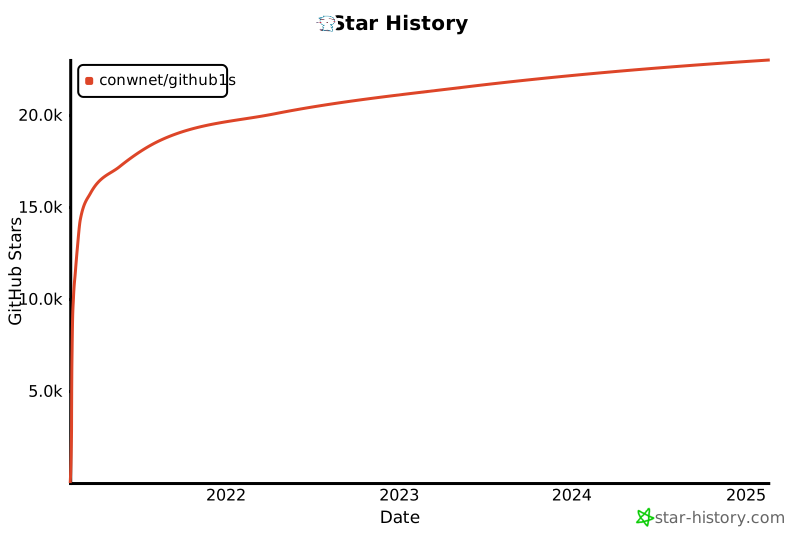](https://star-history.com/#conwnet/github1s&Date)
Third-party Related Projects
================================================
FILE: docs/guide.md
================================================
# How it works
GitHub1s is based on [VS Code 1.66.2](https://github.com/microsoft/vscode/tree/1.66.2) now. VS Code can be built for a browser version officially. I also used the code and got inspired by [Code Server](https://github.com/cdr/code-server).
Thanks to the very powerful and flexible extensibility of VS Code, we can easily implement a VS Code extension that provides the custom File IO ability using [FileSystemProvider API](https://code.visualstudio.com/api/references/vscode-api#FileSystemProvider). There is an official demo named [vscode-web-playground](https://github.com/microsoft/vscode-web-playground) which shows how it is used.
On the other hand, GitHub provides the powerful [REST API](https://docs.github.com/en/rest) that can be used for a variety of tasks which includes reading directories and files for sure.
According to the above, obviously, the core concept of GitHub1s is to implement a VS Code Extension (includes FileSystemProvider) using GitHub REST API.
_We may switch to the GitHub GraphQL API for more friendly user experience in the future, thanks to @xcv58 and @kanhegaonkarsaurabh. See details at [Issue 12](https://github.com/conwnet/github1s/issues/12)._
~~GitHub1s is a purely static web app (because it really doesn't need a backend service, does it?). So we just deploy it on [GitHub Pages](https://pages.github.com/) now (the `gh-pages` branch of this repository), and it is free. The service of GitHub1s could be reliable (GitHub is very reliable) because nobody needs to pay the web hosting bills.~~
We deploy GitHub1s on [Cloudflare Pages](https://cloudflare.com/) now for minimize delays in loading and better developer experience. Thanks for the wonderful service provide by Cloudflare.
# Rate Limit
Another thing that needs attention is [Rate Limit](https://docs.github.com/en/rest/reference/rate-limit):
> For unauthenticated requests, the rate limit allows for up to 60 requests per hour. Unauthenticated requests are associated with the originating IP address, and not the user making requests.
> For API requests using Basic Authentication or OAuth, you can make up to 5,000 requests per hour.
So, if you meet some problems when you use GitHub1s, even if you are using newer browsers, you could try to set a [GitHub OAuth Token](https://docs.github.com/en/rest/overview/resources-in-the-rest-api#oauth2-token-sent-in-a-header). Don't worry, we cannot see your token. It is only stored in your browser [IndexedDB](https://developer.mozilla.org/en-US/docs/Web/API/IndexedDB_API) with [VS Code Extension globalState API](https://code.visualstudio.com/api/references/vscode-api#ExtensionContext) (Actually we don't have a server, do we?).
But this does not mean the token is absolutely safe, **don't forget to clean it while you are using a device that doesn't belong to you**.
# Sourcegraph API
Due to the potential RateLimit of the GitHub API, we will prioritize the use of the [Sourcegraph API](https://sourcegraph.com/docs) for public repositories, with the exception of the Read interface, the code search capability is also provided by the Sourcegraph API.
By default, GitHub1s will only try to use the GitHub API when the Sourcegraph API request fails, and you can adjust this option in the settings.
# Development
As you see, running GitHub1s locally is not difficult. After cloning the repository, just run these commands:
```shell
$ npm install
$ npm run watch
```
Then, there will be a new directory named `dist` generated in the project root. The `npm run watch:dev-server` (part of `npm run watch` command) will automatically open http://localhost:8080 in the browser.
If you get a 404 error for some static files, please wait a minute for the building to complete.
## Watch Mode
What happens after you run `npm run watch-with-vscode`?
1. Copy some necessary resources (`index.html`, `favicons.ico`, etc.) to the `dist` directory.
2. This command will compile the codes in `src` and generate application entry script (see `webpack.config.js`). This command also compile the custom extensions (for example `github1s`) in `extensions` directory.
3. Redirect vscode-web static requests (vscode, extensisions, dependencies) to `vscode-web/lib/vscode` which should be generated by vscode compile process.
You should also compile the vscode manually in another terminal.
1. Go to `vscode-web` and run `npm install && npm run watch` (the native watch of vscode), it will trigger a new build if something in it has been changed.
2. This command will alose watch the `vscode-web/src` and `vscode-web/extensions` directory, merge it in to `vscode-web/lib/vscode` if something in it has been changed. (When a new file is merged into `lib/vscode`, it will trigger the watcher that is described in Step 3)
Note that since we have modified the source code of VS Code, it may get into trouble when merging a newer version VS Code.
It is a little laborious to complete the watch process, but I didn't think of a better solution.
What happens after you run `npm run watch`?
It's the same procedure as `` without the step 3. Instead of the local VS Code, it uses the prebuilt [@github1s/vscode-web](https://www.npmjs.com/package/@github1s/vscode-web) version.
## Build mode
Put simply, we build the necessary code and do a minify. The minify script is modified from [Code Server](https://github.com/cdr/code-server).
## Directory Structure
- `extensions` - custom VS Code extensions that don't come with VS Code natively.
- `src` - the code in here will be patched into VS Code source.
- `vscode-web` - This contains the code to patch VS Code.
- `scripts` - some scripts for build, watch, package, etc.
- `resources` - some resource files such as templates, pictures, configuration files, etc.
================================================
FILE: eslint.config.js
================================================
import jsdoc from 'eslint-plugin-jsdoc';
import tseslint from 'typescript-eslint';
import eslintPluginPrettierRecommended from 'eslint-plugin-prettier/recommended';
export default [
{ ignores: ['**/dist', '**/assets', 'vscode-web/lib', '**/vs', '**/vscode.proposed.d.ts'] },
...tseslint.configs.recommended,
jsdoc.configs['flat/recommended-typescript'],
eslintPluginPrettierRecommended,
{
rules: {
'@typescript-eslint/no-explicit-any': 'off',
'@typescript-eslint/no-unused-expressions': 'off',
'@typescript-eslint/no-unused-vars': 'off',
},
},
];
================================================
FILE: extensions/elm-web/LICENSE
================================================
MIT License
Copyright (c) 2019 Kolja Lampe
Permission is hereby granted, free of charge, to any person obtaining a copy
of this software and associated documentation files (the "Software"), to deal
in the Software without restriction, including without limitation the rights
to use, copy, modify, merge, publish, distribute, sublicense, and/or sell
copies of the Software, and to permit persons to whom the Software is
furnished to do so, subject to the following conditions:
The above copyright notice and this permission notice shall be included in all
copies or substantial portions of the Software.
THE SOFTWARE IS PROVIDED "AS IS", WITHOUT WARRANTY OF ANY KIND, EXPRESS OR
IMPLIED, INCLUDING BUT NOT LIMITED TO THE WARRANTIES OF MERCHANTABILITY,
FITNESS FOR A PARTICULAR PURPOSE AND NONINFRINGEMENT. IN NO EVENT SHALL THE
AUTHORS OR COPYRIGHT HOLDERS BE LIABLE FOR ANY CLAIM, DAMAGES OR OTHER
LIABILITY, WHETHER IN AN ACTION OF CONTRACT, TORT OR OTHERWISE, ARISING FROM,
OUT OF OR IN CONNECTION WITH THE SOFTWARE OR THE USE OR OTHER DEALINGS IN THE
SOFTWARE.
================================================
FILE: extensions/elm-web/README.md
================================================
# This extension is a fork from [elm-language-client-vscode](https://github.com/elm-tooling/elm-language-client-vscode) for github1s.
# At present only languages features is reserved
# I have deleted some files and only reserved the necessary code
# Elm Plugin for Visual Studio Code (VSCode)
[](https://marketplace.visualstudio.com/items?itemName=Elmtooling.elm-ls-vscode)
[](https://marketplace.visualstudio.com/items?itemName=Elmtooling.elm-ls-vscode)
[](https://marketplace.visualstudio.com/items?itemName=Elmtooling.elm-ls-vscode)

Supports elm 0.19 and up
## Highlighted Features
- Syntax Highlighting
================================================
FILE: extensions/elm-web/language-configuration.json
================================================
{
"comments": {
"lineComment": "--",
"blockComment": ["{-", "-}"]
},
"brackets": [
["{", "}"],
["[", "]"],
["(", ")"]
],
"surroundingPairs": [
["{", "}"],
["[", "]"],
["(", ")"],
["\"", "\""],
["'", "'"]
],
"autoClosingPairs": [
["(", ")"],
["{", "}"],
["[", "]"],
{
"open": "\"\"\"",
"close": "\"\"\"",
"notIn": ["comment"]
},
{
"open": "\"",
"close": "\"",
"notIn": ["string"]
},
{
"open": "'",
"close": "'",
"notIn": ["string", "comment"]
}
],
"folding": {
"offSide": true
}
}
================================================
FILE: extensions/elm-web/package.json
================================================
{
"name": "elm-ls-vscode",
"displayName": "Elm",
"description": "Improving your Elm experience since 2019",
"publisher": "elmTooling",
"icon": "images/elm.png",
"author": "Kolja Lampe",
"license": "MIT",
"version": "2.0.3",
"repository": {
"type": "git",
"url": "https://github.com/elm-tooling/elm-language-client-vscode"
},
"categories": [
"Linters",
"Snippets",
"Programming Languages"
],
"keywords": [
"elm"
],
"engines": {
"vscode": "^1.52.0"
},
"activationEvents": [
"onLanguage:elm"
],
"contributes": {
"languages": [
{
"id": "elm",
"aliases": [
"Elm",
"elm"
],
"extensions": [
".elm"
],
"configuration": "./language-configuration.json"
}
],
"grammars": [
{
"scopeName": "markdown.elm.codeblock",
"path": "./syntaxes/codeblock.json",
"injectTo": [
"text.html.markdown"
],
"embeddedLanguages": {
"meta.embedded.block.elm": "elm",
"meta.embedded.block.glsl": "glsl"
}
},
{
"language": "elm",
"scopeName": "source.elm",
"path": "./syntaxes/elm-syntax.json"
}
]
},
"scripts": {
"compile": "echo done",
"watch": "echo done"
}
}
================================================
FILE: extensions/elm-web/syntaxes/codeblock.json
================================================
{
"fileTypes": [],
"injectionSelector": "L:text.html.markdown",
"patterns": [
{
"include": "#fenced_code_block_elm"
}
],
"repository": {
"fenced_code_block_elm": {
"begin": "(^|\\G)(\\s*)(`{3,}|~{3,})\\s*(?i:(elm)(\\s+[^`~]*)?$)",
"name": "markup.fenced_code.block.markdown",
"end": "(^|\\G)(\\2|\\s{0,3})(\\3)\\s*$",
"beginCaptures": {
"3": {
"name": "punctuation.definition.markdown"
},
"5": {
"name": "fenced_code.block.language"
},
"6": {
"name": "fenced_code.block.language.attributes"
}
},
"endCaptures": {
"3": {
"name": "punctuation.definition.markdown"
}
},
"patterns": [
{
"begin": "(^|\\G)(\\s*)(.*)",
"while": "(^|\\G)(?!\\s*([`~]{3,})\\s*$)",
"contentName": "meta.embedded.block.elm",
"patterns": [
{
"include": "source.elm"
}
]
}
]
}
},
"scopeName": "markdown.elm.codeblock"
}
================================================
FILE: extensions/elm-web/syntaxes/elm-syntax.json
================================================
{
"fileTypes": ["elm"],
"name": "Elm",
"scopeName": "source.elm",
"patterns": [
{
"include": "#import"
},
{
"include": "#module"
},
{
"include": "#debug"
},
{
"include": "#comments"
},
{
"match": "\\b(_)\\b",
"name": "keyword.unused.elm"
},
{
"include": "#type-signature"
},
{
"include": "#type-declaration"
},
{
"include": "#type-alias-declaration"
},
{
"include": "#string-triple"
},
{
"include": "#string-quote"
},
{
"include": "#char"
},
{
"comment": "Floats are always decimal",
"match": "\\b([0-9]+\\.[0-9]+([eE][+-]?[0-9]+)?|[0-9]+[eE][+-]?[0-9]+)\\b",
"name": "constant.numeric.float.elm"
},
{
"match": "\\b([0-9]+)\\b",
"name": "constant.numeric.elm"
},
{
"match": "\\b(0x[0-9a-fA-F]+)\\b",
"name": "constant.numeric.elm"
},
{
"include": "#glsl"
},
{
"include": "#record-prefix"
},
{
"include": "#module-prefix"
},
{
"include": "#constructor"
},
{
"name": "meta.record.field.update.elm",
"match": "(\\{)\\s+([a-z][a-zA-Z0-9_]*)\\s+(\\|)\\s+([a-z][a-zA-Z0-9_]*)",
"captures": {
"1": {
"name": "punctuation.bracket.elm"
},
"2": {
"name": "record.name.elm"
},
"3": {
"name": "keyword.pipe.elm"
},
"4": {
"name": "entity.name.record.field.elm"
}
}
},
{
"name": "meta.record.field.update.elm",
"match": "(\\|)\\s+([a-z][a-zA-Z0-9_]*)\\s+(\\=)",
"captures": {
"1": {
"name": "keyword.pipe.elm"
},
"2": {
"name": "entity.name.record.field.elm"
},
"3": {
"name": "keyword.operator.assignment.elm"
}
}
},
{
"name": "meta.record.field.update.elm",
"match": "(\\{)\\s+([a-z][a-zA-Z0-9_]*)\\s+$",
"captures": {
"1": {
"name": "punctuation.bracket.elm"
},
"2": {
"name": "record.name.elm"
}
}
},
{
"name": "meta.record.field.elm",
"match": "(\\{)\\s+([a-z][a-zA-Z0-9_]*)\\s+(\\=)",
"captures": {
"1": {
"name": "punctuation.bracket.elm"
},
"2": {
"name": "entity.name.record.field.elm"
},
"3": {
"name": "keyword.operator.assignment.elm"
}
}
},
{
"name": "meta.record.field.elm",
"match": "(,)\\s+([a-z][a-zA-Z0-9_]*)\\s+(\\=)",
"captures": {
"1": {
"name": "punctuation.separator.comma.elm"
},
"2": {
"name": "entity.name.record.field.elm"
},
"3": {
"name": "keyword.operator.assignment.elm"
}
}
},
{
"match": "(\\}|\\{)",
"name": "punctuation.bracket.elm"
},
{
"include": "#unit"
},
{
"include": "#comma"
},
{
"include": "#parens"
},
{
"match": "(->)",
"name": "keyword.operator.arrow.elm"
},
{
"include": "#infix_op"
},
{
"match": "(\\=|\\:|\\||\\\\)",
"name": "keyword.other.elm"
},
{
"match": "\\b(type|as|port|exposing|alias|infixl|infixr|infix)\\s+",
"name": "keyword.other.elm"
},
{
"match": "\\b(if|then|else|case|of|let|in)\\s+",
"name": "keyword.control.elm"
},
{
"include": "#record-accessor"
},
{
"include": "#top_level_value"
},
{
"include": "#value"
},
{
"include": "#period"
},
{
"include": "#square_brackets"
}
],
"repository": {
"comma": {
"match": "(,)",
"name": "punctuation.separator.comma.elm"
},
"parens": {
"match": "(\\(|\\))",
"name": "punctuation.parens.elm"
},
"block_comment": {
"applyEndPatternLast": 1,
"begin": "\\{-(?!#)",
"captures": {
"0": {
"name": "punctuation.definition.comment.elm"
}
},
"end": "-\\}",
"name": "comment.block.elm",
"patterns": [
{
"include": "#block_comment"
}
]
},
"comments": {
"patterns": [
{
"captures": {
"1": {
"name": "punctuation.definition.comment.elm"
}
},
"begin": "--",
"end": "$",
"name": "comment.line.double-dash.elm"
},
{
"include": "#block_comment"
}
]
},
"import": {
"name": "meta.import.elm",
"begin": "^\\b(import)\\s+",
"beginCaptures": {
"1": {
"name": "keyword.control.import.elm"
}
},
"end": "\\n(?!\\s)",
"patterns": [
{
"match": "(as|exposing)",
"name": "keyword.control.elm"
},
{
"include": "#module_chunk"
},
{
"include": "#period"
},
{
"match": "\\s+",
"name": "punctuation.spaces.elm"
},
{
"include": "#module-exports"
}
]
},
"module": {
"begin": "^\\b((port |effect )?module)\\s+",
"beginCaptures": {
"1": {
"name": "keyword.other.elm"
}
},
"end": "\\n(?!\\s)",
"endCaptures": {
"1": {
"name": "keyword.other.elm"
}
},
"name": "meta.declaration.module.elm",
"patterns": [
{
"include": "#module_chunk"
},
{
"include": "#period"
},
{
"match": "(exposing)",
"name": "keyword.other.elm"
},
{
"match": "\\s+",
"name": "punctuation.spaces.elm"
},
{
"include": "#module-exports"
}
]
},
"string-triple": {
"name": "string.quoted.triple.elm",
"begin": "\"\"\"",
"beginCaptures": {
"0": {
"name": "punctuation.definition.string.begin.elm"
}
},
"end": "\"\"\"",
"endCaptures": {
"0": {
"name": "punctuation.definition.string.end.elm"
}
},
"patterns": [
{
"match": "\\\\(NUL|SOH|STX|ETX|EOT|ENQ|ACK|BEL|BS|HT|LF|VT|FF|CR|SO|SI|DLE|DC1|DC2|DC3|DC4|NAK|SYN|ETB|CAN|EM|SUB|ESC|FS|GS|RS|US|SP|DEL|[abfnrtv\\\\\\\"'\\&]|x[0-9a-fA-F]{1,5})",
"name": "constant.character.escape.elm"
},
{
"match": "\\^[A-Z@\\[\\]\\\\\\^_]",
"name": "constant.character.escape.control.elm"
}
]
},
"string-quote": {
"name": "string.quoted.double.elm",
"begin": "\"",
"beginCaptures": {
"0": {
"name": "punctuation.definition.string.begin.elm"
}
},
"end": "\"",
"endCaptures": {
"0": {
"name": "punctuation.definition.string.end.elm"
}
},
"patterns": [
{
"match": "\\\\(NUL|SOH|STX|ETX|EOT|ENQ|ACK|BEL|BS|HT|LF|VT|FF|CR|SO|SI|DLE|DC1|DC2|DC3|DC4|NAK|SYN|ETB|CAN|EM|SUB|ESC|FS|GS|RS|US|SP|DEL|[abfnrtv\\\\\\\"'\\&]|x[0-9a-fA-F]{1,5})",
"name": "constant.character.escape.elm"
},
{
"match": "\\^[A-Z@\\[\\]\\\\\\^_]",
"name": "constant.character.escape.control.elm"
}
]
},
"char": {
"name": "string.quoted.single.elm",
"begin": "'",
"beginCaptures": {
"0": {
"name": "punctuation.definition.char.begin.elm"
}
},
"end": "'",
"endCaptures": {
"0": {
"name": "punctuation.definition.char.end.elm"
}
},
"patterns": [
{
"match": "\\\\(NUL|SOH|STX|ETX|EOT|ENQ|ACK|BEL|BS|HT|LF|VT|FF|CR|SO|SI|DLE|DC1|DC2|DC3|DC4|NAK|SYN|ETB|CAN|EM|SUB|ESC|FS|GS|RS|US|SP|DEL|[abfnrtv\\\\\\\"'\\&]|x[0-9a-fA-F]{1,5})",
"name": "constant.character.escape.elm"
},
{
"match": "\\^[A-Z@\\[\\]\\\\\\^_]",
"name": "constant.character.escape.control.elm"
}
]
},
"debug": {
"match": "\\b(Debug)\\b",
"name": "invalid.illegal.debug.elm"
},
"module-exports": {
"begin": "(\\()",
"beginCaptures": {
"1": {
"name": "punctuation.parens.module-export.elm"
}
},
"end": "(\\))",
"endCaptures": {
"1": {
"name": "punctuation.parens.module-export.elm"
}
},
"name": "meta.declaration.exports.elm",
"patterns": [
{
"match": "\\b[a-z][a-zA-Z_'0-9]*",
"name": "entity.name.function.elm"
},
{
"match": "\\b[A-Z][A-Za-z_'0-9]*",
"name": "storage.type.elm"
},
{
"match": ",",
"name": "punctuation.separator.comma.elm"
},
{
"match": "\\s+",
"name": "punctuation.spaces.elm"
},
{
"include": "#comma"
},
{
"match": "\\(\\.\\.\\)",
"name": "punctuation.parens.ellipses.elm"
},
{
"match": "\\.\\.",
"name": "punctuation.parens.ellipses.elm"
},
{
"include": "#infix_op"
},
{
"comment": "So named because I don't know what to call this.",
"match": "\\(.*?\\)",
"name": "meta.other.unknown.elm"
}
]
},
"module_chunk": {
"match": "[A-Z][a-zA-Z0-9_]*",
"name": "support.module.elm"
},
"period": {
"match": "[.]",
"name": "keyword.other.period.elm"
},
"square_brackets": {
"match": "[\\[\\]]",
"name": "punctuation.definition.list.elm"
},
"record-prefix": {
"match": "([a-z][a-zA-Z0-9_]*)(\\.)([a-z][a-zA-Z0-9_]*)",
"name": "record.accessor.elm",
"captures": {
"1": {
"name": "record.name.elm"
},
"2": {
"name": "keyword.other.period.elm"
},
"3": {
"name": "entity.name.record.field.accessor.elm"
}
}
},
"module-prefix": {
"match": "([A-Z][a-zA-Z0-9_]*)(\\.)",
"name": "meta.module.name.elm",
"captures": {
"1": {
"name": "support.module.elm"
},
"2": {
"name": "keyword.other.period.elm"
}
}
},
"constructor": {
"match": "\\b[A-Z][a-zA-Z0-9_]*\\b",
"name": "constant.type-constructor.elm"
},
"value": {
"match": "\\b[a-z][a-zA-Z0-9_]*\\b",
"name": "meta.value.elm"
},
"unit": {
"match": "\\(\\)",
"name": "constant.unit.elm"
},
"top_level_value": {
"match": "^[a-z][a-zA-Z0-9_]*\\b",
"name": "entity.name.function.top_level.elm"
},
"record-accessor": {
"match": "(\\.)([a-z][a-zA-Z0-9_]*)",
"name": "meta.record.accessor",
"captures": {
"1": {
"name": "keyword.other.period.elm"
},
"2": {
"name": "entity.name.record.field.accessor.elm"
}
}
},
"infix_op": {
"match": "(|<\\?>|<\\||<=|\\|\\||&&|>=|\\|>|\\|=|\\|\\.|\\+\\+|::|/=|==|//|>>|<<|<|>|\\^|\\+|-|/|\\*)",
"name": "keyword.operator.elm"
},
"type-declaration": {
"begin": "^(type\\s+)([A-Z][a-zA-Z0-9_']*)\\s+",
"beginCaptures": {
"1": {
"name": "keyword.type.elm"
},
"2": {
"name": "storage.type.elm"
}
},
"end": "^(?=\\S)",
"name": "meta.function.type-declaration.elm",
"patterns": [
{
"name": "meta.record.field.elm",
"match": "^\\s*([A-Z][a-zA-Z0-9_]*)\\b",
"captures": {
"1": {
"name": "constant.type-constructor.elm"
}
}
},
{
"match": "\\s+",
"name": "punctuation.spaces.elm"
},
{
"name": "meta.record.field.elm",
"match": "(\\=|\\|)\\s+([A-Z][a-zA-Z0-9_]*)\\b",
"captures": {
"1": {
"name": "keyword.operator.assignment.elm"
},
"2": {
"name": "constant.type-constructor.elm"
}
}
},
{
"match": "\\=",
"name": "keyword.operator.assignment.elm"
},
{
"match": "\\-\\>",
"name": "keyword.operator.arrow.elm"
},
{
"include": "#module-prefix"
},
{
"match": "\\b[a-z][a-zA-Z0-9_]*\\b",
"name": "variable.type.elm"
},
{
"match": "\\b[A-Z][a-zA-Z0-9_]*\\b",
"name": "storage.type.elm"
},
{
"include": "#comments"
},
{
"include": "#type-record"
}
]
},
"type-alias-declaration": {
"begin": "^(type\\s+)(alias\\s+)([A-Z][a-zA-Z0-9_']*)\\s+",
"beginCaptures": {
"1": {
"name": "keyword.type.elm"
},
"2": {
"name": "keyword.type-alias.elm"
},
"3": {
"name": "storage.type.elm"
}
},
"end": "^(?=\\S)",
"name": "meta.function.type-declaration.elm",
"patterns": [
{
"match": "\\n\\s+",
"name": "punctuation.spaces.elm"
},
{
"match": "\\=",
"name": "keyword.operator.assignment.elm"
},
{
"include": "#module-prefix"
},
{
"match": "\\b[A-Z][a-zA-Z0-9_]*\\b",
"name": "storage.type.elm"
},
{
"match": "\\b[a-z][a-zA-Z0-9_]*\\b",
"name": "variable.type.elm"
},
{
"include": "#comments"
},
{
"include": "#type-record"
}
]
},
"type-record": {
"begin": "(\\{)",
"beginCaptures": {
"1": {
"name": "punctuation.section.braces.begin"
}
},
"end": "(\\})",
"endCaptures": {
"1": {
"name": "punctuation.section.braces.end"
}
},
"name": "meta.function.type-record.elm",
"patterns": [
{
"match": "\\s+",
"name": "punctuation.spaces.elm"
},
{
"match": "->",
"name": "keyword.operator.arrow.elm"
},
{
"name": "meta.record.field.elm",
"match": "([a-z][a-zA-Z0-9_]*)\\s+(\\:)",
"captures": {
"1": {
"name": "entity.name.record.field.elm"
},
"2": {
"name": "keyword.other.elm"
}
}
},
{
"match": "\\,",
"name": "punctuation.separator.comma.elm"
},
{
"include": "#module-prefix"
},
{
"match": "\\b[a-z][a-zA-Z0-9_]*\\b",
"name": "variable.type.elm"
},
{
"match": "\\b[A-Z][a-zA-Z0-9_]*\\b",
"name": "storage.type.elm"
},
{
"include": "#comments"
},
{
"include": "#type-record"
}
]
},
"type-signature": {
"begin": "^(port\\s+)?([a-z_][a-zA-Z0-9_']*)\\s+(\\:)",
"beginCaptures": {
"1": {
"name": "keyword.other.port.elm"
},
"2": {
"name": "entity.name.function.elm"
},
"3": {
"name": "keyword.other.colon.elm"
}
},
"end": "((^(?=[a-z]))|^$)",
"name": "meta.function.type-declaration.elm",
"patterns": [
{
"include": "#type-signature-chunk"
}
]
},
"type-signature-chunk": {
"patterns": [
{
"match": "->",
"name": "keyword.operator.arrow.elm"
},
{
"match": "\\s+",
"name": "punctuation.spaces.elm"
},
{
"include": "#module-prefix"
},
{
"match": "\\b[a-z][a-zA-Z0-9_]*\\b",
"name": "variable.type.elm"
},
{
"match": "\\b[A-Z][a-zA-Z0-9_]*\\b",
"name": "storage.type.elm"
},
{
"match": "\\(\\)",
"name": "constant.unit.elm"
},
{
"include": "#comma"
},
{
"include": "#parens"
},
{
"include": "#comments"
},
{
"include": "#type-record"
}
]
},
"glsl": {
"begin": "(\\[)(glsl)(\\|)",
"beginCaptures": {
"1": {
"name": "entity.glsl.bracket.elm"
},
"2": {
"name": "entity.glsl.name.elm"
},
"3": {
"name": "entity.glsl.bracket.elm"
}
},
"end": "(\\|\\])",
"endCaptures": {
"1": {
"name": "entity.glsl.bracket.elm"
}
},
"name": "meta.embedded.block.glsl",
"patterns": [
{
"include": "source.glsl"
}
]
}
}
}
================================================
FILE: extensions/github1s/assets/pages/components.css
================================================
.vscode-button {
border: none;
display: inline-block;
padding: 0 10px;
height: 26px;
line-height: 26px;
font-size: 14px;
outline: 1px solid transparent;
outline-offset: 2px !important;
color: var(--vscode-button-foreground);
background: var(--vscode-button-background);
cursor: pointer;
}
.vscode-button.loading {
opacity: .5;
}
.vscode-button.size-mini {
padding: 0 8px;
height: 22px;
line-height: 22px;
font-size: 12px;
}
.vscode-button.size-middle {
padding: 0 12px;
height: 30px;
line-height: 30px;
font-size: 14px;
}
.vscode-button.size-large {
padding: 0 14px;
height: 34px;
line-height: 34px;
font-size: 18px;
}
.vscode-button:not([disabled]):hover {
background: var(--vscode-button-hoverBackground);
}
.vscode-button:not([disabled]):focus {
outline-color: var(--vscode-focusBorder);
}
.vscode-input {
border: none;
display: inline-block;
padding: 0 4px;
height: 26px;
line-height: 26px;
font-size: 13px;
outline: 1px solid transparent;
font-family: var(--vscode-font-family);
color: var(--vscode-input-foreground);
border: 1px solid var(--vscode-input-border, var(--vscode-widget-border));
background-color: var(--vscode-input-background);
}
.vscode-input.size-mini {
padding: 0 2px;
height: 22px;
line-height: 22px;
font-size: 12px;
}
.vscode-input.size-middle {
padding: 0 4px;
height: 30px;
line-height: 30px;
font-size: 13px;
}
.vscode-input.size-large {
padding: 0 6px;
height: 34px;
line-height: 34px;
font-size: 18px;
}
.vscode-input:not([disabled]):focus {
outline-color: var(--vscode-focusBorder);
outline: 1px solid -webkit-focus-ring-color;
outline-offset: -1px;
}
.vscode-textarea {
border: none;
display: inline-block;
outline: 1px solid transparent;
font-family: var(--vscode-font-family);
color: var(--vscode-input-foreground);
border: 1px solid var(--vscode-input-background);
background-color: var(--vscode-input-background);
}
.vscode-textarea:not([disabled]):focus {
outline-color: var(--vscode-focusBorder);
outline: 1px solid -webkit-focus-ring-color;
outline-offset: -1px;
}
.vscode-loading {
width: 100%;
text-align: center;
height: 26px;
}
.vscode-loading.align-left {
text-align: left;
}
.vscode-loading.align-right {
text-align: right;
}
.vscode-loading > span {
height: 100%;
width: 5px;
display: inline-block;
margin-right: 4px;
background: var(--vscode-button-background);
animation: vscodeLoading 1.2s infinite ease-in-out;
}
.vscode-loading > span:nth-child(2) {
animation-delay: -1s;
}
.vscode-loading > span:nth-child(3) {
animation-delay: -0.9s;
}
.vscode-loading > span:nth-child(4) {
animation-delay: -0.8s;
}
.vscode-loading > span:nth-child(5) {
animation-delay: -0.7s;
}
.vscode-loading > span:nth-child(6) {
animation-delay: -0.6s;
}
.vscode-loading > span:nth-child(7) {
animation-delay: -0.5s;
}
.vscode-loading > span:nth-child(8) {
animation-delay: -0.4s;
}
.vscode-loading > span:nth-child(9) {
animation-delay: -0.3s;
}
.vscode-loading > span:last-child {
margin-right: 0 !important;
}
@keyframes vscodeLoading {
0% {
transform: scaleY(0.4);
}
25% {
transform: scaleY(1);
}
50% {
transform: scaleY(0.4);
}
75% {
transform: scaleY(0.4);
}
100% {
transform: scaleY(0.4);
}
}
.vscode-link {
cursor: pointer;
color: var(--vscode-textLink-foreground);
text-decoration: underline;
}
.vscode-link:hover {
color: var(--vscode-textLink-activeForeground);
}
.success-text {
color: #89d185;
}
.warning-text {
color: #cca700;
}
.error-text {
color: #f48771;
}
================================================
FILE: extensions/github1s/assets/pages/components.js
================================================
import { h } from './libraries/preact.module.js';
import htm from './libraries/htm.module.js';
export const html = htm.bind(h);
export const VscodeButton = ({ size, loading, ...props }) => {
const sizeClass = `size-${size || 'small'}`;
const loadingClass = loading ? 'loading' : '';
const classes = `vscode-button ${sizeClass} ${loadingClass}`;
return html`${blocks}
`;
};
export const VscodeLink = ({ to, external, ...props }) => {
const hrefProp = to ? { href: to } : {};
const roleProp = to ? {} : { role: 'button' };
const targetProp = external ? { target: '_blank' } : {};
const combineProps = { ...hrefProp, ...roleProp, ...targetProp };
return html`
${(pageConfig.authenticationFeatures || []).map(
(feature) =>
html`
${feature.text}
`,
)}
`;
};
const AuthenticationButton = (props) => {
const [authenticating, setAuthenticating] = useState(false);
const handleButtonClick = useCallback(() => {
setAuthenticating(true);
bridgeCommands.OAuthAuthenticate().then(() => setAuthenticating(false));
}, []);
const buttonLogoUrl = encodeURI(`${pageConfig.extensionUri}/${pageConfig.OAuthButtonLogo}`);
return html`
${pageConfig.OAuthButtonText}
`;
};
const ManualInputToken = () => {
const [inputToken, setInputToken] = useState('');
const [loading, setLoading] = useState(false);
const handleInputTokenChange = useCallback((event) => {
setInputToken(event.target.value);
}, []);
const handleSubmit = useCallback(() => {
if (inputToken) {
setLoading(true);
bridgeCommands.validateToken(inputToken).then((tokenStatus) => {
if (!tokenStatus) {
const messageArgs = { level: 'info', args: ['This AccessToken is invalid'] };
bridgeCommands.alertMessage(messageArgs);
setLoading(false);
return;
}
bridgeCommands.setToken(inputToken).then(() => setLoading(false));
});
}
}, [inputToken]);
return html`
<${VscodeInput}
autocomplete="off"
value=${inputToken}
disabled="${loading}"
onInput=${handleInputTokenChange}
/>
<${VscodeButton} loading=${loading} onClick=${handleSubmit}>Submit
<${VscodeLink} to="${pageConfig.createTokenLink}" external>Create New AccessToken
`;
};
const SplitLine = () => {
return html`
`;
};
const AuthenticationFooter = () => {
return html`
`;
};
const AuthenticationForm = () => {
return html`
`;
};
const StatusNumberText = ({ count }) => {
if (count <= 0) {
return html`${count} `;
}
if (count <= 99) {
return html`${count} `;
}
return html`${count} `;
};
const RateLimitsInfo = ({ info }) => {
return html`
------- Rate Limit Info -------
X-RateLimit-Limit: <${StatusNumberText} count=${info.limit} />
X-RateLimit-Remaining: <${StatusNumberText} count=${info.remaining} />
X-RateLimit-Used: ${info.used}
X-RateLimit-Reset: ${info.reset}
------------------------------
Current rate limit window will reset after
${Math.max(info.reset - Math.ceil(Date.now() / 1000), 0)}s
<${VscodeLink} to="${pageConfig.rateLimitDocLink}" external>${pageConfig.rateLimitDocLinkText}
`;
};
const AuthenticationDetail = ({ accessToken }) => {
const [tokenStatus, setTokenStatus] = useState(null);
const [validating, setValidating] = useState(true);
const displayToken = accessToken.slice(0, 7) + '*********************************';
const tokenClasses = `token-text ${validating ? '' : tokenStatus ? 'token-valid' : 'token-invalid'}`;
const handleRefreshTokenStatus = useCallback(() => {
setValidating(true);
bridgeCommands
.validateToken(accessToken)
.then((tokenStatus) => setTokenStatus(tokenStatus))
.finally(() => setValidating(false));
}, [accessToken]);
const handleClearToken = useCallback(() => {
const messageArgs = {
level: 'warning',
args: ['Would you want to clear the saved this AccessToken?', { modal: true }, 'Confirm'],
};
bridgeCommands.alertMessage(messageArgs).then((choose) => choose === 'Confirm' && bridgeCommands.setToken(''));
}, []);
useEffect(() => {
handleRefreshTokenStatus();
}, [handleRefreshTokenStatus]);
if (validating) {
return html`<${VscodeLoading} />`;
}
return html`
Authorization Detail
${tokenStatus
? html`
Logged in as
<${VscodeLink} to=${tokenStatus.profile_url} external>
${tokenStatus.username}
`
: html`
Current AccessToken is INVALID .
`}
↻
${displayToken}
${tokenStatus && tokenStatus.rateLimits ? html`<${RateLimitsInfo} info=${tokenStatus.rateLimits} />` : null}
<${VscodeButton} size="middle" onClick=${handleClearToken}>Clear Access Token
<${AuthenticationFooter} />
`;
};
const App = () => {
const [loading, setLoading] = useState(true);
const [accessToken, setAccessToken] = useState('');
const [notice, setNotice] = useState('');
useEffect(() => {
bridgeCommands.getToken().then((token) => {
setAccessToken(token);
setLoading(false);
});
bridgeCommands.getNotice().then((notice) => setNotice(notice));
}, []);
useEffect(() => {
const handler = ({ data }) => {
if (data.type === 'token-changed') {
setAccessToken(data.token);
bridgeCommands.getNotice().then((notice) => setNotice(notice));
}
};
window.addEventListener('message', handler);
return () => window.removeEventListener('message', handler);
}, [setAccessToken]);
if (loading) {
return html`<${VscodeLoading} />`;
}
return html`
${notice ? html`
${notice}
` : null}
<${accessToken ? AuthenticationDetail : AuthenticationForm} accessToken=${accessToken} />
Authenticating OAuth App
<${VscodeButton} loading=${loading} onClick=${handleButtonClick}>${buttonText}
`;
};
export const InputTokenBlock = ({ createLink, isEditing, onCancel, ...props }) => {
const [inputToken, setInputToken] = useState('');
const [loading, setLoading] = useState(false);
const handleInputTokenChange = useCallback((event) => {
setInputToken(event.target.value);
}, []);
const handleSubmit = useCallback(() => {
if (inputToken) {
setLoading(true);
bridgeCommands.validateToken(inputToken).then((tokenStatus) => {
if (!tokenStatus) {
const messageArgs = { level: 'info', args: ['This AccessToken is invalid'] };
bridgeCommands.alertMessage(messageArgs);
setLoading(false);
return;
}
bridgeCommands.setToken(inputToken).then(() => setLoading(false));
});
}
}, [inputToken]);
return html`
`;
};
export const TokenDetailBlock = ({ token, validating, onEditClick, validateToken, ...props }) => {
const handleValidateClick = useCallback(() => {
validateToken(token).then((tokenStatus) => {
const statusMessage = `Current AccessToken is ${tokenStatus ? 'VALID' : 'INVALID'}`;
const messageArgs = { level: 'info', args: [statusMessage] };
bridgeCommands.alertMessage(messageArgs);
});
}, [validateToken, token]);
const handleClearClick = useCallback(() => {
const messageArgs = {
level: 'warning',
args: ['Would you want to clear the saved this AccessToken?', { modal: true }, 'Confirm'],
};
bridgeCommands.alertMessage(messageArgs).then((choose) => choose === 'Confirm' && bridgeCommands.setToken(''));
}, []);
return html`
<${VscodeButton} onClick=${bridgeCommands.openDetailPage}>Detail
<${VscodeButton} loading=${validating} onClick=${handleValidateClick}>Validate
<${VscodeButton} onClick=${onEditClick}>Edit
<${VscodeButton} onClick=${handleClearClick}>Clear
`;
};
const PageFooter = () => {
const [preferSgApi, setPreferSgApi] = useState(false);
const updatePreferSgApi = useCallback(() => {
bridgeCommands.getPreferSgApi().then((value) => {
setPreferSgApi(value);
});
}, []);
const handleCheckboxChange = useCallback(
(event) => {
bridgeCommands.setPreferSgApi(event.target.checked).then(() => {
updatePreferSgApi();
});
},
[updatePreferSgApi],
);
useEffect(() => {
const handler = ({ data }) => {
if (data.type === 'prefer-sourcegraph-api-changed') {
updatePreferSgApi();
}
};
window.addEventListener('message', handler);
return () => window.removeEventListener('message', handler);
}, []);
useEffect(() => {
updatePreferSgApi();
}, [updatePreferSgApi]);
return html`
`;
};
const TokenEditPage = ({ token, onCancel, ...props }) => {
const pageDescription = (pageConfig.pageDescriptionLines || []).map((line) => html`${line}
`);
return html`
<${PageHeader} title="Set AccessToken">${pageDescription}
<${OAuthBlock} buttonText=${pageConfig.OAuthButtonText} command=${pageConfig.OAuthCommand} />
<${InputTokenBlock} createLink=${pageConfig.createTokenLink} isEditing=${!!token} onCancel=${onCancel} />
`;
};
const TokenDetailPage = ({ token, onEditClick, ...props }) => {
const [tokenStatus, setTokenStatus] = useState(null);
const [validating, setValidating] = useState(true);
const validateToken = useCallback((token) => {
setValidating(true);
return bridgeCommands.validateToken(token).then((tokenStatus) => {
setValidating(false);
setTokenStatus(tokenStatus);
return tokenStatus;
});
}, []);
const validateResult = tokenStatus
? html``
: html`Current AccessToken is INVALID .
`;
useEffect(() => {
token && validateToken(token);
}, [token, validateToken]);
return html`
<${PageHeader} title="You have authenticated">
${validating ? html`<${VscodeLoading} dots=${8} align="left" style="height: 14px" />` : validateResult}
<${TokenDetailBlock}
token=${token}
validating=${validating}
onEditClick=${onEditClick}
validateToken=${validateToken}
/>
`;
};
const App = () => {
const [loading, setLoading] = useState(true);
const [pageType, setPageType] = useState('EDIT');
const [token, setToken] = useState('');
const switchToEdit = useCallback(() => setPageType('EDIT'), []);
const switchToDetail = useCallback(() => setPageType('DETAIL'), []);
useEffect(() => {
bridgeCommands.getToken().then((token) => {
setToken(token);
setLoading(false);
setPageType(token ? 'DETAIL' : 'EDIT');
});
}, []);
useEffect(() => {
const handler = ({ data }) => {
if (data.type === 'token-changed') {
setToken(data.token);
setPageType(data.token ? 'DETAIL' : 'EDIT');
}
};
window.addEventListener('message', handler);
return () => window.removeEventListener('message', handler);
}, []);
if (loading) {
return html`<${VscodeLoading} />`;
}
return html`
${pageType === 'DETAIL'
? html`<${TokenDetailPage} token=${token} onEditClick=${switchToEdit} />`
: html`<${TokenEditPage} token=${token} onCancel=${switchToDetail} />`}
<${PageFooter} />
`;
};
const loadingElement = document.getElementById('page-loading');
loadingElement.parentNode.removeChild(loadingElement);
render(html`<${App} />`, document.getElementById('app'));
================================================
FILE: extensions/github1s/assets/pages/libraries/htm.module.js
================================================
// https://github.com/developit/htm, download from https://unpkg.com/htm@3.1.0/dist/htm.module.js
var n=function(t,s,r,e){var u;s[0]=0;for(var h=1;h=5&&((e||!n&&5===r)&&(h.push(r,0,e,s),r=6),n&&(h.push(r,n,0,s),r=6)),e=""},a=0;a"===t?(r=1,e=""):e=t+e[0]:u?t===u?u="":e+=t:'"'===t||"'"===t?u=t:">"===t?(p(),r=1):r&&("="===t?(r=5,s=e,e=""):"/"===t&&(r<5||">"===n[a][l+1])?(p(),3===r&&(h=h[0]),r=h,(h=h[0]).push(2,0,r),r=0):" "===t||"\t"===t||"\n"===t||"\r"===t?(p(),r=2):e+=t),3===r&&"!--"===e&&(r=4,h=h[0])}return p(),h}(s)),r),arguments,[])).length>1?r:r[0]}
================================================
FILE: extensions/github1s/assets/pages/libraries/preact-hooks.module.js
================================================
// https://github.com/preactjs/preact, download from https://unpkg.com/preact@10.7.1/hooks/dist/hooks.module.js
import{options as n}from"./preact.module.js";var t,u,r,o=0,i=[],c=n.__b,f=n.__r,e=n.diffed,a=n.__c,v=n.unmount;function l(t,r){n.__h&&n.__h(u,t,o||r),o=0;var i=u.__H||(u.__H={__:[],__h:[]});return t>=i.__.length&&i.__.push({}),i.__[t]}function m(n){return o=1,p(w,n)}function p(n,r,o){var i=l(t++,2);return i.t=n,i.__c||(i.__=[o?o(r):w(void 0,r),function(n){var t=i.t(i.__[0],n);i.__[0]!==t&&(i.__=[t,i.__[1]],i.__c.setState({}))}],i.__c=u),i.__}function y(r,o){var i=l(t++,3);!n.__s&&k(i.__H,o)&&(i.__=r,i.__H=o,u.__H.__h.push(i))}function d(r,o){var i=l(t++,4);!n.__s&&k(i.__H,o)&&(i.__=r,i.__H=o,u.__h.push(i))}function h(n){return o=5,_(function(){return{current:n}},[])}function s(n,t,u){o=6,d(function(){return"function"==typeof n?(n(t()),function(){return n(null)}):n?(n.current=t(),function(){return n.current=null}):void 0},null==u?u:u.concat(n))}function _(n,u){var r=l(t++,7);return k(r.__H,u)&&(r.__=n(),r.__H=u,r.__h=n),r.__}function A(n,t){return o=8,_(function(){return n},t)}function F(n){var r=u.context[n.__c],o=l(t++,9);return o.c=n,r?(null==o.__&&(o.__=!0,r.sub(u)),r.props.value):n.__}function T(t,u){n.useDebugValue&&n.useDebugValue(u?u(t):t)}function q(n){var r=l(t++,10),o=m();return r.__=n,u.componentDidCatch||(u.componentDidCatch=function(n){r.__&&r.__(n),o[1](n)}),[o[0],function(){o[1](void 0)}]}function x(){for(var t;t=i.shift();)if(t.__P)try{t.__H.__h.forEach(g),t.__H.__h.forEach(j),t.__H.__h=[]}catch(u){t.__H.__h=[],n.__e(u,t.__v)}}n.__b=function(n){u=null,c&&c(n)},n.__r=function(n){f&&f(n),t=0;var r=(u=n.__c).__H;r&&(r.__h.forEach(g),r.__h.forEach(j),r.__h=[])},n.diffed=function(t){e&&e(t);var o=t.__c;o&&o.__H&&o.__H.__h.length&&(1!==i.push(o)&&r===n.requestAnimationFrame||((r=n.requestAnimationFrame)||function(n){var t,u=function(){clearTimeout(r),b&&cancelAnimationFrame(t),setTimeout(n)},r=setTimeout(u,100);b&&(t=requestAnimationFrame(u))})(x)),u=null},n.__c=function(t,u){u.some(function(t){try{t.__h.forEach(g),t.__h=t.__h.filter(function(n){return!n.__||j(n)})}catch(r){u.some(function(n){n.__h&&(n.__h=[])}),u=[],n.__e(r,t.__v)}}),a&&a(t,u)},n.unmount=function(t){v&&v(t);var u,r=t.__c;r&&r.__H&&(r.__H.__.forEach(function(n){try{g(n)}catch(n){u=n}}),u&&n.__e(u,r.__v))};var b="function"==typeof requestAnimationFrame;function g(n){var t=u,r=n.__c;"function"==typeof r&&(n.__c=void 0,r()),u=t}function j(n){var t=u;n.__c=n.__(),u=t}function k(n,t){return!n||n.length!==t.length||t.some(function(t,u){return t!==n[u]})}function w(n,t){return"function"==typeof t?t(n):t}export{m as useState,p as useReducer,y as useEffect,d as useLayoutEffect,h as useRef,s as useImperativeHandle,_ as useMemo,A as useCallback,F as useContext,T as useDebugValue,q as useErrorBoundary};
================================================
FILE: extensions/github1s/assets/pages/libraries/preact.module.js
================================================
// https://github.com/preactjs/preact, download from https://unpkg.com/preact@10.7.1/dist/preact.module.js
var n,l,u,i,t,o,r,f,e={},c=[],s=/acit|ex(?:s|g|n|p|$)|rph|grid|ows|mnc|ntw|ine[ch]|zoo|^ord|itera/i;function a(n,l){for(var u in l)n[u]=l[u];return n}function h(n){var l=n.parentNode;l&&l.removeChild(n)}function v(l,u,i){var t,o,r,f={};for(r in u)"key"==r?t=u[r]:"ref"==r?o=u[r]:f[r]=u[r];if(arguments.length>2&&(f.children=arguments.length>3?n.call(arguments,2):i),"function"==typeof l&&null!=l.defaultProps)for(r in l.defaultProps)void 0===f[r]&&(f[r]=l.defaultProps[r]);return y(l,f,t,o,null)}function y(n,i,t,o,r){var f={type:n,props:i,key:t,ref:o,__k:null,__:null,__b:0,__e:null,__d:void 0,__c:null,__h:null,constructor:void 0,__v:null==r?++u:r};return null==r&&null!=l.vnode&&l.vnode(f),f}function p(){return{current:null}}function d(n){return n.children}function _(n,l){this.props=n,this.context=l}function k(n,l){if(null==l)return n.__?k(n.__,n.__.__k.indexOf(n)+1):null;for(var u;l0?y(_.type,_.props,_.key,null,_.__v):_)){if(_.__=u,_.__b=u.__b+1,null===(p=w[h])||p&&_.key==p.key&&_.type===p.type)w[h]=void 0;else for(v=0;v2&&(f.children=arguments.length>3?n.call(arguments,2):i),y(l.type,f,t||l.key,o||l.ref,null)}function D(n,l){var u={__c:l="__cC"+f++,__:n,Consumer:function(n,l){return n.children(l)},Provider:function(n){var u,i;return this.getChildContext||(u=[],(i={})[l]=this,this.getChildContext=function(){return i},this.shouldComponentUpdate=function(n){this.props.value!==n.value&&u.some(m)},this.sub=function(n){u.push(n);var l=n.componentWillUnmount;n.componentWillUnmount=function(){u.splice(u.indexOf(n),1),l&&l.call(n)}}),n.children}};return u.Provider.__=u.Consumer.contextType=u}n=c.slice,l={__e:function(n,l,u,i){for(var t,o,r;l=l.__;)if((t=l.__c)&&!t.__)try{if((o=t.constructor)&&null!=o.getDerivedStateFromError&&(t.setState(o.getDerivedStateFromError(n)),r=t.__d),null!=t.componentDidCatch&&(t.componentDidCatch(n,i||{}),r=t.__d),r)return t.__E=t}catch(l){n=l}throw n}},u=0,i=function(n){return null!=n&&void 0===n.constructor},_.prototype.setState=function(n,l){var u;u=null!=this.__s&&this.__s!==this.state?this.__s:this.__s=a({},this.state),"function"==typeof n&&(n=n(a({},u),this.props)),n&&a(u,n),null!=n&&this.__v&&(l&&this.__h.push(l),m(this))},_.prototype.forceUpdate=function(n){this.__v&&(this.__e=!0,n&&this.__h.push(n),m(this))},_.prototype.render=d,t=[],o="function"==typeof Promise?Promise.prototype.then.bind(Promise.resolve()):setTimeout,g.__r=0,f=0;export{S as render,q as hydrate,v as createElement,v as h,d as Fragment,p as createRef,i as isValidElement,_ as Component,B as cloneElement,D as createContext,A as toChildArray,l as options};
================================================
FILE: extensions/github1s/package.json
================================================
{
"name": "github1s",
"version": "0.0.0",
"publisher": "github1s",
"description": "",
"private": true,
"enabledApiProposals": [
"fileSearchProvider",
"textSearchProvider",
"resolvers"
],
"directories": {
"lib": "lib"
},
"activationEvents": [
"onStartupFinished",
"onFileSystem:github1s",
"onFileSystem:gitlab1s",
"onFileSystem:bitbucket1s",
"onFileSystem:npmjs1s",
"onFileSystem:ossinsight",
"onCommand:remoteHub.openRepository"
],
"browser": "./dist/extension",
"engines": {
"vscode": "^1.48.0"
},
"contributes": {
"viewsContainers": {
"activitybar": [
{
"id": "settings",
"title": "Settings",
"icon": "assets/settings.svg"
}
]
},
"views": {
"settings": [
{
"id": "github1s.views.settings",
"name": "Settings",
"type": "webview",
"when": "github1s:views:settings:visible == true"
}
],
"scm": [
{
"id": "github1s.views.fileHistory",
"name": "File History",
"when": "github1s:views:fileHistory:visible == true"
},
{
"id": "github1s.views.commitList",
"name": "Commits",
"when": "github1s:views:commitList:visible == true"
},
{
"id": "github1s.views.codeReviewList",
"name": "Code Reviews",
"when": "github1s:views:codeReviewList:visible == true"
}
]
},
"commands": [
{
"command": "github1s.commands.openRepository",
"title": "Open Repository...",
"category": "GitHub1s"
},
{
"command": "github1s.commands.openOnlineEditor",
"title": "Open Online Editor...",
"category": "GitHub1s"
},
{
"command": "github1s.commands.checkoutTo",
"title": "Checkout to...",
"category": "GitHub1s"
},
{
"command": "github1s.commands.refreshCodeReviewList",
"title": "Refresh",
"category": "GitHub1s",
"icon": "$(refresh)"
},
{
"command": "github1s.commands.searchCodeReview",
"title": "Search",
"category": "GitHub1s",
"icon": "$(search)"
},
{
"command": "github1s.commands.switchToPullRequest",
"title": "Switch to Pull Request",
"category": "GitHub1s",
"icon": "$(log-in)",
"enablement": "github1s:adapters:default:codeReviewType == 'PullRequest'"
},
{
"command": "github1s.commands.switchToMergeRequest",
"title": "Switch to Merge Request",
"category": "GitHub1s",
"icon": "$(log-in)",
"enablement": "github1s:adapters:default:codeReviewType == 'MergeRequest'"
},
{
"command": "github1s.commands.switchToChangeRequest",
"title": "Switch to Change Request",
"category": "GitHub1s",
"icon": "$(log-in)",
"enablement": "github1s:adapters:default:codeReviewType == 'ChangeRequest'"
},
{
"command": "github1s.commands.switchToCodeReview",
"title": "Switch to Code Review",
"category": "GitHub1s",
"icon": "$(log-in)",
"enablement": "github1s:adapters:default:codeReviewType != 'PullRequest' && github1s:adapters:default:codeReviewType != 'MergeRequest' && github1s:adapters:default:codeReviewType != 'ChangeRequest'"
},
{
"command": "github1s.commands.openCodeReviewOnGitHub",
"title": "Open on GitHub",
"category": "GitHub1s",
"icon": "$(globe)",
"enablement": "github1s:adapters:default:platformName == 'GitHub'"
},
{
"command": "github1s.commands.openCodeReviewOnGitLab",
"title": "Open on GitLab",
"category": "GitHub1s",
"icon": "$(globe)",
"enablement": "github1s:adapters:default:platformName == 'GitLab'"
},
{
"command": "github1s.commands.openCodeReviewOnBitbucket",
"title": "Open on Bitbucket",
"category": "GitHub1s",
"icon": "$(globe)",
"enablement": "github1s:adapters:default:platformName == 'Bitbucket'"
},
{
"command": "github1s.commands.openCodeReviewOnOfficialPage",
"title": "Open on Official Page",
"category": "GitHub1s",
"icon": "$(globe)",
"enablement": "github1s:adapters:default:platformName != 'GitHub' && github1s:adapters:default:platformName != 'GitLab' && github1s:adapters:default:platformName != 'Bitbucket'"
},
{
"command": "github1s.commands.refreshFileHistoryCommitList",
"title": "Refresh",
"category": "GitHub1s",
"icon": "$(refresh)"
},
{
"command": "github1s.commands.refreshCommitList",
"title": "Refresh",
"category": "GitHub1s",
"icon": "$(refresh)"
},
{
"command": "github1s.commands.searchCommit",
"title": "Search",
"category": "GitHub1s",
"icon": "$(search)"
},
{
"command": "github1s.commands.switchToCommit",
"title": "Switch to Commit",
"category": "GitHub1s",
"icon": "$(log-in)"
},
{
"command": "github1s.commands.diffCommitFile",
"title": "Diff File",
"category": "GitHub1s",
"icon": "$(diff)"
},
{
"command": "github1s.commands.openCommitOnGitHub",
"title": "Open on GitHub",
"category": "GitHub1s",
"icon": "$(globe)",
"enablement": "github1s:adapters:default:platformName == 'GitHub'"
},
{
"command": "github1s.commands.openCommitOnGitLab",
"title": "Open on GitLab",
"category": "GitHub1s",
"icon": "$(globe)",
"enablement": "github1s:adapters:default:platformName == 'GitLab'"
},
{
"command": "github1s.commands.openCommitOnBitbucket",
"title": "Open on Bitbucket",
"category": "GitHub1s",
"icon": "$(globe)",
"enablement": "github1s:adapters:default:platformName == 'Bitbucket'"
},
{
"command": "github1s.commands.openCommitOnOfficialPage",
"title": "Open on Official Page",
"category": "GitHub1s",
"icon": "$(globe)",
"enablement": "github1s:adapters:default:platformName != 'GitHub' && github1s:adapters:default:platformName != 'GitLab' && github1s:adapters:default:platformName != 'Bitbucket'"
},
{
"command": "github1s.commands.diffChangedFile",
"title": "Open Changes",
"category": "GitHub1s",
"icon": "$(compare-changes)"
},
{
"command": "github1s.commands.diffViewOpenLeftFile",
"title": "Open Left File",
"category": "GitHub1s",
"icon": {
"dark": "assets/icons/dark/open-left-file.svg",
"light": "assets/icons/light/open-left-file.svg"
},
"enablement": "isInDiffEditor && resourceScheme =~ /^(github1s|gitlab1s|bitbucket1s)/ && resource =~ /^(?![^?]*\\?[^#]*(%26|\\b)base(=|%3D|%3d)github1s-empty-file)/"
},
{
"command": "github1s.commands.diffViewOpenRightFile",
"title": "Open Right File",
"category": "GitHub1s",
"icon": {
"dark": "assets/icons/dark/open-right-file.svg",
"light": "assets/icons/light/open-right-file.svg"
},
"enablement": "isInDiffEditor && resourceScheme =~ /^(github1s|gitlab1s|bitbucket1s)/ && resource =~ /^(?![^?]*\\?[^#]*(%26|\\b)head(=|%3D|%3d)github1s-empty-file)/"
},
{
"command": "github1s.commands.openFilePreviousRevision",
"title": "Open Previous Revision",
"category": "GitHub1s",
"icon": "$(arrow-left)",
"enablement": "resourceScheme =~ /^(github1s|gitlab1s|bitbucket1s)$/ && resource =~ /^(?![^?]*\\?[^#]*(%26|\\b)base(=|%3D|%3d)github1s-empty-file)/"
},
{
"command": "github1s.commands.openFileNextRevision",
"title": "Open Next Revision",
"category": "GitHub1s",
"icon": "$(arrow-right)",
"enablement": "resource =~ /^[^?]*\\?[^#]*(%26|\\b)hasNextRevision(=|%3D|%3d)true/"
},
{
"command": "github1s.commands.toggleEditorGutterBlame",
"title": "Toggle File Blame",
"category": "GitHub1s",
"enablement": "!isInDiffEditor"
},
{
"command": "github1s.commands.openEditorGutterBlame",
"title": "Toggle File Blame",
"category": "GitHub1s",
"icon": {
"dark": "assets/icons/dark/open-blame.svg",
"light": "assets/icons/light/open-blame.svg"
},
"enablement": "!isInDiffEditor"
},
{
"command": "github1s.commands.closeEditorGutterBlame",
"title": "Toggle File Blame",
"category": "GitHub1s",
"icon": {
"dark": "assets/icons/dark/close-blame.svg",
"light": "assets/icons/light/close-blame.svg"
},
"enablement": "!isInDiffEditor"
},
{
"command": "github1s.commands.openOnGitHub",
"title": "Open on GitHub",
"category": "GitHub1s",
"icon": "$(globe)",
"enablement": "github1s:adapters:default:platformName == 'GitHub'"
},
{
"command": "github1s.commands.openOnGitLab",
"title": "Open on GitLab",
"category": "GitHub1s",
"icon": "$(globe)",
"enablement": "github1s:adapters:default:platformName == 'GitLab'"
},
{
"command": "github1s.commands.openOnBitbucket",
"title": "Open on Bitbucket",
"category": "GitHub1s",
"icon": "$(globe)",
"enablement": "github1s:adapters:default:platformName == 'Bitbucket'"
},
{
"command": "github1s.commands.openOnNpm",
"title": "Open on npm",
"category": "GitHub1s",
"icon": "$(globe)",
"enablement": "github1s:adapters:default:platformName == 'npm'"
},
{
"command": "github1s.commands.openOnOfficialPage",
"title": "Open on Official Page",
"category": "GitHub1s",
"icon": "$(globe)",
"enablement": "github1s:adapters:default:platformName != 'GitHub' && github1s:adapters:default:platformName != 'GitLab' && github1s:adapters:default:platformName != 'Bitbucket' && github1s:adapters:default:platformName != 'npm'"
}
],
"colors": [
{
"id": "github1s.colors.addedResourceForeground",
"description": "%colors.added%",
"defaults": {
"light": "#587c0c",
"dark": "#81b88b",
"highContrast": "#1b5225"
}
},
{
"id": "github1s.colors.deletedResourceForeground",
"description": "%colors.deleted%",
"defaults": {
"light": "#ad0707",
"dark": "#c74e39",
"highContrast": "#c74e39"
}
},
{
"id": "github1s.colors.modifiedResourceForeground",
"description": "%colors.modified%",
"defaults": {
"light": "#895503",
"dark": "#E2C08D",
"highContrast": "#E2C08D"
}
},
{
"id": "github1s.colors.submoduleResourceForeground",
"description": "%colors.submodule%",
"defaults": {
"light": "#1258a7",
"dark": "#8db9e2",
"highContrast": "#8db9e2"
}
},
{
"id": "github1s.colors.selectedViewItem",
"description": "selected view item color",
"defaults": {
"light": "#1890ff",
"dark": "#1890ff",
"highContrast": "#1890ff"
}
},
{
"id": "github1s.colors.gutterBlameBackground",
"description": "gutter blame background color",
"defaults": {
"light": "#00000013",
"dark": "#ffffff13",
"highContrast": "#ffffff13"
}
},
{
"id": "github1s.colors.highlightGutterBlameBackground",
"description": "highlight gutter blame background color",
"defaults": {
"light": "#00bcf233",
"dark": "#00bce233",
"highContrast": "#00bce233"
}
}
],
"menus": {
"commandPalette": [
{
"command": "github1s.commands.refreshCodeReviewList",
"when": "false"
},
{
"command": "github1s.commands.searchCodeReview",
"when": "false"
},
{
"command": "github1s.commands.openCodeReviewOnGitHub",
"when": "false"
},
{
"command": "github1s.commands.openCodeReviewOnGitLab",
"when": "false"
},
{
"command": "github1s.commands.openCodeReviewOnBitbucket",
"when": "false"
},
{
"command": "github1s.commands.openCodeReviewOnOfficialPage",
"when": "false"
},
{
"command": "github1s.commands.refreshCommitList",
"when": "false"
},
{
"command": "github1s.commands.searchCommit",
"when": "false"
},
{
"command": "github1s.commands.openCommitOnGitHub",
"when": "false"
},
{
"command": "github1s.commands.openCommitOnGitLab",
"when": "false"
},
{
"command": "github1s.commands.openCommitOnBitbucket",
"when": "false"
},
{
"command": "github1s.commands.openCommitOnOfficialPage",
"when": "false"
},
{
"command": "github1s.commands.diffChangedFile",
"when": "false"
},
{
"command": "github1s.commands.diffViewOpenLeftFile",
"when": "false"
},
{
"command": "github1s.commands.diffViewOpenRightFile",
"when": "false"
},
{
"command": "github1s.commands.openFilePreviousRevision",
"when": "false"
},
{
"command": "github1s.commands.openFileNextRevision",
"when": "false"
},
{
"command": "github1s.commands.openEditorGutterBlame",
"when": "false"
},
{
"command": "github1s.commands.closeEditorGutterBlame",
"when": "false"
}
],
"view/title": [
{
"command": "github1s.commands.refreshCodeReviewList",
"when": "view == 'github1s.views.codeReviewList'",
"group": "navigation@1"
},
{
"command": "github1s.commands.searchCodeReview",
"when": "view == 'github1s.views.codeReviewList'",
"group": "navigation@2"
},
{
"command": "github1s.commands.refreshFileHistoryCommitList",
"when": "view == 'github1s.views.fileHistory'",
"group": "navigation@1"
},
{
"command": "github1s.commands.searchCommit",
"when": "view == 'github1s.views.fileHistory'",
"group": "navigation@2"
},
{
"command": "github1s.commands.refreshCommitList",
"when": "view == 'github1s.views.commitList'",
"group": "navigation@1"
},
{
"command": "github1s.commands.searchCommit",
"when": "view == 'github1s.views.commitList'",
"group": "navigation@2"
}
],
"view/item/context": [
{
"command": "github1s.commands.switchToPullRequest",
"when": "viewItem == 'github1s:viewItems:codeReviewListItem' && github1s:adapters:default:codeReviewType == 'PullRequest'",
"group": "inline@1"
},
{
"command": "github1s.commands.switchToMergeRequest",
"when": "viewItem == 'github1s:viewItems:codeReviewListItem' && github1s:adapters:default:codeReviewType == 'MergeRequest'",
"group": "inline@1"
},
{
"command": "github1s.commands.switchToChangeRequest",
"when": "viewItem == 'github1s:viewItems:codeReviewListItem' && github1s:adapters:default:codeReviewType == 'ChangeRequest'",
"group": "inline@1"
},
{
"command": "github1s.commands.switchToCodeReview",
"when": "viewItem == 'github1s:viewItems:codeReviewListItem' && github1s:adapters:default:codeReviewType != 'PullRequest' && github1s:adapters:default:codeReviewType != 'MergeRequest' && github1s:adapters:default:codeReviewType != 'ChangeRequest'",
"group": "inline@1"
},
{
"command": "github1s.commands.openCodeReviewOnGitHub",
"when": "viewItem == 'github1s:viewItems:codeReviewListItem' && github1s:adapters:default:platformName == 'GitHub'",
"group": "inline@2"
},
{
"command": "github1s.commands.openCodeReviewOnGitLab",
"when": "viewItem == 'github1s:viewItems:codeReviewListItem' && github1s:adapters:default:platformName == 'GitLab'",
"group": "inline@2"
},
{
"command": "github1s.commands.openCodeReviewOnBitbucket",
"when": "viewItem == 'github1s:viewItems:codeReviewListItem' && github1s:adapters:default:platformName == 'Bitbucket'",
"group": "inline@2"
},
{
"command": "github1s.commands.openCodeReviewOnOfficialPage",
"when": "viewItem == 'github1s:viewItems:codeReviewListItem' && github1s:adapters:default:platformName != 'GitHub' && github1s:adapters:default:platformName != 'GitLab' && github1s:adapters:default:platformName != 'Bitbucket' && github1s:adapters:default:platformName != 'npm'",
"group": "inline@2"
},
{
"command": "github1s.commands.switchToCommit",
"when": "viewItem == 'github1s:viewItems:commitListItem'",
"group": "inline@1"
},
{
"command": "github1s.commands.openCommitOnGitHub",
"when": "viewItem == 'github1s:viewItems:commitListItem' && github1s:adapters:default:platformName == 'GitHub'",
"group": "inline@2"
},
{
"command": "github1s.commands.diffCommitFile",
"when": "viewItem == 'github1s:viewItems:commitListItem' && view == 'github1s.views.fileHistory'",
"group": "inline@3"
},
{
"command": "github1s.commands.openCommitOnGitLab",
"when": "viewItem == 'github1s:viewItems:commitListItem' && github1s:adapters:default:platformName == 'GitLab'",
"group": "inline@2"
},
{
"command": "github1s.commands.openCommitOnBitbucket",
"when": "viewItem == 'github1s:viewItems:commitListItem' && github1s:adapters:default:platformName == 'Bitbucket'",
"group": "inline@2"
},
{
"command": "github1s.commands.openCommitOnOfficialPage",
"when": "viewItem == 'github1s:viewItems:commitListItem' && github1s:adapters:default:platformName != 'GitHub' && github1s:adapters:default:platformName != 'GitLab' && github1s:adapters:default:platformName != 'Bitbucket' && github1s:adapters:default:platformName != 'npm'",
"group": "inline@2"
}
],
"editor/title": [
{
"command": "github1s.commands.diffChangedFile",
"when": "!isInDiffEditor && github1s:editors:showDiffChangedFile",
"group": "navigation@1"
},
{
"command": "github1s.commands.diffViewOpenLeftFile",
"when": "isInDiffEditor",
"group": "navigation@2"
},
{
"command": "github1s.commands.diffViewOpenRightFile",
"when": "isInDiffEditor",
"group": "navigation@3"
},
{
"command": "github1s.commands.openFilePreviousRevision",
"when": "resourceScheme =~ /^(github1s|gitlab1s|bitbucket1s)/",
"group": "navigation@4"
},
{
"command": "github1s.commands.openFileNextRevision",
"when": "resourceScheme =~ /^(github1s|gitlab1s|bitbucket1s)/",
"group": "navigation@5"
},
{
"command": "github1s.commands.openEditorGutterBlame",
"when": "!isInDiffEditor && github1s:features:gutterBlame:enabled && !github1s:features:gutterBlame:open",
"group": "navigation@6"
},
{
"command": "github1s.commands.closeEditorGutterBlame",
"when": "!isInDiffEditor && github1s:features:gutterBlame:enabled && github1s:features:gutterBlame:open",
"group": "navigation@6"
}
]
}
},
"scripts": {
"clean": "rm -rf dist out",
"watch": "webpack --config webpack.config.js --watch",
"compile": "webpack --config webpack.config.js --mode production"
},
"keywords": [],
"author": "",
"license": "MIT",
"dependencies": {
"@apollo/client": "^3.12.5",
"@octokit/core": "^6.1.4",
"dayjs": "^1.11.1",
"graphql": "^16.8.1",
"history": "^5.3.0",
"js-base64": "^3.7.2",
"json-stable-stringify": "^1.0.1",
"match-sorter": "^6.3.1",
"p-finally": "^3.0.0",
"process": "^0.11.10",
"query-string": "^7.1.1"
},
"devDependencies": {
"@types/vscode": "^1.96.0",
"node-polyfill-webpack-plugin": "^1.1.4",
"ts-loader": "^9.2.8",
"typescript": "^5.7.3",
"webpack": "^5.105.0",
"webpack-cli": "^4.9.2"
}
}
================================================
FILE: extensions/github1s/src/adapters/bitbucket1s/index.ts
================================================
/**
* @file Bitbucket adapter
* @author netcon
*/
import { BitbucketRouterParser } from './router-parser';
import { SourcegraphDataSource } from '../sourcegraph/data-source';
import { Adapter, CodeReviewType, PlatformName } from '../types';
import { setVSCodeContext } from '@/helpers/vscode';
export class BitbucketAdapter implements Adapter {
public scheme: string = 'bitbucket1s';
public platformName = PlatformName.Bitbucket;
public codeReviewType = CodeReviewType.PullRequest;
resolveDataSource() {
return Promise.resolve(SourcegraphDataSource.getInstance('bitbucket'));
}
resolveRouterParser() {
return Promise.resolve(BitbucketRouterParser.getInstance());
}
activateAsDefault() {
setVSCodeContext('github1s:views:commitList:visible', true);
setVSCodeContext('github1s:views:fileHistory:visible', true);
setVSCodeContext('github1s:features:gutterBlame:enabled', true);
}
deactivateAsDefault() {
setVSCodeContext('github1s:views:commitList:visible', false);
setVSCodeContext('github1s:views:fileHistory:visible', false);
setVSCodeContext('github1s:features:gutterBlame:enabled', false);
}
}
================================================
FILE: extensions/github1s/src/adapters/bitbucket1s/parse-path.ts
================================================
/**
* @file parse bitbucket path
* @author netcon
*/
import { parsePath } from 'history';
import { FileType, PageType, RouterState } from '@/adapters/types';
import { SourcegraphDataSource } from '../sourcegraph/data-source';
const parseTreeOrBlobUrl = async (path: string): Promise => {
const pathParts = parsePath(path).pathname!.split('/').filter(Boolean);
const [owner, repo, _pageType, ...restParts] = pathParts;
const repoFullName = `${owner}/${repo}`;
const dataSource = SourcegraphDataSource.getInstance('bitbucket');
const { ref, path: filePath } = await dataSource.extractRefPath(repoFullName, restParts.join('/'));
const fileType = await dataSource.detectPathFileType(repo, ref, filePath);
return { pageType: fileType === FileType.Directory ? PageType.Tree : PageType.Blob, repo, ref, filePath };
};
const parseCommitsUrl = async (path: string): Promise => {
const pathParts = parsePath(path).pathname!.split('/').filter(Boolean);
const [owner, repo, _pageType, ...refParts] = pathParts;
return {
repo: `${owner}/${repo}`,
pageType: PageType.CommitList,
ref: refParts.length ? refParts.join('/') : 'HEAD',
};
};
const parseCommitUrl = async (path: string): Promise => {
const pathParts = parsePath(path).pathname!.split('/').filter(Boolean);
const [owner, repo, _pageType, ...refParts] = pathParts;
const commitSha = refParts.join('/');
return { repo: `${owner}/${repo}`, pageType: PageType.Commit, ref: commitSha, commitSha };
};
const PAGE_TYPE_MAP = {
src: PageType.Tree,
commit: PageType.Commit,
commits: PageType.CommitList,
};
export const parseBitbucketPath = async (path: string): Promise => {
const pathParts = parsePath(path).pathname?.split('/').filter(Boolean) || [];
// detect concrete PageType the *third part* in url.path
const pageType = pathParts[2] ? PAGE_TYPE_MAP[pathParts[2]] || PageType.Unknown : PageType.Tree;
if (pathParts.length >= 2) {
switch (pageType) {
case PageType.Tree:
return parseTreeOrBlobUrl(path);
case PageType.Commit:
return parseCommitUrl(path);
case PageType.CommitList:
return parseCommitsUrl(path);
}
}
// fallback to default
return {
repo: 'atlassian/clover',
ref: 'HEAD',
pageType: PageType.Tree,
filePath: '',
};
};
================================================
FILE: extensions/github1s/src/adapters/bitbucket1s/router-parser.ts
================================================
/**
* @file router parser
* @author netcon
*/
import * as adapterTypes from '../types';
import { parseBitbucketPath } from './parse-path';
export class BitbucketRouterParser extends adapterTypes.RouterParser {
private static instance: BitbucketRouterParser | null = null;
public static getInstance(): BitbucketRouterParser {
if (BitbucketRouterParser.instance) {
return BitbucketRouterParser.instance;
}
return (BitbucketRouterParser.instance = new BitbucketRouterParser());
}
parsePath(path: string): Promise {
return parseBitbucketPath(path);
}
buildTreePath(repo: string, ref?: string, filePath?: string): string {
return ref ? (filePath ? `/${repo}/src/${ref}/${filePath}` : `/${repo}/src/${ref}`) : `/${repo}`;
}
buildBlobPath(repo: string, ref: string, filePath: string, startLine?: number, endLine?: number): string {
const hash = startLine ? (endLine ? `#L${startLine}-L${endLine}` : `#L${startLine}`) : '';
return `/${repo}/src/${ref}/${filePath}${hash}`;
}
buildCommitListPath(repo: string): string {
return `/${repo}/commits`;
}
buildCommitPath(repo: string, commitSha: string): string {
return `/${repo}/commits/${commitSha}`;
}
buildCodeReviewListPath(repo: string): string {
return `/${repo}/pull-requests`;
}
buildCodeReviewPath(repo: string, codeReviewId: string): string {
return `/${repo}/pull-requests/${codeReviewId}`;
}
buildExternalLink(path: string): string {
return 'https://bitbucket.org' + (path.startsWith('/') ? path : `/${path}`);
}
}
================================================
FILE: extensions/github1s/src/adapters/github1s/authentication.ts
================================================
/**
* @file github authentication page
* @author netcon
*/
import * as vscode from 'vscode';
import { Barrier } from '@/helpers/async';
import { getExtensionContext } from '@/helpers/context';
import { createPageHtml, getWebviewOptions } from '@/helpers/page';
import { GitHubTokenManager } from './token';
import { messageApiMap } from './settings';
export class GitHub1sAuthenticationView {
protected static instance: GitHub1sAuthenticationView | null = null;
public static viewType = 'github1s.views.github1s-authentication';
protected tokenManager = GitHubTokenManager.getInstance();
private webviewPanel: vscode.WebviewPanel | null = null;
// using for waiting token
private tokenBarrier: Barrier | null = null;
// using for displaying open page reason
private notice: string = '';
protected pageTitle = 'Authenticating to GitHub';
protected OAuthCommand = 'github1s.commands.vscode.connectToGitHub';
protected pageConfig: Record = {
authenticationFormTitle: 'Authenticating to GitHub',
OAuthButtonText: 'Connect to GitHub',
OAuthButtonLogo: 'assets/pages/assets/github.svg',
createTokenLink: `${GITHUB_ORIGIN}/settings/tokens/new?scopes=repo&description=GitHub1s`,
rateLimitDocLink: 'https://docs.github.com/rest/overview/resources-in-the-rest-api#rate-limiting',
rateLimitDocLinkText: 'GitHub Rate limiting Documentation',
authenticationFeatures: [
{
text: 'Access GitHub personal repository',
link: 'https://docs.github.com/en/account-and-profile/setting-up-and-managing-your-github-user-account/managing-access-to-your-personal-repositories',
},
{
text: 'Higher rate limit for GitHub official API',
link: 'https://docs.github.com/en/rest/overview/resources-in-the-rest-api#rate-limiting',
},
{
text: 'Support for GitHub GraphQL API',
link: 'https://docs.github.com/en/graphql/guides/forming-calls-with-graphql#authenticating-with-graphql',
},
],
};
protected constructor() {}
public static getInstance(): GitHub1sAuthenticationView {
if (GitHub1sAuthenticationView.instance) {
return GitHub1sAuthenticationView.instance;
}
return (GitHub1sAuthenticationView.instance = new this());
}
private registerListeners() {
if (!this.webviewPanel) {
throw new Error('webview is not init yet');
}
this.webviewPanel.webview.onDidReceiveMessage((message) => {
const commonResponse = { id: message.id, type: message.type };
const postMessage = (data?: unknown) => this.webviewPanel!.webview.postMessage({ ...commonResponse, data });
switch (message.type) {
case 'get-notice':
postMessage(this.notice);
break;
case 'get-token':
postMessage(this.tokenManager.getToken());
break;
case 'set-token':
message.data && (this.notice = '');
this.tokenManager.setToken(message.data || '').then(() => postMessage());
break;
case 'validate-token':
this.tokenManager.validateToken(message.data).then((tokenStatus) => postMessage(tokenStatus));
break;
case 'oauth-authorizing':
vscode.commands.executeCommand(this.OAuthCommand).then((data: any) => {
if (data && data.error_description) {
vscode.window.showErrorMessage(data.error_description);
} else if (data && data.access_token) {
this.tokenManager.setToken(data.access_token || '').then(() => postMessage());
}
postMessage();
});
break;
case 'call-vscode-message-api':
const messageApi = messageApiMap[message.data?.level];
messageApi && messageApi(...message.data?.args).then((response) => postMessage(response));
break;
}
});
this.tokenManager.onDidChangeToken((token) => {
this.tokenBarrier && this.tokenBarrier.open();
this.tokenBarrier && (this.tokenBarrier = null);
this.webviewPanel?.webview.postMessage({ type: 'token-changed', token });
});
}
public open(notice: string = '', withBarrier = false) {
const extensionContext = getExtensionContext();
this.notice = notice;
withBarrier && !this.tokenBarrier && (this.tokenBarrier = new Barrier(600 * 1000));
if (!this.webviewPanel) {
this.webviewPanel = vscode.window.createWebviewPanel(
GitHub1sAuthenticationView.viewType,
this.pageTitle,
vscode.ViewColumn.One,
getWebviewOptions(extensionContext.extensionUri),
);
this.registerListeners();
this.webviewPanel.onDidDispose(() => (this.webviewPanel = null));
}
const styles = [
vscode.Uri.joinPath(extensionContext.extensionUri, 'assets/pages/components.css').toString(),
vscode.Uri.joinPath(extensionContext.extensionUri, 'assets/pages/github1s-authentication.css').toString(),
];
const globalPageConfig = { ...this.pageConfig, extensionUri: extensionContext.extensionUri.toString() };
const scripts = [
'data:text/javascript;base64,' +
Buffer.from(`window.pageConfig=${JSON.stringify(globalPageConfig)};`).toString('base64'),
vscode.Uri.joinPath(extensionContext.extensionUri, 'assets/pages/github1s-authentication.js').toString(),
];
const webview = this.webviewPanel.webview;
webview.html = createPageHtml(this.pageTitle, styles, scripts);
return withBarrier ? this.tokenBarrier!.wait() : Promise.resolve();
}
}
================================================
FILE: extensions/github1s/src/adapters/github1s/data-source.ts
================================================
/**
* @file github1s data-source-provider
* @author netcon
*/
import {
Branch,
CodeReview,
CodeReviewState,
TextSearchOptions,
Commit,
CommonQueryOptions,
DataSource,
Directory,
DirectoryEntry,
File,
BlameRange,
FileType,
Tag,
TextSearchResults,
TextSearchQuery,
SymbolDefinitions,
SymbolReferences,
FileChangeStatus,
ChangedFile,
SymbolHover,
CommitsQueryOptions,
CodeReviewsQueryOptions,
} from '../types';
import { toUint8Array } from 'js-base64';
import { matchSorter } from 'match-sorter';
import { FILE_BLAME_QUERY } from './graphql';
import { GitHubFetcher } from './fetcher';
import { SourcegraphDataSource } from '../sourcegraph/data-source';
import { decorate, memorize } from '@/helpers/func';
const parseRepoFullName = (repoFullName: string) => {
const [owner, repo] = repoFullName.split('/');
return { owner, repo };
};
const encodeFilePath = (filePath: string): string => {
const pathParts = filePath.split('/').filter(Boolean);
return pathParts.map((segment) => encodeURIComponent(segment)).join('/');
};
const FileTypeMap = {
blob: FileType.File,
tree: FileType.Directory,
commit: FileType.Submodule,
};
const getPullState = (pull: { state: string; merged_at: string | null }): CodeReviewState => {
// current pull request is open
if (pull.state === 'open') {
return CodeReviewState.Open;
}
// current pull request is merged
if (pull.state === 'closed' && pull.merged_at) {
return CodeReviewState.Merged;
}
// current pull is closed
return CodeReviewState.Closed;
};
const sourcegraphDataSource = SourcegraphDataSource.getInstance('github');
const trySourcegraphApiFirst = (_target: any, propertyKey: string, descriptor: PropertyDescriptor) => {
const originalMethod = descriptor.value;
descriptor.value = async function Promise>(...args: Parameters) {
const githubFetcher = GitHubFetcher.getInstance();
if (await githubFetcher.getPreferSourcegraphApi(args[0])) {
try {
return await sourcegraphDataSource[propertyKey](...args);
} catch (e) {}
}
return originalMethod.apply(this, args);
};
};
export class GitHub1sDataSource extends DataSource {
private static instance: GitHub1sDataSource | null = null;
private branchesPromiseMap: Map> = new Map();
private tagsPromiseMap: Map> = new Map();
private refPathPromiseMap: Map> = new Map();
private matchedRefsMap = new Map();
public static getInstance(): GitHub1sDataSource {
if (GitHub1sDataSource.instance) {
return GitHub1sDataSource.instance;
}
return (GitHub1sDataSource.instance = new GitHub1sDataSource());
}
@trySourcegraphApiFirst
async provideRepository(repoFullName: string): Promise<{ private: boolean; defaultBranch: string } | null> {
const fetcher = GitHubFetcher.getInstance();
const { owner, repo } = parseRepoFullName(repoFullName);
const requestParams = { owner, repo };
const response = await fetcher.request('GET /repos/{owner}/{repo}', requestParams).catch(() => null);
return response?.data ? { private: response.data.private, defaultBranch: response.data.default_branch } : null;
}
@trySourcegraphApiFirst
async provideDirectory(repoFullName: string, ref: string, path: string, recursive = false): Promise {
const fetcher = GitHubFetcher.getInstance();
const encodedPath = encodeFilePath(path);
// github api will return all files if `recursive` exists, even the value if false
const recursiveParams = recursive ? { recursive } : {};
const requestParams = { ref, path: encodedPath, ...parseRepoFullName(repoFullName), ...recursiveParams };
const { data } = await fetcher.request('GET /repos/{owner}/{repo}/git/trees/{ref}:{path}', requestParams);
const parseTreeItem = (treeItem): DirectoryEntry => ({
path: treeItem.path,
type: FileTypeMap[treeItem.type] || FileType.File,
commitSha: FileTypeMap[treeItem.type] === FileType.Submodule ? treeItem.sha || 'HEAD' : undefined,
size: treeItem.size,
});
return {
entries: (data.tree || []).map(parseTreeItem),
truncated: !!data.truncated,
};
}
@trySourcegraphApiFirst
async provideFile(repoFullName: string, ref: string, path: string): Promise {
const fetcher = GitHubFetcher.getInstance();
const { owner, repo } = parseRepoFullName(repoFullName);
const requestParams = { owner, repo, ref, path };
const { data } = await fetcher.request('GET /repos/{owner}/{repo}/contents/{path}', requestParams);
return { content: toUint8Array((data as any).content) };
}
async getMatchingRefs(repoFullName: string, ref: 'heads' | 'tags'): Promise {
const fetcher = GitHubFetcher.getInstance();
const { owner, repo } = parseRepoFullName(repoFullName);
const requestParams = { owner, repo, ref };
const { data } = await fetcher.request('GET /repos/{owner}/{repo}/git/matching-refs/{ref}', requestParams);
return data.map((item) => ({
name: item.ref.slice(ref === 'heads' ? 11 : 10),
commitSha: item.object.sha,
description: `${ref === 'heads' ? 'Branch' : 'Tag'} at ${item.object.sha.slice(0, 8)}`,
}));
}
@decorate(memorize)
async getDefaultBranch(repoFullName: string) {
return (await this.provideRepository(repoFullName))?.defaultBranch || 'HEAD';
}
@trySourcegraphApiFirst
async extractRefPath(repoFullName: string, refAndPath: string): Promise<{ ref: string; path: string }> {
if (!this.matchedRefsMap.has(repoFullName)) {
this.matchedRefsMap.set(repoFullName, []);
}
const matchPathRef = (ref) => refAndPath.startsWith(`${ref}/`) || refAndPath === ref;
const matchedRef = this.matchedRefsMap.get(repoFullName)?.find(matchPathRef);
if (matchedRef) {
return { ref: matchedRef, path: refAndPath.slice(matchedRef.length + 1) };
}
const mapKey = `${repoFullName} ${refAndPath}`;
if (!this.refPathPromiseMap.has(mapKey)) {
const refPathPromise = new Promise<{ ref: string; path: string }>(async (resolve, reject) => {
if (!refAndPath) {
return resolve({ ref: await this.getDefaultBranch(repoFullName), path: '' });
}
if (refAndPath.match(/^HEAD(\/.*)?$/i)) {
return resolve({ ref: 'HEAD', path: refAndPath.slice(5) });
}
const fetcher = GitHubFetcher.getInstance();
const { owner, repo } = parseRepoFullName(repoFullName);
const requestParams = { owner, repo, refAndPath };
const requestUrl = `GET /repos/{owner}/{repo}/git/extract-ref/{refAndPath}`;
const response = await fetcher.request(requestUrl, requestParams).catch(reject);
response?.data?.ref && this.matchedRefsMap.get(repoFullName)?.push(response.data.ref);
return resolve(response?.data || { ref: 'HEAD', path: '' });
});
this.refPathPromiseMap.set(mapKey, refPathPromise);
}
return this.refPathPromiseMap.get(mapKey)!;
}
@trySourcegraphApiFirst
async provideBranches(repoFullName: string, options?: CommonQueryOptions): Promise {
if (!this.branchesPromiseMap.has(repoFullName)) {
this.branchesPromiseMap.set(repoFullName, this.getMatchingRefs(repoFullName, 'heads'));
}
return this.branchesPromiseMap.get(repoFullName)!.then((branches) => {
const matchOptions = { keys: ['name'] };
const matchedBranches = options?.query ? matchSorter(branches, options.query, matchOptions) : branches;
if (options?.pageSize) {
const page = options.page || 1;
const pageSize = options.pageSize;
return matchedBranches.slice(pageSize * (page - 1), pageSize * page);
}
return matchedBranches;
});
}
@trySourcegraphApiFirst
async provideBranch(repoFullName: string, branchName: string): Promise {
const branches = await this.provideBranches(repoFullName);
return branches.find((item) => item.name === branchName) || null;
}
@trySourcegraphApiFirst
async provideTags(repoFullName: string, options?: CommonQueryOptions): Promise {
if (!this.tagsPromiseMap.has(repoFullName)) {
this.tagsPromiseMap.set(repoFullName, this.getMatchingRefs(repoFullName, 'tags'));
}
return this.tagsPromiseMap.get(repoFullName)!.then((tags) => {
const matchOptions = { keys: ['name'] };
const matchedTags = options?.query ? matchSorter(tags, options.query, matchOptions) : tags;
if (options?.pageSize) {
const page = options.page || 1;
const pageSize = options.pageSize;
return matchedTags.slice(pageSize * (page - 1), pageSize * page);
}
return matchedTags;
});
}
@trySourcegraphApiFirst
async provideTag(repoFullName: string, tagName: string): Promise {
const tags = await this.provideTags(repoFullName);
return tags.find((item) => item.name === tagName) || null;
}
async provideTextSearchResults(
repoFullName: string,
ref: string,
query: TextSearchQuery,
options: TextSearchOptions,
): Promise {
return sourcegraphDataSource.provideTextSearchResults(repoFullName, ref, query, options);
}
@trySourcegraphApiFirst
async provideCommits(
repoFullName: string,
options?: CommitsQueryOptions,
): Promise<(Commit & { files?: ChangedFile[] })[]> {
const fetcher = GitHubFetcher.getInstance();
const { owner, repo } = parseRepoFullName(repoFullName);
const queryParams = {
page: options?.page,
per_page: options?.pageSize,
sha: options?.from,
path: options?.path,
author: options?.author,
};
const requestParams = { owner, repo, ...queryParams };
const { data } = await fetcher.request('GET /repos/{owner}/{repo}/commits', requestParams);
return data.map((item) => ({
sha: item.sha,
author: item.commit.author?.name,
email: item.commit.author?.email,
message: item.commit.message,
committer: item.commit.committer?.name,
createTime: item.commit.author?.date ? new Date(item.commit.author.date) : undefined,
parents: item.parents.map((parent) => parent.sha) || [],
avatarUrl: item.author?.avatar_url,
}));
}
@trySourcegraphApiFirst
async provideCommit(repoFullName: string, ref: string): Promise {
const fetcher = GitHubFetcher.getInstance();
const { owner, repo } = parseRepoFullName(repoFullName);
const requestParams = { owner, repo, ref };
const { data } = await fetcher.request('GET /repos/{owner}/{repo}/commits/{ref}', requestParams);
return {
sha: data.sha,
author: data.commit.author?.name,
email: data.commit.author?.email,
message: data.commit.message,
committer: data.commit.committer?.name,
createTime: data.commit.author?.date ? new Date(data.commit.author.date) : undefined,
parents: data.parents.map((parent) => parent.sha) || [],
files: data.files?.map((item) => ({
path: item.filename || item.previous_filename!,
previousPath: item.previous_filename,
status: item.status as FileChangeStatus,
})),
avatarUrl: data.author?.avatar_url,
};
}
@trySourcegraphApiFirst
async provideCommitChangedFiles(
repoFullName: string,
ref: string,
_options?: CommonQueryOptions,
): Promise {
const fetcher = GitHubFetcher.getInstance();
const { owner, repo } = parseRepoFullName(repoFullName);
const requestParams = { owner, repo, ref };
const { data } = await fetcher.request('GET /repos/{owner}/{repo}/commits/{ref}', requestParams);
return (
data.files?.map((item) => ({
path: item.filename || item.previous_filename!,
previousPath: item.previous_filename,
status: item.status as FileChangeStatus,
})) || []
);
}
async provideCodeReviews(
repoFullName: string,
options?: CodeReviewsQueryOptions,
): Promise<(CodeReview & { files?: ChangedFile[] })[]> {
const fetcher = GitHubFetcher.getInstance();
const { owner, repo } = parseRepoFullName(repoFullName);
const state = options?.state ? (options.state === CodeReviewState.Open ? 'open' : 'closed') : 'all';
const queryParams = { state, page: options?.page, per_page: options?.pageSize, creator: options?.creator };
const requestParams = { owner, repo, ...queryParams };
const { data } = await fetcher.request('GET /repos/{owner}/{repo}/pulls', requestParams as any);
return data.map((item) => ({
id: `${item.number}`,
title: item.title,
state: getPullState(item),
creator: item.user?.login,
createTime: new Date(item.created_at),
mergeTime: item.merged_at ? new Date(item.merged_at) : null,
closeTime: item.closed_at ? new Date(item.closed_at) : null,
source: item.head.label,
target: item.base.label,
sourceSha: item.head.sha,
targetSha: item.base.sha,
avatarUrl: item.user?.avatar_url,
}));
}
async provideCodeReview(repoFullName: string, id: string) {
const fetcher = GitHubFetcher.getInstance();
const { owner, repo } = parseRepoFullName(repoFullName);
const pullRequestParams = { owner, repo, pull_number: Number(id) };
const { data } = await fetcher.request('GET /repos/{owner}/{repo}/pulls/{pull_number}', pullRequestParams);
return {
id: `${data.number}`,
title: data.title,
state: getPullState(data),
creator: data.user?.login,
createTime: new Date(data.created_at),
mergeTime: data.merged_at ? new Date(data.merged_at) : null,
closeTime: data.closed_at ? new Date(data.closed_at) : null,
source: data.head.label,
target: data.base.label,
sourceSha: data.head.sha,
targetSha: data.base.sha,
avatarUrl: data.user?.avatar_url,
};
}
async provideCodeReviewChangedFiles(
repoFullName: string,
id: string,
options?: CommonQueryOptions,
): Promise {
const fetcher = GitHubFetcher.getInstance();
const { owner, repo } = parseRepoFullName(repoFullName);
const pageParams = { per_page: options?.pageSize, page: options?.page };
const filesRequestParams = { owner, repo, pull_number: Number(id), ...pageParams };
const { data } = await fetcher.request('GET /repos/{owner}/{repo}/pulls/{pull_number}/files', filesRequestParams);
return data.map((item) => ({
path: item.filename,
previousPath: item.previous_filename,
status: item.status as FileChangeStatus,
}));
}
@trySourcegraphApiFirst
async provideFileBlameRanges(repoFullName: string, ref: string, path: string): Promise {
const fetcher = GitHubFetcher.getInstance();
const { owner, repo } = parseRepoFullName(repoFullName);
const requestParams = { owner, repo, ref, path };
const data = await fetcher.graphql(FILE_BLAME_QUERY, requestParams);
const blameRanges = (data as any)?.repository?.object?.blame?.ranges;
return (blameRanges || []).map((item) => ({
age: item.age as number,
startingLine: item.startingLine as number,
endingLine: item.endingLine as number,
commit: {
sha: item.commit?.sha as string,
author: item.commit?.author?.name as string,
email: item.commit?.author?.email as string,
message: item.commit?.message as string,
createTime: new Date(item.commit?.authoredDate),
avatarUrl: item.commit?.author?.avatarUrl as string,
},
}));
}
provideSymbolDefinitions(
repoFullName: string,
ref: string,
path: string,
line: number,
character: number,
symbol: string,
): Promise {
return sourcegraphDataSource.provideSymbolDefinitions(repoFullName, ref, path, line, character, symbol);
}
async provideSymbolReferences(
repoFullName: string,
ref: string,
path: string,
line: number,
character: number,
symbol: string,
): Promise {
return sourcegraphDataSource.provideSymbolReferences(repoFullName, ref, path, line, character, symbol);
}
async provideSymbolHover(
repoFullName: string,
ref: string,
path: string,
line: number,
character: number,
_symbol: string,
): Promise {
return sourcegraphDataSource.provideSymbolHover(repoFullName, ref, path, line, character, _symbol);
}
provideUserAvatarLink(user: string): string {
return `${GITHUB_ORIGIN}/${user}.png`;
}
}
================================================
FILE: extensions/github1s/src/adapters/github1s/fetcher.ts
================================================
/**
* @file github api fetcher base octokit
* @author netcon
*/
(self as any).global = self;
import * as vscode from 'vscode';
import { getExtensionContext } from '@/helpers/context';
import { Octokit } from '@octokit/core';
import { GitHub1sAuthenticationView } from './authentication';
import { GitHubTokenManager } from './token';
import { isNil } from '@/helpers/util';
import { getCurrentRepo } from './parse-path';
import { SourcegraphDataSource } from '../sourcegraph/data-source';
export const errorMessages = {
rateLimited: {
anonymous: 'API Rate Limit Exceeded, please authenticate to github and retry',
authenticated: 'API Rate Limit Exceeded for this token, please try another account',
},
badCredentials: {
anonymous: 'Bad credentials, please authenticate to github and retry',
authenticated: 'This token is invalid, please try another one',
},
repoNotFound: {
anonymous: 'Repository not found, if it is private, you can provide an AccessToken to access it',
authenticated: 'Repository not found, if it is private, you can try change an AccessToken to access it',
},
noPermission: {
anonymous: 'You have no permission for this operation, please authenticate to github and retry',
authenticated: 'You have no permission for this operation, please try another account',
},
};
const detectErrorMessage = (response: any, authenticated: boolean) => {
if (response?.status === 403 && +response?.headers?.['x-ratelimit-remaining'] === 0) {
return errorMessages.rateLimited[authenticated ? 'authenticated' : 'anonymous'];
}
if (response?.status === 401 && response?.data?.message?.includes?.('Bad credentials')) {
return errorMessages.badCredentials[authenticated ? 'authenticated' : 'anonymous'];
}
if (response?.status === 404) {
return errorMessages.repoNotFound[authenticated ? 'authenticated' : 'anonymous'];
}
if (response?.status === 403) {
return errorMessages.noPermission[authenticated ? 'authenticated' : 'anonymous'];
}
return response?.data?.message || '';
};
const PREFER_SOURCEGRAPH_API = 'PREFER_SOURCEGRAPH_API';
export class GitHubFetcher {
private static instance: GitHubFetcher | null = null;
private _emitter = new vscode.EventEmitter();
private _request: Octokit['request'] | null = null;
public onDidChangePreferSourcegraphApi = this._emitter.event;
private _currentRepoPromise: Promise | null = null;
private _sgApiTimeout: boolean = false;
public request: Octokit['request'];
public graphql: Octokit['graphql'];
public static getInstance(): GitHubFetcher {
if (GitHubFetcher.instance) {
return GitHubFetcher.instance;
}
return (GitHubFetcher.instance = new this());
}
private constructor() {
this.initFetcherMethods();
this.initPreferSourcegraphApi();
GitHubTokenManager.getInstance().onDidChangeToken(() => this.initFetcherMethods());
GitHubTokenManager.getInstance().onDidChangeToken(() => this.initPreferSourcegraphApi());
}
// initial fetcher methods in this way for correct `request/graphql` type inference
initFetcherMethods() {
const accessToken = GitHubTokenManager.getInstance().getToken();
const octokit = new Octokit({ auth: accessToken, request: { fetch }, baseUrl: GITHUB_API_PREFIX });
this._request = octokit.request;
this.request = Object.assign((...args: Parameters) => {
return octokit.request(...args).catch(async (error) => {
const errorStatus = error?.response?.status as number | undefined;
const repoNotFound = errorStatus === 404 && !(await this.resolveCurrentRepo());
if ((errorStatus && [401, 403].includes(errorStatus)) || repoNotFound) {
// maybe we have to acquire github access token to continue
const message = detectErrorMessage(error?.response, !!accessToken);
await GitHub1sAuthenticationView.getInstance().open(message, true);
return this._request!(...args);
}
});
}, this._request);
this.graphql = Object.assign(async (...args: Parameters) => {
if (!GitHubTokenManager.getInstance().getToken()) {
const message = 'GraphQL API only works for authenticated users';
await GitHub1sAuthenticationView.getInstance().open(message, true);
}
return octokit.graphql(...args);
}, octokit.graphql);
}
private resolveCurrentRepo(forceUpdate: boolean = false) {
if (this._currentRepoPromise && !forceUpdate) {
return this._currentRepoPromise;
}
const requestPattern = '/repos/{owner}/{repo}' as const;
const getOwnerRepo = () => getCurrentRepo().then((repo) => repo.split('/'));
return (this._currentRepoPromise = Promise.resolve(getOwnerRepo())
.then(([owner, repo]) => this._request?.(requestPattern, { owner, repo }).then((res) => res.data))
.catch(() => null));
}
private async initPreferSourcegraphApi() {
if (await this.getPreferSourcegraphApi()) {
const sgDataSource = SourcegraphDataSource.getInstance('github');
try {
if (!(await sgDataSource.provideRepository(await getCurrentRepo()))) {
this.resolveCurrentRepo(true).then((repo) => {
repo?.private && this.setPreferSourcegraphApi(false);
});
}
} catch (e) {
if (e.message && e.message.includes('signal is aborted')) {
this._sgApiTimeout = true;
}
}
}
}
public async getPreferSourcegraphApi(repo?: string): Promise {
const targetRepo = repo || (await getCurrentRepo());
const globalState = getExtensionContext().globalState;
const cachedData: Record | undefined = globalState.get(PREFER_SOURCEGRAPH_API);
return !isNil(cachedData?.[targetRepo]) ? !!cachedData?.[targetRepo] : this._sgApiTimeout ? false : true;
}
public async setPreferSourcegraphApi(value: boolean, repo?: string) {
const targetRepo = repo || (await getCurrentRepo());
const globalState = getExtensionContext().globalState;
const cachedData: Record | undefined = globalState.get(PREFER_SOURCEGRAPH_API);
await globalState.update(PREFER_SOURCEGRAPH_API, { ...cachedData, [targetRepo]: value });
this._emitter.fire(value);
}
}
================================================
FILE: extensions/github1s/src/adapters/github1s/graphql.ts
================================================
/**
* @file github graphql queries
* @author netcon
*/
export const FILE_BLAME_QUERY = `
query fileBlameQuery($owner: String!, $repo: String!, $ref: String!, $path: String!) {
repository(owner: $owner, name: $repo) {
object(expression: $ref) {
... on Commit {
blame(path: $path) {
ranges {
age
startingLine
endingLine
commit {
sha: oid
message
authoredDate
author {
avatarUrl
name
email
}
}
}
}
}
}
}
}
`;
================================================
FILE: extensions/github1s/src/adapters/github1s/index.ts
================================================
/**
* @file GitHub1s adapter
* @author netcon
*/
import * as vscode from 'vscode';
import { setVSCodeContext } from '@/helpers/vscode';
import { GitHub1sDataSource } from './data-source';
import { GitHub1sRouterParser } from './router-parser';
import { GitHub1sSettingsViewProvider } from './settings';
import { GitHub1sAuthenticationView } from './authentication';
import { Adapter, CodeReviewType, PlatformName } from '../types';
import { SourcegraphDataSource } from '../sourcegraph/data-source';
import { getCurrentRepo } from './parse-path';
export class GitHub1sAdapter implements Adapter {
public scheme: string = 'github1s';
public platformName = PlatformName.GitHub;
public codeReviewType = CodeReviewType.PullRequest;
resolveDataSource() {
return Promise.resolve(GitHub1sDataSource.getInstance());
}
resolveRouterParser() {
return Promise.resolve(GitHub1sRouterParser.getInstance());
}
activateAsDefault() {
// register settings view and show it in activity bar
setVSCodeContext('github1s:views:settings:visible', true);
setVSCodeContext('github1s:views:codeReviewList:visible', true);
setVSCodeContext('github1s:views:commitList:visible', true);
setVSCodeContext('github1s:views:fileHistory:visible', true);
setVSCodeContext('github1s:features:gutterBlame:enabled', true);
vscode.window.registerWebviewViewProvider(
GitHub1sSettingsViewProvider.viewType,
new GitHub1sSettingsViewProvider(),
);
vscode.commands.registerCommand('github1s.commands.openGitHub1sAuthPage', () => {
return GitHub1sAuthenticationView.getInstance().open();
});
vscode.commands.registerCommand('github1s.commands.syncSourcegraphRepository', async () => {
const dataSource = SourcegraphDataSource.getInstance('github');
const randomRef = (Math.random() + 1).toString(36).slice(2);
return dataSource.provideCommit(await getCurrentRepo(), randomRef).then(() => {
return vscode.commands.executeCommand('workbench.action.reloadWindow');
});
});
}
deactivateAsDefault() {
setVSCodeContext('github1s:views:settings:visible', false);
setVSCodeContext('github1s:views:codeReviewList:visible', false);
setVSCodeContext('github1s:views:commitList:visible', false);
setVSCodeContext('github1s:views:fileHistory:visible', false);
setVSCodeContext('github1s:features:gutterBlame:enabled', false);
}
}
================================================
FILE: extensions/github1s/src/adapters/github1s/parse-path.ts
================================================
/**
* @file parse github path
* @author netcon
*/
import * as vscode from 'vscode';
import { parsePath } from 'history';
import { PageType, RouterState } from '@/adapters/types';
import { GitHub1sDataSource } from './data-source';
import * as queryString from 'query-string';
import { memorize } from '@/helpers/func';
import { getBrowserUrl } from '@/helpers/context';
export const DEFAULT_REPO = 'conwnet/github1s';
export const getCurrentRepo = memorize(() => {
return getBrowserUrl().then((browserUrl: string) => {
const pathParts = vscode.Uri.parse(browserUrl).path.split('/').filter(Boolean);
return pathParts.length >= 2 ? (pathParts.slice(0, 2) as [string, string]).join('/') : DEFAULT_REPO;
});
});
export const getDefaultBranch = async (repo: string): Promise => {
const dataSource = GitHub1sDataSource.getInstance();
return dataSource.getDefaultBranch(repo);
};
const parseTreeUrl = async (path: string): Promise => {
const pathParts = parsePath(path).pathname!.split('/').filter(Boolean);
const [owner, repo, _pageType, ...restParts] = pathParts;
const repoFullName = `${owner}/${repo}`;
const dataSource = GitHub1sDataSource.getInstance();
const { ref, path: filePath } = await dataSource.extractRefPath(repoFullName, restParts.join('/'));
return { pageType: PageType.Tree, repo: repoFullName, ref, filePath };
};
const parseBlobUrl = async (path: string): Promise => {
const routerState = (await parseTreeUrl(path)) as any;
const { hash: routerHash } = parsePath(path);
if (!routerHash) {
return { ...routerState, pageType: PageType.Blob };
}
// get selected line number range from path which looks like:
// `/conwnet/github1s/blob/master/package.json#L10-L20`
const matches = routerHash.match(/^#L(\d+)(?:-L(\d+))?/);
const [_, startLineNumber = '0', endLineNumber] = matches ? matches : [];
return {
...routerState,
pageType: PageType.Blob,
startLine: parseInt(startLineNumber, 10),
endLine: parseInt(endLineNumber || startLineNumber, 10),
};
};
const parseCommitsUrl = async (path: string): Promise => {
const pathParts = parsePath(path).pathname!.split('/').filter(Boolean);
const [owner, repo, _pageType, ...refParts] = pathParts;
return {
repo: `${owner}/${repo}`,
pageType: PageType.CommitList,
ref: refParts.length ? refParts.join('/') : await getDefaultBranch(`${owner}/${repo}`),
};
};
const parseCommitUrl = async (path: string): Promise => {
const pathParts = parsePath(path).pathname!.split('/').filter(Boolean);
const [owner, repo, _pageType, ...refParts] = pathParts;
const commitSha = refParts.join('/');
return { repo: `${owner}/${repo}`, pageType: PageType.Commit, ref: commitSha, commitSha };
};
const parsePullsUrl = async (path: string): Promise => {
const [owner, repo] = parsePath(path).pathname!.split('/').filter(Boolean);
return {
repo: `${owner}/${repo}`,
ref: await getDefaultBranch(`${owner}/${repo}`),
pageType: PageType.CodeReviewList,
};
};
const parsePullUrl = async (path: string): Promise => {
const pathParts = parsePath(path).pathname!.split('/').filter(Boolean);
const [owner, repo, _pageType, codeReviewId] = pathParts;
const repoFullName = `${owner}/${repo}`;
const codeReview = await GitHub1sDataSource.getInstance().provideCodeReview(repoFullName, codeReviewId);
return {
repo: `${owner}/${repo}`,
pageType: PageType.CodeReview,
ref: codeReview.targetSha,
codeReviewId,
};
};
const parseSearchUrl = async (path: string): Promise => {
const { pathname, search } = parsePath(path);
const pathParts = pathname!.split('/').filter(Boolean);
const [owner, repo, _pageType] = pathParts;
const queryOptions = queryString.parse(search || '');
const query = typeof queryOptions.q === 'string' ? queryOptions.q : '';
const isRegex = queryOptions.regex === 'yes';
const isCaseSensitive = queryOptions.case === 'yes';
const matchWholeWord = queryOptions.whole === 'yes';
const filesToInclude = typeof queryOptions['files-to-include'] === 'string' ? queryOptions['files-to-include'] : '';
const filesToExclude = typeof queryOptions['files-to-exclude'] === 'string' ? queryOptions['files-to-exclude'] : '';
return {
repo: `${owner}/${repo}`,
pageType: PageType.Search,
ref: await getDefaultBranch(`${owner}/${repo}`),
query,
isRegex,
isCaseSensitive,
matchWholeWord,
filesToInclude,
filesToExclude,
};
};
const PAGE_TYPE_MAP = {
tree: PageType.Tree,
blob: PageType.Blob,
pulls: PageType.CodeReviewList,
pull: PageType.CodeReview,
commit: PageType.Commit,
commits: PageType.CommitList,
search: PageType.Search,
};
export const parseGitHubPath = async (path: string): Promise => {
const pathParts = parsePath(path).pathname?.split('/').filter(Boolean) || [];
// detect concrete PageType the *third part* in url.path
const pageType = pathParts[2] ? PAGE_TYPE_MAP[pathParts[2]] || PageType.Unknown : PageType.Tree;
if (pathParts.length >= 2) {
switch (pageType) {
case PageType.Tree:
case PageType.Unknown:
return parseTreeUrl(path);
case PageType.Blob:
return parseBlobUrl(path);
case PageType.CodeReview:
return parsePullUrl(path);
case PageType.CodeReviewList:
return parsePullsUrl(path);
case PageType.Commit:
return parseCommitUrl(path);
case PageType.CommitList:
return parseCommitsUrl(path);
case PageType.Search:
return parseSearchUrl(path);
}
}
// fallback to default
return {
repo: DEFAULT_REPO,
ref: await getDefaultBranch(DEFAULT_REPO),
pageType: PageType.Tree,
filePath: '',
};
};
================================================
FILE: extensions/github1s/src/adapters/github1s/router-parser.ts
================================================
/**
* @file router parser
* @author netcon
*/
import { joinPath } from '@/helpers/util';
import * as adapterTypes from '../types';
import { parseGitHubPath } from './parse-path';
export class GitHub1sRouterParser extends adapterTypes.RouterParser {
protected static instance: GitHub1sRouterParser | null = null;
public static getInstance(): GitHub1sRouterParser {
if (GitHub1sRouterParser.instance) {
return GitHub1sRouterParser.instance;
}
return (GitHub1sRouterParser.instance = new GitHub1sRouterParser());
}
parsePath(path: string): Promise {
return parseGitHubPath(path);
}
buildTreePath(repo: string, ref?: string, filePath?: string): string {
return ref ? (filePath ? `/${repo}/tree/${ref}/${filePath}` : `/${repo}/tree/${ref}`) : `/${repo}`;
}
buildBlobPath(repo: string, ref: string, filePath: string, startLine?: number, endLine?: number): string {
const hash = startLine ? (endLine ? `#L${startLine}-L${endLine}` : `#L${startLine}`) : '';
return `/${repo}/blob/${ref}/${filePath}${hash}`;
}
buildCommitListPath(repo: string): string {
return `/${repo}/commits`;
}
buildCommitPath(repo: string, commitSha: string): string {
return `/${repo}/commit/${commitSha}`;
}
buildCodeReviewListPath(repo: string): string {
return `/${repo}/pulls`;
}
buildCodeReviewPath(repo: string, codeReviewId: string): string {
return `/${repo}/pull/${codeReviewId}`;
}
buildExternalLink(path: string): string {
return joinPath(GITHUB_ORIGIN, path);
}
}
================================================
FILE: extensions/github1s/src/adapters/github1s/settings.ts
================================================
/**
* @file GitHub1s Settings Webview Provider
* @author netcon
*/
import * as vscode from 'vscode';
import { getExtensionContext } from '@/helpers/context';
import { createPageHtml, getWebviewOptions } from '@/helpers/page';
import { GitHubTokenManager } from './token';
import { GitHubFetcher } from './fetcher';
export const messageApiMap = {
info: vscode.window.showInformationMessage,
warning: vscode.window.showWarningMessage,
error: vscode.window.showErrorMessage,
};
export class GitHub1sSettingsViewProvider implements vscode.WebviewViewProvider {
public static readonly viewType = 'github1s.views.settings';
protected tokenManager = GitHubTokenManager.getInstance();
protected apiFetcher: Pick<
GitHubFetcher,
'getPreferSourcegraphApi' | 'setPreferSourcegraphApi' | 'onDidChangePreferSourcegraphApi'
> = GitHubFetcher.getInstance();
protected pageTitle = 'GitHub1s Settings';
protected OAuthCommand = 'github1s.commands.vscode.connectToGitHub';
protected detailPageCommand = 'github1s.commands.openGitHub1sAuthPage';
protected pageConfig = {
pageDescriptionLines: [
'For unauthenticated requests, the rate limit of GitHub allows for up to 60 requests per hour.',
'For API requests using Authentication, you can make up to 5,000 requests per hour.',
],
OAuthButtonText: 'Connect to GitHub',
createTokenLink: `${GITHUB_ORIGIN}/settings/tokens/new?scopes=repo&description=GitHub1s`,
};
public registerListeners(webviewView: vscode.WebviewView) {
webviewView.webview.onDidReceiveMessage((message) => {
const commonResponse = { id: message.id, type: message.type };
const postMessage = (data?: unknown) => webviewView.webview.postMessage({ ...commonResponse, data });
switch (message.type) {
case 'get-token':
postMessage(this.tokenManager.getToken());
break;
case 'set-token':
this.tokenManager.setToken(message.data || '').then(() => postMessage());
break;
case 'validate-token':
this.tokenManager.validateToken(message.data).then((tokenStatus) => postMessage(tokenStatus));
break;
case 'open-detail-page':
vscode.commands.executeCommand(this.detailPageCommand).then(() => postMessage());
break;
case 'oauth-authorizing':
vscode.commands.executeCommand(this.OAuthCommand).then((data: any) => {
if (data && data.error_description) {
vscode.window.showErrorMessage(data.error_description);
} else if (data && data.access_token) {
this.tokenManager.setToken(data.access_token || '');
}
postMessage();
});
break;
case 'call-vscode-message-api':
const messageApi = messageApiMap[message.data?.level];
messageApi && messageApi(...message.data?.args).then((response) => postMessage(response));
break;
case 'get-prefer-sourcegraph-api':
this.apiFetcher.getPreferSourcegraphApi().then((value) => postMessage(value));
break;
case 'set-prefer-sourcegraph-api':
this.apiFetcher.setPreferSourcegraphApi(message.data);
postMessage(message.data);
break;
}
});
this.tokenManager.onDidChangeToken((token) => {
webviewView.webview.postMessage({ type: 'token-changed', token });
});
this.apiFetcher.onDidChangePreferSourcegraphApi((value) => {
webviewView.webview.postMessage({ type: 'prefer-sourcegraph-api-changed', value });
});
}
public resolveWebviewView(webviewView: vscode.WebviewView): void | Thenable {
const extensionContext = getExtensionContext();
this.registerListeners(webviewView);
webviewView.webview.options = getWebviewOptions(extensionContext.extensionUri);
const styles = [
vscode.Uri.joinPath(extensionContext.extensionUri, 'assets/pages/components.css').toString(),
vscode.Uri.joinPath(extensionContext.extensionUri, 'assets/pages/github1s-settings.css').toString(),
];
const globalPageConfig = { ...this.pageConfig, extensionUri: extensionContext.extensionUri.toString() };
const scripts = [
'data:text/javascript;base64,' +
Buffer.from(`window.pageConfig=${JSON.stringify(globalPageConfig)};`).toString('base64'),
vscode.Uri.joinPath(extensionContext.extensionUri, 'assets/pages/github1s-settings.js').toString(),
];
webviewView.webview.html = createPageHtml(this.pageTitle, styles, scripts);
}
}
================================================
FILE: extensions/github1s/src/adapters/github1s/token.ts
================================================
/**
* @file github api auth token manager
*/
import * as vscode from 'vscode';
import { getExtensionContext } from '@/helpers/context';
export interface ValidateResult {
username: string;
avatar_url: string;
profile_url: string;
ratelimits?: {
limit?: number;
remaining?: number;
reset?: number;
resource?: number;
used?: number;
};
}
export class GitHubTokenManager {
protected static instance: GitHubTokenManager | null = null;
private _emitter = new vscode.EventEmitter();
public onDidChangeToken = this._emitter.event;
public tokenStateKey = 'github-oauth-token';
protected constructor() {}
public static getInstance(): GitHubTokenManager {
if (GitHubTokenManager.instance) {
return GitHubTokenManager.instance;
}
return (GitHubTokenManager.instance = new this());
}
public getToken(): string {
return getExtensionContext().globalState.get(this.tokenStateKey) || '';
}
public async setToken(token: string) {
const isTokenChanged = this.getToken() !== token;
return getExtensionContext()
.globalState.update(this.tokenStateKey, token)
.then(() => isTokenChanged && this._emitter.fire(token));
}
public async validateToken(token?: string): Promise {
const accessToken = token === undefined ? this.getToken() : token;
if (!accessToken) {
return Promise.resolve(null);
}
const fetchOptions = accessToken ? { headers: { Authorization: `token ${accessToken}` } } : {};
return fetch(`${GITHUB_API_PREFIX}/user`, fetchOptions)
.then((response) => {
if (response.status === 401) {
return null;
}
return response.json().then((data) => ({
username: data.login,
avatar_url: data.avatar_url,
profile_url: data.html_url,
rateLimits: {
limit: +response.headers.get('x-ratelimit-limit')! || 0,
remaining: +response.headers.get('x-ratelimit-remaining')! || 0,
reset: +response.headers.get('x-ratelimit-reset')! || 0,
resource: +response.headers.get('ratelimit-resource')! || 0,
used: +response.headers.get('x-ratelimit-used')! || 0,
},
}));
})
.catch(() => null);
}
}
================================================
FILE: extensions/github1s/src/adapters/gitlab1s/authentication.ts
================================================
/**
* @file gitlab authentication page
* @author netcon
*/
import { GitHub1sAuthenticationView } from '../github1s/authentication';
import { GitLabTokenManager } from './token';
export class GitLab1sAuthenticationView extends GitHub1sAuthenticationView {
protected tokenManager = GitLabTokenManager.getInstance();
protected pageTitle = 'Authenticating to GitLab';
protected OAuthCommand = 'github1s.commands.vscode.connectToGitLab';
protected pageConfig = {
authenticationFormTitle: 'Authenticating to GitLab',
OAuthButtonText: 'Connect to GitLab',
OAuthButtonLogo: 'assets/pages/assets/gitlab.svg',
createTokenLink: `${GITLAB_ORIGIN}/-/profile/personal_access_tokens?scopes=read_api&name=GitLab1s`,
authenticationFeatures: [
{
text: 'Access GitLab personal repository',
link: 'https://docs.gitlab.com/ee/user/profile/personal_access_tokens.html',
},
{
text: 'Higher rate limit for GitLab official API',
link: 'https://docs.gitlab.com/ee/security/rate_limits.html',
},
],
};
}
================================================
FILE: extensions/github1s/src/adapters/gitlab1s/data-source.ts
================================================
/**
* @file gitlab1s data-source-provider
* @author netcon
*/
import {
Branch,
CodeReview,
CodeReviewState,
TextSearchOptions,
Commit,
CommonQueryOptions,
DataSource,
Directory,
DirectoryEntry,
File,
BlameRange,
FileType,
Tag,
TextSearchResults,
TextSearchQuery,
SymbolDefinitions,
SymbolReferences,
FileChangeStatus,
ChangedFile,
SymbolHover,
CommitsQueryOptions,
CodeReviewsQueryOptions,
} from '../types';
import { toUint8Array } from 'js-base64';
import { matchSorter } from 'match-sorter';
import { GitLabFetcher } from './fetcher';
import { SourcegraphDataSource } from '../sourcegraph/data-source';
import { decorate, memorize } from '@/helpers/func';
const FileTypeMap = {
blob: FileType.File,
tree: FileType.Directory,
commit: FileType.Submodule,
};
const getMergeRequestState = (mergeRequest: { state: string; merged_at: string | null }): CodeReviewState => {
// current merge request is open
if (mergeRequest.state === 'opened') {
return CodeReviewState.Open;
}
// current merge request is merged
if (mergeRequest.state === 'closed' && mergeRequest.merged_at) {
return CodeReviewState.Merged;
}
// current merge is closed
return CodeReviewState.Closed;
};
const resolveComputeAge = (timestamps: number[], ageLimit = 10) => {
const maxTimestamp = Math.max(...timestamps);
const minTimestamp = Math.min(...timestamps);
const step = (maxTimestamp - minTimestamp) / ageLimit;
return (timestamp: number) => {
const age = Math.floor((timestamp - minTimestamp) / (step || 1));
return (((Math.max(age, ageLimit - 1) % ageLimit) + ageLimit) % ageLimit) + 1;
};
};
const sourcegraphDataSource = SourcegraphDataSource.getInstance('gitlab');
const trySourcegraphApiFirst = (_target: any, propertyKey: string, descriptor: PropertyDescriptor) => {
const originalMethod = descriptor.value;
descriptor.value = async function Promise>(...args: Parameters) {
const gitlabFetcher = GitLabFetcher.getInstance();
if (await gitlabFetcher.getPreferSourcegraphApi(args[0])) {
try {
return await sourcegraphDataSource[propertyKey](...args);
} catch (e) {}
}
return originalMethod.apply(this, args);
};
};
export class GitLab1sDataSource extends DataSource {
private static instance: GitLab1sDataSource | null = null;
private branchesPromiseMap: Map> = new Map();
private tagsPromiseMap: Map> = new Map();
private matchedRefsMap = new Map();
public static getInstance(): GitLab1sDataSource {
if (GitLab1sDataSource.instance) {
return GitLab1sDataSource.instance;
}
return (GitLab1sDataSource.instance = new GitLab1sDataSource());
}
async provideRepository(repo: string) {
const fetcher = GitLabFetcher.getInstance();
const { data } = await fetcher.request('GET /projects/{repo}', { repo });
return { private: data.visibility === 'private', defaultBranch: data.default_branch };
}
@trySourcegraphApiFirst
async provideDirectory(repo: string, ref: string, path: string, recursive = false): Promise {
const fetcher = GitLabFetcher.getInstance();
let page = 1;
let files = [];
const parseTreeItem = (treeItem): DirectoryEntry => ({
path: treeItem.path.slice(path.length),
type: FileTypeMap[treeItem.type] || FileType.File,
commitSha: FileTypeMap[treeItem.id] === FileType.Submodule ? treeItem.sha || 'HEAD' : undefined,
size: treeItem.size,
});
while (page > 0) {
const requestParams = { ref, page, path, repo, recursive };
const { data, headers } = await fetcher.request(
'GET /projects/{repo}/repository/tree?recursive={recursive}&per_page=100&page={page}&ref={ref}&path={path}',
requestParams,
);
files = files.concat(data);
const nextPage = Number(headers!.get('x-next-page'));
page = nextPage > page ? nextPage : 0;
}
return {
entries: files.map(parseTreeItem),
truncated: false,
};
}
@trySourcegraphApiFirst
async provideFile(repo: string, ref: string, path: string): Promise {
const fetcher = GitLabFetcher.getInstance();
const requestParams = { ref, path, repo };
const { data } = await fetcher.request('GET /projects/{repo}/repository/files/{path}?ref={ref}', requestParams);
return { content: toUint8Array((data as any).content) };
}
@decorate(memorize)
async getBranches(repo: string, ref: 'heads' | 'tags'): Promise {
const fetcher = GitLabFetcher.getInstance();
const requestParams = { repo, ref };
const { data } = await fetcher.request('GET /projects/{repo}/repository/branches', requestParams);
return data.map((item) => ({
name: item.name,
commitSha: item.commit.id,
description: `${ref === 'heads' ? 'Branch' : 'Tag'} at ${item.commit.short_id}`,
}));
}
@decorate(memorize)
async getTags(repo: string, ref: 'heads' | 'tags'): Promise {
const fetcher = GitLabFetcher.getInstance();
const requestParams = { repo, ref };
const { data } = await fetcher.request('GET /projects/{repo}/repository/tags', requestParams);
return data.map((item) => ({
name: item.name,
commitSha: item.commit.id,
description: `${ref === 'heads' ? 'Branch' : 'Tag'} at ${item.commit.short_id}`,
}));
}
@decorate(memorize)
async getDefaultBranch(repo: string) {
return (await this.provideRepository(repo))?.defaultBranch || 'HEAD';
}
@trySourcegraphApiFirst
async extractRefPath(repo: string, refAndPath: string): Promise<{ ref: string; path: string }> {
if (!refAndPath) {
return { ref: await this.getDefaultBranch(repo), path: '' };
}
if (refAndPath.match(/^HEAD(\/.*)?$/i)) {
return { ref: 'HEAD', path: refAndPath.slice(5) };
}
if (!this.matchedRefsMap.has(repo)) {
this.matchedRefsMap.set(repo, []);
}
const matchPathRef = (ref) => refAndPath.startsWith(`${ref}/`) || refAndPath === ref;
const pathRef = this.matchedRefsMap.get(repo)?.find(matchPathRef);
if (pathRef) {
return { ref: pathRef, path: refAndPath.slice(pathRef.length + 1) };
}
const [branches, tags] = await this.prepareAllRefs(repo);
const exactRef = [...branches, ...tags].map((item) => item.name).find(matchPathRef);
const ref = exactRef || refAndPath.split('/')[0] || 'HEAD';
exactRef && this.matchedRefsMap.get(repo)?.push(ref);
return { ref, path: refAndPath.slice(ref.length + 1) };
}
async prepareAllRefs(repo: string) {
return Promise.all([this.provideBranches(repo), this.provideTags(repo)]);
}
@trySourcegraphApiFirst
async provideBranches(repo: string, options?: CommonQueryOptions): Promise {
if (!this.branchesPromiseMap.has(repo)) {
this.branchesPromiseMap.set(repo, this.getBranches(repo, 'heads'));
}
return this.branchesPromiseMap.get(repo)!.then((branches) => {
const matchOptions = { keys: ['name'] };
const matchedBranches = options?.query ? matchSorter(branches, options.query, matchOptions) : branches;
if (options?.pageSize) {
const page = options.page || 1;
const pageSize = options.pageSize;
return matchedBranches.slice(pageSize * (page - 1), pageSize * page);
}
return matchedBranches;
});
}
@trySourcegraphApiFirst
async provideBranch(repo: string, branchName: string): Promise {
const branches = await this.provideBranches(repo);
return branches.find((item) => item.name === branchName) || null;
}
@trySourcegraphApiFirst
async provideTags(repoFullName: string, options?: CommonQueryOptions): Promise {
if (!this.tagsPromiseMap.has(repoFullName)) {
this.tagsPromiseMap.set(repoFullName, this.getTags(repoFullName, 'tags'));
}
return this.tagsPromiseMap.get(repoFullName)!.then((tags) => {
const matchOptions = { keys: ['name'] };
const matchedTags = options?.query ? matchSorter(tags, options.query, matchOptions) : tags;
if (options?.pageSize) {
const page = options.page || 1;
const pageSize = options.pageSize;
return matchedTags.slice(pageSize * (page - 1), pageSize * page);
}
return matchedTags;
});
}
@trySourcegraphApiFirst
async provideTag(repoFullName: string, tagName: string): Promise {
const tags = await this.provideTags(repoFullName);
return tags.find((item) => item.name === tagName) || null;
}
async provideTextSearchResults(
repoFullName: string,
ref: string,
query: TextSearchQuery,
options: TextSearchOptions,
): Promise {
return sourcegraphDataSource.provideTextSearchResults(repoFullName, ref, query, options);
}
@trySourcegraphApiFirst
async provideCommits(repo: string, options?: CommitsQueryOptions): Promise<(Commit & { files?: ChangedFile[] })[]> {
const fetcher = GitLabFetcher.getInstance();
const queryParams = {
page: options?.page,
per_page: options?.pageSize,
sha: options?.from,
path: options?.path,
author: options?.author,
};
const requestParams = { repo, ...queryParams };
const { data } = await fetcher.request(
'GET /projects/{repo}/repository/commits?per_page={per_page}&page={page}&path={path}&ref_name={sha}',
requestParams,
);
return Promise.all(
data.map(async (item) => ({
sha: item.id,
author: item.author_name,
email: item.author_email,
message: item.message,
committer: item.committer_name,
createTime: item.created_at ? new Date(item.created_at) : undefined,
parents: item.parent_ids.map((parent) => parent) || [],
avatarUrl: item.author?.avatar_url || (await this.provideUserAvatarLink(item.author_name)),
})),
);
}
@trySourcegraphApiFirst
async provideCommit(repo: string, ref: string): Promise {
const fetcher = GitLabFetcher.getInstance();
const requestParams = { repo, ref };
const { data } = await fetcher.request('GET /projects/{repo}/repository/commits/{ref}', requestParams);
return {
sha: data.id,
author: data.author_name,
email: data.author_email,
message: data.message,
committer: data.committer_name,
createTime: data.created_at ? new Date(data.created_at) : undefined,
parents: data.parent_ids || [],
files: data.files?.map((item) => ({
path: item.filename || item.previous_filename!,
previousPath: item.previous_filename,
status: item.status as FileChangeStatus,
})),
avatarUrl: data?.avatar_url,
};
}
@trySourcegraphApiFirst
async provideCommitChangedFiles(repo: string, ref: string, _options?: CommonQueryOptions): Promise {
const fetcher = GitLabFetcher.getInstance();
const requestParams = { repo, ref };
const { data } = await fetcher.request('GET /projects/{repo}/repository/commits/{ref}/diff', requestParams);
return (
data?.map((item) => ({
path: item.new_path || item.old_path!,
previousPath: item.old_path,
status: item.new_file
? FileChangeStatus.Added
: item.deleted_file
? FileChangeStatus.Removed
: item.renamed_file
? FileChangeStatus.Renamed
: FileChangeStatus.Modified,
})) || []
);
}
async provideCodeReviews(
repo: string,
options?: CodeReviewsQueryOptions,
): Promise<(CodeReview & { files?: ChangedFile[] })[]> {
const fetcher = GitLabFetcher.getInstance();
const state = options?.state ? (options.state === CodeReviewState.Open ? 'open' : 'closed') : 'all';
// per_page=100&page={page}
const queryParams = { state, page: options?.page, per_page: options?.pageSize, creator: options?.creator };
const requestParams = { repo, ...queryParams };
const { data } = await fetcher.request(
'GET /projects/{repo}/merge_requests?per_page={per_page}&page={page}',
requestParams as any,
);
return data.map((item) => ({
id: `${item.iid}`,
title: item.title,
state: getMergeRequestState(item),
creator: item.author?.name || item.author?.username,
createTime: new Date(item.created_at),
mergeTime: item.merged_at ? new Date(item.merged_at) : null,
closeTime: item.closed_at ? new Date(item.closed_at) : null,
source: item.source_branch,
target: item.target_branch,
avatarUrl: item.author?.avatar_url,
}));
}
async provideCodeReview(repo: string, id: string) {
const fetcher = GitLabFetcher.getInstance();
const requestParams = { repo, id };
const { data } = await fetcher.request('GET /projects/{repo}/merge_requests/{id}', requestParams);
return {
id: `${data.iid}`,
title: data.title,
state: getMergeRequestState(data),
creator: data.author?.name || data.author?.username,
createTime: new Date(data.created_at),
mergeTime: data.merged_at ? new Date(data.merged_at) : null,
closeTime: data.closed_at ? new Date(data.closed_at) : null,
source: data.source_branch,
target: data.target_branch,
sourceSha: data.diff_refs.head_sha,
targetSha: data.diff_refs.base_sha,
avatarUrl: data.author?.avatar_url,
};
}
async provideCodeReviewChangedFiles(repo: string, id: string, options?: CommonQueryOptions): Promise {
const fetcher = GitLabFetcher.getInstance();
const pageParams = { per_page: options?.pageSize, page: options?.page };
const filesRequestParams = { repo, id, ...pageParams };
const { data } = await fetcher.request(
'GET /projects/{repo}/merge_requests/{id}/changes?per_page={per_page}&page={page}',
filesRequestParams,
);
return data.changes.map((item) => ({
path: item.new_path,
previousPath: item.old_path,
status: item.new_file
? FileChangeStatus.Added
: item.deleted_file
? FileChangeStatus.Removed
: item.renamed_file
? FileChangeStatus.Renamed
: FileChangeStatus.Modified,
}));
}
@trySourcegraphApiFirst
async provideFileBlameRanges(repo: string, ref: string, path: string): Promise {
const fetcher = GitLabFetcher.getInstance();
const requestParams = { repo, ref, path };
const { data } = await fetcher.request(
'GET /projects/{repo}/repository/files/{path}/blame?ref={ref}',
requestParams,
);
let startLine = 1;
const timestamps = data.map(({ commit }) => +new Date(commit.authored_date) || 0);
const computeAge = resolveComputeAge(timestamps);
return (data || []).map(({ commit, lines }) => {
const startingLine = startLine;
const endingLine = startingLine + lines.length;
startLine = endingLine + 1;
return {
age: computeAge(+new Date(commit?.authored_date) || 0),
startingLine,
endingLine,
commit: {
sha: commit?.id as string,
author: commit?.author_name as string,
email: commit?.author_email as string,
message: commit?.message as string,
createTime: new Date(commit?.authored_date),
avatarUrl: this.provideUserAvatarLink(encodeURIComponent(commit?.author?.name)),
},
};
});
}
async getAvatar(email): Promise {
const fetcher = GitLabFetcher.getInstance();
const { data } = await fetcher.request('GET /avatar?email={email}', { email });
return data.avatar_url;
}
provideSymbolDefinitions(
repoFullName: string,
ref: string,
path: string,
line: number,
character: number,
symbol: string,
): Promise {
return sourcegraphDataSource.provideSymbolDefinitions(repoFullName, ref, path, line, character, symbol);
}
async provideSymbolReferences(
repoFullName: string,
ref: string,
path: string,
line: number,
character: number,
symbol: string,
): Promise {
return sourcegraphDataSource.provideSymbolReferences(repoFullName, ref, path, line, character, symbol);
}
async provideSymbolHover(
repoFullName: string,
ref: string,
path: string,
line: number,
character: number,
_symbol: string,
): Promise {
return sourcegraphDataSource.provideSymbolHover(repoFullName, ref, path, line, character, _symbol);
}
provideUserAvatarLink(user: string): string {
return `https://www.gravatar.com/avatar/${user}?d=identicon`;
}
}
================================================
FILE: extensions/github1s/src/adapters/gitlab1s/fetcher.ts
================================================
/**
* @file gitlab api fetcher
* @author netcon
*/
import * as vscode from 'vscode';
import { getExtensionContext } from '@/helpers/context';
import { GitLab1sAuthenticationView } from './authentication';
import { GitLabTokenManager } from './token';
import { isNil } from '@/helpers/util';
import { reuseable } from '@/helpers/func';
import { getCurrentRepo } from './parse-path';
import { SourcegraphDataSource } from '../sourcegraph/data-source';
export const errorMessages = {
badCredentials: {
anonymous: 'Bad credentials, please authenticate to gitlab and retry',
authenticated: 'This token is invalid, please try another one',
},
repoNotFound: {
anonymous: 'Repository not found, if it is private, you can provide an AccessToken to access it',
authenticated: 'Repository not found, if it is private, you can try change an AccessToken to access it',
},
noPermission: {
anonymous: 'You have no permission for this operation, please authenticate to gitlab and retry',
authenticated: 'You have no permission for this operation, please try another account',
},
};
const detectErrorMessage = (response: any, authenticated: boolean) => {
if (response?.status === 401 && response?.data?.message?.includes?.('Unauthorized')) {
return errorMessages.badCredentials[authenticated ? 'authenticated' : 'anonymous'];
}
if (response?.status === 404) {
return errorMessages.repoNotFound[authenticated ? 'authenticated' : 'anonymous'];
}
if (response?.status === 403) {
return errorMessages.noPermission[authenticated ? 'authenticated' : 'anonymous'];
}
return response?.data?.message || response?.data?.error || '';
};
const PREFER_SOURCEGRAPH_API = 'PREFER_SOURCEGRAPH_API';
export class GitLabFetcher {
private static instance: GitLabFetcher | null = null;
private _emitter = new vscode.EventEmitter();
public onDidChangePreferSourcegraphApi = this._emitter.event;
private _currentRepoPromise: Promise | null = null;
public static getInstance(): GitLabFetcher {
if (GitLabFetcher.instance) {
return GitLabFetcher.instance;
}
return (GitLabFetcher.instance = new GitLabFetcher());
}
private constructor() {
this.initPreferSourcegraphApi();
GitLabTokenManager.getInstance().onDidChangeToken(() => this.initPreferSourcegraphApi());
}
private _request = reuseable(
(
command: string,
params: Record,
): Promise<{ status: number; data: any; headers: Headers }> => {
// eslint-disable-next-line prefer-const
let [method, path] = command.split(/\s+/).filter(Boolean);
Object.keys(params).forEach((el) => {
path = path.replace(`{${el}}`, `${encodeURIComponent(params[el] || '')}`);
});
const accessToken = GitLabTokenManager.getInstance().getToken();
const fetchOptions: { headers: Record } =
accessToken?.length < 60
? { headers: { 'PRIVATE-TOKEN': `${accessToken}` } }
: { headers: { Authorization: `Bearer ${accessToken}` } };
return fetch(GITLAB_API_PREFIX + path, {
...fetchOptions,
method,
}).then(async (response: Response & { data: any }) => {
response.data = await response.json();
return response.ok ? response : Promise.reject({ response });
});
},
);
public request = (command: string, params: Record) => {
return this._request(command, params).catch(async (error: { response: any }) => {
const errorStatus = error?.response?.status as number | undefined;
const repoNotFound = errorStatus === 404 && !(await this.resolveCurrentRepo());
if ((errorStatus && [401, 403].includes(errorStatus)) || repoNotFound) {
// maybe we have to acquire github access token to continue
const accessToken = GitLabTokenManager.getInstance().getToken();
const message = detectErrorMessage(error?.response, !!accessToken);
await GitLab1sAuthenticationView.getInstance().open(message, true);
return this._request(command, params);
}
throw error;
});
};
private resolveCurrentRepo(forceUpdate: boolean = false) {
if (this._currentRepoPromise && !forceUpdate) {
return this._currentRepoPromise;
}
return (this._currentRepoPromise = Promise.resolve(getCurrentRepo())
.then(async (repo) => this._request('GET /projects/{repo}', { repo }).then((res) => res.data))
.catch(() => null));
}
private async initPreferSourcegraphApi() {
if (await this.getPreferSourcegraphApi()) {
const sgDataSource = SourcegraphDataSource.getInstance('github');
if (!(await sgDataSource.provideRepository(await getCurrentRepo()))) {
this.resolveCurrentRepo(true).then((repo) => {
repo?.visibility === 'private' && this.setPreferSourcegraphApi(false);
});
}
}
}
public async getPreferSourcegraphApi(repo?: string): Promise {
const targetRepo = repo || (await getCurrentRepo());
const globalState = getExtensionContext().globalState;
const cachedData: Record | undefined = globalState.get(PREFER_SOURCEGRAPH_API);
return !isNil(cachedData?.[targetRepo]) ? !!cachedData?.[targetRepo] : true;
}
public async setPreferSourcegraphApi(value: boolean, repo?: string) {
const targetRepo = repo || (await getCurrentRepo());
const globalState = getExtensionContext().globalState;
const cachedData: Record | undefined = globalState.get(PREFER_SOURCEGRAPH_API);
await globalState.update(PREFER_SOURCEGRAPH_API, { ...cachedData, [targetRepo]: value });
this._emitter.fire(value);
}
}
================================================
FILE: extensions/github1s/src/adapters/gitlab1s/index.ts
================================================
/**
* @file GitLab1s adapter
* @author netcon
*/
import * as vscode from 'vscode';
import { GitLab1sRouterParser } from './router-parser';
import { GitLab1sDataSource } from './data-source';
import { SourcegraphDataSource } from '../sourcegraph/data-source';
import { Adapter, CodeReviewType, PlatformName } from '../types';
import { GitLab1sSettingsViewProvider } from './settings';
import { GitLab1sAuthenticationView } from './authentication';
import { setVSCodeContext } from '@/helpers/vscode';
import { getCurrentRepo } from './parse-path';
export class GitLab1sAdapter implements Adapter {
public scheme: string = 'gitlab1s';
public platformName = PlatformName.GitLab;
public codeReviewType = CodeReviewType.MergeRequest;
resolveDataSource() {
return Promise.resolve(GitLab1sDataSource.getInstance());
}
resolveRouterParser() {
return Promise.resolve(GitLab1sRouterParser.getInstance());
}
activateAsDefault() {
// register settings view and show it in activity bar
setVSCodeContext('github1s:views:settings:visible', true);
setVSCodeContext('github1s:views:codeReviewList:visible', true);
setVSCodeContext('github1s:views:commitList:visible', true);
setVSCodeContext('github1s:views:fileHistory:visible', true);
setVSCodeContext('github1s:features:gutterBlame:enabled', true);
vscode.window.registerWebviewViewProvider(
GitLab1sSettingsViewProvider.viewType,
new GitLab1sSettingsViewProvider(),
);
vscode.commands.registerCommand('github1s.commands.openGitLab1sAuthPage', () => {
return GitLab1sAuthenticationView.getInstance().open();
});
vscode.commands.registerCommand('github1s.commands.syncSourcegraphRepository', async () => {
const dataSource = SourcegraphDataSource.getInstance('gitlab');
const randomRef = (Math.random() + 1).toString(36).slice(2);
return dataSource.provideCommit(await getCurrentRepo(), randomRef);
});
}
deactivateAsDefault() {
setVSCodeContext('github1s:views:settings:visible', false);
setVSCodeContext('github1s:views:codeReviewList:visible', false);
setVSCodeContext('github1s:views:commitList:visible', false);
setVSCodeContext('github1s:views:fileHistory:visible', false);
setVSCodeContext('github1s:features:gutterBlame:enabled', false);
}
}
================================================
FILE: extensions/github1s/src/adapters/gitlab1s/parse-path.ts
================================================
/**
* @file parse gitlab path
* @author netcon
*/
import * as vscode from 'vscode';
import { parsePath } from 'history';
import { PageType, RouterState } from '../types';
import { GitLab1sDataSource } from './data-source';
import { memorize } from '@/helpers/func';
import { getBrowserUrl } from '@/helpers/context';
export const DEFAULT_REPO = 'gitlab-org/gitlab-docs';
export const getCurrentRepo = memorize(() => {
return getBrowserUrl().then((browserUrl: string) => {
const pathParts = vscode.Uri.parse(browserUrl).path.split('/').filter(Boolean);
const dashIndex = pathParts.indexOf('-');
return (dashIndex < 0 ? pathParts : pathParts.slice(0, dashIndex)).join('/') || DEFAULT_REPO;
});
});
const getDefaultBranch = async (repo: string): Promise => {
const dataSource = GitLab1sDataSource.getInstance();
return dataSource.getDefaultBranch(repo);
};
const parseTreeUrl = async (path: string): Promise => {
const pathParts = parsePath(path).pathname!.split('/').filter(Boolean);
const dashIndex = pathParts.indexOf('-');
const repo = (dashIndex < 0 ? pathParts : pathParts.slice(0, dashIndex)).join('/');
const restParts = dashIndex < 0 ? [] : pathParts.slice(dashIndex + 2);
const dataSource = GitLab1sDataSource.getInstance();
const { ref, path: filePath } = await dataSource.extractRefPath(repo, restParts.join('/'));
return { pageType: PageType.Tree, repo, ref, filePath };
};
const parseBlobUrl = async (path: string): Promise => {
const routerState = (await parseTreeUrl(path)) as any;
const { hash: routerHash } = parsePath(path);
if (!routerHash) {
return { ...routerState, pageType: PageType.Blob };
}
// get selected line number range from path which looks like:
// `/gitlab-org/gitlab/-/blob/main/package.json#L10-L20`
const matches = routerHash.match(/^#L(\d+)(?:-L(\d+))?/);
const [_, startLineNumber = '0', endLineNumber] = matches ? matches : [];
return {
...routerState,
pageType: PageType.Blob,
startLine: parseInt(startLineNumber, 10),
endLine: parseInt(endLineNumber || startLineNumber, 10),
};
};
const parseCommitsUrl = async (path: string): Promise => {
const pathParts = parsePath(path).pathname!.split('/').filter(Boolean);
const dashIndex = pathParts.indexOf('-');
const repo = (dashIndex < 0 ? pathParts : pathParts.slice(0, dashIndex)).join('/');
const ref = dashIndex < 0 ? await getDefaultBranch(repo) : pathParts.slice(dashIndex + 2).join('/');
return { repo, pageType: PageType.CommitList, ref };
};
const parseCommitUrl = async (path: string): Promise => {
const pathParts = parsePath(path).pathname!.split('/').filter(Boolean);
const dashIndex = pathParts.indexOf('-');
const repo = (dashIndex < 0 ? pathParts : pathParts.slice(0, dashIndex)).join('/');
const commitSha = dashIndex < 0 ? await getDefaultBranch(repo) : pathParts.slice(dashIndex + 2).join('/');
return { repo, pageType: PageType.Commit, ref: commitSha, commitSha };
};
const parseMergeRequestsUrl = async (path: string): Promise => {
const [owner, repo] = parsePath(path).pathname!.split('/').filter(Boolean);
return {
repo: `${owner}/${repo}`,
ref: await getDefaultBranch(`${owner}/${repo}`),
pageType: PageType.CodeReviewList,
};
};
const parseMergeRequestUrl = async (path: string): Promise => {
const pathParts = parsePath(path).pathname!.split('/').filter(Boolean);
const [owner, repo, , _pageType, codeReviewId] = pathParts;
const repoFullName = `${owner}/${repo}`;
const codeReview = await GitLab1sDataSource.getInstance().provideCodeReview(repoFullName, codeReviewId);
return {
repo: `${owner}/${repo}`,
pageType: PageType.CodeReview,
ref: codeReview.targetSha,
codeReviewId,
};
};
// const parseSearchUrl = async (path: string): Promise => {
// const { pathname, search } = parsePath(path);
// const pathParts = pathname!.split('/').filter(Boolean);
// const [owner, repo, _pageType] = pathParts;
// const queryOptions = queryString.parse(search || '');
// const query = typeof queryOptions.q === 'string' ? queryOptions.q : '';
// const isRegex = queryOptions.regex === 'yes';
// const isCaseSensitive = queryOptions.case === 'yes';
// const matchWholeWord = queryOptions.whole === 'yes';
// const filesToInclude = typeof queryOptions['files-to-include'] === 'string' ? queryOptions['files-to-include'] : '';
// const filesToExclude = typeof queryOptions['files-to-exclude'] === 'string' ? queryOptions['files-to-exclude'] : '';
// return {
// repo: `${owner}/${repo}`,
// pageType: PageType.Search,
// ref: 'HEAD',
// query,
// isRegex,
// isCaseSensitive,
// matchWholeWord,
// filesToInclude,
// filesToExclude,
// };
// };
const PAGE_TYPE_MAP = {
tree: PageType.Tree,
blob: PageType.Blob,
merge_requests: PageType.CodeReview,
commit: PageType.Commit,
commits: PageType.CommitList,
};
export const parseGitLabPath = async (path: string): Promise => {
const pathParts = parsePath(path).pathname?.split('/').filter(Boolean) || [];
const dashIndex = pathParts.indexOf('-');
const typeSegment = dashIndex < 0 ? '' : pathParts[dashIndex + 1];
const pageType = typeSegment ? PAGE_TYPE_MAP[typeSegment] || PageType.Unknown : PageType.Tree;
if (pathParts.length) {
switch (pageType) {
case PageType.Tree:
case PageType.Unknown:
return parseTreeUrl(path);
case PageType.Blob:
return parseBlobUrl(path);
case PageType.CodeReview:
if (pathParts.length > dashIndex + 2) {
return parseMergeRequestUrl(path);
}
return parseMergeRequestsUrl(path);
case PageType.CodeReviewList:
return parseMergeRequestsUrl(path);
case PageType.Commit:
return parseCommitUrl(path);
case PageType.CommitList:
return parseCommitsUrl(path);
}
}
// fallback to default
return {
repo: DEFAULT_REPO,
ref: await getDefaultBranch(DEFAULT_REPO),
pageType: PageType.Tree,
filePath: '',
};
};
================================================
FILE: extensions/github1s/src/adapters/gitlab1s/router-parser.ts
================================================
/**
* @file router parser
* @author netcon
*/
import { joinPath } from '@/helpers/util';
import * as adapterTypes from '../types';
import { parseGitLabPath } from './parse-path';
export class GitLab1sRouterParser extends adapterTypes.RouterParser {
private static instance: GitLab1sRouterParser | null = null;
public static getInstance(): GitLab1sRouterParser {
if (GitLab1sRouterParser.instance) {
return GitLab1sRouterParser.instance;
}
return (GitLab1sRouterParser.instance = new GitLab1sRouterParser());
}
parsePath(path: string): Promise {
return parseGitLabPath(path);
}
buildTreePath(repo: string, ref?: string, filePath?: string): string {
return ref ? (filePath ? `/${repo}/-/tree/${ref}/${filePath}` : `/${repo}/-/tree/${ref}`) : `/${repo}`;
}
buildBlobPath(repo: string, ref: string, filePath: string, startLine?: number, endLine?: number): string {
const hash = startLine ? (endLine ? `#L${startLine}-L${endLine}` : `#L${startLine}`) : '';
return `/${repo}/-/blob/${ref}/${filePath}${hash}`;
}
buildCommitListPath(repo: string): string {
return `/${repo}/-/commits`;
}
buildCommitPath(repo: string, commitSha: string): string {
return `/${repo}/-/commit/${commitSha}`;
}
buildCodeReviewListPath(repo: string): string {
return `/${repo}/-/merge_requests`;
}
buildCodeReviewPath(repo: string, codeReviewId: string): string {
return `/${repo}/-/merge_requests/${codeReviewId}`;
}
buildExternalLink(path: string): string {
return joinPath(GITLAB_ORIGIN, path);
}
}
================================================
FILE: extensions/github1s/src/adapters/gitlab1s/settings.ts
================================================
/**
* @file GitLab1s Settings Webview Provider
* @author netcon
*/
import { GitLabTokenManager } from './token';
import { GitLabFetcher } from './fetcher';
import { GitHub1sSettingsViewProvider } from '../github1s/settings';
export class GitLab1sSettingsViewProvider extends GitHub1sSettingsViewProvider {
protected tokenManager = GitLabTokenManager.getInstance();
protected apiFetcher = GitLabFetcher.getInstance();
protected OAuthCommand = 'github1s.commands.vscode.connectToGitLab';
protected detailPageCommand = 'github1s.commands.openGitLab1sAuthPage';
protected pageConfig = {
pageDescriptionLines: [
'You can provide a Personal Access Token or an OAuth token to access private repositories or to increase rate limits.',
"Your token will only be stored locally in your browser. Don't forget to clean it while you are using a public device.",
],
OAuthButtonText: 'Connect to GitLab',
createTokenLink: `${GITLAB_ORIGIN}/-/profile/personal_access_tokens?scopes=read_api&name=GitLab1s`,
};
}
================================================
FILE: extensions/github1s/src/adapters/gitlab1s/token.ts
================================================
/**
* @file gitlab api auth token manager
*/
import { GitHubTokenManager, ValidateResult } from '../github1s/token';
export class GitLabTokenManager extends GitHubTokenManager {
protected static instance: GitLabTokenManager | null = null;
public tokenStateKey = 'gitlab-oauth-token';
public static getInstance(): GitLabTokenManager {
if (GitLabTokenManager.instance) {
return GitLabTokenManager.instance;
}
return (GitLabTokenManager.instance = new GitLabTokenManager());
}
public async validateToken(token?: string): Promise {
const accessToken = token === undefined ? this.getToken() : token;
if (!accessToken) {
return Promise.resolve(null);
}
const fetchOptions: { headers: Record } =
accessToken?.length < 60
? { headers: { 'PRIVATE-TOKEN': `${accessToken}` } }
: { headers: { Authorization: `Bearer ${accessToken}` } };
return fetch(`${GITLAB_API_PREFIX}/user`, fetchOptions)
.then((response) => {
if (response.status === 401) {
return null;
}
return response.json().then((data) => ({
username: data.username,
avatar_url: data.avatar_url,
profile_url: data.web_url,
}));
})
.catch(() => null);
}
}
================================================
FILE: extensions/github1s/src/adapters/index.ts
================================================
/**
* @file register the adapters
* @author netcon
*/
import adapterManager from './manager';
import { GitHub1sAdapter } from './github1s';
import { GitLab1sAdapter } from './gitlab1s';
import { BitbucketAdapter } from './bitbucket1s';
import { Npmjs1sAdapter } from './npmjs1s';
import { OSSInsightAdapter } from './ossinsight';
import { DataSource, PlatformName, RouterParser } from './types';
const emptyAdapter = {
scheme: 'empty',
platformName: PlatformName.GitHub,
resolveDataSource: () => new DataSource(),
resolveRouterParser: () => new RouterParser(),
};
export const registerAdapters = async (): Promise => {
await Promise.all([
adapterManager.registerAdapter(emptyAdapter),
adapterManager.registerAdapter(new GitHub1sAdapter()),
adapterManager.registerAdapter(new GitLab1sAdapter()),
adapterManager.registerAdapter(new BitbucketAdapter()),
adapterManager.registerAdapter(new Npmjs1sAdapter()),
adapterManager.registerAdapter(new OSSInsightAdapter()),
]);
};
export { adapterManager };
================================================
FILE: extensions/github1s/src/adapters/manager.ts
================================================
/**
* @file Manages the adapters.
* @author netcon
*/
import * as vscode from 'vscode';
import { setVSCodeContext } from '@/helpers/vscode';
import { Adapter, Promisable } from './types';
export class AdapterManager {
private static instance: AdapterManager | null = null;
private adaptersMap: Map = new Map();
private defaultAdapter: Adapter | null = null;
private constructor() {}
public static getInstance(): AdapterManager {
if (AdapterManager.instance) {
return AdapterManager.instance;
}
return (AdapterManager.instance = new AdapterManager());
}
public registerAdapter(adapter: Adapter): Promisable {
if (this.adaptersMap.has(adapter.scheme)) {
throw new Error(`Adapter scheme '${adapter.scheme}' is already registered.`);
}
if (this.defaultAdapter && this.defaultAdapter.deactivateAsDefault) {
this.defaultAdapter.deactivateAsDefault();
}
this.adaptersMap.set(adapter.scheme, adapter);
if (this.getCurrentScheme() === adapter.scheme) {
setVSCodeContext('github1s:adapters:default:platformName', adapter.platformName);
setVSCodeContext('github1s:adapters:default:codeReviewType', adapter.codeReviewType);
return adapter.activateAsDefault && adapter.activateAsDefault();
}
}
public getAllAdapters(): Adapter[] {
return Array.from(this.adaptersMap.values());
}
public getAdapter(scheme: string): Adapter {
if (!this.adaptersMap.has(scheme)) {
throw new Error(`Adapter with scheme '${scheme}' can not found.`);
}
return this.adaptersMap.get(scheme)!;
}
public getCurrentScheme(): string {
return vscode.workspace.workspaceFolders?.[0]?.uri?.scheme || 'empty';
}
public getCurrentAdapter(): Adapter {
const scheme = this.getCurrentScheme();
return this.getAdapter(scheme);
}
}
export default AdapterManager.getInstance();
================================================
FILE: extensions/github1s/src/adapters/npmjs1s/data-source.ts
================================================
/**
* @file npm data-source-provider
* @author netcon
*/
import { CommonQueryOptions, DataSource, Directory, DirectoryEntry, File, FileType, Tag } from '../types';
import { matchSorter } from 'match-sorter';
import * as dayjs from 'dayjs';
type PackageFile = {
path: string;
size: number;
type: 'file';
};
type PackageDirectory = {
files: PackageEntry[];
type: 'directory';
path: string;
};
type PackageEntry = PackageFile | PackageDirectory;
type PackageVersion = { name: string; tag?: string; time?: Date };
const retrieveFiles = (files: PackageEntry[], pathDeep: number, recursive: boolean) => {
const entries: DirectoryEntry[] = [];
for (const item of files) {
const fileType = item.type === 'directory' ? FileType.Directory : FileType.File;
const filePath = item.path.split(/\/+/).filter(Boolean).slice(pathDeep).join('/');
entries.push({ type: fileType, path: filePath });
if (recursive && item.type === 'directory' && item.files?.length) {
entries.push(...retrieveFiles(item.files, pathDeep, recursive));
}
}
return entries;
};
export class Npmjs1sDataSource extends DataSource {
private static instance: Npmjs1sDataSource | null = null;
private _filesPromiseMap: Map> = new Map();
private _versionsPromiseMap: Map> = new Map();
public static getInstance(): Npmjs1sDataSource {
if (Npmjs1sDataSource.instance) {
return Npmjs1sDataSource.instance;
}
return (Npmjs1sDataSource.instance = new Npmjs1sDataSource());
}
getPackageFiles(packageName: string, version: string): Promise {
const mapKey = `${packageName} ${version}`;
if (!this._filesPromiseMap.has(mapKey)) {
const requestUrl = `https://unpkg.com/${packageName}@${version}/?meta`;
const filesPromise = fetch(requestUrl)
.then((response) => response.json())
.then((data) => data?.files || []);
this._filesPromiseMap.set(mapKey, filesPromise);
}
return this._filesPromiseMap.get(mapKey)!;
}
async provideDirectory(packageName: string, version: string, path: string, recursive = false): Promise {
const pathParts = path.split(/\/+/).filter(Boolean);
const parentFiles = pathParts.reduce(
(prevFiles, _, index) => {
const currentPath = `/${pathParts.slice(0, index + 1).join('/')}`;
const fileNode = prevFiles?.find((item) => item.path === currentPath);
return fileNode?.type === 'directory' ? fileNode.files : null;
},
await this.getPackageFiles(packageName, version),
);
const entries = parentFiles ? retrieveFiles(parentFiles, pathParts.length, recursive) : [];
return { entries, truncated: false };
}
async provideFile(packageName: string, version: string, path: string): Promise {
const response = await fetch(`https://unpkg.com/${packageName}@${version}/${path}`);
return { content: new Uint8Array(await response.arrayBuffer()) };
}
getPackageVersions(packageName: string): Promise {
if (!this._versionsPromiseMap.has(packageName)) {
const versionsPromise = new Promise(async (resolve, reject) => {
const requestUrl = `https://registry.npmjs.org/${packageName}`;
const data = await fetch(requestUrl).then((response) => response.json(), reject);
const tagEntries = Object.entries(data?.['dist-tags'] || {}) as [string, string][];
const versionTag = tagEntries.reduce((prevVersionTag, [tag, version]) => {
prevVersionTag[version] = tag;
return prevVersionTag;
}, {}) as Record;
const packageVersions = Object.keys(data?.versions || {}).map((version) => {
const releaseTime = data?.time?.[version] ? new Date(data.time[version]) : undefined;
return { name: version, tag: versionTag[version], time: releaseTime };
});
const sortByTimeDesc = (versionA, versionB) => {
if (+!versionA.tag ^ +!versionB.tag) {
return versionA.tag ? -1 : 1;
}
return versionB.time?.getTime() - versionA.time?.getTime();
};
return resolve(packageVersions.sort(sortByTimeDesc));
});
this._versionsPromiseMap.set(packageName, versionsPromise);
}
return this._versionsPromiseMap.get(packageName)!;
}
transformVersionToTag(version: PackageVersion) {
const tagPart = version.tag ? `${version.tag}, ` : '';
const timePart = version.time ? `published at ${dayjs(version.time).format('YYYY-MM-DD HH:mm:ss')}` : '';
return { name: version.name, description: `${tagPart}${timePart}` };
}
async provideTags(packageName: string, options?: CommonQueryOptions): Promise {
const versions = await this.getPackageVersions(packageName);
const allTags = versions.map((version) => this.transformVersionToTag(version));
const matchedTags = options?.query ? matchSorter(allTags, options.query, { keys: ['name'] }) : allTags;
if (options?.pageSize) {
const page = options.page || 1;
const pageSize = options.pageSize;
return matchedTags.slice(pageSize * (page - 1), pageSize * page);
}
return matchedTags;
}
async provideTag(packageName: string, tagName: string): Promise {
const versions = await this.getPackageVersions(packageName);
const matchedVersion = versions.find((tag) => tag.name === tagName);
return matchedVersion ? this.transformVersionToTag(matchedVersion) : null;
}
provideUserAvatarLink(user: string): string {
return `https://www.gravatar.com/avatar/${user}?d=identicon`;
}
}
================================================
FILE: extensions/github1s/src/adapters/npmjs1s/index.ts
================================================
/**
* @file Npmjs1s adapter
* @author netcon
*/
import { Npmjs1sDataSource } from './data-source';
import { Npmjs1sRouterParser } from './router-parser';
import { Adapter, PlatformName } from '../types';
export class Npmjs1sAdapter implements Adapter {
public scheme: string = 'npmjs1s';
public platformName = PlatformName.npm;
resolveDataSource() {
return Npmjs1sDataSource.getInstance();
}
resolveRouterParser() {
return Npmjs1sRouterParser.getInstance();
}
}
================================================
FILE: extensions/github1s/src/adapters/npmjs1s/router-parser.ts
================================================
/**
* @file router parser
* @author netcon
*/
import { parsePath } from 'history';
import { PageType, RouterParser, RouterState } from '../types';
export const parseNpmPath = async (path: string): Promise => {
const pathParts = parsePath(path).pathname?.split('/').filter(Boolean) || [];
if (!pathParts.length) {
return { pageType: PageType.Tree, repo: 'lodash', ref: 'latest', filePath: '' };
}
const trimedParts = pathParts[0] === 'package' ? pathParts.slice(1) : pathParts;
const packagePartsLength = trimedParts[0] && trimedParts[0][0] === '@' ? 2 : 1;
const packageParts = trimedParts.slice(0, packagePartsLength);
const packageName = packageParts.join('/') || 'package';
const packageVersion =
trimedParts[packagePartsLength] === 'v' ? trimedParts[packagePartsLength + 1] || 'latest' : 'latest';
return { pageType: PageType.Tree as const, repo: packageName, ref: packageVersion, filePath: '' };
};
export class Npmjs1sRouterParser extends RouterParser {
private static instance: Npmjs1sRouterParser | null = null;
public static getInstance(): Npmjs1sRouterParser {
if (Npmjs1sRouterParser.instance) {
return Npmjs1sRouterParser.instance;
}
return (Npmjs1sRouterParser.instance = new Npmjs1sRouterParser());
}
parsePath(path: string): Promise {
return parseNpmPath(path);
}
buildTreePath(packageName: string, version: string): string {
return `/package/${packageName}${version === 'latest' ? '' : `/v/${version}`}`;
}
buildBlobPath(packageName: string, version: string): string {
return `/package/${packageName}${version === 'latest' ? '' : `/v/${version}`}`;
}
buildCommitListPath(packageName: string): string {
return `/package/${packageName}`;
}
buildCommitPath(packageName: string): string {
return `/package/${packageName}`;
}
buildCodeReviewListPath(packageName: string): string {
return `/package/${packageName}`;
}
buildCodeReviewPath(packageName: string): string {
return `/package/${packageName}`;
}
buildExternalLink(path: string): string {
return 'https://npmjs.com' + (path.startsWith('/') ? path : `/${path}`);
}
}
================================================
FILE: extensions/github1s/src/adapters/ossinsight/constants.ts
================================================
/**
* @file trending constants
* @author netcon
*/
export enum RankingPeriod {
Today = 'Today',
ThisWeek = 'ThisWeek',
ThisMonth = 'ThisMonth',
}
export const RankingLanguages = [
'JavaScript',
'Java',
'Python',
'PHP',
'C++',
'C#',
'TypeScript',
'Shell',
'C',
'Ruby',
'Rust',
'Go',
'Kotlin',
'HCL',
'PowerShell',
'CMake',
'Groovy',
'PLpgSQL',
'TSQL',
'Dart',
'Swift',
'HTML',
'CSS',
'Elixir',
'Haskell',
'Solidity',
'Assembly',
'R',
'Scala',
'Julia',
'Lua',
'Clojure',
'Erlang',
'Common Lisp',
'Emacs Lisp',
'OCaml',
'MATLAB',
'Objective-C',
'Perl',
'Fortran',
];
================================================
FILE: extensions/github1s/src/adapters/ossinsight/data-source.ts
================================================
/**
* @file trending page data source
* @author netcon
*/
import { joinPath } from '@/helpers/util';
import { getCollections } from './interfaces';
import { RankingLanguages, RankingPeriod } from './constants';
import { DataSource, Directory, File, FileType, Promisable } from '../types';
import {
createCollectionPageMarkdown,
createCollectionsListPageMarkdown,
createLanguageListPageMarkdown,
createRankingPageMarkdown,
} from './templates';
type StructureItem =
| {
type: FileType.Directory;
name: string;
children: StructureItem[] | (() => Promisable);
}
| {
type: FileType.File;
name: string;
content?: string | (() => Promisable);
};
export class OSSInsightDataSource extends DataSource {
private static instance: OSSInsightDataSource | null = null;
private textEncodder = new TextEncoder();
private rootStructure: StructureItem = {
type: FileType.Directory,
name: '',
children: [
{
type: FileType.Directory,
name: 'collections',
children: () =>
getCollections().then((collections) => {
const collectionsSet = new Set(collections.map((collection) => collection.name));
return Array.from(collectionsSet).map((collection) => ({
type: FileType.File,
name: `${collection}.md`,
content: () => createCollectionPageMarkdown(collection),
}));
}),
},
{
type: FileType.Directory,
name: 'languages',
children: () =>
RankingLanguages.map((language) => {
return {
type: FileType.Directory,
name: language,
children: [
{
type: FileType.File,
name: `${language}_Today.md`,
content: () => createRankingPageMarkdown(RankingPeriod.Today, language),
},
{
type: FileType.File,
name: `${language}_ThisWeek.md`,
content: () => createRankingPageMarkdown(RankingPeriod.ThisWeek, language),
},
{
type: FileType.File,
name: `${language}_ThisMonth.md`,
content: () => createRankingPageMarkdown(RankingPeriod.ThisMonth, language),
},
],
};
}),
},
{
type: FileType.File,
name: 'Collections.md',
content: () => createCollectionsListPageMarkdown(),
},
{
type: FileType.File,
name: 'Languages.md',
content: () => createLanguageListPageMarkdown(),
},
{
type: FileType.File,
name: 'README.md',
content: () => createRankingPageMarkdown(RankingPeriod.Today),
},
{
type: FileType.File,
name: 'ThisMonth.md',
content: () => createRankingPageMarkdown(RankingPeriod.ThisMonth),
},
{
type: FileType.File,
name: 'ThisWeek.md',
content: () => createRankingPageMarkdown(RankingPeriod.ThisWeek),
},
],
};
public static getInstance(): OSSInsightDataSource {
if (OSSInsightDataSource.instance) {
return OSSInsightDataSource.instance;
}
return (OSSInsightDataSource.instance = new OSSInsightDataSource());
}
async getStructureItemChildren(item?: StructureItem) {
if (item?.type !== FileType.Directory) {
throw new Error('Not a directory');
}
if (typeof item.children === 'function') {
item.children = await item.children();
}
return item.children;
}
async resolveStructureItem(path: string) {
let structureItem: StructureItem | undefined = this.rootStructure;
for (const pathPart of path.split('/').filter(Boolean)) {
const children = await this.getStructureItemChildren(structureItem);
structureItem = children.find((child) => child.name === pathPart);
}
return structureItem;
}
async provideDirectory(repo: string, ref: string, path: string, recursive?: boolean): Promise {
const walk = async (item: StructureItem | undefined, recursive = false, basePath = '') => {
const directoryEntires: Directory['entries'] = [];
for (const child of await this.getStructureItemChildren(item)) {
const currentPath = joinPath(basePath, child.name);
directoryEntires.push({ type: child.type, path: currentPath });
if (recursive && child.type === FileType.Directory) {
directoryEntires.push(...(await walk(child, recursive, currentPath)));
}
}
return directoryEntires;
};
return {
truncated: false,
entries: await walk(await this.resolveStructureItem(path), recursive),
};
}
async provideFile(repo: string, ref: string, path: string): Promise {
const structureItem = await this.resolveStructureItem(path);
if (structureItem?.type !== FileType.File) {
throw new Error('Not a file');
}
if (typeof structureItem.content === 'function') {
structureItem.content = await structureItem.content();
}
return {
content: this.textEncodder.encode(structureItem.content) || '',
};
}
}
================================================
FILE: extensions/github1s/src/adapters/ossinsight/index.ts
================================================
/**
* @file OSSInsight adapter
* @author netcon
*/
import { OSSInsightDataSource } from './data-source';
import { OSSInsightRouterParser } from './router-parser';
import { Adapter, PlatformName } from '../types';
export class OSSInsightAdapter implements Adapter {
public scheme: string = 'ossinsight';
public platformName = PlatformName.GitHub;
async resolveDataSource() {
return OSSInsightDataSource.getInstance();
}
async resolveRouterParser() {
return OSSInsightRouterParser.getInstance();
}
activateAsDefault() {}
deactivateAsDefault() {}
}
================================================
FILE: extensions/github1s/src/adapters/ossinsight/interfaces.ts
================================================
/**
* @file trending interfaces
* @author netcon
*/
import { memorize } from '@/helpers/func';
import { RankingPeriod } from './constants';
const OSSInsightEndpoint = `https://api.ossinsight.io`;
const resolveDataFromResponse = (response: Response) => {
if (response.status < 200 || response.status >= 300) {
return [];
}
return response.json().then((body) => body?.data?.rows || []);
};
export type RepoItem = {
collection_names?: string;
contributor_logins?: string;
description?: string;
forks: string;
language?: string;
repo_name: string;
stars: string;
total_score: string;
};
export const getTrendingRepos = (period: RankingPeriod, language: string): Promise => {
const encodedLanguage = encodeURIComponent(language) || 'All';
const periodValue =
period === RankingPeriod.Today ? 'past_24_hours' : RankingPeriod.ThisWeek ? 'past_week' : 'past_month';
const requestUrl = `${OSSInsightEndpoint}/v1/trends/repos/?language=${encodedLanguage}&period=${periodValue}`;
return fetch(requestUrl).then(resolveDataFromResponse);
};
export type RecentHotCollectionItem = {
id: string;
name: string;
repos: string;
repo_id: string;
repo_name: string;
repo_rank_changes: string;
repo_past_period_rank: string;
repo_current_period_rank: string;
};
export const getRecentHotCollections = (): Promise => {
const requestUrl = `${OSSInsightEndpoint}/v1/collections/hot/`;
return fetch(requestUrl).then(resolveDataFromResponse);
};
export type CollectionItem = {
id: string;
name: string;
};
export const getCollections = memorize((): Promise => {
const requestUrl = `${OSSInsightEndpoint}/v1/collections/`;
return fetch(requestUrl).then(resolveDataFromResponse);
});
export const getCollectionIdByName = async (collectionName: string): Promise => {
const collections = await getCollections();
return collections.find((item) => item.name === collectionName)?.id || null;
};
export type Last28DaysRankItem = {
repo_id: string;
repo_name: string;
current_period_growth: string;
past_period_growth: string;
growth_pop: string;
rank_pop: string;
total: string;
current_period_rank: string;
past_period_rank: string;
};
export const getCollectionStarsLast28DaysRank = (collectionId: string): Promise => {
const requestUrl = `${OSSInsightEndpoint}/v1/collections/${collectionId}/ranking_by_stars/`;
return fetch(requestUrl).then(resolveDataFromResponse);
};
export const getCollectionPullRequestsLast28DaysRank = (collectionId: string): Promise => {
const requestUrl = `${OSSInsightEndpoint}/v1/collections/${collectionId}/ranking_by_issues/`;
return fetch(requestUrl).then(resolveDataFromResponse);
};
export const getCollectionIssuesLast28DaysRank = (collectionId: string): Promise => {
const requestUrl = `${OSSInsightEndpoint}/v1/collections/${collectionId}/ranking_by_prs/`;
return fetch(requestUrl).then(resolveDataFromResponse);
};
================================================
FILE: extensions/github1s/src/adapters/ossinsight/router-parser.ts
================================================
/**
* @file router parser
* @author netcon
*/
import { parsePath } from 'history';
import * as queryString from 'query-string';
import * as adapterTypes from '../types';
import { GitHub1sRouterParser } from '../github1s/router-parser';
export class OSSInsightRouterParser extends GitHub1sRouterParser {
protected static instance: OSSInsightRouterParser | null = null;
public static getInstance(): OSSInsightRouterParser {
if (OSSInsightRouterParser.instance) {
return OSSInsightRouterParser.instance;
}
return (OSSInsightRouterParser.instance = new OSSInsightRouterParser());
}
async parsePath(path: string): Promise {
const { path: pathsOrNull } = queryString.parse((parsePath(path).search || '').slice(1));
const filePath = (Array.isArray(pathsOrNull) ? pathsOrNull[0] : pathsOrNull) || '';
const pageType = filePath.endsWith('.md') ? adapterTypes.PageType.Blob : adapterTypes.PageType.Tree;
return { pageType, repo: '', ref: '', filePath };
}
buildTreePath(repo: string, ref?: string, filePath?: string) {
return repo ? super.buildTreePath(repo, ref, filePath) : '/';
}
buildBlobPath(repo: string, ref: string, filePath: string, startLine?: number, endLine?: number) {
return repo ? super.buildBlobPath(repo, ref, filePath, startLine, endLine) : '/';
}
buildCommitListPath(repo: string) {
return repo ? super.buildCommitListPath(repo) : '/';
}
buildCommitPath(repo: string, commitSha: string) {
return repo ? super.buildCommitPath(repo, commitSha) : '/';
}
buildCodeReviewListPath(repo: string) {
return repo ? super.buildCodeReviewListPath(repo) : '/';
}
buildCodeReviewPath(repo: string, codeReviewId: string) {
return repo ? super.buildCodeReviewPath(repo, codeReviewId) : '/';
}
}
================================================
FILE: extensions/github1s/src/adapters/ossinsight/templates.ts
================================================
/**
* @file Trending page
* @author netcon
*/
import { trimEnd } from '@/helpers/util';
import { RankingLanguages, RankingPeriod } from './constants';
import {
getCollections,
getCollectionIdByName,
getCollectionIssuesLast28DaysRank,
getCollectionPullRequestsLast28DaysRank,
getCollectionStarsLast28DaysRank,
getRecentHotCollections,
getTrendingRepos,
RepoItem,
} from './interfaces';
const buildRepoLink = (repo: string) => `https://github1s.com/${repo}`;
const dataSourceMarkdown = ` (Data source: [👁️ OSS Insight](https://ossinsight.io/?utm_source=github1s&utm_medium=github&utm_campaign=ghtrending))`;
const createRepoItemMarkdown = (repo: RepoItem, period: RankingPeriod) => {
const contributorAvatars = (repo.contributor_logins?.split(',') || []).map((username) => {
// too many avatars may trigger github rate limits
// return `[${repo.collection_names} ` : '';
const fireThreshold = period === RankingPeriod.ThisWeek ? 5000 : period === RankingPeriod.ThisMonth ? 12000 : 1000;
return `
## ${(+repo.total_score || 0) >= fireThreshold ? '🔥' : '🚀'} [${repo.repo_name}](${buildRepoLink(repo.repo_name)})
${repo.description || ''}
⭐️ ${increaseStarsText} 🔗 ${increaseForksText} ${contributorsMarkdown}${collectionMarkdown}
${repoBadges.join(' ')}
`;
};
export type PageType = RankingPeriod | 'Languages' | 'Collections' | '';
const createRankingsLinksMarkdown = (page: PageType) => {
const rankingLinks = [
page !== RankingPeriod.Today ? `[Today](/README.md)` : 'Today',
page !== RankingPeriod.ThisWeek ? `[This Week](/ThisWeek.md)` : 'This Week',
page !== RankingPeriod.ThisMonth ? `[This Month](/ThisMonth.md)` : 'This Month',
page !== 'Languages' ? `[Languages](/Languages.md)` : 'Languages',
page !== 'Collections' ? `[Collections](/Collections.md)` : 'Collections',
`[GitHub Trending](https://github.com/trending)`,
];
return rankingLinks.join(' ');
};
export const createRankingPageMarkdown = async (period: RankingPeriod, language = '', collection = '') => {
const periodTextInTitle =
period === RankingPeriod.ThisWeek ? 'This Week' : period === RankingPeriod.ThisMonth ? 'This Month' : 'Today';
const periodTextInContent =
period === RankingPeriod.ThisWeek ? 'this week' : period === RankingPeriod.ThisMonth ? 'this month' : 'today';
const repoItems = (await getTrendingRepos(period, language)).slice(0, 30);
const repoItemsMarkdown = repoItems.map((repo) => createRepoItemMarkdown(repo, period));
const currentPage = language || collection ? '' : period;
return `
# Trending Repos ${periodTextInTitle}${language ? ` (${language})` : ''}
See what the GitHub community is most excited about ${periodTextInContent}.${dataSourceMarkdown}
Other Rankings: ${createRankingsLinksMarkdown(currentPage)}
***
${repoItemsMarkdown.join('\n\n***\n\n')}
***
`;
};
export const createLanguageListPageMarkdown = () => {
const languageListMarkdown = RankingLanguages.map((language) => {
const todayLink = encodeURIComponent(`./languages/${language}/${language}_Today.md`);
const thisWeekLink = encodeURIComponent(`./languages/${language}/${language}_ThisWeek.md`);
const thisMonthLink = encodeURIComponent(`./languages/${language}/${language}_ThisMonth.md`);
return `${language} | [Today](${todayLink}) | [This Week](${thisWeekLink}) | [This Month](${thisMonthLink})`;
});
return `
# Trending Repos by Languages
See what the GitHub community is most excited by languages.${dataSourceMarkdown}
Other Rankings: ${createRankingsLinksMarkdown('Languages')}
***
| Language | Today | This Week | This Month |
| -- | -- | -- | -- |
${languageListMarkdown.join('\n')}
***
`;
};
const getPopCountText = (pop_count: number, percentage = false) => {
const absValue = Math.abs(pop_count);
const valueText = percentage ? `${trimEnd(absValue.toFixed(1), '0.')}%` : absValue;
return pop_count > 0
? ` (+${valueText}) `
: pop_count < 0
? ` (-${valueText}) `
: '';
};
const getRankChangeText = (rank_change: number) => {
const absValue = Math.abs(rank_change);
return rank_change > 0
? ` (↓${absValue}) `
: rank_change < 0
? ` (↑${absValue}) `
: '';
};
export const createCollectionsListPageMarkdown = async () => {
const collectionReposMap = new Map();
const [hotCollections, allCollections] = await Promise.all([getRecentHotCollections(), getCollections()]);
const sortedCollections = hotCollections.sort(
(itemA, itemB) => +itemA.repo_current_period_rank - +itemB.repo_current_period_rank,
);
const uniqueCollections = sortedCollections.filter((collection) => {
const relativeRankText = getRankChangeText(+collection.repo_rank_changes);
if (!collectionReposMap.has(collection.name)) {
collectionReposMap.set(collection.name, [[collection.repo_name, relativeRankText]]);
return true;
}
collectionReposMap.get(collection.name)?.push([collection.repo_name, relativeRankText]);
return false;
});
const hotCollectionsMarkdown = uniqueCollections.map((collection) => {
const collectionMarkdown = ` [${collection.name}](/collections/${encodeURIComponent(collection.name)}.md)`;
const repos = [...(collectionReposMap.get(collection.name) || [])];
const firstRepo = repos[0] ? `[${repos[0][0]}](${buildRepoLink(repos[0][0])})${repos[0][1]} ` : '';
const secondRepo = repos[1] ? `[${repos[1][0]}](${buildRepoLink(repos[1][0])})${repos[1][1]} ` : '';
const thirdRepo = repos[2] ? `[${repos[2][0]}](${buildRepoLink(repos[2][0])})${repos[2][1]} ` : '';
const hotReposMarkdown = ` ${firstRepo}| ${secondRepo}| ${thirdRepo}|`;
return `|${collectionMarkdown} | ${collection.repos} |${hotReposMarkdown} |`;
});
const allCollectionsMarkdown = allCollections.map((collection) => {
return `[${collection.name}](/collections/${encodeURIComponent(collection.name)}.md)`;
});
return `
# Trending Repos by Collections
Insights about the monthly and historical rankings and trends in technical fields with curated repository lists.${dataSourceMarkdown}
Other Rankings: ${createRankingsLinksMarkdown('Collections')}
***
## Recent Hot Collections
| Collection | Repos | 1st repo | 2nd repo | 3rd repo |
| -- | -- | -- | -- | -- |
${hotCollectionsMarkdown.join('\n')}
***
## All Collections
${allCollectionsMarkdown.join(' | ')}
***
`;
};
export const createCollectionPageMarkdown = async (collectionName: string) => {
const collectionId = await getCollectionIdByName(collectionName);
if (!collectionId) {
throw new Error('Unable to find ranking data for ' + collectionName);
}
const [starsData, pullsData, issuesData] = await Promise.all([
getCollectionStarsLast28DaysRank(collectionId),
getCollectionPullRequestsLast28DaysRank(collectionId),
getCollectionIssuesLast28DaysRank(collectionId),
]);
const starRankListMarkdown = starsData.map((item) => {
const rankMarkdown = ` ${item.current_period_rank}${getRankChangeText(+item.rank_pop)}`;
const repoMarkdown = ` [${item.repo_name}](${buildRepoLink(item.repo_name)})`;
const starsMarkdown = ` ${item.current_period_growth}${getPopCountText(+item.growth_pop, true)}`;
return `|${rankMarkdown} |${repoMarkdown} |${starsMarkdown} | ${item.past_period_growth} | ${item.total} |`;
});
const pullRankListMarkdown = pullsData.map((item) => {
const rankMarkdown = ` ${item.current_period_rank}${getRankChangeText(+item.rank_pop)}`;
const repoMarkdown = ` [${item.repo_name}](${buildRepoLink(item.repo_name)})`;
const starsMarkdown = ` ${item.current_period_growth}${getPopCountText(+item.growth_pop, true)}`;
return `|${rankMarkdown} |${repoMarkdown} |${starsMarkdown} | ${item.past_period_growth} | ${item.total} |`;
});
const issuesRankListMarkdown = issuesData.map((item) => {
const rankMarkdown = ` ${item.current_period_rank}${getRankChangeText(+item.rank_pop)}`;
const repoMarkdown = ` [${item.repo_name}](${buildRepoLink(item.repo_name)})`;
const starsMarkdown = ` ${item.current_period_growth}${getPopCountText(+item.growth_pop, true)}`;
return `|${rankMarkdown} |${repoMarkdown} |${starsMarkdown} | ${item.past_period_growth} | ${item.total} |`;
});
return `
# ${collectionName} - Ranking
Last 28 days ranking of repos in this collection by stars, pull requests, issues. Historical Ranking by Popularity.${dataSourceMarkdown}
Other Rankings: ${createRankingsLinksMarkdown('')}
***
## Last 28 days Ranking - Stars
| Rank | Repo | Last 28 Days | Last 56 Days | Total |
| -- | -- | -- | -- | -- |
${starRankListMarkdown.join('\n')}
***
## Last 28 days Ranking - Pull Requests
| Rank | Repo | Last 28 Days | Last 56 Days | Total |
| -- | -- | -- | -- | -- |
${pullRankListMarkdown.join('\n')}
***
## Last 28 days Ranking - Issues
| Rank | Repo | Last 28 Days | Last 56 Days | Total |
| -- | -- | -- | -- | -- |
${issuesRankListMarkdown.join('\n')}
***
`;
};
================================================
FILE: extensions/github1s/src/adapters/sourcegraph/blame.ts
================================================
/**
* @file sourcegraph blame api
* @author netcon
*/
import { gql } from '@apollo/client/core';
import { BlameRange } from '../types';
import { querySourcegraphRepository } from './common';
const BlameRangesQuery = gql`
query ($repository: String!, $ref: String!, $path: String!) {
repository(name: $repository) {
commit(rev: $ref) {
blob(path: $path) {
blame(startLine: 1, endLine: 99999) {
startLine
endLine
commit {
oid
author {
person {
name
avatarURL
}
date
}
committer {
person {
email
name
}
}
message
}
}
}
}
}
}
`;
const computeBlameRangeAge = (time: number, oldestTime: number, newestTime: number) => {
const blockWidth = (newestTime - oldestTime) / 10;
return 10 - Math.floor((time - oldestTime) / blockWidth);
};
export const getFileBlameRanges = async (repository: string, ref: string, path: string): Promise => {
const repositoryData = await querySourcegraphRepository({
query: BlameRangesQuery,
variables: { repository, ref, path },
});
const blames = repositoryData.commit?.blob?.blame || [];
const commitTimes = blames.map((blame) => new Date(blame?.commit?.author?.date).getTime()).sort();
const oldestTime = commitTimes[0];
const newestTime = commitTimes[commitTimes.length - 1];
return blames.map((blame) => ({
age: computeBlameRangeAge(new Date(blame.commit?.author?.date).getTime(), oldestTime, newestTime),
startingLine: blame.startLine,
endingLine: blame.endLine - 1,
commit: {
sha: blame.commit?.oid,
author: blame.commit?.author?.person?.name,
email: blame.commit?.committer?.person?.email,
message: blame.commit?.message,
committer: blame.commit?.commiter?.person?.name,
createTime: new Date(blame.commit?.author?.date),
avatarUrl: blame.commit?.author?.person?.avatarURL,
},
}));
};
================================================
FILE: extensions/github1s/src/adapters/sourcegraph/commit.ts
================================================
/**
* @file Sourcegraph commits api (tree/blob)
* @author netcon
*/
import { gql } from '@apollo/client/core';
import { Commit } from '../types';
import { querySourcegraphRepository } from './common';
const CommitDetail = `
oid
author {
person {
name
avatarURL
}
date
}
committer {
person {
email
name
}
}
message
parents {
oid
}
`;
const CommitsQuery = gql`
query($repository: String!, $ref: String!, $path: String!, $first: Int) {
repository(name: $repository) {
commit(rev: $ref) {
${CommitDetail}
ancestors(path: $path, first: $first) {
nodes {
${CommitDetail}
}
}
}
}
}
`;
const getUserAvatarUrl = (username: string, isGitHub: boolean) => {
if (isGitHub && !username.includes(' ')) {
return `https://github.com/${username.slice(-5) === '[bot]' ? username.slice(0, -5) : username}.png`;
}
return `https://www.gravatar.com/avatar/${username}?d=identicon`;
};
const formatCommit = (commit: any, isGitHub: boolean) => {
if (!commit) {
return null;
}
const authorName = commit?.author?.person?.name;
return {
sha: commit?.oid,
author: authorName,
email: commit?.committer?.person?.email,
message: commit?.message,
committer: commit?.commiter?.person?.name,
createTime: new Date(commit?.author?.date),
parents: commit?.parents?.map?.((item) => item?.oid) || [],
avatarUrl: commit?.author?.person?.avatarURL || getUserAvatarUrl(authorName, isGitHub),
};
};
export const getCommits = async (repository: string, ref: string, path?: string, limit?: number): Promise => {
const repositoryData = await querySourcegraphRepository({
query: CommitsQuery,
variables: { repository, ref, path: path || '', first: limit ? limit : undefined },
});
const firstCommit = repositoryData.commit;
const isGitHub = repository.startsWith('github.com/');
const restCommits = firstCommit?.ancestors?.nodes?.map?.((item) => formatCommit(item, isGitHub)) || [];
if (firstCommit.oid === restCommits[0]?.sha) {
return restCommits.filter(Boolean);
}
return [formatCommit(firstCommit, isGitHub), ...restCommits].slice(0, limit).filter(Boolean);
};
const CommitQuery = gql`
query($repository: String!, $ref: String!) {
repository(name: $repository) {
commit(rev: $ref) {
${CommitDetail}
}
}
}
`;
export const getCommit = async (repository: string, ref: string): Promise => {
const repositoryData = await querySourcegraphRepository({
query: CommitQuery,
variables: { repository, ref },
});
const isGitHub = repository.startsWith('github.com/');
return formatCommit(repositoryData.commit, isGitHub);
};
================================================
FILE: extensions/github1s/src/adapters/sourcegraph/common.ts
================================================
/**
* @file Sourcegraph api common utils
* @author netcon
*/
import { ApolloClient, createHttpLink, InMemoryCache } from '@apollo/client/core';
import { isNil, trimEnd, trimStart } from '@/helpers/util';
const createFetchWithTimeout = (timeout: number): typeof fetch => {
return (uri, opts) => {
const ctrl = new AbortController();
const timeoutId = setTimeout(() => ctrl.abort(), timeout);
return fetch(uri, { ...opts, signal: ctrl.signal }).finally(() => {
clearTimeout(timeoutId);
});
};
};
const sourcegraphLink = createHttpLink({
uri: 'https://sourcegraph.com/.api/graphql',
fetch: createFetchWithTimeout(3000),
});
export const sourcegraphClient = new ApolloClient({
link: sourcegraphLink,
cache: new InMemoryCache(),
});
export const querySourcegraphRepository = async (
...args: Parameters
): Promise> => {
const response = await sourcegraphClient.query(...args);
if (isNil((response.data as any).repository)) {
const error = new Error('repository is not found');
(error as any).repositoryNotFound = true;
throw error;
}
return (response.data as any).repository;
};
export const canBeConvertToRegExp = (str: string) => {
try {
new RegExp(str);
return true;
} catch (e) {
return false;
}
};
export const combineGlobsToRegExp = (globs: string[]) => {
// only support very simple globs convert now
const result = Array.from(
new Set(globs.map((glob: string) => trimEnd(trimStart(glob, '*/'), '*/').replace(/^\./, '\\.'))),
)
// if the glob still not can be convert to a regexp, just ignore it
.filter((item) => canBeConvertToRegExp(item))
.join('|');
// ensure the result can be convert to a regexp
return canBeConvertToRegExp(result) ? result : '';
};
export const escapeRegexp = (text: string): string => text.replace(/[-[\]{}()*+?.,\\^$|#\s]/g, '\\$&');
export const buildRepoPattern = (repo: string) => {
return `^${escapeRegexp(repo)}$`;
};
================================================
FILE: extensions/github1s/src/adapters/sourcegraph/comparison.ts
================================================
/**
* @file sourcegraph comparison api
* @author netcon
*/
import { gql } from '@apollo/client/core';
import { ChangedFile, FileChangeStatus } from '../types';
import { querySourcegraphRepository } from './common';
const ComparisonQuery = gql`
query ($repository: String!, $base: String!, $head: String!) {
repository(name: $repository) {
comparison(base: $base, head: $head) {
fileDiffs {
nodes {
newPath
oldPath
}
}
}
}
}
`;
const getFileChangeStatus = (oldPath: string | null, newPath: string | null): FileChangeStatus => {
if (!oldPath) {
return FileChangeStatus.Added;
}
if (!newPath) {
return FileChangeStatus.Removed;
}
if (oldPath !== newPath) {
return FileChangeStatus.Renamed;
}
return FileChangeStatus.Modified;
};
export const compareCommits = async (repository: string, base: string, head: string): Promise => {
const repositoryData = await querySourcegraphRepository({
query: ComparisonQuery,
variables: { repository, base, head },
});
const diffFiles = repositoryData.comparison?.fileDiffs?.nodes || [];
return diffFiles
.filter((file) => file.oldPath || file.newPath)
.map((file) => {
const status = getFileChangeStatus(file.oldPath, file.newPath);
return {
status,
path: file.newPath || file.oldPath,
previousPath: status === FileChangeStatus.Renamed ? file.oldPath : undefined,
};
});
};
================================================
FILE: extensions/github1s/src/adapters/sourcegraph/data-source.ts
================================================
/**
* @file sourcegraph data-source-provider
* @author netcon
*/
import { joinPath } from '@/helpers/util';
import { matchSorter } from 'match-sorter';
import {
Branch,
TextSearchOptions,
Commit,
CommonQueryOptions,
DataSource,
Directory,
File,
BlameRange,
Tag,
TextSearchResults,
TextSearchQuery,
ChangedFile,
SymbolHover,
SymbolReferences,
SymbolDefinitions,
CommitsQueryOptions,
FileType,
} from '../types';
import { getFileBlameRanges } from './blame';
import { getCommit, getCommits } from './commit';
import { compareCommits } from './comparison';
import { getSymbolDefinitions } from './definition';
import { readDirectory, readFile } from './file';
import { getSymbolHover } from './hover';
import { getAllRefs } from './ref';
import { getSymbolReferences } from './reference';
import { getRepository } from './repository';
import { getTextSearchResults } from './search';
import { decorate, memorize } from '@/helpers/func';
type SupportedPlatform = 'github' | 'gitlab' | 'bitbucket';
export class SourcegraphDataSource extends DataSource {
private static instanceMap: Map = new Map();
private refsPromiseMap: Map> = new Map();
private repositoryPromiseMap: Map> = new Map();
private fileTypeMap: Map = new Map(); // cache if path is a directory
private matchedRefsMap: Map = new Map();
private textEncoder = new TextEncoder();
public static getInstance(platform: SupportedPlatform): SourcegraphDataSource {
if (!SourcegraphDataSource.instanceMap.has(platform)) {
SourcegraphDataSource.instanceMap.set(platform, new SourcegraphDataSource(platform));
}
return SourcegraphDataSource.instanceMap.get(platform)!;
}
private constructor(private platform: SupportedPlatform) {
super();
}
buildRepository(repo: string) {
if (this.platform === 'github') {
return `github.com/${repo}`;
}
if (this.platform === 'gitlab') {
return `gitlab.com/${repo}`;
}
if (this.platform === 'bitbucket') {
return `bitbucket.org/${repo}`;
}
return repo;
}
async provideDirectory(repo: string, ref: string, path: string, recursive = false): Promise {
const directories = await readDirectory(this.buildRepository(repo), ref, path, recursive);
directories.entries.forEach((entry) => {
const mapKey = `${repo} ${ref} ${joinPath(path, entry.path)}`;
this.fileTypeMap.set(mapKey, entry.type);
});
return directories;
}
async detectPathFileType(repo: string, ref: string, path: string) {
const pathParts = path.split('/').filter(Boolean);
const trimmedPath = pathParts.join('/');
if (!trimmedPath) {
return FileType.Directory;
}
const mapKey = `${repo} ${ref} ${trimmedPath}`;
if (this.fileTypeMap.has(mapKey)) {
return this.fileTypeMap.get(mapKey)!;
}
await this.provideDirectory(repo, ref, pathParts.slice(0, -1).join('/'), false);
return this.fileTypeMap.get(trimmedPath) || FileType.File;
}
async provideRepository(repo: string) {
if (!this.repositoryPromiseMap.has(repo)) {
this.repositoryPromiseMap.set(repo, getRepository(this.buildRepository(repo)));
}
return this.repositoryPromiseMap.get(repo);
}
async provideFile(repo: string, ref: string, path: string): Promise {
// sourcegraph api break binary files and text coding, so we use github api first here
if (this.platform === 'github') {
// For GitHub repositories, request GitHub User Content API first (it seems no Rate Limit),
// because Sourcegraph API returns binary data such as pictures in error. If the GitHub User
// Content API goes wrong, then try Sourcegraph API. Use `try catch` because if fallback to
// GitHub REST API may trigger a pop-up window to request authentication for anonymous users.
try {
return fetch(encodeURI(`https://raw.githubusercontent.com/${repo}/${ref}/${path}`))
.then((response) => (response.ok ? response.arrayBuffer() : Promise.reject({ response })))
.then((buffer) => ({ content: new Uint8Array(buffer) }));
} catch {}
}
// TODO: support binary files for other platforms
const { content } = await readFile(this.buildRepository(repo), ref, path);
return { content: this.textEncoder.encode(content) };
}
async prepareAllRefs(repo: string) {
if (!this.refsPromiseMap.has(repo)) {
this.refsPromiseMap.set(repo, getAllRefs(this.buildRepository(repo)));
}
return this.refsPromiseMap.get(repo)!;
}
@decorate(memorize)
private async getDefaultBranch(repo: string) {
return (await this.provideRepository(repo))?.defaultBranch || 'HEAD';
}
async extractRefPath(repo: string, refAndPath: string): Promise<{ ref: string; path: string }> {
if (!refAndPath) {
return { ref: await this.getDefaultBranch(repo), path: '' };
}
if (refAndPath.match(/^HEAD(\/.*)?$/i)) {
return { ref: 'HEAD', path: refAndPath.slice(5) };
}
if (!this.matchedRefsMap.has(repo)) {
this.matchedRefsMap.set(repo, []);
}
const matchPathRef = (ref) => refAndPath.startsWith(`${ref}/`) || refAndPath === ref;
const pathRef = this.matchedRefsMap.get(repo)?.find(matchPathRef);
if (pathRef) {
return { ref: pathRef, path: refAndPath.slice(pathRef.length + 1) };
}
const { branches, tags } = await this.prepareAllRefs(repo);
const exactRef = [...branches, ...tags].map((item) => item.name).find(matchPathRef);
const ref = exactRef || refAndPath.split('/')[0] || 'HEAD';
exactRef && this.matchedRefsMap.get(repo)?.push(ref);
return { ref, path: refAndPath.slice(ref.length + 1) };
}
async provideBranches(repo: string, options?: CommonQueryOptions): Promise {
const cachedRefs = await this.prepareAllRefs(repo);
const matchedBranches = options?.query
? matchSorter(cachedRefs?.branches || [], options.query, { keys: ['name'] })
: cachedRefs?.branches || [];
if (options?.pageSize) {
const page = options.page || 1;
const pageSize = options.pageSize;
return matchedBranches.slice(pageSize * (page - 1), pageSize * page);
}
return matchedBranches;
}
async provideTags(repo: string, options?: CommonQueryOptions): Promise {
const cachedRefs = await this.prepareAllRefs(repo);
const matchedTags = options?.query
? matchSorter(cachedRefs?.tags || [], options.query, { keys: ['name'] })
: cachedRefs?.tags || [];
if (options?.pageSize) {
const page = options.page || 1;
const pageSize = options.pageSize;
return matchedTags.slice(pageSize * (page - 1), pageSize * page);
}
return matchedTags;
}
async provideTextSearchResults(
repo: string,
ref: string,
query: TextSearchQuery,
options: TextSearchOptions,
): Promise {
return getTextSearchResults(this.buildRepository(repo), ref, query, options);
}
async provideCommits(repo: string, options?: CommitsQueryOptions): Promise<(Commit & { files?: ChangedFile[] })[]> {
let commits = await getCommits(
this.buildRepository(repo),
options?.from || 'HEAD',
options?.path,
options?.pageSize ? options.pageSize * (options.page || 1) : undefined,
);
if (options?.path && commits.length) {
// find the latested that related the `options.path` file
const changedFiles = await this.provideCommitChangedFiles(repo, commits[0].sha);
commits = changedFiles.find((file) => file.path === options.path) ? commits : commits.slice(1);
}
return options?.pageSize ? commits.slice(options.pageSize * ((options.page || 1) - 1)) : commits;
}
async provideCommit(repo: string, ref: string): Promise {
return getCommit(this.buildRepository(repo), ref);
}
async provideCommitChangedFiles(repo: string, ref: string, _options?: CommonQueryOptions): Promise {
return compareCommits(this.buildRepository(repo), `${ref}~`, ref);
}
async provideFileBlameRanges(repo: string, ref: string, path: string): Promise {
return getFileBlameRanges(this.buildRepository(repo), ref, path);
}
async provideSymbolDefinitions(
repo: string,
ref: string,
path: string,
line: number,
character: number,
symbol: string,
): Promise {
return getSymbolDefinitions(this.buildRepository(repo), ref, path, line, character, symbol);
}
async provideSymbolReferences(
repo: string,
ref: string,
path: string,
line: number,
character: number,
symbol: string,
): Promise {
return getSymbolReferences(this.buildRepository(repo), ref, path, line, character, symbol);
}
async provideSymbolHover(
repo: string,
ref: string,
path: string,
line: number,
character: number,
_symbol: string,
): Promise {
return getSymbolHover(this.buildRepository(repo), ref, path, line, character);
}
provideUserAvatarLink(user: string): string {
if (this.platform === 'github') {
return `https://github.com/${user}.png`;
}
return `https://www.gravatar.com/avatar/${user}?d=identicon`;
}
}
================================================
FILE: extensions/github1s/src/adapters/sourcegraph/definition.ts
================================================
/**
* @file Sourcegraph definition api
* @author netcon
*/
import { gql } from '@apollo/client/core';
import { sourcegraphClient } from './common';
import { getSymbolPositions } from './position';
import { SymbolDefinitions } from '../types';
const LSIFDefinitionsQuery = gql`
query ($repository: String!, $ref: String!, $path: String!, $line: Int!, $character: Int!) {
repository(name: $repository) {
commit(rev: $ref) {
blob(path: $path) {
lsif {
definitions(line: $line, character: $character) {
nodes {
resource {
path
repository {
name
}
commit {
oid
}
}
range {
start {
line
character
}
end {
line
character
}
}
}
}
}
}
}
}
}
`;
// find definitions with Sourcegraph LSIF
// https://docs.sourcegraph.com/code_intelligence/explanations/precise_code_intelligence
const getLSIFDefinitions = async (
repository: string,
ref: string,
path: string,
line: number,
character: number,
): Promise => {
const response = await sourcegraphClient.query({
query: LSIFDefinitionsQuery,
variables: { repository, ref, path, line, character },
});
const definitionNodes = response.data?.repository?.commit?.blob?.lsif?.definitions?.nodes;
// TODO: cross-repository symbols
return (definitionNodes || []).map(({ resource, range }) => {
return { path: resource.path, range };
});
};
export const getSymbolDefinitions = (
repository: string,
ref: string,
path: string,
line: number,
character: number,
symbol: string,
): Promise => {
// if failed to find definitions from LSIF,
// fallback to search-based definitions, using
// two promise instead of `await` to request in
// parallel for getting result as soon as possible
const LSIFDefinitionsPromise = getLSIFDefinitions(repository, ref, path, line, character);
const searchDefinitionsPromise = getSymbolPositions(repository, ref, symbol);
return LSIFDefinitionsPromise.then((LSIFResults) => {
if (LSIFResults.length) {
return LSIFResults;
}
return searchDefinitionsPromise;
});
};
================================================
FILE: extensions/github1s/src/adapters/sourcegraph/file.ts
================================================
/**
* @file Sourcegraph file api (tree/blob)
* @author netcon
*/
import { gql } from '@apollo/client/core';
import { querySourcegraphRepository } from './common';
import { Directory, FileType } from '../types';
const FILE_COUNT_LIMIT = 50000;
const DirectoryQuery = gql`
query($repository: String!, $ref: String!, $path: String!, $recursive: Boolean = false) {
repository(name: $repository) {
commit(rev: $ref) {
tree(path: $path) {
entries(first: ${FILE_COUNT_LIMIT}, recursive: $recursive) {
path
isDirectory
# TODO submodule don't work now
submodule {
commit
}
}
}
}
}
}
`;
export const readDirectory = async (
repository: string,
ref: string,
path: string,
recursive = false,
): Promise => {
const repositoryData = await querySourcegraphRepository({
query: DirectoryQuery,
variables: { repository, ref, path, recursive },
});
const files = repositoryData.commit?.tree?.entries || [];
const pathParts = path.split('/').filter(Boolean);
return {
entries: files.map((file) => ({
path: file.path.split('/').filter(Boolean).slice(pathParts.length).join('/'),
type: file.isDirectory ? FileType.Directory : file.submodule ? FileType.Submodule : FileType.File,
commitSha: file.submodule?.sha,
})),
truncated: files.length >= FILE_COUNT_LIMIT,
};
};
const FileQuery = gql`
query ($repository: String!, $ref: String!, $path: String!) {
repository(name: $repository) {
commit(rev: $ref) {
blob(path: $path) {
content
binary
}
}
}
}
`;
export const readFile = async (
repository: string,
ref: string,
path: string,
recursive = false,
): Promise<{ content: string; binary: boolean }> => {
const repositoryData = await querySourcegraphRepository({
query: FileQuery,
variables: { repository, ref, path, recursive },
});
const blob = repositoryData.commit?.blob;
return { content: blob?.content || '', binary: blob?.binary || false };
};
================================================
FILE: extensions/github1s/src/adapters/sourcegraph/hover.ts
================================================
/**
* @file Sourcegraph hover api
* @author netcon
*/
import { gql } from '@apollo/client/core';
import { SymbolHover } from '../types';
import { sourcegraphClient } from './common';
const LSIFHoverQuery = gql`
query ($repository: String!, $ref: String!, $path: String!, $line: Int!, $character: Int!) {
repository(name: $repository) {
commit(rev: $ref) {
blob(path: $path) {
lsif {
hover(line: $line, character: $character) {
markdown {
text
}
}
}
}
}
}
}
`;
// find Hover with Sourcegraph LSIF
// https://docs.sourcegraph.com/code_intelligence/explanations/precise_code_intelligence
const getLSIFHover = async (
repository: string,
ref: string,
path: string,
line: number,
character: number,
): Promise => {
const response = await sourcegraphClient.query({
query: LSIFHoverQuery,
variables: {
repository,
ref,
path: path.slice(1),
line,
character,
},
});
const markdown = response.data?.repository?.commit?.blob?.lsif?.hover?.markdown?.text;
if (!markdown) {
return null;
}
return { markdown };
};
export const getSymbolHover = (
repository: string,
ref: string,
path: string,
line: number,
character: number,
): Promise => {
return getLSIFHover(repository, ref, path, line, character);
};
================================================
FILE: extensions/github1s/src/adapters/sourcegraph/position.ts
================================================
/**
* @file Sourcegraph api for searching symbol positions
* @author netcon
*/
import { gql } from '@apollo/client/core';
import { buildRepoPattern, escapeRegexp, sourcegraphClient } from './common';
import { CodeLocation } from '../types';
const searchPositionsQuery = gql`
query ($query: String!) {
search(query: $query) {
results {
results {
... on FileMatch {
symbols {
name
kind
location {
resource {
path
repository {
name
}
commit {
oid
}
}
range {
start {
line
character
}
end {
line
character
}
}
}
}
}
}
}
}
}
`;
// get symbol position information base on search,
// used by definition, reference and hover
export const getSymbolPositions = async (repository: string, ref: string, symbol: string): Promise => {
const repoPattern = buildRepoPattern(repository);
const repoRefString = ref.toUpperCase() === 'HEAD' ? `repo:${repoPattern}` : `repo:${repoPattern}@${ref}`;
const optionsString = ['context:global', 'type:symbol', 'patternType:regexp', 'case:yes'].join(' ');
const patternString = `^${escapeRegexp(symbol)}$`;
const query = [repoRefString, optionsString, patternString].join(' ');
const response = await sourcegraphClient.query({
query: searchPositionsQuery,
variables: { query },
});
const resultSymbols = response?.data?.search?.results?.results?.flatMap((item) => item.symbols) || [];
return resultSymbols
.map((symbol) => {
const { resource, range } = symbol.location;
// TODO: cross-repository symbols
return {
path: resource.path,
range,
};
})
.filter(Boolean);
};
================================================
FILE: extensions/github1s/src/adapters/sourcegraph/ref.ts
================================================
/**
* @file Sourcegraph git ref api (branch/tag)
* @author netcon
*/
import { gql } from '@apollo/client/core';
import { querySourcegraphRepository } from './common';
import { Branch, Tag } from '../types';
const BranchTagQuery = gql`
query ($repository: String!) {
repository(name: $repository) {
branches {
nodes {
displayName
target {
commit {
oid
author {
date
}
}
}
}
}
tags {
nodes {
displayName
target {
commit {
oid
author {
date
}
}
}
}
}
}
}
`;
export const getAllRefs = async (repository: string): Promise<{ branches: Branch[]; tags: Tag[] }> => {
const repositoryData = await querySourcegraphRepository({
query: BranchTagQuery,
variables: { repository },
});
const sortByTimeDesc = (branchA, branchB) => {
return branchA.target?.commit?.author?.date > branchB.target?.commit?.author?.date ? -1 : 1;
};
const branches = (repositoryData.branches?.nodes || [])
?.filter(Boolean)
?.sort(sortByTimeDesc)
?.map?.((branch) => ({
name: branch.displayName,
commitSha: branch.target?.commit?.oid,
description: `Branch at ${branch.target?.commit?.oid?.slice(0, 8)}`,
}));
const tags = (repositoryData.tags?.nodes || [])
?.filter(Boolean)
?.sort(sortByTimeDesc)
?.map?.((tag) => ({
name: tag?.displayName,
commitSha: tag?.target?.commit?.oid,
description: `Tag at ${tag?.target?.commit?.oid?.slice(0, 8)}`,
}));
return { branches, tags };
};
================================================
FILE: extensions/github1s/src/adapters/sourcegraph/reference.ts
================================================
/**
* @file Sourcegraph reference api
* @author netcon
*/
import { gql } from '@apollo/client/core';
import { sourcegraphClient } from './common';
import { getSymbolPositions } from './position';
import { SymbolReferences } from '../types';
const LSIFReferencesQuery = gql`
query ($repository: String!, $ref: String!, $path: String!, $line: Int!, $character: Int!) {
repository(name: $repository) {
commit(rev: $ref) {
blob(path: $path) {
lsif {
references(line: $line, character: $character) {
nodes {
resource {
path
repository {
name
}
commit {
oid
}
}
range {
start {
line
character
}
end {
line
character
}
}
}
}
}
}
}
}
}
`;
// find references with Sourcegraph LSIF
// https://docs.sourcegraph.com/code_intelligence/explanations/precise_code_intelligence
const getLSIFReferences = async (
repository: string,
ref: string,
path: string,
line: number,
character: number,
): Promise => {
const response = await sourcegraphClient.query({
query: LSIFReferencesQuery,
variables: { repository, ref, path, line, character },
});
const referenceNodes = response.data?.repository?.commit?.blob?.lsif?.references?.nodes;
// TODO: cross-repository symbols
return (referenceNodes || []).map(({ resource, range }) => {
return { path: resource.path, range };
});
};
export const getSymbolReferences = (
repository: string,
ref: string,
path: string,
line: number,
character: number,
symbol: string,
): Promise => {
// if failed to find references from LSIF,
// fallback to search-based references, using
// two promise instead of `await` to request in
// parallel for getting result as soon as possible
const LSIFReferencesPromise = getLSIFReferences(repository, ref, path, line, character);
const searchReferencesPromise = getSymbolPositions(repository, ref, symbol);
return LSIFReferencesPromise.then((LSIFReferences) => {
if (LSIFReferences.length) {
return LSIFReferences;
}
return searchReferencesPromise;
});
};
================================================
FILE: extensions/github1s/src/adapters/sourcegraph/repository.ts
================================================
/**
* @file Sourcegraph file api (tree/blob)
* @author netcon
*/
import { gql } from '@apollo/client/core';
import { sourcegraphClient } from './common';
const RepositoryQuery = gql`
query ($repository: String!) {
repository(name: $repository) {
name
isPrivate
defaultBranch {
displayName
}
}
}
`;
export const getRepository = async (
repository: string,
): Promise<{ private: boolean; defaultBranch: string } | null> => {
const response = await sourcegraphClient.query({
query: RepositoryQuery,
variables: { repository },
});
const repositoryData = response.data?.repository;
return repositoryData
? { private: repositoryData.isPrivate, defaultBranch: repositoryData.defaultBranch?.displayName }
: null;
};
================================================
FILE: extensions/github1s/src/adapters/sourcegraph/search.ts
================================================
/**
* @file Sourcegraph search api
* @author netcon
*/
import { gql } from '@apollo/client/core';
import { TextSearchOptions, TextSearchQuery, TextSearchResults } from '../types';
import { escapeRegexp, sourcegraphClient, combineGlobsToRegExp, buildRepoPattern } from './common';
// build text search query for sourcegraph graphql request
export const buildTextSearchQueryString = (
repository: string,
ref: string,
query: TextSearchQuery,
options: TextSearchOptions,
): string => {
const repoPattern = buildRepoPattern(repository);
const countString = `count:${options.pageSize ? (options.page || 1) * options.pageSize : 100}`;
const repoRefString = ref.toUpperCase() === 'HEAD' ? `repo:${repoPattern}` : `repo:${repoPattern}@${ref}`;
// the string may looks like `case:yse file:src -file:node_modules`
const optionsString = [
query.isCaseSensitive ? `case:yes` : '',
options.includes?.length ? `file:${combineGlobsToRegExp(options.includes)}` : '',
options.excludes?.length ? `-file:${combineGlobsToRegExp(options.excludes)}` : '',
]
.filter(Boolean)
.join(' ');
// convert the pattern to adapt the sourcegraph API
let patternString = query.pattern;
if (!query.isRegExp && !query.isWordMatch) {
patternString = `"${patternString}"`;
} else if (!query.isRegExp && query.isWordMatch) {
patternString = `/\\b${escapeRegexp(patternString)}\\b/`;
} else if (query.isRegExp && !query.isWordMatch) {
patternString = `/${patternString}/`;
} else if (query.isRegExp && query.isWordMatch) {
return `/\b${patternString}\b/`;
}
return [repoRefString, optionsString, patternString, countString].filter(Boolean).join(' ');
};
const textSearchQuery = gql`
query ($query: String!) {
search(query: $query) {
results {
__typename
limitHit
matchCount
approximateResultCount
missing {
name
}
cloning {
name
}
timedout {
name
}
indexUnavailable
results {
... on FileMatch {
__typename
file {
name
path
}
lineMatches {
preview
lineNumber
offsetAndLengths
}
}
}
}
}
}
`;
const formatTextSearchResults = (searchResults, offset: number, limit: number) => {
const truncated = !!searchResults?.limitHit;
const results = (searchResults?.results || []).slice(offset, limit).flatMap((fileMatch) => {
const path = fileMatch?.file?.path;
return (fileMatch?.lineMatches || []).map((lineMatch) => {
const lineNumber = lineMatch?.lineNumber;
const ranges = (lineMatch?.offsetAndLengths || []).map((segment) => ({
start: { line: lineNumber, character: segment[0] },
end: { line: lineNumber, character: segment[0] + segment[1] },
}));
const previewMatches = (lineMatch?.offsetAndLengths || []).map((segment) => ({
start: { line: 0, character: segment[0] },
end: { line: 0, character: segment[0] + segment[1] },
}));
const preview = { text: lineMatch.preview, matches: previewMatches };
return { path, ranges, preview };
});
});
return { results, truncated };
};
export const getTextSearchResults = (
repository: string,
ref: string,
query: TextSearchQuery,
options: TextSearchOptions,
): Promise => {
const offset = options.pageSize ? ((options.page || 1) - 1) * options.pageSize : 0;
const limit = options.pageSize ? options.pageSize : 100;
return sourcegraphClient
.query({
query: textSearchQuery,
variables: { query: buildTextSearchQueryString(repository, ref, query, options) },
})
.then((response) => formatTextSearchResults(response?.data?.search?.results, offset, limit));
};
================================================
FILE: extensions/github1s/src/adapters/types.ts
================================================
/**
* @file GitHub1s Type Definitions
* @author netcon
*/
export type Promisable = PromiseLike | T;
export enum FileType {
Directory = 'Directory',
File = 'File',
Link = 'Link',
Submodule = 'Submodule',
}
// `page` starts from 1
type PaginationOptions = { page: number; pageSize: number } | { page?: number; pageSize?: number };
export type CommonQueryOptions = { query?: string } & PaginationOptions;
export type DirectoryEntry =
| { type: FileType.Directory; path: string } // for director or link
| { type: FileType.File; path: string; size?: number } // for a file
| { type: FileType.Submodule; path: string; commitSha?: string }; // for a submodule
export interface Directory {
entries: DirectoryEntry[];
// entries doesn't contains all results if `truncated` is true
truncated: boolean;
}
export interface File {
content: Uint8Array;
}
export interface Submodule {
// which commit the submodule repository point to
ref: string;
}
export interface SymbolicLink {
path: string;
}
export interface Branch {
name: string;
commitSha?: string;
description?: string;
}
export interface Tag {
name: string;
commitSha?: string;
description?: string;
}
export type CommitsQueryOptions = { from?: string; author?: string; path?: string } & CommonQueryOptions;
export interface Commit {
sha: string;
author?: string; // original commit author
email?: string;
message: string;
committer?: string;
createTime?: Date;
parents: string[]; // empty array for first commit
avatarUrl?: string;
}
export interface TextSearchQuery {
pattern: string;
isMultiline?: boolean;
isRegExp?: boolean;
isCaseSensitive?: boolean;
isWordMatch?: boolean;
}
// `includes` and `excludes` both are glob strings
export type TextSearchOptions = { includes?: string[]; excludes?: string[] } & PaginationOptions;
export interface TextSearchResults {
results: {
scope?: ResourceScope;
path: string;
ranges: Range | Range[];
preview: {
text: string;
matches: Range | Range[];
};
}[];
truncated: boolean;
}
export interface Position {
line: number;
character: number;
}
export interface Range {
start: Position;
end: Position;
}
// for cross-repository data,
// reference to another repository
export interface ResourceScope {
scheme: string; // github / github / bitbucket...
repo: string;
ref: string;
}
export enum CodeReviewState {
Open = 'Open', // icon: 🟢
Merged = 'Merged', // icon: 🟣
Closed = 'Closed', // icon: 🔴
}
export type CodeReviewsQueryOptions = { state?: CodeReviewState; creator?: string } & CommonQueryOptions;
// may be a Pull Request for GitHub,
// or a Merge Request for GitLab,
// or a Change Request for Gerrit
export interface CodeReview {
id: string;
title: string;
state: CodeReviewState;
creator?: string;
createTime: Date;
mergeTime: Date | null;
closeTime: Date | null;
source: string;
target: string;
sourceSha?: string;
targetSha?: string;
avatarUrl?: string;
}
export enum FileChangeStatus {
Added = 'added',
Removed = 'removed',
Modified = 'modified',
Renamed = 'renamed',
}
export interface ChangedFile {
scope?: ResourceScope;
status: FileChangeStatus;
path: string;
// only exists for renamed file
previousPath?: string;
}
export interface BlameRange {
age: number;
startingLine: number; // starts from 1
endingLine: number;
commit: Commit & { parents?: string[] };
}
export interface CodeLocation {
// we can set `scope` to marked that current
// result is referenced to another repository
scope?: ResourceScope;
path: string;
range: Range;
}
export type SymbolDefinitions = CodeLocation[];
export type SymbolReferences = CodeLocation[];
export type SymbolHover = { markdown: string };
export class DataSource {
// if `recursive` is true, it should try to return all subtrees
// the returned Directory.entries.path is relative the `path` in arguments,
// so if `recursive` is false, the returned path should be the file name
provideDirectory(repo: string, ref: string, path: string, recursive = false): Promisable {
return null;
}
// the ref here may be a commitSha, branch, tag, or 'HEAD'
provideFile(repo: string, ref: string, path: string): Promisable {
return null;
}
provideBranches(repo: string, options?: CommonQueryOptions): Promisable {
return [];
}
provideBranch(repo: string, branchName: string): Promisable {
return null;
}
provideTags(repo: string, options?: CommonQueryOptions): Promisable {
return [];
}
provideTag(repo: string, tagName: string): Promisable {
return null;
}
// use `report` to populate search results gradually
provideTextSearchResults(
repo: string,
ref: string,
query: TextSearchQuery,
options?: TextSearchOptions,
): Promisable {
return { results: [], truncated: false };
}
// optionally return changed files (if `files` exists can reduce api calls)
// commits should be returned by the order of `new to old`, if `options.path` is not empty,
// the first commit should be the latest commit that related the `options.path` file (maybe not `ref`)
provideCommits(repo: string, options?: CommitsQueryOptions): Promisable<(Commit & { files?: ChangedFile[] })[]> {
return [];
}
// the ref here may be a commitSha, branch, tag, or 'HEAD'
// optionally return changed files (if `files` exists can reduce api calls)
provideCommit(repo: string, ref: string): Promisable<(Commit & { files?: ChangedFile[] }) | null> {
return null;
}
provideCommitChangedFiles(repo: string, ref: string, options?: CommonQueryOptions): Promisable {
return [];
}
// optionally return changed files (if `files` exists can reduce api calls)
provideCodeReviews(
repo: string,
options?: CodeReviewsQueryOptions,
): Promisable<(CodeReview & { files?: ChangedFile[] })[]> {
return [];
}
// optionally return changed files (if `files` exists can reduce api calls)
provideCodeReview(
repo: string,
id: string,
): Promisable<(CodeReview & { sourceSha: string; targetSha: string; files?: ChangedFile[] }) | null> {
return null;
}
provideCodeReviewChangedFiles(repo: string, id: string, options?: CommonQueryOptions): Promisable {
return [];
}
provideFileBlameRanges(repo: string, ref: string, path: string): Promisable {
return [];
}
provideSymbolDefinitions(
repo: string,
ref: string,
path: string,
line: number,
character: number,
symbol: string,
): Promisable {
return [];
}
provideSymbolReferences(
repo: string,
ref: string,
path: string,
line: number,
character: number,
symbol: string,
): Promisable {
return [];
}
provideSymbolHover(
repo: string,
ref: string,
path: string,
line: number,
character: number,
symbol: string,
): Promisable {
return null;
}
provideUserAvatarLink(user: string): string {
return '';
}
}
export enum PageType {
// show the structure of a dictionary
// e.g. https://github.com/conwnet/github1s/tree/master/src/vs
Tree = 'Tree',
// show the content for a file
// e.g. https://github.com/conwnet/github1s/blob/master/extensions/github1s/src/extension.ts
Blob = 'Blob',
// show the commit list of a repository
// e.g. https://github.com/conwnet/github1s/commits/master
CommitList = 'CommitList',
// show the detail of a commit
// e.g. https://github.com/conwnet/github1s/commit/c1264f7338833c7aa3a502c4629df8aa6b7d6ccf
Commit = 'Commit',
// show the pull request (or merge request) list of a repository
// e.g. https://github.com/conwnet/github1s/pulls
CodeReviewList = 'CodeReviewList',
// show the detail of a pull request (or merge request)
// e.g. https://github.com/conwnet/github1s/pull/81
CodeReview = 'CodeReview',
// show the file blame
// e.g. https://github.com/conwnet/github1s/blame/master/.gitignore
FileBlame = 'FileBlame',
// show search result
Search = 'Search',
// branches, tags, wiki, gist should be on the way
Unknown = 'Unknown',
}
export type RouterState = { repo: string; ref: string } & (
| { pageType: PageType.Tree; filePath: string } // for tree page
| { pageType: PageType.Blob; filePath: string; startLine?: number; endLine?: number } // for blob page
| { pageType: PageType.CommitList } // for commit list page
| { pageType: PageType.Commit; commitSha: string } // for commit detail page
| { pageType: PageType.CodeReviewList } // for code review list page
| { pageType: PageType.CodeReview; codeReviewId: string }
| {
pageType: PageType.Search;
query?: string;
isRegex?: boolean;
isCaseSensitive?: boolean;
matchWholeWord?: boolean;
filesToInclude?: string;
filesToExclude?: string;
}
);
export class RouterParser {
// parse giving path (starts with '/', may includes search and hash) to Router state,
parsePath(path: string): Promisable {
return { repo: '', ref: 'HEAD', pageType: PageType.Tree, filePath: '' };
}
// build the tree page path
buildTreePath(repo: string, ref?: string, filePath?: string): Promisable {
return '/' + repo;
}
// build the blob page path
// startLine/endLine begins from 1
buildBlobPath(repo: string, ref: string, filePath: string, startLine?: number, endLine?: number): Promisable {
return '/' + repo;
}
// build the commit list page path
buildCommitListPath(repo: string): Promisable {
return '/' + repo;
}
// build the commit page path
buildCommitPath(repo: string, commitSha: string): Promisable {
return '/' + repo;
}
// build the code review list page path
buildCodeReviewListPath(repo: string): Promisable {
return '/' + repo;
}
// build the code review page path
buildCodeReviewPath(repo: string, codeReviewId: string): Promisable {
return '/' + repo;
}
// convert giving path to the external link (using for jumping back to origin platform)
buildExternalLink(path: string): Promisable {
return path;
}
}
export enum CodeReviewType {
PullRequest = 'PullRequest',
MergeRequest = 'MergeRequest',
ChangeRequest = 'ChangeRequest',
CodeReview = 'CodeReview', // as fallback
}
export enum PlatformName {
GitHub = 'GitHub',
GitLab = 'GitLab',
Bitbucket = 'Bitbucket',
npm = 'npm',
OfficialPage = 'OfficialPage', // as fallback
}
export interface Adapter {
// specify which scheme of workspace should current adapter should work with
readonly scheme: string;
// platform name, using for displaying text such as: `open on **GitHub**`
readonly platformName: PlatformName;
// the code review type
readonly codeReviewType?: CodeReviewType;
resolveDataSource(): Promisable;
resolveRouterParser(): Promisable;
activateAsDefault?(): Promisable;
deactivateAsDefault?(): Promisable;
}
================================================
FILE: extensions/github1s/src/changes/files.ts
================================================
/**
* @file source control change file list
* @author netcon
*/
import * as vscode from 'vscode';
import * as queryString from 'query-string';
import * as adapterTypes from '@/adapters/types';
import adapterManager from '@/adapters/manager';
import router from '@/router';
import { basename } from '@/helpers/util';
import { emptyFileUri } from '@/providers';
import { Repository } from '@/repository';
interface VSCodeChangedFile {
baseFileUri: vscode.Uri;
headFileUri: vscode.Uri;
status: adapterTypes.FileChangeStatus;
}
// get the change files of a codeReview
export const getCodeReviewChangedFiles = async (
codeReview: adapterTypes.CodeReview & { sourceSha: string; targetSha: string },
) => {
const scheme = adapterManager.getCurrentScheme();
const { repo } = await router.getState();
const baseRootUri = vscode.Uri.parse('').with({
scheme: scheme,
authority: `${repo}+${codeReview.targetSha}`,
path: '/',
});
const headRootUri = baseRootUri.with({
authority: `${repo}+${codeReview.sourceSha}`,
});
const repository = Repository.getInstance(scheme, repo);
const changedFiles = await repository.getCodeReviewChangedFiles(codeReview.id);
return changedFiles.map((changedFile) => {
// the `previous_filename` field only exists in `RENAMED` file,
// fallback to `filename` otherwise
const baseFilePath = changedFile.previousPath || changedFile.path;
const headFilePath = changedFile.path;
return {
baseFileUri: vscode.Uri.joinPath(baseRootUri, baseFilePath),
headFileUri: vscode.Uri.joinPath(headRootUri, headFilePath),
status: changedFile.status,
};
});
};
export const getCommitChangedFiles = async (commit: adapterTypes.Commit) => {
const currentAdapter = adapterManager.getCurrentAdapter();
const scheme = currentAdapter.scheme;
const { repo } = await router.getState();
// if the commit.parents is more than one element
// the parents[1].sha should be the merge source commitSha
// so we use the parents[0].sha as the parent commitSha
const baseRef = commit?.parents?.[0];
const baseRootUri = vscode.Uri.parse('').with({
scheme: currentAdapter.scheme,
authority: `${repo}+${baseRef || 'HEAD'}`,
path: '/',
});
const headRootUri = baseRootUri.with({
authority: `${repo}+${commit.sha || 'HEAD'}`,
});
const repository = Repository.getInstance(scheme, repo);
const changedFiles = await repository.getCommitChangedFiles(commit.sha);
return changedFiles.map((commitFile) => {
// the `previous_filename` field only exists in `RENAMED` file,
// fallback to `filename` otherwise
const baseFilePath = commitFile.previousPath || commitFile.path;
const headFilePath = commitFile.path;
return {
baseFileUri: vscode.Uri.joinPath(baseRootUri, baseFilePath),
headFileUri: vscode.Uri.joinPath(headRootUri, headFilePath),
status: commitFile.status,
};
});
};
export const getChangedFiles = async (): Promise => {
const routerState = await router.getState();
const scheme = adapterManager.getCurrentScheme();
// code review page
if (routerState.pageType === adapterTypes.PageType.CodeReview) {
const repository = Repository.getInstance(scheme, routerState.repo);
const codeReview = await repository.getCodeReviewItem(routerState.codeReviewId);
return codeReview ? getCodeReviewChangedFiles(codeReview) : [];
}
// commit page
else if (routerState.pageType === adapterTypes.PageType.Commit) {
const repository = Repository.getInstance(scheme, routerState.repo);
const commit = await repository.getCommitItem(routerState.commitSha);
return commit ? getCommitChangedFiles(commit) : [];
}
return [];
};
// get the title of the diff editor
export const getChangedFileDiffTitle = (
baseFileUri: vscode.Uri,
headFileUri: vscode.Uri,
status: adapterTypes.FileChangeStatus,
) => {
const baseFileName = basename(baseFileUri.path);
const headFileName = basename(headFileUri.path);
const [_repo, baseCommitSha] = baseFileUri.authority.split('+');
const [__repo, headCommitSha] = headFileUri.authority.split('+');
const baseFileLabel = `${baseFileName} (${baseCommitSha?.slice(0, 7)})`;
const headFileLabel = `${headFileName} (${headCommitSha?.slice(0, 7)})`;
if (status === adapterTypes.FileChangeStatus.Added) {
return `${headFileName} (added in ${headCommitSha?.slice(0, 7)})`;
}
if (status === adapterTypes.FileChangeStatus.Removed) {
return `${baseFileName} (deleted from ${baseCommitSha?.slice(0, 7)})`;
}
return `${baseFileLabel} ⟷ ${headFileLabel}`;
};
export const getChangedFileDiffCommand = (changedFile: VSCodeChangedFile): vscode.Command => {
let baseFileUri = changedFile.baseFileUri;
let headFileUri = changedFile.headFileUri;
const status = changedFile.status;
if (status === adapterTypes.FileChangeStatus.Added) {
baseFileUri = emptyFileUri;
}
if (status === adapterTypes.FileChangeStatus.Removed) {
headFileUri = emptyFileUri;
}
const title = getChangedFileDiffTitle(baseFileUri, headFileUri, status);
const query = queryString.stringify({
status,
base: baseFileUri.with({ query: '' }).toString(),
head: headFileUri.with({ query: '' }).toString(),
});
return {
title: 'Diff',
command: 'vscode.diff',
arguments: [baseFileUri.with({ query }), headFileUri.with({ query }), title],
};
};
================================================
FILE: extensions/github1s/src/changes/index.ts
================================================
/**
* @file Source Control Changed Files
* @author netcon
*/
import * as vscode from 'vscode';
import * as adapterTypes from '@/adapters/types';
import { GitHub1sQuickDiffProvider } from './quick-diff';
import { getChangedFileDiffCommand, getChangedFiles } from './files';
import adapterManager from '@/adapters/manager';
export const updateSourceControlChanges = (() => {
const rootUri = vscode.Uri.parse('').with({ scheme: adapterManager.getCurrentScheme() });
const sourceControl = vscode.scm.createSourceControl('github1s', 'GitHub1s', rootUri);
const changesGroup = sourceControl.createResourceGroup('changes', 'Changes');
sourceControl.quickDiffProvider = new GitHub1sQuickDiffProvider();
return async () => {
const changedFiles = await getChangedFiles();
changesGroup.resourceStates = changedFiles.map((changedFile) => {
return {
resourceUri: changedFile.headFileUri,
decorations: {
strikeThrough: changedFile.status === adapterTypes.FileChangeStatus.Removed,
tooltip: changedFile.status,
},
command: getChangedFileDiffCommand(changedFile),
};
});
};
})();
================================================
FILE: extensions/github1s/src/changes/quick-diff.ts
================================================
/**
* @file GitHub1s quickDiffProvider for pull/commit change files
* @author netcon
*/
import * as vscode from 'vscode';
import router from '@/router';
import { Repository } from '@/repository';
import { emptyFileUri } from '@/providers';
import adapterManager from '@/adapters/manager';
import * as adapterTypes from '@/adapters/types';
// get the original source uri when the `routerState.pageType` is `PageType.PULL`
const getOriginalResourceForPull = async (uri: vscode.Uri, codeReviewId: string): Promise => {
const routeState = await router.getState();
const currentScheme = adapterManager.getCurrentScheme();
const repository = Repository.getInstance(currentScheme, routeState.repo);
const codeReviewFiles = await repository.getCodeReviewChangedFiles(codeReviewId);
const changedFile = codeReviewFiles?.find((changedFile) => changedFile.path === uri.path.slice(1));
if (
!changedFile ||
changedFile.status === adapterTypes.FileChangeStatus.Added ||
changedFile.status === adapterTypes.FileChangeStatus.Removed
) {
return null;
}
const codeReview = await repository.getCodeReviewItem(codeReviewId);
if (!codeReview?.targetSha) {
return null;
}
const originalAuthority = `${routeState.repo}+${codeReview!.targetSha}`;
const originalPath = changedFile.previousPath ? `/${changedFile.previousPath}` : uri.path;
return uri.with({ authority: originalAuthority, path: originalPath });
};
// get the original source uri when the `routerState.pageType` is `PageType.COMMIT`
const getOriginalResourceForCommit = async (uri: vscode.Uri, commitSha: string) => {
const routeState = await router.getState();
const currentScheme = adapterManager.getCurrentScheme();
const repository = Repository.getInstance(currentScheme, routeState.repo);
const commitFiles = await repository.getCommitChangedFiles(commitSha);
const changedFile = commitFiles?.find((changedFile) => changedFile.path === uri.path.slice(1));
if (
!changedFile ||
changedFile.status === adapterTypes.FileChangeStatus.Added ||
changedFile.status === adapterTypes.FileChangeStatus.Removed
) {
return null;
}
const commit = await repository.getCommitItem(commitSha);
const parentCommitSha = commit?.parents?.[0];
if (!parentCommitSha) {
return emptyFileUri;
}
const originalAuthority = `${routeState.repo}+${parentCommitSha}`;
const originalPath = changedFile.previousPath ? `/${changedFile.previousPath}` : uri.path;
return uri.with({ authority: originalAuthority, path: originalPath });
};
export class GitHub1sQuickDiffProvider implements vscode.QuickDiffProvider {
provideOriginalResource(uri: vscode.Uri, _token: vscode.CancellationToken): vscode.ProviderResult {
if (uri.scheme !== adapterManager.getCurrentScheme()) {
return null;
}
return router.getState().then(async (routerState) => {
// only the file belong to current authority could be provided a quick diff
if (uri.authority && uri.authority !== (await router.getAuthority())) {
return null;
}
if (routerState.pageType === adapterTypes.PageType.CodeReview) {
return getOriginalResourceForPull(uri, routerState.codeReviewId);
}
if (routerState.pageType === adapterTypes.PageType.Commit) {
return getOriginalResourceForCommit(uri, routerState.commitSha);
}
return null;
});
}
}
================================================
FILE: extensions/github1s/src/commands/blame.ts
================================================
/**
* @file GitHub1s Blame Related Commands
* @author netcon
*/
import * as vscode from 'vscode';
import { relativeTimeTo } from '@/helpers/date';
import { last } from '@/helpers/util';
import { setVSCodeContext } from '@/helpers/vscode';
import router from '@/router';
import { Repository } from '@/repository';
import { BlameRange, PlatformName } from '@/adapters/types';
import { adapterManager } from '@/adapters';
const ageColors = [
'#f66a0a',
'#ef6939',
'#e26862',
'#d3677e',
'#c46696',
'#b365a9',
'#a064bb',
'#8a63cc',
'#7162db',
'#5061e9',
'#0a60f6',
];
const openOnOfficialPageCommand = {
[PlatformName.GitHub]: {
command: 'github1s.commands.openCommitOnGitHub',
title: 'Open on GitHub',
},
[PlatformName.GitLab]: {
command: 'github1s.commands.openCommitOnGitLab',
title: 'Open on GitLab',
},
[PlatformName.Bitbucket]: {
command: 'github1s.commands.openCommitOnBitbucket',
title: 'Open on Bitbucket',
},
[PlatformName.OfficialPage]: {
command: 'github1s.commands.openCommitOnOfficialPage',
title: 'Open on Official Page',
},
};
const createCommitMessagePreviewMarkdown = (blameRange: BlameRange, platformName: PlatformName) => {
const commit = blameRange.commit;
const messageTextLines: string[] = [];
messageTextLines.push(
` [${commit.author}](mailto:${commit.email}), ${relativeTimeTo(commit.createTime)} (*${commit.createTime}*)`, // prettier-ignore
);
messageTextLines.push(`Commit ID: ${commit.sha}`);
messageTextLines.push('---');
messageTextLines.push(`~~~\n${commit.message}\n~~~`);
messageTextLines.push('---');
const commandConfig = openOnOfficialPageCommand[platformName];
const switchToCommitCommandText = `command:github1s.commands.switchToCommit?${encodeURIComponent(JSON.stringify([commit.sha]))}`; // prettier-ignore
const openOnGitHubCommandText = `command:${commandConfig.command}?${encodeURIComponent(JSON.stringify([commit.sha]))}`; // prettier-ignore
messageTextLines.push(
`[$(log-in) Switch to Commit](${switchToCommitCommandText}) | [$(globe) ${commandConfig.title}](${openOnGitHubCommandText})`,
);
const markdownString = new vscode.MarkdownString(messageTextLines.join('\n\n'), true);
markdownString.isTrusted = true;
return markdownString;
};
const commonLineDecorationTypeOptions = {
before: {
width: '460px',
height: '100%',
contentText: '.',
color: 'rgba(0, 0, 0, 0)',
margin: '0 20px 0 0',
borderStyle: 'none',
textDecoration: `none;
box-sizing: border-box;
padding-right: 110px;
border-right-width: 2px;
border-right-style: solid`,
},
after: {
width: '460px',
height: '100%',
contentText: '.',
color: 'rgba(0, 0, 0, 0)',
textDecoration: `none;
box-sizing: border-box;
position: absolute;
left: 0;
z-index: -1;
text-align: right;
padding-right: 6px`,
backgroundColor: new vscode.ThemeColor('github1s.colors.gutterBlameBackground'),
},
};
// the decoration type for the all lines that belong
// to the commit which user are focusing to
const createSelectedLineDecorationType = () =>
vscode.window.createTextEditorDecorationType({
isWholeLine: true,
overviewRulerColor: new vscode.ThemeColor('github1s.colors.highlightGutterBlameBackground'),
backgroundColor: new vscode.ThemeColor('github1s.colors.highlightGutterBlameBackground'),
});
// the decoration type for the first line of **a blame block**
const createFirstLineDecorationType = (blameRange: BlameRange) => {
// put the avatar of commit author to the beginning of the line
const firstLineBeforeTextDecorationCss =
commonLineDecorationTypeOptions.before.textDecoration +
`; white-space: nowrap;
overflow: hidden;
text-overflow: ellipsis;
vertical-align: bottom;
text-indent: 2em;
background-image: url(${encodeURI(blameRange.commit?.avatarUrl || '')});
background-size: auto 95%;
background-position: 0 50%;
background-repeat: no-repeat`;
// set the split line with other blame blocks
const firstLineAfterTextDecorationCss =
commonLineDecorationTypeOptions.after.textDecoration + `; box-shadow: 0 -1px 0 rgba(0, 0, 0, .3)`;
return vscode.window.createTextEditorDecorationType({
...commonLineDecorationTypeOptions,
before: {
...commonLineDecorationTypeOptions.before,
contentText: blameRange.commit.message,
color: new vscode.ThemeColor('foreground'),
textDecoration: firstLineBeforeTextDecorationCss,
borderColor: ageColors[blameRange.age % 11 || 10],
},
after: {
...commonLineDecorationTypeOptions.after,
contentText: relativeTimeTo(blameRange.commit.createTime),
color: new vscode.ThemeColor('descriptionForeground'),
textDecoration: firstLineAfterTextDecorationCss,
},
});
};
// the decoration type for the rest lines (not the first line) of a blame block
const createRestLinesDecorationType = (blameRange: BlameRange) => {
return vscode.window.createTextEditorDecorationType({
...commonLineDecorationTypeOptions,
before: {
...commonLineDecorationTypeOptions.before,
borderColor: ageColors[blameRange.age % 11 || 10],
},
});
};
// create decoration option for each line of a blame block
const createLineDecorationOptions = (
blameRange: BlameRange,
hoverMessage?: vscode.MarkdownString | string,
): vscode.DecorationOptions[] => {
const decorationOptions: vscode.DecorationOptions[] = [];
const { startingLine, endingLine } = blameRange;
for (let lineIndex = startingLine - 1; lineIndex < endingLine; lineIndex++) {
decorationOptions.push({
range: new vscode.Range(new vscode.Position(lineIndex, 0), new vscode.Position(lineIndex, 0)),
hoverMessage,
});
}
return decorationOptions;
};
class EditorGitBlame {
private static instanceMap = new WeakMap();
private opening: boolean = false; // if the editor blame is showing now
private refreshDisposables: vscode.Disposable[] = [];
private selectionDisposables: vscode.Disposable[] = [];
private constructor(private editor: vscode.TextEditor) {
vscode.window.onDidChangeTextEditorSelection((event) => {
if (this.opening && event.selections.length) {
this.selection(last(event.selections).active.line);
}
});
}
public static getInstance(editor: vscode.TextEditor) {
if (!EditorGitBlame.instanceMap.has(editor)) {
EditorGitBlame.instanceMap.set(editor, new EditorGitBlame(editor));
}
return EditorGitBlame.instanceMap.get(editor)!;
}
async getBlameRanges(): Promise {
const filePath = this.editor.document?.uri.path;
const fileAuthority = this.editor.document?.uri.authority || (await router.getAuthority());
const [repo, ref] = fileAuthority.split('+').filter(Boolean);
const scheme = adapterManager.getCurrentScheme();
const repository = Repository.getInstance(scheme, repo);
return filePath ? repository.getFileBlameRanges(ref, filePath.slice(1)) : [];
}
async open() {
this.refreshDisposables.forEach((disposable) => disposable.dispose());
setVSCodeContext('github1s:features:gutterBlame:open', true);
const { platformName } = adapterManager.getCurrentAdapter();
(await this.getBlameRanges()).forEach((blameRange) => {
const hoverMessage = createCommitMessagePreviewMarkdown(blameRange, platformName);
const firstLineDecorationType = createFirstLineDecorationType(blameRange);
const lineDecorationOptions = createLineDecorationOptions(blameRange, hoverMessage);
this.refreshDisposables.push(firstLineDecorationType);
this.editor.setDecorations(firstLineDecorationType, [lineDecorationOptions[0]]);
if (lineDecorationOptions.length > 1) {
const restLinesDecorationType = createRestLinesDecorationType(blameRange);
this.refreshDisposables.push(restLinesDecorationType);
this.editor.setDecorations(restLinesDecorationType, lineDecorationOptions.slice(1));
}
});
this.opening = true;
}
async selection(lineIndex: number) {
this.selectionDisposables.forEach((disposable) => disposable.dispose());
const blameRanges = await this.getBlameRanges();
const selectedCommitSha = blameRanges.find(
(blameRange) => blameRange.startingLine - 1 <= lineIndex && blameRange.endingLine - 1 >= lineIndex,
)?.commit.sha;
const selectedBlameRanges = blameRanges.filter((blameRange) => blameRange.commit.sha === selectedCommitSha);
const decorationType = createSelectedLineDecorationType();
const decorationOptions: vscode.DecorationOptions[] = [];
this.selectionDisposables.push(decorationType);
selectedBlameRanges.forEach((blameRange) => {
decorationOptions.push(...createLineDecorationOptions(blameRange));
});
this.editor.setDecorations(decorationType, decorationOptions);
}
close() {
setVSCodeContext('github1s:features:gutterBlame:open', false);
this.refreshDisposables.forEach((disposable) => disposable.dispose());
this.selectionDisposables.forEach((disposable) => disposable.dispose());
this.opening = false;
}
toggle() {
return this.opening ? this.close() : this.open();
}
}
const commandToggleEditorGutterBlame = () => {
if (vscode.window.activeTextEditor) {
return EditorGitBlame.getInstance(vscode.window.activeTextEditor).toggle();
}
};
const commandOpenEditorGutterBlame = () => {
if (vscode.window.activeTextEditor) {
return EditorGitBlame.getInstance(vscode.window.activeTextEditor).open();
}
};
const commandCloseEditorGutterBlame = () => {
if (vscode.window.activeTextEditor) {
return EditorGitBlame.getInstance(vscode.window.activeTextEditor).close();
}
};
export const registerBlameCommands = (context: vscode.ExtensionContext) => {
return context.subscriptions.push(
vscode.commands.registerCommand('github1s.commands.toggleEditorGutterBlame', commandToggleEditorGutterBlame),
vscode.commands.registerCommand('github1s.commands.openEditorGutterBlame', commandOpenEditorGutterBlame),
vscode.commands.registerCommand('github1s.commands.closeEditorGutterBlame', commandCloseEditorGutterBlame),
);
};
================================================
FILE: extensions/github1s/src/commands/code-review.ts
================================================
/**
* @file GitHub1s Code Review Related Commands
* @author netcon
*/
import * as vscode from 'vscode';
import router from '@/router';
import {
CodeReviewTreeItem,
getCodeReviewTreeItemLabel,
getCodeReviewTreeItemDescription,
} from '@/views/code-review-list';
import { codeReviewRequestTreeDataProvider } from '@/views';
import { CodeReviewType } from '@/adapters/types';
import { adapterManager } from '@/adapters';
import { Repository } from '@/repository';
const CodeReviewTypeName = {
[CodeReviewType.PullRequest]: 'pull request',
[CodeReviewType.MergeRequest]: 'merge request',
[CodeReviewType.ChangeRequest]: 'change request',
[CodeReviewType.CodeReview]: 'code review',
};
const checkCodeReviewExists = async (repo: string, codeReviewId: string) => {
const adapter = adapterManager.getCurrentAdapter();
const dataSoruce = await adapter.resolveDataSource();
try {
return !!(await dataSoruce.provideCodeReview(repo, codeReviewId));
} catch (error) {
const typeName = CodeReviewTypeName[adapter.codeReviewType || CodeReviewType.CodeReview];
const errorMessage =
(error as any)?.response?.status === 404
? `No ${typeName} found for id: ${codeReviewId}`
: error?.response?.data?.message;
vscode.window.showErrorMessage(errorMessage || `Get ${typeName} ${codeReviewId} error`);
return false;
}
};
const commandSwitchToCodeReview = async (codeReviewItemOrId?: string | CodeReviewTreeItem) => {
let codeReviewId: string | undefined = codeReviewItemOrId
? typeof codeReviewItemOrId === 'string'
? codeReviewItemOrId
: codeReviewItemOrId.codeReview.id
: '';
const adapter = adapterManager.getCurrentAdapter();
const { repo } = await router.getState();
const typeName = CodeReviewTypeName[adapter.codeReviewType || CodeReviewType.CodeReview];
const repository = Repository.getInstance(adapter.scheme, repo);
// if the a codeReviewId isn't provided, use quickInput
if (!codeReviewId) {
// manual input a codeReviewId
const inputCodeReviewIdItem: vscode.QuickPickItem = {
label: `$(git-pull-request) Manual input the ${typeName} id`,
alwaysShow: true,
};
// use the code review list as the candidates
const codeReviews = await repository.getCodeReviewList();
const codeReviewItems: vscode.QuickPickItem[] = codeReviews.map((codeReview) => ({
codeReviewId: codeReview.id,
label: getCodeReviewTreeItemLabel(codeReview),
description: getCodeReviewTreeItemDescription(codeReview),
}));
const quickPick = vscode.window.createQuickPick();
quickPick.matchOnDescription = true;
quickPick.items = [inputCodeReviewIdItem, ...codeReviewItems];
quickPick.show();
const choice = (await new Promise((resolve) =>
quickPick.onDidAccept(() => resolve(quickPick.activeItems[0])),
)) as vscode.QuickPickItem & { codeReviewId?: string };
quickPick.hide();
// select nothing
if (!choice) {
return;
}
// select `manual input the code review id`
if (choice === inputCodeReviewIdItem) {
codeReviewId = await vscode.window.showInputBox({
placeHolder: `Please input the ${typeName} id`,
});
} else {
// select a code review item
codeReviewId = choice.codeReviewId;
}
}
const routerParser = await router.resolveParser();
(await checkCodeReviewExists(repo, codeReviewId!)) &&
router.replace(await routerParser.buildCodeReviewPath(repo, codeReviewId!));
};
// this command is used in `source control code review view`
const commandOpenCodeReviewOnOfficialPage = async (codeReviewItemOrId?: string | CodeReviewTreeItem) => {
const codeReviewId: string | undefined = codeReviewItemOrId
? typeof codeReviewItemOrId === 'string'
? codeReviewItemOrId
: codeReviewItemOrId.codeReview.id
: '';
if (codeReviewId) {
const { repo } = await router.getState();
const routerParser = await router.resolveParser();
const codeReviewPath = await routerParser.buildCodeReviewPath(repo, codeReviewId);
const codeReviewLink = await routerParser.buildExternalLink(codeReviewPath);
return vscode.commands.executeCommand('vscode.open', vscode.Uri.parse(codeReviewLink));
}
};
const commandRefreshCodeReviewList = (forceUpdate = true) => {
return codeReviewRequestTreeDataProvider.updateTree(forceUpdate);
};
const commandLoadMoreCodeReviews = async () => {
return codeReviewRequestTreeDataProvider.loadMoreCodeReviews();
};
const commandLoadMoreCodeReviewChangedFiles = async (codeReviewId: string) => {
return codeReviewRequestTreeDataProvider.loadMoreChangedFiles(codeReviewId);
};
export const registerCodeReviewCommands = (context: vscode.ExtensionContext) => {
return context.subscriptions.push(
vscode.commands.registerCommand('github1s.commands.refreshCodeReviewList', commandRefreshCodeReviewList),
vscode.commands.registerCommand('github1s.commands.searchCodeReview', commandSwitchToCodeReview),
vscode.commands.registerCommand('github1s.commands.switchToPullRequest', commandSwitchToCodeReview),
vscode.commands.registerCommand('github1s.commands.switchToMergeRequest', commandSwitchToCodeReview),
vscode.commands.registerCommand('github1s.commands.switchToChangeRequest', commandSwitchToCodeReview),
vscode.commands.registerCommand('github1s.commands.switchToCodeReview', commandSwitchToCodeReview),
vscode.commands.registerCommand('github1s.commands.openCodeReviewOnGitHub', commandOpenCodeReviewOnOfficialPage),
vscode.commands.registerCommand('github1s.commands.openCodeReviewOnGitLab', commandOpenCodeReviewOnOfficialPage),
vscode.commands.registerCommand('github1s.commands.openCodeReviewOnBitbucket', commandOpenCodeReviewOnOfficialPage),
vscode.commands.registerCommand(
'github1s.commands.openCodeReviewOnOfficialPage',
commandOpenCodeReviewOnOfficialPage,
),
vscode.commands.registerCommand('github1s.commands.load-more-code-reviews', commandLoadMoreCodeReviews),
vscode.commands.registerCommand(
'github1s.commands.load-more-code-review-changed-files',
commandLoadMoreCodeReviewChangedFiles,
),
);
};
================================================
FILE: extensions/github1s/src/commands/commit.ts
================================================
/**
* @file GitHub1s Commit Related Commands
* @author netcon
*/
import * as vscode from 'vscode';
import router from '@/router';
import { CommitTreeItem, getCommitTreeItemDescription } from '@/views/commit-list';
import { commitTreeDataProvider, fileHistoryTreeDataProvider } from '@/views';
import { adapterManager } from '@/adapters';
import { Repository } from '@/repository';
export const checkCommitExists = async (repo: string, commitSha: string) => {
const adapter = adapterManager.getCurrentAdapter();
const dataSoruce = await adapter.resolveDataSource();
try {
return !!(await dataSoruce.provideCommit(repo, commitSha));
} catch (error) {
const errorMessage =
(error as any)?.response?.status === 404
? `No commit found for commitSha: ${commitSha}`
: error?.response?.data?.message;
vscode.window.showErrorMessage(errorMessage || `Get commit ${commitSha}} error`);
return false;
}
};
const commandSwitchToCommit = async (commitItemOrSha?: string | CommitTreeItem) => {
let commitSha: string | undefined = commitItemOrSha
? typeof commitItemOrSha === 'string'
? commitItemOrSha
: commitItemOrSha.commit.sha
: '';
const adapter = adapterManager.getCurrentAdapter();
const { repo } = await router.getState();
const repository = Repository.getInstance(adapter.scheme, repo);
// if the a commitSha isn't provided, use quickInput
if (!commitSha) {
// manual input a commit sha
const inputCommitShaItem: vscode.QuickPickItem = {
label: '$(git-commit) Manual input the commit sha',
alwaysShow: true,
};
// use the commit list as the candidates
const commits = await repository.getCommitList();
const commitItems: vscode.QuickPickItem[] = commits.map((commit) => ({
commitSha: commit.sha,
label: commit.message,
description: getCommitTreeItemDescription(commit),
}));
const quickPick = vscode.window.createQuickPick();
quickPick.matchOnDescription = true;
quickPick.items = [inputCommitShaItem, ...commitItems];
quickPick.show();
const choice = (await new Promise((resolve) =>
quickPick.onDidAccept(() => resolve(quickPick.activeItems[0])),
)) as vscode.QuickPickItem & { commitSha?: string };
quickPick.hide();
// select nothing
if (!choice) {
return;
}
// select `manual input the commit sha`
if (choice === inputCommitShaItem) {
commitSha = await vscode.window.showInputBox({
placeHolder: 'Please input the commit sha',
});
} else {
// select a commit sha
commitSha = choice.commitSha;
}
}
const routerParser = await router.resolveParser();
if (await checkCommitExists(repo, commitSha!)) {
router.replace(await routerParser.buildCommitPath(repo, commitSha!));
}
};
const commandDiffCommitFile = async (commitItem: CommitTreeItem) => {
const commitSha = commitItem.commit.sha;
if (!commitSha) {
return;
}
const { repo } = await router.getState();
const activeDocumentUri = vscode.window.activeTextEditor?.document?.uri;
const fileUri = activeDocumentUri?.with({
authority: `${repo}+${commitSha}`,
query: '',
});
return vscode.commands.executeCommand('github1s.commands.openFilePreviousRevision', fileUri);
};
// this command is used in `source control commit list view`
const commandOpenCommitOnOfficialPage = async (commitItemOrSha?: string | CommitTreeItem) => {
const commitSha = commitItemOrSha
? typeof commitItemOrSha === 'string'
? commitItemOrSha
: commitItemOrSha.commit.sha
: '';
if (commitSha) {
const { repo } = await router.getState();
const routerParser = await router.resolveParser();
const commitPath = await routerParser.buildCommitPath(repo, commitSha);
const commitLink = await routerParser.buildExternalLink(commitPath);
return vscode.commands.executeCommand('vscode.open', vscode.Uri.parse(commitLink));
}
};
const commandRefreshCommitList = (forceUpdate = true) => {
return commitTreeDataProvider.updateTree(forceUpdate);
};
const commandLoadMoreCommits = async () => {
return commitTreeDataProvider.loadMoreCommits();
};
const commandLoadMoreCommitChangedFiles = async (commitSha: string) => {
return commitTreeDataProvider.loadMoreChangedFiles(commitSha);
};
const commandRefreshFileHistoryCommitList = (forceUpdate = true) => {
return fileHistoryTreeDataProvider.updateTree(forceUpdate);
};
const commandLoadMoreFileHistoryCommits = async () => {
return fileHistoryTreeDataProvider.loadMoreCommits();
};
const commandLoadMoreFileHistoryCommitChangedFiles = async (commitSha: string) => {
return fileHistoryTreeDataProvider.loadMoreChangedFiles(commitSha);
};
export const registerCommitCommands = (context: vscode.ExtensionContext) => {
return context.subscriptions.push(
vscode.commands.registerCommand('github1s.commands.refreshCommitList', commandRefreshCommitList),
vscode.commands.registerCommand('github1s.commands.searchCommit', commandSwitchToCommit),
vscode.commands.registerCommand('github1s.commands.switchToCommit', commandSwitchToCommit),
vscode.commands.registerCommand('github1s.commands.diffCommitFile', commandDiffCommitFile),
vscode.commands.registerCommand('github1s.commands.openCommitOnGitHub', commandOpenCommitOnOfficialPage),
vscode.commands.registerCommand('github1s.commands.openCommitOnGitLab', commandOpenCommitOnOfficialPage),
vscode.commands.registerCommand('github1s.commands.openCommitOnBitbucket', commandOpenCommitOnOfficialPage),
vscode.commands.registerCommand('github1s.commands.openCommitOnOfficialPage', commandOpenCommitOnOfficialPage),
vscode.commands.registerCommand('github1s.commands.loadMoreCommits', commandLoadMoreCommits),
vscode.commands.registerCommand('github1s.commands.loadMoreCommitChangedFiles', commandLoadMoreCommitChangedFiles),
vscode.commands.registerCommand('github1s.commands.loadMoreFileHistoryCommits', commandLoadMoreFileHistoryCommits),
vscode.commands.registerCommand(
'github1s.commands.loadMoreFileHistoryCommitChangedFiles',
commandLoadMoreFileHistoryCommitChangedFiles,
),
vscode.commands.registerCommand(
'github1s.commands.refreshFileHistoryCommitList',
commandRefreshFileHistoryCommitList,
),
);
};
================================================
FILE: extensions/github1s/src/commands/editor.ts
================================================
/**
* @file Editor Related Commands
* @author netcon
*/
import * as vscode from 'vscode';
import * as queryString from 'query-string';
import router from '@/router';
import { emptyFileUri } from '@/providers';
import { basename } from '@/helpers/util';
import { FileChangeStatus } from '@/adapters/types';
import { Repository } from '@/repository';
import { getChangedFiles, getChangedFileDiffCommand, getChangedFileDiffTitle } from '@/changes/files';
export const getChangedFileFromSourceControl = async (fileUri: vscode.Uri) => {
// the file should belong to current workspace
if (fileUri.authority) {
return;
}
return (await getChangedFiles()).find((changedFile) => {
return changedFile.headFileUri.path === fileUri.path;
});
};
// open the diff editor of a file, such as click it in source-control-panel,
// only work when we can found the corresponding file in source-control-panel
const commandDiffChangedFile = async (fileUri: vscode.Uri) => {
const changedFile = await getChangedFileFromSourceControl(fileUri);
if (!changedFile) {
return;
}
const command = await getChangedFileDiffCommand(changedFile);
vscode.commands.executeCommand(command.command, ...(command.arguments || []));
};
const openFileToEditor = async (fileUri) => {
const isCurrentAuthority = fileUri.authority === (await router.getAuthority());
// In order to make the file explorer focus corresponding file when
// the `fileUri.authority` equals `current authority`, set the
// `fileUri.authority` to '' in this case
const targetFileUri = isCurrentAuthority ? fileUri.with({ authority: '' }) : fileUri;
let editorLabel: string | undefined = undefined;
if (!isCurrentAuthority) {
// the authority here should be `{repo}+{commitSha}`
const [_repo, commitSha] = targetFileUri.authority.split('+');
editorLabel = `${basename(targetFileUri.path)} (${commitSha.slice(0, 7)})`;
}
return vscode.commands.executeCommand('vscode.open', targetFileUri, { preview: false }, editorLabel);
};
// open the left file in the diff editor title
const commandDiffViewOpenLeftFile = async (fileUri: vscode.Uri) => {
const query = queryString.parse(fileUri?.query || '');
return query.base ? openFileToEditor(vscode.Uri.parse(query.base as string)) : null;
};
// open the right file in the diff editor title
const commandDiffViewOpenRightFile = async (fileUri: vscode.Uri) => {
const query = queryString.parse(fileUri?.query || '');
return query.head ? openFileToEditor(vscode.Uri.parse(query.head as string)) : null;
};
// get the file uri with the concrete commit sha, the `ref` in
// `fileUri.authority` maybe newer but not related this file
const getConcreteFileUri = async (fileUri: vscode.Uri) => {
// the `fileUri.authority` maybe empty, fallback to router.getAuthority() in this case
const fileAuthority = fileUri.authority || (await router.getAuthority());
const [repo, ref] = fileAuthority.split('+').filter(Boolean);
const repository = Repository.getInstance(fileUri.scheme, repo);
const commit = await repository.getFileLatestCommit(ref, fileUri.path.slice(1));
const latestCommitSha = commit?.sha || (await repository.getCommitItem(ref))?.sha || 'HEAD';
return fileUri.with({ authority: `${repo}+${latestCommitSha}` });
};
// show the file's diff between current commit and previous commit
const commandOpenFilePreviousRevision = async (fileUri: vscode.Uri) => {
const queryBaseUriStr = queryString.parse(fileUri.query).base;
const rightFileUri = await getConcreteFileUri(
// if the `queryBaseUriStr` is empty, which means this command is called from
// a normal file editor (not a diff editor), just use `fileUri` in this case
queryBaseUriStr ? vscode.Uri.parse(queryBaseUriStr as string) : fileUri,
);
const [repo, rightCommitSha] = rightFileUri.authority.split('+').filter(Boolean);
const repository = Repository.getInstance(fileUri.scheme, repo);
const leftCommit = await repository.getPreviousCommit(rightCommitSha, fileUri.path.slice(1));
// if we can't find previous commit, use the `emptyFileUri` as the leftFileUri
const leftFileUri = leftCommit ? rightFileUri.with({ authority: `${repo}+${leftCommit.sha}` }) : emptyFileUri;
const changedStatus = leftCommit ? FileChangeStatus.Modified : FileChangeStatus.Added;
const hasNextRevision = !!(await repository.getNextCommit(rightCommitSha, rightFileUri.path.slice(1)));
const query = queryString.stringify({
base: leftFileUri.with({ query: '' }).toString(),
head: rightFileUri.with({ query: '' }).toString(),
status: changedStatus,
// if we can't find a newer commit for this file,
// the `Show Next Commit` Button would be disabled.
hasNextRevision,
});
return vscode.commands.executeCommand(
'vscode.diff',
leftFileUri.with({ query }),
rightFileUri.with({ query }),
getChangedFileDiffTitle(leftFileUri, rightFileUri, changedStatus),
);
};
// show the file's diff between current commit and next commit
const commandOpenFileNextRevision = async (fileUri: vscode.Uri) => {
const leftFileUri = await getConcreteFileUri(fileUri);
const [repo, leftCommitSha] = leftFileUri.authority.split('+').filter(Boolean);
const repository = Repository.getInstance(fileUri.scheme, repo);
const rightCommit = await repository.getNextCommit(leftCommitSha, fileUri.path.slice(1));
if (!rightCommit) {
return vscode.window.showInformationMessage('There is no next commit found.');
}
const rightFileUri = leftFileUri.with({ authority: `${repo}+${rightCommit.sha}` });
const hasNextRevision = !!(await repository.getNextCommit(rightCommit.sha, rightFileUri.path.slice(1)));
const query = queryString.stringify({
base: leftFileUri.with({ query: '' }).toString(),
head: rightFileUri.with({ query: '' }).toString(),
status: FileChangeStatus.Modified,
hasNextRevision,
});
return vscode.commands.executeCommand(
'vscode.diff',
leftFileUri.with({ query }),
rightFileUri.with({ query }),
getChangedFileDiffTitle(leftFileUri, rightFileUri, FileChangeStatus.Modified),
);
};
export const registerEditorCommands = (context: vscode.ExtensionContext) => {
return context.subscriptions.push(
vscode.commands.registerCommand('github1s.commands.diffChangedFile', commandDiffChangedFile),
vscode.commands.registerCommand('github1s.commands.diffViewOpenLeftFile', commandDiffViewOpenLeftFile),
vscode.commands.registerCommand('github1s.commands.diffViewOpenRightFile', commandDiffViewOpenRightFile),
vscode.commands.registerCommand('github1s.commands.openFilePreviousRevision', commandOpenFilePreviousRevision),
vscode.commands.registerCommand('github1s.commands.openFileNextRevision', commandOpenFileNextRevision),
);
};
================================================
FILE: extensions/github1s/src/commands/global.ts
================================================
/**
* @file GitHub1s Ref Related Commands
* @author netcon
*/
import * as vscode from 'vscode';
import router from '@/router';
import { relativeTimeTo } from '@/helpers/date';
import { getRecentRepositories, removeRecentRepository } from '@/helpers/context';
import { adapterManager } from '@/adapters';
export const commandOpenOnOfficialPage = async () => {
const location = (await router.getHistory()).location;
const routerParser = await router.resolveParser();
const fullPath = `${location.pathname}${location.search}${location.hash}`;
const externalLink = await routerParser.buildExternalLink(fullPath);
return vscode.commands.executeCommand('vscode.open', vscode.Uri.parse(externalLink));
};
const repoPickItemButtons = [{ iconPath: new vscode.ThemeIcon('close') }];
const getRecentRepoPickItems = () =>
getRecentRepositories().map((record) => ({
label: record.name,
description: relativeTimeTo(record.timestamp),
buttons: repoPickItemButtons,
}));
export const commandOpenRepository = async () => {
const quickPick = vscode.window.createQuickPick();
const manualInputItem = { label: '' };
let recentRepoPickItems = getRecentRepoPickItems();
const updatePickerItems = () => {
if (manualInputItem.label) {
return (quickPick.items = [...recentRepoPickItems, manualInputItem]);
}
return (quickPick.items = recentRepoPickItems);
};
quickPick.placeholder = 'Select to open...';
updatePickerItems();
quickPick.show();
quickPick.onDidTriggerItemButton(async (event) => {
if (event.button === repoPickItemButtons[0]) {
await removeRecentRepository(event.item.label);
recentRepoPickItems = getRecentRepoPickItems();
updatePickerItems();
}
});
quickPick.onDidChangeValue((value) => {
manualInputItem.label = value ? `Open ${value}...` : '';
updatePickerItems();
});
quickPick.onDidAccept(async () => {
const choice = quickPick.activeItems[0];
const repository = choice === manualInputItem ? quickPick.value : choice.label;
const targetLink = vscode.Uri.parse((await router.href()) || '').with({
path: await (await router.resolveParser()).buildTreePath(repository),
});
vscode.commands.executeCommand('vscode.open', targetLink);
quickPick.hide();
});
};
const commandOpenOnlineEditor = async () => {
const currentScheme = adapterManager.getCurrentScheme();
const onlineEditorPath = ['github1s', 'ossinsight'].includes(currentScheme) ? '/editor' : '/';
const targetLink = vscode.Uri.parse((await router.href()) || '').with({ path: onlineEditorPath });
return vscode.commands.executeCommand('vscode.open', targetLink);
};
const commandRefreshRepository = async () => {
if (['github1s', 'gitlab1s'].includes(adapterManager.getCurrentScheme())) {
await vscode.commands.executeCommand('github1s.commands.syncSourcegraphRepository');
}
vscode.commands.executeCommand('workbench.action.reloadWindow');
};
export const registerGlobalCommands = (context: vscode.ExtensionContext) => {
return context.subscriptions.push(
vscode.commands.registerCommand('github1s.commands.openOnGitHub', commandOpenOnOfficialPage),
vscode.commands.registerCommand('github1s.commands.openOnGitLab', commandOpenOnOfficialPage),
vscode.commands.registerCommand('github1s.commands.openOnBitbucket', commandOpenOnOfficialPage),
vscode.commands.registerCommand('github1s.commands.openOnNpm', commandOpenOnOfficialPage),
vscode.commands.registerCommand('github1s.commands.openOnOfficialPage', commandOpenOnOfficialPage),
vscode.commands.registerCommand('github1s.commands.openRepository', commandOpenRepository),
vscode.commands.registerCommand('github1s.commands.openOnlineEditor', commandOpenOnlineEditor),
vscode.commands.registerCommand('github1s.commands.refreshRepository', commandRefreshRepository),
vscode.commands.registerCommand('remoteHub.openRepository', commandOpenRepository),
);
};
================================================
FILE: extensions/github1s/src/commands/index.ts
================================================
/**
* @file github1s commands
* @author netcon
*/
import { getExtensionContext } from '@/helpers/context';
import { registerRefCommands } from './ref';
import { registerCodeReviewCommands } from './code-review';
import { registerCommitCommands } from './commit';
import { registerEditorCommands } from './editor';
import { registerBlameCommands } from './blame';
import { registerGlobalCommands } from './global';
export const registerGitHub1sCommands = () => {
const context = getExtensionContext();
registerRefCommands(context);
registerEditorCommands(context);
registerCodeReviewCommands(context);
registerCommitCommands(context);
registerBlameCommands(context);
registerGlobalCommands(context);
};
================================================
FILE: extensions/github1s/src/commands/ref.ts
================================================
/**
* @file GitHub1s Ref Related Commands
* @author netcon
*/
import * as vscode from 'vscode';
import router from '@/router';
import { adapterManager } from '@/adapters';
import { Repository } from '@/repository';
const loadMorePickerItem: vscode.QuickPickItem = {
label: '$(more) Load More',
alwaysShow: true,
};
const checkoutToItem: vscode.QuickPickItem = {
label: '$(debug-disconnect) Checkout detached',
alwaysShow: true,
};
// check out to branch/tag/commit
const commandCheckoutTo = async () => {
const routerParser = await router.resolveParser();
const routeState = await router.getState();
const quickPick = vscode.window.createQuickPick();
const loadMoreRefPickerItems = async () => {
quickPick.busy = true;
const scheme = adapterManager.getCurrentScheme();
const repository = Repository.getInstance(scheme, routeState.repo);
await Promise.all([repository.loadMoreBranches(), repository.loadMoreTags()]);
const [branchRefs, tagRefs] = await Promise.all([repository.getBranchList(), repository.getTagList()]);
const refPickerItems = [...branchRefs, ...tagRefs].map((ref) => ({
label: ref.name,
description: ref.description,
}));
const hasMore = (await Promise.all([repository.hasMoreBranches(), repository.hasMoreTags()])).some(Boolean);
quickPick.items = [...refPickerItems, hasMore ? loadMorePickerItem : null!, checkoutToItem].filter(Boolean);
quickPick.busy = false;
};
quickPick.placeholder = 'Input a ref to checkout';
quickPick.items = [checkoutToItem];
loadMoreRefPickerItems();
quickPick.show();
quickPick.onDidAccept(async () => {
const choice = quickPick.activeItems[0];
if (choice === loadMorePickerItem) {
return loadMoreRefPickerItems();
}
const selectedRef = choice === checkoutToItem ? quickPick.value : choice?.label;
const targetRef = selectedRef.toUpperCase() !== 'HEAD' ? selectedRef : undefined;
router.push(await routerParser.buildTreePath(routeState.repo, targetRef));
quickPick.hide();
});
};
export const registerRefCommands = (context: vscode.ExtensionContext) => {
return context.subscriptions.push(vscode.commands.registerCommand('github1s.commands.checkoutTo', commandCheckoutTo));
};
================================================
FILE: extensions/github1s/src/extension.ts
================================================
/**
* @file extension entry
* @author netcon
*/
import router from '@/router';
import * as vscode from 'vscode';
import { PageType } from './adapters/types';
import { registerCustomViews } from '@/views';
import { decorateStatusBar } from '@/statusbar';
import { registerEventListeners } from '@/listeners';
import { registerVSCodeProviders } from '@/providers';
import { registerGitHub1sCommands } from '@/commands';
import { updateSourceControlChanges } from '@/changes';
import { adapterManager, registerAdapters } from '@/adapters';
import { addRecentRepositories, setExtensionContext } from '@/helpers/context';
const browserUrlManager = {
href: () => vscode.commands.executeCommand('github1s.commands.vscode.getBrowserUrl') as Promise,
push: (url: string) =>
vscode.commands.executeCommand('github1s.commands.vscode.pushBrowserUrl', url) as Promise,
replace: (url: string) =>
vscode.commands.executeCommand('github1s.commands.vscode.replaceBrowserUrl', url) as Promise,
};
// eslint-disable-next-line jsdoc/require-jsdoc
export async function activate(context: vscode.ExtensionContext) {
// set the global context for convenient
setExtensionContext(context);
// register platform adapters
await registerAdapters();
// Ensure the router has been initialized
await router.initialize(browserUrlManager);
// do follow-up works in parallel
await Promise.all([
registerVSCodeProviders(),
registerEventListeners(),
registerGitHub1sCommands(),
registerCustomViews(),
updateSourceControlChanges(),
decorateStatusBar(),
]);
initialVSCodeState();
}
// initialize the VSCode's state according to the router url
const initialVSCodeState = async () => {
const routerState = await router.getState();
const scheme = adapterManager.getCurrentScheme();
if (routerState.pageType === PageType.Tree && routerState.filePath) {
vscode.commands.executeCommand(
'revealInExplorer',
vscode.Uri.parse('').with({ scheme, path: `/${routerState.filePath}` }),
);
} else if (routerState.pageType === PageType.Blob && routerState.filePath) {
const { startLine, endLine } = routerState;
let documentShowOptions: vscode.TextDocumentShowOptions = {};
if (startLine || endLine) {
const startPosition = new vscode.Position((startLine || endLine)! - 1, 0);
const endPosition = new vscode.Position((endLine || startLine)! - 1, 1 << 20);
documentShowOptions = { selection: new vscode.Range(startPosition, endPosition) };
}
vscode.window.showTextDocument(
vscode.Uri.parse('').with({ scheme, path: `/${routerState.filePath}` }),
documentShowOptions,
);
} else if (routerState.pageType === PageType.CodeReviewList) {
vscode.commands.executeCommand('github1s.views.codeReviewList.focus');
} else if (routerState.pageType === PageType.CommitList) {
vscode.commands.executeCommand('github1s.views.commitList.focus');
} else if ([PageType.CodeReview, PageType.Commit].includes(routerState.pageType)) {
vscode.commands.executeCommand('workbench.scm.focus');
} else if (routerState.pageType === PageType.Search) {
vscode.commands.executeCommand('workbench.action.findInFiles', routerState);
}
routerState.repo && addRecentRepositories(routerState.repo);
};
================================================
FILE: extensions/github1s/src/global.d.ts
================================================
declare const GITHUB_ORIGIN: string;
declare const GITHUB_API_PREFIX: string;
declare const GITLAB_ORIGIN: string;
declare const GITLAB_API_PREFIX: string;
================================================
FILE: extensions/github1s/src/helpers/async.ts
================================================
/**
* @file async related helpers
*/
// below code is comes from:
// https://github.com/microsoft/vscode/blob/a3415e669a8f3879c290af5616a8ed45dd0534af/src/vs/base/common/async.ts#L344
export class Barrier {
private _isOpen: boolean;
private _promise: Promise;
private _completePromise!: (v: boolean) => void;
constructor(timeout = 0) {
this._isOpen = false;
this._promise = new Promise((c, e) => {
this._completePromise = c;
});
timeout && setTimeout(() => this.open(), timeout);
}
isOpen(): boolean {
return this._isOpen;
}
open(): void {
this._isOpen = true;
this._completePromise(true);
}
wait(): Promise {
return this._promise;
}
}
================================================
FILE: extensions/github1s/src/helpers/context.ts
================================================
/**
* @file extension context
* @author netcon
*/
import * as vscode from 'vscode';
let extensionContext: vscode.ExtensionContext | null = null;
export const setExtensionContext = (_extensionContext: vscode.ExtensionContext) => {
extensionContext = _extensionContext;
};
export const getExtensionContext = (): vscode.ExtensionContext => {
if (!extensionContext) {
throw new Error('extension context initialize failed!');
}
return extensionContext;
};
const RECENT_REPOSITORIES = 'github1s-recent-repositories';
export const getRecentRepositories = (): { name: string; timestamp: number }[] => {
return getExtensionContext().globalState.get(RECENT_REPOSITORIES) || [];
};
export const addRecentRepositories = (name: string, timestamp = 0) => {
const currentRecord = { name, timestamp: timestamp || Date.now() };
const restRecords = getRecentRepositories().filter((record) => record.name !== name);
const newRecords = [currentRecord, ...restRecords.slice(0, 49)]; // max to 50 records
return getExtensionContext().globalState.update(RECENT_REPOSITORIES, newRecords);
};
export const removeRecentRepository = (name: string) => {
const newRecords = getRecentRepositories().filter((record) => record.name !== name);
return getExtensionContext().globalState.update(RECENT_REPOSITORIES, newRecords);
};
export const getBrowserUrl = () => {
return vscode.commands.executeCommand('github1s.commands.vscode.getBrowserUrl');
};
================================================
FILE: extensions/github1s/src/helpers/date.ts
================================================
/**
* @file date util
* @author netcon
*/
import * as dayjs from 'dayjs';
import * as relativeTimePlugin from 'dayjs/plugin/relativeTime';
dayjs.extend(relativeTimePlugin);
export const relativeTimeTo = (date: dayjs.ConfigType) => dayjs().to(dayjs(date));
export const toISOString = (date: dayjs.ConfigType) => dayjs(date).toISOString();
================================================
FILE: extensions/github1s/src/helpers/func.ts
================================================
/**
* @file function utils
* @author netcon
*/
import * as jsonStableStringify from 'json-stable-stringify';
import pFinally from 'p-finally';
const defaultComputeCacheKey = (...args) => jsonStableStringify([...args]);
// reuse previous promise when a request call
// and previous request not completed
export const reuseable = Promise>(
func: T,
computeCacheKey: (...args: Parameters) => string = defaultComputeCacheKey,
) => {
const cache = new Map>();
return function (...args: Parameters): ReturnType {
const key = computeCacheKey(...args);
if (cache.has(key)) {
return cache.get(key)!;
}
const promise = func.call(this, ...args);
cache.set(key, promise);
return pFinally(promise, () => cache.delete(key));
};
};
export const throttle = any>(func: T, interval: number) => {
let timer: ReturnType | null = null;
return function (...args: Parameters): ReturnType | undefined {
if (timer) {
return;
}
func.call(this, ...args);
timer = setTimeout(() => (timer = null), interval);
};
};
export const debounce = any>(func: T, wait: number) => {
let timer: ReturnType | null = null;
return function (...args: Parameters): void {
timer && clearTimeout(timer);
timer = setTimeout(() => func.call(this, ...args), wait);
};
};
// debounce an async func. once an async func canceled, it throws a exception
export const debounceAsyncFunc = Promise>(func: T, wait: number) => {
let timer: ReturnType | null = null;
let previousReject: (() => any) | null = null;
return function (...args: Parameters): ReturnType {
return new Promise((resolve, reject) => {
timer && clearTimeout(timer);
previousReject && previousReject();
timer = setTimeout(() => resolve(func.call(this, ...args)), wait);
previousReject = reject;
}) as ReturnType;
};
};
// memorize function result, beware of memory leaks!
export const memorize = any>(
func: T,
computeCacheKey: (...args: Parameters) => string = defaultComputeCacheKey,
) => {
const cache = new Map>();
return function (...args: Parameters): ReturnType {
const key = computeCacheKey(...args);
if (cache.has(key)) {
return cache.get(key)!;
}
const result = func.call(this, ...args);
cache.set(key, result);
return result;
};
};
export const decorate = unknown>(transformer: (func: F) => F) => {
return (_target: T, _propertyKey: string, descriptor: PropertyDescriptor) => {
const originalMethod = descriptor.value;
descriptor.value = transformer(originalMethod as F);
};
};
================================================
FILE: extensions/github1s/src/helpers/page.ts
================================================
/**
* @file page html helpers
* @author netcon
*/
import * as vscode from 'vscode';
export const getNonce = (): string => {
let text: string = '';
const possible = 'ABCDEFGHIJKLMNOPQRSTUVWXYZabcdefghijklmnopqrstuvwxyz0123456789';
for (let i = 0; i < 32; i++) {
text += possible.charAt(Math.floor(Math.random() * possible.length));
}
return text;
};
export const getWebviewOptions = (extensionUri: vscode.Uri): vscode.WebviewOptions => {
return {
// Enable javascript in the webview
enableScripts: true,
// And restrict the webview to only loading content from our extension's `assets` directory.
localResourceRoots: [vscode.Uri.joinPath(extensionUri, 'assets')],
};
};
export const createPageHtml = (title: string, styles: string[] = [], scripts: string[] = []) => {
const nonce = getNonce();
return `
${title}
${styles.map((style) => `
${scripts.map((script) => ``).join('')}
`;
};
================================================
FILE: extensions/github1s/src/helpers/submodule.ts
================================================
/**
* @file git submodule util
* @author netcon
*/
import { FileSystemError, Uri } from 'vscode';
// the code below is come from https://github.com/microsoft/vscode/blob/1.52.1/extensions/git/src/git.ts#L661
export interface Submodule {
name: string;
path: string;
url: string;
}
// the code below is come from https://github.com/microsoft/vscode/blob/1.52.1/extensions/git/src/git.ts#L667
export const parseGitmodules = (raw: string): Submodule[] => {
const regex = /\r?\n/g;
let position = 0;
let match: RegExpExecArray | null = null;
const result: Submodule[] = [];
let submodule: Partial = {};
const parseLine = (line: string): void => {
const sectionMatch = /^\s*\[submodule "([^"]+)"\]\s*$/.exec(line);
if (sectionMatch) {
if (submodule.name && submodule.path && submodule.url) {
result.push(submodule as Submodule);
}
const name = sectionMatch[1];
if (name) {
submodule = { name };
return;
}
}
if (!submodule) {
return;
}
const propertyMatch = /^\s*(\w+)\s*=\s*(.*)$/.exec(line);
if (!propertyMatch) {
return;
}
const [, key, value] = propertyMatch;
switch (key) {
case 'path':
submodule.path = value;
break;
case 'url':
submodule.url = value;
break;
}
};
while ((match = regex.exec(raw))) {
parseLine(raw.substring(position, match.index));
position = match.index + match[0].length;
}
parseLine(raw.substring(position));
if (submodule.name && submodule.path && submodule.url) {
result.push(submodule as Submodule);
}
return result;
};
export const parseSubmoduleUrl = (url: string) => {
try {
let host = '';
let path = '';
// the url is looks like git@github.com:xcv58/rc_config_files.git
if (url.startsWith('git@')) {
const colonIndex = url.indexOf(':');
host = url.slice(0, colonIndex);
path = url.slice(colonIndex + 1);
} else {
const submoduleUri = Uri.parse(url);
host = submoduleUri.authority;
path = submoduleUri.path;
}
let submoduleScheme = 'github1s';
if (/\bgithub\.com/i.test(host)) {
submoduleScheme = 'github1s';
} else if (/\bgitlab\.com/i.test(host)) {
submoduleScheme = 'gitlab1s';
} else if (/\bbitbucket\.org/i.test(host)) {
submoduleScheme = 'bitbucket1s';
} else {
throw FileSystemError.Unavailable('only github submodules are supported now');
}
const [submoduleOwner, submoduleRepoPart] = path.split('/').filter(Boolean);
// if there are a repo which the name endsWith '.git' (likes conwnet/demo.git), this ambiguity may cause a problem
const submoduleRepo = submoduleRepoPart.endsWith('.git') ? submoduleRepoPart.slice(0, -4) : submoduleRepoPart;
return [submoduleScheme, `${submoduleOwner}/${submoduleRepo}`];
} catch (e) {
throw FileSystemError.Unavailable('Can not found valid submodule declare');
}
};
================================================
FILE: extensions/github1s/src/helpers/urls.ts
================================================
/**
* @file extension url helpers
* @author netcon
*/
export const getSourcegraphUrl = (repo: string, ref: string, path: string, line: number, character: number): string => {
const repoUrl = `https://sourcegraph.com/github.com/${repo}@${ref}`;
return `${repoUrl}/-/blob${path}#L${line + 1}:${character + 1}`;
};
================================================
FILE: extensions/github1s/src/helpers/util.ts
================================================
/**
* @file common util
* @author netcon
*/
export const noop = () => {};
export const isNil = (value: any) => value === undefined || value === null;
export const trimStart = (str: string, chars: string = ' '): string => {
let index = 0;
while (chars.indexOf(str[index]) !== -1) {
index++;
}
return str.slice(index);
};
export const trimEnd = (str: string, chars: string = ' '): string => {
let length = str.length;
while (length && chars.indexOf(str[length - 1]) !== -1) {
length--;
}
return str.slice(0, length);
};
export const joinPath = (...segments: string[]): string => {
const validSegments = segments.filter(Boolean);
if (!validSegments.length) {
return '';
}
return validSegments.reduce((prev, segment) => {
return trimEnd(prev, '/') + '/' + trimStart(segment, '/');
});
};
export const dirname = (path: string): string => {
const trimmedPath = trimEnd(path, '/');
return trimmedPath.substr(0, trimmedPath.lastIndexOf('/')) || '';
};
export const basename = (path: string): string => {
const trimmedPath = trimEnd(path, '/');
return trimmedPath.substr(trimmedPath.lastIndexOf('/') + 1) || '';
};
export const uniqueId = (
(id) => () =>
id++
)(1);
export const prop = (obj: object, path: (string | number)[] = []): any => {
let cur = obj;
path.forEach((key) => (cur = cur ? cur[key] : undefined));
return cur;
};
export const last = (array: readonly T[]): T => {
return array[array.length - 1];
};
export const encodeFilePath = (filePath: string): string => {
return filePath
.split('/')
.map((segment) => encodeURIComponent(segment))
.join('/');
};
================================================
FILE: extensions/github1s/src/helpers/vscode.ts
================================================
/**
* @file helper functions about vscode
* @author netcon
*/
import * as vscode from 'vscode';
export const setVSCodeContext = (key, value) => vscode.commands.executeCommand('setContext', key, value);
================================================
FILE: extensions/github1s/src/listeners/index.ts
================================================
/**
* @file register event listeners
* @author netcon
*/
import { registerVSCodeEventListeners } from './vscode';
import { registerRouterEventListeners } from './router';
export const registerEventListeners = () => {
registerVSCodeEventListeners();
registerRouterEventListeners();
};
================================================
FILE: extensions/github1s/src/listeners/router/changes.ts
================================================
/**
* @file url listener for file SourceControl
* @author netcon
*/
import { RouterState } from '@/adapters/types';
import { updateCheckoutTo } from '@/statusbar/checkout';
import { updateSourceControlChanges } from '@/changes';
import { commitTreeDataProvider } from '@/views';
type NewType = RouterState;
export const sourceControlRouterListener = (currentState: NewType, previousState: RouterState) => {
if (currentState.ref !== previousState.ref) {
updateCheckoutTo();
commitTreeDataProvider.updateTree();
}
if ((currentState as any).codeReviewId !== (previousState as any).codeReviewId) {
updateSourceControlChanges();
}
if ((currentState as any).commitSha !== (previousState as any).commitSha) {
updateSourceControlChanges();
}
};
================================================
FILE: extensions/github1s/src/listeners/router/explorer.ts
================================================
/**
* @file url listener for file Explorer
* @author netcon
*/
import * as vscode from 'vscode';
import { PageType, RouterState } from '@/adapters/types';
import { GitHub1sFileSearchProvider } from '@/providers/file-search';
import { GitHub1sSubmoduleDecorationProvider } from '@/providers/decorations/submodule';
import { GitHub1sChangedFileDecorationProvider } from '@/providers/decorations/changed-file';
import { GitHub1sSourceControlDecorationProvider } from '@/providers/decorations/source-control';
const sortedEqual = (source: any[], target: any[]) => {
const sortedSource = source.sort();
const sortedTarget = target.sort();
return sortedSource.every((item, index) => item === sortedTarget[index]);
};
const shouldRefreshExplorerState = (currentState: RouterState, previousState: RouterState) => {
if (['repo', 'ref'].find((key) => currentState[key] !== previousState[key])) {
return true;
}
if (
currentState.pageType !== previousState.pageType &&
// when the pageType transform to each other between Tree and Blob,
// don't refresh the explorer state
!sortedEqual([currentState.pageType, previousState.pageType], [PageType.Tree, PageType.Blob])
) {
return true;
}
return false;
};
export const explorerRouterListener = (currentState: RouterState, previousState: RouterState) => {
if (shouldRefreshExplorerState(currentState, previousState)) {
vscode.commands.executeCommand('workbench.files.action.refreshFilesExplorer');
// TODO: maybe we should update the editors but not close it
vscode.commands.executeCommand('workbench.action.closeAllGroups');
GitHub1sChangedFileDecorationProvider.getInstance().updateDecorations();
GitHub1sSubmoduleDecorationProvider.getInstance().updateDecorations();
GitHub1sSourceControlDecorationProvider.getInstance().updateDecorations();
GitHub1sFileSearchProvider.getInstance().loadFilesForCurrentAuthority();
}
};
================================================
FILE: extensions/github1s/src/listeners/router/index.ts
================================================
/**
* @file listeners for router event
* @author netcon
*/
import router from '@/router';
import { explorerRouterListener } from './explorer';
import { sourceControlRouterListener } from './changes';
export const registerRouterEventListeners = () => {
router.addListener(explorerRouterListener);
router.addListener(sourceControlRouterListener);
};
================================================
FILE: extensions/github1s/src/listeners/vscode.ts
================================================
/**
* @file listeners for vscode event
* @author netcon
*/
import * as vscode from 'vscode';
import router from '@/router';
import { setVSCodeContext } from '@/helpers/vscode';
import { getChangedFileFromSourceControl } from '@/commands/editor';
import { debounce } from '@/helpers/func';
import { PageType } from '@/adapters/types';
import { adapterManager } from '@/adapters';
const handleRouterOnActiveEditorChange = async (editor: vscode.TextEditor | undefined) => {
// replace current url when user change active editor
const { repo, ref, pageType } = await router.getState();
const activeFileUri = editor?.document.uri;
const routerParser = await router.resolveParser();
// only `tree/blob` page will replace url with the active editor change
if (![PageType.Tree, PageType.Blob].includes(pageType)) {
return;
}
// if the file which not belong to current workspace is opened, or no file
// is opened, only retain `repo` (and `ref` if need) in browser url
if (!activeFileUri || activeFileUri?.authority || activeFileUri?.scheme !== adapterManager.getCurrentScheme()) {
const browserPath = await (ref.toUpperCase() === 'HEAD'
? routerParser.buildTreePath(repo)
: routerParser.buildTreePath(repo, ref));
router.replace(browserPath);
return;
}
const browserPath = await routerParser.buildBlobPath(repo, ref, activeFileUri.path.slice(1));
router.replace(browserPath);
};
// if the `Open Changes` Button should show in editor title
const handleOpenChangesContextOnActiveEditorChange = async (editor: vscode.TextEditor | undefined) => {
const changedFile = editor?.document.uri ? await getChangedFileFromSourceControl(editor.document.uri) : undefined;
return setVSCodeContext('github1s:editors:showDiffChangedFile', !!changedFile);
};
// set the `gutterBlameOpen` to false when the active editor changed
const handlegutterBlameOpenContextOnActiveEditorChange = async () => {
return setVSCodeContext('github1s:features:gutterBlame:open', false);
};
// add the line number anchor when user selection lines in a editor
const handleRouterOnTextEditorSelectionChange = async (editor: vscode.TextEditor) => {
const { repo, ref, pageType } = await router.getState();
const routerParser = await router.resolveParser();
// only add the line number anchor when pageType is PageType.Blob
if (pageType !== PageType.Blob || !editor?.selection) {
return;
}
const activeFileUri = editor?.document.uri;
const browserPath = await routerParser.buildBlobPath(
repo,
ref,
activeFileUri.path.slice(1),
!editor.selection.isEmpty ? editor.selection.start.line + 1 : undefined,
editor.selection.end.line !== editor.selection.start.line ? editor.selection.end.line + 1 : undefined,
);
browserPath !== (await router.getPath()) && router.replace(browserPath);
};
// refresh file history view if active editor changed
const handleRefreshFileHistoryView = () => {
vscode.commands.executeCommand('github1s.commands.refreshFileHistoryCommitList', false);
};
export const registerVSCodeEventListeners = () => {
vscode.window.onDidChangeActiveTextEditor((editor) => {
handleRouterOnActiveEditorChange(editor);
handleOpenChangesContextOnActiveEditorChange(editor);
handlegutterBlameOpenContextOnActiveEditorChange();
handleRefreshFileHistoryView();
});
// debounce to update the browser url
const debouncedSelectionChangeRouterHandler = debounce(handleRouterOnTextEditorSelectionChange, 100);
vscode.window.onDidChangeTextEditorSelection((event) => {
debouncedSelectionChangeRouterHandler(event.textEditor);
});
};
================================================
FILE: extensions/github1s/src/messages.ts
================================================
/**
* @file vscode messages
*/
import * as vscode from 'vscode';
import router from '@/router';
import { getSourcegraphUrl } from '@/helpers/urls';
export const showSourcegraphSearchMessage = (() => {
let alreadyShown = false;
return async () => {
if (alreadyShown) {
return;
}
alreadyShown = true;
const { repo, ref } = await router.getState();
const url = `https://sourcegraph.com/github.com/${repo}@${ref}`;
vscode.window.showInformationMessage(`The code search ability is powered by [Sourcegraph](${url})`);
};
})();
export const showSourcegraphSymbolMessage = (() => {
let alreadyShown = false;
return async (repo: string, ref: string, path: string, line: number, character: number) => {
if (alreadyShown) {
return;
}
alreadyShown = true;
const url = getSourcegraphUrl(repo, ref, path, line, character);
vscode.window.showInformationMessage(`The results are provided by [Sourcegraph](${url})`);
};
})();
export const showFileBlameAuthorizedRequiredMessage = async () => {
const selectedValue = await vscode.window.showInformationMessage(
'The file blame feature only works for authorized users due to the limit of [GitHub GraphQL API](https://docs.github.com/en/graphql/guides/forming-calls-with-graphql#authenticating-with-graphql), please provide an AccessToken to enable it.',
'Set AccessToken',
);
if (selectedValue === 'Set AccessToken') {
vscode.commands.executeCommand('github1s.views.settings.focus');
}
};
================================================
FILE: extensions/github1s/src/providers/decorations/changed-file.ts
================================================
/**
* @file GitHub1s ChangedFile FileDecorationProvider,
* @author netcon
* Decorate the file/directory that has changes
*/
import {
CancellationToken,
Disposable,
EventEmitter,
FileDecoration,
FileDecorationProvider,
ProviderResult,
Uri,
ThemeColor,
} from 'vscode';
import router from '@/router';
import { ChangedFile, FileChangeStatus, PageType } from '@/adapters/types';
import { adapterManager } from '@/adapters';
import { Repository } from '@/repository';
export const changedFileDecorationDataMap: { [key: string]: FileDecoration } = {
[FileChangeStatus.Added]: {
tooltip: 'Added',
badge: 'A',
color: new ThemeColor('github1s.colors.addedResourceForeground'),
},
[FileChangeStatus.Removed]: {
tooltip: 'Deleted',
badge: 'D',
color: new ThemeColor('github1s.colors.deletedResourceForeground'),
},
[FileChangeStatus.Modified]: {
tooltip: 'Modified',
badge: 'M',
color: new ThemeColor('github1s.colors.modifiedResourceForeground'),
},
[FileChangeStatus.Renamed]: {
tooltip: 'Renamed',
badge: 'R',
color: new ThemeColor('github1s.colors.modifiedResourceForeground'),
},
};
const getFileDecorationFromChangeFiles = (uri: Uri, changedFiles: ChangedFile[]): FileDecoration | null => {
const changedFile = changedFiles.find((changedFile) => changedFile.path === uri.path.slice(1));
if (changedFile) {
return changedFileDecorationDataMap[changedFile.status];
}
// we have to determine the changed folder manually rather then use
// the `propagate` property of FileDecoration, because the file tree
// in the file explorer is lazy load
const folderPath = `${uri.path.slice(1)}/`;
const includeChangedFile = changedFiles.find((changedFile) => changedFile.path.startsWith(folderPath));
if (includeChangedFile) {
return {
...changedFileDecorationDataMap[includeChangedFile.status],
badge: '\u29bf',
};
}
return null;
};
const getFileDecorationForCodeReview = async (uri: Uri, codeReviewId: string): Promise => {
const [repo] = (uri.authority || (await router.getAuthority()))?.split('+') || [];
const repository = Repository.getInstance(uri.scheme, repo);
const changedFiles = await repository.getCodeReviewChangedFiles(codeReviewId);
return getFileDecorationFromChangeFiles(uri, changedFiles);
};
const getFileDecorationForCommit = async (uri: Uri, commitSha: string): Promise => {
const [repo] = (uri.authority || (await router.getAuthority()))?.split('+') || [];
const repository = Repository.getInstance(uri.scheme, repo);
const changedFiles = await repository.getCommitChangedFiles(commitSha);
return getFileDecorationFromChangeFiles(uri, changedFiles);
};
export class GitHub1sChangedFileDecorationProvider implements FileDecorationProvider, Disposable {
private static instance: GitHub1sChangedFileDecorationProvider | null = null;
private readonly disposable: Disposable;
private _onDidChangeFileDecorations = new EventEmitter();
readonly onDidChangeFileDecorations = this._onDidChangeFileDecorations.event;
private constructor() {}
public static getInstance(): GitHub1sChangedFileDecorationProvider {
if (GitHub1sChangedFileDecorationProvider.instance) {
return GitHub1sChangedFileDecorationProvider.instance;
}
return (GitHub1sChangedFileDecorationProvider.instance = new GitHub1sChangedFileDecorationProvider());
}
dispose() {
this.disposable?.dispose();
}
updateDecorations() {
this._onDidChangeFileDecorations.fire(undefined);
}
provideFileDecoration(uri: Uri, _token: CancellationToken): ProviderResult {
if (uri.scheme !== adapterManager.getCurrentScheme()) {
return null;
}
return router.getState().then((routerState) => {
if (routerState.pageType === PageType.CodeReview) {
return getFileDecorationForCodeReview(uri, routerState.codeReviewId);
}
if (routerState.pageType === PageType.Commit) {
return getFileDecorationForCommit(uri, routerState.commitSha);
}
return null;
});
}
}
================================================
FILE: extensions/github1s/src/providers/decorations/source-control.ts
================================================
/**
* @file GitHub1s File Decoration for the view in SourceControl Panel
* @author netcon
*/
import {
CancellationToken,
Disposable,
EventEmitter,
FileDecoration,
FileDecorationProvider,
ProviderResult,
ThemeColor,
Uri,
} from 'vscode';
import router from '@/router';
import * as queryString from 'query-string';
import { changedFileDecorationDataMap } from './changed-file';
const selectedViewItemDecoration: FileDecoration = {
color: new ThemeColor('github1s.colors.selectedViewItem'),
badge: '✔',
tooltip: 'Selected',
};
export class GitHub1sSourceControlDecorationProvider implements FileDecorationProvider, Disposable {
public static codeReviewSchema: string = 'github1s-source-control-code-review';
public static commitSchema: string = 'github1s-source-control-commit';
private static instance: GitHub1sSourceControlDecorationProvider | null = null;
private readonly disposable: Disposable;
private _onDidChangeFileDecorations = new EventEmitter();
readonly onDidChangeFileDecorations = this._onDidChangeFileDecorations.event;
private constructor() {}
public static getInstance(): GitHub1sSourceControlDecorationProvider {
if (GitHub1sSourceControlDecorationProvider.instance) {
return GitHub1sSourceControlDecorationProvider.instance;
}
return (GitHub1sSourceControlDecorationProvider.instance = new GitHub1sSourceControlDecorationProvider());
}
dispose() {
this.disposable?.dispose();
}
updateDecorations() {
this._onDidChangeFileDecorations.fire(undefined);
}
provideFileDecoration(uri: Uri, _token: CancellationToken): ProviderResult {
if (uri.query.includes('changeStatus')) {
const query = queryString.parse(uri.query);
return changedFileDecorationDataMap[query.changeStatus as string];
}
if (uri.scheme === GitHub1sSourceControlDecorationProvider.codeReviewSchema) {
return router.getState().then((routerState) => {
const query = queryString.parse(uri.query);
return +(routerState as any).codeReviewId === +query.id! ? selectedViewItemDecoration : null;
});
}
if (uri.scheme === GitHub1sSourceControlDecorationProvider.commitSchema) {
return router.getState().then((routerState) => {
const query = queryString.parse(uri.query);
return (routerState as any).commitSha === query.sha ? selectedViewItemDecoration : null;
});
}
}
}
================================================
FILE: extensions/github1s/src/providers/decorations/submodule.ts
================================================
/**
* @file GitHub1s Submodule FileDecorationProvider,
* @author netcon
* Decorate the directory which is a submodule in the file tree
*/
import {
CancellationToken,
Disposable,
EventEmitter,
FileDecoration,
FileDecorationProvider,
ProviderResult,
ThemeColor,
Uri,
} from 'vscode';
import { GitHub1sFileSystemProvider } from '../file-system';
import { Directory } from '../file-system/types';
export class GitHub1sSubmoduleDecorationProvider implements FileDecorationProvider, Disposable {
private static instance: GitHub1sSubmoduleDecorationProvider | null = null;
private readonly disposable: Disposable;
private constructor() {}
public static getInstance(): GitHub1sSubmoduleDecorationProvider {
if (GitHub1sSubmoduleDecorationProvider.instance) {
return GitHub1sSubmoduleDecorationProvider.instance;
}
return (GitHub1sSubmoduleDecorationProvider.instance = new GitHub1sSubmoduleDecorationProvider());
}
dispose() {
this.disposable?.dispose();
}
// the directory which is submodule will be decorated with this
private static submoduleDecorationData: FileDecoration = {
tooltip: 'Submodule',
badge: 'S',
color: new ThemeColor('github1s.colors.submoduleResourceForeground'),
};
private _onDidChangeFileDecorations = new EventEmitter();
readonly onDidChangeFileDecorations = this._onDidChangeFileDecorations.event;
updateDecorations() {
this._onDidChangeFileDecorations.fire(undefined);
}
provideFileDecoration(uri: Uri, _token: CancellationToken): ProviderResult {
return GitHub1sFileSystemProvider.getInstance()
.lookup(uri, false)
.then((entry) => {
if (entry instanceof Directory && entry.isSubmodule === true) {
return GitHub1sSubmoduleDecorationProvider.submoduleDecorationData;
}
return null;
});
}
}
================================================
FILE: extensions/github1s/src/providers/definition.ts
================================================
/**
* @file DefinitionProvider
* @author netcon
*/
import * as vscode from 'vscode';
import router from '@/router';
import { showSourcegraphSymbolMessage } from '@/messages';
import adapterManager from '@/adapters/manager';
export class GitHub1sDefinitionProvider implements vscode.DefinitionProvider, vscode.Disposable {
private static instance: GitHub1sDefinitionProvider | null = null;
private readonly disposable: vscode.Disposable;
private constructor() {}
public static getInstance(): GitHub1sDefinitionProvider {
if (GitHub1sDefinitionProvider.instance) {
return GitHub1sDefinitionProvider.instance;
}
return (GitHub1sDefinitionProvider.instance = new GitHub1sDefinitionProvider());
}
dispose() {
this.disposable?.dispose();
}
async provideDefinition(
document: vscode.TextDocument,
position: vscode.Position,
_token: vscode.CancellationToken,
): Promise {
const symbolRange = document.getWordRangeAtPosition(position);
const symbol = symbolRange ? document.getText(symbolRange) : '';
if (!symbol) {
return [];
}
const authority = document.uri.authority || (await router.getAuthority());
const [repo, ref] = authority.split('+').filter(Boolean);
const { scheme, path } = document.uri;
const { line, character } = position;
const dataSource = await adapterManager.getCurrentAdapter().resolveDataSource();
const symbolDefinitions = await dataSource.provideSymbolDefinitions(repo, ref, path, line, character, symbol);
if (symbolDefinitions.length) {
showSourcegraphSymbolMessage(repo, ref, path, line, character);
}
return symbolDefinitions.map(({ scope, path, range }) => {
const isSameRepo = !scope || (scope.scheme === scheme && scope.repo === repo);
// if the definition target and the searched symbol is in the same
// repository, just replace the `document.uri.path` with targetPath
// (so that the target file will open with expanding the file explorer)
const uri = isSameRepo
? document.uri.with({ path: `/${path}` })
: vscode.Uri.parse('').with({
scheme: scope!.scheme,
authority: `${scope!.repo}+${scope!.ref}`,
path: `/${path}`,
});
const { start, end } = range;
return {
uri,
range: new vscode.Range(
new vscode.Position(start.line, start.character),
new vscode.Position(end.line, end.character),
),
};
});
}
}
================================================
FILE: extensions/github1s/src/providers/file-search.ts
================================================
/**
* @file GitHub1s FileSearchProvider (ctrl/cmd + p)
* @author netcon
*/
import {
CancellationToken,
Disposable,
FileSearchProvider,
FileSearchQuery,
FileSearchOptions,
ProviderResult,
Uri,
window,
} from 'vscode';
import { matchSorter } from 'match-sorter';
import { reuseable } from '@/helpers/func';
import router from '@/router';
import * as adapterTypes from '@/adapters/types';
import { GitHub1sFileSystemProvider } from './file-system';
import adapterManager from '@/adapters/manager';
export class GitHub1sFileSearchProvider implements FileSearchProvider, Disposable {
private static instance: GitHub1sFileSearchProvider | null = null;
private readonly disposable: Disposable;
private fileUrisMap: Map = new Map();
private constructor() {
// Preload the files for better `ctrl/command + p` experience.
// Once we have loaded the files, it will also populate the files into
// fileSystemProvider's cache. So after that, we don't have to send
// a request when you open the new directory in explorer late
this.loadFilesForCurrentAuthority();
}
public static getInstance(): GitHub1sFileSearchProvider {
if (GitHub1sFileSearchProvider.instance) {
return GitHub1sFileSearchProvider.instance;
}
return (GitHub1sFileSearchProvider.instance = new GitHub1sFileSearchProvider());
}
dispose() {
this.disposable?.dispose();
}
// load the files for current authority
async loadFilesForCurrentAuthority() {
return this.getFileUris(await router.getAuthority());
}
/**
* Get all files for the repo with specified by `authority`.
* The response of corresponding API maybe truncated, if so,
* we should not insert the response to the fileSystemProvider's
* cache, and the fuzzy search maybe not work fine
*/
getFileUris = reuseable(async (authority: string): Promise => {
if (this.fileUrisMap.has(authority)) {
return this.fileUrisMap.get(authority)!;
}
const [repo, ref] = authority.split('+');
const currentAdapter = adapterManager.getCurrentAdapter();
const dataSource = await currentAdapter.resolveDataSource();
const rootDirectoryData = await dataSource.provideDirectory(repo, ref, '', true);
const rootDirectoryUri = Uri.parse('').with({ scheme: currentAdapter.scheme, authority, path: '/' });
// the number of items in the tree array maybe exceeded maximum limit, only
// insert the data to fileSystemProvider's cache if `treeData.truncated` is false
if (!rootDirectoryData?.truncated) {
const fsProvider = GitHub1sFileSystemProvider.getInstance();
fsProvider.populateWithDirectoryEntities(rootDirectoryUri, rootDirectoryData?.entries || []);
} else {
window.showWarningMessage('Too many files in this repository, file search feature may be limited.');
}
const fileUris = (rootDirectoryData?.entries || [])
.filter((item) => item.type === adapterTypes.FileType.File)
.map((item) => Uri.joinPath(rootDirectoryUri, item.path));
this.fileUrisMap.set(authority, fileUris);
return fileUris;
});
provideFileSearchResults(
query: FileSearchQuery,
_options: FileSearchOptions,
_token: CancellationToken,
): ProviderResult {
return router.getAuthority().then(async (authority) => {
return matchSorter(await this.getFileUris(authority), query.pattern);
});
}
}
================================================
FILE: extensions/github1s/src/providers/file-system/index.ts
================================================
/**
* @file GitHub1s FileSystemProvider
* @author netcon
*/
import {
Disposable,
Event,
EventEmitter,
FileSystemProvider,
FileSystemError,
FileChangeEvent,
FileStat,
FileType,
Uri,
workspace,
} from 'vscode';
import adapterManager from '@/adapters/manager';
import * as adapterTypes from '@/adapters/types';
import router from '@/router';
import { noop, trimStart, basename, dirname, joinPath } from '@/helpers/util';
import { parseGitmodules, parseSubmoduleUrl } from '@/helpers/submodule';
import { reuseable } from '@/helpers/func';
import { File, Directory, Entry } from './types';
const textDecoder = new TextDecoder();
const createEntry = (type: adapterTypes.FileType, uri: Uri, name: string, options?: any) => {
switch (type) {
case adapterTypes.FileType.Directory:
return new Directory(uri, name, options);
case adapterTypes.FileType.Submodule:
return new Directory(uri, name, { ...options, isSubmodule: true });
default:
return new File(uri, name, options);
}
};
export class GitHub1sFileSystemProvider implements FileSystemProvider, Disposable {
private static instance: GitHub1sFileSystemProvider | null = null;
private readonly disposable: Disposable;
private _emitter = new EventEmitter();
private root: Map = new Map();
private contentCache: Map = new Map();
private constructor() {}
public static getInstance(): GitHub1sFileSystemProvider {
if (GitHub1sFileSystemProvider.instance) {
return GitHub1sFileSystemProvider.instance;
}
return (GitHub1sFileSystemProvider.instance = new GitHub1sFileSystemProvider());
}
onDidChangeFile: Event = this._emitter.event;
dispose() {
this.disposable?.dispose();
}
private async _resolveDataSource(scheme: string) {
return adapterManager.getAdapter(scheme).resolveDataSource();
}
// insert DirectoryEntry into the cache `this.root`
public async populateWithDirectoryEntities(base: Uri, entries: adapterTypes.DirectoryEntry[]) {
const baseDirectory = await this.lookupAsDirectory(base, true);
if (!baseDirectory) {
return;
}
return entries.forEach((entry) => {
let current = baseDirectory;
const pathParts = dirname(entry.path).split('/').filter(Boolean);
pathParts.forEach((part) => {
if (!(current.entries || (current.entries = new Map())).has(part)) {
current.entries.set(part, createEntry(adapterTypes.FileType.Directory, current.uri, current.name));
}
current = current.entries.get(part) as Directory;
});
const fileName = basename(entry.path);
if (!(current.entries || (current.entries = new Map())).has(fileName)) {
const entryUri = Uri.joinPath(current.uri, current.name);
current.entries.set(fileName, createEntry(entry.type, entryUri, fileName));
}
});
}
// --- lookup
// ensure the authority field in `the uri of returned entry` is exists
public async lookup(uri: Uri, silent: false): Promise;
public async lookup(uri: Uri, silent: boolean): Promise;
public async lookup(uri: Uri, silent: boolean): Promise {
const parts = uri.path.split('/').filter(Boolean);
// if the authority of uri is empty, we should use `current authority`
const authority = uri.authority || (await router.getAuthority());
if (!this.root.has(authority)) {
this.root.set(authority, createEntry(adapterTypes.FileType.Directory, uri.with({ authority, path: '/' }), ''));
}
let entry = this.root.get(authority);
for (const part of parts) {
let child: Entry | undefined;
if (entry instanceof Directory) {
if (entry.entries === null) {
await this.readDirectory(Uri.joinPath(entry.uri, entry.name));
}
child = entry.entries?.get(part);
}
if (!child) {
if (!silent) {
throw FileSystemError.FileNotFound(uri);
} else {
return null;
}
}
entry = child;
}
return entry || null;
}
public async lookupAsDirectory(uri: Uri, silent: boolean): Promise {
const entry = await this.lookup(uri, silent);
if (entry instanceof Directory) {
return entry;
}
if (!silent) {
throw FileSystemError.FileNotADirectory(uri);
}
return null;
}
public async lookupAsFile(uri: Uri, silent: boolean): Promise {
const entry = await this.lookup(uri, silent);
if (entry instanceof File) {
return entry;
}
if (!silent) {
throw FileSystemError.FileIsADirectory(uri);
}
return null;
}
watch(uri: Uri, options: { recursive: boolean; excludes: string[] }): Disposable {
return new Disposable(noop);
}
stat(uri: Uri): FileStat | Thenable {
return this.lookup(uri, false);
}
// it used by `@/src/providers/fileDecorationProvider.ts`
// update the uri of a git submodule as directory, which the type of corresponding githubEntry should be `commit`.
// the `directory.uri.authority` and the `directory.uri.path` must belong to the `parent repository` before called.
// and the `directory.name` is the corresponding `directory name` in `parent repository` before called.
// once the function is called successful, the `directory.uri.authority` field, the `directory.uri.path`,
// and the `directory.uri.name` field would be changed to the `submodule repository's`.
//
// so this function could be called only once for a submodule directory, for example:
// - the directory argument before called may looks like:
// {
// uri: {
// scheme: 'github1s',
// authority: 'conwnet+github1s+master', // this is the authority of `parent repository`
// path: '/some/submodule/path' // the corresponding path in `parent repository`
// },
// name: 'vscode', // the name is the `directory name` of `parent repository` before called
// entries: null, // the entries should be null to indicated we haven't call this for `parent`
// isSubmodule: true, // this Directory must be a submodule
// ...otherFields
// }
// - and the directory argument after called may looks like:
// {
// uri: {
// scheme: 'github1s',
// authority: 'microsoft+vscode+master', // this is the authority of `submodule repository`
// path: '/' // the `path` filed should be '/' to indicated to the root directory of `submodule repository`
// },
// name: '', // the name is the '' to indicated it is a root directory of `submodule repository`
// entries: Map {...}, // the entries contains the files of `submodule repository`
// isSubmodule: true, // this Directory must be a submodule
// ...otherFields
// }
private _updateSubmoduleDirectory = reuseable(async (directory: Directory): Promise<[string, FileType][]> => {
// if the directory is not submodule, or it has be called already
if (!directory.isSubmodule || directory.entries) {
return directory.getNameTypePairs() || [];
}
const parentRepositoryRoot = await this.lookupAsDirectory(directory.uri.with({ path: '/' }), false);
if (!parentRepositoryRoot?.entries || !parentRepositoryRoot.entries.has('.gitmodules')) {
throw FileSystemError.FileNotFound('.gitmodules can not be found');
}
const submodulesFileContent = textDecoder.decode(
await this.readFile(Uri.joinPath(parentRepositoryRoot.uri, '.gitmodules')),
);
// the path should declared in .gitmodules file
const submodulePath = trimStart(Uri.joinPath(directory.uri, directory.name).path, '/');
const gitmoduleData = parseGitmodules(submodulesFileContent).find((item) => item.path === submodulePath);
if (!gitmoduleData) {
throw FileSystemError.FileNotFound(`can't found corresponding declare in .gitmodules`);
}
const [submoduleScheme, submoduleRepo] = parseSubmoduleUrl(gitmoduleData.url);
const submoduleAuthority = `${submoduleRepo}+${directory.sha || 'HEAD'}`;
directory.name = ''; // update the name field to '' to indicated it is an root directory
// update the uri field to indicated it is belong the `submodule repository`
directory.uri = Uri.parse('').with({
scheme: submoduleScheme,
authority: submoduleAuthority,
path: '/',
});
// insert the directory in to this.root map because it indicated another repository
this.root.set(submoduleAuthority, directory);
return [];
});
readDirectory = reuseable(
async (uri: Uri): Promise<[string, FileType][]> => {
const parent = await this.lookupAsDirectory(uri, false);
if (!parent) {
return [];
}
if (parent.entries !== null) {
return parent.getNameTypePairs();
}
if (parent.isSubmodule) {
await this._updateSubmoduleDirectory(parent);
}
const [repo, ref] = parent.uri.authority.split('+');
const path = Uri.joinPath(parent.uri, parent.name).path.slice(1); // delete leading '/'
const dataSource = await this._resolveDataSource(uri.scheme);
const data = await dataSource.provideDirectory(repo, ref, path, false);
data?.entries && (await this.populateWithDirectoryEntities(uri, data.entries));
return parent.getNameTypePairs();
},
(uri) => uri.toString(),
);
readFile = reuseable(
async (uri: Uri): Promise => {
let { scheme, authority, path } = uri;
// if `authority` is same with current, try to find it with `this.lookupAsFile`,
// we can't use `router.getAuthority()` directly because this file may be in submodule
if (authority === workspace.workspaceFolders?.[0].uri.authority) {
const file = (await this.lookupAsFile(uri, false))!;
scheme = file.uri.scheme;
authority = file.uri.authority;
path = joinPath(file.uri.path, file.name);
}
const cacheKey = `${scheme} ${authority} ${path}`;
if (!this.contentCache.has(cacheKey)) {
const [repo, ref] = authority.split('+');
const dataSource = await this._resolveDataSource(scheme);
const data = await dataSource.provideFile(repo, ref, path.slice(1));
data && this.contentCache.set(cacheKey, data.content);
}
return this.contentCache.get(cacheKey) || new Uint8Array();
},
(uri) => uri.toString(),
);
async createDirectory(uri: Uri): Promise {
return;
}
async writeFile(uri: Uri, content: Uint8Array, options: { create: boolean; overwrite: boolean }): Promise {
return;
}
async delete(uri: Uri, options: { recursive: boolean }): Promise 
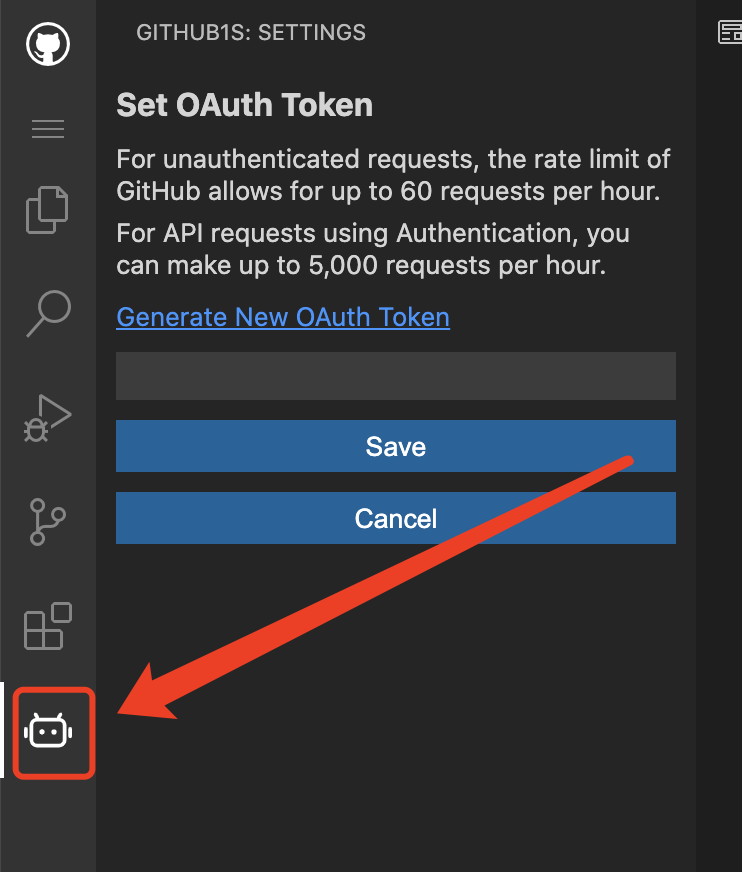 ## Screenshots
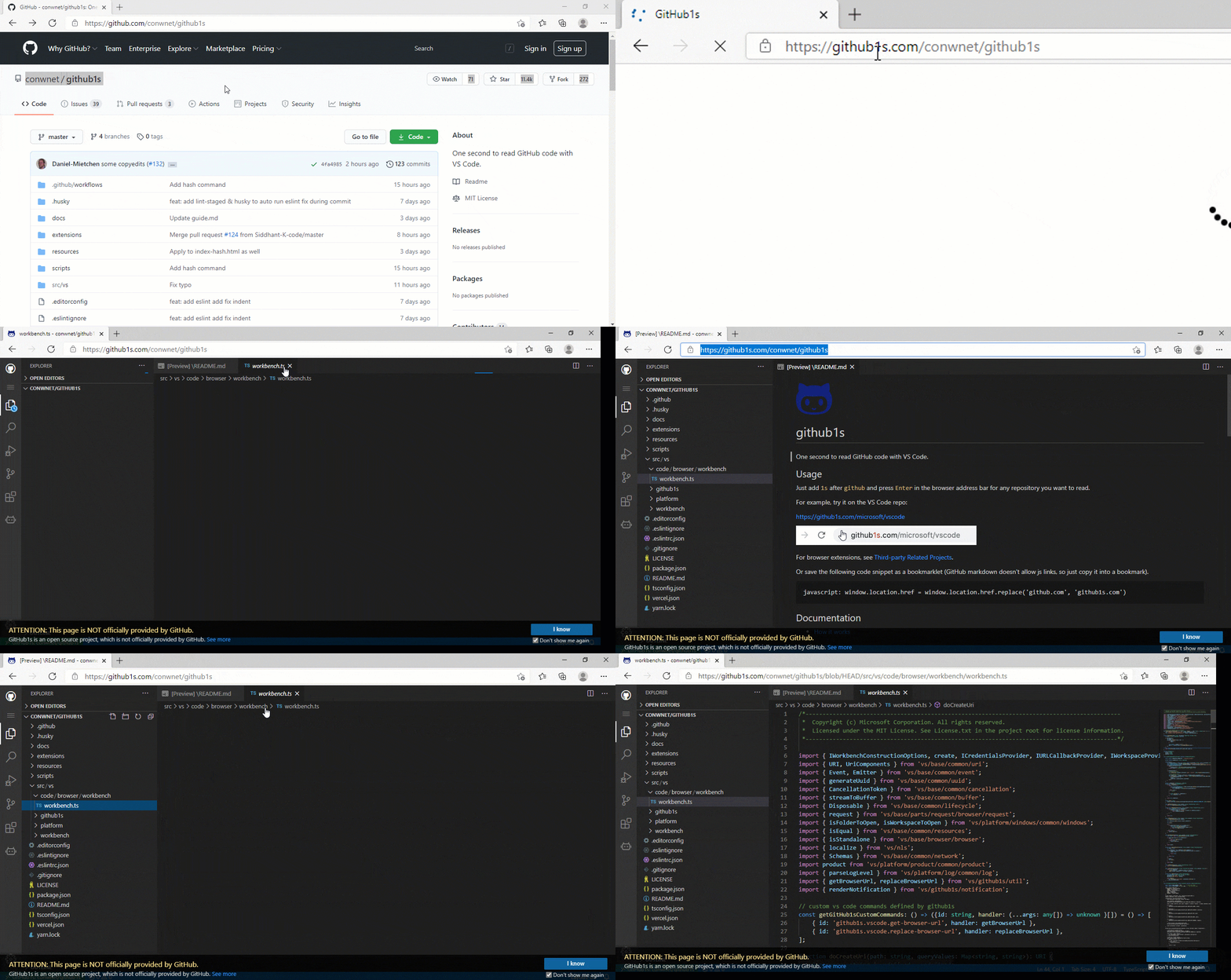
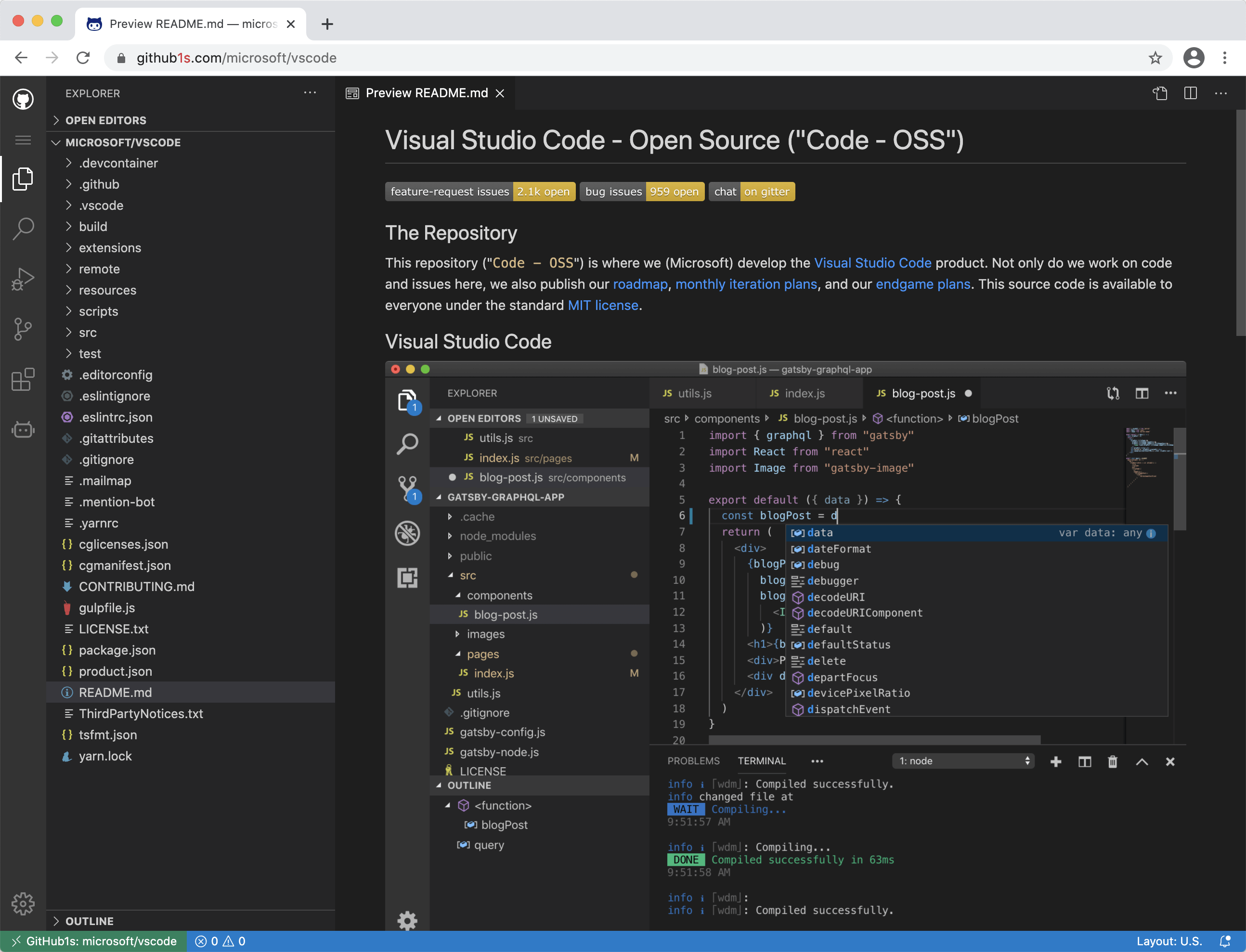
## Development
### Cloud-based development
You can start an online development environment with [Gitpod](https://www.gitpod.io) by clicking the following button:
[](https://gitpod.io/#https://github.com/conwnet/github1s)
### Local development
```bash
git clone git@github.com:conwnet/github1s.git
cd github1s
npm install
npm run watch
# The cli will automatically open http://localhost:8080 once the build is completed.
# You can visit http://localhost:8080/conwnet/github1s if it doesn't.
```
#### Local development with full VS Code build
You need [these prerequisites (the same ones as for VS Code)](https://github.com/microsoft/vscode/wiki/How-to-Contribute#prerequisites) for development with full VS Code build.
Please make sure you could build VS Code locally before the watch mode.
To verify the build:
```bash
cd github1s
npm run build:vscode
```
After the initial successful build, you could use the watch mode:
```bash
cd github1s
npm install
npm run watch-with-vscode
# The cli will automatically open http://localhost:8080 once the build is completed.
# You can visit http://localhost:8080/conwnet/github1s if it doesn't.
```
### ... or ... VS Code + Docker Development
You can use the VS Code plugin [Remote-Containers](https://marketplace.visualstudio.com/items?itemName=ms-vscode-remote.remote-containers) `Dev Container` to use a Docker container as a development environment.
1. Install the Remote-Containers plugin in VS Code & Docker
2. Open the Command Palette (default shortcut `Ctrl+Shift+P`) and choose `Remote-Containers: Clone Repository in Container Volume...`
3. Enter the repo, in this case `https://github.com/conwnet/github1s.git` or your forked repo
4. Pick either, `Create a unique volume` or `Create a new volume`
- Now VS Code will create the docker container and connect to the new container so you can use this as a fully setup environment!
5. Open a new VS Code Terminal, then you can run the `npm install` commands listed above.
```bash
npm install
npm run watch
# The cli will automatically open http://localhost:8080 once the build is completed.
# You can visit http://localhost:8080/conwnet/github1s if it doesn't.
```
### Format all codes
```bash
npm run format
```
It uses `prettier` to format all possible codes.
## Build
```bash
npm install
npm run build
```
## Feedback
- If something is not working, [create an issue](https://github.com/conwnet/github1s/issues/new)
## Sponsors
The continued development and maintenance of GitHub1s is made possible by these generous sponsors:
## Screenshots


## Development
### Cloud-based development
You can start an online development environment with [Gitpod](https://www.gitpod.io) by clicking the following button:
[](https://gitpod.io/#https://github.com/conwnet/github1s)
### Local development
```bash
git clone git@github.com:conwnet/github1s.git
cd github1s
npm install
npm run watch
# The cli will automatically open http://localhost:8080 once the build is completed.
# You can visit http://localhost:8080/conwnet/github1s if it doesn't.
```
#### Local development with full VS Code build
You need [these prerequisites (the same ones as for VS Code)](https://github.com/microsoft/vscode/wiki/How-to-Contribute#prerequisites) for development with full VS Code build.
Please make sure you could build VS Code locally before the watch mode.
To verify the build:
```bash
cd github1s
npm run build:vscode
```
After the initial successful build, you could use the watch mode:
```bash
cd github1s
npm install
npm run watch-with-vscode
# The cli will automatically open http://localhost:8080 once the build is completed.
# You can visit http://localhost:8080/conwnet/github1s if it doesn't.
```
### ... or ... VS Code + Docker Development
You can use the VS Code plugin [Remote-Containers](https://marketplace.visualstudio.com/items?itemName=ms-vscode-remote.remote-containers) `Dev Container` to use a Docker container as a development environment.
1. Install the Remote-Containers plugin in VS Code & Docker
2. Open the Command Palette (default shortcut `Ctrl+Shift+P`) and choose `Remote-Containers: Clone Repository in Container Volume...`
3. Enter the repo, in this case `https://github.com/conwnet/github1s.git` or your forked repo
4. Pick either, `Create a unique volume` or `Create a new volume`
- Now VS Code will create the docker container and connect to the new container so you can use this as a fully setup environment!
5. Open a new VS Code Terminal, then you can run the `npm install` commands listed above.
```bash
npm install
npm run watch
# The cli will automatically open http://localhost:8080 once the build is completed.
# You can visit http://localhost:8080/conwnet/github1s if it doesn't.
```
### Format all codes
```bash
npm run format
```
It uses `prettier` to format all possible codes.
## Build
```bash
npm install
npm run build
```
## Feedback
- If something is not working, [create an issue](https://github.com/conwnet/github1s/issues/new)
## Sponsors
The continued development and maintenance of GitHub1s is made possible by these generous sponsors:


 ](https://github.com/${username})`;
return `[${username}](https://github.com/${username})`;
});
const repoBadges = [
`[](https://github.com/${repo.repo_name})`,
`[](https://github.com/${repo.repo_name}/watchers)`,
`[](https://github.com/${repo.repo_name}/forks)`,
`[](https://github.com/${repo.repo_name}/stargazers)`,
`[](https://github.com/${repo.repo_name}/commits)`,
];
const increaseStarsText = (+repo.stars || 0) >= 0 ? `+${repo.stars || 0}` : `-${repo.stars}`;
const increaseForksText = (+repo.forks || 0) >= 0 ? `+${repo.forks || 0}` : `-${repo.forks}`;
const contributorsMarkdown = contributorAvatars.length
? ' Built by ' + contributorAvatars.join(' ')
: '';
const collectionMarkdown = repo.collection_names ? ` ${repo.collection_names}` : '';
const fireThreshold = period === RankingPeriod.ThisWeek ? 5000 : period === RankingPeriod.ThisMonth ? 12000 : 1000;
return `
## ${(+repo.total_score || 0) >= fireThreshold ? '🔥' : '🚀'} [${repo.repo_name}](${buildRepoLink(repo.repo_name)})
${repo.description || ''}
⭐️ ${increaseStarsText} 🔗 ${increaseForksText} ${contributorsMarkdown}${collectionMarkdown}
${repoBadges.join(' ')}
`;
};
export type PageType = RankingPeriod | 'Languages' | 'Collections' | '';
const createRankingsLinksMarkdown = (page: PageType) => {
const rankingLinks = [
page !== RankingPeriod.Today ? `[Today](/README.md)` : 'Today',
page !== RankingPeriod.ThisWeek ? `[This Week](/ThisWeek.md)` : 'This Week',
page !== RankingPeriod.ThisMonth ? `[This Month](/ThisMonth.md)` : 'This Month',
page !== 'Languages' ? `[Languages](/Languages.md)` : 'Languages',
page !== 'Collections' ? `[Collections](/Collections.md)` : 'Collections',
`[GitHub Trending](https://github.com/trending)`,
];
return rankingLinks.join(' ');
};
export const createRankingPageMarkdown = async (period: RankingPeriod, language = '', collection = '') => {
const periodTextInTitle =
period === RankingPeriod.ThisWeek ? 'This Week' : period === RankingPeriod.ThisMonth ? 'This Month' : 'Today';
const periodTextInContent =
period === RankingPeriod.ThisWeek ? 'this week' : period === RankingPeriod.ThisMonth ? 'this month' : 'today';
const repoItems = (await getTrendingRepos(period, language)).slice(0, 30);
const repoItemsMarkdown = repoItems.map((repo) => createRepoItemMarkdown(repo, period));
const currentPage = language || collection ? '' : period;
return `
# Trending Repos ${periodTextInTitle}${language ? ` (${language})` : ''}
See what the GitHub community is most excited about ${periodTextInContent}.${dataSourceMarkdown}
Other Rankings: ${createRankingsLinksMarkdown(currentPage)}
***
${repoItemsMarkdown.join('\n\n***\n\n')}
***
`;
};
export const createLanguageListPageMarkdown = () => {
const languageListMarkdown = RankingLanguages.map((language) => {
const todayLink = encodeURIComponent(`./languages/${language}/${language}_Today.md`);
const thisWeekLink = encodeURIComponent(`./languages/${language}/${language}_ThisWeek.md`);
const thisMonthLink = encodeURIComponent(`./languages/${language}/${language}_ThisMonth.md`);
return `${language} | [Today](${todayLink}) | [This Week](${thisWeekLink}) | [This Month](${thisMonthLink})`;
});
return `
# Trending Repos by Languages
See what the GitHub community is most excited by languages.${dataSourceMarkdown}
Other Rankings: ${createRankingsLinksMarkdown('Languages')}
***
| Language | Today | This Week | This Month |
| -- | -- | -- | -- |
${languageListMarkdown.join('\n')}
***
`;
};
const getPopCountText = (pop_count: number, percentage = false) => {
const absValue = Math.abs(pop_count);
const valueText = percentage ? `${trimEnd(absValue.toFixed(1), '0.')}%` : absValue;
return pop_count > 0
? ` (+${valueText})`
: pop_count < 0
? ` (-${valueText})`
: '';
};
const getRankChangeText = (rank_change: number) => {
const absValue = Math.abs(rank_change);
return rank_change > 0
? ` (↓${absValue})`
: rank_change < 0
? ` (↑${absValue})`
: '';
};
export const createCollectionsListPageMarkdown = async () => {
const collectionReposMap = new Map
](https://github.com/${username})`;
return `[${username}](https://github.com/${username})`;
});
const repoBadges = [
`[](https://github.com/${repo.repo_name})`,
`[](https://github.com/${repo.repo_name}/watchers)`,
`[](https://github.com/${repo.repo_name}/forks)`,
`[](https://github.com/${repo.repo_name}/stargazers)`,
`[](https://github.com/${repo.repo_name}/commits)`,
];
const increaseStarsText = (+repo.stars || 0) >= 0 ? `+${repo.stars || 0}` : `-${repo.stars}`;
const increaseForksText = (+repo.forks || 0) >= 0 ? `+${repo.forks || 0}` : `-${repo.forks}`;
const contributorsMarkdown = contributorAvatars.length
? ' Built by ' + contributorAvatars.join(' ')
: '';
const collectionMarkdown = repo.collection_names ? ` ${repo.collection_names}` : '';
const fireThreshold = period === RankingPeriod.ThisWeek ? 5000 : period === RankingPeriod.ThisMonth ? 12000 : 1000;
return `
## ${(+repo.total_score || 0) >= fireThreshold ? '🔥' : '🚀'} [${repo.repo_name}](${buildRepoLink(repo.repo_name)})
${repo.description || ''}
⭐️ ${increaseStarsText} 🔗 ${increaseForksText} ${contributorsMarkdown}${collectionMarkdown}
${repoBadges.join(' ')}
`;
};
export type PageType = RankingPeriod | 'Languages' | 'Collections' | '';
const createRankingsLinksMarkdown = (page: PageType) => {
const rankingLinks = [
page !== RankingPeriod.Today ? `[Today](/README.md)` : 'Today',
page !== RankingPeriod.ThisWeek ? `[This Week](/ThisWeek.md)` : 'This Week',
page !== RankingPeriod.ThisMonth ? `[This Month](/ThisMonth.md)` : 'This Month',
page !== 'Languages' ? `[Languages](/Languages.md)` : 'Languages',
page !== 'Collections' ? `[Collections](/Collections.md)` : 'Collections',
`[GitHub Trending](https://github.com/trending)`,
];
return rankingLinks.join(' ');
};
export const createRankingPageMarkdown = async (period: RankingPeriod, language = '', collection = '') => {
const periodTextInTitle =
period === RankingPeriod.ThisWeek ? 'This Week' : period === RankingPeriod.ThisMonth ? 'This Month' : 'Today';
const periodTextInContent =
period === RankingPeriod.ThisWeek ? 'this week' : period === RankingPeriod.ThisMonth ? 'this month' : 'today';
const repoItems = (await getTrendingRepos(period, language)).slice(0, 30);
const repoItemsMarkdown = repoItems.map((repo) => createRepoItemMarkdown(repo, period));
const currentPage = language || collection ? '' : period;
return `
# Trending Repos ${periodTextInTitle}${language ? ` (${language})` : ''}
See what the GitHub community is most excited about ${periodTextInContent}.${dataSourceMarkdown}
Other Rankings: ${createRankingsLinksMarkdown(currentPage)}
***
${repoItemsMarkdown.join('\n\n***\n\n')}
***
`;
};
export const createLanguageListPageMarkdown = () => {
const languageListMarkdown = RankingLanguages.map((language) => {
const todayLink = encodeURIComponent(`./languages/${language}/${language}_Today.md`);
const thisWeekLink = encodeURIComponent(`./languages/${language}/${language}_ThisWeek.md`);
const thisMonthLink = encodeURIComponent(`./languages/${language}/${language}_ThisMonth.md`);
return `${language} | [Today](${todayLink}) | [This Week](${thisWeekLink}) | [This Month](${thisMonthLink})`;
});
return `
# Trending Repos by Languages
See what the GitHub community is most excited by languages.${dataSourceMarkdown}
Other Rankings: ${createRankingsLinksMarkdown('Languages')}
***
| Language | Today | This Week | This Month |
| -- | -- | -- | -- |
${languageListMarkdown.join('\n')}
***
`;
};
const getPopCountText = (pop_count: number, percentage = false) => {
const absValue = Math.abs(pop_count);
const valueText = percentage ? `${trimEnd(absValue.toFixed(1), '0.')}%` : absValue;
return pop_count > 0
? ` (+${valueText})`
: pop_count < 0
? ` (-${valueText})`
: '';
};
const getRankChangeText = (rank_change: number) => {
const absValue = Math.abs(rank_change);
return rank_change > 0
? ` (↓${absValue})`
: rank_change < 0
? ` (↑${absValue})`
: '';
};
export const createCollectionsListPageMarkdown = async () => {
const collectionReposMap = new Map