


Repository: crisp-oss/chappe
Branch: master
Commit: a269f1e3a96c
Files: 102
Total size: 424.3 KB
Directory structure:
gitextract_j_mdcei_/
├── .babelrc
├── .banner
├── .bowerrc
├── .github/
│ └── workflows/
│ ├── build.yml
│ └── test.yml
├── .gitignore
├── .jscsrc
├── .jshintrc
├── .npmignore
├── .pug-lintrc
├── .stylelintrc.yml
├── CHANGELOG.md
├── LICENSE
├── README.md
├── bin/
│ └── chappe.js
├── bower.json
├── examples/
│ └── acme-docs/
│ ├── config.json
│ ├── data/
│ │ ├── changes/
│ │ │ ├── 2020.json
│ │ │ └── 2021.json
│ │ ├── guides/
│ │ │ ├── hello-world/
│ │ │ │ ├── index.md
│ │ │ │ └── quickstart/
│ │ │ │ └── index.md
│ │ │ ├── index.md
│ │ │ └── markdown-syntax/
│ │ │ ├── index.md
│ │ │ ├── section-example/
│ │ │ │ ├── index.md
│ │ │ │ ├── sub-section-one/
│ │ │ │ │ └── index.md
│ │ │ │ └── sub-section-two/
│ │ │ │ └── index.md
│ │ │ └── syntax/
│ │ │ └── index.md
│ │ └── references/
│ │ ├── rest-api/
│ │ │ ├── _private.md
│ │ │ └── v1.md
│ │ └── rtm-api/
│ │ └── v1.md
│ └── package.json
├── gulpfile.js
├── package.json
├── res/
│ ├── config/
│ │ ├── common.json
│ │ └── user.json
│ └── plugins/
│ ├── gulp/
│ │ ├── minisearch.js
│ │ └── pug-templates.js
│ └── marked/
│ ├── extensions/
│ │ ├── embed.js
│ │ ├── emphasis.js
│ │ ├── figcaption.js
│ │ ├── navigation-item.js
│ │ └── navigation.js
│ └── renderers/
│ ├── code.js
│ └── heading.js
└── src/
├── javascripts/
│ └── common/
│ └── common.js
├── locales/
│ └── en.json
├── stylesheets/
│ ├── _colors.scss
│ ├── _config.scss
│ ├── _functions.scss
│ ├── _globals.scss
│ ├── _mixins.scss
│ ├── _variables.scss
│ ├── changes/
│ │ └── changes.scss
│ ├── common/
│ │ ├── _appearance.scss
│ │ ├── _badges.scss
│ │ ├── _base.scss
│ │ ├── _buttons.scss
│ │ ├── _code.scss
│ │ ├── _content.scss
│ │ ├── _fonts.scss
│ │ ├── _footer.scss
│ │ ├── _header.scss
│ │ ├── _highlight.scss
│ │ ├── _markdown.scss
│ │ ├── _search.scss
│ │ ├── _viewer.scss
│ │ └── common.scss
│ ├── guides/
│ │ ├── _common.scss
│ │ ├── _content.scss
│ │ ├── _sidebar_left.scss
│ │ └── guides.scss
│ ├── home/
│ │ └── home.scss
│ ├── not_found/
│ │ └── not_found.scss
│ └── references/
│ ├── _content.scss
│ ├── _sidebar_left.scss
│ └── references.scss
└── templates/
├── __base.pug
├── _body_footer.pug
├── _body_header.pug
├── _body_search.pug
├── _head_favicon.pug
├── _head_http.pug
├── _head_includes.pug
├── _head_metas.pug
├── _head_screen.pug
├── _head_theme.pug
├── _mixins.pug
├── changes/
│ └── index.pug
├── guides/
│ ├── _content.pug
│ ├── _sidebar_left.pug
│ └── index.pug
├── home/
│ └── index.pug
├── not_found/
│ └── index.pug
└── references/
├── _blueprint.pug
├── _blueprint_content.pug
├── _blueprint_sidebar_left.pug
├── _markdown.pug
├── _markdown_content.pug
├── _markdown_sidebar_left.pug
├── _mixins_blueprint.pug
├── _mixins_common.pug
└── index.pug
================================================
FILE CONTENTS
================================================
================================================
FILE: .babelrc
================================================
{
presets: ["es2015"]
}
================================================
FILE: .banner
================================================
___ ___ ___ ___ ___ ___
/ /\ /__/\ / /\ / /\ / /\ / /\
/ /:/ \ \:\ / /::\ / /::\ / /::\ / /:/_
/ /:/ \__\:\ / /:/\:\ / /:/\:\ / /:/\:\ / /:/ /\
/ /:/ ___ ___ / /::\ / /:/~/::\ / /:/~/:// /:/~/:// /:/ /:/_
/__/:/ / /\/__/\ /:/\:\/__/:/ /:/\:\/__/:/ /://__/:/ /://__/:/ /:/ /\
\ \:\ / /:/\ \:\/:/__\/\ \:\/:/__\/\ \:\/:/ \ \:\/:/ \ \:\/:/ /:/
\ \:\ /:/ \ \::/ \ \::/ \ \::/ \ \::/ \ \::/ /:/
\ \:\/:/ \ \:\ \ \:\ \ \:\ \ \:\ \ \:\/:/
\ \::/ \ \:\ \ \:\ \ \:\ \ \:\ \ \::/
\__\/ \__\/ \__\/ \__\/ \__\/ \__\/
— {{bundle}} by Crisp
================================================
FILE: .bowerrc
================================================
{
"registry": "https://registry.bower.io"
}
================================================
FILE: .github/workflows/build.yml
================================================
on:
push:
tags:
- "v*.*.*"
permissions:
id-token: write
name: Build and Release
jobs:
release:
runs-on: ubuntu-latest
steps:
- name: Checkout code
uses: actions/checkout@v2
- name: Install NodeJS
uses: actions/setup-node@v1
with:
node-version: 24.x
registry-url: https://registry.npmjs.org
- name: Verify versions
run: node --version && npm --version && node -p process.versions.v8
- name: Release package
run: npm publish --ignore-scripts --provenance
================================================
FILE: .github/workflows/test.yml
================================================
on: [push, pull_request]
name: Test and Build
jobs:
test:
strategy:
matrix:
os: [ubuntu-latest]
node-version: [20.x, 22.x, 24.x]
fail-fast: false
runs-on: ${{ matrix.os }}
steps:
- name: Checkout code
uses: actions/checkout@v2
- name: Install NodeJS
uses: actions/setup-node@v1
with:
node-version: ${{ matrix.node-version }}
- name: Verify versions
run: node --version && npm --version && node -p process.versions.v8
- name: Cache build artifacts
id: cache-node
uses: actions/cache@v4
with:
path: |
~/.npm
.chappe
node_modules
key: test-${{ runner.os }}-node-${{ matrix.node-version }}
- name: Install dependencies
run: npm install
- name: Run tests
run: npm test
- name: Build 'acme-docs' example
run: npm run build
================================================
FILE: .gitignore
================================================
.DS_Store
Thumbs.db
npm-debug.log
package-lock.json
node_modules/
.chappe/
dist/
================================================
FILE: .jscsrc
================================================
{
"maximumLineLength": 80,
"validateIndentation": 2,
"validateQuoteMarks": "\"",
"disallowTrailingComma": true,
"disallowTrailingWhitespace": true,
"disallowNewlineBeforeBlockStatements": true,
"disallowMixedSpacesAndTabs": true,
"disallowMultipleLineStrings": true,
"disallowNamedUnassignedFunctions": true,
"disallowQuotedKeysInObjects": true,
"disallowSpacesInsideParentheses": true,
"disallowKeywordsOnNewLine": ["else"],
"disallowIdentifierNames": ["console"],
"requireCurlyBraces": true,
"requireDotNotation": true,
"requireSemicolons": true,
"requireSpaceBeforeObjectValues": true,
"requireSpaceBetweenArguments": true,
"requireSpacesInForStatement": true,
"requireSpaceAfterObjectKeys": true,
"requireSpaceBeforeBinaryOperators": true,
"requireSpaceBeforeBlockStatements": true,
"requireSpacesInConditionalExpression": true,
"requireBlocksOnNewline": true,
"requireCommaBeforeLineBreak": true,
"requireLineFeedAtFileEnd": true,
"requirePaddingNewLineAfterVariableDeclaration": true,
"requirePaddingNewLinesAfterUseStrict": true,
"requirePaddingNewLinesBeforeExport": true,
"requirePaddingNewLinesInObjects": true
}
================================================
FILE: .jshintrc
================================================
{
"camelcase": false,
"esversion": 6,
"node": true,
"predef": [
"require",
"define",
"escape",
"Buffer",
"module"
]
}
================================================
FILE: .npmignore
================================================
package-lock.json
.github/**
.chappe/**
dist/**
examples/**
================================================
FILE: .pug-lintrc
================================================
{
"requireLowerCaseTags": true,
"requireLowerCaseAttributes": true,
"requireLineFeedAtFileEnd": true,
"requireIdLiteralsBeforeAttributes": true,
"requireClassLiteralsBeforeIdLiterals": true,
"requireClassLiteralsBeforeAttributes": true,
"requireStrictEqualityOperators": true,
"validateSelfClosingTags": true,
"validateIndentation": 2,
"validateDivTags": true,
"validateAttributeQuoteMarks": "\"",
"disallowStringConcatenation": true,
"disallowDuplicateAttributes": true,
"disallowSpecificAttributes": [
"xmlns",
{
"br": "role"
},
{
"hr": "role"
},
{
"nav": "role"
}
],
"disallowSpecificTags": [
"b",
"hgroup",
"i",
"s",
"u"
],
"requireSpecificAttributes": [
{
"html": [
"lang"
]
},
{
"a": [
"href"
]
},
{
"img": [
"src",
"alt"
]
},
{
"form": [
"action",
"method"
]
},
{
"input": [
"type",
"name"
]
},
{
"textarea": [
"name",
"cols",
"rows"
]
}
]
}
================================================
FILE: .stylelintrc.yml
================================================
extends:
- stylelint-config-standard-scss
rules:
selector-id-pattern: null
selector-class-pattern: null
at-rule-empty-line-before: null
no-descending-specificity: null
scss/comment-no-empty: null
scss/load-no-partial-leading-underscore: null
scss/dollar-variable-empty-line-before: null
================================================
FILE: CHANGELOG.md
================================================
# Changelog
## 1.16.0 (2026-05-03)
### New Features
* Added support for footnotes in guides.
## 1.15.2 (2026-03-31)
### Bug Fixes
* Fixed category icon overflow in guides details section.
## 1.15.1 (2026-02-02)
### Bug Fixes
* Fixed generated slug for anchor links in Markdown articles (in some cases).
## 1.15.0 (2026-01-28)
### Changes
* Migrate `.jade` files to `.pug` syntax (and update the syntax to Pug 3).
## 1.14.0 (2026-01-27)
### Changes
* Migrate `.sass` files to `.scss` syntax.
* Re-instate linting of stylesheet files with `gulp-stylelint-esm`.
## 1.13.0 (2026-01-27)
### Changes
* Migrate Sass syntax away from `@import` to `@use`.
## 1.12.0 (2025-11-11)
### Changes
* Migrate `gulp-cssmin` to `gulp-clean-css` for Node.js 24 compatibility.
## 1.11.0 (2025-10-16)
### Changes
* Migrate to NPMJS OIDC publishing tokens (since Classic Tokens will be removed in November 2025).
## 1.10.2 (2025-07-15)
### Bug Fixes
* Fixed dropped enumeration members with empty values (such as `0` and `false`).
* Fixed enumeration descriptions, that were not showing at all.
## 1.10.1 (2025-06-22)
### New Features
* Added a way to configure navigation link targets (`self` or `blank`, defaults to `self`).
## 1.10.0 (2025-06-22)
### New Features
* Added a way to disable customer support CTAs with the `features.support` feature flag option (enabled by default).
## 1.9.8 (2025-05-17)
### Bug Fixes
* Fixed concurrency issues on the copying of images while the `sass` is also running.
## 1.9.7 (2025-05-17)
### New Features
* Added a way to customize `async` and `defer` attributes in the `includes.scripts.urls` option.
### Bug Fixes
* The warnings thrown by `sass` are now hidden (until they are fixed).
## 1.9.6 (2025-05-16)
### Changes
* Replaced deprecated `node-sass` dependency with `sass`.
## 1.9.5 (2023-11-06)
### Changes
* Added provenance information upon building NPM package over GitHub Actions.
## 1.9.4 (2023-08-02)
### Bug Fixes
* Fixed performance issues when installing Chappe with NPM v9.
## 1.9.3 (2023-01-06)
### New Features
* Automated the package release process via GitHub Actions (ie. `npm publish`).
## 1.9.2 (2022-12-02)
### Changes
* Improved detection of page titles when generating Open Graph previews.
## 1.9.1 (2022-12-02)
### New Features
* Added support for the `twitter:image:src` and `twitter:card` tags.
## 1.9.0 (2022-12-02)
### ⚠️ Breaking Changes
* The Open Graph images are now auto-generated from the page content, using the provided `opengraph` configuration property; since this option already existed before, you will need to make sure to update your Open Graph image so that it can contain inserted text in the foreground (ie. you need to clear any text from your existing Open Graph image).
## 1.8.1 (2022-11-03)
### Changes
* Added a background hover effect on table rows.
## 1.8.0 (2022-06-24)
### New Features
* Added a "copy to clipboard" button in all code blocks.
## 1.7.1 (2022-05-06)
### Changes
* The generated platform changes RSS feed now uses the configured title.
## 1.7.0 (2022-05-06)
### ⚠️ Breaking Changes
* Changed how the theme accent color gets configured with the `theme` configuration property (`light` and `dark` mode variants must now be set).
### New Features
* Support for Crisp Status (aside from Vigil).
## 1.6.4 (2022-02-13)
### Changes
* Moved the search engine opening shortcut from ⌘F to ⌘K (after gathering user feedback).
## 1.6.3 (2022-01-12)
### Bug Fixes
* Fixed an issue with non-highlighted code blocks in Dark Mode, where code text would appear black-on-black.
* Fixed an issue with inline code blocks in Dark Mode, where selected text would appear white-on-white.
## 1.6.2 (2022-01-11)
### Changes
* Improved management of CSS colors.
## 1.6.1 (2022-01-11)
### Changes
* Improved Dark Mode colors.
* Moved logos to embedded images (this prevents visual glitches when loading docs).
## 1.6.0 (2022-01-10)
### New Features
* Implemented Dark Mode.
* Added the ability to configure the theme accent color with the `theme` configuration property.
## 1.5.1 (2022-01-07)
### Changes
* Improved the performance of watching for changes in `data/` while using `chappe serve` or `chappe watch`.
### Bug Fixes
* Fixed Gulp meta-events showing in the Chappe CLI output when using `--verbose` (they are now hidden).
## 1.5.0 (2022-01-06)
### New Features
* The Chappe CLI now embeds a preview server, used to ease with writing and previewing docs (via `chappe serve`).
### Changes
* Improved logging in the Chappe CLI.
### Bug Fixes
* Fixed the abrupt stopping of the Chappe CLI whenever a resource build failed while using `chappe watch`.
## 1.4.1 (2022-01-06)
### Changes
* Refactored the README to add the Chappe logo.
## 1.4.0 (2022-01-05)
### Changes
* Moved the project to a dedicated GitHub organization: [Crisp OSS](https://github.com/crisp-oss).
## 1.3.2 (2022-01-05)
### Changes
* Moved the Chappe CLI from ES5 to ES6.
## 1.3.1 (2022-01-05)
### Changes
* Refactored Chappe CLI terminal outputs.
* Improved the `acme-docs` example.
## 1.3.0 (2022-01-05)
### Changes
* Reworked the lint pipeline to reduce the number of dependencies.
### Bug Fixes
* Fixed an issue where 404 and private pages appeared in the sitemap.
* Fixed the configuration path for the SASS linter, which could not read its configuration file in some cases.
## 1.2.1 (2022-01-05)
### Bug Fixes
* Fixed the normalization of paths passed to the Chappe CLI via `--config`.
## 1.2.0 (2022-01-05)
### New Features
* The Chappe CLI `--config` argument now accepts multiple configuration files (comma-separated, merged together).
* Added the ability to override certain Chappe internal values with the `overrides` configuration property.
### Bug Fixes
* Fixed an issue in Chappe CLI, where a build failure could cause the process to hang indefinitely.
## 1.1.2 (2022-01-04)
### Bug Fixes
* Fixed the NPMJS distribution package, that was missing some more hidden files (such as `.babelrc`).
## 1.1.1 (2022-01-04)
### Bug Fixes
* Fixed the NPMJS distribution package, that was missing the `.banner` file.
## 1.1.0 (2022-01-04)
### Changes
* Moved the build pipeline to Gulp 4.
* Improved the Chappe CLI with terminal spinners.
## 1.0.3 (2022-01-04)
### Changes
* Now showing a Chappe logo when calling the Chappe CLI.
* Better temporary files management.
### Bug Fixes
* All internal paths are now absolute (this fixes some build environments).
## 1.0.2 (2022-01-03)
### Bug Fixes
* Fix dependencies for published `chappe` package.
## 1.0.1 (2022-01-03)
### Bug Fixes
* Fix the path of Chappe CLI.
## 1.0.0 (2022-01-03)
### New Features
* Initial release.
================================================
FILE: LICENSE
================================================
Copyright (c) 2021 Crisp IM SAS
Permission is hereby granted, free of charge, to any person
obtaining a copy of this software and associated documentation
files (the "Software"), to deal in the Software without
restriction, including without limitation the rights to use,
copy, modify, merge, publish, distribute, sublicense, and/or sell
copies of the Software, and to permit persons to whom the
Software is furnished to do so, subject to the following
conditions:
The above copyright notice and this permission notice shall be
included in all copies or substantial portions of the Software.
THE SOFTWARE IS PROVIDED "AS IS", WITHOUT WARRANTY OF ANY KIND,
EXPRESS OR IMPLIED, INCLUDING BUT NOT LIMITED TO THE WARRANTIES
OF MERCHANTABILITY, FITNESS FOR A PARTICULAR PURPOSE AND
NONINFRINGEMENT. IN NO EVENT SHALL THE AUTHORS OR COPYRIGHT
HOLDERS BE LIABLE FOR ANY CLAIM, DAMAGES OR OTHER LIABILITY,
WHETHER IN AN ACTION OF CONTRACT, TORT OR OTHERWISE, ARISING
FROM, OUT OF OR IN CONNECTION WITH THE SOFTWARE OR THE USE OR
OTHER DEALINGS IN THE SOFTWARE.
================================================
FILE: README.md
================================================
[](https://github.com/crisp-oss/chappe/actions/workflows/test.yml) [](https://github.com/crisp-oss/chappe/actions/workflows/build.yml) [](https://www.npmjs.com/package/chappe) [](https://www.npmjs.com/package/chappe)
**Developer Docs builder. Write guides in Markdown and references in API Blueprint. Comes with a built-in search engine.**
Chappe is a Developer Docs builder, that produces static assets. No runtime, just lightweight static files. It was built to address SaaS companies needs, and can serve as a first-class modern alternative to hosted services such as [ReadMe](https://readme.com/).
The reason behind why we made Chappe is the following: while looking for a Developer Docs builder at [Crisp](https://crisp.chat/en/), all that we could find were either outdated open-source projects, or commercial documentation builders. We wanted a modern Developer Docs website hosted on our premises, as pure-static assets. The latter is especially important, as we do not want to rely on a plethora of external services that can go down anytime.
**Using Chappe is as easy as:**
1. Writing all your docs in Markdown;
2. Building your docs in a single command;
3. Finally, deploying static build assets to your Web servers (or GitHub Pages, Cloudflare Pages, etc. — _this can be automated via GitHub Actions_);
**😘 Maintainer**: [@valeriansaliou](https://github.com/valeriansaliou)
## Screenshots & Demo
**👉 See a live demo of Chappe on the [Crisp Developer Hub](https://docs.crisp.chat/).**
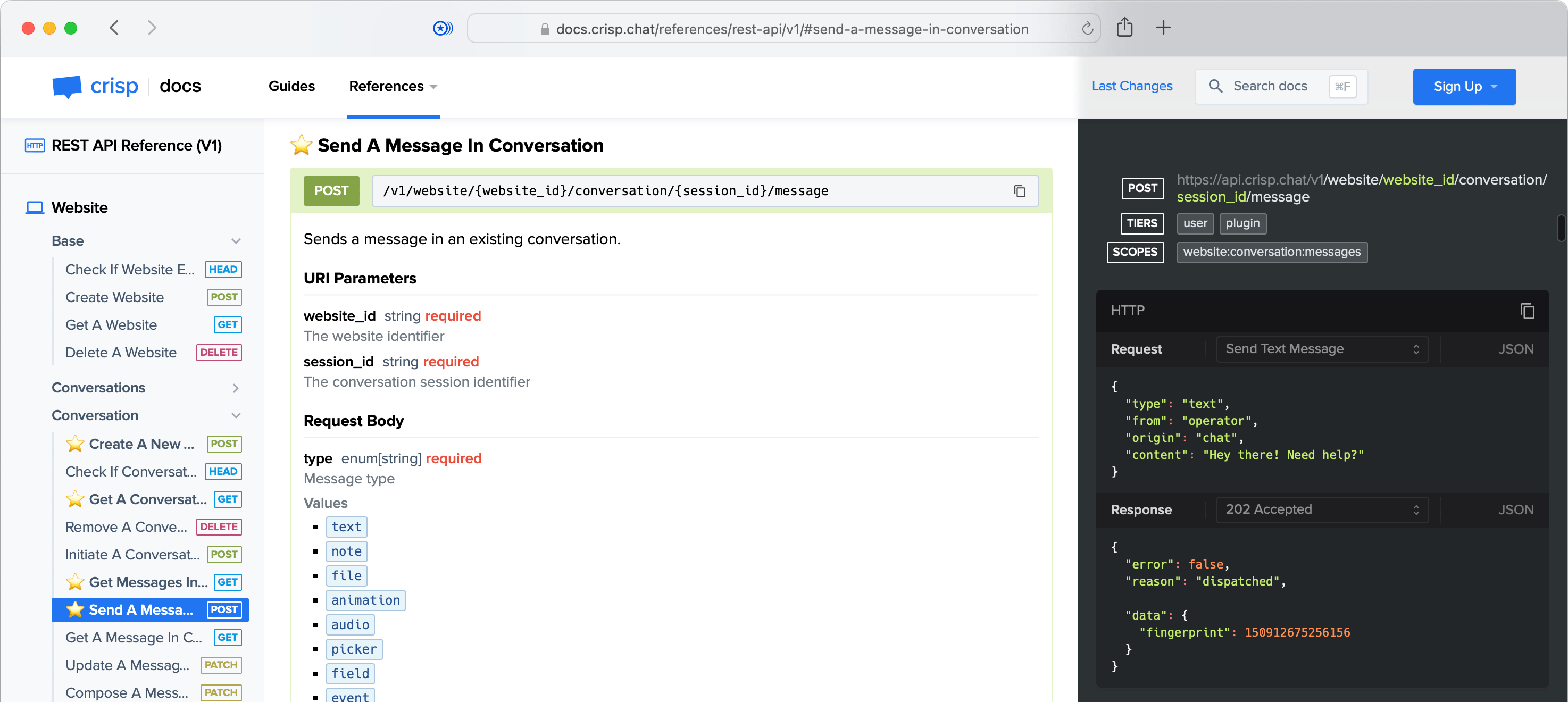
1️⃣ Chappe can generate your REST API reference:
[](https://docs.crisp.chat/references/rest-api/v1/)
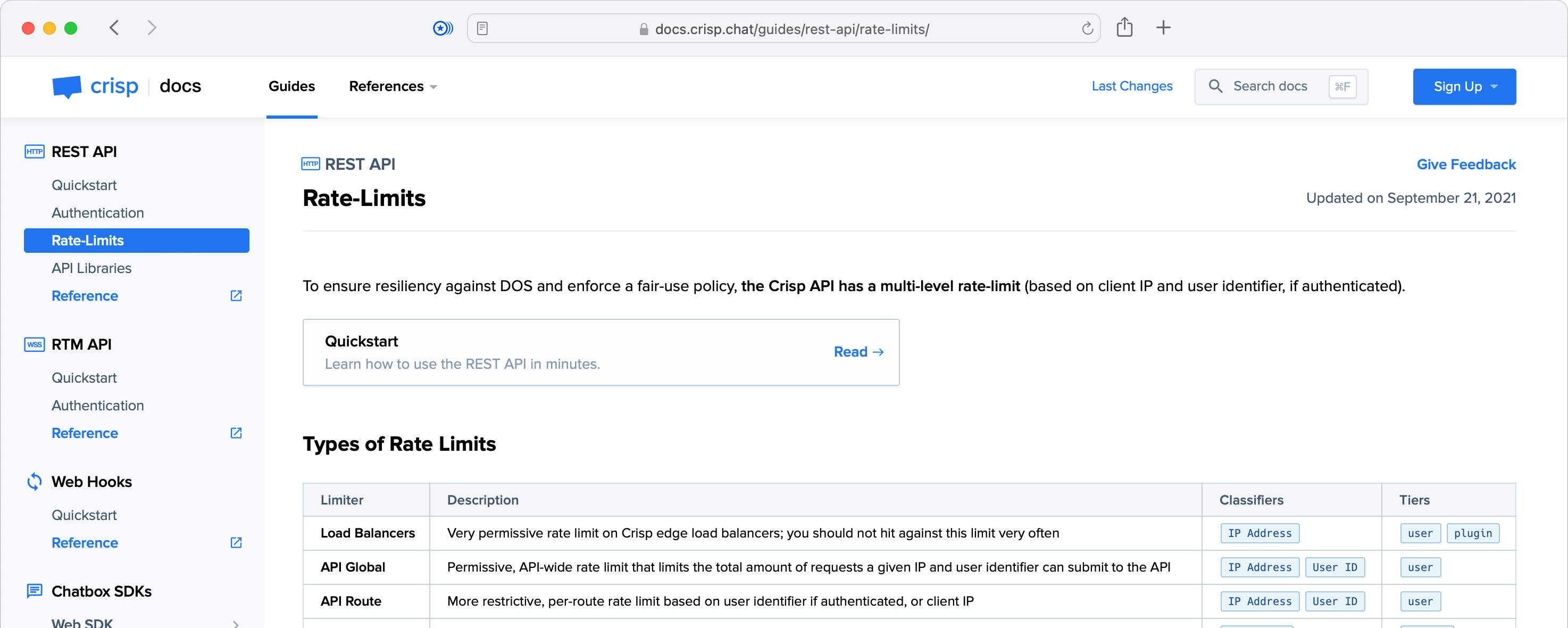
2️⃣ It also generates Markdown-based developer guides:
[](https://docs.crisp.chat/guides/rest-api/rate-limits/)
3️⃣ Oh, and it also lets your users search anything in your Developer Docs:
[](https://docs.crisp.chat/)
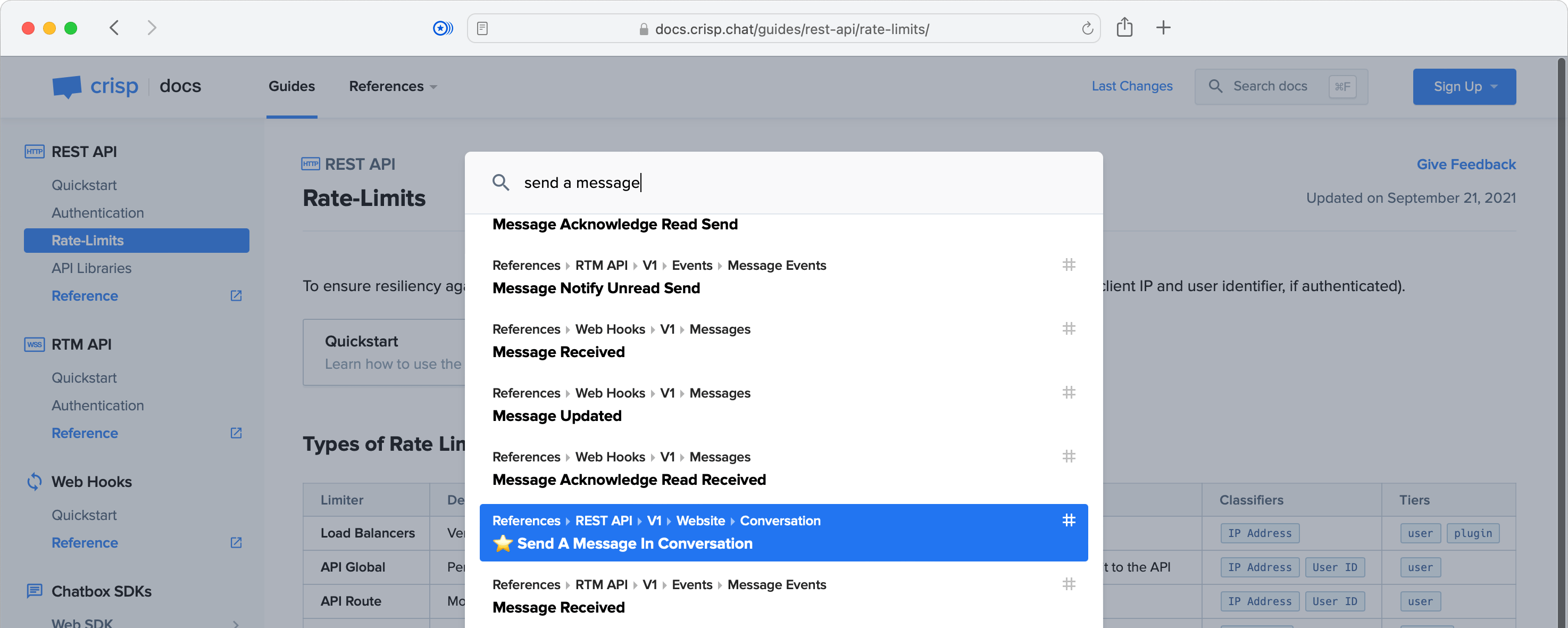
_👉 Note that the search engine feature is 100% local. This means that it does not run on an external service like [Algolia](https://www.algolia.com/), though it does provides similar search performance and results. The search index is generated at build time as a JSON file, which gets loaded on-demand when the search box gets opened._
## Who uses it?
Crisp
Meowtel
_👋 You use Chappe and you want to be listed there? [Open an issue](https://github.com/crisp-oss/chappe/issues)._
## Last changes
The version history can be found in the [CHANGELOG.md](https://github.com/crisp-oss/chappe/blob/master/CHANGELOG.md) file.
## Features
* **Simple & fast**: generate a Developer Docs with optimized static assets. No runtime
* **Guides**: write developer guides in Markdown (rich content support: images, videos, tables, etc.)
* **References**: document your HTTP REST API specification using API Blueprint
* **Changes**: maintain a changelog of your platform (eg. your REST API, your SDKs)
* **RSS feed**: users can subscribe to your changelog over RSS
* **Beautiful Markdown rendering**: all content that you write gets rendered with a clear and modern style
* **Syntax highlighting**: coloring for your code examples in 100+ programming languages
* **Built-in search engine**: the index is generated during build and is hosted locally
* **Fully responsive**: full support of desktop, tablet and phone screens
* **Dark Mode**: read your docs either in light mode or dark mode
* **Customizable theme**: configure an accent color for your docs theme
* **SEO-friendly**: a deep sitemap is generated for search engines
* **Sharing-friendly**: full support of the Open Graph protocol, with the auto-generation of preview images
* **Private pages support**: mark any guide or reference as private or unlisted (prefix its name with `_`)
* **Local preview server**: skip setting up a local Web server to preview your docs while writing them, Chappe embeds a preview server that can be started in a single command
_The following optional features can also be enabled:_
* **Chatbox**: integrate with the [Crisp Chatbox](https://crisp.chat/en/livechat/) to handle tech support and collect user feedback
* **Status page**: integrate with your [Vigil](https://github.com/valeriansaliou/vigil) status page to show live system status (can also be [Crisp Status](https://crisp.chat/en/status/))
## How to use it?
### Installation & Overview
To install and use Chappe, please follow those steps:
1. Create a new, empty Git repository;
2. Copy the `examples/acme-docs/` folder contents from the Chappe repository into your project root;
3. Run: `npm install` (make sure that you have a recent NodeJS version installed);
4. Run: `npx chappe serve` to build the docs and serve them over a local Web server (it will also watch for changes);
5. Open: [http://localhost:8080](http://localhost:8080/) in your Web browser to access your docs;
6. Write your Markdown guides and references in the `data/` directory (changes will be hot-reloaded in your browser);
Please refer to sections below for more details on how to write docs, customize Chappe, and deploy your final docs to your Web server.
_👉 If Chappe fails to install on your Mac with an Apple Silicon chip, please refer to the [Common questions](#-common-questions) section below._
### Configuration
The configuration of your Chappe docs is stored in a single JSON file, usually named `config.json`. Your configuration file will make references to images, such as your docs logo, which are stored in the `assets/` folder.
An empty definition of the Chappe configuration file is available in: [res/config/user.json](https://github.com/crisp-oss/chappe/blob/master/res/config/user.json), although you may rather want to see a filled example: [examples/acme-docs/config.json](https://github.com/crisp-oss/chappe/blob/master/examples/acme-docs/config.json) (if you copy-paste it, **make sure** to change all of its contents).
_👇 Notes on certain configuration rules can be found in the [Advanced settings](#%EF%B8%8F-advanced-settings) section._
### Chappe CLI usage
Chappe provides you with the `chappe` command, that builds your docs.
It supports the following actions, defaulting to `build` if none is specified:
* `build` to build docs
* `clean` to clean `dist/` and all temporary files
* `watch` to watch for changes and re-build (useful while writing docs)
* `serve` to serve built assets on your local/development computer (useful while testing and writing docs, **not used for production**)
* `lint` to run lints on Chappe internal resources
It supports the following parameters, with a default value if not set:
* `--config` (paths to the configuration files, comma-separated, _default value:_ `./config.json`)
* `--assets` (path to the assets directory, _default value:_ `./assets`)
* `--data` (path to the data directory, _default value:_ `./data`)
* `--dist` (path where to write built resources, _default value:_ `./dist`)
* `--temp` (path where to write temporary files, _default value:_ `./.chappe`)
* `--env` (environment, either `development` or `production`, _default value:_ `production`)
If you are running with the `serve` action, it accepts additional parameters:
* `--host` (hostname or IP address to use for the local/development server, _default value:_ `localhost`)
* `--port` (port number to use for the local/development server, _default value:_ `8080`)
Some special parameters are also available:
* `--quiet` (show less output when performing task)
* `--verbose` (show more output when performing task)
* `--example` (name of the Chappe docs example to build, useful for Chappe developers and quick tests, eg. `acme-docs`)
To build your docs, you can call the Chappe CLI as such:
```bash
npx chappe build --config=./config.json --assets=./assets --data=./data --dist=./dist
```
You can also call the Chappe CLI without any argument, in which case defaults will be used:
```bash
npx chappe build
```
By default, docs are built for a `production` target, meaning that all assets produced are optimized for speed and size. In most use cases, you will never need to set it to `development`, unless you are trying to extend or modify the Chappe core and therefore need to see uncompressed assets output.
To create a local development server on [http://localhost:8080](http://localhost:8080/), used to write and preview your docs, use:
```bash
npx chappe serve
```
_👉 If the `chappe` command is not found, make sure to add `chappe` to your `package.json` and call `npm install`._
### Writing docs
Docs can be either: `guides`, `references` or `changes`. The corresponding folders are stored in the `data/` directory, which is passed to the Chappe CLI whenever building your docs.
* `guides` are articles that walk your users through using your systems ([example here](https://docs.crisp.chat/guides/rest-api/rate-limits/)). They are written in Markdown, and are organized in sub-folders if deep nesting of guides in several sections is required. Chappe will auto-generate the navigation sidebar for you, based on this folder hierarchy.
* `references` are formal specifications of your systems (examples of: [API Blueprint](https://docs.crisp.chat/references/rest-api/v1/) and [Markdown](https://docs.crisp.chat/references/rtm-api/v1/)). They are written in [API Blueprint](https://apiblueprint.org/) for your HTTP REST API (a pseudo-Markdown format), or traditional Markdown for other systems (eg. a WebSocket server).
* `changes` is a timeline of updates that you made to your systems ([example here](https://docs.crisp.chat/changes/)). They are defined in a JSON format. In addition to the timeline, an RSS feed also gets generated at the `/changes.rss` URL.
### Deploying your docs
To deploy your docs:
1. First, create a Virtual Host on your Web server, using a dedicated domain, eg. `docs.acme.com`;
2. Then, build Chappe with `npx chappe build` (on your local computer or a CI/CD runner such as GitHub Actions);
3. Finally, copy the contents of the `dist/` folder to your server folder for your docs Virtual Host (eg. `/var/www/docs.acme.com`);
⚠️ Chappe **must** be hosted at the root of your docs domain — it **will not** work if hosted in a sub-directory!
Here is an example configuration file for NGINX on the Virtual Host `docs.acme.com`:
```
server {
listen 443 ssl http2;
server_name docs.acme.com;
root /var/www/docs.acme.com;
error_page 404 /not_found/;
}
```
_👉 Note that if possible, you should make sure that you have a rule to catch 404 errors and show the `not_found` page (as the NGINX configuration file above shows)._
## Syntax guide
### How to write guides?
Guides are stored within `guides/` in your data directory. A guide is stored as a Markdown file named `index.md` in a sub-directory with the guide name eg. `hello-world`. The sub-directory structure directly maps to the final URL that you get: for instance `guides/hello-world/index.md` results in eg. `http://docs.acme.com/guides/hello-world/`.
#### Structure of a guide file
Each guide Markdown file **must** start with a meta-data header, which holds information on:
* `TITLE`: The guide article name
* Example: `TITLE: Hello World`
* `INDEX`: Number used to position the article relative to others in the navigation sidebar
* Example: `INDEX: 1`
* `UPDATED`: The date at which the guide article has been updated
* Example: `UPDATED: 2021-09-22`
* `LINK`: Additional navigation links to be added in the navigation sidebar
* _Optional_, _Multiple possible_
* Example: `LINK: Reference -> /references/rest-api/v1/`
Right after the header is defined, you can start writing Markdown for your guide, as normal.
An example of a full Markdown code for a guide is available at: [examples/acme-docs/data/guides/hello-world/index.md](https://raw.githubusercontent.com/crisp-oss/chappe/master/examples/acme-docs/data/guides/hello-world/index.md)
#### Adding icons to guide sections
Each guide main section can have its icon shown in the navigation sidebar (first-level sections only).
Section icons are defined in the `config.json` configuration file, within `images.categories.guides`. The section folder name, eg. `hello-world`, should be added to the `guides` object, associated to an SVG icon image from your `assets/` folder.
For example:
```json
{
"images" : {
"categories" : {
"guides" : {
"hello-world" : "images/categories/guides/hello-world.svg"
}
}
}
}
```
#### List of special Markdown syntax
While the [Markdown specification](https://daringfireball.net/projects/markdown/syntax) defines most of the syntax that we need to build a full-featured Developer Docs (text formatting, images, tables, etc.), some non-standard elements had to be defined in Chappe.
---
##### Video embeds
To embed a video in a page, use the following Markdown syntax:
```markdown
${provider}[Video Title](video-id)
```
Supported providers: `youtube`
Example:
```markdown
${youtube}[In-depth Introduction to the Crisp RTM API](vS-h6k2ML6M)
```
---
##### Text emphasis (notice, info or warning blocks)
To insert text in an emphasis block, use one of the following Markdown syntaxes:
```markdown
! This is a notice text.
!! This is an info text.
!!! This is a warning text.
```
---
##### Image with caption
To insert an image with a caption, use the following Markdown syntax:
```markdown
$[Caption Text]()
```
Example:
```markdown
$[Copy your Website ID]()
```
---
##### Navigation links
To insert a navigation block, with one or multiple links to other pages, use the following Markdown syntax:
```markdown
+ Navigation
| Link Title 1: Link Description -> ./link/target/1/
| Link Title 2: Link Description -> http://external-url.com/target/page/ [blank]
```
Example:
```markdown
+ Navigation
| Quickstart: Learn how to use the REST API in minutes. -> ./quickstart/
| Authentication: Read how to authenticate to the REST API. -> ./authentication/
| Rate-Limits: Learn about request rate-limits. -> ./rate-limits/
| API Libraries: Libraries for your programming language. -> ./api-libraries/
```
---
##### Interact with the Crisp Chatbox
If you need to interact with the Crisp Chatbox from your Markdown code, you can include a traditional Markdown link with an URL pointing to special anchors.
The following anchors are available:
* Pop open the chatbox: `#crisp-chat-open`
* Prompt to submit feedback on the current page: `#crisp-chat-feedback`
Example:
```markdown
If you have any question on this guide, please [contact our chat support](#crisp-chat-open).
```
_👉 Note that this only works if you are using the Crisp Chatbox integration, and if the Crisp Chatbox is appearing on your docs._
---
### How to write references?
References are stored within `references/` in your data directory. A reference is stored either as an API Blueprint or Markdown file named for example `v1.md` for the API version, in a sub-directory corresponding to the name of the API, eg. `rest-api`. The sub-directory structure directly maps to the final URL that you get: for instance `references/rest-api/v1.md` results in eg. `http://docs.acme.com/references/rest-api/v1/`.
#### API Blueprint references
API Blueprint-formatted references are used to specify an HTTP REST API.
Each reference written with API Blueprint **must** start with a meta-data header, which holds information on:
* `TYPE`: The type of the reference
* Value: `API Blueprint`
* `TITLE`: The reference title (with its version number)
* Example: `TITLE: REST API Reference (V1)`
* `UPDATED`: The date at which the reference has been updated
* Example: `UPDATED: 2021-12-22`
Immediately following, come API Blueprint meta-datas:
* `FORMAT`: The API Blueprint format (_do not change this_)
* Value: `1A`
* `HOST`: The HTTP REST API host URL
* Example: `https://api.crisp.chat/v1`
Then, a main title with the following mandatory content:
```markdown
# Reference
```
After that, you can specify all your HTTP REST API routes in API Blueprint as normal.
Also, note that as done with guides above, reference sections can have their own icon images. Section icons are defined in the `config.json` configuration file, within `images.categories.references`.
An example of a full API Blueprint code for a reference is available at: [examples/acme-docs/data/references/rest-api/v1.md](https://raw.githubusercontent.com/crisp-oss/chappe/master/examples/acme-docs/data/references/rest-api/v1.md)
#### Markdown references
Markdown-formatted references are used to specify anything that is not an HTTP REST API. For instance, a WebSocket endpoint, a network protocol or a programmatic interface.
Each reference Markdown file **must** start with a meta-data header, which holds information on:
* `TYPE`: The type of the reference
* Value: `Markdown`
* `TITLE`: The reference title (with its version number)
* Example: `TITLE: RTM API Reference (V1)`
* `UPDATED`: The date at which the reference has been updated
* Example: `UPDATED: 2021-09-22`
After that, you can write the specification contents in Markdown.
Also, note that as done with guides above, reference sections can have their own icon images. Section icons are defined in the `config.json` configuration file, within `images.categories.references`.
An example of a full Markdown code for a reference is available at: [examples/acme-docs/data/references/rtm-api/v1.md](https://raw.githubusercontent.com/crisp-oss/chappe/master/examples/acme-docs/data/references/rtm-api/v1.md)
### How to write changelogs?
Changes are stored within `changes/` in your data directory. They are organized in JSON files for each year, eg. `2021.json`.
#### Structure of a changelog file
A changelog file for a year contains an array of all individual change entries. Think of it as a yearly feed of all dated changes.
For instance, a `2021.json` file with a single change would contain:
```json
[
{
"group" : "rest_api",
"type" : "change",
"date" : "2021-12-03",
"text" : "Markdown-formatted text for this change on the REST API."
}
]
```
An example of a full changelog file is available at: [examples/acme-docs/data/changes/2021.json](https://raw.githubusercontent.com/crisp-oss/chappe/master/examples/acme-docs/data/changes/2021.json)
#### Allowed values for a change
A change is structured as such:
* `group`: the category of this change — _define your custom categories labels in `texts.changes.groups` and colors in `colors.changes.groups` within your `config.json`_;
* `type`: the type of the change (either: `change` or `deprecation`);
* `date`: a date for the change (formatted as: `YYYY-MM-DD`);
* `text`: the description text for the change, Markdown-formatted — _make sure that any URL you define there is a full URL, as this is also used in RSS feeds_
## ⚛️ Advanced settings
### Available code coloring
Code coloring rules for programming languages must be added manually, for each syntax that you intend use. As the rules are quite heavy for each syntax, Chappe includes none by default.
For instance, if you need to show examples of Java code, you'd need to add the `java` code coloring rule in `plugins.code.syntaxes` in your `config.json`. Chappe runs on [Prism](https://github.com/PrismJS/prism) for code coloring.
Most often used syntaxes are listed below (pick yours!):
```
markup
markup-templating
css
clike
c
javascript
bash
go
java
groovy
json
objectivec
php
python
ruby
rust
swift
objectivec
```
All available Prism rules can be found [here](https://github.com/PrismJS/prism/tree/master/components).
_👉 Note that some rules depend on others. For instance, `objectivec` requires the `c` rule to be also included. If you do not get code coloring for a certain syntax after including it, then it probably means that one of its dependency is missing. Please refer to the list of Prism components for more details._
### Check file sizes during build
Once Chappe is done building your docs, it checks for all built files sizes against maximum build size rules. This is done to ensure that you do not get bad surprises about your Developer Docs users experiencing slow load times, especially when including a lot of heavy images in guides.
In the event a build size rule threshold is reached, the Chappe CLI will error out, informing you which file is over-sized.
To adjust size thresholds or disable this checker rule, open your `config.json` file and refer to the `rules.build_size` property:
* To circumvent build failure when a file is over-sized, set the `fail` property to `false`;
* Maximum sizes can be adjusted where relevant with the `sizes` property (note that sizes are in bytes, so 10KB is about `10000`);
## 🙋 Common questions
### The installation of Chappe fails on my Mac with Apple Silicon
Chappe relies on the `gulp-ogimage` dependency to auto-generate Open Graph images, which itself uses a library named `canvas`. Unfortunately, as of December 2022, `canvas` does not provide any pre-built binary for the `arm64` CPU architecture, leading to Chappe failing to install on Macs with Apple Silicon chips.
In order to install Chappe on `arm64` architectures, you will need to ensure that [Homebrew](https://brew.sh/) is setup on your system, then run:
```bash
brew install pkg-config cairo pango libpng jpeg giflib librsvg pixman
```
Once those tools are installed, try installing Chappe again.
### How can I customize my docs style?
In order to customize your docs style — _ie. override the default Chappe style past what can already be customized in the `config.json` configuration file_ — open `config.json` and look for the `includes` property (that contains `stylesheets`, that contains `urls` and `inline`).
You can easily deploy your own custom stylesheet on your docs domain, along with Chappe-generated `dist/` assets, with CSS classes overriding Chappe default styles:
```json
{
"includes" : {
"stylesheets" : {
"urls" : [
"/overrides/style.css"
],
"inline" : []
}
}
}
```
### How can I add scripts like Google Tag Manager?
To add inline scripts such as Google Tag Manager, open your `config.json` configuration file for Chappe, and look for the `includes` property (that contains `scripts`, that contains `urls` and `inline`).
Add a new entry to the `urls` and `inline` array, separately, giving eg.:
```json
{
"includes" : {
"scripts" : {
"urls" : [
"https://www.googletagmanager.com/gtag/js?id={YOUR_GTM_ID}",
{
"src" : "https://scripts.simpleanalyticscdn.com/latest.js",
"async" : true
}
],
"inline" : [
"window.dataLayer = window.dataLayer || [];\nfunction gtag(){dataLayer.push(arguments);}\ngtag(\"js\", new Date());\ngtag(\"config\", \"{YOUR_GTM_ID}\");"
]
}
}
}
```
The `urls` property will include the JavaScript at the provided URL on all pages, while the `inline` property will append the inline JavaScript in a `script` element on all pages.
### How can I deploy my docs to GitHub Pages?
To build your docs to GitHub Pages, you will first need to host your docs project as a GitHub repository. Then, make sure that GitHub Actions is configured and running for your project.
You can then use the [deploy-to-github-pages](https://github.com/marketplace/actions/deploy-to-github-pages) action to proceed with building your docs via `npx chappe build` and then deploying the `dist/` folder to GitHub Pages.
### Where does the Chappe name come from?
Chappe was named after [Claude Chappe](https://en.wikipedia.org/wiki/Claude_Chappe), a French inventor, pioneer in long-distance communications. He invented the [optical telegraph](https://en.wikipedia.org/wiki/Optical_telegraph) (a.k.a. semaphore telegraph), later replaced by the [electrical telegraph](https://en.wikipedia.org/wiki/Electrical_telegraph). Those technologies were the founding blocks of what took over the world next: analog and digital telecommunications.
Quoting from his page on Wikipedia:
> This [the optical telegraph] was the first practical telecommunications system of the industrial age, and was used until the 1850s when electric telegraph systems replaced it.
_Credits to [Baptiste Jamin](https://github.com/baptistejamin) for the name idea._
================================================
FILE: bin/chappe.js
================================================
#!/usr/bin/env node
/*
* chappe
*
* Copyright 2021, Crisp IM SAS
* Author: Valerian Saliou
*/
"use strict";
// Suppress all warnings from Node, as this is a CLI script
process.removeAllListeners("warning");
var fs = require("fs");
var path = require("path");
var ora = require("ora");
var version = require("../package.json").version;
var args = require("yargs").argv;
/**
* Chappe CLI
* @class
* @classdesc Chappe CLI class.
*/
class ChappeCLI {
/**
* Constructor
*/
constructor() {
// Constants
this.__context_defaults = {
default : {
config : "./config.json",
assets : "./assets",
data : "./data",
dist : "./dist",
temp : "./.chappe",
env : "production",
host : "localhost",
port : 8080
},
example : {
config : "./examples/{{target}}/config.json",
assets : "./examples/{{target}}/assets",
data : "./examples/{{target}}/data",
dist : "./dist",
temp : "./.chappe",
env : "development",
host : "localhost",
port : 8080
}
};
this.__actions_available = [
"build",
"clean",
"watch",
"serve",
"lint"
];
this.__actions_logging = [
"watch",
"serve"
];
this.__actions_no_aborts = [
"watch",
"serve"
];
this.__spinner_successes = {
default : {
method : "succeed",
text : "Success!"
},
clean : {
method : "succeed",
text : "Cleaned up."
},
build : {
method : "succeed",
text : "Build done!"
},
lint : {
method : "succeed",
text : "Lint passed."
},
serve : {
method : "start",
text : "Now listening..."
},
watch : {
method : "start",
text : "Watching...\n"
}
};
this.__path_expand_keys = [
"config",
"assets",
"data",
"dist",
"temp"
];
this.__env_available = [
"development",
"production"
];
// Storage
this.__has_setup_gulp_logging = false;
}
// jscs:disable disallowIdentifierNames
/**
* Runs the class
* @public
* @return {undefined}
*/
run() {
// Run help?
if (args.help) {
return this.__run_help();
}
// Run version?
if (args.version) {
return this.__run_version();
}
// Run default (clean or build)
this.__run_default();
}
/**
* Runs help
* @private
* @return {undefined}
*/
__run_help() {
console.log(
"Builds given Chappe documentation resources into static assets.\n\n" +
"Available actions:\n" +
(this.__format_help_actions(this.__actions_available) + "\n\n") +
"Available arguments:\n" +
(this.__format_help_argument("config") + "\n") +
(this.__format_help_argument("assets") + "\n") +
(this.__format_help_argument("data") + "\n") +
(this.__format_help_argument("dist") + "\n") +
(this.__format_help_argument("temp") + "\n") +
(this.__format_help_argument("env") + "\n") +
(this.__format_help_argument("host") + "\n") +
(this.__format_help_argument("port") + "\n\n") +
"Other arguments:\n" +
(this.__format_help_argument("quiet") + "\n") +
(this.__format_help_argument("verbose") + "\n") +
this.__format_help_argument("example")
);
process.exit(0);
}
/**
* Runs version
* @private
* @return {undefined}
*/
__run_version() {
console.log("Chappe CLI v" + version);
process.exit(0);
}
/**
* Runs default
* @private
* @return {undefined}
*/
__run_default() {
let _has_output = (
(args.quiet && !args.verbose) ? false : true
);
// Acquire task from action
let _task = this.__acquire_action();
// Dump banner?
if (_has_output === true) {
console.log(this.__dump_banner());
}
// Acquire context
global.CONTEXT = this.__acquire_context(_task);
if (_has_output === true) {
console.log(
("Chappe will " + _task + " docs with context:\n") +
(this.__dump_context(global.CONTEXT) + "\n")
);
}
// Setup spinner
// Throttle down spinner refresh interval, to ease w/ terminal CPU usage \
// when performing long operations eg. 'watch'.
let _spinner = ora({
text : "Working...\n",
color : "cyan",
interval : 350
});
// Import Gulp instance
let _gulp = require("gulp");
// Setup error traps
this.__setup_error_traps(_gulp, _spinner, _task);
// Setup Gulp logging? (pre-task mode, only if verbose)
if (args.verbose) {
this.__setup_gulp_logging(_gulp, _spinner);
}
// Import the Gulpfile
let _gulpfile = require("../gulpfile.js");
// Start spinner
_spinner.start();
// Build docs
_gulpfile[_task]((error) => {
// Any error occured?
if (error) {
// Throw error and stop spinner
_spinner.fail("Error:");
console.log(error);
_spinner.stop();
process.exit(1);
} else {
// Show success spinner (depending on task success rule)
let _success_rules = (
this.__spinner_successes[_task] || this.__spinner_successes.default
);
_spinner[_success_rules.method](_success_rules.text);
// Setup Gulp logging? (post-task mode, only for certain actions)
if (this.__actions_logging.includes(_task) === true) {
this.__setup_gulp_logging(_gulp, _spinner);
}
}
});
}
/**
* Formats help actions
* @private
* @param {object} actions
* @return {string} Formatted help actions
*/
__format_help_actions(actions) {
let _actions = actions.map((action) => {
return (" " + action);
});
return _actions.join("\n");
}
/**
* Formats help argument
* @private
* @param {string} name
* @return {string} Formatted help argument
*/
__format_help_argument(name) {
let _argument = (" --" + name);
// Append default value? (if any)
let _default_value = this.__context_defaults.default[name];
if (typeof _default_value !== "undefined") {
_argument += (" (defaults to: '" + _default_value + "')");
}
return _argument;
}
/**
* Dumps the banner
* @private
* @return {string} Dumped banner
*/
__dump_banner() {
// Generate bundle name
let _bundle_name = ("Chappe v" + version);
// Read banner file
let _buffer = (
fs.readFileSync(path.join(__dirname, "../.banner"))
);
// Convert banner to string and inject bundle name
let _banner = _buffer.toString().replace("{{bundle}}", _bundle_name);
return _banner;
}
/**
* Dumps the context
* @private
* @param {object} context
* @return {string} Dumped context
*/
__dump_context(context) {
let _context = Object.keys(context).map((key) => {
return (" " + key + " -> " + context[key]);
});
return _context.join("\n");
}
/**
* Acquires current action
* @private
* @return {string} Current action
*/
__acquire_action() {
let _action;
for (let _i = 0; _i < this.__actions_available.length; _i++) {
let _cur_action = this.__actions_available[_i];
if (process.argv.includes(_cur_action) === true) {
_action = _cur_action;
break;
}
}
return (_action || "build");
}
/**
* Acquires current context
* @private
* @param {string} task
* @return {object} Current context
*/
__acquire_context(task) {
// Acquire defaults
let _defaults = (
this.__context_defaults[(args.example ? "example" : "default")]
);
// Inject target in defaults?
if (args.example) {
_defaults = this.__inject_defaults_target(
_defaults, args.example
);
}
// Generate context
// Notice: the values are temporarily represented as arrays, to ease with \
// data normalization steps.
let _context = {
config : (args.config || _defaults.config).split(","),
assets : [(args.assets || _defaults.assets)],
data : [(args.data || _defaults.data)],
dist : [(args.dist || _defaults.dist)],
temp : [(args.temp || _defaults.temp)],
env : [(args.env || _defaults.env)]
};
// Append serve-related context?
if (task === "serve") {
_context.host = [(args.host || _defaults.host)];
_context.port = [parseInt((args.port || _defaults.port), 10)];
}
// Expand context paths
let _base_path = process.cwd();
this.__path_expand_keys.forEach((key) => {
let _context_values = _context[key];
for (let _i = 0; _i < _context_values.length; _i++) {
// Path is not already in absolute format? (convert to absolute)
if (path.isAbsolute(_context_values[_i]) !== true) {
_context_values[_i] = (
path.join(_base_path, _context_values[_i])
);
}
}
});
// Re-join context values as bare strings (from lists)
for (let _key in _context) {
// Notice, this retains non-string types untouched
if (_context[_key].length === 1) {
_context[_key] = _context[_key][0];
} else {
_context[_key] = _context[_key].join(",");
}
}
// Validate final context
if (this.__env_available.includes(_context.env) !== true) {
throw new Error(
"Environment value not recognized: " + _context.env
);
}
return _context;
}
/**
* Inject target into defaults
* @private
* @param {object} defaults
* @param {string} target
* @return {object} Defaults w/ injections
*/
__inject_defaults_target(defaults, target) {
// Important: create a new defaults object, as not to alter the given one, \
// which could be re-used later.
let _injected_defaults = {};
for (let _key in defaults) {
let _cur_default = defaults[_key];
if (typeof _cur_default === "string") {
_cur_default = _cur_default.replace("{{target}}", target);
}
_injected_defaults[_key] = _cur_default;
}
return _injected_defaults;
}
/**
* Setups error traps
* @private
* @param {object} gulp
* @param {object} spinner
* @param {string} task
* @return {undefined}
*/
__setup_error_traps(gulp, spinner, task) {
// Check if should crash on error
let _crash_on_error = (
(this.__actions_no_aborts.includes(task) === true) ? false : true
);
// Setup process events
process.once("exit", (code) => {
if (code > 0) {
// Self-kill, because apparently even if calling process.exit(1), the \
// process stays active and sticky in certain cases (due to \
// registered listeners and file descriptors in some Gulp libraries).
// Warning: this is a bit hacky!
process.exitCode = code;
process.kill(process.pid, "SIGKILL");
}
});
process.on("uncaughtException", (error) => {
// Throw error and stop spinner
spinner.fail("Unexpected failure:");
console.log(
(error && error.context) ? error.context : error
);
spinner.stop();
process.exit(1);
});
// Important: setup Gulp error listener, otherwise any error will get \
// uncaught and be handled by 'uncaughtException' at the process-level.
gulp.on("error", (event) => {
// Freeze spinner w/ failure
spinner.fail(
"Error in '" + event.name + "':"
);
if (event.error) {
console.log(event.error);
}
// Restart the spinner
spinner.start();
if (_crash_on_error === true) {
process.exit(1);
}
});
}
/**
* Setups Gulp logging
* @private
* @param {object} gulp
* @param {object} spinner
* @return {undefined}
*/
__setup_gulp_logging(gulp, spinner) {
// Not quiet and not already setup?
if (!args.quiet && this.__has_setup_gulp_logging !== true) {
this.__has_setup_gulp_logging = true;
gulp.on("start", (event) => {
// Freeze spinner w/ information
// Notice: do not log meta-events eg. ''
if (event.name.startsWith("<") !== true) {
spinner.info(
"Starting '" + event.name + "'..."
);
}
});
gulp.on("stop", (event) => {
// Freeze spinner w/ success
// Notice: do not log meta-events eg. ''
if (event.name.startsWith("<") !== true) {
spinner.succeed(
"Finished '" + event.name + "'"
);
// Restart the spinner
spinner.start();
}
});
}
}
// jscs:enable disallowIdentifierNames
}
(new ChappeCLI()).run();
================================================
FILE: bower.json
================================================
{
"name": "chappe",
"dependencies": {
"reset.css": "https://github.com/shannonmoeller/reset-css.git#d8bfbea7095dd54700fdb7ff05953b27862c5363",
"console": "https://github.com/valeriansaliou/console.js.git#fe138ee08caba80aadf7f2794e40131f40988755",
"cookies": "https://github.com/crisp-dev/Cookies.git#ba57f18775e726a80bab9aaad35ee479c6520963",
"cash": "https://github.com/fabiospampinato/cash.git#f7b4fc2ce0fc02eb367ecc6e5092d27e7c9809ba",
"minisearch": "https://github.com/lucaong/minisearch.git#917cf84b2ff79f3ba5612f4a5d5f542b74f78bbf",
"prism.js": "https://github.com/PrismJS/prism.git#61221218f1773ef5d4d8c60b02ed02c2d2e976ac"
}
}
================================================
FILE: examples/acme-docs/config.json
================================================
{
"identity" : {
"title" : "Acme Developer Hub",
"copyright" : "Acme Inc."
},
"theme" : {
"accent" : {
"light" : {
"base" : "#2275f1",
"active" : "#0f69ef"
},
"dark" : {
"base" : "#e0e7ed",
"active" : "#d5dde4"
}
}
},
"urls" : {
"base" : "https://docs.acme.com"
},
"favicons" : {
"main" : "favicons/favicon.ico",
"sizes" : {
"default" : "favicons/favicon.png",
"512x512" : "favicons/favicon-512x512.png",
"256x256" : "favicons/favicon-256x256.png",
"128x128" : "favicons/favicon-128x128.png",
"32x32" : "favicons/favicon-32x32.png"
}
},
"images" : {
"illustrations" : {
"home" : "images/illustrations/home.png"
},
"logos" : {
"header_full" : "images/logos/logo-header-full.svg",
"header_short" : "images/logos/logo-header-short.svg",
"footer" : "images/logos/logo-footer.svg"
},
"metas" : {
"opengraph" : "images/metas/opengraph.png"
},
"categories" : {
"guides" : {
"hello-world" : "images/categories/guides/hello-world.svg",
"markdown-syntax" : "images/categories/guides/markdown-syntax.svg"
},
"references" : {
"rest-api" : "images/categories/references/rest-api.svg",
"rtm-api" : "images/categories/references/rtm-api.svg",
"team" : "images/categories/references/team.svg"
}
}
},
"dimensions" : {
"logos" : {
"header_full" : {
"width" : 136
},
"header_short" : {
"width" : 46
},
"footer" : {
"width" : 84
}
}
},
"colors" : {
"changes" : {
"groups" : {
"rest_api" : "#d34040",
"rtm_api" : "#dc9b37",
"web_hooks" : "#1a71f5"
}
}
},
"texts" : {
"home" : {
"title" : "Welcome to the Acme Developer Hub",
"label" : "Build apps for 10M+ Acme app users."
},
"changes" : {
"groups" : {
"rest_api" : "REST API",
"rtm_api" : "RTM API",
"web_hooks" : "Web Hooks"
},
"titles" : {
"feed" : "Acme Platform Changes",
"latest" : "Latest Platform Changes",
"year" : "Platform Changes In"
},
"notice" : "**The Acme Platform is updated every day with improvements and new features.** This page is a ledger of all notable changes that occured over time, and which may impact your integrations.\n\n**Note that breaking changes appear in red.**\n\nIf you would like to monitor those changes, an RSS feed is available at: [`changes.rss`](/changes.rss)"
}
},
"links" : {
"header" : {
"navigation" : [
{
"route" : ["guides"],
"label" : "Guides"
},
{
"route" : ["references"],
"label" : "References",
"dropdown" : [
{
"route" : ["rest-api", "v1"],
"label" : "REST API Reference"
},
{
"route" : ["rtm-api", "v1"],
"label" : "RTM API Reference"
}
]
}
],
"actions" : [
{
"label" : "Sign Up",
"dropdown" : [
{
"title" : "Sign Up to Acme",
"subtitle" : "Create your Acme user account.",
"target" : "https://dashboard.acme.com/"
},
{
"title" : "Sign Up to Developer Center",
"subtitle" : "Start building Acme integrations.",
"target" : "https://developers.acme.com/"
}
]
}
]
},
"footer" : {
"navigation" : [
{
"label" : "Acme Website",
"target" : "https://acme.com/"
},
{
"label" : "Terms of Use",
"target" : "https://acme.com/terms/"
},
{
"label" : "Privacy Policy",
"target" : "https://acme.com/privacy/"
},
{
"label" : "About Us",
"target" : "https://acme.com/about/"
},
{
"label" : "Read our Blog",
"target" : "https://blog.acme.com/"
}
]
}
},
"actions" : {
"home" : [
{
"route" : ["guides"],
"label" : "Build your First Acme App"
}
]
},
"bulletpoints" : {
"home" : {
"quickstart" : {
"description" : "Start building on the top of the Acme Platform in a matter of minutes.",
"actions" : [
{
"route" : ["guides"],
"label" : "Start building"
}
]
},
"guides" : {
"description" : "Guides & tutorials on how to integrate Acme with your systems.",
"actions" : [
{
"route" : ["guides", "hello-world"],
"label" : "Introduction"
},
{
"route" : ["guides", "markdown-syntax", "syntax"],
"label" : "Markdown Syntax"
}
]
},
"references" : {
"description" : "In-depth technical references of all available Acme APIs.",
"actions" : [
{
"route" : ["references", "rest-api", "v1"],
"label" : "REST API"
},
{
"route" : ["references", "rtm-api", "v1"],
"label" : "RTM API"
}
]
}
}
},
"includes" : {
"scripts" : {
"urls" : [],
"inline" : []
},
"stylesheets" : {
"urls" : [],
"inline" : []
}
},
"tokens" : {
"crisp_website_id" : "xxxxxxxx-xxxx-xxxx-xxxx-xxxxxxxxxxxx"
},
"plugins" : {
"code" : {
"syntaxes" : [
"markup",
"markup-templating",
"css",
"clike",
"c",
"javascript",
"bash",
"go",
"java",
"groovy",
"json",
"php",
"python",
"ruby",
"rust",
"swift",
"objectivec"
]
}
},
"features" : {
"support" : true
},
"rules" : {
"build_size" : {
"fail" : true,
"sizes" : {
"references" : {
"pages" : {
"gzip_maximum" : 80000
}
},
"guides" : {
"pages" : {
"gzip_maximum" : 25000
},
"images" : {
"maximum" : 500000
}
},
"data" : {
"objects" : {
"maximum" : 140000,
"gzip_maximum" : 25000
}
}
}
}
}
}
================================================
FILE: examples/acme-docs/data/changes/2020.json
================================================
[
{
"group" : "rest_api",
"type" : "change",
"date" : "2020-12-08",
"text" : "The REST API now rejects all requests without an `application/json` `Content-Type` header. Please update your apps!"
},
{
"group" : "web_hooks",
"type" : "change",
"date" : "2020-05-28",
"text" : "The Web Hooks delivery user-agent has been updated to: `Acme-Hooks-Deliver (1.0)`"
}
]
================================================
FILE: examples/acme-docs/data/changes/2021.json
================================================
[
{
"group" : "rest_api",
"type" : "change",
"date" : "2021-12-03",
"text" : "New official REST API libraries have been added for Golang and Java."
},
{
"group" : "web_hooks",
"type" : "deprecation",
"date" : "2021-05-23",
"text" : "The Web Hooks retry system **has been phased out**. If your server does not handle Web Hooks from us immediately, we will not attempt to deliver them again anymore."
},
{
"group" : "rtm_api",
"type" : "change",
"date" : "2021-01-04",
"text" : "The RTM API now **auto-closes the socket channel** if the authentication payload is not received in a timely manner (20 seconds maximum)."
}
]
================================================
FILE: examples/acme-docs/data/guides/hello-world/index.md
================================================
TITLE: Hello World
INDEX: 1
UPDATED: 2021-09-22
LINK: REST API Reference -> /references/rest-api/v1/
LINK: RTM API Reference -> /references/rtm-api/v1/
Hello World! We advise that you start with the [Quickstart guide](./quickstart/), which will get you running in a few minutes.
+ Navigation
| Quickstart: Learn how to use our systems in minutes. -> ./quickstart/
================================================
FILE: examples/acme-docs/data/guides/hello-world/quickstart/index.md
================================================
TITLE: Quickstart
INDEX: 1
UPDATED: 2021-09-22
**To retrieve and send data on behalf of Acme teams, you need to use the REST API. The REST API can be connected to over HTTPS.**
This guide walks you through using the REST API. Note that the REST API can be used aside to the RTM API which lets you receive real-time events associated to any action that you take with the REST API.
# Overview Schematic

_👉 The REST API lets your integration access features that regular Acme operator users have access to, such as sending messages. Note that the RTM API, not covered in this guide, lets you receive real-time events, and can be used side by side with the REST API._
---
# In-Depth Video Tutorial
${youtube}[In-depth Introduction to the Acme REST API](4A37k4KAHfo)
---
# How To Use
## Use a library
The most convenient way to use the REST API is to use a REST API-compatible library that we provide.
Let's provide an example on how you can make requests to the REST API in your code.
#### 1. Import and configure the library
```javascript
var Acme = require("acme-api");
// Create the Acme client (it lets you access the REST API and RTM API at once)
var AcmeClient = new Acme();
// Configure your Acme authentication tokens ('app' token)
AcmeClient.authenticateTier("app", "", "");
```
#### 2. Make requests to the API
```javascript
//
// Send text message for `team_id` and `session_id`
// Note: replace '' and '' with your values
AcmeClient.team.sendMessageInConversation(
"", "",
{
type : "text",
from : "operator",
origin : "chat",
content : "This was sent from the REST API!"
}
)
.then(() => {
console.info("Message has been sent.");
})
.catch((error) => {
console.error("Message could not be sent, because:", error);
});
```
---
## Direct usage (no library)
**In case no library is available, it is still easy to use the REST API using an HTTP library** available for your programming language. As long as you are able to make requests in all available HTTP methods, set body content, and configure request headers, then you are good to go.
**The HTTP endpoint base you will need to use is:** `https://api.acme.com/v1/`. Note that all requests must be done via HTTPS (HTTP over TLS), we do not support HTTP (plain text HTTP).
**The full list of HTTP routes available to you**, as well as the data input that they expect, is available on the [REST API Reference](/references/rest-api/v1/).
! The examples that follow **will use cURL over the command-line**, as API users that do not rely on a library are most-likely using the command-line instead.
!! Make sure to replace `{identifier}:{key}` with your token keypair (keep the middle `:` separator). Also, replace `{team_id}` with your team identifier, and any other value with `{brackets}`.
#### Example 1: Get team details
```bash
curl https://api.acme.com/v1/team/{team_id} \
--get \
--user "{identifier}:{key}" \
--header "X-Acme-Tier: app"
```
#### Example 2: Send a text message
```bash
curl https://api.acme.com/v1/team/{team_id}/conversation/{session_id}/message \
--user "{identifier}:{key}" \
--header "Content-Type: application/json" \
--header "X-Acme-Tier: app" \
--data '{ "type": "text", "from": "operator", "origin": "chat", "content": "This was sent with cURL!" }'
```
_Note that `--post` does not need to be passed there, as cURL assumes it implicitly if `--data` is being used._
---
# Usage Considerations
## Rate-limits (quotas)
**The REST API is subject to rate-limits and daily quotas** to protect our systems against abuse. It guarantees that the REST API stays as fast and responsive as possible for all Acme users.
---
## Submitted data
**Whenever you submit data to the API using `POST`, `PUT` or `PATCH`, it gets validated against a data schema.**
The [REST API Reference](/references/rest-api/v1/) specifies the data format that schemas enforce, within the Data Structure section, for each request.
Whenever you submit data to the REST API, if it gets rejected by schema validators, **you will receive the following response error: `invalid_data`**. A message may also be provided, with explanations of what you did wrong.
================================================
FILE: examples/acme-docs/data/guides/index.md
================================================
TITLE: Guides
INDEX: 1
UPDATED: 2021-09-22
**👋 Welcome to the Acme Developer Hub!** We have written extensive guides to help you build powerful integrations with Acme. This ranges from our REST API to our RTM API.
Guides are classified in categories, for each system available to you. Aside from guides, you may also find references. References are more technical, as they serve as full specifications of our systems. You may want to use guides and references aside, switching between both of them.
+ Navigation
| Hello World: Guides on how to start using our systems. -> ./hello-world/ [blank]
| Markdown Syntax: Guides on the Markdown syntax you can use. -> ./markdown-syntax/
! If you have any technical question while building your integration with Acme, feel free to [chat with our support team](#crisp-chat-open). Our technical support team will gladly help you fix any issue you encounter.
================================================
FILE: examples/acme-docs/data/guides/markdown-syntax/index.md
================================================
TITLE: Markdown Syntax
INDEX: 2
UPDATED: 2022-01-05
This is the Markdown syntax guide, it contains two sections:
+ Navigation
| Syntax: Guide of all available Markdown elements. -> ./syntax/
| Section Example: Examples of sub-sections. -> ./section-example/
================================================
FILE: examples/acme-docs/data/guides/markdown-syntax/section-example/index.md
================================================
TITLE: Section Example
INDEX: 2
UPDATED: 2022-01-05
This section contains two example sub-sections. **Pick one in the sidebar**, or the navigation menu below.
+ Navigation
| Sub-Section One: First example sub-section. -> ./sub-section-one/
| Sub-Section Two: Second example sub-section. -> ./sub-section-two/
================================================
FILE: examples/acme-docs/data/guides/markdown-syntax/section-example/sub-section-one/index.md
================================================
TITLE: Sub-Section One
INDEX: 1
UPDATED: 2022-01-05
! This is an example of a sub-section! **(number one)**
================================================
FILE: examples/acme-docs/data/guides/markdown-syntax/section-example/sub-section-two/index.md
================================================
TITLE: Sub-Section Two
INDEX: 1
UPDATED: 2022-01-05
!! This is an example of a sub-section! **(number two)**
================================================
FILE: examples/acme-docs/data/guides/markdown-syntax/syntax/index.md
================================================
TITLE: Syntax
INDEX: 1
UPDATED: 2022-01-05
# Navigation Links
You can easily insert navigation links anywhere as such:
+ Navigation
| Hello World Quickstart: Read the Hello World guide. -> /guides/hello-world/quickstart/
| Example Sub-Section One: First example sub-section. -> /guides/markdown-syntax/section-example/sub-section-one/
| Example Sub-Section Two: Second example sub-section. -> /guides/markdown-syntax/section-example/sub-section-two/
---
# Text Samples
Sem integer vitae justo eget magna. Euismod lacinia at quis risus. Tellus cras adipiscing enim eu turpis egestas. Fringilla urna porttitor rhoncus dolor purus non. Commodo viverra maecenas accumsan lacus vel. **Feugiat in fermentum posuere urna nec tincidunt praesent semper feugiat**.
**Turpis egestas integer eget aliquet nibh.** Pharetra convallis posuere morbi leo urna molestie at. Metus aliquam eleifend mi in. Scelerisque varius morbi enim nunc faucibus a. Condimentum id venenatis a condimentum vitae sapien. Neque [ornare aenean](#) euismod elementum nisi quis. Lacus laoreet non curabitur gravida arcu ac tortor. Vestibulum lectus mauris ultrices eros in!
Leo urna molestie at _elementum_ eu **_facilisis_** sed, eg. `team:conversation:messages` Nam aliquam sem et tortor consequat id porta nibh.
Sagittis vitae et leo duis ut. **Suspendisse faucibus interdum** posuere lorem ipsum dolor sit amet. Nisl tincidunt eget nullam non nisi est sit amet. Urna nunc id cursus metus aliquam eleifend. 😀
Turpis massa tincidunt dui ut ornare lectus sit. Eget dolor morbi non arcu risus quis varius quam quisque. Maecenas sed enim ut sem viverra. Etiam tempor orci eu lobortis elementum nibh. **Tristique senectus et netus et malesuada fames.**
!!! Commodo viverra maecenas accumsan lacus vel! Eget egestas purus viverra accumsan in nisl nisi. Blandit aliquam etiam erat velit scelerisque in dictum non consectetur. Nam at lectus urna duis convallis. 😅
!! Mattis molestie a **iaculis at erat** pellentesque adipiscing. Posuere lorem ipsum dolor sit amet. Nec tincidunt praesent semper feugiat nibh sed. Vestibulum lorem sed risus ultricies tristique nulla aliquet enim.
! Id diam maecenas ultricies mi eget mauris pharetra et ultrices. Pretium lectus quam id leo in vitae. Posuere ac ut consequat semper viverra. Massa massa ultricies mi quis hendrerit. Nullam ac tortor vitae purus faucibus.
In tellus integer feugiat scelerisque varius morbi enim nunc:
> “Id diam maecenas ultricies mi eget mauris pharetra et ultrices. Pretium lectus quam id leo in vitae. Posuere ac ut consequat semper viverra. Massa massa ultricies mi quis hendrerit. Nullam ac tortor vitae purus faucibus.”
>
> Valerian.
---
# Footnote Samples
This sentence has two[^foo] footnotes[^bar].
---
# List Samples
Nunc lobortis mattis aliquam faucibus purus in massa. Risus feugiat in ante metus dictum at tempor. Felis eget velit aliquet sagittis id consectetur.
**Vestibulum lectus mauris ultrices eros in:**
* Access to buckets: `bucket:url`
* Access to availability information: `team:availability`
* Access to conversation initiate: `team:conversation:initiate`
* Access to conversation sessions: `team:conversation:sessions`
* Access to conversation messages: `team:conversation:messages`
* Access to a people profiles: `team:people:profiles`
* Access to a people conversations: `team:people:conversations`
* Access to a people events: `team:people:events`
**Vestibulum lectus mauris ultrices eros in:**
1. Access to buckets: `bucket:url`
2. Access to availability information: `team:availability`
3. Access to conversation initiate: `team:conversation:initiate`
---
# Code Sample
Inline code: `echo "hello world"`
Block code:
```javascript
var dump = {
error : false
};
console.log("Hello World", dump);
```
---
# Video Embed Sample
YouTube videos can be included in Markdown, as such:
${youtube}[An Architect's Own House Situated on a Remote Beach](LildjJAG0fk)
---
# Full-Width Image Sample
Full-width images can be included as such:

---
# Caption Image Sample
Images can be included with a caption, as such:
$[Sample Mountain Image]()
---
# Table Sample
Est ullamcorper eget nulla facilisi etiam dignissim diam quis enim. **Sit amet dictum sit amet justo donec enim diam vulputate.**
Elit eget gravida cum sociis natoque penatibus et. Ut faucibus pulvinar elementum integer enim neque:
| Route Name | API Reference | Associated Scopes | Comments |
| --- | --- | --- | --- |
| Check If Conversation Exists | [Read reference](/references/rest-api/v1/) | `team:conversation:sessions` | — |
| Initiate Conversation With Session | [Read reference](/references/rest-api/v1/) | `team:conversation:initiate` | Write permission required |
| Send Message In Conversation | [Read reference](/references/rest-api/v1/) | `team:conversation:messages` | Write permission required |
| Assign Conversation Routing | [Read reference](/references/rest-api/v1/) | `team:conversation:routing` | Write permission required |
| List Conversation Pages | [Read reference](/references/rest-api/v1/) | `team:conversation:pages` | — |
| Get Conversation State | [Read reference](/references/rest-api/v1/) | `team:conversation:states` | — |
| Request Email Transcript | [Read reference](/references/rest-api/v1/) | `team:conversation:actions` | Write permission required |
Ac tortor vitae purus faucibus ornare suspendisse. Egestas sed tempus urna et pharetra. Euismod nisi porta lorem mollis aliquam ut porttitor! 👏
---
# Title Samples
## Level 2 Title
### Level 3 Title
#### Level 4 Title
##### Level 5 Title
###### Level 6 Title
---
[^foo]: This is an example footnote.
[^bar]: Note that it has to be defined **on a single line**, but using ` ` you can still make it multiline if needed.
================================================
FILE: examples/acme-docs/data/references/rest-api/_private.md
================================================
TYPE: API Blueprint
TITLE: REST API Reference (Private)
UPDATED: 2021-11-03
FORMAT: 1A
HOST: https://api.acme.com/v1
# Reference
This reference documents private Acme API routes.
☢️ **Those routes are solely used by Acme systems to perform eg. account management and other tasks. This may not be shared to public users, although routes are still available for them to access through the same API endpoint than the public one.**
# Group Email
Manages Acme emails.
## Subscription [/email/{email_hash}/subscription]
Manages email subscriptions. Used to subscribe or unsubscribe from Acme notification emails.
### Get Subscription Status [GET /email/{email_hash}/subscription/{key}{?team_id}]
Resolves current subscription status (subscribed or unsubscribed).
+ Attributes
+ error (boolean)
+ reason (string)
+ data (object)
+ subscribed (boolean) - Whether email is subscribed or not
+ Parameters
+ email_hash (string) - Email secure hash
+ key (string) - Private security for given email
+ team_id (string, optional) - Team identifier for email
+ Request Get Subscription Status (application/json)
+ Body
+ Response 200 (application/json)
+ Body
```
{
"error": false,
"reason": "resolved",
"data": {
"subscribed": true
}
}
```
+ Response 404 (application/json)
+ Body
```
{
"error": true,
"reason": "email_not_found",
"data": {}
}
```
================================================
FILE: examples/acme-docs/data/references/rest-api/v1.md
================================================
TYPE: API Blueprint
TITLE: REST API Reference (V1)
UPDATED: 2021-12-22
FORMAT: 1A
HOST: https://api.acme.com/v1
# Reference
The Acme REST API offers access and control over all Acme data.
All resources that you will most likely use are prefixed with a star symbol (⭐).
**While integrating the REST API, you may be interested in the following guides:**
+ Navigation
| Quickstart: Get started in minutes. -> /guides/hello-world/quickstart/
# Group Team
Manages Acme teams.
## Base [/team]
Manages teams.
### Check If Team Exists [HEAD /team{?domain}]
Checks if given team exists (by domain).
+ Parameters
+ domain (string, required) - The team domain to check against
+ Request Check If Team Exists (application/json)
+ Tiers: `user` `app`
+ Body
+ Response 200 (application/json)
+ Response 404 (application/json)
### Create Team [POST /team]
Creates a new team.
+ Attributes
+ name (string, required) - Team name
+ domain (string, required) - Team domain
+ Request Create Team (application/json)
+ Tiers: `user`
+ Body
```
{
"name": "Acme, Inc.",
"domain": "acme-inc.com"
}
```
+ Response 201 (application/json)
+ Body
```
{
"error": false,
"reason": "added",
"data": {
"team_id": "e2efddb0-d1ce-47fd-99f5-d3a5b69f1def"
}
}
```
+ Response 423 (application/json)
+ Body
```
{
"error": true,
"reason": "quota_limit_exceeded",
"data": {}
}
```
### Get A Team [GET /team/{team_id}]
Resolves an existing team information.
+ Attributes
+ error (boolean)
+ reason (string)
+ data (object)
+ team_id (string) - Team identifier
+ name (string) - Team name
+ domain (string) - Team domain
+ Parameters
+ team_id (string) - The team identifier
+ Request Get Team Information (application/json)
+ Tiers: `user` `app`
+ Body
+ Response 200 (application/json)
+ Body
```
{
"error": false,
"reason": "resolved",
"data": {
"team_id": "8c842203-7ed8-4e29-a608-7cf78a7d2fcc",
"name": "Acme",
"domain": "acme.com"
}
}
```
+ Response 403 (application/json)
+ Body
```
{
"error": true,
"reason": "not_allowed",
"data": {}
}
```
+ Response 404 (application/json)
+ Body
```
{
"error": true,
"reason": "not_subscribed",
"data": {}
}
```
### Delete A Team [DELETE /team/{team_id}]
Deletes an existing team.
+ Attributes
+ verify (string, required) - User password (used to double-authenticate deletion)
+ Parameters
+ team_id (string) - The team identifier
+ Request Delete A Team (application/json)
+ Tiers: `user`
+ Body
```
{
"verify": "MySuperSecurePassword"
}
```
+ Response 200 (application/json)
+ Body
```
{
"error": false,
"reason": "deleted",
"data": {}
}
```
+ Response 403 (application/json)
+ Body
```
{
"error": true,
"reason": "not_allowed",
"data": {}
}
```
+ Response 404 (application/json)
+ Body
```
{
"error": true,
"reason": "team_not_found",
"data": {}
}
```
+ Response 423 (application/json)
+ Body
```
{
"error": true,
"reason": "password_unverified",
"data": {}
}
```
## Conversations [/team/{team_id}/conversations]
Manages multiple team conversations.
### ⭐ List Conversations [GET /team/{team_id}/conversations/{page_number}{?search_query}{&search_type}{&search_operator}]
Lists conversations for team.
+ Attributes
+ error (boolean)
+ reason (string)
+ data (array)
+ (object)
+ session_id (string) - Session identifier
+ team_id (string) - Team identifier
+ people_id (string) - People identifier
+ state (enum[string]) - Conversation state
+ Members
+ `pending`
+ `unresolved`
+ `resolved`
+ status (enum[number]) - Conversation status (an alias of state; useful for sorting conversations)
+ Members
+ `0` - Numeric code for pending status
+ `1` - Numeric code for unresolved status
+ `2` - Numeric code for resolved status
+ is_verified (boolean) - Whether session is verified or not (user email ownership is authenticated)
+ is_blocked (boolean) - Whether session is blocked or not (block messages from visitor)
+ availability (enum[string]) - Visitor availability
+ Members
+ `online`
+ `offline`
+ active (object) - User activity statistics
+ now (boolean) - Whether user is considered active right now or not
+ last (number) - Timestamp at which the user was last active
+ last_message (string) - Last message excerpt
+ participants (array) - External participants for this conversation
+ (object)
+ type (enum[string]) - External participant type
+ Members
+ `email`
+ target (string) - External participant target (ie. email address, identifier, etc.)
+ mentions (array[string]) - Mentioned user identifiers (from conversation messages)
+ created_at (number) - Conversation creation timestamp
+ updated_at (number) - Conversation update timestamp
+ compose (object) - Compose states
+ operator (object) - Compose state for operator
+ type (enum[string]) - Compose state type
+ Members
+ `start`
+ `stop`
+ excerpt (string) - Message excerpt for compose state
+ timestamp (number) - Timestamp for compose state
+ user (object) - Compose user information
+ user_id (string) - Compose user identifier
+ nickname (string) - Compose user nickname
+ avatar (string) - Compose user avatar
+ visitor (object) - Compose state for visitor
+ type (enum[string]) - Compose state type
+ Members
+ `start`
+ `stop`
+ excerpt (string) - Message excerpt for compose state
+ timestamp (number) - Timestamp for compose state
+ unread (object) - Unread messages counters
+ operator (number) - Unread messages counter for operator
+ visitor (number) - Unread messages counter for visitor
+ assigned (object) - Assigned operator (if any)
+ user_id (string) - Operator user identifier
+ meta (object) - Meta-data for conversation
+ nickname (string) - Visitor nickname
+ email (string) - Visitor email
+ phone (string) - Visitor phone
+ address (string) - Visitor address
+ ip (string) - Visitor IP address
+ data (object) - Visitor data
+ avatar (string) - Visitor avatar
+ device (object) - Device information
+ capabilities (array) - Visitor device capabilities
+ (enum[string])
+ Members
+ `browsing`
+ `call`
+ geolocation (object) - Geolocation information for visitor device
+ country (string) - Country code
+ region (string) - Region code
+ city (string) - City name
+ coordinates (object) - Location coordinates
+ latitude (number) - Latitude coordinate
+ longitude (number) - Longitude coordinate
+ system (object) - Visitor device system information
+ os (object) - Operating system information
+ version (string) - OS version
+ name (string) - OS name
+ engine (object) - Rendering engine information
+ version (string) - Engine version
+ name (string) - Engine name
+ browser (object) - Browser information
+ major (string) - Browser major version (eg: version 8.1 has a major of 8)
+ version (string) - Browser version
+ name (string) - Browser name
+ useragent (string) - Visitor user agent
+ timezone (number) - Visitor device timezone offset (UTC)
+ locales (array[string]) - Visitor device locales
+ segments (array[string]) - Segments attributed to conversation
+ Parameters
+ team_id (string) - The team identifier
+ page_number (number, optional) - Page number for conversations paging
+ search_query (string, optional) - Search query in all conversations (text if type is `text` or `segment`, filter if type is `filter`)
+ search_type (string, optional) - Search type (either `text`, `segment` or `filter`)
+ search_operator (string, optional) - Search operator if search type is `filter` (`or` or `and` respectful to boolean algebra, defaults to `and` if not set)
+ Request List Conversations (application/json)
+ Tiers: `user` `app`
+ Scopes: `team:conversation:sessions`
+ Body
+ Response 206 (application/json)
+ Body
```
{
"error": false,
"reason": "listed",
"data": [
{
"session_id": "session_aaea8e1d-d6e3-4238-9252-d8c2e5579f5c",
"team_id": "8c842203-7ed8-4e29-a608-7cf78a7d2fcc",
"people_id": "0cb89450-34fb-4d51-8905-040c1d14a594",
"status": 1,
"state": "unresolved",
"is_verified": false,
"is_blocked": false,
"availability": "offline",
"active": {
"now": false
},
"last_message": "All right, thanks.",
"mentions": [],
"participants": [
{
"type": "email",
"target": "jane.doe@acme-inc.com"
}
],
"updated_at": 1468401603070,
"created_at": 1468341857826,
"unread": {
"operator": 0,
"visitor": 1
},
"assigned": {
"user_id": "a4c32c68-be91-4e29-8a05-976e93abbe3f"
},
"meta": {
"nickname": "Dan Boy",
"email": "dan.boy@acme-inc.com",
"ip": "104.236.186.68",
"avatar": null,
"device": {
"capabilities": [
"call"
],
"geolocation": {
"country": "US",
"region": "CA",
"city": "San Francisco",
"coordinates": {
"latitude": 37.7749,
"longitude": -122.4194
}
},
"system": {
"os": {
"version": "10.11.5",
"name": "Mac OS"
},
"engine": {
"name": "WebKit",
"version": "537.36"
},
"browser": {
"major": "51",
"version": "51.0.2683.0",
"name": "Chrome"
},
"useragent": "Mozilla/5.0 (Macintosh; Intel Mac OS X 10_11_5) AppleWebKit/537.36 (KHTML, like Gecko) Chrome/51.0.2683.0 Safari/537.36"
},
"timezone": -120,
"locales": [
"en",
"fr"
]
},
"segments": [
"customer",
"friend"
]
}
}
]
}
```
+ Response 400 (application/json)
+ Body
```
{
"error": true,
"reason": "search_query_too_long",
"data": {}
}
```
+ Response 402 (application/json)
+ Body
```
{
"error": true,
"reason": "subscription_upgrade_required",
"data": {}
}
```
+ Response 403 (application/json)
+ Body
```
{
"error": true,
"reason": "not_allowed",
"data": {}
}
```
+ Response 404 (application/json)
+ Body
```
{
"error": true,
"reason": "not_subscribed",
"data": {}
}
```
+ Response 423 (application/json)
+ Body
```
{
"error": true,
"reason": "quota_limit_exceeded",
"data": {}
}
```
================================================
FILE: examples/acme-docs/data/references/rtm-api/v1.md
================================================
TYPE: Markdown
TITLE: RTM API Reference (V1)
UPDATED: 2021-09-22
Events are sent on the RTM Events API WebSocket channel that you can open alongside your REST API channel, which allows you to receive asynchronous replies and events for some of your actions via the REST API.
+ Navigation
| Quickstart: Get started in minutes. -> /guides/hello-world/quickstart/
# Endpoint
You may subscribe to events by opening a [Socket.IO](https://socket.io/) connection to the WebSocket endpoint.
**The RTM API endpoint URL is:** `wss://rtm.acme.com/`
! **There is a limit on the maximum number of connections that can be simultaneously open** with the RTM API (per-token, per-team and per-IP). This limit is quite high and can be revised at any time. Please make sure to teardown any unused connection before opening a new one. _Most use cases require a single RTM API connection._
---
# Namespaces
Available RTM event namespaces are listed below.
!! Note that if your API token is a `app` tier token, then you will **only have access to the RTM events that your token scopes allow**, based on the API routes that you have access to. Required scopes and tiers are listed for each event below.
# Events
## Session Events
### Session Update Availability
* **Event**: `session:update_availability`
* **Description:** session availability changed _(eg. online to offline)_
* **Tiers:** `user` `app`
* **Scopes:** `team:conversation:sessions` + `read`
```json
{
"team_id": "42286ab3-b29a-4fde-8538-da0ae501d825",
"session_id": "session_36ba3566-9651-4790-afc8-ffedbccc317f",
"availability": "online"
}
```
### Session Update Verify
* **Event**: `session:update_verify`
* **Description:** session verification status changed
* **Tiers:** `user` `app`
* **Scopes:** `team:conversation:sessions` + `read`
```json
{
"team_id": "42286ab3-b29a-4fde-8538-da0ae501d825",
"session_id": "session_36ba3566-9651-4790-afc8-ffedbccc317f",
"is_verified": true
}
```
---
## Message Events
### Message Updates
* **Event**: `message:updated`
* **Description:** message has been updated
* **Tiers:** `user` `app`
* **Scopes:** `team:conversation:messages` + `read`
```json
{
"team_id": "42286ab3-b29a-4fde-8538-da0ae501d825",
"session_id": "session_36ba3566-9651-4790-afc8-ffedbccc317f",
"fingerprint": 163240180126629,
"content": "This is an edited message!"
}
```
================================================
FILE: examples/acme-docs/package.json
================================================
{
"dependencies": {
"chappe": "1.x.x"
}
}
================================================
FILE: gulpfile.js
================================================
/*
* chappe
*
* Copyright 2021, Crisp IM SAS
* Author: Valerian Saliou
*/
var fs = require("fs");
var path = require("path");
var lodash = require("lodash");
var del = require("del");
var glob = require("glob");
var merge = require("merge-stream");
var marked = require("marked").marked;
var marked_footnote = require("marked-footnote");
var marked_gfm_heading_id = require("marked-gfm-heading-id").gfmHeadingId;
var marked_mangle = require("marked-mangle").mangle;
var remove_markdown = require("@tommoor/remove-markdown");
var MiniSearch = require("minisearch");
var Feed = require("feed").Feed;
var gulp = require("gulp");
var gulp_connect = require("gulp-connect");
var gulp_file = require("gulp-file");
var gulp_bower = require("gulp-bower");
var gulp_pug = require("gulp-pug");
var gulp_sass = require("gulp-sass")(require("sass"));
var gulp_inline_image = require("gulp-inline-image");
var gulp_ogimage = require("gulp-ogimage");
var gulp_sass_variables = require("gulp-sass-variables");
var gulp_concat = require("gulp-concat");
var gulp_babel = require("gulp-babel");
var gulp_clean_css = require("gulp-clean-css");
var gulp_uglify = require("gulp-uglify");
var gulp_rename = require("gulp-rename");
var gulp_replace = require("gulp-replace");
var gulp_header = require("gulp-header");
var gulp_pug_lint = require("gulp-pug-lint");
var gulp_stylelint = require("gulp-stylelint-esm").default;
var gulp_jshint = require("gulp-jshint");
var gulp_jscs = require("gulp-jscs");
var gulp_sizereport = require("gulp-sizereport");
var gulp_sitemap = require("gulp-sitemap");
var gulp_notify = require("gulp-notify");
var gulp_noop = require("gulp-noop");
var package = require("./package.json");
var gulp_pug_templates = require("./res/plugins/gulp/pug-templates");
var gulp_minisearch = require("./res/plugins/gulp/minisearch");
var marked_renderers = {
heading : require("./res/plugins/marked/renderers/heading"),
code : require("./res/plugins/marked/renderers/code")
};
var marked_extensions = {
navigation : require("./res/plugins/marked/extensions/navigation"),
navigation_item : require("./res/plugins/marked/extensions/navigation-item"),
emphasis : require("./res/plugins/marked/extensions/emphasis"),
figcaption : require("./res/plugins/marked/extensions/figcaption"),
embed : require("./res/plugins/marked/extensions/embed")
};
// Global context
var PARENT_CONTEXT = (
(typeof global.CONTEXT !== "undefined") ? global.CONTEXT : {}
);
var CONTEXT = {
// Data
CONFIG : {},
SEARCH_INDEX : null,
// Configurations
PATH_CONFIG : (
PARENT_CONTEXT.config ? PARENT_CONTEXT.config.split(",") : null
),
PATH_ASSETS : (PARENT_CONTEXT.assets || null),
PATH_DATA : (PARENT_CONTEXT.data || null),
PATH_TEMP : (PARENT_CONTEXT.temp || null),
PATH_DIST : (PARENT_CONTEXT.dist || null),
SERVE_HOST : (PARENT_CONTEXT.host || null),
SERVE_PORT : (PARENT_CONTEXT.port || null),
PATH_CHAPPE : null,
PATH_SOURCES : null,
PATH_LIBRARIES : null,
PATH_BUILD_PAGES : null,
PATH_BUILD_ASSETS : null,
IS_PRODUCTION : ((PARENT_CONTEXT.env === "production") ? true : false),
IS_WATCH : false
};
// Initializers
marked.use({
renderer : {
heading : marked_renderers.heading,
code : marked_renderers.code
},
extensions : [
marked_extensions.navigation,
marked_extensions.navigation_item,
marked_extensions.emphasis,
marked_extensions.figcaption,
marked_extensions.embed
]
});
marked.use(
marked_footnote(),
marked_gfm_heading_id(),
marked_mangle()
);
// Tasks
/*
Acquires the configuration
*/
var get_configuration = function(next) {
// Assert that all paths are set
if (CONTEXT.PATH_CONFIG === null || CONTEXT.PATH_ASSETS === null ||
CONTEXT.PATH_DATA === null || CONTEXT.PATH_TEMP === null ||
CONTEXT.PATH_DIST === null) {
throw new Error(
"A build path was not passed properly, please pass them as globals"
);
}
// Make sure that the config and data paths exist
// Notice: do not check the 'temp' and 'dist' path, as they will get \
// auto-created.
if (fs.existsSync(CONTEXT.PATH_ASSETS) !== true) {
throw new Error("The assets path provided does not exist!");
}
if (fs.existsSync(CONTEXT.PATH_DATA) !== true) {
throw new Error("The data path provided does not exist!");
}
CONTEXT.PATH_CONFIG.forEach(function(config_path) {
if (fs.existsSync(config_path) !== true) {
throw new Error(
"One of the configuration path provided does not exist!"
);
}
});
// Initialize final source paths
CONTEXT.PATH_CHAPPE = __dirname;
CONTEXT.PATH_SOURCES = path.join(CONTEXT.PATH_CHAPPE, "./src");
CONTEXT.PATH_LIBRARIES = path.join(CONTEXT.PATH_TEMP, "./lib");
// Initialize final build paths
CONTEXT.PATH_BUILD_PAGES = CONTEXT.PATH_DIST;
CONTEXT.PATH_BUILD_ASSETS = (CONTEXT.PATH_DIST + "/static");
// Read atomic configurations (merge them together)
var _merge_pipeline = [
// #1: Common configuration (project static)
require("./res/config/common.json"),
// #2: Site configuration (project defaults)
{
SITE : require("./res/config/user.json")
}
];
// Read vector configurations
CONTEXT.PATH_CONFIG.forEach(function(config_path) {
// #3: Site configuration (user-provided)
_merge_pipeline.push({
SITE : require(config_path)
});
});
// Unwind merge pipeline
_merge_pipeline.forEach(function(merge_object) {
CONTEXT.CONFIG = lodash.merge(CONTEXT.CONFIG, merge_object);
});
// Assign contextual values
CONTEXT.CONFIG.ENVIRONMENT = (
(CONTEXT.IS_PRODUCTION === true) ? "production" : "development"
);
CONTEXT.CONFIG.REVISION = (
"v" + (package.version || "0.0.0")
);
next();
};
/*
Installs bower packages
*/
var bower = function() {
return gulp_bower({
directory : CONTEXT.PATH_LIBRARIES,
cwd : CONTEXT.PATH_CHAPPE,
verbosity : 1
});
};
/*
Copies all user assets
*/
var copy_user_assets = function() {
return gulp.src(
CONTEXT.PATH_ASSETS + "/**/*"
)
.pipe(
gulp.dest(
CONTEXT.PATH_BUILD_ASSETS + "/user"
)
);
};
/*
Copies images (base images)
*/
var copy_images_base = function() {
return gulp.src(
CONTEXT.PATH_SOURCES + "/images/**/*"
)
.pipe(
gulp.dest(
CONTEXT.PATH_BUILD_ASSETS + "/images"
)
)
.pipe(
gulp_connect.reload()
);
};
/*
Copies images (guides images)
*/
var copy_images_guides = function() {
return gulp.src(
CONTEXT.PATH_DATA + "/guides/**/*.{jpg,jpeg,png,gif}"
)
.pipe(
gulp.dest(
CONTEXT.PATH_BUILD_ASSETS + "/images/guides/content"
)
)
.pipe(
gulp_connect.reload()
);
};
/*
Copies fonts
*/
var copy_fonts = function() {
return gulp.src(
CONTEXT.PATH_SOURCES + "/fonts/**/*"
)
.pipe(
gulp.dest(
CONTEXT.PATH_BUILD_ASSETS + "/fonts"
)
)
.pipe(
gulp_connect.reload()
);
};
/*
Concats javascript libraries
*/
var concat_libraries_javascripts = function() {
// Acquire targets
// Notice: append user-defined syntaxes for code coloring (from 'prism.js')
var _targets = CONTEXT.CONFIG.LIBRARIES.JAVASCRIPTS.map(function(library) {
return (CONTEXT.PATH_LIBRARIES + "/" + library);
});
CONTEXT.CONFIG.SITE.plugins.code.syntaxes.forEach(function(syntax) {
var _syntax_path = (
CONTEXT.PATH_LIBRARIES + "/prism.js/components/prism-" + syntax + ".js"
);
if (fs.existsSync(_syntax_path) !== true) {
throw new Error(
"Unsupported code syntax plugin provided: " + syntax + " at path: " +
_syntax_path
);
}
_targets.push(_syntax_path);
});
return gulp.src(_targets)
.pipe(
gulp_concat("common/libs.js")
)
.pipe(
gulp_replace(
"manual: _self.Prism && _self.Prism.manual,", "manual: true,"
)
)
.pipe(
gulp.dest(
CONTEXT.PATH_BUILD_ASSETS + "/javascripts"
)
);
};
/*
Concats stylesheet libraries
*/
var concat_libraries_stylesheets = function() {
return gulp.src(
CONTEXT.CONFIG.LIBRARIES.STYLESHEETS.map(function(library) {
return (CONTEXT.PATH_LIBRARIES + "/" + library);
})
)
.pipe(
gulp_concat("common/libs.css")
)
.pipe(
gulp.dest(
CONTEXT.PATH_BUILD_ASSETS + "/stylesheets"
)
);
};
/*
Prepares Minisearch search index (before it gets populated)
*/
var minisearch_prepare = function(next) {
// Initialize search index
CONTEXT.SEARCH_INDEX = new MiniSearch(
CONTEXT.CONFIG.SEARCH.OPTIONS.BASE
);
next();
};
/*
Consolidates Minisearch search index (after it was populated)
*/
var minisearch_consolidate = function() {
// Generate search index data
return gulp_file(
("./" + CONTEXT.CONFIG.SEARCH.INDEX),
JSON.stringify(CONTEXT.SEARCH_INDEX),
{
src : true
}
)
.pipe(
gulp.dest(
CONTEXT.PATH_BUILD_ASSETS + "/data"
)
);
};
/*
Compiles Pug templates (base templates)
*/
var pug_templates_base = function() {
var _stream = merge();
gulp_pug_templates.list_config_locales(CONTEXT, package, marked)
.forEach(function(pug_data) {
_stream.add(
gulp_pug_templates.pipe_commons(CONTEXT, pug_data.locale, function() {
return gulp.src(
CONTEXT.CONFIG.SOURCES.TEMPLATES.map(function(template) {
return (CONTEXT.PATH_SOURCES + "/templates/" + template);
}),
{
base : (CONTEXT.PATH_SOURCES + "/templates")
}
)
.pipe(
gulp_pug(pug_data.config)
);
})
.pipe(
gulp.dest(
CONTEXT.PATH_BUILD_PAGES
)
)
.pipe(
gulp_connect.reload()
)
);
});
return _stream;
};
/*
Compiles Pug templates (guides templates)
*/
var pug_templates_guides = function() {
var _stream = merge();
// Acquire the guides meta-data
// Format: { \
// segments, id, title, index, links, \
// updated, markdown, parent


