Repository: cundong/MemoryMonitor
Branch: master
Commit: d180d00a91dc
Files: 64
Total size: 85.8 KB
Directory structure:
gitextract_vdzligds/
├── .gitignore
├── README.md
├── app/
│ ├── build.gradle
│ └── src/
│ └── main/
│ ├── AndroidManifest.xml
│ ├── java/
│ │ └── com/
│ │ └── cundong/
│ │ └── memory/
│ │ ├── App.java
│ │ ├── Constants.java
│ │ ├── MainActivity.java
│ │ ├── demo/
│ │ │ ├── right/
│ │ │ │ ├── AsyncTaskOutOfMemoryActivity.java
│ │ │ │ ├── HandlerOutOfMemoryActivity.java
│ │ │ │ ├── OneStaticOutOfMemoryActivity.java
│ │ │ │ ├── OneThreadOutOfMemoryActivity.java
│ │ │ │ ├── TwoStaticOutOfMemoryActivity.java
│ │ │ │ └── TwoThreadOutOfMemoryActivity.java
│ │ │ └── wrong/
│ │ │ ├── AsyncTaskOutOfMemoryActivity.java
│ │ │ ├── HandlerOutOfMemoryActivity.java
│ │ │ ├── MemoryChurnActivity.java
│ │ │ ├── StaticOutOfMemoryActivity.java
│ │ │ └── ThreadOutOfMemoryActivity.java
│ │ ├── service/
│ │ │ ├── CoreService.java
│ │ │ └── EmptyService.java
│ │ └── util/
│ │ ├── BitmapUtils.java
│ │ ├── Logger.java
│ │ ├── MemoryUtil.java
│ │ └── ViewUtils.java
│ └── res/
│ ├── anim/
│ │ ├── slide_down.xml
│ │ └── slide_up.xml
│ ├── layout/
│ │ ├── activity_demo.xml
│ │ ├── activity_main.xml
│ │ ├── activity_outofmemory_list.xml
│ │ ├── activity_test.xml
│ │ └── float_view.xml
│ ├── menu/
│ │ └── main.xml
│ ├── values/
│ │ ├── colors.xml
│ │ ├── dimens.xml
│ │ ├── strings.xml
│ │ └── styles.xml
│ ├── values-v11/
│ │ └── styles.xml
│ ├── values-v14/
│ │ └── styles.xml
│ └── values-w820dp/
│ └── dimens.xml
├── build.gradle
├── gradle/
│ └── wrapper/
│ ├── gradle-wrapper.jar
│ └── gradle-wrapper.properties
├── gradlew
├── gradlew.bat
├── magnet/
│ ├── .gitignore
│ ├── build.gradle
│ ├── gradle.properties
│ ├── proguard-rules.pro
│ └── src/
│ ├── androidTest/
│ │ └── java/
│ │ └── com/
│ │ └── premnirmal/
│ │ └── Magnet/
│ │ └── ApplicationTest.java
│ └── main/
│ ├── AndroidManifest.xml
│ ├── java/
│ │ └── com/
│ │ └── premnirmal/
│ │ └── Magnet/
│ │ ├── FlingListener.java
│ │ ├── IconCallback.java
│ │ ├── Magnet.java
│ │ ├── RemoveView.java
│ │ └── SimpleAnimator.java
│ └── res/
│ ├── anim/
│ │ ├── slide_down.xml
│ │ └── slide_up.xml
│ ├── drawable/
│ │ └── bottom_shadow.xml
│ ├── layout/
│ │ └── x_button_holder.xml
│ ├── menu/
│ │ └── paranormal.xml
│ └── values/
│ ├── dimens.xml
│ ├── strings.xml
│ └── styles.xml
└── settings.gradle
================================================
FILE CONTENTS
================================================
================================================
FILE: .gitignore
================================================
# built application files
*.ap_
# files for the dex VM
*.dex
# Java class files
*.class
# generated files
bin/
gen/
# Local configuration file (sdk path, etc)
local.properties
# Proguard folder generated by Eclipse
proguard/
# Ignore gradle files
.gradle/
build/
# Eclipse project files
.classpath
.project
.settings/
# Intellij project files
*.iml
*.ipr
*.iws
.idea/
# Mac system files
.DS_Store
================================================
FILE: README.md
================================================
# MemoryMonitor
一个给开发者使用的Android App内存清理、监控工具。
主要包括三部分内容:
* 内存清理
通过内存清理可以模拟系统内存不足时对进程的回收。
* Pss监控
通过内存监控可以监控指定应用程序使用的total Pss以及当前手机的内存使用情况,从而检测该应用是否存在内存泄漏。
* 内存优化
整理了一些关于内存优化的tips,以及一些可能导致内存溢出的场景示例,包含错误的写法和正确的写法。
## 1.内存清理
类似各种手机管家的 **加速球**,获取系统已用内存比率、可用内存大小,一键清理。
可以用于测试自己开发的Activity、Fragment健壮性,模拟Activity、Fragment被回收的场景,测试自己的程序是否完好的保存、恢复当前场景。
比如:打开你开发的某个Activity、Fragment,切到后台,清理一次内存,在将其切回前台后,看会不会出现空指针异常,以及程序状态是否被恢复。
## 2.Pss监控
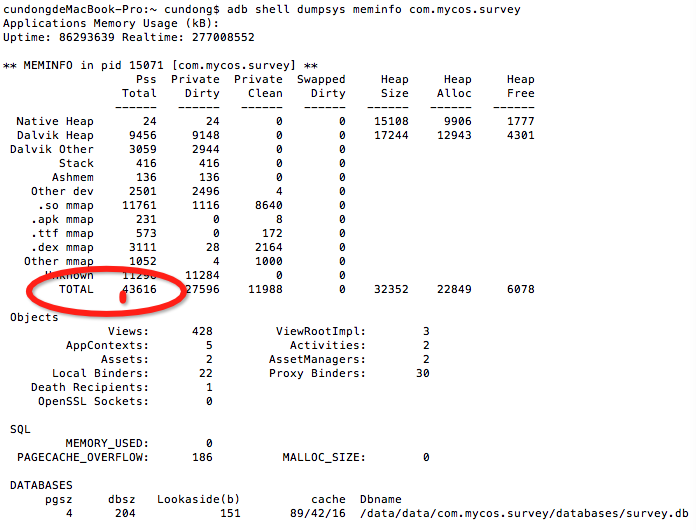
Android 系统中的内存和Linux系统一样,存在着大量的共享内存。每个APP占内存会有私有和公共的两部分,我们可以通过App的Pss值,可以获取到这两部分内存。
Pss(Proportional Set Size):实际使用的物理内存,即:自身应用占有的内存+共享内存中比例分配给这个应用的内存。
通过该程序,每隔1秒,获取一次被监控App的Total Pss值。
使用某个功能(可能会导致OOM的那些都要试试),查看Pss是否飙升,或者使用过许久都没有降低。
如果使用后飙升并且长时间都降不下来,那就说明肯定会导致OOM(对象使用过之后还被引用着未释放),如果使用之后Total Pss飙升,但是使用过之后能降下来,也可能会导致OOM,我们还是需要去一点一点排查是什么原因导致的。
如果使用后飙升并且长时间都降不下来,我们就需要 [使用MAT来进一步分析问题所在](http://blog.csdn.net/xiaanming/article/details/42396507)。
此处提到的Pss,也可以使用adb命令
> adb shell dumpsys meminfo *your packageName*
查看:
## 3.内存优化
Android的虚拟机是基于寄存器的Dalvik,它的最大堆大小一般比较小(最低端的设备16M,后来出的设备变成了24M,48M等等),因此我们所能利用的内存空间是有限的。如果我们使用内存占用超过了一定的限额后就会出现OutOfMemory的错误。
可能会导致内存溢出的情况有以下几种:
### 对静态变量的错误使用
如果一个变量为static变量,它就属于整个类,而不是类的具体实例,所以static变量的生命周期是特别的长,如果static变量引用了一些资源耗费过多的实例,例如Context,就有内存溢出的危险。
[Google开发者博客,给出了一个例子](http://android-developers.blogspot.jp/2009/01/avoiding-memory-leaks.html),专门介绍长时间引用Context导致内存溢出的情况。
示例代码:
```java
private static Drawable sBackground;
@Override
protected void onCreate(Bundle state) {
super.onCreate(state);
TextView textView = new TextView(this);
textView.setText("Leaks are bad");
if (sBackground == null) {
sBackground = getResources().getDrawable(R.drawable.large_bitmap);
}
textView.setBackgroundDrawable(sBackground);
setContentView(textView);
}
```
这种情况下,静态的sBackground变量,虽然没有显式的持有Context的引用,但当我们执行`view.setBackgroundDrawable(Drawable drawable);`的时候,drawable 对象会将当前view设置为一个回调,通过 `View.setCallback(this)` 方法。
具体可见View类的源码:
```
public void setBackgroundDrawable(Drawable background) {
//...
if (mBackground == null || mBackground.getMinimumHeight() != background.getMinimumHeight() ||
mBackground.getMinimumWidth() != background.getMinimumWidth()) {
requestLayout = true;
}
background.setCallback(this);
if (background.isStateful()) {
background.setState(getDrawableState());
}
background.setVisible(getVisibility() == VISIBLE, false);
mBackground = background;
//...
}
```
`background.setCallback(this);` 代码块就是我们说的设置回调。
所以,这种情况就会存在这么一个隐式的引用链:Drawable持有View,而View持有Context,sBackground 是静态的,生命周期特别的长,于是就会导致了Context的溢出。
解决办法:
1.不用activity的context 而是用Application的Context;
```java
private static Drawable sBackground;
@Override
protected void onCreate(Bundle state) {
super.onCreate(state);
TextView textView = new TextView(this.getApplication());
textView.setText("Leaks are bad");
if (sBackground == null) {
sBackground = getResources().getDrawable(R.drawable.large_bitmap);
}
textView.setBackgroundDrawable(sBackground);
setContentView(textView);
}
```
2.在onDestroy()方法中,解除Activity与Drawable的绑定关系,从而去除Drawable对Activity的引用,使Context能够被回收;
```java
@Override
protected void onDestroy() {
super.onDestroy();
ViewUtils.unbindDrawables(findViewById(android.R.id.content));
System.gc();
}
public static void unbindDrawables(View view) {
if (view.getBackground() != null) {
view.getBackground().setCallback(null);
}
if (view instanceof ViewGroup) {
for (int i = 0; i < ((ViewGroup) view).getChildCount(); i++) {
unbindDrawables(((ViewGroup) view).getChildAt(i));
}
((ViewGroup) view).removeAllViews();
}
}
```
### 长周期内部类、匿名内部类长时间持有外部类引用导致相关资源无法释放
长周期内部类、匿名内部类,如Handler,Thread,AsyncTask等。
HandlerOutOfMemoryActivity所示的是Handler引发的内存溢出。
ThreadOutOfMemoryActivity所示的是Thread引发的内存溢出。
AsyncTaskOutOfMemoryActivity所示的时AsyncTask引发的内存溢出。
### Bitmap导致的内存溢出
一般是因为尝试加载过大的图片到内存,或者是内存中已经存在的过多的图片,从而导致内存溢出。
### 数据库Cursor未关闭
正常情况下,如果查询得到的数据量较小时不会有内存问题,而且虚拟机能够保证Cusor最终会被释放掉,如果Cursor的数据量特表大,特别是如果里面有Blob信息时,应该保证Cursor占用的内存被及时的释放掉,而不是等待GC来处理。
### 单例模式引用Context导致的内存泄露
如果在某个Activity中使用 `Singleton instance = Singleton.getInstance(this);` 就会造成该Activity一直被 `Singleton` 引用着,不能释放。这时候,正确的做法是使用 `getApplicationContext()` 来替代 `Activity的Context` ,这样就能避免内存泄露。
### 代码中一些细节
>* 尽量使用9path
>* Adapter要使用convertView
>* 各种监听,广播等,注册的同时要记得取消注册
>* 使用完对象要及时销毁,能使用局部变量的不要使用全局变量,功能用完成后要去掉对他的引用
>* 切勿在循环调用的地方去产生对象,比如在getview()里new OnClicklistener(),这样的话,拖动的时候会new大量的对象出来。
>* 使用Android推荐的数据结构,比如HashMap替换为SparseArray,避免使用枚举类型(在Android平台,枚举类型的内存消耗是Static常量的的2倍)
>* 使用lint工具优化工程
>* 字符串拼接使用StringBuilder或者StringBuffer
>* 尽量使用静态匿名内部类,如果需要对外部类的引用,使用弱引用
>* for循环的使用
用
`final int size = array.length; for(int i = 0; i< size;i++)`
来替代:
`for(int i =0;i < array.length;i++) `
最后,整理了一些开发中可能会导致内存溢出的场景,放在com.cundong.memory.demo.wrong中,并且给出了优化方法,放在com.cundong.memory.demo.right中。
## 4.截图
![截屏][1]
[1]: https://raw.githubusercontent.com/cundong/MemoryMonitor/master/screenshot/app.png
================================================
FILE: app/build.gradle
================================================
apply plugin: 'com.android.application'
android {
compileSdkVersion 23
buildToolsVersion "23.0.2"
defaultConfig {
applicationId "com.cundong.memory"
minSdkVersion 14
targetSdkVersion 23
versionCode 2
versionName "1.2"
}
buildTypes {
release {
minifyEnabled false
proguardFiles getDefaultProguardFile('proguard-android.txt'), 'proguard-rules.pro'
}
}
}
dependencies {
compile fileTree(dir: 'libs', include: ['*.jar'])
compile project(':magnet')
testCompile 'junit:junit:4.12'
compile 'com.android.support:appcompat-v7:23.1.1'
compile 'com.android.support:design:23.1.1'
compile 'com.jaredrummler:android-processes:1.0.3'
}
================================================
FILE: app/src/main/AndroidManifest.xml
================================================
================================================
FILE: app/src/main/java/com/cundong/memory/App.java
================================================
package com.cundong.memory;
import android.app.Application;
import android.content.Context;
public class App extends Application {
private static Context mContext;
public static Context getAppContext() {
return mContext;
}
@Override
public void onCreate() {
super.onCreate();
mContext = this;
}
}
================================================
FILE: app/src/main/java/com/cundong/memory/Constants.java
================================================
package com.cundong.memory;
import java.util.ArrayList;
public class Constants {
public static final boolean SHOW_MEMORY_CLEAR = false;
// TODO
/**
* 此处,改为被监控 total Pss 的 processName 列表
*
* 微信:
* com.tencent.mm
* com.tencent.mm:TMAssistantDownloadSDKService
* com.tencent.mm:push
* com.tencent.mm:cuploader
* com.tencent.mm:nospace
* com.tencent.mm:tools
* com.tencent.mm:sandbox
* com.tencent.mm:exdevice
*/
public static final ArrayList PROCESS_NAME_LIST = new ArrayList();
static {
PROCESS_NAME_LIST.add("com.tencent.mm");
PROCESS_NAME_LIST.add("com.tencent.mm:TMAssistantDownloadSDKService");
PROCESS_NAME_LIST.add("com.tencent.mm:push");
PROCESS_NAME_LIST.add("com.tencent.mm:cuploader");
PROCESS_NAME_LIST.add("com.tencent.mm:nospace");
PROCESS_NAME_LIST.add("com.tencent.mm:tools");
PROCESS_NAME_LIST.add("com.tencent.mm:sandbox");
PROCESS_NAME_LIST.add("com.tencent.mm:exdevice");
}
}
================================================
FILE: app/src/main/java/com/cundong/memory/MainActivity.java
================================================
package com.cundong.memory;
import android.annotation.TargetApi;
import android.app.ActivityManager;
import android.content.Context;
import android.content.Intent;
import android.net.Uri;
import android.os.Build;
import android.os.Bundle;
import android.provider.Settings;
import android.support.v7.app.AppCompatActivity;
import android.view.View;
import android.widget.Button;
import android.widget.Toast;
import com.cundong.memory.service.CoreService;
import com.cundong.memory.service.EmptyService;
import com.cundong.memory.util.MemoryUtil;
import java.util.List;
public class MainActivity extends AppCompatActivity {
private static final int OVERLAY_PERMISSION_REQ_CODE = 1;
private Button mButton1, mButton2, mButton3, mButton4;
@Override
protected void onCreate(Bundle savedInstanceState) {
super.onCreate(savedInstanceState);
setContentView(R.layout.activity_main);
mButton1 = (Button) findViewById(R.id.button1);
mButton2 = (Button) findViewById(R.id.button2);
mButton3 = (Button) findViewById(R.id.button3);
mButton4 = (Button) findViewById(R.id.button4);
mButton3.setVisibility(Constants.SHOW_MEMORY_CLEAR ? View.VISIBLE : View.GONE);
mButton4.setVisibility(Constants.SHOW_MEMORY_CLEAR ? View.VISIBLE : View.GONE);
mButton1.setOnClickListener(new View.OnClickListener() {
@Override
public void onClick(View v) {
try2StartMonitor();
}
});
mButton2.setOnClickListener(new View.OnClickListener() {
@Override
public void onClick(View v) {
Intent intent = new Intent(MainActivity.this, CoreService.class);
intent.putExtra("action", 2);
startService(intent);
finish();
}
});
mButton3.setOnClickListener(new View.OnClickListener() {
@Override
public void onClick(View v) {
Toast.makeText(getApplicationContext(), "clearMemory", Toast.LENGTH_LONG).show();
MemoryUtil.clearMemory(getApplicationContext());
}
});
mButton4.setOnClickListener(new View.OnClickListener() {
@Override
public void onClick(View v) {
Intent intent = new Intent(MainActivity.this, EmptyService.class);
startService(intent);
}
});
}
@TargetApi(Build.VERSION_CODES.M)
private void try2StartMonitor() {
if (Build.VERSION.SDK_INT >= Build.VERSION_CODES.M && !Settings.canDrawOverlays(this)) {
Toast.makeText(this, R.string.permission_err, Toast.LENGTH_LONG).show();
Intent intent = new Intent(Settings.ACTION_MANAGE_OVERLAY_PERMISSION, Uri.parse("package:" + getPackageName()));
startActivityForResult(intent, OVERLAY_PERMISSION_REQ_CODE);
} else {
Intent intent = new Intent(MainActivity.this, CoreService.class);
intent.putExtra("action", 1);
startService(intent);
finish();
}
}
@Override
protected void onResume() {
super.onResume();
boolean isServiceRunning = isServiceRunning(getPackageName() + ".service.CoreService");
mButton1.setVisibility(isServiceRunning ? View.GONE : View.VISIBLE);
mButton2.setVisibility(isServiceRunning ? View.VISIBLE : View.GONE);
}
@TargetApi(Build.VERSION_CODES.M)
@Override
protected void onActivityResult(int requestCode, int resultCode, Intent data) {
if (requestCode == OVERLAY_PERMISSION_REQ_CODE) {
if (!Settings.canDrawOverlays(this)) {
Toast.makeText(this, R.string.permission_err, Toast.LENGTH_SHORT).show();
} else {
Intent intent = new Intent(MainActivity.this, CoreService.class);
intent.putExtra("action", 1);
startService(intent);
finish();
}
}
}
/**
* 使用Application context来调用getSystemService,避免内存泄漏
*
* @param className
* @return
*/
private boolean isServiceRunning(String className) {
ActivityManager activityManager = (ActivityManager) App.getAppContext().getSystemService(Context.ACTIVITY_SERVICE);
List serviceList = activityManager.getRunningServices(100);
if (serviceList == null || serviceList.size() <= 0) {
return false;
}
for (ActivityManager.RunningServiceInfo serviceInfo : serviceList) {
String serviceName = serviceInfo.service.getClassName();
if (serviceName.equals(className)) {
return true;
}
}
return false;
}
}
================================================
FILE: app/src/main/java/com/cundong/memory/demo/right/AsyncTaskOutOfMemoryActivity.java
================================================
package com.cundong.memory.demo.right;
import java.lang.ref.WeakReference;
import android.app.Activity;
import android.graphics.Bitmap;
import android.os.AsyncTask;
import android.os.Bundle;
import android.widget.ImageView;
import com.cundong.memory.util.BitmapUtils;
import com.cundong.memory.R;
/**
* AsyncTask引发的内存溢出解决办法
*
* BitmapWorkerTask内部采用弱引用保存Context引用
*
*/
public class AsyncTaskOutOfMemoryActivity extends Activity {
private ImageView mImageView;
@Override
protected void onCreate(Bundle state) {
super.onCreate(state);
this.setContentView(R.layout.activity_demo);
mImageView = (ImageView) findViewById(R.id.image);
BitmapWorkerTask task = new BitmapWorkerTask(mImageView);
task.execute(R.drawable.large_bitmap);
}
class BitmapWorkerTask extends AsyncTask {
private final WeakReference imageViewReference;
private int data = 0;
public BitmapWorkerTask(ImageView imageView) {
// Use a WeakReference to ensure the ImageView can be garbage collected
imageViewReference = new WeakReference<>(imageView);
}
// Decode image in background.
@Override
protected Bitmap doInBackground(Integer... params) {
data = params[0];
return BitmapUtils.decodeSampledBitmapFromResource(getResources(), data, 100, 100);
}
// Once complete, see if ImageView is still around and set bitmap.
@Override
protected void onPostExecute(Bitmap bitmap) {
if (imageViewReference != null && bitmap != null) {
final ImageView imageView = imageViewReference.get();
if (imageView != null) {
imageView.setImageBitmap(bitmap);
}
}
}
}
}
================================================
FILE: app/src/main/java/com/cundong/memory/demo/right/HandlerOutOfMemoryActivity.java
================================================
package com.cundong.memory.demo.right;
import java.lang.ref.WeakReference;
import android.app.Activity;
import android.os.Bundle;
import android.os.Handler;
import android.os.Message;
import com.cundong.memory.R;
/**
* 解决Handler引发的内存溢出
*
* 不使用非静态的内部类,改为使用静态内部类,当静态内部类中需要调用外部的Activity时,改用弱引用。
*
*/
public class HandlerOutOfMemoryActivity extends Activity {
private final MyHandler mHandler = new MyHandler(this);
private static class MyHandler extends Handler {
private final WeakReference mActivity;
public MyHandler(HandlerOutOfMemoryActivity activity) {
mActivity = new WeakReference<>(activity);
}
@Override
public void handleMessage(Message msg) {
HandlerOutOfMemoryActivity activity = mActivity.get();
if (activity != null) {
/* ... */
}
}
}
private static final Runnable sRunnable = new Runnable() {
@Override
public void run() {
/* ... */
}
};
@Override
protected void onCreate(Bundle savedInstanceState) {
super.onCreate(savedInstanceState);
this.setContentView(R.layout.activity_outofmemory_list);
mHandler.postDelayed(sRunnable, 1000 * 60 * 10);
finish();
}
}
================================================
FILE: app/src/main/java/com/cundong/memory/demo/right/OneStaticOutOfMemoryActivity.java
================================================
package com.cundong.memory.demo.right;
import android.app.Activity;
import android.graphics.drawable.Drawable;
import android.os.Bundle;
import android.widget.TextView;
import com.cundong.memory.R;
/**
* 解决static变量引发的内存溢出
*
* 1.不用activity的context 而是用application的context
*
*/
public class OneStaticOutOfMemoryActivity extends Activity {
private static Drawable sBackground;
@Override
protected void onCreate(Bundle state) {
super.onCreate(state);
TextView label = new TextView(this.getApplication());
label.setText("Leaks are bad");
if (sBackground == null) {
sBackground = getResources().getDrawable(R.drawable.large_bitmap);
}
label.setBackgroundDrawable(sBackground);
setContentView(label);
}
}
================================================
FILE: app/src/main/java/com/cundong/memory/demo/right/OneThreadOutOfMemoryActivity.java
================================================
package com.cundong.memory.demo.right;
import java.lang.ref.WeakReference;
import android.app.Activity;
import android.content.Context;
import android.os.Bundle;
import com.cundong.memory.R;
/**
* 解决Thread引发的内存溢出
*
* 解决办法:
*
* 在线程内部采用弱引用保存Context引用
*
*/
public class OneThreadOutOfMemoryActivity extends Activity {
private Context mContext;
@Override
protected void onCreate(Bundle state) {
super.onCreate(state);
this.setContentView(R.layout.activity_demo);
mContext = this.getApplicationContext();
new MyThread().start();
}
private void releaseZip(WeakReference context){
/* do something */
}
private class MyThread extends Thread {
@Override
public void run() {
super.run();
try {
Thread.sleep(1000 * 60 * 2);
} catch (InterruptedException e) {
e.printStackTrace();
}
/* do something */
releaseZip(new WeakReference(mContext));
}
}
}
================================================
FILE: app/src/main/java/com/cundong/memory/demo/right/TwoStaticOutOfMemoryActivity.java
================================================
package com.cundong.memory.demo.right;
import android.app.Activity;
import android.graphics.drawable.Drawable;
import android.os.Bundle;
import android.widget.TextView;
import com.cundong.memory.util.ViewUtils;
import com.cundong.memory.R;
/**
* 解决static变量引发的内存溢出
*
* 2.在 onDestroy() 方法中,解除 Activity 和 biamap(drawble)的绑定关系,从而去除bitmap对activity 引用,让系统适时的去回收
*
*/
public class TwoStaticOutOfMemoryActivity extends Activity {
private static Drawable sBackground;
@Override
protected void onCreate(Bundle state) {
super.onCreate(state);
TextView label = new TextView(this);
label.setText("Leaks are bad");
if (sBackground == null) {
sBackground = getResources().getDrawable(R.drawable.large_bitmap);
}
label.setBackgroundDrawable(sBackground);
setContentView(label);
}
@Override
protected void onDestroy() {
super.onDestroy();
ViewUtils.unbindDrawables(findViewById(android.R.id.content));
System.gc();
}
}
================================================
FILE: app/src/main/java/com/cundong/memory/demo/right/TwoThreadOutOfMemoryActivity.java
================================================
package com.cundong.memory.demo.right;
import java.lang.ref.WeakReference;
import android.app.Activity;
import android.content.Context;
import android.os.Bundle;
import com.cundong.memory.R;
/**
* 解决Thread引发的内存溢出
*
* 1.MyThread改为静态内部类
*/
public class TwoThreadOutOfMemoryActivity extends Activity {
@Override
protected void onCreate(Bundle state) {
super.onCreate(state);
this.setContentView(R.layout.activity_demo);
new MyThread(this).start();
}
private static void releaseZip(Context context){
/* do something */
}
private static class MyThread extends Thread {
private final WeakReference mActivity;
public MyThread(TwoThreadOutOfMemoryActivity activity) {
mActivity = new WeakReference<>(activity);
}
@Override
public void run() {
super.run();
try {
Thread.sleep(1000 * 60 * 2);
} catch (InterruptedException e) {
e.printStackTrace();
}
/* do something */
releaseZip(mActivity.get());
}
}
}
================================================
FILE: app/src/main/java/com/cundong/memory/demo/wrong/AsyncTaskOutOfMemoryActivity.java
================================================
package com.cundong.memory.demo.wrong;
import android.app.Activity;
import android.graphics.Bitmap;
import android.os.AsyncTask;
import android.os.Bundle;
import android.widget.ImageView;
import com.cundong.memory.util.BitmapUtils;
import com.cundong.memory.R;
/**
* AsyncTask引发的内存溢出
*
* 当前情况:
*
* 1.
* 内部类BitmapWorkerTask,持有对外部AsyncTaskOutOfMemoryActivity的隐式引用
*
* 2.
* 如果我们切换横竖屏,默认就会销毁当前Activity,而这个Activity却被BitmapWorkerTask所持有
*
* 于是就出现了溢出。
*
*
* 解决办法:
*
* BitmapWorkerTask内部采用弱引用保存Context引用
*
*/
public class AsyncTaskOutOfMemoryActivity extends Activity {
private ImageView mImageView;
@Override
protected void onCreate(Bundle state) {
super.onCreate(state);
this.setContentView(R.layout.activity_demo);
mImageView = (ImageView) findViewById(R.id.image);
BitmapWorkerTask task = new BitmapWorkerTask();
task.execute(R.drawable.large_bitmap);
}
class BitmapWorkerTask extends AsyncTask {
private int data = 0;
// Decode image in background.
@Override
protected Bitmap doInBackground(Integer... params) {
data = params[0];
return BitmapUtils.decodeSampledBitmapFromResource(getResources(), data, 100, 100);
}
// Once complete, see if ImageView is still around and set bitmap.
@Override
protected void onPostExecute(Bitmap bitmap) {
if (bitmap != null) {
mImageView.setImageBitmap(bitmap);
}
}
}
}
================================================
FILE: app/src/main/java/com/cundong/memory/demo/wrong/HandlerOutOfMemoryActivity.java
================================================
package com.cundong.memory.demo.wrong;
import android.app.Activity;
import android.os.Bundle;
import android.os.Handler;
import android.os.Message;
import com.cundong.memory.R;
/**
* Handler引发的内存溢出
*
* 1.
* 当一个Android应用启动的时候,会自动创建一个供主线程使用的Looper实例,这个Looper实例负责一个一个的处理消息队列中的消息对象,它的生命周期和当前应用
* 的生命周期是一样的。
*
* 2.
* 当Handler在主线程中初始化之后,发送一个消息(target为当前Handler)至消息队列,这个消息对象就已经包含了Handler实例的引用,只有这样,Looper在处理这条消息的时候,才可以
* 调用Handler的handlerMessage(Message)来完成消息的处理。
*
* 3.非静态的内部类和匿名内部类,都会隐式的持有一个外部类的引用。
*
* 由于这3个原因。
*
* 当Activity finish掉,被延迟的消息会存在消息队列中10分钟,这个消息中又包含了Handler的引用,Handler是一个匿名内部类,又隐式的持有外部Activity的引用,导致
* 其无法回收,进一步导致Activity持有的很多资源都无法回收,也就是内存泄露了。
*
* 正确示例:com.cundong.memory.right.HandlerOutOfMemoryActivity
*
*/
public class HandlerOutOfMemoryActivity extends Activity {
private final Handler mHandler = new Handler() {
@Override
public void handleMessage(Message msg) {
/* ... */
}
};
@Override
protected void onCreate(Bundle savedInstanceState) {
super.onCreate(savedInstanceState);
this.setContentView(R.layout.activity_outofmemory_list);
// Post a message and delay its execution for 10 minutes.
mHandler.postDelayed(new Runnable() {
@Override
public void run() {
/* ... */
}
}, 1000 * 60 * 10);
finish();
}
}
================================================
FILE: app/src/main/java/com/cundong/memory/demo/wrong/MemoryChurnActivity.java
================================================
package com.cundong.memory.demo.wrong;
import android.app.Activity;
import android.graphics.Bitmap;
import android.graphics.BitmapFactory;
import android.os.Bundle;
import android.util.Log;
import android.view.View;
import android.widget.Button;
import com.cundong.memory.R;
import com.cundong.memory.util.MemoryUtil;
/**
* 内存抖动
*
* 在短时间内大量的对象被创建又马上被释放,瞬间产生大量的对象会严重占用Young Generation的内存区域,当达到阀值,剩余空间不够的时候,
* 会触发GC从而导致刚产生的对象又很快被回收。即使每次分配的对象占用了很少的内存,但是他们叠加在一起会增加Heap的压力,从而触发更多其他类型的GC。
*
* 这个操作有可能会影响到帧率,并使得用户感知到性能问题。
*
* Created by cundong on 2015/12/28.
*/
public class MemoryChurnActivity extends Activity {
private Button mButton;
@Override
protected void onCreate(Bundle savedInstanceState) {
super.onCreate(savedInstanceState);
this.setContentView(R.layout.activity_test);
mButton = (Button) findViewById(R.id.button);
mButton.setOnClickListener(new View.OnClickListener() {
@Override
public void onClick(View v) {
new Thread() {
@Override
public void run() {
super.run();
for( int i=0; i<100; i++) {
Bitmap bmp = BitmapFactory.decodeResource(getResources(), R.drawable.large_img);
int rowBytes = bmp.getRowBytes();
int height = bmp.getHeight();
long memSize = rowBytes * height;
Log.d("@Cundong", "memSize =" + memSize + "B =" + memSize * 1.0 / 1024 / 1024 +" M");
Log.d("@Cundong", "getUsedPercentValue:" + MemoryUtil.getUsedPercentValue());
}
/**
java.lang.OutOfMemoryError: Failed to allocate a 47 byte allocation with 0 free bytes and 3GB until OOM
at android.graphics.BitmapFactory.nativeDecodeAsset(Native Method)
at android.graphics.BitmapFactory.decodeStream(BitmapFactory.java:609)
at android.graphics.BitmapFactory.decodeResourceStream(BitmapFactory.java:444)
at android.graphics.BitmapFactory.decodeResource(BitmapFactory.java:467)
at android.graphics.BitmapFactory.decodeResource(BitmapFactory.java:497)
at com.cundong.memory.demo.wrong.MemoryChurnActivity$1$1.run(MemoryChurnActivity.java:42)
*/
}
} .start();
}
});
}
}
================================================
FILE: app/src/main/java/com/cundong/memory/demo/wrong/StaticOutOfMemoryActivity.java
================================================
package com.cundong.memory.demo.wrong;
import android.app.Activity;
import android.graphics.drawable.Drawable;
import android.os.Bundle;
import android.widget.TextView;
import com.cundong.memory.R;
/**
* static变量引发的内存溢出
*
* 如果一个变量为static变量,它就属于整个类,而不是类的具体实例,所以static变量的生命周期是特别的长,如果static变量引用了一些资源耗费过多
* 的实例,例如Context,就有内存溢出的危险。
*
*
* Google开发者博客,给出了一个例子:http://android-developers.blogspot.jp/2009/01/avoiding-memory-leaks.html
* 专门介绍长时间的引用Context导致内存溢出的情况。
*
* 这种情况:
*
* 静态的sBackground变量,虽然没有显式的持有Context的引用,但是:
*
* 当我们执行view.setBackgroundDrawable(Drawable drawable);之后。
*
* Drawable会将View设置为一个回调(通过setCallback()方法),所以就会存在这么一个隐式的引用链:Drawable持有View,View持有Context
*
* sBackground是静态的,生命周期特别的长,就会导致了Context的溢出。
*
* 解决办法:
*
* 1.不用activity的context 而是用Application的Context
*
* 2.在onDestroy()方法中,解除Activity与Drawable的绑定关系,从而去除Drawable对Activity的引用,使Context能够被回收
*
*/
public class StaticOutOfMemoryActivity extends Activity {
private static Drawable sBackground;
@Override
protected void onCreate(Bundle state) {
super.onCreate(state);
TextView textView = new TextView(this);
textView.setText("Leaks are bad");
if (sBackground == null) {
sBackground = getResources().getDrawable(R.drawable.large_bitmap);
}
textView.setBackgroundDrawable(sBackground);
setContentView(textView);
}
}
================================================
FILE: app/src/main/java/com/cundong/memory/demo/wrong/ThreadOutOfMemoryActivity.java
================================================
package com.cundong.memory.demo.wrong;
import java.lang.ref.WeakReference;
import android.app.Activity;
import android.content.Context;
import android.os.Bundle;
import com.cundong.memory.R;
/**
* Thread引发的内存溢出
*
* 当前情况:
*
* 1.
* 内部类MyThread,持有对外部ThreadOutOfMemoryActivity的隐式引用
*
* 2.
* 如果我们切换横竖屏,默认就会销毁当前Activity,而这个Activity却被MyThread所持有
*
* 于是就出现了溢出。
*
*
* 解决办法:
*
* 1.MyThread改为静态内部类
*
* 2.在线程内部采用弱引用保存Context引用
*
*/
public class ThreadOutOfMemoryActivity extends Activity {
private Context mContext;
@Override
protected void onCreate(Bundle state) {
super.onCreate(state);
this.setContentView(R.layout.activity_demo);
mContext = this.getApplicationContext();
new MyThread().start();
}
private void releaseZip(WeakReference context){
/* do something */
}
private class MyThread extends Thread {
@Override
public void run() {
super.run();
try {
Thread.sleep(1000 * 60 * 2);
} catch (InterruptedException e) {
e.printStackTrace();
}
/* do something */
releaseZip(new WeakReference<>(mContext));
}
}
}
================================================
FILE: app/src/main/java/com/cundong/memory/service/CoreService.java
================================================
package com.cundong.memory.service;
import android.app.Service;
import android.content.Context;
import android.content.Intent;
import android.os.Bundle;
import android.os.Handler;
import android.os.IBinder;
import android.os.Message;
import android.util.Log;
import android.view.LayoutInflater;
import android.view.View;
import android.view.View.OnClickListener;
import android.widget.ImageButton;
import android.widget.TextView;
import android.widget.Toast;
import com.cundong.memory.Constants;
import com.cundong.memory.MainActivity;
import com.cundong.memory.R;
import com.cundong.memory.util.MemoryUtil;
import com.premnirmal.Magnet.IconCallback;
import com.premnirmal.Magnet.Magnet;
import java.lang.ref.WeakReference;
import java.text.DecimalFormat;
import java.util.HashMap;
import java.util.Iterator;
import java.util.Map;
import java.util.Timer;
import java.util.TimerTask;
/**
* 类说明: 后台轮询service 每1秒钟更新一次通知栏 更新内存
*
* @date 2015-4-18
* @version 1.0
*/
public class CoreService extends Service implements IconCallback {
private static final String TAG = "CoreService";
private Timer mTimer;
private Magnet mMagnet;
private View mIconView = null;
private View mMemoryClearView;
private TextView mDescView;
private ImageButton mClearBtn, mSettingBtn;
private InnerHandler mHandler;
@Override
public void onCreate() {
super.onCreate();
mIconView = getIconView();
mDescView = (TextView) mIconView.findViewById(R.id.content);
mMemoryClearView = mIconView.findViewById(R.id.memory_clear_view);
mMemoryClearView.setVisibility(Constants.SHOW_MEMORY_CLEAR ? View.VISIBLE : View.GONE);
mClearBtn = (ImageButton) mIconView.findViewById(R.id.clear_btn);
mClearBtn.setOnClickListener( new OnClickListener(){
@Override
public void onClick(View v) {
Toast.makeText(getApplicationContext(), "clearMemory", Toast.LENGTH_SHORT).show();
MemoryUtil.clearMemory(getApplicationContext());
}
});
mSettingBtn = (ImageButton) mIconView.findViewById(R.id.setting_btn);
mSettingBtn.setOnClickListener( new OnClickListener(){
@Override
public void onClick(View v) {
Toast.makeText(getApplicationContext(), "test Setting", Toast.LENGTH_SHORT).show();
}
});
mMagnet = new Magnet.Builder(this)
.setIconView(mIconView)
.setIconCallback(this)
.setRemoveIconResId(R.drawable.trash)
.setRemoveIconShadow(R.drawable.bottom_shadow)
.setShouldFlingAway(true)
.setShouldStickToWall(true)
.setRemoveIconShouldBeResponsive(true)
.setInitialPosition(-100, -200)
.build();
mMagnet.show();
mHandler = new InnerHandler(this);
}
private View getIconView() {
LayoutInflater inflater = (LayoutInflater) getSystemService(Context.LAYOUT_INFLATER_SERVICE);
return inflater.inflate(R.layout.float_view, null);
}
@Override
public IBinder onBind(Intent intent) {
return null;
}
@Override
public int onStartCommand(Intent intent, int flags, int startId) {
if (mTimer == null) {
mTimer = new Timer();
mTimer.scheduleAtFixedRate(new RefreshTask(), 0, 1000);
}
int action = intent != null ? intent.getIntExtra("action", 0) : 0;
if (action == 2) {
mMagnet.destroy();
this.stopSelf();
}
return super.onStartCommand(intent, flags, startId);
}
@Override
public void onDestroy() {
super.onDestroy();
mTimer.cancel();
mTimer = null;
}
class RefreshTask extends TimerTask {
@Override
public void run() {
String usedPercentValue = MemoryUtil.getUsedPercentValue();
long availableMemory = MemoryUtil.getAvailableMemory();
HashMap totalPssMap = MemoryUtil.getTotalPss(Constants.PROCESS_NAME_LIST);
float memory = availableMemory / (float) 1024 / (float) 1024;
DecimalFormat decimalFormat = new DecimalFormat("##0.00");
final String[] content = new String[] {
getString(R.string.used_percent_value, usedPercentValue),
getString(R.string.available_memory, decimalFormat.format(memory)), getString(R.string.total_pss)};
StringBuffer sb = new StringBuffer();
sb.append(content[0]).append(",").append(content[1]).append("\r\n").append(content[2]);
Iterator iterator = totalPssMap.entrySet().iterator();
while(iterator.hasNext()) {
Map.Entry entry = (Map.Entry) iterator.next();
entry.getKey();
sb.append(entry.getKey()).append("=").append("\r\n").append(entry.getValue()).append("\r\n");
}
Bundle data = new Bundle();
data.putString("content", sb.toString());
Message message = mHandler.obtainMessage(1);
message.what = 1;
message.setData(data);
mHandler.sendMessage(message);
}
}
@Override
public void onFlingAway() {
Log.i(TAG, "onFlingAway");
}
@Override
public void onMove(float x, float y) {
Log.i(TAG, "onMove(" + x + "," + y + ")");
}
@Override
public void onIconClick(View icon, float iconXPose, float iconYPose) {
Log.i(TAG, "onIconClick(..)");
Intent intent = new Intent(this, MainActivity.class);
intent.setFlags(Intent.FLAG_ACTIVITY_NEW_TASK);
startActivity(intent);
}
@Override
public void onIconDestroyed() {
Log.i(TAG, "onIconDestroyed()");
stopSelf();
}
private static class InnerHandler extends Handler {
private WeakReference ref;
public InnerHandler(CoreService service) {
ref = new WeakReference<>(service);
}
@Override
public void handleMessage(Message msg) {
super.handleMessage(msg);
CoreService service = ref.get();
if (service == null) {
return;
}
switch (msg.what) {
case 1:
Bundle data = msg.getData();
String content = data.getString("content");
service.mDescView.setText(content);
break;
}
}
}
}
================================================
FILE: app/src/main/java/com/cundong/memory/service/EmptyService.java
================================================
package com.cundong.memory.service;
import android.app.Service;
import android.content.Intent;
import android.os.IBinder;
/**
* 一个空Service,仅仅用于测试一个空进程在dalvik、art上占用多少Total Pss
*/
public class EmptyService extends Service {
public EmptyService() {
}
@Override
public IBinder onBind(Intent intent) {
return null;
}
@Override
public void onCreate() {
super.onCreate();
}
}
================================================
FILE: app/src/main/java/com/cundong/memory/util/BitmapUtils.java
================================================
package com.cundong.memory.util;
import android.content.res.Resources;
import android.graphics.Bitmap;
import android.graphics.BitmapFactory;
public class BitmapUtils {
public static Bitmap decodeSampledBitmapFromResource(Resources res, int resId,
int reqWidth, int reqHeight) {
// First decode with inJustDecodeBounds=true to check dimensions
final BitmapFactory.Options options = new BitmapFactory.Options();
options.inJustDecodeBounds = true;
BitmapFactory.decodeResource(res, resId, options);
// Calculate inSampleSize
options.inSampleSize = calculateInSampleSize(options, reqWidth, reqHeight);
// Decode bitmap with inSampleSize set
options.inJustDecodeBounds = false;
return BitmapFactory.decodeResource(res, resId, options);
}
public static int calculateInSampleSize(
BitmapFactory.Options options, int reqWidth, int reqHeight) {
// Raw height and width of image
final int height = options.outHeight;
final int width = options.outWidth;
int inSampleSize = 1;
if (height > reqHeight || width > reqWidth) {
final int halfHeight = height / 2;
final int halfWidth = width / 2;
// Calculate the largest inSampleSize value that is a power of 2 and keeps both
// height and width larger than the requested height and width.
while ((halfHeight / inSampleSize) > reqHeight
&& (halfWidth / inSampleSize) > reqWidth) {
inSampleSize *= 2;
}
}
return inSampleSize;
}
}
================================================
FILE: app/src/main/java/com/cundong/memory/util/Logger.java
================================================
package com.cundong.memory.util;
import android.util.Log;
public class Logger {
/**
* log tag
*/
private String tag = "Logger";// application name
// TODO 配置Log打开或关闭
/**
* debug or not
*/
private static boolean debug = true;
private static Logger instance = new Logger();
private Logger() {
}
public static Logger getLogger() {
return instance;
}
private String getFunctionName() {
StackTraceElement[] sts = Thread.currentThread().getStackTrace();
if (sts == null) {
return null;
}
for (StackTraceElement st : sts) {
if (st.isNativeMethod()) {
continue;
}
if (st.getClassName().equals(Thread.class.getName())) {
continue;
}
if (st.getClassName().equals(this.getClass().getName())) {
continue;
}
return "[" + Thread.currentThread().getName() + "(" + Thread.currentThread().getId() + "): " + st.getFileName() + ":" + st.getLineNumber() + "]";
}
return null;
}
private String createMessage(String msg) {
String functionName = getFunctionName();
String message = (functionName == null ? msg : (functionName + " - " + msg));
return message;
}
/**
* log.i
*/
public void i(String msg) {
if (debug) {
String message = createMessage(msg);
Log.i(tag, message);
}
}
/**
* log.v
*/
public void v(String msg) {
if (debug) {
String message = createMessage(msg);
Log.v(tag, message);
}
}
/**
* log.d
*/
public void d(String msg) {
if (debug) {
String message = createMessage(msg);
Log.d(tag, message);
}
}
/**
* log.e
*/
public void e(String msg) {
// if (debug) {
String message = createMessage(msg);
Log.e(tag, message);
// }
}
/**
* log.error
*/
public void error(Exception e) {
if (debug) {
StringBuffer sb = new StringBuffer();
String name = getFunctionName();
StackTraceElement[] sts = e.getStackTrace();
if (name != null) {
sb.append(name + " - " + e + "\r\n");
} else {
sb.append(e + "\r\n");
}
if (sts != null && sts.length > 0) {
for (StackTraceElement st : sts) {
if (st != null) {
sb.append("[ " + st.getFileName() + ":" + st.getLineNumber() + " ]\r\n");
}
}
}
Log.e(tag, sb.toString());
}
}
/**
* log.d
*/
public void w(String msg) {
if (debug) {
String message = createMessage(msg);
Log.w(tag, message);
}
}
public void setTag(String tag) {
this.tag = tag;
}
/**
* set debug
*/
public static void setDebug(boolean d) {
debug = d;
}
public static boolean isDebug() {
return debug;
}
}
================================================
FILE: app/src/main/java/com/cundong/memory/util/MemoryUtil.java
================================================
package com.cundong.memory.util;
import java.io.BufferedReader;
import java.io.FileReader;
import java.io.IOException;
import java.util.ArrayList;
import java.util.HashMap;
import java.util.List;
import android.app.ActivityManager;
import android.app.ActivityManager.RunningAppProcessInfo;
import android.content.Context;
import android.os.Build;
import android.os.Debug.MemoryInfo;
import android.text.TextUtils;
import android.util.Log;
import com.cundong.memory.App;
import com.cundong.memory.Constants;
import com.jaredrummler.android.processes.ProcessManager;
import com.jaredrummler.android.processes.models.AndroidAppProcess;
/**
* 类说明: 内存相关数据获取工具类
*
* @date 2015-4-18
* @version 1.0
*/
public class MemoryUtil {
/**
* getTotalPss,5.0+使用开源的android-processes解决方案,5.0以下使用系统api
*
* @param processNameList
* @return
*/
public static HashMap getTotalPss(ArrayList processNameList) {
HashMap resultMap = new HashMap<>();
ActivityManager activityMgr = (ActivityManager) App.getAppContext().getSystemService(Context.ACTIVITY_SERVICE);
if (Build.VERSION.SDK_INT >= 21) {
List list = ProcessManager.getRunningAppProcesses();
if (list != null) {
for (AndroidAppProcess processInfo : list) {
if (processNameList.contains(processInfo.name)) {
int pid = processInfo.pid;
MemoryInfo[] memoryInfos = activityMgr.getProcessMemoryInfo(new int[]{pid});
MemoryInfo memoryInfo = memoryInfos[0];
int totalPss = memoryInfo.getTotalPss();
resultMap.put(processInfo.name, new Long(totalPss));
}
}
}
} else {
List list = activityMgr.getRunningAppProcesses();
if (list != null) {
for (RunningAppProcessInfo processInfo : list) {
if (Constants.PROCESS_NAME_LIST.contains(processInfo.processName)) {
int pid = processInfo.pid;
MemoryInfo[] memoryInfos = activityMgr.getProcessMemoryInfo(new int[] { pid });
MemoryInfo memoryInfo = memoryInfos[0];
int totalPss = memoryInfo.getTotalPss();
resultMap.put(processInfo.processName, new Long(totalPss));
}
}
}
}
return resultMap;
}
/**
* getTotalPss,5.0+使用开源的android-processes解决方案,5.0以下使用系统api
*
* @param processName
* @return
*/
public static long getTotalPss(String processName) {
ActivityManager activityMgr = (ActivityManager) App.getAppContext().getSystemService(Context.ACTIVITY_SERVICE);
if (Build.VERSION.SDK_INT >= 21) {
List list = ProcessManager.getRunningAppProcesses();
if (list != null) {
for (AndroidAppProcess processInfo : list) {
if (processInfo.name.equals(processName)) {
int pid = processInfo.pid;
MemoryInfo[] memoryInfos = activityMgr.getProcessMemoryInfo(new int[]{pid});
MemoryInfo memoryInfo = memoryInfos[0];
int totalPss = memoryInfo.getTotalPss();
return totalPss;
}
}
}
} else {
List list = activityMgr.getRunningAppProcesses();
if (list != null) {
for (RunningAppProcessInfo processInfo : list) {
if (processInfo.processName.equals(processName)) {
int pid = processInfo.pid;
MemoryInfo[] memoryInfos = activityMgr.getProcessMemoryInfo(new int[] { pid });
MemoryInfo memoryInfo = memoryInfos[0];
int totalPss = memoryInfo.getTotalPss();
return totalPss;
}
}
}
}
return -1;
}
/**
* 计算已使用内存的百分比
*
*/
public static String getUsedPercentValue() {
String dir = "/proc/meminfo";
try {
FileReader fr = new FileReader(dir);
BufferedReader br = new BufferedReader(fr, 2048);
String memoryLine = br.readLine();
String subMemoryLine = memoryLine.substring(memoryLine
.indexOf("MemTotal:"));
br.close();
long totalMemorySize = Integer.parseInt(subMemoryLine.replaceAll(
"\\D+", ""));
long availableSize = getAvailableMemory() / 1024;
int percent = (int) ((totalMemorySize - availableSize)
/ (float) totalMemorySize * 100);
return percent + "%";
} catch (IOException e) {
e.printStackTrace();
}
return "";
}
/**
* 获取可用内存
*
*/
public static long getAvailableMemory() {
ActivityManager activityManager = (ActivityManager) App.getAppContext()
.getSystemService(Context.ACTIVITY_SERVICE);
ActivityManager.MemoryInfo mi = new ActivityManager.MemoryInfo();
activityManager.getMemoryInfo(mi);
return mi.availMem;
}
public static void clearMemory(Context context) {
ActivityManager activityManger = (ActivityManager) App.getAppContext().getSystemService(Context.ACTIVITY_SERVICE);
if (Build.VERSION.SDK_INT >= 21) {
List list = ProcessManager.getRunningAppProcesses();
if (list != null) {
for (AndroidAppProcess processInfo : list) {
int myPid = android.os.Process.myPid();
if(myPid == processInfo.pid) {
continue;
}
if (!processInfo.foreground) {
activityManger.killBackgroundProcesses(processInfo.getPackageName());
}
}
}
} else {
List list = activityManger.getRunningAppProcesses();
if (list != null) {
for (int i = 0; i < list.size(); i++) {
ActivityManager.RunningAppProcessInfo appProcessInfo = list.get(i);
String[] pkgList = appProcessInfo.pkgList;
if (appProcessInfo.importance >= ActivityManager.RunningAppProcessInfo.IMPORTANCE_FOREGROUND) {
for (int j = 0; j < pkgList.length; j++) {
if (pkgList[j].equals(context.getPackageName())) {
continue;
}
activityManger.killBackgroundProcesses(pkgList[j]);
}
}
}
}
}
}
}
================================================
FILE: app/src/main/java/com/cundong/memory/util/ViewUtils.java
================================================
package com.cundong.memory.util;
import android.view.View;
import android.view.ViewGroup;
public class ViewUtils {
public static void unbindDrawables(View view) {
if (view.getBackground() != null) {
view.getBackground().setCallback(null);
}
if (view instanceof ViewGroup) {
for (int i = 0; i < ((ViewGroup) view).getChildCount(); i++) {
unbindDrawables(((ViewGroup) view).getChildAt(i));
}
((ViewGroup) view).removeAllViews();
}
}
}
================================================
FILE: app/src/main/res/anim/slide_down.xml
================================================
================================================
FILE: app/src/main/res/anim/slide_up.xml
================================================
================================================
FILE: app/src/main/res/layout/activity_demo.xml
================================================
================================================
FILE: app/src/main/res/layout/activity_main.xml
================================================
================================================
FILE: app/src/main/res/layout/activity_outofmemory_list.xml
================================================
================================================
FILE: app/src/main/res/layout/activity_test.xml
================================================
================================================
FILE: app/src/main/res/layout/float_view.xml
================================================
================================================
FILE: app/src/main/res/menu/main.xml
================================================
================================================
FILE: app/src/main/res/values/colors.xml
================================================
#3F51B5
#303F9F
#FF4081
#00000000
================================================
FILE: app/src/main/res/values/dimens.xml
================================================
16dp
16dp
160dip
================================================
FILE: app/src/main/res/values/strings.xml
================================================
MemoryMonitor
Hello world!
Settings
开始监控
停止监控
清理内存
内存使用:%1$s
可用:%1$sM
Pss Total:\r\n
当前targets API level 23+, 必须手动设置“允许在其他应用上层显示”开启才行
================================================
FILE: app/src/main/res/values/styles.xml
================================================
================================================
FILE: app/src/main/res/values-v11/styles.xml
================================================
================================================
FILE: app/src/main/res/values-v14/styles.xml
================================================
================================================
FILE: app/src/main/res/values-w820dp/dimens.xml
================================================
64dp
================================================
FILE: build.gradle
================================================
// Top-level build file where you can add configuration options common to all sub-projects/modules.
buildscript {
repositories {
jcenter()
}
dependencies {
classpath 'com.android.tools.build:gradle:1.5.0'
// NOTE: Do not place your application dependencies here; they belong
// in the individual module build.gradle files
}
}
allprojects {
repositories {
jcenter()
}
}
task clean(type: Delete) {
delete rootProject.buildDir
}
================================================
FILE: gradle/wrapper/gradle-wrapper.properties
================================================
#Wed Oct 21 11:34:03 PDT 2015
distributionBase=GRADLE_USER_HOME
distributionPath=wrapper/dists
zipStoreBase=GRADLE_USER_HOME
zipStorePath=wrapper/dists
distributionUrl=https\://services.gradle.org/distributions/gradle-2.8-all.zip
================================================
FILE: gradlew
================================================
#!/usr/bin/env bash
##############################################################################
##
## Gradle start up script for UN*X
##
##############################################################################
# Add default JVM options here. You can also use JAVA_OPTS and GRADLE_OPTS to pass JVM options to this script.
DEFAULT_JVM_OPTS=""
APP_NAME="Gradle"
APP_BASE_NAME=`basename "$0"`
# Use the maximum available, or set MAX_FD != -1 to use that value.
MAX_FD="maximum"
warn ( ) {
echo "$*"
}
die ( ) {
echo
echo "$*"
echo
exit 1
}
# OS specific support (must be 'true' or 'false').
cygwin=false
msys=false
darwin=false
case "`uname`" in
CYGWIN* )
cygwin=true
;;
Darwin* )
darwin=true
;;
MINGW* )
msys=true
;;
esac
# For Cygwin, ensure paths are in UNIX format before anything is touched.
if $cygwin ; then
[ -n "$JAVA_HOME" ] && JAVA_HOME=`cygpath --unix "$JAVA_HOME"`
fi
# Attempt to set APP_HOME
# Resolve links: $0 may be a link
PRG="$0"
# Need this for relative symlinks.
while [ -h "$PRG" ] ; do
ls=`ls -ld "$PRG"`
link=`expr "$ls" : '.*-> \(.*\)$'`
if expr "$link" : '/.*' > /dev/null; then
PRG="$link"
else
PRG=`dirname "$PRG"`"/$link"
fi
done
SAVED="`pwd`"
cd "`dirname \"$PRG\"`/" >&-
APP_HOME="`pwd -P`"
cd "$SAVED" >&-
CLASSPATH=$APP_HOME/gradle/wrapper/gradle-wrapper.jar
# Determine the Java command to use to start the JVM.
if [ -n "$JAVA_HOME" ] ; then
if [ -x "$JAVA_HOME/jre/sh/java" ] ; then
# IBM's JDK on AIX uses strange locations for the executables
JAVACMD="$JAVA_HOME/jre/sh/java"
else
JAVACMD="$JAVA_HOME/bin/java"
fi
if [ ! -x "$JAVACMD" ] ; then
die "ERROR: JAVA_HOME is set to an invalid directory: $JAVA_HOME
Please set the JAVA_HOME variable in your environment to match the
location of your Java installation."
fi
else
JAVACMD="java"
which java >/dev/null 2>&1 || die "ERROR: JAVA_HOME is not set and no 'java' command could be found in your PATH.
Please set the JAVA_HOME variable in your environment to match the
location of your Java installation."
fi
# Increase the maximum file descriptors if we can.
if [ "$cygwin" = "false" -a "$darwin" = "false" ] ; then
MAX_FD_LIMIT=`ulimit -H -n`
if [ $? -eq 0 ] ; then
if [ "$MAX_FD" = "maximum" -o "$MAX_FD" = "max" ] ; then
MAX_FD="$MAX_FD_LIMIT"
fi
ulimit -n $MAX_FD
if [ $? -ne 0 ] ; then
warn "Could not set maximum file descriptor limit: $MAX_FD"
fi
else
warn "Could not query maximum file descriptor limit: $MAX_FD_LIMIT"
fi
fi
# For Darwin, add options to specify how the application appears in the dock
if $darwin; then
GRADLE_OPTS="$GRADLE_OPTS \"-Xdock:name=$APP_NAME\" \"-Xdock:icon=$APP_HOME/media/gradle.icns\""
fi
# For Cygwin, switch paths to Windows format before running java
if $cygwin ; then
APP_HOME=`cygpath --path --mixed "$APP_HOME"`
CLASSPATH=`cygpath --path --mixed "$CLASSPATH"`
# We build the pattern for arguments to be converted via cygpath
ROOTDIRSRAW=`find -L / -maxdepth 1 -mindepth 1 -type d 2>/dev/null`
SEP=""
for dir in $ROOTDIRSRAW ; do
ROOTDIRS="$ROOTDIRS$SEP$dir"
SEP="|"
done
OURCYGPATTERN="(^($ROOTDIRS))"
# Add a user-defined pattern to the cygpath arguments
if [ "$GRADLE_CYGPATTERN" != "" ] ; then
OURCYGPATTERN="$OURCYGPATTERN|($GRADLE_CYGPATTERN)"
fi
# Now convert the arguments - kludge to limit ourselves to /bin/sh
i=0
for arg in "$@" ; do
CHECK=`echo "$arg"|egrep -c "$OURCYGPATTERN" -`
CHECK2=`echo "$arg"|egrep -c "^-"` ### Determine if an option
if [ $CHECK -ne 0 ] && [ $CHECK2 -eq 0 ] ; then ### Added a condition
eval `echo args$i`=`cygpath --path --ignore --mixed "$arg"`
else
eval `echo args$i`="\"$arg\""
fi
i=$((i+1))
done
case $i in
(0) set -- ;;
(1) set -- "$args0" ;;
(2) set -- "$args0" "$args1" ;;
(3) set -- "$args0" "$args1" "$args2" ;;
(4) set -- "$args0" "$args1" "$args2" "$args3" ;;
(5) set -- "$args0" "$args1" "$args2" "$args3" "$args4" ;;
(6) set -- "$args0" "$args1" "$args2" "$args3" "$args4" "$args5" ;;
(7) set -- "$args0" "$args1" "$args2" "$args3" "$args4" "$args5" "$args6" ;;
(8) set -- "$args0" "$args1" "$args2" "$args3" "$args4" "$args5" "$args6" "$args7" ;;
(9) set -- "$args0" "$args1" "$args2" "$args3" "$args4" "$args5" "$args6" "$args7" "$args8" ;;
esac
fi
# Split up the JVM_OPTS And GRADLE_OPTS values into an array, following the shell quoting and substitution rules
function splitJvmOpts() {
JVM_OPTS=("$@")
}
eval splitJvmOpts $DEFAULT_JVM_OPTS $JAVA_OPTS $GRADLE_OPTS
JVM_OPTS[${#JVM_OPTS[*]}]="-Dorg.gradle.appname=$APP_BASE_NAME"
exec "$JAVACMD" "${JVM_OPTS[@]}" -classpath "$CLASSPATH" org.gradle.wrapper.GradleWrapperMain "$@"
================================================
FILE: gradlew.bat
================================================
@if "%DEBUG%" == "" @echo off
@rem ##########################################################################
@rem
@rem Gradle startup script for Windows
@rem
@rem ##########################################################################
@rem Set local scope for the variables with windows NT shell
if "%OS%"=="Windows_NT" setlocal
@rem Add default JVM options here. You can also use JAVA_OPTS and GRADLE_OPTS to pass JVM options to this script.
set DEFAULT_JVM_OPTS=
set DIRNAME=%~dp0
if "%DIRNAME%" == "" set DIRNAME=.
set APP_BASE_NAME=%~n0
set APP_HOME=%DIRNAME%
@rem Find java.exe
if defined JAVA_HOME goto findJavaFromJavaHome
set JAVA_EXE=java.exe
%JAVA_EXE% -version >NUL 2>&1
if "%ERRORLEVEL%" == "0" goto init
echo.
echo ERROR: JAVA_HOME is not set and no 'java' command could be found in your PATH.
echo.
echo Please set the JAVA_HOME variable in your environment to match the
echo location of your Java installation.
goto fail
:findJavaFromJavaHome
set JAVA_HOME=%JAVA_HOME:"=%
set JAVA_EXE=%JAVA_HOME%/bin/java.exe
if exist "%JAVA_EXE%" goto init
echo.
echo ERROR: JAVA_HOME is set to an invalid directory: %JAVA_HOME%
echo.
echo Please set the JAVA_HOME variable in your environment to match the
echo location of your Java installation.
goto fail
:init
@rem Get command-line arguments, handling Windowz variants
if not "%OS%" == "Windows_NT" goto win9xME_args
if "%@eval[2+2]" == "4" goto 4NT_args
:win9xME_args
@rem Slurp the command line arguments.
set CMD_LINE_ARGS=
set _SKIP=2
:win9xME_args_slurp
if "x%~1" == "x" goto execute
set CMD_LINE_ARGS=%*
goto execute
:4NT_args
@rem Get arguments from the 4NT Shell from JP Software
set CMD_LINE_ARGS=%$
:execute
@rem Setup the command line
set CLASSPATH=%APP_HOME%\gradle\wrapper\gradle-wrapper.jar
@rem Execute Gradle
"%JAVA_EXE%" %DEFAULT_JVM_OPTS% %JAVA_OPTS% %GRADLE_OPTS% "-Dorg.gradle.appname=%APP_BASE_NAME%" -classpath "%CLASSPATH%" org.gradle.wrapper.GradleWrapperMain %CMD_LINE_ARGS%
:end
@rem End local scope for the variables with windows NT shell
if "%ERRORLEVEL%"=="0" goto mainEnd
:fail
rem Set variable GRADLE_EXIT_CONSOLE if you need the _script_ return code instead of
rem the _cmd.exe /c_ return code!
if not "" == "%GRADLE_EXIT_CONSOLE%" exit 1
exit /b 1
:mainEnd
if "%OS%"=="Windows_NT" endlocal
:omega
================================================
FILE: magnet/.gitignore
================================================
/build
================================================
FILE: magnet/build.gradle
================================================
apply plugin: 'com.android.library'
android {
compileSdkVersion 23
buildToolsVersion "22.0.1"
lintOptions {
abortOnError false
}
defaultConfig {
minSdkVersion 3
targetSdkVersion 22
versionCode 1
versionName "1.0"
}
}
================================================
FILE: magnet/gradle.properties
================================================
POM_NAME=Magnet
POM_ARTIFACT_ID=library
POM_PACKAGING=aar
================================================
FILE: magnet/proguard-rules.pro
================================================
# Add project specific ProGuard rules here.
# By default, the flags in this file are appended to flags specified
# in /Users/prem/Documents/sdk/tools/proguard/proguard-android.txt
# You can edit the include path and order by changing the proguardFiles
# directive in build.gradle.
#
# For more details, see
# http://developer.android.com/guide/developing/tools/proguard.html
# Add any project specific keep options here:
# If your project uses WebView with JS, uncomment the following
# and specify the fully qualified class name to the JavaScript interface
# class:
#-keepclassmembers class fqcn.of.javascript.interface.for.webview {
# public *;
#}
================================================
FILE: magnet/src/androidTest/java/com/premnirmal/Magnet/ApplicationTest.java
================================================
package com.premnirmal.Magnet;
import android.app.Application;
import android.test.ApplicationTestCase;
/**
* Testing Fundamentals
*/
public class ApplicationTest extends ApplicationTestCase {
public ApplicationTest() {
super(Application.class);
}
}
================================================
FILE: magnet/src/main/AndroidManifest.xml
================================================
================================================
FILE: magnet/src/main/java/com/premnirmal/Magnet/FlingListener.java
================================================
package com.premnirmal.Magnet;
import android.view.GestureDetector;
import android.view.MotionEvent;
/**
* Created by prem on 7/20/14.
*/
class FlingListener extends GestureDetector.SimpleOnGestureListener {
private static final float FLING_THRESHOLD_VELOCITY = 50f;
@Override
public boolean onFling(MotionEvent e1, MotionEvent e2, float velocityX, float velocityY) {
return (Math.abs(e2.getX() - e1.getX()) < FLING_THRESHOLD_VELOCITY && e2.getY() - e1.getY() > FLING_THRESHOLD_VELOCITY);
}
}
================================================
FILE: magnet/src/main/java/com/premnirmal/Magnet/IconCallback.java
================================================
package com.premnirmal.Magnet;
import android.view.View;
/**
* Created by prem on 7/20/14.
* Desc: Interface that gives the user callbacks for when the MagnetIcon has been interacted with.
*/
public interface IconCallback {
/**
* Insert code for what to do when the icon has been flung away
*/
public void onFlingAway();
/**
* Callback for when the icon has been dragged by the user
* @param x x coordiante on the screen in pixels
* @param y y coordinate on the screen in pixels
*/
public void onMove(float x, float y);
/**
* Callback for when the icon has been clicked. Perform any action such as launch your app,
* or show a menu, etc.
* @param icon the view holding the icon. Get context from this view.
* @param iconXPose the x coordinate of the icon in pixels
* @param iconYPose the y coordiante of the icon in pixels
*/
public void onIconClick(View icon, float iconXPose, float iconYPose);
/**
* Callback for when the icon has been destroyed. Usually you should stop your service in this.
*/
public void onIconDestroyed();
}
================================================
FILE: magnet/src/main/java/com/premnirmal/Magnet/Magnet.java
================================================
package com.premnirmal.Magnet;
import android.content.Context;
import android.graphics.PixelFormat;
import android.os.Handler;
import android.os.Looper;
import android.util.DisplayMetrics;
import android.view.GestureDetector;
import android.view.Gravity;
import android.view.LayoutInflater;
import android.view.MotionEvent;
import android.view.View;
import android.view.WindowManager;
import android.widget.RelativeLayout;
/**
* Created by prem on 7/20/14.
* Desc: Class holding the Magnet Icon, and performing touchEvents on the view.
*/
public class Magnet implements View.OnTouchListener {
protected static final int TOUCH_TIME_THRESHOLD = 200;
protected View mIconView;
protected RemoveView mRemoveView;
protected WindowManager mWindowManager;
protected WindowManager.LayoutParams mLayoutParams;
protected Context mContext;
protected GestureDetector mGestureDetector;
protected boolean shouldStickToWall = true;
protected boolean shouldFlingAway = true;
protected IconCallback mListener;
protected MoveAnimator mAnimator;
protected long lastTouchDown;
protected float lastXPose, lastYPose;
protected boolean isBeingDragged = false;
protected int mWidth, mHeight;
protected int mInitialX = -1, mInitialY = -1;
/**
* Builder class to create your {@link Magnet}
*/
public static class Builder {
Magnet magnet;
public Builder(Context context) {
magnet = new Magnet(context);
}
/**
* The Icon must have a view, provide a view or a layout using {@link #setIconView(int)}
* @param iconView the view representing the icon
* @return
*/
public Builder setIconView(View iconView) {
magnet.mIconView = iconView;
magnet.mIconView.setOnTouchListener(magnet);
return this;
}
/**
* Use an xml layout to provide the button view
* @param iconViewRes the layout id of the icon
* @return
*/
public Builder setIconView(int iconViewRes) {
magnet.mIconView = LayoutInflater.from(magnet.mContext).inflate(iconViewRes, null);
magnet.mIconView.setOnTouchListener(magnet);
return this;
}
/**
* whether your magnet sticks to the edge of your screen when you release it
* @param shouldStick
* @return
*/
public Builder setShouldStickToWall(boolean shouldStick) {
magnet.shouldStickToWall = shouldStick;
return this;
}
/**
* whether you can fling away your Magnet towards the bottom of the screen
* @param shoudlFling
* @return
*/
public Builder setShouldFlingAway(boolean shoudlFling) {
magnet.shouldFlingAway = shoudlFling;
return this;
}
/**
* Callback for when the icon moves, or when it isis flung away and destroyed
* @param callback
* @return
*/
public Builder setIconCallback(IconCallback callback) {
magnet.mListener = callback;
return this;
}
/**
*
* @param shouldBeResponsive
* @return
*/
public Builder setRemoveIconShouldBeResponsive(boolean shouldBeResponsive) {
magnet.mRemoveView.shouldBeResponsive = shouldBeResponsive;
return this;
}
/**
* you can set a custom remove icon or use the default one
* @param removeIconResId
* @return
*/
public Builder setRemoveIconResId(int removeIconResId) {
magnet.mRemoveView.setIconResId(removeIconResId);
return this;
}
/**
* you can set a custom remove icon shadow or use the default one
* @param shadow
* @return
*/
public Builder setRemoveIconShadow(int shadow) {
magnet.mRemoveView.setShadowBG(shadow);
return this;
}
/**
* Set the initial coordinates of the magnet
* @param x
* @param y
* @return
*/
public Builder setInitialPosition(int x, int y) {
magnet.mInitialX = x;
magnet.mInitialY = y;
return this;
}
public Magnet build() {
if(magnet.mIconView == null) {
throw new NullPointerException("Magnet view is null! Must set a view for the magnet!");
}
return magnet;
}
}
protected Magnet(Context context) {
mContext = context;
mGestureDetector = new GestureDetector(context, new FlingListener());
mWindowManager = (WindowManager) context.getSystemService(Context.WINDOW_SERVICE);
mAnimator = new MoveAnimator();
mRemoveView = new RemoveView(context);
}
/**
* Show the Magnet i.e. add it to the Window
*/
public void show() {
addToWindow(mIconView);
updateSize();
if(mInitialX != -1 || mInitialY != -1) {
setPosition(mInitialX, mInitialY, true);
} else {
goToWall();
}
}
protected void addToWindow(View icon) {
WindowManager.LayoutParams params = new WindowManager.LayoutParams(
WindowManager.LayoutParams.WRAP_CONTENT,
WindowManager.LayoutParams.WRAP_CONTENT,
WindowManager.LayoutParams.TYPE_SYSTEM_ALERT,
WindowManager.LayoutParams.FLAG_NOT_FOCUSABLE |
WindowManager.LayoutParams.FLAG_LAYOUT_IN_SCREEN,
PixelFormat.TRANSLUCENT
);
try {
mWindowManager.addView(icon, mLayoutParams = params);
} catch(Exception e) {
// ignore
// if targetSdkVersion >=23 addView maybe crash here.
// http://developer.android.com/intl/zh-cn/reference/android/Manifest.permission.html
}
}
protected void updateSize() {
final DisplayMetrics metrics = new DisplayMetrics();
mWindowManager.getDefaultDisplay().getMetrics(metrics);
mWidth = (metrics.widthPixels - mIconView.getWidth()) / 2;
mHeight = (metrics.heightPixels - mIconView.getHeight()) / 2;
}
@Override
public boolean onTouch(View view, MotionEvent event) {
boolean eaten = false;
if (shouldFlingAway) {
eaten = mGestureDetector.onTouchEvent(event);
}
if (eaten) {
flingAway();
} else {
float x = event.getRawX();
float y = event.getRawY();
int action = event.getAction();
if (action == MotionEvent.ACTION_DOWN) {
showRemoveView();
lastTouchDown = System.currentTimeMillis();
mAnimator.stop();
updateSize();
isBeingDragged = true;
} else if (action == MotionEvent.ACTION_UP) {
if (System.currentTimeMillis() - lastTouchDown < TOUCH_TIME_THRESHOLD) {
if (mListener != null) {
mListener.onIconClick(mIconView, x, y);
}
}
hideRemoveView();
isBeingDragged = false;
eaten = false;
goToWall();
} else if (action == MotionEvent.ACTION_MOVE) {
if (isBeingDragged) {
move(x - lastXPose, y - lastYPose);
}
}
lastXPose = x;
lastYPose = y;
}
return eaten;
}
protected void flingAway() {
if (shouldFlingAway) {
int y = mContext.getResources().getDisplayMetrics().heightPixels / 2;
int x = 0;
mAnimator.start(x, y);
if (mListener != null) {
mListener.onFlingAway();
}
destroy();
}
}
protected void showRemoveView() {
if (mRemoveView != null && shouldFlingAway) {
mRemoveView.show();
}
}
protected void hideRemoveView() {
if (mRemoveView != null && shouldFlingAway) {
mRemoveView.hide();
}
}
protected void goToWall() {
if (shouldStickToWall) {
float nearestXWall = mLayoutParams.x >= 0 ? mWidth : -mWidth;
float nearestYWall = mLayoutParams.y > 0 ? mHeight : -mHeight;
if (Math.abs(mLayoutParams.x - nearestXWall) < Math.abs(mLayoutParams.y - nearestYWall)) {
mAnimator.start(nearestXWall, mLayoutParams.y);
} else {
mAnimator.start(mLayoutParams.x, nearestYWall);
}
}
}
protected void move(float deltaX, float deltaY) {
mLayoutParams.x += deltaX;
mLayoutParams.y += deltaY;
if (mRemoveView != null && shouldFlingAway) {
mRemoveView.onMove(mLayoutParams.x, mLayoutParams.y);
}
mWindowManager.updateViewLayout(mIconView, mLayoutParams);
if (mListener != null) {
mListener.onMove(mLayoutParams.x, mLayoutParams.y);
}
if (shouldFlingAway && !isBeingDragged && Math.abs(mLayoutParams.x) < 50
&& Math.abs(mLayoutParams.y - (mContext.getResources().getDisplayMetrics().heightPixels / 2)) < 250) {
flingAway();
}
}
/**
* Destroys the magnet - removes the view from the WindowManager and calls
* {@link IconCallback#onIconDestroyed()}
*/
public void destroy() {
mWindowManager.removeView(mIconView);
if (mRemoveView != null) {
mRemoveView.destroy();
}
if (mListener != null) {
mListener.onIconDestroyed();
}
mContext = null;
}
/**
* Set the position of the Magnet.
* Note: must be called **after** {@link #show()} is called.
* This will call {@link IconCallback#onMove(float, float)} on your listener
* @param x the x position
* @param y the y position
* @param animate whether the Magnet should animate to that position. If false the Magnet
* will simply just set its coordinates to the given position
*/
public void setPosition(int x, int y, boolean animate) {
if(animate) {
mAnimator.start(x, y);
} else {
mLayoutParams.x = x;
mLayoutParams.y = y;
mWindowManager.updateViewLayout(mIconView, mLayoutParams);
if (mListener != null) {
mListener.onMove(mLayoutParams.x, mLayoutParams.y);
}
}
}
protected class MoveAnimator implements Runnable {
protected Handler handler = new Handler(Looper.getMainLooper());
protected float destinationX;
protected float destinationY;
protected long startingTime;
protected void start(float x, float y) {
this.destinationX = x;
this.destinationY = y;
startingTime = System.currentTimeMillis();
handler.post(this);
}
@Override
public void run() {
if (mIconView != null && mIconView.getParent() != null) {
float progress = Math.min(1, (System.currentTimeMillis() - startingTime) / 400f);
float deltaX = (destinationX - mLayoutParams.x) * progress;
float deltaY = (destinationY - mLayoutParams.y) * progress;
move(deltaX, deltaY);
if (progress < 1) {
handler.post(this);
}
}
}
protected void stop() {
handler.removeCallbacks(this);
}
}
}
================================================
FILE: magnet/src/main/java/com/premnirmal/Magnet/RemoveView.java
================================================
package com.premnirmal.Magnet;
import android.content.Context;
import android.graphics.PixelFormat;
import android.util.Log;
import android.view.Gravity;
import android.view.LayoutInflater;
import android.view.View;
import android.view.WindowManager;
import android.view.animation.Animation;
import android.widget.ImageView;
import android.widget.RelativeLayout;
/**
* Created by prem on 7/20/14.
* ViewHolder for the remove Icon.
*/
class RemoveView {
View mLayout;
View mButton;
View mShadow;
ImageView mButtonImage;
private WindowManager mWindowManager;
private SimpleAnimator mShowAnim;
private SimpleAnimator mHideAnim;
private SimpleAnimator mShadowFadeOut;
private SimpleAnimator mShadowFadeIn;
private final int buttonBottomPadding;
boolean shouldBeResponsive = true;
RemoveView(Context context) {
mLayout = LayoutInflater.from(context).inflate(R.layout.x_button_holder, null);
mButton = mLayout.findViewById(R.id.xButton);
mButtonImage = (ImageView) mLayout.findViewById(R.id.xButtonImg);
mButtonImage.setImageResource(R.drawable.trash);
buttonBottomPadding = mButton.getPaddingBottom();
mShadow = mLayout.findViewById(R.id.shadow);
mWindowManager = (WindowManager) context.getSystemService(Context.WINDOW_SERVICE);
addToWindow(mLayout);
mShowAnim = new SimpleAnimator(mButton, R.anim.slide_up);
mHideAnim = new SimpleAnimator(mButton, R.anim.slide_down);
mShadowFadeIn = new SimpleAnimator(mShadow, android.R.anim.fade_in);
mShadowFadeOut = new SimpleAnimator(mShadow, android.R.anim.fade_out);
hide();
}
void setIconResId(int id) {
mButtonImage.setImageResource(id);
}
void setShadowBG(int shadowBG) {
mShadow.setBackgroundResource(shadowBG);
}
void show() {
if (mLayout != null && mLayout.getParent() == null) {
addToWindow(mLayout);
}
mShadowFadeIn.startAnimation();
mShowAnim.startAnimation();
}
void hide() {
mShadowFadeOut.startAnimation();
mHideAnim.startAnimation(new Animation.AnimationListener() {
@Override
public void onAnimationStart(Animation animation) {
}
@Override
public void onAnimationEnd(Animation animation) {
if (mLayout != null && mLayout.getParent() != null) {
mWindowManager.removeView(mLayout);
}
}
@Override
public void onAnimationRepeat(Animation animation) {
}
});
}
void onMove(final float x, final float y) {
if (shouldBeResponsive) {
final int xTransformed = (int) Math.abs(x * 100 / (mButton.getContext().getResources().getDisplayMetrics().widthPixels / 2));
final int bottomPadding = buttonBottomPadding - (xTransformed / 5);
if (x < 0) {
mButton.setPadding(0, 0, xTransformed, bottomPadding);
} else {
mButton.setPadding(xTransformed, 0, 0, bottomPadding);
}
}
}
void destroy() {
if (mLayout != null && mLayout.getParent() != null) {
mWindowManager.removeView(mLayout);
}
mLayout = null;
mWindowManager = null;
}
private void addToWindow(View layout) {
// WindowManager.LayoutParams params = new WindowManager.LayoutParams(
// WindowManager.LayoutParams.MATCH_PARENT,
// WindowManager.LayoutParams.MATCH_PARENT,
// WindowManager.LayoutParams.TYPE_SYSTEM_ALERT,
// WindowManager.LayoutParams.FLAG_NOT_FOCUSABLE | WindowManager.LayoutParams.FLAG_LAYOUT_IN_SCREEN,
// PixelFormat.TRANSLUCENT
// );
WindowManager.LayoutParams mParams = new WindowManager.LayoutParams();
mParams.type = WindowManager.LayoutParams.TYPE_SYSTEM_ALERT;
mParams.width = RelativeLayout.LayoutParams.MATCH_PARENT;
mParams.height = RelativeLayout.LayoutParams.MATCH_PARENT;
mParams.gravity = Gravity.CENTER;
mParams.format = PixelFormat.TRANSLUCENT;
mParams.flags = WindowManager.LayoutParams.FLAG_LAYOUT_IN_SCREEN
| WindowManager.LayoutParams.FLAG_DIM_BEHIND
| WindowManager.LayoutParams.FLAG_ALT_FOCUSABLE_IM;
mParams.dimAmount = 0.4f;
try {
mWindowManager.addView(layout, mParams);
} catch (Exception e) {
e.printStackTrace();
}
}
}
================================================
FILE: magnet/src/main/java/com/premnirmal/Magnet/SimpleAnimator.java
================================================
package com.premnirmal.Magnet;
import android.view.View;
import android.view.animation.Animation;
import android.view.animation.AnimationUtils;
import java.lang.ref.WeakReference;
/**
* Created by prem on 7/20/14.
* A class that takes care of animating a view in a simple way.
*/
class SimpleAnimator {
private WeakReference mViewRef;
private int animation;
public SimpleAnimator(View view, int anim) {
this.animation = anim;
this.mViewRef = new WeakReference(view);
}
public void startAnimation() {
startAnimation(null);
}
public void startAnimation(Animation.AnimationListener listener) {
mViewRef.get().clearAnimation();
Animation anim = AnimationUtils.loadAnimation(mViewRef.get().getContext(), animation);
if(listener != null) {
anim.setAnimationListener(listener);
}
anim.setFillAfter(true);
mViewRef.get().startAnimation(anim);
}
}
================================================
FILE: magnet/src/main/res/anim/slide_down.xml
================================================
================================================
FILE: magnet/src/main/res/anim/slide_up.xml
================================================
================================================
FILE: magnet/src/main/res/drawable/bottom_shadow.xml
================================================
-
================================================
FILE: magnet/src/main/res/layout/x_button_holder.xml
================================================
================================================
FILE: magnet/src/main/res/menu/paranormal.xml
================================================
================================================
FILE: magnet/src/main/res/values/dimens.xml
================================================
55dp
================================================
FILE: magnet/src/main/res/values/strings.xml
================================================
Magnet
Hello world!
Settings
================================================
FILE: magnet/src/main/res/values/styles.xml
================================================
================================================
FILE: settings.gradle
================================================
include ':app', ':magnet'