Repository: defnngj/pyse
Branch: master
Commit: f94c55006802
Files: 204
Total size: 675.4 KB
Directory structure:
gitextract_p6uqsu94/
├── .gitignore
├── CHANGES.md
├── LICENSE
├── MANIFEST.in
├── README.md
├── api_case/
│ ├── api_case.xlsx
│ └── confrun.py
├── demo/
│ ├── README.md
│ ├── __init__.py
│ ├── confrun.py
│ ├── reports/
│ │ └── .keep
│ ├── run.py
│ ├── test_data/
│ │ ├── csv_data.csv
│ │ ├── excel_data.xlsx
│ │ ├── json_data.json
│ │ └── yaml_data.yaml
│ └── test_dir/
│ ├── __init__.py
│ ├── api_case/
│ │ ├── __init__.py
│ │ └── test_http_demo.py
│ ├── app_case/
│ │ ├── __init__.py
│ │ ├── test_first_demo.py
│ │ ├── test_po_demo.py
│ │ └── test_u2_demo.py
│ └── web_case/
│ ├── __init__.py
│ ├── test_data_demo.py
│ ├── test_ddt_demo.py
│ ├── test_first_demo.py
│ ├── test_fixture_demo.py
│ ├── test_playwright_demo.py
│ └── test_po_demo.py
├── description.rst
├── docs/
│ ├── .gitignore
│ ├── README.md
│ ├── compare.md
│ ├── deploy.sh
│ ├── package.json
│ └── vpdocs/
│ ├── .vuepress/
│ │ └── config.js
│ ├── README.md
│ ├── api-testing/
│ │ ├── api_case.md
│ │ ├── api_object.md
│ │ ├── assert.md
│ │ ├── more.md
│ │ ├── start.md
│ │ └── webscocket.md
│ ├── app-testing/
│ │ ├── adb_lib.md
│ │ ├── appium_lab.md
│ │ ├── extensions.md
│ │ ├── page_object.md
│ │ └── start.md
│ ├── develop.md
│ ├── getting-started/
│ │ ├── advanced.md
│ │ ├── create_project.md
│ │ ├── data_driver.md
│ │ ├── dependent_func.md
│ │ ├── installation.md
│ │ ├── quick_start.md
│ │ └── seldom_cli.md
│ ├── introduce.md
│ ├── more-ability/
│ │ ├── benchmark.md
│ │ ├── db_operation.md
│ │ └── test_library.md
│ ├── platform/
│ │ └── platform.md
│ ├── version/
│ │ └── CHANGES.md
│ └── web-testing/
│ ├── browser_driver.md
│ ├── chaining.md
│ ├── other.md
│ ├── page_object.md
│ └── seldom_api.md
├── pyproject.toml
├── requirements.txt
├── seldom/
│ ├── __init__.py
│ ├── appdriver.py
│ ├── appium_lab/
│ │ ├── __init__.py
│ │ ├── action.py
│ │ ├── android.py
│ │ ├── appium_service.py
│ │ ├── find.py
│ │ ├── keyboard.py
│ │ ├── ocr_plugin.py
│ │ └── switch.py
│ ├── case.py
│ ├── cli.py
│ ├── db_operation/
│ │ ├── __init__.py
│ │ ├── base_db.py
│ │ ├── mongo_db.py
│ │ ├── mssql_db.py
│ │ ├── mysql_db.py
│ │ ├── postgres_db.py
│ │ └── sqlite_db.py
│ ├── driver.py
│ ├── extend_lib/
│ │ ├── __init__.py
│ │ ├── base_assert.py
│ │ ├── curlify.py
│ │ ├── jsonpath.py
│ │ ├── parameterized.py
│ │ └── tomorrow.py
│ ├── file_runner/
│ │ ├── __init__.py
│ │ └── api_excel.py
│ ├── har2case/
│ │ ├── __init__.py
│ │ ├── core.py
│ │ ├── demo.har
│ │ └── utils.py
│ ├── logging/
│ │ ├── __init__.py
│ │ ├── exceptions.py
│ │ └── log.py
│ ├── project_temp/
│ │ ├── __init__.py
│ │ ├── api/
│ │ │ ├── confrun.py
│ │ │ ├── run.py
│ │ │ └── test_sample.py
│ │ ├── app/
│ │ │ ├── confrun.py
│ │ │ ├── run.py
│ │ │ └── test_sample.py
│ │ ├── data.json
│ │ └── web/
│ │ ├── confrun.py
│ │ ├── run.py
│ │ └── test_sample.py
│ ├── request.py
│ ├── running/
│ │ ├── DebugTestRunner.py
│ │ ├── __init__.py
│ │ ├── config.py
│ │ ├── loader_extend.py
│ │ ├── loader_hook.py
│ │ └── runner.py
│ ├── skip.py
│ ├── swagger2case/
│ │ ├── __init__.py
│ │ ├── core.py
│ │ └── swagger.json
│ ├── testdata/
│ │ ├── __init__.py
│ │ ├── conversion.py
│ │ ├── parameterization.py
│ │ ├── random_data.py
│ │ └── random_func.py
│ ├── utils/
│ │ ├── __init__.py
│ │ ├── adbutils.py
│ │ ├── benchmark.py
│ │ ├── cache.py
│ │ ├── cache_data.json
│ │ ├── dependence.py
│ │ ├── diff.py
│ │ ├── encrypt.py
│ │ ├── file_extend.py
│ │ ├── genson.py
│ │ ├── jmespath.py
│ │ ├── match_image.py
│ │ ├── resource_loader.py
│ │ ├── send_extend.py
│ │ ├── thread_lab.py
│ │ └── timer.py
│ ├── webcommon/
│ │ ├── __init__.py
│ │ ├── find_elems.py
│ │ ├── keyboard.py
│ │ ├── locators.py
│ │ └── selector.py
│ ├── webdriver.py
│ ├── webdriver_chaining.py
│ └── websocket_client.py
└── tests/
├── data/
│ ├── country.graphql
│ ├── db.sqlite3
│ └── hello.txt
├── test_adb.py
├── test_api_object.py
├── test_autowing.py
├── test_base_assert.py
├── test_benchmark.py
├── test_browser.py
├── test_browser_new.py
├── test_cache/
│ ├── __init__.py
│ ├── test_cache.py
│ ├── test_cache_thread.py
│ └── test_memory_cache.py
├── test_db/
│ ├── __init__.py
│ ├── test_db_mssql.py
│ ├── test_db_mysql.py
│ ├── test_db_postgresdb.py
│ └── test_db_sqlite3.py
├── test_dependent_func.py
├── test_encrypt.py
├── test_fixture.py
├── test_graphql.py
├── test_http_assert.py
├── test_jsonpath.py
├── test_locators.py
├── test_log.py
├── test_other_lib/
│ ├── __init__.py
│ ├── test_playwright.py
│ ├── test_pyautogui.py
│ └── test_uiautomator.py
├── test_playwright_sample.py
├── test_random/
│ ├── __init__.py
│ └── test_testdata.py
├── test_request_extend.py
├── test_skip.py
├── test_steps_chaining.py
├── test_steps_chaining_browser.py
├── test_thread/
│ ├── __init__.py
│ ├── test_thread.py
│ ├── test_thread_browser.py
│ ├── test_thread_case.py
│ └── test_thread_path.py
├── test_utils/
│ ├── __init__.py
│ └── test_file.py
└── test_websocket/
├── __init__.py
├── test_websocket.py
└── webscoket_server.py
================================================
FILE CONTENTS
================================================
================================================
FILE: .gitignore
================================================
.idea
*.pyc
*.log
report
build
dist
seldom.egg-info
log/
.history
================================================
FILE: CHANGES.md
================================================
### 3.14.2
* 合并提交:
* `send_extend.py`: 规范参数多类型,避免警告提示。
* 优化`loadert('start run')`和`loader("end run")` 的调用。
* 升级依赖库的版本。
### 3.14.1
* 修复:脚手架:web示例错误。
* 修复:App API `drag_from_to()` 参数顺序错误。#262
* 修复:Web API `is_visible()` 执行报错。 #264
* 优化:`seldom.main()` 参数类型警告。
* 优化:`seldom` 命令,提升性能。
* 支持:python 3.14 测试通过。
* 新增:`HttpRequest` 增加`__init__()` 支持初始化`base_url`参数。
* 新增:提供`resource_file()` 加载 GraphQL 和 JSON 文件。
### 3.14.0
* App测试
* 功能:增加`ADBUtils`类,支持更多`adb`操作。
* Web测试:
* 增加`self.assert_screenshot()`断言图片。
* API测试:
* 增加`slef.save_response()`保存响应结果到文件中。
* 增加`self.ip_address()`获取请求的IP地址。
* 扩展模块重新实现`File`类。
* 修复`seldom.main()`方法`browser`参数类型警告。
* `typer`重写`seldom`命令行工具。
* 增加`PostgresDB`使用文档。
* 升级`Appium-Python-Client==5.1.0`。
### 3.13.0
* 功能:unittest所有基础断言增加日志, 例如:`assertEqual()`、`assertIn()`...。
* 功能:增加`adb`操作:`get_devices`、`launch_app`、`close_app`。
* 功能:`seldom.main()`增加`device`参数,用于存储设备ID。感谢@ThickBull
* 修复bug: appium提供的`query_app_state()`执行报错。
* 文档:增加`auto-wing` AI库使用示例。
* 文档:修复官方文档左侧菜单无法显示的问题。
* 升级`Appium-Python-Client==4.5.0`。
* 支持 `python 3.9 ~ 3.13` 版本。
### 3.12.0
* 功能:支持基准测试功能。
* 功能:提供加密模块,支持 `MD5`,`SHA1`,`AES`,`Base64`等各种`编码&解码`,`加密&解密`等算法。
* 功能:`seldom.main()`增加`env`参数,用于设置静态变量。
* 功能:HTML测试报告根据网络判断是否生成本地本地静态文件,无网络情况也可正常显示报告。
* 修复:`dependent_func()`装饰器调用静态方法报错。感谢@Catking233
### 3.11.0
* 功能:平台化用例执行,`seldom.main()`支持加载`confrun.py`中的 `start_run()/end_run()`。
* 功能:平台化用例解析,识别用例标签`label`。
* HTTP测试:通过`confrun.py`支持`proxies()`配置全局的请求代理。
* App测试:
* appium_lab 增加 `drag_from_to()`方法,支持坐标位滑动。感谢@guweifan
* appium_lab 增加`AppiumService`类,支持启动appium server。感谢@guweifan
* 优化:`jsonpath.py`的代码。
### 3.10.0
* 重要:所有app/web元素定位支持`selector`模式,详细查看文档。
* 更新:`sleep()`增加默认值1s,也支持随机休眠范围:`self.seep((1, 3))`。
* 更新: `appium_lab`模块的 `Action()` 类下面的方法支持自定义休眠时间、间隔时间等。
* 修复:`Steps()`类的 `open()` 方法默认传url报错 [#241](https://github.com/SeldomQA/seldom/issues/241)。
* 告警:`type_enter()`添加移除警告,推荐使用`type()`。
* 文档:
* 修改playwright使用示例。
* 增加pyAutoGUI使用示例。
### 3.9.1
* 更新:脚手架项目模板,增加`run.py`文件。
* 修复:生成随机数,获取在线时间接口错误。
* 修复:`datetime.utcnow()`在Python 3.12 告警。
* App测试:
* 修复`back()`、`home()`方法报错。
* 增加`long_press_key()`方法。
* API测试:
* 增加`assertStatusOk()`断言方法,断言接口返回状态码`200`。
* `@check_response()`装饰器重命名`@api()`,更简洁。
* Web测试:
* 增加`prompt_value()`方法,支持弹窗输入 [#166](https://github.com/SeldomQA/seldom/issues/166)。
* 增加`action_chains()`方法,返回Selenium的`ActionChains()`
类对象 [#119](https://github.com/SeldomQA/seldom/issues/119)。
* 增加`is_visible()`方法,检查页面元素是否可见 [#62](https://github.com/SeldomQA/seldom/issues/62)。
* `Pycharm`右键运行Web UI用例,抛异常提示。
* 文档更新:
* 增加浏览器代理设置示例 [#31](https://github.com/SeldomQA/seldom/issues/31)。
* 操作已打开浏览器示例 [#174](https://github.com/SeldomQA/seldom/issues/174)。
* 升级:`XTestRunner==1.8.0`。
### 3.9.0
* App测试。
* 升级`Appium-Python-Client==4.1.0`
* 提供`UiAutomator2Options`和`EspressoOptions`类,替换appium提供的这个两个类。
* 移除不再支持的API: `launch_app()`、`close_app()`、`reset()`。
* 增加App相关操作时的日志。
* Web测试浏览启动重构。
* 支持`start/end`启动和关闭浏览器。
* 支持`start_class/end_class`启动和关闭浏览器。
* 支持`new_browser()`重新打开一个浏览器。
* `self.open()` 检测到没有指定浏览器,不再默认启动一个`Chrome()`浏览器。
* 链式API `Steps()`类添加`browser`参数。
* `Seldom.driver`对象支持多线程。
* `log`日志显示当前运行的线程。
* `Cache`缓存类支持多线程。
* 其他:移除直接依赖库:`requests`和`websocket-client`, 使用间接依赖。
* `XTestRunner` -> `requests`
* `Appium-Python-Client` -> `selenium` -> `websocket-client`
### 3.8.1
* App测试。
* 支持`Appium-Python-Client==4.0.1`,修复`4.0.0` 引起的问题。
* `seldom` 命令,创建项目命令区分`web/app/api`项目。
* 修复`seldom-platform`平台运行错误。
### 3.8.0
* API测试:支持执行Excel测试用例, `seldom --api-excel api_case.xlsx` 具体用法查看文档。
* App:增加 `self.keyboard_search()`模拟键盘上的搜索按键。
* 优化: `@file_data()`参数化装饰器代码。
### 3.7.1
* 优化:`main()` 中的`path`参数支持列表,可以指定多个目录或文件。
* 新增:提供`from seldom.utils.send_extend import RunResult` 获取用例的执行数据。
* App测试。
* 增加`swipe_right()`左滑 和 `swipe_left()`右滑支持。
* `AppiumLab()` 默认允许不传`driver`参数。
* 其他:
* `Python 3.12` 测试通过。
### 3.7.0
* `@data()`数据驱动装饰器增加`cartesian=True`参数,支持笛卡尔积。
* 新增`WebSocket`接口测试支持。
* App测试。
* 支持`Appium-Python-Client==4.0.0`,修复`4.0.0` 引起的问题。
* Web测试
* 重新支持指定浏览器驱动,使用`executable_path`参数。
* 其他:
* 基于`selenium`依赖库,移除 `Python 3.7` 支持。
### 3.6.0
* `seldom.main()`方法增加`failfast`参数,debug模式,允许第一条用例失败,停止执行。
* 增加`@retry()`装饰器,用于函数&方法错误重试。
* HTTP测试
* 支持`swagger`文档转seldom用例,使用命令 `seldom -s2c swagger.json` 。
* 文档:增加 API Object model 概念的介绍,以及seldom中的应用。
### 3.5.0
* 新增:支持 Postgre SQL 数据库操作。
* web测试
* `pause()` 用于暂停操作。
* 移除`webdriver_manager_extend.py`文件(之前漏移除文件)。
* App测试
* 支持`appium 2.0` 正式版。
* 支持appium-OCR-plugin插件。
* 增加`click_image()`方法,支持图片点击定位。
* `press_key()` 支持`ENTER`参数,模拟键盘回车。
### 3.4.1
* 修复:`diff_json()` 对比特殊数据的异常没有捕捉到。
* web测试
* `screenshots()` 增加`images`参数,支持传入截图对象 [#202](https://github.com/SeldomQA/seldom/issues/202)。
* `open_electron()` 增加`chromedriver_path`参数,支持手动指定驱动地址。
* `setUpClass()`/`tearDownClass()` 增加异常捕捉,避免报错之后,用例无法统计的问题。
### 3.4.0
* 新增:`dependent_func()`装饰器,支持用例方法依赖调用,具体使用参考文档。
* api测试
* 修复:har2case 请求头参数类型判断不准的问题。
* web测试
* 增加`open_electron()` 方法,支持启动桌面electron应用。
* 键盘操作`Key()`支持链式调用,例如: `self.Keys(id_="kw").select_all().cut()` 全选并删除。
* cache操作日志增加 emoji。
* 修复:`diff_json()` 优化,支持dict深度排序。 [#197](https://github.com/SeldomQA/seldom/issues/197)
### 3.3.0
* web测试
* 浏览器驱动`webdriver-manager` 替换为`selenium-manager`。
* 增加`execute_cdp_cmd()` 方法。
* 随机数据
* `online_timestamp()` 在线获取时间戳。
* `online_now_datetime()` 在线获取当前时间,格式为:`%Y-%m-%d %H:%M:%S`。
* 增加运行时内嵌(built-in)方法:`base_url()`、`driver()` - 无需导入,可以在自动化程序任意位置使用这两个方法。
* 移除`parameterized` 库的依赖,改为内置。
* 修复:`diff_json()` 对比 `[{}]` 数据时报错。 [#197](https://github.com/SeldomQA/seldom/issues/197)
### 3.2.3
* HTTP自动化
* `confrun.py` 支持 `mock_url` hook 钩子函数。
* 增加 `self.base_url` 获取 `base_url`。
* Web自动化
* 更新:`get_elements()` 增加`empty`参数,设置为`True`, 允许返回空列表 `[]`
* 更新: `debug=True` 模式,移除操作元素边框高亮,提高用例执行速度。
* App测试
* 修复:`key_text()` 无法输入点号`.`的问题。
* 优化:`seldom_log.log` 文件只记录一次运行结果,减少文件大小。
* 升级:`webdriver_manager==4.0.0` [#189](https://github.com/SeldomQA/seldom/issues/189)
* 其他: 添加 `pyproject.toml` 支持。
* 文档:增加其他库的使用例子。
### 3.2.2
* 功能:增加`@threads()`支持多线程运行用例。
* 功能:增加`@rerun()` 重复执行某个测试方法。
* 功能:数据库操作
* `MySQLDB()`、`MSSQLDB()` 支持`charset` 参数设置字符集。
* `init_table()` 批量插入数据库增加`clear` 参数,可以选择是否删除表再插入。
* 功能:Web自动化
* 新增`save_screenshot()` 截图保存本地。
* 修改`screenshots()` 自动截图保存到HTML报告,移除`file_path` 参数。
* 修改`element_screenshot()` 元素截图保存到HTML报告,移除`file_path` 参数。
* `type()` 方法增加 `click` 参数,针对app元素优化,app的输入框往往需要点击以下锁定光标再输入。
* 修复:浏览器配置参数 `option` 更名为 `options`。
* 其他:增加 python3.11 支持。
### 3.2.1
* 功能:增加`@disk_cache()`、`@memory_cache()` 缓存装饰器。
* 功能:app测试,seldom支持本身API支持appium定位。
* 功能:db操作,增加`insert_get_last_id()` 方法,插入数据并返回id。
* 修复:`@data_class()` 必传`input_values` 参数问题。
* 修复:设置log等级,HTML报告无法根据等级打印日志问题。
### 3.2.0
* Web UI测试,增加一组新的警告框 alert 操作。
* `self.alert.text`
* `self.alert.accept()`
* `self.alert.dismiss()`
* `self.alert.send_keys("text")`
* App UI测试。
* `AppiumLab()` 类增加 `context()` 方法获取当前上下文。
* `AppiumLab()` 类增加 `size()` 当前窗口尺寸。
* API 测试。
* 增加`self.patch()` 请求方法。
* 增加`self.json_to_dict()` 支持单引号JSON格式转字典。
* cache 增加文件锁,防止多线程读写错误(Windows不支持 fcntl)
* 支持 `XTestRunner=>1.6.2` 版本
* XML格式的报告支持 rerun 重跑参数。
* HTML 报告skip用例样式微调。
* HTML 重跑只显示最后一次结果。
* SMTP 发送报告增加 `ssl` 参数。
* `seldom.main()` 方法 ⚠ 不兼容更新
* 移除 `save_last_run` 参数。
* `browser` 参数支持`dict` 格式, 所有和浏览器配置相关的有发生修改。 包括
* 设置浏览器驱动地址。
* 设置 headless 模式。
* 设置 options 参数。
* 设置 selenium grid 地址。
### 3.1.3
* 功能:`file_data()` 增加`end_line`
参数,对于csv/excel文件支持读取到第几行结束。[#163](https://github.com/SeldomQA/seldom/issues/163)
* 优化:`self.assertElement()` 断言元素时间过长的问题。
* 优化:`self.assertJSON()` 断言日志,区分告警和错误。
* 移除:`self.jresponse()` 方法。
### 3.1.2(internal)
> 内部版本:移除了日志打印的 emoji 表情。
* 功能:`seldom.main()` 方法 path 参数支持斜杠路径`\`(windows系统用`\` 表示路径)。
### 3.1.1
* 功能:`confrun.py` 增加`start_run()/end_run()` 钩子函数,用于运行前/后相关配置。
* 优化:`@api_data()` 装饰器增加 `headers` 参数。
* 优化:`assertJSON()` 断言增加 `exclude` 参数,屏蔽检查的字段,例如 `["start_time", "token"]`。
* 修复:`rediscover()` 查找用例bug。
* 依赖:升级`XTestRunner==1.5.0` 支持飞书/微信发送消息。
### 3.1.0
* 功能:提供 `confrun.py` 运行配置文件,配合 `seldom` 命令使用。
* 功能:Web测试,增加 `self.get_log()` 方法。
* 升级:`webdriver_manager==3.8.5` ,支持Mac M1芯片的浏览器驱动。[#159](https://github.com/SeldomQA/seldom/issues/159)
* 修复:seldom-platform平台同步多个项目引起的Bug。[#158](https://github.com/SeldomQA/seldom/issues/158)
* 修复:Web测试, `self.close()` 关闭浏览器Bug。
### 3.0.1
* 功能:支持 `SQL Server` 数据库支持,需要单独安装`pymssql`库。
* 功能:http接口测试增加`curl()`方法,支持请求转 `cURL`。
* 功能:`seldom` 命令增加`--log-level` 参数,log类型:`TRACE`, `DEBUG`, `INFO`, `SUCCESS`, `WARNING`, `ERROR` 等。
### 3.0.0
* `seldom 3.0` 的核心是支持app测试,并且相关API已稳定,目的已达到,接下来将会在`3.0`基础上继续开发。
* 功能:`collect_cases()` 支持 `warning` 参数。
### 3.0.0beta2
* 修复:
* 接口测试: 接口返回文本`r.text` 中文乱码问题。[#146](https://github.com/SeldomQA/seldom/issues/146)
* app测试:感谢 @986379041
* `install_app()` 错误
* `close_app()` 错误
* 功能:
* `TestMainExtend` 类增加 `tester`参数。 [#149](https://github.com/SeldomQA/seldom/issues/149)
* 生成随机数,增加`get_month()` 和 `get_year()`方法。 [#152](https://github.com/SeldomQA/seldom/issues/152)
* seldom命令增加清除所有缓存。`> seldom --clear-cache true`。 [#153](https://github.com/SeldomQA/seldom/issues/153)
* 其他:
* seldom 运行用例,优化内存使用。
### 3.0.0beta1
* 支持App测试
* 依赖`Appium-Python-Client`库。
* `main()` 增加 `app_info`, `app_server` 参数。
* 增加`appium_lab` 模块。
* 增加`AppDriver` 类。
* 优化:基于pylint检查分析工具 优化代码。
* 其他:
* 生成随机数,增加`get_timestamp()` 获取当前时间戳。
* 数据库查询,增加`query_one()` 查询一条数据。
### 2.10.6 ~ 2.10.7
* 功能:`seldom`命令重大更新,支持更多参数和功能。
* 功能:`@file_data()` 当设置`Seldom.env`时支持更深一级遍历。
* 修复:`diff_json()` 对比数据错误。
### 2.10.4 ~ 2.10.5
* 重构log日志打印。 @Yongchin
* 彻底修复日志重复打印的问题。
* 移除`log.printf()` 非标准日志类型。
* 修复:
* `sender()` 发送完邮件,`seldom_log.log` 文件无法删除的问题。
* `TestMainExtend` 类`run_cases()`按照用例的顺序执行。@luna-CY
* 修复`request` 带上`url=` 参数时异常。 @986379041@qq.com
* 依赖:`webdriver_manager`依赖升级到`3.8.2`
* 移除:`Opera` 浏览器的支持,selenium 4 已经移除了对opera的单独驱动支持。
### 2.10.3
* 数据驱动:`@data()` 和 `@file_data()` 优化用例名称和描述。
* 增加`Seldom.env`环境配置变量,`@file_data()` 数据驱动装饰器支持环境变量。
* 修复:`Edge`浏览器启动错误。
* 修复:HTTP接口测试`self.post()`方法 `data`参数不是dict类型错误。
* 平台化支持:优化用例收集,具体查看文档。
### 2.10.2
*
更新:移动模式列表更新,去掉旧设备,增加新设备 [link](https://github.com/SeldomQA/seldom/blob/master/docs/vpdocs/other/other.md)
* 功能:测试报告显示断言信息。
* 功能:`main()` 通过`open=False`可以控制运行完测试 不自动化打开测试报告。
* Web 测试:
* 增加`self.new_browser()` 可以打开新的浏览器,但只能使用`selenium` 的 API
* 增加`switch_to_frame_parent` 切换到上一级表单,[#118](https://github.com/SeldomQA/seldom/issues/118)。
* 优化`assertNotElement` 执行慢的情况 [#120](https://github.com/SeldomQA/seldom/issues/120)
* HTTP 测试:
* 优化:JSON日志进行格式化打印。
### 2.10.1
* 修复:seldom log 问题引起,错误信息无法在控制台打印。
> 2.10.0 为了解决[107](https://github.com/SeldomQA/seldom/issues/107)
> 问题,我们经过反复的讨论和优化,甚至对相关库XTestRunner做了修改;以为完美解决了这个问题,没想到还是引起了一些严重的错误。为此,我们感到非常沮丧,退回到2.9.0的实现方案。请升级到2.10.1版本。
### 2.10.0
* seldom log功能:
* 修复打印日志显示固定文件的问题 [107](https://github.com/SeldomQA/seldom/issues/107)。
* log方法变更:`log.warn()` -> `log.warning()`。
* 功能:提供了`cache` 类来模拟缓存。
* 功能:`@data()` 装饰器支持 `dict` 格式。
* 功能:`self.jresponse()` 方法设计不合理,给以废弃提示;可以使用`self.jsonpath()`/`self.jmespath()` 替代。
* 优化:断言方法`assertSchema()`、`assertJSON()`支持`response`传参。
* 优化:`@check_response()` check检查失败打印`response`。
* 修复:`webdriver_manager` 没有设置上限版本,导致`webdriver_manager>=3.6.x` 报错; 如果使用的 `seldom<=2.9`
请重新安装`webdriver_manager==3.5.2`。
### 2.9.0
* seldom log功能:
* 开放seldom 的`log`能力,可以配置`颜色(colorlog)`、`格式(format)`、`等级(level)` 等。
* 重新定义了seldom打印日志的格式。
* 所有log统一记录到`/reports/seldom_log.log`文件,不再每次生成单独文件。
* 功能:提供了`@check_response()` 装饰器,为接口封装提供强大的支持。
* 功能:集成`genson`库,生成JsonSchema模板 [100](https://github.com/SeldomQA/seldom/issues/100) 。
* 功能:增加`assertInPath()` 断言方法。
* 功能:增加`jmespath()`方法,方便提取测试数据。
* 优化:`jresponse()` 增加对`jmespath` 语法的支持。
* 优化:支持`self.get()/self.post()/self.put()/self.delete()` 返回response对象。
### 2.8.0
* 功能:增加MongoDB 数据库操作 [93](https://github.com/SeldomQA/seldom/issues/93) 。
* 功能:支持单个用例执行 [94](https://github.com/SeldomQA/seldom/issues/94) 。
* 功能:`sendmail()` 增加`delete`参数,发送完邮件删除`reports/`
目录下面的报告和日志文件 [95](https://github.com/SeldomQA/seldom/issues/95) 。
* 功能:增加`jsonpath` 和 `jresponse()` ,更容易查找json数据 [96](https://github.com/SeldomQA/seldom/issues/96) 。
* 功能:创建项目脚手架增加api测试例子:`seldom -project mypro` 。
* 其他: 全新的seldom在线文档:https://seldomqa.github.io/ ,感谢 @nickliya
### 2.7.0
* 功能:引入`loguru` 库用于打印日志(之前使用python默认logging总有一些重复打印或不打印的问题)。
* 功能:web自动化增加一套方法链(method chaining)的API。
* 功能:支持手动指定浏览器驱动路径。
### 2.6.0
* 移除:自带的`HTMLTestRunner`,HTML报告采用`XTestRunner`。
* 移除:对`unittest-xml-reporting`库的依赖,XML报告使用`XTestRunner`。
* 修改:`SMTP`类发送邮件方法 `sender()` -> `sendmail()`, 发送邮件样式采用`XTestRunner`。
* 增加:`seldom.main()`方法增加`tester` 参数,用于设置测试人员名字,默认`Anonymous`。
* 增加:`seldom.main()`方法增加`language` 参数,用于设置报告中英文`en/zh-CN`,默认`en`。
* 增加:发送钉钉功能。
* 修改:接口测试 `self.session` -> `self.Session()`。
* 移除:接口测试 `self.request()` 方法移除(注:该方法原本不可用)。
### 2.5.1
* 功能:Http接口测试使用日志打印接口信息
* 功能:Http接口测试打印`json`参数 [83](https://github.com/SeldomQA/seldom/issues/83)
* 修复:Web UI测试`self.Key()` 无法定位元素的问题
### 2.5.0
* 功能:支持测试平台化。
* 功能:utils 增加`file`类,获取当前文件目录更方便。
* 修复:`self.select()` 操作下拉选择错误。
* 修复:`diff_json()` 对比json文件错误。
### 2.4.2
* 功能:增强`@file_data`使用方式,json/yaml支持内嵌`dict`数据。
### 2.4.1
* 优化:HTTP接口测试增加`cookies`信息打印。
* 优化:`@file_data()` 使用,支持指定目录。
* 修复:`visit()` 方法默认浏览器没有自动安装浏览器驱动的问题。
* 修复:`query_sql()` 执行SQL没有提交的问题。
### 2.4.0
* 适配selenium 4.0+ ,适配相关依赖库新版本。
* 测试用例支持`label`标签分类。
* 接口测试增加打印入参信息 [79](https://github.com/SeldomQA/seldom/issues/79) 。
* EdgeChromium浏览器支持`headless`模式。
* Web自动化测试增加元素截图`self.element_screenshot()`
* 优化HTML测试报告样式。
* 优化邮件模板样式。
### 2.3.3
* 增加 `assertNotText()` 断言方法 [75](https://github.com/SeldomQA/seldom/issues/75) 。
* 修复`main()`设置`rerun` 和 `save_last_run`参数,导致用例统计错误 [76](https://github.com/SeldomQA/seldom/issues/76) 。
### 2.3.2
* 接口调用如果是图片类型,不在打印内容。
* 增加`screenshot` 针对定位的元素截图, 用法`self.screenshot(id="xx")`。
* 测试报告:优化截图的样式。
* 发邮件功能,默认增加附件为测试报告。
### 2.3.1
* 修复`assertUrl()`、`assertInUrl()` 断言中文编码错误。
* 增加文件路径操作。
* `file_path()` 获取当前文件路径。
* `file_dir()` 获取当前文件目录。
* `file_dir_dir()` 获取当前文件目录的目录。
* `file_dir_dir_dir()` 获取当前文件目录的目录的目录。
* `init_env_path()` 添加路径到环境变量。
* 优化`main()` 方法中代码的执行顺序。
### 2.3.0
* 集成 `webdriver-manager`,不需要再单独安装浏览器驱动。
* seldom logo 显示版本号。
* 固定`selenium`版本号,暂没做`4.0.0`适配。
### 2.2.4
* 修复HTTP接口测试,指定`url`参数错误的问题。[71](https://github.com/SeldomQA/seldom/issues/71)
* 支持发送多人邮件。[72](https://github.com/SeldomQA/seldom/issues/72)
* 优化HTMLTestRunner, 重跑次数不记录为用例数。
* 修复pip安装缺少`description.rst` 问题。
### 2.2.3
* 支持控制台操作步骤显示在HTML报告中。[42](https://github.com/SeldomQA/seldom/issues/42)
* 修改`get_elements()`返回空列表。[69](https://github.com/SeldomQA/seldom/issues/69)
* 修复因为`colorama`/`emoji`导致的编码错误。[70](https://github.com/SeldomQA/seldom/issues/70)
### 2.2.2
* 优化db操作方法。
* 打印`logs`合并到 `reports` 目录。
### 2.2.1
* webdriver文件增加类型。
* 删除utils 错误代码。
* 修复:`diff_json()` 函数处理复杂数据报错 #66
* 修复:运行接口测试用例报 driver 错误 #68
* 修复:测试报告`popper.min.js` CDN 太慢的问题
### 2.2.0
* 增加接口测试方法`session`、`request`。
* 增加`seldom -h2c`参数,用于将har文件转成测试用例。
### 2.1.1
* 增加随机生成时间方法`get_past_time()`、`get_future_time()`
* 优化:截图方法`screenshots()`,可以在任意位置使用该方法生成截图,并显示在HTML测试报告中。
* 修复:接口测试`main()`中base_url 和 方法中的 url 同时存在的问题。
* 修复:优化MySQL数据库连接的问题。
* 修复:发送邮件时的错误。
* 修复:当`main()`中的timeout设置为1时,断言失败的问题。
### 2.1.0
* 增加数据库操作,同时支持`sqlite3`、`mysql`。
* 优化`file_data()`,兼容2.0.0用法。
### 2.0.1
* 优化 `file_data()`, 自动查找数据文件。
* 优化脚手架,创建项目例子更新。
### 2.0.0
* webdriver API 修改
* 移除 `self.get()`
* 增加 `self.visit()`
* 移除 `self.open_new_window()`
* 移除 `self.current_window_handle()`
* 移除 `self.new_window_handle()`
* 移除 `self.window_handles()`
* 修改 `self.switch_to_window()` 用法
* 优化打印日志,为每种操作加上 emoji
* 增加`expected_failure`用例装饰器,用于标记一条用例失败
* 增加 `file_dir()`, 返回当前文件所在目录的绝对路径。
* 运行完成自动通过浏览器打开HTML报告
* `main()`方法修改
* 修复`debug`参数类型错误异常提示
* 控制台更换字符logo*
* 整合 webdriver/request
* 上线 readthedocs 文档
### 2.0.0.beta
* 支持 HTTP接口测试
### 1.10.3
...
### 1.10.2
* HTMLTestRunner代码优化
* 修复bug
### 1.10.1
* webdriver代码重构
* 修复严重bug
### 1.10.0
* 增加断言元素方法:`assertElement`、`assertNotElement`
* 增加单个测试类、用例执行的方法
* 修复报告样式bug
* 命令行工具优化
### 1.9.0
* 测试报告重构
* 用例描述单独一列
* 增加单个用例运行时间
* 新的报告样式
* 脚手架工具创建项目更新
* 增加随机生成手机号方法
### 1.8.0
* 增加用例依赖装饰器
### 1.7.2
* bug修复版本
### 1.7.0
* 重构浏览器驱动,开放浏览器可配置能力。
### 1.6.0
* 浏览器增加简写
* 支持 logs 日志
* 支持 XML 测试报告
* 增加 file_data 方法实现参数化。
* 修复一些bug
### 1.5.6
* 封装test fixture方法
### 1.5.5
* 修改HTMLTestRunner 错误日志的展示
* 增加mobile web的支持
### 1.5.4
* 增加keys键盘操作
* 元素操作增加聚焦
* debug 模式增加慢操作
### 1.5.3
* 修复bug
* 增加 yaml_to_list()方法
### 1.5.2
* 修复bug
### 1.5.1
* 修复日志重复打印问题
* 修复测试报告不截图问题
* 日志增加emoji表情
### 1.5.0
* 自动化运行过程中,对操作的元素加边框,使其更醒目。
* 去掉对 `setUpClass()`方法的占用,代码做了较大重构。
* 在使用poium时,驱动的获取方式改变,这一点不向下兼容。
### 1.2.6
* 完善自动化发邮件功能
* 增加 type_enter() 方法
* 优化项目的代码的调用
* 修复 seldom + poium 日志问题
### 1.2.5
* 重新定制测试报告样式
* seldom.main()增加timeout参数
### 1.2.4
* 增加数据解析相关操作方法
* 增加跳过测试相关方法
* 增加发邮件功能
* 修复bug, 优化代码
### 1.2.3
* 增加 slow_click() 方法。
* seldom.main() 默认运行当前文件不需要传参。
* seldom.main(report="report-name.html") 允许自定义报告名称。
### 1.2.2
* fix bug
* add function: csv_to_list()/ excel_to_list()
### 1.2.0
Global launch browser
### 1.1.0
selenium grid support
Added safari support
### 1.0.0
The framework function has been basically improved. I'm glad to release version 1.0
### 0.3.6
Add cookie manipulation APIs
Optimized element wait
### 0.3.5
Added chrome/firefox browser driver download command
Driver file path Settings are supported
### 0.3.3
add skip case
### 0.3.2
Added a switch to display the last rerun result
Optimized assertion method
### 0.3.0
Update element positioning
### 0.2.0
Change the project name to seldom
Introducing the poium test library,
### 0.1.5
* Increased test case failure rerun
* Add use case failure screenshots
### 0.1.2
new framework
#### 0.0.9
Simplifying API calls
#### 0.0.8
add parameterized
Beautification test report
#### 0.0.7
Re based on unittest.
#### 0.0.6
add setup.py file, Specification of the installation process, a time to install all dependencies.
Delete unnecessary files
#### 0.0.5
Increase the support of multiple positioning methods
#### 0.0.4
Method to add default to wait.
Modify the realization of the individual methods
#### 0.0.3.1 version update:
* Repair part bug.
#### 0.0.3 version update:
* With the nose instead of unittest.
* Discard HTMLTestRunner,Integrated nose-html-reporting.
* modify the examples under demo.
#### 0.0.2 version update:
* all the elements of the operation selector xpath replaced by css, css syntax because more concise.
* when you run the test case no longer need to specify the directory, the default directory for the current test.
* modify the examples under demo.
================================================
FILE: LICENSE
================================================
Apache License
Version 2.0, January 2004
http://www.apache.org/licenses/
TERMS AND CONDITIONS FOR USE, REPRODUCTION, AND DISTRIBUTION
1. Definitions.
"License" shall mean the terms and conditions for use, reproduction,
and distribution as defined by Sections 1 through 9 of this document.
"Licensor" shall mean the copyright owner or entity authorized by
the copyright owner that is granting the License.
"Legal Entity" shall mean the union of the acting entity and all
other entities that control, are controlled by, or are under common
control with that entity. For the purposes of this definition,
"control" means (i) the power, direct or indirect, to cause the
direction or management of such entity, whether by contract or
otherwise, or (ii) ownership of fifty percent (50%) or more of the
outstanding shares, or (iii) beneficial ownership of such entity.
"You" (or "Your") shall mean an individual or Legal Entity
exercising permissions granted by this License.
"Source" form shall mean the preferred form for making modifications,
including but not limited to software source code, documentation
source, and configuration files.
"Object" form shall mean any form resulting from mechanical
transformation or translation of a Source form, including but
not limited to compiled object code, generated documentation,
and conversions to other media types.
"Work" shall mean the work of authorship, whether in Source or
Object form, made available under the License, as indicated by a
copyright notice that is included in or attached to the work
(an example is provided in the Appendix below).
"Derivative Works" shall mean any work, whether in Source or Object
form, that is based on (or derived from) the Work and for which the
editorial revisions, annotations, elaborations, or other modifications
represent, as a whole, an original work of authorship. For the purposes
of this License, Derivative Works shall not include works that remain
separable from, or merely link (or bind by name) to the interfaces of,
the Work and Derivative Works thereof.
"Contribution" shall mean any work of authorship, including
the original version of the Work and any modifications or additions
to that Work or Derivative Works thereof, that is intentionally
submitted to Licensor for inclusion in the Work by the copyright owner
or by an individual or Legal Entity authorized to submit on behalf of
the copyright owner. For the purposes of this definition, "submitted"
means any form of electronic, verbal, or written communication sent
to the Licensor or its representatives, including but not limited to
communication on electronic mailing lists, source code control systems,
and issue tracking systems that are managed by, or on behalf of, the
Licensor for the purpose of discussing and improving the Work, but
excluding communication that is conspicuously marked or otherwise
designated in writing by the copyright owner as "Not a Contribution."
"Contributor" shall mean Licensor and any individual or Legal Entity
on behalf of whom a Contribution has been received by Licensor and
subsequently incorporated within the Work.
2. Grant of Copyright License. Subject to the terms and conditions of
this License, each Contributor hereby grants to You a perpetual,
worldwide, non-exclusive, no-charge, royalty-free, irrevocable
copyright license to reproduce, prepare Derivative Works of,
publicly display, publicly perform, sublicense, and distribute the
Work and such Derivative Works in Source or Object form.
3. Grant of Patent License. Subject to the terms and conditions of
this License, each Contributor hereby grants to You a perpetual,
worldwide, non-exclusive, no-charge, royalty-free, irrevocable
(except as stated in this section) patent license to make, have made,
use, offer to sell, sell, import, and otherwise transfer the Work,
where such license applies only to those patent claims licensable
by such Contributor that are necessarily infringed by their
Contribution(s) alone or by combination of their Contribution(s)
with the Work to which such Contribution(s) was submitted. If You
institute patent litigation against any entity (including a
cross-claim or counterclaim in a lawsuit) alleging that the Work
or a Contribution incorporated within the Work constitutes direct
or contributory patent infringement, then any patent licenses
granted to You under this License for that Work shall terminate
as of the date such litigation is filed.
4. Redistribution. You may reproduce and distribute copies of the
Work or Derivative Works thereof in any medium, with or without
modifications, and in Source or Object form, provided that You
meet the following conditions:
(a) You must give any other recipients of the Work or
Derivative Works a copy of this License; and
(b) You must cause any modified files to carry prominent notices
stating that You changed the files; and
(c) You must retain, in the Source form of any Derivative Works
that You distribute, all copyright, patent, trademark, and
attribution notices from the Source form of the Work,
excluding those notices that do not pertain to any part of
the Derivative Works; and
(d) If the Work includes a "NOTICE" text file as part of its
distribution, then any Derivative Works that You distribute must
include a readable copy of the attribution notices contained
within such NOTICE file, excluding those notices that do not
pertain to any part of the Derivative Works, in at least one
of the following places: within a NOTICE text file distributed
as part of the Derivative Works; within the Source form or
documentation, if provided along with the Derivative Works; or,
within a display generated by the Derivative Works, if and
wherever such third-party notices normally appear. The contents
of the NOTICE file are for informational purposes only and
do not modify the License. You may add Your own attribution
notices within Derivative Works that You distribute, alongside
or as an addendum to the NOTICE text from the Work, provided
that such additional attribution notices cannot be construed
as modifying the License.
You may add Your own copyright statement to Your modifications and
may provide additional or different license terms and conditions
for use, reproduction, or distribution of Your modifications, or
for any such Derivative Works as a whole, provided Your use,
reproduction, and distribution of the Work otherwise complies with
the conditions stated in this License.
5. Submission of Contributions. Unless You explicitly state otherwise,
any Contribution intentionally submitted for inclusion in the Work
by You to the Licensor shall be under the terms and conditions of
this License, without any additional terms or conditions.
Notwithstanding the above, nothing herein shall supersede or modify
the terms of any separate license agreement you may have executed
with Licensor regarding such Contributions.
6. Trademarks. This License does not grant permission to use the trade
names, trademarks, service marks, or product names of the Licensor,
except as required for reasonable and customary use in describing the
origin of the Work and reproducing the content of the NOTICE file.
7. Disclaimer of Warranty. Unless required by applicable law or
agreed to in writing, Licensor provides the Work (and each
Contributor provides its Contributions) on an "AS IS" BASIS,
WITHOUT WARRANTIES OR CONDITIONS OF ANY KIND, either express or
implied, including, without limitation, any warranties or conditions
of TITLE, NON-INFRINGEMENT, MERCHANTABILITY, or FITNESS FOR A
PARTICULAR PURPOSE. You are solely responsible for determining the
appropriateness of using or redistributing the Work and assume any
risks associated with Your exercise of permissions under this License.
8. Limitation of Liability. In no event and under no legal theory,
whether in tort (including negligence), contract, or otherwise,
unless required by applicable law (such as deliberate and grossly
negligent acts) or agreed to in writing, shall any Contributor be
liable to You for damages, including any direct, indirect, special,
incidental, or consequential damages of any character arising as a
result of this License or out of the use or inability to use the
Work (including but not limited to damages for loss of goodwill,
work stoppage, computer failure or malfunction, or any and all
other commercial damages or losses), even if such Contributor
has been advised of the possibility of such damages.
9. Accepting Warranty or Additional Liability. While redistributing
the Work or Derivative Works thereof, You may choose to offer,
and charge a fee for, acceptance of support, warranty, indemnity,
or other liability obligations and/or rights consistent with this
License. However, in accepting such obligations, You may act only
on Your own behalf and on Your sole responsibility, not on behalf
of any other Contributor, and only if You agree to indemnify,
defend, and hold each Contributor harmless for any liability
incurred by, or claims asserted against, such Contributor by reason
of your accepting any such warranty or additional liability.
END OF TERMS AND CONDITIONS
APPENDIX: How to apply the Apache License to your work.
To apply the Apache License to your work, attach the following
boilerplate notice, with the fields enclosed by brackets "[]"
replaced with your own identifying information. (Don't include
the brackets!) The text should be enclosed in the appropriate
comment syntax for the file format. We also recommend that a
file or class name and description of purpose be included on the
same "printed page" as the copyright notice for easier
identification within third-party archives.
Copyright 2019 Software Freedom Conservancy (SFC)
Licensed under the Apache License, Version 2.0 (the "License");
you may not use this file except in compliance with the License.
You may obtain a copy of the License at
http://www.apache.org/licenses/LICENSE-2.0
Unless required by applicable law or agreed to in writing, software
distributed under the License is distributed on an "AS IS" BASIS,
WITHOUT WARRANTIES OR CONDITIONS OF ANY KIND, either express or implied.
See the License for the specific language governing permissions and
limitations under the License.
================================================
FILE: MANIFEST.in
================================================
recursive-include seldom/running/html *.html
================================================
FILE: README.md
================================================
[GitHub](https://github.com/SeldomQA/seldom) | [Gitee](https://gitee.com/fnngj/seldom) |

[](https://badge.fury.io/py/seldom) 
Seldom is an automation testing framework based on unittest.
> seldom 是基于unittest 的自动化测试框架。
### Features
⭐ web/app/api全功能测试框架
⭐ 提供脚手架快速创建自动化项目
⭐ 集成`XTestRunner`测试报告,现代美观
⭐ 提供丰富的断言
⭐ 提供强大的`数据驱动`
⭐ 平台化支持
### Install
```shell
pip install seldom
```
If you want to keep up with the latest version, you can install with GitHub/Gitee repository url:
```shell
> pip install -U git+https://github.com/SeldomQA/seldom.git@master
> pip install -U git+https://gitee.com/fnngj/seldom.git@master
```
### 🤖 Quick Start
1、查看帮助:
```shell
seldom --help
Usage: seldom [OPTIONS]
seldom CLI.
╭─ Options ────────────────────────────────────────────────────────────────────────────────────────╮
│ --version -v Show version. │
│ --project-api -api TEXT Create a project of API type. [default: None] │
│ --project-app -app TEXT Create a project of App type [default: None] │
│ --project-web -web TEXT Create a project of Web type [default: None] │
│ --clear-cache -cc Clear all caches of seldom. │
│ --log-level -ll TEXT Set the log level [TRACE |DEBUG | INFO | SUCCESS | │
│ WARNING | ERROR]. │
│ [default: None] │
│ --mod -m TEXT Run tests modules, classes or even individual test │
│ methods from the command line. │
│ [default: None] │
│ --path -p TEXT Run test case file path. [default: None] │
│ --env -e TEXT Set the Seldom run environment `Seldom.env`. │
│ [default: None] │
│ --browser -b TEXT The browser that runs the Web UI automation tests │
│ [chrome | edge | firefox | chromium]. Need the --path. │
│ [default: None] │
│ --base-url -u TEXT The base-url that runs the HTTP automation tests. Need │
│ the --path. │
│ [default: None] │
│ --debug -d Debug mode. Need the --path/--mod. │
│ --rerun -rr INTEGER The number of times a use case failed to run again. │
│ Need the --path. │
│ [default: 0] │
│ --report -r TEXT Set the test report for output. Need the --path. │
│ [default: None] │
│ --collect -c Collect project test cases. Need the --path. │
│ --level -l TEXT Parse the level of use cases [data | case]. Need the │
│ --path. │
│ [default: data] │
│ --case-json -j TEXT Test case files. Need the --path. [default: None] │
│ --har2case -h2c TEXT HAR file converts an seldom test case. [default: None] │
│ --swagger2case -s2c TEXT Swagger file converts an seldom test case. │
│ [default: None] │
│ --api-excel TEXT Run the api test cases in the excel file. │
│ [default: None] │
│ --install-completion Install completion for the current shell. │
│ --show-completion Show completion for the current shell, to copy it or │
│ customize the installation. │
│ --help Show this message and exit. │
╰──────────────────────────────────────────────────────────────────────────────────────────────────╯
```
2、创建项目:
```shell
> seldom -api myapi # API automation test project.
> seldom -app myapp # or App automation test project.
> seldom -web myweb # or Web automation test project.
```
目录结构如下:
```shell
myweb/
├── test_dir/
│ ├── __init__.py
│ └── test_sample.py
├── test_data/
│ └── data.json
├── reports/
└── confrun.py
```
* `test_dir/` 测试用例目录。
* `test_data/` 测试数据文件目录。
* `reports/` 测试报告目录。
* `confrun.py` 运行配置文件。
3、运行项目:
* ❌️ 在`PyCharm`中右键执行。
* ✔️ 通过命令行工具执行。
```shell
> seldom -p test_dir # 运行 test_dir 测试目录
__ __
________ / /___/ /___ ____ ____
/ ___/ _ \/ / __ / __ \/ __ ` ___/
(__ ) __/ / /_/ / /_/ / / / / / /
/____/\___/_/\__,_/\____/_/ /_/ /_/ v3.x.x
-----------------------------------------
@itest.info
...
2022-04-30 18:37:36 log.py | INFO | ✅ Find 1 element: id=sb_form_q -> input 'seldom'.
2022-04-30 18:37:39 log.py | INFO | 👀 assertIn title: seldom - 搜索.
.52022-04-30 18:37:39 log.py | INFO | 📖 https://cn.bing.com
2022-04-30 18:37:41 log.py | INFO | ✅ Find 1 element: id=sb_form_q -> input 'poium'.
2022-04-30 18:37:42 log.py | INFO | 👀 assertIn title: poium - 搜索.
.62022-04-30 18:37:42 log.py | INFO | 📖 https://cn.bing.com
2022-04-30 18:37:43 log.py | INFO | ✅ Find 1 element: id=sb_form_q -> input 'XTestRunner'.
2022-04-30 18:37:44 log.py | INFO | 👀 assertIn title: XTestRunner - 搜索.
.72022-04-30 18:37:44 log.py | INFO | 📖 http://www.itest.info
2022-04-30 18:37:52 log.py | INFO | 👀 assertIn url: http://www.itest.info/.
.82022-04-30 18:37:52 log.py | SUCCESS | generated html file: file:///D:\mypro\reports\2022_04_30_18_37_29_result.html
2022-04-30 18:37:52 log.py | SUCCESS | generated log file: file:///D:\mypro\reports\seldom_log.log
```
4、查看报告
你可以到 `mypro\reports\` 目录查看测试报告。

## 🔬 Demo
> seldom继承unittest单元测试框架,完全遵循unittest编写用例规范。
[demo](/demo) 提供了丰富实例,帮你快速了解seldom的用法。
### Web UI 测试
```python
import seldom
from seldom import Steps
class BaiduTest(seldom.TestCase):
def test_case_one(self):
"""a simple test case """
self.open("https://www.baidu.com")
self.type(id_="kw", text="seldom")
self.click(css="#su")
self.assertTitle("seldom_百度搜索")
def test_case_two(self):
"""method chaining """
Steps().open("https://www.baidu.com").find("#kw").type("seldom").find("#su").click()
self.assertTitle("seldom_百度搜索")
if __name__ == '__main__':
seldom.main(browser="chrome")
```
__说明:__
* `seldom.main()` 通过 `browser` 指定运行的浏览器。
### HTTP 测试
seldom 2.0 支持HTTP测试
```python
import seldom
class TestRequest(seldom.TestCase):
def test_put_method(self):
self.put('/put', data={'key': 'value'})
self.assertStatusCode(200)
def test_post_method(self):
self.post('/post', data={'key': 'value'})
self.assertStatusCode(200)
def test_get_method(self):
payload = {'key1': 'value1', 'key2': 'value2'}
self.get("/get", params=payload)
self.assertStatusCode(200)
def test_delete_method(self):
self.delete('/delete')
self.assertStatusCode(200)
if __name__ == '__main__':
seldom.main(base_url="http://httpbin.org")
```
__说明:__
* `seldom.main()` 通过 `base_url` 指定接口项目基本URL地址。
### App 测试
seldom 3.0 支持App测试
```python
import seldom
from seldom.appium_lab.keyboard import KeyEvent
from seldom.appium_lab.android import UiAutomator2Options
class TestBingApp(seldom.TestCase):
def start(self):
self.ke = KeyEvent(self.driver)
def test_bing_search(self):
"""
test bing App search
"""
self.sleep(2)
self.click(id_="com.microsoft.bing:id/sa_hp_header_search_box")
self.type(id_="com.microsoft.bing:id/sapphire_search_header_input", text="seldomQA")
self.ke.press_key("ENTER")
self.sleep(1)
elem = self.get_elements(xpath='//android.widget.TextView')
self.assertIn("seldom", elem[0].text.lower())
if __name__ == '__main__':
capabilities = {
'deviceName': 'ELS-AN00',
'automationName': 'UiAutomator2',
'platformName': 'Android',
'appPackage': 'com.microsoft.bing',
'appActivity': 'com.microsoft.sapphire.app.main.MainSapphireActivity',
'noReset': True,
}
options = UiAutomator2Options().load_capabilities(capabilities)
seldom.main(app_server="http://127.0.0.1:4723", app_info=options, debug=True)
```
__说明:__
* `seldom.main()` 通过 `app_info` 指定App信息; `app_server` 指定appium server 地址。
## 📖 Document
[中文文档](https://seldomqa.github.io/)
### 项目实例
B站实战视频:
https://www.bilibili.com/video/BV1QHQVYoEHC
基于seldom的web UI自动化项目:
https://github.com/SeldomQA/seldom-web-testing
基于seldom的接口自动化项目:
https://github.com/defnngj/seldom-api-testing
## 微信(WeChat)
> 相关书籍推荐, 基于 SeldomQA 相关开源项目,虫师 编著。
> 欢迎添加微信,交流和反馈问题。
### Star History
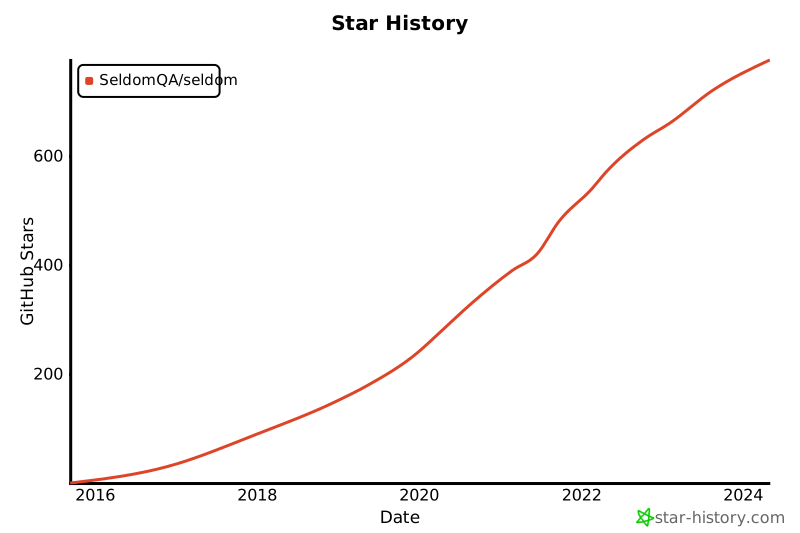
### 感谢
感谢从以下项目中得到思路和帮助。
* [parameterized](https://github.com/wolever/parameterized)
* [utx](https://github.com/jianbing/utx)
### 贡献者
### 交流
QQ群:948994709
================================================
FILE: api_case/confrun.py
================================================
"""
seldom confrun.py hooks function
"""
def base_url():
"""
http test
api base url
"""
return "http://www.httpbin.org"
def debug():
"""
debug mod
"""
return False
def rerun():
"""
error/failure rerun times
"""
return 0
def report():
"""
setting report path
Used:
return "d://mypro/result.html" or "d://mypro/result.xml"
"""
return None
def timeout():
"""
setting timeout
"""
return 10
def title():
"""
setting report title
"""
return "seldom 执行 excel 接口用例"
def tester():
"""
setting report tester
"""
return "bugmaster"
def description():
"""
setting report description
"""
return ["windows", "api"]
def language():
"""
setting report language
return "en" or "zh-CN"
"""
return "en"
def failfast():
"""
fail fast
:return:
"""
return False
================================================
FILE: demo/README.md
================================================
## seldom demo
通过 demo 帮助你快速了解seldom的使用。
### 准备工作
* 目录树:
```shell
./demo
├── README.md
├── __init__.py
├── confrun.py # 运行配置钩子函数
├── reports # 测试报告
├── test_data # 测试数据
└── test_dir # 测试用例
├── __init__.py
├── api_case # http接口用例
├── app_case # app UI 自动化用例
└── web_case # web UI 自动化用例
```
* 请安装 seldom 最新版本。
```shell
> pip install -U seldom
```
* 确保 seldom 命令可用。
```shell
> seldom --version
seldom, version 3.1.1
```
### 使用方法
seldom 从 3.1 开始支持 `confrun.py` 配置运行钩子函数,并推荐你使用这种方式。
| 函数 | 类型 | 说明 |
|-------------|---------|-----------------------------------------------------------|
| start_run() | fixture | 运行测试之前执行 |
| end_run() | fixture | 运行测试之后执行 |
| browser() | web | 设置浏览器类型:gc(google chrome)/ff(firefox)/edge/ie/safari |
| base_url() | api | 设置http接口基本url: 例如 http://httpbin.org |
| app_info() | app | 基于appium,启动app信息 |
| app_server() | app | 基于appium,设置appium 服务地址+端口 |
| debug() | general | 是否开启debug模式:True/False |
| rerun() | general | 用例失败/错误重跑,默认:0 |
| report() | general | 指定报告生成地址,例如: `/User/tech/xxx.html`、 `/User/tech/xxx.xml` |
| timeout() | general | 全局运行超时时间,默认:10 |
| title() | general | 测试报告标题:html报告 |
| tester() | general | 测试人员名字:html报告 |
| description() | general | 测试报告描述:html报告 |
| language() | general | 测试报告语言:html报告,类型: `en`、`zh-CN` |
| whitelist() | general | 运行用例白名单 |
| blacklist() | general | 运行用例黑名单 |
__特殊配置__
特殊配置是针对不同的测试类型设置的配置。
* web UI 自动化配置
```python
# confrun.py
def browser():
"""
Web UI test:
browser: gc(google chrome)/ff(firefox)/edge/ie/safari
"""
return "gc"
```
运行测试:
```shell
> seldom --path test_dir/web_case/
> seldom --path test_dir/web_case/test_playwright_demo.py
```
* http 接口测试
```python
# confrun.py
def base_url():
"""
http test
api base url
"""
return "http://httpbin.org"
```
运行测试:
```shell
> seldom --path test_dir/web_case/
```
* app UI 自动化测试
```python
# confrun.py
def app_info():
"""
app UI test
appium app config
"""
desired_caps = {
'deviceName': 'JEF_AN20',
'automationName': 'UiAutomator2',
'platformName': 'Android',
'platformVersion': '10.0',
'appPackage': 'com.meizu.flyme.flymebbs',
'appActivity': '.ui.LoadingActivity',
'noReset': True,
}
return desired_caps
def app_server():
"""
app UI test
appium server/desktop address
"""
return "http://127.0.0.1:4723"
```
运行测试:
```shell
> seldom --path test_dir/app_case/
```
__通用配置__
通用配置是不管运行什么类型的测试都适用的配置。
```python
# confrun.py
def debug():
"""
debug mod
"""
return False
def rerun():
"""
error/failure rerun times
"""
return 0
def report():
"""
setting report path
Used:
return "d://mypro/result.html"
return "d://mypro/result.xml"
"""
return None
def timeout():
"""
setting timeout
"""
return 10
def title():
"""
setting report title
"""
return "seldom test report"
def tester():
"""
setting report tester
"""
return "bugmaster"
def description():
"""
setting report description
"""
return ["windows", "jenkins"]
def language():
"""
setting report language
return "en"
return "zh-CN"
"""
return "en"
def whitelist():
"""test label white list"""
return []
def blacklist():
"""test label black list"""
return []
```
================================================
FILE: demo/__init__.py
================================================
================================================
FILE: demo/confrun.py
================================================
"""
seldom confrun.py hooks function
"""
def start_run():
"""
Test the hook function before running
"""
...
def end_run():
"""
Test the hook function after running
"""
...
def debug():
"""
debug mod
"""
return False
def rerun():
"""
error/failure rerun times
"""
return 0
def report():
"""
setting report path
Used:
return "d://mypro/result.html"
return "d://mypro/result.xml"
"""
return None
def timeout():
"""
setting timeout
"""
return 10
def title():
"""
setting report title
"""
return "seldom test report"
def tester():
"""
setting report tester
"""
return "bugmaster"
def description():
"""
setting report description
"""
return ["windows", "jenkins"]
def language():
"""
setting report language
return "en"
return "zh-CN"
"""
return "en"
def whitelist():
"""test label white list"""
return []
def blacklist():
"""test label black list"""
return []
================================================
FILE: demo/reports/.keep
================================================
================================================
FILE: demo/run.py
================================================
import seldom
"""
说明:
path: 指定测试目录。
browser: Web测试,指定浏览器,默认chrome - web专用
base_url: Http测试,指定接口地址。 - api专用
app_info: 启动app配置。 - app专用
app_server: appium server 地址。 - app专用
title: 指定测试项目标题。
tester: 指定测试人员。
description: 指定测试环境描述。
debug: debug模式,设置为True不生成测试用例。
rerun: 测试失败重跑
"""
if __name__ == '__main__':
# web case 配置
seldom.main(path="./test_dir/web_case",
browser="chrome",
title="seldom Web demo",
tester="虫师",
description=["Browser: Chrome"],
rerun=2)
# api case 配置
# seldom.main(path="./test_dir/api_case",
# base_url="http://httpbin.org",
# title="seldom API demo",
# tester="虫师",
# rerun=2)
# app case 配置
# from seldom.appium_lab.android import UiAutomator2Options
# capabilities = {
# 'deviceName': 'ELS-AN00',
# 'automationName': 'UiAutomator2',
# 'platformName': 'Android',
# 'appPackage': 'com.microsoft.bing',
# 'appActivity': 'com.microsoft.sapphire.app.main.MainSapphireActivity',
# 'noReset': True,
# }
# options = UiAutomator2Options().load_capabilities(capabilities)
# seldom.main(path="./test_dir/app_case",
# app_server="http://127.0.0.1:4723",
# app_info=options,
# title="seldom App demo",
# tester="虫师",
# rerun=2)
================================================
FILE: demo/test_data/csv_data.csv
================================================
firstname,lastname
Forest,Hobbs
Ferdinand,Lozano
================================================
FILE: demo/test_data/json_data.json
================================================
{
"name": [
["Wayne", "Burch"],
["Jamie-louise", "Wong"]
],
"login":[
{
"scene": "tom用户登录",
"username": "Tom",
"password": "tom123"
},
{
"scene": "jerry用户登录",
"username": "Jerry",
"password": "jerry123"
}
]
}
================================================
FILE: demo/test_data/yaml_data.yaml
================================================
---
name:
- - Elnora
- West
- - Leon
- Richard
login:
- username: Tom
password: tom123
- username: Jerry
password: jerry123
================================================
FILE: demo/test_dir/__init__.py
================================================
================================================
FILE: demo/test_dir/api_case/__init__.py
================================================
================================================
FILE: demo/test_dir/api_case/test_http_demo.py
================================================
import seldom
from seldom import data
class TestRequest(seldom.TestCase):
"""
http api test demo
doc: https://requests.readthedocs.io/en/master/
"""
def test_put_method(self):
"""
test put request
"""
self.put('/put', data={'key': 'value'})
self.assertStatusCode(200)
def test_post_method(self):
"""
test post request
"""
self.post('/post', data={'key':'value'})
self.assertStatusCode(200)
def test_get_method(self):
"""
test get request
"""
payload = {'key1': 'value1', 'key2': 'value2'}
self.get("/get", params=payload)
self.assertStatusCode(200)
def test_delete_method(self):
"""
test delete request
"""
self.delete('/delete')
self.assertStatusCode(200)
class TestAssert(seldom.TestCase):
"""
Test Assert
"""
def test_data_assert(self):
"""
The JSON data returned by the assertion
:return:
"""
self.get("/get")
self.assertStatusCode(200)
assert_data = {"headers": {"Host": "httpbin.org", "User-Agent": "python-requests/2.26.0"}}
self.assertJSON(assert_data, exclude=["headers", "user-agent"]) # exclude 过滤掉 json中的部分字段。
def test_format_assert(self):
"""
Assert json-schema
help doc: https://json-schema.org/
"""
self.get("/get")
self.assertStatusCode(200)
# 数据校验
schema = {
"type": "object",
"properties": {
"headers": {
"Host": "httpbin.org",
"User-Agent": "python-requests/2.22.0"
},
"origin": {"type": "string"},
"url": {
"type": "string",
"minLength": 20
}
},
}
self.assertSchema(schema)
def test_path_assert(self):
"""
assert jmesPath
help doc: https://jmespath.org/
"""
payload = {"foot": "bread"}
self.get('/get', params=payload)
self.assertPath("args.foot", "bread")
class TestRespData(seldom.TestCase):
"""
Test response data
"""
def test_resp_data(self):
"""
Get the returned data
"""
payload = {'key1': 'value1', 'key2': 'value2'}
self.post("/post", data=payload)
self.assertStatusCode(200)
self.assertEqual(self.response["form"]["key1"], "value1")
self.assertEqual(self.response["form"]["key2"], "value2")
def test_data_dependency(self):
"""
Test for interface data dependencies
"""
headers = {"X-Account-Fullname": "bugmaster"}
self.get("/get", headers=headers)
self.assertStatusCode(200)
username = self.response["headers"]["X-Account-Fullname"]
self.post("/post", data={'username': username})
self.assertStatusCode(200)
class TestDDT(seldom.TestCase):
"""
Test Data Driver
"""
@data([
("key1", 'value1'),
("key2", 'value2'),
("key3", 'value3')
])
def test_data(self, key, value):
"""
Data-Driver Tests
"""
payload = {key: value}
self.post("/post", data=payload)
self.assertStatusCode(200)
self.assertEqual(self.response["form"][key], value)
if __name__ == '__main__':
seldom.main(base_url="http://httpbin.org", debug=True)
================================================
FILE: demo/test_dir/app_case/__init__.py
================================================
================================================
FILE: demo/test_dir/app_case/test_first_demo.py
================================================
from appium.options.android import UiAutomator2Options
import seldom
from seldom.appium_lab.keyboard import KeyEvent
class TestBingApp(seldom.TestCase):
"""
Test Bing APP
"""
def start(self):
self.ke = KeyEvent(self.driver)
def test_bing_search(self):
"""
test bing App search
"""
self.sleep(2)
self.click(id_="com.microsoft.bing:id/sa_hp_header_search_box")
self.type(id_="com.microsoft.bing:id/sapphire_search_header_input", text="seldomQA")
self.ke.press_key("ENTER")
self.sleep(1)
elem = self.get_elements(xpath='//android.widget.TextView')
self.assertIn("seldom", elem[0].text.lower())
if __name__ == '__main__':
capabilities = {
'deviceName': 'ELS-AN00',
'automationName': 'UiAutomator2',
'platformName': 'Android',
'appPackage': 'com.microsoft.bing',
'appActivity': 'com.microsoft.sapphire.app.main.MainSapphireActivity',
'noReset': True,
}
options = UiAutomator2Options().load_capabilities(capabilities)
seldom.main(app_server="http://127.0.0.1:4723", app_info=options, debug=True)
================================================
FILE: demo/test_dir/app_case/test_po_demo.py
================================================
from poium import Page, Element
import seldom
from seldom.appium_lab.keyboard import KeyEvent
from seldom.appium_lab.android import UiAutomator2Options
class BingPage(Page):
"""BBS Page"""
search_button = Element("id=com.microsoft.bing:id/sa_hp_header_search_box")
search_input = Element("id=com.microsoft.bing:id/sapphire_search_header_input")
search_count = Element('//android.widget.TextView[@resource-id="count"]')
class TestBingApp(seldom.TestCase):
"""
Test Bing App
"""
def start(self):
self.bing_page = BingPage(self.driver)
self.ke = KeyEvent(self.driver)
def test_bbs(self):
"""
test bbs search
"""
self.sleep(2)
self.bing_page.search_button.click()
self.sleep(1)
self.bing_page.search_input.send_keys("seldom")
self.ke.press_key("ENTER")
self.sleep(1)
counts = self.bing_page.search_count
self.assertIn("个结果", counts.text.lower())
if __name__ == '__main__':
capabilities = {
'deviceName': 'ELS-AN00',
'automationName': 'UiAutomator2',
'platformName': 'Android',
'appPackage': 'com.microsoft.bing',
'appActivity': 'com.microsoft.sapphire.app.main.MainSapphireActivity',
'noReset': True,
}
options = UiAutomator2Options().load_capabilities(capabilities)
seldom.main(app_server="http://127.0.0.1:4723", app_info=options, debug=True)
================================================
FILE: demo/test_dir/app_case/test_u2_demo.py
================================================
"""
需要安装 uiautomator2: https://github.com/openatx/uiautomator2
> pip install uiautomator2
"""
import seldom
import uiautomator2 as u2
class MyAppTest(seldom.TestCase):
def start(self):
# 链接设备
self.d = u2.connect('192.168.31.234')
# 启动App
self.d.app_start("com.meizu.mzbbs")
def end(self):
# 停止app
self.d.app_stop("com.meizu.mzbbs")
def test_app(self, user):
""" 使用 uiautomator2 """
# 搜索
self.d(resourceId="com.meizu.flyme.flymebbs:id/nw").click()
# 输入关键字
self.d(resourceId="com.meizu.flyme.flymebbs:id/nw").set_text("flyme")
# 搜索按钮
self.d(resourceId="com.meizu.flyme.flymebbs:id/o1").click()
self.sleep(2)
if __name__ == '__main__':
seldom.main(debug=True)
================================================
FILE: demo/test_dir/web_case/__init__.py
================================================
================================================
FILE: demo/test_dir/web_case/test_data_demo.py
================================================
import seldom
from seldom import testdata
class RandomDataTest(seldom.TestCase):
"""
Randomly generate test data
"""
def test_case(self):
"""
used testdata test
"""
self.open("https://www.runoob.com/try/try.php?filename=tryhtml_input")
self.switch_to_frame(id_="iframeResult")
self.type(name="firstname", text=testdata.first_name())
self.type(name="lastname", text=testdata.last_name())
self.sleep(1)
if __name__ == '__main__':
seldom.main(browser="gc", debug=True)
================================================
FILE: demo/test_dir/web_case/test_ddt_demo.py
================================================
import seldom
from seldom import data, file_data
class BingTest(seldom.TestCase):
"""Bing search test case"""
@data([
("First case description", "seldom"),
("Second case description", "selenium"),
("Third case description", "unittest"),
])
def test_bing_tuple(self, desc, search_key):
"""
used tuple test data
:param desc: case desc
:param search_key: search keyword
"""
self.open("https://cn.bing.com")
self.type(id_="sb_form_q", text=search_key, enter=True)
self.assertInTitle(search_key)
@data([
["First case description", "seldom"],
["Second case description", "selenium"],
["Third case description", "unittest"],
])
def test_bing_list(self, desc, search_key):
"""
used list test data
:param desc: case desc
:param search_key: search keyword
"""
self.open("https://cn.bing.com")
self.type(id_="sb_form_q", text=search_key, enter=True)
self.assertInTitle(search_key)
@data([
{"scene": "First case description", "search_key": "seldom"},
{"scene": "Second case description", "search_key": "selenium"},
{"scene": "Third case description", "search_key": "unittest"},
])
def test_bing_dict(self, scene, search_key):
"""
used dict test data
:param scene: case desc
:param search_key: search keyword
"""
self.open("https://cn.bing.com")
self.type(id_="sb_form_q", text=search_key, enter=True)
self.assertInTitle(search_key)
class FileDataTest(seldom.TestCase):
"""form input test case"""
def start(self):
self.test_url = "https://www.w3school.com.cn/tiy/t.asp?f=eg_html_form_submit"
@file_data("json_data.json", key="name")
def test_json_list(self, firstname, lastname):
"""
used file_data test
"""
self.open(self.test_url)
self.switch_to_frame(id_="iframeResult")
self.type(name="firstname", text=firstname, clear=True)
self.type(name="lastname", text=lastname, clear=True)
self.sleep(1)
@file_data("json_data.json", key="login")
def test_json_dict(self, _, username, password):
"""
used file_data test
"""
self.open(self.test_url)
self.switch_to_frame(id_="iframeResult")
self.type(name="firstname", text=username, clear=True)
self.type(name="lastname", text=password, clear=True)
self.sleep(1)
@file_data("yaml_data.yaml", key="name")
def test_yaml_list(self, firstname, lastname):
"""
used file_data test
"""
self.open(self.test_url)
self.switch_to_frame(id_="iframeResult")
self.type(name="firstname", text=firstname, clear=True)
self.type(name="lastname", text=lastname, clear=True)
self.sleep(1)
@file_data("yaml_data.yaml", key="login")
def test_yaml_dict(self, username, password):
"""
used file_data test
"""
self.open(self.test_url)
self.switch_to_frame(id_="iframeResult")
self.type(name="firstname", text=username, clear=True)
self.type(name="lastname", text=password, clear=True)
self.sleep(1)
@file_data("csv_data.csv", line=2)
def test_csv(self, firstname, lastname):
"""
used file_data test
"""
self.open(self.test_url)
self.switch_to_frame(id_="iframeResult")
self.type(name="firstname", text=firstname, clear=True)
self.type(name="lastname", text=lastname, clear=True)
self.sleep(1)
@file_data(file="excel_data.xlsx", sheet="Sheet1", line=2)
def test_excel(self, firstname, lastname):
"""
used file_data test
"""
self.open(self.test_url)
self.switch_to_frame(id_="iframeResult")
self.type(name="firstname", text=firstname, clear=True)
self.type(name="lastname", text=lastname, clear=True)
self.sleep(1)
if __name__ == '__main__':
seldom.main(browser="gc", debug=False)
================================================
FILE: demo/test_dir/web_case/test_first_demo.py
================================================
import seldom
from seldom import Steps
class BingTest(seldom.TestCase):
"""Bing search test case"""
def test_case(self):
"""a simple test case """
self.open("https://cn.bing.com")
self.type(id_="sb_form_q", text="seldom", enter=True)
self.sleep(2)
self.assertInTitle("seldom")
def test_case_two(self):
"""method chaining """
Steps(url="https://cn.bing.com").open().find("#sb_form_q").type("seldom").submit().sleep(2)
self.assertInTitle("seldom")
if __name__ == '__main__':
seldom.main(browser="gc")
================================================
FILE: demo/test_dir/web_case/test_fixture_demo.py
================================================
import seldom
class BaiduTest(seldom.TestCase):
"""
* start_class/end_class
* start/end
"""
@classmethod
def start_class(cls):
"""start class"""
print("test class start")
cls.max_window(cls)
@classmethod
def end_class(cls):
"""end class"""
...
def start(self):
"""start"""
print("test case start")
self.index_page = "https://www.baidu.com/"
self.news_page = "https://news.baidu.com/"
def end(self):
"""end"""
...
def test_open_index(self):
"""open baidu index page"""
self.open(self.index_page)
def test_open_news(self):
"""open baidu news page"""
self.open(self.news_page)
if __name__ == '__main__':
seldom.main(debug=True)
================================================
FILE: demo/test_dir/web_case/test_playwright_demo.py
================================================
"""
需要安装 playwright: https://playwright.dev/
> pip install playwright
"""
import seldom
from playwright.sync_api import sync_playwright
from playwright.sync_api import expect
class Playwright(seldom.TestCase):
def start(self):
p = sync_playwright().start()
self.browser = p.chromium.launch()
self.page = self.browser.new_page()
def end(self):
self.browser.close()
def test_start(self):
page = self.page
page.goto("https://playwright.dev")
print(page.title())
expect(page).to_have_title("Fast and reliable end-to-end testing for modern web apps | Playwright")
get_started = page.locator('text=Get Started')
expect(get_started).to_have_attribute('href', '/docs/intro')
get_started.click()
expect(page).to_have_url('https://playwright.dev/docs/intro')
if __name__ == '__main__':
seldom.main()
================================================
FILE: demo/test_dir/web_case/test_po_demo.py
================================================
"""
page object model
Using the poium Library
https://github.com/SeldomQA/poium
```
> pip install poium>=1.6.1
```
"""
import seldom
from poium import Page, Element, Elements
class BaiduPage(Page):
"""baidu page"""
input = Element("#kw", describe="搜索输入框")
button = Element("id=su", describe="搜索按钮")
result = Elements("//div/h3/a", describe="搜索结果")
class BaiduTest(seldom.TestCase):
"""Baidu search test case"""
def test_baidu_page(self):
"""
A simple test
"""
page = BaiduPage()
page.open("https://www.baidu.com")
self.sleep(3)
# assert element is exist
self.assertTrue(page.input.is_exist())
self.assertTrue(page.button.is_exist())
# operation element
page.input.send_keys("(title:seldom)")
page.button.click()
self.sleep(3)
# assert title
self.assertTitle("(title:seldom)_百度搜索")
# Loop assertion result
for r in page.result:
# assert text in
self.assertIn("seldom", r.text.lower())
if __name__ == '__main__':
seldom.main(browser='chrome')
================================================
FILE: description.rst
================================================
seldom
---------------
Seldom is an automation testing framework based on unittest.
Installation
------------
$ pip install seldom
Documentation
++++++++++++++++++
https://seldomqa.github.io
================================================
FILE: docs/.gitignore
================================================
node_modules
.temp
.cache
.DS_Store
vpdocs/.vuepress/dist
================================================
FILE: docs/README.md
================================================
## ☘️Introduction
此目录用于**存放 & 编辑** seldom 相关文档
## 📖 Document
[中文文档](https://seldomqa.github.io/)
[English document(readthedocs)](https://seldomqa.readthedocs.io/en/latest/index.html)
## 结构
```shell
docs/
├── README.md
├── conf.py # rst文档配置文件
├── deploy.sh # vuepress文档部署脚本
├── index.rst
├── markdown2rst.py # md转rst脚本
├── package.json
├── requirements.txt # python模块依赖
├── rst_docs # 用于存放rst文档
├── vpdocs # 用于vuepress文档
│ ├── README.md
│ ├── advanced
│ ├── db
│ ├── getting-started
│ ├── http
│ ├── introduce.md
│ ├── other
│ └── platform
└── yarn.lock
```
## 如何贡献文档
1. clone 本项目
```bash
git clone https://github.com/SeldomQA/seldom.git
```
2. 进入到文档目录&启动项目
```bash
cd docs
npm install
npm run dev
npm run build
```
3. 编辑相关文档(编辑 vpdocs 目录下的文档)
================================================
FILE: docs/compare.md
================================================
## seldom vs pytest
| 功能 | seldom | pytest |
|---------------|--------------------------------------------|---------------------------------------|
| web UI测试 | 支持 ✅ | 支持(需安装 selenium) ⚠️ |
| web UI断言 | 支持(assertText、assertTitle、assertElement) ✅ | 不支持 ❌ |
| playwright | 支持(需安装playwright) ⚠️ | 支持(playwright提供playwright-pytest插件) ✅ |
| 失败截图 | 支持(自动实现) ✅ | 支持(需要设置) ✅ |
| http接口测试 | 支持 ✅ | 支持(需安装 requests) ⚠️ |
| http接口断言 | 支持(assertJSON、assertPath、assertSchema) ✅ | 不支持 ❌ |
| app UI测试 | 支持 ✅ | 支持(需安装 appium) ⚠️ |
| Page Object模式 | 支持(推荐poium) ✅ | 支持(推荐poium) ✅ |
| 脚手架 | 支持(快速创建项目) ✅ | 不支持 ❌ |
| 生成随机测试数据 | 支持`testdata` ✅ | 不支持 ❌ |
| 发送消息 | 支持(email、钉钉、飞书、微信)✅ | 不支持 ❌ |
| log日志 | 支持 ✅ | 不支持 ❌ |
| 数据库操作 | 支持(sqlite3、MySQL、SQL Server) ✅ | 不支持 ❌ |
| 用例依赖 | 支持`@depend()` ✅ | `@pytest.mark.dependency()`支持 ✅ |
| 失败重跑 | 支持`rerun` ✅ | pytest-rerunfailures 支持 ✅ |
| 用例分类标签 | 支持`@label()` ✅ | `@pytest.mark.xxx`支持 ✅ |
| HTML测试报告 | 支持 ✅ | pytest-html、allure ✅ |
| XML测试报告 | 支持 ✅ | 自带 `--junit-xml` ✅ |
| 数据驱动方法 | `@data()` ✅ | `@pytest.mark.parametrize()` ✅ |
| 数据驱动文件 | `@file_data()`(JSON\YAML\CSV\Excel) ✅ | 不支持 ❌ |
| 钩子函数 | `confrun.py`用例运行钩子 ⚠️ | `conftest.py` 功能更强大 ✅ |
| 命令行工具CLI | 支持`seldom` ✅ | 支持`pytest` ✅ |
| 并发执行 | 不支持 ❌ | pytest-xdist、pytest-parallel ✅ |
| 平台化 | 支持(seldom-platform)✅ | 不支持 ❌ |
| 第三方插件 | seldom(unittest)的生态比较糟糕 ⚠️ | pytest有丰富插件生态 ✅ |
__说明__
* ✅ : 表示支持。
* ⚠️: 支持,但支持的不好,或没有对方好。
* ❌ : 不支持,表示框架没有该功能,第三方插件也没有。
================================================
FILE: docs/deploy.sh
================================================
# 确保脚本抛出遇到的错误
set -e
# 生成静态文件
npm run build
# 进入生成的文件夹
cd vpdocs/.vuepress/dist
git init
git add -A
git commit -m 'deploy'
# 如果发布到 https://SeldomQA.github.io
git push -f https://github.com/SeldomQA/SeldomQA.github.io.git master
cd -
================================================
FILE: docs/package.json
================================================
{
"name": "vuepress-docs",
"version": "1.0.0",
"description": "docs by vuepress",
"main": "index.js",
"author": "Yongchin",
"license": "MIT",
"scripts": {
"dev": "vuepress dev vpdocs",
"build": "vuepress build vpdocs"
},
"type": "module",
"devDependencies": {
"@vuepress/bundler-vite": "^2.0.0-rc.20",
"@vuepress/plugin-search": "^2.0.0-rc.83",
"@vuepress/theme-default": "^2.0.0-rc.84",
"sass-embedded": "^1.85.1",
"vuepress": "^2.0.0-rc.20"
}
}
================================================
FILE: docs/vpdocs/.vuepress/config.js
================================================
import { defineUserConfig } from 'vuepress'
import { viteBundler } from '@vuepress/bundler-vite'
import { defaultTheme } from '@vuepress/theme-default'
import { searchPlugin } from '@vuepress/plugin-search'
export default defineUserConfig({
title: "seldom文档",
description: "seldom 是基于unittest 的自动化测试框架。",
base: "/",
head: [
['link', { rel: 'icon', href: '/logo.jpeg' }]
],
bundler: viteBundler({
viteOptions: {},
}),
plugins: [
searchPlugin({
// 配置项
}),
],
theme: defaultTheme({
repo: "SeldomQA/seldom",
docsBranch: "vuepress-docs/docs/vpdocs",
logo: "/logo.jpeg",
navbar: [
{ text: "介绍", link: "/introduce" },
{ text: "安装", link: "/getting-started/installation" },
],
sidebar: [
"/introduce",
{
text: "开始",
children: [
"/getting-started/installation",
"/getting-started/create_project",
"/getting-started/quick_start",
"/getting-started/advanced",
"/getting-started/data_driver",
"/getting-started/dependent_func",
"/getting-started/seldom_cli",
],
},
{
text: "web UI 测试",
children: [
"/web-testing/browser_driver",
"/web-testing/seldom_api",
"/web-testing/chaining",
"/web-testing/page_object",
"/web-testing/other",
],
},
{
text: "App UI 测试",
children: [
"/app-testing/start",
"/app-testing/appium_lab",
"/app-testing/page_object",
"/app-testing/extensions",
"/app-testing/adb_lib",
],
},
{
text: "HTTP接口测试",
children: [
"/api-testing/start",
"/api-testing/assert",
"/api-testing/api_object",
"/api-testing/more",
"/api-testing/api_case",
"/api-testing/webscocket",
],
},
{
text: "更多能力",
children: [
"/more-ability/db_operation",
"/more-ability/test_library",
"/more-ability/benchmark",
],
},
"/platform/platform",
"/version/CHANGES",
],
editLinks: true,
editLinkText: "在 GitHub 上编辑此页",
lastUpdated: "上次更新",
}),
})
================================================
FILE: docs/vpdocs/README.md
================================================
---
home: true
heroText: Seldom
heroImage: /image/book.jpg
actions:
- text: 快速上手→
link: /getting-started/quick_start.html
type: primary
- text: 项目简介
link: /introduce.html
type: secondary
features:
- title: 全能
details: seldom支持web/app/api等类型的自动化测试。
- title: 快速
details: 提供脚手架快速创建自动化项目。
- title: 报告
details: 集成XTestRunner测试报告,现代美观。
- title: 断言
details: 提供丰富的断言,方便验证测试结果。
- title: 数据驱动
details: 支持Excel/CSV/JSON/YAML数据文件。
- title: 平台化
details: seldom提供了平台化支持。
footer: MIT Licensed | Copyright © 2025-重定向科技
---
================================================
FILE: docs/vpdocs/api-testing/api_case.md
================================================
# 支持Excel测试用例
> seldom > 3.8.0
在编写接口测试用例的时候,有时候测试用例非常简单,比如单接口的测试,不需要登录token,不存在用例数据依赖,也不需要参数加密,此时,使用`Excel`
文件编写用例更为高效。
seldom支持了这种用例的编写。
### 编写Excel用例
[查看例子](https://github.com/SeldomQA/seldom/tree/master/api_case)
首先,创建一个Excel文件,格式如下。
| name | api | method | headers | param_type | params | assert | exclude |
|-----------------|-------|--------|---------|------------|--------|--------|---------|
| 简单GET接口 | /get | GET | {} | data | {} | {} | [] |
| 简单POST接口-json参数 | /post | POST | {} | json | {} | {} | [] |
| ... | | | | | | | |
__参数说明__
| 字段 | 说明 | 列子 |
|--------------|-------------------------------------------------------|------------------------------------------------------|
| `name` | 用例的名称,会在测试报告中展示。 | |
| `api` | 接口的地址,可以写完整的URL地址, 也可以只定义路径,`base_url` 在 `confrun.py` | 例如:`http://www.httpbin.org/get` or `/get` |
| `method` | 接口的请求方法,必须大写,不允许为空 | 支持:`GET`、`POST`、`PUT`、`DELETE` |
| `headers` | 请求头,不允许为空,默认为 `{}`,字段必须双引号`"`。 | 例如:`{"user-agent": "my-app/0.0.1"}` |
| `param_type` | 接口参数类型,必须小写,不允许为空。 | 例如:`data`、 `json` |
| `params` | 接口参数,不允许为空,默认为 `{}`,字段必须双引号`"`。 | 例如:`{"id": 1, "name": "jack"}` |
| `assert` | 断言接口返回,允许为空 或 `{}`, | 例如:`{"status": 200, "success": True, "data": [...]}` |
| `exclude` | 断言过滤字段,一些特殊的字段会导致断言失败,需要过滤掉。 | 例如:`["X-Amzn-Trace-Id", "timestamp"]` |
__confrun.py配置__
```python
def base_url():
"""
http test
api base url
"""
return "http://www.httpbin.org"
def debug():
"""
debug mod
"""
return False
def rerun():
"""
error/failure rerun times
"""
return 0
def report():
"""
setting report path
Used:
return "d://mypro/result.html" or "d://mypro/result.xml"
"""
return None
def timeout():
"""
setting timeout
"""
return 10
def title():
"""
setting report title
"""
return "seldom 执行 excel 接口用例"
def tester():
"""
setting report tester
"""
return "bugmaster"
def description():
"""
setting report description
"""
return ["windows", "api"]
def language():
"""
setting report language
return "en" or "zh-CN"
"""
return "zh-CN"
def failfast():
"""
fail fast
:return:
"""
return False
```
### 运行测试用例
* 目录结构
```shell
mypro/
├── api_case.xlsx
└── confrun.py
```
* 运行测试
```shell
> cd mypro
> seldom --api-excel api_case.xlsx
```
* 运行日志
```shell
seldom --api-excel .\api_case.xlsx
run .\api_case.xlsx file.
__ __
________ / /___/ /___ ____ ____
/ ___/ _ \/ / __ / __ \/ __ ` ___/
(__ ) __/ / /_/ / /_/ / / / / / /
/____/\___/_/\__,_/\____/_/ /_/ /_/ v3.x.x
-----------------------------------------
@itest.info
2024-07-06 21:00:35 | INFO | runner.py | TestLoader: ...\Lib\site-packages\seldom\file_runner\api_excel.py
2024-07-06 21:00:35 | INFO | parameterization.py | find data file: .\api_case.xlsx
XTestRunner Running tests...
----------------------------------------------------------------------
2024-07-06 21:00:35 | INFO | api_excel.py | execute api case: [简单GET接口]
2024-07-06 21:00:35 | INFO | request.py | -------------- Request -----------------[🚀]
2024-07-06 21:00:35 | INFO | request.py | [method]: GET [url]: http://www.httpbin.org/get
2024-07-06 21:00:35 | DEBUG | request.py | [headers]:
{
"user-agent": "my-app/0.0.1"
}
2024-07-06 21:00:35 | DEBUG | request.py | [params]:
{
"key": "value"
}
2024-07-06 21:00:35 | INFO | request.py | -------------- Response ----------------[🛬️]
2024-07-06 21:00:35 | INFO | request.py | successful with status 200
2024-07-06 21:00:35 | DEBUG | request.py | [type]: json [time]: 0.481752
2024-07-06 21:00:35 | DEBUG | request.py | [response]:
{
"args": {
"key": "value"
},
"headers": {
"Accept": "*/*",
"Accept-Encoding": "gzip, deflate",
"Host": "www.httpbin.org",
"User-Agent": "my-app/0.0.1",
"X-Amzn-Trace-Id": "Root=1-66893ff2-60ed7c5378ca01452917ea0c"
},
"origin": "14.155.89.115",
"url": "http://www.httpbin.org/get?key=value"
}
2024-07-06 21:00:35 | INFO | case.py | 👀 assertJSON -> {'args': {'key': 'value'}, 'headers': {'Accept': '*/*', 'Accept-Encoding': 'gzip, deflate', 'Host': 'www.httpbin.org', 'User-Agent': 'my-app/0.0.1', 'X-Amzn-Trace-Id': 'Root=1-668906ef-2e2d8c4c3f36a228264da1ab'}, 'origin': '14.155.89.115', 'url': 'http://www.httpbin.org/get?key=value'}.
...
```
* 生成测试报告

================================================
FILE: docs/vpdocs/api-testing/api_object.md
================================================
# API Object
API Object Models,简称AOM,AOM是一种设计模式,它围绕着将API、路由或功能交互及其相关行为封装在结构良好的对象中。AOM旨在增强API测试和集成的直观性和弹性。在实践中,AOM需要精心设计专门的API对象,以有效地保护用户免受与API 请求、响应、端点交互和身份验证过程相关的复杂性的影响。
seldom 支持AOM, 并且提供了一些好用的功能,辅助你使用AOM.
* 目录结构如下
```shell
mypro/
├── api/
│ ├── __init__.py
│ ├── auth_object.py
│ └── xxx_object.py
├── test_dir/
│ ├── test_auth.py
│ └── test_xxx.py
│ ...
```
* 创建 API Object
```python
# api/auth_object.py
from seldom.testdata import get_int
from seldom.request import HttpRequest
from seldom.request import check_response
class AuthAPIObject(HttpRequest):
def __init__(self, api_key):
self.api_key = api_key
@check_response(ret="form.token")
def get_token(self, user_id:str) -> str:
"""
模拟:根据用户ID生成登录token
:param user_id:
:return:
"""
data = {"user_id": user_id, "token": "t" + str(get_int(10000, 99999))}
r = self.post("/post?key=" + self.api_key, data=data)
return r
```
定义API接口,根据`get_token()`用于生成token,这里我们通过随机数模拟的生成的token。`check_response()`装饰器用于装饰接口,`form.token` 用于提取API的返回值。
* 创建测试用例
```python
# test_dir/test_auth.py
import seldom
from api.auth_object import AuthAPIObject
class TestAPI(seldom.TestCase):
def test_case(self):
auth_object = AuthAPIObject(api_key="abc123")
token = auth_object.get_token(user_id="123")
print("token", token)
if __name__ == '__main__':
seldom.main(debug=True, base_url="https://httpbin.org")
```
在用例层调用`AuthAPIObject`类下面的对象,测试API。
* AOM 原则
首先,API只允许通过的APIObject进行封装,那么在封装之前可以检索一下是否有封装了,如果有,进一步确认是否满足自己的调用需求,我们一般在测试API的时候一般各种参数验证,当API作为依赖接口调用的时候,一般参数比较少且固定,所以,API在封装的时候要兼顾到这两种情况。
其次,用例层只能通过APIObject的封装调用API,像登录token这种大部分API会用到的信息,可以通过类初始化时传入,后续调用类下面方法的时候就不需要关心的。如果是多个API组成一个场景,也可以再进行一层业务层的封装。
================================================
FILE: docs/vpdocs/api-testing/assert.md
================================================
# 接口断言
断言接口返回的数据是HTTP接口自动化测试非常重要的工作,提供强大的断言方法可以提高用例的编写效率。
## assertJSON
`assertJSON()` 断言接口返回的某部分数据。
* 请求参数
```json
{
"name": "tom",
"hobby": [
"basketball",
"swim"
]
}
```
* 返回结果
```json
{
"args": {
"hobby": [
"basketball",
"swim"
],
"name": "tom"
},
"headers": {
"Accept": "*/*",
"Accept-Encoding": "gzip, deflate",
"Host": "httpbin.org",
"User-Agent": "python-requests/2.25.0",
"X-Amzn-Trace-Id": "Root=1-62851614-1ca9fdb276238c60406c118f"
},
"origin": "113.87.15.99",
"url": "http://httpbin.org/get?name=tom&hobby=basketball&hobby=swim"
}
```
我的目标是断言`name` 和 `hobby` 部分的内容。
```python
import seldom
class TestAPI(seldom.TestCase):
def test_assert_json(self):
# 接口参数
payload = {"name": "tom", "hobby": ["basketball", "swim"]}
# 接口调用
self.get("http://httpbin.org/get", params=payload)
# 断言数据
assert_data = {
"hobby": ["swim", "basketball"],
"name": "tom"
}
self.assertJSON(assert_data, self.response["args"], exclude=["xxx"])
```
* exclude 用于设置跳过的检查字段,例如一些 时间、随机数 等,每次调用都不一样,但并不影响结果的正确性。通过 exclude
来设置屏蔽这些字段的检查。
## assertPath
`assertPath` 是基于 `jmespath` 实现的断言,功能非常强大。
* jmespath: https://jmespath.org/specification.html
接口返回数据如下:
```json
{
"args": {
"hobby": [
"basketball",
"swim"
],
"name": "tom"
}
}
```
seldom中可以通过path进行断言:
```python
import seldom
class TestAPI(seldom.TestCase):
def test_assert_path(self):
payload = {'name': 'tom', 'hobby': ['basketball', 'swim']}
self.get("http://httpbin.org/get", params=payload)
self.assertPath("args.name", "tom")
self.assertPath("args.hobby[0]", "basketball")
self.assertInPath("args.hobby[0]", "ball")
```
* `args.hobby[0]` 提取接口返回的数据。
* `assertPath()` 判断提取的数据是否等于`basketball`;
* `assertInPath()` 判断提取的数据是否包含`ball`。
## assertSchema
当你不关心数据本身是什么,而是关心数据的结构和类型时,可以使用 `assertSchema` 断言方法。 `assertSchema` 是基于 `jsonschema`
实现的断言方法。
* jsonschema: https://json-schema.org/learn/
```python
import seldom
from seldom.utils import genson
class TestAPI(seldom.TestCase):
def test_assert_schema(self):
# 接口参数
payload = {"hobby": ["basketball", "swim"], "name": "tom", "age": "18"}
# 调用接口
self.get("/get", params=payload)
# 生成数据结构和类型
schema = genson(self.response["args"])
print("json Schema: \n", schema)
# 断言数据结构和类型
assert_data = {
"$schema": "http://json-schema.org/schema#",
"type": "object",
"properties": {
"age": {
"type": "string"
},
"hobby": {
"type": "array", "items": {"type": "string"}
},
"name": {
"type": "string"
}
},
"required":
["age", "hobby", "name"]
}
self.assertSchema(assert_data, self.response["args"])
```
* `genson`: 可以生成`jsonschema`数据结构和类型(`seldom 2.9` 新增)。
================================================
FILE: docs/vpdocs/api-testing/more.md
================================================
# 更多功能
### har to case
对于不熟悉 Requests 库的人来说,通过Seldom来写接口测试用例还是会有一点难度。于是,seldom 提供了`har` 文件转 `case` 的命令。
首先,打开fiddler 工具进行抓包,选中某一个请求。
然后,选择菜单栏:`file` -> `Export Sessions` -> `Selected Sessions...`

选择导出的文件格式。

点击`next` 保存为`demo.har` 文件。
最后,通过`seldom -h2c` 转为`demo.py` 脚本文件。
```shell
> seldom -h2c demo.har
2021-06-14 18:05:50 [INFO] Start to generate testcase.
2021-06-14 18:05:50 [INFO] created file: ...\demo.py
```
`demo.py` 文件。
```python
import seldom
class TestRequest(seldom.TestCase):
def start(self):
self.url = "http://httpbin.org/post"
def test_case(self):
headers = {"User-Agent": "python-requests/2.25.0", "Accept-Encoding": "gzip, deflate",
"Accept": "application/json", "Connection": "keep-alive", "Host": "httpbin.org",
"Content-Length": "36", "Origin": "http://httpbin.org", "Content-Type": "application/json",
"Cookie": "lang=zh"}
cookies = {"lang": "zh"}
self.post(self.url, json={"key1": "value1", "key2": "value2"}, headers=headers, cookies=cookies)
self.assertStatusCode(200)
if __name__ == '__main__':
seldom.main()
```
### swagger to case
> seldom 3.6 版本支持。
seldom 提供了`swagger` 转 `case` 的命令。 使用 `seldom -s2c` 命令。
```shell
> seldom -s2c swagger.json
2024-03-04 00:02:22 | INFO | core.py | Start to generate testcase.
2024-03-04 00:02:22 | INFO | core.py | created file: ...\swagger.py
```
将swagger文档转为 seldom 自动化测试用例。
```python
import seldom
class TestRequest(seldom.TestCase):
def test_pet_petId_uploadImage_api_post(self):
url = f"https://petstore.swagger.io/pet/{petId}/uploadImage"
params = {}
headers = {}
headers["Content-Type"] = "multipart/form-data"
data = {"additionalMetadata": additionalMetadata, "file": file}
r = self.post(url, headers=headers, params=params, data=data)
print(r.status_code)
def test_pet_api_post(self):
url = f"https://petstore.swagger.io/pet"
params = {}
headers = {}
headers["Content-Type"] = "application/json"
data = {}
r = self.post(url, headers=headers, params=params, data=data)
print(r.status_code)
```
需要注意的是,转换的seldom自动化测试用例有一些`变量`,需要用户根据实际情况进行定义。
### 请求转 cURL
seldom 支持将请求转成`cCURL`命令, 你可以方便的通过`cURL`命令执行,或者导入到其他接口工具,例如,postman 支持`cURL`命令导入。
```python
# test_http.py
import seldom
class TestRequest(seldom.TestCase):
"""
http api test demo
doc: https://requests.readthedocs.io/en/master/
"""
def test_get_curl(self):
"""
test get curl
"""
self.get('http://httpbin.org/get', params={'key': 'value'})
curl = self.curl()
print(curl)
self.post('http://httpbin.org/post', data={'key': 'value'})
curl = self.curl()
print(curl)
# or
r = self.delete('http://httpbin.org/delete', params={'key': 'value'})
curl = self.curl(r.request)
print(curl)
r = self.put('http://httpbin.org/put', json={'key': 'value'}, headers={"token": "123"})
curl = self.curl(r.request)
print(curl)
if __name__ == '__main__':
seldom.main(debug=True)
```
* 日志结果
```shell
> python test_http.py
...
curl -X GET 'Content-Type: application/json' -H 'token: 123' -d '{"key": "value"}' http://httpbin.org/get
curl -X POST 'Content-Type: application/x-www-form-urlencoded' -H -d key=value http://httpbin.org/post
curl -X DELETE 'http://httpbin.org/delete?key=value'
curl -X PUT -H 'Content-Type: application/json' -H 'token: 123' -d '{"key": "value"}' http://httpbin.org/put
```
### 接口数据依赖
在场景测试中,我们需要利用上一个接口的数据,调用下一个接口。
* 简单的接口依赖
```python
import seldom
class TestRespData(seldom.TestCase):
def test_data_dependency(self):
"""
Test for interface data dependencies
"""
headers = {"X-Account-Fullname": "bugmaster"}
self.get("/get", headers=headers)
self.assertStatusCode(200)
username = self.response["headers"]["X-Account-Fullname"]
self.post("/post", data={'username': username})
self.assertStatusCode(200)
```
seldom提供了`self.response`用于记录上个接口返回的结果,直接拿来用即可。
* 封装接口依赖
1. 创建公共模块
```python
# common.py
from seldom.request import check_response
from seldom.request import HttpRequest
class Common(HttpRequest):
@check_response(
describe="获取登录用户名",
status_code=200,
ret="headers.Account",
check={"headers.Host": "httpbin.org"},
debug=True
)
def get_login_user(self):
"""
调用接口获得用户名
"""
headers = {"Account": "bugmaster"}
r = self.get("http://httpbin.org/get", headers=headers)
return r
if __name__ == '__main__':
c = Common()
c.get_login_user()
```
* 运行日志
```shell
2023-02-14 23:51:48 request.py | DEBUG | Execute get_login_user - args: (<__main__.Common object at 0x0000023263075100>,)
2023-02-14 23:51:48 request.py | DEBUG | Execute get_login_user - kwargs: {}
2023-02-14 23:51:48 request.py | INFO | -------------- Request -----------------[🚀]
2023-02-14 23:51:48 request.py | INFO | [method]: GET [url]: http://httpbin.org/get
2023-02-14 23:51:48 request.py | DEBUG | [headers]:
{
"Account": "bugmaster"
}
2023-02-14 23:51:49 request.py | INFO | -------------- Response ----------------[🛬️]
2023-02-14 23:51:49 request.py | INFO | successful with status 200
2023-02-14 23:51:49 request.py | DEBUG | [type]: json [time]: 0.601097
2023-02-14 23:51:49 request.py | DEBUG | [response]:
{
"args": {},
"headers": {
"Accept": "*/*",
"Accept-Encoding": "gzip, deflate",
"Account": "bugmaster",
"Host": "httpbin.org",
"User-Agent": "python-requests/2.28.1",
"X-Amzn-Trace-Id": "Root=1-63ebae14-1e629b132c21f68e23ffeb33"
},
"origin": "173.248.248.88",
"url": "http://httpbin.org/get"
}
2023-02-14 23:51:49 request.py | DEBUG | Execute get_login_user - response:
{'args': {}, 'headers': {'Accept': '*/*', 'Accept-Encoding': 'gzip, deflate', 'Account': 'bugmaster', 'Host': 'httpbin.org', 'User-Agent': 'python-requests/2.28.1', 'X-Amzn-Trace-Id': 'Root=1-63ebae14-1e629b132c21f68e23ffeb33'}, 'origin': '173.248.248.88', 'url': 'http://httpbin.org/get'}
2023-02-14 23:51:49 request.py | INFO | Execute get_login_user - 获取登录用户名 success!
```
`@check_response` 专门用于处理封装的方法。
__参数说明:__
* `describe`: 封装方法描述。
* `status_code`: 判断接口返回的 HTTP 状态码,默认`200`。
* `ret`: 提取接口返回的字段,参考`jmespath` 提取规则。
* `check`: 检查接口返回的字段。参考`jmespath` 提取规则。
* `debug`: 开启`debug`,打印更多信息。
2. 引用公共模块
```python
import seldom
from common import Common
class TestRequest(seldom.TestCase):
def start(self):
self.c = Common()
def test_case(self):
# 调用 get_login_user() 获取
user = self.c.get_login_user()
self.post("http://httpbin.org/post", data={'username': user})
self.assertStatusCode(200)
if __name__ == '__main__':
seldom.main(debug=True)
```
### Session使用
在实际测试过程中,大部分接口需要登录,`Session` 是一种非常简单记录登录状态的方式。
```python
import seldom
class TestCase(seldom.TestCase):
def start(self):
self.s = self.Session()
self.s.get('/cookies/set/sessioncookie/123456789')
def test_get_cookie1(self):
self.s.get('/cookies')
def test_get_cookie2(self):
self.s.get('/cookies')
if __name__ == '__main__':
seldom.main(debug=True, base_url="https://httpbin.org")
```
用法非常简单,你只需要在每个接口之前调用一次`登录`, `self.s`对象就记录下了登录状态,通过`self.s` 再去调用其他接口就不需要登录。
### 提取接口返回数据
当接口返回的数据比较复杂时,我们需要有更方便方式去提取数据,seldom提供 `jmespath`、`jsonpath` 来简化数据提取。
* 接口返回数据
```json
{
"args": {
"hobby": [
"basketball",
"swim"
],
"name": "tom"
},
"headers": {
"Accept": "*/*",
"Accept-Encoding": "gzip, deflate",
"Host": "httpbin.org",
"User-Agent": "python-requests/2.25.0",
"X-Amzn-Trace-Id": "Root=1-62851614-1ca9fdb276238c60406c118f"
},
"origin": "113.87.15.99",
"url": "http://httpbin.org/get?name=tom&hobby=basketball&hobby=swim"
}
```
* 常规提取
```python
import seldom
class TestAPI(seldom.TestCase):
def test_extract_responses(self):
"""
提取 response 数据
"""
payload = {"hobby": ["basketball", "swim"], "name": "tom", "age": "18"}
self.get("http://httpbin.org/get", params=payload)
# response
response1 = self.response["args"]["name"]
response2 = self.response["args"]["hobby"]
response3 = self.response["args"]["hobby"][0]
print(f"response1 --> {response1}")
print(f"response2 --> {response2}")
print(f"response3 --> {response3}")
# jmespath
jmespath1 = self.jmespath("args.name")
jmespath2 = self.jmespath("args.hobby")
jmespath3 = self.jmespath("args.hobby[0]")
jmespath4 = self.jmespath("hobby[0]", response=self.response["args"])
print(f"\njmespath1 --> {jmespath1}")
print(f"jmespath2 --> {jmespath2}")
print(f"jmespath3 --> {jmespath3}")
print(f"jmespath4 --> {jmespath4}")
# jsonpath
jsonpath1 = self.jsonpath("$..name")
jsonpath2 = self.jsonpath("$..hobby")
jsonpath3 = self.jsonpath("$..hobby[0]")
jsonpath4 = self.jsonpath("$..hobby[0]", index=0)
jsonpath5 = self.jsonpath("$..hobby[0]", index=0, response=self.response["args"])
print(f"\njsonpath1 --> {jsonpath1}")
print(f"jsonpath2 --> {jsonpath2}")
print(f"jsonpath3 --> {jsonpath3}")
print(f"jsonpath4 --> {jsonpath4}")
print(f"jsonpath5 --> {jsonpath5}")
...
```
说明:
* `response`: 保存接口返回的数据,可以直接以,字典列表的方式提取。
* `jmespath()`: 根据 JMESPath 语法规则,默认提取接口返回的数据,也可指定`resposne`数据提取。
* `jsonpath()`: 根据 JsonPath 语法规则,默认提取接口返回的数据, `index`指定下标,也可指定`resposne`数据提取。
运行结果:
```shell
2022-05-19 00:57:08 log.py | DEBUG | [response]:
{'args': {'age': '18', 'hobby': ['basketball', 'swim'], 'name': 'tom'}, 'headers': {'Accept': '*/*', 'Accept-Encoding': 'gzip, deflate', 'Host': 'httpbin.org', 'User-Agent': 'python-requests/2.25.0', 'X-Amzn-Trace-Id': 'Root=1-62852563-2fe77d4b1ce544696af60f10'}, 'origin': '113.87.15.99', 'url': 'http://httpbin.org/get?hobby=basketball&hobby=swim&name=tom&age=18'}
response1 --> tom
response2 --> ['basketball', 'swim']
response3 --> basketball
jmespath1 --> tom
jmespath2 --> ['basketball', 'swim']
jmespath3 --> basketball
jmespath4 --> basketball
jsonpath1 --> ['tom']
jsonpath2 --> [['basketball', 'swim']]
jsonpath3 --> ['basketball']
jsonpath4 --> basketball
jsonpath5 --> basketball
```
运行结果
```shell
...
2022-04-10 21:05:17.683 | DEBUG | seldom.logging.log:debug:34 - [response]:
{'args': {'age': '18', 'hobby': ['basketball', 'swim'], 'name': 'tom'}, 'headers': {'Accept': '*/*', 'Accept-Encoding': 'gzip, deflate', 'Host': 'httpbin.org', 'User-Agent': 'python-requests/2.25.0', 'X-Amzn-Trace-Id': 'Root=1-6252d60c-551433d744b6869e5d1944d7'}, 'origin': '113.87.12.14', 'url': 'http://httpbin.org/get?hobby=basketball&hobby=swim&name=tom&age=18'}
2022-04-10 21:05:17.686 | DEBUG | seldom.logging.log:debug:34 - [jresponse]:
['basketball']
2022-04-10 21:05:17.689 | DEBUG | seldom.logging.log:debug:34 - [jresponse]:
['18']
```
### genson
通过 `assertSchema()` 断言时需要写JSON
Schema,但是这个写起来需要学习成本,seldom集成了[GenSON](https://github.com/wolverdude/GenSON) ,可以帮你自动生成。
* 例子
```python
import seldom
from seldom.utils import genson
class TestAPI(seldom.TestCase):
def test_assert_schema(self):
payload = {"hobby": ["basketball", "swim"], "name": "tom", "age": "18"}
self.get("/get", params=payload)
print("response \n", self.response)
schema = genson(self.response)
print("json Schema \n", schema)
self.assertSchema(schema)
```
* 运行日志
```shell
...
response
{'args': {'age': '18', 'hobby': ['basketball', 'swim'], 'name': 'tom'}, 'headers': {'Accept': '*/*', 'Accept-Encoding': 'gzip, deflate', 'Host': 'httpbin.org', 'User-Agent': 'python-requests/2.25.0', 'X-Amzn-Trace-Id': 'Root=1-626574d0-4c04bb7e76a53e8042c9d856'}, 'origin': '173.248.248.88', 'url': 'http://httpbin.org/get?hobby=basketball&hobby=swim&name=tom&age=18'}
json Schema
{'$schema': 'http://json-schema.org/schema#', 'type': 'object', 'properties': {'args': {'type': 'object', 'properties': {'age': {'type': 'string'}, 'hobby': {'type': 'array', 'items': {'type': 'string'}}, 'name': {'type': 'string'}}, 'required': ['age', 'hobby', 'name']}, 'headers': {'type': 'object', 'properties': {'Accept': {'type': 'string'}, 'Accept-Encoding': {'type': 'string'}, 'Host': {'type': 'string'}, 'User-Agent': {'type': 'string'}, 'X-Amzn-Trace-Id': {'type': 'string'}}, 'required': ['Accept', 'Accept-Encoding', 'Host', 'User-Agent', 'X-Amzn-Trace-Id']}, 'origin': {'type': 'string'}, 'url': {'type': 'string'}}, 'required': ['args', 'headers', 'origin', 'url']}
```
### mock URL
> seldom 3.2.3 支持
seldom 运行允许通过`confrun.py`文件中`mock_url()` 配置mock URL映射。
* `confrun.py` 配置要映射的mock URL。
```python
def mock_url():
"""
mock url
:return:
"""
config = {
"http://httpbin.org/get": "http://127.0.0.1:8000/api/data",
}
return config
```
* test_api.py
```python
import seldom
class TestRequest(seldom.TestCase):
"""
http api test demo
"""
def test_get_method(self):
payload = {'key1': 'value1', 'key2': 'value2'}
self.get("/get", params=payload)
self.assertStatusCode(200)
if __name__ == '__main__':
seldom.main(base_url="http://httpbin.org")
```
* 运行
```shell
> python test_api.py
2023-07-30 14:47:08 | INFO | request.py | -------------- Request -----------------[🚀]
2023-07-30 14:47:08 | INFO | request.py | [method]: GET [url]: http://httpbin.org/get
2023-07-30 14:47:08 | DEBUG | request.py | [params]:
{
"key1": "value1",
"key2": "value2"
}
2023-07-30 14:47:08 | DEBUG | request.py | mock url: http://127.0.0.1:8000/api/data
2023-07-30 14:47:08 | INFO | request.py | -------------- Response ----------------[🛬️]
2023-07-30 14:47:08 | INFO | request.py | successful with status 200
2023-07-30 14:47:08 | DEBUG | request.py | [type]: json [time]: 0.002738
2023-07-30 14:47:08 | DEBUG | request.py | [response]:
[{'item_name': 'apple'}, {'item_name': 'banana'}, {'item_name': 'orange'}, {'item_name': 'watermelon'}, {'item_name': 'grape'}]
2023-07-30 14:47:08 | INFO | case.py | 👀 assertStatusCode -> 200.
```
通过日志可以看到 `http://httpbin.org/get` 替换成为 `http://127.0.0.1:8000/api/data` 执行。 当你不想mock的时候只需要修改
mock_url() 即可,对于用例来说无影响。
### 配置`proxies`代理
> seldom 3.11.0
__单个方法设置代理__
seldom 支持在每个请求方法中设置代理。
```shell
import seldom
class TestHttpAssert(seldom.TestCase):
def test_req_proxy(self):
"""
test request proxy
"""
payload = {"name": "tom", "hobby": ["basketball", "swim"]}
proxies = {
"https": "http://localhost:1080",
"http": "http://localhost:1080",
}
self.get("/get", params=payload, proxies=proxies)
```
__全局设置代理__
当我们要所有用例都使用代理时,每个方法都单独设置就很麻烦了,可以使用`confrun.py`全局设置。
* 目录结构
```shell
├───reports
├───test_data
├───test_dir
│ ├───...
├───confrun.py # 配置文件
└───run.py
```
* `confrun.py` 配置要映射的mock URL。
```python
def proxies():
"""
http proxies
"""
proxies_conf = {
"https": "http://localhost:1080",
"http": "http://localhost:1080",
}
return proxies_conf
```
通过`run.py`文件全局运行测试,这里的代理配置将作用于所有请求方法。
### 保存响应结果
> seldom > 3.13
有时候接口的response非常的长,终端显示不完整,那我们就可以使用`save_response()`将结果保存到文件中。
```python
import seldom
class TestSaveResp(seldom.TestCase):
def test_save_response(self):
"""将response保存到文件中"""
resp = self.get("/get")
self.save_response(resp)
if __name__ == '__main__':
seldom.main(base_url="https://httpbin.org")
```
### 保存响应结果
> seldom > 3.13
当我们本地使用了host切换,需要知道当前的请求是否指向了host地址,可以使用`ip_address()`方法。
```python
import seldom
class TestReqIP(seldom.TestCase):
def test_get_ip_address(self):
"""检查当前请求的IP地址"""
self.get("/get")
self.ip_address()
if __name__ == '__main__':
seldom.main(base_url="https://httpbin.org")
```
### @retry装饰器
`@retry()` 装饰器用于用法失败充实,例如封装的登录方法,允许API调用失败后再次尝试。
示例如下:
```python
from seldom.request import HttpRequest
from seldom.request import check_response, retry
class LoginAPIObject(HttpRequest):
@retry(times=2, wait=3)
@check_response(ret="form.token")
def user_login(self, username: str, password: str) -> str:
"""
模拟:登录API
"""
params = {"username": username, "token": password}
r = self.post("/error", json=params)
return r
if __name__ == '__main__':
login = LoginAPIObject()
login.user_login("tom", "abc123")
```
* `@retry()`装饰器,`times`参数指定重试次数,默认`3`次,`wait`参数指定重试间隔,默认`1s`。
* `@retry()`装饰器可以单独使用,也可以和 `@check_response()`装饰器一起使用,如果一起使用的话,需要在上方。
运行结果:
```shell
2024-03-04 22:36:09 | INFO | request.py | -------------- Request -----------------[🚀]
2024-03-04 22:36:09 | INFO | request.py | [method]: POST [url]: /error
2024-03-04 22:36:09 | DEBUG | request.py | [json]:
{
"username": "tom",
"token": "abc123"
}
2024-03-04 22:36:09 | WARNING | request.py | Attempt to execute failed with error: 'Invalid URL '/error': No scheme supplied. Perhaps you meant https:///error?'. Attempting retry number 1...
2024-03-04 22:36:12 | INFO | request.py | -------------- Request -----------------[🚀]
2024-03-04 22:36:12 | INFO | request.py | [method]: POST [url]: /error
2024-03-04 22:36:12 | DEBUG | request.py | [json]:
{
"username": "tom",
"token": "abc123"
}
2024-03-04 22:36:12 | WARNING | request.py | Attempt to execute failed with error: 'Invalid URL '/error': No scheme supplied. Perhaps you meant https:///error?'. Attempting retry number 2...
2024-03-04 22:36:15 | INFO | request.py | -------------- Request -----------------[🚀]
2024-03-04 22:36:15 | INFO | request.py | [method]: POST [url]: /error
2024-03-04 22:36:15 | DEBUG | request.py | [json]:
{
"username": "tom",
"token": "abc123"
}
Traceback (most recent call last):
File "D:\github\seldom\api\auth_object.py", line 20, in
login.user_login("tom", "abc123")
....
File "C:\Users\fnngj\.virtualenvs\seldom-wKum2rzm\Lib\site-packages\requests\models.py", line 439, in prepare_url
raise MissingSchema(
requests.exceptions.MissingSchema: Invalid URL '/error': No scheme supplied. Perhaps you meant https:///error?
```
从运行结果可以看到,调用接口重试了2次,如果仍然错误,抛出异常。
## 加密工具
> seldom > 3.11.0
在进行接口测试的时候,经常设计参数的加密,例如:`MD5`、`AES`等。Seldom 框架提供完整的加密解密功能,支持以下功能:
* 哈希算法
* MD5
* SHA1/SHA224/SHA256/SHA384/SHA512
* HMAC
* 对称加密
* AES (CBC/ECB/CFB/OFB/CTR)
* DES
* 3DES
* 非对称加密
* RSA
* 编码转换
* Base16/Base32/Base64/Base85
* URL编码
* HTML编码
__示例__
```python
import unittest
# 导入待测试的模块
from seldom.utils.encrypt import (
CipherMode,
HashUtil,
AESUtil,
EncodeUtil,
)
class TestHashUtil(unittest.TestCase):
"""测试 HashUtil 类"""
def test_md5(self):
text = "hello world"
expected = "5eb63bbbe01eeed093cb22bb8f5acdc3"
self.assertEqual(HashUtil.md5(text), expected)
def test_sha256(self):
text = "hello world"
expected = "b94d27b9934d3e08a52e52d7da7dabfac484efe37a5380ee9088f7ace2efcde9"
self.assertEqual(HashUtil.sha256(text), expected)
class TestAESUtil(unittest.TestCase):
"""测试 AESUtil 类"""
def test_encrypt_decrypt_cbc(self):
key = "mysecretkey"
text = "hello world"
encrypted = AESUtil.encrypt(key, text, mode=CipherMode.CBC)
decrypted = AESUtil.decrypt(key, encrypted, mode=CipherMode.CBC)
self.assertEqual(decrypted, text)
class TestEncodeUtil(unittest.TestCase):
"""测试 EncodeUtil 类"""
def test_base64_encode_decode(self):
text = "hello world"
encoded = EncodeUtil.base64_encode(text)
decoded = EncodeUtil.base64_decode(encoded)
self.assertEqual(decoded, text)
def test_url_encode_decode(self):
text = "hello world"
encoded = EncodeUtil.url_encode(text)
decoded = EncodeUtil.url_decode(encoded)
self.assertEqual(decoded, text)
def test_html_encode_decode(self):
text = "hello world"
encoded = EncodeUtil.html_encode(text)
decoded = EncodeUtil.html_decode(encoded)
self.assertEqual(decoded, text)
if __name__ == '__main__':
unittest.main()
```
同时`示例`看到,我们可以非常低成本的使用各种加解密算法。
__运行结果__
```shell
> python .\test_encrypt.py
2025-01-07 18:20:12 | INFO | encrypt.py | MainThread | ✅ [encrypt] method, generated data: jUTwE9UV8c/00d9Kl9UOhdTOoOwWYSVOJ7io72MtWeE=
2025-01-07 18:20:12 | INFO | encrypt.py | MainThread | ✅ [decrypt] method, generated data: hello world
.2025-01-07 18:20:12 | INFO | encrypt.py | MainThread | ✅ [base64_encode] method, generated data: aGVsbG8gd29ybGQ=
2025-01-07 18:20:12 | INFO | encrypt.py | MainThread | ✅ [base64_decode] method, generated data: hello world
.2025-01-07 18:20:12 | INFO | encrypt.py | MainThread | ✅ [html_encode] method, generated data: <html>hello world</html>
2025-01-07 18:20:12 | INFO | encrypt.py | MainThread | ✅ [html_decode] method, generated data: hello world
.2025-01-07 18:20:12 | INFO | encrypt.py | MainThread | ✅ [url_encode] method, generated data: hello%20world
2025-01-07 18:20:12 | INFO | encrypt.py | MainThread | ✅ [url_decode] method, generated data: hello world
.2025-01-07 18:20:12 | INFO | encrypt.py | MainThread | ✅ [md5] method, generated data: 5eb63bbbe01eeed093cb22bb8f5acdc3
.2025-01-07 18:20:12 | INFO | encrypt.py | MainThread | ✅ [sha256] method, generated data: b94d27b9934d3e08a52e52d7da7dabfac484efe37a5380ee9088f7ace2efcde9
.
----------------------------------------------------------------------
Ran 6 tests in 0.005s
OK
```
================================================
FILE: docs/vpdocs/api-testing/start.md
================================================
# HTTP测试
## 优势
seldom 非常适合个人接口自动化项目,它有以下优势。
* 可以写更少的代码
* 提供详细的运行日志
* 提供专门为接口设计的断言
* 强大的数据驱动
* 自动生成HTML/XML测试报告
* 支持生成随机数据
* 支持`har`/`swagger`文件转case
* 支持数据库操作
这些是seldom支持的功能,我们只需要集成HTTP接口库,并提供强大的断言即可。`seldom 2.0` 加入了HTTP接口自动化测试支持。
Seldom 完全兼容 [Requests](https://docs.python-requests.org/en/master/) API 如下:
| seldom | requests |
|----------------|--------------------|
| self.get() | requests.get() |
| self.post() | requests.post() |
| self.put() | requests.put() |
| self.delete() | requests.delete() |
| self.patch() | requests.patch() |
| self.session() | requests.session() |
## Seldom VS Request+unittest
* unittest + requests 接口自动化示例:
```python
import unittest
import requests
class TestAPI(unittest.TestCase):
def test_get_method(self):
payload = {'key1': 'value1', 'key2': 'value2'}
r = requests.get("http://httpbin.org/get", params=payload)
self.assertEqual(r.status_code, 200)
if __name__ == '__main__':
unittest.main()
```
* seldom 接口自动化测试示例:
```python
# test_req.py
import seldom
class TestAPI(seldom.TestCase):
def test_get_method(self):
payload = {'key1': 'value1', 'key2': 'value2'}
self.get("http://httpbin.org/get", params=payload)
self.assertStatusCode(200)
if __name__ == '__main__':
seldom.main(debug=True)
```
主要简化点在,接口的返回数据的处理。当然,seldom真正的优势在断言、日志和报告。
* 运行日志
打开debug模式`seldom.run(debug=True)` 运行上面的用例。
```shell
> python test_req.py
__ __
________ / /___/ /___ ____ ____
/ ___/ _ \/ / __ / __ \/ __ ` ___/
(__ ) __/ / /_/ / /_/ / / / / / /
/____/\___/_/\__,_/\____/_/ /_/ /_/ v3.x.x
-----------------------------------------
@itest.info
test_get_method (test_req.TestAPI) ... 2023-02-14 23:37:07 request.py | INFO |
-------------- Request -----------------[🚀]
2023-02-14 23:37:07 request.py | INFO | [method]: GET [url]: http://httpbin.org/get
2023-02-14 23:37:07 request.py | DEBUG | [params]:
{
"key1": "value1",
"key2": "value2"
}
2023-02-14 23:37:08 request.py | INFO | -------------- Response ----------------[🛬️]
2023-02-14 23:37:08 request.py | INFO | successful with status 200
2023-02-14 23:37:08 request.py | DEBUG | [type]: json [time]: 0.785683
2023-02-14 23:37:08 request.py | DEBUG | [response]:
{
"args": {
"key1": "value1",
"key2": "value2"
},
"headers": {
"Accept": "*/*",
"Accept-Encoding": "gzip, deflate",
"Host": "httpbin.org",
"User-Agent": "python-requests/2.28.1",
"X-Amzn-Trace-Id": "Root=1-63ebaaa4-325e25be64b104e770c25f8f"
},
"origin": "173.248.248.88",
"url": "http://httpbin.org/get?key1=value1&key2=value2"
}
2023-02-14 23:37:08 case.py | INFO | 👀 assertStatusCode -> 200.
ok
----------------------------------------------------------------------
Ran 1 test in 0.795s
OK
2023-02-14 23:37:08 runner.py | SUCCESS | A run the test in debug mode without generating HTML report!
```
通过日志/报告都可以看到详细的HTTP接口调用信息。
================================================
FILE: docs/vpdocs/api-testing/webscocket.md
================================================
# WebSocket
> seldom > 3.6.0 支持该功能
有些时间我们需要通过`WebSocket`实现长连接,很高兴的告诉告诉你seldom支持`WebSocket`测试了。
### WebSocket 生命周期
WebSocket 生命周期中包含几个关键的事件,这些事件允许开发人员在连接的不同阶段执行代码。以下是WebSocket API中定义的主要事件:
* `open`: 当WebSocket连接成功建立时触发。这个事件表明客户端与服务器之间的连接已经打开,可以开始数据传输。
* `message`: 当客户端接收到服务器发送的消息时触发。这个事件用于处理从服务器接收到的所有消息。
* `error`: 当发生错误,导致WebSocket连接关闭之前或连接无法成功建立时触发。这个事件可以用来处理和响应WebSocket过程中出现的任何异常或错误情况。
* `close`: 当连接被关闭时触发,无论是客户端还是服务器端主动关闭连接,或是因为某种原因连接被迫关闭。这个事件表明WebSocket连接已经彻底关闭,可以进行清理和后续处理。
### seldom测试WebSocket
在seldom中测试WebSocket非常简单。
* 首先,需要一个WebSocket服务。
通过`aiohttp`实现`websocket_server.py`。
```shell
# websocket_server.py
from aiohttp import web
import aiohttp
async def websocket_handler(request):
ws = web.WebSocketResponse()
await ws.prepare(request)
async for msg in ws:
if msg.type == aiohttp.WSMsgType.TEXT:
print("message", msg.data)
if msg.data == 'close':
await ws.close()
else:
await ws.send_str(f"Message text was: {msg.data}")
elif msg.type == aiohttp.WSMsgType.ERROR:
print('ws connection closed with exception %s' %
ws.exception())
print('websocket connection closed')
return ws
app = web.Application()
app.router.add_get('/ws', websocket_handler)
web.run_app(app, port=8765)
```
* 然后,通过seldom编写WebSocket测试用例。
```shell
import seldom
from seldom.logging import log
from seldom.websocket_client import WebSocketClient
class WebSocketTest(seldom.TestCase):
def start(self):
# 创建WebSocket客户端线程
self.client = WebSocketClient("ws://0.0.0.0:8765/ws")
self.client.start()
# 等待客户端连接建立
self.sleep(1) # 这里假设服务器可以在1秒内响应连接
def tearDown(self):
# 发送关闭消息
self.client.send_message("close")
# 停止WebSocket客户端线程
self.client.stop()
self.client.join()
def test_send_and_receive_message(self):
# 发送消息
self.client.send_message("Hello, WebSocket!")
self.client.join(1) # 等待接收消息
self.client.send_message("How are you?")
self.client.join(1) # 等待接收消息
# 验证是否收到消息
log.info(self.client.received_messages)
self.assertEqual(len(self.client.received_messages), 2)
self.assertIn("Hello, WebSocket!", self.client.received_messages[0])
self.assertIn("How are you?", self.client.received_messages[1])
if __name__ == '__main__':
seldom.main(debug=True)
```
* 运行日志
```shell
> python test_websocket.py
test_send_and_receive_message (test_websocket.WebSocketTest.test_send_and_receive_message) ...
2024-04-05 23:36:33 | INFO | case.py | 💤️ sleep: 1s.
2024-04-05 23:36:33 | INFO | websocket_client.py | WebSocket connection opened.
2024-04-05 23:36:36 | INFO | test_websocket.py | ['Message text was: Hello, WebSocket!', 'Message text was: How are you?']
ok
----------------------------------------------------------------------
Ran 1 test in 3.006s
OK
2024-04-05 23:36:36 | SUCCESS | runner.py | A run the test in debug mode without generating HTML report!
```
================================================
FILE: docs/vpdocs/app-testing/adb_lib.md
================================================
# ADB 操作
App(Android)测试必然需要用到adb命令, seldom根据需要封装了几个常用的操作。
* 获取设备信息
```python
from seldom.utils.adbutils import ADBUtils
adb = ADBUtils()
devices = adb.refresh_devices()
print("当前连接设备:", devices)
# 设置默认设备 - 多设备的情况下,后续操作需要设置设备ID
if devices:
adb.set_default_device(devices[0][0])
```
打印信息:
```shell
当前连接设备: [('MDX0220413011925', 'ELS-AN00')]
```
* 获取当前启动的app信息
```shell
from seldom.utils.adbutils import ADBUtils
adb = ADBUtils()
app_info = adb.get_app_info()
for info in app_info:
print(info['package'], info["activity"])
```
打印信息
```shell
com.huawei.android.launcher com.huawei.android.launcher.unihome.UniHomeLauncher
com.hpbr.bosszhipin com.hpbr.bosszhipin.module.main.activity.MainActivity
com.android.mms com.android.mms.ui.ConversationList
com.tencent.mm com.tencent.mm.ui.LauncherUI
com.delivery.aggregator com.delivery.aggregator.activity.QYMainActivity
com.huawei.browser com.huawei.browser.BrowserMainActivity
com.huawei.android.launcher .unihome.UniHomeLauncher
com.hpbr.bosszhipin .module.main.activity.MainActivity
com.android.mms .ui.ConversationList
com.tencent.mm .ui.LauncherUI
com.delivery.aggregator .activity.QYMainActivity
com.huawei.browser .BrowserMainActivity
```
* 启动&关闭app
```python
import time
from seldom.utils.adbutils import ADBUtils
adb = ADBUtils()
package = "com.microsoft.bing"
if adb.launch_app(package):
print(f"成功启动 {package}")
time.sleep(5)
if adb.close_app(package):
print(f"成功关闭 {package}")
```
打印信息:
```shell
成功启动 com.microsoft.bing
成功关闭 com.microsoft.bing
```
================================================
FILE: docs/vpdocs/app-testing/appium_lab.md
================================================
# appium API
appium API继承 selenium API,所以,操作方法是通用的。在seldom 中,请参考web UI 中的seldom API。
## appium 定位
* 支持定位类型
seldom 支持定位如下,包括selenium/appium。
| 类型 | 定位 | **kwargs |
|-----------------|----------------------|-----------------------------|
| selenium/appium | id | id_="id" |
| selenium | mame | name="name" |
| selenium/appium | class | class_name="class" |
| selenium | tag | tag="input" |
| selenium | link_text | link_text="文字链接" |
| selenium | partial_link_text | partial_link_text="文字链" |
| selenium/appium | xpath | xpath="//*[@id='11']" |
| selenium | css | cass="input#id" |
| appium | ios_uiautomation | ios_uiautomation = "xx" |
| appium | ios_predicate | ios_predicate = "xx" |
| appium | ios_class_chain | ios_class_chain = "xx" |
| appium | android_uiautomator | android_uiautomator = "xx" |
| appium | android_viewtag | android_viewtag = "xx" |
| appium | android_data_matcher | android_data_matcher = "xx" |
| appium | android_view_matcher | android_view_matcher = "xx" |
| appium | windows_uiautomation | windows_uiautomation = "xx" |
| appium | accessibility_id | accessibility_id = "xx" |
| appium | image | image = "xx" |
| appium | custom | custom = "xx" |
* 定位用法
```python
import seldom
from seldom.appium_lab.android import UiAutomator2Options
class TestBBS(seldom.TestCase):
def test_bbs(self):
"""定位方法用法"""
self.click(id_="com.meizu.flyme.flymebbs:id/nw")
self.sleep(2)
self.type(android_uiautomator='new UiSelector().resourceId("com.meizu.flyme.flymebbs:id/nw")', text="flyme")
...
if __name__ == '__main__':
capabilities = {
"automationName": "UiAutomator2",
"platformName": "Android",
"appPackage": "com.meizu.flyme.flymebbs",
"appActivity": "com.meizu.myplus.ui.splash.SplashActivity",
"noReset": True,
}
options = UiAutomator2Options().load_capabilities(capabilities)
seldom.main(app_server="http://127.0.0.1:4723", app_info=options, debug=True)
```
## appium lab
`appium_lab` 封装了常用App操作
* 基本用法
```python
import seldom
from seldom.appium_lab import AppiumLab
class TestBBS(seldom.TestCase):
def start(self):
# 导入 AppiumLab
self.appium_lab = AppiumLab(self.driver)
def test_bbs(self):
# 点击输入框
self.click(id_="com.meizu.flyme.flymebbs:id/nw")
self.sleep(2)
# 判断当前虚拟键盘是否显示
keyboard = self.appium_lab.is_keyboard_shown()
print(keyboard)
# 收起当前键盘
self.appium_lab.hide_keyboard()
self.sleep(3)
if __name__ == '__main__':
...
```
* 启动appium server
```python
from seldom.appium_lab.appium_service import AppiumService
if __name__ == '__main__':
# 启动 Appium Server
app_ser = AppiumService(
addr="127.0.0.1",
port="4723",
use_plugins="images",
args=["--allow-cors", "--tmp", "C:\Windows\Temp"])
app_ser.start_service()
```
参数说明:
* `addr`: appium server 地址, 默认: `127.0.0.1`
* `port`: appium server 端口, 默认:`4723`
* `log`: 设置 appium server 日志, 默认:`appium_server_1734493548.log`
* `use_plugins`: 设置使用的插件,默认None,不使用。
* `args`: 支持添加更多的参数,例如 `args=["--allow-cors", "--tmp", "C:\Windows\Temp"]`
启动日志:
```shell
2024-12-18 11:52:54 | INFO | appium_service.py | MainThread | 🚀 launch appium server: ['--address', '127.0.0.1', '--port', '4723', '--log', 'D:\\github\\seldomQA\\seldom\\seldom\\appium_lab\\appium_server_1734493974.log', '--use-plugins', 'iamges,ocr', '--allow-cors']
```
`AppiumLab` 类中分以下几类操作:
__Action__
`Action`中提供基本滑动/触摸操作。
```python
from seldom.appium_lab import AppiumLab
appium_lab = AppiumLab()
# 触摸坐标位
appium_lab.tap(x=100, y=200)
# 上划
appium_lab.swipe_up()
# 下划
appium_lab.swipe_down()
# 左划
appium_lab.swipe_left()
# 右划
appium_lab.swipe_right()
# 从x坐标滑动到y坐标
appium_lab.drag_from_to()
```
__Switch__
`Switch`中提供基本上下文切换操作。
```python
from seldom.appium_lab import AppiumLab
appium_lab = AppiumLab()
# 返回当前上下文
context = appium_lab.context()
# 切换原生app
appium_lab.switch_to_app()
# 切换webview
appium_lab.switch_to_web()
# 切换flutter
appium_lab.switch_to_flutter()
# 切换OCR
appium_lab.switch_to_ocr()
```
__Find__
`Find`中提供基于文本的查找,一个元素可以没有ID、name,但一定有显示的文本,这里提供了一组基于文本的查找。
```python
from seldom.appium_lab import AppiumLab
appium_lab = AppiumLab()
# Android
appium_lab.find_view(text="xxx标题").click()
appium_lab.find_view(content_desc="xxx标题").click()
appium_lab.find_edit_text(text="xxx标题").click()
appium_lab.find_button(text="xxx标题").click()
appium_lab.find_button(content_desc="xxx标题").click()
appium_lab.find_text_view(text="xxx标题").click()
appium_lab.find_image_view(text="xxx标题").click()
appium_lab.find_check_box(text="xxx标题").click()
# iOS
appium_lab.find_static_text(text="xxx标题").click()
appium_lab.find_other(text="xxx标题").click()
appium_lab.find_text_field(text="xxx标题").click()
appium_lab.find_image(text="xxx标题").click()
appium_lab.find_ios_button(text="xxx标题").click()
```
__keyboard__
`keyboard`中提供基于键盘的输入和操作。
```python
from seldom.appium_lab import AppiumLab
appium_lab = AppiumLab()
# 基于键盘输入(支持大小写)
appium_lab.key_text("Hello123")
# 手机home键
appium_lab.home()
# 手机返回键
appium_lab.back()
# 判断当前虚拟键盘是否显示(True/False)
ret = appium_lab.is_keyboard_shown()
print(ret)
# 收起虚拟键盘
appium_lab.hide_keyboard()
# 返回当前窗口尺寸
size = appium_lab.size()
```
## appium driver
`AppDriver` 封装了App相关的操作。
```python
import seldom
class TestApp(seldom.TestCase):
"""
Test App
"""
def test_bbs_search(self):
"""
appium api
"""
# app置于后台10s
self.background_app(10)
# 检查设备上是否安装了应用程序
self.is_app_installed("bundle_id")
# 安装app
self.install_app("/app/path/xxx.apk")
# 删除app
self.remove_app("app_id")
# 如果app正在运行,终止运行
self.terminate_app("app_id")
# 如果app未运行,则激活它或者在后台运行
self.activate_app("app_id")
# 查询app 状态
state = self.query_app_state("app_id")
print(state)
# 从指定的设备返回应用程序字符串语言
language, string = self.app_strings()
print(language, string)
# 点击图片
self.click_image("/you/path/xxx.png")
```
> 目前 seldom 集成的 appium API
> 并不完整,在使用过程中如有问题,欢迎提 [issues](https://github.com/SeldomQA/seldom/issues)。
================================================
FILE: docs/vpdocs/app-testing/extensions.md
================================================
# appium 扩展
appium支持扩展,通过扩展来增强appium定位元素的能力。
## appium images-plugin
使用此插件支持的`-image`定位器策略,可以通过Appium指定想要定位的元素的图片文件。
* 安装Appium images-plugin插件。
```shell
> appium plugin install images
```
* 查看已安装的Appium插件。
```shell
> appium plugin list --installed
✔ Listing installed plugins
- images@2.1.8 [installed (npm)]
```
* 启动Appium server时指定使用OCR插件。
```shell
> appium server --address '127.0.0.1' -p 4723 --use-plugins=images
```
* 目录结构
```tree
├───test_appium_images.py
└───phone.jpg
```
* 编写App自动化测试脚本
```python
# test_appium_images.py
import seldom
from seldom.utils.file_extend import file
from seldom.appium_lab.android import UiAutomator2Options
class TestApp(seldom.TestCase):
def test_app_images(self):
self.wait(10)
file_path = file.join(file.dir, "phone.jpg")
self.click_image(file_path)
if __name__ == '__main__':
capabilities = {
"automationName": "UiAutomator2",
"platformName": "Android",
"appPackage": "com.meizu.flyme.flymebbs",
"appActivity": "com.meizu.myplus.ui.splash.SplashActivity",
"noReset": True,
}
options = UiAutomator2Options().load_capabilities(capabilities)
seldom.main(app_server="http://127.0.0.1:4723", app_info=options)
```
通过`click_image()` 来点击图片匹配到整个页面上的元素的坐标位。
## Appium OCR plugin
* 安装Appium OCR plugin插件。
```shell
> appium plugin install images--source=npm appium-ocr-plugin
```
* 查看已安装的Appium插件。
```shell
> appium plugin list --installed
✔ Listing installed plugins
- ocr@0.2.0 [installed (npm)]
```
* 启动Appium server时指定使用OCR插件。
```shell
> appium server --address '127.0.0.1' -p 4723 --use-plugins=ocr
```
* 编写App自动测试脚本。
```python
# test_appium_orc.py
import seldom
from seldom.appium_lab.switch import Switch
from seldom.appium_lab.ocr_plugin import OCRCommand
from seldom.appium_lab.android import UiAutomator2Options
class TestApp(seldom.TestCase):
def start(self):
self.switch = Switch(self.driver)
def test_orc_case(self):
ocr = self.driver.ocr_command({})
print(ocr)
self.switch.switch_to_ocr()
self.click(xpath='//words/item[text() = "Flyme"]')
if __name__ == '__main__':
capabilities = {
"automationName": "UiAutomator2",
"platformName": "Android",
"appPackage": "com.meizu.flyme.flymebbs",
"appActivity": "com.meizu.myplus.ui.splash.SplashActivity",
"noReset": True,
}
options = UiAutomator2Options().load_capabilities(capabilities)
seldom.main(app_server="http://127.0.0.1:4723", app_info=options, extensions=[OCRCommand])
```
根据上面代码示例,打印ocr变量得到一个JSON结构体。
```json
{
"words": [
{
"text": "mEngine",
"confidence": 88.47775268554688,
"bbox": {
"x0": 86,
"y0": 509,
"x1": 308,
"y1": 560
}
},
{
"text": "Flyme",
"confidence": 91.3454818725586,
"bbox": {
"x0": 316,
"y0": 1132,
"x1": 420,
"y1": 1172
}
},
{
"text": "A9",
"confidence": 34.86248779296875,
"bbox": {
"x0": 1017,
"y0": 2565,
"x1": 1078,
"y1": 2595
}
}
],
"lines": [
{
"text": "mEngine BY Ni0vEh 1 Bl\n\n",
"confidence": 21.003677368164062,
"bbox": {
"x0": 86,
"y0": 500,
"x1": 674,
"y1": 560
}
},
{
"text": "Flyme\n\n",
"confidence": 91.3454818725586,
"bbox": {
"x0": 316,
"y0": 1132,
"x1": 420,
"y1": 1172
}
},
{
"text": "A9\n",
"confidence": 34.86248779296875,
"bbox": {
"x0": 1017,
"y0": 2565,
"x1": 1078,
"y1": 2595
}
}
],
"blocks": [
{
"text": "mEngine BY Ni0vEh 1 Bl\n\n",
"confidence": 21.003677368164062,
"bbox": {
"x0": 86,
"y0": 500,
"x1": 674,
"y1": 560
}
},
{
"text": "Flyme\n\n",
"confidence": 91.3454818725586,
"bbox": {
"x0": 316,
"y0": 1132,
"x1": 420,
"y1": 1172
}
},
{
"text": "A9\n",
"confidence": 34.86248779296875,
"bbox": {
"x0": 1017,
"y0": 2565,
"x1": 1078,
"y1": 2595
}
}
]
}
```
JSON结构体说明:
* wrods - Tesseract识别的单个单词的列表。
* lines - Tesseract识别的文本行的列表。
* blocks - Tesseract识别连续文本块的列表。
每项都引用一个OCR对象,它们本身包含3个数据:
- text:识别的文本。
- confidence:Tesseract对于给定文本的OCR处理结果的置信度(范围在0到100之间)。
- bbox:发现文本的边界框,`边界框`标记为x0、x1、y0和y1的值的对象。分别表文本的上下左右坐标位置,其中。这里,x0表示发现文本的左边x坐标,x1表示右边x坐标,y0表示上部y坐标,y1表示下部y坐标。
================================================
FILE: docs/vpdocs/app-testing/page_object.md
================================================
# Page Object
在编写App自动化测试时,推荐使用`page object models`(简称 PO设计模式)。你可以看到seldom并没有完全封装appium的API,我们可以借助
poium 来实现基于元素的定位。
github: https://github.com/SeldomQA/poium
__pip 安装__
```shell
> pip install poium
```
__使用poium__
在seldom中基于poium实现元素的定位和操作。
```python
import seldom
from seldom.appium_lab.android import UiAutomator2Options
from poium import Page, Element, Elements
class BBSPage(Page):
search_input = Element(id_="com.meizu.flyme.flymebbs:id/nw")
search_button = Element(id_="com.meizu.flyme.flymebbs:id/o1")
search_result = Elements(id_="com.meizu.flyme.flymebbs:id/a29")
class TestBBS(seldom.TestCase):
def start(self):
self.bbs_page = BBSPage(self.driver)
def test_bbs(self):
self.sleep(5)
self.bbs_page.search_input.click()
self.bbs_page.search_input.send_keys("flyme")
self.bbs_page.search_button.click()
elems = self.bbs_page.search_result
for title in elems:
self.assertIn("flyme", title.text.lower())
if __name__ == '__main__':
# 定义运行App
capabilities = {
"automationName": "UiAutomator2",
"platformName": "Android",
"appPackage": "com.meizu.flyme.flymebbs",
"appActivity": "com.meizu.myplus.ui.splash.SplashActivity",
"noReset": True,
}
options = UiAutomator2Options().load_capabilities(capabilities)
seldom.main(app_server="http://127.0.0.1:4723", app_info=options, debug=True)
```
__定位方法__
poium 支持的定位方法。
```shell
# selenium
css = "xx"
id_ = "xx"
name = "xx"
xpath = "xx"
link_text = "xx"
partial_link_text = "xx"
tag = "xx"
class_name = "xx"
# appium
ios_uiautomation = "xx"
ios_predicate = "xx"
ios_class_chain = "xx"
android_uiautomator = "xx"
android_viewtag = "xx"
android_data_matcher = "xx"
android_view_matcher = "xx"
windows_uiautomation = "xx"
accessibility_id = "xx"
image = "xx"
custom = "xx"
```
__`Element`类参数__
* timeout: 设置超时检查次数,默认为5。
* index: 设置元素索引,当你的定位方式默认匹配到多个元素时,默认返回第1个,即为0.
* describe: 设置元素描述,默认为undefined, 建议为每个元素增加描述。
================================================
FILE: docs/vpdocs/app-testing/start.md
================================================
# app 测试
`seldom 3.0` 基于appium支持APP测试。
appium 官方网站:https://appium.io/
## 环境安装
app 的自动化测试环境相比较 web 要复杂一些,请参考appium官方。
1. 安装node
https://nodejs.org/en/
```shell
> node --version
v16.17.0
```
2. 安装appium
```shell
> npm i --location=global appium # appium 2.x
```
3. 启动appium
```shell
> appium server --address '127.0.0.1' -p 4723
[Appium] Welcome to Appium v2.2.2
[Appium] Non-default server args:
[Appium] {
[Appium] address: '127.0.0.1'
[Appium] }
...
```
4. 移动设备
准备一台设备(Android/iOS手机)通过USB数据线连接电脑。通过以下工具确认手机与电脑是否连接。
* adb
```shell
> adb devices
List of devices attached
UMXDU000000000000 device
```
* taobao-iphone-device
```shell
> tidevice list
List of apple devices attached
00008030-00000000000000 xxx的iPhoneSE
```
## 编写测试
基于seldom编写app自动化测试, 由于appium 继承自selenium,所以,部分API共用。
```python
import seldom
from seldom.appium_lab.android import UiAutomator2Options
class TestBBS(seldom.TestCase):
def test_bbs_search(self):
self.click(id_="com.meizu.flyme.flymebbs:id/nw")
self.type(id_="com.meizu.flyme.flymebbs:id/nw", text="flyme")
self.click(id_="com.meizu.flyme.flymebbs:id/o1")
self.sleep(2)
elems = self.get_elements(id_="com.meizu.flyme.flymebbs:id/a29")
for title in elems:
print(title.text)
self.assertIn("lyme", title.text)
if __name__ == '__main__':
capabilities = {
"automationName": "UiAutomator2",
"platformName": "Android",
"appPackage": "com.meizu.flyme.flymebbs",
"appActivity": "com.meizu.myplus.ui.splash.SplashActivity",
"noReset": True,
}
options = UiAutomator2Options().load_capabilities(capabilities)
seldom.main(app_server="http://127.0.0.1:4723", app_info=options)
```
> 注:上面的测试用例隐含了appium的一些知识点,你需要对appium有足够的了解。
* 运行日志
```shell
python test_app.py
__ __
________ / /___/ /___ ____ ____
/ ___/ _ \/ / __ / __ \/ __ ` ___/
(__ ) __/ / /_/ / /_/ / / / / / /
/____/\___/_/\__,_/\____/_/ /_/ /_/ v3.0.0
-----------------------------------------
@itest.info
XTestRunner Running tests...
----------------------------------------------------------------------
2022-10-03 00:01:30 webdriver.py | INFO | 💤️ sleep: 5s.
2022-10-03 00:01:35 webdriver.py | INFO | ✅ Find 1 element: id=com.meizu.flyme.flymebbs:id/nw -> click.
2022-10-03 00:01:36 webdriver.py | INFO | ✅ Find 1 element: id=com.meizu.flyme.flymebbs:id/nw -> input 'flyme'.
2022-10-03 00:01:37 webdriver.py | INFO | ✅ Find 1 element: id=com.meizu.flyme.flymebbs:id/o1 -> click.
2022-10-03 00:01:37 webdriver.py | INFO | 💤️ sleep: 2s.
2022-10-03 00:01:39 webdriver.py | INFO | ✅ Find 5 element: id=com.meizu.flyme.flymebbs:id/a29 .
flyme的屏幕色彩显示应该是比较差的
魅族17的Flyme9状态栏下拉问题。
flyme9.3连上耳机来电话还是会外放
flyme自带录屏功能吗?
关于Flyme 8.18.0A稳定版
Generating HTML reports...
.12022-10-03 00:01:40 runner.py | SUCCESS | generated html file: file:///D:\github\seldom\reports\2022_10_03_00_01_23_result.html
2022-10-03 00:01:40 runner.py | SUCCESS | generated log file: file:///D:\github\seldom\reports\seldom_log.log
```
================================================
FILE: docs/vpdocs/develop.md
================================================
## ☘️Introduction
基于 vuepress2.0+ 的 **seldom [操作文档](https://seldomqa.github.io/)**
你可以使用 Markdown 书写文档,并通过 VuePress 部署为可预览的页面。
## 📖使用说明
### 1. 安装
1. clone本项目并安装依赖
```bash
git clone https://github.com/SeldomQA/seldom.git
cd docs
yarn install
```
### 2. 开发
正式开发前,可以先阅读 [VuePress官方文档](https://v2.vuepress.vuejs.org/zh/)。
在`docs/vpdocs`文件夹内,修改你想修改的`.md`文档并保存。
然后执行以下命令进行预览或打包
```bash
yarn run dev # 预览
yarn run build # 生成静态页面
```
## 部署
**Github-Pages手动本地部署部署说明:**
本地进入项目中执行`deploy.sh`即可自动部署到github pages。
deploy.sh 的详情如下(**请自行判断启用注释掉的命令**):
```shell
#!/usr/bin/env sh
# 确保脚本抛出遇到的错误
set -e
# 生成静态文件
npm run build
# 进入生成的文件夹
cd vpdocs/.vuepress/dist
git init
git add -A
git commit -m 'deploy'
# 如果发布到 https://SeldomQA.github.io
git push -f git@github.com:SeldomQA/SeldomQA.github.io.git master
cd -
```
更多部署方式可以参阅 [VuePress文档|部署](https://v1.vuepress.vuejs.org/guide/deploy.html)。
---
Author:[@Yongchin](https://github.com/nickliya)
================================================
FILE: docs/vpdocs/getting-started/advanced.md
================================================
# 高级用法
### fixture
有时自动化测试用例的运行需要一些前置&后置步骤,seldom提供了相应的方法。
seldom重写了unittest的`fixture`,所以,请使用seldom的`fixture`,对应表格。
| unittest | seldom | 说明 |
|--------------------|------------------|-----------------------------|
| setUpClass(cls) | start_class(cls) | 测试类开始执行。 |
| tearDownClass(cls) | end_class(cls) | 测试类结束执行。 |
| setUp(self) | start(self) | 测试方法(用例)开始执行。 |
| tearDown(self) | end(self) | 测试方法(用例)结束执行。 |
| - | start_run() | `confrun.py`文件配置,整个用例开始前运行。 |
| - | end_run() | `confrun.py`文件配置,整个用例结束后运行。 |
__示例1__
针对每条测试类/测试用例的fixture使用示例。
```python
# test_fixture.py
import seldom
class TestCase(seldom.TestCase):
@classmethod
def start_class(cls):
print("测试类开始执行")
@classmethod
def end_class(cls):
print("测试类结束执行")
def start(self):
print("一条测试用例开始")
def end(self):
print("一条测试结果")
def test_case_one(self):
...
def test_case_two(self):
...
if __name__ == '__main__':
seldom.main(debug=True)
```
> 警告:不要把用例的操作步骤写到`start_class/end_class`中! 因为它不属于某条用例的一部分,一旦里面的操作步骤运行失败,会影响用例的执行。
__运行结果__
```shell
> python test_fixture.py
...
测试类开始执行
test_case_one (zzz_case.TestCase.test_case_one) ... 一条测试用例开始
一条测试结果
ok
test_case_two (zzz_case.TestCase.test_case_two) ... 一条测试用例开始
一条测试结果
ok
测试类结束执行
...
```
__示例2__
有时候我们需要整个测试`开始前`或`结束后`完成一些工作,可以通过下面的方式配置。
* 目录结构
```
mypro/
├── test_dir/
│ ├── __init__.py
│ ├── test_sample.py
├── confrun.py
└── run.py
```
* `confrun.py` 配置前后置动作
```python
from seldom.logging import log
from seldom.utils import cache
def start_run():
"""
Test the hook function before running
"""
log.info("start_run")
cache.set({"token": "token123"})
def end_run():
"""
Test the hook function after running
"""
log.info("end_run")
cache.clear("token")
```
> 示例中用于添加和清除 cache, 根据实际需求你可以加上任何动作。
* `run.py` 执行用例
```python
import seldom
if __name__ == '__main__':
seldom.main(path="./test_dir")
```
* 运行结果
```shell
> python run.py
...
2024-12-06 17:55:04 | INFO | confrun.py | MainThread | start_run # confrun.py 所有用例前的动作
2024-12-06 17:55:04 | INFO | cache.py | MainThread | 💾 Set cache data: token = token123
2024-12-06 17:55:04 | INFO | runner.py | MainThread | TestLoader: ./test_dir
XTestRunner Running tests...
----------------------------------------------------------------------
2024-12-06 17:55:04 | INFO | cache.py | MainThread | 💾 Get cache data: token = token123
Generating HTML reports...
.12024-12-06 17:55:04 | SUCCESS | runner.py | MainThread | generated html file: file:///D:\github\seldomQA\seldom\reports\2024_12_06_17_55_03_result.html
2024-12-06 17:55:04 | SUCCESS | runner.py | MainThread | generated log file: file:///D:\github\seldomQA\seldom\reports\seldom_log.log
2024-12-06 17:55:04 | INFO | confrun.py | MainThread | end_run # confrun.py 所有用例后的动作
2024-12-06 17:55:04 | INFO | cache.py | MainThread | 💾 Clear cache data: token
```
### 跳过测试
seldom 提供了跳过用例的装饰用于跳过暂时不执行的用例。
__装饰器__
* `seldom.skip()`:无条件地跳过一个测试。
* `seldom.skip_if()`: 如果条件为真,则跳过测试。
* `seldom.skip_unless()`: 跳过一个测试,除非条件为真。
* `seldom.expected_failure()`: 预期测试用例会失败。
* `self.skipTest()`: 根据条件跳过测试。
__使用方法__
```python
# test_skip.py
import seldom
@seldom.skip(reason="跳过类")
class SkipTest(seldom.TestCase):
def test_case(self):
...
class YouTest(seldom.TestCase):
@seldom.skip(reason="跳过用例")
def test_skip_case(self):
...
def test_if_skip(self):
login = False
if login is False:
self.skipTest(reason="登录失败,跳过后续执行")
if __name__ == '__main__':
seldom.main(debug=True)
```
### 重复执行
当然某一段测试需要重复执行,使用`for`循环是常规的操作,seldom提供了`rerun()` 方法可以更优雅的完成这个工作。
```python
import seldom
from seldom import rerun
class TestCase(seldom.TestCase):
@rerun(100)
def test_search_seldom(self):
self.open("https://www.baidu.com")
self.type_enter(id_="kw", text="seldom")
```
通过`@rerun()` 装饰 `test_searchseldom()` 可以执行 100 次,统计结果仍为1条用例,如果想统计为 100 条用例,请使用`@data()`
装饰器。
### 随机测试数据
测试数据是测试用例的重要部分,有时不能把测试数据写死在测试用例中,比如注册新用户,一旦执行过用例那么测试数据就已经存在了,所以每次执行注册新用户的数据不能是一样的,这就需要随机生成一些测试数据。
seldom 提供了随机获取测试数据的方法。
```python
import seldom
from seldom import testdata
class YouTest(seldom.TestCase):
def test_case(self):
"""a simple test case """
word = testdata.get_word()
print(word)
if __name__ == '__main__':
seldom.main()
```
通过`get_word()` 随机获取一个单词,然后对这个单词进行搜索。
**更多的方法**
```python
from seldom.testdata import *
# 随机一个名字
print("名字:", first_name())
print("名字(男):", first_name(gender="male"))
print("名字(女):", first_name(gender="female"))
print("名字(中文男):", first_name(gender="male", language="zh"))
print("名字(中文女):", first_name(gender="female", language="zh"))
# 随机一个姓
print("姓:", last_name())
print("姓(中文):", last_name(language="zh"))
# 随机一个姓名
print("姓名:", username())
print("姓名(中文):", username(language="zh"))
# 随机一个生日
print("生日:", get_birthday())
print("生日字符串:", get_birthday(as_str=True))
print("生日年龄范围:", get_birthday(start_age=20, stop_age=30))
# 日期
print("日期(当前):", get_date())
print("日期(昨天):", get_date(-1))
print("日期(明天):", get_date(1))
print("当月:", get_month())
print("上个月:", get_month(-1))
print("下个月:", get_month(1))
print("今年:", get_year())
print("去年:", get_year(-1))
print("明年:", get_year(1))
# 数字
print("数字(8位):", get_digits(8))
# 邮箱
print("邮箱:", get_email())
# 浮点数
print("浮点数:", get_float())
print("浮点数范围:", get_float(min_size=1.0, max_size=2.0))
# 随机时间
print("当前时间:", get_now_datetime())
print("当前时间(格式化字符串):", get_now_datetime(strftime=True))
print("未来时间:", get_future_datetime())
print("未来时间(格式化字符串):", get_future_datetime(strftime=True))
print("过去时间:", get_past_datetime())
print("过去时间(格式化字符串):", get_past_datetime(strftime=True))
# 随机数据
print("整型:", get_int())
print("整型32位:", get_int32())
print("整型64位:", get_int64())
print("MD5:", get_md5())
print("UUID:", get_uuid())
print("单词:", get_word())
print("单词组(3个):", get_words(3))
print("手机号:", get_phone())
print("手机号(移动):", get_phone(operator="mobile"))
print("手机号(联通):", get_phone(operator="unicom"))
print("手机号(电信):", get_phone(operator="telecom"))
# 在线时间
print("当前时间戳:", online_timestamp())
print("当前日期时间:", online_now_datetime())
```
* 运行结果
```
名字: Hayden
名字(男): Brantley
名字(女): Julia
名字(中文男): 觅儿
名字(中文女): 若星
姓: Lee
姓(中文): 白
姓名: Genesis
姓名(中文): 廉高义
生日: 2000-03-11
生日字符串: 1994-11-12
生日年龄范围: 1996-01-12
日期(当前): 2022-09-17
日期(昨天): 2022-09-16
日期(明天): 2022-09-18
数字(8位): 48285099
邮箱: melanie@yahoo.com
浮点数: 1.5315717275531858e+308
浮点数范围: 1.6682402084146244
当前时间: 2022-09-17 23:33:22.736031
当前时间(格式化字符串): 2022-09-17 23:33:22
未来时间: 2054-05-02 11:33:47.736031
未来时间(格式化字符串): 2070-08-28 16:38:45
过去时间: 2004-09-03 12:56:23.737031
过去时间(格式化字符串): 2006-12-06 07:58:37
整型: 7831034423589443450
整型32位: 1119927937
整型64位: 3509365234787490389
MD5: d0f6c6abbfe1cfeea60ecfdd1ef2f4b9
UUID: 5fd50475-2723-4a36-a769-1d4c9784223a
单词: habitasse
单词组(3个): уж pede. metus.
手机号: 13171039843
手机号(移动): 15165746029
手机号(联通): 16672812525
手机号(电信): 17345142737
当前时间戳 1695137988672
当前日期时间 2023-09-19 23:39:48
```
### 用例的依赖
> 在 seldom 1.8.0 版本实现了该功能。
在编写用例的时候不推荐你编写依赖的用例,但是,有些时候我们并不能完全消除这些依赖。seldom 增加了用例依赖的方法。
**depend**
`depend` 装饰器用来设置依赖的用例。
```python
import seldom
from seldom import depend
class TestDepend(seldom.TestCase):
def test_001(self):
print("test_001")
@depend("test_001")
def test_002(self):
print("test_002")
@depend("test_002")
def test_003(self):
print("test_003")
if __name__ == '__main__':
seldom.main(debug=True)
```
`test_002` 依赖于 `test_001` , `test_003`又依赖于`test_002`。当被依赖的用例,错误、失败、跳过,那么依赖的用例自动跳过。
**if_depend**
`if_depend` 装饰器不会依赖用例的执行状态,可以自己定义是否要跳过依赖的用例。
```python
import seldom
from seldom import if_depend
class TestIfDepend(seldom.TestCase):
Test001 = True
def test_001(self):
TestIfDepend.Test001 = False # 修改Test001为 False
@if_depend("Test001")
def test_002(self):
...
if __name__ == '__main__':
seldom.main(debug=True)
```
1. 首先,定义变量 `Test001`,默认值为`True`。
2. 在`test_001`用例中,可以根据一些条件来选择是否修改`Test001`的值,如果改为`False`, 那么依赖的用例将被跳过。
3. 在`test_002`用例中,通过`if_depend`装饰器来判断`Test001`的值,如果为为`False`, 那么装饰的用例跳过,否则执行。
**@depend 和 @data()**
`@depend()` 装饰器可以和 `@data()` 装饰器混合使用。
```python
import seldom
from seldom import data, depend
class DataDriverTest(seldom.TestCase):
def test_001(self):
self.assertEqual(1, 2)
@data([
("First", "seldom"),
("Second", "selenium"),
("Third", "unittest"),
])
@depend("test_001") # 依赖 test_001 的结果
def test_002(self, name, keyword):
"""
Used tuple test data
:param name: case desc
:param keyword: case data
"""
print(f"{name} - test data: {keyword}")
if __name__ == '__main__':
seldom.main(debug=True)
```
使用要求:
1. 被依赖的用例不能用 @data() 装饰器,否则就是一组用例了,只能指定单个用例。
2. `@depend()` 要放到 `@data()` 下面使用。
### 用例分类标签
> 在 seldom 2.4.0 版本实现了该功能。
**使用方式**
```python
# test_label.py
import seldom
from seldom import label
class MyTest(seldom.TestCase):
@label("base")
def test_label_base(self):
self.assertEqual(1 + 1, 2)
@label("slow")
def test_label_slow(self):
self.assertEqual(1, 2)
def test_no_label(self):
self.assertEqual(2 + 3, 5)
if __name__ == '__main__':
# seldom.main(debug=True, whitelist=["base"]) # whitelist
seldom.main(debug=True, blacklist=["slow"]) # blacklist
```
如果只运行标签为`base`的用例,设置白名单(whitelist)。
```shell
> python test_label.py
test_label_base (btest_label.MyTest) ... ok
test_label_slow (btest_label.MyTest) ... skipped "label whitelist {'base'}"
test_no_label (btest_label.MyTest) ... skipped "label whitelist {'base'}"
----------------------------------------------------------------------
Ran 3 tests in 0.001s
OK (skipped=2)
```
如果只想屏蔽标签为`slow`的用例,设置黑名单(blacklist)。
```shell
> python test_label.py
test_label_base (btest_label.MyTest) ... ok
test_label_slow (btest_label.MyTest) ... skipped "label blacklist {'slow'}"
test_no_label (btest_label.MyTest) ... ok
----------------------------------------------------------------------
Ran 3 tests in 0.001s
OK (skipped=1)
```
### 发送邮件
> 在 seldom 1.2.4 版本实现了该功能。
如果你想将测试完成的报告发送到指定邮箱,那么可以调用发邮件的方法实现。
```python
import seldom
from seldom import SMTP
# ...
if __name__ == '__main__':
report_path = "/you/path/report.html"
seldom.main(report=report_path)
smtp = SMTP(user="send@126.com", password="abc123", host="smtp.126.com", ssl=True)
smtp.sendmail(to="receive@mail.com", subject="Email title", attachments=report_path, delete=False)
```
__SMTP()类__
- `user`: 邮箱用户名。
- `password`: 邮箱密码。
- `host`: 邮箱服务地址。
- `ssl`: `True` 使用 `SMTP_SSL()`,`False` 使用 `SMTP()`,两种方式应对不同的邮箱服务。
__sendmail()方法__
- `subject`: 邮件标题,默认:`Seldom Test Report`。
- `to`: 添加收件人,支持多个收件人: `["aa@mail.com", "bb@mail.com"]`。
- `attachments`: 设置附件,默认发送 HTML 测试报告。
- `delete`: 是否删除报告&日志。(在服务器上运行自动化,每次都会产生一份报告和日志,手动删除比较麻烦。)
> `debug`模式不会生成测试报告, 自动化发邮件不支持`debug` 模式,自然也无法将报告发送到指定邮箱了。
### 发送钉钉
> 在 seldom 2.6.0 版本实现了该功能。
seldom 还提供了发送钉钉的 API。
帮助文档:
https://open.dingtalk.com/document/group/enterprise-created-chatbot
```python
import seldom
from seldom import DingTalk
# ...
if __name__ == '__main__':
seldom.main()
ding = DingTalk(
access_token="690900b5ce6d5d10bb1218b8e64a4e2b55f96a6d116aaf50",
key="xxxx",
app_secret="xxxxx",
at_mobiles=[13700000000, 13800000000],
is_at_all=False,
)
ding.sender()
```
__参数说明:__
- `access_token`: 钉钉机器人的 access_token
- `key`: 如果钉钉机器人安全设置了关键字,则需要传入对应的关键字。
- `app_secret`: 如果钉钉机器人安全设置了签名,则需要传入对应的密钥。
- `at_mobiles`: 发送通知钉钉中要@人的手机号列表,如:[137xxx, 188xxx]。
- `is_at_all`: 是否@所有人,默认为 False, 设为 True 则会@所有人。
### seldom日志
> 在 seldom 2.9.0 版本提供了日志的配置能力。
在项目中你可以使用seldom提供的`log` 打印日志。
* 使用log
```python
from seldom.logging import log
log.trace("this is trace info.")
log.info("this is info.")
log.error("this error info.")
log.debug("this debug info.")
log.success("this success info.")
log.warning("this warning info.")
```
* 运行日志
```shell
2022-04-30 16:31:49 test_log.py | TRACE | this is trace info.
2022-04-30 16:31:49 test_log.py | INFO | this is info.
2022-04-30 16:31:49 test_log.py | ERROR | this error info.
2022-04-30 16:31:49 test_log.py | DEBUG | this debug info.
2022-04-30 16:31:49 test_log.py | SUCCESS | this success info.
2022-04-30 16:31:49 test_log.py | WARNING | this warning info.
```
* 关闭日志颜色
```python
from seldom.logging import log_cfg
from seldom.logging import log
log_cfg.set_level(colorlog=False) # 关闭日志颜色
log.trace("this is trace info.")
# ...
```
* 自定义日志格式
```python
from seldom.logging import log_cfg
from seldom.logging import log
# 定义日志格式
format = "{time:YYYY-MM-DD HH:mm:ss} {file} | {level} | {message} "
log_cfg.set_level(format=format)
log.trace("this is trace info.")
```
* 日志级别
```python
from seldom.logging import log_cfg
from seldom.logging import log
# 设置日志级别
log_cfg.set_level(level="DEBUG")
log.trace("this is trace info.")
log.error("this error info.")
```
> log level: TRACE < DEBUG < INFO < SUCCESS < WARNING < ERROR
### 缓存 cache
> 在 seldom 2.10.0 版本实现了该功能。
实际测试过程中,往往需要需要通过cache去记录一些数据,从而减少不必要的操作。例如
登录token,很多条用例都会用到登录token,那么就可以借助缓存来暂存登录token,从而减少重复动作。
* cache
```python
from seldom.utils import cache
# 清除指定缓存
cache.clear()
# 获取指定缓存
token = cache.get("token")
print(f"token: {token}")
# 判断为空写入缓存
if token is None:
cache.set({"token": "123"})
# 设置存在的数据(相当于更新)
cache.set({"token": "456"})
# value复杂格式设置存在的数据
cache.set({"user": [{"name": "tom", "age": 11}]})
# 获取所有缓存
all_token = cache.get()
print(f"all: {all_token}")
# 清除指定缓存
cache.clear("token")
```
> 注:seldom 提供的 `cache` 本质上是通过json文件来临时记录数据,没有失效时间。你需要在适当的位置做清除操作。例如,整个用例开始时清除。
* memery_cache
使用内存的实现的cache 装饰器。
```python
import time
import seldom
from seldom.utils import memory_cache
@memory_cache()
def add(x, y):
print("calculating: %s + %s" % (x, y))
time.sleep(2)
c = x + y
return c
class MyTest(seldom.TestCase):
def test_case(self):
"""test cache 1"""
r = add(1, 2)
self.assertEqual(r, 3)
def test_case2(self):
"""test cache 2"""
r = add(1, 2)
self.assertEqual(r, 3)
def test_case3(self):
"""test cache 3"""
r = add(1, 2)
self.assertEqual(r, 3)
if __name__ == '__main__':
seldom.main(debug=True)
```
* disk_cache
使用磁盘实现的cache 装饰器。
```python
import time
import seldom
from seldom.utils import disk_cache
@disk_cache()
def add(x, y):
print("calculating: %s + %s" % (x, y))
time.sleep(2)
c = x + y
return c
class MyTest(seldom.TestCase):
def test_case(self):
"""test cache 1"""
r = add(1, 2)
self.assertEqual(r, 3)
def test_case2(self):
"""test cache 2"""
r = add(1, 2)
self.assertEqual(r, 3)
def test_case3(self):
"""test cache 3"""
r = add(1, 2)
self.assertEqual(r, 3)
if __name__ == '__main__':
dc = disk_cache()
# 清除所有函数缓存
# dc.clear()
# 清除 `add()` 函数缓存
dc.clear("add")
seldom.main(debug=True)
```
================================================
FILE: docs/vpdocs/getting-started/create_project.md
================================================
# 创建项目
seldom已经安装完成,那么现在已经迫不及待的想体验seldom的使用。
### 自动生成项目
seldom 通过`seldom`命令提供了脚手架,可以快速的帮我们创建自动化测试项目。
1. 查看帮助:
```shell
> seldom --help
Usage: seldom [OPTIONS]
seldom CLI.
Options:
--version Show version.
--project-api TEXT Create an API automation test project.
--project-app TEXT Create an App automation test project.
--project-web TEXT Create an Web automation test project.
-cc, --clear-cache BOOLEAN Clear all caches of seldom.
-p, --path TEXT Run test case file path.
-c, --collect / -nc, --no-collect
Collect project test cases. Need the
`--path`.
-l, --level [data|method] Parse the level of use cases. Need the
--path.
-j, --case-json TEXT Test case files. Need the `--path`.
-e, --env TEXT Set the Seldom run environment `Seldom.env`.
-b, --browser [chrome|firefox|ie|edge|safari]
The browser that runs the Web UI automation
tests. Need the `--path`.
-u, --base-url TEXT The base-url that runs the HTTP automation
tests. Need the `--path`.
-d, --debug / -nd, --no-debug Debug mode. Need the `--path`.
-rr, --rerun INTEGER The number of times a use case failed to run
again. Need the `--path`.
-r, --report TEXT Set the test report for output. Need the
`--path`.
-m, --mod TEXT Run tests modules, classes or even
individual test methods from the command
line.
-ll, --log-level [TRACE|DEBUG|INFO|SUCCESS|WARNING|ERROR]
Set the log level.
-h2c, --har2case TEXT HAR file converts an seldom test case.
-s2c, --swagger2case TEXT Swagger file converts an seldom test case.
--api-excel TEXT Run the api test cases in the excel file.
--help Show this message and exit.
```
2. 创建项目:
```shell
> seldom -P mypro
```
目录结构如下:
```shell
mypro/
├── test_dir/
│ ├── __init__.py
│ ├── test_web_sample.py
│ ├── test_api_sample.py
├── test_data/
│ ├── data.json
├── reports/
└── confrun.py
```
* `test_dir/` 测试用例目录。
* `test_data/` 测试数据文件目录。
* `reports/` 测试报告目录。
* `confrun.py` 运行测试用例配置文件。
3. 克隆项目
如果无法使用`seldom`命令,可以通过git克隆相关项目进行学习。
* seldom-web-testing
```shell
> git clone https://github.com/SeldomQA/seldom-web-testing
```
* seldom-api-testing
```shell
> git clone https://github.com/defnngj/seldom-api-testing
```
### 创建测试用例
根据上面的创建的项目,可以在`test_dir`目录下继续创建测试用例:`test_sample.py`。
```py
import seldom
class YouTest(seldom.TestCase):
def test_case(self):
"""a simple test case """
...
if __name__ == '__main__':
seldom.main()
```
根据自己的需求编写`Web UI`、`App UI`或`HTTP接口`自动化测试。
================================================
FILE: docs/vpdocs/getting-started/data_driver.md
================================================
# 数据驱动
数据驱动是测试框架非常重要的功能之一,它可以有效的节约大量重复的测试代码。seldom针对该功能做强大的支持。
### @class_data() 方法
`class_data()` 装饰测试类,测试类下面的任何方法可以共用 `class_data()` 中定义的变量。
* 用法一
```python
import seldom
from seldom import data_class
@data_class([
{"username": "user_1", "password": "abc123"},
{"username": "user_2", "password": "abc456"},
])
class DDTTest(seldom.TestCase):
def test_data_func(self):
""" data driver case """
print("username->", self.username)
print("password->", self.password)
if __name__ == '__main__':
seldom.main(debug=True)
```
* 用法二
```python
import seldom
from seldom import data_class
@data_class(("username", "password"), [
("user_1", "abc123"),
("user_1", "abc456"),
])
class DDTTest(seldom.TestCase):
def test_data_func(self):
""" data driver case """
print("username->", self.username)
print("password->", self.password)
if __name__ == '__main__':
seldom.main(debug=True)
```
### @data()方法
当测试数据量比较少的情况下,可以通过`@data()`管理测试数据。
**参数化测试用例**
```python
import seldom
from seldom import data
class DataDriverTest(seldom.TestCase):
@data([
("First case", "seldom"),
("Second case", "selenium"),
("Third case", "unittest"),
])
def test_tuple_data(self, name, keyword):
"""
Used tuple test data
:param name: case desc
:param keyword: case data
"""
print(f"test data: {keyword}")
@data([
["First case", "seldom"],
["Second case", "selenium"],
["Third case", "unittest"],
])
def test_list_data(self, name, keyword):
"""
Used list test data
"""
print(f"test data: {keyword}")
@data([
{"scene": 'First case', 'keyword': 'seldom'},
{"scene": 'Second case', 'keyword': 'selenium'},
{"scene": 'Third case', 'keyword': 'unittest'},
])
def test_dict_data(self, scene, keyword):
"""
used dict test data
"""
print(f"case desc: {scene}")
print(f"test data: {keyword}")
@data([
[1, 2], [3, 4], [5, 6]
],
cartesian=True)
def test_cartesian_product(self, one, two, three):
"""
cartesian product
"""
print(f"test data: {one}, {two}, {three}")
```
通过`@data()` 装饰器来参数化测试用例。
**动态生成测试数据**
除了使用固定的数据外,也可以动态生成一些测试数据用于自动化测试。
```python
import seldom
from seldom import data
from seldom import testdata
def test_data() -> list:
"""
自动生成测试数据
return [{},{}]
"""
login_data = []
for i in range(5):
login_data.append({
"scene": f"login{i}",
"username": testdata.get_email(),
"password": testdata.get_int(100000, 999999)
})
return login_data
class MyTest(seldom.TestCase):
@data(test_data())
def test_login(self, _, username, password):
"""test login"""
print(f"test username: {username}")
print(f"test password: {password}")
```
### @file_data() 方法
当测试数据量比较大的情况下,可以通过`@file_data()`管理测试数据。
__CSV 文件参数化__
seldom 支持将`csv`文件的参数化。
表格内容如下(data.csv):
| username | password |
|----------|----------|
| admin | admin123 |
| guest | guest123 |
```python
import seldom
from seldom import file_data
class YouTest(seldom.TestCase):
@file_data("data.csv", line=2, end_line=10)
def test_login(self, username, password):
"""a simple test case """
print(username)
print(password)
# ...
```
- file: 指定 csv 文件的路径。
- line: 指定从第几行开始读取,默认第 1 行。
- end_line: 指定读取到第几行的数据,默认None, 最后一行。
**excel 文件参数化**
seldom 支持将`excel`文件的参数化。
```python
import seldom
from seldom import file_data
class YouTest(seldom.TestCase):
@file_data("data.xlsx", sheet="Sheet1", line=2, end_line=10)
def test_login(self, username, password):
"""a simple test case """
print(username)
print(password)
# ...
```
- file : 指定 excel 文件的路径。
- sheet: 指定 excel 的标签页,默认名称为 Sheet1。
- line : 指定从第几行开始读取,默认第 1 行。
- end_line: 指定读取到第几行的数据,默认None, 最后一行。
**JSON 文件参数化**
seldom 支持将`JSON`文件的参数化。
json 文件:
```json
{
"login1": [
[
"admin",
"admin123"
],
[
"guest",
"guest123"
]
],
"login2": [
{
"username": "Tom",
"password": "tom123"
},
{
"username": "Jerry",
"password": "jerry123"
}
]
}
```
> 注:`login1` 和 `login2` 的调用方法一样。 区别是前者更简洁,后者更易读。
```python
import seldom
from seldom import file_data
class YouTest(seldom.TestCase):
@file_data("data.json", key="login1")
def test_login(self, username, password):
"""a simple test case """
print(username)
print(password)
# ...
```
- file : 指定 JSON 文件的路径。
- key: 指定字典的 key,默认不指定解析整个 JSON 文件。
**YAML 文件参数化**
seldom 支持`YAML`文件的参数化。
data.yaml 文件:
```yaml
login1:
- - admin
- admin123
- - guest
- guest123
login2:
- username: Tom
password: tom123
- username: Jerry
password: jerry123
```
同`JSON`用法一样,`YAML`书写更加简洁。
```python
import seldom
from seldom import file_data
class YouTest(seldom.TestCase):
@file_data("data.yaml", key="login1")
def test_login(self, username, password):
"""a simple test case """
print(username)
print(password)
# ...
```
- file : 指定 YAML 文件的路径。
- key: 指定字典的 key,默认不指定解析整个 YAML 文件。
__解释: `@file_data()`是如何查找测试数据文件的?__
```shell
mypro/
├── test_dir/
│ ├── module/
│ │ ├── case/
│ │ │ ├── test_sample.py (使用@file_data)
├── test_data/
│ ├── module_data/
│ │ ├── data.csv (测试数据文件所以位置)
...
```
在 `test_sample.py` 中使用`@file_data("data.csv")`默认只能向上查找两级目录,即到`module`目录下遍历查找`data.csv`
文件。显然这中情况下是无法找到`data.csv` 文件的。
如果用例层级比较深,只需要指定文件目录的`“相对路径”`即可,使用方式:`@file_data("test_data/module_data/data.csv")`
,不要加`./`的前缀。
**支持配置测试环境**
在自动化测试过程中,我们往往需要一套代码在不同的环境下运行,seldom支持根据环境使用不同的数据文件。
* 数据文件目录结构(一)
```shell
.
└── test_data
├── develop
│ └── test_data.json
├── product
│ └── test_data.json
└── test
└── test_data.json
```
* 数据文件目录结构(二)
```shell
.
├── develop
│ └── test_data
│ └── test_data.json
├── product
│ └── test_data
│ └── test_data.json
└── test
└── test_data
└── test_data.json
```
* 配置测试环境
```python
import seldom
from seldom import file_data
class MyTest(seldom.TestCase):
# 数据文件目录结构(一)
@file_data("test_data.json")
def test_case(self, req, resp):
f"""a simple test case"""
...
# 数据文件目录结构(二)
@file_data("test_data/test_data.json")
def test_case(self, req, resp):
f"""a simple test case"""
...
if __name__ == '__main__':
# test/develop/product 设置当前环境
seldom.main(debug=True, env="product")
```
`env` 默认为`None`,当设置了`环境变量`,`@file_data()`会带上`环境变量`的目录名,例如:
* `test_data.json` 查找的文件为 `product/test_data.json`
* `test_data/test_data.json` 查找的文件为 `product/test_data/test_data.json`
> * `env` 可以随意命名,但最好遵循一定的规范,例如`test/develop/product`用于区分不同的环境。
> * 我们还可以利用`env`环境变量实现更多的配置,下面的示例。
```python
import seldom
from seldom import Seldom
class MyTest(seldom.TestCase):
def test_env(self):
if Seldom.env == "product":
username = "admin"
elif Seldom.env == "develop":
username = "guest"
else:
username = "tom"
...
if __name__ == '__main__':
seldom.main(debug=True, env="product")
```
### @api_data()方法
越来越多的公司落地 数据工厂,通过造数平台/数据工厂 来创建管理测试数据;`@api_data()` 装饰器支持通过URL获取驱动数据。
* 接口数据
`http://127.0.0.1:8080/v1/public/data_service/get_case_data?data_id=1`
```json
{
"success": true,
"error": {
"code": "",
"message": ""
},
"result": [
{
"scene": "测试1",
"email": "li123@126.com",
"password": "abc123"
},
{
"scene": "测试2",
"email": "li456@126.com",
"password": "abc456"
}
]
}
```
* 调用接口数据
```python
import seldom
from seldom import api_data
class TestApi(seldom.TestCase):
@api_data(url="http://127.0.0.1:8080/v1/public/data_service/get_case_data",
params={"data_id": 1},
headers={"X-Account-Email": "li.li@gmail.com"},
ret="result")
def test_case(self, scene, email, password):
"""
test get request
"""
print("name:", scene)
print("email:", email)
print("password:", password)
if __name__ == '__main__':
seldom.main(debug=True)
```
__`api_data()`参数说明__
* url: 返回数据的接口url地址;默认仅支持`GET` 接口。
* params: 请求参数。
* header: 请求头。
* ret: 提取接口返回的数据,默认仅支持 list 类型。
### 使用函数构造数据
如果数据驱动使用的数据比较简单其有规律,可以通过自定义函数生成,并且把函数传给 `@data()` 装饰器即可。
```python
import seldom
from seldom import data
def register():
"""生成注册账号信息"""
users = []
for i in range(10):
users.append({
"username": f"user{i}",
"password": f"abc123{i}",
"password2": f"abc123{i}"}
)
return users
class DDTTest(seldom.TestCase):
@data(register())
def test_data_func(self, username, password, password2):
""" data driver case """
print("username->", username)
print("password->", password)
print("password2->", password2)
if __name__ == '__main__':
seldom.main(debug=True)
```
### 支持第三方 ddt 库
seldom 仍然允许你使用第三方参数化库,例如:[ddt](https://github.com/datadriventests/ddt)。
安装:
```shell
> pip install ddt
```
创建测试文件`test_data.json`:
```json
{
"test_data_1": {
"word": "seldom"
},
"test_data_2": {
"word": "unittest"
},
"test_data_3": {
"word": "selenium"
}
}
```
在 seldom 使用`ddt`。
```python
import seldom
from ddt import ddt, file_data
@ddt
class YouTest(seldom.TestCase):
@file_data("test_data.json")
def test_case(self, word):
"""a simple test case """
self.open("https://www.baidu.com")
self.type(id_="kw", text=word)
self.click(css="#su")
self.assertTitle(word + "_百度搜索")
if __name__ == '__main__':
seldom.main()
```
更多的用法请查看 ddt 文档:https://ddt.readthedocs.io/en/latest/example.html
================================================
FILE: docs/vpdocs/getting-started/dependent_func.md
================================================
# 方法的依赖
> 在 seldom 3.4.0 版本实现了该功能。
在复杂的测试场景中,常常会存在用例依赖,以一个接口自动化平台为例,依赖关系:
`创建用例` --> `创建模块` --> `创建项目` --> `登录`。
__用例依赖的问题__
* 用例的依赖对于的执行顺序有严格的要求,比如让被依赖的方法先执行。
* 一旦使用用例依赖,依赖的用例就无法单独执行了,按照用例的设计原则,每条用例都应该独立执行。
__正确的做法__
`我们应该将依赖的操作封装成方法调用`。如果能通过装饰器实现调用,那就很有趣了。
[aomaker](https://github.com/ae86sen/aomaker) 提供了这种装饰器的实现,seldom 进行了复刻,只是的定位和用法用有所不同。
### 类内部方法调用
我们可以在测试类下面,创建普通的方法。然后通过`@dependent_func()`装饰器调用他。
```python
import seldom
from seldom.testdata import get_md5
from seldom.utils import cache, dependent_func
class DependentTest(seldom.TestCase):
@staticmethod
def user_login(username, password):
"""
模拟用户登录,获取登录token
"""
return get_md5(username+password)
@dependent_func(user_login, username="tom", password="t123")
def test_case(self,):
"""
sample test case
"""
token = cache.get("user_login")
print("token", token)
if __name__ == '__main__':
seldom.main(debug=True)
cache.clear()
```
__说明__
这个例子涉及到不少知识点。
1. `test_case()` 用例依赖 `user_login()` 方法,通过 `@dependent_func()` 装饰器调用 `user_login` 方法。
2. `user_login()` 方法运行的时候需要参数(username、password),可以直接在 `@dependent_func()` 装饰器中设置参数:`username="tom"`、 `password="t123"`。
3. `user_login()` 方法运行运行完会生成 token, 保存于 cache中,通过 ` cache.get()` 可以获取到token, 默认通过方法名`user_login` 作为key获取。
4. 为了简化代码,生成token 是通过 `get_md5()` 根据传入的参数生成的一个 md5 值。
5. `cache.clear()` 用于清空缓存, 再次调用 `user_login()` 方法直接不执行,应为cache已经有上次的执行结果了。
__执行日志__
```shell
python zzz_demo.py
...
test_case (zzz_demo.DependentTest.test_case)
sample test case ... 2023-11-15 23:26:36 | INFO | dependence.py | 🔗 depends on , execute.
2023-11-15 23:26:36 | INFO | cache.py | 💾 Set cache data: user_login = 35e0ff9c4cba89998dda8255d0eb5408
2023-11-15 23:26:36 | INFO | cache.py | 💾 Get cache data: user_login = 35e0ff9c4cba89998dda8255d0eb5408
token 35e0ff9c4cba89998dda8255d0eb5408
ok
----------------------------------------------------------------------
Ran 1 test in 0.005s
OK
2023-11-15 23:26:36 | SUCCESS | runner.py | A run the test in debug mode without generating HTML report!
2023-11-15 23:26:36 | INFO | cache.py | 💾 Clear all cache data
```
### 外部类方法依赖
* 创建依赖方法
```python
# common.py
from seldom.testdata import get_md5
class Login:
@staticmethod
def account_login(username, password):
"""
模拟用户&密码登录,获取登录token
"""
return get_md5(username+password)
login=Login()
```
* 用例引用依赖方法
```python
import seldom
from seldom.utils import cache, dependent_func
from common import Login # 方式1:引用依赖类
# from common import login # 方式2:引用初始化好的类对象
class DependentTest(seldom.TestCase):
@dependent_func(Login().account_login, key_name="token1", username="tom", password="t123")
# @dependent_func(login.account_login, key_name="token1", username="tom", password="t123")
def test_case(self):
"""
Used tuple test data
"""
token = cache.get("token1")
print("token", token)
if __name__ == '__main__':
seldom.main(debug=True)
```
__说明__
1. `Common` 类的`account_login()`方法可以不设置为静态方法,导入时需要类需要加括号:`Common().user_login`。 或者先初始化类对象`login=Login()` 再调用。
2. `key_name` 指定缓存的 `key`,如果指定为`token1`, 从缓存读取也使用这个`cache.get("token1")`。
### 多重方法依赖
复杂的场景当然是需要多重依赖的。
1. 被依赖的方法可以进一步使用 `dependent_func()`装饰器进行多重复依赖。
`查询模块` --> `查询项目` --> `登录`
```python
# common.py
from seldom.testdata import get_md5, get_int
from seldom.utils import cache, dependent_func
class Login:
@staticmethod
def account_login(username, password):
"""
模拟用户&密码登录,获取登录token
"""
return get_md5(username+password)
class DepFunc:
@staticmethod
@dependent_func(Login.account_login, key_name="token", username="jack", password="456")
def get_project_id():
token = cache.get("token")
print(f"使用token:{token} 查询项目, 返回项目ID")
return get_int(1, 1000)
@staticmethod
@dependent_func(get_project_id, key_name="pid")
def get_module_id():
pid = cache.get("pid")
print(f"使用项目ID:{pid} 查询模块, 返回模块ID")
return get_int(1, 1000)
```
在用例中直接调用 `DepFunc.get_module_id` 方法即可。
```python
import seldom
from seldom.utils import cache, dependent_func
from common import DepFunc
class DependentTest(seldom.TestCase):
@dependent_func(DepFunc.get_module_id, key_name="mid")
def test_case(self):
"""
sample test case
"""
mid = cache.get("mid")
print(f"模块ID: {mid}")
if __name__ == '__main__':
seldom.main(debug=True)
cache.clear()
```
2. 测试用例也可以同时使用多个 `@dependent_func()` 装饰器依赖多个方法,顺序由上到下执行,这种方式主要用于被依赖的方法之间没有依赖关系。
```python
# common.py
from seldom.testdata import get_int, username
class DataFunc:
@staticmethod
def get_name():
return username(language="zh")
@staticmethod
def get_age():
return get_int(1, 99)
```
在用例中使用多个`@dependent_func()`依赖装饰器。
```python
import seldom
from seldom.utils import cache, dependent_func
from common import DataFunc
class DependentTest(seldom.TestCase):
@dependent_func(DataFunc.get_name, key_name="name")
@dependent_func(DataFunc.get_age, key_name="age")
def test_case(self):
"""
sample test case
"""
name = cache.get("name")
age = cache.get("age")
print(f"名字: {name}, 年龄: {age}")
if __name__ == '__main__':
seldom.main(debug=True)
cache.clear()
```
### 参数化使用
参数化 `@data()`、 `@file_data()` 是seldom最重要的功能之一,能否和 `@dependent_func()` 一起使用? 当然可以。
```python
import seldom
from seldom import data
from seldom.testdata import get_md5
from seldom.utils import cache, dependent_func
class DependentTest(seldom.TestCase):
@staticmethod
def user_login(username, password):
"""
模拟用户登录,获取登录token
"""
return get_md5(username+password)
@data([
("case1", "foo"),
("case2", "bar"),
])
@dependent_func(user_login, username="tom", password="t123")
def test_case(self, _, keyword):
"""
Used tuple test data
"""
token = cache.get("user_login")
print(keyword, "token", token)
if __name__ == '__main__':
seldom.main(debug=True)
cache.clear()
```
__说明__
1. `@data()` 装饰器必须写在 `@dependent_func()` 的上面。
2. 运行两条用例,`user_login()` 被执行过一次后,第二次则不需要重复执行,直接返回结果。
================================================
FILE: docs/vpdocs/getting-started/installation.md
================================================
# Installation
seldom的安装非常简单。
* 快速安装
目前已经上传 pypi.org ,可以使用pip命令安装。
```shell
> pip install seldom
```
* 体验最新代码
如果你想随时体验最新的代码,可以使用下面的命令。
```shell
> pip install -U git+https://github.com/defnngj/seldom.git@master
```
* 安装依赖
随着seldom 加入更多的功能,seldom不得不依赖其他的开源库。你可以在 requirements.txt 文件里面看到这些依赖。
```shell
Appium-Python-Client>=4.1.0
XTestRunner>=1.7.2
loguru>=0.7.0
openpyxl>=3.0.3
pyyaml>=6.0
jsonschema>=4.10.0
jmespath>=0.10.0
pymysql>=1.0.0
genson==1.2.2
click~=8.1.3
python-dateutil==2.8.2
```
先通过 `pip` 命令安装这些依赖库,可以加快seldom的安装。
```shell
> pip install -r requirements.txt
```
* 检查安装
最后,我们可以通过`pip show seldom`命令检查安装。
```shell
> pip show seldom
Name: seldom
Version: 3.x.x
Summary: Seldom automation testing framework based on unittest.
Home-page: https://seldomqa.github.io
Author: bugmaster
Author-email: fnngj@126.com
License: Apache-2.0
Location: C:\Python311\Lib\site-packages
Requires: Appium-Python-Client, click, genson, jmespath, jsonschema, loguru, openpyxl, pymysql, python-dateutil, pyyaml, requests, websocket-client, XTestRunner
Required-by:
```
================================================
FILE: docs/vpdocs/getting-started/quick_start.md
================================================
# 快速开始
### 基本规范
`seldom`继承`unittest`单元测试框架,所以他的编写规范与[unittest](https://docs.python.org/3/library/unittest.html)基本保持一致。
```shell
# test_sample.py
import seldom
class YouTest(seldom.TestCase):
def test_case(self):
"""a simple test case """
self.assertEqual(1+1, 2)
if __name__ == '__main__':
seldom.main()
```
基本规范:
1. 创建测试类`YouTest`并继承`seldom.TestCase`类。
2. 创建测试方法`test_case`, 必须以`test`开头。
3. `seldom.main()`是框架运行的入口方法,接下来详细介绍。
### `main()` 方法
`main()`方法是seldom运行测试的入口, 它提供了一些最基本也是最重要的配置。
```python
import seldom
# ...
if __name__ == '__main__':
seldom.main(path="./",
case="test_file.MyClassTest.test_case",
browser="chrome",
base_url=None,
debug=False,
timeout=10,
app_server=None,
app_info=None,
report=None,
title="百度测试用例",
tester="虫师",
description="测试环境:chrome",
rerun=0,
language="en",
whitelist=[],
blacklist=[],
open=True,
extensions=None,
failfast=False,
env="test",
benchmark=False
)
```
__参数说明__
* `path` : 指定测试目录或文件, 与`case`参数互斥。`seldom > 3.7.0 支持 list 传多个目录或文件`。
* `case` : 指定测试用例, 与`path`参数互斥。
* `browser` : 指定浏览器("chrome"、"firefox" 等), Web测试。
* `base_url` : 设置全局的基本URL, HTTP测试。
* `app_info` : app 启动信息,参考`desired_capabilities`配置, app测试。
* `app_server` : appium server 启动地址(默认 http://127.0.0.1:4723), app测试。
* `report` : 自定义测试报告的名称,默认格式为`2020_04_04_11_55_20_result.html`。
* `title` : 指定测试报告标题。
* `tester` : 指定测试人员, 默认`Anonymous`。
* `description` : 指定测试报告描述。
* `debug` : debug模式,设置为True不生成测试HTML测试,默认为`False`。
* `rerun` : 设置失败重新运行次数,默认为 `0`。
* `language` : 设置HTML报告中英文,默认`en`, 中文`zh-CN`。
* `timeout` : 设置超时时间,默认`10`秒。
* `whitelist` : 用例标签(label)设置白名单。
* `blacklist` : 用例标签(label)设置黑名单。
* `open` : 是否使用浏览器自动打开测试报告,默认`True`。
* `extensions`: 加载扩展,appium使用。
* `failfast`: 当执行到失败的用例时,停止执行,仅在 `debug=True`时有效。
* `env`: 设置运行环境变量。
* `benchmark`: 是否进行基准测试。
* `device`: 设置移动设备ID(例如:`MDX0220413010000`)
### `confrun.py` 配置文件
> seldom 3.1.0 提供过了 `confrun.py` 用于配置运行环境。 配置函数与 `seldom.main()` 的参数一致。
在这个文件中可以定义运行相关的钩子函数。
```py
"""
seldom confrun.py hooks function
"""
from seldom.appium_lab.android import UiAutomator2Options
def start_run():
"""
Test the hook function before running
"""
...
def end_run():
"""
Test the hook function after running
"""
...
def browser():
"""
Web UI test:
browser: gc(google chrome)/ff(firefox)/edge/ie/safari
"""
return "gc"
def base_url():
"""
http test
api base url
"""
return "http://httpbin.org"
def app_info():
"""
app UI test
appium app config
"""
capabilities = {
"automationName": "UiAutomator2",
"platformName": "Android",
"appPackage": "com.meizu.flyme.flymebbs",
"appActivity": "com.meizu.myplus.ui.splash.SplashActivity",
"noReset": True,
}
options = UiAutomator2Options().load_capabilities(capabilities)
return options
def app_server():
"""
app UI test
appium server/desktop address
"""
return "http://127.0.0.1:4723"
def debug():
"""
debug mod
"""
return False
def rerun():
"""
error/failure rerun times
"""
return 0
def report():
"""
setting report path
Used:
return "d://mypro/result.html"
return "d://mypro/result.xml"
"""
return None
def timeout():
"""
setting timeout
"""
return 10
def title():
"""
setting report title
"""
return "seldom test report"
def tester():
"""
setting report tester
"""
return "bugmaster"
def description():
"""
setting report description
"""
return ["windows", "jenkins"]
def language():
"""
setting report language
return "en"
return "zh-CN"
"""
return "en"
def whitelist():
"""test label white list"""
return []
def blacklist():
"""test label black list"""
return []
def mock_url():
"""
Replace the fixed url with the mock url
:return:
"""
config = {
"http://httpbin.org/get": "http://127.0.0.1:8000/api/data",
}
return config
def failfast():
"""Use case exe failed to stop, only support debug=True"""
return False
```
以上配置根据需求自动化项目类型配置,相互可能冲突的钩子函数:
* Web UI测试: `browser()`
* http 接口测试: `base_url()`
* app UI测试: `app_info()`, `app_server()`
参数表格:
| seldom.main() (参数) | confrun.py (函数) | 类型 | 说明 |
|--------------------|------------------|------|------------------------------------------------------|
| path | - | 通用 | 指定测试目录或文件, 与`case`参数互斥。 |
| case | - | 通用 | 指定测试用例, 与`path`参数互斥。 |
| browser | browser() | Web | 指定web测试运行的浏览器。 |
| base_url | base_url() | HTTP | 指定HTTP接口测试的基本URL。 |
| - | mock_url() | HTTP | 配置HTTP接口 mock URL。 |
| - | proxies() | HTTP | 配置HTTP接口proxies代理。 |
| app_info | app_info() | App | app 启动信息,参考appium `desired_capabilities`配置, app测试。 |
| app_server | app_server() | App | appium server 启动地址(默认 http://127.0.0.1:4723), app测试。 |
| report | report() | 通用 | 自定义测试报告的名称,例如`result.html/result.xml`。 |
| title | title() | 通用 | 指定HTML报告标题。 |
| tester | tester() | 通用 | 指定HTML报告测试人员。 |
| description | description() | 通用 | 指定HTML报告描述。 |
| language | language() | 通用 | 设置HTML报告中英文,默认`en`, 中文`zh-CN`。 |
| debug | debug() | 通用 | debug模式,设置为True不生成测试HTML测试,默认为`False`。 |
| rerun | rerun() | 通用 | 设置失败重新运行次数。 |
| timeout | timeout() | 通用 | 设置自动化全局超时时间,默认`10`秒。作用于元素定位、断言等。 |
| whitelist | whitelist() | 通用 | 用例标签(label)设置白名单。 |
| blacklist | blacklist() | 通用 | 用例标签(label)设置黑名单。 |
| open | - | 通用 | 是否使用浏览器自动打开测试报告,默认`True`。 |
| extensions | - | App | 加载扩展,appium使用。 |
| failfast | - | 通用 | 当执行到失败的用例时,停止执行,仅在 `debug=True`时有效。 |
| env | - | 通用 | 设置运行环境变量。 |
| benchmark | - | 通用 | 是否进行基准测试。 |
### 运行测试
seldom 的运行有三种方式:
* `main()` 方法:在`.py` 文件中使用`seldom.main()` 方法。
* `seldom` 命令:通过`sedom` 命令指定要运行的目录&文件&类&方法。
* ~~`pycharm`右键执行:这种方式无法读取到配置,有严重缺陷。~~
> 强烈建议使用前两种!!
__1. `main()`方法运行测试__
* 目录结构
```
mypro/
├── test_dir/
│ ├── __init__.py
│ ├── test_sample.py
└── run.py # 运行配置文件
```
创建 `test_sample.py` 文件,在测试文件中使用`main()`方法,如下:
```py
# test_sample.py
import seldom
from seldom import data
class YouTest(seldom.TestCase):
def test_case(self):
"""a simple test case """
self.assertEqual(1 + 1, 2)
@data([
("case1", "seldom"),
("case2", "XTestRunner"),
])
def test_ddt(self, name, search):
""" ddt case """
print(f"name: {name}, search_key: {search}")
if __name__ == '__main__':
# 运行当前文件中的用例
seldom.main() # 默认运行当前文件中所有用例
seldom.main(case="test_sample") # 指定当前文件
seldom.main(case="test_sample.YouTest") # 指定测试类
seldom.main(case="test_sample.YouTest.test_case") # 指定测试用例
# 使用参数化的用例
seldom.main(case="test_sample.YouTest.test_ddt") # 错误用法
seldom.main(case="test_sample.YouTest.test_ddt_0") # 正确用法,0表示第一条数据用例
```
创建 `run.py` 文件,用于全局的指定要运行的用例。
```python
import seldom
if __name__ == '__main__':
# 指定运行其他目录&文件
seldom.main(path="./") # 指定当前文件所在目录下面的用例。
seldom.main(path="./test_dir/") # 指定当前目录下面的test_dir/ 目录下面的用例。
seldom.main(path="./test_dir/test_sample.py") # 指定测试文件中的用例。
seldom.main(path="D:/seldom_sample/test_dir/test_sample.py") # 指定文件的绝对路径。
```
`seldom.main()` 提供哪些参数,请参考前面的文档。
* 运行测试文件
```shell
> cd mypro/ # 进入项目根目录
> python ./test_dir/test_sample.py # 运行指定测试文件
> python run.py # 运行run.py文件
```
__2. seldom命令执行__
* 目录结构
```
mypro/
├── test_dir/
│ ├── __init__.py
│ ├── test_sample.py
└── confrun.py # 运行配置文件
```
`seldom -p`命令指定目录和文件。
`seldom -m`命令可以提供更细粒度的运行。
```shell
> cd mypro/ # 进入项目根目录
> seldom -p test_dir # 运行目录
> seldom -p test_dir/test_sample.py # 运行文件
> seldom -m test_dir.test_sample # 运行文件
> seldom -m test_dir.test_sample.YouTest # 运行 SampleTest 测试类
> seldom -m test_dir.test_sample.YouTest.test_case # 运行 test_case 测试方法
```
运行相关的配置,可以在`confrun.py` 文件中配置。
__3. 在pyCharm中运行测试__
> 强烈不建议这种方式,除非你的测试用例没有任何依赖。
步骤一:配置测试用例通过 unittest 运行。

步骤二:在文件中选择测试类或用例执行。

> 警告:运行用例打开的浏览器,需要手动关闭, seldom不做用例关闭操作。
### 失败重跑
Seldom支持`错误`&`失败`重跑。
```python
# test_sample.py
import seldom
class YouTest(seldom.TestCase):
def test_error(self):
"""error case"""
self.assertEqual(a, 2)
def test_fail(self):
"""fail case """
self.assertEqual(1 + 1, 3)
if __name__ == '__main__':
seldom.main(rerun=3)
```
参数说明:
* rerun: 指定重跑的次数,默认为 `0`。
运行日志:
```shell
> python test_sample.py
__ __
________ / /___/ /___ ____ ____
/ ___/ _ \/ / __ / __ \/ __ ` ___/
(__ ) __/ / /_/ / /_/ / / / / / /
/____/\___/_/\__,_/\____/_/ /_/ /_/ v3.x.x
-----------------------------------------
@itest.info
XTestRunner Running tests...
----------------------------------------------------------------------
ERetesting... test_error (test_sample.YouTest)..1
ERetesting... test_error (test_sample.YouTest)..2
ERetesting... test_error (test_sample.YouTest)..3
EFRetesting... test_fail (test_sample.YouTest)..1
FRetesting... test_fail (test_sample.YouTest)..2
FRetesting... test_fail (test_sample.YouTest)..3
Generating HTML reports...
F2022-07-12 00:22:52 log.py | SUCCESS | generated html file: file:///D:\github\seldom\reports\2022_07_12_00_22_51_result.html
2022-07-12 00:22:52 log.py | SUCCESS | generated log file: file:///D:\github\seldom\reports\seldom_log.log
```
### 测试报告
seldom 默认生成HTML测试报告,在运行测试文件下自动创建`reports`目录。
* 运行测试用例前
```shell
mypro/
└── test_sample.py
```
* 运行测试用例后
```shell
mypro/
├── reports/
│ ├── 2020_01_01_11_20_33_result.html
│ ├── seldom_log.log
└── test_sample.py
```
通过浏览器打开 `2020_01_01_11_20_33_result.html` 测试报告,查看测试结果。

__debug模式__
如果不想每次运行都生成HTML报告,可以打开`debug`模式。
```py
import seldom
seldom.main(debug=True)
```
__定义测试报告__
```py
import seldom
seldom.main(report="./report.html",
title="百度测试用例",
tester="虫师",
description="测试环境:windows 10/ chrome")
```
* report: 配置报告名称和路径。
* title: 自定义报告的标题。
* tester: 指定自动化测试工程师名字。
* description: 添加报告信息,支持列表, 例如:["OS: windows","Browser: chrome"]。
__XML测试报告__
如果需要生成XML格式的报告,只需要修改报告的后缀名为`.xml`即可。
```py
import seldom
seldom.main(report="report.xml")
```
### 多线程运行
多线程无疑可以缩短用例的运行时间,一般由两种方式实现。
1. 设置线程数,交由框架去分配用例,或按照测试用例、测试类、测试模块分配给线程执行。
* 优点:简单,例如 pytest-xdist ,只需要指定 `线程数` 即可。
* 缺点:无法控制用例的拆分粒度,如果在设计用例时,不同的用例有依赖,刚好被分到的不同的线程,那么必定导致用例失败。
2. 自己分好线程,分别调用框架执行。
* 优点:手动划分线程,可以按照目录、文件、甚至测试类或方法 拆分线程。
* 缺点:首先会比较麻烦,而且多个线程的执行结果无法很好的合并到一起。
seldom 推荐第二种方法,把线程的划分方式交给用户,无疑是更灵活的方法。至于报告的合并统计就每有什么好办法了。
* 用例维度使用多线程。
```python
import seldom
from seldom.extend_lib import threads
class MyTest(seldom.TestCase):
def test_baidu(self):
self.open("https://www.baidu.com")
self.sleep(3)
def test_bing(self):
self.open("https://www.bing.com")
self.sleep(4)
@threads(2) # !!!核心!!!! 设置线程数
def run_case(case: str, browser: str):
"""
根据传入的case执行用例
"""
seldom.main(case=case, browser=browser, debug=True)
if __name__ == "__main__":
# 将两条用例拆分,分别用不同的浏览器执行
cases = {
"test_thread_case.MyTest.test_baidu": "chrome",
"test_thread_case.MyTest.test_bing": "edge"
}
for key, value in cases.items():
run_case(key, value)
```
* 目录或文件维度使用多线程。
```python
import seldom
from seldom.extend_lib import threads
@threads(3) # !!!核心!!!! 设置线程数
def run_case(path: str):
"""
根据传入的path执行用例
"""
seldom.main(path=path, debug=True)
if __name__ == "__main__":
# 定义3个测试文件,分别丢给3个线程执行。
paths = [
"./test_dir/more_case/test_case1.py",
"./test_dir/more_case/test_case2.py",
"./test_dir/more_case/test_case3.py"
]
for p in paths:
run_case(p)
```
================================================
FILE: docs/vpdocs/getting-started/seldom_cli.md
================================================
# seldom CLI
`seldom 2.10.7` 对命令行工具做了增强,可以使用命令行的方式运行用例。
## seldom 帮助
* `seldom --help` 查看帮助使用
```shell
> seldom --help
Usage: seldom [OPTIONS]
seldom CLI.
╭─ Options ────────────────────────────────────────────────────────────────────────────────────────────────────────────────╮
│ --version -v Show version. │
│ --project-api -api TEXT Create a project of API type. [default: None] │
│ --project-app -app TEXT Create a project of App type [default: None] │
│ --project-web -web TEXT Create a project of Web type [default: None] │
│ --clear-cache -cc Clear all caches of seldom. │
│ --log-level -ll TEXT Set the log level [TRACE |DEBUG | INFO | SUCCESS | WARNING | ERROR]. │
│ [default: None] │
│ --mod -m TEXT Run tests modules, classes or even individual test methods from the command │
│ line. │
│ [default: None] │
│ --path -p TEXT Run test case file path. [default: None] │
│ --env -e TEXT Set the Seldom run environment `Seldom.env`. [default: None] │
│ --browser -b TEXT The browser that runs the Web UI automation tests [chrome | edge | firefox | │
│ chromium]. Need the --path. │
│ [default: None] │
│ --base-url -u TEXT The base-url that runs the HTTP automation tests. Need the --path. │
│ [default: None] │
│ --debug -d Debug mode. Need the --path/--mod. │
│ --rerun -rr INTEGER The number of times a use case failed to run again. Need the --path. │
│ [default: 0] │
│ --report -r TEXT Set the test report for output. Need the --path. [default: None] │
│ --collect -c Collect project test cases. Need the --path. │
│ --level -l TEXT Parse the level of use cases [data | case]. Need the --path. [default: data] │
│ --case-json -j TEXT Test case files. Need the --path. [default: None] │
│ --har2case -h2c TEXT HAR file converts an seldom test case. [default: None] │
│ --swagger2case -s2c TEXT Swagger file converts an seldom test case. [default: None] │
│ --api-excel TEXT Run the api test cases in the excel file. [default: None] │
│ --install-completion Install completion for the current shell. │
│ --show-completion Show completion for the current shell, to copy it or customize the │
│ installation. │
│ --help Show this message and exit. │
╰──────────────────────────────────────────────────────────────────────────────────────────────────────────────────────────╯
```
如果无法使用`seldom` 命令。
1. 请确保你已经安装了seldom
```shell
> pip install seldom
```
2. 如果仍然无法使用`seldom`命令,请用`where`检查安装位置。
```shell
> where seldom
C:\Python311\Scripts\seldom.exe
```
## seldom 使用
### 创建项目
- `-api/-app/-web/`
```shell
> seldom -api myapi # API automation test project.
> seldom -app myapp # or App automation test project.
> seldom -web myweb # or Web automation test project.
```
注:`har` 是fiddler 抓包工具导出的一种格式,即 `HTTPArchive`。
### 运行测试目录&文件
* `-p\--path`
```shell
> seldom -p ./test_dir/ # 指定运行目录
> seldom -p ./test_dir/test_first_demo.py # 指定运行文件
```
不支持斜杠`\`表示路径
### 运行文件&类&方法
* `-m\--mod`
```shell
> seldom -m test_dir # 目录名
> seldom -m test_dir.test_sample # 目录名.文件名,不要.py后缀
> seldom -m test_dir.test_sample.SampleTest # 目录名.文件名.类名
> seldom -m test_dir.test_sample.SampleTest.test_case # 目录名.文件名.类名.方法名
```
### 调试模式
* ` -d, --debug`
```shell
> seldom -p test_sample.py -d # 开启debug模式(默认不指定-d关闭)
```
### 运行浏览器
* `-b/--browser`
```shell
> seldom -p test_sample.py -b firefox # firefox浏览器
```
> 支持`[chrome|chrimium|firefox|edge]` 浏览器。
### 运行URL
* `-u/--base-url`
```shell
> seldom -p test_http_demo.py -u http://httpbin.org # base-url
```
### 测试报告
* `-r/--report`
```shell
> seldom -p test_first_demo.py -r result.html # HTML报告
> seldom -p test_first_demo.py -r result.xml # XML报告
```
### 失败/错误重跑次数
* `-rr/--rerun`
```shell
> seldom -p test_first_demo.py -rr 2 # rerun重跑次数
```
### 数据驱动运行环境
* `-e/--env`
```shell
> seldom -p test_ddt_demo.py -e production # 运行环境
```
> 注:参考`数据驱动` 一章 `Seldom.env` 的用法。
### 收集测试用例
```shell
> seldom -p test_dir -c -l method -j case.json
Collect use cases for the test_dir directory.
add env Path: .
__ __
________ / /___/ /___ ____ ____
/ ___/ _ \/ / __ / __ \/ __ ` ___/
(__ ) __/ / /_/ / /_/ / / / / / /
/____/\___/_/\__,_/\____/_/ /_/ /_/ v{x}.{x}.{x}
-----------------------------------------
@itest.info
save them to D:\github\seldom\demo\case.json
```
* 说明:
- `-p/--path`: 指定收集用例的目录:`test_dir`。
- `-c, --collect`: 指定收集用例, 默认`False`。
- `-l/--level`: 指定收集用例级别: `data/method`。
- `-j/--case-json`: 收集用例保存文件: `case.json`。
### 运行收集测试用例
```shell
> seldom -p test_dir -j case.json -r result.html
```
* 说明:
- `-p/--path`: 指定运行用例的根目录:`test_dir`。
- `-j/--case-json`: 运行收集用例文件: `case.json`。
- `-r/--report`: 运行收集用例生成报告: `result.html`。
### 清除所有缓存
```shell
> seldom --clear-cache
```
* 说明:默认清空seldom所有缓存,即`cache.clear()`
### har转接口测试用例
* `-h2c/--har2case`
```shell
> seldom -h2c demo.har
2022-09-03 11:29:29 core.py | INFO | demo.py
2022-09-03 11:29:29 core.py | INFO | Start to generate testcase.
2022-09-03 11:29:29 core.py | INFO | created file: D:\github\seldom\seldom\har2case\demo.py
```
### swagger转接口测试用例
* `-s2c/--swagger2case`
```shell
> seldom -s2c swagger.json
2025-07-08 23:24:04 | INFO | core.py | MainThread | Start to generate testcase.
2025-07-08 23:24:04 | INFO | core.py | MainThread | created file: D:\github\seldomQA\seldom\seldom\swagger2case\swagger.py
```
### 执行 API(excel文件)测试用例
```shell
> seldom --api-excel api_case.xlsx
```
* 说明:简单的HTTP接口测试可以使用excel编写,seldom支持运行excel文件。excel的具体定义可以参考`HTTP接口测试`章节。
================================================
FILE: docs/vpdocs/introduce.md
================================================
# 介绍
## 新书推荐
京东 [购买链接](https://item.jd.com/14859108.html)
天猫 [购买链接](https://detail.tmall.com/item.htm?id=852715481274&skuId=5817727406269)
当当 [购买链接](https://product.dangdang.com/29809610.html)
依托于 SeldomQA 相关项目的开发和维护,在 `自动化测试框架设计`、 `定制化测试报告设计`、 `设计模式`,以及`测试平台开发`
方面有着深厚技术积累和独特的设计理念。
一本真正介绍 __自动化测试框架设计__ 的书终于出版了,书中浅显易懂的介绍了 SeldomQA
相关项目中的诸多设计和封装技术。并且,介绍了`一个开源自动化测试框架从设计到发布的整个流程`。
如果你正在使用SeldomQA相关项目之余,想了解他们背后的设计,那么这本书非常值得购买。
## seldom框架
### 特点
> seldom 是基于 unittest 的全功能自动化测试框架;针对自动化测试达到开箱即用。
__seldom特点__
* 支持测试类型(web/app/api)
* 丰富的断言
* 生成随机测试数据
* 用例依赖
* 用例分类标签
* 支持发送(邮件、钉钉、飞书、企微)消息等
* 日志打印
* 缓存cache
* 命令行工具
* 强大的数据驱动(JSON/YAML/CSV/EXCEL)
* HTML/XML报告
* 失败重跑&截图
* 数据库操作(MySQL/sqlite3/Mongodb)
* 支持平台化
### 设计理念
简单一句话就是回到最初写代码的样子。
自动化测试框架很多,只有在测试领域有一个比较奇怪的现象,如何用不写代码的方式解决自动化问题。为此,我们发明了用特定领域语言写用例,发明了用
excel 写用例,发明了用 YAML/JSON 写用例。这些方案看似简化了用例的编写,但是,会让解决复杂的问题变得更复杂。比如实现个分支判断/循环,传递参数,调用封装的步骤,编程语言中用
if/for 、变量、函数就实现了,但是用非编程语言的方式写用例处理起来就很麻烦。最终,并不能完全脱离编程,那么为什么不一开始就选择一个编程框架呢?
然而,seldom的定位是尽量用简单的设计去解决复杂问题,例如
Flask、requests、yagmail...等,这些框架/库都有一个共同的特点,用简单的方式去解决复杂的问题,在编程语言这个层面,并不会给你太多限制,你可以完全使用它,也可以只用一部分,也可以平滑的实现它不支持的功能。
seldom的目标以就让你用最少的代码编写自动化测试用例,当遇到seldom没有的功能,你可以方便的进行扩展。-- 这就是seldom的设计理念。
### 发展历史
2015年7月15号我在github上提交一个自动化项目,命名为:`pyse`, 即各取了`python` 和 `selenium`前两个字符。项目非常简单核心就三个文件。
* `pyse.py`:针对 selenium API做了简单封装。
* `HTMLTestRunner.py`: 修改的HTMLTestRunner报告。
* `TestRunner.py`: 一个简单的 unittest运行器。
之后项目断断续续的在维护,直到2019年,也许是太闲了,加上对UI自动化有了更深入的理解,重新投入主要精力维护pyse项目。
后来就需要将提交到pypi,这样更方便通过pip安装,发现 `pyse` 早已经被占用了,后来更名为`seldom`
,其实命名没有太多寓意,就是看他长得和`selenium`比较接近。
2020年1月发布1.0版本,之所以发布1.0
是因为自认为框架的功能比较成熟了,并且花费时间补充了文档。大家都不重视文档,其实文档非常重要,也需要花大量的时间更新和维护。有时候你加个功能很简单,编写说明文档和使用示例就要花费等同的时间。
1.0 版本之后,项目核心围绕着 selenium API的封装 和 unittest框架扩展(seldom基于unittest)等。
2021年4月正式发布 2.0,集成requests, 正式支持http接口测试。起因是发现cypress支持http调用,哦,原来UI测试工具也可以去做接口,格局一下子打开了!如何在不影响现有selenium
API的情况下集成requests是2.0考虑的重点。
2022年1月seldom项目正式在公司内部推广使用,当时我们做了几版的接口测试平台,平台的开发维护成本比较高,对于复杂的场景用例,编写成本比框架还要复杂简单;功能也依赖于平台所提供的,相比较而言,框架却有最大的灵活性,可以很好的基于业务做各种设计和封装。
因为在公司得到推广使用,seldom明显进入了更加快速的迭代开发阶段,并且稳定性、可用性会得到了很大的提升。
seldom 3.0 背景
seldom集成App测试是顺理成章的事情,早在几个月前我已经在公司项目中尝试 seldom + appium
进行App自动化测试。App自动化的维护成本确实比接口要高许多,这是由App本身的特点决定的,框架很难做到实质上的改变。
2022年10月seldom 3.0 beta发布,之所以选择appium有几个原因:
* appium 是由商业工具在维护,历史比较长,不会随意停止维护。
* appium 应用更加广泛,使用得人更多,支持得平台多(android/ios/flutter)
* appium 继承selenium,对于seldom来说对原有API改动最小。
目前,seldom 3.0 正式版已经发布,欢迎使用。
### seldom vs pytest
seldom 是建立在 unittest 的基础上的自动化测试框架。与 pytest进行对比,无疑相当于像拿一台`电脑`与一颗 intel `CPU` 进行比较,虽然
intel `CPU` 很强大,但我们无法直接拿一个`CPU`打游戏,对吧? pytest 就像一个 `CPU`
,虽然很强大,但无法直接拿来做自动化测试,比如配合各种测试库。而seldom不需要额外安装测试库,即可开始编写自动化测试用例。
* seldom vs pytest 对比差异
| 功能 | seldom | pytest |
|---------------|--------------------------------------------|---------------------------------------|
| web UI测试 | 支持 ✅ | 支持(需安装 selenium) ⚠️ |
| web UI断言 | 支持(assertText、assertTitle、assertElement) ✅ | 不支持 ❌ |
| playwright | 支持(需安装playwright) ⚠️ | 支持(playwright提供playwright-pytest插件) ✅ |
| 失败截图 | 支持(自动实现) ✅ | 支持(需要设置) ✅ |
| http接口测试 | 支持 ✅ | 支持(需安装 requests) ⚠️ |
| http接口断言 | 支持(assertJSON、assertPath、assertSchema) ✅ | 不支持 ❌ |
| app UI测试 | 支持 ✅ | 支持(需安装 appium) ⚠️ |
| Page Object模式 | 支持(推荐poium) ✅ | 支持(推荐poium) ✅ |
| 脚手架 | 支持(快速创建项目) ✅ | 不支持 ❌ |
| 生成随机测试数据 | 支持`testdata` ✅ | 不支持 ❌ |
| 发送消息 | 支持(email、钉钉、飞书、微信)✅ | 不支持 ❌ |
| log日志 | 支持 ✅ | 不支持 ❌ |
| 数据库操作 | 支持(sqlite3、MySQL、SQL Server) ✅ | 不支持 ❌ |
| 用例依赖 | 支持`@depend()` ✅ | `@pytest.mark.dependency()`支持 ✅ |
| 失败重跑 | 支持`rerun` ✅ | pytest-rerunfailures 支持 ✅ |
| 用例分类标签 | 支持`@label()` ✅ | `@pytest.mark.xxx`支持 ✅ |
| HTML测试报告 | 支持 ✅ | pytest-html、allure ✅ |
| XML测试报告 | 支持 ✅ | 自带 `--junit-xml` ✅ |
| 数据驱动方法 | `@data()` ✅ | `@pytest.mark.parametrize()` ✅ |
| 数据驱动文件 | `@file_data()`(JSON\YAML\CSV\Excel) ✅ | 不支持 ❌ |
| 钩子函数 | `confrun.py`用例运行钩子 ⚠️ | `conftest.py` 功能更强大 ✅ |
| 命令行工具CLI | 支持`seldom` ✅ | 支持`pytest` ✅ |
| 并发执行 | 不支持 ❌ | pytest-xdist、pytest-parallel ✅ |
| 平台化 | 支持(seldom-platform)✅ | 不支持 ❌ |
| 第三方插件 | seldom(unittest)的生态比较糟糕 ⚠️ | pytest有丰富插件生态 ✅ |
__说明__
* ✅ : 表示支持。
* ⚠️: 支持,但支持的不好,或没有对方好。
* ❌ : 不支持,表示框架没有该功能,第三方插件也没有。
## 框架学习
B站实战视频:https://www.bilibili.com/video/BV1QHQVYoEHC
================================================
FILE: docs/vpdocs/more-ability/benchmark.md
================================================
# 基准测试
基准测试属于性能测试的一种,用于评估和衡量软件的性能指标。我们可以在软件开发的某个阶段通过基准测试建立一个已知的性能水平,称为"
基准线"。当系统的软硬件环境发生变化之后再进行一次基准测试以确定那些变化对性能的影响。__这是基准测试最常见的用途。
Donald Knuth在1974年出版的《Structured Programming with go to Statements》提到:
> 毫无疑问,对效率的片面追求会导致各种滥用。程序员会浪费大量的时间在非关键程序的速度上,实际上这些尝试提升效率的行为反倒可能产生很大的负面影响,特别是当调试和维护的时候。我们不应该过度纠结于细节的优化,应该说约97%的场景:过早的优化是万恶之源。当然我们也不应该放弃对那关键3%的优化。一个好的程序员不会因为这个比例小就裹足不前,他们会明智地观察和识别哪些是关键的代码;但是仅当关键代码已经被确认的前提下才会进行优化。对于很多程序员来说,判断哪部分是关键的性能瓶颈,是很容易犯经验上的错误的,因此一般应该借助测量工具来证明。
虽然经常被解读为不需要关心性能,但是的少部分情况下(3%)应该观察和识别关键代码并进行优化。
## 进行基准测试
在某些情况下,需要进行,seldom 提供了基准测试的功能。
__示例__
```python
import time
import seldom
from seldom.testdata import get_int
from seldom.utils.benchmark import benchmark_test
class MyTests(seldom.TestCase):
@benchmark_test()
def test_something_performance_1(self):
"""
something code performance
"""
num = get_int(1, 2000) / 1000
time.sleep(num)
@benchmark_test(rounds=10, iterations=2)
def test_something_performance_2(self):
"""
something code performance
"""
num = get_int(1, 2000) / 1000
time.sleep(num)
@benchmark_test(rounds=10)
def test_http_performance(self):
"""
test http benchmark
"""
self.get("https://httpbin.org/get")
self.assertStatusOk()
if __name__ == "__main__":
seldom.main(benchmark=True)
```
运行结果:
```shell
> python test_benchmark.py
...
=============================================== benchmark: 3 tests ===========================================
Name (time in s) Min Max Mean StdDev Median IQR Outliers OPS Rounds Iterations
--------------------------------------------------------------------------------------------------------------
test_http_performance 0.9126 3.0273 1.3924 0.5931 1.2281 0.5033 1;9 0.7182 10 1
test_something_performance_1 0.1354 1.8026 0.7440 0.6109 0.5856 0.7842 1;4 1.3441 5 1
test_something_performance_2 0.6498 1.8315 1.1404 0.4289 1.0993 0.7592 5;5 0.8769 10 2
--------------------------------------------------------------------------------------------------------------
Legend:
Outliers: 1 Standard Deviation from Mean; 1.5 IQR (InterQuartile Range) from 1st Quartile and 3rd Quartile.
OPS: Operations Per Second, computed as 1 / Mean
```
__说明__
* `@benchmark_test()`: 基准测试装饰器:
* `rounds`: 运行基准测试的轮数,默认参数为`5`。
* `iterations`: 每轮调用函数的次数,默认参数为 `1`。
* `main()`运行方法中,`branch`参数必须设置为`True`,且不支持生成HTML报告。
* 基准测试结果说明
* `Min`: 最小执行时间,单位为秒s。
* `Max`: 最大执行时间,单位为秒s。
* `Minean`: 该测试运行过程中的平均执行时间,单位为秒s。
* `StdDev`: 标准差,表示测试执行时间的离散程度或波动性。较大的标准差意味着测试结果波动较大。。
* `Median`: 中位数,表示排序后所有执行时间的中间值。它用于衡量数据的集中趋势,避免极端值(如最大或最小值)影响结果。
* `IQR`: 四分位距,表示第 75 百分位数和第 25 百分位数之间的差距。它反映了数据的分布范围。
* `Outliers`: 异常值的数量,以及非异常值的数量。异常值的定义通常是距离均值超过 1 个标准差,或者距离第一四分位数和第三四分位数超过
1.5 倍 IQR。
* `OPS`: 每秒操作数,计算公式是 1 / Mean。它衡量每秒能够执行的操作次数,越高代表性能越好。
* `Rounds`: 运行基准测试的轮数,默认参数为`5`。
* `Iterations`: 每轮调用函数的次数,默认参数为 `1`。
================================================
FILE: docs/vpdocs/more-ability/db_operation.md
================================================
# 数据库操作
seldom 支持sqlite3、MySQL、SQL Server、MongoDB、PostgreSQL等数据库操作。
| sqlite3 | MySQL | SQL Server | PostgreSQL |
|----------------------|----------------------|----------------------|----------------------|
| execute_sql() | execute_sql() | execute_sql() | execute_sql() |
| query_sql() | query_sql() | query_sql() | query_sql() |
| query_one() | query_one() | query_one() | query_one() |
| insert_get_last_id() | insert_get_last_id() | insert_get_last_id() | insert_get_last_id() |
| delete() | delete() | delete() | delete() |
| insert() | insert() | insert() | insert() |
| select() | select() | select() | select() |
| update() | update() | update() | update() |
| init_table() | init_table() | init_table() | init_table() |
| close() | close() | close() | close() |
为了减少seldom框架的依赖库,默认只安装了`MySQL`数据库依赖,其他数据库你可以根据自己的需求进行单独安装。
```shell
> pip show pymongo[optional]
> pip install pymssql[optional]
> pip install psycopg2[optional]
```
MongoDB: https://github.com/mongodb/mongo-python-driver
SQL Server: https://github.com/pymssql/pymssql
PostgreSQL: https://github.com/psycopg/psycopg2
### 连接数据库
__连接sqlit3数据库__
```py
from seldom.db_operation import SQLiteDB
db = SQLiteDB(r"D:\learnAPI\db.sqlite3")
```
__连接MySQL数据库__
```py
from seldom.db_operation import MySQLDB
db = MySQLDB(host="127.0.0.1",
port=3306,
user="root",
password="123",
database="db_name")
```
__连接SQL Server数据库__
```py
from seldom.db_operation.mssql_db import MSSQLDB
db = MSSQLDB(server="127.0.0.1",
user="SA",
password="tc@123",
database="TestDB")
```
__连接PostgresSQL数据库__
```py
from seldom.db_operation.postgres_db import PostgresDB
db = PostgresDB(host="localhost",
port=3306,
user="dev",
password="808801",
database="db_user")
```
### 操作方法
* execute_sql
执行sql语句,无返回结果。
```python
db.execute_sql("INSERT INTO user (id, name) VALUES (1, 'tom') ")
db.execute_sql("UPDATE user SET name = 'jack' WHERE id=1")
db.execute_sql("DELETE FROM user WHERE id = 1")
```
* query_sql
执行查询sql语句,返回查询结果。
```python
ret = db.query_sql("select * from user")
print(ret)
```
* query_one
执行查询sql语句,返回一条结果。
```python
ret = db.query_one("select * from user")
print(ret)
```
* insert_get_last_id
插入数据并返回最新的ID。
```python
last_id = db.insert_get_last_id("INSERT INTO user (id, name) VALUES (1, 'tom') ")
print(last_id)
```
* delete
删除表数据。
```py
db.delete(table="user", where={"id": 1})
```
* insert
插入一条数据。
```py
data = {"id": 10, "name": "jean"}
db.insert(table="user", data=data)
```
* select
查询表数据。
```py
result = db.select(table="user", where={"id": 1, "name": "tom"})
print(result)
result = db.select(table="user", one=True) # one=True 返回一条结果
print(result)
```
* update
更新表数据。
```py
db.update(table="user", where={"name": "tom", }, data={"name": "jack"})
```
* init_table
批量插入数据,在插入之前先清空表数据。
```py
# more table data
table_data = {
"group": [
{"id": 1, "name": "test"},
{"id": 2, "name": "product"},
{"id": 3, "name": "develop"},
],
"user": [
{"id": 1, "name": "jeannie"},
{"id": 2, "name": "joye"},
{"id": 3, "name": "blue"},
],
}
db.init_table(table_data)
```
* close
关闭数据库连接。
```py
db.close()
```
## MongoDB
MongoDB 是一个基于分布式文件存储的数据库,属于非关系型数据库,与关系型数据库得操作有着较大得差异,它本身支持字典传参,所以,seldom
只简单封装了数据库连接。
* 连接MongoDB
```python
from seldom.db_operation.mongo_db import MongoDB
db = MongoDB(host="localhost", port=27017, db="yapi")
```
__参数说明:__
* host: 连接地址。
* port: 端口号。
* db: 数据库名字。
__pymongo__
以下操作seldom没有做任何封装,请参考[pymongo](https://github.com/mongodb/mongo-python-driver)
* 获取集合信息
```python
col = db.list_collection_names()
print(col)
```
结果:
```shell
collection list: ['project', 'log', ...]
```
* 获取表一条数据
```python
data = db.project.find_one()
print("table one data:", data)
```
结果:
```shell
table data: {'_id': 11, 'switch_notice': True, 'is_mock_open': False, 'strice': False, 'is_json5': False, 'name': '发布会签到系统'}
```
* [添加数据](https://www.runoob.com/python3/python-mongodb-insert-document.html)
* [查询数据](https://www.runoob.com/python3/python-mongodb-query-document.html)
* [修改数据](https://www.runoob.com/python3/python-mongodb-update-document.html)
* [删除数据](https://www.runoob.com/python3/python-mongodb-delete-document.html)
================================================
FILE: docs/vpdocs/more-ability/test_library.md
================================================
# 支持更多测试库
seldom 集成了`selenium`、`appium`、`requests`,他们都是非常优秀且成熟的库,这并不是说,你不能在seldom使用其他的测试库。
seldom 作为一个测试框架,理论上可以与任何测试库一起使用。seldom提供的基础能力(数据驱动、随机数、测试报告、缓存...等)同样可以提升这些测试库的使用效率。
### 使用playwright
playwright就微软推出的优秀的 web UI 自动化测试库。
官方地址: https://playwright.dev/
* pip安装Playwright
```shell
> pip install playwright
```
* playwright 安装浏览器以及驱动
```shell
> playwright install
```
* 使用例子
```python
import seldom
from playwright.sync_api import sync_playwright
from playwright.sync_api import expect
class Playwright(seldom.TestCase):
def start(self):
self.p = sync_playwright().start()
self.chromium = self.p.chromium.launch()
self.page = self.chromium.new_page()
def end(self):
self.chromium.close()
self.p.stop()
def test_playwright_start(self):
"""
test playwright index page
"""
self.page.goto("http://playwright.dev")
expect(self.page).to_have_title("Fast and reliable end-to-end testing for modern web apps | Playwright")
get_started = self.page.locator('text=Get Started')
expect(get_started).to_have_attribute('href', '/docs/intro')
get_started.click()
expect(self.page).to_have_url('http://playwright.dev/docs/intro')
# 截图
screenshot_bytes = self.page.screenshot()
self.screenshots(image=screenshot_bytes)
def test_playwright_todo(self):
"""
test playwright todoMVC
"""
self.page.goto("https://demo.playwright.dev/todomvc/#/")
new_todo = self.page.locator(".new-todo")
new_todo.fill("sleep")
new_todo.press("Enter")
new_todo.fill("code")
new_todo.press("Enter")
new_todo.fill("eat")
new_todo.press("Enter")
self.page.locator('li').filter(has_text='code').get_by_label('Toggle Todo').check()
self.page.locator('li').filter(has_text='sleep').get_by_label('Toggle Todo').check()
self.page.locator('li').filter(has_text='eat').get_by_label('Toggle Todo').check()
# 截图
screenshot_bytes = self.page.screenshot()
self.screenshots(image=screenshot_bytes)
if __name__ == '__main__':
seldom.main()
```
### 使用uiautomator2
uiautomator2是openatx推出的优秀的Android自动化测试工具,Api简单,同样得到广泛应用。
github地址: https://github.com/openatx/uiautomator2
* pip安装
```shell
pip install uiautomator2
```
* 使用例子
```python
import seldom
from seldom.utils.adbutils import ADBUtils
import uiautomator2 as u2
class MyAppTest(seldom.TestCase):
def start(self):
# 链接设备
self.d = u2.connect(self.device)
# 启动App
self.d.app_start("com.microsoft.bing")
def end(self):
# 停止app
self.d.app_stop("com.microsoft.bing")
def test_bing_app(self):
""" 使用 uiautomator2 """
self.d(resourceId="com.microsoft.bing:id/sa_hp_header_search_box").click()
self.d(resourceId="com.microsoft.bing:id/input_container").set_text("seldomQA")
self.d(resourceId="com.microsoft.bing:id/input_container").center()
# ....
if __name__ == '__main__':
adb = ADBUtils()
devices = adb.refresh_devices()
seldom.main(debug=True, device=devices[0][0])
```
### 使用pyAutoGUI
pyAutoGUI专注于模拟鼠标和键盘操作,实现GUI的自动化。
适用于需要在多个操作系统(Windows、macOS、Linux)上模拟用户输入(如点击、拖动、输入文本等)的场景,如自动化测试、数据录入、游戏辅助等。
官方地址: https://github.com/asweigart/pyautogui
* pip安装pyAutoGUI
```shell
> pip install pyautogui
```
* 使用例子
```python
import os
import pyautogui
import seldom
from seldom.testdata import get_int
class TestPyAutoGUINote(seldom.TestCase):
def start(self):
# 打开记事本(这里使用运行命令来打开,确保路径正确)
os.system('notepad.exe')
self.sleep()
def end(self):
# 模拟按下 Alt+F4 关闭记事本
pyautogui.hotkey('alt', 'f4')
def test_write_and_save(self):
"""
打开一个新的标签页写入内容并保存
"""
# 模拟按下 Ctrl+t 创建一个新的标签页
pyautogui.hotkey('ctrl', 't')
self.sleep()
pyautogui.press('shift') # 切换英文输入法
# 写入字符串到记事本
pyautogui.write('Hello, this is a test string written by pyautogui.', interval=0.1) # interval 参数设置每个字符之间的延迟时间
# 模拟按下 Ctrl+S 保存文件
pyautogui.hotkey('ctrl', 's')
self.sleep()
# 切换英文输入法
pyautogui.press('shift')
self.sleep()
# 输入文件名 + 回车确定
pyautogui.write(f'test_file{get_int()}.txt')
self.sleep()
pyautogui.press('enter')
self.sleep()
if __name__ == '__main__':
seldom.main()
```
### 使用auto-wing
AI在自动化领域已经得到相关的应用,出现了不少项目(`browser-use`、`Midscene.js`
等)。auto-wing是一款基于LLM的自动化工具。可以很好的整合到seldom框架中使用。
GitHub地址: https://github.com/SeldomQA/auto-wing
* pip安装auto-wing
```shell
> pip install autowing
```
* 配置大模型 `API_key`
在脚本目录下创建`.env`文件,配置LLM的`API_key`, 支持多模型:`openai`、`deepseek`、`qwen` 和 `doubao`。这里以 `deepseek`为例。
```env
.env
AUTOWING_MODEL_PROVIDER=deepseek
DEEPSEEK_API_KEY=sk-abdefghijklmnopqrstwvwxyz0123456789
```
* 使用例子
```python
import seldom
from seldom import Seldom
from autowing.selenium.fixture import create_fixture
from dotenv import load_dotenv
class TestBingSearch(seldom.TestCase):
@classmethod
def start_class(cls):
# load .env file
load_dotenv()
# Create AI fixture
ai_fixture = create_fixture()
cls.ai = ai_fixture(Seldom.driver)
def test_bing_search(self):
"""
Test Bing search functionality using AI-driven automation.
"""
self.open("https://cn.bing.com")
self.ai.ai_action('搜索输入框输入"playwright"关键字,并回车')
self.sleep(3)
items = self.ai.ai_query('string[], 搜索结果列表中包含"playwright"相关的标题')
self.assertGreater(len(items), 1)
self.assertTrue(
self.ai.ai_assert('检查搜索结果列表第一条标题是否包含"playwright"字符串')
)
if __name__ == '__main__':
seldom.main(browser="edge", debug=True)
```
================================================
FILE: docs/vpdocs/platform/platform.md
================================================
# 平台化支持
为了更好的支持测试用例平台化,Seldom 提供了API用于获取用例列表,以及根据传入的用例信息运行测试用例。
## 接入平台方式
seldom-platform项目: https://github.com/SeldomQA/seldom-platform
目录结构如下:
```shell
mypro/
├── test_dir/
│ ├── module_api/
│ │ ├── test_http_demo.py
│ ├── module_web/
│ │ ├── test_first_demo.py
│ │ ├── test_ddt_demo.py
└── run.py
```
### 获取用例信息
```py
# run.py
from seldom import SeldomTestLoader
from seldom import TestMainExtend
if __name__ == '__main__':
SeldomTestLoader.collectCaseInfo = True
main_extend = TestMainExtend(path="./test_dir/")
case_info = main_extend.collect_cases(json=True)
print(case_info)
```
__说明__
返回的用例信息列表:
* `collectCaseInfo` :`collectCaseInfo`设置为`True` 说明需要收集用例信息。
* `TestMainExtend(path="./test_dir/")` : `TestMainExtend`类是`TestMain`类的扩展,`path`设置收集用例的目录,不能为空。
* `collect_cases(json=False, level="data", warning=False)`:返回收集的用例信息。
* `json=False`:默认为`list`格式;设置为`True`返回`json`格式。
* `level="data"` :默认为`data`,数据驱动的每条数据被解析为一条用例。如果设置为 `method` 数据驱动的方法被解析为一条用例。
* `warning=False`: 默认为`False`,
在收集用例的过程中,因为缺少依赖库,或导包错误会导致部分用例收集报错,是否要将这些错误保存下来。开启(True)后,默认保存在`reports/collect_warning.log`
文件中。
```json
[
{
"file": "module_api.test_http_demo",
"class": {
"name": "TestRequest",
"doc": "\n http api test demo\n doc: https://requests.readthedocs.io/en/master/\n "
},
"method": {
"name": "test_get_method",
"doc": "\n test get request\n ",
"label": null
}
},
{
"file": "module_api.test_http_demo",
"class": {
"name": "TestRequest",
"doc": "\n http api test demo\n doc: https://requests.readthedocs.io/en/master/\n "
},
"method": {
"name": "test_post_method",
"doc": "\n test post request\n ",
"label": null
}
},
{
"file": "module_web.test_ddt_demo",
"class": {
"name": "BaiduTest",
"doc": "Baidu search test case"
},
"method": {
"name": "test_baidu_0",
"doc": "used parameterized test [with name=1, search_key='seldom']\n :param name: case name\n :param search_key: search keyword\n ",
"label": null
}
},
{
"file": "module_web.test_ddt_demo",
"class": {
"name": "BaiduTest",
"doc": "Baidu search test case"
},
"method": {
"name": "test_baidu_1",
"doc": "used parameterized test [with name=2, search_key='selenium']\n :param name: case name\n :param search_key: search keyword\n ",
"label": null
}
},
{
"file": "module_web.test_ddt_demo",
"class": {
"name": "BaiduTest",
"doc": "Baidu search test case"
},
"method": {
"name": "test_baidu_2",
"doc": "used parameterized test [with name=3, search_key='unittest']\n :param name: case name\n :param search_key: search keyword\n ",
"label": null
}
},
{
"file": "module_web.test_first_demo",
"class": {
"name": "BaiduTest",
"doc": "Baidu search test case"
},
"method": {
"name": "test_case",
"doc": "a simple test case ",
"label": null
}
}
]
```
数据结构说明:
* file: 获取类的文件名,包含目录名。
* class: 测试类的名字`name` 和 描述`doc`。
* method: 测试方法的名字`name` 和 描述`doc`, `label`。
> 注明:seldom==3.11.0 版本测试方法增加`label`字段。
### 执行用例信息
当获取用例信息之后,可以进行自定义,例如 挑选出需要执行的用例,重新传给Seldom 执行。
```python
# run.py
from seldom import TestMainExtend
if __name__ == '__main__':
# 自定义要执行的用例
cases = [
{
"file": "module_web.test_first_demo",
"class": {
"name": "BaiduTest",
"doc": "Baidu search test case"
},
"method": {
"name": "test_case",
"doc": "a simple test case ",
"label": ""
}
}
]
main_extend = TestMainExtend(path="./test_dir")
main_extend.run_cases(cases)
```
说明:
* `cases` 定义要执行的用例信息, `doc` 非必填字段。
* `TestMainExtend(path="./test_dir")` : 其中`path`指定从哪个目录查找用例集合。
* `run_cases(cases)`: 运行用例。
## 接入平台必读
如果你只是使用seldom框架编写用例,那么代码只要框架能运行即可,如果要接入seldom-platform平台,那么需要注意一下几点。
#### 🚧 测试每个子目录必须包含`__init__.py`文件。
* 目录结构
```shell
├───reports
├───test_data
├───test_dir
│ ├───api_case
│ │ └───__init__.py
│ ├───app_case
│ │ └───__init__.py
│ ├───web_case
│ │ └───__init__.py
│ └───__init__.py
└───run.py
```
> 如果子目录不添加 __init__.py 文件会导致目录下面的用例无法解析。
#### 🚧 用例的前置动作
在用 seldom框架写用例的时候需要执行一些`前置/后置`动作。
```python
import seldom
from seldom.utils import cache
if __name__ == '__main__':
# 前置动作
cache.set({"token": "token123"})
# 执行用例
seldom.main("./test_dir")
# 后置动作
cache.clear("token")
```
但是,平台执行的时候,不会执行 `前置/后置`动作。 那么,为了使平台可以执行前置动作,需要使用`confrun.py`文件进行配置。
* 目录结构
```shell
├───reports
├───test_data
├───test_dir
│ ├───...
├───confrun.py
└───run.py
```
* confrun.py配置
```python
"""
seldom confrun.py hooks function
"""
from seldom.utils import cache
def start_run():
"""前置动作"""
cache.set({"token": "token123"})
def end_run():
"""后置动作"""
cache.clear("token")
```
* run.py文件
```python
import seldom
if __name__ == '__main__':
# 执行用例
seldom.main("./test_dir")
```
通过上面的配置,`前置、后置`动作就可以在平台上运行,当然,这样设置本地也可正常运行。
================================================
FILE: docs/vpdocs/version/CHANGES.md
================================================
# 版本更新
### seldom 3.x :4444
```
注:由于hub和远程node不同的主机,所以远程node需要指定Hub的IP地址(即``)
__Seldom使用__
下面是Seldom框架中如何指定 Selenium Server 地址来运行测试用例。
```python
import seldom
from selenium.webdriver import ChromeOptions
# ……
if __name__ == '__main__':
chrome_options = ChromeOptions()
browser = {
"options": chrome_options, # chrome浏览器配置,其他类似
"command_executor": "http://192.168.0.202:4444", # selenium server 地址
}
seldom.main(browser=browser)
```
* 设置远程节点,[selenium Grid doc](https://www.selenium.dev/documentation/grid/getting_started/)。
### Mobile Web 模式
seldom 还支持 Mobile web 模式:
```python
import seldom
from selenium.webdriver import ChromeOptions
# ...
if __name__ == '__main__':
chrome_options = ChromeOptions()
chrome_options.add_experimental_option("mobileEmulation", {"deviceName": "iPhone 8"})
browser = {
"browser": "chrome",
"options": chrome_options,
}
seldom.main(debug=True, browser=browser)
```
* deviceName: 指定移动设备的型号。
> 移动设备通过通过 浏览器开发者工具 查看,参考型号:
> 'iPhone 8', 'iPhone 8 Plus', 'iPhone SE', 'iPhone X', 'iPhone XR', 'iPhone 12 Pro',
'Pixel 2', 'Pixel XL', 'Pixel 5', 'Samsung Galaxy S8+', 'Samsung Galaxy S20 Ultra',
'iPad Air', 'iPad Pro', 'iPad Mini'。
### 浏览器忽略无效证书
```python
import seldom
from selenium.webdriver import ChromeOptions
# ...
if __name__ == '__main__':
chrome_options = ChromeOptions()
chrome_options.add_argument('--ignore-certificate-errors') # 忽略无效证书的问题
browser = {
"browser": "chrome",
"options": chrome_options,
}
seldom.main(browser=browser)
```
### 浏览器关闭沙盒模式
```python
import seldom
from selenium.webdriver import ChromeOptions
# ...
if __name__ == '__main__':
chrome_options = ChromeOptions()
chrome_options.add_argument('--no-sandbox') # 关闭沙盒模式
browser = {
"browser": "chrome",
"options": chrome_options,
}
seldom.main(browser=browser)
```
### 开启实验性功能
chrome开启实验性功能参数 `excludeSwitches`。
```python
import seldom
from selenium.webdriver import ChromeOptions
# ...
if __name__ == '__main__':
chrome_options = ChromeOptions()
chrome_options.add_experimental_option("excludeSwitches", ['enable-automation', 'enable-logging'])
browser = {
"browser": "chrome",
"options": chrome_options,
}
seldom.main(browser=browser)
```
### 设置浏览器代理
```python
import seldom
from selenium.webdriver import ChromeOptions
# ...
if __name__ == '__main__':
proxy = "127.0.0.1:1080" # 示例代理地址和端口
chrome_options = ChromeOptions()
chrome_options.add_argument(f"--proxy-server={proxy}")
browser = {
"browser": "chrome",
"options": chrome_options,
}
seldom.main(browser=browser)
```
### 连接已打开浏览器
* 查看浏览器安装位置
```shell
> selenium-manager.exe --browser edge
[2024-10-08T03:50:40.000Z INFO ] Driver path: C:\Users\xx\.cache\selenium\msedgedriver\win64\130.0.2849.13\msedgedriver.exe
[2024-10-08T03:50:40.000Z INFO ] Browser path: C:\Program Files (x86)\Microsoft\Edge\Application\msedge.exe
```
* 启动浏览器
```shell
msedge.exe --remote-debugging-port=9527 --user-data-dir="D:\webdriver\edge"
```
`--remote-debugging-port`: 浏览器远程调试端口。
`--user-data-dir`: 用户数据目录,创建一个空目录用于保存浏览器用户数据数据。
* 启动浏览器指定端口
```python
import seldom
from selenium.webdriver import EdgeOptions
# ...
if __name__ == '__main__':
option = EdgeOptions()
# 设置连接已打开浏览器
option.add_experimental_option("debuggerAddress", "127.0.0.1:9527")
browser = {
"browser": "edge",
"options": option
}
seldom.main(browser=browser)
```
================================================
FILE: docs/vpdocs/web-testing/page_object.md
================================================
# Page Object
seldom API 的设计理念是将元素操作和元素定位放到起,本身不太适合实现`Page object`设计模式。
[poium](https://github.com/SeldomQA/poium) 是`Page objects`设计模式最佳实践。
* pip 安装
```shell
> pip install poium
```
将 seldom 与 poium 结合使用。
```python
import seldom
from poium import Page, Element
class BaiduPage(Page):
"""baidu page"""
search_input = Element(id_="kw")
search_button = Element(id_="su")
class BaiduTest(seldom.TestCase):
"""Baidu search test case"""
def test_case(self):
"""
A simple test
"""
page = BaiduPage(self.driver, print_log=True)
page.open("https://www.baidu.com")
page.search_input.send_keys("seldom")
page.search_button.click()
self.assertTitle("seldom_百度搜索")
if __name__ == '__main__':
seldom.main(browser="chrome")
```
================================================
FILE: docs/vpdocs/web-testing/seldom_api.md
================================================
# Seldom API
### 查找元素
seldom 提供了8中定位方式,与Selenium保持一致。
* id_
* name
* class_name
* tag
* link_text
* partial_link_text
* css
* xpath
__使用方式__
```python
# **kwargs
self.type(id_="kw", text="seldom")
self.type(name="wd", text="seldom")
self.type(class_name="s_ipt", text="seldom")
self.type(tag="input", text="seldom")
self.type(xpath="//input[@id='kw']", text="seldom")
self.type(css="#kw", text="seldom")
self.click(link_text="hao123")
self.click(partial_link_text="hao")
# selector
self.type("id=kw", text="seldom")
self.type("name=wd", text="seldom")
self.type("class=s_ipt", text="seldom")
self.type("tag=input", text="seldom")
self.type("//input[@id='kw']", text="seldom") # xpath
self.type("#kw", text="seldom") # css
self.click("text=hao123")
self.click("text*=hao")
```
> seldom 3.10.0 引入新的 selector 定位,弱化了selenium/appium 的定位类型方式。
* `**kwargs` 和 `selector` 定位对比。
| 类型 | 定位 | **kwargs | selector |
|-----------------|----------------------|-----------------------------|---------------------------|
| selenium/appium | id | id_="id" | "id=id" |
| selenium | mame | name="name" | "name=name" |
| selenium/appium | class | class_name="class" | "class=class" |
| selenium | tag | tag="input" | "tag=input" |
| selenium | link_text | link_text="文字链接" | "text=文字链接" |
| selenium | partial_link_text | partial_link_text="文字链" | "text~=文字链" |
| selenium/appium | xpath | xpath="//*[@id='11']" | "//*[@id='11']" |
| selenium | css | css="input#id" | "input#id" |
| appium | ios_predicate | ios_predicate = "xx" | "ios_predicate=xx" |
| appium | ios_class_chain | ios_class_chain = "xx" | "ios_predicate=xx" |
| appium | android_uiautomator | android_uiautomator = "xx" | "android_uiautomator=xx" |
| appium | android_viewtag | android_viewtag = "xx" | "android_viewtag=xx" |
| appium | android_data_matcher | android_data_matcher = "xx" | "android_data_matcher=xx" |
| appium | android_view_matcher | android_view_matcher = "xx" | "android_view_matcher=xx" |
| appium | accessibility_id | accessibility_id = "xx" | "accessibility_id=xx" |
| appium | image | image = "xx" | "image=xx" |
| appium | custom | custom = "xx" | "custom=xx" |
__帮助信息__
* [CSS选择器](https://www.w3school.com.cn/cssref/css_selectors.asp)
* [xpath语法](https://www.w3school.com.cn/xpath/xpath_syntax.asp)
__使用下标__
有时候无法通过一种定位找到单个元素,那么可以通过`index`指定一组元素中的第几个。
```py
self.type(tag="input", index=7, text="seldom")
```
通过`tag="input"`匹配出一组元素, `index=7` 指定这一组元素中的第8个,`index`默认下标为`0`。
### 断言
seldom 提供了一组针对Web页面的断言方法。
__使用方法__
```python
# 断言标题是否等于"title"
self.assertTitle("title")
# 断言标题是否包含"title"
self.assertInTitle("title")
# 断言URL是否等于
self.assertUrl("url")
# 断言URL是否包含
self.assertInUrl("url")
# 断言页面包含“text”
self.assertText("text")
# 断言页面不包含“text”
self.assertNotText("text")
# 断言警告是否存在"text" 提示信息
self.assertAlertText("text")
# 断言元素是否存在
self.assertElement(css="#kw")
# 断言元素是否不存在
self.assertNotElement(css="#kwasdfasdfa")
```
__断言截图__
* 安装 pillow
```shell
pip install pillow
```
```python
# 断言截图
self.assertScreenshot(tolerance=0)
```
> 说明:
> tolerance: 允许比较的像素差,默认是0
> 第一次运行在 `reports\screenshots\`目录下生成`xx_base.png`基础图片,第二次运行生成`xx_diff.png` 图片进行对比。如果
`xx_base.png` 基础图片错误,请手动删除并重新运行。
### WebDriver API
seldom简化了selenium中的API,使操作Web页面更加简单。
大部分API都由`WebDriver`类提供:
```python
import seldom
class TestCase(seldom.TestCase):
def test_seldom_api(self):
# Accept warning box. -> Be removed in the future
self.accept_alert()
# Adds a cookie to your current session.
self.add_cookie({'name': 'foo', 'value': 'bar'})
# Adds a cookie to your current session.
cookie_list = [
{'name': 'foo', 'value': 'bar'},
{'name': 'foo', 'value': 'bar'}
]
self.add_cookies(cookie_list)
# Clear the contents of the input box.
self.clear(css="#el")
# It can click any text / image can be clicked
# Connection, check box, radio buttons, and even drop-down box etc..
self.click(css="#el")
# Mouse over the element.
self.move_to_element(css="#el")
# Click the element by the link text
self.click_text("新闻")
# Simulates the user clicking the "close" button in the titlebar of a popup window or tab.
self.close()
# Delete all cookies in the scope of the session.
self.delete_all_cookies()
# Deletes a single cookie with the given name.
self.delete_cookie('my_cookie')
# Dismisses the alert available. -> Be removed in the future
self.dismiss_alert()
# Double click element.
self.double_click(css="#el")
# Execute JavaScript scripts.
self.execute_script("window.scrollTo(200,1000);")
# Setting width and height of window scroll bar.
self.window_scroll(width=300, height=500)
# Setting width and height of element scroll bar.
self.element_scroll(css=".class", width=300, height=500)
# open url.
self.open("https://www.baidu.com")
# Gets the text of the Alert. -> Be removed in the future
alert_title = self.get_alert_text
# Execute Chrome Devtools Protocol command and get returned result
self.execute_cdp_cmd('Runtime.evaluate', {'expression': "alert('hello world')"})
# Gets the value of an element attribute.
self.get_attribute(css="#el", attribute="type")
# Returns information of cookie with ``name`` as an object.
self.get_cookie(name="kkk")
# Returns a set of dictionaries, corresponding to cookies visible in the current session.
self.get_cookies()
# Gets the element to display,The return result is true or false.
self.get_display(css="#el")
# Get a set of elements
self.get_element(css="#el", index=0)
# Get element text information.
self.get_text(css="#el")
# Get window title.
title = self.get_title
# Get the URL address of the current page.
url = self.get_url
# Gets the log for a given log type
logs = self.get_log("browser")
# Set browser window maximized.
self.max_window()
# open url.
self.open("https://www.baidu.com")
# Quit the driver and close all the windows.
self.quit()
# Refresh the current page.
self.refresh()
# Right click element.
self.right_click(css="#el")
# Saves a screenshots of the current window to a PNG image file.
self.screenshots() # Save to HTML report
self.screenshots('/Screenshots/foo.png') # Save to the specified directory
# Saves a element screenshot of the element to a PNG image file.
self.element_screenshot(css="#id") # Save to HTML report
self.element_screenshot(css="#id", file_path='/Screenshots/foo.png') # Save to the specified directory
"""
Constructor. A check is made that the given element is, indeed, a SELECT tag. If it is not,
then an UnexpectedTagNameException is thrown.
每页显示10条
每页显示20条
每页显示50条
"""
self.select(css="#nr", value='20')
self.select(css="#nr", text='每页显示20条')
self.select(css="#nr", index=2)
# Set browser window wide and high.
self.set_window(100, 200)
# Submit the specified form.
self.submit(css="#el")
# Switch to the specified frame.
self.switch_to_frame(css="#el")
# Switches focus to the parent context. If the current context is the top
# level browsing context, the context remains unchanged.
self.switch_to_frame_parent()
# Returns the current form machine form at the next higher level.
# Corresponding relationship with switch_to_frame () method.
self.switch_to_frame_out()
# Switches focus to the specified window.
# This switches to the new windows/tab (0 is the first one)
self.switch_to_window(1)
# Operation input box.
self.type(css="#el", text="selenium")
# Implicitly wait.All elements on the page.
self.wait(10)
# Setting width and height of window scroll bar.
self.window_scroll(width=300, height=500)
# alert operation. (seldom>=3.2.0)
text = self.alert.text
self.alert.accept()
self.alert.dismiss()
self.alert.send_keys("text")
```
### 键盘操作
有时候我们需要用到键盘操作,比如`Enter`,`Backspace`,`TAB`,或者`ctrl/command + a`、`ctrl/command + c`组合键操作,seldom提供了一组键盘操作。
__使用方法__
```py
import seldom
class Test(seldom.TestCase):
def test_key(self):
self.open("https://www.baidu.com")
# 输入 seldomm
self.Keys(css="#kw").input("seldomm")
# 删除多输入的一个m
self.Keys(id_="kw").backspace()
# 输入“教程”
self.Keys(id_="kw").input("教程")
# ctrl+a 全选输入框内容
self.Keys(id_="kw").select_all()
# ctrl+x 剪切输入框内容
self.Keys(id_="kw").cut()
# ctrl+v 粘贴内容到输入框
self.Keys(id_="kw").paste()
# 通过回车键来代替单击操作
self.Keys(id_="kw").enter()
# 支持组合操作
self.Keys(id_="kw").select_all().cut() # 全选剪切
self.Keys(id_="kw").select_all().delete() # 全选删除
if __name__ == '__main__':
seldom.main(browser="firefox", debug=True)
```
### 测试electron应用
Electron是一个使用 JavaScript、HTML 和 CSS 构建桌面应用程序的框架。 嵌入 Chromium 和 Node.js 到 二进制的 Electron 允许您保持一个
JavaScript代码代码库并创建 在Windows、macOS和Linux上运行的跨平台应用。
https://www.electronjs.org/
```python
import seldom
class DataDriverTest(seldom.TestCase):
def start(self):
# appium-desktop基于Electron开发的桌面应用
self.app_path = f"C:\Program Files\Appium Server GUI\Appium Server GUI.exe"
def test_case(self):
"""
Used tuple test data
"""
self.open_electron(app_path=self.app_path)
self.sleep(10)
self.switch_to_window(0)
self.Keys(css="#simpleHostInput").select_all().delete()
self.type(css="#simpleHostInput", text="127.0.0.1")
self.Keys(css="#simplePortInput").select_all().delete()
self.type(css="#simplePortInput", text="4724")
self.click(css="#startServerBtn")
self.sleep(5)
if __name__ == '__main__':
seldom.main(debug=True)
```
================================================
FILE: pyproject.toml
================================================
[project]
name = "seldom"
version = "3.14.2"
description = "Seldom automation testing framework based on unittest."
authors = [{ name = "bugmaster", email = "defnngj@gmail.com" }]
license = { file = "LICENSE" }
readme = "README.md"
requires-python = ">=3.9,<4.0"
keywords = ["seldom", "selenium", "appium", "requests", "unittest"]
classifiers = [
"Intended Audience :: Developers",
"Operating System :: MacOS :: MacOS X",
"Operating System :: Microsoft :: Windows",
"Programming Language :: Python :: 3",
"Programming Language :: Python :: 3.9",
"Programming Language :: Python :: 3.10",
"Programming Language :: Python :: 3.11",
"Programming Language :: Python :: 3.12",
"Programming Language :: Python :: 3.13",
"Programming Language :: Python :: 3.14",
"Topic :: Internet :: WWW/HTTP :: Dynamic Content",
"Topic :: Software Development :: Testing",
]
dependencies = [
"appium-python-client>=5.2.0,<6.0.0",
"xtestrunner>=1.8.6",
"loguru~=0.7.0",
"openpyxl>=3.0.3,<4.0.0",
"pyyaml>=6.0,<7.0",
"jsonschema>=4.10.0,<5.0.0",
"jmespath>=0.10.0,<1.0.0",
"pymysql>=1.0.0,<2.0.0",
"genson~=1.2.2",
"typer>=0.24.0,<1.0.0",
"python-dateutil~=2.8.2",
"pycryptodome>=3.21.0,<4.0.0"
]
[project.urls]
Homepage = "https://seldomqa.github.io"
Repository = "https://github.com/SeldomQA/seldom"
Documentation = "https://seldomqa.github.io"
[project.scripts]
seldom = "seldom.cli:app"
[build-system]
requires = ["poetry-core"]
build-backend = "poetry.core.masonry.api"
[[tool.poetry.source]]
name = "douban"
url = "https://pypi.doubanio.com/simple/"
================================================
FILE: requirements.txt
================================================
Appium-Python-Client>=5.2.0
XTestRunner>=1.8.6
loguru~=0.7.0
openpyxl>=3.0.3
pyyaml>=6.0
jsonschema>=4.10.0
jmespath>=0.10.0
pymysql>=1.0.0
genson~=1.2.2
typer>=0.24.0
python-dateutil~=2.8.2
pycryptodome>=3.21.0
================================================
FILE: seldom/__init__.py
================================================
#!/usr/bin/python
#
# Licensed to the Software Freedom Conservancy (SFC) under one
# or more contributor license agreements. See the NOTICE file
# distributed with this work for additional information
# regarding copyright ownership. The SFC licenses this file
# to you under the Apache License, Version 2.0 (the
# "License"); you may not use this file except in compliance
# with the License. You may obtain a copy of the License at
#
# http://www.apache.org/licenses/LICENSE-2.0
#
# Unless required by applicable law or agreed to in writing,
# software distributed under the License is distributed on an
# "AS IS" BASIS, WITHOUT WARRANTIES OR CONDITIONS OF ANY
# KIND, either express or implied. See the License for the
# specific language governing permissions and limitations
# under the License.
from .case import TestCase
from .running.config import Seldom
from .running.loader_extend import SeldomTestLoader
from .running.runner import main, TestMainExtend
from .utils.send_extend import SMTP, DingTalk
from .webdriver_chaining import Steps
from .skip import *
from .driver import *
from .testdata.parameterization import *
__author__ = "bugmaster"
__version__ = "3.14.2"
__description__ = "Seldom is an automation testing framework based on unittest."
================================================
FILE: seldom/appdriver.py
================================================
"""
appium API
"""
import base64
from pathlib import Path
from typing import Any, Dict
from appium.webdriver.common.appiumby import AppiumBy
from appium.webdriver import Remote as AppiumRemote
from seldom.logging import log
from seldom.running.config import Seldom
from seldom.webdriver import WebDriver
class AppDriver(WebDriver):
"""
appium base API
"""
def __init__(self):
self.browser = AppiumRemote(command_executor=Seldom.app_server, options=Seldom.app_info,
extensions=Seldom.extensions)
Seldom.driver = self.browser
def background_app(self, seconds: int):
"""
Puts the application in the background on the device for a certain duration.
Args:
seconds: the duration for the application to remain in the background
"""
log.info(f"📱 background app {seconds}s")
self.browser.background_app(seconds=seconds)
return self
def is_app_installed(self, bundle_id: str) -> bool:
"""Checks whether the application specified by `bundle_id` is installed on the device.
Args:
bundle_id: the id of the application to query
Returns:
`True` if app is installed
"""
log.info(f"📱 is app installed: {bundle_id}")
return self.browser.is_app_installed(bundle_id=bundle_id)
def install_app(self, app_path: str, **options: Any):
"""Install the application found at `app_path` on the device.
Args:
app_path: the local or remote path to the application to install
Keyword Args:
replace (bool): [Android only] whether to reinstall/upgrade the package if it is
already present on the device under test. True by default
timeout (int): [Android only] how much time to wait for the installation to complete.
60000ms by default.
allowTestPackages (bool): [Android only] whether to allow installation of packages marked
as test in the manifest. False by default
useSdcard (bool): [Android only] whether to use the SD card to install the app. False by default
grantPermissions (bool): [Android only] whether to automatically grant application permissions
on Android 6+ after the installation completes. False by default
Returns:
Union['WebDriver', 'Applications']: Self instance
"""
log.info(f"📱 install app: {app_path}")
self.browser.install_app(app_path=app_path, **options)
return self
def remove_app(self, app_id: str, **options: Any):
"""Remove the specified application from the device.
Args:
app_id: the application id to be removed
Keyword Args:
keepData (bool): [Android only] whether to keep application data and caches after it is uninstalled.
False by default
timeout (int): [Android only] how much time to wait for the uninstall to complete.
20000ms by default.
Returns:
Union['WebDriver', 'Applications']: Self instance
"""
log.info(f"📱 remove app: {app_id}")
self.browser.remove_app(app_id=app_id, **options)
return self
def terminate_app(self, app_id: str, **options: Any) -> bool:
"""Terminates the application if it is running.
Args:
app_id: the application id to be terminates
Keyword Args:
`timeout` (int): [Android only] how much time to wait for the uninstall to complete.
500ms by default.
Returns:
True if the app has been successfully terminated
"""
log.info(f"📱 terminate app: {app_id}")
return self.browser.terminate_app(app_id=app_id, **options)
def activate_app(self, app_id: str):
"""Activates the application if it is not running
or is running in the background.
Args:
app_id: the application id to be activated
Returns:
Union['WebDriver', 'Applications']: Self instance
"""
self.browser.activate_app(app_id=app_id)
return self
def query_app_state(self, app_id: str) -> int:
"""Queries the state of the application.
Args:
app_id: the application id to be queried
Returns:
One of possible application state constants. See ApplicationState
class for more details.
"""
log.info(f"📱 query app state: {app_id}")
return self.browser.query_app_state(app_id=app_id)
def app_strings(self, language: str = None, string_file: str = None) -> Dict[str, str]:
"""Returns the application strings from the device for the specified
language.
Args:
language: strings language code
string_file: the name of the string file to query
Returns:
The key is string id and the value is the content.
"""
log.info(f"📱 app strings")
return self.browser.app_strings(language=language, string_file=string_file)
@staticmethod
def base64_image(image_path: str):
"""
jpg/png file to base64
:param image_path:
:return:
"""
file_path = Path(image_path)
if file_path.is_file() is False:
log.error("The file path does not exist.")
return
with open(image_path, 'rb') as png_file:
b64_data = base64.b64encode(png_file.read()).decode('UTF-8')
return b64_data
def click_image(self, image_path: str) -> None:
"""
click image
:param image_path:
:return:
"""
log.info(f"✅ image -> click.")
self.browser.update_settings({"getMatchedImageResult": True})
self.browser.update_settings({"fixImageTemplatescale": True})
b64 = self.base64_image(image_path)
self.browser.find_element(AppiumBy.IMAGE, b64).click()
def keyboard_search(self) -> None:
"""
appium API
App keyboard search key.
"""
log.info("🔍 keyboard search key.")
self.browser.execute_script('mobile: performEditorAction', {'action': 'search'})
================================================
FILE: seldom/appium_lab/__init__.py
================================================
"""
appium laboratory
"""
from seldom.logging import log
from seldom.appium_lab.action import Action
from seldom.appium_lab.find import FindByText
from seldom.appium_lab.keyboard import KeyEvent
class AppiumLab(Action, FindByText, KeyEvent):
"""
app state:
【0】 is not installed.
【1】 is not running.
【2】 is running in background or suspended.
【3】 is running in background.
【4】 is running in foreground. (number)
"""
def check_state(self, app_id: str) -> int:
"""
check app state
:param app_id:
:return:
"""
state = self.driver.query_app_state(app_id)
if state == 0:
log.info(f"{app_id} is not installed.")
elif state == 1:
log.info(f"{app_id} is not running.")
elif state == 2:
log.info(f"{app_id} is running in background or suspended.")
elif state == 3:
log.info(f"{app_id} is running in background.")
elif state == 4:
log.info(f"{app_id} is running in foreground.")
else:
log.info(f"{app_id} state of the unknown.")
return state
def launch_app(self, app_id: str) -> None:
"""launch app"""
log.info(f"launch App {app_id}")
self.switch_to_app()
state = self.check_state(app_id)
if state != 4:
self.driver.launch_app()
def close_app(self, app_id: str) -> None:
"""close app"""
log.info(f"close App {app_id}")
self.switch_to_app()
self.driver.close_app()
self.check_state(app_id)
================================================
FILE: seldom/appium_lab/action.py
================================================
"""
appium action
"""
from selenium.webdriver.common.action_chains import ActionChains
from selenium.webdriver.common.actions import interaction
from selenium.webdriver.common.actions.action_builder import ActionBuilder
from selenium.webdriver.common.actions.pointer_input import PointerInput
from seldom.appium_lab.switch import Switch
from seldom.logging import log
class Action(Switch):
"""
Encapsulate basic actions: swipe, tap, etc
"""
def __init__(self, driver=None):
Switch.__init__(self, driver)
self.switch_to_app()
self._size = self.driver.get_window_size()
self.width = self._size.get("width") # {'width': 1080, 'height': 2028}
self.height = self._size.get("height") # {'width': 1080, 'height': 2028}
def size(self) -> dict:
"""
return screen resolution.
"""
log.info(f"screen resolution: {self._size}")
return self._size
def _perform_action(self, x_start: int, y_start: int, x_end: int, y_end: int):
"""
General method to perform actions.
"""
actions = ActionChains(self.driver)
actions.w3c_actions = ActionBuilder(self.driver, mouse=PointerInput(interaction.POINTER_TOUCH, "touch"))
actions.w3c_actions.pointer_action.move_to_location(x_start, y_start)
actions.w3c_actions.pointer_action.pointer_down()
actions.w3c_actions.pointer_action.move_to_location(x_end, y_end)
actions.w3c_actions.pointer_action.release()
actions.perform()
def tap(self, x: int, y: int, pause: float = 0.1, sleep: float = 2) -> None:
"""
Tap on the coordinates
:param x: x coordinates
:param y: y coordinates
:param pause: pause time
:param sleep: sleep time
:return:
"""
self.switch_to_app()
log.info(f"top x={x},y={y}.")
actions = ActionChains(self.driver)
actions.w3c_actions = ActionBuilder(self.driver, mouse=PointerInput(interaction.POINTER_TOUCH, "touch"))
actions.w3c_actions.pointer_action.move_to_location(x, y)
actions.w3c_actions.pointer_action.pointer_down()
actions.w3c_actions.pointer_action.pause(pause)
actions.w3c_actions.pointer_action.release()
actions.perform()
self.sleep(sleep)
def swipe_up(self, times: int = 1, upper: bool = False, interval_time: float = 1):
"""
swipe up
:param times: swipe times
:param upper: Keyboard screen occlusion, swipe only the upper half of the area.
:param interval_time: interval time
:return:
"""
self.switch_to_app()
log.info(f"⬆️ swipe up {times} times")
x_start = int(self.width / 2)
x_end = int(self.width / 2)
if upper is True:
self.height = (self.height / 2)
y_start = int((self.height / 3) * 2)
y_end = int((self.height / 3) * 1)
for _ in range(times):
self._perform_action(x_start, x_end, y_start, y_end)
self.sleep(interval_time)
def swipe_down(self, times: int = 1, upper: bool = False, interval_time: float = 1) -> None:
"""
swipe down
:param times: swipe times
:param upper: Keyboard screen occlusion, swipe only the upper half of the area.
:param interval_time: interval time
:return:
"""
self.switch_to_app()
log.info(f"⬇️ swipe down {times} times")
x_start = int(self.width / 2)
x_end = int(self.width / 2)
if upper is True:
self.height = (self.height / 2)
y_start = int((self.height / 3) * 1)
y_end = int((self.height / 3) * 2)
for _ in range(times):
self._perform_action(x_start, x_end, y_start, y_end)
self.sleep(interval_time)
def swipe_left(self, times: int = 1, width_percentage: float = 0.8, interval_time: float = 1):
"""
Swipe left
:param times: swipe times
:param width_percentage: Percentage of the screen width to swipe (default 80%)
:param interval_time: interval time
:return:
"""
self.switch_to_app()
log.info(f"⬅️ swipe left {times} times")
x_start = int(self.width * (1 - width_percentage / 2))
x_end = int(self.width * width_percentage / 2)
y_start = int(self.height / 2)
y_end = int(self.height / 2)
for _ in range(times):
self._perform_action(x_start, x_end, y_start, y_end)
self.sleep(interval_time)
def swipe_right(self, times: int = 1, width_percentage: float = 0.8, interval_time: float = 1):
"""
Swipe right
:param times: swipe times
:param width_percentage: Percentage of the screen width to swipe (default 80%)
:param interval_time: interval time
:return:
"""
self.switch_to_app()
log.info(f"➡️ swipe right {times} times")
x_start = int(self.width * width_percentage / 2)
x_end = int(self.width * (1 - width_percentage / 2))
y_start = int(self.height / 2)
y_end = int(self.height / 2)
for _ in range(times):
self._perform_action(x_start, x_end, y_start, y_end)
self.sleep(interval_time)
def drag_from_to(self, x_start: int, x_end: int, y_start: int, y_end: int, interval_time: float = 1):
"""
The x coordinates slide to the y coordinates
:param x_start:
:param x_end:
:param y_start:
:param y_end:
:param interval_time:
:return:
"""
self._perform_action(x_start, x_end, y_start, y_end)
self.sleep(interval_time)
================================================
FILE: seldom/appium_lab/android.py
================================================
from appium.options.android import UiAutomator2Options
from appium.options.android import EspressoOptions
from appium.options.common.base import T
from typing import Any, Dict
from seldom.running.config import Seldom
from seldom.logging import log
class UiAutomator2Options(UiAutomator2Options):
"""
Override UiAutomator2Options class methods
"""
def load_capabilities(self: T, caps: Dict[str, Any]) -> T:
"""Sets multiple capabilities"""
log.info(f"app info: {caps}")
for name, value in caps.items():
if name == "appPackage":
Seldom.app_package = value
self.set_capability(name, value)
return self
class EspressoOptions(EspressoOptions):
"""
Override EspressoOptions class methods
"""
def load_capabilities(self: T, caps: Dict[str, Any]) -> T:
"""Sets multiple capabilities"""
log.info(f"app info: {caps}")
for name, value in caps.items():
Seldom.app_package = value
self.set_capability(name, value)
return self
================================================
FILE: seldom/appium_lab/appium_service.py
================================================
import time
from seldom.logging import log
from seldom.utils import file
from appium.webdriver.appium_service import AppiumService as OriginalServer
class AppiumService(OriginalServer):
"""
appium service
"""
def __init__(self,
addr: str = "127.0.0.1",
port: str = "4723",
log: str = None,
use_plugins: str = None,
args: list = []):
super().__init__()
self.addr = addr
self.port = port
self.log = log
self.use_plugins = use_plugins
self.args = args
def start_service(self, **kwargs) -> None:
"""
start service
:param kwargs:
args = [
f'-p {self.port}',
f'-g {self.log_file_path}',
'--session-override',
'--log-timestamp',
'--session-override',
'--local-timezone',
'--allow-insecure chromedriver_autodownload',
]
:return:
"""
start_args = ['--address', self.addr, '--port', self.port]
if self.log is None:
now_time = str(time.time()).split(".")[0]
log_file = file.join(file.dir, f"appium_server_{now_time}.log")
for param in ["--log", log_file]:
start_args.append(param)
if self.use_plugins is not None:
start_args.append("--use-plugins")
start_args.append(self.use_plugins)
for param in self.args:
start_args.append(param)
log.info(f"🚀 launch appium server: {start_args}")
self.start(args=start_args, **kwargs)
if __name__ == '__main__':
# service = AppiumService()
service = AppiumService(use_plugins="iamges,ocr", args=["--allow-cors"])
service.start_service()
================================================
FILE: seldom/appium_lab/find.py
================================================
"""
find element by text
"""
from appium.webdriver.common.appiumby import AppiumBy
from seldom.appium_lab.switch import Switch
from seldom.logging import log
class FindByText(Switch):
"""
Find elements based on text
"""
@staticmethod
def __remove_unprintable_chars(string: str) -> str:
"""
remove unprintable chars
:param string: string
"""
return ''.join(x for x in string if x.isprintable())
def __find(self, class_name: str, attribute: str, text: str):
"""
find element
:param class_name: class name
:param attribute: attribute
:param text: text
:return:
"""
elems = self.driver.find_elements(AppiumBy.CLASS_NAME, class_name)
for _ in range(3):
if len(elems) > 0:
break
self.sleep(1)
for elem in elems:
if elem.get_attribute(attribute) is None:
continue
attribute_text = self.__remove_unprintable_chars(elem.get_attribute(attribute))
if text in attribute_text:
log.info(f'find -> {attribute_text}')
return elem
return None
def find_view(self, text: str = None, content_desc: str = None):
"""
Android: find view
:param text:
:param content_desc:
:return:
"""
self.switch_to_app()
if text is not None:
attribute = "text"
_text = text
elif content_desc is not None:
attribute = "content-desc"
_text = content_desc
else:
raise ValueError("parameter error, setting text/content_desc")
for _ in range(3):
elem = self.__find(class_name="android.view.View", attribute=attribute, text=_text)
if elem is not None:
break
self.sleep(1)
else:
raise ValueError(f"Unable to find -> {text}")
return elem
def find_edit_text(self, text: str):
"""
Android: find editText
:param text:
:return:
"""
self.switch_to_app()
for _ in range(3):
elem = self.__find(class_name="android.widget.EditText", attribute="text", text=text)
if elem is not None:
break
self.sleep(1)
else:
raise ValueError(f"Unable to find -> {text}")
return elem
def find_button(self, text: str = None, content_desc: str = None):
"""
Android: find button
:param text:
:param content_desc:
:return:
"""
self.switch_to_app()
if text is not None:
attribute = "text"
_text = text
elif content_desc is not None:
attribute = "content-desc"
_text = content_desc
else:
raise ValueError("parameter error, setting text/content_desc")
for _ in range(3):
elem = self.__find(class_name="android.widget.Button", attribute=attribute, text=_text)
if elem is not None:
break
self.sleep(1)
else:
raise ValueError(f"Unable to find -> {text}")
return elem
def find_text_view(self, text: str):
"""
Android: find TextView
:param text:
:return:
"""
self.switch_to_app()
for _ in range(3):
elem = self.__find(class_name="android.widget.TextView", attribute="text", text=text)
if elem is not None:
break
self.sleep(1)
else:
raise ValueError(f"Unable to find -> {text}")
return elem
def find_image_view(self, text: str):
"""
Android: find ImageView
:param text:
:return:
"""
self.switch_to_app()
for _ in range(3):
elem = self.__find(class_name="android.widget.ImageView", attribute="content-desc", text=text)
if elem is not None:
break
self.sleep(1)
else:
raise ValueError(f"Unable to find -> {text}")
return elem
def find_check_box(self, text: str):
"""
Android: find CheckBox
:param text:
:return:
"""
self.switch_to_app()
for _ in range(3):
elem = self.__find(class_name="android.widget.CheckBox", attribute="text", text=text)
if elem is not None:
break
self.sleep(1)
else:
raise ValueError(f"Unable to find -> {text}")
return elem
def find_static_text(self, text: str):
"""
iOS: find XCUIElementTypeStaticText
:param text:
:return:
"""
self.switch_to_app()
for _ in range(3):
elem = self.__find(class_name="XCUIElementTypeStaticText", attribute="name", text=text)
if elem is not None:
break
self.sleep(1)
else:
raise ValueError(f"Unable to find -> {text}")
return elem
def find_other(self, text: str):
"""
iOS: find XCUIElementTypeOther
:param text:
:return:
"""
self.switch_to_app()
for _ in range(3):
elem = self.__find(class_name="XCUIElementTypeOther", attribute="name", text=text)
if elem is not None:
break
self.sleep(1)
else:
raise ValueError(f"Unable to find -> {text}")
return elem
def find_text_field(self, text: str):
"""
iOS: find XCUIElementTypeTextField
:param text:
:return:
"""
self.switch_to_app()
for _ in range(3):
elem = self.__find(class_name="XCUIElementTypeTextField", attribute="name", text=text)
if elem is not None:
break
self.sleep(1)
else:
raise ValueError(f"Unable to find -> {text}")
return elem
def find_image(self, text: str):
"""
iOS: find XCUIElementTypeImage
:param text:
:return:
"""
self.switch_to_app()
for _ in range(3):
elem = self.__find(class_name="XCUIElementTypeImage", attribute="name", text=text)
if elem is not None:
break
self.sleep(1)
else:
raise ValueError(f"Unable to find -> {text}")
return elem
def find_ios_button(self, text: str):
"""
iOS: find XCUIElementTypeButton
:param text:
:return:
"""
self.switch_to_app()
for _ in range(3):
elem = self.__find(class_name="XCUIElementTypeButton", attribute="name", text=text)
if elem is not None:
break
self.sleep(1)
else:
raise ValueError(f"Unable to find -> {text}")
return elem
================================================
FILE: seldom/appium_lab/keyboard.py
================================================
"""
App keyboard operation
"""
from seldom.logging import log
keycodes = {
'0': 7,
'1': 8,
'2': 9,
'3': 10,
'4': 11,
'5': 12,
'6': 13,
'7': 14,
'8': 15,
'9': 16,
'A': 29,
'B': 30,
'C': 31,
'D': 32,
'E': 33,
'F': 34,
'G': 35,
'H': 36,
'I': 37,
'J': 38,
'K': 39,
'L': 40,
'M': 41,
'N': 42,
'O': 43,
'P': 44,
'Q': 45,
'R': 46,
'S': 47,
'T': 48,
'U': 49,
'V': 50,
'W': 51,
'X': 52,
'Y': 53,
'Z': 54,
',': 55,
'.': 56,
' ': 62,
'*': 17,
'#': 18,
'`': 68,
'-': 69,
'[': 71,
']': 72,
'\\': 73,
';': 74,
'/': 76,
'@': 77,
'=': 161,
'+': 157,
'NUM_LOCK': 143,
'CAPS_LOCK': 115,
'HOME': 4,
'BACK': 3,
'ENTER': 66,
}
class KeyEvent:
"""
KeyEvent:
https://developer.android.com/reference/android/view/KeyEvent
"""
def __init__(self, driver):
self.driver = driver
def key_text(self, text: str = ""):
"""
keyword input text.
:param text: input text
Usage:
key_text("Hello")
"""
if text == "":
return
log.info(f'input "{text}"')
for string in text:
keycode = keycodes.get(string.upper(), 0)
if keycode == 0:
raise KeyError(f"The '{string}' character is not supported")
if string.isupper():
self.driver.press_keycode(keycode, 64, 59)
else:
self.driver.keyevent(keycode)
def press_key(self, key: str):
"""
keyboard
:param key: keyword name
press_key("HOME")
"""
log.info(f'press key "{key}"')
keycode = keycodes.get(key.upper(), 0)
if keycode == 0:
raise KeyError(f"The '{key}' character is not supported")
self.driver.press_keycode(keycode)
def long_press_key(self, key: str):
"""
keyboard
:param key: keyword name
press_key("HOME")
"""
log.info(f'long press key "{key}"')
keycode = keycodes.get(key.upper(), 0)
if keycode == 0:
raise KeyError(f"The '{key}' character is not supported")
self.driver.long_press_keycode(keycode)
def back(self):
"""go back"""
log.info("go back")
self.driver.press_key("BACK")
def home(self):
"""press home"""
log.info("press home")
self.driver.press_key("HOME")
def hide_keyboard(self, key_name=None, key=None, strategy=None):
"""
Hides the software keyboard on the device.
In iOS, use `key_name` to press
a particular key, or `strategy`. In Android, no parameters are used.
Args:
key_name: key to press
key:
strategy: strategy for closing the keyboard (e.g., `tapOutside`)
"""
log.info("hide keyboard")
self.driver.hide_keyboard(key_name=key_name, key=key, strategy=strategy)
def is_keyboard_shown(self) -> bool:
"""Attempts to detect whether a software keyboard is present
Returns:
`True` if keyboard is shown
"""
ret = self.driver.is_keyboard_shown()
log.info(f"is keyboard shown: {ret}")
return ret
================================================
FILE: seldom/appium_lab/ocr_plugin.py
================================================
"""
Appium OCR plugin
help: https://github.com/jlipps/appium-ocr-plugin
"""
from appium.webdriver.webdriver import ExtensionBase
class OCRCommand(ExtensionBase):
def method_name(self):
return 'ocr_command'
def ocr_command(self, argument):
return self.execute(argument)['value']
def add_command(self):
add = ('post', '/session/$sessionId/appium/ocr')
return add
================================================
FILE: seldom/appium_lab/switch.py
================================================
"""
switch app context
"""
import time
from seldom.logging import log
from seldom.running.config import Seldom
class Switch:
"""
switch context by appium
"""
def __init__(self, driver=None):
self.driver = Seldom.driver
if driver is not None:
self.driver = driver
def context(self):
"""
Returns the current context of the current session.
"""
current_context = self.driver.current_context
all_context = self.driver.contexts
log.info(f"current context: {current_context}.")
log.info(f"all context: {all_context}.")
return current_context
def switch_to_app(self) -> None:
"""
Switch to native app.
"""
current_context = self.driver.current_context
if current_context != "NATIVE_APP":
log.info("🔀 switch to native app.")
self.driver.switch_to.context('NATIVE_APP')
def switch_to_web(self, context_name: str = None) -> None:
"""
Switch to web view.
"""
log.info("🔀 switch to webview.")
if context_name is not None:
self.driver.switch_to.context(context_name)
else:
all_context = self.driver.contexts
for context in all_context:
if "WEBVIEW" in context:
self.driver.switch_to.context(context)
break
else:
raise NameError("No WebView found.")
def switch_to_flutter(self) -> None:
"""
Switch to flutter app.
"""
current_context = self.driver.current_context
if current_context != "FLUTTER":
log.info("🔀 switch to flutter.")
self.driver.switch_to.context('FLUTTER')
def switch_to_ocr(self) -> None:
"""
Switch to OCR app.
help: https://github.com/jlipps/appium-ocr-plugin
"""
log.info("🔀 switch to OCR.")
self.driver.switch_to.context('OCR')
@staticmethod
def sleep(sec):
"""
python time.sleep()
:param sec:
"""
time.sleep(sec)
================================================
FILE: seldom/case.py
================================================
"""
seldom test case
"""
import pdb
import random
import inspect
import unittest
from time import sleep
from urllib.parse import unquote
from jsonschema import validate
from jsonschema.exceptions import ValidationError
from selenium.webdriver.common.by import By
from selenium.webdriver.remote.webdriver import WebDriver as SeleniumWebDriver
from appium.webdriver.webdriver import WebDriver as AppiumWebdriver
from seldom.webdriver import WebDriver
from seldom.appdriver import AppDriver
from seldom.running.config import Seldom
from seldom.logging import log
from seldom.logging.exceptions import NotFindElementError
from seldom.utils import diff_json, AssertInfo, jmespath
from seldom.request import HttpRequest, ResponseResult, formatting
from seldom.extend_lib.base_assert import log_assertions
class TestCase(unittest.TestCase, AppDriver, HttpRequest):
"""seldom TestCase class"""
def start_class(self):
"""
Hook method for setting up class fixture before running tests in the class.
"""
pass
def end_class(self):
"""
Hook method for deconstructing the class fixture after running all tests in the class.
"""
pass
@classmethod
def setUpClass(cls):
try:
if (Seldom.app_server is not None) and (Seldom.app_info is not None):
# lunch appium driver
AppDriver.__init__(cls)
elif isinstance(Seldom.driver, SeleniumWebDriver):
# init selenium driver
WebDriver.__init__(cls)
cls().start_class()
except BaseException as e:
log.error(f"start_class Exception: {e}")
@classmethod
def tearDownClass(cls):
try:
# close appium
if all([
Seldom.app_server is not None,
Seldom.app_info is not None,
isinstance(Seldom.driver, AppiumWebdriver),
Seldom.app_package is not None]
):
Seldom.driver.terminate_app(Seldom.app_package)
cls().end_class()
except BaseException as e:
log.error(f"end_class Exception: {e}")
def start(self):
"""
Hook method for setting up the test fixture before exercising it.
"""
pass
def end(self):
"""
Hook method for deconstructing the test fixture after testing it.
"""
pass
def setUp(self):
self.images = []
self.start()
def tearDown(self):
self.end()
@property
def driver(self):
"""
return browser driver (web)
"""
return Seldom.driver
@property
def device(self):
"""
return uiautomator2 driver (app)
"""
return Seldom.device
def browser(self, name: str) -> None:
"""
launch browser.
:param: browser name.
Usage:
self.browser()
self.browser(cls)
"""
try:
self.images
except AttributeError:
self.images = []
WebDriver.__init__(self, browser_name=name, images=self.images)
def quit(self) -> None:
"""
Quit browser
- quit the driver and close all the windows.
Usage:
self.quit()
self.quit(cls)
"""
if isinstance(self.browser, SeleniumWebDriver) is True:
self.browser.quit()
Seldom.driver = None
def new_browser(self) -> WebDriver:
"""
launch new browser
"""
wd = WebDriver(is_new=True, images=self.images)
return wd
def assertTitle(self, title: str = None, msg: str = None) -> None:
"""
Asserts whether the current title is in line with expectations.
Usage:
self.assertTitle("title")
"""
if title is None:
raise AssertionError("The assertion title cannot be empty.")
log.info(f"👀 assertTitle -> {title}.")
for _ in range(Seldom.timeout + 1):
try:
self.assertEqual(title, Seldom.driver.title)
break
except AssertionError:
sleep(1)
else:
self.assertEqual(title, Seldom.driver.title, msg=msg)
def assertInTitle(self, title: str = None, msg: str = None) -> None:
"""
Asserts whether the current title is in line with expectations.
Usage:
self.assertInTitle("title")
"""
if title is None:
raise AssertionError("The assertion title cannot be empty.")
log.info(f"👀 assertInTitle -> {title}.")
for _ in range(Seldom.timeout + 1):
try:
self.assertIn(title, Seldom.driver.title)
break
except AssertionError:
sleep(1)
else:
self.assertIn(title, Seldom.driver.title, msg=msg)
def assertUrl(self, url: str = None, msg: str = None) -> None:
"""
Asserts whether the current URL is in line with expectations.
Usage:
self.assertUrl("url")
"""
if url is None:
raise AssertionError("The assertion URL cannot be empty.")
log.info(f"👀 assertUrl -> {url}.")
current_url = unquote(Seldom.driver.current_url)
for _ in range(Seldom.timeout + 1):
try:
self.assertEqual(url, current_url)
break
except AssertionError:
sleep(1)
else:
self.assertEqual(url, current_url, msg=msg)
def assertInUrl(self, url: str = None, msg: str = None) -> None:
"""
Asserts whether the current URL is in line with expectations.
Usage:
self.assertInUrl("url")
"""
if url is None:
raise AssertionError("The assertion URL cannot be empty.")
log.info(f"👀 assertInUrl -> {url}.")
for _ in range(Seldom.timeout + 1):
current_url = unquote(Seldom.driver.current_url)
try:
self.assertIn(url, current_url)
break
except AssertionError:
sleep(1)
else:
self.assertIn(url, Seldom.driver.current_url, msg=msg)
def assertText(self, text: str = None, msg: str = None) -> None:
"""
Asserts whether the text of the current page conforms to expectations.
Usage:
self.assertText("text")
"""
if text is None:
raise AssertionError("The assertion text cannot be empty.")
elem = Seldom.driver.find_element(By.TAG_NAME, "html")
log.info(f"👀 assertText -> {text}.")
for _ in range(Seldom.timeout + 1):
if elem.is_displayed():
try:
self.assertIn(text, elem.text)
break
except AssertionError:
sleep(1)
else:
self.assertIn(text, elem.text, msg=msg)
def assertNotText(self, text: str = None, msg: str = None) -> None:
"""
Asserts that the current page does not contain the specified text.
Usage:
self.assertNotText("text")
"""
if text is None:
raise AssertionError("The assertion text cannot be empty.")
elem = Seldom.driver.find_element(By.TAG_NAME, "html")
log.info(f"👀 assertNotText -> {text}.")
for _ in range(Seldom.timeout + 1):
if elem.is_displayed():
try:
self.assertNotIn(text, elem.text)
break
except AssertionError:
sleep(1)
else:
self.assertNotIn(text, elem.text, msg=msg)
def assertAlertText(self, text: str = None, msg: str = None) -> None:
"""
Asserts whether the text of the current page conforms to expectations.
Usage:
self.assertAlertText("text")
"""
if text is None:
raise NameError("Alert text cannot be empty.")
log.info(f"👀 assertAlertText -> {text}.")
alert_text = Seldom.driver.switch_to.alert.text
for _ in range(Seldom.timeout + 1):
try:
self.assertEqual(alert_text, text, msg=msg)
break
except AssertionError:
sleep(1)
else:
self.assertEqual(alert_text, text, msg=msg)
def assertElement(self, index: int = 0, msg: str = None, **kwargs) -> None:
"""
Asserts whether the element exists.
Usage:
self.assertElement(css="#id")
"""
log.info("👀 assertElement.")
if msg is None:
msg = "No element found"
try:
self.get_element(index=index, **kwargs)
elem = True
except NotFindElementError:
elem = False
self.assertTrue(elem, msg=msg)
def assertNotElement(self, index: int = 0, msg: str = None, **kwargs) -> None:
"""
Asserts if the element does not exist.
Usage:
self.assertNotElement(css="#id")
"""
log.info("👀 assertNotElement.")
if msg is None:
msg = "Find the element"
timeout_backups = Seldom.timeout
Seldom.timeout = 2
try:
self.get_element(index=index, **kwargs)
elem = True
except NotFindElementError:
elem = False
Seldom.timeout = timeout_backups
self.assertFalse(elem, msg=msg)
def assertScreenshot(self, tolerance: int = 0, msg: str = None):
"""
Asserts if the element does not exist.
Usage:
self.assertScreenshot()
"""
from seldom.utils.match_image import assert_screenshot
log.info(f"👀 assertScreenshot.")
stack_t = inspect.stack()
ret = assert_screenshot(Seldom.driver, tolerance, stack_t)
if isinstance(ret, bool):
self.assertTrue(ret, msg=msg)
def assertStatusCode(self, status_code: int, msg: str = None) -> None:
"""
Asserts the HTTP status code
"""
log.info(f"👀 assertStatusCode -> {status_code}.")
self.assertEqual(ResponseResult.status_code, status_code, msg=msg)
def assertStatusOk(self, msg: str = None) -> None:
"""
Asserts the HTTP status code is 200
"""
log.info(f"👀 assertStatusOK -> 200.")
self.assertEqual(ResponseResult.status_code, 200, msg=msg)
def assertSchema(self, schema, response=None) -> None:
"""
Assert JSON Schema
doc: https://json-schema.org/
"""
log.info(f"👀 assertSchema -> {formatting(schema)}.")
if response is None:
response = ResponseResult.response
try:
validate(instance=response, schema=schema)
except ValidationError as msg:
self.assertEqual("Response data", "Schema data", msg)
def assertJSON(self, assert_json, response=None, exclude=None) -> None:
"""
Assert JSON data
"""
log.info(f"👀 assertJSON -> {assert_json}.")
if response is None:
response = ResponseResult.response
AssertInfo.warning = []
AssertInfo.error = []
diff_json(response, assert_json, exclude)
if len(AssertInfo.warning) != 0:
log.warning(AssertInfo.warning)
if len(AssertInfo.error) != 0:
self.assertEqual("Response data", "Assert data", msg=AssertInfo.error)
def assertPath(self, path, value) -> None:
"""
Assert path data
doc: https://jmespath.org/
"""
log.info(f"👀 assertPath -> {path} >> {value}.")
search_value = jmespath(ResponseResult.response, path)
self.assertEqual(search_value, value)
def assertInPath(self, path, value) -> None:
"""
Assert path data
doc: https://jmespath.org/
"""
log.info(f"👀 assertInPath -> {path} >> {value}.")
search_value = jmespath(ResponseResult.response, path)
self.assertIn(value, search_value)
def xSkip(self, reason):
"""
Skip this test.
:param reason:
Usage:
if data is None:
self.xSkip("data is None.")
"""
self.skipTest(reason)
def xFail(self, msg):
"""
Fail immediately, with the given message
:param msg:
Usage:
if data is None:
self.xFail("This case fails.")
"""
self.fail(msg)
@staticmethod
def sleep(sec: int | tuple = 1) -> None:
"""
Usage:
self.sleep(seconds)
"""
if isinstance(sec, tuple):
sec = random.randint(sec[0], sec[1])
log.info(f"💤️ sleep: {sec}s.")
sleep(sec)
@staticmethod
def pause() -> None:
"""
pause. type 'c', and press [Enter] continue run
Usage:
self.pause()
"""
log.info(f"⏸️ pause. type 'c', and press [Enter] continue run.")
pdb.set_trace()
@log_assertions
def assertEqual(self, first, second, msg=None):
super().assertEqual(first, second, msg)
@log_assertions
def assertNotEqual(self, first, second, msg=None):
super().assertNotEqual(first, second, msg)
@log_assertions
def assertTrue(self, expr, msg=None):
super().assertTrue(expr, msg)
@log_assertions
def assertFalse(self, expr, msg=None):
super().assertFalse(expr, msg)
@log_assertions
def assertIn(self, member, container, msg=None):
super().assertIn(member, container, msg)
@log_assertions
def assertNotIn(self, member, container, msg=None):
super().assertNotIn(member, container, msg)
@log_assertions
def assertIsInstance(self, obj, cls, msg=None):
super().assertIsInstance(obj, cls, msg)
@log_assertions
def assertNotIsInstance(self, obj, cls, msg=None):
super().assertNotIsInstance(obj, cls, msg)
@log_assertions
def assertRegex(self, text, regex, msg=None):
super().assertRegex(text, regex, msg)
@log_assertions
def assertNotRegex(self, text, regex, msg=None):
super().assertNotRegex(text, regex, msg)
@log_assertions
def assertAlmostEqual(self, first, second, places=None, msg=None, delta=None):
super().assertAlmostEqual(first, second, places, msg, delta)
@log_assertions
def assertNotAlmostEqual(self, first, second, places=None, msg=None, delta=None):
super().assertNotAlmostEqual(first, second, places, msg, delta)
@log_assertions
def assertGreater(self, a, b, msg=None):
super().assertGreater(a, b, msg)
@log_assertions
def assertGreaterEqual(self, a, b, msg=None):
super().assertGreaterEqual(a, b, msg)
@log_assertions
def assertLess(self, a, b, msg=None):
super().assertLess(a, b, msg)
@log_assertions
def assertLessEqual(self, a, b, msg=None):
super().assertLessEqual(a, b, msg)
@log_assertions
def assertCountEqual(self, a, b, msg=None):
super().assertCountEqual(a, b, msg)
================================================
FILE: seldom/cli.py
================================================
"""
seldom CLI
"""
import json
import os
import sys
from pathlib import Path
import typer
# Import only the absolute minimum at module level
app = typer.Typer(help="seldom CLI.")
# Current file and directory
current_file = Path(__file__).resolve()
current_dir = current_file.parent
# Functions for lazy importing common modules
def _import_seldom_core():
"""Lazy import of seldom core modules"""
import ssl
# Set ssl context
ssl._create_default_https_context = ssl._create_unverified_context
import seldom
from seldom.running.config import Seldom
from seldom import SeldomTestLoader, TestMainExtend
from seldom.logging import log, log_cfg
from seldom.utils import file, cache
from seldom.running.loader_hook import loader
return {
'seldom': seldom,
'Seldom': Seldom,
'SeldomTestLoader': SeldomTestLoader,
'TestMainExtend': TestMainExtend,
'log': log,
'log_cfg': log_cfg,
'file': file,
'cache': cache,
'loader': loader
}
def _import_har_parser():
"""Lazy import of HarParser"""
from seldom.har2case.core import HarParser
return HarParser
def _import_swagger_parser():
"""Lazy import of SwaggerParser"""
from seldom.swagger2case.core import SwaggerParser
return SwaggerParser
def _import_file_running_config():
"""Lazy import of FileRunningConfig"""
from seldom.running.config import FileRunningConfig
return FileRunningConfig
@app.command()
def main(
version: bool = typer.Option(None, "-v", "--version", help="Show version."),
project_api: str = typer.Option(None, "-api", "--project-api", help="Create a project of API type."),
project_app: str = typer.Option(None, "-app", "--project-app", help="Create a project of App type"),
project_web: str = typer.Option(None, "-web", "--project-web", help="Create a project of Web type"),
clear_cache: bool = typer.Option(False, "-cc", "--clear-cache", help="Clear all caches of seldom."),
log_level: str = typer.Option(None, "-ll", "--log-level",
help="Set the log level [TRACE |DEBUG | INFO | SUCCESS | WARNING | ERROR].",
case_sensitive=False, show_choices=True),
mod: str = typer.Option(None, "-m", "--mod",
help="Run tests modules, classes or even individual test methods from the command line."),
path: str = typer.Option(None, "-p", "--path", help="Run test case file path."),
env: str = typer.Option(None, "-e", "--env", help="Set the Seldom run environment `Seldom.env`."),
browser: str = typer.Option(None, "-b", "--browser",
help="The browser that runs the Web UI automation tests [chrome | edge | firefox | chromium]. Need the --path."),
base_url: str = typer.Option(None, "-u", "--base-url",
help="The base-url that runs the HTTP automation tests. Need the --path."),
debug: bool = typer.Option(False, "-d", "--debug", help="Debug mode. Need the --path/--mod."),
rerun: int = typer.Option(0, "-rr", "--rerun",
help="The number of times a use case failed to run again. Need the --path."),
report: str = typer.Option(None, "-r", "--report", help="Set the test report for output. Need the --path."),
collect: bool = typer.Option(False, "-c", "--collect", help="Collect project test cases. Need the --path."),
level: str = typer.Option("data", "-l", "--level",
help="Parse the level of use cases [data | case]. Need the --path."),
case_json: str = typer.Option(None, "-j", "--case-json", help="Test case files. Need the --path."),
har2case: str = typer.Option(None, "-h2c", "--har2case", help="HAR file converts an seldom test case."),
swagger2case: str = typer.Option(None, "-s2c", "--swagger2case",
help="Swagger file converts an seldom test case."),
api_excel: str = typer.Option(None, help="Run the api test cases in the excel file."),
):
"""
seldom CLI.
"""
# For simple commands (like --help and --version), return directly without importing any modules
if version:
from seldom import __version__
typer.echo(f"seldom version: {__version__}")
return typer.Exit()
# Check if this is a --help call or no arguments provided (will trigger help)
if len(sys.argv) <= 2 or (len(sys.argv) == 3 and (sys.argv[2] in ['--help', '-h'])):
# Return 0 to let Typer display help message without importing anything
return 0
# Import modules only when core functionality commands are needed
core_commands = [project_api, project_app, project_web, clear_cache, log_level, path, mod, har2case, swagger2case,
api_excel]
if any(core_commands):
# Import core modules
core = _import_seldom_core()
log = core['log']
log_cfg = core['log_cfg']
cache = core['cache']
file = core['file']
loader = core['loader']
seldom = core['seldom']
Seldom = core['Seldom']
SeldomTestLoader = core['SeldomTestLoader']
TestMainExtend = core['TestMainExtend']
else:
# If no commands are specified, Typer will automatically display help information
return 0
if project_api:
create_scaffold(project_api, "api", log)
return 0
if project_app:
create_scaffold(project_app, "app", log)
return 0
if project_web:
create_scaffold(project_web, "web", log)
return 0
if clear_cache:
cache.clear()
if log_level:
allowed_levels = ["TRACE", "DEBUG", "INFO", "SUCCESS", "WARNING", "ERROR"]
if log_level.upper() not in allowed_levels:
typer.echo(f"Invalid log level: {log_level}. Choose from {allowed_levels}")
raise typer.Exit(code=1)
log_cfg.set_level(level=log_level.upper())
# check hook function(confrun.py)
if browser is None:
browser = loader("browser") if loader("browser") is not None else browser
if base_url is None:
base_url = loader("base_url") if loader("base_url") is not None else base_url
if debug is False:
debug = loader("debug") if loader("debug") is not None else debug
if rerun is None:
rerun = loader("rerun") if loader("rerun") is not None else rerun
if report is None:
report = loader("report") if loader("report") is not None else report
timeout = loader("timeout") if loader("timeout") is not None else 10
app_server = loader("app_server") if loader("app_server") is not None else None
app_info = loader("app_info") if loader("app_info") is not None else None
title = loader("title") if loader("title") is not None else "Seldom Test Report"
tester = loader("tester") if loader("tester") is not None else "Anonymous"
description = loader("description") if loader("description") is not None else "Test case execution"
language = loader("language") if loader("language") is not None else "en"
whitelist = loader("whitelist") if loader("whitelist") is not None else []
blacklist = loader("blacklist") if loader("blacklist") is not None else []
extensions = loader("extensions") if loader("extensions") is not None else None
failfast = loader("failfast") if loader("failfast") is not None else False
if path:
Seldom.env = env
if collect is True and case_json is not None:
typer.echo(f"Collect use cases for the {path} directory.")
if os.path.isdir(path) is True:
typer.echo(f"Add Env Path: {os.path.dirname(path)}.")
file.add_to_path(os.path.dirname(path))
SeldomTestLoader.collectCaseInfo = True
loader("start_run")
main_extend = TestMainExtend(path=path)
case_info = main_extend.collect_cases(json=True, level=level, warning=True)
case_path = os.path.join(os.getcwd(), case_json)
with open(case_path, "w", encoding="utf-8") as json_file:
json_file.write(case_info)
loader("end_run")
typer.echo(f"Save them to {case_path}")
return 0
if collect is False and case_json is not None:
typer.echo(f"Read the {case_json} case file for execution in the {path} directory")
if os.path.exists(case_json) is False:
typer.echo(f"The run case file {case_json} does not exist.")
return 0
if os.path.isdir(path) is False:
typer.echo(f"The run case path {path} does not exist.")
return 0
typer.echo(f"Add Env Path: {os.path.dirname(path)}.")
file.add_to_path(os.path.dirname(path))
with open(case_json, encoding="utf-8") as json_file:
case = json.load(json_file)
path, case = reset_case(path, case)
main_extend = TestMainExtend(
path=path, browser=browser, base_url=base_url, debug=debug, timeout=timeout,
app_server=app_server, app_info=app_info, report=report, title=title, tester=tester,
description=description, rerun=rerun, language=language,
whitelist=whitelist, blacklist=blacklist, extensions=extensions)
main_extend.run_cases(case)
return 0
seldom.main(
path=path, browser=browser, base_url=base_url, debug=debug, timeout=timeout,
app_server=app_server, app_info=app_info, report=report, title=title, tester=tester,
description=description, rerun=rerun, language=language,
whitelist=whitelist, blacklist=blacklist, extensions=extensions, failfast=failfast)
return 0
if mod:
file_dir = os.getcwd()
sys.path.insert(0, file_dir)
seldom.main(
case=mod, browser=browser, base_url=base_url, debug=debug, timeout=timeout,
app_server=app_server, app_info=app_info, report=report, title=title, tester=tester,
description=description, rerun=rerun, language=language,
whitelist=whitelist, blacklist=blacklist, extensions=extensions, failfast=failfast)
return 0
if har2case:
HarParser = _import_har_parser()
har_parser = HarParser(har2case)
har_parser.gen_testcase()
return 0
if swagger2case:
SwaggerParser = _import_swagger_parser()
sp = SwaggerParser(swagger=swagger2case)
sp.gen_testcase()
return 0
if api_excel:
typer.echo(f"Run {api_excel} file.")
if Path(api_excel).exists() is False:
raise FileNotFoundError(f"{api_excel} file does not exist")
FileRunningConfig = _import_file_running_config()
FileRunningConfig.api_excel_file_name = api_excel
script_path = file.join(file.dir, "file_runner", "api_excel.py")
seldom.main(
path=script_path, base_url=base_url, debug=debug, timeout=timeout,
report=report, title=title, tester=tester,
description=description, rerun=rerun, language=language, failfast=failfast)
return 0
return 0
def create_scaffold(project_name: str, project_type: str, log) -> None:
"""
create scaffold with specified project name.
"""
if os.path.isdir(project_name):
log.info(f"Folder {project_name} exists, please specify a new folder name.")
return
log.info(f"Start to create new test project: {project_name}")
log.info(f"CWD: {os.getcwd()}\n")
def create_folder(path):
"""Create folder"""
os.makedirs(path)
log.info(f"📁 Created folder: {path}")
def create_file(path, file_content=""):
"""Create file"""
with open(path, 'w', encoding="utf-8") as py_file:
py_file.write(file_content)
log.info(f"📄 Created file: {path}")
data_path = current_dir / "project_temp" / "data.json"
confrun_path = current_dir / "project_temp" / project_type / "confrun.py"
run_path = current_dir / "project_temp" / project_type / "run.py"
sample_path = current_dir / "project_temp" / project_type / "test_sample.py"
test_data = data_path.read_text(encoding='utf-8')
confrun_test = confrun_path.read_text(encoding='utf-8')
run_test = run_path.read_text(encoding='utf-8')
test_web_sample = sample_path.read_text(encoding='utf-8')
create_folder(project_name)
create_folder(os.path.join(project_name, "test_dir"))
create_folder(os.path.join(project_name, "reports"))
create_folder(os.path.join(project_name, "test_data"))
create_file(os.path.join(project_name, "test_data", "data.json"), test_data)
create_file(os.path.join(project_name, "test_dir", "__init__.py"))
create_file(os.path.join(project_name, "test_dir", "test_sample.py"), test_web_sample)
create_file(os.path.join(project_name, "confrun.py"), confrun_test)
create_file(os.path.join(project_name, "run.py"), run_test)
log.info(f"🎉 Project '{project_name}' created successfully.")
log.info(f"👉 Go to the project folder and run 'python run.py' to start testing.")
def reset_case(path: str, cases: list) -> tuple[str, list]:
"""
Reset the use case data
:param path: case base path
:param cases: case data
"""
if len(cases) == 0:
return path, cases
for case in cases:
if "." not in case["file"]:
return path, cases
case_start = cases[0]["file"].split(".")[0]
for case in cases:
if case["file"].startswith(f"{case_start}.") is False:
break
else:
path = os.path.join(path, case_start)
for case in cases:
case["file"] = case["file"][len(case_start) + 1:]
return path, cases
return path, cases
if __name__ == "__main__":
app()
================================================
FILE: seldom/db_operation/__init__.py
================================================
from .sqlite_db import SQLiteDB
from .mysql_db import MySQLDB
================================================
FILE: seldom/db_operation/base_db.py
================================================
"""
SQL API
"""
class SQLBase:
"""SQL base API"""
@staticmethod
def dict_to_str(data: dict) -> str:
"""
dict to set str
"""
tmp_list = []
for key, value in data.items():
if value is None:
tmp = f"{key}=null"
elif isinstance(value, int):
tmp = f"{key}={value}"
else:
tmp = f"{key}='{value}'"
tmp_list.append(tmp)
return ','.join(tmp_list)
@staticmethod
def dict_to_str_and(conditions: dict) -> str:
"""
dict to where and str
"""
tmp_list = []
for key, value in conditions.items():
if value is None:
tmp = f"{key}=null"
elif isinstance(value, int):
tmp = f"{key}={value}"
else:
tmp = f"{key}='{value}'"
tmp_list.append(tmp)
return ' and '.join(tmp_list)
def delete(self, table: str, where: dict = None) -> None:
"""
delete table data
"""
return self.delete_data(table, where)
def insert(self, table: str, data: dict) -> None:
"""
insert sql statement
"""
return self.insert_data(table, data)
def select(self, table: str, where: dict = None, one: bool = False) -> list:
"""
select sql statement
"""
return self.select_data(table, where, one)
def update(self, table: str, data: dict, where: dict) -> None:
"""
update sql statement
"""
return self.update_data(table, data, where)
================================================
FILE: seldom/db_operation/mongo_db.py
================================================
"""
Mongo DB API
"""
try:
from pymongo import MongoClient
except ModuleNotFoundError as e:
raise ModuleNotFoundError("Please install the library. https://github.com/mongodb/mongo-python-driver")
class MongoDB:
"""Mongo DB table API"""
def __new__(cls, host: str, port: int, db: str):
"""
Connect the mongodb database
"""
client = MongoClient(host, port)
db_obj = client[db]
return db_obj
if __name__ == '__main__':
mongo_db = MongoDB("localhost", 27017, "yapi")
col = mongo_db.list_collection_names()
print("collection list: ", col)
data = mongo_db.project.find_one()
print("table one data:", data)
================================================
FILE: seldom/db_operation/mssql_db.py
================================================
"""
MS SQL Server DB API
"""
from typing import Any
try:
import pymssql
except ModuleNotFoundError as e:
raise ModuleNotFoundError("Please install the library. https://github.com/pymssql/pymssql")
from seldom.db_operation.base_db import SQLBase
class MSSQLDB(SQLBase):
"""SQL Server DB table API"""
def __init__(self, server: str, user: str, password: str, database: str, charset="utf8mb4"):
"""
Connect to the SQL Server database
:param server:
:param user:
:param password:
:param database:
"""
self.connection = pymssql.connect(server=server,
user=user,
password=password,
database=database,
charset=charset)
# self.cursor = self.connection.cursor(as_dict=True)
def close(self) -> None:
"""
Close the database connection
"""
self.connection.close()
def execute_sql(self, sql: str) -> None:
"""
Execute SQL
"""
print("running sql ", sql)
with self.connection.cursor() as cursor:
cursor.execute(sql)
self.connection.commit()
def query_sql(self, sql: str) -> list:
"""
Query SQL
return: query data
"""
data_list = []
with self.connection.cursor() as cursor:
cursor.execute(sql)
rows = cursor.fetchall()
for row in rows:
data_list.append(row)
self.connection.commit()
return data_list
def query_one(self, sql: str) -> Any:
"""
Query one data SQL
:return:
"""
with self.connection.cursor() as cursor:
cursor.execute(sql)
row = cursor.fetchone()
self.connection.commit()
return row
def insert_get_last_id(self, sql: str) -> int:
"""
insert sql and get last row id
:param sql:
:return:
"""
with self.connection.cursor() as cursor:
cursor.execute(sql)
last_id = cursor.lastrowid
self.connection.commit()
return last_id
def insert_data(self, table: str, data: dict) -> None:
"""
insert sql statement
"""
for key in data:
data[key] = "'" + str(data[key]) + "'"
key = ','.join(data.keys())
value = ','.join(data.values())
sql = f"""insert into {table} ({key}) values ({value})"""
self.execute_sql(sql)
def select_data(self, table: str, where: dict = None, one: bool = False) -> Any:
"""
select sql statement
"""
sql = f"""select * from {table} """
if where is not None:
sql += f""" where {self.dict_to_str_and(where)}"""
if one is True:
return self.query_one(sql)
return self.query_sql(sql)
def update_data(self, table: str, data: dict, where: dict) -> None:
"""
update sql statement
"""
sql = f"""update {table} set """
sql += self.dict_to_str(data)
if where:
sql += f""" where {self.dict_to_str_and(where)};"""
self.execute_sql(sql)
def delete_data(self, table: str, where: dict = None) -> None:
"""
delete table data
"""
sql = f"""delete from {table}"""
if where is not None:
sql += f""" where {self.dict_to_str_and(where)};"""
self.execute_sql(sql)
def init_table(self, table_data: dict, clear: bool = True) -> None:
"""
init table data
"""
for table, data_list in table_data.items():
if clear:
self.delete_data(table)
for data in data_list:
self.insert_data(table, data)
================================================
FILE: seldom/db_operation/mysql_db.py
================================================
"""
MySQL DB API
"""
from typing import Any
import pymysql.cursors
from seldom.db_operation.base_db import SQLBase
class MySQLDB(SQLBase):
"""MySQL DB table API"""
def __init__(self, host: str, port: int, user: str, password: str, database: str, charset='utf8mb4'):
"""
Connect to the MySQL database
:param host:
:param port:
:param user:
:param password:
:param database:
"""
self.connection = pymysql.connect(host=host,
port=int(port),
user=user,
password=password,
database=database,
charset=charset,
cursorclass=pymysql.cursors.DictCursor)
def close(self) -> None:
"""
Close the database connection
"""
self.connection.close()
def execute_sql(self, sql: str) -> None:
"""
Execute SQL
"""
with self.connection.cursor() as cursor:
self.connection.ping(reconnect=True)
if "delete" in sql.lower()[0:6]:
cursor.execute("SET FOREIGN_KEY_CHECKS=0;")
cursor.execute(sql)
self.connection.commit()
def query_sql(self, sql: str) -> list:
"""
Query SQL
return: query data
"""
data_list = []
with self.connection.cursor() as cursor:
self.connection.ping(reconnect=True)
cursor.execute(sql)
rows = cursor.fetchall()
for row in rows:
data_list.append(row)
self.connection.commit()
return data_list
def query_one(self, sql: str) -> Any:
"""
Query one data SQL
:return:
"""
with self.connection.cursor() as cursor:
self.connection.ping(reconnect=True)
cursor.execute(sql)
row = cursor.fetchone()
self.connection.commit()
return row
def insert_get_last_id(self, sql: str) -> int:
"""
insert sql and get last row id
:param sql:
:return:
"""
with self.connection.cursor() as cursor:
self.connection.ping(reconnect=True)
cursor.execute(sql)
last_id = cursor.lastrowid
self.connection.commit()
return last_id
def insert_data(self, table: str, data: dict) -> None:
"""
insert sql statement
"""
for key in data:
data[key] = "'" + str(data[key]) + "'"
key = ','.join(data.keys())
value = ','.join(data.values())
sql = f"""insert into {table} ({key}) values ({value})"""
self.execute_sql(sql)
def select_data(self, table: str, where: dict = None, one: bool = False) -> Any:
"""
select sql statement
"""
sql = f"""select * from {table} """
if where is not None:
sql += f""" where {self.dict_to_str_and(where)}"""
if one is True:
return self.query_one(sql)
return self.query_sql(sql)
def update_data(self, table: str, data: dict, where: dict) -> None:
"""
update sql statement
"""
sql = f"""update {table} set """
sql += self.dict_to_str(data)
if where:
sql += f""" where {self.dict_to_str_and(where)};"""
self.execute_sql(sql)
def delete_data(self, table: str, where: dict = None) -> None:
"""
delete table data
"""
sql = f"""delete from {table}"""
if where is not None:
sql += f""" where {self.dict_to_str_and(where)};"""
self.execute_sql(sql)
def init_table(self, table_data: dict, clear: bool = True) -> None:
"""
init table data
"""
for table, data_list in table_data.items():
if clear:
self.delete_data(table)
for data in data_list:
self.insert_data(table, data)
self.close()
================================================
FILE: seldom/db_operation/postgres_db.py
================================================
from typing import Any
try:
import psycopg2
import psycopg2.extras
except ModuleNotFoundError as e:
raise ModuleNotFoundError("Please install the library. https://github.com/psycopg/psycopg2")
from seldom.db_operation.base_db import SQLBase
class PostgresDB(SQLBase):
def __init__(self, host: str, port: int, database: str, user: str, password: str, charset: str = 'utf8'):
"""
Connect to Postgres database
:param host:
:param port:
:param database:
:param user:
:param password:
:param charset: (default 'utf8')
"""
self.connection = psycopg2.connect(host=host, port=port, database=database, user=user, password=password)
self.connection.set_client_encoding(charset)
self.connection.autocommit = True
def close(self):
"""
Close the database connection
"""
self.connection.close()
def execute_sql(self, sql: str) -> None:
"""
Execute SQL
"""
print("runner SQL ", sql)
with self.connection.cursor() as cursor:
cursor.execute(sql)
def query_sql(self, sql: str) -> list:
"""
Query SQL
:return: query data
"""
data_list = []
with self.connection.cursor(cursor_factory=psycopg2.extras.DictCursor) as cursor:
cursor.execute(sql)
rows = cursor.fetchall()
for row in rows:
data_list.append(row)
return data_list
def query_one(self, sql: str) -> Any:
"""
Query one row
"""
with self.connection.cursor(cursor_factory=psycopg2.extras.DictCursor) as cursor:
cursor.execute(sql)
row = cursor.fetchone()
return row
def insert_get_last_id(self, sql: str) -> int:
"""
insert sql and get last row id
:param sql:
:return:
"""
with self.connection.cursor() as cursor:
cursor.execute(sql)
last_id = cursor.lastrowid
return last_id
def insert_data(self, table: str, data: dict) -> None:
"""
insert sql statement
"""
for key in data:
data[key] = "'" + str(data[key]) + "'"
key = ','.join(data.keys())
value = ','.join(data.values())
sql = f"INSERT INTO {table} ({key}) VALUES ({value})"
self.execute_sql(sql)
def select_data(self, table: str, where: dict = None, one: bool = False) -> Any:
"""
Select SQL statement
"""
sql = f"SELECT * FROM {table}"
if where:
where_clause = self.dict_to_str_and(where)
sql += f" WHERE {where_clause}"
return self.query_one(sql) if one else self.query_sql(sql)
def update_data(self, table: str, data: dict, where: dict) -> None:
"""
Update SQL statement
"""
set_clause = self.dict_to_str(data)
where_clause = self.dict_to_str_and(where)
sql = f"UPDATE {table} SET {set_clause} WHERE {where_clause}"
self.execute_sql(sql)
def delete_data(self, table: str, where: dict = None) -> None:
"""
Delete SQL statement
"""
sql = f"DELETE FROM {table}"
if where:
where_clause = self.dict_to_str_and(where)
sql += f" WHERE {where_clause}"
self.execute_sql(sql)
def init_table(self, table_data: dict, clear: bool = True) -> None:
"""
Initialize table data
"""
for table, data_list in table_data.items():
if clear:
self.delete_data(table)
for data in data_list:
self.insert_data(table, data)
================================================
FILE: seldom/db_operation/sqlite_db.py
================================================
"""
SQLite3 DB API
"""
from typing import Any
import sqlite3
from seldom.db_operation.base_db import SQLBase
class SQLiteDB(SQLBase):
"""SQLite3 DB table API"""
def __init__(self, db_path: str):
"""
Connect to the sqlite database
"""
self.connection = sqlite3.connect(db_path)
self.cursor = self.connection.cursor()
def close(self) -> None:
"""
Close the database connection
"""
self.connection.close()
def execute_sql(self, sql: str) -> None:
"""
Execute SQL
"""
self.cursor.execute(sql)
self.connection.commit()
def insert_data(self, table: str, data: dict) -> None:
"""
insert sql statement
"""
for key in data:
data[key] = "'" + str(data[key]) + "'"
key = ','.join(data.keys())
value = ','.join(data.values())
sql = f"""insert into {table} ({key}) values ({value})"""
self.execute_sql(sql)
def query_sql(self, sql: str) -> list:
"""
Query SQL
return: query data
"""
data_list = []
self.cursor.execute(sql)
rows = self.cursor.fetchall()
for row in rows:
data_list.append(row)
return data_list
def query_one(self, sql: str) -> Any:
"""
Query one data SQL
return: query data
"""
self.cursor.execute(sql)
row = self.cursor.fetchone()
return row
def insert_get_last_id(self, sql: str) -> int:
"""
insert sql and get last row id
:param sql:
:return: query data
"""
self.cursor.execute(sql)
last_id = self.cursor.lastrowid
self.connection.commit()
return last_id
def select_data(self, table: str, where: dict = None, one: bool = False) -> Any:
"""
select sql statement
"""
sql = f"""select * from {table} """
if where is not None:
sql += f""" where {self.dict_to_str_and(where)}"""
if one is True:
return self.query_one(sql)
return self.query_sql(sql)
def update_data(self, table: str, data: dict, where: dict) -> None:
"""
update sql statement
"""
sql = f"""update {table} set """
sql += self.dict_to_str(data)
if where:
sql += f""" where {self.dict_to_str_and(where)};"""
self.execute_sql(sql)
def delete_data(self, table: str, where: dict = None) -> None:
"""
delete table data
"""
sql = f"""delete from {table}"""
if where is not None:
sql += f""" where {self.dict_to_str_and(where)};"""
self.execute_sql(sql)
def init_table(self, table_data: dict, clear: bool = True) -> None:
"""
init table data
"""
for table, data_list in table_data.items():
if clear:
self.delete_data(table)
for data in data_list:
self.insert_data(table, data)
================================================
FILE: seldom/driver.py
================================================
"""
browser driver
"""
from selenium import webdriver
from selenium.webdriver.chrome.service import Service as ChromeService
from selenium.webdriver.edge.service import Service as EdgeService
from selenium.webdriver.firefox.service import Service as FireFoxService
from selenium.webdriver.ie.service import Service as IEService
from selenium.webdriver.safari.service import Service as SafariService
from seldom.logging.exceptions import BrowserTypeError
__all__ = ["Browser"]
class Browser:
"""
Run class initialization method, the default is proper
to drive the Firefox browser. Of course, you can also
pass parameter for other browser, Chrome browser for the "Chrome",
the Internet Explorer browser for "Internet Explorer" or "ie".
"""
def __new__(cls, name: str = None, executable_path=None, options=None, command_executor=""):
"""
new browser driver
:param name: browser name.
:param executable_path: browser driver path.
:param options:
:param command_executor:
"""
if (name is None) or (name in ["chrome", "google chrome", "gc"]):
return cls.chrome(executable_path, options, command_executor)
if name in ["firefox", "ff"]:
return cls.firefox(executable_path, options, command_executor)
if name in ["internet explorer", "ie", "IE"]:
return cls.ie(executable_path, options, command_executor)
if name == "edge":
return cls.edge(executable_path, options, command_executor)
if name == "chromium":
return cls.edge(executable_path, options, command_executor)
if name == "safari":
return cls.safari(executable_path, options, command_executor)
raise BrowserTypeError(
f"Not found `{name}` browser, See the help doc: https://seldomqa.github.io/web-testing/browser_driver.html.")
@staticmethod
def chrome(executable_path, options, command_executor):
"""
Chrome browser driver
"""
is_grid = False
if command_executor != "":
is_grid = True
driver = webdriver.Remote(options=options, command_executor=command_executor)
else:
driver = webdriver.Chrome(options=options, service=ChromeService(executable_path=executable_path))
if is_grid is False:
driver.execute_cdp_cmd("Page.addScriptToEvaluateOnNewDocument", {
"source": """
Object.defineProperty(navigator, 'webdriver', {
get: () => undefined
})"""
})
return driver
@staticmethod
def firefox(executable_path, options, command_executor):
"""
firefox browser driver
"""
if command_executor != "":
driver = webdriver.Remote(options=options, command_executor=command_executor)
else:
driver = webdriver.Firefox(options=options, service=FireFoxService(executable_path=executable_path))
return driver
@staticmethod
def ie(executable_path, options, command_executor):
"""
internet explorer browser driver
"""
if command_executor != "":
driver = webdriver.Remote(options=options, command_executor=command_executor)
else:
driver = webdriver.Ie(options=options, service=IEService(executable_path=executable_path))
return driver
@staticmethod
def edge(executable_path, options, command_executor):
"""
edge browser driver
"""
if command_executor != "":
driver = webdriver.Remote(options=options, command_executor=command_executor)
else:
driver = webdriver.Edge(options=options, service=EdgeService(executable_path=executable_path))
return driver
@staticmethod
def safari(executable_path, options, command_executor):
"""
safari browser driver
"""
if command_executor != "":
return webdriver.Remote(options=options, command_executor=command_executor)
else:
return webdriver.Safari(options=options, service=SafariService(executable_path=executable_path))
================================================
FILE: seldom/extend_lib/__init__.py
================================================
"""
In order to reduce dependencies,
some simple third-party libraries are directly migrated over.
"""
from .jsonpath import jsonpath
from .curlify import to_curl
from .tomorrow import threads
from .parameterized import parameterized, param, parameterized_class
================================================
FILE: seldom/extend_lib/base_assert.py
================================================
from functools import wraps
from seldom.logging import log
def log_assertions(func):
"""
Decorator: Adds logging capabilities to assertion methods
:param func:
:return:
"""
@wraps(func)
def wrapper(*args, **kwargs):
"""
wrapper
:param args:
:param kwargs:
:return:
"""
args_to_log = []
if args:
args_to_log = args[1:]
log.info(f"👀 {func.__name__} -> {args_to_log}")
result = func(*args, **kwargs)
return result
return wrapper
================================================
FILE: seldom/extend_lib/curlify.py
================================================
"""
A library to convert python requests object to curl command.
GitHub: https://github.com/ofw/curlify
"""
from shlex import quote
def to_curl(request, compressed: bool = False, verify: bool = True) -> str:
"""
Returns string with curl command by provided request object
:param request: request object
:param compressed:
If `True` then `--compressed` argument will be added to result
:param verify:
"""
parts = [
('curl', None),
('-X', request.method),
]
for key, value in sorted(request.headers.items()):
parts += [('-H', f'{key}: {value}')]
if request.body:
body = request.body
if isinstance(body, bytes):
body = body.decode('utf-8')
parts += [('-d', body)]
if compressed:
parts += [('--compressed', None)]
if not verify:
parts += [('--insecure', None)]
parts += [(None, request.url)]
flat_parts = []
for key, value in parts:
if key:
flat_parts.append(quote(key))
if value:
flat_parts.append(quote(value))
return ' '.join(flat_parts)
================================================
FILE: seldom/extend_lib/jsonpath.py
================================================
"""
An XPath for JSON
help: https://goessner.net/articles/JsonPath/
GitHub: https://gist.github.com/drewr/783585
"""
from __future__ import annotations
import re
import sys
from typing import Any, List, Union, Dict, Callable
from seldom.logging import log
__all__ = ['jsonpath']
def normalize(x: str) -> str:
"""normalize the path expression; outside jsonpath to allow testing"""
subx: List[str] = []
def f1(m: re.Match) -> str:
n = len(subx)
g1 = m.group(1)
subx.append(g1)
return f"[#{n}]"
x = re.sub(r"[\['](\??\(.*?\))[\]']", f1, x)
x = re.sub(r"'?(? str:
return subx[int(m.group(1))]
x = re.sub(r"#([0-9]+)", f2, x)
return x
def jsonpath(
obj: Union[Dict, List],
expr: str,
result_type: str = 'VALUE',
debug: int = 0,
use_eval: bool = True
) -> Union[List[Any], bool]:
"""
traverse JSON object using jsonpath expr, returning values or paths
"""
result: List[Any] = []
def s(x: Union[str, int], y: str) -> str:
"""concatenate path elements"""
return f"{x};{y}"
def isint(x: str) -> bool:
"""check if argument represents a decimal integer"""
return x.isdigit()
def as_path(path: str) -> str:
"""convert internal path representation to
"full bracket notation" for PATH output"""
p = '$'
for piece in path.split(';')[1:]:
if isint(piece):
p += f"[{piece}]"
else:
p += f"['{piece}']"
return p
def store(path: str, object: Any) -> str:
if result_type == 'VALUE':
result.append(object)
elif result_type == 'IPATH':
result.append(path.split(';')[1:])
else: # PATH
result.append(as_path(path))
return path
def trace(expr: str, obj: Any, path: str) -> None:
if debug:
log.debug(f"trace {expr} / {path}")
if expr:
x = expr.split(';')
loc = x[0]
x = ';'.join(x[1:])
if debug:
log.debug(f"\t {loc} {type(obj)}")
if loc == "*":
def f03(key: str, loc: str, expr: str, obj: Any, path: str) -> None:
if debug > 1:
log.debug(f"\tf03 {key} {loc} {expr} {path}")
trace(s(key, expr), obj, path)
walk(loc, x, obj, path, f03)
elif loc == "..":
trace(x, obj, path)
def f04(key: str, loc: str, expr: str, obj: Any, path: str) -> None:
if debug > 1:
log.debug(f"\tf04 {key} {loc} {expr} {path}")
if isinstance(obj, dict):
if key in obj:
trace(s('..', expr), obj[key], s(path, key))
else:
if key < len(obj):
trace(s('..', expr), obj[key], s(path, key))
walk(loc, x, obj, path, f04)
elif loc == "!":
# Perl jsonpath extension: return keys
def f06(key: str, loc: str, expr: str, obj: Any, path: str) -> None:
if isinstance(obj, dict):
trace(expr, key, path)
walk(loc, x, obj, path, f06)
elif isinstance(obj, dict) and loc in obj:
trace(x, obj[loc], s(path, loc))
elif isinstance(obj, list) and isint(loc):
iloc = int(loc)
if debug:
log.debug(f"-----> {iloc} {len(obj)}")
if len(obj) > iloc:
trace(x, obj[iloc], s(path, loc))
else:
# [(index_expression)]
if loc.startswith("(") and loc.endswith(")"):
if debug > 1:
log.debug(f"index {loc}")
e = evalx(loc, obj)
trace(s(e, x), obj, path)
return
# ?(filter_expression)
if loc.startswith("?(") and loc.endswith(")"):
if debug > 1:
log.debug(f"filter {loc}")
def f05(key: str, loc: str, expr: str, obj: Any, path: str) -> None:
if debug > 1:
log.debug(f"f05 {key} {loc} {expr} {path}")
if isinstance(obj, dict):
eval_result = evalx(loc, obj[key])
else:
eval_result = evalx(loc, obj[int(key)])
if eval_result:
trace(s(key, expr), obj, path)
loc = loc[2:-1]
walk(loc, x, obj, path, f05)
return
m = re.match(r'(-?[0-9]*):(-?[0-9]*):?(-?[0-9]*)$', loc)
if m:
if isinstance(obj, (dict, list)):
def max(x: int, y: int) -> int:
if x > y:
return x
return y
def min(x: int, y: int) -> int:
if x < y:
return x
return y
objlen = len(obj)
s0 = m.group(1)
s1 = m.group(2)
s2 = m.group(3)
# XXX int("badstr") raises exception
start = int(s0) if s0 else 0
end = int(s1) if s1 else objlen
step = int(s2) if s2 else 1
if start < 0:
start = max(0, start + objlen)
else:
start = min(objlen, start)
if end < 0:
end = max(0, end + objlen)
else:
end = min(objlen, end)
for i in range(start, end, step):
trace(s(i, x), obj, path)
return
# after (expr) & ?(expr)
if loc.find(",") >= 0:
# [index,index....]
for piece in re.split(r"'?,'?", loc):
if debug > 1:
log.debug(f"piece {piece}")
trace(s(piece, x), obj, path)
else:
store(path, obj)
def walk(loc: str, expr: str, obj: Any, path: str, funct: Callable) -> None:
if isinstance(obj, list):
for i in range(0, len(obj)):
funct(i, loc, expr, obj, path)
elif isinstance(obj, dict):
for key in obj:
funct(key, loc, expr, obj, path)
def evalx(loc: str, obj: Any) -> Any:
"""eval expression"""
if debug:
log.debug(f"evalx {loc}")
# a nod to JavaScript. doesn't work for @.name.name.length
# Write len(@.name.name) instead!!!
loc = loc.replace("@.length", "len(__obj)")
loc = loc.replace("&&", " and ").replace("||", " or ")
# replace !@.name with 'name' not in obj
# XXX handle !@.name.name.name....
def notvar(m: re.Match) -> str:
return f"'{m.group(1)}' not in __obj"
loc = re.sub(r"!@\.([a-zA-Z@_0-9-]*)", notvar, loc)
# replace @.name.... with __obj['name']....
# handle @.name[.name...].length
def varmatch(m: re.Match) -> str:
def brackets(elts: List[str]) -> str:
ret = "__obj"
for e in elts:
if isint(e):
ret += f"[{e}]"
else:
ret += f"['{e}']"
return ret
g1 = m.group(1)
elts = g1.split('.')
if elts[-1] == "length":
return f"len({brackets(elts[1:-1])})"
return brackets(elts[1:])
loc = re.sub(r'(? == translation
# causes problems if a string contains =
# replace @ w/ "__obj", but \@ means a literal @
loc = re.sub(r'(? {v}")
return v
# body of jsonpath()
caller_globals = sys._getframe(1).f_globals
if not (expr and obj):
return False
cleaned_expr = normalize(expr)
if cleaned_expr.startswith("$;"):
cleaned_expr = cleaned_expr[2:]
trace(cleaned_expr, obj, '$')
return result if result else False
if __name__ == '__main__':
try:
import json
except ImportError:
import simplejson as json
if len(sys.argv) not in (3, 4):
sys.stdout.write("Usage: jsonpath.py FILE PATH [OUTPUT_TYPE]\n")
sys.exit(1)
try:
with open(sys.argv[1]) as f:
object = json.load(f)
except Exception as e:
log.error(f"Error loading JSON file: {e}")
sys.exit(1)
path = sys.argv[2]
format = sys.argv[3] if len(sys.argv) > 3 else 'VALUE'
value = jsonpath(object, path, format, debug=2)
if not value:
sys.exit(1)
with sys.stdout as f:
json.dump(value, f, sort_keys=True, indent=1)
f.write("\n")
sys.exit(0)
================================================
FILE: seldom/extend_lib/parameterized.py
================================================
"""
Parameterized testing with any Python test framework.
GitHub:https://github.com/wolever/parameterized
"""
import inspect
import re
import sys
import warnings
from collections import namedtuple
from functools import wraps
from types import MethodType as MethodType
from typing import Iterable
try:
from unittest import mock
except ImportError:
try:
import mock
except ImportError:
mock = None
try:
from collections import OrderedDict as MaybeOrderedDict
except ImportError:
MaybeOrderedDict = dict
from unittest import TestCase
try:
from unittest import SkipTest
except ImportError:
class SkipTest(Exception):
pass
# NOTE: even though Python 2 support has been dropped, these checks have been
# left in place to avoid merge conflicts. They can be removed in the future, and
# future code can be written to assume Python 3.
PY3 = sys.version_info[0] == 3
PY2 = sys.version_info[0] == 2
if PY3:
# Python 3 doesn't have an InstanceType, so just use a dummy type.
class InstanceType:
pass
lzip = lambda *a: list(zip(*a))
text_type = str
string_types = str,
bytes_type = bytes
def make_method(func, instance, type):
if instance is None:
return func
return MethodType(func, instance)
else:
raise ValueError("Python 2 is not supported!!")
def to_text(x):
if isinstance(x, text_type):
return x
try:
return text_type(x, "utf-8")
except UnicodeDecodeError:
return text_type(x, "latin1")
CompatArgSpec = namedtuple("CompatArgSpec", "args varargs keywords defaults")
def getargspec(func):
if PY2:
return CompatArgSpec(*inspect.getargspec(func))
args = inspect.getfullargspec(func)
if args.kwonlyargs:
raise TypeError((
"parameterized does not (yet) support functions with keyword "
"only arguments, but %r has keyword only arguments. "
"Please open an issue with your usecase if this affects you: "
"https://github.com/wolever/parameterized/issues/new"
) % (func,))
return CompatArgSpec(*args[:4])
def skip_on_empty_helper(*a, **kw):
raise SkipTest("parameterized input is empty")
def reapply_patches_if_need(func):
def dummy_wrapper(orgfunc):
@wraps(orgfunc)
def dummy_func(*args, **kwargs):
return orgfunc(*args, **kwargs)
return dummy_func
if hasattr(func, 'patchings'):
is_original_async = inspect.iscoroutinefunction(func)
func = dummy_wrapper(func)
tmp_patchings = func.patchings
delattr(func, 'patchings')
for patch_obj in tmp_patchings:
if is_original_async:
func = patch_obj.decorate_async_callable(func)
else:
func = patch_obj.decorate_callable(func)
return func
# `parameterized.expand` strips out `mock` patches from the source method in favor of re-applying them over the
# generated methods instead. Sadly, this can cause problems with old versions of the `mock` package, as shown in
# https://bugs.python.org/issue40126 (bpo-40126).
#
# Long story short, bpo-40126 arises whenever the `patchings` list of a `mock`-decorated method is left fully empty.
#
# The bug has been fixed in the `mock` code itself since:
# - Python 3.7.8-rc1, 3.8.3-rc1 and later (for the `unittest.mock` package) [0][1].
# - Version 4 of the `mock` backport package (https://pypi.org/project/mock/) [2].
#
# To work around the problem when running old `mock` versions, we avoid fully stripping out patches from the source
# method in favor of replacing them with a "dummy" no-op patch instead.
#
# [0] https://docs.python.org/release/3.7.10/whatsnew/changelog.html#python-3-7-8-release-candidate-1
# [1] https://docs.python.org/release/3.8.10/whatsnew/changelog.html#python-3-8-3-release-candidate-1
# [2] https://mock.readthedocs.io/en/stable/changelog.html#b1
PYTHON_DOESNT_HAVE_FIX_FOR_BPO_40126 = (
sys.version_info[:3] < (3, 7, 8) or (sys.version_info[:2] >= (3, 8) and sys.version_info[:3] < (3, 8, 3))
)
try:
import mock as _mock_backport
except ImportError:
_mock_backport = None
MOCK_BACKPORT_DOESNT_HAVE_FIX_FOR_BPO_40126 = _mock_backport is not None and _mock_backport.version_info[0] < 4
AVOID_CLEARING_MOCK_PATCHES = PYTHON_DOESNT_HAVE_FIX_FOR_BPO_40126 or MOCK_BACKPORT_DOESNT_HAVE_FIX_FOR_BPO_40126
class DummyPatchTarget(object):
dummy_attribute = None
@staticmethod
def create_dummy_patch():
if mock is not None:
return mock.patch.object(DummyPatchTarget(), "dummy_attribute", new=None)
else:
raise ImportError("Missing mock package")
def delete_patches_if_need(func):
if hasattr(func, 'patchings'):
if AVOID_CLEARING_MOCK_PATCHES:
func.patchings[:] = [DummyPatchTarget.create_dummy_patch()]
else:
func.patchings[:] = []
_param = namedtuple("param", "args kwargs")
class param(_param):
""" Represents a single parameter to a test case.
For example::
>>> p = param("foo", bar=16)
>>> p
param("foo", bar=16)
>>> p.args
('foo', )
>>> p.kwargs
{'bar': 16}
Intended to be used as an argument to ``@parameterized``::
@parameterized([
param("foo", bar=16),
])
def test_stuff(foo, bar=16):
pass
"""
def __new__(cls, *args, **kwargs):
return _param.__new__(cls, args, kwargs)
@classmethod
def explicit(cls, args=None, kwargs=None):
""" Creates a ``param`` by explicitly specifying ``args`` and
``kwargs``::
>>> param.explicit([1,2,3])
param(*(1, 2, 3))
>>> param.explicit(kwargs={"foo": 42})
param(*(), **{"foo": "42"})
"""
args = args or ()
kwargs = kwargs or {}
return cls(*args, **kwargs)
@classmethod
def from_decorator(cls, args):
""" Returns an instance of ``param()`` for ``@parameterized`` argument
``args``::
>>> param.from_decorator((42, ))
param(args=(42, ), kwargs={})
>>> param.from_decorator("foo")
param(args=("foo", ), kwargs={})
"""
if isinstance(args, param):
return args
elif isinstance(args, (str, bytes)) or not isinstance(args, Iterable):
args = (args,)
try:
return cls(*args)
except TypeError as e:
if "after * must be" not in str(e):
raise
raise TypeError(
"Parameters must be tuples, but %r is not (hint: use '(%r, )')"
% (args, args),
)
def __repr__(self):
return "param(*%r, **%r)" % self
class QuietOrderedDict(MaybeOrderedDict):
""" When OrderedDict is available, use it to make sure that the kwargs in
doc strings are consistently ordered. """
__str__ = dict.__str__
__repr__ = dict.__repr__
def parameterized_argument_value_pairs(func, p):
"""Return tuples of parameterized arguments and their values.
This is useful if you are writing your own doc_func
function and need to know the values for each parameter name::
>>> def func(a, foo=None, bar=42, **kwargs): pass
>>> p = param(1, foo=7, extra=99)
>>> parameterized_argument_value_pairs(func, p)
[("a", 1), ("foo", 7), ("bar", 42), ("**kwargs", {"extra": 99})]
If the function's first argument is named ``self`` then it will be
ignored::
>>> def func(self, a): pass
>>> p = param(1)
>>> parameterized_argument_value_pairs(func, p)
[("a", 1)]
Additionally, empty ``*args`` or ``**kwargs`` will be ignored::
>>> def func(foo, *args): pass
>>> p = param(1)
>>> parameterized_argument_value_pairs(func, p)
[("foo", 1)]
>>> p = param(1, 16)
>>> parameterized_argument_value_pairs(func, p)
[("foo", 1), ("*args", (16, ))]
"""
argspec = getargspec(func)
arg_offset = 1 if argspec.args[:1] == ["self"] else 0
named_args = argspec.args[arg_offset:]
result = lzip(named_args, p.args)
named_args = argspec.args[len(result) + arg_offset:]
varargs = p.args[len(result):]
result.extend([
(name, p.kwargs.get(name, default))
for (name, default)
in zip(named_args, argspec.defaults or [])
])
seen_arg_names = set([n for (n, _) in result])
keywords = QuietOrderedDict(sorted([
(name, p.kwargs[name])
for name in p.kwargs
if name not in seen_arg_names
]))
if varargs:
result.append(("*%s" % (argspec.varargs,), tuple(varargs)))
if keywords:
result.append(("**%s" % (argspec.keywords,), keywords))
return result
def short_repr(x, n=64):
""" A shortened repr of ``x`` which is guaranteed to be ``unicode``::
>>> short_repr("foo")
u"foo"
>>> short_repr("123456789", n=4)
u"12...89"
"""
x_repr = to_text(repr(x))
if len(x_repr) > n:
x_repr = x_repr[:n // 2] + "..." + x_repr[len(x_repr) - n // 2:]
return x_repr
def default_doc_func(func, num, p):
if func.__doc__ is None:
return None
all_args_with_values = parameterized_argument_value_pairs(func, p)
# Assumes that the function passed is a bound method.
descs = ["%s=%s" % (n, short_repr(v)) for n, v in all_args_with_values]
# The documentation might be a multiline string, so split it
# and just work with the first string, ignoring the period
# at the end if there is one.
first, nl, rest = func.__doc__.lstrip().partition("\n")
suffix = ""
if first.endswith("."):
suffix = "."
first = first[:-1]
args = "%s[with %s]" % (len(first) and " " or "", ", ".join(descs))
return "".join(
to_text(x)
for x in [first.rstrip(), args, suffix, nl, rest]
)
def default_name_func(func, num, p):
base_name = func.__name__
name_suffix = "_%s" % (num,)
if len(p.args) > 0 and isinstance(p.args[0], string_types):
name_suffix += "_" + parameterized.to_safe_name(p.args[0])
return base_name + name_suffix
_test_runner_override = None
_test_runner_guess = False
_test_runners = set(["unittest", "unittest2", "nose", "nose2", "pytest"])
_test_runner_aliases = {
"_pytest": "pytest",
}
def set_test_runner(name):
global _test_runner_override
if name not in _test_runners:
raise TypeError(
"Invalid test runner: %r (must be one of: %s)"
% (name, ", ".join(_test_runners)),
)
_test_runner_override = name
def detect_runner():
""" Guess which test runner we're using by traversing the stack and looking
for the first matching module. This *should* be reasonably safe, as
it's done during test discovery where the test runner should be the
stack frame immediately outside. """
if _test_runner_override is not None:
return _test_runner_override
global _test_runner_guess
if _test_runner_guess is False:
stack = inspect.stack()
for record in reversed(stack):
frame = record[0]
module = frame.f_globals.get("__name__").partition(".")[0]
if module in _test_runner_aliases:
module = _test_runner_aliases[module]
if module in _test_runners:
_test_runner_guess = module
break
if record[1].endswith("python2.6/unittest.py"):
_test_runner_guess = "unittest"
break
else:
_test_runner_guess = None
return _test_runner_guess
class parameterized(object):
""" Parameterize a test case::
class TestInt(object):
@parameterized([
("A", 10),
("F", 15),
param("10", 42, base=42)
])
def test_int(self, input, expected, base=16):
actual = int(input, base=base)
assert_equal(actual, expected)
@parameterized([
(2, 3, 5)
(3, 5, 8),
])
def test_add(a, b, expected):
assert_equal(a + b, expected)
"""
def __init__(self, input, doc_func=None, skip_on_empty=False):
self.get_input = self.input_as_callable(input)
self.doc_func = doc_func or default_doc_func
self.skip_on_empty = skip_on_empty
def __call__(self, test_func):
self.assert_not_in_testcase_subclass()
@wraps(test_func)
def wrapper(test_self=None):
test_cls = test_self and type(test_self)
if test_self is not None:
if issubclass(test_cls, InstanceType):
raise TypeError((
"@parameterized can't be used with old-style classes, but "
"%r has an old-style class. Consider using a new-style "
"class, or '@parameterized.expand' "
"(see http://stackoverflow.com/q/54867/71522 for more "
"information on old-style classes)."
) % (test_self,))
original_doc = wrapper.__doc__
for num, args in enumerate(wrapper.parameterized_input):
p = param.from_decorator(args)
unbound_func, nose_tuple = self.param_as_nose_tuple(test_self, test_func, num, p)
try:
wrapper.__doc__ = nose_tuple[0].__doc__
# Nose uses `getattr(instance, test_func.__name__)` to get
# a method bound to the test instance (as opposed to a
# method bound to the instance of the class created when
# tests were being enumerated). Set a value here to make
# sure nose can get the correct test method.
if test_self is not None:
setattr(test_cls, test_func.__name__, unbound_func)
yield nose_tuple
finally:
if test_self is not None:
delattr(test_cls, test_func.__name__)
wrapper.__doc__ = original_doc
input = self.get_input()
if not input:
if not self.skip_on_empty:
raise ValueError(
"Parameters iterable is empty (hint: use "
"`parameterized([], skip_on_empty=True)` to skip "
"this test when the input is empty)"
)
wrapper = wraps(test_func)(skip_on_empty_helper)
wrapper.parameterized_input = input
wrapper.parameterized_func = test_func
test_func.__name__ = "_parameterized_original_%s" % (test_func.__name__,)
return wrapper
def param_as_nose_tuple(self, test_self, func, num, p):
nose_func = wraps(func)(lambda *args: func(*args[:-1], **args[-1]))
nose_func.__doc__ = self.doc_func(func, num, p)
# Track the unbound function because we need to setattr the unbound
# function onto the class for nose to work (see comments above), and
# Python 3 doesn't let us pull the function out of a bound method.
unbound_func = nose_func
if test_self is not None:
# Under nose on Py2 we need to return an unbound method to make
# sure that the `self` in the method is properly shared with the
# `self` used in `setUp` and `tearDown`. But only there. Everyone
# else needs a bound method.
func_self = (
None if PY2 and detect_runner() == "nose" else
test_self
)
nose_func = make_method(nose_func, func_self, type(test_self))
return unbound_func, (nose_func,) + p.args + (p.kwargs or {},)
def assert_not_in_testcase_subclass(self):
parent_classes = self._terrible_magic_get_defining_classes()
if any(issubclass(cls, TestCase) for cls in parent_classes):
raise Exception("Warning: '@parameterized' tests won't work "
"inside subclasses of 'TestCase' - use "
"'@parameterized.expand' instead.")
def _terrible_magic_get_defining_classes(self):
""" Returns the set of parent classes of the class currently being defined.
Will likely only work if called from the ``parameterized`` decorator.
This function is entirely @brandon_rhodes's fault, as he suggested
the implementation: http://stackoverflow.com/a/8793684/71522
"""
stack = inspect.stack()
if len(stack) <= 4:
return []
frame = stack[4]
code_context = frame[4] and frame[4][0].strip()
if not (code_context and code_context.startswith("class ")):
return []
_, _, parents = code_context.partition("(")
parents, _, _ = parents.partition(")")
return eval("[" + parents + "]", frame[0].f_globals, frame[0].f_locals)
@classmethod
def input_as_callable(cls, input):
if callable(input):
return lambda: cls.check_input_values(input())
input_values = cls.check_input_values(input)
return lambda: input_values
@classmethod
def check_input_values(cls, input_values):
# Explicitly convery non-list inputs to a list so that:
# 1. A helpful exception will be raised if they aren't iterable, and
# 2. Generators are unwrapped exactly once (otherwise `nosetests
# --processes=n` has issues; see:
# https://github.com/wolever/nose-parameterized/pull/31)
if not isinstance(input_values, list):
input_values = list(input_values)
return [param.from_decorator(p) for p in input_values]
@classmethod
def expand(cls, input, name_func=None, doc_func=None, skip_on_empty=False,
namespace=None, **legacy):
""" A "brute force" method of parameterizing test cases. Creates new
test cases and injects them into the namespace that the wrapped
function is being defined in. Useful for parameterizing tests in
subclasses of 'UnitTest', where Nose test generators don't work.
:param input: An iterable of values to pass to the test function.
:param name_func: A function that takes a single argument (the
value from the input iterable) and returns a string to use as
the name of the test case. If not provided, the name of the
test case will be the name of the test function with the
parameter value appended.
:param doc_func: A function that takes a single argument (the
value from the input iterable) and returns a string to use as
the docstring of the test case. If not provided, the docstring
of the test case will be the docstring of the test function.
:param skip_on_empty: If True, the test will be skipped if the
input iterable is empty. If False, a ValueError will be raised
if the input iterable is empty.
:param namespace: The namespace (dict-like) to inject the test cases
into. If not provided, the namespace of the test function will
be used.
>>> @parameterized.expand([("foo", 1, 2)])
... def test_add1(name, input, expected):
... actual = add1(input)
... assert_equal(actual, expected)
...
>>>
"""
if "testcase_func_name" in legacy:
warnings.warn("testcase_func_name= is deprecated; use name_func=",
DeprecationWarning, stacklevel=2)
if not name_func:
name_func = legacy["testcase_func_name"]
if "testcase_func_doc" in legacy:
warnings.warn("testcase_func_doc= is deprecated; use doc_func=",
DeprecationWarning, stacklevel=2)
if not doc_func:
doc_func = legacy["testcase_func_doc"]
doc_func = doc_func or default_doc_func
name_func = name_func or default_name_func
def parameterized_expand_wrapper(f, instance=None):
frame_locals = namespace
if frame_locals is None:
frame_locals = inspect.currentframe().f_back.f_locals
parameters = cls.input_as_callable(input)()
if not parameters:
if not skip_on_empty:
raise ValueError(
"Parameters iterable is empty (hint: use "
"`parameterized.expand([], skip_on_empty=True)` to skip "
"this test when the input is empty)"
)
return wraps(f)(skip_on_empty_helper)
digits = len(str(len(parameters) - 1))
for num, p in enumerate(parameters):
name = name_func(f, "{num:0>{digits}}".format(digits=digits, num=num), p)
# If the original function has patches applied by 'mock.patch',
# re-construct all patches on the just former decoration layer
# of param_as_standalone_func so as not to share
# patch objects between new functions
nf = reapply_patches_if_need(f)
frame_locals[name] = cls.param_as_standalone_func(p, nf, name)
frame_locals[name].__doc__ = doc_func(f, num, p)
# Delete original patches to prevent new function from evaluating
# original patching object as well as re-constructed patches.
delete_patches_if_need(f)
f.__test__ = False
return parameterized_expand_wrapper
@classmethod
def param_as_standalone_func(cls, p, func, name):
if inspect.iscoroutinefunction(func):
@wraps(func)
async def standalone_func(*a, **kw):
return await func(*(a + p.args), **p.kwargs, **kw)
else:
@wraps(func)
def standalone_func(*a, **kw):
return func(*(a + p.args), **p.kwargs, **kw)
standalone_func.__name__ = name
# place_as is used by py.test to determine what source file should be
# used for this test.
standalone_func.place_as = func
# Remove __wrapped__ because py.test will try to look at __wrapped__
# to determine which parameters should be used with this test case,
# and obviously we don't need it to do any parameterization.
try:
del standalone_func.__wrapped__
except AttributeError:
pass
return standalone_func
@classmethod
def to_safe_name(cls, s):
if not isinstance(s, str):
s = str(s)
return str(re.sub("[^a-zA-Z0-9_]+", "_", s))
def parameterized_class(attrs, input_values=None, class_name_func=None):
""" Parameterizes a test class by setting attributes on the class.
Can be used in two ways:
1) With a list of dictionaries containing attributes to override::
@parameterized_class([
{ "username": "foo" },
{ "username": "bar", "access_level": 2 },
])
class TestUserAccessLevel(TestCase):
...
2) With a tuple of attributes, then a list of tuples of values:
@parameterized_class(("username", "access_level"), [
("foo", 1),
("bar", 2)
])
class TestUserAccessLevel(TestCase):
...
"""
if isinstance(attrs, string_types):
attrs = [attrs]
input_dicts = (
attrs if input_values is None else
[dict(zip(attrs, vals)) for vals in input_values]
)
class_name_func = class_name_func or default_class_name_func
def decorator(base_class):
test_class_module = sys.modules[base_class.__module__].__dict__
for idx, input_dict in enumerate(input_dicts):
test_class_dict = dict(base_class.__dict__)
test_class_dict.update(input_dict)
name = class_name_func(base_class, idx, input_dict)
test_class_module[name] = type(name, (base_class,), test_class_dict)
# We need to leave the base class in place (see issue #73), but if we
# leave the test_ methods in place, the test runner will try to pick
# them up and run them... which doesn't make sense, since no parameters
# will have been applied.
# Address this by iterating over the base class and remove all test
# methods.
for method_name in list(base_class.__dict__):
if method_name.startswith("test"):
delattr(base_class, method_name)
return base_class
return decorator
def get_class_name_suffix(params_dict):
if "name" in params_dict:
return parameterized.to_safe_name(params_dict["name"])
params_vals = (
params_dict.values() if PY3 else
(v for (_, v) in sorted(params_dict.items()))
)
return parameterized.to_safe_name(next((
v for v in params_vals
if isinstance(v, string_types)
), ""))
def default_class_name_func(cls, num, params_dict):
suffix = get_class_name_suffix(params_dict)
return "%s_%s%s" % (
cls.__name__,
num,
suffix and "_" + suffix,
)
================================================
FILE: seldom/extend_lib/tomorrow.py
================================================
"""
this is tomorrow3 library,Easier way to use thread pool executor
GitHub: https://github.com/dflupu/tomorrow3
"""
from functools import wraps
from threading import Semaphore
from concurrent.futures import ThreadPoolExecutor
def threads(n, queue_max=None):
def decorator(f):
pool = ThreadPoolExecutor(n)
sem_max = queue_max
if sem_max is None:
sem_max = n
sem = Semaphore(sem_max)
thrown_exception = None
def wait():
# everything has already been added to the pool when .wait is called
# if we can acquire the semaphore sem_max times, it means nothing is left in the pool
for _ in range(sem_max):
sem.acquire()
# release in case the function will be called again after .wait
for _ in range(sem_max):
sem.release()
if thrown_exception:
raise thrown_exception
f.wait = wait
def on_done(f):
nonlocal thrown_exception
try:
f.result()
except Exception as ex:
thrown_exception = ex
finally:
sem.release()
@wraps(f)
def wrapped(*args, **kwargs):
if thrown_exception:
raise thrown_exception
sem.acquire(blocking=True)
future = pool.submit(f, *args, **kwargs)
future.add_done_callback(on_done)
return future
return wrapped
return decorator
================================================
FILE: seldom/file_runner/__init__.py
================================================
================================================
FILE: seldom/file_runner/api_excel.py
================================================
import seldom
from seldom import file_data
import json
from seldom.logging import log
from seldom.running.config import FileRunningConfig
class APITest(seldom.TestCase):
@file_data(FileRunningConfig.api_excel_file_name, line=2)
def test_api_excel(self, name, url, method, headers, param_type, param, assert_resp, exclude):
"""
case name
"""
log.info(f"execute api case: [{name}]")
param_dict = json.loads(param)
headers_dict = json.loads(headers)
if method == "GET":
self.get(url=url, params=param_dict, headers=headers_dict)
elif method == "POST":
if param_type == "data":
self.post(url=url, data=param_dict, headers=headers_dict)
elif param_type == "json":
self.post(url=url, json=param_dict, headers=headers_dict)
else:
raise ValueError("param_typ error")
elif method == "PUT":
if param_type == "data":
self.put(url=url, data=param_dict, headers=headers_dict)
elif param_type == "json":
self.put(url=url, json=param_dict, headers=headers_dict)
else:
raise ValueError("param_typ error")
elif method == "DELETE":
if param_type == "data":
self.delete(url=url, data=param_dict, headers=headers_dict)
elif param_type == "json":
self.delete(url=url, json=param_dict, headers=headers_dict)
else:
raise ValueError("param_typ error")
else:
raise ValueError("method error")
if assert_resp != "" or assert_resp != "{}":
assert_resp = json.loads(assert_resp)
self.assertJSON(assert_resp, exclude=exclude)
================================================
FILE: seldom/har2case/__init__.py
================================================
================================================
FILE: seldom/har2case/core.py
================================================
"""
har to case core
"""
import os
from seldom.logging import log
from seldom.har2case import utils
class HarParser:
"""HarParser class"""
def __init__(self, har_file_path: str):
self.har_file_path = har_file_path
self.case_template = """import seldom
class TestRequest(seldom.TestCase):
def start(self):
self.url = "{url}"
def test_case(self):
headers = {header}
cookies = {cookie}
self.{method}(self.url, {params}, headers=headers, cookies=cookies)
self.assertStatusCode({resp_status})
if __name__ == '__main__':
seldom.main()
"""
def _make_testcase(self) -> str:
"""
make test case.
test case are parsed from HAR log entries list.
"""
testcase = ""
log_entries = utils.load_har_log_entries(self.har_file_path)
for entry_json in log_entries:
url = entry_json["request"].get("url")
method = entry_json["request"].get("method").lower()
headers = entry_json["request"].get("headers")
cookies = entry_json["request"].get("cookies")
response_status = entry_json["response"].get("status")
headers_str = utils.list_to_dict_str(headers)
cookies_str = utils.list_to_dict_str(cookies)
if "?" in url:
url = url.split("?")[0]
if method in ["post", "put", "delete"]:
# from-data
params = entry_json["request"]["postData"].get("params")
if params is not None:
params_dict = utils.list_to_dict_str(params)
data_str = "data=" + params_dict
else:
data_str = "data={}"
# json
text = entry_json["request"]["postData"].get("text")
mime_type = entry_json["request"]["postData"].get("mimeType")
if mime_type is not None:
if "application/json" in mime_type:
data_str = "json=" + text
else:
data_str = "json={}"
elif method == "get":
# params
query_string = entry_json["request"].get("queryString")
if query_string is not None:
query_string_str = utils.list_to_dict_str(query_string)
data_str = "params=" + query_string_str
else:
data_str = "params={}"
else:
raise TypeError("Only POST/GET/PUT/DELETE methods are supported。")
testcase = self.case_template.format(header=headers_str,
cookie=cookies_str,
method=method,
url=url,
params=data_str,
resp_status=response_status)
return testcase
@staticmethod
def create_file(save_path: str, file_content: str = "") -> None:
"""
create test case file
"""
with open(save_path, 'w', encoding="utf8") as file:
file.write(file_content)
log.info(f"created file: {save_path}")
def gen_testcase(self) -> None:
"""
generate test case
"""
har_file = os.path.splitext(self.har_file_path)[0]
output_testcase_file = f"{har_file}.py"
log.info("Start to generate testcase.")
testcase = self._make_testcase()
har_path = os.path.dirname(os.path.abspath(har_file))
self.create_file(os.path.join(har_path, output_testcase_file), testcase)
if __name__ == '__main__':
hp = HarParser(os.path.join(os.path.dirname(os.path.abspath(__file__)), "demo.har"))
hp.gen_testcase()
================================================
FILE: seldom/har2case/demo.har
================================================
{
"log": {
"pages": [],
"entries": [
{
"time": 537,
"request": {
"headersSize": 277,
"postData": {
"text": "{\"key1\": \"value1\", \"key2\": \"value2\"}",
"mimeType": "application/json"
},
"queryString": [],
"headers": [
{
"name": "User-Agent",
"value": "python-requests/2.25.0"
},
{
"name": "Accept-Encoding",
"value": "gzip, deflate"
},
{
"name": "Accept",
"value": "application/json"
},
{
"name": "Connection",
"value": "keep-alive"
},
{
"name": "Host",
"value": "httpbin.org"
},
{
"name": "Content-Length",
"value": "36"
},
{
"name": "Origin",
"value": "http://httpbin.org"
},
{
"name": "Content-Type",
"value": "application/json"
},
{
"name": "Cookie",
"value": "lang=zh"
}
],
"bodySize": 36,
"url": "http://httpbin.org/post",
"cookies": [
{
"name": "lang",
"value": "zh"
}
],
"method": "POST",
"httpVersion": "HTTP/1.1"
},
"timings": {
"blocked": -1,
"receive": 0,
"wait": 232,
"dns": 9,
"send": 0,
"connect": 296
},
"response": {
"headersSize": 249,
"bodySize": 606,
"statusText": "OK",
"redirectURL": "",
"status": 200,
"httpVersion": "HTTP/1.1",
"cookies": [],
"content": {
"compression": 0,
"text": "{\n \"args\": {}, \n \"data\": \"{\\\"key1\\\": \\\"value1\\\", \\\"key2\\\": \\\"value2\\\"}\", \n \"files\": {}, \n \"form\": {}, \n \"headers\": {\n \"Accept\": \"application/json\", \n \"Accept-Encoding\": \"gzip, deflate\", \n \"Content-Length\": \"36\", \n \"Content-Type\": \"application/json\", \n \"Cookie\": \"lang=zh\", \n \"Host\": \"httpbin.org\", \n \"Origin\": \"http://httpbin.org\", \n \"User-Agent\": \"python-requests/2.25.0\", \n \"X-Amzn-Trace-Id\": \"Root=1-60c729cb-3dc8394d3247ee142de982e4\"\n }, \n \"json\": {\n \"key1\": \"value1\", \n \"key2\": \"value2\"\n }, \n \"origin\": \"116.25.147.137\", \n \"url\": \"http://httpbin.org/post\"\n}\n",
"size": 606,
"mimeType": "application/json"
},
"headers": [
{
"name": "Date",
"value": "Mon, 14 Jun 2021 10:04:59 GMT"
},
{
"name": "Content-Type",
"value": "application/json"
},
{
"name": "Content-Length",
"value": "606"
},
{
"name": "Connection",
"value": "keep-alive"
},
{
"name": "Server",
"value": "gunicorn/19.9.0"
},
{
"name": "Access-Control-Allow-Origin",
"value": "http://httpbin.org"
},
{
"name": "Access-Control-Allow-Credentials",
"value": "true"
}
]
},
"startedDateTime": "2021-06-14T18:04:59.9444171+08:00",
"cache": {}
}
],
"creator": {
"version": "5.0.20204.45441",
"name": "Fiddler"
},
"version": "1.1"
}
}
================================================
FILE: seldom/har2case/utils.py
================================================
"""
har to case utils
"""
import io
import sys
import json
from seldom.logging import log
def load_har_log_entries(file_path):
""" load HAR file and return log entries list
Args:
file_path (str)
Returns:
list: entries
[
{
"request": {},
"response": {}
},
{
"request": {},
"response": {}
}
]
"""
with io.open(file_path, "r+", encoding="utf-8-sig") as file:
try:
content_json = json.loads(file.read())
return content_json["log"]["entries"]
except (KeyError, TypeError):
log.error(f"HAR file content error: {file_path}")
sys.exit(1)
def list_to_dict_str(data: list) -> str:
"""
list -> dict -> string
"""
data_dict = {}
for param in data:
data_dict[param["name"]] = param["value"]
if len(data_dict) == 0:
data_dict_str = "{}"
else:
data_dict_str = json.dumps(data_dict)
return data_dict_str
================================================
FILE: seldom/logging/__init__.py
================================================
from .log import log
from .log import log_cfg
================================================
FILE: seldom/logging/exceptions.py
================================================
"""
Exceptions that may happen in all the seldom code.
"""
class SeldomException(Exception):
"""
Base seldom exception.
"""
def __init__(self, msg: str = None, screen: str = None, stacktrace: str = None):
self.msg = msg
self.screen = screen
self.stacktrace = stacktrace
def __str__(self):
exception_msg = f"Message: {self.msg}\n"
if self.screen is not None:
exception_msg += "Screenshot: available via screen\n"
if self.stacktrace is not None:
stacktrace = "\n".join(self.stacktrace)
exception_msg += f"Stacktrace:\n{stacktrace}"
return exception_msg
class BrowserTypeError(SeldomException):
"""
Browser type error
"""
pass
class NotFindElementError(SeldomException):
"""
No element errors were found
"""
pass
class TestFixtureRunError(SeldomException):
"""
Test fixture run error
"""
pass
class FileTypeError(SeldomException):
"""
Data file type error
"""
pass
class RunParamError(SeldomException):
"""
seldom run param error.
"""
pass
class RunningError(SeldomException):
"""
seldom running error
"""
pass
================================================
FILE: seldom/logging/log.py
================================================
"""
Seldom log
"""
import os
import sys
import time
import inspect
from loguru import logger
from seldom.running.config import BrowserConfig
stack_t = inspect.stack()
ins = inspect.getframeinfo(stack_t[1][0])
exec_dir = os.path.dirname(os.path.abspath(ins.filename))
report_dir = os.path.join(exec_dir, "reports")
if os.path.exists(report_dir) is False:
os.mkdir(report_dir)
with open(os.path.join(report_dir, "seldom_log.log"), "w") as log:
log.truncate(0)
if BrowserConfig.LOG_PATH is None:
BrowserConfig.LOG_PATH = os.path.join(report_dir, "seldom_log.log")
if BrowserConfig.REPORT_PATH is None:
now_time = time.strftime("%Y_%m_%d_%H_%M_%S")
BrowserConfig.REPORT_PATH = os.path.join(report_dir, now_time + "_result.html")
class LogConfig:
"""log config"""
def __init__(self, level: str = "DEBUG", colorlog: bool = True):
self.logger = logger
self._colorlog = colorlog
self._console_format = "{time:YYYY-MM-DD HH:mm:ss} | {level: <8} | {file} | {thread.name} | {message} "
self._log_format = "{time: YYYY-MM-DD HH:mm:ss} | {level: <8} | {file: <10} | {thread.name} | {message}"
self._level = level
self.logfile = BrowserConfig.LOG_PATH
self.set_level(self._colorlog, self._console_format, self._level)
def set_level(self, colorlog: bool = True, format: str = None, level: str = "DEBUG"):
"""
setting level
:param colorlog:
:param format:
:param level:
:return:
"""
if format is None:
format = self._console_format
self.logger.remove()
self._level = level
self.logger.add(sys.stderr, level=level, colorize=colorlog, format=format)
self.logger.add(self.logfile, level=level, colorize=False, format=self._log_format, encoding="utf-8")
# log level: TRACE < DEBUG < INFO < SUCCESS < WARNING < ERROR
log_cfg = LogConfig(level="TRACE")
log = logger
================================================
FILE: seldom/project_temp/__init__.py
================================================
================================================
FILE: seldom/project_temp/api/confrun.py
================================================
"""
seldom confrun.py hooks function - api auto test project
Run:
> seldom -p test_dir
"""
def base_url():
"""
http test
api base url
"""
return "http://httpbin.org"
def debug():
"""
debug mod
"""
return False
def rerun():
"""
error/failure rerun times
"""
return 0
def report():
"""
setting report path
Used:
return "d://mypro/result.html"
return "d://mypro/result.xml"
"""
return None
def timeout():
"""
setting timeout
"""
return 10
def title():
"""
setting report title
"""
return "seldom test report"
def tester():
"""
setting report tester
"""
return "bugmaster"
def description():
"""
setting report description
"""
return ["windows", "jenkins"]
def language():
"""
setting report language
return "en"
return "zh-CN"
"""
return "en"
def whitelist():
"""test label white list"""
return []
def blacklist():
"""test label black list"""
return []
================================================
FILE: seldom/project_temp/api/run.py
================================================
"""
seldom.main() - Run seldom main method.
Run:
> python run.py
"""
import seldom
"""
参数说明:
path: 指定测试目录。
base_url: Http测试,指定接口地址。
title: 指定测试项目标题。
tester: 指定测试人员。
description: 指定测试环境描述。
debug: debug模式,设置为True不生成测试用例。
rerun: 测试失败重跑
language: 测试报告语言:en/zh-CN。
"""
if __name__ == '__main__':
seldom.main(path="./test_dir",
base_url="http://httpbin.org",
title="seldom API test demo",
tester="虫师",
rerun=2,
language="zh-CN")
================================================
FILE: seldom/project_temp/api/test_sample.py
================================================
import seldom
from seldom import file_data
class TestRequest(seldom.TestCase):
def test_put_method(self):
"""test put case"""
self.put('/put', data={'key': 'value'})
self.assertStatusCode(200)
def test_post_method(self):
"""test post case"""
self.post('/post', data={'key': 'value'})
self.assertStatusCode(200)
def test_get_method(self):
"""test get case"""
payload = {'key1': 'value1', 'key2': 'value2'}
self.get('/get', params=payload)
self.assertStatusCode(200)
def test_delete_method(self):
"""test delete case"""
self.delete('/delete')
self.assertStatusCode(200)
class TestDDT(seldom.TestCase):
@file_data(file="data.json", key="api")
def test_get_method(self, _, id_, name):
"""test ddt case"""
payload = {'key1': id_, 'key2': name}
self.get('/get', params=payload)
self.assertStatusCode(200)
if __name__ == '__main__':
seldom.main(base_url="http://httpbin.org")
================================================
FILE: seldom/project_temp/app/confrun.py
================================================
"""
seldom confrun.py hooks function - app auto test project
Run:
> seldom -p test_dir
"""
from seldom.appium_lab.android import UiAutomator2Options
def app_info():
"""
app UI test
appium app config
"""
capabilities = {
'deviceName': 'ELS-AN00',
'automationName': 'UiAutomator2',
'platformName': 'Android',
'appPackage': 'com.microsoft.bing',
'appActivity': 'com.microsoft.sapphire.app.main.MainSapphireActivity',
'noReset': True,
}
options = UiAutomator2Options().load_capabilities(capabilities)
return options
def app_server():
"""
app UI test
appium server address
"""
return "http://127.0.0.1:4723"
def debug():
"""
debug mod
"""
return False
def rerun():
"""
error/failure rerun times
"""
return 0
def report():
"""
setting report path
Used:
return "d://mypro/result.html"
return "d://mypro/result.xml"
"""
return None
def timeout():
"""
setting timeout
"""
return 10
def title():
"""
setting report title
"""
return "seldom test report"
def tester():
"""
setting report tester
"""
return "bugmaster"
def description():
"""
setting report description
"""
return ["windows", "jenkins"]
def language():
"""
setting report language
return "en"
return "zh-CN"
"""
return "en"
def whitelist():
"""test label white list"""
return []
def blacklist():
"""test label black list"""
return []
================================================
FILE: seldom/project_temp/app/run.py
================================================
"""
seldom.main() - Run seldom main method.
Run:
> python run.py
"""
import seldom
from seldom.appium_lab.android import UiAutomator2Options
"""
参数说明:
path: 指定测试目录。
app_info: 启动app配置。
app_server: appium server 地址。
title: 指定测试项目标题。
tester: 指定测试人员。
description: 指定测试环境描述。
debug: debug模式,设置为True不生成测试用例。
rerun: 测试失败重跑。
language: 测试报告语言:en/zh-CN。
"""
if __name__ == '__main__':
capabilities = {
'deviceName': 'ELS-AN00',
'automationName': 'UiAutomator2',
'platformName': 'Android',
'appPackage': 'com.microsoft.bing',
'appActivity': 'com.microsoft.sapphire.app.main.MainSapphireActivity',
'noReset': True,
}
options = UiAutomator2Options().load_capabilities(capabilities)
seldom.main(path="./test_dir",
app_info=options,
app_server="http://127.0.0.1:4723",
title="Seldom App test demo",
tester="虫师",
rerun=2,
language="zh-CN")
================================================
FILE: seldom/project_temp/app/test_sample.py
================================================
from appium.options.android import UiAutomator2Options
import seldom
from seldom.appium_lab.keyboard import KeyEvent
class TestBingApp(seldom.TestCase):
"""
Test Bing APP
"""
def start(self):
self.ke = KeyEvent(self.driver)
def test_bing_search(self):
"""
test bing App search
"""
self.sleep(2)
self.click(id_="com.microsoft.bing:id/sa_hp_header_search_box")
self.type(id_="com.microsoft.bing:id/sapphire_search_header_input", text="seldomQA")
self.ke.press_key("ENTER")
self.sleep(1)
elem = self.get_elements(xpath='//android.widget.TextView')
self.assertIn("seldom", elem[0].text.lower())
if __name__ == '__main__':
capabilities = {
'deviceName': 'ELS-AN00',
'automationName': 'UiAutomator2',
'platformName': 'Android',
'appPackage': 'com.microsoft.bing',
'appActivity': 'com.microsoft.sapphire.app.main.MainSapphireActivity',
'noReset': True,
}
options = UiAutomator2Options().load_capabilities(capabilities)
seldom.main(app_server="http://127.0.0.1:4723", app_info=options, debug=True)
================================================
FILE: seldom/project_temp/data.json
================================================
{
"bing": [
[
"case1",
"seldom"
],
[
"case2",
"poium"
],
[
"case3",
"XTestRunner"
]
],
"api": [
{
"case": "case1",
"id": 1,
"name": "tom"
},
{
"case": "case2",
"id": 2,
"name": "jack"
}
]
}
================================================
FILE: seldom/project_temp/web/confrun.py
================================================
"""
seldom confrun.py hooks function - web auto test project
Run:
> seldom -p test_dir
"""
def browser():
"""
web UI test:
browser: gc(google chrome)/ff(firefox)/edge/ie/safari
"""
return "gc"
def debug():
"""
debug mod
"""
return False
def rerun():
"""
error/failure rerun times
"""
return 0
def report():
"""
setting report path
Used:
return "d://mypro/result.html"
return "d://mypro/result.xml"
"""
return None
def timeout():
"""
setting timeout
"""
return 10
def title():
"""
setting report title
"""
return "seldom test report"
def tester():
"""
setting report tester
"""
return "bugmaster"
def description():
"""
setting report description
"""
return ["windows", "jenkins"]
def language():
"""
setting report language
return "en"
return "zh-CN"
"""
return "en"
def whitelist():
"""test label white list"""
return []
def blacklist():
"""test label black list"""
return []
================================================
FILE: seldom/project_temp/web/run.py
================================================
"""
seldom.main() - Run seldom main method.
Run:
> python run.py
"""
import seldom
"""
参数说明:
path: 指定测试目录。
browser: Web测试,指定浏览器,默认chrome。
title: 指定测试项目标题。
tester: 指定测试人员。
description: 指定测试环境描述。
debug: debug模式,设置为True不生成测试用例。
rerun: 测试失败重跑。
language: 测试报告语言:en/zh-CN。
"""
if __name__ == '__main__':
seldom.main(path="./test_dir",
browser="chrome",
title="Seldom Web test demo",
tester="虫师",
description=["Browser: Chrome"],
rerun=2,
language="zh-CN")
================================================
FILE: seldom/project_temp/web/test_sample.py
================================================
import seldom
from seldom import file_data
class SampleTest(seldom.TestCase):
def test_case(self):
"""a simple test case """
self.open("https://www.selenium.dev")
self.assertTitle("Selenium")
self.assertInUrl("selenium.dev")
class DDTTest(seldom.TestCase):
@file_data(file="data.json", key="bing")
def test_data_driver(self, _, keyword):
""" data driver case """
self.open("https://cn.bing.com")
self.type(id_="sb_form_q", text=keyword, enter=True)
self.assertInTitle(keyword)
if __name__ == '__main__':
seldom.main(debug=True)
================================================
FILE: seldom/request.py
================================================
"""
seldom requests
"""
import os
import ast
import time
import json
import socket
from typing import Any
from functools import wraps
from urllib.parse import urlparse
import requests
from seldom.running.config import Seldom
from seldom.running.loader_hook import loader
from seldom.logging import log
from seldom.utils import jmespath as utils_jmespath
from seldom.extend_lib import jsonpath as lib_jsonpath
from seldom.extend_lib import to_curl
IMG = ["jpg", "jpeg", "gif", "bmp", "webp"]
class ResponseResult:
status_code = 200
response = None
request = None
def formatting(msg):
"""formatted message"""
if isinstance(msg, dict):
return json.dumps(msg, indent=2, ensure_ascii=False)
return msg
def request(func):
def wrapper(*args, **kwargs):
func_name = func.__name__
log.info('-------------- [📤] Request -----------------')
try:
url = list(args)[1]
except IndexError:
url = kwargs.get("url", "")
if (Seldom.base_url is not None) and (url.startswith("http") is False):
url = Seldom.base_url + url
img_file = False
file_type = url.split(".")[-1]
if file_type in IMG:
img_file = True
log.info(f"[method]: {func_name.upper()} [url]: {url} ")
auth = kwargs.get("auth", None)
headers = kwargs.get("headers", None)
cookies = kwargs.get("cookies", None)
params = kwargs.get("params", None)
data = kwargs.get("data", None)
json_ = kwargs.get("json", None)
files = kwargs.get("files", None)
if auth is not None:
log.debug(f"[auth]:\n{auth}")
if headers is not None:
log.debug(f"[headers]:\n{formatting(headers)}")
if cookies is not None:
log.debug(f"[cookies]:\n{formatting(cookies)}")
if params is not None:
log.debug(f"[params]:\n{formatting(params)}")
if data is not None:
log.debug(f"[data]:\n{formatting(data)}")
if json_ is not None:
log.debug(f"[json]:\n{formatting(json_)}")
if files is not None:
log.debug(f"[files]:\n{files}")
# running function
r = func(*args, **kwargs)
ResponseResult.request = r.request
ResponseResult.status_code = r.status_code
log.info("-------------- [📨] Response ----------------")
if ResponseResult.status_code == 200 or ResponseResult.status_code == 304:
log.info(f"successful with status {ResponseResult.status_code}")
else:
log.warning(f"unsuccessful with status {ResponseResult.status_code}")
resp_time = r.elapsed.total_seconds()
try:
resp = r.json()
log.debug(f"[type]: json [time]: {resp_time}")
log.debug(f"[response]:\n {formatting(resp)}")
ResponseResult.response = resp
except BaseException as msg:
log.debug("[warning]: failed to convert res to json, try to convert to text")
log.trace(f"[warning]: {msg}")
if img_file is True:
log.debug(f"[type]: {file_type} [time]: {resp_time}")
ResponseResult.response = r.content
else:
r.encoding = 'utf-8'
log.debug(f"[type]: text [time]: {resp_time}")
log.debug(f"[response]:\n {r.text}")
ResponseResult.response = r.text
return r
return wrapper
def mock_url(url: str) -> str:
"""
If the mock hook is set, replace it with the mock url
:param url:
"""
configs = loader("mock_url") if loader("mock_url") is not None else None
if configs is None:
return url
replace_url = configs.get(url, "")
if replace_url == "":
return url
log.debug(f"mock url: {replace_url}")
return replace_url
def check_proxies() -> Any | None:
"""
check http proxies
"""
configs = loader("proxies") if loader("proxies") is not None else None
return configs
class HttpRequest:
"""seldom http request class"""
def __init__(self, base_url=None, *args, **kwargs):
self.base_url = base_url
if self.base_url is not None:
Seldom.base_url = self.base_url
self.args = args
self.kwargs = kwargs
@request
def get(self, url, params=None, **kwargs):
if (Seldom.base_url is not None) and (url.startswith("http") is False):
url = Seldom.base_url + url
url = mock_url(url)
if kwargs.get('proxies', None) is None:
kwargs["proxies"] = check_proxies()
return requests.get(url, params=params, timeout=Seldom.timeout, **kwargs)
@request
def post(self, url, data=None, json=None, **kwargs):
if (Seldom.base_url is not None) and (url.startswith("http") is False):
url = Seldom.base_url + url
url = mock_url(url)
if kwargs.get("proxies", None) is None:
kwargs["proxies"] = check_proxies()
return requests.post(url, data=data, json=json, timeout=Seldom.timeout, **kwargs)
@request
def put(self, url, data=None, **kwargs):
if (Seldom.base_url is not None) and (url.startswith("http") is False):
url = Seldom.base_url + url
url = mock_url(url)
if kwargs.get("proxies", None) is None:
kwargs["proxies"] = check_proxies()
return requests.put(url, data=data, timeout=Seldom.timeout, **kwargs)
@request
def delete(self, url, **kwargs):
if (Seldom.base_url is not None) and (url.startswith("http") is False):
url = Seldom.base_url + url
url = mock_url(url)
if kwargs.get("proxies", None) is None:
kwargs["proxies"] = check_proxies()
return requests.delete(url, timeout=Seldom.timeout, **kwargs)
@request
def patch(self, url, data=None, **kwargs):
if (Seldom.base_url is not None) and (url.startswith("http") is False):
url = Seldom.base_url + url
url = mock_url(url)
if kwargs.get("proxies", None) is None:
kwargs["proxies"] = check_proxies()
return requests.patch(url, data=data, timeout=Seldom.timeout, **kwargs)
@property
def response(self) -> Any:
"""
Returns the result of the response.
:return:
"""
return ResponseResult.response
@staticmethod
def jsonpath(expr, index: int = None, response=None) -> Any:
"""
Extract the data in response
mode:
* jsonpath: https://goessner.net/articles/JsonPath/
* jmespath: https://jmespath.org/
"""
if response is None:
response = ResponseResult.response
ret = lib_jsonpath(response, expr)
if index is not None:
ret = ret[index]
return ret
@staticmethod
def jmespath(expr, response=None) -> Any:
"""
Extract the data in response
* jmespath: https://jmespath.org/
"""
if response is None:
response = ResponseResult.response
ret = utils_jmespath(response, expr)
return ret
@property
def status_code(self) -> int:
"""
Returns the result of the status code
:return: status_code
"""
return ResponseResult.status_code
@staticmethod
def curl(request=None, compressed: bool = False, verify: bool = True) -> str:
"""
requests to cURL command
:param request: request object
:param compressed:
:param verify:
:return:
"""
if request is None:
return to_curl(ResponseResult.request, compressed, verify)
return to_curl(request, compressed, verify)
class Session(requests.Session):
@request
def get(self, url, **kwargs):
r"""Sends a GET request. Returns :class:`Response` object.
:param url: URL for the new :class:`Request` object.
:param \*\*kwargs: Optional arguments that ``request`` takes.
:rtype: requests.Response
"""
if (Seldom.base_url is not None) and (url.startswith("http") is False):
url = Seldom.base_url + url
url = mock_url(url)
if kwargs.get("proxies", None) is None:
kwargs["proxies"] = check_proxies()
kwargs.setdefault('allow_redirects', True)
return self.request('GET', url, **kwargs)
@request
def post(self, url, data=None, json=None, **kwargs):
r"""Sends a POST request. Returns :class:`Response` object.
:param url: URL for the new :class:`Request` object.
:param data: (optional) Dictionary, list of tuples, bytes, or file-like
object to send in the body of the :class:`Request`.
:param json: (optional) json to send in the body of the :class:`Request`.
:param \*\*kwargs: Optional arguments that ``request`` takes.
:rtype: requests.Response
"""
if (Seldom.base_url is not None) and (url.startswith("http") is False):
url = Seldom.base_url + url
url = mock_url(url)
if kwargs.get("proxies", None) is None:
kwargs["proxies"] = check_proxies()
return self.request('POST', url, data=data, json=json, **kwargs)
@request
def put(self, url, data=None, **kwargs):
r"""Sends a PUT request. Returns :class:`Response` object.
:param url: URL for the new :class:`Request` object.
:param data: (optional) Dictionary, list of tuples, bytes, or file-like
object to send in the body of the :class:`Request`.
:param \*\*kwargs: Optional arguments that ``request`` takes.
:rtype: requests.Response
"""
if (Seldom.base_url is not None) and (url.startswith("http") is False):
url = Seldom.base_url + url
url = mock_url(url)
if kwargs.get("proxies", None) is None:
kwargs["proxies"] = check_proxies()
return self.request('PUT', url, data=data, **kwargs)
@request
def delete(self, url, **kwargs):
r"""Sends a DELETE request. Returns :class:`Response` object.
:param url: URL for the new :class:`Request` object.
:param \*\*kwargs: Optional arguments that ``request`` takes.
:rtype: requests.Response
"""
if (Seldom.base_url is not None) and (url.startswith("http") is False):
url = Seldom.base_url + url
url = mock_url(url)
if kwargs.get("proxies", None) is None:
kwargs["proxies"] = check_proxies()
return self.request('DELETE', url, **kwargs)
@staticmethod
def json_to_dict(data: str, replace_quotes: bool = True) -> dict:
"""
json to dict
:param data: json data.
:param replace_quotes: whether to replace single quotes.
"""
if isinstance(data, dict):
return data
elif isinstance(data, str):
try:
data_dict = ast.literal_eval(data)
except ValueError:
try:
if replace_quotes:
data = data.replace('\'', '\"')
data_dict = json.loads(data)
except json.decoder.JSONDecodeError:
log.error(f"json to dict error. --> {data}")
return {}
else:
return data_dict
else:
return data_dict
else:
log.error(f"type error --> {data}")
return {}
@property
def base_url(self):
"""
return base url (http)
"""
return Seldom.base_url
@staticmethod
def save_response(response: requests.Response, filename: str = None):
"""
save response.
:param response:
:param filename:
:return:
"""
# Determine content type
content_type = response.headers.get('Content-Type', '').lower()
data = response.text
ext = '.txt'
if 'application/json' in content_type or response.text.strip().startswith('{'):
try:
data = response.json()
ext = '.json'
except requests.exceptions.JSONDecodeError:
pass
if filename is None:
timestamp = int(time.time() * 1000)
filename = f"response_{timestamp}{ext}"
else:
root, _ = os.path.splitext(filename)
filename = f"{root}{ext}"
# Save file
with open(filename, 'w', encoding='utf-8') as f:
json.dump(data, f, ensure_ascii=False, indent=4) if ext == '.json' else f.write(data)
return filename
def ip_address(self, url: str = None) -> str:
"""
request ip ip_address
:param url:
:return:
"""
if url is None:
url = self.base_url
parsed_url = urlparse(url)
domain = parsed_url.netloc
ip_address = socket.gethostbyname(domain)
log.info(f"🌐 IP address: {ip_address}")
return ip_address
@base_url.setter
def base_url(self, value):
self._base_url = value
def check_response(describe: str = "", status_code: int = 200, ret: str = None, check: dict = None,
debug: bool = False):
"""
checkout response data
:param describe: interface describe
:param status_code: http status code
:param ret: return data
:param check: check data
:param debug: debug Ture/False
:return:
"""
def decorator(func):
@wraps(func)
def wrapper(*args, **kwargs):
func_name = func.__name__
if debug is True:
log.debug(f"Execute {func_name} - args: {args}")
log.debug(f"Execute {func_name} - kwargs: {kwargs}")
r = func(*args, **kwargs)
flat = True
if r.status_code != status_code:
log.error(f"Execute {func_name} - {describe} failed: {r.status_code}")
flat = False
try:
r.json()
except json.decoder.JSONDecodeError:
log.error(f"Execute {func_name} - {describe} failed:Not in JSON format")
flat = False
if debug is True:
log.debug(f"Execute {func_name} - response:\n {r.json()}")
if flat is True:
log.info(f"Execute {func_name} - {describe} success!")
if check is not None:
for expr, value in check.items():
data = utils_jmespath(r.json(), expr)
if data != value:
log.error(f"Execute {func_name} - check data failed:{expr} = {value}")
log.error(f"Execute {func_name} - response:{r.json()}")
raise ValueError(f"{data} != {value}")
if ret is not None:
data = utils_jmespath(r.json(), ret)
if data is None:
log.error(f"Execute {func_name} - return {ret} is None")
return data
return r.json()
return wrapper
return decorator
# @check_response as @api
api = check_response
def retry(times: int = 3, wait: int = 1):
"""
retry the decorator
:param: times: times of retries
:wait: retry interval, Default(s)
"""
def decorator(func):
@wraps(func)
def wrapper(*args, **kwargs):
attempts = 0
while attempts < times:
try:
return func(*args, **kwargs)
except Exception as e:
log.warning(
f"""Attempt to execute <{func.__name__}> failed with error: '{e}'. Attempting retry number {attempts + 1}...""")
time.sleep(wait)
attempts += 1
return func(*args, **kwargs)
return wrapper
return decorator
================================================
FILE: seldom/running/DebugTestRunner.py
================================================
"""
Run tests in debug mode
"""
import unittest
import functools
from seldom.utils.benchmark import benchmark
from seldom.running.config import Seldom
class DebugTestRunner(unittest.TextTestRunner):
"""Debug test runner"""
def __init__(self, *args, **kwargs):
"""
Append blacklist & whitelist attributes to TestRunner instance
"""
self.whitelist = set(kwargs.pop('whitelist', []))
self.blacklist = set(kwargs.pop('blacklist', []))
super(DebugTestRunner, self).__init__(*args, **kwargs)
@classmethod
def test_iter(cls, suite):
"""
Iterate through test suites, and yield individual tests
"""
for test in suite:
if isinstance(test, unittest.TestSuite):
for t in cls.test_iter(test):
yield t
else:
yield test
def run(self, testlist):
"""
Run the given test case or test suite.
"""
# Change given testlist into a TestSuite
suite = unittest.TestSuite()
# Add each test in testlist, apply skip mechanism if necessary
for test in self.test_iter(testlist):
# Determine if test should be skipped
skip = bool(self.whitelist)
test_method = getattr(test, test._testMethodName)
test_labels = getattr(test, '_labels', set()) | getattr(test_method, '_labels', set())
if test_labels & self.whitelist:
skip = False
if test_labels & self.blacklist:
skip = True
if skip:
# Test should be skipped.
# replace original method with function "skip"
# Create a "skip test" wrapper for the actual test method
@functools.wraps(test_method)
def skip_wrapper(*args, **kwargs):
raise unittest.SkipTest('label exclusion')
skip_wrapper.__unittest_skip__ = True
if len(self.whitelist) >= 1:
skip_wrapper.__unittest_skip_why__ = f'label whitelist {self.whitelist}'
if len(self.blacklist) >= 1:
skip_wrapper.__unittest_skip_why__ = f'label blacklist {self.blacklist}'
setattr(test, test._testMethodName, skip_wrapper)
suite.addTest(test)
# Resume normal TextTestRunner function with the new test suite
if Seldom.benchmark is True:
result = super(DebugTestRunner, self).run(suite)
benchmark.report()
return result
super(DebugTestRunner, self).run(suite)
================================================
FILE: seldom/running/__init__.py
================================================
# Licensed to the Software Freedom Conservancy (SFC) under one
# or more contributor license agreements. See the NOTICE file
# distributed with this work for additional information
# regarding copyright ownership. The SFC licenses this file
# to you under the Apache License, Version 2.0 (the
# "License"); you may not use this file except in compliance
# with the License. You may obtain a copy of the License at
#
# http://www.apache.org/licenses/LICENSE-2.0
#
# Unless required by applicable law or agreed to in writing,
# software distributed under the License is distributed on an
# "AS IS" BASIS, WITHOUT WARRANTIES OR CONDITIONS OF ANY
# KIND, either express or implied. See the License for the
# specific language governing permissions and limitations
# under the License.
================================================
FILE: seldom/running/config.py
================================================
"""
Seldom configuration file
"""
import logging
import threading
import requests
class Seldom:
"""
Seldom browser driver
"""
_thread_local = threading.local()
@property
def driver(self):
"""
Browser or App driver
"""
return getattr(self._thread_local, 'driver', None)
@driver.setter
def driver(self, value):
self._thread_local.driver = value
@property
def base_url(self):
"""
API base url
"""
return getattr(self._thread_local, 'base_url', None)
@base_url.setter
def base_url(self, value):
self._thread_local.base_url = value
@property
def device(self):
"""
Android base device
"""
return getattr(self._thread_local, 'device', None)
@device.setter
def device(self, value):
self._thread_local.device = value
timeout = 10
debug = False
compare_url = None
app_server = None
app_info = None
app_package = None
extensions = None
env = None
api_data_url = None
benchmark = False
Seldom = Seldom()
class BrowserConfig:
"""
Define run browser config
"""
NAME = None
REPORT_PATH = None
REPORT_TITLE = "Seldom Test Report"
LOG_PATH = None
# driver config
options = None
command_executor = ""
executable_path = None
def base_url():
"""return base url"""
return Seldom.base_url
def driver():
"""return driver"""
return Seldom.driver
def env():
"""return env"""
return Seldom.env
class FileRunningConfig:
"""
file runner config
"""
api_excel_file_name = None
def report_local_style() -> bool:
"""
Check report with local style
:return:
"""
try:
resp = requests.get("https://telegraph-image-cq2.pages.dev")
if resp.status_code != 200:
return True
else:
return False
except BaseException as msg:
logging.debug(msg)
return True
================================================
FILE: seldom/running/loader_extend.py
================================================
"""seldom Loading unittests."""
import os
import sys
import functools
from fnmatch import fnmatchcase
from unittest.loader import TestLoader
class SeldomTestLoader(TestLoader):
"""
This class is responsible for loading tests according to various criteria
and returning them wrapped in a TestSuite
"""
testNamePatterns = None
collectCaseInfo = False # Switch of collecting use case information
collectCaseList = [] # List of use case information
def getTestCaseNames(self, testCaseClass):
"""Return a sorted sequence of method names found within testCaseClass
"""
def shouldIncludeMethod(attrname):
"""
should Include Method
:param attrname:
:return:
"""
if not attrname.startswith(self.testMethodPrefix):
return False
testFunc = getattr(testCaseClass, attrname)
testLabels = getattr(testFunc, '_labels', set())
if testLabels:
label_str = next(iter(testLabels))
else:
label_str = None
if not callable(testFunc):
return False
fullName = f"""{testCaseClass.__module__}.{testCaseClass.__qualname__}.{attrname}"""
if self.collectCaseInfo is True:
case_info = {
"file": testCaseClass.__module__,
"class": {
"name": testCaseClass.__name__,
"doc": testCaseClass.__doc__
},
"method": {
"name": attrname,
"doc": testFunc.__doc__,
"label": label_str
}
}
self.collectCaseList.append(case_info)
return self.testNamePatterns is None or \
any(fnmatchcase(fullName, pattern) for pattern in self.testNamePatterns)
testFnNames = list(filter(shouldIncludeMethod, dir(testCaseClass)))
if self.sortTestMethodsUsing:
testFnNames.sort(key=functools.cmp_to_key(self.sortTestMethodsUsing))
return testFnNames
def rediscover(self, start_dir, pattern='test*.py', top_level_dir=None):
"""Find and return all test modules from the specified start
directory, recursing into subdirectories to find them and return all
tests found within them. Only test files that match the pattern will
be loaded. (Using shell style pattern matching.)
All test modules must be importable from the top level of the project.
If the start directory is not the top level directory then the top
level directory must be specified separately.
If a test package name (directory with '__init__.py') matches the
pattern then the package will be checked for a 'load_tests' function. If
this exists then it will be called with (loader, tests, pattern) unless
the package has already had load_tests called from the same discovery
invocation, in which case the package module object is not scanned for
tests - this ensures that when a package uses discover to further
discover child tests that infinite recursion does not happen.
If load_tests exists then discovery does *not* recurse into the package,
load_tests is responsible for loading all tests in the package.
The pattern is deliberately not stored as a loader attribute so that
packages can continue discovery themselves. top_level_dir is stored so
load_tests does not need to pass this argument in to loader.discover().
Paths are sorted before being imported to ensure reproducible execution
order even on filesystems with non-alphabetical ordering like ext3/4.
*** discover() vs rediscover() ***
rediscover(): Remove self._top_level_dir
"""
set_implicit_top = False
if top_level_dir is None:
set_implicit_top = True
top_level_dir = start_dir
top_level_dir = os.path.abspath(top_level_dir)
if not top_level_dir in sys.path:
# all test modules must be importable from the top level directory
# should we *unconditionally* put the start directory in first
# in sys.path to minimise likelihood of conflicts between installed
# modules and development versions?
sys.path.insert(0, top_level_dir)
self._top_level_dir = top_level_dir
is_not_importable = False
is_namespace = False
tests = []
if os.path.isdir(os.path.abspath(start_dir)):
start_dir = os.path.abspath(start_dir)
if start_dir != top_level_dir:
is_not_importable = not os.path.isfile(os.path.join(start_dir, '__init__.py'))
else:
# support for discovery from dotted module names
try:
__import__(start_dir)
except ImportError:
is_not_importable = True
else:
the_module = sys.modules[start_dir]
top_part = start_dir.split('.')[0]
try:
start_dir = os.path.abspath(
os.path.dirname((the_module.__file__)))
except AttributeError:
# look for namespace packages
try:
spec = the_module.__spec__
except AttributeError:
spec = None
if spec and spec.loader is None:
if spec.submodule_search_locations is not None:
is_namespace = True
for path in the_module.__path__:
if (not set_implicit_top and
not path.startswith(top_level_dir)):
continue
self._top_level_dir = \
(path.split(the_module.__name__
.replace(".", os.path.sep))[0])
tests.extend(self._find_tests(path,
pattern,
namespace=True))
elif the_module.__name__ in sys.builtin_module_names:
# builtin module
raise TypeError('Can not use builtin modules '
'as dotted module names') from None
else:
raise TypeError(
'don\'t know how to discover from {!r}'
.format(the_module)) from None
if set_implicit_top:
if not is_namespace:
self._top_level_dir = \
self._get_directory_containing_module(top_part)
sys.path.remove(top_level_dir)
else:
sys.path.remove(top_level_dir)
if is_not_importable:
raise ImportError('Start directory is not importable: %r' % start_dir)
if not is_namespace:
tests = list(self._find_tests(start_dir, pattern))
return self.suiteClass(tests)
seldomTestLoader = SeldomTestLoader()
================================================
FILE: seldom/running/loader_hook.py
================================================
import os
import sys
import importlib
def loader(func_name: str, file_name: str = "confrun.py", *args, **kwargs):
"""
Execute the hook function dynamically.
:param func_name: function name
:param file_name: hook file name
"""
# By default, confrun.py files are searched in the current directory
file_dir = os.getcwd()
sys.path.insert(0, file_dir)
all_hook_files = list(filter(lambda x: x.endswith(file_name), os.listdir(file_dir)))
all_hook_module = list(map(lambda x: x.replace(".py", ""), all_hook_files))
hooks = []
for module_name in all_hook_module:
hooks.append(importlib.import_module(module_name))
# Execute the function according to the name
for per_hook in hooks:
try:
func = getattr(per_hook, func_name)
return func(*args, **kwargs)
except AttributeError:
return None
if __name__ == '__main__':
browser = loader("browser")
print(f"get browser name: {browser}")
================================================
FILE: seldom/running/runner.py
================================================
"""
seldom main
"""
import ast
import builtins
import inspect
import json as sys_json
import os
import re
import unittest
import webbrowser
from typing import Dict, List, Any
from XTestRunner import HTMLTestRunner
from XTestRunner import XMLTestRunner
from selenium.common.exceptions import InvalidSessionIdException
from selenium.webdriver.remote.webdriver import WebDriver as SeleniumWebDriver
from seldom.driver import Browser
from seldom.logging import log
from seldom.logging import log_cfg
from seldom.logging.exceptions import SeldomException, RunParamError
from seldom.running.DebugTestRunner import DebugTestRunner
from seldom.running.config import Seldom, BrowserConfig
from seldom.running.config import base_url as base_url_func
from seldom.running.config import driver as driver_func
from seldom.running.config import env as env_func
from seldom.running.config import report_local_style
from seldom.running.loader_extend import seldomTestLoader
from seldom.running.loader_hook import loader
INIT_FILE = os.path.join(os.path.dirname(os.path.dirname(os.path.abspath(__file__))), "__init__.py")
_version_re = re.compile(r'__version__\s+=\s+(.*)')
with open(INIT_FILE, 'rb') as f:
VERSION = str(ast.literal_eval(_version_re.search(
f.read().decode('utf-8')).group(1)))
SELDOM_STR = r"""
__ __
________ / /___/ /___ ____ ____
/ ___/ _ \/ / __ / __ \/ __ ` ___/
(__ ) __/ / /_/ / /_/ / / / / / /
/____/\___/_/\__,_/\____/_/ /_/ /_/ v""" + VERSION + """
-----------------------------------------
@itest.info
"""
class TestMain:
"""
Reimplemented Seldom Runner, Support for Web and API
"""
TestSuits = []
def __init__(
self,
path: str | list[str] | None = None,
case: str | None = None,
browser: str | dict[str, Any] | None = None,
base_url: str | None = None,
debug: bool = False,
timeout: int = 10,
app_server: str | None = None,
app_info: dict[str, Any] | None = None,
report: str | None = None,
title: str = "Seldom Test Report",
tester: str = "Anonymous",
description: str | list[str] = "Test case execution",
rerun: int = 0,
language: str = "en",
whitelist: list[str] | None = None,
blacklist: list[str] | None = None,
open_report: bool = True,
auto: bool = True,
extensions: list[str] | dict[str, Any] | None = None,
failfast: bool = False,
env: str | None = None,
benchmark: bool = False,
device: str | None = None,
):
"""
runner test case
:param path:
:param case:
:param browser:
:param base_url:
:param title:
:param tester:
:param description:
:param debug:
:param timeout:
:param app_server:
:param app_info:
:param report:
:param rerun:
:param language:
:param whitelist:
:param blacklist:
:param open_report:
:param auto:
:param extensions:
:parma failfast: only support debug=True
:parma env:
:parma benchmark:
:parma device:
:return:
"""
print(SELDOM_STR)
self.path = path
self.case = case
self.browser = browser
self.report = report
self.title = BrowserConfig.REPORT_TITLE = title
self.tester = tester
self.description = description
self.debug = debug
self.rerun = rerun
self.language = language
self.whitelist = whitelist if whitelist is not None else []
self.blacklist = blacklist if blacklist is not None else []
self.open_report = open_report
self.auto = auto
self.failfast = failfast
self.device = device
Seldom.app_server = app_server
Seldom.app_info = app_info
Seldom.extensions = extensions
Seldom.env = env
Seldom.device = device
if failfast is True and debug is False:
raise RunParamError("failfast cannot be true, setting `debug=True`")
if isinstance(timeout, int) is False:
raise TypeError(f"Timeout {timeout} is not integer.")
if isinstance(debug, bool) is False:
raise TypeError(f"Debug {debug} is not Boolean type.")
Seldom.timeout = timeout
Seldom.debug = debug
Seldom.base_url = base_url
setattr(builtins, 'base_url', base_url_func)
setattr(builtins, 'driver', driver_func)
setattr(builtins, 'env', env_func)
if benchmark is True:
self.debug = True
Seldom.benchmark = True
# ----- Global open browser -----
loader("start_run")
self.open_browser()
if self.case is not None:
self.TestSuits = seldomTestLoader.loadTestsFromName(self.case)
elif self.path is None:
stack_t = inspect.stack()
ins = inspect.getframeinfo(stack_t[1][0])
file_dir = os.path.dirname(os.path.abspath(ins.filename))
file_path = ins.filename
if "\\" in file_path:
this_file = file_path.split("\\")[-1]
elif "/" in file_path:
this_file = file_path.split("/")[-1]
else:
this_file = file_path
self.TestSuits = seldomTestLoader.discover(file_dir, this_file)
else:
paths = []
if isinstance(self.path, str):
paths.append(self.path)
elif isinstance(self.path, list):
paths = self.path
else:
raise TypeError("The `path` type is incorrect. Only list or string is supported.")
self.TestSuits = unittest.TestSuite()
for path in paths:
log.info(f"TestLoader: {path}")
if len(path) > 3:
if path[-3:] == ".py":
if "/" in path:
path_list = path.split("/")
path_dir = path.replace(path_list[-1], "")
test_suits = seldomTestLoader.discover(path_dir, pattern=path_list[-1])
elif "\\" in path:
path_list = path.split("\\")
path_dir = path.replace(path_list[-1], "")
test_suits = seldomTestLoader.discover(path_dir, pattern=path_list[-1])
else:
test_suits = seldomTestLoader.discover(os.getcwd(), pattern=path)
else:
test_suits = seldomTestLoader.rediscover(path)
else:
test_suits = seldomTestLoader.discover(path)
if isinstance(self.path, str):
self.TestSuits = test_suits
break
self.TestSuits.addTest(test_suits)
if self.auto is True:
self.run(self.TestSuits)
# ----- Close browser globally -----
self.close_browser()
loader("end_run")
def run(self, suits) -> None:
"""
run test case
"""
if self.debug is False:
for filename in os.listdir(os.getcwd()):
if filename == "reports":
break
else:
os.mkdir(os.path.join(os.getcwd(), "reports"))
if (self.report is None) and (BrowserConfig.REPORT_PATH is not None):
report_path = BrowserConfig.REPORT_PATH
else:
report_path = BrowserConfig.REPORT_PATH = os.path.join(os.getcwd(), "reports", self.report)
with open(report_path, 'wb') as fp:
if report_path.split(".")[-1] == "xml":
runner = XMLTestRunner(output=fp, logger=log_cfg, rerun=self.rerun,
blacklist=self.blacklist, whitelist=self.whitelist)
runner.run(suits)
else:
is_local = report_local_style()
if self.device is not None:
self.title = f"{self.title} For {self.device}"
runner = HTMLTestRunner(stream=fp, title=self.title, tester=self.tester,
description=self.description, local_style=is_local,
rerun=self.rerun, logger=log_cfg,
language=self.language, blacklist=self.blacklist, whitelist=self.whitelist)
runner.run(suits)
log.success(f"generated html file: file:///{report_path}")
log.success(f"generated log file: file:///{BrowserConfig.LOG_PATH}")
if self.open_report is True:
webbrowser.open_new(f"file:///{report_path}")
else:
runner = DebugTestRunner(
blacklist=self.blacklist,
whitelist=self.whitelist,
verbosity=2,
failfast=self.failfast
)
runner.run(suits)
log.success("A run the test in debug mode without generating HTML report!")
def open_browser(self) -> None:
"""
If you set up a browser, open the browser
"""
if self.browser is not None:
if isinstance(self.browser, str):
BrowserConfig.NAME = self.browser
elif isinstance(self.browser, dict):
BrowserConfig.NAME = self.browser.get("browser", None)
BrowserConfig.executable_path = self.browser.get("executable_path", None)
BrowserConfig.options = self.browser.get("options", None)
BrowserConfig.command_executor = self.browser.get("command_executor", "")
else:
raise TypeError("browser type error, str or dict.")
Seldom.driver = Browser(BrowserConfig.NAME, BrowserConfig.executable_path, BrowserConfig.options,
BrowserConfig.command_executor)
@staticmethod
def close_browser() -> None:
"""
How to open the browser, close the browser
"""
if all([
isinstance(Seldom.driver, SeleniumWebDriver),
Seldom.app_server is None,
Seldom.app_info is None]
):
try:
Seldom.driver.quit()
except InvalidSessionIdException:
...
Seldom.driver = None
class TestMainExtend(TestMain):
"""
TestMain tests class extensions.
1. Collect use case information and return to the list
2. Execute the use cases based on the use case list
"""
def __init__(
self,
path: str | list[str] | None = None,
browser: str | dict[str, Any] | None = None,
base_url: str = None,
debug: bool = False,
timeout: int = 10,
app_server=None,
app_info=None,
report: str = None,
title: str = "Seldom Test Report",
tester: str = "Anonymous",
description: str = "Test case execution",
rerun: int = 0,
language: str = "en",
whitelist: list = None,
blacklist: list = None,
extensions=None,
):
if path is None:
raise FileNotFoundError("Specify a file path")
super().__init__(path=path, browser=browser, base_url=base_url, debug=debug, timeout=timeout,
app_server=app_server, app_info=app_info, report=report, title=title, tester=tester,
description=description, rerun=rerun, language=language,
whitelist=whitelist, blacklist=blacklist, open_report=False, auto=False, extensions=extensions)
def collect_cases(self, json: bool = False, level: str = "data", warning: bool = False) -> Any:
"""
Return the collected case information.
SeldomTestLoader.collectCaseInfo = True
:param json: Return JSON format
:param level: Parse the level of use cases:
* data: Each piece of test data is parsed into a use case.
* method: Each method is resolved into a use case
:param warning: Whether to collect warning information
"""
if level not in ["data", "method"]:
raise ValueError("level value error.")
cases = seldomTestLoader.collectCaseList
if level == "method":
# Remove the data-driven use case end number
cases_backup_one = []
for case in cases:
case_name = case["method"]["name"]
if "_" not in case_name:
cases_backup_one.append(case)
else:
try:
int(case_name.split("_")[-1])
except ValueError:
cases_backup_one.append(case)
else:
case_name_end = case_name.split("_")[-1]
case["method"]["name"] = case_name[:-(len(case_name_end) + 1)]
cases_backup_one.append(case)
# Remove duplicate use cases
cases_backup_two = []
case_full_list = []
for case in cases_backup_one:
case_full = f'{case["file"]}.{case["class"]["name"]}.{case["method"]["name"]}'
if case_full not in case_full_list:
case_full_list.append(case_full)
cases_backup_two.append(case)
cases = cases_backup_two
if warning is True:
self._load_testsuite(warning=True)
if json is True:
return sys_json.dumps(cases, indent=2, ensure_ascii=False)
return cases
def _load_testsuite(self, warning: bool = False) -> Dict[str, List[Any]]:
"""
load test suite and convert to mapping
:param warning: Whether to collect warning information
"""
mapping = {}
exception_info = ""
for suits in self.TestSuits:
for cases in suits:
if isinstance(cases, unittest.suite.TestSuite) is False:
if warning is True:
exception_info = exception_info + str(cases._exception) + "\n"
continue
for case in cases:
file_name = case.__module__
class_name = case.__class__.__name__
key = f"{file_name}.{class_name}"
if mapping.get(key, None) is None:
mapping[key] = []
mapping[key].append(case)
if warning is True:
collect_file = os.path.join(os.path.dirname(BrowserConfig.REPORT_PATH), "collect_warning.log")
with open(collect_file, "w", encoding="utf-8") as file:
file.write(exception_info)
return mapping
def run_cases(self, data: list) -> None:
"""
run list case
:param data: test case list
:return:
"""
loader("start_run")
if isinstance(data, list) is False:
raise TypeError("Use cases must be lists.")
if len(data) == 0:
log.error("There are no use cases to execute")
return
suit = unittest.TestSuite()
case_mapping = self._load_testsuite()
for d in data:
d_file = d.get("file", None)
d_class = d.get("class").get("name", None)
d_method = d.get("method").get("name", None)
if (d_file is None) or (d_class is None) or (d_method is None):
raise SeldomException(
"""Use case format error, please refer to:
https://seldomqa.github.io/platform/platform.html""")
cases = case_mapping.get(f"{d_file}.{d_class}", None)
if cases is None:
continue
for case in cases:
method_name = str(case).split(" ")[0]
if "_" not in method_name:
if method_name == d_method:
suit.addTest(case)
else:
try:
int(method_name.split("_")[-1])
except ValueError:
if method_name == d_method:
suit.addTest(case)
else:
if method_name.startswith(d_method):
suit.addTest(case)
self.run(suit)
self.close_browser()
loader("end_run")
main = TestMain
if __name__ == '__main__':
main()
================================================
FILE: seldom/skip.py
================================================
"""
unittest decorator
"""
import unittest
import functools
__all__ = [
"skip", "skip_if", "skip_unless", "expected_failure", "depend", "if_depend", "label", "rerun"
]
def skip(reason=None):
"""
Unconditionally skip a test.
:param reason:
:return:
"""
if reason is None:
reason = "Skip the use case."
return unittest.skip(reason)
def skip_if(condition, reason):
"""
Skip a test if the condition is true.
:param condition:
:param reason:
:return:
"""
return unittest.skipIf(condition, reason)
def skip_unless(condition, reason):
"""
Skip a test unless the condition is true.
:param condition:
:param reason:
:return:
"""
return unittest.skipUnless(condition, reason)
def expected_failure(test_item):
"""
Expect the test case to failure
:param test_item:
:return:
"""
return unittest.expectedFailure(test_item)
def depend(case=None):
"""
Use case dependency
:param case
:return:
"""
def wrapper_func(test_func):
@functools.wraps(test_func)
def inner_func(self, *args):
if case == test_func.__name__:
raise ValueError(f"{case} cannot depend on itself")
failures = str([fail_[0] for fail_ in self._outcome.result.failures])
errors = str([error_[0] for error_ in self._outcome.result.errors])
skipped = str([skip_[0] for skip_ in self._outcome.result.skipped])
flag = (case in failures) or (case in errors) or (case in skipped)
test = skip_if(flag, f'{case} failed or error or skipped')(test_func)
try:
return test(self)
except TypeError:
return None
return inner_func
return wrapper_func
def if_depend(value):
"""
Custom skip condition
:param value
:return:
"""
def wrapper_func(function):
def inner_func(self, *args, **kwargs):
if not getattr(self, value):
self.skipTest('Dependent use case not passed')
else:
function(self, *args, **kwargs)
return inner_func
return wrapper_func
def label(*labels):
"""
Test case classification label
Usage:
@label('quick')
class MyTest(unittest.TestCase):
def test_foo(self):
pass
"""
def inner(cls):
# append labels to class
cls._labels = set(labels) | getattr(cls, '_labels', set())
return cls
return inner
def rerun(times: int = 2):
"""
Repeat a function multiple times.
Note: The change method cannot count the number of test cases.
:param times: Number of runs, default 2
return
"""
def wrapper(func):
@functools.wraps(func)
def decorator(*args, **kwargs):
for i in range(times):
func(*args, **kwargs)
return decorator
return wrapper
================================================
FILE: seldom/swagger2case/__init__.py
================================================
================================================
FILE: seldom/swagger2case/core.py
================================================
import os
import json
import requests
from seldom.logging import log
from seldom.utils.file_extend import file
class SwaggerParser:
def __init__(self, swagger: str, online=False):
"""
:param swagger: file path or http address
:param online: is online
"""
self.swagger = swagger
if online:
self.doc = self.online_swagger_doc(self.swagger)
else:
self.doc = self.local_swagger_file(self.swagger)
@staticmethod
def local_swagger_file(file_path: str) -> dict:
"""
Read swagger local files
:param file_path:
:return:
"""
with open(file_path, "r+", encoding="utf-8") as json_file:
doc = json.load(json_file)
return doc
@staticmethod
def online_swagger_doc(url: str) -> dict:
"""
Read swagger doc online
:param url:
:return:
"""
doc = requests.get(url).json()
return doc
@staticmethod
def create_file(save_path: str, code: str = "") -> None:
"""
create test case file
"""
with open(save_path, 'w', encoding="utf8") as file:
file.write(code)
log.info(f"created file: {save_path}")
def swagger_to_seldom_code(self, swagger_doc: dict) -> str:
"""
swagger to seldom code
:param swagger_doc: swagger doc
:return:
"""
paths = swagger_doc['paths']
seldom_code = '''import seldom
class TestRequest(seldom.TestCase):
'''
for path, methods in paths.items():
api_name = path.replace('/', '_').replace('{', '').replace('}', '') + "_api"
for method, opts in methods.items():
func_code = f"\n def test{api_name}_{method}(self):"
# 参数处理
parameters = opts.get('parameters', [])
form_params = []
path_params = []
query_params = []
header_params = []
for param in parameters:
name = param['name']
if param['in'] == 'path':
path_params.append(name)
elif param['in'] == 'query':
query_params.append(name)
elif param['in'] == 'header':
header_params.append(name)
elif param['in'] == 'formData':
form_params.append(name)
# request params
func_code += f'\n url = f"{swagger_doc["schemes"][0]}://{swagger_doc["host"]}{path}"'
query_dict = ", ".join([f"\"{p}\": {p}" for p in query_params])
if query_dict:
func_code += f'\n params = {{{query_dict}}}'
else:
func_code += f'\n params = {{}}'
if header_params:
headers_dict = ", ".join([f"\"{p}\": {p}" for p in header_params])
func_code += f'\n headers = {{{headers_dict}}}'
else:
func_code += f'\n headers = {{}}'
consumes = opts.get('consumes', ['application/json'])
func_code += f'\n headers["Content-Type"] = "{consumes[0]}"'
if form_params:
form_dict = ", ".join([f"\"{p}\": {p}" for p in form_params])
func_code += f'\n data = {{{form_dict}}}'
else:
func_code += f'\n data = {{}}'
# request send
req_method = method.lower()
func_code += f'\n r = self.{req_method}(url, headers=headers, params=params, data=data)'
func_code += f"\n print(r.status_code)"
# add test method
seldom_code += func_code + "\n\n"
seldom_code += '''
if __name__ == '__main__':
seldom.main()
'''
return seldom_code
def gen_testcase(self) -> None:
"""
generate test case
"""
if "\\" in self.swagger:
swagger_file = self.swagger.split("\\")[-1]
elif "/" in self.swagger:
swagger_file = self.swagger.split("/")[-1]
else:
swagger_file = self.swagger
if "." in swagger_file:
swagger_file = swagger_file.split(".")[0]
output_testcase_file = f"{swagger_file}.py"
log.info("Start to generate testcase.")
testcase = self.swagger_to_seldom_code(self.doc)
swagger_path = os.path.dirname(os.path.abspath(self.swagger))
self.create_file(file.join(swagger_path, output_testcase_file), testcase)
if __name__ == '__main__':
# online swagger doc
# sp = SwaggerParser(swagger="https://petstore.swagger.io/v2/swagger.json", online=True)
# sp.gen_testcase()
# local swagger doc
swagger_file_path = file.join(file.dir, "swagger.json")
sp = SwaggerParser(swagger=swagger_file_path)
sp.gen_testcase()
================================================
FILE: seldom/swagger2case/swagger.json
================================================
{
"swagger": "2.0",
"info": {
"description": "This is a sample server Petstore server. You can find out more about Swagger at [http://swagger.io](http://swagger.io) or on [irc.freenode.net, #swagger](http://swagger.io/irc/). For this sample, you can use the api key `special-key` to test the authorization filters.",
"version": "1.0.6",
"title": "Swagger Petstore",
"termsOfService": "http://swagger.io/terms/",
"contact": {
"email": "apiteam@swagger.io"
},
"license": {
"name": "Apache 2.0",
"url": "http://www.apache.org/licenses/LICENSE-2.0.html"
}
},
"host": "petstore.swagger.io",
"basePath": "/v2",
"tags": [
{
"name": "pet",
"description": "Everything about your Pets",
"externalDocs": {
"description": "Find out more",
"url": "http://swagger.io"
}
},
{
"name": "store",
"description": "Access to Petstore orders"
},
{
"name": "user",
"description": "Operations about user",
"externalDocs": {
"description": "Find out more about our store",
"url": "http://swagger.io"
}
}
],
"schemes": [
"https",
"http"
],
"paths": {
"/pet/{petId}/uploadImage": {
"post": {
"tags": [
"pet"
],
"summary": "uploads an image",
"description": "",
"operationId": "uploadFile",
"consumes": [
"multipart/form-data"
],
"produces": [
"application/json"
],
"parameters": [
{
"name": "petId",
"in": "path",
"description": "ID of pet to update",
"required": true,
"type": "integer",
"format": "int64"
},
{
"name": "additionalMetadata",
"in": "formData",
"description": "Additional data to pass to server",
"required": false,
"type": "string"
},
{
"name": "file",
"in": "formData",
"description": "file to upload",
"required": false,
"type": "file"
}
],
"responses": {
"200": {
"description": "successful operation",
"schema": {
"$ref": "#/definitions/ApiResponse"
}
}
},
"security": [
{
"petstore_auth": [
"write:pets",
"read:pets"
]
}
]
}
},
"/pet": {
"post": {
"tags": [
"pet"
],
"summary": "Add a new pet to the store",
"description": "",
"operationId": "addPet",
"consumes": [
"application/json",
"application/xml"
],
"produces": [
"application/json",
"application/xml"
],
"parameters": [
{
"in": "body",
"name": "body",
"description": "Pet object that needs to be added to the store",
"required": true,
"schema": {
"$ref": "#/definitions/Pet"
}
}
],
"responses": {
"405": {
"description": "Invalid input"
}
},
"security": [
{
"petstore_auth": [
"write:pets",
"read:pets"
]
}
]
},
"put": {
"tags": [
"pet"
],
"summary": "Update an existing pet",
"description": "",
"operationId": "updatePet",
"consumes": [
"application/json",
"application/xml"
],
"produces": [
"application/json",
"application/xml"
],
"parameters": [
{
"in": "body",
"name": "body",
"description": "Pet object that needs to be added to the store",
"required": true,
"schema": {
"$ref": "#/definitions/Pet"
}
}
],
"responses": {
"400": {
"description": "Invalid ID supplied"
},
"404": {
"description": "Pet not found"
},
"405": {
"description": "Validation exception"
}
},
"security": [
{
"petstore_auth": [
"write:pets",
"read:pets"
]
}
]
}
},
"/pet/findByStatus": {
"get": {
"tags": [
"pet"
],
"summary": "Finds Pets by status",
"description": "Multiple status values can be provided with comma separated strings",
"operationId": "findPetsByStatus",
"produces": [
"application/json",
"application/xml"
],
"parameters": [
{
"name": "status",
"in": "query",
"description": "Status values that need to be considered for filter",
"required": true,
"type": "array",
"items": {
"type": "string",
"enum": [
"available",
"pending",
"sold"
],
"default": "available"
},
"collectionFormat": "multi"
}
],
"responses": {
"200": {
"description": "successful operation",
"schema": {
"type": "array",
"items": {
"$ref": "#/definitions/Pet"
}
}
},
"400": {
"description": "Invalid status value"
}
},
"security": [
{
"petstore_auth": [
"write:pets",
"read:pets"
]
}
]
}
},
"/pet/findByTags": {
"get": {
"tags": [
"pet"
],
"summary": "Finds Pets by tags",
"description": "Multiple tags can be provided with comma separated strings. Use tag1, tag2, tag3 for testing.",
"operationId": "findPetsByTags",
"produces": [
"application/json",
"application/xml"
],
"parameters": [
{
"name": "tags",
"in": "query",
"description": "Tags to filter by",
"required": true,
"type": "array",
"items": {
"type": "string"
},
"collectionFormat": "multi"
}
],
"responses": {
"200": {
"description": "successful operation",
"schema": {
"type": "array",
"items": {
"$ref": "#/definitions/Pet"
}
}
},
"400": {
"description": "Invalid tag value"
}
},
"security": [
{
"petstore_auth": [
"write:pets",
"read:pets"
]
}
],
"deprecated": true
}
},
"/pet/{petId}": {
"get": {
"tags": [
"pet"
],
"summary": "Find pet by ID",
"description": "Returns a single pet",
"operationId": "getPetById",
"produces": [
"application/json",
"application/xml"
],
"parameters": [
{
"name": "petId",
"in": "path",
"description": "ID of pet to return",
"required": true,
"type": "integer",
"format": "int64"
}
],
"responses": {
"200": {
"description": "successful operation",
"schema": {
"$ref": "#/definitions/Pet"
}
},
"400": {
"description": "Invalid ID supplied"
},
"404": {
"description": "Pet not found"
}
},
"security": [
{
"api_key": []
}
]
},
"post": {
"tags": [
"pet"
],
"summary": "Updates a pet in the store with form data",
"description": "",
"operationId": "updatePetWithForm",
"consumes": [
"application/x-www-form-urlencoded"
],
"produces": [
"application/json",
"application/xml"
],
"parameters": [
{
"name": "petId",
"in": "path",
"description": "ID of pet that needs to be updated",
"required": true,
"type": "integer",
"format": "int64"
},
{
"name": "name",
"in": "formData",
"description": "Updated name of the pet",
"required": false,
"type": "string"
},
{
"name": "status",
"in": "formData",
"description": "Updated status of the pet",
"required": false,
"type": "string"
}
],
"responses": {
"405": {
"description": "Invalid input"
}
},
"security": [
{
"petstore_auth": [
"write:pets",
"read:pets"
]
}
]
},
"delete": {
"tags": [
"pet"
],
"summary": "Deletes a pet",
"description": "",
"operationId": "deletePet",
"produces": [
"application/json",
"application/xml"
],
"parameters": [
{
"name": "api_key",
"in": "header",
"required": false,
"type": "string"
},
{
"name": "petId",
"in": "path",
"description": "Pet id to delete",
"required": true,
"type": "integer",
"format": "int64"
}
],
"responses": {
"400": {
"description": "Invalid ID supplied"
},
"404": {
"description": "Pet not found"
}
},
"security": [
{
"petstore_auth": [
"write:pets",
"read:pets"
]
}
]
}
},
"/store/order": {
"post": {
"tags": [
"store"
],
"summary": "Place an order for a pet",
"description": "",
"operationId": "placeOrder",
"consumes": [
"application/json"
],
"produces": [
"application/json",
"application/xml"
],
"parameters": [
{
"in": "body",
"name": "body",
"description": "order placed for purchasing the pet",
"required": true,
"schema": {
"$ref": "#/definitions/Order"
}
}
],
"responses": {
"200": {
"description": "successful operation",
"schema": {
"$ref": "#/definitions/Order"
}
},
"400": {
"description": "Invalid Order"
}
}
}
},
"/store/order/{orderId}": {
"get": {
"tags": [
"store"
],
"summary": "Find purchase order by ID",
"description": "For valid response try integer IDs with value >= 1 and <= 10. Other values will generated exceptions",
"operationId": "getOrderById",
"produces": [
"application/json",
"application/xml"
],
"parameters": [
{
"name": "orderId",
"in": "path",
"description": "ID of pet that needs to be fetched",
"required": true,
"type": "integer",
"maximum": 10,
"minimum": 1,
"format": "int64"
}
],
"responses": {
"200": {
"description": "successful operation",
"schema": {
"$ref": "#/definitions/Order"
}
},
"400": {
"description": "Invalid ID supplied"
},
"404": {
"description": "Order not found"
}
}
},
"delete": {
"tags": [
"store"
],
"summary": "Delete purchase order by ID",
"description": "For valid response try integer IDs with positive integer value. Negative or non-integer values will generate API errors",
"operationId": "deleteOrder",
"produces": [
"application/json",
"application/xml"
],
"parameters": [
{
"name": "orderId",
"in": "path",
"description": "ID of the order that needs to be deleted",
"required": true,
"type": "integer",
"minimum": 1,
"format": "int64"
}
],
"responses": {
"400": {
"description": "Invalid ID supplied"
},
"404": {
"description": "Order not found"
}
}
}
},
"/store/inventory": {
"get": {
"tags": [
"store"
],
"summary": "Returns pet inventories by status",
"description": "Returns a map of status codes to quantities",
"operationId": "getInventory",
"produces": [
"application/json"
],
"parameters": [],
"responses": {
"200": {
"description": "successful operation",
"schema": {
"type": "object",
"additionalProperties": {
"type": "integer",
"format": "int32"
}
}
}
},
"security": [
{
"api_key": []
}
]
}
},
"/user/createWithArray": {
"post": {
"tags": [
"user"
],
"summary": "Creates list of users with given input array",
"description": "",
"operationId": "createUsersWithArrayInput",
"consumes": [
"application/json"
],
"produces": [
"application/json",
"application/xml"
],
"parameters": [
{
"in": "body",
"name": "body",
"description": "List of user object",
"required": true,
"schema": {
"type": "array",
"items": {
"$ref": "#/definitions/User"
}
}
}
],
"responses": {
"default": {
"description": "successful operation"
}
}
}
},
"/user/createWithList": {
"post": {
"tags": [
"user"
],
"summary": "Creates list of users with given input array",
"description": "",
"operationId": "createUsersWithListInput",
"consumes": [
"application/json"
],
"produces": [
"application/json",
"application/xml"
],
"parameters": [
{
"in": "body",
"name": "body",
"description": "List of user object",
"required": true,
"schema": {
"type": "array",
"items": {
"$ref": "#/definitions/User"
}
}
}
],
"responses": {
"default": {
"description": "successful operation"
}
}
}
},
"/user/{username}": {
"get": {
"tags": [
"user"
],
"summary": "Get user by user name",
"description": "",
"operationId": "getUserByName",
"produces": [
"application/json",
"application/xml"
],
"parameters": [
{
"name": "username",
"in": "path",
"description": "The name that needs to be fetched. Use user1 for testing. ",
"required": true,
"type": "string"
}
],
"responses": {
"200": {
"description": "successful operation",
"schema": {
"$ref": "#/definitions/User"
}
},
"400": {
"description": "Invalid username supplied"
},
"404": {
"description": "User not found"
}
}
},
"put": {
"tags": [
"user"
],
"summary": "Updated user",
"description": "This can only be done by the logged in user.",
"operationId": "updateUser",
"consumes": [
"application/json"
],
"produces": [
"application/json",
"application/xml"
],
"parameters": [
{
"name": "username",
"in": "path",
"description": "name that need to be updated",
"required": true,
"type": "string"
},
{
"in": "body",
"name": "body",
"description": "Updated user object",
"required": true,
"schema": {
"$ref": "#/definitions/User"
}
}
],
"responses": {
"400": {
"description": "Invalid user supplied"
},
"404": {
"description": "User not found"
}
}
},
"delete": {
"tags": [
"user"
],
"summary": "Delete user",
"description": "This can only be done by the logged in user.",
"operationId": "deleteUser",
"produces": [
"application/json",
"application/xml"
],
"parameters": [
{
"name": "username",
"in": "path",
"description": "The name that needs to be deleted",
"required": true,
"type": "string"
}
],
"responses": {
"400": {
"description": "Invalid username supplied"
},
"404": {
"description": "User not found"
}
}
}
},
"/user/login": {
"get": {
"tags": [
"user"
],
"summary": "Logs user into the system",
"description": "",
"operationId": "loginUser",
"produces": [
"application/json",
"application/xml"
],
"parameters": [
{
"name": "username",
"in": "query",
"description": "The user name for login",
"required": true,
"type": "string"
},
{
"name": "password",
"in": "query",
"description": "The password for login in clear text",
"required": true,
"type": "string"
}
],
"responses": {
"200": {
"description": "successful operation",
"headers": {
"X-Expires-After": {
"type": "string",
"format": "date-time",
"description": "date in UTC when token expires"
},
"X-Rate-Limit": {
"type": "integer",
"format": "int32",
"description": "calls per hour allowed by the user"
}
},
"schema": {
"type": "string"
}
},
"400": {
"description": "Invalid username/password supplied"
}
}
}
},
"/user/logout": {
"get": {
"tags": [
"user"
],
"summary": "Logs out current logged in user session",
"description": "",
"operationId": "logoutUser",
"produces": [
"application/json",
"application/xml"
],
"parameters": [],
"responses": {
"default": {
"description": "successful operation"
}
}
}
},
"/user": {
"post": {
"tags": [
"user"
],
"summary": "Create user",
"description": "This can only be done by the logged in user.",
"operationId": "createUser",
"consumes": [
"application/json"
],
"produces": [
"application/json",
"application/xml"
],
"parameters": [
{
"in": "body",
"name": "body",
"description": "Created user object",
"required": true,
"schema": {
"$ref": "#/definitions/User"
}
}
],
"responses": {
"default": {
"description": "successful operation"
}
}
}
}
},
"securityDefinitions": {
"api_key": {
"type": "apiKey",
"name": "api_key",
"in": "header"
},
"petstore_auth": {
"type": "oauth2",
"authorizationUrl": "https://petstore.swagger.io/oauth/authorize",
"flow": "implicit",
"scopes": {
"read:pets": "read your pets",
"write:pets": "modify pets in your account"
}
}
},
"definitions": {
"ApiResponse": {
"type": "object",
"properties": {
"code": {
"type": "integer",
"format": "int32"
},
"type": {
"type": "string"
},
"message": {
"type": "string"
}
}
},
"Category": {
"type": "object",
"properties": {
"id": {
"type": "integer",
"format": "int64"
},
"name": {
"type": "string"
}
},
"xml": {
"name": "Category"
}
},
"Pet": {
"type": "object",
"required": [
"name",
"photoUrls"
],
"properties": {
"id": {
"type": "integer",
"format": "int64"
},
"category": {
"$ref": "#/definitions/Category"
},
"name": {
"type": "string",
"example": "doggie"
},
"photoUrls": {
"type": "array",
"xml": {
"wrapped": true
},
"items": {
"type": "string",
"xml": {
"name": "photoUrl"
}
}
},
"tags": {
"type": "array",
"xml": {
"wrapped": true
},
"items": {
"xml": {
"name": "tag"
},
"$ref": "#/definitions/Tag"
}
},
"status": {
"type": "string",
"description": "pet status in the store",
"enum": [
"available",
"pending",
"sold"
]
}
},
"xml": {
"name": "Pet"
}
},
"Tag": {
"type": "object",
"properties": {
"id": {
"type": "integer",
"format": "int64"
},
"name": {
"type": "string"
}
},
"xml": {
"name": "Tag"
}
},
"Order": {
"type": "object",
"properties": {
"id": {
"type": "integer",
"format": "int64"
},
"petId": {
"type": "integer",
"format": "int64"
},
"quantity": {
"type": "integer",
"format": "int32"
},
"shipDate": {
"type": "string",
"format": "date-time"
},
"status": {
"type": "string",
"description": "Order Status",
"enum": [
"placed",
"approved",
"delivered"
]
},
"complete": {
"type": "boolean"
}
},
"xml": {
"name": "Order"
}
},
"User": {
"type": "object",
"properties": {
"id": {
"type": "integer",
"format": "int64"
},
"username": {
"type": "string"
},
"firstName": {
"type": "string"
},
"lastName": {
"type": "string"
},
"email": {
"type": "string"
},
"password": {
"type": "string"
},
"phone": {
"type": "string"
},
"userStatus": {
"type": "integer",
"format": "int32",
"description": "User Status"
}
},
"xml": {
"name": "User"
}
}
},
"externalDocs": {
"description": "Find out more about Swagger",
"url": "http://swagger.io"
}
}
================================================
FILE: seldom/testdata/__init__.py
================================================
from .random_func import *
================================================
FILE: seldom/testdata/conversion.py
================================================
"""
Data type conversion of different files
"""
import csv
import json
from itertools import islice
import codecs
import yaml
from openpyxl import load_workbook
def check_data(list_data: list) -> list:
"""
Checking test data format.
:param list_data:
:return:
"""
if isinstance(list_data, list) is False:
raise TypeError("The data format is not `list`.")
if len(list_data) == 0:
raise ValueError("The data format cannot be `[]`.")
if isinstance(list_data[0], dict):
test_data = []
for data in list_data:
line = []
for d in data.values():
line.append(d)
test_data.append(line)
return test_data
return list_data
def csv_to_list(file: str = None, line: int = 1, end_line: int = None) -> list:
"""
Convert CSV file data to list
:param file: Path to file
:param line: Start line of read data
:param end_line: End line of read data
:return: list data
Usage:
csv_to_list("data.csv", line=1)
"""
if file is None:
raise FileExistsError("Please specify the CSV file to convert.")
table_data = []
with codecs.open(file, 'r', encoding='utf_8_sig') as csv_file:
csv_data = csv.reader(csv_file)
for i in islice(csv_data, line - 1, end_line):
table_data.append(i)
return table_data
def excel_to_list(file: str = None, sheet: str = "Sheet1", line: int = 1, end_line: int = None) -> list:
"""
Convert Excel file data to list
:param file: Path to file
:param sheet: Excel sheet, default name is Sheet1
:param line: Start line of read data
:param end_line: Start line of read data
:return: list data
Usage:
excel_to_list("data.xlsx", sheet="Sheet1", line=1)
"""
if file is None:
raise FileExistsError("Please specify the Excel file to convert.")
excel_table = load_workbook(file)
sheet = excel_table[sheet]
if end_line is None:
end_line = sheet.max_row
table_data = []
for i in sheet.iter_rows(line, end_line):
line_data = []
for field in i:
line_data.append(field.value)
table_data.append(line_data)
return table_data
def json_to_list(file: str = None, key: str = None) -> list:
"""
Convert JSON file data to list
:param file: Path to file
:param key: Specifies the key for the dictionary
:return: list data
Usage:
json_to_list("data.yaml", key="login")
"""
if file is None:
raise FileExistsError("Please specify the JSON file to convert.")
if key is None:
with open(file, "r", encoding="utf-8") as json_file:
data = json.load(json_file)
list_data = check_data(data)
else:
with open(file, "r", encoding="utf-8") as json_file:
try:
data = json.load(json_file)[key]
list_data = check_data(data)
except KeyError as exc:
raise ValueError(f"Check the test data, no '{key}'.") from exc
return list_data
def yaml_to_list(file: str = None, key: str = None) -> list:
"""
Convert YAML file data to list
:param file: Path to file
:param key: Specifies the key for the dictionary
:return: list data
Usage:
yaml_to_list("data.yaml", key="login")
"""
if file is None:
raise FileExistsError("Please specify the YAML file to convert.")
if key is None:
with open(file, "r", encoding="utf-8") as yaml_file:
data = yaml.load(yaml_file, Loader=yaml.FullLoader)
list_data = check_data(data)
else:
with open(file, "r", encoding="utf-8") as yaml_file:
try:
data = yaml.load(yaml_file, Loader=yaml.FullLoader)[key]
list_data = check_data(data)
except KeyError as exc:
raise ValueError(f"Check the YAML test data, no '{key}'") from exc
return list_data
================================================
FILE: seldom/testdata/parameterization.py
================================================
"""
test data driver function
"""
import inspect as sys_inspect
import itertools
import os
import warnings
from functools import wraps
from pathlib import Path
import requests
from seldom.running.config import Seldom
from seldom.extend_lib import parameterized_class
from seldom.extend_lib.parameterized import delete_patches_if_need
from seldom.extend_lib.parameterized import inspect
from seldom.extend_lib.parameterized import parameterized
from seldom.extend_lib.parameterized import parameterized_argument_value_pairs
from seldom.extend_lib.parameterized import reapply_patches_if_need
from seldom.extend_lib.parameterized import short_repr
from seldom.extend_lib.parameterized import skip_on_empty_helper
from seldom.extend_lib.parameterized import to_text
from seldom.logging import log
from seldom.logging.exceptions import FileTypeError
from seldom.testdata import conversion
from seldom.utils import jmespath as utils_jmespath
__all__ = [
"file_data", "api_data", "data", "data_class", "find_file"
]
def _search_file_path(file_name: str, file_dir: Path) -> str:
"""
find file path
:param file_name:
:param file_dir:
"""
file_path = ""
find_root_dir = file_dir.parent.parent
for root, _, files in os.walk(find_root_dir, topdown=False):
for file in files:
if Seldom.env is not None:
if root.endswith(Seldom.env) and file == file_name:
file_path = os.path.join(root, file_name)
break
else:
if file == file_name:
file_path = os.path.join(root, file_name)
break
else:
continue
break
return file_path
def _search_env_file_path(file_dir: Path, file_part_path: str) -> str:
"""
find environment file path, Seldom.env != None
:param file_dir:
:param file_part_path:
"""
file_path = ""
find_root_dir = file_dir.parent
file_name = file_part_path.split("/")[-1]
file_part = os.path.join(Seldom.env, file_part_path[:-len(file_name) - 1])
for root, _, files in os.walk(find_root_dir, topdown=False):
for file in files:
if root.endswith(file_part) and file == file_name:
file_path = os.path.join(root, file_name)
break
else:
continue
break
return file_path
def find_file(file: str, file_dir: Path) -> str:
"""
find file
:param file:
:param file_dir:
"""
if os.path.isfile(file) is True:
return file
if "/" in file or "\\" in file:
file = file.replace("\\", "/")
if Seldom.env is not None:
file_path = _search_env_file_path(file_dir=file_dir, file_part_path=file)
return file_path
else:
# Starting at file_dir, search up the 5 levels of parent directories
for _ in range(5):
current_dir = os.path.join(file_dir, file)
if os.path.isfile(current_dir):
return current_dir
file_dir = file_dir.parent # Move up to the parent directory
else:
return ""
else:
file_path = _search_file_path(file_dir=file_dir, file_name=file)
return file_path
def file_data(file: str, line: int = 1, sheet: str = "Sheet1", key: str = None, end_line: int = None):
"""
Support file parameterization.
:param file: file name
:param line: Start line number of an Excel/CSV file
:param end_line: End line number of an Excel/CSV file
:param sheet: Excel sheet name
:param key: Key name of an YAML/JSON file
Usage:
d.json
```json
{
"login": [
["admin", "admin123"],
["guest", "guest123"]
]
}
```
>> @file_data(file="d.json", key="login")
... def test_case(self, username, password):
... print(username)
... print(password)
"""
if file is None:
raise FileExistsError("File name does not exist.")
stack_t = sys_inspect.stack()
ins = sys_inspect.getframeinfo(stack_t[1][0])
file_dir = Path(ins.filename).resolve().parent
if Seldom.env is not None:
log.info(f"env: '{Seldom.env}', find data file: '{file}'")
else:
log.info(f"find data file: {file}")
file_path = find_file(file, file_dir)
if file_path == "":
if Seldom.env is not None:
raise FileExistsError(f"No '{Seldom.env}/{file}' data file found.")
raise FileExistsError(f"No '{file}' data file found.")
suffix = file.split(".")[-1]
if suffix == "csv":
data_list = conversion.csv_to_list(file_path, line=line, end_line=end_line)
elif suffix == "xlsx":
data_list = conversion.excel_to_list(file_path, sheet=sheet, line=line, end_line=end_line)
elif suffix == "json":
data_list = conversion.json_to_list(file_path, key=key)
elif suffix == "yaml":
data_list = conversion.yaml_to_list(file_path, key=key)
else:
raise FileTypeError(f"Your file is not supported: {file}")
return data(data_list)
def api_data(url: str = None, params: dict = None, headers: dict = None, ret: str = None):
"""
Support api data parameterization.
:param url:
:param params:
:param headers:
:param ret:
:return:
"""
if url is None and Seldom.api_data_url is None:
raise ValueError("url is not None")
url = url if url is not None else Seldom.api_data_url
resp = requests.get(url, params=params, headers=headers).json()
if ret is not None:
data_ = utils_jmespath(resp, ret)
if data_ is None:
raise ValueError(f"Error - return {ret} is None in {resp}")
if isinstance(data_, list) is False:
raise TypeError(f"Error - {data_} is not list")
return data(data_)
if isinstance(resp, list) is False:
raise TypeError(f"Error - {resp} is not list")
return data(resp)
def data(input, name_func=None, doc_func=None, skip_on_empty=False, cartesian=False, **legacy):
""" A "brute force" method of parameterizing test cases. Creates new
test cases and injects them into the namespace that the wrapped
function is being defined in. Useful for parameterizing tests in
subclasses of 'UnitTest', where Nose test generators don't work.
>> @data([("foo", 1, 2)])
... def test_add1(name, input, expected):
... actual = add1(input)
... assert_equal(actual, expected)
...
>> locals()
... 'test_add1_foo_0': ...
>>
"""
if cartesian is True:
input = cartesian_product(input)
input = conversion.check_data(input)
if "testcase_func_name" in legacy:
warnings.warn("testcase_func_name= is deprecated; use name_func=",
DeprecationWarning, stacklevel=2)
if not name_func:
name_func = legacy["testcase_func_name"]
if "testcase_func_doc" in legacy:
warnings.warn("testcase_func_doc= is deprecated; use doc_func=",
DeprecationWarning, stacklevel=2)
if not doc_func:
doc_func = legacy["testcase_func_doc"]
doc_func = doc_func or default_doc_func
name_func = name_func or default_name_func
def parameterized_expand_wrapper(f, instance=None):
frame_locals = inspect.currentframe().f_back.f_locals
parameters = parameterized.input_as_callable(input)()
if not parameters:
if not skip_on_empty:
raise ValueError(
"Parameters iterable is empty (hint: use "
"`parameterized.expand([], skip_on_empty=True)` to skip "
"this test when the input is empty)"
)
return wraps(f)(skip_on_empty_helper)
digits = len(str(len(parameters) - 1))
for num, p in enumerate(parameters):
name = name_func(f, "{num:0>{digits}}".format(digits=digits, num=num), p)
# If the original function has patches applied by 'mock.patch',
# re-construct all patches on the just former decoration layer
# of param_as_standalone_func so as not to share
# patch objects between new functions
nf = reapply_patches_if_need(f)
frame_locals[name] = parameterized.param_as_standalone_func(p, nf, name)
frame_locals[name].__doc__ = doc_func(f, num, p)
# Delete original patches to prevent new function from evaluating
# original patching object as well as re-constructed patches.
delete_patches_if_need(f)
f.__test__ = False
return parameterized_expand_wrapper
def data_class(attrs, input_values=None, class_name_func=None):
"""
Parameterizes a test class by setting attributes on the class.
"""
return parameterized_class(attrs, input_values=input_values, class_name_func=class_name_func)
def default_name_func(func, num, p):
"""
return test function name
"""
base_name = func.__name__
name_suffix = f"_{num}"
if len(p.args) > 0 and isinstance(p.args[0], str):
# name_suffix += "_" + parameterized.to_safe_name(p.args[0])
name_suffix += ""
return base_name + name_suffix
def default_doc_func(func, num, p):
"""
return test function doc
"""
if func.__doc__ is None:
return None
all_args_with_values = parameterized_argument_value_pairs(func, p)
first_args_with_values = [all_args_with_values[0]]
# Assumes that the function passed is a bound method.
descs = ["%s=%s" % (n, short_repr(v)) for n, v in first_args_with_values]
# The documentation might be a multiline string, so split it
# and just work with the first string, ignoring the period
# at the end if there is one.
first, nl, rest = func.__doc__.lstrip().partition("\n")
suffix = ""
if first.endswith("."):
suffix = "."
first = first[:-1]
args = "%s[%s]" % (len(first) and " " or "", ", ".join(descs))
return "".join(
to_text(x)
for x in [first.rstrip(), args, suffix, nl, rest]
)
def cartesian_product(arr) -> list:
"""
Cartesian product
:param arr: Two-dimensional list
return:
"""
cp = list(itertools.product(*arr))
return cp
================================================
FILE: seldom/testdata/random_data.py
================================================
"""
random data file
"""
import re
import sys
# https://www.ssa.gov/oact/babynames/decades/names2010s.html
en_first_names_male = list(set(re.split(r"\s+", """
Noah Liam Jacob William Mason Ethan Michael Alexander James Elijah Benjamin Daniel Aiden Logan Jayden
Matthew Lucas David Jackson Joseph Anthony Samuel Joshua Gabriel Andrew John Christopher Oliver Dylan
Carter Isaac Luke Henry Owen Ryan Nathan Wyatt Caleb Sebastian Jack Christian Jonathan Julian Landon
Levi Isaiah Hunter Aaron Charles Thomas Eli Jaxon Connor Nicholas Jeremiah Grayson Cameron Brayden Adrian
Evan Jordan Josiah Angel Robert Gavin Tyler Austin Colton Jose Dominic Brandon Ian Lincoln Hudson Kevin
Zachary Adam Mateo Jason Chase Nolan Ayden Cooper Parker Xavier Asher Carson Jace Easton Justin Leo
Bentley Jaxson Nathaniel Blake Elias Theodore Kayden Luis Tristan Bryson Ezra Juan Brody Vincent Micah
Miles Santiago Cole Ryder Carlos Damian Leonardo Roman Max Sawyer Jesus Diego Greyson Alex Maxwell Axel
Eric Wesley Declan Giovanni Ezekiel Braxton Ashton Ivan Hayden Camden Silas Bryce Weston Harrison Jameson
George Antonio Timothy Kaiden Jonah Everett Miguel Steven Richard Emmett Victor Kaleb Kai Maverick Joel
Bryan Maddox Kingston Aidan Patrick Edward Emmanuel Jude Alejandro Preston Luca Bennett Jesse Colin Jaden
Malachi Kaden Jayce Alan Kyle Marcus Brian Ryker Grant Jeremy Abel Riley Calvin Brantley Caden Oscar Abraham
Brady Sean Jake Tucker Nicolas Mark Amir Avery King Gael Kenneth Bradley Cayden Xander Graham Rowan
""".strip())))
en_first_names_female = list(set(re.split(r"\s+", """
Emma Olivia Sophia Isabella Ava Mia Abigail Emily Charlotte Madison Elizabeth Amelia Evelyn Ella Chloe
Harper Avery Sofia Grace Addison Victoria Lily Natalie Aubrey Lillian Zoey Hannah Layla Brooklyn Scarlett
Zoe Camila Samantha Riley Leah Aria Savannah Audrey Anna Allison Gabriella Claire Hailey Penelope Aaliyah
Sarah Nevaeh Kaylee Stella Mila Nora Ellie Bella Lucy Alexa Arianna Violet Ariana Genesis Alexis Eleanor
Maya Caroline Peyton Skylar Madelyn Serenity Kennedy Taylor Alyssa Autumn Paisley Ashley Brianna Sadie
Naomi Kylie Julia Sophie Mackenzie Eva Gianna Luna Katherine Hazel Khloe Ruby Melanie Piper Lydia Aubree
Madeline Aurora Faith Alexandra Alice Kayla Jasmine Maria Annabelle Lauren Reagan Elena Rylee Isabelle
Bailey Eliana Sydney Makayla Cora Morgan Natalia Kimberly Vivian Quinn Valentina Andrea Willow Clara London
Jade Liliana Jocelyn Trinity Kinsley Brielle Mary Molly Hadley Delilah Emilia Josephine Brooke Ivy Lilly
Adeline Payton Lyla Isla Jordyn Paige Isabel Mariah Mya Nicole Valeria Destiny Rachel Ximena Emery Everly
Sara Angelina Adalynn Kendall Reese Aliyah Margaret Juliana Melody Amy Eden Mckenzie Laila Vanessa Ariel
Gracie Valerie Adalyn Brooklynn Gabrielle Kaitlyn Athena Elise Jessica Adriana Leilani Ryleigh Daisy Nova
Norah Eliza Rose Rebecca Michelle Alaina Catherine Londyn Summer Lila Jayla Katelyn Daniela Harmony Alana
Amaya Emerson Julianna Cecilia Izabella""".strip())))
en_last_names = list(set(re.split(r"\s+", """
Smith Johnson Williams Jones Brown Davis Miller Wilson Moore Taylor Anderson Thomas Jackson White Harris
Martin Thompson Garcia Martinez Robinson Clark Rodriguez Lewis Lee Walker Hall Allen Young Hernandez King
Wright Lopez Hill Scott Green Adams Baker Gonzalez Nelson Carter Mitchell Perez Roberts Turner Phillips
Campbell Parker Evans Edwards Collins Stewart Sanchez Morris Rogers Reed Cook Morgan Bell Murphy Bailey
Rivera Cooper Richardson Cox Howard Ward Torres Peterson Gray Ramirez James Watson Brooks Kelly Sanders
Price Bennett Wood Barnes Ross Henderson Coleman Jenkins Perry Powell Long Patterson Hughes Flores Washington
Butler Simmons Foster Gonzales Bryant Alexander Russell Griffin Diaz Hayes Myers Ford Hamilton Graham Sullivan
Wallace Woods Cole West Jordan Owens Reynolds Fisher Ellis Harrison Gibson Mcdonald Cruz Marshall Ortiz Gomez
Murray Freeman Wells Webb Simpson Stevens Tucker Porter Hunter Hicks Crawford Henry Boyd Mason Morales Kennedy
Warren Dixon Ramos Reyes Burns Gordon Shaw Holmes Rice Robertson Hunt Black Daniels Palmer Mills Nichols Grant
Knight Ferguson Rose Stone Hawkins Dunn Perkins Hudson Spencer Gardner Stephens Payne Pierce Berry Matthews
Arnold Wagner Willis Ray Watkins Olson Carroll Duncan Snyder Hart Cunningham Bradley Lane Andrews Ruiz Harper
Fox Riley Armstrong Carpenter Weaver Greene Lawrence Elliott Chavez Sims Austin Peters Kelley Franklin
""".strip())))
zh_names_male = list(set(re.split(r"\s+", """德义 苍 鹏云 炎 和志 新霁 澜 星泽 驰轩 楚 宏深 全 波涛 飞文 波 振国 凯 光启 经略 乐天
志强 作人 英叡 英华 星阑 景龙 鹏鲸 采 浩然 举 芬 鸿才 卫 嘉纳 旭东 玉泽 祺瑞 荫 茂德 博 鸿羲 彦 涵衍 开诚 鸿远 凯歌 星华 玉宇 潍 德华 甲
梓 正阳 文乐 高杰 骄 腾逸 鸿畅 修平 飞扬 宏爽 乐康 和风 洁 令羽 承载 礼 昊硕 天瑞 安宁 高义 兴朝 颖 浩波 洲 颉 良骏 颜 锋 承业 彭泽 骏年
坚白 运 承悦 钧 涵蓄 修雅 濮 天翰 经纬 天工 国源 奇迈 海逸 郁 俊侠 烨伟 昆峰 高旻 高超 鹏运 安 浩初 英逸 英豪 元甲 弘雅 温瑜 高雅 德明 慈
良畴 良骥 康德 皓轩 涵忍 振锐 嘉石 浦泽 飞飙 子 安澜 奇略 英 学海 悦 明喆 兴昌 凯安 乐生 仕 凯泽 和煦 鸿才 伟懋 华美 怀 景行 鸿远 宜人 顺
彭魄 宇文 景中 浩壤 奕 乐水 俊捷 高阳 云天 豪 驰翰 鑫鹏 鸾 伟诚 彤 华皓 安翔 正德 兴运 鸿达 硕 光济 博明 彭勃 阳曦 熠彤 泽语 睿德 原 令璟
璞玉 明珠 许 宸 景明 春 子明 和昶 远航 枫 宜民 修然 巍然 卿 睿思 兴思 朔 高芬 容 长 鸿信 晨濡 俊哲 和悦 俊发 文曜 伟兆 昊天 宾""".strip())))
zh_names_female = list(set(re.split(r"\s+", """海莹 曼珠 虹影 凝安 淳美 清润 旋 馨香 骊霞 水丹 长文 怀薇 平卉 向露 秀敏 青柏 尔阳 奥婷
智美 雅可 骊燕 燕珺 白曼 春枫 谷之 暖姝 易绿 娅欣 欢 半梅 忆彤 宇 茗 芳洁 双文 艳芳 珍丽 杨 若星 松 葳 晓畅 菱华 新荣 觅露 冰夏 初柳 迎蕾
海宁 香 妙颜 靖之 冰莹 天菱 诗丹 思思 玄素 安波 依秋 香巧 蕙 朝旭 怡 赞悦 梓彤 婉静 庄静 冬卉 冷雪 冰海 吟怀 月灵 优瑗 清嘉 悦爱 迎荷 旎旎
秋柳 巧春 美偲 忆灵 谷兰 雅娴 靖易 曼冬 溶溶 冷之 幼 芳蔼 妃 惜蕊 曼彤 傲之 愫 雪儿 以轩 丹秋 格 若云 骏 雅洁 朝雨 合美 馥 绿柳 慕凝 静曼
品韵 易容 娅芳 月怡 琲 如云 格格 溪 儿 璠瑜 丁辰 秀媚 岚岚 筱 听 元冬 白山 乃 茉 寄蕾 倚 傲儿 谷 淑君 帅 凡灵 语林 叶 幻珊 山雁 涵涵 灿
绮梅 平宁 天真 迎丝 水蓉 灵韵 甜恬 盼盼 韵宁 渟 安荷 智 虹英 访烟 玲玲 正思 霏 寄灵 友琴 绿柏 觅儿 娅玟 书琴 天蓉 宝 巧 寒雁 云韶 青旋 凝安
清懿 依云 以松 妙珍 灵阳 韶美 梓珊 未 初雪 姝艳 采梦 苒 若山 绚 彤彤 家 春娇 梦云 溪蓝 以松 半烟 孤云 玑 元绿 如曼 痴瑶 灵雨 梦寒 湘云 涵畅
玲琳 素华 """.strip())))
zh_last_name = list(set(re.split(r"\s+", """赵 钱 孙 李 周 吴 郑 王 冯 陈 褚 卫 蒋 沈 韩 杨 朱 秦 尤 许 何 吕 施 张 孔 曹 严 华 金
魏 陶 姜 戚 谢 邹 喻 柏 水 窦 章 云 苏 潘 葛 奚 范 彭 郎 鲁 韦 昌 马 苗 凤 花 方 俞 任 袁 柳 酆 鲍 史 唐 费 廉 岑 薛 雷 贺 倪 汤
滕 殷 罗 毕 郝 邬 安 常 乐 于 时 傅 皮 卞 齐 康 伍 余 元 卜 顾 孟 平 黄 和 萧 尹 湛 汪 祁 毛 禹 狄 米 贝 成 戴 谈 宋 茅 庞 熊 纪
舒 屈 项 祝 董 梁 杜 阮 蓝 闵 席 季 麻 强 贾 路 娄 危 江 童 颜 郭 梅 盛 林 刁 钟 徐 邱 骆 高 夏 蔡 田 樊 胡 凌 霍 虞 万 支 柯 昝
管 卢 莫 白 房 裘 缪 干 解 应 宗 丁 宣 贲 邓 郁 单 杭 洪 包 诸 左 石 崔 吉 钮 龚 程 嵇 邢 滑 裴 陆 荣 翁 荀 羊 宇文 尉迟 延陵 羊舌
羊角 乐正 诸葛 颛孙 仲孙 仲长 长孙 钟离 宗政 左丘 主父 宰父 子书 子车 子桑 百里 北堂 北野 哥舒 谷梁 闻人 王孙 王官 王叔 巫马 微生 淳于
单于 成公 叱干 叱利 褚师 端木 东方 东郭 东宫 东野 东里 东门 第二 第五 公祖 公玉 公西 公孟 公伯 公仲 公孙 公广 公上 公冶 公羊 公良 公户
公仪 公山 公门 公坚 公乘 欧阳 濮阳 青阳 漆雕 壤驷 上官 司徒 司马 司空 司寇 士孙 申屠 叔孙 叔仲 侍其 令狐 梁丘 闾丘 刘傅 慕容 万俟 谷利
高堂 南宫 南门 南荣 南野 女娲 纳兰 澹台 拓跋 太史 太叔 太公 秃发 夏侯 西门 鲜于 轩辕 相里 皇甫 赫连 呼延 胡母 亓官 夹谷 即墨 独孤 段干
达奚""".strip())))
# via: http://www.lipsum.com/feed/html
# russian is from: http://masterrussian.com/vocabulary/most_common_words.htm
# japanese (4bytes) are from: http://www.i18nguy.com/unicode/supplementary-test.html
ascii_paragraphs = '''
Lorem ipsum dolor sit amet, consectetuer adipiscing elit. Phasellus
pharetra urna sit amet magna. Donec posuere porta velit. Vestibulum sed libero.
Ut vestibulum sodales arcu. Proin vulputate, mi quis luctus ornare, elit ligula fringilla nisi,
eu tempor purus felis a enim. Phasellus in justo et nisi rhoncus porttitor. Donec ligula felis,
sagittis at, vestibulum eu, vehicula sed, nisl. Aenean convallis pharetra nisl. Mauris imperdiet
libero eu urna ultrices vulputate. Donec semper nunc et nibh. In hac habitasse platea dictumst.
Fusce et ipsum semper velit tempor pharetra. Donec pretium sollicitudin purus. Cras mi velit,
egestas id, ultrices vitae, viverra sit amet, justo.
Quisque cursus tristique nunc. Fusce varius, orci et pellentesque aliquet,
nibh ipsum sodales lorem, iaculis tincidunt massa metus ut erat. Fusce dictum,
dolor ut laoreet aliquam, massa urna placerat nibh, vitae tristique nisl neque posuere mi.
Aliquam at orci. Nulla sem. Nullam risus. Nullam pharetra dapibus mauris. Mauris mollis pretium arcu.
Vestibulum sem massa, tempor a, dictum id, rutrum eu, ligula. Class aptent taciti sociosqu ad
litora torquent per conubia nostra, per inceptos himenaeos. Curabitur ultrices dignissim nibh.
Aenean nisl.
Integer bibendum pharetra orci. Suspendisse commodo, lorem elementum egestas hendrerit,
metus elit rutrum sapien, quis aliquam nibh nisi at ligula. Nam lobortis commodo mauris.
Vivamus semper, leo vel accumsan mattis, nulla elit vestibulum augue, vitae pharetra dolor nibh
sit amet odio. Pellentesque scelerisque ipsum id elit. Nulla aliquet semper dolor. Praesent ut lorem.
Curabitur dictum, magna eu porttitor rutrum, ipsum justo porttitor erat, sit amet tristique est ante
ut elit. Mauris vel est. In cursus, velit quis pharetra adipiscing, purus quam sagittis mi,
eget molestie leo lectus ac lacus. Curabitur ante massa, aliquam ut, scelerisque a, condimentum at,
eros. Nunc vitae neque. Nam sagittis scelerisque magna. Class aptent taciti sociosqu ad litora
torquent per conubia nostra, per inceptos himenaeos. Donec cursus pede. Quisque a mauris nec
turpis convallis scelerisque. Donec quam lorem, mollis vestibulum, euismod in, hendrerit et, sapien.
Curabitur felis.
Morbi pretium lorem imperdiet dui. Maecenas quis ligula. Morbi tempor velit sit amet felis.
Donec at dui. Donec neque. Quisque quis mauris a libero ultrices iaculis. Integer congue feugiat justo.
Quisque imperdiet lectus eu orci. Class aptent taciti sociosqu ad litora torquent per conubia nostra,
per inceptos himenaeos. Vivamus id lectus. Phasellus odio nisi, auctor eu, hendrerit quis,
iaculis sit amet, felis. Sed blandit mollis nunc. Sed velit magna, tristique tristique, porttitor ut,
dictum a, arcu. In hac habitasse platea dictumst. Cras semper bibendum tortor. Cum sociis natoque
penatibus et magnis dis parturient montes, nascetur ridiculus mus. Suspendisse potenti.
In hac habitasse platea dictumst. Fusce mi sem, varius vitae, molestie ut, gravida venenatis, nibh.
Nam risus lectus, interdum at, condimentum eu, aliquet et, ipsum.
Mauris mi tortor, elementum ut, mattis eget, aliquam a, tellus.
Suspendisse porttitor orci. Donec rutrum diam non est. Duis ac nunc. Cras sollicitudin aliquet mi.
Cras in pede. Vestibulum ante ipsum primis in faucibus orci luctus et ultrices posuere cubilia Curae;
Nam vehicula est at metus. Suspendisse sapien. Nunc lobortis tortor sed purus hendrerit pellentesque.
Nunc laoreet. Morbi pharetra. Integer cursus molestie turpis. Nam cursus sodales sem.
Maecenas non lacus. Pellentesque habitant morbi tristique senectus et netus et malesuada fames
ac turpis egestas. Nam vel nibh eu nulla blandit facilisis. Sed varius turpis ac neque.
Curabitur vel erat. Morbi sed purus id erat tincidunt ullamcorper.
'''
unicode_paragraphs = '''
\u0437\u043d\u0430\u0442\u044c \u043c\u043e\u0439 \u0434\u043e \u0438\u043b\u0438 \u0435\u0441\u043b\u0438
\u0432\u0440\u0435\u043c\u044f \u0440\u0443\u043a\u0430 \u043d\u0435\u0442 \u0441\u0430\u043c\u044b\u0439
\u043d\u0438 \u0441\u0442\u0430\u0442\u044c \u0431\u043e\u043b\u044c\u0448\u043e\u0439 \u0434\u0430\u0436\u0435
\u0434\u0440\u0443\u0433\u043e\u0439 \u043d\u0430\u0448 \u0441\u0432\u043e\u0439 \u043d\u0443 \u043f\u043e\u0434
\u0433\u0434\u0435 \u0434\u0435\u043b\u043e \u0435\u0441\u0442\u044c \u0441\u0430\u043c \u0440\u0430\u0437
\u0447\u0442\u043e\u0431\u044b \u0434\u0432\u0430 \u0442\u0430\u043c \u0447\u0435\u043c \u0433\u043b\u0430\u0437
\u0436\u0438\u0437\u043d\u044c \u043f\u0435\u0440\u0432\u044b\u0439 \u0434\u0435\u043d\u044c \u0442\u0443\u0442
\u0432\u043e \u043d\u0438\u0447\u0442\u043e \u043f\u043e\u0442\u043e\u043c \u043e\u0447\u0435\u043d\u044c
\u0441\u043e \u0445\u043e\u0442\u0435\u0442\u044c \u043b\u0438 \u043f\u0440\u0438 \u0433\u043e\u043b\u043e\u0432\u0430
\u043d\u0430\u0434\u043e \u0431\u0435\u0437 \u0432\u0438\u0434\u0435\u0442\u044c \u0438\u0434\u0442\u0438
\u0442\u0435\u043f\u0435\u0440\u044c \u0442\u043e\u0436\u0435 \u0441\u0442\u043e\u044f\u0442\u044c
\u0434\u0440\u0443\u0433 \u0434\u043e\u043c \u0441\u0435\u0439\u0447\u0430\u0441 \u043c\u043e\u0436\u043d\u043e
\u043f\u043e\u0441\u043b\u0435 \u0441\u043b\u043e\u0432\u043e \u0437\u0434\u0435\u0441\u044c
\u0434\u0443\u043c\u0430\u0442\u044c \u043c\u0435\u0441\u0442\u043e \u0441\u043f\u0440\u043e\u0441\u0438\u0442\u044c
\u0447\u0435\u0440\u0435\u0437 \u043b\u0438\u0446\u043e \u0447\u0442\u043e \u0442\u043e\u0433\u0434\u0430
\u0432\u0435\u0434\u044c \u0445\u043e\u0440\u043e\u0448\u0438\u0439 \u043a\u0430\u0436\u0434\u044b\u0439
\u043d\u043e\u0432\u044b\u0439 \u0436\u0438\u0442\u044c \u0434\u043e\u043b\u0436\u043d\u044b\u0439
\u0441\u043c\u043e\u0442\u0440\u0435\u0442\u044c \u043f\u043e\u0447\u0435\u043c\u0443
\u043f\u043e\u0442\u043e\u043c\u0443 \u0441\u0442\u043e\u0440\u043e\u043d\u0430 \u043f\u0440\u043e\u0441\u0442\u043e
\u043d\u043e\u0433\u0430 \u0441\u0438\u0434\u0435\u0442\u044c \u043f\u043e\u043d\u044f\u0442\u044c
\u0438\u043c\u0435\u0442\u044c \u043a\u043e\u043d\u0435\u0447\u043d\u044b\u0439 \u0434\u0435\u043b\u0430\u0442\u044c
\u0432\u0434\u0440\u0443\u0433 \u043d\u0430\u0434 \u0432\u0437\u044f\u0442\u044c \u043d\u0438\u043a\u0442\u043e
\u0441\u0434\u0435\u043b\u0430\u0442\u044c \u0434\u0432\u0435\u0440\u044c \u043f\u0435\u0440\u0435\u0434
\u043d\u0443\u0436\u043d\u044b\u0439 \u043f\u043e\u043d\u0438\u043c\u0430\u0442\u044c
\u043a\u0430\u0437\u0430\u0442\u044c\u0441\u044f \u0440\u0430\u0431\u043e\u0442\u0430 \u0442\u0440\u0438
\u0432\u0430\u0448 \u0443\u0436 \u0437\u0435\u043c\u043b\u044f \u043a\u043e\u043d\u0435\u0446
\u043d\u0435\u0441\u043a\u043e\u043b\u044c\u043a\u043e \u0447\u0430\u0441 \u0433\u043e\u043b\u043e\u0441
\u0433\u043e\u0440\u043e\u0434 \u043f\u043e\u0441\u043b\u0435\u0434\u043d\u0438\u0439 \u043f\u043e\u043a\u0430
\u0445\u043e\u0440\u043e\u0448\u043e \u0434\u0430\u0432\u0430\u0442\u044c \u0432\u043e\u0434\u0430
\u0431\u043e\u043b\u0435\u0435 \u0445\u043e\u0442\u044f \u0432\u0441\u0435\u0433\u0434\u0430
\u0432\u0442\u043e\u0440\u043e\u0439 \u043a\u0443\u0434\u0430 \u043f\u043e\u0439\u0442\u0438
\u0441\u0442\u043e\u043b \u0440\u0435\u0431\u0451\u043d\u043e\u043a \u0443\u0432\u0438\u0434\u0435\u0442\u044c
\u0441\u0438\u043b\u0430 \u043e\u0442\u0435\u0446 \u0436\u0435\u043d\u0449\u0438\u043d\u0430
\u043c\u0430\u0448\u0438\u043d\u0430 \u0441\u043b\u0443\u0447\u0430\u0439 \u043d\u043e\u0447\u044c
\u0441\u0440\u0430\u0437\u0443 \u043c\u0438\u0440 \u0441\u043e\u0432\u0441\u0435\u043c
\u043e\u0441\u0442\u0430\u0442\u044c\u0441\u044f \u043e\u0431 \u0432\u0438\u0434 \u0432\u044b\u0439\u0442\u0438
\u0434\u0430\u0442\u044c \u0440\u0430\u0431\u043e\u0442\u0430\u0442\u044c \u043b\u044e\u0431\u0438\u0442\u044c
\u0441\u0442\u0430\u0440\u044b\u0439 \u043f\u043e\u0447\u0442\u0438 \u0440\u044f\u0434
\u043e\u043a\u0430\u0437\u0430\u0442\u044c\u0441\u044f \u043d\u0430\u0447\u0430\u043b\u043e
\u0442\u0432\u043e\u0439 \u0432\u043e\u043f\u0440\u043e\u0441 \u043c\u043d\u043e\u0433\u043e
\u0432\u043e\u0439\u043d\u0430 \u0441\u043d\u043e\u0432\u0430 \u043e\u0442\u0432\u0435\u0442\u0438\u0442\u044c
\u043c\u0435\u0436\u0434\u0443 \u043f\u043e\u0434\u0443\u043c\u0430\u0442\u044c \u043e\u043f\u044f\u0442\u044c
\u0431\u0435\u043b\u044b\u0439 \u0434\u0435\u043d\u044c\u0433\u0438 \u0437\u043d\u0430\u0447\u0438\u0442\u044c
\u043f\u0440\u043e \u043b\u0438\u0448\u044c \u043c\u0438\u043d\u0443\u0442\u0430 \u0436\u0435\u043d\u0430
'''
# only add 4-byte unicode if 4-byte unicode is supported
if sys.maxunicode > 65535:
unicode_paragraphs += '''
\U0002070e \U00020731 \U00020779 \U00020c53 \U00020c78 \U00020c96 \U00020ccf \U00020cd5 \U00020d15 \U00020d7c
\U00020d7f \U00020e0e \U00020e0f \U00020e77 \U00020e9d \U00020ea2 \U00020ed7 \U00020ef9 \U00020efa \U00020f2d
\U00020f2e \U00020f4c \U00020fb4 \U00020fbc \U00020fea \U0002105c \U0002106f \U00021075 \U00021076 \U0002107b
\U000210c1 \U000210c9 \U000211d9 \U000220c7 \U000227b5 \U00022ad5 \U00022b43 \U00022bca \U00022c51 \U00022c55
\U00022cc2 \U00022d08 \U00022d4c \U00022d67 \U00022eb3 \U00023cb7 \U000244d3 \U00024db8 \U00024dea \U0002512b
\U00026258 \U000267cc \U000269f2 \U000269fa \U00027a3e \U0002815d \U00028207 \U000282e2 \U00028cca \U00028ccd
\U00028cd2 \U00029d98
'''
ascii_words = re.split(r'\s+', ascii_paragraphs.strip())
unicode_words = re.split(r'\s+', unicode_paragraphs.strip())
words_str = ascii_words + unicode_words
mobile = [134, 135, 136, 137, 138, 139, 147, 150, 151, 152, 157, 158, 159, 172, 178, 182, 183, 184, 187, 188, 195, 197,
198]
unicom = [130, 131, 132, 145, 155, 156, 166, 175, 176, 185, 186, 196]
telecom = [133, 149, 153, 180, 181, 189, 173, 177, 190, 191, 193, 199]
================================================
FILE: seldom/testdata/random_func.py
================================================
"""
A function that generates random data
"""
import re
import sys
import time
import uuid
import random
import hashlib
import datetime
import requests
import string
from dateutil.relativedelta import relativedelta
from seldom.testdata.random_data import (
en_first_names_male,
en_first_names_female,
en_last_names,
zh_names_male,
zh_names_female,
zh_last_name,
words_str,
mobile,
unicom,
telecom,
)
TAOBAO_TIME = "https://acs.m.taobao.com/gw/mtop.common.getTimestamp/"
def first_name(gender: str = "", language: str = "en") -> str:
"""
get first name
:param gender:
:param language:
:return:
"""
genders = ["", "m", "f", "male", "female"]
if gender not in genders:
raise ValueError("Unsupported gender, try [m, f, male, female] instead")
if language == "en":
if gender == "":
name = random.choice(en_first_names_female + en_first_names_male)
elif gender in ["m", "male"]:
name = random.choice(en_first_names_male)
else:
name = random.choice(en_first_names_female)
return name.capitalize()
if language == "zh":
if gender == "":
name = random.choice(zh_names_female + zh_names_male)
elif gender == "m":
name = random.choice(zh_names_male)
else:
name = random.choice(zh_names_female)
return name
return ""
def last_name(language: str = "en") -> str:
"""
get last name
:return:
"""
if language == "en":
name = random.choice(en_last_names)
return name.capitalize()
if language == "zh":
name = random.choice(zh_last_name)
return name
raise ValueError(f"{language} language is not supported")
def username(name: str = "", language: str = "en") -> str:
"""
this is a very basic username generator
"""
if language == "en":
if not name:
name = first_name() if yes() else last_name()
name = re.sub(r"['-]", "", name)
return name
if language == "zh":
name = f"{last_name(language=language)}{first_name(language=language)}"
return name
raise ValueError(f"{language} language is not supported")
def password(length: int = 12) -> str:
"""
Generate a random password containing uppercase, lowercase, digits, and special characters.
:param length: Length of the password (minimum 4)
:return: Random password string
"""
if length < 4:
raise ValueError("Password length must be at least 4 to include all character types.")
chars = [
random.choice(string.ascii_lowercase),
random.choice(string.ascii_uppercase),
random.choice(string.digits),
random.choice('!@#$%^&*()-_=+[]{}|;:,.<>?')
]
if length > 4:
all_chars = string.ascii_letters + string.digits + '!@#$%^&*()-_=+[]{}|;:,.<>?'
chars += random.choices(all_chars, k=length - 4)
random.shuffle(chars)
return ''.join(chars)
def get_email(name: str = "") -> str:
"""
return a random email address
"""
name = username(name)
email_domains = [
"126.com",
"163.com",
"qq.com",
"sina.com",
"sohu.com",
"yahoo.com",
"hotmail.com",
"outlook.com",
"gmail.com",
"msn.com",
"mail.com",
]
return f"{name.lower()}@{random.choice(email_domains)}"
def get_md5(val: str = "") -> str:
"""Return an md5 hash of val, if no val then return a random md5 hash
:param val: string, the value you want to md5 hash
:returns: string, the md5 hash as a 32 char hex string
"""
if not val:
val = get_uuid()
if getattr(val, "encode", None):
ret = hashlib.md5(val.encode("utf-8")).hexdigest()
else:
ret = hashlib.md5(val).hexdigest()
return ret
def get_uuid() -> str:
"""
Generate a random UUID
"""
return str(uuid.uuid4())
def get_int(min_size: int = 1, max_size=sys.maxsize) -> int:
"""
return integer style data
:param min_size:
:param max_size:
"""
return random.randint(min_size, max_size)
def get_int32(min_size: int = 1) -> int:
"""
returns a 32-bit positive integer
"""
return random.randint(min_size, 2 ** 31 - 1)
def get_int64(min_size=1):
"""returns up to a 64-bit positive integer"""
return random.randint(min_size, 2 ** 63 - 1)
def get_float(min_size: float = None, max_size: float = None) -> float:
"""
return a random float
sames as the random method but automatically sets min and max
:param min_size: float, the minimum float size you want
:param max_size: float, the maximum float size you want
:returns: float, a random value between min_size and max_size
"""
float_info = sys.float_info
if min_size is None:
min_size = float_info.min
if max_size is None:
max_size = float_info.max
return random.uniform(min_size, max_size)
def get_digits(count: int) -> str:
"""
return a string value that contains count digits
:param count: int, how many digits you want, so if you pass in 4, you would get 4 digits
:returns: string, this returns a string because the digits might start with
zero
"""
max_size = int("9" * count)
ret = "{{:0>{}}}".format(count).format(get_int(0, max_size))
return ret
def get_string(length: int = 8) -> str:
"""
Generate a random string of specified length.
:param length: Length of the string
:return: Random string
"""
chars = string.ascii_letters + string.digits
return ''.join(random.choices(chars, k=length))
def get_number(length: int = 8) -> int:
"""
Generate a random number of specified length.
:param length: Length of the number
:returns: random number
"""
if length < 1:
raise ValueError("count must be >= 1")
min_value = 10 ** (length - 1) if length > 1 else 0
max_value = 10 ** length - 1
return random.randint(min_value, max_value)
def yes(specifier=0) -> int:
"""
Decide if we should perform this action, this is just a simple way to do something
I do in tests every now and again
:Example:
# EXAMPLE -- simple yes or no question
if testdata.yes():
# do this
else:
# don't do it
# EXAMPLE -- multiple choice
choice = testdata.yes(3)
if choice == 1:
# do the first thing
elif choice == 2:
# do the second thing
else:
# do the third thing
# EXAMPLE -- do something 75% of the time
if testdata.yes(0.75):
# do it the majority of the time
else:
# but every once in a while don't do it
:param specifier: int|float, if int, return a value between 1 and specifier.
if float, return 1 approximately specifier percent of the time, return 0
100% - specifier percent of the time
:returns: integer, usually 1 (True) or 0 (False)
"""
if specifier:
if isinstance(specifier, int):
choice = random.randint(1, specifier)
else:
if specifier < 1.0:
specifier *= 100.0
specifier = int(specifier)
num = random.randint(0, 100)
choice = 1 if num <= specifier else 0
else:
choice = random.choice([0, 1])
return choice
def get_words(count: int = 0, as_str: bool = True, words=None) -> str:
"""get some amount of random words
:param count: integer, how many words you want, 0 means a random amount (at most 20)
:param as_str: boolean, True to return as string, false to return as list of words
:param words: list, a list of words to choose from, defaults to unicode + ascii words
:returns: unicode|list, your requested words
"""
# since we specified we didn't care, randomly choose how many words there should be
if count == 0:
count = random.randint(1, 20)
if not words:
words = words_str
ret_words = random.sample(words, count)
return ret_words if not as_str else ' '.join(ret_words)
def get_word(words=None) -> str:
"""get word"""
return get_words(1, as_str=True, words=words)
def get_birthday(as_str: bool = False, start_age: int = 18, stop_age: int = 100) -> [str, datetime]:
"""
return a random YYYY-MM-DD
:param as_str: boolean, true to return the bday as a YYYY-MM-DD string
:param start_age: int, minimum age of the birthday date
:param stop_age: int, maximum age of the birthday date
:returns: datetime.date|string
"""
age = random.randint(start_age, stop_age)
year = (datetime.datetime.now(tz=datetime.UTC) - datetime.timedelta(weeks=(age * 52))).year
month = random.randint(1, 12)
if month == 2:
day = random.randint(1, 28)
elif month in [9, 4, 6, 11]:
day = random.randint(1, 30)
else:
day = random.randint(1, 31)
birthday = datetime.date(year, month, day)
if as_str:
birthday = "{:%Y-%m-%d}".format(birthday)
return birthday
def get_past_datetime(now=None, strftime=False) -> datetime:
"""
a datetime guaranteed to be in the past from now.
return: 2001-06-13 00:11:33.168502
"""
if not now:
now = datetime.datetime.now()
if isinstance(now, datetime.timedelta):
now = datetime.datetime.now() - now
td = now - datetime.datetime(year=2000, month=1, day=1)
data_time = now - datetime.timedelta(
days=random.randint(1, max(td.days, 1)),
seconds=random.randint(1, max(td.seconds, 1))
)
if strftime is True:
return data_time.strftime("%Y-%m-%d %H:%M:%S")
return data_time
def get_future_datetime(now=None, strftime=False) -> datetime:
"""
a datetime guaranteed to be in the future from now
return: 2034-02-23 04:59:41.168502
"""
if not now:
now = datetime.datetime.now()
if isinstance(now, datetime.timedelta):
now = datetime.datetime.now() + now
data_time = now + datetime.timedelta(
weeks=random.randint(1, 52 * 50),
hours=random.randint(0, 24),
days=random.randint(0, 365),
seconds=random.randint(0, 86400)
)
if strftime is True:
return data_time.strftime("%Y-%m-%d %H:%M:%S")
return data_time
def get_now_datetime(strftime=False) -> [str, datetime]:
"""
Get date time, default to current day.
:return:
"""
date_time = datetime.datetime.now()
if strftime is True:
return date_time.strftime("%Y-%m-%d %H:%M:%S")
return date_time
def get_past_time() -> str:
"""
Gets the past date time
:return: 2019-05-16 00:34:30
"""
number = random.randint(100000, 99999999)
date_time = time.strftime("%Y-%m-%d %H:%M:%S", time.localtime(time.time() - number))
return date_time
def get_future_time() -> datetime:
"""
Gets the future date time.
:return: 2022-10-24 19:52:21
"""
number = random.randint(100000, 99999999)
date_time = time.strftime("%Y-%m-%d %H:%M:%S", time.localtime(time.time() + number))
return date_time
def get_date(day=None) -> str:
"""
Get date, default to current day.
:return:
"""
if day is None:
date = datetime.datetime.now().strftime("%Y-%m-%d")
else:
date = (datetime.datetime.now() + datetime.timedelta(days=day)).strftime("%Y-%m-%d")
return date
def get_month(month: int = None) -> str:
"""
Get month, default to current month.
:param month:
:return:
"""
if month is None:
date = datetime.datetime.now().strftime("%Y-%m")
else:
date = str(datetime.date.today() + relativedelta(months=+month))[0:7]
return date
def get_year(year: int = None) -> str:
"""
Get year, default to current month.
:param year:
:return:
"""
if year is None:
date = datetime.datetime.now().strftime("%Y")
else:
date = str(datetime.date.today() + relativedelta(years=+year))[0:4]
return date
def get_phone(operator: str = None) -> str:
"""
get phone number
:return:
"""
if operator is None:
all_operator = mobile + unicom + telecom
top_third = random.choice(all_operator)
elif operator == "mobile":
top_third = random.choice(mobile)
elif operator == "unicom":
top_third = random.choice(unicom)
elif operator == "telecom":
top_third = random.choice(telecom)
else:
raise TypeError("Please select the right operator:'mobile','unicom','telecom' ")
suffix = random.randint(9999999, 100000000)
return f"{top_third}{suffix}"
def get_timestamp(level="second") -> str:
"""
get now timestamp
:return:
"""
time_list = str(time.time()).split('.', maxsplit=1)
if level == "second":
return time_list[0]
if level == "millisecond":
return time_list[0] + time_list[1]
return ""
def online_timestamp() -> str:
"""
get now timestamp
:return:
"""
r = requests.get(TAOBAO_TIME)
data = r.json()
ts = data["data"]["t"]
return ts
def online_now_datetime() -> [str, datetime]:
"""
Get online date time, default to current day.
:return:
"""
ts = online_timestamp()
date_time = time.strftime("%Y-%m-%d %H:%M:%S", time.localtime(int(ts[:10])))
return date_time
================================================
FILE: seldom/utils/__init__.py
================================================
from .file_extend import file, find_file_path
from .diff import diff_json, AssertInfo
from .jmespath import jmespath
from .genson import genson
from .cache import cache, memory_cache, disk_cache
from .dependence import dependent_func
from .timer import timer
================================================
FILE: seldom/utils/adbutils.py
================================================
import os
import re
import subprocess
import time
from typing import List, Tuple, Optional
from contextlib import contextmanager
from seldom.logging import log
class ADBUtils:
"""
Enhanced ADB utility class with proper resource management
Features: Device management, app control, and information retrieval
"""
def __init__(self, default_device: str = None):
"""
Initialize ADB controller with resource-safe implementation
:param default_device: Default device serial number (optional)
"""
self.default_device = default_device
self._devices_cache = []
self._last_refresh_time = 0
self.CACHE_EXPIRE = 60
@contextmanager
def _safe_popen(self, command: str):
"""Context manager for safe subprocess handling"""
process = None
try:
process = subprocess.Popen(
command,
shell=True,
stdout=subprocess.PIPE,
stderr=subprocess.PIPE,
text=True
)
yield process
finally:
if process is not None:
process.terminate()
try:
process.wait(timeout=1)
except subprocess.TimeoutExpired:
process.kill()
def refresh_devices(self, force: bool = False) -> List[Tuple[str, str]]:
"""
Safely refresh device list with proper resource cleanup
:param force: Whether to force refresh
:return: List of (serial, device_name) tuples
"""
current_time = time.time()
if not force and current_time - self._last_refresh_time < self.CACHE_EXPIRE:
return self._devices_cache
self._devices_cache = []
try:
with self._safe_popen("adb devices") as process:
stdout, _ = process.communicate(timeout=5)
raw_devices = stdout.splitlines()[1:]
for line in raw_devices:
parts = line.split()
if len(parts) > 1 and parts[1] == "device":
serial = parts[0]
device_name = self._get_device_name(serial)
if device_name:
self._devices_cache.append((serial, device_name))
self._last_refresh_time = current_time
except Exception as e:
log.error(f"Device refresh failed: {str(e)}")
return self._devices_cache
def _get_device_name(self, device_serial: str) -> str:
"""
Safely get device name with proper subprocess handling
:param device_serial: Device serial number
:return: Device model name or empty string on failure
"""
try:
with self._safe_popen(f"adb -s {device_serial} shell getprop ro.product.model") as process:
stdout, _ = process.communicate(timeout=3)
return stdout.strip().replace(' ', '')
except Exception as e:
log.error(f"Failed to get device info: {str(e)}")
return ""
def set_default_device(self, device_serial: str) -> bool:
"""
Set default device
:param device_serial: Device serial number
:return: Whether the operation succeeded
"""
devices = [d[0] for d in self.refresh_devices()]
if device_serial in devices:
self.default_device = device_serial
return True
log.info(f"Device {device_serial} does not exist or is not connected")
return False
def launch_app(self, package_name: str, device_id: Optional[str] = None) -> bool:
"""
Launch app (with error handling and result return)
:param package_name: App package name
:param device_id: Device serial number (optional)
:return: Whether the operation succeeded
"""
device = device_id or self.default_device
try:
cmd = f"adb{' -s ' + device if device else ''} shell monkey -p {package_name} -c android.intent.category.LAUNCHER 1"
exit_code = os.system(cmd)
return exit_code == 0
except Exception as e:
log.error(f"Failed to launch app {package_name}: {e}")
return False
def close_app(self, package_name: str, device_id: Optional[str] = None) -> bool:
"""
Close app (optimized implementation)
:param package_name: App package name
:param device_id: Device serial number (optional)
:return: Whether the operation succeeded
"""
device = device_id or self.default_device
try:
cmd = f"adb{' -s ' + device if device else ''} shell am force-stop {package_name}"
exit_code = os.system(cmd)
return exit_code == 0
except Exception as e:
log.error(f"Failed to close app {package_name}: {e}")
return False
def get_app_info(self, device_id: Optional[str] = None) -> dict:
"""
Enhanced foreground app detection with precise window dump parsing
Returns: {
'package': str,
'activity': str,
'window_state': str,
'orientation': int,
'stack_id': int,
'bounds': Tuple[int,int,int,int] # (x1,y1,x2,y2)
}
Example Output for Bing:
{
'package': 'com.microsoft.bing',
'activity': 'com.microsoft.sapphire.app.main.MainSapphireActivity',
'window_state': 'mCurrentFocus',
'orientation': 0, # portrait
'stack_id': 18153,
'bounds': (0, 0, 1200, 2640)
}
"""
device = device_id or self.default_device
try:
# Execute adb command to get window info
cmd = f"adb{' -s ' + device if device else ''} shell dumpsys window windows"
result = subprocess.run(cmd, shell=True, capture_output=True, text=True, timeout=5)
if result.returncode != 0:
raise subprocess.CalledProcessError(result.returncode, cmd)
return self._parse_window_dump(result.stdout)
except subprocess.TimeoutExpired:
print("Window dump timed out after 5 seconds")
except Exception as e:
print(f"Foreground detection failed: {type(e).__name__}: {str(e)}")
return None
def _parse_window_dump(self, dump_content: str) -> List[dict]:
"""
Enhanced window dump parser with precise pattern matching
Returns filtered list of valid application windows only
"""
window_info_list = []
# Primary pattern for focused application windows
app_window_pattern = re.compile(
r"Window\{[\w]+\s[\w]+\s(?P[^\s/]+)/(?P[^\s\}]+).*?"
r"mDisplayId=(?P\d+).*?"
r"(rootTaskId|mTaskId)=(?P\d+).*?"
r"mBounds=Rect\((?P\d+,\s*\d+\s*-\s*\d+,\s*\d+)\)",
re.DOTALL
)
# Secondary pattern for ActivityRecord entries
activity_record_pattern = re.compile(
r"ActivityRecord\{[\w]+\s[\w]+\s(?P[^\s/]+)/(?P[^\s\}]+).*?"
r"t(?P\d+)",
re.DOTALL
)
# System/overlay window filter (exclude navigation bars, popups etc.)
system_window_indicators = {
'pip-dismiss-overlay',
'GestureSildeOut',
'GestureNavRight',
'NavigationBar',
'NotificationShade',
'ShellDropTarget',
'PopupWindow'
}
# Extract orientation
orientation = 0
orient_match = re.search(r"mRotation=ROTATION_(\d+)", dump_content)
if orient_match:
orientation = int(orient_match.group(1)) * 90
# Process window matches
for match in app_window_pattern.finditer(dump_content):
info = match.groupdict()
package = info['package']
activity = info['activity']
# Skip system/overlay windows
if any(indicator in package for indicator in system_window_indicators):
continue
# Process bounds
bounds = (0, 0, 0, 0)
if info['bounds']:
bounds = tuple(map(int, re.split(r"\s*,\s* |\s*-\s*", info['bounds'])))
window_info = {
'package': package,
'activity': activity,
'window_state': 'focused',
'orientation': orientation,
'stack_id': int(info.get('stack_id', 0)),
'bounds': bounds,
'window_id': match.group(0)[7:15], # Extract window ID
'source': 'window_dump'
}
window_info_list.append(window_info)
# Process ActivityRecord matches
for match in activity_record_pattern.finditer(dump_content):
info = match.groupdict()
if not any(w['package'] == info['package'] and
w['activity'] == info['activity']
for w in window_info_list):
window_info_list.append({
'package': info['package'],
'activity': info['activity'],
'window_state': 'activity_record',
'stack_id': int(info.get('stack_id', 0)),
'source': 'activity_record'
})
# Filter and prioritize valid application windows
return [
info for info in window_info_list
if not info['package'].startswith(('u0 ', 'pip-'))
and '.' in info['activity']
]
================================================
FILE: seldom/utils/benchmark.py
================================================
import time
from typing import Callable, List, Dict, Any
class Benchmark:
"""
Benchmark Class
"""
def __init__(self):
self.results = {}
@staticmethod
def measure(func: Callable, rounds: int, iterations: int, *args: Any, **kwargs: Any) -> List[float]:
"""
Measures the time of 'func' execution and supports rounds and iterations.
Call 'iterations' func each time and count the total time.
:param func:
:param rounds:
:param iterations:
:param args:
:param kwargs:
:return:
"""
durations = []
for _ in range(rounds):
start_time = time.time()
for _ in range(iterations): # exe `iterations` times
func(*args, **kwargs)
end_time = time.time()
durations.append(float((end_time - start_time) / iterations))
return durations
def add_result(self, test_name: str, durations: List[float], iterations: int) -> None:
"""
Save test results, including test name, durations, and number of iterations.
:param test_name:
:param durations:
:param iterations:
:return:
"""
if test_name not in self.results:
self.results[test_name] = {'durations': [], 'iterations': 0}
self.results[test_name]['durations'].extend(durations)
self.results[test_name]['iterations'] = iterations # 存储迭代次数
def get_stats(self, test_name: str) -> Dict[str, Any]:
"""
Get statistics for a test, including minimum, maximum, mean, standard difference, and so on.
:param test_name:
:return:
"""
durations = self.results[test_name]['durations']
iterations = self.results[test_name]['iterations']
min_time = min(durations)
max_time = max(durations)
mean_time = self.mean(durations)
stddev_time = self.stddev(durations, mean_time)
median_time = self.median(durations)
iqr = self.iqr(durations)
ops = 1 / mean_time if mean_time > 0 else 0
return {
"min": min_time,
"max": max_time,
"mean": mean_time,
"stddev": stddev_time,
"median": median_time,
"iqr": iqr,
"ops": ops,
"rounds": len(durations),
"iterations": iterations
}
def report(self) -> None:
"""
Output the benchmark test report.
"""
print(
f"=============================================== benchmark: {len(self.results)} tests ===========================================")
print(
f"Name (time in s) Min Max Mean StdDev Median IQR Outliers OPS Rounds Iterations")
print(
f"--------------------------------------------------------------------------------------------------------------")
for test_name, durations in self.results.items():
stats = self.get_stats(test_name)
outliers = self.get_outliers(durations['durations'], stats['mean'], stats['stddev'], stats['iqr'])
print(
f"{test_name:<20} {stats['min']:7.4f} {stats['max']:7.4f} {stats['mean']:7.4f} {stats['stddev']:7.4f} "
f"{stats['median']:7.4f} {stats['iqr']:7.4f} {outliers:<10} {stats['ops']:7.4f} {stats['rounds']:7} {stats['iterations']:10}")
print(
f"--------------------------------------------------------------------------------------------------------------")
print("Legend: ")
print(
" Outliers: 1 Standard Deviation from Mean; 1.5 IQR (InterQuartile Range) from 1st Quartile and 3rd Quartile.")
print(" OPS: Operations Per Second, computed as 1 / Mean")
def get_outliers(self, durations: List[float], mean: float, stddev: float, iqr: float) -> str:
"""
Identifies outliers in the benchmark results based on the mean, standard deviation, and IQR.
:param durations:
:param mean:
:param stddev:
:param iqr:
:return:
"""
outliers = []
if not durations or not isinstance(durations, list):
return "0;0" # 没有数据或数据格式不正确
# 确保每个 duration 都是 float 类型
for duration in durations:
try:
duration = float(duration)
except (ValueError, TypeError):
continue # 如果无法转换为浮动数值,则跳过
if abs(duration - mean) > stddev or \
duration < self.percentile(durations, 25) - 1.5 * iqr or \
duration > self.percentile(durations, 75) + 1.5 * iqr:
outliers.append(duration)
return f"{len(outliers)};{len(durations) - len(outliers)}"
def mean(self, data: List[float]) -> float:
"""Calculates the mean (average) of a list of numbers."""
return sum(data) / len(data) if data else 0
def stddev(self, data: List[float], mean: float) -> float:
"""Calculates the standard deviation of a list of numbers."""
variance = sum((x - mean) ** 2 for x in data) / len(data)
return variance ** 0.5 if data else 0
def median(self, data: List[float]) -> float:
"""Calculates the median of a list of numbers."""
data_sorted = sorted(data)
n = len(data_sorted)
if n % 2 == 0:
return (data_sorted[n // 2 - 1] + data_sorted[n // 2]) / 2
else:
return data_sorted[n // 2]
def percentile(self, data: List[float], p: float) -> float:
"""Calculates the p-th percentile of a list of numbers."""
data_sorted = sorted(data)
k = (len(data_sorted) - 1) * p / 100
f = int(k)
c = k - f
if f + 1 < len(data_sorted):
return data_sorted[f] + c * (data_sorted[f + 1] - data_sorted[f])
else:
return data_sorted[f]
def iqr(self, data: List[float]) -> float:
"""Calculates the interquartile range (IQR) of a list of numbers."""
return self.percentile(data, 75) - self.percentile(data, 25)
benchmark = Benchmark()
def benchmark_test(rounds: int = 5, iterations: int = 1):
"""
benchmark test decorator
:param rounds:
:param iterations:
:return:
"""
def decorator(func):
def wrapper(self, *args, **kwargs):
durations = benchmark.measure(func, rounds, iterations, self, *args, **kwargs)
benchmark.add_result(func.__name__, durations, iterations)
return wrapper
return decorator
================================================
FILE: seldom/utils/cache.py
================================================
"""
seldom cache
"""
import os
import json
import uuid
import pickle
import shutil
import tempfile
import threading
from seldom.logging import log
from functools import lru_cache
from functools import wraps as func_wraps
DATA_PATH = os.path.join(tempfile.gettempdir(), "cache_data.json")
class Cache:
"""
Disk Cache through JSON files
"""
_lock = threading.Lock() # 创建类级别的锁
def __init__(self):
is_exist = os.path.isfile(DATA_PATH)
if is_exist is False:
with open(DATA_PATH, "w", encoding="utf-8") as json_file:
json.dump({}, json_file)
@staticmethod
def clear(name: str = None) -> None:
"""
Clearing cached
:param name: key
"""
with Cache._lock:
if name is None:
with open(DATA_PATH, "w+", encoding="utf-8") as json_file:
json.dump({}, json_file)
log.info("💾 Clear all cache data.")
else:
with open(DATA_PATH, "r+", encoding="utf-8") as json_file:
save_data = json.load(json_file)
if name in set(save_data.keys()):
del save_data[name]
log.info(f"💾 Clear cache data: {name}")
json_file.seek(0)
json_file.truncate()
json.dump(save_data, json_file)
@staticmethod
def set(data: dict) -> None:
"""
Setting cached
:param data:
"""
with Cache._lock:
with open(DATA_PATH, "r+", encoding="utf-8") as json_file:
save_data = json.load(json_file)
for key, value in data.items():
data = save_data.get(key, None)
if data is None:
log.info(f"💾 Set cache data: {key} = {value}")
else:
log.info(f"💾 Update cache data: {key} = {value}")
save_data[key] = value
json_file.seek(0)
json_file.truncate()
json.dump(save_data, json_file)
@staticmethod
def get(name=None):
"""
Getting cached
:param name: key
:return:
"""
with Cache._lock:
with open(DATA_PATH, "r+", encoding="utf-8") as json_file:
save_data = json.load(json_file)
if name is None:
return save_data
value = save_data.get(name, None)
if value is not None:
log.info(f"💾 Get cache data: {name} = {value}")
return value
cache = Cache()
def memory_cache(maxsize=None, typed=False):
""" memory (Least-recently-used) cache decorator
"""
return lru_cache(maxsize=maxsize, typed=typed)
class DiskCache:
"""
Cache data to disk decorator
"""
_NAMESPACE = uuid.UUID("c875fb30-a8a8-402d-a796-225a6b065cad")
def __init__(self, cache_path=None):
if cache_path:
self.cache_path = os.path.abspath(cache_path)
else:
self.cache_path = os.path.join(tempfile.gettempdir(), ".diskcache")
def __call__(self, func):
"""
Returns a wrapped function.
If there is no cache on disk, the function is called to get the result, cached and returned
If there is a cache on the disk, the cached result is returned directly
:param func:
"""
@func_wraps(func)
def wrapper(*args, **kw):
params_uuid = uuid.uuid5(self._NAMESPACE, "-".join(map(str, (args, kw))))
key = '{}-{}.cache'.format(func.__name__, str(params_uuid))
cache_file = os.path.join(self.cache_path, key)
if not os.path.exists(self.cache_path):
os.makedirs(self.cache_path)
try:
with open(cache_file, 'rb') as f:
val = pickle.load(f)
except Exception:
val = func(*args, **kw)
try:
with open(cache_file, 'wb') as f:
pickle.dump(val, f)
except Exception:
pass
return val
return wrapper
def clear(self, func_name: str = None) -> None:
"""
clear function cache
:param func_name:
:return:
"""
if func_name is None:
log.info("💾 Clear all function cache")
if os.path.exists(self.cache_path):
shutil.rmtree(self.cache_path)
else:
log.info(f"💾 Clear function cache: {func_name}")
for cache_file in os.listdir(self.cache_path):
if cache_file.startswith(func_name + "-"):
os.remove(os.path.join(self.cache_path, cache_file))
disk_cache = DiskCache
================================================
FILE: seldom/utils/cache_data.json
================================================
{}
================================================
FILE: seldom/utils/dependence.py
================================================
from typing import Callable, Text, Tuple
from functools import wraps
from seldom.utils import cache
from seldom.logging import log
def dependent_func(func_obj: Callable, key_name: Text = None, *out_args, **out_kwargs):
"""
Dependent function decorator.
:param func_obj: function object.
:param key_name:
:param out_args:
:param out_kwargs:
:return:
"""
def decorator(func):
@wraps(func)
def wrapper(*args, **kwargs):
func_name = func.__name__
if isinstance(func_obj, staticmethod):
depend_func_name = func_obj.__func__.__name__
else:
depend_func_name = func_obj.__name__
key = key_name
if key_name is None:
key = depend_func_name
if not cache.get(key):
dependence_res = _call_dependence(func_obj, func_name, *out_args, **out_kwargs)
cache.set({key: dependence_res})
else:
log.info(f"🔗 <{depend_func_name}> a has been executed, obtain it in cache through `{key}`.")
r = func(*args, **kwargs)
return r
return wrapper
return decorator
def _call_dependence(dependent_api: Callable or Text, func_name: Text, *args, **kwargs) -> Tuple:
"""
Execution dependent method.
:param dependent_api:
:param func_name:
:param args:
:param kwargs:
:return:
"""
if isinstance(dependent_api, staticmethod):
dependent_api = dependent_api.__func__
depend_func_name = dependent_api.__name__
log.info(f"🔗 <{func_name}> depends on <{depend_func_name}>, execute.")
res = dependent_api(*args, **kwargs)
return res
================================================
FILE: seldom/utils/diff.py
================================================
"""
diff file
"""
from typing import Any
from seldom.logging import log
class AssertInfo:
"""
Save assert warning/error info.
"""
warning = []
error = []
def _all_values_are_same(input_list) -> bool:
"""
Check whether all values in the list are the same amount
"""
return input_list.count(input_list[0]) == len(input_list)
def _list_sorted(data):
"""
list sorted
"""
if isinstance(data[0], dict):
if len(data[0]) == 0:
log.info("data is [{}]")
try:
# Judgment sort item
number = 0
for i in range(len(data[0].keys())):
all_value = []
for d in data:
v = list(d.values())[i]
all_value.append(v)
if _all_values_are_same(all_value) is False:
number = i
break
data = sorted(data, key=lambda x: x[list(data[0].keys())[number]])
except (TypeError, AttributeError, IndexError, KeyError):
data = data
else:
data = sorted(data)
return data
def diff_json(response_data: Any, assert_data: Any, exclude: list = None) -> None:
"""
Compare the JSON data format
"""
if exclude is None:
exclude = []
if isinstance(response_data, dict) and isinstance(assert_data, dict):
# dict format
for key in assert_data:
# skip check
if key in exclude:
continue
if key not in response_data:
AssertInfo.error.append(f"❌ Response data has no key: {key}")
for key in response_data:
# skip check
if key in exclude:
continue
if key in assert_data:
# recursion
diff_json(response_data[key], assert_data[key], exclude)
else:
AssertInfo.warning.append(f"💡 Assert data has not key: {key}")
elif isinstance(response_data, list) and isinstance(assert_data, list):
# list format
if len(response_data) == 0:
log.info("response is []")
else:
response_data = _list_sorted(response_data)
if len(response_data) != len(assert_data):
log.info(f"list len: '{len(response_data)}' != '{len(assert_data)}'")
if len(assert_data) > 0:
assert_data = _list_sorted(assert_data)
for src_list, dst_list in zip(response_data, assert_data):
# recursion
diff_json(src_list, dst_list, exclude)
else:
# different format
if str(response_data) != str(assert_data):
AssertInfo.error.append(f"❌ Value are not equal: {assert_data} != {response_data}")
================================================
FILE: seldom/utils/encrypt.py
================================================
"""
Encryption Utility Module
Provides comprehensive encryption and decryption functionalities, supporting the following features:
Features:
- Hash Algorithms
* MD5
* SHA1/SHA224/SHA256/SHA384/SHA512
* HMAC
- Symmetric Encryption
* AES (CBC/ECB/CFB/OFB/CTR)
* DES
* 3DES
- Asymmetric Encryption
* RSA
- Encoding Conversion
* Base16/Base32/Base64/Base85
* URL Encoding
* HTML Encoding
- Random Number Generation
* Secure Random Numbers
* UUID Generation
"""
import base64
import hashlib
import hmac
import html
import urllib.parse
import uuid
from enum import Enum, auto
from functools import wraps
from typing import Optional, Type
from Crypto.Cipher import AES, DES, DES3, PKCS1_OAEP
from Crypto.PublicKey import RSA
from Crypto.Random import get_random_bytes
from Crypto.Util.Padding import pad, unpad
from seldom.logging import log
class CipherMode(Enum):
"""Cipher Mode Enumeration"""
ECB = auto()
CBC = auto()
CFB = auto()
OFB = auto()
CTR = auto()
def encrypt_handler(func):
"""Decorator for encryption operations"""
@wraps(func)
def wrapper(*args, **kwargs):
try:
result = func(*args, **kwargs)
log.info(f"✅ [{func.__name__}] method, generated data: {result}")
return result
except Exception as e:
log.error(f"❌ [{func.__name__}] operation failed: {str(e)}")
raise
return wrapper
class HashUtil:
"""Hash Algorithm Utility Class"""
@staticmethod
@encrypt_handler
def md5(text: str, encoding: str = 'utf-8') -> str:
"""MD5 Hash"""
return hashlib.md5(str(text).encode(encoding)).hexdigest()
@staticmethod
@encrypt_handler
def sha1(text: str, encoding: str = 'utf-8') -> str:
"""SHA1 Hash"""
return hashlib.sha1(str(text).encode(encoding)).hexdigest()
@staticmethod
@encrypt_handler
def sha256(text: str, encoding: str = 'utf-8') -> str:
"""SHA256 Hash"""
return hashlib.sha256(str(text).encode(encoding)).hexdigest()
@staticmethod
@encrypt_handler
def sha512(text: str, encoding: str = 'utf-8') -> str:
"""SHA512 Hash"""
return hashlib.sha512(str(text).encode(encoding)).hexdigest()
@staticmethod
@encrypt_handler
def hmac_sha256(key: str, text: str, encoding: str = 'utf-8') -> str:
"""HMAC-SHA256"""
return hmac.new(
key.encode(encoding),
text.encode(encoding),
hashlib.sha256
).hexdigest()
class AESUtil:
"""AES Encryption Utility Class"""
@staticmethod
def _pad_key(key: bytes) -> bytes:
"""Adjust key length to 16/24/32 bytes"""
key_length = len(key)
if key_length <= 16:
return key.ljust(16, b'\0')
elif key_length <= 24:
return key.ljust(24, b'\0')
else:
return key.ljust(32, b'\0')
@staticmethod
@encrypt_handler
def encrypt(key: str, text: str, mode: CipherMode = CipherMode.CBC,
encoding: str = 'utf-8') -> str:
"""
AES Encryption
Args:
key: Key (automatically adjusted to 16/24/32 bytes)
text: Text to encrypt
mode: Encryption mode
encoding: Character encoding
Returns:
str: Base64-encoded encrypted result
"""
# Process key
padded_key = AESUtil._pad_key(key.encode(encoding))
# Generate random IV
iv = get_random_bytes(16)
# Create cipher
if mode == CipherMode.ECB:
cipher = AES.new(padded_key, AES.MODE_ECB)
else:
cipher = AES.new(padded_key, getattr(AES, f'MODE_{mode.name}'), iv)
# Encrypt
padded_data = pad(text.encode(encoding), AES.block_size)
encrypted_data = cipher.encrypt(padded_data)
# Combine IV and encrypted data
result = iv + encrypted_data if mode != CipherMode.ECB else encrypted_data
return base64.b64encode(result).decode(encoding)
@staticmethod
@encrypt_handler
def decrypt(key: str, encrypted_text: str, mode: CipherMode = CipherMode.CBC,
encoding: str = 'utf-8') -> str:
"""
AES Decryption
Args:
key: Key (automatically adjusted to 16/24/32 bytes)
encrypted_text: Base64-encoded encrypted text
mode: Encryption mode
encoding: Character encoding
Returns:
str: Decrypted original text
"""
# Process key
padded_key = AESUtil._pad_key(key.encode(encoding))
# Decode Base64
encrypted_data = base64.b64decode(encrypted_text)
# Extract IV and encrypted data
if mode == CipherMode.ECB:
iv = b''
cipher_text = encrypted_data
else:
iv = encrypted_data[:16]
cipher_text = encrypted_data[16:]
# Create cipher
if mode == CipherMode.ECB:
cipher = AES.new(padded_key, AES.MODE_ECB)
else:
cipher = AES.new(padded_key, getattr(AES, f'MODE_{mode.name}'), iv)
# Decrypt
decrypted_data = cipher.decrypt(cipher_text)
unpadded_data = unpad(decrypted_data, AES.block_size)
return unpadded_data.decode(encoding)
class DESUtil:
"""DES Encryption Utility Class"""
@staticmethod
def _pad_key(key: bytes) -> bytes:
"""Adjust key length to 8 bytes"""
return key[:8].ljust(8, b'\0')
@staticmethod
@encrypt_handler
def encrypt(key: str, text: str, mode: CipherMode = CipherMode.CBC,
encoding: str = 'utf-8') -> str:
"""
DES Encryption
Args:
key: Key (automatically adjusted to 8 bytes)
text: Text to encrypt
mode: Encryption mode
encoding: Character encoding
Returns:
str: Base64-encoded encrypted result
"""
# Process key
padded_key = DESUtil._pad_key(key.encode(encoding))
# Generate random IV
iv = get_random_bytes(8)
# Create cipher
if mode == CipherMode.ECB:
cipher = DES.new(padded_key, DES.MODE_ECB)
else:
cipher = DES.new(padded_key, getattr(DES, f'MODE_{mode.name}'), iv)
# Encrypt
padded_data = pad(text.encode(encoding), DES.block_size)
encrypted_data = cipher.encrypt(padded_data)
# Combine IV and encrypted data
result = iv + encrypted_data if mode != CipherMode.ECB else encrypted_data
return base64.b64encode(result).decode(encoding)
@staticmethod
@encrypt_handler
def decrypt(key: str, encrypted_text: str, mode: CipherMode = CipherMode.CBC,
encoding: str = 'utf-8') -> str:
"""
DES Decryption
Args:
key: Key (automatically adjusted to 8 bytes)
encrypted_text: Base64-encoded encrypted text
mode: Encryption mode
encoding: Character encoding
Returns:
str: Decrypted original text
"""
# Process key
padded_key = DESUtil._pad_key(key.encode(encoding))
# Decode Base64
encrypted_data = base64.b64decode(encrypted_text)
# Extract IV and encrypted data
if mode == CipherMode.ECB:
iv = b''
cipher_text = encrypted_data
else:
iv = encrypted_data[:8]
cipher_text = encrypted_data[8:]
# Create cipher
if mode == CipherMode.ECB:
cipher = DES.new(padded_key, DES.MODE_ECB)
else:
cipher = DES.new(padded_key, getattr(DES, f'MODE_{mode.name}'), iv)
# Decrypt
decrypted_data = cipher.decrypt(cipher_text)
unpadded_data = unpad(decrypted_data, DES.block_size)
return unpadded_data.decode(encoding)
class TripleDESUtil:
"""3DES Encryption Utility Class"""
@staticmethod
def _pad_key(key: bytes) -> bytes:
"""Adjust key length to 24 bytes"""
return key[:24].ljust(24, b'\0')
@staticmethod
@encrypt_handler
def encrypt(key: str, text: str, mode: CipherMode = CipherMode.CBC,
encoding: str = 'utf-8') -> str:
"""
3DES Encryption
Args:
key: Key (automatically adjusted to 24 bytes)
text: Text to encrypt
mode: Encryption mode
encoding: Character encoding
Returns:
str: Base64-encoded encrypted result
"""
# Process key
padded_key = TripleDESUtil._pad_key(key.encode(encoding))
# Generate random IV
iv = get_random_bytes(8)
# Create cipher
if mode == CipherMode.ECB:
cipher = DES3.new(padded_key, DES3.MODE_ECB)
else:
cipher = DES3.new(padded_key, getattr(DES3, f'MODE_{mode.name}'), iv)
# Encrypt
padded_data = pad(text.encode(encoding), DES3.block_size)
encrypted_data = cipher.encrypt(padded_data)
# Combine IV and encrypted data
result = iv + encrypted_data if mode != CipherMode.ECB else encrypted_data
return base64.b64encode(result).decode(encoding)
@staticmethod
@encrypt_handler
def decrypt(key: str, encrypted_text: str, mode: CipherMode = CipherMode.CBC,
encoding: str = 'utf-8') -> str:
"""
3DES Decryption
Args:
key: Key (automatically adjusted to 24 bytes)
encrypted_text: Base64-encoded encrypted text
mode: Encryption mode
encoding: Character encoding
Returns:
str: Decrypted original text
"""
# Process key
padded_key = TripleDESUtil._pad_key(key.encode(encoding))
# Decode Base64
encrypted_data = base64.b64decode(encrypted_text)
# Extract IV and encrypted data
if mode == CipherMode.ECB:
iv = b''
cipher_text = encrypted_data
else:
iv = encrypted_data[:8]
cipher_text = encrypted_data[8:]
# Create cipher
if mode == CipherMode.ECB:
cipher = DES3.new(padded_key, DES3.MODE_ECB)
else:
cipher = DES3.new(padded_key, getattr(DES3, f'MODE_{mode.name}'), iv)
# Decrypt
decrypted_data = cipher.decrypt(cipher_text)
unpadded_data = unpad(decrypted_data, DES3.block_size)
return unpadded_data.decode(encoding)
class RSAUtil:
"""RSA Encryption Utility Class"""
def __init__(self, public_key: Optional[str] = None,
private_key: Optional[str] = None):
"""
Initialize RSA Utility
Args:
public_key: PEM-format public key
private_key: PEM-format private key
"""
self.public_key = RSA.import_key(public_key) if public_key else None
self.private_key = RSA.import_key(private_key) if private_key else None
@staticmethod
@encrypt_handler
def generate_key_pair(bits: int = 2048) -> tuple[str, str]:
"""
Generate RSA Key Pair
Args:
bits: Key length
Returns:
tuple: (Public key, Private key) in PEM format
"""
key = RSA.generate(bits)
private_key = key.export_key().decode()
public_key = key.publickey().export_key().decode()
return public_key, private_key
@encrypt_handler
def encrypt(self, text: str, encoding: str = 'utf-8') -> str:
"""
RSA Encryption
Args:
text: Text to encrypt
encoding: Character encoding
Returns:
str: Base64-encoded encrypted result
"""
if not self.public_key:
raise ValueError("Public key not set")
cipher = PKCS1_OAEP.new(self.public_key)
encrypted_data = cipher.encrypt(text.encode(encoding))
return base64.b64encode(encrypted_data).decode(encoding)
@encrypt_handler
def decrypt(self, encrypted_text: str, encoding: str = 'utf-8') -> str:
"""
RSA Decryption
Args:
encrypted_text: Base64-encoded encrypted text
encoding: Character encoding
Returns:
str: Decrypted original text
"""
if not self.private_key:
raise ValueError("Private key not set")
cipher = PKCS1_OAEP.new(self.private_key)
encrypted_data = base64.b64decode(encrypted_text)
decrypted_data = cipher.decrypt(encrypted_data)
return decrypted_data.decode(encoding)
class EncodeUtil:
"""Encoding Utility Class"""
@staticmethod
@encrypt_handler
def base64_encode(text: str, encoding: str = 'utf-8') -> str:
"""Base64 Encoding"""
return base64.b64encode(text.encode(encoding)).decode(encoding)
@staticmethod
@encrypt_handler
def base64_decode(text: str, encoding: str = 'utf-8') -> str:
"""Base64 Decoding"""
return base64.b64decode(text).decode(encoding)
@staticmethod
@encrypt_handler
def url_encode(text: str) -> str:
"""URL Encoding"""
return urllib.parse.quote(text)
@staticmethod
@encrypt_handler
def url_decode(text: str) -> str:
"""URL Decoding"""
return urllib.parse.unquote(text)
@staticmethod
@encrypt_handler
def html_encode(text: str) -> str:
"""HTML Encoding"""
return html.escape(text)
@staticmethod
@encrypt_handler
def html_decode(text: str) -> str:
"""HTML Decoding"""
return html.unescape(text)
@staticmethod
@encrypt_handler
def base16_encode(text: str, encoding: str = 'utf-8') -> str:
"""Base16 Encoding"""
return base64.b16encode(text.encode(encoding)).decode(encoding)
@staticmethod
@encrypt_handler
def base16_decode(text: str, encoding: str = 'utf-8') -> str:
"""Base16 Decoding"""
return base64.b16decode(text).decode(encoding)
@staticmethod
@encrypt_handler
def base32_encode(text: str, encoding: str = 'utf-8') -> str:
"""Base32 Encoding"""
return base64.b32encode(text.encode(encoding)).decode(encoding)
@staticmethod
@encrypt_handler
def base32_decode(text: str, encoding: str = 'utf-8') -> str:
"""Base32 Decoding"""
return base64.b32decode(text).decode(encoding)
@staticmethod
@encrypt_handler
def base85_encode(text: str, encoding: str = 'utf-8') -> str:
"""Base85 Encoding"""
return base64.b85encode(text.encode(encoding)).decode(encoding)
@staticmethod
@encrypt_handler
def base85_decode(text: str, encoding: str = 'utf-8') -> str:
"""Base85 Decoding"""
return base64.b85decode(text).decode(encoding)
class EncryptUtil:
"""Encryption Utility Class"""
# Create static instances
hash = HashUtil()
encode = EncodeUtil()
@staticmethod
def aes() -> Type[AESUtil]:
"""Return AES Utility Class"""
return AESUtil
@staticmethod
def des() -> Type[DESUtil]:
"""Return DES Utility Class"""
return DESUtil
@staticmethod
def des3() -> Type[TripleDESUtil]:
"""Return 3DES Utility Class"""
return TripleDESUtil
@staticmethod
def rsa(public_key: Optional[str] = None,
private_key: Optional[str] = None) -> RSAUtil:
"""Create RSA Utility Instance"""
return RSAUtil(public_key, private_key)
# Create default encryption utility instance
encrypt_util = EncryptUtil()
================================================
FILE: seldom/utils/file_extend.py
================================================
"""
file extend
"""
import os
import sys
import inspect
from pathlib import Path
class FindFilePath:
"""find file path"""
def __new__(cls, name: str = None) -> str:
if name is None:
raise NameError("Please specify filename")
stack_t = inspect.stack()
ins = inspect.getframeinfo(stack_t[1][0])
file_path = Path(ins.filename).resolve()
this_file_dir = file_path.parent.parent
_file_path = None
for root, _, files in os.walk(this_file_dir, topdown=False):
for _file in files:
if _file == name:
_file_path = os.path.join(root, _file)
break
else:
continue
break
return _file_path
find_file_path = FindFilePath
class File:
"""file class"""
@staticmethod
def _get_caller_path(min_stack_level: int = 2) -> str:
"""
Automatically find and return the correct caller's file path as string.
"""
# 遍历调用栈,找到最终调用者的文件路径
for level in range(min_stack_level, len(inspect.stack())):
frame = inspect.stack()[level].frame
filename = inspect.getframeinfo(frame).filename
if not filename.endswith("file_extend.py"):
return str(Path(filename).resolve())
raise RuntimeError("Unable to determine caller path.")
@property
def path(self) -> str:
"""
Returns the absolute path to the current file.
e.g., /User/tech/you/test_dir/test_sample.py
"""
return str(self._get_caller_path())
@property
def dir(self) -> str:
"""
Returns the absolute path to the directory where the current file resides
For example:
"/User/tech/you/test_dir/test_sample.py"
return "/User/tech/you/test_dir/"
"""
return str(Path(self.path).parent)
def parent_dir(self, level: int = 1) -> str:
"""
Generic method to get N-th parent directory.
:param level: How many levels up from current file.
:return: Parent directory path.
"""
return str(Path(self.path).parents[level - 1])
@property
def dir_dir(self) -> str:
"""
Returns the absolute directory path of the current file directory.
For example:
"/User/tech/you/test_dir/test_sample.py"
return "/User/tech/you/"
"""
return self.parent_dir(2)
@property
def dir_dir_dir(self) -> str:
"""
Returns the absolute directory path of the current file directory
For example:
/User/tech/you/test_dir/test_sample.py
return "/User/tech/"
"""
return self.parent_dir(3)
@staticmethod
def add_to_path(path: str = None) -> None:
"""
add path to environment variable path.
"""
if path is None:
raise FileNotFoundError("Please setting the File Path")
sys.path.insert(1, path)
@staticmethod
def join(a, *paths):
"""
Connect two or more path names
"""
return os.path.join(a, *paths)
@staticmethod
def remove(path) -> None:
"""
del file
:param path:
:return:
"""
if Path(path).exists():
os.remove(path)
else:
raise FileNotFoundError("file does not exist")
file = File()
================================================
FILE: seldom/utils/genson.py
================================================
"""
genson:
https://github.com/wolverdude/GenSON
"""
from genson import SchemaBuilder
from seldom.request import ResponseResult
def genson(data: dict = None):
"""
return schema data
"""
if (data is None) and ResponseResult.response is not None:
data = ResponseResult.response
builder = SchemaBuilder()
builder.add_object(data)
to_schema = builder.to_schema()
return to_schema
================================================
FILE: seldom/utils/jmespath.py
================================================
"""
jmespath search data
https://github.com/jmespath/jmespath.py
"""
from jmespath import search
def jmespath(data, expression, options=None):
"""
search jmespath data
"""
return search(expression, data, options)
================================================
FILE: seldom/utils/match_image.py
================================================
import inspect
import os
from pathlib import Path
try:
from PIL import Image, ImageChops
except ModuleNotFoundError as e:
raise ModuleNotFoundError("Please install the library. https://python-pillow.github.io")
from seldom.logging import log
def save_screenshot(page, file_path: str) -> None:
"""
Capture and save a screenshot.
:param page: Playwright or Selenium page object
:param file_path: Path where the screenshot will be saved
"""
if hasattr(page, 'screenshot'):
page.screenshot(path=file_path)
else:
page.save_screenshot(file_path)
def compare_images(img1_path: str, img2_path: str, tolerance: int = 0) -> bool:
"""
Compare two images and return True if they are the same, False otherwise.
:param img1_path: Path of the first image
:param img2_path: Path of the second image
:param tolerance: Allowed pixel difference (default is 0)
:return: True if images are the same, False if they are different
"""
img1 = Image.open(img1_path)
img2 = Image.open(img2_path)
if img1.size != img2.size:
return False
diff = ImageChops.difference(img1, img2)
bbox = diff.getbbox()
if bbox:
if tolerance > 0:
diff_data = diff.getdata()
diff_count = sum(1 for pixel in diff_data if any(i > tolerance for i in pixel))
if diff_count / len(diff_data) < tolerance:
return True
return False
return True
def assert_screenshot(page, tolerance: int = 0, stack_t=None) -> bool | None:
"""
Automatically capture a screenshot and compare it with the baseline image.
:param page: Playwright or Selenium page object
:param tolerance: Allowed pixel difference for comparison (default is 0)
:param stack_t: Time to wait before comparing again
:raises AssertionError: If images do not match
"""
ins = inspect.getframeinfo(stack_t[1][0])
file_path = Path(ins.filename).resolve()
scr_dir = os.path.join(file_path.parent, "reports", "screenshots")
if os.path.exists(scr_dir) is False:
os.mkdir(scr_dir)
file_name = file_path.stem
class_name = stack_t[1][0].f_locals.get('self').__class__.__name__
method_name = stack_t[1][3]
base_img_name = f"{file_name}.py_{class_name}_{method_name}_base.png"
diff_img_name = f"{file_name}.py_{class_name}_{method_name}_diff.png"
base_img_path = os.path.join(scr_dir, base_img_name)
diff_img_path = os.path.join(scr_dir, diff_img_name)
if not os.path.exists(base_img_path):
save_screenshot(page, base_img_path)
log.info(f"Generate the base image file: {base_img_path}")
return None
else:
if os.path.exists(diff_img_path):
os.remove(diff_img_path)
save_screenshot(page, diff_img_path)
log.info(f"Generate the diff image file: {diff_img_path}")
if not compare_images(base_img_path, diff_img_path, tolerance):
log.error(f"Image assertion failed: {base_img_name} and {diff_img_name} are different")
return False
else:
log.info(f"Image assertion passed: {base_img_name} and {diff_img_name} match")
return True
================================================
FILE: seldom/utils/resource_loader.py
================================================
import json
from functools import lru_cache
from pathlib import Path
from typing import Any, Dict, Literal
from seldom.logging import log
from seldom.testdata.parameterization import find_file
def resource_file(
file: str,
key: str | None = None,
base_dir: Path | None = None,
*,
return_type: Literal["gql", "json"] | None = None,
) -> str | Dict[str, Any]:
"""
Load GraphQL or JSON resource file for test cases.
:param file: Filename (e.g., 'query.gql', 'data.json')
:param key: If JSON, extract nested value by key (dot-separated, e.g., 'user.profile')
:param base_dir: Base directory to search from. If None, uses caller's directory.
:param return_type: Explicitly specify expected type ('gql' or 'json') for better typing.
:return: str (for GraphQL) or dict (for JSON)
"""
if not file:
raise ValueError("File name must not be empty.")
# Determine base directory
if base_dir is None:
import inspect
caller_frame = inspect.currentframe().f_back
if caller_frame is None:
raise RuntimeError("Unable to determine caller directory.")
base_dir = Path(caller_frame.f_code.co_filename).parent.resolve()
# Locate file
file_path = Path(find_file(file, base_dir))
if not file_path or not file_path.exists():
raise FileNotFoundError(f"Resource file not found: {file}")
# Determine format by suffix (robust)
suffix = file_path.suffix.lower()[1:] # e.g., 'gql', 'graphql', 'json'
if return_type is None:
if suffix in ("graphql", "gql"):
return_type = "gql"
elif suffix == "json":
return_type = "json"
else:
raise ValueError(f"Unsupported file extension: {suffix}. Use .gql, .graphql, or .json.")
# Load content
content = _load_cached_file(file_path, is_json=(return_type == "json"))
# Extract by key if needed (for JSON)
if return_type == "json" and key:
content = _get_nested_value(content, key)
return content
@lru_cache(maxsize=128)
def _load_cached_file(file_path: Path, is_json: bool) -> str | Dict[str, Any]:
"""Cached file loader to avoid repeated I/O in parametrized tests."""
try:
with open(file_path, 'r', encoding='utf-8') as f:
if is_json:
return json.load(f)
else:
return f.read().strip()
except Exception as e:
log.error(f"Failed to load resource file {file_path}: {e}")
raise
def _get_nested_value(data: Dict[str, Any], key_path: str) -> Any:
"""Support dot-notation key access: e.g., 'user.profile.name'."""
keys = key_path.split('.')
value = data
for k in keys:
if not isinstance(value, dict):
raise KeyError(f"Cannot traverse into non-dict at key: {k}")
if k not in value:
raise KeyError(f"Key '{k}' not found in nested data. Full path: {key_path}")
value = value[k]
return value
================================================
FILE: seldom/utils/send_extend.py
================================================
"""
send message file
"""
import os
from XTestRunner import DingTalk as XDingTalk
from XTestRunner import FeiShu as XFeiShu
from XTestRunner import SMTP as XSMTP
from XTestRunner import Weinxin as XWeinxin
from XTestRunner.config import RunResult as XRunResult
from seldom.running.config import BrowserConfig
from seldom.utils import file
class SMTP(XSMTP):
"""send email class"""
def sendmail(self, to: str | list[str], subject: str = None, attachments: str = None, delete: bool = False) -> None:
"""
seldom send email
:param to:
:param subject:
:param attachments:
:param delete: delete report&log file
:return
"""
if attachments is None:
attachments = BrowserConfig.REPORT_PATH
if subject is None:
subject = BrowserConfig.REPORT_TITLE
self.sender(to=to, subject=subject, attachments=attachments)
if delete is True:
file.remove(BrowserConfig.REPORT_PATH)
is_exist = os.path.isfile(BrowserConfig.LOG_PATH)
if is_exist is True:
with open(BrowserConfig.LOG_PATH, "r+", encoding="utf-8") as log_file:
log_file.truncate(0)
class DingTalk(XDingTalk):
"""
send dingtalk, Inherit XTestRunner DingTalk Class
"""
class FeiShu(XFeiShu):
"""
send FeiShu, Inherit XTestRunner FeiShu Class
"""
class Weinxin(XWeinxin):
"""
send weixin, Inherit XTestRunner weixin Class
"""
class RunResult(XRunResult):
"""
XTestRunner Test run results
"""
================================================
FILE: seldom/utils/thread_lab.py
================================================
"""
case more threading
"""
from threading import Thread
from seldom.logging import log
class ThreadWait:
"""
Function thread decorator
get_result()
ThreadWait.get_all_result()
"""
result_dict = {}
thread_dict = {}
class SeldomThread(Thread):
"""seldom thread"""
def __init__(self, func, name='', *args, **kwargs):
Thread.__init__(self)
self.func = func
self.name = name
self.args = args
self.kwargs = kwargs
self.result = None
def run(self):
log.info(f"{self} Start with SeldomThread...")
if isinstance(self.args, tuple) and len(self.args) > 1:
name_key = self.args[0]
else:
name_key = self.ident
self.result = self.func(*self.args, **self.kwargs)
ThreadWait.result_dict[name_key] = self.result
def get_result(self):
"""Return run result"""
self.join()
return self.result
def __init__(self, func):
self.func = func
def __call__(self, *args, **kwargs):
_my_thread = self.SeldomThread(self.func, self.func.__name__, *args, **kwargs)
_my_thread.start()
self.thread_dict[_my_thread.ident] = _my_thread
return _my_thread
@classmethod
def get_all_result(cls):
"""Return all run result"""
for k, thr in cls.thread_dict.items():
thr.join()
return cls.result_dict
================================================
FILE: seldom/utils/timer.py
================================================
import time
from seldom.logging import log
def timer(func):
"""
timer decorator
:param func:
:return:
"""
def wrapper(*args, **kwargs):
start_time = time.time()
result = func(*args, **kwargs)
end_time = time.time()
log.info(f"{func.__name__} executed in {end_time - start_time:.3f}s")
return result
return wrapper
================================================
FILE: seldom/webcommon/__init__.py
================================================
================================================
FILE: seldom/webcommon/find_elems.py
================================================
import time
from selenium.common.exceptions import TimeoutException
from selenium.webdriver.support import expected_conditions as EC
from selenium.webdriver.support.ui import WebDriverWait
from seldom.logging.exceptions import NotFindElementError
from seldom.running.config import Seldom
from seldom.webcommon.locators import LOCATOR_LIST
from seldom.webcommon.selector import selection_checker
class WebElement:
"""Web Element API"""
def __init__(self, browser, selector: str = None, **kwargs) -> None:
self.browser = browser
if selector is not None:
self.by, self.value = selection_checker(selector)
else:
if not kwargs:
raise ValueError("Please specify a locator.")
if len(kwargs) > 1:
raise ValueError("Please specify only one locator.")
by, self.value = next(iter(kwargs.items()))
self.by = LOCATOR_LIST.get(by)
if not self.by:
raise ValueError(f"The find element locator is not supported: {by}. ")
self.find_elem_info = None
self.find_elem_warn = None
def find(self, index: int = None, empty: bool = False, highlight: bool = False):
"""
Return the element(s) found by the locator.
:param index:
:param empty:
:param highlight:
:return:
"""
# Use WebDriverWait instead of time.sleep for smarter waiting
try:
elems = WebDriverWait(self.browser, Seldom.timeout).until(
EC.presence_of_all_elements_located((self.by, self.value))
)
self.find_elem_info = f"Found {len(elems)} element(s): {self.by}={self.value}"
except TimeoutException:
self.find_elem_warn = f"❌ No elements found for: {self.by}={self.value}"
if not empty:
raise NotFindElementError(self.find_elem_warn)
return []
if index is None:
return elems
# Return specific element by index
if index < len(elems):
# element highlight
if highlight is True:
self._highlight_element(elems[index])
return elems[index]
raise IndexError(f"Index {index} out of bounds for the found elements.")
def _highlight_element(self, elem=None) -> None:
"""
Highlight the element on the page for debugging purposes.
:param elem: Web element to be highlighted
"""
if Seldom.app_server is not None and Seldom.app_info is not None:
return None # Skip highlighting if app info is unavailable
border_styles = []
if Seldom.debug:
border_styles = [
'arguments[0].style.border="3px solid #FF0000"',
'arguments[0].style.border="3px solid #00FF00"',
'arguments[0].style.border=""'
]
for style in border_styles:
self.browser.execute_script(style, elem)
time.sleep(0.2)
return None
@property
def info(self):
"""Return element info"""
return self.find_elem_info
@property
def warn(self):
"""Return element warning"""
return self.find_elem_warn
================================================
FILE: seldom/webcommon/keyboard.py
================================================
import platform
from selenium.webdriver.common.keys import Keys
from seldom.logging import log
from seldom.webcommon.find_elems import WebElement
class KeysClass:
"""
Achieve keyboard shortcuts
Usage:
self.Keys(id_="kw").enter()
"""
def __init__(self, browser, selector: str = None, index: int = 0, **kwargs) -> None:
self.browser = browser
self.web_elem = WebElement(self.browser, selector=selector, **kwargs)
self.elem = self.web_elem.find(index, highlight=True)
def input(self, text=""):
"""
input text
:param text:
:return:
"""
log.info(f"✅ {self.web_elem.info}, input '{text}'.")
self.elem.send_keys(text)
return self
def enter(self):
"""
enter.
:return:
"""
log.info(f"✅ {self.web_elem.info}, enter.")
self.elem.send_keys(Keys.ENTER)
return self
def select_all(self):
"""
select all.
:return:
"""
log.info(f"✅ {self.web_elem.info}, ctrl+a.")
if platform.system().lower() == "darwin":
self.elem.send_keys(Keys.COMMAND, "a")
else:
self.elem.send_keys(Keys.CONTROL, "a")
return self
def cut(self):
"""
cut.
:return:
"""
log.info(f"✅ {self.web_elem.info}, ctrl+x.")
if platform.system().lower() == "darwin":
self.elem.send_keys(Keys.COMMAND, "x")
else:
self.elem.send_keys(Keys.CONTROL, "x")
return self
def copy(self):
"""
copy.
:return:
"""
log.info(f"✅ {self.web_elem.info}, ctrl+c.")
if platform.system().lower() == "darwin":
self.elem.send_keys(Keys.COMMAND, "c")
else:
self.elem.send_keys(Keys.CONTROL, "c")
return self
def paste(self):
"""
paste.
:return:
"""
log.info(f"✅ {self.web_elem.info}, ctrl+v.")
if platform.system().lower() == "darwin":
self.elem.send_keys(Keys.COMMAND, "v")
else:
self.elem.send_keys(Keys.CONTROL, "v")
return self
def backspace(self):
"""
Backspace key.
:return:
"""
log.info(f"✅ {self.web_elem.info}, backspace.")
self.elem.send_keys(Keys.BACKSPACE)
return self
def delete(self):
"""
Delete key.
:return:
"""
log.info(f"✅ {self.web_elem.info}, delete.")
self.elem.send_keys(Keys.DELETE)
return self
def tab(self):
"""
Tab key.
"""
log.info(f"✅ {self.web_elem.info}, tab.")
self.elem.send_keys(Keys.TAB)
def space(self):
"""
Space key.
:return:
"""
log.info(f"✅ {self.web_elem.info}, space.")
self.elem.send_keys(Keys.SPACE)
return self
================================================
FILE: seldom/webcommon/locators.py
================================================
"""
appium & selenium locator
"""
from appium.webdriver.common.appiumby import AppiumBy as By
LOCATOR_LIST = {
'css': By.CSS_SELECTOR,
'id_': By.ID,
'name': By.NAME,
'xpath': By.XPATH,
'link_text': By.LINK_TEXT,
'partial_link_text': By.PARTIAL_LINK_TEXT,
'tag': By.TAG_NAME,
'class_name': By.CLASS_NAME,
'ios_predicate': By.IOS_PREDICATE,
'ios_class_chain': By.IOS_CLASS_CHAIN,
'android_uiautomator': By.ANDROID_UIAUTOMATOR,
'android_viewtag': By.ANDROID_VIEWTAG,
'android_data_matcher': By.ANDROID_DATA_MATCHER,
'android_view_matcher': By.ANDROID_VIEW_MATCHER,
'accessibility_id': By.ACCESSIBILITY_ID,
'image': By.IMAGE,
'custom': By.CUSTOM,
}
SELECTOR_LIST = {
"text=": (By.LINK_TEXT, 5),
"text~=": (By.PARTIAL_LINK_TEXT, 6),
"text*=": (By.PARTIAL_LINK_TEXT, 6),
"id=": (By.ID, 3),
"name=": (By.NAME, 5),
"class=": (By.CLASS_NAME, 6),
"tag=": (By.TAG_NAME, 4),
"ios_predicate=": (By.IOS_PREDICATE, 14),
"ios_class_chain=": (By.IOS_CLASS_CHAIN, 16),
"android_uiautomator=": (By.ANDROID_UIAUTOMATOR, 20),
"android_viewtag=": (By.ANDROID_VIEWTAG, 16),
"android_datamatcher=": (By.ANDROID_DATA_MATCHER, 20),
"android_viewmatcher=": (By.ANDROID_VIEW_MATCHER, 20),
"accessibility_id=": (By.ACCESSIBILITY_ID, 17),
"image=": (By.IMAGE, 6),
"xpath=": (By.XPATH, 6),
"css=": (By.CSS_SELECTOR, 4),
}
================================================
FILE: seldom/webcommon/selector.py
================================================
from appium.webdriver.common.appiumby import AppiumBy as By
from seldom.webcommon.locators import SELECTOR_LIST
def selection_checker(selector: str) -> (str, str):
"""
Check the location method and return the corresponding locator strategy and value.
:param selector: Selector string, which includes a prefix indicating the type of locator.
:return: Tuple (locator strategy, value)
"""
if len(selector) == 0:
raise ValueError(f"The selector cannot have length 0")
# Check for prefix match in the locator dictionary
for prefix, (locator, length) in SELECTOR_LIST.items():
if selector.startswith(prefix) and len(selector) > length:
return locator, selector[length:]
# Handle xpath and css selectors
if selector.startswith("/"):
return By.XPATH, selector
else:
return By.CSS_SELECTOR, selector
================================================
FILE: seldom/webdriver.py
================================================
"""
selenium WebDriver API
"""
import base64
import os
import time
import warnings
from selenium.common.exceptions import TimeoutException
from selenium.webdriver import Chrome
from selenium.webdriver.chrome.options import Options
from selenium.webdriver.chrome.service import Service
from selenium.webdriver.common.action_chains import ActionChains
from selenium.webdriver.common.keys import Keys
from selenium.webdriver.remote.webdriver import WebDriver as SeleniumWebDriver
from selenium.webdriver.support import expected_conditions as EC
from selenium.webdriver.support.select import Select
from selenium.webdriver.support.wait import WebDriverWait
from seldom.driver import Browser
from seldom.logging import log
from seldom.logging.exceptions import RunningError
from seldom.running.config import Seldom, BrowserConfig
from seldom.testdata import get_timestamp
from seldom.webcommon.find_elems import WebElement
from seldom.webcommon.keyboard import KeysClass
from seldom.webcommon.locators import LOCATOR_LIST
__all__ = ["WebDriver"]
class WebDriver:
"""
Seldom framework for the main class, the original
selenium provided by the method of the two packaging,
making it easier to use.
"""
def __init__(self, browser_name: str = None, is_new: bool = False, images: list = []):
self.images = images
if browser_name is not None:
self.browser = Browser(browser_name, BrowserConfig.executable_path, BrowserConfig.options,
BrowserConfig.command_executor)
Seldom.driver = self.browser
elif is_new is True:
self.browser = Browser(BrowserConfig.NAME, BrowserConfig.executable_path, BrowserConfig.options,
BrowserConfig.command_executor)
else:
self.browser = Seldom.driver
def Keys(self, selector: str = None, index: int = 0, **kwargs) -> KeysClass:
"""return KeysClass class"""
keys = KeysClass(self.browser, selector=selector, index=index, **kwargs)
return keys
class Alert:
"""
Alert operation.
"""
def __init__(self, browser):
self.browser = browser
@property
def text(self) -> str:
"""
Gets the text of the Alert.
"""
log.info(f"✅ alert text: {self.browser.switch_to.alert.text}.")
return self.browser.switch_to.alert.text
def dismiss(self) -> None:
"""
Dismisses the alert available.
"""
log.info("✅ dismiss alert.")
return self.browser.switch_to.alert.dismiss()
def accept(self):
"""
Accepts the alert available.
Usage::
Alert(driver).accept() # Confirm the alert dialog.
"""
log.info("✅ accept alert.")
return self.browser.switch_to.alert.accept()
def send_keys(self, text: str) -> None:
"""
Send Keys to the Alert.
:Args:
- text: The text to be sent to Alert.
"""
log.info(f"✅ input alert '{text}'.")
return self.browser.switch_to.alert.send_keys(text)
def prompt_value(self, text: str):
"""
set prompt value
:param text:
:return:
"""
log.info(f"✅ Set prompt input '{text}'.")
return self.browser.execute_script('window.prompt = function() { return "' + text + '"; }')
@property
def alert(self) -> Alert:
"""return Alert class"""
alert = self.Alert(self.browser)
return alert
def visit(self, url: str) -> None:
"""
visit url.
Usage:
self.visit("https://www.baidu.com")
"""
log.info(f"📖 {url}")
try:
self.browser.get(url)
except BaseException:
raise RunningError("""❌️Muggle! Seldom running on Pycharm is not supported.
You go See See: https://seldomqa.github.io/getting-started/quick_start.html""")
def open_electron(self, app_path: str, disable_gpu: bool = False, chromedriver_path=None) -> None:
"""
open electron application, default(chrome)
:param app_path: App executable file path.
:param disable_gpu: disable GPU.
:param chromedriver_path: chromedriver local path.
Usage:
self.open_electron('/User/app/xx.exe')
"""
options = Options()
if disable_gpu is True:
options.add_argument('--disable-gpu')
options.binary_location = app_path
log.info(f"💻 open electron app {app_path}")
self.browser = Chrome(options=options, service=Service(chromedriver_path))
def open(self, url: str) -> None:
"""
open url.
Usage:
self.open("https://www.baidu.com")
"""
self.visit(url)
@property
def page_source(self) -> str:
"""
Gets the source of the current page
:param self:
:return:
"""
return self.browser.page_source
def execute_cdp_cmd(self, cmd: str, cmd_args: dict):
"""
Execute Chrome Devtools Protocol command and get returned result The
command and command args should follow chrome devtools protocol
domains/commands, refer to link
https://chromedevtools.github.io/devtools-protocol/
"""
return self.browser.execute_cdp_cmd(cmd, cmd_args)
def get_log(self, log_type: str):
"""
Gets the log for a given log type
:Usage:
self.get_log('browser')
self.get_log('driver')
self.get_log('client')
self.get_log('server')
"""
return self.browser.get_log(log_type)
def max_window(self) -> None:
"""
Set browser window maximized.
Usage:
self.max_window()
"""
self.browser.maximize_window()
def set_window(self, wide: int = 0, high: int = 0) -> None:
"""
Set browser window wide and high.
Usage:
self.set_window(wide,high)
"""
self.browser.set_window_size(wide, high)
def get_windows(self) -> dict:
"""
Gets the width and height of the current window.
:Usage:
driver.get_windows()
"""
return self.browser.get_window_size()
def type(self, selector: str = None, text: str = "", clear: bool = False, enter: bool = False, click: bool = False,
index: int = 0,
**kwargs) -> None:
"""
Operation input box.
Usage:
self.type(css="#el", text="selenium")
"""
if clear is True:
self.clear(selector, index, **kwargs)
if click is True:
self.click(selector, index, **kwargs)
time.sleep(0.5)
web_elem = WebElement(self.browser, selector=selector, **kwargs)
elem = web_elem.find(index, highlight=True)
log.info(f"✅ {web_elem.info} -> input '{text}'.")
elem.send_keys(text)
if enter is True:
elem.send_keys(Keys.ENTER)
def type_enter(self, selector: str = None, text: str = "", clear: bool = False, index: int = 0, **kwargs) -> None:
"""
Enter text and enter directly.
Usage:
self.type_enter(css="#el", text="selenium")
"""
warnings.warn('''use self.type(css="#el", text="selenium", enter=True)''', DeprecationWarning, stacklevel=2)
if clear is True:
self.clear(selector, index, **kwargs)
web_elem = WebElement(self.browser, selector=selector, **kwargs)
elem = web_elem.find(index, highlight=True)
log.info(f"✅ {web_elem.info} -> input '{text}' and enter.")
elem.send_keys(text)
elem.send_keys(Keys.ENTER)
def clear(self, selector: str = None, index: int = 0, **kwargs) -> None:
"""
Clear the contents of the input box.
Usage:
self.clear(css="#el")
"""
web_elem = WebElement(self.browser, selector=selector, **kwargs)
elem = web_elem.find(index, highlight=True)
log.info(f"✅ {web_elem.info} -> clear input.")
elem.clear()
def click(self, selector: str = None, index: int = 0, **kwargs) -> None:
"""
It can click any text / image can be clicked
Connection, check box, radio buttons, and even drop-down box etc.
Usage:
self.click(css="#el")
"""
web_elem = WebElement(self.browser, selector=selector, **kwargs)
elem = web_elem.find(index, highlight=True)
log.info(f"✅ {web_elem.info} -> click.")
elem.click()
def slow_click(self, selector: str = None, index: int = 0, **kwargs) -> None:
"""
Moving the mouse to the middle of an element. and click element.
Usage:
self.slow_click(css="#el")
"""
web_elem = WebElement(self.browser, selector=selector, **kwargs)
elem = web_elem.find(index, highlight=True)
log.info(f"✅ {web_elem.info} -> slow click.")
ActionChains(self.browser).move_to_element(elem).click(elem).perform()
def right_click(self, selector: str = None, index: int = 0, **kwargs) -> None:
"""
Right click element.
Usage:
self.right_click(css="#el")
"""
web_elem = WebElement(self.browser, selector=selector, **kwargs)
elem = web_elem.find(index)
log.info(f"✅ {web_elem.info} -> right click.")
ActionChains(self.browser).context_click(elem).perform()
def move_to_element(self, selector: str = None, index: int = 0, **kwargs) -> None:
"""
Mouse over the element.
Usage:
self.move_to_element(css="#el")
"""
web_elem = WebElement(self.browser, selector=selector, **kwargs)
elem = web_elem.find(index)
log.info(f"✅ {web_elem.info} -> move to element.")
ActionChains(self.browser).move_to_element(elem).perform()
def click_and_hold(self, selector: str = None, index: int = 0, **kwargs) -> None:
"""
Mouse over the element.
Usage:
self.move_to_element(css="#el")
"""
web_elem = WebElement(self.browser, selector=selector, **kwargs)
elem = web_elem.find(index)
log.info(f"✅ {web_elem.info} -> click and hold.")
ActionChains(self.browser).click_and_hold(elem).perform()
def drag_and_drop_by_offset(self, selector: str = None, index: int = 0, x: int = 0, y: int = 0, **kwargs) -> None:
"""
Holds down the left mouse button on the source element,
then moves to the target offset and releases the mouse button.
:Args:
- source: The element to mouse down.
- x: X offset to move to.
- y: Y offset to move to.
"""
web_elem = WebElement(self.browser, selector=selector, **kwargs)
elem = web_elem.find(index, highlight=True)
action = ActionChains(self.browser)
log.info(f"✅ {web_elem.info} -> drag and drop by offset.")
action.drag_and_drop_by_offset(elem, x, y).perform()
def double_click(self, selector: str = None, index: int = 0, **kwargs) -> None:
"""
Double click element.
Usage:
self.double_click(css="#el")
"""
web_elem = WebElement(self.browser, selector=selector, **kwargs)
elem = web_elem.find(index, highlight=True)
log.info(f"✅ {web_elem.info} -> double click.")
ActionChains(self.browser).double_click(elem).perform()
def action_chains(self) -> ActionChains:
"""
return ActionChains class
:return:
"""
return ActionChains(self.browser)
def click_text(self, text: str, index: int = 0) -> None:
"""
Click the element by the link text
Usage:
self.click_text("新闻")
"""
web_elem = WebElement(self.browser, link_text=text)
elem = web_elem.find(index, highlight=True)
log.info(f"✅ {web_elem.info} -> click link.")
elem.click()
def close(self) -> None:
"""
Closes the current window.
Usage:
self.close()
"""
if isinstance(self.browser, SeleniumWebDriver) is True:
self.browser.close()
def submit(self, selector: str = None, index: int = 0, **kwargs) -> None:
"""
Submit the specified form.
Usage:
driver.submit(css="#el")
"""
web_elem = WebElement(self.browser, selector=selector, **kwargs)
elem = web_elem.find(index, highlight=True)
log.info(f"✅ {web_elem.info} -> submit.")
elem.submit()
def refresh(self) -> None:
"""
Refresh the current page.
Usage:
self.refresh()
"""
log.info("🔄️ refresh page.")
self.browser.refresh()
def execute_script(self, script: str, *args):
"""
Execute JavaScript scripts.
Usage:
self.execute_script("window.scrollTo(200,1000);")
"""
return self.browser.execute_script(script, *args)
def window_scroll(self, width: int = 0, height: int = 0) -> None:
"""
Setting width and height of window scroll bar.
Usage:
self.window_scroll(width=300, height=500)
"""
js = f"window.scrollTo({width},{height});"
self.execute_script(js)
def element_scroll(self, css: str, width: int = 0, height: int = 0) -> None:
"""
Setting width and height of element scroll bar.
Usage:
self.element_scroll(css=".class", width=300, height=500)
"""
scroll_life = f'document.querySelector("{css}").scrollLeft = {width};'
scroll_top = f'document.querySelector("{css}").scrollTop = {height};'
self.execute_script(scroll_life)
self.execute_script(scroll_top)
def get_attribute(self, selector: str = None, attribute=None, index: int = 0, **kwargs) -> str:
"""
Gets the value of an element attribute.
Usage:
self.get_attribute(css="#el", attribute="type")
"""
if attribute is None:
raise ValueError("attribute is not None")
web_elem = WebElement(self.browser, selector=selector, **kwargs)
elem = web_elem.find(index, highlight=True)
log.info(f"✅ {web_elem.info} -> get attribute:{attribute}.")
return elem.get_attribute(attribute)
def get_text(self, selector: str = None, index: int = 0, **kwargs) -> str:
"""
Get element text information.
Usage:
self.get_text(css="#el")
"""
web_elem = WebElement(self.browser, selector=selector, **kwargs)
elem = web_elem.find(index, highlight=True)
log.info(f"✅ {web_elem.info} -> get text: {elem.text}.")
return elem.text
def get_display(self, selector: str = None, index: int = 0, **kwargs) -> bool:
"""
Gets the element to display,The return result is true or false.
Usage:
self.get_display(css="#el")
"""
web_elem = WebElement(self.browser, selector=selector, **kwargs)
elem = web_elem.find(index, highlight=True)
result = elem.is_displayed()
log.info(f"✅ {web_elem.info} -> element is display: {result}.")
return result
@property
def get_title(self) -> str:
"""
Get window title.
Usage:
self.get_title()
"""
log.info(f"✅ get title: {self.browser.title}.")
return self.browser.title
@property
def get_url(self) -> str:
"""
Get the URL address of the current page.
Usage:
self.get_url()
"""
log.info(f"✅ get current url: {self.browser.current_url}.")
return self.browser.current_url
@property
def get_alert_text(self) -> str:
"""
Gets the text of the Alert.
Usage:
self.get_alert_text()
"""
warnings.warn("use self.alert.text instead", DeprecationWarning, stacklevel=2)
log.info(f"✅ alert text: {self.browser.switch_to.alert.text}.")
return self.browser.switch_to.alert.text
def wait(self, secs: int = 10) -> None:
"""
Implicitly wait.All elements on the page.
Usage:
self.wait(10)
"""
log.info(f"⌛️ implicitly wait: {secs}s.")
self.browser.implicitly_wait(secs)
def is_visible(self, timeout: float = 5, **kwargs) -> bool:
"""
Determine if the element is visible
:param timeout:
:param kwargs:
:return:
"""
log.info("✅ element is visible.")
key, value = next(iter(kwargs.items()))
locator = (LOCATOR_LIST[key], value)
try:
WebDriverWait(driver=self.browser, timeout=timeout).until(
EC.visibility_of_element_located(locator)
)
return True
except TimeoutException:
return False
def accept_alert(self) -> None:
"""
Accept warning box.
Usage:
self.accept_alert()
"""
warnings.warn("use self.alert.accept() instead", DeprecationWarning, stacklevel=2)
log.info("✅ accept alert.")
self.browser.switch_to.alert.accept()
def dismiss_alert(self) -> None:
"""
Dismisses the alert available.
Usage:
self.dismiss_alert()
"""
warnings.warn("use self.alert.dismiss() instead", DeprecationWarning, stacklevel=2)
log.info("✅ dismiss alert.")
self.browser.switch_to.alert.dismiss()
def switch_to_frame(self, selector: str = None, index: int = 0, **kwargs) -> None:
"""
Switch to the specified frame.
Usage:
self.switch_to_frame(css="#el")
"""
web_elem = WebElement(self.browser, selector=selector, **kwargs)
elem = web_elem.find(index, highlight=True)
log.info(f"✅ {web_elem.info} -> switch to frame.")
self.browser.switch_to.frame(elem)
def switch_to_frame_parent(self) -> None:
"""
Switches focus to the parent context. If the current context is the top
level browsing context, the context remains unchanged.
Usage:
self.switch_to_frame_parent()
"""
log.info("✅ switch to parent frame.")
self.browser.switch_to.parent_frame()
def switch_to_frame_out(self) -> None:
"""
Returns the current form machine form at the next higher level.
Corresponding relationship with switch_to_frame () method.
Usage:
self.switch_to_frame_out()
"""
log.info("✅ switch to frame out.")
self.browser.switch_to.default_content()
def switch_to_window(self, window: int) -> None:
"""
Switches focus to the specified window.
:Args:
- window: window index. 1 represents a newly opened window (0 is the first one)
:Usage:
self.switch_to_window(1)
"""
log.info(f"✅ switch to the {window} window.")
all_handles = self.browser.window_handles
self.browser.switch_to.window(all_handles[window])
def switch_to_new_window(self, type_hint=None) -> None:
"""
Switches to a new top-level browsing context.
The type hint can be one of "tab" or "window". If not specified the
browser will automatically select it.
:Usage:
self.switch_to_new_window('tab')
"""
log.info("✅ switch to new window.")
self.browser.switch_to.new_window(type_hint=type_hint)
def save_screenshot(self, file_path: str = None, selector: str = None, index: int = 0, **kwargs) -> None:
"""
Saves a screenshots of the current window to a PNG image file.
Usage:
self.save_screenshot()
self.save_screenshot('/Screenshots/foo.png')
self.save_screenshot(id_="bLogo", index=0)
"""
if file_path is None:
img_dir = os.path.join(os.getcwd(), "reports", "images")
if os.path.exists(img_dir) is False:
os.mkdir(img_dir)
file_path = os.path.join(img_dir, get_timestamp() + ".png")
if len(kwargs) == 0:
log.info(f"📷️ screenshot -> ({file_path}).")
self.browser.save_screenshot(file_path)
else:
log.info(f"📷️ element screenshot -> ({file_path}).")
web_elem = WebElement(self.browser, selector=selector, **kwargs)
elem = web_elem.find(index)
elem.screenshot(file_path)
def screenshots(self, image=None) -> None:
"""
Saves a screenshots of the current window to HTML report.
Usage:
self.screenshots()
"""
if image is not None:
log.info("📷️ screenshot -> HTML report.")
self.images.append(base64.b64encode(image).decode())
return None
if Seldom.debug is True:
img_dir = os.path.join(os.getcwd(), "reports", "images")
if os.path.exists(img_dir) is False:
os.mkdir(img_dir)
file_path = os.path.join(img_dir, get_timestamp() + ".png")
log.info(f"📷️ screenshot -> ({file_path}).")
self.browser.save_screenshot(file_path)
else:
log.info("📷️ screenshot -> HTML report.")
self.images.append(self.browser.get_screenshot_as_base64())
def element_screenshot(self, selector: str = None, index: int = 0, **kwargs) -> None:
"""
Saves an element screenshot of the element to HTML report.
Usage:
self.element_screenshot(css="#id")
self.element_screenshot(css="#id", index=0)
"""
web_elem = WebElement(self.browser, selector=selector, **kwargs)
elem = web_elem.find(index)
if Seldom.debug is True:
img_dir = os.path.join(os.getcwd(), "reports", "images")
if os.path.exists(img_dir) is False:
os.mkdir(img_dir)
file_path = os.path.join(img_dir, get_timestamp() + ".png")
log.info(f"📷️ element screenshot -> ({file_path}).")
elem.screenshot(file_path)
else:
log.info("📷️ element screenshot -> HTML Report.")
self.images.append(elem.screenshot_as_base64)
def select(self, selector: str = None, value: str = None, text: str = None, index: int = None, **kwargs) -> None:
"""
Constructor. A check is made that the given element is, indeed, a SELECT tag. If it is not,
then an UnexpectedTagNameException is thrown.
:Args:
- css - element SELECT element to wrap
- value - The value to match against
Usage:
每页显示10条
每页显示20条
每页显示50条
self.select(css="#nr", value='20')
self.select(css="#nr", text='每页显示20条')
self.select(css="#nr", index=2)
"""
web_elem = WebElement(self.browser, selector=selector, **kwargs)
elem = web_elem.find(0, highlight=True)
log.info(f"✅ {web_elem.info} -> select option.")
if value is not None:
Select(elem).select_by_value(value)
elif text is not None:
Select(elem).select_by_visible_text(text)
elif index is not None:
Select(elem).select_by_index(index)
else:
raise ValueError(
'"value" or "text" or "index" options can not be all empty.')
def get_cookies(self) -> list:
"""
Returns a set of dictionaries, corresponding to cookies visible in the current session.
Usage:
self.get_cookies()
"""
return self.browser.get_cookies()
def get_cookie(self, name: str) -> dict:
"""
Returns information of cookie with ``name`` as an object.
Usage:
self.get_cookie("name")
"""
return self.browser.get_cookie(name)
def add_cookie(self, cookie_dict: dict) -> None:
"""
Adds a cookie to your current session.
Usage:
self.add_cookie({'name' : 'foo', 'value' : 'bar'})
"""
if isinstance(cookie_dict, dict):
self.browser.add_cookie(cookie_dict)
else:
raise TypeError("Wrong cookie type.")
def add_cookies(self, cookie_list: list) -> None:
"""
Adds a cookie to your current session.
Usage:
cookie_list = [
{'name' : 'foo', 'value' : 'bar'},
{'name' : 'foo', 'value' : 'bar'}
]
self.add_cookies(cookie_list)
"""
if isinstance(cookie_list, list):
for cookie in cookie_list:
if isinstance(cookie, dict):
self.browser.add_cookie(cookie)
else:
raise TypeError("Wrong cookie type.")
else:
raise TypeError("Wrong cookie type.")
def delete_cookie(self, name: str) -> None:
"""
Deletes a single cookie with the given name.
Usage:
self.delete_cookie('my_cookie')
"""
self.browser.delete_cookie(name)
def delete_all_cookies(self) -> None:
"""
Delete all cookies in the scope of the session.
Usage:
self.delete_all_cookies()
"""
self.browser.delete_all_cookies()
def check_element(self, css: str = None) -> None:
"""
Check that the element exists
Usage:
self.check_element(css="#el")
"""
if css is None:
raise NameError("Please enter a CSS selector")
log.info("👀 check element.")
js = f'return document.querySelectorAll("{css}")'
ret = self.browser.execute_script(js)
if len(ret) > 0:
for i in range(len(ret)):
js = f'return document.querySelectorAll("{css}")[{i}].outerHTML;'
ret = self.browser.execute_script(js)
log.info(f"{i} -> {ret}")
else:
log.warning("No elements were found.")
def get_elements(self, selector: str = None, **kwargs):
"""
Get a set of elements
Usage:
ret = self.get_elements(css="#el")
print(len(ret))
"""
web_elem = WebElement(self.browser, selector=selector, **kwargs)
elems = web_elem.find(empty=True)
if len(elems) == 0:
log.warning(f"{web_elem.warn}.")
else:
log.info(f"✅ {web_elem.info}.")
return elems
def get_element(self, selector: str = None, index: int = 0, **kwargs):
"""
Get a set of elements
Usage:
elem = self.get_element(index=1, css="#el")
elem.click()
"""
web_elem = WebElement(self.browser, selector=selector, **kwargs)
elem = web_elem.find(index)
log.info(f"✅ {web_elem.info}.")
return elem
def switch_to_app(self) -> None:
"""
appium API
Switch to native app.
"""
log.info("🔀 switch to native app.")
current_context = self.browser.current_context
if current_context != "NATIVE_APP":
self.browser.switch_to.context('NATIVE_APP')
def switch_to_web(self, context=None) -> None:
"""
appium API
Switch to web view.
"""
log.info("🔀 switch to webview.")
current_context = self.browser.current_context
if context is not None:
self.browser.switch_to.context(context)
elif "WEBVIEW" in current_context:
return
else:
all_context = self.browser.contexts
for context in all_context:
if "WEBVIEW" in context:
self.browser.switch_to.context(context)
break
else:
raise NameError("No WebView found.")
def switch_to_flutter(self) -> None:
"""
appium API
Switch to flutter app.
"""
log.info("🔀 switch to flutter.")
current_context = self.browser.current_context
if current_context != "NATIVE_APP":
self.browser.switch_to.context('FLUTTER')
================================================
FILE: seldom/webdriver_chaining.py
================================================
"""
WebDriver chaining API
"""
import os
import random
import time
from selenium.webdriver.common.action_chains import ActionChains
from selenium.webdriver.common.keys import Keys
from selenium.webdriver.support.select import Select
from seldom.driver import Browser
from seldom.logging import log
from seldom.logging.exceptions import RunningError
from seldom.running.config import Seldom, BrowserConfig
from seldom.testdata import get_timestamp
from seldom.webcommon.find_elems import WebElement
__all__ = ["Steps"]
class Steps:
"""
WebDriver Basic method chaining
Write test cases quickly.
"""
def __init__(self, browser=None, url: str = None, desc: str = None, images: list = []):
if browser is not None:
self.browser = Browser(browser, BrowserConfig.executable_path, BrowserConfig.options,
BrowserConfig.command_executor)
Seldom.driver = self.browser
else:
self.browser = Seldom.driver
self.url = url
self.elem = None
self.alert_obj = None
self.desc = desc
log.info(f"🔖 Test Case: {self.desc}")
self.images = images
def open(self, url: str = None):
"""
open url.
Usage:
open("https://www.baidu.com")
"""
if self.url is not None:
url = self.url
log.info(f"📖 {url}")
try:
self.browser.get(url)
except AttributeError:
raise RunningError(
"Muggle! Seldom running on Pycharm is not supported. You go See See: https://seldomqa.github.io/getting-started/quick_start.html")
return self
def max_window(self):
"""
Set browser window maximized.
Usage:
max_window()
"""
self.browser.maximize_window()
return self
def set_window(self, wide: int = 0, high: int = 0):
"""
Set browser window wide and high.
Usage:
.set_window(wide,high)
"""
self.browser.set_window_size(wide, high)
return self
def find(self, selector: str, index: int = 0):
"""
find element
"""
web_elem = WebElement(self.browser, selector=selector)
self.elem = web_elem.find(index, highlight=True)
log.info(f"🔍 {web_elem.info}.")
return self
def find_text(self, text: str, index: int = 0):
"""
find link text
Usage:
find_text("新闻")
"""
web_elem = WebElement(self.browser, link_text=text)
self.elem = web_elem.find(index, highlight=True)
log.info(f"🔍 find {web_elem.info} text.")
return self
def type(self, text):
"""
type text.
"""
log.info(f"✅ input '{text}'.")
self.elem.send_keys(text)
return self
def click(self):
"""
click.
"""
log.info("✅ click.")
self.elem.click()
return self
def clear(self):
"""
clear input.
Usage:
clear()
"""
log.info("✅ clear.")
self.elem.clear()
return self
def submit(self):
"""
submit input
Usage:
submit()
"""
log.info("✅ submit.")
self.elem.submit()
return self
def enter(self):
"""
enter.
Usage:
enter()
"""
log.info("✅ enter.")
self.elem.send_keys(Keys.ENTER)
return self
def move_to_click(self):
"""
Moving the mouse to the middle of an element. and click element.
Usage:
move_to_click()
"""
log.info("✅ Move to the element and click.")
ActionChains(self.browser).move_to_element(self.elem).click(self.elem).perform()
return self
def right_click(self):
"""
Right click element.
Usage:
right_click()
"""
log.info("✅ right click.")
ActionChains(self.browser).context_click(self.elem).perform()
return self
def move_to_element(self):
"""
Mouse over the element.
Usage:
move_to_element()
"""
log.info("✅ move to element.")
ActionChains(self.browser).move_to_element(self.elem).perform()
return self
def click_and_hold(self):
"""
Mouse over the element.
Usage:
move_to_element()
"""
log.info("✅ click and hold.")
ActionChains(self.browser).click_and_hold(self.elem).perform()
return self
def double_click(self):
"""
Double click element.
Usage:
double_click()
"""
log.info("✅ double click.")
ActionChains(self.browser).double_click(self.elem).perform()
return self
def close(self):
"""
Closes the current window.
Usage:
close()
"""
self.browser.close()
return self
def quit(self):
"""
Quit the driver and close all the windows.
Usage:
quit()
"""
self.browser.quit()
return self
def refresh(self):
"""
Refresh the current page.
Usage:
refresh()
"""
log.info("🔄️ refresh page.")
self.browser.refresh()
return self
def alert(self):
"""
get alert.
Usage:
alert()
"""
log.info("🔍 alert.")
self.alert_obj = self.browser.switch_to.alert
return self
def accept(self):
"""
Accept warning box.
Usage:
alert().accept()
"""
log.info("✅ accept alert.")
self.alert_obj.accept()
return self
def dismiss(self):
"""
Dismisses the alert available.
Usage:
alert().dismiss()
"""
log.info("✅ dismiss alert.")
self.browser.switch_to.alert.dismiss()
return self
def switch_to_frame(self):
"""
Switch to the specified frame.
Usage:
switch_to_frame()
"""
log.info("✅ switch to frame.")
self.browser.switch_to.frame(self.elem)
return self
def switch_to_frame_out(self):
"""
Returns the current form machine form at the next higher level.
Corresponding relationship with switch_to_frame () method.
Usage:
switch_to_frame_out()
"""
log.info("✅ switch to frame out.")
self.browser.switch_to.default_content()
return self
def switch_to_window(self, window: int):
"""
Switches focus to the specified window.
:Args:
- window: window index. 1 represents a newly opened window (0 is the first one)
:Usage:
switch_to_window(1)
"""
log.info(f"✅ switch to the {window} window.")
all_handles = self.browser.window_handles
self.browser.switch_to.window(all_handles[window])
return self
def screenshots(self, file_path: str = None):
"""
Saves a screenshots of the current window to a PNG image file.
Usage:
screenshots()
screenshots('/Screenshots/foo.png')
"""
if file_path is None:
img_dir = os.path.join(os.getcwd(), "reports", "images")
if os.path.exists(img_dir) is False:
os.mkdir(img_dir)
file_path = os.path.join(img_dir, get_timestamp() + ".png")
log.info(f"📷️ screenshot -> ({file_path}).")
self.browser.save_screenshot(file_path)
return self
def element_screenshot(self, file_path: str = None):
"""
Saves the element screenshot of the element to a PNG image file.
Usage:
element_screenshot()
element_screenshot(file_path='/Screenshots/foo.png')
"""
if file_path is None:
img_dir = os.path.join(os.getcwd(), "reports", "images")
if os.path.exists(img_dir) is False:
os.mkdir(img_dir)
file_path = os.path.join(img_dir, get_timestamp() + ".png")
log.info(f"📷️ element screenshot -> ({file_path}).")
self.elem.screenshot(file_path)
return self
def select(self, value: str = None, text: str = None, index: int = None):
"""
Constructor. A check is made that the given element is, indeed, a SELECT tag. If it is not,
then an UnexpectedTagNameException is thrown.
:Args:
- css - element SELECT element to wrap
- value - The value to match against
Usage:
每页显示10条
每页显示20条
每页显示50条
select(value='20')
select(text='每页显示20条')
select(index=2)
"""
log.info("✅ select option.")
if value is not None:
Select(self.elem).select_by_value(value)
elif text is not None:
Select(self.elem).select_by_visible_text(text)
elif index is not None:
Select(self.elem).select_by_index(index)
else:
raise ValueError(
'"value" or "text" or "index" options can not be all empty.')
return self
def sleep(self, sec: [int, tuple] = 1):
"""
Usage:
self.sleep(seconds)
"""
if isinstance(sec, tuple):
sec = random.randint(sec[0], sec[1])
log.info(f"💤️ sleep: {sec}s.")
time.sleep(sec)
return self
================================================
FILE: seldom/websocket_client.py
================================================
from threading import Thread
import websocket
from seldom.logging import log
class WebSocketClient(Thread):
"""
WebSocket Client class
"""
def __init__(self, url):
Thread.__init__(self)
self.url = url
self.ws = None
self.running = False
self.received_messages = []
def run(self):
"""
Run WebSocket.
Returns:
"""
self.running = True
try:
self.ws = websocket.create_connection(self.url)
self.on_open()
except Exception as e:
self.on_error(e)
self.running = False
return
while self.running:
try:
message = self.ws.recv()
if message is None:
self.on_close()
break
self.received_messages.append(message)
except websocket.WebSocketConnectionClosedException as e:
log.error(e)
self.on_close()
break
except Exception as e:
self.on_error(e)
break
def send_message(self, message):
"""
send message.
:param message:
:return:
"""
try:
if self.ws:
self.ws.send(message)
except Exception as e:
self.on_error(e)
def stop(self):
"""
stop and close WebSocket.
"""
self.running = False
if self.ws:
self.ws.close()
@staticmethod
def on_open():
"""
Open WebSocket connection.
:return:
"""
log.info("WebSocket connection opened.")
@staticmethod
def on_error(error):
"""
WebSocket error info.
:param error:
:return:
"""
log.error(f"WebSocket error: {error}")
def on_close(self):
"""
Close WebSocket connection.
:return:
"""
log.info("WebSocket connection closed.")
self.running = False
================================================
FILE: tests/data/country.graphql
================================================
query GetCountry($code: ID!) {
country(code: $code) {
name
capital
currency
languages {
name
}
}
}
================================================
FILE: tests/data/hello.txt
================================================
hello world!
================================================
FILE: tests/test_adb.py
================================================
import time
from seldom.utils.adbutils import ADBUtils
import unittest
class ADBUtilsTest(unittest.TestCase):
def setUp(self):
self.adb = ADBUtils()
def test_devices(self):
# 自动刷新并获取所有设备
devices = self.adb.refresh_devices()
print("当前连接设备:", devices)
# 设置默认设备
if devices:
self.adb.set_default_device(devices[0][0])
def test_app_lunch_and_close(self):
# 应用操作
package = "com.microsoft.bing"
if self.adb.launch_app(package):
print(f"成功启动 {package}")
time.sleep(5)
if self.adb.close_app(package):
print(f"成功关闭 {package}")
def test_app_info(self):
# 获取信息
app_info = self.adb.get_app_info()
for info in app_info:
print(info['package'], info["activity"])
if __name__ == '__main__':
unittest.main()
================================================
FILE: tests/test_api_object.py
================================================
import seldom
from seldom.request import api
from seldom.request import HttpRequest
class LoginApiObject(HttpRequest):
"""
Login API objects
"""
@api(
describe="获取登录用户名",
status_code=200,
ret="headers.Account",
check={"headers.Host": "httpbin.org"},
debug=True
)
def get_login_user(self):
"""
调用接口获得用户名
"""
headers = {"Account": "bugmaster"}
r = self.get(f"{self.base_url}/get", headers=headers)
return r
class LoginTest(seldom.TestCase):
def test_user_login(self):
"""test user login case"""
lao = LoginApiObject()
username = lao.get_login_user()
self.assertEqual(username, "bugmaster")
if __name__ == '__main__':
seldom.main(base_url="https://httpbin.org", debug=True)
================================================
FILE: tests/test_autowing.py
================================================
"""
> pip install autowing
"""
import seldom
from seldom import Seldom
from autowing.selenium.fixture import create_fixture
from dotenv import load_dotenv
class TestBingSearch(seldom.TestCase):
@classmethod
def start_class(cls):
# load .env file
load_dotenv()
# Create AI fixture
ai_fixture = create_fixture()
cls.ai = ai_fixture(Seldom.driver)
def test_bing_search(self):
"""
Test Bing search functionality using AI-driven automation.
"""
self.open("https://cn.bing.com")
self.ai.ai_action('搜索输入框输入"playwright"关键字,并回车')
self.sleep(3)
items = self.ai.ai_query('string[], 搜索结果列表中包含"playwright"相关的标题')
self.assertGreater(len(items), 1)
self.assertTrue(
self.ai.ai_assert('检查搜索结果列表第一条标题是否包含"playwright"字符串')
)
if __name__ == '__main__':
seldom.main(browser="edge", debug=True)
================================================
FILE: tests/test_base_assert.py
================================================
import seldom
class TestAssertions(seldom.TestCase):
def test_assertEqual(self):
self.assertEqual(10, 10) # 正确
with self.assertRaises(AssertionError):
self.assertEqual(10, 20) # 错误
self.assertNotEqual(10, 20) # 正确
with self.assertRaises(AssertionError):
self.assertNotEqual(10, 10) # 错误
def test_assertTrue(self):
self.assertTrue(True) # 正确
with self.assertRaises(AssertionError):
self.assertTrue(False) # 错误
self.assertFalse(False) # 正确
with self.assertRaises(AssertionError):
self.assertFalse(True) # 错误
def test_assertIn(self):
self.assertIn(1, [1, 2, 3]) # 正确
with self.assertRaises(AssertionError):
self.assertIn(4, [1, 2, 3]) # 错误
self.assertNotIn(4, [1, 2, 3]) # 正确
with self.assertRaises(AssertionError):
self.assertNotIn(1, [1, 2, 3]) # 错误
def test_assertIsInstance(self):
self.assertIsInstance(10, int) # 正确
with self.assertRaises(AssertionError):
self.assertIsInstance(10, str) # 错误
self.assertNotIsInstance(10, str) # 正确
with self.assertRaises(AssertionError):
self.assertNotIsInstance(10, int) # 错误
def test_assertRegex(self):
self.assertRegex("hello world", r"hello") # 正确
with self.assertRaises(AssertionError):
self.assertRegex("hello world", r"goodbye") # 错误
self.assertNotRegex("hello world", r"goodbye") # 正确
with self.assertRaises(AssertionError):
self.assertNotRegex("hello world", r"hello") # 错误
def test_assertAlmostEqual(self):
self.assertAlmostEqual(1.0, 1.00001, places=4) # 正确
with self.assertRaises(AssertionError):
self.assertAlmostEqual(1.0, 1.1, places=4) # 错误
self.assertNotAlmostEqual(1.0, 1.1, places=4) # 正确
with self.assertRaises(AssertionError):
self.assertNotAlmostEqual(1.0, 1.00001, places=4) # 错误
def test_assertGreater(self):
self.assertGreater(10, 5) # 正确
with self.assertRaises(AssertionError):
self.assertGreater(5, 10) # 错误
self.assertGreaterEqual(10, 10) # 正确
with self.assertRaises(AssertionError):
self.assertGreaterEqual(5, 10) # 错误
def test_assertLess(self):
self.assertLess(5, 10) # 正确
with self.assertRaises(AssertionError):
self.assertLess(10, 5) # 错误
self.assertLessEqual(10, 10) # 正确
with self.assertRaises(AssertionError):
self.assertLessEqual(10, 5) # 错误
def test_assertCountEqual(self):
self.assertCountEqual([1, 2, 3], [3, 2, 1]) # 正确
with self.assertRaises(AssertionError):
self.assertCountEqual([1, 2, 3], [1, 2]) # 错误
if __name__ == "__main__":
seldom.main(debug=True)
================================================
FILE: tests/test_benchmark.py
================================================
import time
import seldom
from seldom.testdata import get_int
from seldom.utils.benchmark import benchmark_test
class MyTests(seldom.TestCase):
@benchmark_test()
def test_something_performance_1(self):
"""
something code performance
"""
num = get_int(1, 2000) / 1000
time.sleep(num)
@benchmark_test(rounds=10, iterations=2)
def test_something_performance_2(self):
"""
something code performance
"""
num = get_int(1, 2000) / 1000
time.sleep(num)
@benchmark_test(rounds=10)
def test_http_performance(self):
"""
test http benchmark
"""
self.get("https://httpbin.org/get")
self.assertStatusOk()
if __name__ == "__main__":
seldom.main(browser=True)
================================================
FILE: tests/test_browser.py
================================================
import seldom
class WebTestOne(seldom.TestCase):
"""case lunch browser"""
def start(self):
self.browser("edge")
def end(self):
self.quit()
def test_baidu(self):
self.open("http://www.baidu.com")
self.Keys(css="#chat-textarea").input("seldom").enter()
self.sleep(2)
self.screenshots()
self.assertInTitle("seldom")
def test_bing(self):
self.open("http://cn.bing.com")
self.type(id_="sb_form_q", text="seldom", enter=True)
self.sleep(2)
self.screenshots()
self.assertInTitle("seldom")
class WebTestTwo(seldom.TestCase):
"""class lunch browser"""
@classmethod
def start_class(cls):
cls.browser(cls, "edge")
@classmethod
def end_class(cls):
cls.quit(cls)
def test_baidu(self):
self.open("http://www.baidu.com")
self.Keys(css="#chat-textarea").input("seldom").enter()
self.sleep(2)
self.screenshots()
self.assertInTitle("seldom")
def test_bing(self):
self.open("http://cn.bing.com")
self.type(id_="sb_form_q", text="seldom", enter=True)
self.sleep(2)
self.screenshots()
self.assertInTitle("seldom")
if __name__ == '__main__':
seldom.main()
================================================
FILE: tests/test_browser_new.py
================================================
import seldom
class WebTestNew(seldom.TestCase):
"""Web search test case"""
def test_new_browser(self):
# default browser
self.open("http://www.baidu.com")
self.Keys(css="#chat-textarea").input("seldom").enter()
self.sleep(2)
self.screenshots()
self.assertInTitle("seldom")
# open new browser
browser = self.new_browser()
browser.open("http://cn.bing.com")
browser.type(id_="sb_form_q", text="seldom", enter=True)
self.sleep(2)
browser.screenshots()
if __name__ == '__main__':
seldom.main(browser="edge")
================================================
FILE: tests/test_cache/__init__.py
================================================
================================================
FILE: tests/test_cache/test_cache.py
================================================
"""
author: bugmaster
data: 2022/5/22
desc: 缓存用法
"""
from seldom.utils import cache
# 清除指定缓存
cache.clear()
# 获取指定缓存
token = cache.get("token")
print(f"token: {token}")
# 判断为空写入缓存
if token is None:
cache.set({"token": "123"})
# 设置存在的数据(相当于更新)
cache.set({"token": "456"})
# value复杂格式设置存在的数据
cache.set({"user": [{"name": "tom", "age": 11}]})
# 获取所有缓存
all_token = cache.get()
print(f"all: {all_token}")
# 清除指定缓存
cache.clear("token")
================================================
FILE: tests/test_cache/test_cache_thread.py
================================================
"""
author: bugmaster
data: 2024/8/27
desc: 多线程缓存用法
"""
from seldom.utils import cache
from seldom.extend_lib import threads
if __name__ == "__main__":
@threads(3)
def operating_token(tk: str):
"""
根据传入的token操作
"""
cache.clear("token")
# 获取指定缓存
token = cache.get("token")
# 判断为空写入缓存
if token is None:
cache.set({"token": tk})
# 将两条用例拆分,分别用不同的浏览器执行
token = ["t123", "t456", "t789"]
for t in token:
operating_token(t)
================================================
FILE: tests/test_cache/test_memory_cache.py
================================================
import seldom
import time
from seldom.logging import log
from seldom.utils import memory_cache
@memory_cache()
def add(x, y):
log.info(f"calculating: {x} + {y}")
time.sleep(2)
return x + y
class MyTest(seldom.TestCase):
def test_case(self):
"""test cache 1"""
r = add(1, 2)
self.assertEqual(r, 3)
def test_case2(self):
"""test cache 2"""
r = add(2, 3)
self.assertEqual(r, 5)
def test_case3(self):
"""test cache 3"""
r = add(1, 2)
self.assertEqual(r, 3)
def test_case4(self):
"""test cache 4"""
r = add(2, 3)
self.assertEqual(r, 5)
if __name__ == '__main__':
seldom.main(debug=False)
================================================
FILE: tests/test_db/__init__.py
================================================
================================================
FILE: tests/test_db/test_db_mssql.py
================================================
"""
author: bugmaster
data: 2022/10/01
desc: 数据库操作
Please install the library. https://github.com/pymssql/pymssql
"""
import unittest
from seldom.db_operation.mssql_db import MSSQLDB
class MSSQLTest(unittest.TestCase):
"""测试操作MS SQL Server数据库API"""
def setUp(self) -> None:
""""初始化DB连接"""
self.db = MSSQLDB(server="127.0.0.1", user="SA", password="tc@123", database="TestDB")
self.db.execute_sql("INSERT INTO users (email, password) VALUES ('test@gmail.com', 'test123') ")
def tearDown(self) -> None:
self.db.delete("users", {"email": "test@gmail.com"})
def test_query_sql(self):
"""测试查询SQL"""
result = self.db.query_sql("select * from users")
self.assertIsInstance(result, list)
def test_query_one(self):
"""测试查询SQL一条数据"""
result = self.db.query_one("select * from users")
self.assertIsInstance(result, tuple)
def test_execute_sql(self):
"""测试执行SQL"""
db = self.db
db.execute_sql("INSERT INTO users (email, password) VALUES ('tom@gmail.com', 'tom22') ")
db.execute_sql("UPDATE users SET password='tom33' WHERE email='tom@gmail.com'")
db.execute_sql("DELETE FROM users WHERE email = 'tom@gmail.com' ")
result = db.query_sql("select * from users WHERE email='tom@gmail.com'")
self.assertEqual(len(result), 0)
def test_select_sql(self):
"""测试查询SQL"""
result1 = self.db.select(table="users", where={"email": "test@gmail.com"})
self.assertEqual(result1[0][1], "test@gmail.com")
result2 = self.db.select(table="users", one=True)
self.assertIsInstance(result2, tuple)
def test_delete_sql(self):
"""测试删除SQL"""
self.db.delete(table="users", where={"email": "test@gmail.com"})
result = self.db.query_sql("select * from users WHERE email='test@gmail.com'")
self.assertEqual(len(result), 0)
def test_update_sql(self):
"""测试更新SQL"""
self.db.update(table="users", where={"email": "test@gmail.com", }, data={"password": "test22"})
result = self.db.query_sql("select * from users WHERE email='test@gmail.com'")
self.assertEqual(result[0][2], 'test22')
def test_insert_sql(self):
"""测试插入SQL"""
data = {"email": "jean@gmail.com", "password": "jean11"}
self.db.insert(table="users", data=data)
result = self.db.query_sql("select * from users WHERE email='jean@gmail.com'")
self.assertTrue(len(result[0]) > 1)
def test_init_table(self):
"""测试批量插入数据"""
# more table data
table_data = {
"users": [
{"email": "jeannie@gmail.com", "password": "jeannie25"},
{"email": "joye@gmail.com", "password": "joye26"},
{"email": "blue@gmail.com", "password": "blue27"},
],
}
self.db.init_table(table_data)
if __name__ == "__main__":
unittest.main()
================================================
FILE: tests/test_db/test_db_mysql.py
================================================
"""
author: bugmaster
data: 2022/10/01
desc: 数据库操作
"""
import unittest
from seldom.db_operation import MySQLDB
class MySQLTest(unittest.TestCase):
"""测试操作MySQL数据库API"""
def setUp(self) -> None:
""""初始化DB连接"""
self.db = MySQLDB(host="localhost", port=3306, user="root", password="198876", database="guest3")
self.db.execute_sql("INSERT INTO api_user (name, age) VALUES ('test', 11) ")
def tearDown(self) -> None:
self.db.delete("api_user", {"name": "test"})
def test_query_sql(self):
"""测试查询SQL"""
result = self.db.query_sql("select * from api_user")
self.assertIsInstance(result, list)
def test_query_one(self):
"""测试查询SQL一条数据"""
result = self.db.query_one("select * from api_user")
self.assertIsInstance(result, dict)
def test_execute_sql(self):
"""测试执行SQL"""
db = self.db
db.execute_sql("INSERT INTO api_user (name, age) VALUES ('tom', 22) ")
db.execute_sql("UPDATE api_user SET age=23 WHERE name='tom'")
db.execute_sql("DELETE FROM api_user WHERE name = 'tom' ")
result = db.query_sql("select * from api_user WHERE name='tom'")
self.assertEqual(len(result), 0)
def test_select_sql(self):
"""测试查询SQL"""
result1 = self.db.select(table="api_user", where={"name": "test"})
self.assertEqual(result1[0]["name"], "test")
result2 = self.db.select(table="api_user", one=True)
self.assertIsInstance(result2, dict)
def test_delete_sql(self):
"""测试删除SQL"""
# delete sql
self.db.delete(table="api_user", where={"name": "test"})
result = self.db.query_sql("select * from api_user WHERE name='test'")
self.assertEqual(len(result), 0)
def test_update_sql(self):
"""测试更新SQL"""
self.db.update(table="api_user", where={"name": "test", }, data={"age": "22"})
result = self.db.query_sql("select * from api_user WHERE name='test'")
self.assertEqual(result[0]["age"], 22)
def test_insert_sql(self):
"""测试插入SQL"""
data = {"name": "jean", "age": 11}
self.db.insert(table="api_user", data=data)
result = self.db.query_sql("select * from api_user WHERE name='jean'")
self.assertTrue(len(result[0]) > 1)
def test_init_table(self):
"""测试批量插入数据"""
# more table data
table_data = {
"api_group": [
{"name": "test"},
{"name": "product"},
{"name": "develop"},
],
"api_user": [
{"name": "jeannie", "age": 25},
{"name": "joye", "age": 26},
{"name": "blue", "age": 27},
],
}
self.db.init_table(table_data)
if __name__ == "__main__":
unittest.main()
================================================
FILE: tests/test_db/test_db_postgresdb.py
================================================
"""
author: bugmaster
data: 2022/10/01
desc: 数据库操作
Please install the library. https://github.com/psycopg/psycopg2
"""
import unittest
from seldom.db_operation.postgres_db import PostgresDB
class PostgresDBTest(unittest.TestCase):
def setUp(self) -> None:
""""初始化DB连接"""
self.db = PostgresDB(host="localhost", port=3306, user="dev", password="808801", database="db_user")
sql = """INSERT INTO
public.cusm_account (id, name, cn_name, mobile_phone_region, mobile_phone, email, password, status)
VALUES (DEFAULT, 'test', 'ces', '+86', '13122221111', null, '123456Aq!', 1) """
self.db.execute_sql(sql)
def tearDown(self) -> None:
self.db.delete("public.cusm_account", {"name": "test"})
def test_query_sql(self):
"""测试查询SQL"""
result = self.db.query_sql("select * from public.cusm_account")
self.assertIsInstance(result, list)
def test_query_one(self):
"""测试查询SQL一条数据"""
result = self.db.query_one("select * from public.cusm_account")
self.assertIsInstance(result, dict)
def test_execute_sql(self):
"""测试执行SQL"""
db = self.db
db.execute_sql("INSERT INTO public.cusm_account (name, cn_name) VALUES ('tom', 22) ")
db.execute_sql("UPDATE public.cusm_account SET cn_name=23 WHERE name='tom'")
db.execute_sql("DELETE FROM public.cusm_account WHERE name = 'tom' ")
result = db.query_sql("select * from public.cusm_account WHERE name='tom'")
self.assertEqual(len(result), 0)
def test_select_sql(self):
"""测试查询SQL"""
result1 = self.db.select(table="public.cusm_account", where={"name": "test"})
self.assertEqual(result1[0]["name"], "test")
result2 = self.db.select(table="public.cusm_account", one=True)
self.assertIsInstance(result2, list)
def test_delete_sql(self):
"""测试删除SQL"""
# delete sql
self.db.delete(table="public.cusm_account", where={"name": "test"})
result = self.db.query_sql("select * from public.cusm_account WHERE name='test'")
self.assertEqual(len(result), 0)
def test_update_sql(self):
"""测试更新SQL"""
self.db.update(table="public.cusm_account", where={"name": "test", }, data={"cn_name": "22"})
result = self.db.query_sql("select * from public.cusm_account WHERE name='test'")
self.assertEqual(result[0]["cn_name"], 22)
def test_insert_sql(self):
"""测试插入SQL"""
data = {"name": "jean", "cn_name": 11}
self.db.insert(table="public.cusm_account", data=data)
result = self.db.query_sql("select * from public.cusm_account WHERE name='jean'")
self.assertTrue(len(result[0]) > 1)
if __name__ == "__main__":
unittest.main()
================================================
FILE: tests/test_db/test_db_sqlite3.py
================================================
"""
author: bugmaster
data: 2022/10/01
desc: 数据库操作
"""
import unittest
from seldom.db_operation import SQLiteDB
from seldom.utils import file
class SQLite3Test(unittest.TestCase):
"""测试SQLite数据库API"""
def setUp(self) -> None:
""""初始化DB连接"""
db_path = file.join(file.dir_dir, "data", "db.sqlite3")
self.db = SQLiteDB(db_path)
self.db.insert(table="api_user", data={"name": "test", "age": 11})
def tearDown(self) -> None:
self.db.delete("api_user", {"name": "test"})
def test_query_sql(self):
"""测试查询SQL"""
result = self.db.query_sql("select * from api_user")
self.assertIsInstance(result, list)
def test_query_one(self):
"""测试查询SQL"""
result = self.db.query_one("select * from api_user")
self.assertIsInstance(result, tuple)
def test_execute_sql(self):
"""测试执行SQL"""
db = self.db
db.execute_sql("INSERT INTO api_user (name, age) VALUES ('tom', 22) ")
db.execute_sql("UPDATE api_user SET age=23 WHERE name='tom'")
db.execute_sql("DELETE FROM api_user WHERE name = 'tom' ")
result = db.query_sql("select * from api_user WHERE name='tom'")
self.assertEqual(len(result), 0)
def test_select_sql(self):
"""测试查询SQL"""
result = self.db.select(table="api_user", where={"name": "test"})
self.assertEqual(result[0][1], "test")
result = self.db.select(table="api_user", one=True)
self.assertIsInstance(result, tuple)
def test_delete_sql(self):
"""测试删除SQL"""
# delete sql
self.db.delete(table="api_user", where={"name": "test"})
result = self.db.query_sql("select * from api_user WHERE name='test'")
self.assertEqual(len(result), 0)
def test_update_sql(self):
"""测试更新SQL"""
self.db.update(table="api_user", where={"name": "test", }, data={"age": "22"})
result = self.db.query_sql("select * from api_user WHERE name='test'")
self.assertEqual(result[0][2], 22)
def test_insert_sql(self):
"""测试插入SQL"""
data = {"name": "jean", "age": 11}
self.db.insert(table="api_user", data=data)
result = self.db.query_sql("select * from api_user WHERE name='jean'")
self.assertTrue(len(result[0]) > 1)
def test_init_table(self):
"""测试批量插入数据"""
# more table data
table_data = {
"api_user": [ # 表名
{"name": "jeannie", "age": 25},
{"name": "joye", "age": 26},
{"name": "blue", "age": 27},
],
}
self.db.init_table(table_data)
if __name__ == "__main__":
unittest.main()
================================================
FILE: tests/test_dependent_func.py
================================================
import seldom
from seldom.testdata import get_md5
from seldom.utils import cache, dependent_func
class DependentTest(seldom.TestCase):
@staticmethod
def user_login(username, password):
"""
模拟用户登录,获取登录token
"""
return get_md5(username + password)
@dependent_func(user_login, username="tom", password="t123")
def test_case(self):
"""
sample test case
"""
token = cache.get("user_login")
print("token", token)
if __name__ == '__main__':
seldom.main()
cache.clear()
================================================
FILE: tests/test_encrypt.py
================================================
import unittest
# 导入待测试的模块
from seldom.utils.encrypt import (
CipherMode,
HashUtil,
AESUtil,
DESUtil,
TripleDESUtil,
RSAUtil,
EncodeUtil,
encrypt_util
)
class TestHashUtil(unittest.TestCase):
"""测试 HashUtil 类"""
def test_md5(self):
text = "hello world"
expected = "5eb63bbbe01eeed093cb22bb8f5acdc3"
self.assertEqual(HashUtil.md5(text), expected)
def test_sha1(self):
text = "hello world"
expected = "2aae6c35c94fcfb415dbe95f408b9ce91ee846ed"
self.assertEqual(HashUtil.sha1(text), expected)
def test_sha256(self):
text = "hello world"
expected = "b94d27b9934d3e08a52e52d7da7dabfac484efe37a5380ee9088f7ace2efcde9"
self.assertEqual(HashUtil.sha256(text), expected)
def test_sha512(self):
text = "hello world"
expected = "309ecc489c12d6eb4cc40f50c902f2b4d0ed77ee511a7c7a9bcd3ca86d4cd86f" \
"989dd35bc5ff499670da34255b45b0cfd830e81f605dcf7dc5542e93ae9cd76f"
self.assertEqual(HashUtil.sha512(text), expected)
def test_hmac_sha256(self):
key = "secret"
text = "hello world"
expected = "734cc62f32841568f45715aeb9f4d7891324e6d948e4c6c60c0621cdac48623a"
self.assertEqual(HashUtil.hmac_sha256(key, text), expected)
class TestAESUtil(unittest.TestCase):
"""测试 AESUtil 类"""
def test_encrypt_decrypt_cbc(self):
key = "mysecretkey"
text = "hello world"
encrypted = AESUtil.encrypt(key, text, mode=CipherMode.CBC)
decrypted = AESUtil.decrypt(key, encrypted, mode=CipherMode.CBC)
self.assertEqual(decrypted, text)
def test_encrypt_decrypt_ecb(self):
key = "mysecretkey"
text = "hello world"
encrypted = AESUtil.encrypt(key, text, mode=CipherMode.ECB)
decrypted = AESUtil.decrypt(key, encrypted, mode=CipherMode.ECB)
self.assertEqual(decrypted, text)
class TestDESUtil(unittest.TestCase):
"""测试 DESUtil 类"""
def test_encrypt_decrypt_cbc(self):
key = "mysecretkey"
text = "hello world"
encrypted = DESUtil.encrypt(key, text, mode=CipherMode.CBC)
decrypted = DESUtil.decrypt(key, encrypted, mode=CipherMode.CBC)
self.assertEqual(decrypted, text)
def test_encrypt_decrypt_ecb(self):
key = "mysecretkey"
text = "hello world"
encrypted = DESUtil.encrypt(key, text, mode=CipherMode.ECB)
decrypted = DESUtil.decrypt(key, encrypted, mode=CipherMode.ECB)
self.assertEqual(decrypted, text)
class TestTripleDESUtil(unittest.TestCase):
"""测试 TripleDESUtil 类"""
def test_encrypt_decrypt_cbc(self):
key = "mysecretkey123456789012"
text = "hello world"
encrypted = TripleDESUtil.encrypt(key, text, mode=CipherMode.CBC)
decrypted = TripleDESUtil.decrypt(key, encrypted, mode=CipherMode.CBC)
self.assertEqual(decrypted, text)
def test_encrypt_decrypt_ecb(self):
key = "mysecretkey123456789012"
text = "hello world"
encrypted = TripleDESUtil.encrypt(key, text, mode=CipherMode.ECB)
decrypted = TripleDESUtil.decrypt(key, encrypted, mode=CipherMode.ECB)
self.assertEqual(decrypted, text)
class TestRSAUtil(unittest.TestCase):
"""测试 RSAUtil 类"""
def setUp(self):
self.public_key, self.private_key = RSAUtil.generate_key_pair()
def test_encrypt_decrypt(self):
rsa = RSAUtil(self.public_key, self.private_key)
text = "hello world"
encrypted = rsa.encrypt(text)
decrypted = rsa.decrypt(encrypted)
self.assertEqual(decrypted, text)
class TestEncodeUtil(unittest.TestCase):
"""测试 EncodeUtil 类"""
def test_base64_encode_decode(self):
text = "hello world"
encoded = EncodeUtil.base64_encode(text)
decoded = EncodeUtil.base64_decode(encoded)
self.assertEqual(decoded, text)
def test_url_encode_decode(self):
text = "hello world"
encoded = EncodeUtil.url_encode(text)
decoded = EncodeUtil.url_decode(encoded)
self.assertEqual(decoded, text)
def test_html_encode_decode(self):
text = "hello world"
encoded = EncodeUtil.html_encode(text)
decoded = EncodeUtil.html_decode(encoded)
self.assertEqual(decoded, text)
class TestEncryptUtil(unittest.TestCase):
"""测试 EncryptUtil 类"""
def test_hash_util(self):
self.assertIsInstance(encrypt_util.hash, HashUtil)
def test_encode_util(self):
self.assertIsInstance(encrypt_util.encode, EncodeUtil)
def test_aes_util(self):
self.assertEqual(encrypt_util.aes(), AESUtil)
def test_des_util(self):
self.assertEqual(encrypt_util.des(), DESUtil)
def test_des3_util(self):
self.assertEqual(encrypt_util.des3(), TripleDESUtil)
def test_rsa_util(self):
rsa = encrypt_util.rsa()
self.assertIsInstance(rsa, RSAUtil)
if __name__ == "__main__":
unittest.main()
================================================
FILE: tests/test_fixture.py
================================================
import seldom
class TestCase(seldom.TestCase):
@staticmethod
def start_class(cls):
print("测试类开始执行")
@staticmethod
def end_class(cls):
print("测试类结束执行")
def start(self):
print("一条测试用例开始")
def end(self):
print("一条测试结果")
def test_case_one(self):
...
def test_case_two(self):
...
if __name__ == '__main__':
seldom.main(debug=True)
================================================
FILE: tests/test_graphql.py
================================================
import seldom
from seldom import TestCase
from seldom.utils.resource_loader import resource_file
class TestGraphQL(TestCase):
def test_graphql_query(self):
"""
查询中国(code: "CN")的名称、首都、货币和官方语言
"""
params = {
"query": resource_file("country.graphql"),
"variables": {
"code": "CN" # 可以改成 "US", "FR", "JP" 等
}
}
self.post("/", json=params)
self.assertStatusOk()
self.assertPath("data.country.name", "China")
if __name__ == '__main__':
seldom.main(base_url="https://countries.trevorblades.com", debug=True)
================================================
FILE: tests/test_http_assert.py
================================================
import seldom
from seldom.utils import genson
class TestHttpAssert(seldom.TestCase):
def test_assert_json(self):
"""
test assertJSON
"""
payload = {"name": "tom", "hobby": ["basketball", "swim"]}
self.get("/get", params=payload)
assert_data = {
"hobby": ["swim", "basketball"],
"name": "tom"
}
self.assertJSON(assert_data, self.response["args"])
def test_assert_path(self):
"""
test assertJSON
"""
payload = {'name': 'tom', 'hobby': ['basketball', 'swim']}
self.get("/get", params=payload)
self.assertPath("args.name", "tom")
self.assertPath("args.hobby[0]", "basketball")
self.assertInPath("args.hobby[0]", "ball")
def test_assert_schema(self):
"""
test assertJSON
"""
payload = {"hobby": ["basketball", "swim"], "name": "tom", "age": "18"}
self.get("/get", params=payload)
schema = genson(self.response["args"])
print("json Schema: \n", schema)
# 断言数据结构和类型
assert_data = {
"$schema": "http://json-schema.org/schema#",
"type": "object",
"properties": {
"age": {
"type": "string"
},
"hobby": {
"type": "array", "items": {"type": "string"}
},
"name": {
"type": "string"
}
},
"required":
["age", "hobby", "name"]
}
self.assertSchema(assert_data, self.response["args"])
if __name__ == '__main__':
seldom.main(debug=True, base_url="http://httpbin.org")
================================================
FILE: tests/test_jsonpath.py
================================================
import unittest
from seldom.extend_lib.jsonpath2 import jsonpath
json_data = {
"args": {
"id": "1",
"name": "tom",
"hobby": ["code", "sleep", "eat"],
"child": [
{
"id": "2",
"name": "jack",
"hobby": ["play"],
},
{
"id": "3",
"name": "blue",
"hobby": ["sleep"],
}
]
},
"name": "user-list"
}
class JSONPathTest(unittest.TestCase):
def test_case(self):
ret = jsonpath(json_data, "name")
self.assertEqual(ret, ['user-list'])
def test_case1(self):
ret = jsonpath(json_data, "args.id")
self.assertEqual(ret, ['1'])
def test_case2(self):
ret = jsonpath(json_data, "args.hobby[0]")
self.assertEqual(ret, ['code'])
def test_case3(self):
ret = jsonpath(json_data, "args.child[1].id")
self.assertEqual(ret, ['3'])
# self.assertEqual(ret, "1")
def test_case4(self):
ret = jsonpath(json_data, "args.child[1].hobby[0]")
self.assertEqual(ret, ['sleep'])
if __name__ == '__main__':
unittest.main()
================================================
FILE: tests/test_locators.py
================================================
"""
selenium locators
"""
import seldom
from seldom import Steps
class TestForm(seldom.TestCase):
def start(self):
self.test_url = "https://seleniumbase.io/demo_page"
self.open(self.test_url)
def test_locator(self):
"""locator"""
self.type(id_="myTextarea", text="id", clear=True)
self.type(name="textareaName", text="name", clear=True)
self.type(class_name="textareaClass", text="class name", clear=True)
self.type(css="#myTextarea", text="css", clear=True)
self.type(xpath="//textarea[@id='myTextarea']", text="xpath", clear=True)
self.click(link_text="seleniumbase.com")
self.open(self.test_url)
self.click(partial_link_text="se.com")
self.open(self.test_url)
def test_selector(self):
"""selector"""
self.type("id=myTextarea", text="id", clear=True)
self.type("name=textareaName", text="name", clear=True)
self.type("class=textareaClass", text="class name", clear=True)
self.type("#myTextarea", text="css", clear=True)
self.type("//textarea[@id='myTextarea']", text="xpath", clear=True)
self.click("text=seleniumbase.com")
self.open(self.test_url)
self.click("text*=se.com")
self.open(self.test_url)
def test_step(self):
"""chaining find"""
s = Steps()
s.open(self.test_url).find("id=myTextarea").clear().type("id") \
.find("name=textareaName").clear().type("name") \
.find("name=textareaName").clear().type("name") \
.find("class=textareaClass").clear().type("class name") \
.find("#myTextarea").clear().type("css") \
.find("//textarea[@id='myTextarea']").clear().type("xpath") \
.find("text=seleniumbase.com").click() \
.open(self.test_url) \
.find("text*=se.com").click() \
.open(self.test_url)
if __name__ == '__main__':
seldom.main(browser="edge", debug=True)
================================================
FILE: tests/test_log.py
================================================
import sys
import seldom
from seldom.logging import log
from seldom import data
class TestCase(seldom.TestCase):
def test_case(self):
""" sample case """
sys.stderr.write("3. 进入了test_case1了\n")
print("4. print msg")
log.debug("5. log msg")
def test_case2(self):
""" sample case """
log.warning("6. log warning msg")
@data([
(1, 'seldom'),
(2, 'selenium'),
(3, 'unittest'),
])
def test_ddt(self, _, keyword):
""" ddt case """
print("7. this is print msg")
log.debug(f"test data: {keyword}")
def test_failed(self):
""" ddt case """
assert 0
def test_error(self):
""" ddt case """
raise IOError("ddd")
if __name__ == '__main__':
print("1. 逻辑顺序测试开始!🚀")
log.debug("2. logger的内容不会被吃掉,但是没有进入seldom.main(),所以不会出现在报告中")
# seldom.main()
seldom.main(report="report.xml")
================================================
FILE: tests/test_other_lib/__init__.py
================================================
================================================
FILE: tests/test_other_lib/test_playwright.py
================================================
"""
playwright demo
doc: https://playwright.dev
"""
import seldom
from playwright.sync_api import sync_playwright
from playwright.sync_api import expect
class Playwright(seldom.TestCase):
def start(self):
self.p = sync_playwright().start()
self.chromium = self.p.chromium.launch(headless=False)
self.page = self.chromium.new_page()
def end(self):
self.chromium.close()
self.p.stop()
def test_playwright_start(self):
"""
test playwright index page
"""
self.page.goto("http://playwright.dev")
expect(self.page).to_have_title("Fast and reliable end-to-end testing for modern web apps | Playwright")
get_started = self.page.locator('text=Get Started')
expect(get_started).to_have_attribute('href', '/docs/intro')
get_started.click()
expect(self.page).to_have_url('http://playwright.dev/docs/intro')
# playwright 实现截图
screenshot_bytes = self.page.screenshot()
self.screenshots(image=screenshot_bytes)
def test_playwright_todo(self):
"""
test playwright todoMVC
"""
self.page.goto("https://demo.playwright.dev/todomvc/#/")
new_todo = self.page.locator(".new-todo")
new_todo.fill("sleep")
new_todo.press("Enter")
new_todo.fill("code")
new_todo.press("Enter")
new_todo.fill("eat")
new_todo.press("Enter")
self.page.locator('li').filter(has_text='code').get_by_label('Toggle Todo').check()
self.page.locator('li').filter(has_text='sleep').get_by_label('Toggle Todo').check()
self.page.locator('li').filter(has_text='eat').get_by_label('Toggle Todo').check()
# 截图
screenshot_bytes = self.page.screenshot()
self.screenshots(image=screenshot_bytes)
if __name__ == '__main__':
seldom.main()
================================================
FILE: tests/test_other_lib/test_pyautogui.py
================================================
import os
import pyautogui
import seldom
from seldom.testdata import get_int
class TestPyAutoGUINote(seldom.TestCase):
def start(self):
# 打开记事本(这里使用运行命令来打开,确保路径正确)
os.system('notepad.exe')
self.sleep()
def end(self):
# 模拟按下 Alt+F4 关闭记事本
pyautogui.hotkey('alt', 'f4')
def test_write_and_save(self):
"""
打开一个新的标签页写入内容并保存
"""
# 模拟按下 Ctrl+t 创建一个新的标签页
pyautogui.hotkey('ctrl', 't')
self.sleep()
pyautogui.press('shift') # 切换英文输入法
# 写入字符串到记事本
pyautogui.write('Hello, this is a test string written by pyautogui.', interval=0.1) # interval 参数设置每个字符之间的延迟时间
# 模拟按下 Ctrl+S 保存文件
pyautogui.hotkey('ctrl', 's')
self.sleep()
# 切换英文输入法
pyautogui.press('shift')
self.sleep()
# 输入文件名 + 回车确定
pyautogui.write(f'test_file{get_int()}.txt')
self.sleep()
pyautogui.press('enter')
self.sleep()
if __name__ == '__main__':
seldom.main()
================================================
FILE: tests/test_other_lib/test_uiautomator.py
================================================
import seldom
import uiautomator2 as u2
class MyAppTest(seldom.TestCase):
def start(self):
# 链接设备
self.d = u2.connect('192.168.31.234')
# 启动App
self.d.app_start("com.meizu.mzbbs")
def end(self):
# 停止app
self.d.app_stop("com.meizu.mzbbs")
def test_app(self, user):
""" 使用 uiautomator2 """
# 搜索
self.d(resourceId="com.meizu.flyme.flymebbs:id/nw").click()
# 输入关键字
self.d(resourceId="com.meizu.flyme.flymebbs:id/nw").set_text("flyme")
# 搜索按钮
self.d(resourceId="com.meizu.flyme.flymebbs:id/o1").click()
self.sleep(2)
if __name__ == '__main__':
seldom.main()
================================================
FILE: tests/test_playwright_sample.py
================================================
"""
需要安装 playwright: https://playwright.dev/
> pip install playwright
"""
import seldom
import base64
from playwright.sync_api import sync_playwright
from playwright.sync_api import expect
class Playwright(seldom.TestCase):
def start(self):
p = sync_playwright().start()
self.browser = p.chromium.launch()
self.page = self.browser.new_page()
def end(self):
self.browser.close()
def test_start(self):
page = self.page
page.goto("https://playwright.dev")
expect(page).to_have_title("Fast and reliable end-to-end testing for modern web apps | Playwright")
get_started = page.locator('text=Get Started')
expect(get_started).to_have_attribute('href', '/docs/intro')
# 截图保存到报告
screenshot_bytes = page.screenshot()
screenshot_b64 = base64.b64encode(screenshot_bytes).decode('utf-8')
self.images.append(screenshot_b64)
get_started.click()
expect(page).to_have_url('https://playwright.dev/docs/intro')
if __name__ == '__main__':
seldom.main()
================================================
FILE: tests/test_random/__init__.py
================================================
================================================
FILE: tests/test_random/test_testdata.py
================================================
"""
author: bugmaster
data: 2022/9/17
desc: 生成随机数用法
"""
import seldom
from seldom.testdata import *
class TestRandomData(seldom.TestCase):
def test_print_data(self):
# 随机一个名字
print("名字:", first_name())
print("名字(男):", first_name(gender="male"))
print("名字(女):", first_name(gender="female"))
print("名字(中文男):", first_name(gender="male", language="zh"))
print("名字(中文女):", first_name(gender="female", language="zh"))
# 随机一个姓
print("姓:", last_name())
print("姓(中文):", last_name(language="zh"))
# 随机一个姓名
print("姓名:", username())
print("姓名(中文):", username(language="zh"))
# 随机一个生日
print("生日:", get_birthday())
print("生日字符串:", get_birthday(as_str=True))
print("生日年龄范围:", get_birthday(start_age=20, stop_age=30))
# 日期
print("日期(当前):", get_date())
print("日期(昨天):", get_date(-1))
print("日期(明天):", get_date(1))
print("当月:", get_month())
print("上个月:", get_month(-1))
print("下个月:", get_month(1))
print("今年:", get_year())
print("去年:", get_year(-1))
print("明年:", get_year(1))
# 数字
print("数字(8位):", get_digits(8))
# 邮箱
print("邮箱:", get_email())
# 浮点数
print("浮点数:", get_float())
print("浮点数范围:", get_float(min_size=1.0, max_size=2.0))
# 随机时间
print("当前时间:", get_now_datetime())
print("当前时间(格式化字符串):", get_now_datetime(strftime=True))
print("未来时间:", get_future_datetime())
print("未来时间(格式化字符串):", get_future_datetime(strftime=True))
print("过去时间:", get_past_datetime())
print("过去时间(格式化字符串):", get_past_datetime(strftime=True))
# 随机数据
print("整型:", get_int())
print("整型32位:", get_int32())
print("整型64位:", get_int64())
print("MD5:", get_md5())
print("UUID:", get_uuid())
print("单词:", get_word())
print("单词组(3个):", get_words(3))
print("手机号:", get_phone())
print("手机号(移动):", get_phone(operator="mobile"))
print("手机号(联通):", get_phone(operator="unicom"))
print("手机号(电信):", get_phone(operator="telecom"))
if __name__ == '__main__':
seldom.main()
================================================
FILE: tests/test_request_extend.py
================================================
import seldom
class TestSaveResp(seldom.TestCase):
def test_save_response(self):
"""将response保存到文件中"""
resp = self.get("/get")
self.save_response(resp)
class TestReqIP(seldom.TestCase):
def test_get_ip_address(self):
"""检查当前请求的IP地址"""
self.get("/get")
self.ip_address()
if __name__ == '__main__':
seldom.main(base_url="https://httpbin.org")
================================================
FILE: tests/test_skip.py
================================================
import seldom
@seldom.skip(reason="跳过类")
class SkipTest(seldom.TestCase):
def test_case(self):
...
class YouTest(seldom.TestCase):
@seldom.skip(reason="跳过用例")
def test_skip_case(self):
...
def test_if_skip(self):
login = False
if login is False:
self.skipTest(reason="登录失败,跳过后续执行")
if __name__ == '__main__':
seldom.main(debug=True)
================================================
FILE: tests/test_steps_chaining.py
================================================
import seldom
from seldom import Steps
class WebTestChaining(seldom.TestCase):
"""test chaining API"""
def test_baidu(self):
"""test baidu search"""
Steps().open("https://www.baidu.com").find("#kw").type("seldom").find("#su").click().sleep(2)
self.assertInTitle("seldom")
def test_bing(self):
"""test bing search"""
Steps().open("https://www.bing.com").find("#sb_form_q").type("seldomqa").submit().sleep(2)
self.assertInTitle("seldomqa")
if __name__ == '__main__':
seldom.main(browser="edge")
================================================
FILE: tests/test_steps_chaining_browser.py
================================================
import seldom
from seldom import Steps
class WebTestChaining(seldom.TestCase):
"""test chaining API"""
def start(self):
self.step = Steps(browser="edge")
def end(self):
self.step.quit()
def test_baidu(self):
"""test baidu search"""
self.step.open("https://www.baidu.com").find("#kw").type("seldom").find("#su").click().sleep(2)
self.assertInTitle("seldom")
def test_bing(self):
"""test bing search"""
self.step.open("https://www.bing.com").find("#sb_form_q").type("seldomqa").submit().sleep(2)
self.assertInTitle("seldomqa")
if __name__ == '__main__':
seldom.main()
================================================
FILE: tests/test_thread/__init__.py
================================================
================================================
FILE: tests/test_thread/test_thread.py
================================================
"""
author: bugmaster
data: 2022/6/18
desc: 线程用法
"""
import time
import seldom
from seldom import data
from seldom.utils.thread_lab import ThreadWait
@ThreadWait
def slow_event(case_name, s):
"""
Take care of things that are slow!
:param case_name: case name
:param s: Some of the parameters
:return:
"""
print(f"{case_name} running sleep {s}s")
time.sleep(s)
return s + 1
class MyTest(seldom.TestCase):
@classmethod
def start_class(cls):
# 存放用例和结果
cls.assertDict = {}
def end_class(self):
"""
** 所有用例运行完成,搜集结果并断言
"""
all_result = ThreadWait.get_all_result()
for case, value in all_result.items():
self.assertEqual(self.assertDict[case], value)
def test_case_success(self):
self.sleep(1)
# 调用slow_event
slow_event("test_case_success", 2)
self.assertDict['test_case_success'] = 3
def test_case_fail(self):
self.sleep(1)
# 调用slow_event
slow_event("test_case_fail", 3)
self.assertDict['test_case_fail'] = 3
@data([
("case", "0_case", 4, 5),
("case", "1_case", 5, 6),
("case", "2_case", 6, 7),
])
def test_ddt(self, _, name, sec, ret):
self.sleep(1)
# 调用slow_event
slow_event(f"test_case3_{name}", sec)
self.assertDict[f"test_case3_{name}"] = ret
if __name__ == '__main__':
seldom.main(debug=False)
================================================
FILE: tests/test_thread/test_thread_browser.py
================================================
import time
import seldom
from seldom.extend_lib import threads
class BingTest(seldom.TestCase):
"""Bing search test case"""
def test_case(self):
"""a simple test case """
self.open("https://cn.bing.com")
self.type(id_="sb_form_q", text="seldom", enter=True)
self.assertInTitle("seldom")
if __name__ == '__main__':
@threads(3)
def run_case(browser):
seldom.main(browser=browser)
browser = ["gc", "ff", "edge"]
for b in browser:
run_case(b)
time.sleep(1)
================================================
FILE: tests/test_thread/test_thread_case.py
================================================
import time
import seldom
from seldom.extend_lib import threads
class MyTest(seldom.TestCase):
def test_baidu(self):
self.open("https://www.baidu.com")
self.sleep(3)
def test_bing(self):
self.open("https://www.bing.com")
self.sleep(4)
if __name__ == "__main__":
@threads(2) # !!!核心!!!! 设置线程数
def run_case(case: str):
"""
根据传入的case执行用例
"""
seldom.main(case=case, browser="gc", debug=True)
# 将两条用例拆分,分别用不同的浏览器执行
cases = [
"test_thread_case.MyTest.test_baidu",
"test_thread_case.MyTest.test_bing"
]
for c in cases:
run_case(c)
time.sleep(1)
================================================
FILE: tests/test_thread/test_thread_path.py
================================================
import seldom
from seldom.extend_lib import threads
@threads(3) # !!!核心!!!! 设置线程数
def run_case(path: str):
"""
根据传入的path执行用例
"""
seldom.main(path=path, debug=True)
if __name__ == "__main__":
# 定义3个测试文件,分别丢给3个线程执行。
paths = [
"./test_dir/more_case/test_case1.py",
"./test_dir/more_case/test_case2.py",
"./test_dir/more_case/test_case3.py"
]
for p in paths:
run_case(p)
================================================
FILE: tests/test_utils/__init__.py
================================================
================================================
FILE: tests/test_utils/test_file.py
================================================
import unittest
from pathlib import Path
from seldom.utils import file
class TestFilePathUtils(unittest.TestCase):
def test_path_is_string_and_correct(self):
"""测试 path 属性是否是字符串且路径正确"""
self.assertIsInstance(file.path, str)
expected_path = str(Path(__file__).resolve())
self.assertEqual(file.path, expected_path)
def test_dir_is_string_and_correct(self):
"""测试 dir 属性是否是字符串且路径正确"""
self.assertIsInstance(file.dir, str)
expected_dir = str(Path(__file__).resolve().parent)
self.assertEqual(file.dir, expected_dir)
def test_dir_dir_is_string_and_correct(self):
"""测试 dir_dir 属性是否是字符串且路径正确"""
self.assertIsInstance(file.dir_dir, str)
expected_dir_dir = str(Path(__file__).resolve().parent.parent)
self.assertEqual(file.dir_dir, expected_dir_dir)
def test_dir_dir_dir_is_string_and_correct(self):
"""测试 dir_dir_dir 属性是否是字符串且路径正确"""
self.assertIsInstance(file.dir_dir_dir, str)
expected_dir_dir_dir = str(Path(__file__).resolve().parent.parent.parent)
self.assertEqual(file.dir_dir_dir, expected_dir_dir_dir)
def test_parent_dir_is_string_and_correct(self):
"""测试 parent_dir 方法是否是字符串且路径正确(level=4)"""
self.assertIsInstance(file.parent_dir(4), str)
expected_parent_4 = str(Path(__file__).resolve().parents[3])
self.assertEqual(file.parent_dir(4), expected_parent_4)
if __name__ == '__main__':
unittest.main()
================================================
FILE: tests/test_websocket/__init__.py
================================================
================================================
FILE: tests/test_websocket/test_websocket.py
================================================
import seldom
from seldom.logging import log
from seldom.websocket_client import WebSocketClient
class WebSocketTest(seldom.TestCase):
def start(self):
"""创建WebSocket客户端线程"""
self.client = WebSocketClient("ws://127.0.0.1:8765/echo")
self.client.start()
# 等待客户端连接建立
self.sleep(1)
def end(self):
"""发送关闭消息"""
self.client.send_message("close")
# 停止WebSocket客户端线程
self.client.stop()
self.client.join()
def test_send_and_receive_message(self):
"""
测试发送送消息用例
"""
self.client.send_message("Hello, WebSocket!")
self.client.join(1)
self.client.send_message("How are you?")
self.client.join(1)
# 验证是否收到消息
log.info(self.client.received_messages)
self.assertEqual(len(self.client.received_messages), 2)
self.assertIn("Hello, WebSocket!", self.client.received_messages[0])
self.assertIn("How are you?", self.client.received_messages[1])
if __name__ == '__main__':
seldom.main(debug=True)
================================================
FILE: tests/test_websocket/webscoket_server.py
================================================
import aiohttp
from aiohttp import web
async def websocket_handler(request):
"""
WebSocket handler
:param request:
:return:
"""
ws = web.WebSocketResponse()
await ws.prepare(request)
async for msg in ws:
if msg.type == aiohttp.WSMsgType.TEXT:
if msg.data == 'close':
await ws.close()
else:
await ws.send_str(f"Message text was: {msg.data}")
elif msg.type == aiohttp.WSMsgType.ERROR:
print(f'ws connection closed with exception {ws.exception()}')
print('websocket connection closed')
return ws
app = web.Application()
app.router.add_get('/echo', websocket_handler)
if __name__ == '__main__':
web.run_app(app, port=8765)


